Repository: 1em0nsOft/LemonHello4Android
Branch: master
Commit: 521ce4b1a4ba
Files: 53
Total size: 105.3 KB
Directory structure:
gitextract_lowuae8h/

├── LICENSE
├── LemonHello4Android/
│   ├── .gitignore
│   ├── .idea/
│   │   ├── compiler.xml
│   │   ├── copyright/
│   │   │   └── profiles_settings.xml
│   │   ├── gradle.xml
│   │   ├── misc.xml
│   │   ├── modules.xml
│   │   ├── runConfigurations.xml
│   │   └── vcs.xml
│   ├── build.gradle
│   ├── gradle/
│   │   └── wrapper/
│   │       ├── gradle-wrapper.jar
│   │       └── gradle-wrapper.properties
│   ├── gradle.properties
│   ├── gradlew
│   ├── gradlew.bat
│   ├── lemonhello/
│   │   ├── .gitignore
│   │   ├── build.gradle
│   │   ├── proguard-rules.pro
│   │   └── src/
│   │       ├── androidTest/
│   │       │   └── java/
│   │       │       └── net/
│   │       │           └── lemonsoft/
│   │       │               └── lemonhello/
│   │       │                   └── ExampleInstrumentedTest.java
│   │       ├── main/
│   │       │   ├── AndroidManifest.xml
│   │       │   ├── java/
│   │       │   │   └── net/
│   │       │   │       └── lemonsoft/
│   │       │   │           └── lemonhello/
│   │       │   │               ├── LemonHello.java
│   │       │   │               ├── LemonHelloAction.java
│   │       │   │               ├── LemonHelloGlobal.java
│   │       │   │               ├── LemonHelloInfo.java
│   │       │   │               ├── LemonHelloInfoPack.java
│   │       │   │               ├── LemonHelloPanel.java
│   │       │   │               ├── LemonHelloPrivateAnimationTool.java
│   │       │   │               ├── LemonHelloPrivateSizeTool.java
│   │       │   │               ├── LemonHelloView.java
│   │       │   │               ├── LemonPaintView.java
│   │       │   │               ├── adapter/
│   │       │   │               │   └── LemonHelloEventDelegateAdapter.java
│   │       │   │               ├── enums/
│   │       │   │               │   └── LemonHelloIconLocation.java
│   │       │   │               └── interfaces/
│   │       │   │                   ├── LemonHelloActionDelegate.java
│   │       │   │                   ├── LemonHelloEventDelegate.java
│   │       │   │                   └── LemonPaintContext.java
│   │       │   └── res/
│   │       │       └── values/
│   │       │           └── strings.xml
│   │       └── test/
│   │           └── java/
│   │               └── net/
│   │                   └── lemonsoft/
│   │                       └── lemonhello/
│   │                           └── ExampleUnitTest.java
│   ├── lemonhello-samples/
│   │   ├── .gitignore
│   │   ├── build.gradle
│   │   ├── proguard-rules.pro
│   │   └── src/
│   │       ├── androidTest/
│   │       │   └── java/
│   │       │       └── lemonsoft/
│   │       │           └── net/
│   │       │               └── lemonhello4android/
│   │       │                   └── ExampleInstrumentedTest.java
│   │       ├── main/
│   │       │   ├── AndroidManifest.xml
│   │       │   ├── java/
│   │       │   │   └── lemonsoft/
│   │       │   │       └── net/
│   │       │   │           └── lemonhello4android/
│   │       │   │               └── MainActivity.java
│   │       │   └── res/
│   │       │       ├── drawable/
│   │       │       │   └── round_function_button.xml
│   │       │       ├── layout/
│   │       │       │   └── activity_main.xml
│   │       │       ├── values/
│   │       │       │   ├── colors.xml
│   │       │       │   ├── dimens.xml
│   │       │       │   ├── strings.xml
│   │       │       │   └── styles.xml
│   │       │       └── values-w820dp/
│   │       │           └── dimens.xml
│   │       └── test/
│   │           └── java/
│   │               └── lemonsoft/
│   │                   └── net/
│   │                       └── lemonhello4android/
│   │                           └── ExampleUnitTest.java
│   └── settings.gradle
└── README.md
================================================
FILE CONTENTS
================================================
================================================
FILE: LICENSE
================================================
MIT License
Copyright (c) 2017 1em0nsOft
Permission is hereby granted, free of charge, to any person obtaining a copy
of this software and associated documentation files (the "Software"), to deal
in the Software without restriction, including without limitation the rights
to use, copy, modify, merge, publish, distribute, sublicense, and/or sell
copies of the Software, and to permit persons to whom the Software is
furnished to do so, subject to the following conditions:
The above copyright notice and this permission notice shall be included in all
copies or substantial portions of the Software.
THE SOFTWARE IS PROVIDED "AS IS", WITHOUT WARRANTY OF ANY KIND, EXPRESS OR
IMPLIED, INCLUDING BUT NOT LIMITED TO THE WARRANTIES OF MERCHANTABILITY,
FITNESS FOR A PARTICULAR PURPOSE AND NONINFRINGEMENT. IN NO EVENT SHALL THE
AUTHORS OR COPYRIGHT HOLDERS BE LIABLE FOR ANY CLAIM, DAMAGES OR OTHER
LIABILITY, WHETHER IN AN ACTION OF CONTRACT, TORT OR OTHERWISE, ARISING FROM,
OUT OF OR IN CONNECTION WITH THE SOFTWARE OR THE USE OR OTHER DEALINGS IN THE
SOFTWARE.
================================================
FILE: LemonHello4Android/.gitignore
================================================
*.iml
.gradle
/local.properties
/.idea/workspace.xml
/.idea/libraries
.DS_Store
/build
/captures
.externalNativeBuild
================================================
FILE: LemonHello4Android/.idea/compiler.xml
================================================
<?xml version="1.0" encoding="UTF-8"?>
<project version="4">
<component name="CompilerConfiguration">
<resourceExtensions />
<wildcardResourcePatterns>
<entry name="!?*.java" />
<entry name="!?*.form" />
<entry name="!?*.class" />
<entry name="!?*.groovy" />
<entry name="!?*.scala" />
<entry name="!?*.flex" />
<entry name="!?*.kt" />
<entry name="!?*.clj" />
<entry name="!?*.aj" />
</wildcardResourcePatterns>
<annotationProcessing>
<profile default="true" name="Default" enabled="false">
<processorPath useClasspath="true" />
</profile>
</annotationProcessing>
</component>
</project>
================================================
FILE: LemonHello4Android/.idea/copyright/profiles_settings.xml
================================================
<component name="CopyrightManager">
<settings default="" />
</component>
================================================
FILE: LemonHello4Android/.idea/gradle.xml
================================================
<?xml version="1.0" encoding="UTF-8"?>
<project version="4">
<component name="GradleSettings">
<option name="linkedExternalProjectsSettings">
<GradleProjectSettings>
<option name="distributionType" value="LOCAL" />
<option name="externalProjectPath" value="$PROJECT_DIR$" />
<option name="gradleHome" value="$APPLICATION_HOME_DIR$/gradle/gradle-2.14.1" />
<option name="modules">
<set>
<option value="$PROJECT_DIR$" />
<option value="$PROJECT_DIR$/lemonhello" />
<option value="$PROJECT_DIR$/lemonhello-samples" />
</set>
</option>
<option name="resolveModulePerSourceSet" value="false" />
</GradleProjectSettings>
</option>
</component>
</project>
================================================
FILE: LemonHello4Android/.idea/misc.xml
================================================
<?xml version="1.0" encoding="UTF-8"?>
<project version="4">
<component name="EntryPointsManager">
<entry_points version="2.0" />
</component>
<component name="NullableNotNullManager">
<option name="myDefaultNullable" value="android.support.annotation.Nullable" />
<option name="myDefaultNotNull" value="android.support.annotation.NonNull" />
<option name="myNullables">
<value>
<list size="4">
<item index="0" class="java.lang.String" itemvalue="org.jetbrains.annotations.Nullable" />
<item index="1" class="java.lang.String" itemvalue="javax.annotation.Nullable" />
<item index="2" class="java.lang.String" itemvalue="edu.umd.cs.findbugs.annotations.Nullable" />
<item index="3" class="java.lang.String" itemvalue="android.support.annotation.Nullable" />
</list>
</value>
</option>
<option name="myNotNulls">
<value>
<list size="4">
<item index="0" class="java.lang.String" itemvalue="org.jetbrains.annotations.NotNull" />
<item index="1" class="java.lang.String" itemvalue="javax.annotation.Nonnull" />
<item index="2" class="java.lang.String" itemvalue="edu.umd.cs.findbugs.annotations.NonNull" />
<item index="3" class="java.lang.String" itemvalue="android.support.annotation.NonNull" />
</list>
</value>
</option>
</component>
<component name="ProjectLevelVcsManager" settingsEditedManually="false">
<OptionsSetting value="true" id="Add" />
<OptionsSetting value="true" id="Remove" />
<OptionsSetting value="true" id="Checkout" />
<OptionsSetting value="true" id="Update" />
<OptionsSetting value="true" id="Status" />
<OptionsSetting value="true" id="Edit" />
<ConfirmationsSetting value="0" id="Add" />
<ConfirmationsSetting value="0" id="Remove" />
</component>
<component name="ProjectRootManager" version="2" languageLevel="JDK_1_8" default="true" assert-keyword="true" jdk-15="true" project-jdk-name="1.8" project-jdk-type="JavaSDK">
<output url="file://$PROJECT_DIR$/build/classes" />
</component>
<component name="ProjectType">
<option name="id" value="Android" />
</component>
</project>
================================================
FILE: LemonHello4Android/.idea/modules.xml
================================================
<?xml version="1.0" encoding="UTF-8"?>
<project version="4">
<component name="ProjectModuleManager">
<modules>
<module fileurl="file://$PROJECT_DIR$/LemonHello4Android.iml" filepath="$PROJECT_DIR$/LemonHello4Android.iml" />
<module fileurl="file://$PROJECT_DIR$/lemonhello/lemonhello.iml" filepath="$PROJECT_DIR$/lemonhello/lemonhello.iml" />
<module fileurl="file://$PROJECT_DIR$/lemonhello-samples/lemonhello-samples.iml" filepath="$PROJECT_DIR$/lemonhello-samples/lemonhello-samples.iml" />
</modules>
</component>
</project>
================================================
FILE: LemonHello4Android/.idea/runConfigurations.xml
================================================
<?xml version="1.0" encoding="UTF-8"?>
<project version="4">
<component name="RunConfigurationProducerService">
<option name="ignoredProducers">
<set>
<option value="org.jetbrains.plugins.gradle.execution.test.runner.AllInPackageGradleConfigurationProducer" />
<option value="org.jetbrains.plugins.gradle.execution.test.runner.TestClassGradleConfigurationProducer" />
<option value="org.jetbrains.plugins.gradle.execution.test.runner.TestMethodGradleConfigurationProducer" />
</set>
</option>
</component>
</project>
================================================
FILE: LemonHello4Android/.idea/vcs.xml
================================================
<?xml version="1.0" encoding="UTF-8"?>
<project version="4">
<component name="VcsDirectoryMappings">
<mapping directory="$PROJECT_DIR$/.." vcs="Git" />
</component>
</project>
================================================
FILE: LemonHello4Android/build.gradle
================================================
// Top-level build file where you can add configuration options common to all sub-projects/modules.
buildscript {
repositories {
jcenter()
}
dependencies {
classpath 'com.android.tools.build:gradle:2.2.3'
classpath 'com.github.dcendents:android-maven-gradle-plugin:1.5'
// NOTE: Do not place your application dependencies here; they belong
// in the individual module build.gradle files
}
}
allprojects {
repositories {
jcenter()
maven { url 'https://jitpack.io' }
}
}
task clean(type: Delete) {
delete rootProject.buildDir
}
================================================
FILE: LemonHello4Android/gradle/wrapper/gradle-wrapper.properties
================================================
#Mon Dec 28 10:00:20 PST 2015
distributionBase=GRADLE_USER_HOME
distributionPath=wrapper/dists
zipStoreBase=GRADLE_USER_HOME
zipStorePath=wrapper/dists
distributionUrl=https\://services.gradle.org/distributions/gradle-2.14.1-all.zip
================================================
FILE: LemonHello4Android/gradle.properties
================================================
# Project-wide Gradle settings.
# IDE (e.g. Android Studio) users:
# Gradle settings configured through the IDE *will override*
# any settings specified in this file.
# For more details on how to configure your build environment visit
# http://www.gradle.org/docs/current/userguide/build_environment.html
# Specifies the JVM arguments used for the daemon process.
# The setting is particularly useful for tweaking memory settings.
org.gradle.jvmargs=-Xmx1536m
# When configured, Gradle will run in incubating parallel mode.
# This option should only be used with decoupled projects. More details, visit
# http://www.gradle.org/docs/current/userguide/multi_project_builds.html#sec:decoupled_projects
# org.gradle.parallel=true
================================================
FILE: LemonHello4Android/gradlew
================================================
#!/usr/bin/env bash
##############################################################################
##
## Gradle start up script for UN*X
##
##############################################################################
# Add default JVM options here. You can also use JAVA_OPTS and GRADLE_OPTS to pass JVM options to this script.
DEFAULT_JVM_OPTS=""
APP_NAME="Gradle"
APP_BASE_NAME=`basename "$0"`
# Use the maximum available, or set MAX_FD != -1 to use that value.
MAX_FD="maximum"
warn ( ) {
echo "$*"
}
die ( ) {
echo
echo "$*"
echo
exit 1
}
# OS specific support (must be 'true' or 'false').
cygwin=false
msys=false
darwin=false
case "`uname`" in
CYGWIN* )
cygwin=true
;;
Darwin* )
darwin=true
;;
MINGW* )
msys=true
;;
esac
# Attempt to set APP_HOME
# Resolve links: $0 may be a link
PRG="$0"
# Need this for relative symlinks.
while [ -h "$PRG" ] ; do
ls=`ls -ld "$PRG"`
link=`expr "$ls" : '.*-> \(.*\)$'`
if expr "$link" : '/.*' > /dev/null; then
PRG="$link"
else
PRG=`dirname "$PRG"`"/$link"
fi
done
SAVED="`pwd`"
cd "`dirname \"$PRG\"`/" >/dev/null
APP_HOME="`pwd -P`"
cd "$SAVED" >/dev/null
CLASSPATH=$APP_HOME/gradle/wrapper/gradle-wrapper.jar
# Determine the Java command to use to start the JVM.
if [ -n "$JAVA_HOME" ] ; then
if [ -x "$JAVA_HOME/jre/sh/java" ] ; then
# IBM's JDK on AIX uses strange locations for the executables
JAVACMD="$JAVA_HOME/jre/sh/java"
else
JAVACMD="$JAVA_HOME/bin/java"
fi
if [ ! -x "$JAVACMD" ] ; then
die "ERROR: JAVA_HOME is set to an invalid directory: $JAVA_HOME
Please set the JAVA_HOME variable in your environment to match the
location of your Java installation."
fi
else
JAVACMD="java"
which java >/dev/null 2>&1 || die "ERROR: JAVA_HOME is not set and no 'java' command could be found in your PATH.
Please set the JAVA_HOME variable in your environment to match the
location of your Java installation."
fi
# Increase the maximum file descriptors if we can.
if [ "$cygwin" = "false" -a "$darwin" = "false" ] ; then
MAX_FD_LIMIT=`ulimit -H -n`
if [ $? -eq 0 ] ; then
if [ "$MAX_FD" = "maximum" -o "$MAX_FD" = "max" ] ; then
MAX_FD="$MAX_FD_LIMIT"
fi
ulimit -n $MAX_FD
if [ $? -ne 0 ] ; then
warn "Could not set maximum file descriptor limit: $MAX_FD"
fi
else
warn "Could not query maximum file descriptor limit: $MAX_FD_LIMIT"
fi
fi
# For Darwin, add options to specify how the application appears in the dock
if $darwin; then
GRADLE_OPTS="$GRADLE_OPTS \"-Xdock:name=$APP_NAME\" \"-Xdock:icon=$APP_HOME/media/gradle.icns\""
fi
# For Cygwin, switch paths to Windows format before running java
if $cygwin ; then
APP_HOME=`cygpath --path --mixed "$APP_HOME"`
CLASSPATH=`cygpath --path --mixed "$CLASSPATH"`
JAVACMD=`cygpath --unix "$JAVACMD"`
# We build the pattern for arguments to be converted via cygpath
ROOTDIRSRAW=`find -L / -maxdepth 1 -mindepth 1 -type d 2>/dev/null`
SEP=""
for dir in $ROOTDIRSRAW ; do
ROOTDIRS="$ROOTDIRS$SEP$dir"
SEP="|"
done
OURCYGPATTERN="(^($ROOTDIRS))"
# Add a user-defined pattern to the cygpath arguments
if [ "$GRADLE_CYGPATTERN" != "" ] ; then
OURCYGPATTERN="$OURCYGPATTERN|($GRADLE_CYGPATTERN)"
fi
# Now convert the arguments - kludge to limit ourselves to /bin/sh
i=0
for arg in "$@" ; do
CHECK=`echo "$arg"|egrep -c "$OURCYGPATTERN" -`
CHECK2=`echo "$arg"|egrep -c "^-"` ### Determine if an option
if [ $CHECK -ne 0 ] && [ $CHECK2 -eq 0 ] ; then ### Added a condition
eval `echo args$i`=`cygpath --path --ignore --mixed "$arg"`
else
eval `echo args$i`="\"$arg\""
fi
i=$((i+1))
done
case $i in
(0) set -- ;;
(1) set -- "$args0" ;;
(2) set -- "$args0" "$args1" ;;
(3) set -- "$args0" "$args1" "$args2" ;;
(4) set -- "$args0" "$args1" "$args2" "$args3" ;;
(5) set -- "$args0" "$args1" "$args2" "$args3" "$args4" ;;
(6) set -- "$args0" "$args1" "$args2" "$args3" "$args4" "$args5" ;;
(7) set -- "$args0" "$args1" "$args2" "$args3" "$args4" "$args5" "$args6" ;;
(8) set -- "$args0" "$args1" "$args2" "$args3" "$args4" "$args5" "$args6" "$args7" ;;
(9) set -- "$args0" "$args1" "$args2" "$args3" "$args4" "$args5" "$args6" "$args7" "$args8" ;;
esac
fi
# Split up the JVM_OPTS And GRADLE_OPTS values into an array, following the shell quoting and substitution rules
function splitJvmOpts() {
JVM_OPTS=("$@")
}
eval splitJvmOpts $DEFAULT_JVM_OPTS $JAVA_OPTS $GRADLE_OPTS
JVM_OPTS[${#JVM_OPTS[*]}]="-Dorg.gradle.appname=$APP_BASE_NAME"
exec "$JAVACMD" "${JVM_OPTS[@]}" -classpath "$CLASSPATH" org.gradle.wrapper.GradleWrapperMain "$@"
================================================
FILE: LemonHello4Android/gradlew.bat
================================================
@if "%DEBUG%" == "" @echo off
@rem ##########################################################################
@rem
@rem Gradle startup script for Windows
@rem
@rem ##########################################################################
@rem Set local scope for the variables with windows NT shell
if "%OS%"=="Windows_NT" setlocal
@rem Add default JVM options here. You can also use JAVA_OPTS and GRADLE_OPTS to pass JVM options to this script.
set DEFAULT_JVM_OPTS=
set DIRNAME=%~dp0
if "%DIRNAME%" == "" set DIRNAME=.
set APP_BASE_NAME=%~n0
set APP_HOME=%DIRNAME%
@rem Find java.exe
if defined JAVA_HOME goto findJavaFromJavaHome
set JAVA_EXE=java.exe
%JAVA_EXE% -version >NUL 2>&1
if "%ERRORLEVEL%" == "0" goto init
echo.
echo ERROR: JAVA_HOME is not set and no 'java' command could be found in your PATH.
echo.
echo Please set the JAVA_HOME variable in your environment to match the
echo location of your Java installation.
goto fail
:findJavaFromJavaHome
set JAVA_HOME=%JAVA_HOME:"=%
set JAVA_EXE=%JAVA_HOME%/bin/java.exe
if exist "%JAVA_EXE%" goto init
echo.
echo ERROR: JAVA_HOME is set to an invalid directory: %JAVA_HOME%
echo.
echo Please set the JAVA_HOME variable in your environment to match the
echo location of your Java installation.
goto fail
:init
@rem Get command-line arguments, handling Windowz variants
if not "%OS%" == "Windows_NT" goto win9xME_args
if "%@eval[2+2]" == "4" goto 4NT_args
:win9xME_args
@rem Slurp the command line arguments.
set CMD_LINE_ARGS=
set _SKIP=2
:win9xME_args_slurp
if "x%~1" == "x" goto execute
set CMD_LINE_ARGS=%*
goto execute
:4NT_args
@rem Get arguments from the 4NT Shell from JP Software
set CMD_LINE_ARGS=%$
:execute
@rem Setup the command line
set CLASSPATH=%APP_HOME%\gradle\wrapper\gradle-wrapper.jar
@rem Execute Gradle
"%JAVA_EXE%" %DEFAULT_JVM_OPTS% %JAVA_OPTS% %GRADLE_OPTS% "-Dorg.gradle.appname=%APP_BASE_NAME%" -classpath "%CLASSPATH%" org.gradle.wrapper.GradleWrapperMain %CMD_LINE_ARGS%
:end
@rem End local scope for the variables with windows NT shell
if "%ERRORLEVEL%"=="0" goto mainEnd
:fail
rem Set variable GRADLE_EXIT_CONSOLE if you need the _script_ return code instead of
rem the _cmd.exe /c_ return code!
if not "" == "%GRADLE_EXIT_CONSOLE%" exit 1
exit /b 1
:mainEnd
if "%OS%"=="Windows_NT" endlocal
:omega
================================================
FILE: LemonHello4Android/lemonhello/.gitignore
================================================
/build
================================================
FILE: LemonHello4Android/lemonhello/build.gradle
================================================
apply plugin: 'com.android.library'
apply plugin: 'com.github.dcendents.android-maven'
group='com.github.1em0nsOft'
android {
compileSdkVersion 25
buildToolsVersion "25.0.2"
defaultConfig {
minSdkVersion 15
targetSdkVersion 25
versionCode 1
versionName "1.0"
testInstrumentationRunner "android.support.test.runner.AndroidJUnitRunner"
}
buildTypes {
release {
minifyEnabled false
proguardFiles getDefaultProguardFile('proguard-android.txt'), 'proguard-rules.pro'
}
}
}
dependencies {
compile fileTree(dir: 'libs', include: ['*.jar'])
androidTestCompile('com.android.support.test.espresso:espresso-core:2.2.2', {
exclude group: 'com.android.support', module: 'support-annotations'
})
compile 'com.android.support:appcompat-v7:25.1.0'
testCompile 'junit:junit:4.12'
}
================================================
FILE: LemonHello4Android/lemonhello/proguard-rules.pro
================================================
# Add project specific ProGuard rules here.
# By default, the flags in this file are appended to flags specified
# in D:\applications\android\sdk/tools/proguard/proguard-android.txt
# You can edit the include path and order by changing the proguardFiles
# directive in build.gradle.
#
# For more details, see
# http://developer.android.com/guide/developing/tools/proguard.html
# Add any project specific keep options here:
# If your project uses WebView with JS, uncomment the following
# and specify the fully qualified class name to the JavaScript interfaces
# class:
#-keepclassmembers class fqcn.of.javascript.interface.for.webview {
# public *;
#}
================================================
FILE: LemonHello4Android/lemonhello/src/androidTest/java/net/lemonsoft/lemonhello/ExampleInstrumentedTest.java
================================================
package net.lemonsoft.lemonhello;
import android.content.Context;
import android.support.test.InstrumentationRegistry;
import android.support.test.runner.AndroidJUnit4;
import org.junit.Test;
import org.junit.runner.RunWith;
import static org.junit.Assert.*;
/**
* Instrumentation test, which will execute on an Android device.
*
* @see <a href="http://d.android.com/tools/testing">Testing documentation</a>
*/
@RunWith(AndroidJUnit4.class)
public class ExampleInstrumentedTest {
@Test
public void useAppContext() throws Exception {
// Context of the app under test.
Context appContext = InstrumentationRegistry.getTargetContext();
assertEquals("net.lemonsoft.lemonhello.test", appContext.getPackageName());
}
}
================================================
FILE: LemonHello4Android/lemonhello/src/main/AndroidManifest.xml
================================================
<manifest xmlns:android="http://schemas.android.com/apk/res/android"
package="net.lemonsoft.lemonhello">
<application android:allowBackup="true" android:label="@string/app_name"
android:supportsRtl="true">
</application>
</manifest>
================================================
FILE: LemonHello4Android/lemonhello/src/main/java/net/lemonsoft/lemonhello/LemonHello.java
================================================
package net.lemonsoft.lemonhello;
import android.graphics.Canvas;
import android.graphics.Color;
import android.graphics.Paint;
import android.graphics.Path;
import net.lemonsoft.lemonhello.enums.LemonHelloIconLocation;
import net.lemonsoft.lemonhello.interfaces.LemonPaintContext;
/**
* LemonHello 对话框实际应用类
* Created by LiuRi on 2017/1/11.
*/
public class LemonHello {
/**
* 获取一个带有橘黄色主题的感叹号!提示框
*
* @param title 提示的标题内容
* @param content 提示的正文内容
* @return 提示框信息描述对象
*/
public static LemonHelloInfo getWarningHello(String title, String content) {
LemonHelloInfo info = new LemonHelloInfo();
info.setIconLocation(LemonHelloIconLocation.TOP)
.setIconPaintContext(new LemonPaintContext() {
@Override
public void paint(Canvas canvas, float playProgress) {
int color = Color.argb(140, 255, 111, 2);
Paint paint = new Paint();
paint.setStyle(Paint.Style.FILL);
// 绘制背景圆形
paint.setColor(color);
paint.setStrokeCap(Paint.Cap.ROUND);
paint.setStrokeWidth(8);
paint.setAntiAlias(true);
canvas.drawCircle(canvas.getWidth() / 2, canvas.getHeight() / 2, (canvas.getWidth() / 2 - 4) * playProgress, paint);
// 设置画笔颜色为白色,并绘制感叹号
paint.setColor(Color.WHITE);
Path path = new Path();
path.moveTo(canvas.getWidth() * 0.45f, canvas.getHeight() * 0.2f);
path.lineTo(canvas.getWidth() * 0.55f, canvas.getHeight() * 0.2f);
path.lineTo(canvas.getWidth() * (0.55f - 0.025f * playProgress), canvas.getHeight() * (0.2f + 0.45f * playProgress));
path.lineTo(canvas.getWidth() * (0.45f + 0.025f * playProgress), canvas.getHeight() * (0.2f + 0.45f * playProgress));
path.close();
path.addRect(canvas.getWidth() * (0.5f - 0.033f * playProgress),
canvas.getWidth() * (0.75f - 0.033f * playProgress),
canvas.getWidth() * (0.5f + 0.033f * playProgress),
canvas.getWidth() * (0.75f + 0.033f * playProgress), Path.Direction.CW);
canvas.drawPath(path, paint);
}
})
.setIconWidth(60)
.setTitle(title)
.setContent(content);
return info;
}
/**
* 获取一个带有蓝色主题的信息i提示框
*
* @param title 提示的标题内容
* @param content 提示的正文内容
* @return 提示框信息描述对象
*/
public static LemonHelloInfo getInformationHello(String title, String content) {
LemonHelloInfo info = new LemonHelloInfo();
info.setIconLocation(LemonHelloIconLocation.TOP)
.setIconPaintContext(new LemonPaintContext() {
@Override
public void paint(Canvas canvas, float playProgress) {
int color = Color.argb(180, 51, 153, 255);
Paint paint = new Paint();
paint.setStyle(Paint.Style.FILL);
// 绘制背景圆形
paint.setColor(color);
paint.setStrokeCap(Paint.Cap.ROUND);
paint.setStrokeWidth(8);
paint.setAntiAlias(true);
canvas.drawCircle(canvas.getWidth() / 2, canvas.getHeight() / 2, (canvas.getWidth() / 2 - 4) * playProgress, paint);
// 设置画笔为白色并开始绘制中间的i
paint.setColor(Color.WHITE);
Path path = new Path();
path.addCircle(canvas.getWidth() / 2, canvas.getHeight() * 0.3f, canvas.getWidth() * 0.05f * playProgress, Path.Direction.CW);
path.moveTo(canvas.getWidth() * 0.45f, canvas.getHeight() * 0.425f);
path.lineTo(canvas.getWidth() * 0.55f, canvas.getHeight() * 0.425f);
path.lineTo(canvas.getWidth() * (0.55f - 0.025f * playProgress), canvas.getHeight() * (0.2f + 0.55f * playProgress));
path.lineTo(canvas.getWidth() * (0.45f + 0.025f * playProgress), canvas.getHeight() * (0.2f + 0.55f * playProgress));
canvas.drawPath(path, paint);
}
})
.setIconWidth(60)
.setTitle(title)
.setContent(content);
return info;
}
/**
* 获取一个带有红色主题的错X号提示框
*
* @param title 提示的标题内容
* @param content 提示的正文内容
* @return 提示框信息描述对象
*/
public static LemonHelloInfo getErrorHello(String title, String content) {
LemonHelloInfo info = new LemonHelloInfo();
info.setIconLocation(LemonHelloIconLocation.TOP)
.setIconPaintContext(new LemonPaintContext() {
@Override
public void paint(Canvas canvas, float playProgress) {
int color = Color.argb(160, 255, 51, 0);
Paint paint = new Paint();
paint.setStyle(Paint.Style.FILL);
// 绘制背景圆形
paint.setColor(color);
paint.setStrokeCap(Paint.Cap.ROUND);
paint.setStrokeWidth(canvas.getWidth() * 0.05f);
paint.setAntiAlias(true);
canvas.drawCircle(canvas.getWidth() / 2, canvas.getHeight() / 2, (canvas.getWidth() / 2 - 4) * playProgress, paint);
// 设置画笔为白色并开始绘制中间的i
paint.setColor(Color.WHITE);
// 动画旋转画布
canvas.rotate(-270 * playProgress, canvas.getWidth() / 2, canvas.getHeight() / 2);
// 画X
canvas.drawLine(canvas.getWidth() * 0.35f, canvas.getHeight() * 0.35f, canvas.getWidth() * 0.65f, canvas.getHeight() * 0.65f, paint);
canvas.drawLine(canvas.getWidth() * 0.65f, canvas.getHeight() * 0.35f, canvas.getWidth() * 0.35f, canvas.getHeight() * 0.65f, paint);
}
})
.setIconWidth(60)
.setTitle(title)
.setContent(content);
return info;
}
/**
* 获取一个带有绿色主题的对号提示框
*
* @param title 提示的标题内容
* @param content 提示的正文内容
* @return 提示框信息描述对象
*/
public static LemonHelloInfo getSuccessHello(String title, String content) {
LemonHelloInfo info = new LemonHelloInfo();
info.setIconLocation(LemonHelloIconLocation.TOP)
.setIconPaintContext(new LemonPaintContext() {
@Override
public void paint(Canvas canvas, float playProgress) {
int color = Color.argb(120, 0, 153, 0);
Paint paint = new Paint();
paint.setStyle(Paint.Style.FILL);
// 绘制背景圆形
paint.setColor(color);
paint.setStrokeCap(Paint.Cap.ROUND);
paint.setStrokeWidth(canvas.getWidth() * 0.05f);
paint.setAntiAlias(true);
canvas.drawCircle(canvas.getWidth() / 2, canvas.getHeight() / 2, (canvas.getWidth() / 2 - 4) * playProgress, paint);
// 设置画笔为白色并开始绘制中间的i
paint.setColor(Color.WHITE);
// 动画旋转画布
canvas.rotate(-90 + 90 * playProgress, canvas.getWidth() / 2, canvas.getHeight() / 2);
// 画X
canvas.drawLine(canvas.getWidth() * 0.3f, canvas.getHeight() * 0.5f, canvas.getWidth() * 0.45f, canvas.getHeight() * 0.65f, paint);
canvas.drawLine(canvas.getWidth() * 0.45f, canvas.getHeight() * 0.65f, canvas.getWidth() * 0.7f, canvas.getHeight() * 0.35f, paint);
}
})
.setIconWidth(60)
.setTitle(title)
.setContent(content);
return info;
}
}
================================================
FILE: LemonHello4Android/lemonhello/src/main/java/net/lemonsoft/lemonhello/LemonHelloAction.java
================================================
package net.lemonsoft.lemonhello;
import android.graphics.Color;
import android.graphics.drawable.Drawable;
import net.lemonsoft.lemonhello.interfaces.LemonHelloActionDelegate;
/**
* LemonHello - 按钮事件描述类
* 描述事件的功能、按钮文字颜色、
* Created by LiuRi on 2017/1/11.
*/
public class LemonHelloAction {
/**
* 按钮的标题
*/
private String title;
/**
* 按钮的背景颜色
*/
private int backgroundColor = Color.argb(200, 255, 255, 255);
/**
* 背景的Drawable
*/
private Drawable backgroundDrawable = null;
/**
* 标题颜色
*/
private int titleColor = Color.argb(255, 69, 121, 212);
/**
* 手指触摸未离开时的按钮背景颜色
*/
private int backgroundHoverColor;
/**
* 手指触摸未离开时的按钮背景Drawable
*/
private Drawable backgroundHoverDrawable;
/**
* 手指触摸未离开时的按钮标题颜色
*/
private int titleHoverColor;
/**
* 触摸的事件
*/
private LemonHelloActionDelegate delegate;
public LemonHelloAction() {
}
public LemonHelloAction(String title, LemonHelloActionDelegate delegate) {
this.title = title;
this.delegate = delegate;
}
public LemonHelloAction(String title, int titleColor, LemonHelloActionDelegate delegate) {
this.title = title;
this.titleColor = titleColor;
this.delegate = delegate;
}
public LemonHelloAction(String title, int titleColor, int backgroundColor, LemonHelloActionDelegate delegate) {
this.title = title;
this.titleColor = titleColor;
this.backgroundColor = backgroundColor;
this.delegate = delegate;
}
public LemonHelloAction(String title, int titleColor, Drawable backgroundDrawable, LemonHelloActionDelegate delegate) {
this.title = title;
this.titleColor = titleColor;
this.backgroundDrawable = backgroundDrawable;
this.delegate = delegate;
}
public String getTitle() {
return title;
}
public LemonHelloAction setTitle(String title) {
this.title = title;
return this;
}
public int getBackgroundColor() {
return backgroundColor;
}
public LemonHelloAction setBackgroundColor(int backgroundColor) {
this.backgroundColor = backgroundColor;
return this;
}
public Drawable getBackgroundDrawable() {
return backgroundDrawable;
}
public LemonHelloAction setBackgroundDrawable(Drawable backgroundDrawable) {
this.backgroundDrawable = backgroundDrawable;
return this;
}
public int getTitleColor() {
return titleColor;
}
public LemonHelloAction setTitleColor(int titleColor) {
this.titleColor = titleColor;
return this;
}
public int getBackgroundHoverColor() {
// 先算出原颜色的ARGB值
if (backgroundColor != 0 && backgroundHoverColor == 0) {
final int a = (backgroundColor & 0xff000000) >>> 24;
final int r = Math.max(((backgroundColor & 0x00ff0000) >> 16) - 20, 0);
final int g = Math.max(((backgroundColor & 0x0000ff00) >> 8) - 20, 0);
final int b = Math.max((backgroundColor & 0x000000ff) - 20, 0);
return Color.argb(a, r, g, b);
}
return backgroundHoverColor;
}
public LemonHelloAction setBackgroundHoverColor(int backgroundHoverColor) {
this.backgroundHoverColor = backgroundHoverColor;
return this;
}
public Drawable getBackgroundHoverDrawable() {
return backgroundHoverDrawable;
}
public LemonHelloAction setBackgroundHoverDrawable(Drawable backgroundHoverDrawable) {
this.backgroundHoverDrawable = backgroundHoverDrawable;
return this;
}
public int getTitleHoverColor() {
return titleHoverColor;
}
public LemonHelloAction setTitleHoverColor(int titleHoverColor) {
this.titleHoverColor = titleHoverColor;
return this;
}
public LemonHelloActionDelegate getDelegate() {
return delegate;
}
public LemonHelloAction setDelegate(LemonHelloActionDelegate delegate) {
this.delegate = delegate;
return this;
}
}
================================================
FILE: LemonHello4Android/lemonhello/src/main/java/net/lemonsoft/lemonhello/LemonHelloGlobal.java
================================================
package net.lemonsoft.lemonhello;
import android.graphics.Bitmap;
import android.graphics.Color;
import android.graphics.drawable.Drawable;
import net.lemonsoft.lemonhello.enums.LemonHelloIconLocation;
import net.lemonsoft.lemonhello.interfaces.LemonHelloEventDelegate;
import net.lemonsoft.lemonhello.interfaces.LemonPaintContext;
import java.util.ArrayList;
import java.util.List;
/**
* LemonHello 全局配置类
* Created by LiuRi on 2017/1/12.
*/
public class LemonHelloGlobal {
/**
* 对话框控件的宽度
*/
public static int width = 260;
/**
* 对话框控件的圆角半径
*/
public static int cornerRadius = 8;
/**
* 对话框面板的背景颜色
*/
public static int panelBackgroundColor = Color.argb(245, 255, 255, 255);
/**
* 对话框面板的背景Drawable
*/
public static Drawable panelBackgroundDrawable = null;
/**
* 对话框的背景蒙版颜色
*/
public static int maskColor = Color.argb(180, 0, 0, 0);
/**
* 对话框的图标绘制上下文
* 如果icon属性为空,那么会调用该属性iconPaintContext绘制
* 如果iconPaintContext为空,那么会认为无图标
*/
public static LemonPaintContext iconPaintContext = null;
/**
* 图标动画是否需要重复
*/
public static boolean isIconAnimationRepeat = false;
/**
* 动画的执行的所需时长
*/
public static int animationTime = 400;
/**
* 对话框的图标对象
* 如果该对象为空,那么会调用iconPaintContext绘制
* 如果iconPaintContext为空,那么会认为无图标
*/
public static Bitmap icon = null;
/**
* 图标的宽度
* 图标为正方形,因此宽度也就是高度
*/
public static int iconWidth = 40;
/**
* 图标的位置描述属性
*/
public static LemonHelloIconLocation iconLocation = LemonHelloIconLocation.LEFT;
/**
* 对话框的标题,如果该属性为null或空字符串,那么认为其没有标题
*/
public static String title = "LemonHello";
/**
* 对话框的正文内容文字
*/
public static String content = "LemonHello Message";
/**
* 标题文字的颜色
*/
public static int titleColor = Color.BLACK;
/**
* 对话框正文内容文字颜色
*/
public static int contentColor = Color.BLACK;
/**
* 标题文字的字体大小
*/
public static int titleFontSize = 15;
/**
* 对话对征文内容文字字体大小
*/
public static int contentFontSize = 12;
/**
* 标题的按钮文字大小
*/
public static int buttonFontSize = 14;
/**
* 第一行的按钮数量
* 如果超过这个数量,那么每一个Action都会被放到单独的行中
* 如果该数值设置为<1的数字,那么认为该值为1
*/
public static int firstLineButtonCount = 2;
/**
* 是否显示状态栏
*/
public static boolean showStatusBar = true;
/**
* 状态栏的颜色
*/
public static int statusBarColor = Color.BLACK;
/**
* LemonHello的事件代理
*/
public static LemonHelloEventDelegate eventDelegate = null;
/**
* 是否使用消息队列,若您使用了消息队列,那么后通知显示的消息框会在前一个消息框关闭后再显示
*/
public static boolean useMessageQueue = true;
/**
* 控件的内边距
*/
public static int padding = 16;
/**
* 控件的间隙
*/
public static int space = 10;
/**
* action按钮的高度
*/
public static int actionLineHeight = 40;
}
================================================
FILE: LemonHello4Android/lemonhello/src/main/java/net/lemonsoft/lemonhello/LemonHelloInfo.java
================================================
package net.lemonsoft.lemonhello;
import android.content.Context;
import android.graphics.Bitmap;
import android.graphics.Color;
import android.graphics.Paint;
import android.graphics.SumPathEffect;
import android.graphics.drawable.Drawable;
import android.text.Layout;
import android.util.TypedValue;
import android.view.Gravity;
import android.view.MotionEvent;
import android.view.View;
import android.view.ViewGroup;
import android.widget.Button;
import android.widget.RelativeLayout;
import android.widget.TextView;
import net.lemonsoft.lemonhello.enums.LemonHelloIconLocation;
import net.lemonsoft.lemonhello.interfaces.LemonHelloEventDelegate;
import net.lemonsoft.lemonhello.interfaces.LemonPaintContext;
import java.sql.SQLOutput;
import java.util.ArrayList;
import java.util.List;
import java.util.concurrent.BrokenBarrierException;
/**
* LemonHello - 样式描述信息模型类
* Created by LiuRi on 2017/1/11.
*/
public class LemonHelloInfo {
private LemonHelloPrivateAnimationTool _PAT = LemonHelloPrivateAnimationTool.defaultPrivateAnimationTool();
private LemonHelloPrivateSizeTool _PST = LemonHelloPrivateSizeTool.getPrivateSizeTool();
/**
* 对话框控件的宽度
*/
private int width = LemonHelloGlobal.width;
/**
* 对话框控件的圆角半径
*/
private int cornerRadius = LemonHelloGlobal.cornerRadius;
/**
* 对话框面板的背景颜色
*/
private int panelBackgroundColor = LemonHelloGlobal.panelBackgroundColor;
/**
* 对话框面板的背景Drawable
*/
private Drawable panelBackgroundDrawable = LemonHelloGlobal.panelBackgroundDrawable;
/**
* 对话框的背景蒙版颜色
*/
private int maskColor = LemonHelloGlobal.maskColor;
/**
* 对话框的图标绘制上下文
* 如果icon属性为空,那么会调用该属性iconPaintContext绘制
* 如果iconPaintContext为空,那么会认为无图标
*/
private LemonPaintContext iconPaintContext = LemonHelloGlobal.iconPaintContext;
/**
* 图标动画是否需要重复
*/
private boolean isIconAnimationRepeat = LemonHelloGlobal.isIconAnimationRepeat;
/**
* 动画的执行的所需时长
*/
private int animationTime = LemonHelloGlobal.animationTime;
/**
* 对话框的图标对象
* 如果该对象为空,那么会调用iconPaintContext绘制
* 如果iconPaintContext为空,那么会认为无图标
*/
private Bitmap icon = LemonHelloGlobal.icon;
/**
* 图标的宽度
* 图标为正方形,因此宽度也就是高度
*/
private int iconWidth = LemonHelloGlobal.iconWidth;
/**
* 图标的位置描述属性
*/
private LemonHelloIconLocation iconLocation = LemonHelloGlobal.iconLocation;
/**
* 对话框的标题,如果该属性为null或空字符串,那么认为其没有标题
*/
private String title = LemonHelloGlobal.title;
/**
* 对话框的正文内容文字
*/
private String content = LemonHelloGlobal.content;
/**
* 标题文字的颜色
*/
private int titleColor = LemonHelloGlobal.titleColor;
/**
* 对话框正文内容文字颜色
*/
private int contentColor = LemonHelloGlobal.contentColor;
/**
* 标题文字的字体大小
*/
private int titleFontSize = LemonHelloGlobal.titleFontSize;
/**
* 对话对征文内容文字字体大小
*/
private int contentFontSize = LemonHelloGlobal.contentFontSize;
/**
* 标题的按钮文字大小
*/
private int buttonFontSize = LemonHelloGlobal.buttonFontSize;
/**
* 控件的内边距
*/
private int padding = LemonHelloGlobal.padding;
/**
* 控件的间隙
*/
private int space = LemonHelloGlobal.space;
/**
* action按钮的高度
*/
private int actionLineHeight = LemonHelloGlobal.actionLineHeight;
/**
* 对话框的动画list(按钮说明信息list)
*/
private List<LemonHelloAction> actions = new ArrayList<>();
/**
* 第一行的按钮数量
* 如果超过这个数量,那么每一个Action都会被放到单独的行中
* 如果该数值设置为<1的数字,那么认为该值为1
*/
private int firstLineButtonCount = LemonHelloGlobal.firstLineButtonCount;
/**
* 是否显示状态栏
*/
private boolean showStatusBar = LemonHelloGlobal.showStatusBar;
/**
* 状态栏的颜色
*/
private int statusBarColor = LemonHelloGlobal.statusBarColor;
/**
* LemonHello的事件代理
*/
private LemonHelloEventDelegate eventDelegate = LemonHelloGlobal.eventDelegate;
/**
* 是否使用消息队列,若您使用了消息队列,那么后通知显示的消息框会在前一个消息框关闭后再显示
*/
private boolean useMessageQueue = LemonHelloGlobal.useMessageQueue;
public int getWidth() {
return width;
}
public LemonHelloInfo setWidth(int width) {
this.width = width;
return this;
}
public int getCornerRadius() {
return cornerRadius;
}
public LemonHelloInfo setCornerRadius(int cornerRadius) {
this.cornerRadius = cornerRadius;
return this;
}
public int getPanelBackgroundColor() {
return panelBackgroundColor;
}
public LemonHelloInfo setPanelBackgroundColor(int panelBackgroundColor) {
this.panelBackgroundColor = panelBackgroundColor;
return this;
}
public Drawable getPanelBackgroundDrawable() {
return panelBackgroundDrawable;
}
public LemonHelloInfo setPanelBackgroundDrawable(Drawable panelBackgroundDrawable) {
this.panelBackgroundDrawable = panelBackgroundDrawable;
return this;
}
public int getMaskColor() {
return maskColor;
}
public LemonHelloInfo setMaskColor(int maskColor) {
this.maskColor = maskColor;
return this;
}
public LemonPaintContext getIconPaintContext() {
return iconPaintContext;
}
public LemonHelloInfo setIconPaintContext(LemonPaintContext iconPaintContext) {
this.iconPaintContext = iconPaintContext;
return this;
}
public boolean isIconAnimationRepeat() {
return isIconAnimationRepeat;
}
public LemonHelloInfo setIconAnimationRepeat(boolean iconAnimationRepeat) {
isIconAnimationRepeat = iconAnimationRepeat;
return this;
}
public int getAnimationTime() {
return animationTime;
}
public LemonHelloInfo setAnimationTime(int animationTime) {
this.animationTime = animationTime;
return this;
}
public Bitmap getIcon() {
return icon;
}
public LemonHelloInfo setIcon(Bitmap icon) {
this.icon = icon;
return this;
}
public int getIconWidth() {
if (icon == null && iconPaintContext == null)
return 0;
return iconWidth;
}
public LemonHelloInfo setIconWidth(int iconWidth) {
this.iconWidth = iconWidth;
return this;
}
public LemonHelloIconLocation getIconLocation() {
return iconLocation;
}
public LemonHelloInfo setIconLocation(LemonHelloIconLocation iconLocation) {
this.iconLocation = iconLocation;
return this;
}
public String getTitle() {
return title;
}
public LemonHelloInfo setTitle(String title) {
this.title = title;
return this;
}
public String getContent() {
return content;
}
public LemonHelloInfo setContent(String content) {
this.content = content;
return this;
}
public int getTitleColor() {
return titleColor;
}
public LemonHelloInfo setTitleColor(int titleColor) {
this.titleColor = titleColor;
return this;
}
public int getContentColor() {
return contentColor;
}
public LemonHelloInfo setContentColor(int contentColor) {
this.contentColor = contentColor;
return this;
}
public int getTitleFontSize() {
return titleFontSize;
}
public LemonHelloInfo setTitleFontSize(int titleFontSize) {
this.titleFontSize = titleFontSize;
return this;
}
public int getContentFontSize() {
return contentFontSize;
}
public LemonHelloInfo setContentFontSize(int contentFontSize) {
this.contentFontSize = contentFontSize;
return this;
}
public int getButtonFontSize() {
return buttonFontSize;
}
public LemonHelloInfo setButtonFontSize(int buttonFontSize) {
this.buttonFontSize = buttonFontSize;
return this;
}
public int getPadding() {
return padding;
}
public void setPadding(int padding) {
this.padding = padding;
}
public int getSpace() {
return space;
}
public LemonHelloInfo setSpace(int space) {
this.space = space;
return this;
}
public int getActionLineHeight() {
return actionLineHeight;
}
public LemonHelloInfo setActionLineHeight(int actionLineHeight) {
this.actionLineHeight = actionLineHeight;
return this;
}
public List<LemonHelloAction> getActions() {
return actions;
}
public LemonHelloInfo setActions(List<LemonHelloAction> actions) {
this.actions = actions;
return this;
}
public LemonHelloInfo addAction(LemonHelloAction... actions) {
for (LemonHelloAction action : actions)
this.actions.add(action);
return this;
}
public LemonHelloInfo removeAction(LemonHelloAction... actions) {
for (LemonHelloAction action : actions)
if (this.actions.contains(action))
this.actions.remove(action);
return this;
}
public LemonHelloInfo removeAllActions() {
this.actions.clear();
return this;
}
public int getFirstLineButtonCount() {
return Math.max(firstLineButtonCount, 1);
}
public LemonHelloInfo setFirstLineButtonCount(int firstLineButtonCount) {
this.firstLineButtonCount = Math.max(firstLineButtonCount, 1);
return this;
}
public boolean isShowStatusBar() {
return showStatusBar;
}
public LemonHelloInfo setShowStatusBar(boolean showStatusBar) {
this.showStatusBar = showStatusBar;
return this;
}
public int getStatusBarColor() {
return statusBarColor;
}
public LemonHelloInfo setStatusBarColor(int statusBarColor) {
this.statusBarColor = statusBarColor;
return this;
}
public LemonHelloEventDelegate getEventDelegate() {
return eventDelegate;
}
public LemonHelloInfo setEventDelegate(LemonHelloEventDelegate eventDelegate) {
this.eventDelegate = eventDelegate;
return this;
}
public boolean isUseMessageQueue() {
return useMessageQueue;
}
public LemonHelloInfo setUseMessageQueue(boolean useMessageQueue) {
this.useMessageQueue = useMessageQueue;
return this;
}
private int getTextViewHeight(TextView textView) {
Paint.FontMetrics fontMetrics = textView.getPaint().getFontMetrics();
return _PST.pxToDp((int) (fontMetrics.descent - fontMetrics.top)) + 2;
}
private int measureTextViewHeight(TextView textView, int viewWidth) {
int widthMeasureSpec = View.MeasureSpec.makeMeasureSpec(_PST.dpToPx(viewWidth), View.MeasureSpec.AT_MOST);
int heightMeasureSpec = View.MeasureSpec.makeMeasureSpec(0, View.MeasureSpec.UNSPECIFIED);
textView.measure(widthMeasureSpec, heightMeasureSpec);
return _PST.pxToDp(textView.getMeasuredHeight());
}
/**
* 获取textView的文字宽
*
* @param textView 要查询文字宽的标签控件
* @return 获取到的文字宽度数值
*/
private int getTextViewWidth(TextView textView) {
return _PST.pxToDp((int) (textView.getPaint().measureText(textView.getText().toString())));
}
/**
* 计算视图的位置等矩形信息
*
* @param helloView 整个对话框HelloView
* @param contentPanel 内容面板
* @param contentLayout 内容面板的布局
* @param paintView 图标显示控件
* @param titleView 标题显示控件
* @param contentView 内容显示控件
* @param actionContainer 事件按钮容器面板
*/
public void calViewsFrame(final LemonHelloView helloView,
LemonHelloPanel contentPanel,
RelativeLayout contentLayout,
LemonPaintView paintView,
TextView titleView,
TextView contentView,
RelativeLayout actionContainer) {
contentPanel.setCornerRadius(cornerRadius);
titleView.setText(title);
contentView.setText(content);
titleView.setTextSize(titleFontSize);
contentView.setTextSize(contentFontSize);
contentView.setTextSize(contentFontSize);
int panelHeight, titleWidth, titleHeight, contentWidth, contentHeight, actionsHeight,
titleX, titleY, contentX, contentY, iconX, iconY, actionsY;
panelHeight = titleX = titleY = contentX = iconX = iconY = padding;
titleWidth = width - padding * 2;
titleHeight = (title == null || title.equals("")) ? 0 : getTextViewHeight(titleView);
contentWidth = width - padding * 2 - (getIconWidth() == 0 ? 0 : space) - getIconWidth();
switch (iconLocation) {
case TOP:
iconX = (width - iconWidth) / 2;
contentWidth = width - padding * 2;
titleY += iconWidth + space;
break;
case LEFT:
iconY = titleY + titleHeight + space;
contentX = iconX + iconWidth + space;
break;
case RIGHT:
iconX = width - padding - getIconWidth();
iconY = titleY + titleHeight + space;
break;
}
if (getIconWidth() <= 0)
contentX = padding;
contentHeight = (content == null || content.equals("")) ? 0 : measureTextViewHeight(contentView, contentWidth);
if (contentHeight < getIconWidth() && iconLocation != LemonHelloIconLocation.TOP)// 内容高小于图标的高
contentHeight = getIconWidth();
contentY = titleY + titleHeight + space;
actionsY = contentY + contentHeight + space * 2;
actionsHeight = actions.size() <= 0 ? 0 :
actions.size() <= firstLineButtonCount ?
getActionLineHeight() :
getActionLineHeight() * actions.size();
actionContainer.setBackgroundColor(Color.argb(30, 150, 150, 150));
panelHeight = actionsY + actionsHeight;
for (int i = 0; i < actions.size(); i++) {
final LemonHelloAction action = actions.get(i);
Button actionView = new Button(actionContainer.getContext());
actionView.setText(action.getTitle());
actionView.setTextColor(action.getTitleColor());
actionView.setBackgroundColor(action.getBackgroundColor());
actionView.setTextSize(buttonFontSize);
actionView.setGravity(Gravity.CENTER);
actionContainer.addView(actionView);
actionView.setOnClickListener(new View.OnClickListener() {
@Override
public void onClick(View v) {
action.getDelegate().onClick(helloView, LemonHelloInfo.this, action);
}
});
actionView.setOnTouchListener(new View.OnTouchListener() {
// 设置触摸监听器,设置触摸的颜色变化
@Override
public boolean onTouch(View v, MotionEvent event) {
switch (event.getAction()) {
case MotionEvent.ACTION_DOWN:
v.setBackgroundColor(action.getBackgroundHoverColor());
break;
case MotionEvent.ACTION_UP:
v.setBackgroundColor(action.getBackgroundColor());
break;
}
return false;
}
});
if (actions.size() <= firstLineButtonCount) {
// 横向排列
actionView.setLayoutParams(new RelativeLayout.LayoutParams(_PST.dpToPx(width / actions.size() - 1), _PST.dpToPx(_PST.dpToPx(actionLineHeight - 1))));
actionView.setX(_PST.dpToPx(i * (width / actions.size())));
actionView.setY(1);
} else {
// 纵向排列
actionView.setLayoutParams(new RelativeLayout.LayoutParams(_PST.dpToPx(width), _PST.dpToPx(actionLineHeight - 1)));
actionView.setY(_PST.dpToPx(i * actionLineHeight + 1));
}
}
contentPanel.setLayoutParams(new RelativeLayout.LayoutParams(_PST.dpToPx((int) (width * 1.1)), _PST.dpToPx((int) (panelHeight * 1.1))));
contentPanel.setX(_PST.dpToPx((int) (_PST.screenWidthDp() / 2 - width / 2)));
contentPanel.setY(_PST.dpToPx((int) (_PST.screenHeightDp() / 2 - panelHeight / 2)));
// 使用下面这种特效会让窗口有点颤抖,暂不明原因,待考究
// contentPanel.setX(_PST.dpToPx((int) (_PST.screenWidthDp() / 2 - width * 0.55)));
// contentPanel.setY(_PST.dpToPx((int) (_PST.screenHeightDp() / 2 - panelHeight * 0.55)));
_PAT.setLocation(contentPanel, (_PST.screenWidthDp() - width) / 2, (_PST.screenHeightDp() - panelHeight) / 2);
titleView.setX(_PST.dpToPx(titleX));
titleView.setY(_PST.dpToPx(titleY));
titleView.setLayoutParams(new RelativeLayout.LayoutParams(_PST.dpToPx(titleWidth), _PST.dpToPx(titleHeight)));
paintView.setX(_PST.dpToPx(iconX));
paintView.setY(_PST.dpToPx(iconY));
paintView.setLayoutParams(new RelativeLayout.LayoutParams(_PST.dpToPx(getIconWidth()), _PST.dpToPx(getIconWidth())));
actionContainer.setX(0);
actionContainer.setY(_PST.dpToPx(actionsY));
actionContainer.setLayoutParams(new RelativeLayout.LayoutParams(_PST.dpToPx(width), _PST.dpToPx(actionsHeight)));
contentView.setX(_PST.dpToPx(contentX));
contentView.setY(_PST.dpToPx(contentY));
contentView.setLayoutParams(new RelativeLayout.LayoutParams(_PST.dpToPx(contentWidth), _PST.dpToPx(contentHeight)));
contentLayout.setX(_PST.dpToPx((int) (width * 0.05)));
contentLayout.setY(_PST.dpToPx((int) (panelHeight * 0.05)));
contentLayout.setLayoutParams(new RelativeLayout.LayoutParams(_PST.dpToPx(width), _PST.dpToPx(panelHeight)));
_PAT.setLocation(contentLayout, 0, 0);
_PAT.setSize(contentPanel, width, panelHeight);
}
public void show(Context context) {
LemonHelloView.defaultHelloView().showHelloWithInfo(context, this);
}
}
================================================
FILE: LemonHello4Android/lemonhello/src/main/java/net/lemonsoft/lemonhello/LemonHelloInfoPack.java
================================================
package net.lemonsoft.lemonhello;
import android.content.Context;
/**
* LemonHello info包
* 在消息队列中使用,包含Context和LemonHelloInfo
* Created by LiuRi on 2017/1/12.
*/
public class LemonHelloInfoPack {
private Context context;
private LemonHelloInfo helloInfo;
public LemonHelloInfoPack(Context context, LemonHelloInfo helloInfo) {
this.context = context;
this.helloInfo = helloInfo;
}
public Context getContext() {
return context;
}
public void setContext(Context context) {
this.context = context;
}
public LemonHelloInfo getHelloInfo() {
return helloInfo;
}
public void setHelloInfo(LemonHelloInfo helloInfo) {
this.helloInfo = helloInfo;
}
}
================================================
FILE: LemonHello4Android/lemonhello/src/main/java/net/lemonsoft/lemonhello/LemonHelloPanel.java
================================================
package net.lemonsoft.lemonhello;
import android.content.Context;
import android.graphics.Canvas;
import android.graphics.Path;
import android.graphics.RectF;
import android.graphics.Region;
import android.view.MotionEvent;
import android.widget.RelativeLayout;
/**
* LemonHello 面板控件
* Created by LiuRi on 2017/1/13.
*/
public class LemonHelloPanel extends RelativeLayout {
private LemonHelloPrivateSizeTool _PST = LemonHelloPrivateSizeTool.getPrivateSizeTool();
public LemonHelloPanel(Context context) {
super(context);
}
private int cornerRadius = 0;
public int getCornerRadius() {
return cornerRadius;
}
public void setCornerRadius(int cornerRadius) {
this.cornerRadius = cornerRadius;
this.postInvalidate();
}
@Override
protected void onDraw(Canvas canvas) {
super.onDraw(canvas);
// 需要剪切应显示视图的其余部分
Path path = new Path();
path.addRoundRect(
new RectF(0, 0, canvas.getWidth(), canvas.getHeight()),
_PST.dpToPx(cornerRadius),
_PST.dpToPx(cornerRadius),
Path.Direction.CW
);
canvas.clipPath(path, Region.Op.REPLACE);
}
@Override
public boolean onInterceptHoverEvent(MotionEvent event) {
return super.onInterceptHoverEvent(event);
}
@Override
public boolean onTouchEvent(MotionEvent event) {
super.onTouchEvent(event);
return true;
}
}
================================================
FILE: LemonHello4Android/lemonhello/src/main/java/net/lemonsoft/lemonhello/LemonHelloPrivateAnimationTool.java
================================================
package net.lemonsoft.lemonhello;
import android.animation.ValueAnimator;
import android.graphics.Color;
import android.graphics.RectF;
import android.graphics.drawable.ColorDrawable;
import android.graphics.drawable.Drawable;
import android.graphics.drawable.ShapeDrawable;
import android.graphics.drawable.shapes.RoundRectShape;
import android.os.Build;
import android.view.View;
import android.widget.RelativeLayout;
/**
* LemonBubble私有类,该类可以以动画的方式移动控件的位置、大小等外观属性
* 开发者,请你不要在你的项目中尝试调用此类中的方法,你可以在LemonKit中找到更适合你的替代品
* https://github.com/1em0nsOft/LemonKit4Android
* Created by LiuRi on 2016/12/25.
*/
class LemonHelloPrivateAnimationTool {
// 私有动画工具类实例变量,单例方法准备
private static LemonHelloPrivateAnimationTool _privateAnimationTool;
// 私有尺寸工具类,该变量仅为了精简代码,代码整洁
private static LemonHelloPrivateSizeTool _PST = LemonHelloPrivateSizeTool.getPrivateSizeTool();
// 私有动画工具类的单例方法
static synchronized LemonHelloPrivateAnimationTool defaultPrivateAnimationTool() {
if (_privateAnimationTool == null)
_privateAnimationTool = new LemonHelloPrivateAnimationTool();
return _privateAnimationTool;
}
// 根据DP值返回px值,为了简洁易懂代码而写
private int _DP(int value) {
return LemonHelloPrivateSizeTool.getPrivateSizeTool().dpToPx(value);
}
/**
* 对指定的控件设置尺寸大小
*
* @param view 要设置尺寸的控件
* @param widthDp 宽度,单位dp
* @param heightDp 高度,单位dp
*/
void setSize(final View view, final int widthDp, final int heightDp) {
// 获取整个动画的其实空间宽高
final int startWidth = _PST.pxToDp(view.getLayoutParams() == null ? 0 : view.getLayoutParams().width);
final int startHeight = _PST.pxToDp(view.getLayoutParams() == null ? 0 : view.getLayoutParams().height);
// 计算起始宽高和目标宽高之间的差值
final int subWidth = widthDp - startWidth;
final int subHeight = heightDp - startHeight;
// 创建动画进度处理器,从0-1之间设置动画的进度周期
ValueAnimator valueAnimator = ValueAnimator.ofFloat(0, 1);
valueAnimator.addUpdateListener(new ValueAnimator.AnimatorUpdateListener() {
@Override
public void onAnimationUpdate(ValueAnimator animation) {
// 根据动画执行进度来计算当前进度下宽和高
int currentWidth = (int) ((float) animation.getAnimatedValue() * subWidth + startWidth);
int currentHeight = (int) ((float) animation.getAnimatedValue() * subHeight + startHeight);
// 设置宽和高
view.setLayoutParams(
new RelativeLayout.LayoutParams(_DP(currentWidth), _DP(currentHeight)));
// 刷新界面
view.postInvalidate();
}
});
// 启动动画执行器
valueAnimator.start();
}
/**
* 设置控件的位置
*
* @param view 要设置位置的控件对象
* @param x 水平x坐标
* @param y 垂直y坐标
*/
void setLocation(final View view, int x, int y) {
// 获取当前控件的初始XY坐标的DP值
final int startX = _PST.pxToDp((int) (view.getX()));
final int startY = _PST.pxToDp((int) (view.getY()));
// 计算起始坐标和结束坐标之间的差值
final int subX = x - startX;
final int subY = y - startY;
// 初始化动画过程处理器
ValueAnimator valueAnimator = ValueAnimator.ofFloat(0, 1);
valueAnimator.addUpdateListener(new ValueAnimator.AnimatorUpdateListener() {
@Override
public void onAnimationUpdate(ValueAnimator animation) {
// 根据动画0-1之间的播放进度计算此时的控件XY坐标位置
view.setX(_DP((int) ((float) animation.getAnimatedValue() * subX + startX)));
view.setY(_DP((int) ((float) animation.getAnimatedValue() * subY + startY)));
view.postInvalidate();
}
});
// 开始执行动画
valueAnimator.start();
}
/**
* 渐变设置透明度
*
* @param view 设置透明度的控件
* @param alpha 透明度的目标值
*/
void setAlpha(final View view, float alpha) {
// 初始化动画执行器,让值得起始点为当前控件的透明度,目标值为目标透明度
ValueAnimator valueAnimator = ValueAnimator.ofFloat(view.getAlpha(), alpha);
valueAnimator.addUpdateListener(new ValueAnimator.AnimatorUpdateListener() {
@Override
public void onAnimationUpdate(ValueAnimator animation) {
// 动态取出当前动画执行器的动画过程值并设置给控件
view.setAlpha((float) animation.getAnimatedValue());
}
});
// 启动动画执行器
valueAnimator.start();
}
/**
* 动画改变背景颜色
*
* @param view 要改变背景颜色的控件
* @param color 要改变成的目标背景颜色
*/
void setBackgroundColor(final View view, final int cornerRadius, int color) {
int startColor = Color.argb(0, 255, 255, 255);
Drawable drawable = view.getBackground();
if (drawable instanceof ColorDrawable)// 如果是ColorDrawable,那么通过这种方式取出原始颜色
startColor = ((ColorDrawable) drawable).getColor();
if (drawable instanceof ShapeDrawable)// 如果是ShapeDrawable,那么通过这种方式取出原始颜色
startColor = ((ShapeDrawable) drawable).getPaint().getColor();
// 先算出原颜色的ARGB值
final int startA = (startColor & 0xff000000) >>> 24;
final int startR = (startColor & 0x00ff0000) >> 16;
final int startG = (startColor & 0x0000ff00) >> 8;
final int startB = (startColor & 0x000000ff);
// 算出目标颜色的ARGB值
int aimA = (color & 0xff000000) >>> 24;
int aimR = (color & 0x00ff0000) >> 16;
int aimG = (color & 0x0000ff00) >> 8;
int aimB = (color & 0x000000ff);
// 算颜色ARGB的差值
final int subA = aimA - startA;
final int subR = aimR - startR;
final int subG = aimG - startG;
final int subB = aimB - startB;
ValueAnimator valueAnimator = ValueAnimator.ofFloat(0, 1);
valueAnimator.addUpdateListener(new ValueAnimator.AnimatorUpdateListener() {
@Override
public void onAnimationUpdate(ValueAnimator animation) {
// 根据进度来计算当前动画进度下ARGB的四种值并应用修改颜色
int color = Color.argb(
(int) (startA + subA * (float) animation.getAnimatedValue()),
(int) (startR + subR * (float) animation.getAnimatedValue()),
(int) (startG + subG * (float) animation.getAnimatedValue()),
(int) (startB + subB * (float) animation.getAnimatedValue()));
if (cornerRadius == 0)// 如果当前不需要圆角,那么直接设置背景颜色即可
view.setBackgroundColor(color);
else// 如果当前空间设置了圆角,那么还得通过构造圆角背景的方法来创建drawable并设置
setCornerRadius(view, cornerRadius, color);
}
});
// 开始动画执行器
valueAnimator.start();
}
// 设置空间的圆角
void setCornerRadius(View view, int radius, int color) {
radius = _DP(radius);
int borderWidth = 0;// 加边框后会出现空心圆角矩形的效果,所以设置为0
float[] outerRadius = new float[8];
float[] innerRadius = new float[8];
for (int i = 0; i < 8; i++) {
outerRadius[i] = radius + borderWidth;
innerRadius[i] = radius;
}
ShapeDrawable shapeDrawable = // 创建图形drawable
new ShapeDrawable(
// 创建圆角矩形
new RoundRectShape(outerRadius,
new RectF(borderWidth, borderWidth, borderWidth, borderWidth),
innerRadius));
shapeDrawable.getPaint().setColor(color);// 使用指定的颜色绘制,即背景颜色
if (Build.VERSION.SDK_INT >= Build.VERSION_CODES.JELLY_BEAN) {
// 高版本SDK使用新的API
view.setBackground(shapeDrawable);
} else {
view.setBackgroundDrawable(shapeDrawable);
}
}
}
================================================
FILE: LemonHello4Android/lemonhello/src/main/java/net/lemonsoft/lemonhello/LemonHelloPrivateSizeTool.java
================================================
package net.lemonsoft.lemonhello;
import android.content.Context;
import android.util.DisplayMetrics;
import android.view.WindowManager;
/**
* LemonBubble内私有使用的尺寸工具类
* 开发者,请你不要在你的项目中尝试调用此类中的方法,你可以在LemonKit中找到更适合你的替代品
* https://github.com/1em0nsOft/LemonKit4Android
* Created by LiuRi on 2016/12/23.
*/
class LemonHelloPrivateSizeTool {
private float _density;
private DisplayMetrics _metrics;
private static LemonHelloPrivateSizeTool _privateSizeTool;
static synchronized LemonHelloPrivateSizeTool getPrivateSizeTool() {
if (_privateSizeTool == null)
_privateSizeTool = new LemonHelloPrivateSizeTool();
return _privateSizeTool;
}
void setContext(Context context) {
_density = context.getResources().getDisplayMetrics().density;
_metrics = new DisplayMetrics();
((WindowManager) (context.getSystemService(Context.WINDOW_SERVICE))).getDefaultDisplay().getMetrics(_metrics);
}
/**
* 换算dp到px
*
* @param dpValue dp的数值
* @return 对应的px数值
*/
int dpToPx(int dpValue) {
return (int) (_density * dpValue + 0.5f);
}
/**
* 换算px到dp
*
* @param pxValue px的数值
* @return 对应的dp数值
*/
int pxToDp(int pxValue) {
return (int) (pxValue / _density + 0.5f);
}
/**
* 获取屏幕的宽,单位dp
*
* @return 屏幕宽度dp值
*/
int screenWidthDp() {
return pxToDp(_metrics.widthPixels);
}
/**
* 获取屏幕的高,单位dp
*
* @return 屏幕高度的dp值
*/
int screenHeightDp() {
return pxToDp(_metrics.heightPixels);
}
}
================================================
FILE: LemonHello4Android/lemonhello/src/main/java/net/lemonsoft/lemonhello/LemonHelloView.java
================================================
package net.lemonsoft.lemonhello;
import android.app.Dialog;
import android.content.Context;
import android.content.DialogInterface;
import android.os.Build;
import android.os.Handler;
import android.view.Gravity;
import android.view.KeyEvent;
import android.view.View;
import android.view.Window;
import android.view.WindowManager;
import android.widget.RelativeLayout;
import android.widget.TableRow;
import android.widget.TextView;
import java.util.ArrayList;
import java.util.List;
/**
* LemonHello - 容器控件类
* Created by LiuRi on 2017/1/11.
*/
public class LemonHelloView {
/**
* 私有Animation工具类
*/
private LemonHelloPrivateAnimationTool _PAT = LemonHelloPrivateAnimationTool.defaultPrivateAnimationTool();
/**
* 私有Size工具类
*/
private LemonHelloPrivateSizeTool _PST = LemonHelloPrivateSizeTool.getPrivateSizeTool();
// 对话框控件的实体控件容器
private Dialog _container;
// 整个dialog全屏的布局容器
private RelativeLayout _rootLayout;
// 对context对象进行存储的变量
private Context _context;
// 当前正在显示的对话框控件的信息对象
private LemonHelloInfo _currentInfo;
// 背景灰色半透明蒙版
private View _backMaskView;
// 包含弹出框真正内容的小布局面板
private LemonHelloPanel _contentPanel;
// 包含弹出框真正内容的小布局面板的内容layout,之所以再套一层是为了动画效果处理起来方便
private RelativeLayout _contentLayout;
// 动画和帧图片显示的控件
private LemonPaintView _paintView;
// 标题显示标签控件
private TextView _titleView;
// 正文内容显示控件
private TextView _contentView;
// action按钮容器布局
private RelativeLayout _actionContainer;
// 当前是否被显示状态
private boolean _isShow;
// 是否已经初始化过了,避免重新创建控件
private boolean haveInit = false;
// 用于存储单例对象的变量
private static LemonHelloView _defaultHelloViewObject;
public boolean isShow() {
return _isShow;
}
public synchronized void setIsShow(boolean isShow) {
this._isShow = isShow;
}
/**
* 消息队列,加入消息队列的HelloInfo会陆续的显示,而不是一次性的全部显示在屏幕上
* 当前一个Hello信息框被关闭的时候,下一个信息框才会被弹出
*/
private List<LemonHelloInfoPack> queue = new ArrayList<>();
/**
* 获取单例Hello控件对象
*
* @return 单例Hello提示框控件实例对象
*/
public static synchronized LemonHelloView defaultHelloView(Context context) {
if (_defaultHelloViewObject == null)
_defaultHelloViewObject = new LemonHelloView();
return _defaultHelloViewObject;
}
/**
* 获取单例Hello提示框控件对象 - 调用此方法前提是通过setDefaultContext方法设置了默认的context对象
*
* @return 单例Hello提示框控件实例对象
*/
public static synchronized LemonHelloView defaultHelloView() {
if (_defaultHelloViewObject == null) {
_defaultHelloViewObject = new LemonHelloView();
}
return _defaultHelloViewObject;
}
public void showHelloWithInfo(Context context, LemonHelloInfo helloInfo) {
if (isShow() && _currentInfo.isUseMessageQueue()) {// 当前有对话框正在显示中,并且当前HelloInfo支持队列
queue.add(new LemonHelloInfoPack(context, helloInfo));
return;
} else if (context == null && helloInfo == null && queue.size() > 0) {
// 从队列中读取一个HelloInfo并显示
LemonHelloInfoPack pack = queue.get(0);
queue.remove(0);
if (pack.getContext() != null && !pack.getContext().equals(context))
haveInit = false;
_context = pack.getContext();
_currentInfo = pack.getHelloInfo();
autoInit(_context);
_container.show();
initContentPanel(_currentInfo);// 根据泡泡信息对象对正文内容面板进行初始化
} else {
// 需要立即将该helloInfo显示出来
if (_context != null && !_context.equals(context))
haveInit = false;
_context = context;
_currentInfo = helloInfo;
autoInit(_context);
_container.show();
initContentPanel(_currentInfo);// 根据泡泡信息对象对正文内容面板进行初始化
}
}
/**
* 自动初始化
*
* @param context 上下文对象
*/
private void autoInit(Context context) {
_context = context;
_PST.setContext(context);// 初始化尺寸工具类
if (!haveInit) {
initContainerAndRootLayout();// 初始化容器和根视图
initCommonView();// 初始化公共的控件
haveInit = true;
}
}
/**
* 初始化容器与根视图布局
*/
private void initContainerAndRootLayout() {
_container = new Dialog(// 判断是否有状态栏
_context,
_currentInfo.isShowStatusBar() ?
android.R.style.Theme_NoTitleBar :
android.R.style.Theme_NoTitleBar_Fullscreen
);// 创建对话框对象并设置无标题栏主题
if (_currentInfo.isShowStatusBar()) {
Window window = _container.getWindow();// 设置
if (window != null && Build.VERSION.SDK_INT >= Build.VERSION_CODES.LOLLIPOP) {
window.addFlags(WindowManager.LayoutParams.FLAG_DRAWS_SYSTEM_BAR_BACKGROUNDS);
window.setStatusBarColor(_currentInfo.getStatusBarColor());
}
}
_rootLayout = new RelativeLayout(_context);// 实例化根布局对象
Window window = _container.getWindow();
if (window == null) {// 检测是否成功获取window对象
// 如果为null那么不再继续进行,防止空指针异常
new Exception("Get lemon hello dialog's window error!").printStackTrace();
return;
}
window.getDecorView().setPadding(0, 0, 0, 0);// 去掉系统默认的与屏幕边缘的内边距
window.setBackgroundDrawableResource(android.R.color.transparent);// 设置背景透明
window.addFlags(WindowManager.LayoutParams.FLAG_LAYOUT_IN_SCREEN);// 设置窗口全屏
window.addFlags(WindowManager.LayoutParams.FLAG_LAYOUT_NO_LIMITS);// 防止状态栏更新导致界面卡顿
_container.setContentView(_rootLayout);// 把根视图与对话框相关联
_container.setCanceledOnTouchOutside(false);// 设置背景点击关闭为true
_container.setOnKeyListener(new DialogInterface.OnKeyListener() {// 禁止返回按钮返回
public boolean onKey(DialogInterface dialog, int keyCode, KeyEvent event) {
return keyCode == KeyEvent.KEYCODE_BACK && event.getRepeatCount() == 0;
}
});
}
/**
* 初始化公共的控件
*/
private void initCommonView() {
// 实例化灰色半透明蒙版控件
_backMaskView = new View(_context);
_backMaskView.setOnClickListener(new View.OnClickListener() {
@Override
public void onClick(View v) {
if (_currentInfo.getEventDelegate() != null)
_currentInfo.getEventDelegate().onMaskTouch(LemonHelloView.this, _currentInfo);
}
});
// 设置全屏宽
_backMaskView.setLayoutParams(new RelativeLayout.LayoutParams(_PST.dpToPx(_PST.screenWidthDp()), _PST.dpToPx(_PST.screenHeightDp())));
_rootLayout.setAlpha(0);// 设置全透明,也就是默认不可见,后期通过动画改变来显示
// 实例化内容面板控件
_contentPanel = new LemonHelloPanel(_context);
_contentPanel.setX(_PST.dpToPx((int) (_PST.screenWidthDp() / 2.0)));
_contentPanel.setY(_PST.dpToPx((int) (_PST.screenHeightDp() / 2.0)));
// 实例化内容面板控件的布局
_contentLayout = new RelativeLayout(_context);
// 实例化绘图动画和帧图片显示的控件
_paintView = new LemonPaintView(_context);
// 实例化标题显示标签控件
_titleView = new TextView(_context);
_titleView.setX(0);
_titleView.setY(0);
_titleView.setGravity(Gravity.CENTER);
_contentView = new TextView(_context);
_contentView.setX(0);
_contentView.setY(0);
_contentView.setGravity(Gravity.CENTER);
_actionContainer = new RelativeLayout(_context);
_actionContainer.setX(0);
_actionContainer.setY(0);
_contentView.setAlpha(0);
_titleView.setAlpha(0);
_contentPanel.setAlpha(0);
// 把所有控件添加到根视图上
_rootLayout.addView(_backMaskView);// 半透明灰色背景
_rootLayout.addView(_contentPanel);// 主内容面板
_contentPanel.addView(_contentLayout);
_contentLayout.addView(_paintView);// 动画和帧图标显示控件放置到内容面板上
_contentLayout.addView(_titleView);// 标题显示标签控件放置到内容面板上
_contentLayout.addView(_contentView);// 正文内容显示标签控件放到内容面板上
_contentLayout.addView(_actionContainer);// action事件容器放到内容面板中
}
/**
* 根据泡泡信息对象初始化内容面板
*
* @param info 泡泡信息对象
*/
private void initContentPanel(final LemonHelloInfo info) {
_paintView.setImageBitmap(null);
_paintView.setHelloInfo(null);
if (info.getIcon() == null) {
// 显示自定义动画
_paintView.setHelloInfo(info);
} else {
// 显示单张图片
_paintView.setImageBitmap(info.getIcon());
}
// 设置根视图的透明度为1,不透明
_PAT.setAlpha(_rootLayout, 1);
// 动画改变到内容面板的背景颜色到预设值
_PAT.setBackgroundColor(_contentPanel, info.getCornerRadius(), info.getPanelBackgroundColor());
// 设置内容面板的透明度为1,不透明
_PAT.setAlpha(_contentPanel, 1);
_PAT.setAlpha(_contentView, 1);
_PAT.setAlpha(_titleView, 1);
_titleView.setTextColor(info.getTitleColor());
// 设置蒙版色
_PAT.setBackgroundColor(_backMaskView, 0, info.getMaskColor());
// 调用泡泡控件信息对象中的方法来计算面板和图标标题等控件的位置和大小,并动画移动
info.calViewsFrame(LemonHelloView.this, _contentPanel, _contentLayout, _paintView, _titleView, _contentView, _actionContainer);
setIsShow(true);
}
/**
* 隐藏当前正在显示的泡泡控件
*/
public void hide() {
_PAT.setAlpha(_rootLayout, 0);// 动画设置根视图不透明
_PAT.setAlpha(_contentPanel, 0);// 动画设置内容面板不透明
_PAT.setSize(_contentPanel, _PST.pxToDp((int) (_contentPanel.getMeasuredWidth() * 1.1f)), _PST.pxToDp((int) (_contentPanel.getMeasuredHeight() * 1.1)));// 动画设置面板的大小为0,0
// _PAT.setSize(_paintView, 0, 0);// 动画设置图标动画控件的大小为0,0
// _PAT.setSize(_titleView, 0, 0);// 动画设置标题控件的大小为0,0
// _PAT.setSize(_contentView, 0, 0);
_PAT.setAlpha(_contentView, -5);
_PAT.setAlpha(_paintView, -5);
_PAT.setAlpha(_titleView, -5);
// _PAT.setLocation(_paintView, 0, 0);// 动画设置图标动画控件的坐标为0,0,可以让动画看起来更像是整体缩小
// _PAT.setLocation(_titleView, 0, 0);// 动画设置标题控件的坐标为0,0,可以让动画看起来更像是整体缩小
// _PAT.setLocation(_contentView, 0, 0);
// 把内容面板缩小至屏幕中间
// _PAT.setLocation(_contentPanel, _PST.screenWidthDp() / 2, _PST.screenHeightDp() / 2);
_PAT.setLocation(_contentPanel, _PST.pxToDp((int) (_contentPanel.getX() - _contentPanel.getMeasuredWidth() * 0.05)), _PST.pxToDp((int) (_contentPanel.getY() - _contentPanel.getMeasuredHeight() * 0.05)));
_PAT.setLocation(_contentLayout, _PST.pxToDp((int) (_contentPanel.getMeasuredWidth() * 0.05)), _PST.pxToDp((int) (_contentPanel.getMeasuredHeight() * 0.05)));
setIsShow(false);// 设置当前的状态为不显示状态
new Handler().postDelayed(new Runnable() {
@Override
public void run() {
_container.dismiss();
setIsShow(false);
if (queue.size() > 0)// 展示队列中的下一个提示框
showHelloWithInfo(null, null);
haveInit = false;// 让其每次彻底关闭后在开启都重新创建对象,防止部分手机按返回键后再次弹出时候闪退
// 如果哪位大神有更好的办法请联系我 liuri@lemonsoft.net
}
}, 300);// 待所有动画处理完毕后关闭根Dialog
}
/**
* 强制关闭当前正在显示的泡泡控件
*/
public void forceHide() {
_container.dismiss();
this.haveInit = false;
}
}
================================================
FILE: LemonHello4Android/lemonhello/src/main/java/net/lemonsoft/lemonhello/LemonPaintView.java
================================================
package net.lemonsoft.lemonhello;
import android.animation.ValueAnimator;
import android.content.Context;
import android.graphics.Canvas;
import android.widget.ImageView;
/**
* hello中的动画与帧图片展示控件
* Created by LiuRi on 2016/12/24.
*/
public class LemonPaintView extends ImageView {
// 保存hello信息对象
private LemonHelloInfo _helloInfo;
// 控制动画播放进度的数值动画器
private ValueAnimator _playProgressValueAnimator;
// 动画播放进度存储变量,0-1之间的浮点数
private float _playProgressValue;
public LemonPaintView(final Context context) {
super(context);
if (_playProgressValueAnimator != null) // 如果动画执行器变量不是null
_playProgressValueAnimator.end(); // 那么有可能上一次动画执行器的还没执行完,先停止上一次的
else // 如果执行到这里,说明动画执行器对象还为null,
_playProgressValueAnimator = ValueAnimator.ofFloat(0, 1);// 那么创建动画执行器
_playProgressValueAnimator.addUpdateListener(new ValueAnimator.AnimatorUpdateListener() {
@Override
public void onAnimationUpdate(ValueAnimator valueAnimator) {
_playProgressValue = (float) valueAnimator.getAnimatedValue();// 保存当前的动画进度值
postInvalidate();// 刷新界面(重新调用onDraw方法重绘)
}
});
}
public void setHelloInfo(LemonHelloInfo bubbleInfo) {
if (_playProgressValueAnimator != null)
_playProgressValueAnimator.end();// 为了保险起见,先尝试停止上一次的动画执行器
_helloInfo = bubbleInfo;// 保存hello信息对象
if (bubbleInfo != null) {// 如果传进来的不是null,那么开始调用动画执行器,开始播放动画,因为防止在非自定义动画模式下显示自定义动画的最后一帧,所以在这里进行一次判断
// 这里之所以没用Integer.MAX_VALUE,是因为在Android7.0中有时候有问题,如果谁能知道原因麻烦告诉我一下
// ⤵️⤵️⤵️⤵️⤵️⤵️⤵️⤵️⤵️⤵️⤵️⤵️⤵️⤵️⤵️⤵️⤵️⤵️⤵️⤵️⤵️⤵️⤵️⤵️⤵️⤵️⤵️⤵️⤵️⤵️⤵️⤵️⤵️⤵️⤵️⤵️⤵️⤵️⤵️⤵️⤵️⤵️⤵️⤵️⤵️⤵️⤵️⤵️⤵️⤵️⤵️
_playProgressValueAnimator.setRepeatCount(_helloInfo.isIconAnimationRepeat() ? 99999999 : 0);// 根据hello信息对象中设置的是否重复来设置重复次数
_playProgressValueAnimator.start();// 开始播放动画
_playProgressValueAnimator.setDuration(bubbleInfo.getAnimationTime());// 设置单次动画的总执行时间
}
}
@Override
protected void onDraw(Canvas canvas) {
super.onDraw(canvas);
if (_helloInfo != null &&
_helloInfo.getIconPaintContext() != null &&
_helloInfo.getIcon() == null)// 判断非空指针才进行操作
_helloInfo.getIconPaintContext().paint(canvas, _playProgressValue);// 调用hello信息对象中的预先设置的绘制函数开始绘制
}
}
================================================
FILE: LemonHello4Android/lemonhello/src/main/java/net/lemonsoft/lemonhello/adapter/LemonHelloEventDelegateAdapter.java
================================================
package net.lemonsoft.lemonhello.adapter;
import net.lemonsoft.lemonhello.LemonHelloAction;
import net.lemonsoft.lemonhello.LemonHelloInfo;
import net.lemonsoft.lemonhello.LemonHelloView;
import net.lemonsoft.lemonhello.interfaces.LemonHelloEventDelegate;
/**
* LemonHello 事件代理适配器
* Created by LiuRi on 2017/1/11.
*/
public abstract class LemonHelloEventDelegateAdapter implements LemonHelloEventDelegate {
@Override
public void onActionDispatch(LemonHelloView helloView, LemonHelloInfo helloInfo, LemonHelloAction helloAction) {
}
@Override
public void onMaskTouch(LemonHelloView helloView, LemonHelloInfo helloInfo) {
}
}
================================================
FILE: LemonHello4Android/lemonhello/src/main/java/net/lemonsoft/lemonhello/enums/LemonHelloIconLocation.java
================================================
package net.lemonsoft.lemonhello.enums;
/**
* LemonHello - 图标摆放位置枚举
* Created by LiuRi on 2017/1/11.
*/
public enum LemonHelloIconLocation {
LEFT(0),
TOP(1),
RIGHT(2);
private int code;
LemonHelloIconLocation(int code) {
this.code = code;
}
}
================================================
FILE: LemonHello4Android/lemonhello/src/main/java/net/lemonsoft/lemonhello/interfaces/LemonHelloActionDelegate.java
================================================
package net.lemonsoft.lemonhello.interfaces;
import net.lemonsoft.lemonhello.LemonHelloAction;
import net.lemonsoft.lemonhello.LemonHelloInfo;
import net.lemonsoft.lemonhello.LemonHelloView;
/**
* LemonHello - 事件回调代理
* Created by LiuRi on 2017/1/11.
*/
public interface LemonHelloActionDelegate {
void onClick(
LemonHelloView helloView,
LemonHelloInfo helloInfo,
LemonHelloAction helloAction
);
}
================================================
FILE: LemonHello4Android/lemonhello/src/main/java/net/lemonsoft/lemonhello/interfaces/LemonHelloEventDelegate.java
================================================
package net.lemonsoft.lemonhello.interfaces;
import net.lemonsoft.lemonhello.LemonHello;
import net.lemonsoft.lemonhello.LemonHelloAction;
import net.lemonsoft.lemonhello.LemonHelloInfo;
import net.lemonsoft.lemonhello.LemonHelloView;
/**
* LemonHello 事件代理
* 处理Action、取消等事件
* Created by LiuRi on 2017/1/11.
*/
public interface LemonHelloEventDelegate {
/**
* 事件被触发的回调代理
*
* @param helloView 触发的对话框控件
* @param helloInfo 触发时显示的信息描对象
* @param helloAction 触发的Action
*/
void onActionDispatch(
LemonHelloView helloView,
LemonHelloInfo helloInfo,
LemonHelloAction helloAction
);
/**
* 对话框背景蒙版被触摸的回调代理
*
* @param helloView 触发的对话框控件
* @param helloInfo 出发时显示的信息描述对象
*/
void onMaskTouch(
LemonHelloView helloView,
LemonHelloInfo helloInfo
);
}
================================================
FILE: LemonHello4Android/lemonhello/src/main/java/net/lemonsoft/lemonhello/interfaces/LemonPaintContext.java
================================================
package net.lemonsoft.lemonhello.interfaces;
import android.graphics.Canvas;
/**
* 正式绘制动画的接口
*/
public interface LemonPaintContext {
/**
* 绘制方法
*
* @param canvas 要绘制图形的画布
* @param playProgress 当前动画播放的进度
*/
void paint(Canvas canvas, float playProgress);
}
================================================
FILE: LemonHello4Android/lemonhello/src/main/res/values/strings.xml
================================================
<resources>
<string name="app_name">LemonHello</string>
</resources>
================================================
FILE: LemonHello4Android/lemonhello/src/test/java/net/lemonsoft/lemonhello/ExampleUnitTest.java
================================================
package net.lemonsoft.lemonhello;
import org.junit.Test;
import static org.junit.Assert.*;
/**
* Example local unit test, which will execute on the development machine (host).
*
* @see <a href="http://d.android.com/tools/testing">Testing documentation</a>
*/
public class ExampleUnitTest {
@Test
public void addition_isCorrect() throws Exception {
assertEquals(4, 2 + 2);
}
}
================================================
FILE: LemonHello4Android/lemonhello-samples/.gitignore
================================================
/build
================================================
FILE: LemonHello4Android/lemonhello-samples/build.gradle
================================================
apply plugin: 'com.android.application'
android {
compileSdkVersion 25
buildToolsVersion "25.0.2"
defaultConfig {
applicationId "lemonsoft.net.lemonhello4android"
minSdkVersion 15
targetSdkVersion 25
versionCode 1
versionName "1.0"
testInstrumentationRunner "android.support.test.runner.AndroidJUnitRunner"
}
buildTypes {
release {
minifyEnabled false
proguardFiles getDefaultProguardFile('proguard-android.txt'), 'proguard-rules.pro'
}
}
}
dependencies {
compile fileTree(include: ['*.jar'], dir: 'libs')
androidTestCompile('com.android.support.test.espresso:espresso-core:2.2.2', {
exclude group: 'com.android.support', module: 'support-annotations'
})
testCompile 'junit:junit:4.12'
compile project(':lemonhello')
compile 'com.github.1em0nsOft:LemonBubble4Android:1.0.9'
}
================================================
FILE: LemonHello4Android/lemonhello-samples/proguard-rules.pro
================================================
# Add project specific ProGuard rules here.
# By default, the flags in this file are appended to flags specified
# in D:\applications\android\sdk/tools/proguard/proguard-android.txt
# You can edit the include path and order by changing the proguardFiles
# directive in build.gradle.
#
# For more details, see
# http://developer.android.com/guide/developing/tools/proguard.html
# Add any project specific keep options here:
# If your project uses WebView with JS, uncomment the following
# and specify the fully qualified class name to the JavaScript interface
# class:
#-keepclassmembers class fqcn.of.javascript.interface.for.webview {
# public *;
#}
================================================
FILE: LemonHello4Android/lemonhello-samples/src/androidTest/java/lemonsoft/net/lemonhello4android/ExampleInstrumentedTest.java
================================================
package lemonsoft.net.lemonhello4android;
import android.content.Context;
import android.support.test.InstrumentationRegistry;
import android.support.test.runner.AndroidJUnit4;
import org.junit.Test;
import org.junit.runner.RunWith;
import static org.junit.Assert.*;
/**
* Instrumentation test, which will execute on an Android device.
*
* @see <a href="http://d.android.com/tools/testing">Testing documentation</a>
*/
@RunWith(AndroidJUnit4.class)
public class ExampleInstrumentedTest {
@Test
public void useAppContext() throws Exception {
// Context of the app under test.
Context appContext = InstrumentationRegistry.getTargetContext();
assertEquals("lemonsoft.net.lemonhello4android", appContext.getPackageName());
}
}
================================================
FILE: LemonHello4Android/lemonhello-samples/src/main/AndroidManifest.xml
================================================
<?xml version="1.0" encoding="utf-8"?>
<manifest xmlns:android="http://schemas.android.com/apk/res/android"
package="lemonsoft.net.lemonhello4android">
<application
android:allowBackup="true"
android:icon="@mipmap/logo"
android:label="@string/app_name"
android:supportsRtl="true"
android:theme="@style/AppTheme">
<activity android:name=".MainActivity">
<intent-filter>
<action android:name="android.intent.action.MAIN" />
<category android:name="android.intent.category.LAUNCHER" />
</intent-filter>
</activity>
</application>
</manifest>
================================================
FILE: LemonHello4Android/lemonhello-samples/src/main/java/lemonsoft/net/lemonhello4android/MainActivity.java
================================================
package lemonsoft.net.lemonhello4android;
import android.app.Activity;
import android.graphics.BitmapFactory;
import android.graphics.Canvas;
import android.graphics.Color;
import android.graphics.Paint;
import android.graphics.Path;
import android.graphics.PathMeasure;
import android.graphics.RectF;
import android.os.Bundle;
import android.os.Handler;
import android.view.View;
import android.widget.Button;
import android.widget.LinearLayout;
import net.lemonsoft.lemonbubble.LemonBubble;
import net.lemonsoft.lemonbubble.LemonBubbleGlobal;
import net.lemonsoft.lemonbubble.enums.LemonBubbleLayoutStyle;
import net.lemonsoft.lemonbubble.enums.LemonBubbleLocationStyle;
import net.lemonsoft.lemonhello.LemonHello;
import net.lemonsoft.lemonhello.LemonHelloAction;
import net.lemonsoft.lemonhello.LemonHelloGlobal;
import net.lemonsoft.lemonhello.LemonHelloInfo;
import net.lemonsoft.lemonhello.LemonHelloView;
import net.lemonsoft.lemonhello.adapter.LemonHelloEventDelegateAdapter;
import net.lemonsoft.lemonhello.enums.LemonHelloIconLocation;
import net.lemonsoft.lemonhello.interfaces.LemonHelloActionDelegate;
import net.lemonsoft.lemonhello.interfaces.LemonPaintContext;
import java.sql.SQLOutput;
import java.util.ArrayList;
import java.util.List;
public class MainActivity extends Activity {
private LinearLayout btn_success;
private LinearLayout btn_error;
private LinearLayout btn_warning;
private LinearLayout btn_information;
private LinearLayout btn_bookmark;
private LinearLayout btn_multiMessages;
@Override
protected void onCreate(Bundle savedInstanceState) {
super.onCreate(savedInstanceState);
setContentView(R.layout.activity_main);
LemonHelloGlobal.statusBarColor = Color.parseColor("#3399FF");
LemonBubbleGlobal.statusBarColor = Color.parseColor("#3399FF");
btn_success = (LinearLayout) findViewById(R.id.btn_success);
btn_error = (LinearLayout) findViewById(R.id.btn_error);
btn_warning = (LinearLayout) findViewById(R.id.btn_warning);
btn_information = (LinearLayout) findViewById(R.id.btn_information);
btn_bookmark = (LinearLayout) findViewById(R.id.btn_bookmark);
btn_multiMessages = (LinearLayout) findViewById(R.id.btn_multiMessages);
initFunctions();
// sButton = (Button) findViewById(R.id.sButton);
// sButton.setOnClickListener(new View.OnClickListener() {
// @Override
// public void onClick(View v) {
// LemonHello.getSuccessHello("要删除\"LemonKit\"吗?", "您选择删除后会同时删除应用内的所有数据,确认删除吗?")
// .setIconWidth(80)
// .addAction(new LemonHelloAction("取消", Color.argb(255, 0, 120, 215), new LemonHelloActionDelegate() {
// @Override
// public void onClick(LemonHelloView helloView, LemonHelloInfo helloInfo, LemonHelloAction helloAction) {
// helloView.hide();
// }
// }))
// .addAction(new LemonHelloAction("删除", Color.RED, new LemonHelloActionDelegate() {
// @Override
// public void onClick(LemonHelloView helloView, LemonHelloInfo helloInfo, LemonHelloAction helloAction) {
// helloView.hide();
// }
// }))
// .show(MainActivity.this);
// }
// });
}
private void initFunctions() {
// 成功按钮被点击
btn_success.setOnClickListener(new View.OnClickListener() {
@Override
public void onClick(View v) {
LemonHello.getSuccessHello("提交成功", "恭喜您,您所填写的数据已经全部提交成功,我们的客服人员将在24小时内进行审核,请耐心等待.")
.setContentFontSize(14)
.addAction(new LemonHelloAction("我知道啦", new LemonHelloActionDelegate() {
@Override
public void onClick(LemonHelloView helloView, LemonHelloInfo helloInfo, LemonHelloAction helloAction) {
helloView.hide();
}
}))
.setEventDelegate(new LemonHelloEventDelegateAdapter() {
@Override
public void onMaskTouch(LemonHelloView helloView, LemonHelloInfo helloInfo) {
super.onMaskTouch(helloView, helloInfo);
helloView.hide();
}
})
.show(MainActivity.this);
}
});
btn_error.setOnClickListener(new View.OnClickListener() {
@Override
public void onClick(View v) {
LemonHello.getErrorHello("发生错误", "对不起,您没有权限删除此数据,请联系系统管理员进行操作,谢谢。")
.addAction(new LemonHelloAction("关闭", new LemonHelloActionDelegate() {
@Override
public void onClick(LemonHelloView helloView, LemonHelloInfo helloInfo, LemonHelloAction helloAction) {
helloView.hide();
}
}))
.show(MainActivity.this);
}
});
btn_warning.setOnClickListener(new View.OnClickListener() {
@Override
public void onClick(View v) {
LemonHello.getWarningHello("您确认删除这条数据吗?", "删除这条数据后会同时删除其关联的数据,并且无法撤销!")
.addAction(new LemonHelloAction("取消", new LemonHelloActionDelegate() {
@Override
public void onClick(LemonHelloView helloView, LemonHelloInfo helloInfo, LemonHelloAction helloAction) {
helloView.hide();
}
}))
.addAction(new LemonHelloAction("确定删除", Color.RED, new LemonHelloActionDelegate() {
@Override
public void onClick(LemonHelloView helloView, LemonHelloInfo helloInfo, LemonHelloAction helloAction) {
helloView.hide();
// 提示框使用了LemonBubble,请您参考:https://github.com/1em0nsOft/LemonBubble4Android
LemonBubble.showRoundProgress(MainActivity.this, "正在删除中...");
new Handler().postDelayed(new Runnable() {
@Override
public void run() {
LemonBubble.showRight(MainActivity.this, "删除成功", 1000);
}
}, 2000);
}
}))
.show(MainActivity.this);
}
});
btn_information.setOnClickListener(new View.OnClickListener() {
@Override
public void onClick(View v) {
LemonHello.getInformationHello("您确定要注销吗?", "注销登录后您将无法接收到当前用户的所有推送消息。")
.addAction(new LemonHelloAction("取消", new LemonHelloActionDelegate() {
@Override
public void onClick(LemonHelloView helloView, LemonHelloInfo helloInfo, LemonHelloAction helloAction) {
helloView.hide();
}
}))
.addAction(new LemonHelloAction("我要注销", Color.RED, new LemonHelloActionDelegate() {
@Override
public void onClick(LemonHelloView helloView, LemonHelloInfo helloInfo, LemonHelloAction helloAction) {
helloView.hide();
// 提示框使用了LemonBubble,请您参考:https://github.com/1em0nsOft/LemonBubble4Android
LemonBubble.getRoundProgressBubbleInfo()
.setLocationStyle(LemonBubbleLocationStyle.BOTTOM)
.setLayoutStyle(LemonBubbleLayoutStyle.ICON_LEFT_TITLE_RIGHT)
.setBubbleSize(200, 50)
.setProportionOfDeviation(0.1f)
.setTitle("正在请求服务器...")
.show(MainActivity.this);
new Handler().postDelayed(new Runnable() {
@Override
public void run() {
LemonBubble.showRight(MainActivity.this, "注销成功,欢迎您下次登录", 2000);
}
}, 1500);
}
}))
.show(MainActivity.this);
}
});
btn_bookmark.setOnClickListener(new View.OnClickListener() {
@Override
public void onClick(View v) {
LemonHelloInfo bookMarkInfo = new LemonHelloInfo()
.setTitle("添加书签")
.setContent("确认将《LemonKit》添加到您的书签当中吗?")
.setIcon(BitmapFactory.decodeResource(getResources(), R.mipmap.icon_bookmark))
.addAction(new LemonHelloAction("取消", Color.RED, new LemonHelloActionDelegate() {
@Override
public void onClick(LemonHelloView helloView, LemonHelloInfo helloInfo, LemonHelloAction helloAction) {
helloView.hide();
}
}))
.addAction(new LemonHelloAction("我再想想", new LemonHelloActionDelegate() {
@Override
public void onClick(LemonHelloView helloView, LemonHelloInfo helloInfo, LemonHelloAction helloAction) {
helloView.hide();
}
}))
.addAction(new LemonHelloAction("添加", new LemonHelloActionDelegate() {
@Override
public void onClick(LemonHelloView helloView, LemonHelloInfo helloInfo, LemonHelloAction helloAction) {
helloView.hide();
LemonBubble.showRight(MainActivity.this, "添加成功", 1500);
}
}));
bookMarkInfo.show(MainActivity.this);
}
});
btn_multiMessages.setOnClickListener(new View.OnClickListener() {
@Override
public void onClick(View v) {
LemonHelloInfo info1 = new LemonHelloInfo()
.setTitle("LemonKit想要获取您的位置")
.setContent("LemonKit获取到您的位置之后将会动态记录您的地理信息。")
.addAction(new LemonHelloAction("允许", new LemonHelloActionDelegate() {
@Override
public void onClick(LemonHelloView helloView, LemonHelloInfo helloInfo, LemonHelloAction helloAction) {
helloView.hide();
}
}))
.addAction(new LemonHelloAction("拒绝", Color.RED, new LemonHelloActionDelegate() {
@Override
public void onClick(LemonHelloView helloView, LemonHelloInfo helloInfo, LemonHelloAction helloAction) {
helloView.hide();
}
}));
LemonHelloInfo info2 = new LemonHelloInfo()
.setTitle("LemonKit想要访问数据")
.setContent("LemonKit希望使用蜂窝网络或者WLAN进行远程数据获取。")
.addAction(new LemonHelloAction("允许", new LemonHelloActionDelegate() {
@Override
public void onClick(LemonHelloView helloView, LemonHelloInfo helloInfo, LemonHelloAction helloAction) {
helloView.hide();
}
}))
.addAction(new LemonHelloAction("拒绝", Color.RED, new LemonHelloActionDelegate() {
@Override
public void onClick(LemonHelloView helloView, LemonHelloInfo helloInfo, LemonHelloAction helloAction) {
helloView.hide();
}
}));
LemonHelloInfo info3 = new LemonHelloInfo()
.setTitle("LemonKit想要推送通知")
.setContent("LemonKit将要获取通知权限,在适当的时候会向您推送一些通知。")
.addAction(new LemonHelloAction("允许", new LemonHelloActionDelegate() {
@Override
public void onClick(LemonHelloView helloView, LemonHelloInfo helloInfo, LemonHelloAction helloAction) {
helloView.hide();
}
}))
.addAction(new LemonHelloAction("拒绝", Color.RED, new LemonHelloActionDelegate() {
@Override
public void onClick(LemonHelloView helloView, LemonHelloInfo helloInfo, LemonHelloAction helloAction) {
helloView.hide();
}
}));
info1.show(MainActivity.this);
info2.show(MainActivity.this);
info3.show(MainActivity.this);
}
});
}
}
================================================
FILE: LemonHello4Android/lemonhello-samples/src/main/res/drawable/round_function_button.xml
================================================
<?xml version="1.0" encoding="utf-8"?>
<shape xmlns:android="http://schemas.android.com/apk/res/android">
<solid android:color="#FFFFFF" />
<stroke
android:width="2px"
android:color="#AAAAAA" />
<corners
android:bottomLeftRadius="5dp"
android:bottomRightRadius="5dp"
android:topLeftRadius="5dp"
android:topRightRadius="5dp" />
</shape>
================================================
FILE: LemonHello4Android/lemonhello-samples/src/main/res/layout/activity_main.xml
================================================
<?xml version="1.0" encoding="utf-8"?>
<LinearLayout xmlns:android="http://schemas.android.com/apk/res/android"
android:id="@+id/activity_main"
android:layout_width="match_parent"
android:layout_height="match_parent"
android:layout_margin="6dp"
android:orientation="vertical">
<LinearLayout
android:layout_width="match_parent"
android:layout_height="wrap_content">
<LinearLayout
android:id="@+id/btn_success"
android:layout_width="0dp"
android:layout_height="wrap_content"
android:layout_margin="2dp"
android:layout_weight="1"
android:background="@drawable/round_function_button"
android:orientation="vertical"
android:padding="16dp">
<ImageView
android:layout_width="50dp"
android:layout_height="50dp"
android:layout_gravity="center_horizontal"
android:src="@mipmap/icon_success" />
<TextView
android:layout_width="match_parent"
android:layout_height="wrap_content"
android:layout_marginTop="8dp"
android:gravity="center_horizontal"
android:text="成功对话框"
android:textSize="10dp" />
</LinearLayout>
<LinearLayout
android:id="@+id/btn_error"
android:layout_width="0dp"
android:layout_height="wrap_content"
android:layout_margin="2dp"
android:layout_weight="1"
android:background="@drawable/round_function_button"
android:orientation="vertical"
android:padding="16dp">
<ImageView
android:layout_width="50dp"
android:layout_height="50dp"
android:layout_gravity="center_horizontal"
android:src="@mipmap/icon_error" />
<TextView
android:layout_width="match_parent"
android:layout_height="wrap_content"
android:layout_marginTop="8dp"
android:gravity="center_horizontal"
android:text="错误对话框"
android:textSize="10dp" />
</LinearLayout>
<LinearLayout
android:id="@+id/btn_warning"
android:layout_width="0dp"
android:layout_height="wrap_content"
android:layout_margin="2dp"
android:layout_weight="1"
android:background="@drawable/round_function_button"
android:orientation="vertical"
android:padding="16dp">
<ImageView
android:layout_width="50dp"
android:layout_height="50dp"
android:layout_gravity="center_horizontal"
android:src="@mipmap/icon_warning" />
<TextView
android:layout_width="match_parent"
android:layout_height="wrap_content"
android:layout_marginTop="8dp"
android:gravity="center_horizontal"
android:text="警告对话框"
android:textSize="10dp" />
</LinearLayout>
</LinearLayout>
<LinearLayout
android:layout_width="match_parent"
android:layout_height="wrap_content">
<LinearLayout
android:id="@+id/btn_information"
android:layout_width="0dp"
android:layout_height="wrap_content"
android:layout_margin="2dp"
android:layout_weight="1"
android:background="@drawable/round_function_button"
android:orientation="vertical"
android:padding="16dp">
<ImageView
android:layout_width="50dp"
android:layout_height="50dp"
android:layout_gravity="center_horizontal"
android:src="@mipmap/icon_information" />
<TextView
android:layout_width="match_parent"
android:layout_height="wrap_content"
android:layout_marginTop="8dp"
android:gravity="center_horizontal"
android:text="信息提示框"
android:textSize="10dp" />
</LinearLayout>
<LinearLayout
android:id="@+id/btn_bookmark"
android:layout_width="0dp"
android:layout_height="wrap_content"
android:layout_margin="2dp"
android:layout_weight="1"
android:background="@drawable/round_function_button"
android:orientation="vertical"
android:padding="16dp">
<ImageView
android:layout_width="50dp"
android:layout_height="50dp"
android:layout_gravity="center_horizontal"
android:src="@mipmap/icon_bookmark" />
<TextView
android:layout_width="match_parent"
android:layout_height="wrap_content"
android:layout_marginTop="8dp"
android:gravity="center_horizontal"
android:text="图标对话框"
android:textSize="10dp" />
</LinearLayout>
<LinearLayout
android:id="@+id/btn_multiMessages"
android:layout_width="0dp"
android:layout_height="wrap_content"
android:layout_margin="2dp"
android:layout_weight="1"
android:background="@drawable/round_function_button"
android:orientation="vertical"
android:padding="16dp">
<ImageView
android:layout_width="50dp"
android:layout_height="50dp"
android:layout_gravity="center_horizontal"
android:src="@mipmap/icon_messages" />
<TextView
android:layout_width="match_parent"
android:layout_height="wrap_content"
android:layout_marginTop="8dp"
android:gravity="center_horizontal"
android:text="多个对话框"
android:textSize="10dp" />
</LinearLayout>
</LinearLayout>
</LinearLayout>
================================================
FILE: LemonHello4Android/lemonhello-samples/src/main/res/values/colors.xml
================================================
<?xml version="1.0" encoding="utf-8"?>
<resources>
<color name="colorPrimary">#3F51B5</color>
<color name="colorPrimaryDark">#303F9F</color>
<color name="colorAccent">#FF4081</color>
</resources>
================================================
FILE: LemonHello4Android/lemonhello-samples/src/main/res/values/dimens.xml
================================================
<resources>
<!-- Default screen margins, per the Android Design guidelines. -->
<dimen name="activity_horizontal_margin">16dp</dimen>
<dimen name="activity_vertical_margin">16dp</dimen>
</resources>
================================================
FILE: LemonHello4Android/lemonhello-samples/src/main/res/values/strings.xml
================================================
<resources>
<string name="app_name">LemonHello4Android</string>
</resources>
================================================
FILE: LemonHello4Android/lemonhello-samples/src/main/res/values/styles.xml
================================================
<resources>
<!-- Base application theme. -->
<style name="AppTheme" parent="android:Theme.Holo.Light.DarkActionBar">
<item name="android:actionBarStyle">@style/myActionBarStyle</item>
</style>
<style name="myActionBarStyle" parent="android:Widget.ActionBar">
<item name="android:background">#3399FF</item>
<item name="android:titleTextStyle">@style/AcBar_titleStyle</item>
</style>
<style name="AcBar_titleStyle">
<item name="android:textSize">18sp</item>
<item name="android:textColor">#FFFFFF</item>
</style>
</resources>
================================================
FILE: LemonHello4Android/lemonhello-samples/src/main/res/values-w820dp/dimens.xml
================================================
<resources>
<!-- Example customization of dimensions originally defined in res/values/dimens.xml
(such as screen margins) for screens with more than 820dp of available width. This
would include 7" and 10" devices in landscape (~960dp and ~1280dp respectively). -->
<dimen name="activity_horizontal_margin">64dp</dimen>
</resources>
================================================
FILE: LemonHello4Android/lemonhello-samples/src/test/java/lemonsoft/net/lemonhello4android/ExampleUnitTest.java
================================================
package lemonsoft.net.lemonhello4android;
import org.junit.Test;
import static org.junit.Assert.*;
/**
* Example local unit test, which will execute on the development machine (host).
*
* @see <a href="http://d.android.com/tools/testing">Testing documentation</a>
*/
public class ExampleUnitTest {
@Test
public void addition_isCorrect() throws Exception {
assertEquals(4, 2 + 2);
}
}
================================================
FILE: LemonHello4Android/settings.gradle
================================================
include ':lemonhello-samples', ':lemonhello'
================================================
FILE: README.md
================================================
# LemonHello4Android
妈妈说,问人问题要先说你好,那么咱这个全平台的理论上做的最牛逼的对话框(只是理论上)就叫LemonHello吧~
完全可以自定义的UI,内置多种主题提示框。
> 作者:1em0nsOft - LiuRi
>
> 版本号:1.0.1
>
> 简介:这是一个完全Made in China的炫酷弹出指示层Android版本(-_-#意思就是还有iOS的),他能让你快速的自定义任何样式的弹出框。
>
> **意见建议反馈QQ群:370157608 (还寻思啥呢,赶紧加啊!)**
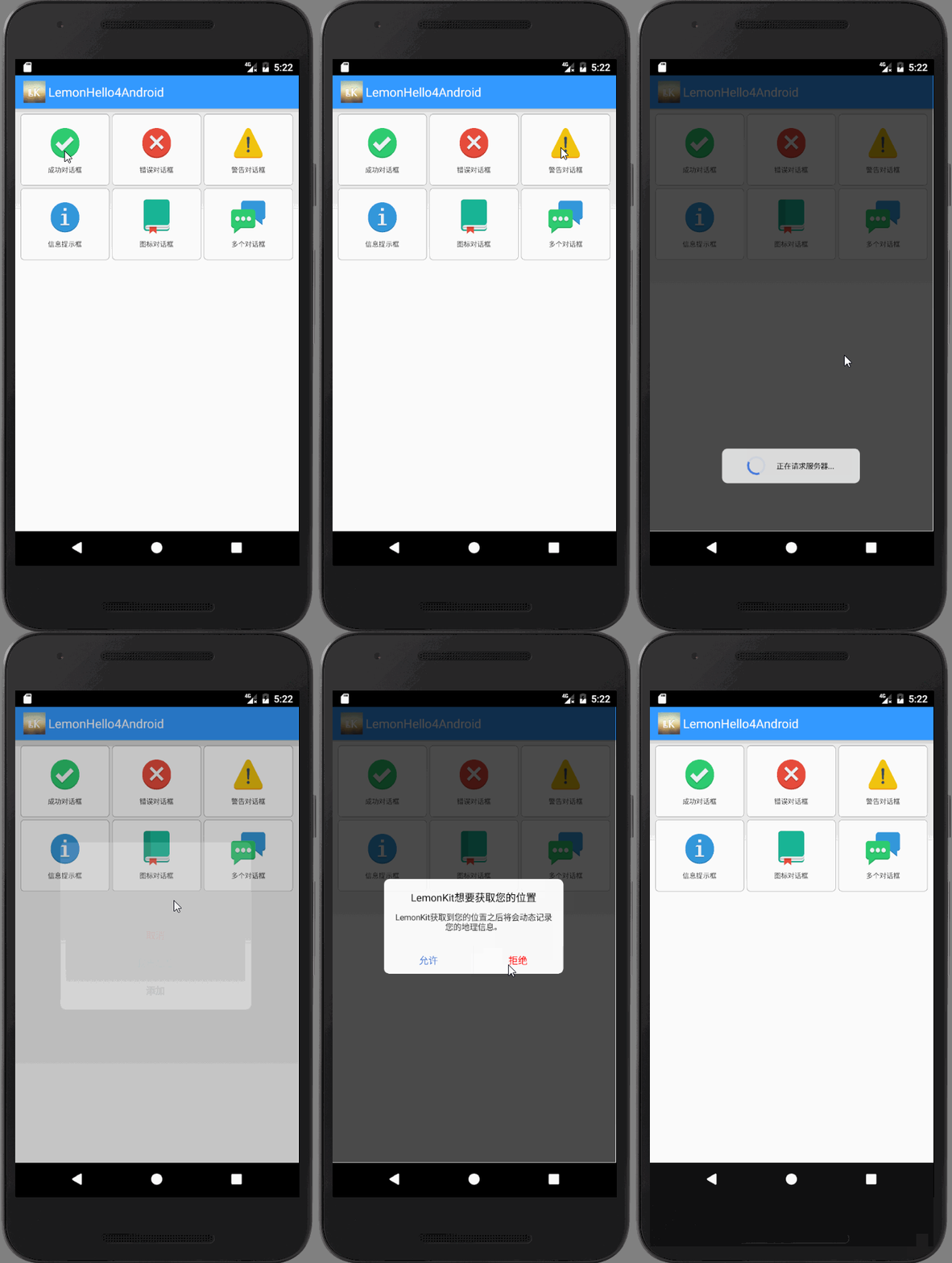
- 怎么样,别光看,我们不妨试试看哦!把LemonHello集成到你的项目中很简单,使用Gradle,首先在你的Project build.gradle文件中(allprojects ->repositories节点)加入如下代码:
```
allprojects {
repositories {
jcenter()
// 加入下面这行
maven { url 'https://jitpack.io' }
}
}
```
接下来,在你的项目中的Module(xxx e.g:app) build.gradle中(dependencies节点)加入如下代码:
```
dependencies {
// ... 你的其他依赖
// 然后加入下面这行
compile 'com.github.1em0nsOft:LemonHello4Android:1.0.1'
}
```
最后重新build一下就可以啦。
接下来,我们验证一下我们是否集成成功,随便找一个Activity,在onCreate方法里面我们加上如下一段代码来弹出一个对话框试试:
```
LemonHello.getSuccessHello("提示", "恭喜您,集成成功!")
.addAction(new LemonHelloAction("我知道啦", new LemonHelloActionDelegate() {
@Override
public void onClick(LemonHelloView helloView, LemonHelloInfo helloInfo, LemonHelloAction helloAction) {
helloView.hide();
}
}))
.show(MainActivity.this);
```
运行一下,你就可以看到你使用LemonHello弹出的第一个对话框咯~集成成功!
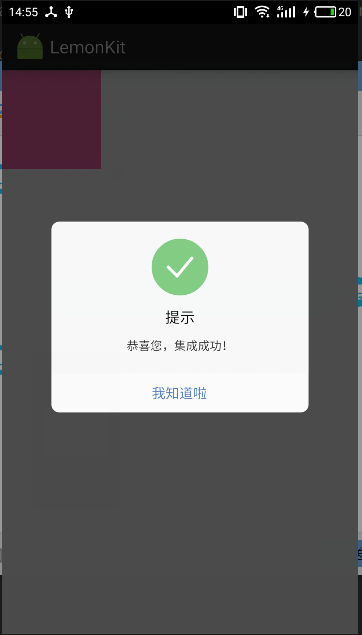
LemonBubble默认带了四中样式,就如我们开头展示的动画里面的前四种,不过呢,你可以自定义其他样式,都可以自定义什么属性呢?给大家列一个列表:
```
// 对话框控件的宽度
width;
// 对话框控件的圆角半径
cornerRadius;
// 对话框面板的背景颜色
panelBackgroundColor;
// 对话框面板的背景Drawable
panelBackgroundDrawable;
// 对话框的背景蒙版颜色
maskColor;
// 对话框的图标绘制上下文
// 如果icon属性为空,那么会调用该属性iconPaintContext绘制
// 如果iconPaintContext为空,那么会认为无图标
iconPaintContext;
// 图标动画是否需要重复
isIconAnimationRepeat;
// 动画的执行的所需时长
animationTime;
// 对话框的图标对象
// 如果该对象为空,那么会调用iconPaintContext绘制
// 如果iconPaintContext为空,那么会认为无图标
icon;
// 图标的宽度
// 图标为正方形,因此宽度也就是高度
iconWidth;
// 图标的位置描述属性
iconLocation;
// 对话框的标题,如果该属性为null或空字符串,那么认为其没有标题
title;
// 对话框的正文内容文字
content;
// 标题文字的颜色
titleColor;
// 对话框正文内容文字颜色
contentColor;
// 标题文字的字体大小
titleFontSize;
// 对话对征文内容文字字体大小
contentFontSize;
// 标题的按钮文字大小
buttonFontSize;
// 控件的内边距
padding;
// 控件的间隙
space;
// action按钮的高度
actionLineHeight;
// 对话框的动画list(按钮说明信息list)
actions
// 第一行的按钮数量
// 如果超过这个数量,那么每一个Action都会被放到单独的行中
// 如果该数值设置为<1的数字,那么认为该值为1
firstLineButtonCount;
// 是否显示状态栏
isShowStatusBar;
// 状态栏的颜色
statusBarColor;
// LemonHello的事件代理
eventDelegate;
// 是否使用消息队列,若您使用了消息队列,那么后通知显示的消息框会在前一个消息框关闭后再显示
useMessageQueue
```
- 怎么样,够你用吗?我屮艸芔茻,**还不够吗?那你赶紧告诉我,还需要什么场景,我给你加上!!!!**
### LemonBubble是一款纯国产、开源、且有售后的提示框控件!有bug,我来改!有需求,我来加!你负责用就行~ 对了,你还有个职责,别忘了点一个star~
### **我的废话说完了,你也是不是该来体验一下啦!**
gitextract_lowuae8h/ ├── LICENSE ├── LemonHello4Android/ │ ├── .gitignore │ ├── .idea/ │ │ ├── compiler.xml │ │ ├── copyright/ │ │ │ └── profiles_settings.xml │ │ ├── gradle.xml │ │ ├── misc.xml │ │ ├── modules.xml │ │ ├── runConfigurations.xml │ │ └── vcs.xml │ ├── build.gradle │ ├── gradle/ │ │ └── wrapper/ │ │ ├── gradle-wrapper.jar │ │ └── gradle-wrapper.properties │ ├── gradle.properties │ ├── gradlew │ ├── gradlew.bat │ ├── lemonhello/ │ │ ├── .gitignore │ │ ├── build.gradle │ │ ├── proguard-rules.pro │ │ └── src/ │ │ ├── androidTest/ │ │ │ └── java/ │ │ │ └── net/ │ │ │ └── lemonsoft/ │ │ │ └── lemonhello/ │ │ │ └── ExampleInstrumentedTest.java │ │ ├── main/ │ │ │ ├── AndroidManifest.xml │ │ │ ├── java/ │ │ │ │ └── net/ │ │ │ │ └── lemonsoft/ │ │ │ │ └── lemonhello/ │ │ │ │ ├── LemonHello.java │ │ │ │ ├── LemonHelloAction.java │ │ │ │ ├── LemonHelloGlobal.java │ │ │ │ ├── LemonHelloInfo.java │ │ │ │ ├── LemonHelloInfoPack.java │ │ │ │ ├── LemonHelloPanel.java │ │ │ │ ├── LemonHelloPrivateAnimationTool.java │ │ │ │ ├── LemonHelloPrivateSizeTool.java │ │ │ │ ├── LemonHelloView.java │ │ │ │ ├── LemonPaintView.java │ │ │ │ ├── adapter/ │ │ │ │ │ └── LemonHelloEventDelegateAdapter.java │ │ │ │ ├── enums/ │ │ │ │ │ └── LemonHelloIconLocation.java │ │ │ │ └── interfaces/ │ │ │ │ ├── LemonHelloActionDelegate.java │ │ │ │ ├── LemonHelloEventDelegate.java │ │ │ │ └── LemonPaintContext.java │ │ │ └── res/ │ │ │ └── values/ │ │ │ └── strings.xml │ │ └── test/ │ │ └── java/ │ │ └── net/ │ │ └── lemonsoft/ │ │ └── lemonhello/ │ │ └── ExampleUnitTest.java │ ├── lemonhello-samples/ │ │ ├── .gitignore │ │ ├── build.gradle │ │ ├── proguard-rules.pro │ │ └── src/ │ │ ├── androidTest/ │ │ │ └── java/ │ │ │ └── lemonsoft/ │ │ │ └── net/ │ │ │ └── lemonhello4android/ │ │ │ └── ExampleInstrumentedTest.java │ │ ├── main/ │ │ │ ├── AndroidManifest.xml │ │ │ ├── java/ │ │ │ │ └── lemonsoft/ │ │ │ │ └── net/ │ │ │ │ └── lemonhello4android/ │ │ │ │ └── MainActivity.java │ │ │ └── res/ │ │ │ ├── drawable/ │ │ │ │ └── round_function_button.xml │ │ │ ├── layout/ │ │ │ │ └── activity_main.xml │ │ │ ├── values/ │ │ │ │ ├── colors.xml │ │ │ │ ├── dimens.xml │ │ │ │ ├── strings.xml │ │ │ │ └── styles.xml │ │ │ └── values-w820dp/ │ │ │ └── dimens.xml │ │ └── test/ │ │ └── java/ │ │ └── lemonsoft/ │ │ └── net/ │ │ └── lemonhello4android/ │ │ └── ExampleUnitTest.java │ └── settings.gradle └── README.md
SYMBOL INDEX (158 symbols across 20 files)

FILE: LemonHello4Android/lemonhello-samples/src/androidTest/java/lemonsoft/net/lemonhello4android/ExampleInstrumentedTest.java
  class ExampleInstrumentedTest (line 17) | @RunWith(AndroidJUnit4.class)
    method useAppContext (line 19) | @Test

FILE: LemonHello4Android/lemonhello-samples/src/main/java/lemonsoft/net/lemonhello4android/MainActivity.java
  class MainActivity (line 35) | public class MainActivity extends Activity {
    method onCreate (line 44) | @Override
    method initFunctions (line 84) | private void initFunctions() {

FILE: LemonHello4Android/lemonhello-samples/src/test/java/lemonsoft/net/lemonhello4android/ExampleUnitTest.java
  class ExampleUnitTest (line 12) | public class ExampleUnitTest {
    method addition_isCorrect (line 13) | @Test

FILE: LemonHello4Android/lemonhello/src/androidTest/java/net/lemonsoft/lemonhello/ExampleInstrumentedTest.java
  class ExampleInstrumentedTest (line 17) | @RunWith(AndroidJUnit4.class)
    method useAppContext (line 19) | @Test

FILE: LemonHello4Android/lemonhello/src/main/java/net/lemonsoft/lemonhello/LemonHello.java
  class LemonHello (line 16) | public class LemonHello {
    method getWarningHello (line 25) | public static LemonHelloInfo getWarningHello(String title, String cont...
    method getInformationHello (line 69) | public static LemonHelloInfo getInformationHello(String title, String ...
    method getErrorHello (line 109) | public static LemonHelloInfo getErrorHello(String title, String conten...
    method getSuccessHello (line 146) | public static LemonHelloInfo getSuccessHello(String title, String cont...

FILE: LemonHello4Android/lemonhello/src/main/java/net/lemonsoft/lemonhello/LemonHelloAction.java
  class LemonHelloAction (line 14) | public class LemonHelloAction {
    method LemonHelloAction (line 49) | public LemonHelloAction() {
    method LemonHelloAction (line 52) | public LemonHelloAction(String title, LemonHelloActionDelegate delegat...
    method LemonHelloAction (line 57) | public LemonHelloAction(String title, int titleColor, LemonHelloAction...
    method LemonHelloAction (line 63) | public LemonHelloAction(String title, int titleColor, int backgroundCo...
    method LemonHelloAction (line 70) | public LemonHelloAction(String title, int titleColor, Drawable backgro...
    method getTitle (line 77) | public String getTitle() {
    method setTitle (line 81) | public LemonHelloAction setTitle(String title) {
    method getBackgroundColor (line 86) | public int getBackgroundColor() {
    method setBackgroundColor (line 90) | public LemonHelloAction setBackgroundColor(int backgroundColor) {
    method getBackgroundDrawable (line 95) | public Drawable getBackgroundDrawable() {
    method setBackgroundDrawable (line 99) | public LemonHelloAction setBackgroundDrawable(Drawable backgroundDrawa...
    method getTitleColor (line 104) | public int getTitleColor() {
    method setTitleColor (line 108) | public LemonHelloAction setTitleColor(int titleColor) {
    method getBackgroundHoverColor (line 113) | public int getBackgroundHoverColor() {
    method setBackgroundHoverColor (line 125) | public LemonHelloAction setBackgroundHoverColor(int backgroundHoverCol...
    method getBackgroundHoverDrawable (line 130) | public Drawable getBackgroundHoverDrawable() {
    method setBackgroundHoverDrawable (line 134) | public LemonHelloAction setBackgroundHoverDrawable(Drawable background...
    method getTitleHoverColor (line 139) | public int getTitleHoverColor() {
    method setTitleHoverColor (line 143) | public LemonHelloAction setTitleHoverColor(int titleHoverColor) {
    method getDelegate (line 148) | public LemonHelloActionDelegate getDelegate() {
    method setDelegate (line 152) | public LemonHelloAction setDelegate(LemonHelloActionDelegate delegate) {

FILE: LemonHello4Android/lemonhello/src/main/java/net/lemonsoft/lemonhello/LemonHelloGlobal.java
  class LemonHelloGlobal (line 19) | public class LemonHelloGlobal {

FILE: LemonHello4Android/lemonhello/src/main/java/net/lemonsoft/lemonhello/LemonHelloInfo.java
  class LemonHelloInfo (line 33) | public class LemonHelloInfo {
    method getWidth (line 154) | public int getWidth() {
    method setWidth (line 158) | public LemonHelloInfo setWidth(int width) {
    method getCornerRadius (line 163) | public int getCornerRadius() {
    method setCornerRadius (line 167) | public LemonHelloInfo setCornerRadius(int cornerRadius) {
    method getPanelBackgroundColor (line 172) | public int getPanelBackgroundColor() {
    method setPanelBackgroundColor (line 176) | public LemonHelloInfo setPanelBackgroundColor(int panelBackgroundColor) {
    method getPanelBackgroundDrawable (line 181) | public Drawable getPanelBackgroundDrawable() {
    method setPanelBackgroundDrawable (line 185) | public LemonHelloInfo setPanelBackgroundDrawable(Drawable panelBackgro...
    method getMaskColor (line 190) | public int getMaskColor() {
    method setMaskColor (line 194) | public LemonHelloInfo setMaskColor(int maskColor) {
    method getIconPaintContext (line 199) | public LemonPaintContext getIconPaintContext() {
    method setIconPaintContext (line 203) | public LemonHelloInfo setIconPaintContext(LemonPaintContext iconPaintC...
    method isIconAnimationRepeat (line 208) | public boolean isIconAnimationRepeat() {
    method setIconAnimationRepeat (line 212) | public LemonHelloInfo setIconAnimationRepeat(boolean iconAnimationRepe...
    method getAnimationTime (line 217) | public int getAnimationTime() {
    method setAnimationTime (line 221) | public LemonHelloInfo setAnimationTime(int animationTime) {
    method getIcon (line 226) | public Bitmap getIcon() {
    method setIcon (line 230) | public LemonHelloInfo setIcon(Bitmap icon) {
    method getIconWidth (line 235) | public int getIconWidth() {
    method setIconWidth (line 241) | public LemonHelloInfo setIconWidth(int iconWidth) {
    method getIconLocation (line 246) | public LemonHelloIconLocation getIconLocation() {
    method setIconLocation (line 250) | public LemonHelloInfo setIconLocation(LemonHelloIconLocation iconLocat...
    method getTitle (line 255) | public String getTitle() {
    method setTitle (line 259) | public LemonHelloInfo setTitle(String title) {
    method getContent (line 264) | public String getContent() {
    method setContent (line 268) | public LemonHelloInfo setContent(String content) {
    method getTitleColor (line 273) | public int getTitleColor() {
    method setTitleColor (line 277) | public LemonHelloInfo setTitleColor(int titleColor) {
    method getContentColor (line 282) | public int getContentColor() {
    method setContentColor (line 286) | public LemonHelloInfo setContentColor(int contentColor) {
    method getTitleFontSize (line 291) | public int getTitleFontSize() {
    method setTitleFontSize (line 295) | public LemonHelloInfo setTitleFontSize(int titleFontSize) {
    method getContentFontSize (line 300) | public int getContentFontSize() {
    method setContentFontSize (line 304) | public LemonHelloInfo setContentFontSize(int contentFontSize) {
    method getButtonFontSize (line 309) | public int getButtonFontSize() {
    method setButtonFontSize (line 313) | public LemonHelloInfo setButtonFontSize(int buttonFontSize) {
    method getPadding (line 318) | public int getPadding() {
    method setPadding (line 322) | public void setPadding(int padding) {
    method getSpace (line 326) | public int getSpace() {
    method setSpace (line 330) | public LemonHelloInfo setSpace(int space) {
    method getActionLineHeight (line 335) | public int getActionLineHeight() {
    method setActionLineHeight (line 339) | public LemonHelloInfo setActionLineHeight(int actionLineHeight) {
    method getActions (line 344) | public List<LemonHelloAction> getActions() {
    method setActions (line 348) | public LemonHelloInfo setActions(List<LemonHelloAction> actions) {
    method addAction (line 353) | public LemonHelloInfo addAction(LemonHelloAction... actions) {
    method removeAction (line 359) | public LemonHelloInfo removeAction(LemonHelloAction... actions) {
    method removeAllActions (line 366) | public LemonHelloInfo removeAllActions() {
    method getFirstLineButtonCount (line 371) | public int getFirstLineButtonCount() {
    method setFirstLineButtonCount (line 375) | public LemonHelloInfo setFirstLineButtonCount(int firstLineButtonCount) {
    method isShowStatusBar (line 380) | public boolean isShowStatusBar() {
    method setShowStatusBar (line 384) | public LemonHelloInfo setShowStatusBar(boolean showStatusBar) {
    method getStatusBarColor (line 389) | public int getStatusBarColor() {
    method setStatusBarColor (line 393) | public LemonHelloInfo setStatusBarColor(int statusBarColor) {
    method getEventDelegate (line 398) | public LemonHelloEventDelegate getEventDelegate() {
    method setEventDelegate (line 402) | public LemonHelloInfo setEventDelegate(LemonHelloEventDelegate eventDe...
    method isUseMessageQueue (line 407) | public boolean isUseMessageQueue() {
    method setUseMessageQueue (line 411) | public LemonHelloInfo setUseMessageQueue(boolean useMessageQueue) {
    method getTextViewHeight (line 416) | private int getTextViewHeight(TextView textView) {
    method measureTextViewHeight (line 421) | private int measureTextViewHeight(TextView textView, int viewWidth) {
    method getTextViewWidth (line 434) | private int getTextViewWidth(TextView textView) {
    method calViewsFrame (line 449) | public void calViewsFrame(final LemonHelloView helloView,
    method show (line 581) | public void show(Context context) {

FILE: LemonHello4Android/lemonhello/src/main/java/net/lemonsoft/lemonhello/LemonHelloInfoPack.java
  class LemonHelloInfoPack (line 11) | public class LemonHelloInfoPack {
    method LemonHelloInfoPack (line 16) | public LemonHelloInfoPack(Context context, LemonHelloInfo helloInfo) {
    method getContext (line 21) | public Context getContext() {
    method setContext (line 25) | public void setContext(Context context) {
    method getHelloInfo (line 29) | public LemonHelloInfo getHelloInfo() {
    method setHelloInfo (line 33) | public void setHelloInfo(LemonHelloInfo helloInfo) {

FILE: LemonHello4Android/lemonhello/src/main/java/net/lemonsoft/lemonhello/LemonHelloPanel.java
  class LemonHelloPanel (line 16) | public class LemonHelloPanel extends RelativeLayout {
    method LemonHelloPanel (line 20) | public LemonHelloPanel(Context context) {
    method getCornerRadius (line 26) | public int getCornerRadius() {
    method setCornerRadius (line 30) | public void setCornerRadius(int cornerRadius) {
    method onDraw (line 35) | @Override
    method onInterceptHoverEvent (line 49) | @Override
    method onTouchEvent (line 54) | @Override

FILE: LemonHello4Android/lemonhello/src/main/java/net/lemonsoft/lemonhello/LemonHelloPrivateAnimationTool.java
  class LemonHelloPrivateAnimationTool (line 21) | class LemonHelloPrivateAnimationTool {
    method defaultPrivateAnimationTool (line 29) | static synchronized LemonHelloPrivateAnimationTool defaultPrivateAnima...
    method _DP (line 36) | private int _DP(int value) {
    method setSize (line 47) | void setSize(final View view, final int widthDp, final int heightDp) {
    method setLocation (line 80) | void setLocation(final View view, int x, int y) {
    method setAlpha (line 108) | void setAlpha(final View view, float alpha) {
    method setBackgroundColor (line 128) | void setBackgroundColor(final View view, final int cornerRadius, int c...
    method setCornerRadius (line 171) | void setCornerRadius(View view, int radius, int color) {

FILE: LemonHello4Android/lemonhello/src/main/java/net/lemonsoft/lemonhello/LemonHelloPrivateSizeTool.java
  class LemonHelloPrivateSizeTool (line 14) | class LemonHelloPrivateSizeTool {
    method getPrivateSizeTool (line 21) | static synchronized LemonHelloPrivateSizeTool getPrivateSizeTool() {
    method setContext (line 27) | void setContext(Context context) {
    method dpToPx (line 39) | int dpToPx(int dpValue) {
    method pxToDp (line 49) | int pxToDp(int pxValue) {
    method screenWidthDp (line 58) | int screenWidthDp() {
    method screenHeightDp (line 67) | int screenHeightDp() {

FILE: LemonHello4Android/lemonhello/src/main/java/net/lemonsoft/lemonhello/LemonHelloView.java
  class LemonHelloView (line 25) | public class LemonHelloView {
    method isShow (line 67) | public boolean isShow() {
    method setIsShow (line 71) | public synchronized void setIsShow(boolean isShow) {
    method defaultHelloView (line 86) | public static synchronized LemonHelloView defaultHelloView(Context con...
    method defaultHelloView (line 97) | public static synchronized LemonHelloView defaultHelloView() {
    method showHelloWithInfo (line 104) | public void showHelloWithInfo(Context context, LemonHelloInfo helloInf...
    method autoInit (line 136) | private void autoInit(Context context) {
    method initContainerAndRootLayout (line 149) | private void initContainerAndRootLayout() {
    method initCommonView (line 186) | private void initCommonView() {
    method initContentPanel (line 245) | private void initContentPanel(final LemonHelloInfo info) {
    method hide (line 274) | public void hide() {
    method forceHide (line 308) | public void forceHide() {

FILE: LemonHello4Android/lemonhello/src/main/java/net/lemonsoft/lemonhello/LemonPaintView.java
  class LemonPaintView (line 13) | public class LemonPaintView extends ImageView {
    method LemonPaintView (line 22) | public LemonPaintView(final Context context) {
    method setHelloInfo (line 37) | public void setHelloInfo(LemonHelloInfo bubbleInfo) {
    method onDraw (line 51) | @Override

FILE: LemonHello4Android/lemonhello/src/main/java/net/lemonsoft/lemonhello/adapter/LemonHelloEventDelegateAdapter.java
  class LemonHelloEventDelegateAdapter (line 13) | public abstract class LemonHelloEventDelegateAdapter implements LemonHel...
    method onActionDispatch (line 15) | @Override
    method onMaskTouch (line 20) | @Override

FILE: LemonHello4Android/lemonhello/src/main/java/net/lemonsoft/lemonhello/enums/LemonHelloIconLocation.java
  type LemonHelloIconLocation (line 8) | public enum LemonHelloIconLocation {
    method LemonHelloIconLocation (line 16) | LemonHelloIconLocation(int code) {

FILE: LemonHello4Android/lemonhello/src/main/java/net/lemonsoft/lemonhello/interfaces/LemonHelloActionDelegate.java
  type LemonHelloActionDelegate (line 12) | public interface LemonHelloActionDelegate {
    method onClick (line 14) | void onClick(

FILE: LemonHello4Android/lemonhello/src/main/java/net/lemonsoft/lemonhello/interfaces/LemonHelloEventDelegate.java
  type LemonHelloEventDelegate (line 14) | public interface LemonHelloEventDelegate {
    method onActionDispatch (line 23) | void onActionDispatch(
    method onMaskTouch (line 35) | void onMaskTouch(

FILE: LemonHello4Android/lemonhello/src/main/java/net/lemonsoft/lemonhello/interfaces/LemonPaintContext.java
  type LemonPaintContext (line 8) | public interface LemonPaintContext {
    method paint (line 15) | void paint(Canvas canvas, float playProgress);

FILE: LemonHello4Android/lemonhello/src/test/java/net/lemonsoft/lemonhello/ExampleUnitTest.java
  class ExampleUnitTest (line 12) | public class ExampleUnitTest {
    method addition_isCorrect (line 13) | @Test
Condensed preview — 53 files, each showing path, character count, and a content snippet. Download the .json file or copy for the full structured content (127K chars).
[
  {
    "path": "LICENSE",
    "chars": 1066,
    "preview": "MIT License\n\nCopyright (c) 2017 1em0nsOft\n\nPermission is hereby granted, free of charge, to any person obtaining a copy\n"
  },
  {
    "path": "LemonHello4Android/.gitignore",
    "chars": 118,
    "preview": "*.iml\n.gradle\n/local.properties\n/.idea/workspace.xml\n/.idea/libraries\n.DS_Store\n/build\n/captures\n.externalNativeBuild\n"
  },
  {
    "path": "LemonHello4Android/.idea/compiler.xml",
    "chars": 686,
    "preview": "<?xml version=\"1.0\" encoding=\"UTF-8\"?>\n<project version=\"4\">\n  <component name=\"CompilerConfiguration\">\n    <resourceExt"
  },
  {
    "path": "LemonHello4Android/.idea/copyright/profiles_settings.xml",
    "chars": 74,
    "preview": "<component name=\"CopyrightManager\">\n  <settings default=\"\" />\n</component>"
  },
  {
    "path": "LemonHello4Android/.idea/gradle.xml",
    "chars": 776,
    "preview": "<?xml version=\"1.0\" encoding=\"UTF-8\"?>\n<project version=\"4\">\n  <component name=\"GradleSettings\">\n    <option name=\"linke"
  },
  {
    "path": "LemonHello4Android/.idea/misc.xml",
    "chars": 2226,
    "preview": "<?xml version=\"1.0\" encoding=\"UTF-8\"?>\n<project version=\"4\">\n  <component name=\"EntryPointsManager\">\n    <entry_points v"
  },
  {
    "path": "LemonHello4Android/.idea/modules.xml",
    "chars": 558,
    "preview": "<?xml version=\"1.0\" encoding=\"UTF-8\"?>\n<project version=\"4\">\n  <component name=\"ProjectModuleManager\">\n    <modules>\n   "
  },
  {
    "path": "LemonHello4Android/.idea/runConfigurations.xml",
    "chars": 564,
    "preview": "<?xml version=\"1.0\" encoding=\"UTF-8\"?>\n<project version=\"4\">\n  <component name=\"RunConfigurationProducerService\">\n    <o"
  },
  {
    "path": "LemonHello4Android/.idea/vcs.xml",
    "chars": 183,
    "preview": "<?xml version=\"1.0\" encoding=\"UTF-8\"?>\n<project version=\"4\">\n  <component name=\"VcsDirectoryMappings\">\n    <mapping dire"
  },
  {
    "path": "LemonHello4Android/build.gradle",
    "chars": 613,
    "preview": "// Top-level build file where you can add configuration options common to all sub-projects/modules.\n\nbuildscript {\n    r"
  },
  {
    "path": "LemonHello4Android/gradle/wrapper/gradle-wrapper.properties",
    "chars": 233,
    "preview": "#Mon Dec 28 10:00:20 PST 2015\ndistributionBase=GRADLE_USER_HOME\ndistributionPath=wrapper/dists\nzipStoreBase=GRADLE_USER_"
  },
  {
    "path": "LemonHello4Android/gradle.properties",
    "chars": 730,
    "preview": "# Project-wide Gradle settings.\n\n# IDE (e.g. Android Studio) users:\n# Gradle settings configured through the IDE *will o"
  },
  {
    "path": "LemonHello4Android/gradlew",
    "chars": 4971,
    "preview": "#!/usr/bin/env bash\n\n##############################################################################\n##\n##  Gradle start "
  },
  {
    "path": "LemonHello4Android/gradlew.bat",
    "chars": 2314,
    "preview": "@if \"%DEBUG%\" == \"\" @echo off\n@rem ##########################################################################\n@rem\n@rem "
  },
  {
    "path": "LemonHello4Android/lemonhello/.gitignore",
    "chars": 7,
    "preview": "/build\n"
  },
  {
    "path": "LemonHello4Android/lemonhello/build.gradle",
    "chars": 902,
    "preview": "apply plugin: 'com.android.library'\napply plugin: 'com.github.dcendents.android-maven'\ngroup='com.github.1em0nsOft'\n\nand"
  },
  {
    "path": "LemonHello4Android/lemonhello/proguard-rules.pro",
    "chars": 659,
    "preview": "# Add project specific ProGuard rules here.\n# By default, the flags in this file are appended to flags specified\n# in D:"
  },
  {
    "path": "LemonHello4Android/lemonhello/src/androidTest/java/net/lemonsoft/lemonhello/ExampleInstrumentedTest.java",
    "chars": 757,
    "preview": "package net.lemonsoft.lemonhello;\n\nimport android.content.Context;\nimport android.support.test.InstrumentationRegistry;\n"
  },
  {
    "path": "LemonHello4Android/lemonhello/src/main/AndroidManifest.xml",
    "chars": 256,
    "preview": "<manifest xmlns:android=\"http://schemas.android.com/apk/res/android\"\n    package=\"net.lemonsoft.lemonhello\">\n\n    <appli"
  },
  {
    "path": "LemonHello4Android/lemonhello/src/main/java/net/lemonsoft/lemonhello/LemonHello.java",
    "chars": 8374,
    "preview": "package net.lemonsoft.lemonhello;\n\nimport android.graphics.Canvas;\nimport android.graphics.Color;\nimport android.graphic"
  },
  {
    "path": "LemonHello4Android/lemonhello/src/main/java/net/lemonsoft/lemonhello/LemonHelloAction.java",
    "chars": 4151,
    "preview": "package net.lemonsoft.lemonhello;\n\nimport android.graphics.Color;\nimport android.graphics.drawable.Drawable;\n\nimport net"
  },
  {
    "path": "LemonHello4Android/lemonhello/src/main/java/net/lemonsoft/lemonhello/LemonHelloGlobal.java",
    "chars": 2961,
    "preview": "package net.lemonsoft.lemonhello;\n\nimport android.graphics.Bitmap;\nimport android.graphics.Color;\nimport android.graphic"
  },
  {
    "path": "LemonHello4Android/lemonhello/src/main/java/net/lemonsoft/lemonhello/LemonHelloInfo.java",
    "chars": 18262,
    "preview": "package net.lemonsoft.lemonhello;\n\nimport android.content.Context;\nimport android.graphics.Bitmap;\nimport android.graphi"
  },
  {
    "path": "LemonHello4Android/lemonhello/src/main/java/net/lemonsoft/lemonhello/LemonHelloInfoPack.java",
    "chars": 748,
    "preview": "package net.lemonsoft.lemonhello;\n\nimport android.content.Context;\n\n/**\n * LemonHello info包\n * 在消息队列中使用,包含Context和LemonH"
  },
  {
    "path": "LemonHello4Android/lemonhello/src/main/java/net/lemonsoft/lemonhello/LemonHelloPanel.java",
    "chars": 1487,
    "preview": "package net.lemonsoft.lemonhello;\n\nimport android.content.Context;\nimport android.graphics.Canvas;\nimport android.graphi"
  },
  {
    "path": "LemonHello4Android/lemonhello/src/main/java/net/lemonsoft/lemonhello/LemonHelloPrivateAnimationTool.java",
    "chars": 7675,
    "preview": "package net.lemonsoft.lemonhello;\n\nimport android.animation.ValueAnimator;\nimport android.graphics.Color;\nimport android"
  },
  {
    "path": "LemonHello4Android/lemonhello/src/main/java/net/lemonsoft/lemonhello/LemonHelloPrivateSizeTool.java",
    "chars": 1610,
    "preview": "package net.lemonsoft.lemonhello;\n\nimport android.content.Context;\nimport android.util.DisplayMetrics;\nimport android.vi"
  },
  {
    "path": "LemonHello4Android/lemonhello/src/main/java/net/lemonsoft/lemonhello/LemonHelloView.java",
    "chars": 11243,
    "preview": "package net.lemonsoft.lemonhello;\n\nimport android.app.Dialog;\nimport android.content.Context;\nimport android.content.Dia"
  },
  {
    "path": "LemonHello4Android/lemonhello/src/main/java/net/lemonsoft/lemonhello/LemonPaintView.java",
    "chars": 2398,
    "preview": "package net.lemonsoft.lemonhello;\n\nimport android.animation.ValueAnimator;\nimport android.content.Context;\nimport androi"
  },
  {
    "path": "LemonHello4Android/lemonhello/src/main/java/net/lemonsoft/lemonhello/adapter/LemonHelloEventDelegateAdapter.java",
    "chars": 663,
    "preview": "package net.lemonsoft.lemonhello.adapter;\n\nimport net.lemonsoft.lemonhello.LemonHelloAction;\nimport net.lemonsoft.lemonh"
  },
  {
    "path": "LemonHello4Android/lemonhello/src/main/java/net/lemonsoft/lemonhello/enums/LemonHelloIconLocation.java",
    "chars": 284,
    "preview": "package net.lemonsoft.lemonhello.enums;\n\n/**\n * LemonHello - 图标摆放位置枚举\n * Created by LiuRi on 2017/1/11.\n */\n\npublic enum"
  },
  {
    "path": "LemonHello4Android/lemonhello/src/main/java/net/lemonsoft/lemonhello/interfaces/LemonHelloActionDelegate.java",
    "chars": 449,
    "preview": "package net.lemonsoft.lemonhello.interfaces;\n\nimport net.lemonsoft.lemonhello.LemonHelloAction;\nimport net.lemonsoft.lem"
  },
  {
    "path": "LemonHello4Android/lemonhello/src/main/java/net/lemonsoft/lemonhello/interfaces/LemonHelloEventDelegate.java",
    "chars": 886,
    "preview": "package net.lemonsoft.lemonhello.interfaces;\n\nimport net.lemonsoft.lemonhello.LemonHello;\nimport net.lemonsoft.lemonhell"
  },
  {
    "path": "LemonHello4Android/lemonhello/src/main/java/net/lemonsoft/lemonhello/interfaces/LemonPaintContext.java",
    "chars": 298,
    "preview": "package net.lemonsoft.lemonhello.interfaces;\n\nimport android.graphics.Canvas;\n\n/**\n * 正式绘制动画的接口\n */\npublic interface Lem"
  },
  {
    "path": "LemonHello4Android/lemonhello/src/main/res/values/strings.xml",
    "chars": 73,
    "preview": "<resources>\n    <string name=\"app_name\">LemonHello</string>\n</resources>\n"
  },
  {
    "path": "LemonHello4Android/lemonhello/src/test/java/net/lemonsoft/lemonhello/ExampleUnitTest.java",
    "chars": 402,
    "preview": "package net.lemonsoft.lemonhello;\n\nimport org.junit.Test;\n\nimport static org.junit.Assert.*;\n\n/**\n * Example local unit "
  },
  {
    "path": "LemonHello4Android/lemonhello-samples/.gitignore",
    "chars": 7,
    "preview": "/build\n"
  },
  {
    "path": "LemonHello4Android/lemonhello-samples/build.gradle",
    "chars": 922,
    "preview": "apply plugin: 'com.android.application'\n\nandroid {\n    compileSdkVersion 25\n    buildToolsVersion \"25.0.2\"\n    defaultCo"
  },
  {
    "path": "LemonHello4Android/lemonhello-samples/proguard-rules.pro",
    "chars": 658,
    "preview": "# Add project specific ProGuard rules here.\n# By default, the flags in this file are appended to flags specified\n# in D:"
  },
  {
    "path": "LemonHello4Android/lemonhello-samples/src/androidTest/java/lemonsoft/net/lemonhello4android/ExampleInstrumentedTest.java",
    "chars": 768,
    "preview": "package lemonsoft.net.lemonhello4android;\n\nimport android.content.Context;\nimport android.support.test.InstrumentationRe"
  },
  {
    "path": "LemonHello4Android/lemonhello-samples/src/main/AndroidManifest.xml",
    "chars": 665,
    "preview": "<?xml version=\"1.0\" encoding=\"utf-8\"?>\n<manifest xmlns:android=\"http://schemas.android.com/apk/res/android\"\n    package="
  },
  {
    "path": "LemonHello4Android/lemonhello-samples/src/main/java/lemonsoft/net/lemonhello4android/MainActivity.java",
    "chars": 13918,
    "preview": "package lemonsoft.net.lemonhello4android;\n\nimport android.app.Activity;\nimport android.graphics.BitmapFactory;\nimport an"
  },
  {
    "path": "LemonHello4Android/lemonhello-samples/src/main/res/drawable/round_function_button.xml",
    "chars": 396,
    "preview": "<?xml version=\"1.0\" encoding=\"utf-8\"?>\n<shape xmlns:android=\"http://schemas.android.com/apk/res/android\">\n    <solid and"
  },
  {
    "path": "LemonHello4Android/lemonhello-samples/src/main/res/layout/activity_main.xml",
    "chars": 6178,
    "preview": "<?xml version=\"1.0\" encoding=\"utf-8\"?>\n<LinearLayout xmlns:android=\"http://schemas.android.com/apk/res/android\"\n    andr"
  },
  {
    "path": "LemonHello4Android/lemonhello-samples/src/main/res/values/colors.xml",
    "chars": 208,
    "preview": "<?xml version=\"1.0\" encoding=\"utf-8\"?>\n<resources>\n    <color name=\"colorPrimary\">#3F51B5</color>\n    <color name=\"color"
  },
  {
    "path": "LemonHello4Android/lemonhello-samples/src/main/res/values/dimens.xml",
    "chars": 211,
    "preview": "<resources>\n    <!-- Default screen margins, per the Android Design guidelines. -->\n    <dimen name=\"activity_horizontal"
  },
  {
    "path": "LemonHello4Android/lemonhello-samples/src/main/res/values/strings.xml",
    "chars": 81,
    "preview": "<resources>\n    <string name=\"app_name\">LemonHello4Android</string>\n</resources>\n"
  },
  {
    "path": "LemonHello4Android/lemonhello-samples/src/main/res/values/styles.xml",
    "chars": 625,
    "preview": "<resources>\n\n    <!-- Base application theme. -->\n    <style name=\"AppTheme\" parent=\"android:Theme.Holo.Light.DarkAction"
  },
  {
    "path": "LemonHello4Android/lemonhello-samples/src/main/res/values-w820dp/dimens.xml",
    "chars": 358,
    "preview": "<resources>\n    <!-- Example customization of dimensions originally defined in res/values/dimens.xml\n         (such as s"
  },
  {
    "path": "LemonHello4Android/lemonhello-samples/src/test/java/lemonsoft/net/lemonhello4android/ExampleUnitTest.java",
    "chars": 410,
    "preview": "package lemonsoft.net.lemonhello4android;\n\nimport org.junit.Test;\n\nimport static org.junit.Assert.*;\n\n/**\n * Example loc"
  },
  {
    "path": "LemonHello4Android/settings.gradle",
    "chars": 45,
    "preview": "include ':lemonhello-samples', ':lemonhello'\n"
  },
  {
    "path": "README.md",
    "chars": 2739,
    "preview": "# LemonHello4Android\n妈妈说,问人问题要先说你好,那么咱这个全平台的理论上做的最牛逼的对话框(只是理论上)就叫LemonHello吧~\n完全可以自定义的UI,内置多种主题提示框。\n\n> 作者:1em0nsOft - Li"
  }
]

// ... and 1 more files (download for full content)
About this extraction
This page contains the full source code of the 1em0nsOft/LemonHello4Android GitHub repository, extracted and formatted as plain text for AI agents and large language models (LLMs). The extraction includes 53 files (105.3 KB), approximately 29.6k tokens, and a symbol index with 158 extracted functions, classes, methods, constants, and types. Use this with OpenClaw, Claude, ChatGPT, Cursor, Windsurf, or any other AI tool that accepts text input. You can copy the full output to your clipboard or download it as a .txt file.
Extracted by GitExtract — free GitHub repo to text converter for AI. Built by Nikandr Surkov.