Showing preview only (1,148K chars total). Download the full file or copy to clipboard to get everything.
Repository: 2977094657/BiliHistoryFrontend
Branch: master
Commit: ac05f46d3ccd
Files: 104
Total size: 1.0 MB
Directory structure:
gitextract_3n4s52y9/

├── .dockerignore
├── .github/
│   ├── ISSUE_TEMPLATE/
│   │   └── 问题反馈-功能请求.md
│   └── workflows/
│       ├── docker-image.yml
│       └── tauri-release.yml
├── .gitignore
├── Dockerfile
├── LICENSE.md
├── README.md
├── deploy/
│   └── Caddyfile
├── index.html
├── jsconfig.json
├── package.json
├── postcss.config.js
├── src/
│   ├── App.vue
│   ├── api/
│   │   └── api.js
│   ├── components/
│   │   ├── PrivacyControl.vue
│   │   └── tailwind/
│   │       ├── ArtPlayerWithDanmaku.vue
│   │       ├── BusinessTypeSelector.vue
│   │       ├── CustomDropdown.vue
│   │       ├── DataSyncManager.vue
│   │       ├── DownloadDialog.vue
│   │       ├── EnvironmentCheck.vue
│   │       ├── FavoriteDialog.vue
│   │       ├── FilterDropdown.vue
│   │       ├── HistoryContent.vue
│   │       ├── LoginDialog.vue
│   │       ├── Navbar.vue
│   │       ├── Pagination.vue
│   │       ├── SearchBar.vue
│   │       ├── Settings.vue
│   │       ├── Sidebar.vue
│   │       ├── SimpleSearchBar.vue
│   │       ├── SummaryConfig.vue
│   │       ├── TaskTreeItem.vue
│   │       ├── UserVideos.vue
│   │       ├── VideoCategories.vue
│   │       ├── VideoDetailDialog.vue
│   │       ├── VideoPlayerDialog.vue
│   │       ├── VideoRecord.vue
│   │       ├── VideoSummary.vue
│   │       ├── analytics/
│   │       │   ├── layout/
│   │       │   │   └── AnalyticsLayout.vue
│   │       │   └── pages/
│   │       │       ├── AuthorCompletionPage.vue
│   │       │       ├── AuthorPopularAssociationPage.vue
│   │       │       ├── CategoryPopularDistributionPage.vue
│   │       │       ├── DurationAnalysisPage.vue
│   │       │       ├── DurationPopularDistributionPage.vue
│   │       │       ├── HeroPage.vue
│   │       │       ├── MonthlyPage.vue
│   │       │       ├── OverallCompletionPage.vue
│   │       │       ├── OverviewPage.vue
│   │       │       ├── PopularHitRatePage.vue
│   │       │       ├── PopularPredictionPage.vue
│   │       │       ├── RewatchPage.vue
│   │       │       ├── StreakPage.vue
│   │       │       ├── TagsPage.vue
│   │       │       ├── TimeAnalysisPage.vue
│   │       │       ├── TimeDistributionPage.vue
│   │       │       ├── TitleAnalysisPage.vue
│   │       │       ├── TitleInteractionAnalysisPage.vue
│   │       │       ├── TitleLengthAnalysisPage.vue
│   │       │       ├── TitleSentimentAnalysisPage.vue
│   │       │       └── TitleTrendAnalysisPage.vue
│   │       ├── dynamic/
│   │       │   ├── DynamicCardNormal.vue
│   │       │   └── DynamicCardVideo.vue
│   │       ├── layout/
│   │       │   └── MainLayout.vue
│   │       ├── page/
│   │       │   ├── AnimatedAnalytics.vue
│   │       │   ├── BiliTools.vue
│   │       │   ├── Comments.vue
│   │       │   ├── Downloads.vue
│   │       │   ├── DynamicDownloader.vue
│   │       │   ├── Favorites.vue
│   │       │   ├── History.vue
│   │       │   ├── Images.vue
│   │       │   ├── MediaManager.vue
│   │       │   ├── Remarks.vue
│   │       │   ├── SchedulerTasks.vue
│   │       │   ├── Search.vue
│   │       │   ├── VideoDetailsManager.vue
│   │       │   └── VideoDownloader.vue
│   │       └── scheduler/
│   │           ├── SelectDialog.vue
│   │           ├── TaskDetail.vue
│   │           ├── TaskForm.vue
│   │           └── TaskHistory.vue
│   ├── main.js
│   ├── router/
│   │   └── router.js
│   ├── store/
│   │   ├── darkMode.js
│   │   └── privacy.js
│   ├── style.css
│   └── utils/
│       ├── imageProxy.js
│       ├── imageUrl.js
│       ├── openUrl.js
│       └── privacyManager.js
├── src-tauri/
│   ├── Cargo.toml
│   ├── build.rs
│   ├── capabilities/
│   │   └── default.json
│   ├── icons/
│   │   └── icon.icns
│   ├── src/
│   │   ├── lib.rs
│   │   └── main.rs
│   ├── tauri.conf.json
│   ├── tauri.linux.conf.json
│   ├── tauri.macos.conf.json
│   └── tauri.windows.conf.json
├── tailwind.config.js
└── vite.config.js
================================================
FILE CONTENTS
================================================
================================================
FILE: .dockerignore
================================================
.git
.gitignore
node_modules
Dockerfile
.dockerignore
dist
.cache
src-tauri
================================================
FILE: .github/ISSUE_TEMPLATE/问题反馈-功能请求.md
================================================
---
name: 问题反馈/功能请求
about: 提交问题反馈或新功能请求
title: ''
labels: ''
assignees: ''
---
## 问题类型
请在适当的选项前打 [x]
- [ ] 🐛 Bug报告
- [ ] ✨ 功能请求
- [ ] 📝 文档改进
- [ ] 🎨 UI/UX改进
- [ ] 🧰 技术支持
## 功能重要程度
请在适当的选项前打 [x]
- [ ] 🔴 核心功能(影响主要使用流程)
- [ ] 🟠 主要功能(影响重要使用场景)
- [ ] 🟡 次要功能(改善用户体验)
- [ ] 🟢 增强功能(锦上添花)
## 问题/请求详情
请尽可能详细描述您遇到的问题或需要的功能
## 复现步骤(针对Bug)
1.
2.
3.
## 当前行为(针对Bug)
描述目前看到的结果
## 期望行为
描述您期望看到的结果
## 运行环境
- 操作系统: Windows 10/11, macOS, Linux等
- 浏览器: Chrome, Firefox, Safari等(附上版本号)
- 应用版本:
- 可执行文件(附上版本号)
- 源码(附上你使用的提交hash)
- 设备类型: 桌面端/移动端
## 截图/视频
贴上相关截图或视频链接,帮助我们更好地理解问题
## 控制台日志
如果有浏览器控制台错误,请附上相关日志
## 额外信息
其他可能有助于解决问题的信息
================================================
FILE: .github/workflows/docker-image.yml
================================================
name: Docker Image
on:
push:
branches:
- master
tags:
- "v*"
workflow_dispatch:
permissions:
contents: read
packages: write
jobs:
build-and-push:
runs-on: ubuntu-latest
steps:
- name: Checkout
uses: actions/checkout@v4
- name: Set up QEMU
uses: docker/setup-qemu-action@v3
- name: Set up Docker Buildx
uses: docker/setup-buildx-action@v3
- name: Login to GHCR
uses: docker/login-action@v3
with:
registry: ghcr.io
username: ${{ github.actor }}
password: ${{ secrets.GITHUB_TOKEN }}
- name: Docker metadata
id: meta
uses: docker/metadata-action@v5
with:
images: ghcr.io/${{ github.repository_owner }}/bili-history-frontend
flavor: |
latest=false
tags: |
type=ref,event=tag
type=semver,pattern={{version}}
type=raw,value=latest,enable={{is_default_branch}}
- name: Build and push
uses: docker/build-push-action@v6
with:
context: .
file: Dockerfile
platforms: linux/amd64,linux/arm64
push: true
tags: ${{ steps.meta.outputs.tags }}
labels: ${{ steps.meta.outputs.labels }}
cache-from: type=gha
cache-to: type=gha,mode=max
================================================
FILE: .github/workflows/tauri-release.yml
================================================
name: Release (Tauri)
on:
push:
tags:
- "v*"
workflow_dispatch:
inputs:
tag:
description: "Git tag to build (e.g. v1.0.0)"
required: true
type: string
permissions:
contents: write
jobs:
build-tauri:
name: Build (${{ matrix.label }})
runs-on: ${{ matrix.platform }}
strategy:
fail-fast: false
matrix:
include:
- label: macos-universal
platform: macos-latest
args: --target universal-apple-darwin
- label: linux-x64
platform: ubuntu-24.04
args: ""
- label: windows-x64
platform: windows-latest
args: ""
steps:
- name: Checkout
uses: actions/checkout@v4
with:
ref: ${{ github.event.inputs.tag || github.ref }}
- name: Setup Node
uses: actions/setup-node@v4
with:
node-version: 20
cache: npm
- name: Setup Rust
uses: dtolnay/rust-toolchain@stable
with:
targets: ${{ matrix.platform == 'macos-latest' && 'aarch64-apple-darwin,x86_64-apple-darwin' || '' }}
- name: Rust cache
uses: swatinem/rust-cache@v2
with:
workspaces: "./src-tauri -> target"
- name: Install Linux dependencies
if: matrix.platform == 'ubuntu-24.04'
run: |
sudo apt-get update
sudo apt-get install -y \
libwebkit2gtk-4.1-dev \
libgtk-3-dev \
libayatana-appindicator3-dev \
librsvg2-dev \
patchelf \
libssl-dev \
pkg-config \
fakeroot \
libfuse2
- name: Install Windows dependencies
if: matrix.platform == 'windows-latest'
run: choco install nsis -y
- name: Install frontend dependencies
run: npm install --no-package-lock --include=optional --no-fund --no-audit
- name: Build and upload release assets
uses: tauri-apps/tauri-action@v0.6
env:
GITHUB_TOKEN: ${{ secrets.GITHUB_TOKEN }}
with:
tagName: ${{ github.event.inputs.tag || github.ref_name }}
releaseName: "BiliHistoryFrontend ${{ github.event.inputs.tag || github.ref_name }}"
releaseBody: "See the assets to download and install this version."
releaseDraft: false
prerelease: ${{ contains(github.event.inputs.tag || github.ref_name, '-') }}
tauriScript: "npx tauri"
args: ${{ matrix.args }}
generateReleaseNotes: true
================================================
FILE: .gitignore
================================================
# generated by: https://gitignore.itranswarp.com/
#################### Node.gitignore ####################
# Logs
logs
*.log
npm-debug.log*
yarn-debug.log*
yarn-error.log*
lerna-debug.log*
.pnpm-debug.log*
# Diagnostic reports (https://nodejs.org/api/report.html)
report.[0-9]*.[0-9]*.[0-9]*.[0-9]*.json
# Runtime data
pids
*.pid
*.seed
*.pid.lock
# Directory for instrumented libs generated by jscoverage/JSCover
lib-cov
# Coverage directory used by tools like istanbul
coverage
*.lcov
# nyc test coverage
.nyc_output
# Grunt intermediate storage (https://gruntjs.com/creating-plugins#storing-task-files)
.grunt
# Bower dependency directory (https://bower.io/)
bower_components
# node-waf configuration
.lock-wscript
# Compiled binary addons (https://nodejs.org/api/addons.html)
build/Release
# Dependency directories
node_modules/
jspm_packages/
# Snowpack dependency directory (https://snowpack.dev/)
web_modules/
# TypeScript cache
*.tsbuildinfo
# Optional npm cache directory
.npm
# Optional eslint cache
.eslintcache
# Optional stylelint cache
.stylelintcache
# Microbundle cache
.rpt2_cache/
.rts2_cache_cjs/
.rts2_cache_es/
.rts2_cache_umd/
# Optional REPL history
.node_repl_history
# Output of 'npm pack'
*.tgz
# Yarn Integrity file
.yarn-integrity
# dotenv environment variable files
.env
.env.development.local
.env.test.local
.env.production.local
.env.local
# parcel-bundler cache (https://parceljs.org/)
.cache
.parcel-cache
# Next.js build output
.next
out
# Nuxt.js build / generate output
.nuxt
dist
# Gatsby files
.cache/
# Comment in the public line in if your project uses Gatsby and not Next.js
# https://nextjs.org/blog/next-9-1#public-directory-support
# public
# vuepress build output
.vuepress/dist
# vuepress v2.x temp and cache directory
.temp
.cache
# Docusaurus cache and generated files
.docusaurus
# Serverless directories
.serverless/
# FuseBox cache
.fusebox/
# DynamoDB Local files
.dynamodb/
# TernJS port file
.tern-port
# Stores VSCode versions used for testing VSCode extensions
.vscode-test
# yarn v2
.yarn/cache
.yarn/unplugged
.yarn/build-state.yml
.yarn/install-state.gz
.pnp.*
#################### Archives.gitignore ####################
# It's better to unpack these files and commit the raw source because
# git has its own built in compression methods.
*.7z
*.jar
*.rar
*.zip
*.gz
*.gzip
*.tgz
*.bzip
*.bzip2
*.bz2
*.xz
*.lzma
*.cab
*.xar
# Packing-only formats
*.iso
*.tar
# Package management formats
*.dmg
*.xpi
*.gem
*.egg
*.deb
*.rpm
*.msi
*.msm
*.msp
*.txz
#################### Backup.gitignore ####################
*.bak
*.gho
*.ori
*.orig
*.tmp
#################### Emacs.gitignore ####################
# -*- mode: gitignore; -*-
*~
\#*\#
/.emacs.desktop
/.emacs.desktop.lock
*.elc
auto-save-list
tramp
.\#*
# Org-mode
.org-id-locations
*_archive
# flymake-mode
*_flymake.*
# eshell files
/eshell/history
/eshell/lastdir
# elpa packages
/elpa/
# reftex files
*.rel
# AUCTeX auto folder
/auto/
# cask packages
.cask/
dist/
# Flycheck
flycheck_*.el
# server auth directory
/server/
# projectiles files
.projectile
# directory configuration
.dir-locals.el
# network security
/network-security.data
#################### Linux.gitignore ####################
*~
# temporary files which can be created if a process still has a handle open of a deleted file
.fuse_hidden*
# KDE directory preferences
.directory
# Linux trash folder which might appear on any partition or disk
.Trash-*
# .nfs files are created when an open file is removed but is still being accessed
.nfs*
#################### NotepadPP.gitignore ####################
# Notepad++ backups #
*.bak
#################### PuTTY.gitignore ####################
# Private key
*.ppk
#################### SublimeText.gitignore ####################
# Cache files for Sublime Text
*.tmlanguage.cache
*.tmPreferences.cache
*.stTheme.cache
# Workspace files are user-specific
*.sublime-workspace
# Project files should be checked into the repository, unless a significant
# proportion of contributors will probably not be using Sublime Text
# *.sublime-project
# SFTP configuration file
sftp-config.json
sftp-config-alt*.json
# Package control specific files
Package Control.last-run
Package Control.ca-list
Package Control.ca-bundle
Package Control.system-ca-bundle
Package Control.cache/
Package Control.ca-certs/
Package Control.merged-ca-bundle
Package Control.user-ca-bundle
oscrypto-ca-bundle.crt
bh_unicode_properties.cache
# Sublime-github package stores a github token in this file
# https://packagecontrol.io/packages/sublime-github
GitHub.sublime-settings
#################### Vim.gitignore ####################
# Swap
[._]*.s[a-v][a-z]
!*.svg # comment out if you don't need vector files
[._]*.sw[a-p]
[._]s[a-rt-v][a-z]
[._]ss[a-gi-z]
[._]sw[a-p]
# Session
Session.vim
Sessionx.vim
# Temporary
.netrwhist
*~
# Auto-generated tag files
tags
# Persistent undo
[._]*.un~
#################### VisualStudioCode.gitignore ####################
.vscode/*
!.vscode/settings.json
!.vscode/tasks.json
!.vscode/launch.json
!.vscode/extensions.json
!.vscode/*.code-snippets
# Local History for Visual Studio Code
.history/
# Built Visual Studio Code Extensions
*.vsix
#################### Windows.gitignore ####################
# Windows thumbnail cache files
Thumbs.db
Thumbs.db:encryptable
ehthumbs.db
ehthumbs_vista.db
# Dump file
*.stackdump
# Folder config file
[Dd]esktop.ini
# Recycle Bin used on file shares
$RECYCLE.BIN/
# Windows Installer files
*.cab
*.msi
*.msix
*.msm
*.msp
# Windows shortcuts
*.lnk
#################### macOS.gitignore ####################
# General
.DS_Store
.AppleDouble
.LSOverride
# Icon must end with two \r
Icon
# Thumbnails
._*
# Files that might appear in the root of a volume
.DocumentRevisions-V100
.fseventsd
.Spotlight-V100
.TemporaryItems
.Trashes
.VolumeIcon.icns
.com.apple.timemachine.donotpresent
# Directories potentially created on remote AFP share
.AppleDB
.AppleDesktop
Network Trash Folder
Temporary Items
.apdisk
#################### Custom.gitignore ####################
# add your custom gitignore here:
!.gitignore
!.gitsubmodules
/src-tauri/target/
/src-tauri/gen/
.idea
# tauri
target
src-tauri/gen
src-tauri/target
/CLAUDE.md
================================================
FILE: Dockerfile
================================================
FROM oven/bun:1 AS base
WORKDIR /app
FROM base AS install
COPY package.json bun.lock .
RUN bun install
FROM base AS build
ARG BACKEND_URL_ARG=http://localhost:8899
ENV VITE_DEFAULT_BACKEND_URL=${BACKEND_URL_ARG}
COPY . .
COPY --from=install /app/node_modules node_modules
RUN bun run build
FROM caddy:2-alpine AS release
COPY --from=build /app/dist /app
COPY deploy/Caddyfile /etc/caddy
EXPOSE 80
================================================
FILE: LICENSE.md
================================================
MIT License
Copyright (c) 2024-present 2977094657
Permission is hereby granted, free of charge, to any person obtaining a copy
of this software and associated documentation files (the "Software"), to deal
in the Software without restriction, including without limitation the rights
to use, copy, modify, merge, publish, distribute, sublicense, and/or sell
copies of the Software, and to permit persons to whom the Software is
furnished to do so, subject to the following conditions:
The above copyright notice and this permission notice shall be included in all
copies or substantial portions of the Software.
THE SOFTWARE IS PROVIDED "AS IS", WITHOUT WARRANTY OF ANY KIND, EXPRESS OR
IMPLIED, INCLUDING BUT NOT LIMITED TO THE WARRANTIES OF MERCHANTABILITY,
FITNESS FOR A PARTICULAR PURPOSE AND NONINFRINGEMENT. IN NO EVENT SHALL THE
AUTHORS OR COPYRIGHT HOLDERS BE LIABLE FOR ANY CLAIM, DAMAGES OR OTHER
LIABILITY, WHETHER IN AN ACTION OF CONTRACT, TORT OR OTHERWISE, ARISING FROM,
OUT OF OR IN CONNECTION WITH THE SOFTWARE OR THE USE OR OTHER DEALINGS IN THE
SOFTWARE.
================================================
FILE: README.md
================================================
<div align="center">
<img src="./public/logo.png" alt="Logo">
</div>
这是一个基于 Vue 3 开发的 B 站历史记录分析工具的前端项目,为用户提供丰富的 B 站观看历史数据分析功能。
## 该项目需要配合 [BilibiliHistoryFetcher](https://github.com/2977094657/BilibiliHistoryFetcher) 后端项目一起使用
## 零基础快速运行(Windows 免安装版,推荐)
1. 下载 exe:后端 https://github.com/2977094657/BilibiliHistoryFetcher/releases/latest
2. 下载 exe:前端 https://github.com/2977094657/BiliHistoryFrontend/releases/latest
3. 两个都双击运行即可
## 快速开始
### 使用 Docker 安装
#### 使用预构建镜像(GitHub Container Registry)
```bash
docker pull ghcr.io/2977094657/bili-history-frontend:latest
docker run --name bili-history-frontend-web -p 5173:80 -d ghcr.io/2977094657/bili-history-frontend:latest
```
1. 安装[Docker](https://docs.docker.com/get-started/get-docker/).
2. 构建镜像:`docker build -t bili-history-frontend-web:dev .`
3. 启动容器:`docker run --name bili-history-frontend-web -p 5173:80 -d bili-history-frontend-web:dev`
4. 停止容器:`docker stop bili-history-frontend-web`
### [通过 1Panel 部署](https://github.com/2977094657/BilibiliHistoryFetcher/discussions/65)
由社区贡献者 [@QYG2297248353](https://github.com/QYG2297248353) 实现 ([#66](https://github.com/2977094657/BilibiliHistoryFetcher/pull/66))
### 使用源码安装
1. 克隆项目
```bash
git clone https://github.com/2977094657/BiliHistoryFrontend.git
cd BilibiliHistoryFrontend
```
2. 安装依赖
```bash
npm install
```
3. 启动开发服务器
```bash
# 网页版开发
npm run dev
```
## 首次使用指南
1. **登录账号**
- 点击侧边栏的设置,然后配置你的服务器地址
- 然后点击侧边栏中的"未登录"状态
- 使用 B 站手机 APP 扫描二维码进行登录
- 登录成功后会显示你的用户名
2. **获取历史记录**
- 登录成功后,点击导航栏中的"实时更新"按钮
- 首次使用时会自动获取你的全部历史记录,这可能需要一些时间
- 获取完成后数据会自动导入到本地数据库
- 页面会自动刷新并显示你的观看历史
3. **后续使用**
- 默认的计划任务会在每天 0 点自动获取历史记录
- 可去设置里配置邮箱进行通知,不配置不影响自动获取,只是无法收到通知
- 每次打开页面时,建议点击"实时更新"以获取最新记录
- 实时更新只会获取新增的记录,速度很快
## 页面介绍
**1. 年度总结页面**
<img src="./public/QQ20250705-180733.png" alt="">
<img src="./public/layout-collage-1751711304790.jpg" alt="">
<img src="./public/layout-collage-1751711351462.jpg" alt="">
<img src="./public/layout-collage-1751711376523.jpg" alt="">
<img src="./public/layout-collage-1751711396674.jpg" alt="">
<img src="./public/layout-collage-1751711408262.jpg" alt="">
**2. 主页** 支持列表/网格切换与日期、分区筛选,一键实时更新,支持隐私模式。
<img src="./public/home.png" alt="">
**3. 评论** 登录后查看我的评论,支持关键词与类型筛选,并可跳转原文。
<img src="./public/Comments.png" alt="">
**4. 我的收藏** 支持查看我创建/收藏及本地收藏夹,可同步到本地并下载收藏内容。
<img src="./public/favorites.png" alt="">
**5. 媒体管理** 集中管理已下载视频与图片,查看/编辑备注与评论,并可批量补全视频详情。
<img src="./public/images.png" alt="">
**6. 计划任务** 统一管理定时与链式任务,支持新建/编辑/执行/启用或禁用,并查看历史与成功率。
<img src="./public/scheduler.png" alt="">
**7. 设置** 配置服务器、隐私与布局、数据导出。
<img src="./public/setting.png" alt="">
**8. 视频下载功能** 输入 BV/链接或 UP UID 下载单个/合集/投稿,过程实时反馈。
<img src="./public/download.png" alt="">
<img src="./public/SingleVideo.png" alt="">
<img src="./public/MultipleVideos.png" alt="">
**9. 视频观看总时长** 查询合集级观看总时长、平均时长与完播率,可按列查看统计
<img src="./public/viewtime.png" alt="">
**10. 动态下载** 输入用户MID下载B站动态内容,实时显示下载进度
<img src="./public/dynamic.png" alt="">
**11. 本地摘要功能** 基于本地语音转文字结合 DeepSeek 生成视频摘要,支持模型管理、环境检测与结果缓存。
<img src="./public/LocalSummary.png" alt="">
<img src="./public/DSSummary.png" alt="">
## 使用 Tauri 构建桌面应用
### GitHub Actions 自动构建(多平台包体)
推送 tag(例如 `v1.0.0`)后,会自动在 GitHub Releases 里生成 Windows/macOS/Linux 的安装包与产物。
**环境准备**
1. 安装 Rust 开发环境
- 按照 [Rust 官方指南](https://www.rust-lang.org/tools/install) 安装 Rust
- Windows 用户还需安装 [Visual Studio C++ 构建工具](https://visualstudio.microsoft.com/visual-cpp-build-tools/)
2. 安装 Node.js 依赖
```bash
npm install
```
**开发与构建**
1. 开发模式
```bash
npm run tauri:dev
```
这将启动一个开发服务器,并自动打开应用窗口,支持热重载。
2. 构建可执行文件
```bash
npm run tauri:build:exe
```
构建完成后,将在项目根目录生成 `BiliBili-History-Frontend.exe` 可执行文件。
3. 清理构建文件
```bash
npm run tauri:clean
```
清理 `src-tauri/target` 目录中的构建产物,释放磁盘空间。
## 赞助与支持
如果本项目对你有帮助,欢迎通过以下方式赞助。付款时请在备注中填写“希望公开展示的链接”(如个人主页、B 站空间、GitHub 仓库等),我们会在 README 的“赞助鸣谢”表格中展示。
<div align="center">
<table>
<tr>
<td align="center">
<img src="./public/wechat.png" alt="微信收款码" width="220"><br>
微信赞助
</td>
<td align="center">
<img src="./public/zfb.jpg" alt="支付宝收款码" width="220"><br>
支付宝赞助
</td>
</tr>
</table>
</div>
### 赞助鸣谢
| 联系内容 | 付款金额 |
| ----------------------------------------------------- | -------- |
| [星语半夏的个人空间-哔哩哔哩](https://b23.tv/WPHOtCS) | ¥15 |
| 匿名微信用户 | ¥5 |
| [EMP-NOVA13721RCL的个人空间-哔哩哔哩](https://space.bilibili.com/503193026) | ¥50 |
提示:已赞助但未收录,请在 Issues 提交凭证与备注链接;如需匿名可说明。
## 贡献指南
欢迎提交 Issue 和 Pull Request 来帮助改进这个项目。
## 致谢
- [bilibili-API-collect](https://github.com/SocialSisterYi/bilibili-API-collect) - 没有它就没有这个项目
- [Yutto](https://yutto.nyakku.moe/) - 可爱的 B 站视频下载工具
- [FasterWhisper](https://github.com/SYSTRAN/faster-whisper) - 音频转文字
- [DeepSeek](https://github.com/deepseek-ai/DeepSeek-R1) - DeepSeek AI API
- [ArtPlayer](https://github.com/zhw2590582/ArtPlayer) - 强大且灵活的 HTML5 视频播放器
- [aicu.cc](https://www.aicu.cc/) - 第三方 B 站用户评论 API
- [小黑盒用户 shengyI](https://www.xiaoheihe.cn/app/bbs/link/153880174) - 视频观看总时长功能思路提供者
- 所有贡献者,特别感谢:
- [@eli-yip](https://github.com/eli-yip) 对 Docker 部署的贡献
- [@QYG2297248353](https://github.com/QYG2297248353) 对 1Panel 部署的贡献
## Star History
[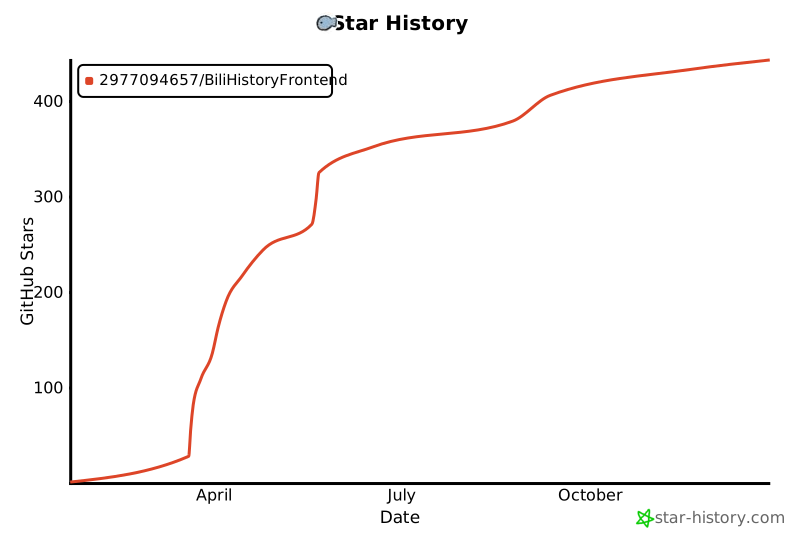](https://star-history.com/#2977094657/BiliHistoryFrontend&Date)
================================================
FILE: deploy/Caddyfile
================================================
{
auto_https off
}
:80
respond /health 200 {
body `{"status": "ok"}`
}
root * /app
file_server
try_files {path} /index.html
================================================
FILE: index.html
================================================
<!doctype html>
<html lang="en">
<head>
<!-- 必须要设置此 `meta` 标签才能使多端自适应 -->
<meta charset="UTF-8" name="viewport" content="width=device-width, initial-scale=1.0" />
<!-- 这里嵌入了 SVG 图标 -->
<link id="favicon" rel="icon" type="image/svg+xml" href="/logo.svg" />
<link rel="icon" type="image/svg+xml" href="/logo.svg" media="(prefers-color-scheme: light)" />
<link rel="icon" type="image/png" href="/logoDark.png" media="(prefers-color-scheme: dark)" />
<!-- 此meta标签用于隐藏referer,不隐藏会导致b站知道请求来源,导致图片访问403-->
<meta name="referrer" content="no-referrer" />
<title>b站历史记录</title>
<script>
(function() {
var link = document.getElementById('favicon');
if (!link) {
link = document.createElement('link');
link.id = 'favicon';
link.rel = 'icon';
document.head.appendChild(link);
}
var prefersDark = window.matchMedia && window.matchMedia('(prefers-color-scheme: dark)');
function updateFavicon() {
var isDark = document.documentElement.classList.contains('dark') || (prefersDark && prefersDark.matches);
link.href = isDark ? '/logoDark.png' : '/logo.svg';
link.type = isDark ? 'image/png' : 'image/svg+xml';
}
updateFavicon();
if (prefersDark && prefersDark.addEventListener) {
prefersDark.addEventListener('change', updateFavicon);
} else if (prefersDark && prefersDark.addListener) {
prefersDark.addListener(updateFavicon);
}
var mo = new MutationObserver(updateFavicon);
mo.observe(document.documentElement, { attributes: true, attributeFilter: ['class'] });
})();
</script>
</head>
<body>
<div id="app"></div>
<script type="module" src="/src/main.js"></script>
</body>
</html>
================================================
FILE: jsconfig.json
================================================
{
"compilerOptions": {
"module": "ESNext",
"moduleResolution": "Node",
"target": "ESNext",
"jsx": "preserve",
"strictFunctionTypes": false,
"allowJs": true,
"checkJs": false
},
"exclude": ["node_modules", "dist"]
}
================================================
FILE: package.json
================================================
{
"name": "bilibilihistoryfrontend",
"version": "1.0.0",
"description": "获取Bili历史记录应用",
"author": "46",
"type": "module",
"scripts": {
"dev": "vite",
"build": "vite build",
"preview": "vite preview",
"tauri": "tauri",
"tauri:dev": "tauri dev",
"tauri:build": "tauri build",
"tauri:build:windows": "tauri build --target x86_64-pc-windows-msvc",
"tauri:build:exe": "npm run tauri:build:windows && powershell -c \"Copy-Item ./src-tauri/target/x86_64-pc-windows-msvc/release/bilibili-history-frontend.exe ./BiliBili-History-Frontend.exe -Force\"",
"tauri:clean": "powershell -c \"if (Test-Path ./src-tauri/target) { Remove-Item -Recurse -Force ./src-tauri/target }\""
},
"dependencies": {
"@headlessui/vue": "^1.7.23",
"@heroicons/vue": "^2.1.5",
"@tailwindcss/forms": "^0.5.9",
"@tauri-apps/plugin-shell": "~2.2.1",
"@vant/touch-emulator": "^1.4.0",
"@vueuse/components": "^12.3.0",
"@vueuse/core": "^12.3.0",
"@vueuse/motion": "^2.2.6",
"animate.css": "^4.1.1",
"aos": "^2.3.4",
"artplayer": "^5.2.2",
"artplayer-plugin-danmuku": "^5.1.5",
"axios": "^1.7.7",
"crypto-js": "^4.2.0",
"echarts": "^5.6.0",
"echarts-wordcloud": "^2.1.0",
"gsap": "^3.12.5",
"html2canvas": "^1.4.1",
"jsencrypt": "^3.3.2",
"lottie-web": "^5.12.2",
"typeit": "^8.8.7",
"vant": "^4.9.15",
"vue": "^3.5.11",
"vue-countup-v3": "^1.4.2",
"vue-echarts": "^7.0.3",
"vue-router": "^4.4.5",
"vue3-lottie": "^3.3.1"
},
"devDependencies": {
"@tauri-apps/api": "~2.4.0",
"@tauri-apps/cli": "~2.4.0",
"@types/node": "^20.17.6",
"@vitejs/plugin-vue": "^5.1.4",
"@vue/runtime-core": "^3.5.13",
"autoprefixer": "^10.4.20",
"cross-env": "^7.0.3",
"postcss": "^8.4.47",
"tailwindcss": "^3.4.13",
"vite": "^5.4.8",
"vite-plugin-vue-inspector": "^5.3.1"
}
}
================================================
FILE: postcss.config.js
================================================
export default {
plugins: {
tailwindcss: {},
autoprefixer: {},
},
}
================================================
FILE: src/App.vue
================================================
<script setup>
import { onMounted, onUnmounted, ref } from 'vue'
import { ConfigProvider } from 'vant'
import 'vant/es/notify/style'
import 'vant/es/dialog/style'
import 'vant/es/config-provider/style'
import privacyManager from './utils/privacyManager'
import { useDarkMode } from './store/darkMode'
const { isDarkMode, initDarkMode } = useDarkMode()
// 处理隐私模式变化
const handlePrivacyModeChange = (isEnabled) => {
console.log('隐私模式状态变化:', isEnabled)
if (isEnabled) {
// 隐私模式启用,无像素化相关处理
}
}
onMounted(() => {
// 初始化深色模式
initDarkMode()
// 清理localStorage中的API密钥(API密钥验证已移除)
if (localStorage.getItem('apiKey')) {
localStorage.removeItem('apiKey')
console.log('已清理localStorage中的API密钥')
}
// 添加隐私模式变化监听器
privacyManager.addListener(handlePrivacyModeChange)
// 首先检查隐私模式
const privacyModeEnabled = privacyManager.isEnabled()
// 同步隐私模式状态
if (privacyModeEnabled) {
handlePrivacyModeChange(true)
}
})
</script>
<template>
<!-- 使用ConfigProvider根据深色模式动态切换主题 -->
<ConfigProvider :theme="isDarkMode ? 'dark' : 'light'">
<div class="min-h-screen bg-white dark:bg-gray-900 transition-colors duration-300">
<!-- 主应用内容 -->
<router-view></router-view>
</div>
</ConfigProvider>
</template>
<style scoped>
/* 已移除服务器连接相关样式 */
</style>
================================================
FILE: src/api/api.js
================================================
import axios from 'axios'
// 导入通知组件
import 'vant/es/notify/style'
// 你的服务器地址
const DEFAULT_FALLBACK_URL = 'http://localhost:8899';
const VITE_CONFIGURED_DEFAULT_URL = import.meta.env.VITE_DEFAULT_BACKEND_URL || DEFAULT_FALLBACK_URL;
const getBaseUrl = () => {
return localStorage.getItem('baseUrl') || VITE_CONFIGURED_DEFAULT_URL
}
const BASE_URL = getBaseUrl()
// 服务器地址列表
const SERVER_URLS = [
'http://127.0.0.1:8899',
'http://localhost:8899',
'http://0.0.0.0:8899'
]
if (!SERVER_URLS.includes(VITE_CONFIGURED_DEFAULT_URL)) {
SERVER_URLS.unshift(VITE_CONFIGURED_DEFAULT_URL)
}
// 设置服务器地址
export const setBaseUrl = (url) => {
localStorage.setItem('baseUrl', url)
// 更新 axios 实例的 baseURL
updateInstanceBaseUrl(url)
// 触发API BASE URL更新事件,供其他API模块使用
try {
const event = new CustomEvent('api-baseurl-updated', { detail: { url } })
window.dispatchEvent(event)
console.log('已触发API BaseURL更新事件:', url)
} catch (error) {
console.error('触发API BaseURL更新事件失败:', error)
}
window.location.reload() // 刷新页面以应用新的baseUrl
}
// 获取当前服务器地址
export const getCurrentBaseUrl = () => {
return getBaseUrl()
}
// 创建一个 axios 实例
const instance = axios.create({
baseURL: BASE_URL,
})
// 请求拦截器
instance.interceptors.request.use(
(config) => {
return config
},
(error) => {
return Promise.reject(error)
}
)
// 响应拦截器
instance.interceptors.response.use(
(response) => {
return response
},
(error) => {
return Promise.reject(error)
}
)
// 更新 axios 实例的 baseURL
export const updateInstanceBaseUrl = (newBaseUrl) => {
instance.defaults.baseURL = newBaseUrl
}
// 历史记录相关接口
export const getBiliHistory2024 = (page, size, sortOrder, tagName, mainCategory, dateRange, useLocalImages = false, business = '') => {
return instance.get(`/history/all`, {
params: {
page,
size,
sort_order: sortOrder,
tag_name: tagName,
main_category: mainCategory,
date_range: dateRange,
use_local_images: useLocalImages,
business: business,
},
})
}
export const searchBiliHistory2024 = (search, searchType = 'all', page = 1, size = 30, useLocalImages = false, useSessdata = true) => {
return instance.get(`/history/search`, {
params: {
page,
size,
search,
search_type: searchType,
use_local_images: useLocalImages,
use_sessdata: useSessdata
},
})
}
// 获取可用年份列表
export const getAvailableYears = () => {
return instance.get(`/history/available-years`)
}
// 分类相关接口
export const getVideoCategories = () => {
return instance.get(`/categories/categories`) // 使用新的分类接口
}
export const getMainCategories = () => {
return instance.get(`/categories/main-categories`)
}
// 标题分析相关接口已拆分为以下独立接口:
// - getTitleKeywordAnalysis: 关键词分析
// - getTitleLengthAnalysis: 长度分析
// - getTitleSentimentAnalysis: 情感分析
// - getTitleTrendAnalysis: 趋势分析
// - getTitleInteractionAnalysis: 互动分析
// 获取标题关键词分析
export const getTitleKeywordAnalysis = (year, useCache = true) => {
return instance.get(`/title/keyword-analysis`, {
params: {
year,
use_cache: useCache
}
})
}
// 获取标题长度分析
export const getTitleLengthAnalysis = (year, useCache = true) => {
return instance.get(`/title/length-analysis`, {
params: {
year,
use_cache: useCache
}
})
}
// 获取标题情感分析
export const getTitleSentimentAnalysis = (year, useCache = true) => {
return instance.get(`/title/sentiment-analysis`, {
params: {
year,
use_cache: useCache
}
})
}
// 获取标题趋势分析
export const getTitleTrendAnalysis = (year, useCache = true) => {
return instance.get(`/title/trend-analysis`, {
params: {
year,
use_cache: useCache
}
})
}
// 获取标题互动分析
export const getTitleInteractionAnalysis = (year, useCache = true) => {
return instance.get(`/title/interaction-analysis`, {
params: {
year,
use_cache: useCache
}
})
}
// 观看时间分析相关接口已拆分为以下独立接口:
// - getViewingMonthlyStats: 月度统计分析
// - getViewingWeeklyStats: 周度统计分析
// - getViewingTimeSlots: 时段分析
// - getViewingContinuity: 观看连续性分析
// 更多维度接口将逐步添加...
// 获取月度观看统计分析
export const getViewingMonthlyStats = (year, useCache = true) => {
return instance.get(`/viewing/monthly-stats`, {
params: {
year,
use_cache: useCache
}
})
}
// 获取周度观看统计分析
export const getViewingWeeklyStats = (year, useCache = true) => {
return instance.get(`/viewing/weekly-stats`, {
params: {
year,
use_cache: useCache
}
})
}
// 获取时段观看分析
export const getViewingTimeSlots = (year, useCache = true) => {
return instance.get(`/viewing/time-slots`, {
params: {
year,
use_cache: useCache
}
})
}
// 获取观看连续性分析
export const getViewingContinuity = (year, useCache = true) => {
return instance.get(`/viewing/continuity`, {
params: {
year,
use_cache: useCache
}
})
}
// 获取重复观看分析
export const getViewingWatchCounts = (year, useCache = true) => {
return instance.get(`/viewing/watch-counts`, {
params: {
year,
use_cache: useCache
}
})
}
// 获取视频完成率分析
export const getViewingCompletionRates = (year, useCache = true) => {
return instance.get(`/viewing/completion-rates`, {
params: {
year,
use_cache: useCache
}
})
}
// 获取UP主完成率分析
export const getViewingAuthorCompletion = (year, useCache = true) => {
return instance.get(`/viewing/author-completion`, {
params: {
year,
use_cache: useCache
}
})
}
// 获取标签分析
export const getViewingTagAnalysis = (year, useCache = true) => {
return instance.get(`/viewing/tag-analysis`, {
params: {
year,
use_cache: useCache
}
})
}
// 获取视频时长分析
export const getViewingDurationAnalysis = (year, useCache = true) => {
return instance.get(`/viewing/duration-analysis`, {
params: {
year,
use_cache: useCache
}
})
}
// 原始的观看时间分析接口已删除,现在使用拆分后的独立接口
// 获取观看行为数据分析
export const getViewingBehavior = async (year, useCache = false) => {
return instance.get(`/viewing/viewing/`, {
params: {
year,
use_cache: useCache
}
})
}
// 获取每年每天的观看数合集
export const getYearlyAnalysis = async (year) => {
return instance.post(`/analysis/analyze`, null, {
params: {
year
}
})
}
// 获取热门视频命中率分析
export const getPopularHitRate = async (year, useCache = true) => {
return instance.get(`/popular/popular-hit-rate`, {
params: {
year,
use_cache: useCache
}
})
}
// 获取热门预测能力分析
export const getPopularPredictionAbility = async (year, useCache = true) => {
return instance.get(`/popular/popular-prediction-ability`, {
params: {
year,
use_cache: useCache
}
})
}
// 获取UP主热门关联分析
export const getAuthorPopularAssociation = async (year, useCache = true) => {
return instance.get(`/popular/author-popular-association`, {
params: {
year,
use_cache: useCache
}
})
}
// 获取热门视频分区分布分析
export const getCategoryPopularDistribution = async (year, useCache = true) => {
return instance.get(`/popular/category-popular-distribution`, {
params: {
year,
use_cache: useCache
}
})
}
// 获取热门视频时长分布分析
export const getDurationPopularDistribution = async (year, useCache = true) => {
return instance.get(`/popular/duration-popular-distribution`, {
params: {
year,
use_cache: useCache
}
})
}
// 实时更新历史记录
export const updateBiliHistoryRealtime = (syncDeleted = false) => {
return instance.get(`/fetch/bili-history-realtime`, {
params: {
sync_deleted: syncDeleted
}
}).then(response => {
// 检查响应格式
if (!response.data) {
throw new Error('响应数据格式错误')
}
// 如果返回未找到本地历史记录错误,则调用完整获取接口
if (response.data.status === 'error' && response.data.message === '未找到本地历史记录') {
return getBiliHistory()
}
return response
}).catch(error => {
console.error('API 请求错误:', error)
// 重新抛出错误,让调用者处理
throw error
})
}
// 获取完整历史记录
export const getBiliHistory = () => {
return instance.get('/fetch/bili-history').then(async response => {
// 检查响应格式
if (!response.data) {
throw new Error('响应数据格式错误')
}
// 如果获取历史记录成功,调用导入SQLite接口
if (response.data.status === 'success') {
try {
await importSqliteData()
// 1秒后刷新页面,让用户看到成功提示
setTimeout(() => {
window.location.reload()
}, 1000)
} catch (error) {
console.error('导入SQLite失败:', error)
// 即使导入失败也返回历史记录的响应
}
}
return response
}).catch(error => {
console.error('获取历史记录失败:', error)
throw error
})
}
// 获取每日视频统计
export const getDailyStats = async (date, year) => {
return instance.get(`/daily/daily-count`, {
params: {
date,
year
}
})
}
// 导入SQLite数据
export const importSqliteData = () => {
return instance.post(`/importSqlite/import_data_sqlite`)
}
// 导出相关接口
// 导出历史记录到Excel
export const exportHistory = (options = {}) => {
// 只传递非空参数
const params = {}
// 年份参数
if (options.year !== undefined && options.year !== null) {
params.year = options.year
}
// 月份参数
if (options.month !== undefined && options.month !== null) {
params.month = options.month
}
// 开始日期参数
if (options.start_date) {
params.start_date = options.start_date
}
// 结束日期参数
if (options.end_date) {
params.end_date = options.end_date
}
console.log('导出参数:', params)
return instance.post('/export/export_history', null, {
params
})
}
// 下载Excel文件
export const downloadExcelFile = (filename) => {
return instance.get(`/export/download_excel/${encodeURIComponent(filename)}`, {
responseType: 'blob',
headers: {
'Accept': 'application/vnd.openxmlformats-officedocument.spreadsheetml.sheet'
}
}).then(response => {
// 创建blob链接并下载
const blob = new Blob([response.data], {
type: 'application/vnd.openxmlformats-officedocument.spreadsheetml.sheet'
})
const url = window.URL.createObjectURL(blob)
const link = document.createElement('a')
link.href = url
link.setAttribute('download', filename)
document.body.appendChild(link)
link.click()
document.body.removeChild(link)
window.URL.revokeObjectURL(url)
return response
})
}
// 下载SQLite数据库
export const downloadDatabase = () => {
return instance.get('/export/download_db', {
responseType: 'blob',
headers: {
'Accept': 'application/x-sqlite3'
}
}).then(response => {
// 创建blob链接并下载
const blob = new Blob([response.data], {
type: 'application/x-sqlite3'
})
const url = window.URL.createObjectURL(blob)
const link = document.createElement('a')
link.href = url
link.setAttribute('download', 'bilibili_history.db')
document.body.appendChild(link)
link.click()
document.body.removeChild(link)
window.URL.revokeObjectURL(url)
return response
})
}
// 登录相关接口
// 生成登录二维码
export const generateLoginQRCode = () => {
return instance.get('/login/qrcode/generate')
}
// 获取二维码图片URL
export const getQRCodeImageURL = () => {
return `${BASE_URL}/login/qrcode/image`
}
// 获取二维码图片(返回blob URL)
export const getQRCodeImageBlob = async () => {
try {
const response = await instance.get('/login/qrcode/image', {
responseType: 'blob'
})
// 创建blob URL
const blob = new Blob([response.data], {
type: response.headers['content-type'] || 'image/png'
})
return URL.createObjectURL(blob)
} catch (error) {
console.error('获取二维码图片失败:', error)
throw error
}
}
// 轮询二维码状态
export const pollQRCodeStatus = (qrcodeKey) => {
return instance.get('/login/qrcode/poll', {
params: {
qrcode_key: qrcodeKey
}
})
}
// 退出登录
export const logout = () => {
return instance.post('/login/logout')
}
// 获取登录状态
export const getLoginStatus = () => {
return instance.get('/login/check')
}
// 获取视频摘要
export const getVideoSummary = (bvid, cid, upMid, forceRefresh = false) => {
return instance.get('/summary/get_summary', {
params: {
bvid,
cid,
up_mid: upMid,
force_refresh: forceRefresh
}
})
}
// 获取摘要配置
export const getSummaryConfig = () => {
return instance.get('/summary/config')
}
// 更新摘要配置
export const updateSummaryConfig = (config) => {
return instance.post('/summary/config', config)
}
// 批量删除历史记录
export const batchDeleteHistory = (items) => {
return instance.delete('/delete/batch-delete', {
data: items // 直接发送数组,不要包装在 items 对象中
})
}
// 删除B站历史记录
export const deleteBilibiliHistory = (kid, syncToBilibili = true) => {
return instance.delete(`/bilibili/history/single`, {
params: {
kid
},
data: {
sync_to_bilibili: syncToBilibili
}
})
}
// 批量删除B站历史记录
export const batchDeleteBilibiliHistory = (items) => {
return instance.delete('/bilibili/history/batch', {
data: {
items
}
})
}
// =============================
// 热门视频数据清理(按年分库)
// =============================
/**
* 获取热门视频数据库可用年份(降序)
* GET /bilibili/popular/years
* @returns {Promise<any>}
*/
export const getPopularCleanupYears = () => {
return instance.get('/bilibili/popular/years')
}
// 数据库管理相关接口
// 重置数据库
export const resetDatabase = () => {
return instance.post('/history/reset-database')
}
// 备注相关接口
// 更新视频备注
export const updateVideoRemark = (bvid, viewAt, remark) => {
return instance.post('/history/update-remark', {
bvid,
view_at: viewAt,
remark
})
}
// 批量获取视频备注
export const batchGetRemarks = (records) => {
return instance.post('/history/batch-remarks', {
items: records
})
}
// 获取所有备注记录
export const getAllRemarks = (page = 1, size = 10, sortOrder = 0) => {
return instance.get('/history/remarks', {
params: {
page,
size,
sort_order: sortOrder
}
})
}
// 获取SQLite版本
export const getSqliteVersion = () => {
return instance.get('/history/sqlite-version')
}
// 图片管理相关接口
// 获取图片下载状态
export const getImagesStatus = () => {
return instance.get('/images/status')
}
// 开始下载图片
export const startImagesDownload = (year = null, useSessdata = true) => {
return instance.post('/images/start', null, {
params: {
year,
use_sessdata: useSessdata
}
})
}
// 停止下载图片
export const stopImagesDownload = () => {
return instance.post('/images/stop')
}
// 清空图片
export const clearImages = () => {
return instance.post('/images/clear')
}
// 下载视频
export const downloadVideo = async (bvid, sessdata = null, onMessage, downloadCover = true, onlyAudio = false, cid = 0, options = {}) => {
console.log('调用下载API, bvid:', bvid, '高级选项:', options)
const requestBody = {
url: bvid,
sessdata,
download_cover: downloadCover,
only_audio: onlyAudio,
cid,
// 添加高级选项
...options
}
// 从本地存储获取API密钥
const apiKey = localStorage.getItem('apiKey')
// 准备请求头
const headers = {
'Content-Type': 'application/json',
}
// 如果存在API密钥,添加到请求头
if (apiKey) {
headers['X-API-Key'] = apiKey
}
const response = await fetch(`${BASE_URL}/download/download_video`, {
method: 'POST',
headers,
body: JSON.stringify(requestBody)
})
if (!response.ok) {
const errorData = await response.json()
throw new Error(errorData.detail || '下载请求失败')
}
const reader = response.body.getReader()
const decoder = new TextDecoder()
let buffer = ''
while (true) {
const { value, done } = await reader.read()
if (done) break
buffer += decoder.decode(value, { stream: true })
// 处理缓冲区中的完整行
const lines = buffer.split('\n')
buffer = lines.pop() // 保留最后一个不完整的行
for (const line of lines) {
if (line.startsWith('data: ')) {
const content = line.substring(6).trim()
if (content && content !== 'close') {
onMessage(content)
}
}
}
}
// 处理最后可能剩余的数据
if (buffer) {
if (buffer.startsWith('data: ')) {
const content = buffer.substring(6).trim()
if (content && content !== 'close') {
onMessage(content)
}
}
}
}
// 检查 FFmpeg 安装状态
export const checkFFmpeg = () => {
return instance.get('/download/check_ffmpeg')
}
// 计划任务管理相关接口
export const getAllSchedulerTasks = (params = {}) => {
return instance.get('/scheduler/tasks', { params })
.then(response => {
return response
})
.catch(error => {
console.error('getAllSchedulerTasks API错误:', error)
throw error
})
}
export const getSchedulerTaskDetail = (taskId, params = {}) => {
return instance.get(`/scheduler/tasks`, {
params: {
task_id: taskId,
include_subtasks: true, // 默认包含子任务
...params
}
}).then(response => {
return response;
}).catch(error => {
console.error('API - 获取任务详情出错:', error);
throw error;
});
}
export const createSchedulerTask = (taskData) => {
return instance.post('/scheduler/tasks', taskData)
}
export const updateSchedulerTask = (taskId, taskData) => {
return instance.put(`/scheduler/tasks/${taskId}`, taskData)
}
export const deleteSchedulerTask = (taskId) => {
return instance.delete(`/scheduler/tasks/${taskId}`)
}
export const executeSchedulerTask = (taskId, options = {}) => {
return instance.post(`/scheduler/tasks/${taskId}/execute`, options)
}
// 子任务管理接口
export const addSubTask = (taskId, subTaskData) => {
console.log('调用addSubTask API:', { taskId, subTaskData })
return instance.post(`/scheduler/tasks/${taskId}/subtasks`, subTaskData)
.then(response => {
console.log('addSubTask API响应:', response)
return response
})
.catch(error => {
console.error('addSubTask API错误:', error)
throw error
})
}
export const deleteSubTask = (taskId, subTaskId) => {
return instance.delete(`/scheduler/tasks/${taskId}/subtasks/${subTaskId}`)
}
// 获取任务历史记录
export const getTaskHistory = ({
task_id = null,
include_subtasks = true,
status = null,
start_date = null,
end_date = null,
page = 1,
page_size = 20
}) => {
return instance.get(`/scheduler/tasks/history`, {
params: {
task_id,
include_subtasks,
status,
start_date,
end_date,
page,
page_size
}
})
}
// 系统接口
export const getAvailableEndpoints = () => {
return instance.get('/scheduler/available-endpoints')
}
// 启用/禁用任务
export const setTaskEnabled = (taskId, enabled) => {
return instance.post(`/scheduler/tasks/${taskId}/enable`, {
enabled
})
}
// 邮件配置相关接口
// 获取邮件配置
export const getEmailConfig = () => {
return instance.get('/config/email-config')
.then(response => {
console.log('邮件配置API响应成功:', response)
return response
})
.catch(error => {
console.error('邮件配置API错误:', error)
throw error
})
}
// 更新邮件配置
export const updateEmailConfig = (config) => {
return instance.post('/config/email-config', config)
.then(response => {
console.log('更新邮件配置API响应成功:', response)
return response
})
.catch(error => {
console.error('更新邮件配置API错误:', error)
throw error
})
}
// 测试邮件配置
export const testEmailConfig = (testData) => {
return instance.post('/config/test-email', testData)
.then(response => {
console.log('测试邮件API响应成功:', response)
return response
})
.catch(error => {
console.error('测试邮件API错误:', error)
throw error
})
}
// 音频转文字相关接口
export const checkAudioToTextEnvironment = () => {
return instance.get('/audio_to_text/check_environment')
}
// 检查系统资源
export const checkSystemResources = () => {
return instance.get('/audio_to_text/resource_check')
}
// 获取可用的 Whisper 模型列表
export const getWhisperModels = () => {
return instance.get('/audio_to_text/models')
}
// 查找音频文件路径
export const findAudioPath = (cid) => {
return instance.get('/audio_to_text/find_audio', {
params: { cid }
})
}
// 检查语音转文字文件是否存在
export const checkSttFile = (cid) => {
return instance.get('/audio_to_text/check_stt_file', {
params: { cid }
})
}
// 转录音频文件
export const transcribeAudio = (params) => {
return instance.post('/audio_to_text/transcribe', params)
}
// 根据CID生成视频摘要
export const summarizeByCid = (cid) => {
return instance.post('/summary/summarize_by_cid', {
cid
})
}
// 检查本地摘要文件
export const checkLocalSummary = (cid, includeContent = true) => {
return instance.get(`/summary/check_local_summary/${cid}`, {
params: {
include_content: includeContent
}
})
}
// 下载指定的Whisper模型
export const downloadWhisperModel = (modelSize) => {
return instance.post('/audio_to_text/download_model', null, {
params: {
model_size: modelSize
}
})
}
// 删除指定的Whisper模型
export const deleteWhisperModel = (modelSize) => {
return instance.delete('/audio_to_text/models', {
data: {
model_size: modelSize
}
})
}
// DeepSeek相关接口
export const checkDeepSeekApiKey = () => {
return instance.get('/deepseek/check_api_key')
}
export const setDeepSeekApiKey = (apiKey) => {
return instance.post('/deepseek/set_api_key', {
api_key: apiKey
})
}
export const getDeepSeekBalance = () => {
return instance.get('/deepseek/balance')
}
// API安全相关接口已移除
// 检查视频是否已下载
export const checkVideoDownload = (cids) => {
return instance.get(`/download/check_video_download`, {
params: {
cids: Array.isArray(cids) ? cids.join(',') : cids
}
})
}
// 获取已下载视频列表
export const getDownloadedVideos = (searchTerm = '', page = 1, limit = 20) => {
return instance.get(`/download/list_downloaded_videos`, {
params: {
search_term: searchTerm,
page,
limit
}
})
}
/**
* 删除已下载的视频
* @param {number|null} cid 视频的CID,若为null则必须指定directory
* @param {boolean} deleteDirectory 是否删除整个目录,默认为false(只删除视频文件)
* @param {string|null} directory 可选,指定要删除文件的目录路径
* 若提供则在该目录中查找和删除文件
* 对于从收藏夹下载的视频,由于没有CID,
* 可以设置cid为null并通过directory参数指定目录路径
* @returns {Promise<object>} 包含删除结果信息的响应
*/
export const deleteDownloadedVideo = (cid, deleteDirectory = false, directory = null) => {
return instance.delete(`/download/delete_downloaded_video`, {
params: {
cid,
delete_directory: deleteDirectory,
directory: directory
}
})
}
// 获取评论列表
export const getComments = (uid, page = 1, pageSize = 20, commentType = 'all', keyword = '', typeFilter = '') => {
// 确保 typeFilter 为有效整数或不传递
const params = {
page,
page_size: pageSize,
comment_type: commentType,
keyword
}
// 只有当 typeFilter 有值且不为 '0' 时才添加到参数中
if (typeFilter && typeFilter !== '0') {
params.type_filter = parseInt(typeFilter)
}
return instance.get(`/comment/query/${uid}`, { params })
}
// 服务器健康检查
export const checkServerHealth = () => {
return instance.get('/health')
}
/**
* 获取视频流地址
* @param {string} file_path 视频文件路径
* @returns {string} 视频流URL
*/
export const getVideoStream = (file_path) => {
if (!file_path) return ''
const baseUrl = instance.defaults.baseURL
// 构建基本URL
return `${baseUrl}/download/stream_video?file_path=${encodeURIComponent(file_path)}&t=${Date.now()}`
}
/**
* 获取弹幕文件内容
* @param {string} cid 弹幕ID
* @param {string} file_path 弹幕文件路径
* @returns {Promise<Object>} 响应对象
*/
export const getDanmakuFile = async (cid = '', file_path = '') => {
try {
const params = {};
if (cid) params.cid = cid;
if (file_path) params.file_path = file_path;
return await instance.get(`/download/stream_danmaku`, {
params,
responseType: 'text' // 获取纯文本格式的弹幕文件
});
} catch (error) {
console.error('获取弹幕文件失败:', error);
throw error;
}
}
// 数据同步相关接口
/**
* 数据同步API
* @param {string} db_path - 数据库文件路径
* @param {string} json_path - JSON文件根目录
* @param {boolean} async_mode - 是否异步执行
* @returns {Promise} - API响应
*/
export const syncData = (db_path = 'output/bilibili_history.db', json_path = 'output/history_by_date', async_mode = false) => {
return instance.post('/data_sync/sync', {
db_path,
json_path,
async_mode
})
}
/**
* 获取最新同步结果API
* @returns {Promise} - API响应
*/
export const getSyncResult = () => {
return instance.get('/data_sync/sync/result')
}
/**
* 检查数据完整性API
* @param {string} db_path - 数据库文件路径
* @param {string} json_path - JSON文件根目录
* @param {boolean} async_mode - 是否异步执行
* @param {boolean} force_check - 是否强制执行检查,忽略配置设置
* @returns {Promise} - API响应
*/
export const checkDataIntegrity = (db_path = 'output/bilibili_history.db', json_path = 'output/history_by_date', async_mode = false, force_check = false) => {
return instance.post('/data_sync/check', {
db_path,
json_path,
async_mode,
force_check
})
}
/**
* 获取数据完整性校验配置API
* @returns {Promise} - API响应
*/
export const getIntegrityCheckConfig = () => {
return instance.get('/data_sync/config')
}
/**
* 获取数据完整性报告API
* @returns {Promise} - API响应
*/
export const getIntegrityReport = () => {
return instance.get('/data_sync/report')
}
/**
* 更新数据完整性校验配置API
* @param {boolean} checkOnStartup - 是否在启动时进行数据完整性校验
* @returns {Promise} - API响应
*/
export const updateIntegrityCheckConfig = (checkOnStartup) => {
return instance.post('/data_sync/config', {
check_on_startup: checkOnStartup
})
}
/**
* 获取指定用户创建的所有收藏夹信息
* @param {Object} params 请求参数
* @param {number} [params.up_mid] 目标用户mid,不提供则使用当前登录用户
* @param {number} [params.type] 目标内容属性,0=全部(默认),2=视频稿件
* @param {number} [params.rid] 目标内容id,视频稿件为avid
* @param {string} [params.sessdata] 用户的SESSDATA,不提供则从配置文件读取
* @returns {Promise<Object>} 收藏夹列表
*/
export const getCreatedFavoriteFolders = (params = {}) => {
return instance.get('/favorite/folder/created/list-all', { params })
}
/**
* 获取指定用户收藏的视频收藏夹列表
* @param {Object} params 请求参数
* @param {number} [params.up_mid] 目标用户mid,不提供则使用当前登录用户
* @param {number} [params.pn] 页码,默认为1
* @param {number} [params.ps] 每页项数,默认为20
* @param {string} [params.keyword] 搜索关键词
* @param {string} [params.sessdata] 用户的SESSDATA,不提供则从配置文件读取
* @returns {Promise<Object>} 收藏夹列表
*/
export const getCollectedFavoriteFolders = (params = {}) => {
return instance.get('/favorite/folder/collected/list', { params })
}
/**
* 获取收藏夹内容列表
* @param {Object} params 请求参数
* @param {number} params.media_id 目标收藏夹id(完整id)
* @param {number} [params.pn] 页码,默认为1
* @param {number} [params.ps] 每页项数,默认为20
* @param {string} [params.keyword] 搜索关键词
* @param {string} [params.order] 排序方式,mtime(收藏时间,默认)或view(播放量)
* @param {number} [params.type] 筛选类型,0=全部(默认),2=视频
* @param {number} [params.tid] 分区ID,0=全部(默认)
* @param {string} [params.platform] 平台标识,默认为web
* @param {string} [params.sessdata] 用户的SESSDATA,不提供则从配置文件读取
* @returns {Promise<Object>} 收藏夹内容列表
*/
export const getFavoriteContents = (params = {}) => {
return instance.get('/favorite/folder/resource/list', { params })
}
/**
* 获取数据库中的收藏夹列表
* @param {Object} params 请求参数
* @param {number} [params.mid] 用户UID,不提供则返回所有收藏夹
* @param {number} [params.page] 页码,默认为1
* @param {number} [params.size] 每页数量,默认为20
* @returns {Promise<Object>} 收藏夹列表
*/
export const getLocalFavoriteFolders = (params = {}) => {
return instance.get('/favorite/list', { params })
}
/**
* 获取数据库中的收藏内容列表
* @param {Object} params 请求参数
* @param {number} params.media_id 收藏夹ID
* @param {number} [params.page] 页码,默认为1
* @param {number} [params.size] 每页数量,默认为20
* @returns {Promise<Object>} 内容列表
*/
export const getLocalFavoriteContents = (params = {}) => {
return instance.get('/favorite/content/list', { params })
}
// #endregion
/**
* 收藏或取消收藏视频
* @param {Object} params 请求参数
* @param {number} params.rid 稿件avid (不含av前缀)
* @param {string} [params.add_media_ids] 需要加入的收藏夹ID,多个用逗号分隔
* @param {string} [params.del_media_ids] 需要取消的收藏夹ID,多个用逗号分隔
* @param {string} [params.sessdata] 用户的SESSDATA,不提供则从配置文件读取
* @returns {Promise<Object>} 操作结果
*/
export const favoriteResource = (params = {}) => {
return instance.post('/favorite/resource/deal', params)
}
/**
* 批量收藏或取消收藏视频
* @param {Object} params 请求参数
* @param {string} params.rids 稿件avid列表 (不含av前缀),多个用逗号分隔
* @param {string} [params.add_media_ids] 需要加入的收藏夹ID,多个用逗号分隔
* @param {string} [params.del_media_ids] 需要取消的收藏夹ID,多个用逗号分隔
* @param {string} [params.sessdata] 用户的SESSDATA,不提供则从配置文件读取
* @returns {Promise<Object>} 操作结果
*/
export const batchFavoriteResource = (params = {}) => {
return instance.post('/favorite/resource/batch-deal', params)
}
/**
* 本地批量收藏或取消收藏视频
* @param {Object} params 请求参数
* @param {string} params.rids 稿件avid列表 (不含av前缀),多个用逗号分隔
* @param {string} [params.add_media_ids] 需要加入的收藏夹ID,多个用逗号分隔
* @param {string} [params.del_media_ids] 需要取消的收藏夹ID,多个用逗号分隔
* @param {string} [params.operation_type] 操作类型,`sync`=同步到远程,`local`=仅本地操作,默认为`sync`
* @param {string} [params.sessdata] 用户的SESSDATA,不提供则从配置文件读取
* @returns {Promise<Object>} 操作结果
*/
export const localBatchFavoriteResource = (params = {}) => {
return instance.post('/favorite/resource/local-batch-deal', params)
}
/**
* 批量检查视频收藏状态
* @param {Object} params 请求参数
* @param {Array<number>|string} params.oids 视频av号列表,可以是数组或逗号分隔的字符串
* @param {string} [params.sessdata] 用户的SESSDATA,不提供则从配置文件读取
* @returns {Promise<Object>} 视频收藏状态
*/
export const batchCheckFavoriteStatus = (params = {}) => {
const requestParams = { ...params };
// 确保 oids 是数组格式
if (typeof requestParams.oids === 'string') {
requestParams.oids = requestParams.oids.split(',').map(id => parseInt(id.trim(), 10)).filter(id => !isNaN(id));
} else if (!Array.isArray(requestParams.oids)) {
console.error('批量检查收藏状态参数错误:oids必须是数组或逗号分隔的字符串');
requestParams.oids = [];
}
return instance.post('/favorite/check/batch', requestParams);
}
/**
* 下载用户收藏夹视频
* @param {Object} options 下载选项
* @param {string} options.user_id 用户UID
* @param {string} [options.fid] 收藏夹ID,不提供则下载全部收藏夹
* @param {string} [options.sessdata] 用户的SESSDATA,不提供则从配置文件读取
* @param {boolean} [options.download_cover] 是否下载封面,默认true
* @param {boolean} [options.only_audio] 是否仅下载音频,默认false
* @param {Function} onMessage 消息处理回调函数
* @returns {Promise<void>}
*/
export const downloadFavorites = async (options, onMessage) => {
console.log('调用收藏夹下载API, 参数:', options)
// 提取基本选项和高级选项
const { user_id, fid, sessdata, download_cover, only_audio, ...advancedOptions } = options
const requestBody = {
user_id,
fid,
sessdata,
download_cover: download_cover ?? true,
only_audio: only_audio ?? false,
// 添加高级选项
...advancedOptions
}
// 准备请求头
const headers = {
'Content-Type': 'application/json',
}
const response = await fetch(`${BASE_URL}/download/download_favorites`, {
method: 'POST',
headers,
body: JSON.stringify(requestBody)
})
if (!response.ok) {
const errorData = await response.json()
throw new Error(errorData.detail || '下载请求失败')
}
const reader = response.body.getReader()
const decoder = new TextDecoder()
let buffer = ''
while (true) {
const { value, done } = await reader.read()
if (done) break
buffer += decoder.decode(value, { stream: true })
// 处理缓冲区中的完整行
const lines = buffer.split('\n')
buffer = lines.pop() // 保留最后一个不完整的行
for (const line of lines) {
if (line.startsWith('data: ')) {
const content = line.substring(6).trim()
if (content && content !== 'close') {
onMessage(content)
}
}
}
}
// 处理最后可能剩余的数据
if (buffer) {
if (buffer.startsWith('data: ')) {
const content = buffer.substring(6).trim()
if (content && content !== 'close') {
onMessage(content)
}
}
}
}
/**
* 批量下载多个视频
* @param {Object} options 下载选项
* @param {Array} options.videos 要下载的视频列表,每个视频包含bvid、cid、title、author、cover
* @param {string} [options.sessdata] 用户的SESSDATA,不提供则从配置文件读取
* @param {boolean} [options.download_cover] 是否下载封面,默认true
* @param {boolean} [options.only_audio] 是否仅下载音频,默认false
* @param {Function} onMessage 消息处理回调函数
* @returns {Promise<void>}
*/
export const batchDownloadVideos = async (options, onMessage) => {
console.log('调用批量下载API, 参数:', options)
// 提取基本选项和高级选项
const { videos, sessdata, download_cover, only_audio, ...advancedOptions } = options
const requestBody = {
videos,
sessdata,
download_cover: download_cover ?? true,
only_audio: only_audio ?? false,
// 添加高级选项
...advancedOptions
}
// 准备请求头
const headers = {
'Content-Type': 'application/json',
}
const response = await fetch(`${BASE_URL}/download/batch_download`, {
method: 'POST',
headers,
body: JSON.stringify(requestBody)
})
if (!response.ok) {
const errorData = await response.json()
throw new Error(errorData.detail || '批量下载请求失败')
}
const reader = response.body.getReader()
const decoder = new TextDecoder()
let buffer = ''
while (true) {
const { value, done } = await reader.read()
if (done) break
buffer += decoder.decode(value, { stream: true })
// 处理缓冲区中的完整行
const lines = buffer.split('\n')
buffer = lines.pop() // 保留最后一个不完整的行
for (const line of lines) {
if (line.startsWith('data: ')) {
const content = line.substring(6).trim()
if (content && content !== 'close') {
onMessage(content)
}
}
}
}
}
/**
* 下载用户全部投稿视频
* @param {Object} options 下载选项
* @param {string} options.user_id 用户UID
* @param {string} [options.sessdata] 用户的SESSDATA,不提供则从配置文件读取
* @param {boolean} [options.download_cover] 是否下载封面,默认true
* @param {boolean} [options.only_audio] 是否仅下载音频,默认false
* @param {Function} onMessage 消息处理回调函数
* @returns {Promise<void>}
*/
export const downloadUserVideos = async (options, onMessage) => {
console.log('调用用户视频下载API, 参数:', options)
// 提取基本选项和高级选项
const { user_id, sessdata, download_cover, only_audio, ...advancedOptions } = options
const requestBody = {
user_id,
sessdata,
download_cover: download_cover ?? true,
only_audio: only_audio ?? false,
// 添加高级选项
...advancedOptions
}
// 准备请求头
const headers = {
'Content-Type': 'application/json',
}
const response = await fetch(`${BASE_URL}/download/download_user_videos`, {
method: 'POST',
headers,
body: JSON.stringify(requestBody)
})
if (!response.ok) {
const errorData = await response.json()
throw new Error(errorData.detail || '下载请求失败')
}
const reader = response.body.getReader()
const decoder = new TextDecoder()
let buffer = ''
while (true) {
const { value, done } = await reader.read()
if (done) break
buffer += decoder.decode(value, { stream: true })
// 处理缓冲区中的完整行
const lines = buffer.split('\n')
buffer = lines.pop() // 保留最后一个不完整的行
for (const line of lines) {
if (line.startsWith('data: ')) {
const content = line.substring(6).trim()
if (content && content !== 'close') {
onMessage(content)
}
}
}
}
// 处理最后可能剩余的数据
if (buffer) {
if (buffer.startsWith('data: ')) {
const content = buffer.substring(6).trim()
if (content && content !== 'close') {
onMessage(content)
}
}
}
}
/**
* 获取B站视频详细信息
* @param {Object} params 参数对象
* @param {string} [params.aid] 视频的avid
* @param {string} [params.bvid] 视频的bvid
* @returns {Promise<object>} 包含视频详细信息的响应
*/
export const getVideoInfo = (params) => {
return instance.get(`/download/video_info`, {
params
})
}
// 获取用户投稿视频列表
export const getUserVideos = (params) => {
return instance.get('/download/user_videos', {
params: {
mid: params.mid,
pn: params.pn || 1,
ps: params.ps || 30,
tid: params.tid || 0,
keyword: params.keyword || '',
order: params.order || 'pubdate',
sessdata: params.sessdata || ''
}
})
}
/**
* 批量获取视频详情(使用新的超详细接口)
* @param {object} params - 请求参数
* @param {number} params.max_videos - 最多处理的视频数量,0表示全部
* @param {string} params.specific_videos - 要获取的特定视频ID列表,用逗号分隔(可选)
* @param {boolean} params.use_sessdata - 是否使用SESSDATA获取详情,某些视频需要登录才能查看(可选,默认为true)
* @returns {Promise<object>} - 包含获取结果的响应
*/
export const fetchVideoDetails = (params) => {
let maxVideos = 100
let specificVideos = ''
let useSessdata = true
// 兼容旧版调用方式,同时支持对象参数和独立参数
if (typeof params === 'object') {
maxVideos = params.max_videos !== undefined ? params.max_videos : 100
specificVideos = params.specific_videos || ''
useSessdata = params.use_sessdata !== undefined ? params.use_sessdata : true
} else if (typeof params === 'number') {
// 旧版调用方式: fetchVideoDetails(maxVideos, specificVideos)
maxVideos = params
specificVideos = arguments[1] || ''
}
// 使用新的超详细视频详情接口
return instance.get('/video_details/batch_fetch_from_history', {
params: {
max_videos: maxVideos,
specific_videos: specificVideos,
use_sessdata: useSessdata
}
})
}
/**
* 创建视频详情进度的SSE连接(使用新的超详细接口)
* @param {object|number} params - 请求参数或更新间隔
* @param {number} params.update_interval - 更新间隔,单位秒
* @returns {EventSource} - SSE事件源对象
*/
export const createVideoDetailsProgressSSE = (params) => {
let updateInterval = 0.1
// 兼容旧版调用方式,同时支持对象参数和数字参数
if (typeof params === 'object') {
updateInterval = params.update_interval !== undefined ? params.update_interval : 0.1
} else if (typeof params === 'number') {
updateInterval = params
}
const baseUrl = instance.defaults.baseURL
// 构建基本URL,使用新的超详细接口
let url = `${baseUrl}/video_details/progress?update_interval=${updateInterval}`
return new EventSource(url)
}
/**
* 获取视频详情统计数据(使用新的超详细接口)
* @returns {Promise<object>} - 包含视频详情统计的响应
*/
export const getVideoDetailsStats = () => {
return instance.get('/video_details/stats')
}
/**
* 获取失效视频明细
* @param {Object} params 可选过滤参数
* @returns {Promise<object>}
*/
export const getInvalidVideos = (params = {}) => {
return instance.get('/fetch/invalid-videos', { params })
}
/**
* 停止视频详情获取任务
* @returns {Promise<object>} - 包含停止结果的响应
*/
export const stopVideoDetailsFetch = () => {
return instance.post('/video_details/stop')
}
/**
* 获取视频观看时长信息(合集视频)
* @param {Object} params 参数对象
* @param {string} params.bvid 视频的bvid
* @param {boolean} [params.use_sessdata=true] 是否使用登录状态查询
* @returns {Promise<object>} 包含视频合集观看时长信息的响应
*/
export const getVideoSeasonInfo = (params) => {
return instance.get('/download/video_season_info', {
params
})
}
/**
* 检查视频是否为合集
* @param {string} url 视频URL
* @param {string} [sessdata] 可选的SESSDATA用于认证
* @returns {Promise<object>} 包含合集信息的响应
*/
export const checkCollection = (url, sessdata = null) => {
const params = { url }
if (sessdata) {
params.sessdata = sessdata
}
return instance.get('/collection/check_collection', {
params
})
}
/**
* 下载整个合集
* @param {Object} params 下载参数
* @param {string} params.url 合集URL
* @param {number} params.cid 视频的CID
* @param {Function} onMessage 消息回调函数
* @returns {Promise<void>}
*/
export const downloadCollection = async (params, onMessage) => {
try {
const response = await fetch(`${BASE_URL}/collection/download_collection`, {
method: 'POST',
headers: {
'Content-Type': 'application/json',
},
body: JSON.stringify(params)
})
if (!response.ok) {
throw new Error(`HTTP error! status: ${response.status}`)
}
const reader = response.body.getReader()
const decoder = new TextDecoder()
while (true) {
const { done, value } = await reader.read()
if (done) break
const chunk = decoder.decode(value)
const lines = chunk.split('\n')
for (const line of lines) {
if (line.startsWith('data: ')) {
const message = line.slice(6)
if (message && onMessage) {
onMessage(message)
}
}
}
}
} catch (error) {
console.error('下载合集失败:', error)
throw error
}
}
// =============================
// 动态相关接口(/dynamic)
// =============================
/**
* 列出数据库中已有动态的 UP 列表(含名称与头像)
* GET /dynamic/db/hosts
* @param {number} [limit=50] - 每页数量(1-200)
* @param {number} [offset=0] - 偏移量(>=0)
*/
export const getDynamicDbHosts = (limit = 50, offset = 0) => {
return instance.get('/dynamic/db/hosts', {
params: { limit, offset }
})
}
/**
* 列出指定 UP 的动态(来自数据库)
* GET /dynamic/db/space/{host_mid}
* @param {string|number} hostMid - UP 的 mid
* @param {number} [limit=20] - 每页数量(1-200)
* @param {number} [offset=0] - 偏移量(>=0)
*/
export const getDynamicDbSpace = (hostMid, limit = 20, offset = 0) => {
return instance.get(`/dynamic/db/space/${hostMid}`, {
params: { limit, offset }
})
}
/**
* 自动从上次位置继续抓取(页级延迟 3-5 秒,支持“页级停止”)
* GET /dynamic/space/auto/{host_mid}
* @param {string|number} hostMid - UP 的 mid
* @param {Object} params - 查询参数
* @param {boolean} [params.need_top=false]
* @param {boolean} [params.save_to_db=true]
* @param {boolean} [params.save_media=true]
*/
export const startDynamicAutoFetch = (hostMid, params = {}) => {
const {
need_top = false,
save_to_db = true,
save_media = true
} = params
return instance.get(`/dynamic/space/auto/${hostMid}`, {
params: { need_top, save_to_db, save_media }
})
}
/**
* 创建动态抓取进度的 SSE 连接
* GET /dynamic/space/auto/{host_mid}/progress
* @param {string|number} hostMid - UP 的 mid
* @returns {EventSource}
*/
export const createDynamicProgressSSE = (hostMid) => {
const baseUrl = instance.defaults.baseURL
const url = `${baseUrl}/dynamic/space/auto/${hostMid}/progress`
return new EventSource(url)
}
/**
* 发送停止信号(当前页抓取完成后停止并记录 offset)
* POST /dynamic/space/auto/{host_mid}/stop
* @param {string|number} hostMid - UP 的 mid
*/
export const stopDynamicAutoFetch = (hostMid) => {
return instance.post(`/dynamic/space/auto/${hostMid}/stop`)
}
// =============================
// 动态删除接口(/dynamic)
// =============================
/**
* 清理指定 UP 的动态及媒体文件
* DELETE /dynamic/space/{host_mid}
* @param {string|number} hostMid - UP 的 mid
* @returns {Promise<any>}
*/
export const deleteDynamicSpace = (hostMid) => {
return instance.delete(`/dynamic/space/${hostMid}`)
}
================================================
FILE: src/components/PrivacyControl.vue
================================================
<template>
<div class="privacy-control">
<div class="privacy-status" :class="{ 'privacy-enabled': isPrivacyEnabled }">
隐私模式: {{ isPrivacyEnabled ? '已开启' : '已关闭' }}
</div>
<button @click="togglePrivacy" class="privacy-toggle">
{{ isPrivacyEnabled ? '关闭隐私模式' : '开启隐私模式' }}
</button>
<div class="privacy-info">
{{ isPrivacyEnabled ? '隐私模式开启时将隐藏敏感信息' : '隐私模式关闭时将显示完整信息' }}
</div>
</div>
</template>
<script setup>
import { ref, onMounted, onUnmounted } from 'vue'
import privacyManager from '../utils/privacyManager'
const isPrivacyEnabled = ref(false)
let checkInterval = null
// 切换隐私模式
const togglePrivacy = () => {
const newState = privacyManager.toggle()
isPrivacyEnabled.value = newState
}
// 隐私模式变化处理
const handlePrivacyChange = (enabled) => {
isPrivacyEnabled.value = enabled
}
onMounted(() => {
// 初始化状态
isPrivacyEnabled.value = privacyManager.isEnabled()
// 添加隐私模式变化监听
privacyManager.addListener(handlePrivacyChange)
// 定时检查,确保UI状态与实际存储状态一致
checkInterval = setInterval(() => {
const currentState = privacyManager.isEnabled()
if (isPrivacyEnabled.value !== currentState) {
isPrivacyEnabled.value = currentState
}
}, 1000)
})
onUnmounted(() => {
if (checkInterval) {
clearInterval(checkInterval)
}
})
</script>
<style scoped>
.privacy-control {
margin: 10px;
padding: 10px;
border: 1px solid #ddd;
border-radius: 8px;
background-color: #f9f9f9;
text-align: center;
}
.privacy-status {
font-weight: bold;
margin-bottom: 10px;
}
.privacy-enabled {
color: #e74c3c;
}
.privacy-toggle {
background-color: #3498db;
color: white;
border: none;
padding: 8px 16px;
border-radius: 4px;
cursor: pointer;
transition: background-color 0.3s;
}
.privacy-toggle:hover {
background-color: #2980b9;
}
.privacy-info {
margin-top: 10px;
font-size: 0.9em;
color: #666;
}
</style>
================================================
FILE: src/components/tailwind/ArtPlayerWithDanmaku.vue
================================================
<template>
<div ref="artPlayerContainer" class="art-player-container"></div>
</template>
<script setup>
import { ref, onMounted, onUnmounted, watch } from 'vue'
import Artplayer from 'artplayer'
import artplayerPluginDanmuku from 'artplayer-plugin-danmuku'
import { getDanmakuFile } from '../../api/api'
// 定义组件属性
const props = defineProps({
// 视频源URL
videoSrc: {
type: String,
required: true
},
// 弹幕文件路径
danmakuFilePath: {
type: String,
default: ''
},
// 视频CID(用于获取弹幕)
cid: {
type: String,
default: ''
},
// 视频封面
poster: {
type: String,
default: ''
},
// 视频标题
title: {
type: String,
default: '视频播放'
},
// 是否自动播放
autoplay: {
type: Boolean,
default: false
},
// 播放器宽度
width: {
type: String,
default: '100%'
},
// 播放器高度
height: {
type: String,
default: '100%'
}
})
// 定义事件
const emit = defineEmits(['ready', 'error'])
// DOM引用
const artPlayerContainer = ref(null)
// 播放器实例
const player = ref(null)
// 弹幕数据
const danmakuData = ref([])
// 加载弹幕文件内容
const loadDanmaku = async () => {
if (!props.danmakuFilePath && !props.cid) {
console.log('没有提供弹幕文件路径或CID,跳过弹幕加载')
return []
}
try {
// 优先使用文件路径
const path = props.danmakuFilePath || ''
const cid = props.cid || ''
// 获取弹幕文件内容
const response = await getDanmakuFile(cid, path)
if (!response || !response.data) {
console.warn('弹幕文件内容为空')
return []
}
// 解析ASS格式弹幕
const danmakuItems = parseAssDanmaku(response.data)
danmakuData.value = danmakuItems
// 如果播放器已存在,更新弹幕
if (player.value && player.value.plugins.artplayerPluginDanmuku) {
player.value.plugins.artplayerPluginDanmuku.config({
danmuku: danmakuItems
})
}
return danmakuItems
} catch (error) {
console.error('加载弹幕文件失败:', error)
return []
}
}
// 解析ASS格式弹幕
const parseAssDanmaku = (assContent) => {
if (!assContent) return []
const danmakuItems = []
const lines = assContent.split('\n')
console.log("弹幕文件总行数:", lines.length)
// 查找Dialogue行
lines.forEach((line, index) => {
if (line.startsWith('Dialogue:')) {
try {
// ASS格式: Dialogue: Layer, Start, End, Style, Name, MarginL, MarginR, MarginV, Effect, Text
const parts = line.split(',')
if (parts.length >= 10) {
// 提取开始时间
const startTimeStr = parts[1].trim()
// 转换时间格式为秒 (h:mm:ss.ms)
const startTime = parseAssTime(startTimeStr)
// 提取样式名称,可能用于确定弹幕位置
const styleName = parts[3].trim()
// 提取弹幕文本 (最后一个部分)
const textParts = parts.slice(9)
let text = textParts.join(',')
// 提取颜色信息
let color = '#ffffff' // 默认白色
// B站弹幕可能使用大括号包裹样式,如 {\\c&HFFFFFF&}
// 或者直接使用反斜杠,如 \\c&HFFFFFF&
let colorRegex = /(\\c|{\\c)&H([0-9A-Fa-f]{2,6})&/
let colorMatch = text.match(colorRegex)
if (colorMatch) {
let colorCode = colorMatch[2]
console.log(`找到颜色代码: ${colorCode}, 行: ${index}, 文本: ${text}`)
// 标准化颜色代码为6位
while (colorCode.length < 6) {
colorCode = '0' + colorCode
}
// B站弹幕的颜色格式通常是BBGGRR,需要转换为网页的RGB格式
if (colorCode.length === 6) {
const blue = colorCode.substring(0, 2)
const green = colorCode.substring(2, 4)
const red = colorCode.substring(4, 6)
color = `#${red}${green}${blue}`
console.log(`转换后颜色: ${color}`)
}
}
// 确定弹幕模式
// mode: 0=滚动弹幕, 1=顶部弹幕, 2=底部弹幕
let mode = 0 // 默认为滚动弹幕
// B站弹幕定位可能有多种形式:
// 1. 使用\an指定位置,\an8是顶部,\an2是底部
// 2. 使用\pos固定位置显示
// 3. 使用\move实现滚动效果
// 检查是否有位置标记
if (text.includes('\\an8') || text.includes('{\\an8}')) {
mode = 1 // 顶部弹幕
console.log("找到顶部弹幕: ", text)
} else if (text.includes('\\an2') || text.includes('{\\an2}')) {
mode = 2 // 底部弹幕
console.log("找到底部弹幕: ", text)
} else if (text.includes('\\pos') || text.includes('{\\pos')) {
// 根据Y坐标判断是顶部还是底部弹幕
const posMatch = text.match(/\\pos\((\d+),\s*(\d+)\)/) || text.match(/{\\pos\((\d+),\s*(\d+)\)}/)
if (posMatch) {
const yPos = parseInt(posMatch[2])
// 屏幕高度一般为1080,上半部分认为是顶部弹幕,下半部分认为是底部弹幕
if (yPos < 540) {
mode = 1 // 顶部弹幕
console.log("找到顶部定位弹幕: ", text)
} else {
mode = 2 // 底部弹幕
console.log("找到底部定位弹幕: ", text)
}
}
} else if (text.includes('\\move') || text.includes('{\\move')) {
// 移动弹幕默认为滚动弹幕(mode=0)
console.log("找到滚动弹幕: ", text)
} else if (styleName.toLowerCase().includes('top')) {
mode = 1 // 通过样式名称判断顶部弹幕
} else if (styleName.toLowerCase().includes('bottom')) {
mode = 2 // 通过样式名称判断底部弹幕
}
// 移除ASS格式标签,保留纯文本
text = text.replace(/{[^}]*}/g, '') // 去除{}中的内容
text = text.replace(/\\[a-zA-Z0-9]+(&H[0-9A-Fa-f]+&)?/g, '') // 去除\command&Hxxxx&类格式
text = text.replace(/\\[a-zA-Z0-9]+\([^)]*\)/g, '') // 去除\command(params)类格式
text = text.trim()
// 创建弹幕对象
danmakuItems.push({
text,
time: startTime,
color: color, // 设置提取的颜色
border: false,
mode: mode, // 设置弹幕模式
})
}
} catch (error) {
console.warn('解析弹幕行失败:', line, error)
}
}
})
console.log(`成功解析${danmakuItems.length}条弹幕`)
return danmakuItems
}
// 将ASS时间格式转换为秒
const parseAssTime = (timeStr) => {
const parts = timeStr.split(':')
if (parts.length === 3) {
const hours = parseInt(parts[0])
const minutes = parseInt(parts[1])
const seconds = parseFloat(parts[2])
return hours * 3600 + minutes * 60 + seconds
}
return 0
}
// 初始化播放器
const initPlayer = async () => {
if (!artPlayerContainer.value) return
// 销毁现有播放器实例
if (player.value) {
player.value.destroy()
player.value = null
}
// 加载弹幕数据
await loadDanmaku()
// 创建播放器选项
const options = {
container: artPlayerContainer.value,
url: props.videoSrc,
title: props.title,
poster: props.poster,
volume: 0.7,
autoplay: props.autoplay,
autoSize: false,
autoMini: true,
loop: false,
flip: true,
playbackRate: true,
aspectRatio: true,
setting: true,
hotkey: true,
pip: true,
fullscreen: true,
fullscreenWeb: true,
subtitleOffset: true,
miniProgressBar: true,
playsInline: true,
lock: true,
fastForward: true,
autoPlayback: true,
theme: '#fb7299', // B站粉色主题
lang: 'zh-cn',
moreVideoAttr: {
crossOrigin: 'anonymous',
},
icons: {
loading: '<svg xmlns="http://www.w3.org/2000/svg" width="50" height="50" viewBox="0 0 24 24"><path fill="#fb7299" d="M12,1A11,11,0,1,0,23,12,11,11,0,0,0,12,1Zm0,19a8,8,0,1,1,8-8A8,8,0,0,1,12,20Z" opacity=".25"/><path fill="#fb7299" d="M12,4a8,8,0,0,1,7.89,6.7A1.53,1.53,0,0,0,21.38,12h0a1.5,1.5,0,0,0,1.48-1.75,11,11,0,0,0-21.72,0A1.5,1.5,0,0,0,2.62,12h0a1.53,1.53,0,0,0,1.49-1.3A8,8,0,0,1,12,4Z"><animateTransform attributeName="transform" dur="0.75s" repeatCount="indefinite" type="rotate" values="0 12 12;360 12 12"/></path></svg>',
},
customType: {},
}
// 如果有弹幕数据,添加弹幕插件
if (danmakuData.value.length > 0) {
options.plugins = [
artplayerPluginDanmuku({
danmuku: danmakuData.value,
speed: 5, // 弹幕速度
opacity: 0.8, // 弹幕透明度
fontSize: 25, // 弹幕字体大小
color: '#ffffff', // 默认颜色,实际会被每条弹幕自己的颜色覆盖
mode: 0, // 默认弹幕模式
margin: [10, '25%'], // 弹幕上下边距
antiOverlap: true, // 防重叠
useWorker: true, // 使用Web Worker
synchronousPlayback: true, // 同步播放(随视频播放速度变化)
filter: () => true, // 弹幕过滤
lockTime: 0, // 锁定弹幕时间
maxLength: 100, // 最大长度
minWidth: 200, // 弹幕最小宽度
maxWidth: 400, // 弹幕最大宽度
theme: 'dark', // 弹幕主题
disableDanmuku: false, // 不禁用弹幕
defaultOff: false, // 默认开启弹幕
controls: [
{
name: 'danmuku',
position: 'right',
html: '弹幕',
tooltip: '显示/隐藏弹幕',
style: {
padding: '0 10px',
fontSize: '14px',
fontWeight: 'bold'
}
}
]
}),
]
}
try {
// 初始化播放器
player.value = new Artplayer(options)
// 注册事件监听
player.value.on('ready', () => {
emit('ready', player.value)
})
player.value.on('error', (error) => {
console.error('播放器错误:', error)
emit('error', error)
})
} catch (error) {
console.error('初始化播放器失败:', error)
emit('error', error)
}
}
// 监听属性变化
watch(() => props.videoSrc, () => {
if (player.value) {
player.value.switchUrl(props.videoSrc)
// 如果有弹幕,重新加载
if (props.danmakuFilePath || props.cid) {
loadDanmaku()
}
} else {
initPlayer()
}
}, { immediate: false })
// 监听弹幕路径变化
watch([() => props.danmakuFilePath, () => props.cid], () => {
if (player.value && (props.danmakuFilePath || props.cid)) {
loadDanmaku()
}
}, { immediate: false })
// 组件挂载时初始化
onMounted(() => {
if (props.videoSrc) {
initPlayer()
}
})
// 组件卸载时销毁播放器
onUnmounted(() => {
if (player.value) {
player.value.destroy()
player.value = null
}
})
// 暴露播放器实例和方法
defineExpose({
player: player,
reload: initPlayer,
loadDanmaku
})
</script>
<style scoped>
.art-player-container {
width: v-bind(width);
height: v-bind(height);
background-color: #000;
position: relative;
}
</style>
================================================
FILE: src/components/tailwind/BusinessTypeSelector.vue
================================================
<template>
<van-popup
:show="show"
@update:show="$emit('update:show', $event)"
position="bottom"
:style="{ height: '35%' }"
round
>
<div class="pt-6 px-3">
<div class="grid grid-cols-2 gap-2">
<!-- 全部 -->
<div
class="flex items-center p-2 rounded-lg cursor-pointer border"
:class="selectedType === '' ? 'border-[#fb7299] bg-[#fb7299]/5' : 'border-gray-200 hover:border-[#fb7299]/50'"
@click="selectType('')"
>
<div class="flex-1">
<div class="font-medium">全部</div>
<div class="text-xs text-gray-500">显示所有类型</div>
</div>
<div v-if="selectedType === ''" class="text-[#fb7299]">
<svg class="w-5 h-5" fill="none" viewBox="0 0 24 24" stroke="currentColor">
<path stroke-linecap="round" stroke-linejoin="round" stroke-width="2" d="M5 13l4 4L19 7" />
</svg>
</div>
</div>
<!-- 普通视频 -->
<div
class="flex items-center p-2 rounded-lg cursor-pointer border"
:class="selectedType === 'archive' ? 'border-[#fb7299] bg-[#fb7299]/5' : 'border-gray-200 hover:border-[#fb7299]/50'"
@click="selectType('archive')"
>
<div class="flex-1">
<div class="font-medium">普通视频</div>
<div class="text-xs text-gray-500">B站普通投稿视频</div>
</div>
<div v-if="selectedType === 'archive'" class="text-[#fb7299]">
<svg class="w-5 h-5" fill="none" viewBox="0 0 24 24" stroke="currentColor">
<path stroke-linecap="round" stroke-linejoin="round" stroke-width="2" d="M5 13l4 4L19 7" />
</svg>
</div>
</div>
<!-- 番剧 -->
<div
class="flex items-center p-2 rounded-lg cursor-pointer border"
:class="selectedType === 'pgc' ? 'border-[#fb7299] bg-[#fb7299]/5' : 'border-gray-200 hover:border-[#fb7299]/50'"
@click="selectType('pgc')"
>
<div class="flex-1">
<div class="font-medium">番剧</div>
<div class="text-xs text-gray-500">番剧、电影、纪录片等</div>
</div>
<div v-if="selectedType === 'pgc'" class="text-[#fb7299]">
<svg class="w-5 h-5" fill="none" viewBox="0 0 24 24" stroke="currentColor">
<path stroke-linecap="round" stroke-linejoin="round" stroke-width="2" d="M5 13l4 4L19 7" />
</svg>
</div>
</div>
<!-- 直播 -->
<div
class="flex items-center p-2 rounded-lg cursor-pointer border"
:class="selectedType === 'live' ? 'border-[#fb7299] bg-[#fb7299]/5' : 'border-gray-200 hover:border-[#fb7299]/50'"
@click="selectType('live')"
>
<div class="flex-1">
<div class="font-medium">直播</div>
<div class="text-xs text-gray-500">B站直播间</div>
</div>
<div v-if="selectedType === 'live'" class="text-[#fb7299]">
<svg class="w-5 h-5" fill="none" viewBox="0 0 24 24" stroke="currentColor">
<path stroke-linecap="round" stroke-linejoin="round" stroke-width="2" d="M5 13l4 4L19 7" />
</svg>
</div>
</div>
<!-- 文章 -->
<div
class="flex items-center p-2 rounded-lg cursor-pointer border"
:class="selectedType === 'article' ? 'border-[#fb7299] bg-[#fb7299]/5' : 'border-gray-200 hover:border-[#fb7299]/50'"
@click="selectType('article')"
>
<div class="flex-1">
<div class="font-medium">文章</div>
<div class="text-xs text-gray-500">B站专栏文章</div>
</div>
<div v-if="selectedType === 'article'" class="text-[#fb7299]">
<svg class="w-5 h-5" fill="none" viewBox="0 0 24 24" stroke="currentColor">
<path stroke-linecap="round" stroke-linejoin="round" stroke-width="2" d="M5 13l4 4L19 7" />
</svg>
</div>
</div>
<!-- 文集 -->
<div
class="flex items-center p-2 rounded-lg cursor-pointer border"
:class="selectedType === 'article-list' ? 'border-[#fb7299] bg-[#fb7299]/5' : 'border-gray-200 hover:border-[#fb7299]/50'"
@click="selectType('article-list')"
>
<div class="flex-1">
<div class="font-medium">文集</div>
<div class="text-xs text-gray-500">B站专栏文集</div>
</div>
<div v-if="selectedType === 'article-list'" class="text-[#fb7299]">
<svg class="w-5 h-5" fill="none" viewBox="0 0 24 24" stroke="currentColor">
<path stroke-linecap="round" stroke-linejoin="round" stroke-width="2" d="M5 13l4 4L19 7" />
</svg>
</div>
</div>
</div>
</div>
</van-popup>
</template>
<script setup>
import { ref, watch } from 'vue'
import 'vant/es/popup/style'
const props = defineProps({
show: {
type: Boolean,
default: false
},
selectedBusiness: {
type: String,
default: ''
}
})
const emit = defineEmits(['update:show', 'select'])
// 当前选中的类型
const selectedType = ref(props.selectedBusiness)
// 监听props变化
watch(() => props.selectedBusiness, (newVal) => {
selectedType.value = newVal
})
// 监听show变化,当弹窗显示时重新同步selectedType
watch(() => props.show, (newVal) => {
if (newVal) {
selectedType.value = props.selectedBusiness
}
})
// 选择类型
const selectType = (type) => {
selectedType.value = type
emit('select', type)
emit('update:show', false)
}
// 业务类型映射表
const businessTypeMap = {
'': '全部',
'archive': '普通视频',
'pgc': '番剧',
'live': '直播',
'article': '文章',
'article-list': '文集'
}
// 导出映射表,方便外部使用
defineExpose({
businessTypeMap
})
</script>
================================================
FILE: src/components/tailwind/CustomDropdown.vue
================================================
<template>
<div class="relative" :style="containerStyle">
<button
ref="triggerBtn"
@click.stop="toggleDropdown"
type="button"
:class="[
'custom-dropdown-trigger w-full py-1.5 px-2 border border-gray-300 dark:border-gray-600 rounded-md text-xs text-gray-800 dark:text-gray-200 focus:border-[#fb7299] focus:outline-none focus:ring focus:ring-[#fb7299]/20 flex items-center justify-between bg-white dark:bg-gray-800 hover:bg-gray-50 dark:hover:bg-gray-700 transition-colors duration-200',
customClass,
'whitespace-nowrap overflow-hidden'
]"
>
<slot name="trigger-content">
<span class="truncate mr-1">{{ selectedText }}</span>
</slot>
<svg class="w-3 h-3 text-[#fb7299] flex-shrink-0" fill="none" viewBox="0 0 24 24" stroke="currentColor">
<path stroke-linecap="round" stroke-linejoin="round" stroke-width="2" d="M19 9l-7 7-7-7" />
</svg>
</button>
<!-- 下拉菜单 -->
<div
v-if="showDropdown"
@click.stop
class="fixed z-50 mt-1 rounded-lg bg-white dark:bg-gray-800 shadow-lg ring-1 ring-black ring-opacity-5 dark:ring-white/10 border border-gray-200 dark:border-gray-700 focus:outline-none max-w-[90vw]"
:style="dropdownStyle"
>
<div class="py-1 max-h-60 overflow-auto">
<slot>
<button
v-for="(option, index) in options"
:key="index"
@click.stop="selectOption(option.value)"
class="w-full px-2 py-1 text-xs text-left hover:bg-[#fb7299]/5 hover:text-[#fb7299] transition-colors flex items-center whitespace-nowrap"
:class="{'text-[#fb7299] bg-[#fb7299]/5 font-medium': modelValue === option.value}"
>
{{ option.label }}
</button>
</slot>
</div>
</div>
</div>
</template>
<script setup>
import { ref, onMounted, onUnmounted, watch, computed } from 'vue'
const props = defineProps({
modelValue: {
type: [String, Number],
default: ''
},
options: {
type: Array,
default: () => []
},
selectedText: {
type: String,
default: '请选择'
},
customClass: {
type: String,
default: ''
},
minWidth: {
type: Number,
default: 120
},
useFixedWidth: {
type: Boolean,
default: false
},
buttonWidth: {
type: [String, Number],
default: null
}
})
const emit = defineEmits(['update:modelValue', 'change'])
// 计算容器样式(包括宽度控制)
const containerStyle = computed(() => {
if (props.buttonWidth) {
return {
width: typeof props.buttonWidth === 'number' ? `${props.buttonWidth}px` : props.buttonWidth
}
}
return {}
})
const triggerBtn = ref(null)
const showDropdown = ref(false)
const dropdownStyle = ref({})
// 切换下拉菜单
const toggleDropdown = () => {
showDropdown.value = !showDropdown.value
if (showDropdown.value) {
// 计算位置
calculateDropdownPosition()
}
}
// 选择选项
const selectOption = (value) => {
emit('update:modelValue', value)
emit('change', value)
showDropdown.value = false
}
// 计算下拉菜单位置
const calculateDropdownPosition = () => {
setTimeout(() => {
if (triggerBtn.value) {
const rect = triggerBtn.value.getBoundingClientRect()
// 使用按钮自身的宽度或指定的最小宽度,不自动放大
const width = props.useFixedWidth ? rect.width : Math.max(rect.width, props.minWidth || 80)
// 获取视口宽度,确保菜单不会超出边界
const viewportWidth = window.innerWidth
let left = rect.left
// 如果下拉菜单右边缘超出视口,调整位置
if (left + width > viewportWidth - 10) {
left = Math.max(10, viewportWidth - width - 10)
}
dropdownStyle.value = {
top: `${rect.bottom + window.scrollY}px`,
left: `${left}px`,
width: `${width}px`,
maxWidth: viewportWidth - 20 + 'px' // 确保不会超过视口宽度
}
}
}, 0)
}
// 点击外部关闭下拉菜单
const closeDropdown = (event) => {
if (triggerBtn.value && !triggerBtn.value.contains(event.target)) {
showDropdown.value = false
}
}
// 处理窗口大小变化
const handleResize = () => {
if (showDropdown.value) {
calculateDropdownPosition()
}
}
// 处理滚动事件
const handleScroll = () => {
if (showDropdown.value) {
calculateDropdownPosition()
}
}
onMounted(() => {
document.addEventListener('click', closeDropdown)
window.addEventListener('resize', handleResize)
window.addEventListener('scroll', handleScroll)
})
onUnmounted(() => {
document.removeEventListener('click', closeDropdown)
window.removeEventListener('resize', handleResize)
window.removeEventListener('scroll', handleScroll)
})
// 监听modelValue变化
watch(() => props.modelValue, (newVal) => {
// 如果需要在值变化时做额外处理
})
</script>
<style scoped>
/* 任何自定义样式 */
</style>
================================================
FILE: src/components/tailwind/DataSyncManager.vue
================================================
<template>
<div class="fixed inset-0 z-50 flex items-center justify-center bg-black bg-opacity-50" v-if="showModal">
<div class="bg-white dark:bg-gray-800 text-gray-800 dark:text-gray-100 p-6 rounded-lg shadow-lg max-w-2xl w-full max-h-[80vh] overflow-y-auto border border-gray-200 dark:border-gray-700">
<!-- 头部标题 -->
<div class="flex justify-between items-center mb-4">
<h2 class="text-xl font-bold text-gray-800 dark:text-gray-100">{{ currentTab === 'sync' ? '数据同步' : '数据完整性检查' }}</h2>
<button @click="closeModal" class="text-gray-500 dark:text-gray-400 hover:text-gray-700 dark:hover:text-gray-300">
<svg class="w-6 h-6" fill="none" stroke="currentColor" viewBox="0 0 24 24">
<path stroke-linecap="round" stroke-linejoin="round" stroke-width="2" d="M6 18L18 6M6 6l12 12"></path>
</svg>
</button>
</div>
<!-- 导航标签 -->
<div class="flex border-b mb-4">
<button
@click="currentTab = 'sync'"
class="py-2 px-4 font-medium text-sm transition-colors duration-200"
:class="currentTab === 'sync' ? 'text-pink-500 border-b-2 border-pink-500' : 'text-gray-600 hover:text-pink-400'"
>
数据同步
</button>
<button
@click="currentTab = 'integrity'"
class="py-2 px-4 font-medium text-sm transition-colors duration-200"
:class="currentTab === 'integrity' ? 'text-pink-500 border-b-2 border-pink-500' : 'text-gray-600 hover:text-pink-400'"
>
数据完整性检查
</button>
</div>
<!-- 数据同步面板 -->
<div v-if="currentTab === 'sync'">
<div class="mb-4">
<p class="text-sm text-gray-600 mb-2">同步数据库和JSON文件之间的历史记录数据。</p>
<div class="flex flex-col sm:flex-row gap-4 mb-4">
<div class="flex-1">
<label class="block text-sm font-medium text-gray-700 mb-1">数据库路径</label>
<input
v-model="dbPath"
type="text"
class="w-full px-3 py-2 border border-gray-300 dark:border-gray-600 rounded-md shadow-sm focus:outline-none focus:ring-pink-500 focus:border-pink-500 text-sm dark:bg-gray-700 dark:text-gray-100"
/>
</div>
<div class="flex-1">
<label class="block text-sm font-medium text-gray-700 mb-1">JSON文件路径</label>
<input
v-model="jsonPath"
type="text"
class="w-full px-3 py-2 border border-gray-300 dark:border-gray-600 rounded-md shadow-sm focus:outline-none focus:ring-pink-500 focus:border-pink-500 text-sm dark:bg-gray-700 dark:text-gray-100"
/>
</div>
</div>
<button
@click="startSync"
class="w-full bg-pink-600 hover:bg-pink-700 text-white font-medium py-2 px-4 rounded-md shadow-sm focus:outline-none focus:ring-2 focus:ring-offset-2 focus:ring-pink-500 disabled:opacity-50 disabled:cursor-not-allowed"
:disabled="isSyncing"
>
<span v-if="isSyncing" class="flex items-center justify-center">
<svg class="animate-spin -ml-1 mr-2 h-4 w-4 text-white" fill="none" viewBox="0 0 24 24">
<circle class="opacity-25" cx="12" cy="12" r="10" stroke="currentColor" stroke-width="4"></circle>
<path class="opacity-75" fill="currentColor" d="M4 12a8 8 0 018-8V0C5.373 0 0 5.373 0 12h4zm2 5.291A7.962 7.962 0 014 12H0c0 3.042 1.135 5.824 3 7.938l3-2.647z"></path>
</svg>
数据同步中...
</span>
<span v-else>开始同步</span>
</button>
</div>
<!-- 同步结果显示 -->
<div v-if="syncResult" class="mt-6 border-t pt-4">
<h3 class="font-medium text-gray-900 mb-2">最近同步结果</h3>
<div class="bg-gray-50 dark:bg-gray-900 p-3 rounded-md border border-gray-200 dark:border-gray-700">
<div class="grid grid-cols-2 gap-2 mb-3">
<div class="text-sm">
<span class="text-gray-500">同步时间:</span>
<span class="text-gray-900 dark:text-gray-100">{{ formatDateTime(syncResult.timestamp) }}</span>
</div>
<div class="text-sm">
<span class="text-gray-500">总同步记录:</span>
<span class="text-gray-900 dark:text-gray-100 font-medium">{{ syncResult.total_synced }}</span>
</div>
<div class="text-sm">
<span class="text-gray-500">JSON导入数据库:</span>
<span class="text-gray-900">{{ syncResult.json_to_db_count }}</span>
</div>
<div class="text-sm">
<span class="text-gray-500">数据库导出JSON:</span>
<span class="text-gray-900 dark:text-gray-100">{{ syncResult.db_to_json_count }}</span>
</div>
</div>
<div v-if="syncResult.synced_days && syncResult.synced_days.length > 0">
<h4 class="text-sm font-medium text-gray-700 mb-2">同步的日期</h4>
<div class="max-h-48 overflow-y-auto bg-white dark:bg-gray-800 rounded border border-gray-200 dark:border-gray-700">
<div v-for="(day, index) in syncResult.synced_days" :key="index" class="p-2 text-sm border-b last:border-b-0">
<div class="flex justify-between items-center mb-1">
<div>
<span class="font-medium">{{ day.date }}</span>
<span class="ml-2 text-gray-500">({{ day.imported_count }}条记录)</span>
</div>
<span class="text-xs px-2 py-1 rounded" :class="day.source === 'json_to_db' ? 'bg-blue-100 text-blue-800' : 'bg-green-100 text-green-800'">
{{ day.source === 'json_to_db' ? 'JSON→数据库' : '数据库→JSON' }}
</span>
</div>
<div v-if="day.titles && day.titles.length" class="pl-2 border-l-2 border-gray-200">
<div v-for="(title, titleIndex) in day.titles.slice(0, 3)" :key="titleIndex" class="text-gray-600 truncate">
{{ title }}
</div>
<div v-if="day.titles.length > 3" class="text-gray-400 text-xs">
还有{{ day.titles.length - 3 }}条记录...
</div>
</div>
</div>
</div>
</div>
</div>
</div>
</div>
<!-- 数据完整性检查面板 -->
<div v-if="currentTab === 'integrity'">
<!-- 直接显示完整性报告 -->
<div v-if="reportHtml" class="mb-6 prose prose-sm max-w-none bg-white dark:bg-gray-800 p-4 rounded-md border border-gray-200 dark:border-gray-700 dark:text-gray-100">
<div v-html="reportHtml"></div>
</div>
<div class="mb-4">
<p class="text-sm text-gray-600 mb-2">检查数据库和JSON文件之间的数据完整性。</p>
<div class="flex flex-col sm:flex-row gap-4 mb-4">
<div class="flex-1">
<label class="block text-sm font-medium text-gray-700 mb-1">数据库路径</label>
<input
v-model="dbPath"
type="text"
class="w-full px-3 py-2 border border-gray-300 dark:border-gray-600 rounded-md shadow-sm focus:outline-none focus:ring-pink-500 focus:border-pink-500 text-sm dark:bg-gray-700 dark:text-gray-100"
/>
</div>
<div class="flex-1">
<label class="block text-sm font-medium text-gray-700 mb-1">JSON文件路径</label>
<input
v-model="jsonPath"
type="text"
class="w-full px-3 py-2 border border-gray-300 dark:border-gray-600 rounded-md shadow-sm focus:outline-none focus:ring-pink-500 focus:border-pink-500 text-sm dark:bg-gray-700 dark:text-gray-100"
/>
</div>
</div>
<button
@click="startCheck"
class="w-full bg-pink-600 hover:bg-pink-700 text-white font-medium py-2 px-4 rounded-md shadow-sm focus:outline-none focus:ring-2 focus:ring-offset-2 focus:ring-pink-500 disabled:opacity-50 disabled:cursor-not-allowed"
:disabled="isChecking"
>
<span v-if="isChecking" class="flex items-center justify-center">
<svg class="animate-spin -ml-1 mr-2 h-4 w-4 text-white" fill="none" viewBox="0 0 24 24">
<circle class="opacity-25" cx="12" cy="12" r="10" stroke="currentColor" stroke-width="4"></circle>
<path class="opacity-75" fill="currentColor" d="M4 12a8 8 0 018-8V0C5.373 0 0 5.373 0 12h4zm2 5.291A7.962 7.962 0 014 12H0c0 3.042 1.135 5.824 3 7.938l3-2.647z"></path>
</svg>
检查数据中...
</span>
<span v-else>开始检查</span>
</button>
</div>
<!-- 检查结果显示 -->
<div v-if="checkResult" class="mt-6 border-t pt-4">
<h3 class="font-medium text-gray-900 mb-2">数据完整性检查结果</h3>
<div class="bg-gray-50 dark:bg-gray-900 p-3 rounded-md border border-gray-200 dark:border-gray-700">
<div class="grid grid-cols-2 gap-3 mb-3">
<div class="text-sm">
<span class="text-gray-500">检查时间:</span>
<span class="text-gray-900">{{ formatDateTime(checkResult.timestamp) }}</span>
</div>
<div class="text-sm">
<span class="text-gray-500">JSON文件总数:</span>
<span class="text-gray-900">{{ checkResult.total_json_files }}</span>
</div>
<div class="text-sm">
<span class="text-gray-500">JSON记录总数:</span>
<span class="text-gray-900">{{ checkResult.total_json_records }}</span>
</div>
<div class="text-sm">
<span class="text-gray-500">数据库记录总数:</span>
<span class="text-gray-900">{{ checkResult.total_db_records }}</span>
</div>
</div>
<div class="text-sm p-2 mb-3 rounded-md" :class="[checkResult.difference === 0 ? 'bg-green-100 text-green-800 dark:bg-green-900/30 dark:text-green-300' : 'bg-yellow-100 text-yellow-800 dark:bg-yellow-900/30 dark:text-yellow-300']">
<span class="font-medium">数据差异:</span>
<span v-if="checkResult.difference === 0">数据一致</span>
<span v-else-if="checkResult.difference > 0">数据库缺少 {{ checkResult.difference }} 条记录</span>
<span v-else>数据库多出 {{ -checkResult.difference }} 条记录</span>
</div>
</div>
</div>
</div>
</div>
</div>
</template>
<script setup>
import { ref, onMounted, watch } from 'vue'
import { syncData, getSyncResult, checkDataIntegrity, getIntegrityReport } from '../../api/api'
import { showNotify } from 'vant'
import 'vant/es/notify/style'
// 定义Props
const props = defineProps({
showModal: {
type: Boolean,
default: false
},
initialTab: {
type: String,
default: 'integrity'
}
})
// 定义事件
const emit = defineEmits(['update:showModal', 'sync-complete', 'check-complete'])
// 状态变量
const currentTab = ref(props.initialTab)
const dbPath = ref('output/bilibili_history.db')
const jsonPath = ref('output/history_by_date')
const isSyncing = ref(false)
const isChecking = ref(false)
const syncResult = ref(null)
const checkResult = ref(null)
const reportHtml = ref('')
// 格式化日期时间
const formatDateTime = (dateTimeString) => {
if (!dateTimeString) return ''
const date = new Date(dateTimeString)
return date.toLocaleString('zh-CN', {
year: 'numeric',
month: '2-digit',
day: '2-digit',
hour: '2-digit',
minute: '2-digit',
second: '2-digit'
})
}
// 关闭模态框
const closeModal = () => {
emit('update:showModal', false)
}
// 获取上次同步结果
const fetchSyncResult = async () => {
try {
const response = await getSyncResult()
if (response.data && response.data.success) {
syncResult.value = response.data
}
} catch (error) {
console.error('获取同步结果失败:', error)
showNotify({ type: 'danger', message: '获取同步结果失败' })
}
}
// 开始同步数据
const startSync = async () => {
isSyncing.value = true
try {
const response = await syncData(dbPath.value, jsonPath.value, false) // 禁用异步模式
if (response.data.success) {
syncResult.value = response.data
showNotify({ type: 'success', message: `同步完成,共同步${response.data.total_synced}条记录` })
emit('sync-complete', response.data)
} else {
showNotify({ type: 'danger', message: response.data.message || '同步失败' })
}
} catch (error) {
console.error('同步数据失败:', error)
showNotify({ type: 'danger', message: error.response?.data?.detail || '同步数据失败' })
} finally {
isSyncing.value = false
}
}
// 开始数据完整性检查
const startCheck = async () => {
isChecking.value = true
try {
// 强制执行检查,忽略配置设置
const response = await checkDataIntegrity(dbPath.value, jsonPath.value, false, true)
if (response.data.success) {
checkResult.value = response.data
// 检查是否有消息提示(可能是配置禁用了检查)
if (response.data.message && response.data.message.includes('数据完整性校验已在配置中禁用')) {
showNotify({
type: 'warning',
message: '数据完整性校验已在配置中禁用,但已强制执行检查'
})
} else {
showNotify({ type: 'success', message: '数据完整性检查完成' })
}
emit('check-complete', response.data)
// 检查完成后自动获取报告内容
await fetchIntegrityReport()
} else {
showNotify({ type: 'danger', message: response.data.message || '检查失败' })
}
} catch (error) {
console.error('数据完整性检查失败:', error)
showNotify({ type: 'danger', message: error.response?.data?.detail || '数据完整性检查失败' })
} finally {
isChecking.value = false
}
}
// 获取完整性报告内容
const fetchIntegrityReport = async () => {
try {
const response = await getIntegrityReport()
// 检查是否有报告内容
if (response.data && response.data.content) {
// 更完善的Markdown到HTML转换
let content = response.data.content
// 预处理 - 先移除单独的#行和不带空格的#开头
.replace(/^#\s*$/gm, '') // 移除单独的#行
.replace(/^\s*#\s*$/gm, '') // 移除仅有空格和#的行
.replace(/^#(?!\s)/gm, '') // 移除不带空格的#开头
// 整理标题格式
content = content.replace(/### ([^\n]+)/g, '<h3 class="text-base font-medium my-2">$1</h3>')
.replace(/## ([^\n]+)/g, '<h2 class="text-lg font-semibold my-3">$1</h2>')
.replace(/# ([^\n]+)/g, '<h1 class="text-xl font-bold my-4">$1</h1>')
// 处理列表项
content = content.replace(/^\* (.*?)$/gm, '<li class="ml-4">$1</li>')
// 将列表项包装在ul标签中
content = content.replace(/<li class="ml-4">(.*?)<\/li>(\s*)<li/g, '<li class="ml-4">$1</li></ul><ul><li')
.replace(/<li class="ml-4">(.*?)<\/li>(?!\s*<li|\s*<\/ul>)/g, '<li class="ml-4">$1</li></ul>')
.replace(/<li/g, '<ul><li')
// 修复可能的重复ul标签
content = content.replace(/<\/ul>\s*<ul>/g, '')
// 段落处理
content = content.replace(/\n\n/g, '</p><p class="my-2">')
// 处理一些特殊格式
content = content.replace(/\*\*(.*?)\*\*/g, '<strong>$1</strong>')
.replace(/\*(.*?)\*/g, '<em>$1</em>')
// 确保所有内容都有封装标签
if (!content.startsWith('<')) {
content = '<p class="my-2">' + content + '</p>'
}
reportHtml.value = content
return true
} else if (response.data && response.data.message && response.data.message.includes('数据完整性校验已在配置中禁用')) {
// 如果报告为空是因为配置禁用了校验
reportHtml.value = `<div class="p-4 bg-yellow-50 text-yellow-800 rounded-md">
<h3 class="font-medium">数据完整性校验已在配置中禁用</h3>
<p class="mt-2">您已在设置中禁用启动时数据完整性校验。如需查看报告,请点击"开始检查"按钮强制执行检查。</p>
</div>`
return true
} else {
// 其他原因导致报告为空
showNotify({ type: 'warning', message: '报告内容为空' })
reportHtml.value = `<div class="p-4 bg-gray-50 text-gray-600 rounded-md">
<p>暂无报告内容。请点击"开始检查"按钮执行数据完整性检查。</p>
</div>`
return false
}
} catch (error) {
console.error('获取报告失败:', error)
reportHtml.value = `<div class="p-4 bg-red-50 text-red-600 rounded-md">
<h3 class="font-medium">获取报告失败</h3>
<p class="mt-2">错误信息: ${error.message || '未知错误'}</p>
<p class="mt-1">请点击"开始检查"按钮重新执行数据完整性检查。</p>
</div>`
return false
}
}
// 监听模态框状态变化
watch(() => props.showModal, async (newVal) => {
if (newVal) {
// 模态框打开时,获取最新数据
await fetchIntegrityReport() // 先获取报告
await fetchSyncResult() // 再获取同步结果
}
})
// 监听initialTab变化
watch(() => props.initialTab, (newVal) => {
currentTab.value = newVal
})
// 组件挂载时
onMounted(async () => {
if (props.showModal) {
await fetchIntegrityReport() // 默认加载报告
await fetchSyncResult()
}
})
</script>
================================================
FILE: src/components/tailwind/DownloadDialog.vue
================================================
<!-- 视频下载弹窗 -->
<template>
<!-- 将通知容器放置在最外层,确保z-index最高 -->
<Teleport to="body">
<div class="notification-container fixed top-0 left-0 right-0 z-[999999]"></div>
</Teleport>
<Teleport to="body">
<div v-if="show" class="fixed inset-0 z-[9999] flex items-center justify-center">
<!-- 遮罩层 -->
<div class="fixed inset-0 bg-black/60" @click="handleClose"></div>
<!-- 弹窗内容 -->
<div
class="relative bg-white dark:bg-gray-800 rounded-lg shadow-xl w-[96vw] max-w-5xl h-[95vh] z-10 overflow-hidden flex flex-col">
<!-- 关闭按钮 -->
<button
@click="handleClose"
class="absolute right-4 top-4 text-gray-400 hover:text-gray-500 dark:hover:text-gray-300 z-20 p-1 rounded-full hover:bg-gray-100 dark:hover:bg-gray-700 transition-colors"
>
<svg class="w-5 h-5" fill="none" viewBox="0 0 24 24" stroke="currentColor">
<path stroke-linecap="round" stroke-linejoin="round" stroke-width="2" d="M6 18L18 6M6 6l12 12" />
</svg>
</button>
<!-- 页眉区域:包含Yutto致谢和FFmpeg状态 -->
<div
class="px-6 py-3 flex items-center justify-between bg-gray-50 dark:bg-gray-800 border-b border-gray-200 dark:border-gray-700">
<div class="flex items-center space-x-3">
<img src="https://yutto.nyakku.moe/logo-mini.svg" alt="Yutto Logo" class="w-6 h-6">
<div class="flex flex-col">
<p class="text-xs text-gray-700 dark:text-gray-300">下载功能通过 <a href="https://yutto.nyakku.moe/"
target="_blank"
class="text-[#fb7299] hover:text-[#fb7299]/80 font-medium">Yutto</a>
实现</p>
<p class="text-xs text-gray-500 dark:text-gray-400">感谢 Yutto 开发团队的开源贡献</p>
</div>
</div>
<!-- FFmpeg 状态 -->
<div v-if="ffmpegStatus" class="flex-shrink-0">
<div v-if="ffmpegStatus.installed"
class="flex items-center space-x-1 p-1.5 bg-green-50 dark:bg-green-900/30 text-green-700 dark:text-green-400 rounded-lg text-xs">
<svg class="w-4 h-4 flex-shrink-0" fill="none" viewBox="0 0 24 24" stroke="currentColor">
<path stroke-linecap="round" stroke-linejoin="round" stroke-width="2" d="M5 13l4 4L19 7" />
</svg>
<div>
<p class="font-medium">FFmpeg 已安装</p>
<p class="text-xs">{{ ffmpegStatus.version }}</p>
</div>
</div>
<div v-else class="group relative">
<div class="flex flex-col space-y-1">
<div
class="flex items-center space-x-1 p-1.5 bg-red-50 dark:bg-red-900/30 text-red-700 dark:text-red-400 rounded-lg text-xs">
<svg class="w-4 h-4 flex-shrink-0" fill="none" viewBox="0 0 24 24" stroke="currentColor">
<path stroke-linecap="round" stroke-linejoin="round" stroke-width="2"
d="M12 9v2m0 4h.01m-6.938 4h13.856c1.54 0 2.502-1.667 1.732-3L13.732 4c-.77-1.333-2.694-1.333-3.464 0L3.34 16c-.77 1.333.192 3 1.732 3z" />
</svg>
<p class="font-medium">FFmpeg 未安装</p>
</div>
<div class="text-xs text-gray-600 dark:text-gray-400">
<p>
<a
href="https://yutto.nyakku.moe/guide/quick-start#ffmpeg-%E4%B8%8B%E8%BD%BD%E4%B8%8E%E9%85%8D%E7%BD%AE"
target="_blank"
class="text-[#fb7299] hover:text-[#fb7299]/80">
点击查看Yutto说明 →
</a>
</p>
</div>
</div>
<div class="hidden group-hover:block hover:block absolute right-0 top-full h-2 w-full"></div>
<div
class="hidden group-hover:block hover:block absolute right-0 top-[calc(100%+0.5rem)] w-[500px] p-3 bg-white dark:bg-gray-800 rounded-lg shadow-lg border border-gray-200 dark:border-gray-700 z-30 text-xs">
<p class="font-medium text-gray-900 dark:text-gray-100 mb-2">安装指南:</p>
<div v-if="ffmpegStatus?.install_guide" class="space-y-1 whitespace-pre-wrap">
<div v-for="(line, index) in installGuideLines" :key="index" class="flex items-start space-x-1">
<template v-if="isCommand(line)">
<div class="flex-1 bg-gray-50 dark:bg-gray-900 p-1.5 rounded break-all">
<code class="text-gray-700 dark:text-gray-300">{{ getCommandContent(line) }}</code>
</div>
<button @click="copyToClipboard(getCommandContent(line))"
class="text-[#fb7299] hover:text-[#fb7299]/80 p-1 rounded-md hover:bg-[#fb7299]/10 flex-shrink-0"
title="点击复制命令">
<svg class="w-3 h-3" fill="none" viewBox="0 0 24 24" stroke="currentColor">
<path stroke-linecap="round" stroke-linejoin="round" stroke-width="2"
d="M8 5H6a2 2 0 00-2 2v12a2 2 0 002 2h10a2 2 0 002-2v-1M8 5a2 2 0 002 2h2a2 2 0 002-2M8 5a2 2 0 012-2h2a2 2 0 012 2m0 0h2a2 2 0 012 2v3m2 4H10m0 0l3-3m-3 3l3 3" />
</svg>
</button>
</template>
<template v-else>
<p class="text-gray-600 dark:text-gray-400 break-all">{{ line }}</p>
</template>
</div>
</div>
</div>
</div>
</div>
</div>
<!-- 主内容区域 -->
<div class="flex-1 overflow-y-auto">
<div class="px-6 pt-3 pb-4">
<!-- 标题 -->
<div class="mb-2">
<h3 class="text-lg font-semibold text-gray-900 dark:text-gray-100">
{{ getDownloadTitle() }}
</h3>
<p v-if="downloadStarted" class="text-sm text-gray-500 dark:text-gray-400">
{{ isDownloading ? '正在下载:' : (downloadError ? '下载出错:' : '下载完成:') }} {{ currentVideoTitle }}
</p>
<p v-else class="text-sm text-gray-500 dark:text-gray-400">
{{ videoInfo.title }}
</p>
<!-- 收藏夹视频总数 -->
<p v-if="isFavoriteFolder" class="text-sm text-gray-500 dark:text-gray-400 mt-1">
共 {{ favoritePageInfo.totalCount || props.videoInfo.total_videos || favoriteVideos.length }}
个视频,当前进度:{{ currentVideoIndex + 1
}}/{{ favoritePageInfo.totalCount || props.videoInfo.total_videos || favoriteVideos.length }}
</p>
<!-- 批量下载视频总数 -->
<p v-if="props.isBatchDownload" class="text-sm text-gray-500 dark:text-gray-400 mt-1">
共 {{ props.batchVideos.length }} 个视频,当前进度:{{ props.currentVideoIndex + 1
}}/{{ props.batchVideos.length }}
</p>
</div>
<!-- 视频信息 -->
<div class="bg-white dark:bg-gray-800 rounded-lg border border-gray-200 dark:border-gray-700 p-4 mb-4">
<div class="flex items-start space-x-4">
<div class="w-32 h-20 flex-shrink-0 overflow-hidden rounded-lg">
<img :src="normalizeImageUrl(currentVideoCover)" :alt="currentVideoTitle"
class="w-full h-full object-cover transition-transform hover:scale-105">
</div>
<div class="flex-1 min-w-0">
<p v-if="!isFavoriteFolder" class="text-xs text-gray-500 dark:text-gray-400 mt-0.5">
UP主:{{ props.isBatchDownload ? currentVideoAuthor : props.videoInfo.author || '未知' }}</p>
<p v-if="!isFavoriteFolder" class="text-xs text-gray-500 dark:text-gray-400 mt-0.5">
BV号:{{ props.isBatchDownload ? currentVideoBvid : props.videoInfo.bvid || '未知' }}</p>
<!-- 基础下载选项 -->
<div class="flex flex-wrap gap-4 items-center mt-3">
<label class="flex items-center space-x-2 cursor-pointer select-none">
<input
type="checkbox"
v-model="downloadCover"
class="w-4 h-4 text-[#fb7299] border-gray-300 rounded focus:ring-[#fb7299]"
>
<span class="text-sm text-gray-700 dark:text-gray-300">下载并合成视频封面</span>
</label>
<label class="flex items-center space-x-2 cursor-pointer select-none">
<input
type="checkbox"
v-model="onlyAudio"
class="w-4 h-4 text-[#fb7299] border-gray-300 rounded focus:ring-[#fb7299]"
>
<span class="text-sm text-gray-700 dark:text-gray-300">仅下载音频</span>
</label>
</div>
</div>
</div>
</div>
<!-- 高级选项切换按钮 -->
<div v-if="!showAdvancedOptions" class="mb-2">
<button
@click="showAdvancedOptions = true"
class="w-full flex items-center justify-center py-2.5 px-4 text-sm bg-white dark:bg-gray-800 border border-gray-200 dark:border-gray-700 rounded-lg hover:bg-gray-50 dark:hover:bg-gray-700 transition-colors group shadow-sm"
>
<div class="flex items-center space-x-3">
<svg class="w-5 h-5 text-[#fb7299]" fill="none" viewBox="0 0 24 24" stroke="currentColor">
<path stroke-linecap="round" stroke-linejoin="round" stroke-width="2"
d="M10.325 4.317c.426-1.756 2.924-1.756 3.35 0a1.724 1.724 0 002.573 1.066c1.543-.94 3.31.826 2.37 2.37a1.724 1.724 0 001.065 2.572c1.756.426 1.756 2.924 0 3.35a1.724 1.724 0 00-1.066 2.573c.94 1.543-.826 3.31-2.37 2.37a1.724 1.724 0 00-2.572 1.065c-.426 1.756-2.924 1.756-3.35 0a1.724 1.724 0 00-2.573-1.066c-1.543.94-3.31-.826-2.37-2.37a1.724 1.724 0 00-1.065-2.572c-1.756-.426-1.756-2.924 0-3.35a1.724 1.724 0 001.066-2.573c-.94-1.543.826-3.31 2.37-2.37.996.608 2.296.07 2.572-1.065z" />
<path stroke-linecap="round" stroke-linejoin="round" stroke-width="2"
d="M15 12a3 3 0 11-6 0 3 3 0 016 0z" />
</svg>
<span class="font-medium text-gray-700 dark:text-gray-300">高级下载选项</span>
<div class="flex-grow"></div>
<div class="flex items-center space-x-1 text-xs text-[#fb7299]">
<span>展开</span>
<svg class="w-4 h-4 transform transition-transform group-hover:translate-y-0.5 duration-300"
fill="none" viewBox="0 0 24 24" stroke="currentColor">
<path stroke-linecap="round" stroke-linejoin="round" stroke-width="2" d="M19 9l-7 7-7-7" />
</svg>
</div>
</div>
</button>
</div>
<!-- 高级下载选项区域 -->
<div
class="bg-white dark:bg-gray-800 rounded-lg border border-gray-200 dark:border-gray-700 mb-2 overflow-hidden shadow-sm transition-all duration-300"
:class="{
'max-h-[1000px] opacity-100': showAdvancedOptions,
'max-h-0 opacity-0 border-0': !showAdvancedOptions
}"
>
<!-- 高级选项标题 -->
<div class="bg-gray-50 dark:bg-gray-700 p-3 flex justify-between items-center border-b border-gray-200 dark:border-gray-700">
<div class="flex items-center space-x-2">
<svg class="w-4 h-4 text-[#fb7299]" fill="none" viewBox="0 0 24 24" stroke="currentColor">
<path stroke-linecap="round" stroke-linejoin="round" stroke-width="2"
d="M10.325 4.317c.426-1.756 2.924-1.756 3.35 0a1.724 1.724 0 002.573 1.066c1.543-.94 3.31.826 2.37 2.37a1.724 1.724 0 001.065 2.572c1.756.426 1.756 2.924 0 3.35a1.724 1.724 0 00-1.066 2.573c.94 1.543-.826 3.31-2.37 2.37a1.724 1.724 0 00-2.572 1.065c-.426 1.756-2.924 1.756-3.35 0a1.724 1.724 0 00-2.573-1.066c-1.543.94-3.31-.826-2.37-2.37a1.724 1.724 0 00-1.065-2.572c-1.756-.426-1.756-2.924 0-3.35a1.724 1.724 0 001.066-2.573c-.94-1.543.826-3.31 2.37-2.37.996.608 2.296.07 2.572-1.065z" />
<path stroke-linecap="round" stroke-linejoin="round" stroke-width="2"
d="M15 12a3 3 0 11-6 0 3 3 0 016 0z" />
</svg>
<h4 class="text-sm font-medium text-gray-800 dark:text-gray-200">高级下载选项</h4>
</div>
<!-- 隐藏按钮 -->
<button
@click="showAdvancedOptions = false"
class="flex items-center space-x-1 px-2.5 py-1.5 rounded-md text-xs text-gray-600 dark:text-gray-300 hover:bg-gray-100 dark:hover:bg-gray-600 hover:text-[#fb7299] transition-all duration-200 group"
>
<span>收起选项</span>
<svg class="w-4 h-4 transition-transform group-hover:-translate-y-0.5 duration-300" fill="none"
viewBox="0 0 24 24" stroke="currentColor">
<path stroke-linecap="round" stroke-linejoin="round" stroke-width="2" d="M5 15l7-7 7 7" />
</svg>
</button>
</div>
<div class="p-3">
<!-- 基础参数区块 -->
<div class="mb-3">
<h5 class="text-xs font-semibold text-gray-700 dark:text-gray-300 mb-2 uppercase tracking-wide flex items-center">
<svg class="w-3 h-3 mr-1 text-[#fb7299]" fill="none" viewBox="0 0 24 24" stroke="currentColor">
<path stroke-linecap="round" stroke-linejoin="round" stroke-width="2"
d="M5 3v4M3 5h4M6 17v4m-2-2h4m5-16l2.286 6.857L21 12l-5.714 2.143L13 21l-2.286-6.857L5 12l5.714-2.143L13 3z" />
</svg>
视频和音频质量
</h5>
<div class="grid grid-cols-1 md:grid-cols-3 gap-3">
<!-- 视频清晰度 -->
<div>
<label class="block text-xs text-gray-600 dark:text-gray-400 mb-1">视频清晰度</label>
<CustomDropdown
v-model="advancedOptions.video_quality"
:options="videoQualityOptions"
:selected-text="getVideoQualityText(advancedOptions.video_quality)"
custom-class="w-full text-xs"
/>
<div class="text-xs text-gray-500 dark:text-gray-400 mt-1 text-[10px]">
yutto会尽可能满足清晰度要求,如不存在会自动调节
</div>
</div>
<!-- 音频码率 -->
<div>
<label class="block text-xs text-gray-600 dark:text-gray-400 mb-1">音频码率</label>
<CustomDropdown
v-model="advancedOptions.audio_quality"
:options="audioQualityOptions"
:selected-text="getAudioQualityText(advancedOptions.audio_quality)"
custom-class="w-full text-xs"
/>
</div>
<!-- 输出格式 -->
<div>
<label class="block text-xs text-gray-600 dark:text-gray-400 mb-1">输出格式</label>
<CustomDropdown
v-model="advancedOptions.output_format"
:options="outputFormatOptions"
:selected-text="getOutputFormatText(advancedOptions.output_format)"
custom-class="w-full text-xs"
/>
</div>
</div>
</div>
<!-- 编码参数区块 -->
<div class="mb-3">
<h5 class="text-xs font-semibold text-gray-700 dark:text-gray-300 mb-2 uppercase tracking-wide flex items-center">
<svg class="w-3 h-3 mr-1 text-[#fb7299]" fill="none" viewBox="0 0 24 24" stroke="currentColor">
<path stroke-linecap="round" stroke-linejoin="round" stroke-width="2"
d="M10 20l4-16m4 4l4 4-4 4M6 16l-4-4 4-4" />
</svg>
编码选项
</h5>
<div class="grid grid-cols-1 md:grid-cols-2 gap-3">
<!-- 视频编码 -->
<div>
<label class="block text-xs text-gray-600 dark:text-gray-400 mb-1">视频编码</label>
<CustomDropdown
v-model="advancedOptions.vcodec"
:options="vcodecOptions"
:selected-text="getVcodecText(advancedOptions.vcodec)"
custom-class="w-full text-xs"
/>
</div>
<!-- 音频编码 -->
<div>
<label class="block text-xs text-gray-600 dark:text-gray-400 mb-1">音频编码</label>
<CustomDropdown
v-model="advancedOptions.acodec"
:options="acodecOptions"
:selected-text="getAcodecText(advancedOptions.acodec)"
custom-class="w-full text-xs"
/>
</div>
</div>
</div>
<!-- 资源选项区块 -->
<div>
<h5 class="text-xs font-semibold text-gray-700 dark:text-gray-300 mb-2 uppercase tracking-wide flex items-center">
<svg class="w-3 h-3 mr-1 text-[#fb7299]" fill="none" viewBox="0 0 24 24" stroke="currentColor">
<path stroke-linecap="round" stroke-linejoin="round" stroke-width="2"
d="M19 11H5m14 0a2 2 0 012 2v6a2 2 0 01-2 2H5a2 2 0 01-2-2v-6a2 2 0 012-2m14 0V9a2 2 0 00-2-2M5 11V9a2 2 0 012-2m0 0V5a2 2 0 012-2h6a2 2 0 012 2v2M7 7h10" />
</svg>
资源选择
</h5>
<div class="grid grid-cols-2 sm:grid-cols-3 md:grid-cols-4 gap-3">
<!-- 第一行 -->
<label class="flex items-center space-x-2 cursor-pointer select-none">
<input
type="checkbox"
v-model="advancedOptions.video_only"
class="w-4 h-4 text-[#fb7299] border-gray-300 rounded focus:ring-[#fb7299]"
:disabled="onlyAudio"
>
<span class="text-xs text-gray-700 dark:text-gray-300">仅下载视频流</span>
</label>
<label class="flex items-center space-x-2 cursor-pointer select-none">
<input
type="checkbox"
v-model="advancedOptions.no_danmaku"
class="w-4 h-4 text-[#fb7299] border-gray-300 rounded focus:ring-[#fb7299]"
:disabled="advancedOptions.danmaku_only"
>
<span class="text-xs text-gray-700 dark:text-gray-300">不生成弹幕</span>
</label>
<label class="flex items-center space-x-2 cursor-pointer select-none">
<input
type="checkbox"
v-model="advancedOptions.danmaku_only"
class="w-4 h-4 text-[#fb7299] border-gray-300 rounded focus:ring-[#fb7299]"
:disabled="advancedOptions.no_danmaku"
>
<span class="text-xs text-gray-700 dark:text-gray-300 ">仅生成弹幕</span>
</label>
<label class="flex items-center space-x-2 cursor-pointer select-none">
<input
type="checkbox"
v-model="advancedOptions.no_subtitle"
class="w-4 h-4 text-[#fb7299] border-gray-300 rounded focus:ring-[#fb7299]"
:disabled="advancedOptions.subtitle_only"
>
<span class="text-xs text-gray-700 dark:text-gray-300 ">不生成字幕</span>
</label>
<!-- 第二行 -->
<label class="flex items-center space-x-2 cursor-pointer select-none">
<input
type="checkbox"
v-model="advancedOptions.subtitle_only"
class="w-4 h-4 text-[#fb7299] border-gray-300 rounded focus:ring-[#fb7299]"
:disabled="advancedOptions.no_subtitle"
>
<span class="text-xs text-gray-700 dark:text-gray-300 ">仅生成字幕</span>
</label>
<label class="flex items-center space-x-2 cursor-pointer select-none">
<input
type="checkbox"
v-model="advancedOptions.with_metadata"
class="w-4 h-4 text-[#fb7299] border-gray-300 rounded focus:ring-[#fb7299]"
:disabled="advancedOptions.metadata_only"
>
<span class="text-xs text-gray-700 dark:text-gray-300 ">生成元数据</span>
</label>
<label class="flex items-center space-x-2 cursor-pointer select-none">
<input
type="checkbox"
v-model="advancedOptions.metadata_only"
class="w-4 h-4 text-[#fb7299] border-gray-300 rounded focus:ring-[#fb7299]"
:disabled="advancedOptions.with_metadata"
>
<span class="text-xs text-gray-700 dark:text-gray-300 ">仅生成元数据</span>
</label>
<label class="flex items-center space-x-2 cursor-pointer select-none">
<input
type="checkbox"
v-model="advancedOptions.no_cover"
class="w-4 h-4 text-[#fb7299] border-gray-300 rounded focus:ring-[#fb7299]"
:disabled="!downloadCover || advancedOptions.save_cover || advancedOptions.cover_only"
>
<span class="text-xs text-gray-700 dark:text-gray-300 ">不生成封面</span>
</label>
<!-- 第三行 -->
<label class="flex items-center space-x-2 cursor-pointer select-none">
<input
type="checkbox"
v-model="advancedOptions.save_cover"
class="w-4 h-4 text-[#fb7299] border-gray-300 rounded focus:ring-[#fb7299]"
:disabled="!downloadCover || advancedOptions.cover_only || advancedOptions.no_cover"
>
<span class="text-xs text-gray-700 dark:text-gray-300 ">单独保存封面</span>
</label>
<label class="flex items-center space-x-2 cursor-pointer select-none">
<input
type="checkbox"
v-model="advancedOptions.cover_only"
class="w-4 h-4 text-[#fb7299] border-gray-300 rounded focus:ring-[#fb7299]"
:disabled="!downloadCover || advancedOptions.save_cover || advancedOptions.no_cover"
>
<span class="text-xs text-gray-700 dark:text-gray-300 ">仅生成封面</span>
</label>
<label class="flex items-center space-x-2 cursor-pointer select-none">
<input
type="checkbox"
v-model="advancedOptions.no_chapter_info"
class="w-4 h-4 text-[#fb7299] border-gray-300 rounded focus:ring-[#fb7299]"
>
<span class="text-xs text-gray-700 dark:text-gray-300 ">不生成章节</span>
</label>
</div>
</div>
</div>
</div>
<!-- 下载日志 -->
<div
class="w-full bg-gray-50 dark:bg-gray-900 rounded-lg p-2 pb-0 font-mono text-[11px] overflow-y-auto border border-gray-200 dark:border-gray-700"
:class="showAdvancedOptions ? 'h-[calc(100vh-588px)] min-h-[130px]' : 'h-[calc(100vh-418px)] min-h-[180px]'"
ref="logContainer">
<div v-if="!downloadStarted" class="text-gray-500 dark:text-gray-400 flex items-center justify-center h-full">
<div class="text-center">
<svg class="w-8 h-8 mx-auto mb-0 text-gray-400 dark:text-gray-500" fill="none" viewBox="0 0 24 24"
stroke="currentColor">
<path stroke-linecap="round" stroke-linejoin="round" stroke-width="1.5"
d="M9 12h6m-6 4h6m2 5H7a2 2 0 01-2-2V5a2 2 0 012-2h5.586a1 1 0 01.707.293l5.414 5.414a1 1 0 01.293.707V19a2 2 0 01-2 2z" />
</svg>
<p>点击下方按钮开始下载...</p>
</div>
</div>
<div v-else>
<div v-for="(log, index) in downloadLogs" :key="index" class="whitespace-pre break-all leading-5 py-0.5 last:pb-0"
:class="{
'text-gray-600 dark:text-gray-300': !log.includes('ERROR') && !log.includes('下载完成') && !log.includes('WARN'),
'text-red-500 dark:text-red-400': log.includes('ERROR'),
'text-green-500 dark:text-green-400': log.includes('下载完成'),
'text-yellow-500 dark:text-yellow-400': log.includes('WARN'),
}">{{ log }}
</div>
</div>
</div>
</div>
</div>
<!-- 页脚区域:状态和按钮 -->
<div class="bg-gray-50 dark:bg-gray-800 border-t border-gray-200 dark:border-gray-700 py-2 px-6 flex items-center justify-between">
<div class="text-xs font-medium" :class="{
'text-gray-500 dark:text-gray-400': !downloadStarted,
'text-red-500 dark:text-red-400': downloadError,
'text-green-500 dark:text-green-400': !isDownloading && downloadStarted && !downloadError,
'text-[#fb7299]': isDownloading
}">
{{ downloadStatus }}
</div>
<div class="flex space-x-3">
<button
@click="handleClose"
class="px-3 py-1.5 text-xs font-medium text-gray-700 dark:text-gray-300 bg-white dark:bg-gray-700 border border-gray-300 dark:border-gray-600 rounded-md hover:bg-gray-50 dark:hover:bg-gray-600 transition-colors"
:disabled="isDownloading"
>
{{ isDownloading ? '下载中...' : '关闭' }}
</button>
<button
v-if="!downloadStarted || downloadError"
@click="startDownload"
class="px-3 py-1.5 text-xs font-medium text-white bg-[#fb7299] rounded-md hover:bg-[#fb7299]/90 disabled:opacity-50 transition-colors"
:disabled="isDownloading"
>
{{ downloadError ? '重试' : '开始下载' }}
</button>
</div>
</div>
</div>
</div>
</Teleport>
</template>
<script setup>
import { ref, computed, watch, onUnmounted, nextTick } from 'vue'
import {
downloadVideo,
checkFFmpeg,
downloadFavorites,
getFavoriteContents,
downloadUserVideos,
batchDownloadVideos,
downloadCollection,
} from '@/api/api.js'
import { showNotify } from 'vant'
import 'vant/es/notify/style'
import CustomDropdown from '@/components/tailwind/CustomDropdown.vue'
import { normalizeImageUrl } from '@/utils/imageUrl.js'
defineOptions({
name: 'DownloadDialog',
})
const props = defineProps({
show: {
type: Boolean,
default: false,
},
videoInfo: {
type: Object,
required: true,
default: () => ({
title: '',
author: '',
bvid: '',
cover: '',
cid: 0,
}),
},
// 当为 true 时,弹窗打开时默认勾选“仅下载音频”
defaultOnlyAudio: {
type: Boolean,
default: false,
},
// 添加 UP 主视频列表参数
upUserVideos: {
type: Array,
default: () => [],
},
// 批量下载参数
isBatchDownload: {
type: Boolean,
default: false,
},
batchVideos: {
type: Array,
default: () => [],
},
// 当前下载的视频索引
currentVideoIndex: {
type: Number,
default: 0,
},
})
const emit = defineEmits(['update:show', 'download-complete', 'update:currentVideoIndex'])
// 下载相关状态
const downloadStarted = ref(false)
const isDownloading = ref(false)
const downloadError = ref(false)
const downloadLogs = ref([])
// 控制高级选项的显示状态
const showAdvancedOptions = ref(false)
// 下载状态文本
const downloadStatus = computed(() => {
if (!downloadStarted.value) return '准备就绪'
if (downloadError.value) return '下载出错'
if (isDownloading.value) return '下载中...'
return '下载完成'
})
// 获取下载标题
const getDownloadTitle = () => {
if (props.videoInfo.is_collection_download) {
return '下载合集'
} else if (props.isBatchDownload) {
return '批量下载视频'
} else if (isFavoriteFolder.value) {
return '下载收藏夹'
} else {
return '下载视频'
}
}
// 日志容器引用
const logContainer = ref(null)
// FFmpeg 状态
const ffmpegStatus = ref(null)
// 检查 FFmpeg 安装状态
const checkFFmpegStatus = async () => {
try {
const response = await checkFFmpeg()
if (response.data) {
ffmpegStatus.value = {
installed: response.data.status === 'success',
version: response.data.version,
path: response.data.path,
os_info: response.data.os_info,
install_guide: response.data.install_guide,
}
}
} catch (error) {
console.error('检查 FFmpeg 失败:', error)
}
}
// 下载封面选项
const downloadCover = ref(true)
// 仅下载音频选项
const onlyAudio = ref(false)
// 高级选项
const advancedOptions = ref({
// 基础参数
video_quality: null,
audio_quality: null,
vcodec: null,
acodec: null,
download_vcodec_priority: null,
output_format: null,
output_format_audio_only: null,
// 资源选择参数
video_only: false,
danmaku_only: false,
no_danmaku: false,
subtitle_only: false,
no_subtitle: false,
with_metadata: false,
metadata_only: false,
no_cover: false,
save_cover: false,
cover_only: false,
no_chapter_info: false,
})
// 当前正在下载的视频信息
const currentVideoTitle = ref('')
const currentVideoCover = ref('')
const currentVideoAuthor = ref('')
const currentVideoBvid = ref('')
const videoTitles = ref([]) // 存储所有检测到的视频标题
// 存储收藏夹中所有视频信息
const favoriteVideos = ref([])
// 当前正在下载的视频索引
const currentVideoIndex = ref(-1)
// 收藏夹的页码信息
const favoritePageInfo = ref({
page: 1,
pageSize: 40,
totalCount: 0,
totalPage: 0,
hasMore: false,
})
// 加载收藏夹内容状态
const loadingFavorites = ref(false)
// 是否是收藏夹
const isFavoriteFolder = computed(() => {
return !!props.videoInfo.is_favorite_folder
})
// 预加载收藏夹所有视频
const preloadFavoriteVideos = async () => {
if (!isFavoriteFolder.value || !props.videoInfo.fid) return
try {
loadingFavorites.value = true
downloadLogs.value.push('INFO 正在获取收藏夹内容,请稍候...')
// 先获取基本信息,确定总视频数
try {
const initialResponse = await getFavoriteContents({
media_id: props.videoInfo.fid,
pn: 1,
ps: 1, // 只获取一个视频,主要是为了拿到总数
})
if (initialResponse.data && initialResponse.data.status === 'success' && initialResponse.data.data) {
// 更新总数信息
favoritePageInfo.value.totalCount = initialResponse.data.data.total || props.videoInfo.total_videos || 0
favoritePageInfo.value.totalPage = Math.ceil(favoritePageInfo.value.totalCount / 40)
console.log('收藏夹总视频数:', favoritePageInfo.value.totalCount)
console.log('总页数:', favoritePageInfo.value.totalPage)
downloadLogs.value.push(`INFO 收藏夹共有 ${favoritePageInfo.value.totalCount} 个视频,开始获取视频信息`)
}
} catch (error) {
console.error('获取收藏夹基本信息失败:', error)
}
// 如果仍然没有总数信息,使用props中的值
if (!favoritePageInfo.value.totalCount) {
favoritePageInfo.value.totalCount = props.videoInfo.total_videos || 0
favoritePageInfo.value.totalPage = Math.ceil(favoritePageInfo.value.totalCount / 40)
}
let allVideos = []
let page = 1
let maxPages = Math.min(favoritePageInfo.value.totalPage || 5, 10) // 最多获取10页,避免过多请求
let hasMore = page <= maxPages
// 如果视频总数超过200个,提示用户
if (favoritePageInfo.value.totalCount > 200) {
downloadLogs.value.push(`WARN 收藏夹视频数量较多(${favoritePageInfo.value.totalCount}个),将只预加载部分视频信息`)
downloadLogs.value.push('INFO 下载过程中会自动更新视频信息')
}
while (hasMore) {
try {
downloadLogs.value.push(`INFO 正在获取第${page}页视频信息...`)
const response = await getFavoriteContents({
media_id: props.videoInfo.fid,
pn: page,
ps: 40, // 每页40条
})
if (response.data && response.data.status === 'success' && response.data.data) {
const data = response.data.data
// 更新总视频数,避免后续请求
if (page === 1 && data.total) {
favoritePageInfo.value.totalCount = data.total
favoritePageInfo.value.totalPage = Math.ceil(data.total / (data.pagesize || 40))
}
if (data.medias && Array.isArray(data.medias)) {
// 合并结果
const newVideos = data.medias.map(item => ({
title: item.title || '',
cover: item.cover || '',
bvid: item.bvid || '',
cid: item.cid || 0,
author: item.upper?.name || '',
avid: item.id || 0,
}))
allVideos = allVideos.concat(newVideos)
// 更新日志,显示当前进度
downloadLogs.value.push(`INFO 已获取 ${allVideos.length}/${favoritePageInfo.value.totalCount} 个视频信息`)
}
// 判断是否还有更多页
page++
hasMore = page <= maxPages && page <= favoritePageInfo.value.totalPage
// 大型收藏夹时,避免请求过多页面
if (page > 5 && favoritePageInfo.value.totalCount > 200) {
downloadLogs.value.push(`INFO 已获取前${page - 1}页视频信息,剩余信息将在下载过程中更新`)
hasMore = false
}
// 休眠一段时间,避免触发API限制
if (hasMore) {
await new Promise(resolve => setTimeout(resolve, 500))
}
} else {
downloadLogs.value.push('ERROR 获取收藏夹内容失败,将使用实时日志更新视频信息')
hasMore = false
}
} catch (error) {
console.error(`获取收藏夹内容第${page}页失败:`, error)
downloadLogs.value.push(`ERROR 获取第${page}页内容失败,可能触发了API限制`)
hasMore = false
}
}
favoriteVideos.value = allVideos
if (allVideos.length < favoritePageInfo.value.totalCount) {
downloadLogs.value.push(`INFO 已预加载 ${allVideos.length}/${favoritePageInfo.value.totalCount} 个视频信息,剩余视频将在下载过程中更新`)
} else {
downloadLogs.value.push(`INFO 收藏夹内容获取完成,共 ${allVideos.length} 个视频`)
}
} catch (error) {
console.error('加载收藏夹内容失败:', error)
downloadLogs.value.push('ERROR 获取收藏夹内容失败,将使用实时日志更新视频信息')
} finally {
loadingFavorites.value = false
}
}
// 监听日志变化,提取视频顺序索引
watch(() => downloadLogs.value, async (logs) => {
if (!logs || logs.length === 0) return
// 获取最新的日志信息
const latestLog = logs[logs.length - 1]
console.log('处理新日志:', latestLog)
// 检查是否是下载完成信息
if (latestLog === '下载完成') {
console.log('收藏夹下载全部完成')
// 确保显示最后一个视频
if (isFavoriteFolder.value && favoriteVideos.value.length > 0) {
currentVideoIndex.value = favoriteVideos.value.length - 1
const lastVideo = favoriteVideos.value[currentVideoIndex.value]
currentVideoTitle.value = lastVideo.title
currentVideoCover.value = lastVideo.cover || ''
}
return
}
// 检查是否为视频序号信息 [n/total]
const indexMatch = latestLog.match(/\[(\d+)\/(\d+)\]/)
if (indexMatch) {
const index = parseInt(indexMatch[1], 10) - 1 // 索引从0开始
const total = parseInt(indexMatch[2], 10)
console.log(`检测到视频索引: ${index + 1}/${total}`)
// 提取完整的视频标题
const titleMatch = latestLog.match(/\[(\d+)\/(\d+)\]\s+(.+)/)
if (titleMatch) {
const videoTitle = titleMatch[3].trim()
console.log('检测到视频标题:', videoTitle)
currentVideoTitle.value = videoTitle
// 更新索引和封面
if (isFavoriteFolder.value && favoriteVideos.value.length > 0) {
if (index >= 0 && index < favoriteVideos.value.length) {
currentVideoIndex.value = index
const videoInfo = favoriteVideos.value[index]
if (videoInfo && videoInfo.cover) {
currentVideoCover.value = videoInfo.cover
}
}
} else {
// 搜索封面
trySearchCover(videoTitle)
}
}
return
}
// 检查是否为"开始处理视频"
const processingMatch = latestLog.match(/INFO\s+开始处理视频\s+(.+)/)
if (processingMatch) {
const videoTitle = processingMatch[1].trim()
console.log('检测到开始处理视频:', videoTitle)
// 更新当前视频标题
currentVideoTitle.value = videoTitle
// 查找匹配的视频
if (isFavoriteFolder.value && favoriteVideos.value.length > 0) {
const videoIndex = favoriteVideos.value.findIndex(v => v.title === videoTitle)
if (videoIndex >= 0) {
currentVideoIndex.value = videoIndex
const videoInfo = favoriteVideos.value[videoIndex]
if (videoInfo && videoInfo.cover) {
currentVideoCover.value = videoInfo.cover
}
} else {
// 没找到匹配的视频,尝试搜索封面
trySearchCover(videoTitle)
}
} else {
// 没有预加载数据,搜索封面
trySearchCover(videoTitle)
}
return
}
// 检查是否为"合并完成"
if (latestLog.includes('INFO 合并完成!')) {
console.log('检测到视频合并完成')
// 预测下一个视频
const nextIndex = currentVideoIndex.value + 1
if (isFavoriteFolder.value && favoriteVideos.value.length > 0 && nextIndex < favoriteVideos.value.length) {
// 等待短暂时间,看是否会有新的视频标题出现
setTimeout(() => {
// 再次检查最新的几条日志
const recentLogs = downloadLogs.value.slice(-5).join('\n')
// 如果没有新的视频标题信息,则主动切换到下一个视频
if (!recentLogs.includes('[') || !recentLogs.includes('/')) {
console.log(`准备切换到下一个视频, 索引: ${nextIndex + 1}/${favoriteVideos.value.length}`)
currentVideoIndex.value = nextIndex
const nextVideo = favoriteVideos.value[nextIndex]
if (nextVideo) {
currentVideoTitle.value = nextVideo.title
currentVideoCover.value = nextVideo.cover || props.videoInfo.cover
}
}
}, 300)
}
return
}
// 检查是否为"下载完成!"
if (latestLog.includes('INFO 下载完成!')) {
console.log('检测到视频下载完成')
// 这里不做处理,等待"合并完成"的消息
return
}
}, { deep: true })
// 辅助函数:尝试搜索视频封面
const trySearchCover = async (videoTitle) => {
if (!videoTitle) return
// 此函数不再实际执行搜索操作,只记录日志
console.log('UP主投稿模式-图片加载失败,使用原始封面:', currentVideoCover.value)
}
// 监听 show 变化
watch(() => props.show, async (isVisible) => {
if (isVisible) {
// 输出调试信息
console.log('DownloadDialog 弹窗打开,接收到的视频信息:', JSON.stringify(props.videoInfo, null, 2))
// 初始化
currentVideoTitle.value = props.videoInfo.title
currentVideoCover.value = props.videoInfo.pic || props.videoInfo.cover
currentVideoAuthor.value = props.videoInfo.author || ''
currentVideoBvid.value = props.videoInfo.bvid || ''
console.log('设置封面图片路径:', currentVideoCover.value)
videoTitles.value = []
currentVideoIndex.value = -1
favoriteVideos.value = []
// 如果是收藏夹,预加载收藏夹内容
if (isFavoriteFolder.value && props.videoInfo.fid) {
await preloadFavoriteVideos()
}
// 在弹窗打开时检查 FFmpeg
checkFFmpegStatus()
// 根据传入的默认开关设置仅下载音频
if (props.defaultOnlyAudio) {
onlyAudio.value = true
}
}
})
// 重置状态
const resetState = () => {
downloadStarted.value = false
isDownloading.value = false
downloadError.value = false
downloadLogs.value = []
currentVideoTitle.value = props.videoInfo.title
currentVideoCover.value = props.videoInfo.pic || props.videoInfo.cover
currentVideoAuthor.value = props.videoInfo.author || ''
currentVideoBvid.value = props.videoInfo.bvid || ''
videoTitles.value = []
currentVideoIndex.value = -1
favoriteVideos.value = []
// 重置高级选项的显示状态
showAdvancedOptions.value = true
// 重置高级选项
advancedOptions.value = {
// 基础参数
video_quality: null,
audio_quality: null,
vcodec: null,
acodec: null,
download_vcodec_priority: null,
output_format: null,
output_format_audio_only: null,
// 资源选择参数
video_only: false,
danmaku_only: false,
no_danmaku: false,
subtitle_only: false,
no_subtitle: false,
with_metadata: false,
metadata_only: false,
no_cover: false,
save_cover: false,
cover_only: false,
no_chapter_info: false,
}
}
// 显示下载完成通知
const showDownloadCompleteNotify = () => {
showNotify({
type: 'success',
message: '下载已完成',
position: 'top',
duration: 2000,
teleport: '.notification-container',
})
}
// 开始下载
const startDownload = async () => {
try {
// 如果 FFmpeg 未安装,显示错误提示
if (ffmpegStatus.value && !ffmpegStatus.value.installed) {
downloadLogs.value.push('ERROR: FFmpeg 未安装,请先安装 FFmpeg')
downloadError.value = true
return
}
// 重置状态
downloadStarted.value = true
isDownloading.value = true
downloadError.value = false
downloadLogs.value = []
// 隐藏高级选项,让日志显示在更靠上的位置
showAdvancedOptions.value = false
// 首次显示正在使用预加载的视频
if (isFavoriteFolder.value && favoriteVideos.value.length > 0) {
downloadLogs.value.push(`INFO 将使用预加载的 ${favoriteVideos.value.length} 个视频信息进行下载`)
// 立即设置第一个视频的信息
currentVideoIndex.value = 0
const firstVideo = favoriteVideos.value[0]
if (firstVideo) {
currentVideoTitle.value = firstVideo.title
currentVideoCover.value = firstVideo.cover || props.videoInfo.cover
}
} else {
// 设置当前视频信息
currentVideoTitle.value = props.videoInfo.title
currentVideoCover.value = props.videoInfo.pic || props.videoInfo.cover
}
// 检查是否是用户视频下载请求
if (props.videoInfo.is_user_videos) {
// 使用传入的UP主视频列表
if (props.upUserVideos && props.upUserVideos.length > 0) {
console.log('使用预加载的UP主视频列表:', props.upUserVideos.length)
favoriteVideos.value = props.upUserVideos.map(video => ({
title: video.title || '',
cover: video.pic || '',
bvid: video.bvid || '',
author: video.author || '',
}))
}
// 发起用户视频下载请求并处理实时消息
await downloadUserVideos({
user_id: props.videoInfo.user_id,
download_cover: downloadCover.value,
only_audio: onlyAudio.value,
// 添加高级选项
...advancedOptions.value,
}, (content) => {
console.log('收到用户视频下载消息:', content)
downloadLogs.value.push(content)
// 检查是否为视频标题信息 [n/5] 视频标题
const upVideoTitleMatch = content.match(/\[(\d+)\/(\d+)\]\s+(.+)/)
if (upVideoTitleMatch) {
const index = parseInt(upVideoTitleMatch[1], 10) - 1 // 索引从0开始
const total = parseInt(upVideoTitleMatch[2], 10)
const videoTitle = upVideoTitleMatch[3].trim()
console.log('检测到UP主视频标题:', videoTitle, `${index + 1}/${total}`)
currentVideoTitle.value = videoTitle
// 尝试从预加载的视频列表中找到匹配的视频以获取封面
if (favoriteVideos.value.length > 0) {
// 尝试使用索引直接获取
if (index >= 0 && index < favoriteVideos.value.length) {
const matchedVideo = favoriteVideos.value[index]
if (matchedVideo && matchedVideo.cover) {
console.log('找到匹配视频:', matchedVideo.title)
console.log('更新视频封面:', matchedVideo.cover)
currentVideoCover.value = matchedVideo.cover
currentVideoIndex.value = index
}
} else {
// 如果索引无效,尝试通过标题匹配
const videoByTitle = favoriteVideos.value.find(v => v.title === videoTitle)
if (videoByTitle && videoByTitle.cover) {
console.log('通过标题找到匹配视频:', videoByTitle.title)
console.log('更新视频封面:', videoByTitle.cover)
currentVideoCover.value = videoByTitle.cover
currentVideoIndex.value = favoriteVideos.value.indexOf(videoByTitle)
}
}
}
}
// 检查是否为"开始处理视频"
const processingMatch = content.match(/INFO\s+开始处理视频\s+(.+)/)
if (processingMatch) {
const videoTitle = processingMatch[1].trim()
console.log('检测到开始处理UP主视频:', videoTitle)
currentVideoTitle.value = videoTitle
// 尝试从预加载的视频列表中找到匹配的视频以获取封面
if (favoriteVideos.value.length > 0) {
const videoByTitle = favoriteVideos.value.find(v => v.title === videoTitle)
if (videoByTitle && videoByTitle.cover) {
console.log('根据处理信息找到匹配视频:', videoByTitle.title)
console.log('更新视频封面:', videoByTitle.cover)
currentVideoCover.value = videoByTitle.cover
currentVideoIndex.value = favoriteVideos.value.indexOf(videoByTitle)
}
}
}
// 检查下载状态
if (content.includes('下载完成') && !content.includes('INFO')) {
isDownloading.value = false
// 显示下载完成通知
showDownloadCompleteNotify()
emit('download-complete')
} else if (content.includes('ERROR')) {
downloadError.value = true
isDownloading.value = false
}
// 自动滚动到底部
nextTick(() => {
scrollToBottom()
})
})
}
// 检查是否是收藏夹下载请求
else if (props.videoInfo.is_favorite_folder) {
// 发起收藏夹下载请求并处理实时消息
await downloadFavorites({
user_id: props.videoInfo.user_id,
fid: props.videoInfo.fid,
download_cover: downloadCover.value,
only_audio: onlyAudio.value,
// 添加高级选项
...advancedOptions.value,
}, (content) => {
console.log('收到收藏夹下载消息:', content)
downloadLogs.value.push(content)
// 检查下载状态
if (content.includes('下载完成') && !content.includes('INFO')) {
isDownloading.value = false
// 显示下载完成通知
showDownloadCompleteNotify()
emit('download-complete')
} else if (content.includes('ERROR')) {
downloadError.value = true
isDownloading.value = false
}
// 自动滚动到底部
nextTick(() => {
scrollToBottom()
})
})
} else if (props.isBatchDownload && props.batchVideos.length > 0) {
// 批量下载多个视频
downloadLogs.value.push(`INFO 开始批量下载,共 ${props.batchVideos.length} 个视频`)
// 设置初始视频信息
if (props.batchVideos.length > 0 && props.currentVideoIndex < props.batchVideos.length) {
const currentVideo = props.batchVideos[props.currentVideoIndex]
currentVideoTitle.value = currentVideo.title || currentVideo.bvid
currentVideoCover.value = currentVideo.cover || props.videoInfo.cover
currentVideoAuthor.value = currentVideo.author || props.videoInfo.author || ''
currentVideoBvid.value = currentVideo.bvid || props.videoInfo.bvid || ''
}
// 发起批量下载请求
await batchDownloadVideos({
videos: props.batchVideos,
download_cover: downloadCover.value,
only_audio: onlyAudio.value,
// 添加高级选项
...advancedOptions.value,
}, (content) => {
console.log('收到批量下载消息:', content)
downloadLogs.value.push(content)
// 检查是否包含当前下载的视频信息
const currentVideoMatch = content.match(/正在下载第\s+(\d+)\/(\d+)\s+个视频:\s+(.+)/)
if (currentVideoMatch) {
const index = parseInt(currentVideoMatch[1], 10) - 1
const total = parseInt(currentVideoMatch[2], 10)
const title = currentVideoMatch[3].trim()
console.log(`正在下载第 ${index + 1}/${total} 个视频: ${title}`)
// 更新当前视频信息
if (index >= 0 && index < props.batchVideos.length) {
currentVideoIndex.value = index
currentVideoTitle.value = title
const video = props.batchVideos[index]
if (video) {
if (video.cover) {
currentVideoCover.value = video.cover
}
if (video.author) {
currentVideoAuthor.value = video.author
}
if (video.bvid) {
currentVideoBvid.value = video.bvid
}
}
// 通知父组件当前视频索引已更新
emit('update:currentVideoIndex', index)
}
}
// 检查下载状态
if (content.includes('批量下载完成') || (content.includes('下载完成') && !content.includes('INFO'))) {
isDownloading.value = false
// 显示下载完成通知
showDownloadCompleteNotify()
emit('download-complete')
} else if (content.includes('ERROR')) {
downloadError.value = true
isDownloading.value = false
}
// 自动滚动到底部
nextTick(() => {
scrollToBottom()
})
})
} else if (props.videoInfo.is_collection_download) {
// 合集下载
console.log('开始合集下载:', props.videoInfo)
await downloadCollection({
url: props.videoInfo.original_url,
cid: props.videoInfo.cid,
download_cover: downloadCover.value,
only_audio: onlyAudio.value,
// 添加高级选项
...advancedOptions.value,
}, (content) => {
console.log('收到合集下载消息:', content)
downloadLogs.value.push(content)
// 检查下载状态
if (content.includes('下载完成')) {
isDownloading.value = false
// 显示下载完成通知
showDownloadCompleteNotify()
emit('download-complete')
} else if (content.includes('ERROR')) {
downloadError.value = true
isDownloading.value = false
}
// 自动滚动到底部
nextTick(() => {
scrollToBottom()
})
})
} else {
// 发起单个视频下载请求并处理实时消息
await downloadVideo(
props.videoInfo.bvid,
null,
(content) => {
console.log('收到消息:', content)
downloadLogs.value.push(content)
// 检查下载状态
if (content.includes('下载完成')) {
isDownloading.value = false
// 显示下载完成通知
showDownloadCompleteNotify()
emit('download-complete')
} else if (content.includes('ERROR')) {
downloadError.value = true
isDownloading.value = false
}
// 自动滚动到底部
nextTick(() => {
scrollToBottom()
})
},
downloadCover.value,
onlyAudio.value,
props.videoInfo.cid,
// 添加高级选项
advancedOptions.value,
)
}
} catch (error) {
console.error('下载失败:', error)
downloadError.value = true
isDownloading.value = false
const errorLines = error.message.split('\n')
for (const line of errorLines) {
downloadLogs.value.push(`ERROR: ${line}`)
}
}
}
// 滚动到底部的优化实现
const scrollToBottom = () => {
if (logContainer.value) {
logContainer.value.scrollTop = logContainer.value.scrollHeight
}
}
// 监听日志变化
watch(() => downloadLogs.value.length, () => {
nextTick(() => {
scrollToBottom()
})
})
// 处理关闭弹窗
const handleClose = () => {
if (isDownloading.value) {
if (!confirm('下载正在进行中,确定要关闭吗?')) {
return
}
}
// 如果下载已完成且没有错误,触发下载完成事件
if (downloadStarted.value && !isDownloading.value && !downloadError.value) {
emit('download-complete')
}
emit('update:show', false)
// 重置状态
resetState()
}
// 监听show变化
watch(() => props.show, (newVal) => {
if (!newVal) {
handleClose()
} else {
// 在弹窗打开时检查 FFmpeg
checkFFmpegStatus()
// 初始化当前视频标题和封面
currentVideoTitle.value = props.videoInfo.title
currentVideoCover.value = props.videoInfo.pic || props.videoInfo.cover
}
})
// 组件卸载时清理
onUnmounted(() => {
// 重置状态
resetState()
})
// 复制到剪贴板函数
const copyToClipboard = async (text) => {
try {
await navigator.clipboard.writeText(text)
showNotify({
type: 'success',
message: '命令已复制到剪贴板',
position: 'top',
duration: 2000,
teleport: '.notification-container',
})
} catch (err) {
console.error('复制失败:', err)
showNotify({
type: 'danger',
message: '复制失败,请手动复制',
position: 'top',
duration: 2000,
teleport: '.notification-container',
})
}
}
// 处理安装指南的行
const installGuideLines = computed(() => {
if (!ffmpegStatus.value?.install_guide) return []
return ffmpegStatus.value.install_guide.split('\n').filter(line => line.trim())
})
// 判断是否为命令行
const isCommand = (line) => {
return line.trim().startsWith('yum') ||
line.trim().startsWith('sudo') ||
line.trim().startsWith('apt') ||
line.trim().startsWith('brew')
}
// 获取命令内容
const getCommandContent = (line) => {
return line.trim()
}
// 下拉菜单选项定义
const videoQualityOptions = [
{ label: '默认', value: null },
{ label: '127: 8K 超高清', value: '127' },
{ label: '126: 杜比视界', value: '126' },
{ label: '125: HDR 真彩', value: '125' },
{ label: '120: 4K 超清', value: '120' },
{ label: '116: 1080P 60帧', value: '116' },
{ label: '112: 1080P 高码率', value: '112' },
{ label: '100: 智能修复', value: '100' },
{ label: '80: 1080P 高清', value: '80' },
{ label: '74: 720P 60帧', value: '74' },
{ label: '64: 720P 高清', value: '64' },
{ label: '32: 480P 清晰', value: '32' },
{ label: '16: 360P 流畅', value: '16' },
]
const audioQualityOptions = [
{ label: '默认', value: null },
{ label: '30251: Hi-Res', value: '30251' },
{ label: '30255: 杜比音效', value: '30255' },
{ label: '30250: 杜比全景声', value: '30250' },
{ label: '30280: 320kbps', value: '30280' },
{ label: '30232: 128kbps', value: '30232' },
{ label: '30216: 64kbps', value: '30216' },
]
const vcodecOptions = [
{ label: '默认 (avc:copy)', value: null },
{ label: '下载AVC(H.264):直接复制', value: 'avc:copy' },
{ label: '下载HEVC(H.265):直接复制', value: 'hevc:copy' },
{ label: '下载AV1:直接复制', value: 'av1:copy' },
{ label: '下载AVC(H.264):转码为H.264', value: 'avc:h264' },
{ label: '下载HEVC(H.265):转码为H.265', value: 'hevc:hevc' },
{ label: '下载AV1:转码为AV1', value: 'av1:av1' },
]
const acodecOptions = [
{ label: '默认 (mp4a:copy)', value: null },
{ label: '下载MP4A:直接复制', value: 'mp4a:copy' },
{ label: '下载MP4A:转码为AAC', value: 'mp4a:aac' },
{ label: '下载MP4A:转码为MP3', value: 'mp4a:mp3' },
{ label: '下载MP4A:转码为FLAC', value: 'mp4a:flac' },
]
const outputFormatOptions = [
{ label: '默认', value: null },
{ label: '自动推断', value: 'infer' },
{ label: 'MP4', value: 'mp4' },
{ label: 'MKV', value: 'mkv' },
{ label: 'MOV', value: 'mov' },
]
const audioOutputFormatOptions = [
{ label: '默认', value: null },
{ label: '自动推断', value: 'infer' },
{ label: 'M4A', value: 'm4a' },
{ label: 'AAC', value: 'aac' },
{ label: 'MP3', value: 'mp3' },
{ label: 'FLAC', value: 'flac' },
]
// 获取选项文本的方法
const getVideoQualityText = (value) => {
const option = videoQualityOptions.find(opt => opt.value === value)
return option ? option.label : '默认'
}
const getAudioQualityText = (value) => {
const option = audioQualityOptions.find(opt => opt.value === value)
return option ? option.label : '默认'
}
const getVcodecText = (value) => {
const option = vcodecOptions.find(opt => opt.value === value)
return option ? option.label : '默认'
}
const getAcodecText = (value) => {
const option = acodecOptions.find(opt => opt.value === value)
return option ? option.label : '默认'
}
const getOutputFormatText = (value) => {
const option = outputFormatOptions.find(opt => opt.value === value)
return option ? option.label : '默认'
}
const getAudioOutputFormatText = (value) => {
const option = audioOutputFormatOptions.find(opt => opt.value === value)
return option ? option.label : '默认'
}
</script>
<style scoped>
/* 当弹窗显示时禁用页面滚动 */
:global(body) {
overflow: hidden;
}
</style>
================================================
FILE: src/components/tailwind/EnvironmentCheck.vue
================================================
<template>
<!-- 系统资源状态显示 -->
<div :class="[inline ? 'flex flex-row items-center space-x-2' : 'flex flex-col space-y-2']">
<!-- 加载状态 -->
<div v-if="loading" class="flex items-center space-x-2 bg-gray-50 dark:bg-gray-800 text-gray-500 dark:text-gray-400 rounded-lg" :class="[compact ? 'p-1 text-xs' : 'p-2 text-sm']">
<div class="animate-spin h-4 w-4 border-2 border-gray-300 border-t-transparent rounded-full"></div>
<span>检查系统环境...</span>
</div>
<!-- 错误状态 -->
<div v-else-if="error" class="flex items-center space-x-2 bg-red-50 dark:bg-red-900/30 text-red-700 dark:text-red-300 rounded-lg border border-red-200 dark:border-red-800/60" :class="[compact ? 'p-1 text-xs' : 'p-2 text-sm']">
<svg :class="[compact ? 'w-4 h-4 flex-shrink-0' : 'w-5 h-5 flex-shrink-0']" fill="none" viewBox="0 0 24 24" stroke="currentColor">
<path stroke-linecap="round" stroke-linejoin="round" stroke-width="2" d="M12 9v2m0 4h.01m-6.938 4h13.856c1.54 0 2.502-1.667 1.732-3L13.732 4c-.77-1.333-2.694-1.333-3.464 0L3.34 16c-.77 1.333.192 3 1.732 3z" />
</svg>
<span>{{ error }}</span>
</div>
<!-- 系统资源检查结果 -->
<template v-else>
<!-- 系统资源状态 -->
<div class="group relative">
<div v-if="systemResources?.can_run_speech_to_text"
class="flex items-center space-x-2 bg-green-50 dark:bg-green-900/30 text-green-700 dark:text-green-300 rounded-lg border border-green-200 dark:border-green-800/60 cursor-help" :class="[compact ? 'p-1 text-xs' : 'p-2 text-sm']">
<svg :class="[compact ? 'w-4 h-4 flex-shrink-0' : 'w-5 h-5 flex-shrink-0']" fill="none" viewBox="0 0 24 24" stroke="currentColor">
<path stroke-linecap="round" stroke-linejoin="round" stroke-width="2" d="M5 13l4 4L19 7" />
</svg>
<span class="font-medium">系统资源满足要求</span>
<!-- 悬浮详情 -->
<div class="hidden group-hover:block absolute right-0 top-full mt-2 w-64 p-3 bg-white dark:bg-gray-800 rounded-lg shadow-lg border border-gray-200 dark:border-gray-700 z-30 text-sm">
<h4 class="font-medium text-gray-900 dark:text-gray-100 mb-2">系统资源详情</h4>
<div class="space-y-2 text-gray-600 dark:text-gray-300">
<p>内存: {{ systemResources.memory.available_gb.toFixed(1) }}GB / {{ systemResources.memory.total_gb.toFixed(1) }}GB</p>
<p>CPU: {{ systemResources.cpu.physical_cores }} 核心 ({{ systemResources.cpu.logical_cores }} 线程)</p>
<p>磁盘可用: {{ systemResources.disk.free_gb.toFixed(1) }}GB</p>
</div>
</div>
</div>
<div v-else class="flex items-center space-x-2 bg-red-50 dark:bg-red-900/30 text-red-700 dark:text-red-300 rounded-lg border border-red-200 dark:border-red-800/60" :class="[compact ? 'p-1 text-xs' : 'p-2 text-sm']">
<svg :class="[compact ? 'w-4 h-4 flex-shrink-0' : 'w-5 h-5 flex-shrink-0']" fill="none" viewBox="0 0 24 24" stroke="currentColor">
<path stroke-linecap="round" stroke-linejoin="round" stroke-width="2" d="M12 9v2m0 4h.01m-6.938 4h13.856c1.54 0 2.502-1.667 1.732-3L13.732 4c-.77-1.333-2.694-1.333-3.464 0L3.34 16c-.77 1.333.192 3 1.732 3z" />
</svg>
<div class="flex flex-col">
<span class="font-medium">无法使用本地摘要功能</span>
<span class="text-xs">{{ systemResources?.limitation_reason }}</span>
</div>
</div>
</div>
<!-- CUDA状态 -->
<template v-if="systemResources?.can_run_speech_to_text">
<div v-if="cudaLoading" class="flex items-center space-x-2 bg-gray-50 dark:bg-gray-800 text-gray-500 dark:text-gray-400 rounded-lg" :class="[compact ? 'p-1 text-xs' : 'p-2 text-sm']">
<div class="animate-spin h-4 w-4 border-2 border-gray-300 border-t-transparent rounded-full"></div>
<span>检查CUDA支持...</span>
</div>
<div v-else class="group relative">
<div v-if="envInfo?.system_info.cuda_available"
class="flex items-center space-x-2 bg-green-50 dark:bg-green-900/30 text-green-700 dark:text-green-300 rounded-lg border border-green-200 dark:border-green-800/60" :class="[compact ? 'p-1 text-xs' : 'p-2 text-sm']">
<svg :class="[compact ? 'w-4 h-4 flex-shrink-0' : 'w-5 h-5 flex-shrink-0']" fill="none" viewBox="0 0 24 24" stroke="currentColor">
<path stroke-linecap="round" stroke-linejoin="round" stroke-width="2" d="M5 13l4 4L19 7" />
</svg>
<span class="font-medium">CUDA 可用 ({{ envInfo.system_info.cuda_version }})</span>
</div>
<div v-else class="flex items-center space-x-2 bg-yellow-50 dark:bg-yellow-900/30 text-yellow-700 dark:text-yellow-300 rounded-lg border border-yellow-200 dark:border-yellow-800/60" :class="[compact ? 'p-1 text-xs' : 'p-2 text-sm']">
<svg :class="[compact ? 'w-4 h-4 flex-shrink-0' : 'w-5 h-5 flex-shrink-0']" fill="none" viewBox="0 0 24 24" stroke="currentColor">
<path stroke-linecap="round" stroke-linejoin="round" stroke-width="2" d="M13 16h-1v-4h-1m1-4h.01M21 12a9 9 0 11-18 0 9 9 0 0118 0z" />
</svg>
<div class="flex flex-col">
<span class="font-medium">CUDA 不可用</span>
<span class="text-xs">将使用 CPU 进行处理(速度较慢)</span>
</div>
</div>
</div>
</template>
</template>
</div>
</template>
<script setup>
import { ref, onMounted } from 'vue'
import { checkAudioToTextEnvironment, checkSystemResources } from '../../api/api'
import { showNotify } from 'vant'
import 'vant/es/notify/style'
const { inline = false, compact = false } = defineProps({
inline: { type: Boolean, default: false },
compact: { type: Boolean, default: false }
})
const loading = ref(true)
const cudaLoading = ref(false)
const error = ref(null)
const envInfo = ref(null)
const systemResources = ref(null)
const emit = defineEmits(['environment-checked'])
const checkEnvironment = async () => {
try {
loading.value = true
error.value = null
// 1. 首先检查系统资源
const resourceResponse = await checkSystemResources()
systemResources.value = resourceResponse.data
// 发送检查结果到父组件
emit('environment-checked', {
canRun: systemResources.value.can_run_speech_to_text,
limitationReason: systemResources.value.limitation_reason
})
// 2. 如果系统资源满足要求,再检查CUDA
if (systemResources.value.can_run_speech_to_text) {
cudaLoading.value = true
const cudaResponse = await checkAudioToTextEnvironment()
envInfo.value = cudaResponse.data
}
} catch (err) {
error.value = '获取环境信息失败:' + (err.message || '未知错误')
showNotify({
type: 'danger',
message: error.value
})
// 发送错误状态到父组件
emit('environment-checked', {
canRun: false,
limitationReason: error.value
})
} finally {
loading.value = false
cudaLoading.value = false
}
}
onMounted(() => {
checkEnvironment()
})
</script>
================================================
FILE: src/components/tailwind/FavoriteDialog.vue
================================================
<template>
<van-dialog
v-model:show="visible"
:title="title"
:width="350"
class="favorite-dialog"
show-cancel-button
:confirm-button-text="confirmText"
:cancel-button-text="cancelText"
@confirm="handleConfirm"
@cancel="handleCancel"
>
<div class="p-5 bg-transparent">
<div v-if="loading" class="flex justify-center py-4">
<div class="inline-flex items-center">
<svg class="animate-spin -ml-1 mr-3 h-5 w-5 text-[#fb7299]" fill="none" viewBox="0 0 24 24">
<circle class="opacity-25" cx="12" cy="12" r="10" stroke="currentColor" stroke-width="4"></circle>
<path class="opacity-75" fill="currentColor" d="M4 12a8 8 0 018-8V0C5.373 0 0 5.373 0 12h4zm2 5.291A7.962 7.962 0 014 12H0c0 3.042 1.135 5.824 3 7.938l3-2.647z"></path>
</svg>
<span>加载中...</span>
</div>
</div>
<div v-else-if="favorites.length === 0" class="text-center py-4">
<p class="text-gray-500 dark:text-gray-400">暂无收藏夹</p>
<div class="mt-3">
<button
class="px-3 py-1.5 text-sm bg-[#fb7299] text-white rounded-md hover:bg-[#fb7299]/90 transition-colors"
@click="openLoginDialog"
>
登录账号
</button>
</div>
</div>
<div v-else>
<div v-if="videoInfo" class="mb-3">
<p class="text-sm text-gray-700 truncate">
<span v-if="videoInfo.isBatch">批量收藏:{{ videoInfo.selectedCount }}个视频</span>
<span v-else>收藏视频:{{ videoInfo.title }}</span>
</p>
</div>
<div class="max-h-60 overflow-y-auto pr-2 space-y-2">
<div
v-for="folder in favorites"
:key="folder.id"
class="flex items-center p-2 rounded-md hover:bg-gray-100 dark:hover:bg-gray-700 transition-colors"
>
<input
type="checkbox"
:id="`folder-${folder.id}`"
:value="folder.id"
v-model="selectedFolders"
class="w-4 h-4 text-[#fb7299] border-gray-300 dark:border-gray-600 rounded focus:ring-[#fb7299]"
/>
<label :for="`folder-${folder.id}`" class="ml-2 flex-1 cursor-pointer">
<div class="flex items-center">
<span class="text-sm font-medium text-gray-700 dark:text-gray-200">{{ folder.title }}</span>
<span class="ml-1 text-xs text-gray-500 dark:text-gray-400">({{ folder.media_count }})</span>
</div>
</label>
</div>
</div>
</div>
</div>
</van-dialog>
<!-- 登录对话框 -->
<Teleport to="body">
<LoginDialog
v-model:show="showLoginDialog"
@login-success="handleLoginSuccess"
/>
</Teleport>
</template>
<script setup>
import { ref, defineProps, defineEmits, computed, watch, onMounted } from 'vue'
import { getCreatedFavoriteFolders, favoriteResource, batchFavoriteResource, localBatchFavoriteResource } from '../../api/api.js'
import { showNotify } from 'vant'
import LoginDialog from './LoginDialog.vue'
const props = defineProps({
modelValue: {
type: Boolean,
default: false
},
videoInfo: {
type: Object,
default: () => ({})
}
})
const emit = defineEmits(['update:modelValue', 'favoriteDone'])
// 对话框状态
const visible = computed({
get: () => props.modelValue,
set: (val) => emit('update:modelValue', val)
})
// 组件数据
const loading = ref(false)
const favorites = ref([])
const selectedFolders = ref([])
const showLoginDialog = ref(false)
const isLoggedIn = ref(false)
// 对话框文本
const title = computed(() => '选择收藏夹')
const confirmText = computed(() => '确认收藏')
const cancelText = computed(() => '取消')
// 加载收藏夹列表
const loadFavorites = async () => {
loading.value = true
try {
const response = await getCreatedFavoriteFolders()
if (response.data.status === 'success') {
favorites.value = response.data.data.list || []
isLoggedIn.value = true
} else {
// 没有权限或未登录
isLoggedIn.value = false
favorites.value = []
}
} catch (error) {
console.error('获取收藏夹列表失败:', error)
showNotify({ type: 'danger', message: '获取收藏夹列表失败' })
} finally {
loading.value = false
}
}
// 处理确认按钮
const handleConfirm = async () => {
if (selectedFolders.value.length === 0) {
showNotify({ type: 'warning', message: '请至少选择一个收藏夹' })
return
}
loading.value = true
try {
let response;
// 判断是批量收藏还是单个收藏
if (props.videoInfo.isBatch && props.videoInfo.batchIds) {
// 批量收藏
const requestParams = {
rids: props.videoInfo.batchIds,
add_media_ids: selectedFolders.value.join(',')
};
// 先远程操作,然后本地同步
response = await batchFavoriteResource(requestParams);
// 成功后进行本地同步(不展示给用户)
if (response.data.status === 'success') {
try {
await localBatchFavoriteResource({
rids: props.videoInfo.batchIds,
add_media_ids: selectedFolders.value.join(','),
operation_type: 'local' // 只在本地操作,不需要再同步远程
});
} catch (syncError) {
console.error('本地同步失败,但不影响用户体验:', syncError);
}
showNotify({ type: 'success', message: `成功收藏${props.videoInfo.selectedCount}个视频` });
emit('favoriteDone', {
success: true,
videoInfo: props.videoInfo,
folders: selectedFolders.value,
isBatch: true
});
visible.value = false;
} else {
throw new Error(response.data.message || '批量收藏失败');
}
} else {
// 单个视频收藏
// 获取视频ID,适配不同的属性名(aid或avid)
const videoId = props.videoInfo?.aid || props.videoInfo?.avid || (props.videoInfo?.business === 'archive' ? props.videoInfo?.oid : null);
if (!props.videoInfo || !videoId) {
showNotify({ type: 'warning', message: '视频信息不完整,无法收藏' });
return;
}
// 先远程操作
response = await favoriteResource({
rid: videoId,
add_media_ids: selectedFolders.value.join(',')
});
if (response.data.status === 'success') {
// 成功后进行本地同步(不展示给用户)
try {
await localBatchFavoriteResource({
rids: videoId.toString(),
add_media_ids: selectedFolders.value.join(','),
operation_type: 'local' // 只在本地操作,不需要再同步远程
});
} catch (syncError) {
console.error('本地同步失败,但不影响用户体验:', syncError);
}
showNotify({ type: 'success', message: '收藏成功' });
emit('favoriteDone', {
success: true,
videoInfo: props.videoInfo,
folders: selectedFolders.value
});
visible.value = false;
} else {
throw new Error(response.data.message || '收藏失败');
}
}
} catch (error) {
console.error('收藏视频失败:', error);
showNotify({ type: 'danger', message: '收藏失败: ' + (error.message || '未知错误') });
} finally {
loading.value = false;
}
}
// 处理取消按钮
const handleCancel = () => {
visible.value = false
}
// 打开登录对话框
const openLoginDialog = () => {
showLoginDialog.value = true
}
// 登录成功回调
const handleLoginSuccess = () => {
showNotify({ type: 'success', message: '登录成功' })
loadFavorites()
}
// 监听对话框显示状态变化
watch(() => visible.value, (newVal) => {
if (newVal) {
selectedFolders.value = []
loadFavorites()
}
})
onMounted(() => {
if (visible.value) {
loadFavorites()
}
})
</script>
<style scoped>
.favorite-dialog {
border-radius: 8px;
overflow: hidden;
}
/* 对话框标题背景与分隔线(明暗主题) */
.favorite-dialog :deep(.van-dialog__header) {
/* 与正文一致的标题背景(浅色) */
background-color: #ffffff; /* white */
border-bottom: 1px solid #e5e7eb; /* gray-200 */
color: #111827; /* gray-900 */
}
.dark .favorite-dialog :deep(.van-dialog__header) {
/* 与正文一致的标题背景(深色) */
background-color: #1f2937; /* gray-800 */
border-bottom-color: #374151; /* gray-700 */
color: #e5e7eb; /* gray-200 */
}
/* 对话框内容区域背景与正文一致(非标题部分) */
.favorite-dialog :deep(.van-dialog__content) {
background-color: #ffffff; /* white */
}
.dark .favorite-dialog :deep(.van-dialog__content) {
background-color: #1f2937; /* gray-800 */
}
</style>
================================================
FILE: src/components/tailwind/FilterDropdown.vue
================================================
<template>
<div class="relative">
<!-- 筛选头部 - 所有元素在同一行 -->
<div class="flex items-center justify-between flex-wrap py-2 px-3 rounded-md">
<!-- 条目类型快速切换区域 -->
<div class="flex flex-1 flex-wrap gap-1 sm:gap-2">
<button
v-for="(label, type) in businessTypeMap"
:key="type"
class="px-2 sm:px-3 py-1 sm:py-1.5 text-xs rounded-md border transition-colors duration-200"
:class="business === type ? 'border-[#fb7299] bg-[#fb7299]/10 text-[#fb7299]' : 'border-gray-300 dark:border-gray-600 text-gray-700 dark:text-gray-300 hover:border-[#fb7299]/50'"
@click="selectBusiness(type)"
>
{{ label }}
</button>
</div>
<!-- 右侧操作区 -->
<div class="flex items-center space-x-2 sm:space-x-3 ml-1 sm:ml-2">
<!-- 每页显示条数设置 -->
<div class="flex items-center text-xs text-gray-500 dark:text-gray-400">
<span class="mr-1">每页</span>
<input
type="number"
:value="pageSize"
@input="handlePageSizeChange"
@blur="handlePageSizeBlur"
min="10"
max="100"
class="w-12 h-6 rounded border border-gray-200 dark:border-gray-600 bg-transparent px-1 text-center text-gray-700 dark:text-gray-200 transition-colors [appearance:textfield] hover:border-[#fb7299] focus:border-[#fb7299] focus:outline-none focus:ring-1 focus:ring-[#fb7299]/30 [&::-webkit-inner-spin-button]:appearance-none [&::-webkit-outer-spin-button]:appearance-none"
/>
<span class="ml-1">条</span>
</div>
<!-- 总视频数显示 -->
<div class="text-xs text-gray-500 dark:text-gray-400">
总视频数: <span class="text-[#FF6699] font-medium">{{ total }}</span>
</div>
</div>
</div>
<!-- 底部弹出式筛选栏 -->
<VanPopup
v-model:show="showFilterPopup"
position="bottom"
round
:z-index="2000"
get-container="body"
teleport="body"
:style="{ height: '70%' }"
class="overflow-hidden"
>
<div class="p-3 sm:p-4 h-full flex flex-col bg-white dark:bg-gray-900">
<div class="flex-1 overflow-y-auto">
<!-- 条目类型筛选 -->
<div class="mb-4 sm:mb-6">
<div class="flex items-center mb-2">
<h4 class="text-sm font-medium text-gray-700 dark:text-gray-200">条目类型</h4>
<div class="flex items-center ml-2 flex-1">
<span
class="text-xs sm:text-sm text-[#fb7299] font-medium truncate max-w-[80%]">{{ businessLabel || '全部'
}}</span>
<button
v-if="business"
@click="clearBusiness"
class="ml-1 sm:ml-2 p-1 rounded-full hover:bg-gray-100 dark:hover:bg-gray-800"
>
<svg class="w-3 h-3 sm:w-4 sm:h-4 text-gray-500" fill="none" viewBox="0 0 24 24"
stroke="currentColor">
<path stroke-linecap="round" stroke-linejoin="round" stroke-width="2" d="M6 18L18 6M6 6l12 12" />
</svg>
</button>
</div>
</div>
<div class="grid grid-cols-3 gap-1.5 sm:gap-2">
<div
v-for="(label, type) in businessTypeMap"
:key="type"
class="flex items-center p-1.5 sm:p-2 rounded-lg cursor-pointer border transition-colors duration-200"
:class="business === type ? 'border-[#fb7299] bg-[#fb7299]/5' : 'border-gray-200 dark:border-gray-700 hover:border-[#fb7299]/50'"
@click="selectBusinessFromPopup(type)"
>
<div class="flex-1">
<div class="text-xs font-medium truncate">{{ label }}</div>
</div>
<div v-if="business === type" class="text-[#fb7299]">
<svg class="w-3 h-3 sm:w-4 sm:h-4" fill="none" viewBox="0 0 24 24" stroke="currentColor">
<path stroke-linecap="round" stroke-linejoin="round" stroke-width="2" d="M5 13l4 4L19 7" />
</svg>
</div>
</div>
</div>
</div>
<!-- 日期筛选 -->
<div class="mb-4 sm:mb-6">
<div class="flex items-center mb-2">
<h4 class="text-sm font-medium text-gray-700 dark:text-gray-200">日期区间</h4>
<div class="flex items-center ml-2 flex-1">
<span class="text-xs sm:text-sm text-[#fb7299] font-medium truncate max-w-[80%]">{{ date || '全部'
}}</span>
<button
v-if="date"
@click="clearDate"
class="ml-1 sm:ml-2 p-1 rounded-full hover:bg-gray-100 dark:hover:bg-gray-800"
>
<svg class="w-3 h-3 sm:w-4 sm:h-4 text-gray-500" fill="none" viewBox="0 0 24 24"
stroke="currentColor">
<path stroke-linecap="round" stroke-linejoin="round" stroke-width="2" d="M6 18L18 6M6 6l12 12" />
</svg>
</button>
</div>
</div>
<div class="flex items-center space-x-2">
<div class="relative flex-1">
<input
type="date"
v-model="startDate"
@change="onDateChange"
class="w-full p-1.5 sm:p-2 text-xs sm:text-sm border border-gray-300 dark:border-gray-600 bg-transparent text-gray-900 dark:text-gray-100 rounded-md focus:outline-none focus:ring-1 focus:ring-[#fb7299] focus:border-[#fb7299] cursor-pointer"
:max="endDate || undefined"
/>
<label class="absolute -top-1.5 left-2 text-[10px] bg-transparent px-1 text-gray-500 dark:text-gray-400">开始日期</label>
</div>
<span class="text-gray-400">至</span>
<div class="relative flex-1">
<input
type="date"
v-model="endDate"
@change="onDateChange"
class="w-full p-1.5 sm:p-2 text-xs sm:text-sm border border-gray-300 dark:border-gray-600 bg-transparent text-gray-900 dark:text-gray-100 rounded-md focus:outline-none focus:ring-1 focus:ring-[#fb7299] focus:border-[#fb7299] cursor-pointer"
:min="startDate || undefined"
/>
<label class="absolute -top-1.5 left-2 text-[10px] bg-transparent px-1 text-gray-500 dark:text-gray-400">结束日期</label>
</div>
</div>
</div>
<!-- 视频分区筛选 -->
<div>
<div class="flex items-center mb-2">
<h4 class="text-sm font-medium text-gray-700 dark:text-gray-200">视频分区</h4>
<div class="flex items-center ml-2 flex-1">
<span class="text-xs sm:text-sm text-[#fb7299] font-medium truncate max-w-[80%]">{{ category || '全部'
}}</span>
<button
v-if="category"
@click="clearCategory"
class="ml-1 sm:ml-2 p-1 rounded-full hover:bg-gray-100 dark:hover:bg-gray-800"
>
<svg class="w-3 h-3 sm:w-4 sm:h-4 text-gray-500" fill="none" viewBox="0 0 24 24"
stroke="currentColor">
<path stroke-linecap="round" stroke-linejoin="round" stroke-width="2" d="M6 18L18 6M6 6l12 12" />
</svg>
</button>
</div>
</div>
<!-- 分区选择器 -->
<div class="border border-gray-300 dark:border-gray-600 rounded-md overflow-hidden">
<!-- 主分区选择 -->
<div class="flex h-48 sm:h-56">
<div class="w-1/3 border-r border-gray-300 dark:border-gray-600 overflow-y-auto bg-transparent">
<div
v-for="(category, index) in videoCategories"
:key="category.text"
class="p-1.5 sm:p-2 text-xs sm:text-sm cursor-pointer transition-colors duration-200 truncate"
:class="activeMainCategory === index ? 'bg-[#fb7299]/10 text-[#fb7299] font-medium' : 'text-gray-700 dark:text-gray-300 hover:bg-gray-100 dark:hover:bg-gray-700'"
@click="activeMainCategory = index"
>
{{ category.text }}
</div>
</div>
<!-- 子分区选择 -->
<div class="w-2/3 overflow-y-auto bg-transparent">
<div class="grid grid-cols-2 gap-1.5 sm:gap-2 p-1 sm:p-2">
<!-- 主分区选项 -->
<div
class="p-1 sm:p-2 text-xs sm:text-sm border rounded-md cursor-pointer transition-colors duration-200 truncate"
:class="category === videoCategories[activeMainCategory]?.text ? 'border-[#fb7299] bg-[#fb7299]/10 text-[#fb7299]' : 'border-gray-300 dark:border-gray-600 text-gray-700 dark:text-gray-300 hover:bg-gray-100 dark:hover:bg-gray-700'"
@click="selectVideoCategory({text: videoCategories[activeMainCategory]?.text, type: 'main'})"
>
{{ videoCategories[activeMainCategory]?.text || '全部' }}
</div>
<!-- 子分区选项 -->
<div
v-for="subCategory in videoCategories[activeMainCategory]?.children"
:key="subCategory.id"
class="p-1 sm:p-2 text-xs sm:text-sm border rounded-md cursor-pointer transition-colors duration-200 truncate"
:class="category === subCategory.text ? 'border-[#fb7299] bg-[#fb7299]/10 text-[#fb7299]' : 'border-gray-300 dark:border-gray-600 text-gray-700 dark:text-gray-300 hover:bg-gray-100 dark:hover:bg-gray-700'"
@click="selectVideoCategory(subCategory)"
>
{{ subCategory.text }}
</div>
</div>
</div>
</div>
</div>
</div>
</div>
</div>
</VanPopup>
</div>
</template>
<script setup>
import { ref, watch, onMounted } from 'vue'
import { showNotify, Popup as VanPopup } from 'vant'
import 'vant/es/popup/style'
import 'vant/es/notify/style'
const props = defineProps({
business: {
type: String,
default: '',
},
businessLabel: {
type: String,
default: '',
},
date: {
type: String,
default: '',
},
category: {
type: String,
default: '',
},
total: {
type: Number,
default: 0,
},
pageSize: {
type: Number,
default: 30,
},
})
const emit = defineEmits([
'update:business',
'update:businessLabel',
'update:date',
'update:category',
'update:pageSize',
'refresh-data',
])
// 底部弹出筛选栏的显示状态
const showFilterPopup = ref(false)
// 供父组件控制的弹窗开关
const openFilterPopup = () => {
showFilterPopup.value = true
}
const closeFilterPopup = () => {
showFilterPopup.value = false
}
// 日期选择相关
const startDate = ref('')
const endDate = ref('')
// 视频分区选择相关
const videoCategories = ref([])
const activeMainCategory = ref(0)
// 获取视频分类
const fetchVideoCategories = async () => {
try {
const { getVideoCategories } = await import('../../api/api.js')
const response = await getVideoCategories()
if (response.data.status === 'success') {
videoCategories.value = response.data.data.map((category) => ({
text: category.name,
type: 'main',
children: category.sub_categories.map((sub) => ({
text: sub.name,
id: sub.tid,
type: 'sub',
})),
}))
}
} catch (error) {
console.error('获取视频分类失败:', error)
}
}
// 选择视频分区
const selectVideoCategory = (item) => {
const isMainName = videoCategories.value.some(cat =>
cat.text === item.text && item.type === 'main',
)
let categoryText = ''
if (item.type === 'main' || (item.type === 'sub' && isMainName)) {
categoryText = item.text
} else if (item.type === 'sub') {
categoryText = item.text
}
// 打印日志,帮助调试
console.log('选择分区:', {
item,
categoryText,
isMainName,
})
// 先更新分类,然后重置页码
emit('update:category', categoryText)
// 重置页码到第一页,而不是触发实时更新
emit('update:page', 1)
showNotify({
type: 'success',
message: `已筛选分区: ${categoryText || '全部'}`,
duration: 1000,
})
}
// 监听日期属性变化,解析为开始和结束日期
watch(() => props.date, (newDate) => {
if (newDate) {
const dates = newDate.split(' 至 ')
if (dates.length === 2) {
startDate.value = formatDateForInput(dates[0])
endDate.value = formatDateForInput(dates[1])
}
} else {
startDate.value = ''
endDate.value = ''
}
}, { immediate: true })
// 格式化日期为输入框格式 (YYYY-MM-DD)
const formatDateForInput = (dateStr) => {
try {
const parts = dateStr.split('/')
if (parts.length === 3) {
return `${parts[0]}-${parts[1].padStart(2, '0')}-${parts[2].padStart(2, '0')}`
}
return ''
} catch (e) {
return ''
}
}
// 格式化日期为显示格式 (YYYY/MM/DD)
const formatDateForDisplay = (dateStr) => {
try {
const date = new Date(dateStr)
if (isNaN(date.getTime())) return ''
return `${date.getFullYear()}/${(date.getMonth() + 1).toString().padStart(2, '0')}/${date.getDate().toString().padStart(2, '0')}`
} catch (e) {
console.error('日期格式化错误:', e)
return ''
}
}
// 业务类型映射表
const businessTypeMap = {
'': '全部',
'archive': '普通视频',
'pgc': '番剧',
'live': '直播',
'article': '文章',
'article-list': '文集',
}
// 选择业务类型(快速切换区域)
const selectBusiness = (type) => {
emit('update:business', type)
emit('update:businessLabel', businessTypeMap[type])
// 移除实时更新触发,改为只更新当前数据
emit('update:page', 1) // 重置页码到第一页
showNotify({
type: 'success',
message: `已切换到${businessTypeMap[type]}`,
duration: 1000,
})
}
// 从弹出窗口选择业务类型
const selectBusinessFromPopup = (type) => {
emit('update:business', type)
emit('update:businessLabel', businessTypeMap[type])
// 移除实时更新触发,改为只更新当前数据
emit('update:page', 1) // 重置页码到第一页
showNotify({
type: 'success',
message: `已切换到${businessTypeMap[type]}`,
duration: 1000,
})
}
// 应用日期筛选
const applyDateFilter = () => {
if (startDate.value && endDate.value) {
const formattedStartDate = formatDateForDisplay(startDate.value)
const formattedEndDate = formatDateForDisplay(endDate.value)
if (formattedStartDate && formattedEndDate) {
const dateRange = `${formattedStartDate} 至 ${formattedEndDate}`
console.log('设置日期区间:', dateRange)
emit('update:date', dateRange)
emit('update:page', 1) // 重置页码到第一页,而不是触发实时更新
showNotify({
type: 'success',
message: `已筛选日期: ${dateRange}`,
duration: 1000,
})
} else {
showNotify({
type: 'warning',
message: '日期格式无效',
duration: 2000,
})
}
} else if (!startDate.value && !endDate.value) {
// 如果两个日期都为空,清除筛选
emit('update:date', '')
emit('update:page', 1) // 重置页码到第一页,而不是触发实时更新
} else {
// 如果只有一个日期,显示提示
showNotify({
type: 'warning',
message: '请同时设置开始和结束日期',
duration: 2000,
})
}
}
// 处理日期变化
const onDateChange = () => {
applyDateFilter()
}
// 清除分区
const clearCategory = () => {
console.log('清除分区筛选')
// 先更新分类,然后重置页码
emit('update:category', '')
emit('update:page', 1) // 重置页码到第一页,而不是触发实时更新
showNotify({
type: 'success',
message: '已清除分区筛选',
duration: 1000,
})
}
// 清除日期
const clearDate = () => {
console.log('清除日期筛选')
// 先更新日期,然后重置页码
emit('update:date', '')
emit('update:page', 1) // 重置页码到第一页,而不是触发实时更新
showNotify({
type: 'success',
message: '已清除日期筛选',
duration: 1000,
})
}
// 清除业务类型
const clearBusiness = () => {
console.log('清除业务类型筛选')
// 先更新业务类型,然后重置页码
emit('update:business', '')
emit('update:businessLabel', '')
emit('update:page', 1) // 重置页码到第一页,而不是触发实时更新
showNotify({
type: 'success',
message: '已清除业务类型筛选',
duration: 1000,
})
}
// 处理每页条数变化
const handlePageSizeChange = (event) => {
const value = parseInt(event.target.value)
if (!isNaN(value) && value >= 10 && value <= 100) {
emit('update:pageSize', value)
}
}
// 处理输入框失焦
const handlePageSizeBlur = (event) => {
let value = parseInt(event.target.value)
if (isNaN(value) || value < 10) {
value = 10
} else if (value > 100) {
value = 100
}
emit('update:pageSize', value)
// 不调用 refresh-data,因为 pageSize 的 watch 会自动触发 fetchHistoryByDateRange
}
// 组件挂载时获取视频分类
onMounted(() => {
fetchVideoCategories()
})
// 暴露控制方法,便于导航栏触发筛选面板
defineExpose({
openFilterPopup,
closeFilterPopup,
})
</script>
<style scoped>
/* 可以添加自定义样式 */
/* 确保日期输入框在移动设备上正常工作 */
input[type="date"] {
-webkit-appearance: none;
appearance: none;
position: relative;
}
input[type="date"]::-webkit-calendar-picker-indicator {
position: absolute;
top: 0;
left: 0;
right: 0;
bottom: 0;
width: 100%;
height: 100%;
opacity: 0;
cursor: pointer;
}
</style>
================================================
FILE: src/components/tailwind/HistoryContent.vue
================================================
<template>
<div class="transition-all duration-300 ease-in-out">
<!-- 年度总结横幅 -->
<div class="mt-1 mb-3 sm:hidden">
<router-link
to="/analytics"
class="flex h-10 items-center justify-between px-2 bg-gradient-to-r from-[#fb7299] to-[#FF9966] text-white"
>
<div class="flex items-center space-x-2">
<svg class="w-4 h-4" fill="none" stroke="currentColor" viewBox="0 0 24 24">
<path stroke-linecap="round" stroke-linejoin="round" stroke-width="2"
d="M9 19v-6a2 2 0 00-2-2H5a2 2 0 00-2 2v6a2 2 0 002 2h2a2 2 0 002-2zm0 0V9a2 2 0 012-2h2a2 2 0 012 2v10m-6 0a2 2 0 002 2h2a2 2 0 002-2m0 0V5a2 2 0 012-2h2a2 2 0 012 2v14a2 2 0 01-2 2h-2a2 2 0 01-2-2z" />
</svg>
<span class="text-sm">点击查看年度总结</span>
</div>
<svg class="w-4 h-4 animate-bounce-x" fill="none" stroke="currentColor" viewBox="0 0 24 24">
<path stroke-linecap="round" stroke-linejoin="round" stroke-width="2" d="M9 5l7 7-7 7" />
</svg>
</router-link>
</div>
<!-- 加载状态 -->
<div v-if="isLoading" class="flex flex-col items-center justify-center py-16 bg-white dark:bg-gray-800 rounded-lg">
<div class="w-16 h-16 border-4 border-[#fb7299] border-t-transparent rounded-full animate-spin mb-4"></div>
<h3 class="text-xl font-medium text-gray-600 mb-2">加载中</h3>
<p class="text-gray-500">正在获取历史记录数据...</p>
</div>
<!-- 登录状态空状态 -->
<div v-else-if="!isLoggedIn" class="flex flex-col items-center justify-center py-16 bg-white dark:bg-gray-800 rounded-lg shadow-sm">
<svg class="w-24 h-24 text-gray-300 mb-4" fill="none" viewBox="0 0 24 24" stroke="currentColor">
<path stroke-linecap="round" stroke-linejoin="round" stroke-width="1.5"
d="M15 7a2 2 0 012 2m4 0a6 6 0 01-7.743 5.743L11 17H9v2H7v2H4a1 1 0 01-1-1v-2.586a1 1 0 01.293-.707l5.964-5.964A6 6 0 1121 9z" />
</svg>
<h3 class="text-xl font-medium text-gray-600 dark:text-gray-300 mb-2">请先登录</h3>
<p class="text-gray-500 dark:text-gray-400 mb-6">登录B站账号后才能查看您的历史记录</p>
<button
class="px-4 py-2 bg-[#fb7299] text-white rounded-md hover:bg-[#fb7299]/90 transition-colors duration-200 flex items-center space-x-2"
@click="openLoginDialog">
<svg class="w-4 h-4" fill="none" viewBox="0 0 24 24" stroke="currentColor">
<path stroke-linecap="round" stroke-linejoin="round" stroke-width="2"
d="M11 16l-4-4m0 0l4-4m-4 4h14m-5 4v1a3 3 0 01-3 3H6a3 3 0 01-3-3V7a3 3 0 013-3h7a3 3 0 013 3v1" />
</svg>
<span>点击登录</span>
</button>
</div>
<!-- 数据为空状态 -->
<div v-else-if="isLoggedIn && records.length === 0"
class="flex flex-col items-center justify-center py-16 bg-white dark:bg-gray-800 rounded-lg">
<svg class="w-24 h-24 text-gray-300 mb-4" fill="none" viewBox="0 0 24 24" stroke="currentColor">
<path stroke-linecap="round" stroke-linejoin="round" stroke-width="1.5"
d="M12 8v4l3 3m6-3a9 9 0 11-18 0 9 9 0 0118 0z" />
</svg>
<h3 class="text-xl font-medium text-gray-600 dark:text-gray-300 mb-2">暂无历史记录</h3>
<p class="text-gray-500 dark:text-gray-400 mb-6">点击下方按钮从B站获取您的历史记录</p>
<button
class="px-4 py-2 bg-[#fb7299] text-white rounded-md hover:bg-[#fb7299]/90 transition-colors duration-200 flex items-center space-x-2"
@click="refreshData">
<svg class="w-4 h-4" fill="none" viewBox="0 0 24 24" stroke="currentColor">
<path stroke-linecap="round" stroke-linejoin="round" stroke-width="2"
d="M4 4v5h.582m15.356 2A8.001 8.001 0 004.582 9m0 0H9m11 11v-5h-.581m0 0a8.003 8.003 0 01-15.357-2m15.357 2H15" />
</svg>
<span>获取历史记录</span>
</button>
</div>
<!-- 视频记录列表 -->
<div v-else class="overflow-hidden"
gitextract_3n4s52y9/ ├── .dockerignore ├── .github/ │ ├── ISSUE_TEMPLATE/ │ │ └── 问题反馈-功能请求.md │ └── workflows/ │ ├── docker-image.yml │ └── tauri-release.yml ├── .gitignore ├── Dockerfile ├── LICENSE.md ├── README.md ├── deploy/ │ └── Caddyfile ├── index.html ├── jsconfig.json ├── package.json ├── postcss.config.js ├── src/ │ ├── App.vue │ ├── api/ │ │ └── api.js │ ├── components/ │ │ ├── PrivacyControl.vue │ │ └── tailwind/ │ │ ├── ArtPlayerWithDanmaku.vue │ │ ├── BusinessTypeSelector.vue │ │ ├── CustomDropdown.vue │ │ ├── DataSyncManager.vue │ │ ├── DownloadDialog.vue │ │ ├── EnvironmentCheck.vue │ │ ├── FavoriteDialog.vue │ │ ├── FilterDropdown.vue │ │ ├── HistoryContent.vue │ │ ├── LoginDialog.vue │ │ ├── Navbar.vue │ │ ├── Pagination.vue │ │ ├── SearchBar.vue │ │ ├── Settings.vue │ │ ├── Sidebar.vue │ │ ├── SimpleSearchBar.vue │ │ ├── SummaryConfig.vue │ │ ├── TaskTreeItem.vue │ │ ├── UserVideos.vue │ │ ├── VideoCategories.vue │ │ ├── VideoDetailDialog.vue │ │ ├── VideoPlayerDialog.vue │ │ ├── VideoRecord.vue │ │ ├── VideoSummary.vue │ │ ├── analytics/ │ │ │ ├── layout/ │ │ │ │ └── AnalyticsLayout.vue │ │ │ └── pages/ │ │ │ ├── AuthorCompletionPage.vue │ │ │ ├── AuthorPopularAssociationPage.vue │ │ │ ├── CategoryPopularDistributionPage.vue │ │ │ ├── DurationAnalysisPage.vue │ │ │ ├── DurationPopularDistributionPage.vue │ │ │ ├── HeroPage.vue │ │ │ ├── MonthlyPage.vue │ │ │ ├── OverallCompletionPage.vue │ │ │ ├── OverviewPage.vue │ │ │ ├── PopularHitRatePage.vue │ │ │ ├── PopularPredictionPage.vue │ │ │ ├── RewatchPage.vue │ │ │ ├── StreakPage.vue │ │ │ ├── TagsPage.vue │ │ │ ├── TimeAnalysisPage.vue │ │ │ ├── TimeDistributionPage.vue │ │ │ ├── TitleAnalysisPage.vue │ │ │ ├── TitleInteractionAnalysisPage.vue │ │ │ ├── TitleLengthAnalysisPage.vue │ │ │ ├── TitleSentimentAnalysisPage.vue │ │ │ └── TitleTrendAnalysisPage.vue │ │ ├── dynamic/ │ │ │ ├── DynamicCardNormal.vue │ │ │ └── DynamicCardVideo.vue │ │ ├── layout/ │ │ │ └── MainLayout.vue │ │ ├── page/ │ │ │ ├── AnimatedAnalytics.vue │ │ │ ├── BiliTools.vue │ │ │ ├── Comments.vue │ │ │ ├── Downloads.vue │ │ │ ├── DynamicDownloader.vue │ │ │ ├── Favorites.vue │ │ │ ├── History.vue │ │ │ ├── Images.vue │ │ │ ├── MediaManager.vue │ │ │ ├── Remarks.vue │ │ │ ├── SchedulerTasks.vue │ │ │ ├── Search.vue │ │ │ ├── VideoDetailsManager.vue │ │ │ └── VideoDownloader.vue │ │ └── scheduler/ │ │ ├── SelectDialog.vue │ │ ├── TaskDetail.vue │ │ ├── TaskForm.vue │ │ └── TaskHistory.vue │ ├── main.js │ ├── router/ │ │ └── router.js │ ├── store/ │ │ ├── darkMode.js │ │ └── privacy.js │ ├── style.css │ └── utils/ │ ├── imageProxy.js │ ├── imageUrl.js │ ├── openUrl.js │ └── privacyManager.js ├── src-tauri/ │ ├── Cargo.toml │ ├── build.rs │ ├── capabilities/ │ │ └── default.json │ ├── icons/ │ │ └── icon.icns │ ├── src/ │ │ ├── lib.rs │ │ └── main.rs │ ├── tauri.conf.json │ ├── tauri.linux.conf.json │ ├── tauri.macos.conf.json │ └── tauri.windows.conf.json ├── tailwind.config.js └── vite.config.js
SYMBOL INDEX (10 symbols across 7 files)

FILE: src-tauri/build.rs
  function main (line 1) | fn main() {

FILE: src-tauri/src/lib.rs
  function run (line 2) | pub fn run() {

FILE: src-tauri/src/main.rs
  function main (line 4) | fn main() {

FILE: src/api/api.js
  constant DEFAULT_FALLBACK_URL (line 6) | const DEFAULT_FALLBACK_URL = 'http://localhost:8899';
  constant VITE_CONFIGURED_DEFAULT_URL (line 7) | const VITE_CONFIGURED_DEFAULT_URL = import.meta.env.VITE_DEFAULT_BACKEND...
  constant BASE_URL (line 12) | const BASE_URL = getBaseUrl()
  constant SERVER_URLS (line 15) | const SERVER_URLS = [

FILE: src/main.js
  function initTauri (line 16) | async function initTauri() {

FILE: src/utils/openUrl.js
  function openInBrowser (line 6) | async function openInBrowser(url) {

FILE: src/utils/privacyManager.js
  constant PRIVACY_MODE_EVENT (line 7) | const PRIVACY_MODE_EVENT = 'privacy-mode-changed'
Condensed preview — 104 files, each showing path, character count, and a content snippet. Download the .json file or copy for the full structured content (1,180K chars).
[
  {
    "path": ".dockerignore",
    "chars": 76,
    "preview": ".git\n.gitignore\nnode_modules\nDockerfile\n.dockerignore\ndist\n.cache\nsrc-tauri\n"
  },
  {
    "path": ".github/ISSUE_TEMPLATE/问题反馈-功能请求.md",
    "chars": 626,
    "preview": "---\nname: 问题反馈/功能请求\nabout: 提交问题反馈或新功能请求\ntitle: ''\nlabels: ''\nassignees: ''\n\n---\n\n## 问题类型\n请在适当的选项前打 [x]\n- [ ] 🐛 Bug报告\n- ["
  },
  {
    "path": ".github/workflows/docker-image.yml",
    "chars": 1369,
    "preview": "name: Docker Image\n\non:\n  push:\n    branches:\n      - master\n    tags:\n      - \"v*\"\n  workflow_dispatch:\n\npermissions:\n "
  },
  {
    "path": ".github/workflows/tauri-release.yml",
    "chars": 2585,
    "preview": "name: Release (Tauri)\n\non:\n  push:\n    tags:\n      - \"v*\"\n  workflow_dispatch:\n    inputs:\n      tag:\n        descriptio"
  },
  {
    "path": ".gitignore",
    "chars": 6285,
    "preview": "# generated by: https://gitignore.itranswarp.com/\n\n#################### Node.gitignore ####################\n\n# Logs\nlogs"
  },
  {
    "path": "Dockerfile",
    "chars": 401,
    "preview": "FROM oven/bun:1 AS base\nWORKDIR /app\n\nFROM base AS install\nCOPY package.json bun.lock .\nRUN bun install\n\nFROM base AS bu"
  },
  {
    "path": "LICENSE.md",
    "chars": 1075,
    "preview": "MIT License\n\nCopyright (c) 2024-present 2977094657\n\nPermission is hereby granted, free of charge, to any person obtainin"
  },
  {
    "path": "README.md",
    "chars": 5426,
    "preview": "<div align=\"center\">\n  <img src=\"./public/logo.png\" alt=\"Logo\">\n</div>\n\n这是一个基于 Vue 3 开发的 B 站历史记录分析工具的前端项目,为用户提供丰富的 B 站观看"
  },
  {
    "path": "deploy/Caddyfile",
    "chars": 129,
    "preview": "{\n\tauto_https off\n}\n\n:80\n\nrespond /health 200 {\n\tbody `{\"status\": \"ok\"}`\n}\n\nroot * /app\nfile_server\ntry_files {path} /in"
  },
  {
    "path": "index.html",
    "chars": 1828,
    "preview": "<!doctype html>\n<html lang=\"en\">\n  <head>\n    <!-- 必须要设置此 `meta` 标签才能使多端自适应 -->\n    <meta charset=\"UTF-8\" name=\"viewport"
  },
  {
    "path": "jsconfig.json",
    "chars": 249,
    "preview": "{\n  \"compilerOptions\": {\n    \"module\": \"ESNext\",\n    \"moduleResolution\": \"Node\",\n    \"target\": \"ESNext\",\n    \"jsx\": \"pre"
  },
  {
    "path": "package.json",
    "chars": 1924,
    "preview": "{\n  \"name\": \"bilibilihistoryfrontend\",\n  \"version\": \"1.0.0\",\n  \"description\": \"获取Bili历史记录应用\",\n  \"author\": \"46\",\n  \"type\""
  },
  {
    "path": "postcss.config.js",
    "chars": 80,
    "preview": "export default {\n  plugins: {\n    tailwindcss: {},\n    autoprefixer: {},\n  },\n}\n"
  },
  {
    "path": "src/App.vue",
    "chars": 1308,
    "preview": "<script setup>\nimport { onMounted, onUnmounted, ref } from 'vue'\nimport { ConfigProvider } from 'vant'\nimport 'vant/es/n"
  },
  {
    "path": "src/api/api.js",
    "chars": 41858,
    "preview": "import axios from 'axios'\n// 导入通知组件\nimport 'vant/es/notify/style'\n\n// 你的服务器地址\nconst DEFAULT_FALLBACK_URL = 'http://local"
  },
  {
    "path": "src/components/PrivacyControl.vue",
    "chars": 1912,
    "preview": "<template>\n  <div class=\"privacy-control\">\n    <div class=\"privacy-status\" :class=\"{ 'privacy-enabled': isPrivacyEnabled"
  },
  {
    "path": "src/components/tailwind/ArtPlayerWithDanmaku.vue",
    "chars": 10039,
    "preview": "<template>\n  <div ref=\"artPlayerContainer\" class=\"art-player-container\"></div>\n</template>\n\n<script setup>\nimport { ref,"
  },
  {
    "path": "src/components/tailwind/BusinessTypeSelector.vue",
    "chars": 5757,
    "preview": "<template>\n  <van-popup\n    :show=\"show\"\n    @update:show=\"$emit('update:show', $event)\"\n    position=\"bottom\"\n    :styl"
  },
  {
    "path": "src/components/tailwind/CustomDropdown.vue",
    "chars": 4698,
    "preview": "<template>\n  <div class=\"relative\" :style=\"containerStyle\">\n    <button \n      ref=\"triggerBtn\"\n      @click.stop=\"toggl"
  },
  {
    "path": "src/components/tailwind/DataSyncManager.vue",
    "chars": 16650,
    "preview": "<template>\n  <div class=\"fixed inset-0 z-50 flex items-center justify-center bg-black bg-opacity-50\" v-if=\"showModal\">\n "
  },
  {
    "path": "src/components/tailwind/DownloadDialog.vue",
    "chars": 56195,
    "preview": "<!-- 视频下载弹窗 -->\n<template>\n  <!-- 将通知容器放置在最外层,确保z-index最高 -->\n  <Teleport to=\"body\">\n    <div class=\"notification-contai"
  },
  {
    "path": "src/components/tailwind/EnvironmentCheck.vue",
    "chars": 6983,
    "preview": "<template>\n  <!-- 系统资源状态显示 -->\n  <div :class=\"[inline ? 'flex flex-row items-center space-x-2' : 'flex flex-col space-y-"
  },
  {
    "path": "src/components/tailwind/FavoriteDialog.vue",
    "chars": 8267,
    "preview": "<template>\n  <van-dialog\n    v-model:show=\"visible\"\n    :title=\"title\"\n    :width=\"350\"\n    class=\"favorite-dialog\"\n    "
  },
  {
    "path": "src/components/tailwind/FilterDropdown.vue",
    "chars": 17076,
    "preview": "<template>\n  <div class=\"relative\">\n    <!-- 筛选头部 - 所有元素在同一行 -->\n    <div class=\"flex items-center justify-between flex-"
  },
  {
    "path": "src/components/tailwind/HistoryContent.vue",
    "chars": 67380,
    "preview": "<template>\n  <div class=\"transition-all duration-300 ease-in-out\">\n    <!-- 年度总结横幅 -->\n    <div class=\"mt-1 mb-3 sm:hidd"
  },
  {
    "path": "src/components/tailwind/LoginDialog.vue",
    "chars": 8405,
    "preview": "<!-- 登录弹窗 -->\n<template>\n  <div v-if=\"show\" class=\"fixed inset-0 z-50 flex items-center justify-center\">\n    <!-- 遮罩层 --"
  },
  {
    "path": "src/components/tailwind/Navbar.vue",
    "chars": 17354,
    "preview": "<template>\n  <div class=\"sticky top-0 z-50\">\n    <nav class=\"bg-white dark:bg-gray-900 lg:pt-4 transition-colors duratio"
  },
  {
    "path": "src/components/tailwind/Pagination.vue",
    "chars": 3984,
    "preview": "<template>\n  <div class=\"mx-auto mb-5 mt-8 max-w-4xl lm:text-xs\">\n    <div class=\"flex justify-between items-center spac"
  },
  {
    "path": "src/components/tailwind/SearchBar.vue",
    "chars": 5810,
    "preview": "<template>\n  <div class=\"relative mx-auto max-w-4xl\">\n    <!-- 搜索区域容器 -->\n    <div class=\"relative\">\n      <!-- 搜索框容器 --"
  },
  {
    "path": "src/components/tailwind/Settings.vue",
    "chars": 57889,
    "preview": "<template>\n  <div class=\"min-h-screen bg-gray-50/30 dark:bg-gray-900\">\n    <div class=\"py-4\">\n      <div class=\"max-w-4x"
  },
  {
    "path": "src/components/tailwind/Sidebar.vue",
    "chars": 24099,
    "preview": "<!-- 侧边栏组件 -->\n<template>\n  <div class=\"flex h-screen\">\n    <!-- 左侧导航栏 -->\n    <div :class=\"[\n      'transition-all dura"
  },
  {
    "path": "src/components/tailwind/SimpleSearchBar.vue",
    "chars": 1603,
    "preview": "<template>\n  <div class=\"relative\">\n    <div class=\"flex h-9 items-center rounded-md border border-gray-300 dark:border-"
  },
  {
    "path": "src/components/tailwind/SummaryConfig.vue",
    "chars": 3754,
    "preview": "<template>\n  <div class=\"p-4\">\n    <div class=\"flex items-center space-x-2 text-gray-900 dark:text-gray-100 mb-2\">\n     "
  },
  {
    "path": "src/components/tailwind/TaskTreeItem.vue",
    "chars": 7948,
    "preview": "<template>\n  <div class=\"task-tree-node\">\n    <div class=\"flex items-start\">\n      <div class=\"flex items-center\">\n     "
  },
  {
    "path": "src/components/tailwind/UserVideos.vue",
    "chars": 5915,
    "preview": "<template>\n  <div class=\"transition-all duration-300 ease-in-out\">\n    <!-- 加载状态 -->\n    <div v-if=\"isLoading\" class=\"fl"
  },
  {
    "path": "src/components/tailwind/VideoCategories.vue",
    "chars": 1716,
    "preview": "<template>\n  <!-- 圆角弹窗(底部) -->\n  <van-popup v-model:show=\"localShowBottom\" round position=\"bottom\" :style=\"{ height: '80"
  },
  {
    "path": "src/components/tailwind/VideoDetailDialog.vue",
    "chars": 61531,
    "preview": "<template>\n  <van-dialog\n    :show=\"dialogVisible\"\n    @update:show=\"updateVisible\"\n    :title=\"video?.title || '视频详情'\"\n"
  },
  {
    "path": "src/components/tailwind/VideoPlayerDialog.vue",
    "chars": 6142,
    "preview": "<template>\n  <Teleport to=\"body\">\n    <div v-if=\"show\" class=\"fixed inset-0 z-[9999] flex items-center justify-center\">\n"
  },
  {
    "path": "src/components/tailwind/VideoRecord.vue",
    "chars": 31832,
    "preview": "<template>\n  <!-- 每条记录的容器 -->\n  <div\n    class=\"mx-auto max-w-2xl cursor-pointer border-b border-gray-200 dark:border-gr"
  },
  {
    "path": "src/components/tailwind/VideoSummary.vue",
    "chars": 12207,
    "preview": "<template>\n  <div class=\"w-full bg-white dark:bg-gray-800 rounded-lg shadow-sm p-4\">\n    <!-- 摘要内容显示区域 -->\n    <div v-if"
  },
  {
    "path": "src/components/tailwind/analytics/layout/AnalyticsLayout.vue",
    "chars": 1202,
    "preview": "<!-- 年度总结通用布局组件 -->\n<template>\n  <div class=\"absolute inset-0 bg-gradient-to-b from-[#fef6f9] to-[#fff9fa] dark:from-[#2"
  },
  {
    "path": "src/components/tailwind/analytics/pages/AuthorCompletionPage.vue",
    "chars": 11192,
    "preview": "<!-- UP主完成率分析页组件 -->\n<template>\n  <div class=\"absolute inset-0\">\n    <div class=\"h-full flex items-center justify-center"
  },
  {
    "path": "src/components/tailwind/analytics/pages/AuthorPopularAssociationPage.vue",
    "chars": 7902,
    "preview": "<template>\n  <div class=\"space-y-4\">\n    <h3 class=\"text-xl font-bold text-center bg-gradient-to-r from-[#fb7299] to-[#f"
  },
  {
    "path": "src/components/tailwind/analytics/pages/CategoryPopularDistributionPage.vue",
    "chars": 8097,
    "preview": "<!-- 热门视频分区分布分析页组件 -->\n<template>\n  <div class=\"space-y-4\">\n    <h3 class=\"text-xl font-bold text-center bg-gradient-to-"
  },
  {
    "path": "src/components/tailwind/analytics/pages/DurationAnalysisPage.vue",
    "chars": 4496,
    "preview": "<!-- 视频时长分析页组件 -->\n<template>\n  <div class=\"space-y-6\">\n    <h3 class=\"text-4xl font-bold text-center bg-gradient-to-r f"
  },
  {
    "path": "src/components/tailwind/analytics/pages/DurationPopularDistributionPage.vue",
    "chars": 7916,
    "preview": "<!-- 热门视频时长分布分析页组件 -->\n<template>\n  <div class=\"space-y-4\">\n    <h3 class=\"text-xl font-bold text-center bg-gradient-to-"
  },
  {
    "path": "src/components/tailwind/analytics/pages/HeroPage.vue",
    "chars": 1352,
    "preview": "<!-- 开场页组件 -->\n<template>\n  <div class=\"absolute inset-0\">\n    <div class=\"h-full flex items-center justify-center relat"
  },
  {
    "path": "src/components/tailwind/analytics/pages/MonthlyPage.vue",
    "chars": 3728,
    "preview": "<!-- 月度趋势页组件 -->\n<template>\n  <div class=\"space-y-6\">\n    <h3 class=\"text-4xl font-bold text-center bg-gradient-to-r fro"
  },
  {
    "path": "src/components/tailwind/analytics/pages/OverallCompletionPage.vue",
    "chars": 9518,
    "preview": "<!-- 视频整体完成率分析页组件 -->\n<template>\n  <div class=\"space-y-4\">\n    <h3 class=\"text-3xl font-bold text-center bg-gradient-to-"
  },
  {
    "path": "src/components/tailwind/analytics/pages/OverviewPage.vue",
    "chars": 9726,
    "preview": "<!-- 数据概览页组件 -->\n<template>\n  <div class=\"space-y-12\">\n    <h3 class=\"text-3xl font-bold text-center bg-gradient-to-r fr"
  },
  {
    "path": "src/components/tailwind/analytics/pages/PopularHitRatePage.vue",
    "chars": 6907,
    "preview": "<!-- 热门视频命中率分析页组件 -->\n<template>\n  <div class=\"space-y-4\">\n    <h3 class=\"text-xl font-bold text-center bg-gradient-to-r"
  },
  {
    "path": "src/components/tailwind/analytics/pages/PopularPredictionPage.vue",
    "chars": 8134,
    "preview": "<template>\n  <div class=\"space-y-4\">\n    <h3 class=\"text-xl font-bold text-center bg-gradient-to-r from-[#fb7299] to-[#f"
  },
  {
    "path": "src/components/tailwind/analytics/pages/RewatchPage.vue",
    "chars": 7455,
    "preview": "<!-- 最爱重温页组件 -->\n<template>\n  <div class=\"absolute inset-0\">\n    <div class=\"h-full flex items-center justify-center\">\n "
  },
  {
    "path": "src/components/tailwind/analytics/pages/StreakPage.vue",
    "chars": 2655,
    "preview": "<!-- 连续观看记录页组件 -->\n<template>\n  <div class=\"space-y-6\">\n    <h3 class=\"text-4xl font-bold text-center bg-gradient-to-r f"
  },
  {
    "path": "src/components/tailwind/analytics/pages/TagsPage.vue",
    "chars": 6847,
    "preview": "<!-- 标签分析页组件 -->\n<template>\n  <div class=\"space-y-6\">\n    <h3 class=\"text-4xl font-bold text-center bg-gradient-to-r fro"
  },
  {
    "path": "src/components/tailwind/analytics/pages/TimeAnalysisPage.vue",
    "chars": 10515,
    "preview": "<!-- 时间分析页组件 -->\n<template>\n  <div class=\"space-y-4 h-screen overflow-hidden\">\n    <h3 class=\"text-2xl font-bold text-ce"
  },
  {
    "path": "src/components/tailwind/analytics/pages/TimeDistributionPage.vue",
    "chars": 6390,
    "preview": "<!-- 时间分布页组件 -->\n<template>\n  <div class=\"space-y-6\">\n    <h3 class=\"text-4xl font-bold text-center bg-gradient-to-r fro"
  },
  {
    "path": "src/components/tailwind/analytics/pages/TitleAnalysisPage.vue",
    "chars": 7285,
    "preview": "<template>\n  <div class=\"min-h-screen py-8 px-4 sm:px-6 lg:px-8\">\n    <div class=\"max-w-7xl mx-auto\">\n      <!-- 标题和总结部分"
  },
  {
    "path": "src/components/tailwind/analytics/pages/TitleInteractionAnalysisPage.vue",
    "chars": 7083,
    "preview": "<template>\n  <div class=\"min-h-screen py-8 px-4 sm:px-6 lg:px-8\">\n    <div class=\"max-w-7xl mx-auto\">\n      <!-- 标题和总结部分"
  },
  {
    "path": "src/components/tailwind/analytics/pages/TitleLengthAnalysisPage.vue",
    "chars": 6910,
    "preview": "<template>\n  <div class=\"min-h-screen py-8 px-4 sm:px-6 lg:px-8\">\n    <div class=\"max-w-7xl mx-auto\">\n      <!-- 标题和总结部分"
  },
  {
    "path": "src/components/tailwind/analytics/pages/TitleSentimentAnalysisPage.vue",
    "chars": 6768,
    "preview": "<template>\n  <div class=\"min-h-screen py-8 px-4 sm:px-6 lg:px-8\">\n    <div class=\"max-w-7xl mx-auto\">\n      <!-- 标题和总结部分"
  },
  {
    "path": "src/components/tailwind/analytics/pages/TitleTrendAnalysisPage.vue",
    "chars": 2773,
    "preview": "<template>\n  <div class=\"min-h-screen py-4 px-1 sm:px-2 lg:px-3\">\n    <div class=\"max-w-full mx-auto\">\n      <!-- 标题和总结部"
  },
  {
    "path": "src/components/tailwind/dynamic/DynamicCardNormal.vue",
    "chars": 10116,
    "preview": "<template>\n  <div class=\"border rounded-lg bg-white overflow-hidden\">\n    <!-- 头部:头像 + 名称 + 时间 + 动态链接 -->\n    <div class"
  },
  {
    "path": "src/components/tailwind/dynamic/DynamicCardVideo.vue",
    "chars": 3448,
    "preview": "<template>\n  <div class=\"border rounded-lg bg-white overflow-hidden\">\n    <!-- 头部:头像 + 名称 + 时间 + 动态链接 -->\n    <div class"
  },
  {
    "path": "src/components/tailwind/layout/MainLayout.vue",
    "chars": 2466,
    "preview": "<template>\n  <Sidebar @change-content=\"currentContent = $event\" v-model:showRemarks=\"showRemarks\">\n    <!-- 主要内容区域 -->\n "
  },
  {
    "path": "src/components/tailwind/page/AnimatedAnalytics.vue",
    "chars": 27569,
    "preview": "<template>\n  <div class=\"h-screen\">\n    <analytics-layout>\n      <!-- 固定在顶部的导航 -->\n      <div class=\"fixed top-0 left-0 "
  },
  {
    "path": "src/components/tailwind/page/BiliTools.vue",
    "chars": 49590,
    "preview": "<template>\n  <div class=\"min-h-screen bg-gray-50/30 dark:bg-gray-900\">\n    <div class=\"py-6\">\n      <div class=\"max-w-7x"
  },
  {
    "path": "src/components/tailwind/page/Comments.vue",
    "chars": 11175,
    "preview": "<template>\n  <div>\n        <!-- 致谢 -->\n        <div class=\"mb-4\">\n          <div class=\"bg-[#fb7299]/5 dark:bg-pink-900/"
  },
  {
    "path": "src/components/tailwind/page/Downloads.vue",
    "chars": 14978,
    "preview": "<template>\n  <div class=\"overflow-y-auto\">\n    <!-- 搜索框 -->\n    <div class=\"mb-6\">\n      <SimpleSearchBar\n        v-mode"
  },
  {
    "path": "src/components/tailwind/page/DynamicDownloader.vue",
    "chars": 13183,
    "preview": "<template>\n  <div class=\"space-y-4\">\n    <!-- 输入与操作 -->\n    <div class=\"bg-white dark:bg-gray-800 rounded-lg border bord"
  },
  {
    "path": "src/components/tailwind/page/Favorites.vue",
    "chars": 40097,
    "preview": "<!-- 收藏夹页面 -->\n<template>\n  <div class=\"min-h-screen bg-gray-50/30 dark:bg-gray-900\">\n    <div class=\"py-6\">\n      <div "
  },
  {
    "path": "src/components/tailwind/page/History.vue",
    "chars": 6342,
    "preview": "<template>\n  <!-- 主要内容区域 -->\n  <div>\n    <!-- 导航栏 -->\n    <Navbar\n      v-if=\"currentContent === 'history' && !showRemar"
  },
  {
    "path": "src/components/tailwind/page/Images.vue",
    "chars": 15347,
    "preview": "<!-- 图片管理页面 -->\n<template>\n  <div class=\"container mx-auto max-w-full\">\n    <!-- 操作按钮 -->\n    <div class=\"mb-6 flex flex"
  },
  {
    "path": "src/components/tailwind/page/MediaManager.vue",
    "chars": 9190,
    "preview": "<template>\n  <div class=\"min-h-screen bg-gray-50/30 dark:bg-gray-900\">\n    <div class=\"py-6\">\n      <div class=\"max-w-7x"
  },
  {
    "path": "src/components/tailwind/page/Remarks.vue",
    "chars": 11023,
    "preview": "<template>\n  <div>\n    <!-- 页面标题 -->\n    <div class=\"flex items-center justify-between mb-8\">\n      <div class=\"flex ite"
  },
  {
    "path": "src/components/tailwind/page/SchedulerTasks.vue",
    "chars": 28679,
    "preview": "<template>\n  <div class=\"min-h-screen bg-gray-50/30 dark:bg-gray-900\">\n    <div class=\"py-4\">\n      <div class=\"max-w-7x"
  },
  {
    "path": "src/components/tailwind/page/Search.vue",
    "chars": 5899,
    "preview": "<template>\n  <div>\n    <!-- 搜索框和总数显示容器 -->\n    <div class=\"sticky top-0 bg-white dark:bg-gray-900 lg:pt-4 z-50\">\n      <"
  },
  {
    "path": "src/components/tailwind/page/VideoDetailsManager.vue",
    "chars": 15364,
    "preview": "<!-- 视频详情管理组件 -->\n<template>\n  <div class=\"bg-white dark:bg-gray-800 rounded-lg border border-gray-200 dark:border-gray-"
  },
  {
    "path": "src/components/tailwind/page/VideoDownloader.vue",
    "chars": 43678,
    "preview": "<!-- 视频下载界面 -->\n<template>\n  <div class=\"mt-10\">\n    <!-- 搜索区域 - 使用与首页一致的搜索栏,去掉背景、边框和顶部内容 -->\n    <div class=\"mx-auto ma"
  },
  {
    "path": "src/components/tailwind/scheduler/SelectDialog.vue",
    "chars": 9399,
    "preview": "<template>\n  <van-dialog\n    :show=\"show\"\n    @update:show=\"$emit('update:show', $event)\"\n    :title=\"title\"\n    width=\""
  },
  {
    "path": "src/components/tailwind/scheduler/TaskDetail.vue",
    "chars": 15029,
    "preview": "<template>\n  <van-dialog\n    :show=\"show\"\n    @update:show=\"$emit('update:show', $event)\"\n    title=\"任务详情\"\n    width=\"60"
  },
  {
    "path": "src/components/tailwind/scheduler/TaskForm.vue",
    "chars": 37726,
    "preview": "<template>\n  <van-dialog\n    :show=\"show\"\n    @update:show=\"$emit('update:show', $event)\"\n    :title=\"getDialogTitle\"\n  "
  },
  {
    "path": "src/components/tailwind/scheduler/TaskHistory.vue",
    "chars": 8257,
    "preview": "<template>\n  <van-dialog\n    :show=\"show\"\n    @update:show=\"$emit('update:show', $event)\"\n    title=\"任务执行历史\"\n    width=\""
  },
  {
    "path": "src/main.js",
    "chars": 1708,
    "preview": "import { createApp } from 'vue'\nimport './style.css'\n// Vant的库,会在桌面端自动将 mouse 事件转换成对应的 touch 事件,使得组件能够在桌面端使用\nimport '@va"
  },
  {
    "path": "src/router/router.js",
    "chars": 2754,
    "preview": "import { createRouter, createWebHashHistory, createWebHistory } from 'vue-router'\nimport History from '../components/tai"
  },
  {
    "path": "src/store/darkMode.js",
    "chars": 907,
    "preview": "import { ref, watch } from 'vue'\n\n// 深色模式状态管理\nconst isDarkMode = ref(false)\n\n// 从localStorage读取深色模式设置\nconst initDarkMode"
  },
  {
    "path": "src/store/privacy.js",
    "chars": 587,
    "preview": "import { ref } from 'vue'\n\n// 从 localStorage 读取初始状态\nconst isPrivacyMode = ref(localStorage.getItem('privacyMode') === 't"
  },
  {
    "path": "src/style.css",
    "chars": 711,
    "preview": "@tailwind base;\n@tailwind components;\n@tailwind utilities;\n\n/* 深色模式全局样式 */\n@layer base {\n  /* 确保html和body支持深色模式 */\n  htm"
  },
  {
    "path": "src/utils/imageProxy.js",
    "chars": 623,
    "preview": "/**\n * 图片代理服务\n * 使用公共代理服务获取跨域图片\n */\n\n/**\n * 从原始URL获取代理图片URL\n * @param {string} originalUrl 原始图片URL\n * @returns {string} "
  },
  {
    "path": "src/utils/imageUrl.js",
    "chars": 1684,
    "preview": "// 规范化图片 URL:\n// - data:/blob: 保持不变\n// - // 开头的协议相对地址 -> https:\n// - http/https 绝对地址 -> 保持不变\n// - 以 / 开头或相对路径 -> 拼接当前 AP"
  },
  {
    "path": "src/utils/openUrl.js",
    "chars": 1672,
    "preview": "/**\n * 在系统默认浏览器中打开URL\n * 在Tauri环境中使用shell API,在浏览器环境中使用window.open\n * @param {string} url - 要打开的URL\n */\nexport async fun"
  },
  {
    "path": "src/utils/privacyManager.js",
    "chars": 1603,
    "preview": "/**\n * 隐私模式管理工具\n * 集中管理隐私模式状态,提供全局API\n */\n\n// 隐私模式事件名称\nconst PRIVACY_MODE_EVENT = 'privacy-mode-changed'\n\n/**\n * 检查隐私模式是"
  },
  {
    "path": "src-tauri/Cargo.toml",
    "chars": 621,
    "preview": "[package]\nname = \"bilibili-history-frontend\"\nversion = \"1.0.0\"\ndescription = \"获取Bili历史记录应用\"\nauthors = [\"46\"]\nlicense = \""
  },
  {
    "path": "src-tauri/build.rs",
    "chars": 37,
    "preview": "fn main() {\n  tauri_build::build()\n}\n"
  },
  {
    "path": "src-tauri/capabilities/default.json",
    "chars": 231,
    "preview": "{\n  \"$schema\": \"../gen/schemas/desktop-schema.json\",\n  \"identifier\": \"default\",\n  \"description\": \"enables the default pe"
  },
  {
    "path": "src-tauri/src/lib.rs",
    "chars": 457,
    "preview": "#[cfg_attr(mobile, tauri::mobile_entry_point)]\npub fn run() {\n  tauri::Builder::default()\n    .plugin(tauri_plugin_shell"
  },
  {
    "path": "src-tauri/src/main.rs",
    "chars": 177,
    "preview": "// Prevents additional console window on Windows in release, DO NOT REMOVE!!\n#![cfg_attr(not(debug_assertions), windows_"
  },
  {
    "path": "src-tauri/tauri.conf.json",
    "chars": 906,
    "preview": "{\n  \"$schema\": \"../node_modules/@tauri-apps/cli/config.schema.json\",\n  \"productName\": \"BiliBili History Frontend\",\n  \"ve"
  },
  {
    "path": "src-tauri/tauri.linux.conf.json",
    "chars": 58,
    "preview": "{\n  \"bundle\": {\n    \"targets\": [\"deb\", \"appimage\"]\n  }\n}\n\n"
  },
  {
    "path": "src-tauri/tauri.macos.conf.json",
    "chars": 46,
    "preview": "{\n  \"bundle\": {\n    \"targets\": [\"dmg\"]\n  }\n}\n\n"
  },
  {
    "path": "src-tauri/tauri.windows.conf.json",
    "chars": 47,
    "preview": "{\n  \"bundle\": {\n    \"targets\": [\"nsis\"]\n  }\n}\n\n"
  },
  {
    "path": "tailwind.config.js",
    "chars": 631,
    "preview": "import forms from '@tailwindcss/forms'\n\n/** @type {import('tailwindcss').Config} */\nexport default {\n  darkMode: 'class'"
  },
  {
    "path": "vite.config.js",
    "chars": 578,
    "preview": "import { defineConfig } from 'vite'\nimport vue from '@vitejs/plugin-vue'\nimport Inspector from 'vite-plugin-vue-inspecto"
  }
]

// ... and 1 more files (download for full content)
About this extraction
This page contains the full source code of the 2977094657/BiliHistoryFrontend GitHub repository, extracted and formatted as plain text for AI agents and large language models (LLMs). The extraction includes 104 files (1.0 MB), approximately 303.9k tokens, and a symbol index with 10 extracted functions, classes, methods, constants, and types. Use this with OpenClaw, Claude, ChatGPT, Cursor, Windsurf, or any other AI tool that accepts text input. You can copy the full output to your clipboard or download it as a .txt file.
Extracted by GitExtract — free GitHub repo to text converter for AI. Built by Nikandr Surkov.