Repository: 57code/vite2-in-action
Branch: master
Commit: 35f0ca9a0773
Files: 36
Total size: 47.7 KB
Directory structure:
gitextract_agjgct2v/
├── .gitignore
├── README.md
├── index.html
├── mock/
│ └── test.js
├── package.json
├── src/
│ ├── App.vue
│ ├── components/
│ │ ├── HelloWorld.vue
│ │ └── Pagination.vue
│ ├── layouts/
│ │ ├── components/
│ │ │ ├── AppMain.vue
│ │ │ ├── Breadcrumb.vue
│ │ │ ├── Navbar.vue
│ │ │ └── Sidebar/
│ │ │ ├── Item.vue
│ │ │ ├── Link.vue
│ │ │ ├── SidebarItem.vue
│ │ │ └── index.vue
│ │ └── index.vue
│ ├── locales/
│ │ ├── en.json
│ │ └── jp.json
│ ├── main.js
│ ├── plugins/
│ │ └── element3.js
│ ├── router/
│ │ └── index.js
│ ├── store/
│ │ └── index.js
│ ├── styles/
│ │ ├── index.scss
│ │ ├── mixin.scss
│ │ ├── sidebar.scss
│ │ └── variables.module.scss
│ ├── utils/
│ │ ├── request.js
│ │ └── validate.js
│ └── views/
│ ├── detail.vue
│ ├── home.vue
│ └── users/
│ ├── components/
│ │ └── detail.vue
│ ├── create.vue
│ ├── edit.vue
│ ├── list.vue
│ └── model/
│ └── userModel.js
└── vite.config.js
================================================
FILE CONTENTS
================================================
================================================
FILE: .gitignore
================================================
dist
dist-ssr
node_modules
*.local
.DS_Store
yarn.lock
package-lock.json
================================================
FILE: README.md
================================================
## Vite2项目最佳实践
### 配套视频演示
我专门录了一套视频演示本文所做的所有操作,喜欢看视频学习的小伙伴移步:
[「备战2021」Vite2 + Vue3项目最佳实践](https://www.bilibili.com/video/BV1vX4y1K7bQ)
制作不易,求`3连`,求`关注`
### vite2来了
`Vite1`还没用上,`Vite2`已经更新了,全新插件架构,丝滑的开发体验,和`Vue3`的完美结合。 2021年第一弹,村长打算以Vite2+Vue3为主题开启大家的前端学习之旅。
### 2021先学学vite准没错
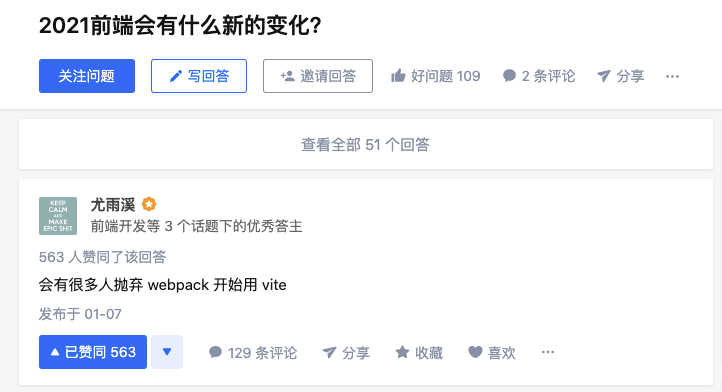
### 本文目标
- `vite2`变化分析
- 项目中常见任务`vite2+vue3`实践
### 创建Vite2项目
闲言碎语不必说,下面我们表一表好汉`vite2`
使用npm:
```bash
$ npm init @vitejs/app
```
> 按提示指定项目名称和模板,或直接指定
>
> ```bash
> $ npm init @vitejs/app my-vue-app --template vue
> ```
### Vite2主要变化
对我们之前项目影响较大的我已经都标记出来了:
- 配置选项变化:`vue特有选项`、创建选项、css选项、jsx选项等
- `别名行为变化`:不再要求`/`开头或结尾
- `Vue支持`:通过 [@vitejs/plugin-vue](https://github.com/vitejs/vite/tree/main/packages/plugin-vue)插件支持
- React支持
- HMR API变化
- 清单格式变化
- `插件API重新设计`
#### Vue支持
Vue的整合也通过插件实现,和其他框架一视同仁:
 SFC定义默认使用`setup script`,语法比较激进,但更简洁,好评!
 #### 别名定义
不再需要像`vite1`一样在别名前后加上`/`,这和`webpack`项目配置可以保持一致便于移植,好评!
```js
import path from 'path'
export default {
alias: {
"@": path.resolve(__dirname, "src"),
"comps": path.resolve(__dirname, "src/components"),
},
}
```
`App.vue`里面用一下试试
```vue
```
#### 插件API重新设计
`Vite2`主要变化在插件体系,这样更标准化、易扩展。`Vite2`插件API扩展自`Rollup`插件体系,因此能兼容现存的`Rollup`插件,编写的Vite插件也可以同时运行于开发和创建,好评!
> 插件编写我会另开专题讨论,欢迎大家关注我。
##### Vue3 Jsx支持
`vue3`中`jsx`支持需要引入插件:`@vitejs/plugin-vue-jsx`
```bash
$ npm i @vitejs/plugin-vue-jsx -D
```
注册插件,`vite.config.js`
```js
import vueJsx from "@vitejs/plugin-vue-jsx";
export default {
plugins: [vue(), vueJsx()],
}
```
用法也有要求,改造一下`App.vue`
```vue
```
##### Mock插件应用
之前给大家介绍的[vite-plugin-mock](https://github.com/vbenjs/vite-plugin-mock)已经重构支持了Vite2。
安装插件
```bash
npm i mockjs -S
```
```bash
npm i vite-plugin-mock cross-env -D
```
配置,`vite.config.js`
```js
import { viteMockServe } from 'vite-plugin-mock'
export default {
plugins: [ viteMockServe({ supportTs: false }) ]
}
```
设置环境变量,`package.json`
```json
{
"scripts": {
"dev": "cross-env NODE_ENV=development vite",
"build": "vite build"
},
}
```
### 项目基础架构
#### 路由
安装`vue-router 4.x`
```js
npm i vue-router@next -S
```
#### 别名定义
不再需要像`vite1`一样在别名前后加上`/`,这和`webpack`项目配置可以保持一致便于移植,好评!
```js
import path from 'path'
export default {
alias: {
"@": path.resolve(__dirname, "src"),
"comps": path.resolve(__dirname, "src/components"),
},
}
```
`App.vue`里面用一下试试
```vue
```
#### 插件API重新设计
`Vite2`主要变化在插件体系,这样更标准化、易扩展。`Vite2`插件API扩展自`Rollup`插件体系,因此能兼容现存的`Rollup`插件,编写的Vite插件也可以同时运行于开发和创建,好评!
> 插件编写我会另开专题讨论,欢迎大家关注我。
##### Vue3 Jsx支持
`vue3`中`jsx`支持需要引入插件:`@vitejs/plugin-vue-jsx`
```bash
$ npm i @vitejs/plugin-vue-jsx -D
```
注册插件,`vite.config.js`
```js
import vueJsx from "@vitejs/plugin-vue-jsx";
export default {
plugins: [vue(), vueJsx()],
}
```
用法也有要求,改造一下`App.vue`
```vue
```
##### Mock插件应用
之前给大家介绍的[vite-plugin-mock](https://github.com/vbenjs/vite-plugin-mock)已经重构支持了Vite2。
安装插件
```bash
npm i mockjs -S
```
```bash
npm i vite-plugin-mock cross-env -D
```
配置,`vite.config.js`
```js
import { viteMockServe } from 'vite-plugin-mock'
export default {
plugins: [ viteMockServe({ supportTs: false }) ]
}
```
设置环境变量,`package.json`
```json
{
"scripts": {
"dev": "cross-env NODE_ENV=development vite",
"build": "vite build"
},
}
```
### 项目基础架构
#### 路由
安装`vue-router 4.x`
```js
npm i vue-router@next -S
```
 路由配置,`router/index.js`
```js
import { createRouter, createWebHashHistory } from 'vue-router';
const router = createRouter({
history: createWebHashHistory(),
routes: [
{ path: '/', component: () => import('views/home.vue') }
]
});
export default router
```
引入,`main.js`
```js
import router from "@/router";
createApp(App).use(router).mount("#app");
```
> 别忘了创建`home.vue`并修改`App.vue`
>
> 路由用法略有变化,[村长的视频教程](https://www.bilibili.com/video/BV1Wh411X7Xp?p=19)
#### 状态管理
安装`vuex 4.x`
```bash
npm i vuex@next -S
```
路由配置,`router/index.js`
```js
import { createRouter, createWebHashHistory } from 'vue-router';
const router = createRouter({
history: createWebHashHistory(),
routes: [
{ path: '/', component: () => import('views/home.vue') }
]
});
export default router
```
引入,`main.js`
```js
import router from "@/router";
createApp(App).use(router).mount("#app");
```
> 别忘了创建`home.vue`并修改`App.vue`
>
> 路由用法略有变化,[村长的视频教程](https://www.bilibili.com/video/BV1Wh411X7Xp?p=19)
#### 状态管理
安装`vuex 4.x`
```bash
npm i vuex@next -S
```
 Store配置,`store/index.js`
```js
import {createStore} from 'vuex';
export default createStore({
state: {
couter: 0
}
});
```
引入,`main.js`
```js
import store from "@/store";
createApp(App).use(store).mount("#app");
```
> 用法和以前基本一样,[村长的视频教程](https://www.bilibili.com/video/BV1Wh411X7Xp?p=23)
#### 样式组织
安装sass
```bash
npm i sass -D
```
`styles`目录保存各种样式

`index.scss`作为出口组织这些样式,同时编写一些全局样式

最后在`main.js`导入
```js
import "styles/index.scss";
```
> 注意在`vite.config.js`添加`styles`别名
#### UI库
就用我们[花果山团队](https://www.yuque.com/hugsun)自家的[element3](https://github.com/hug-sun/element3)。
> [中文文档](https://element3-ui.com/)
安装
```bash
npm i element3 -S
```
完整引入,`main.js`
```js
import element3 from "element3";
import "element3/lib/theme-chalk/index.css";
createApp(App).use(element3)
```
按需引入,`main.js`
```js
import "element3/lib/theme-chalk/button.css";
import { ElButton } from "element3"
createApp(App).use(ElButton)
```
抽取成插件会更好,`plugins/element3.js`
```js
// 完整引入
import element3 from "element3";
import "element3/lib/theme-chalk/index.css";
// 按需引入
// import { ElButton } from "element3";
// import "element3/lib/theme-chalk/button.css";
export default function (app) {
// 完整引入
app.use(element3)
// 按需引入
// app.use(ElButton);
}
```
测试
```html
my button
```
#### 基础布局
我们应用需要一个基本布局页,类似下图,将来每个页面以布局页为父页面即可:

布局页面,`layout/index.vue`
```vue
```
> 别忘了创建`AppMain.vue`和`Navbar.vue`
路由配置,`router/index.js`
```js
{
path: "/",
component: Layout,
children: [
{
path: "",
component: () => import('views/home.vue'),
name: "Home",
meta: { title: "首页", icon: "el-icon-s-home" },
},
],
},
```
#### 动态导航
##### 侧边导航
根据路由表动态生成侧边导航菜单。

首先创建侧边栏组件,递归输出`routes`中的配置为多级菜单,`layout/Sidebar/index.vue`
```vue
```
> 注意:`sass`文件导出变量解析需要用到`css module`,因此`variables`文件要加上`module`中缀。
添加相关样式:
- `styles/variables.module.scss`
- `styles/sidebar.scss`
- `styles/index.scss`中引入
创建`SidebarItem.vue`组件,解析当前路由是导航链接还是父菜单:

##### 面包屑
通过路由匹配数组可以动态生成面包屑。
面包屑组件,`layouts/components/Breadcrumb.vue`
```vue
{{ item.meta.title }}
{{ item.meta.title }}
```
> 别忘了添加依赖:`path-to-regexp`
>
> 注意:`vue-router4`已经不再使用`path-to-regexp`解析动态`path`,因此这里后续还需要改进。
#### 数据封装
统一封装数据请求服务,有利于解决一下问题:
- 统一配置请求
- 请求、响应统一处理
准备工作:
- 安装`axios`:
```bash
npm i axios -S
```
- 添加配置文件:`.env.development`
```
VITE_BASE_API=/api
```
请求封装,`utils/request.js`
```js
import axios from "axios";
import { Message, Msgbox } from "element3";
// 创建axios实例
const service = axios.create({
// 在请求地址前面加上baseURL
baseURL: import.meta.env.VITE_BASE_API,
// 当发送跨域请求时携带cookie
// withCredentials: true,
timeout: 5000,
});
// 请求拦截
service.interceptors.request.use(
(config) => {
// 模拟指定请求令牌
config.headers["X-Token"] = "my token";
return config;
},
(error) => {
// 请求错误的统一处理
console.log(error); // for debug
return Promise.reject(error);
}
);
// 响应拦截器
service.interceptors.response.use(
/**
* 通过判断状态码统一处理响应,根据情况修改
* 同时也可以通过HTTP状态码判断请求结果
*/
(response) => {
const res = response.data;
// 如果状态码不是20000则认为有错误
if (res.code !== 20000) {
Message.error({
message: res.message || "Error",
duration: 5 * 1000,
});
// 50008: 非法令牌; 50012: 其他客户端已登入; 50014: 令牌过期;
if (res.code === 50008 || res.code === 50012 || res.code === 50014) {
// 重新登录
Msgbox.confirm("您已登出, 请重新登录", "确认", {
confirmButtonText: "重新登录",
cancelButtonText: "取消",
type: "warning",
}).then(() => {
store.dispatch("user/resetToken").then(() => {
location.reload();
});
});
}
return Promise.reject(new Error(res.message || "Error"));
} else {
return res;
}
},
(error) => {
console.log("err" + error); // for debug
Message({
message: error.message,
type: "error",
duration: 5 * 1000,
});
return Promise.reject(error);
}
);
export default service;
```
#### 业务处理
##### 结构化数据展示
使用`el-table`展示结构化数据,配合`el-pagination`做数据分页。

文件组织结构如下:`list.vue`展示列表,`edit.vue`和`create.vue`编辑或创建,内部复用`detail.vue`处理,`model`中负责数据业务处理。

`list.vue`中的数据展示
```vue
```
`list`和`loading`数据的获取逻辑,可以使用`compsition-api`提取到`userModel.js`
```js
export function useList() {
// 列表数据
const state = reactive({
loading: true, // 加载状态
list: [], // 列表数据
});
// 获取列表
function getList() {
state.loading = true;
return request({
url: "/getUsers",
method: "get",
}).then(({ data, total }) => {
// 设置列表数据
state.list = data;
}).finally(() => {
state.loading = false;
});
}
// 首次获取数据
getList();
return { state, getList };
}
```
`list.vue`中使用
```js
import { useList } from "./model/userModel";
```
```js
const { state, getList } = useList();
```
分页处理,`list.vue`
```html
```
数据也在`userModel`中处理
```js
const state = reactive({
total: 0, // 总条数
listQuery: {// 分页查询参数
page: 1, // 当前页码
limit: 5, // 每页条数
},
});
```
```js
request({
url: "/getUsers",
method: "get",
params: state.listQuery, // 在查询中加入分页参数
})
```
##### 表单处理
用户数据新增、编辑使用`el-form`处理
可用一个组件`detail.vue`来处理,区别仅在于初始化时是否获取信息回填到表单。
```html
提交
```
数据处理同样可以提取到`userModel`中处理。
```js
export function useItem(isEdit, id) {
const model = ref(Object.assign({}, defaultData));
// 初始化时,根据isEdit判定是否需要获取详情
onMounted(() => {
if (isEdit && id) {
// 获取详情
request({
url: "/getUser",
method: "get",
params: { id },
}).then(({ data }) => {
model.value = data;
});
}
});
return { model };
}
```
### 配套视频演示
我专门录了一套视频演示本文所做的所有操作,喜欢看视频学习的小伙伴移步:
[「备战2021」Vite2 + Vue3项目最佳实践](https://www.bilibili.com/video/BV1vX4y1K7bQ)
制作不易,求`3连`,求`关注`
### 关注村长
欢迎关注我的公众号「村长学前端」跟我一起学习最新前端知识。
================================================
FILE: index.html
================================================
Vite App
================================================
FILE: mock/test.js
================================================
const mockList = [
{ id: 1, name: "tom", age: 18 },
{ id: 2, name: "jerry", age: 18 },
{ id: 3, name: "mike", age: 18 },
{ id: 4, name: "jack", age: 18 },
{ id: 5, name: "larry", age: 18 },
{ id: 6, name: "white", age: 18 },
{ id: 7, name: "peter", age: 18 },
{ id: 8, name: "james", age: 18 },
];
module.exports = [
{
url: "/api/getUser",
type: "get",
response: () => {
return {
code: 20000,
data: { id: 1, name: "tom", age: 18 },
};
},
},
{
url: "/api/getUsers",
type: "get",
response: (config) => {
// 从查询参数中获取分页、过滤关键词等参数
const { page = 1, limit = 5 } = config.query;
// 分页
const data = mockList.filter(
(item, index) => index < limit * page && index >= limit * (page - 1)
);
return {
code: 20000,
data,
total: mockList.length,
};
},
},
{
url: "/api/addUser",
type: "post",
response: () => {
// 直接返回
return {
code: 20000,
};
},
},
{
url: "/api/updateUser",
type: "post",
response: () => {
return {
code: 20000,
};
},
},
{
url: "/api/deleteUser",
type: "get",
response: () => {
return {
code: 20000,
};
},
},
];
================================================
FILE: package.json
================================================
{
"name": "vite2-in-action",
"version": "0.0.0",
"license": "ISC",
"scripts": {
"dev": "cross-env NODE_ENV=development vite",
"build": "vite build"
},
"dependencies": {
"axios": "^0.21.1",
"element3": "0.0.39",
"js-yaml": "^4.0.0",
"mockjs": "^1.1.0",
"path-browserify": "^1.0.1",
"path-to-regexp": "^6.2.0",
"process": "^0.11.10",
"vue": "^3.0.5",
"vue-i18n": "^9.0.0-rc.7",
"vue-router": "^4.0.4",
"vuex": "^4.0.0"
},
"devDependencies": {
"@intlify/vite-plugin-vue-i18n": "^2.0.0-rc.2",
"@vitejs/plugin-vue": "^1.1.4",
"@vitejs/plugin-vue-jsx": "^1.1.0",
"@vue/compiler-sfc": "^3.0.5",
"cross-env": "^7.0.3",
"sass": "^1.32.8",
"vite": "^2.0.1",
"vite-plugin-mock": "^2.1.4"
}
}
================================================
FILE: src/App.vue
================================================
================================================
FILE: src/components/HelloWorld.vue
================================================
Store配置,`store/index.js`
```js
import {createStore} from 'vuex';
export default createStore({
state: {
couter: 0
}
});
```
引入,`main.js`
```js
import store from "@/store";
createApp(App).use(store).mount("#app");
```
> 用法和以前基本一样,[村长的视频教程](https://www.bilibili.com/video/BV1Wh411X7Xp?p=23)
#### 样式组织
安装sass
```bash
npm i sass -D
```
`styles`目录保存各种样式

`index.scss`作为出口组织这些样式,同时编写一些全局样式

最后在`main.js`导入
```js
import "styles/index.scss";
```
> 注意在`vite.config.js`添加`styles`别名
#### UI库
就用我们[花果山团队](https://www.yuque.com/hugsun)自家的[element3](https://github.com/hug-sun/element3)。
> [中文文档](https://element3-ui.com/)
安装
```bash
npm i element3 -S
```
完整引入,`main.js`
```js
import element3 from "element3";
import "element3/lib/theme-chalk/index.css";
createApp(App).use(element3)
```
按需引入,`main.js`
```js
import "element3/lib/theme-chalk/button.css";
import { ElButton } from "element3"
createApp(App).use(ElButton)
```
抽取成插件会更好,`plugins/element3.js`
```js
// 完整引入
import element3 from "element3";
import "element3/lib/theme-chalk/index.css";
// 按需引入
// import { ElButton } from "element3";
// import "element3/lib/theme-chalk/button.css";
export default function (app) {
// 完整引入
app.use(element3)
// 按需引入
// app.use(ElButton);
}
```
测试
```html
my button
```
#### 基础布局
我们应用需要一个基本布局页,类似下图,将来每个页面以布局页为父页面即可:

布局页面,`layout/index.vue`
```vue
```
> 别忘了创建`AppMain.vue`和`Navbar.vue`
路由配置,`router/index.js`
```js
{
path: "/",
component: Layout,
children: [
{
path: "",
component: () => import('views/home.vue'),
name: "Home",
meta: { title: "首页", icon: "el-icon-s-home" },
},
],
},
```
#### 动态导航
##### 侧边导航
根据路由表动态生成侧边导航菜单。

首先创建侧边栏组件,递归输出`routes`中的配置为多级菜单,`layout/Sidebar/index.vue`
```vue
```
> 注意:`sass`文件导出变量解析需要用到`css module`,因此`variables`文件要加上`module`中缀。
添加相关样式:
- `styles/variables.module.scss`
- `styles/sidebar.scss`
- `styles/index.scss`中引入
创建`SidebarItem.vue`组件,解析当前路由是导航链接还是父菜单:

##### 面包屑
通过路由匹配数组可以动态生成面包屑。
面包屑组件,`layouts/components/Breadcrumb.vue`
```vue
{{ item.meta.title }}
{{ item.meta.title }}
```
> 别忘了添加依赖:`path-to-regexp`
>
> 注意:`vue-router4`已经不再使用`path-to-regexp`解析动态`path`,因此这里后续还需要改进。
#### 数据封装
统一封装数据请求服务,有利于解决一下问题:
- 统一配置请求
- 请求、响应统一处理
准备工作:
- 安装`axios`:
```bash
npm i axios -S
```
- 添加配置文件:`.env.development`
```
VITE_BASE_API=/api
```
请求封装,`utils/request.js`
```js
import axios from "axios";
import { Message, Msgbox } from "element3";
// 创建axios实例
const service = axios.create({
// 在请求地址前面加上baseURL
baseURL: import.meta.env.VITE_BASE_API,
// 当发送跨域请求时携带cookie
// withCredentials: true,
timeout: 5000,
});
// 请求拦截
service.interceptors.request.use(
(config) => {
// 模拟指定请求令牌
config.headers["X-Token"] = "my token";
return config;
},
(error) => {
// 请求错误的统一处理
console.log(error); // for debug
return Promise.reject(error);
}
);
// 响应拦截器
service.interceptors.response.use(
/**
* 通过判断状态码统一处理响应,根据情况修改
* 同时也可以通过HTTP状态码判断请求结果
*/
(response) => {
const res = response.data;
// 如果状态码不是20000则认为有错误
if (res.code !== 20000) {
Message.error({
message: res.message || "Error",
duration: 5 * 1000,
});
// 50008: 非法令牌; 50012: 其他客户端已登入; 50014: 令牌过期;
if (res.code === 50008 || res.code === 50012 || res.code === 50014) {
// 重新登录
Msgbox.confirm("您已登出, 请重新登录", "确认", {
confirmButtonText: "重新登录",
cancelButtonText: "取消",
type: "warning",
}).then(() => {
store.dispatch("user/resetToken").then(() => {
location.reload();
});
});
}
return Promise.reject(new Error(res.message || "Error"));
} else {
return res;
}
},
(error) => {
console.log("err" + error); // for debug
Message({
message: error.message,
type: "error",
duration: 5 * 1000,
});
return Promise.reject(error);
}
);
export default service;
```
#### 业务处理
##### 结构化数据展示
使用`el-table`展示结构化数据,配合`el-pagination`做数据分页。

文件组织结构如下:`list.vue`展示列表,`edit.vue`和`create.vue`编辑或创建,内部复用`detail.vue`处理,`model`中负责数据业务处理。

`list.vue`中的数据展示
```vue
```
`list`和`loading`数据的获取逻辑,可以使用`compsition-api`提取到`userModel.js`
```js
export function useList() {
// 列表数据
const state = reactive({
loading: true, // 加载状态
list: [], // 列表数据
});
// 获取列表
function getList() {
state.loading = true;
return request({
url: "/getUsers",
method: "get",
}).then(({ data, total }) => {
// 设置列表数据
state.list = data;
}).finally(() => {
state.loading = false;
});
}
// 首次获取数据
getList();
return { state, getList };
}
```
`list.vue`中使用
```js
import { useList } from "./model/userModel";
```
```js
const { state, getList } = useList();
```
分页处理,`list.vue`
```html
```
数据也在`userModel`中处理
```js
const state = reactive({
total: 0, // 总条数
listQuery: {// 分页查询参数
page: 1, // 当前页码
limit: 5, // 每页条数
},
});
```
```js
request({
url: "/getUsers",
method: "get",
params: state.listQuery, // 在查询中加入分页参数
})
```
##### 表单处理
用户数据新增、编辑使用`el-form`处理
可用一个组件`detail.vue`来处理,区别仅在于初始化时是否获取信息回填到表单。
```html
提交
```
数据处理同样可以提取到`userModel`中处理。
```js
export function useItem(isEdit, id) {
const model = ref(Object.assign({}, defaultData));
// 初始化时,根据isEdit判定是否需要获取详情
onMounted(() => {
if (isEdit && id) {
// 获取详情
request({
url: "/getUser",
method: "get",
params: { id },
}).then(({ data }) => {
model.value = data;
});
}
});
return { model };
}
```
### 配套视频演示
我专门录了一套视频演示本文所做的所有操作,喜欢看视频学习的小伙伴移步:
[「备战2021」Vite2 + Vue3项目最佳实践](https://www.bilibili.com/video/BV1vX4y1K7bQ)
制作不易,求`3连`,求`关注`
### 关注村长
欢迎关注我的公众号「村长学前端」跟我一起学习最新前端知识。
================================================
FILE: index.html
================================================
Vite App
================================================
FILE: mock/test.js
================================================
const mockList = [
{ id: 1, name: "tom", age: 18 },
{ id: 2, name: "jerry", age: 18 },
{ id: 3, name: "mike", age: 18 },
{ id: 4, name: "jack", age: 18 },
{ id: 5, name: "larry", age: 18 },
{ id: 6, name: "white", age: 18 },
{ id: 7, name: "peter", age: 18 },
{ id: 8, name: "james", age: 18 },
];
module.exports = [
{
url: "/api/getUser",
type: "get",
response: () => {
return {
code: 20000,
data: { id: 1, name: "tom", age: 18 },
};
},
},
{
url: "/api/getUsers",
type: "get",
response: (config) => {
// 从查询参数中获取分页、过滤关键词等参数
const { page = 1, limit = 5 } = config.query;
// 分页
const data = mockList.filter(
(item, index) => index < limit * page && index >= limit * (page - 1)
);
return {
code: 20000,
data,
total: mockList.length,
};
},
},
{
url: "/api/addUser",
type: "post",
response: () => {
// 直接返回
return {
code: 20000,
};
},
},
{
url: "/api/updateUser",
type: "post",
response: () => {
return {
code: 20000,
};
},
},
{
url: "/api/deleteUser",
type: "get",
response: () => {
return {
code: 20000,
};
},
},
];
================================================
FILE: package.json
================================================
{
"name": "vite2-in-action",
"version": "0.0.0",
"license": "ISC",
"scripts": {
"dev": "cross-env NODE_ENV=development vite",
"build": "vite build"
},
"dependencies": {
"axios": "^0.21.1",
"element3": "0.0.39",
"js-yaml": "^4.0.0",
"mockjs": "^1.1.0",
"path-browserify": "^1.0.1",
"path-to-regexp": "^6.2.0",
"process": "^0.11.10",
"vue": "^3.0.5",
"vue-i18n": "^9.0.0-rc.7",
"vue-router": "^4.0.4",
"vuex": "^4.0.0"
},
"devDependencies": {
"@intlify/vite-plugin-vue-i18n": "^2.0.0-rc.2",
"@vitejs/plugin-vue": "^1.1.4",
"@vitejs/plugin-vue-jsx": "^1.1.0",
"@vue/compiler-sfc": "^3.0.5",
"cross-env": "^7.0.3",
"sass": "^1.32.8",
"vite": "^2.0.1",
"vite-plugin-mock": "^2.1.4"
}
}
================================================
FILE: src/App.vue
================================================
================================================
FILE: src/components/HelloWorld.vue
================================================
{{ msg }}
{{ $store.state.counter }}
{{ t('hello') }}
count is: {{ state.count }}
Edit
components/HelloWorld.vue to test hot module replacement.
{
"en": {
"language": "Language",
"hello": "hello, world!"
},
"ja": {
"language": "言語",
"hello": "こんにちは、世界!"
}
}
================================================
FILE: src/components/Pagination.vue
================================================
================================================
FILE: src/layouts/components/AppMain.vue
================================================
================================================
FILE: src/layouts/components/Breadcrumb.vue
================================================
{{ item.meta.title }}
{{ item.meta.title }}
================================================
FILE: src/layouts/components/Navbar.vue
================================================
================================================
FILE: src/layouts/components/Sidebar/Item.vue
================================================
{{ title }}
================================================
FILE: src/layouts/components/Sidebar/Link.vue
================================================
================================================
FILE: src/layouts/components/Sidebar/SidebarItem.vue
================================================
================================================
FILE: src/layouts/components/Sidebar/index.vue
================================================
================================================
FILE: src/layouts/index.vue
================================================
================================================
FILE: src/locales/en.json
================================================
{
"language": "Language",
"hello": "hello, world!"
}
================================================
FILE: src/locales/jp.json
================================================
{
"language": "言語",
"hello": "こんにちは、世界!"
}
================================================
FILE: src/main.js
================================================
import { createApp } from "vue";
import App from "./App.vue";
// 全局样式
import "styles/index.scss";
// element3
import element3 from "plugins/element3";
// router
import router from "/@/router";
// store
import store from "/@/store";
// i18n
import { createI18n } from "vue-i18n";
import messages from "@intlify/vite-plugin-vue-i18n/messages";
const i18n = createI18n({
legacy: false,
locale: "en",
messages,
});
createApp(App).use(element3).use(router).use(store).use(i18n).mount("#app");
================================================
FILE: src/plugins/element3.js
================================================
// 完整引入
import element3 from "element3";
import "element3/lib/theme-chalk/index.css";
// 按需引入
// import "element3/lib/theme-chalk/button.css";
// import {
// ElRow,
// ElCol,
// ElContainer,
// ElHeader,
// ElFooter,
// ElAside,
// ElMain,
// ElIcon,
// ElButton,
// ElLink,
// ElRadio,
// ElRadioButton,
// ElRadioGroup,
// ElCheckbox,
// ElCheckboxButton,
// ElCheckboxGroup,
// ElInput,
// ElInputNumber,
// ElSelect,
// ElOption,
// ElOptionGroup,
// ElCascader,
// ElCascaderPanel,
// ElSwitch,
// ElSlider,
// ElTimePicker,
// ElTimeSelect,
// ElDatePicker,
// ElUpload,
// ElRate,
// ElColorPicker,
// ElTransfer,
// ElForm,
// ElFormItem,
// ElTag,
// ElProgress,
// ElTree,
// ElPagination,
// ElBadge,
// ElAvatar,
// ElAlert,
// ElLoading,
// ElMenu,
// ElMenuItem,
// ElSubmenu,
// ElMenuItemGroup,
// ElTabs,
// ElTabPane,
// ElBreadcrumb,
// ElBreadcrumbItem,
// ElPageHeader,
// ElDropdown,
// ElDropdownItem,
// ElDropdownMenu,
// ElSteps,
// ElStep,
// ElDialog,
// ElTooltip,
// ElPopover,
// ElPopconfirm,
// ElCard,
// ElCarousel,
// ElCarouselItem,
// ElCollapse,
// ElCollapseItem,
// ElTimeline,
// ElTimelineItem,
// ElDivider,
// ElCalendar,
// ElImage,
// ElBacktop,
// ElInfiniteScroll,
// ElDrawer,
// ElScrollbar,
// } from "element3";
export default function (app) {
// 完整引入
app.use(element3)
// 按需引入
// app.use(ElButton);
}
================================================
FILE: src/router/index.js
================================================
import { createRouter, createWebHashHistory } from "vue-router";
import Layout from "layouts/index.vue";
/**
* Note: 子菜单仅当路由的children.length >= 1时才出现
*
* hidden: true 设置为true时路由将显示在sidebar中(默认false)
* alwaysShow: true 如果设置为true则总是显示在菜单根目录
* 如果不设置alwaysShow, 当路由有超过一个子路由时,
* 将会变为嵌套模式, 否则不会显示根菜单
* redirect: noRedirect 如果设置noRedirect时,breadcrumb中点击将不会跳转
* name:'router-name' name用于 (必须设置!!!)
* meta : {
roles: ['admin','editor'] 页面可访问角色设置
title: 'title' sidebar和breadcrumb显示的标题
icon: 'svg-name'/'el-icon-x' sidebar中显示的图标
breadcrumb: false 设置为false,将不会出现在面包屑中
activeMenu: '/example/list' 如果设置一个path, sidebar将会在高亮匹配项
}
*/
export const routes = [
{
path: "/",
redirect: "/home",
component: Layout,
meta: { title: "导航", icon: "el-icon-s-home" },
children: [
{
path: "home",
component: () => import("views/home.vue"),
name: "Home",
meta: { title: "首页", icon: "el-icon-s-home" },
children: [
{
path: ":id",
component: () => import("views/detail.vue"),
name: "Detail",
hidden: true,
meta: {
title: "详情",
icon: "el-icon-s-home",
activeMenu: "/home",
},
},
],
},
],
},
{
path: "/users",
component: Layout,
meta: {
title: "用户管理",
icon: "el-icon-user-solid",
},
redirect: '/users/list',
children: [
{
path: "list",
component: () => import("views/users/list.vue"),
meta: {
title: "用户列表",
icon: "el-icon-document",
},
},
{
path: "create",
component: () => import("views/users/create.vue"),
hidden: true,
meta: {
title: "创建新用户",
activeMenu: "/users/list",
},
},
{
path: "edit/:id(\\d+)",
name: "userEdit",
component: () => import("views/users/edit.vue"),
hidden: true,
meta: {
title: "编辑用户信息",
activeMenu: "/users/list",
},
},
],
},
];
const router = createRouter({
history: createWebHashHistory(),
routes,
});
export default router;
================================================
FILE: src/store/index.js
================================================
import { createStore } from "vuex";
const store = createStore({
state: {
counter: 0,
},
});
export default store;
================================================
FILE: src/styles/index.scss
================================================
@import "./mixin.scss";
@import "./variables.module.scss";
@import "./sidebar.scss";
// 编写全局样式
body {
height: 100%;
-moz-osx-font-smoothing: grayscale;
-webkit-font-smoothing: antialiased;
text-rendering: optimizeLegibility;
font-family: Helvetica Neue, Helvetica, PingFang SC, Hiragino Sans GB,
Microsoft YaHei, Arial, sans-serif;
margin: 0;
}
label {
font-weight: 700;
}
html {
height: 100%;
box-sizing: border-box;
}
#app {
height: 100%;
font-family: Avenir, Helvetica, Arial, sans-serif;
-webkit-font-smoothing: antialiased;
-moz-osx-font-smoothing: grayscale;
text-align: center;
color: #2c3e50;
}
*,
*:before,
*:after {
box-sizing: inherit;
}
a:focus,
a:active {
outline: none;
}
a,
a:focus,
a:hover {
cursor: pointer;
color: inherit;
text-decoration: none;
}
div:focus {
outline: none;
}
.clearfix {
&:after {
visibility: hidden;
display: block;
font-size: 0;
content: " ";
clear: both;
height: 0;
}
}
// main-container global css
.app-container {
padding: 20px;
}
================================================
FILE: src/styles/mixin.scss
================================================
@mixin clearfix {
&:after {
content: "";
display: table;
clear: both;
}
}
@mixin scrollBar {
&::-webkit-scrollbar-track-piece {
background: #d3dce6;
}
&::-webkit-scrollbar {
width: 6px;
}
&::-webkit-scrollbar-thumb {
background: #99a9bf;
border-radius: 20px;
}
}
@mixin relative {
position: relative;
width: 100%;
height: 100%;
}
================================================
FILE: src/styles/sidebar.scss
================================================
#app {
.main-container {
min-height: 100%;
transition: margin-left .28s;
margin-left: $sideBarWidth;
position: relative;
}
.sidebar-container {
transition: width 0.28s;
width: $sideBarWidth !important;
background-color: $menuBg;
height: 100%;
position: fixed;
font-size: 0px;
top: 0;
bottom: 0;
left: 0;
z-index: 1001;
overflow: hidden;
// reset element-ui css
.horizontal-collapse-transition {
transition: 0s width ease-in-out, 0s padding-left ease-in-out, 0s padding-right ease-in-out;
}
.scrollbar-wrapper {
overflow-x: hidden !important;
}
.el-scrollbar__bar.is-vertical {
right: 0px;
}
.el-scrollbar {
height: 100%;
}
&.has-logo {
.el-scrollbar {
height: calc(100% - 50px);
}
}
.is-horizontal {
display: none;
}
a {
display: inline-block;
width: 100%;
overflow: hidden;
}
.svg-icon {
margin-right: 16px;
}
.sub-el-icon {
margin-right: 12px;
margin-left: -2px;
}
.el-menu {
border: none;
height: 100%;
width: 100% !important;
}
// menu hover
.submenu-title-noDropdown,
.el-submenu__title {
&:hover {
background-color: $menuHover !important;
}
}
.is-active>.el-submenu__title {
color: $subMenuActiveText !important;
}
& .nest-menu .el-submenu>.el-submenu__title,
& .el-submenu .el-menu-item {
min-width: $sideBarWidth !important;
background-color: $subMenuBg !important;
&:hover {
background-color: $subMenuHover !important;
}
}
}
.hideSidebar {
.sidebar-container {
width: 50px !important;
}
.main-container {
margin-left: 54px;
}
.submenu-title-noDropdown {
padding: 0 !important;
position: relative;
.el-tooltip {
padding: 0 !important;
.svg-icon {
margin-left: 20px;
}
.sub-el-icon {
margin-left: 19px;
}
}
}
.el-submenu {
overflow: hidden;
&>.el-submenu__title {
padding: 0 !important;
.svg-icon {
margin-left: 20px;
}
.sub-el-icon {
margin-left: 19px;
}
.el-submenu__icon-arrow {
display: none;
}
}
}
.el-menu--collapse {
.el-submenu {
&>.el-submenu__title {
&>span {
height: 0;
width: 0;
overflow: hidden;
visibility: hidden;
display: inline-block;
}
}
}
}
}
.el-menu--collapse .el-menu .el-submenu {
min-width: $sideBarWidth !important;
}
// mobile responsive
.mobile {
.main-container {
margin-left: 0px;
}
.sidebar-container {
transition: transform .28s;
width: $sideBarWidth !important;
}
&.hideSidebar {
.sidebar-container {
pointer-events: none;
transition-duration: 0.3s;
transform: translate3d(-$sideBarWidth, 0, 0);
}
}
}
.withoutAnimation {
.main-container,
.sidebar-container {
transition: none;
}
}
}
// when menu collapsed
.el-menu--vertical {
&>.el-menu {
.svg-icon {
margin-right: 16px;
}
.sub-el-icon {
margin-right: 12px;
margin-left: -2px;
}
}
.nest-menu .el-submenu>.el-submenu__title,
.el-menu-item {
&:hover {
// you can use $subMenuHover
background-color: $menuHover !important;
}
}
// the scroll bar appears when the subMenu is too long
>.el-menu--popup {
max-height: 100vh;
overflow-y: auto;
&::-webkit-scrollbar-track-piece {
background: #d3dce6;
}
&::-webkit-scrollbar {
width: 6px;
}
&::-webkit-scrollbar-thumb {
background: #99a9bf;
border-radius: 20px;
}
}
}
================================================
FILE: src/styles/variables.module.scss
================================================
// sidebar
$menuText:#bfcbd9;
$menuActiveText:#409EFF;
$subMenuActiveText:#f4f4f5; //https://github.com/ElemeFE/element/issues/12951
$menuBg:#304156;
$menuHover:#263445;
$subMenuBg:#1f2d3d;
$subMenuHover:#001528;
$sideBarWidth: 210px;
// the :export directive is the magic sauce for webpack
// https://www.bluematador.com/blog/how-to-share-variables-between-js-and-sass
:export {
menuText: $menuText;
menuActiveText: $menuActiveText;
subMenuActiveText: $subMenuActiveText;
menuBg: $menuBg;
menuHover: $menuHover;
subMenuBg: $subMenuBg;
subMenuHover: $subMenuHover;
sideBarWidth: $sideBarWidth;
}
================================================
FILE: src/utils/request.js
================================================
import axios from "axios";
import { Message, Msgbox } from "element3";
import store from "/@/store";
// 创建axios实例
const service = axios.create({
// 在请求地址前面加上baseURL
baseURL: import.meta.env.VITE_BASE_API,
// 当发送跨域请求时携带cookie
// withCredentials: true,
timeout: 5000,
});
// 请求拦截
service.interceptors.request.use(
(config) => {
// 指定请求令牌
// if (store.getters.token) {
// // 自定义令牌的字段名为X-Token,根据咱们后台再做修改
// config.headers["X-Token"] = store.getters.token;
// }
config.headers["X-Token"] = "my token";
return config;
},
(error) => {
// 请求错误的统一处理
console.log(error); // for debug
return Promise.reject(error);
}
);
// 响应拦截器
service.interceptors.response.use(
/**
* If you want to get http information such as headers or status
* Please return response => response
*/
/**
* 通过判断状态码统一处理响应,根据情况修改
* 同时也可以通过HTTP状态码判断请求结果
*/
(response) => {
const res = response.data;
// 如果状态码不是20000则认为有错误
if (res.code !== 20000) {
Message.error({
message: res.message || "Error",
duration: 5 * 1000,
});
// 50008: 非法令牌; 50012: 其他客户端已登入; 50014: 令牌过期;
if (res.code === 50008 || res.code === 50012 || res.code === 50014) {
// 重新登录
Msgbox.confirm("您已登出, 请重新登录", "确认", {
confirmButtonText: "重新登录",
cancelButtonText: "取消",
type: "warning",
}).then(() => {
store.dispatch("user/resetToken").then(() => {
location.reload();
});
});
}
return Promise.reject(new Error(res.message || "Error"));
} else {
return res;
}
},
(error) => {
console.log("err" + error); // for debug
Message({
message: error.message,
type: "error",
duration: 5 * 1000,
});
return Promise.reject(error);
}
);
export default service;
================================================
FILE: src/utils/validate.js
================================================
export function isExternal(path) {
return /^(https?:|mailto:|tel:)/.test(path);
}
================================================
FILE: src/views/detail.vue
================================================
detail {{$route.params.id}}
================================================
FILE: src/views/home.vue
================================================
detail1
detail2
================================================
FILE: src/views/users/components/detail.vue
================================================
提交
================================================
FILE: src/views/users/create.vue
================================================
================================================
FILE: src/views/users/edit.vue
================================================
================================================
FILE: src/views/users/list.vue
================================================
================================================
FILE: src/views/users/model/userModel.js
================================================
import { reactive, onMounted, ref } from "vue";
import request from "utils/request";
export function useList() {
// 列表数据
const state = reactive({
loading: true, // 加载状态
list: [], // 列表数据
total: 0,
listQuery: {
page: 1,
limit: 5,
},
});
// 获取列表
function getList() {
state.loading = true;
return request({
url: "/getUsers",
method: "get",
params: state.listQuery,
})
.then(({ data, total }) => {
// 设置列表数据
state.list = data;
state.total = total;
})
.finally(() => {
state.loading = false;
});
}
// 删除项
function delItem(id) {
state.loading = true;
return request({
url: "/deleteUser",
method: "get",
params: { id },
}).finally(() => {
state.loading = false;
});
}
// 首次获取数据
getList();
return { state, getList, delItem };
}
const defaultData = {
name: "",
age: undefined,
};
export function useItem(isEdit, id) {
const model = ref(Object.assign({}, defaultData));
// 初始化时,根据isEdit判定是否需要获取玩家详情
onMounted(() => {
if (isEdit && id) {
// 获取玩家详情
request({
url: "/getUser",
method: "get",
params: { id },
}).then(({ data }) => {
model.value = data;
});
}
});
const updateUser = () => {
return request({
url: "/updateUser",
method: "post",
data: model.value,
});
};
const addUser = () => {
return request({
url: "/addUser",
method: "post",
data: model.value,
});
};
return { model, updateUser, addUser };
}
================================================
FILE: vite.config.js
================================================
import path from "path";
import vue from "@vitejs/plugin-vue";
import vueJsx from "@vitejs/plugin-vue-jsx";
import { viteMockServe } from "vite-plugin-mock";
// 导入插件
import vueI18n from '@intlify/vite-plugin-vue-i18n'
export default {
resolve: {
alias: {
"/@": path.resolve(__dirname, "src"),
comps: path.resolve(__dirname, "src/components"),
styles: path.resolve(__dirname, "src/styles"),
plugins: path.resolve(__dirname, "src/plugins"),
views: path.resolve(__dirname, "src/views"),
layouts: path.resolve(__dirname, "src/layouts"),
utils: path.resolve(__dirname, "src/utils"),
apis: path.resolve(__dirname, "src/apis"),
dirs: path.resolve(__dirname, "src/directives"),
},
},
plugins: [vue(), vueJsx(), viteMockServe({ supportTs: false }), vueI18n({
// if you want to use Vue I18n Legacy API, you need to set `compositionOnly: false`
// compositionOnly: false,
// you need to set i18n resource including paths !
include: path.resolve(__dirname, './src/locales/**')
})],
};
