[
{
"path": "README.md",
"content": "# fuzzel theme [Best applauncher]([https://www.google.com](https://codeberg.org/dnkl/fuzzel))\n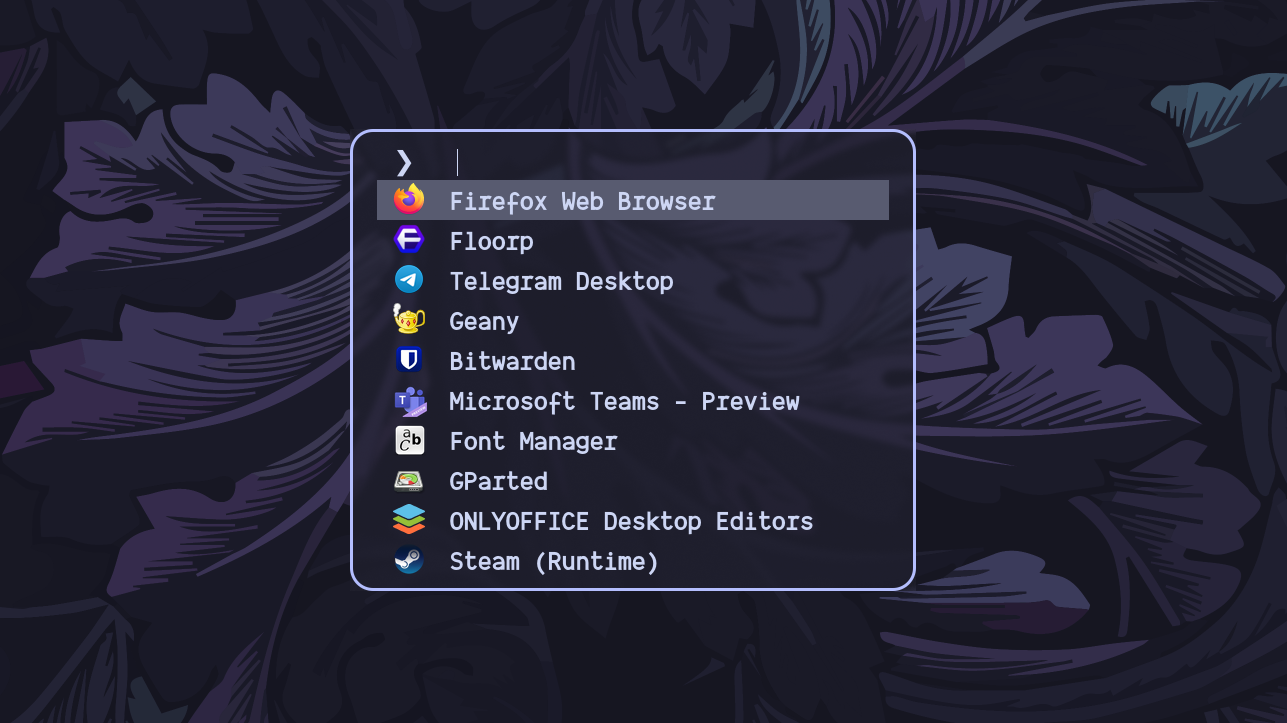\n\n\n# waybar themes\n**_Font Awesome_ is required.**\n\n## Previews\n**bluish**\n\n\n\n**awe**\n\n\n\n**colorful**\n\n\n\n**minimal**\n\n\n\n**vertical waybar**\n\n \n"
},
{
"path": "dunst/dunstrc",
"content": "[global]\n\n # --- Display --- #\n\n # The monitor to be displayed to\n monitor = 0\n\n # Follow monitor with mouse\n follow = mouse\n\n width = 300\n # height = 260\n origin = top-right\n offset = 24x24\n\n progress_bar = true\n progress_bar_height = 14\n progress_bar_frame_width = 1\n progress_bar_min_width = 150\n progress_bar_max_width = 300\n\n # Show how many messages are hidden\n indicate_hidden = yes\n\n # Shrink window if it's smaller than the width.\n shrink = no\n\n # The transparency of the window.\n transparency = 1\n\n # Draw a line between multiple notifications\n separator_height = 6\n\n separator_color = \"#282a36\"\n\n # Set notification padding\n padding = 16\n horizontal_padding = 16\n\n # Disable frame (border)\n frame_width = 0\n\n # Sort messages by urgency.\n sort = no\n\n # Disable idle time\n idle_threshold = 0\n \n # --- Text --- #\n\n # Set the font\n # font = \"Noto Sans 11\"\n font = \"JetBrainsMono 10\"\n\n # Set line height to font height\n line_height = 0\n\n # Reference for markup and formatting:\n # bold\n # italic\n # strikethrough\n # underline\n # .\n # %a appname\n # %s summary\n # %b body\n # %i iconname (including its path)\n # %I iconname (without its path)\n # %p progress value if set ([ 0%] to [100%]) or nothing\n # %n progress value if set without any extra characters\n # %% Literal %\n\n markup = full\n format = \"%a\\n%s\"\n\n # Left align the text\n alignment = left\n\n # Vertical alignment of message text and icon.\n vertical_alignment = center\n\n # Show age of message if message is old\n show_age_threshold = 120\n\n # Wrap text if it doesn't fit in geometry\n word_wrap = yes\n\n # Where to place ellipses if word wrap is disabled\n # ellipsize = middle\n\n # Use newlines '\\n' in notifications.\n ignore_newline = no\n\n # Don't stack together notifications\n stack_duplicates = false\n\n # Hide the count of stacked notifications\n # hide_duplicate_count = false\n\n # Display indicators for URLs (U) and actions (A).\n show_indicators = yes\n\n \n # ---- Icons ---- #\n\n # Align icons left/right/off\n icon_position = left\n\n # Scale small icons up to this size, set to 0 to disable.\n min_icon_size = 50\n\n # Scale larger icons down to this size, set to 0 to disable\n max_icon_size = 60\n\n # Paths to default icons.\n icon_path = ~/.local/share/icons/kora/apps/scalable:~/.local/share/icons/kora/status/scalable:~/.local/share/icons/kora/actions/scalable:~/.local/share/icons/kora/emblems/scalable:~/.local/share/icons/kora/devices/scalable\n \n # --- History --- #\n\n # Avoid timing out hidden notifications\n sticky_history = yes\n\n # Maximum amount of notifications kept in history\n history_length = 120\n\n\n # --- Misc/Advanced --- #\n\n dmenu = /usr/bin/dmenu -p dunst:\n\n # Browser for opening urls in context menu.\n browser = /usr/bin/firefox -new-tab\n\n # Always run rule-defined scripts, even if the notification is suppressed\n always_run_script = false\n\n # Define the title of the windows spawned by dunst\n title = Dunst\n\n # Define the class of the windows spawned by dunst\n class = Dunst\n\n # Define the corner radius of the notification window\n corner_radius = 10\n\n # Don't gnore the dbus closeNotification message.\n ignore_dbusclose = false\n\n\n # --- Legacy --- #\n\n # Use the Xinerama extension instead of RandR for multi-monitor support.\n force_xinerama = false\n\n\n # --- Mouse --- #\n mouse_left_click = close_current\n mouse_middle_click = do_action, close_current\n mouse_right_click = close_all\n\n\n[experimental]\n per_monitor_dpi = false\n\n[urgency_low]\n frame_color = \"#1D918B\"\n highlight = \"#6fa6e7\"\n foreground = \"#FFEE79\"\n background = \"#18191E\"\n timeout = 5\n\n[urgency_normal]\n frame_color = \"#D16BB7\"\n highlight = \"#5ca1ff\"\n foreground = \"#FFEE79\"\n background = \"#18191E\" \n timeout = 8\n\n[urgency_critical]\n frame_color = \"#FC2929\"\n highlight = \"#fe6c5a\"\n foreground = \"#ff4444\"\n background = \"#18191E\"\n timeout = 20\n icon = battery-ac-adapter\n\n[backlight]\n appname = \"Backlight\"\n highlight = \"#fc7b80\"\n\n[music]\n appname = \"Music\"\n\n[volume]\n summary = \"Volume*\"\n highlight = \"#cb8cf4\"\n\n[battery]\n appname = \"Power Warning\"\n"
},
{
"path": "foot/foot.ini",
"content": "term=xterm-256color\nlogin-shell=no\n\nfont=Gintronic Medium:size=10.5, Symbols Nerd Font Mono:size=14\n\npad=10x5\n\n[scrollback]\nlines=10000\nmultiplier=3.0\nindicator-position=relative\n\n[cursor]\nstyle=beam\nblink=yes\n\n[colors]\nalpha=0.85\nforeground=dbd0b9\nbackground=192330\nselection-foreground=c0caf5\nselection-background=283457\nurls=73daca\n\nregular0=8DB0BB\nregular1=00FF7F\nregular2=F89406\nregular3=00F8FB\nregular4=AEA8D3\nregular5=ABE338\nregular6=6AD4B1\nregular7=FF6347\n\n"
},
{
"path": "fuzzel/fuzzel.ini",
"content": "font=Dank Mono:weight=bold:size=12\nline-height=18\nfields=name,generic,comment,categories,filename,keywords\nterminal=foot -e\nprompt=\"❯ \" \nlayer=overlay\nlines=10\n\n[colors]\nbackground=1e1e2eaa\ntext=cdd6f4ff\nmatch=f38ba8ff\nselection=585b70ff\nselection-match=f38ba8ff\nselection-text=cdd6f4ff\nborder=b4befeff\n\n[border]\nradius=20\nwidth=3\n"
},
{
"path": "hypr/conf/decoration.conf",
"content": "# █▀▄ █▀▀ █▀▀ █▀█ █▀█ ▄▀█ ▀█▀ █ █▀█ █▄░█\n# █▄▀ ██▄ █▄▄ █▄█ █▀▄ █▀█ ░█░ █ █▄█ █░▀█\n\ndecoration {\n # █▀█ █▀█ █░█ █▄░█ █▀▄ █▀▀ █▀█ █▀█ █▄░█ █▀▀ █▀█\n # █▀▄ █▄█ █▄█ █░▀█ █▄▀ █▄▄ █▄█ █▀▄ █░▀█ ██▄ █▀▄\n rounding = 8\n\n # █▀█ █▀█ ▄▀█ █▀▀ █ ▀█▀ █▄█\n # █▄█ █▀▀ █▀█ █▄▄ █ ░█░ ░█░\n active_opacity = 1.0\n inactive_opacity = 1.0\n\n # █▄▄ █░░ █░█ █▀█\n # █▄█ █▄▄ █▄█ █▀▄\n\tblur {\n\t\tenabled = true\n\t size = 3\n\t passes = 1\n\t xray = true\n\t special = false\n\t new_optimizations = true\n\t ignore_opacity = true\n\t}\n # █▀ █░█ ▄▀█ █▀▄ █▀█ █░█░█\n # ▄█ █▀█ █▀█ █▄▀ █▄█ ▀▄▀▄▀\n drop_shadow = true\n shadow_ignore_window = true\n shadow_offset = 2 2\n shadow_range = 4\n shadow_render_power = 3\n col.shadow = rgba(1a1a1aee)\n}\n\n# ▄▀█ █▄░█ █ █▀▄▀█ ▄▀█ ▀█▀ █ █▀█ █▄░█\n# █▀█ █░▀█ █ █░▀░█ █▀█ ░█░ █ █▄█ █░▀█\nanimations {\n enabled = true\n # █▄▄ █▀▀ ▀█ █ █▀▀ █▀█ █▀▀ █░█ █▀█ █░█ █▀▀\n # █▄█ ██▄ █▄ █ ██▄ █▀▄ █▄▄ █▄█ █▀▄ ▀▄▀ ██▄\n bezier=overshot,0.05,0.9,0.1,1.05\n bezier=exit,0.9,-.2,0.95,0.05\n\n animation = windows, 1, 5, overshot, slide\n animation = windowsOut, 1, 7, default, popin 80%\n animation = border, 1, 10, default\n animation = borderangle, 1, 8, default\n animation = fade, 1, 7, default\n animation = workspaces, 1, 6, default\n}\n"
},
{
"path": "hypr/conf/keybinds.conf",
"content": "# -----------\n# Keybinds\n# -----------\n\n# Toggle waybar display\nbind = SUPER, N, exec, pgrep waybar > /dev/null && killall waybar || waybar --config ~/.config/waybar/minimal/config --style ~/.config/waybar/minimal/style.css &\n\n# █▀ █▀▀ █▀█ █▀▀ █▀▀ █▄░█ █▀ █░█ █▀█ ▀█▀\n# ▄█ █▄▄ █▀▄ ██▄ ██▄ █░▀█ ▄█ █▀█ █▄█ ░█░\nbind=SUPER,Print,exec,IMG=~/Pictures/screenshot/ss_$(date +%Y%m%d_%H%M%S).png && grim $IMG && wl-copy < $IMG && notify-send \"Screenshot saved\"\nbind=SUPER,S,exec,grim -g \"$(slurp)\" - | wl-copy && notify-send \"Screenshot copied\"\nbind=SUPER SHIFT,Print,exec,IMG=~/Pictures/screenshot/sss_$(date +%Y%m%d_%H%M%S).png && grim -g \"$(slurp)\" $IMG && wl-copy < $IMG && notify-send \"Screenshot saved\"\n\n# ▒█▀▄▒██▀░▄▀▀░▄▀▄▒█▀▄░█▀▄░█░█▄░█░▄▀▒\n# ░█▀▄░█▄▄░▀▄▄░▀▄▀░█▀▄▒█▄▀░█░█▒▀█░▀▄█\n#bind=SUPER,v,exec,kooha\nbind=SUPER,v,exec,wf-recorder -g \"$(slurp)\" --audio=alsa_output.pci-0000_08_00.6.analog-stereo.monitor -f ~/Videos/mov-$(date +\"%Y-%m-%d--%H-%M-%S.mp4\")\nbind=SUPER,BackSpace,exec,killall -s SIGINT wf-recorder; exec killall ffmpeg && exec notify-send \"Recording Saved\"\n\n# █▀▄▀█ █ █▀ █▀▀\n# █░▀░█ █ ▄█ █▄▄\nbind = SUPER, X, exec, hyprpicker -a -n\nbind = SUPER, 0, exec, hyprlock\nbind = SUPER, Return, exec, footclient\nbind = SUPER, E, exec, thunar\nbind = SUPER, L, exec, wlogout\nbind = SUPER, D, exec, killall fuzzel || fuzzel\n\n# █░█░█ █ █▄░█ █▀▄ █▀█ █░█░█ █▀▄▀█ ▄▀█ █▄░█ ▄▀█ █▀▀ █▀▄▀█ █▀▀ █▄░█ ▀█▀\n# ▀▄▀▄▀ █ █░▀█ █▄▀ █▄█ ▀▄▀▄▀ █░▀░█ █▀█ █░▀█ █▀█ █▄█ █░▀░█ ██▄ █░▀█ ░█░\nbind = ALT, Q, killactive,\n#bind = SUPER SHIFT, Q, exit,\nbind = SUPER, F, fullscreen,\nbind = SUPER, Space, togglefloating,\nbind = SUPER, P, pseudo, # dwindle \nbind = SUPERSHIFT, S, togglesplit, # dwindle\n\n# █▀▀ █▀█ █▀▀ █░█ █▀\n# █▀░ █▄█ █▄▄ █▄█ ▄█\nbind = SUPER, left, movefocus, l\nbind = SUPER, right, movefocus, r\nbind = SUPER, up, movefocus, u\nbind = SUPER, down, movefocus, d\n\n# █▀▄▀█ █▀█ █░█ █▀▀\n# █░▀░█ █▄█ ▀▄▀ ██▄\nbind = SUPER SHIFT, left, movewindow, l\nbind = SUPER SHIFT, right, movewindow, r\nbind = SUPER SHIFT, up, movewindow, u\nbind = SUPER SHIFT, down, movewindow, d\n\n# █▀█ █▀▀ █▀ █ ▀█ █▀▀\n# █▀▄ ██▄ ▄█ █ █▄ ██▄\nbind = SUPER CTRL, left, resizeactive, -20 0\nbind = SUPER CTRL, right, resizeactive, 20 0\nbind = SUPER CTRL, up, resizeactive, 0 -20\nbind = SUPER CTRL, down, resizeactive, 0 20\n\n# ▀█▀ ▄▀█ █▄▄ █▄▄ █▀▀ █▀▄\n# ░█░ █▀█ █▄█ █▄█ ██▄ █▄▀\nbind= SUPER, g, togglegroup\nbind= ALT, tab, changegroupactive\n\n# █▀ █▀█ █▀▀ █▀▀ █ ▄▀█ █░░\n# ▄█ █▀▀ ██▄ █▄▄ █ █▀█ █▄▄\nbind = SUPER, grave, togglespecialworkspace\nbind = SUPERSHIFT, grave, movetoworkspace, special\nbinds:allow_workspace_cycles\nbinds {\n allow_workspace_cycles = true\n}\nbind= SUPER,TAB,workspace,previous\n\n\n# █▀ █░█░█ █ ▀█▀ █▀▀ █░█\n# ▄█ ▀▄▀▄▀ █ ░█░ █▄▄ █▀█\nbind = SUPER, 1, workspace, 1\nbind = SUPER, 2, workspace, 2\nbind = SUPER, 3, workspace, 3\nbind = SUPER, 4, workspace, 4\nbind = SUPER, 5, workspace, 5\nbind = SUPER, 6, workspace, 6\nbind = SUPER, 7, workspace, 7\nbind = SUPER, 8, workspace, 8\nbind = SUPER, 9, workspace, 9\nbind = SUPER SHIFT, right, workspace, e+1\nbind = SUPER SHIFT, left, workspace, e-1\n\n# █▀▄▀█ █▀█ █░█ █▀▀\n# █░▀░█ █▄█ ▀▄▀ ██▄\nbind = SUPER SHIFT, 1, movetoworkspace, 1\nbind = SUPER SHIFT, 2, movetoworkspace, 2\nbind = SUPER SHIFT, 3, movetoworkspace, 3\nbind = SUPER SHIFT, 4, movetoworkspace, 4\nbind = SUPER SHIFT, 5, movetoworkspace, 5\nbind = SUPER SHIFT, 6, movetoworkspace, 6\nbind = SUPER SHIFT, 7, movetoworkspace, 7\nbind = SUPER SHIFT, 8, movetoworkspace, 8\nbind = SUPER SHIFT, 9, movetoworkspace, 9\n\n# █▀▄▀█ █▀█ █░█ █▀ █▀▀ █▄▄ █ █▄░█ █▀▄ █ █▄░█ █▀▀\n# █░▀░█ █▄█ █▄█ ▄█ ██▄ █▄█ █ █░▀█ █▄▀ █ █░▀█ █▄█\nbindm = SUPER, mouse:272, movewindow\nbindm = SUPER, mouse:273, resizewindow\nbind = SUPER, mouse_down, workspace, e+1\nbind = SUPER, mouse_up, workspace, e-1\n\n#Media Keys\nbind=,XF86AudioRaiseVolume,exec,pactl set-sink-volume @DEFAULT_SINK@ +5%\nbind=,XF86AudioLowerVolume,exec,pactl set-sink-volume @DEFAULT_SINK@ -5%\nbind=,XF86AudioMute,exec,pactl set-sink-mute @DEFAULT_SINK@ toggle\nbind=,XF86AudioMicMute,exec,pactl set-source-mute @DEFAULT_SOURCE@ toggle\n\nbind=,XF86AudioNext,exec,mpc next\nbind=,XF86AudioPlay,exec,mpc toggle\nbind=,XF86AudioStop,exec,mpc stop\nbind=,XF86AudioPrev,exec,mpc prev\n\nbind=,XF86MonBrightnessDown,exec,brightnessctl set 5%-\nbind=,XF86MonBrightnessUp,exec,brightnessctl set +5%\n\n#Poweroff, reboot\nbind=SUPERSHIFT,End,exec,poweroff\nbind=SUPERSHIFT,Home,exec,reboot\n"
},
{
"path": "hypr/conf/startup.conf",
"content": "# -----------\n# Startup\n# -----------\n\n# Load Hyprpaper\nexec = hyprpaper\n\n# Start Pipewire\nexec-once= pipewire \nexec-once= wireplumber \nexec-once= pipewire-pulse \n\n# Start Polkit\nexec-once = /usr/lib/polkit-gnome/polkit-gnome-authentication-agent-1\n\n# Load Dunst Notification Manager\nexec-once = dunst\n\n# Start Foot term server\nexec-once = foot --server\n\n# Load NM applet\nexec-once = nm-applet\n\n# Load Waybar\nexec-once = waybar --config ~/.config/waybar/minimal/config --style ~/.config/waybar/minimal/style.css\n\n# For screen sharing\nexec-once = dbus-update-activation-environment --systemd WAYLAND_DISPLAY XDG_CURRENT_DESKTOP\nexec-once = systemctl --user import-environment WAYLAND_DISPLAY XDG_CURRENT_DESKTOP\n\n# Clipboard\nexec-once = wl-clipboard-history -t\n\n# Hypridle\nexec-once = hypridle\n#exec-once = ~/.config/sway/scripts/idle.sh\n\n# Gnome keyring\nexec-once = gnome-keyring-daemonlock\n\n# Set brightness to 5%\nexec = brightnessctl set 0%\n"
},
{
"path": "hypr/conf/windowrules.conf",
"content": "# █░█░█ █ █▄░█ █▀▄ █▀█ █░█░█ █▀█ █░█ █░░ █▀▀ █▀\n# ▀▄▀▄▀ █ █░▀█ █▄▀ █▄█ ▀▄▀▄▀ █▀▄ █▄█ █▄▄ ██▄ ▄█\nwindowrule = float, file_progress\nwindowrule = float, confirm\nwindowrule = float, dialog\nwindowrule = float, download\nwindowrule = float, notification\nwindowrule = float, error\nwindowrule = float, splash\nwindowrule = float, confirmreset\nwindowrule = float, title:Open File\nwindowrule = float, title:branchdialog\nwindowrule = float, wofi\nwindowrule = animation none,wofi\nwindowrule = float,viewnior\nwindowrule = float,feh\nwindowrule = float, pavucontrol-qt\nwindowrule = float, pavucontrol\nwindowrule = float, file-roller\nwindowrule = fullscreen, wlogout\nwindowrule = float, title:wlogout\nwindowrule = fullscreen, title:wlogout\nwindowrule = idleinhibit focus, mpv\nwindowrule = idleinhibit fullscreen, firefox\nwindowrule = float, title:^(Media viewer)$\nwindowrule = float, title:^(Volume Control)$\nwindowrule = float, title:^(Picture-in-Picture)$\nwindowrule = size 800 600, title:^(Volume Control)$\nwindowrule = move 75 44%, title:^(Volume Control)$\nwindowrule = float,^(pavucontrol)$\nlayerrule = blur,waybar\nlayerrule = blur,launcher\nlayerrule = blur,code\nlayerrule = blur,gtk-layer-shell\n"
},
{
"path": "hypr/hypridle.conf",
"content": "general {\n #lock_cmd = notify-send \"lock!\" # dbus/sysd lock command (loginctl lock-session)\n #unlock_cmd = notify-send \"unlock!\" # same as above, but unlock\n before_sleep_cmd = notify-send \"zZ!\" # command ran before sleep\n after_sleep_cmd = hyprlock # command ran after sleep\n ignore_dbus_inhibit = false # whether to ignore dbus-sent idle-inhibit requests (used by e.g. firefox or steam)\n}\n\n#Lock Screen\nlistener {\n timeout = 180 # in seconds\n on-timeout = hyprlock # command to run when timeout has passed\n #on-resume = notify-send \"Welcome back!\" # command to run when activity is detected after timeout has fired.\n}\n\n#Suspend\nlistener {\n\ttimeout = 210\n\ton-timeout = systemctl suspend\n}\n"
},
{
"path": "hypr/hyprland.conf",
"content": "# █▀▀ ▀▄▀ █▀▀ █▀▀\n# ██▄ █░█ ██▄ █▄▄\n\n# Startup\nsource = ~/.config/hypr/conf/startup.conf\n\n# Keybinds\nsource = ~/.config/hypr/conf/keybinds.conf\n\n# Decoration\nsource = ~/.config/hypr/conf/decoration.conf\n\n# Window Rules\nsource = ~/.config/hypr/conf/windowrules.conf\n\n# █▀▄▀█ █▀█ █▄░█ █ ▀█▀ █▀█ █▀█\n# █░▀░█ █▄█ █░▀█ █ ░█░ █▄█ █▀▄\n#monitor= eDP-1,highrr,auto,1\nmonitor = eDP-1, 1920x1080@48,auto,1\n#monitor = eDP-1,1366x768@60,0x0,1\n\n#extended display\n#monitor = ,preferred,0x1080,1\n\n#mirrored\nmonitor = ,preferred,auto,1,mirror,LVDS-1\n\n# █ █▄░█ █▀█ █░█ ▀█▀\n# █ █░▀█ █▀▀ █▄█ ░█░\ninput {\n kb_layout = us\n follow_mouse = 1\n sensitivity = 0 # -1.0 - 1.0, 0 means no modification.\n\n touchpad {\n natural_scroll = no\n disable_while_typing = yes\n }\n}\n\n# █▀▀ █▀▀ █▄░█ █▀▀ █▀█ ▄▀█ █░░\n# █▄█ ██▄ █░▀█ ██▄ █▀▄ █▀█ █▄▄\ngeneral {\n #main_mod=SUPER\n gaps_in=4\n gaps_out=6\n border_size=2\n no_border_on_floating = true\n layout = dwindle\n col.active_border = rgba(33ccffee) rgba(00ff99ee) 45deg\n col.inactive_border = rgba(595959aa)\n\n}\n\n# █▀▄▀█ █ █▀ █▀▀\n# █░▀░█ █ ▄█ █▄▄\nmisc {\n disable_hyprland_logo = true\n disable_splash_rendering = true\n mouse_move_enables_dpms = true\n enable_swallow = true\n}\n\n\n\n# █░░ ▄▀█ █▄█ █▀█ █░█ ▀█▀ █▀\n# █▄▄ █▀█ ░█░ █▄█ █▄█ ░█░ ▄█\n\ndwindle {\n no_gaps_when_only = false\n pseudotile = true # master switch for pseudotiling. Enabling is bound to mainMod + P in the keybinds section below\n preserve_split = true # you probably want this\n}\n\ngestures {\n # See https://wiki.hyprland.org/Configuring/Variables/ for more\n # Laptop three finger gesture\n workspace_swipe = on\n workspace_swipe_distance = 500\n workspace_swipe_min_speed_to_force = 100\n workspace_swipe_cancel_ratio = 0.1\n}\n\n"
},
{
"path": "hypr/hyprlock.conf",
"content": "background {\n monitor =\n path = $HOME/Pictures/wallpaper/ctp-shoreline.png # only png supported for now\n color = rgba(25, 20, 20, 1.0)\n\n # all these options are taken from hyprland, see https://wiki.hyprland.org/Configuring/Variables/#blur for explanations\n blur_passes = 4 # 0 disables blurring\n blur_size = 2\n noise = 0.0117\n contrast = 0.8916\n brightness = 0.8172\n vibrancy = 0.1696\n vibrancy_darkness = 0.0\n}\n\ninput-field {\n monitor =\n size = 200, 50\n outline_thickness = 1\n dots_size = 0.2 # Scale of input-field height, 0.2 - 0.8\n dots_spacing = 0.15 # Scale of dots' absolute size, 0.0 - 1.0\n dots_center = true\n outer_color = rgb(000000)\n inner_color = rgb(200, 200, 200)\n font_color = rgb(10, 10, 10)\n fade_on_empty = true\n placeholder_text = Input Password... # Text rendered in the input box when it's empty.\n hide_input = false\n position = 0, -20\n halign = center\n valign = center\n}\n\nlabel {\n monitor =\n text = Enter your password to unlock\n color = rgba(200, 200, 200, 1.0)\n font_size = 25\n font_family = Noto Sans\n\n position = 0, 200\n halign = center\n valign = center\n}\n"
},
{
"path": "hypr/hyprpaper.conf",
"content": "preload = ~/Pictures/wallpaper/cat_leaves.png\nwallpaper = , ~/Pictures/wallpaper/cat_leaves.png\nipc = off\n"
},
{
"path": "i3/config",
"content": "# i3 config file (v4)\n# Please see http://i3wm.org/docs/userguide.html for a complete reference!\n \n# Set mod key (Mod1=, Mod4=)\nset $mod Mod4\n \n#start always \nexec_always --no-startup-id xinput set-prop 13 311 0\nexec_always --no-startup-id bash ~/.config/polybar/launch.sh --forest\nexec_always --no-startup-id picom --experimental-backend\n \n#dunst\nbindsym $mod+o exec notify-send -t 3500 \"$(date '+%a %b %e %r')\"\nbindsym $mod+i exec notify-send \"$(curl wttr.in/pokhara?format=3)\"\n\n#poweroff, reboot shortcuts\nbindsym $mod+Shift+End exec poweroff\nbindsym $mod+Shift+Home exec reboot\n \n# set default desktop layout (default is tiling)\n# workspace_layout tabbed \n\n# Configure border style \ndefault_border pixel 2\ndefault_floating_border normal\n\n# Hide borders\nhide_edge_borders none\n\n# change borders\nbindsym $mod+u border none\nbindsym $mod+y border pixel 1\nbindsym $mod+n border normal\n\n# Font for window titles. Will also be used by the bar unless a different font\n# is used in the bar {} block below.\nfont xft:URWGothic-Book 11\n\n# Use Mouse+$mod to drag floating windows\nfloating_modifier $mod\n\n# start a terminal\nbindsym $mod+Return exec kitty\n\n# kill focused window\nbindsym $mod+F4 kill\n\n# start program launcher\nbindsym $mod+d exec --no-startup-id .config/rofi/launchers/ribbon/launcher.sh\n\n################################################################################################\n## sound-section - DO NOT EDIT if you wish to automatically upgrade Alsa -> Pulseaudio later! ##\n################################################################################################\n\nexec --no-startup-id volumeicon\nbindsym $mod+Ctrl+m exec terminal -e 'alsamixer'\n#exec --no-startup-id pulseaudio\n#exec --no-startup-id pa-applet\n#bindsym $mod+Ctrl+m exec pavucontrol\n\n################################################################################################\n\n# Screen brightness controls\n# bindsym XF86MonBrightnessUp exec \"xbacklight -inc 5; notify-send 'brightness up'\"\n# bindsym XF86MonBrightnessDown exec \"xbacklight -dec 5; notify-send 'brightness down'\"\n\n# Start Applications\nbindsym $mod+F3 exec thunar\n# bindsym $mod+F3 exec ranger\nbindsym $mod+F5 exec terminal -e 'mocp'\nbindsym $mod+Shift+d --release exec \"killall dunst; exec notify-send 'restart dunst'\"\nbindsym Print exec --no-startup-id i3-scrot\nbindsym $mod+Print --release exec --no-startup-id i3-scrot -w\nbindsym $mod+Shift+Print --release exec --no-startup-id i3-scrot -s\nbindsym $mod+Shift+h exec xdg-open /usr/share/doc/manjaro/i3_help.pdf\nbindsym $mod+Ctrl+x --release exec --no-startup-id xkill\n\n# focus_follows_mouse no \n\n# change focus\nbindsym $mod+j focus left\nbindsym $mod+k focus down\nbindsym $mod+l focus up\nbindsym $mod+semicolon focus right\n\n# alternatively, you can use the cursor keys:\nbindsym $mod+Left focus left\nbindsym $mod+Down focus down\nbindsym $mod+Up focus up\nbindsym $mod+Right focus right\n\n# move focused window\nbindsym $mod+Shift+j move left\nbindsym $mod+Shift+k move down\nbindsym $mod+Shift+l move up\nbindsym $mod+Shift+semicolon move right\n\n# alternatively, you can use the cursor keys:\nbindsym $mod+Shift+Left move left\nbindsym $mod+Shift+Down move down\nbindsym $mod+Shift+Up move up\nbindsym $mod+Shift+Right move right\n\n# workspace back and forth (with/without active container)\nworkspace_auto_back_and_forth yes\nbindsym $mod+Tab workspace back_and_forth\nbindsym $mod+Shift+b move container to workspace back_and_forth; workspace back_and_forth\n\n# split orientation\nbindsym $mod+h split h;exec notify-send 'tile horizontally'\nbindsym $mod+v split v;exec notify-send 'tile vertically'\nbindsym $mod+q split toggle\n\n# toggle fullscreen mode for the focused container\nbindsym $mod+f fullscreen toggle\n\n# change container layout (stacked, tabbed, toggle split)\nbindsym $mod+s layout stacking\nbindsym $mod+w layout tabbed\nbindsym $mod+e layout toggle split\n\n# toggle tiling / floating\nbindsym $mod+Shift+space floating toggle\n\n# change focus between tiling / floating windows\nbindsym $mod+space focus mode_toggle\n\n# toggle sticky\nbindsym $mod+Shift+s sticky toggle\n\n# focus the parent container\nbindsym $mod+a focus parent\n\n# move the currently focused window to the scratchpad\nbindsym $mod+Shift+minus move scratchpad\n\n# Show the next scratchpad window or hide the focused scratchpad window.\n# If there are multiple scratchpad windows, this command cycles through them.\nbindsym $mod+minus scratchpad show\n\n#navigate workspaces next / previous\nbindsym $mod+Ctrl+Right workspace next\nbindsym $mod+Ctrl+Left workspace prev\n\n# Workspace names\n# to display names or symbols instead of plain workspace numbers you can use\n# something like: set $ws1 1:mail\n# set $ws2 2:\nset $ws1 1\nset $ws2 2\nset $ws3 3\nset $ws4 4\nset $ws5 5\nset $ws6 6\nset $ws7 7\nset $ws8 8\n\n# switch to workspace\nbindsym $mod+1 workspace $ws1\nbindsym $mod+2 workspace $ws2\nbindsym $mod+3 workspace $ws3\nbindsym $mod+4 workspace $ws4\nbindsym $mod+5 workspace $ws5\nbindsym $mod+6 workspace $ws6\nbindsym $mod+7 workspace $ws7\nbindsym $mod+8 workspace $ws8\n\n# Move focused container to workspace\nbindsym $mod+Ctrl+1 move container to workspace $ws1\nbindsym $mod+Ctrl+2 move container to workspace $ws2\nbindsym $mod+Ctrl+3 move container to workspace $ws3\nbindsym $mod+Ctrl+4 move container to workspace $ws4\nbindsym $mod+Ctrl+5 move container to workspace $ws5\nbindsym $mod+Ctrl+6 move container to workspace $ws6\nbindsym $mod+Ctrl+7 move container to workspace $ws7\nbindsym $mod+Ctrl+8 move container to workspace $ws8\n\n# Move to workspace with focused container\nbindsym $mod+Shift+1 move container to workspace $ws1; workspace $ws1\nbindsym $mod+Shift+2 move container to workspace $ws2; workspace $ws2\nbindsym $mod+Shift+3 move container to workspace $ws3; workspace $ws3\nbindsym $mod+Shift+4 move container to workspace $ws4; workspace $ws4\nbindsym $mod+Shift+5 move container to workspace $ws5; workspace $ws5\nbindsym $mod+Shift+6 move container to workspace $ws6; workspace $ws6\nbindsym $mod+Shift+7 move container to workspace $ws7; workspace $ws7\nbindsym $mod+Shift+8 move container to workspace $ws8; workspace $ws8\n\n# Open applications on specific workspaces\n# assign [class=\"Thunderbird\"] $ws1\n# assign [class=\"Pale moon\"] $ws2\n# assign [class=\"Pcmanfm\"] $ws3\n# assign [class=\"Skype\"] $ws5\n\n# Open specific applications in floating mode\nfor_window [title=\"alsamixer\"] floating enable border pixel 1\nfor_window [class=\"calamares\"] floating enable border normal\nfor_window [class=\"Clipgrab\"] floating enable\nfor_window [title=\"File Transfer*\"] floating enable\nfor_window [class=\"fpakman\"] floating enable\nfor_window [class=\"Galculator\"] floating enable border pixel 1\nfor_window [class=\"GParted\"] floating enable border normal\nfor_window [title=\"i3_help\"] floating enable sticky enable border normal\nfor_window [class=\"Lightdm-settings\"] floating enable\nfor_window [class=\"Lxappearance\"] floating enable sticky enable border normal\nfor_window [class=\"Manjaro-hello\"] floating enable\nfor_window [class=\"Manjaro Settings Manager\"] floating enable border normal\nfor_window [title=\"MuseScore: Play Panel\"] floating enable\nfor_window [class=\"Nitrogen\"] floating enable sticky enable border normal\nfor_window [class=\"Oblogout\"] fullscreen enable\nfor_window [class=\"octopi\"] floating enable\nfor_window [title=\"About Pale Moon\"] floating enable\nfor_window [class=\"Pamac-manager\"] floating enable\nfor_window [class=\"Pavucontrol\"] floating enable\nfor_window [class=\"qt5ct\"] floating enable sticky enable border normal\nfor_window [class=\"Qtconfig-qt4\"] floating enable sticky enable border normal\nfor_window [class=\"Simple-scan\"] floating enable border normal\nfor_window [class=\"(?i)System-config-printer.py\"] floating enable border normal\nfor_window [class=\"Skype\"] floating enable border normal\nfor_window [class=\"Timeset-gui\"] floating enable border normal\nfor_window [class=\"(?i)virtualbox\"] floating enable border normal\nfor_window [class=\"Xfburn\"] floating enable\n\n# switch to workspace with urgent window automatically\nfor_window [urgent=latest] focus\n\n# reload the configuration file\nbindsym $mod+Shift+c reload\n\n# restart i3 inplace (preserves your layout/session, can be used to upgrade i3)\nbindsym $mod+Shift+r restart\n\n# exit i3 (logs you out of your X session)\nbindsym $mod+Shift+e exec \"i3-nagbar -t warning -m 'You pressed the exit shortcut. Do you really want to exit i3? This will end your X session.' -b 'Yes, exit i3' 'i3-msg exit'\"\n\n# Set shut down, restart and locking features\nbindsym $mod+0 mode \"$mode_system\"\nset $mode_system (l)ock, (e)xit, switch_(u)ser, (s)uspend, (h)ibernate, (r)eboot, (Shift+s)hutdown\nmode \"$mode_system\" {\n bindsym l exec --no-startup-id i3exit lock, mode \"default\"\n bindsym s exec --no-startup-id i3exit suspend, mode \"default\"\n bindsym u exec --no-startup-id i3exit switch_user, mode \"default\"\n bindsym e exec --no-startup-id i3exit logout, mode \"default\"\n bindsym h exec --no-startup-id i3exit hibernate, mode \"default\"\n bindsym r exec --no-startup-id i3exit reboot, mode \"default\"\n bindsym Shift+s exec --no-startup-id i3exit shutdown, mode \"default\"\n\n # exit system mode: \"Enter\" or \"Escape\"\n bindsym Return mode \"default\"\n bindsym Escape mode \"default\"\n}\n\n# Resize window (you can also use the mouse for that)\nbindsym $mod+r mode \"resize\"\nmode \"resize\" {\n # These bindings trigger as soon as you enter the resize mode\n # Pressing left will shrink the window’s width.\n # Pressing right will grow the window’s width.\n # Pressing up will shrink the window’s height.\n # Pressing down will grow the window’s height.\n bindsym j resize shrink width 5 px or 5 ppt\n bindsym k resize grow height 5 px or 5 ppt\n bindsym l resize shrink height 5 px or 5 ppt\n bindsym semicolon resize grow width 5 px or 5 ppt\n\n # same bindings, but for the arrow keys\n bindsym Left resize shrink width 10 px or 10 ppt\n bindsym Down resize grow height 10 px or 10 ppt\n bindsym Up resize shrink height 10 px or 10 ppt\n bindsym Right resize grow width 10 px or 10 ppt\n\n # exit resize mode: Enter or Escape\n bindsym Return mode \"default\"\n bindsym Escape mode \"default\"\n}\n\n# Lock screen\nbindsym $mod+9 exec --no-startup-id blurlock\n\n# Autostart applications\nexec --no-startup-id /usr/lib/polkit-gnome/polkit-gnome-authentication-agent-1\nexec --no-startup-id nitrogen --restore; sleep 1;\n#exec --no-startup-id manjaro-hello\nexec --no-startup-id nm-applet\nexec --no-startup-id xfce4-power-manager\nexec --no-startup-id pamac-tray\nexec --no-startup-id clipit\n# exec --no-startup-id blueman-applet\n# exec_always --no-startup-id sbxkb\nexec --no-startup-id start_conky_green\n#exec --no-startup-id start_conky_grey\nexec --no-startup-id xautolock -time 10 -locker blurlock\nexec_always --no-startup-id ff-theme-util\nexec_always --no-startup-id fix_xcursor\n\n# Color palette used for the terminal ( ~/.Xresources file )\n# Colors are gathered based on the documentation:\n# https://i3wm.org/docs/userguide.html#xresources\n# Change the variable name at the place you want to match the color\n# of your terminal like this:\n# [example]\n# If you want your bar to have the same background color as your \n# terminal background change the line 362 from:\n# background #14191D\n# to:\n# background $term_background\n# Same logic applied to everything else.\nset_from_resource $term_background background\nset_from_resource $term_foreground foreground\nset_from_resource $term_color0 color0\nset_from_resource $term_color1 color1\nset_from_resource $term_color2 color2\nset_from_resource $term_color3 color3\nset_from_resource $term_color4 color4\nset_from_resource $term_color5 color5\nset_from_resource $term_color6 color6\nset_from_resource $term_color7 color7\nset_from_resource $term_color8 color8\nset_from_resource $term_color9 color9\nset_from_resource $term_color10 color10\nset_from_resource $term_color11 color11\nset_from_resource $term_color12 color12\nset_from_resource $term_color13 color13\nset_from_resource $term_color14 color14\nset_from_resource $term_color15 color15\n\n#############################\n### settings for i3-gaps: ###\n#############################\n\n# Set inner/outer gaps\ngaps inner 7\ngaps outer 1\n\n# Additionally, you can issue commands with the following syntax. This is useful to bind keys to changing the gap size.\n# gaps inner|outer current|all set|plus|minus \n# gaps inner all set 10\n# gaps outer all plus -2\n\n# Smart gaps (gaps used if only more than one container on the workspace)\nsmart_gaps inverse_outer\n\n\n# Smart borders (draw borders around container only if it is not the only container on this workspace) \n# on|no_gaps (on=always activate and no_gaps=only activate if the gap size to the edge of the screen is 0)\nsmart_borders on\n\n# Press $mod+Shift+g to enter the gap mode. Choose o or i for modifying outer/inner gaps. Press one of + / - (in-/decrement for current workspace) or 0 (remove gaps for current workspace). If you also press Shift with these keys, the change will be global for all workspaces.\nset $mode_gaps Gaps: (o) outer, (i) inner\nset $mode_gaps_outer Outer Gaps: +|-|0 (local), Shift + +|-|0 (global)\nset $mode_gaps_inner Inner Gaps: +|-|0 (local), Shift + +|-|0 (global)\nbindsym $mod+Shift+g mode \"$mode_gaps\"\n\nmode \"$mode_gaps\" {\n bindsym o mode \"$mode_gaps_outer\"\n bindsym i mode \"$mode_gaps_inner\"\n bindsym Return mode \"default\"\n bindsym Escape mode \"default\"\n}\nmode \"$mode_gaps_inner\" {\n bindsym plus gaps inner current plus 5\n bindsym minus gaps inner current minus 5\n bindsym 0 gaps inner current set 0\n\n bindsym Shift+plus gaps inner all plus 5\n bindsym Shift+minus gaps inner all minus 5\n bindsym Shift+0 gaps inner all set 0\n\n bindsym Return mode \"default\"\n bindsym Escape mode \"default\"\n}\nmode \"$mode_gaps_outer\" {\n bindsym plus gaps outer current plus 5\n bindsym minus gaps outer current minus 5\n bindsym 0 gaps outer current set 0\n\n bindsym Shift+plus gaps outer all plus 5\n bindsym Shift+minus gaps outer all minus 5\n bindsym Shift+0 gaps outer all set 0\n\n bindsym Return mode \"default\"\n bindsym Escape mode \"default\"\n}\n"
},
{
"path": "kitty/kitty.conf",
"content": "include ./theme.conf\n\nallow_remote_control yes\n\n# Fonts\nfont_family Gintronic\nbold_font Gintronic-Bold\nitalic_font Gintronic-RegularItalic\nbold_italic_font Gintronic-BoldItalic\n\nfont_size 10.0\n\n# Window layout\nremember_window_size yes\nwindow_padding_width 4.0\nwindow_border_width 2.0\nwindow_margin_width 2.0\nactive_border_color #d8d8d8\ninactive_border_color #6a7984\ninactive_text_alpha 0.65\n\n#hide_window_decorations\tyes\n\n# Tab bar\ntab_bar_style separator\n\ntab_separator \" | \"\n\nactive_tab_foreground #000\nactive_tab_background #eee\nactive_tab_font_style bold-italic\ninactive_tab_foreground #444\ninactive_tab_background #999\ninactive_tab_font_style normal\n\nbackground_opacity .9\n\n# OS specific\nmacos_option_as_alt no\n\n# Keyboard shortcuts\n\n# Window management\n# open a new window and a new tap at the same cwd\nmap ctrl+shift+enter new_window_with_cwd\nmap ctrl+shift+t new_tab_with_cwd\n\nmap ctrl+shift+k previous_window\nmap ctrl+shift+j next_window\n\n# Window resizing\nmap ctrl+left resize_window narrower\nmap ctrl+right resize_window wider\nmap ctrl+up resize_window taller\nmap ctrl+down resize_window shorter\n\n# Font sizes\nmap cmd+0 change_font_size all 0\nmap cmd+0x1E change_font_size all +1.0\nmap cmd+minus change_font_size all -1.0\n\nmap kitty_mod+0 \tchange_font_size all 0\nmap kitty_mod+plus \tchange_font_size all +1.0\nmap kitty_mod+minus change_font_size all -1.0\n\n# Move by words\nmap alt+left send_text all \\x1b\\x62\nmap alt+right send_text all \\x1b\\x66\n"
},
{
"path": "kitty/theme.conf",
"content": "background #192330\nforeground #dbd0b9\ncursor #bbbbbb\nselection_background #f3e0b8\nselection_foreground #011627\ncolor0 #C8F7C5\ncolor1 #7FFFD4\ncolor2 #BAF73C\ncolor3 #7462E0\ncolor4 #38F689\ncolor5 #ABE338\ncolor6 #6AD4B1\ncolor7 #F5D76E\ncolor8 #8DB0BB\ncolor9 #FFECDB\ncolor10 #F1A9A0\ncolor11 #AEA8D3\ncolor12 #BE90D4\ncolor13 #E08283\ncolor14 #B381B3\ncolor15 #9370DB\n\n"
},
{
"path": "neofetch/config.conf",
"content": "print_info() {\n prin \"$(color 3)┌─────────────────────────────────────┐\"\n info \"$(color 1) OS \" distro\n info \"$(color 2) KER\" kernel\n info \"$(color 3) UP \" uptime\n info \"$(color 4) PKG\" packages\n info \"$(color 5) CPU\" cpu\n info \"$(color 6) TRM\" term\n info \"$(color 7) MEM\" memory\n info \"$(color 8) WM \" wm\n prin \"$(color 3)└─────────────────────────────────────┘\"\n prin \" \\n \\n \\n \\n \\n $(color 1) \\n \\n $(color 2) \\n \\n $(color 3) \\n \\n $(color 4) \\n \\n $(color 5) \\n \\n $(color 6) \\n \\n $(color 7) \\n \\n $(color 0)\"\n}\n\n# Title\n# Hide/Show Fully qualified domain name.\ntitle_fqdn=\"off\"\n\n\n# Kernel\nkernel_shorthand=\"on\"\n\n\n# Distro\ndistro_shorthand=\"off\"\n\n# Show/Hide OS Architecture.\nos_arch=\"on\"\n\n\n# Uptime\n# Shorten the output of the uptime function\nuptime_shorthand=\"on\"\n\n\n# Memory\n# Show memory pecentage in output.\nmemory_percent=\"off\"\n\n# Change memory output unit.\nmemory_unit=\"gib\"\n\n\n# Packages\n# Show/Hide Package Manager names.\npackage_managers=\"on\"\n\n\n# Shell\n# Show the path to $SHELL\nshell_path=\"off\"\n\n# Show $SHELL version\nshell_version=\"on\"\n\n\n# CPU\n# CPU speed type\nspeed_type=\"bios_limit\"\n\n# CPU speed shorthand\nspeed_shorthand=\"off\"\n\n# Enable/Disable CPU brand in output.\ncpu_brand=\"on\"\n\n# CPU Speed\ncpu_speed=\"on\"\n\n# CPU Cores\ncpu_cores=\"logical\"\n\n# CPU Temperature\ncpu_temp=\"off\"\n\n\n# GPU\n# Enable/Disable GPU Brand\ngpu_brand=\"on\"\n\n# Which GPU to display\ngpu_type=\"dedicated\"\n\n\n# Resolution\n# Display refresh rate next to each monitor\nrefresh_rate=\"off\"\n\n\n# Gtk Theme / Icons / Font\n# Shorten output of GTK Theme / Icons / Font\ngtk_shorthand=\"off\"\n\n\n# Enable/Disable gtk2 Theme / Icons / Font\ngtk2=\"on\"\n\n# Enable/Disable gtk3 Theme / Icons / Font\ngtk3=\"on\"\n\n\n# IP Address\n# Website to ping for the public IP\npublic_ip_host=\"http://ident.me\"\n\n# Public IP timeout.\npublic_ip_timeout=2\n\n\n# Desktop Environment\n# Show Desktop Environment version\nde_version=\"on\"\n\n\n# Disk\n# Which disks to display.\ndisk_show=('/')\n\n# Disk subtitle.\ndisk_subtitle=\"mount\"\n\n# Disk percent.\ndisk_percent=\"on\"\n\n\n# Text Colors\ncolors=(distro)\n\n\n# Text Options\n# Toggle bold text\nbold=\"on\"\n\n# Enable/Disable Underline\nunderline_enabled=\"on\"\n\n# Underline character\nunderline_char=\"-\"\n\n\n# Info Separator\nseparator=\":\"\n\n\n# Color Blocks\n# Color block range\nblock_range=(0 15)\n\n# Toggle color blocks\ncolor_blocks=\"on\"\n\n# Color block width in spaces\nblock_width=3\n\n# Color block height in lines\nblock_height=1\n\n# Color Alignment\ncol_offset=\"auto\"\n\n# Progress Bars\n# Bar characters\nbar_char_elapsed=\"-\"\nbar_char_total=\"=\"\n\n# Toggle Bar border\nbar_border=\"on\"\n\n# Progress bar length in spaces\nbar_length=15\n\n# Progress bar colors\nbar_color_elapsed=\"distro\"\nbar_color_total=\"distro\"\n\n\n# Info display\ncpu_display=\"off\"\nmemory_display=\"off\"\nbattery_display=\"off\"\ndisk_display=\"off\"\n\n\n# Backend Settings\n\n\n# Image backend.\n#\n# Default: 'ascii'\n# Values: 'ascii', 'caca', 'chafa', 'jp2a', 'iterm2', 'off',\n# 'pot', 'termpix', 'pixterm', 'tycat', 'w3m', 'kitty'\n# Flag: --backend\nimage_backend=\"kitty\"\n\n# Image Source\n#\n# Which image or ascii file to display.\n#\n# Default: 'auto'\n# Values: 'auto', 'ascii', 'wallpaper', '/path/to/img', '/path/to/ascii', '/path/to/dir/'\n# 'command output (neofetch --ascii \"$(fortune | cowsay -W 30)\")'\n# Flag: --source\n#\n# NOTE: 'auto' will pick the best image source for whatever image backend is used.\n# In ascii mode, distro ascii art will be used and in an image mode, your\n# wallpaper will be used.\nimage_source=~/.config/neofetch/pixel.png\n\n\n# Ascii Options\n\n\n# Ascii distro\n# Which distro's ascii art to display.\n#\n# Default: 'auto'\n# Values: 'auto', 'distro_name'\n# Flag: --ascii_distro\n# NOTE: AIX, Alpine, Anarchy, Android, Antergos, antiX, \"AOSC OS\",\n# \"AOSC OS/Retro\", Apricity, ArcoLinux, ArchBox, ARCHlabs,\n# ArchStrike, XFerience, ArchMerge, Arch, Artix, Arya, Bedrock,\n# Bitrig, BlackArch, BLAG, BlankOn, BlueLight, bonsai, BSD,\n# BunsenLabs, Calculate, Carbs, CentOS, Chakra, ChaletOS,\n# Chapeau, Chrom*, Cleanjaro, ClearOS, Clear_Linux, Clover,\n# Condres, Container_Linux, CRUX, Cucumber, Debian, Deepin,\n# DesaOS, Devuan, DracOS, DarkOs, DragonFly, Drauger, Elementary,\n# EndeavourOS, Endless, EuroLinux, Exherbo, Fedora, Feren, FreeBSD,\n# FreeMiNT, Frugalware, Funtoo, GalliumOS, Garuda, Gentoo, Pentoo,\n# gNewSense, GNOME, GNU, GoboLinux, Grombyang, Guix, Haiku, Huayra,\n# Hyperbola, janus, Kali, KaOS, KDE_neon, Kibojoe, Kogaion,\n# Korora, KSLinux, Kubuntu, LEDE, LFS, Linux_Lite,\n# LMDE, Lubuntu, Lunar, macos, Mageia, MagpieOS, Mandriva,\n# Manjaro, Maui, Mer, Minix, LinuxMint, MX_Linux, Namib,\n# Neptune, NetBSD, Netrunner, Nitrux, NixOS, Nurunner,\n# NuTyX, OBRevenge, OpenBSD, openEuler, OpenIndiana, openmamba,\n# OpenMandriva, OpenStage, OpenWrt, osmc, Oracle, OS Elbrus, PacBSD,\n# Parabola, Pardus, Parrot, Parsix, TrueOS, PCLinuxOS, Peppermint,\n# popos, Porteus, PostMarketOS, Proxmox, Puppy, PureOS, Qubes, Radix,\n# Raspbian, Reborn_OS, Redstar, Redcore, Redhat, Refracted_Devuan,\n# Regata, Rosa, sabotage, Sabayon, Sailfish, SalentOS, Scientific,\n# Septor, SereneLinux, SharkLinux, Siduction, Slackware, SliTaz,\n# SmartOS, Solus, Source_Mage, Sparky, Star, SteamOS, SunOS,\n# openSUSE_Leap, openSUSE_Tumbleweed, openSUSE, SwagArch, Tails,\n# Trisquel, Ubuntu-Budgie, Ubuntu-GNOME, Ubuntu-MATE, Ubuntu-Studio,\n# Ubuntu, Venom, Void, Obarun, windows10, Windows7, Xubuntu, Zorin,\n# and IRIX have ascii logos\n# NOTE: Arch, Ubuntu, Redhat, and Dragonfly have 'old' logo variants.\n# Use '{distro name}_old' to use the old logos.\n# NOTE: Ubuntu has flavor variants.\n# Change this to Lubuntu, Kubuntu, Xubuntu, Ubuntu-GNOME,\n# Ubuntu-Studio, Ubuntu-Mate or Ubuntu-Budgie to use the flavors.\n# NOTE: Arcolinux, Dragonfly, Fedora, Alpine, Arch, Ubuntu,\n# CRUX, Debian, Gentoo, FreeBSD, Mac, NixOS, OpenBSD, android,\n# Antrix, CentOS, Cleanjaro, ElementaryOS, GUIX, Hyperbola,\n# Manjaro, MXLinux, NetBSD, Parabola, POP_OS, PureOS,\n# Slackware, SunOS, LinuxLite, OpenSUSE, Raspbian,\n# postmarketOS, and Void have a smaller logo variant.\n# Use '{distro name}_small' to use the small variants.\nascii_distro=\"Arch\"\n\n# Ascii Colors\n#\n# Default: 'distro'\n# Values: 'distro', 'num' 'num' 'num' 'num' 'num' 'num'\n# Flag: --ascii_colors\n#\n# Example:\n# ascii_colors=(distro) - Ascii is colored based on Distro colors.\n# ascii_colors=(4 6 1 8 8 6) - Ascii is colored using these colors.\nascii_colors=(distro)\n\n# Bold ascii logo\n# Whether or not to bold the ascii logo.\n#\n# Default: 'on'\n# Values: 'on', 'off'\n# Flag: --ascii_bold\nascii_bold=\"on\"\n\n\n# Image Options\n# Image loop\nimage_loop=\"off\"\n\n# Thumbnail directory\nthumbnail_dir=\"${XDG_CACHE_HOME:-${HOME}/.cache}/thumbnails/neofetch\"\n\n# Crop mode\ncrop_mode=\"normal\"\n\n# Crop offset\ncrop_offset=\"center\"\n\n# Image size\nimage_size=\"200px\"\n\n# Gap between image and text\ngap=3\n\n# Image offsets\nyoffset=0\nxoffset=0\n"
},
{
"path": "picom.conf",
"content": "################################\n# Animations #\n#################################\n# requires https://github.com/jonaburg/picom\n# (These are also the default values)\ntransition-length = 300\ntransition-pow-x = 0\ntransition-pow-y = 0\ntransition-pow-w = 0\ntransition-pow-h = 0\nspawn-center-screen = false\nspawn-center = false\nsize-transition = false\n\n\n#################################\n# Corners #\n#################################\n# requires: https://github.com/sdhand/compton or https://github.com/jonaburg/picom\ncorner-radius = 17.0;\nrounded-corners-exclude = [\n #\"window_type = 'normal'\",\n \"class_g = 'firefox'\",\n \"class_g = 'kitty'\",\n \"class_g = 'Code'\",\n \"class_g = 'Vlc'\",\n \"class_g = 'i3-frame'\",\n \"class_g = 'Polybar'\",\n \"class_g = 'Nitrogen'\",\n \"class_g = 'Dunst'\",\n \"class_g = 'TelegramDesktop'\",\n \"class_g = 'VirtualBox Manager'\",\n\n];\nround-borders = 1;\nround-borders-exclude = [\n #\"class_g = 'TelegramDesktop'\",\n];\n\n#################################\n# Shadows #\n#################################\n\n\n# Enabled client-side shadows on windows. Note desktop windows \n# (windows with '_NET_WM_WINDOW_TYPE_DESKTOP') never get shadow, \n# unless explicitly requested using the wintypes option.\n#\n# shadow = false\nshadow = false;\n\n# The blur radius for shadows, in pixels. (defaults to 12)\n# shadow-radius = 12\nshadow-radius = 10;\n\n# The opacity of shadows. (0.0 - 1.0, defaults to 0.75)\n shadow-opacity = 0.2;\n\n# The left offset for shadows, in pixels. (defaults to -15)\n# shadow-offset-x = -15\nshadow-offset-x = -7;\n\n# The top offset for shadows, in pixels. (defaults to -15)\n# shadow-offset-y = -15\nshadow-offset-y = -7;\n\n# Avoid drawing shadows on dock/panel windows. This option is deprecated,\n# you should use the *wintypes* option in your config file instead.\n#\n# no-dock-shadow = false\n\n# Don't draw shadows on drag-and-drop windows. This option is deprecated, \n# you should use the *wintypes* option in your config file instead.\n#\n# no-dnd-shadow = false\n\n# Red color value of shadow (0.0 - 1.0, defaults to 0).\n# shadow-red = 0\n\n# Green color value of shadow (0.0 - 1.0, defaults to 0).\n# shadow-green = 0\n\n# Blue color value of shadow (0.0 - 1.0, defaults to 0).\n# shadow-blue = 0\n\n# Do not paint shadows on shaped windows. Note shaped windows \n# here means windows setting its shape through X Shape extension. \n# Those using ARGB background is beyond our control. \n# Deprecated, use \n# shadow-exclude = 'bounding_shaped'\n# or \n# shadow-exclude = 'bounding_shaped && !rounded_corners'\n# instead.\n#\n# shadow-ignore-shaped = ''\n\n# Specify a list of conditions of windows that should have no shadow.\n#\n# examples:\n# shadow-exclude = \"n:e:Notification\";\n#\n# shadow-exclude = []\nshadow-exclude = [\n \"name = 'Notification'\",\n \"class_g = 'Conky'\",\n \"class_g ?= 'Notify-osd'\",\n \"class_g = 'Cairo-clock'\",\n \"class_g = 'slop'\",\n \"class_g = 'Polybar'\",\n \"_GTK_FRAME_EXTENTS@:c\"\n];\n\n# Specify a X geometry that describes the region in which shadow should not\n# be painted in, such as a dock window region. Use \n# shadow-exclude-reg = \"x10+0+0\"\n# for example, if the 10 pixels on the bottom of the screen should not have shadows painted on.\n#\n# shadow-exclude-reg = \"\" \n\n# Crop shadow of a window fully on a particular Xinerama screen to the screen.\n# xinerama-shadow-crop = false\n\n\n#################################\n# Fading #\n#################################\n\n\n# Fade windows in/out when opening/closing and when opacity changes,\n# unless no-fading-openclose is used.\n# fading = false\nfading = false;\n\n# Opacity change between steps while fading in. (0.01 - 1.0, defaults to 0.028)\n# fade-in-step = 0.028\nfade-in-step = 0.03;\n\n# Opacity change between steps while fading out. (0.01 - 1.0, defaults to 0.03)\n# fade-out-step = 0.03\nfade-out-step = 0.03;\n\n# The time between steps in fade step, in milliseconds. (> 0, defaults to 10)\n# fade-delta = 10\n\n# Specify a list of conditions of windows that should not be faded.\n# don't need this, we disable fading for all normal windows with wintypes: {}\nfade-exclude = [\n \"class_g = 'slop'\", # maim\n]\n\n# Do not fade on window open/close.\n# no-fading-openclose = false\n\n# Do not fade destroyed ARGB windows with WM frame. Workaround of bugs in Openbox, Fluxbox, etc.\n# no-fading-destroyed-argb = false\n\n\n#################################\n# Transparency / Opacity #\n#################################\n\n\n# Opacity of inactive windows. (0.1 - 1.0, defaults to 1.0)\n# inactive-opacity = 1\ninactive-opacity = 1;\n\n# Opacity of window titlebars and borders. (0.1 - 1.0, disabled by default)\n# frame-opacity = 1.0\nframe-opacity = 1;\n\n# Default opacity for dropdown menus and popup menus. (0.0 - 1.0, defaults to 1.0)\n# menu-opacity = 1.0 \n# menu-opacity is depreciated use dropdown-menu and popup-menu instead.\n\n#If using these 2 below change their values in line 510 & 511 aswell\npopup_menu = { opacity = 0.8; }\ndropdown_menu = { opacity = 0.8; }\n\n\n# Let inactive opacity set by -i override the '_NET_WM_OPACITY' values of windows.\n# inactive-opacity-override = true\ninactive-opacity-override = false;\n\n# Default opacity for active windows. (0.0 - 1.0, defaults to 1.0)\nactive-opacity = 1.0;\n\n# Dim inactive windows. (0.0 - 1.0, defaults to 0.0)\ninactive-dim = 0.1\n\n# Specify a list of conditions of windows that should always be considered focused.\n# focus-exclude = []\nfocus-exclude = [\n \"class_g = 'Cairo-clock'\",\n \"class_g = 'Bar'\", # lemonbar\n \"class_g = 'slop'\", # maim\n];\n\n# Use fixed inactive dim value, instead of adjusting according to window opacity.\n# inactive-dim-fixed = 1.0\n\n# Specify a list of opacity rules, in the format `PERCENT:PATTERN`, \n# like `50:name *= \"Firefox\"`. picom-trans is recommended over this. \n# Note we don't make any guarantee about possible conflicts with other \n# programs that set '_NET_WM_WINDOW_OPACITY' on frame or client windows.\n# example:\n# opacity-rule = [ \"80:class_g = 'URxvt'\" ];\n#\n# opacity-rule = []\nopacity-rule = [\n\t\"80:class_g = 'kitty' && focused\",\n\t\"70:class_g = 'kitty' && !focused\",\n\t\"88:class_g = 'Xed' && focused\",\n\t\"75:class_g = 'Xed' && !focused\",\n\t\"80:class_g = 'Thunar' && focused\",\n\t\"70:class_g = 'Thunar' && !focused\",\n \"95:class_g = 'Spotify' && focused\",\n \"80:class_g = 'Spotify' && !focused\",\n \"100:class_g = 'firefox' && focused\",\n \"95:class_g = 'firefox' && !focused\",\n \"100:class_g = 'Vlc' && focused\",\n \"100:class_g = 'Vlc' && !focused\",\n \"80:class_g = 'Rofi'\",\n\t\"95:window_type = 'normal' && focused\",\t\t\n\t\"85:window_type = 'normal' && !focused\",\n\t\"95:window_type = 'dialog'\",\t\t\n \"50:window_type = 'popup_menu'\",\t\n\t\"50:window_type = 'notification'\"\n\n];\n\n\n#################################\n# Background-Blurring #\n#################################\n\n\n# Parameters for background blurring, see the *BLUR* section for more information.\nblur-method = \"dual_kawase\";\nblur-size = 12;\n#\n# blur-deviation = false\n\n# Blur background of semi-transparent / ARGB windows. \n# Bad in performance, with driver-dependent behavior. \n# The name of the switch may change without prior notifications.\n#\n# blur-background = true;\n\n# Blur background of windows when the window frame is not opaque. \n# Implies:\n# blur-background \n# Bad in performance, with driver-dependent behavior. The name may change.\n#\n# blur-background-frame = false;\n\n\n# Use fixed blur strength rather than adjusting according to window opacity.\n# blur-background-fixed = false;\n\n\n# Specify the blur convolution kernel, with the following format:\n# example:\n# blur-kern = \"5,5,1,1,1,1,1,1,1,1,1,1,1,1,1,1,1,1,1,1,1,1,1,1,1,1\";\n#\n# blur-kern = ''\n# blur-kern = \"3x3box\";\n\nblur: {\n # requires: https://github.com/ibhagwan/picom\n method = \"dual_kawase\";\n #method = \"kernel\";\n strength = 2;\n # deviation = 1.0;\n # kernel = \"11x11gaussian\";\n background = false;\n background-frame = false;\n background-fixed = false;\n kern = \"3x3box\";\n}\n\n# Exclude conditions for background blur.\nblur-background-exclude = [\n #\"window_type = 'dock'\",\n #\"window_type = 'desktop'\",\n #\"class_g = 'URxvt'\",\n #\n # prevents picom from blurring the background\n # when taking selection screenshot with `main`\n # https://github.com/naelstrof/maim/issues/130\n \"class_g = 'slop'\",\n \"_GTK_FRAME_EXTENTS@:c\",\n \"name *= 'rect-overlay'\", # remove blur during screenshare in teams\n];\n\n\n#################################\n# General Settings #\n#################################\n\n# Daemonize process. Fork to background after initialization. Causes issues with certain (badly-written) drivers.\n# daemon = false\n\n# Specify the backend to use: `xrender`, `glx`, or `xr_glx_hybrid`.\n# `xrender` is the default one.\n#\nexperimental-backends = true;\nbackend = \"glx\";\n#backend = \"xrender\";\n\n\n# Enable/disable VSync.\n# vsync = false\nvsync = true\n\n# Enable remote control via D-Bus. See the *D-BUS API* section below for more details.\n# dbus = false\n\n# Try to detect WM windows (a non-override-redirect window with no \n# child that has 'WM_STATE') and mark them as active.\n#\n# mark-wmwin-focused = false\nmark-wmwin-focused = true;\n\n# Mark override-redirect windows that doesn't have a child window with 'WM_STATE' focused.\nmark-ovredir-focused = false\n# mark-ovredir-focused = true;\n\n# Try to detect windows with rounded corners and don't consider them \n# shaped windows. The accuracy is not very high, unfortunately.\n#\n# detect-rounded-corners = false\ndetect-rounded-corners = true;\n\n# Detect '_NET_WM_OPACITY' on client windows, useful for window managers\n# not passing '_NET_WM_OPACITY' of client windows to frame windows.\n#\n# detect-client-opacity = false\ndetect-client-opacity = true;\n\n# Specify refresh rate of the screen. If not specified or 0, picom will \n# try detecting this with X RandR extension.\n#\n# refresh-rate = 60\nrefresh-rate = 0\n\n# Limit picom to repaint at most once every 1 / 'refresh_rate' second to \n# boost performance. This should not be used with \n# vsync drm/opengl/opengl-oml\n# as they essentially does sw-opti's job already, \n# unless you wish to specify a lower refresh rate than the actual value.\n#\n# sw-opti = \n\n# Use EWMH '_NET_ACTIVE_WINDOW' to determine currently focused window, \n# rather than listening to 'FocusIn'/'FocusOut' event. Might have more accuracy, \n# provided that the WM supports it.\n#\n# use-ewmh-active-win = false\n\n# Unredirect all windows if a full-screen opaque window is detected, \n# to maximize performance for full-screen windows. Known to cause flickering \n# when redirecting/unredirecting windows. paint-on-overlay may make the flickering less obvious.\n#\n# unredir-if-possible = false\n\n# Delay before unredirecting the window, in milliseconds. Defaults to 0.\n# unredir-if-possible-delay = 0\n\n# Conditions of windows that shouldn't be considered full-screen for unredirecting screen.\n# unredir-if-possible-exclude = []\n\n# Use 'WM_TRANSIENT_FOR' to group windows, and consider windows \n# in the same group focused at the same time.\n#\n# detect-transient = false\ndetect-transient = true\n\n# Use 'WM_CLIENT_LEADER' to group windows, and consider windows in the same \n# group focused at the same time. 'WM_TRANSIENT_FOR' has higher priority if \n# detect-transient is enabled, too.\n#\n# detect-client-leader = false\ndetect-client-leader = true\n\n# Resize damaged region by a specific number of pixels. \n# A positive value enlarges it while a negative one shrinks it. \n# If the value is positive, those additional pixels will not be actually painted \n# to screen, only used in blur calculation, and such. (Due to technical limitations, \n# with use-damage, those pixels will still be incorrectly painted to screen.) \n# Primarily used to fix the line corruption issues of blur, \n# in which case you should use the blur radius value here \n# (e.g. with a 3x3 kernel, you should use `--resize-damage 1`, \n# with a 5x5 one you use `--resize-damage 2`, and so on). \n# May or may not work with *--glx-no-stencil*. Shrinking doesn't function correctly.\n#\n# resize-damage = 1\n\n# Specify a list of conditions of windows that should be painted with inverted color. \n# Resource-hogging, and is not well tested.\n#\n# invert-color-include = []\n\n# GLX backend: Avoid using stencil buffer, useful if you don't have a stencil buffer. \n# Might cause incorrect opacity when rendering transparent content (but never \n# practically happened) and may not work with blur-background. \n# My tests show a 15% performance boost. Recommended.\n#\n# glx-no-stencil = false\n\n# GLX backend: Avoid rebinding pixmap on window damage. \n# Probably could improve performance on rapid window content changes, \n# but is known to break things on some drivers (LLVMpipe, xf86-video-intel, etc.).\n# Recommended if it works.\n#\n# glx-no-rebind-pixmap = false\n\n# Disable the use of damage information. \n# This cause the whole screen to be redrawn everytime, instead of the part of the screen\n# has actually changed. Potentially degrades the performance, but might fix some artifacts.\n# The opposing option is use-damage\n#\n# no-use-damage = false\n#use-damage = true (Causing Weird Black semi opaque rectangles when terminal is opened)\n#Changing use-damage to false fixes the problem\nuse-damage = false\n\n# Use X Sync fence to sync clients' draw calls, to make sure all draw \n# calls are finished before picom starts drawing. Needed on nvidia-drivers \n# with GLX backend for some users.\n#\n# xrender-sync-fence = false\n\n# GLX backend: Use specified GLSL fragment shader for rendering window contents. \n# See `compton-default-fshader-win.glsl` and `compton-fake-transparency-fshader-win.glsl` \n# in the source tree for examples.\n#\n# glx-fshader-win = ''\n\n# Force all windows to be painted with blending. Useful if you \n# have a glx-fshader-win that could turn opaque pixels transparent.\n#\n# force-win-blend = false\n\n# Do not use EWMH to detect fullscreen windows. \n# Reverts to checking if a window is fullscreen based only on its size and coordinates.\n#\n# no-ewmh-fullscreen = false\n\n# Dimming bright windows so their brightness doesn't exceed this set value. \n# Brightness of a window is estimated by averaging all pixels in the window, \n# so this could comes with a performance hit. \n# Setting this to 1.0 disables this behaviour. Requires --use-damage to be disabled. (default: 1.0)\n#\n# max-brightness = 1.0\n\n# Make transparent windows clip other windows like non-transparent windows do,\n# instead of blending on top of them.\n#\n# transparent-clipping = false\n\n# Set the log level. Possible values are:\n# \"trace\", \"debug\", \"info\", \"warn\", \"error\"\n# in increasing level of importance. Case doesn't matter. \n# If using the \"TRACE\" log level, it's better to log into a file \n# using *--log-file*, since it can generate a huge stream of logs.\n#\n# log-level = \"debug\"\nlog-level = \"info\";\n\n# Set the log file.\n# If *--log-file* is never specified, logs will be written to stderr. \n# Otherwise, logs will to written to the given file, though some of the early \n# logs might still be written to the stderr. \n# When setting this option from the config file, it is recommended to use an absolute path.\n#\n# log-file = '/path/to/your/log/file'\n\n# Show all X errors (for debugging)\n# show-all-xerrors = false\n\n# Write process ID to a file.\n# write-pid-path = '/path/to/your/log/file'\n\n# Window type settings\n# \n# 'WINDOW_TYPE' is one of the 15 window types defined in EWMH standard: \n# \"unknown\", \"desktop\", \"dock\", \"toolbar\", \"menu\", \"utility\", \n# \"splash\", \"dialog\", \"normal\", \"dropdown_menu\", \"popup_menu\", \n# \"tooltip\", \"notification\", \"combo\", and \"dnd\".\n# \n# Following per window-type options are available: ::\n# \n# fade, shadow:::\n# Controls window-type-specific shadow and fade settings.\n# \n# opacity:::\n# Controls default opacity of the window type.\n# \n# focus:::\n# Controls whether the window of this type is to be always considered focused. \n# (By default, all window types except \"normal\" and \"dialog\" has this on.)\n# \n# full-shadow:::\n# Controls whether shadow is drawn under the parts of the window that you \n# normally won't be able to see. Useful when the window has parts of it \n# transparent, and you want shadows in those areas.\n# \n# redir-ignore:::\n# Controls whether this type of windows should cause screen to become \n# redirected again after been unredirected. If you have unredir-if-possible\n# set, and doesn't want certain window to cause unnecessary screen redirection, \n# you can set this to `true`.\n#\nwintypes:\n{\n normal = { fade = false; shadow = false; }\n tooltip = { fade = true; shadow = true; opacity = 0.75; focus = true; full-shadow = false; };\n dock = { shadow = false; }\n dnd = { shadow = false; }\n popup_menu = { opacity = 0.8; }\n dropdown_menu = { opacity = 0.8; }\n};\n\n"
},
{
"path": "scripts/battery/battery-notify.sh",
"content": "#!/bin/sh\n# This is bash program to display Hello World\nexport DISPLAY=:0\nexport DBUS_SESSION_BUS_ADDRESS=\"unix:path=/run/user/1000/bus\"\nexport XDG_RUNTIME_DIR=\"/run/user/1000\"\n\nbat_lvl=$(acpi -b | grep \"Battery 0\" | grep -P -o '[0-9]+(?=%)')\nbat_discharge=$(acpi -b | grep \"Battery 0\" | grep -c \"Discharging\")\n\nif [ \"$bat_lvl\" -eq 20 ]; then\n notify-send --icon=\"~/.config/scripts/battery/bt-low.svg\" -u critical \"Battery Critically Low\";\nmpv ~/.config/scripts/battery/warn.mp3\nfi\nif [ \"$bat_lvl\" -eq 30 ]; then\n notify-send --icon=\"~/.config/scripts/battery/bt-low.svg\" -u critical \"Battery Low\";\nmpv ~/.config/scripts/battery/warn.mp3\nfi\nif [ \"$bat_lvl\" -eq 80 ] && [ \"$bat_discharge\" -eq 0 ]; then\n notify-send --icon=\"~/.config/scripts/battery/bt-full.svg\" -u critical \"Battery Almost Full\";\nfi\nif [ \"$bat_lvl\" -eq 90 ] && [ \"$bat_discharge\" -eq 0 ]; then\n notify-send --icon=\"~/.config/scripts/battery/bt-full.svg\" -u critical \"Battery Full\";\nfi\n"
},
{
"path": "sway/config",
"content": "# Config for sway\n#\n# Read `man 5 sway` for a complete reference.\n\n#*****************************************************************\n\n# Set mod key (Mod1=, Mod4=)\n set $mod Mod4\n\n# reload the configuration file\n bindsym $mod+Shift+c reload\n\n# Set wallpaper:\n #exec swaybg -i ~/Pictures/wallpapers/wp1.jpg\n exec_always --no-startup-id ~/.azotebg\n\n#Set Path:\n set $lock_path ~/.config/scripts/lock.sh\n set $idle_path ~/.config/scripts/idle.sh\n\n#start always\n exec_always --no-startup-id dunst\n exec_always --no-startup-id autotiling-rs\n exec_always --no-startup-id $idle_path\n exec_always --no-startup-id ~/.config/sway/scripts/battery-low-notify.sh\n exec_always --no-startup-id ~/.config/sway/scripts/low_bat_notifier.sh\n# exec_always --no-startup-id easyeffects --gapplication-service\n exec_always brightnessctl set 10%\n# exec_always thunar --daemon\n exec --no-startup-id /usr/lib/polkit-gnome/polkit-gnome-authentication-agent-1\n exec --no-startup-id nm-applet\n exec dbus-update-activation-environment --systemd WAYLAND_DISPLAY XDG_CURRENT_DESKTOP=sway\n exec gnome-keyring-daemon \n\n# Font for window titles. Will also be used by the bar unless a different font\n# is used in the bar {} block below.\n font xft:URWGothic-Book 11\n\nbar {\n swaybar_command waybar\n}\n\nbindsym $mod+N exec \"killall -SIGUSR1 waybar\"\n\n#█▄▄ █▀█ █▀█ █▀▄ █▀▀ █▀█\n#█▄█ █▄█ █▀▄ █▄▀ ██▄ █▀▄\n \n# Configure border style \n default_border pixel 2.5\n default_floating_border normal\n\n# Hide borders\n hide_edge_borders none\n\n# change borders\n bindsym $mod+u border none\n bindsym $mod+y border pixel 2\n #bindsym $mod+n border normal\n client.focused \"#3457D5\" \"#3385F5\" \"#ffffff\" \"#3385F5\"\n\n################################################################################################\n\n# █▄▀ █▀▀ █▄█ █▄▄ █ █▄░█ █▀▄ █ █▄░█ █▀▀ █▀\n# █░█ ██▄ ░█░ █▄█ █ █░▀█ █▄▀ █ █░▀█ █▄█ ▄█\n\n# kill focused window\n bindsym $mod+Q kill\n\n# Start Applications\n bindsym $mod+e exec thunar\n\n# start a terminal\n bindsym $mod+Return exec kitty\n\n# start program launcher\n bindsym $mod+d exec wofi\n\n#dunst\n bindsym $mod+o exec notify-send -t 3500 \"$(date '+%a %b %e %r')\"\n bindsym $mod+i exec notify-send \"$(curl wttr.in/pokhara?format=3)\"\n\n#poweroff, reboot shortcuts\n bindsym $mod+Shift+End exec poweroff\n bindsym $mod+Shift+Home exec reboot\n\n# █▀▄▀█ █▀█ █░█ █ █▄░█ █▀▀ ▄▀█ █▀█ █▀█ █░█ █▄░█ █▀▄\n# █░▀░█ █▄█ ▀▄▀ █ █░▀█ █▄█ █▀█ █▀▄ █▄█ █▄█ █░▀█ █▄▀\n\n# Use Mouse+$mod to drag floating windows\n floating_modifier $mod\n\n# change focus\n bindsym $mod+j focus left\n bindsym $mod+k focus down\n bindsym $mod+l focus up\n bindsym $mod+semicolon focus right\n\n# alternatively, you can use the cursor keys:\n bindsym $mod+Left focus left\n bindsym $mod+Down focus down\n bindsym $mod+Up focus up\n bindsym $mod+Right focus right\n\n# move focused window\n bindsym $mod+Shift+j move left\n bindsym $mod+Shift+k move down\n bindsym $mod+Shift+l move up\n bindsym $mod+Shift+semicolon move right\n\n# alternatively, you can use the cursor keys:\n bindsym $mod+Shift+Left move left\n bindsym $mod+Shift+Down move down\n bindsym $mod+Shift+Up move up\n bindsym $mod+Shift+Right move right\n\n# █░░ ▄▀█ █▄█ █▀█ █░█ ▀█▀ █▀ ▀█▀ █░█ █▀▀ █▀▀\n# █▄▄ █▀█ ░█░ █▄█ █▄█ ░█░ ▄█ ░█░ █▄█ █▀░ █▀░\n\n # focus_follows_mouse no\n\n gaps {\n inner 3\n outer 3\n }\n\n # set default desktop layout (default is tiling)\n # workspace_layout tabbed \n\n# split orientation\n #bindsym $mod+h split h;exec notify-send 'tile horizontally'\n #bindsym $mod+v split v;exec notify-send 'tile vertically'\n #bindsym $mod+q split toggle\n\n# toggle fullscreen mode for the focused container\n bindsym $mod+f fullscreen toggle\n\n# change container layout (stacked, tabbed, toggle split)\n #bindsym $mod+g layout stacking\n #bindsym $mod+h layout tabbed\n #bindsym $mod+w layout toggle split\n\n# toggle tiling / floating\n bindsym $mod+Shift+space floating toggle\n\n# change focus between tiling / floating windows\n bindsym $mod+space focus mode_toggle\n\n# toggle sticky\n bindsym $mod+Shift+s sticky toggle\n\n# focus the parent container\n #bindsym $mod+a focus parent\n\n# move the currently focused window to the scratchpad\n bindsym $mod+Shift+minus move scratchpad\n\n# Show the next scratchpad window or hide the focused scratchpad window.\n# If there are multiple scratchpad windows, this command cycles through them.\n bindsym $mod+minus scratchpad show \n\n# █░█░█ █▀█ █▀█ █▄▀ █▀ █▀█ ▄▀█ █▀▀ █▀▀ █▀\n# ▀▄▀▄▀ █▄█ █▀▄ █░█ ▄█ █▀▀ █▀█ █▄▄ ██▄ ▄█\n\n# Workspace names\n# to display names or symbols instead of plain workspace numbers you can use\n# something like: set $ws1 1:mail\n# set $ws2 2:\n set $ws1 1\n set $ws2 2\n set $ws3 3\n set $ws4 4\n set $ws5 5\n set $ws6 6\n set $ws7 7\n set $ws8 8\n\n# switch to workspace\n bindsym $mod+1 workspace $ws1\n bindsym $mod+2 workspace $ws2\n bindsym $mod+3 workspace $ws3\n bindsym $mod+4 workspace $ws4\n bindsym $mod+5 workspace $ws5\n bindsym $mod+6 workspace $ws6\n bindsym $mod+7 workspace $ws7\n bindsym $mod+8 workspace $ws8\n\n# Move to workspace with focused container\n bindsym $mod+Shift+1 move container to workspace $ws1; workspace $ws1\n bindsym $mod+Shift+2 move container to workspace $ws2; workspace $ws2\n bindsym $mod+Shift+3 move container to workspace $ws3; workspace $ws3\n bindsym $mod+Shift+4 move container to workspace $ws4; workspace $ws4\n bindsym $mod+Shift+5 move container to workspace $ws5; workspace $ws5\n bindsym $mod+Shift+6 move container to workspace $ws6; workspace $ws6\n bindsym $mod+Shift+7 move container to workspace $ws7; workspace $ws7\n bindsym $mod+Shift+8 move container to workspace $ws8; workspace $ws8\n\n# Note: workspaces can have any name you want, not just numbers.\n# We just use 1-10 as the default.\n\n#navigate workspaces next / previous\n bindsym $mod+Ctrl+Right workspace next\n bindsym $mod+Ctrl+Left workspace prev\n\n# workspace back and forth (with/without active container)\n workspace_auto_back_and_forth yes\n bindsym $mod+Tab workspace back_and_forth\n bindsym $mod+Shift+b move container to workspace back_and_forth; workspace back_and_forth\n\n# Open applications on specific workspaces\n# Assign workspace\n assign [class=\"VirtualBox Machine\"] workspace 6\n\n\n# switch to workspace with urgent window automatically\n for_window [urgent=latest] focus\n\n# █▀█ █▀▀ █▀ █ ▀█ █ █▄░█ █▀▀ █▀▀ █▀█ █▄░█ ▀█▀ ▄▀█ █ █▄░█ █▀▀ █▀█ █▀\n# █▀▄ ██▄ ▄█ █ █▄ █ █░▀█ █▄█ █▄▄ █▄█ █░▀█ ░█░ █▀█ █ █░▀█ ██▄ █▀▄ ▄█ (you can also use the mouse for that)\n\n bindsym $mod+r mode \"resize\"\n mode \"resize\" {\n # These bindings trigger as soon as you enter the resize mode\n # Pressing left will shrink the window’s width.\n # Pressing right will grow the window’s width.\n # Pressing up will shrink the window’s height.\n # Pressing down will grow the window’s height.\n bindsym j resize shrink width 5 px or 5 ppt\n bindsym k resize grow height 5 px or 5 ppt\n bindsym l resize shrink height 5 px or 5 ppt\n bindsym semicolon resize grow width 5 px or 5 ppt\n\n # same bindings, but for the arrow keys\n bindsym Left resize shrink width 10 px or 10 ppt\n bindsym Down resize grow height 10 px or 10 ppt\n bindsym Up resize shrink height 10 px or 10 ppt\n bindsym Right resize grow width 10 px or 10 ppt\n\n # exit resize mode: Enter or Escape\n bindsym Return mode \"default\"\n bindsym Escape mode \"default\"\n }\n\n# █░░ █▀█ █▀▀ █▄▀\n# █▄▄ █▄█ █▄▄ █░█\n\nbindsym $mod+0 exec $lock_path\n\n# █▀▄▀█ █▀▀ █▀▄ █ ▄▀█ █▄▀ █▀▀ █▄█ █▀\n# █░▀░█ ██▄ █▄▀ █ █▀█ █░█ ██▄ ░█░ ▄█\n\n\n# Volume\n\n bindsym XF86AudioRaiseVolume exec pactl set-sink-volume @DEFAULT_SINK@ +5% \n bindsym XF86AudioLowerVolume exec pactl set-sink-volume @DEFAULT_SINK@ -5% \n bindsym --locked XF86AudioMute exec \"pactl set-sink-mute @DEFAULT_SINK@ toggle\"\n\n# Player\n\n bindsym XF86AudioPlay exec mpc toggle\n bindsym XF86AudioStop exec mpc stop\n bindsym XF86AudioNext exec mpc next\n bindsym XF86AudioPrev exec mpc prev\n\n# Backlight\n\n bindsym XF86MonBrightnessUp exec brightnessctl -c backlight set +5%\n bindsym XF86MonBrightnessDown exec brightnessctl -c backlight set 5%-\n\n# █ █▄░█ █▀█ █░█ ▀█▀ █▀▀ █▀█ █▄░█ █▀▀ █ █▀▀\n# █ █░▀█ █▀▀ █▄█ ░█░ █▄▄ █▄█ █░▀█ █▀░ █ █▄█\n\n# You can get the names of your inputs by running: swaymsg -t get_inputs\n# Read `man 5 sway-input` for more information about this section.\ninput type:touchpad {\n tap enabled\n scroll_method two_finger edge\n# pointer_accel 0.2\n drag enabled\n# dwt disabled\n}\n\ninput * {\n xkb_layout \"us,us\"\n xkb_variant \",colemak_dh\"\n xkb_options \"caps:shift_modifier,grp:ctrl_space_toggle\"\n}\n\n\n### Idle configuration\n# exec swayidle -w \\\n# \ttimeout 250 'swaylock -f -c 000000' \\\n# \ttimeout 400 'swaymsg \"output * dpms off\"' \\\n# resume 'swaymsg \"output * dpms on\"' \\\n# \tbefore-sleep 'swaylock -f -c 000000'\n\n# █▀▀ █░█ █▀ ▀█▀ █▀█ █▀▄▀█ █▄▄ █ █▄░█ █▀▄\n# █▄▄ █▄█ ▄█ ░█░ █▄█ █░▀░█ █▄█ █ █░▀█ █▄▀\n\n#Screenshot\n##capture selected area to clipboard \n bindsym $mod+s exec grim -g \"$(slurp)\" - | wl-copy && notify-send \"Screenshot copied\"\n\n##capture all screen to clipboard and saves\n bindsym $mod+Print exec IMG=~/Pictures/screenshot_$(date +%Y%m%d_%H%M%S).png && grim $IMG && wl-copy < $IMG && notify-send \"Screenshot saved\"\n\n##capture selected area and saves\n bindsym $mod+Shift+Print exec IMG=~/Pictures/screenshot_$(date +%Y%m%d_%H%M%S).png && grim -g \"$(slurp)\" $IMG && wl-copy < $IMG && notify-send \"Screenshot saved\"\n\n#Screenrecord\n set $screenrecord wf-recorder -g \"$(slurp)\" --audio=alsa_output.pci-0000_08_00.6.analog-stereo.monitor -f ~/Videos/record/mov-$(date +\"%Y-%m-%d--%H-%M-%S.mp4\")\n bindsym $mod+v exec $screenrecord\n bindsym $mod+BackSpace exec killall -s SIGINT wf-recorder; exec killall ffmpeg && notify-send \"Recording Saved\"\n\n#Audiorecord\n set $audiorecord ffmpeg -f pulse -i alsa_output.pci-0000_00_1b.0.analog-stereo.monitor -ac 2 ~/Audio/aud-$(date +%Y%m%d_%H%M%S).mp3\n bindsym $mod+a exec $audiorecord\n"
},
{
"path": "sway/scripts/idle.sh",
"content": "#!/bin/env bash\nswayidle \\\n\ttimeout 60 '--grace 2 --fade-in 4' \\\n\ttimeout 65 'swaymsg \"output * dpms off\"' \\\n\tresume 'swaymsg \"output * dpms on\"' \\\n\tbefore-sleep\n"
},
{
"path": "sway/scripts/lock.sh",
"content": "swaylock \\\n\t--screenshots \\\n\t--clock \\\n\t--indicator \\\n\t--indicator-radius 100 \\\n\t--indicator-thickness 7 \\\n\t--effect-blur 9x7 \\\n\t--effect-vignette 0.5:0.5 \\\n\t--ring-color bb00cc \\\n\t--key-hl-color 880033 \\\n\t--line-color 00000000 \\\n\t--inside-color 00000088 \\\n\t--separator-color 00000000 \\\n\t--fade-in 0.2\n"
},
{
"path": "swaylock/config",
"content": "ignore-empty-password\n# indicator\n# no-unlock-indicator\n# daemonize\n \nclock\n#timestr=%R\ndatestr=%a, %e of %B\n\nscreenshots\n\nfont=JetBrains Mono\nfont-size=20\nfade-in=0.15\n\neffect-blur=10x15\neffect-scale=0.1\n\nindicator\nindicator-radius=100\nindicator-thickness=9\nindicator-caps-lock\n\nkey-hl-color=880033\n\nseparator-color=00000000\n\ninside-color=00000088\ninside-clear-color=ffd20400\ninside-caps-lock-color=009ddc00\ninside-ver-color=d9d8d800\ninside-wrong-color=ee2e2400\n\nring-color=455a64\nring-clear-color=231f20D9\nring-caps-lock-color=231f20D9\nring-ver-color=231f20D9\nring-wrong-color=231f20D9\n\nline-color=00000000\nline-clear-color=ffd204FF\nline-caps-lock-color=009ddcFF\nline-ver-color=d9d8d8FF\nline-wrong-color=ee2e24FF\n\ntext-clear-color=ffd20400\ntext-ver-color=d9d8d800\ntext-wrong-color=ee2e2400\n\nbs-hl-color=ee2e24FF\ncaps-lock-key-hl-color=ffd204FF\ncaps-lock-bs-hl-color=ee2e24FF\ndisable-caps-lock-text\ntext-caps-lock-color=009ddc\n\n"
},
{
"path": "swaylock/qt5ct/qt5ct.conf",
"content": "[Appearance]\ncolor_scheme_path=/usr/share/qt5ct/colors/airy.conf\ncustom_palette=false\nicon_theme=Papirus\nstandard_dialogs=default\nstyle=kvantum-dark\n\n[Fonts]\nfixed=@Variant(\\0\\0\\0@\\0\\0\\0\\x12\\0\\x43\\0\\x61\\0n\\0t\\0\\x61\\0r\\0\\x65\\0l\\0l@$\\0\\0\\0\\0\\0\\0\\xff\\xff\\xff\\xff\\x5\\x1\\0\\x32\\x10)\ngeneral=@Variant(\\0\\0\\0@\\0\\0\\0\\x12\\0\\x43\\0\\x61\\0n\\0t\\0\\x61\\0r\\0\\x65\\0l\\0l@$\\0\\0\\0\\0\\0\\0\\xff\\xff\\xff\\xff\\x5\\x1\\0\\x32\\x10)\n\n[Interface]\nactivate_item_on_single_click=1\nbuttonbox_layout=0\ncursor_flash_time=1000\ndialog_buttons_have_icons=1\ndouble_click_interval=400\ngui_effects=@Invalid()\nkeyboard_scheme=2\nmenus_have_icons=true\nshow_shortcuts_in_context_menus=true\nstylesheets=@Invalid()\ntoolbutton_style=4\nunderline_shortcut=1\nwheel_scroll_lines=3\n\n[SettingsWindow]\ngeometry=@ByteArray(\\x1\\xd9\\xd0\\xcb\\0\\x3\\0\\0\\0\\0\\a\\x80\\0\\0\\0\\\"\\0\\0\\v:\\0\\0\\x4\\x1c\\0\\0\\a\\x80\\0\\0\\0\\\"\\0\\0\\xe\\xff\\0\\0\\x4\\x37\\0\\0\\0\\0\\x2\\0\\0\\0\\a\\x80\\0\\0\\a\\x80\\0\\0\\0\\\"\\0\\0\\v:\\0\\0\\x4\\x1c)\n"
},
{
"path": "waybar/awe/config",
"content": "{\n \"layer\": \"top\",\n \"position\": \"top\",\n \"height\": 33,\n \"width\": 1350,\n \"margin\": \"3, 0, 2, 0\",\n // Choose the order of the modules\n \"modules-left\": [\"custom/wmname\",\"sway/workspaces\",\"hyprland/workspaces\",\"sway/mode\",\"cpu\",\"custom/separator\",\"memory\",\"custom/separator\",\"network\", \"custom/recorder\", \"custom/audiorec\"],\n \"modules-center\": [\"tray\",\"mpd\"],\n \"modules-right\": [\n \"idle_inhibitor\",\n \"custom/separator\",\n \"backlight\", \n \"custom/separator\",\n \"battery\",\n \"custom/separator\",\n \"pulseaudio\",\n \"custom/separator\",\n \"clock\"],\n\n // Modules configuration\n \"sway/workspaces\": {\n \"disable-scroll\": true,\n \"all-outputs\": true,\n \"format\": \"{icon}\",\n \"format-icons\": {\n \"1\": \"\",\n \"2\": \"\",\n \"3\": \"\",\n \"4\": \"\",\n \"5\": \"\",\n \"6\": \"\",\n \"7\": \"\",\n \"8\": \"\",\n \"9\": \"\",\n \"urgent\": \"\",\n \"focused\": \"\",\n \"default\": \"\"\n }\n },\n \"custom/wmname\": {\n \"format\": \"\",\n \"tooltip\": false,\n },\n \"hyprland/workspaces\": {\n \"format\": \"{icon}\",\n \"format-icons\": {\n \"1\": \"\",\n \"2\": \"\",\n \"3\": \"\",\n \"4\": \"\",\n \"5\": \"\",\n \"6\": \"\",\n \"7\": \"\",\n \"8\": \"\",\n \"9\": \"\",\n \"urgent\": \"\",\n \"focused\": \"\",\n \"default\": \"\"\n }\n },\n \"custom/language\": {\n \"exec\": \"swaymsg --type get_inputs | grep \\\"xkb_active_layout_name\\\" | sed -u '1!d; s/^.*xkb_active_layout_name\\\": \\\"//; s/ (US)//; s/\\\",//' && swaymsg --type subscribe --monitor '[\\\"input\\\"]' | sed -u 's/^.*xkb_active_layout_name\\\": \\\"//; s/\\\",.*$//; s/ (US)//'\"\n },\n \"custom/separator\": {\n \"format\": \"|\",\n \"interval\": \"once\",\n \"tooltip\": false\n },\n \"sway/mode\": {\n \"format\": \"{}\"\n },\n \"idle_inhibitor\": {\n \"format\": \"{icon}\",\n \"format-icons\": {\n \"activated\": \"\",\n \"deactivated\": \"\"\n }\n },\n \"tray\": {\n \"icon-size\": 20,\n \"spacing\": 6\n },\n \"clock\": {\n \"interval\": 1,\n \"locale\": \"C\", \n \"format\": \" {:%I:%M %p}\",\n \"format-alt\": \" {:%a,%b %d}\" // Icon: calendar-alt\n },\n \"cpu\": {\n \"format\": \" {usage}%\",\n \"tooltip\": false,\n \"on-click\": \"kitty -e 'htop'\"\n },\n \"memory\": {\n \"interval\": 30,\n \"format\": \" {used:0.2f}GB\",\n\n \"max-length\": 10,\n \"tooltip\": false,\n \"warning\": 70,\n \"critical\": 90\n },\n \"temperature\": {\n // \"thermal-zone\": 2,\n // \"hwmon-path\": \"/sys/class/hwmon/hwmon2/temp1_input\",\n \"critical-threshold\": 80,\n // \"format-critical\": \"{temperatureC}°C {icon}\",\n \"format\": \"{icon} {temperatureC}°C\",\n \"format-icons\": [\"\", \"\", \"\"]\n },\n \"backlight\": {\n // \"device\": \"acpi_video1\",\n \"format\": \"{icon} {percent}%\",\n \"format-icons\": [\"💡\", \"💡\"],\n \"on-scroll-down\": \"brightnessctl -c backlight set 1%-\",\n \"on-scroll-up\": \"brightnessctl -c backlight set +1%\"\n },\n \"battery\": {\n \"states\": {\n // \"good\": 95,\n \"warning\": 30,\n \"critical\": 15\n },\n \"format\": \"{icon} {capacity}%\",\n \"format-charging\": \" {capacity}%\",\n \"format-plugged\": \" {capacity}%\",\n \"format-alt\": \"{icon} {time}\",\n // \"format-good\": \"\", // An empty format will hide the module\n // \"format-full\": \"\",\n \"format-icons\": [\"\", \"\", \"\", \"\", \"\"]\n // \"format-icons\": [\"\", \"\", \"\", \"\", \"\"]\n },\n \"network\": {\n // \"interface\": \"wlp2*\", // (Optional) To force the use of this interface\n \"format-wifi\": \" ({signalStrength}%)\",\n \"format-ethernet\": \" {ifname}: {ipaddr}/{cidr}\",\n \"format-linked\": \" {ifname} (No IP)\",\n \"format-disconnected\": \"✈ Disconnected\",\n \"format-alt\": \"{ifname}: {ipaddr}/{cidr}\",\n \"tooltip-format\": \"{essid}: {ipaddr}\"\n },\n \"pulseaudio\": {\n // \"scroll-step\": 1, // %, can be a float\n \"format\": \"{icon} {volume}% {format_source}\",\n \"format-bluetooth\": \"{icon} {volume}% {format_source}\",\n \"format-bluetooth-muted\": \" {format_source}\",\n \"format-muted\": \" {format_source}\",\n \"format-source\": \" {volume}%\",\n \"format-source-muted\": \"\",\n \"format-icons\": {\n \"headphone\": \"\",\n \"hands-free\": \"\",\n \"headset\": \"🎧\",\n \"phone\": \"\",\n \"portable\": \"\",\n \"car\": \"\",\n \"default\": [\"\", \"\", \"\"]\n },\n \"on-click\": \"pavucontrol\"\n },\n \"mpd\": {\n \"format\": \"{stateIcon} {artist} - {title}\",\n \"format-disconnected\": \"🎶\",\n \"format-stopped\": \"♪\",\n \"interval\": 10,\n \"consume-icons\": {\n \"on\": \" \" // Icon shows only when \"consume\" is on\n },\n \"random-icons\": {\n \"off\": \" \", // Icon grayed out when \"random\" is off\n \"on\": \" \"\n },\n \"repeat-icons\": {\n \"on\": \" \"\n },\n \"single-icons\": {\n \"on\": \"1 \"\n },\n \"state-icons\": {\n \"paused\": \"\",\n \"playing\": \"\"\n },\n \"tooltip-format\": \"MPD (connected)\",\n \"tooltip-format-disconnected\": \"MPD (disconnected)\",\n \"max-length\": 45\n },\n\n \"custom/recorder\": {\n \"format\": \" Rec\",\n \"format-disabled\": \" Off-air\", //An empty format will hide the module.\n \"return-type\": \"json\",\n \"interval\": 1,\n \"exec\": \"echo '{\\\"class\\\": \\\"recording\\\"}'\",\n \"exec-if\": \"pgrep wf-recorder\",\n },\n\n \"custom/audiorec\": {\n \"format\": \"♬ Rec\",\n \"format-disabled\": \"♬ Off-air\", //An empty format will hide the module.\n \"return-type\": \"json\",\n \"interval\": 1,\n \"exec\": \"echo '{\\\"class\\\": \\\"audio recording\\\"}'\",\n \"exec-if\": \"pgrep ffmpeg\",\n },\n\n}\n"
},
{
"path": "waybar/awe/style.css",
"content": "@define-color critical #ff0000; /* critical color */\n@define-color warning #f3f809; /* warning color */\n@define-color fgcolor #ffffff; /* foreground color */\n@define-color bgcolor #303030; /* background color */\n@define-color bgcolor #222436; /* background color */\n@define-color alert #df3320;\n\n@define-color accent1 #ff7a93;\n@define-color accent2 #b9f27c;\n@define-color accent3 #ff9e64;\n@define-color accent4 #bb9af7;\n@define-color accent5 #7da6ff;\n@define-color accent6 #0db9d7;\n\n* {\n /* `otf-font-awesome` is required to be installed for icons */\n border: none;\n font-family: \"JetBrainsMono\";\n /* Recommended font sizes: 720p: ~14px, 1080p: ~18px */\n font-size: 14px;\n}\n\nwindow#waybar {\n\n background-color: rgba(34, 36, 54, 0.6);\n /* border-bottom: 0px solid rgba(100, 114, 125, 0.5); */\n color: #ffffff;\n transition-property: background-color;\n transition-duration: .5s;\n border-radius: 4px;\n}\n\nwindow#waybar.hidden {\n opacity: 0.2;\n}\n\n#workspaces button {\n padding: 0px;\n margin: 4px 0 6px 0;\n background-color: transparent;\n color: #ffffff;\n min-width: 36px;\n}\n\n#workspaces button.active {\n padding: 0 0 0 0;\n margin: 4px 0 6px 0;\n background-color: #ddddff;\n color: #303030;\n min-width: 36px;\n}\n\n#workspaces button:hover {\n background: rgba(0, 0, 0, 0.2);\n}\n\n#workspaces button.focused {\n background-color: #bbccdd;\n color: #323232;\n}\n\n#workspaces button.urgent {\n color: red;\n}\n\n#mode {\n background-color: #64727D;\n border-bottom: 1px solid #ffffff;\n}\n\n#clock,\n#battery,\n#cpu,\n#memory,\n#temperature,\n#backlight,\n#network,\n#pulseaudio,\n#custom-media,\n#tray,\n#mode,\n#idle_inhibitor,\n#custom-power,\n#custom-pacman,\n#language {\n padding: 0px 3px;\n margin: 4px 3px 5px 3px;\n color: @fgcolor;\n background-color:transparent;\n}\n\n#window,\n#workspaces {\n margin: 0 4px;\n}\n\n/* If workspaces is the leftmost module, omit left margin */\n.modules-left > widget:first-child > #workspaces {\n margin-left: 0;\n}\n\n/* If workspaces is the rightmost module, omit right margin */\n.modules-right > widget:last-child > #workspaces {\n margin-right: 0;\n}\n\n#clock {\n color: #90ee90;\n}\n\n#battery {\n color: @accent5;\n}\n\n@keyframes blink {\n to {\n background-color: #ffffff;\n color: #333333;\n }\n}\n\n#battery.critical:not(.charging) {\n background-color: @critical;\n color: @white;\n}\n\nlabel:focus {\n background-color: #000000;\n}\n\n#cpu {\n color: @accent1;\n}\n\n#memory {\n color: #86e2d5;\n}\n\n#backlight {\n color: @accent2;\n}\n\n#network {\n color: @accent3;\n}\n\n#network.disconnected {\n color: @alert;\n}\n\n#pulseaudio {\n color: @accent4;\n}\n\n#pulseaudio.muted {\n color: #a0a0a0;\n}\n\n#custom-power {\n color: @accent6;\n}\n\n#custom-waylandvsxorg {\n color: @accent5;\n}\n\n#custom-pacman {\n color: @accent2;\n}\n\n#custom-media {\n background-color: #66cc99;\n color: #2a5c45;\n min-width: 100px;\n}\n\n#custom-media.custom-spotify {\n background-color: #66cc99;\n}\n\n#custom-media.custom-vlc {\n background-color: #ffa000;\n}\n\n#temperature {\n color: @accent6;\n}\n\n#temperature.critical {\n background-color: @critical;\n}\n\n#tray {\n\n}\n\n#idle_inhibitor {\n background-color: #343434;\n border-radius: 4px;\n}\n\n#mpd {\n color: #d1e231;\n}\n\n#custom-language {\n color: @accent5;\n min-width: 16px;\n}\n\n#custom-separator {\n color: #606060;\n margin: 0 1px;\n padding-bottom: 5px;\n}\n\n#custom-wmname {\n min-width: 36px;\n font-size: 15px;\n}\n\n#custom-recorder,\n#custom-audiorec {\n color: #c71585;\n}\n\n"
},
{
"path": "waybar/bluish/config",
"content": "{\n \"layer\": \"bottom\",\n \"position\": \"top\",\n \"height\": 10,\n \"width\": 1350,\n \"margin\": \"3, 0, 2, 0\",\n \"modules-left\": [\"custom/launcher\", \"sway/workspaces\", \"cpu\", \"memory\", \"disk\", \"custom/recorder\", \"custom/audiorec\"],\n \"modules-center\": [\"mpd\"],\n \"modules-right\": [\"tray\", \"backlight\", \"idle_inhibitor\", \"pulseaudio\", \"network\", \"battery\", \"clock\", \"custom/power\"],\n\n \"sway/workspaces\": {\n \"format\": \"{icon}\",\n \"format-icons\": {\n \"1\": \"♠\",\n \"2\": \"♥\",\n \"3\": \"♦\",\n \"4\": \"♣\",\n \"5\": \"₿\",\n \"6\": \"⟠\",\n \"7\": \"₮\",\n \"8\": \"Ð\",\n \"urgent\": \"\",\n \"focused\": \"\",\n \"default\": \"\"\n }\n },\n\n \"custom/launcher\": {\n \"format\":\"⋏\",\n \"on-click\": \"exec wofi -c ~/.config/wofi/config -I\",\n \"tooltip\": false,\n },\n\n \"sway/window\": {\n \"max-length\": 25,\n \"tooltip\": false\n },\n\n \"clock\": {\n \"interval\": 1,\n \"locale\": \"C\", \n \"format\": \"{:%I:%M %p}\",\n \"format-alt\": \" {:%a,%b %d}\" // Icon: calendar-alt\n },\n\n \"cpu\": {\n \"interval\": 10,\n \"format\": \" {usage}%\",\n \"max-length\": 10,\n \"on-click\": \"kitty -e 'htop'\"\n },\n\n \"memory\": {\n \"interval\": 30,\n \"format\": \" {used:0.2f}GB\",\n\n \"max-length\": 10,\n \"tooltip\": false,\n \"warning\": 70,\n \"critical\": 90\n },\n\n \"battery\": {\n \"states\": {\n // \"good\": 95,\n \"warning\": 30,\n \"critical\": 15\n },\n \"format\": \"{icon} {capacity}%\",\n \"format-charging\": \"⚡ {capacity}%\",\n \"format-plugged\": \" {capacity}%\",\n // \"format-good\": \"\", // An empty format will hide the module\n // \"format-full\": \"\",\n \"format-icons\": [\"\", \"\", \"\", \"\", \"\"]\n //\"format-alt\": \"{time}\",\n },\n\n \"temperature\": {\n \"critical-threshold\": 80,\n\t\"format-critical\": \"{temperatureC}° \",\n\t\"format\": \"{temperatureC}° \"\n },\n\n \"network\": {\n \"format\": \"{icon}\",\n \"format-alt\": \"{ipaddr}/{cidr} {icon}\",\n \"format-alt-click\": \"click-right\",\n \"format-wifi\": \"{icon} ({signalStrength}%)\",\n \"format-icons\": {\n \"wifi\": [\"睊\", \"直\" ,\"\"],\n \"ethernet\": [\"\"],\n \"disconnected\": [\"\"]\n },\n \"on-click\": \"kitty nmtui\",\n \"tooltip-format\": \"{ifname}: {ipaddr}\",\n },\n\n \"pulseaudio\": {\n // \"scroll-step\": 1, // %, can be a float\n \"format\": \"{icon} {volume}% {format_source}\",\n \"format-bluetooth\": \"{icon} {volume}% {format_source}\",\n \"format-bluetooth-muted\": \" {format_source}\",\n \"format-muted\": \" {format_source}\",\n \"format-source\": \" {volume}%\",\n \"format-source-muted\": \"\",\n \"format-icons\": {\n \"headphone\": \"\",\n \"hands-free\": \"\",\n \"headset\": \"🎧\",\n \"phone\": \"\",\n \"portable\": \"\",\n \"car\": \"\",\n \"default\": [\"\", \"\", \"\"]\n },\n \"on-click\": \"pavucontrol\"\n },\n\n \"backlight\": {\n \"device\": \"intel_backlight\",\n \"format\": \"{icon} {percent}%\",\n \"format-icons\": [\"☀️\", \"\"],\n \"on-scroll-down\": \"brightnessctl -c backlight set 1%-\",\n \"on-scroll-up\": \"brightnessctl -c backlight set +1%\"\n },\n\n \"idle_inhibitor\": {\n \"format\": \"{icon}\",\n \"format-icons\":{\n \"activated\": \"\",\n \"deactivated\": \"\"\n }\n },\n\n \"tray\": {\n \"icon-size\": 15\n },\n\n \"disk\": {\n \"format\": \" {free}\" \n },\n\n \"custom/recorder\": {\n \"format\": \" Rec\",\n \"format-disabled\": \" Off-air\", //An empty format will hide the module.\n \"return-type\": \"json\",\n \"interval\": 1,\n \"exec\": \"echo '{\\\"class\\\": \\\"recording\\\"}'\",\n \"exec-if\": \"pgrep wf-recorder\",\n },\n\n \"custom/audiorec\": {\n \"format\": \"♬ Rec\",\n \"format-disabled\": \"♬ Off-air\", //An empty format will hide the module.\n \"return-type\": \"json\",\n \"interval\": 1,\n \"exec\": \"echo '{\\\"class\\\": \\\"audio recording\\\"}'\",\n \"exec-if\": \"pgrep ffmpeg\",\n },\n\n \"mpd\": {\n \"format\": \"{stateIcon} {artist} - {title}\",\n \"format-disconnected\": \"🎶\",\n \"format-stopped\": \"♪\",\n \"interval\": 10,\n \"consume-icons\": {\n \"on\": \" \" // Icon shows only when \"consume\" is on\n },\n \"random-icons\": {\n \"off\": \" \", // Icon grayed out when \"random\" is off\n \"on\": \" \"\n },\n \"repeat-icons\": {\n \"on\": \" \"\n },\n \"single-icons\": {\n \"on\": \"1 \"\n },\n \"state-icons\": {\n \"paused\": \"\",\n \"playing\": \"\"\n },\n \"tooltip-format\": \"MPD (connected)\",\n \"tooltip-format-disconnected\": \"MPD (disconnected)\",\n \"max-length\": 45\n },\n\n \"custom/power\": {\n \"format\":\"⏻\",\n \"on-click\": \"exec ~/.config/waybar/scripts/power-menu.sh\",\n \"tooltip\": false,\n },\n}\n"
},
{
"path": "waybar/bluish/style.css",
"content": "* {\n transition: none;\n box-shadow: none;\n font-family: JetBrainsMono;\n font-size: 12.5px;\n color: #89CFF0;\n}\n\n#waybar {\n margin-top: 14px;\n background: rgba(52,45,113,0.3);\n border-radius: 12px;\n border: 2px solid #89CFF0;\n}\n\n#workspaces {\n margin: 0 3px;\n color: transparent;\n}\n\n#workspaces button {\n margin: 3px 0;\n padding: 0 4px;\n}\n\n#workspaces button.visible {\n}\n\n#workspaces button.focused {\n border-radius: 10px;\n background-color: rgba(0,0,0,0.4);\n}\n\n#workspaces button.urgent {\n border-radius: 10px;\n}\n\n#workspaces button.urgent * {\n color: rgba(246,71,71,0.8);\n}\n\n#tray {\n margin: 3px 2px;\n border-radius: 12px;\n background-color: rgba(0,0,0,0.4);\n}\n\n#tray * {\n padding: 0 6px;\n border-left: 1px solid black;\n}\n\n#tray *:first-child {\n border-left: none;\n}\n\n#mode, #battery, #cpu, #disk, #memory, #network, #pulseaudio, #idle_inhibitor, #backlight, #mpd, #clock, #temperature {\n margin: 4px 2px;\n padding: 0 6px;\n border-radius: 20px;\n min-width: 10px;\n background-color: transparent;\n}\n\n#clock {\n margin: 4px 2px;\n}\n\n#mpd *{\n min-width: 10px;\n font-size: 11px;\n font-family: JetBrainsMono;\n}\n\n#custom-power{\n margin: 4px 5px 4px 1px;\n padding: 0 6px;\n background-color: #722F37;\n border-radius: 10px;\n min-width: 15px;\n}\n\n#custom-recorder, #custom-audiorec {\n margin: 4px 2px;\n padding: 0 6px;\n background-color: rgba(175,65,84,0.8);\n}\n\n#custom-launcher{\n margin: 4px 1px 4px 5px;\n padding: 0 6px;\n background-color: #722F37;\n border-radius: 10px;\n min-width: 15px;\n}\n\n#temperature.critical {\n color: #800020;\n}\n"
},
{
"path": "waybar/colorful/config",
"content": "// Global\n{\n \"layer\": \"top\",\n \"position\": \"top\",\n \"margin\": \"3, 0, 2, 0\",\n\n // If height property would be not present, it'd be calculated dynamically\n \"height\": 10,\n\n \"modules-left\": [\n \"custom/launcher\",\n \"cpu\",\n \"memory\",\n \"backlight#icon\",\n \"backlight#value\",\n \"disk\",\n \"mpd\",\n ],\n\n \"modules-center\": [\n \"sway/workspaces\",\n ],\n\n \"modules-right\": [\n \"network\",\n \"idle_inhibitor\",\n \"pulseaudio\",\n// \"custom/keyboard-layout\",\n \"battery\",\n \"clock\",\n \"tray\",\n //\"custom/weather\",\n \"custom/power\",\n ],\n\n // Modules\n\n \"idle_inhibitor\": {\n \"format\": \"{icon} \",\n \"format-icons\":{\n \"activated\": \"\",\n \"deactivated\": \"\"\n }\n },\n\n \"battery\": {\n \"states\": {\n // \"good\": 95,\n \"warning\": 30,\n \"critical\": 15,\n },\n \"format\": \"{icon} {capacity}%\",\n \"format-charging\": \" {capacity}%\",\n \"format-plugged\": \" {capacity}%\",\n // \"format-good\": \"\", // An empty format will hide the module\n // \"format-full\": \"\",\n \"format-icons\": [\"\", \"\", \"\", \"\", \"\"]\n },\n\n \"clock\": {\n \"interval\": 1,\n \"locale\": \"C\", \n \"format\": \"{:%I:%M %p}\",\n \"format-alt\": \" {:%a, %b %d}\" // Icon: calendar-alt\n },\n\n \"cpu\": {\n \"interval\": 10,\n \"format\": \" {usage}%\",\n \"max-length\": 10,\n \"on-click\": \"kitty -e 'htop'\"\n },\n\n \"custom/keyboard-layout\": {\n \"exec\": \"swaymsg -t get_inputs | grep -m1 'xkb_active_layout_name' | cut -d '\\\"' -f4\",\n // Interval set only as a fallback, as the value is updated by signal\n \"interval\": 30,\n \"format\": \" {}\", // Icon: keyboard\n // Signal sent by Sway key binding (~/.config/sway/key-bindings)\n \"signal\": 1, // SIGHUP\n \"tooltip\": false,\n \"on-click\": \"~/.config/waybar/scripts/keyhint.sh\",\n },\n\n \"memory\": {\n \"interval\": 5,\n \"format\": \" {}%\", // Icon: memory\n \"on-click\": \"kitty -e 'htop'\", \n \"states\": {\n \"warning\": 70,\n \"critical\": 90\n }\n },\n\n \"disk\": {\n \"format\": \" {free}\" \n },\n \n\n \"network\": {\n \"interval\": 5,\n \"format-wifi\": \" ({signalStrength}%)\", // Icon: wifi\n \"format-ethernet\": \" {ifname}: {ipaddr}/{cidr}\", // Icon: ethernet\n \"format-disconnected\": \"⚠ Disconnected\",\n \"tooltip-format\": \"{ifname}: {ipaddr}\",\n \"on-click\": \"kitty -e 'nmtui'\",\n },\n\n \"network#vpn\": {\n \"interface\": \"tun0\",\n \"format\": \" {essid} ({signalStrength}%)\",\n \"format-disconnected\": \"⚠ Disconnected\",\n \"tooltip-format\": \"{ifname}: {ipaddr}/{cidr}\",\n },\n\n \"sway/mode\": {\n \"format\": \"{}\",\n \"tooltip\": false\n },\n\n \"sway/window\": {\n \"format\": \"{}\",\n \"max-length\": 120\n },\n\n \"sway/workspaces\": {\n \"disable-scroll\": true,\n \"disable-markup\" : false,\n \"all-outputs\": true,\n \"format\": \" {icon} \",\n //\"format\":\"{icon}\",\n \"format-icons\": {\n \"1\": \"\",\n \"2\": \"\",\n \"3\": \"\",\n \"4\": \"\",\n \"5\": \"\",\n \"6\": \"\",\n \"7\": \"\",\n \"8\": \"\",\n }\n },\n\n \"pulseaudio\": {\n // \"scroll-step\": 1, // %, can be a float\n \"format\": \"{icon} {volume}% {format_source}\",\n \"format-bluetooth\": \"{icon} {volume}% {format_source}\",\n \"format-bluetooth-muted\": \" {format_source}\",\n \"format-muted\": \" {format_source}\",\n \"format-source\": \" {volume}%\",\n \"format-source-muted\": \"\",\n \"format-icons\": {\n \"headphone\": \"\",\n \"hands-free\": \"\",\n \"headset\": \"🎧\",\n \"phone\": \"\",\n \"portable\": \"\",\n \"car\": \"\",\n \"default\": [\"\", \"\", \"\"]\n },\n \"on-click\": \"kitty alsamixer\"\n\n },\n\n \"custom/weather\": {\n \"exec\": \"~/.config/waybar/scripts/weather.sh\",\n \"format\": \"{text} {icon}\",\n \"return-type\": \"json\",\n \"interval\": 600,\n \"tooltip-format\": \"{tooltip}\"\n },\n\n \"tray\": {\n \"icon-size\": 18,\n \"spacing\":5,\n },\n\n \"backlight#icon\": {\n \"format\": \"{icon}\",\n \"format-icons\": [\"\"],\n \"on-scroll-down\": \"brightnessctl -c backlight set 1%-\",\n \"on-scroll-up\": \"brightnessctl -c backlight set +1%\"\n },\n\n \"backlight#value\" :{\n \"format\": \"{percent}%\",\n \"on-scroll-down\": \"brightnessctl -c backlight set 1%-\",\n \"on-scroll-up\": \"brightnessctl -c backlight set +1%\"\n },\n\n \"custom/firefox\": {\n \"format\": \" \",\n \"on-click\": \"exec firefox\", //choose a browser\n \"tooltip\": false\n },\n\n \"custom/terminal\": {\n \"format\": \" \",\n \"on-click\": \"exec kitty\", //choose a terminal\n \"tooltip\": false\n },\n\n \"custom/files\": {\n \"format\": \" \",\n \"on-click\": \"exec thunar\", //choose a file manager\n \"tooltip\": false\n },\n\n \"custom/launcher\": {\n \"format\":\"\",\n \"on-click\": \"exec wofi -c ~/.config/wofi/config -I\",\n \"tooltip\": false,\n },\n\n \"custom/power\": {\n \"format\":\"⏻\",\n \"on-click\": \"exec ~/.config/waybar/scripts/power-menu.sh\",\n \"tooltip\": false,\n },\n\n \"mpd\": {\n \"format\": \"{stateIcon} {artist} - {title}\",\n \"format-disconnected\": \"🎶\",\n \"format-stopped\": \"♪\",\n \"interval\": 10,\n \"consume-icons\": {\n \"on\": \" \" // Icon shows only when \"consume\" is on\n },\n \"random-icons\": {\n \"off\": \" \", // Icon grayed out when \"random\" is off\n \"on\": \" \"\n },\n \"repeat-icons\": {\n \"on\": \" \"\n },\n \"single-icons\": {\n \"on\": \"1 \"\n },\n \"state-icons\": {\n \"paused\": \"\",\n \"playing\": \"\"\n },\n \"tooltip-format\": \"MPD (connected)\",\n \"tooltip-format-disconnected\": \"MPD (disconnected)\",\n \"max-length\": 60\n },\n\n}\n"
},
{
"path": "waybar/colorful/scripts/PBPbattery.sh",
"content": "\n#!/bin/bash\n#simple Shellscript for waybar/i3blocks/polybar on Pinebook pro\n#05012020 geri123@gmx.net Gerhard S.\n\nPERCENT=$(cat /sys/class/power_supply/cw2015-battery/capacity)\nSTATUS=$(cat /sys/class/power_supply/cw2015-battery/status)\ncase $((\n $PERCENT >= 0 && $PERCENT <= 20 ? 1 :\n $PERCENT > 20 && $PERCENT <= 40 ? 2 :\n $PERCENT > 40 && $PERCENT <= 60 ? 3 :\n $PERCENT > 60 && $PERCENT <= 80 ? 4 : 5)) in\n#\n (1) echo $STATUS:\"\":$PERCENT%;;\n (2) echo $STATUS:\"\":$PERCENT%;;\n (3) echo $STATUS:\"\":$PERCENT%;;\n (4) echo $STATUS:\"\":$PERCENT%;;\n (5) echo $STATUS:\"\":$PERCENT%;;\nesac\n\n\n"
},
{
"path": "waybar/colorful/scripts/executable_update.sh",
"content": ""
},
{
"path": "waybar/colorful/scripts/keyhint.sh",
"content": "#!/bin/sh\nyad --title=\"EndeavourOS Sway-WM keybindings:\" --no-buttons --geometry=400x345-15-400 --list --column=key: --column=description: --column=command: \"ESC\" \"close this app\" \"\" \"=\" \"modkey\" \"(set mod Mod4)\" \"+enter\" \"Terminal\" \"(xfce4-terminal)\" \"+d\" \"Application Menu\" \"(wofi)\" \"+p\" \"Activities\" \"(wofi)\" \"+o\" \"\" \"Open Broswer\" \"+n\" \"\" \"Open Files\" \"+q\" \"close focused app\" \"(kill)\" \"[Shift]+Print-key\" \"screenshot\" \"(grim)\" \"+Shift+e\" \"power-menu\" \"(wofi)\" \"+t\" \"open keybinding helper\" \"full list\"\n"
},
{
"path": "waybar/colorful/scripts/mediaplayer.sh",
"content": "#!/bin/sh\nplayer_status=$(playerctl status 2> /dev/null)\nif [ \"$player_status\" = \"Playing\" ]; then\n echo \"$(playerctl metadata artist) - $(playerctl metadata title)\"\nelif [ \"$player_status\" = \"Paused\" ]; then\n echo \" $(playerctl metadata artist) - $(playerctl metadata title)\"\nfi \n"
},
{
"path": "waybar/colorful/scripts/power-menu.sh",
"content": "#!/bin/bash\n\nentries=\"Logout Suspend Reboot Shutdown\"\n\nselected=$(printf '%s\\n' $entries | wofi --conf=$HOME/.config/wofi/config.power --style=$HOME/.config/wofi/style.widgets.css | awk '{print tolower($1)}')\n\ncase $selected in\n logout)\n swaymsg exit;;\n suspend)\n exec systemctl suspend;;\n reboot)\n exec systemctl reboot;;\n shutdown)\n exec systemctl poweroff -i;;\nesac\n"
},
{
"path": "waybar/colorful/scripts/weather.sh",
"content": "#!/bin/bash\n\nLOC=\"$1\"\n# HTML encode string as %20\nLOCATION=$(sed -e \"s/ /%20/g\" <<<\"$LOC\")\ncontent=$(curl -sS \"https://thisdavej.azurewebsites.net/api/weather/current?loc=$LOCATION°=C\")\nICON=$(curl -s 'https://wttr.in/?format=1' | sed 's/[+0-9a-cA-Z°-]//g' )\n# echo $ICON\nTEMP=$(echo $content | jq -r '. | \"\\(.temperature)°\\(.degType)\"' | sed 's/\"//g')\nTOOLTIP=$(echo $content | jq -r '. | \"\\(.temperature)°\\(.degType)\\n\\(.skytext)\"' | sed 's/\"//g')\nCLASS=$(echo $content | jq .skytext)\necho '{\"text\": \"'$TEMP'\", \"tooltip\": \"'$ICON $TOOLTIP $LOC'\", \"class\": '$CLASS' }'\n\n"
},
{
"path": "waybar/colorful/style.css",
"content": "* {\n font-family: JetBrainsMono;\n padding: 1px 4px;\n color: white; \n}\n\nwindow#waybar {\n font-size: 14px;\n color: white;\n font-weight: normal;\n background: transparent;\n border-radius: 40px;\n}\n\nwindow#waybar.hidden {\n opacity: 0.2;\n}\n\n#battery,\n#clock, \n#cpu,\n#disk,\n#memory,\n#network,\n#pulseaudio,\n#mpd,\n#custom-launcher,\n#temperature,\n#custom-power {\n color: white;\n background-color: #24283b;\n border-radius: 20px;\n margin: 1 9px;\n}\n\nlabel:focus {\n background-color: #000;\n}\n\n#battery.warning.charging *{\n color: white;\n}\n\n#battery.critical *{\n color: #e06c75;\n}\n\n#tags button {\n background-color: #24283b;\n color: white;\n border-radius: 15px;\n margin: 0 3px;\n}\n\n#tags button.occupied {\n margin: 0 3px;\n background-color: #194aac;\n}\n\n#tags button.focused {\n color: #000;\n margin: 0 3px;\n background-color: white;\n}\n\n#tags button.urgent{\n color: red;\n margin: 0 3px;\n background-color:white;\n}\n\n/*ANIMATIONS*/\n@keyframes animate {\n\t0% {\n\t\tbackground-position: 0% 50%;\n\t}\n\t50% {\n\t\tbackground-position: 100% 50%;\n\t}\n\t100% {\n\t\tbackground-position: 0% 50%;\n\t}\n}\n\n/*BORDER RADIUS*/\n#custom-launcher,\n#cpu,\n#disk,\n#memory{\n border-radius: 3px 10px 3px 10px;\n}\n\n#clock, \n#network,\n#pulseaudio,\n#custom-power{\n border-radius: 10px 3px 10px 3px;\n}\n\n#custom-launcher , #custom-power {\n color: red;\n font-size: 15px;\n}\n\n#cpu, #clock {\n background: #6F8FAF;\n}\n\n#memory, #pulseaudio {\n background: #D70040;\n}\n\n#disk, #network {\n background: #00A36C;\n}\n\n#battery {\n background: #F4BB44;\n}\n\n#workspaces {\n border-radius: 10px;\n font-size: 15px;\n background: linear-gradient(-45deg, #ee7752, #e73c7e, #23a6d5, #23d5ab);\n background-size: 400% 400%;\n animation: animate 21s ease infinite;\n}\n\n#workspaces button.urgent * {\n color: #630330;\n}\n\n#idle_inhibitor {\n padding: 0px;\n}\n\n#mpd {\n background: transparent;\n font-size: 12px;\n}\n"
},
{
"path": "waybar/minimal/config",
"content": "{\n\"layer\": \"top\",\n\"position\": \"top\",\n\"height\": 10,\n\"margin-bottom\":0,\n\"margin-top\":0,\n\n\"modules-left\": [\"sway/mode\",\"cpu\",\"memory\",\"network\",\"mpd\"],\n\"modules-center\": [\"sway/workspaces\",\"hyprland/workspaces\"],\n\"modules-right\": [\"tray\",\"idle_inhibitor\",\"pulseaudio\",\"backlight\",\"battery\",\"clock\"],\n\n\"battery\": {\n \"states\": {\n \"warning\": 30,\n \"critical\": 15\n },\n \"format\": \"{icon} {capacity}%\",\n \"format-charging\": \" {capacity}%\",\n \"format-plugged\": \" {capacity}%\",\n \"format-alt\": \"{icon} {time}\",\n \"format-icons\": [\"\", \"\", \"\", \"\", \"\", \"\", \"\"]\n},\n\"hyprland/workspaces\": {\n \"sort-by-name\": true,\n \"on-click\": \"activate\"\n},\n\"hyprland/window\": {\n \"max-length\": 200,\n \"separate-outputs\": true\n},\n\"sway/mode\": {\n \"format\": \"{}\"\n},\n\"tray\": {\n \"icon-size\": 16,\n \"spacing\": 6\n},\n\"clock\": {\n \"locale\": \"C\", \n \"format\": \" {:%I:%M %p}\",\n \"format-alt\": \" {:%a,%b %d}\" // Icon: calendar-alt\n},\n\"cpu\": {\n \"format\": \" {usage}%\",\n \"tooltip\": false,\n \"on-click\": \"kitty -e 'htop'\"\n},\n\"memory\": {\n \"interval\": 30,\n \"format\": \" {used:0.2f}GB\",\n \"max-length\": 10,\n \"tooltip\": false,\n \"warning\": 70,\n \"critical\": 90\n},\n\"network\": {\n \"interval\": 2,\n \"format-wifi\": \" {signalStrength}%\",\n \"format-ethernet\": \"\",\n \"format-linked\": \" {ipaddr}\",\n \"format-disconnected\": \" Disconnected\",\n \"format-disabled\": \"\",\n \"tooltip\": false,\n \"max-length\": 20,\n \"min-length\": 6,\n \"format-alt\": \"{essid}\",\n},\n\"idle_inhibitor\": {\n \"format\": \"{icon}\",\n \"format-icons\": {\n \"activated\": \"\",\n \"deactivated\": \"\"\n }\n},\n\"backlight\": {\n // \"device\": \"acpi_video1\",\n \"format\": \"{icon} {percent}%\",\n \"format-icons\": [\"\", \"\"],\n \"on-scroll-down\": \"brightnessctl -c backlight set 1%-\",\n \"on-scroll-up\": \"brightnessctl -c backlight set +1%\"\n},\n\"pulseaudio\": {\n // \"scroll-step\": 1, // %, can be a float\n \"format\": \"{icon} {volume}% {format_source}\",\n \"format-bluetooth\": \"{icon} {volume}% {format_source}\",\n \"format-bluetooth-muted\": \" {format_source}\",\n \"format-muted\": \" {format_source}\",\n \"format-source\": \" {volume}%\",\n \"format-source-muted\": \"\",\n \"format-icons\": {\n \"headphone\": \"\",\n \"hands-free\": \"\",\n \"headset\": \"🎧\",\n \"phone\": \"\",\n \"portable\": \"\",\n \"car\": \"\",\n \"default\": [\"\", \"\", \"\"]\n },\n \"on-click\": \"pavucontrol\"\n},\n\"mpd\": {\n \"format\": \"{stateIcon} {artist} - {title}\",\n \"format-disconnected\": \"🎶\",\n \"format-stopped\": \"♪\",\n \"interval\": 10,\n \"consume-icons\": {\n \"on\": \" \" // Icon shows only when \"consume\" is on\n },\n \"random-icons\": {\n \"off\": \" \", // Icon grayed out when \"random\" is off\n \"on\": \" \"\n },\n \"repeat-icons\": {\n \"on\": \" \"\n },\n \"single-icons\": {\n \"on\": \"1 \"\n },\n \"state-icons\": {\n \"paused\": \"\",\n \"playing\": \"\"\n },\n \"tooltip-format\": \"MPD (connected)\",\n \"tooltip-format-disconnected\": \"MPD (disconnected)\",\n \"max-length\": 35\n},\n\"custom/recorder\": {\n \"format\": \" Rec\",\n \"format-disabled\": \" Off-air\", //An empty format will hide the module.\n \"return-type\": \"json\",\n \"interval\": 1,\n \"exec\": \"echo '{\\\"class\\\": \\\"recording\\\"}'\",\n \"exec-if\": \"pgrep wf-recorder\",\n},\n\"custom/audiorec\": {\n \"format\": \"♬ Rec\",\n \"format-disabled\": \"♬ Off-air\", //An empty format will hide the module.\n \"return-type\": \"json\",\n \"interval\": 1,\n \"exec\": \"echo '{\\\"class\\\": \\\"audio recording\\\"}'\",\n \"exec-if\": \"pgrep ffmpeg\",\n},\n}\n"
},
{
"path": "waybar/minimal/style.css",
"content": "*{\n font-family: JetBrainsMono;\n font-size: 13px;\n min-height: 0;\n color: white;\n}\n\nwindow#waybar {\n background-color: transparent;\n}\n\n#workspaces{\n margin-top: 3px;\n margin-bottom: 2px;\n margin-right: 10px;\n margin-left: 25px;\n}\n\n#workspaces button{\n border-radius: 15px;\n margin-right: 10px;\n padding: 1px 10px;\n font-weight: bolder;\n background-color: #181818;\n}\n\n#workspaces button.active, #workspaces button.focused{\n padding: 0 22px;\n box-shadow: rgba(6, 24, 44, 0.4) 0px 0px 0px 2px, rgba(6, 24, 44, 0.65) 0px 4px 6px -1px, rgba(255, 255, 255, 0.08) 0px 1px 0px inset; \n background: #7C9D96;\n}\n\n#tray,\n#mpd,\n#custom-weather,\n#cpu, \n#temperature, \n#memory,\n#sway-mode,\n#backlight, \n#pulseaudio, \n#custom-vpn,\n#disk,\n#custom-recorder,\n#custom-audiorec,\n#battery, \n#clock, \n#idle_inhibitor,\n#network {\n\tpadding: 0 10px;\n}\n\n"
},
{
"path": "waybar/vertical waybar/config",
"content": "{\n \"position\": \"left\",\n \"margin\": \"5, 5\",\n \"modules-left\": [\"sway/mode\",\"pulseaudio\",\"cpu\", \"tray\",],\n \"modules-center\": [\"custom/browser\",\"custom/terminal\",\"sway/workspaces\",\"custom/files\",\"custom/launcher\",],\n \"modules-right\": [\"memory\",\"battery\", \"idle_inhibitor\", \"clock\",],\n\n// modules\n \"sway/mode\": {\n \"format\": \"{}\",\n \"max-length\": 50\n },\n\n \"sway/workspaces\": {\n \t\"all-outputs\": true,\n\t\"format\": \"{icon}\",\n \"format-icons\": {\n \"1\": \"α\",\n \"2\": \"β\",\n \"3\": \"γ\",\n \"4\": \"δ\",\n \"5\": \"ε\",\n \"6\": \"ζ\",\n \"7\": \"η\",\n \"8\": \"θ\",\n }\n },\n\n \"clock\": {\n \"format\": \"{:%H\\n--\\n%M}\",\n \"tooltip-format\": \"{:%Y %B}\\n{calendar}\",\n },\n\n \"tray\": {\n \"icon-size\": 17,\n \"spacing\":5,\n },\n\n \"cpu\": {\n \"interval\": 10,\n \"format\":\" {usage}%\",\n \"max-length\": 20,\n \"rotate\": 90,\n \"on-click\": \"kitty -e 'htop'\"\n },\n\n \"memory\": {\n \"interval\": 10,\n \"format\": \" {percentage}%\",\n \"max-length\": 15,\n \"tooltip\": true,\n \"warning\": 70,\n \"critical\": 90,\n \"tooltip-format\": \"{used:0.1f}G\",\n \"rotate\": 90,\n },\n\n \"battery\": {\n \"states\": {\n //\"good\": 95,\n \"warning\": 30,\n \"critical\": 15\n },\n \"format\": \"{icon} {capacity}\",\n \"format-charging\": \" {capacity}%\",\n \"format-plugged\": \" {capacity}%\",\n // \"format-good\": \"\", // An empty format will hide the module\n // \"format-full\": \"\",\n \"format-icons\": [\"\", \"\", \"\", \"\", \"\"]\n //\"format-alt\": \"{time}\",\n },\n\n \"pulseaudio\": {\n // \"scroll-step\": 1, // %, can be a float\n \"format\": \"{icon} {volume}%\\n{format_source}\",\n \"format-bluetooth\": \"{icon} {volume}% {format_source}\",\n \"format-bluetooth-muted\": \" {format_source}\",\n \"format-muted\": \" {format_source}\",\n \"format-source\": \" {volume}%\",\n \"format-source-muted\": \"\",\n \"rotate\": 90,\n \"format-icons\": {\n \"headphone\": \"\",\n \"hands-free\": \"\",\n \"headset\": \"🎧\",\n \"phone\": \"\",\n \"portable\": \"\",\n \"car\": \"\",\n \"default\": [\"\", \"\", \"\"]\n\n },\n \"on-click\": \"pavucontrol\"\n },\n\n \"idle_inhibitor\": {\n \"format\": \"{icon}\",\n \"format-icons\":{\n \"activated\": \"\",\n \"deactivated\": \"\"\n }\n },\n\n// custom modules\n \"custom/browser\": {\n \"format\": \"\",\n \"on-click\": \"exec firefox\", //choose a browser\n \"tooltip\": false,\n },\n\n \"custom/terminal\": {\n \"format\": \"\",\n \"on-click\": \"exec kitty\", //choose a terminal\n \"tooltip\": false,\n },\n\n \"custom/files\": {\n \"format\": \"\",\n \"on-click\": \"exec thunar\", //choose a file manager\n \"tooltip\": false,\n },\n\n \"custom/launcher\": {\n \"format\":\"\",\n \"on-click\": \"exec wofi -c ~/.config/wofi/config -I\",\n \"tooltip\": false,\n },\n\n}\n"
},
{
"path": "waybar/vertical waybar/style.css",
"content": "* {\n font-family: JetBrainsMono;\n padding: 1px 2px;\n color: white;\n}\n\nwindow#waybar {\n font-size: 12px;\n color: white;\n border-radius: 8px;\n background: linear-gradient(45deg, rgba(36, 40, 59, 0.8) 7.5%, rgba(26,27, 38, 0.9) 0%);\n}\n\nwindow#waybar.hidden {\n opacity: 0.2;\n}\n\n#battery, \n#network{\n margin: 4px 0px;\n font-size: 10px;\n}\n\n#pulseaudio,\n#cpu,\n#memory,\n#clock{\n margin: 3px;\n font-size: 11px;\n}\n\n\n#battery.warning.charging *{\n color: white;\n}\n\n#battery.critical *{\n color: #e06c75;\n}\n\n#workspaces {\n font-size: 15px;\n margin: 40px 0px;\n color: black;\n}\n\n#workspaces button.focused * {\n color: rgba(150, 215, 0, 0.3);\n}\n\n#workspaces button.urgent * {\n color: #630330;\n}\n\n#workspaces button:hover {\n background: transparent;\n border-bottom: 1.5px solid #6272A4;\n}\n\n/*custom modules*/\n#custom-browser,\n#custom-terminal,\n#custom-files,\n#custom-launcher{\n font-size: 15px;\n margin: 3px 0px;\n}\n\n"
},
{
"path": "wofi/config",
"content": "hide_scroll=true\nshow=drun\nwidth=30%\nlines=8\nline_wrap=word\nterm=kitty\nallow_markup=true\nalways_parse_args=false\nshow_all=true\nprint_command=true\nlayer=overlay\nallow_images=true\nsort_order=alphabetical\ngtk_dark=true\nprompt=\nimage_size=20\ndisplay_generic=false\nlocation=center\nkey_expand=Tab\ninsensitive=false\n"
},
{
"path": "wofi/style.css",
"content": "* {\n font-family: JetBrainsMono;\n color: #e5e9f0;\n background: transparent;\n}\n\n#window {\n background: rgba(41, 46, 66, 0.5);\n margin: auto;\n padding: 10px;\n border-radius: 20px;\n border: 5px solid #b072d1;\n}\n\n#input {\n padding: 10px;\n margin-bottom: 10px;\n border-radius: 15px;\n}\n\n#outer-box {\n padding: 20px;\n}\n\n#img {\n margin-right: 6px;\n}\n\n#entry {\n padding: 10px;\n border-radius: 15px;\n}\n\n#entry:selected {\n background-color: #2e3440;\n}\n\n#text {\n margin: 2px;\n}\n"
}
]