Repository: AIWintermuteAI/aXeleRate
Branch: master
Commit: 0012d683e1cb
Files: 135
Total size: 572.1 KB
Directory structure:
gitextract_o2hqtp1u/
├── .github/
│ ├── FUNDING.yml
│ ├── ISSUE_TEMPLATE/
│ │ ├── bug_report.yml
│ │ ├── config.yml
│ │ └── feature_request.yml
│ └── workflows/
│ └── python-publish.yml
├── .gitignore
├── LICENSE
├── README.md
├── axelerate/
│ ├── __init__.py
│ ├── evaluate.py
│ ├── infer.py
│ ├── networks/
│ │ ├── __init__.py
│ │ ├── classifier/
│ │ │ ├── __init__.py
│ │ │ ├── batch_gen.py
│ │ │ ├── directory_iterator.py
│ │ │ ├── frontend_classifier.py
│ │ │ ├── iterator.py
│ │ │ └── utils.py
│ │ ├── common_utils/
│ │ │ ├── __init__.py
│ │ │ ├── augment.py
│ │ │ ├── callbacks.py
│ │ │ ├── convert.py
│ │ │ ├── feature.py
│ │ │ ├── fit.py
│ │ │ ├── install_edge_tpu_compiler.sh
│ │ │ ├── install_openvino.sh
│ │ │ └── mobilenet_sipeed/
│ │ │ ├── __init__.py
│ │ │ ├── imagenet_utils.py
│ │ │ └── mobilenet.py
│ │ ├── segnet/
│ │ │ ├── __init__.py
│ │ │ ├── data_utils/
│ │ │ │ ├── __init__.py
│ │ │ │ └── data_loader.py
│ │ │ ├── frontend_segnet.py
│ │ │ ├── metrics.py
│ │ │ ├── models/
│ │ │ │ ├── __init__.py
│ │ │ │ ├── _pspnet_2.py
│ │ │ │ ├── all_models.py
│ │ │ │ ├── basic_models.py
│ │ │ │ ├── config.py
│ │ │ │ ├── fcn.py
│ │ │ │ ├── model.py
│ │ │ │ ├── model_utils.py
│ │ │ │ ├── pspnet.py
│ │ │ │ ├── segnet.py
│ │ │ │ └── unet.py
│ │ │ ├── predict.py
│ │ │ └── train.py
│ │ └── yolo/
│ │ ├── __init__.py
│ │ ├── backend/
│ │ │ ├── __init__.py
│ │ │ ├── batch_gen.py
│ │ │ ├── decoder.py
│ │ │ ├── loss.py
│ │ │ ├── network.py
│ │ │ └── utils/
│ │ │ ├── __init__.py
│ │ │ ├── annotation.py
│ │ │ ├── box.py
│ │ │ ├── custom.py
│ │ │ └── eval/
│ │ │ ├── __init__.py
│ │ │ ├── _box_match.py
│ │ │ └── fscore.py
│ │ └── frontend.py
│ └── train.py
├── configs/
│ ├── classifier.json
│ ├── detector.json
│ ├── dogs_classifier.json
│ ├── face_detector.json
│ ├── kangaroo_detector.json
│ ├── lego_detector.json
│ ├── pascal_20_detector.json
│ ├── pascal_20_detector_2.json
│ ├── pascal_20_segnet.json
│ ├── person_detector.json
│ ├── raccoon_detector.json
│ ├── santa_uno.json
│ └── segmentation.json
├── example_scripts/
│ ├── arm_nn/
│ │ ├── README.md
│ │ ├── box.py
│ │ ├── cv_utils.py
│ │ ├── network_executor.py
│ │ ├── run_video_file.py
│ │ ├── run_video_stream.py
│ │ └── yolov2.py
│ ├── edge_tpu/
│ │ └── detector/
│ │ ├── box.py
│ │ └── detector_video.py
│ ├── k210/
│ │ ├── classifier/
│ │ │ └── santa_uno.py
│ │ ├── detector/
│ │ │ ├── yolov2/
│ │ │ │ ├── person_detector_v4.py
│ │ │ │ ├── raccoon_detector.py
│ │ │ │ └── raccoon_detector_uart.py
│ │ │ └── yolov3/
│ │ │ └── raccoon_detector.py
│ │ └── segnet/
│ │ └── segnet-support-is-WIP-contributions-welcome
│ ├── oak/
│ │ └── yolov2/
│ │ ├── YOLO_best_mAP.json
│ │ ├── box.py
│ │ ├── yolo.py
│ │ └── yolo_alt.py
│ └── tensorflow_lite/
│ ├── classifier/
│ │ ├── base_camera.py
│ │ ├── camera_opencv.py
│ │ ├── camera_pi.py
│ │ ├── classifier_file.py
│ │ ├── classifier_stream.py
│ │ ├── cv_utils.py
│ │ └── templates/
│ │ └── index.html
│ ├── detector/
│ │ ├── base_camera.py
│ │ ├── camera_opencv.py
│ │ ├── camera_pi.py
│ │ ├── cv_utils.py
│ │ ├── detector_file.py
│ │ ├── detector_stream.py
│ │ └── templates/
│ │ └── index.html
│ └── segnet/
│ ├── base_camera.py
│ ├── camera_opencv.py
│ ├── camera_pi.py
│ ├── cv_utils.py
│ ├── segnet_file.py
│ ├── segnet_stream.py
│ └── templates/
│ └── index.html
├── resources/
│ ├── aXeleRate_face_detector.ipynb
│ ├── aXeleRate_human_segmentation.ipynb
│ ├── aXeleRate_mark_detector.ipynb
│ ├── aXeleRate_pascal20_detector.ipynb
│ ├── aXeleRate_person_detector.ipynb
│ └── aXeleRate_standford_dog_classifier.ipynb
├── sample_datasets/
│ └── detector/
│ ├── anns/
│ │ ├── 2007_000032.xml
│ │ └── 2007_000033.xml
│ └── anns_validation/
│ ├── 2007_000243.xml
│ ├── 2007_000250.xml
│ ├── 2007_000645.xml
│ ├── 2007_001595.xml
│ ├── 2007_001834.xml
│ ├── 2007_003131.xml
│ ├── 2007_003201.xml
│ ├── 2007_003593.xml
│ ├── 2007_004627.xml
│ └── 2007_005803.xml
├── setup.py
└── tests_training_and_inference.py
================================================
FILE CONTENTS
================================================
================================================
FILE: .github/FUNDING.yml
================================================
# These are supported funding model platforms
github: # Replace with up to 4 GitHub Sponsors-enabled usernames e.g., [user1, user2]
patreon: # Replace with a single Patreon username
open_collective: # Replace with a single Open Collective username
ko_fi: # Replace with a single Ko-fi username
tidelift: # Replace with a single Tidelift platform-name/package-name e.g., npm/babel
community_bridge: # Replace with a single Community Bridge project-name e.g., cloud-foundry
liberapay: # Replace with a single Liberapay username
issuehunt: # Replace with a single IssueHunt username
otechie: # Replace with a single Otechie username
custom: ['https://www.buymeacoffee.com/hardwareai']
================================================
FILE: .github/ISSUE_TEMPLATE/bug_report.yml
================================================
name: Bug Report
description: File a bug report
title: "[Bug]: "
labels: [bug, triage]
assignees:
- AIWintermuteAI
body:
- type: markdown
attributes:
value: |
Thanks for taking the time to fill out this bug report! Before you do, however, make sure you have done the following.
- type: checkboxes
id: googled
attributes:
label: Check if applicable
options:
- label: I used Google/Bing/other search engines to thoroughly research my question and DID NOT find any suitable answers
required: true
- label: Additionally I went through the issues in this repository/MaixPy/Tensorflow repositories and DID NOT find any suitable answers
required: true
- type: textarea
id: what-happened
attributes:
label: Describe the bug
description: A clear and concise description of what the bug is, with screenshots/models/videos if necessary.
value: |
**To Reproduce**
Steps to reproduce the behavior:
1. Go to '...'
2. Click on '....'
3. Scroll down to '....'
4. See error
validations:
required: true
- type: textarea
id: what-expected
attributes:
label: Expected behavior
description: A clear and concise description of what you expected to happen.
validations:
required: true
- type: textarea
id: platform
attributes:
label: Platform
description: What platform are you running the code on.
value: |
- Device: [e.g. Raspberry Pi 4 or M5 StickV]
- OS/firmware: [e.g. Raspbian OS 32bit kernel version ...]
- Version/commit number of aXeleRate: [e.g. d1816f5]
validations:
required: true
- type: textarea
id: logs
attributes:
label: Relevant log output
description: Please copy and paste any relevant log output. This will be automatically formatted into code, so no need for backticks.
render: shell
================================================
FILE: .github/ISSUE_TEMPLATE/config.yml
================================================
blank_issues_enabled: false
contact_links:
- name: Google
url: https://google.com/
about: Please find answers to general questions,i.e "what are anchors", "how is mAP calculated", "my cat coughing up fur can you help please" HERE.
================================================
FILE: .github/ISSUE_TEMPLATE/feature_request.yml
================================================
name: Feature request
description: Suggest an idea for this project
title: "[Feature request]: "
labels: [enhancement, help wanted]
body:
- type: markdown
attributes:
value: |
Thanks for interest in improving aXeleRate! It is a personal project of mine, which I continually develop with help of other volunteers.
- type: checkboxes
id: boxes
attributes:
label: Choose an option
options:
- label: I'd like to contribute to development by making a PR.
- label: Alternatively I could consider a small beer donation to the developer as token of my appreciation.
- type: textarea
id: feature
attributes:
label: Describe the desired feature
description: A clear and concise description of what the problem is. Ex. I'm always frustrated when [...]. Add screenshots/models/videos if necessary.
validations:
required: true
- type: textarea
id: what-expected
attributes:
label: Describe the solution you'd like
description: A clear and concise description of what you want to happen.
validations:
required: true
- type: textarea
id: logs
attributes:
label: Relevant log output
description: Please copy and paste any relevant log output. This will be automatically formatted into code, so no need for backticks.
render: shell
================================================
FILE: .github/workflows/python-publish.yml
================================================
# This workflows will upload a Python Package using Twine when a release is created
# For more information see: https://help.github.com/en/actions/language-and-framework-guides/using-python-with-github-actions#publishing-to-package-registries
name: Upload Python Package
on:
release:
types: [created]
jobs:
deploy:
runs-on: ubuntu-latest
steps:
- uses: actions/checkout@v2
- name: Set up Python
uses: actions/setup-python@v2
with:
python-version: '3.x'
- name: Install dependencies
run: |
python -m pip install --upgrade pip
pip install setuptools wheel twine
- name: Build and publish
env:
TWINE_USERNAME: ${{ secrets.PYPI_USERNAME }}
TWINE_PASSWORD: ${{ secrets.PYPI_PASSWORD }}
run: |
python setup.py sdist bdist_wheel
twine upload dist/*
================================================
FILE: .gitignore
================================================
__pycache__/
axelerate/networks/common_utils/ncc
axelerate/networks/common_utils/ncc_linux_x86_64.tar.xz
axelerate.egg-info/
build/
dist/
_configs/
projects/
logs/
*.tflite
*.h5
*.kmodel
*.txt
*.pyc
.vscode/
================================================
FILE: LICENSE
================================================
MIT License
Copyright (c) 2020 Dmitry Maslov
Permission is hereby granted, free of charge, to any person obtaining a copy
of this software and associated documentation files (the "Software"), to deal
in the Software without restriction, including without limitation the rights
to use, copy, modify, merge, publish, distribute, sublicense, and/or sell
copies of the Software, and to permit persons to whom the Software is
furnished to do so, subject to the following conditions:
The above copyright notice and this permission notice shall be included in all
copies or substantial portions of the Software.
THE SOFTWARE IS PROVIDED "AS IS", WITHOUT WARRANTY OF ANY KIND, EXPRESS OR
IMPLIED, INCLUDING BUT NOT LIMITED TO THE WARRANTIES OF MERCHANTABILITY,
FITNESS FOR A PARTICULAR PURPOSE AND NONINFRINGEMENT. IN NO EVENT SHALL THE
AUTHORS OR COPYRIGHT HOLDERS BE LIABLE FOR ANY CLAIM, DAMAGES OR OTHER
LIABILITY, WHETHER IN AN ACTION OF CONTRACT, TORT OR OTHERWISE, ARISING FROM,
OUT OF OR IN CONNECTION WITH THE SOFTWARE OR THE USE OR OTHER DEALINGS IN THE
SOFTWARE.
================================================
FILE: README.md
================================================
Keras-based framework for AI on the Edge
aXeleRate streamlines training and converting computer vision models to be run on various platforms with hardware acceleration. It is optimized for both the workflow on local machine(Ubuntu 18.04/20.04 - other Linux distributions might work, but not tested. Mac OS/Windows are not supported) and on Google Colab. Currently supports trained model conversion to: .kmodel(K210), .tflite format(full integer and dynamic range quantization support available), .onnx formats. Experimental support: Google Edge TPU.
Standford Dog Breed Classification Dataset NASNetMobile backend + Classifier
PASCAL-VOC 2012 Object Detection Dataset MobileNet1_0 backend + YOLOv3
Human parsing Semantic Segmentation MobileNet5_0 backend + Segnet-Basic
### aXeleRate
TL;DR
aXeleRate is meant for people who need to run computer vision applications(image classification, object detection, semantic segmentation) on the edge devices with hardware acceleration. It has easy configuration process through config file or config dictionary(for Google Colab) and automatic conversion of the best model for training session into the required file format. You put the properly formatted data in, start the training script and (hopefully) come back to see a converted model that is ready for deployment on your device!
### :wrench: Key Features
- Supports multiple computer vision models: object detection(YOLOv3), image classification, semantic segmentation(SegNet-basic)
- Different feature extractors to be used with the above network types: Full Yolo, Tiny Yolo, MobileNet, SqueezeNet, NASNetMobile, ResNet50, and DenseNet121.
- Automatic conversion of the best model for the training session. aXeleRate will download the suitable converter automatically.
- Currently supports trained model conversion to: .kmodel(K210), .tflite format(full integer and dynamic range quantization support available), .tflite(Edge TPU), .onnx(for later on-device optimization with TensorRT).
- Model version control made easier. Keras model files and converted models are saved in the project folder, grouped by the training date. Training history is saved as .png graph in the model folder.
- Two modes of operation: locally, with train.py script and .json config file and remote, tailored for Google Colab, with module import and dictionary config.
### 💾 Install
Stable version:
pip install axelerate
Daily development version:
pip install git+https://github.com/AIWintermuteAI/aXeleRate
If installing in Anaconda environment, make sure you have necessary CUDA/CUDNN version installed in that environment to use GPU for training.
### :question: F.A.Q.
Q: I trained a YOLO model, but it doesn't run on K210 with MaixPy firmware.
A: While there can be a lot of reasons for that (memory constrains is one of them), master branch of aXeleRate trains YOLOv3 model, which shows better convergence, especially for datasets with smaller objects and non-square image sizes. There is a [PR for adding YOLOv3 support](https://github.com/sipeed/MaixPy/pull/451) to MaixPy (where you can also see my comparisons of the two), but it is not merged at the moment. There are two options you can choose to train the model, that can run on K210 MaixPy:
- switch to legacy branch on aXeleRate with ```git switch legacy-yolov2``` (if you are running the training locally you will also need to re-install aXeleRate after that with ```pip install -e .```. The trained model should be compatible with current MaixPy.
- use [this pre-compiled firmware](https://drive.google.com/file/d/1q1BcWA8GiTQ_3Q9vYkSysRvGD62K2zh4/view?usp=sharing) with experimental support for YOLOv3 (examples included) or compile your own from [this PR's branch](https://github.com/sipeed/MaixPy/pull/451).
### :computer: Project Story
aXeleRate started as a personal project of mine for training YOLOv2 based object detection networks and exporting them to .kmodel format to be run on K210 chip. I also needed to train image classification networks. And sometimes I needed to run inference with Tensorflow Lite on Raspberry Pi. As a result I had a whole bunch of disconnected scripts each had somewhat overlapping functionality. So, I decided to fix that and share the results with other people who might have similar workflows.
aXeleRate is still work in progress project. I will be making some changes from time to time and if you find it useful and can contribute, PRs are very much welcome!
:ballot_box_with_check: TODO list:
TODO list is moving to Github Projects!
### Acknowledgements
- YOLOv2 Keras code jeongjoonsup and Ngoc Anh Huynh https://github.com/experiencor/keras-yolo2 https://github.com/penny4860/Yolo-digit-detector
- SegNet Keras code Divam Gupta https://github.com/divamgupta/image-segmentation-keras
- Big Thank You to creator/maintainers of Keras/Tensorflow
### Donation
Recently there were a few people that wanted to make a small donation to aXeleRate, because it helped them with their work. I was caught off guard with the question about donations :) I didn't have anything set up, so I quickly created a page for them to be able to send money. If aXeleRate was useful in your work, you can donate a pizza or a beer to the project here https://www.buymeacoffee.com/hardwareai . But times are tough now(and always), so if you don't have much to spare, don't feel guilty! aXeleRate is totally open source and free to use.
================================================
FILE: axelerate/__init__.py
================================================
from .train import setup_training
from .infer import setup_inference
from .evaluate import setup_evaluation
================================================
FILE: axelerate/evaluate.py
================================================
import os
import argparse
import json
import cv2
import numpy as np
import matplotlib
import matplotlib.pyplot as plt
import matplotlib.image as mpimg
from tensorflow.keras import backend as K
from axelerate.networks.yolo.frontend import create_yolo
from axelerate.networks.yolo.backend.utils.box import draw_boxes
from axelerate.networks.yolo.backend.utils.annotation import parse_annotation
from axelerate.networks.yolo.backend.utils.eval.fscore import count_true_positives, calc_score
from axelerate.networks.segnet.frontend_segnet import create_segnet
from axelerate.networks.classifier.frontend_classifier import get_labels, create_classifier
K.clear_session()
DEFAULT_THRESHOLD = 0.3
def save_report(config, report, report_file):
with open(report_file, 'w') as outfile:
outfile.write("REPORT\n")
outfile.write(str(report))
outfile.write("\nCONFIG\n")
outfile.write(json.dumps(config, indent=4, sort_keys=False))
def show_image(filename):
image = mpimg.imread(filename)
plt.figure()
plt.imshow(image)
plt.show(block=False)
plt.pause(1)
plt.close()
print(filename)
def prepare_image(img_path, network):
orig_image = cv2.imread(img_path)
input_image = cv2.cvtColor(orig_image, cv2.COLOR_BGR2RGB)
input_image = cv2.resize(input_image, (network.input_size[1], network.input_size[0]))
input_image = network.norm(input_image)
input_image = np.expand_dims(input_image, 0)
return orig_image, input_image
def setup_evaluation(config, weights, threshold = None):
try:
matplotlib.use('TkAgg')
except:
pass
#added for compatibility with < 0.5.7 versions
try:
input_size = config['model']['input_size'][:]
except:
input_size = [config['model']['input_size'],config['model']['input_size']]
"""make directory to save inference results """
dirname = os.path.dirname(weights)
if config['model']['type']=='Classifier':
print('Classifier')
if config['model']['labels']:
labels = config['model']['labels']
else:
labels = get_labels(config['train']['train_image_folder'])
# 1.Construct the model
classifier = create_classifier(config['model']['architecture'],
labels,
input_size,
config['model']['fully-connected'],
config['model']['dropout'])
# 2. Load the pretrained weights
classifier.load_weights(weights)
report, cm = classifier.evaluate(config['train']['valid_image_folder'], 16)
save_report(config, report, os.path.join(dirname, 'report.txt'))
if config['model']['type']=='SegNet':
print('Segmentation')
# 1. Construct the model
segnet = create_segnet(config['model']['architecture'],
input_size,
config['model']['n_classes'])
# 2. Load the pretrained weights (if any)
segnet.load_weights(weights)
report = segnet.evaluate(config['train']['valid_image_folder'], config['train']['valid_annot_folder'], 2)
save_report(config, report, os.path.join(dirname, 'report.txt'))
print(report)
if config['model']['type']=='Detector':
# 2. create yolo instance & predict
yolo = create_yolo(config['model']['architecture'],
config['model']['labels'],
input_size,
config['model']['anchors'],
config['model']['obj_thresh'],
config['model']['iou_thresh'],
config['model']['coord_scale'],
config['model']['object_scale'],
config['model']['no_object_scale'],
config['weights']['backend'])
yolo.load_weights(weights)
# 3. read image
annotations = parse_annotation(config['train']['valid_annot_folder'],
config['train']['valid_image_folder'],
config['model']['labels'],
is_only_detect=config['train']['is_only_detect'])
threshold = threshold if threshold else config['model']['obj_thresh']
dirname = os.path.join(os.path.dirname(weights), 'Inference_results') #temporary
if os.path.isdir(dirname):
print("Folder {} is already exists. Image files in directory might be overwritten".format(dirname))
else:
print("Folder {} is created.".format(dirname))
os.makedirs(dirname)
n_true_positives = 0
n_truth = 0
n_pred = 0
inference_time = []
for i in range(len(annotations)):
img_path = annotations.fname(i)
img_fname = os.path.basename(img_path)
true_boxes = annotations.boxes(i)
true_labels = annotations.code_labels(i)
orig_image, input_image = prepare_image(img_path, yolo)
height, width = orig_image.shape[:2]
prediction_time, boxes, scores = yolo.predict(input_image, height, width, float(threshold))
classes = np.argmax(scores, axis=1) if len(scores) > 0 else []
inference_time.append(prediction_time)
# 4. save detection result
orig_image = draw_boxes(orig_image, boxes, scores, classes, config['model']['labels'])
output_path = os.path.join(dirname, os.path.split(img_fname)[-1])
cv2.imwrite(output_path, orig_image)
print("{}-boxes are detected. {} saved.".format(len(boxes), output_path))
n_true_positives += count_true_positives(boxes, true_boxes, classes, true_labels)
n_truth += len(true_boxes)
n_pred += len(boxes)
report = calc_score(n_true_positives, n_truth, n_pred)
save_report(config, report, os.path.join(dirname, 'report.txt'))
print(report)
if len(inference_time)>1:
print("Average prediction time:{} ms".format(sum(inference_time[1:])/len(inference_time[1:])))
if __name__ == '__main__':
# 1. extract arguments
argparser = argparse.ArgumentParser(
description='Run evaluation script')
argparser.add_argument(
'-c',
'--config',
help='path to configuration file')
argparser.add_argument(
'-t',
'--threshold',
help='detection threshold')
argparser.add_argument(
'-w',
'--weights',
help='trained weight files')
args = argparser.parse_args()
with open(args.config) as config_buffer:
config = json.loads(config_buffer.read())
setup_evaluation(config, args.weights, args.threshold)
================================================
FILE: axelerate/infer.py
================================================
import glob
import os
import argparse
import json
import cv2
import numpy as np
import matplotlib
import matplotlib.pyplot as plt
import matplotlib.image as mpimg
from tensorflow.keras import backend as K
from tensorflow.keras import backend as K
from axelerate.networks.yolo.frontend import create_yolo
from axelerate.networks.yolo.backend.utils.box import draw_boxes
from axelerate.networks.segnet.frontend_segnet import create_segnet
from axelerate.networks.segnet.predict import visualize_segmentation
from axelerate.networks.classifier.frontend_classifier import get_labels, create_classifier
K.clear_session()
def show_image(filename):
image = mpimg.imread(filename)
plt.figure()
plt.imshow(image)
plt.show(block=False)
plt.pause(1)
plt.close()
print(filename)
def prepare_image(img_path, network, input_size):
orig_image = cv2.imread(img_path)
input_image = cv2.cvtColor(orig_image, cv2.COLOR_BGR2RGB)
input_image = cv2.resize(input_image, (input_size[1], input_size[0]))
input_image = network.norm(input_image)
input_image = np.expand_dims(input_image, 0)
return orig_image, input_image
def find_imgs(folder):
ext_list = ['/**/*.jpg', '/**/*.jpeg', '/**/*.png', '/**/*.JPG', '/**/*.JPEG']
image_files_list = []
image_search = lambda ext : glob.glob(folder + ext, recursive=True)
for ext in ext_list: image_files_list.extend(image_search(ext))
return image_files_list
def setup_inference(config, weights, threshold = None, folder = None):
try:
matplotlib.use('TkAgg')
except:
pass
#added for compatibility with < 0.5.7 versions
try:
input_size = config['model']['input_size'][:]
except:
input_size = [config['model']['input_size'], config['model']['input_size']]
"""make directory to save inference results """
dirname = os.path.join(os.path.dirname(weights), 'Inference_results')
if os.path.isdir(dirname):
print("Folder {} is already exists. Image files in directory might be overwritten".format(dirname))
else:
print("Folder {} is created.".format(dirname))
os.makedirs(dirname)
if config['model']['type']=='Classifier':
print('Classifier')
if config['model']['labels']:
labels = config['model']['labels']
else:
labels = get_labels(config['train']['train_image_folder'])
# 1.Construct the model
classifier = create_classifier(config['model']['architecture'],
labels,
input_size,
config['model']['fully-connected'],
config['model']['dropout'])
# 2. Load the trained weights
classifier.load_weights(weights)
font = cv2.FONT_HERSHEY_SIMPLEX
background_color = (70, 120, 70) # grayish green background for text
text_color = (255, 255, 255) # white text
file_folder = folder if folder else config['train']['valid_image_folder']
image_files_list = find_imgs(file_folder)
inference_time = []
for filepath in image_files_list:
output_path = os.path.join(dirname, os.path.basename(filepath))
orig_image, input_image = prepare_image(filepath, classifier, input_size)
prediction_time, prob, img_class = classifier.predict(input_image)
inference_time.append(prediction_time)
text = "{}:{:.2f}".format(img_class, prob)
# label shape and colorization
size = cv2.getTextSize(text, cv2.FONT_HERSHEY_SIMPLEX, 0.5, 1)[0]
left = 10
top = 35 - size[1]
right = left + size[0]
bottom = top + size[1]
# set up the colored rectangle background for text
cv2.rectangle(orig_image, (left - 1, top - 5),(right + 1, bottom + 1), background_color, -1)
# set up text
cv2.putText(orig_image, text, (10, 30), cv2.FONT_HERSHEY_SIMPLEX, 0.5, text_color, 1)
cv2.imwrite(output_path, orig_image)
show_image(output_path)
print("{}:{}".format(img_class, prob))
if len(inference_time)>1:
print("Average prediction time:{} ms".format(sum(inference_time[1:])/len(inference_time[1:])))
if config['model']['type']=='SegNet':
print('Segmentation')
# 1. Construct the model
segnet = create_segnet(config['model']['architecture'],
input_size,
config['model']['n_classes'])
# 2. Load the trained weights
segnet.load_weights(weights)
file_folder = folder if folder else config['train']['valid_image_folder']
image_files_list = find_imgs(file_folder)
inference_time = []
for filepath in image_files_list:
orig_image, input_image = prepare_image(filepath, segnet, input_size)
out_fname = os.path.join(dirname, os.path.basename(filepath))
prediction_time, output_array = segnet.predict(input_image)
seg_img = visualize_segmentation(output_array, orig_image, segnet.n_classes, overlay_img = True)
cv2.imwrite(out_fname, seg_img)
show_image(out_fname)
if config['model']['type']=='Detector':
# 2. create yolo instance & predict
yolo = create_yolo(config['model']['architecture'],
config['model']['labels'],
input_size,
config['model']['anchors'],
config['model']['obj_thresh'],
config['model']['iou_thresh'],
config['model']['coord_scale'],
config['model']['object_scale'],
config['model']['no_object_scale'],
config['weights']['backend'])
yolo.load_weights(weights)
file_folder = folder if folder else config['train']['valid_image_folder']
threshold = threshold if threshold else config['model']['obj_thresh']
image_files_list = find_imgs(file_folder)
inference_time = []
for filepath in image_files_list:
img_fname = os.path.basename(filepath)
orig_image, input_image = prepare_image(filepath, yolo, input_size)
height, width = orig_image.shape[:2]
prediction_time, boxes, scores = yolo.predict(input_image, height, width, float(threshold))
classes = np.argmax(scores, axis=1) if len(scores) > 0 else []
print(classes)
inference_time.append(prediction_time)
# 4. save detection result
orig_image = draw_boxes(orig_image, boxes, scores, classes, config['model']['labels'])
output_path = os.path.join(dirname, os.path.basename(filepath))
cv2.imwrite(output_path, orig_image)
print("{}-boxes are detected. {} saved.".format(len(boxes), output_path))
show_image(output_path)
if len(inference_time)>1:
print("Average prediction time:{} ms".format(sum(inference_time[1:])/len(inference_time[1:])))
if __name__ == '__main__':
# 1. extract arguments
argparser = argparse.ArgumentParser(
description='Run inference script')
argparser.add_argument(
'-c',
'--config',
help='path to configuration file')
argparser.add_argument(
'-t',
'--threshold',
help='detection threshold')
argparser.add_argument(
'-w',
'--weights',
help='trained weight files')
argparser.add_argument(
'-f',
'--folder',
help='folder with image files to run inference on')
args = argparser.parse_args()
if args.create_dataset:
from pascal_voc_writer import Writer
with open(args.config) as config_buffer:
config = json.loads(config_buffer.read())
setup_inference(config, args.weights, args.threshold, args.folder)
================================================
FILE: axelerate/networks/__init__.py
================================================
================================================
FILE: axelerate/networks/classifier/__init__.py
================================================
================================================
FILE: axelerate/networks/classifier/batch_gen.py
================================================
## Code heavily adapted from:
## *https://github.com/keras-team/keras-preprocessing/blob/master/keras_preprocessing/
"""Utilities for real-time data augmentation on image data. """
from .directory_iterator import DirectoryIterator
from axelerate.networks.common_utils.augment import process_image_classification
from tensorflow.keras.utils import Sequence
import cv2
import os
def create_datagen(img_folder, batch_size, input_size, project_folder, augment, norm):
datagen = ImageDataAugmentor(preprocess_input = norm,
process_image = process_image_classification,
augment = augment)
generator = datagen.flow_from_directory(img_folder,
target_size = input_size,
color_mode = 'rgb',
batch_size = batch_size,
class_mode = 'categorical',
shuffle = augment)
if project_folder:
labels = (generator.class_indices)
labels = dict((v,k) for k,v in labels.items())
fo = open(os.path.join(project_folder,"labels.txt"), "w")
for k,v in labels.items():
print(v)
fo.write(v+"\n")
fo.close()
return generator
class ImageDataAugmentor(Sequence):
"""Generate batches of tensor image data with real-time data augmentation.
The data will be looped over (in batches).
# Arguments
preprocessing_input: function that will be implied on each input.
The function will run after the image is resized and augmented.
The function should take one argument:
one image, and should output a Numpy tensor with the same shape.
augment: augmentations passed as albumentations or imgaug transformation
or sequence of transformations.
data_format: Image data format,
either "channels_first" or "channels_last".
"channels_last" mode means that the images should have shape
`(samples, height, width, channels)`,
"channels_first" mode means that the images should have shape
`(samples, channels, height, width)`.
It defaults to the `image_data_format` value found in your
Keras config file at `~/.keras/keras.json`.
If you never set it, then it will be "channels_last".
"""
def __init__(self,
augment = False,
process_image=None,
preprocess_input=None,
data_format='channels_last'):
self.augment = augment
self.process_image = process_image
self.preprocess_input = preprocess_input
if data_format not in {'channels_last', 'channels_first'}:
raise ValueError(
'`data_format` should be `"channels_last"` '
'(channel after row and column) or '
'`"channels_first"` (channel before row and column). '
'Received: %s' % data_format)
self.data_format = data_format
if data_format == 'channels_first':
self.channel_axis = 1
self.row_axis = 2
self.col_axis = 3
if data_format == 'channels_last':
self.channel_axis = 3
self.row_axis = 1
self.col_axis = 2
def flow_from_directory(self,
directory,
target_size=(256, 256),
color_mode='rgb',
classes=None,
class_mode='categorical',
batch_size=32,
shuffle=True,
seed=None,
save_to_dir=None,
save_prefix='',
save_format='png',
follow_links=False,
subset=None,
interpolation=cv2.INTER_NEAREST):
"""Takes the path to a directory & generates batches of augmented data.
# Arguments
directory: string, path to the target directory.
It should contain one subdirectory per class.
Any PNG, JPG, BMP, PPM or TIF images
inside each of the subdirectories directory tree
will be included in the generator.
See [this script](
https://gist.github.com/fchollet/0830affa1f7f19fd47b06d4cf89ed44d)
for more details.
target_size: Tuple of integers `(height, width)`,
default: `(256, 256)`.
The dimensions to which all images found will be resized.
color_mode: One of "gray", "rgb", "rgba". Default: "rgb".
Whether the images will be converted to
have 1, 3, or 4 channels.
classes: Optional list of class subdirectories
(e.g. `['dogs', 'cats']`). Default: None.
If not provided, the list of classes will be automatically
inferred from the subdirectory names/structure
under `directory`, where each subdirectory will
be treated as a different class
(and the order of the classes, which will map to the label
indices, will be alphanumeric).
The dictionary containing the mapping from class names to class
indices can be obtained via the attribute `class_indices`.
class_mode: One of "categorical", "binary", "sparse",
"input", or None. Default: "categorical".
Determines the type of label arrays that are returned:
- "categorical" will be 2D one-hot encoded labels,
- "binary" will be 1D binary labels,
"sparse" will be 1D integer labels,
- "input" will be images identical
to input images (mainly used to work with autoencoders).
- If None, no labels are returned
(the generator will only yield batches of image data,
which is useful to use with `model.predict_generator()`).
Please note that in case of class_mode None,
the data still needs to reside in a subdirectory
of `directory` for it to work correctly.
batch_size: Size of the batches of data (default: 32).
shuffle: Whether to shuffle the data (default: True)
If set to False, sorts the data in alphanumeric order.
seed: Optional random seed for shuffling and transformations.
save_to_dir: None or str (default: None).
This allows you to optionally specify
a directory to which to save
the augmented pictures being generated
(useful for visualizing what you are doing).
save_prefix: Str. Prefix to use for filenames of saved pictures
(only relevant if `save_to_dir` is set).
save_format: One of "png", "jpeg"
(only relevant if `save_to_dir` is set). Default: "png".
follow_links: Whether to follow symlinks inside
class subdirectories (default: False).
subset: Subset of data (`"training"` or `"validation"`) if
`validation_split` is set in `ImageDataAugmentor`.
interpolation: Interpolation method used to
resample the image if the
target size is different from that of the loaded image.
Supported methods are `"nearest"`, `"bilinear"`,
and `"bicubic"`.
If PIL version 1.1.3 or newer is installed, `"lanczos"` is also
supported. If PIL version 3.4.0 or newer is installed,
`"box"` and `"hamming"` are also supported.
By default, `"nearest"` is used.
# Returns
A `DirectoryIterator` yielding tuples of `(x, y)`
where `x` is a numpy array containing a batch
of images with shape `(batch_size, *target_size, channels)`
and `y` is a numpy array of corresponding labels.
"""
return DirectoryIterator(
directory,
self,
target_size=target_size,
color_mode=color_mode,
classes=classes,
class_mode=class_mode,
data_format=self.data_format,
batch_size=batch_size,
shuffle=shuffle,
seed=seed,
save_to_dir=save_to_dir,
save_prefix=save_prefix,
save_format=save_format,
follow_links=follow_links,
subset=subset,
interpolation=interpolation
)
def transform_image(self, image, desired_w, desired_h):
"""
Transforms an image by first augmenting and then standardizing
"""
image = self.process_image(image, desired_w, desired_h, self.augment)
image = self.preprocess_input(image)
return image
================================================
FILE: axelerate/networks/classifier/directory_iterator.py
================================================
"""Utilities for real-time data augmentation on image data.
"""
from __future__ import absolute_import
from __future__ import division
from __future__ import print_function
import os
import multiprocessing.pool
from six.moves import range
import numpy as np
import cv2
from .iterator import BatchFromFilesMixin, Iterator
from .utils import _list_valid_filenames_in_directory
class DirectoryIterator(BatchFromFilesMixin, Iterator):
"""Iterator capable of reading images from a directory on disk.
# Arguments
directory: string, path to the directory to read images from.
Each subdirectory in this directory will be
considered to contain images from one class,
or alternatively you could specify class subdirectories
via the `classes` argument.
image_data_generator: Instance of `ImageDataAugmentor`
to use for random transformations and normalization.
target_size: tuple of integers, dimensions to resize input images to.
color_mode: One of `"rgb"`, `"rgba"`, `"gray"`.
Color mode to read images.
classes: Optional list of strings, names of subdirectories
containing images from each class (e.g. `["dogs", "cats"]`).
It will be computed automatically if not set.
class_mode: Mode for yielding the targets:
`"binary"`: binary targets (if there are only two classes),
`"categorical"`: categorical targets,
`"sparse"`: integer targets,
`"input"`: targets are images identical to input images (mainly
used to work with autoencoders),
`None`: no targets get yielded (only input images are yielded).
batch_size: Integer, size of a batch.
shuffle: Boolean, whether to shuffle the data between epochs.
If set to False, sorts the data in alphanumeric order.
seed: Random seed for data shuffling.
data_format: String, one of `channels_first`, `channels_last`.
save_to_dir: Optional directory where to save the pictures
being yielded, in a viewable format. This is useful
for visualizing the random transformations being
applied, for debugging purposes.
save_prefix: String prefix to use for saving sample
images (if `save_to_dir` is set).
save_format: Format to use for saving sample images
(if `save_to_dir` is set).
follow_links: boolean,follow symbolic links to subdirectories
subset: Subset of data (`"training"` or `"validation"`) if
validation_split is set in ImageDataAugmentor.
interpolation: Interpolation method used to
resample the image if the
target size is different from that of the loaded image.
Supported methods are `"cv2.INTER_NEAREST"`, `"cv2.INTER_LINEAR"`, `"cv2.INTER_AREA"`, `"cv2.INTER_CUBIC"`
and `"cv2.INTER_LANCZOS4"`
By default, `"cv2.INTER_NEAREST"` is used.
dtype: Dtype to use for generated arrays.
"""
allowed_class_modes = {'categorical', 'binary', 'sparse', 'input', None}
def __init__(self,
directory,
image_data_generator,
target_size=(256, 256),
color_mode='rgb',
classes=None,
class_mode='categorical',
batch_size=32,
shuffle=True,
seed=None,
data_format='channels_last',
save_to_dir=None,
save_prefix='',
save_format='png',
follow_links=False,
subset=None,
interpolation=cv2.INTER_NEAREST,
dtype='float32'):
super(DirectoryIterator, self).set_processing_attrs(image_data_generator,
target_size,
color_mode,
data_format,
save_to_dir,
save_prefix,
save_format,
subset,
interpolation)
self.directory = directory
self.classes = classes
if class_mode not in self.allowed_class_modes:
raise ValueError('Invalid class_mode: {}; expected one of: {}'
.format(class_mode, self.allowed_class_modes))
self.class_mode = class_mode
self.dtype = dtype
# First, count the number of samples and classes.
self.samples = 0
if not classes:
classes = []
for subdir in sorted(os.listdir(directory)):
if os.path.isdir(os.path.join(directory, subdir)):
classes.append(subdir)
self.num_classes = len(classes)
self.class_indices = dict(zip(classes, range(len(classes))))
pool = multiprocessing.pool.ThreadPool()
# Second, build an index of the images
# in the different class subfolders.
results = []
self.filenames = []
i = 0
for dirpath in (os.path.join(directory, subdir) for subdir in classes):
results.append(
pool.apply_async(_list_valid_filenames_in_directory,
(dirpath, self.white_list_formats, self.split,
self.class_indices, follow_links)))
classes_list = []
for res in results:
classes, filenames = res.get()
classes_list.append(classes)
self.filenames += filenames
self.samples = len(self.filenames)
self.classes = np.zeros((self.samples,), dtype='int32')
for classes in classes_list:
self.classes[i:i + len(classes)] = classes
i += len(classes)
print('Found %d images belonging to %d classes.' %
(self.samples, self.num_classes))
pool.close()
pool.join()
self._filepaths = [
os.path.join(self.directory, fname) for fname in self.filenames
]
super(DirectoryIterator, self).__init__(self.samples,
batch_size,
shuffle,
seed)
@property
def filepaths(self):
return self._filepaths
@property
def labels(self):
return self.classes
@property # mixin needs this property to work
def sample_weight(self):
# no sample weights will be returned
return None
================================================
FILE: axelerate/networks/classifier/frontend_classifier.py
================================================
import time
import os
import numpy as np
import matplotlib.pyplot as plt
from sklearn.metrics import classification_report, confusion_matrix, ConfusionMatrixDisplay
from axelerate.networks.common_utils.feature import create_feature_extractor
from axelerate.networks.classifier.batch_gen import create_datagen
from axelerate.networks.common_utils.fit import train
from tensorflow.keras.models import Model, load_model
from tensorflow.keras.layers import Dense, GlobalAveragePooling2D, Dropout
from tensorflow.keras.applications.mobilenet import preprocess_input
def get_labels(directory):
labels = sorted(os.listdir(directory))
return labels
def create_classifier(architecture, labels, input_size, layers, dropout, weights = None, save_bottleneck = False):
base_model = create_feature_extractor(architecture, input_size, weights)
x = base_model.feature_extractor.outputs[0]
x = GlobalAveragePooling2D()(x)
if len(layers) != 0:
for layer in layers[0:-1]:
x = Dense(layer, activation = 'relu')(x)
x = Dropout(dropout)(x)
x = Dense(layers[-1], activation = 'relu')(x)
preds = Dense(len(labels), activation = 'softmax')(x)
model = Model(inputs = base_model.feature_extractor.inputs[0],outputs = preds, name = 'classifier')
bottleneck_layer = None
if save_bottleneck:
bottleneck_layer = base_model.feature_extractor.layers[-1].name
network = Classifier(model, input_size, labels, base_model.normalize, bottleneck_layer)
return network
class Classifier(object):
def __init__(self,
network,
input_size,
labels,
norm,
bottleneck_layer):
self.network = network
self.labels = labels
self.input_size = input_size
self.bottleneck_layer = bottleneck_layer
self.norm = norm
def load_weights(self, weight_path, by_name=False):
if os.path.exists(weight_path):
print("Loading pre-trained weights for the whole model: ", weight_path)
self.network.load_weights(weight_path)
else:
print("Failed to load pre-trained weights for the whole model. It might be because you didn't specify any or the weight file cannot be found")
def save_bottleneck(self, model_path, bottleneck_layer):
bottleneck_weights_path = os.path.join(os.path.dirname(model_path),'bottleneck_weigths.h5')
model = load_model(model_path)
for layer in model.layers:
if layer.name == bottleneck_layer:
output = layer.output
bottleneck_model = Model(model.input, output)
bottleneck_model.save_weights(bottleneck_weights_path)
def predict(self, img):
start_time = time.time()
Y_pred = np.squeeze(self.network(img, training = False))
elapsed_ms = (time.time() - start_time) * 1000
y_pred = np.argmax(Y_pred)
prob = Y_pred[y_pred]
prediction = self.labels[y_pred]
return elapsed_ms, prob, prediction
def evaluate(self, img_folder, batch_size):
self.generator = create_datagen(img_folder, batch_size, self.input_size, None, False, self.norm)
Y_pred = self.network.predict(self.generator, len(self.generator) // batch_size + 1)
y_pred = np.argmax(Y_pred, axis=1)
print('Classification Report')
report = classification_report(self.generator.classes, y_pred, target_names = self.labels)
print(report)
print('Confusion Matrix')
cm = confusion_matrix(self.generator.classes, y_pred)
disp = ConfusionMatrixDisplay(confusion_matrix=cm, display_labels = self.labels)
disp.plot(include_values=True, cmap='Blues', ax=None)
plt.show()
return report, cm
def train(self,
img_folder,
nb_epoch,
project_folder,
batch_size = 8,
augumentation = False,
learning_rate = 1e-4,
train_times = 1,
valid_times = 1,
valid_img_folder = "",
first_trainable_layer = None,
metrics = "val_loss"):
if metrics != "accuracy" and metrics != "loss":
print("Unknown metric for Classifier, valid options are: val_loss or val_accuracy. Defaulting ot val_loss")
metrics = "loss"
train_generator = create_datagen(img_folder, batch_size, self.input_size, project_folder, augumentation, self.norm)
validation_generator = create_datagen(valid_img_folder, batch_size, self.input_size, project_folder, False, self.norm)
model_layers, model_path = train(self.network,
'categorical_crossentropy',
train_generator,
validation_generator,
learning_rate,
nb_epoch,
project_folder,
first_trainable_layer,
metric_name = metrics)
if self.bottleneck_layer:
self.save_bottleneck(model_path, self.bottleneck_layer)
return model_layers, model_path
================================================
FILE: axelerate/networks/classifier/iterator.py
================================================
"""Utilities for real-time data augmentation on image data.
"""
from __future__ import absolute_import
from __future__ import division
from __future__ import print_function
import os
import threading
import numpy as np
from keras_preprocessing import get_keras_submodule
import matplotlib.pyplot as plt
try:
IteratorType = get_keras_submodule('utils').Sequence
except ImportError:
IteratorType = object
from .utils import (array_to_img,
img_to_array,
load_img)
class Iterator(IteratorType):
"""Base class for image data iterators.
Every `Iterator` must implement the `_get_batch_of_samples`
method.
# Arguments
n: Integer, total number of samples in the dataset to loop over.
batch_size: Integer, size of a batch.
shuffle: Boolean, whether to shuffle the data between epochs.
seed: Random seeding for data shuffling.
"""
white_list_formats = ('png', 'jpg', 'jpeg', 'bmp', 'ppm', 'tif', 'tiff')
def __init__(self, n, batch_size, shuffle, seed):
self.n = n
self.batch_size = batch_size
self.seed = seed
self.shuffle = shuffle
self.batch_index = 0
self.total_batches_seen = 0
self.lock = threading.Lock()
self.index_array = None
self.index_generator = self._flow_index()
def _set_index_array(self):
self.index_array = np.arange(self.n)
if self.shuffle:
self.index_array = np.random.permutation(self.n)
def __getitem__(self, idx):
if idx >= len(self):
raise ValueError('Asked to retrieve element {idx}, '
'but the Sequence '
'has length {length}'.format(idx=idx,
length=len(self)))
if self.seed is not None:
np.random.seed(self.seed + self.total_batches_seen)
self.total_batches_seen += 1
if self.index_array is None:
self._set_index_array()
index_array = self.index_array[self.batch_size * idx:
self.batch_size * (idx + 1)]
return self._get_batches_of_transformed_samples(index_array)
def __len__(self):
return (self.n + self.batch_size - 1) // self.batch_size # round up
def on_epoch_end(self):
self._set_index_array()
def reset(self):
self.batch_index = 0
def _flow_index(self):
# Ensure self.batch_index is 0.
self.reset()
while 1:
if self.seed is not None:
np.random.seed(self.seed + self.total_batches_seen)
if self.batch_index == 0:
self._set_index_array()
if self.n == 0:
# Avoiding modulo by zero error
current_index = 0
else:
current_index = (self.batch_index * self.batch_size) % self.n
if self.n > current_index + self.batch_size:
self.batch_index += 1
else:
self.batch_index = 0
self.total_batches_seen += 1
yield self.index_array[current_index:
current_index + self.batch_size]
def __iter__(self):
# Needed if we want to do something like:
# for x, y in data_gen.flow(...):
return self
def __next__(self, *args, **kwargs):
return self.next(*args, **kwargs)
def next(self):
"""For python 2.x.
# Returns
The next batch.
"""
with self.lock:
index_array = next(self.index_generator)
# The transformation of images is not under thread lock
# so it can be done in parallel
return self._get_batches_of_transformed_samples(index_array)
def _get_batches_of_transformed_samples(self, index_array):
"""Gets a batch of transformed samples.
# Arguments
index_array: Array of sample indices to include in batch.
# Returns
A batch of transformed samples.
"""
raise NotImplementedError
class BatchFromFilesMixin():
"""Adds methods related to getting batches from filenames
It includes the logic to transform image files to batches.
"""
def set_processing_attrs(self,
image_data_generator,
target_size,
color_mode,
data_format,
save_to_dir,
save_prefix,
save_format,
subset,
interpolation):
"""Sets attributes to use later for processing files into a batch.
# Arguments
image_data_generator: Instance of `ImageDataAugmentor`
to use for random transformations and normalization.
target_size: tuple of integers, dimensions to resize input images to.
color_mode: One of `"rgb"`, `"rgba"`, `"gray"`.
Color mode to read images.
data_format: String, one of `channels_first`, `channels_last`.
save_to_dir: Optional directory where to save the pictures
being yielded, in a viewable format. This is useful
for visualizing the random transformations being
applied, for debugging purposes.
save_prefix: String prefix to use for saving sample
images (if `save_to_dir` is set).
save_format: Format to use for saving sample images
(if `save_to_dir` is set).
subset: Subset of data (`"training"` or `"validation"`) if
validation_split is set in ImageDataAugmentor.
interpolation: Interpolation method used to
resample the image if the
target size is different from that of the loaded image.
Supported methods are `"cv2.INTER_NEAREST"`, `"cv2.INTER_LINEAR"`, `"cv2.INTER_AREA"`, `"cv2.INTER_CUBIC"`
and `"cv2.INTER_LANCZOS4"`
By default, `"cv2.INTER_NEAREST"` is used.
"""
self.image_data_generator = image_data_generator
self.target_size = tuple(target_size)
if color_mode not in {'rgb', 'rgba', 'gray'}:
raise ValueError('Invalid color mode:', color_mode,
'; expected "rgb", "rgba", or "gray".')
self.color_mode = color_mode
self.data_format = data_format
if self.color_mode == 'rgba':
if self.data_format == 'channels_last':
self.image_shape = self.target_size + (4,)
else:
self.image_shape = (4,) + self.target_size
elif self.color_mode == 'rgb':
if self.data_format == 'channels_last':
self.image_shape = self.target_size + (3,)
else:
self.image_shape = (3,) + self.target_size
else:
if self.data_format == 'channels_last':
self.image_shape = self.target_size + (1,)
else:
self.image_shape = (1,) + self.target_size
self.save_to_dir = save_to_dir
self.save_prefix = save_prefix
self.save_format = save_format
self.interpolation = interpolation
if subset is not None:
validation_split = self.image_data_generator._validation_split
if subset == 'validation':
split = (0, validation_split)
elif subset == 'training':
split = (validation_split, 1)
else:
raise ValueError(
'Invalid subset name: %s;'
'expected "training" or "validation"' % (subset,))
else:
split = None
self.split = split
self.subset = subset
def _get_batch_of_samples(self, index_array, apply_standardization=True):
"""Gets a batch of transformed samples.
# Arguments
index_array: Array of sample indices to include in batch.
# Returns
A batch of transformed samples.
"""
# build batch of image data
# self.filepaths is dynamic, is better to call it once outside the loop
filepaths = self.filepaths
# build batch of image data
batch_x = np.array([load_img(filepaths[x],
color_mode=self.color_mode,
target_size=self.target_size,
interpolation=self.interpolation) for x in index_array])
# apply the augmentations and custom transformations to the image data
batch_x = np.array([self.image_data_generator.transform_image(x, self.target_size[0], self.target_size[1]) for x in batch_x])
# transform to `channels_first` format if needed
if self.data_format == "channels_first":
batch_x = np.array([np.swapaxes(x,0,2) for x in batch_x])
# optionally save augmented images to disk for debugging purposes
if self.save_to_dir:
for i, j in enumerate(index_array):
img = array_to_img(batch_x[i], self.data_format, scale=True)
fname = '{prefix}_{index}_{hash}.{format}'.format(
prefix=self.save_prefix,
index=j,
hash=np.random.randint(1e7),
format=self.save_format)
img.save(os.path.join(self.save_to_dir, fname))
# build batch of labels
if self.class_mode == 'input':
batch_y = batch_x.copy()
elif self.class_mode in {'binary', 'sparse'}:
batch_y = np.empty(len(batch_x), dtype=self.dtype)
for i, n_observation in enumerate(index_array):
batch_y[i] = self.classes[n_observation]
elif self.class_mode == 'categorical':
batch_y = np.zeros((len(batch_x), len(self.class_indices)),
dtype=self.dtype)
for i, n_observation in enumerate(index_array):
batch_y[i, self.classes[n_observation]] = 1.
elif self.class_mode == 'multi_output':
batch_y = [output[index_array] for output in self.labels]
elif self.class_mode == 'raw':
batch_y = self.labels[index_array]
else:
return batch_x
if self.sample_weight is None:
return batch_x, batch_y
else:
return batch_x, batch_y, self.sample_weight[index_array]
def _get_batches_of_transformed_samples(self, index_array):
return self._get_batch_of_samples(index_array)
def show_batch(self, rows:int=5, apply_standardization:bool=False, **plt_kwargs):
img_arr = np.random.choice(range(len(self.classes)), rows**2)
if self.class_mode is None:
imgs = self._get_batch_of_samples(img_arr, apply_standardization=apply_standardization)
else:
imgs, _ = self._get_batch_of_samples(img_arr, apply_standardization=apply_standardization)
lbls = np.array(self.labels)[img_arr]
try:
inv_class_indices = {v: k for k, v in self.class_indices.items()}
lbls = [inv_class_indices.get(k) for k in lbls]
except:
pass
if self.data_format == "channels_first":
imgs = np.array([np.swapaxes(img,0,2) for img in imgs])
if not 'figsize' in plt_kwargs:
plt_kwargs['figsize'] = (12,12)
plt.close('all')
plt.figure(**plt_kwargs)
for idx, img in enumerate(imgs):
plt.subplot(rows, rows, idx+1)
plt.imshow(img.squeeze())
if lbls is not None:
plt.title(lbls[idx])
plt.axis('off')
plt.subplots_adjust(hspace=0.5, wspace=0.5)
plt.show()
@property
def filepaths(self):
"""List of absolute paths to image files"""
raise NotImplementedError(
'`filepaths` property method has not been implemented in {}.'
.format(type(self).__name__)
)
@property
def labels(self):
"""Class labels of every observation"""
raise NotImplementedError(
'`labels` property method has not been implemented in {}.'
.format(type(self).__name__)
)
@property
def sample_weight(self):
raise NotImplementedError(
'`sample_weight` property method has not been implemented in {}.'
.format(type(self).__name__)
)
================================================
FILE: axelerate/networks/classifier/utils.py
================================================
"""Utilities for real-time data augmentation on image data.
"""
from __future__ import absolute_import
from __future__ import division
from __future__ import print_function
import os
import warnings
import numpy as np
import cv2
try:
from PIL import ImageEnhance
from PIL import Image as pil_image
except ImportError:
pil_image = None
ImageEnhance = None
if pil_image is not None:
_PIL_INTERPOLATION_METHODS = {
'nearest': pil_image.NEAREST,
'bilinear': pil_image.BILINEAR,
'bicubic': pil_image.BICUBIC,
}
# These methods were only introduced in version 3.4.0 (2016).
if hasattr(pil_image, 'HAMMING'):
_PIL_INTERPOLATION_METHODS['hamming'] = pil_image.HAMMING
if hasattr(pil_image, 'BOX'):
_PIL_INTERPOLATION_METHODS['box'] = pil_image.BOX
# This method is new in version 1.1.3 (2013).
if hasattr(pil_image, 'LANCZOS'):
_PIL_INTERPOLATION_METHODS['lanczos'] = pil_image.LANCZOS
def validate_filename(filename, white_list_formats):
"""Check if a filename refers to a valid file.
# Arguments
filename: String, absolute path to a file
white_list_formats: Set, allowed file extensions
# Returns
A boolean value indicating if the filename is valid or not
"""
return (filename.lower().endswith(white_list_formats) and
os.path.isfile(filename))
def save_img(path,
x,
data_format='channels_last',
file_format=None,
scale=True,
**kwargs):
"""Saves an image stored as a Numpy array to a path or file object.
# Arguments
path: Path or file object.
x: Numpy array.
data_format: Image data format,
either "channels_first" or "channels_last".
file_format: Optional file format override. If omitted, the
format to use is determined from the filename extension.
If a file object was used instead of a filename, this
parameter should always be used.
scale: Whether to rescale image values to be within `[0, 255]`.
**kwargs: Additional keyword arguments passed to `PIL.Image.save()`.
"""
img = array_to_img(x, data_format=data_format, scale=scale)
if img.mode == 'RGBA' and (file_format == 'jpg' or file_format == 'jpeg'):
warnings.warn('The JPG format does not support '
'RGBA images, converting to RGB.')
img = img.convert('RGB')
img.save(path, format=file_format, **kwargs)
def load_img(fname, color_mode='rgb', target_size=None, interpolation=cv2.INTER_NEAREST):
if color_mode == "rgb":
img = cv2.imread(fname)
img = cv2.cvtColor(img, cv2.COLOR_BGR2RGB)
elif color_mode == "rgba":
img = cv2.imread(fname,-1)
if img.shape[-1]!=4: #Add alpha-channel if not RGBA
img = cv2.cvtColor(img, cv2.COLOR_BGR2RGBA)
elif color_mode == "gray":
img = cv2.imread(fname, 0)
else:
img = cv2.imread(fname)
if target_size is not None:
width_height_tuple = (target_size[1], target_size[0])
if img.shape[0:2] != width_height_tuple:
img = cv2.resize(img, dsize=width_height_tuple, interpolation = interpolation)
if color_mode == "gray":
return img[..., np.newaxis] #Add dummy axis. This is done here, cause `cv2.resize` removes the dummy axes
else:
return img
def list_pictures(directory, ext=('jpg', 'jpeg', 'bmp', 'png', 'ppm', 'tif',
'tiff')):
"""Lists all pictures in a directory, including all subdirectories.
# Arguments
directory: string, absolute path to the directory
ext: tuple of strings or single string, extensions of the pictures
# Returns
a list of paths
"""
ext = tuple('.%s' % e for e in ((ext,) if isinstance(ext, str) else ext))
return [os.path.join(root, f)
for root, _, files in os.walk(directory) for f in files
if f.lower().endswith(ext)]
def _iter_valid_files(directory, white_list_formats, follow_links):
"""Iterates on files with extension in `white_list_formats` contained in `directory`.
# Arguments
directory: Absolute path to the directory
containing files to be counted
white_list_formats: Set of strings containing allowed extensions for
the files to be counted.
follow_links: Boolean, follow symbolic links to subdirectories.
# Yields
Tuple of (root, filename) with extension in `white_list_formats`.
"""
def _recursive_list(subpath):
return sorted(os.walk(subpath, followlinks=follow_links),
key=lambda x: x[0])
for root, _, files in _recursive_list(directory):
for fname in sorted(files):
if fname.lower().endswith('.tiff'):
warnings.warn('Using ".tiff" files with multiple bands '
'will cause distortion. Please verify your output.')
if fname.lower().endswith(white_list_formats):
yield root, fname
def _list_valid_filenames_in_directory(directory, white_list_formats, split,
class_indices, follow_links):
"""Lists paths of files in `subdir` with extensions in `white_list_formats`.
# Arguments
directory: absolute path to a directory containing the files to list.
The directory name is used as class label
and must be a key of `class_indices`.
white_list_formats: set of strings containing allowed extensions for
the files to be counted.
split: tuple of floats (e.g. `(0.2, 0.6)`) to only take into
account a certain fraction of files in each directory.
E.g.: `segment=(0.6, 1.0)` would only account for last 40 percent
of images in each directory.
class_indices: dictionary mapping a class name to its index.
follow_links: boolean, follow symbolic links to subdirectories.
# Returns
classes: a list of class indices
filenames: the path of valid files in `directory`, relative from
`directory`'s parent (e.g., if `directory` is "dataset/class1",
the filenames will be
`["class1/file1.jpg", "class1/file2.jpg", ...]`).
"""
dirname = os.path.basename(directory)
if split:
num_files = len(list(
_iter_valid_files(directory, white_list_formats, follow_links)))
start, stop = int(split[0] * num_files), int(split[1] * num_files)
valid_files = list(
_iter_valid_files(
directory, white_list_formats, follow_links))[start: stop]
else:
valid_files = _iter_valid_files(
directory, white_list_formats, follow_links)
classes = []
filenames = []
for root, fname in valid_files:
classes.append(class_indices[dirname])
absolute_path = os.path.join(root, fname)
relative_path = os.path.join(
dirname, os.path.relpath(absolute_path, directory))
filenames.append(relative_path)
return classes, filenames
def array_to_img(x, data_format='channels_last', scale=True, dtype='float32'):
"""Converts a 3D Numpy array to a PIL Image instance.
# Arguments
x: Input Numpy array.
data_format: Image data format.
either "channels_first" or "channels_last".
scale: Whether to rescale image values
to be within `[0, 255]`.
dtype: Dtype to use.
# Returns
A PIL Image instance.
# Raises
ImportError: if PIL is not available.
ValueError: if invalid `x` or `data_format` is passed.
"""
if pil_image is None:
raise ImportError('Could not import PIL.Image. '
'The use of `array_to_img` requires PIL.')
x = np.asarray(x, dtype=dtype)
if x.ndim != 3:
raise ValueError('Expected image array to have rank 3 (single image). '
'Got array with shape: %s' % (x.shape,))
if data_format not in {'channels_first', 'channels_last'}:
raise ValueError('Invalid data_format: %s' % data_format)
# Original Numpy array x has format (height, width, channel)
# or (channel, height, width)
# but target PIL image has format (width, height, channel)
if data_format == 'channels_first':
x = x.transpose(1, 2, 0)
if scale:
x = x + max(-np.min(x), 0)
x_max = np.max(x)
if x_max != 0:
x /= x_max
x *= 255
if x.shape[2] == 4:
# RGBA
return pil_image.fromarray(x.astype('uint8'), 'RGBA')
elif x.shape[2] == 3:
# RGB
return pil_image.fromarray(x.astype('uint8'), 'RGB')
elif x.shape[2] == 1:
# grayscale
return pil_image.fromarray(x[:, :, 0].astype('uint8'), 'L')
else:
raise ValueError('Unsupported channel number: %s' % (x.shape[2],))
def img_to_array(img, data_format='channels_last', dtype='float32'):
"""Converts a PIL Image instance to a Numpy array.
# Arguments
img: PIL Image instance.
data_format: Image data format,
either "channels_first" or "channels_last".
dtype: Dtype to use for the returned array.
# Returns
A 3D Numpy array.
# Raises
ValueError: if invalid `img` or `data_format` is passed.
"""
if data_format not in {'channels_first', 'channels_last'}:
raise ValueError('Unknown data_format: %s' % data_format)
# Numpy array x has format (height, width, channel)
# or (channel, height, width)
# but original PIL image has format (width, height, channel)
x = np.asarray(img, dtype=dtype)
if len(x.shape) == 3:
if data_format == 'channels_first':
x = x.transpose(2, 0, 1)
elif len(x.shape) == 2:
if data_format == 'channels_first':
x = x.reshape((1, x.shape[0], x.shape[1]))
else:
x = x.reshape((x.shape[0], x.shape[1], 1))
else:
raise ValueError('Unsupported image shape: %s' % (x.shape,))
return x
================================================
FILE: axelerate/networks/common_utils/__init__.py
================================================
================================================
FILE: axelerate/networks/common_utils/augment.py
================================================
# -*- coding: utf-8 -*-
import numpy as np
np.random.seed(1337)
import imgaug as ia
from imgaug import augmenters as iaa
from imgaug.augmentables.segmaps import SegmentationMapsOnImage
from imgaug.augmentables.bbs import BoundingBox, BoundingBoxesOnImage
import cv2
import os
import glob
import random
class ImgAugment(object):
def __init__(self, w, h, jitter):
"""
# Args
desired_w : int
desired_h : int
jitter : bool
"""
self._jitter = jitter
self._w = w
self._h = h
def imread(self, img_file, boxes, labels):
"""
# Args
img_file : str
boxes : array, shape of (N, 4)
# Returns
image : 3d-array, shape of (h, w, 3)
boxes_ : array, same shape of boxes
jittered & resized bounding box
"""
# 1. read image file
try:
image = cv2.imread(img_file)
image = cv2.cvtColor(image, cv2.COLOR_BGR2RGB)
except:
print("This image has an annotation file, but cannot be open. Check the integrity of your dataset.", img_file)
raise
boxes_ = np.copy(boxes)
labels_ = np.copy(labels)
# 2. resize and augment image
image, boxes_, labels_ = process_image_detection(image, boxes_, labels_, self._w, self._h, self._jitter)
return image, boxes_, labels_
def _to_bbs(boxes, labels, shape):
new_boxes = []
for i in range(len(boxes)):
x1,y1,x2,y2 = boxes[i]
new_box = BoundingBox(x1,y1,x2,y2, labels[i])
new_boxes.append(new_box)
bbs = BoundingBoxesOnImage(new_boxes, shape)
return bbs
def _to_array(bbs):
new_boxes = []
new_labels = []
for bb in bbs.bounding_boxes:
x1 = int(bb.x1)
x2 = int(bb.x2)
y1 = int(bb.y1)
y2 = int(bb.y2)
label = bb.label
new_boxes.append([x1,y1,x2,y2])
new_labels.append(label)
return new_boxes, new_labels
def process_image_detection(image, boxes, labels, desired_w, desired_h, augment):
# resize the image to standard size
if (desired_w and desired_h) or augment:
bbs = _to_bbs(boxes, labels, image.shape)
if (desired_w and desired_h):
# Rescale image and bounding boxes
image = ia.imresize_single_image(image, (desired_w, desired_h))
bbs = bbs.on(image)
if augment:
aug_pipe = _create_augment_pipeline()
image, bbs = aug_pipe(image=image, bounding_boxes=bbs)
bbs = bbs.remove_out_of_image().clip_out_of_image()
new_boxes, new_labels = _to_array(bbs)
#if len(new_boxes) != len(boxes):
# print(new_boxes)
# print(boxes)
# print("_________________")
return image, np.array(new_boxes), new_labels
else:
return image, np.array(boxes), labels
def process_image_classification(image, desired_w, desired_h, augment):
# resize the image to standard size
if (desired_w and desired_h) or augment:
if (desired_w and desired_h):
# Rescale image
image = ia.imresize_single_image(image, (desired_w, desired_h))
if augment:
aug_pipe = _create_augment_pipeline()
image = aug_pipe(image=image)
return image
def process_image_segmentation(image, segmap, input_w, input_h, output_w, output_h, augment):
# resize the image to standard size
if (input_w and input_h) or augment:
segmap = SegmentationMapsOnImage(segmap, shape=image.shape)
if (input_w and input_h):
# Rescale image and segmaps
image = ia.imresize_single_image(image, (input_w, input_h))
segmap = segmap.resize((output_w, output_h), interpolation="nearest")
if augment:
aug_pipe = _create_augment_pipeline()
image, segmap = aug_pipe(image=image, segmentation_maps=segmap)
return image, segmap.get_arr()
def _create_augment_pipeline():
sometimes = lambda aug: iaa.Sometimes(0.1, aug)
aug_pipe = iaa.Sequential(
[
iaa.Fliplr(0.5),
iaa.Flipud(0.2),
iaa.Affine(translate_percent={"x": (-0.1, 0.1), "y": (-0.1, 0.1)}),
iaa.OneOf([iaa.Affine(scale=(0.8, 1.2)),
iaa.Affine(rotate=(-10, 10)),
iaa.Affine(shear=(-10, 10))]),
sometimes(iaa.OneOf([
iaa.GaussianBlur((0, 3.0)),
iaa.AverageBlur(k=(2, 7)),
iaa.MedianBlur(k=(3, 11)),
])),
sometimes(iaa.Sharpen(alpha=(0, 1.0), lightness=(0.75, 1.5))),
sometimes(iaa.AdditiveGaussianNoise(loc=0, scale=(0.0, 0.05 * 255), per_channel=0.5)),
sometimes(iaa.OneOf([
iaa.Dropout((0.01, 0.1), per_channel=0.5),
iaa.CoarseDropout((0.03, 0.15), size_percent=(0.02, 0.05), per_channel=0.2),
])),
sometimes(iaa.Add((-10, 10), per_channel=0.5)),
sometimes(iaa.Multiply((0.5, 1.5), per_channel=0.5)),
sometimes(iaa.LinearContrast((0.5, 2.0), per_channel=0.5))
],
random_order=True
)
return aug_pipe
def visualize_detection_dataset(img_folder, ann_folder, num_imgs = None, img_size=None, augment=None):
import matplotlib.pyplot as plt
import matplotlib
from axelerate.networks.yolo.backend.utils.annotation import PascalVocXmlParser
try:
matplotlib.use('TkAgg')
except:
pass
parser = PascalVocXmlParser()
aug = ImgAugment(img_size, img_size, jitter=augment)
for ann in os.listdir(ann_folder)[:num_imgs]:
annotation_file = os.path.join(ann_folder, ann)
fname = parser.get_fname(annotation_file)
labels = parser.get_labels(annotation_file)
boxes = parser.get_boxes(annotation_file)
img_file = os.path.join(img_folder, fname)
img, boxes_, labels_ = aug.imread(img_file, boxes, labels)
for i in range(len(boxes_)):
x1, y1, x2, y2 = boxes_[i]
cv2.rectangle(img, (x1,y1), (x2,y2), (0,255,0), 3)
cv2.putText(img,
'{}'.format(labels_[i]),
(x1, y1 - 13),
cv2.FONT_HERSHEY_SIMPLEX,
1e-3 * img.shape[0],
(255,0,0), 1)
plt.imshow(img)
plt.show(block=False)
plt.pause(1)
plt.close()
def visualize_segmentation_dataset(images_path, segs_path, num_imgs = None, img_size=None, augment=False, n_classes=255):
import matplotlib.pyplot as plt
import matplotlib
from axelerate.networks.segnet.data_utils.data_loader import get_pairs_from_paths, DATA_LOADER_SEED, class_colors, DataLoaderError
try:
matplotlib.use('TkAgg')
except:
pass
def _get_colored_segmentation_image(img, seg, colors, n_classes, img_size, do_augment=False):
""" Return a colored segmented image """
img, seg = process_image_segmentation(img, seg, img_size, img_size, img_size, img_size, do_augment)
seg_img = np.zeros_like(seg)
for c in range(n_classes):
seg_img[:, :, 0] += ((seg[:, :, 0] == c) *
(colors[c][0])).astype('uint8')
seg_img[:, :, 1] += ((seg[:, :, 0] == c) *
(colors[c][1])).astype('uint8')
seg_img[:, :, 2] += ((seg[:, :, 0] == c) *
(colors[c][2])).astype('uint8')
return img, seg_img
try:
# Get image-segmentation pairs
img_seg_pairs = get_pairs_from_paths(images_path, segs_path, ignore_non_matching=True)
# Get the colors for the classes
colors = class_colors
print("Please press any key to display the next image")
for im_fn, seg_fn in img_seg_pairs[:num_imgs]:
img = cv2.imread(im_fn)[...,::-1]
seg = cv2.imread(seg_fn)
print("Found the following classes in the segmentation image:", np.unique(seg))
img, seg_img = _get_colored_segmentation_image(img, seg, colors, n_classes, img_size, do_augment=augment)
fig = plt.figure(figsize=(14,7))
ax1 = fig.add_subplot(1,2,1)
ax1.imshow(img)
ax3 = fig.add_subplot(1,2,2)
ax3.imshow(seg_img)
plt.show(block=False)
plt.pause(1)
plt.close()
except DataLoaderError as e:
print("Found error during data loading\n{0}".format(str(e)))
return False
def visualize_classification_dataset(img_folder, num_imgs = None, img_size=None, augment=None):
import matplotlib.pyplot as plt
import matplotlib
try:
matplotlib.use('TkAgg')
except:
pass
font = cv2.FONT_HERSHEY_SIMPLEX
image_files_list = []
image_search = lambda ext : glob.glob(img_folder + ext, recursive=True)
for ext in ['/**/*.jpg', '/**/*.jpeg', '/**/*.png']: image_files_list.extend(image_search(ext))
random.shuffle(image_files_list)
for filename in image_files_list[0:num_imgs]:
image = cv2.imread(filename)[...,::-1]
image = process_image_classification(image, img_size, img_size, augment)
cv2.putText(image, os.path.dirname(filename).split('/')[-1], (10,30), font, image.shape[1]/700 , (255, 0, 0), 2, True)
plt.figure()
plt.imshow(image)
plt.show(block=False)
plt.pause(1)
plt.close()
print(filename)
if __name__ == '__main__':
import argparse
parser = argparse.ArgumentParser()
parser.add_argument("--type", type=str)
parser.add_argument("--images", type=str)
parser.add_argument("--annotations", type=str)
parser.add_argument("--num_imgs", type=int)
parser.add_argument("--img_size", type=int)
parser.add_argument("--aug", type=bool)
args = parser.parse_args()
if args.type == 'detection':
visualize_detection_dataset(args.images, args.annotations, args.num_imgs, args.img_size, args.aug)
if args.type == 'segmentation':
visualize_segmentation_dataset(args.images, args.annotations, args.num_imgs, args.img_size, args.aug)
if args.type == 'classification':
visualize_classification_dataset(args.images, args.num_imgs, args.img_size, args.aug)
================================================
FILE: axelerate/networks/common_utils/callbacks.py
================================================
import numpy as np
from tensorflow import keras
from tensorflow.keras import backend as K
def cosine_decay_with_warmup(global_step,
learning_rate_base,
total_steps,
warmup_learning_rate=0.0,
warmup_steps=0,
hold_base_rate_steps=0):
"""Cosine decay schedule with warm up period.
Cosine annealing learning rate as described in:
Loshchilov and Hutter, SGDR: Stochastic Gradient Descent with Warm Restarts.
ICLR 2017. https://arxiv.org/abs/1608.03983
In this schedule, the learning rate grows linearly from warmup_learning_rate
to learning_rate_base for warmup_steps, then transitions to a cosine decay
schedule.
Arguments:
global_step {int} -- global step.
learning_rate_base {float} -- base learning rate.
total_steps {int} -- total number of training steps.
Keyword Arguments:
warmup_learning_rate {float} -- initial learning rate for warm up. (default: {0.0})
warmup_steps {int} -- number of warmup steps. (default: {0})
hold_base_rate_steps {int} -- Optional number of steps to hold base learning rate
before decaying. (default: {0})
Returns:
a float representing learning rate.
Raises:
ValueError: if warmup_learning_rate is larger than learning_rate_base,
or if warmup_steps is larger than total_steps.
"""
if total_steps < warmup_steps:
raise ValueError('total_steps must be larger or equal to '
'warmup_steps.')
learning_rate = 0.5 * learning_rate_base * (1 + np.cos(
np.pi *
(global_step - warmup_steps - hold_base_rate_steps
) / float(total_steps - warmup_steps - hold_base_rate_steps)))
if hold_base_rate_steps > 0:
learning_rate = np.where(global_step > warmup_steps + hold_base_rate_steps,
learning_rate, learning_rate_base)
if warmup_steps > 0:
if learning_rate_base < warmup_learning_rate:
raise ValueError('learning_rate_base must be larger or equal to '
'warmup_learning_rate.')
slope = (learning_rate_base - warmup_learning_rate) / warmup_steps
warmup_rate = slope * global_step + warmup_learning_rate
learning_rate = np.where(global_step < warmup_steps, warmup_rate,
learning_rate)
return np.where(global_step > total_steps, 0.0, learning_rate)
class WarmUpCosineDecayScheduler(keras.callbacks.Callback):
"""Cosine decay with warmup learning rate scheduler
"""
def __init__(self,
learning_rate_base,
total_steps,
global_step_init=0,
warmup_learning_rate=0.0,
warmup_steps=0,
hold_base_rate_steps=0,
verbose=0):
"""Constructor for cosine decay with warmup learning rate scheduler.
Arguments:
learning_rate_base {float} -- base learning rate.
total_steps {int} -- total number of training steps.
Keyword Arguments:
global_step_init {int} -- initial global step, e.g. from previous checkpoint.
warmup_learning_rate {float} -- initial learning rate for warm up. (default: {0.0})
warmup_steps {int} -- number of warmup steps. (default: {0})
hold_base_rate_steps {int} -- Optional number of steps to hold base learning rate
before decaying. (default: {0})
verbose {int} -- 0: quiet, 1: update messages. (default: {0})
"""
super(WarmUpCosineDecayScheduler, self).__init__()
self.learning_rate_base = learning_rate_base
self.total_steps = total_steps
self.global_step = global_step_init
self.warmup_learning_rate = warmup_learning_rate
self.warmup_steps = warmup_steps
self.hold_base_rate_steps = hold_base_rate_steps
self.verbose = verbose
self.learning_rates = []
self.current_lr = 0.0
def on_epoch_end(self, epoch, logs={}):
if self.verbose == 1:
print('Epoch %05d: Learning rate is %s.\n' % (epoch, self.current_lr))
def on_batch_end(self, batch, logs=None):
self.global_step = self.global_step + 1
lr = K.get_value(self.model.optimizer.lr)
self.learning_rates.append(lr)
def on_batch_begin(self, batch, logs=None):
self.current_lr = cosine_decay_with_warmup(global_step=self.global_step,
learning_rate_base=self.learning_rate_base,
total_steps=self.total_steps,
warmup_learning_rate=self.warmup_learning_rate,
warmup_steps=self.warmup_steps,
hold_base_rate_steps=self.hold_base_rate_steps)
K.set_value(self.model.optimizer.lr, self.current_lr)
if self.verbose ==2:
print('\nBatch %05d: setting learning rate to %s.' % (self.global_step + 1, self.current_lr))
================================================
FILE: axelerate/networks/common_utils/convert.py
================================================
import tensorflow as tf
import tensorflow.keras.backend as k
import subprocess
import os
import cv2
import argparse
import tarfile
import glob
import shutil
import numpy as np
import shlex
k210_converter_path=os.path.join(os.path.dirname(__file__),"ncc","ncc")
k210_converter_download_path=os.path.join(os.path.dirname(os.path.abspath(__file__)),'ncc_linux_x86_64.tar.xz')
nncase_download_url="https://github.com/kendryte/nncase/releases/download/v0.2.0-beta4/ncc_linux_x86_64.tar.xz"
cwd = os.path.dirname(os.path.realpath(__file__))
def run_command(cmd, cwd=None):
with subprocess.Popen(cmd, shell=True, stdout=subprocess.PIPE, executable='/bin/bash', universal_newlines=True, cwd=cwd) as p:
while True:
line = p.stdout.readline()
if not line:
break
print(line)
exit_code = p.poll()
return exit_code
class Converter(object):
def __init__(self, converter_type, backend=None, dataset_path=None):
if 'tflite' in converter_type:
print('Tflite Converter ready')
if 'k210' in converter_type:
if os.path.exists(k210_converter_path):
print('K210 Converter ready')
else:
print('Downloading K210 Converter')
_path = tf.keras.utils.get_file(k210_converter_download_path, nncase_download_url)
print(_path)
tar_file = tarfile.open(k210_converter_download_path)
tar_file.extractall(os.path.join(os.path.dirname(__file__),"ncc"))
tar_file.close()
os.chmod(k210_converter_path, 0o775)
if 'edgetpu' in converter_type:
rc, out = subprocess.getstatusoutput('dpkg -l edgetpu-compiler')
if rc == 0:
print('Edge TPU Converter ready')
else:
print('Installing Edge TPU Converter')
cmd = "bash install_edge_tpu_compiler.sh"
result = run_command(cmd, cwd)
print(result)
if 'openvino' in converter_type:
rc = os.path.isdir('/opt/intel/openvino')
if rc:
print('OpenVINO Converter ready')
else:
print('Installing OpenVINO Converter')
cmd = "bash install_openvino.sh"
result = run_command(cmd, cwd)
print(result)
if 'onnx' in converter_type:
try:
import tf2onnx
except:
cmd = "pip install tf2onnx"
result = run_command(cmd, cwd)
print(result)
self._converter_type = converter_type
self._backend = backend
self._dataset_path=dataset_path
def edgetpu_dataset_gen(self):
num_imgs = 300
image_files_list = []
from axelerate.networks.common_utils.feature import create_feature_extractor
backend = create_feature_extractor(self._backend, [self._img_size[0], self._img_size[1]])
image_search = lambda ext : glob.glob(self._dataset_path + ext, recursive=True)
for ext in ['/**/*.jpg', '/**/*.jpeg', '/**/*.png']: image_files_list.extend(image_search(ext))
for filename in image_files_list[:num_imgs]:
image = cv2.imread(filename)
image = cv2.cvtColor(image, cv2.COLOR_BGR2RGB)
image = cv2.resize(image, (self._img_size[0], self._img_size[1]))
data = np.array(backend.normalize(image), dtype=np.float32)
data = np.expand_dims(data, 0)
yield [data]
def k210_dataset_gen(self):
num_imgs = 300
image_files_list = []
from axelerate.networks.common_utils.feature import create_feature_extractor
backend = create_feature_extractor(self._backend, [self._img_size[0], self._img_size[1]])
image_search = lambda ext : glob.glob(self._dataset_path + ext, recursive=True)
for ext in ['/**/*.jpg', '/**/*.jpeg', '/**/*.png']: image_files_list.extend(image_search(ext))
temp_folder = os.path.join(os.path.dirname(__file__),'tmp')
os.mkdir(temp_folder)
for filename in image_files_list[:num_imgs]:
image = cv2.imread(filename)
image = cv2.cvtColor(image, cv2.COLOR_BGR2RGB)
image = cv2.resize(image, (self._img_size[0], self._img_size[1]))
data = np.array(backend.normalize(image), dtype=np.float32)
data = np.expand_dims(data, 0)
bin_filename = os.path.basename(filename).split('.')[0]+'.bin'
with open(os.path.join(temp_folder, bin_filename), "wb") as f:
data = np.transpose(data, [0, 3, 1, 2])
data.tofile(f)
return temp_folder
def convert_edgetpu(self, model_path):
output_path = os.path.dirname(model_path)
print(output_path)
cmd = "edgetpu_compiler --out_dir {} {}".format(output_path, model_path)
print(cmd)
result = run_command(cmd)
print(result)
def convert_k210(self, model_path):
folder_name = self.k210_dataset_gen()
output_name = os.path.basename(model_path).split(".")[0]+".kmodel"
output_path = os.path.join(os.path.dirname(model_path),output_name)
print(output_path)
cmd = '{} compile "{}" "{}" -i tflite --weights-quantize-threshold 1000 --dataset-format raw --dataset "{}"'.format(k210_converter_path, model_path, output_path, folder_name)
print(cmd)
result = run_command(cmd)
shutil.rmtree(folder_name, ignore_errors=True)
print(result)
def convert_ir(self, model_path, model_layers):
input_model = os.path.join(model_path.split(".")[0], "saved_model.pb")
output_dir = os.path.dirname(model_path)
output_layer = model_layers[-2].name+'/BiasAdd'
cmd = 'source /opt/intel/openvino/bin/setupvars.sh && python3 /opt/intel/openvino/deployment_tools/model_optimizer/mo.py --input_model "{}" --output {} --batch 1 --reverse_input_channels --data_type FP16 --mean_values [127.5,127.5,127.5] --scale_values [127.5] --output_dir "{}"'.format(input_model, output_layer, output_dir)
print(cmd)
result = run_command(cmd)
print(result)
def convert_oak(self, model_path):
output_name = model_path.split(".")[0]+".blob"
cmd = 'source /opt/intel/openvino/bin/setupvars.sh && /opt/intel/openvino/deployment_tools/inference_engine/lib/intel64/myriad_compile -m "{}" -o "{}" -ip U8 -VPU_MYRIAD_PLATFORM VPU_MYRIAD_2480 -VPU_NUMBER_OF_SHAVES 4 -VPU_NUMBER_OF_CMX_SLICES 4'.format(model_path.split(".")[0] + '.xml', output_name)
print(cmd)
result = run_command(cmd)
print(result)
def convert_onnx(self, model):
spec = (tf.TensorSpec((None, *self._img_size, 3), tf.float32, name="input"),)
output_path = self.model_path.split(".")[0] + '.onnx'
model_proto, external_tensor_storage = tf2onnx.convert.from_keras(model, input_signature=spec, output_path = output_path)
def convert_tflite(self, model, model_layers, target=None):
model_type = model.name
model.summary()
if target=='k210':
if model_type == 'yolo' or model_type == 'segnet':
print("Converting to tflite without Reshape for K210 YOLO")
if len(model.outputs) == 2:
output1 = model.get_layer(name="detection_layer_1").output
output2 = model.get_layer(name="detection_layer_2").output
model = tf.keras.Model(inputs=model.input, outputs=[output1, output2])
else:
model = tf.keras.Model(inputs=model.input, outputs=model.layers[-2].output)
model.input.set_shape(1 + model.input.shape[1:])
converter = tf.lite.TFLiteConverter.from_keras_model(model)
elif target == 'edgetpu':
converter = tf.lite.TFLiteConverter.from_keras_model(model)
converter.optimizations = [tf.lite.Optimize.DEFAULT]
converter.representative_dataset = self.edgetpu_dataset_gen
converter.target_ops = [tf.lite.OpsSet.TFLITE_BUILTINS_INT8]
converter.inference_input_type = tf.uint8
converter.inference_output_type = tf.uint8
elif target == 'tflite_dynamic':
converter = tf.lite.TFLiteConverter.from_keras_model(model)
converter.optimizations = [tf.lite.Optimize.DEFAULT]
elif target == 'tflite_fullint':
converter = tf.lite.TFLiteConverter.from_keras_model(model)
converter.optimizations = [tf.lite.Optimize.DEFAULT]
converter.representative_dataset = self.edgetpu_dataset_gen
else:
converter = tf.lite.TFLiteConverter.from_keras_model(model)
tflite_model = converter.convert()
open(os.path.join (self.model_path.split(".")[0] + '.tflite'), "wb").write(tflite_model)
def convert_model(self, model_path):
k.clear_session()
k.set_learning_phase(0)
model = tf.keras.models.load_model(model_path, compile=False)
model_layers = model.layers
self._img_size = model.input_shape[1:3]
self.model_path = os.path.abspath(model_path)
if 'k210' in self._converter_type:
self.convert_tflite(model, model_layers, 'k210')
self.convert_k210(self.model_path.split(".")[0] + '.tflite')
if 'edgetpu' in self._converter_type:
self.convert_tflite(model, model_layers, 'edgetpu')
self.convert_edgetpu(model_path.split(".")[0] + '.tflite')
if 'onnx' in self._converter_type:
self.convert_onnx(model)
if 'openvino' in self._converter_type:
model.save(model_path.split(".")[0])
self.convert_ir(model_path, model_layers)
self.convert_oak(model_path)
if 'tflite' in self._converter_type:
self.convert_tflite(model, model_layers, self._converter_type)
if __name__ == '__main__':
parser = argparse.ArgumentParser(description="Keras model conversion to .kmodel, .tflite, or .onnx")
parser.add_argument("--model_path", "-m", type=str, required=True,
help="path to keras model")
parser.add_argument("--converter_type", type=str, default='k210',
help="batch size")
parser.add_argument("--dataset_path", type=str, required=False,
help="path to calibration dataset")
parser.add_argument("--backend", type=str, default='MobileNet7_5',
help="network feature extractor, e.g. Mobilenet/YOLO/NASNet/etc")
args = parser.parse_args()
converter = Converter(args.converter_type, args.backend, args.dataset_path)
converter.convert_model(args.model_path)
================================================
FILE: axelerate/networks/common_utils/feature.py
================================================
import tensorflow
from tensorflow.keras.models import Model
from tensorflow.keras.layers import Reshape, Activation, Conv2D, Input, MaxPooling2D, BatchNormalization, Flatten, Dense, Lambda, ZeroPadding2D
from tensorflow.keras.layers import LeakyReLU
from tensorflow.keras.layers import Concatenate
from tensorflow.keras.applications import DenseNet121
from tensorflow.keras.applications import NASNetMobile
from tensorflow.keras.applications import ResNet50
from .mobilenet_sipeed.mobilenet import MobileNet
def create_feature_extractor(architecture, input_size, weights = None):
"""
# Args
architecture : str
input_size : int
# Returns
feature_extractor : BaseFeatureExtractor instance
"""
if architecture == 'DenseNet121':
feature_extractor = DenseNet121Feature(input_size, weights)
elif architecture == 'SqueezeNet':
feature_extractor = SqueezeNetFeature(input_size, weights)
elif architecture == 'MobileNet1_0':
feature_extractor = MobileNetFeature(input_size, weights, alpha=1)
elif architecture == 'MobileNet7_5':
feature_extractor = MobileNetFeature(input_size, weights, alpha=0.75)
elif architecture == 'MobileNet5_0':
feature_extractor = MobileNetFeature(input_size, weights, alpha=0.5)
elif architecture == 'MobileNet2_5':
feature_extractor = MobileNetFeature(input_size, weights, alpha=0.25)
elif architecture == 'Full Yolo':
feature_extractor = FullYoloFeature(input_size, weights)
elif architecture == 'Tiny Yolo':
feature_extractor = TinyYoloFeature(input_size, weights)
elif architecture == 'NASNetMobile':
feature_extractor = NASNetMobileFeature(input_size, weights)
elif architecture == 'ResNet50':
feature_extractor = ResNet50Feature(input_size, weights)
else:
raise Exception('Architecture not supported! Name should be Full Yolo, Tiny Yolo, MobileNet1_0, MobileNet7_5, MobileNet5_0, MobileNet2_5, SqueezeNet, NASNetMobile, ResNet50 or DenseNet121')
return feature_extractor
class BaseFeatureExtractor(object):
"""docstring for ClassName"""
# to be defined in each subclass
def __init__(self, input_size):
raise NotImplementedError("error message")
# to be defined in each subclass
def normalize(self, image):
raise NotImplementedError("error message")
def get_input_size(self):
input_shape = self.feature_extractor.get_input_shape_at(0)
assert input_shape[1] == input_shape[2]
return input_shape[1]
def get_output_size(self, layer = None):
if not layer:
output_shape = self.feature_extractor.outputs[0].shape
output_shape = self.feature_extractor.get_layer(layer).output.shape
return output_shape[1:3]
def get_output_tensor(self, layer):
return self.feature_extractor.get_layer(layer).output
def extract(self, input_image):
return self.feature_extractor(input_image)
class FullYoloFeature(BaseFeatureExtractor):
"""docstring for ClassName"""
def __init__(self, input_size, weights=None):
input_image = Input(shape=(input_size[0], input_size[1], 3))
# the function to implement the orgnization layer (thanks to github.com/allanzelener/YAD2K)
def space_to_depth_x2(x):
return tensorflow.nn.space_to_depth(x, block_size=2)
# Layer 1
x = Conv2D(32, (3,3), strides=(1,1), padding='same', name='conv_1', use_bias=False)(input_image)
x = BatchNormalization(name='norm_1')(x)
x = LeakyReLU(alpha=0.1)(x)
x = MaxPooling2D(pool_size=(2, 2))(x)
# Layer 2
x = Conv2D(64, (3,3), strides=(1,1), padding='same', name='conv_2', use_bias=False)(x)
x = BatchNormalization(name='norm_2')(x)
x = LeakyReLU(alpha=0.1)(x)
x = MaxPooling2D(pool_size=(2, 2))(x)
# Layer 3
x = Conv2D(128, (3,3), strides=(1,1), padding='same', name='conv_3', use_bias=False)(x)
x = BatchNormalization(name='norm_3')(x)
x = LeakyReLU(alpha=0.1)(x)
# Layer 4
x = Conv2D(64, (1,1), strides=(1,1), padding='same', name='conv_4', use_bias=False)(x)
x = BatchNormalization(name='norm_4')(x)
x = LeakyReLU(alpha=0.1)(x)
# Layer 5
x = Conv2D(128, (3,3), strides=(1,1), padding='same', name='conv_5', use_bias=False)(x)
x = BatchNormalization(name='norm_5')(x)
x = LeakyReLU(alpha=0.1)(x)
x = MaxPooling2D(pool_size=(2, 2))(x)
# Layer 6
x = Conv2D(256, (3,3), strides=(1,1), padding='same', name='conv_6', use_bias=False)(x)
x = BatchNormalization(name='norm_6')(x)
x = LeakyReLU(alpha=0.1)(x)
# Layer 7
x = Conv2D(128, (1,1), strides=(1,1), padding='same', name='conv_7', use_bias=False)(x)
x = BatchNormalization(name='norm_7')(x)
x = LeakyReLU(alpha=0.1)(x)
# Layer 8
x = Conv2D(256, (3,3), strides=(1,1), padding='same', name='conv_8', use_bias=False)(x)
x = BatchNormalization(name='norm_8')(x)
x = LeakyReLU(alpha=0.1)(x)
x = MaxPooling2D(pool_size=(2, 2))(x)
# Layer 9
x = Conv2D(512, (3,3), strides=(1,1), padding='same', name='conv_9', use_bias=False)(x)
x = BatchNormalization(name='norm_9')(x)
x = LeakyReLU(alpha=0.1)(x)
# Layer 10
x = Conv2D(256, (1,1), strides=(1,1), padding='same', name='conv_10', use_bias=False)(x)
x = BatchNormalization(name='norm_10')(x)
x = LeakyReLU(alpha=0.1)(x)
# Layer 11
x = Conv2D(512, (3,3), strides=(1,1), padding='same', name='conv_11', use_bias=False)(x)
x = BatchNormalization(name='norm_11')(x)
x = LeakyReLU(alpha=0.1)(x)
# Layer 12
x = Conv2D(256, (1,1), strides=(1,1), padding='same', name='conv_12', use_bias=False)(x)
x = BatchNormalization(name='norm_12')(x)
x = LeakyReLU(alpha=0.1)(x)
# Layer 13
x = Conv2D(512, (3,3), strides=(1,1), padding='same', name='conv_13', use_bias=False)(x)
x = BatchNormalization(name='norm_13')(x)
x = LeakyReLU(alpha=0.1)(x)
skip_connection = x
x = MaxPooling2D(pool_size=(2, 2))(x)
# Layer 14
x = Conv2D(1024, (3,3), strides=(1,1), padding='same', name='conv_14', use_bias=False)(x)
x = BatchNormalization(name='norm_14')(x)
x = LeakyReLU(alpha=0.1)(x)
# Layer 15
x = Conv2D(512, (1,1), strides=(1,1), padding='same', name='conv_15', use_bias=False)(x)
x = BatchNormalization(name='norm_15')(x)
x = LeakyReLU(alpha=0.1)(x)
# Layer 16
x = Conv2D(1024, (3,3), strides=(1,1), padding='same', name='conv_16', use_bias=False)(x)
x = BatchNormalization(name='norm_16')(x)
x = LeakyReLU(alpha=0.1)(x)
# Layer 17
x = Conv2D(512, (1,1), strides=(1,1), padding='same', name='conv_17', use_bias=False)(x)
x = BatchNormalization(name='norm_17')(x)
x = LeakyReLU(alpha=0.1)(x)
# Layer 18
x = Conv2D(1024, (3,3), strides=(1,1), padding='same', name='conv_18', use_bias=False)(x)
x = BatchNormalization(name='norm_18')(x)
x = LeakyReLU(alpha=0.1)(x)
# Layer 19
x = Conv2D(1024, (3,3), strides=(1,1), padding='same', name='conv_19', use_bias=False)(x)
x = BatchNormalization(name='norm_19')(x)
x = LeakyReLU(alpha=0.1)(x)
# Layer 20
x = Conv2D(1024, (3,3), strides=(1,1), padding='same', name='conv_20', use_bias=False)(x)
x = BatchNormalization(name='norm_20')(x)
x = LeakyReLU(alpha=0.1)(x)
# Layer 21
skip_connection = Conv2D(64, (1,1), strides=(1,1), padding='same', name='conv_21', use_bias=False)(skip_connection)
skip_connection = BatchNormalization(name='norm_21')(skip_connection)
skip_connection = LeakyReLU(alpha=0.1)(skip_connection)
skip_connection = Lambda(space_to_depth_x2)(skip_connection)
x = Concatenate()([skip_connection, x])
# Layer 22
x = Conv2D(1024, (3,3), strides=(1,1), padding='same', name='conv_22', use_bias=False)(x)
x = BatchNormalization(name='norm_22')(x)
x = LeakyReLU(alpha=0.1)(x)
self.feature_extractor = Model(input_image, x)
if weights == 'imagenet':
print('Imagenet for YOLO backend are not available yet, defaulting to random weights')
elif weights == None:
pass
else:
print('Loaded backend weigths: '+weights)
self.feature_extractor.load_weights(weights)
def normalize(self, image):
return image / 255.
class TinyYoloFeature(BaseFeatureExtractor):
"""docstring for ClassName"""
def __init__(self, input_size, weights):
input_image = Input(shape=(input_size[0], input_size[1], 3))
# Layer 1
x = Conv2D(16, (3,3), strides=(1,1), padding='same', name='conv_1', use_bias=False)(input_image)
x = BatchNormalization(name='norm_1')(x)
x = LeakyReLU(alpha=0.1)(x)
x = MaxPooling2D(pool_size=(2, 2))(x)
# Layer 2 - 5
for i in range(0,4):
x = Conv2D(24*(2**i), (3,3), strides=(1,1), padding='same', name='conv_' + str(i+2), use_bias=False)(x)
x = BatchNormalization(name='norm_' + str(i+2))(x)
x = LeakyReLU(alpha=0.1)(x)
x = MaxPooling2D(pool_size=(2, 2))(x)
# Layer 6
x = Conv2D(256, (3,3), strides=(1,1), padding='same', name='conv_6', use_bias=False)(x)
x = BatchNormalization(name='norm_6')(x)
x = LeakyReLU(alpha=0.1)(x)
x = MaxPooling2D(pool_size=(2, 2), strides=(1,1), padding='same')(x)
# Layer 7 - 8
for i in range(0,2):
x = Conv2D(312, (3,3), strides=(1,1), padding='same', name='conv_' + str(i+7), use_bias=False)(x)
x = BatchNormalization(name='norm_' + str(i+7))(x)
x = LeakyReLU(alpha=0.1)(x)
self.feature_extractor = Model(input_image, x)
if weights == 'imagenet':
print('Imagenet for YOLO backend are not available yet, defaulting to random weights')
elif weights == None:
pass
else:
print('Loaded backend weigths: '+weights)
self.feature_extractor.load_weights(weights)
def normalize(self, image):
return image / 255.
class MobileNetFeature(BaseFeatureExtractor):
"""docstring for ClassName"""
def __init__(self, input_size, weights, alpha):
input_image = Input(shape=(input_size[0], input_size[1], 3))
input_shapes_imagenet = [(128, 128,3), (160, 160,3), (192, 192,3), (224, 224,3)]
input_shape =(128,128,3)
for item in input_shapes_imagenet:
if item[0] <= input_size[0]:
input_shape = item
if weights == 'imagenet':
mobilenet = MobileNet(input_shape=input_shape, input_tensor=input_image, alpha = alpha, weights = 'imagenet', include_top=False, backend=tensorflow.keras.backend, layers=tensorflow.keras.layers, models=tensorflow.keras.models, utils=tensorflow.keras.utils)
print('Successfully loaded imagenet backend weights')
else:
mobilenet = MobileNet(input_shape=(input_size[0],input_size[1],3),alpha = alpha,depth_multiplier = 1, dropout = 0.001, weights = None, include_top=False, backend=tensorflow.keras.backend, layers=tensorflow.keras.layers,models=tensorflow.keras.models,utils=tensorflow.keras.utils)
if weights:
print('Loaded backend weigths: '+weights)
mobilenet.load_weights(weights)
#x = mobilenet(input_image)
self.feature_extractor = mobilenet
def normalize(self, image):
image = image / 255.
image = image - 0.5
image = image * 2.
return image
class SqueezeNetFeature(BaseFeatureExtractor):
"""docstring for ClassName"""
def __init__(self, input_size, weights):
# define some auxiliary variables and the fire module
sq1x1 = "squeeze1x1"
exp1x1 = "expand1x1"
exp3x3 = "expand3x3"
relu = "relu_"
def fire_module(x, fire_id, squeeze=16, expand=64):
s_id = 'fire' + str(fire_id) + '/'
x = Conv2D(squeeze, (1, 1), padding='valid', name=s_id + sq1x1)(x)
x = Activation('relu', name=s_id + relu + sq1x1)(x)
left = Conv2D(expand, (1, 1), padding='valid', name=s_id + exp1x1)(x)
left = Activation('relu', name=s_id + relu + exp1x1)(left)
right = Conv2D(expand, (3, 3), padding='same', name=s_id + exp3x3)(x)
right = Activation('relu', name=s_id + relu + exp3x3)(right)
x = Concatenate(axis=3, name=s_id + 'concat')([left, right])
return x
# define the model of SqueezeNet
input_image = Input(shape=(input_size[0], input_size[1], 3))
x = ZeroPadding2D(padding=((1, 1), (1, 1)), name='pad')(input_image)
x = Conv2D(64, (3, 3), strides=(2, 2), padding='valid', name='conv1')(x)
x = Activation('relu', name='relu_conv1')(x)
x = MaxPooling2D(pool_size=(3, 3), strides=(2, 2), name='pool1')(x)
x = fire_module(x, fire_id=2, squeeze=16, expand=64)
x = fire_module(x, fire_id=3, squeeze=16, expand=64)
x = MaxPooling2D(pool_size=(3, 3), strides=(2, 2), name='pool3')(x)
x = fire_module(x, fire_id=4, squeeze=32, expand=128)
x = fire_module(x, fire_id=5, squeeze=32, expand=128)
x = MaxPooling2D(pool_size=(3, 3), strides=(2, 2), name='pool5')(x)
x = fire_module(x, fire_id=6, squeeze=48, expand=192)
x = fire_module(x, fire_id=7, squeeze=48, expand=192)
x = fire_module(x, fire_id=8, squeeze=64, expand=256)
x = fire_module(x, fire_id=9, squeeze=64, expand=256)
self.feature_extractor = Model(input_image, x)
if weights == 'imagenet':
print('Imagenet for SqueezeNet backend are not available yet, defaulting to random weights')
elif weights == None:
pass
else:
print('Loaded backend weigths: '+ weights)
self.feature_extractor.load_weights(weights)
def normalize(self, image):
image = image[..., ::-1]
image = image.astype('float')
image[..., 0] -= 103.939
image[..., 1] -= 116.779
image[..., 2] -= 123.68
return image
class DenseNet121Feature(BaseFeatureExtractor):
"""docstring for ClassName"""
def __init__(self, input_size, weights):
input_image = Input(shape=(input_size[0], input_size[1], 3))
if weights == 'imagenet':
densenet = DenseNet121(input_tensor=input_image, include_top=False, weights='imagenet', pooling=None)
print('Successfully loaded imagenet backend weights')
else:
densenet = DenseNet121(input_tensor=input_image, include_top=False, weights=None, pooling=None)
if weights:
densenet.load_weights(weights)
print('Loaded backend weigths: ' + weights)
self.feature_extractor = densenet
def normalize(self, image):
from tensorflow.keras.applications.densenet import preprocess_input
return preprocess_input(image)
class NASNetMobileFeature(BaseFeatureExtractor):
"""docstring for ClassName"""
def __init__(self, input_size, weights):
input_image = Input(shape=(input_size[0], input_size[1], 3))
if weights == 'imagenet':
nasnetmobile = NASNetMobile(input_tensor=input_image, include_top=False, weights='imagenet', pooling=None)
print('Successfully loaded imagenet backend weights')
else:
nasnetmobile = NASNetMobile(input_tensor=input_image, include_top=False, weights=None, pooling=None)
if weights:
nasnetmobile.load_weights(weights)
print('Loaded backend weigths: ' + weights)
self.feature_extractor = nasnetmobile
def normalize(self, image):
from tensorflow.keras.applications.nasnet import preprocess_input
return preprocess_input(image)
class ResNet50Feature(BaseFeatureExtractor):
"""docstring for ClassName"""
def __init__(self, input_size, weights):
input_image = Input(shape=(input_size[0], input_size[1], 3))
if weights == 'imagenet':
resnet50 = ResNet50(input_tensor=input_image, weights='imagenet', include_top=False, pooling = None)
print('Successfully loaded imagenet backend weights')
else:
resnet50 = ResNet50(input_tensor=input_image, include_top=False, pooling = None)
if weights:
resnet50.load_weights(weights)
print('Loaded backend weigths: ' + weights)
self.feature_extractor = resnet50
def normalize(self, image):
image = image[..., ::-1]
image = image.astype('float')
image[..., 0] -= 103.939
image[..., 1] -= 116.779
image[..., 2] -= 123.68
return image
================================================
FILE: axelerate/networks/common_utils/fit.py
================================================
import shutil
import os
import time
import tensorflow as tf
import numpy as np
import warnings
from axelerate.networks.common_utils.callbacks import WarmUpCosineDecayScheduler
from axelerate.networks.yolo.backend.utils.custom import MergeMetrics
from tensorflow.keras.optimizers import SGD
from tensorflow.keras.callbacks import EarlyStopping, ReduceLROnPlateau, ModelCheckpoint
from datetime import datetime
def train(model,
loss_func,
train_batch_gen,
valid_batch_gen,
learning_rate = 1e-4,
nb_epoch = 300,
project_folder = 'project',
first_trainable_layer = None,
metric=None,
metric_name="val_loss"):
"""A function that performs training on a general keras model.
# Args
model : keras.models.Model instance
loss_func : function
refer to https://keras.io/losses/
train_batch_gen : keras.utils.Sequence instance
valid_batch_gen : keras.utils.Sequence instance
learning_rate : float
saved_weights_name : str
"""
# Create project directory
train_start = time.time()
train_date = datetime.now().strftime('%Y-%m-%d_%H-%M-%S')
path = os.path.join(project_folder, train_date)
basename = model.name + "_best_"+ metric_name
print('Current training session folder is {}'.format(path))
os.makedirs(path)
save_weights_name = os.path.join(path, basename + '.h5')
save_weights_name_ctrlc = os.path.join(path, basename + '_ctrlc.h5')
print('\n')
# 1 Freeze layers
layer_names = [layer.name for layer in model.layers]
fixed_layers = []
if first_trainable_layer in layer_names:
for layer in model.layers:
if layer.name == first_trainable_layer:
break
layer.trainable = False
fixed_layers.append(layer.name)
elif not first_trainable_layer:
pass
else:
print('First trainable layer specified in config file is not in the model. Did you mean one of these?')
for i,layer in enumerate(model.layers):
print(i,layer.name)
raise Exception('First trainable layer specified in config file is not in the model')
if fixed_layers != []:
print("The following layers do not update weights!!!")
print(" ", fixed_layers)
# 2 create optimizer
optimizer = tf.keras.optimizers.legacy.Adam(learning_rate=learning_rate, beta_1=0.9, beta_2=0.999, epsilon=1e-08, decay=0.0)
if not metric:
metric = metric_name
else:
metric = metric[metric_name]
print(metric)
# 3. create loss function
model.compile(loss=loss_func, optimizer=optimizer, metrics=metric if metric != 'loss' else None)
model.summary()
#4 create callbacks
tensorboard_callback = tf.keras.callbacks.TensorBoard("logs", histogram_freq=1)
warm_up_lr = WarmUpCosineDecayScheduler(learning_rate_base=learning_rate,
total_steps=len(train_batch_gen)*nb_epoch,
warmup_learning_rate=0.0,
warmup_steps=len(train_batch_gen)*min(3, nb_epoch-1),
hold_base_rate_steps=0,
verbose=1)
if metric_name in ['recall', 'precision']:
mergedMetric = MergeMetrics(model, metric_name, 1, True, save_weights_name, tensorboard_callback)
callbacks = [mergedMetric, warm_up_lr, tensorboard_callback]
else:
early_stop = EarlyStopping(monitor='val_' + metric,
min_delta=0.001,
patience=20,
mode='auto',
verbose=2,
restore_best_weights=True)
checkpoint = ModelCheckpoint(save_weights_name,
monitor='val_' + metric,
verbose=2,
save_best_only=True,
mode='auto',
period=1)
reduce_lr = ReduceLROnPlateau(monitor='val_' + metric,
factor=0.2,
patience=10,
min_lr=1e-6,
mode='auto',
verbose=2)
callbacks = [early_stop, checkpoint, warm_up_lr, tensorboard_callback]
# 4. training
try:
model.fit(train_batch_gen,
steps_per_epoch = len(train_batch_gen),
epochs = nb_epoch,
validation_data = valid_batch_gen,
validation_steps = len(valid_batch_gen),
callbacks = callbacks,
verbose = 1,
workers = 4,
max_queue_size = 10,
use_multiprocessing = True)
except KeyboardInterrupt:
print("Saving model and copying logs")
model.save(save_weights_name_ctrlc, overwrite=True, include_optimizer=False)
shutil.copytree("logs", os.path.join(path, "logs"))
return model.layers, save_weights_name_ctrlc
shutil.copytree("logs", os.path.join(path, "logs"))
_print_time(time.time()-train_start)
return model.layers, save_weights_name
def _print_time(process_time):
if process_time < 60:
print("{:d}-seconds to train".format(int(process_time)))
else:
print("{:d}-mins to train".format(int(process_time/60)))
================================================
FILE: axelerate/networks/common_utils/install_edge_tpu_compiler.sh
================================================
wget https://packages.cloud.google.com/apt/doc/apt-key.gpg
sudo apt-key add apt-key.gpg &&
echo "deb https://packages.cloud.google.com/apt coral-edgetpu-stable main" | sudo tee /etc/apt/sources.list.d/coral-edgetpu.list
sudo apt-get update && sudo apt-get install -y edgetpu-compiler &&
rm apt-key.gpg
================================================
FILE: axelerate/networks/common_utils/install_openvino.sh
================================================
sudo apt-get install -y pciutils cpio &&
wget http://registrationcenter-download.intel.com/akdlm/irc_nas/16345/l_openvino_toolkit_p_2020.1.023.tgz &&
tar xf l_openvino_toolkit_p_2020.1.023.tgz &&
cd l_openvino_toolkit_p_2020.1.023 &&
sudo -E ./install_openvino_dependencies.sh &&
sed -i 's/decline/accept/g' silent.cfg &&
sudo -E ./install.sh --silent silent.cfg
================================================
FILE: axelerate/networks/common_utils/mobilenet_sipeed/__init__.py
================================================
"""Enables dynamic setting of underlying Keras module.
"""
from __future__ import absolute_import
from __future__ import division
from __future__ import print_function
_KERAS_BACKEND = None
_KERAS_LAYERS = None
_KERAS_MODELS = None
_KERAS_UTILS = None
def set_keras_submodules(backend=None,
layers=None,
models=None,
utils=None,
engine=None):
# Deprecated, will be removed in the future.
global _KERAS_BACKEND
global _KERAS_LAYERS
global _KERAS_MODELS
global _KERAS_UTILS
_KERAS_BACKEND = backend
_KERAS_LAYERS = layers
_KERAS_MODELS = models
_KERAS_UTILS = utils
def get_keras_submodule(name):
# Deprecated, will be removed in the future.
if name not in {'backend', 'layers', 'models', 'utils'}:
raise ImportError(
'Can only retrieve one of "backend", '
'"layers", "models", or "utils". '
'Requested: %s' % name)
if _KERAS_BACKEND is None:
raise ImportError('You need to first `import keras` '
'in order to use `keras_applications`. '
'For instance, you can do:\n\n'
'```\n'
'import keras\n'
'from keras_applications import vgg16\n'
'```\n\n'
'Or, preferably, this equivalent formulation:\n\n'
'```\n'
'from keras import applications\n'
'```\n')
if name == 'backend':
return _KERAS_BACKEND
elif name == 'layers':
return _KERAS_LAYERS
elif name == 'models':
return _KERAS_MODELS
elif name == 'utils':
return _KERAS_UTILS
def get_submodules_from_kwargs(kwargs):
backend = kwargs.get('backend', _KERAS_BACKEND)
layers = kwargs.get('layers', _KERAS_LAYERS)
models = kwargs.get('models', _KERAS_MODELS)
utils = kwargs.get('utils', _KERAS_UTILS)
for key in kwargs.keys():
if key not in ['backend', 'layers', 'models', 'utils']:
raise TypeError('Invalid keyword argument: %s', key)
return backend, layers, models, utils
def correct_pad(backend, inputs, kernel_size):
"""Returns a tuple for zero-padding for 2D convolution with downsampling.
# Arguments
input_size: An integer or tuple/list of 2 integers.
kernel_size: An integer or tuple/list of 2 integers.
# Returns
A tuple.
"""
img_dim = 2 if backend.image_data_format() == 'channels_first' else 1
input_size = backend.int_shape(inputs)[img_dim:(img_dim + 2)]
if isinstance(kernel_size, int):
kernel_size = (kernel_size, kernel_size)
if input_size[0] is None:
adjust = (1, 1)
else:
adjust = (1 - input_size[0] % 2, 1 - input_size[1] % 2)
correct = (kernel_size[0] // 2, kernel_size[1] // 2)
return ((correct[0] - adjust[0], correct[0]),
(correct[1] - adjust[1], correct[1]))
__version__ = '1.0.7'
from . import mobilenet
================================================
FILE: axelerate/networks/common_utils/mobilenet_sipeed/imagenet_utils.py
================================================
"""Utilities for ImageNet data preprocessing & prediction decoding.
"""
from __future__ import absolute_import
from __future__ import division
from __future__ import print_function
import json
import warnings
import numpy as np
from . import get_submodules_from_kwargs
CLASS_INDEX = None
CLASS_INDEX_PATH = ('https://s3.amazonaws.com/deep-learning-models/'
'image-models/imagenet_class_index.json')
# Global tensor of imagenet mean for preprocessing symbolic inputs
_IMAGENET_MEAN = None
def _preprocess_numpy_input(x, data_format, mode, **kwargs):
"""Preprocesses a Numpy array encoding a batch of images.
# Arguments
x: Input array, 3D or 4D.
data_format: Data format of the image array.
mode: One of "caffe", "tf" or "torch".
- caffe: will convert the images from RGB to BGR,
then will zero-center each color channel with
respect to the ImageNet dataset,
without scaling.
- tf: will scale pixels between -1 and 1,
sample-wise.
- torch: will scale pixels between 0 and 1 and then
will normalize each channel with respect to the
ImageNet dataset.
# Returns
Preprocessed Numpy array.
"""
backend, _, _, _ = get_submodules_from_kwargs(kwargs)
if not issubclass(x.dtype.type, np.floating):
x = x.astype(backend.floatx(), copy=False)
if mode == 'tf':
x /= 127.5
x -= 1.
return x
if mode == 'torch':
x /= 255.
mean = [0.485, 0.456, 0.406]
std = [0.229, 0.224, 0.225]
else:
if data_format == 'channels_first':
# 'RGB'->'BGR'
if x.ndim == 3:
x = x[::-1, ...]
else:
x = x[:, ::-1, ...]
else:
# 'RGB'->'BGR'
x = x[..., ::-1]
mean = [103.939, 116.779, 123.68]
std = None
# Zero-center by mean pixel
if data_format == 'channels_first':
if x.ndim == 3:
x[0, :, :] -= mean[0]
x[1, :, :] -= mean[1]
x[2, :, :] -= mean[2]
if std is not None:
x[0, :, :] /= std[0]
x[1, :, :] /= std[1]
x[2, :, :] /= std[2]
else:
x[:, 0, :, :] -= mean[0]
x[:, 1, :, :] -= mean[1]
x[:, 2, :, :] -= mean[2]
if std is not None:
x[:, 0, :, :] /= std[0]
x[:, 1, :, :] /= std[1]
x[:, 2, :, :] /= std[2]
else:
x[..., 0] -= mean[0]
x[..., 1] -= mean[1]
x[..., 2] -= mean[2]
if std is not None:
x[..., 0] /= std[0]
x[..., 1] /= std[1]
x[..., 2] /= std[2]
return x
def _preprocess_symbolic_input(x, data_format, mode, **kwargs):
"""Preprocesses a tensor encoding a batch of images.
# Arguments
x: Input tensor, 3D or 4D.
data_format: Data format of the image tensor.
mode: One of "caffe", "tf" or "torch".
- caffe: will convert the images from RGB to BGR,
then will zero-center each color channel with
respect to the ImageNet dataset,
without scaling.
- tf: will scale pixels between -1 and 1,
sample-wise.
- torch: will scale pixels between 0 and 1 and then
will normalize each channel with respect to the
ImageNet dataset.
# Returns
Preprocessed tensor.
"""
global _IMAGENET_MEAN
backend, _, _, _ = get_submodules_from_kwargs(kwargs)
if mode == 'tf':
x /= 127.5
x -= 1.
return x
if mode == 'torch':
x /= 255.
mean = [0.485, 0.456, 0.406]
std = [0.229, 0.224, 0.225]
else:
if data_format == 'channels_first':
# 'RGB'->'BGR'
if backend.ndim(x) == 3:
x = x[::-1, ...]
else:
x = x[:, ::-1, ...]
else:
# 'RGB'->'BGR'
x = x[..., ::-1]
mean = [103.939, 116.779, 123.68]
std = None
if _IMAGENET_MEAN is None:
_IMAGENET_MEAN = backend.constant(-np.array(mean))
# Zero-center by mean pixel
if backend.dtype(x) != backend.dtype(_IMAGENET_MEAN):
x = backend.bias_add(
x, backend.cast(_IMAGENET_MEAN, backend.dtype(x)),
data_format=data_format)
else:
x = backend.bias_add(x, _IMAGENET_MEAN, data_format)
if std is not None:
x /= std
return x
def preprocess_input(x, data_format=None, mode='caffe', **kwargs):
"""Preprocesses a tensor or Numpy array encoding a batch of images.
# Arguments
x: Input Numpy or symbolic tensor, 3D or 4D.
The preprocessed data is written over the input data
if the data types are compatible. To avoid this
behaviour, `numpy.copy(x)` can be used.
data_format: Data format of the image tensor/array.
mode: One of "caffe", "tf" or "torch".
- caffe: will convert the images from RGB to BGR,
then will zero-center each color channel with
respect to the ImageNet dataset,
without scaling.
- tf: will scale pixels between -1 and 1,
sample-wise.
- torch: will scale pixels between 0 and 1 and then
will normalize each channel with respect to the
ImageNet dataset.
# Returns
Preprocessed tensor or Numpy array.
# Raises
ValueError: In case of unknown `data_format` argument.
"""
backend, _, _, _ = get_submodules_from_kwargs(kwargs)
if data_format is None:
data_format = backend.image_data_format()
if data_format not in {'channels_first', 'channels_last'}:
raise ValueError('Unknown data_format ' + str(data_format))
if isinstance(x, np.ndarray):
return _preprocess_numpy_input(x, data_format=data_format,
mode=mode, **kwargs)
else:
return _preprocess_symbolic_input(x, data_format=data_format,
mode=mode, **kwargs)
def decode_predictions(preds, top=5, **kwargs):
"""Decodes the prediction of an ImageNet model.
# Arguments
preds: Numpy tensor encoding a batch of predictions.
top: Integer, how many top-guesses to return.
# Returns
A list of lists of top class prediction tuples
`(class_name, class_description, score)`.
One list of tuples per sample in batch input.
# Raises
ValueError: In case of invalid shape of the `pred` array
(must be 2D).
"""
global CLASS_INDEX
backend, _, _, keras_utils = get_submodules_from_kwargs(kwargs)
if len(preds.shape) != 2 or preds.shape[1] != 1000:
raise ValueError('`decode_predictions` expects '
'a batch of predictions '
'(i.e. a 2D array of shape (samples, 1000)). '
'Found array with shape: ' + str(preds.shape))
if CLASS_INDEX is None:
fpath = keras_utils.get_file(
'imagenet_class_index.json',
CLASS_INDEX_PATH,
cache_subdir='models',
file_hash='c2c37ea517e94d9795004a39431a14cb')
with open(fpath) as f:
CLASS_INDEX = json.load(f)
results = []
for pred in preds:
top_indices = pred.argsort()[-top:][::-1]
result = [tuple(CLASS_INDEX[str(i)]) + (pred[i],) for i in top_indices]
result.sort(key=lambda x: x[2], reverse=True)
results.append(result)
return results
def _obtain_input_shape(input_shape,
default_size,
min_size,
data_format,
require_flatten,
weights=None):
"""Internal utility to compute/validate a model's input shape.
# Arguments
input_shape: Either None (will return the default network input shape),
or a user-provided shape to be validated.
default_size: Default input width/height for the model.
min_size: Minimum input width/height accepted by the model.
data_format: Image data format to use.
require_flatten: Whether the model is expected to
be linked to a classifier via a Flatten layer.
weights: One of `None` (random initialization)
or 'imagenet' (pre-training on ImageNet).
If weights='imagenet' input channels must be equal to 3.
# Returns
An integer shape tuple (may include None entries).
# Raises
ValueError: In case of invalid argument values.
"""
if weights != 'imagenet' and input_shape and len(input_shape) == 3:
if data_format == 'channels_first':
if input_shape[0] not in {1, 3}:
warnings.warn(
'This model usually expects 1 or 3 input channels. '
'However, it was passed an input_shape with ' +
str(input_shape[0]) + ' input channels.')
default_shape = (input_shape[0], default_size, default_size)
else:
if input_shape[-1] not in {1, 3}:
warnings.warn(
'This model usually expects 1 or 3 input channels. '
'However, it was passed an input_shape with ' +
str(input_shape[-1]) + ' input channels.')
default_shape = (default_size, default_size, input_shape[-1])
else:
if data_format == 'channels_first':
default_shape = (3, default_size, default_size)
else:
default_shape = (default_size, default_size, 3)
if weights == 'imagenet' and require_flatten:
if input_shape is not None:
if input_shape != default_shape:
raise ValueError('When setting `include_top=True` '
'and loading `imagenet` weights, '
'`input_shape` should be ' +
str(default_shape) + '.')
return default_shape
if input_shape:
if data_format == 'channels_first':
if input_shape is not None:
if len(input_shape) != 3:
raise ValueError(
'`input_shape` must be a tuple of three integers.')
if input_shape[0] != 3 and weights == 'imagenet':
raise ValueError('The input must have 3 channels; got '
'`input_shape=' + str(input_shape) + '`')
if ((input_shape[1] is not None and input_shape[1] < min_size) or
(input_shape[2] is not None and input_shape[2] < min_size)):
raise ValueError('Input size must be at least ' +
str(min_size) + 'x' + str(min_size) +
'; got `input_shape=' +
str(input_shape) + '`')
else:
if input_shape is not None:
if len(input_shape) != 3:
raise ValueError(
'`input_shape` must be a tuple of three integers.')
if input_shape[-1] != 3 and weights == 'imagenet':
raise ValueError('The input must have 3 channels; got '
'`input_shape=' + str(input_shape) + '`')
if ((input_shape[0] is not None and input_shape[0] < min_size) or
(input_shape[1] is not None and input_shape[1] < min_size)):
raise ValueError('Input size must be at least ' +
str(min_size) + 'x' + str(min_size) +
'; got `input_shape=' +
str(input_shape) + '`')
else:
if require_flatten:
input_shape = default_shape
else:
if data_format == 'channels_first':
input_shape = (3, None, None)
else:
input_shape = (None, None, 3)
if require_flatten:
if None in input_shape:
raise ValueError('If `include_top` is True, '
'you should specify a static `input_shape`. '
'Got `input_shape=' + str(input_shape) + '`')
return input_shape
================================================
FILE: axelerate/networks/common_utils/mobilenet_sipeed/mobilenet.py
================================================
"""MobileNet v1 models for Keras.
MobileNet is a general architecture and can be used for multiple use cases.
Depending on the use case, it can use different input layer size and
different width factors. This allows different width models to reduce
the number of multiply-adds and thereby
reduce inference cost on mobile devices.
MobileNets support any input size greater than 32 x 32, with larger image sizes
offering better performance.
The number of parameters and number of multiply-adds
can be modified by using the `alpha` parameter,
which increases/decreases the number of filters in each layer.
By altering the image size and `alpha` parameter,
all 16 models from the paper can be built, with ImageNet weights provided.
The paper demonstrates the performance of MobileNets using `alpha` values of
1.0 (also called 100 % MobileNet), 0.75, 0.5 and 0.25.
For each of these `alpha` values, weights for 4 different input image sizes
are provided (224, 192, 160, 128).
The following table describes the size and accuracy of the 100% MobileNet
on size 224 x 224:
----------------------------------------------------------------------------
Width Multiplier (alpha) | ImageNet Acc | Multiply-Adds (M) | Params (M)
----------------------------------------------------------------------------
| 1.0 MobileNet-224 | 70.6 % | 529 | 4.2 |
| 0.75 MobileNet-224 | 68.4 % | 325 | 2.6 |
| 0.50 MobileNet-224 | 63.7 % | 149 | 1.3 |
| 0.25 MobileNet-224 | 50.6 % | 41 | 0.5 |
----------------------------------------------------------------------------
The following table describes the performance of
the 100 % MobileNet on various input sizes:
------------------------------------------------------------------------
Resolution | ImageNet Acc | Multiply-Adds (M) | Params (M)
------------------------------------------------------------------------
| 1.0 MobileNet-224 | 70.6 % | 529 | 4.2 |
| 1.0 MobileNet-192 | 69.1 % | 529 | 4.2 |
| 1.0 MobileNet-160 | 67.2 % | 529 | 4.2 |
| 1.0 MobileNet-128 | 64.4 % | 529 | 4.2 |
------------------------------------------------------------------------
The weights for all 16 models are obtained and translated
from TensorFlow checkpoints found at
https://github.com/tensorflow/models/blob/master/research/slim/nets/mobilenet_v1.md
# Reference
- [MobileNets: Efficient Convolutional Neural Networks for
Mobile Vision Applications](https://arxiv.org/pdf/1704.04861.pdf))
"""
from __future__ import print_function
from __future__ import absolute_import
from __future__ import division
import os
import warnings
from . import get_submodules_from_kwargs
from . import imagenet_utils
from .imagenet_utils import decode_predictions
from .imagenet_utils import _obtain_input_shape
BASE_WEIGHT_PATH = ('https://github.com/fchollet/deep-learning-models/'
'releases/download/v0.6/')
backend = None
layers = None
models = None
keras_utils = None
def preprocess_input(x, **kwargs):
"""Preprocesses a numpy array encoding a batch of images.
# Arguments
x: a 4D numpy array consists of RGB values within [0, 255].
# Returns
Preprocessed array.
"""
return imagenet_utils.preprocess_input(x, mode='tf', **kwargs)
def MobileNet(input_shape=None,
alpha=1.0,
depth_multiplier=1,
dropout=1e-3,
include_top=True,
weights='imagenet',
input_tensor=None,
pooling=None,
classes=1000,
**kwargs):
"""Instantiates the MobileNet architecture.
# Arguments
input_shape: optional shape tuple, only to be specified
if `include_top` is False (otherwise the input shape
has to be `(224, 224, 3)`
(with `channels_last` data format)
or (3, 224, 224) (with `channels_first` data format).
It should have exactly 3 inputs channels,
and width and height should be no smaller than 32.
E.g. `(200, 200, 3)` would be one valid value.
alpha: controls the width of the network. This is known as the
width multiplier in the MobileNet paper.
- If `alpha` < 1.0, proportionally decreases the number
of filters in each layer.
- If `alpha` > 1.0, proportionally increases the number
of filters in each layer.
- If `alpha` = 1, default number of filters from the paper
are used at each layer.
depth_multiplier: depth multiplier for depthwise convolution. This
is called the resolution multiplier in the MobileNet paper.
dropout: dropout rate
include_top: whether to include the fully-connected
layer at the top of the network.
weights: one of `None` (random initialization),
'imagenet' (pre-training on ImageNet),
or the path to the weights file to be loaded.
input_tensor: optional Keras tensor (i.e. output of
`layers.Input()`)
to use as image input for the model.
pooling: Optional pooling mode for feature extraction
when `include_top` is `False`.
- `None` means that the output of the model
will be the 4D tensor output of the
last convolutional block.
- `avg` means that global average pooling
will be applied to the output of the
last convolutional block, and thus
the output of the model will be a
2D tensor.
- `max` means that global max pooling will
be applied.
classes: optional number of classes to classify images
into, only to be specified if `include_top` is True, and
if no `weights` argument is specified.
# Returns
A Keras model instance.
# Raises
ValueError: in case of invalid argument for `weights`,
or invalid input shape.
RuntimeError: If attempting to run this model with a
backend that does not support separable convolutions.
"""
global backend, layers, models, keras_utils
backend, layers, models, keras_utils = get_submodules_from_kwargs(kwargs)
if not (weights in {'imagenet', None} or os.path.exists(weights)):
raise ValueError('The `weights` argument should be either '
'`None` (random initialization), `imagenet` '
'(pre-training on ImageNet), '
'or the path to the weights file to be loaded.')
if weights == 'imagenet' and include_top and classes != 1000:
raise ValueError('If using `weights` as `"imagenet"` with `include_top` '
'as true, `classes` should be 1000')
# Determine proper input shape and default size.
if input_shape is None:
default_size = 224
else:
if backend.image_data_format() == 'channels_first':
rows = input_shape[1]
cols = input_shape[2]
else:
rows = input_shape[0]
cols = input_shape[1]
if rows == cols and rows in [128, 160, 192, 224]:
default_size = rows
else:
default_size = 224
input_shape = _obtain_input_shape(input_shape,
default_size=default_size,
min_size=32,
data_format=backend.image_data_format(),
require_flatten=include_top,
weights=weights)
if backend.image_data_format() == 'channels_last':
row_axis, col_axis = (0, 1)
else:
row_axis, col_axis = (1, 2)
rows = input_shape[row_axis]
cols = input_shape[col_axis]
if weights == 'imagenet':
if depth_multiplier != 1:
raise ValueError('If imagenet weights are being loaded, '
'depth multiplier must be 1')
if alpha not in [0.25, 0.50, 0.75, 1.0]:
raise ValueError('If imagenet weights are being loaded, '
'alpha can be one of'
'`0.25`, `0.50`, `0.75` or `1.0` only.')
if rows != cols or rows not in [128, 160, 192, 224]:
if rows is None:
rows = 224
warnings.warn('MobileNet shape is undefined.'
' Weights for input shape '
'(224, 224) will be loaded.')
else:
raise ValueError('If imagenet weights are being loaded, '
'input must have a static square shape '
'(one of (128, 128), (160, 160), '
'(192, 192), or (224, 224)). '
'Input shape provided = %s' % (input_shape,))
if backend.image_data_format() != 'channels_last':
warnings.warn('The MobileNet family of models is only available '
'for the input data format "channels_last" '
'(width, height, channels). '
'However your settings specify the default '
'data format "channels_first" (channels, width, height).'
' You should set `image_data_format="channels_last"` '
'in your Keras config located at ~/.keras/keras.json. '
'The model being returned right now will expect inputs '
'to follow the "channels_last" data format.')
backend.set_image_data_format('channels_last')
old_data_format = 'channels_first'
else:
old_data_format = None
if input_tensor is None:
img_input = layers.Input(shape=input_shape)
else:
if not backend.is_keras_tensor(input_tensor):
img_input = layers.Input(tensor=input_tensor, shape=input_shape)
else:
img_input = input_tensor
x = _conv_block(img_input, 32, alpha, strides=(2, 2))
x = _depthwise_conv_block(x, 64, alpha, depth_multiplier, block_id=1)
x = _depthwise_conv_block(x, 128, alpha, depth_multiplier,
strides=(2, 2), block_id=2)
x = _depthwise_conv_block(x, 128, alpha, depth_multiplier, block_id=3)
x = _depthwise_conv_block(x, 256, alpha, depth_multiplier,
strides=(2, 2), block_id=4)
x = _depthwise_conv_block(x, 256, alpha, depth_multiplier, block_id=5)
x = _depthwise_conv_block(x, 512, alpha, depth_multiplier,
strides=(2, 2), block_id=6)
x = _depthwise_conv_block(x, 512, alpha, depth_multiplier, block_id=7)
x = _depthwise_conv_block(x, 512, alpha, depth_multiplier, block_id=8)
x = _depthwise_conv_block(x, 512, alpha, depth_multiplier, block_id=9)
x = _depthwise_conv_block(x, 512, alpha, depth_multiplier, block_id=10)
x = _depthwise_conv_block(x, 512, alpha, depth_multiplier, block_id=11)
x = _depthwise_conv_block(x, 1024, alpha, depth_multiplier,
strides=(2, 2), block_id=12)
x = _depthwise_conv_block(x, 1024, alpha, depth_multiplier, block_id=13)
if include_top:
if backend.image_data_format() == 'channels_first':
shape = (int(1024 * alpha), 1, 1)
else:
shape = (1, 1, int(1024 * alpha))
x = layers.GlobalAveragePooling2D()(x)
x = layers.Reshape(shape, name='reshape_1')(x)
x = layers.Dropout(dropout, name='dropout')(x)
x = layers.Conv2D(classes, (1, 1),
padding='same',
name='conv_preds')(x)
x = layers.Activation('softmax', name='act_softmax')(x)
x = layers.Reshape((classes,), name='reshape_2')(x)
else:
if pooling == 'avg':
x = layers.GlobalAveragePooling2D()(x)
elif pooling == 'max':
x = layers.GlobalMaxPooling2D()(x)
# Ensure that the model takes into account
# any potential predecessors of `input_tensor`.
if input_tensor is not None:
inputs = keras_utils.get_source_inputs(input_tensor)
else:
inputs = img_input
# Create model.
model = models.Model(inputs, x, name='mobilenet_%0.2f_%s' % (alpha, rows))
# Load weights.
if weights == 'imagenet':
if backend.image_data_format() == 'channels_first':
raise ValueError('Weights for "channels_first" format '
'are not available.')
if alpha == 1.0:
alpha_text = '1_0'
elif alpha == 0.75:
alpha_text = '7_5'
elif alpha == 0.50:
alpha_text = '5_0'
else:
alpha_text = '2_5'
if include_top:
model_name = 'mobilenet_%s_%d_tf.h5' % (alpha_text, rows)
weight_path = BASE_WEIGHT_PATH + model_name
weights_path = keras_utils.get_file(model_name,
weight_path,
cache_subdir='models')
else:
model_name = 'mobilenet_%s_%d_tf_no_top.h5' % (alpha_text, rows)
weight_path = BASE_WEIGHT_PATH + model_name
weights_path = keras_utils.get_file(model_name,
weight_path,
cache_subdir='models')
model.load_weights(weights_path)
elif weights is not None:
model.load_weights(weights)
if old_data_format:
backend.set_image_data_format(old_data_format)
return model
def _conv_block(inputs, filters, alpha, kernel=(3, 3), strides=(1, 1)):
"""Adds an initial convolution layer (with batch normalization and relu6).
# Arguments
inputs: Input tensor of shape `(rows, cols, 3)`
(with `channels_last` data format) or
(3, rows, cols) (with `channels_first` data format).
It should have exactly 3 inputs channels,
and width and height should be no smaller than 32.
E.g. `(224, 224, 3)` would be one valid value.
filters: Integer, the dimensionality of the output space
(i.e. the number of output filters in the convolution).
alpha: controls the width of the network.
- If `alpha` < 1.0, proportionally decreases the number
of filters in each layer.
- If `alpha` > 1.0, proportionally increases the number
of filters in each layer.
- If `alpha` = 1, default number of filters from the paper
are used at each layer.
kernel: An integer or tuple/list of 2 integers, specifying the
width and height of the 2D convolution window.
Can be a single integer to specify the same value for
all spatial dimensions.
strides: An integer or tuple/list of 2 integers,
specifying the strides of the convolution
along the width and height.
Can be a single integer to specify the same value for
all spatial dimensions.
Specifying any stride value != 1 is incompatible with specifying
any `dilation_rate` value != 1.
# Input shape
4D tensor with shape:
`(samples, channels, rows, cols)` if data_format='channels_first'
or 4D tensor with shape:
`(samples, rows, cols, channels)` if data_format='channels_last'.
# Output shape
4D tensor with shape:
`(samples, filters, new_rows, new_cols)`
if data_format='channels_first'
or 4D tensor with shape:
`(samples, new_rows, new_cols, filters)`
if data_format='channels_last'.
`rows` and `cols` values might have changed due to stride.
# Returns
Output tensor of block.
"""
channel_axis = 1 if backend.image_data_format() == 'channels_first' else -1
filters = int(filters * alpha)
x = layers.ZeroPadding2D(padding=((1, 1), (1, 1)), name='conv1_pad')(inputs)
x = layers.Conv2D(filters, kernel,
padding='valid',
use_bias=False,
strides=strides,
name='conv1')(x)
x = layers.BatchNormalization(axis=channel_axis, name='conv1_bn')(x)
return layers.ReLU(6., name='conv1_relu')(x)
def _depthwise_conv_block(inputs, pointwise_conv_filters, alpha,
depth_multiplier=1, strides=(1, 1), block_id=1):
"""Adds a depthwise convolution block.
A depthwise convolution block consists of a depthwise conv,
batch normalization, relu6, pointwise convolution,
batch normalization and relu6 activation.
# Arguments
inputs: Input tensor of shape `(rows, cols, channels)`
(with `channels_last` data format) or
(channels, rows, cols) (with `channels_first` data format).
pointwise_conv_filters: Integer, the dimensionality of the output space
(i.e. the number of output filters in the pointwise convolution).
alpha: controls the width of the network.
- If `alpha` < 1.0, proportionally decreases the number
of filters in each layer.
- If `alpha` > 1.0, proportionally increases the number
of filters in each layer.
- If `alpha` = 1, default number of filters from the paper
are used at each layer.
depth_multiplier: The number of depthwise convolution output channels
for each input channel.
The total number of depthwise convolution output
channels will be equal to `filters_in * depth_multiplier`.
strides: An integer or tuple/list of 2 integers,
specifying the strides of the convolution
along the width and height.
Can be a single integer to specify the same value for
all spatial dimensions.
Specifying any stride value != 1 is incompatible with specifying
any `dilation_rate` value != 1.
block_id: Integer, a unique identification designating
the block number.
# Input shape
4D tensor with shape:
`(batch, channels, rows, cols)` if data_format='channels_first'
or 4D tensor with shape:
`(batch, rows, cols, channels)` if data_format='channels_last'.
# Output shape
4D tensor with shape:
`(batch, filters, new_rows, new_cols)`
if data_format='channels_first'
or 4D tensor with shape:
`(batch, new_rows, new_cols, filters)`
if data_format='channels_last'.
`rows` and `cols` values might have changed due to stride.
# Returns
Output tensor of block.
"""
channel_axis = 1 if backend.image_data_format() == 'channels_first' else -1
pointwise_conv_filters = int(pointwise_conv_filters * alpha)
if strides == (1, 1):
x = inputs
else:
x = layers.ZeroPadding2D(((1, 1), (1, 1)),
name='conv_pad_%d' % block_id)(inputs)
x = layers.DepthwiseConv2D((3, 3),
padding='same' if strides == (1, 1) else 'valid',
depth_multiplier=depth_multiplier,
strides=strides,
use_bias=False,
name='conv_dw_%d' % block_id)(x)
x = layers.BatchNormalization(
axis=channel_axis, name='conv_dw_%d_bn' % block_id)(x)
x = layers.ReLU(6., name='conv_dw_%d_relu' % block_id)(x)
x = layers.Conv2D(pointwise_conv_filters, (1, 1),
padding='same',
use_bias=False,
strides=(1, 1),
name='conv_pw_%d' % block_id)(x)
x = layers.BatchNormalization(axis=channel_axis,
name='conv_pw_%d_bn' % block_id)(x)
return layers.ReLU(6., name='conv_pw_%d_relu' % block_id)(x)
================================================
FILE: axelerate/networks/segnet/__init__.py
================================================
================================================
FILE: axelerate/networks/segnet/data_utils/__init__.py
================================================
================================================
FILE: axelerate/networks/segnet/data_utils/data_loader.py
================================================
import os
import numpy as np
np.random.seed(1337)
from tensorflow.keras.utils import Sequence
from axelerate.networks.common_utils.augment import process_image_segmentation
import glob
import itertools
import random
import six
import cv2
try:
from tqdm import tqdm
except ImportError:
print("tqdm not found, disabling progress bars")
def tqdm(iter):
return iter
from ..models.config import IMAGE_ORDERING
DATA_LOADER_SEED = 0
random.seed(DATA_LOADER_SEED)
class_colors = [(random.randint(0, 255), random.randint(0, 255), random.randint(0, 255)) for _ in range(5000)]
class DataLoaderError(Exception):
pass
def get_pairs_from_paths(images_path, segs_path, ignore_non_matching=True):
""" Find all the images from the images_path directory and
the segmentation images from the segs_path directory
while checking integrity of data """
ACCEPTABLE_IMAGE_FORMATS = [".jpg", ".jpeg", ".png" , ".bmp"]
ACCEPTABLE_SEGMENTATION_FORMATS = [".png", ".bmp"]
image_files = []
segmentation_files = {}
for dir_entry in os.listdir(images_path):
if os.path.isfile(os.path.join(images_path, dir_entry)) and \
os.path.splitext(dir_entry)[1] in ACCEPTABLE_IMAGE_FORMATS:
file_name, file_extension = os.path.splitext(dir_entry)
image_files.append((file_name, file_extension, os.path.join(images_path, dir_entry)))
for dir_entry in os.listdir(segs_path):
if os.path.isfile(os.path.join(segs_path, dir_entry)) and \
os.path.splitext(dir_entry)[1] in ACCEPTABLE_SEGMENTATION_FORMATS:
file_name, file_extension = os.path.splitext(dir_entry)
if file_name in segmentation_files:
raise DataLoaderError("Segmentation file with filename {0} already exists and is ambiguous to resolve with path {1}. Please remove or rename the latter.".format(file_name, os.path.join(segs_path, dir_entry)))
segmentation_files[file_name] = (file_extension, os.path.join(segs_path, dir_entry))
return_value = []
# Match the images and segmentations
for image_file, _, image_full_path in image_files:
if image_file in segmentation_files:
return_value.append((image_full_path, segmentation_files[image_file][1]))
elif ignore_non_matching:
print("No corresponding segmentation found for image {0}.".format(image_full_path))
continue
else:
# Error out
raise DataLoaderError("No corresponding segmentation found for image {0}.".format(image_full_path))
return return_value
def get_image_array(image_input, norm, ordering='channels_first'):
""" Load image array from input """
if type(image_input) is np.ndarray:
# It is already an array, use it as it is
img = image_input
elif isinstance(image_input, six.string_types) :
if not os.path.isfile(image_input):
raise DataLoaderError("get_image_array: path {0} doesn't exist".format(image_input))
img = cv2.imread(image_input, 1)
else:
raise DataLoaderError("get_image_array: Can't process input type {0}".format(str(type(image_input))))
if norm:
img = norm(img)
if ordering == 'channels_first':
img = np.rollaxis(img, 2, 0)
return img
def get_segmentation_array(image_input, nClasses, no_reshape=True):
""" Load segmentation array from input """
seg_labels = np.zeros((image_input.shape[0], image_input.shape[1], nClasses))
if type(image_input) is np.ndarray:
# It is already an array, use it as it is
img = image_input
elif isinstance(image_input, six.string_types) :
if not os.path.isfile(image_input):
raise DataLoaderError("get_segmentation_array: path {0} doesn't exist".format(image_input))
img = cv2.imread(image_input, 1)
else:
raise DataLoaderError("get_segmentation_array: Can't process input type {0}".format(str(type(image_input))))
img = img[:, :, 0]
for c in range(nClasses):
seg_labels[:, :, c] = (img == c).astype(int)
if not no_reshape:
seg_labels = np.reshape(seg_labels, (width*height, nClasses))
return seg_labels
def verify_segmentation_dataset(images_path, segs_path, n_classes, show_all_errors=False):
try:
img_seg_pairs = get_pairs_from_paths(images_path, segs_path)
if not len(img_seg_pairs):
print("Couldn't load any data from images_path: {0} and segmentations path: {1}".format(images_path, segs_path))
return False
return_value = True
for im_fn, seg_fn in tqdm(img_seg_pairs):
img = cv2.imread(im_fn)
seg = cv2.imread(seg_fn)
# Check dimensions match
if not img.shape == seg.shape:
return_value = False
print("The size of image {0} and its segmentation {1} doesn't match (possibly the files are corrupt).".format(im_fn, seg_fn))
if not show_all_errors:
break
else:
max_pixel_value = np.max(seg[:, :, 0])
if max_pixel_value >= n_classes:
return_value = False
print("The pixel values of the segmentation image {0} violating range [0, {1}]. Found maximum pixel value {2}".format(seg_fn, str(n_classes - 1), max_pixel_value))
if not show_all_errors:
break
if return_value:
print("Dataset verified! ")
else:
print("Dataset not verified!")
return return_value
except DataLoaderError as e:
print("Found error during data loading\n{0}".format(str(e)))
return False
def create_batch_generator(images_path, segs_path,
input_size=224,
output_size=112,
n_classes=51,
batch_size=8,
repeat_times=1,
do_augment=False,
norm=None):
worker = BatchGenerator(images_path, segs_path, batch_size,
n_classes, input_size, output_size, repeat_times,
do_augment, norm)
return worker
class BatchGenerator(Sequence):
def __init__(self,
images_path, segs_path, batch_size,
n_classes,input_size, output_size, repeat_times,
do_augment=False, norm=None):
self.norm = norm
self.n_classes = n_classes
self.input_size = input_size
self.output_size = output_size
self.do_augment = do_augment
self._repeat_times = repeat_times
self._batch_size = batch_size
self.img_seg_pairs = get_pairs_from_paths(images_path, segs_path)
random.shuffle(self.img_seg_pairs)
self.zipped = itertools.cycle(self.img_seg_pairs)
self.counter = 0
def __len__(self):
return int(len(self.img_seg_pairs) * self._repeat_times/self._batch_size)
def __getitem__(self, idx):
"""
# Args
idx : batch index
"""
x_batch = []
y_batch= []
for i in range(self._batch_size):
img, seg = next(self.zipped)
img = cv2.imread(img, 1)[...,::-1]
seg = cv2.imread(seg, 1)
im, seg = process_image_segmentation(img, seg, self.input_size[0], self.input_size[1], self.output_size[0], self.output_size[1], self.do_augment)
x_batch.append(get_image_array(im, self.norm, ordering=IMAGE_ORDERING))
y_batch.append(get_segmentation_array(seg, self.n_classes))
x_batch = np.array(x_batch)
y_batch = np.array(y_batch)
self.counter += 1
return x_batch, y_batch
def on_epoch_end(self):
self.counter = 0
random.shuffle(self.img_seg_pairs)
================================================
FILE: axelerate/networks/segnet/frontend_segnet.py
================================================
import os
import numpy as np
import cv2
import time
from tqdm import tqdm
from axelerate.networks.segnet.data_utils.data_loader import create_batch_generator, verify_segmentation_dataset
from axelerate.networks.common_utils.feature import create_feature_extractor
from axelerate.networks.common_utils.fit import train
from axelerate.networks.segnet.models.segnet import mobilenet_segnet, squeezenet_segnet, full_yolo_segnet, tiny_yolo_segnet, nasnetmobile_segnet, resnet50_segnet, densenet121_segnet
def masked_categorical_crossentropy(gt , pr ):
from tensorflow.keras.losses import categorical_crossentropy
mask = 1 - gt[: , : , 0]
return categorical_crossentropy(gt, pr)*mask
def create_segnet(architecture, input_size, n_classes, weights = None):
if architecture == 'NASNetMobile':
model = nasnetmobile_segnet(n_classes, input_size, encoder_level=4, weights = weights)
elif architecture == 'SqueezeNet':
model = squeezenet_segnet(n_classes, input_size, encoder_level=4, weights = weights)
elif architecture == 'Full Yolo':
model = full_yolo_segnet(n_classes, input_size, encoder_level=4, weights = weights)
elif architecture == 'Tiny Yolo':
model = tiny_yolo_segnet(n_classes, input_size, encoder_level=4, weights = weights)
elif architecture == 'DenseNet121':
model = densenet121_segnet(n_classes, input_size, encoder_level=4, weights = weights)
elif architecture == 'ResNet50':
model = resnet50_segnet(n_classes, input_size, encoder_level=4, weights = weights)
elif 'MobileNet' in architecture:
model = mobilenet_segnet(n_classes, input_size, encoder_level=4, weights = weights, architecture = architecture)
output_size = (model.output_height, model.output_width)
network = Segnet(model, input_size, n_classes, model.normalize, output_size)
return network
class Segnet(object):
def __init__(self,
network,
input_size,
n_classes,
norm,
output_size):
self.network = network
self.n_classes = n_classes
self.input_size = input_size
self.output_size = output_size
self.norm = norm
def load_weights(self, weight_path, by_name=False):
if os.path.exists(weight_path):
print("Loading pre-trained weights for the whole model: ", weight_path)
self.network.load_weights(weight_path)
else:
print("Failed to load pre-trained weights for the whole model. It might be because you didn't specify any or the weight file cannot be found")
def predict(self, image):
start_time = time.time()
Y_pred = np.squeeze(self.network.predict(image))
elapsed_ms = (time.time() - start_time) * 1000
y_pred = np.argmax(Y_pred, axis = 2)
return elapsed_ms, y_pred
def evaluate(self, img_folder, ann_folder, batch_size):
self.generator = create_batch_generator(img_folder, ann_folder, self.input_size,
self.output_size, self.n_classes,
batch_size, 1, False, self.norm)
tp = np.zeros(self.n_classes)
fp = np.zeros(self.n_classes)
fn = np.zeros(self.n_classes)
n_pixels = np.zeros(self.n_classes)
for inp, gt in tqdm(list(self.generator)):
y_pred = self.network.predict(inp)
y_pred = np.argmax(y_pred, axis=-1)
gt = np.argmax(gt, axis=-1)
for cl_i in range(self.n_classes):
tp[cl_i] += np.sum((y_pred == cl_i) * (gt == cl_i))
fp[cl_i] += np.sum((y_pred == cl_i) * ((gt != cl_i)))
fn[cl_i] += np.sum((y_pred != cl_i) * ((gt == cl_i)))
n_pixels[cl_i] += np.sum(gt == cl_i)
cl_wise_score = tp / (tp + fp + fn + 0.000000000001)
n_pixels_norm = n_pixels / np.sum(n_pixels)
frequency_weighted_IU = np.sum(cl_wise_score*n_pixels_norm)
mean_IU = np.mean(cl_wise_score)
report = {"frequency_weighted_IU":frequency_weighted_IU , "mean_IU":mean_IU , "class_wise_IU":cl_wise_score}
return report
def train(self,
img_folder,
ann_folder,
nb_epoch,
project_folder,
batch_size=8,
do_augment=False,
learning_rate=1e-4,
train_times=1,
valid_times=1,
valid_img_folder="",
valid_ann_folder="",
first_trainable_layer=None,
ignore_zero_class=False,
metrics='val_loss'):
if metrics != "accuracy" and metrics != "loss":
print("Unknown metric for SegNet, valid options are: val_loss or val_accuracy. Defaulting ot val_loss")
metrics = "loss"
if ignore_zero_class:
loss_k = masked_categorical_crossentropy
else:
loss_k = 'categorical_crossentropy'
train_generator = create_batch_generator(img_folder, ann_folder, self.input_size,
self.output_size, self.n_classes,batch_size, train_times, do_augment, self.norm)
validation_generator = create_batch_generator(valid_img_folder, valid_ann_folder, self.input_size,
self.output_size, self.n_classes, batch_size, valid_times, False, self.norm)
return train(self.network,
loss_k,
train_generator,
validation_generator,
learning_rate,
nb_epoch,
project_folder,
first_trainable_layer,
metric_name = metrics)
================================================
FILE: axelerate/networks/segnet/metrics.py
================================================
import numpy as np
EPS = 1e-12
def get_iou(gt, pr, n_classes):
class_wise = np.zeros(n_classes)
for cl in range(n_classes):
intersection = np.sum((gt == cl)*(pr == cl))
union = np.sum(np.maximum((gt == cl), (pr == cl)))
iou = float(intersection)/(union + EPS)
class_wise[cl] = iou
return class_wise
================================================
FILE: axelerate/networks/segnet/models/__init__.py
================================================
================================================
FILE: axelerate/networks/segnet/models/_pspnet_2.py
================================================
# This code is proveded by Vladkryvoruchko and small modifications done by me .
from math import ceil
from sys import exit
from keras import layers
from keras.layers import Conv2D, MaxPooling2D, AveragePooling2D
from keras.layers import BatchNormalization, Activation, Input, Dropout, \
ZeroPadding2D, Lambda
from keras.layers.merge import Concatenate, Add
from keras.models import Model
from keras.optimizers import SGD
import tensorflow as tf
from .config import IMAGE_ORDERING
from .model_utils import get_segmentation_model, resize_image
learning_rate = 1e-3 # Layer specific learning rate
# Weight decay not implemented
def BN(name=""):
return BatchNormalization(momentum=0.95, name=name, epsilon=1e-5)
class Interp(layers.Layer):
def __init__(self, new_size, **kwargs):
self.new_size = new_size
super(Interp, self).__init__(**kwargs)
def build(self, input_shape):
super(Interp, self).build(input_shape)
def call(self, inputs, **kwargs):
new_height, new_width = self.new_size
try:
resized = tf.image.resize(inputs, [new_height, new_width])
except AttributeError:
resized = tf.image.resize_images(inputs, [new_height, new_width],
align_corners=True)
return resized
def compute_output_shape(self, input_shape):
return tuple([None,
self.new_size[0],
self.new_size[1],
input_shape[3]])
def get_config(self):
config = super(Interp, self).get_config()
config['new_size'] = self.new_size
return config
# def Interp(x, shape):
# new_height, new_width = shape
# resized = tf.image.resize_images(x, [new_height, new_width],
# align_corners=True)
# return resized
def residual_conv(prev, level, pad=1, lvl=1, sub_lvl=1, modify_stride=False):
lvl = str(lvl)
sub_lvl = str(sub_lvl)
names = ["conv" + lvl + "_" + sub_lvl + "_1x1_reduce",
"conv" + lvl + "_" + sub_lvl + "_1x1_reduce_bn",
"conv" + lvl + "_" + sub_lvl + "_3x3",
"conv" + lvl + "_" + sub_lvl + "_3x3_bn",
"conv" + lvl + "_" + sub_lvl + "_1x1_increase",
"conv" + lvl + "_" + sub_lvl + "_1x1_increase_bn"]
if modify_stride is False:
prev = Conv2D(64 * level, (1, 1), strides=(1, 1), name=names[0],
use_bias=False)(prev)
elif modify_stride is True:
prev = Conv2D(64 * level, (1, 1), strides=(2, 2), name=names[0],
use_bias=False)(prev)
prev = BN(name=names[1])(prev)
prev = Activation('relu')(prev)
prev = ZeroPadding2D(padding=(pad, pad))(prev)
prev = Conv2D(64 * level, (3, 3), strides=(1, 1), dilation_rate=pad,
name=names[2], use_bias=False)(prev)
prev = BN(name=names[3])(prev)
prev = Activation('relu')(prev)
prev = Conv2D(256 * level, (1, 1), strides=(1, 1), name=names[4],
use_bias=False)(prev)
prev = BN(name=names[5])(prev)
return prev
def short_convolution_branch(prev, level, lvl=1, sub_lvl=1,
modify_stride=False):
lvl = str(lvl)
sub_lvl = str(sub_lvl)
names = ["conv" + lvl + "_" + sub_lvl + "_1x1_proj",
"conv" + lvl + "_" + sub_lvl + "_1x1_proj_bn"]
if modify_stride is False:
prev = Conv2D(256 * level, (1, 1), strides=(1, 1), name=names[0],
use_bias=False)(prev)
elif modify_stride is True:
prev = Conv2D(256 * level, (1, 1), strides=(2, 2), name=names[0],
use_bias=False)(prev)
prev = BN(name=names[1])(prev)
return prev
def empty_branch(prev):
return prev
def residual_short(prev_layer, level, pad=1, lvl=1, sub_lvl=1,
modify_stride=False):
prev_layer = Activation('relu')(prev_layer)
block_1 = residual_conv(prev_layer, level,
pad=pad, lvl=lvl, sub_lvl=sub_lvl,
modify_stride=modify_stride)
block_2 = short_convolution_branch(prev_layer, level,
lvl=lvl, sub_lvl=sub_lvl,
modify_stride=modify_stride)
added = Add()([block_1, block_2])
return added
def residual_empty(prev_layer, level, pad=1, lvl=1, sub_lvl=1):
prev_layer = Activation('relu')(prev_layer)
block_1 = residual_conv(prev_layer, level, pad=pad,
lvl=lvl, sub_lvl=sub_lvl)
block_2 = empty_branch(prev_layer)
added = Add()([block_1, block_2])
return added
def ResNet(inp, layers):
# Names for the first couple layers of model
names = ["conv1_1_3x3_s2",
"conv1_1_3x3_s2_bn",
"conv1_2_3x3",
"conv1_2_3x3_bn",
"conv1_3_3x3",
"conv1_3_3x3_bn"]
# Short branch(only start of network)
cnv1 = Conv2D(64, (3, 3), strides=(2, 2), padding='same', name=names[0],
use_bias=False)(inp) # "conv1_1_3x3_s2"
bn1 = BN(name=names[1])(cnv1) # "conv1_1_3x3_s2/bn"
relu1 = Activation('relu')(bn1) # "conv1_1_3x3_s2/relu"
cnv1 = Conv2D(64, (3, 3), strides=(1, 1), padding='same', name=names[2],
use_bias=False)(relu1) # "conv1_2_3x3"
bn1 = BN(name=names[3])(cnv1) # "conv1_2_3x3/bn"
relu1 = Activation('relu')(bn1) # "conv1_2_3x3/relu"
cnv1 = Conv2D(128, (3, 3), strides=(1, 1), padding='same', name=names[4],
use_bias=False)(relu1) # "conv1_3_3x3"
bn1 = BN(name=names[5])(cnv1) # "conv1_3_3x3/bn"
relu1 = Activation('relu')(bn1) # "conv1_3_3x3/relu"
res = MaxPooling2D(pool_size=(3, 3), padding='same',
strides=(2, 2))(relu1) # "pool1_3x3_s2"
# ---Residual layers(body of network)
"""
Modify_stride --Used only once in first 3_1 convolutions block.
changes stride of first convolution from 1 -> 2
"""
# 2_1- 2_3
res = residual_short(res, 1, pad=1, lvl=2, sub_lvl=1)
for i in range(2):
res = residual_empty(res, 1, pad=1, lvl=2, sub_lvl=i + 2)
# 3_1 - 3_3
res = residual_short(res, 2, pad=1, lvl=3, sub_lvl=1, modify_stride=True)
for i in range(3):
res = residual_empty(res, 2, pad=1, lvl=3, sub_lvl=i + 2)
if layers is 50:
# 4_1 - 4_6
res = residual_short(res, 4, pad=2, lvl=4, sub_lvl=1)
for i in range(5):
res = residual_empty(res, 4, pad=2, lvl=4, sub_lvl=i + 2)
elif layers is 101:
# 4_1 - 4_23
res = residual_short(res, 4, pad=2, lvl=4, sub_lvl=1)
for i in range(22):
res = residual_empty(res, 4, pad=2, lvl=4, sub_lvl=i + 2)
else:
print("This ResNet is not implemented")
# 5_1 - 5_3
res = residual_short(res, 8, pad=4, lvl=5, sub_lvl=1)
for i in range(2):
res = residual_empty(res, 8, pad=4, lvl=5, sub_lvl=i + 2)
res = Activation('relu')(res)
return res
def interp_block(prev_layer, level, feature_map_shape, input_shape):
if input_shape == (473, 473):
kernel_strides_map = {1: 60,
2: 30,
3: 20,
6: 10}
elif input_shape == (713, 713):
kernel_strides_map = {1: 90,
2: 45,
3: 30,
6: 15}
else:
print("Pooling parameters for input shape ",
input_shape, " are not defined.")
exit(1)
names = [
"conv5_3_pool" + str(level) + "_conv",
"conv5_3_pool" + str(level) + "_conv_bn"
]
kernel = (kernel_strides_map[level], kernel_strides_map[level])
strides = (kernel_strides_map[level], kernel_strides_map[level])
prev_layer = AveragePooling2D(kernel, strides=strides)(prev_layer)
prev_layer = Conv2D(512, (1, 1), strides=(1, 1), name=names[0],
use_bias=False)(prev_layer)
prev_layer = BN(name=names[1])(prev_layer)
prev_layer = Activation('relu')(prev_layer)
# prev_layer = Lambda(Interp, arguments={
# 'shape': feature_map_shape})(prev_layer)
prev_layer = Interp(feature_map_shape)(prev_layer)
return prev_layer
def build_pyramid_pooling_module(res, input_shape):
"""Build the Pyramid Pooling Module."""
# ---PSPNet concat layers with Interpolation
feature_map_size = tuple(int(ceil(input_dim / 8.0))
for input_dim in input_shape)
interp_block1 = interp_block(res, 1, feature_map_size, input_shape)
interp_block2 = interp_block(res, 2, feature_map_size, input_shape)
interp_block3 = interp_block(res, 3, feature_map_size, input_shape)
interp_block6 = interp_block(res, 6, feature_map_size, input_shape)
# concat all these layers. resulted
# shape=(1,feature_map_size_x,feature_map_size_y,4096)
res = Concatenate()([res,
interp_block6,
interp_block3,
interp_block2,
interp_block1])
return res
def _build_pspnet(nb_classes, resnet_layers, input_shape,
activation='softmax'):
assert IMAGE_ORDERING == 'channels_last'
inp = Input((input_shape[0], input_shape[1], 3))
res = ResNet(inp, layers=resnet_layers)
psp = build_pyramid_pooling_module(res, input_shape)
x = Conv2D(512, (3, 3), strides=(1, 1), padding="same", name="conv5_4",
use_bias=False)(psp)
x = BN(name="conv5_4_bn")(x)
x = Activation('relu')(x)
x = Dropout(0.1)(x)
x = Conv2D(nb_classes, (1, 1), strides=(1, 1), name="conv6")(x)
# x = Lambda(Interp, arguments={'shape': (
# input_shape[0], input_shape[1])})(x)
x = Interp([input_shape[0], input_shape[1]])(x)
model = get_segmentation_model(inp, x)
return model
================================================
FILE: axelerate/networks/segnet/models/all_models.py
================================================
from . import pspnet
from . import unet
from . import segnet
from . import fcn
model_from_name = {}
model_from_name["fcn_8"] = fcn.fcn_8
model_from_name["fcn_32"] = fcn.fcn_32
model_from_name["fcn_8_vgg"] = fcn.fcn_8_vgg
model_from_name["fcn_32_vgg"] = fcn.fcn_32_vgg
model_from_name["fcn_8_resnet50"] = fcn.fcn_8_resnet50
model_from_name["fcn_32_resnet50"] = fcn.fcn_32_resnet50
model_from_name["fcn_8_mobilenet"] = fcn.fcn_8_mobilenet
model_from_name["fcn_32_mobilenet"] = fcn.fcn_32_mobilenet
model_from_name["pspnet"] = pspnet.pspnet
model_from_name["vgg_pspnet"] = pspnet.vgg_pspnet
model_from_name["resnet50_pspnet"] = pspnet.resnet50_pspnet
model_from_name["vgg_pspnet"] = pspnet.vgg_pspnet
model_from_name["resnet50_pspnet"] = pspnet.resnet50_pspnet
model_from_name["pspnet_50"] = pspnet.pspnet_50
model_from_name["pspnet_101"] = pspnet.pspnet_101
# model_from_name["mobilenet_pspnet"] = pspnet.mobilenet_pspnet
model_from_name["unet_mini"] = unet.unet_mini
model_from_name["unet"] = unet.unet
model_from_name["vgg_unet"] = unet.vgg_unet
model_from_name["resnet50_unet"] = unet.resnet50_unet
model_from_name["mobilenet_unet"] = unet.mobilenet_unet
model_from_name["segnet"] = segnet.segnet
model_from_name["vgg_segnet"] = segnet.vgg_segnet
model_from_name["resnet50_segnet"] = segnet.resnet50_segnet
model_from_name["mobilenet_segnet"] = segnet.mobilenet_segnet
================================================
FILE: axelerate/networks/segnet/models/basic_models.py
================================================
from keras.models import *
from keras.layers import *
import keras.backend as K
from .config import IMAGE_ORDERING
def vanilla_encoder(input_height=224, input_width=224):
kernel = 3
filter_size = 64
pad = 1
pool_size = 2
if IMAGE_ORDERING == 'channels_first':
img_input = Input(shape=(3, input_height, input_width))
elif IMAGE_ORDERING == 'channels_last':
img_input = Input(shape=(input_height, input_width, 3))
x = img_input
levels = []
x = (ZeroPadding2D((pad, pad), data_format=IMAGE_ORDERING))(x)
x = (Conv2D(filter_size, (kernel, kernel),
data_format=IMAGE_ORDERING, padding='valid'))(x)
x = (BatchNormalization())(x)
x = (Activation('relu'))(x)
x = (MaxPooling2D((pool_size, pool_size), data_format=IMAGE_ORDERING))(x)
levels.append(x)
x = (ZeroPadding2D((pad, pad), data_format=IMAGE_ORDERING))(x)
x = (Conv2D(128, (kernel, kernel), data_format=IMAGE_ORDERING,
padding='valid'))(x)
x = (BatchNormalization())(x)
x = (Activation('relu'))(x)
x = (MaxPooling2D((pool_size, pool_size), data_format=IMAGE_ORDERING))(x)
levels.append(x)
for _ in range(3):
x = (ZeroPadding2D((pad, pad), data_format=IMAGE_ORDERING))(x)
x = (Conv2D(256, (kernel, kernel),
data_format=IMAGE_ORDERING, padding='valid'))(x)
x = (BatchNormalization())(x)
x = (Activation('relu'))(x)
x = (MaxPooling2D((pool_size, pool_size),
data_format=IMAGE_ORDERING))(x)
levels.append(x)
return img_input, levels
================================================
FILE: axelerate/networks/segnet/models/config.py
================================================
IMAGE_ORDERING_CHANNELS_LAST = "channels_last"
IMAGE_ORDERING_CHANNELS_FIRST = "channels_first"
# Default IMAGE_ORDERING = channels_last
IMAGE_ORDERING = IMAGE_ORDERING_CHANNELS_LAST
================================================
FILE: axelerate/networks/segnet/models/fcn.py
================================================
from keras.models import *
from keras.layers import *
from .config import IMAGE_ORDERING
from .model_utils import get_segmentation_model
from .vgg16 import get_vgg_encoder
from .mobilenet import get_mobilenet_encoder
from .basic_models import vanilla_encoder
from .resnet50 import get_resnet50_encoder
# crop o1 wrt o2
def crop(o1, o2, i):
o_shape2 = Model(i, o2).output_shape
if IMAGE_ORDERING == 'channels_first':
output_height2 = o_shape2[2]
output_width2 = o_shape2[3]
else:
output_height2 = o_shape2[1]
output_width2 = o_shape2[2]
o_shape1 = Model(i, o1).output_shape
if IMAGE_ORDERING == 'channels_first':
output_height1 = o_shape1[2]
output_width1 = o_shape1[3]
else:
output_height1 = o_shape1[1]
output_width1 = o_shape1[2]
cx = abs(output_width1 - output_width2)
cy = abs(output_height2 - output_height1)
if output_width1 > output_width2:
o1 = Cropping2D(cropping=((0, 0), (0, cx)),
data_format=IMAGE_ORDERING)(o1)
else:
o2 = Cropping2D(cropping=((0, 0), (0, cx)),
data_format=IMAGE_ORDERING)(o2)
if output_height1 > output_height2:
o1 = Cropping2D(cropping=((0, cy), (0, 0)),
data_format=IMAGE_ORDERING)(o1)
else:
o2 = Cropping2D(cropping=((0, cy), (0, 0)),
data_format=IMAGE_ORDERING)(o2)
return o1, o2
def fcn_8(n_classes, encoder=vanilla_encoder, input_height=416,
input_width=608):
img_input, levels = encoder(
input_height=input_height, input_width=input_width)
[f1, f2, f3, f4, f5] = levels
o = f5
o = (Conv2D(4096, (7, 7), activation='relu',
padding='same', data_format=IMAGE_ORDERING))(o)
o = Dropout(0.5)(o)
o = (Conv2D(4096, (1, 1), activation='relu',
padding='same', data_format=IMAGE_ORDERING))(o)
o = Dropout(0.5)(o)
o = (Conv2D(n_classes, (1, 1), kernel_initializer='he_normal',
data_format=IMAGE_ORDERING))(o)
o = Conv2DTranspose(n_classes, kernel_size=(4, 4), strides=(
2, 2), use_bias=False, data_format=IMAGE_ORDERING)(o)
o2 = f4
o2 = (Conv2D(n_classes, (1, 1), kernel_initializer='he_normal',
data_format=IMAGE_ORDERING))(o2)
o, o2 = crop(o, o2, img_input)
o = Add()([o, o2])
o = Conv2DTranspose(n_classes, kernel_size=(4, 4), strides=(
2, 2), use_bias=False, data_format=IMAGE_ORDERING)(o)
o2 = f3
o2 = (Conv2D(n_classes, (1, 1), kernel_initializer='he_normal',
data_format=IMAGE_ORDERING))(o2)
o2, o = crop(o2, o, img_input)
o = Add()([o2, o])
o = Conv2DTranspose(n_classes, kernel_size=(16, 16), strides=(
8, 8), use_bias=False, data_format=IMAGE_ORDERING)(o)
model = get_segmentation_model(img_input, o)
model.model_name = "fcn_8"
return model
def fcn_32(n_classes, encoder=vanilla_encoder, input_height=416,
input_width=608):
img_input, levels = encoder(
input_height=input_height, input_width=input_width)
[f1, f2, f3, f4, f5] = levels
o = f5
o = (Conv2D(4096, (7, 7), activation='relu',
padding='same', data_format=IMAGE_ORDERING))(o)
o = Dropout(0.5)(o)
o = (Conv2D(4096, (1, 1), activation='relu',
padding='same', data_format=IMAGE_ORDERING))(o)
o = Dropout(0.5)(o)
o = (Conv2D(n_classes, (1, 1), kernel_initializer='he_normal',
data_format=IMAGE_ORDERING))(o)
o = Conv2DTranspose(n_classes, kernel_size=(64, 64), strides=(
32, 32), use_bias=False, data_format=IMAGE_ORDERING)(o)
model = get_segmentation_model(img_input, o)
model.model_name = "fcn_32"
return model
def fcn_8_vgg(n_classes, input_height=416, input_width=608):
model = fcn_8(n_classes, get_vgg_encoder,
input_height=input_height, input_width=input_width)
model.model_name = "fcn_8_vgg"
return model
def fcn_32_vgg(n_classes, input_height=416, input_width=608):
model = fcn_32(n_classes, get_vgg_encoder,
input_height=input_height, input_width=input_width)
model.model_name = "fcn_32_vgg"
return model
def fcn_8_resnet50(n_classes, input_height=416, input_width=608):
model = fcn_8(n_classes, get_resnet50_encoder,
input_height=input_height, input_width=input_width)
model.model_name = "fcn_8_resnet50"
return model
def fcn_32_resnet50(n_classes, input_height=416, input_width=608):
model = fcn_32(n_classes, get_resnet50_encoder,
input_height=input_height, input_width=input_width)
model.model_name = "fcn_32_resnet50"
return model
def fcn_8_mobilenet(n_classes, input_height=416, input_width=608):
model = fcn_8(n_classes, get_mobilenet_encoder,
input_height=input_height, input_width=input_width)
model.model_name = "fcn_8_mobilenet"
return model
def fcn_32_mobilenet(n_classes, input_height=416, input_width=608):
model = fcn_32(n_classes, get_mobilenet_encoder,
input_height=input_height, input_width=input_width)
model.model_name = "fcn_32_mobilenet"
return model
if __name__ == '__main__':
m = fcn_8(101)
m = fcn_32(101)
================================================
FILE: axelerate/networks/segnet/models/model.py
================================================
""" Definition for the generic Model class """
class Model:
def __init__(self, n_classes, input_height=None, input_width=None):
pass
================================================
FILE: axelerate/networks/segnet/models/model_utils.py
================================================
from types import MethodType
from tensorflow.keras.models import *
from tensorflow.keras.layers import *
import tensorflow.keras.backend as K
from tqdm import tqdm
from .config import IMAGE_ORDERING
from ..train import train
from ..predict import predict, predict_multiple, evaluate
# source m1 , dest m2
def transfer_weights(m1, m2, verbose=True):
assert len(m1.layers) == len(
m2.layers), "Both models should have same number of layers"
nSet = 0
nNotSet = 0
if verbose:
print("Copying weights ")
bar = tqdm(zip(m1.layers, m2.layers))
else:
bar = zip(m1.layers, m2.layers)
for l, ll in bar:
if not any([w.shape != ww.shape for w, ww in zip(list(l.weights),
list(ll.weights))]):
if len(list(l.weights)) > 0:
ll.set_weights(l.get_weights())
nSet += 1
else:
nNotSet += 1
if verbose:
print("Copied weights of %d layers and skipped %d layers" %
(nSet, nNotSet))
def resize_image(inp, s, data_format):
try:
return Lambda(lambda x: K.resize_images(x,
height_factor=s[0],
width_factor=s[1],
data_format=data_format,
interpolation='bilinear'))(inp)
except Exception as e:
# if keras is old, then rely on the tf function
# Sorry theano/cntk users!!!
assert data_format == 'channels_last'
assert IMAGE_ORDERING == 'channels_last'
import tensorflow as tf
return Lambda(
lambda x: tf.image.resize_images(
x, (K.int_shape(x)[1]*s[0], K.int_shape(x)[2]*s[1]))
)(inp)
def get_segmentation_model(input, output):
img_input = input
o = output
o_shape = Model(img_input, o).output_shape
i_shape = Model(img_input, o).input_shape
if IMAGE_ORDERING == 'channels_first':
output_height = o_shape[2]
output_width = o_shape[3]
input_height = i_shape[2]
input_width = i_shape[3]
n_classes = o_shape[1]
#o = (Reshape((-1, output_height*output_width)))(o)
o = (Permute((2, 1)))(o)
elif IMAGE_ORDERING == 'channels_last':
output_height = o_shape[1]
output_width = o_shape[2]
input_height = i_shape[1]
input_width = i_shape[2]
n_classes = o_shape[3]
#o = (Reshape((output_height*output_width, -1)))(o)
o = (Activation('softmax'))(o)
model = Model(img_input, o, name = "segnet")
model.output_width = output_width
model.output_height = output_height
model.n_classes = n_classes
model.input_height = input_height
model.input_width = input_width
model.train = MethodType(train, model)
model.predict_segmentation = MethodType(predict, model)
model.predict_multiple = MethodType(predict_multiple, model)
model.evaluate_segmentation = MethodType(evaluate, model)
return model
================================================
FILE: axelerate/networks/segnet/models/pspnet.py
================================================
import numpy as np
import keras
from keras.models import *
from keras.layers import *
import keras.backend as K
from .config import IMAGE_ORDERING
from .model_utils import get_segmentation_model, resize_image
from .vgg16 import get_vgg_encoder
from .mobilenet import get_mobilenet_encoder
from .basic_models import vanilla_encoder
from .resnet50 import get_resnet50_encoder
if IMAGE_ORDERING == 'channels_first':
MERGE_AXIS = 1
elif IMAGE_ORDERING == 'channels_last':
MERGE_AXIS = -1
def pool_block(feats, pool_factor):
if IMAGE_ORDERING == 'channels_first':
h = K.int_shape(feats)[2]
w = K.int_shape(feats)[3]
elif IMAGE_ORDERING == 'channels_last':
h = K.int_shape(feats)[1]
w = K.int_shape(feats)[2]
pool_size = strides = [
int(np.round(float(h) / pool_factor)),
int(np.round(float(w) / pool_factor))]
x = AveragePooling2D(pool_size, data_format=IMAGE_ORDERING,
strides=strides, padding='same')(feats)
x = Conv2D(512, (1, 1), data_format=IMAGE_ORDERING,
padding='same', use_bias=False)(x)
x = BatchNormalization()(x)
x = Activation('relu')(x)
x = resize_image(x, strides, data_format=IMAGE_ORDERING)
return x
def _pspnet(n_classes, encoder, input_height=384, input_width=576):
assert input_height % 192 == 0
assert input_width % 192 == 0
img_input, levels = encoder(
input_height=input_height, input_width=input_width)
[f1, f2, f3, f4, f5] = levels
o = f5
pool_factors = [1, 2, 3, 6]
pool_outs = [o]
for p in pool_factors:
pooled = pool_block(o, p)
pool_outs.append(pooled)
o = Concatenate(axis=MERGE_AXIS)(pool_outs)
o = Conv2D(512, (1, 1), data_format=IMAGE_ORDERING, use_bias=False)(o)
o = BatchNormalization()(o)
o = Activation('relu')(o)
o = Conv2D(n_classes, (3, 3), data_format=IMAGE_ORDERING,
padding='same')(o)
o = resize_image(o, (8, 8), data_format=IMAGE_ORDERING)
model = get_segmentation_model(img_input, o)
return model
def pspnet(n_classes, input_height=384, input_width=576):
model = _pspnet(n_classes, vanilla_encoder,
input_height=input_height, input_width=input_width)
model.model_name = "pspnet"
return model
def vgg_pspnet(n_classes, input_height=384, input_width=576):
model = _pspnet(n_classes, get_vgg_encoder,
input_height=input_height, input_width=input_width)
model.model_name = "vgg_pspnet"
return model
def resnet50_pspnet(n_classes, input_height=384, input_width=576):
model = _pspnet(n_classes, get_resnet50_encoder,
input_height=input_height, input_width=input_width)
model.model_name = "resnet50_pspnet"
return model
def pspnet_50(n_classes, input_height=473, input_width=473):
from ._pspnet_2 import _build_pspnet
nb_classes = n_classes
resnet_layers = 50
input_shape = (input_height, input_width)
model = _build_pspnet(nb_classes=nb_classes,
resnet_layers=resnet_layers,
input_shape=input_shape)
model.model_name = "pspnet_50"
return model
def pspnet_101(n_classes, input_height=473, input_width=473):
from ._pspnet_2 import _build_pspnet
nb_classes = n_classes
resnet_layers = 101
input_shape = (input_height, input_width)
model = _build_pspnet(nb_classes=nb_classes,
resnet_layers=resnet_layers,
input_shape=input_shape)
model.model_name = "pspnet_101"
return model
# def mobilenet_pspnet( n_classes , input_height=224, input_width=224 ):
# model = _pspnet(n_classes, get_mobilenet_encoder,
# input_height=input_height, input_width=input_width)
# model.model_name = "mobilenet_pspnet"
# return model
if __name__ == '__main__':
m = _pspnet(101, vanilla_encoder)
# m = _pspnet( 101 , get_mobilenet_encoder ,True , 224 , 224 )
m = _pspnet(101, get_vgg_encoder)
m = _pspnet(101, get_resnet50_encoder)
================================================
FILE: axelerate/networks/segnet/models/segnet.py
================================================
import os
from tensorflow.keras.models import *
from tensorflow.keras.layers import *
from .config import IMAGE_ORDERING
from .model_utils import get_segmentation_model
from axelerate.networks.common_utils.feature import create_feature_extractor
mobilenet = {1:10,2:23,3:36,4:73,5:86}
densenet121 = {1:8,2:50,3:138,4:310,5:426}
nasnetmobile = {1:7,2:64,3:295,4:537,5:768}
squeezenet = {1:2,2:17,3:32,4:47,5:61}
full_yolo = {1:14,2:27,3:40,4:53,5:73}
tiny_yolo = {1:7,2:15,3:23,4:27,5:30}
resnet50 = {1:2,2:37,3:80,4:142,5:174}
def chopper(model, model_name, f):
outputs = model.layers[model_name[f]].output
def segnet_decoder(f, n_classes, n_up=3):
assert n_up >= 2
o = f
o = (ZeroPadding2D((1, 1), data_format=IMAGE_ORDERING))(o)
o = (Conv2D(256, (3, 3), padding='valid', data_format=IMAGE_ORDERING))(o)
o = (BatchNormalization())(o)
o = (UpSampling2D((2, 2), data_format=IMAGE_ORDERING))(o)
o = (ZeroPadding2D((1, 1), data_format=IMAGE_ORDERING))(o)
o = (Conv2D(128, (3, 3), padding='valid', data_format=IMAGE_ORDERING))(o)
o = (BatchNormalization())(o)
for _ in range(n_up-2):
o = (UpSampling2D((2, 2), data_format=IMAGE_ORDERING))(o)
o = (ZeroPadding2D((1, 1), data_format=IMAGE_ORDERING))(o)
o = (Conv2D(64, (3, 3), padding='valid',
data_format=IMAGE_ORDERING))(o)
o = (BatchNormalization())(o)
o = (UpSampling2D((2, 2), data_format=IMAGE_ORDERING))(o)
o = (ZeroPadding2D((1, 1), data_format=IMAGE_ORDERING))(o)
o = (Conv2D(32, (3, 3), padding='valid', data_format=IMAGE_ORDERING))(o)
o = (BatchNormalization())(o)
o = Conv2D(n_classes, (3, 3), padding='same',
data_format=IMAGE_ORDERING)(o)
return o
def _segnet(n_classes, encoder_input, encoder_output, input_height=416, input_width=608, encoder_level=3):
o = segnet_decoder(f=encoder_output, n_classes=n_classes, n_up=encoder_level-1)
model = get_segmentation_model(encoder_input, o)
return model
def full_yolo_segnet(n_classes, input_size, encoder_level, weights):
encoder = create_feature_extractor('Full Yolo',input_size, weights)
encoder_output = encoder.feature_extractor.layers[full_yolo[encoder_level]].output
print(encoder_output)
encoder_input = encoder.feature_extractor.inputs[0]
encoder_level += 1
model = _segnet(n_classes, encoder_input, encoder_output, input_size, encoder_level=encoder_level)
model.model_name = "full_yolo_segnet"
model.normalize = encoder.normalize
return model
def tiny_yolo_segnet(n_classes, input_size, encoder_level, weights):
encoder = create_feature_extractor('Tiny Yolo',input_size, weights)
encoder_output = encoder.feature_extractor.layers[tiny_yolo[encoder_level]].output
print(encoder_output)
encoder_input = encoder.feature_extractor.inputs[0]
encoder_level += 1
model = _segnet(n_classes, encoder_input, encoder_output, input_size, encoder_level=encoder_level)
model.model_name = "tiny_yolo_segnet"
model.normalize = encoder.normalize
return model
def squeezenet_segnet(n_classes, input_size, encoder_level, weights):
encoder = create_feature_extractor('SqueezeNet',input_size, weights)
encoder_output = encoder.feature_extractor.layers[squeezenet[encoder_level]].output
encoder_input = encoder.feature_extractor.inputs[0]
model = _segnet(n_classes, encoder_input, encoder_output, input_size, encoder_level=encoder_level)
model.model_name = "squeezenet_segnet"
model.normalize = encoder.normalize
return model
def densenet121_segnet(n_classes, input_size, encoder_level, weights):
encoder = create_feature_extractor('DenseNet121', input_size, weights)
encoder_output = encoder.feature_extractor.layers[densenet121[encoder_level]].output
encoder_input = encoder.feature_extractor.inputs[0]
model = _segnet(n_classes, encoder_input, encoder_output, input_size, encoder_level=encoder_level)
model.model_name = "densenet121_segnet"
model.normalize = encoder.normalize
return model
def nasnetmobile_segnet(n_classes, input_size, encoder_level, weights):
encoder = create_feature_extractor('NASNetMobile', input_size, weights)
encoder_output = encoder.feature_extractor.layers[nasnetmobile[encoder_level]].output
encoder_input = encoder.feature_extractor.inputs[0]
model = _segnet(n_classes, encoder_input, encoder_output, input_size, encoder_level=encoder_level)
model.model_name = "nasnetmobile_segnet"
model.normalize = encoder.normalize
return model
def resnet50_segnet(n_classes, input_size, encoder_level, weights):
encoder = create_feature_extractor('ResNet50',input_size, weights)
encoder_output = encoder.feature_extractor.layers[resnet50[encoder_level]].output
encoder_input = encoder.feature_extractor.inputs[0]
model = _segnet(n_classes, encoder_input, encoder_output, input_size, encoder_level=encoder_level)
model.model_name = "resnet50_segnet"
model.normalize = encoder.normalize
return model
def mobilenet_segnet(n_classes, input_size, encoder_level, weights, architecture = 'MobileNet2_5'):
encoder = create_feature_extractor(architecture, input_size, weights)
encoder_output = encoder.feature_extractor.layers[mobilenet[encoder_level]].output
encoder_input = encoder.feature_extractor.inputs[0]
model = _segnet(n_classes, encoder_input, encoder_output, input_size, encoder_level=encoder_level)
model.model_name = "mobilenet_segnet"
model.normalize = encoder.normalize
return model
================================================
FILE: axelerate/networks/segnet/models/unet.py
================================================
from keras.models import *
from keras.layers import *
from .config import IMAGE_ORDERING
from .model_utils import get_segmentation_model
from .vgg16 import get_vgg_encoder
from .mobilenet import get_mobilenet_encoder
from .basic_models import vanilla_encoder
from .resnet50 import get_resnet50_encoder
if IMAGE_ORDERING == 'channels_first':
MERGE_AXIS = 1
elif IMAGE_ORDERING == 'channels_last':
MERGE_AXIS = -1
def unet_mini(n_classes, input_height=360, input_width=480):
if IMAGE_ORDERING == 'channels_first':
img_input = Input(shape=(3, input_height, input_width))
elif IMAGE_ORDERING == 'channels_last':
img_input = Input(shape=(input_height, input_width, 3))
conv1 = Conv2D(32, (3, 3), data_format=IMAGE_ORDERING,
activation='relu', padding='same')(img_input)
conv1 = Dropout(0.2)(conv1)
conv1 = Conv2D(32, (3, 3), data_format=IMAGE_ORDERING,
activation='relu', padding='same')(conv1)
pool1 = MaxPooling2D((2, 2), data_format=IMAGE_ORDERING)(conv1)
conv2 = Conv2D(64, (3, 3), data_format=IMAGE_ORDERING,
activation='relu', padding='same')(pool1)
conv2 = Dropout(0.2)(conv2)
conv2 = Conv2D(64, (3, 3), data_format=IMAGE_ORDERING,
activation='relu', padding='same')(conv2)
pool2 = MaxPooling2D((2, 2), data_format=IMAGE_ORDERING)(conv2)
conv3 = Conv2D(128, (3, 3), data_format=IMAGE_ORDERING,
activation='relu', padding='same')(pool2)
conv3 = Dropout(0.2)(conv3)
conv3 = Conv2D(128, (3, 3), data_format=IMAGE_ORDERING,
activation='relu', padding='same')(conv3)
up1 = concatenate([UpSampling2D((2, 2), data_format=IMAGE_ORDERING)(
conv3), conv2], axis=MERGE_AXIS)
conv4 = Conv2D(64, (3, 3), data_format=IMAGE_ORDERING,
activation='relu', padding='same')(up1)
conv4 = Dropout(0.2)(conv4)
conv4 = Conv2D(64, (3, 3), data_format=IMAGE_ORDERING,
activation='relu', padding='same')(conv4)
up2 = concatenate([UpSampling2D((2, 2), data_format=IMAGE_ORDERING)(
conv4), conv1], axis=MERGE_AXIS)
conv5 = Conv2D(32, (3, 3), data_format=IMAGE_ORDERING,
activation='relu', padding='same')(up2)
conv5 = Dropout(0.2)(conv5)
conv5 = Conv2D(32, (3, 3), data_format=IMAGE_ORDERING,
activation='relu', padding='same')(conv5)
o = Conv2D(n_classes, (1, 1), data_format=IMAGE_ORDERING,
padding='same')(conv5)
model = get_segmentation_model(img_input, o)
model.model_name = "unet_mini"
return model
def _unet(n_classes, encoder, l1_skip_conn=True, input_height=416,
input_width=608):
img_input, levels = encoder(
input_height=input_height, input_width=input_width)
[f1, f2, f3, f4, f5] = levels
o = f4
o = (ZeroPadding2D((1, 1), data_format=IMAGE_ORDERING))(o)
o = (Conv2D(512, (3, 3), padding='valid', data_format=IMAGE_ORDERING))(o)
o = (BatchNormalization())(o)
o = (UpSampling2D((2, 2), data_format=IMAGE_ORDERING))(o)
o = (concatenate([o, f3], axis=MERGE_AXIS))
o = (ZeroPadding2D((1, 1), data_format=IMAGE_ORDERING))(o)
o = (Conv2D(256, (3, 3), padding='valid', data_format=IMAGE_ORDERING))(o)
o = (BatchNormalization())(o)
o = (UpSampling2D((2, 2), data_format=IMAGE_ORDERING))(o)
o = (concatenate([o, f2], axis=MERGE_AXIS))
o = (ZeroPadding2D((1, 1), data_format=IMAGE_ORDERING))(o)
o = (Conv2D(128, (3, 3), padding='valid', data_format=IMAGE_ORDERING))(o)
o = (BatchNormalization())(o)
o = (UpSampling2D((2, 2), data_format=IMAGE_ORDERING))(o)
if l1_skip_conn:
o = (concatenate([o, f1], axis=MERGE_AXIS))
o = (ZeroPadding2D((1, 1), data_format=IMAGE_ORDERING))(o)
o = (Conv2D(64, (3, 3), padding='valid', data_format=IMAGE_ORDERING))(o)
o = (BatchNormalization())(o)
o = Conv2D(n_classes, (3, 3), padding='same',
data_format=IMAGE_ORDERING)(o)
model = get_segmentation_model(img_input, o)
return model
def unet(n_classes, input_height=416, input_width=608, encoder_level=3):
model = _unet(n_classes, vanilla_encoder,
input_height=input_height, input_width=input_width)
model.model_name = "unet"
return model
def vgg_unet(n_classes, input_height=416, input_width=608, encoder_level=3):
model = _unet(n_classes, get_vgg_encoder,
input_height=input_height, input_width=input_width)
model.model_name = "vgg_unet"
return model
def resnet50_unet(n_classes, input_height=416, input_width=608,
encoder_level=3):
model = _unet(n_classes, get_resnet50_encoder,
input_height=input_height, input_width=input_width)
model.model_name = "resnet50_unet"
return model
def mobilenet_unet(n_classes, input_height=224, input_width=224,
encoder_level=3):
model = _unet(n_classes, get_mobilenet_encoder,
input_height=input_height, input_width=input_width)
model.model_name = "mobilenet_unet"
return model
if __name__ == '__main__':
m = unet_mini(101)
m = _unet(101, vanilla_encoder)
# m = _unet( 101 , get_mobilenet_encoder ,True , 224 , 224 )
m = _unet(101, get_vgg_encoder)
m = _unet(101, get_resnet50_encoder)
================================================
FILE: axelerate/networks/segnet/predict.py
================================================
import glob
import random
import json
import os
import cv2
import numpy as np
np.set_printoptions(threshold=np.inf)
from tqdm import tqdm
from tensorflow.keras.models import load_model
from axelerate.networks.segnet.train import find_latest_checkpoint
from axelerate.networks.segnet.data_utils.data_loader import get_image_array, get_segmentation_array, DATA_LOADER_SEED, class_colors, get_pairs_from_paths
from axelerate.networks.segnet.models.config import IMAGE_ORDERING
from . import metrics
import six
random.seed(DATA_LOADER_SEED)
def model_from_checkpoint_path(checkpoints_path):
from .models.all_models import model_from_name
assert (os.path.isfile(checkpoints_path+"_config.json")
), "Checkpoint not found."
model_config = json.loads(
open(checkpoints_path+"_config.json", "r").read())
latest_weights = find_latest_checkpoint(checkpoints_path)
assert (latest_weights is not None), "Checkpoint not found."
model = model_from_name[model_config['model_class']](
model_config['n_classes'], input_height=model_config['input_height'],
input_width=model_config['input_width'])
print("loaded weights ", latest_weights)
model.load_weights(latest_weights)
return model
def get_colored_segmentation_image(seg_arr, n_classes, colors=class_colors):
output_height = seg_arr.shape[0]
output_width = seg_arr.shape[1]
seg_img = np.zeros((output_height, output_width, 3))
for c in range(n_classes):
seg_img[:, :, 0] += ((seg_arr[:, :] == c)*(colors[c][0])).astype('uint8')
seg_img[:, :, 1] += ((seg_arr[:, :] == c)*(colors[c][1])).astype('uint8')
seg_img[:, :, 2] += ((seg_arr[:, :] == c)*(colors[c][2])).astype('uint8')
seg_img = seg_img.astype('uint8')
return seg_img
def get_legends(class_names, colors=class_colors):
n_classes = len(class_names)
legend = np.zeros(((len(class_names) * 25) + 25, 125, 3), dtype="uint8") + 255
for (i, (class_name, color)) in enumerate(zip(class_names[:n_classes] , colors[:n_classes])):
color = [int(c) for c in color]
cv2.putText(legend, class_name, (5, (i * 25) + 17),
cv2.FONT_HERSHEY_COMPLEX, 0.5, (0, 0, 0), 1)
cv2.rectangle(legend, (100, (i * 25)), (125, (i * 25) + 25),
tuple(color), -1)
return legend
def overlay_seg_image(inp_img , seg_img):
orininal_h = inp_img.shape[0]
orininal_w = inp_img.shape[1]
seg_img = cv2.resize(seg_img, (orininal_w, orininal_h))
fused_img = (inp_img/2 + seg_img/2 ).astype('uint8')
return fused_img
def concat_lenends( seg_img , legend_img ):
new_h = np.maximum( seg_img.shape[0] , legend_img.shape[0] )
new_w = seg_img.shape[1] + legend_img.shape[1]
out_img = np.zeros((new_h ,new_w , 3 )).astype('uint8') + legend_img[0 , 0 , 0 ]
out_img[ :legend_img.shape[0] , : legend_img.shape[1] ] = np.copy(legend_img)
out_img[ :seg_img.shape[0] , legend_img.shape[1]: ] = np.copy(seg_img)
return out_img
def visualize_segmentation(seg_arr, inp_img=None, n_classes=None,
colors=class_colors, class_names=None, overlay_img=False, show_legends=False,
prediction_width=None, prediction_height=None):
print("Found the following classes in the segmentation image:", np.unique(seg_arr))
if n_classes is None:
n_classes = np.max(seg_arr)
seg_img = get_colored_segmentation_image(seg_arr, n_classes , colors=colors)
if not inp_img is None:
orininal_h = inp_img.shape[0]
orininal_w = inp_img.shape[1]
seg_img = cv2.resize(seg_img, (orininal_w, orininal_h))
if (not prediction_height is None) and (not prediction_width is None):
seg_img = cv2.resize(seg_img, (prediction_width, prediction_height ))
if not inp_img is None:
inp_img = cv2.resize(inp_img, (prediction_width, prediction_height))
if overlay_img:
assert not inp_img is None
seg_img = overlay_seg_image(inp_img, seg_img)
if show_legends:
assert not class_names is None
legend_img = get_legends(class_names , colors=colors )
seg_img = concat_lenends(seg_img, legend_img)
return seg_img
def predict(model=None, inp=None, out_fname=None, image = None, overlay_img=False,
class_names=None, show_legends=False, colors=class_colors, prediction_width=None, prediction_height=None):
n_classes = model.n_classes
pr = model.predict(inp)
pr = np.squeeze(pr)
#pr = pr.reshape((output_height, output_width, n_classes)).argmax(axis=2)
pr = pr.argmax(axis=2)
seg_img = visualize_segmentation(pr, inp_img=image, n_classes=n_classes, overlay_img=True, colors=colors)
if out_fname is not None:
cv2.imwrite(out_fname, seg_img)
return pr
def predict_multiple(model=None, inps=None, inp_dir=None, out_dir=None,
checkpoints_path=None ,overlay_img=False ,
class_names=None , show_legends=False , colors=class_colors , prediction_width=None , prediction_height=None ):
if model is None and (checkpoints_path is not None):
model = model_from_checkpoint_path(checkpoints_path)
if inps is None and (inp_dir is not None):
inps = glob.glob(os.path.join(inp_dir, "*.jpg")) + glob.glob(
os.path.join(inp_dir, "*.png")) + \
glob.glob(os.path.join(inp_dir, "*.jpeg"))
assert type(inps) is list
all_prs = []
for i, inp in enumerate(tqdm(inps)):
if out_dir is None:
out_fname = None
else:
if isinstance(inp, six.string_types):
out_fname = os.path.join(out_dir, os.path.basename(inp))
else:
out_fname = os.path.join(out_dir, str(i) + ".jpg")
pr = predict(model, inp, out_fname ,
overlay_img=overlay_img,class_names=class_names ,show_legends=show_legends ,
colors=colors , prediction_width=prediction_width , prediction_height=prediction_height )
all_prs.append(pr)
return all_prs
def evaluate(model=None, inp_images=None, annotations=None, inp_images_dir=None, annotations_dir=None, checkpoints_path=None):
if model is None:
assert (checkpoints_path is not None) , "Please provide the model or the checkpoints_path"
model = model_from_checkpoint_path(checkpoints_path)
if inp_images is None:
assert (inp_images_dir is not None) , "Please provide inp_images or inp_images_dir"
assert (annotations_dir is not None) , "Please provide inp_images or inp_images_dir"
paths = get_pairs_from_paths(inp_images_dir, annotations_dir)
paths = list(zip(*paths))
inp_images = list(paths[0])
annotations = list(paths[1])
assert type(inp_images) is list
assert type(annotations) is list
tp = np.zeros(model.n_classes)
fp = np.zeros(model.n_classes)
fn = np.zeros(model.n_classes)
n_pixels = np.zeros(model.n_classes)
for inp, ann in tqdm(zip(inp_images , annotations)):
pr = model.predict(inp)
gt = get_segmentation_array(ann, model.n_classes, no_reshape=True)
gt = gt.argmax(-1)
#pr = pr.flatten()
#gt = gt.flatten()
for cl_i in range(model.n_classes):
tp[ cl_i ] += np.sum( (pr == cl_i) * (gt == cl_i) )
fp[ cl_i ] += np.sum( (pr == cl_i) * ((gt != cl_i)) )
fn[ cl_i ] += np.sum( (pr != cl_i) * ((gt == cl_i)) )
n_pixels[ cl_i ] += np.sum( gt == cl_i )
cl_wise_score = tp / ( tp + fp + fn + 0.000000000001 )
n_pixels_norm = n_pixels / np.sum(n_pixels)
frequency_weighted_IU = np.sum(cl_wise_score*n_pixels_norm)
mean_IU = np.mean(cl_wise_score)
return {"frequency_weighted_IU":frequency_weighted_IU , "mean_IU":mean_IU , "class_wise_IU":cl_wise_score }
================================================
FILE: axelerate/networks/segnet/train.py
================================================
import argparse
import json
from .data_utils.data_loader import create_batch_generator, verify_segmentation_dataset
import os
import glob
import six
def find_latest_checkpoint(checkpoints_path, fail_safe=True):
def get_epoch_number_from_path(path):
return path.replace(checkpoints_path, "").strip(".")
# Get all matching files
all_checkpoint_files = glob.glob(checkpoints_path + ".*")
# Filter out entries where the epoc_number part is pure number
all_checkpoint_files = list(filter(lambda f: get_epoch_number_from_path(f).isdigit(), all_checkpoint_files))
if not len(all_checkpoint_files):
# The glob list is empty, don't have a checkpoints_path
if not fail_safe:
raise ValueError("Checkpoint path {0} invalid".format(checkpoints_path))
else:
return None
# Find the checkpoint file with the maximum epoch
latest_epoch_checkpoint = max(all_checkpoint_files, key=lambda f: int(get_epoch_number_from_path(f)))
return latest_epoch_checkpoint
def masked_categorical_crossentropy(gt , pr ):
from keras.losses import categorical_crossentropy
mask = 1- gt[: , : , 0 ]
return categorical_crossentropy( gt , pr )*mask
def train(model,
train_images,
train_annotations,
input_height=None,
input_width=None,
n_classes=None,
verify_dataset=True,
checkpoints_path=None,
epochs=5,
batch_size=2,
validate=False,
val_images=None,
val_annotations=None,
val_batch_size=2,
auto_resume_checkpoint=False,
load_weights=None,
steps_per_epoch=512,
val_steps_per_epoch=512,
gen_use_multiprocessing=False,
ignore_zero_class=False ,
optimizer_name='adadelta' , do_augment=False , augmentation_name="aug_all"
):
from .models.all_models import model_from_name
# check if user gives model name instead of the model object
if isinstance(model, six.string_types):
# create the model from the name
assert (n_classes is not None), "Please provide the n_classes"
if (input_height is not None) and (input_width is not None):
model = model_from_name[model](
n_classes, input_height=input_height, input_width=input_width)
else:
model = model_from_name[model](n_classes)
n_classes = model.n_classes
input_height = model.input_height
input_width = model.input_width
output_height = model.output_height
output_width = model.output_width
if validate:
assert val_images is not None
assert val_annotations is not None
if optimizer_name is not None:
if ignore_zero_class:
loss_k = masked_categorical_crossentropy
else:
loss_k = 'categorical_crossentropy'
model.compile(loss= loss_k ,
optimizer=optimizer_name,
metrics=['accuracy'])
if checkpoints_path is not None:
with open(checkpoints_path+"_config.json", "w") as f:
json.dump({
"model_class": model.model_name,
"n_classes": n_classes,
"input_height": input_height,
"input_width": input_width,
"output_height": output_height,
"output_width": output_width
}, f)
if load_weights is not None and len(load_weights) > 0:
print("Loading weights from ", load_weights)
model.load_weights(load_weights)
if auto_resume_checkpoint and (checkpoints_path is not None):
latest_checkpoint = find_latest_checkpoint(checkpoints_path)
if latest_checkpoint is not None:
print("Loading the weights from latest checkpoint ",
latest_checkpoint)
model.load_weights(latest_checkpoint)
if verify_dataset:
print("Verifying training dataset")
verified = verify_segmentation_dataset(train_images, train_annotations, n_classes)
assert verified
if validate:
print("Verifying validation dataset")
verified = verify_segmentation_dataset(val_images, val_annotations, n_classes)
assert verified
train_gen = image_segmentation_generator(
train_images, train_annotations, batch_size, n_classes,
input_height, input_width, output_height, output_width , do_augment=do_augment ,augmentation_name=augmentation_name )
if validate:
val_gen = image_segmentation_generator(
val_images, val_annotations, val_batch_size,
n_classes, input_height, input_width, output_height, output_width)
if not validate:
for ep in range(epochs):
print("Starting Epoch ", ep)
model.fit_generator(train_gen, steps_per_epoch, epochs=1)
if checkpoints_path is not None:
model.save_weights(checkpoints_path + "." + str(ep))
print("saved ", checkpoints_path + ".model." + str(ep))
print("Finished Epoch", ep)
else:
for ep in range(epochs):
print("Starting Epoch ", ep)
model.fit_generator(train_gen, steps_per_epoch,
validation_data=val_gen,
validation_steps=val_steps_per_epoch, epochs=1 , use_multiprocessing=gen_use_multiprocessing)
if checkpoints_path is not None:
model.save_weights(checkpoints_path + "." + str(ep))
print("saved ", checkpoints_path + ".model." + str(ep))
print("Finished Epoch", ep)
================================================
FILE: axelerate/networks/yolo/__init__.py
================================================
================================================
FILE: axelerate/networks/yolo/backend/__init__.py
================================================
================================================
FILE: axelerate/networks/yolo/backend/batch_gen.py
================================================
import cv2
import os
import numpy as np
np.random.seed(1337)
from tensorflow.keras.utils import Sequence
from axelerate.networks.common_utils.augment import ImgAugment
from axelerate.networks.yolo.backend.utils.box import to_centroid, create_anchor_boxes, find_match_box
from axelerate.networks.common_utils.fit import train
def create_batch_generator(annotations,
input_size,
grid_sizes,
batch_size,
anchors,
repeat_times,
augment,
norm=None):
"""
# Args
annotations : Annotations instance in utils.annotation module
# Return
worker : BatchGenerator instance
"""
img_aug = ImgAugment(input_size[0], input_size[1], augment)
yolo_box = _YoloBox(input_size, grid_sizes)
netin_gen = _NetinGen(input_size, norm)
netout_gen = _NetoutGen(grid_sizes, annotations.n_classes(), anchors)
worker = BatchGenerator(netin_gen,
netout_gen,
yolo_box,
img_aug,
annotations,
batch_size,
repeat_times)
return worker
class BatchGenerator(Sequence):
def __init__(self,
netin_gen,
netout_gen,
yolo_box,
img_aug,
annotations,
batch_size,
repeat_times):
"""
# Args
annotations : Annotations instance
"""
self._netin_gen = netin_gen
self._netout_gen = netout_gen
self.nb_stages = len(netout_gen.anchors)
self._img_aug = img_aug
self._yolo_box = yolo_box
self._batch_size = min(batch_size, len(annotations)*repeat_times)
self._repeat_times = repeat_times
self.annotations = annotations
self.counter = 0
def __len__(self):
return int(len(self.annotations) * self._repeat_times /self._batch_size)
def __getitem__(self, idx):
"""
# Args
idx : batch index
"""
x_batch = []
y_batch1 = []
if self.nb_stages == 2:
y_batch2 = []
for i in range(self._batch_size):
# 1. get input file & its annotation
fname = self.annotations.fname(self._batch_size*idx + i)
boxes = self.annotations.boxes(self._batch_size*idx + i)
labels = self.annotations.code_labels(self._batch_size*idx + i)
# 2. read image in fixed size
img, boxes, labels = self._img_aug.imread(fname, boxes, labels)
# 3. grid scaling centroid boxes
if len(boxes) > 0:
norm_boxes = self._yolo_box.trans(boxes)
else:
norm_boxes = []
labels = []
# 4. generate x_batch
x_batch.append(self._netin_gen.run(img))
processed_labels = self._netout_gen.run(norm_boxes, labels)
y_batch1.append(processed_labels[0])
if self.nb_stages == 2:
y_batch2.append(processed_labels[1])
x_batch = np.array(x_batch)
y_batch1 = np.array(y_batch1)
batch = y_batch1
if self.nb_stages == 2:
y_batch2 = np.array(y_batch2)
batch = [y_batch1, y_batch2]
self.counter += 1
return x_batch, batch
def on_epoch_end(self):
self.annotations.shuffle()
self.counter = 0
class _YoloBox(object):
def __init__(self, input_size, grid_size):
self._input_size = input_size
self._grid_size = grid_size
def trans(self, boxes):
"""
# Args
boxes : array, shape of (N, 4)
(x1, y1, x2, y2)-ordered & input image size scale coordinate
# Returns
norm_boxes : array, same shape of boxes
(cx, cy, w, h)-ordered & rescaled to grid-size
"""
# 1. [[100, 120, 140, 200]] minimax box -> centroid box
centroid_boxes = to_centroid(boxes).astype(np.float32)
# 2. [[120. 160. 40. 80.]] image scale -> imga scle 0 ~ 1 [[4. 5. 1.3333334 2.5 ]]
norm_boxes = np.zeros_like(centroid_boxes)
norm_boxes[:,0::2] = centroid_boxes[:,0::2] / self._input_size[1]
norm_boxes[:,1::2] = centroid_boxes[:,1::2] / self._input_size[0]
#print("norm boxes", norm_boxes)
return norm_boxes
class _NetinGen(object):
def __init__(self, input_size, norm):
self._input_size = input_size
self._norm = self._set_norm(norm)
def run(self, image):
return self._norm(image)
def _set_norm(self, norm):
if norm is None:
return lambda x: x
else:
return norm
class _NetoutGen(object):
def __init__(self,
grid_sizes,
nb_classes,
anchors):
self.nb_classes = nb_classes
self.anchors = np.asarray(anchors)
self._tensor_shape = self._set_tensor_shape(grid_sizes, nb_classes)
def run(self, norm_boxes, labels):
"""
# Args
norm_boxes : array, shape of (N, 4)
scale normalized boxes
labels : list of integers
y_shape : tuple (grid_size, grid_size, nb_boxes, 4+1+nb_classes)
"""
labels = np.asarray([labels])
norm_boxes = np.asarray(norm_boxes)
if len(norm_boxes) > 0:
norm_boxes= np.concatenate((labels.T, norm_boxes), axis = 1)
#print("boxes", boxes)
y = self.box_to_label(norm_boxes)
#print(y.shape)
return y
def _set_tensor_shape(self, grid_size, nb_classes):
nb_boxes = len(self.anchors[0])
return [(grid_size[i][0], grid_size[i][1], nb_boxes, 4+1+nb_classes) for i in range(len(self.anchors))]
def _xy_grid_index(self, box_xy: np.ndarray, layer: int):
""" get xy index in grid scale
Parameters
----------
box_xy : np.ndarray
value = [x,y]
layer : int
layer index
Returns
-------
[np.ndarray,np.ndarray]
index xy : = [idx,idy]
"""
out_wh = self._tensor_shape[layer][0:2:][::-1]
#print(box_xy, out_wh)
return np.floor(box_xy * out_wh).astype('int')
@staticmethod
def _fake_iou(a: np.ndarray, b: np.ndarray) -> float:
"""set a,b center to same,then calc the iou value
Parameters
----------
a : np.ndarray
array value = [w,h]
b : np.ndarray
array value = [w,h]
Returns
-------
float
iou value
"""
a_maxes = a / 2.
a_mins = -a_maxes
b_maxes = b / 2.
b_mins = -b_maxes
iner_mins = np.maximum(a_mins, b_mins)
iner_maxes = np.minimum(a_maxes, b_maxes)
iner_wh = np.maximum(iner_maxes - iner_mins, 0.)
iner_area = iner_wh[..., 0] * iner_wh[..., 1]
s1 = a[..., 0] * a[..., 1]
s2 = b[..., 0] * b[..., 1]
return iner_area / (s1 + s2 - iner_area)
def _get_anchor_index(self, wh: np.ndarray) -> np.ndarray:
"""get the max iou anchor index
Parameters
----------
wh : np.ndarray
value = [w,h]
Returns
-------
np.ndarray
max iou anchor index
value = [layer index , anchor index]
"""
iou = _NetoutGen._fake_iou(wh, self.anchors)
return np.unravel_index(np.argmax(iou), iou.shape)
def box_to_label(self, true_box: np.ndarray) -> tuple:
"""convert the annotation to yolo v3 label~
Parameters
----------
true_box : np.ndarray
annotation shape :[n,5] value :[n*[p,x,y,w,h]]
Returns
-------
tuple
labels list value :[output_number*[out_h,out_w,anchor_num,class+5]]
"""
labels = [np.zeros((self._tensor_shape[i][0], self._tensor_shape[i][1], len(self.anchors[i]),
5 + self.nb_classes), dtype='float32') for i in range(len(self.anchors))]
for box in true_box:
# NOTE box [x y w h] are relative to the size of the entire image [0~1]
l, n = self._get_anchor_index(box[3:5]) # [layer index, anchor index]
idx, idy = self._xy_grid_index(box[1:3], l) # [x index , y index]
labels[l][idy, idx, n, 0:4] = np.clip(box[1:5], 1e-8, 1.)
labels[l][idy, idx, n, 4] = 1.
labels[l][idy, idx, n, 5 + int(box[0])] = 1.
return labels
================================================
FILE: axelerate/networks/yolo/backend/decoder.py
================================================
import numpy as np
from axelerate.networks.yolo.backend.utils.box import BoundBox
from axelerate.networks.yolo.backend.utils.box import BoundBox, nms_boxes, boxes_to_array
class YoloDecoder(object):
def __init__(self,
anchors,
params,
nms_threshold,
input_size):
self.anchors = anchors
self.nms_threshold = nms_threshold
self.input_size = input_size
self.params = params
def run(self, netout, obj_threshold):
boxes = []
for l, output in enumerate(netout):
output = np.squeeze(output)
grid_h, grid_w, nb_box = output.shape[0:3]
# decode the output by the network
output[..., 4] = _sigmoid(output[..., 4])
output[..., 5:] = output[..., 4][..., np.newaxis] * _sigmoid(output[..., 5:])
output[..., 5:] *= output[..., 5:] > obj_threshold
for row in range(grid_h):
for col in range(grid_w):
for b in range(nb_box):
# from 4th element onwards are confidence and class classes
classes = output[row, col, b, 5:]
if np.sum(classes) > 0:
# first 4 elements are x, y, w, and h
x, y, w, h = output[row, col, b, :4]
x = (col + _sigmoid(x)) / grid_w # center position, unit: image width
y = (row + _sigmoid(y)) / grid_h # center position, unit: image height
w = self.anchors[l][b][0] * np.exp(w) # unit: image width
h = self.anchors[l][b][1] * np.exp(h) # unit: image height
confidence = output[row, col, b, 4]
box = BoundBox(x, y, w, h, confidence, classes)
boxes.append(box)
boxes = nms_boxes(boxes, len(classes), self.nms_threshold, obj_threshold)
boxes, probs = boxes_to_array(boxes)
return boxes, probs
def _sigmoid(x):
return 1. / (1. + np.exp(-x))
================================================
FILE: axelerate/networks/yolo/backend/loss.py
================================================
import tensorflow as tf
import tensorflow.python.keras.backend as K
from tensorflow import map_fn
import numpy as np
import os
import skimage
import cv2
from math import cos, sin
def tf_xywh_to_all(grid_pred_xy, grid_pred_wh, layer, params):
""" rescale the pred raw [grid_pred_xy,grid_pred_wh] to [0~1]
Parameters
----------
grid_pred_xy : tf.Tensor
grid_pred_wh : tf.Tensor
layer : int
the output layer
h : Helper
Returns
-------
tuple
after process, [all_pred_xy, all_pred_wh]
"""
with tf.name_scope('xywh_to_all_%d' % layer):
#print('xyoffset', params.xy_offset[layer], 'outhw', params.out_hw[layer][::-1])
all_pred_xy = (tf.sigmoid(grid_pred_xy[..., :]) + params.xy_offset[layer]) / params.out_hw[layer][::-1]
all_pred_wh = tf.exp(grid_pred_wh[..., :]) * params.anchors[layer]
return all_pred_xy, all_pred_wh
def tf_xywh_to_grid(all_true_xy, all_true_wh, layer, params):
"""convert true label xy wh to grid scale
Parameters
----------
all_true_xy : tf.Tensor
all_true_wh : tf.Tensor
layer : int
layer index
h : Helper
Returns
-------
[tf.Tensor, tf.Tensor]
grid_true_xy, grid_true_wh shape = [out h ,out w,anchor num , 2 ]
"""
with tf.name_scope('xywh_to_grid_%d' % layer):
grid_true_xy = (all_true_xy * params.out_hw[layer][::-1]) - params.xy_offset[layer]
grid_true_wh = tf.math.log(all_true_wh / params.anchors[layer])
return grid_true_xy, grid_true_wh
def tf_reshape_box(true_xy_A: tf.Tensor, true_wh_A: tf.Tensor, p_xy_A: tf.Tensor, p_wh_A: tf.Tensor, layer: int, params) -> tuple:
""" reshape the xywh to [?,h,w,anchor_nums,true_box_nums,2]
NOTE must use obj mask in atrue xywh !
Parameters
----------
true_xy_A : tf.Tensor
shape will be [true_box_nums,2]
true_wh_A : tf.Tensor
shape will be [true_box_nums,2]
p_xy_A : tf.Tensor
shape will be [?,h,w,anhor_nums,2]
p_wh_A : tf.Tensor
shape will be [?,h,w,anhor_nums,2]
layer : int
helper : Helper
Returns
-------
tuple
true_cent, true_box_wh, pred_cent, pred_box_wh
"""
with tf.name_scope('reshape_box_%d' % layer):
true_cent = true_xy_A[tf.newaxis, tf.newaxis, tf.newaxis, tf.newaxis, ...]
true_box_wh = true_wh_A[tf.newaxis, tf.newaxis, tf.newaxis, tf.newaxis, ...]
true_cent = tf.tile(true_cent, [helper.batch_size, helper.out_hw[layer][0], helper.out_hw[layer][1], helper.anchor_number, 1, 1])
true_box_wh = tf.tile(true_box_wh, [helper.batch_size, helper.out_hw[layer][0], helper.out_hw[layer][1], helper.anchor_number, 1, 1])
pred_cent = p_xy_A[..., tf.newaxis, :]
pred_box_wh = p_wh_A[..., tf.newaxis, :]
pred_cent = tf.tile(pred_cent, [1, 1, 1, 1, tf.shape(true_xy_A)[0], 1])
pred_box_wh = tf.tile(pred_box_wh, [1, 1, 1, 1, tf.shape(true_wh_A)[0], 1])
return true_cent, true_box_wh, pred_cent, pred_box_wh
def tf_iou(pred_xy: tf.Tensor, pred_wh: tf.Tensor, vaild_xy: tf.Tensor, vaild_wh: tf.Tensor) -> tf.Tensor:
""" calc the iou form pred box with vaild box
Parameters
----------
pred_xy : tf.Tensor
pred box shape = [out h, out w, anchor num, 2]
pred_wh : tf.Tensor
pred box shape = [out h, out w, anchor num, 2]
vaild_xy : tf.Tensor
vaild box shape = [? , 2]
vaild_wh : tf.Tensor
vaild box shape = [? , 2]
Returns
-------
tf.Tensor
iou value shape = [out h, out w, anchor num ,?]
"""
b1_xy = tf.expand_dims(pred_xy, -2)
b1_wh = tf.expand_dims(pred_wh, -2)
b1_wh_half = b1_wh / 2.
b1_mins = b1_xy - b1_wh_half
b1_maxes = b1_xy + b1_wh_half
b2_xy = tf.expand_dims(vaild_xy, 0)
b2_wh = tf.expand_dims(vaild_wh, 0)
b2_wh_half = b2_wh / 2.
b2_mins = b2_xy - b2_wh_half
b2_maxes = b2_xy + b2_wh_half
intersect_mins = tf.maximum(b1_mins, b2_mins)
intersect_maxes = tf.minimum(b1_maxes, b2_maxes)
intersect_wh = tf.maximum(intersect_maxes - intersect_mins, 0.)
intersect_area = intersect_wh[..., 0] * intersect_wh[..., 1]
b1_area = b1_wh[..., 0] * b1_wh[..., 1]
b2_area = b2_wh[..., 0] * b2_wh[..., 1]
iou = intersect_area / (b1_area + b2_area - intersect_area)
return iou
def calc_ignore_mask(t_xy_A: tf.Tensor, t_wh_A: tf.Tensor, p_xy: tf.Tensor, p_wh: tf.Tensor, obj_mask: tf.Tensor, iou_thresh: float, layer: int, params) -> tf.Tensor:
"""clac the ignore mask
Parameters
----------
t_xy_A : tf.Tensor
raw ture xy,shape = [batch size,h,w,anchors,2]
t_wh_A : tf.Tensor
raw true wh,shape = [batch size,h,w,anchors,2]
p_xy : tf.Tensor
raw pred xy,shape = [batch size,h,w,anchors,2]
p_wh : tf.Tensor
raw pred wh,shape = [batch size,h,w,anchors,2]
obj_mask : tf.Tensor
old obj mask,shape = [batch size,h,w,anchors]
iou_thresh : float
iou thresh
helper : Helper
Helper obj
Returns
-------
tf.Tensor
ignore_mask :
ignore_mask, shape = [batch size, h, w, anchors, 1]
"""
with tf.name_scope('calc_mask_%d' % layer):
pred_xy, pred_wh = tf_xywh_to_all(p_xy, p_wh, layer, params)
ignore_mask = []
for bc in range(params.batch_size):
vaild_xy = tf.boolean_mask(t_xy_A[bc], obj_mask[bc])
vaild_wh = tf.boolean_mask(t_wh_A[bc], obj_mask[bc])
iou_score = tf_iou(pred_xy[bc], pred_wh[bc], vaild_xy, vaild_wh)
best_iou = tf.reduce_max(iou_score, axis=-1, keepdims=True)
ignore_mask.append(tf.cast(best_iou < iou_thresh, tf.float32))
return tf.stack(ignore_mask)
class Params:
def __init__(self, obj_thresh, iou_thresh, obj_weight, noobj_weight, wh_weight, out_hw, anchors, class_num):
self.obj_thresh = obj_thresh
self.iou_thresh = iou_thresh
self.wh_weight = wh_weight
self.obj_weight = obj_weight
self.noobj_weight = noobj_weight
self.class_num = class_num
self.out_hw = np.reshape(np.array(out_hw), (-1, 2))
#print(self.out_hw)
self.anchors = anchors
self.grid_wh = (1 / self.out_hw)[:, [1, 0]]
#print(self.grid_wh)
self.wh_scale = Params._anchor_scale(self.anchors, self.grid_wh)
self.xy_offset = Params._coordinate_offset(self.anchors, self.out_hw)
self.batch_size = None
@staticmethod
def _coordinate_offset(anchors: np.ndarray, out_hw: np.ndarray) -> np.array:
"""construct the anchor coordinate offset array , used in convert scale
Parameters
----------
anchors : np.ndarray
anchors shape = [n,] = [ n x [m,2]]
out_hw : np.ndarray
output height width shape = [n,2]
Returns
-------
np.array
scale shape = [n,] = [n x [h_n,w_n,m,2]]
"""
grid = []
for l in range(len(anchors)):
grid_y = np.tile(np.reshape(np.arange(0, stop=out_hw[l][0]), [-1, 1, 1, 1]), [1, out_hw[l][1], 1, 1])
grid_x = np.tile(np.reshape(np.arange(0, stop=out_hw[l][1]), [1, -1, 1, 1]), [out_hw[l][0], 1, 1, 1])
grid.append(np.concatenate([grid_x, grid_y], axis=-1))
return np.array(grid)
@staticmethod
def _anchor_scale(anchors: np.ndarray, grid_wh: np.ndarray) -> np.array:
"""construct the anchor scale array , used in convert label to annotation
Parameters
----------
anchors : np.ndarray
anchors shape = [n,] = [ n x [m,2]]
out_hw : np.ndarray
output height width shape = [n,2]
Returns
-------
np.array
scale shape = [n,] = [n x [m,2]]
"""
return np.array([anchors[i] * grid_wh[i] for i in range(len(anchors))])
def create_loss_fn(params, layer, batch_size):
params.batch_size = batch_size
shapes = [[-1] + list(params.out_hw[layer]) + [len(params.anchors[layer]), params.class_num + 5]]
#print(shapes)
# @tf.function
def loss_fn(y_true: tf.Tensor, y_pred: tf.Tensor):
#print(y_true, y_pred)
""" split the label """
grid_pred_xy = y_pred[..., 0:2]
grid_pred_wh = y_pred[..., 2:4]
pred_confidence = y_pred[..., 4:5]
pred_cls = y_pred[..., 5:]
all_true_xy = y_true[..., 0:2]
all_true_wh = y_true[..., 2:4]
true_confidence = y_true[..., 4:5]
true_cls = y_true[..., 5:]
obj_mask = true_confidence # true_confidence[..., 0] > obj_thresh
obj_mask_bool = y_true[..., 4] > params.obj_thresh
""" calc the ignore mask """
ignore_mask = calc_ignore_mask(all_true_xy, all_true_wh, grid_pred_xy,
grid_pred_wh, obj_mask_bool,
params.iou_thresh, layer, params)
grid_true_xy, grid_true_wh = tf_xywh_to_grid(all_true_xy, all_true_wh, layer, params)
# NOTE When wh=0 , tf.log(0) = -inf, so use K.switch to avoid it
grid_true_wh = K.switch(obj_mask_bool, grid_true_wh, tf.zeros_like(grid_true_wh))
""" define loss """
coord_weight = 2 - all_true_wh[..., 0:1] * all_true_wh[..., 1:2]
xy_loss = tf.reduce_sum(
obj_mask * coord_weight * tf.nn.sigmoid_cross_entropy_with_logits(
labels=grid_true_xy, logits=grid_pred_xy)) / params.batch_size
wh_loss = tf.reduce_sum(
obj_mask * coord_weight * params.wh_weight * tf.square(tf.subtract(
x=grid_true_wh, y=grid_pred_wh))) / params.batch_size
obj_loss = params.obj_weight * tf.reduce_sum(
obj_mask * tf.nn.sigmoid_cross_entropy_with_logits(
labels=true_confidence, logits=pred_confidence)) / params.batch_size
noobj_loss = params.noobj_weight * tf.reduce_sum(
(1 - obj_mask) * ignore_mask * tf.nn.sigmoid_cross_entropy_with_logits(
labels=true_confidence, logits=pred_confidence)) / params.batch_size
cls_loss = tf.reduce_sum(
obj_mask * tf.nn.sigmoid_cross_entropy_with_logits(
labels=true_cls, logits=pred_cls)) / params.batch_size
total_loss = obj_loss + noobj_loss + cls_loss + xy_loss + wh_loss
return total_loss
return loss_fn
================================================
FILE: axelerate/networks/yolo/backend/network.py
================================================
# -*- coding: utf-8 -*-
import numpy as np
import tensorflow as tf
from tensorflow.keras.models import Model
from tensorflow.keras.layers import Reshape, Conv2D, UpSampling2D, Concatenate, ZeroPadding2D
from axelerate.networks.common_utils.feature import create_feature_extractor
from axelerate.networks.common_utils.mobilenet_sipeed.mobilenet import _depthwise_conv_block, _conv_block
def create_yolo_network(architecture,
input_size,
nb_classes,
nb_box,
nb_stages,
weights):
feature_extractor = create_feature_extractor(architecture, input_size, weights)
yolo_net = YoloNetwork(feature_extractor,
nb_stages,
nb_classes,
nb_box)
return yolo_net
class YoloNetwork(object):
def __init__(self,
feature_extractor,
nb_stages,
nb_classes,
nb_box):
# 1. create full network
grid_size_y, grid_size_x = feature_extractor.get_output_size(layer = 'conv_pw_13_relu')
x1 = feature_extractor.get_output_tensor('conv_pw_13_relu')
#x1 = _depthwise_conv_block(inputs = x1, alpha = 1, pointwise_conv_filters = 128, block_id=14)
# make the object detection layer
y1 = Conv2D(nb_box * (4 + 1 + nb_classes), (1,1), strides=(1,1),
padding='same',
name='detection_layer_1',
kernel_initializer='lecun_normal')(x1)
if nb_stages == 2:
grid_size_y_2, grid_size_x_2 = feature_extractor.get_output_size(layer = 'conv_pw_11_relu')
x2 = feature_extractor.get_output_tensor('conv_pw_11_relu')
#x1 = _depthwise_conv_block(inputs = x1, alpha = 1, pointwise_conv_filters = 128, block_id=14)
x1 = UpSampling2D(2)(x1)
if x1.shape[1:3] != x2.shape[1:3]:
#print(x1.shape[1:3] - x2.shape[1:3])
#pad = tf.math.subtract(x1.shape[1:3], x2.shape[1:3]).numpy().tolist()
#print(pad)
x2 = ZeroPadding2D(padding=((0,1), (0,0)))(x2)
grid_size_y_2, grid_size_x_2 = x2.shape[1:3]
x2 = Concatenate()([x2, x1])
#x2 = _depthwise_conv_block(inputs = x2, alpha = 1, pointwise_conv_filters = 128, block_id=15)
y2 = Conv2D(nb_box * (4 + 1 + nb_classes), (1,1), strides=(1,1),
padding='same',
name='detection_layer_2',
kernel_initializer='lecun_normal')(x2)
if nb_stages == 2:
l1 = Reshape((grid_size_y, grid_size_x, nb_box, 4 + 1 + nb_classes))(y1)
l2 = Reshape((grid_size_y_2, grid_size_x_2, nb_box, 4 + 1 + nb_classes))(y2)
detection_layers = ['detection_layer_1', 'detection_layer_2']
output_tensors = [l1, l2]
else:
l1 = Reshape((grid_size_y, grid_size_x, nb_box, 4 + 1 + nb_classes))(y1)
detection_layers = ['detection_layer_1']
output_tensors = [l1]
model = Model(feature_extractor.feature_extractor.inputs[0], output_tensors, name='yolo')
self._norm = feature_extractor.normalize
self._model = model
self._init_layers(detection_layers)
def _init_layers(self, layers):
for layer in layers:
layer = self._model.get_layer(layer)
weights = layer.get_weights()
input_depth = weights[0].shape[-2] # 2048
new_kernel = np.random.normal(size=weights[0].shape)/ input_depth
new_bias = np.zeros_like(weights[1])
layer.set_weights([new_kernel, new_bias])
def load_weights(self, weight_path, by_name):
self._model.load_weights(weight_path, by_name=by_name)
def forward(self, image):
netout = self._model.predict(image)
return netout
def get_model(self, first_trainable_layer=None):
return self._model
def get_grid_size(self):
grid_sizes = []
for model_output in self._model.outputs:
grid_sizes.append(list(model_output.shape[1:3]))
return grid_sizes
def get_normalize_func(self):
return self._norm
================================================
FILE: axelerate/networks/yolo/backend/utils/__init__.py
================================================
# All modules in utils package can be run independently and have no dependencies on other modules in the project.
# This makes it easy to reuse in other projects.
================================================
FILE: axelerate/networks/yolo/backend/utils/annotation.py
================================================
# -*- coding: utf-8 -*-
import os
import numpy as np
from xml.etree.ElementTree import parse
def get_unique_labels(files):
parser = PascalVocXmlParser()
labels = []
for fname in files:
labels += parser.get_labels(fname)
labels = list(set(labels))
labels.sort()
return labels
def get_train_annotations(labels,
img_folder,
ann_folder,
valid_img_folder = "",
valid_ann_folder = "",
is_only_detect=False):
"""
# Args
labels : list of strings
["raccoon", "human", ...]
img_folder : str
ann_folder : str
valid_img_folder : str
valid_ann_folder : str
# Returns
train_anns : Annotations instance
valid_anns : Annotations instance
"""
# parse annotations of the training set
train_anns = parse_annotation(ann_folder,
img_folder,
labels,
is_only_detect)
# parse annotations of the validation set, if any, otherwise split the training set
if os.path.exists(valid_ann_folder):
print(valid_ann_folder)
valid_anns = parse_annotation(valid_ann_folder,
valid_img_folder,
labels,
is_only_detect)
else:
train_valid_split = int(0.8*len(train_anns))
train_anns.shuffle()
# Todo : Hard coding
valid_anns = Annotations(train_anns._label_namings)
valid_anns._components = train_anns._components[train_valid_split:]
train_anns._components = train_anns._components[:train_valid_split]
return train_anns, valid_anns
class PascalVocXmlParser(object):
"""Parse annotation for 1-annotation file """
def __init__(self):
pass
def get_fname(self, annotation_file):
"""
# Args
annotation_file : str
annotation file including directory path
# Returns
filename : str
"""
root = self._root_tag(annotation_file)
return root.find("filename").text
def get_path(self, annotation_file):
"""
# Args
annotation_file : str
annotation file including directory path
# Returns
pathfilename : str
"""
root = self._root_tag(annotation_file)
path = root.find("path")
return path if path is None else path.text
def get_width(self, annotation_file):
"""
# Args
annotation_file : str
annotation file including directory path
# Returns
width : int
"""
tree = self._tree(annotation_file)
for elem in tree.iter():
if 'width' in elem.tag:
return int(elem.text)
def get_height(self, annotation_file):
"""
# Args
annotation_file : str
annotation file including directory path
# Returns
height : int
"""
tree = self._tree(annotation_file)
for elem in tree.iter():
if 'height' in elem.tag:
return int(elem.text)
def get_labels(self, annotation_file):
"""
# Args
annotation_file : str
annotation file including directory path
# Returns
labels : list of strs
"""
root = self._root_tag(annotation_file)
labels = []
obj_tags = root.findall("object")
for t in obj_tags:
labels.append(t.find("name").text)
return labels
def get_boxes(self, annotation_file):
"""
# Args
annotation_file : str
annotation file including directory path
# Returns
bbs : 2d-array, shape of (N, 4)
(x1, y1, x2, y2)-ordered
"""
root = self._root_tag(annotation_file)
bbs = []
obj_tags = root.findall("object")
for t in obj_tags:
box_tag = t.find("bndbox")
x1 = box_tag.find("xmin").text
y1 = box_tag.find("ymin").text
x2 = box_tag.find("xmax").text
y2 = box_tag.find("ymax").text
box = np.array([int(float(x1)), int(float(y1)), int(float(x2)), int(float(y2))])
bbs.append(box)
bbs = np.array(bbs)
return bbs
def _root_tag(self, fname):
tree = parse(fname)
root = tree.getroot()
return root
def _tree(self, fname):
tree = parse(fname)
return tree
def parse_annotation(ann_dir, img_dir, labels_naming=[], is_only_detect=False):
"""
# Args
ann_dir : str
img_dir : str
labels_naming : list of strings
# Returns
all_imgs : list of dict
"""
parser = PascalVocXmlParser()
if is_only_detect:
annotations = Annotations(["object"])
else:
annotations = Annotations(labels_naming)
for ann in sorted(os.listdir(ann_dir)):
annotation_file = os.path.join(ann_dir, ann)
fname = parser.get_fname(annotation_file)
path = parser.get_path(annotation_file)
if not path or not os.path.exists(path):
path = os.path.join(img_dir, fname)
annotation = Annotation(path)
labels = parser.get_labels(annotation_file)
boxes = parser.get_boxes(annotation_file)
for label, box in zip(labels, boxes):
x1, y1, x2, y2 = box
if is_only_detect:
annotation.add_object(x1, y1, x2, y2, name="object")
else:
if label in labels_naming:
annotation.add_object(x1, y1, x2, y2, name=label)
if annotation.boxes is not None:
annotations.add(annotation)
return annotations
class Annotation(object):
"""
# Attributes
fname : image file path
labels : list of strings
boxes : Boxes instance
"""
def __init__(self, filename):
self.fname = filename
self.labels = []
self.boxes = None
def add_object(self, x1, y1, x2, y2, name):
self.labels.append(name)
if self.boxes is None:
self.boxes = np.array([x1, y1, x2, y2]).reshape(-1,4)
else:
box = np.array([x1, y1, x2, y2]).reshape(-1,4)
self.boxes = np.concatenate([self.boxes, box])
class Annotations(object):
def __init__(self, label_namings):
self._components = []
self._label_namings = label_namings
def n_classes(self):
return len(self._label_namings)
def add(self, annotation):
self._components.append(annotation)
def shuffle(self):
np.random.shuffle(self._components)
def fname(self, i):
index = self._valid_index(i)
return self._components[index].fname
def boxes(self, i):
index = self._valid_index(i)
return self._components[index].boxes
def labels(self, i):
"""
# Returns
labels : list of strings
"""
index = self._valid_index(i)
return self._components[index].labels
def code_labels(self, i):
"""
# Returns
code_labels : list of int
"""
str_labels = self.labels(i)
labels = []
for label in str_labels:
labels.append(self._label_namings.index(label))
return labels
def _valid_index(self, i):
valid_index = i % len(self._components)
return valid_index
def __len__(self):
return len(self._components)
def __getitem__(self, idx):
return self._components[idx]
================================================
FILE: axelerate/networks/yolo/backend/utils/box.py
================================================
import numpy as np
import cv2
class BoundBox:
def __init__(self, x, y, w, h, c = None, classes = None):
self.x = x
self.y = y
self.w = w
self.h = h
self.c = c
self.classes = classes
def get_label(self):
return np.argmax(self.classes)
def get_score(self):
return self.classes[self.get_label()]
def iou(self, bound_box):
b1 = self.as_centroid()
b2 = bound_box.as_centroid()
return centroid_box_iou(b1, b2)
def as_centroid(self):
return np.array([self.x, self.y, self.w, self.h])
def boxes_to_array(bound_boxes):
"""
# Args
boxes : list of BoundBox instances
# Returns
centroid_boxes : (N, 4)
probs : (N, nb_classes)
"""
centroid_boxes = []
probs = []
for box in bound_boxes:
centroid_boxes.append([box.x, box.y, box.w, box.h])
probs.append(box.classes)
return np.array(centroid_boxes), np.array(probs)
def nms_boxes(boxes, n_classes, nms_threshold=0.3, obj_threshold=0.3):
"""
# Args
boxes : list of BoundBox
# Returns
boxes : list of BoundBox
non maximum supressed BoundBox instances
"""
# suppress non-maximal boxes
for c in range(n_classes):
sorted_indices = list(reversed(np.argsort([box.classes[c] for box in boxes])))
for i in range(len(sorted_indices)):
index_i = sorted_indices[i]
if boxes[index_i].classes[c] == 0:
continue
else:
for j in range(i+1, len(sorted_indices)):
index_j = sorted_indices[j]
if boxes[index_i].iou(boxes[index_j]) >= nms_threshold:
boxes[index_j].classes[c] = 0
# remove the boxes which are less likely than a obj_threshold
boxes = [box for box in boxes if box.get_score() > obj_threshold]
return boxes
def draw_scaled_boxes(image, boxes, probs, labels, desired_size=400):
img_size = min(image.shape[:2])
if img_size < desired_size:
scale_factor = float(desired_size) / img_size
else:
scale_factor = 1.0
h, w = image.shape[:2]
img_scaled = cv2.resize(image, (int(w*scale_factor), int(h*scale_factor)))
if boxes != []:
boxes_scaled = boxes*scale_factor
boxes_scaled = boxes_scaled.astype(np.int)
else:
boxes_scaled = boxes
return draw_boxes(img_scaled, boxes_scaled, probs, labels)
def draw_boxes(image, boxes, scores, classes, labels):
color = (0, 125, 0)
for i in range(len(boxes)):
x_min, y_min, x_max, y_max = boxes[i]
obj_class = classes[i]
score = scores[i]
# Draw bounding box around detected object
cv2.rectangle(image, (x_min, y_min), (x_max, y_max), color, 2)
#print(labels[obj_class], score)
# Create label for detected object class
label = "{}:{:.2f}%".format(labels[obj_class], np.max(score))
label_color = (255, 255, 255)
text_size = 0.0015 * min(image.shape[0], image.shape[1])
# Make sure label always stays on-screen
x_text, y_text = cv2.getTextSize(label, cv2.FONT_HERSHEY_DUPLEX, text_size, 1)[0][:2]
lbl_box_xy_min = (x_min, y_min if y_min < 25 else y_min - y_text)
lbl_box_xy_max = (x_min + x_text, y_min + y_text if y_min < 25 else y_min)
lbl_text_pos = (x_min, y_min)
# Add label and confidence value
cv2.rectangle(image, lbl_box_xy_min, lbl_box_xy_max, color, -1)
cv2.putText(image, label, lbl_text_pos, cv2.FONT_HERSHEY_DUPLEX, text_size, label_color, 1, cv2.LINE_AA)
return image
def centroid_box_iou(box1, box2):
def _interval_overlap(interval_a, interval_b):
x1, x2 = interval_a
x3, x4 = interval_b
if x3 < x1:
if x4 < x1:
return 0
else:
return min(x2,x4) - x1
else:
if x2 < x3:
return 0
else:
return min(x2,x4) - x3
_, _, w1, h1 = box1.reshape(-1,)
_, _, w2, h2 = box2.reshape(-1,)
x1_min, y1_min, x1_max, y1_max = to_minmax(box1.reshape(-1,4)).reshape(-1,)
x2_min, y2_min, x2_max, y2_max = to_minmax(box2.reshape(-1,4)).reshape(-1,)
intersect_w = _interval_overlap([x1_min, x1_max], [x2_min, x2_max])
intersect_h = _interval_overlap([y1_min, y1_max], [y2_min, y2_max])
intersect = intersect_w * intersect_h
union = w1 * h1 + w2 * h2 - intersect
return float(intersect) / union
def to_centroid(minmax_boxes):
"""
minmax_boxes : (N, 4) [[100, 120, 140, 200]]
centroid_boxes: [[120. 160. 40. 80.]]
"""
#minmax_boxes = np.asarray([[100, 120, 140, 200]])
minmax_boxes = minmax_boxes.astype(np.float)
centroid_boxes = np.zeros_like(minmax_boxes)
x1 = minmax_boxes[:,0]
y1 = minmax_boxes[:,1]
x2 = minmax_boxes[:,2]
y2 = minmax_boxes[:,3]
centroid_boxes[:,0] = (x1 + x2) / 2
centroid_boxes[:,1] = (y1 + y2) / 2
centroid_boxes[:,2] = x2 - x1
centroid_boxes[:,3] = y2 - y1
return centroid_boxes
def to_minmax(centroid_boxes):
centroid_boxes = centroid_boxes.astype(np.float)
minmax_boxes = np.zeros_like(centroid_boxes)
cx = centroid_boxes[:,0]
cy = centroid_boxes[:,1]
w = centroid_boxes[:,2]
h = centroid_boxes[:,3]
minmax_boxes[:,0] = cx - w/2
minmax_boxes[:,1] = cy - h/2
minmax_boxes[:,2] = cx + w/2
minmax_boxes[:,3] = cy + h/2
return minmax_boxes
def create_anchor_boxes(anchors):
"""
# Args
anchors : list of floats
# Returns
boxes : array, shape of (len(anchors)/2, 4)
centroid-type
"""
boxes = []
n_boxes = int(len(anchors)/2)
for i in range(n_boxes):
boxes.append(np.array([0, 0, anchors[2*i], anchors[2*i+1]]))
return np.array(boxes)
def find_match_box(centroid_box, centroid_boxes):
"""Find the index of the boxes with the largest overlap among the N-boxes.
# Args
box : array, shape of (1, 4)
boxes : array, shape of (N, 4)
# Return
match_index : int
"""
match_index = -1
max_iou = -1
for i, box in enumerate(centroid_boxes):
iou = centroid_box_iou(centroid_box, box)
if max_iou < iou:
match_index = i
max_iou = iou
return match_index
================================================
FILE: axelerate/networks/yolo/backend/utils/custom.py
================================================
from tensorflow.python import keras
from tensorflow.python.ops import init_ops
from tensorflow.python.ops import math_ops
from tensorflow.python.keras.utils.generic_utils import to_list
from tensorflow.python.keras.utils import metrics_utils
from tensorflow.python.keras.metrics import Metric
from tensorflow.python.keras import backend as K
from tensorflow.python.ops import state_ops
from tensorflow.python.ops.resource_variable_ops import ResourceVariable
import numpy as np
import os
import tensorflow as tf
import tensorflow.keras
class Yolo_Precision(Metric):
def __init__(self, thresholds=None, name=None, dtype=None):
super(Yolo_Precision, self).__init__(name=name, dtype=dtype)
self.init_thresholds = thresholds
default_threshold = 0.5
self.thresholds = default_threshold if thresholds is None else thresholds
self.true_positives = self.add_weight(
'tp', initializer=init_ops.zeros_initializer) # type: ResourceVariable
self.false_positives = self.add_weight(
'fp', initializer=init_ops.zeros_initializer) # type: ResourceVariable
def update_state(self, y_true, y_pred, sample_weight=None):
true_confidence = y_true[..., 4:5]
pred_confidence = y_pred[..., 4:5]
pred_confidence_sigmoid = math_ops.sigmoid(pred_confidence)
values = math_ops.logical_and(true_confidence > self.thresholds, pred_confidence > self.thresholds)
values = math_ops.cast(values, self.dtype)
self.true_positives.assign_add(math_ops.reduce_sum(values))
values = math_ops.logical_and(math_ops.logical_not(true_confidence > self.thresholds),
pred_confidence > self.thresholds)
values = math_ops.cast(values, self.dtype)
self.false_positives.assign_add(math_ops.reduce_sum(values))
def result(self):
return math_ops.div_no_nan(self.true_positives, (math_ops.add(self.true_positives, self.false_positives)))
class Yolo_Recall(Metric):
def __init__(self, thresholds=None, name=None, dtype=None):
super(Yolo_Recall, self).__init__(name=name, dtype=dtype)
self.init_thresholds = thresholds
default_threshold = 0.5
self.thresholds = default_threshold if thresholds is None else thresholds
self.true_positives = self.add_weight(
'tp', initializer=init_ops.zeros_initializer)
self.false_negatives = self.add_weight(
'fn', initializer=init_ops.zeros_initializer)
def update_state(self, y_true, y_pred, sample_weight=None):
true_confidence = y_true[..., 4:5]
pred_confidence = y_pred[..., 4:5]
pred_confidence_sigmoid = math_ops.sigmoid(pred_confidence)
values = math_ops.logical_and(true_confidence > self.thresholds, pred_confidence > self.thresholds)
values = math_ops.cast(values, self.dtype)
self.true_positives.assign_add(math_ops.reduce_sum(values)) # type: ResourceVariable
values = math_ops.logical_and(true_confidence > self.thresholds,
math_ops.logical_not(pred_confidence > self.thresholds))
values = math_ops.cast(values, self.dtype)
self.false_negatives.assign_add(math_ops.reduce_sum(values)) # type: ResourceVariable
def result(self):
return math_ops.div_no_nan(self.true_positives, (math_ops.add(self.true_positives, self.false_negatives)))
class MergeMetrics(tensorflow.keras.callbacks.Callback):
def __init__(self,
model,
type,
period = 1,
save_best=False,
save_name=None,
tensorboard=None):
super().__init__()
self.type = type
self.name = "total_val_" + self.type
output_names = []
for layer in model.layers:
if 'reshape' in layer.name:
output_names.append(layer.name)
self.output_names = ['val_' + output_name + "_" + self.type if len(output_names) > 1 else 'val_' + self.type for output_name in output_names]
print("Layers to use in {} callback monitoring: {}".format(self.name, self.output_names))
self.num_outputs = len(self.output_names)
self._period = period
self._save_best = save_best
self._save_name = save_name
self._tensorboard = tensorboard
self.best_result = 0
if not isinstance(self._tensorboard, tensorflow.keras.callbacks.TensorBoard) and self._tensorboard is not None:
raise ValueError("Tensorboard object must be a instance from keras.callbacks.TensorBoard")
def on_epoch_end(self, epoch, logs={}):
logs = logs or {}
if epoch % self._period == 0 and self._period != 0:
result = sum([logs[output_name] for output_name in self.output_names])/self.num_outputs
logs[self.name] = result
print('\n')
print('{}: {:.4f}'.format(self.name, result))
if epoch == 0:
print("Saving model on first epoch irrespective of {}".format(self.name))
self.model.save(self._save_name, overwrite=True, include_optimizer=False)
else:
if self._save_best and self._save_name is not None and result > self.best_result:
print("{} improved from {} to {}, saving model to {}.".format(self.name, self.best_result, result, self._save_name))
self.best_result = result
self.model.save(self._save_name, overwrite=True, include_optimizer=False)
else:
print("{} did not improve from {}.".format(self.name, self.best_result))
if self._tensorboard:
writer = tf.summary.create_file_writer(self._tensorboard.log_dir)
with writer.as_default():
tf.summary.scalar(self.name, result, step=epoch)
writer.flush()
================================================
FILE: axelerate/networks/yolo/backend/utils/eval/__init__.py
================================================
================================================
FILE: axelerate/networks/yolo/backend/utils/eval/_box_match.py
================================================
# -*- coding: utf-8 -*-
import numpy as np
from scipy.optimize import linear_sum_assignment as linear_assignment
class BoxMatcher(object):
"""
# Args
boxes1 : ndarray, shape of (N, 4)
(x1, y1, x2, y2) ordered
boxes2 : ndarray, shape of (M, 4)
(x1, y1, x2, y2) ordered
"""
def __init__(self, boxes1, boxes2, labels1=None, labels2=None):
self._boxes1 = boxes1
self._boxes2 = boxes2
if len(boxes1) == 0 or len(boxes2) == 0:
pass
else:
if labels1 is None or labels2 is None:
self._iou_matrix = self._calc(boxes1,
boxes2,
np.ones((len(boxes1),)),
np.ones((len(boxes2),)))
else:
self._iou_matrix = self._calc(boxes1, boxes2, labels1, labels2)
self._match_pairs = np.asarray(linear_assignment(-1*self._iou_matrix))
self._match_pairs = np.transpose(self._match_pairs)
def match_idx_of_box1_idx(self, box1_idx):
"""
# Args
box1_idx : int
# Returns
box2_idx : int or None
if matching index does not exist, return None
iou : float
IOU (intersection over union) between the box corresponding to the box1 index and the box2 matching it
"""
assert box1_idx < len(self._boxes1)
if len(self._boxes2) == 0:
return None, 0
box1_matching_idx_list = self._match_pairs[:, 0]
box2_matching_idx_list = self._match_pairs[:, 1]
box2_idx = self._find(box1_idx, box1_matching_idx_list, box2_matching_idx_list)
if box2_idx is None:
iou = 0
else:
iou = self._iou_matrix[box1_idx, box2_idx]
return box2_idx, iou
def match_idx_of_box2_idx(self, box2_idx):
"""
# Args
box2_idx : int
# Returns
box1_idx : int or None
if matching index does not exist, return None
iou : float
IOU (intersection over union) between the box corresponding to the box2 index and the box1 matching it
"""
assert box2_idx < len(self._boxes2)
if len(self._boxes1) == 0:
return None, 0
box1_matching_idx_list = self._match_pairs[:, 0]
box2_matching_idx_list = self._match_pairs[:, 1]
box1_idx = self._find(box2_idx, box2_matching_idx_list, box1_matching_idx_list)
if box1_idx is None:
iou = 0
else:
iou = self._iou_matrix[box1_idx, box2_idx]
return box1_idx, iou
def _find(self, input_idx, input_idx_list, output_idx_list):
if input_idx in input_idx_list:
loc = np.where(input_idx_list == input_idx)[0][0]
output_idx = int(output_idx_list[loc])
else:
output_idx = None
return output_idx
def _calc_maximun_ious(self):
ious_for_each_gt = self._calc(self._boxes1, self._boxes2)
ious = np.max(ious_for_each_gt, axis=0)
return ious
def _calc(self, boxes, true_boxes, labels, true_labels):
ious_for_each_gt = []
for truth_box, truth_label in zip(true_boxes, true_labels):
x1 = boxes[:, 0]
y1 = boxes[:, 1]
x2 = boxes[:, 2]
y2 = boxes[:, 3]
x1_gt = truth_box[0]
y1_gt = truth_box[1]
x2_gt = truth_box[2]
y2_gt = truth_box[3]
xx1 = np.maximum(x1, x1_gt)
yy1 = np.maximum(y1, y1_gt)
xx2 = np.minimum(x2, x2_gt)
yy2 = np.minimum(y2, y2_gt)
w = np.maximum(0, xx2 - xx1 + 1)
h = np.maximum(0, yy2 - yy1 + 1)
intersections = w*h
As = (x2 - x1 + 1) * (y2 - y1 + 1)
B = (x2_gt - x1_gt + 1) * (y2_gt - y1_gt + 1)
label_score = (labels == truth_label).astype(np.float)
ious = label_score * intersections.astype(float) / (As + B -intersections)
ious_for_each_gt.append(ious)
# (n_truth, n_boxes)
ious_for_each_gt = np.array(ious_for_each_gt)
return ious_for_each_gt.T
if __name__ == "__main__":
labels = np.array([1,2,3,4])
label = np.array([4])
expected = np.array([0, 0, 0, 1])
label_score = (labels == label).astype(np.float)
print(label_score)
labels = np.array(["a","bb","a","cc"])
label = np.array(["cc"])
label_score = (labels == label).astype(np.float)
print(label_score)
================================================
FILE: axelerate/networks/yolo/backend/utils/eval/fscore.py
================================================
# -*- coding: utf-8 -*-
from ._box_match import BoxMatcher
def count_true_positives(detect_boxes, true_boxes, detect_labels=None, true_labels=None):
"""
# Args
detect_boxes : array, shape of (n_detected_boxes, 4)
true_boxes : array, shape of (n_true_boxes, 4)
detected_labels : array, shape of (n_detected_boxes,)
true_labels :
"""
n_true_positives = 0
matcher = BoxMatcher(detect_boxes, true_boxes, detect_labels, true_labels)
for i in range(len(detect_boxes)):
matching_idx, iou = matcher.match_idx_of_box1_idx(i)
print("detect_idx: {}, true_idx: {}, matching-score: {}".format(i, matching_idx, iou))
if matching_idx is not None and iou > 0.5:
n_true_positives += 1
return n_true_positives
def calc_score(n_true_positives, n_truth, n_pred):
"""
# Args
detect_boxes : list of box-arrays
true_boxes : list of box-arrays
"""
if n_pred > 0:
precision = n_true_positives / n_pred
else:
precision = 0
if n_truth > 0:
recall = n_true_positives / n_truth
elif n_truth == 0 and n_true_positives == 0:
recall = 1
else:
recall = 0
if precision + recall > 0:
fscore = 2* precision * recall / (precision + recall)
score = {"fscore": fscore, "precision": precision, "recall": recall}
else:
score = 0
return score
if __name__ == '__main__':
pass
================================================
FILE: axelerate/networks/yolo/frontend.py
================================================
# -*- coding: utf-8 -*-
# This module is responsible for communicating with the outside of the yolo package.
# Outside the package, someone can use yolo detector accessing with this module.
import os
import time
import numpy as np
import tensorflow as tf
from tqdm import tqdm
from axelerate.networks.common_utils.fit import train
from axelerate.networks.yolo.backend.decoder import YoloDecoder
from axelerate.networks.yolo.backend.utils.custom import Yolo_Precision, Yolo_Recall
from axelerate.networks.yolo.backend.loss import create_loss_fn, Params
from axelerate.networks.yolo.backend.network import create_yolo_network
from axelerate.networks.yolo.backend.batch_gen import create_batch_generator
from axelerate.networks.yolo.backend.utils.annotation import get_train_annotations, get_unique_labels
from axelerate.networks.yolo.backend.utils.box import to_minmax
def get_object_labels(ann_directory):
files = os.listdir(ann_directory)
files = [os.path.join(ann_directory, fname) for fname in files]
return get_unique_labels(files)
def create_yolo(architecture,
labels,
input_size,
anchors,
obj_thresh,
iou_thresh,
coord_scale,
object_scale,
no_object_scale,
weights = None):
n_classes = len(labels)
n_boxes = int(len(anchors[0]))
n_branches = len(anchors)
yolo_network = create_yolo_network(architecture, input_size, n_classes, n_boxes, n_branches, weights)
yolo_params = Params(obj_thresh, iou_thresh, object_scale, no_object_scale, coord_scale, yolo_network.get_grid_size(), anchors, n_classes)
yolo_loss = create_loss_fn
metrics_dict = {'recall': [Yolo_Precision(obj_thresh, name='precision'), Yolo_Recall(obj_thresh, name='recall')],
'precision': [Yolo_Precision(obj_thresh, name='precision'), Yolo_Recall(obj_thresh, name='recall')]}
yolo_decoder = YoloDecoder(anchors, yolo_params, 0.1, input_size)
yolo = YOLO(yolo_network, yolo_loss, yolo_decoder, labels, input_size, yolo_params, metrics_dict)
return yolo
class YOLO(object):
def __init__(self,
yolo_network,
yolo_loss,
yolo_decoder,
labels,
input_size,
yolo_params,
metrics_dict):
self.yolo_network = yolo_network
self.yolo_loss = yolo_loss
self.yolo_decoder = yolo_decoder
self.labels = labels
self.input_size = input_size
self.norm = yolo_network._norm
self.yolo_params = yolo_params
self.num_branches = len(self.yolo_params.anchors)
self.metrics_dict = metrics_dict
def load_weights(self, weight_path, by_name=True):
if os.path.exists(weight_path):
print("Loading pre-trained weights for the whole model: ", weight_path)
self.yolo_network.load_weights(weight_path, by_name=True)
else:
print("Failed to load pre-trained weights for the whole model. It might be because you didn't specify any or the weight file cannot be found")
def predict(self, image, height, width, threshold=0.3):
"""
# Args
image : 3d-array (RGB ordered)
# Returns
boxes : array, shape of (N, 4)
probs : array, shape of (N, nb_classes)
"""
def _to_original_scale(boxes):
minmax_boxes = to_minmax(boxes)
minmax_boxes[:,0] *= width
minmax_boxes[:,2] *= width
minmax_boxes[:,1] *= height
minmax_boxes[:,3] *= height
return minmax_boxes.astype(np.int)
start_time = time.time()
netout = self.yolo_network.forward(image)
elapsed_ms = (time.time() - start_time) * 1000
boxes, probs= self.yolo_decoder.run(netout, threshold)
if len(boxes) > 0:
boxes = _to_original_scale(boxes)
print(boxes, probs)
return elapsed_ms, boxes, probs
else:
return elapsed_ms, [], []
def evaluate(self, img_folder, ann_folder, batch_size):
self.generator = create_batch_generator(img_folder, ann_folder, self.input_size,
self.output_size, self.n_classes,
batch_size, 1, False, self.norm)
tp = np.zeros(self.n_classes)
fp = np.zeros(self.n_classes)
fn = np.zeros(self.n_classes)
n_pixels = np.zeros(self.n_classes)
for inp, gt in tqdm(list(self.generator)):
y_pred = self.network.predict(inp)
def train(self,
img_folder,
ann_folder,
nb_epoch,
project_folder,
batch_size,
jitter,
learning_rate,
train_times,
valid_times,
valid_img_folder,
valid_ann_folder,
first_trainable_layer,
metrics):
# 1. get annotations
train_annotations, valid_annotations = get_train_annotations(self.labels,
img_folder,
ann_folder,
valid_img_folder,
valid_ann_folder,
is_only_detect = False)
# 1. get batch generator
valid_batch_size = len(valid_annotations)*valid_times
if valid_batch_size < batch_size:
raise ValueError("Not enough validation images: batch size {} is larger than {} validation images. Add more validation images or decrease batch size!".format(batch_size, valid_batch_size))
train_batch_generator = self._get_batch_generator(train_annotations, batch_size, train_times, augment=jitter)
valid_batch_generator = self._get_batch_generator(valid_annotations, batch_size, valid_times, augment=False)
# 2. To train model get keras model instance & loss function
model = self.yolo_network.get_model(first_trainable_layer)
loss = self._get_loss_func(batch_size)
# 3. Run training loop
return train(model,
loss,
train_batch_generator,
valid_batch_generator,
learning_rate = learning_rate,
nb_epoch = nb_epoch,
project_folder = project_folder,
first_trainable_layer = first_trainable_layer,
metric=self.metrics_dict,
metric_name=metrics)
def _get_loss_func(self, batch_size):
return [self.yolo_loss(self.yolo_params, layer, batch_size) for layer in range(self.num_branches)]
def _get_batch_generator(self, annotations, batch_size, repeat_times, augment):
"""
# Args
annotations : Annotations instance
batch_size : int
jitter : bool
# Returns
batch_generator : BatchGenerator instance
"""
batch_generator = create_batch_generator(annotations,
self.input_size,
self.yolo_network.get_grid_size(),
batch_size,
self.yolo_params.anchors,
repeat_times,
augment=augment,
norm=self.yolo_network.get_normalize_func())
return batch_generator
================================================
FILE: axelerate/train.py
================================================
import shutil
import numpy as np
np.random.seed(111)
import argparse
import os
import time
import sys
import json
import matplotlib
from axelerate.networks.yolo.frontend import create_yolo, get_object_labels
from axelerate.networks.classifier.frontend_classifier import create_classifier, get_labels
from axelerate.networks.segnet.frontend_segnet import create_segnet
from axelerate.networks.common_utils.convert import Converter
os.environ['TF_CPP_MIN_LOG_LEVEL'] = '4'
import tensorflow as tf
tf.get_logger().setLevel('ERROR')
argparser = argparse.ArgumentParser(
description='Train and validate YOLO_v2 model on any dataset')
argparser.add_argument(
'-c',
'--config',
default="configs/from_scratch.json",
help='path to configuration file')
def train_from_config(config,project_folder):
try:
matplotlib.use('Agg')
except:
pass
#added for compatibility with < 0.5.7 versions
try:
input_size = config['model']['input_size'][:]
except:
input_size = [config['model']['input_size'],config['model']['input_size']]
# Create the converter
converter = Converter(config['converter']['type'], config['model']['architecture'], config['train']['valid_image_folder'])
# Segmentation network
if config['model']['type']=='SegNet':
print('Segmentation')
# 1. Construct the model
segnet = create_segnet(config['model']['architecture'],
input_size,
config['model']['n_classes'],
config['weights']['backend'])
# 2. Load the pretrained weights (if any)
segnet.load_weights(config['weights']['full'], by_name=True)
# 3. actual training
model_layers, model_path = segnet.train(config['train']['train_image_folder'],
config['train']['train_annot_folder'],
config['train']['actual_epoch'],
project_folder,
config["train"]["batch_size"],
config["train"]["augmentation"],
config['train']['learning_rate'],
config['train']['train_times'],
config['train']['valid_times'],
config['train']['valid_image_folder'],
config['train']['valid_annot_folder'],
config['train']['first_trainable_layer'],
config['train']['ignore_zero_class'],
config['train']['valid_metric'])
# Classifier
if config['model']['type']=='Classifier':
print('Classifier')
if config['model']['labels']:
labels = config['model']['labels']
else:
labels = get_labels(config['train']['train_image_folder'])
# 1. Construct the model
classifier = create_classifier(config['model']['architecture'],
labels,
input_size,
config['model']['fully-connected'],
config['model']['dropout'],
config['weights']['backend'],
config['weights']['save_bottleneck'])
# 2. Load the pretrained weights (if any)
classifier.load_weights(config['weights']['full'], by_name=True)
# 3. actual training
model_layers, model_path = classifier.train(config['train']['train_image_folder'],
config['train']['actual_epoch'],
project_folder,
config["train"]["batch_size"],
config["train"]["augmentation"],
config['train']['learning_rate'],
config['train']['train_times'],
config['train']['valid_times'],
config['train']['valid_image_folder'],
config['train']['first_trainable_layer'],
config['train']['valid_metric'])
# Detector
if config['model']['type']=='Detector':
if config['train']['is_only_detect']:
labels = ["object"]
else:
if config['model']['labels']:
labels = config['model']['labels']
else:
labels = get_object_labels(config['train']['train_annot_folder'])
print(labels)
# 1. Construct the model
yolo = create_yolo(config['model']['architecture'],
labels,
input_size,
config['model']['anchors'],
config['model']['obj_thresh'],
config['model']['iou_thresh'],
config['model']['coord_scale'],
config['model']['object_scale'],
config['model']['no_object_scale'],
config['weights']['backend'])
# 2. Load the pretrained weights (if any)
yolo.load_weights(config['weights']['full'], by_name=True)
# 3. actual training
model_layers, model_path = yolo.train(config['train']['train_image_folder'],
config['train']['train_annot_folder'],
config['train']['actual_epoch'],
project_folder,
config["train"]["batch_size"],
config["train"]["augmentation"],
config['train']['learning_rate'],
config['train']['train_times'],
config['train']['valid_times'],
config['train']['valid_image_folder'],
config['train']['valid_annot_folder'],
config['train']['first_trainable_layer'],
config['train']['valid_metric'])
# 4 Convert the model
time.sleep(2)
converter.convert_model(model_path)
return model_path
def setup_training(config_file=None, config_dict=None):
"""make directory to save weights & its configuration """
if config_file:
with open(config_file) as config_buffer:
config = json.loads(config_buffer.read())
elif config_dict:
config = config_dict
else:
print('No config found')
sys.exit()
dirname = os.path.join("projects", config['train']['saved_folder'])
if os.path.isdir(dirname):
print("Project folder {} already exists. Creating a folder for new training session.".format(dirname))
else:
print("Project folder {} is created.".format(dirname, dirname))
os.makedirs(dirname)
return(train_from_config(config, dirname))
if __name__ == '__main__':
argparser = argparse.ArgumentParser(
description='Train and validate YOLO_v2 model on any dataset')
argparser.add_argument(
'-c',
'--config',
default="configs/classifer.json",
help='path to configuration file')
args = argparser.parse_args()
setup_training(config_file=args.config)
shutil.rmtree("logs", ignore_errors=True)
================================================
FILE: configs/classifier.json
================================================
{
"model" : {
"type": "Classifier",
"architecture": "MobileNet7_5",
"input_size": 224,
"fully-connected": [100,50],
"labels": [],
"dropout" : 0.5
},
"weights" : {
"full": "",
"backend": "imagenet",
"save_bottleneck": false
},
"train" : {
"actual_epoch": 1,
"train_image_folder": "sample_datasets/classifier/imgs",
"train_times": 4,
"valid_image_folder": "sample_datasets/classifier/imgs_validation",
"valid_times": 4,
"valid_metric": "val_accuracy",
"batch_size": 4,
"learning_rate": 1e-4,
"saved_folder": "classifier",
"first_trainable_layer": "",
"augmentation": true
},
"converter" : {
"type": ["k210","tflite"]
}
}
================================================
FILE: configs/detector.json
================================================
{
"model" : {
"type": "Detector",
"architecture": "MobileNet7_5",
"input_size": 224,
"anchors": [[[0.76120044, 0.57155991], [0.6923348, 0.88535553], [0.47163042, 0.34163313]]],
"labels": ["aeroplane","person","diningtable","bottle","bird","bus","boat","cow","sheep","train"],
"obj_thresh" : 0.5,
"iou_thresh" : 0.5,
"coord_scale" : 2.0,
"object_scale" : 2.0,
"no_object_scale" : 1.0
},
"weights" : {
"full": "",
"backend": "imagenet"
},
"train" : {
"actual_epoch": 1,
"train_image_folder": "sample_datasets/detector/imgs",
"train_annot_folder": "sample_datasets/detector/anns",
"train_times": 4,
"valid_image_folder": "sample_datasets/detector/imgs_validation",
"valid_annot_folder": "sample_datasets/detector/anns_validation",
"valid_times": 4,
"valid_metric": "mAP",
"batch_size": 4,
"learning_rate": 1e-4,
"saved_folder": "detector",
"first_trainable_layer": "",
"augmentation": true,
"is_only_detect" : false
},
"converter" : {
"type": ["k210", "tflite"]
}
}
================================================
FILE: configs/dogs_classifier.json
================================================
{
"model" : {
"type": "Classifier",
"architecture": "NASNetMobile",
"input_size": 224,
"fully-connected": [],
"labels": [],
"dropout" : 0.2
},
"weights" : {
"full": "",
"backend": "imagenet",
"save_bottleneck": false
},
"train" : {
"actual_epoch": 100,
"train_image_folder": "/home/ubuntu/datasets/dogs_classification/imgs",
"train_times": 1,
"valid_image_folder": "/home/ubuntu/datasets/dogs_classification/imgs_validation",
"valid_times": 1,
"valid_metric": "val_accuracy",
"batch_size": 16,
"learning_rate": 1e-3,
"saved_folder": "dogs_classifier",
"first_trainable_layer": "",
"augmentation": true
},
"converter" : {
"type": ["tflite"]
}
}
================================================
FILE: configs/face_detector.json
================================================
{
"model":{
"type": "Detector",
"architecture": "MobileNet2_5",
"input_size": [240, 320],
"anchors": [[[0.51424575, 0.54116074], [0.29523918, 0.45838044], [0.21371929, 0.21518053]]],
"labels": ["face"],
"obj_thresh" : 0.5,
"iou_thresh" : 0.5,
"coord_scale" : 2.0,
"object_scale" : 2.0,
"no_object_scale" : 1.0
},
"weights" : {
"full": "",
"backend": "imagenet"
},
"train" : {
"actual_epoch": 30,
"train_image_folder": "/home/ubuntu/datasets/WideFace_large/imgs",
"train_annot_folder": "/home/ubuntu/datasets/WideFace_large/anns",
"train_times": 1,
"valid_image_folder": "/home/ubuntu/datasets/WideFace_large/imgs_validation",
"valid_annot_folder": "/home/ubuntu/datasets/WideFace_large/anns_validation",
"valid_times": 1,
"valid_metric": "val_recall",
"batch_size": 32,
"learning_rate": 1e-3,
"saved_folder": "face_detector",
"first_trainable_layer": "",
"augmentation": true,
"is_only_detect" : false
},
"converter" : {
"type": ["k210"]
}
}
================================================
FILE: configs/kangaroo_detector.json
================================================
{
"model" : {
"type": "Detector",
"architecture": "MobileNet2_5",
"input_size": 224,
"anchors": [[[0.76120044, 0.57155991], [0.6923348, 0.88535553], [0.47163042, 0.34163313]]],
"labels": ["kangaroo"],
"obj_thresh" : 0.5,
"iou_thresh" : 0.5,
"coord_scale" : 2.0,
"object_scale" : 2.0,
"no_object_scale" : 1.0
},
"weights" : {
"full": "",
"backend": "imagenet"
},
"train" : {
"actual_epoch": 50,
"train_image_folder": "/home/ubuntu/datasets/kangaroo_detection/imgs",
"train_annot_folder": "/home/ubuntu/datasets/kangaroo_detection/anns",
"train_times": 4,
"valid_image_folder": "/home/ubuntu/datasets/kangaroo_detection/imgs_validation",
"valid_annot_folder": "/home/ubuntu/datasets/kangaroo_detection/anns_validation",
"valid_times": 2,
"valid_metric": "mAP",
"batch_size": 8,
"learning_rate": 1e-3,
"saved_folder": "kangaroo_detector",
"first_trainable_layer": "",
"augmentation": true,
"is_only_detect" : false
},
"converter" : {
"type": ["openvino"]
}
}
================================================
FILE: configs/lego_detector.json
================================================
{
"model" : {
"type": "Detector",
"architecture": "MobileNet7_5",
"input_size": 224,
"anchors": [[[0.76120044, 0.57155991], [0.6923348, 0.88535553], [0.47163042, 0.34163313]]],
"labels": ["lego"],
"obj_thresh" : 0.5,
"iou_thresh" : 0.5,
"coord_scale" : 2.0,
"object_scale" : 2.0,
"no_object_scale" : 1.0
},
"weights" : {
"full": "",
"backend": "imagenet"
},
"train" : {
"actual_epoch": 15,
"train_image_folder": "../dataset/imgs",
"train_annot_folder": "../dataset/anns",
"train_times": 2,
"valid_image_folder": "../dataset/imgs_validation",
"valid_annot_folder": "../dataset/anns_validation",
"valid_times": 2,
"valid_metric": "mAP",
"batch_size": 32,
"learning_rate": 1e-3,
"saved_folder": "detector",
"first_trainable_layer": "",
"augmentation": true,
"is_only_detect" : false
},
"converter" : {
"type": ["edgetpu"]
}
}
================================================
FILE: configs/pascal_20_detector.json
================================================
{
"model" : {
"type": "Detector",
"architecture": "MobileNet7_5",
"input_size": 224,
"anchors": [[[0.76120044, 0.57155991], [0.6923348, 0.88535553], [0.47163042, 0.34163313]]],
"labels": ["person", "bird", "cat", "cow", "dog", "horse", "sheep", "aeroplane", "bicycle", "boat", "bus", "car", "motorbike", "train","bottle", "chair", "diningtable", "pottedplant", "sofa", "tvmonitor"],
"obj_thresh" : 0.5,
"iou_thresh" : 0.5,
"coord_scale" : 2.0,
"object_scale" : 2.0,
"no_object_scale" : 1.0
},
"weights" : {
"full": "",
"backend": "imagenet"
},
"train" : {
"actual_epoch": 50,
"train_image_folder": "/home/ubuntu/datasets/pascal_20_detection/imgs",
"train_annot_folder": "/home/ubuntu/datasets/pascal_20_detection/anns",
"train_times": 1,
"valid_image_folder": "/home/ubuntu/datasets/pascal_20_detection/imgs_validation",
"valid_annot_folder": "/home/ubuntu/datasets/pascal_20_detection/anns_validation",
"valid_times": 1,
"valid_metric": "val_loss",
"batch_size": 32,
"learning_rate": 1e-3,
"saved_folder": "pascal",
"first_trainable_layer": "",
"augmentation": true,
"is_only_detect" : false
},
"converter" : {
"type": ["tflite"]
}
}
================================================
FILE: configs/pascal_20_detector_2.json
================================================
{
"model" : {
"type": "Detector",
"architecture": "MobileNet1_0",
"input_size": [224, 320],
"anchors": [[[0.76120044, 0.57155991], [0.6923348, 0.88535553], [0.47163042, 0.34163313]],
[[0.33340788, 0.70065861], [0.18124964, 0.38986752], [0.08497349, 0.1527057 ]]],
"labels": ["person", "bird", "cat", "cow", "dog", "horse", "sheep", "aeroplane", "bicycle", "boat", "bus", "car", "motorbike", "train","bottle", "chair", "diningtable", "pottedplant", "sofa", "tvmonitor"],
"obj_thresh" : 0.5,
"iou_thresh" : 0.5,
"coord_scale" : 1.0,
"object_scale" : 3.0,
"no_object_scale" : 1.0
},
"weights" : {
"full": "",
"backend": "imagenet"
},
"train" : {
"actual_epoch": 50,
"train_image_folder": "/home/ubuntu/datasets/pascal_20_detection/imgs",
"train_annot_folder": "/home/ubuntu/datasets/pascal_20_detection/anns",
"train_times": 1,
"valid_image_folder": "/home/ubuntu/datasets/pascal_20_detection/imgs_validation",
"valid_annot_folder": "/home/ubuntu/datasets/pascal_20_detection/anns_validation",
"valid_times": 1,
"valid_metric": "recall",
"batch_size": 32,
"learning_rate": 1e-3,
"saved_folder": "pascal",
"first_trainable_layer": "",
"augmentation": true,
"is_only_detect" : false
},
"converter" : {
"type": ["tflite"]
}
}
================================================
FILE: configs/pascal_20_segnet.json
================================================
{
"model" : {
"type": "SegNet",
"architecture": "MobileNet7_5",
"input_size": 224,
"n_classes" : 20
},
"weights" : {
"full": "",
"backend": "imagenet"
},
"train" : {
"actual_epoch": 50,
"train_image_folder": "/home/ubuntu/datasets/pascal_20_segmentation/imgs",
"train_annot_folder": "/home/ubuntu/datasets/pascal_20_segmentation/anns",
"train_times": 1,
"valid_image_folder": "/home/ubuntu/datasets/pascal_20_segmentation/imgs_validation",
"valid_annot_folder": "/home/ubuntu/datasets/pascal_20_segmentation/anns_validation",
"valid_times": 1,
"valid_metric": "val_loss",
"batch_size": 8,
"learning_rate": 1e-3,
"saved_folder": "pascal_20",
"first_trainable_layer": "0",
"ignore_zero_class": false,
"augmentation": true
},
"converter" : {
"type": ["tflite"]
}
}
================================================
FILE: configs/person_detector.json
================================================
{
"model" : {
"type": "Detector",
"architecture": "MobileNet7_5",
"input_size": [224, 320],
"anchors": [[[0.76120044, 0.57155991], [0.6923348, 0.88535553], [0.47163042, 0.34163313]],
[[0.33340788, 0.70065861], [0.18124964, 0.38986752], [0.08497349, 0.1527057 ]]],
"labels": ["person"],
"obj_thresh" : 0.7,
"iou_thresh" : 0.5,
"coord_scale" : 1.0,
"class_scale" : 1.0,
"object_scale" : 5.0,
"no_object_scale" : 1.0
},
"weights" : {
"full": "",
"backend": "imagenet"
},
"train" : {
"actual_epoch": 100,
"train_image_folder": "/home/ubuntu/datasets/pascal_20_detection/imgs",
"train_annot_folder": "/home/ubuntu/datasets/pascal_20_detection/anns",
"train_times": 1,
"valid_image_folder": "/home/ubuntu/datasets/pascal_20_detection/imgs_validation",
"valid_annot_folder": "/home/ubuntu/datasets/pascal_20_detection/anns_validation",
"valid_times": 1,
"valid_metric": "recall",
"batch_size": 32,
"learning_rate": 1e-3,
"saved_folder": "person_detector",
"first_trainable_layer": "",
"augmentation": true,
"is_only_detect" : false
},
"converter" : {
"type": ["k210", "tflite"]
}
}
================================================
FILE: configs/raccoon_detector.json
================================================
{
"model" : {
"type": "Detector",
"architecture": "MobileNet5_0",
"input_size": [240, 320],
"anchors": [[[0.76120044, 0.57155991], [0.6923348, 0.88535553], [0.47163042, 0.34163313]]],
"labels": ["raccoon"],
"obj_thresh" : 0.5,
"iou_thresh" : 0.5,
"coord_scale" : 2.0,
"object_scale" : 2.0,
"no_object_scale" : 1.0
},
"weights" : {
"full": "",
"backend": "imagenet"
},
"train" : {
"actual_epoch": 50,
"train_image_folder": "/home/ubuntu/datasets/raccoon_detector/imgs",
"train_annot_folder": "/home/ubuntu/datasets/raccoon_detector/anns",
"train_times": 2,
"valid_image_folder": "/home/ubuntu/datasets/raccoon_detector/imgs_validation",
"valid_annot_folder": "/home/ubuntu/datasets/raccoon_detector/anns_validation",
"valid_times": 2,
"valid_metric": "recall",
"batch_size": 4,
"learning_rate": 1e-4,
"saved_folder": "raccoon_detector",
"first_trainable_layer": "",
"augmentation": true,
"is_only_detect" : false
},
"converter" : {
"type": ["k210"]
}
}
================================================
FILE: configs/santa_uno.json
================================================
{
"model" : {
"type": "Classifier",
"architecture": "MobileNet7_5",
"input_size": 224,
"fully-connected": [],
"labels": [],
"dropout" : 0.5
},
"weights" : {
"full": "",
"backend": "imagenet",
"save_bottleneck": false
},
"train" : {
"actual_epoch": 3,
"train_image_folder": "/home/ubuntu/santa_uno_dataset/imgs",
"train_times": 1,
"valid_image_folder": "/home/ubuntu/santa_uno_dataset/imgs_validation",
"valid_times": 1,
"valid_metric": "val_accuracy",
"batch_size": 8,
"learning_rate": 1e-4,
"saved_folder": "santa_uno",
"first_trainable_layer": "",
"augmentation": true
},
"converter" : {
"type": ["k210", "tflite"]
}
}
================================================
FILE: configs/segmentation.json
================================================
{
"model" : {
"type": "SegNet",
"architecture": "MobileNet7_5",
"input_size": 224,
"n_classes" : 20
},
"weights" : {
"full": "",
"backend": "imagenet"
},
"train" : {
"actual_epoch": 1,
"train_image_folder": "sample_datasets/segmentation/imgs",
"train_annot_folder": "sample_datasets/segmentation/anns",
"train_times": 4,
"valid_image_folder": "sample_datasets/segmentation/imgs_validation",
"valid_annot_folder": "sample_datasets/segmentation/anns_validation",
"valid_times": 4,
"valid_metric": "val_loss",
"batch_size": 8,
"learning_rate": 1e-4,
"saved_folder": "segment",
"first_trainable_layer": "",
"ignore_zero_class": false,
"augmentation": true
},
"converter" : {
"type": ["k210", "tflite"]
}
}
================================================
FILE: example_scripts/arm_nn/README.md
================================================
# PyArmNN Object Detection Sample Application
## Introduction
This sample application guides the user and shows how to perform object detection using PyArmNN API. We assume the user has already built PyArmNN by following the instructions of the README in the main PyArmNN directory.
We provide example scripts for performing object detection from video file and video stream with `run_video_file.py` and `run_video_stream.py`.
The application takes a model and video file or camera feed as input, runs inference on each frame, and draws bounding boxes around detected objects, with the corresponding labels and confidence scores overlaid.
A similar implementation of this object detection application is also provided in C++ in the examples for ArmNN.
## Prerequisites
##### PyArmNN
Before proceeding to the next steps, make sure that you have successfully installed the newest version of PyArmNN on your system by following the instructions in the README of the PyArmNN root directory.
You can verify that PyArmNN library is installed and check PyArmNN version using:
```bash
$ pip show pyarmnn
```
You can also verify it by running the following and getting output similar to below:
```bash
$ python -c "import pyarmnn as ann;print(ann.GetVersion())"
'24.0.0'
```
##### Dependencies
Install the following libraries on your system:
```bash
$ sudo apt-get install python3-opencv libqtgui4 libqt4-test
```
Create a virtual environment:
```bash
$ python3.7 -m venv devenv --system-site-packages
$ source devenv/bin/activate
```
Install the dependencies:
```bash
$ pip install -r requirements.txt
```
---
# Performing Object Detection
## Object Detection from Video File
The `run_video_file.py` example takes a video file as input, runs inference on each frame, and produces frames with bounding boxes drawn around detected objects. The processed frames are written to video file.
The user can specify these arguments at command line:
* `--video_file_path` - Required: Path to the video file to run object detection on
* `--model_file_path` - Required: Path to .tflite, .pb or .onnx object detection model
* `--model_name` - Required: The name of the model being used. Assembles the workflow for the input model. The examples support the model names:
* `ssd_mobilenet_v1`
* `yolo_v3_tiny`
* `--label_path` - Required: Path to labels file for the specified model file
* `--output_video_file_path` - Path to the output video file with detections added in
* `--preferred_backends` - You can specify one or more backend in order of preference. Accepted backends include `CpuAcc, GpuAcc, CpuRef`. Arm NN will decide which layers of the network are supported by the backend, falling back to the next if a layer is unsupported. Defaults to `['CpuAcc', 'CpuRef']`
Run the sample script:
```bash
$ python run_video_file.py --video_file_path --model_file_path --model_name
```
## Object Detection from Video Stream
The `run_video_stream.py` example captures frames from a video stream of a device, runs inference on each frame, and produces frames with bounding boxes drawn around detected objects. A window is displayed and refreshed with the latest processed frame.
The user can specify these arguments at command line:
* `--video_source` - Device index to access video stream. Defaults to primary device camera at index 0
* `--model_file_path` - Required: Path to .tflite, .pb or .onnx object detection model
* `--model_name` - Required: The name of the model being used. Assembles the workflow for the input model. The examples support the model names:
* `ssd_mobilenet_v1`
* `yolo_v3_tiny`
* `--label_path` - Required: Path to labels file for the specified model file
* `--preferred_backends` - You can specify one or more backend in order of preference. Accepted backends include `CpuAcc, GpuAcc, CpuRef`. Arm NN will decide which layers of the network are supported by the backend, falling back to the next if a layer is unsupported. Defaults to `['CpuAcc', 'CpuRef']`
Run the sample script:
```bash
$ python run_video_stream.py --model_file_path --model_name
```
This application has been verified to work against the MobileNet SSD model, which can be downloaded along with it's label set from:
* https://storage.googleapis.com/download.tensorflow.org/models/tflite/coco_ssd_mobilenet_v1_1.0_quant_2018_06_29.zip
## Implementing Your Own Network
The examples provide support for `ssd_mobilenet_v1` and `yolo_v3_tiny` models. However, the user is able to add their own network to the object detection scripts by following the steps:
1. Create a new file for your network, for example `network.py`, to contain functions to process the output of the model
2. In that file, the user will need to write a function that decodes the output vectors obtained from running inference on their network and return the bounding box positions of detected objects plus their class index and confidence. Additionally, include a function that returns a resize factor that will scale the obtained bounding boxes to their correct positions in the original frame
3. Import the functions into the main file and, such as with the provided networks, add a conditional statement to the `get_model_processing()` function with the new model name and functions
4. The labels associated with the model can then be passed in with `--label_path` argument
---
# Application Overview
This section provides a walkthrough of the application, explaining in detail the steps:
1. Initialisation
2. Creating a Network
3. Preparing the Workload Tensors
4. Executing Inference
5. Postprocessing
### Initialisation
##### Reading from Video Source
After parsing user arguments, the chosen video file or stream is loaded into an OpenCV `cv2.VideoCapture()` object. We use this object to capture frames from the source using the `read()` function.
The `VideoCapture` object also tells us information about the source, such as the framerate and resolution of the input video. Using this information, we create a `cv2.VideoWriter()` object which will be used at the end of every loop to write the processed frame to an output video file of the same format as the input.
##### Preparing Labels and Model Specific Functions
In order to interpret the result of running inference on the loaded network, it is required to load the labels associated with the model. In the provided example code, the `dict_labels()` function creates a dictionary that is keyed on the classification index at the output node of the model, with values of the dictionary corresponding to a label and a randomly generated RGB color. This ensures that each class has a unique color which will prove helpful when plotting the bounding boxes of various detected objects in a frame.
Depending on the model being used, the user-specified model name accesses and returns functions to decode and process the inference output, along with a resize factor used when plotting bounding boxes to ensure they are scaled to their correct position in the original frame.
### Creating a Network
##### Creating Parser and Importing Graph
The first step with PyArmNN is to import a graph from file by using the appropriate parser.
The Arm NN SDK provides parsers for reading graphs from a variety of model formats. In our application we specifically focus on `.tflite, .pb, .onnx` models.
Based on the extension of the provided model file, the corresponding parser is created and the network file loaded with `CreateNetworkFromBinaryFile()` function. The parser will handle the creation of the underlying Arm NN graph.
##### Optimizing Graph for Compute Device
Arm NN supports optimized execution on multiple CPU and GPU devices. Prior to executing a graph, we must select the appropriate device context. We do this by creating a runtime context with default options with `IRuntime()`.
We can optimize the imported graph by specifying a list of backends in order of preference and implement backend-specific optimizations. The backends are identified by a string unique to the backend, for example `CpuAcc, GpuAcc, CpuRef`.
Internally and transparently, Arm NN splits the graph into subgraph based on backends, it calls a optimize subgraphs function on each of them and, if possible, substitutes the corresponding subgraph in the original graph with its optimized version.
Using the `Optimize()` function we optimize the graph for inference and load the optimized network onto the compute device with `LoadNetwork()`. This function creates the backend-specific workloads for the layers and a backend specific workload factory which is called to create the workloads.
##### Creating Input and Output Binding Information
Parsers can also be used to extract the input information for the network. By calling `GetSubgraphInputTensorNames` we extract all the input names and, with `GetNetworkInputBindingInfo`, bind the input points of the graph.
The input binding information contains all the essential information about the input. It is a tuple consisting of integer identifiers for bindable layers (inputs, outputs) and the tensor info (data type, quantization information, number of dimensions, total number of elements).
Similarly, we can get the output binding information for an output layer by using the parser to retrieve output tensor names and calling `GetNetworkOutputBindingInfo()`.
### Preparing the Workload Tensors
##### Preprocessing the Captured Frame
Each frame captured from source is read as an `ndarray` in BGR format and therefore has to be preprocessed before being passed into the network.
This preprocessing step consists of swapping channels (BGR to RGB in this example), resizing the frame to the required resolution, expanding dimensions of the array and doing data type conversion to match the model input layer. This information about the input tensor can be readily obtained from reading the `input_binding_info`. For example, SSD MobileNet V1 takes for input a tensor with shape `[1, 300, 300, 3]` and data type `uint8`.
##### Making Input and Output Tensors
To produce the workload tensors, calling the functions `make_input_tensors()` and `make_output_tensors()` will return the input and output tensors respectively.
### Executing Inference
After making the workload tensors, a compute device performs inference for the loaded network using the `EnqueueWorkload()` function of the runtime context. By calling the `workload_tensors_to_ndarray()` function, we obtain the results from inference as a list of `ndarrays`.
### Postprocessing
##### Decoding and Processing Inference Output
The output from inference must be decoded to obtain information about detected objects in the frame. In the examples there are implementations for two networks but you may also implement your own network decoding solution here. Please refer to Implementing Your Own Network section of this document to learn how to do this.
For SSD MobileNet V1 models, we decode the results to obtain the bounding box positions, classification index, confidence and number of detections in the input frame.
For YOLO V3 Tiny models, we decode the output and perform non-maximum suppression to filter out any weak detections below a confidence threshold and any redudant bounding boxes above an intersection-over-union threshold.
It is encouraged to experiment with threshold values for confidence and intersection-over-union (IoU) to achieve the best visual results.
The detection results are always returned as a list in the form `[class index, [box positions], confidence score]`, with the box positions list containing bounding box coordinates in the form `[x_min, y_min, x_max, y_max]`.
##### Drawing Bounding Boxes
With the obtained results and using `draw_bounding_boxes()`, we are able to draw bounding boxes around detected objects and add the associated label and confidence score. The labels dictionary created earlier uses the class index of the detected object as a key to return the associated label and color for that class. The resize factor defined at the beginning scales the bounding box coordinates to their correct positions in the original frame. The processed frames are written to file or displayed in a separate window.
================================================
FILE: example_scripts/arm_nn/box.py
================================================
import numpy as np
import cv2
# Todo : BoundBox & its related method extraction
class BoundBox:
def __init__(self, x, y, w, h, c = None, classes = None):
self.x = x
self.y = y
self.w = w
self.h = h
self.c = c
self.classes = classes
def get_label(self):
return np.argmax(self.classes)
def get_score(self):
return self.classes[self.get_label()]
def iou(self, bound_box):
b1 = self.as_centroid()
b2 = bound_box.as_centroid()
return centroid_box_iou(b1, b2)
def as_centroid(self):
return np.array([self.x, self.y, self.w, self.h])
def boxes_to_array(bound_boxes):
"""
# Args
boxes : list of BoundBox instances
# Returns
centroid_boxes : (N, 4)
probs : (N, nb_classes)
"""
centroid_boxes = []
probs = []
for box in bound_boxes:
centroid_boxes.append([box.x, box.y, box.w, box.h])
probs.append(box.classes)
return np.array(centroid_boxes), np.array(probs)
def nms_boxes(boxes, n_classes, nms_threshold=0.3, obj_threshold=0.3):
"""
# Args
boxes : list of BoundBox
# Returns
boxes : list of BoundBox
non maximum supressed BoundBox instances
"""
# suppress non-maximal boxes
for c in range(n_classes):
sorted_indices = list(reversed(np.argsort([box.classes[c] for box in boxes])))
for i in range(len(sorted_indices)):
index_i = sorted_indices[i]
if boxes[index_i].classes[c] == 0:
continue
else:
for j in range(i+1, len(sorted_indices)):
index_j = sorted_indices[j]
if boxes[index_i].iou(boxes[index_j]) >= nms_threshold:
boxes[index_j].classes[c] = 0
# remove the boxes which are less likely than a obj_threshold
boxes = [box for box in boxes if box.get_score() > obj_threshold]
return boxes
def draw_scaled_boxes(image, boxes, probs, labels, desired_size=400):
img_size = min(image.shape[:2])
if img_size < desired_size:
scale_factor = float(desired_size) / img_size
else:
scale_factor = 1.0
h, w = image.shape[:2]
img_scaled = cv2.resize(image, (int(w*scale_factor), int(h*scale_factor)))
if boxes != []:
boxes_scaled = boxes*scale_factor
boxes_scaled = boxes_scaled.astype(np.int)
else:
boxes_scaled = boxes
return draw_boxes(img_scaled, boxes_scaled, probs, labels)
def draw_boxes(image, boxes, probs, labels):
for box, classes in zip(boxes, probs):
x1, y1, x2, y2 = box
cv2.rectangle(image, (x1,y1), (x2,y2), (0,255,0), 3)
cv2.putText(image,
'{}: {:.2f}'.format(labels[np.argmax(classes)], classes.max()),
(x1, y1 - 13),
cv2.FONT_HERSHEY_SIMPLEX,
1e-3 * image.shape[0],
(0,255,0), 2)
return image
def centroid_box_iou(box1, box2):
def _interval_overlap(interval_a, interval_b):
x1, x2 = interval_a
x3, x4 = interval_b
if x3 < x1:
if x4 < x1:
return 0
else:
return min(x2,x4) - x1
else:
if x2 < x3:
return 0
else:
return min(x2,x4) - x3
_, _, w1, h1 = box1.reshape(-1,)
_, _, w2, h2 = box2.reshape(-1,)
x1_min, y1_min, x1_max, y1_max = to_minmax(box1.reshape(-1,4)).reshape(-1,)
x2_min, y2_min, x2_max, y2_max = to_minmax(box2.reshape(-1,4)).reshape(-1,)
intersect_w = _interval_overlap([x1_min, x1_max], [x2_min, x2_max])
intersect_h = _interval_overlap([y1_min, y1_max], [y2_min, y2_max])
intersect = intersect_w * intersect_h
union = w1 * h1 + w2 * h2 - intersect
return float(intersect) / union
def to_centroid(minmax_boxes):
"""
minmax_boxes : (N, 4)
"""
minmax_boxes = minmax_boxes.astype(np.float)
centroid_boxes = np.zeros_like(minmax_boxes)
x1 = minmax_boxes[:,0]
y1 = minmax_boxes[:,1]
x2 = minmax_boxes[:,2]
y2 = minmax_boxes[:,3]
centroid_boxes[:,0] = (x1 + x2) / 2
centroid_boxes[:,1] = (y1 + y2) / 2
centroid_boxes[:,2] = x2 - x1
centroid_boxes[:,3] = y2 - y1
return centroid_boxes
def to_minmax(centroid_boxes):
centroid_boxes = centroid_boxes.astype(np.float)
minmax_boxes = np.zeros_like(centroid_boxes)
cx = centroid_boxes[:,0]
cy = centroid_boxes[:,1]
w = centroid_boxes[:,2]
h = centroid_boxes[:,3]
minmax_boxes[:,0] = cx - w/2
minmax_boxes[:,1] = cy - h/2
minmax_boxes[:,2] = cx + w/2
minmax_boxes[:,3] = cy + h/2
return minmax_boxes
def create_anchor_boxes(anchors):
"""
# Args
anchors : list of floats
# Returns
boxes : array, shape of (len(anchors)/2, 4)
centroid-type
"""
boxes = []
n_boxes = int(len(anchors)/2)
for i in range(n_boxes):
boxes.append(np.array([0, 0, anchors[2*i], anchors[2*i+1]]))
return np.array(boxes)
def find_match_box(centroid_box, centroid_boxes):
"""Find the index of the boxes with the largest overlap among the N-boxes.
# Args
box : array, shape of (1, 4)
boxes : array, shape of (N, 4)
# Return
match_index : int
"""
match_index = -1
max_iou = -1
for i, box in enumerate(centroid_boxes):
iou = centroid_box_iou(centroid_box, box)
if max_iou < iou:
match_index = i
max_iou = iou
return match_index
================================================
FILE: example_scripts/arm_nn/cv_utils.py
================================================
# Copyright © 2020 Arm Ltd and Contributors. All rights reserved.
# SPDX-License-Identifier: MIT
"""
This file contains helper functions for reading video/image data and
pre/postprocessing of video/image data using OpenCV.
"""
import os
import cv2
import numpy as np
import pyarmnn as ann
def preprocess(frame: np.ndarray, input_binding_info: tuple):
"""
Takes a frame, resizes, swaps channels and converts data type to match
model input layer. The converted frame is wrapped in a const tensor
and bound to the input tensor.
Args:
frame: Captured frame from video.
input_binding_info: Contains shape and data type of model input layer.
Returns:
Input tensor.
"""
# Swap channels and resize frame to model resolution
frame = cv2.cvtColor(frame, cv2.COLOR_BGR2RGB)
resized_frame = resize_with_aspect_ratio(frame, input_binding_info)
# Expand dimensions and convert data type to match model input
data_type = np.float32 if input_binding_info[1].GetDataType() == ann.DataType_Float32 else np.uint8
resized_frame = np.expand_dims(np.asarray(resized_frame, dtype=data_type), axis=0)
resized_frame /= 255.
resized_frame -= 0.5
resized_frame *= 2
assert resized_frame.shape == tuple(input_binding_info[1].GetShape())
input_tensors = ann.make_input_tensors([input_binding_info], [resized_frame])
return input_tensors
def resize_with_aspect_ratio(frame: np.ndarray, input_binding_info: tuple):
"""
Resizes frame while maintaining aspect ratio, padding any empty space.
Args:
frame: Captured frame.
input_binding_info: Contains shape of model input layer.
Returns:
Frame resized to the size of model input layer.
"""
aspect_ratio = frame.shape[1] / frame.shape[0]
model_height, model_width = list(input_binding_info[1].GetShape())[1:3]
if aspect_ratio >= 1.0:
new_height, new_width = int(model_width / aspect_ratio), model_width
b_padding, r_padding = model_height - new_height, 0
else:
new_height, new_width = model_height, int(model_height * aspect_ratio)
b_padding, r_padding = 0, model_width - new_width
# Resize and pad any empty space
frame = cv2.resize(frame, (new_width, new_height), interpolation=cv2.INTER_LINEAR)
frame = cv2.copyMakeBorder(frame, top=0, bottom=b_padding, left=0, right=r_padding,
borderType=cv2.BORDER_CONSTANT, value=[0, 0, 0])
return frame
def create_video_writer(video: cv2.VideoCapture, video_path: str, output_path: str):
"""
Creates a video writer object to write processed frames to file.
Args:
video: Video capture object, contains information about data source.
video_path: User-specified video file path.
output_path: Optional path to save the processed video.
Returns:
Video writer object.
"""
_, ext = os.path.splitext(video_path)
if output_path is not None:
assert os.path.isdir(output_path)
i, filename = 0, os.path.join(output_path if output_path is not None else str(), f'object_detection_demo{ext}')
while os.path.exists(filename):
i += 1
filename = os.path.join(output_path if output_path is not None else str(), f'object_detection_demo({i}){ext}')
video_writer = cv2.VideoWriter(filename=filename,
fourcc=get_source_encoding_int(video),
fps=int(video.get(cv2.CAP_PROP_FPS)),
frameSize=(int(video.get(cv2.CAP_PROP_FRAME_WIDTH)),
int(video.get(cv2.CAP_PROP_FRAME_HEIGHT))))
return video_writer
def init_video_file_capture(video_path: str, output_path: str):
"""
Creates a video capture object from a video file.
Args:
video_path: User-specified video file path.
output_path: Optional path to save the processed video.
Returns:
Video capture object to capture frames, video writer object to write processed
frames to file, plus total frame count of video source to iterate through.
"""
if not os.path.exists(video_path):
raise FileNotFoundError(f'Video file not found for: {video_path}')
video = cv2.VideoCapture(video_path)
if not video.isOpened:
raise RuntimeError(f'Failed to open video capture from file: {video_path}')
video_writer = create_video_writer(video, video_path, output_path)
iter_frame_count = range(int(video.get(cv2.CAP_PROP_FRAME_COUNT)))
return video, video_writer, iter_frame_count
def init_video_stream_capture(video_source: int):
"""
Creates a video capture object from a device.
Args:
video_source: Device index used to read video stream.
Returns:
Video capture object used to capture frames from a video stream.
"""
video = cv2.VideoCapture(video_source)
if not video.isOpened:
raise RuntimeError(f'Failed to open video capture for device with index: {video_source}')
print('Processing video stream. Press \'Esc\' key to exit the demo.')
return video
def draw_bounding_boxes(frame: np.ndarray, detections: list, resize_factor, labels: dict):
"""
Draws bounding boxes around detected objects and adds a label and confidence score.
Args:
frame: The original captured frame from video source.
detections: A list of detected objects in the form [class, [box positions], confidence].
resize_factor: Resizing factor to scale box coordinates to output frame size.
labels: Dictionary of labels and colors keyed on the classification index.
"""
for detection in detections:
class_idx, box, confidence = [d for d in detection]
label, color = labels[class_idx][0].capitalize(), labels[class_idx][1]
# Obtain frame size and resized bounding box positions
frame_height, frame_width = frame.shape[:2]
x_min, y_min, x_max, y_max = [int(position * resize_factor) for position in box]
# Ensure box stays within the frame
x_min, y_min = max(0, x_min), max(0, y_min)
x_max, y_max = min(frame_width, x_max), min(frame_height, y_max)
# Draw bounding box around detected object
cv2.rectangle(frame, (x_min, y_min), (x_max, y_max), color, 2)
# Create label for detected object class
label = f'{label} {confidence * 100:.1f}%'
label_color = (0, 0, 0) if sum(color)>200 else (255, 255, 255)
# Make sure label always stays on-screen
x_text, y_text = cv2.getTextSize(label, cv2.FONT_HERSHEY_DUPLEX, 1, 1)[0][:2]
lbl_box_xy_min = (x_min, y_min if y_min<25 else y_min - y_text)
lbl_box_xy_max = (x_min + int(0.55 * x_text), y_min + y_text if y_min<25 else y_min)
lbl_text_pos = (x_min + 5, y_min + 16 if y_min<25 else y_min - 5)
# Add label and confidence value
cv2.rectangle(frame, lbl_box_xy_min, lbl_box_xy_max, color, -1)
cv2.putText(frame, label, lbl_text_pos, cv2.FONT_HERSHEY_DUPLEX, 0.50,
label_color, 1, cv2.LINE_AA)
def get_source_encoding_int(video_capture):
return int(video_capture.get(cv2.CAP_PROP_FOURCC))
================================================
FILE: example_scripts/arm_nn/network_executor.py
================================================
# Copyright © 2020 Arm Ltd and Contributors. All rights reserved.
# SPDX-License-Identifier: MIT
import os
from typing import List, Tuple
import pyarmnn as ann
import numpy as np
def create_network(model_file: str, backends: list, input_names: Tuple[str] = (), output_names: Tuple[str] = ()):
"""
Creates a network based on the model file and a list of backends.
Args:
model_file: User-specified model file.
backends: List of backends to optimize network.
input_names:
output_names:
Returns:
net_id: Unique ID of the network to run.
runtime: Runtime context for executing inference.
input_binding_info: Contains essential information about the model input.
output_binding_info: Used to map output tensor and its memory.
"""
if not os.path.exists(model_file):
raise FileNotFoundError(f'Model file not found for: {model_file}')
_, ext = os.path.splitext(model_file)
if ext == '.tflite':
parser = ann.ITfLiteParser()
else:
raise ValueError("Supplied model file type is not supported. Supported types are [ tflite ]")
network = parser.CreateNetworkFromBinaryFile(model_file)
# Specify backends to optimize network
preferred_backends = []
for b in backends:
preferred_backends.append(ann.BackendId(b))
# Select appropriate device context and optimize the network for that device
options = ann.CreationOptions()
runtime = ann.IRuntime(options)
opt_network, messages = ann.Optimize(network, preferred_backends, runtime.GetDeviceSpec(),
ann.OptimizerOptions())
print(f'Preferred backends: {backends}\n{runtime.GetDeviceSpec()}\n'
f'Optimization warnings: {messages}')
# Load the optimized network onto the Runtime device
net_id, _ = runtime.LoadNetwork(opt_network)
# Get input and output binding information
graph_id = parser.GetSubgraphCount() - 1
input_names = parser.GetSubgraphInputTensorNames(graph_id)
input_binding_info = parser.GetNetworkInputBindingInfo(graph_id, input_names[0])
output_names = parser.GetSubgraphOutputTensorNames(graph_id)
output_binding_info = []
for output_name in output_names:
out_bind_info = parser.GetNetworkOutputBindingInfo(graph_id, output_name)
output_binding_info.append(out_bind_info)
return net_id, runtime, input_binding_info, output_binding_info
def execute_network(input_tensors: list, output_tensors: list, runtime, net_id: int) -> List[np.ndarray]:
"""
Executes inference for the loaded network.
Args:
input_tensors: The input frame tensor.
output_tensors: The output tensor from output node.
runtime: Runtime context for executing inference.
net_id: Unique ID of the network to run.
Returns:
list: Inference results as a list of ndarrays.
"""
runtime.EnqueueWorkload(net_id, input_tensors, output_tensors)
output = ann.workload_tensors_to_ndarray(output_tensors)
return output
class ArmnnNetworkExecutor:
def __init__(self, model_file: str, backends: list):
"""
Creates an inference executor for a given network and a list of backends.
Args:
model_file: User-specified model file.
backends: List of backends to optimize network.
"""
self.network_id, self.runtime, self.input_binding_info, self.output_binding_info = create_network(model_file,
backends)
self.output_tensors = ann.make_output_tensors(self.output_binding_info)
def run(self, input_tensors: list) -> List[np.ndarray]:
"""
Executes inference for the loaded network.
Args:
input_tensors: The input frame tensor.
Returns:
list: Inference results as a list of ndarrays.
"""
return execute_network(input_tensors, self.output_tensors, self.runtime, self.network_id)
================================================
FILE: example_scripts/arm_nn/run_video_file.py
================================================
# Copyright © 2020 Arm Ltd and Contributors. All rights reserved.
# SPDX-License-Identifier: MIT
"""
Object detection demo that takes a video file, runs inference on each frame producing
bounding boxes and labels around detected objects, and saves the processed video.
python3 run_video_file.py --fd_model_file_path YOLO_best_mAP.tflite --kp_model_file MobileFaceNet_kpts.tflite --video_file_path test_s.mp4
"""
import os
import sys
import time
script_dir = os.path.dirname(__file__)
sys.path.insert(1, os.path.join(script_dir, '..', 'common'))
import cv2
import numpy as np
from tqdm import tqdm
from argparse import ArgumentParser
from yolov2 import yolo_processing, yolo_resize_factor
from utils import dict_labels
from cv_utils import init_video_file_capture, resize_with_aspect_ratio
from network_executor import ArmnnNetworkExecutor
import pyarmnn as ann
def preprocess(frame: np.ndarray, input_binding_info: tuple):
"""
Takes a frame, resizes, swaps channels and converts data type to match
model input layer. The converted frame is wrapped in a const tensor
and bound to the input tensor.
Args:
frame: Captured frame from video.
input_binding_info: Contains shape and data type of model input layer.
Returns:
Input tensor.
"""
# Swap channels and resize frame to model resolution
frame = cv2.cvtColor(frame, cv2.COLOR_BGR2RGB)
resized_frame = resize_with_aspect_ratio(frame, input_binding_info)
# Expand dimensions and convert data type to match model input
data_type = np.float32 if input_binding_info[1].GetDataType() == ann.DataType_Float32 else np.uint8
resized_frame = np.expand_dims(np.asarray(resized_frame, dtype=data_type), axis=0)
resized_frame /= 255.
resized_frame -= 0.5
resized_frame *= 2
assert resized_frame.shape == tuple(input_binding_info[1].GetShape())
input_tensors = ann.make_input_tensors([input_binding_info], [resized_frame])
return input_tensors
def process_faces(frame, detections, executor_kp, resize_factor):
kpts_list = []
frame = cv2.cvtColor(frame, cv2.COLOR_BGR2RGB)
for detection in detections:
box = detection[1].copy()
for i in range(len(box)):
box[i] = int(box[i] * resize_factor)
x, y, w, h = box[0], box[1], box[2] - box[0], box[3] - box[1]
face_img = frame[box[1]:box[3], box[0]:box[2]]
face_img = cv2.resize(face_img, (128, 128))
face_img = face_img.astype(np.float32)
face_img /= 127.5
face_img -= 1.
input_tensors = ann.make_input_tensors([executor_kp.input_binding_info], [face_img])
plist = executor_kp.run(input_tensors)[0][0]
le = (x + int(plist[0] * w+5), y + int(plist[1] * h+5))
re = (x + int(plist[2] * w), y + int(plist[3] * h+5))
n = (x + int(plist[4] * w), y + int(plist[5] * h))
lm = (x + int(plist[6] * w), y + int(plist[7] * h))
rm = (x + int(plist[8] * w), y + int(plist[9] * h))
kpts = [le, re, n, lm, rm]
kpts_list.append(kpts)
return kpts_list
def draw_bounding_boxes(frame: np.ndarray, detections: list, resize_factor, kpts):
"""
Draws bounding boxes around detected objects and adds a label and confidence score.
Args:
frame: The original captured frame from video source.
detections: A list of detected objects in the form [class, [box positions], confidence].
resize_factor: Resizing factor to scale box coordinates to output frame size.
labels: Dictionary of labels and colors keyed on the classification index.
"""
for detection in detections:
class_idx, box, confidence = [d for d in detection]
label, color = 'Person', (0, 255, 0)
# Obtain frame size and resized bounding box positions
frame_height, frame_width = frame.shape[:2]
x_min, y_min, x_max, y_max = [int(position * resize_factor) for position in box]
# Ensure box stays within the frame
x_min, y_min = max(0, x_min), max(0, y_min)
x_max, y_max = min(frame_width, x_max), min(frame_height, y_max)
# Draw bounding box around detected object
cv2.rectangle(frame, (x_min, y_min), (x_max, y_max), color, 2)
# Create label for detected object class
label = f'{label} {confidence * 100:.1f}%'
label_color = (0, 0, 0) if sum(color)>200 else (255, 255, 255)
# Make sure label always stays on-screen
x_text, y_text = cv2.getTextSize(label, cv2.FONT_HERSHEY_DUPLEX, 1, 1)[0][:2]
lbl_box_xy_min = (x_min, y_min if y_min<25 else y_min - y_text)
lbl_box_xy_max = (x_min + int(0.55 * x_text), y_min + y_text if y_min<25 else y_min)
lbl_text_pos = (x_min + 5, y_min + 16 if y_min<25 else y_min - 5)
# Add label and confidence value
cv2.rectangle(frame, lbl_box_xy_min, lbl_box_xy_max, color, -1)
cv2.putText(frame, label, lbl_text_pos, cv2.FONT_HERSHEY_DUPLEX, 0.50,
label_color, 1, cv2.LINE_AA)
for kpt_set in kpts:
for kpt in kpt_set:
cv2.circle(frame, (int(kpt[0]), int(kpt[1])), 5, (255, 0, 0), 2)
def main(args):
video, video_writer, frame_count = init_video_file_capture(args.video_file_path, args.output_video_file_path)
frame_num = len(frame_count)
executor_fd = ArmnnNetworkExecutor(args.fd_model_file_path, args.preferred_backends)
executor_kp = ArmnnNetworkExecutor(args.kp_model_file_path, args.preferred_backends)
process_output, resize_factor = yolo_processing, yolo_resize_factor(video, executor_fd.input_binding_info)
times = []
for _ in tqdm(frame_count, desc='Processing frames'):
frame_present, frame = video.read()
if not frame_present:
continue
input_tensors = preprocess(frame, executor_fd.input_binding_info)
start_time = time.time() # start time of the loop
output_result = executor_fd.run(input_tensors)
detections = process_output(output_result)
kpts = process_faces(frame, detections, executor_kp, resize_factor)
draw_bounding_boxes(frame, detections, resize_factor, kpts)
end_time = (time.time() - start_time)*1000
times.append(end_time)
video_writer.write(frame)
print('Finished processing frames')
video.release(), video_writer.release()
print("Average time(ms): ", sum(times)//frame_num)
print("FPS: ", 1000.0 / (sum(times)//frame_num)) # FPS = 1 / time to process loop
if __name__ == '__main__':
parser = ArgumentParser()
parser.add_argument('--video_file_path', required=True, type=str,
help='Path to the video file to run object detection on')
parser.add_argument('--fd_model_file_path', required=True, type=str,
help='Path to the Object Detection model to use')
parser.add_argument('--kp_model_file_path', required=True, type=str,
help='Path to the Object Detection model to use')
parser.add_argument('--output_video_file_path', type=str,
help='Path to the output video file with detections added in')
parser.add_argument('--preferred_backends', type=str, nargs='+', default=['CpuAcc', 'CpuRef'],
help='Takes the preferred backends in preference order, separated by whitespace, '
'for example: CpuAcc GpuAcc CpuRef. Accepted options: [CpuAcc, CpuRef, GpuAcc]. '
'Defaults to [CpuAcc, CpuRef]')
args = parser.parse_args()
main(args)
================================================
FILE: example_scripts/arm_nn/run_video_stream.py
================================================
"""
Object detection demo that takes a video stream from a device, runs inference
on each frame producing bounding boxes and labels around detected objects,
and displays a window with the latest processed frame.
"""
import os
import sys
import time
script_dir = os.path.dirname(__file__)
sys.path.insert(1, os.path.join(script_dir, '..', 'common'))
import cv2
import numpy as np
from tqdm import tqdm
from argparse import ArgumentParser
from yolov2 import yolo_processing, yolo_resize_factor
from cv_utils import init_video_stream_capture, resize_with_aspect_ratio
from network_executor import ArmnnNetworkExecutor
import pyarmnn as ann
def preprocess(frame: np.ndarray, input_binding_info: tuple):
"""
Takes a frame, resizes, swaps channels and converts data type to match
model input layer. The converted frame is wrapped in a const tensor
and bound to the input tensor.
Args:
frame: Captured frame from video.
input_binding_info: Contains shape and data type of model input layer.
Returns:
Input tensor.
"""
# Swap channels and resize frame to model resolution
frame = cv2.cvtColor(frame, cv2.COLOR_BGR2RGB)
resized_frame = resize_with_aspect_ratio(frame, input_binding_info)
# Expand dimensions and convert data type to match model input
data_type = np.float32 if input_binding_info[1].GetDataType() == ann.DataType_Float32 else np.uint8
resized_frame = np.expand_dims(np.asarray(resized_frame, dtype=data_type), axis=0)
resized_frame /= 255.
resized_frame -= 0.5
resized_frame *= 2
assert resized_frame.shape == tuple(input_binding_info[1].GetShape())
input_tensors = ann.make_input_tensors([input_binding_info], [resized_frame])
return input_tensors
def process_faces(frame, detections, executor_kp, resize_factor):
kpts_list = []
frame = cv2.cvtColor(frame, cv2.COLOR_BGR2RGB)
for detection in detections:
box = detection[1].copy()
for i in range(len(box)):
box[i] = int(box[i] * resize_factor)
x, y, w, h = box[0], box[1], box[2] - box[0], box[3] - box[1]
face_img = frame[box[1]:box[3], box[0]:box[2]]
face_img = cv2.resize(face_img, (128, 128))
#cv2.imshow('PyArmNN Object Detection Demo face', face_img)
face_img = face_img.astype(np.float32)
face_img /= 127.5
face_img -= 1.
input_tensors = ann.make_input_tensors([executor_kp.input_binding_info], [face_img])
plist = executor_kp.run(input_tensors)[0][0]
le = (x + int(plist[0] * w+5), y + int(plist[1] * h+5))
re = (x + int(plist[2] * w), y + int(plist[3] * h+5))
n = (x + int(plist[4] * w), y + int(plist[5] * h))
lm = (x + int(plist[6] * w), y + int(plist[7] * h))
rm = (x + int(plist[8] * w), y + int(plist[9] * h))
kpts = [le, re, n, lm, rm]
kpts_list.append(kpts)
return kpts_list
def draw_bounding_boxes(frame: np.ndarray, detections: list, resize_factor, kpts):
"""
Draws bounding boxes around detected objects and adds a label and confidence score.
Args:
frame: The original captured frame from video source.
detections: A list of detected objects in the form [class, [box positions], confidence].
resize_factor: Resizing factor to scale box coordinates to output frame size.
labels: Dictionary of labels and colors keyed on the classification index.
"""
for detection in detections:
class_idx, box, confidence = [d for d in detection]
label, color = 'Person', (0, 255, 0)
# Obtain frame size and resized bounding box positions
frame_height, frame_width = frame.shape[:2]
x_min, y_min, x_max, y_max = [int(position * resize_factor) for position in box]
# Ensure box stays within the frame
x_min, y_min = max(0, x_min), max(0, y_min)
x_max, y_max = min(frame_width, x_max), min(frame_height, y_max)
# Draw bounding box around detected object
cv2.rectangle(frame, (x_min, y_min), (x_max, y_max), color, 2)
# Create label for detected object class
label = f'{label} {confidence * 100:.1f}%'
label_color = (0, 0, 0) if sum(color)>200 else (255, 255, 255)
# Make sure label always stays on-screen
x_text, y_text = cv2.getTextSize(label, cv2.FONT_HERSHEY_DUPLEX, 1, 1)[0][:2]
lbl_box_xy_min = (x_min, y_min if y_min<25 else y_min - y_text)
lbl_box_xy_max = (x_min + int(0.55 * x_text), y_min + y_text if y_min<25 else y_min)
lbl_text_pos = (x_min + 5, y_min + 16 if y_min<25 else y_min - 5)
# Add label and confidence value
cv2.rectangle(frame, lbl_box_xy_min, lbl_box_xy_max, color, -1)
cv2.putText(frame, label, lbl_text_pos, cv2.FONT_HERSHEY_DUPLEX, 0.50,
label_color, 1, cv2.LINE_AA)
for kpt_set in kpts:
for kpt in kpt_set:
cv2.circle(frame, (int(kpt[0]), int(kpt[1])), 5, (255, 0, 0), 2)
def main(args):
video = init_video_stream_capture(args.video_source)
executor_fd = ArmnnNetworkExecutor(args.fd_model_file_path, args.preferred_backends)
executor_kp = ArmnnNetworkExecutor(args.kp_model_file_path, args.preferred_backends)
process_output, resize_factor = yolo_processing, yolo_resize_factor(video, executor_fd.input_binding_info)
while True:
frame_present, frame = video.read()
frame = cv2.flip(frame, 1) # Horizontally flip the frame
if not frame_present:
raise RuntimeError('Error reading frame from video stream')
input_tensors = preprocess(frame, executor_fd.input_binding_info)
print("Running inference...")
start_time = time.time()
output_result = executor_fd.run(input_tensors)
detections = process_output(output_result)
kpts = process_faces(frame, detections, executor_kp, resize_factor)
print("FPS: ", 1.0 / (time.time() - start_time)) # FPS = 1 / time to process loop
print("Time(ms): ", (time.time() - start_time)*1000)
draw_bounding_boxes(frame, detections, resize_factor, kpts)
cv2.imshow('PyArmNN Object Detection Demo', frame)
if cv2.waitKey(1) == 27:
print('\nExit key activated. Closing video...')
break
video.release(), cv2.destroyAllWindows()
if __name__ == '__main__':
parser = ArgumentParser()
parser.add_argument('--video_source', type=int, default=0,
help='Device index to access video stream. Defaults to primary device camera at index 0')
parser.add_argument('--fd_model_file_path', required=True, type=str,
help='Path to the Object Detection model to use')
parser.add_argument('--kp_model_file_path', required=True, type=str,
help='Path to the Object Detection model to use')
parser.add_argument('--preferred_backends', type=str, nargs='+', default=['CpuAcc', 'CpuRef'],
help='Takes the preferred backends in preference order, separated by whitespace, '
'for example: CpuAcc GpuAcc CpuRef. Accepted options: [CpuAcc, CpuRef, GpuAcc]. '
'Defaults to [CpuAcc, CpuRef]')
args = parser.parse_args()
main(args)
================================================
FILE: example_scripts/arm_nn/yolov2.py
================================================
# Copyright © 2020 Arm Ltd and Contributors. All rights reserved.
# SPDX-License-Identifier: MIT
"""
Contains functions specific to decoding and processing inference results for YOLO V3 Tiny models.
"""
import cv2
import numpy as np
from box import BoundBox, nms_boxes, boxes_to_array, to_minmax, draw_boxes
def yolo_processing(netout):
anchors = [1.889, 2.5245, 2.9465, 3.94056, 3.99987, 5.3658, 5.155437, 6.92275, 6.718375, 9.01025]
nms_threshold=0.2
"""Convert Yolo network output to bounding box
# Args
netout : 4d-array, shape of (grid_h, grid_w, num of boxes per grid, 5 + n_classes)
YOLO neural network output array
# Returns
boxes : array, shape of (N, 4)
coordinate scale is normalized [0, 1]
probs : array, shape of (N, nb_classes)
"""
netout = netout[0].reshape(7,7,5,6)
grid_h, grid_w, nb_box = netout.shape[:3]
boxes = []
# decode the output by the network
netout[..., 4] = _sigmoid(netout[..., 4])
netout[..., 5:] = netout[..., 4][..., np.newaxis] * _softmax(netout[..., 5:])
netout[..., 5:] *= netout[..., 5:] > 0.3
for row in range(grid_h):
for col in range(grid_w):
for b in range(nb_box):
# from 4th element onwards are confidence and class classes
classes = netout[row,col,b,5:]
if np.sum(classes) > 0:
# first 4 elements are x, y, w, and h
x, y, w, h = netout[row,col,b,:4]
x = (col + _sigmoid(x)) / grid_w # center position, unit: image width
y = (row + _sigmoid(y)) / grid_h # center position, unit: image height
w = anchors[2 * b + 0] * np.exp(w) / grid_w # unit: image width
h = anchors[2 * b + 1] * np.exp(h) / grid_h # unit: image height
confidence = netout[row,col,b,4]
box = BoundBox(x, y, w, h, confidence, classes)
boxes.append(box)
boxes = nms_boxes(boxes, len(classes), nms_threshold, 0.3)
boxes, probs = boxes_to_array(boxes)
#print(boxes)
predictions = []
def _to_original_scale(boxes):
minmax_boxes = to_minmax(boxes)
minmax_boxes[:,0] *= 224
minmax_boxes[:,2] *= 224
minmax_boxes[:,1] *= 224
minmax_boxes[:,3] *= 224
return minmax_boxes.astype(np.int)
if len(boxes) > 0:
boxes = _to_original_scale(boxes)
for i in range(len(boxes)):
predictions.append([0, boxes[i], probs[i][0]])
return predictions
def _sigmoid(x):
return 1. / (1. + np.exp(-x))
def _softmax(x, axis=-1, t=-100.):
x = x - np.max(x)
if np.min(x) < t:
x = x/np.min(x)*t
e_x = np.exp(x)
return e_x / e_x.sum(axis, keepdims=True)
def yolo_resize_factor(video: cv2.VideoCapture, input_binding_info: tuple):
"""
Gets a multiplier to scale the bounding box positions to
their correct position in the frame.
Args:
video: Video capture object, contains information about data source.
input_binding_info: Contains shape of model input layer.
Returns:
Resizing factor to scale box coordinates to output frame size.
"""
frame_height = video.get(cv2.CAP_PROP_FRAME_HEIGHT)
frame_width = video.get(cv2.CAP_PROP_FRAME_WIDTH)
model_height, model_width = list(input_binding_info[1].GetShape())[1:3]
return max(frame_height, frame_width) / max(model_height, model_width)
================================================
FILE: example_scripts/edge_tpu/detector/box.py
================================================
import numpy as np
import cv2
# Todo : BoundBox & its related method extraction
class BoundBox:
def __init__(self, x, y, w, h, c = None, classes = None):
self.x = x
self.y = y
self.w = w
self.h = h
self.c = c
self.classes = classes
def get_label(self):
return np.argmax(self.classes)
def get_score(self):
return self.classes[self.get_label()]
def iou(self, bound_box):
b1 = self.as_centroid()
b2 = bound_box.as_centroid()
return centroid_box_iou(b1, b2)
def as_centroid(self):
return np.array([self.x, self.y, self.w, self.h])
def boxes_to_array(bound_boxes):
"""
# Args
boxes : list of BoundBox instances
# Returns
centroid_boxes : (N, 4)
probs : (N, nb_classes)
"""
centroid_boxes = []
probs = []
for box in bound_boxes:
centroid_boxes.append([box.x, box.y, box.w, box.h])
probs.append(box.classes)
return np.array(centroid_boxes), np.array(probs)
def nms_boxes(boxes, n_classes, nms_threshold=0.3, obj_threshold=0.3):
"""
# Args
boxes : list of BoundBox
# Returns
boxes : list of BoundBox
non maximum supressed BoundBox instances
"""
# suppress non-maximal boxes
for c in range(n_classes):
sorted_indices = list(reversed(np.argsort([box.classes[c] for box in boxes])))
for i in range(len(sorted_indices)):
index_i = sorted_indices[i]
if boxes[index_i].classes[c] == 0:
continue
else:
for j in range(i+1, len(sorted_indices)):
index_j = sorted_indices[j]
if boxes[index_i].iou(boxes[index_j]) >= nms_threshold:
boxes[index_j].classes[c] = 0
# remove the boxes which are less likely than a obj_threshold
boxes = [box for box in boxes if box.get_score() > obj_threshold]
return boxes
def draw_scaled_boxes(image, boxes, probs, labels, desired_size=400):
img_size = min(image.shape[:2])
if img_size < desired_size:
scale_factor = float(desired_size) / img_size
else:
scale_factor = 1.0
h, w = image.shape[:2]
img_scaled = cv2.resize(image, (int(w*scale_factor), int(h*scale_factor)))
if boxes != []:
boxes_scaled = boxes*scale_factor
boxes_scaled = boxes_scaled.astype(np.int)
else:
boxes_scaled = boxes
return draw_boxes(img_scaled, boxes_scaled, probs, labels)
def draw_boxes(image, boxes, probs, labels):
for box, classes in zip(boxes, probs):
x1, y1, x2, y2 = box
cv2.rectangle(image, (x1,y1), (x2,y2), (0,255,0), 3)
cv2.putText(image,
'{}: {:.2f}'.format(labels[np.argmax(classes)], classes.max()),
(x1, y1 - 13),
cv2.FONT_HERSHEY_SIMPLEX,
1e-3 * image.shape[0],
(0,255,0), 2)
return image
def centroid_box_iou(box1, box2):
def _interval_overlap(interval_a, interval_b):
x1, x2 = interval_a
x3, x4 = interval_b
if x3 < x1:
if x4 < x1:
return 0
else:
return min(x2,x4) - x1
else:
if x2 < x3:
return 0
else:
return min(x2,x4) - x3
_, _, w1, h1 = box1.reshape(-1,)
_, _, w2, h2 = box2.reshape(-1,)
x1_min, y1_min, x1_max, y1_max = to_minmax(box1.reshape(-1,4)).reshape(-1,)
x2_min, y2_min, x2_max, y2_max = to_minmax(box2.reshape(-1,4)).reshape(-1,)
intersect_w = _interval_overlap([x1_min, x1_max], [x2_min, x2_max])
intersect_h = _interval_overlap([y1_min, y1_max], [y2_min, y2_max])
intersect = intersect_w * intersect_h
union = w1 * h1 + w2 * h2 - intersect
return float(intersect) / union
def to_centroid(minmax_boxes):
"""
minmax_boxes : (N, 4)
"""
minmax_boxes = minmax_boxes.astype(np.float)
centroid_boxes = np.zeros_like(minmax_boxes)
x1 = minmax_boxes[:,0]
y1 = minmax_boxes[:,1]
x2 = minmax_boxes[:,2]
y2 = minmax_boxes[:,3]
centroid_boxes[:,0] = (x1 + x2) / 2
centroid_boxes[:,1] = (y1 + y2) / 2
centroid_boxes[:,2] = x2 - x1
centroid_boxes[:,3] = y2 - y1
return centroid_boxes
def to_minmax(centroid_boxes):
centroid_boxes = centroid_boxes.astype(np.float)
minmax_boxes = np.zeros_like(centroid_boxes)
cx = centroid_boxes[:,0]
cy = centroid_boxes[:,1]
w = centroid_boxes[:,2]
h = centroid_boxes[:,3]
minmax_boxes[:,0] = cx - w/2
minmax_boxes[:,1] = cy - h/2
minmax_boxes[:,2] = cx + w/2
minmax_boxes[:,3] = cy + h/2
return minmax_boxes
def create_anchor_boxes(anchors):
"""
# Args
anchors : list of floats
# Returns
boxes : array, shape of (len(anchors)/2, 4)
centroid-type
"""
boxes = []
n_boxes = int(len(anchors)/2)
for i in range(n_boxes):
boxes.append(np.array([0, 0, anchors[2*i], anchors[2*i+1]]))
return np.array(boxes)
def find_match_box(centroid_box, centroid_boxes):
"""Find the index of the boxes with the largest overlap among the N-boxes.
# Args
box : array, shape of (1, 4)
boxes : array, shape of (N, 4)
# Return
match_index : int
"""
match_index = -1
max_iou = -1
for i, box in enumerate(centroid_boxes):
iou = centroid_box_iou(centroid_box, box)
if max_iou < iou:
match_index = i
max_iou = iou
return match_index
================================================
FILE: example_scripts/edge_tpu/detector/detector_video.py
================================================
import argparse
import io
import time
import numpy as np
import cv2
from box import BoundBox, nms_boxes, boxes_to_array, to_minmax, draw_boxes
#from tflite_runtime.interpreter import Interpreter
import tflite_runtime.interpreter as tflite
class Detector(object):
def __init__(self, label_file, model_file, threshold):
self._threshold = float(threshold)
self.labels = self.load_labels(label_file)
self.interpreter = tflite.Interpreter(model_file, experimental_delegates=[tflite.load_delegate('libedgetpu.so.1')])
self.interpreter.allocate_tensors()
_, self.input_height, self.input_width, _ = self.interpreter.get_input_details()[0]['shape']
self.tensor_index = self.interpreter.get_input_details()[0]['index']
def load_labels(self, path):
with open(path, 'r') as f:
return {i: line.strip() for i, line in enumerate(f.read().replace('"','').split(','))}
def preprocess(self, img):
img = cv2.resize(img, (self.input_width, self.input_height))
img = img.astype(np.float32)
img = img / 255.
img = img - 0.5
img = img * 2.
img = img[:, :, ::-1]
img = np.expand_dims(img, 0)
return img
def get_output_tensor(self, index):
"""Returns the output tensor at the given index."""
output_details = self.interpreter.get_output_details()[index]
tensor = np.squeeze(self.interpreter.get_tensor(output_details['index']))
return tensor
def detect_objects(self, image):
"""Returns a list of detection results, each a dictionary of object info."""
img = self.preprocess(image)
self.interpreter.set_tensor(self.tensor_index, img)
self.interpreter.invoke()
# Get all output details
raw_detections = self.get_output_tensor(0)
output_shape = [7, 7, 5, 6]
output = np.reshape(raw_detections, output_shape)
return output
def detect(self, original_image):
self.output_height, self.output_width = original_image.shape[0:2]
start_time = time.time()
results = self.detect_objects(original_image)
elapsed_ms = (time.time() - start_time) * 1000
fps = 1 / elapsed_ms*1000
print("Estimated frames per second : {0:.2f} Inference time: {1:.2f}".format(fps, elapsed_ms))
def _to_original_scale(boxes):
minmax_boxes = to_minmax(boxes)
minmax_boxes[:,0] *= self.output_width
minmax_boxes[:,2] *= self.output_width
minmax_boxes[:,1] *= self.output_height
minmax_boxes[:,3] *= self.output_height
return minmax_boxes.astype(np.int)
boxes, probs = self.run(results)
print(boxes)
if len(boxes) > 0:
boxes = _to_original_scale(boxes)
original_image = draw_boxes(original_image, boxes, probs, self.labels)
return original_image
def run(self, netout):
anchors = [0.57273, 0.677385, 1.87446, 2.06253, 3.33843, 5.47434, 7.88282, 3.52778, 9.77052, 9.16828]
nms_threshold=0.2
"""Convert Yolo network output to bounding box
# Args
netout : 4d-array, shape of (grid_h, grid_w, num of boxes per grid, 5 + n_classes)
YOLO neural network output array
# Returns
boxes : array, shape of (N, 4)
coordinate scale is normalized [0, 1]
probs : array, shape of (N, nb_classes)
"""
grid_h, grid_w, nb_box = netout.shape[:3]
boxes = []
# decode the output by the network
netout[..., 4] = _sigmoid(netout[..., 4])
netout[..., 5:] = netout[..., 4][..., np.newaxis] * _softmax(netout[..., 5:])
netout[..., 5:] *= netout[..., 5:] > self._threshold
for row in range(grid_h):
for col in range(grid_w):
for b in range(nb_box):
# from 4th element onwards are confidence and class classes
classes = netout[row,col,b,5:]
if np.sum(classes) > 0:
# first 4 elements are x, y, w, and h
x, y, w, h = netout[row,col,b,:4]
x = (col + _sigmoid(x)) / grid_w # center position, unit: image width
y = (row + _sigmoid(y)) / grid_h # center position, unit: image height
w = anchors[2 * b + 0] * np.exp(w) / grid_w # unit: image width
h = anchors[2 * b + 1] * np.exp(h) / grid_h # unit: image height
confidence = netout[row,col,b,4]
box = BoundBox(x, y, w, h, confidence, classes)
boxes.append(box)
boxes = nms_boxes(boxes, len(classes), nms_threshold, self._threshold)
boxes, probs = boxes_to_array(boxes)
return boxes, probs
def _sigmoid(x):
return 1. / (1. + np.exp(-x))
def _softmax(x, axis=-1, t=-100.):
x = x - np.max(x)
if np.min(x) < t:
x = x/np.min(x)*t
e_x = np.exp(x)
return e_x / e_x.sum(axis, keepdims=True)
parser = argparse.ArgumentParser(formatter_class=argparse.ArgumentDefaultsHelpFormatter)
parser.add_argument('--model', help='File path of .tflite file.', required=True)
parser.add_argument('--labels', help='File path of labels file.', required=True)
parser.add_argument('--threshold', help='Confidence threshold.', default=0.3)
args = parser.parse_args()
detector = Detector(args.labels, args.model, args.threshold)
camera = cv2.VideoCapture(2)
while(camera.isOpened()):
ret, frame = camera.read()
image = detector.detect(frame)
if ret == True:
# Display the resulting frame
cv2.imshow('Frame', image)
# Press Q on keyboard to exit
if cv2.waitKey(25) & 0xFF == ord('q'):
break
# Break the loop
else:
break
# When everything done, release the video capture object
camera.release()
# Closes all the frames
cv2.destroyAllWindows()
================================================
FILE: example_scripts/k210/classifier/santa_uno.py
================================================
# tested with firmware maixpy_v0.6.2_72_g22a8555b5_openmv_kmodel_v4_with_ide_support
import sensor, image, lcd, time
import KPU as kpu
lcd.init()
sensor.reset()
sensor.set_pixformat(sensor.RGB565)
sensor.set_framesize(sensor.QVGA)
sensor.set_windowing((224, 224))
sensor.set_vflip(1)
lcd.clear()
labels=['arduino_uno','santa_claus'] #number of labels should match the number of labels the model was trained with
task = kpu.load(0x200000) #change to "/sd/name_of_the_model_file.kmodel" if loading from SD card
kpu.set_outputs(task, 0, 1, 1, 2) #the actual shape needs to match the last layer shape of your model
while(True):
kpu.memtest()
img = sensor.snapshot()
#img = img.rotation_corr(z_rotation=90.0) uncomment if need rotation correction - only present in full maixpy firmware
#a = img.pix_to_ai()
fmap = kpu.forward(task, img)
plist=fmap[:]
pmax=max(plist)
max_index=plist.index(pmax)
a = img.draw_string(0,0, str(labels[max_index].strip()), color=(255,0,0), scale=2)
a = img.draw_string(0,20, str(pmax), color=(255,0,0), scale=2)
print((pmax, labels[max_index].strip()))
a = lcd.display(img)
a = kpu.deinit(task)
================================================
FILE: example_scripts/k210/detector/yolov2/person_detector_v4.py
================================================
#tested with firmware maixpy_v0.6.2_72_g22a8555b5_openmv_kmodel_v4_with_ide_support
import sensor, image, lcd
import KPU as kpu
lcd.init()
sensor.reset()
sensor.set_pixformat(sensor.RGB565)
sensor.set_framesize(sensor.QVGA)
sensor.set_windowing((224, 224))
sensor.set_vflip(1)
sensor.run(1)
classes = ["person"]
task = kpu.load(0x200000) #change to "/sd/name_of_the_model_file.kmodel" if loading from SD card
a = kpu.set_outputs(task, 0, 7,7,30) #the actual shape needs to match the last layer shape of your model(before Reshape)
anchor = (0.57273, 0.677385, 1.87446, 2.06253, 3.33843, 5.47434, 7.88282, 3.52778, 9.77052, 9.16828)
a = kpu.init_yolo2(task, 0.3, 0.3, 5, anchor) #tweak the second parameter if you're getting too many false positives
while(True):
img = sensor.snapshot().rotation_corr(z_rotation=180.0)
a = img.pix_to_ai()
code = kpu.run_yolo2(task, img)
if code:
for i in code:
a = img.draw_rectangle(i.rect(),color = (0, 255, 0))
a = img.draw_string(i.x(),i.y(), classes[i.classid()], color=(255,0,0), scale=3)
a = lcd.display(img)
else:
a = lcd.display(img)
a = kpu.deinit(task)
================================================
FILE: example_scripts/k210/detector/yolov2/raccoon_detector.py
================================================
# tested with firmware maixpy_v0.6.2_72_g22a8555b5_openmv_kmodel_v4_with_ide_support
import sensor, image, lcd
import KPU as kpu
lcd.init()
sensor.reset()
sensor.set_pixformat(sensor.RGB565)
sensor.set_framesize(sensor.QVGA)
sensor.set_windowing((224, 224))
sensor.set_vflip(1)
sensor.run(1)
classes = ["raccoon"]
task = kpu.load(0x200000) #change to "/sd/name_of_the_model_file.kmodel" if loading from SD card
a = kpu.set_outputs(task, 0, 7,7,30) #the actual shape needs to match the last layer shape of your model(before Reshape)
anchor = (0.57273, 0.677385, 1.87446, 2.06253, 3.33843, 5.47434, 7.88282, 3.52778, 9.77052, 9.16828)
a = kpu.init_yolo2(task, 0.3, 0.3, 5, anchor) #tweak the second parameter if you're getting too many false positives
while(True):
img = sensor.snapshot().rotation_corr(z_rotation=90.0)
a = img.pix_to_ai()
code = kpu.run_yolo2(task, img)
if code:
for i in code:
a = img.draw_rectangle(i.rect(),color = (0, 255, 0))
a = img.draw_string(i.x(),i.y(), classes[i.classid()], color=(255,0,0), scale=3)
a = lcd.display(img)
else:
a = lcd.display(img)
a = kpu.deinit(task)
================================================
FILE: example_scripts/k210/detector/yolov2/raccoon_detector_uart.py
================================================
# tested with firmware 5-0.22
import sensor,image,lcd
import KPU as kpu
from fpioa_manager import fm
from machine import UART
from board import board_info
lcd.init()
sensor.reset()
sensor.set_pixformat(sensor.RGB565)
sensor.set_framesize(sensor.QVGA)
sensor.set_windowing((224, 224))
sensor.set_vflip(1)
sensor.run(1)
fm.register(board_info.PIN15,fm.fpioa.UART1_TX)
fm.register(board_info.PIN17,fm.fpioa.UART1_RX)
uart_A = UART(UART.UART1, 115200, 8, None, 1, timeout=1000, read_buf_len=4096)
classes = ["raccoon"]
task = kpu.load(0x200000) #change to "/sd/name_of_the_model_file.kmodel" if loading from SD card
a = kpu.set_outputs(task, 0, 7,7,30) #the actual shape needs to match the last layer shape of your model(before Reshape)
anchor = (0.57273, 0.677385, 1.87446, 2.06253, 3.33843, 5.47434, 7.88282, 3.52778, 9.77052, 9.16828)
a = kpu.init_yolo2(task, 0.3, 0.3, 5, anchor) #tweak the second parameter if you're getting too many false positives
while(True):
img = sensor.snapshot().rotation_corr(z_rotation=90.0)
a = img.pix_to_ai()
code = kpu.run_yolo2(task, img)
if code:
for i in code:
a=img.draw_rectangle(i.rect(),color = (0, 255, 0))
a = img.draw_string(i.x(),i.y(), classes[i.classid()], color=(255,0,0), scale=3)
uart_A.write(str(i.rect()))
a = lcd.display(img)
else:
a = lcd.display(img)
a = kpu.deinit(task)
uart_A.deinit()
del uart_A
================================================
FILE: example_scripts/k210/detector/yolov3/raccoon_detector.py
================================================
# needs firmware from my fork with yolov3 support, see
# https://github.com/sipeed/MaixPy/pull/451
import sensor, image, lcd
import KPU as kpu
lcd.init()
sensor.reset()
sensor.set_pixformat(sensor.RGB565)
sensor.set_framesize(sensor.QVGA)
sensor.set_vflip(1)
sensor.run(1)
classes = ["raccoon"]
task = kpu.load(0x300000) #change to "/sd/name_of_the_model_file.kmodel" if loading from SD card
a = kpu.set_outputs(task, 0, 10, 8, 18) #the actual shape needs to match the last layer shape of your model(before Reshape)
anchor = (0.76120044, 0.57155991, 0.6923348, 0.88535553, 0.47163042, 0.34163313)
a = kpu.init_yolo3(task, 0.5, 0.3, 3, 1, anchor)
# second parameter - obj_threshold, tweak if you're getting too many false positives
# third parameter - nms_threshold
# fourth parameter - number of anchors
# fifth parameter - number of branches for YOLOv3, in this case we only use one branch
while(True):
img = sensor.snapshot()
#a = img.pix_to_ai() # only necessary if you do opeartions (e.g. resize) on image
code = kpu.run_yolo3(task, img)
if code:
for i in code:
a = img.draw_rectangle(i.rect(),color = (0, 255, 0))
a = img.draw_string(i.x(), i.y(), classes[i.classid()], color=(255,0,0), scale = 1.5)
a = lcd.display(img)
else:
a = lcd.display(img)
a = kpu.deinit(task)
================================================
FILE: example_scripts/k210/segnet/segnet-support-is-WIP-contributions-welcome
================================================
================================================
FILE: example_scripts/oak/yolov2/YOLO_best_mAP.json
================================================
{
"NN_config":
{
"output_format" : "raw",
"NN_family" : "YOLO",
"NN_specific_metadata" :
{
"classes" : 1,
"coordinates" : 4,
"anchors" : [10,14, 23,27, 37,58, 81,82, 135,169, 344,319],
"anchor_masks" :
{
"side26" : [1,2,3],
"side13" : [3,4,5]
},
"iou_threshold" : 0.5,
"confidence_threshold" : 0.5
}
},
"mappings":
{
"labels":
[
"person",
"bicycle",
"car",
"motorbike",
"aeroplane",
"bus",
"train",
"truck",
"boat",
"traffic light",
"fire hydrant",
"stop sign",
"parking meter",
"bench",
"bird",
"cat",
"dog",
"horse",
"sheep",
"cow",
"elephant",
"bear",
"zebra",
"giraffe",
"backpack",
"umbrella",
"handbag",
"tie",
"suitcase",
"frisbee",
"skis",
"snowboard",
"sports ball",
"kite",
"baseball bat",
"baseball glove",
"skateboard",
"surfboard",
"tennis racket",
"bottle",
"wine glass",
"cup",
"fork",
"knife",
"spoon",
"bowl",
"banana",
"apple",
"sandwich",
"orange",
"broccoli",
"carrot",
"hot dog",
"pizza",
"donut",
"cake",
"chair",
"sofa",
"pottedplant",
"bed",
"diningtable",
"toilet",
"tvmonitor",
"laptop",
"mouse",
"remote",
"keyboard",
"cell phone",
"microwave",
"oven",
"toaster",
"sink",
"refrigerator",
"book",
"clock",
"vase",
"scissors",
"teddy bear",
"hair drier",
"toothbrush"
]
}
}
================================================
FILE: example_scripts/oak/yolov2/box.py
================================================
import numpy as np
import cv2
# Todo : BoundBox & its related method extraction
class BoundBox:
def __init__(self, x, y, w, h, c = None, classes = None):
self.x = x
self.y = y
self.w = w
self.h = h
self.c = c
self.classes = classes
def get_label(self):
return np.argmax(self.classes)
def get_score(self):
return self.classes[self.get_label()]
def iou(self, bound_box):
b1 = self.as_centroid()
b2 = bound_box.as_centroid()
return centroid_box_iou(b1, b2)
def as_centroid(self):
return np.array([self.x, self.y, self.w, self.h])
def boxes_to_array(bound_boxes):
"""
# Args
boxes : list of BoundBox instances
# Returns
centroid_boxes : (N, 4)
probs : (N, nb_classes)
"""
centroid_boxes = []
probs = []
for box in bound_boxes:
centroid_boxes.append([box.x, box.y, box.w, box.h])
probs.append(box.classes)
return np.array(centroid_boxes), np.array(probs)
def nms_boxes(boxes, n_classes, nms_threshold=0.3, obj_threshold=0.3):
"""
# Args
boxes : list of BoundBox
# Returns
boxes : list of BoundBox
non maximum supressed BoundBox instances
"""
# suppress non-maximal boxes
for c in range(n_classes):
sorted_indices = list(reversed(np.argsort([box.classes[c] for box in boxes])))
for i in range(len(sorted_indices)):
index_i = sorted_indices[i]
if boxes[index_i].classes[c] == 0:
continue
else:
for j in range(i+1, len(sorted_indices)):
index_j = sorted_indices[j]
if boxes[index_i].iou(boxes[index_j]) >= nms_threshold:
boxes[index_j].classes[c] = 0
# remove the boxes which are less likely than a obj_threshold
boxes = [box for box in boxes if box.get_score() > obj_threshold]
return boxes
def draw_scaled_boxes(image, boxes, probs, labels, desired_size=400):
img_size = min(image.shape[:2])
if img_size < desired_size:
scale_factor = float(desired_size) / img_size
else:
scale_factor = 1.0
h, w = image.shape[:2]
img_scaled = cv2.resize(image, (int(w*scale_factor), int(h*scale_factor)))
if boxes != []:
boxes_scaled = boxes*scale_factor
boxes_scaled = boxes_scaled.astype(np.int)
else:
boxes_scaled = boxes
return draw_boxes(img_scaled, boxes_scaled, probs, labels)
def draw_boxes(image, boxes, probs, labels):
for box, classes in zip(boxes, probs):
x1, y1, x2, y2 = box
cv2.rectangle(image, (x1,y1), (x2,y2), (0,255,0), 3)
cv2.putText(image,
'{}: {:.2f}'.format(labels[np.argmax(classes)], classes.max()),
(x1, y1 - 13),
cv2.FONT_HERSHEY_SIMPLEX,
1e-3 * image.shape[0],
(0,255,0), 2)
return image
def centroid_box_iou(box1, box2):
def _interval_overlap(interval_a, interval_b):
x1, x2 = interval_a
x3, x4 = interval_b
if x3 < x1:
if x4 < x1:
return 0
else:
return min(x2,x4) - x1
else:
if x2 < x3:
return 0
else:
return min(x2,x4) - x3
_, _, w1, h1 = box1.reshape(-1,)
_, _, w2, h2 = box2.reshape(-1,)
x1_min, y1_min, x1_max, y1_max = to_minmax(box1.reshape(-1,4)).reshape(-1,)
x2_min, y2_min, x2_max, y2_max = to_minmax(box2.reshape(-1,4)).reshape(-1,)
intersect_w = _interval_overlap([x1_min, x1_max], [x2_min, x2_max])
intersect_h = _interval_overlap([y1_min, y1_max], [y2_min, y2_max])
intersect = intersect_w * intersect_h
union = w1 * h1 + w2 * h2 - intersect
return float(intersect) / union
def to_centroid(minmax_boxes):
"""
minmax_boxes : (N, 4)
"""
minmax_boxes = minmax_boxes.astype(np.float)
centroid_boxes = np.zeros_like(minmax_boxes)
x1 = minmax_boxes[:,0]
y1 = minmax_boxes[:,1]
x2 = minmax_boxes[:,2]
y2 = minmax_boxes[:,3]
centroid_boxes[:,0] = (x1 + x2) / 2
centroid_boxes[:,1] = (y1 + y2) / 2
centroid_boxes[:,2] = x2 - x1
centroid_boxes[:,3] = y2 - y1
return centroid_boxes
def to_minmax(centroid_boxes):
centroid_boxes = centroid_boxes.astype(np.float)
minmax_boxes = np.zeros_like(centroid_boxes)
cx = centroid_boxes[:,0]
cy = centroid_boxes[:,1]
w = centroid_boxes[:,2]
h = centroid_boxes[:,3]
minmax_boxes[:,0] = cx - w/2
minmax_boxes[:,1] = cy - h/2
minmax_boxes[:,2] = cx + w/2
minmax_boxes[:,3] = cy + h/2
return minmax_boxes
def create_anchor_boxes(anchors):
"""
# Args
anchors : list of floats
# Returns
boxes : array, shape of (len(anchors)/2, 4)
centroid-type
"""
boxes = []
n_boxes = int(len(anchors)/2)
for i in range(n_boxes):
boxes.append(np.array([0, 0, anchors[2*i], anchors[2*i+1]]))
return np.array(boxes)
def find_match_box(centroid_box, centroid_boxes):
"""Find the index of the boxes with the largest overlap among the N-boxes.
# Args
box : array, shape of (1, 4)
boxes : array, shape of (N, 4)
# Return
match_index : int
"""
match_index = -1
max_iou = -1
for i, box in enumerate(centroid_boxes):
iou = centroid_box_iou(centroid_box, box)
if max_iou < iou:
match_index = i
max_iou = iou
return match_index
================================================
FILE: example_scripts/oak/yolov2/yolo.py
================================================
import consts.resource_paths
import cv2
import depthai
import argparse
import time
import numpy as np
IOU_THRESHOLD = 0.1
labels = ['null', 'kangaroo']
GREEN = '\033[1;32m'
RED = '\033[1;31m'
NOCOLOR = '\033[0m'
YELLOW = '\033[1;33m'
DEVICE = "MYRIAD"
def sigmoid(x):
return 1.0 / (1 + np.exp(x * -1.0))
def calculate_overlap(x1, w1, x2, w2):
box1_coordinate = max(x1 - w1 / 2.0, x2 - w2 / 2.0)
box2_coordinate = min(x1 + w1 / 2.0, x2 + w2 / 2.0)
overlap = box2_coordinate - box1_coordinate
return overlap
def calculate_iou(box, truth):
# calculate the iou intersection over union by first calculating the overlapping height and width
width_overlap = calculate_overlap(box[0], box[2], truth[0], truth[2])
height_overlap = calculate_overlap(box[1], box[3], truth[1], truth[3])
# no overlap
if width_overlap < 0 or height_overlap < 0:
return 0
intersection_area = width_overlap * height_overlap
union_area = box[2] * box[3] + truth[2] * truth[3] - intersection_area
iou = intersection_area / union_area
return iou
def apply_nms(boxes):
# sort the boxes by score in descending order
sorted_boxes = sorted(boxes, key=lambda d: d[7])[::-1]
high_iou_objs = dict()
# compare the iou for each of the detected objects
for current_object in range(len(sorted_boxes)):
if current_object in high_iou_objs:
continue
truth = sorted_boxes[current_object]
for next_object in range(current_object + 1, len(sorted_boxes)):
if next_object in high_iou_objs:
continue
box = sorted_boxes[next_object]
iou = calculate_iou(box, truth)
if iou >= IOU_THRESHOLD:
high_iou_objs[next_object] = 1
# filter and sort detected items
filtered_result = list()
for current_object in range(len(sorted_boxes)):
if current_object not in high_iou_objs:
filtered_result.append(sorted_boxes[current_object])
return filtered_result
def post_processing(output, label_list, threshold):
num_classes = 1
num_grids = 7
num_anchor_boxes = 5
original_results = output.astype(np.float32)
# Tiny Yolo V2 uses a 13 x 13 grid with 5 anchor boxes for each grid cell.
# This specific model was trained with the VOC Pascal data set and is comprised of 20 classes
original_results = np.reshape(original_results, (num_anchor_boxes, 5+num_classes, num_grids, num_grids))
reordered_results = np.transpose(original_results, (2, 3, 0, 1))
reordered_results = np.reshape(reordered_results, (num_grids*num_grids, num_anchor_boxes, 5+num_classes))
# The 125 results need to be re-organized into 5 chunks of 25 values
# 20 classes + 1 score + 4 coordinates = 25 values
# 25 values for each of the 5 anchor bounding boxes = 125 values
#reordered_results = np.zeros((13 * 13, 5, 25))
index = 0
#for row in range( num_grids ):
# for col in range( num_grids ):
# for b_box_voltron in range(125):
# b_box = row * num_grids + col
# b_box_num = int(b_box_voltron / 25)
# b_box_info = b_box_voltron % 25
# reordered_results[b_box][b_box_num][b_box_info] = original_results[row][col][b_box_voltron]
# shapes for the 5 Tiny Yolo v2 bounding boxes
anchor_boxes = [0.57273, 0.677385, 1.87446, 2.06253, 3.33843, 5.47434, 7.88282, 3.52778, 9.77052, 9.16828]
boxes = list()
# iterate through the grids and anchor boxes and filter out all scores which do not exceed the DETECTION_THRESHOLD
for row in range(num_grids):
for col in range(num_grids):
for anchor_box_num in range(num_anchor_boxes):
box = list()
class_list = list()
current_score_total = 0
# calculate the coordinates for the current anchor box
box_x = (col + sigmoid(reordered_results[row * num_grids + col][anchor_box_num][0])) / 7.0
box_y = (row + sigmoid(reordered_results[row * num_grids + col][anchor_box_num][1])) / 7.0
box_w = (np.exp(reordered_results[row * num_grids + col][anchor_box_num][2]) *
anchor_boxes[2 * anchor_box_num]) / 7.0
box_h = (np.exp(reordered_results[row * num_grids + col][anchor_box_num][3]) *
anchor_boxes[2 * anchor_box_num + 1]) / 7.0
# find the class with the highest score
for class_enum in range(num_classes):
class_list.append(reordered_results[row * num_grids + col][anchor_box_num][5 + class_enum])
current_score_total = sum(class_list)
for current_class in range(len(class_list)):
class_list[current_class] = class_list[current_class] * 1.0 / current_score_total
# probability that the current anchor box contains an item
object_confidence = sigmoid(reordered_results[row * num_grids + col][anchor_box_num][4])
# highest class score detected for the object in the current anchor box
highest_class_score = max(class_list)
# index of the class with the highest score
class_w_highest_score = class_list.index(max(class_list)) + 1
# the final score for the detected object
final_object_score = object_confidence * highest_class_score
box.append(box_x)
box.append(box_y)
box.append(box_w)
box.append(box_h)
box.append(class_w_highest_score)
box.append(object_confidence)
box.append(highest_class_score)
box.append(final_object_score)
# filter out all detected objects with a score less than the threshold
if final_object_score > threshold:
boxes.append(box)
# gets rid of all duplicate boxes using non-maximal suppression
results = apply_nms(boxes)
return results
def show_tiny_yolo(results, original_img, is_depth=0):
image_width = original_img.shape[1]
image_height = original_img.shape[0]
label_list = labels
# calculate the actual box coordinates in relation to the input image
print('\n Found this many objects in the image: ' + str(len(results)))
for box in results:
box_xmin = int((box[0] - box[2] / 2.0) * image_width)
box_xmax = int((box[0] + box[2] / 2.0) * image_width)
box_ymin = int((box[1] - box[3] / 2.0) * image_height)
box_ymax = int((box[1] + box[3] / 2.0) * image_height)
# ensure the box is not drawn out of the window resolution
if box_xmin < 0:
box_xmin = 0
if box_xmax > image_width:
box_xmax = image_width
if box_ymin < 0:
box_ymin = 0
if box_ymax > image_height:
box_ymax = image_height
print(" - object: " + YELLOW + label_list[box[4]] + NOCOLOR + " is at left: " + str(box_xmin) + " top: " + str(box_ymin) + " right: " + str(box_xmax) + " bottom: " + str(box_ymax))
# label shape and colorization
label_text = label_list[box[4]] + " " + str("{0:.2f}".format(box[5]*box[6]))
label_background_color = (70, 120, 70) # grayish green background for text
label_text_color = (255, 255, 255) # white text
label_size = cv2.getTextSize(label_text, cv2.FONT_HERSHEY_SIMPLEX, 0.5, 1)[0]
label_left = int(box_xmin)
label_top = int(box_ymin) - label_size[1]
label_right = label_left + label_size[0]
label_bottom = label_top + label_size[1]
# set up the colored rectangle background for text
cv2.rectangle(original_img, (label_left - 1, label_top - 5),(label_right + 1, label_bottom + 1),
label_background_color, -1)
# set up text
cv2.putText(original_img, label_text, (int(box_xmin), int(box_ymin - 5)), cv2.FONT_HERSHEY_SIMPLEX, 0.5,
label_text_color, 1)
# set up the rectangle around the object
cv2.rectangle(original_img, (int(box_xmin), int(box_ymin)), (int(box_xmax), int(box_ymax)), (0, 255, 0), 2)
return original_img
parser = argparse.ArgumentParser(formatter_class=argparse.ArgumentDefaultsHelpFormatter)
parser.add_argument('--model', help='File path of .tflite file.', required=True)
parser.add_argument('--config', help='File path of config file.', required=True)
parser.add_argument('--threshold', help='Confidence threshold.', default=0.4)
args = parser.parse_args()
if __name__ == "__main__" :
if not depthai.init_device(consts.resource_paths.device_cmd_fpath):
raise RuntimeError("Error initializing device. Try to reset it.")
p = depthai.create_pipeline(config={
"streams": ["metaout", "previewout"],
"ai": {
"blob_file": args.model,
"blob_file_config": 'YOLO_best_mAP.json'
}
})
if p is None:
raise RuntimeError("Error initializing pipelne")
recv = False
while True:
nnet_packets, data_packets = p.get_available_nnet_and_data_packets()
for nnet_packet in nnet_packets:
raw_detections = nnet_packet.get_tensor(0)
raw_detections.dtype = np.float16
raw_detections = np.squeeze(raw_detections)
recv = True
for packet in data_packets:
if packet.stream_name == 'previewout':
data = packet.getData()
data0 = data[0, :, :]
data1 = data[1, :, :]
data2 = data[2, :, :]
frame = cv2.merge([data0, data1, data2])
if recv:
filtered_objects = post_processing(raw_detections, ['kangaroo'], args.threshold)
frame = show_tiny_yolo(filtered_objects, frame, 0)
cv2.imshow('previewout', frame)
if cv2.waitKey(1) == ord('q'):
break
del p
depthai.deinit_device()
================================================
FILE: example_scripts/oak/yolov2/yolo_alt.py
================================================
import consts.resource_paths
import cv2
import depthai
import argparse
import time
import numpy as np
from box import BoundBox, nms_boxes, boxes_to_array, to_minmax, draw_boxes
class Detector(object):
def __init__(self, label_file, model_file, threshold):
self._threshold = float(threshold)
self.labels = self.load_labels(label_file)
def load_labels(self, path):
with open(path, 'r') as f:
return {i: line.strip() for i, line in enumerate(f.read().replace('"','').split(','))}
def parse(self, original_image, tensor):
#start_time = time.time()
#elapsed_ms = (time.time() - start_time) * 1000
#fps = 1 / elapsed_ms*1000
#print("Estimated frames per second : {0:.2f} Inference time: {1:.2f}".format(fps, elapsed_ms))
boxes, probs = self.run(tensor)
def _to_original_scale(boxes):
minmax_boxes = to_minmax(boxes)
minmax_boxes[:,0] *= 224
minmax_boxes[:,2] *= 224
minmax_boxes[:,1] *= 224
minmax_boxes[:,3] *= 224
return minmax_boxes.astype(np.int)
if len(boxes) > 0:
boxes = _to_original_scale(boxes)
#print(boxes)
original_image = draw_boxes(original_image, boxes, probs, self.labels)
return original_image
def run(self, netout):
anchors = [0.57273, 0.677385, 1.87446, 2.06253, 3.33843, 5.47434, 7.88282, 3.52778, 9.77052, 9.16828]
nms_threshold=0.2
"""Convert Yolo network output to bounding box
# Args
netout : 4d-array, shape of (grid_h, grid_w, num of boxes per grid, 5 + n_classes)
YOLO neural network output array
# Returns
boxes : array, shape of (N, 4)
coordinate scale is normalized [0, 1]
probs : array, shape of (N, nb_classes)
"""
grid_h, grid_w, nb_box = netout.shape[:3]
boxes = []
# decode the output by the network
netout[..., 4] = _sigmoid(netout[..., 4])
netout[..., 5:] = netout[..., 4][..., np.newaxis] * _softmax(netout[..., 5:])
netout[..., 5:] *= netout[..., 5:] > self._threshold
for row in range(grid_h):
for col in range(grid_w):
for b in range(nb_box):
# from 4th element onwards are confidence and class classes
classes = netout[row,col,b,5:]
if np.sum(classes) > 0:
# first 4 elements are x, y, w, and h
x, y, w, h = netout[row,col,b,:4]
x = (col + _sigmoid(x)) / grid_w # center position, unit: image width
y = (row + _sigmoid(y)) / grid_h # center position, unit: image height
w = anchors[2 * b + 0] * np.exp(w) / grid_w # unit: image width
h = anchors[2 * b + 1] * np.exp(h) / grid_h # unit: image height
confidence = netout[row,col,b,4]
box = BoundBox(x, y, w, h, confidence, classes)
boxes.append(box)
boxes = nms_boxes(boxes, len(classes), nms_threshold, self._threshold)
boxes, probs = boxes_to_array(boxes)
return boxes, probs
def _sigmoid(x):
return 1. / (1. + np.exp(-x))
def _softmax(x, axis=-1, t=-100.):
x = x - np.max(x)
if np.min(x) < t:
x = x/np.min(x)*t
e_x = np.exp(x)
return e_x / e_x.sum(axis, keepdims=True)
parser = argparse.ArgumentParser(formatter_class=argparse.ArgumentDefaultsHelpFormatter)
parser.add_argument('--model', help='File path of .tflite file.', required=True)
parser.add_argument('--labels', help='File path of labels file.', required=True)
parser.add_argument('--threshold', help='Confidence threshold.', default=0.3)
args = parser.parse_args()
if __name__ == "__main__" :
detector = Detector(args.labels, args.model, args.threshold)
if not depthai.init_device(consts.resource_paths.device_cmd_fpath):
raise RuntimeError("Error initializing device. Try to reset it.")
p = depthai.create_pipeline(config={
"streams": ["metaout", "previewout"],
"ai": {
"blob_file": args.model,
"blob_file_config": 'yolov2/YOLO_best_mAP_alt.json'
}
})
if p is None:
raise RuntimeError("Error initializing pipelne")
recv = False
while True:
nnet_packets, data_packets = p.get_available_nnet_and_data_packets()
for nnet_packet in nnet_packets:
raw_detections = nnet_packet.get_tensor(0)
raw_detections.dtype = np.float16
raw_detections = np.squeeze(raw_detections)
output_shape = [5, 6, 7, 7]
output = np.reshape(raw_detections, output_shape)
output = np.transpose(output, (2, 3, 0, 1))
recv = True
for packet in data_packets:
if packet.stream_name == 'previewout':
data = packet.getData()
data0 = data[0, :, :]
data1 = data[1, :, :]
data2 = data[2, :, :]
frame = cv2.merge([data0, data1, data2])
if recv:
frame = detector.parse(frame, output)
cv2.imshow('previewout', frame)
if cv2.waitKey(1) == ord('q'):
break
del p
depthai.deinit_device()
================================================
FILE: example_scripts/tensorflow_lite/classifier/base_camera.py
================================================
import time
import threading
try:
from greenlet import getcurrent as get_ident
except ImportError:
try:
from thread import get_ident
except ImportError:
from _thread import get_ident
class CameraEvent(object):
"""An Event-like class that signals all active clients when a new frame is
available.
"""
def __init__(self):
self.events = {}
def wait(self):
"""Invoked from each client's thread to wait for the next frame."""
ident = get_ident()
if ident not in self.events:
# this is a new client
# add an entry for it in the self.events dict
# each entry has two elements, a threading.Event() and a timestamp
self.events[ident] = [threading.Event(), time.time()]
return self.events[ident][0].wait()
def set(self):
"""Invoked by the camera thread when a new frame is available."""
now = time.time()
remove = None
for ident, event in self.events.items():
if not event[0].isSet():
# if this client's event is not set, then set it
# also update the last set timestamp to now
event[0].set()
event[1] = now
else:
# if the client's event is already set, it means the client
# did not process a previous frame
# if the event stays set for more than 5 seconds, then assume
# the client is gone and remove it
if now - event[1] > 5:
remove = ident
if remove:
del self.events[remove]
def clear(self):
"""Invoked from each client's thread after a frame was processed."""
self.events[get_ident()][0].clear()
class BaseCamera(object):
thread = None # background thread that reads frames from camera
frame = None # current frame is stored here by background thread
last_access = 0 # time of last client access to the camera
event = CameraEvent()
def __init__(self):
"""Start the background camera thread if it isn't running yet."""
if BaseCamera.thread is None:
BaseCamera.last_access = time.time()
# start background frame thread
BaseCamera.thread = threading.Thread(target=self._thread)
BaseCamera.thread.start()
# wait until frames are available
while self.get_frame() is None:
time.sleep(0)
def get_frame(self):
"""Return the current camera frame."""
BaseCamera.last_access = time.time()
# wait for a signal from the camera thread
BaseCamera.event.wait()
BaseCamera.event.clear()
return BaseCamera.frame
@staticmethod
def frames():
""""Generator that returns frames from the camera."""
raise RuntimeError('Must be implemented by subclasses.')
@classmethod
def _thread(cls):
"""Camera background thread."""
print('Starting camera thread.')
frames_iterator = cls.frames()
for frame in frames_iterator:
BaseCamera.frame = frame
BaseCamera.event.set() # send signal to clients
time.sleep(0)
# if there hasn't been any clients asking for frames in
# the last 10 seconds then stop the thread
if time.time() - BaseCamera.last_access > 10:
frames_iterator.close()
print('Stopping camera thread due to inactivity.')
break
BaseCamera.thread = None
================================================
FILE: example_scripts/tensorflow_lite/classifier/camera_opencv.py
================================================
import cv2
from base_camera import BaseCamera
class Camera(BaseCamera):
video_source = 0
@staticmethod
def set_video_source(source):
Camera.video_source = source
@staticmethod
def frames():
camera = cv2.VideoCapture(Camera.video_source)
if not camera.isOpened():
raise RuntimeError('Could not start camera.')
while True:
# read current frame
_, img = camera.read()
# encode as a jpeg image and return it
yield img
================================================
FILE: example_scripts/tensorflow_lite/classifier/camera_pi.py
================================================
import io
import time
import picamera
import picamera.array
import cv2
from base_camera import BaseCamera
class Camera(BaseCamera):
video_source = 0
@staticmethod
def set_video_source(source):
pass
@staticmethod
def frames():
with picamera.PiCamera(resolution = (1280,720)) as camera:
# let camera warm up
time.sleep(2)
with picamera.array.PiRGBArray(camera, size=(1280,720)) as stream:
while True:
camera.capture(stream, format='bgr', use_video_port=True)
# At this point the image is available as stream.array
image = stream.array
stream.truncate(0)
yield image
================================================
FILE: example_scripts/tensorflow_lite/classifier/classifier_file.py
================================================
import time
import argparse
import os
import cv2
import numpy as np
from tqdm import tqdm
from cv_utils import init_video_file_capture, decode_classifier, draw_classification, preprocess
from tflite_runtime.interpreter import Interpreter
def load_labels(path):
with open(path, 'r') as f:
return {i: line.strip() for i, line in enumerate(f.read().replace('"','').split(','))}
class NetworkExecutor(object):
def __init__(self, model_file):
self.interpreter = Interpreter(model_file, num_threads=3)
self.interpreter.allocate_tensors()
_, self.input_height, self.input_width, _ = self.interpreter.get_input_details()[0]['shape']
self.tensor_index = self.interpreter.get_input_details()[0]['index']
def get_output_tensors(self):
output_details = self.interpreter.get_output_details()
tensor_indices = []
tensor_list = []
for output in output_details:
tensor = np.squeeze(self.interpreter.get_tensor(output['index']))
tensor_list.append(tensor)
return tensor_list
def run(self, image):
if image.shape[1:2] != (self.input_height, self.input_width):
img = cv2.resize(image, (self.input_width, self.input_height))
img = preprocess(img)
self.interpreter.set_tensor(self.tensor_index, img)
self.interpreter.invoke()
return self.get_output_tensors()
def main(args):
video, video_writer, frame_count = init_video_file_capture(args.file, 'classifier_demo')
if not os.path.exists(args.labels[0]):
labels = args.labels
else:
labels = load_labels(args.labels[0])
frame_num = len(frame_count)
times = []
for _ in tqdm(frame_count, desc='Processing frames'):
frame_present, frame = video.read()
if not frame_present:
continue
start_time = time.time()
results = classification_network.run(frame)
elapsed_ms = (time.time() - start_time) * 1000
classification = decode_classifier(netout = results, top_k = args.top_k)
draw_classification(frame, classification, labels)
times.append(elapsed_ms)
video_writer.write(frame)
print('Finished processing frames')
video.release(), video_writer.release()
print("Average time(ms): ", sum(times)//frame_num)
print("FPS: ", 1000.0 / (sum(times)//frame_num)) # FPS = 1 / time to process loop
if __name__ == "__main__" :
print("OpenCV version: {}".format(cv2. __version__))
parser = argparse.ArgumentParser(formatter_class=argparse.ArgumentDefaultsHelpFormatter)
parser.add_argument('--model', help='File path of .tflite file.', required=True)
parser.add_argument('--labels', nargs="+", help='File path of labels file.', required=True)
parser.add_argument('--top_k', help='How many top results to display', default=3)
parser.add_argument('--file', help='File path of video file', default=None)
args = parser.parse_args()
classification_network = NetworkExecutor(args.model)
main(args)
================================================
FILE: example_scripts/tensorflow_lite/classifier/classifier_stream.py
================================================
import time
import argparse
import os
import cv2
import numpy as np
from cv_utils import decode_classifier, draw_classification, preprocess
from tflite_runtime.interpreter import Interpreter
from flask import Flask, render_template, request, Response
app = Flask (__name__, static_url_path = '')
def load_labels(path):
with open(path, 'r') as f:
return {i: line.strip() for i, line in enumerate(f.read().replace('"','').split(','))}
class NetworkExecutor(object):
def __init__(self, model_file):
self.interpreter = Interpreter(model_file, num_threads=3)
self.interpreter.allocate_tensors()
_, self.input_height, self.input_width, _ = self.interpreter.get_input_details()[0]['shape']
self.tensor_index = self.interpreter.get_input_details()[0]['index']
def get_output_tensors(self):
output_details = self.interpreter.get_output_details()
tensor_indices = []
tensor_list = []
for output in output_details:
tensor = np.squeeze(self.interpreter.get_tensor(output['index']))
tensor_list.append(tensor)
return tensor_list
def run(self, image):
if image.shape[1:2] != (self.input_height, self.input_width):
img = cv2.resize(image, (self.input_width, self.input_height))
img = preprocess(img)
self.interpreter.set_tensor(self.tensor_index, img)
self.interpreter.invoke()
return self.get_output_tensors()
class Classifier(NetworkExecutor):
def __init__(self, label_file, model_file, top_k):
super().__init__(model_file)
self.top_k = top_k
if not os.path.exists(label_file):
self.labels = [label_file]
else:
self.labels = load_labels(label_file)
def classify(self, frame):
start_time = time.time()
results = self.run(frame)
elapsed_ms = (time.time() - start_time) * 1000
classification = decode_classifier(netout = results, top_k = self.top_k)
draw_classification(frame, classification, self.labels)
fps = 1 / elapsed_ms*1000
print("Estimated frames per second : {0:.2f} Inference time: {1:.2f}".format(fps, elapsed_ms))
return cv2.imencode('.jpg', frame)[1].tobytes()
@app.route("/")
def index():
return render_template('index.html', name = None)
def gen(camera):
while True:
frame = camera.get_frame()
image = classifier.classify(frame)
yield (b'--frame\r\n'+b'Content-Type: image/jpeg\r\n\r\n' + image + b'\r\n')
@app.route('/video_feed')
def video_feed():
return Response(gen(Camera()), mimetype='multipart/x-mixed-replace; boundary=frame')
parser = argparse.ArgumentParser(formatter_class=argparse.ArgumentDefaultsHelpFormatter)
parser.add_argument('--model', help='File path of .tflite file.', required=True)
parser.add_argument('--labels', help='File path of labels file.', required=True)
parser.add_argument('--top_k', help='How many top results to display', default=3)
parser.add_argument('--source', help='picamera or cv', default='cv')
args = parser.parse_args()
if args.source == "cv":
from camera_opencv import Camera
source = 0
elif args.source == "picamera":
from camera_pi import Camera
source = 0
Camera.set_video_source(source)
classifier = Classifier(args.labels, args.model, args.top_k)
if __name__ == "__main__" :
app.run(host = '0.0.0.0', port = 5000, debug = True)
================================================
FILE: example_scripts/tensorflow_lite/classifier/cv_utils.py
================================================
# Copyright © 2020 Arm Ltd and Contributors. All rights reserved.
# SPDX-License-Identifier: MIT
"""
This file contains helper functions for reading video/image data and
pre/postprocessing of video/image data using OpenCV.
"""
import os
import cv2
import numpy as np
def preprocess(img):
img = img.astype(np.float32)
img = img / 255.
img = img - 0.5
img = img * 2.
img = img[:, :, ::-1]
img = np.expand_dims(img, 0)
return img
def decode_yolov2(netout,
nms_threshold = 0.2,
threshold = 0.3,
anchors = [1.889, 2.5245, 2.9465, 3.94056, 3.99987, 5.3658, 5.155437, 6.92275, 6.718375, 9.01025]):
#Convert Yolo network output to bounding box
netout = netout[0].reshape(7,7,5,6)
grid_h, grid_w, nb_box = netout.shape[:3]
boxes = []
# decode the output by the network
netout[..., 4] = _sigmoid(netout[..., 4])
netout[..., 5:] = netout[..., 4][..., np.newaxis] * _softmax(netout[..., 5:])
netout[..., 5:] *= netout[..., 5:] > threshold
for row in range(grid_h):
for col in range(grid_w):
for b in range(nb_box):
# from 4th element onwards are confidence and class classes
classes = netout[row,col,b,5:]
if np.sum(classes) > 0:
# first 4 elements are x, y, w, and h
x, y, w, h = netout[row,col,b,:4]
x = (col + _sigmoid(x)) / grid_w # center position, unit: image width
y = (row + _sigmoid(y)) / grid_h # center position, unit: image height
w = anchors[2 * b + 0] * np.exp(w) / grid_w # unit: image width
h = anchors[2 * b + 1] * np.exp(h) / grid_h # unit: image height
confidence = netout[row,col,b,4]
box = BoundBox(x, y, w, h, confidence, classes)
boxes.append(box)
boxes = nms_boxes(boxes, len(classes), nms_threshold, threshold)
if len(boxes) > 0:
return boxes_to_array(boxes)
else:
return []
def decode_yolov3(netout,
nms_threshold = 0.2,
threshold = 0.3,
anchors = [[[0.76120044, 0.57155991], [0.6923348, 0.88535553], [0.47163042, 0.34163313]],
[[0.33340788, 0.70065861], [0.18124964, 0.38986752], [0.08497349, 0.1527057 ]]]):
#Convert Yolo network output to bounding box
boxes = []
for l, output in enumerate(netout):
grid_h, grid_w, nb_box = output.shape[0:3]
# decode the output by the network
output[..., 4] = _sigmoid(output[..., 4])
output[..., 5:] = output[..., 4][..., np.newaxis] * _sigmoid(output[..., 5:])
output[..., 5:] *= output[..., 5:] > threshold
for row in range(grid_h):
for col in range(grid_w):
for b in range(nb_box):
# from 4th element onwards are confidence and class classes
classes = output[row, col, b, 5:]
if np.sum(classes) > 0:
# first 4 elements are x, y, w, and h
x, y, w, h = output[row, col, b, :4]
x = (col + _sigmoid(x)) / grid_w # center position, unit: image width
y = (row + _sigmoid(y)) / grid_h # center position, unit: image height
w = anchors[l][b][0] * np.exp(w) # unit: image width
h = anchors[l][b][1] * np.exp(h) # unit: image height
confidence = output[row, col, b, 4]
box = BoundBox(x, y, w, h, confidence, classes)
boxes.append(box)
boxes = nms_boxes(boxes, len(classes), nms_threshold, threshold)
if len(boxes) > 0:
return boxes_to_array(boxes)
else:
return []
def decode_classifier(netout, top_k=3):
netout = netout[0]
ordered = np.argsort(netout)
results = [(i, netout[i]) for i in ordered[-top_k:][::-1]]
return results
def decode_segnet(netout, labels, class_colors):
netout = netout[0]
seg_arr = netout.argmax(axis=2)
seg_img = np.zeros((netout.shape[0], netout.shape[1], 3))
for c in range(len(labels)):
seg_img[:, :, 0] += ((seg_arr[:, :] == c)*(class_colors[c][0])).astype('uint8')
seg_img[:, :, 1] += ((seg_arr[:, :] == c)*(class_colors[c][1])).astype('uint8')
seg_img[:, :, 2] += ((seg_arr[:, :] == c)*(class_colors[c][2])).astype('uint8')
return seg_img
def get_legends(class_names, colors):
n_classes = len(class_names)
legend = np.zeros(((len(class_names) * 25), 150, 3), dtype="uint8") + 255
for (i, (class_name, color)) in enumerate(zip(class_names.values() , colors)):
color = [int(c) for c in color]
cv2.putText(legend, class_name, (5, (i * 25) + 17),cv2.FONT_HERSHEY_COMPLEX, 0.5, (0, 0, 0), 1)
cv2.rectangle(legend, (125, (i * 25)), (150, (i * 25) + 25), tuple(color), -1)
return legend
def overlay_seg_image(inp_img, seg_img):
orininal_h = inp_img.shape[0]
orininal_w = inp_img.shape[1]
seg_img = cv2.resize(seg_img, (orininal_w, orininal_h))
fused_img = (inp_img/2 + seg_img/2 ).astype('uint8')
return fused_img
def concat_lenends(seg_img, legend_img):
seg_img[:legend_img.shape[0],:legend_img.shape[1]] = np.copy(legend_img)
return seg_img
def _sigmoid(x):
return 1. / (1. + np.exp(-x))
def _softmax(x, axis=-1, t=-100.):
x = x - np.max(x)
if np.min(x) < t:
x = x/np.min(x)*t
e_x = np.exp(x)
return e_x / e_x.sum(axis, keepdims=True)
def resize_with_aspect_ratio(frame: np.ndarray, input_binding_info: tuple):
"""
Resizes frame while maintaining aspect ratio, padding any empty space.
Args:
frame: Captured frame.
input_binding_info: Contains shape of model input layer.
Returns:
Frame resized to the size of model input layer.
"""
aspect_ratio = frame.shape[1] / frame.shape[0]
model_height, model_width = list(input_binding_info[1].GetShape())[1:3]
if aspect_ratio >= 1.0:
new_height, new_width = int(model_width / aspect_ratio), model_width
b_padding, r_padding = model_height - new_height, 0
else:
new_height, new_width = model_height, int(model_height * aspect_ratio)
b_padding, r_padding = 0, model_width - new_width
# Resize and pad any empty space
frame = cv2.resize(frame, (new_width, new_height), interpolation=cv2.INTER_LINEAR)
frame = cv2.copyMakeBorder(frame, top=0, bottom=b_padding, left=0, right=r_padding,
borderType=cv2.BORDER_CONSTANT, value=[0, 0, 0])
return frame
def create_video_writer(video, video_path, output_name):
"""
Creates a video writer object to write processed frames to file.
Args:
video: Video capture object, contains information about data source.
video_path: User-specified video file path.
output_path: Optional path to save the processed video.
Returns:
Video writer object.
"""
_, ext = os.path.splitext(video_path)
i, filename = 0, output_name + ext
while os.path.exists(filename):
i += 1
filename = output_name + str(i) + ext
video_writer = cv2.VideoWriter(filename=filename,
fourcc=get_source_encoding_int(video),
fps=int(video.get(cv2.CAP_PROP_FPS)),
frameSize=(int(video.get(cv2.CAP_PROP_FRAME_WIDTH)),
int(video.get(cv2.CAP_PROP_FRAME_HEIGHT))))
return video_writer
def init_video_file_capture(video_path, output_name):
"""
Creates a video capture object from a video file.
Args:
video_path: User-specified video file path.
output_path: Optional path to save the processed video.
Returns:
Video capture object to capture frames, video writer object to write processed
frames to file, plus total frame count of video source to iterate through.
"""
if not os.path.exists(video_path):
raise FileNotFoundError(f'Video file not found for: {video_path}')
video = cv2.VideoCapture(video_path)
if not video.isOpened:
raise RuntimeError(f'Failed to open video capture from file: {video_path}')
video_writer = create_video_writer(video, video_path, output_name)
iter_frame_count = range(int(video.get(cv2.CAP_PROP_FRAME_COUNT)))
return video, video_writer, iter_frame_count
def draw_bounding_boxes(frame, detections, labels=None, processing_function=None):
"""
Draws bounding boxes around detected objects and adds a label and confidence score.
Args:
frame: The original captured frame from video source.
detections: A list of detected objects in the form [class, [box positions], confidence].
resize_factor: Resizing factor to scale box coordinates to output frame size.
labels: Dictionary of labels and colors keyed on the classification index.
"""
def _to_original_scale(boxes, frame_height, frame_width):
minmax_boxes = np.empty(shape=(4, ), dtype=np.int)
cx = boxes[0] * frame_width
cy = boxes[1] * frame_height
w = boxes[2] * frame_width
h = boxes[3] * frame_height
minmax_boxes[0] = cx - w/2
minmax_boxes[1] = cy - h/2
minmax_boxes[2] = cx + w/2
minmax_boxes[3] = cy + h/2
return minmax_boxes
color = (0, 255, 0)
label_color = (125, 125, 125)
for i in range(len(detections)):
class_idx, box, confidence = [d for d in detections[i]]
# Obtain frame size and resized bounding box positions
frame_height, frame_width = frame.shape[:2]
x_min, y_min, x_max, y_max = _to_original_scale(box, frame_height, frame_width)
# Ensure box stays within the frame
x_min, y_min = max(0, x_min), max(0, y_min)
x_max, y_max = min(frame_width, x_max), min(frame_height, y_max)
# Draw bounding box around detected object
cv2.rectangle(frame, (x_min, y_min), (x_max, y_max), color, 2)
if processing_function:
roi_img = frame[y_min:y_max, x_min:x_max]
label = processing_function(roi_img)
else:
# Create label for detected object class
label = labels[class_idx].capitalize()
label = f'{label} {confidence * 100:.1f}%'
# Make sure label always stays on-screen
x_text, y_text = cv2.getTextSize(label, cv2.FONT_HERSHEY_DUPLEX, 1, 1)[0][:2]
lbl_box_xy_min = (x_min, y_min if y_min<25 else y_min - y_text)
lbl_box_xy_max = (x_min + int(0.55 * x_text), y_min + y_text if y_min<25 else y_min)
lbl_text_pos = (x_min + 5, y_min + 16 if y_min<25 else y_min - 5)
# Add label and confidence value
cv2.rectangle(frame, lbl_box_xy_min, lbl_box_xy_max, color, -1)
cv2.putText(frame, label, lbl_text_pos, cv2.FONT_HERSHEY_DUPLEX, 0.50, label_color, 1, cv2.LINE_AA)
def draw_classification(frame, classifications, labels):
for i in range(len(classifications)):
label_id, prob = classifications[i]
text = '%s : %.2f' % (labels[label_id], prob)
cv2.putText(frame, text, (10, 20*i+20), cv2.FONT_HERSHEY_SIMPLEX, 0.7, (0, 0, 255), 2, True)
def get_source_encoding_int(video_capture):
return int(video_capture.get(cv2.CAP_PROP_FOURCC))
class BoundBox:
def __init__(self, x, y, w, h, c = None, classes = None):
self.x = x
self.y = y
self.w = w
self.h = h
self.c = c
self.classes = classes
def get_label(self):
return np.argmax(self.classes)
def get_score(self):
return self.classes[self.get_label()]
def iou(self, bound_box):
b1 = self.as_centroid()
b2 = bound_box.as_centroid()
return centroid_box_iou(b1, b2)
def as_centroid(self):
return np.array([self.x, self.y, self.w, self.h])
def boxes_to_array(bound_boxes):
"""
# Args
boxes : list of BoundBox instances
# Returns
centroid_boxes : (N, 4)
probs : (N, nb_classes)
"""
temp_list = []
for box in bound_boxes:
temp_list.append([np.argmax(box.classes), np.asarray([box.x, box.y, box.w, box.h]), np.max(box.classes)])
return np.array(temp_list)
def nms_boxes(boxes, n_classes, nms_threshold=0.3, obj_threshold=0.3):
"""
# Args
boxes : list of BoundBox
# Returns
boxes : list of BoundBox
non maximum supressed BoundBox instances
"""
# suppress non-maximal boxes
for c in range(n_classes):
sorted_indices = list(reversed(np.argsort([box.classes[c] for box in boxes])))
for i in range(len(sorted_indices)):
index_i = sorted_indices[i]
if boxes[index_i].classes[c] == 0:
continue
else:
for j in range(i+1, len(sorted_indices)):
index_j = sorted_indices[j]
if boxes[index_i].iou(boxes[index_j]) >= nms_threshold:
boxes[index_j].classes[c] = 0
# remove the boxes which are less likely than a obj_threshold
boxes = [box for box in boxes if box.get_score() > obj_threshold]
return boxes
def centroid_box_iou(box1, box2):
def _interval_overlap(interval_a, interval_b):
x1, x2 = interval_a
x3, x4 = interval_b
if x3 < x1:
if x4 < x1:
return 0
else:
return min(x2,x4) - x1
else:
if x2 < x3:
return 0
else:
return min(x2,x4) - x3
_, _, w1, h1 = box1.reshape(-1,)
_, _, w2, h2 = box2.reshape(-1,)
x1_min, y1_min, x1_max, y1_max = to_minmax(box1.reshape(-1,4)).reshape(-1,)
x2_min, y2_min, x2_max, y2_max = to_minmax(box2.reshape(-1,4)).reshape(-1,)
intersect_w = _interval_overlap([x1_min, x1_max], [x2_min, x2_max])
intersect_h = _interval_overlap([y1_min, y1_max], [y2_min, y2_max])
intersect = intersect_w * intersect_h
union = w1 * h1 + w2 * h2 - intersect
return float(intersect) / union
def to_minmax(centroid_boxes):
centroid_boxes = centroid_boxes.astype(np.float)
minmax_boxes = np.zeros_like(centroid_boxes)
cx = centroid_boxes[:,0]
cy = centroid_boxes[:,1]
w = centroid_boxes[:,2]
h = centroid_boxes[:,3]
minmax_boxes[:,0] = cx - w/2
minmax_boxes[:,1] = cy - h/2
minmax_boxes[:,2] = cx + w/2
minmax_boxes[:,3] = cy + h/2
return minmax_boxes
================================================
FILE: example_scripts/tensorflow_lite/classifier/templates/index.html
================================================
Video Streaming Demonstration
Tflite Image Classification Demo
Video Streaming Demonstration
Tflite Object Detection Demo
Video Streaming Demonstration
Tflite Semantic Segmentation Demo
VOC2012
2007_000032.jpg
The VOC2007 Database
PASCAL VOC2007
flickr
500
281
3
1
aeroplane
Frontal
0
0
104
78
375
183
aeroplane
Left
0
0
133
88
197
123
person
Rear
0
0
195
180
213
229
person
Rear
0
0
26
189
44
238
================================================
FILE: sample_datasets/detector/anns/2007_000033.xml
================================================
VOC2012
2007_000033.jpg
The VOC2007 Database
PASCAL VOC2007
flickr
500
366
3
1
aeroplane
Unspecified
0
0
9
107
499
263
aeroplane
Left
0
0
421
200
482
226
aeroplane
Left
1
0
325
188
411
223
================================================
FILE: sample_datasets/detector/anns_validation/2007_000243.xml
================================================
VOC2012
2007_000243.jpg
The VOC2007 Database
PASCAL VOC2007
flickr
500
333
3
1
aeroplane
Unspecified
0
0
181
127
274
193
================================================
FILE: sample_datasets/detector/anns_validation/2007_000250.xml
================================================
VOC2012
2007_000250.jpg
The VOC2007 Database
PASCAL VOC2007
flickr
500
375
3
1
diningtable
Unspecified
1
1
1
170
474
375
bottle
Unspecified
0
0
97
124
150
297
================================================
FILE: sample_datasets/detector/anns_validation/2007_000645.xml
================================================
VOC2012
2007_000645.jpg
The VOC2007 Database
PASCAL VOC2007
flickr
500
375
3
1
bird
Left
0
0
135
46
500
374
bird
Left
0
0
124
146
365
375
================================================
FILE: sample_datasets/detector/anns_validation/2007_001595.xml
================================================
VOC2012
2007_001595.jpg
The VOC2007 Database
PASCAL VOC2007
flickr
500
375
3
1
bus
Unspecified
0
0
268
162
442
296
bus
Unspecified
1
0
40
158
275
288
================================================
FILE: sample_datasets/detector/anns_validation/2007_001834.xml
================================================
VOC2012
2007_001834.jpg
The VOC2007 Database
PASCAL VOC2007
flickr
500
334
3
1
diningtable
Unspecified
0
0
46
39
456
304
================================================
FILE: sample_datasets/detector/anns_validation/2007_003131.xml
================================================
VOC2012
2007_003131.jpg
The VOC2007 Database
PASCAL VOC2007
flickr
500
334
3
1
boat
Right
0
0
340
214
410
330
================================================
FILE: sample_datasets/detector/anns_validation/2007_003201.xml
================================================
VOC2012
2007_003201.jpg
The VOC2007 Database
PASCAL VOC2007
flickr
500
315
3
1
cow
Frontal
0
0
1
53
166
260
cow
Left
0
0
137
25
416
298
cow
Unspecified
1
0
320
30
500
261
================================================
FILE: sample_datasets/detector/anns_validation/2007_003593.xml
================================================
VOC2012
2007_003593.jpg
The VOC2007 Database
PASCAL VOC2007
flickr
500
333
3
1
sheep
Left
1
0
316
135
463
265
sheep
Left
1
0
62
119
314
303
================================================
FILE: sample_datasets/detector/anns_validation/2007_004627.xml
================================================
VOC2012
2007_004627.jpg
The VOC2007 Database
PASCAL VOC2007
flickr
500
375
3
1
train
Unspecified
0
0
193
202
421
272
train
Unspecified
1
0
417
227
500
284
================================================
FILE: sample_datasets/detector/anns_validation/2007_005803.xml
================================================
VOC2012
2007_005803.jpg
The VOC2007 Database
PASCAL VOC2007
flickr
500
375
3
1
diningtable
Unspecified
0
0
67
156
433
273
================================================
FILE: setup.py
================================================
from setuptools import setup, find_packages
from os import path
this_directory = path.abspath(path.dirname(__file__))
with open(path.join(this_directory, 'README.md'), encoding='utf-8') as f:
long_description = f.read()
with open('requirements.txt') as f:
requirements = f.read().splitlines()
setup(name='axelerate',
version="0.7.6",
description='Keras-based framework for AI on the Edge',
install_requires=requirements,
long_description=long_description,
long_description_content_type="text/markdown",
author='Dmitry Maslov',
author_email='dmitrywat@gmail.com',
url='https://github.com/AIWintermuteAI',
packages=find_packages(),
)
================================================
FILE: tests_training_and_inference.py
================================================
import argparse
import json
from axelerate import setup_training, setup_evaluation
import tensorflow.keras.backend as K
from termcolor import colored
import traceback
import time
def configs(network_type):
classifier = {
"model" : {
"type": "Classifier",
"architecture": "Tiny Yolo",
"input_size": [224,224],
"fully-connected": [],
"labels": [],
"dropout" : 0.5
},
"weights" : {
"full": "",
"backend": None,
"save_bottleneck": True
},
"train" : {
"actual_epoch": 5,
"train_image_folder": "sample_datasets/classifier/imgs",
"train_times": 1,
"valid_image_folder": "sample_datasets/classifier/imgs_validation",
"valid_times": 1,
"valid_metric": "accuracy",
"batch_size": 2,
"learning_rate": 1e-4,
"saved_folder": "classifier",
"first_trainable_layer": "",
"augmentation": True
},
"converter" : {
"type": []
}
}
detector = {
"model":{
"type": "Detector",
"architecture": "MobileNet7_5",
"input_size": [240, 320],
"anchors": [[[0.51424575, 0.54116074], [0.29523918, 0.45838044], [0.21371929, 0.21518053]]],
"labels": ["aeroplane", "person", "diningtable"," bottle", "bird", "bus", "boat", "cow", "sheep", "train"],
"obj_thresh" : 0.7,
"iou_thresh" : 0.3,
"coord_scale" : 0.5,
"object_scale" : 5.0,
"no_object_scale" : 0.5
},
"weights" : {
"full": "",
"backend": None
},
"train" : {
"actual_epoch": 5,
"train_image_folder": "sample_datasets/detector/imgs",
"train_annot_folder": "sample_datasets/detector/anns",
"train_times": 1,
"valid_image_folder": "sample_datasets/detector/imgs_validation",
"valid_annot_folder": "sample_datasets/detector/anns_validation",
"valid_times": 1,
"valid_metric": "recall",
"batch_size": 2,
"learning_rate": 1e-4,
"saved_folder": "detector",
"first_trainable_layer": "",
"augmentation": True,
"is_only_detect" : False
},
"converter" : {
"type": []
}
}
segnet = {
"model" : {
"type": "SegNet",
"architecture": "MobileNet5_0",
"input_size": [224,224],
"n_classes" : 20
},
"weights" : {
"full": "",
"backend": None
},
"train" : {
"actual_epoch": 5,
"train_image_folder": "sample_datasets/segmentation/imgs",
"train_annot_folder": "sample_datasets/segmentation/anns",
"train_times": 4,
"valid_image_folder": "sample_datasets/segmentation/imgs_validation",
"valid_annot_folder": "sample_datasets/segmentation/anns_validation",
"valid_times": 4,
"valid_metric": "loss",
"batch_size": 2,
"learning_rate": 1e-4,
"saved_folder": "segment",
"first_trainable_layer": "",
"ignore_zero_class": False,
"augmentation": True
},
"converter" : {
"type": []
}
}
dict = {'all':[classifier,detector,segnet],'classifier':[classifier],'detector':[detector],'segnet':[segnet]}
return dict[network_type]
argparser = argparse.ArgumentParser(description='Test axelerate on sample datasets')
argparser.add_argument(
'-t',
'--type',
default="all",
help='type of network to test:classifier,detector,segnet or all')
argparser.add_argument(
'-a',
'--arch',
type=bool,
default=False,
help='test all architectures?')
argparser.add_argument(
'-c',
'--conv',
type=bool,
default=False,
help='test all converters?')
args = argparser.parse_args()
archs = ['MobileNet7_5']
converters = [""]
errors = []
if args.arch:
archs = ['Full Yolo', 'Tiny Yolo', 'MobileNet1_0', 'MobileNet7_5', 'MobileNet5_0', 'MobileNet2_5', 'SqueezeNet', 'NASNetMobile', 'ResNet50', 'DenseNet121']
if args.conv:
converters = ['k210', 'tflite_fullint', 'tflite_dynamic', 'edgetpu', 'openvino', 'onnx']
for item in configs(args.type):
for arch in archs:
for converter in converters:
try:
item['model']['architecture'] = arch
item['converter']['type'] = converter
print(json.dumps(item, indent=4, sort_keys=False))
model_path = setup_training(config_dict=item)
K.clear_session()
setup_evaluation(item, model_path)
except Exception as e:
traceback.print_exc()
print(colored(str(e), 'red'))
time.sleep(2)
errors.append(item['model']['type'] + " " + arch + " " + converter + " " + str(e))
for error in errors:
print(error)


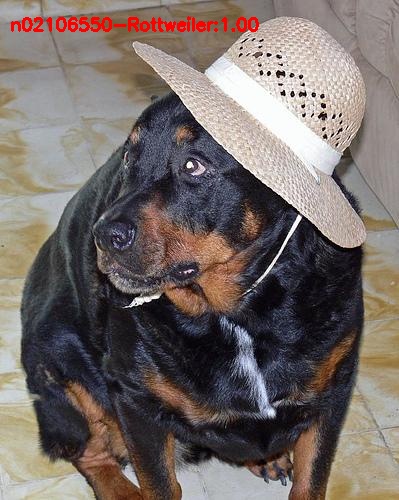
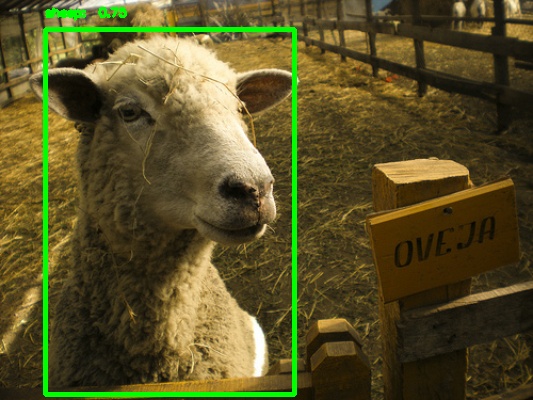
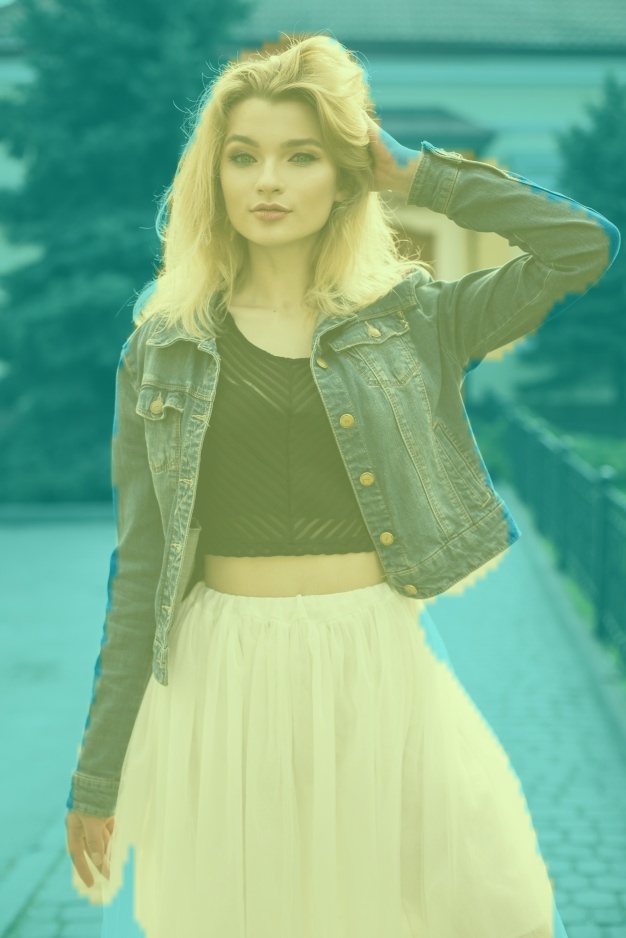
 "
]
},
{
"cell_type": "markdown",
"metadata": {
"id": "hS9yMrWe02WQ"
},
"source": [
"## PASCAL-VOC Detection model Training and Inference\n",
"\n",
"In this notebook we will use axelerate, Keras-based framework for AI on the edge, to quickly setup model training and then after training session is completed convert it to .tflite and .kmodel formats.\n",
"\n",
"First, let's take care of some administrative details. \n",
"\n",
"1) Before we do anything, make sure you have choosen GPU as Runtime type (in Runtime - > Change Runtime type).\n",
"\n",
"2) We need to mount Google Drive for saving our model checkpoints and final converted model(s). Press on Mount Google Drive button in Files tab on your left. \n",
"\n",
"In the next cell we clone axelerate Github repository and import it. \n",
"\n",
"**It is possible to use pip install or python setup.py install, but in that case you will need to restart the enironment.** Since I'm trying to make the process as streamlined as possibile I'm using sys.path.append for import."
]
},
{
"cell_type": "code",
"metadata": {
"id": "y07yAbYbjV2s"
},
"source": [
"#we need imgaug 0.4 for image augmentations to work properly, see https://stackoverflow.com/questions/62580797/in-colab-doing-image-data-augmentation-with-imgaug-is-not-working-as-intended\n",
"!pip uninstall -y imgaug && pip uninstall -y albumentations && pip install imgaug==0.4\n",
"!git clone https://github.com/AIWintermuteAI/aXeleRate.git\n",
"import sys\n",
"sys.path.append('/content/aXeleRate')\n",
"from axelerate import setup_training, setup_inference"
],
"execution_count": null,
"outputs": []
},
{
"cell_type": "markdown",
"metadata": {
"id": "5TBRMPZ83dRL"
},
"source": [
"At this step you typically need to get the dataset. You can use !wget command to download it from somewhere on the Internet or !cp to copy from My Drive as in this example\n",
"```\n",
"!cp -r /content/drive/'My Drive'/pascal_20_segmentation.zip .\n",
"!unzip --qq pascal_20_segmentation.zip\n",
"```\n",
"For this notebook we will use PASCAL-VOC 2012 object detection dataset, which you can download here:\n",
"\n",
"http://host.robots.ox.ac.uk:8080/pascal/VOC/voc2012/index.html#devkit\n",
"\n",
"I split the dataset into training and validation using a simple Python script. Since most of the models trained with aXeleRate are to be run on embedded devices and thus have memory and latency constraints, the validation images are easier than most of the images in training set. The validation images include one(or many) instance of a particular class, no mixed classes in one image.\n",
"\n",
"Let's visualize our detection model test dataset. We use img_num=10 to show only first 10 images. Feel free to change the number to None to see all 100 images.\n"
]
},
{
"cell_type": "code",
"metadata": {
"id": "_tpsgkGj7d79"
},
"source": [
"%matplotlib inline\n",
"!gdown https://drive.google.com/uc?id=1uQtP-Yct0Uiz7bU7cwl9hJU0AVGkMgGZ #subset of WideFace dataset\n",
"\n",
"!unzip --qq WideFace_large.zip\n",
"\n",
"from axelerate.networks.common_utils.augment import visualize_detection_dataset\n",
"\n",
"visualize_detection_dataset(img_folder='WideFace_large/imgs_validation', ann_folder='WideFace_large/anns_validation', num_imgs=10, img_size=224, augment=True)"
],
"execution_count": null,
"outputs": []
},
{
"cell_type": "markdown",
"metadata": {
"id": "S1oqdtbr7VLB"
},
"source": [
"Next step is defining a config dictionary. Most lines are self-explanatory.\n",
"\n",
"Type is model frontend - Classifier, Detector or Segnet\n",
"\n",
"Architecture is model backend (feature extractor) \n",
"\n",
"- Full Yolo\n",
"- Tiny Yolo\n",
"- MobileNet1_0\n",
"- MobileNet7_5 \n",
"- MobileNet5_0 \n",
"- MobileNet2_5 \n",
"- SqueezeNet\n",
"- NASNetMobile\n",
"- DenseNet121\n",
"- ResNet50\n",
"\n",
"For more information on anchors, please read here\n",
"https://github.com/pjreddie/darknet/issues/568\n",
"\n",
"Labels are labels present in your dataset.\n",
"IMPORTANT: Please, list all the labels present in the dataset.\n",
"\n",
"object_scale determines how much to penalize wrong prediction of confidence of object predictors\n",
"\n",
"no_object_scale determines how much to penalize wrong prediction of confidence of non-object predictors\n",
"\n",
"coord_scale determines how much to penalize wrong position and size predictions (x, y, w, h)\n",
"\n",
"class_scale determines how much to penalize wrong class prediction\n",
"\n",
"For converter type you can choose the following:\n",
"\n",
"'k210', 'tflite_fullint', 'tflite_dynamic', 'edgetpu', 'openvino', 'onnx'"
]
},
{
"cell_type": "code",
"metadata": {
"id": "uruWpeGRf6Qi"
},
"source": [
"config = {\n",
" \"model\":{\n",
" \"type\": \"Detector\",\n",
" \"architecture\": \"MobileNet2_5\",\n",
" \"input_size\": 224,\n",
" \"anchors\": [0.57273, 0.677385, 1.87446, 2.06253, 3.33843, 5.47434, 7.88282, 3.52778, 9.77052, 9.16828],\n",
" \"labels\": [\"face\"],\n",
" \"coord_scale\" : \t\t1.0,\n",
" \"class_scale\" : \t\t1.0,\n",
" \"object_scale\" : \t\t5.0,\n",
" \"no_object_scale\" : \t1.0\n",
" },\n",
" \"weights\" : {\n",
" \"full\": \t\t\t\t\"\",\n",
" \"backend\": \t\t \"imagenet\"\n",
" },\n",
" \"train\" : {\n",
" \"actual_epoch\": 30,\n",
" \"train_image_folder\": \"WideFace_large/imgs\",\n",
" \"train_annot_folder\": \"WideFace_large/anns\",\n",
" \"train_times\": 1,\n",
" \"valid_image_folder\": \"WideFace_large/imgs_validation\",\n",
" \"valid_annot_folder\": \"WideFace_large/anns_validation\",\n",
" \"valid_times\": 1,\n",
" \"valid_metric\": \"mAP\",\n",
" \"batch_size\": 32,\n",
" \"learning_rate\": 1e-3,\n",
" \"saved_folder\": \t\tF\"/content/drive/MyDrive/WideFace_large\",\n",
" \"first_trainable_layer\": \"\",\n",
" \"augumentation\":\t\t\t\tFalse,\n",
" \"is_only_detect\" : \t\t False\n",
" },\n",
" \"converter\" : {\n",
" \"type\": \t\t\t\t[\"tflite\"]\n",
" }\n",
" }"
],
"execution_count": null,
"outputs": []
},
{
"cell_type": "markdown",
"metadata": {
"id": "kobC_7gd5mEu"
},
"source": [
"Let's check what GPU we have been assigned in this Colab session, if any."
]
},
{
"cell_type": "code",
"metadata": {
"id": "rESho_T70BWq"
},
"source": [
"from tensorflow.python.client import device_lib\n",
"device_lib.list_local_devices()"
],
"execution_count": null,
"outputs": []
},
{
"cell_type": "markdown",
"metadata": {
"id": "i0Fc61WrTxh1"
},
"source": [
"Also, let's open Tensorboard, where we will be able to watch model training progress in real time. Training and validation logs also will be saved in project folder.\n",
"Since there are no logs before we start the training, tensorboard will be empty. Refresh it after first epoch."
]
},
{
"cell_type": "code",
"metadata": {
"id": "jsGp9JvjTzzp"
},
"source": [
"%load_ext tensorboard\n",
"%tensorboard --logdir logs\n",
"!sleep 10"
],
"execution_count": null,
"outputs": []
},
{
"cell_type": "markdown",
"metadata": {
"id": "cWyKjw-b5_yp"
},
"source": [
"Finally we start the training by passing config dictionary we have defined earlier to setup_training function. The function will start the training with Reduce Learning Rate on Plateau and save on best mAP callbacks. Every epoch mAP of the model predictions is measured on the validation dataset. If you have specified the converter type in the config, after the training has stopped the script will convert the best model into the format you have specified in config and save it to the project folder.\n",
"\n",
"Let's train for one epoch to see how the whole pipeline works."
]
},
{
"cell_type": "code",
"metadata": {
"id": "deYD3cwukHsj"
},
"source": [
"from keras import backend as K \n",
"K.clear_session()\n",
"model_path = setup_training(config_dict=config)"
],
"execution_count": null,
"outputs": []
},
{
"cell_type": "markdown",
"metadata": {
"id": "ypTe3GZI619O"
},
"source": [
"After training it is good to check the actual perfomance of your model by doing inference on your validation dataset and visualizing results. This is exactly what next block does."
]
},
{
"cell_type": "code",
"metadata": {
"id": "jE7pTYmZN7Pi"
},
"source": [
"%matplotlib inline\n",
"from keras import backend as K \n",
"K.clear_session()\n",
"setup_inference(config, model_path)"
],
"execution_count": null,
"outputs": []
},
{
"cell_type": "markdown",
"metadata": {
"id": "nKsxhdPvzrD8"
},
"source": [
"If you need to convert trained model to other formats, for example for inference with Edge TPU or OpenCV AI Kit, you can do it with following commands. Specify the converter type, backend and folder with calbiration images(normally your validation image folder)."
]
},
{
"cell_type": "code",
"metadata": {
"id": "awR7r4ILzrmb"
},
"source": [
"from axelerate.networks.common_utils.convert import Converter\n",
"converter = Converter('openvino', 'MobileNet2_5', 'WideFace_large/imgs_validation')\n",
"converter.convert_model(model_path)"
],
"execution_count": null,
"outputs": []
},
{
"cell_type": "markdown",
"metadata": {
"id": "5YuVe2VD11cd"
},
"source": [
"Good luck and happy training! Have a look at these articles, that would allow you to get the most of Google Colab or connect to local runtime if there are no GPUs available;\n",
"\n",
"https://medium.com/@oribarel/getting-the-most-out-of-your-google-colab-2b0585f82403\n",
"\n",
"https://research.google.com/colaboratory/local-runtimes.html"
]
}
]
}
================================================
FILE: resources/aXeleRate_human_segmentation.ipynb
================================================
{
"nbformat": 4,
"nbformat_minor": 0,
"metadata": {
"colab": {
"name": "aXeleRate_human_segmentation.ipynb",
"private_outputs": true,
"provenance": [],
"collapsed_sections": [],
"mount_file_id": "101-DJzi5oWG7njbiibTdxgmG67ku_62z",
"authorship_tag": "ABX9TyMYA8L5Gv+PoKfxaPtba9us",
"include_colab_link": true
},
"kernelspec": {
"name": "python3",
"display_name": "Python 3"
},
"accelerator": "GPU"
},
"cells": [
{
"cell_type": "markdown",
"metadata": {
"id": "view-in-github",
"colab_type": "text"
},
"source": [
"
"
]
},
{
"cell_type": "markdown",
"metadata": {
"id": "hS9yMrWe02WQ"
},
"source": [
"## PASCAL-VOC Detection model Training and Inference\n",
"\n",
"In this notebook we will use axelerate, Keras-based framework for AI on the edge, to quickly setup model training and then after training session is completed convert it to .tflite and .kmodel formats.\n",
"\n",
"First, let's take care of some administrative details. \n",
"\n",
"1) Before we do anything, make sure you have choosen GPU as Runtime type (in Runtime - > Change Runtime type).\n",
"\n",
"2) We need to mount Google Drive for saving our model checkpoints and final converted model(s). Press on Mount Google Drive button in Files tab on your left. \n",
"\n",
"In the next cell we clone axelerate Github repository and import it. \n",
"\n",
"**It is possible to use pip install or python setup.py install, but in that case you will need to restart the enironment.** Since I'm trying to make the process as streamlined as possibile I'm using sys.path.append for import."
]
},
{
"cell_type": "code",
"metadata": {
"id": "y07yAbYbjV2s"
},
"source": [
"#we need imgaug 0.4 for image augmentations to work properly, see https://stackoverflow.com/questions/62580797/in-colab-doing-image-data-augmentation-with-imgaug-is-not-working-as-intended\n",
"!pip uninstall -y imgaug && pip uninstall -y albumentations && pip install imgaug==0.4\n",
"!git clone https://github.com/AIWintermuteAI/aXeleRate.git\n",
"import sys\n",
"sys.path.append('/content/aXeleRate')\n",
"from axelerate import setup_training, setup_inference"
],
"execution_count": null,
"outputs": []
},
{
"cell_type": "markdown",
"metadata": {
"id": "5TBRMPZ83dRL"
},
"source": [
"At this step you typically need to get the dataset. You can use !wget command to download it from somewhere on the Internet or !cp to copy from My Drive as in this example\n",
"```\n",
"!cp -r /content/drive/'My Drive'/pascal_20_segmentation.zip .\n",
"!unzip --qq pascal_20_segmentation.zip\n",
"```\n",
"For this notebook we will use PASCAL-VOC 2012 object detection dataset, which you can download here:\n",
"\n",
"http://host.robots.ox.ac.uk:8080/pascal/VOC/voc2012/index.html#devkit\n",
"\n",
"I split the dataset into training and validation using a simple Python script. Since most of the models trained with aXeleRate are to be run on embedded devices and thus have memory and latency constraints, the validation images are easier than most of the images in training set. The validation images include one(or many) instance of a particular class, no mixed classes in one image.\n",
"\n",
"Let's visualize our detection model test dataset. We use img_num=10 to show only first 10 images. Feel free to change the number to None to see all 100 images.\n"
]
},
{
"cell_type": "code",
"metadata": {
"id": "_tpsgkGj7d79"
},
"source": [
"%matplotlib inline\n",
"!gdown https://drive.google.com/uc?id=1uQtP-Yct0Uiz7bU7cwl9hJU0AVGkMgGZ #subset of WideFace dataset\n",
"\n",
"!unzip --qq WideFace_large.zip\n",
"\n",
"from axelerate.networks.common_utils.augment import visualize_detection_dataset\n",
"\n",
"visualize_detection_dataset(img_folder='WideFace_large/imgs_validation', ann_folder='WideFace_large/anns_validation', num_imgs=10, img_size=224, augment=True)"
],
"execution_count": null,
"outputs": []
},
{
"cell_type": "markdown",
"metadata": {
"id": "S1oqdtbr7VLB"
},
"source": [
"Next step is defining a config dictionary. Most lines are self-explanatory.\n",
"\n",
"Type is model frontend - Classifier, Detector or Segnet\n",
"\n",
"Architecture is model backend (feature extractor) \n",
"\n",
"- Full Yolo\n",
"- Tiny Yolo\n",
"- MobileNet1_0\n",
"- MobileNet7_5 \n",
"- MobileNet5_0 \n",
"- MobileNet2_5 \n",
"- SqueezeNet\n",
"- NASNetMobile\n",
"- DenseNet121\n",
"- ResNet50\n",
"\n",
"For more information on anchors, please read here\n",
"https://github.com/pjreddie/darknet/issues/568\n",
"\n",
"Labels are labels present in your dataset.\n",
"IMPORTANT: Please, list all the labels present in the dataset.\n",
"\n",
"object_scale determines how much to penalize wrong prediction of confidence of object predictors\n",
"\n",
"no_object_scale determines how much to penalize wrong prediction of confidence of non-object predictors\n",
"\n",
"coord_scale determines how much to penalize wrong position and size predictions (x, y, w, h)\n",
"\n",
"class_scale determines how much to penalize wrong class prediction\n",
"\n",
"For converter type you can choose the following:\n",
"\n",
"'k210', 'tflite_fullint', 'tflite_dynamic', 'edgetpu', 'openvino', 'onnx'"
]
},
{
"cell_type": "code",
"metadata": {
"id": "uruWpeGRf6Qi"
},
"source": [
"config = {\n",
" \"model\":{\n",
" \"type\": \"Detector\",\n",
" \"architecture\": \"MobileNet2_5\",\n",
" \"input_size\": 224,\n",
" \"anchors\": [0.57273, 0.677385, 1.87446, 2.06253, 3.33843, 5.47434, 7.88282, 3.52778, 9.77052, 9.16828],\n",
" \"labels\": [\"face\"],\n",
" \"coord_scale\" : \t\t1.0,\n",
" \"class_scale\" : \t\t1.0,\n",
" \"object_scale\" : \t\t5.0,\n",
" \"no_object_scale\" : \t1.0\n",
" },\n",
" \"weights\" : {\n",
" \"full\": \t\t\t\t\"\",\n",
" \"backend\": \t\t \"imagenet\"\n",
" },\n",
" \"train\" : {\n",
" \"actual_epoch\": 30,\n",
" \"train_image_folder\": \"WideFace_large/imgs\",\n",
" \"train_annot_folder\": \"WideFace_large/anns\",\n",
" \"train_times\": 1,\n",
" \"valid_image_folder\": \"WideFace_large/imgs_validation\",\n",
" \"valid_annot_folder\": \"WideFace_large/anns_validation\",\n",
" \"valid_times\": 1,\n",
" \"valid_metric\": \"mAP\",\n",
" \"batch_size\": 32,\n",
" \"learning_rate\": 1e-3,\n",
" \"saved_folder\": \t\tF\"/content/drive/MyDrive/WideFace_large\",\n",
" \"first_trainable_layer\": \"\",\n",
" \"augumentation\":\t\t\t\tFalse,\n",
" \"is_only_detect\" : \t\t False\n",
" },\n",
" \"converter\" : {\n",
" \"type\": \t\t\t\t[\"tflite\"]\n",
" }\n",
" }"
],
"execution_count": null,
"outputs": []
},
{
"cell_type": "markdown",
"metadata": {
"id": "kobC_7gd5mEu"
},
"source": [
"Let's check what GPU we have been assigned in this Colab session, if any."
]
},
{
"cell_type": "code",
"metadata": {
"id": "rESho_T70BWq"
},
"source": [
"from tensorflow.python.client import device_lib\n",
"device_lib.list_local_devices()"
],
"execution_count": null,
"outputs": []
},
{
"cell_type": "markdown",
"metadata": {
"id": "i0Fc61WrTxh1"
},
"source": [
"Also, let's open Tensorboard, where we will be able to watch model training progress in real time. Training and validation logs also will be saved in project folder.\n",
"Since there are no logs before we start the training, tensorboard will be empty. Refresh it after first epoch."
]
},
{
"cell_type": "code",
"metadata": {
"id": "jsGp9JvjTzzp"
},
"source": [
"%load_ext tensorboard\n",
"%tensorboard --logdir logs\n",
"!sleep 10"
],
"execution_count": null,
"outputs": []
},
{
"cell_type": "markdown",
"metadata": {
"id": "cWyKjw-b5_yp"
},
"source": [
"Finally we start the training by passing config dictionary we have defined earlier to setup_training function. The function will start the training with Reduce Learning Rate on Plateau and save on best mAP callbacks. Every epoch mAP of the model predictions is measured on the validation dataset. If you have specified the converter type in the config, after the training has stopped the script will convert the best model into the format you have specified in config and save it to the project folder.\n",
"\n",
"Let's train for one epoch to see how the whole pipeline works."
]
},
{
"cell_type": "code",
"metadata": {
"id": "deYD3cwukHsj"
},
"source": [
"from keras import backend as K \n",
"K.clear_session()\n",
"model_path = setup_training(config_dict=config)"
],
"execution_count": null,
"outputs": []
},
{
"cell_type": "markdown",
"metadata": {
"id": "ypTe3GZI619O"
},
"source": [
"After training it is good to check the actual perfomance of your model by doing inference on your validation dataset and visualizing results. This is exactly what next block does."
]
},
{
"cell_type": "code",
"metadata": {
"id": "jE7pTYmZN7Pi"
},
"source": [
"%matplotlib inline\n",
"from keras import backend as K \n",
"K.clear_session()\n",
"setup_inference(config, model_path)"
],
"execution_count": null,
"outputs": []
},
{
"cell_type": "markdown",
"metadata": {
"id": "nKsxhdPvzrD8"
},
"source": [
"If you need to convert trained model to other formats, for example for inference with Edge TPU or OpenCV AI Kit, you can do it with following commands. Specify the converter type, backend and folder with calbiration images(normally your validation image folder)."
]
},
{
"cell_type": "code",
"metadata": {
"id": "awR7r4ILzrmb"
},
"source": [
"from axelerate.networks.common_utils.convert import Converter\n",
"converter = Converter('openvino', 'MobileNet2_5', 'WideFace_large/imgs_validation')\n",
"converter.convert_model(model_path)"
],
"execution_count": null,
"outputs": []
},
{
"cell_type": "markdown",
"metadata": {
"id": "5YuVe2VD11cd"
},
"source": [
"Good luck and happy training! Have a look at these articles, that would allow you to get the most of Google Colab or connect to local runtime if there are no GPUs available;\n",
"\n",
"https://medium.com/@oribarel/getting-the-most-out-of-your-google-colab-2b0585f82403\n",
"\n",
"https://research.google.com/colaboratory/local-runtimes.html"
]
}
]
}
================================================
FILE: resources/aXeleRate_human_segmentation.ipynb
================================================
{
"nbformat": 4,
"nbformat_minor": 0,
"metadata": {
"colab": {
"name": "aXeleRate_human_segmentation.ipynb",
"private_outputs": true,
"provenance": [],
"collapsed_sections": [],
"mount_file_id": "101-DJzi5oWG7njbiibTdxgmG67ku_62z",
"authorship_tag": "ABX9TyMYA8L5Gv+PoKfxaPtba9us",
"include_colab_link": true
},
"kernelspec": {
"name": "python3",
"display_name": "Python 3"
},
"accelerator": "GPU"
},
"cells": [
{
"cell_type": "markdown",
"metadata": {
"id": "view-in-github",
"colab_type": "text"
},
"source": [
"