|
|||
| Ronny Khalil | zachary | Razvan Matei | MasterAI |
| Alex | Olivier Lefebvre | Arthur Liu | Florin-Alexandru Ilinescu | Zenko | Juan Pablo Mendiola | Robin Edwards | Frederic Dreuilhe |
| Danny Sahagun | darius coal | Kerwin | The Dread Vixen Alinsa | Bruce Hunter | Chris Canterbury | Lawrence L Tran | Jake Skokan |
| que0005 | Xavier Matia Bernasconi | Mats Oldin | Rodrigo Terra | Nicolas Meunier | Ihor Pankin |
| Amith Thomas | xiao yuan | Ezra Blake | Kevin Schofield | Mvs Srs | Felipe Cortes | Smith | Sanchez |
| Ziui Witter |
| Sebastian Karbowniczek | Petter Lundh | AWWalker | cdmusic | Jason Bessonette | 22two |
 # How To Install:
Use method 1 or 2 if you are an Artist
use method 3 if you are a Developer/Programmer
# Method 1: One Click Installer
1) Download the [.ccx](https://github.com/AbdullahAlfaraj/Auto-Photoshop-StableDiffusion-Plugin/releases/latest) file
2) run the ccx file . that's all. you will be able to use all of stable diffusion modes (txt2img, img2img, inpainting and outpainting), check the [tutorials](https://github.com/AbdullahAlfaraj/Auto-Photoshop-StableDiffusion-Plugin/wiki) section to master the tool.
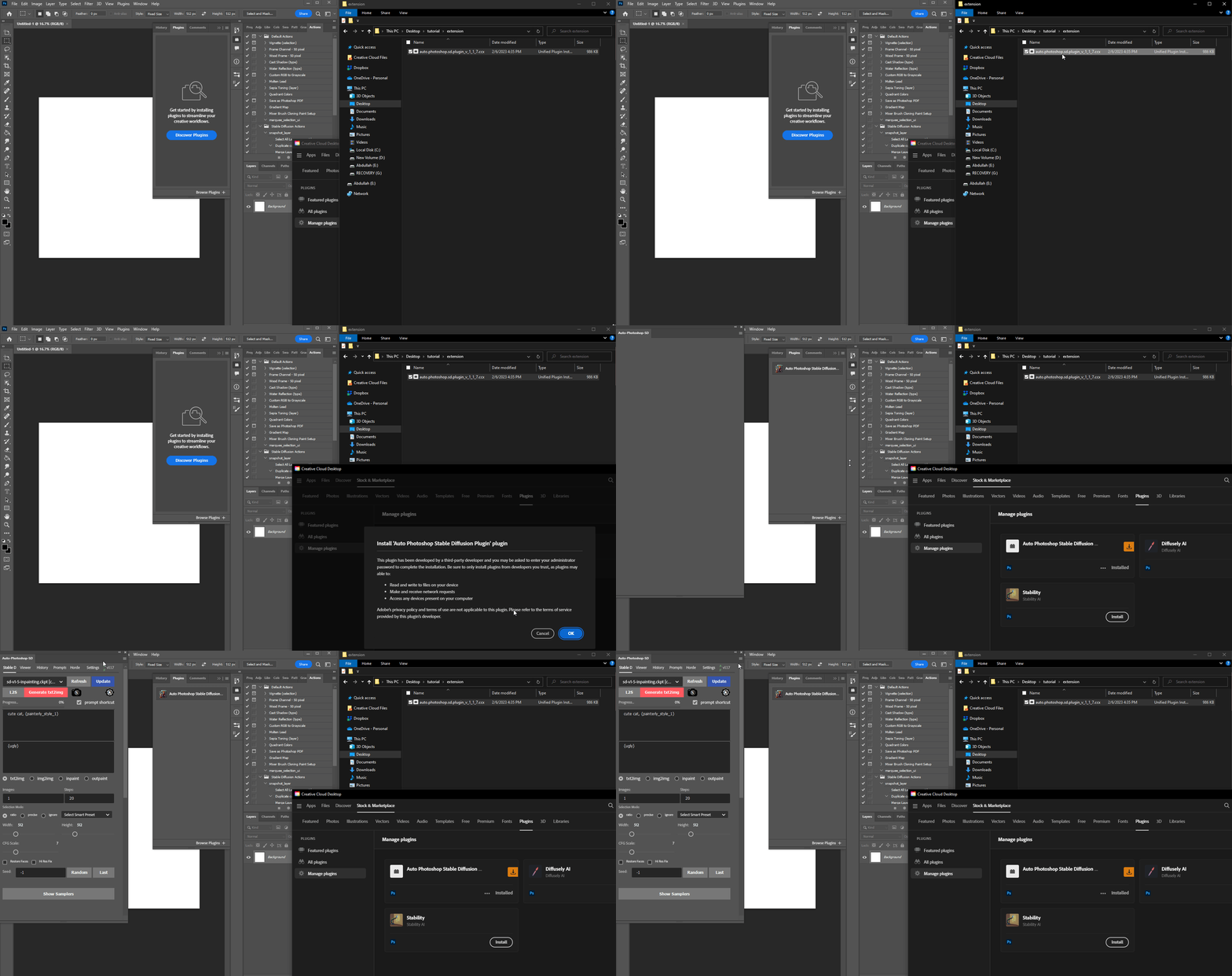
3) (Don't skip) Install the `Auto-Photoshop-SD` Extension from Automatic1111 extension tab. The extension will allow you to use mask expansion and mask blur, which are necessary for achieving good results when outpainting and inpainting.
- a) Copy Auto-Photoshop plugin url
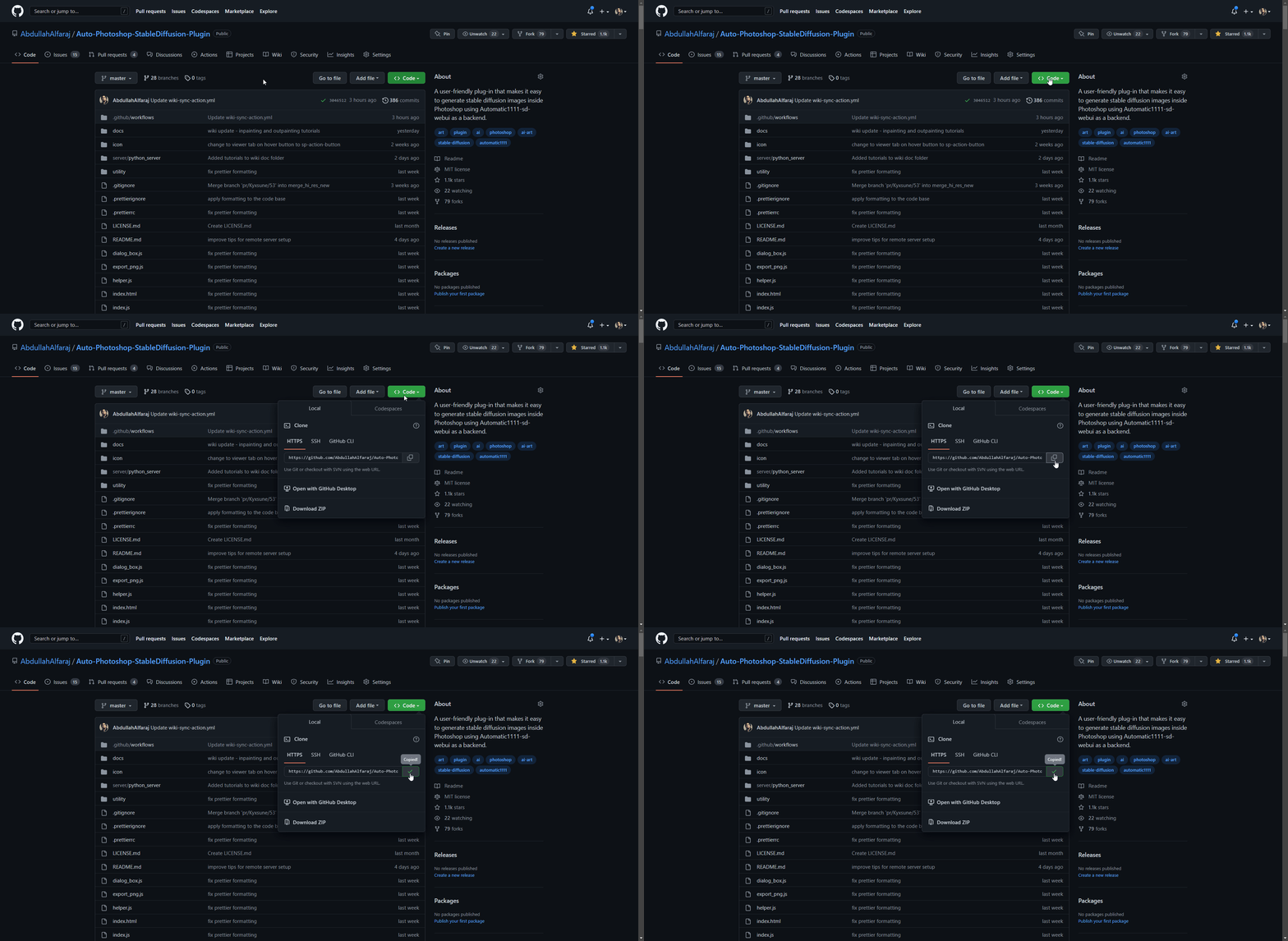
- b) Paste the url in auto1111's extension tab and click install
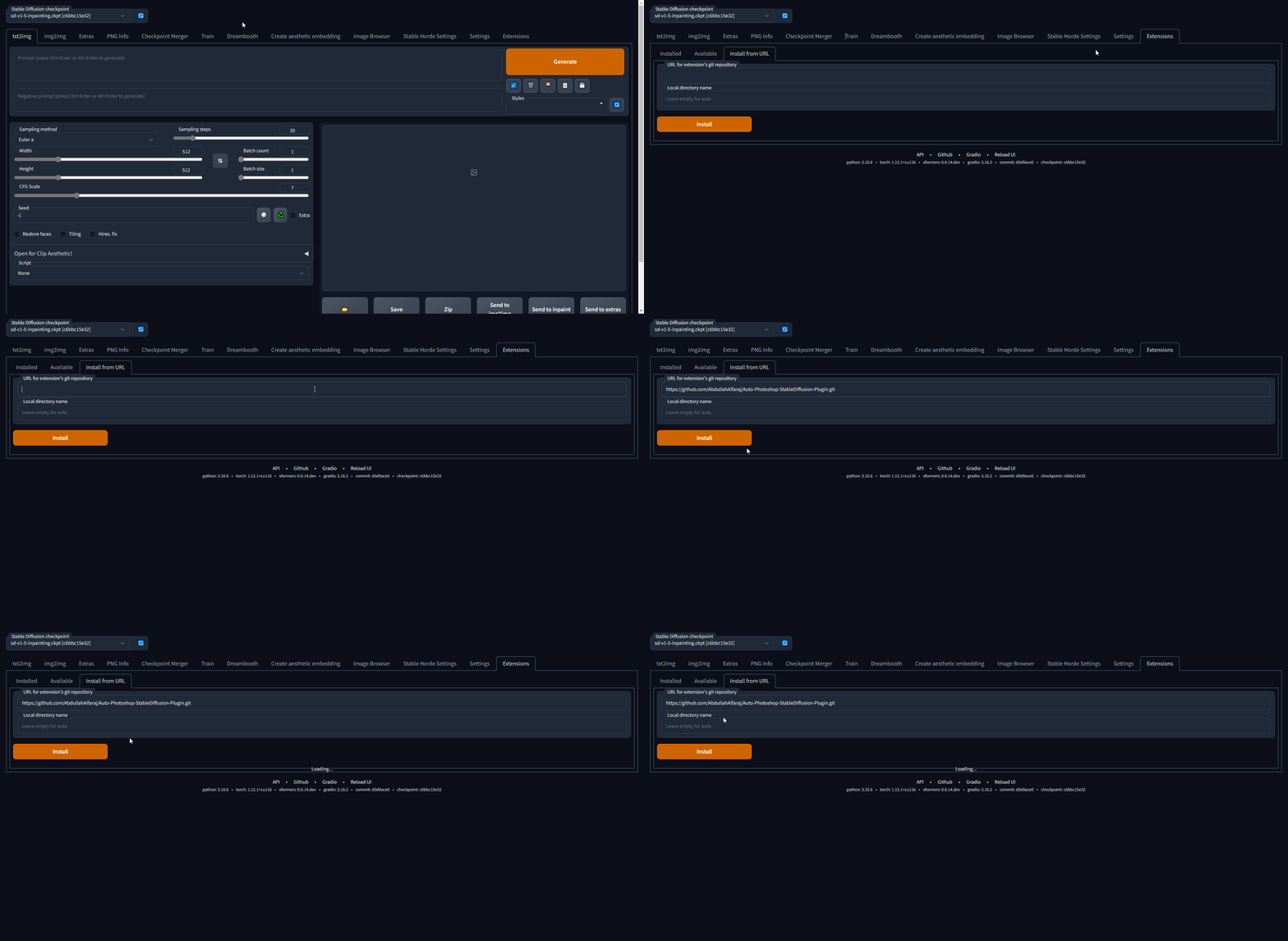
- c) Make sure the Auto-Photoshop plugin is listed, then click "Apply and Restart UI"
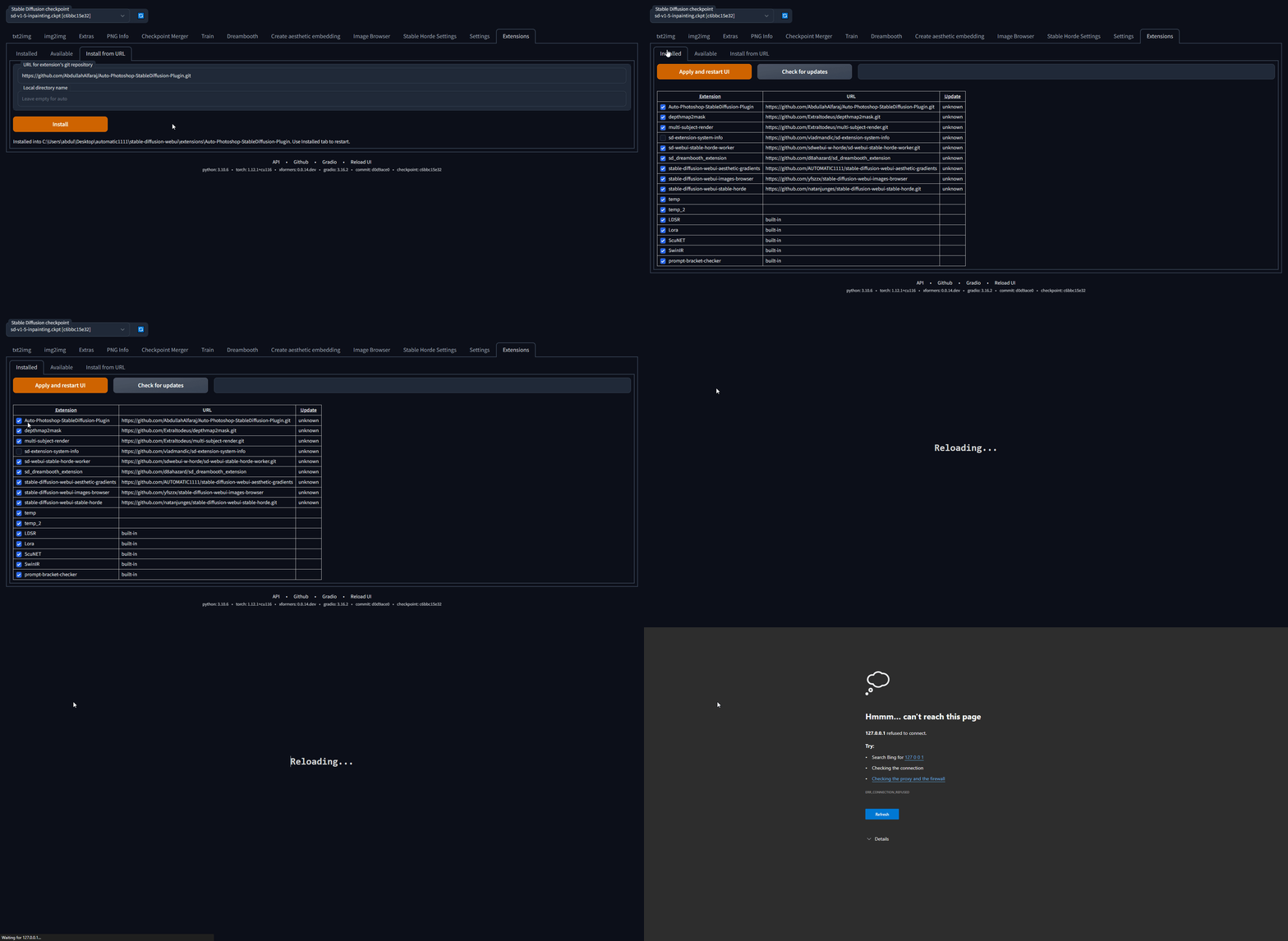
# Method 2: The Unzip Method
1) Download the [.zip](https://github.com/AbdullahAlfaraj/Auto-Photoshop-StableDiffusion-Plugin/releases/latest) file
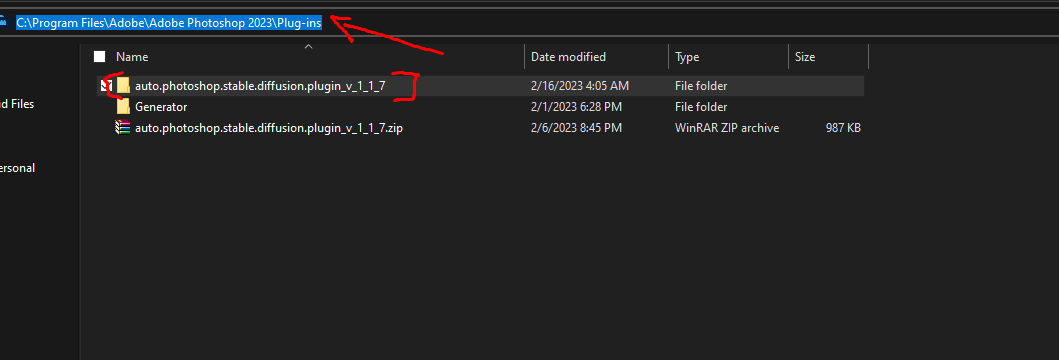
2) Unzip it in a folder with the same name
3) move the unzipped folder to the Photoshop Plugin folder
4) (Don't skip) Install the `Auto-Photoshop-SD` Extension from Automatic1111 extension tab. The extension will allow you to use mask expansion and mask blur, which are necessary for achieving good results when outpainting and inpainting.
- a) Copy Auto-Photoshop plugin url
# Method 3: The UXP method (Instruction for Developers):
For artists we recommend you use [the one click installer](#one-click-installer). If you are a developer Watch the any of these videos or follow the instruction bellow.
# How To Install:
Use method 1 or 2 if you are an Artist
use method 3 if you are a Developer/Programmer
# Method 1: One Click Installer
1) Download the [.ccx](https://github.com/AbdullahAlfaraj/Auto-Photoshop-StableDiffusion-Plugin/releases/latest) file
2) run the ccx file . that's all. you will be able to use all of stable diffusion modes (txt2img, img2img, inpainting and outpainting), check the [tutorials](https://github.com/AbdullahAlfaraj/Auto-Photoshop-StableDiffusion-Plugin/wiki) section to master the tool.

3) (Don't skip) Install the `Auto-Photoshop-SD` Extension from Automatic1111 extension tab. The extension will allow you to use mask expansion and mask blur, which are necessary for achieving good results when outpainting and inpainting.
- a) Copy Auto-Photoshop plugin url

- b) Paste the url in auto1111's extension tab and click install

- c) Make sure the Auto-Photoshop plugin is listed, then click "Apply and Restart UI"

# Method 2: The Unzip Method
1) Download the [.zip](https://github.com/AbdullahAlfaraj/Auto-Photoshop-StableDiffusion-Plugin/releases/latest) file
2) Unzip it in a folder with the same name
3) move the unzipped folder to the Photoshop Plugin folder
4) (Don't skip) Install the `Auto-Photoshop-SD` Extension from Automatic1111 extension tab. The extension will allow you to use mask expansion and mask blur, which are necessary for achieving good results when outpainting and inpainting.
- a) Copy Auto-Photoshop plugin url

# Method 3: The UXP method (Instruction for Developers):
For artists we recommend you use [the one click installer](#one-click-installer). If you are a developer Watch the any of these videos or follow the instruction bellow.

 For artists we recommend you use [the one click installer](#one-click-installer)
## First time running the plugin (local Automatic1111):
1) download the plugin:
```
git clone https://github.com/AbdullahAlfaraj/Auto-Photoshop-StableDiffusion-Plugin.git
```
2) open cmd window in the "Auto-Photoshop-StableDiffusion-Plugin" directory and then install the dependencies by typing:
```
npm install
```
3) build the plugin by transpiling typescript to javascript:
```
npm run watch
```
4) run "start_server.bat" inside "Auto-Photoshop-StableDiffusion-Plugin" directory
5) go to where you have [automatic1111](https://github.com/AUTOMATIC1111/stable-diffusion-webui) installed.
Edit the "webui-user.bat" in automatic1111
change this line
```
set COMMANDLINE_ARGS=
```
to
```
set COMMANDLINE_ARGS= --api
```
that will allow the plugin to communicate with the automatic1111 project. After saving close the "webui-user.bat" file and run it normally.
6) run photoshop. go to edit -> prefrences -> plugins
1) make sure you check "Enable Developer Mode" checkbox
7) install "Adobe UXP Developer Tool" from here [Installation (adobe.com)](https://developer.adobe.com/photoshop/uxp/devtool/installation/)
this tool will add the plugin into photoshop
8) run Adobe UXP Developer Tool and click on "Add Plugin" button in the top right. Navigate to where you have "Auto-Photoshop-StableDiffusion-Plugin" folder and open "manifest.json"
9) select the plugin and click on Actions -> Load Selected
that's it.
## First time running the plugin (remote Automatic1111):
__The remote webui must also have `--api` set in `COMMANDLINE_ARGS`. You can check if api access is enabled by appending "/docs#" to the end of the url. If the documentation includes `/sdapi/v1/samplers` then api access is enabled.__
1) download the plugin:
```
git clone https://github.com/AbdullahAlfaraj/Auto-Photoshop-StableDiffusion-Plugin.git
```
1) edit [start_server.bat](start_server.bat) (or start_server.sh if on linux) to point to the remote installation of Automatic1111
2) run "start_server.bat" inside "Auto-Photoshop-StableDiffusion-Plugin" directory
3) run photoshop. go to edit -> prefrences -> plugins
1) make sure you check "Enable Developer Mode" checkbox
4) install "Adobe UXP Developer Tool" from here [Installation (adobe.com)](https://developer.adobe.com/photoshop/uxp/devtool/installation/)
this tool will add the plugin into photoshop
5) run Adobe UXP Developer Tool and click on "Add Plugin" button in the top right. Navigate to where you have "Auto-Photoshop-StableDiffusion-Plugin" folder and open "manifest.json"
6) select the plugin and click on Actions -> Load Selected
that's it.
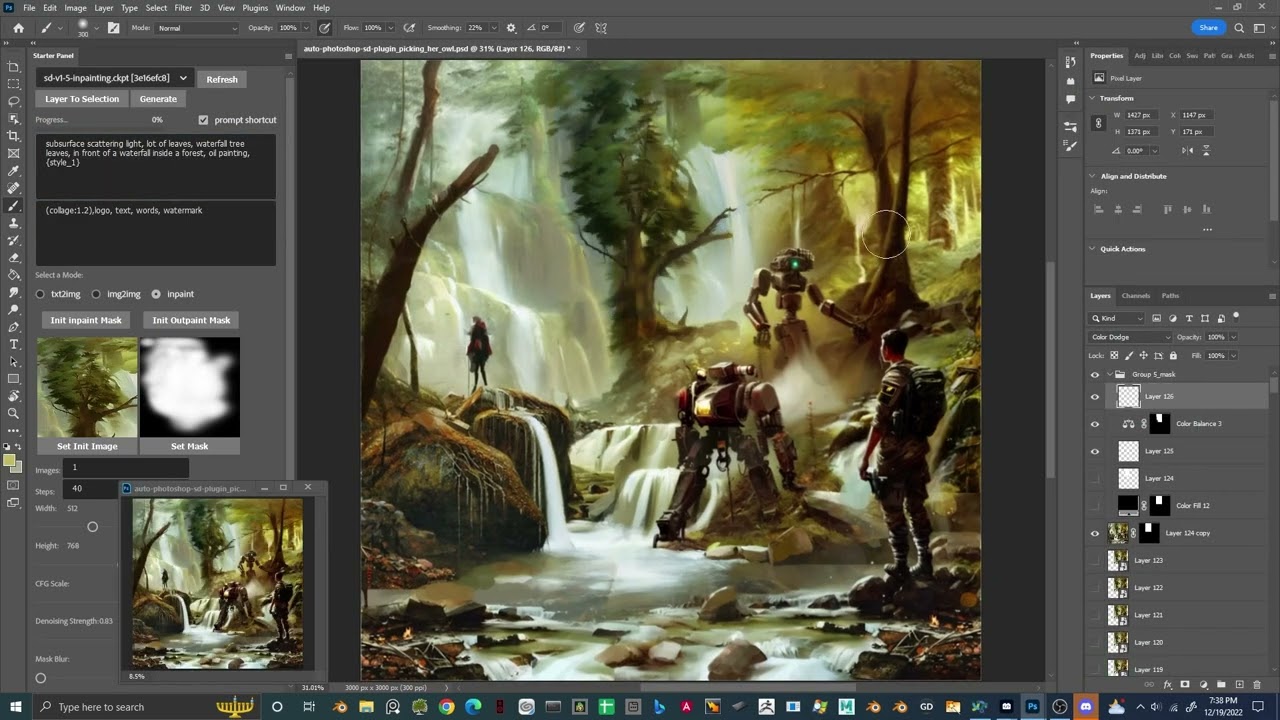
# Demo:
[](https://youtu.be/VL_gbQai79E "Stable diffusion AI Photoshop Plugin Free and Open Source")
# FAQ and Known Issues
## What Photoshop version do I need to run the plugin?
The minimum Photoshop version that the plugin supports is Photoshop v24
## Plugin Load Failed
There are a few issues that can result in this error, please follow the instructions for the corresponding error message in the UDT logs
### No application are connected to the service
This error occurs when Photoshop is not started before the plugin is attempted to be loaded. Simply start photoshop then restart UXP and load the plugin
## Exception in ASGI application / Expecting value: line 1 column 1
This error occurs due to mismatched expectations between the plugin and the Automatic1111 backend.
It can be solved by both updating the version of the Automatic111 backend to the latest verion, and making sure "Save text information about generation parameters as chunks to png files" setting is enabled within the UI.
## No Generations and Plugin Server doesn't send messages. (Remote setup)
This error occurs when the remote server does not have the api enabled. You can verify this by attempting to go to the URL you access the webui at and appending "/docs#" to the end of the url. If you have permissions, make relaunch the remote instance with the "--api" flag.
# No GPU Options:
we provide two options to use the auto-photoshp plugin without GPU.
## Stable Horde
This is an awesome free crowdsourced distributed cluster of Stable Diffusion workers. If you like this service, consider joining the horde yourself!
the horde is enabled completely by the generosity of volunteers so make sure you don't overwhelm the service and help join the cause if you can.
read more on their [GitHub page](https://github.com/db0/AI-Horde)
## Colab:
we link to this [Colab](https://colab.research.google.com/drive/1nbcx_WOneRmYv9idBO33pN5CbxXrqZHu?usp=sharing#scrollTo=Y4ebYsPqTrGb) directly inside plugin find it in the settings tab. you only need to run it. no need to change any of the settings. copy the gradio.live url the colab will generate and paste it into ```sd url``` field in the settings tab.
================================================
FILE: build-script/pack-ccx.mjs
================================================
import chalk from 'chalk'
import { program } from 'commander'
import { createWriteStream, readFileSync, statSync, writeFileSync } from 'fs'
import { globSync } from 'glob'
import { dirname, join, relative } from 'path'
import { fileURLToPath } from 'url'
import yazl from 'yazl'
const __dirname = dirname(fileURLToPath(import.meta.url))
const basePath = join(__dirname, '..')
program.requiredOption('--version
For artists we recommend you use [the one click installer](#one-click-installer)
## First time running the plugin (local Automatic1111):
1) download the plugin:
```
git clone https://github.com/AbdullahAlfaraj/Auto-Photoshop-StableDiffusion-Plugin.git
```
2) open cmd window in the "Auto-Photoshop-StableDiffusion-Plugin" directory and then install the dependencies by typing:
```
npm install
```
3) build the plugin by transpiling typescript to javascript:
```
npm run watch
```
4) run "start_server.bat" inside "Auto-Photoshop-StableDiffusion-Plugin" directory
5) go to where you have [automatic1111](https://github.com/AUTOMATIC1111/stable-diffusion-webui) installed.
Edit the "webui-user.bat" in automatic1111
change this line
```
set COMMANDLINE_ARGS=
```
to
```
set COMMANDLINE_ARGS= --api
```
that will allow the plugin to communicate with the automatic1111 project. After saving close the "webui-user.bat" file and run it normally.
6) run photoshop. go to edit -> prefrences -> plugins
1) make sure you check "Enable Developer Mode" checkbox
7) install "Adobe UXP Developer Tool" from here [Installation (adobe.com)](https://developer.adobe.com/photoshop/uxp/devtool/installation/)
this tool will add the plugin into photoshop
8) run Adobe UXP Developer Tool and click on "Add Plugin" button in the top right. Navigate to where you have "Auto-Photoshop-StableDiffusion-Plugin" folder and open "manifest.json"
9) select the plugin and click on Actions -> Load Selected
that's it.
## First time running the plugin (remote Automatic1111):
__The remote webui must also have `--api` set in `COMMANDLINE_ARGS`. You can check if api access is enabled by appending "/docs#" to the end of the url. If the documentation includes `/sdapi/v1/samplers` then api access is enabled.__
1) download the plugin:
```
git clone https://github.com/AbdullahAlfaraj/Auto-Photoshop-StableDiffusion-Plugin.git
```
1) edit [start_server.bat](start_server.bat) (or start_server.sh if on linux) to point to the remote installation of Automatic1111
2) run "start_server.bat" inside "Auto-Photoshop-StableDiffusion-Plugin" directory
3) run photoshop. go to edit -> prefrences -> plugins
1) make sure you check "Enable Developer Mode" checkbox
4) install "Adobe UXP Developer Tool" from here [Installation (adobe.com)](https://developer.adobe.com/photoshop/uxp/devtool/installation/)
this tool will add the plugin into photoshop
5) run Adobe UXP Developer Tool and click on "Add Plugin" button in the top right. Navigate to where you have "Auto-Photoshop-StableDiffusion-Plugin" folder and open "manifest.json"
6) select the plugin and click on Actions -> Load Selected
that's it.
# Demo:
[](https://youtu.be/VL_gbQai79E "Stable diffusion AI Photoshop Plugin Free and Open Source")
# FAQ and Known Issues
## What Photoshop version do I need to run the plugin?
The minimum Photoshop version that the plugin supports is Photoshop v24
## Plugin Load Failed
There are a few issues that can result in this error, please follow the instructions for the corresponding error message in the UDT logs
### No application are connected to the service
This error occurs when Photoshop is not started before the plugin is attempted to be loaded. Simply start photoshop then restart UXP and load the plugin
## Exception in ASGI application / Expecting value: line 1 column 1
This error occurs due to mismatched expectations between the plugin and the Automatic1111 backend.
It can be solved by both updating the version of the Automatic111 backend to the latest verion, and making sure "Save text information about generation parameters as chunks to png files" setting is enabled within the UI.
## No Generations and Plugin Server doesn't send messages. (Remote setup)
This error occurs when the remote server does not have the api enabled. You can verify this by attempting to go to the URL you access the webui at and appending "/docs#" to the end of the url. If you have permissions, make relaunch the remote instance with the "--api" flag.
# No GPU Options:
we provide two options to use the auto-photoshp plugin without GPU.
## Stable Horde
This is an awesome free crowdsourced distributed cluster of Stable Diffusion workers. If you like this service, consider joining the horde yourself!
the horde is enabled completely by the generosity of volunteers so make sure you don't overwhelm the service and help join the cause if you can.
read more on their [GitHub page](https://github.com/db0/AI-Horde)
## Colab:
we link to this [Colab](https://colab.research.google.com/drive/1nbcx_WOneRmYv9idBO33pN5CbxXrqZHu?usp=sharing#scrollTo=Y4ebYsPqTrGb) directly inside plugin find it in the settings tab. you only need to run it. no need to change any of the settings. copy the gradio.live url the colab will generate and paste it into ```sd url``` field in the settings tab.
================================================
FILE: build-script/pack-ccx.mjs
================================================
import chalk from 'chalk'
import { program } from 'commander'
import { createWriteStream, readFileSync, statSync, writeFileSync } from 'fs'
import { globSync } from 'glob'
import { dirname, join, relative } from 'path'
import { fileURLToPath } from 'url'
import yazl from 'yazl'
const __dirname = dirname(fileURLToPath(import.meta.url))
const basePath = join(__dirname, '..')
program.requiredOption('--version