Repository: AnJiaoDe/StatusNavigationTransparent
Branch: master
Commit: c23c64671e02
Files: 69
Total size: 117.6 KB
Directory structure:
gitextract_oqv9qg7b/

├── .gitignore
├── .idea/
│   ├── caches/
│   │   └── build_file_checksums.ser
│   ├── codeStyles/
│   │   └── Project.xml
│   ├── gradle.xml
│   ├── misc.xml
│   ├── modules.xml
│   ├── render.experimental.xml
│   ├── runConfigurations.xml
│   └── vcs.xml
├── LICENSE
├── README.md
├── app/
│   ├── .gitignore
│   ├── build.gradle
│   ├── proguard-rules.pro
│   └── src/
│       ├── androidTest/
│       │   └── java/
│       │       └── com/
│       │           └── cy/
│       │               └── statusnavigationtrans/
│       │                   └── ExampleInstrumentedTest.java
│       ├── main/
│       │   ├── AndroidManifest.xml
│       │   ├── java/
│       │   │   └── com/
│       │   │       └── cy/
│       │   │           └── statusnavigationtrans/
│       │   │               ├── BaseActivity.java
│       │   │               ├── BaseSwitchActivity.java
│       │   │               ├── FullScreenActivity.java
│       │   │               ├── HideNavigationBarActivity.java
│       │   │               ├── HideStatusBarActivity.java
│       │   │               ├── LogUtils.java
│       │   │               ├── MainActivity.java
│       │   │               ├── Navigation0Activity.java
│       │   │               ├── Navigation2Activity.java
│       │   │               ├── Status00Activity.java
│       │   │               ├── Status0Activity.java
│       │   │               ├── Status2Activity.java
│       │   │               ├── Status5Activity.java
│       │   │               └── Status6Activity.java
│       │   └── res/
│       │       ├── layout/
│       │       │   ├── activity_full_screen.xml
│       │       │   ├── activity_hide_navigation_bar.xml
│       │       │   ├── activity_hide_status_bar.xml
│       │       │   ├── activity_main.xml
│       │       │   ├── activity_nav1.xml
│       │       │   ├── activity_nav2.xml
│       │       │   ├── activity_navigation0.xml
│       │       │   ├── activity_status0.xml
│       │       │   ├── activity_status00.xml
│       │       │   ├── activity_status2.xml
│       │       │   ├── activity_status5.xml
│       │       │   ├── activity_status6.xml
│       │       │   └── activity_status_navigation_switch.xml
│       │       ├── values/
│       │       │   ├── colors.xml
│       │       │   ├── dimens.xml
│       │       │   ├── strings.xml
│       │       │   └── styles.xml
│       │       └── values-w820dp/
│       │           └── dimens.xml
│       └── test/
│           └── java/
│               └── com/
│                   └── cy/
│                       └── statusnavigationtrans/
│                           └── ExampleUnitTest.java
├── build.gradle.kts
├── gradle/
│   ├── libs.versions.toml
│   └── wrapper/
│       ├── gradle-wrapper.jar
│       └── gradle-wrapper.properties
├── gradle.properties
├── gradlew
├── gradlew.bat
├── settings.gradle.kts
└── translucentparent/
    ├── .gitignore
    ├── build.gradle
    ├── proguard-rules.pro
    └── src/
        ├── androidTest/
        │   └── java/
        │       └── com/
        │           └── cy/
        │               └── translucentparent/
        │                   └── ExampleInstrumentedTest.java
        ├── main/
        │   ├── AndroidManifest.xml
        │   ├── java/
        │   │   └── com/
        │   │       └── cy/
        │   │           └── translucentparent/
        │   │               ├── LogUtils.java
        │   │               ├── NavigationBarView.java
        │   │               ├── ScreenUtils.java
        │   │               ├── StaNavUtils.java
        │   │               └── StatusBarView.java
        │   └── res/
        │       └── values/
        │           └── ids.xml
        └── test/
            └── java/
                └── com/
                    └── cy/
                        └── translucentparent/
                            └── ExampleUnitTest.java
================================================
FILE CONTENTS
================================================
================================================
FILE: .gitignore
================================================
*.iml
.gradle
/local.properties
/.idea/workspace.xml
/.idea/libraries
.DS_Store
/build
/captures
.externalNativeBuild
================================================
FILE: .idea/codeStyles/Project.xml
================================================
<component name="ProjectCodeStyleConfiguration">
<code_scheme name="Project" version="173">
<codeStyleSettings language="XML">
<indentOptions>
<option name="CONTINUATION_INDENT_SIZE" value="4" />
</indentOptions>
<arrangement>
<rules>
<section>
<rule>
<match>
<AND>
<NAME>xmlns:android</NAME>
<XML_ATTRIBUTE />
<XML_NAMESPACE>^$</XML_NAMESPACE>
</AND>
</match>
</rule>
</section>
<section>
<rule>
<match>
<AND>
<NAME>xmlns:.*</NAME>
<XML_ATTRIBUTE />
<XML_NAMESPACE>^$</XML_NAMESPACE>
</AND>
</match>
<order>BY_NAME</order>
</rule>
</section>
<section>
<rule>
<match>
<AND>
<NAME>.*:id</NAME>
<XML_ATTRIBUTE />
<XML_NAMESPACE>http://schemas.android.com/apk/res/android</XML_NAMESPACE>
</AND>
</match>
</rule>
</section>
<section>
<rule>
<match>
<AND>
<NAME>.*:name</NAME>
<XML_ATTRIBUTE />
<XML_NAMESPACE>http://schemas.android.com/apk/res/android</XML_NAMESPACE>
</AND>
</match>
</rule>
</section>
<section>
<rule>
<match>
<AND>
<NAME>name</NAME>
<XML_ATTRIBUTE />
<XML_NAMESPACE>^$</XML_NAMESPACE>
</AND>
</match>
</rule>
</section>
<section>
<rule>
<match>
<AND>
<NAME>style</NAME>
<XML_ATTRIBUTE />
<XML_NAMESPACE>^$</XML_NAMESPACE>
</AND>
</match>
</rule>
</section>
<section>
<rule>
<match>
<AND>
<NAME>.*</NAME>
<XML_ATTRIBUTE />
<XML_NAMESPACE>^$</XML_NAMESPACE>
</AND>
</match>
<order>BY_NAME</order>
</rule>
</section>
<section>
<rule>
<match>
<AND>
<NAME>.*</NAME>
<XML_ATTRIBUTE />
<XML_NAMESPACE>http://schemas.android.com/apk/res/android</XML_NAMESPACE>
</AND>
</match>
<order>ANDROID_ATTRIBUTE_ORDER</order>
</rule>
</section>
<section>
<rule>
<match>
<AND>
<NAME>.*</NAME>
<XML_ATTRIBUTE />
<XML_NAMESPACE>.*</XML_NAMESPACE>
</AND>
</match>
<order>BY_NAME</order>
</rule>
</section>
</rules>
</arrangement>
</codeStyleSettings>
</code_scheme>
</component>
================================================
FILE: .idea/gradle.xml
================================================
<?xml version="1.0" encoding="UTF-8"?>
<project version="4">
<component name="GradleMigrationSettings" migrationVersion="1" />
<component name="GradleSettings">
<option name="linkedExternalProjectsSettings">
<GradleProjectSettings>
<option name="testRunner" value="CHOOSE_PER_TEST" />
<option name="externalProjectPath" value="$PROJECT_DIR$" />
<option name="gradleJvm" value="#GRADLE_LOCAL_JAVA_HOME" />
<option name="modules">
<set>
<option value="$PROJECT_DIR$" />
<option value="$PROJECT_DIR$/app" />
<option value="$PROJECT_DIR$/translucentparent" />
</set>
</option>
</GradleProjectSettings>
</option>
</component>
</project>
================================================
FILE: .idea/misc.xml
================================================
<?xml version="1.0" encoding="UTF-8"?>
<project version="4">
<component name="ExternalStorageConfigurationManager" enabled="true" />
<component name="ProjectRootManager" version="2" languageLevel="JDK_17" default="true" project-jdk-name="ms-17" project-jdk-type="JavaSDK">
<output url="file://$PROJECT_DIR$/build/classes" />
</component>
<component name="ProjectType">
<option name="id" value="Android" />
</component>
</project>
================================================
FILE: .idea/modules.xml
================================================
<?xml version="1.0" encoding="UTF-8"?>
<project version="4">
<component name="ProjectModuleManager">
<modules>
<module fileurl="file://$PROJECT_DIR$/GitHub__-StatusNavigationTransparent.iml" filepath="$PROJECT_DIR$/GitHub__-StatusNavigationTransparent.iml" group="StatusNavigationTransparent" />
<module fileurl="file://$PROJECT_DIR$/StatusNavigationTransparent.iml" filepath="$PROJECT_DIR$/StatusNavigationTransparent.iml" group="StatusNavigationTransparent" />
<module fileurl="file://$PROJECT_DIR$/app/StatusNavigationTransparent-app.iml" filepath="$PROJECT_DIR$/app/StatusNavigationTransparent-app.iml" group="StatusNavigationTransparent/app" />
<module fileurl="file://$PROJECT_DIR$/translucentparent/StatusNavigationTransparent-translucentparent.iml" filepath="$PROJECT_DIR$/translucentparent/StatusNavigationTransparent-translucentparent.iml" group="StatusNavigationTransparent/translucentparent" />
<module fileurl="file://$PROJECT_DIR$/app/app.iml" filepath="$PROJECT_DIR$/app/app.iml" group="StatusNavigationTransparent/app" />
<module fileurl="file://$PROJECT_DIR$/translucentparent/translucentparent.iml" filepath="$PROJECT_DIR$/translucentparent/translucentparent.iml" group="StatusNavigationTransparent/translucentparent" />
</modules>
</component>
</project>
================================================
FILE: .idea/render.experimental.xml
================================================
<?xml version="1.0" encoding="UTF-8"?>
<project version="4">
<component name="RenderSettings">
<option name="showDecorations" value="true" />
</component>
</project>
================================================
FILE: .idea/runConfigurations.xml
================================================
<?xml version="1.0" encoding="UTF-8"?>
<project version="4">
<component name="RunConfigurationProducerService">
<option name="ignoredProducers">
<set>
<option value="com.intellij.execution.junit.AbstractAllInDirectoryConfigurationProducer" />
<option value="com.intellij.execution.junit.AllInPackageConfigurationProducer" />
<option value="com.intellij.execution.junit.PatternConfigurationProducer" />
<option value="com.intellij.execution.junit.TestInClassConfigurationProducer" />
<option value="com.intellij.execution.junit.UniqueIdConfigurationProducer" />
<option value="com.intellij.execution.junit.testDiscovery.JUnitTestDiscoveryConfigurationProducer" />
<option value="org.jetbrains.kotlin.idea.junit.KotlinJUnitRunConfigurationProducer" />
<option value="org.jetbrains.kotlin.idea.junit.KotlinPatternConfigurationProducer" />
</set>
</option>
</component>
</project>
================================================
FILE: .idea/vcs.xml
================================================
<?xml version="1.0" encoding="UTF-8"?>
<project version="4">
<component name="VcsDirectoryMappings">
<mapping directory="" vcs="Git" />
</component>
</project>
================================================
FILE: LICENSE
================================================
Apache License
Version 2.0, January 2004
http://www.apache.org/licenses/
TERMS AND CONDITIONS FOR USE, REPRODUCTION, AND DISTRIBUTION
1. Definitions.
"License" shall mean the terms and conditions for use, reproduction,
and distribution as defined by Sections 1 through 9 of this document.
"Licensor" shall mean the copyright owner or entity authorized by
the copyright owner that is granting the License.
"Legal Entity" shall mean the union of the acting entity and all
other entities that control, are controlled by, or are under common
control with that entity. For the purposes of this definition,
"control" means (i) the power, direct or indirect, to cause the
direction or management of such entity, whether by contract or
otherwise, or (ii) ownership of fifty percent (50%) or more of the
outstanding shares, or (iii) beneficial ownership of such entity.
"You" (or "Your") shall mean an individual or Legal Entity
exercising permissions granted by this License.
"Source" form shall mean the preferred form for making modifications,
including but not limited to software source code, documentation
source, and configuration files.
"Object" form shall mean any form resulting from mechanical
transformation or translation of a Source form, including but
not limited to compiled object code, generated documentation,
and conversions to other media types.
"Work" shall mean the work of authorship, whether in Source or
Object form, made available under the License, as indicated by a
copyright notice that is included in or attached to the work
(an example is provided in the Appendix below).
"Derivative Works" shall mean any work, whether in Source or Object
form, that is based on (or derived from) the Work and for which the
editorial revisions, annotations, elaborations, or other modifications
represent, as a whole, an original work of authorship. For the purposes
of this License, Derivative Works shall not include works that remain
separable from, or merely link (or bind by name) to the interfaces of,
the Work and Derivative Works thereof.
"Contribution" shall mean any work of authorship, including
the original version of the Work and any modifications or additions
to that Work or Derivative Works thereof, that is intentionally
submitted to Licensor for inclusion in the Work by the copyright owner
or by an individual or Legal Entity authorized to submit on behalf of
the copyright owner. For the purposes of this definition, "submitted"
means any form of electronic, verbal, or written communication sent
to the Licensor or its representatives, including but not limited to
communication on electronic mailing lists, source code control systems,
and issue tracking systems that are managed by, or on behalf of, the
Licensor for the purpose of discussing and improving the Work, but
excluding communication that is conspicuously marked or otherwise
designated in writing by the copyright owner as "Not a Contribution."
"Contributor" shall mean Licensor and any individual or Legal Entity
on behalf of whom a Contribution has been received by Licensor and
subsequently incorporated within the Work.
2. Grant of Copyright License. Subject to the terms and conditions of
this License, each Contributor hereby grants to You a perpetual,
worldwide, non-exclusive, no-charge, royalty-free, irrevocable
copyright license to reproduce, prepare Derivative Works of,
publicly display, publicly perform, sublicense, and distribute the
Work and such Derivative Works in Source or Object form.
3. Grant of Patent License. Subject to the terms and conditions of
this License, each Contributor hereby grants to You a perpetual,
worldwide, non-exclusive, no-charge, royalty-free, irrevocable
(except as stated in this section) patent license to make, have made,
use, offer to sell, sell, import, and otherwise transfer the Work,
where such license applies only to those patent claims licensable
by such Contributor that are necessarily infringed by their
Contribution(s) alone or by combination of their Contribution(s)
with the Work to which such Contribution(s) was submitted. If You
institute patent litigation against any entity (including a
cross-claim or counterclaim in a lawsuit) alleging that the Work
or a Contribution incorporated within the Work constitutes direct
or contributory patent infringement, then any patent licenses
granted to You under this License for that Work shall terminate
as of the date such litigation is filed.
4. Redistribution. You may reproduce and distribute copies of the
Work or Derivative Works thereof in any medium, with or without
modifications, and in Source or Object form, provided that You
meet the following conditions:
(a) You must give any other recipients of the Work or
Derivative Works a copy of this License; and
(b) You must cause any modified files to carry prominent notices
stating that You changed the files; and
(c) You must retain, in the Source form of any Derivative Works
that You distribute, all copyright, patent, trademark, and
attribution notices from the Source form of the Work,
excluding those notices that do not pertain to any part of
the Derivative Works; and
(d) If the Work includes a "NOTICE" text file as part of its
distribution, then any Derivative Works that You distribute must
include a readable copy of the attribution notices contained
within such NOTICE file, excluding those notices that do not
pertain to any part of the Derivative Works, in at least one
of the following places: within a NOTICE text file distributed
as part of the Derivative Works; within the Source form or
documentation, if provided along with the Derivative Works; or,
within a display generated by the Derivative Works, if and
wherever such third-party notices normally appear. The contents
of the NOTICE file are for informational purposes only and
do not modify the License. You may add Your own attribution
notices within Derivative Works that You distribute, alongside
or as an addendum to the NOTICE text from the Work, provided
that such additional attribution notices cannot be construed
as modifying the License.
You may add Your own copyright statement to Your modifications and
may provide additional or different license terms and conditions
for use, reproduction, or distribution of Your modifications, or
for any such Derivative Works as a whole, provided Your use,
reproduction, and distribution of the Work otherwise complies with
the conditions stated in this License.
5. Submission of Contributions. Unless You explicitly state otherwise,
any Contribution intentionally submitted for inclusion in the Work
by You to the Licensor shall be under the terms and conditions of
this License, without any additional terms or conditions.
Notwithstanding the above, nothing herein shall supersede or modify
the terms of any separate license agreement you may have executed
with Licensor regarding such Contributions.
6. Trademarks. This License does not grant permission to use the trade
names, trademarks, service marks, or product names of the Licensor,
except as required for reasonable and customary use in describing the
origin of the Work and reproducing the content of the NOTICE file.
7. Disclaimer of Warranty. Unless required by applicable law or
agreed to in writing, Licensor provides the Work (and each
Contributor provides its Contributions) on an "AS IS" BASIS,
WITHOUT WARRANTIES OR CONDITIONS OF ANY KIND, either express or
implied, including, without limitation, any warranties or conditions
of TITLE, NON-INFRINGEMENT, MERCHANTABILITY, or FITNESS FOR A
PARTICULAR PURPOSE. You are solely responsible for determining the
appropriateness of using or redistributing the Work and assume any
risks associated with Your exercise of permissions under this License.
8. Limitation of Liability. In no event and under no legal theory,
whether in tort (including negligence), contract, or otherwise,
unless required by applicable law (such as deliberate and grossly
negligent acts) or agreed to in writing, shall any Contributor be
liable to You for damages, including any direct, indirect, special,
incidental, or consequential damages of any character arising as a
result of this License or out of the use or inability to use the
Work (including but not limited to damages for loss of goodwill,
work stoppage, computer failure or malfunction, or any and all
other commercial damages or losses), even if such Contributor
has been advised of the possibility of such damages.
9. Accepting Warranty or Additional Liability. While redistributing
the Work or Derivative Works thereof, You may choose to offer,
and charge a fee for, acceptance of support, warranty, indemnity,
or other liability obligations and/or rights consistent with this
License. However, in accepting such obligations, You may act only
on Your own behalf and on Your sole responsibility, not on behalf
of any other Contributor, and only if You agree to indemnify,
defend, and hold each Contributor harmless for any liability
incurred by, or claims asserted against, such Contributor by reason
of your accepting any such warranty or additional liability.
END OF TERMS AND CONDITIONS
APPENDIX: How to apply the Apache License to your work.
To apply the Apache License to your work, attach the following
boilerplate notice, with the fields enclosed by brackets "[]"
replaced with your own identifying information. (Don't include
the brackets!) The text should be enclosed in the appropriate
comment syntax for the file format. We also recommend that a
file or class name and description of purpose be included on the
same "printed page" as the copyright notice for easier
identification within third-party archives.
Copyright [yyyy] [name of copyright owner]
Licensed under the Apache License, Version 2.0 (the "License");
you may not use this file except in compliance with the License.
You may obtain a copy of the License at
http://www.apache.org/licenses/LICENSE-2.0
Unless required by applicable law or agreed to in writing, software
distributed under the License is distributed on an "AS IS" BASIS,
WITHOUT WARRANTIES OR CONDITIONS OF ANY KIND, either express or implied.
See the License for the specific language governing permissions and
limitations under the License.
================================================
FILE: README.md
================================================
文章目录
GitHub:https://github.com/AnJiaoDe/StatusNavigationTransparent
使用方法
注意:如果轮子死活下载不下来,说明maven地址有毛病,你需要找到jitpack的官网首页,查看最新的官网地址
注意:记得去gayhub查看最新版本,最新版本最niubility
首先创建全局theme继承Theme.AppCompat.Light.NoActionBar
然后继承StatusNavigationActivity
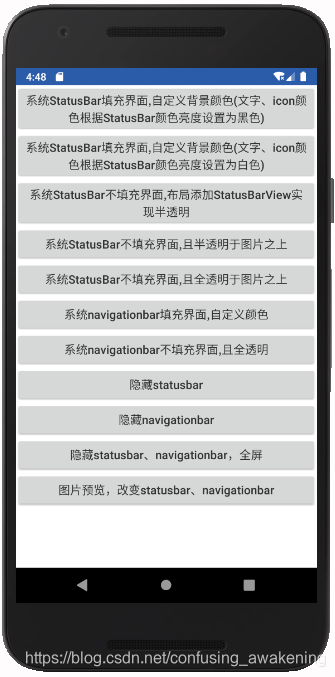
1. 系统StatusBar填充界面,自定义背景颜色(文字、icon颜色根据StatusBar颜色亮度设置为黑色)
2.系统StatusBar填充界面,自定义背景颜色(文字、icon颜色根据StatusBar颜色亮度设置为白色)
3.系统StatusBar不填充界面,布局添加StatusBarView实现半透明
4.系统StatusBar不填充界面,且半透明于图片之上
5.系统StatusBar不填充界面,且全透明于图片之上
6.系统navigationbar填充界面,自定义颜色
7.系统navigationbar不填充界面,且全透明
8.隐藏statusbar
9.隐藏navigationbar
10.隐藏statusbar、navigationbar,全屏
11.图片预览,切换statusbar、navigationbar的显示
StatusNavigationUtils工具类
StatusNavigationActivity
StatusBarView和系统StatusBar高度一致
NavigationBarView系统NavigationBarView高度一致
ScreenUtils
欢迎联系、指正、批评
## [GitHub:https://github.com/AnJiaoDe/StatusNavigationTransparent](https://github.com/AnJiaoDe/StatusNavigationTransparent)
## 使用方法
1.工程目录下的`build.gradle`中添加代码:
## 注意:如果轮子死活下载不下来,说明maven地址有毛病,你需要找到jitpack的官网首页,查看最新的官网地址
```java
allprojects {
repositories {
maven { url 'https://www.jitpack.io' }
}
}
```
2.直接在需要使用的模块的build.gradle中添加代码:
## 注意:记得去gayhub查看最新版本,最新版本最niubility
```java
dependencies {
implementation 'com.github.AnJiaoDe:StatusNavigationTransparent:V1.2.4'
}
```
## 首先创建全局theme继承Theme.AppCompat.Light.NoActionBar
```xml
<style name="AppTheme" parent="Theme.AppCompat.Light.NoActionBar">
</style>
```
```xml
<application
android:allowBackup="true"
android:icon="@mipmap/ic_launcher"
android:label="@string/app_name"
android:supportsRtl="true"
android:theme="@style/AppTheme">
```
## 然后继承StatusNavigationActivity
注意:不一定非要继承StatusNavActivity ,可以使用StatusNavigationUtils工具类、StatusBarView和NavigationBarView
总之,方法多样灵活
## 1. 系统StatusBar填充界面,自定义背景颜色(文字、icon颜色根据StatusBar颜色亮度设置为黑色)
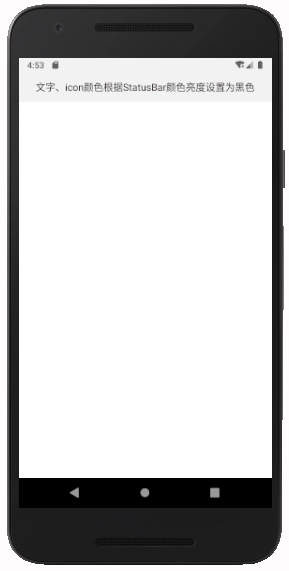
```java
public class Status00Activity extends StatusNavigationActivity {
@Override
protected void onCreate(Bundle savedInstanceState) {
super.onCreate(savedInstanceState);
setContentView(R.layout.activity_status00);
//此行可不写,默认就是0xfff2f2f2
setStatusBarColor(getStatusBarColorDefault());
}
@Override
public void onClick(View v) {
}
}
```
## 2.系统StatusBar填充界面,自定义背景颜色(文字、icon颜色根据StatusBar颜色亮度设置为白色)
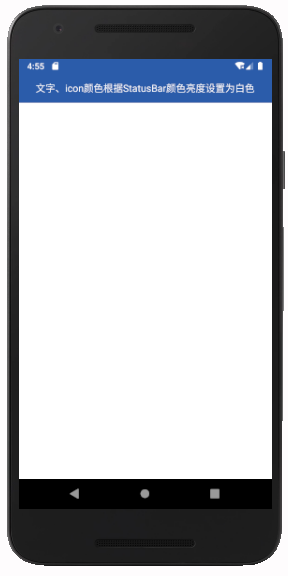
```java
public class Status0Activity extends StatusNavigationActivity {
@Override
protected void onCreate(Bundle savedInstanceState) {
super.onCreate(savedInstanceState);
setContentView(R.layout.activity_status0);
setStatusBarColor(getResources().getColor(R.color.theme));
}
@Override
public void onClick(View v) {
}
}
```
## 3.系统StatusBar不填充界面,布局添加StatusBarView实现半透明
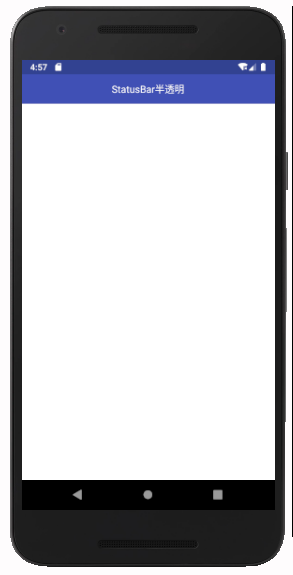
```java
public class Status2Activity extends StatusNavigationActivity {
@Override
protected void onCreate(Bundle savedInstanceState) {
super.onCreate(savedInstanceState);
setContentView(R.layout.activity_status2);
setStatusBarNoFillAndTransParentHalf();
}
@Override
public void onClick(View v) {
}
}
```
```xml
<?xml version="1.0" encoding="utf-8"?>
<LinearLayout xmlns:android="http://schemas.android.com/apk/res/android"
xmlns:tools="http://schemas.android.com/tools"
android:layout_width="match_parent"
android:layout_height="match_parent"
android:background="@color/colorPrimary"
android:orientation="vertical">
<com.cy.translucentparent.StatusBarView
android:layout_width="match_parent"
android:layout_height="wrap_content"/>
<RelativeLayout
android:layout_width="match_parent"
android:layout_height="48dp"
android:background="@color/colorPrimary">
<TextView
android:layout_width="match_parent"
android:layout_height="match_parent"
android:gravity="center"
android:text="StatusBar半透明"
android:textColor="#ffffff" />
</RelativeLayout>
<LinearLayout
android:layout_width="match_parent"
android:layout_height="match_parent"
android:background="@color/white"
android:orientation="vertical"></LinearLayout>
</LinearLayout>
```
## 4.系统StatusBar不填充界面,且半透明于图片之上

```java
public class Status5Activity extends StatusNavigationActivity {
@Override
protected void onCreate(Bundle savedInstanceState) {
super.onCreate(savedInstanceState);
setContentView(R.layout.activity_status5);
setStatusBarNoFillAndTransParentHalf();
//或者写2行
// setStatusBarNoFill();
// setStatusBarColor(0x33000000);
}
@Override
public void onClick(View v) {
}
}
```
## 5.系统StatusBar不填充界面,且全透明于图片之上
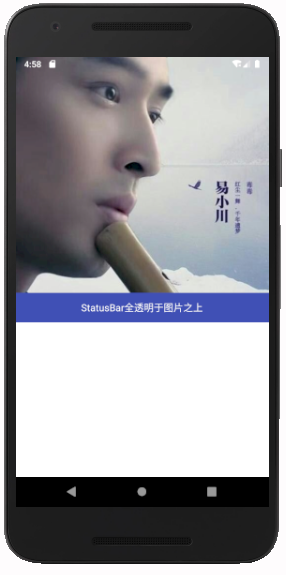
```java
public class Status6Activity extends StatusNavigationActivity {
@Override
protected void onCreate(Bundle savedInstanceState) {
super.onCreate(savedInstanceState);
setContentView(R.layout.activity_status6);
setStatusBarNoFillAndTransParent();
}
@Override
public void onClick(View v) {
}
}
```
## 6.系统navigationbar填充界面,自定义颜色
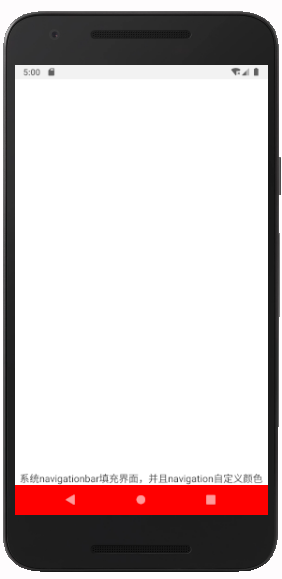
```java
public class Navigation0Activity extends StatusNavigationActivity {
@Override
protected void onCreate(Bundle savedInstanceState) {
super.onCreate(savedInstanceState);
setContentView(R.layout.activity_navigation0);
setNavigationBarColor(0xffff0000);
}
@Override
public void onClick(View v) {
}
}
```
## 7.系统navigationbar不填充界面,且全透明
模拟器上看起来是半透明,有些手机会有阴影,不必强求,随缘即可
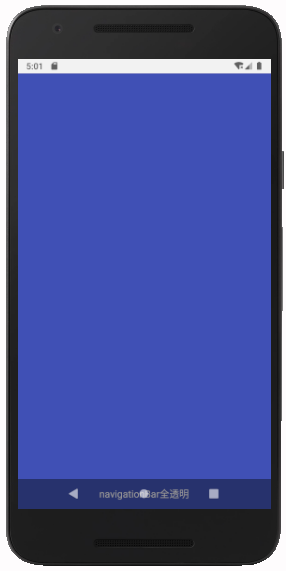
```java
public class Navigation2Activity extends StatusNavigationActivity {
@Override
protected void onCreate(Bundle savedInstanceState) {
super.onCreate(savedInstanceState);
setContentView(R.layout.activity_nav2);
setNavigationBarTransparent();
}
@Override
public void onClick(View v) {
}
}
```
## 8.隐藏statusbar

```java
public class HideStatusBarActivity extends StatusNavigationActivity {
@Override
protected void onCreate(Bundle savedInstanceState) {
super.onCreate(savedInstanceState);
setContentView(R.layout.activity_hide_status_bar);
setHideStatusBar();
}
@Override
public void onClick(View v) {
}
}
```
## 9.隐藏navigationbar

```java
public class HideNavigationBarActivity extends StatusNavigationActivity {
@Override
protected void onCreate(Bundle savedInstanceState) {
super.onCreate(savedInstanceState);
setContentView(R.layout.activity_hide_navigation_bar);
setHideNavigationBar();
}
@Override
public void onClick(View v) {
}
}
```
## 10.隐藏statusbar、navigationbar,全屏

```java
public class FullScreenActivity extends StatusNavigationActivity {
@Override
protected void onCreate(Bundle savedInstanceState) {
super.onCreate(savedInstanceState);
setContentView(R.layout.activity_full_screen);
setFullScreen();
}
@Override
public void onClick(View v) {
}
}
```
## 11.图片预览,切换statusbar、navigationbar的显示

```java
public class StatusNavigationSwitchActivity extends StatusNavigationActivity {
private boolean fullScreen=false;
@Override
protected void onCreate(Bundle savedInstanceState) {
super.onCreate(savedInstanceState);
setContentView(R.layout.activity_status_navigation_switch);
final ViewGroup rl1=findViewById(R.id.rl1);
final ViewGroup rl2=findViewById(R.id.rl2);
findViewById(R.id.iv).setOnClickListener(new View.OnClickListener() {
@Override
public void onClick(View v) {
fullScreen=!fullScreen;
if(fullScreen){
rl1.setVisibility(View.GONE);
rl2.setVisibility(View.GONE);
setHideStatusBar();
setNavigationBarTransparent();
}else {
rl1.setVisibility(View.VISIBLE);
rl2.setVisibility(View.VISIBLE);
setClearHideStatusBar();
setStatusBarColor(getStatusBarColorDefault());
setNavigationBarColor(getNavigationBarColorDefault());
}
}
});
}
@Override
public void onClick(View v) {
}
}
```
小编提供了贼多工具方便你的使用
## StatusNavigationUtils工具类
```java
package com.cy.translucentparent;
import android.app.Activity;
import android.graphics.Color;
import android.os.Build;
import android.os.ParcelUuid;
import android.view.View;
import android.view.Window;
import android.view.WindowManager;
/**
* Created by lenovo on 2017/4/25.
*/
public class StatusNavigationUtils {
/**
* 状态栏自定义背景颜色,6.0以上可修改状态栏字体颜色,icon颜色
*
* @param activity
* @param color
*/
public static void setStatusBarColor(Activity activity, int color) {
Window window = activity.getWindow();
//去除statusbar不填充的标志
window.clearFlags(WindowManager.LayoutParams.FLAG_TRANSLUCENT_STATUS);
int ui = window.getDecorView().getSystemUiVisibility();
if (Build.VERSION.SDK_INT >= Build.VERSION_CODES.M) {
if (isLightColor(color)) {
ui |= View.SYSTEM_UI_FLAG_LIGHT_STATUS_BAR; //设置状态栏中字体的颜色为黑色
} else {
ui &= ~View.SYSTEM_UI_FLAG_LIGHT_STATUS_BAR; //设置状态栏中字体颜色为白色
}
}
window.getDecorView().setSystemUiVisibility(ui);
window.setStatusBarColor(color);
}
/**
* 判断颜色是否为亮色
* @param color
* @return
*/
public static boolean isLightColor(int color) {
double darkness = 1 - (0.299 * Color.red(color) + 0.587 * Color.green(color) + 0.114 * Color.blue(color)) / 255;
if (darkness < 0.5) {
return true; // It's a light color
} else {
return false; // It's a dark color
}
}
/**
* * 状态栏不填充,布局会填充到状态栏底部,有些手机有阴影
*
* @param activity
*/
public static void setStatusBarNoFill(Activity activity) {
Window window = activity.getWindow();
int ui = window.getDecorView().getSystemUiVisibility();
ui |= View.SYSTEM_UI_FLAG_LAYOUT_FULLSCREEN;
window.getDecorView().setSystemUiVisibility(ui);
}
/**
* * 导航栏全透明,布局会填充到导航栏底部,有些手机有阴影
*
* @param activity
*/
public static void setNavigationBarTransparent(Activity activity) {
activity.getWindow().addFlags(WindowManager.LayoutParams.FLAG_TRANSLUCENT_NAVIGATION);
}
/**设置导航栏颜色,和setNavigationBarTransparent互斥,要么选择自定义导航栏颜色,要么选择导航栏全透明
* @param activity
* @param color
*/
public static void setNavigationBarColor(Activity activity, int color) {
Window window = activity.getWindow();
window.clearFlags(WindowManager.LayoutParams.FLAG_TRANSLUCENT_NAVIGATION);
int ui = window.getDecorView().getSystemUiVisibility();
window.getDecorView().setSystemUiVisibility(ui);
window.setNavigationBarColor(color);
}
/**
* 隐藏状态栏、导航栏,全屏
* @param activity
*/
public static void setFullScreen(Activity activity) {
View decorView = activity.getWindow().getDecorView();
int ui = decorView.getSystemUiVisibility();
ui |= View.SYSTEM_UI_FLAG_LAYOUT_HIDE_NAVIGATION
| View.SYSTEM_UI_FLAG_LAYOUT_FULLSCREEN
| View.SYSTEM_UI_FLAG_HIDE_NAVIGATION
| View.SYSTEM_UI_FLAG_FULLSCREEN
| View.SYSTEM_UI_FLAG_IMMERSIVE_STICKY;
decorView.setSystemUiVisibility(ui);
}
/**
* 去除隐藏状态栏、导航栏,全屏的标志
* @param activity
*/
public static void setClearFullScreen(Activity activity) {
View decorView = activity.getWindow().getDecorView();
int ui = decorView.getSystemUiVisibility();
ui &= View.SYSTEM_UI_FLAG_LAYOUT_HIDE_NAVIGATION
& View.SYSTEM_UI_FLAG_LAYOUT_FULLSCREEN
& View.SYSTEM_UI_FLAG_HIDE_NAVIGATION
& View.SYSTEM_UI_FLAG_FULLSCREEN
& View.SYSTEM_UI_FLAG_IMMERSIVE_STICKY;
decorView.setSystemUiVisibility(ui);
}
/**
* 隐藏状态栏
* @param activity
*/
public static void setHideStatusBar(Activity activity) {
View decorView = activity.getWindow().getDecorView();
int ui = decorView.getSystemUiVisibility();
ui |= View.SYSTEM_UI_FLAG_LAYOUT_FULLSCREEN
| View.SYSTEM_UI_FLAG_FULLSCREEN
| View.SYSTEM_UI_FLAG_IMMERSIVE_STICKY;
decorView.setSystemUiVisibility(ui);
}
/**
* 去除隐藏状态栏的标志
* @param activity
*/
public static void setClearHideStatusBar(Activity activity) {
View decorView = activity.getWindow().getDecorView();
int ui = decorView.getSystemUiVisibility();
ui &= View.SYSTEM_UI_FLAG_LAYOUT_FULLSCREEN
& View.SYSTEM_UI_FLAG_FULLSCREEN
& View.SYSTEM_UI_FLAG_IMMERSIVE_STICKY;
decorView.setSystemUiVisibility(ui);
}
/**
* 隐藏导航栏
* @param activity
*/
public static void setHideNavigationBar(Activity activity) {
View decorView = activity.getWindow().getDecorView();
int ui = decorView.getSystemUiVisibility();
ui |=View.SYSTEM_UI_FLAG_HIDE_NAVIGATION | View.SYSTEM_UI_FLAG_IMMERSIVE_STICKY;
decorView.setSystemUiVisibility(ui);
}
/**
* 去除隐藏导航栏的标志
* @param activity
*/
public static void setClearHideNavigationBar(Activity activity) {
View decorView = activity.getWindow().getDecorView();
int ui = decorView.getSystemUiVisibility();
ui &=View.SYSTEM_UI_FLAG_HIDE_NAVIGATION & View.SYSTEM_UI_FLAG_IMMERSIVE_STICKY;
decorView.setSystemUiVisibility(ui);
}
}
```
## StatusNavigationActivity
```java
package com.cy.translucentparent;
import android.app.Activity;
import android.os.Bundle;
import android.view.View;
import androidx.annotation.Nullable;
import androidx.appcompat.app.AppCompatActivity;
/**
* Created by lenovo on 2017/4/25.
*/
public abstract class StatusNavigationActivity extends AppCompatActivity implements View.OnClickListener {
@Override
protected void onCreate(@Nullable Bundle savedInstanceState) {
super.onCreate(savedInstanceState);
StatusNavigationUtils.setStatusBarColor(this, getStatusBarColorDefault());
StatusNavigationUtils.setNavigationBarColor(this, getNavigationBarColorDefault());
}
public int getStatusBarColorDefault(){
return 0xfff2f2f2;
}
public int getNavigationBarColorDefault(){
return 0xff000000;
}
public void setStatusBarColor(int color) {
StatusNavigationUtils.setStatusBarColor(this, color);
}
public void setNavigationBarColor(int color) {
StatusNavigationUtils.setNavigationBarColor(this, color);
}
public void setFullScreen() {
StatusNavigationUtils.setFullScreen(this);
}
public void setClearFullScreen() {
StatusNavigationUtils.setClearFullScreen(this);
}
public void setHideStatusBar() {
StatusNavigationUtils.setHideStatusBar(this);
}
public void setClearHideStatusBar() {
StatusNavigationUtils.setClearHideStatusBar(this);
}
public void setHideNavigationBar() {
StatusNavigationUtils.setHideNavigationBar(this);
}
public void setClearHideNavigationBar() {
StatusNavigationUtils.setClearHideNavigationBar(this);
}
public void setStatusBarNoFill() {
StatusNavigationUtils.setStatusBarNoFill(this);
}
public void setStatusBarNoFillAndTransParent() {
setStatusBarNoFill();
setStatusBarColor(0x00000000);
}
public void setStatusBarNoFillAndTransParentHalf() {
setStatusBarNoFill();
setStatusBarColor(0x33000000);
}
public void setNavigationBarTransparent() {
StatusNavigationUtils.setNavigationBarTransparent(this);
}
}
```
## StatusBarView和系统StatusBar高度一致
```java
package com.cy.translucentparent;
import android.content.Context;
import android.util.AttributeSet;
import android.view.View;
/**
* Created by lenovo on 2017/7/4.
*/
public class StatusBarView extends View {
private Context context;
public StatusBarView(Context context) {
this(context,null);
}
public StatusBarView(Context context, AttributeSet attrs) {
super(context, attrs);
this.context=context;
}
@Override
protected void onMeasure(int widthMeasureSpec, int heightMeasureSpec) {
super.onMeasure(widthMeasureSpec, MeasureSpec.makeMeasureSpec(ScreenUtils.getStatusBarHeight(context), MeasureSpec.EXACTLY));
}
}
```
## NavigationBarView系统NavigationBarView高度一致
```java
package com.cy.translucentparent;
import android.content.Context;
import android.util.AttributeSet;
import android.view.View;
/**
* Created by lenovo on 2017/7/4.
*/
public class NavigationBarView extends View {
private Context context;
public NavigationBarView(Context context) {
this(context,null);
}
public NavigationBarView(Context context, AttributeSet attrs) {
super(context, attrs);
this.context=context;
}
@Override
protected void onMeasure(int widthMeasureSpec, int heightMeasureSpec) {
super.onMeasure(widthMeasureSpec, MeasureSpec.makeMeasureSpec(ScreenUtils.getNavigationBarHeight(context), MeasureSpec.EXACTLY));
}
}
```
## ScreenUtils
```java
package com.cy.translucentparent;
import android.app.Activity;
import android.content.Context;
import android.content.res.Resources;
import android.graphics.Rect;
import android.graphics.RectF;
import android.os.Build;
import android.util.DisplayMetrics;
import android.view.MotionEvent;
import android.view.View;
import android.view.WindowManager;
import java.lang.reflect.Method;
/**
* Created by Administrator on 2018/11/20 0020.
*/
public class ScreenUtils {
public static int getStatusBarHeight(Context context) {
Resources resources = context.getResources();
int resourceId = resources.getIdentifier("status_bar_height", "dimen", "android");
return resources.getDimensionPixelSize(resourceId);
}
public static int getNavigationBarHeight(Context context) {
Resources resources = context.getResources();
int resourceId = resources.getIdentifier("navigation_bar_height", "dimen", "android");
return resources.getDimensionPixelSize(resourceId);
}
public static int getScreenWidth(Context context) {
DisplayMetrics displayMetrics = new DisplayMetrics();
WindowManager wm = (WindowManager) context.getSystemService("window");
if (Build.VERSION.SDK_INT <= 17) {
wm.getDefaultDisplay().getMetrics(displayMetrics);
} else {
wm.getDefaultDisplay().getRealMetrics(displayMetrics);
}
return displayMetrics.widthPixels;
}
public static int getScreenHeight(Context context) {
DisplayMetrics displayMetrics = new DisplayMetrics();
WindowManager wm = (WindowManager) context.getSystemService("window");
if (Build.VERSION.SDK_INT <= 17) {
wm.getDefaultDisplay().getMetrics(displayMetrics);
} else {
wm.getDefaultDisplay().getRealMetrics(displayMetrics);
}
return displayMetrics.heightPixels;
}
public static int setYStart(Context context, float y) {
// if (isGroove(context)) {
return (int) (y * getScreenHeight(context)) + getStatusBarHeight(context);
// } else {
// return (int) (y * getScreenHeight(context));
//
//
// }
}
/**
* 获取当前界面可视区域的高度
*
* @param activity
* @return
*/
public static int getVisibleFrameHeight(Activity activity) {
Rect r = new Rect();
//获取当前界面可视部分
activity.getWindow().getDecorView().getWindowVisibleDisplayFrame(r);
// if (isGroove(activity)) {
// return r.bottom - r.top - getStatusBarHeight(activity);
// } else {
return r.bottom - r.top;
//
// }
}
/**
* 获取当前界面可视区域的宽度
*
* @param activity
* @return
*/
public static int getVisibleFrameWidth(Activity activity) {
Rect r = new Rect();
//获取当前界面可视部分
activity.getWindow().getDecorView().getWindowVisibleDisplayFrame(r);
return r.right - r.left;
}
}
```
## 欢迎联系、指正、批评
Github:[https://github.com/AnJiaoDe](https://github.com/AnJiaoDe)
简书:[https://www.jianshu.com/u/b8159d455c69](https://www.jianshu.com/u/b8159d455c69)
CSDN:[https://blog.csdn.net/confusing_awakening](https://blog.csdn.net/confusing_awakening)
ffmpeg入门教程:[https://www.jianshu.com/p/042c7847bd8a](https://www.jianshu.com/p/042c7847bd8a)
================================================
FILE: app/.gitignore
================================================
/build
================================================
FILE: app/build.gradle
================================================
apply plugin: 'com.android.application'
apply plugin: 'org.jetbrains.kotlin.android'
android {
compileSdkVersion 34
namespace 'com.cy.statusnavigationtrans'
defaultConfig {
minSdkVersion 21
targetSdkVersion 33
applicationId "com.cy.statusnavigationtrans"
versionCode 1
versionName "1.0"
testInstrumentationRunner "android.support.test.runner.AndroidJUnitRunner"
}
buildTypes {
release {
minifyEnabled false
proguardFiles getDefaultProguardFile('proguard-android.txt'), 'proguard-rules.pro'
}
}
//指定jdk版本
compileOptions {
sourceCompatibility JavaVersion.VERSION_1_8
targetCompatibility JavaVersion.VERSION_1_8
}
kotlinOptions {
jvmTarget = "1.8"
}
}
dependencies {
implementation fileTree(dir: 'libs', include: ['*.jar'])
implementation 'androidx.appcompat:appcompat:1.7.0'
implementation 'androidx.activity:activity:1.8.0'
api project(':translucentparent')
}
================================================
FILE: app/proguard-rules.pro
================================================
# Add project specific ProGuard rules here.
# By default, the flags in this file are appended to flags specified
# in D:\AndroidSDK/tools/proguard/proguard-android.txt
# You can edit the include path and order by changing the proguardFiles
# directive in build.gradle.
#
# For more details, see
# http://developer.android.com/guide/developing/tools/proguard.html
# Add any project specific keep options here:
# If your project uses WebView with JS, uncomment the following
# and specify the fully qualified class name to the JavaScript interface
# class:
#-keepclassmembers class fqcn.of.javascript.interface.for.webview {
# public *;
#}
================================================
FILE: app/src/androidTest/java/com/cy/statusnavigationtrans/ExampleInstrumentedTest.java
================================================
package com.cy.statusnavigationtrans;
import android.content.Context;
import android.support.test.InstrumentationRegistry;
import android.support.test.runner.AndroidJUnit4;
import org.junit.Test;
import org.junit.runner.RunWith;
import static org.junit.Assert.*;
/**
* Instrumentation test, which will execute on an Android device.
*
* @see <a href="http://d.android.com/tools/testing">Testing documentation</a>
*/
@RunWith(AndroidJUnit4.class)
public class ExampleInstrumentedTest {
@Test
public void useAppContext() throws Exception {
// Context of the app under test.
Context appContext = InstrumentationRegistry.getTargetContext();
assertEquals("com.cy.statusnavigationtrans", appContext.getPackageName());
}
}
================================================
FILE: app/src/main/AndroidManifest.xml
================================================
<?xml version="1.0" encoding="utf-8"?>
<manifest xmlns:android="http://schemas.android.com/apk/res/android"
package="com.cy.statusnavigationtrans">
<application
android:allowBackup="true"
android:icon="@mipmap/ic_launcher"
android:label="@string/app_name"
android:supportsRtl="true"
android:theme="@style/AppTheme">
<activity android:name=".BaseSwitchActivity"></activity>
<activity android:name=".HideNavigationBarActivity" />
<activity android:name=".HideStatusBarActivity" />
<activity android:name=".FullScreenActivity" />
<activity android:name=".Navigation0Activity" />
<activity android:name=".Status00Activity" />
<activity android:name=".Status0Activity" />
<activity android:name=".MainActivity"
android:exported="true">
<intent-filter>
<action android:name="android.intent.action.MAIN" />
<category android:name="android.intent.category.LAUNCHER" />
</intent-filter>
</activity>
<activity android:name=".Status2Activity" />
<activity android:name=".Status5Activity" />
<activity android:name=".Status6Activity" />
<activity android:name=".Navigation1Activity" />
<activity android:name=".Navigation2Activity" />
</application>
</manifest>
================================================
FILE: app/src/main/java/com/cy/statusnavigationtrans/BaseActivity.java
================================================
package com.cy.statusnavigationtrans;
import android.os.Bundle;
import androidx.annotation.Nullable;
import androidx.appcompat.app.AppCompatActivity;
import com.cy.translucentparent.StaNavUtils;
/**
* Created by lenovo on 2017/4/25.
*/
public abstract class BaseActivity extends AppCompatActivity {
@Override
protected void onCreate(@Nullable Bundle savedInstanceState) {
super.onCreate(savedInstanceState);
StaNavUtils.edgeToEdge(this);
}
}
================================================
FILE: app/src/main/java/com/cy/statusnavigationtrans/BaseSwitchActivity.java
================================================
package com.cy.statusnavigationtrans;
import android.graphics.Color;
import android.os.Bundle;
import android.view.View;
import android.view.ViewGroup;
import com.cy.translucentparent.StaNavUtils;
public class BaseSwitchActivity extends BaseActivity {
private boolean fullScreen=false;
@Override
protected void onCreate(Bundle savedInstanceState) {
super.onCreate(savedInstanceState);
setContentView(R.layout.activity_status_navigation_switch);
final ViewGroup rl1=findViewById(R.id.rl1);
final ViewGroup rl2=findViewById(R.id.rl2);
StaNavUtils.setNavigationBarTransparent(BaseSwitchActivity.this, false);
findViewById(R.id.iv).setOnClickListener(new View.OnClickListener() {
@Override
public void onClick(View v) {
fullScreen=!fullScreen;
if(fullScreen){
rl1.setVisibility(View.GONE);
rl2.setVisibility(View.GONE);
}else {
rl1.setVisibility(View.VISIBLE);
rl2.setVisibility(View.VISIBLE);
}
}
});
}
}
================================================
FILE: app/src/main/java/com/cy/statusnavigationtrans/FullScreenActivity.java
================================================
package com.cy.statusnavigationtrans;
import android.os.Bundle;
import android.view.View;
import com.cy.translucentparent.StaNavUtils;
public class FullScreenActivity extends BaseActivity {
private boolean fullScreen = false;
@Override
protected void onCreate(Bundle savedInstanceState) {
super.onCreate(savedInstanceState);
setContentView(R.layout.activity_full_screen);
StaNavUtils.setAppearanceLightStatusBars(this,false);
StaNavUtils.setNavigationBarTransparent(this,false);
StaNavUtils.fillStatusBar(this,true);
findViewById(R.id.iv).setOnClickListener(new View.OnClickListener() {
@Override
public void onClick(View v) {
fullScreen = !fullScreen;
StaNavUtils.fullScreen(FullScreenActivity.this,fullScreen);
}
});
}
}
================================================
FILE: app/src/main/java/com/cy/statusnavigationtrans/HideNavigationBarActivity.java
================================================
package com.cy.statusnavigationtrans;
import android.os.Bundle;
import com.cy.translucentparent.StaNavUtils;
public class HideNavigationBarActivity extends BaseActivity {
@Override
protected void onCreate(Bundle savedInstanceState) {
super.onCreate(savedInstanceState);
setContentView(R.layout.activity_hide_navigation_bar);
StaNavUtils.setAppearanceLightNavigationBars(this,false);
StaNavUtils.showNavigationBar(this,false);
}
}
================================================
FILE: app/src/main/java/com/cy/statusnavigationtrans/HideStatusBarActivity.java
================================================
package com.cy.statusnavigationtrans;
import android.os.Bundle;
import com.cy.translucentparent.StaNavUtils;
public class HideStatusBarActivity extends BaseActivity {
@Override
protected void onCreate(Bundle savedInstanceState) {
super.onCreate(savedInstanceState);
setContentView(R.layout.activity_hide_status_bar);
StaNavUtils.showStatusBar(this,false);
StaNavUtils.setAppearanceLightStatusBars(this,false);
}
}
================================================
FILE: app/src/main/java/com/cy/statusnavigationtrans/LogUtils.java
================================================
package com.cy.statusnavigationtrans;
import android.os.Build;
import android.util.Log;
/**
* Created by lenovo on 2017/8/20.
*/
public class LogUtils {
private static boolean DEBUG = true;
private LogUtils() {
}
public static synchronized void debug(boolean debug) {
DEBUG = debug;
}
public static void logI(Object tag, Object content) {
if(DEBUG==false)return;
if (tag == null) tag = "LOG_I";
Log.i(String.valueOf(tag), "----------------------------------->>>>" + content);
}
public static void logE(Object tag, Object content) {
if(DEBUG==false)return;
if (tag == null) tag = "LOG_E";
Log.e(String.valueOf(tag), "----------------------------------->>>>" + content);
}
public static void logI(Object content) {
logI(null,content);
}
public static void logE(Object content) {
logE(null,content);
}
public static void log(Object tag, Object content) {
logE(tag,content);
}
public static void log(Object content) {
logE(content);
}
}
================================================
FILE: app/src/main/java/com/cy/statusnavigationtrans/MainActivity.java
================================================
package com.cy.statusnavigationtrans;
import android.content.Intent;
import android.graphics.Color;
import android.os.Bundle;
import android.util.Log;
import android.view.View;
import androidx.annotation.NonNull;
import androidx.appcompat.app.AppCompatActivity;
import androidx.core.graphics.Insets;
import androidx.core.view.OnApplyWindowInsetsListener;
import androidx.core.view.ViewCompat;
import androidx.core.view.WindowInsetsCompat;
import com.cy.translucentparent.StaNavUtils;
public class MainActivity extends BaseActivity implements View.OnClickListener {
@Override
protected void onCreate(Bundle savedInstanceState) {
super.onCreate(savedInstanceState);
setContentView(R.layout.activity_main);
findViewById(R.id.btn_00).setOnClickListener(new View.OnClickListener() {
@Override
public void onClick(View v) {
startActivity(new Intent(MainActivity.this, Status00Activity.class));
}
});
findViewById(R.id.btn_0).setOnClickListener(new View.OnClickListener() {
@Override
public void onClick(View v) {
startActivity(new Intent(MainActivity.this, Status0Activity.class));
}
});
findViewById(R.id.btn_6).setOnClickListener(new View.OnClickListener() {
@Override
public void onClick(View v) {
startActivity(new Intent(MainActivity.this, Status6Activity.class));
}
});
findViewById(R.id.btn_7).setOnClickListener(new View.OnClickListener() {
@Override
public void onClick(View v) {
startActivity(new Intent(MainActivity.this, Navigation0Activity.class));
}
});
findViewById(R.id.btn_9).setOnClickListener(new View.OnClickListener() {
@Override
public void onClick(View v) {
startActivity(new Intent(MainActivity.this, Navigation2Activity.class));
}
});
findViewById(R.id.btn_10).setOnClickListener(new View.OnClickListener() {
@Override
public void onClick(View v) {
startActivity(new Intent(MainActivity.this, HideStatusBarActivity.class));
}
});
findViewById(R.id.btn_11).setOnClickListener(new View.OnClickListener() {
@Override
public void onClick(View v) {
startActivity(new Intent(MainActivity.this, HideNavigationBarActivity.class));
}
});
findViewById(R.id.btn_12).setOnClickListener(new View.OnClickListener() {
@Override
public void onClick(View v) {
startActivity(new Intent(MainActivity.this, FullScreenActivity.class));
}
});
}
@Override
public void onClick(View v) {
}
}
================================================
FILE: app/src/main/java/com/cy/statusnavigationtrans/Navigation0Activity.java
================================================
package com.cy.statusnavigationtrans;
import android.graphics.Color;
import android.os.Bundle;
import com.cy.translucentparent.StaNavUtils;
public class Navigation0Activity extends BaseActivity {
@Override
protected void onCreate(Bundle savedInstanceState) {
super.onCreate(savedInstanceState);
setContentView(R.layout.activity_navigation0);
StaNavUtils.setNavigationBarColor(this,Color.RED);
}
}
================================================
FILE: app/src/main/java/com/cy/statusnavigationtrans/Navigation2Activity.java
================================================
package com.cy.statusnavigationtrans;
import android.os.Bundle;
import com.cy.translucentparent.StaNavUtils;
public class Navigation2Activity extends BaseActivity {
@Override
protected void onCreate(Bundle savedInstanceState) {
super.onCreate(savedInstanceState);
setContentView(R.layout.activity_nav2);
StaNavUtils.setNavigationBarTransparent(this,false);
}
}
================================================
FILE: app/src/main/java/com/cy/statusnavigationtrans/Status00Activity.java
================================================
package com.cy.statusnavigationtrans;
import android.os.Bundle;
public class Status00Activity extends BaseActivity {
@Override
protected void onCreate(Bundle savedInstanceState) {
super.onCreate(savedInstanceState);
setContentView(R.layout.activity_status00);
}
}
================================================
FILE: app/src/main/java/com/cy/statusnavigationtrans/Status0Activity.java
================================================
package com.cy.statusnavigationtrans;
import android.graphics.Color;
import android.os.Bundle;
import com.cy.translucentparent.StaNavUtils;
public class Status0Activity extends BaseActivity {
@Override
protected void onCreate(Bundle savedInstanceState) {
super.onCreate(savedInstanceState);
StaNavUtils.setStatusBarColor(this,Color.RED);
setContentView(R.layout.activity_status0);
}
}
================================================
FILE: app/src/main/java/com/cy/statusnavigationtrans/Status2Activity.java
================================================
package com.cy.statusnavigationtrans;
import android.os.Bundle;
public class Status2Activity extends BaseActivity {
@Override
protected void onCreate(Bundle savedInstanceState) {
super.onCreate(savedInstanceState);
setContentView(R.layout.activity_status2);
}
}
================================================
FILE: app/src/main/java/com/cy/statusnavigationtrans/Status5Activity.java
================================================
package com.cy.statusnavigationtrans;
import android.os.Bundle;
public class Status5Activity extends BaseActivity {
@Override
protected void onCreate(Bundle savedInstanceState) {
super.onCreate(savedInstanceState);
setContentView(R.layout.activity_status5);
}
}
================================================
FILE: app/src/main/java/com/cy/statusnavigationtrans/Status6Activity.java
================================================
package com.cy.statusnavigationtrans;
import android.os.Bundle;
import com.cy.translucentparent.StaNavUtils;
public class Status6Activity extends BaseActivity {
@Override
protected void onCreate(Bundle savedInstanceState) {
super.onCreate(savedInstanceState);
setContentView(R.layout.activity_status6);
StaNavUtils.fillStatusBar(this,true);
StaNavUtils.setAppearanceLightStatusBars(this,false);
}
}
================================================
FILE: app/src/main/res/layout/activity_full_screen.xml
================================================
<?xml version="1.0" encoding="utf-8"?>
<FrameLayout xmlns:android="http://schemas.android.com/apk/res/android"
xmlns:app="http://schemas.android.com/apk/res-auto"
xmlns:tools="http://schemas.android.com/tools"
android:layout_width="match_parent"
android:layout_height="match_parent"
android:orientation="vertical">
<ImageView
android:id="@+id/iv"
android:layout_width="match_parent"
android:layout_height="match_parent"
android:scaleType="centerCrop"
android:src="@drawable/paper" />
<TextView
android:layout_width="match_parent"
android:gravity="center"
android:text="点击切换全屏"
android:textColor="@color/white"
android:textSize="30sp"
android:layout_height="match_parent"/>
</FrameLayout>
================================================
FILE: app/src/main/res/layout/activity_hide_navigation_bar.xml
================================================
<?xml version="1.0" encoding="utf-8"?>
<LinearLayout xmlns:android="http://schemas.android.com/apk/res/android"
xmlns:app="http://schemas.android.com/apk/res-auto"
xmlns:tools="http://schemas.android.com/tools"
android:layout_width="match_parent"
android:layout_height="match_parent"
android:orientation="vertical">
<ImageView
android:id="@+id/iv"
android:layout_width="match_parent"
android:layout_height="match_parent"
android:scaleType="centerCrop"
android:src="@drawable/paper" />
</LinearLayout>
================================================
FILE: app/src/main/res/layout/activity_hide_status_bar.xml
================================================
<?xml version="1.0" encoding="utf-8"?>
<LinearLayout xmlns:android="http://schemas.android.com/apk/res/android"
xmlns:app="http://schemas.android.com/apk/res-auto"
xmlns:tools="http://schemas.android.com/tools"
android:layout_width="match_parent"
android:layout_height="match_parent"
android:orientation="vertical">
<ImageView
android:layout_width="match_parent"
android:src="@drawable/paper"
android:scaleType="centerCrop"
android:id="@+id/iv"
android:layout_height="match_parent"/>
</LinearLayout>
================================================
FILE: app/src/main/res/layout/activity_main.xml
================================================
<?xml version="1.0" encoding="utf-8"?>
<ScrollView xmlns:android="http://schemas.android.com/apk/res/android"
xmlns:tools="http://schemas.android.com/tools"
android:id="@+id/activity_main"
android:layout_width="match_parent"
android:layout_height="match_parent"
android:background="@color/white">
<LinearLayout
android:layout_width="match_parent"
android:layout_height="match_parent"
android:orientation="vertical">
<Button
android:id="@+id/btn_00"
android:layout_width="match_parent"
android:layout_height="wrap_content"
android:text="系统StatusBar填充界面,自定义背景颜色(文字、icon颜色自动根据StatusBar颜色亮度设置为黑色)" />
<Button
android:id="@+id/btn_0"
android:layout_width="match_parent"
android:layout_height="wrap_content"
android:text="系统StatusBar填充界面,自定义背景颜色(文字、icon颜色自动根据StatusBar颜色亮度设置为白色)" />
<Button
android:id="@+id/btn_6"
android:layout_width="match_parent"
android:layout_height="wrap_content"
android:text="系统StatusBar不填充界面,且全透明于图片之上,修改状态栏icon颜色,使得和图片协调" />
<Button
android:id="@+id/btn_7"
android:layout_width="match_parent"
android:layout_height="wrap_content"
android:text="系统navigationbar填充界面,自定义颜色,icon颜色自动根据navigationbar颜色亮度进行设置" />
<!-- <Button-->
<!-- android:id="@+id/btn_8"-->
<!-- android:layout_width="match_parent"-->
<!-- android:layout_height="wrap_content"-->
<!-- android:text="系统navigationbar不填充界面,且半透明" />-->
<Button
android:id="@+id/btn_9"
android:layout_width="match_parent"
android:layout_height="wrap_content"
android:text="系统navigationbar不填充界面,且全/半透明" />
<Button
android:id="@+id/btn_10"
android:layout_width="match_parent"
android:layout_height="wrap_content"
android:text="隐藏statusbar" />
<Button
android:id="@+id/btn_11"
android:layout_width="match_parent"
android:layout_height="wrap_content"
android:text="隐藏navigationbar" />
<Button
android:id="@+id/btn_12"
android:layout_width="match_parent"
android:layout_height="wrap_content"
android:text="隐藏statusbar、navigationbar,全屏" />
<TextView
android:layout_width="match_parent"
android:layout_height="match_parent"
android:gravity="center"
android:text="dsgdfgdfgdsfgdfgdsgdfgdfgdsfgdfgdsgdfgdfgdsfgdfg\ndsgdfgdfgdsfgdfgdsgdfgdfgdsfgdfgdsgdfgdfgdsfgdfg\ndsgdfgdfgdsfgdfgdsgdfgdfgdsfgdfgdsgdfgdfgdsfgdfg\ndsgdfgdfgdsfgdfgdsgdfgdfgdsfgdfgdsgdfgdfgdsfgdfg\ndsgdfgdfgdsfgdfgdsgdfgdfgdsfgdfgdsgdfgdfgdsfgdfg\ndsgdfgdfgdsfgdfg\ndsgdfgdfgdsfgdfg\ndsgdfgdfgdsfgdfg\ndsgdfgdfgdsfgdfg\ndsgdfgdfgdsfgdfg\ndsgdfgdfgdsfgdfg\ndsgdfgdfgdsfgdfg\ndsgdfgdfgdsfgdfg\ndsgdfgdfgdsfgdfg\n"
android:textSize="18sp" />
</LinearLayout>
</ScrollView>
================================================
FILE: app/src/main/res/layout/activity_nav1.xml
================================================
<?xml version="1.0" encoding="utf-8"?>
<RelativeLayout xmlns:android="http://schemas.android.com/apk/res/android"
xmlns:tools="http://schemas.android.com/tools"
android:id="@+id/activity_status7"
android:layout_width="match_parent"
android:layout_height="match_parent"
android:background="@color/colorPrimary">
<TextView
android:layout_width="match_parent"
android:layout_height="48dp"
android:gravity="center"
android:layout_alignParentBottom="true"
android:text="navigationBar半透明"
android:textColor="@color/white" />
<!-- <com.cy.translucentparent.NavigationBarView-->
<!-- android:layout_width="match_parent"-->
<!-- android:background="#33000000"-->
<!-- android:layout_height="wrap_content"/>-->
</RelativeLayout>
================================================
FILE: app/src/main/res/layout/activity_nav2.xml
================================================
<?xml version="1.0" encoding="utf-8"?>
<LinearLayout xmlns:android="http://schemas.android.com/apk/res/android"
xmlns:tools="http://schemas.android.com/tools"
android:id="@+id/activity_status7"
android:layout_width="match_parent"
android:layout_height="match_parent"
android:background="@color/colorPrimary">
<TextView
android:layout_width="match_parent"
android:layout_height="48dp"
android:layout_gravity="bottom"
android:gravity="center"
android:layout_alignParentBottom="true"
android:text="navigationBar全透明"
android:textColor="@color/white" />
</LinearLayout>
================================================
FILE: app/src/main/res/layout/activity_navigation0.xml
================================================
<?xml version="1.0" encoding="utf-8"?>
<RelativeLayout xmlns:android="http://schemas.android.com/apk/res/android"
xmlns:app="http://schemas.android.com/apk/res-auto"
xmlns:tools="http://schemas.android.com/tools"
android:layout_width="match_parent"
android:layout_height="match_parent"
android:background="@color/red"
tools:context=".Navigation0Activity">
<TextView
android:layout_width="match_parent"
android:layout_alignParentBottom="true"
android:gravity="center"
android:text="系统navigationbar填充界面,并且navigation自定义颜色"
android:layout_height="wrap_content"/>
</RelativeLayout>
================================================
FILE: app/src/main/res/layout/activity_status0.xml
================================================
<?xml version="1.0" encoding="utf-8"?>
<LinearLayout xmlns:android="http://schemas.android.com/apk/res/android"
xmlns:tools="http://schemas.android.com/tools"
android:layout_width="match_parent"
android:layout_height="match_parent"
android:background="@color/colorPrimary"
android:orientation="vertical">
<RelativeLayout
android:layout_width="match_parent"
android:layout_height="48dp"
android:background="@color/theme">
<TextView
android:layout_width="match_parent"
android:layout_height="match_parent"
android:gravity="center"
android:text="文字、icon颜色根据StatusBar颜色亮度设置为白色"
android:textColor="#ffffff" />
</RelativeLayout>
<LinearLayout
android:layout_width="match_parent"
android:layout_height="match_parent"
android:background="@color/white"
android:orientation="vertical"></LinearLayout>
</LinearLayout>
================================================
FILE: app/src/main/res/layout/activity_status00.xml
================================================
<?xml version="1.0" encoding="utf-8"?>
<LinearLayout xmlns:android="http://schemas.android.com/apk/res/android"
xmlns:tools="http://schemas.android.com/tools"
android:layout_width="match_parent"
android:layout_height="match_parent"
android:background="@color/colorPrimary"
android:orientation="vertical">
<RelativeLayout
android:layout_width="match_parent"
android:background="#f2f2f2"
android:layout_height="48dp">
<TextView
android:layout_width="match_parent"
android:layout_height="match_parent"
android:gravity="center"
android:text="文字、icon颜色根据StatusBar颜色亮度设置为黑色"
android:textColor="#2d1d1d" />
</RelativeLayout>
<LinearLayout
android:layout_width="match_parent"
android:layout_height="match_parent"
android:background="@color/white"
android:orientation="vertical"></LinearLayout>
</LinearLayout>
================================================
FILE: app/src/main/res/layout/activity_status2.xml
================================================
<?xml version="1.0" encoding="utf-8"?>
<LinearLayout xmlns:android="http://schemas.android.com/apk/res/android"
xmlns:tools="http://schemas.android.com/tools"
android:layout_width="match_parent"
android:layout_height="match_parent"
android:background="@color/colorPrimary"
android:orientation="vertical">
<com.cy.translucentparent.StatusBarView
android:layout_width="match_parent"
android:layout_height="wrap_content"/>
<RelativeLayout
android:layout_width="match_parent"
android:layout_height="48dp"
android:background="@color/colorPrimary">
<TextView
android:layout_width="match_parent"
android:layout_height="match_parent"
android:gravity="center"
android:text="StatusBar半透明"
android:textColor="#ffffff" />
</RelativeLayout>
<LinearLayout
android:layout_width="match_parent"
android:layout_height="match_parent"
android:background="@color/white"
android:orientation="vertical"></LinearLayout>
</LinearLayout>
================================================
FILE: app/src/main/res/layout/activity_status5.xml
================================================
<?xml version="1.0" encoding="utf-8"?>
<LinearLayout xmlns:android="http://schemas.android.com/apk/res/android"
xmlns:tools="http://schemas.android.com/tools"
android:layout_width="match_parent"
android:layout_height="match_parent"
android:background="@color/colorPrimary"
android:orientation="vertical">
<ImageView
android:layout_width="match_parent"
android:layout_height="wrap_content"
android:scaleType="centerCrop"
android:src="@drawable/paper" />
<RelativeLayout
android:layout_width="match_parent"
android:layout_height="48dp"
android:background="@color/colorPrimary">
<TextView
android:layout_width="match_parent"
android:layout_height="match_parent"
android:gravity="center"
android:text="StatusBar半透明于图片之上(setStatusBarColor)"
android:textColor="#ffffff" />
</RelativeLayout>
<LinearLayout
android:layout_width="match_parent"
android:layout_height="match_parent"
android:background="@color/white"
android:orientation="vertical"></LinearLayout>
</LinearLayout>
================================================
FILE: app/src/main/res/layout/activity_status6.xml
================================================
<?xml version="1.0" encoding="utf-8"?>
<LinearLayout xmlns:android="http://schemas.android.com/apk/res/android"
xmlns:tools="http://schemas.android.com/tools"
android:layout_width="match_parent"
android:layout_height="match_parent"
android:background="@color/colorPrimary"
android:orientation="vertical">
<ImageView
android:layout_width="match_parent"
android:layout_height="match_parent"
android:scaleType="centerCrop"
android:src="@drawable/paper" />
<!-- <RelativeLayout-->
<!-- android:layout_width="match_parent"-->
<!-- android:layout_height="48dp"-->
<!-- android:background="@color/colorPrimary">-->
<!-- <TextView-->
<!-- android:layout_width="match_parent"-->
<!-- android:layout_height="match_parent"-->
<!-- android:gravity="center"-->
<!-- android:text="StatusBar全透明于图片之上"-->
<!-- android:textColor="#ffffff" />-->
<!-- </RelativeLayout>-->
<!-- <LinearLayout-->
<!-- android:layout_width="match_parent"-->
<!-- android:layout_height="match_parent"-->
<!-- android:background="@color/white"-->
<!-- android:orientation="vertical"></LinearLayout>-->
</LinearLayout>
================================================
FILE: app/src/main/res/layout/activity_status_navigation_switch.xml
================================================
<?xml version="1.0" encoding="utf-8"?>
<FrameLayout xmlns:android="http://schemas.android.com/apk/res/android"
xmlns:tools="http://schemas.android.com/tools"
android:layout_width="match_parent"
android:layout_height="match_parent"
android:background="@color/colorPrimary">
<ImageView
android:layout_width="match_parent"
android:layout_height="match_parent"
android:scaleType="centerCrop"
android:id="@+id/iv"
android:src="@drawable/paper" />
<RelativeLayout
android:layout_width="match_parent"
android:layout_height="48dp"
android:id="@+id/rl1"
android:background="@color/colorPrimary">
<TextView
android:layout_width="match_parent"
android:layout_height="match_parent"
android:gravity="center"
android:text="点击图片切换statusbar、navigationbar显示"
android:textColor="#ffffff" />
</RelativeLayout>
<RelativeLayout
android:layout_width="match_parent"
android:layout_height="48dp"
android:layout_gravity="bottom"
android:id="@+id/rl2"
android:background="@color/colorPrimary">
<TextView
android:layout_width="match_parent"
android:layout_height="match_parent"
android:gravity="center"
android:text="点击图片切换statusbar、navigationbar显示"
android:textColor="#ffffff" />
</RelativeLayout>
</FrameLayout>
================================================
FILE: app/src/main/res/values/colors.xml
================================================
<?xml version="1.0" encoding="utf-8"?>
<resources>
<color name="colorPrimary">#3F51B5</color>
<color name="colorPrimaryDark">#303F9F</color>
<color name="colorAccent">#FF4081</color>
<color name="white">#ffffff</color>
<color name="line">#e6e6e6</color>
<color name="transparent">#00000000</color>
<color name="transparent_half">#66000000</color>
<color name="transparent_half_2">#20000000</color>
<color name="text_deep">#333333</color>
<color name="red">#fb484c</color>
<color name="halfred">#77fb484c</color>
<color name="halfred2">#11fb484c</color>
<color name="bg">#eaebed</color>
<color name="text_deep_est">#343434</color>
<color name="text_tint">#999999</color>
<color name="text_tint_half">#55999999</color>
<color name="mengban_black">#99000000</color>
<color name="huangse">#ffff00</color>
<color name="transparent_white">#22ffffff</color>
<!--<color name="theme">#304B90</color>-->
<!--<color name="theme_half">#2a5caa</color>-->
<color name="theme">#2a5caa</color>
<color name="theme_half">#2a5caa</color>
</resources>
================================================
FILE: app/src/main/res/values/dimens.xml
================================================
<resources>
<!-- Default screen margins, per the Android Design guidelines. -->
<dimen name="activity_horizontal_margin">16dp</dimen>
<dimen name="margin_dialog">20dp</dimen>
<dimen name="activity_vertical_margin">16dp</dimen>
<dimen name="height_title">48dp</dimen>
<dimen name="height_main_tab">56dp</dimen>
<dimen name="height_btn_login">56dp</dimen>
<dimen name="padding_content">10dp</dimen>
<dimen name="dp_20">20dp</dimen>
<dimen name="dp_30">30dp</dimen>
<dimen name="dp_40">40dp</dimen>
<dimen name="dp_50">50dp</dimen>
<dimen name="size_0">22sp</dimen>
<dimen name="size_1">18sp</dimen>
<dimen name="size_2">17sp</dimen>
<dimen name="size_3">16sp</dimen>
<dimen name="size_4">15sp</dimen>
<dimen name="size_5">14sp</dimen>
<dimen name="size_6">13sp</dimen>
<dimen name="size_7">12sp</dimen>
<dimen name="size_8">11sp</dimen>
<dimen name="size_9">10sp</dimen>
<dimen name="size_10">9sp</dimen>
<dimen name="size_11">8sp</dimen>
<dimen name="size_12">7sp</dimen>
<dimen name="size_13">6sp</dimen>
<dimen name="size_14">5sp</dimen>
<dimen name="iv_head_rect_radius">5dp</dimen>
<dimen name="iv_circle_border_width">1dp</dimen>
<dimen name="head_width">60dp</dimen>
<dimen name="chat_head_width">40dp</dimen>
<dimen name="head_width_gerenzhuye">90dp</dimen>
<dimen name="padding_small">5dp</dimen>
<dimen name="width_index">24dp</dimen>
<dimen name="height_min_chat_BubbleLayout">60dp</dimen>
<dimen name="width_max_chat_BubbleLayout">100dp</dimen>
<dimen name="width_chat_iv_framelayout">150dp</dimen>
<dimen name="height_banner">180dp</dimen>
<dimen name="height_banner_goods_detail">260dp</dimen>
<dimen name="bl_arrowHeight">12dp</dimen>
<dimen name="bl_cornersRadius">10dp</dimen>
<!--<dimen name="bl_cornersRadius">10dp</dimen>-->
<!--<dimen name="bl_arrowHeight">10dp</dimen>-->
<!--<dimen name="bl_arrowPosition">10dp</dimen>-->
</resources>
================================================
FILE: app/src/main/res/values/strings.xml
================================================
<resources>
<string name="app_name">StatusNavigationTrans</string>
</resources>
================================================
FILE: app/src/main/res/values/styles.xml
================================================
<resources>
<!--<!– Base application theme. –>-->
<style name="AppTheme" parent="Theme.AppCompat.Light.NoActionBar">
<!--此处可自行根据项目需要设置,和状态栏导航栏透明无关-->
<item name="colorPrimary">@color/colorPrimary</item>
<item name="colorPrimaryDark">@color/colorPrimaryDark</item>
<item name="colorAccent">@color/theme</item>
<item name="android:windowBackground">@color/white</item>
<item name="android:windowSoftInputMode">stateAlwaysHidden</item>
<item name="android:textColor">@color/text_deep</item>
<item name="android:textSize">@dimen/size_3</item>
<item name="android:scaleType">centerInside</item>
<item name="android:launchMode">singleTop</item>
<item name="textAllCaps">false</item>
</style>
</resources>
================================================
FILE: app/src/main/res/values-w820dp/dimens.xml
================================================
<resources>
<!-- Example customization of dimensions originally defined in res/values/dimens.xml
(such as screen margins) for screens with more than 820dp of available width. This
would include 7" and 10" devices in landscape (~960dp and ~1280dp respectively). -->
<dimen name="activity_horizontal_margin">64dp</dimen>
</resources>
================================================
FILE: app/src/test/java/com/cy/statusnavigationtrans/ExampleUnitTest.java
================================================
package com.cy.statusnavigationtrans;
import org.junit.Test;
import static org.junit.Assert.*;
/**
* Example local unit test, which will execute on the development machine (host).
*
* @see <a href="http://d.android.com/tools/testing">Testing documentation</a>
*/
public class ExampleUnitTest {
@Test
public void addition_isCorrect() throws Exception {
assertEquals(4, 2 + 2);
}
}
================================================
FILE: build.gradle.kts
================================================
// Top-level build file where you can add configuration options common to all sub-projects/modules.
plugins {
alias(libs.plugins.android.application) apply false
alias(libs.plugins.kotlin.android) apply false
alias(libs.plugins.android.library) apply false
}
================================================
FILE: gradle/libs.versions.toml
================================================
[versions]
agp = "8.9.1"
kotlin = "2.0.21"
coreKtx = "1.10.1"
junit = "4.13.2"
junitVersion = "1.1.5"
espressoCore = "3.5.1"
lifecycleRuntimeKtx = "2.6.1"
activityCompose = "1.8.0"
composeBom = "2024.09.00"
appcompat = "1.7.0"
material = "1.10.0"
activity = "1.8.0"
constraintlayout = "2.2.1"
[libraries]
androidx-core-ktx = { group = "androidx.core", name = "core-ktx", version.ref = "coreKtx" }
junit = { group = "junit", name = "junit", version.ref = "junit" }
androidx-junit = { group = "androidx.test.ext", name = "junit", version.ref = "junitVersion" }
androidx-espresso-core = { group = "androidx.test.espresso", name = "espresso-core", version.ref = "espressoCore" }
androidx-lifecycle-runtime-ktx = { group = "androidx.lifecycle", name = "lifecycle-runtime-ktx", version.ref = "lifecycleRuntimeKtx" }
androidx-activity-compose = { group = "androidx.activity", name = "activity-compose", version.ref = "activityCompose" }
androidx-compose-bom = { group = "androidx.compose", name = "compose-bom", version.ref = "composeBom" }
androidx-ui = { group = "androidx.compose.ui", name = "ui" }
androidx-ui-graphics = { group = "androidx.compose.ui", name = "ui-graphics" }
androidx-ui-tooling = { group = "androidx.compose.ui", name = "ui-tooling" }
androidx-ui-tooling-preview = { group = "androidx.compose.ui", name = "ui-tooling-preview" }
androidx-ui-test-manifest = { group = "androidx.compose.ui", name = "ui-test-manifest" }
androidx-ui-test-junit4 = { group = "androidx.compose.ui", name = "ui-test-junit4" }
androidx-material3 = { group = "androidx.compose.material3", name = "material3" }
androidx-appcompat = { group = "androidx.appcompat", name = "appcompat", version.ref = "appcompat" }
material = { group = "com.google.android.material", name = "material", version.ref = "material" }
androidx-activity = { group = "androidx.activity", name = "activity", version.ref = "activity" }
androidx-constraintlayout = { group = "androidx.constraintlayout", name = "constraintlayout", version.ref = "constraintlayout" }
[plugins]
android-application = { id = "com.android.application", version.ref = "agp" }
kotlin-android = { id = "org.jetbrains.kotlin.android", version.ref = "kotlin" }
kotlin-compose = { id = "org.jetbrains.kotlin.plugin.compose", version.ref = "kotlin" }
android-library = { id = "com.android.library", version.ref = "agp" }
================================================
FILE: gradle/wrapper/gradle-wrapper.properties
================================================
#Tue Apr 22 14:28:54 GMT+08:00 2025
distributionBase=GRADLE_USER_HOME
distributionPath=wrapper/dists
distributionUrl=https\://services.gradle.org/distributions/gradle-8.11.1-bin.zip
zipStoreBase=GRADLE_USER_HOME
zipStorePath=wrapper/dists
================================================
FILE: gradle.properties
================================================
# Project-wide Gradle settings.
# IDE (e.g. Android Studio) users:
# Gradle settings configured through the IDE *will override*
# any settings specified in this file.
# For more details on how to configure your build environment visit
# http://www.gradle.org/docs/current/userguide/build_environment.html
# Specifies the JVM arguments used for the daemon process.
# The setting is particularly useful for tweaking memory settings.
org.gradle.jvmargs=-Xmx1536m
# When configured, Gradle will run in incubating parallel mode.
# This option should only be used with decoupled projects. More details, visit
# http://www.gradle.org/docs/current/userguide/multi_project_builds.html#sec:decoupled_projects
# org.gradle.parallel=true
# AndroidX package structure to make it clearer which packages are bundled with the
# Android operating system, and which are packaged with your app's APK
# https://developer.android.com/topic/libraries/support-library/androidx-rn
android.useAndroidX=true
# Automatically convert third-party libraries to use AndroidX
android.enableJetifier=true
android.injected.testOnly=false
================================================
FILE: gradlew
================================================
#!/usr/bin/env sh
##############################################################################
##
## Gradle start up script for UN*X
##
##############################################################################
# Attempt to set APP_HOME
# Resolve links: $0 may be a link
PRG="$0"
# Need this for relative symlinks.
while [ -h "$PRG" ] ; do
ls=`ls -ld "$PRG"`
link=`expr "$ls" : '.*-> \(.*\)$'`
if expr "$link" : '/.*' > /dev/null; then
PRG="$link"
else
PRG=`dirname "$PRG"`"/$link"
fi
done
SAVED="`pwd`"
cd "`dirname \"$PRG\"`/" >/dev/null
APP_HOME="`pwd -P`"
cd "$SAVED" >/dev/null
APP_NAME="Gradle"
APP_BASE_NAME=`basename "$0"`
# Add default JVM options here. You can also use JAVA_OPTS and GRADLE_OPTS to pass JVM options to this script.
DEFAULT_JVM_OPTS=""
# Use the maximum available, or set MAX_FD != -1 to use that value.
MAX_FD="maximum"
warn () {
echo "$*"
}
die () {
echo
echo "$*"
echo
exit 1
}
# OS specific support (must be 'true' or 'false').
cygwin=false
msys=false
darwin=false
nonstop=false
case "`uname`" in
CYGWIN* )
cygwin=true
;;
Darwin* )
darwin=true
;;
MINGW* )
msys=true
;;
NONSTOP* )
nonstop=true
;;
esac
CLASSPATH=$APP_HOME/gradle/wrapper/gradle-wrapper.jar
# Determine the Java command to use to start the JVM.
if [ -n "$JAVA_HOME" ] ; then
if [ -x "$JAVA_HOME/jre/sh/java" ] ; then
# IBM's JDK on AIX uses strange locations for the executables
JAVACMD="$JAVA_HOME/jre/sh/java"
else
JAVACMD="$JAVA_HOME/bin/java"
fi
if [ ! -x "$JAVACMD" ] ; then
die "ERROR: JAVA_HOME is set to an invalid directory: $JAVA_HOME
Please set the JAVA_HOME variable in your environment to match the
location of your Java installation."
fi
else
JAVACMD="java"
which java >/dev/null 2>&1 || die "ERROR: JAVA_HOME is not set and no 'java' command could be found in your PATH.
Please set the JAVA_HOME variable in your environment to match the
location of your Java installation."
fi
# Increase the maximum file descriptors if we can.
if [ "$cygwin" = "false" -a "$darwin" = "false" -a "$nonstop" = "false" ] ; then
MAX_FD_LIMIT=`ulimit -H -n`
if [ $? -eq 0 ] ; then
if [ "$MAX_FD" = "maximum" -o "$MAX_FD" = "max" ] ; then
MAX_FD="$MAX_FD_LIMIT"
fi
ulimit -n $MAX_FD
if [ $? -ne 0 ] ; then
warn "Could not set maximum file descriptor limit: $MAX_FD"
fi
else
warn "Could not query maximum file descriptor limit: $MAX_FD_LIMIT"
fi
fi
# For Darwin, add options to specify how the application appears in the dock
if $darwin; then
GRADLE_OPTS="$GRADLE_OPTS \"-Xdock:name=$APP_NAME\" \"-Xdock:icon=$APP_HOME/media/gradle.icns\""
fi
# For Cygwin, switch paths to Windows format before running java
if $cygwin ; then
APP_HOME=`cygpath --path --mixed "$APP_HOME"`
CLASSPATH=`cygpath --path --mixed "$CLASSPATH"`
JAVACMD=`cygpath --unix "$JAVACMD"`
# We build the pattern for arguments to be converted via cygpath
ROOTDIRSRAW=`find -L / -maxdepth 1 -mindepth 1 -type d 2>/dev/null`
SEP=""
for dir in $ROOTDIRSRAW ; do
ROOTDIRS="$ROOTDIRS$SEP$dir"
SEP="|"
done
OURCYGPATTERN="(^($ROOTDIRS))"
# Add a user-defined pattern to the cygpath arguments
if [ "$GRADLE_CYGPATTERN" != "" ] ; then
OURCYGPATTERN="$OURCYGPATTERN|($GRADLE_CYGPATTERN)"
fi
# Now convert the arguments - kludge to limit ourselves to /bin/sh
i=0
for arg in "$@" ; do
CHECK=`echo "$arg"|egrep -c "$OURCYGPATTERN" -`
CHECK2=`echo "$arg"|egrep -c "^-"` ### Determine if an option
if [ $CHECK -ne 0 ] && [ $CHECK2 -eq 0 ] ; then ### Added a condition
eval `echo args$i`=`cygpath --path --ignore --mixed "$arg"`
else
eval `echo args$i`="\"$arg\""
fi
i=$((i+1))
done
case $i in
(0) set -- ;;
(1) set -- "$args0" ;;
(2) set -- "$args0" "$args1" ;;
(3) set -- "$args0" "$args1" "$args2" ;;
(4) set -- "$args0" "$args1" "$args2" "$args3" ;;
(5) set -- "$args0" "$args1" "$args2" "$args3" "$args4" ;;
(6) set -- "$args0" "$args1" "$args2" "$args3" "$args4" "$args5" ;;
(7) set -- "$args0" "$args1" "$args2" "$args3" "$args4" "$args5" "$args6" ;;
(8) set -- "$args0" "$args1" "$args2" "$args3" "$args4" "$args5" "$args6" "$args7" ;;
(9) set -- "$args0" "$args1" "$args2" "$args3" "$args4" "$args5" "$args6" "$args7" "$args8" ;;
esac
fi
# Escape application args
save () {
for i do printf %s\\n "$i" | sed "s/'/'\\\\''/g;1s/^/'/;\$s/\$/' \\\\/" ; done
echo " "
}
APP_ARGS=$(save "$@")
# Collect all arguments for the java command, following the shell quoting and substitution rules
eval set -- $DEFAULT_JVM_OPTS $JAVA_OPTS $GRADLE_OPTS "\"-Dorg.gradle.appname=$APP_BASE_NAME\"" -classpath "\"$CLASSPATH\"" org.gradle.wrapper.GradleWrapperMain "$APP_ARGS"
# by default we should be in the correct project dir, but when run from Finder on Mac, the cwd is wrong
if [ "$(uname)" = "Darwin" ] && [ "$HOME" = "$PWD" ]; then
cd "$(dirname "$0")"
fi
exec "$JAVACMD" "$@"
================================================
FILE: gradlew.bat
================================================
@if "%DEBUG%" == "" @echo off
@rem ##########################################################################
@rem
@rem Gradle startup script for Windows
@rem
@rem ##########################################################################
@rem Set local scope for the variables with windows NT shell
if "%OS%"=="Windows_NT" setlocal
set DIRNAME=%~dp0
if "%DIRNAME%" == "" set DIRNAME=.
set APP_BASE_NAME=%~n0
set APP_HOME=%DIRNAME%
@rem Add default JVM options here. You can also use JAVA_OPTS and GRADLE_OPTS to pass JVM options to this script.
set DEFAULT_JVM_OPTS=
@rem Find java.exe
if defined JAVA_HOME goto findJavaFromJavaHome
set JAVA_EXE=java.exe
%JAVA_EXE% -version >NUL 2>&1
if "%ERRORLEVEL%" == "0" goto init
echo.
echo ERROR: JAVA_HOME is not set and no 'java' command could be found in your PATH.
echo.
echo Please set the JAVA_HOME variable in your environment to match the
echo location of your Java installation.
goto fail
:findJavaFromJavaHome
set JAVA_HOME=%JAVA_HOME:"=%
set JAVA_EXE=%JAVA_HOME%/bin/java.exe
if exist "%JAVA_EXE%" goto init
echo.
echo ERROR: JAVA_HOME is set to an invalid directory: %JAVA_HOME%
echo.
echo Please set the JAVA_HOME variable in your environment to match the
echo location of your Java installation.
goto fail
:init
@rem Get command-line arguments, handling Windows variants
if not "%OS%" == "Windows_NT" goto win9xME_args
:win9xME_args
@rem Slurp the command line arguments.
set CMD_LINE_ARGS=
set _SKIP=2
:win9xME_args_slurp
if "x%~1" == "x" goto execute
set CMD_LINE_ARGS=%*
:execute
@rem Setup the command line
set CLASSPATH=%APP_HOME%\gradle\wrapper\gradle-wrapper.jar
@rem Execute Gradle
"%JAVA_EXE%" %DEFAULT_JVM_OPTS% %JAVA_OPTS% %GRADLE_OPTS% "-Dorg.gradle.appname=%APP_BASE_NAME%" -classpath "%CLASSPATH%" org.gradle.wrapper.GradleWrapperMain %CMD_LINE_ARGS%
:end
@rem End local scope for the variables with windows NT shell
if "%ERRORLEVEL%"=="0" goto mainEnd
:fail
rem Set variable GRADLE_EXIT_CONSOLE if you need the _script_ return code instead of
rem the _cmd.exe /c_ return code!
if not "" == "%GRADLE_EXIT_CONSOLE%" exit 1
exit /b 1
:mainEnd
if "%OS%"=="Windows_NT" endlocal
:omega
================================================
FILE: settings.gradle.kts
================================================
pluginManagement {
repositories {
google {
content {
includeGroupByRegex("com\\.android.*")
includeGroupByRegex("com\\.google.*")
includeGroupByRegex("androidx.*")
}
}
mavenCentral()
gradlePluginPortal()
google()
maven {
url = uri("https://repo1.maven.org/maven2/")
}
}
}
dependencyResolutionManagement {
repositoriesMode.set(RepositoriesMode.FAIL_ON_PROJECT_REPOS)
repositories {
google()
mavenCentral()
google()
maven {
url = uri("https://www.jitpack.io")
}
}
}
rootProject.name = "StatusNavigationTransparent"
include(":app")
include ("translucentparent")
================================================
FILE: translucentparent/.gitignore
================================================
/build
================================================
FILE: translucentparent/build.gradle
================================================
apply plugin: 'com.android.library'
apply plugin: 'org.jetbrains.kotlin.android'
apply plugin: 'maven-publish'
android {
compileSdkVersion 34
namespace 'com.cy.translucentparent'
defaultConfig {
minSdkVersion 21
targetSdkVersion 33
versionCode 1
versionName "1.0"
testInstrumentationRunner "android.support.test.runner.AndroidJUnitRunner"
}
buildTypes {
release {
minifyEnabled false
proguardFiles getDefaultProguardFile('proguard-android.txt'), 'proguard-rules.pro'
}
}
compileOptions {
sourceCompatibility JavaVersion.VERSION_1_8
targetCompatibility JavaVersion.VERSION_1_8
}
kotlinOptions {
jvmTarget = "1.8"
}
// ✅ Gradle 自动生成 sources/javadoc Jar,保留注释
publishing {
singleVariant("release") {
withSourcesJar()
withJavadocJar()
}
}
}
dependencies {
compileOnly fileTree(dir: 'libs', include: ['*.jar'])
compileOnly 'androidx.appcompat:appcompat:1.7.0'
compileOnly 'androidx.activity:activity:1.8.0'
}
afterEvaluate {
publishing {
publications {
release(MavenPublication) {
from components.release
groupId = 'com.github.AnJiaoDe' // TODO: 改成你的 GitHub 用户名
}
}
}
}
================================================
FILE: translucentparent/proguard-rules.pro
================================================
# Add project specific ProGuard rules here.
# By default, the flags in this file are appended to flags specified
# in D:\AndroidSDK/tools/proguard/proguard-android.txt
# You can edit the include path and order by changing the proguardFiles
# directive in build.gradle.
#
# For more details, see
# http://developer.android.com/guide/developing/tools/proguard.html
# Add any project specific keep options here:
# If your project uses WebView with JS, uncomment the following
# and specify the fully qualified class name to the JavaScript interface
# class:
#-keepclassmembers class fqcn.of.javascript.interface.for.webview {
# public *;
#}
================================================
FILE: translucentparent/src/androidTest/java/com/cy/translucentparent/ExampleInstrumentedTest.java
================================================
package com.cy.translucentparent;
import android.content.Context;
import android.support.test.InstrumentationRegistry;
import android.support.test.runner.AndroidJUnit4;
import org.junit.Test;
import org.junit.runner.RunWith;
import static org.junit.Assert.*;
/**
* Instrumentation test, which will execute on an Android device.
*
* @see <a href="http://d.android.com/tools/testing">Testing documentation</a>
*/
@RunWith(AndroidJUnit4.class)
public class ExampleInstrumentedTest {
@Test
public void useAppContext() throws Exception {
// Context of the app under test.
Context appContext = InstrumentationRegistry.getTargetContext();
assertEquals("com.cy.translucentparent.test", appContext.getPackageName());
}
}
================================================
FILE: translucentparent/src/main/AndroidManifest.xml
================================================
<manifest xmlns:android="http://schemas.android.com/apk/res/android"
package="com.cy.translucentparent">
</manifest>
================================================
FILE: translucentparent/src/main/java/com/cy/translucentparent/LogUtils.java
================================================
//package com.cy.translucentparent;
//
//import android.os.Build;
//import android.util.Log;
//
///**
// * Created by lenovo on 2017/8/20.
// */
//
//public class LogUtils {
// private static boolean DEBUG = true;
//
// private LogUtils() {
// }
//
// public static synchronized void debug(boolean debug) {
// DEBUG = debug;
// }
//
// public static void logI(Object tag, Object content) {
// if(DEBUG==false)return;
// if (tag == null) tag = "LOG_I";
// Log.i(String.valueOf(tag), "----------------------------------->>>>" + content);
// }
// public static void logE(Object tag, Object content) {
// if(DEBUG==false)return;
// if (tag == null) tag = "LOG_E";
// Log.e(String.valueOf(tag), "----------------------------------->>>>" + content);
// }
//
//
// public static void logI(Object content) {
// logI(null,content);
// }
// public static void logE(Object content) {
// logE(null,content);
// }
//
// public static void log(Object tag, Object content) {
// logE(tag,content);
// }
// public static void log(Object content) {
// logE(content);
// }
//}
================================================
FILE: translucentparent/src/main/java/com/cy/translucentparent/NavigationBarView.java
================================================
package com.cy.translucentparent;
import android.content.Context;
import android.util.AttributeSet;
import android.view.View;
import androidx.annotation.NonNull;
import androidx.core.view.ViewCompat;
import androidx.core.view.WindowInsetsCompat;
/**
* Created by lenovo on 2017/7/4.
*/
public class NavigationBarView extends View {
private int height;
public NavigationBarView(Context context) {
this(context,null);
}
public NavigationBarView(Context context, AttributeSet attrs) {
super(context, attrs);
height = StaNavUtils.getNavigationBarHeight(this);
ViewCompat.setOnApplyWindowInsetsListener(this, new androidx.core.view.OnApplyWindowInsetsListener() {
@NonNull
@Override
public WindowInsetsCompat onApplyWindowInsets(@NonNull View v, @NonNull WindowInsetsCompat insets) {
height = StaNavUtils.getNavigationBarHeight(v);
requestLayout();
return insets;
}
});
}
@Override
protected void onMeasure(int widthMeasureSpec, int heightMeasureSpec) {
super.onMeasure(widthMeasureSpec, MeasureSpec.makeMeasureSpec(height, MeasureSpec.EXACTLY));
}
}
================================================
FILE: translucentparent/src/main/java/com/cy/translucentparent/ScreenUtils.java
================================================
package com.cy.translucentparent;
import android.app.Activity;
import android.content.Context;
import android.content.res.Resources;
import android.graphics.Rect;
import android.graphics.RectF;
import android.os.Build;
import android.util.DisplayMetrics;
import android.view.MotionEvent;
import android.view.View;
import android.view.WindowManager;
import java.lang.reflect.Method;
/**
* Created by Administrator on 2018/11/20 0020.
*/
public class ScreenUtils {
public static int getStatusBarHeight(Context context) {
Resources resources = context.getResources();
int resourceId = resources.getIdentifier("status_bar_height", "dimen", "android");
return resources.getDimensionPixelSize(resourceId);
}
public static int getNavigationBarHeight(Context context) {
Resources resources = context.getResources();
int resourceId = resources.getIdentifier("navigation_bar_height", "dimen", "android");
return resources.getDimensionPixelSize(resourceId);
}
public static DisplayMetrics getDisplayMetrics(Context context) {
DisplayMetrics displayMetrics = new DisplayMetrics();
WindowManager wm = (WindowManager) context.getSystemService("window");
if (Build.VERSION.SDK_INT <= 17) {
wm.getDefaultDisplay().getMetrics(displayMetrics);
} else {
wm.getDefaultDisplay().getRealMetrics(displayMetrics);
}
return displayMetrics;
}
public static int getScreenWidth(Context context) {
return getDisplayMetrics(context).widthPixels;
}
public static int getScreenHeight(Context context) {
return getDisplayMetrics(context).heightPixels;
}
public static int setYStart(Context context, float y) {
// if (isGroove(context)) {
return (int) (y * getScreenHeight(context)) + getStatusBarHeight(context);
// } else {
// return (int) (y * getScreenHeight(context));
//
//
// }
}
/**
* 获取当前界面可视区域的高度
*
* @param activity
* @return
*/
public static int getVisibleFrameHeight(Activity activity) {
Rect r = new Rect();
//获取当前界面可视部分
activity.getWindow().getDecorView().getWindowVisibleDisplayFrame(r);
// if (isGroove(activity)) {
// return r.bottom - r.top - getStatusBarHeight(activity);
// } else {
return r.bottom - r.top;
//
// }
}
/**
* 获取当前界面可视区域的宽度
*
* @param activity
* @return
*/
public static int getVisibleFrameWidth(Activity activity) {
Rect r = new Rect();
//获取当前界面可视部分
activity.getWindow().getDecorView().getWindowVisibleDisplayFrame(r);
return r.right - r.left;
}
/**
* 将px值转换为dip或dp值,保证尺寸大小不变
*
* @param pxValue
* @return
*/
public static int px2dip(Context context, float pxValue) {
final float scale = context.getResources().getDisplayMetrics().density;
return (int) (pxValue / scale + 0.5f);
}
public static float getWidthDp(Context context) {
DisplayMetrics displayMetrics = getDisplayMetrics(context);
return displayMetrics.widthPixels / displayMetrics.density;
}
public static float getHeightDp(Context context) {
DisplayMetrics displayMetrics = getDisplayMetrics(context);
return displayMetrics.heightPixels / displayMetrics.density;
}
/**
* @param context
* @param dp
* @return
*/
public static float dpTrans(Context context, float dp, float widthDpBase) {
return getWidthDp(context) / widthDpBase * dp;
}
/**
* @param context
* @param dp
* @return
*/
public static float dpTrans(Context context, float dp) {
return getWidthDp(context) / 360 * dp;
}
/**
* 将dp值转换为px值,保证尺寸大小不变
*
* @return
*/
public static int dpAdapt(Context context, float dp) {
return dpAdapt(context, dp, 360);
}
public static int dpAdapt(Context context, float dp, float widthDpBase) {
DisplayMetrics dm = context.getResources().getDisplayMetrics();
int heightPixels = dm.heightPixels;//高的像素
int widthPixels = dm.widthPixels;//宽的像素
// int densityDpi = dm.densityDpi;//dpi
// float xdpi = dm.xdpi;//xdpi
// float ydpi = dm.ydpi;//ydpi
float density = dm.density;//density=dpi/160,密度比
// float scaledDensity = dm.scaledDensity;//scaledDensity=dpi/160 字体缩放密度比
float heightDP = heightPixels / density;//高度的dp
float widthDP = widthPixels / density;//宽度的dp
float w = Math.min(widthDP, heightDP);
// final float scale = activity.getResources().getDisplayMetrics().density;
return (int) (dp * w / widthDpBase * density + 0.5f);
}
/**
* 将sp值转换为px值,保证尺寸大小不变
*
* @return
*/
public static int spAdapt(Context context, float sp) {
return spAdapt(context, sp, 360);
}
public static int spAdapt(Context context, float sp, float widthDpBase) {
DisplayMetrics dm = context.getResources().getDisplayMetrics();
int heightPixels = dm.heightPixels;//高的像素
int widthPixels = dm.widthPixels;//宽的像素
// int densityDpi = dm.densityDpi;//dpi
// float xdpi = dm.xdpi;//xdpi
// float ydpi = dm.ydpi;//ydpi
float density = dm.density;//density=dpi/160,密度比
// float scaledDensity = dm.scaledDensity;//scaledDensity=dpi/160 字体缩放密度比
float heightDP = heightPixels / density;//高度的dp
float widthDP = widthPixels / density;//宽度的dp
float w = Math.min(widthDP, heightDP);
// final float scale = activity.getResources().getDisplayMetrics().density;
return (int) (sp * w / widthDpBase * dm.scaledDensity + 0.5f);
}
/**
* 根据手机的分辨率从 dp 的单位 转成为 px(像素)
*/
public static int dp2px(Context context, float dpValue) {
final float scale = context.getResources().getDisplayMetrics().density;
return (int) (dpValue * scale + 0.5f);
}
/**
* 根据手机的分辨率从 px(像素) 的单位 转成为 dp
*/
public static int px2dp(Context context, float pxValue) {
final float scale = context.getResources().getDisplayMetrics().density;
return (int) (pxValue / scale + 0.5f);
}
/**
* sp转px
*/
public static int sp2px(Context context, float sp) {
float scaledDensity = context.getResources().getDisplayMetrics().scaledDensity;
return (int) (sp * scaledDensity + 0.5f);
}
/**
* px转sp
*/
public static int px2sp(Context context, float px) {
float scaledDensity = context.getResources().getDisplayMetrics().scaledDensity;
return (int) (px / scaledDensity + 0.5f);
}
/**
* 计算指定的 View 在屏幕中的坐标。
*/
public static int[] getViewScreenLocation(View view) {
int[] location = new int[2];
// 获取控件在屏幕中的位置,返回的数组分别为控件左顶点的 x、y 的值
view.getLocationOnScreen(location);
return location;
}
/**
* 计算指定的 View 在屏幕中的范围。
*/
public static RectF getViewScreenRectF(View view) {
int[] location = new int[2];
// 获取控件在屏幕中的位置,返回的数组分别为控件左顶点的 x、y 的值
view.getLocationOnScreen(location);
return new RectF(location[0], location[1], location[0] + view.getWidth(),
location[1] + view.getHeight());
}
/**
* 判断触摸点是否在控件内
*/
public static boolean isInViewRange(View view, float rawX, float rawY) {
// View view;
RectF rect = getViewScreenRectF(view);
return rect.contains(rawX, rawY);
}
/**
* 判断触摸点是否在控件内
*/
public static boolean isInViewRange(View view, MotionEvent event) {
// MotionEvent event;
// event.getX(); 获取相对于控件自身左上角的 x 坐标值
// event.getY(); 获取相对于控件自身左上角的 y 坐标值
float x = event.getRawX(); // 获取相对于屏幕左上角的 x 坐标值
float y = event.getRawY(); // 获取相对于屏幕左上角的 y 坐标值
// View view;
RectF rect = getViewScreenRectF(view);
return rect.contains(x, y);
}
/**
* * 判断是否有长按动作发生 * @param lastX 按下时X坐标 * @param lastY 按下时Y坐标 *
*
* @param thisX 移动时X坐标 *
* @param thisY 移动时Y坐标 *
* @param lastDownTime 按下时间 *
* @param thisEventTime 移动时间 *
* @param longPressTime 判断长按时间的阀值
*/
public static boolean isLongPressed(float lastX, float lastY, float thisX,
float thisY, long lastDownTime, long thisEventTime,
long longPressTime) {
float offsetX = Math.abs(thisX - lastX);
float offsetY = Math.abs(thisY - lastY);
long intervalTime = thisEventTime - lastDownTime;
if (offsetX <= 10 && offsetY <= 10 && intervalTime >= longPressTime) {
return true;
}
return false;
}
public static float getDPWidth(Context context) {
DisplayMetrics displayMetrics = new DisplayMetrics();
WindowManager wm = (WindowManager) context
.getSystemService(Context.WINDOW_SERVICE);
if (Build.VERSION.SDK_INT <= 17) {
wm.getDefaultDisplay().getMetrics(displayMetrics);
} else {
wm.getDefaultDisplay().getRealMetrics(displayMetrics);
}
int widthPixels = displayMetrics.widthPixels;//宽的像素
float density = displayMetrics.density;//density=dpi/160,密度比
float widthDP = widthPixels / density;//宽度的dp
return widthDP;
}
public static float getDPHeight(Context context) {
DisplayMetrics displayMetrics = new DisplayMetrics();
WindowManager wm = (WindowManager) context
.getSystemService(Context.WINDOW_SERVICE);
if (Build.VERSION.SDK_INT <= 17) {
wm.getDefaultDisplay().getMetrics(displayMetrics);
} else {
wm.getDefaultDisplay().getRealMetrics(displayMetrics);
}
int heightPixels = displayMetrics.heightPixels;//高的像素
float density = displayMetrics.density;//density=dpi/160,密度比
float heightDP = heightPixels / density;//高度的dp
return heightDP;
}
//判断是否是华为刘海屏
public static boolean isHuaweiScreenHasGroove(Context context) {
boolean ret = false;
try {
ClassLoader cl = context.getClassLoader();
Class HwNotchSizeUtil = cl.loadClass("com.huawei.android.util.HwNotchSizeUtil");
Method get = HwNotchSizeUtil.getMethod("hasNotchInScreen");
ret = (boolean) get.invoke(HwNotchSizeUtil);
} catch (Exception e) {
} finally {
return ret;
}
}
//获取华为刘海的高宽
public static int[] getHuaweiNotchSize(Context context) {
int[] ret = new int[]{0, 0};
try {
ClassLoader cl = context.getClassLoader();
Class HwNotchSizeUtil = cl.loadClass("com.huawei.android.util.HwNotchSizeUtil");
Method get = HwNotchSizeUtil.getMethod("getNotchSize");
ret = (int[]) get.invoke(HwNotchSizeUtil);
} catch (Exception e) {
} finally {
return ret;
}
}
//判断手机是否是oppo有刘海
public static boolean isOppoScreenHasGroove(Context context) {
boolean isHasGroove = context.getPackageManager().hasSystemFeature("com.oppo.feature.screen.heteromorphism");
return isHasGroove;
}
//判断是否是voio刘海屏
public static final int NOTCH_IN_SCREEN_VOIO = 0x00000020;//是否有凹槽
public static final int ROUNDED_IN_SCREEN_VOIO = 0x00000008;//是否有圆角
public static boolean isVoioScreenHasGroove(Context context) {
boolean ret = false;
try {
ClassLoader cl = context.getClassLoader();
Class FtFeature = cl.loadClass("com.util.FtFeature");
Method get = FtFeature.getMethod("isFeatureSupport", int.class);
ret = (boolean) get.invoke(FtFeature, NOTCH_IN_SCREEN_VOIO);
} catch (Exception e) {
} finally {
return ret;
}
}
public static boolean isGroove(Context context) {
if (ScreenUtils.isOppoScreenHasGroove(context) ||
ScreenUtils.isVoioScreenHasGroove(context)) {
return true;
}
return false;
}
}
================================================
FILE: translucentparent/src/main/java/com/cy/translucentparent/StaNavUtils.java
================================================
package com.cy.translucentparent;
import android.app.Activity;
import android.content.Context;
import android.content.res.Resources;
import android.graphics.Color;
import android.graphics.Insets;
import android.icu.text.IDNA;
import android.os.Build;
import android.view.View;
import android.view.ViewGroup;
import android.view.Window;
import android.view.WindowManager;
import android.widget.LinearLayout;
import androidx.activity.ComponentActivity;
import androidx.activity.EdgeToEdge;
import androidx.annotation.ColorInt;
import androidx.annotation.IdRes;
import androidx.annotation.NonNull;
import androidx.core.view.ViewCompat;
import androidx.core.view.WindowCompat;
import androidx.core.view.WindowInsetsCompat;
import androidx.core.view.WindowInsetsControllerCompat;
import java.net.IDN;
import java.util.HashMap;
import java.util.Map;
/**
* Created by lenovo on 2017/4/25. 做安卓开发,至少有一半的时间都在折腾适配问题,垃圾安卓,垃圾就是垃圾,永远都是垃圾
*/
public class StaNavUtils {
private static final @IdRes int ID_STATUSBAR = R.id.s_t_a_t_u_s_b_a_r;
private static final @IdRes int ID_NAVIGATIONBAR = R.id.n_a_v_i_g_a_t_i_o_n_b_a_r;
public static void edgeToEdge(ComponentActivity componentActivity) {
EdgeToEdge.enable(componentActivity);
ViewGroup decorView = (ViewGroup) componentActivity.getWindow().getDecorView();
View decorChild = decorView.getChildAt(0);
decorView.removeView(decorChild);
LinearLayout linearLayout = new LinearLayout(componentActivity);
linearLayout.setOrientation(LinearLayout.VERTICAL);
StatusBarView statusBarView = new StatusBarView(componentActivity);
statusBarView.setId(ID_STATUSBAR);
setStatusBarColor(componentActivity, Color.WHITE);
linearLayout.addView(statusBarView, new ViewGroup.LayoutParams(ViewGroup.LayoutParams.MATCH_PARENT, ViewGroup.LayoutParams.WRAP_CONTENT));
LinearLayout.LayoutParams layoutParams = new LinearLayout.LayoutParams(ViewGroup.LayoutParams.MATCH_PARENT, 0);
layoutParams.weight = 1;
linearLayout.addView(decorChild, layoutParams);
NavigationBarView navigationBarView = new NavigationBarView(componentActivity);
navigationBarView.setId(ID_NAVIGATIONBAR);
setNavigationBarColor(componentActivity, Color.WHITE);
linearLayout.addView(navigationBarView, new ViewGroup.LayoutParams(ViewGroup.LayoutParams.MATCH_PARENT, ViewGroup.LayoutParams.WRAP_CONTENT));
decorView.addView(linearLayout, new ViewGroup.LayoutParams(ViewGroup.LayoutParams.MATCH_PARENT, ViewGroup.LayoutParams.MATCH_PARENT));
}
/**
* @param activity
* @param isLight false,就是让文字图标变成亮色
*/
public static void setAppearanceLightStatusBars(Activity activity, boolean isLight) {
Window window = activity.getWindow();
WindowInsetsControllerCompat controller = WindowCompat.getInsetsController(window, window.getDecorView());
controller.setAppearanceLightStatusBars(isLight);
}
/**
* @param activity
* @param isLight false,就是让图标变成亮色
*/
public static void setAppearanceLightNavigationBars(Activity activity, boolean isLight) {
Window window = activity.getWindow();
WindowInsetsControllerCompat controller = WindowCompat.getInsetsController(window, window.getDecorView());
controller.setAppearanceLightNavigationBars(isLight);
}
public static void showStatusBar(Activity activity, boolean show) {
Window window = activity.getWindow();
WindowInsetsControllerCompat controller = WindowCompat.getInsetsController(window, window.getDecorView());
View view_statusbar = null;
try {
view_statusbar = activity.findViewById(ID_STATUSBAR);
} catch (Exception e) {
}
if (show) {
controller.show(WindowInsetsCompat.Type.statusBars());
} else {
if (view_statusbar != null) view_statusbar.setVisibility(View.GONE);
controller.hide(WindowInsetsCompat.Type.statusBars());
// 用户滑动边缘拉出状态栏后,还能隐藏
controller.setSystemBarsBehavior(
WindowInsetsControllerCompat.BEHAVIOR_SHOW_TRANSIENT_BARS_BY_SWIPE);
//防止14版本不灵
if (Build.VERSION.SDK_INT >= Build.VERSION_CODES.P) {
// 设置窗口占用刘海区
WindowManager.LayoutParams lp = activity.getWindow().getAttributes();
lp.layoutInDisplayCutoutMode = WindowManager.LayoutParams.LAYOUT_IN_DISPLAY_CUTOUT_MODE_SHORT_EDGES;
activity.getWindow().setAttributes(lp);
}
final View decorView = activity.getWindow().getDecorView();
int ui = decorView.getSystemUiVisibility();
ui |= View.SYSTEM_UI_FLAG_LAYOUT_FULLSCREEN
| View.SYSTEM_UI_FLAG_FULLSCREEN
| View.SYSTEM_UI_FLAG_IMMERSIVE_STICKY;
decorView.setSystemUiVisibility(ui);
}
}
/**
* 内容是否顶入状态栏
*
* @param activity
* @param fill
*/
public static void fillStatusBar(Activity activity, boolean fill) {
View view_statusbar = null;
try {
view_statusbar = activity.findViewById(ID_STATUSBAR);
} catch (Exception e) {
}
if (fill) {
if (view_statusbar != null) view_statusbar.setVisibility(View.GONE);
} else {
if (view_statusbar != null) view_statusbar.setVisibility(View.VISIBLE);
}
}
/**
* 内容是否顶入状态栏
*
* @param activity
* @param fill
*/
public static void fillNavigationBar(Activity activity, boolean fill) {
View view_navigarion = null;
try {
view_navigarion = activity.findViewById(ID_NAVIGATIONBAR);
} catch (Exception e) {
}
if (fill) {
if (view_navigarion != null) view_navigarion.setVisibility(View.GONE);
} else {
if (view_navigarion != null) view_navigarion.setVisibility(View.VISIBLE);
}
}
public static void showNavigationBar(Activity activity, boolean show) {
Window window = activity.getWindow();
WindowInsetsControllerCompat controller = WindowCompat.getInsetsController(window, window.getDecorView());
View view_navigationbar = null;
try {
view_navigationbar = activity.findViewById(ID_NAVIGATIONBAR);
} catch (Exception e) {
}
if (show) {
controller.show(WindowInsetsCompat.Type.navigationBars());
} else {
if (view_navigationbar != null) view_navigationbar.setVisibility(View.GONE);
controller.hide(WindowInsetsCompat.Type.navigationBars());
// 用户滑动边缘拉出导航栏后,还能隐藏
controller.setSystemBarsBehavior(
WindowInsetsControllerCompat.BEHAVIOR_SHOW_TRANSIENT_BARS_BY_SWIPE
);
}
}
public static void fullScreen(Activity activity, boolean fullScreen) {
showStatusBar(activity, !fullScreen);
showNavigationBar(activity, !fullScreen);
//防止10版本不灵
if (fullScreen) {
if (Build.VERSION.SDK_INT >= Build.VERSION_CODES.P) {
// 设置窗口占用刘海区
WindowManager.LayoutParams lp = activity.getWindow().getAttributes();
lp.layoutInDisplayCutoutMode = WindowManager.LayoutParams.LAYOUT_IN_DISPLAY_CUTOUT_MODE_SHORT_EDGES;
activity.getWindow().setAttributes(lp);
}
View decorView = activity.getWindow().getDecorView();
int ui = decorView.getSystemUiVisibility();
ui |= View.SYSTEM_UI_FLAG_LAYOUT_HIDE_NAVIGATION
| View.SYSTEM_UI_FLAG_LAYOUT_FULLSCREEN
| View.SYSTEM_UI_FLAG_HIDE_NAVIGATION
| View.SYSTEM_UI_FLAG_FULLSCREEN
| View.SYSTEM_UI_FLAG_IMMERSIVE_STICKY;
decorView.setSystemUiVisibility(ui);
}
}
/**
* 判断颜色是否为亮色
*
* @param color
* @return
*/
public static boolean isLightColor(int color) {
double darkness = 1 - (0.299 * Color.red(color) + 0.587 * Color.green(color) + 0.114 * Color.blue(color)) / 255;
if (darkness < 0.5) {
return true; // It's a light color
} else {
return false; // It's a dark color
}
}
/**
* * 导航栏全透明,布局会填充到导航栏底部,有些手机是半透明
*
* @param activity
* @param isLightColor 使得导航栏图标颜色根据背景色修改颜色为亮或者暗
*/
public static void setNavigationBarTransparent(Activity activity, boolean isLightColor) {
activity.getWindow().addFlags(WindowManager.LayoutParams.FLAG_TRANSLUCENT_NAVIGATION);
fillNavigationBar(activity, true);
setAppearanceLightNavigationBars(activity, isLightColor);
}
/**
* 状态栏自定义背景颜色,6.0以上可修改状态栏字体颜色,icon颜色
*
* @param activity
* @param color
*/
public static void setStatusBarColor(Activity activity, int color) {
try {
/**
* Caused by: java.lang.NullPointerException: Attempt to invoke virtual method 'void androidx.appcompat.widget.ContentFrameLayout.setDecorPadding(int, int, int, int)' on a null object reference
* at androidx.appcompat.app.AppCompatDelegateImpl.applyFixedSizeWindow(AppCompatDelegateImpl.java:1085)
* at androidx.appcompat.app.AppCompatDelegateImpl.ensureSubDecor(AppCompatDelegateImpl.java:879)
* at androidx.appcompat.app.AppCompatDelegateImpl.findViewById(AppCompatDelegateImpl.java:667)
*/
View view = activity.findViewById(ID_STATUSBAR);
view.setBackgroundColor(color);
} catch (Exception e) {
}
boolean isLightColor = isLightColor(color);
setAppearanceLightStatusBars(activity, isLightColor);
}
public static void setNavigationBarColor(Activity activity, int color) {
try {
/**
* Caused by: java.lang.NullPointerException: Attempt to invoke virtual method 'void androidx.appcompat.widget.ContentFrameLayout.setDecorPadding(int, int, int, int)' on a null object reference
* at androidx.appcompat.app.AppCompatDelegateImpl.applyFixedSizeWindow(AppCompatDelegateImpl.java:1085)
* at androidx.appcompat.app.AppCompatDelegateImpl.ensureSubDecor(AppCompatDelegateImpl.java:879)
* at androidx.appcompat.app.AppCompatDelegateImpl.findViewById(AppCompatDelegateImpl.java:667)
*/
View view = activity.findViewById(ID_NAVIGATIONBAR);
view.setBackgroundColor(color);
} catch (Exception e) {
}
boolean isLightColor = isLightColor(color);
setAppearanceLightNavigationBars(activity, isLightColor);
}
public static void setStatusBarColorOld(Activity activity, int color) {
Window window = activity.getWindow();
//去除statusbar不填充的标志
window.clearFlags(WindowManager.LayoutParams.FLAG_TRANSLUCENT_STATUS);
int ui = window.getDecorView().getSystemUiVisibility();
boolean isLightColor = isLightColor(color);
if (Build.VERSION.SDK_INT >= Build.VERSION_CODES.M) {
if (isLightColor) {
ui |= View.SYSTEM_UI_FLAG_LIGHT_STATUS_BAR; //设置状态栏中字体的颜色为黑色
} else {
ui &= ~View.SYSTEM_UI_FLAG_LIGHT_STATUS_BAR; //设置状态栏中字体颜色为白色
}
}
window.getDecorView().setSystemUiVisibility(ui);
window.setStatusBarColor(color);
setAppearanceLightStatusBars(activity, isLightColor);
}
/**
* 设置导航栏颜色,和setNavigationBarTransparent互斥,要么选择自定义导航栏颜色,要么选择导航栏全透明
* @param activity
* @param color
*/
public static void setNavigationBarColorOld(Activity activity, int color) {
Window window = activity.getWindow();
window.clearFlags(WindowManager.LayoutParams.FLAG_TRANSLUCENT_NAVIGATION);
int ui = window.getDecorView().getSystemUiVisibility();
boolean isLightColor = isLightColor(color);
if (Build.VERSION.SDK_INT >= Build.VERSION_CODES.M) {
if (isLightColor) {
ui |= View.SYSTEM_UI_FLAG_LIGHT_NAVIGATION_BAR; //设置导航栏中字体的颜色为黑色
} else {
ui &= ~View.SYSTEM_UI_FLAG_LIGHT_NAVIGATION_BAR; //设置导航栏中字体颜色为白色
}
}
window.getDecorView().setSystemUiVisibility(ui);
window.setNavigationBarColor(color);
setAppearanceLightNavigationBars(activity, isLightColor);
}
public static int getStatusBarHeight(Activity activity) {
return getStatusBarHeight(activity.getWindow().getDecorView());
}
/**
* 注意:安卓15及以上不准确,必须 setOnApplyWindowInsetsListener 监控才能获取正确的高度
*
* @param view
* @return
*/
public static int getStatusBarHeight(View view) {
WindowInsetsCompat insets = ViewCompat.getRootWindowInsets(view);
int h = 0;
if (insets != null)
h = insets.getInsetsIgnoringVisibility(WindowInsetsCompat.Type.statusBars()).top;
return Math.max(h, getStatusBarHeightLegacy(view.getContext()));
}
public static int getNavigationBarHeight(Activity activity) {
return getNavigationBarHeight(activity.getWindow().getDecorView());
}
/**
* 注意:安卓15及以上不准确,必须 setOnApplyWindowInsetsListener 监控才能获取正确的高度
*
* @param view
* @return
*/
public static int getNavigationBarHeight(View view) {
WindowInsetsCompat insets = ViewCompat.getRootWindowInsets(view);
int h = 0;
if (insets != null)
h = insets.getInsetsIgnoringVisibility(WindowInsetsCompat.Type.navigationBars()).bottom;
return Math.max(h, getNavigationBarHeightLegacy(view.getContext()));
}
public static int getStatusBarHeightLegacy(Context context) {
int resId = context.getResources()
.getIdentifier("status_bar_height", "dimen", "android");
return resId > 0 ? context.getResources().getDimensionPixelSize(resId) : 0;
}
public static int getNavigationBarHeightLegacy(Context context) {
int resId = context.getResources()
.getIdentifier("navigation_bar_height", "dimen", "android");
return resId > 0 ? context.getResources().getDimensionPixelSize(resId) : 0;
}
//垃圾安卓,都他妈不灵了,damn
// public static int getStatusBarHeight(Activity activity) {
// WindowInsetsCompat insets = ViewCompat.getRootWindowInsets(activity.getWindow().getDecorView());
// if (insets == null) return 0;
// return insets.getInsets(WindowInsetsCompat.Type.statusBars()).top;
// return insets.getSystemWindowInsetTop();
// }
//
// public static int getNavigationBarHeight(Activity activity) {
// WindowInsetsCompat insets = ViewCompat.getRootWindowInsets(activity.getWindow().getDecorView());
// if (insets == null) return 0;
// return insets.getInsets(WindowInsetsCompat.Type.navigationBars()).top;
// }
//安卓14不灵了
// public static int getStatusBarHeight(Context context) {
// Resources resources = context.getResources();
// int resourceId = resources.getIdentifier("status_bar_height", "dimen", "android");
// return resources.getDimensionPixelSize(resourceId);
// }
//
// public static int getNavigationBarHeight(Context context) {
// Resources resources = context.getResources();
// int resourceId = resources.getIdentifier("navigation_bar_height", "dimen", "android");
// return resources.getDimensionPixelSize(resourceId);
// }
}
================================================
FILE: translucentparent/src/main/java/com/cy/translucentparent/StatusBarView.java
================================================
package com.cy.translucentparent;
import android.content.Context;
import android.util.AttributeSet;
import android.util.Log;
import android.view.View;
import androidx.annotation.NonNull;
import androidx.core.graphics.Insets;
import androidx.core.view.OnApplyWindowInsetsListener;
import androidx.core.view.ViewCompat;
import androidx.core.view.WindowInsetsCompat;
/**
* Created by lenovo on 2017/7/4.
*/
public class StatusBarView extends View {
private int height;
public StatusBarView(Context context) {
this(context, null);
}
public StatusBarView(Context context, AttributeSet attrs) {
super(context, attrs);
height = StaNavUtils.getStatusBarHeight(this);
ViewCompat.setOnApplyWindowInsetsListener(this, new androidx.core.view.OnApplyWindowInsetsListener() {
@NonNull
@Override
public WindowInsetsCompat onApplyWindowInsets(@NonNull View v, @NonNull WindowInsetsCompat insets) {
height = StaNavUtils.getStatusBarHeight(v);
requestLayout();
return insets;
}
});
}
@Override
protected void onMeasure(int widthMeasureSpec, int heightMeasureSpec) {
super.onMeasure(widthMeasureSpec, MeasureSpec.makeMeasureSpec(height, MeasureSpec.EXACTLY));
}
}
================================================
FILE: translucentparent/src/main/res/values/ids.xml
================================================
<?xml version="1.0" encoding="utf-8"?>
<resources>
<item name="s_t_a_t_u_s_b_a_r" type="id"/>
<item name="n_a_v_i_g_a_t_i_o_n_b_a_r" type="id"/>
</resources>
================================================
FILE: translucentparent/src/test/java/com/cy/translucentparent/ExampleUnitTest.java
================================================
package com.cy.translucentparent;
import org.junit.Test;
import static org.junit.Assert.*;
/**
* Example local unit test, which will execute on the development machine (host).
*
* @see <a href="http://d.android.com/tools/testing">Testing documentation</a>
*/
public class ExampleUnitTest {
@Test
public void addition_isCorrect() throws Exception {
assertEquals(4, 2 + 2);
}
}
gitextract_oqv9qg7b/
├── .gitignore
├── .idea/
│ ├── caches/
│ │ └── build_file_checksums.ser
│ ├── codeStyles/
│ │ └── Project.xml
│ ├── gradle.xml
│ ├── misc.xml
│ ├── modules.xml
│ ├── render.experimental.xml
│ ├── runConfigurations.xml
│ └── vcs.xml
├── LICENSE
├── README.md
├── app/
│ ├── .gitignore
│ ├── build.gradle
│ ├── proguard-rules.pro
│ └── src/
│ ├── androidTest/
│ │ └── java/
│ │ └── com/
│ │ └── cy/
│ │ └── statusnavigationtrans/
│ │ └── ExampleInstrumentedTest.java
│ ├── main/
│ │ ├── AndroidManifest.xml
│ │ ├── java/
│ │ │ └── com/
│ │ │ └── cy/
│ │ │ └── statusnavigationtrans/
│ │ │ ├── BaseActivity.java
│ │ │ ├── BaseSwitchActivity.java
│ │ │ ├── FullScreenActivity.java
│ │ │ ├── HideNavigationBarActivity.java
│ │ │ ├── HideStatusBarActivity.java
│ │ │ ├── LogUtils.java
│ │ │ ├── MainActivity.java
│ │ │ ├── Navigation0Activity.java
│ │ │ ├── Navigation2Activity.java
│ │ │ ├── Status00Activity.java
│ │ │ ├── Status0Activity.java
│ │ │ ├── Status2Activity.java
│ │ │ ├── Status5Activity.java
│ │ │ └── Status6Activity.java
│ │ └── res/
│ │ ├── layout/
│ │ │ ├── activity_full_screen.xml
│ │ │ ├── activity_hide_navigation_bar.xml
│ │ │ ├── activity_hide_status_bar.xml
│ │ │ ├── activity_main.xml
│ │ │ ├── activity_nav1.xml
│ │ │ ├── activity_nav2.xml
│ │ │ ├── activity_navigation0.xml
│ │ │ ├── activity_status0.xml
│ │ │ ├── activity_status00.xml
│ │ │ ├── activity_status2.xml
│ │ │ ├── activity_status5.xml
│ │ │ ├── activity_status6.xml
│ │ │ └── activity_status_navigation_switch.xml
│ │ ├── values/
│ │ │ ├── colors.xml
│ │ │ ├── dimens.xml
│ │ │ ├── strings.xml
│ │ │ └── styles.xml
│ │ └── values-w820dp/
│ │ └── dimens.xml
│ └── test/
│ └── java/
│ └── com/
│ └── cy/
│ └── statusnavigationtrans/
│ └── ExampleUnitTest.java
├── build.gradle.kts
├── gradle/
│ ├── libs.versions.toml
│ └── wrapper/
│ ├── gradle-wrapper.jar
│ └── gradle-wrapper.properties
├── gradle.properties
├── gradlew
├── gradlew.bat
├── settings.gradle.kts
└── translucentparent/
├── .gitignore
├── build.gradle
├── proguard-rules.pro
└── src/
├── androidTest/
│ └── java/
│ └── com/
│ └── cy/
│ └── translucentparent/
│ └── ExampleInstrumentedTest.java
├── main/
│ ├── AndroidManifest.xml
│ ├── java/
│ │ └── com/
│ │ └── cy/
│ │ └── translucentparent/
│ │ ├── LogUtils.java
│ │ ├── NavigationBarView.java
│ │ ├── ScreenUtils.java
│ │ ├── StaNavUtils.java
│ │ └── StatusBarView.java
│ └── res/
│ └── values/
│ └── ids.xml
└── test/
└── java/
└── com/
└── cy/
└── translucentparent/
└── ExampleUnitTest.java
SYMBOL INDEX (107 symbols across 22 files)

FILE: app/src/androidTest/java/com/cy/statusnavigationtrans/ExampleInstrumentedTest.java
  class ExampleInstrumentedTest (line 17) | @RunWith(AndroidJUnit4.class)
    method useAppContext (line 19) | @Test

FILE: app/src/main/java/com/cy/statusnavigationtrans/BaseActivity.java
  class BaseActivity (line 13) | public abstract class BaseActivity extends AppCompatActivity   {
    method onCreate (line 14) | @Override

FILE: app/src/main/java/com/cy/statusnavigationtrans/BaseSwitchActivity.java
  class BaseSwitchActivity (line 11) | public class BaseSwitchActivity extends BaseActivity {
    method onCreate (line 14) | @Override

FILE: app/src/main/java/com/cy/statusnavigationtrans/FullScreenActivity.java
  class FullScreenActivity (line 8) | public class FullScreenActivity extends BaseActivity {
    method onCreate (line 11) | @Override

FILE: app/src/main/java/com/cy/statusnavigationtrans/HideNavigationBarActivity.java
  class HideNavigationBarActivity (line 7) | public class HideNavigationBarActivity extends BaseActivity {
    method onCreate (line 9) | @Override

FILE: app/src/main/java/com/cy/statusnavigationtrans/HideStatusBarActivity.java
  class HideStatusBarActivity (line 7) | public class HideStatusBarActivity extends BaseActivity {
    method onCreate (line 8) | @Override

FILE: app/src/main/java/com/cy/statusnavigationtrans/LogUtils.java
  class LogUtils (line 10) | public class LogUtils {
    method LogUtils (line 13) | private LogUtils() {
    method debug (line 16) | public static synchronized void debug(boolean debug) {
    method logI (line 20) | public static void logI(Object tag, Object content) {
    method logE (line 25) | public static void logE(Object tag, Object content) {
    method logI (line 32) | public static void logI(Object content) {
    method logE (line 35) | public static void logE(Object content) {
    method log (line 39) | public static void log(Object tag, Object content) {
    method log (line 42) | public static void log(Object content) {

FILE: app/src/main/java/com/cy/statusnavigationtrans/MainActivity.java
  class MainActivity (line 18) | public class MainActivity extends BaseActivity implements View.OnClickLi...
    method onCreate (line 19) | @Override
    method onClick (line 78) | @Override

FILE: app/src/main/java/com/cy/statusnavigationtrans/Navigation0Activity.java
  class Navigation0Activity (line 8) | public class Navigation0Activity extends BaseActivity {
    method onCreate (line 10) | @Override

FILE: app/src/main/java/com/cy/statusnavigationtrans/Navigation2Activity.java
  class Navigation2Activity (line 7) | public class Navigation2Activity extends BaseActivity {
    method onCreate (line 9) | @Override

FILE: app/src/main/java/com/cy/statusnavigationtrans/Status00Activity.java
  class Status00Activity (line 5) | public class Status00Activity extends BaseActivity {
    method onCreate (line 6) | @Override

FILE: app/src/main/java/com/cy/statusnavigationtrans/Status0Activity.java
  class Status0Activity (line 8) | public class Status0Activity extends BaseActivity {
    method onCreate (line 10) | @Override

FILE: app/src/main/java/com/cy/statusnavigationtrans/Status2Activity.java
  class Status2Activity (line 5) | public class Status2Activity extends BaseActivity {
    method onCreate (line 7) | @Override

FILE: app/src/main/java/com/cy/statusnavigationtrans/Status5Activity.java
  class Status5Activity (line 5) | public class Status5Activity extends BaseActivity {
    method onCreate (line 7) | @Override

FILE: app/src/main/java/com/cy/statusnavigationtrans/Status6Activity.java
  class Status6Activity (line 7) | public class Status6Activity extends BaseActivity {
    method onCreate (line 9) | @Override

FILE: app/src/test/java/com/cy/statusnavigationtrans/ExampleUnitTest.java
  class ExampleUnitTest (line 12) | public class ExampleUnitTest {
    method addition_isCorrect (line 13) | @Test

FILE: translucentparent/src/androidTest/java/com/cy/translucentparent/ExampleInstrumentedTest.java
  class ExampleInstrumentedTest (line 17) | @RunWith(AndroidJUnit4.class)
    method useAppContext (line 19) | @Test

FILE: translucentparent/src/main/java/com/cy/translucentparent/NavigationBarView.java
  class NavigationBarView (line 16) | public class NavigationBarView extends View {
    method NavigationBarView (line 19) | public NavigationBarView(Context context) {
    method NavigationBarView (line 23) | public NavigationBarView(Context context, AttributeSet attrs) {
    method onMeasure (line 37) | @Override

FILE: translucentparent/src/main/java/com/cy/translucentparent/ScreenUtils.java
  class ScreenUtils (line 20) | public class ScreenUtils {
    method getStatusBarHeight (line 22) | public static int getStatusBarHeight(Context context) {
    method getNavigationBarHeight (line 28) | public static int getNavigationBarHeight(Context context) {
    method getDisplayMetrics (line 34) | public static DisplayMetrics getDisplayMetrics(Context context) {
    method getScreenWidth (line 45) | public static int getScreenWidth(Context context) {
    method getScreenHeight (line 49) | public static int getScreenHeight(Context context) {
    method setYStart (line 53) | public static int setYStart(Context context, float y) {
    method getVisibleFrameHeight (line 71) | public static int getVisibleFrameHeight(Activity activity) {
    method getVisibleFrameWidth (line 91) | public static int getVisibleFrameWidth(Activity activity) {
    method px2dip (line 105) | public static int px2dip(Context context, float pxValue) {
    method getWidthDp (line 110) | public static float getWidthDp(Context context) {
    method getHeightDp (line 115) | public static float getHeightDp(Context context) {
    method dpTrans (line 125) | public static float dpTrans(Context context, float dp, float widthDpBa...
    method dpTrans (line 134) | public static float dpTrans(Context context, float dp) {
    method dpAdapt (line 143) | public static int dpAdapt(Context context, float dp) {
    method dpAdapt (line 147) | public static int dpAdapt(Context context, float dp, float widthDpBase) {
    method spAdapt (line 168) | public static int spAdapt(Context context, float sp) {
    method spAdapt (line 172) | public static int spAdapt(Context context, float sp, float widthDpBase) {
    method dp2px (line 191) | public static int dp2px(Context context, float dpValue) {
    method px2dp (line 199) | public static int px2dp(Context context, float pxValue) {
    method sp2px (line 207) | public static int sp2px(Context context, float sp) {
    method px2sp (line 215) | public static int px2sp(Context context, float px) {
    method getViewScreenLocation (line 223) | public static int[] getViewScreenLocation(View view) {
    method getViewScreenRectF (line 233) | public static RectF getViewScreenRectF(View view) {
    method isInViewRange (line 244) | public static boolean isInViewRange(View view, float rawX, float rawY) {
    method isInViewRange (line 253) | public static boolean isInViewRange(View view, MotionEvent event) {
    method isLongPressed (line 275) | public static boolean isLongPressed(float lastX, float lastY, float th...
    method getDPWidth (line 288) | public static float getDPWidth(Context context) {
    method getDPHeight (line 304) | public static float getDPHeight(Context context) {
    method isHuaweiScreenHasGroove (line 321) | public static boolean isHuaweiScreenHasGroove(Context context) {
    method getHuaweiNotchSize (line 336) | public static int[] getHuaweiNotchSize(Context context) {
    method isOppoScreenHasGroove (line 351) | public static boolean isOppoScreenHasGroove(Context context) {
    method isVoioScreenHasGroove (line 360) | public static boolean isVoioScreenHasGroove(Context context) {
    method isGroove (line 374) | public static boolean isGroove(Context context) {

FILE: translucentparent/src/main/java/com/cy/translucentparent/StaNavUtils.java
  class StaNavUtils (line 35) | public class StaNavUtils {
    method edgeToEdge (line 39) | public static void edgeToEdge(ComponentActivity componentActivity) {
    method setAppearanceLightStatusBars (line 70) | public static void setAppearanceLightStatusBars(Activity activity, boo...
    method setAppearanceLightNavigationBars (line 80) | public static void setAppearanceLightNavigationBars(Activity activity,...
    method showStatusBar (line 86) | public static void showStatusBar(Activity activity, boolean show) {
    method fillStatusBar (line 127) | public static void fillStatusBar(Activity activity, boolean fill) {
    method fillNavigationBar (line 147) | public static void fillNavigationBar(Activity activity, boolean fill) {
    method showNavigationBar (line 161) | public static void showNavigationBar(Activity activity, boolean show) {
    method fullScreen (line 183) | public static void fullScreen(Activity activity, boolean fullScreen) {
    method isLightColor (line 212) | public static boolean isLightColor(int color) {
    method setNavigationBarTransparent (line 227) | public static void setNavigationBarTransparent(Activity activity, bool...
    method setStatusBarColor (line 239) | public static void setStatusBarColor(Activity activity, int color) {
    method setNavigationBarColor (line 256) | public static void setNavigationBarColor(Activity activity, int color) {
    method setStatusBarColorOld (line 273) | public static void setStatusBarColorOld(Activity activity, int color) {
    method setNavigationBarColorOld (line 296) | public static void setNavigationBarColorOld(Activity activity, int col...
    method getStatusBarHeight (line 313) | public static int getStatusBarHeight(Activity activity) {
    method getStatusBarHeight (line 323) | public static int getStatusBarHeight(View view) {
    method getNavigationBarHeight (line 331) | public static int getNavigationBarHeight(Activity activity) {
    method getNavigationBarHeight (line 341) | public static int getNavigationBarHeight(View view) {
    method getStatusBarHeightLegacy (line 349) | public static int getStatusBarHeightLegacy(Context context) {
    method getNavigationBarHeightLegacy (line 355) | public static int getNavigationBarHeightLegacy(Context context) {

FILE: translucentparent/src/main/java/com/cy/translucentparent/StatusBarView.java
  class StatusBarView (line 19) | public class StatusBarView extends View {
    method StatusBarView (line 21) | public StatusBarView(Context context) {
    method StatusBarView (line 25) | public StatusBarView(Context context, AttributeSet attrs) {
    method onMeasure (line 39) | @Override

FILE: translucentparent/src/test/java/com/cy/translucentparent/ExampleUnitTest.java
  class ExampleUnitTest (line 12) | public class ExampleUnitTest {
    method addition_isCorrect (line 13) | @Test
Condensed preview — 69 files, each showing path, character count, and a content snippet. Download the .json file or copy for the full structured content (135K chars).
[
{
"path": ".gitignore",
"chars": 118,
"preview": "*.iml\n.gradle\n/local.properties\n/.idea/workspace.xml\n/.idea/libraries\n.DS_Store\n/build\n/captures\n.externalNativeBuild\n"
},
{
"path": ".idea/codeStyles/Project.xml",
"chars": 3309,
"preview": "<component name=\"ProjectCodeStyleConfiguration\">\n <code_scheme name=\"Project\" version=\"173\">\n <codeStyleSettings lan"
},
{
"path": ".idea/gradle.xml",
"chars": 753,
"preview": "<?xml version=\"1.0\" encoding=\"UTF-8\"?>\n<project version=\"4\">\n <component name=\"GradleMigrationSettings\" migrationVersio"
},
{
"path": ".idea/misc.xml",
"chars": 447,
"preview": "<?xml version=\"1.0\" encoding=\"UTF-8\"?>\n<project version=\"4\">\n <component name=\"ExternalStorageConfigurationManager\" ena"
},
{
"path": ".idea/modules.xml",
"chars": 1321,
"preview": "<?xml version=\"1.0\" encoding=\"UTF-8\"?>\n<project version=\"4\">\n <component name=\"ProjectModuleManager\">\n <modules>\n "
},
{
"path": ".idea/render.experimental.xml",
"chars": 173,
"preview": "<?xml version=\"1.0\" encoding=\"UTF-8\"?>\n<project version=\"4\">\n <component name=\"RenderSettings\">\n <option name=\"showD"
},
{
"path": ".idea/runConfigurations.xml",
"chars": 964,
"preview": "<?xml version=\"1.0\" encoding=\"UTF-8\"?>\n<project version=\"4\">\n <component name=\"RunConfigurationProducerService\">\n <o"
},
{
"path": ".idea/vcs.xml",
"chars": 167,
"preview": "<?xml version=\"1.0\" encoding=\"UTF-8\"?>\n<project version=\"4\">\n <component name=\"VcsDirectoryMappings\">\n <mapping dire"
},
{
"path": "LICENSE",
"chars": 11357,
"preview": " Apache License\n Version 2.0, January 2004\n "
},
{
"path": "README.md",
"chars": 21734,
"preview": "\n文章目录\n\nGitHub:https://github.com/AnJiaoDe/StatusNavigationTransparent\n\n使用方法\n\n注意:如果轮子死活下载不下来,说明maven地址有毛病,你需要找到jitpack的官网"
},
{
"path": "app/.gitignore",
"chars": 7,
"preview": "/build\n"
},
{
"path": "app/build.gradle",
"chars": 1028,
"preview": "apply plugin: 'com.android.application'\napply plugin: 'org.jetbrains.kotlin.android'\n\nandroid {\n compileSdkVersion 34"
},
{
"path": "app/proguard-rules.pro",
"chars": 644,
"preview": "# Add project specific ProGuard rules here.\n# By default, the flags in this file are appended to flags specified\n# in D:"
},
{
"path": "app/src/androidTest/java/com/cy/statusnavigationtrans/ExampleInstrumentedTest.java",
"chars": 760,
"preview": "package com.cy.statusnavigationtrans;\n\nimport android.content.Context;\nimport android.support.test.InstrumentationRegist"
},
{
"path": "app/src/main/AndroidManifest.xml",
"chars": 1384,
"preview": "<?xml version=\"1.0\" encoding=\"utf-8\"?>\n<manifest xmlns:android=\"http://schemas.android.com/apk/res/android\"\n package="
},
{
"path": "app/src/main/java/com/cy/statusnavigationtrans/BaseActivity.java",
"chars": 478,
"preview": "package com.cy.statusnavigationtrans;\nimport android.os.Bundle;\n\nimport androidx.annotation.Nullable;\nimport androidx.ap"
},
{
"path": "app/src/main/java/com/cy/statusnavigationtrans/BaseSwitchActivity.java",
"chars": 1160,
"preview": "package com.cy.statusnavigationtrans;\n\nimport android.graphics.Color;\nimport android.os.Bundle;\nimport android.view.View"
},
{
"path": "app/src/main/java/com/cy/statusnavigationtrans/FullScreenActivity.java",
"chars": 867,
"preview": "package com.cy.statusnavigationtrans;\n\nimport android.os.Bundle;\nimport android.view.View;\n\nimport com.cy.translucentpar"
},
{
"path": "app/src/main/java/com/cy/statusnavigationtrans/HideNavigationBarActivity.java",
"chars": 478,
"preview": "package com.cy.statusnavigationtrans;\n\nimport android.os.Bundle;\n\nimport com.cy.translucentparent.StaNavUtils;\n\npublic c"
},
{
"path": "app/src/main/java/com/cy/statusnavigationtrans/HideStatusBarActivity.java",
"chars": 460,
"preview": "package com.cy.statusnavigationtrans;\n\nimport android.os.Bundle;\n\nimport com.cy.translucentparent.StaNavUtils;\n\npublic c"
},
{
"path": "app/src/main/java/com/cy/statusnavigationtrans/LogUtils.java",
"chars": 1100,
"preview": "package com.cy.statusnavigationtrans;\n\nimport android.os.Build;\nimport android.util.Log;\n\n/**\n * Created by lenovo on 20"
},
{
"path": "app/src/main/java/com/cy/statusnavigationtrans/MainActivity.java",
"chars": 2880,
"preview": "package com.cy.statusnavigationtrans;\n\nimport android.content.Intent;\nimport android.graphics.Color;\nimport android.os.B"
},
{
"path": "app/src/main/java/com/cy/statusnavigationtrans/Navigation0Activity.java",
"chars": 437,
"preview": "package com.cy.statusnavigationtrans;\n\nimport android.graphics.Color;\nimport android.os.Bundle;\n\nimport com.cy.transluce"
},
{
"path": "app/src/main/java/com/cy/statusnavigationtrans/Navigation2Activity.java",
"chars": 402,
"preview": "package com.cy.statusnavigationtrans;\n\nimport android.os.Bundle;\n\nimport com.cy.translucentparent.StaNavUtils;\n\npublic c"
},
{
"path": "app/src/main/java/com/cy/statusnavigationtrans/Status00Activity.java",
"chars": 294,
"preview": "package com.cy.statusnavigationtrans;\n\nimport android.os.Bundle;\n\npublic class Status00Activity extends BaseActivity {\n "
},
{
"path": "app/src/main/java/com/cy/statusnavigationtrans/Status0Activity.java",
"chars": 425,
"preview": "package com.cy.statusnavigationtrans;\n\nimport android.graphics.Color;\nimport android.os.Bundle;\n\nimport com.cy.transluce"
},
{
"path": "app/src/main/java/com/cy/statusnavigationtrans/Status2Activity.java",
"chars": 293,
"preview": "package com.cy.statusnavigationtrans;\n\nimport android.os.Bundle;\n\npublic class Status2Activity extends BaseActivity {\n\n "
},
{
"path": "app/src/main/java/com/cy/statusnavigationtrans/Status5Activity.java",
"chars": 293,
"preview": "package com.cy.statusnavigationtrans;\n\nimport android.os.Bundle;\n\npublic class Status5Activity extends BaseActivity {\n\n "
},
{
"path": "app/src/main/java/com/cy/statusnavigationtrans/Status6Activity.java",
"chars": 447,
"preview": "package com.cy.statusnavigationtrans;\n\nimport android.os.Bundle;\n\nimport com.cy.translucentparent.StaNavUtils;\n\npublic c"
},
{
"path": "app/src/main/res/layout/activity_full_screen.xml",
"chars": 804,
"preview": "<?xml version=\"1.0\" encoding=\"utf-8\"?>\n<FrameLayout xmlns:android=\"http://schemas.android.com/apk/res/android\"\n xmlns"
},
{
"path": "app/src/main/res/layout/activity_hide_navigation_bar.xml",
"chars": 565,
"preview": "<?xml version=\"1.0\" encoding=\"utf-8\"?>\n<LinearLayout xmlns:android=\"http://schemas.android.com/apk/res/android\"\n xmln"
},
{
"path": "app/src/main/res/layout/activity_hide_status_bar.xml",
"chars": 563,
"preview": "<?xml version=\"1.0\" encoding=\"utf-8\"?>\n<LinearLayout xmlns:android=\"http://schemas.android.com/apk/res/android\"\n xmln"
},
{
"path": "app/src/main/res/layout/activity_main.xml",
"chars": 3159,
"preview": "<?xml version=\"1.0\" encoding=\"utf-8\"?>\n<ScrollView xmlns:android=\"http://schemas.android.com/apk/res/android\"\n xmlns:"
},
{
"path": "app/src/main/res/layout/activity_nav1.xml",
"chars": 816,
"preview": "<?xml version=\"1.0\" encoding=\"utf-8\"?>\n<RelativeLayout xmlns:android=\"http://schemas.android.com/apk/res/android\"\n xm"
},
{
"path": "app/src/main/res/layout/activity_nav2.xml",
"chars": 646,
"preview": "<?xml version=\"1.0\" encoding=\"utf-8\"?>\n<LinearLayout xmlns:android=\"http://schemas.android.com/apk/res/android\"\n xmln"
},
{
"path": "app/src/main/res/layout/activity_navigation0.xml",
"chars": 644,
"preview": "<?xml version=\"1.0\" encoding=\"utf-8\"?>\n<RelativeLayout xmlns:android=\"http://schemas.android.com/apk/res/android\"\n xm"
},
{
"path": "app/src/main/res/layout/activity_status0.xml",
"chars": 967,
"preview": "<?xml version=\"1.0\" encoding=\"utf-8\"?>\n<LinearLayout xmlns:android=\"http://schemas.android.com/apk/res/android\"\n xmln"
},
{
"path": "app/src/main/res/layout/activity_status00.xml",
"chars": 962,
"preview": "<?xml version=\"1.0\" encoding=\"utf-8\"?>\n<LinearLayout xmlns:android=\"http://schemas.android.com/apk/res/android\"\n xmln"
},
{
"path": "app/src/main/res/layout/activity_status2.xml",
"chars": 1090,
"preview": "<?xml version=\"1.0\" encoding=\"utf-8\"?>\n<LinearLayout xmlns:android=\"http://schemas.android.com/apk/res/android\"\n xmln"
},
{
"path": "app/src/main/res/layout/activity_status5.xml",
"chars": 1164,
"preview": "<?xml version=\"1.0\" encoding=\"utf-8\"?>\n<LinearLayout xmlns:android=\"http://schemas.android.com/apk/res/android\"\n xmln"
},
{
"path": "app/src/main/res/layout/activity_status6.xml",
"chars": 1258,
"preview": "<?xml version=\"1.0\" encoding=\"utf-8\"?>\n<LinearLayout xmlns:android=\"http://schemas.android.com/apk/res/android\"\n xmln"
},
{
"path": "app/src/main/res/layout/activity_status_navigation_switch.xml",
"chars": 1475,
"preview": "<?xml version=\"1.0\" encoding=\"utf-8\"?>\n<FrameLayout xmlns:android=\"http://schemas.android.com/apk/res/android\"\n xmlns"
},
{
"path": "app/src/main/res/values/colors.xml",
"chars": 1130,
"preview": "<?xml version=\"1.0\" encoding=\"utf-8\"?>\n<resources>\n\n <color name=\"colorPrimary\">#3F51B5</color>\n <color name=\"colo"
},
{
"path": "app/src/main/res/values/dimens.xml",
"chars": 2036,
"preview": "<resources>\n <!-- Default screen margins, per the Android Design guidelines. -->\n <dimen name=\"activity_horizontal"
},
{
"path": "app/src/main/res/values/strings.xml",
"chars": 84,
"preview": "<resources>\n <string name=\"app_name\">StatusNavigationTrans</string>\n</resources>\n"
},
{
"path": "app/src/main/res/values/styles.xml",
"chars": 820,
"preview": "<resources>\n\n <!--<!– Base application theme. –>-->\n <style name=\"AppTheme\" parent=\"Theme.AppCom"
},
{
"path": "app/src/main/res/values-w820dp/dimens.xml",
"chars": 358,
"preview": "<resources>\n <!-- Example customization of dimensions originally defined in res/values/dimens.xml\n (such as s"
},
{
"path": "app/src/test/java/com/cy/statusnavigationtrans/ExampleUnitTest.java",
"chars": 406,
"preview": "package com.cy.statusnavigationtrans;\n\nimport org.junit.Test;\n\nimport static org.junit.Assert.*;\n\n/**\n * Example local u"
},
{
"path": "build.gradle.kts",
"chars": 270,
"preview": "// Top-level build file where you can add configuration options common to all sub-projects/modules.\nplugins {\n alias("
},
{
"path": "gradle/libs.versions.toml",
"chars": 2355,
"preview": "[versions]\nagp = \"8.9.1\"\nkotlin = \"2.0.21\"\ncoreKtx = \"1.10.1\"\njunit = \"4.13.2\"\njunitVersion = \"1.1.5\"\nespressoCore = \"3."
},
{
"path": "gradle/wrapper/gradle-wrapper.properties",
"chars": 239,
"preview": "#Tue Apr 22 14:28:54 GMT+08:00 2025\ndistributionBase=GRADLE_USER_HOME\ndistributionPath=wrapper/dists\ndistributionUrl=htt"
},
{
"path": "gradle.properties",
"chars": 1105,
"preview": "# Project-wide Gradle settings.\n# IDE (e.g. Android Studio) users:\n# Gradle settings configured through the IDE *will ov"
},
{
"path": "gradlew",
"chars": 5296,
"preview": "#!/usr/bin/env sh\n\n##############################################################################\n##\n## Gradle start up"
},
{
"path": "gradlew.bat",
"chars": 2176,
"preview": "@if \"%DEBUG%\" == \"\" @echo off\n@rem ##########################################################################\n@rem\n@rem "
},
{
"path": "settings.gradle.kts",
"chars": 773,
"preview": "pluginManagement {\n repositories {\n google {\n content {\n includeGroupByRegex(\"com\\\\."
},
{
"path": "translucentparent/.gitignore",
"chars": 7,
"preview": "/build\n"
},
{
"path": "translucentparent/build.gradle",
"chars": 1365,
"preview": "apply plugin: 'com.android.library'\napply plugin: 'org.jetbrains.kotlin.android'\napply plugin: 'maven-publish'\n\nandroid "
},
{
"path": "translucentparent/proguard-rules.pro",
"chars": 644,
"preview": "# Add project specific ProGuard rules here.\n# By default, the flags in this file are appended to flags specified\n# in D:"
},
{
"path": "translucentparent/src/androidTest/java/com/cy/translucentparent/ExampleInstrumentedTest.java",
"chars": 757,
"preview": "package com.cy.translucentparent;\n\nimport android.content.Context;\nimport android.support.test.InstrumentationRegistry;\n"
},
{
"path": "translucentparent/src/main/AndroidManifest.xml",
"chars": 121,
"preview": "<manifest xmlns:android=\"http://schemas.android.com/apk/res/android\"\n package=\"com.cy.translucentparent\">\n</manifest>"
},
{
"path": "translucentparent/src/main/java/com/cy/translucentparent/LogUtils.java",
"chars": 1186,
"preview": "//package com.cy.translucentparent;\n//\n//import android.os.Build;\n//import android.util.Log;\n//\n///**\n// * Created by le"
},
{
"path": "translucentparent/src/main/java/com/cy/translucentparent/NavigationBarView.java",
"chars": 1232,
"preview": "package com.cy.translucentparent;\n\nimport android.content.Context;\nimport android.util.AttributeSet;\nimport android.view"
},
{
"path": "translucentparent/src/main/java/com/cy/translucentparent/ScreenUtils.java",
"chars": 12304,
"preview": "package com.cy.translucentparent;\n\nimport android.app.Activity;\nimport android.content.Context;\nimport android.content.r"
},
{
"path": "translucentparent/src/main/java/com/cy/translucentparent/StaNavUtils.java",
"chars": 15613,
"preview": "package com.cy.translucentparent;\n\nimport android.app.Activity;\nimport android.content.Context;\nimport android.content.r"
},
{
"path": "translucentparent/src/main/java/com/cy/translucentparent/StatusBarView.java",
"chars": 1330,
"preview": "package com.cy.translucentparent;\n\nimport android.content.Context;\nimport android.util.AttributeSet;\nimport android.util"
},
{
"path": "translucentparent/src/main/res/values/ids.xml",
"chars": 165,
"preview": "<?xml version=\"1.0\" encoding=\"utf-8\"?>\n<resources>\n <item name=\"s_t_a_t_u_s_b_a_r\" type=\"id\"/>\n <item name=\"n_a_v_"
},
{
"path": "translucentparent/src/test/java/com/cy/translucentparent/ExampleUnitTest.java",
"chars": 402,
"preview": "package com.cy.translucentparent;\n\nimport org.junit.Test;\n\nimport static org.junit.Assert.*;\n\n/**\n * Example local unit "
}
]
// ... and 2 more files (download for full content)
About this extraction
This page contains the full source code of the AnJiaoDe/StatusNavigationTransparent GitHub repository, extracted and formatted as plain text for AI agents and large language models (LLMs). The extraction includes 69 files (117.6 KB), approximately 31.1k tokens, and a symbol index with 107 extracted functions, classes, methods, constants, and types. Use this with OpenClaw, Claude, ChatGPT, Cursor, Windsurf, or any other AI tool that accepts text input. You can copy the full output to your clipboard or download it as a .txt file.
Extracted by GitExtract — free GitHub repo to text converter for AI. Built by Nikandr Surkov.