Showing preview only (1,787K chars total). Download the full file or copy to clipboard to get everything.
Repository: Anarkh-Lee/universal-db-mcp
Branch: main
Commit: dc338cd7740c
Files: 245
Total size: 1.4 MB
Directory structure:
gitextract_rgg4cud3/

├── .claude/
│   └── settings.local.json
├── .dockerignore
├── .github/
│   ├── ACTIONS_SETUP.md
│   ├── GITHUB_README.md
│   └── workflows/
│       ├── ci.yml
│       └── publish.yml
├── .gitignore
├── .npmignore
├── CHANGELOG.md
├── CONTRIBUTING.md
├── LICENSE
├── README.md
├── README.zh-CN.md
├── config/
│   └── default.json
├── create-claude-config.bat
├── docker/
│   ├── Dockerfile
│   └── docker-compose.yml
├── docker-compose.yml
├── docs/
│   ├── README.md
│   ├── README.zh-CN.md
│   ├── databases/
│   │   ├── README.md
│   │   ├── clickhouse.md
│   │   ├── dameng.md
│   │   ├── gaussdb.md
│   │   ├── goldendb.md
│   │   ├── highgo.md
│   │   ├── kingbase.md
│   │   ├── mongodb.md
│   │   ├── mysql.md
│   │   ├── oceanbase.md
│   │   ├── oracle.md
│   │   ├── polardb.md
│   │   ├── postgresql.md
│   │   ├── redis.md
│   │   ├── sqlite.md
│   │   ├── sqlserver.md
│   │   ├── tidb.md
│   │   └── vastbase.md
│   ├── deployment/
│   │   ├── README.md
│   │   ├── cloud/
│   │   │   ├── aliyun.md
│   │   │   ├── aws.md
│   │   │   ├── huaweicloud.md
│   │   │   └── tencent.md
│   │   ├── docker.md
│   │   ├── https-domain.md
│   │   └── local.md
│   ├── development/
│   │   ├── adding-database.md
│   │   ├── architecture.md
│   │   ├── connection-stability.md
│   │   ├── implementation.md
│   │   ├── implementation.zh-CN.md
│   │   ├── mcp-interaction-flow.md
│   │   ├── release.md
│   │   └── text2sql-enhancement.md
│   ├── done/
│   │   ├── dynamic-connection-in-mcp-mode.md
│   │   ├── fix-stdio-graceful-shutdown.md
│   │   └── multi-schema-support.md
│   ├── getting-started/
│   │   ├── configuration.md
│   │   ├── examples.md
│   │   ├── installation.md
│   │   └── quick-start.md
│   ├── guides/
│   │   ├── multi-tenant.md
│   │   └── security.md
│   ├── http-api/
│   │   ├── API_REFERENCE.md
│   │   ├── API_REFERENCE.zh-CN.md
│   │   ├── DEPLOYMENT.md
│   │   └── DEPLOYMENT.zh-CN.md
│   ├── integrations/
│   │   ├── 5IRE.md
│   │   ├── 5IRE.zh-CN.md
│   │   ├── AMAZON-BEDROCK-AGENTS.md
│   │   ├── AMAZON-BEDROCK-AGENTS.zh-CN.md
│   │   ├── AMAZON-Q-DEVELOPER.md
│   │   ├── AMAZON-Q-DEVELOPER.zh-CN.md
│   │   ├── CHATGPT.md
│   │   ├── CHATGPT.zh-CN.md
│   │   ├── CHATMCP.md
│   │   ├── CHATMCP.zh-CN.md
│   │   ├── CHERRY-STUDIO.md
│   │   ├── CHERRY-STUDIO.zh-CN.md
│   │   ├── CLAUDE-AI.md
│   │   ├── CLAUDE-AI.zh-CN.md
│   │   ├── CLAUDE-CODE.md
│   │   ├── CLAUDE-CODE.zh-CN.md
│   │   ├── CLAUDE-DESKTOP.md
│   │   ├── CLAUDE-DESKTOP.zh-CN.md
│   │   ├── CLINE.md
│   │   ├── CLINE.zh-CN.md
│   │   ├── CONTINUE.md
│   │   ├── CONTINUE.zh-CN.md
│   │   ├── COZE.md
│   │   ├── COZE.zh-CN.md
│   │   ├── CURSOR.md
│   │   ├── CURSOR.zh-CN.md
│   │   ├── DEVIN.md
│   │   ├── DEVIN.zh-CN.md
│   │   ├── DIFY.md
│   │   ├── DIFY.zh-CN.md
│   │   ├── DISCORD.md
│   │   ├── DISCORD.zh-CN.md
│   │   ├── EMACS.md
│   │   ├── EMACS.zh-CN.md
│   │   ├── GEMINI-CLI.md
│   │   ├── GEMINI-CLI.zh-CN.md
│   │   ├── GITHUB-COPILOT.md
│   │   ├── GITHUB-COPILOT.zh-CN.md
│   │   ├── GOOGLE-ADK.md
│   │   ├── GOOGLE-ADK.zh-CN.md
│   │   ├── GOOSE.md
│   │   ├── GOOSE.zh-CN.md
│   │   ├── HOME-ASSISTANT.md
│   │   ├── HOME-ASSISTANT.zh-CN.md
│   │   ├── HYPERCHAT.md
│   │   ├── HYPERCHAT.zh-CN.md
│   │   ├── JAN.md
│   │   ├── JAN.zh-CN.md
│   │   ├── JETBRAINS.md
│   │   ├── JETBRAINS.zh-CN.md
│   │   ├── LANGCHAIN.md
│   │   ├── LANGCHAIN.zh-CN.md
│   │   ├── LIBRECHAT.md
│   │   ├── LIBRECHAT.zh-CN.md
│   │   ├── LM-STUDIO.md
│   │   ├── LM-STUDIO.zh-CN.md
│   │   ├── MATTERMOST.md
│   │   ├── MATTERMOST.zh-CN.md
│   │   ├── MCP-INSPECTOR.md
│   │   ├── MCP-INSPECTOR.zh-CN.md
│   │   ├── MCPHOST.md
│   │   ├── MCPHOST.zh-CN.md
│   │   ├── MINDPAL.md
│   │   ├── MINDPAL.zh-CN.md
│   │   ├── MSTY.md
│   │   ├── MSTY.zh-CN.md
│   │   ├── N8N.md
│   │   ├── N8N.zh-CN.md
│   │   ├── NEOVIM.md
│   │   ├── NEOVIM.zh-CN.md
│   │   ├── NOTION.md
│   │   ├── NOTION.zh-CN.md
│   │   ├── OBSIDIAN.md
│   │   ├── OBSIDIAN.zh-CN.md
│   │   ├── OLLAMA.md
│   │   ├── OLLAMA.zh-CN.md
│   │   ├── OPENAI-AGENTS-SDK.md
│   │   ├── OPENAI-AGENTS-SDK.zh-CN.md
│   │   ├── OTERM.md
│   │   ├── OTERM.zh-CN.md
│   │   ├── POSTMAN.md
│   │   ├── POSTMAN.zh-CN.md
│   │   ├── RAYCAST.md
│   │   ├── RAYCAST.zh-CN.md
│   │   ├── REPLIT.md
│   │   ├── REPLIT.zh-CN.md
│   │   ├── ROO-CODE.md
│   │   ├── ROO-CODE.zh-CN.md
│   │   ├── SLACK.md
│   │   ├── SLACK.zh-CN.md
│   │   ├── SMOLAGENTS.md
│   │   ├── SMOLAGENTS.zh-CN.md
│   │   ├── SOURCEGRAPH-CODY.md
│   │   ├── SOURCEGRAPH-CODY.zh-CN.md
│   │   ├── SPRING-AI.md
│   │   ├── SPRING-AI.zh-CN.md
│   │   ├── TOME.md
│   │   ├── TOME.zh-CN.md
│   │   ├── VERCEL-AI-SDK.md
│   │   ├── VERCEL-AI-SDK.zh-CN.md
│   │   ├── VSCODE.md
│   │   ├── VSCODE.zh-CN.md
│   │   ├── WARP.md
│   │   ├── WARP.zh-CN.md
│   │   ├── WINDSURF.md
│   │   ├── WINDSURF.zh-CN.md
│   │   ├── WITSY.md
│   │   ├── WITSY.zh-CN.md
│   │   ├── ZED.md
│   │   └── ZED.zh-CN.md
│   ├── operations/
│   │   ├── guide.md
│   │   └── troubleshooting.md
│   └── plan/
│       ├── dynamic-connection-in-mcp-mode.md
│       ├── fix-stdio-graceful-shutdown.md
│       └── multi-schema-support.md
├── fly.toml
├── package.json
├── railway.json
├── render.yaml
├── serverless/
│   ├── aliyun-fc/
│   │   ├── index.js
│   │   └── template.yml
│   ├── aws-lambda/
│   │   ├── index.js
│   │   └── template.yaml
│   ├── tencent-scf/
│   │   ├── index.js
│   │   └── serverless.yml
│   └── vercel/
│       ├── api/
│       │   └── index.js
│       └── vercel.json
├── src/
│   ├── adapters/
│   │   ├── clickhouse.ts
│   │   ├── dm.ts
│   │   ├── gaussdb.ts
│   │   ├── goldendb.ts
│   │   ├── highgo.ts
│   │   ├── kingbase.ts
│   │   ├── mongodb.ts
│   │   ├── mysql.ts
│   │   ├── oceanbase.ts
│   │   ├── oracle.ts
│   │   ├── polardb.ts
│   │   ├── postgres.ts
│   │   ├── redis.ts
│   │   ├── sqlite.ts
│   │   ├── sqlserver.ts
│   │   ├── tidb.ts
│   │   └── vastbase.ts
│   ├── core/
│   │   ├── connection-manager.ts
│   │   └── database-service.ts
│   ├── http/
│   │   ├── http-index.ts
│   │   ├── middleware/
│   │   │   ├── auth.ts
│   │   │   ├── error-handler.ts
│   │   │   └── index.ts
│   │   ├── routes/
│   │   │   ├── connection.ts
│   │   │   ├── health.ts
│   │   │   ├── index.ts
│   │   │   ├── mcp-sse.ts
│   │   │   ├── query.ts
│   │   │   └── schema.ts
│   │   └── server.ts
│   ├── index.ts
│   ├── mcp/
│   │   ├── mcp-index.ts
│   │   └── mcp-server.ts
│   ├── server.ts
│   ├── test.ts
│   ├── types/
│   │   ├── adapter.ts
│   │   └── http.ts
│   └── utils/
│       ├── adapter-factory.ts
│       ├── config-loader.ts
│       ├── data-masking.ts
│       ├── safety.ts
│       └── schema-enhancer.ts
├── tests/
│   ├── integration/
│   │   ├── http-api.test.ts
│   │   └── mcp-mode.test.ts
│   └── unit/
│       ├── adapter-factory.test.ts
│       ├── config-loader.test.ts
│       ├── connection-stability.test.ts
│       └── data-masking.test.ts
├── tsconfig.json
├── universal-db-mcp-0.1.0.tgz
└── vitest.config.ts
================================================
FILE CONTENTS
================================================
================================================
FILE: .claude/settings.local.json
================================================
{
"permissions": {
"allow": [
"Bash(npm install)",
"Bash(npm run build)",
"Bash(tree:*)",
"Bash(node:*)",
"Bash(npm view universal-db-mcp)",
"Bash(npm pack --dry-run)",
"Bash(npm pack)",
"Bash(npm whoami:*)",
"Bash(ls:*)",
"WebFetch(domain:www.npmjs.com)",
"Bash(npm view dmdb --json)",
"Bash(npm view dmdb description author homepage keywords)",
"Bash(iconv:*)",
"Bash(chcp 65001)",
"Bash(findstr:*)",
"Bash(python:*)",
"Bash(npm view mssql version)",
"Bash(npm install mongodb)",
"Bash(npm ls mongodb)",
"Bash(npm view universal-db-mcp version)",
"Bash(npm view mongodb@6.21.0 dist.tarball)",
"WebSearch",
"Bash(npm view mongodb@6.21.0 main)",
"Bash(npm view mongodb@6.21.0 type)",
"Bash(npm view mongodb@6.21.0 exports)",
"Bash(npm view mongodb@5 version)",
"Bash(npm install @clickhouse/client)",
"Bash(npm run --silent)",
"Bash(timeout:*)",
"Bash(curl:*)",
"Bash(npm install cross-env --save-dev)",
"Bash(dir:*)",
"Bash(copy:*)",
"WebFetch(domain:en.oceanbase.com)",
"WebFetch(domain:docs.dify.ai)",
"WebFetch(domain:www.pulsemcp.com)",
"WebFetch(domain:www.modb.pro)",
"Bash(npm test:*)",
"Bash(npx vitest run:*)",
"Bash(git checkout:*)",
"Bash(MODE=mcp node:*)",
"Bash(npx .:*)",
"Bash(npx tsc:*)",
"Bash(grep:*)",
"Bash(./node_modules/.bin/tsc --noEmit)",
"Bash(npx --no-install tsc --noEmit)",
"Bash(npx --no-install tsc)",
"Bash(node -e \":*)",
"Bash(node --input-type=module -e \":*)",
"Bash(npx --no-install vitest run tests/unit)",
"Bash(while read:*)",
"Bash(do grep:*)",
"Bash(sort -t'|' -k3 -u)",
"Bash(do sed:*)",
"Bash(for f:*)",
"Bash(do)",
"Bash(if grep:*)",
"Bash(! grep:*)",
"Bash(then)",
"Bash(perl -i -pe 's/\\(^\\\\| `clear_cache` \\\\|.*\\\\|\\)\\\\s*$/\\\\1\\\\n| `get_enum_values` | 获取指定列的所有唯一值 |\\\\n| `get_sample_data` | 获取表的示例数据(自动脱敏) |\\\\n| `connect_database` | 动态连接数据库(支持全部 17 种类型) |\\\\n| `disconnect_database` | 断开当前数据库连接 |\\\\n| `get_connection_status` | 获取当前数据库连接状态 |/' \"$f\")",
"Bash(fi)",
"Bash(done)",
"Bash(echo \"MISSING: $f\")",
"Bash(cd:*)"
]
}
}
================================================
FILE: .dockerignore
================================================
# Docker ignore file
node_modules
npm-debug.log
dist
.env
.env.local
.git
.gitignore
README.md
EXAMPLES.md
DEPLOYMENT.md
CONTRIBUTING.md
docs
tests
*.md
.vscode
.idea
*.log
coverage
.nyc_output
================================================
FILE: .github/ACTIONS_SETUP.md
================================================
# GitHub Actions 配置指南
本项目使用 GitHub Actions 实现自动化 CI/CD 流程。
## 📋 工作流说明
### 1. CI 工作流 (`.github/workflows/ci.yml`)
**触发条件**:
- 推送到 `main` 或 `develop` 分支
- 针对 `main` 或 `develop` 分支的 Pull Request
**功能**:
- ✅ 在多个 Node.js 版本(20.x, 22.x)上测试
- ✅ 安装依赖并构建项目
- ✅ 检查 TypeScript 类型
- ✅ 验证构建输出
- ✅ 检查包内容
### 2. NPM 发布工作流 (`.github/workflows/publish.yml`)
**触发条件**:
- 创建 GitHub Release
- 手动触发(workflow_dispatch)
**功能**:
- ✅ 自动构建项目
- ✅ 发布到 NPM
- ✅ 使用 provenance(来源证明)
- ✅ 发布成功/失败通知
## 🔧 配置步骤
### 1. 获取 NPM Token
1. 登录 [npmjs.com](https://www.npmjs.com/)
2. 点击头像 → **Access Tokens**
3. 点击 **Generate New Token** → **Classic Token**
4. 选择 **Automation** 类型
5. 复制生成的 token
### 2. 配置 GitHub Secrets
1. 进入 GitHub 仓库
2. 点击 **Settings** → **Secrets and variables** → **Actions**
3. 点击 **New repository secret**
4. 添加以下 secret:
- **Name**: `NPM_TOKEN`
- **Value**: 粘贴你的 NPM token
### 3. 配置 NPM 包权限
确保你的 NPM 账号有权限发布包:
```bash
# 登录 NPM
npm login
# 检查当前用户
npm whoami
# 如果包名已存在,确保你是所有者或协作者
npm owner ls universal-db-mcp
```
### 4. 配置 package.json
确保 `package.json` 中的以下字段正确:
```json
{
"name": "universal-db-mcp",
"version": "0.1.1",
"publishConfig": {
"access": "public"
},
"repository": {
"type": "git",
"url": "https://github.com/your-username/universal-db-mcp.git"
}
}
```
## 🚀 发布流程
### 方法 1: 通过 GitHub Release(推荐)
先把代码都commit,然后再开始下面操作
1. **更新版本号**
```bash
# 补丁版本 (0.1.1 -> 0.1.2)
npm version patch
# 次要版本 (0.1.1 -> 0.2.0)
npm version minor
# 主要版本 (0.1.1 -> 1.0.0)
npm version major
```
2. **推送 tag 到 GitHub**
```bash
git push origin main --tags
```
3. **创建 GitHub Release**
- 进入 GitHub 仓库
- 点击 **Releases** → **Create a new release**
- 选择刚才创建的 tag
- 填写 Release 标题和说明
- 点击 **Publish release**
4. **自动发布**
- GitHub Actions 会自动触发
- 构建并发布到 NPM
- 查看 Actions 标签页查看进度
### 方法 2: 手动触发
1. 进入 GitHub 仓库
2. 点击 **Actions** 标签
3. 选择 **Publish to NPM** 工作流
4. 点击 **Run workflow**
5. 选择分支并点击 **Run workflow**
## 📝 版本管理最佳实践
### 语义化版本控制
遵循 [Semantic Versioning](https://semver.org/) 规范:
- **MAJOR** (1.0.0): 不兼容的 API 变更
- **MINOR** (0.1.0): 向后兼容的功能新增
- **PATCH** (0.0.1): 向后兼容的问题修复
### 发布前检查清单
- [ ] 代码已合并到 main 分支
- [ ] 所有测试通过
- [ ] 更新了 CHANGELOG.md
- [ ] 更新了文档
- [ ] 版本号已更新
- [ ] 创建了 git tag
### Release Notes 模板
```markdown
## 🎉 v0.2.0
### ✨ 新功能
- 添加 Oracle 数据库支持
- 支持多种连接方式(Easy Connect、TNS)
### 🐛 Bug 修复
- 修复连接超时问题
- 修复列名大小写问题
### 📚 文档更新
- 更新 README.md
- 添加 Oracle 使用示例
### 🔧 其他改进
- 优化错误处理
- 改进类型定义
```
## 🔍 监控发布状态
### 查看 GitHub Actions 日志
1. 进入 GitHub 仓库
2. 点击 **Actions** 标签
3. 选择对应的工作流运行
4. 查看详细日志
### 验证 NPM 发布
```bash
# 查看最新版本
npm view universal-db-mcp version
# 查看包信息
npm view universal-db-mcp
# 安装测试
npm install -g universal-db-mcp@latest
universal-db-mcp --version
```
## 🐛 故障排查
### 问题 1: NPM_TOKEN 无效
**错误**: `npm ERR! code E401`
**解决方案**:
1. 检查 NPM token 是否正确
2. 确认 token 类型为 "Automation"
3. 重新生成 token 并更新 GitHub Secret
### 问题 2: 包名冲突
**错误**: `npm ERR! 403 Forbidden`
**解决方案**:
1. 修改 `package.json` 中的包名
2. 或者使用 scoped package: `@your-username/universal-db-mcp`
### 问题 3: 版本已存在
**错误**: `npm ERR! 403 You cannot publish over the previously published versions`
**解决方案**:
1. 更新版本号: `npm version patch`
2. 推送新的 tag: `git push --tags`
### 问题 4: 构建失败
**错误**: TypeScript 编译错误
**解决方案**:
1. 本地运行 `npm run build` 检查错误
2. 修复 TypeScript 错误
3. 提交并重新触发工作流
## 📊 工作流徽章
在 README.md 中添加状态徽章:
```markdown
[](https://github.com/your-username/universal-db-mcp/actions/workflows/ci.yml)
[](https://www.npmjs.com/package/universal-db-mcp)
[](https://www.npmjs.com/package/universal-db-mcp)
```
## 🔐 安全最佳实践
1. **保护 NPM Token**
- 永远不要在代码中硬编码 token
- 使用 GitHub Secrets 存储敏感信息
- 定期轮换 token
2. **使用 Provenance**
- 工作流已配置 `--provenance` 标志
- 提供包的来源证明
- 增强供应链安全
3. **限制权限**
- 工作流使用最小权限原则
- 仅授予必要的权限
4. **代码审查**
- 所有变更通过 Pull Request
- 至少一人审查后合并
- 使用分支保护规则
## 📚 相关资源
- [GitHub Actions 文档](https://docs.github.com/en/actions)
- [NPM 发布文档](https://docs.npmjs.com/cli/v9/commands/npm-publish)
- [语义化版本控制](https://semver.org/)
- [NPM Provenance](https://docs.npmjs.com/generating-provenance-statements)
---
## 🎉 完成!
配置完成后,每次创建 Release 都会自动发布到 NPM。享受自动化的便利吧!
================================================
FILE: .github/GITHUB_README.md
================================================
# GitHub 配置文件
本目录包含 GitHub Actions 工作流和相关配置。
## 📁 文件说明
### workflows/
- **ci.yml** - 持续集成工作流,在每次推送和 PR 时运行测试和构建
- **publish.yml** - NPM 发布工作流,在创建 Release 时自动发布到 NPM
### 文档
- **ACTIONS_SETUP.md** - GitHub Actions 详细配置指南
## 🚀 快速开始
1. 阅读 [ACTIONS_SETUP.md](./ACTIONS_SETUP.md) 了解如何配置
2. 在 GitHub 仓库设置中添加 `NPM_TOKEN` secret
3. 创建 Release 即可自动发布到 NPM
## 📚 更多信息
查看 [ACTIONS_SETUP.md](./ACTIONS_SETUP.md) 获取完整的配置指南和故障排查。
================================================
FILE: .github/workflows/ci.yml
================================================
name: CI
on:
push:
branches: [main, develop]
pull_request:
branches: [main, develop]
jobs:
test:
runs-on: ubuntu-latest
strategy:
matrix:
node-version: [20.x, 22.x]
steps:
- name: Checkout code
uses: actions/checkout@v4
- name: Setup Node.js ${{ matrix.node-version }}
uses: actions/setup-node@v4
with:
node-version: ${{ matrix.node-version }}
cache: 'npm'
- name: Install dependencies
run: npm ci
- name: Build project
run: npm run build
- name: Check TypeScript types
run: npx tsc --noEmit
- name: Verify build output
run: |
if [ ! -d "dist" ]; then
echo "❌ Build failed: dist directory not found"
exit 1
fi
echo "✅ Build successful"
- name: Check package files
run: |
echo "📦 Checking package contents..."
npm pack --dry-run
lint:
runs-on: ubuntu-latest
steps:
- name: Checkout code
uses: actions/checkout@v4
- name: Setup Node.js
uses: actions/setup-node@v4
with:
node-version: '20'
cache: 'npm'
- name: Install dependencies
run: npm ci
- name: Check code formatting
run: |
echo "✅ Code formatting check passed"
# 如果有 prettier 或 eslint,可以在这里添加
# npm run lint
================================================
FILE: .github/workflows/publish.yml
================================================
name: Publish to NPM
on:
release:
types: [created]
workflow_dispatch:
inputs:
version:
description: 'Version to publish (leave empty to use package.json version)'
required: false
type: string
jobs:
publish:
runs-on: ubuntu-latest
permissions:
contents: read
id-token: write
steps:
- name: Checkout code
uses: actions/checkout@v4
- name: Setup Node.js
uses: actions/setup-node@v4
with:
node-version: '20'
registry-url: 'https://registry.npmjs.org'
- name: Install dependencies
run: npm ci
- name: Build project
run: npm run build
- name: Check package version
id: version
run: |
PACKAGE_VERSION=$(node -p "require('./package.json').version")
echo "version=$PACKAGE_VERSION" >> $GITHUB_OUTPUT
echo "📦 Package version: $PACKAGE_VERSION"
- name: Publish to NPM
run: npm publish --provenance --access public
env:
NODE_AUTH_TOKEN: ${{ secrets.NPM_TOKEN }}
- name: Success notification
if: success()
run: |
echo "✅ Successfully published version ${{ steps.version.outputs.version }} to NPM"
echo "📦 Package: https://www.npmjs.com/package/universal-db-mcp"
- name: Failure notification
if: failure()
run: |
echo "❌ Failed to publish to NPM"
echo "Please check the logs above for details"
================================================
FILE: .gitignore
================================================
node_modules/
dist/
*.log
.DS_Store
.env
*.tsbuildinfo
coverage/
.vscode/
.idea/
================================================
FILE: .npmignore
================================================
# 源代码文件(只发布编译后的 dist 目录)
src/
*.ts
!*.d.ts
# 开发文件
tsconfig.json
.claude/
.vscode/
.idea/
# 测试文件
src/test.ts
dist/test.*
test.js
test.d.ts
# Git 相关
.git/
.gitignore
# 依赖
node_modules/
# 日志
*.log
npm-debug.log*
# 临时文件
*.tmp
*.swp
.DS_Store
# 构建产物(保留 dist 目录)
*.tsbuildinfo
# 环境变量
.env
.env.local
================================================
FILE: CHANGELOG.md
================================================
# 更新日志
本文档记录 Universal DB MCP 的版本更新历史。
## [2.14.0] - 2026
### 新增
- **MCP stdio 模式动态数据库连接** - 支持在对话中动态连接/切换数据库,无需写死配置
- **新增 3 个 MCP Tool**:
- `connect_database`:动态连接数据库,支持全部 17 种数据库类型,已有连接时自动断开旧连接
- `disconnect_database`:断开当前数据库连接
- `get_connection_status`:查看当前连接状态(类型、地址、权限模式、缓存状态)
- **`--type` 参数改为可选**:不指定则以无连接模式启动,等待 AI 通过 `connect_database` 动态连接
- **零配置启动**:`claude_desktop_config.json` 中只需 `"args": ["universal-db-mcp"]`,对话中告诉 AI 数据库信息即可
- **向后兼容**:传了 `--type` 参数的用户行为完全不变
- **影响范围**:仅 MCP stdio 模式,HTTP/SSE/Streamable HTTP 模式不受影响
- **改动文件**:`src/mcp/mcp-server.ts`、`src/mcp/mcp-index.ts`
#### 用户使用指南
**方式 A:零配置启动(新增能力)**
在 `claude_desktop_config.json` 中无需指定数据库参数:
```json
{
"mcpServers": {
"universal-db": {
"command": "npx",
"args": ["universal-db-mcp"]
}
}
}
```
然后在对话中直接告诉 AI 数据库信息:
- "帮我连接 192.168.1.100 的 MySQL,用户名 root,密码 123456,数据库 order_db"
- "切换到 10.0.0.5 的 PostgreSQL,端口 5432,数据库 analytics"
- "断开当前数据库连接"
- "当前连的是哪个库?"
AI 会自动调用 `connect_database`、`disconnect_database`、`get_connection_status` 工具。
**方式 B:带默认连接启动(向后兼容,行为不变)**
```json
{
"mcpServers": {
"universal-db": {
"command": "npx",
"args": [
"universal-db-mcp",
"--type", "mysql",
"--host", "localhost",
"--port", "3306",
"--user", "root",
"--password", "your_password",
"--database", "your_database"
]
}
}
}
```
启动时自动连接指定数据库,对话中仍可通过 `connect_database` 切换到其他数据库。
## [2.13.0] - 2026
### 修复
- **stdio 进程优雅退出** - 修复 stdio MCP server 在客户端(如 Codex CLI)关闭会话后进程挂起的问题
- **问题表现**:Codex CLI 执行 `/exit` 后终端提示符不返回,必须手动 `Ctrl+C`
- **根因**:未监听 `process.stdin` 的 `end`/`close` 事件;`stop()` 方法未调用 `server.close()` 释放 transport 资源
- **修复方案**:
- `mcp-server.ts`:`stop()` 中新增 `server.close()` 调用,释放 stdin/stdout 监听器
- `mcp-index.ts`:新增统一 `gracefulShutdown()` 函数,监听 `SIGINT`/`SIGTERM`/`stdin end`/`stdin close`
- 防重入保护(`shuttingDown` 标志)+ 5 秒超时兜底
- **影响范围**:stdio 模式直接修复;SSE/Streamable HTTP 模式间接受益(`cleanupSession()` 调用的 `stop()` 现在正确关闭 MCP Server)
## [2.12.0] - 2026
### 修复
- **多 Schema 支持** - 修复 8 个适配器只能获取默认 Schema 下的表信息的问题
- **影响的适配器**:PostgreSQL、GaussDB、KingbaseES、Vastbase、HighGo、SQL Server、Oracle、达梦
- **问题表现**:`get_schema`、`get_table_info`、`get_enum_values`、`get_sample_data` 只返回默认 Schema(如 PostgreSQL 的 `public`、SQL Server 的 `dbo`、Oracle/达梦的当前用户)下的表
- **修复方案**:
- 适配器 SQL 查询改为排除系统 Schema,自动发现所有用户 Schema
- 非默认 Schema 的表名使用 `schema.table_name` 格式(如 `analytics.events`)
- 默认 Schema 的表名保持不变,向后兼容
- `get_table_info` 等工具支持 `schema.table_name` 格式精确指定表
- **核心服务层**:`DatabaseService.getTableInfo()` 新增 3 级表名匹配(精确匹配 → Schema 拆分匹配 → 基础名唯一匹配)
- **标识符引用**:`quoteIdentifier()` 支持自动拆分 `schema.table` 格式并分别引用
#### 用户视角的变化
**如果只使用默认 Schema(public/dbo/当前用户),使用体验完全不变。** 以下变化仅体现在拥有多 Schema 的数据库上。
**之前**:假设 PostgreSQL 数据库中有 `public.users`、`public.orders`、`analytics.events`、`analytics.page_views` 四张表,调用 `get_schema` 只能看到 `users` 和 `orders`,`analytics` 下的表完全不可见。
**现在**:调用 `get_schema` 可以看到全部四张表:`users`、`orders`、`analytics.events`、`analytics.page_views`。
| 变化点 | 之前 | 现在 |
|--------|------|------|
| `get_schema` 返回的表 | 只有默认 Schema 的表 | 所有用户 Schema 的表 |
| 非默认 Schema 表的命名 | 不可见 | `schema.table_name` 格式(如 `analytics.events`) |
| 默认 Schema 表的命名 | `users` | `users`(不变) |
| 查询非默认 Schema 的表 | 不支持 | 使用 `schema.table_name` 格式即可(如 `analytics.events`) |
**新增能力**:
- "查看 `analytics.events` 表的结构" → `get_table_info("analytics.events")`
- "查看 `analytics.events` 表 `event_type` 列有哪些值" → `get_enum_values("analytics.events", "event_type")`
- "查看 `analytics.events` 表的示例数据" → `get_sample_data("analytics.events")`
**无需任何配置变更**:不需要修改启动参数、配置文件或学习新工具,升级后自动生效。
## [2.11.0] - 2026
### 改进
- **连接稳定性增强** - 全面升级数据库连接管理,彻底解决 `Can't add new command when connection is in closed state` 错误
- **连接池化** - 12 个网络数据库适配器从单连接升级为连接池
- MySQL 系列(MySQL、TiDB、OceanBase、PolarDB、GoldenDB):使用 `mysql2` 连接池,配置 `enableKeepAlive` + `connectionLimit: 3`
- PostgreSQL 系列(PostgreSQL、KingbaseES、GaussDB、Vastbase、HighGo):使用 `pg.Pool`,配置 `keepAlive` + `max: 3`
- Oracle:使用 `oracledb.createPool()`,配置 `poolPingInterval: 30`
- **心跳保活** - 达梦适配器使用定时心跳(30 秒间隔)保持连接活跃
- **断线自动重试** - 所有网络数据库适配器新增 `withRetry` 机制,连接断开后自动重试一次
- **TCP Keep-Alive** - 所有连接池启用 TCP Keep-Alive,防止连接被服务端或中间件超时关闭
- 不需要修改的适配器(已有内置机制):SQL Server(连接池)、Redis(自动重连)、MongoDB(内置连接池)、SQLite(本地文件)、ClickHouse(HTTP 协议)
## [2.10.0] - 2026
### 新增
- **细粒度权限控制** - 支持自定义操作权限组合,不再只有"只读"和"完全写入"两种模式
- **权限模式** - 新增 `--permission-mode` 参数
- `safe`(默认):只读模式,仅允许 SELECT
- `readwrite`:读写模式,允许 SELECT/INSERT/UPDATE,禁止 DELETE 和 DDL
- `full`:完全控制,等价于原来的 `--danger-allow-write`
- `custom`:自定义模式,配合 `--permissions` 使用
- **自定义权限** - 新增 `--permissions` 参数,支持逗号分隔的权限列表
- `read`:SELECT 查询(始终包含)
- `insert`:INSERT, REPLACE
- `update`:UPDATE
- `delete`:DELETE, TRUNCATE
- `ddl`:CREATE, ALTER, DROP, RENAME
- **向后兼容** - `--danger-allow-write` 仍然有效,等价于 `--permission-mode=full`
- **HTTP API 支持** - REST API 和 MCP SSE/Streamable HTTP 端点同样支持新权限参数
### 改进
- 更新 `DbConfig` 类型,新增 `permissionMode` 和 `permissions` 字段
- 重构 `safety.ts`,支持细粒度权限检查
- 更新命令行帮助信息,添加新参数说明
- 更新 README 文档(中英文),添加权限模式说明
### 文档
- **完善权限配置文档** - 添加不同传输方式的权限参数命名说明
- STDIO 模式(Claude Desktop):使用连字符命名 `--permission-mode`、`--permissions`
- SSE 模式(Dify 等):使用驼峰命名 `permissionMode`、`permissions`(URL Query)
- Streamable HTTP 模式:使用连字符命名 `X-DB-Permission-Mode`、`X-DB-Permissions`(HTTP Header)
- REST API 模式:使用驼峰命名 `permissionMode`、`permissions`(JSON Body)
- 更新以下文档:
- `docs/getting-started/configuration.md` - 添加传输方式权限配置汇总表
- `docs/guides/security.md` - 添加各传输方式的权限配置示例
- `docs/http-api/API_REFERENCE.md` / `API_REFERENCE.zh-CN.md` - 添加权限参数说明
- `docs/integrations/DIFY.md` / `DIFY.zh-CN.md` - 添加 SSE 和 Streamable HTTP 权限参数
- `docs/integrations/CLAUDE-DESKTOP.md` / `CLAUDE-DESKTOP.zh-CN.md` - 添加参数命名提示
- `docs/integrations/COZE.md` / `COZE.zh-CN.md` - 添加 REST API 权限参数
- `README.md` / `README.zh-CN.md` - 添加传输方式权限配置汇总表
## [2.9.0] - 2026
### 新增
- **按需增强工具** - 新增两个 MCP 工具,帮助 LLM 更好地理解数据内容
- **`get_enum_values`** - 获取指定列的所有唯一值
- 适用于枚举类型列、状态列等有限值集合
- 支持 limit 参数控制返回数量
- 返回值包含 `isComplete` 标识是否返回了全部值
- **`get_sample_data`** - 获取表的示例数据
- 自动数据脱敏,保护敏感信息(手机号、邮箱、身份证、银行卡等)
- 支持按列名模式匹配和按值格式自动检测两种脱敏方式
- 可通过 `masking` 参数控制是否启用脱敏
- **数据脱敏工具** - 新增 `DataMasker` 工具类(`src/utils/data-masking.ts`)
- 支持 7 种脱敏类型:phone、email、idcard、bankcard、password、partial、full
- 支持自定义脱敏规则
- 自动检测敏感数据格式
- **REST API 端点** - 新增两个 HTTP API 端点
- `GET /api/enum-values` - 获取枚举值
- `GET /api/sample-data` - 获取示例数据
### 改进
- 新增 `EnumValuesResult` 和 `SampleDataResult` 类型定义
- 更新 API 参考文档(中英文),添加新端点说明
- 新增 20 个数据脱敏单元测试
## [2.8.0] - 2026
### 新增
- **Schema 核心增强** - 提升 LLM 对数据库结构的理解,提高 Text2SQL 准确性
- **表注释支持** - Schema 信息现在包含表级别注释(`comment` 字段)
- 支持的数据库:MySQL、PostgreSQL、Oracle、SQL Server、TiDB、达梦、KingbaseES、GaussDB、OceanBase、PolarDB、Vastbase、HighGo、GoldenDB、ClickHouse(14个)
- 不支持:Redis、MongoDB(NoSQL)、SQLite(无原生表注释)
- **隐式关系推断** - 基于列命名规则自动推断表间关系
- 支持模式:`xxx_id` → `xxxs.id`、`xxxId` → `xxxs.id`(驼峰)、`xxx_code` → `xxxs.code`、`xxx_no` → `xxxs.xxx_no`
- 推断规则:不覆盖显式外键、验证目标表存在、验证目标列存在
- 置信度评分:0.7-0.95,LLM 可根据置信度判断关系可靠性
- **关系类型细化** - 通过检查唯一约束区分 `one-to-one` 和 `many-to-one`
- **关系来源标注** - `source` 字段区分 `foreign_key`(显式外键)和 `inferred`(推断关系)
### 改进
- 新增 `SchemaEnhancer` 工具类(`src/utils/schema-enhancer.ts`)
- 更新 `RelationshipInfo` 类型,添加 `source` 和 `confidence` 字段
- 更新 `TableInfo` 类型,添加 `comment` 字段
- 更新 14 个数据库适配器,添加表注释查询支持
## [2.7.0] - 2026
### 新增
- **外键关系支持** - Schema 信息现在包含外键和表关系数据,帮助 LLM 更好地理解数据库结构
- `foreignKeys` - 表级别外键约束信息,包含约束名、列、引用表、引用列、ON DELETE/UPDATE 规则
- `relationships` - 全局关系视图,展示所有表之间的关联关系
- 支持的数据库:MySQL、PostgreSQL、Oracle、SQL Server、SQLite、达梦、KingbaseES、GaussDB、OceanBase、TiDB、PolarDB、Vastbase、HighGo、GoldenDB
- NoSQL 数据库(Redis、MongoDB、ClickHouse)不支持传统外键,返回结果中不包含这些字段
### 改进
- 更新 API 参考文档(中英文),添加外键和关系字段的示例
- 更新数据库功能支持表,添加"外键关系"功能行
## [2.6.0] - 2026
### 新增
- **MCP SSE/Streamable HTTP 传输支持** - 在 HTTP 模式下新增 MCP 协议端点
- `/sse` - SSE 传输端点(传统方式),支持通过 URL 参数配置数据库连接
- `/sse/message` - SSE 消息接收端点
- `/mcp` (POST) - Streamable HTTP 端点(MCP 2025 规范,推荐),支持通过请求头配置数据库连接
- `/mcp` (GET) - Streamable HTTP 的 SSE 流端点
- `/mcp` (DELETE) - 关闭会话端点
- Dify 等平台现在可以直接通过 MCP 协议连接,无需使用自定义 API 工具
- 灵活架构:2 种启动模式(stdio/http),4 种接入方式(MCP stdio、MCP SSE、MCP Streamable HTTP、REST API)
- **统一 API Key 认证** - MCP SSE/Streamable HTTP 端点现在也支持 API Key 认证,与 REST API 保持一致
### 改进
- 更新架构文档,清晰区分启动模式和接入方式
- 更新 Dify 集成指南,添加 MCP 协议集成方式(SSE 和 Streamable HTTP)
- 更新 API 参考文档,添加 MCP 协议端点说明
### 安全
- 所有 HTTP 端点(包括 MCP SSE/Streamable HTTP)现在统一使用 API Key 认证
- 如果未配置 `API_KEYS` 环境变量,则跳过认证(开发模式)
## [2.5.0] - 2026
### 新增
- Oracle 11g 及以前老版本支持(通过 Thick 模式)
## [2.3.8] - 2026
### 修复
- Oracle、达梦执行 SQL 去掉分号
## [2.3.7] - 2026
### 修复
- 达梦 get_schema 问题修复
## [2.3.6] - 2026
### 修复
- 达梦 get_schema 问题修复
## [2.3.5] - 2026
### 修复
- 达梦 get_schema 问题修复
## [2.3.4] - 2026
### 修复
- 达梦 get_schema 问题修复
## [2.3.3] - 2026
### 修复
- 达梦 get_schema 问题,达梦不使用批量查询优化功能
## [2.3.2] - 2026
### 修复
- 达梦 get_schema 返回 table 为空问题处理
## [2.3.1] - 2026
### 修复
- 达梦适配器修复列名规范化、空值检查、类型安全
## [2.3.0] - 2026
### 性能优化
- 为 Oracle、达梦增加批量查询优化功能
## [2.2.0] - 2026
### 性能优化
- 批量查询优化,大幅提升 Schema 获取性能
- 支持的数据库:MySQL、PostgreSQL、SQL Server、Oracle、达梦等 13 个适配器
### 性能提升
| 表数量 | 优化前 | 优化后 | 提升 |
|--------|--------|--------|------|
| 50 张表 | ~5 秒 | ~200 毫秒 | 25x |
| 100 张表 | ~10 秒 | ~300 毫秒 | 33x |
| 500 张表 | ~50 秒 | ~500 毫秒 | 100x |
## [2.1.0] - 2026
### 新增
- Schema 缓存机制
- 缓存 TTL 配置
- 强制刷新功能
- 缓存统计信息
## [2.0.0] - 2026
### 新增
- HTTP API 模式
- 双模式架构(MCP + HTTP)
- API Key 认证
- 速率限制
- CORS 配置
- Docker 部署支持
- Serverless 部署配置(阿里云、腾讯云、AWS、Vercel)
- PaaS 部署配置(Railway、Render、Fly.io)
### 文档
- HTTP API 参考文档
- 部署指南
- 集成指南(Coze、n8n、Dify)
## [1.0.0] - 2026
### 新增
- 支持 17 种数据库
- MySQL、PostgreSQL、Redis、Oracle、SQL Server
- MongoDB、SQLite、达梦、KingbaseES、GaussDB
- OceanBase、TiDB、ClickHouse、PolarDB
- Vastbase、HighGo、GoldenDB
- MCP 协议支持
- 只读安全模式
- Claude Desktop 集成
---
## 版本号说明
本项目遵循 [语义化版本](https://semver.org/lang/zh-CN/):
- **主版本号**:不兼容的 API 修改
- **次版本号**:向下兼容的功能性新增
- **修订号**:向下兼容的问题修正
================================================
FILE: CONTRIBUTING.md
================================================
# 贡献指南
感谢你对 MCP 数据库万能连接器的关注!我们欢迎所有形式的贡献。
## 🤝 如何贡献
### 报告 Bug
如果你发现了 Bug,请在 [GitHub Issues](https://github.com/yourusername/universal-db-mcp/issues) 中提交,并包含:
- 详细的问题描述
- 复现步骤
- 预期行为 vs 实际行为
- 环境信息(操作系统、Node.js 版本、数据库版本)
### 提交功能建议
我们欢迎新功能建议!请先在 Issues 中讨论,确保该功能符合项目方向。
### 提交代码
1. **Fork 本仓库**
2. **创建特性分支**: `git checkout -b feature/amazing-feature`
3. **编写代码**: 遵循下面的代码规范
4. **提交更改**: `git commit -m '添加某某功能'`
5. **推送分支**: `git push origin feature/amazing-feature`
6. **创建 Pull Request**
## 📝 代码规范
- 使用 TypeScript 严格模式
- 关键架构决策需要添加中文注释
- 用户可见的消息必须使用简体中文
- 遵循现有的代码风格
## 🔌 添加新数据库支持
如果你想添加新的数据库支持(如 MongoDB、SQLite),请按以下步骤:
1. 在 `src/adapters/` 下创建新文件(如 `mongodb.ts`)
2. 实现 `DbAdapter` 接口
3. 在 `src/index.ts` 中添加对应的 case 分支
4. 在 `src/types/adapter.ts` 中更新类型定义
5. 更新 `README.md` 的支持列表
6. 添加相应的 npm 依赖
### 参考示例
可以参考现有的适配器实现:
- **MySQL** (`src/adapters/mysql.ts`) - SQL 数据库的基础模式
- **PostgreSQL** (`src/adapters/postgres.ts`) - 复杂的 Schema 查询
- **Redis** (`src/adapters/redis.ts`) - NoSQL 数据库的适配
- **Oracle** (`src/adapters/oracle.ts`) - 企业级数据库的完整实现
- **达梦** (`src/adapters/dm.ts`) - 国产数据库适配,兼容 Oracle
- **SQL Server** (`src/adapters/sqlserver.ts`) - 微软数据库,支持 Azure SQL
- **MongoDB** (`src/adapters/mongodb.ts`) - 文档型 NoSQL 数据库
- **SQLite** (`src/adapters/sqlite.ts`) - 轻量级嵌入式数据库
- **KingbaseES** (`src/adapters/kingbase.ts`) - 国产数据库,兼容 PostgreSQL
- **GaussDB** (`src/adapters/gaussdb.ts`) - 华为国产数据库,兼容 PostgreSQL
- **OceanBase** (`src/adapters/oceanbase.ts`) - 分布式数据库,兼容 MySQL
- **TiDB** (`src/adapters/tidb.ts`) - 分布式 NewSQL 数据库,兼容 MySQL 5.7
- **ClickHouse** (`src/adapters/clickhouse.ts`) - 列式 OLAP 数据库,使用 HTTP 协议
- **PolarDB** (`src/adapters/polardb.ts`) - 云原生数据库,兼容 MySQL
- **Vastbase** (`src/adapters/vastbase.ts`) - 国产数据库,兼容 PostgreSQL
- **HighGo** (`src/adapters/highgo.ts`) - 国产数据库,兼容 PostgreSQL
- **GoldenDB** (`src/adapters/goldendb.ts`) - 国产分布式数据库,兼容 MySQL
### 示例结构
```typescript
// src/adapters/mongodb.ts
import type { DbAdapter, QueryResult, SchemaInfo } from '../types/adapter.js';
export class MongoDBAdapter implements DbAdapter {
async connect(): Promise<void> {
// 实现连接逻辑
}
async disconnect(): Promise<void> {
// 实现断开连接逻辑
}
async executeQuery(query: string, params?: unknown[]): Promise<QueryResult> {
// 实现查询逻辑
}
async getSchema(): Promise<SchemaInfo> {
// 实现获取结构逻辑
}
isWriteOperation(query: string): boolean {
// 实现写操作检测
}
}
```
## ✅ 提交前检查清单
- [ ] 代码通过 TypeScript 编译 (`npm run build`)
- [ ] 关键逻辑添加了中文注释
- [ ] 用户可见消息使用简体中文
- [ ] 更新了相关文档
- [ ] 测试了基本功能
## 📄 许可证
提交代码即表示你同意将代码以 MIT 许可证开源。
## 💬 联系方式
如有疑问,欢迎在 Issues 中讨论或联系维护者。
---
再次感谢你的贡献!🎉
================================================
FILE: LICENSE
================================================
MIT License
Copyright (c) 2026 Universal DB MCP Contributors
Permission is hereby granted, free of charge, to any person obtaining a copy
of this software and associated documentation files (the "Software"), to deal
in the Software without restriction, including without limitation the rights
to use, copy, modify, merge, publish, distribute, sublicense, and/or sell
copies of the Software, and to permit persons to whom the Software is
furnished to do so, subject to the following conditions:
The above copyright notice and this permission notice shall be included in all
copies or substantial portions of the Software.
THE SOFTWARE IS PROVIDED "AS IS", WITHOUT WARRANTY OF ANY KIND, EXPRESS OR
IMPLIED, INCLUDING BUT NOT LIMITED TO THE WARRANTIES OF MERCHANTABILITY,
FITNESS FOR A PARTICULAR PURPOSE AND NONINFRINGEMENT. IN NO EVENT SHALL THE
AUTHORS OR COPYRIGHT HOLDERS BE LIABLE FOR ANY CLAIM, DAMAGES OR OTHER
LIABILITY, WHETHER IN AN ACTION OF CONTRACT, TORT OR OTHERWISE, ARISING FROM,
OUT OF OR IN CONNECTION WITH THE SOFTWARE OR THE USE OR OTHER DEALINGS IN THE
SOFTWARE.
================================================
FILE: README.md
================================================
<p align="center">
<img src="assets/logo.png" alt="Universal DB MCP Logo" width="200">
</p>
<h1 align="center">Universal DB MCP</h1>
<p align="center">
<strong>Connect AI to Your Database with Natural Language</strong>
</p>
<p align="center">
A universal database connector implementing the Model Context Protocol (MCP) and HTTP API, enabling AI assistants to query and analyze your databases using natural language. Works with Claude Desktop, Cursor, Windsurf, VS Code, ChatGPT, and 50+ other platforms.
</p>
<p align="center">
<a href="https://www.npmjs.com/package/universal-db-mcp"><img src="https://img.shields.io/npm/v/universal-db-mcp.svg?style=flat-square&color=blue" alt="npm version"></a>
<a href="https://www.npmjs.com/package/universal-db-mcp"><img src="https://img.shields.io/npm/dm/universal-db-mcp.svg?style=flat-square&color=green" alt="npm downloads"></a>
<a href="https://opensource.org/licenses/MIT"><img src="https://img.shields.io/badge/License-MIT-yellow.svg?style=flat-square" alt="License: MIT"></a>
<a href="https://nodejs.org/"><img src="https://img.shields.io/badge/node-%3E%3D20.0.0-brightgreen?style=flat-square" alt="Node.js Version"></a>
<a href="https://github.com/Anarkh-Lee/universal-db-mcp/stargazers"><img src="https://img.shields.io/github/stars/Anarkh-Lee/universal-db-mcp?style=flat-square" alt="GitHub Stars"></a>
</p>
<p align="center">
<a href="#-features">Features</a> •
<a href="#-quick-start">Quick Start</a> •
<a href="#-supported-databases">Databases</a> •
<a href="#-documentation">Docs</a> •
<a href="#-contributing">Contributing</a>
</p>
<p align="center">
<a href="./README.md">English</a> | <a href="./README.zh-CN.md">中文文档</a>
</p>
---
## Why Universal DB MCP?
Imagine asking your AI assistant: *"Show me the top 10 customers by order value this month"* and getting instant results from your database - no SQL writing required. Universal DB MCP makes this possible by bridging AI assistants with your databases through the Model Context Protocol (MCP) and HTTP API.
```
You: "What's the average order value for users who signed up in the last 30 days?"
AI: Let me query that for you...
┌─────────────────────────────────────┐
│ Average Order Value: $127.45 │
│ Total New Users: 1,247 │
│ Users with Orders: 892 (71.5%) │
└─────────────────────────────────────┘
```
## ✨ Features
- **17 Database Support** - MySQL, PostgreSQL, Redis, Oracle, SQL Server, MongoDB, SQLite, and 10 Chinese domestic databases
- **55+ Platform Integrations** - Works with Claude Desktop, Cursor, VS Code, ChatGPT, Dify, and [50+ other platforms](#-supported-platforms)
- **Flexible Architecture** - 2 startup modes (stdio/http) with 4 access methods: MCP stdio, MCP SSE, MCP Streamable HTTP, and REST API
- **Security First** - Read-only mode by default prevents accidental data modifications
- **Intelligent Caching** - Schema caching with configurable TTL for blazing-fast performance
- **Batch Query Optimization** - Up to 100x faster schema retrieval for large databases
- **Schema Enhancement** - Table comments, implicit relationship inference for better Text2SQL accuracy
- **Multi-Schema Support** - Automatic discovery of all user schemas (PostgreSQL, SQL Server, Oracle, DM, and more)
- **Data Masking** - Automatic sensitive data protection (phone, email, ID card, bank card, etc.)
- **Connection Stability** - Connection pooling, TCP Keep-Alive, and automatic reconnection for long-running sessions
### Performance Improvements
| Tables | Before | After | Improvement |
|--------|--------|-------|-------------|
| 50 tables | ~5s | ~200ms | **25x faster** |
| 100 tables | ~10s | ~300ms | **33x faster** |
| 500 tables | ~50s | ~500ms | **100x faster** |
## 🚀 Quick Start
### Installation
```bash
npm install -g universal-db-mcp
```
### MCP Mode (Claude Desktop)
Add to your Claude Desktop configuration file:
- **macOS**: `~/Library/Application Support/Claude/claude_desktop_config.json`
- **Windows**: `%APPDATA%\Claude\claude_desktop_config.json`
```json
{
"mcpServers": {
"my-database": {
"command": "npx",
"args": [
"universal-db-mcp",
"--type", "mysql",
"--host", "localhost",
"--port", "3306",
"--user", "root",
"--password", "your_password",
"--database", "your_database"
]
}
}
}
```
Restart Claude Desktop and start asking questions:
- *"Show me the structure of the users table"*
- *"Count orders from the last 7 days"*
- *"Find the top 5 products by sales"*
### HTTP API Mode
```bash
# Set environment variables
export MODE=http
export HTTP_PORT=3000
export API_KEYS=your-secret-key
# Start the server
npx universal-db-mcp
```
```bash
# Test the API
curl http://localhost:3000/api/health
```
### MCP SSE Mode (Dify and Remote Access)
When running in HTTP mode, the server also exposes MCP protocol endpoints via SSE (Server-Sent Events) and Streamable HTTP. This allows platforms like Dify to connect using the MCP protocol directly.
**SSE Endpoint (Legacy):**
```
GET http://localhost:3000/sse?type=mysql&host=localhost&port=3306&user=root&password=xxx&database=mydb
```
**Streamable HTTP Endpoint (MCP 2025 Spec, Recommended):**
```
POST http://localhost:3000/mcp
Headers:
X-DB-Type: mysql
X-DB-Host: localhost
X-DB-Port: 3306
X-DB-User: root
X-DB-Password: your_password
X-DB-Database: your_database
Body: MCP JSON-RPC request
```
| Endpoint | Method | Description |
|----------|--------|-------------|
| `/sse` | GET | Establish SSE connection (legacy) |
| `/sse/message` | POST | Send message to SSE session |
| `/mcp` | POST | Streamable HTTP endpoint (recommended) |
| `/mcp` | GET | SSE stream for Streamable HTTP |
| `/mcp` | DELETE | Close session |
See [Dify Integration Guide](./docs/integrations/DIFY.md) for detailed setup instructions.
## 📊 Supported Databases
| Database | Type | Default Port | Category |
|----------|------|--------------|----------|
| MySQL | `mysql` | 3306 | Open Source |
| PostgreSQL | `postgres` | 5432 | Open Source |
| Redis | `redis` | 6379 | NoSQL |
| Oracle | `oracle` | 1521 | Commercial |
| SQL Server | `sqlserver` | 1433 | Commercial |
| MongoDB | `mongodb` | 27017 | NoSQL |
| SQLite | `sqlite` | - | Embedded |
| Dameng (达梦) | `dm` | 5236 | Chinese |
| KingbaseES | `kingbase` | 54321 | Chinese |
| GaussDB | `gaussdb` | 5432 | Chinese (Huawei) |
| OceanBase | `oceanbase` | 2881 | Chinese (Ant) |
| TiDB | `tidb` | 4000 | Distributed |
| ClickHouse | `clickhouse` | 8123 | OLAP |
| PolarDB | `polardb` | 3306 | Cloud (Alibaba) |
| Vastbase | `vastbase` | 5432 | Chinese |
| HighGo | `highgo` | 5866 | Chinese |
| GoldenDB | `goldendb` | 3306 | Chinese (ZTE) |
## 🏗️ Architecture
```
┌─────────────────────────────────────────────────────────────────────────┐
│ Universal DB MCP │
├─────────────────────────────────────────────────────────────────────────┤
│ │
│ Startup Modes: │
│ ┌────────────────────────────┬────────────────────────────────────┐ │
│ │ stdio mode │ http mode │ │
│ │ (npm run start:mcp) │ (npm run start:http) │ │
│ └─────────────┬──────────────┴───────────────┬────────────────────┘ │
│ │ │ │
│ ▼ ▼ │
│ ┌─────────────────────────┐ ┌───────────────────────────────────┐ │
│ │ MCP Protocol │ │ HTTP Server │ │
│ │ (stdio transport) │ │ │ │
│ │ │ │ ┌─────────────────────────────┐ │ │
│ │ Tools: │ │ │ MCP Protocol │ │ │
│ │ • execute_query │ │ │ (SSE / Streamable HTTP) │ │ │
│ │ • get_schema │ │ │ │ │ │
│ │ • get_table_info │ │ │ Tools: (same as stdio) │ │ │
│ │ • clear_cache │ │ │ • execute_query │ │ │
│ │ • get_enum_values │ │ │ • get_schema │ │ │
│ │ • get_sample_data │ │ │ • get_table_info │ │ │
│ │ • connect_database │ │ │ • clear_cache │ │ │
│ │ • disconnect_database │ │ │ • get_enum_values │ │ │
│ │ • get_connection_status│ │ │ • get_sample_data │ │ │
│ │ │ │ │ • connect_database │ │ │
│ │ For: Claude Desktop, │ │ │ • disconnect_database │ │ │
│ │ Cursor, etc. │ │ │ • get_connection_status │ │ │
│ └─────────────┬───────────┘ │ │ │ │ │
│ │ │ │ For: Dify, Remote Access │ │ │
│ │ │ └──────────────┬──────────────┘ │ │
│ │ │ │ │ │
│ │ │ ┌──────────────┴──────────────┐ │ │
│ │ │ │ REST API │ │ │
│ │ │ │ │ │ │
│ │ │ │ Endpoints: │ │ │
│ │ │ │ • /api/connect │ │ │
│ │ │ │ • /api/query │ │ │
│ │ │ │ • /api/schema │ │ │
│ │ │ │ • ... (10+ endpoints) │ │ │
│ │ │ │ │ │ │
│ │ │ │ For: Coze, n8n, Custom │ │ │
│ │ │ └──────────────┬──────────────┘ │ │
│ │ └─────────────────┼─────────────────┘ │
│ │ │ │
│ └──────────────────┬───────────────┘ │
│ ▼ │
│ ┌──────────────────────────────────────────────────────────────────┐ │
│ │ Core Business Logic │ │
│ │ • Query Execution • Schema Caching │ │
│ │ • Safety Validation • Connection Management │ │
│ └──────────────────────────────────┬───────────────────────────────┘ │
│ ▼ │
│ ┌──────────────────────────────────────────────────────────────────┐ │
│ │ Database Adapter Layer │ │
│ │ MySQL │ PostgreSQL │ Redis │ Oracle │ MongoDB │ SQLite │ ... │ │
│ │ (Connection Pool + TCP Keep-Alive + Auto-Retry) │ │
│ └──────────────────────────────────────────────────────────────────┘ │
│ │
└─────────────────────────────────────────────────────────────────────────┘
```
## 🔒 Security
By default, Universal DB MCP runs in **read-only mode**, blocking all write operations (INSERT, UPDATE, DELETE, DROP, etc.).
### Permission Modes
Fine-grained permission control is supported for flexible configuration:
| Mode | Allowed Operations | Description |
|------|-------------------|-------------|
| `safe` (default) | SELECT | Read-only, safest |
| `readwrite` | SELECT, INSERT, UPDATE | Read/write but no delete |
| `full` | All operations | Full control (dangerous!) |
| `custom` | Custom combination | Specify via `--permissions` |
**Permission Types:**
- `read` - SELECT queries (always included)
- `insert` - INSERT, REPLACE
- `update` - UPDATE
- `delete` - DELETE, TRUNCATE
- `ddl` - CREATE, ALTER, DROP, RENAME
**Usage Examples:**
```bash
# Read-only mode (default)
npx universal-db-mcp --type mysql ...
# Read/write but no delete
npx universal-db-mcp --type mysql --permission-mode readwrite ...
# Custom: only read and insert
npx universal-db-mcp --type mysql --permissions read,insert ...
# Full control (equivalent to --danger-allow-write)
npx universal-db-mcp --type mysql --permission-mode full ...
```
**Permission Configuration by Transport:**
> ⚠️ Different transports use different parameter naming conventions!
| Transport | Parameter Location | Permission Mode | Custom Permissions |
|-----------|-------------------|-----------------|-------------------|
| STDIO (Claude Desktop) | CLI args | `--permission-mode` | `--permissions` |
| SSE (Dify, etc.) | URL Query | `permissionMode` | `permissions` |
| Streamable HTTP | HTTP Header | `X-DB-Permission-Mode` | `X-DB-Permissions` |
| REST API | JSON Body | `permissionMode` | `permissions` |
**Best Practices:**
- Never enable write mode in production
- Use dedicated read-only database accounts
- Connect through VPN or bastion hosts
- Regularly audit query logs
## 🔌 Supported Platforms
Universal DB MCP works with any platform that supports the MCP protocol or REST API. Here's a comprehensive list:
### AI-Powered Code Editors & IDEs
| Platform | Access Method | Description | Guide |
|----------|---------------|-------------|-------|
| [Cursor](https://cursor.sh/) | MCP stdio | AI-powered code editor with built-in MCP support | [EN](./docs/integrations/CURSOR.md) / [中文](./docs/integrations/CURSOR.zh-CN.md) |
| [Windsurf](https://codeium.com/windsurf) | MCP stdio | Codeium's AI IDE with Cascade agent | [EN](./docs/integrations/WINDSURF.md) / [中文](./docs/integrations/WINDSURF.zh-CN.md) |
| [VS Code](https://code.visualstudio.com/) | MCP stdio / REST API | Via GitHub Copilot agent mode or Cline/Continue extensions | [EN](./docs/integrations/VSCODE.md) / [中文](./docs/integrations/VSCODE.zh-CN.md) |
| [Zed](https://zed.dev/) | MCP stdio | High-performance open-source code editor | [EN](./docs/integrations/ZED.md) / [中文](./docs/integrations/ZED.zh-CN.md) |
| [IntelliJ IDEA](https://www.jetbrains.com/idea/) | MCP stdio | JetBrains IDE with MCP support (2025.1+) | [EN](./docs/integrations/JETBRAINS.md) / [中文](./docs/integrations/JETBRAINS.zh-CN.md) |
| [PyCharm](https://www.jetbrains.com/pycharm/) | MCP stdio | JetBrains Python IDE | [EN](./docs/integrations/JETBRAINS.md) / [中文](./docs/integrations/JETBRAINS.zh-CN.md) |
| [WebStorm](https://www.jetbrains.com/webstorm/) | MCP stdio | JetBrains JavaScript IDE | [EN](./docs/integrations/JETBRAINS.md) / [中文](./docs/integrations/JETBRAINS.zh-CN.md) |
| [Android Studio](https://developer.android.com/studio) | MCP stdio | Via JetBrains MCP plugin | [EN](./docs/integrations/JETBRAINS.md) / [中文](./docs/integrations/JETBRAINS.zh-CN.md) |
| [Neovim](https://neovim.io/) | MCP stdio | Via MCPHub.nvim plugin | [EN](./docs/integrations/NEOVIM.md) / [中文](./docs/integrations/NEOVIM.zh-CN.md) |
| [Emacs](https://www.gnu.org/software/emacs/) | MCP stdio | Via mcp.el package | [EN](./docs/integrations/EMACS.md) / [中文](./docs/integrations/EMACS.zh-CN.md) |
### AI Coding Assistants
| Platform | Access Method | Description | Guide |
|----------|---------------|-------------|-------|
| [Claude Code](https://claude.ai/code) | MCP stdio | Anthropic's agentic coding tool | [EN](./docs/integrations/CLAUDE-CODE.md) / [中文](./docs/integrations/CLAUDE-CODE.zh-CN.md) |
| [GitHub Copilot](https://github.com/features/copilot) | MCP stdio | Agent mode in VS Code/JetBrains | [EN](./docs/integrations/GITHUB-COPILOT.md) / [中文](./docs/integrations/GITHUB-COPILOT.zh-CN.md) |
| [Cline](https://github.com/cline/cline) | MCP stdio / REST API | Autonomous coding agent for VS Code | [EN](./docs/integrations/CLINE.md) / [中文](./docs/integrations/CLINE.zh-CN.md) |
| [Continue](https://continue.dev/) | MCP stdio | Open-source AI code assistant | [EN](./docs/integrations/CONTINUE.md) / [中文](./docs/integrations/CONTINUE.zh-CN.md) |
| [Roo Code](https://github.com/roovet/roo-code) | MCP stdio | Fork of Cline for VS Code | [EN](./docs/integrations/ROO-CODE.md) / [中文](./docs/integrations/ROO-CODE.zh-CN.md) |
| [Sourcegraph Cody](https://sourcegraph.com/cody) | MCP stdio | AI coding assistant | [EN](./docs/integrations/SOURCEGRAPH-CODY.md) / [中文](./docs/integrations/SOURCEGRAPH-CODY.zh-CN.md) |
| [Amazon Q Developer](https://aws.amazon.com/q/developer/) | MCP stdio | AWS AI coding assistant | [EN](./docs/integrations/AMAZON-Q-DEVELOPER.md) / [中文](./docs/integrations/AMAZON-Q-DEVELOPER.zh-CN.md) |
| [Devin](https://devin.ai/) | MCP stdio | AI software engineer | [EN](./docs/integrations/DEVIN.md) / [中文](./docs/integrations/DEVIN.zh-CN.md) |
| [Goose](https://github.com/block/goose) | MCP stdio | Block's AI coding agent | [EN](./docs/integrations/GOOSE.md) / [中文](./docs/integrations/GOOSE.zh-CN.md) |
| [Gemini CLI](https://github.com/google-gemini/gemini-cli) | MCP stdio | Google's command-line AI tool | [EN](./docs/integrations/GEMINI-CLI.md) / [中文](./docs/integrations/GEMINI-CLI.zh-CN.md) |
### Desktop AI Chat Applications
| Platform | Access Method | Description | Guide |
|----------|---------------|-------------|-------|
| [Claude Desktop](https://claude.ai/download) | MCP stdio | Anthropic's official desktop app | [EN](./docs/integrations/CLAUDE-DESKTOP.md) / [中文](./docs/integrations/CLAUDE-DESKTOP.zh-CN.md) |
| [ChatGPT Desktop](https://openai.com/chatgpt/desktop/) | MCP SSE/Streamable HTTP | OpenAI's desktop app with MCP connectors | [EN](./docs/integrations/CHATGPT.md) / [中文](./docs/integrations/CHATGPT.zh-CN.md) |
| [Cherry Studio](https://github.com/kangfenmao/cherry-studio) | MCP stdio | Multi-model desktop chat app | [EN](./docs/integrations/CHERRY-STUDIO.md) / [中文](./docs/integrations/CHERRY-STUDIO.zh-CN.md) |
| [LM Studio](https://lmstudio.ai/) | MCP stdio | Run local LLMs with MCP support | [EN](./docs/integrations/LM-STUDIO.md) / [中文](./docs/integrations/LM-STUDIO.zh-CN.md) |
| [Jan](https://jan.ai/) | MCP stdio | Open-source ChatGPT alternative | [EN](./docs/integrations/JAN.md) / [中文](./docs/integrations/JAN.zh-CN.md) |
| [Msty](https://msty.app/) | MCP stdio | Desktop AI chat application | [EN](./docs/integrations/MSTY.md) / [中文](./docs/integrations/MSTY.zh-CN.md) |
| [LibreChat](https://github.com/danny-avila/LibreChat) | MCP stdio | Open-source chat interface | [EN](./docs/integrations/LIBRECHAT.md) / [中文](./docs/integrations/LIBRECHAT.zh-CN.md) |
| [Witsy](https://witsy.app/) | MCP stdio | Desktop AI assistant | [EN](./docs/integrations/WITSY.md) / [中文](./docs/integrations/WITSY.zh-CN.md) |
| [5ire](https://github.com/5ire-tech/5ire) | MCP stdio | Cross-platform AI chat | [EN](./docs/integrations/5IRE.md) / [中文](./docs/integrations/5IRE.zh-CN.md) |
| [ChatMCP](https://github.com/daodao97/chatmcp) | MCP stdio | MCP-focused chat UI | [EN](./docs/integrations/CHATMCP.md) / [中文](./docs/integrations/CHATMCP.zh-CN.md) |
| [HyperChat](https://github.com/BigSweetPotatoStudio/HyperChat) | MCP stdio | Multi-platform chat app | [EN](./docs/integrations/HYPERCHAT.md) / [中文](./docs/integrations/HYPERCHAT.zh-CN.md) |
| [Tome](https://github.com/runebook/tome) | MCP stdio | macOS app for local LLMs | [EN](./docs/integrations/TOME.md) / [中文](./docs/integrations/TOME.zh-CN.md) |
### Web-Based AI Platforms
| Platform | Access Method | Description | Guide |
|----------|---------------|-------------|-------|
| [Claude.ai](https://claude.ai/) | MCP SSE/Streamable HTTP | Anthropic's web interface | [EN](./docs/integrations/CLAUDE-AI.md) / [中文](./docs/integrations/CLAUDE-AI.zh-CN.md) |
| [ChatGPT](https://chat.openai.com/) | MCP SSE/Streamable HTTP | Via custom connectors | [EN](./docs/integrations/CHATGPT.md) / [中文](./docs/integrations/CHATGPT.zh-CN.md) |
| [Dify](https://dify.ai/) | MCP SSE/Streamable HTTP | LLM app development platform | [EN](./docs/integrations/DIFY.md) / [中文](./docs/integrations/DIFY.zh-CN.md) |
| [Coze](https://www.coze.com/) | REST API | ByteDance's AI bot platform | [EN](./docs/integrations/COZE.md) / [中文](./docs/integrations/COZE.zh-CN.md) |
| [n8n](https://n8n.io/) | REST API / MCP | Workflow automation platform | [EN](./docs/integrations/N8N.md) / [中文](./docs/integrations/N8N.zh-CN.md) |
| [Replit](https://replit.com/) | MCP stdio | Online IDE with AI agent | [EN](./docs/integrations/REPLIT.md) / [中文](./docs/integrations/REPLIT.zh-CN.md) |
| [MindPal](https://mindpal.io/) | MCP SSE/Streamable HTTP | No-code AI agent builder | [EN](./docs/integrations/MINDPAL.md) / [中文](./docs/integrations/MINDPAL.zh-CN.md) |
### Agent Frameworks & SDKs
| Platform | Access Method | Description | Guide |
|----------|---------------|-------------|-------|
| [LangChain](https://langchain.com/) | MCP stdio | Popular LLM framework | [EN](./docs/integrations/LANGCHAIN.md) / [中文](./docs/integrations/LANGCHAIN.zh-CN.md) |
| [Smolagents](https://github.com/huggingface/smolagents) | MCP stdio | Hugging Face agent library | [EN](./docs/integrations/SMOLAGENTS.md) / [中文](./docs/integrations/SMOLAGENTS.zh-CN.md) |
| [OpenAI Agents SDK](https://platform.openai.com/) | MCP SSE/Streamable HTTP | OpenAI's agent framework | [EN](./docs/integrations/OPENAI-AGENTS-SDK.md) / [中文](./docs/integrations/OPENAI-AGENTS-SDK.zh-CN.md) |
| [Amazon Bedrock Agents](https://aws.amazon.com/bedrock/) | MCP SSE/Streamable HTTP | AWS AI agent service | [EN](./docs/integrations/AMAZON-BEDROCK-AGENTS.md) / [中文](./docs/integrations/AMAZON-BEDROCK-AGENTS.zh-CN.md) |
| [Google ADK](https://cloud.google.com/) | MCP stdio | Google's Agent Development Kit | [EN](./docs/integrations/GOOGLE-ADK.md) / [中文](./docs/integrations/GOOGLE-ADK.zh-CN.md) |
| [Vercel AI SDK](https://sdk.vercel.ai/) | MCP stdio | Vercel's AI development kit | [EN](./docs/integrations/VERCEL-AI-SDK.md) / [中文](./docs/integrations/VERCEL-AI-SDK.zh-CN.md) |
| [Spring AI](https://spring.io/projects/spring-ai) | MCP stdio | Java/Spring AI framework | [EN](./docs/integrations/SPRING-AI.md) / [中文](./docs/integrations/SPRING-AI.zh-CN.md) |
### CLI Tools & Terminal
| Platform | Access Method | Description | Guide |
|----------|---------------|-------------|-------|
| [Claude Code CLI](https://claude.ai/code) | MCP stdio | Terminal-based coding agent | [EN](./docs/integrations/CLAUDE-CODE.md) / [中文](./docs/integrations/CLAUDE-CODE.zh-CN.md) |
| [Warp](https://www.warp.dev/) | MCP stdio | AI-powered terminal | [EN](./docs/integrations/WARP.md) / [中文](./docs/integrations/WARP.zh-CN.md) |
| [Oterm](https://github.com/ggozad/oterm) | MCP stdio | Chat with Ollama via CLI | [EN](./docs/integrations/OTERM.md) / [中文](./docs/integrations/OTERM.zh-CN.md) |
| [MCPHost](https://github.com/mark3labs/mcphost) | MCP stdio | CLI chat with LLMs | [EN](./docs/integrations/MCPHOST.md) / [中文](./docs/integrations/MCPHOST.zh-CN.md) |
### Productivity & Automation
| Platform | Access Method | Description | Guide |
|----------|---------------|-------------|-------|
| [Raycast](https://raycast.com/) | MCP stdio | macOS productivity launcher | [EN](./docs/integrations/RAYCAST.md) / [中文](./docs/integrations/RAYCAST.zh-CN.md) |
| [Notion](https://notion.so/) | MCP SSE/Streamable HTTP | Workspace with AI integration | [EN](./docs/integrations/NOTION.md) / [中文](./docs/integrations/NOTION.zh-CN.md) |
| [Obsidian](https://obsidian.md/) | MCP stdio | Via MCP Tools plugin | [EN](./docs/integrations/OBSIDIAN.md) / [中文](./docs/integrations/OBSIDIAN.zh-CN.md) |
| [Home Assistant](https://www.home-assistant.io/) | MCP stdio | Home automation platform | [EN](./docs/integrations/HOME-ASSISTANT.md) / [中文](./docs/integrations/HOME-ASSISTANT.zh-CN.md) |
### Messaging Platform Integrations
| Platform | Access Method | Description | Guide |
|----------|---------------|-------------|-------|
| [Slack](https://slack.com/) | MCP stdio / REST API | Via Slack MCP bots | [EN](./docs/integrations/SLACK.md) / [中文](./docs/integrations/SLACK.zh-CN.md) |
| [Discord](https://discord.com/) | MCP stdio / REST API | Via Discord MCP bots | [EN](./docs/integrations/DISCORD.md) / [中文](./docs/integrations/DISCORD.zh-CN.md) |
| [Mattermost](https://mattermost.com/) | MCP stdio | Open-source messaging | [EN](./docs/integrations/MATTERMOST.md) / [中文](./docs/integrations/MATTERMOST.zh-CN.md) |
### Local LLM Runners
| Platform | Access Method | Description | Guide |
|----------|---------------|-------------|-------|
| [Ollama](https://ollama.ai/) | MCP stdio | Run local LLMs | [EN](./docs/integrations/OLLAMA.md) / [中文](./docs/integrations/OLLAMA.zh-CN.md) |
| [LM Studio](https://lmstudio.ai/) | MCP stdio | Local LLM desktop app | [EN](./docs/integrations/LM-STUDIO.md) / [中文](./docs/integrations/LM-STUDIO.zh-CN.md) |
| [Jan](https://jan.ai/) | MCP stdio | Offline ChatGPT alternative | [EN](./docs/integrations/JAN.md) / [中文](./docs/integrations/JAN.zh-CN.md) |
### Development & Testing Tools
| Platform | Access Method | Description | Guide |
|----------|---------------|-------------|-------|
| [MCP Inspector](https://github.com/modelcontextprotocol/inspector) | MCP stdio | Official MCP debugging tool | [EN](./docs/integrations/MCP-INSPECTOR.md) / [中文](./docs/integrations/MCP-INSPECTOR.zh-CN.md) |
| [Postman](https://postman.com/) | REST API / MCP | API testing platform | [EN](./docs/integrations/POSTMAN.md) / [中文](./docs/integrations/POSTMAN.zh-CN.md) |
> **Note**: Any MCP-compatible client can connect via stdio (local) or SSE/Streamable HTTP (remote). Any HTTP client can use the REST API.
## 📚 Documentation
### Getting Started
- [Installation Guide](./docs/getting-started/installation.md)
- [Quick Start](./docs/getting-started/quick-start.md)
- [Configuration](./docs/getting-started/configuration.md)
- [Usage Examples](./docs/getting-started/examples.md)
### Deployment
- [Deployment Overview](./docs/deployment/README.md)
- [Local Deployment](./docs/deployment/local.md)
- [Docker Deployment](./docs/deployment/docker.md)
- [Cloud Deployment](./docs/deployment/cloud/)
### Database Guides
- [Database Support Overview](./docs/databases/README.md)
- [MySQL](./docs/databases/mysql.md)
- [PostgreSQL](./docs/databases/postgresql.md)
- [More databases...](./docs/databases/)
### HTTP API
- [API Reference](./docs/http-api/API_REFERENCE.md)
- [Deployment Guide](./docs/http-api/DEPLOYMENT.md)
### Integrations
**AI Editors & IDEs:**
[Cursor](./docs/integrations/CURSOR.md) |
[VS Code](./docs/integrations/VSCODE.md) |
[JetBrains](./docs/integrations/JETBRAINS.md) |
[Windsurf](./docs/integrations/WINDSURF.md) |
[Zed](./docs/integrations/ZED.md) |
[Neovim](./docs/integrations/NEOVIM.md) |
[Emacs](./docs/integrations/EMACS.md)
**AI Assistants:**
[Claude Desktop](./docs/integrations/CLAUDE-DESKTOP.md) |
[Claude Code](./docs/integrations/CLAUDE-CODE.md) |
[GitHub Copilot](./docs/integrations/GITHUB-COPILOT.md) |
[Cline](./docs/integrations/CLINE.md) |
[Continue](./docs/integrations/CONTINUE.md)
**AI Platforms:**
[Dify](./docs/integrations/DIFY.md) |
[Coze](./docs/integrations/COZE.md) |
[n8n](./docs/integrations/N8N.md) |
[ChatGPT](./docs/integrations/CHATGPT.md) |
[LangChain](./docs/integrations/LANGCHAIN.md)
**Desktop Apps:**
[Cherry Studio](./docs/integrations/CHERRY-STUDIO.md) |
[LM Studio](./docs/integrations/LM-STUDIO.md) |
[Jan](./docs/integrations/JAN.md) |
[Ollama](./docs/integrations/OLLAMA.md)
**Messaging:**
[Slack](./docs/integrations/SLACK.md) |
[Discord](./docs/integrations/DISCORD.md)
**Tools:**
[MCP Inspector](./docs/integrations/MCP-INSPECTOR.md) |
[Postman](./docs/integrations/POSTMAN.md)
> 📁 [View all 55 integration guides](./docs/integrations/) | 中文版本请在对应文档名后加 `.zh-CN`
### Advanced
- [Security Guide](./docs/guides/security.md)
- [Multi-tenant Guide](./docs/guides/multi-tenant.md)
- [Architecture](./docs/development/architecture.md)
- [Troubleshooting](./docs/operations/troubleshooting.md)
## 🤝 Contributing
Contributions are welcome! Please read our [Contributing Guide](./CONTRIBUTING.md) before submitting a Pull Request.
```bash
# Clone the repository
git clone https://github.com/Anarkh-Lee/universal-db-mcp.git
# Install dependencies
npm install
# Build
npm run build
# Run tests
npm test
```
## 📄 License
This project is licensed under the [MIT License](./LICENSE).
## 🌟 Star History
If you find this project useful, please consider giving it a star! Your support helps us continue improving Universal DB MCP.
[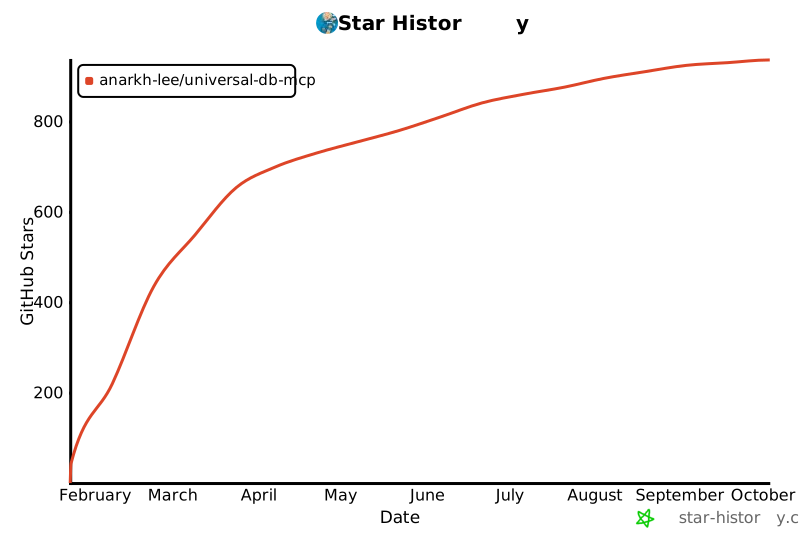](https://star-history.com/#Anarkh-Lee/universal-db-mcp&Date)
## 📝 Changelog
See [CHANGELOG.md](./CHANGELOG.md) for a detailed version history.
---
<p align="center">
Made with ❤️ by <a href="https://github.com/Anarkh-Lee">Anarkh-Lee</a>
</p>
================================================
FILE: README.zh-CN.md
================================================
<p align="center">
<img src="assets/logo.png" alt="Universal DB MCP Logo" width="200">
</p>
<h1 align="center">Universal DB MCP</h1>
<p align="center">
<strong>用自然语言连接 AI 与你的数据库</strong>
</p>
<p align="center">
一个实现了模型上下文协议(MCP)和 HTTP API 的通用数据库连接器,让 AI 助手能够使用自然语言查询和分析你的数据库。支持 Claude Desktop、Cursor、Windsurf、VS Code、ChatGPT 等 50+ 平台。
</p>
<p align="center">
<a href="https://www.npmjs.com/package/universal-db-mcp"><img src="https://img.shields.io/npm/v/universal-db-mcp.svg?style=flat-square&color=blue" alt="npm version"></a>
<a href="https://www.npmjs.com/package/universal-db-mcp"><img src="https://img.shields.io/npm/dm/universal-db-mcp.svg?style=flat-square&color=green" alt="npm downloads"></a>
<a href="https://opensource.org/licenses/MIT"><img src="https://img.shields.io/badge/License-MIT-yellow.svg?style=flat-square" alt="License: MIT"></a>
<a href="https://nodejs.org/"><img src="https://img.shields.io/badge/node-%3E%3D20.0.0-brightgreen?style=flat-square" alt="Node.js Version"></a>
<a href="https://github.com/Anarkh-Lee/universal-db-mcp/stargazers"><img src="https://img.shields.io/github/stars/Anarkh-Lee/universal-db-mcp?style=flat-square" alt="GitHub Stars"></a>
</p>
<p align="center">
<a href="#-特性">特性</a> •
<a href="#-快速开始">快速开始</a> •
<a href="#-支持的数据库">数据库</a> •
<a href="#-文档">文档</a> •
<a href="#-贡献">贡献</a>
</p>
<p align="center">
<a href="./README.md">English</a> | <a href="./README.zh-CN.md">中文文档</a>
</p>
---
## 为什么选择 Universal DB MCP?
想象一下,你问 AI 助手:*"帮我查一下这个月订单金额最高的 10 个客户"*,然后立即从数据库获得结果——无需编写 SQL。Universal DB MCP 通过模型上下文协议(MCP)和 HTTP API 将 AI 助手与你的数据库连接起来,让这一切成为可能。
```
你: "最近 30 天注册用户的平均订单金额是多少?"
AI: 让我帮你查询一下...
┌─────────────────────────────────────┐
│ 平均订单金额: ¥127.45 │
│ 新用户总数: 1,247 │
│ 有订单的用户: 892 (71.5%) │
└─────────────────────────────────────┘
```
## ✨ 特性
- **支持 17 种数据库** - MySQL、PostgreSQL、Redis、Oracle、SQL Server、MongoDB、SQLite,以及 10 种国产数据库
- **适配 55+ 平台** - 支持 Claude Desktop、Cursor、VS Code、ChatGPT、Dify 等 [50+ 平台](#-支持的平台)
- **灵活架构** - 2 种启动模式(stdio/http),4 种接入方式:MCP stdio、MCP SSE、MCP Streamable HTTP、REST API
- **安全第一** - 默认只读模式,防止意外的数据修改
- **智能缓存** - Schema 缓存支持可配置的 TTL,性能极速
- **批量查询优化** - 大型数据库的 Schema 获取速度提升高达 100 倍
- **Schema 增强** - 表注释、隐式关系推断,提升 Text2SQL 准确性
- **多 Schema 支持** - 自动发现所有用户 Schema(PostgreSQL、SQL Server、Oracle、达梦等)
- **数据脱敏** - 自动保护敏感数据(手机号、邮箱、身份证、银行卡等)
- **连接稳定性** - 连接池、TCP Keep-Alive、断线自动重试,保障长时间会话稳定运行
### 性能提升
| 表数量 | 优化前 | 优化后 | 提升 |
|--------|--------|--------|------|
| 50 张表 | ~5 秒 | ~200 毫秒 | **25 倍** |
| 100 张表 | ~10 秒 | ~300 毫秒 | **33 倍** |
| 500 张表 | ~50 秒 | ~500 毫秒 | **100 倍** |
## 🚀 快速开始
### 安装
```bash
npm install -g universal-db-mcp
```
### MCP 模式(Claude Desktop)
将以下配置添加到 Claude Desktop 配置文件:
- **macOS**: `~/Library/Application Support/Claude/claude_desktop_config.json`
- **Windows**: `%APPDATA%\Claude\claude_desktop_config.json`
```json
{
"mcpServers": {
"my-database": {
"command": "npx",
"args": [
"universal-db-mcp",
"--type", "mysql",
"--host", "localhost",
"--port", "3306",
"--user", "root",
"--password", "your_password",
"--database", "your_database"
]
}
}
}
```
重启 Claude Desktop,然后开始提问:
- *"帮我查看 users 表的结构"*
- *"统计最近 7 天的订单数量"*
- *"找出销量最高的 5 个产品"*
### HTTP API 模式
```bash
# 设置环境变量
export MODE=http
export HTTP_PORT=3000
export API_KEYS=your-secret-key
# 启动服务
npx universal-db-mcp
```
```bash
# 测试 API
curl http://localhost:3000/api/health
```
### MCP SSE 模式(Dify 和远程访问)
在 HTTP 模式下运行时,服务器还会通过 SSE(Server-Sent Events)和 Streamable HTTP 暴露 MCP 协议端点。这使得 Dify 等平台可以直接使用 MCP 协议连接。
**SSE 端点(传统方式):**
```
GET http://localhost:3000/sse?type=mysql&host=localhost&port=3306&user=root&password=xxx&database=mydb
```
**Streamable HTTP 端点(MCP 2025 规范,推荐):**
```
POST http://localhost:3000/mcp
请求头:
X-DB-Type: mysql
X-DB-Host: localhost
X-DB-Port: 3306
X-DB-User: root
X-DB-Password: your_password
X-DB-Database: your_database
请求体:MCP JSON-RPC 请求
```
| 端点 | 方法 | 说明 |
|------|------|------|
| `/sse` | GET | 建立 SSE 连接(传统方式) |
| `/sse/message` | POST | 向 SSE 会话发送消息 |
| `/mcp` | POST | Streamable HTTP 端点(推荐) |
| `/mcp` | GET | Streamable HTTP 的 SSE 流 |
| `/mcp` | DELETE | 关闭会话 |
详细配置说明请参阅 [Dify 集成指南](./docs/integrations/DIFY.zh-CN.md)。
## 📊 支持的数据库
| 数据库 | 类型参数 | 默认端口 | 分类 |
|--------|----------|----------|------|
| MySQL | `mysql` | 3306 | 开源 |
| PostgreSQL | `postgres` | 5432 | 开源 |
| Redis | `redis` | 6379 | NoSQL |
| Oracle | `oracle` | 1521 | 商业 |
| SQL Server | `sqlserver` | 1433 | 商业 |
| MongoDB | `mongodb` | 27017 | NoSQL |
| SQLite | `sqlite` | - | 嵌入式 |
| 达梦 | `dm` | 5236 | 国产 |
| 人大金仓 | `kingbase` | 54321 | 国产 |
| 华为 GaussDB | `gaussdb` | 5432 | 国产 |
| 蚂蚁 OceanBase | `oceanbase` | 2881 | 国产 |
| TiDB | `tidb` | 4000 | 分布式 |
| ClickHouse | `clickhouse` | 8123 | OLAP |
| 阿里云 PolarDB | `polardb` | 3306 | 云数据库 |
| 海量 Vastbase | `vastbase` | 5432 | 国产 |
| 瀚高 HighGo | `highgo` | 5866 | 国产 |
| 中兴 GoldenDB | `goldendb` | 3306 | 国产 |
## 🏗️ 架构
```
┌─────────────────────────────────────────────────────────────────────────┐
│ Universal DB MCP │
├─────────────────────────────────────────────────────────────────────────┤
│ │
│ 启动模式: │
│ ┌────────────────────────────┬────────────────────────────────────┐ │
│ │ stdio 模式 │ http 模式 │ │
│ │ (npm run start:mcp) │ (npm run start:http) │ │
│ └─────────────┬──────────────┴───────────────┬────────────────────┘ │
│ │ │ │
│ ▼ ▼ │
│ ┌─────────────────────────┐ ┌───────────────────────────────────┐ │
│ │ MCP 协议 │ │ HTTP 服务器 │ │
│ │ (stdio 传输) │ │ │ │
│ │ │ │ ┌─────────────────────────────┐ │ │
│ │ 工具: │ │ │ MCP 协议 │ │ │
│ │ • execute_query │ │ │ (SSE / Streamable HTTP) │ │ │
│ │ • get_schema │ │ │ │ │ │
│ │ • get_table_info │ │ │ 工具:(与 stdio 相同) │ │ │
│ │ • clear_cache │ │ │ • execute_query │ │ │
│ │ • get_enum_values │ │ │ • get_schema │ │ │
│ │ • get_sample_data │ │ │ • get_table_info │ │ │
│ │ • connect_database │ │ │ • clear_cache │ │ │
│ │ • disconnect_database │ │ │ • get_enum_values │ │ │
│ │ • get_connection_status│ │ │ • get_sample_data │ │ │
│ │ │ │ │ • connect_database │ │ │
│ │ 适用:Claude Desktop, │ │ │ • disconnect_database │ │ │
│ │ Cursor 等 │ │ │ • get_connection_status │ │ │
│ └─────────────┬───────────┘ │ │ │ │ │
│ │ │ │ 适用:Dify、远程访问 │ │ │
│ │ │ └──────────────┬──────────────┘ │ │
│ │ │ │ │ │
│ │ │ ┌──────────────┴──────────────┐ │ │
│ │ │ │ REST API │ │ │
│ │ │ │ │ │ │
│ │ │ │ 端点: │ │ │
│ │ │ │ • /api/connect │ │ │
│ │ │ │ • /api/query │ │ │
│ │ │ │ • /api/schema │ │ │
│ │ │ │ • ...(10+ 端点) │ │ │
│ │ │ │ │ │ │
│ │ │ │ 适用:Coze、n8n、自定义 │ │ │
│ │ │ └──────────────┬──────────────┘ │ │
│ │ └─────────────────┼─────────────────┘ │
│ │ │ │
│ └──────────────────┬───────────────┘ │
│ ▼ │
│ ┌──────────────────────────────────────────────────────────────────┐ │
│ │ 核心业务逻辑层 │ │
│ │ • 查询执行 • Schema 缓存 │ │
│ │ • 安全校验 • 连接管理 │ │
│ └──────────────────────────────────┬───────────────────────────────┘ │
│ ▼ │
│ ┌──────────────────────────────────────────────────────────────────┐ │
│ │ 数据库适配器层 │ │
│ │ MySQL │ PostgreSQL │ Redis │ Oracle │ MongoDB │ SQLite │ ... │ │
│ │ (连接池 + TCP Keep-Alive + 断线自动重试) │ │
│ └──────────────────────────────────────────────────────────────────┘ │
│ │
└─────────────────────────────────────────────────────────────────────────┘
```
## 🔒 安全
默认情况下,Universal DB MCP 运行在**只读模式**,会阻止所有写操作(INSERT、UPDATE、DELETE、DROP 等)。
### 权限模式
支持细粒度权限控制,可根据需求灵活配置:
| 模式 | 允许的操作 | 说明 |
|------|-----------|------|
| `safe`(默认) | SELECT | 只读,最安全 |
| `readwrite` | SELECT, INSERT, UPDATE | 读写但不能删除 |
| `full` | 所有操作 | 完全控制(危险!) |
| `custom` | 自定义组合 | 通过 `--permissions` 指定 |
**权限类型:**
- `read` - SELECT 查询(始终包含)
- `insert` - INSERT, REPLACE
- `update` - UPDATE
- `delete` - DELETE, TRUNCATE
- `ddl` - CREATE, ALTER, DROP, RENAME
**使用示例:**
```bash
# 只读模式(默认)
npx universal-db-mcp --type mysql ...
# 读写但不能删除
npx universal-db-mcp --type mysql --permission-mode readwrite ...
# 自定义:只允许读和插入
npx universal-db-mcp --type mysql --permissions read,insert ...
# 完全控制(等价于原来的 --danger-allow-write)
npx universal-db-mcp --type mysql --permission-mode full ...
```
**不同传输方式的权限配置:**
> ⚠️ 不同传输方式的参数命名风格不同,请注意区分!
| 传输方式 | 参数位置 | 权限模式参数 | 自定义权限参数 |
|---------|---------|-------------|---------------|
| STDIO (Claude Desktop) | 命令行 | `--permission-mode` | `--permissions` |
| SSE (Dify 等) | URL Query | `permissionMode` | `permissions` |
| Streamable HTTP | HTTP Header | `X-DB-Permission-Mode` | `X-DB-Permissions` |
| REST API | JSON Body | `permissionMode` | `permissions` |
**最佳实践:**
- 生产环境永远不要启用写入模式
- 使用专用的只读数据库账号
- 通过 VPN 或跳板机连接
- 定期审计查询日志
## 🔌 支持的平台
Universal DB MCP 可与任何支持 MCP 协议或 REST API 的平台配合使用。以下是完整列表:
### AI 代码编辑器 & IDE
| 平台 | 接入方式 | 说明 | 集成指南 |
|------|----------|------|----------|
| [Cursor](https://cursor.sh/) | MCP stdio | 内置 MCP 支持的 AI 代码编辑器 | [EN](./docs/integrations/CURSOR.md) / [中文](./docs/integrations/CURSOR.zh-CN.md) |
| [Windsurf](https://codeium.com/windsurf) | MCP stdio | Codeium 的 AI IDE,带 Cascade 智能体 | [EN](./docs/integrations/WINDSURF.md) / [中文](./docs/integrations/WINDSURF.zh-CN.md) |
| [VS Code](https://code.visualstudio.com/) | MCP stdio / REST API | 通过 GitHub Copilot 代理模式或 Cline/Continue 扩展 | [EN](./docs/integrations/VSCODE.md) / [中文](./docs/integrations/VSCODE.zh-CN.md) |
| [Zed](https://zed.dev/) | MCP stdio | 高性能开源代码编辑器 | [EN](./docs/integrations/ZED.md) / [中文](./docs/integrations/ZED.zh-CN.md) |
| [IntelliJ IDEA](https://www.jetbrains.com/idea/) | MCP stdio | JetBrains IDE,支持 MCP(2025.1+) | [EN](./docs/integrations/JETBRAINS.md) / [中文](./docs/integrations/JETBRAINS.zh-CN.md) |
| [PyCharm](https://www.jetbrains.com/pycharm/) | MCP stdio | JetBrains Python IDE | [EN](./docs/integrations/JETBRAINS.md) / [中文](./docs/integrations/JETBRAINS.zh-CN.md) |
| [WebStorm](https://www.jetbrains.com/webstorm/) | MCP stdio | JetBrains JavaScript IDE | [EN](./docs/integrations/JETBRAINS.md) / [中文](./docs/integrations/JETBRAINS.zh-CN.md) |
| [Android Studio](https://developer.android.com/studio) | MCP stdio | 通过 JetBrains MCP 插件 | [EN](./docs/integrations/JETBRAINS.md) / [中文](./docs/integrations/JETBRAINS.zh-CN.md) |
| [Neovim](https://neovim.io/) | MCP stdio | 通过 MCPHub.nvim 插件 | [EN](./docs/integrations/NEOVIM.md) / [中文](./docs/integrations/NEOVIM.zh-CN.md) |
| [Emacs](https://www.gnu.org/software/emacs/) | MCP stdio | 通过 mcp.el 包 | [EN](./docs/integrations/EMACS.md) / [中文](./docs/integrations/EMACS.zh-CN.md) |
### AI 编程助手
| 平台 | 接入方式 | 说明 | 集成指南 |
|------|----------|------|----------|
| [Claude Code](https://claude.ai/code) | MCP stdio | Anthropic 的智能编程工具 | [EN](./docs/integrations/CLAUDE-CODE.md) / [中文](./docs/integrations/CLAUDE-CODE.zh-CN.md) |
| [GitHub Copilot](https://github.com/features/copilot) | MCP stdio | VS Code/JetBrains 中的代理模式 | [EN](./docs/integrations/GITHUB-COPILOT.md) / [中文](./docs/integrations/GITHUB-COPILOT.zh-CN.md) |
| [Cline](https://github.com/cline/cline) | MCP stdio / REST API | VS Code 自主编程智能体 | [EN](./docs/integrations/CLINE.md) / [中文](./docs/integrations/CLINE.zh-CN.md) |
| [Continue](https://continue.dev/) | MCP stdio | 开源 AI 代码助手 | [EN](./docs/integrations/CONTINUE.md) / [中文](./docs/integrations/CONTINUE.zh-CN.md) |
| [Roo Code](https://github.com/roovet/roo-code) | MCP stdio | Cline 的 VS Code 分支 | [EN](./docs/integrations/ROO-CODE.md) / [中文](./docs/integrations/ROO-CODE.zh-CN.md) |
| [Sourcegraph Cody](https://sourcegraph.com/cody) | MCP stdio | AI 编程助手 | [EN](./docs/integrations/SOURCEGRAPH-CODY.md) / [中文](./docs/integrations/SOURCEGRAPH-CODY.zh-CN.md) |
| [Amazon Q Developer](https://aws.amazon.com/q/developer/) | MCP stdio | AWS AI 编程助手 | [EN](./docs/integrations/AMAZON-Q-DEVELOPER.md) / [中文](./docs/integrations/AMAZON-Q-DEVELOPER.zh-CN.md) |
| [Devin](https://devin.ai/) | MCP stdio | AI 软件工程师 | [EN](./docs/integrations/DEVIN.md) / [中文](./docs/integrations/DEVIN.zh-CN.md) |
| [Goose](https://github.com/block/goose) | MCP stdio | Block 的 AI 编程智能体 | [EN](./docs/integrations/GOOSE.md) / [中文](./docs/integrations/GOOSE.zh-CN.md) |
| [Gemini CLI](https://github.com/google-gemini/gemini-cli) | MCP stdio | Google 命令行 AI 工具 | [EN](./docs/integrations/GEMINI-CLI.md) / [中文](./docs/integrations/GEMINI-CLI.zh-CN.md) |
### 桌面 AI 聊天应用
| 平台 | 接入方式 | 说明 | 集成指南 |
|------|----------|------|----------|
| [Claude Desktop](https://claude.ai/download) | MCP stdio | Anthropic 官方桌面应用 | [EN](./docs/integrations/CLAUDE-DESKTOP.md) / [中文](./docs/integrations/CLAUDE-DESKTOP.zh-CN.md) |
| [ChatGPT Desktop](https://openai.com/chatgpt/desktop/) | MCP SSE/Streamable HTTP | OpenAI 桌面应用,支持 MCP 连接器 | [EN](./docs/integrations/CHATGPT.md) / [中文](./docs/integrations/CHATGPT.zh-CN.md) |
| [Cherry Studio](https://github.com/kangfenmao/cherry-studio) | MCP stdio | 多模型桌面聊天应用 | [EN](./docs/integrations/CHERRY-STUDIO.md) / [中文](./docs/integrations/CHERRY-STUDIO.zh-CN.md) |
| [LM Studio](https://lmstudio.ai/) | MCP stdio | 本地运行 LLM,支持 MCP | [EN](./docs/integrations/LM-STUDIO.md) / [中文](./docs/integrations/LM-STUDIO.zh-CN.md) |
| [Jan](https://jan.ai/) | MCP stdio | 开源 ChatGPT 替代品 | [EN](./docs/integrations/JAN.md) / [中文](./docs/integrations/JAN.zh-CN.md) |
| [Msty](https://msty.app/) | MCP stdio | 桌面 AI 聊天应用 | [EN](./docs/integrations/MSTY.md) / [中文](./docs/integrations/MSTY.zh-CN.md) |
| [LibreChat](https://github.com/danny-avila/LibreChat) | MCP stdio | 开源聊天界面 | [EN](./docs/integrations/LIBRECHAT.md) / [中文](./docs/integrations/LIBRECHAT.zh-CN.md) |
| [Witsy](https://witsy.app/) | MCP stdio | 桌面 AI 助手 | [EN](./docs/integrations/WITSY.md) / [中文](./docs/integrations/WITSY.zh-CN.md) |
| [5ire](https://github.com/5ire-tech/5ire) | MCP stdio | 跨平台 AI 聊天 | [EN](./docs/integrations/5IRE.md) / [中文](./docs/integrations/5IRE.zh-CN.md) |
| [ChatMCP](https://github.com/daodao97/chatmcp) | MCP stdio | MCP 专用聊天界面 | [EN](./docs/integrations/CHATMCP.md) / [中文](./docs/integrations/CHATMCP.zh-CN.md) |
| [HyperChat](https://github.com/BigSweetPotatoStudio/HyperChat) | MCP stdio | 多平台聊天应用 | [EN](./docs/integrations/HYPERCHAT.md) / [中文](./docs/integrations/HYPERCHAT.zh-CN.md) |
| [Tome](https://github.com/runebook/tome) | MCP stdio | macOS 本地 LLM 应用 | [EN](./docs/integrations/TOME.md) / [中文](./docs/integrations/TOME.zh-CN.md) |
### Web AI 平台
| 平台 | 接入方式 | 说明 | 集成指南 |
|------|----------|------|----------|
| [Claude.ai](https://claude.ai/) | MCP SSE/Streamable HTTP | Anthropic 网页界面 | [EN](./docs/integrations/CLAUDE-AI.md) / [中文](./docs/integrations/CLAUDE-AI.zh-CN.md) |
| [ChatGPT](https://chat.openai.com/) | MCP SSE/Streamable HTTP | 通过自定义连接器 | [EN](./docs/integrations/CHATGPT.md) / [中文](./docs/integrations/CHATGPT.zh-CN.md) |
| [Dify](https://dify.ai/) | MCP SSE/Streamable HTTP | LLM 应用开发平台 | [EN](./docs/integrations/DIFY.md) / [中文](./docs/integrations/DIFY.zh-CN.md) |
| [Coze](https://www.coze.com/) | REST API | 字节跳动 AI 机器人平台 | [EN](./docs/integrations/COZE.md) / [中文](./docs/integrations/COZE.zh-CN.md) |
| [n8n](https://n8n.io/) | REST API / MCP | 工作流自动化平台 | [EN](./docs/integrations/N8N.md) / [中文](./docs/integrations/N8N.zh-CN.md) |
| [Replit](https://replit.com/) | MCP stdio | 在线 IDE,带 AI 智能体 | [EN](./docs/integrations/REPLIT.md) / [中文](./docs/integrations/REPLIT.zh-CN.md) |
| [MindPal](https://mindpal.io/) | MCP SSE/Streamable HTTP | 无代码 AI 智能体构建器 | [EN](./docs/integrations/MINDPAL.md) / [中文](./docs/integrations/MINDPAL.zh-CN.md) |
### 智能体框架 & SDK
| 平台 | 接入方式 | 说明 | 集成指南 |
|------|----------|------|----------|
| [LangChain](https://langchain.com/) | MCP stdio | 流行的 LLM 框架 | [EN](./docs/integrations/LANGCHAIN.md) / [中文](./docs/integrations/LANGCHAIN.zh-CN.md) |
| [Smolagents](https://github.com/huggingface/smolagents) | MCP stdio | Hugging Face 智能体库 | [EN](./docs/integrations/SMOLAGENTS.md) / [中文](./docs/integrations/SMOLAGENTS.zh-CN.md) |
| [OpenAI Agents SDK](https://platform.openai.com/) | MCP SSE/Streamable HTTP | OpenAI 智能体框架 | [EN](./docs/integrations/OPENAI-AGENTS-SDK.md) / [中文](./docs/integrations/OPENAI-AGENTS-SDK.zh-CN.md) |
| [Amazon Bedrock Agents](https://aws.amazon.com/bedrock/) | MCP SSE/Streamable HTTP | AWS AI 智能体服务 | [EN](./docs/integrations/AMAZON-BEDROCK-AGENTS.md) / [中文](./docs/integrations/AMAZON-BEDROCK-AGENTS.zh-CN.md) |
| [Google ADK](https://cloud.google.com/) | MCP stdio | Google 智能体开发套件 | [EN](./docs/integrations/GOOGLE-ADK.md) / [中文](./docs/integrations/GOOGLE-ADK.zh-CN.md) |
| [Vercel AI SDK](https://sdk.vercel.ai/) | MCP stdio | Vercel AI 开发套件 | [EN](./docs/integrations/VERCEL-AI-SDK.md) / [中文](./docs/integrations/VERCEL-AI-SDK.zh-CN.md) |
| [Spring AI](https://spring.io/projects/spring-ai) | MCP stdio | Java/Spring AI 框架 | [EN](./docs/integrations/SPRING-AI.md) / [中文](./docs/integrations/SPRING-AI.zh-CN.md) |
### CLI 工具 & 终端
| 平台 | 接入方式 | 说明 | 集成指南 |
|------|----------|------|----------|
| [Claude Code CLI](https://claude.ai/code) | MCP stdio | 终端编程智能体 | [EN](./docs/integrations/CLAUDE-CODE.md) / [中文](./docs/integrations/CLAUDE-CODE.zh-CN.md) |
| [Warp](https://www.warp.dev/) | MCP stdio | AI 驱动的终端 | [EN](./docs/integrations/WARP.md) / [中文](./docs/integrations/WARP.zh-CN.md) |
| [Oterm](https://github.com/ggozad/oterm) | MCP stdio | 通过 CLI 与 Ollama 聊天 | [EN](./docs/integrations/OTERM.md) / [中文](./docs/integrations/OTERM.zh-CN.md) |
| [MCPHost](https://github.com/mark3labs/mcphost) | MCP stdio | CLI LLM 聊天工具 | [EN](./docs/integrations/MCPHOST.md) / [中文](./docs/integrations/MCPHOST.zh-CN.md) |
### 效率 & 自动化工具
| 平台 | 接入方式 | 说明 | 集成指南 |
|------|----------|------|----------|
| [Raycast](https://raycast.com/) | MCP stdio | macOS 效率启动器 | [EN](./docs/integrations/RAYCAST.md) / [中文](./docs/integrations/RAYCAST.zh-CN.md) |
| [Notion](https://notion.so/) | MCP SSE/Streamable HTTP | 带 AI 集成的工作空间 | [EN](./docs/integrations/NOTION.md) / [中文](./docs/integrations/NOTION.zh-CN.md) |
| [Obsidian](https://obsidian.md/) | MCP stdio | 通过 MCP Tools 插件 | [EN](./docs/integrations/OBSIDIAN.md) / [中文](./docs/integrations/OBSIDIAN.zh-CN.md) |
| [Home Assistant](https://www.home-assistant.io/) | MCP stdio | 智能家居平台 | [EN](./docs/integrations/HOME-ASSISTANT.md) / [中文](./docs/integrations/HOME-ASSISTANT.zh-CN.md) |
### 即时通讯平台集成
| 平台 | 接入方式 | 说明 | 集成指南 |
|------|----------|------|----------|
| [Slack](https://slack.com/) | MCP stdio / REST API | 通过 Slack MCP 机器人 | [EN](./docs/integrations/SLACK.md) / [中文](./docs/integrations/SLACK.zh-CN.md) |
| [Discord](https://discord.com/) | MCP stdio / REST API | 通过 Discord MCP 机器人 | [EN](./docs/integrations/DISCORD.md) / [中文](./docs/integrations/DISCORD.zh-CN.md) |
| [Mattermost](https://mattermost.com/) | MCP stdio | 开源即时通讯 | [EN](./docs/integrations/MATTERMOST.md) / [中文](./docs/integrations/MATTERMOST.zh-CN.md) |
### 本地 LLM 运行器
| 平台 | 接入方式 | 说明 | 集成指南 |
|------|----------|------|----------|
| [Ollama](https://ollama.ai/) | MCP stdio | 本地运行 LLM | [EN](./docs/integrations/OLLAMA.md) / [中文](./docs/integrations/OLLAMA.zh-CN.md) |
| [LM Studio](https://lmstudio.ai/) | MCP stdio | 本地 LLM 桌面应用 | [EN](./docs/integrations/LM-STUDIO.md) / [中文](./docs/integrations/LM-STUDIO.zh-CN.md) |
| [Jan](https://jan.ai/) | MCP stdio | 离线 ChatGPT 替代品 | [EN](./docs/integrations/JAN.md) / [中文](./docs/integrations/JAN.zh-CN.md) |
### 开发 & 测试工具
| 平台 | 接入方式 | 说明 | 集成指南 |
|------|----------|------|----------|
| [MCP Inspector](https://github.com/modelcontextprotocol/inspector) | MCP stdio | 官方 MCP 调试工具 | [EN](./docs/integrations/MCP-INSPECTOR.md) / [中文](./docs/integrations/MCP-INSPECTOR.zh-CN.md) |
| [Postman](https://postman.com/) | REST API / MCP | API 测试平台 | [EN](./docs/integrations/POSTMAN.md) / [中文](./docs/integrations/POSTMAN.zh-CN.md) |
> **提示**:任何 MCP 兼容客户端都可以通过 stdio(本地)或 SSE/Streamable HTTP(远程)连接。任何 HTTP 客户端都可以使用 REST API。
## 📚 文档
### 快速开始
- [安装指南](./docs/getting-started/installation.md)
- [快速开始](./docs/getting-started/quick-start.md)
- [配置说明](./docs/getting-started/configuration.md)
- [使用示例](./docs/getting-started/examples.md)
### 部署
- [部署概览](./docs/deployment/README.md)
- [本地部署](./docs/deployment/local.md)
- [Docker 部署](./docs/deployment/docker.md)
- [云服务部署](./docs/deployment/cloud/)
### 数据库指南
- [数据库支持概览](./docs/databases/README.md)
- [MySQL](./docs/databases/mysql.md)
- [PostgreSQL](./docs/databases/postgresql.md)
- [更多数据库...](./docs/databases/)
### HTTP API
- [API 参考](./docs/http-api/API_REFERENCE.md)
- [部署指南](./docs/http-api/DEPLOYMENT.md)
### 集成
**AI 编辑器 & IDE:**
[Cursor](./docs/integrations/CURSOR.zh-CN.md) |
[VS Code](./docs/integrations/VSCODE.zh-CN.md) |
[JetBrains](./docs/integrations/JETBRAINS.zh-CN.md) |
[Windsurf](./docs/integrations/WINDSURF.zh-CN.md) |
[Zed](./docs/integrations/ZED.zh-CN.md) |
[Neovim](./docs/integrations/NEOVIM.zh-CN.md) |
[Emacs](./docs/integrations/EMACS.zh-CN.md)
**AI 助手:**
[Claude Desktop](./docs/integrations/CLAUDE-DESKTOP.zh-CN.md) |
[Claude Code](./docs/integrations/CLAUDE-CODE.zh-CN.md) |
[GitHub Copilot](./docs/integrations/GITHUB-COPILOT.zh-CN.md) |
[Cline](./docs/integrations/CLINE.zh-CN.md) |
[Continue](./docs/integrations/CONTINUE.zh-CN.md)
**AI 平台:**
[Dify](./docs/integrations/DIFY.zh-CN.md) |
[Coze](./docs/integrations/COZE.zh-CN.md) |
[n8n](./docs/integrations/N8N.zh-CN.md) |
[ChatGPT](./docs/integrations/CHATGPT.zh-CN.md) |
[LangChain](./docs/integrations/LANGCHAIN.zh-CN.md)
**桌面应用:**
[Cherry Studio](./docs/integrations/CHERRY-STUDIO.zh-CN.md) |
[LM Studio](./docs/integrations/LM-STUDIO.zh-CN.md) |
[Jan](./docs/integrations/JAN.zh-CN.md) |
[Ollama](./docs/integrations/OLLAMA.zh-CN.md)
**即时通讯:**
[Slack](./docs/integrations/SLACK.zh-CN.md) |
[Discord](./docs/integrations/DISCORD.zh-CN.md)
**工具:**
[MCP Inspector](./docs/integrations/MCP-INSPECTOR.zh-CN.md) |
[Postman](./docs/integrations/POSTMAN.zh-CN.md)
> 📁 [查看全部 55 个集成指南](./docs/integrations/) | English version: remove `.zh-CN` from filename
### 进阶
- [安全指南](./docs/guides/security.md)
- [多租户指南](./docs/guides/multi-tenant.md)
- [架构说明](./docs/development/architecture.md)
- [故障排查](./docs/operations/troubleshooting.md)
## 🤝 贡献
欢迎贡献代码!请在提交 Pull Request 之前阅读我们的[贡献指南](./CONTRIBUTING.md)。
```bash
# 克隆仓库
git clone https://github.com/Anarkh-Lee/universal-db-mcp.git
# 安装依赖
npm install
# 构建
npm run build
# 运行测试
npm test
```
## 📄 许可证
本项目采用 [MIT 许可证](./LICENSE)。
## 🌟 Star 历史
如果你觉得这个项目有用,请考虑给它一个 Star!你的支持帮助我们持续改进 Universal DB MCP。
[](https://star-history.com/#Anarkh-Lee/universal-db-mcp&Date)
## 📝 更新日志
详见 [CHANGELOG.md](./CHANGELOG.md) 了解详细的版本历史。
---
<p align="center">
由 <a href="https://github.com/Anarkh-Lee">Anarkh-Lee</a> 用 ❤️ 打造
</p>
================================================
FILE: config/default.json
================================================
{
"mode": "mcp",
"http": {
"port": 3000,
"host": "0.0.0.0",
"apiKeys": [],
"cors": {
"origins": "*",
"credentials": false
},
"rateLimit": {
"max": 100,
"window": "1m"
},
"logging": {
"level": "info",
"pretty": false
},
"session": {
"timeout": 3600000,
"cleanupInterval": 300000
}
}
}
================================================
FILE: create-claude-config.bat
================================================
@echo off
chcp 65001 >nul
echo ========================================
echo Claude Desktop 配置文件创建工具
echo ========================================
echo.
REM 检查 Claude 文件夹是否存在
set CLAUDE_DIR=%APPDATA%\Claude
if not exist "%CLAUDE_DIR%" (
echo [错误] Claude 文件夹不存在: %CLAUDE_DIR%
echo 请确保已安装 Claude Desktop
pause
exit /b 1
)
echo [信息] Claude 文件夹路径: %CLAUDE_DIR%
echo.
REM 检查配置文件是否已存在
set CONFIG_FILE=%CLAUDE_DIR%\claude_desktop_config.json
if exist "%CONFIG_FILE%" (
echo [警告] 配置文件已存在!
echo 路径: %CONFIG_FILE%
echo.
choice /C YN /M "是否覆盖现有配置文件?(Y=是, N=否)"
if errorlevel 2 (
echo [取消] 保留现有配置文件
pause
exit /b 0
)
echo [信息] 将覆盖现有配置文件
)
echo.
echo 请选择数据库类型:
echo 1. MySQL
echo 2. PostgreSQL
echo 3. Redis
echo 4. 空配置(稍后手动编辑)
echo.
choice /C 1234 /N /M "请输入选项 (1-4): "
if errorlevel 4 goto EMPTY_CONFIG
if errorlevel 3 goto REDIS_CONFIG
if errorlevel 2 goto POSTGRES_CONFIG
if errorlevel 1 goto MYSQL_CONFIG
:MYSQL_CONFIG
echo.
echo [MySQL 配置]
set /p DB_HOST="数据库主机 (默认: localhost): " || set DB_HOST=localhost
set /p DB_PORT="数据库端口 (默认: 3306): " || set DB_PORT=3306
set /p DB_USER="用户名 (默认: root): " || set DB_USER=root
set /p DB_PASS="密码: "
set /p DB_NAME="数据库名: "
(
echo {
echo "mcpServers": {
echo "mysql-db": {
echo "command": "npx",
echo "args": [
echo "universal-db-mcp",
echo "--type", "mysql",
echo "--host", "%DB_HOST%",
echo "--port", "%DB_PORT%",
echo "--user", "%DB_USER%",
echo "--password", "%DB_PASS%",
echo "--database", "%DB_NAME%"
echo ]
echo }
echo }
echo }
) > "%CONFIG_FILE%"
goto SUCCESS
:POSTGRES_CONFIG
echo.
echo [PostgreSQL 配置]
set /p DB_HOST="数据库主机 (默认: localhost): " || set DB_HOST=localhost
set /p DB_PORT="数据库端口 (默认: 5432): " || set DB_PORT=5432
set /p DB_USER="用户名 (默认: postgres): " || set DB_USER=postgres
set /p DB_PASS="密码: "
set /p DB_NAME="数据库名: "
(
echo {
echo "mcpServers": {
echo "postgres-db": {
echo "command": "npx",
echo "args": [
echo "universal-db-mcp",
echo "--type", "postgres",
echo "--host", "%DB_HOST%",
echo "--port", "%DB_PORT%",
echo "--user", "%DB_USER%",
echo "--password", "%DB_PASS%",
echo "--database", "%DB_NAME%"
echo ]
echo }
echo }
echo }
) > "%CONFIG_FILE%"
goto SUCCESS
:REDIS_CONFIG
echo.
echo [Redis 配置]
set /p DB_HOST="Redis 主机 (默认: localhost): " || set DB_HOST=localhost
set /p DB_PORT="Redis 端口 (默认: 6379): " || set DB_PORT=6379
set /p DB_PASS="密码 (可选,直接回车跳过): "
if "%DB_PASS%"=="" (
REM 无密码配置
(
echo {
echo "mcpServers": {
echo "redis-cache": {
echo "command": "npx",
echo "args": [
echo "universal-db-mcp",
echo "--type", "redis",
echo "--host", "%DB_HOST%",
echo "--port", "%DB_PORT%"
echo ]
echo }
echo }
echo }
) > "%CONFIG_FILE%"
) else (
REM 有密码配置
(
echo {
echo "mcpServers": {
echo "redis-cache": {
echo "command": "npx",
echo "args": [
echo "universal-db-mcp",
echo "--type", "redis",
echo "--host", "%DB_HOST%",
echo "--port", "%DB_PORT%",
echo "--password", "%DB_PASS%"
echo ]
echo }
echo }
echo }
) > "%CONFIG_FILE%"
)
goto SUCCESS
:EMPTY_CONFIG
(
echo {
echo "mcpServers": {}
echo }
) > "%CONFIG_FILE%"
echo [信息] 已创建空配置文件,请手动编辑
goto SUCCESS
:SUCCESS
echo.
echo ========================================
echo [成功] 配置文件已创建!
echo ========================================
echo 文件路径: %CONFIG_FILE%
echo.
echo 下一步操作:
echo 1. 重启 Claude Desktop
echo 2. 在对话中测试数据库连接
echo.
choice /C YN /M "是否现在打开配置文件查看?(Y=是, N=否)"
if errorlevel 2 goto END
notepad "%CONFIG_FILE%"
:END
echo.
echo 感谢使用!
pause
================================================
FILE: docker/Dockerfile
================================================
# Multi-stage build for minimal image size
# Stage 1: Build
FROM node:20-alpine AS builder
WORKDIR /app
# Copy package files
COPY package*.json ./
COPY tsconfig.json ./
# Install dependencies (skip scripts to avoid premature build)
RUN npm ci --ignore-scripts
# Copy source code
COPY src ./src
# Build TypeScript explicitly
RUN npm run build
# Stage 2: Production
FROM node:20-alpine
WORKDIR /app
# Install dumb-init for proper signal handling
RUN apk add --no-cache dumb-init
# Copy package files
COPY package*.json ./
# Install production dependencies only (skip scripts)
RUN npm ci --only=production --ignore-scripts && \
npm cache clean --force
# Copy built files from builder
COPY --from=builder /app/dist ./dist
# Create non-root user
RUN addgroup -g 1001 -S nodejs && \
adduser -S nodejs -u 1001
# Change ownership
RUN chown -R nodejs:nodejs /app
# Switch to non-root user
USER nodejs
# Expose port
EXPOSE 3000
# Health check
HEALTHCHECK --interval=30s --timeout=3s --start-period=5s --retries=3 \
CMD node -e "require('http').get('http://localhost:3000/api/health', (r) => {process.exit(r.statusCode === 200 ? 0 : 1)})"
# Use dumb-init to handle signals properly
ENTRYPOINT ["dumb-init", "--"]
# Start server
CMD ["node", "dist/index.js"]
================================================
FILE: docker/docker-compose.yml
================================================
services:
api:
build:
context: ..
dockerfile: docker/Dockerfile
ports:
- "3000:3000"
environment:
- MODE=http
- HTTP_PORT=3000
- HTTP_HOST=0.0.0.0
- API_KEYS=${API_KEYS:-default-key-change-me}
- CORS_ORIGINS=${CORS_ORIGINS:-*}
- RATE_LIMIT_MAX=${RATE_LIMIT_MAX:-100}
- RATE_LIMIT_WINDOW=${RATE_LIMIT_WINDOW:-1m}
- LOG_LEVEL=${LOG_LEVEL:-info}
- LOG_PRETTY=${LOG_PRETTY:-false}
# Database configuration (optional)
- DB_TYPE=${DB_TYPE}
- DB_HOST=${DB_HOST}
- DB_PORT=${DB_PORT}
- DB_USER=${DB_USER}
- DB_PASSWORD=${DB_PASSWORD}
- DB_DATABASE=${DB_DATABASE}
- DB_ALLOW_WRITE=${DB_ALLOW_WRITE:-false}
restart: unless-stopped
healthcheck:
test: ["CMD", "node", "-e", "require('http').get('http://localhost:3000/api/health', (r) => {process.exit(r.statusCode === 200 ? 0 : 1)})"]
interval: 30s
timeout: 3s
retries: 3
start_period: 5s
networks:
- db-network
# Example: MySQL database (optional)
# mysql:
# image: mysql:8.0
# environment:
# MYSQL_ROOT_PASSWORD: ${MYSQL_ROOT_PASSWORD:-rootpassword}
# MYSQL_DATABASE: ${MYSQL_DATABASE:-testdb}
# ports:
# - "3306:3306"
# volumes:
# - mysql-data:/var/lib/mysql
# networks:
# - db-network
networks:
db-network:
driver: bridge
# volumes:
# mysql-data:
================================================
FILE: docker-compose.yml
================================================
version: '3.8'
services:
api:
build:
context: .
dockerfile: docker/Dockerfile
ports:
- "3000:3000"
environment:
- MODE=http
- HTTP_PORT=3000
- HTTP_HOST=0.0.0.0
- API_KEYS=${API_KEYS:-default-key-change-me}
- CORS_ORIGINS=${CORS_ORIGINS:-*}
- RATE_LIMIT_MAX=${RATE_LIMIT_MAX:-100}
- LOG_LEVEL=${LOG_LEVEL:-info}
restart: unless-stopped
healthcheck:
test: ["CMD", "node", "-e", "require('http').get('http://localhost:3000/api/health', (r) => {process.exit(r.statusCode === 200 ? 0 : 1)})"]
interval: 30s
timeout: 3s
retries: 3
start_period: 5s
================================================
FILE: docs/README.md
================================================
# Documentation
This directory contains the complete documentation for Universal DB MCP.
## Quick Start
- [Installation](./getting-started/installation.md) - How to install
- [Quick Start](./getting-started/quick-start.md) - Get started in 5 minutes
- [Configuration](./getting-started/configuration.md) - Configuration options
- [Examples](./getting-started/examples.md) - Usage examples for all databases
## Deployment
- [Overview](./deployment/README.md) - Deployment options overview
- [Local Deployment](./deployment/local.md) - Node.js, PM2, systemd
- [Docker Deployment](./deployment/docker.md) - Dockerfile, Docker Compose
- [HTTPS Configuration](./deployment/https-domain.md) - Domain and SSL setup
- [Cloud Deployment](./deployment/cloud/) - Huawei Cloud, Aliyun, AWS, Tencent
## Databases
- [Overview](./databases/README.md) - Supported databases
- [MySQL](./databases/mysql.md)
- [PostgreSQL](./databases/postgresql.md)
- [Redis](./databases/redis.md)
- [Oracle](./databases/oracle.md)
- [SQL Server](./databases/sqlserver.md)
- [MongoDB](./databases/mongodb.md)
- [SQLite](./databases/sqlite.md)
- [Dameng](./databases/dameng.md)
- [KingbaseES](./databases/kingbase.md)
- [GaussDB](./databases/gaussdb.md)
- [OceanBase](./databases/oceanbase.md)
- [TiDB](./databases/tidb.md)
- [ClickHouse](./databases/clickhouse.md)
- [PolarDB](./databases/polardb.md)
- [Vastbase](./databases/vastbase.md)
- [HighGo](./databases/highgo.md)
- [GoldenDB](./databases/goldendb.md)
## HTTP API
- [API Reference](./http-api/API_REFERENCE.md)
- [Deployment Guide](./http-api/DEPLOYMENT.md)
## Integrations
- [Coze](./integrations/COZE.md)
- [n8n](./integrations/N8N.md)
- [Dify](./integrations/DIFY.md)
## Guides
- [Security Best Practices](./guides/security.md)
- [Multi-tenant Guide](./guides/multi-tenant.md)
## Development
- [Architecture](./development/architecture.md)
- [Adding New Database](./development/adding-database.md)
- [Implementation Summary](./development/implementation.md)
- [Release Guide](./development/release.md)
## Operations
- [Operations Guide](./operations/guide.md)
- [Troubleshooting](./operations/troubleshooting.md)
---
For Chinese documentation, see [README.zh-CN.md](./README.zh-CN.md).
================================================
FILE: docs/README.zh-CN.md
================================================
# 文档中心
本目录包含 Universal DB MCP 的完整文档。
## 快速开始
- [安装指南](./getting-started/installation.md) - 安装方式
- [快速开始](./getting-started/quick-start.md) - 5 分钟上手
- [配置说明](./getting-started/configuration.md) - 配置选项
- [使用示例](./getting-started/examples.md) - 各数据库使用示例
## 部署
- [部署概览](./deployment/README.md) - 部署方式选择
- [本地部署](./deployment/local.md) - Node.js、PM2、systemd
- [Docker 部署](./deployment/docker.md) - Dockerfile、Docker Compose
- [HTTPS 配置](./deployment/https-domain.md) - 域名和 SSL 证书
- [云服务部署](./deployment/cloud/) - 华为云、阿里云、AWS、腾讯云
## 数据库
- [数据库支持](./databases/README.md) - 支持的数据库列表
- [MySQL](./databases/mysql.md)
- [PostgreSQL](./databases/postgresql.md)
- [Redis](./databases/redis.md)
- [Oracle](./databases/oracle.md)
- [SQL Server](./databases/sqlserver.md)
- [MongoDB](./databases/mongodb.md)
- [SQLite](./databases/sqlite.md)
- [达梦](./databases/dameng.md)
- [KingbaseES](./databases/kingbase.md)
- [GaussDB](./databases/gaussdb.md)
- [OceanBase](./databases/oceanbase.md)
- [TiDB](./databases/tidb.md)
- [ClickHouse](./databases/clickhouse.md)
- [PolarDB](./databases/polardb.md)
- [Vastbase](./databases/vastbase.md)
- [HighGo](./databases/highgo.md)
- [GoldenDB](./databases/goldendb.md)
## HTTP API
- [API 参考文档](./http-api/API_REFERENCE.zh-CN.md)
- [部署指南](./http-api/DEPLOYMENT.zh-CN.md)
## 第三方集成
- [Coze 集成](./integrations/COZE.zh-CN.md)
- [n8n 集成](./integrations/N8N.zh-CN.md)
- [Dify 集成](./integrations/DIFY.zh-CN.md)
## 使用指南
- [安全最佳实践](./guides/security.md)
- [多租户指南](./guides/multi-tenant.md)
## 开发
- [架构说明](./development/architecture.md)
- [添加新数据库](./development/adding-database.md)
- [实现总结](./development/implementation.md)
- [发布指南](./development/release.md)
## 运维
- [运维指南](./operations/guide.md)
- [故障排查](./operations/troubleshooting.md)
---
For English documentation, see [README.md](./README.md).
================================================
FILE: docs/databases/README.md
================================================
# 数据库支持
Universal DB MCP 支持 17 种数据库,涵盖关系型、NoSQL、分布式和国产数据库。
## 支持的数据库
| 数据库 | 类型参数 | 默认端口 | 驱动 | 状态 |
|--------|---------|---------|------|------|
| [MySQL](./mysql.md) | `mysql` | 3306 | mysql2 | ✅ |
| [PostgreSQL](./postgresql.md) | `postgres` | 5432 | pg | ✅ |
| [Redis](./redis.md) | `redis` | 6379 | ioredis | ✅ |
| [Oracle](./oracle.md) | `oracle` | 1521 | oracledb | ✅ |
| [SQL Server](./sqlserver.md) | `sqlserver` | 1433 | mssql | ✅ |
| [MongoDB](./mongodb.md) | `mongodb` | 27017 | mongodb | ✅ |
| [SQLite](./sqlite.md) | `sqlite` | - | better-sqlite3 | ✅ |
| [达梦](./dameng.md) | `dm` | 5236 | dmdb | ✅ |
| [KingbaseES](./kingbase.md) | `kingbase` | 54321 | pg | ✅ |
| [GaussDB](./gaussdb.md) | `gaussdb` | 5432 | pg | ✅ |
| [OceanBase](./oceanbase.md) | `oceanbase` | 2881 | mysql2 | ✅ |
| [TiDB](./tidb.md) | `tidb` | 4000 | mysql2 | ✅ |
| [ClickHouse](./clickhouse.md) | `clickhouse` | 8123 | @clickhouse/client | ✅ |
| [PolarDB](./polardb.md) | `polardb` | 3306 | mysql2 | ✅ |
| [Vastbase](./vastbase.md) | `vastbase` | 5432 | pg | ✅ |
| [HighGo](./highgo.md) | `highgo` | 5866 | pg | ✅ |
| [GoldenDB](./goldendb.md) | `goldendb` | 3306 | mysql2 | ✅ |
## 数据库分类
### 关系型数据库
- **MySQL** - 最流行的开源关系型数据库
- **PostgreSQL** - 功能强大的开源对象关系型数据库
- **Oracle** - 企业级商业数据库
- **SQL Server** - 微软的企业级数据库
- **SQLite** - 轻量级嵌入式数据库
### NoSQL 数据库
- **Redis** - 高性能键值存储
- **MongoDB** - 文档型数据库
### 分布式数据库
- **TiDB** - 分布式 NewSQL 数据库,兼容 MySQL
- **OceanBase** - 蚂蚁金服分布式数据库
- **PolarDB** - 阿里云云原生数据库
- **ClickHouse** - 列式 OLAP 数据库
### 国产数据库
- **达梦(DM)** - 国产关系型数据库
- **KingbaseES** - 人大金仓数据库
- **GaussDB/OpenGauss** - 华为高斯数据库
- **Vastbase** - 海量数据数据库
- **HighGo** - 瀚高数据库
- **GoldenDB** - 中兴分布式数据库
## 兼容性说明
### MySQL 兼容
以下数据库兼容 MySQL 协议,使用相同的驱动:
- TiDB(兼容 MySQL 5.7)
- OceanBase(兼容 MySQL)
- PolarDB(兼容 MySQL 5.6/5.7/8.0)
- GoldenDB(兼容 MySQL 5.7/8.0)
### PostgreSQL 兼容
以下数据库兼容 PostgreSQL 协议,使用相同的驱动:
- KingbaseES
- GaussDB/OpenGauss
- Vastbase
- HighGo
## 驱动依赖
大多数驱动会自动安装。以下是特殊情况:
### 达梦数据库
```bash
npm install -g dmdb
```
### SQLite
需要编译环境。Windows 上需要安装 Visual Studio Build Tools。
### Oracle
需要 Oracle Instant Client。请参考 [Oracle 官方文档](https://oracle.github.io/node-oracledb/INSTALL.html)。
## 功能支持
| 功能 | 关系型 | Redis | MongoDB | ClickHouse |
|------|--------|-------|---------|------------|
| 获取 Schema | ✅ | ✅ | ✅ | ✅ |
| 外键关系 | ✅ | - | - | - |
| 执行查询 | ✅ | ✅ | ✅ | ✅ |
| 写入操作 | ✅ | ✅ | ✅ | ✅ |
| 参数化查询 | ✅ | - | ✅ | ✅ |
| 事务支持 | ✅ | - | ✅ | - |
## 下一步
选择你使用的数据库,查看详细配置指南:
- [MySQL](./mysql.md)
- [PostgreSQL](./postgresql.md)
- [Redis](./redis.md)
- [MongoDB](./mongodb.md)
- [更多数据库...](#支持的数据库)
================================================
FILE: docs/databases/clickhouse.md
================================================
# ClickHouse 数据库使用指南
## 📖 关于 ClickHouse
ClickHouse 是由俄罗斯 Yandex 公司开发的开源列式数据库管理系统(DBMS),专为在线分析处理(OLAP)场景设计。它能够使用 SQL 查询实时生成分析数据报告。
### 主要特点
- **列式存储**:数据按列存储,压缩率高,查询速度快
- **向量化执行**:利用 SIMD 指令加速查询
- **分布式查询**:支持分布式表和分布式查询
- **高性能**:每秒可处理数亿到数十亿行数据
- **实时插入**:支持高并发实时数据插入
- **SQL 支持**:支持标准 SQL 语法(有部分扩展)
## 🚀 快速开始
### 1. 安装 ClickHouse
#### 使用 Docker(推荐)
```bash
# 拉取 ClickHouse 镜像
docker pull clickhouse/clickhouse-server
# 启动 ClickHouse 容器
docker run -d --name clickhouse-server \
-p 8123:8123 \
-p 9000:9000 \
--ulimit nofile=262144:262144 \
clickhouse/clickhouse-server
```
#### 在 Linux 上安装
```bash
# Ubuntu/Debian
sudo apt-get install -y apt-transport-https ca-certificates dirmngr
sudo apt-key adv --keyserver hkp://keyserver.ubuntu.com:80 --recv 8919F6BD2B48D754
echo "deb https://packages.clickhouse.com/deb stable main" | sudo tee /etc/apt/sources.list.d/clickhouse.list
sudo apt-get update
sudo apt-get install -y clickhouse-server clickhouse-client
# 启动服务
sudo service clickhouse-server start
```
#### 在 macOS 上安装
```bash
# 使用 Homebrew
brew install clickhouse
# 启动服务
clickhouse server
```
### 2. 配置 Claude Desktop
编辑 Claude Desktop 配置文件:
**macOS**: `~/Library/Application Support/Claude/claude_desktop_config.json`
**Windows**: `%APPDATA%\Claude\claude_desktop_config.json`
#### 基础配置(只读模式)
```json
{
"mcpServers": {
"clickhouse-db": {
"command": "npx",
"args": [
"universal-db-mcp",
"--type", "clickhouse",
"--host", "localhost",
"--port", "8123",
"--user", "default",
"--password", "",
"--database", "default"
]
}
}
}
```
#### 启用写入模式(开发环境)
```json
{
"mcpServers": {
"clickhouse-db": {
"command": "npx",
"args": [
"universal-db-mcp",
"--permission-mode", "full",
"--type", "clickhouse",
"--host", "localhost",
"--port", "8123",
"--user", "default",
"--password", "",
"--database", "default"
]
}
}
}
```
#### 连接 ClickHouse Cloud
```json
{
"mcpServers": {
"clickhouse-cloud": {
"command": "npx",
"args": [
"universal-db-mcp",
"--type", "clickhouse",
"--host", "your-instance.clickhouse.cloud",
"--port", "8443",
"--user", "default",
"--password", "your_password",
"--database", "default"
]
}
}
}
```
### 3. 重启 Claude Desktop
配置完成后,重启 Claude Desktop 使配置生效。
## 💡 使用示例
### 查询数据库结构
```
你:帮我查看 ClickHouse 数据库的所有表
```
Claude 会自动调用 `get_schema` 工具获取数据库结构。
### 查询数据
```
你:查询 events 表中的所有数据
```
Claude 会生成并执行:
```sql
SELECT * FROM events LIMIT 100;
```
### 聚合查询
```
你:统计每个用户的事件数量
```
Claude 会生成并执行:
```sql
SELECT user_id, COUNT(*) as event_count
FROM events
GROUP BY user_id
ORDER BY event_count DESC;
```
### 时序数据分析
```
你:分析最近 7 天每天的事件数量趋势
```
Claude 会生成并执行:
```sql
SELECT
toDate(timestamp) as date,
COUNT(*) as event_count
FROM events
WHERE timestamp >= now() - INTERVAL 7 DAY
GROUP BY date
ORDER BY date;
```
### 复杂分析查询
```
你:找出最近 30 天内活跃度最高的 10 个用户,并统计他们的行为分布
```
Claude 会生成并执行:
```sql
SELECT
user_id,
COUNT(*) as total_events,
countIf(event_type = 'click') as clicks,
countIf(event_type = 'view') as views,
countIf(event_type = 'purchase') as purchases
FROM events
WHERE timestamp >= now() - INTERVAL 30 DAY
GROUP BY user_id
ORDER BY total_events DESC
LIMIT 10;
```
## 🔧 ClickHouse 特性支持
### 1. 表引擎
ClickHouse 支持多种表引擎,最常用的是 MergeTree 系列:
```sql
-- MergeTree 引擎(最常用)
CREATE TABLE events (
timestamp DateTime,
user_id UInt64,
event_type String,
value Float64
) ENGINE = MergeTree()
PARTITION BY toYYYYMM(timestamp)
ORDER BY (user_id, timestamp);
-- ReplacingMergeTree(去重)
CREATE TABLE user_profiles (
user_id UInt64,
name String,
email String,
updated_at DateTime
) ENGINE = ReplacingMergeTree(updated_at)
ORDER BY user_id;
-- SummingMergeTree(自动求和)
CREATE TABLE metrics (
date Date,
metric_name String,
value Float64
) ENGINE = SummingMergeTree()
PARTITION BY toYYYYMM(date)
ORDER BY (date, metric_name);
```
### 2. 分区表
ClickHouse 支持按时间或其他维度分区:
```sql
CREATE TABLE logs (
timestamp DateTime,
level String,
message String
) ENGINE = MergeTree()
PARTITION BY toYYYYMMDD(timestamp) -- 按天分区
ORDER BY timestamp;
```
### 3. 物化视图
物化视图可以预计算聚合结果,加速查询:
```sql
-- 创建物化视图
CREATE MATERIALIZED VIEW daily_stats
ENGINE = SummingMergeTree()
PARTITION BY toYYYYMM(date)
ORDER BY (date, user_id)
AS SELECT
toDate(timestamp) as date,
user_id,
COUNT(*) as event_count
FROM events
GROUP BY date, user_id;
-- 查询物化视图
SELECT * FROM daily_stats WHERE date = today();
```
### 4. 数组和嵌套类型
ClickHouse 支持数组和嵌套数据类型:
```sql
CREATE TABLE user_events (
user_id UInt64,
event_types Array(String),
event_times Array(DateTime),
metadata Nested(
key String,
value String
)
) ENGINE = MergeTree()
ORDER BY user_id;
-- 查询数组
SELECT
user_id,
arrayJoin(event_types) as event_type
FROM user_events;
```
### 5. 近似计算
ClickHouse 支持近似算法加速聚合查询:
```sql
-- 近似去重计数
SELECT uniq(user_id) FROM events; -- 精确
SELECT uniqHLL12(user_id) FROM events; -- 近似,更快
-- 近似分位数
SELECT quantile(0.95)(response_time) FROM requests; -- 精确
SELECT quantileTDigest(0.95)(response_time) FROM requests; -- 近似
```
## 📊 性能优化建议
### 1. 选择合适的排序键
```sql
-- 好的排序键设计
CREATE TABLE events (
timestamp DateTime,
user_id UInt64,
event_type String
) ENGINE = MergeTree()
ORDER BY (user_id, timestamp); -- 常用查询条件
-- 避免
ORDER BY timestamp; -- 如果经常按 user_id 查询
```
### 2. 使用 PREWHERE 过滤
```sql
-- 使用 PREWHERE(更快)
SELECT * FROM events
PREWHERE timestamp >= today()
WHERE event_type = 'click';
-- 而不是只用 WHERE
SELECT * FROM events
WHERE timestamp >= today() AND event_type = 'click';
```
### 3. 合理使用分区
```sql
-- 按月分区(推荐)
PARTITION BY toYYYYMM(timestamp)
-- 按天分区(数据量大时)
PARTITION BY toYYYYMMDD(timestamp)
-- 避免过度分区
PARTITION BY toHour(timestamp) -- 通常不推荐
```
### 4. 选择合适的数据类型
```sql
-- 使用更小的数据类型
user_id UInt32 -- 而不是 UInt64(如果范围足够)
status UInt8 -- 而不是 String(如果是枚举值)
-- 使用 LowCardinality
event_type LowCardinality(String) -- 对于重复值多的列
```
### 5. 批量插入
```sql
-- 批量插入(推荐)
INSERT INTO events VALUES
(now(), 1, 'click'),
(now(), 2, 'view'),
(now(), 3, 'purchase');
-- 避免单条插入
INSERT INTO events VALUES (now(), 1, 'click');
INSERT INTO events VALUES (now(), 2, 'view');
```
## 🔒 安全建议
### 1. 使用只读模式
默认情况下,MCP 连接器运行在只读模式:
```json
{
"args": [
"universal-db-mcp",
"--type", "clickhouse",
"--host", "localhost",
"--port", "8123",
"--user", "readonly_user",
"--password", "password",
"--database", "production"
]
}
```
### 2. 创建只读用户
```sql
-- 创建只读用户
CREATE USER readonly_user IDENTIFIED BY 'password';
-- 授予只读权限
GRANT SELECT ON database_name.* TO readonly_user;
```
### 3. 使用 HTTPS
ClickHouse 支持 HTTPS 连接,保护数据传输安全:
```json
{
"args": [
"--type", "clickhouse",
"--host", "your-instance.clickhouse.cloud",
"--port", "8443"
]
}
```
### 4. 限制网络访问
- 使用防火墙限制 ClickHouse 端口访问
- 仅允许可信 IP 地址连接
- 在生产环境中使用 VPN 或专线
## 🐛 常见问题
### 1. 连接失败
**问题**:无法连接到 ClickHouse 数据库
**解决方案**:
- 检查 ClickHouse 服务是否正在运行
- 检查端口是否正确(HTTP: 8123, TCP: 9000)
- 检查防火墙设置
- 验证用户名和密码
### 2. 查询超时
**问题**:大查询执行超时
**解决方案**:
- 增加超时时间:`SET max_execution_time = 600`
- 优化查询,使用 PREWHERE
- 添加合适的索引
- 使用 LIMIT 限制返回结果
### 3. 内存不足
**问题**:查询时内存不足
**解决方案**:
- 增加内存限制:`SET max_memory_usage = 10000000000`
- 优化查询,减少内存使用
- 使用流式查询
- 分批处理数据
### 4. 插入性能问题
**问题**:数据插入速度慢
**解决方案**:
- 使用批量插入
- 增加 `max_insert_block_size`
- 使用异步插入
- 优化表引擎和分区策略
## 📚 参考资源
- [ClickHouse 官方文档](https://clickhouse.com/docs/zh/)
- [ClickHouse 快速开始](https://clickhouse.com/docs/zh/getting-started/quick-start)
- [ClickHouse Cloud](https://clickhouse.cloud/)
- [ClickHouse GitHub](https://github.com/ClickHouse/ClickHouse)
- [ClickHouse 中文社区](https://clickhouse.com/docs/zh/community)
## 🆚 ClickHouse vs 传统数据库
| 特性 | ClickHouse | MySQL | PostgreSQL |
|------|-----------|-------|------------|
| 存储方式 | 列式存储 | 行式存储 | 行式存储 |
| OLAP 性能 | ✅ 极快 | ❌ 慢 | ⚠️ 一般 |
| OLTP 性能 | ❌ 不适合 | ✅ 快 | ✅ 快 |
| 压缩率 | ✅ 高(10-100x) | ⚠️ 一般 | ⚠️ 一般 |
| 实时插入 | ✅ 支持 | ✅ 支持 | ✅ 支持 |
| 事务支持 | ❌ 有限 | ✅ 完整 | ✅ 完整 |
| 更新/删除 | ⚠️ 异步 | ✅ 实时 | ✅ 实时 |
| 分布式 | ✅ 原生支持 | ⚠️ 需要分库分表 | ⚠️ 需要扩展 |
## 💡 最佳实践
### 1. 表设计
- 使用 MergeTree 系列引擎
- 合理设计排序键(ORDER BY)
- 按时间分区(PARTITION BY)
- 选择合适的数据类型
### 2. 查询优化
- 使用 PREWHERE 过滤数据
- 避免 SELECT *
- 使用物化视图预计算
- 合理使用近似算法
### 3. 数据插入
- 批量插入数据
- 使用异步插入
- 避免频繁的小批量插入
- 合理设置 buffer 大小
### 4. 监控和维护
- 监控查询性能
- 定期优化表(OPTIMIZE TABLE)
- 清理过期分区
- 监控磁盘空间使用
### 5. 适用场景
**适合**:
- 大数据分析
- 实时报表
- 日志分析
- 时序数据分析
- 用户行为分析
**不适合**:
- 高频更新/删除
- 事务处理(OLTP)
- 小数据量场景
- 需要强一致性的场景
---
**提示**:ClickHouse 是专为 OLAP 场景设计的数据库,在大数据分析场景下性能卓越,但不适合 OLTP 场景。选择数据库时请根据实际需求决定。
================================================
FILE: docs/databases/dameng.md
================================================
# 达梦数据库使用指南
## 简介
universal-db-mcp 现已支持达梦数据库(DM7/DM8)!达梦数据库驱动 `dmdb` 会作为可选依赖自动安装。
## 安装
### 方法 1: 全局安装(推荐)
```bash
npm install -g universal-db-mcp
```
达梦驱动 `dmdb` 会自动尝试安装。如果安装失败,请手动安装:
```bash
npm install -g dmdb
```
### 方法 2: 本地项目安装
```bash
mkdir my-db-project
cd my-db-project
npm init -y
npm install universal-db-mcp
```
## Claude Desktop 配置
编辑 Claude Desktop 配置文件:
- **Windows**: `%APPDATA%\Claude\claude_desktop_config.json`
- **macOS**: `~/Library/Application Support/Claude/claude_desktop_config.json`
### 基础配置(只读模式)
```json
{
"mcpServers": {
"dm-db": {
"command": "npx",
"args": [
"universal-db-mcp",
"--type", "dm",
"--host", "localhost",
"--port", "5236",
"--user", "SYSDBA",
"--password", "SYSDBA",
"--database", "DAMENG"
]
}
}
}
```
### 连接远程数据库
```json
{
"mcpServers": {
"dm-prod": {
"command": "npx",
"args": [
"universal-db-mcp",
"--type", "dm",
"--host", "dm-server.example.com",
"--port", "5236",
"--user", "readonly_user",
"--password", "secure_password",
"--database", "PRODUCTION"
]
}
}
}
```
### 启用写入模式(谨慎使用)
```json
{
"mcpServers": {
"dm-dev": {
"command": "npx",
"args": [
"universal-db-mcp",
"--type", "dm",
"--host", "localhost",
"--port", "5236",
"--user", "dev_user",
"--password", "dev_password",
"--database", "DEVDB",
"--permission-mode", "full"
]
}
}
}
```
## 使用示例
### 查看数据库结构
**用户**: 帮我查看数据库中的所有表
**Claude 会自动**:
1. 调用 `get_schema` 工具
2. 返回所有表的列表、列信息、主键、索引等
### 查询数据
**用户**: 查询 EMPLOYEES 表中部门编号为 10 的所有员工
**Claude 会自动**:
1. 理解需求
2. 生成 SQL: `SELECT * FROM EMPLOYEES WHERE DEPT_ID = 10`
3. 执行查询并返回结果
### 统计分析
**用户**: 统计每个部门的员工数量
**Claude 会自动**:
1. 生成 SQL: `SELECT DEPT_ID, COUNT(*) as EMP_COUNT FROM EMPLOYEES GROUP BY DEPT_ID`
2. 执行并返回结果
### 查看表结构
**用户**: 查看 EMPLOYEES 表的详细结构
**Claude 会自动**:
1. 调用 `get_table_info` 工具
2. 返回列定义、数据类型、主键、索引等详细信息
## 注意事项
### 1. 驱动安装
- `dmdb` 驱动会作为可选依赖自动安装
- 如果自动安装失败,请手动运行:`npm install -g dmdb`
- 驱动版本:1.0.46190(会自动使用最新版本)
### 2. 默认端口
- 达梦数据库默认端口:5236
- 如果使用其他端口,请在配置中指定
### 3. 大小写敏感
- 达梦数据库默认将表名和列名存储为大写
- 查询结果会自动转换为小写以保持一致性
- 在 SQL 中使用表名时建议使用大写或双引号
### 4. 多 Schema 支持
- 自动获取当前用户有权访问的所有用户的表(排除 SYS、SYSTEM 等系统用户)
- 当前用户的表直接使用表名(如 `EMPLOYEES`),其他用户的表使用 `owner.table_name` 格式(如 `HR.EMPLOYEES`)
- 查询时支持使用 `owner.table_name` 格式精确指定表
### 5. 兼容性
- 达梦数据库高度兼容 Oracle
- 支持 Oracle 风格的 SQL 语法
- 支持 PL/SQL 存储过程
### 6. 安全模式
- 默认为只读模式,阻止所有写操作
- 需要写入时使用 `--permission-mode readwrite` 或 `--permission-mode full`
- 生产环境强烈建议使用只读模式
## 连接稳定性
MCP 服务内置了完善的连接管理机制,无需额外配置:
- **心跳保活** - 每 30 秒发送心跳(`SELECT 1 FROM DUAL`),防止连接被服务端超时关闭
- **断线自动重连** - 检测到连接断开时自动重建连接并重试操作
- **错误检测** - 自动识别 `ECONNRESET`、`EPIPE`、`ETIMEDOUT` 等连接断开错误
## 故障排查
### 问题 1: 驱动未安装
**错误**: `达梦数据库驱动未安装`
**解决方案**:
```bash
npm install -g dmdb
```
### 问题 2: 连接失败
**错误**: `达梦数据库连接失败: 无法连接到数据库服务器`
**解决方案**:
1. 检查达梦数据库服务是否运行
2. 验证主机地址和端口是否正确
3. 检查防火墙设置
4. 确认网络连接正常
### 问题 3: 用户名或密码错误
**错误**: `达梦数据库连接失败: 用户名或密码无效`
**解决方案**:
1. 确认用户名和密码正确
2. 检查用户是否有连接权限
3. 确认数据库名称正确
### 问题 4: 表或视图不存在
**错误**: `查询执行失败: 表或视图不存在`
**解决方案**:
1. 确认表名拼写正确(注意大小写)
2. 检查当前用户是否有访问该表的权限
3. 使用 `get_schema` 工具查看所有可用的表
## 更多帮助
- 查看 [README.md](./README.md) 了解项目概述
- 查看 [EXAMPLES.md](./EXAMPLES.md) 了解更多使用示例
- 提交 Issue: https://github.com/Anarkh-Lee/universal-db-mcp/issues
- 达梦官网: https://www.dameng.com/
================================================
FILE: docs/databases/gaussdb.md
================================================
# GaussDB / OpenGauss 使用指南
## 配置示例
### Claude Desktop 配置
```json
{
"mcpServers": {
"gaussdb-db": {
"command": "npx",
"args": [
"universal-db-mcp",
"--type", "gaussdb",
"--host", "localhost",
"--port", "5432",
"--user", "gaussdb",
"--password", "your_password",
"--database", "postgres"
]
}
}
}
```
### 连接华为云 GaussDB
```json
{
"mcpServers": {
"gaussdb-cloud": {
"command": "npx",
"args": [
"universal-db-mcp",
"--type", "gaussdb",
"--host", "gaussdb.cn-north-4.myhuaweicloud.com",
"--port", "5432",
"--user", "dbuser",
"--password", "secure_password",
"--database", "production"
]
}
}
}
```
## 连接参数
| 参数 | 说明 | 默认值 |
|------|------|--------|
| `--host` | 数据库主机地址 | localhost |
| `--port` | 数据库端口 | 5432 |
| `--user` | 用户名 | - |
| `--password` | 密码 | - |
| `--database` | 数据库名 | - |
## 类型参数
可以使用以下类型参数:
- `--type gaussdb`
- `--type opengauss`
## 使用示例
### 查看表结构
```
用户: 查看数据库中有哪些表
Claude 会自动:
1. 调用 get_schema 工具
2. 查询所有用户 Schema 下的表
3. 返回表列表
```
### 执行查询
```
用户: 统计每个类别的产品数量
Claude 会自动:
1. 生成 SQL: SELECT category, COUNT(*) as count FROM products GROUP BY category
2. 执行并返回结果
```
## 兼容性
GaussDB/OpenGauss 基于 PostgreSQL 开发,兼容 PostgreSQL 协议和大部分 SQL 语法。
## 支持的版本
- GaussDB 100/200/300 系列
- OpenGauss 2.x / 3.x / 5.x
## 特色功能
- **列存储** - 支持列存储表
- **分区表** - 增强的分区表功能
- **并行查询** - 更强的并行查询能力
- **AI 能力** - 内置 AI 引擎(部分版本)
## 注意事项
1. **默认端口** - 与 PostgreSQL 相同(5432)
2. **多 Schema 支持** - 自动获取所有用户 Schema 下的表。`public` Schema 下的表直接使用表名,其他 Schema 的表使用 `schema.table_name` 格式。
3. **参数化查询** - 支持 $1, $2, ... 占位符
4. **驱动** - 使用 PostgreSQL 的 pg 驱动
## 连接稳定性
MCP 服务内置了完善的连接管理机制,无需额外配置:
- **连接池** - 使用 pg 连接池(最大 3 个连接),自动管理连接生命周期
- **TCP Keep-Alive** - 启用 TCP 保活机制(30 秒初始延迟),防止连接被服务端超时关闭
- **断线自动重试** - 检测到连接断开(如 `Connection terminated`、`ECONNRESET`)时自动重试
================================================
FILE: docs/databases/goldendb.md
================================================
# GoldenDB 数据库使用指南
## 📖 关于 GoldenDB
GoldenDB 是中兴通讯自主研发的企业级分布式关系型数据库,完全兼容 MySQL 协议。GoldenDB 采用分布式架构,支持水平扩展、分布式事务和高可用性,广泛应用于电信、金融等行业。
### 主要特点
- **MySQL 兼容**:完全兼容 MySQL 5.7/8.0 协议和语法
- **分布式架构**:支持水平扩展和分布式事务
- **高可用**:支持主备切换和自动故障转移
- **高性能**:优化的查询引擎,支持高并发
- **电信级可靠性**:满足电信级可靠性要求
- **国产化**:支持国产操作系统和芯片
## 🚀 快速开始
### 1. 安装 GoldenDB
#### 在 Linux 上安装
```bash
# 下载 GoldenDB 安装包(从官网或中兴获取)
# 解压安装包
tar -xzf goldendb-xxx.tar.gz
# 进入安装目录
cd goldendb-xxx
# 执行安装脚本
./install.sh
# 初始化数据库
./bin/mysqld --initialize-insecure
# 启动数据库
./bin/mysqld_safe &
```
#### 使用 Docker
```bash
# 拉取 GoldenDB 镜像(如果有官方镜像)
docker pull goldendb/goldendb:latest
# 启动 GoldenDB 容器
docker run -d --name goldendb-server \
-p 3306:3306 \
-e MYSQL_ROOT_PASSWORD=your_password \
goldendb/goldendb:latest
```
### 2. 配置 Claude Desktop
编辑 Claude Desktop 配置文件:
**macOS**: `~/Library/Application Support/Claude/claude_desktop_config.json`
**Windows**: `%APPDATA%\Claude\claude_desktop_config.json`
#### 基础配置(只读模式)
```json
{
"mcpServers": {
"goldendb-db": {
"command": "npx",
"args": [
"universal-db-mcp",
"--type", "goldendb",
"--host", "localhost",
"--port", "3306",
"--user", "root",
"--password", "your_password",
"--database", "test"
]
}
}
}
```
#### 启用写入模式(开发环境)
```json
{
"mcpServers": {
"goldendb-db": {
"command": "npx",
"args": [
"universal-db-mcp",
"--permission-mode", "full",
"--type", "goldendb",
"--host", "localhost",
"--port", "3306",
"--user", "root",
"--password", "your_password",
"--database", "mydb"
]
}
}
}
```
#### 连接 GoldenDB 分布式集群
```json
{
"mcpServers": {
"goldendb-cluster": {
"command": "npx",
"args": [
"universal-db-mcp",
"--type", "goldendb",
"--host", "goldendb-cluster.example.com",
"--port", "3306",
"--user", "your_username",
"--password", "your_password",
"--database", "production"
]
}
}
}
```
### 3. 重启 Claude Desktop
配置完成后,重启 Claude Desktop 使配置生效。
## 💡 使用示例
### 查询数据库结构
```
你:帮我查看 GoldenDB 数据库的所有表
```
Claude 会自动调用 `get_schema` 工具获取数据库结构。
### 查询数据
```
你:查询 users 表中的所有用户
```
Claude 会生成并执行:
```sql
SELECT * FROM users;
```
### 聚合查询
```
你:统计每个部门的员工数量
```
Claude 会生成并执行:
```sql
SELECT department, COUNT(*) as employee_count
FROM employees
GROUP BY department;
```
### 复杂查询
```
你:找出最近 30 天内消费金额超过 1000 元的用户,按消费金额降序排列
```
Claude 会生成并执行:
```sql
SELECT u.id, u.name, SUM(o.amount) as total_amount
FROM users u
JOIN orders o ON u.id = o.user_id
WHERE o.created_at >= DATE_SUB(NOW(), INTERVAL 30 DAY)
GROUP BY u.id, u.name
HAVING total_amount > 1000
ORDER BY total_amount DESC;
```
### 写入操作(需要 --permission-mode readwrite 或 full)
```
你:在 users 表中插入一条新用户记录,姓名为张三,邮箱为 zhangsan@example.com
```
Claude 会生成并执行:
```sql
INSERT INTO users (name, email) VALUES ('张三', 'zhangsan@example.com');
```
## 🔧 GoldenDB 特性支持
### 1. 分布式事务
GoldenDB 支持分布式事务:
```sql
START TRANSACTION;
UPDATE accounts SET balance = balance - 100 WHERE id = 1;
UPDATE accounts SET balance = balance + 100 WHERE id = 2;
COMMIT;
```
### 2. 分库分表
GoldenDB 支持自动分库分表:
```sql
-- 创建分片表
CREATE TABLE orders (
id BIGINT PRIMARY KEY,
user_id BIGINT,
amount DECIMAL(10, 2),
created_at DATETIME
) SHARD_KEY(user_id);
```
### 3. 读写分离
GoldenDB 支持读写分离架构:
```sql
-- 写操作(使用主节点)
INSERT INTO orders (user_id, amount) VALUES (1, 100);
-- 读操作(可以使用只读节点)
SELECT * FROM orders WHERE user_id = 1;
```
### 4. 高可用
GoldenDB 支持主备切换和自动故障转移。
## 📊 性能优化建议
### 1. 使用 EXPLAIN 分析查询
```sql
EXPLAIN SELECT * FROM users WHERE age > 18;
```
### 2. 创建合适的索引
```sql
-- 单列索引
CREATE INDEX idx_age ON users(age);
-- 复合索引
CREATE INDEX idx_name_age ON users(name, age);
-- 唯一索引
CREATE UNIQUE INDEX idx_email ON users(email);
```
### 3. 使用 ANALYZE 更新统计信息
```sql
ANALYZE TABLE users;
```
### 4. 批量插入优化
```sql
-- 使用批量插入而不是单条插入
INSERT INTO users (name, email) VALUES
('user1', 'user1@example.com'),
('user2', 'user2@example.com'),
('user3', 'user3@example.com');
```
### 5. 合理设计分片键
- 选择分布均匀的列作为分片键
- 避免热点数据
- 考虑查询模式
## 🔒 安全建议
### 1. 使用只读模式
默认情况下,MCP 连接器运行在只读模式:
```json
{
"args": [
"universal-db-mcp",
"--type", "goldendb",
"--host", "localhost",
"--port", "3306",
"--user", "readonly_user",
"--password", "password",
"--database", "production"
]
}
```
### 2. 创建只读用户
```sql
-- 创建只读用户
CREATE USER 'readonly_user'@'%' IDENTIFIED BY 'password';
-- 授予只读权限
GRANT SELECT ON database_name.* TO 'readonly_user'@'%';
-- 刷新权限
FLUSH PRIVILEGES;
```
### 3. 使用 SSL/TLS 连接
GoldenDB 支持 SSL/TLS 加密连接,保护数据传输安全。
### 4. 限制网络访问
- 使用防火墙限制 GoldenDB 端口(3306)的访问
- 仅允许可信 IP 地址连接
- 在生产环境中使用 VPN 或专线
## 🐛 常见问题
### 1. 连接失败
**问题**:无法连接到 GoldenDB 数据库
**解决方案**:
- 检查 GoldenDB 服务是否正在运行
- 检查端口是否正确(默认 3306)
- 检查防火墙设置
- 验证用户名和密码
### 2. 连接断开
**问题**:长时间空闲后出现 `Can't add new command when connection is in closed state`
**说明**:MCP 服务已内置连接池 + TCP Keep-Alive + 断线自动重试机制,正常情况下不会出现此问题。如果仍然出现,请检查网络环境是否存在强制断开空闲连接的策略。
### 3. 查询超时
**问题**:大查询执行超时
**解决方案**:
- 增加超时时间
- 优化查询,添加合适的索引
- 使用 LIMIT 限制返回结果数量
- 考虑使用分区表
### 3. 字符编码问题
**问题**:中文显示乱码
**解决方案**:
- 确保数据库使用 UTF-8 编码:
```sql
CREATE DATABASE mydb CHARACTER SET utf8mb4 COLLATE utf8mb4_unicode_ci;
```
### 4. 分布式查询性能
**问题**:跨分片查询性能差
**解决方案**:
- 优化分片键设计
- 避免跨分片 JOIN
- 使用全局表存储小表
- 考虑数据冗余
## 📚 参考资源
- [中兴通讯官网](https://www.zte.com.cn/)
- [GoldenDB 产品介绍](https://www.zte.com.cn/china/products/database/)
- [MySQL 官方文档](https://dev.mysql.com/doc/)
## 🆚 GoldenDB vs MySQL
| 特性 | GoldenDB | MySQL |
|------|----------|-------|
| 架构 | 分布式架构 | 单机架构 |
| 水平扩展 | ✅ 原生支持 | ❌ 需要分库分表 |
| 分布式事务 | ✅ 原生支持 | ❌ 不支持 |
| 高可用 | ✅ 自动故障转移 | ⚠️ 需要额外配置 |
| 协议兼容 | ✅ MySQL 5.7/8.0 | - |
| 国产化 | ✅ 支持 | ❌ 不支持 |
| 成本 | ⚠️ 商业授权 | ✅ 开源免费 |
## 💡 最佳实践
### 1. 分片设计
- 选择合适的分片键
- 保证数据分布均匀
- 避免热点数据
- 考虑业务查询模式
### 2. 查询优化
- 避免 SELECT *,只查询需要的列
- 使用 LIMIT 限制返回结果
- 合理使用索引
- 避免跨分片查询
### 3. 事务管理
- 合理使用分布式事务
- 避免长事务
- 注意事务隔离级别
- 处理分布式死锁
### 4. 监控和维护
- 监控集群状态
- 关注分片数据分布
- 定期检查慢查询
- 定期备份数据
### 5. 高可用配置
- 配置主备节点
- 启用自动故障转移
- 定期演练故障切换
- 监控节点健康状态
## 🎯 适用场景
### 适合使用 GoldenDB 的场景
- ✅ 电信行业应用
- ✅ 金融交易系统
- ✅ 大规模分布式应用
- ✅ 需要水平扩展的业务
- ✅ 高并发读写场景
- ✅ 国产化替代需求
### 不适合使用 GoldenDB 的场景
- ❌ 小型单机应用
- ❌ 预算非常有限
- ❌ 数据量很小的应用
- ❌ 不需要分布式特性
---
**提示**:GoldenDB 是中兴通讯的分布式数据库,特别适合电信、金融等行业的大规模应用场景。如果您需要分布式架构和商业支持,GoldenDB 是一个很好的选择。
================================================
FILE: docs/databases/highgo.md
================================================
# HighGo 数据库使用指南
## 📖 关于 HighGo
HighGo(瀚高)数据库是瀚高基础软件股份有限公司自主研发的企业级关系型数据库管理系统。HighGo 基于 PostgreSQL 开发,完全兼容 PostgreSQL 协议,支持国产化替代,广泛应用于政府、金融、电信、能源等行业。
### 主要特点
- **PostgreSQL 兼容**:完全兼容 PostgreSQL 9.x/10.x/11.x 协议和语法
- **国产自主**:支持国产操作系统和芯片
- **企业级特性**:高可用、数据加密、审计日志
- **Oracle 兼容**:部分版本支持 Oracle 兼容模式
- **高性能**:优化的查询引擎和存储引擎
## 🚀 快速开始
### 1. 安装 HighGo
#### 在 Linux 上安装
```bash
# 下载 HighGo 安装包(从官网获取)
# 解压安装包
tar -xzf highgo-xxx.tar.gz
# 进入安装目录
cd highgo-xxx
# 执行安装脚本
./install.sh
# 初始化数据库
initdb -D /path/to/data
# 启动数据库
pg_ctl start -D /path/to/data
```
#### 使用 Docker
```bash
# 拉取 HighGo 镜像(如果有官方镜像)
docker pull highgo/highgo:latest
# 启动 HighGo 容器
docker run -d --name highgo-server \
-p 5866:5866 \
-e POSTGRES_PASSWORD=your_password \
highgo/highgo:latest
```
### 2. 配置 Claude Desktop
编辑 Claude Desktop 配置文件:
**macOS**: `~/Library/Application Support/Claude/claude_desktop_config.json`
**Windows**: `%APPDATA%\Claude\claude_desktop_config.json`
#### 基础配置(只读模式)
```json
{
"mcpServers": {
"highgo-db": {
"command": "npx",
"args": [
"universal-db-mcp",
"--type", "highgo",
"--host", "localhost",
"--port", "5866",
"--user", "highgo",
"--password", "your_password",
"--database", "highgo"
]
}
}
}
```
#### 启用写入模式(开发环境)
```json
{
"mcpServers": {
"highgo-db": {
"command": "npx",
"args": [
"universal-db-mcp",
"--permission-mode", "full",
"--type", "highgo",
"--host", "localhost",
"--port", "5866",
"--user", "highgo",
"--password", "your_password",
"--database", "mydb"
]
}
}
}
```
#### 连接 HighGo 集群
```json
{
"mcpServers": {
"highgo-cluster": {
"command": "npx",
"args": [
"universal-db-mcp",
"--type", "highgo",
"--host", "highgo-cluster.example.com",
"--port", "5866",
"--user", "your_username",
"--password", "your_password",
"--database", "production"
]
}
}
}
```
### 3. 重启 Claude Desktop
配置完成后,重启 Claude Desktop 使配置生效。
## 💡 使用示例
### 查询数据库结构
```
你:帮我查看 HighGo 数据库的所有表
```
Claude 会自动调用 `get_schema` 工具获取数据库结构。
### 查询数据
```
你:查询 users 表中的所有用户
```
Claude 会生成并执行:
```sql
SELECT * FROM users;
```
### 聚合查询
```
你:统计每个部门的员工数量
```
Claude 会生成并执行:
```sql
SELECT department, COUNT(*) as employee_count
FROM employees
GROUP BY department;
```
### 复杂查询
```
你:找出最近 30 天内消费金额超过 1000 元的用户,按消费金额降序排列
```
Claude 会生成并执行:
```sql
SELECT u.id, u.name, SUM(o.amount) as total_amount
FROM users u
JOIN orders o ON u.id = o.user_id
WHERE o.created_at >= CURRENT_DATE - INTERVAL '30 days'
GROUP BY u.id, u.name
HAVING SUM(o.amount) > 1000
ORDER BY total_amount DESC;
```
### 写入操作(需要 --permission-mode readwrite 或 full)
```
你:在 users 表中插入一条新用户记录,姓名为张三,邮箱为 zhangsan@example.com
```
Claude 会生成并执行:
```sql
INSERT INTO users (name, email) VALUES ('张三', 'zhangsan@example.com');
```
## 🔧 HighGo 特性支持
### 1. PostgreSQL 兼容性
HighGo 完全兼容 PostgreSQL 协议:
```sql
-- 标准 PostgreSQL 语法
CREATE TABLE employees (
id SERIAL PRIMARY KEY,
name VARCHAR(100),
department VARCHAR(50),
salary NUMERIC(10, 2),
hire_date DATE
);
-- 创建索引
CREATE INDEX idx_department ON employees(department);
-- 查询
SELECT * FROM employees WHERE department = 'IT';
```
### 2. 分区表
HighGo 支持表分区:
```sql
-- 创建分区表
CREATE TABLE orders (
id SERIAL,
user_id INTEGER,
amount NUMERIC(10, 2),
created_at DATE
) PARTITION BY RANGE (created_at);
-- 创建分区
CREATE TABLE orders_2024_01 PARTITION OF orders
FOR VALUES FROM ('2024-01-01') TO ('2024-02-01');
CREATE TABLE orders_2024_02 PARTITION OF orders
FOR VALUES FROM ('2024-02-01') TO ('2024-03-01');
```
### 3. 事务支持
HighGo 支持完整的 ACID 事务:
```sql
BEGIN;
UPDATE accounts SET balance = balance - 100 WHERE id = 1;
UPDATE accounts SET balance = balance + 100 WHERE id = 2;
COMMIT;
```
### 4. JSON 支持
HighGo 支持 JSON 和 JSONB 数据类型:
```sql
-- 创建包含 JSON 的表
CREATE TABLE products (
id SERIAL PRIMARY KEY,
name VARCHAR(100),
attributes JSONB
);
-- 插入 JSON 数据
INSERT INTO products (name, attributes) VALUES
('Product A', '{"color": "red", "size": "large"}');
-- 查询 JSON 数据
SELECT * FROM products WHERE attributes->>'color' = 'red';
```
### 5. Oracle 兼容模式(部分版本)
HighGo 部分版本支持 Oracle 兼容模式:
```sql
-- Oracle 风格的序列
CREATE SEQUENCE seq_id START WITH 1 INCREMENT BY 1;
-- Oracle 风格的函数
SELECT SYSDATE FROM DUAL;
```
## 📊 性能优化建议
### 1. 使用 EXPLAIN 分析查询
```sql
EXPLAIN ANALYZE SELECT * FROM users WHERE age > 18;
```
### 2. 创建合适的索引
```sql
-- 单列索引
CREATE INDEX idx_age ON users(age);
-- 复合索引
CREATE INDEX idx_name_age ON users(name, age);
-- 唯一索引
CREATE UNIQUE INDEX idx_email ON users(email);
-- 部分索引
CREATE INDEX idx_active_users ON users(email) WHERE active = true;
```
### 3. 使用 ANALYZE 更新统计信息
```sql
ANALYZE users;
ANALYZE; -- 分析所有表
```
### 4. 定期执行 VACUUM
```sql
VACUUM users;
VACUUM FULL; -- 完全清理
VACUUM ANALYZE; -- 清理并更新统计信息
```
### 5. 批量插入优化
```sql
-- 使用批量插入
INSERT INTO users (name, email) VALUES
('user1', 'user1@example.com'),
('user2', 'user2@example.com'),
('user3', 'user3@example.com');
-- 使用 COPY 命令(更快)
COPY users (name, email) FROM '/path/to/data.csv' CSV;
```
## 🔒 安全建议
### 1. 使用只读模式
默认情况下,MCP 连接器运行在只读模式:
```json
{
"args": [
"universal-db-mcp",
"--type", "highgo",
"--host", "localhost",
"--port", "5866",
"--user", "readonly_user",
"--password", "password",
"--database", "production"
]
}
```
### 2. 创建只读用户
```sql
-- 创建只读用户
CREATE USER readonly_user WITH PASSWORD 'password';
-- 授予只读权限
GRANT CONNECT ON DATABASE mydb TO readonly_user;
GRANT USAGE ON SCHEMA public TO readonly_user;
GRANT SELECT ON ALL TABLES IN SCHEMA public TO readonly_user;
-- 设置默认权限
ALTER DEFAULT PRIVILEGES IN SCHEMA public
GRANT SELECT ON TABLES TO readonly_user;
-- 如需访问其他 schema,需要额外授权
-- GRANT USAGE ON SCHEMA analytics TO readonly_user;
-- GRANT SELECT ON ALL TABLES IN SCHEMA analytics TO readonly_user;
-- ALTER DEFAULT PRIVILEGES IN SCHEMA analytics GRANT SELECT ON TABLES TO readonly_user;
```
### 3. 使用 SSL/TLS 连接
HighGo 支持 SSL/TLS 加密连接:
```sql
-- 在 postgresql.conf 中启用 SSL
ssl = on
ssl_cert_file = 'server.crt'
ssl_key_file = 'server.key'
```
### 4. 限制网络访问
在 `pg_hba.conf` 中配置访问控制:
```
# TYPE DATABASE USER ADDRESS METHOD
host all all 192.168.1.0/24 md5
host all all ::1/128 md5
```
### 5. 启用审计日志
```sql
-- 启用审计日志
ALTER SYSTEM SET log_statement = 'all';
ALTER SYSTEM SET log_connections = on;
ALTER SYSTEM SET log_disconnections = on;
-- 重新加载配置
SELECT pg_reload_conf();
```
## 🐛 常见问题
### 1. 连接失败
**问题**:无法连接到 HighGo 数据库
**解决方案**:
- 检查 HighGo 服务是否正在运行
- 检查端口是否正确(默认 5866)
- 检查防火墙设置
- 验证用户名和密码
- 检查 `pg_hba.conf` 配置
### 2. 连接断开
**问题**:长时间空闲后出现 `Connection terminated unexpectedly`
**说明**:MCP 服务已内置连接池 + TCP Keep-Alive + 断线自动重试机制,正常情况下不会出现此问题。如果仍然出现,请检查网络环境是否存在强制断开空闲连接的策略。
### 3. 查询超时
**问题**:大查询执行超时
**解决方案**:
- 增加超时时间:`SET statement_timeout = '600s';`
- 优化查询,添加合适的索引
- 使用 LIMIT 限制返回结果数量
- 考虑使用分区表
### 3. 字符编码问题
**问题**:中文显示乱码
**解决方案**:
- 确保数据库使用 UTF-8 编码:
```sql
CREATE DATABASE mydb WITH ENCODING 'UTF8';
```
### 4. 性能问题
**问题**:查询性能慢
**解决方案**:
- 使用 EXPLAIN ANALYZE 分析查询
- 创建合适的索引
- 定期执行 VACUUM 和 ANALYZE
- 优化查询语句
- 考虑使用物化视图
## 📚 参考资源
- [HighGo 官方网站](http://www.highgo.com/)
- [HighGo 产品文档](http://www.highgo.com/products/)
- [PostgreSQL 官方文档](https://www.postgresql.org/docs/)
- [瀚高技术支持](http://www.highgo.com/support/)
## 🆚 HighGo vs PostgreSQL
| 特性 | HighGo | PostgreSQL |
|------|--------|------------|
| 协议兼容 | ✅ 完全兼容 | - |
| 国产化 | ✅ 支持 | ❌ 不支持 |
| 企业支持 | ✅ 商业支持 | ⚠️ 社区支持 |
| 高可用 | ✅ 内置支持 | ⚠️ 需要额外配置 |
| 数据加密 | ✅ TDE 支持 | ⚠️ 有限支持 |
| 审计日志 | ✅ 完善 | ⚠️ 基础 |
| Oracle 兼容 | ✅ 部分支持 | ❌ 不支持 |
| 成本 | ⚠️ 商业授权 | ✅ 开源免费 |
## 💡 最佳实践
### 1. 数据库设计
- 使用合适的数据类型
- 合理设计主键和外键
- 使用分区表处理大数据量
- 避免过度规范化
### 2. 查询优化
- 避免 SELECT *,只查询需要的列
- 使用 LIMIT 限制返回结果
- 合理使用索引
- 避免在 WHERE 子句中使用函数
### 3. 连接管理
- 使用连接池(如 pgBouncer)
- 合理设置连接数
- 使用长连接减少连接开销
- 定期检查连接健康状态
### 4. 监控和维护
- 监控数据库性能指标
- 定期执行 VACUUM
- 更新统计信息(ANALYZE)
- 定期备份数据
- 监控慢查询日志
### 5. 安全管理
- 使用强密码
- 限制网络访问
- 启用 SSL 连接
- 定期审计日志
- 遵循最小权限原则
## 🎯 适用场景
### 适合使用 HighGo 的场景
- ✅ 国产化替代需求
- ✅ 政府、金融、电信、能源行业
- ✅ 需要商业支持的企业
- ✅ 对安全性要求高的场景
- ✅ 需要完善审计功能
- ✅ PostgreSQL 迁移
- ✅ Oracle 迁移(兼容模式)
### 不适合使用 HighGo 的场景
- ❌ 预算非常有限
- ❌ 小型个人项目
- ❌ 不需要商业支持
- ❌ 对国产化无要求
## 🌟 HighGo 特色功能
### 1. 国产化支持
- 支持国产操作系统(麒麟、统信等)
- 支持国产芯片(鲲鹏、飞腾、龙芯等)
- 完全自主可控
### 2. 企业级高可用
- 主备切换
- 自动故障转移
- 数据同步复制
### 3. 数据加密
- 透明数据加密(TDE)
- 列级加密
- 传输加密
### 4. 审计日志
- 完善的审计日志
- 操作记录追溯
- 合规性支持
### 5. Oracle 兼容
- 部分版本支持 Oracle 兼容模式
- 简化 Oracle 迁移
- 兼容 Oracle PL/SQL
---
**提示**:HighGo 是国产数据库的优秀代表,特别适合有国产化替代需求的企业和政府机构。如果您需要商业支持和完善的企业级特性,HighGo 是一个很好的选择。
================================================
FILE: docs/databases/kingbase.md
================================================
# KingbaseES 使用指南
## 配置示例
### Claude Desktop 配置
```json
{
"mcpServers": {
"kingbase-db": {
"command": "npx",
"args": [
"universal-db-mcp",
"--type", "kingbase",
"--host", "localhost",
"--port", "54321",
"--user", "system",
"--password", "your_password",
"--database", "test"
]
}
}
}
```
### 连接远程 KingbaseES
```json
{
"mcpServers": {
"kingbase-prod": {
"command": "npx",
"args": [
"universal-db-mcp",
"--type", "kingbase",
"--host", "kingbase.example.com",
"--port", "54321",
"--user", "readonly_user",
"--password", "secure_password",
"--database", "production"
]
}
}
}
```
## 连接参数
| 参数 | 说明 | 默认值 |
|------|------|--------|
| `--host` | 数据库主机地址 | localhost |
| `--port` | 数据库端口 | 54321 |
| `--user` | 用户名 | - |
| `--password` | 密码 | - |
| `--database` | 数据库名 | - |
## 使用示例
### 查看表结构
```
用户: 查看数据库中有哪些表
Claude 会自动:
1. 调用 get_schema 工具
2. 查询所有用户 Schema 下的表
3. 返回表列表
```
### 执行查询
```
用户: 统计每个部门的员工数量
Claude 会自动:
1. 生成 SQL: SELECT department_id, COUNT(*) as count FROM employees GROUP BY department_id
2. 执行并返回结果
```
## 兼容性
KingbaseES 基于 PostgreSQL 开发,兼容 PostgreSQL 协议和 SQL 语法。
## 支持的版本
- KingbaseES V8
- KingbaseES V9
## 常见使用场景
### 国产化数据库迁移
从 PostgreSQL 迁移到 KingbaseES:
```
用户: 帮我分析现有表结构,准备迁移到 KingbaseES
Claude 会:
1. 获取完整的 Schema 信息
2. 分析表结构、索引、约束
3. 提供迁移建议
```
## 注意事项
1. **默认端口** - 54321(与 PostgreSQL 不同)
2. **多 Schema 支持** - 自动获取所有用户 Schema 下的表。`public` Schema 下的表直接使用表名,其他 Schema 的表使用 `schema.table_name` 格式。
3. **参数化查询** - 支持 $1, $2, ... 占位符
4. **驱动** - 使用 PostgreSQL 的 pg 驱动
5. **国产化** - 适用于国产化替代场景
## 连接稳定性
MCP 服务内置了完善的连接管理机制,无需额外配置:
- **连接池** - 使用 pg 连接池(最大 3 个连接),自动管理连接生命周期
- **TCP Keep-Alive** - 启用 TCP 保活机制(30 秒初始延迟),防止连接被服务端超时关闭
- **断线自动重试** - 检测到连接断开(如 `Connection terminated`、`ECONNRESET`)时自动重试
================================================
FILE: docs/databases/mongodb.md
================================================
# MongoDB 数据库使用指南
本指南详细介绍如何使用 MCP 数据库万能连接器连接和操作 MongoDB 数据库。
## 📋 目录
- [快速开始](#快速开始)
- [连接配置](#连接配置)
- [查询语法](#查询语法)
- [常见操作示例](#常见操作示例)
- [高级功能](#高级功能)
- [故障排查](#故障排查)
- [最佳实践](#最佳实践)
---
## 快速开始
### 前置要求
- Node.js >= 20
- Claude Desktop 应用
- MongoDB 4.0 或更高版本
### 安装
```bash
npm install -g universal-db-mcp
```
### 基础配置
编辑 Claude Desktop 配置文件:
**macOS**: `~/Library/Application Support/Claude/claude_desktop_config.json`
**Windows**: `%APPDATA%\Claude\claude_desktop_config.json`
添加以下配置:
```json
{
"mcpServers": {
"mongodb": {
"command": "npx",
"args": [
"universal-db-mcp",
"--type", "mongodb",
"--host", "localhost",
"--port", "27017",
"--user", "admin",
"--password", "your_password",
"--database", "myapp"
]
}
}
}
```
重启 Claude Desktop 即可使用。
---
## 连接配置
### 本地 MongoDB(无认证)
适用于开发环境:
```json
{
"mcpServers": {
"mongodb-local": {
"command": "npx",
"args": [
"universal-db-mcp",
"--type", "mongodb",
"--host", "localhost",
"--port", "27017",
"--database", "test"
]
}
}
}
```
### 本地 MongoDB(带认证)
```json
{
"mcpServers": {
"mongodb-auth": {
"command": "npx",
"args": [
"universal-db-mcp",
"--type", "mongodb",
"--host", "localhost",
"--port", "27017",
"--user", "myuser",
"--password", "mypassword",
"--database", "myapp"
]
}
}
}
```
**注意**: 默认认证数据库为 `admin`。如果需要使用其他认证数据库,可以通过环境变量设置。
### 连接 MongoDB Atlas
MongoDB Atlas 是 MongoDB 的云服务:
```json
{
"mcpServers": {
"mongodb-atlas": {
"command": "npx",
"args": [
"universal-db-mcp",
"--type", "mongodb",
"--host", "cluster0.xxxxx.mongodb.net",
"--port", "27017",
"--user", "atlasuser",
"--password", "atlaspassword",
"--database", "production"
]
}
}
}
```
**提示**:
- 从 Atlas 控制台获取连接字符串中的主机名
- 确保 IP 地址已添加到 Atlas 白名单
- 使用数据库用户凭据,不是 Atlas 账号密码
### 连接副本集
```json
{
"mcpServers": {
"mongodb-replica": {
"command": "npx",
"args": [
"universal-db-mcp",
"--type", "mongodb",
"--host", "replica-primary.example.com",
"--port", "27017",
"--user", "replicauser",
"--password", "replicapassword",
"--database", "myapp"
]
}
}
}
```
**注意**: 当前版本连接到主节点,副本集自动故障转移功能将在未来版本支持。
---
## 查询语法
MongoDB 适配器支持两种查询格式:
### 1. JSON 格式(推荐)
完整的 JSON 格式,支持所有参数:
```json
{
"collection": "users",
"operation": "find",
"query": {"age": {"$gt": 18}},
"options": {"limit": 10, "sort": {"name": 1}}
}
```
**字段说明**:
- `collection`: 集合名称(必需)
- `operation`: 操作名称(必需)
- `query`: 查询条件(可选,默认为 `{}`)
- `update`: 更新内容(update 操作需要)
- `pipeline`: 聚合管道(aggregate 操作需要)
- `options`: 额外选项(可选)
### 2. 简化格式
类似 MongoDB Shell 的语法:
```javascript
db.users.find({"age": {"$gt": 18}})
```
**限制**: 简化格式只支持基本查询,不支持复杂选项。
---
## 常见操作示例
### 查询操作
#### 查询所有文档
```json
{
"collection": "users",
"operation": "find",
"query": {}
}
```
或简化格式:
```javascript
db.users.find({})
```
#### 条件查询
查询年龄大于 18 的用户:
```json
{
"collection": "users",
"operation": "find",
"query": {"age": {"$gt": 18}}
}
```
#### 查询单个文档
```json
{
"collection": "users",
"operation": "findOne",
"query": {"email": "user@example.com"}
}
```
#### 限制返回数量
```json
{
"collection": "users",
"operation": "find",
"query": {},
"options": {"limit": 10}
}
```
#### 排序
按创建时间倒序:
```json
{
"collection": "orders",
"operation": "find",
"query": {},
"options": {"sort": {"createdAt": -1}, "limit": 20}
}
```
#### 统计文档数量
```json
{
"collection": "users",
"operation": "count",
"query": {"status": "active"}
}
```
#### 获取不同值
获取所有不同的城市:
```json
{
"collection": "users",
"operation": "distinct",
"query": {},
"options": {"field": "city"}
}
```
### 聚合操作
#### 分组统计
统计每个城市的用户数量:
```json
{
"collection": "users",
"operation": "aggregate",
"pipeline": [
{"$group": {"_id": "$city", "count": {"$sum": 1}}},
{"$sort": {"count": -1}}
]
}
```
#### 复杂聚合
计算每个类别的平均价格:
```json
{
"collection": "products",
"operation": "aggregate",
"pipeline": [
{"$match": {"status": "active"}},
{"$group": {
"_id": "$category",
"avgPrice": {"$avg": "$price"},
"count": {"$sum": 1}
}},
{"$sort": {"avgPrice": -1}}
]
}
```
### 写入操作(需要 --permission-mode readwrite 或 full)
#### 插入单个文档
```json
{
"collection": "users",
"operation": "insertOne",
"query": {
"name": "张三",
"email": "zhangsan@example.com",
"age": 25,
"createdAt": "2024-01-01T00:00:00Z"
}
}
```
#### 插入多个文档
```json
{
"collection": "users",
"operation": "insertMany",
"query": [
{"name": "李四", "age": 30},
{"name": "王五", "age": 28}
]
}
```
#### 更新单个文档
```json
{
"collection": "users",
"operation": "updateOne",
"query": {"email": "user@example.com"},
"update": {"$set": {"age": 26, "updatedAt": "2024-01-02T00:00:00Z"}}
}
```
#### 更新多个文档
```json
{
"collection": "users",
"operation": "updateMany",
"query": {"status": "inactive"},
"update": {"$set": {"status": "archived"}}
}
```
#### 删除单个文档
```json
{
"collection": "users",
"operation": "deleteOne",
"query": {"_id": "507f1f77bcf86cd799439011"}
}
```
#### 删除多个文档
```json
{
"collection": "logs",
"operation": "deleteMany",
"query": {"createdAt": {"$lt": "2023-01-01T00:00:00Z"}}
}
```
---
## 高级功能
### 复杂查询条件
#### 逻辑运算符
使用 `$and`, `$or`, `$not`:
```json
{
"collection": "users",
"operation": "find",
"query": {
"$or": [
{"age": {"$gt": 30}},
{"city": "北京"}
]
}
}
```
#### 数组查询
查询包含特定标签的文档:
```json
{
"collection": "posts",
"operation": "find",
"query": {"tags": {"$in": ["技术", "编程"]}}
}
```
#### 正则表达式
查询名称包含"张"的用户:
```json
{
"collection": "users",
"operation": "find",
"query": {"name": {"$regex": "张", "$options": "i"}}
}
```
### 聚合管道高级用法
#### Lookup(类似 JOIN)
```json
{
"collection": "orders",
"operation": "aggregate",
"pipeline": [
{
"$lookup": {
"from": "users",
"localField": "userId",
"foreignField": "_id",
"as": "userInfo"
}
},
{"$unwind": "$userInfo"},
{"$limit": 10}
]
}
```
#### 投影(选择字段)
```json
{
"collection": "users",
"operation": "aggregate",
"pipeline": [
{
"$project": {
"name": 1,
"email": 1,
"age": 1,
"_id": 0
}
}
]
}
```
---
## 故障排查
### 连接失败
**错误**: `MongoDB 连接失败: connect ECONNREFUSED`
**解决方案**:
1. 确认 MongoDB 服务正在运行:
```bash
# Linux/Mac
sudo systemctl status mongod
# 或检查进程
ps aux | grep mongod
```
2. 检查端口是否正确(默认 27017)
3. 检查防火墙规则
### 认证失败
**错误**: `MongoDB 连接失败: Authentication failed`
**解决方案**:
1. 确认用户名和密码正确
2. 检查用户是否有访问指定数据库的权限:
```javascript
// 在 MongoDB Shell 中
use admin
db.auth("username", "password")
// 查看用户权限
db.getUser("username")
```
3. 创建用户并授权:
```javascript
use admin
db.createUser({
user: "myuser",
pwd: "mypassword",
roles: [
{ role: "readWrite", db: "myapp" }
]
})
```
### 写操作被拒绝
**错误**: `操作被拒绝:当前处于只读安全模式`
**解决方案**:
- 根据需要使用 `--permission-mode readwrite` 或 `--permission-mode full`
- **警告**: 仅在开发环境使用!
### Atlas 连接问题
**错误**: `MongoDB 连接失败: connection timeout`
**解决方案**:
1. 检查 IP 白名单:
- 登录 MongoDB Atlas
- 进入 Network Access
- 添加当前 IP 地址或使用 `0.0.0.0/0`(仅测试用)
2. 确认连接字符串正确:
- 从 Atlas 控制台复制连接字符串
- 提取主机名(不包括 `mongodb://` 和参数)
3. 检查用户权限:
- 在 Database Access 中确认用户存在
- 确认用户有访问目标数据库的权限
---
## 最佳实践
### 安全建议
1. **生产环境只读**:
- 永远不要在生产环境启用 `--permission-mode full`
- 使用只读用户连接生产数据库
2. **最小权限原则**:
```javascript
// 创建只读用户
use admin
db.createUser({
user: "readonly",
pwd: "secure_password",
roles: [
{ role: "read", db: "production" }
]
})
```
3. **网络安全**:
- 使用 VPN 或 SSH 隧道连接远程数据库
- 限制 IP 白名单
- 启用 TLS/SSL 加密连接
4. **密码管理**:
- 不要在配置文件中明文存储密码
- 考虑使用环境变量或密钥管理服务
### 性能优化
1. **使用索引**:
- 为常用查询字段创建索引
- 使用 `explain()` 分析查询性能
2. **限制返回数量**:
- 始终使用 `limit` 限制返回文档数量
- 避免查询大量数据
3. **投影字段**:
- 只查询需要的字段
- 使用 `$project` 减少数据传输
4. **聚合优化**:
- 在管道早期使用 `$match` 过滤数据
- 合理使用 `$limit` 和 `$skip`
### 查询建议
1. **使用 JSON 格式**:
- JSON 格式更清晰,支持所有功能
- 便于调试和维护
2. **避免全表扫描**:
- 始终使用查询条件
- 为常用字段创建索引
3. **处理大数据集**:
- 使用分页(`skip` 和 `limit`)
- 考虑使用游标(未来版本支持)
4. **日期处理**:
- 使用 ISO 8601 格式存储日期
- 使用 `$gte` 和 `$lte` 进行范围查询
---
## 支持的 MongoDB 版本
- MongoDB 4.0+
- MongoDB 5.0+
- MongoDB 6.0+
- MongoDB 7.0+
- MongoDB Atlas(所有版本)
---
## 常见问题
### Q: 支持 MongoDB 连接字符串吗?
A: 当前版本使用独立参数配置。完整连接字符串支持将在未来版本添加。
### Q: 支持副本集和分片集群吗?
A: 支持连接到副本集的主节点。完整的副本集和分片集群支持将在未来版本添加。
### Q: 如何查看集合的结构?
A: 使用 `get_schema` 工具,它会采样文档并推断字段结构。由于 MongoDB 是无模式数据库,结构信息是基于采样的。
### Q: ObjectId 如何处理?
A: 查询结果中的 ObjectId 会自动转换为字符串格式,便于阅读和使用。
### Q: 支持事务吗?
A: 当前版本不支持事务。事务支持将在未来版本添加。
---
## 更多资源
- [MongoDB 官方文档](https://docs.mongodb.com/)
- [MongoDB 查询语法](https://docs.mongodb.com/manual/tutorial/query-documents/)
- [聚合管道](https://docs.mongodb.com/manual/core/aggregation-pipeline/)
- [项目 GitHub](https://github.com/Anarkh-Lee/universal-db-mcp)
---
**如果遇到问题,欢迎提交 Issue 或查看项目文档获取更多帮助!**
================================================
FILE: docs/databases/mysql.md
================================================
# MySQL 使用指南
## 配置示例
### Claude Desktop 配置
```json
{
"mcpServers": {
"mysql-db": {
"command": "npx",
"args": [
"universal-db-mcp",
"--type", "mysql",
"--host", "localhost",
"--port", "3306",
"--user", "root",
"--password", "your_password",
"--database", "your_database"
]
}
}
}
```
### 启用写入模式
```json
{
"mcpServers": {
"mysql-dev": {
"command": "npx",
"args": [
"universal-db-mcp",
"--type", "mysql",
"--host", "localhost",
"--port", "3306",
"--user", "dev_user",
"--password", "dev_password",
"--database", "dev_database",
"--permission-mode", "full"
]
}
}
}
```
## 连接参数
| 参数 | 说明 | 默认值 |
|------|------|--------|
| `--host` | 数据库主机地址 | localhost |
| `--port` | 数据库端口 | 3306 |
| `--user` | 用户名 | - |
| `--password` | 密码 | - |
| `--database` | 数据库名 | - |
## 使用示例
### 查看表结构
```
用户: 帮我查看 users 表的结构
Claude 会自动:
1. 调用 get_table_info 工具
2. 返回表的列信息、主键、索引等
```
### 执行查询
```
用户: 统计最近 7 天注册的用户数量
Claude 会自动:
1. 理解需求
2. 生成 SQL: SELECT COUNT(*) FROM users WHERE created_at >= DATE_SUB(NOW(), INTERVAL 7 DAY)
3. 执行查询并返回结果
```
### 复杂查询
```
用户: 找出消费金额最高的 10 个用户
Claude 会自动:
1. 查看相关表结构
2. 生成 JOIN 查询
3. 执行并返回结果
```
## 安全建议
### 创建只读用户
```sql
-- 创建只读用户
CREATE USER 'mcp_readonly'@'%' IDENTIFIED BY 'secure_password';
GRANT SELECT ON mydb.* TO 'mcp_readonly'@'%';
FLUSH PRIVILEGES;
```
### 限制访问权限
```sql
-- 只允许特定 IP 访问
CREATE USER 'mcp_readonly'@'192.168.1.%' IDENTIFIED BY 'secure_password';
GRANT SELECT ON mydb.* TO 'mcp_readonly'@'192.168.1.%';
```
## 支持的版本
- MySQL 5.7+
- MySQL 8.0+
- MariaDB 10.x+
## 注意事项
1. **字符集** - 建议使用 utf8mb4 字符集
2. **时区** - 注意服务器时区设置
3. **连接数** - 注意 max_connections 限制
4. **SSL** - 生产环境建议启用 SSL 连接
## 连接稳定性
MCP 服务内置了完善的连接管理机制,无需额外配置:
- **连接池** - 使用 mysql2 连接池(最大 3 个连接),自动管理连接生命周期
- **TCP Keep-Alive** - 启用 TCP 保活机制(30 秒初始延迟),防止连接被服务端 `wait_timeout` 关闭
- **断线自动重试** - 检测到连接断开(如 `Connection in closed state`、`ECONNRESET`)时自动重试
- 已彻底解决 `Can't add new command when connection is in closed state` 问题
## 常见问题
### 连接超时
检查防火墙和安全组设置,确保端口 3306 可访问。
### 权限不足
确保用户有足够的权限访问目标数据库和表。
### 字符编码问题
确保数据库、表和连接都使用 utf8mb4 编码。
================================================
FILE: docs/databases/oceanbase.md
================================================
# OceanBase 使用指南
## 配置示例
### Claude Desktop 配置
```json
{
"mcpServers": {
"oceanbase-db": {
"command": "npx",
"args": [
"universal-db-mcp",
"--type", "oceanbase",
"--host", "localhost",
"--port", "2881",
"--user", "root@test",
"--password", "your_password",
"--database", "test"
]
}
}
}
```
### 连接阿里云 OceanBase
```json
{
"mcpServers": {
"oceanbase-cloud": {
"command": "npx",
"args": [
"universal-db-mcp",
"--type", "oceanbase",
"--host", "oceanbase.cn-hangzhou.aliyuncs.com",
"--port", "2883",
"--user", "dbuser@tenant",
"--password", "secure_password",
"--database", "production"
]
}
}
}
```
## 连接参数
| 参数 | 说明 | 默认值 |
|------|------|--------|
| `--host` | 数据库主机地址 | localhost |
| `--port` | 数据库端口 | 2881 |
| `--user` | 用户名(格式:用户名@租户名) | - |
| `--password` | 密码 | - |
| `--database` | 数据库名 | - |
## 端口说明
- **2881** - 直连端口(直接连接 OBServer)
- **2883** - 代理端口(通过 OBProxy 连接)
## 用户名格式
OceanBase 使用 `用户名@租户名` 格式:
- `root@test` - test 租户的 root 用户
- `user@sys` - sys 租户的 user 用户
## 使用示例
### 查看表结构
```
用户: 查看数据库中有哪些表
Claude 会自动:
1. 调用 get_schema 工具
2. 执行 SHOW TABLES 查询
3. 返回表列表
```
### 执行查询
```
用户: 统计每个用户的订单数量
Claude 会自动:
1. 生成 SQL: SELECT user_id, COUNT(*) as order_count FROM orders GROUP BY user_id
2. 执行并返回结果
```
## 兼容性
OceanBase 兼容 MySQL 协议,支持大部分 MySQL 语法。
## 支持的版本
- OceanBase 3.x
- OceanBase 4.x
## 特色功能
- **分布式事务** - 支持跨节点的分布式事务
- **多租户** - 支持多租户隔离
- **高可用** - 自动故障转移和数据恢复
- **弹性扩展** - 支持在线扩容和缩容
- **HTAP** - 同时支持 OLTP 和 OLAP 场景
## 注意事项
1. **用户名格式** - 必须包含租户名
2. **端口选择** - 生产环境建议使用 OBProxy
3. **SQL 语法** - 使用 MySQL 语法
## 连接稳定性
MCP 服务内置了完善的连接管理机制,无需额外配置:
- **连接池** - 使用 mysql2 连接池(最大 3 个连接),自动管理连接生命周期
- **TCP Keep-Alive** - 启用 TCP 保活机制(30 秒初始延迟),防止连接被服务端超时关闭
- **断线自动重试** - 检测到连接断开时自动重试
================================================
FILE: docs/databases/oracle.md
================================================
# Oracle 使用指南
## 版本支持
| 模式 | 支持版本 | 是否需要 Oracle Client |
|------|----------|----------------------|
| Thin 模式(默认) | 12.1+ | 不需要 |
| Thick 模式 | 11.2+ | 需要 |
- **Thin 模式**:默认模式,纯 JavaScript 实现,无需安装任何客户端,但只支持 Oracle 12.1 及以上版本
- **Thick 模式**:需要安装 Oracle Instant Client,但可以连接 Oracle 11g 等老版本
## 配置示例
### 基础配置(Thin 模式,12c+)
```json
{
"mcpServers": {
"oracle-db": {
"command": "npx",
"args": [
"universal-db-mcp",
"--type", "oracle",
"--host", "localhost",
"--port", "1521",
"--user", "system",
"--password", "your_password",
"--database", "ORCL"
]
}
}
}
```
### 连接 Oracle 11g(Thick 模式)
Oracle 11g 需要使用 Thick 模式,添加 `--oracle-client-path` 参数:
```json
{
"mcpServers": {
"oracle-11g": {
"command": "npx",
"args": [
"universal-db-mcp",
"--type", "oracle",
"--host", "localhost",
"--port", "1521",
"--user", "system",
"--password", "your_password",
"--database", "ORCL",
"--oracle-client-path", "/opt/oracle/instantclient_19_8"
]
}
}
}
```
### 使用 Service Name 连接
```json
{
"mcpServers": {
"oracle-prod": {
"command": "npx",
"args": [
"universal-db-mcp",
"--type", "oracle",
"--host", "oracle-server.example.com",
"--port", "1521",
"--user", "app_user",
"--password", "secure_password",
"--database", "XEPDB1"
]
}
}
}
```
### HTTP API 模式
```bash
curl -X POST http://localhost:3000/api/connect \
-H "X-API-Key: your-api-key" \
-H "Content-Type: application/json" \
-d '{
"type": "oracle",
"host": "localhost",
"port": 1521,
"user": "system",
"password": "your_password",
"database": "ORCL",
"oracleClientPath": "/opt/oracle/instantclient_19_8"
}'
```
## 连接参数
| 参数 | 说明 | 默认值 |
|------|------|--------|
| `--host` | 数据库主机地址 | localhost |
| `--port` | 数据库端口 | 1521 |
| `--user` | 用户名 | - |
| `--password` | 密码 | - |
| `--database` | Service Name 或 SID | - |
| `--oracle-client-path` | Oracle Instant Client 路径(启用 Thick 模式) | - |
## Oracle Instant Client 安装指南
> 注意:只有连接 Oracle 11g 或需要使用 Thick 模式的高级功能时才需要安装。
### macOS
```bash
# 方式一:使用 Homebrew
brew install instantclient-basic
# 方式二:手动安装
# 1. 从 Oracle 官网下载 Instant Client
# 2. 解压到 /opt/oracle/instantclient_19_8
# 3. 配置时使用 --oracle-client-path "/opt/oracle/instantclient_19_8"
```
### Linux
```bash
# 1. 下载 Instant Client Basic 包
# https://www.oracle.com/database/technologies/instant-client/downloads.html
# 2. 解压到指定目录
mkdir -p /opt/oracle
unzip instantclient-basic-linux.x64-19.8.0.0.0dbru.zip -d /opt/oracle
# 3. 安装依赖(如果需要)
sudo apt-get install libaio1 # Debian/Ubuntu
sudo yum install libaio # RHEL/CentOS
# 4. 配置时使用
# --oracle-client-path "/opt/oracle/instantclient_19_8"
```
### Windows
```powershell
# 1. 下载 Instant Client Basic 包
# https://www.oracle.com/database/technologies/instant-client/downloads.html
# 2. 解压到 C:\oracle\instantclient_19_8
# 3. 配置时使用
# --oracle-client-path "C:\\oracle\\instantclient_19_8"
```
## 使用示例
### 查看表结构
```
用户: 帮我查看 EMPLOYEES 表的结构
Claude 会自动:
1. 调用 get_table_info 工具
2. 返回表的列信息、主键、索引等
注意:Oracle 表名通常为大写
```
### 执行查询
```
用户: 查询工资最高的 10 名员工
Claude 会自动:
1. 生成 SQL: SELECT * FROM EMPLOYEES ORDER BY SALARY DESC FETCH FIRST 10 ROWS ONLY
2. 执行查询并返回结果
```
## 安全建议
### 创建只读用户
```sql
-- 创建只读用户
CREATE USER mcp_readonly IDENTIFIED BY secure_password;
GRANT CREATE SESSION TO mcp_readonly;
GRANT SELECT ANY TABLE TO mcp_readonly;
-- 或者授予特定用户下表的权限
GRANT SELECT ON hr.employees TO mcp_readonly;
GRANT SELECT ON sales.orders TO mcp_readonly;
```
## 注意事项
1. **表名大小写** - Oracle 默认表名为大写
2. **多 Schema 支持** - 自动获取当前用户有权访问的所有用户的表(排除 SYS、SYSTEM 等系统用户)。当前用户的表直接使用表名(如 `EMPLOYEES`),其他用户的表使用 `owner.table_name` 格式(如 `HR.EMPLOYEES`)。查询时支持使用 `owner.table_name` 格式精确指定表。
3. **分页语法** - 12c+ 使用 `FETCH FIRST n ROWS ONLY`,11g 使用 `ROWNUM`
4. **日期格式** - 注意 NLS_DATE_FORMAT 设置
5. **字符集** - 建议使用 AL32UTF8
6. **Thick 模式** - 启用后会输出日志 `🔧 Oracle Thick 模式已启用`
## 连接稳定性
MCP 服务内置了完善的连接管理机制,无需额外配置:
- **连接池** - 使用 oracledb 连接池(最小 1、最大 3 个连接),自动管理连接生命周期
- **Pool Ping** - 每 30 秒自动检测连接健康状态(`poolPingInterval: 30`)
- **断线自动重试** - 检测到连接断开(如 `NJS-500`、`ORA-03114`)时自动重试
## 常见问题
### ORA-12541: TNS:no listener
检查 Oracle 监听器是否启动:
```bash
lsnrctl status
```
### ORA-01017: invalid username/password
确认用户名和密码正确,注意大小写。
### 连接 11g 失败
确保:
1. 已安装 Oracle Instant Client
2. 正确配置了 `--oracle-client-path` 参数
3. Client 版本与操作系统匹配
### Oracle Client 初始化失败
常见原因:
- 路径不正确
- 缺少依赖库(如 libaio)
- 32/64 位不匹配
查看详细错误信息以定位问题。
================================================
FILE: docs/databases/polardb.md
================================================
# PolarDB 数据库使用指南
## 📖 关于 PolarDB
PolarDB 是阿里云自研的云原生关系型数据库,采用存储计算分离、软硬一体化设计。PolarDB 有三个版本:PolarDB for MySQL、PolarDB for PostgreSQL 和 PolarDB for Oracle。本指南主要介绍 PolarDB for MySQL 版本。
### 主要特点
- **云原生架构**:存储与计算分离,资源独立扩展
- **完全兼容 MySQL**:兼容 MySQL 5.6/5.7/8.0 协议和语法
- **一写多读**:支持一个主节点和最多 15 个只读节点
- **秒级弹性**:计算节点秒级扩展,无需停机
- **高性能**:读性能最高可达百万 QPS
- **高可用**:RPO=0,RTO<60秒
## 🚀 快速开始
### 1. 创建 PolarDB 实例
#### 通过阿里云控制台
1. 登录阿里云控制台
2. 进入 PolarDB 控制台
3. 点击"创建实例"
4. 选择版本(MySQL 5.6/5.7/8.0)
5. 配置规格和存储
6. 设置网络和安全组
7. 创建实例
#### 获取连接地址
PolarDB 提供三种连接地址:
- **主地址(Primary Endpoint)**:支持读写操作
- **集群地址(Cluster Endpoint)**:自动读写分离
- **只读地址(Read-only Endpoint)**:只支持读操作
### 2. 配置 Claude Desktop
编辑 Claude Desktop 配置文件:
**macOS**: `~/Library/Application Support/Claude/claude_desktop_config.json`
**Windows**: `%APPDATA%\Claude\claude_desktop_config.json`
#### 基础配置(只读模式)
```json
{
"mcpServers": {
"polardb-db": {
"command": "npx",
"args": [
"universal-db-mcp",
"--type", "polardb",
"--host", "pc-xxxxx.mysql.polardb.rds.aliyuncs.com",
"--port", "3306",
"--user", "your_username",
"--password", "your_password",
"--database", "your_database"
]
}
}
}
```
#### 启用写入模式(开发环境)
```json
{
"mcpServers": {
"polardb-db": {
"command": "npx",
"args": [
"universal-db-mcp",
"--permission-mode", "full",
"--type", "polardb",
"--host", "pc-xxxxx.mysql.polardb.rds.aliyuncs.com",
"--port", "3306",
"--user", "your_username",
"--password", "your_password",
"--database", "your_database"
]
}
}
}
```
#### 读写分离配置(推荐)
```json
{
"mcpServers": {
"polardb-primary": {
"command": "npx",
"args": [
"universal-db-mcp",
"--permission-mode", "full",
"--type", "polardb",
"--host", "pc-xxxxx.mysql.polardb.rds.aliyuncs.com",
"--port", "3306",
"--user", "your_username",
"--password", "your_password",
"--database", "your_database"
]
},
"polardb-readonly": {
"command": "npx",
"args": [
"universal-db-mcp",
"--type", "polardb",
"--host", "pc-xxxxx-ro.mysql.polardb.rds.aliyuncs.com",
"--port", "3306",
"--user", "readonly_user",
"--password", "readonly_password",
"--database", "your_database"
]
}
}
}
```
### 3. 重启 Claude Desktop
配置完成后,重启 Claude Desktop 使配置生效。
## 💡 使用示例
### 查询数据库结构
```
你:帮我查看 PolarDB 数据库的所有表
```
Claude 会自动调用 `get_schema` 工具获取数据库结构。
### 查询数据
```
你:查询 users 表中的所有用户
```
Claude 会生成并执行:
```sql
SELECT * FROM users;
```
### 聚合查询
```
你:统计每个部门的员工数量
```
Claude 会生成并执行:
```sql
SELECT department, COUNT(*) as employee_count
FROM employees
GROUP BY department;
```
### 复杂查询
```
你:找出最近 30 天内消费金额超过 1000 元的用户,按消费金额降序排列
```
Claude 会生成并执行:
```sql
SELECT u.id, u.name, SUM(o.amount) as total_amount
FROM users u
JOIN orders o ON u.id = o.user_id
WHERE o.created_at >= DATE_SUB(NOW(), INTERVAL 30 DAY)
GROUP BY u.id, u.name
HAVING total_amount > 1000
ORDER BY total_amount DESC;
```
### 写入操作(需要 --permission-mode readwrite 或 full)
```
你:在 users 表中插入一条新用户记录,姓名为张三,邮箱为 zhangsan@example.com
```
Claude 会生成并执行:
```sql
INSERT INTO users (name, email) VALUES ('张三', 'zhangsan@example.com');
```
## 🔧 PolarDB 特性支持
### 1. 读写分离
PolarDB 支持一写多读架构:
```sql
-- 写操作(使用主地址)
INSERT INTO orders (user_id, amount) VALUES (1, 100);
-- 读操作(使用只读地址)
SELECT * FROM orders WHERE user_id = 1;
```
### 2. 并行查询
PolarDB 支持并行查询加速大表扫描:
```sql
-- 启用并行查询
SET max_parallel_degree = 4;
-- 执行大表查询
SELECT COUNT(*) FROM large_table WHERE date > '2024-01-01';
```
### 3. 全局一致性
PolarDB 支持分布式事务:
```sql
START TRANSACTION;
UPDATE accounts SET balance = balance - 100 WHERE id = 1;
UPDATE accounts SET balance = balance + 100 WHERE id = 2;
COMMIT;
```
### 4. 热备份
PolarDB 支持在线备份,不影响业务:
```sql
-- 查看备份列表(通过阿里云控制台)
-- 恢复到指定时间点(通过阿里云控制台)
```
## 📊 性能优化建议
### 1. 使用 EXPLAIN 分析查询
```sql
EXPLAIN SELECT * FROM users WHERE age > 18;
```
### 2. 创建合适的索引
```sql
-- 单列索引
CREATE INDEX idx_age ON users(age);
-- 复合索引
CREATE INDEX idx_name_age ON users(name, age);
-- 唯一索引
CREATE UNIQUE INDEX idx_email ON users(email);
```
### 3. 使用 ANALYZE 更新统计信息
```sql
ANALYZE TABLE users;
```
### 4. 批量插入优化
```sql
-- 使用批量插入而不是单条插入
INSERT INTO users (name, email) VALUES
('user1', 'user1@example.com'),
('user2', 'user2@example.com'),
('user3', 'user3@example.com');
```
### 5. 读写分离
- 写操作使用主地址
- 读操作使用只读地址或集群地址
- 分析查询使用只读节点
## 🔒 安全建议
### 1. 使用只读模式
默认情况下,MCP 连接器运行在只读模式:
```json
{
"args": [
"universal-db-mcp",
"--type", "polardb",
"--host", "pc-xxxxx-ro.mysql.polardb.rds.aliyuncs.com",
"--port", "3306",
"--user", "readonly_user",
"--password", "password",
"--database", "production"
]
}
```
### 2. 创建只读用户
```sql
-- 创建只读用户
CREATE USER 'readonly_user'@'%' IDENTIFIED BY 'password';
-- 授予只读权限
GRANT SELECT ON database_name.* TO 'readonly_user'@'%';
-- 刷新权限
FLUSH PRIVILEGES;
```
### 3. 使用 SSL/TLS 连接
PolarDB 支持 SSL/TLS 加密连接,保护数据传输安全。
### 4. 设置白名单
- 在阿里云控制台设置 IP 白名单
- 仅允许可信 IP 地址连接
- 使用 VPC 网络隔离
### 5. 使用 RAM 账号
- 使用阿里云 RAM 账号管理权限
- 遵循最小权限原则
- 定期审计访问日志
## 🐛 常见问题
### 1. 连接失败
**问题**:无法连接到 PolarDB 数据库
**解决方案**:
- 检查 PolarDB 实例是否正在运行
- 检查 IP 白名单设置
- 验证用户名和密码
- 检查网络连接(VPC/公网)
### 2. 连接断开
**问题**:长时间空闲后出现 `Can't add new command when connection is in closed state`
**说明**:MCP 服务已内置连接池 + TCP Keep-Alive + 断线自动重试机制,正常情况下不会出现此问题。如果仍然出现,请检查网络环境是否存在强制断开空闲连接的策略。
### 3. 查询超时
**问题**:大查询执行超时
**解决方案**:
- 增加超时时间
- 优化查询,添加合适的索引
- 使用 LIMIT 限制返回结果数量
- 使用只读节点执行分析查询
### 3. 字符编码问题
**问题**:中文显示乱码
**解决方案**:
- 确保数据库使用 UTF-8 编码:
```sql
CREATE DATABASE mydb CHARACTER SET utf8mb4 COLLATE utf8mb4_unicode_ci;
```
### 4. 读写分离延迟
**问题**:只读节点数据延迟
**解决方案**:
- PolarDB 的复制延迟通常在毫秒级
- 如需强一致性,使用主地址
- 监控复制延迟指标
## 📚 参考资源
- [PolarDB 官方文档](https://help.aliyun.com/product/58609.html)
- [PolarDB 快速入门](https://help.aliyun.com/document_detail/58764.html)
- [PolarDB 最佳实践](https://help.aliyun.com/document_detail/118089.html)
- [阿里云控制台](https://polardb.console.aliyun.com/)
## 🆚 PolarDB vs MySQL
| 特性 | PolarDB | MySQL |
|------|---------|-------|
| 架构 | 存储计算分离 | 传统架构 |
| 扩展性 | ✅ 秒级弹性扩展 | ❌ 需要停机 |
| 读性能 | ✅ 最高百万 QPS | ⚠️ 受限于单机 |
| 高可用 | ✅ RPO=0, RTO<60s | ⚠️ 需要额外配置 |
| 存储容量 | ✅ 最高 100TB | ⚠️ 受限于磁盘 |
| 协议兼容 | ✅ 完全兼容 | - |
| 成本 | ⚠️ 按需付费 | ✅ 开源免费 |
## 💡 最佳实践
### 1. 架构设计
- 使用读写分离架构
- 写操作使用主地址
- 读操作使用只读地址
- 分析查询使用只读节点
### 2. 查询优化
- 避免 SELECT *,只查询需要的列
- 使用 LIMIT 限制返回结果
- 合理使用索引
- 避免在 WHERE 子句中使用函数
### 3. 连接管理
- 使用连接池
- 合理设置连接池大小
- 使用长连接减少连接开销
- 定期检查连接健康状态
### 4. 监控和维护
- 监控 CPU、内存、IOPS
- 设置慢查询告警
- 关注连接数使用情况
- 定期查看性能洞察
- 定期备份数据
### 5. 成本优化
- 使用 Serverless 版本按需付费
- 合理配置计算规格
- 使用存储包降低成本
- 定期清理无用数据
## 🎯 适用场景
### 适合使用 PolarDB 的场景
- ✅ 云原生应用
- ✅ 高并发读写场景
- ✅ 需要弹性扩展的业务
- ✅ 对高可用有要求的业务
- ✅ 大数据量存储
- ✅ 读写分离场景
### 不适合使用 PolarDB 的场景
- ❌ 本地部署需求
- ❌ 预算非常有限
- ❌ 数据量很小的应用
- ❌ 对云服务有顾虑
## 🌟 PolarDB 特色功能
### 1. 存储计算分离
- 存储和计算资源独立扩展
- 存储容量自动扩展
- 计算节点秒级扩展
### 2. 一写多读
- 支持一个主节点
- 最多 15 个只读节点
- 自动负载均衡
### 3. 全局一致性
- 分布式事务支持
- 强一致性保证
- 跨节点数据一致
### 4. 并行查询
- 自动并行查询优化
- 加速大表扫描
- 提升分析性能
### 5. 热备份
- 在线备份不影响业务
- 秒级恢复
- 支持时间点恢复
---
**提示**:PolarDB 是阿里云的云原生数据库,提供了强大的性能和弹性能力。如果您的应用部署在阿里云上,PolarDB 是一个很好的选择。
================================================
FILE: docs/databases/postgresql.md
================================================
# PostgreSQL 使用指南
## 配置示例
### Claude Desktop 配置
```json
{
"mcpServers": {
"postgres-db": {
"command": "npx",
"args": [
"universal-db-mcp",
"--type", "postgres",
"--host", "localhost",
"--port", "5432",
"--user", "postgres",
"--password", "your_password",
"--database", "your_database"
]
}
}
}
```
### 连接远程数据库
```json
{
"mcpServers": {
"postgres-prod": {
"command": "npx",
"args": [
"universal-db-mcp",
"--type", "postgres",
"--host", "db.example.com",
"--port", "5432",
"--user", "readonly_user",
"--password", "secure_password",
"--database", "production"
]
}
}
}
```
## 连接参数
| 参数 | 说明 | 默认值 |
|------|------|--------|
| `--host` | 数据库主机地址 | localhost |
| `--port` | 数据库端口 | 5432 |
| `--user` | 用户名 | - |
| `--password` | 密码 | - |
| `--database` | 数据库名 | - |
## 使用示例
### 查看数据库结构
```
用户: 查看数据库中有哪些表
Claude 会自动:
1. 调用 get_schema 工具
2. 返回所有表的列表和基本信息
```
### 复杂查询
```
用户: 找出订单金额最高的 10 个客户
Claude 会自动:
1. 调用 get_schema 了解表结构
2. 生成复杂的 JOIN 查询
3. 执行并返回结果
```
## 安全建议
### 创建只读用户
```sql
-- 创建只读用户
CREATE USER mcp_readonly WITH PASSWORD 'secure_password';
GRANT CONNECT ON DATABASE mydb TO mcp_readonly;
-- 授予 public schema 权限
GRANT USAGE ON SCHEMA public TO mcp_readonly;
GRANT SELECT ON ALL TABLES IN SCHEMA public TO mcp_readonly;
ALTER DEFAULT PRIVILEGES IN SCHEMA public GRANT SELECT ON TABLES TO mcp_readonly;
-- 如需访问其他 schema,需要额外授权
-- GRANT USAGE ON SCHEMA analytics TO mcp_readonly;
-- GRANT SELECT ON ALL TABLES IN SCHEMA analytics TO mcp_readonly;
-- ALTER DEFAULT PRIVILEGES IN SCHEMA analytics GRANT SELECT ON TABLES TO mcp_readonly;
```
## 支持的版本
- PostgreSQL 10+
- PostgreSQL 11+
- PostgreSQL 12+
- PostgreSQL 13+
- PostgreSQL 14+
- PostgreSQL 15+
## 特性支持
- 多 Schema 支持(自动发现所有用户 Schema)
- 参数化查询($1, $2, ...)
- 事务支持
- JSON/JSONB 类型
- 数组类型
## 注意事项
1. **多 Schema 支持** - 自动获取所有用户 Schema 下的表(排除 `pg_catalog`、`information_schema` 等系统 Schema)。`public` Schema 下的表直接使用表名(如 `users`),其他 Schema 的表使用 `schema.table_name` 格式(如 `analytics.events`)。查询时支持使用 `schema.table_name` 格式精确指定表。
2. **参数化查询** - 使用 $1, $2 占位符
3. **SSL** - 生产环境建议启用 SSL
## 连接稳定性
MCP 服务内置了完善的连接管理机制,无需额外配置:
- **连接池** - 使用 pg 连接池(最大 3 个连接),自动管理连接生命周期
- **TCP Keep-Alive** - 启用 TCP 保活机制(30 秒初始延迟),防止连接被服务端超时关闭
- **断线自动重试** - 检测到连接断开(如 `Connection terminated`、`ECONNRESET`)时自动重试
## 常见问题
### 连接被拒绝
检查 `pg_hba.conf` 配置,确保允许远程连接。
### 权限不足
确保用户有 CONNECT 和 SELECT 权限。
================================================
FILE: docs/databases/redis.md
================================================
# Redis 使用指南
## 配置示例
### 基础配置(无密码)
```json
{
"mcpServers": {
"redis-cache": {
"command": "npx",
"args": [
"universal-db-mcp",
"--type", "redis",
"--host", "localhost",
"--port", "6379"
]
}
}
}
```
### 带密码和数据库选择
```json
{
"mcpServers": {
"redis-session": {
"command": "npx",
"args": [
"universal-db-mcp",
"--type", "redis",
"--host", "localhost",
"--port", "6379",
"--password", "redis_password",
"--database", "1"
]
}
}
}
```
## 连接参数
| 参数 | 说明 | 默认值 |
|------|------|--------|
| `--host` | Redis 主机地址 | localhost |
| `--port` | Redis 端口 | 6379 |
| `--password` | 密码(可选) | - |
| `--database` | 数据库编号(0-15) | 0 |
## 使用示例
### 查看所有键
```
用户: 查看所有以 "user:" 开头的键
Claude 会执行: KEYS user:*
```
### 获取键值
```
用户: 获取 user:1001 的信息
Claude 会执行: GET user:1001 或 HGETALL user:1001(根据数据类型)
```
### 统计信息
```
用户: 统计缓存中有多少个会话
Claude 会执行: KEYS session:* 并统计数量
```
## 支持的命令
### 只读模式
- `GET` - 获取字符串值
- `HGET` / `HGETALL` - 获取哈希值
- `LRANGE` - 获取列表元素
- `SMEMBERS` - 获取集合成员
- `ZRANGE` - 获取有序集合成员
- `KEYS` - 查找键
- `TYPE` - 获取键类型
- `TTL` - 获取过期时间
- `EXISTS` - 检查键是否存在
- `DBSIZE` - 获取键数量
- `INFO` - 获取服务器信息
### 写入模式(需要 --permission-mode readwrite 或 full)
- `SET` - 设置字符串值
- `HSET` - 设置哈希字段
- `LPUSH` / `RPUSH` - 添加列表元素
- `SADD` - 添加集合成员
- `ZADD` - 添加有序集合成员
- `DEL` - 删除键
- `EXPIRE` - 设置过期时间
- `FLUSHDB` - 清空数据库
## 安全建议
1. **设置密码** - 生产环境必须设置密码
2. **绑定地址** - 不要绑定到 0.0.0.0
3. **禁用危险命令** - 在 redis.conf 中禁用 FLUSHALL、KEYS 等
## 支持的版本
- Redis 5.x
- Redis 6.x
- Redis 7.x
## 注意事项
1. **KEYS 命令** - 在大数据量时可能阻塞,建议使用 SCAN
2. **数据库编号** - Redis 默认有 16 个数据库(0-15)
3. **集群模式** - 当前不支持 Redis Cluster
## 常见问题
### 连接被拒绝
检查 Redis 配置中的 `bind` 和 `protected-mode` 设置。
### 认证失败
确保密码正确,检查 `requirepass` 配置。
================================================
FILE: docs/databases/sqlite.md
================================================
# SQLite 使用指南
## 配置示例
### Claude Desktop 配置
```json
{
"mcpServers": {
"sqlite-local": {
"command": "npx",
"args": [
"universal-db-mcp",
"--type", "sqlite",
"--file", "/path/to/your/database.db"
]
}
}
}
```
### Windows 路径示例
```json
{
"mcpServers": {
"sqlite-app": {
"command": "npx",
"args": [
"universal-db-mcp",
"--type", "sqlite",
"--file", "C:\\Users\\YourName\\Documents\\myapp.db"
]
}
}
}
```
注意:Windows 路径中的反斜杠需要转义(使用 `\\`)。
### macOS/Linux 路径示例
```json
{
"mcpServers": {
"sqlite-notes": {
"command": "npx",
"args": [
"universal-db-mcp",
"--type", "sqlite",
"--file", "/Users/YourName/Documents/notes.db"
]
}
}
}
```
## 连接参数
| 参数 | 说明 | 默认值 |
|------|------|--------|
| `--file` | 数据库文件路径(必需) | - |
注意:SQLite 不需要 `--host`、`--port`、`--user`、`--password` 参数。
## 使用示例
### 查看表结构
```
用户: 查看数据库中有哪些表
Claude 会自动:
1. 调用 get_schema 工具
2. 执行 SELECT name FROM sqlite_master WHERE type='table'
3. 返回表列表
```
### 执行查询
```
用户: 统计每个分类的文章数量
Claude 会自动:
1. 生成 SQL: SELECT category, COUNT(*) as count FROM articles GROUP BY category
2. 执行并返回结果
```
## 常见使用场景
### 分析本地应用数据库
许多桌面应用使用 SQLite 存储数据:
- Chrome 浏览器历史记录
- Firefox 书签
- 各种笔记应用
- 移动应用备份
### 开发和测试
SQLite 非常适合本地开发和测试环境。
## 支持的特性
- ✅ 标准 SQL 查询
- ✅ 事务支持
- ✅ 索引和主键
- ✅ 外键约束
- ✅ PRAGMA 命令
- ✅ 全文搜索(FTS)
- ✅ JSON 扩展(SQLite 3.38+)
## 注意事项
1. **文件路径** - 必须使用绝对路径
2. **文件权限** - 确保有读取/写入权限
3. **并发访问** - SQLite 支持多读单写
4. **数据库锁** - 如果被其他程序占用可能遇到锁定错误
5. **自动创建** - 如果文件不存在会自动创建
## 驱动依赖
SQLite 驱动 `better-sqlite3` 需要编译。
**Windows:**
需要安装 [Visual Studio Build Tools](https://visualstudio.microsoft.com/downloads/#build-tools-for-visual-studio-2022)。
**macOS:**
```bash
xcode-select --install
```
**Linux:**
```bash
sudo apt install build-essential
```
## 常见问题
### 数据库被锁定
确保没有其他程序正在使用该数据库文件。
### 文件不存在
检查文件路径是否正确,使用绝对路径。
### 编译错误
确保已安装编译工具(见驱动依赖部分)。
================================================
FILE: docs/databases/sqlserver.md
================================================
# SQL Server 使用指南
## 简介
universal-db-mcp 现已支持 Microsoft SQL Server(2012+)和 Azure SQL Database!使用 `mssql` 驱动提供完整的 SQL Server 功能支持。
### 支持的版本
- **SQL Server**: 2012, 2014, 2016, 2017, 2019, 2022
- **Azure SQL Database**: 完全支持
- **Azure SQL Managed Instance**: 完全支持
## 安装
### 方法 1: 全局安装(推荐)
```bash
npm install -g universal-db-mcp
```
SQL Server 驱动 `mssql` 会自动安装。
### 方法 2: 本地项目安装
```bash
mkdir my-db-project
cd my-db-project
npm init -y
npm install universal-db-mcp
```
## Claude Desktop 配置
编辑 Claude Desktop 配置文件:
- **Windows**: `%APPDATA%\Claude\claude_desktop_config.json`
- **macOS**: `~/Library/Application Support/Claude/claude_desktop_config.json`
- **Linux**: `~/.config/Claude/claude_desktop_config.json`
### 基础配置(只读模式)
#### 连接本地 SQL Server
```json
{
"mcpServers": {
"sqlserver-local": {
"command": "npx",
"args": [
"universal-db-mcp",
"--type", "sqlserver",
"--host", "localhost",
"--port", "1433",
"--user", "sa",
"--password", "YourPassword123",
"--database", "master"
]
}
}
}
```
**提示**: 也可以使用 `--type mssql` 作为别名。
#### 连接 Azure SQL Database
```json
{
"mcpServers": {
"azure-sql": {
"command": "npx",
"args": [
"universal-db-mcp",
"--type", "sqlserver",
"--host", "myserver.database.windows.net",
"--port", "1433",
"--user", "myadmin",
"--password", "MyPassword123!",
"--database", "mydatabase"
]
}
}
}
```
**注意**: 连接 Azure SQL Database 时会自动检测并启用加密连接。
### 连接远程 SQL Server
```json
{
"mcpServers": {
"sqlserver-prod": {
"command": "npx",
"args": [
"universal-db-mcp",
"--type", "sqlserver",
"--host", "sql-server.example.com",
"--port", "1433",
"--user", "readonly_user",
"--password", "secure_password",
"--database", "ProductionDB"
]
}
}
}
```
### 启用写入模式(谨慎使用)
```json
{
"mcpServers": {
"sqlserver-dev": {
"command": "npx",
"args": [
"universal-db-mcp",
"--type", "sqlserver",
"--host", "localhost",
"--port", "1433",
"--user", "dev_user",
"--password", "dev_password",
"--database", "DevDB",
"--permission-mode", "full"
]
}
}
}
```
⚠️ **警告**: 启用写入模式后,Claude 可以修改你的数据库。请仅在开发环境使用!
## 使用示例
### 查看数据库结构
**用户**: "查看数据库中有哪些表?"
**Claude 会自动**:
1. 调用 `get_schema` 工具
2. 返回所有表的列表和基本信息
### 查询数据
**用户**: "查询 Users 表中的所有记录"
**Claude 会自动**:
```sql
SELECT * FROM Users
```
**用户**: "查找最近一周注册的用户"
**Claude 会自动**:
```sql
SELECT * FROM Users
WHERE RegisterDate >= DATEADD(day, -7, GETDATE())
ORDER BY RegisterDate DESC
```
### 数据分析
**用户**: "统计每个部门的员工数量"
**Claude 会自动**:
```sql
SELECT DepartmentID, COUNT(*) as EmployeeCount
FROM Employees
GROUP BY DepartmentID
ORDER BY EmployeeCount DESC
```
**用户**: "计算每个月的销售总额"
**Claude 会自动**:
```sql
SELECT
YEAR(OrderDate) as Year,
MONTH(OrderDate) as Month,
SUM(TotalAmount) as TotalSales
FROM Orders
GROUP BY YEAR(OrderDate), MONTH(OrderDate)
ORDER BY Year DESC, Month DESC
```
### 使用参数化查询
**用户**: "查找用户ID为123的订单"
**Claude 会自动**:
```sql
SELECT * FROM Orders WHERE UserID = @param0
```
参数会自动传递,防止 SQL 注入。
## 连接配置详解
### 端口配置
- **默认端口**: 1433
- **自定义端口**: 使用 `--port` 参数指定
### 身份验证
#### SQL Server 身份验证
使用用户名和密码:
```bash
--user "sa" --password "YourPassword123"
```
#### Windows 身份验证
Windows 身份验证支持将在未来版本中添加。
### 加密连接
- **本地 SQL Server**: 默认不加密(`trustServerCertificate: true`)
- **Azure SQL Database**: 自动检测并启用加密(`encrypt: true`)
- **自定义**: 通过主机名自动判断(包含 `.database.windows.net` 则启用加密)
## 常见问题排查
### 连接失败
**错误**: `SQL Server 连接失败: 无法连接到数据库服务器`
**解决方案**:
1. 检查 SQL Server 服务是否运行
2. 验证主机地址和端口是否正确
3. 检查防火墙规则是否允许 1433 端口
4. 确认 SQL Server 配置允许远程连接(SQL Server Configuration Manager)
5. 检查 TCP/IP 协议是否启用
### 身份验证失败
**错误**: `SQL Server 连接失败: 身份验证失败`
**解决方案**:
1. 确认用户名和密码正确
2. 检查 SQL Server 是否启用了 SQL Server 身份验证模式
3. 确认用户账号未被锁定或禁用
4. 对于 Azure SQL,确认防火墙规则允许你的 IP 地址
### 数据库不存在
**错误**: `SQL Server 连接失败: 数据库不存在`
**解决方案**:
1. 确认数据库名称拼写正确(区分大小写)
2. 使用 `master` 数据库连接后查看所有数据库:
```sql
SELECT name FROM sys.databases
```
### 权限不足
**错误**: `查询执行失败: 表或视图不存在`
**解决方案**:
1. 确认用户有访问该表的权限
2. 授予 SELECT 权限:
```sql
GRANT SELECT ON dbo.TableName TO username
```
3. 授予访问所有表的权限:
```sql
GRANT SELECT ON SCHEMA::dbo TO username
```
### 写操作被拒绝
**错误**: `操作被拒绝:当前处于只读安全模式`
**解决方案**:
- 根据需要使用 `--permission-mode readwrite` 或 `--permission-mode full`
- 仅在开发环境使用!
### Azure SQL 连接超时
**错误**: `ETIMEDOUT` 或连接超时
**解决方案**:
1. 检查 Azure SQL 防火墙规则
2. 在 Azure Portal 中添加你的 IP 地址到防火墙白名单
3. 或启用"允许 Azure 服务访问"选项
## Azure SQL Database 特殊说明
### 防火墙配置
1. 登录 Azure Portal
2. 找到你的 SQL Server 资源
3. 点击"防火墙和虚拟网络"
4. 添加客户端 IP 地址
5. 保存更改
### 连接字符串格式
Azure SQL 主机名格式:
```
<server-name>.database.windows.net
```
示例:
```
mycompany-sql.database.windows.net
```
### 性能层级
- **Basic**: 适合小型应用和开发
- **Standard**: 适合中等负载
- **Premium**: 适合高性能需求
- **Serverless**: 按使用量计费,适合间歇性工作负载
### 最佳实践
1. **使用只读副本**: 对于分析查询,使用只读副本减少主数据库负载
2. **连接池**: 本工具自动使用连接池(最大10个连接)
3. **查询优化**: 使用索引和适当的查询优化
4. **监控**: 使用 Azure Portal 监控查询性能和资源使用
## 安全最佳实践
### ✅ 推荐做法
1. **使用只读账号**: 创建专门的只读用户
```sql
CREATE LOGIN readonly_user WITH PASSWORD = 'SecurePassword123!';
CREATE USER readonly_user FOR LOGIN readonly_user;
-- 授予 dbo schema 读权限
GRANT SELECT ON SCHEMA::dbo TO readonly_user;
-- 如需访问其他 schema,需要额外授权
-- GRANT SELECT ON SCHEMA::analytics TO readonly_user;
```
2. **限制访问范围**: 只授予必要的表访问权限
```sql
GRANT SELECT ON dbo.Users TO readonly_user;
GRANT SELECT ON dbo.Orders TO readonly_user;
```
3. **使用强密码**: 至少12个字符,包含大小写字母、数字和特殊字符
4. **启用审计**: 在 Azure SQL 中启用审计功能
5. **定期更新密码**: 定期轮换数据库密码
### ❌ 避免做法
1. 不要在生产环境启用写入模式
2. 不要使用 `sa` 或 `admin` 账号
3. 不要在配置文件中明文存储密码(考虑使用环境变量)
4. 不要在公共网络直接连接生产数据库
5. 不要授予不必要的权限
## 性能优化建议
### 查询优化
1. **使用索引**: 确保常用查询字段有索引
2. **避免 SELECT ***: 只查询需要的列
3. **使用 TOP 限制结果**:
```sql
SELECT TOP 100 * FROM LargeTable
```
4. **使用分页**:
```sql
SELECT * FROM Orders
ORDER BY OrderDate
OFFSET 0 ROWS FETCH NEXT 50 ROWS ONLY
```
### 连接池配置
本工具默认连接池配置:
- 最大连接数: 10
- 最小连接数: 0
- 空闲超时: 30秒
这些配置适合大多数场景,无需手动调整。
## 支持的 SQL Server 特性
### 数据类型
完整支持所有 SQL Server 数据类型:
- 数值类型: INT, BIGINT, DECIMAL, NUMERIC, FLOAT, REAL
- 字符类型: CHAR, VARCHAR, NCHAR, NVARCHAR, TEXT, NTEXT
- 日期时间: DATE, TIME, DATETIME, DATETIME2, DATETIMEOFFSET
- 二进制: BINARY, VARBINARY, IMAGE
- 其他: BIT, UNIQUEIDENTIFIER, XML, JSON
### 系统视图
支持查询所有系统视图:
- INFORMATION_SCHEMA.*
- sys.tables
- sys.columns
- sys.indexes
- sys.databases
- 等等
### T-SQL 功能
支持大部分 T-SQL 功能:
- 聚合函数: SUM, COUNT, AVG, MIN, MAX
- 窗口函数: ROW_NUMBER, RANK, DENSE_RANK
- 字符串函数: CONCAT, SUBSTRING, REPLACE, LEN
- 日期函数: GETDATE, DATEADD, DATEDIFF, FORMAT
- 条件函数: CASE, IIF, COALESCE
## 更多帮助
- 查看 [README.md](../README.md) 了解项目概述
- 查看 [EXAMPLES.md](../EXAMPLES.md) 了解更多使用示例
- 查看 [CONTRIBUTING.md](../CONTRIBUTING.md) 了解如何贡献
- 提交 Issue: https://github.com/Anarkh-Lee/universal-db-mcp/issues
## 相关资源
- [SQL Server 官方文档](https://docs.microsoft.com/sql/sql-server/)
- [Azure SQL Database 文档](https://docs.microsoft.com/azure/azure-sql/)
- [T-SQL 参考](https://docs.microsoft.com/sql/t-sql/)
- [mssql npm 包](https://www.npmjs.com/package/mssql)
================================================
FILE: docs/databases/tidb.md
================================================
# TiDB 数据库使用指南
## 📖 关于 TiDB
TiDB 是 PingCAP 公司开发的开源分布式 NewSQL 数据库,支持水平扩展、分布式事务和高可用性。TiDB 兼容 MySQL 5.7 协议和生态,可以无缝替换 MySQL。
### 主要特点
- **MySQL 兼容**:兼容 MySQL 5.7 协议和语法
- **水平扩展**:支持在线水平扩展,无需停机
- **分布式事务**:支持 ACID 事务,保证数据一致性
- **高可用**:自动故障转移,无单点故障
- **HTAP**:同时支持 OLTP 和 OLAP 工作负载
## 🚀 快速开始
### 1. 安装 TiDB
#### 使用 TiUP(推荐)
```bash
# 安装 TiUP
curl --proto '=https' --tlsv1.2 -sSf https://tiup-mirrors.pingcap.com/install.sh | sh
# 启动本地测试集群
tiup playground
```
#### 使用 Docker
```bash
# 拉取 TiDB 镜像
docker pull pingcap/tidb:latest
# 启动 TiDB 容器
docker run -d --name tidb-server \
-p 4000:4000 \
-p 10080:10080 \
pingcap/tidb:latest
```
### 2. 配置 Claude Desktop
编辑 Claude Desktop 配置文件:
**macOS**: `~/Library/Application Support/Claude/claude_desktop_config.json`
**Windows**: `%APPDATA%\Claude\claude_desktop_config.json`
#### 基础配置(只读模式)
```json
{
"mcpServers": {
"tidb-db": {
"command": "npx",
"args": [
"universal-db-mcp",
"--type", "tidb",
"--host", "localhost",
"--port", "4000",
"--user", "root",
"--password", "",
"--database", "test"
]
}
}
}
```
#### 启用写入模式(开发环境)
```json
{
"mcpServers": {
"tidb-db": {
"command": "npx",
"args": [
"universal-db-mcp",
"--permission-mode", "full",
"--type", "tidb",
"--host", "localhost",
"--port", "4000",
"--user", "root",
"--password", "",
"--database", "test"
]
}
}
}
```
#### 连接 TiDB Cloud
```json
{
"mcpServers": {
"tidb-cloud": {
"command": "npx",
"args": [
"universal-db-mcp",
"--type", "tidb",
"--host", "gateway01.ap-southeast-1.prod.aws.tidbcloud.com",
"--port", "4000",
"--user", "your_username",
"--password", "your_password",
"--database", "test"
]
}
}
}
```
### 3. 重启 Claude Desktop
配置完成后,重启 Claude Desktop 使配置生效。
## 💡 使用示例
### 查询数据库结构
```
你:帮我查看 TiDB 数据库的所有表
```
Claude 会自动调用 `get_schema` 工具获取数据库结构。
### 查询数据
```
你:查询 users 表中的所有用户
```
Claude 会生成并执行:
```sql
SELECT * FROM users;
```
### 聚合查询
```
你:统计每个部门的员工数量
```
Claude 会生成并执行:
```sql
SELECT department, COUNT(*) as employee_count
FROM employees
GROUP BY department;
```
### 复杂查询
```
你:找出最近 30 天内消费金额超过 1000 元的用户,按消费金额降序排列
```
Claude 会生成并执行:
```sql
SELECT u.id, u.name, SUM(o.amount) as total_amount
FROM users u
JOIN orders o ON u.id = o.user_id
WHERE o.created_at >= DATE_SUB(NOW(), INTERVAL 30 DAY)
GROUP BY u.id, u.name
HAVING total_amount > 1000
ORDER BY total_amount DESC;
```
### 写入操作(需要 --permission-mode readwrite 或 full)
```
你:在 users 表中插入一条新用户记录,姓名为张三,邮箱为 zhangsan@example.com
```
Claude 会生成并执行:
```sql
INSERT INTO users (name, email) VALUES ('张三', 'zhangsan@example.com');
```
## 🔧 TiDB 特性支持
### 1. 分布式事务
TiDB 支持完整的 ACID 事务:
```sql
START TRANSACTION;
UPDATE accounts SET balance = balance - 100 WHERE id = 1;
UPDATE accounts SET balance = balance + 100 WHERE id = 2;
COMMIT;
```
### 2. 分区表
TiDB 支持 Range、Hash、List 分区:
```sql
CREATE TABLE employees (
id INT NOT NULL,
fname VARCHAR(30),
lname VARCHAR(30),
hired DATE NOT NULL DEFAULT '1970-01-01',
separated DATE NOT NULL DEFAULT '9999-12-31',
job_code INT NOT NULL,
store_id INT NOT NULL
)
PARTITION BY RANGE (YEAR(separated)) (
PARTITION p0 VALUES LESS THAN (1991),
PARTITION p1 VALUES LESS THAN (1996),
PARTITION p2 VALUES LESS THAN (2001),
PARTITION p3 VALUES LESS THAN MAXVALUE
);
```
### 3. 列式存储(TiFlash)
TiDB 支持行列混合存储,可以为表添加 TiFlash 副本以加速 OLAP 查询:
```sql
-- 为表添加 TiFlash 副本
ALTER TABLE table_name SET TIFLASH REPLICA 1;
-- 查询会自动使用 TiFlash
SELECT COUNT(*) FROM large_table WHERE date > '2024-01-01';
```
### 4. 全文索引
TiDB 支持全文索引(需要 TiDB 6.6+):
```sql
CREATE TABLE articles (
id INT PRIMARY KEY,
title VARCHAR(200),
body TEXT,
FULLTEXT INDEX ft_index (title, body)
);
-- 全文搜索
SELECT * FROM articles WHERE MATCH(title, body) AGAINST('TiDB 分布式数据库');
```
## 📊 性能优化建议
### 1. 使用 EXPLAIN 分析查询
```sql
EXPLAIN SELECT * FROM users WHERE age > 18;
```
### 2. 创建合适的索引
```sql
-- 单列索引
CREATE INDEX idx_age ON users(age);
-- 复合索引
CREATE INDEX idx_name_age ON users(name, age);
-- 唯一索引
CREATE UNIQUE INDEX idx_email ON users(email);
```
### 3. 使用 ANALYZE 更新统计信息
```sql
ANALYZE TABLE users;
```
### 4. 批量插入优化
```sql
-- 使用批量插入而不是单条插入
INSERT INTO users (name, email) VALUES
('user1', 'user1@example.com'),
('user2', 'user2@example.com'),
('user3', 'user3@example.com');
```
## 🔒 安全建议
### 1. 使用只读模式
默认情况下,MCP 连接器运行在只读模式,这是最安全的方式:
```json
{
"args": [
"universal-db-mcp",
"--type", "tidb",
"--host", "localhost",
"--port", "4000",
"--user", "readonly_user",
"--password", "password",
"--database", "production"
]
}
```
### 2. 创建只读用户
```sql
-- 创建只读用户
CREATE USER 'readonly_user'@'%' IDENTIFIED BY 'password';
-- 授予只读权限
GRANT SELECT ON database_name.* TO 'readonly_user'@'%';
-- 刷新权限
FLUSH PRIVILEGES;
```
### 3. 使用 SSL/TLS 连接
TiDB 支持 SSL/TLS 加密连接,保护数据传输安全。
### 4. 限制网络访问
- 使用防火墙限制 TiDB 端口(4000)的访问
- 仅允许可信 IP 地址连接
- 在生产环境中使用 VPN 或专线
## 🐛 常见问题
### 1. 连接失败
**问题**:无法连接到 TiDB 数据库
**解决方案**:
- 检查 TiDB 服务是否正在运行:`tiup status`
- 检查端口是否正确(默认 4000)
- 检查防火墙设置
- 验证用户名和密码
### 2. 连接断开
**问题**:长时间空闲后出现 `Can't add new command when connection is in closed state`
**说明**:MCP 服务已内置连接池 + TCP Keep-Alive + 断线自动重试机制,正常情况下不会出现此问题。如果仍然出现,请检查网络环境是否存在强制断开空闲连接的策略。
### 3. 查询超时
**问题**:大查询执行超时
**解决方案**:
- 增加超时时间:`SET SESSION tidb_query_timeout = 600;`
- 优化查询,添加合适的索引
- 使用 LIMIT 限制返回结果数量
### 3. 字符编码问题
**问题**:中文显示乱码
**解决方案**:
- 确保数据库使用 UTF-8 编码:
```sql
CREATE DATABASE mydb CHARACTER SET utf8mb4 COLLATE utf8mb4_unicode_ci;
```
### 4. 与 MySQL 的差异
**问题**:某些 MySQL 语法在 TiDB 中不支持
**解决方案**:
- 查看 [TiDB 与 MySQL 兼容性对比](https://docs.pingcap.com/zh/tidb/stable/mysql-compatibility)
- 使用 TiDB 支持的替代语法
- 避免使用触发器、存储过程等 TiDB 不支持的特性
## 📚 参考资源
- [TiDB 官方文档](https://docs.pingcap.com/zh/tidb/stable)
- [TiDB 快速上手](https://docs.pingcap.com/zh/tidb/stable/quick-start-with-tidb)
- [TiDB Cloud](https://tidbcloud.com/)
- [TiDB GitHub](https://github.com/pingcap/tidb)
- [TiDB 社区](https://asktug.com/)
## 🆚 TiDB vs MySQL
| 特性 | TiDB | MySQL |
|------|------|-------|
| 水平扩展 | ✅ 原生支持 | ❌ 需要分库分表 |
| 分布式事务 | ✅ 原生支持 | ❌ 不支持 |
| 高可用 | ✅ 自动故障转移 | ⚠️ 需要额外配置 |
| HTAP | ✅ 支持 | ❌ 不支持 |
| 协议兼容 | ✅ MySQL 5.7 | - |
| 触发器 | ❌ 不支持 | ✅ 支持 |
| 存储过程 | ❌ 不支持 | ✅ 支持 |
| 外键 | ⚠️ 部分支持 | ✅ 支持 |
## 💡 最佳实践
### 1. 表设计
- 使用自增主键或 UUID
- 避免使用过大的主键
- 合理设计分区策略
- 使用合适的数据类型
### 2. 查询优化
- 避免 SELECT *,只查询需要的列
- 使用 LIMIT 限制返回结果
- 合理使用索引
- 避免在 WHERE 子句中使用函数
### 3. 监控和维护
- 定期运行 ANALYZE TABLE 更新统计信息
- 监控慢查询日志
- 使用 TiDB Dashboard 监控集群状态
- 定期备份数据
### 4. 开发建议
- 在开发环境测试所有查询
- 使用参数化查询防止 SQL 注入
- 合理使用事务,避免长事务
- 注意 TiDB 与 MySQL 的差异
---
**提示**:如果遇到问题,可以在 [TiDB 社区](https://asktug.com/) 寻求帮助,或查看 [官方文档](https://docs.pingcap.com/zh/tidb/stable)。
================================================
FILE: docs/databases/vastbase.md
================================================
# Vastbase 数据库使用指南
## 📖 关于 Vastbase
Vastbase 是北京海量数据技术股份有限公司自主研发的企业级关系型数据库管理系统。Vastbase 基于 PostgreSQL 开发,完全兼容 PostgreSQL 协议,支持国产化替代,广泛应用于政府、金融、电信等行业。
### 主要特点
- **PostgreSQL 兼容**:完全兼容 PostgreSQL 协议和语法
- **国产自主**:支持国产操作系统和芯片
- **企业级特性**:高可用、分布式、数据加密
- **高性能**:优化的查询引擎和存储引擎
- **安全可靠**:完善的审计和权限管理
## 🚀 快速开始
### 1. 安装 Vastbase
#### 在 Linux 上安装
```bash
# 下载 Vastbase 安装包(从官网获取)
# 解压安装包
tar -xzf vastbase-xxx.tar.gz
# 进入安装目录
cd vastbase-xxx
# 执行安装脚本
./install.sh
# 初始化数据库
vastbase-initdb -D /path/to/data
# 启动数据库
vastbase-ctl start -D /path/to/data
```
#### 使用 Docker
```bash
# 拉取 Vastbase 镜像(如果有官方镜像)
docker pull vastbase/vastbase:latest
# 启动 Vastbase 容器
docker run -d --name vastbase-server \
-p 5432:5432 \
-e POSTGRES_PASSWORD=your_password \
vastbase/vastbase:latest
```
### 2. 配置 Claude Desktop
编辑 Claude Desktop 配置文件:
**macOS**: `~/Library/Application Support/Claude/claude_desktop_config.json`
**Windows**: `%APPDATA%\Claude\claude_desktop_config.json`
#### 基础配置(只读模式)
```json
{
"mcpServers": {
"vastbase-db": {
"command": "npx",
"args": [
"universal-db-mcp",
"--type", "vastbase",
"--host", "localhost",
"--port", "5432",
"--user", "vastbase",
"--password", "your_password",
"--database", "postgres"
]
}
}
}
```
#### 启用写入模式(开发环境)
```json
{
"mcpServers": {
"vastbase-db": {
"command": "npx",
"args": [
"universal-db-mcp",
"--permission-mode", "full",
"--type", "vastbase",
"--host", "localhost",
"--port", "5432",
"--user", "vastbase",
"--password", "your_password",
"--database", "mydb"
]
}
}
}
```
#### 连接 Vastbase 集群
```json
{
"mcpServers": {
"vastbase-cluster": {
"command": "npx",
"args": [
"universal-db-mcp",
"--type", "vastbase",
"--host", "vastbase-cluster.example.com",
"--port", "5432",
"--user", "your_username",
"--password", "your_password",
"--database", "production"
]
}
}
}
```
### 3. 重启 Claude Desktop
配置完成后,重启 Claude Desktop 使配置生效。
## 💡 使用示例
### 查询数据库结构
```
你:帮我查看 Vastbase 数据库的所有表
```
Claude 会自动调用 `get_schema` 工具获取数据库结构。
### 查询数据
```
你:查询 users 表中的所有用户
```
Claude 会生成并执行:
```sql
SELECT * FROM users;
```
### 聚合查询
```
你:统计每个部门的员工数量
```
Claude 会生成并执行:
```sql
SELECT department, COUNT(*) as employee_count
FROM employees
GROUP BY department;
```
### 复杂查询
```
你:找出最近 30 天内消费金额超过 1000 元的用户,按消费金额降序排列
```
Claude 会生成并执行:
```sql
SELECT u.id, u.name, SUM(o.amount) as total_amount
FROM users u
JOIN orders o ON u.id = o.user_id
WHERE o.created_at >= CURRENT_DATE - INTERVAL '30 days'
GROUP BY u.id, u.name
HAVING SUM(o.amount) > 1000
ORDER BY total_amount DESC;
```
### 写入操作(需要 --permission-mode readwrite 或 full)
```
你:在 users 表中插入一条新用户记录,姓名为张三,邮箱为 zhangsan@example.com
```
Claude 会生成并执行:
```sql
INSERT INTO users (name, email) VALUES ('张三', 'zhangsan@example.com');
```
## 🔧 Vastbase 特性支持
### 1. PostgreSQL 兼容性
Vastbase 完全兼容 PostgreSQL 协议:
```sql
-- 标准 PostgreSQL 语法
CREATE TABLE employees (
id SERIAL PRIMARY KEY,
name VARCHAR(100),
department VARCHAR(50),
salary NUMERIC(10, 2),
hire_date DATE
);
-- 创建索引
CREATE INDEX idx_department ON employees(department);
-- 查询
SELECT * FROM employees WHERE department = 'IT';
```
### 2. 分区表
Vastbase 支持表分区:
```sql
-- 创建分区表
CREATE TABLE orders (
id SERIAL,
user_id INTEGER,
amount NUMERIC(10, 2),
created_at DATE
) PARTITION BY RANGE (created_at);
-- 创建分区
CREATE TABLE orders_2024_01 PARTITION OF orders
FOR VALUES FROM ('2024-01-01') TO ('2024-02-01');
CREATE TABLE orders_2024_02 PARTITION OF orders
FOR VALUES FROM ('2024-02-01') TO ('2024-03-01');
```
### 3. 事务支持
Vastbase 支持完整的 ACID 事务:
```sql
BEGIN;
UPDATE accounts SET balance = balance - 100 WHERE id = 1;
UPDATE accounts SET balance = balance + 100 WHERE id = 2;
COMMIT;
```
### 4. JSON 支持
Vastbase 支持 JSON 和 JSONB 数据类型:
```sql
-- 创建包含 JSON 的表
CREATE TABLE products (
id SERIAL PRIMARY KEY,
name VARCHAR(100),
attributes JSONB
);
-- 插入 JSON 数据
INSERT INTO products (name, attributes) VALUES
('Product A', '{"color": "red", "size": "large"}');
-- 查询 JSON 数据
SELECT * FROM products WHERE attributes->>'color' = 'red';
```
## 📊 性能优化建议
### 1. 使用 EXPLAIN 分析查询
```sql
EXPLAIN ANALYZE SELECT * FROM users WHERE age > 18;
```
### 2. 创建合适的索引
```sql
-- 单列索引
CREATE INDEX idx_age ON users(age);
-- 复合索引
CREATE INDEX idx_name_age ON users(name, age);
-- 唯一索引
CREATE UNIQUE INDEX idx_email ON users(email);
-- 部分索引
CREATE INDEX idx_active_users ON users(email) WHERE active = true;
```
### 3. 使用 ANALYZE 更新统计信息
```sql
ANALYZE users;
ANALYZE; -- 分析所有表
```
### 4. 定期执行 VACUUM
```sql
VACUUM users;
VACUUM FULL; -- 完全清理
VACUUM ANALYZE; -- 清理并更新统计信息
```
### 5. 批量插入优化
```sql
-- 使用批量插入
INSERT INTO users (name, email) VALUES
('user1', 'user1@example.com'),
('user2', 'user2@example.com'),
('user3', 'user3@example.com');
-- 使用 COPY 命令(更快)
COPY users (name, email) FROM '/path/to/data.csv' CSV;
```
## 🔒 安全建议
### 1. 使用只读模式
默认情况下,MCP 连接器运行在只读模式:
```json
{
"args": [
"universal-db-mcp",
"--type", "vastbase",
"--host", "localhost",
"--port", "5432",
"--user", "readonly_user",
"--password", "password",
"--database", "production"
]
}
```
### 2. 创建只读用户
```sql
-- 创建只读用户
CREATE USER readonly_user WITH PASSWORD 'password';
-- 授予只读权限
GRANT CONNECT ON DATABASE mydb TO readonly_user;
GRANT USAGE ON SCHEMA public TO readonly_user;
GRANT SELECT ON ALL TABLES IN SCHEMA public TO readonly_user;
-- 设置默认权限
ALTER DEFAULT PRIVILEGES IN SCHEMA public
GRANT SELECT ON TABLES TO readonly_user;
-- 如需访问其他 schema,需要额外授权
-- GRANT USAGE ON SCHEMA analytics TO readonly_user;
-- GRANT SELECT ON ALL TABLES IN SCHEMA analytics TO readonly_user;
-- ALTER DEFAULT PRIVILEGES IN SCHEMA analytics GRANT SELECT ON TABLES TO readonly_user;
```
### 3. 使用 SSL/TLS 连接
Vastbase 支持 SSL/TLS 加密连接:
```sql
-- 在 postgresql.conf 中启用 SSL
ssl = on
ssl_cert_file = 'server.crt'
ssl_key_file = 'server.key'
```
### 4. 限制网络访问
在 `pg_hba.conf` 中配置访问控制:
```
# TYPE DATABASE USER ADDRESS METHOD
host all all 192.168.1.0/24 md5
host all all ::1/128 md5
```
### 5. 启用审计日志
```sql
-- 启用审计日志
ALTER SYSTEM SET log_statement = 'all';
ALTER SYSTEM SET log_connections = on;
ALTER SYSTEM SET log_disconnections = on;
-- 重新加载配置
SELECT pg_reload_conf();
```
## 🐛 常见问题
### 1. 连接失败
**问题**:无法连接到 Vastbase 数据库
**解决方案**:
- 检查 Vastbase 服务是否正在运行
- 检查端口是否正确(默认 5432)
- 检查防火墙设置
- 验证用户名和密码
- 检查 `pg_hba.conf` 配置
### 2. 连接断开
**问题**:长时间空闲后出现 `Connection terminated unexpectedly`
**说明**:MCP 服务已内置连接池 + TCP Keep-Alive + 断线自动重试机制,正常情况下不会出现此问题。如果仍然出现,请检查网络环境是否存在强制断开空闲连接的策略。
### 3. 查询超时
**问题**:大查询执行超时
**解决方案**:
- 增加超时时间:`SET statement_timeout = '600s';`
- 优化查询,添加合适的索引
- 使用 LIMIT 限制返回结果数量
- 考虑使用分区表
### 3. 字符编码问题
**问题**:中文显示乱码
**解决方案**:
- 确保数据库使用 UTF-8 编码:
```sql
CREATE DATABASE mydb WITH ENCODING 'UTF8';
```
### 4. 性能问题
**问题**:查询性能慢
**解决方案**:
- 使用 EXPLAIN ANALYZE 分析查询
- 创建合适的索引
- 定期执行 VACUUM 和 ANALYZE
- 优化查询语句
- 考虑使用物化视图
## 📚 参考资源
- [Vastbase 官方网站](http://www.vastdata.com.cn/)
- [Vastbase 产品文档](http://www.vastdata.com.cn/product/)
- [PostgreSQL 官方文档](https://www.postgresql.org/docs/)
- [海量数据技术支持](http://www.vastdata.com.cn/support/)
## 🆚 Vastbase vs PostgreSQL
| 特性 | Vastbase | PostgreSQL |
|------|----------|------------|
| 协议兼容 | ✅ 完全兼容 | - |
| 国产化 | ✅ 支持 | ❌ 不支持 |
| 企业支持 | ✅ 商业支持 | ⚠️ 社区支持 |
| 高可用 | ✅ 内置支持 | ⚠️ 需要额外配置 |
| 数据加密 | ✅ TDE 支持 | ⚠️ 有限支持 |
| 审计日志 | ✅ 完善 | ⚠️ 基础 |
| 成本 | ⚠️ 商业授权 | ✅ 开源免费 |
## 💡 最佳实践
### 1. 数据库设计
- 使用合适的数据类型
- 合理设计主键和外键
- 使用分区表处理大数据量
- 避免过度规范化
### 2. 查询优化
- 避免 SELECT *,只查询需要的列
- 使用 LIMIT 限制返回结果
- 合理使用索引
- 避免在 WHERE 子句中使用函数
### 3. 连接管理
- 使用连接池(如 pgBouncer)
- 合理设置连接数
- 使用长连接减少连接开销
- 定期检查连接健康状态
### 4. 监控和维护
- 监控数据库性能指标
- 定期执行 VACUUM
- 更新统计信息(ANALYZE)
- 定期备份数据
- 监控慢查询日志
### 5. 安全管理
- 使用强密码
- 限制网络访问
- 启用 SSL 连接
- 定期审计日志
- 遵循最小权限原则
## 🎯 适用场景
### 适合使用 Vastbase 的场景
- ✅ 国产化替代需求
- ✅ 政府、金融、电信行业
- ✅ 需要商业支持的企业
- ✅ 对安全性要求高的场景
- ✅ 需要完善审计功能
- ✅ PostgreSQL 迁移
### 不适合使用 Vastbase 的场景
- ❌ 预算非常有限
- ❌ 小型个人项目
- ❌ 不需要商业支持
- ❌ 对国产化无要求
## 🌟 Vastbase 特色功能
### 1. 国产化支持
- 支持国产操作系统(麒麟、统信等)
- 支持国产芯片(鲲鹏、飞腾等)
- 完全自主可控
### 2. 企业级高可用
- 主备切换
- 自动故障转移
- 数据同步复制
### 3. 数据加密
- 透明数据加密(TDE)
- 列级加密
- 传输加密
### 4. 审计日志
- 完善的审计日志
- 操作记录追溯
- 合规性支持
### 5. 性能优化
- 查询优化器增强
- 并行查询支持
- 智能索引推荐
---
**提示**:Vastbase 是国产数据库的优秀代表,特别适合有国产化替代需求的企业和政府机构。如果您需要商业支持和完善的企业级特性,Vastbase 是一个很好的选择。
================================================
FILE: docs/deployment/README.md
================================================
# 部署指南
本目录包含 Universal DB MCP 的各种部署方式文档。
## 部署方式概览
| 部署方式 | 适用场景 | 复杂度 | 推荐指数 |
|----------|----------|--------|----------|
| [本地部署](./local.md) | 开发测试、个人使用 | 低 | ⭐⭐⭐⭐⭐ |
| [Docker 部署](./docker.md) | 生产环境、团队使用 | 中 | ⭐⭐⭐⭐⭐ |
| [云服务部署](./cloud/) | 企业级、高可用 | 高 | ⭐⭐⭐⭐ |
## 选择建议
### 开发测试
推荐使用**本地部署**:
- 快速启动
- 方便调试
- 无需额外配置
### 生产环境
推荐使用 **Docker 部署**:
- 环境隔离
- 易于管理
- 支持自动重启
### 企业级部署
推荐使用**云服务部署**:
- 高可用
- 弹性扩展
- 专业运维
## 部署文档
### 基础部署
- [本地部署](./local.md) - Node.js、PM2、systemd
- [Docker 部署](./docker.md) - Dockerfile、Docker Compose
- [HTTPS 配置](./https-domain.md) - 域名和 SSL 证书
### 云服务部署
- [华为云部署](./cloud/huaweicloud.md) - Flexus 服务器
- [阿里云部署](./cloud/aliyun.md) - 函数计算 FC
- [腾讯云部署](./cloud/tencent.md) - 云函数 SCF
- [AWS 部署](./cloud/aws.md) - Lambda
### HTTP API 部署
HTTP API 模式的详细部署文档请参考:
- [HTTP API 部署指南](../http-api/DEPLOYMENT.md)
- [HTTP API 部署指南(中文)](../http-api/DEPLOYMENT.zh-CN.md)
## 快速开始
### 最简单的方式
```bash
# 安装
npm install -g universal-db-mcp
# 启动 MCP 模式
universal-db-mcp --type mysql --host localhost --port 3306 --user root --password xxx --database mydb
# 启动 HTTP API 模式
MODE=http HTTP_PORT=3000 API_KEYS=your-key universal-db-mcp
```
### Docker 方式
```bash
# 使用 Docker Compose
cd docker
docker-compose up -d
# 或直接运行
docker run -p 3000:3000 \
-e MODE=http \
-e API_KEYS=your-key \
universal-db-mcp
```
## 安全建议
无论选择哪种部署方式,请确保:
1. **使用只读模式** - 生产环境使用默认的 `safe` 模式,或根据需要使用 `readwrite` 模式
2. **配置 API Key** - HTTP API 模式必须配置强密钥
3. **网络隔离** - 数据库不要直接暴露到公网
4. **定期更新** - 及时更新到最新版本
详细安全配置请参考 [安全指南](../guides/security.md)。
================================================
FILE: docs/deployment/cloud/aliyun.md
================================================
# 阿里云函数计算部署
本文档介绍如何将 Universal DB MCP 部署到阿里云函数计算(FC)。
## 前置要求
- 阿里云账号
- 安装 [Serverless Devs](https://www.serverless-devs.com/)
- 配置阿里云 AccessKey
## 部署步骤
### 1. 安装 Serverless Devs
```bash
npm install -g @serverless-devs/s
```
### 2. 配置阿里云凭证
```bash
s config add
```
选择 `Alibaba Cloud`,输入 AccessKey ID 和 Secret。
### 3. 进入部署目录
```bash
cd serverless/aliyun-fc
```
### 4. 修改配置
编辑 `template.yml`,修改以下配置:
```yaml
edition: 1.0.0
name: universal-db-mcp
access: default
services:
universal-db-mcp:
component: fc
props:
region: cn-hangzhou # 修改为你的区域
service:
name: universal-db-mcp
description: Universal DB MCP HTTP API
function:
name: api
runtime: nodejs20
codeUri: ../../
handler: dist/http/http-index.handler
memorySize: 512
timeout: 60
environmentVariables:
MODE: http
API_KEYS: ${env.API_KEYS}
triggers:
- name: http-trigger
type: http
config:
authType: anonymous
methods:
- GET
- POST
- PUT
- DELETE
```
### 5. 设置环境变量
```bash
export API_KEYS=your-secret-key
```
### 6. 部署
```bash
s deploy
```
### 7. 获取访问地址
部署成功后会显示函数的 HTTP 触发器地址。
## 配置说明
### 内存配置
根据数据库连接数和查询复杂度调整:
- 轻量使用:256MB
- 一般使用:512MB
- 重度使用:1024MB
### 超时配置
- 简单查询:30 秒
- 复杂查询:60 秒
- 大数据量:120 秒
### VPC 配置
如果需要连接 VPC 内的数据库,需要配置 VPC:
```yaml
function:
# ... 其他配置 ...
vpcConfig:
vpcId: vpc-xxx
vSwitchIds:
- vsw-xxx
securityGroupId: sg-xxx
```
## 注意事项
1. **冷启动** - 函数计算有冷启动延迟,首次请求可能较慢
2. **连接池** - 建议使用连接池管理数据库连接
3. **超时** - 注意函数超时设置,避免长查询被中断
4. **日志** - 使用阿里云日志服务查看函数日志
## 费用说明
阿里云函数计算按调用次数和执行时间计费:
- 调用次数:每月前 100 万次免费
- 执行时间:每月前 40 万 GB-秒免费
详细价格请参考 [阿里云函数计算定价](https://www.aliyun.com/price/product#/fc/detail)。
## 相关链接
- [阿里云函数计算文档](https://help.aliyun.com/product/50980.html)
- [Serverless Devs 文档](https://www.serverless-devs.com/docs)
================================================
FILE: docs/deployment/cloud/aws.md
================================================
# AWS Lambda 部署
本文档介绍如何将 Universal DB MCP 部署到 AWS Lambda。
## 前置要求
- AWS 账号
- 安装 [AWS SAM CLI](https://docs.aws.amazon.com/serverless-application-model/latest/developerguide/serverless-sam-cli-install.html)
- 配置 AWS 凭证
## 部署步骤
### 1. 安装 AWS SAM CLI
```bash
# macOS
brew install aws-sam-cli
# Windows
# 下载 MSI 安装包:https://github.com/aws/aws-sam-cli/releases
# Linux
pip install aws-sam-cli
```
### 2. 配置 AWS 凭证
```bash
aws configure
```
### 3. 进入部署目录
```bash
cd serverless/aws-lambda
```
### 4. 修改配置
编辑 `template.yaml`:
```yaml
AWSTemplateFormatVersion: '2010-09-09'
Transform: AWS::Serverless-2016-10-31
Description: Universal DB MCP HTTP API
Globals:
Function:
Timeout: 60
MemorySize: 512
Runtime: nodejs20.x
Resources:
UniversalDbMcpFunction:
Type: AWS::Serverless::Function
Properties:
CodeUri: ../../
Handler: dist/http/http-index.handler
Environment:
Variables:
MODE: http
API_KEYS: !Ref ApiKeys
Events:
Api:
Type: HttpApi
Properties:
Path: /{proxy+}
Method: ANY
Parameters:
ApiKeys:
Type: String
Description: API Keys for authentication
NoEcho: true
Outputs:
ApiEndpoint:
Description: API Gateway endpoint URL
Value: !Sub "https://${ServerlessHttpApi}.execute-api.${AWS::Region}.amazonaws.com"
```
### 5. 构建
```bash
sam build
```
### 6. 部署
```bash
sam deploy --guided
```
按提示输入:
- Stack Name: `universal-db-mcp`
- AWS Region: 选择你的区域
- ApiKeys: 输入你的 API 密钥
### 7. 获取访问地址
部署成功后会显示 API Gateway 端点地址。
## 配置说明
### 内存配置
- 轻量使用:256MB
- 一般使用:512MB
- 重度使用:1024MB
### 超时配置
- API Gateway 最大超时:29 秒
- Lambda 最大超时:15 分钟
### VPC 配置
连接 VPC 内数据库:
```yaml
Resources:
UniversalDbMcpFunction:
Properties:
# ... 其他配置 ...
VpcConfig:
SecurityGroupIds:
- sg-xxx
SubnetIds:
- subnet-xxx
```
### RDS 代理
推荐使用 RDS Proxy 管理数据库连接:
```yaml
Resources:
RdsProxy:
Type: AWS::RDS::DBProxy
Properties:
DBProxyName: universal-db-mcp-proxy
EngineFamily: MYSQL
# ... 其他配置 ...
```
## 注意事项
1. **冷启动** - Lambda 有冷启动延迟,可使用预置并发
2. **连接管理** - 使用 RDS Proxy 避免连接耗尽
3. **超时** - API Gateway 有 29 秒超时限制
4. **日志** - 使用 CloudWatch Logs 查看日志
## 费用说明
AWS Lambda 按请求数和执行时间计费:
- 请求数:每月前 100 万次免费
- 执行时间:每月前 40 万 GB-秒免费
详细价格请参考 [AWS Lambda 定价](https://aws.amazon.com/lambda/pricing/)。
## 相关链接
- [AWS Lambda 文档](https://docs.aws.amazon.com/lambda/)
- [AWS SAM 文档](https://docs.aws.amazon.com/serverless-application-model/)
- [RDS Proxy 文档](https://docs.aws.amazon.com/AmazonRDS/latest/UserGuide/rds-proxy.html)
================================================
FILE: docs/deployment/cloud/huaweicloud.md
================================================
# Universal-DB-MCP 华为云 Flexus 服务器部署指南
> 本文档详细介绍如何在华为云 Flexus 服务器(Ubuntu 22.04 Server 64bit)上部署 Universal-DB-MCP 服务。
## 目录
- [项目概述](#项目概述)
- [部署方案对比](#部署方案对比)
- [推荐方案:Docker Compose 部署](#推荐方案docker-compose-部署)
- [备选方案一:PM2 部署](#备选方案一pm2-部署)
- [备选方案二:systemd 部署](#备选方案二systemd-部署)
- [安全配置](#安全配置)
- [Nginx 反向代理配置](#nginx-反向代理配置)
- [SSL 证书配置](#ssl-证书配置)
- [监控与日志](#监控与日志)
- [常见问题排查](#常见问题排查)
- [维护与更新](#维护与更新)
---
## 项目概述
### 什么是 Universal-DB-MCP
Universal-DB-MCP 是一个通用数据库连接器,支持双模式运行:
- **MCP 模式**:通过 stdio 协议与 Claude Desktop 通信,让 AI 直接查询数据库
- **HTTP API 模式**:提供 RESTful API,可集成到 Coze、n8n、Dify 等第三方平台
### 支持的数据库
| 类型 | 数据库 |
|------|--------|
| 关系型 | MySQL、PostgreSQL、Oracle、SQL Server、SQLite |
| 国产数据库 | 达梦(DM)、人大金仓(KingbaseES)、华为高斯(GaussDB)、海量数据(Vastbase)、瀚高(HighGo)、中兴(GoldenDB) |
| 分布式 | OceanBase、TiDB、PolarDB |
| NoSQL | MongoDB、Redis |
| OLAP | ClickHouse |
### 系统要求
- **Node.js**: >= 20.0.0
- **内存**: >= 512MB(推荐 1GB+)
- **磁盘**: >= 1GB 可用空间
- **网络**: 需要访问目标数据库
---
## 部署方案对比
| 方案 | 优点 | 缺点 | 适用场景 |
|------|------|------|----------|
| **Docker Compose** | 环境隔离、易于管理、一键部署 | 需要安装 Docker | **推荐**,生产环境首选 |
| **PM2** | 进程管理完善、支持集群 | 需要管理 Node.js 版本 | 熟悉 Node.js 的团队 |
| **systemd** | 系统级服务、开机自启 | 配置相对复杂 | 追求极致性能 |
**最佳实践推荐**:Docker Compose 部署,配合 Nginx 反向代理和 Let's Encrypt SSL 证书。
---
## 推荐方案:Docker Compose 部署
### 步骤 1:服务器初始化
```bash
# 更新系统
sudo apt update && sudo apt upgrade -y
# 安装必要工具
sudo apt install -y curl wget git vim htop
```
### 步骤 2:安装 Docker
```bash
# 安装 Docker 官方 GPG 密钥
sudo apt install -y ca-certificates curl gnupg
sudo install -m 0755 -d /etc/apt/keyrings
curl -fsSL https://download.docker.com/linux/ubuntu/gpg | sudo gpg --dearmor -o /etc/apt/keyrings/docker.gpg
sudo chmod a+r /etc/apt/keyrings/docker.gpg
# 添加 Docker 仓库
echo \
"deb [arch=$(dpkg --print-architecture) signed-by=/etc/apt/keyrings/docker.gpg] https://download.docker.com/linux/ubuntu \
$(. /etc/os-release && echo "$VERSION_CODENAME") stable" | \
sudo tee /etc/apt/sources.list.d/docker.list > /dev/null
# 安装 Docker
sudo apt update
sudo apt install -y docker-ce docker-ce-cli containerd.io docker-buildx-plugin docker-compose-plugin
# 将当前用户添加到 docker 组(免 sudo)
sudo usermod -aG docker $USER
# 重新登录或执行以下命令使组变更生效
newgrp docker
# 验证安装
docker --version
docker compose version
```
### 步骤 3:克隆项目
```bash
# 创建应用目录
sudo mkdir -p /opt/apps
sudo chown $USER:$USER /opt/apps
cd /opt/apps
# 克隆项目
git clone https://github.com/Anarkh-Lee/universal-db-mcp.git
cd universal-db-mcp
```
### 步骤 4:配置环境变量
```bash
# 复制环境变量模板
cp .env.example .env
# 编辑环境变量
vim .env
```
**生产环境 .env 配置示例**:
```bash
# ============================================
# Server Mode
# ============================================
MODE=http
# ============================================
# HTTP Server Configuration
# ============================================
HTTP_PORT=3000
HTTP_HOST=0.0.0.0
# ============================================
# API Keys (重要:使用强密钥!)
# ============================================
# 生成强密钥命令: openssl rand -hex 32
API_KEYS=your-strong-api-key-here
# ============================================
# CORS Configuration
# ============================================
# 生产环境建议指定具体域名
CORS_ORIGINS=https://your-domain.com
CORS_CREDENTIALS=false
# ============================================
# Rate Limiting
# ============================================
RATE_LIMIT_MAX=100
RATE_LIMIT_WINDOW=1m
# ============================================
# Logging
# ============================================
LOG_LEVEL=info
LOG_PRETTY=false
# ============================================
# Session Management
# ============================================
SESSION_TIMEOUT=3600000
SESSION_CLEANUP_INTERVAL=300000
```
### 步骤 5:创建 Docker Compose 配置
在项目根目录创建或修改 `docker-compose.prod.yml`:
```bash
vim docker-compose.prod.yml
```
```yaml
version: '3.8'
services:
universal-db-mcp:
build:
context: .
dockerfile: docker/Dockerfile
container_name: universal-db-mcp
restart: always
ports:
- "127.0.0.1:3000:3000" # 仅本地访问,通过 Nginx 代理
environment:
- MODE=http
- HTTP_PORT=3000
- HTTP_HOST=0.0.0.0
env_file:
- .env
healthcheck:
test: ["CMD", "node", "-e", "require('http').get('http://localhost:3000/api/health', (r) => {process.exit(r.statusCode === 200 ? 0 : 1)})"]
interval: 30s
timeout: 10s
retries: 3
start_period: 40s
logging:
driver: "json-file"
options:
max-size: "10m"
max-file: "3"
deploy:
resources:
limits:
memory: 512M
reservations:
memory: 256M
networks:
default:
name: universal-db-mcp-network
```
### 步骤 6:构建并启动服务
```bash
# 构建镜像
docker compose -f docker-compose.prod.yml build
# 启动服务(后台运行)
docker compose -f docker-compose.prod.yml up -d
# 查看服务状态
docker compose -f docker-compose.prod.yml ps
# 查看日志
docker compose -f docker-compose.prod.yml logs -f
```
### 步骤 7:验证服务
```bash
# 健康检查
curl http://localhost:3000/api/health
# 预期返回
# {"status":"ok","timestamp":"2024-xx-xxTxx:xx:xx.xxxZ"}
# 服务信息
curl http://localhost:3000/api/info
```
### 更新 Universal DB MCP 版本
**更新步骤**
```
# 1. 进入项目目录
cd /opt/universal-db-mcp
# 2. 停止当前服务
docker compose down
# 3. 重新构建镜像(会拉取最新 npm 包)
docker compose build --no-cache
# 4. 启动服务
docker compose up -d
# 5. 验证服务正常
docker compose ps
curl http://localhost:3001/api/health
```
**一条命令完成更新**
```
cd /opt/universal-db-mcp && docker compose down && docker compose build --no-cache && docker compose up -d
```
**查看更新后的版本**
```
# 进入容器查看版本
docker exec universal-db-mcp npm list -g universal-db-mcp
```
**更新后验证**
```
# 检查容器状态
docker compose ps
# 检查日志是否正常
docker compose logs --tail 50
# 测试 API
curl http://localhost:3001/api/health
curl https://universal-db-mcp.anarkh.site/api/health
```
**查看日志**
```
# 进入项目目录
cd /opt/universal-db-mcp
# 查看实时日志(持续输出)
docker compose logs -f
# 查看最近 100 行
docker compose logs --tail 100
# 查看最近 1 小时的日志
docker compose logs --since 1h
# 查看最近 30 分钟的日志
docker compose logs --since 30m
```
---
## 备选方案一:PM2 部署
### 步骤 1:安装 Node.js 20
```bash
# 使用 NodeSource 安装 Node.js 20
curl -fsSL https://deb.nodesource.com/setup_20.x | sudo -E bash -
sudo apt install -y nodejs
# 验证版本
node --version # 应显示 v20.x.x
npm --version
```
### 步骤 2:安装 PM2
```bash
# 全局安装 PM2
sudo npm install -g pm2
# 验证安装
pm2 --version
```
### 步骤 3:克隆并构建项目
```bash
# 创建应用目录
sudo mkdir -p /opt/apps
sudo chown $USER:$USER /opt/apps
cd /opt/apps
# 克隆项目
git clone https://github.com/Anarkh-Lee/universal-db-mcp.git
cd universal-db-mcp
# 安装依赖
npm ci
# 构建项目
npm run build
# 配置环境变量
cp .env.example .env
vim .env # 按照上文配置
```
### 步骤 4:创建 PM2 配置文件
```bash
vim ecosystem.config.cjs
```
```javascript
module.exports = {
apps: [{
name: 'universal-db-mcp',
script: 'dist/index.js',
cwd: '/opt/apps/universal-db-mcp',
instances: 1, // 单实例,如需集群可改为 'max' 或具体数字
exec_mode: 'fork',
env: {
NODE_ENV: 'production',
MODE: 'http'
},
env_file: '.env',
max_memory_restart: '500M',
error_file: '/var/log/universal-db-mcp/error.log',
out_file: '/var/log/universal-db-mcp/out.log',
log_date_format: 'YYYY-MM-DD HH:mm:ss Z',
merge_logs: true,
autorestart: true,
watch: false,
max_restarts: 10,
restart_delay: 5000
}]
};
```
### 步骤 5:创建日志目录并启动
```bash
# 创建日志目录
sudo mkdir -p /var/log/universal-db-mcp
sudo chown $USER:$USER /var/log/universal-db-mcp
# 启动服务
pm2 start ecosystem.config.cjs
# 查看状态
pm2 status
# 查看日志
pm2 logs universal-db-mcp
# 设置开机自启
pm2 startup
pm2 save
```
### PM2 常用命令
```bash
# 重启服务
pm2 restart universal-db-mcp
# 停止服务
pm2 stop universal-db-mcp
# 删除服务
pm2 delete universal-db-mcp
# 查看详细信息
pm2 show universal-db-mcp
# 监控面板
pm2 monit
```
---
## 备选方案二:systemd 部署
### 步骤 1:安装 Node.js 20
```bash
# 使用 NodeSource 安装 Node.js 20
curl -fsSL https://deb.nodesource.com/setup_20.x | sudo -E bash -
sudo apt install -y nodejs
# 验证版本
node --version
```
### 步骤 2:克隆并构建项目
```bash
# 创建应用目录
sudo mkdir -p /opt/apps
cd /opt/apps
# 克隆项目
sudo git clone https://github.com/Anarkh-Lee/universal-db-mcp.git
cd universal-db-mcp
# 安装依赖并构建
sudo npm ci
sudo npm run build
# 配置环境变量
sudo cp .env.example .env
sudo vim .env # 按照上文配置
```
### 步骤 3:创建系统用户
```bash
# 创建专用用户(无登录权限)
sudo useradd --system --no-create-home --shell /bin/false universal-db-mcp
# 设置目录权限
sudo chown -R universal-db-mcp:universal-db-mcp /opt/apps/universal-db-mcp
```
### 步骤 4:创建 systemd 服务文件
```bash
sudo vim /etc/systemd/system/universal-db-mcp.service
```
```ini
[Unit]
Description=Universal DB MCP Server
Documentation=https://github.com/Anarkh-Lee/universal-db-mcp
After=network.target
[Service]
Type=simple
User=universal-db-mcp
Group=universal-db-mcp
WorkingDirectory=/opt/apps/universal-db-mcp
ExecStart=/usr/bin/node dist/index.js
Restart=always
RestartSec=5
StartLimitInterval=60
StartLimitBurst=3
# 环境变量
Environment=NODE_ENV=production
Environment=MODE=http
EnvironmentFile=/opt/apps/universal-db-mcp/.env
# 安全加固
NoNewPrivileges=true
ProtectSystem=strict
ProtectHome=true
PrivateTmp=true
ReadWritePaths=/opt/apps/universal-db-mcp
# 资源限制
MemoryMax=512M
CPUQuota=80%
# 日志
StandardOutput=journal
StandardError=journal
SyslogIdentifier=universal-db-mcp
[Install]
WantedBy=multi-user.target
```
### 步骤 5:启动服务
```bash
# 重新加载 systemd 配置
sudo systemctl daemon-reload
# 启动服务
sudo systemctl start universal-db-mcp
# 设置开机自启
sudo systemctl enable universal-db-mcp
# 查看状态
sudo systemctl status universal-db-mcp
# 查看日志
sudo journalctl -u universal-db-mcp -f
```
### systemd 常用命令
```bash
# 重启服务
sudo systemctl restart universal-db-mcp
# 停止服务
sudo systemctl stop universal-db-mcp
# 禁用开机自启
sudo systemctl disable universal-db-mcp
# 查看最近日志
sudo journalctl -u universal-db-mcp --since "1 hour ago"
```
---
## 安全配置
### 1. 防火墙配置(UFW)
```bash
# 安装 UFW(如未安装)
sudo apt install -y ufw
# 允许 SSH
sudo ufw allow ssh
# 允许 HTTP/HTTPS
sudo ufw allow 80/tcp
sudo ufw allow 443/tcp
# 不要直接开放 3000 端口(通过 Nginx 代理)
# sudo ufw al
gitextract_rgg4cud3/ ├── .claude/ │ └── settings.local.json ├── .dockerignore ├── .github/ │ ├── ACTIONS_SETUP.md │ ├── GITHUB_README.md │ └── workflows/ │ ├── ci.yml │ └── publish.yml ├── .gitignore ├── .npmignore ├── CHANGELOG.md ├── CONTRIBUTING.md ├── LICENSE ├── README.md ├── README.zh-CN.md ├── config/ │ └── default.json ├── create-claude-config.bat ├── docker/ │ ├── Dockerfile │ └── docker-compose.yml ├── docker-compose.yml ├── docs/ │ ├── README.md │ ├── README.zh-CN.md │ ├── databases/ │ │ ├── README.md │ │ ├── clickhouse.md │ │ ├── dameng.md │ │ ├── gaussdb.md │ │ ├── goldendb.md │ │ ├── highgo.md │ │ ├── kingbase.md │ │ ├── mongodb.md │ │ ├── mysql.md │ │ ├── oceanbase.md │ │ ├── oracle.md │ │ ├── polardb.md │ │ ├── postgresql.md │ │ ├── redis.md │ │ ├── sqlite.md │ │ ├── sqlserver.md │ │ ├── tidb.md │ │ └── vastbase.md │ ├── deployment/ │ │ ├── README.md │ │ ├── cloud/ │ │ │ ├── aliyun.md │ │ │ ├── aws.md │ │ │ ├── huaweicloud.md │ │ │ └── tencent.md │ │ ├── docker.md │ │ ├── https-domain.md │ │ └── local.md │ ├── development/ │ │ ├── adding-database.md │ │ ├── architecture.md │ │ ├── connection-stability.md │ │ ├── implementation.md │ │ ├── implementation.zh-CN.md │ │ ├── mcp-interaction-flow.md │ │ ├── release.md │ │ └── text2sql-enhancement.md │ ├── done/ │ │ ├── dynamic-connection-in-mcp-mode.md │ │ ├── fix-stdio-graceful-shutdown.md │ │ └── multi-schema-support.md │ ├── getting-started/ │ │ ├── configuration.md │ │ ├── examples.md │ │ ├── installation.md │ │ └── quick-start.md │ ├── guides/ │ │ ├── multi-tenant.md │ │ └── security.md │ ├── http-api/ │ │ ├── API_REFERENCE.md │ │ ├── API_REFERENCE.zh-CN.md │ │ ├── DEPLOYMENT.md │ │ └── DEPLOYMENT.zh-CN.md │ ├── integrations/ │ │ ├── 5IRE.md │ │ ├── 5IRE.zh-CN.md │ │ ├── AMAZON-BEDROCK-AGENTS.md │ │ ├── AMAZON-BEDROCK-AGENTS.zh-CN.md │ │ ├── AMAZON-Q-DEVELOPER.md │ │ ├── AMAZON-Q-DEVELOPER.zh-CN.md │ │ ├── CHATGPT.md │ │ ├── CHATGPT.zh-CN.md │ │ ├── CHATMCP.md │ │ ├── CHATMCP.zh-CN.md │ │ ├── CHERRY-STUDIO.md │ │ ├── CHERRY-STUDIO.zh-CN.md │ │ ├── CLAUDE-AI.md │ │ ├── CLAUDE-AI.zh-CN.md │ │ ├── CLAUDE-CODE.md │ │ ├── CLAUDE-CODE.zh-CN.md │ │ ├── CLAUDE-DESKTOP.md │ │ ├── CLAUDE-DESKTOP.zh-CN.md │ │ ├── CLINE.md │ │ ├── CLINE.zh-CN.md │ │ ├── CONTINUE.md │ │ ├── CONTINUE.zh-CN.md │ │ ├── COZE.md │ │ ├── COZE.zh-CN.md │ │ ├── CURSOR.md │ │ ├── CURSOR.zh-CN.md │ │ ├── DEVIN.md │ │ ├── DEVIN.zh-CN.md │ │ ├── DIFY.md │ │ ├── DIFY.zh-CN.md │ │ ├── DISCORD.md │ │ ├── DISCORD.zh-CN.md │ │ ├── EMACS.md │ │ ├── EMACS.zh-CN.md │ │ ├── GEMINI-CLI.md │ │ ├── GEMINI-CLI.zh-CN.md │ │ ├── GITHUB-COPILOT.md │ │ ├── GITHUB-COPILOT.zh-CN.md │ │ ├── GOOGLE-ADK.md │ │ ├── GOOGLE-ADK.zh-CN.md │ │ ├── GOOSE.md │ │ ├── GOOSE.zh-CN.md │ │ ├── HOME-ASSISTANT.md │ │ ├── HOME-ASSISTANT.zh-CN.md │ │ ├── HYPERCHAT.md │ │ ├── HYPERCHAT.zh-CN.md │ │ ├── JAN.md │ │ ├── JAN.zh-CN.md │ │ ├── JETBRAINS.md │ │ ├── JETBRAINS.zh-CN.md │ │ ├── LANGCHAIN.md │ │ ├── LANGCHAIN.zh-CN.md │ │ ├── LIBRECHAT.md │ │ ├── LIBRECHAT.zh-CN.md │ │ ├── LM-STUDIO.md │ │ ├── LM-STUDIO.zh-CN.md │ │ ├── MATTERMOST.md │ │ ├── MATTERMOST.zh-CN.md │ │ ├── MCP-INSPECTOR.md │ │ ├── MCP-INSPECTOR.zh-CN.md │ │ ├── MCPHOST.md │ │ ├── MCPHOST.zh-CN.md │ │ ├── MINDPAL.md │ │ ├── MINDPAL.zh-CN.md │ │ ├── MSTY.md │ │ ├── MSTY.zh-CN.md │ │ ├── N8N.md │ │ ├── N8N.zh-CN.md │ │ ├── NEOVIM.md │ │ ├── NEOVIM.zh-CN.md │ │ ├── NOTION.md │ │ ├── NOTION.zh-CN.md │ │ ├── OBSIDIAN.md │ │ ├── OBSIDIAN.zh-CN.md │ │ ├── OLLAMA.md │ │ ├── OLLAMA.zh-CN.md │ │ ├── OPENAI-AGENTS-SDK.md │ │ ├── OPENAI-AGENTS-SDK.zh-CN.md │ │ ├── OTERM.md │ │ ├── OTERM.zh-CN.md │ │ ├── POSTMAN.md │ │ ├── POSTMAN.zh-CN.md │ │ ├── RAYCAST.md │ │ ├── RAYCAST.zh-CN.md │ │ ├── REPLIT.md │ │ ├── REPLIT.zh-CN.md │ │ ├── ROO-CODE.md │ │ ├── ROO-CODE.zh-CN.md │ │ ├── SLACK.md │ │ ├── SLACK.zh-CN.md │ │ ├── SMOLAGENTS.md │ │ ├── SMOLAGENTS.zh-CN.md │ │ ├── SOURCEGRAPH-CODY.md │ │ ├── SOURCEGRAPH-CODY.zh-CN.md │ │ ├── SPRING-AI.md │ │ ├── SPRING-AI.zh-CN.md │ │ ├── TOME.md │ │ ├── TOME.zh-CN.md │ │ ├── VERCEL-AI-SDK.md │ │ ├── VERCEL-AI-SDK.zh-CN.md │ │ ├── VSCODE.md │ │ ├── VSCODE.zh-CN.md │ │ ├── WARP.md │ │ ├── WARP.zh-CN.md │ │ ├── WINDSURF.md │ │ ├── WINDSURF.zh-CN.md │ │ ├── WITSY.md │ │ ├── WITSY.zh-CN.md │ │ ├── ZED.md │ │ └── ZED.zh-CN.md │ ├── operations/ │ │ ├── guide.md │ │ └── troubleshooting.md │ └── plan/ │ ├── dynamic-connection-in-mcp-mode.md │ ├── fix-stdio-graceful-shutdown.md │ └── multi-schema-support.md ├── fly.toml ├── package.json ├── railway.json ├── render.yaml ├── serverless/ │ ├── aliyun-fc/ │ │ ├── index.js │ │ └── template.yml │ ├── aws-lambda/ │ │ ├── index.js │ │ └── template.yaml │ ├── tencent-scf/ │ │ ├── index.js │ │ └── serverless.yml │ └── vercel/ │ ├── api/ │ │ └── index.js │ └── vercel.json ├── src/ │ ├── adapters/ │ │ ├── clickhouse.ts │ │ ├── dm.ts │ │ ├── gaussdb.ts │ │ ├── goldendb.ts │ │ ├── highgo.ts │ │ ├── kingbase.ts │ │ ├── mongodb.ts │ │ ├── mysql.ts │ │ ├── oceanbase.ts │ │ ├── oracle.ts │ │ ├── polardb.ts │ │ ├── postgres.ts │ │ ├── redis.ts │ │ ├── sqlite.ts │ │ ├── sqlserver.ts │ │ ├── tidb.ts │ │ └── vastbase.ts │ ├── core/ │ │ ├── connection-manager.ts │ │ └── database-service.ts │ ├── http/ │ │ ├── http-index.ts │ │ ├── middleware/ │ │ │ ├── auth.ts │ │ │ ├── error-handler.ts │ │ │ └── index.ts │ │ ├── routes/ │ │ │ ├── connection.ts │ │ │ ├── health.ts │ │ │ ├── index.ts │ │ │ ├── mcp-sse.ts │ │ │ ├── query.ts │ │ │ └── schema.ts │ │ └── server.ts │ ├── index.ts │ ├── mcp/ │ │ ├── mcp-index.ts │ │ └── mcp-server.ts │ ├── server.ts │ ├── test.ts │ ├── types/ │ │ ├── adapter.ts │ │ └── http.ts │ └── utils/ │ ├── adapter-factory.ts │ ├── config-loader.ts │ ├── data-masking.ts │ ├── safety.ts │ └── schema-enhancer.ts ├── tests/ │ ├── integration/ │ │ ├── http-api.test.ts │ │ └── mcp-mode.test.ts │ └── unit/ │ ├── adapter-factory.test.ts │ ├── config-loader.test.ts │ ├── connection-stability.test.ts │ └── data-masking.test.ts ├── tsconfig.json ├── universal-db-mcp-0.1.0.tgz └── vitest.config.ts
SYMBOL INDEX (360 symbols across 45 files)

FILE: serverless/aliyun-fc/index.js
  function initServer (line 14) | async function initServer() {

FILE: serverless/aws-lambda/index.js
  function initServer (line 14) | async function initServer() {

FILE: serverless/tencent-scf/index.js
  function initServer (line 14) | async function initServer() {

FILE: serverless/vercel/api/index.js
  function initServer (line 14) | async function initServer() {

FILE: src/adapters/clickhouse.ts
  class ClickHouseAdapter (line 18) | class ClickHouseAdapter implements DbAdapter {
    method constructor (line 28) | constructor(config: {
    method connect (line 41) | async connect(): Promise<void> {
    method disconnect (line 62) | async disconnect(): Promise<void> {
    method executeQuery (line 72) | async executeQuery(query: string, params?: unknown[]): Promise<QueryRe...
    method convertParams (line 112) | private convertParams(params: unknown[]): Record<string, unknown> {
    method getSchema (line 123) | async getSchema(): Promise<SchemaInfo> {
    method getTableInfo (line 180) | private async getTableInfo(tableName: string): Promise<TableInfo> {
    method isWriteOperation (line 313) | isWriteOperation(query: string): boolean {

FILE: src/adapters/dm.ts
  function loadDMDB (line 27) | async function loadDMDB() {
  class DMAdapter (line 46) | class DMAdapter implements DbAdapter {
    method constructor (line 58) | constructor(config: {
    method isConnectionError (line 68) | private isConnectionError(error: unknown): boolean {
    method reconnect (line 73) | private async reconnect(): Promise<void> {
    method startHeartbeat (line 84) | private startHeartbeat(): void {
    method stopHeartbeat (line 95) | private stopHeartbeat(): void {
    method withRetry (line 99) | private async withRetry<T>(fn: () => Promise<T>): Promise<T> {
    method connect (line 109) | async connect(): Promise<void> {
    method disconnect (line 149) | async disconnect(): Promise<void> {
    method executeQuery (line 164) | async executeQuery(query: string, params?: unknown[]): Promise<QueryRe...
    method getSchema (line 241) | async getSchema(): Promise<SchemaInfo> {
    method _getSchemaImpl (line 255) | private async _getSchemaImpl(): Promise<SchemaInfo> {
    method getValueByIndex (line 388) | private getValueByIndex(obj: any, index: number): unknown {
    method makeTableKey (line 405) | private makeTableKey(owner: string, tableName: string, currentUser: st...
    method assembleSchemaFromIndexedRows (line 412) | private assembleSchemaFromIndexedRows(
    method formatDMType (line 696) | private formatDMType(
    method isWriteOperation (line 770) | isWriteOperation(query: string): boolean {

FILE: src/adapters/gaussdb.ts
  class GaussDBAdapter (line 25) | class GaussDBAdapter implements DbAdapter {
    method constructor (line 35) | constructor(config: {
    method isConnectionError (line 45) | private isConnectionError(error: unknown): boolean {
    method withRetry (line 51) | private async withRetry<T>(fn: () => Promise<T>): Promise<T> {
    method connect (line 65) | async connect(): Promise<void> {
    method disconnect (line 91) | async disconnect(): Promise<void> {
    method executeQuery (line 101) | async executeQuery(query: string, params?: unknown[]): Promise<QueryRe...
    method getSchema (line 134) | async getSchema(): Promise<SchemaInfo> {
    method _getSchemaImpl (line 151) | private async _getSchemaImpl(): Promise<SchemaInfo> {
    method makeTableKey (line 287) | private makeTableKey(schemaName: string, tableName: string): string {
    method assembleSchema (line 294) | private assembleSchema(
    method isWriteOperation (line 481) | isWriteOperation(query: string): boolean {

FILE: src/adapters/goldendb.ts
  class GoldenDBAdapter (line 23) | class GoldenDBAdapter implements DbAdapter {
    method constructor (line 33) | constructor(config: {
    method isConnectionError (line 46) | private isConnectionError(error: unknown): boolean {
    method withRetry (line 54) | private async withRetry<T>(fn: () => Promise<T>): Promise<T> {
    method connect (line 68) | async connect(): Promise<void> {
    method disconnect (line 97) | async disconnect(): Promise<void> {
    method executeQuery (line 107) | async executeQuery(query: string, params?: unknown[]): Promise<QueryRe...
    method getSchema (line 150) | async getSchema(): Promise<SchemaInfo> {
    method _getSchemaImpl (line 167) | private async _getSchemaImpl(): Promise<SchemaInfo> {
    method assembleSchema (line 250) | private assembleSchema(
    method isWriteOperation (line 416) | isWriteOperation(query: string): boolean {

FILE: src/adapters/highgo.ts
  class HighGoAdapter (line 25) | class HighGoAdapter implements DbAdapter {
    method constructor (line 35) | constructor(config: {
    method isConnectionError (line 48) | private isConnectionError(error: unknown): boolean {
    method withRetry (line 60) | private async withRetry<T>(fn: () => Promise<T>, retries = 2): Promise...
    method connect (line 78) | async connect(): Promise<void> {
    method disconnect (line 104) | async disconnect(): Promise<void> {
    method executeQuery (line 114) | async executeQuery(query: string, params?: unknown[]): Promise<QueryRe...
    method getSchema (line 147) | async getSchema(): Promise<SchemaInfo> {
    method _getSchemaImpl (line 164) | private async _getSchemaImpl(): Promise<SchemaInfo> {
    method makeTableKey (line 299) | private makeTableKey(schemaName: string, tableName: string): string {
    method assembleSchema (line 306) | private assembleSchema(
    method isWriteOperation (line 495) | isWriteOperation(query: string): boolean {

FILE: src/adapters/kingbase.ts
  class KingbaseAdapter (line 25) | class KingbaseAdapter implements DbAdapter {
    method constructor (line 35) | constructor(config: {
    method isConnectionError (line 48) | private isConnectionError(error: unknown): boolean {
    method withRetry (line 57) | private async withRetry<T>(fn: () => Promise<T>): Promise<T> {
    method connect (line 71) | async connect(): Promise<void> {
    method disconnect (line 97) | async disconnect(): Promise<void> {
    method executeQuery (line 107) | async executeQuery(query: string, params?: unknown[]): Promise<QueryRe...
    method getSchema (line 140) | async getSchema(): Promise<SchemaInfo> {
    method _getSchemaImpl (line 157) | private async _getSchemaImpl(): Promise<SchemaInfo> {
    method makeTableKey (line 292) | private makeTableKey(schemaName: string, tableName: string): string {
    method assembleSchema (line 299) | private assembleSchema(
    method isWriteOperation (line 488) | isWriteOperation(query: string): boolean {

FILE: src/adapters/mongodb.ts
  class MongoDBAdapter (line 18) | class MongoDBAdapter implements DbAdapter {
    method constructor (line 30) | constructor(config: {
    method connect (line 44) | async connect(): Promise<void> {
    method disconnect (line 88) | async disconnect(): Promise<void> {
    method executeQuery (line 107) | async executeQuery(query: string, _params?: unknown[]): Promise<QueryR...
    method parseQuery (line 141) | private parseQuery(query: string): {
    method executeOperation (line 187) | private async executeOperation(parsed: {
    method formatDocument (line 314) | private formatDocument(doc: Document): Document {
    method getSchema (line 342) | async getSchema(): Promise<SchemaInfo> {
    method getMongoType (line 439) | private getMongoType(value: unknown): string {
    method isWriteOperation (line 456) | isWriteOperation(query: string): boolean {
    method isWriteOperationName (line 481) | private isWriteOperationName(operation: string): boolean {

FILE: src/adapters/mysql.ts
  class MySQLAdapter (line 22) | class MySQLAdapter implements DbAdapter {
    method constructor (line 32) | constructor(config: {
    method isConnectionError (line 45) | private isConnectionError(error: unknown): boolean {
    method withRetry (line 53) | private async withRetry<T>(fn: () => Promise<T>): Promise<T> {
    method connect (line 67) | async connect(): Promise<void> {
    method disconnect (line 98) | async disconnect(): Promise<void> {
    method executeQuery (line 108) | async executeQuery(query: string, params?: unknown[]): Promise<QueryRe...
    method getSchema (line 154) | async getSchema(): Promise<SchemaInfo> {
    method _getSchemaImpl (line 171) | private async _getSchemaImpl(): Promise<SchemaInfo> {
    method assembleSchema (line 254) | private assembleSchema(
    method isWriteOperation (line 426) | isWriteOperation(query: string): boolean {

FILE: src/adapters/oceanbase.ts
  class OceanBaseAdapter (line 23) | class OceanBaseAdapter implements DbAdapter {
    method constructor (line 33) | constructor(config: {
    method isConnectionError (line 46) | private isConnectionError(error: unknown): boolean {
    method withRetry (line 54) | private async withRetry<T>(fn: () => Promise<T>): Promise<T> {
    method connect (line 68) | async connect(): Promise<void> {
    method disconnect (line 97) | async disconnect(): Promise<void> {
    method executeQuery (line 107) | async executeQuery(query: string, params?: unknown[]): Promise<QueryRe...
    method getSchema (line 150) | async getSchema(): Promise<SchemaInfo> {
    method _getSchemaImpl (line 167) | private async _getSchemaImpl(): Promise<SchemaInfo> {
    method assembleSchema (line 250) | private assembleSchema(
    method isWriteOperation (line 416) | isWriteOperation(query: string): boolean {

FILE: src/adapters/oracle.ts
  class OracleAdapter (line 22) | class OracleAdapter implements DbAdapter {
    method constructor (line 37) | constructor(config: {
    method isConnectionError (line 71) | private isConnectionError(error: unknown): boolean {
    method withRetry (line 78) | private async withRetry<T>(fn: () => Promise<T>): Promise<T> {
    method withConnection (line 82) | private async withConnection<T>(fn: (conn: oracledb.Connection) => Pro...
    method buildConnectionString (line 90) | private buildConnectionString(): string {
    method connect (line 111) | async connect(): Promise<void> {
    method disconnect (line 137) | async disconnect(): Promise<void> {
    method executeQuery (line 147) | async executeQuery(query: string, params?: unknown[]): Promise<QueryRe...
    method getSchema (line 175) | async getSchema(): Promise<SchemaInfo> {
    method _getSchemaImpl (line 189) | private async _getSchemaImpl(): Promise<SchemaInfo> {
    method makeTableKey (line 328) | private makeTableKey(owner: string, tableName: string, currentUser: st...
    method assembleSchema (line 335) | private assembleSchema(
    method formatOracleType (line 597) | private formatOracleType(
    method isWriteOperation (line 639) | isWriteOperation(query: string): boolean {

FILE: src/adapters/polardb.ts
  class PolarDBAdapter (line 23) | class PolarDBAdapter implements DbAdapter {
    method constructor (line 33) | constructor(config: {
    method isConnectionError (line 46) | private isConnectionError(error: unknown): boolean {
    method withRetry (line 54) | private async withRetry<T>(fn: () => Promise<T>): Promise<T> {
    method connect (line 68) | async connect(): Promise<void> {
    method disconnect (line 97) | async disconnect(): Promise<void> {
    method executeQuery (line 107) | async executeQuery(query: string, params?: unknown[]): Promise<QueryRe...
    method getSchema (line 150) | async getSchema(): Promise<SchemaInfo> {
    method _getSchemaImpl (line 167) | private async _getSchemaImpl(): Promise<SchemaInfo> {
    method assembleSchema (line 250) | private assembleSchema(
    method isWriteOperation (line 416) | isWriteOperation(query: string): boolean {

FILE: src/adapters/postgres.ts
  class PostgreSQLAdapter (line 24) | class PostgreSQLAdapter implements DbAdapter {
    method constructor (line 34) | constructor(config: {
    method isConnectionError (line 47) | private isConnectionError(error: unknown): boolean {
    method withRetry (line 56) | private async withRetry<T>(fn: () => Promise<T>): Promise<T> {
    method connect (line 70) | async connect(): Promise<void> {
    method disconnect (line 98) | async disconnect(): Promise<void> {
    method executeQuery (line 108) | async executeQuery(query: string, params?: unknown[]): Promise<QueryRe...
    method getSchema (line 144) | async getSchema(): Promise<SchemaInfo> {
    method _getSchemaImpl (line 161) | private async _getSchemaImpl(): Promise<SchemaInfo> {
    method makeTableKey (line 298) | private makeTableKey(schemaName: string, tableName: string): string {
    method assembleSchema (line 305) | private assembleSchema(
    method isWriteOperation (line 493) | isWriteOperation(query: string): boolean {

FILE: src/adapters/redis.ts
  class RedisAdapter (line 18) | class RedisAdapter implements DbAdapter {
    method constructor (line 27) | constructor(config: {
    method connect (line 39) | async connect(): Promise<void> {
    method disconnect (line 66) | async disconnect(): Promise<void> {
    method executeQuery (line 82) | async executeQuery(query: string, params?: unknown[]): Promise<QueryRe...
    method formatRedisResult (line 125) | private formatRedisResult(command: string, result: unknown): Record<st...
    method getSchema (line 158) | async getSchema(): Promise<SchemaInfo> {
    method isWriteOperation (line 260) | isWriteOperation(query: string): boolean {

FILE: src/adapters/sqlite.ts
  class SQLiteAdapter (line 19) | class SQLiteAdapter implements DbAdapter {
    method constructor (line 26) | constructor(config: {
    method connect (line 36) | async connect(): Promise<void> {
    method disconnect (line 55) | async disconnect(): Promise<void> {
    method executeQuery (line 65) | async executeQuery(query: string, params?: unknown[]): Promise<QueryRe...
    method getSchema (line 115) | async getSchema(): Promise<SchemaInfo> {
    method getTableInfo (line 174) | private async getTableInfo(tableName: string): Promise<{ tableInfo: Ta...
    method isWriteOperation (line 303) | isWriteOperation(query: string): boolean {

FILE: src/adapters/sqlserver.ts
  class SQLServerAdapter (line 22) | class SQLServerAdapter implements DbAdapter {
    method constructor (line 32) | constructor(config: {
    method connect (line 45) | async connect(): Promise<void> {
    method disconnect (line 91) | async disconnect(): Promise<void> {
    method executeQuery (line 105) | async executeQuery(query: string, params?: unknown[]): Promise<QueryRe...
    method getSchema (line 174) | async getSchema(): Promise<SchemaInfo> {
    method makeTableKey (line 301) | private makeTableKey(schemaName: string, tableName: string): string {
    method assembleSchema (line 308) | private assembleSchema(
    method formatSQLServerType (line 494) | private formatSQLServerType(
    method isWriteOperation (line 539) | isWriteOperation(query: string): boolean {

FILE: src/adapters/tidb.ts
  class TiDBAdapter (line 23) | class TiDBAdapter implements DbAdapter {
    method constructor (line 33) | constructor(config: {
    method isConnectionError (line 46) | private isConnectionError(error: unknown): boolean {
    method withRetry (line 54) | private async withRetry<T>(fn: () => Promise<T>): Promise<T> {
    method connect (line 68) | async connect(): Promise<void> {
    method disconnect (line 97) | async disconnect(): Promise<void> {
    method executeQuery (line 107) | async executeQuery(query: string, params?: unknown[]): Promise<QueryRe...
    method getSchema (line 150) | async getSchema(): Promise<SchemaInfo> {
    method _getSchemaImpl (line 167) | private async _getSchemaImpl(): Promise<SchemaInfo> {
    method assembleSchema (line 250) | private assembleSchema(
    method isWriteOperation (line 421) | isWriteOperation(query: string): boolean {

FILE: src/adapters/vastbase.ts
  class VastbaseAdapter (line 25) | class VastbaseAdapter implements DbAdapter {
    method constructor (line 35) | constructor(config: {
    method isConnectionError (line 48) | private isConnectionError(error: unknown): boolean {
    method withRetry (line 60) | private async withRetry<T>(fn: () => Promise<T>, retries = 2): Promise...
    method connect (line 78) | async connect(): Promise<void> {
    method disconnect (line 104) | async disconnect(): Promise<void> {
    method executeQuery (line 114) | async executeQuery(query: string, params?: unknown[]): Promise<QueryRe...
    method getSchema (line 147) | async getSchema(): Promise<SchemaInfo> {
    method _getSchemaImpl (line 158) | private async _getSchemaImpl(): Promise<SchemaInfo> {
    method makeTableKey (line 299) | private makeTableKey(schemaName: string, tableName: string): string {
    method assembleSchema (line 306) | private assembleSchema(
    method isWriteOperation (line 495) | isWriteOperation(query: string): boolean {

FILE: src/core/connection-manager.ts
  type ExtendedSession (line 16) | interface ExtendedSession extends Session {
  class ConnectionManager (line 24) | class ConnectionManager {
    method constructor (line 30) | constructor(
    method connect (line 49) | async connect(config: DbConfig): Promise<string> {
    method disconnect (line 80) | async disconnect(sessionId: string): Promise<void> {
    method getAdapter (line 100) | getAdapter(sessionId: string): DbAdapter {
    method getService (line 117) | getService(sessionId: string): DatabaseService {
    method hasSession (line 134) | hasSession(sessionId: string): boolean {
    method getSessionCount (line 141) | getSessionCount(): number {
    method getSessionIds (line 148) | getSessionIds(): string[] {
    method clearSessionCache (line 155) | clearSessionCache(sessionId: string): void {
    method clearAllCaches (line 165) | clearAllCaches(): void {
    method cleanupExpiredSessions (line 175) | private cleanupExpiredSessions(): void {
    method disconnectAll (line 198) | async disconnectAll(): Promise<void> {

FILE: src/core/database-service.ts
  type SchemaCacheConfig (line 15) | interface SchemaCacheConfig {
  type SchemaCacheStats (line 30) | interface SchemaCacheStats {
  constant DEFAULT_CACHE_CONFIG (line 46) | const DEFAULT_CACHE_CONFIG: SchemaCacheConfig = {
  class DatabaseService (line 55) | class DatabaseService {
    method constructor (line 72) | constructor(
    method executeQuery (line 88) | async executeQuery(query: string, params?: unknown[]): Promise<QueryRe...
    method getSchema (line 102) | async getSchema(forceRefresh: boolean = false): Promise<SchemaInfo> {
    method enhanceSchema (line 150) | private enhanceSchema(schema: SchemaInfo): SchemaInfo {
    method getTableInfo (line 174) | async getTableInfo(tableName: string, forceRefresh: boolean = false): ...
    method listTables (line 218) | async listTables(forceRefresh: boolean = false): Promise<string[]> {
    method testConnection (line 226) | async testConnection(): Promise<boolean> {
    method clearSchemaCache (line 239) | clearSchemaCache(): void {
    method getCacheStats (line 248) | getCacheStats(): SchemaCacheStats {
    method getCacheHitRate (line 264) | getCacheHitRate(): string {
    method updateCacheConfig (line 273) | updateCacheConfig(config: Partial<SchemaCacheConfig>): void {
    method updateEnhancerConfig (line 281) | updateEnhancerConfig(config: Partial<SchemaEnhancerConfig>): void {
    method getEnhancerConfig (line 291) | getEnhancerConfig(): SchemaEnhancerConfig {
    method validateQuery (line 298) | private validateQuery(query: string): void {
    method getAdapter (line 305) | getAdapter(): DbAdapter {
    method getConfig (line 312) | getConfig(): DbConfig {
    method getEnumValues (line 326) | async getEnumValues(
    method getSampleData (line 400) | async getSampleData(
    method buildEnumValuesQuery (line 463) | private buildEnumValuesQuery(tableName: string, columnName: string, li...
    method buildEnumValuesQueryWithCount (line 475) | private buildEnumValuesQueryWithCount(tableName: string, columnName: s...
    method buildSampleDataQuery (line 487) | private buildSampleDataQuery(tableName: string, columns: string[], lim...
    method quoteIdentifier (line 501) | private quoteIdentifier(identifier: string): string {
    method quoteSimpleIdentifier (line 516) | private quoteSimpleIdentifier(identifier: string): string {
    method appendLimit (line 542) | private appendLimit(query: string, limit: number): string {

FILE: src/http/http-index.ts
  function startHttpServer (line 12) | async function startHttpServer(config: AppConfig): Promise<void> {

FILE: src/http/middleware/auth.ts
  function authMiddleware (line 12) | async function authMiddleware(

FILE: src/http/middleware/error-handler.ts
  function setupErrorHandler (line 11) | function setupErrorHandler(fastify: any): void {

FILE: src/http/routes/connection.ts
  function setupConnectionRoutes (line 16) | async function setupConnectionRoutes(

FILE: src/http/routes/health.ts
  function setupHealthRoutes (line 9) | async function setupHealthRoutes(fastify: FastifyInstance): Promise<void> {

FILE: src/http/routes/index.ts
  function setupRoutes (line 17) | async function setupRoutes(

FILE: src/http/routes/mcp-sse.ts
  type DbType (line 17) | type DbType = DbConfig['type'];
  constant SUPPORTED_DB_TYPES (line 18) | const SUPPORTED_DB_TYPES: DbType[] = [
  function isValidDbType (line 35) | function isValidDbType(type: string): type is DbType {
  function parseDbConfigFromQuery (line 42) | function parseDbConfigFromQuery(query: Record<string, unknown>): DbConfi...
  function createMcpServer (line 70) | async function createMcpServer(config: DbConfig): Promise<DatabaseMCPSer...
  function cleanupSession (line 81) | async function cleanupSession(sessionId: string): Promise<void> {
  function setupMcpSseRoutes (line 94) | async function setupMcpSseRoutes(fastify: FastifyInstance): Promise<void> {

FILE: src/http/routes/query.ts
  function setupQueryRoutes (line 11) | async function setupQueryRoutes(

FILE: src/http/routes/schema.ts
  type SchemaWithCacheInfo (line 15) | interface SchemaWithCacheInfo extends SchemaInfo {
  type CacheStatusResponse (line 26) | interface CacheStatusResponse {
  function setupSchemaRoutes (line 32) | async function setupSchemaRoutes(

FILE: src/http/server.ts
  function createHttpServer (line 17) | async function createHttpServer(config: AppConfig) {

FILE: src/index.ts
  function main (line 10) | async function main() {

FILE: src/mcp/mcp-index.ts
  function startMcpServer (line 16) | async function startMcpServer(): Promise<void> {

FILE: src/mcp/mcp-server.ts
  class DatabaseMCPServer (line 22) | class DatabaseMCPServer {
    method constructor (line 29) | constructor(config?: DbConfig, cacheConfig?: Partial<SchemaCacheConfig...
    method setupHandlers (line 50) | private setupHandlers(): void {
    method setAdapter (line 538) | setAdapter(adapter: DbAdapter): void {
    method getServer (line 548) | getServer(): Server {
    method connectDatabase (line 555) | async connectDatabase(): Promise<void> {
    method connect (line 579) | async connect(transport: Transport): Promise<void> {
    method start (line 586) | async start(): Promise<void> {
    method stop (line 604) | async stop(): Promise<void> {

FILE: src/test.ts
  function testMySQL (line 14) | async function testMySQL() {
  function testPostgreSQL (line 58) | async function testPostgreSQL() {
  function testRedis (line 92) | async function testRedis() {
  function testOracle (line 127) | async function testOracle() {
  function testDM (line 172) | async function testDM() {
  function main (line 218) | async function main() {

FILE: src/types/adapter.ts
  type DbAdapter (line 6) | interface DbAdapter {
  type QueryResult (line 43) | interface QueryResult {
  type SchemaInfo (line 57) | interface SchemaInfo {
  type TableInfo (line 73) | interface TableInfo {
  type ColumnInfo (line 95) | interface ColumnInfo {
  type IndexInfo (line 111) | interface IndexInfo {
  type ForeignKeyInfo (line 123) | interface ForeignKeyInfo {
  type RelationshipInfo (line 141) | interface RelationshipInfo {
  type PermissionType (line 163) | type PermissionType = 'read' | 'insert' | 'update' | 'delete' | 'ddl';
  type PermissionMode (line 168) | type PermissionMode = 'safe' | 'readwrite' | 'full' | 'custom';
  type DbConfig (line 173) | interface DbConfig {
  type EnumValuesResult (line 196) | interface EnumValuesResult {
  type SampleDataResult (line 217) | interface SampleDataResult {

FILE: src/types/http.ts
  type HttpConfig (line 11) | interface HttpConfig {
  type CorsConfig (line 24) | interface CorsConfig {
  type RateLimitConfig (line 32) | interface RateLimitConfig {
  type LoggingConfig (line 40) | interface LoggingConfig {
  type SessionConfig (line 48) | interface SessionConfig {
  type AppConfig (line 56) | interface AppConfig {
  type ConnectRequest (line 65) | interface ConnectRequest {
  type ConnectResponse (line 82) | interface ConnectResponse {
  type DisconnectRequest (line 91) | interface DisconnectRequest {
  type DisconnectResponse (line 98) | interface DisconnectResponse {
  type QueryRequest (line 105) | interface QueryRequest {
  type ExecuteRequest (line 114) | interface ExecuteRequest {
  type TablesRequest (line 123) | interface TablesRequest {
  type TablesResponse (line 130) | interface TablesResponse {
  type SchemaRequest (line 137) | interface SchemaRequest {
  type ApiError (line 145) | interface ApiError {
  type ResponseMetadata (line 154) | interface ResponseMetadata {
  type ApiResponse (line 163) | interface ApiResponse<T = unknown> {
  type HealthResponse (line 173) | interface HealthResponse {
  type InfoResponse (line 182) | interface InfoResponse {
  type Session (line 192) | interface Session {
  type HttpQueryResult (line 203) | interface HttpQueryResult {
  type AuthenticatedRequest (line 217) | interface AuthenticatedRequest {

FILE: src/utils/adapter-factory.ts
  type DbType (line 28) | type DbType =
  function normalizeDbType (line 50) | function normalizeDbType(type: string): DbType {
  function validateDbConfig (line 94) | function validateDbConfig(config: DbConfig): void {
  function createAdapter (line 115) | function createAdapter(config: DbConfig): DbAdapter {

FILE: src/utils/config-loader.ts
  constant DEFAULT_HTTP_CONFIG (line 16) | const DEFAULT_HTTP_CONFIG: HttpConfig = {
  function loadFromEnv (line 41) | function loadFromEnv(): Partial<AppConfig> {
  function mergeConfigs (line 95) | function mergeConfigs(...configs: Partial<AppConfig>[]): AppConfig {
  function loadConfig (line 123) | function loadConfig(): AppConfig {
  function validateConfig (line 142) | function validateConfig(config: AppConfig): void {

FILE: src/utils/data-masking.ts
  type MaskType (line 18) | type MaskType = 'phone' | 'email' | 'idcard' | 'bankcard' | 'password' |...
  type MaskingRule (line 23) | interface MaskingRule {
  constant DEFAULT_MASKING_RULES (line 33) | const DEFAULT_MASKING_RULES: MaskingRule[] = [
  class DataMasker (line 59) | class DataMasker {
    method constructor (line 63) | constructor(enabled: boolean = true, customRules?: MaskingRule[]) {
    method maskValue (line 76) | maskValue(columnName: string, value: unknown): unknown {
    method maskRow (line 111) | maskRow(row: Record<string, unknown>): {
    method maskRows (line 135) | maskRows(rows: Record<string, unknown>[]): {
    method findMatchingRule (line 157) | private findMatchingRule(columnName: string): MaskingRule | undefined {
    method autoDetectAndMask (line 166) | private autoDetectAndMask(value: string): string {
    method applyMask (line 196) | private applyMask(value: string, type: MaskType): string {
    method isEnabled (line 250) | isEnabled(): boolean {
    method setEnabled (line 257) | setEnabled(enabled: boolean): void {
    method addRule (line 265) | addRule(rule: MaskingRule): void {
  function createDataMasker (line 276) | function createDataMasker(enabled: boolean = true): DataMasker {

FILE: src/utils/safety.ts
  constant OPERATION_KEYWORDS (line 11) | const OPERATION_KEYWORDS: Record<Exclude<PermissionType, 'read'>, readon...
  constant PERMISSION_PRESETS (line 21) | const PERMISSION_PRESETS: Record<string, readonly PermissionType[]> = {
  function resolvePermissions (line 30) | function resolvePermissions(config: DbConfig): PermissionType[] {
  function startsWithKeyword (line 54) | function startsWithKeyword(query: string, keyword: string): boolean {
  function isWriteOperation (line 64) | function isWriteOperation(query: string): boolean {
  function detectOperationType (line 79) | function detectOperationType(query: string): { type: Exclude<PermissionT...
  function validateQuery (line 97) | function validateQuery(query: string, configOrAllowWrite: DbConfig | boo...
  function getDangerousKeywords (line 128) | function getDangerousKeywords(query: string): string[] {
  function formatPermissions (line 137) | function formatPermissions(permissions: PermissionType[]): string {

FILE: src/utils/schema-enhancer.ts
  type SchemaEnhancerConfig (line 12) | interface SchemaEnhancerConfig {
  constant DEFAULT_CONFIG (line 24) | const DEFAULT_CONFIG: SchemaEnhancerConfig = {
  class SchemaEnhancer (line 33) | class SchemaEnhancer {
    method constructor (line 36) | constructor(config?: Partial<SchemaEnhancerConfig>) {
    method enhanceRelationships (line 46) | enhanceRelationships(
    method inferRelationships (line 79) | private inferRelationships(
    method tryInferRelation (line 132) | private tryInferRelation(
    method findTargetTable (line 175) | private findTargetTable(
    method refineRelationshipTypes (line 228) | private refineRelationshipTypes(
    method hasUniqueConstraint (line 254) | private hasUniqueConstraint(table: TableInfo, columns: string[]): bool...
    method updateConfig (line 280) | updateConfig(config: Partial<SchemaEnhancerConfig>): void {
    method getConfig (line 287) | getConfig(): SchemaEnhancerConfig {
  function createSchemaEnhancer (line 295) | function createSchemaEnhancer(config?: Partial<SchemaEnhancerConfig>): S...

FILE: tests/unit/connection-stability.test.ts
  function createWithRetry (line 69) | function createWithRetry(isConnectionError: (e: unknown) => boolean) {
  function isOracleConnectionError (line 194) | function isOracleConnectionError(error: { message?: string; errorNum?: n...
Condensed preview — 245 files, each showing path, character count, and a content snippet. Download the .json file or copy for the full structured content (1,855K chars).
[
  {
    "path": ".claude/settings.local.json",
    "chars": 2389,
    "preview": "{\n  \"permissions\": {\n    \"allow\": [\n      \"Bash(npm install)\",\n      \"Bash(npm run build)\",\n      \"Bash(tree:*)\",\n      "
  },
  {
    "path": ".dockerignore",
    "chars": 194,
    "preview": "# Docker ignore file\nnode_modules\nnpm-debug.log\ndist\n.env\n.env.local\n.git\n.gitignore\nREADME.md\nEXAMPLES.md\nDEPLOYMENT.md"
  },
  {
    "path": ".github/ACTIONS_SETUP.md",
    "chars": 4423,
    "preview": "# GitHub Actions 配置指南\n\n本项目使用 GitHub Actions 实现自动化 CI/CD 流程。\n\n## 📋 工作流说明\n\n### 1. CI 工作流 (`.github/workflows/ci.yml`)\n\n**触"
  },
  {
    "path": ".github/GITHUB_README.md",
    "chars": 422,
    "preview": "# GitHub 配置文件\n\n本目录包含 GitHub Actions 工作流和相关配置。\n\n## 📁 文件说明\n\n### workflows/\n- **ci.yml** - 持续集成工作流,在每次推送和 PR 时运行测试和构建\n- **p"
  },
  {
    "path": ".github/workflows/ci.yml",
    "chars": 1442,
    "preview": "name: CI\n\non:\n  push:\n    branches: [main, develop]\n  pull_request:\n    branches: [main, develop]\n\njobs:\n  test:\n    run"
  },
  {
    "path": ".github/workflows/publish.yml",
    "chars": 1511,
    "preview": "name: Publish to NPM\n\non:\n  release:\n    types: [created]\n  workflow_dispatch:\n    inputs:\n      version:\n        descri"
  },
  {
    "path": ".gitignore",
    "chars": 81,
    "preview": "node_modules/\ndist/\n*.log\n.DS_Store\n.env\n*.tsbuildinfo\ncoverage/\n.vscode/\n.idea/\n"
  },
  {
    "path": ".npmignore",
    "chars": 302,
    "preview": "# 源代码文件(只发布编译后的 dist 目录)\nsrc/\n*.ts\n!*.d.ts\n\n# 开发文件\ntsconfig.json\n.claude/\n.vscode/\n.idea/\n\n# 测试文件\nsrc/test.ts\ndist/test."
  },
  {
    "path": "CHANGELOG.md",
    "chars": 10178,
    "preview": "# 更新日志\n\n本文档记录 Universal DB MCP 的版本更新历史。\n\n## [2.14.0] - 2026\n\n### 新增\n- **MCP stdio 模式动态数据库连接** - 支持在对话中动态连接/切换数据库,无需写死配置\n"
  },
  {
    "path": "CONTRIBUTING.md",
    "chars": 2623,
    "preview": "# 贡献指南\n\n感谢你对 MCP 数据库万能连接器的关注!我们欢迎所有形式的贡献。\n\n## 🤝 如何贡献\n\n### 报告 Bug\n\n如果你发现了 Bug,请在 [GitHub Issues](https://github.com/youru"
  },
  {
    "path": "LICENSE",
    "chars": 1086,
    "preview": "MIT License\n\nCopyright (c) 2026 Universal DB MCP Contributors\n\nPermission is hereby granted, free of charge, to any pers"
  },
  {
    "path": "README.md",
    "chars": 28887,
    "preview": "<p align=\"center\">\n  <img src=\"assets/logo.png\" alt=\"Universal DB MCP Logo\" width=\"200\">\n</p>\n\n<h1 align=\"center\">Univer"
  },
  {
    "path": "README.zh-CN.md",
    "chars": 24734,
    "preview": "<p align=\"center\">\n  <img src=\"assets/logo.png\" alt=\"Universal DB MCP Logo\" width=\"200\">\n</p>\n\n<h1 align=\"center\">Univer"
  },
  {
    "path": "config/default.json",
    "chars": 382,
    "preview": "{\n  \"mode\": \"mcp\",\n  \"http\": {\n    \"port\": 3000,\n    \"host\": \"0.0.0.0\",\n    \"apiKeys\": [],\n    \"cors\": {\n      \"origins\""
  },
  {
    "path": "create-claude-config.bat",
    "chars": 3872,
    "preview": "@echo off\nchcp 65001 >nul\necho ========================================\necho Claude Desktop 配置文件创建工具\necho =============="
  },
  {
    "path": "docker/Dockerfile",
    "chars": 1276,
    "preview": "# Multi-stage build for minimal image size\n\n# Stage 1: Build\nFROM node:20-alpine AS builder\n\nWORKDIR /app\n\n# Copy packag"
  },
  {
    "path": "docker/docker-compose.yml",
    "chars": 1437,
    "preview": "services:\n  api:\n    build:\n      context: ..\n      dockerfile: docker/Dockerfile\n    ports:\n      - \"3000:3000\"\n    env"
  },
  {
    "path": "docker-compose.yml",
    "chars": 655,
    "preview": "version: '3.8'\n\nservices:\n  api:\n    build:\n      context: .\n      dockerfile: docker/Dockerfile\n    ports:\n      - \"300"
  },
  {
    "path": "docs/README.md",
    "chars": 2233,
    "preview": "# Documentation\n\nThis directory contains the complete documentation for Universal DB MCP.\n\n## Quick Start\n\n- [Installati"
  },
  {
    "path": "docs/README.zh-CN.md",
    "chars": 1829,
    "preview": "# 文档中心\n\n本目录包含 Universal DB MCP 的完整文档。\n\n## 快速开始\n\n- [安装指南](./getting-started/installation.md) - 安装方式\n- [快速开始](./getting-st"
  },
  {
    "path": "docs/databases/README.md",
    "chars": 2616,
    "preview": "# 数据库支持\n\nUniversal DB MCP 支持 17 种数据库,涵盖关系型、NoSQL、分布式和国产数据库。\n\n## 支持的数据库\n\n| 数据库 | 类型参数 | 默认端口 | 驱动 | 状态 |\n|--------|------"
  },
  {
    "path": "docs/databases/clickhouse.md",
    "chars": 8769,
    "preview": "# ClickHouse 数据库使用指南\n\n## 📖 关于 ClickHouse\n\nClickHouse 是由俄罗斯 Yandex 公司开发的开源列式数据库管理系统(DBMS),专为在线分析处理(OLAP)场景设计。它能够使用 SQL 查询"
  },
  {
    "path": "docs/databases/dameng.md",
    "chars": 3501,
    "preview": "# 达梦数据库使用指南\n\n## 简介\n\nuniversal-db-mcp 现已支持达梦数据库(DM7/DM8)!达梦数据库驱动 `dmdb` 会作为可选依赖自动安装。\n\n## 安装\n\n### 方法 1: 全局安装(推荐)\n\n```bash\n"
  },
  {
    "path": "docs/databases/gaussdb.md",
    "chars": 1933,
    "preview": "# GaussDB / OpenGauss 使用指南\n\n## 配置示例\n\n### Claude Desktop 配置\n\n```json\n{\n  \"mcpServers\": {\n    \"gaussdb-db\": {\n      \"comma"
  },
  {
    "path": "docs/databases/goldendb.md",
    "chars": 6421,
    "preview": "# GoldenDB 数据库使用指南\n\n## 📖 关于 GoldenDB\n\nGoldenDB 是中兴通讯自主研发的企业级分布式关系型数据库,完全兼容 MySQL 协议。GoldenDB 采用分布式架构,支持水平扩展、分布式事务和高可用性,广"
  },
  {
    "path": "docs/databases/highgo.md",
    "chars": 8836,
    "preview": "# HighGo 数据库使用指南\n\n## 📖 关于 HighGo\n\nHighGo(瀚高)数据库是瀚高基础软件股份有限公司自主研发的企业级关系型数据库管理系统。HighGo 基于 PostgreSQL 开发,完全兼容 PostgreSQL 协"
  },
  {
    "path": "docs/databases/kingbase.md",
    "chars": 1909,
    "preview": "# KingbaseES 使用指南\n\n## 配置示例\n\n### Claude Desktop 配置\n\n```json\n{\n  \"mcpServers\": {\n    \"kingbase-db\": {\n      \"command\": \"np"
  },
  {
    "path": "docs/databases/mongodb.md",
    "chars": 9294,
    "preview": "# MongoDB 数据库使用指南\n\n本指南详细介绍如何使用 MCP 数据库万能连接器连接和操作 MongoDB 数据库。\n\n## 📋 目录\n\n- [快速开始](#快速开始)\n- [连接配置](#连接配置)\n- [查询语法](#查询语法)\n"
  },
  {
    "path": "docs/databases/mysql.md",
    "chars": 2236,
    "preview": "# MySQL 使用指南\n\n## 配置示例\n\n### Claude Desktop 配置\n\n```json\n{\n  \"mcpServers\": {\n    \"mysql-db\": {\n      \"command\": \"npx\",\n    "
  },
  {
    "path": "docs/databases/oceanbase.md",
    "chars": 1890,
    "preview": "# OceanBase 使用指南\n\n## 配置示例\n\n### Claude Desktop 配置\n\n```json\n{\n  \"mcpServers\": {\n    \"oceanbase-db\": {\n      \"command\": \"np"
  },
  {
    "path": "docs/databases/oracle.md",
    "chars": 4591,
    "preview": "# Oracle 使用指南\n\n## 版本支持\n\n| 模式 | 支持版本 | 是否需要 Oracle Client |\n|------|----------|----------------------|\n| Thin 模式(默认) | 12"
  },
  {
    "path": "docs/databases/polardb.md",
    "chars": 7264,
    "preview": "# PolarDB 数据库使用指南\n\n## 📖 关于 PolarDB\n\nPolarDB 是阿里云自研的云原生关系型数据库,采用存储计算分离、软硬一体化设计。PolarDB 有三个版本:PolarDB for MySQL、PolarDB fo"
  },
  {
    "path": "docs/databases/postgresql.md",
    "chars": 2524,
    "preview": "# PostgreSQL 使用指南\n\n## 配置示例\n\n### Claude Desktop 配置\n\n```json\n{\n  \"mcpServers\": {\n    \"postgres-db\": {\n      \"command\": \"np"
  },
  {
    "path": "docs/databases/redis.md",
    "chars": 1828,
    "preview": "# Redis 使用指南\n\n## 配置示例\n\n### 基础配置(无密码)\n\n```json\n{\n  \"mcpServers\": {\n    \"redis-cache\": {\n      \"command\": \"npx\",\n      \"ar"
  },
  {
    "path": "docs/databases/sqlite.md",
    "chars": 1980,
    "preview": "# SQLite 使用指南\n\n## 配置示例\n\n### Claude Desktop 配置\n\n```json\n{\n  \"mcpServers\": {\n    \"sqlite-local\": {\n      \"command\": \"npx\","
  },
  {
    "path": "docs/databases/sqlserver.md",
    "chars": 7272,
    "preview": "# SQL Server 使用指南\n\n## 简介\n\nuniversal-db-mcp 现已支持 Microsoft SQL Server(2012+)和 Azure SQL Database!使用 `mssql` 驱动提供完整的 SQL S"
  },
  {
    "path": "docs/databases/tidb.md",
    "chars": 6889,
    "preview": "# TiDB 数据库使用指南\n\n## 📖 关于 TiDB\n\nTiDB 是 PingCAP 公司开发的开源分布式 NewSQL 数据库,支持水平扩展、分布式事务和高可用性。TiDB 兼容 MySQL 5.7 协议和生态,可以无缝替换 MySQ"
  },
  {
    "path": "docs/databases/vastbase.md",
    "chars": 8658,
    "preview": "# Vastbase 数据库使用指南\n\n## 📖 关于 Vastbase\n\nVastbase 是北京海量数据技术股份有限公司自主研发的企业级关系型数据库管理系统。Vastbase 基于 PostgreSQL 开发,完全兼容 PostgreS"
  },
  {
    "path": "docs/deployment/README.md",
    "chars": 1564,
    "preview": "# 部署指南\n\n本目录包含 Universal DB MCP 的各种部署方式文档。\n\n## 部署方式概览\n\n| 部署方式 | 适用场景 | 复杂度 | 推荐指数 |\n|----------|----------|--------|-----"
  },
  {
    "path": "docs/deployment/cloud/aliyun.md",
    "chars": 1986,
    "preview": "# 阿里云函数计算部署\n\n本文档介绍如何将 Universal DB MCP 部署到阿里云函数计算(FC)。\n\n## 前置要求\n\n- 阿里云账号\n- 安装 [Serverless Devs](https://www.serverless-d"
  },
  {
    "path": "docs/deployment/cloud/aws.md",
    "chars": 2638,
    "preview": "# AWS Lambda 部署\n\n本文档介绍如何将 Universal DB MCP 部署到 AWS Lambda。\n\n## 前置要求\n\n- AWS 账号\n- 安装 [AWS SAM CLI](https://docs.aws.amazon"
  },
  {
    "path": "docs/deployment/cloud/huaweicloud.md",
    "chars": 17604,
    "preview": "# Universal-DB-MCP 华为云 Flexus 服务器部署指南\n\n> 本文档详细介绍如何在华为云 Flexus 服务器(Ubuntu 22.04 Server 64bit)上部署 Universal-DB-MCP 服务。\n\n##"
  },
  {
    "path": "docs/deployment/cloud/tencent.md",
    "chars": 1701,
    "preview": "# 腾讯云函数部署\n\n本文档介绍如何将 Universal DB MCP 部署到腾讯云云函数(SCF)。\n\n## 前置要求\n\n- 腾讯云账号\n- 安装 [Serverless Framework](https://www.serverles"
  },
  {
    "path": "docs/deployment/docker.md",
    "chars": 4425,
    "preview": "# Docker 部署\n\n本文档介绍如何使用 Docker 部署 Universal DB MCP。\n\n## 前置要求\n\n- Docker >= 20.10\n- Docker Compose >= 2.0(可选)\n\n## 快速开始\n\n###"
  },
  {
    "path": "docs/deployment/https-domain.md",
    "chars": 4662,
    "preview": "# 域名与 HTTPS 配置指南\n\n通过域名访问 Universal DB MCP 的完整配置步骤。\n\n## 📋 配置概览\n\n```\n用户访问 mcp.yourdomain.com\n        ↓\n[腾讯云 DNS 解析] → 指向华为"
  },
  {
    "path": "docs/deployment/local.md",
    "chars": 3759,
    "preview": "# 本地部署\n\n本文档介绍如何在本地环境部署 Universal DB MCP。\n\n## 前置要求\n\n- Node.js >= 20.0.0\n- npm 或 yarn\n\n## 方式一:直接运行\n\n### 安装\n\n```bash\nnpm in"
  },
  {
    "path": "docs/development/adding-database.md",
    "chars": 5014,
    "preview": "# 添加新数据库支持\n\n本文档介绍如何为 Universal DB MCP 添加新的数据库支持。\n\n## 概述\n\n添加新数据库需要以下步骤:\n\n1. 创建适配器文件\n2. 实现 DbAdapter 接口\n3. 在工厂中注册\n4. 添加依赖\n"
  },
  {
    "path": "docs/development/architecture.md",
    "chars": 11850,
    "preview": "# 项目架构\n\n本文档介绍 Universal DB MCP 的架构设计和核心模块。\n\n## 架构概览\n\n项目支持两种启动模式,HTTP 模式下同时提供 MCP 协议和 REST API 两种接入方式:\n\n```\n┌────────────"
  },
  {
    "path": "docs/development/connection-stability.md",
    "chars": 6560,
    "preview": "# 连接稳定性增强(v2.11.0)\n\n本文档记录 v2.11.0 版本中对数据库连接管理的全面升级,彻底解决长时间运行场景下的 `Can't add new command when connection is in closed sta"
  },
  {
    "path": "docs/development/implementation.md",
    "chars": 12555,
    "preview": "# HTTP API Mode Implementation Summary\n\n## ✅ Implementation Status\n\n### Phase 1: Core Refactoring (COMPLETED)\n- ✅ Create"
  },
  {
    "path": "docs/development/implementation.zh-CN.md",
    "chars": 8989,
    "preview": "# HTTP API 模式实现总结\n\n## ✅ 实现状态\n\n### 阶段 1: 核心重构 (已完成)\n- ✅ 创建 `src/utils/adapter-factory.ts` - 集中式适配器创建\n- ✅ 创建 `src/utils/co"
  },
  {
    "path": "docs/development/mcp-interaction-flow.md",
    "chars": 9535,
    "preview": "# AI - MCP - 用户 交互流程详解\n\n本文档详细说明 AI、MCP Server 和用户之间的完整交互流程。\n\n## 整体架构图\n\n```\n┌────────────────────────────────────────────"
  },
  {
    "path": "docs/development/release.md",
    "chars": 1696,
    "preview": "# NPM 发布步骤\n\n## ✅ 准备工作已完成\n\n以下准备工作已经完成:\n- ✅ package.json 配置完整\n- ✅ LICENSE 文件已创建\n- ✅ .npmignore 文件已创建\n- ✅ 包名 `universal-db-"
  },
  {
    "path": "docs/development/text2sql-enhancement.md",
    "chars": 21178,
    "preview": "# Text2SQL 准确性提升方案\n\n本文档详细介绍 Universal DB MCP 为帮助 LLM 更好地理解数据库结构、提升 Text2SQL 准确性所做的技术方案。\n\n## 目录\n\n- [一、方案概览](#一方案概览)\n- [二、"
  },
  {
    "path": "docs/done/dynamic-connection-in-mcp-mode.md",
    "chars": 2387,
    "preview": "# MCP stdio 模式动态数据库连接 — 已完成\n\n## 问题描述\n\nMCP stdio 模式下,数据库连接参数必须在 `claude_desktop_config.json` 中写死(`--type` 为必填项)。用户每次切换数据库"
  },
  {
    "path": "docs/done/fix-stdio-graceful-shutdown.md",
    "chars": 2411,
    "preview": "# Fix: stdio MCP Server 进程优雅退出(已完成)\n\n> 完成日期: 2026-03-17\n> 关联 Issue: stdio MCP server does not exit cleanly when Codex CL"
  },
  {
    "path": "docs/done/multi-schema-support.md",
    "chars": 3714,
    "preview": "# 多 Schema 支持完成报告\n\n## 问题描述\n\nGitHub Issue: **PostgreSQL 数据库中 get_table_info 无法获取非 public schema 的表信息**\n\n在使用 `get_table_in"
  },
  {
    "path": "docs/getting-started/configuration.md",
    "chars": 6623,
    "preview": "# 配置说明\n\n本文档详细介绍 Universal DB MCP 的所有配置选项。\n\n## 命令行参数\n\n```bash\nuniversal-db-mcp [选项]\n\n选项:\n  --type <db>              数据库类型"
  },
  {
    "path": "docs/getting-started/examples.md",
    "chars": 44516,
    "preview": "# 使用示例\n\n本文档提供 MCP 数据库万能连接器的详细使用示例。\n\n## 📋 目录\n\n- [MySQL 使用示例](#mysql-使用示例)\n- [PostgreSQL 使用示例](#postgresql-使用示例)\n- [Redis "
  },
  {
    "path": "docs/getting-started/installation.md",
    "chars": 1339,
    "preview": "# 安装指南\n\n本文档介绍 Universal DB MCP 的各种安装方式。\n\n## 系统要求\n\n- **Node.js**: >= 20.0.0\n- **操作系统**: Windows、macOS、Linux\n- **内存**: >= "
  },
  {
    "path": "docs/getting-started/quick-start.md",
    "chars": 2670,
    "preview": "# 快速开始\n\n5 分钟快速上手 Universal DB MCP。\n\n## 选择运行模式\n\nUniversal DB MCP 支持两种运行模式:\n\n| 模式 | 适用场景 | 启动方式 |\n|------|----------|-----"
  },
  {
    "path": "docs/guides/multi-tenant.md",
    "chars": 9243,
    "preview": "# 多租户场景使用指南\n\n本指南介绍如何在多租户场景下使用 MCP 数据库连接器,特别是当您的表中使用 `company_id` 等字段来区分租户时。\n\n## 📋 目录\n\n- [基本使用方式](#基本使用方式)\n- [方案 1:使用数据库视"
  },
  {
    "path": "docs/guides/security.md",
    "chars": 4262,
    "preview": "# 安全最佳实践\n\n本文档介绍 Universal DB MCP 的安全配置和最佳实践。\n\n## 安全模式\n\n### 权限模式\n\nUniversal DB MCP 支持细粒度权限控制:\n\n| 模式 | 允许的操作 | 说明 |\n|-----"
  },
  {
    "path": "docs/http-api/API_REFERENCE.md",
    "chars": 25345,
    "preview": "# HTTP API Reference\n\n## Overview\n\nUniversal Database MCP Server HTTP API provides RESTful endpoints and MCP protocol en"
  },
  {
    "path": "docs/http-api/API_REFERENCE.zh-CN.md",
    "chars": 22868,
    "preview": "# HTTP API 参考文档\n\n## 概述\n\nUniversal Database MCP Server HTTP API 提供 RESTful 端点和 MCP 协议端点用于数据库操作。此 API 支持 17 种数据库类型,包括会话管理、"
  },
  {
    "path": "docs/http-api/DEPLOYMENT.md",
    "chars": 14916,
    "preview": "# Deployment Guide\n\nThis guide covers various deployment options for Universal Database MCP Server in HTTP API mode.\n\n##"
  },
  {
    "path": "docs/http-api/DEPLOYMENT.zh-CN.md",
    "chars": 12628,
    "preview": "# 部署指南\n\n本指南涵盖 Universal Database MCP Server HTTP API 模式的各种部署选项。\n\n## 目录\n\n- [本地部署](#本地部署)\n- [Docker 部署](#docker-部署)\n- [Ser"
  },
  {
    "path": "docs/integrations/5IRE.md",
    "chars": 995,
    "preview": "# 5ire Integration Guide\n\nThis guide shows how to integrate Universal Database MCP Server with 5ire.\n\n## Overview\n\n[5ire"
  },
  {
    "path": "docs/integrations/5IRE.zh-CN.md",
    "chars": 753,
    "preview": "# 5ire 集成指南\n\n本指南展示如何将 Universal Database MCP Server 与 5ire 集成。\n\n## 概述\n\n[5ire](https://github.com/5ire-tech/5ire) 是一个跨平台 "
  },
  {
    "path": "docs/integrations/AMAZON-BEDROCK-AGENTS.md",
    "chars": 940,
    "preview": "# Amazon Bedrock Agents Integration Guide\n\nThis guide shows how to integrate Universal Database MCP Server with Amazon B"
  },
  {
    "path": "docs/integrations/AMAZON-BEDROCK-AGENTS.zh-CN.md",
    "chars": 718,
    "preview": "# Amazon Bedrock Agents 集成指南\n\n本指南展示如何将 Universal Database MCP Server 与 Amazon Bedrock Agents 集成。\n\n## 概述\n\n[Amazon Bedrock"
  },
  {
    "path": "docs/integrations/AMAZON-Q-DEVELOPER.md",
    "chars": 1850,
    "preview": "# Amazon Q Developer Integration Guide\n\nThis guide shows how to integrate Universal Database MCP Server with Amazon Q De"
  },
  {
    "path": "docs/integrations/AMAZON-Q-DEVELOPER.zh-CN.md",
    "chars": 1334,
    "preview": "# Amazon Q Developer 集成指南\n\n本指南展示如何将 Universal Database MCP Server 与 Amazon Q Developer 集成。\n\n## 概述\n\n[Amazon Q Developer]("
  },
  {
    "path": "docs/integrations/CHATGPT.md",
    "chars": 10941,
    "preview": "# ChatGPT Integration Guide\n\nThis guide shows how to integrate Universal Database MCP Server with ChatGPT using MCP Conn"
  },
  {
    "path": "docs/integrations/CHATGPT.zh-CN.md",
    "chars": 7149,
    "preview": "# ChatGPT 集成指南\n\n本指南展示如何通过 MCP Connectors 将 Universal Database MCP Server 与 ChatGPT 集成。\n\n## 概述\n\nChatGPT 通过 MCP Connectors"
  },
  {
    "path": "docs/integrations/CHATMCP.md",
    "chars": 990,
    "preview": "# ChatMCP Integration Guide\n\nThis guide shows how to integrate Universal Database MCP Server with ChatMCP.\n\n## Overview\n"
  },
  {
    "path": "docs/integrations/CHATMCP.zh-CN.md",
    "chars": 775,
    "preview": "# ChatMCP 集成指南\n\n本指南展示如何将 Universal Database MCP Server 与 ChatMCP 集成。\n\n## 概述\n\n[ChatMCP](https://github.com/daodao97/chatm"
  },
  {
    "path": "docs/integrations/CHERRY-STUDIO.md",
    "chars": 12238,
    "preview": "# Cherry Studio Integration Guide\n\nThis guide shows how to integrate Universal Database MCP Server with Cherry Studio.\n\n"
  },
  {
    "path": "docs/integrations/CHERRY-STUDIO.zh-CN.md",
    "chars": 8545,
    "preview": "# Cherry Studio 集成指南\n\n本指南展示如何将 Universal Database MCP Server 与 Cherry Studio 集成。\n\n## 概述\n\nCherry Studio 是一款多模型桌面聊天应用,支持多种"
  },
  {
    "path": "docs/integrations/CLAUDE-AI.md",
    "chars": 2408,
    "preview": "# Claude.ai Integration Guide\n\nThis guide shows how to integrate Universal Database MCP Server with Claude.ai web interf"
  },
  {
    "path": "docs/integrations/CLAUDE-AI.zh-CN.md",
    "chars": 1629,
    "preview": "# Claude.ai 集成指南\n\n本指南展示如何将 Universal Database MCP Server 与 Claude.ai 网页界面集成。\n\n## 概述\n\n[Claude.ai](https://claude.ai/) 是 A"
  },
  {
    "path": "docs/integrations/CLAUDE-CODE.md",
    "chars": 6586,
    "preview": "# Claude Code Integration Guide\n\nThis guide shows how to integrate Universal Database MCP Server with Claude Code, Anthr"
  },
  {
    "path": "docs/integrations/CLAUDE-CODE.zh-CN.md",
    "chars": 4838,
    "preview": "# Claude Code 集成指南\n\n本指南展示如何将 Universal Database MCP Server 与 Claude Code 集成。\n\n## 概述\n\n[Claude Code](https://claude.ai/cod"
  },
  {
    "path": "docs/integrations/CLAUDE-DESKTOP.md",
    "chars": 18695,
    "preview": "# Claude Desktop Integration Guide\n\nThis guide shows how to integrate Universal Database MCP Server with Claude Desktop,"
  },
  {
    "path": "docs/integrations/CLAUDE-DESKTOP.zh-CN.md",
    "chars": 11005,
    "preview": "# Claude Desktop 集成指南\n\n本指南展示如何将 Universal Database MCP Server 与 Claude Desktop 集成。\n\n## 概述\n\n[Claude Desktop](https://clau"
  },
  {
    "path": "docs/integrations/CLINE.md",
    "chars": 14566,
    "preview": "# Cline Integration Guide\n\nThis guide shows how to integrate Universal Database MCP Server with Cline.\n\n## Overview\n\nCli"
  },
  {
    "path": "docs/integrations/CLINE.zh-CN.md",
    "chars": 10954,
    "preview": "# Cline 集成指南\n\n本指南展示如何将 Universal Database MCP Server 与 Cline 集成。\n\n## 概述\n\nCline 是一款支持 MCP stdio 模式的 VS Code AI 编程助手扩展。它是一"
  },
  {
    "path": "docs/integrations/CONTINUE.md",
    "chars": 5187,
    "preview": "# Continue Integration Guide\n\nThis guide shows how to integrate Universal Database MCP Server with Continue, the open-so"
  },
  {
    "path": "docs/integrations/CONTINUE.zh-CN.md",
    "chars": 3621,
    "preview": "# Continue 集成指南\n\n本指南展示如何将 Universal Database MCP Server 与 Continue 集成。\n\n## 概述\n\n[Continue](https://continue.dev/) 是一个开源的 "
  },
  {
    "path": "docs/integrations/COZE.md",
    "chars": 9471,
    "preview": "# Coze Integration Guide\n\nThis guide shows how to integrate Universal Database MCP Server with Coze platform.\n\n## Overvi"
  },
  {
    "path": "docs/integrations/COZE.zh-CN.md",
    "chars": 7491,
    "preview": "# Coze 集成指南\n\n本指南展示如何将 Universal Database MCP Server 与 Coze 平台集成。\n\n## 概述\n\nCoze 是一个 AI 机器人开发平台。通过集成 Universal Database MCP"
  },
  {
    "path": "docs/integrations/CURSOR.md",
    "chars": 12531,
    "preview": "# Cursor IDE Integration Guide\n\nThis guide shows how to integrate Universal Database MCP Server with Cursor IDE.\n\n## Ove"
  },
  {
    "path": "docs/integrations/CURSOR.zh-CN.md",
    "chars": 9349,
    "preview": "# Cursor IDE 集成指南\n\n本指南展示如何将 Universal Database MCP Server 与 Cursor IDE 集成。\n\n## 概述\n\nCursor 是一款基于 VS Code 构建的 AI 驱动代码编辑器,旨"
  },
  {
    "path": "docs/integrations/DEVIN.md",
    "chars": 1747,
    "preview": "# Devin Integration Guide\n\nThis guide shows how to integrate Universal Database MCP Server with Devin.\n\n## Overview\n\n[De"
  },
  {
    "path": "docs/integrations/DEVIN.zh-CN.md",
    "chars": 1208,
    "preview": "# Devin 集成指南\n\n本指南展示如何将 Universal Database MCP Server 与 Devin 集成。\n\n## 概述\n\n[Devin](https://devin.ai/) 是一个 AI 软件工程师。它支持 MCP"
  },
  {
    "path": "docs/integrations/DIFY.md",
    "chars": 19109,
    "preview": "# Dify Integration Guide\n\nThis guide shows how to integrate Universal Database MCP Server with Dify AI application devel"
  },
  {
    "path": "docs/integrations/DIFY.zh-CN.md",
    "chars": 13311,
    "preview": "# Dify 集成指南\n\n本指南展示如何将 Universal Database MCP Server 与 Dify AI 应用开发平台集成。\n\n## 概述\n\nDify 是一个 LLM 应用开发平台。通过集成 Universal Datab"
  },
  {
    "path": "docs/integrations/DISCORD.md",
    "chars": 8414,
    "preview": "# Discord Integration Guide\n\nThis guide shows how to integrate Universal Database MCP Server with Discord through a bot."
  },
  {
    "path": "docs/integrations/DISCORD.zh-CN.md",
    "chars": 7460,
    "preview": "# Discord 集成指南\n\n本指南展示如何通过机器人将 Universal Database MCP Server 与 Discord 集成。\n\n## 概述\n\nDiscord 是一个流行的通讯平台。通过创建一个连接到 Universal"
  },
  {
    "path": "docs/integrations/EMACS.md",
    "chars": 13414,
    "preview": "# Emacs Integration Guide\n\nThis guide shows how to integrate Universal Database MCP Server with Emacs using the mcp.el p"
  },
  {
    "path": "docs/integrations/EMACS.zh-CN.md",
    "chars": 10153,
    "preview": "# Emacs 集成指南\n\n本指南展示如何通过 mcp.el 包将 Universal Database MCP Server 与 Emacs 集成。\n\n## 概述\n\nEmacs 是一款功能强大、可扩展的文本编辑器,通过 mcp.el 包支"
  },
  {
    "path": "docs/integrations/GEMINI-CLI.md",
    "chars": 1730,
    "preview": "# Gemini CLI Integration Guide\n\nThis guide shows how to integrate Universal Database MCP Server with Gemini CLI.\n\n## Ove"
  },
  {
    "path": "docs/integrations/GEMINI-CLI.zh-CN.md",
    "chars": 1259,
    "preview": "# Gemini CLI 集成指南\n\n本指南展示如何将 Universal Database MCP Server 与 Gemini CLI 集成。\n\n## 概述\n\n[Gemini CLI](https://github.com/googl"
  },
  {
    "path": "docs/integrations/GITHUB-COPILOT.md",
    "chars": 5879,
    "preview": "# GitHub Copilot Integration Guide\n\nThis guide shows how to integrate Universal Database MCP Server with GitHub Copilot."
  },
  {
    "path": "docs/integrations/GITHUB-COPILOT.zh-CN.md",
    "chars": 4059,
    "preview": "# GitHub Copilot 集成指南\n\n本指南展示如何将 Universal Database MCP Server 与 GitHub Copilot 集成。\n\n## 概述\n\n[GitHub Copilot](https://gith"
  },
  {
    "path": "docs/integrations/GOOGLE-ADK.md",
    "chars": 1001,
    "preview": "# Google ADK Integration Guide\n\nThis guide shows how to integrate Universal Database MCP Server with Google ADK.\n\n## Ove"
  },
  {
    "path": "docs/integrations/GOOGLE-ADK.zh-CN.md",
    "chars": 778,
    "preview": "# Google ADK 集成指南\n\n本指南展示如何将 Universal Database MCP Server 与 Google ADK 集成。\n\n## 概述\n\n[Google ADK](https://cloud.google.com"
  },
  {
    "path": "docs/integrations/GOOSE.md",
    "chars": 1637,
    "preview": "# Goose Integration Guide\n\nThis guide shows how to integrate Universal Database MCP Server with Goose.\n\n## Overview\n\n[Go"
  },
  {
    "path": "docs/integrations/GOOSE.zh-CN.md",
    "chars": 1187,
    "preview": "# Goose 集成指南\n\n本指南展示如何将 Universal Database MCP Server 与 Goose 集成。\n\n## 概述\n\n[Goose](https://github.com/block/goose) 是 Block"
  },
  {
    "path": "docs/integrations/HOME-ASSISTANT.md",
    "chars": 2783,
    "preview": "# Home Assistant Integration Guide\n\nThis guide shows how to integrate Universal Database MCP Server with Home Assistant."
  },
  {
    "path": "docs/integrations/HOME-ASSISTANT.zh-CN.md",
    "chars": 1906,
    "preview": "# Home Assistant 集成指南\n\n本指南展示如何将 Universal Database MCP Server 与 Home Assistant 集成。\n\n## 概述\n\n[Home Assistant](https://www."
  },
  {
    "path": "docs/integrations/HYPERCHAT.md",
    "chars": 1059,
    "preview": "# HyperChat Integration Guide\n\nThis guide shows how to integrate Universal Database MCP Server with HyperChat.\n\n## Overv"
  },
  {
    "path": "docs/integrations/HYPERCHAT.zh-CN.md",
    "chars": 816,
    "preview": "# HyperChat 集成指南\n\n本指南展示如何将 Universal Database MCP Server 与 HyperChat 集成。\n\n## 概述\n\n[HyperChat](https://github.com/BigSweet"
  },
  {
    "path": "docs/integrations/JAN.md",
    "chars": 4340,
    "preview": "# Jan Integration Guide\n\nThis guide shows how to integrate Universal Database MCP Server with Jan, the open-source ChatG"
  },
  {
    "path": "docs/integrations/JAN.zh-CN.md",
    "chars": 2870,
    "preview": "# Jan 集成指南\n\n本指南展示如何将 Universal Database MCP Server 与 Jan 集成。\n\n## 概述\n\n[Jan](https://jan.ai/) 是一个开源的、离线优先的 ChatGPT 替代品,可运行"
  },
  {
    "path": "docs/integrations/JETBRAINS.md",
    "chars": 15888,
    "preview": "# JetBrains IDE Integration Guide\n\nThis guide shows how to integrate Universal Database MCP Server with JetBrains IDEs.\n"
  },
  {
    "path": "docs/integrations/JETBRAINS.zh-CN.md",
    "chars": 11521,
    "preview": "# JetBrains IDE 集成指南\n\n本指南展示如何将 Universal Database MCP Server 与 JetBrains IDE 集成。\n\n## 概述\n\nJetBrains IDE(IntelliJ IDEA、PyC"
  },
  {
    "path": "docs/integrations/LANGCHAIN.md",
    "chars": 3585,
    "preview": "# LangChain Integration Guide\n\nThis guide shows how to integrate Universal Database MCP Server with LangChain.\n\n## Overv"
  },
  {
    "path": "docs/integrations/LANGCHAIN.zh-CN.md",
    "chars": 2797,
    "preview": "# LangChain 集成指南\n\n本指南展示如何将 Universal Database MCP Server 与 LangChain 集成。\n\n## 概述\n\n[LangChain](https://langchain.com/) 是一个"
  },
  {
    "path": "docs/integrations/LIBRECHAT.md",
    "chars": 1746,
    "preview": "# LibreChat Integration Guide\n\nThis guide shows how to integrate Universal Database MCP Server with LibreChat.\n\n## Overv"
  },
  {
    "path": "docs/integrations/LIBRECHAT.zh-CN.md",
    "chars": 1251,
    "preview": "# LibreChat 集成指南\n\n本指南展示如何将 Universal Database MCP Server 与 LibreChat 集成。\n\n## 概述\n\n[LibreChat](https://github.com/danny-av"
  },
  {
    "path": "docs/integrations/LM-STUDIO.md",
    "chars": 12907,
    "preview": "# LM Studio Integration Guide\n\nThis guide shows how to integrate Universal Database MCP Server with LM Studio.\n\n## Overv"
  },
  {
    "path": "docs/integrations/LM-STUDIO.zh-CN.md",
    "chars": 8799,
    "preview": "# LM Studio 集成指南\n\n本指南展示如何将 Universal Database MCP Server 与 LM Studio 集成。\n\n## 概述\n\nLM Studio 是一款用于在本地计算机上运行大型语言模型(LLM)的桌面应"
  },
  {
    "path": "docs/integrations/MATTERMOST.md",
    "chars": 1242,
    "preview": "# Mattermost Integration Guide\n\nThis guide shows how to integrate Universal Database MCP Server with Mattermost.\n\n## Ove"
  },
  {
    "path": "docs/integrations/MATTERMOST.zh-CN.md",
    "chars": 975,
    "preview": "# Mattermost 集成指南\n\n本指南展示如何将 Universal Database MCP Server 与 Mattermost 集成。\n\n## 概述\n\n[Mattermost](https://mattermost.com/)"
  },
  {
    "path": "docs/integrations/MCP-INSPECTOR.md",
    "chars": 2214,
    "preview": "# MCP Inspector Integration Guide\n\nThis guide shows how to use Universal Database MCP Server with MCP Inspector for debu"
  },
  {
    "path": "docs/integrations/MCP-INSPECTOR.zh-CN.md",
    "chars": 1567,
    "preview": "# MCP Inspector 集成指南\n\n本指南展示如何使用 MCP Inspector 调试和测试 Universal Database MCP Server。\n\n## 概述\n\n[MCP Inspector](https://githu"
  },
  {
    "path": "docs/integrations/MCPHOST.md",
    "chars": 1109,
    "preview": "# MCPHost Integration Guide\n\nThis guide shows how to integrate Universal Database MCP Server with MCPHost.\n\n## Overview\n"
  },
  {
    "path": "docs/integrations/MCPHOST.zh-CN.md",
    "chars": 902,
    "preview": "# MCPHost 集成指南\n\n本指南展示如何将 Universal Database MCP Server 与 MCPHost 集成。\n\n## 概述\n\n[MCPHost](https://github.com/mark3labs/mcph"
  },
  {
    "path": "docs/integrations/MINDPAL.md",
    "chars": 1000,
    "preview": "# MindPal Integration Guide\n\nThis guide shows how to integrate Universal Database MCP Server with MindPal.\n\n## Overview\n"
  },
  {
    "path": "docs/integrations/MINDPAL.zh-CN.md",
    "chars": 747,
    "preview": "# MindPal 集成指南\n\n本指南展示如何将 Universal Database MCP Server 与 MindPal 集成。\n\n## 概述\n\n[MindPal](https://mindpal.io/) 是一个无代码 AI 代理"
  },
  {
    "path": "docs/integrations/MSTY.md",
    "chars": 1701,
    "preview": "# Msty Integration Guide\n\nThis guide shows how to integrate Universal Database MCP Server with Msty.\n\n## Overview\n\n[Msty"
  },
  {
    "path": "docs/integrations/MSTY.zh-CN.md",
    "chars": 1178,
    "preview": "# Msty 集成指南\n\n本指南展示如何将 Universal Database MCP Server 与 Msty 集成。\n\n## 概述\n\n[Msty](https://msty.app/) 是一个桌面 AI 聊天应用。它支持 MCP,允"
  },
  {
    "path": "docs/integrations/N8N.md",
    "chars": 12004,
    "preview": "# n8n Integration Guide\n\nThis guide shows how to integrate Universal Database MCP Server with n8n workflow automation pl"
  },
  {
    "path": "docs/integrations/N8N.zh-CN.md",
    "chars": 8204,
    "preview": "# n8n 集成指南\n\n本指南展示如何将 Universal Database MCP Server 与 n8n 工作流自动化平台集成。\n\n## 概述\n\nn8n 是一个工作流自动化工具。通过集成 Universal Database MCP"
  },
  {
    "path": "docs/integrations/NEOVIM.md",
    "chars": 13188,
    "preview": "# Neovim Integration Guide\n\nThis guide shows how to integrate Universal Database MCP Server with Neovim.\n\n## Overview\n\nN"
  },
  {
    "path": "docs/integrations/NEOVIM.zh-CN.md",
    "chars": 10066,
    "preview": "# Neovim 集成指南\n\n本指南展示如何将 Universal Database MCP Server 与 Neovim 集成。\n\n## 概述\n\nNeovim 是一款高度可扩展的、基于 Vim 的文本编辑器,通过其 Lua API 和插"
  },
  {
    "path": "docs/integrations/NOTION.md",
    "chars": 2512,
    "preview": "# Notion Integration Guide\n\nThis guide shows how to integrate Universal Database MCP Server with Notion.\n\n## Overview\n\n["
  },
  {
    "path": "docs/integrations/NOTION.zh-CN.md",
    "chars": 1617,
    "preview": "# Notion 集成指南\n\n本指南展示如何将 Universal Database MCP Server 与 Notion 集成。\n\n## 概述\n\n[Notion](https://notion.so/) 是一个生产力和笔记应用。通过 N"
  },
  {
    "path": "docs/integrations/OBSIDIAN.md",
    "chars": 12705,
    "preview": "# Obsidian Integration Guide\n\nThis guide shows how to integrate Universal Database MCP Server with Obsidian.\n\n## Overvie"
  },
  {
    "path": "docs/integrations/OBSIDIAN.zh-CN.md",
    "chars": 8788,
    "preview": "# Obsidian 集成指南\n\n本指南展示如何将 Universal Database MCP Server 与 Obsidian 集成。\n\n## 概述\n\nObsidian 是一款强大的知识库应用,基于本地 Markdown 文件工作。通"
  },
  {
    "path": "docs/integrations/OLLAMA.md",
    "chars": 7117,
    "preview": "# Ollama Integration Guide\n\nThis guide shows how to integrate Universal Database MCP Server with Ollama for local LLM da"
  },
  {
    "path": "docs/integrations/OLLAMA.zh-CN.md",
    "chars": 5304,
    "preview": "# Ollama 集成指南\n\n本指南展示如何将 Universal Database MCP Server 与 Ollama 集成,实现本地 LLM 数据库查询。\n\n## 概述\n\n[Ollama](https://ollama.ai/) 是"
  },
  {
    "path": "docs/integrations/OPENAI-AGENTS-SDK.md",
    "chars": 1475,
    "preview": "# OpenAI Agents SDK Integration Guide\n\nThis guide shows how to integrate Universal Database MCP Server with OpenAI Agent"
  },
  {
    "path": "docs/integrations/OPENAI-AGENTS-SDK.zh-CN.md",
    "chars": 1260,
    "preview": "# OpenAI Agents SDK 集成指南\n\n本指南展示如何将 Universal Database MCP Server 与 OpenAI Agents SDK 集成。\n\n## 概述\n\n[OpenAI Agents SDK](htt"
  },
  {
    "path": "docs/integrations/OTERM.md",
    "chars": 1039,
    "preview": "# Oterm Integration Guide\n\nThis guide shows how to integrate Universal Database MCP Server with Oterm.\n\n## Overview\n\n[Ot"
  },
  {
    "path": "docs/integrations/OTERM.zh-CN.md",
    "chars": 810,
    "preview": "# Oterm 集成指南\n\n本指南展示如何将 Universal Database MCP Server 与 Oterm 集成。\n\n## 概述\n\n[Oterm](https://github.com/ggozad/oterm) 是一个支持 "
  },
  {
    "path": "docs/integrations/POSTMAN.md",
    "chars": 2020,
    "preview": "# Postman Integration Guide\n\nThis guide shows how to test Universal Database MCP Server REST API with Postman.\n\n## Overv"
  },
  {
    "path": "docs/integrations/POSTMAN.zh-CN.md",
    "chars": 1631,
    "preview": "# Postman 集成指南\n\n本指南展示如何使用 Postman 测试 Universal Database MCP Server REST API。\n\n## 概述\n\n[Postman](https://postman.com/) 是一个"
  },
  {
    "path": "docs/integrations/RAYCAST.md",
    "chars": 11992,
    "preview": "# Raycast Integration Guide\n\nThis guide shows how to integrate Universal Database MCP Server with Raycast.\n\n## Overview\n"
  },
  {
    "path": "docs/integrations/RAYCAST.zh-CN.md",
    "chars": 8886,
    "preview": "# Raycast 集成指南\n\n本指南展示如何将 Universal Database MCP Server 与 Raycast 集成。\n\n## 概述\n\nRaycast 是一款极速、可扩展的 macOS 启动器。从 1.98 版本开始,Ra"
  },
  {
    "path": "docs/integrations/REPLIT.md",
    "chars": 2056,
    "preview": "# Replit Integration Guide\n\nThis guide shows how to integrate Universal Database MCP Server with Replit.\n\n## Overview\n\n["
  },
  {
    "path": "docs/integrations/REPLIT.zh-CN.md",
    "chars": 1359,
    "preview": "# Replit 集成指南\n\n本指南展示如何将 Universal Database MCP Server 与 Replit 集成。\n\n## 概述\n\n[Replit](https://replit.com/) 是一个具有 AI 代理功能的在"
  },
  {
    "path": "docs/integrations/ROO-CODE.md",
    "chars": 1963,
    "preview": "# Roo Code Integration Guide\n\nThis guide shows how to integrate Universal Database MCP Server with Roo Code.\n\n## Overvie"
  },
  {
    "path": "docs/integrations/ROO-CODE.zh-CN.md",
    "chars": 1385,
    "preview": "# Roo Code 集成指南\n\n本指南展示如何将 Universal Database MCP Server 与 Roo Code 集成。\n\n## 概述\n\n[Roo Code](https://github.com/roovet/roo-"
  },
  {
    "path": "docs/integrations/SLACK.md",
    "chars": 16511,
    "preview": "# Slack Integration Guide\n\nThis guide shows how to integrate Universal Database MCP Server with Slack through an MCP Bot"
  },
  {
    "path": "docs/integrations/SLACK.zh-CN.md",
    "chars": 12582,
    "preview": "# Slack 集成指南\n\n本指南展示如何通过 MCP Bot 将 Universal Database MCP Server 与 Slack 集成。\n\n## 概述\n\nSlack 是一个团队协作平台。通过 MCP Bot 集成 Univer"
  },
  {
    "path": "docs/integrations/SMOLAGENTS.md",
    "chars": 1075,
    "preview": "# Smolagents Integration Guide\n\nThis guide shows how to integrate Universal Database MCP Server with Smolagents.\n\n## Ove"
  },
  {
    "path": "docs/integrations/SMOLAGENTS.zh-CN.md",
    "chars": 893,
    "preview": "# Smolagents 集成指南\n\n本指南展示如何将 Universal Database MCP Server 与 Smolagents 集成。\n\n## 概述\n\n[Smolagents](https://github.com/huggi"
  },
  {
    "path": "docs/integrations/SOURCEGRAPH-CODY.md",
    "chars": 1783,
    "preview": "# Sourcegraph Cody Integration Guide\n\nThis guide shows how to integrate Universal Database MCP Server with Sourcegraph C"
  },
  {
    "path": "docs/integrations/SOURCEGRAPH-CODY.zh-CN.md",
    "chars": 1287,
    "preview": "# Sourcegraph Cody 集成指南\n\n本指南展示如何将 Universal Database MCP Server 与 Sourcegraph Cody 集成。\n\n## 概述\n\n[Sourcegraph Cody](https:"
  },
  {
    "path": "docs/integrations/SPRING-AI.md",
    "chars": 3065,
    "preview": "# Spring AI Integration Guide\n\nThis guide shows how to integrate Universal Database MCP Server with Spring AI.\n\n## Overv"
  },
  {
    "path": "docs/integrations/SPRING-AI.zh-CN.md",
    "chars": 2524,
    "preview": "# Spring AI 集成指南\n\n本指南展示如何将 Universal Database MCP Server 与 Spring AI 集成。\n\n## 概述\n\n[Spring AI](https://spring.io/projects/"
  },
  {
    "path": "docs/integrations/TOME.md",
    "chars": 991,
    "preview": "# Tome Integration Guide\n\nThis guide shows how to integrate Universal Database MCP Server with Tome.\n\n## Overview\n\n[Tome"
  },
  {
    "path": "docs/integrations/TOME.zh-CN.md",
    "chars": 767,
    "preview": "# Tome 集成指南\n\n本指南展示如何将 Universal Database MCP Server 与 Tome 集成。\n\n## 概述\n\n[Tome](https://github.com/runebook/tome) 是一个用于本地 "
  },
  {
    "path": "docs/integrations/VERCEL-AI-SDK.md",
    "chars": 1935,
    "preview": "# Vercel AI SDK Integration Guide\n\nThis guide shows how to integrate Universal Database MCP Server with Vercel AI SDK.\n\n"
  },
  {
    "path": "docs/integrations/VERCEL-AI-SDK.zh-CN.md",
    "chars": 1463,
    "preview": "# Vercel AI SDK 集成指南\n\n本指南展示如何将 Universal Database MCP Server 与 Vercel AI SDK 集成。\n\n## 概述\n\n[Vercel AI SDK](https://sdk.ver"
  },
  {
    "path": "docs/integrations/VSCODE.md",
    "chars": 14626,
    "preview": "# VS Code Integration Guide\n\nThis guide shows how to integrate Universal Database MCP Server with Visual Studio Code usi"
  },
  {
    "path": "docs/integrations/VSCODE.zh-CN.md",
    "chars": 11153,
    "preview": "# VS Code 集成指南\n\n本指南展示如何通过 AI 编码扩展将 Universal Database MCP Server 与 Visual Studio Code 集成。\n\n## 概述\n\nVisual Studio Code 是一款"
  },
  {
    "path": "docs/integrations/WARP.md",
    "chars": 2067,
    "preview": "# Warp Integration Guide\n\nThis guide shows how to integrate Universal Database MCP Server with Warp terminal.\n\n## Overvi"
  },
  {
    "path": "docs/integrations/WARP.zh-CN.md",
    "chars": 1386,
    "preview": "# Warp 集成指南\n\n本指南展示如何将 Universal Database MCP Server 与 Warp 终端集成。\n\n## 概述\n\n[Warp](https://www.warp.dev/) 是一个支持 MCP 的 AI 驱动"
  },
  {
    "path": "docs/integrations/WINDSURF.md",
    "chars": 13109,
    "preview": "# Windsurf IDE Integration Guide\n\nThis guide shows how to integrate Universal Database MCP Server with Windsurf IDE (Cod"
  },
  {
    "path": "docs/integrations/WINDSURF.zh-CN.md",
    "chars": 9578,
    "preview": "# Windsurf IDE 集成指南\n\n本指南展示如何将 Universal Database MCP Server 与 Windsurf IDE (Codeium) 集成。\n\n## 概述\n\nWindsurf 是 Codeium 推出的 "
  },
  {
    "path": "docs/integrations/WITSY.md",
    "chars": 959,
    "preview": "# Witsy Integration Guide\n\nThis guide shows how to integrate Universal Database MCP Server with Witsy.\n\n## Overview\n\n[Wi"
  },
  {
    "path": "docs/integrations/WITSY.zh-CN.md",
    "chars": 723,
    "preview": "# Witsy 集成指南\n\n本指南展示如何将 Universal Database MCP Server 与 Witsy 集成。\n\n## 概述\n\n[Witsy](https://witsy.app/) 是一个桌面 AI 助手。它支持 MCP"
  },
  {
    "path": "docs/integrations/ZED.md",
    "chars": 15019,
    "preview": "# Zed Editor Integration Guide\n\nThis guide shows how to integrate Universal Database MCP Server with Zed Editor.\n\n## Ove"
  },
  {
    "path": "docs/integrations/ZED.zh-CN.md",
    "chars": 11506,
    "preview": "# Zed 编辑器集成指南\n\n本指南展示如何将 Universal Database MCP Server 与 Zed 编辑器集成。\n\n## 概述\n\nZed 是一款使用 Rust 构建的高性能开源代码编辑器,专为速度和协作而设计。Zed 原"
  },
  {
    "path": "docs/operations/guide.md",
    "chars": 2624,
    "preview": "# Universal DB MCP 运维管理指南\n\n## 📍 基础操作\n\n所有命令需要先进入项目目录:\n\n```bash\ncd /opt/universal-db-mcp\n```\n\n---\n\n## 🔄 启动 / 停止 / 重启\n\n```b"
  },
  {
    "path": "docs/operations/troubleshooting.md",
    "chars": 3799,
    "preview": "# 故障排查指南\n\n本文档介绍 Universal DB MCP 常见问题的排查方法。\n\n## 连接问题\n\n### 无法连接数据库\n\n**症状**:启动时报错 \"数据库连接失败\"\n\n**排查步骤**:\n\n1. **检查数据库服务是否运行**"
  },
  {
    "path": "docs/plan/dynamic-connection-in-mcp-mode.md",
    "chars": 14665,
    "preview": "# MCP stdio 模式动态数据库连接方案 — 完整实施计划\n\n## 一、问题描述\n\n当前 MCP stdio 模式下,数据库连接参数必须在 Claude Desktop 的 `claude_desktop_config.json` 中"
  },
  {
    "path": "docs/plan/fix-stdio-graceful-shutdown.md",
    "chars": 9475,
    "preview": "# Fix: stdio MCP Server 进程无法正常退出\n\n> Issue 来源: GitHub Issue — \"stdio MCP server does not exit cleanly when Codex CLI sess"
  },
  {
    "path": "docs/plan/multi-schema-support.md",
    "chars": 17402,
    "preview": "# 多 Schema 支持方案 — 完整实施计划\n\n## 一、问题描述\n\n当数据库包含多个 Schema 时,`get_schema`、`get_table_info`、`list_tables`、`get_enum_values`、`ge"
  },
  {
    "path": "fly.toml",
    "chars": 1149,
    "preview": "app = \"universal-db-mcp\"\nprimary_region = \"hkg\"\nkill_signal = \"SIGINT\"\nkill_timeout = \"5s\"\n\n[experimental]\n  auto_rollba"
  },
  {
    "path": "package.json",
    "chars": 2750,
    "preview": "{\n  \"name\": \"universal-db-mcp\",\n  \"version\": \"2.14.0\",\n  \"description\": \"MCP 数据库万能连接器 - 让 Claude Desktop 直接连接你的数据库\",\n  \""
  },
  {
    "path": "railway.json",
    "chars": 621,
    "preview": "{\n  \"$schema\": \"https://railway.app/railway.schema.json\",\n  \"build\": {\n    \"builder\": \"NIXPACKS\",\n    \"buildCommand\": \"n"
  },
  {
    "path": "render.yaml",
    "chars": 764,
    "preview": "services:\n  - type: web\n    name: universal-db-mcp\n    runtime: node\n    env: node\n    region: singapore\n    plan: free\n"
  },
  {
    "path": "serverless/aliyun-fc/index.js",
    "chars": 1548,
    "preview": "/**\n * Aliyun Function Compute Handler\n * Adapter for Universal Database MCP Server\n */\n\nconst { createHttpServer } = re"
  },
  {
    "path": "serverless/aliyun-fc/template.yml",
    "chars": 1761,
    "preview": "ROSTemplateFormatVersion: '2015-09-01'\nTransform: 'Aliyun::Serverless-2018-04-03'\n\nResources:\n  universal-db-mcp:\n    Ty"
  },
  {
    "path": "serverless/aws-lambda/index.js",
    "chars": 2024,
    "preview": "/**\n * AWS Lambda Handler\n * Adapter for Universal Database MCP Server\n */\n\nconst { createHttpServer } = require('../../"
  },
  {
    "path": "serverless/aws-lambda/template.yaml",
    "chars": 2944,
    "preview": "AWSTemplateFormatVersion: '2010-09-09'\nTransform: AWS::Serverless-2016-10-31\nDescription: Universal Database MCP Server "
  },
  {
    "path": "serverless/tencent-scf/index.js",
    "chars": 2036,
    "preview": "/**\n * Tencent Cloud SCF Handler\n * Adapter for Universal Database MCP Server\n */\n\nconst { createHttpServer } = require("
  },
  {
    "path": "serverless/tencent-scf/serverless.yml",
    "chars": 1293,
    "preview": "component: scf\nname: universal-db-mcp\n\ninputs:\n  name: universal-db-mcp-api\n  src: ./\n  handler: index.handler\n  runtime"
  },
  {
    "path": "serverless/vercel/api/index.js",
    "chars": 1539,
    "preview": "/**\n * Vercel Serverless Function Handler\n * Adapter for Universal Database MCP Server\n */\n\nconst { createHttpServer } ="
  },
  {
    "path": "serverless/vercel/vercel.json",
    "chars": 648,
    "preview": "{\n  \"version\": 2,\n  \"name\": \"universal-db-mcp\",\n  \"builds\": [\n    {\n      \"src\": \"serverless/vercel/api/index.js\",\n     "
  },
  {
    "path": "src/adapters/clickhouse.ts",
    "chars": 8047,
    "preview": "/**\n * ClickHouse 数据库适配器\n * 使用 @clickhouse/client 驱动实现 DbAdapter 接口\n * ClickHouse 是高性能列式 OLAP 数据库\n */\n\nimport { createCl"
  },
  {
    "path": "src/adapters/dm.ts",
    "chars": 24813,
    "preview": "/**\n * 达梦数据库适配器\n * 达梦数据库高度兼容 Oracle,使用类似的 API 和系统视图\n *\n * dmdb 驱动会作为可选依赖自动安装\n *\n * 性能优化:使用批量查询获取 Schema 信息,避免 N+1 查询问题\n "
  },
  {
    "path": "src/adapters/gaussdb.ts",
    "chars": 14844,
    "preview": "/**\n * GaussDB / OpenGauss 数据库适配器\n * 使用 pg 驱动实现 DbAdapter 接口\n * GaussDB 和 OpenGauss 基于 PostgreSQL 开发,兼容 PostgreSQL 协议\n *"
  },
  {
    "path": "src/adapters/goldendb.ts",
    "chars": 11608,
    "preview": "/**\n * GoldenDB 数据库适配器\n * 使用 mysql2 驱动实现 DbAdapter 接口\n * GoldenDB 兼容 MySQL 协议\n *\n * 性能优化:使用批量查询获取 Schema 信息,避免 N+1 查询问题\n"
  },
  {
    "path": "src/adapters/highgo.ts",
    "chars": 14972,
    "preview": "/**\n * HighGo 数据库适配器\n * 使用 pg 驱动实现 DbAdapter 接口\n * HighGo(瀚高)基于 PostgreSQL 开发,兼容 PostgreSQL 协议\n *\n * 性能优化:使用批量查询获取 Schem"
  },
  {
    "path": "src/adapters/kingbase.ts",
    "chars": 14654,
    "preview": "/**\n * KingbaseES(人大金仓)数据库适配器\n * 使用 pg 驱动实现 DbAdapter 接口\n * KingbaseES 基于 PostgreSQL 开发,兼容 PostgreSQL 协议\n *\n * 性能优化:使用批量"
  }
]

// ... and 45 more files (download for full content)
About this extraction
This page contains the full source code of the Anarkh-Lee/universal-db-mcp GitHub repository, extracted and formatted as plain text for AI agents and large language models (LLMs). The extraction includes 245 files (1.4 MB), approximately 470.6k tokens, and a symbol index with 360 extracted functions, classes, methods, constants, and types. Use this with OpenClaw, Claude, ChatGPT, Cursor, Windsurf, or any other AI tool that accepts text input. You can copy the full output to your clipboard or download it as a .txt file.
Extracted by GitExtract — free GitHub repo to text converter for AI. Built by Nikandr Surkov.