Repository: ArthurHub/Android-Image-Cropper
Branch: master
Commit: 5f35aeed8a73
Files: 99
Total size: 367.5 KB
Directory structure:
gitextract_9z8z5ozt/
├── .gitignore
├── .travis.yml
├── LICENSE.txt
├── README.md
├── build.gradle
├── cropper/
│ ├── build.gradle
│ └── src/
│ └── main/
│ ├── AndroidManifest.xml
│ ├── java/
│ │ └── com/
│ │ └── theartofdev/
│ │ └── edmodo/
│ │ └── cropper/
│ │ ├── BitmapCroppingWorkerTask.java
│ │ ├── BitmapLoadingWorkerTask.java
│ │ ├── BitmapUtils.java
│ │ ├── CropImage.java
│ │ ├── CropImageActivity.java
│ │ ├── CropImageAnimation.java
│ │ ├── CropImageOptions.java
│ │ ├── CropImageView.java
│ │ ├── CropOverlayView.java
│ │ ├── CropWindowHandler.java
│ │ └── CropWindowMoveHandler.java
│ └── res/
│ ├── layout/
│ │ ├── crop_image_activity.xml
│ │ └── crop_image_view.xml
│ ├── menu/
│ │ └── crop_image_menu.xml
│ ├── values/
│ │ ├── attrs.xml
│ │ └── strings.xml
│ ├── values-ar/
│ │ └── strings.xml
│ ├── values-cs/
│ │ └── strings.xml
│ ├── values-de/
│ │ └── strings.xml
│ ├── values-es/
│ │ └── strings.xml
│ ├── values-es-rGT/
│ │ └── strings.xml
│ ├── values-fa/
│ │ └── strings.xml
│ ├── values-fr/
│ │ └── strings.xml
│ ├── values-he/
│ │ └── strings.xml
│ ├── values-hi/
│ │ └── strings.xml
│ ├── values-id/
│ │ └── strings.xml
│ ├── values-in/
│ │ └── strings.xml
│ ├── values-it/
│ │ └── strings.xml
│ ├── values-ja/
│ │ └── strings.xml
│ ├── values-ko/
│ │ └── strings.xml
│ ├── values-ms/
│ │ └── strings.xml
│ ├── values-nb/
│ │ └── strings.xml
│ ├── values-nl/
│ │ └── strings.xml
│ ├── values-pl/
│ │ └── strings.xml
│ ├── values-pt-rBR/
│ │ └── strings.xml
│ ├── values-ru-rRU/
│ │ └── strings.xml
│ ├── values-sv/
│ │ └── strings.xml
│ ├── values-tr/
│ │ └── strings.xml
│ ├── values-ur/
│ │ └── strings.xml
│ ├── values-vi/
│ │ └── strings.xml
│ ├── values-zh/
│ │ └── strings.xml
│ ├── values-zh-rCN/
│ │ └── strings.xml
│ └── values-zh-rTW/
│ └── strings.xml
├── gradle/
│ ├── gradle/
│ │ └── wrapper/
│ │ ├── gradle-wrapper.jar
│ │ └── gradle-wrapper.properties
│ ├── gradlew
│ ├── gradlew.bat
│ └── wrapper/
│ ├── gradle-wrapper.jar
│ └── gradle-wrapper.properties
├── gradle.properties
├── gradlew
├── gradlew.bat
├── local.sh
├── quick-start/
│ ├── build.gradle
│ └── src/
│ └── main/
│ ├── AndroidManifest.xml
│ ├── java/
│ │ └── com/
│ │ └── theartofdev/
│ │ └── edmodo/
│ │ └── cropper/
│ │ └── quick/
│ │ └── start/
│ │ └── MainActivity.java
│ └── res/
│ ├── layout/
│ │ └── activity_main.xml
│ └── values/
│ ├── dimens.xml
│ ├── strings.xml
│ └── styles.xml
├── release.sh
├── sample/
│ ├── build.gradle
│ ├── project.properties
│ └── src/
│ └── main/
│ ├── AndroidManifest.xml
│ ├── java/
│ │ └── com/
│ │ └── theartofdev/
│ │ └── edmodo/
│ │ └── cropper/
│ │ └── sample/
│ │ ├── CropDemoPreset.java
│ │ ├── CropImageViewOptions.java
│ │ ├── CropResultActivity.java
│ │ ├── MainActivity.java
│ │ └── MainFragment.java
│ └── res/
│ ├── drawable/
│ │ ├── backdrop.xml
│ │ ├── checkerboard.xml
│ │ └── muted.xml
│ ├── layout/
│ │ ├── activity_crop_result.xml
│ │ ├── activity_main.xml
│ │ ├── fragment_main_customized.xml
│ │ ├── fragment_main_min_max.xml
│ │ ├── fragment_main_oval.xml
│ │ ├── fragment_main_rect.xml
│ │ └── fragment_main_scale_center.xml
│ ├── menu/
│ │ └── main.xml
│ └── values/
│ ├── dimens.xml
│ ├── strings.xml
│ └── styles.xml
├── settings.gradle
└── test/
├── .gitignore
├── build.gradle
└── src/
└── main/
├── AndroidManifest.xml
├── java/
│ └── com/
│ └── theartofdev/
│ └── edmodo/
│ └── cropper/
│ └── test/
│ └── MainActivity.java
└── res/
├── layout/
│ └── activity_main.xml
└── values/
├── colors.xml
├── strings.xml
└── styles.xml
================================================
FILE CONTENTS
================================================
================================================
FILE: .gitignore
================================================
# built application files
*.apk
*.ap_
# files for the dex VM
*.dex
# Java class files
*.class
# generated files
bin/
gen/
out/
# Local configuration file (sdk path, etc)
local.properties
# Mac OS X internal files
.DS_Store
# Eclipse generated files/folders
.metadata/
.settings/
#IntelliJ IDEA
.idea
*.iml
*.ipr
*.iws
out
# Gradle folder
.gradle/
build/
================================================
FILE: .travis.yml
================================================
language: android
jdk: oraclejdk8
sudo: false
android:
components:
- tools
- platform-tools
- build-tools-28.0.3
- android-28
- extra-android-m2repository
script:
- ./gradlew clean build
================================================
FILE: LICENSE.txt
================================================
Apache License
Version 2.0, January 2004
http://www.apache.org/licenses/
TERMS AND CONDITIONS FOR USE, REPRODUCTION, AND DISTRIBUTION
1. Definitions.
"License" shall mean the terms and conditions for use, reproduction,
and distribution as defined by Sections 1 through 9 of this document.
"Licensor" shall mean the copyright owner or entity authorized by
the copyright owner that is granting the License.
"Legal Entity" shall mean the union of the acting entity and all
other entities that control, are controlled by, or are under common
control with that entity. For the purposes of this definition,
"control" means (i) the power, direct or indirect, to cause the
direction or management of such entity, whether by contract or
otherwise, or (ii) ownership of fifty percent (50%) or more of the
outstanding shares, or (iii) beneficial ownership of such entity.
"You" (or "Your") shall mean an individual or Legal Entity
exercising permissions granted by this License.
"Source" form shall mean the preferred form for making modifications,
including but not limited to software source code, documentation
source, and configuration files.
"Object" form shall mean any form resulting from mechanical
transformation or translation of a Source form, including but
not limited to compiled object code, generated documentation,
and conversions to other media types.
"Work" shall mean the work of authorship, whether in Source or
Object form, made available under the License, as indicated by a
copyright notice that is included in or attached to the work
(an example is provided in the Appendix below).
"Derivative Works" shall mean any work, whether in Source or Object
form, that is based on (or derived from) the Work and for which the
editorial revisions, annotations, elaborations, or other modifications
represent, as a whole, an original work of authorship. For the purposes
of this License, Derivative Works shall not include works that remain
separable from, or merely link (or bind by name) to the interfaces of,
the Work and Derivative Works thereof.
"Contribution" shall mean any work of authorship, including
the original version of the Work and any modifications or additions
to that Work or Derivative Works thereof, that is intentionally
submitted to Licensor for inclusion in the Work by the copyright owner
or by an individual or Legal Entity authorized to submit on behalf of
the copyright owner. For the purposes of this definition, "submitted"
means any form of electronic, verbal, or written communication sent
to the Licensor or its representatives, including but not limited to
communication on electronic mailing lists, source code control systems,
and issue tracking systems that are managed by, or on behalf of, the
Licensor for the purpose of discussing and improving the Work, but
excluding communication that is conspicuously marked or otherwise
designated in writing by the copyright owner as "Not a Contribution."
"Contributor" shall mean Licensor and any individual or Legal Entity
on behalf of whom a Contribution has been received by Licensor and
subsequently incorporated within the Work.
2. Grant of Copyright License. Subject to the terms and conditions of
this License, each Contributor hereby grants to You a perpetual,
worldwide, non-exclusive, no-charge, royalty-free, irrevocable
copyright license to reproduce, prepare Derivative Works of,
publicly display, publicly perform, sublicense, and distribute the
Work and such Derivative Works in Source or Object form.
3. Grant of Patent License. Subject to the terms and conditions of
this License, each Contributor hereby grants to You a perpetual,
worldwide, non-exclusive, no-charge, royalty-free, irrevocable
(except as stated in this section) patent license to make, have made,
use, offer to sell, sell, import, and otherwise transfer the Work,
where such license applies only to those patent claims licensable
by such Contributor that are necessarily infringed by their
Contribution(s) alone or by combination of their Contribution(s)
with the Work to which such Contribution(s) was submitted. If You
institute patent litigation against any entity (including a
cross-claim or counterclaim in a lawsuit) alleging that the Work
or a Contribution incorporated within the Work constitutes direct
or contributory patent infringement, then any patent licenses
granted to You under this License for that Work shall terminate
as of the date such litigation is filed.
4. Redistribution. You may reproduce and distribute copies of the
Work or Derivative Works thereof in any medium, with or without
modifications, and in Source or Object form, provided that You
meet the following conditions:
(a) You must give any other recipients of the Work or
Derivative Works a copy of this License; and
(b) You must cause any modified files to carry prominent notices
stating that You changed the files; and
(c) You must retain, in the Source form of any Derivative Works
that You distribute, all copyright, patent, trademark, and
attribution notices from the Source form of the Work,
excluding those notices that do not pertain to any part of
the Derivative Works; and
(d) If the Work includes a "NOTICE" text file as part of its
distribution, then any Derivative Works that You distribute must
include a readable copy of the attribution notices contained
within such NOTICE file, excluding those notices that do not
pertain to any part of the Derivative Works, in at least one
of the following places: within a NOTICE text file distributed
as part of the Derivative Works; within the Source form or
documentation, if provided along with the Derivative Works; or,
within a display generated by the Derivative Works, if and
wherever such third-party notices normally appear. The contents
of the NOTICE file are for informational purposes only and
do not modify the License. You may add Your own attribution
notices within Derivative Works that You distribute, alongside
or as an addendum to the NOTICE text from the Work, provided
that such additional attribution notices cannot be construed
as modifying the License.
You may add Your own copyright statement to Your modifications and
may provide additional or different license terms and conditions
for use, reproduction, or distribution of Your modifications, or
for any such Derivative Works as a whole, provided Your use,
reproduction, and distribution of the Work otherwise complies with
the conditions stated in this License.
5. Submission of Contributions. Unless You explicitly state otherwise,
any Contribution intentionally submitted for inclusion in the Work
by You to the Licensor shall be under the terms and conditions of
this License, without any additional terms or conditions.
Notwithstanding the above, nothing herein shall supersede or modify
the terms of any separate license agreement you may have executed
with Licensor regarding such Contributions.
6. Trademarks. This License does not grant permission to use the trade
names, trademarks, service marks, or product names of the Licensor,
except as required for reasonable and customary use in describing the
origin of the Work and reproducing the content of the NOTICE file.
7. Disclaimer of Warranty. Unless required by applicable law or
agreed to in writing, Licensor provides the Work (and each
Contributor provides its Contributions) on an "AS IS" BASIS,
WITHOUT WARRANTIES OR CONDITIONS OF ANY KIND, either express or
implied, including, without limitation, any warranties or conditions
of TITLE, NON-INFRINGEMENT, MERCHANTABILITY, or FITNESS FOR A
PARTICULAR PURPOSE. You are solely responsible for determining the
appropriateness of using or redistributing the Work and assume any
risks associated with Your exercise of permissions under this License.
8. Limitation of Liability. In no event and under no legal theory,
whether in tort (including negligence), contract, or otherwise,
unless required by applicable law (such as deliberate and grossly
negligent acts) or agreed to in writing, shall any Contributor be
liable to You for damages, including any direct, indirect, special,
incidental, or consequential damages of any character arising as a
result of this License or out of the use or inability to use the
Work (including but not limited to damages for loss of goodwill,
work stoppage, computer failure or malfunction, or any and all
other commercial damages or losses), even if such Contributor
has been advised of the possibility of such damages.
9. Accepting Warranty or Additional Liability. While redistributing
the Work or Derivative Works thereof, You may choose to offer,
and charge a fee for, acceptance of support, warranty, indemnity,
or other liability obligations and/or rights consistent with this
License. However, in accepting such obligations, You may act only
on Your own behalf and on Your sole responsibility, not on behalf
of any other Contributor, and only if You agree to indemnify,
defend, and hold each Contributor harmless for any liability
incurred by, or claims asserted against, such Contributor by reason
of your accepting any such warranty or additional liability.
END OF TERMS AND CONDITIONS
APPENDIX: How to apply the Apache License to your work.
To apply the Apache License to your work, attach the following
boilerplate notice, with the fields enclosed by brackets "[]"
replaced with your own identifying information. (Don't include
the brackets!) The text should be enclosed in the appropriate
comment syntax for the file format. We also recommend that a
file or class name and description of purpose be included on the
same "printed page" as the copyright notice for easier
identification within third-party archives.
Copyright 2016, Arthur Teplitzki 2013, Edmodo, Inc.
Licensed under the Apache License, Version 2.0 (the "License");
you may not use this file except in compliance with the License.
You may obtain a copy of the License at
http://www.apache.org/licenses/LICENSE-2.0
Unless required by applicable law or agreed to in writing, software
distributed under the License is distributed on an "AS IS" BASIS,
WITHOUT WARRANTIES OR CONDITIONS OF ANY KIND, either express or implied.
See the License for the specific language governing permissions and
limitations under the License.
================================================
FILE: README.md
================================================
Android Image Cropper
=======
# :triangular_flag_on_post: The Project is NOT currently maintained :triangular_flag_on_post:
## Please use **[CanHub's fork](https://github.com/CanHub/Android-Image-Cropper)!**
### Thank everybody for using the library. It was very fun to create and a privilage to help you build awesome apps.
### The same way I took an unmaintained initial implementation from [edmodo](https://github.com/edmodo/cropper), I'm happy to see [CanHub](https://github.com/CanHub/Android-Image-Cropper) taking it now.
### Good luck and happy coding :octocat:
----
----
[](https://android-arsenal.com/details/1/3487)
[](https://travis-ci.org/ArthurHub/Android-Image-Cropper)
**Powerful** (Zoom, Rotation, Multi-Source), **customizable** (Shape, Limits, Style), **optimized** (Async, Sampling, Matrix) and **simple** image cropping library for Android.
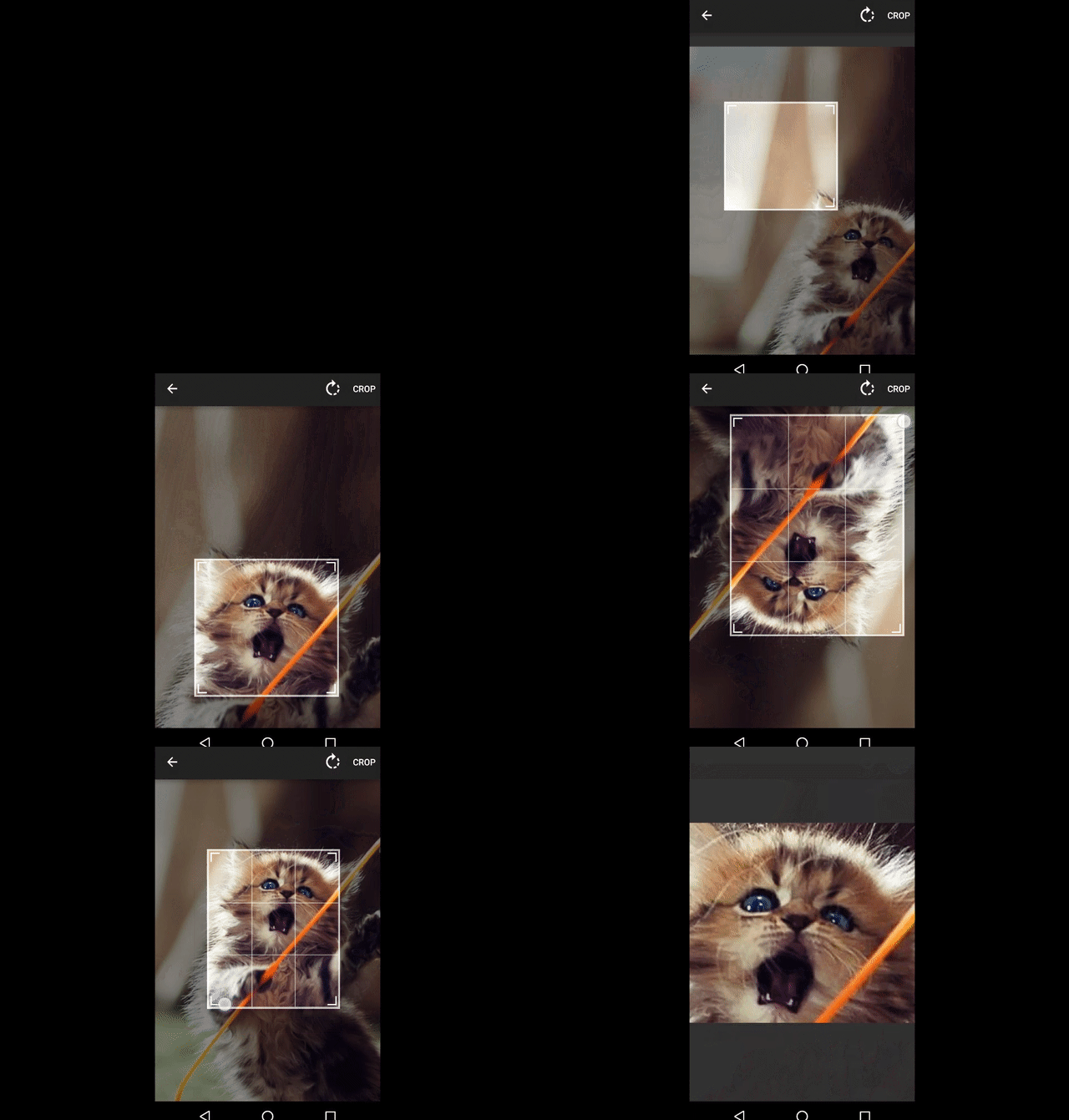
## Usage
*For a working implementation, please have a look at the Sample Project*
[See GitHub Wiki for more info.](https://github.com/ArthurHub/Android-Image-Cropper/wiki)
1. Include the library
```
dependencies {
api 'com.theartofdev.edmodo:android-image-cropper:2.8.+'
}
```
Add permissions to manifest
```
```
Add this line to your Proguard config file
```
-keep class androidx.appcompat.widget.** { *; }
```
### Using Activity
2. Add `CropImageActivity` into your AndroidManifest.xml
```xml
```
3. Start `CropImageActivity` using builder pattern from your activity
```java
// start picker to get image for cropping and then use the image in cropping activity
CropImage.activity()
.setGuidelines(CropImageView.Guidelines.ON)
.start(this);
// start cropping activity for pre-acquired image saved on the device
CropImage.activity(imageUri)
.start(this);
// for fragment (DO NOT use `getActivity()`)
CropImage.activity()
.start(getContext(), this);
```
4. Override `onActivityResult` method in your activity to get crop result
```java
@Override
public void onActivityResult(int requestCode, int resultCode, Intent data) {
if (requestCode == CropImage.CROP_IMAGE_ACTIVITY_REQUEST_CODE) {
CropImage.ActivityResult result = CropImage.getActivityResult(data);
if (resultCode == RESULT_OK) {
Uri resultUri = result.getUri();
} else if (resultCode == CropImage.CROP_IMAGE_ACTIVITY_RESULT_ERROR_CODE) {
Exception error = result.getError();
}
}
}
```
### Using View
2. Add `CropImageView` into your activity
```xml
```
3. Set image to crop
```java
cropImageView.setImageUriAsync(uri);
// or (prefer using uri for performance and better user experience)
cropImageView.setImageBitmap(bitmap);
```
4. Get cropped image
```java
// subscribe to async event using cropImageView.setOnCropImageCompleteListener(listener)
cropImageView.getCroppedImageAsync();
// or
Bitmap cropped = cropImageView.getCroppedImage();
```
## Features
- Built-in `CropImageActivity`.
- Set cropping image as Bitmap, Resource or Android URI (Gallery, Camera, Dropbox, etc.).
- Image rotation/flipping during cropping.
- Auto zoom-in/out to relevant cropping area.
- Auto rotate bitmap by image Exif data.
- Set result image min/max limits in pixels.
- Set initial crop window size/location.
- Request cropped image resize to specific size.
- Bitmap memory optimization, OOM handling (should never occur)!
- API Level 14.
- More..
## Customizations
- Cropping window shape: Rectangular or Oval (cube/circle by fixing aspect ratio).
- Cropping window aspect ratio: Free, 1:1, 4:3, 16:9 or Custom.
- Guidelines appearance: Off / Always On / Show on Toch.
- Cropping window Border line, border corner and guidelines thickness and color.
- Cropping background color.
For more information, see the [GitHub Wiki](https://github.com/ArthurHub/Android-Image-Cropper/wiki).
## Posts
- [Android cropping image from camera or gallery](http://theartofdev.com/2015/02/15/android-cropping-image-from-camera-or-gallery/)
- [Android Image Cropper async support and custom progress UI](http://theartofdev.com/2016/01/15/android-image-cropper-async-support-and-custom-progress-ui/)
- [Adding auto-zoom feature to Android-Image-Cropper](https://theartofdev.com/2016/04/25/adding-auto-zoom-feature-to-android-image-cropper/)
## Change log
*2.8.0*
- Fix crash on Android O (thx @juliooa)
- Update to support library to AndroidX (thx @mradzinski)
- Handle failure when selecting non image file (thx @uncledoc)
- More translations (thx @jkwiecien, @david-serrano)
*2.7.0*
- Update gradle wrapper to 4.4
- Update support library to 27.1.1 and set is statically! (thx @androideveloper)
- Fix NPE in activity creation by tools (thx @unverbraucht)
- More translations (thx @gwharvey, @dlackty, @JairoGeek, @shaymargolis)
See [full change log](https://github.com/ArthurHub/Android-Image-Cropper/wiki/Change-Log).
## License
Originally forked from [edmodo/cropper](https://github.com/edmodo/cropper).
Copyright 2016, Arthur Teplitzki, 2013, Edmodo, Inc.
Licensed under the Apache License, Version 2.0 (the "License"); you may not use this work except in compliance with the License.
You may obtain a copy of the License in the LICENSE file, or at:
http://www.apache.org/licenses/LICENSE-2.0
Unless required by applicable law or agreed to in writing, software distributed under the License is distributed on an "AS IS" BASIS, WITHOUT WARRANTIES OR CONDITIONS OF ANY KIND, either express or implied. See the License for the specific language governing permissions and limitations under the License.
================================================
FILE: build.gradle
================================================
buildscript {
repositories {
jcenter()
google()
}
dependencies {
classpath 'com.android.tools.build:gradle:3.2.1'
}
}
allprojects {
repositories {
jcenter()
maven {
url "https://maven.google.com"
}
}
}
ext {
compileSdkVersion = 28
buildToolsVersion = '28.0.3'
androidXLibraryVersion = '1.0.0'
PUBLISH_GROUP_ID = 'com.theartofdev.edmodo'
PUBLISH_ARTIFACT_ID = 'android-image-cropper'
PUBLISH_VERSION = '2.8.0'
// gradlew clean build generateRelease
}
================================================
FILE: cropper/build.gradle
================================================
apply plugin: 'com.android.library'
// https://docs.gradle.org/current/userguide/publishing_maven.html
// http://www.flexlabs.org/2013/06/using-local-aar-android-library-packages-in-gradle-builds
apply plugin: 'maven-publish'
android {
compileSdkVersion rootProject.compileSdkVersion
buildToolsVersion rootProject.buildToolsVersion
defaultConfig {
minSdkVersion 14
targetSdkVersion rootProject.compileSdkVersion
versionCode 1
versionName PUBLISH_VERSION
}
compileOptions {
sourceCompatibility JavaVersion.VERSION_1_7
targetCompatibility JavaVersion.VERSION_1_7
}
lintOptions {
abortOnError false
}
}
// This configuration is used to publish the library to a local repo while a being forked and modified.
// It should really be set up so that the version are all in line, and set to be a SNAPSHOT.
// The version listed here is a temp hack to allow me to keep working.
android.libraryVariants
publishing {
publications {
maven(MavenPublication) {
groupId PUBLISH_GROUP_ID
artifactId PUBLISH_ARTIFACT_ID
version PUBLISH_VERSION + '-SNAPSHOT'
//artifact bundleRelease
}
}
}
apply from: 'https://raw.githubusercontent.com/blundell/release-android-library/master/android-release-aar.gradle'
dependencies {
api "androidx.appcompat:appcompat:$androidXLibraryVersion"
implementation "androidx.exifinterface:exifinterface:$androidXLibraryVersion"
}
================================================
FILE: cropper/src/main/AndroidManifest.xml
================================================
================================================
FILE: cropper/src/main/java/com/theartofdev/edmodo/cropper/BitmapCroppingWorkerTask.java
================================================
// "Therefore those skilled at the unorthodox
// are infinite as heaven and earth,
// inexhaustible as the great rivers.
// When they come to an end,
// they begin again,
// like the days and months;
// they die and are reborn,
// like the four seasons."
//
// - Sun Tsu,
// "The Art of War"
package com.theartofdev.edmodo.cropper;
import android.content.Context;
import android.graphics.Bitmap;
import android.net.Uri;
import android.os.AsyncTask;
import java.lang.ref.WeakReference;
/** Task to crop bitmap asynchronously from the UI thread. */
final class BitmapCroppingWorkerTask
extends AsyncTask {
// region: Fields and Consts
/** Use a WeakReference to ensure the ImageView can be garbage collected */
private final WeakReference mCropImageViewReference;
/** the bitmap to crop */
private final Bitmap mBitmap;
/** The Android URI of the image to load */
private final Uri mUri;
/** The context of the crop image view widget used for loading of bitmap by Android URI */
private final Context mContext;
/** Required cropping 4 points (x0,y0,x1,y1,x2,y2,x3,y3) */
private final float[] mCropPoints;
/** Degrees the image was rotated after loading */
private final int mDegreesRotated;
/** the original width of the image to be cropped (for image loaded from URI) */
private final int mOrgWidth;
/** the original height of the image to be cropped (for image loaded from URI) */
private final int mOrgHeight;
/** is there is fixed aspect ratio for the crop rectangle */
private final boolean mFixAspectRatio;
/** the X aspect ration of the crop rectangle */
private final int mAspectRatioX;
/** the Y aspect ration of the crop rectangle */
private final int mAspectRatioY;
/** required width of the cropping image */
private final int mReqWidth;
/** required height of the cropping image */
private final int mReqHeight;
/** is the image flipped horizontally */
private final boolean mFlipHorizontally;
/** is the image flipped vertically */
private final boolean mFlipVertically;
/** The option to handle requested width/height */
private final CropImageView.RequestSizeOptions mReqSizeOptions;
/** the Android Uri to save the cropped image to */
private final Uri mSaveUri;
/** the compression format to use when writing the image */
private final Bitmap.CompressFormat mSaveCompressFormat;
/** the quality (if applicable) to use when writing the image (0 - 100) */
private final int mSaveCompressQuality;
// endregion
BitmapCroppingWorkerTask(
CropImageView cropImageView,
Bitmap bitmap,
float[] cropPoints,
int degreesRotated,
boolean fixAspectRatio,
int aspectRatioX,
int aspectRatioY,
int reqWidth,
int reqHeight,
boolean flipHorizontally,
boolean flipVertically,
CropImageView.RequestSizeOptions options,
Uri saveUri,
Bitmap.CompressFormat saveCompressFormat,
int saveCompressQuality) {
mCropImageViewReference = new WeakReference<>(cropImageView);
mContext = cropImageView.getContext();
mBitmap = bitmap;
mCropPoints = cropPoints;
mUri = null;
mDegreesRotated = degreesRotated;
mFixAspectRatio = fixAspectRatio;
mAspectRatioX = aspectRatioX;
mAspectRatioY = aspectRatioY;
mReqWidth = reqWidth;
mReqHeight = reqHeight;
mFlipHorizontally = flipHorizontally;
mFlipVertically = flipVertically;
mReqSizeOptions = options;
mSaveUri = saveUri;
mSaveCompressFormat = saveCompressFormat;
mSaveCompressQuality = saveCompressQuality;
mOrgWidth = 0;
mOrgHeight = 0;
}
BitmapCroppingWorkerTask(
CropImageView cropImageView,
Uri uri,
float[] cropPoints,
int degreesRotated,
int orgWidth,
int orgHeight,
boolean fixAspectRatio,
int aspectRatioX,
int aspectRatioY,
int reqWidth,
int reqHeight,
boolean flipHorizontally,
boolean flipVertically,
CropImageView.RequestSizeOptions options,
Uri saveUri,
Bitmap.CompressFormat saveCompressFormat,
int saveCompressQuality) {
mCropImageViewReference = new WeakReference<>(cropImageView);
mContext = cropImageView.getContext();
mUri = uri;
mCropPoints = cropPoints;
mDegreesRotated = degreesRotated;
mFixAspectRatio = fixAspectRatio;
mAspectRatioX = aspectRatioX;
mAspectRatioY = aspectRatioY;
mOrgWidth = orgWidth;
mOrgHeight = orgHeight;
mReqWidth = reqWidth;
mReqHeight = reqHeight;
mFlipHorizontally = flipHorizontally;
mFlipVertically = flipVertically;
mReqSizeOptions = options;
mSaveUri = saveUri;
mSaveCompressFormat = saveCompressFormat;
mSaveCompressQuality = saveCompressQuality;
mBitmap = null;
}
/** The Android URI that this task is currently loading. */
public Uri getUri() {
return mUri;
}
/**
* Crop image in background.
*
* @param params ignored
* @return the decoded bitmap data
*/
@Override
protected BitmapCroppingWorkerTask.Result doInBackground(Void... params) {
try {
if (!isCancelled()) {
BitmapUtils.BitmapSampled bitmapSampled;
if (mUri != null) {
bitmapSampled =
BitmapUtils.cropBitmap(
mContext,
mUri,
mCropPoints,
mDegreesRotated,
mOrgWidth,
mOrgHeight,
mFixAspectRatio,
mAspectRatioX,
mAspectRatioY,
mReqWidth,
mReqHeight,
mFlipHorizontally,
mFlipVertically);
} else if (mBitmap != null) {
bitmapSampled =
BitmapUtils.cropBitmapObjectHandleOOM(
mBitmap,
mCropPoints,
mDegreesRotated,
mFixAspectRatio,
mAspectRatioX,
mAspectRatioY,
mFlipHorizontally,
mFlipVertically);
} else {
return new Result((Bitmap) null, 1);
}
Bitmap bitmap =
BitmapUtils.resizeBitmap(bitmapSampled.bitmap, mReqWidth, mReqHeight, mReqSizeOptions);
if (mSaveUri == null) {
return new Result(bitmap, bitmapSampled.sampleSize);
} else {
BitmapUtils.writeBitmapToUri(
mContext, bitmap, mSaveUri, mSaveCompressFormat, mSaveCompressQuality);
if (bitmap != null) {
bitmap.recycle();
}
return new Result(mSaveUri, bitmapSampled.sampleSize);
}
}
return null;
} catch (Exception e) {
return new Result(e, mSaveUri != null);
}
}
/**
* Once complete, see if ImageView is still around and set bitmap.
*
* @param result the result of bitmap cropping
*/
@Override
protected void onPostExecute(Result result) {
if (result != null) {
boolean completeCalled = false;
if (!isCancelled()) {
CropImageView cropImageView = mCropImageViewReference.get();
if (cropImageView != null) {
completeCalled = true;
cropImageView.onImageCroppingAsyncComplete(result);
}
}
if (!completeCalled && result.bitmap != null) {
// fast release of unused bitmap
result.bitmap.recycle();
}
}
}
// region: Inner class: Result
/** The result of BitmapCroppingWorkerTask async loading. */
static final class Result {
/** The cropped bitmap */
public final Bitmap bitmap;
/** The saved cropped bitmap uri */
public final Uri uri;
/** The error that occurred during async bitmap cropping. */
final Exception error;
/** is the cropping request was to get a bitmap or to save it to uri */
final boolean isSave;
/** sample size used creating the crop bitmap to lower its size */
final int sampleSize;
Result(Bitmap bitmap, int sampleSize) {
this.bitmap = bitmap;
this.uri = null;
this.error = null;
this.isSave = false;
this.sampleSize = sampleSize;
}
Result(Uri uri, int sampleSize) {
this.bitmap = null;
this.uri = uri;
this.error = null;
this.isSave = true;
this.sampleSize = sampleSize;
}
Result(Exception error, boolean isSave) {
this.bitmap = null;
this.uri = null;
this.error = error;
this.isSave = isSave;
this.sampleSize = 1;
}
}
// endregion
}
================================================
FILE: cropper/src/main/java/com/theartofdev/edmodo/cropper/BitmapLoadingWorkerTask.java
================================================
// "Therefore those skilled at the unorthodox
// are infinite as heaven and earth,
// inexhaustible as the great rivers.
// When they come to an end,
// they begin again,
// like the days and months;
// they die and are reborn,
// like the four seasons."
//
// - Sun Tsu,
// "The Art of War"
package com.theartofdev.edmodo.cropper;
import android.content.Context;
import android.graphics.Bitmap;
import android.net.Uri;
import android.os.AsyncTask;
import android.util.DisplayMetrics;
import java.lang.ref.WeakReference;
/** Task to load bitmap asynchronously from the UI thread. */
final class BitmapLoadingWorkerTask extends AsyncTask {
// region: Fields and Consts
/** Use a WeakReference to ensure the ImageView can be garbage collected */
private final WeakReference mCropImageViewReference;
/** The Android URI of the image to load */
private final Uri mUri;
/** The context of the crop image view widget used for loading of bitmap by Android URI */
private final Context mContext;
/** required width of the cropping image after density adjustment */
private final int mWidth;
/** required height of the cropping image after density adjustment */
private final int mHeight;
// endregion
public BitmapLoadingWorkerTask(CropImageView cropImageView, Uri uri) {
mUri = uri;
mCropImageViewReference = new WeakReference<>(cropImageView);
mContext = cropImageView.getContext();
DisplayMetrics metrics = cropImageView.getResources().getDisplayMetrics();
double densityAdj = metrics.density > 1 ? 1 / metrics.density : 1;
mWidth = (int) (metrics.widthPixels * densityAdj);
mHeight = (int) (metrics.heightPixels * densityAdj);
}
/** The Android URI that this task is currently loading. */
public Uri getUri() {
return mUri;
}
/**
* Decode image in background.
*
* @param params ignored
* @return the decoded bitmap data
*/
@Override
protected Result doInBackground(Void... params) {
try {
if (!isCancelled()) {
BitmapUtils.BitmapSampled decodeResult =
BitmapUtils.decodeSampledBitmap(mContext, mUri, mWidth, mHeight);
if (!isCancelled()) {
BitmapUtils.RotateBitmapResult rotateResult =
BitmapUtils.rotateBitmapByExif(decodeResult.bitmap, mContext, mUri);
return new Result(
mUri, rotateResult.bitmap, decodeResult.sampleSize, rotateResult.degrees);
}
}
return null;
} catch (Exception e) {
return new Result(mUri, e);
}
}
/**
* Once complete, see if ImageView is still around and set bitmap.
*
* @param result the result of bitmap loading
*/
@Override
protected void onPostExecute(Result result) {
if (result != null) {
boolean completeCalled = false;
if (!isCancelled()) {
CropImageView cropImageView = mCropImageViewReference.get();
if (cropImageView != null) {
completeCalled = true;
cropImageView.onSetImageUriAsyncComplete(result);
}
}
if (!completeCalled && result.bitmap != null) {
// fast release of unused bitmap
result.bitmap.recycle();
}
}
}
// region: Inner class: Result
/** The result of BitmapLoadingWorkerTask async loading. */
public static final class Result {
/** The Android URI of the image to load */
public final Uri uri;
/** The loaded bitmap */
public final Bitmap bitmap;
/** The sample size used to load the given bitmap */
public final int loadSampleSize;
/** The degrees the image was rotated */
public final int degreesRotated;
/** The error that occurred during async bitmap loading. */
public final Exception error;
Result(Uri uri, Bitmap bitmap, int loadSampleSize, int degreesRotated) {
this.uri = uri;
this.bitmap = bitmap;
this.loadSampleSize = loadSampleSize;
this.degreesRotated = degreesRotated;
this.error = null;
}
Result(Uri uri, Exception error) {
this.uri = uri;
this.bitmap = null;
this.loadSampleSize = 0;
this.degreesRotated = 0;
this.error = error;
}
}
// endregion
}
================================================
FILE: cropper/src/main/java/com/theartofdev/edmodo/cropper/BitmapUtils.java
================================================
// "Therefore those skilled at the unorthodox
// are infinite as heaven and earth,
// inexhaustible as the great rivers.
// When they come to an end,
// they begin again,
// like the days and months;
// they die and are reborn,
// like the four seasons."
//
// - Sun Tsu,
// "The Art of War"
package com.theartofdev.edmodo.cropper;
import android.content.ContentResolver;
import android.content.Context;
import android.graphics.Bitmap;
import android.graphics.BitmapFactory;
import android.graphics.BitmapRegionDecoder;
import android.graphics.Matrix;
import android.graphics.Rect;
import android.graphics.RectF;
import android.net.Uri;
import android.util.Log;
import android.util.Pair;
import java.io.Closeable;
import java.io.File;
import java.io.FileNotFoundException;
import java.io.IOException;
import java.io.InputStream;
import java.io.OutputStream;
import java.lang.ref.WeakReference;
import javax.microedition.khronos.egl.EGL10;
import javax.microedition.khronos.egl.EGLConfig;
import javax.microedition.khronos.egl.EGLContext;
import javax.microedition.khronos.egl.EGLDisplay;
import androidx.exifinterface.media.ExifInterface;
/** Utility class that deals with operations with an ImageView. */
final class BitmapUtils {
static final Rect EMPTY_RECT = new Rect();
static final RectF EMPTY_RECT_F = new RectF();
/** Reusable rectangle for general internal usage */
static final RectF RECT = new RectF();
/** Reusable point for general internal usage */
static final float[] POINTS = new float[6];
/** Reusable point for general internal usage */
static final float[] POINTS2 = new float[6];
/** Used to know the max texture size allowed to be rendered */
private static int mMaxTextureSize;
/** used to save bitmaps during state save and restore so not to reload them. */
static Pair> mStateBitmap;
/**
* Rotate the given image by reading the Exif value of the image (uri).
* If no rotation is required the image will not be rotated.
* New bitmap is created and the old one is recycled.
*/
static RotateBitmapResult rotateBitmapByExif(Bitmap bitmap, Context context, Uri uri) {
ExifInterface ei = null;
try {
InputStream is = context.getContentResolver().openInputStream(uri);
if (is != null) {
ei = new ExifInterface(is);
is.close();
}
} catch (Exception ignored) {
}
return ei != null ? rotateBitmapByExif(bitmap, ei) : new RotateBitmapResult(bitmap, 0);
}
/**
* Rotate the given image by given Exif value.
* If no rotation is required the image will not be rotated.
* New bitmap is created and the old one is recycled.
*/
static RotateBitmapResult rotateBitmapByExif(Bitmap bitmap, ExifInterface exif) {
int degrees;
int orientation =
exif.getAttributeInt(ExifInterface.TAG_ORIENTATION, ExifInterface.ORIENTATION_NORMAL);
switch (orientation) {
case ExifInterface.ORIENTATION_ROTATE_90:
degrees = 90;
break;
case ExifInterface.ORIENTATION_ROTATE_180:
degrees = 180;
break;
case ExifInterface.ORIENTATION_ROTATE_270:
degrees = 270;
break;
default:
degrees = 0;
break;
}
return new RotateBitmapResult(bitmap, degrees);
}
/** Decode bitmap from stream using sampling to get bitmap with the requested limit. */
static BitmapSampled decodeSampledBitmap(Context context, Uri uri, int reqWidth, int reqHeight) {
try {
ContentResolver resolver = context.getContentResolver();
// First decode with inJustDecodeBounds=true to check dimensions
BitmapFactory.Options options = decodeImageForOption(resolver, uri);
if(options.outWidth == -1 && options.outHeight == -1)
throw new RuntimeException("File is not a picture");
// Calculate inSampleSize
options.inSampleSize =
Math.max(
calculateInSampleSizeByReqestedSize(
options.outWidth, options.outHeight, reqWidth, reqHeight),
calculateInSampleSizeByMaxTextureSize(options.outWidth, options.outHeight));
// Decode bitmap with inSampleSize set
Bitmap bitmap = decodeImage(resolver, uri, options);
return new BitmapSampled(bitmap, options.inSampleSize);
} catch (Exception e) {
throw new RuntimeException(
"Failed to load sampled bitmap: " + uri + "\r\n" + e.getMessage(), e);
}
}
/**
* Crop image bitmap from given bitmap using the given points in the original bitmap and the given
* rotation.
* if the rotation is not 0,90,180 or 270 degrees then we must first crop a larger area of the
* image that contains the requires rectangle, rotate and then crop again a sub rectangle.
* If crop fails due to OOM we scale the cropping image by 0.5 every time it fails until it is
* small enough.
*/
static BitmapSampled cropBitmapObjectHandleOOM(
Bitmap bitmap,
float[] points,
int degreesRotated,
boolean fixAspectRatio,
int aspectRatioX,
int aspectRatioY,
boolean flipHorizontally,
boolean flipVertically) {
int scale = 1;
while (true) {
try {
Bitmap cropBitmap =
cropBitmapObjectWithScale(
bitmap,
points,
degreesRotated,
fixAspectRatio,
aspectRatioX,
aspectRatioY,
1 / (float) scale,
flipHorizontally,
flipVertically);
return new BitmapSampled(cropBitmap, scale);
} catch (OutOfMemoryError e) {
scale *= 2;
if (scale > 8) {
throw e;
}
}
}
}
/**
* Crop image bitmap from given bitmap using the given points in the original bitmap and the given
* rotation.
* if the rotation is not 0,90,180 or 270 degrees then we must first crop a larger area of the
* image that contains the requires rectangle, rotate and then crop again a sub rectangle.
*
* @param scale how much to scale the cropped image part, use 0.5 to lower the image by half (OOM
* handling)
*/
private static Bitmap cropBitmapObjectWithScale(
Bitmap bitmap,
float[] points,
int degreesRotated,
boolean fixAspectRatio,
int aspectRatioX,
int aspectRatioY,
float scale,
boolean flipHorizontally,
boolean flipVertically) {
// get the rectangle in original image that contains the required cropped area (larger for non
// rectangular crop)
Rect rect =
getRectFromPoints(
points,
bitmap.getWidth(),
bitmap.getHeight(),
fixAspectRatio,
aspectRatioX,
aspectRatioY);
// crop and rotate the cropped image in one operation
Matrix matrix = new Matrix();
matrix.setRotate(degreesRotated, bitmap.getWidth() / 2, bitmap.getHeight() / 2);
matrix.postScale(flipHorizontally ? -scale : scale, flipVertically ? -scale : scale);
Bitmap result =
Bitmap.createBitmap(bitmap, rect.left, rect.top, rect.width(), rect.height(), matrix, true);
if (result == bitmap) {
// corner case when all bitmap is selected, no worth optimizing for it
result = bitmap.copy(bitmap.getConfig(), false);
}
// rotating by 0, 90, 180 or 270 degrees doesn't require extra cropping
if (degreesRotated % 90 != 0) {
// extra crop because non rectangular crop cannot be done directly on the image without
// rotating first
result =
cropForRotatedImage(
result, points, rect, degreesRotated, fixAspectRatio, aspectRatioX, aspectRatioY);
}
return result;
}
/**
* Crop image bitmap from URI by decoding it with specific width and height to down-sample if
* required.
* Additionally if OOM is thrown try to increase the sampling (2,4,8).
*/
static BitmapSampled cropBitmap(
Context context,
Uri loadedImageUri,
float[] points,
int degreesRotated,
int orgWidth,
int orgHeight,
boolean fixAspectRatio,
int aspectRatioX,
int aspectRatioY,
int reqWidth,
int reqHeight,
boolean flipHorizontally,
boolean flipVertically) {
int sampleMulti = 1;
while (true) {
try {
// if successful, just return the resulting bitmap
return cropBitmap(
context,
loadedImageUri,
points,
degreesRotated,
orgWidth,
orgHeight,
fixAspectRatio,
aspectRatioX,
aspectRatioY,
reqWidth,
reqHeight,
flipHorizontally,
flipVertically,
sampleMulti);
} catch (OutOfMemoryError e) {
// if OOM try to increase the sampling to lower the memory usage
sampleMulti *= 2;
if (sampleMulti > 16) {
throw new RuntimeException(
"Failed to handle OOM by sampling ("
+ sampleMulti
+ "): "
+ loadedImageUri
+ "\r\n"
+ e.getMessage(),
e);
}
}
}
}
/** Get left value of the bounding rectangle of the given points. */
static float getRectLeft(float[] points) {
return Math.min(Math.min(Math.min(points[0], points[2]), points[4]), points[6]);
}
/** Get top value of the bounding rectangle of the given points. */
static float getRectTop(float[] points) {
return Math.min(Math.min(Math.min(points[1], points[3]), points[5]), points[7]);
}
/** Get right value of the bounding rectangle of the given points. */
static float getRectRight(float[] points) {
return Math.max(Math.max(Math.max(points[0], points[2]), points[4]), points[6]);
}
/** Get bottom value of the bounding rectangle of the given points. */
static float getRectBottom(float[] points) {
return Math.max(Math.max(Math.max(points[1], points[3]), points[5]), points[7]);
}
/** Get width of the bounding rectangle of the given points. */
static float getRectWidth(float[] points) {
return getRectRight(points) - getRectLeft(points);
}
/** Get height of the bounding rectangle of the given points. */
static float getRectHeight(float[] points) {
return getRectBottom(points) - getRectTop(points);
}
/** Get horizontal center value of the bounding rectangle of the given points. */
static float getRectCenterX(float[] points) {
return (getRectRight(points) + getRectLeft(points)) / 2f;
}
/** Get vertical center value of the bounding rectangle of the given points. */
static float getRectCenterY(float[] points) {
return (getRectBottom(points) + getRectTop(points)) / 2f;
}
/**
* Get a rectangle for the given 4 points (x0,y0,x1,y1,x2,y2,x3,y3) by finding the min/max 2
* points that contains the given 4 points and is a straight rectangle.
*/
static Rect getRectFromPoints(
float[] points,
int imageWidth,
int imageHeight,
boolean fixAspectRatio,
int aspectRatioX,
int aspectRatioY) {
int left = Math.round(Math.max(0, getRectLeft(points)));
int top = Math.round(Math.max(0, getRectTop(points)));
int right = Math.round(Math.min(imageWidth, getRectRight(points)));
int bottom = Math.round(Math.min(imageHeight, getRectBottom(points)));
Rect rect = new Rect(left, top, right, bottom);
if (fixAspectRatio) {
fixRectForAspectRatio(rect, aspectRatioX, aspectRatioY);
}
return rect;
}
/**
* Fix the given rectangle if it doesn't confirm to aspect ration rule.
* Make sure that width and height are equal if 1:1 fixed aspect ratio is requested.
*/
private static void fixRectForAspectRatio(Rect rect, int aspectRatioX, int aspectRatioY) {
if (aspectRatioX == aspectRatioY && rect.width() != rect.height()) {
if (rect.height() > rect.width()) {
rect.bottom -= rect.height() - rect.width();
} else {
rect.right -= rect.width() - rect.height();
}
}
}
/**
* Write given bitmap to a temp file. If file already exists no-op as we already saved the file in
* this session. Uses JPEG 95% compression.
*
* @param uri the uri to write the bitmap to, if null
* @return the uri where the image was saved in, either the given uri or new pointing to temp
* file.
*/
static Uri writeTempStateStoreBitmap(Context context, Bitmap bitmap, Uri uri) {
try {
boolean needSave = true;
if (uri == null) {
uri =
Uri.fromFile(
File.createTempFile("aic_state_store_temp", ".jpg", context.getCacheDir()));
} else if (new File(uri.getPath()).exists()) {
needSave = false;
}
if (needSave) {
writeBitmapToUri(context, bitmap, uri, Bitmap.CompressFormat.JPEG, 95);
}
return uri;
} catch (Exception e) {
Log.w("AIC", "Failed to write bitmap to temp file for image-cropper save instance state", e);
return null;
}
}
/** Write the given bitmap to the given uri using the given compression. */
static void writeBitmapToUri(
Context context,
Bitmap bitmap,
Uri uri,
Bitmap.CompressFormat compressFormat,
int compressQuality)
throws FileNotFoundException {
OutputStream outputStream = null;
try {
outputStream = context.getContentResolver().openOutputStream(uri);
bitmap.compress(compressFormat, compressQuality, outputStream);
} finally {
closeSafe(outputStream);
}
}
/** Resize the given bitmap to the given width/height by the given option. */
static Bitmap resizeBitmap(
Bitmap bitmap, int reqWidth, int reqHeight, CropImageView.RequestSizeOptions options) {
try {
if (reqWidth > 0
&& reqHeight > 0
&& (options == CropImageView.RequestSizeOptions.RESIZE_FIT
|| options == CropImageView.RequestSizeOptions.RESIZE_INSIDE
|| options == CropImageView.RequestSizeOptions.RESIZE_EXACT)) {
Bitmap resized = null;
if (options == CropImageView.RequestSizeOptions.RESIZE_EXACT) {
resized = Bitmap.createScaledBitmap(bitmap, reqWidth, reqHeight, false);
} else {
int width = bitmap.getWidth();
int height = bitmap.getHeight();
float scale = Math.max(width / (float) reqWidth, height / (float) reqHeight);
if (scale > 1 || options == CropImageView.RequestSizeOptions.RESIZE_FIT) {
resized =
Bitmap.createScaledBitmap(
bitmap, (int) (width / scale), (int) (height / scale), false);
}
}
if (resized != null) {
if (resized != bitmap) {
bitmap.recycle();
}
return resized;
}
}
} catch (Exception e) {
Log.w("AIC", "Failed to resize cropped image, return bitmap before resize", e);
}
return bitmap;
}
// region: Private methods
/**
* Crop image bitmap from URI by decoding it with specific width and height to down-sample if
* required.
*
* @param orgWidth used to get rectangle from points (handle edge cases to limit rectangle)
* @param orgHeight used to get rectangle from points (handle edge cases to limit rectangle)
* @param sampleMulti used to increase the sampling of the image to handle memory issues.
*/
private static BitmapSampled cropBitmap(
Context context,
Uri loadedImageUri,
float[] points,
int degreesRotated,
int orgWidth,
int orgHeight,
boolean fixAspectRatio,
int aspectRatioX,
int aspectRatioY,
int reqWidth,
int reqHeight,
boolean flipHorizontally,
boolean flipVertically,
int sampleMulti) {
// get the rectangle in original image that contains the required cropped area (larger for non
// rectangular crop)
Rect rect =
getRectFromPoints(points, orgWidth, orgHeight, fixAspectRatio, aspectRatioX, aspectRatioY);
int width = reqWidth > 0 ? reqWidth : rect.width();
int height = reqHeight > 0 ? reqHeight : rect.height();
Bitmap result = null;
int sampleSize = 1;
try {
// decode only the required image from URI, optionally sub-sampling if reqWidth/reqHeight is
// given.
BitmapSampled bitmapSampled =
decodeSampledBitmapRegion(context, loadedImageUri, rect, width, height, sampleMulti);
result = bitmapSampled.bitmap;
sampleSize = bitmapSampled.sampleSize;
} catch (Exception ignored) {
}
if (result != null) {
try {
// rotate the decoded region by the required amount
result = rotateAndFlipBitmapInt(result, degreesRotated, flipHorizontally, flipVertically);
// rotating by 0, 90, 180 or 270 degrees doesn't require extra cropping
if (degreesRotated % 90 != 0) {
// extra crop because non rectangular crop cannot be done directly on the image without
// rotating first
result =
cropForRotatedImage(
result, points, rect, degreesRotated, fixAspectRatio, aspectRatioX, aspectRatioY);
}
} catch (OutOfMemoryError e) {
if (result != null) {
result.recycle();
}
throw e;
}
return new BitmapSampled(result, sampleSize);
} else {
// failed to decode region, may be skia issue, try full decode and then crop
return cropBitmap(
context,
loadedImageUri,
points,
degreesRotated,
fixAspectRatio,
aspectRatioX,
aspectRatioY,
sampleMulti,
rect,
width,
height,
flipHorizontally,
flipVertically);
}
}
/**
* Crop bitmap by fully loading the original and then cropping it, fallback in case cropping
* region failed.
*/
private static BitmapSampled cropBitmap(
Context context,
Uri loadedImageUri,
float[] points,
int degreesRotated,
boolean fixAspectRatio,
int aspectRatioX,
int aspectRatioY,
int sampleMulti,
Rect rect,
int width,
int height,
boolean flipHorizontally,
boolean flipVertically) {
Bitmap result = null;
int sampleSize;
try {
BitmapFactory.Options options = new BitmapFactory.Options();
options.inSampleSize =
sampleSize =
sampleMulti
* calculateInSampleSizeByReqestedSize(rect.width(), rect.height(), width, height);
Bitmap fullBitmap = decodeImage(context.getContentResolver(), loadedImageUri, options);
if (fullBitmap != null) {
try {
// adjust crop points by the sampling because the image is smaller
float[] points2 = new float[points.length];
System.arraycopy(points, 0, points2, 0, points.length);
for (int i = 0; i < points2.length; i++) {
points2[i] = points2[i] / options.inSampleSize;
}
result =
cropBitmapObjectWithScale(
fullBitmap,
points2,
degreesRotated,
fixAspectRatio,
aspectRatioX,
aspectRatioY,
1,
flipHorizontally,
flipVertically);
} finally {
if (result != fullBitmap) {
fullBitmap.recycle();
}
}
}
} catch (OutOfMemoryError e) {
if (result != null) {
result.recycle();
}
throw e;
} catch (Exception e) {
throw new RuntimeException(
"Failed to load sampled bitmap: " + loadedImageUri + "\r\n" + e.getMessage(), e);
}
return new BitmapSampled(result, sampleSize);
}
/** Decode image from uri using "inJustDecodeBounds" to get the image dimensions. */
private static BitmapFactory.Options decodeImageForOption(ContentResolver resolver, Uri uri)
throws FileNotFoundException {
InputStream stream = null;
try {
stream = resolver.openInputStream(uri);
BitmapFactory.Options options = new BitmapFactory.Options();
options.inJustDecodeBounds = true;
BitmapFactory.decodeStream(stream, EMPTY_RECT, options);
options.inJustDecodeBounds = false;
return options;
} finally {
closeSafe(stream);
}
}
/**
* Decode image from uri using given "inSampleSize", but if failed due to out-of-memory then raise
* the inSampleSize until success.
*/
private static Bitmap decodeImage(
ContentResolver resolver, Uri uri, BitmapFactory.Options options)
throws FileNotFoundException {
do {
InputStream stream = null;
try {
stream = resolver.openInputStream(uri);
return BitmapFactory.decodeStream(stream, EMPTY_RECT, options);
} catch (OutOfMemoryError e) {
options.inSampleSize *= 2;
} finally {
closeSafe(stream);
}
} while (options.inSampleSize <= 512);
throw new RuntimeException("Failed to decode image: " + uri);
}
/**
* Decode specific rectangle bitmap from stream using sampling to get bitmap with the requested
* limit.
*
* @param sampleMulti used to increase the sampling of the image to handle memory issues.
*/
private static BitmapSampled decodeSampledBitmapRegion(
Context context, Uri uri, Rect rect, int reqWidth, int reqHeight, int sampleMulti) {
InputStream stream = null;
BitmapRegionDecoder decoder = null;
try {
BitmapFactory.Options options = new BitmapFactory.Options();
options.inSampleSize =
sampleMulti
* calculateInSampleSizeByReqestedSize(
rect.width(), rect.height(), reqWidth, reqHeight);
stream = context.getContentResolver().openInputStream(uri);
decoder = BitmapRegionDecoder.newInstance(stream, false);
do {
try {
return new BitmapSampled(decoder.decodeRegion(rect, options), options.inSampleSize);
} catch (OutOfMemoryError e) {
options.inSampleSize *= 2;
}
} while (options.inSampleSize <= 512);
} catch (Exception e) {
throw new RuntimeException(
"Failed to load sampled bitmap: " + uri + "\r\n" + e.getMessage(), e);
} finally {
closeSafe(stream);
if (decoder != null) {
decoder.recycle();
}
}
return new BitmapSampled(null, 1);
}
/**
* Special crop of bitmap rotated by not stright angle, in this case the original crop bitmap
* contains parts beyond the required crop area, this method crops the already cropped and rotated
* bitmap to the final rectangle.
* Note: rotating by 0, 90, 180 or 270 degrees doesn't require extra cropping.
*/
private static Bitmap cropForRotatedImage(
Bitmap bitmap,
float[] points,
Rect rect,
int degreesRotated,
boolean fixAspectRatio,
int aspectRatioX,
int aspectRatioY) {
if (degreesRotated % 90 != 0) {
int adjLeft = 0, adjTop = 0, width = 0, height = 0;
double rads = Math.toRadians(degreesRotated);
int compareTo =
degreesRotated < 90 || (degreesRotated > 180 && degreesRotated < 270)
? rect.left
: rect.right;
for (int i = 0; i < points.length; i += 2) {
if (points[i] >= compareTo - 1 && points[i] <= compareTo + 1) {
adjLeft = (int) Math.abs(Math.sin(rads) * (rect.bottom - points[i + 1]));
adjTop = (int) Math.abs(Math.cos(rads) * (points[i + 1] - rect.top));
width = (int) Math.abs((points[i + 1] - rect.top) / Math.sin(rads));
height = (int) Math.abs((rect.bottom - points[i + 1]) / Math.cos(rads));
break;
}
}
rect.set(adjLeft, adjTop, adjLeft + width, adjTop + height);
if (fixAspectRatio) {
fixRectForAspectRatio(rect, aspectRatioX, aspectRatioY);
}
Bitmap bitmapTmp = bitmap;
bitmap = Bitmap.createBitmap(bitmap, rect.left, rect.top, rect.width(), rect.height());
if (bitmapTmp != bitmap) {
bitmapTmp.recycle();
}
}
return bitmap;
}
/**
* Calculate the largest inSampleSize value that is a power of 2 and keeps both height and width
* larger than the requested height and width.
*/
private static int calculateInSampleSizeByReqestedSize(
int width, int height, int reqWidth, int reqHeight) {
int inSampleSize = 1;
if (height > reqHeight || width > reqWidth) {
while ((height / 2 / inSampleSize) > reqHeight && (width / 2 / inSampleSize) > reqWidth) {
inSampleSize *= 2;
}
}
return inSampleSize;
}
/**
* Calculate the largest inSampleSize value that is a power of 2 and keeps both height and width
* smaller than max texture size allowed for the device.
*/
private static int calculateInSampleSizeByMaxTextureSize(int width, int height) {
int inSampleSize = 1;
if (mMaxTextureSize == 0) {
mMaxTextureSize = getMaxTextureSize();
}
if (mMaxTextureSize > 0) {
while ((height / inSampleSize) > mMaxTextureSize
|| (width / inSampleSize) > mMaxTextureSize) {
inSampleSize *= 2;
}
}
return inSampleSize;
}
/**
* Rotate the given bitmap by the given degrees.
* New bitmap is created and the old one is recycled.
*/
private static Bitmap rotateAndFlipBitmapInt(
Bitmap bitmap, int degrees, boolean flipHorizontally, boolean flipVertically) {
if (degrees > 0 || flipHorizontally || flipVertically) {
Matrix matrix = new Matrix();
matrix.setRotate(degrees);
matrix.postScale(flipHorizontally ? -1 : 1, flipVertically ? -1 : 1);
Bitmap newBitmap =
Bitmap.createBitmap(bitmap, 0, 0, bitmap.getWidth(), bitmap.getHeight(), matrix, false);
if (newBitmap != bitmap) {
bitmap.recycle();
}
return newBitmap;
} else {
return bitmap;
}
}
/**
* Get the max size of bitmap allowed to be rendered on the device.
* http://stackoverflow.com/questions/7428996/hw-accelerated-activity-how-to-get-opengl-texture-size-limit.
*/
private static int getMaxTextureSize() {
// Safe minimum default size
final int IMAGE_MAX_BITMAP_DIMENSION = 2048;
try {
// Get EGL Display
EGL10 egl = (EGL10) EGLContext.getEGL();
EGLDisplay display = egl.eglGetDisplay(EGL10.EGL_DEFAULT_DISPLAY);
// Initialise
int[] version = new int[2];
egl.eglInitialize(display, version);
// Query total number of configurations
int[] totalConfigurations = new int[1];
egl.eglGetConfigs(display, null, 0, totalConfigurations);
// Query actual list configurations
EGLConfig[] configurationsList = new EGLConfig[totalConfigurations[0]];
egl.eglGetConfigs(display, configurationsList, totalConfigurations[0], totalConfigurations);
int[] textureSize = new int[1];
int maximumTextureSize = 0;
// Iterate through all the configurations to located the maximum texture size
for (int i = 0; i < totalConfigurations[0]; i++) {
// Only need to check for width since opengl textures are always squared
egl.eglGetConfigAttrib(
display, configurationsList[i], EGL10.EGL_MAX_PBUFFER_WIDTH, textureSize);
// Keep track of the maximum texture size
if (maximumTextureSize < textureSize[0]) {
maximumTextureSize = textureSize[0];
}
}
// Release
egl.eglTerminate(display);
// Return largest texture size found, or default
return Math.max(maximumTextureSize, IMAGE_MAX_BITMAP_DIMENSION);
} catch (Exception e) {
return IMAGE_MAX_BITMAP_DIMENSION;
}
}
/**
* Close the given closeable object (Stream) in a safe way: check if it is null and catch-log
* exception thrown.
*
* @param closeable the closable object to close
*/
private static void closeSafe(Closeable closeable) {
if (closeable != null) {
try {
closeable.close();
} catch (IOException ignored) {
}
}
}
// endregion
// region: Inner class: BitmapSampled
/** Holds bitmap instance and the sample size that the bitmap was loaded/cropped with. */
static final class BitmapSampled {
/** The bitmap instance */
public final Bitmap bitmap;
/** The sample size used to lower the size of the bitmap (1,2,4,8,...) */
final int sampleSize;
BitmapSampled(Bitmap bitmap, int sampleSize) {
this.bitmap = bitmap;
this.sampleSize = sampleSize;
}
}
// endregion
// region: Inner class: RotateBitmapResult
/** The result of {@link #rotateBitmapByExif(android.graphics.Bitmap, ExifInterface)}. */
static final class RotateBitmapResult {
/** The loaded bitmap */
public final Bitmap bitmap;
/** The degrees the image was rotated */
final int degrees;
RotateBitmapResult(Bitmap bitmap, int degrees) {
this.bitmap = bitmap;
this.degrees = degrees;
}
}
// endregion
}
================================================
FILE: cropper/src/main/java/com/theartofdev/edmodo/cropper/CropImage.java
================================================
// "Therefore those skilled at the unorthodox
// are infinite as heaven and earth,
// inexhaustible as the great rivers.
// When they come to an end,
// they begin again,
// like the days and months;
// they die and are reborn,
// like the four seasons."
//
// - Sun Tsu,
// "The Art of War"
package com.theartofdev.edmodo.cropper;
import android.Manifest;
import android.app.Activity;
import android.content.ComponentName;
import android.content.ContentResolver;
import android.content.Context;
import android.content.Intent;
import android.content.pm.PackageInfo;
import android.content.pm.PackageManager;
import android.content.pm.ResolveInfo;
import android.graphics.Bitmap;
import android.graphics.Canvas;
import android.graphics.Paint;
import android.graphics.PorterDuff;
import android.graphics.PorterDuffXfermode;
import android.graphics.Rect;
import android.graphics.RectF;
import android.net.Uri;
import android.os.Build;
import android.os.Bundle;
import android.os.Parcel;
import android.os.Parcelable;
import android.provider.MediaStore;
import java.io.File;
import java.io.InputStream;
import java.util.ArrayList;
import java.util.List;
import androidx.annotation.DrawableRes;
import androidx.annotation.NonNull;
import androidx.annotation.Nullable;
import androidx.annotation.RequiresApi;
import androidx.fragment.app.Fragment;
/**
* Helper to simplify crop image work like starting pick-image acitvity and handling camera/gallery
* intents.
* The goal of the helper is to simplify the starting and most-common usage of image cropping and
* not all porpose all possible scenario one-to-rule-them-all code base. So feel free to use it as
* is and as a wiki to make your own.
* Added value you get out-of-the-box is some edge case handling that you may miss otherwise, like
* the stupid-ass Android camera result URI that may differ from version to version and from device
* to device.
*/
@SuppressWarnings("WeakerAccess, unused")
public final class CropImage {
// region: Fields and Consts
/** The key used to pass crop image source URI to {@link CropImageActivity}. */
public static final String CROP_IMAGE_EXTRA_SOURCE = "CROP_IMAGE_EXTRA_SOURCE";
/** The key used to pass crop image options to {@link CropImageActivity}. */
public static final String CROP_IMAGE_EXTRA_OPTIONS = "CROP_IMAGE_EXTRA_OPTIONS";
/** The key used to pass crop image bundle data to {@link CropImageActivity}. */
public static final String CROP_IMAGE_EXTRA_BUNDLE = "CROP_IMAGE_EXTRA_BUNDLE";
/** The key used to pass crop image result data back from {@link CropImageActivity}. */
public static final String CROP_IMAGE_EXTRA_RESULT = "CROP_IMAGE_EXTRA_RESULT";
/**
* The request code used to start pick image activity to be used on result to identify the this
* specific request.
*/
public static final int PICK_IMAGE_CHOOSER_REQUEST_CODE = 200;
/** The request code used to request permission to pick image from external storage. */
public static final int PICK_IMAGE_PERMISSIONS_REQUEST_CODE = 201;
/** The request code used to request permission to capture image from camera. */
public static final int CAMERA_CAPTURE_PERMISSIONS_REQUEST_CODE = 2011;
/**
* The request code used to start {@link CropImageActivity} to be used on result to identify the
* this specific request.
*/
public static final int CROP_IMAGE_ACTIVITY_REQUEST_CODE = 203;
/** The result code used to return error from {@link CropImageActivity}. */
public static final int CROP_IMAGE_ACTIVITY_RESULT_ERROR_CODE = 204;
// endregion
private CropImage() {}
/**
* Create a new bitmap that has all pixels beyond the oval shape transparent. Old bitmap is
* recycled.
*/
public static Bitmap toOvalBitmap(@NonNull Bitmap bitmap) {
int width = bitmap.getWidth();
int height = bitmap.getHeight();
Bitmap output = Bitmap.createBitmap(width, height, Bitmap.Config.ARGB_8888);
Canvas canvas = new Canvas(output);
int color = 0xff424242;
Paint paint = new Paint();
paint.setAntiAlias(true);
canvas.drawARGB(0, 0, 0, 0);
paint.setColor(color);
RectF rect = new RectF(0, 0, width, height);
canvas.drawOval(rect, paint);
paint.setXfermode(new PorterDuffXfermode(PorterDuff.Mode.SRC_IN));
canvas.drawBitmap(bitmap, 0, 0, paint);
bitmap.recycle();
return output;
}
/**
* Start an activity to get image for cropping using chooser intent that will have all the
* available applications for the device like camera (MyCamera), galery (Photos), store apps
* (Dropbox), etc.
* Use "pick_image_intent_chooser_title" string resource to override pick chooser title.
*
* @param activity the activity to be used to start activity from
*/
public static void startPickImageActivity(@NonNull Activity activity) {
activity.startActivityForResult(
getPickImageChooserIntent(activity), PICK_IMAGE_CHOOSER_REQUEST_CODE);
}
/**
* Same as {@link #startPickImageActivity(Activity) startPickImageActivity} method but instead of
* being called and returning to an Activity, this method can be called and return to a Fragment.
*
* @param context The Fragments context. Use getContext()
* @param fragment The calling Fragment to start and return the image to
*/
public static void startPickImageActivity(@NonNull Context context, @NonNull Fragment fragment) {
fragment.startActivityForResult(
getPickImageChooserIntent(context), PICK_IMAGE_CHOOSER_REQUEST_CODE);
}
/**
* Create a chooser intent to select the source to get image from.
* The source can be camera's (ACTION_IMAGE_CAPTURE) or gallery's (ACTION_GET_CONTENT).
* All possible sources are added to the intent chooser.
* Use "pick_image_intent_chooser_title" string resource to override chooser title.
*
* @param context used to access Android APIs, like content resolve, it is your
* activity/fragment/widget.
*/
public static Intent getPickImageChooserIntent(@NonNull Context context) {
return getPickImageChooserIntent(
context, context.getString(R.string.pick_image_intent_chooser_title), false, true);
}
/**
* Create a chooser intent to select the source to get image from.
* The source can be camera's (ACTION_IMAGE_CAPTURE) or gallery's (ACTION_GET_CONTENT).
* All possible sources are added to the intent chooser.
*
* @param context used to access Android APIs, like content resolve, it is your
* activity/fragment/widget.
* @param title the title to use for the chooser UI
* @param includeDocuments if to include KitKat documents activity containing all sources
* @param includeCamera if to include camera intents
*/
public static Intent getPickImageChooserIntent(
@NonNull Context context,
CharSequence title,
boolean includeDocuments,
boolean includeCamera) {
List allIntents = new ArrayList<>();
PackageManager packageManager = context.getPackageManager();
// collect all camera intents if Camera permission is available
if (!isExplicitCameraPermissionRequired(context) && includeCamera) {
allIntents.addAll(getCameraIntents(context, packageManager));
}
List galleryIntents =
getGalleryIntents(packageManager, Intent.ACTION_GET_CONTENT, includeDocuments);
if (galleryIntents.size() == 0) {
// if no intents found for get-content try pick intent action (Huawei P9).
galleryIntents = getGalleryIntents(packageManager, Intent.ACTION_PICK, includeDocuments);
}
allIntents.addAll(galleryIntents);
Intent target;
if (allIntents.isEmpty()) {
target = new Intent();
} else {
target = allIntents.get(allIntents.size() - 1);
allIntents.remove(allIntents.size() - 1);
}
// Create a chooser from the main intent
Intent chooserIntent = Intent.createChooser(target, title);
// Add all other intents
chooserIntent.putExtra(
Intent.EXTRA_INITIAL_INTENTS, allIntents.toArray(new Parcelable[allIntents.size()]));
return chooserIntent;
}
/**
* Get the main Camera intent for capturing image using device camera app. If the outputFileUri is
* null, a default Uri will be created with {@link #getCaptureImageOutputUri(Context)}, so then
* you will be able to get the pictureUri using {@link #getPickImageResultUri(Context, Intent)}.
* Otherwise, it is just you use the Uri passed to this method.
*
* @param context used to access Android APIs, like content resolve, it is your
* activity/fragment/widget.
* @param outputFileUri the Uri where the picture will be placed.
*/
public static Intent getCameraIntent(@NonNull Context context, Uri outputFileUri) {
Intent intent = new Intent(MediaStore.ACTION_IMAGE_CAPTURE);
if (outputFileUri == null) {
outputFileUri = getCaptureImageOutputUri(context);
}
intent.putExtra(MediaStore.EXTRA_OUTPUT, outputFileUri);
return intent;
}
/** Get all Camera intents for capturing image using device camera apps. */
public static List getCameraIntents(
@NonNull Context context, @NonNull PackageManager packageManager) {
List allIntents = new ArrayList<>();
// Determine Uri of camera image to save.
Uri outputFileUri = getCaptureImageOutputUri(context);
Intent captureIntent = new Intent(MediaStore.ACTION_IMAGE_CAPTURE);
List listCam = packageManager.queryIntentActivities(captureIntent, 0);
for (ResolveInfo res : listCam) {
Intent intent = new Intent(captureIntent);
intent.setComponent(new ComponentName(res.activityInfo.packageName, res.activityInfo.name));
intent.setPackage(res.activityInfo.packageName);
if (outputFileUri != null) {
intent.putExtra(MediaStore.EXTRA_OUTPUT, outputFileUri);
}
allIntents.add(intent);
}
return allIntents;
}
/**
* Get all Gallery intents for getting image from one of the apps of the device that handle
* images.
*/
public static List getGalleryIntents(
@NonNull PackageManager packageManager, String action, boolean includeDocuments) {
List intents = new ArrayList<>();
Intent galleryIntent =
action == Intent.ACTION_GET_CONTENT
? new Intent(action)
: new Intent(action, MediaStore.Images.Media.EXTERNAL_CONTENT_URI);
galleryIntent.setType("image/*");
List listGallery = packageManager.queryIntentActivities(galleryIntent, 0);
for (ResolveInfo res : listGallery) {
Intent intent = new Intent(galleryIntent);
intent.setComponent(new ComponentName(res.activityInfo.packageName, res.activityInfo.name));
intent.setPackage(res.activityInfo.packageName);
intents.add(intent);
}
// remove documents intent
if (!includeDocuments) {
for (Intent intent : intents) {
if (intent
.getComponent()
.getClassName()
.equals("com.android.documentsui.DocumentsActivity")) {
intents.remove(intent);
break;
}
}
}
return intents;
}
/**
* Check if explicetly requesting camera permission is required.
* It is required in Android Marshmellow and above if "CAMERA" permission is requested in the
* manifest.
* See StackOverflow
* question.
*/
public static boolean isExplicitCameraPermissionRequired(@NonNull Context context) {
return Build.VERSION.SDK_INT >= Build.VERSION_CODES.M
&& hasPermissionInManifest(context, "android.permission.CAMERA")
&& context.checkSelfPermission(Manifest.permission.CAMERA)
!= PackageManager.PERMISSION_GRANTED;
}
/**
* Check if the app requests a specific permission in the manifest.
*
* @param permissionName the permission to check
* @return true - the permission in requested in manifest, false - not.
*/
public static boolean hasPermissionInManifest(
@NonNull Context context, @NonNull String permissionName) {
String packageName = context.getPackageName();
try {
PackageInfo packageInfo =
context.getPackageManager().getPackageInfo(packageName, PackageManager.GET_PERMISSIONS);
final String[] declaredPermisisons = packageInfo.requestedPermissions;
if (declaredPermisisons != null && declaredPermisisons.length > 0) {
for (String p : declaredPermisisons) {
if (p.equalsIgnoreCase(permissionName)) {
return true;
}
}
}
} catch (PackageManager.NameNotFoundException e) {
}
return false;
}
/**
* Get URI to image received from capture by camera.
*
* @param context used to access Android APIs, like content resolve, it is your
* activity/fragment/widget.
*/
public static Uri getCaptureImageOutputUri(@NonNull Context context) {
Uri outputFileUri = null;
File getImage = context.getExternalCacheDir();
if (getImage != null) {
outputFileUri = Uri.fromFile(new File(getImage.getPath(), "pickImageResult.jpeg"));
}
return outputFileUri;
}
/**
* Get the URI of the selected image from {@link #getPickImageChooserIntent(Context)}.
* Will return the correct URI for camera and gallery image.
*
* @param context used to access Android APIs, like content resolve, it is your
* activity/fragment/widget.
* @param data the returned data of the activity result
*/
public static Uri getPickImageResultUri(@NonNull Context context, @Nullable Intent data) {
boolean isCamera = true;
if (data != null && data.getData() != null) {
String action = data.getAction();
isCamera = action != null && action.equals(MediaStore.ACTION_IMAGE_CAPTURE);
}
return isCamera || data.getData() == null ? getCaptureImageOutputUri(context) : data.getData();
}
/**
* Check if the given picked image URI requires READ_EXTERNAL_STORAGE permissions.
* Only relevant for API version 23 and above and not required for all URI's depends on the
* implementation of the app that was used for picking the image. So we just test if we can open
* the stream or do we get an exception when we try, Android is awesome.
*
* @param context used to access Android APIs, like content resolve, it is your
* activity/fragment/widget.
* @param uri the result URI of image pick.
* @return true - required permission are not granted, false - either no need for permissions or
* they are granted
*/
public static boolean isReadExternalStoragePermissionsRequired(
@NonNull Context context, @NonNull Uri uri) {
return Build.VERSION.SDK_INT >= Build.VERSION_CODES.M
&& context.checkSelfPermission(Manifest.permission.READ_EXTERNAL_STORAGE)
!= PackageManager.PERMISSION_GRANTED
&& isUriRequiresPermissions(context, uri);
}
/**
* Test if we can open the given Android URI to test if permission required error is thrown.
* Only relevant for API version 23 and above.
*
* @param context used to access Android APIs, like content resolve, it is your
* activity/fragment/widget.
* @param uri the result URI of image pick.
*/
public static boolean isUriRequiresPermissions(@NonNull Context context, @NonNull Uri uri) {
try {
ContentResolver resolver = context.getContentResolver();
InputStream stream = resolver.openInputStream(uri);
if (stream != null) {
stream.close();
}
return false;
} catch (Exception e) {
return true;
}
}
/**
* Create {@link ActivityBuilder} instance to open image picker for cropping and then start {@link
* CropImageActivity} to crop the selected image.
* Result will be received in {@link Activity#onActivityResult(int, int, Intent)} and can be
* retrieved using {@link #getActivityResult(Intent)}.
*
* @return builder for Crop Image Activity
*/
public static ActivityBuilder activity() {
return new ActivityBuilder(null);
}
/**
* Create {@link ActivityBuilder} instance to start {@link CropImageActivity} to crop the given
* image.
* Result will be received in {@link Activity#onActivityResult(int, int, Intent)} and can be
* retrieved using {@link #getActivityResult(Intent)}.
*
* @param uri the image Android uri source to crop or null to start a picker
* @return builder for Crop Image Activity
*/
public static ActivityBuilder activity(@Nullable Uri uri) {
return new ActivityBuilder(uri);
}
/**
* Get {@link CropImageActivity} result data object for crop image activity started using {@link
* #activity(Uri)}.
*
* @param data result data intent as received in {@link Activity#onActivityResult(int, int,
* Intent)}.
* @return Crop Image Activity Result object or null if none exists
*/
public static ActivityResult getActivityResult(@Nullable Intent data) {
return data != null ? (ActivityResult) data.getParcelableExtra(CROP_IMAGE_EXTRA_RESULT) : null;
}
// region: Inner class: ActivityBuilder
/** Builder used for creating Image Crop Activity by user request. */
public static final class ActivityBuilder {
/** The image to crop source Android uri. */
@Nullable private final Uri mSource;
/** Options for image crop UX */
private final CropImageOptions mOptions;
private ActivityBuilder(@Nullable Uri source) {
mSource = source;
mOptions = new CropImageOptions();
}
/** Get {@link CropImageActivity} intent to start the activity. */
public Intent getIntent(@NonNull Context context) {
return getIntent(context, CropImageActivity.class);
}
/** Get {@link CropImageActivity} intent to start the activity. */
public Intent getIntent(@NonNull Context context, @Nullable Class cls) {
mOptions.validate();
Intent intent = new Intent();
intent.setClass(context, cls);
Bundle bundle = new Bundle();
bundle.putParcelable(CROP_IMAGE_EXTRA_SOURCE, mSource);
bundle.putParcelable(CROP_IMAGE_EXTRA_OPTIONS, mOptions);
intent.putExtra(CropImage.CROP_IMAGE_EXTRA_BUNDLE, bundle);
return intent;
}
/**
* Start {@link CropImageActivity}.
*
* @param activity activity to receive result
*/
public void start(@NonNull Activity activity) {
mOptions.validate();
activity.startActivityForResult(getIntent(activity), CROP_IMAGE_ACTIVITY_REQUEST_CODE);
}
/**
* Start {@link CropImageActivity}.
*
* @param activity activity to receive result
*/
public void start(@NonNull Activity activity, @Nullable Class cls) {
mOptions.validate();
activity.startActivityForResult(getIntent(activity, cls), CROP_IMAGE_ACTIVITY_REQUEST_CODE);
}
/**
* Start {@link CropImageActivity}.
*
* @param fragment fragment to receive result
*/
public void start(@NonNull Context context, @NonNull Fragment fragment) {
fragment.startActivityForResult(getIntent(context), CROP_IMAGE_ACTIVITY_REQUEST_CODE);
}
/**
* Start {@link CropImageActivity}.
*
* @param fragment fragment to receive result
*/
@RequiresApi(api = Build.VERSION_CODES.HONEYCOMB)
public void start(@NonNull Context context, @NonNull android.app.Fragment fragment) {
fragment.startActivityForResult(getIntent(context), CROP_IMAGE_ACTIVITY_REQUEST_CODE);
}
/**
* Start {@link CropImageActivity}.
*
* @param fragment fragment to receive result
*/
public void start(
@NonNull Context context, @NonNull Fragment fragment, @Nullable Class cls) {
fragment.startActivityForResult(getIntent(context, cls), CROP_IMAGE_ACTIVITY_REQUEST_CODE);
}
/**
* Start {@link CropImageActivity}.
*
* @param fragment fragment to receive result
*/
@RequiresApi(api = Build.VERSION_CODES.HONEYCOMB)
public void start(
@NonNull Context context, @NonNull android.app.Fragment fragment, @Nullable Class cls) {
fragment.startActivityForResult(getIntent(context, cls), CROP_IMAGE_ACTIVITY_REQUEST_CODE);
}
/**
* The shape of the cropping window.
* To set square/circle crop shape set aspect ratio to 1:1.
* Default: RECTANGLE
*/
public ActivityBuilder setCropShape(@NonNull CropImageView.CropShape cropShape) {
mOptions.cropShape = cropShape;
return this;
}
/**
* An edge of the crop window will snap to the corresponding edge of a specified bounding box
* when the crop window edge is less than or equal to this distance (in pixels) away from the
* bounding box edge (in pixels).
* Default: 3dp
*/
public ActivityBuilder setSnapRadius(float snapRadius) {
mOptions.snapRadius = snapRadius;
return this;
}
/**
* The radius of the touchable area around the handle (in pixels).
* We are basing this value off of the recommended 48dp Rhythm.
* See: http://developer.android.com/design/style/metrics-grids.html#48dp-rhythm
* Default: 48dp
*/
public ActivityBuilder setTouchRadius(float touchRadius) {
mOptions.touchRadius = touchRadius;
return this;
}
/**
* whether the guidelines should be on, off, or only showing when resizing.
* Default: ON_TOUCH
*/
public ActivityBuilder setGuidelines(@NonNull CropImageView.Guidelines guidelines) {
mOptions.guidelines = guidelines;
return this;
}
/**
* The initial scale type of the image in the crop image view
* Default: FIT_CENTER
*/
public ActivityBuilder setScaleType(@NonNull CropImageView.ScaleType scaleType) {
mOptions.scaleType = scaleType;
return this;
}
/**
* if to show crop overlay UI what contains the crop window UI surrounded by background over the
* cropping image.
* default: true, may disable for animation or frame transition.
*/
public ActivityBuilder setShowCropOverlay(boolean showCropOverlay) {
mOptions.showCropOverlay = showCropOverlay;
return this;
}
/**
* if auto-zoom functionality is enabled.
* default: true.
*/
public ActivityBuilder setAutoZoomEnabled(boolean autoZoomEnabled) {
mOptions.autoZoomEnabled = autoZoomEnabled;
return this;
}
/**
* if multi touch functionality is enabled.
* default: true.
*/
public ActivityBuilder setMultiTouchEnabled(boolean multiTouchEnabled) {
mOptions.multiTouchEnabled = multiTouchEnabled;
return this;
}
/**
* The max zoom allowed during cropping.
* Default: 4
*/
public ActivityBuilder setMaxZoom(int maxZoom) {
mOptions.maxZoom = maxZoom;
return this;
}
/**
* The initial crop window padding from image borders in percentage of the cropping image
* dimensions.
* Default: 0.1
*/
public ActivityBuilder setInitialCropWindowPaddingRatio(float initialCropWindowPaddingRatio) {
mOptions.initialCropWindowPaddingRatio = initialCropWindowPaddingRatio;
return this;
}
/**
* whether the width to height aspect ratio should be maintained or free to change.
* Default: false
*/
public ActivityBuilder setFixAspectRatio(boolean fixAspectRatio) {
mOptions.fixAspectRatio = fixAspectRatio;
return this;
}
/**
* the X,Y value of the aspect ratio.
* Also sets fixes aspect ratio to TRUE.
* Default: 1/1
*
* @param aspectRatioX the width
* @param aspectRatioY the height
*/
public ActivityBuilder setAspectRatio(int aspectRatioX, int aspectRatioY) {
mOptions.aspectRatioX = aspectRatioX;
mOptions.aspectRatioY = aspectRatioY;
mOptions.fixAspectRatio = true;
return this;
}
/**
* the thickness of the guidelines lines (in pixels).
* Default: 3dp
*/
public ActivityBuilder setBorderLineThickness(float borderLineThickness) {
mOptions.borderLineThickness = borderLineThickness;
return this;
}
/**
* the color of the guidelines lines.
* Default: Color.argb(170, 255, 255, 255)
*/
public ActivityBuilder setBorderLineColor(int borderLineColor) {
mOptions.borderLineColor = borderLineColor;
return this;
}
/**
* thickness of the corner line (in pixels).
* Default: 2dp
*/
public ActivityBuilder setBorderCornerThickness(float borderCornerThickness) {
mOptions.borderCornerThickness = borderCornerThickness;
return this;
}
/**
* the offset of corner line from crop window border (in pixels).
* Default: 5dp
*/
public ActivityBuilder setBorderCornerOffset(float borderCornerOffset) {
mOptions.borderCornerOffset = borderCornerOffset;
return this;
}
/**
* the length of the corner line away from the corner (in pixels).
* Default: 14dp
*/
public ActivityBuilder setBorderCornerLength(float borderCornerLength) {
mOptions.borderCornerLength = borderCornerLength;
return this;
}
/**
* the color of the corner line.
* Default: WHITE
*/
public ActivityBuilder setBorderCornerColor(int borderCornerColor) {
mOptions.borderCornerColor = borderCornerColor;
return this;
}
/**
* the thickness of the guidelines lines (in pixels).
* Default: 1dp
*/
public ActivityBuilder setGuidelinesThickness(float guidelinesThickness) {
mOptions.guidelinesThickness = guidelinesThickness;
return this;
}
/**
* the color of the guidelines lines.
* Default: Color.argb(170, 255, 255, 255)
*/
public ActivityBuilder setGuidelinesColor(int guidelinesColor) {
mOptions.guidelinesColor = guidelinesColor;
return this;
}
/**
* the color of the overlay background around the crop window cover the image parts not in the
* crop window.
* Default: Color.argb(119, 0, 0, 0)
*/
public ActivityBuilder setBackgroundColor(int backgroundColor) {
mOptions.backgroundColor = backgroundColor;
return this;
}
/**
* the min size the crop window is allowed to be (in pixels).
* Default: 42dp, 42dp
*/
public ActivityBuilder setMinCropWindowSize(int minCropWindowWidth, int minCropWindowHeight) {
mOptions.minCropWindowWidth = minCropWindowWidth;
mOptions.minCropWindowHeight = minCropWindowHeight;
return this;
}
/**
* the min size the resulting cropping image is allowed to be, affects the cropping window
* limits (in pixels).
* Default: 40px, 40px
*/
public ActivityBuilder setMinCropResultSize(int minCropResultWidth, int minCropResultHeight) {
mOptions.minCropResultWidth = minCropResultWidth;
mOptions.minCropResultHeight = minCropResultHeight;
return this;
}
/**
* the max size the resulting cropping image is allowed to be, affects the cropping window
* limits (in pixels).
* Default: 99999, 99999
*/
public ActivityBuilder setMaxCropResultSize(int maxCropResultWidth, int maxCropResultHeight) {
mOptions.maxCropResultWidth = maxCropResultWidth;
mOptions.maxCropResultHeight = maxCropResultHeight;
return this;
}
/**
* the title of the {@link CropImageActivity}.
* Default: ""
*/
public ActivityBuilder setActivityTitle(CharSequence activityTitle) {
mOptions.activityTitle = activityTitle;
return this;
}
/**
* the color to use for action bar items icons.
* Default: NONE
*/
public ActivityBuilder setActivityMenuIconColor(int activityMenuIconColor) {
mOptions.activityMenuIconColor = activityMenuIconColor;
return this;
}
/**
* the Android Uri to save the cropped image to.
* Default: NONE, will create a temp file
*/
public ActivityBuilder setOutputUri(Uri outputUri) {
mOptions.outputUri = outputUri;
return this;
}
/**
* the compression format to use when writting the image.
* Default: JPEG
*/
public ActivityBuilder setOutputCompressFormat(Bitmap.CompressFormat outputCompressFormat) {
mOptions.outputCompressFormat = outputCompressFormat;
return this;
}
/**
* the quility (if applicable) to use when writting the image (0 - 100).
* Default: 90
*/
public ActivityBuilder setOutputCompressQuality(int outputCompressQuality) {
mOptions.outputCompressQuality = outputCompressQuality;
return this;
}
/**
* the size to resize the cropped image to.
* Uses {@link CropImageView.RequestSizeOptions#RESIZE_INSIDE} option.
* Default: 0, 0 - not set, will not resize
*/
public ActivityBuilder setRequestedSize(int reqWidth, int reqHeight) {
return setRequestedSize(reqWidth, reqHeight, CropImageView.RequestSizeOptions.RESIZE_INSIDE);
}
/**
* the size to resize the cropped image to.
* Default: 0, 0 - not set, will not resize
*/
public ActivityBuilder setRequestedSize(
int reqWidth, int reqHeight, CropImageView.RequestSizeOptions options) {
mOptions.outputRequestWidth = reqWidth;
mOptions.outputRequestHeight = reqHeight;
mOptions.outputRequestSizeOptions = options;
return this;
}
/**
* if the result of crop image activity should not save the cropped image bitmap.
* Used if you want to crop the image manually and need only the crop rectangle and rotation
* data.
* Default: false
*/
public ActivityBuilder setNoOutputImage(boolean noOutputImage) {
mOptions.noOutputImage = noOutputImage;
return this;
}
/**
* the initial rectangle to set on the cropping image after loading.
* Default: NONE - will initialize using initial crop window padding ratio
*/
public ActivityBuilder setInitialCropWindowRectangle(Rect initialCropWindowRectangle) {
mOptions.initialCropWindowRectangle = initialCropWindowRectangle;
return this;
}
/**
* the initial rotation to set on the cropping image after loading (0-360 degrees clockwise).
*
* Default: NONE - will read image exif data
*/
public ActivityBuilder setInitialRotation(int initialRotation) {
mOptions.initialRotation = (initialRotation + 360) % 360;
return this;
}
/**
* if to allow rotation during cropping.
* Default: true
*/
public ActivityBuilder setAllowRotation(boolean allowRotation) {
mOptions.allowRotation = allowRotation;
return this;
}
/**
* if to allow flipping during cropping.
* Default: true
*/
public ActivityBuilder setAllowFlipping(boolean allowFlipping) {
mOptions.allowFlipping = allowFlipping;
return this;
}
/**
* if to allow counter-clockwise rotation during cropping.
* Note: if rotation is disabled this option has no effect.
* Default: false
*/
public ActivityBuilder setAllowCounterRotation(boolean allowCounterRotation) {
mOptions.allowCounterRotation = allowCounterRotation;
return this;
}
/**
* The amount of degreees to rotate clockwise or counter-clockwise (0-360).
* Default: 90
*/
public ActivityBuilder setRotationDegrees(int rotationDegrees) {
mOptions.rotationDegrees = (rotationDegrees + 360) % 360;
return this;
}
/**
* whether the image should be flipped horizontally.
* Default: false
*/
public ActivityBuilder setFlipHorizontally(boolean flipHorizontally) {
mOptions.flipHorizontally = flipHorizontally;
return this;
}
/**
* whether the image should be flipped vertically.
* Default: false
*/
public ActivityBuilder setFlipVertically(boolean flipVertically) {
mOptions.flipVertically = flipVertically;
return this;
}
/**
* optional, set crop menu crop button title.
* Default: null, will use resource string: crop_image_menu_crop
*/
public ActivityBuilder setCropMenuCropButtonTitle(CharSequence title) {
mOptions.cropMenuCropButtonTitle = title;
return this;
}
/**
* Image resource id to use for crop icon instead of text.
* Default: 0
*/
public ActivityBuilder setCropMenuCropButtonIcon(@DrawableRes int drawableResource) {
mOptions.cropMenuCropButtonIcon = drawableResource;
return this;
}
}
// endregion
// region: Inner class: ActivityResult
/** Result data of Crop Image Activity. */
public static final class ActivityResult extends CropImageView.CropResult implements Parcelable {
public static final Creator CREATOR =
new Creator() {
@Override
public ActivityResult createFromParcel(Parcel in) {
return new ActivityResult(in);
}
@Override
public ActivityResult[] newArray(int size) {
return new ActivityResult[size];
}
};
public ActivityResult(
Uri originalUri,
Uri uri,
Exception error,
float[] cropPoints,
Rect cropRect,
int rotation,
Rect wholeImageRect,
int sampleSize) {
super(
null,
originalUri,
null,
uri,
error,
cropPoints,
cropRect,
wholeImageRect,
rotation,
sampleSize);
}
protected ActivityResult(Parcel in) {
super(
null,
(Uri) in.readParcelable(Uri.class.getClassLoader()),
null,
(Uri) in.readParcelable(Uri.class.getClassLoader()),
(Exception) in.readSerializable(),
in.createFloatArray(),
(Rect) in.readParcelable(Rect.class.getClassLoader()),
(Rect) in.readParcelable(Rect.class.getClassLoader()),
in.readInt(),
in.readInt());
}
@Override
public void writeToParcel(Parcel dest, int flags) {
dest.writeParcelable(getOriginalUri(), flags);
dest.writeParcelable(getUri(), flags);
dest.writeSerializable(getError());
dest.writeFloatArray(getCropPoints());
dest.writeParcelable(getCropRect(), flags);
dest.writeParcelable(getWholeImageRect(), flags);
dest.writeInt(getRotation());
dest.writeInt(getSampleSize());
}
@Override
public int describeContents() {
return 0;
}
}
// endregion
}
================================================
FILE: cropper/src/main/java/com/theartofdev/edmodo/cropper/CropImageActivity.java
================================================
// "Therefore those skilled at the unorthodox
// are infinite as heaven and earth,
// inexhaustible as the great rivers.
// When they come to an end,
// they begin again,
// like the days and months;
// they die and are reborn,
// like the four seasons."
//
// - Sun Tsu,
// "The Art of War"
package com.theartofdev.edmodo.cropper;
import android.Manifest;
import android.annotation.SuppressLint;
import android.app.Activity;
import android.content.Intent;
import android.content.pm.PackageManager;
import android.graphics.Bitmap;
import android.graphics.PorterDuff;
import android.graphics.drawable.Drawable;
import android.net.Uri;
import android.os.Bundle;
import androidx.annotation.NonNull;
import androidx.core.content.ContextCompat;
import androidx.appcompat.app.ActionBar;
import androidx.appcompat.app.AppCompatActivity;
import android.util.Log;
import android.view.Menu;
import android.view.MenuItem;
import android.widget.Toast;
import java.io.File;
import java.io.IOException;
/**
* Built-in activity for image cropping.
* Use {@link CropImage#activity(Uri)} to create a builder to start this activity.
*/
public class CropImageActivity extends AppCompatActivity
implements CropImageView.OnSetImageUriCompleteListener,
CropImageView.OnCropImageCompleteListener {
/** The crop image view library widget used in the activity */
private CropImageView mCropImageView;
/** Persist URI image to crop URI if specific permissions are required */
private Uri mCropImageUri;
/** the options that were set for the crop image */
private CropImageOptions mOptions;
@Override
@SuppressLint("NewApi")
public void onCreate(Bundle savedInstanceState) {
super.onCreate(savedInstanceState);
setContentView(R.layout.crop_image_activity);
mCropImageView = findViewById(R.id.cropImageView);
Bundle bundle = getIntent().getBundleExtra(CropImage.CROP_IMAGE_EXTRA_BUNDLE);
mCropImageUri = bundle.getParcelable(CropImage.CROP_IMAGE_EXTRA_SOURCE);
mOptions = bundle.getParcelable(CropImage.CROP_IMAGE_EXTRA_OPTIONS);
if (savedInstanceState == null) {
if (mCropImageUri == null || mCropImageUri.equals(Uri.EMPTY)) {
if (CropImage.isExplicitCameraPermissionRequired(this)) {
// request permissions and handle the result in onRequestPermissionsResult()
requestPermissions(
new String[] {Manifest.permission.CAMERA},
CropImage.CAMERA_CAPTURE_PERMISSIONS_REQUEST_CODE);
} else {
CropImage.startPickImageActivity(this);
}
} else if (CropImage.isReadExternalStoragePermissionsRequired(this, mCropImageUri)) {
// request permissions and handle the result in onRequestPermissionsResult()
requestPermissions(
new String[] {Manifest.permission.READ_EXTERNAL_STORAGE},
CropImage.PICK_IMAGE_PERMISSIONS_REQUEST_CODE);
} else {
// no permissions required or already grunted, can start crop image activity
mCropImageView.setImageUriAsync(mCropImageUri);
}
}
ActionBar actionBar = getSupportActionBar();
if (actionBar != null) {
CharSequence title = mOptions != null &&
mOptions.activityTitle != null && mOptions.activityTitle.length() > 0
? mOptions.activityTitle
: getResources().getString(R.string.crop_image_activity_title);
actionBar.setTitle(title);
actionBar.setDisplayHomeAsUpEnabled(true);
}
}
@Override
protected void onStart() {
super.onStart();
mCropImageView.setOnSetImageUriCompleteListener(this);
mCropImageView.setOnCropImageCompleteListener(this);
}
@Override
protected void onStop() {
super.onStop();
mCropImageView.setOnSetImageUriCompleteListener(null);
mCropImageView.setOnCropImageCompleteListener(null);
}
@Override
public boolean onCreateOptionsMenu(Menu menu) {
getMenuInflater().inflate(R.menu.crop_image_menu, menu);
if (!mOptions.allowRotation) {
menu.removeItem(R.id.crop_image_menu_rotate_left);
menu.removeItem(R.id.crop_image_menu_rotate_right);
} else if (mOptions.allowCounterRotation) {
menu.findItem(R.id.crop_image_menu_rotate_left).setVisible(true);
}
if (!mOptions.allowFlipping) {
menu.removeItem(R.id.crop_image_menu_flip);
}
if (mOptions.cropMenuCropButtonTitle != null) {
menu.findItem(R.id.crop_image_menu_crop).setTitle(mOptions.cropMenuCropButtonTitle);
}
Drawable cropIcon = null;
try {
if (mOptions.cropMenuCropButtonIcon != 0) {
cropIcon = ContextCompat.getDrawable(this, mOptions.cropMenuCropButtonIcon);
menu.findItem(R.id.crop_image_menu_crop).setIcon(cropIcon);
}
} catch (Exception e) {
Log.w("AIC", "Failed to read menu crop drawable", e);
}
if (mOptions.activityMenuIconColor != 0) {
updateMenuItemIconColor(
menu, R.id.crop_image_menu_rotate_left, mOptions.activityMenuIconColor);
updateMenuItemIconColor(
menu, R.id.crop_image_menu_rotate_right, mOptions.activityMenuIconColor);
updateMenuItemIconColor(menu, R.id.crop_image_menu_flip, mOptions.activityMenuIconColor);
if (cropIcon != null) {
updateMenuItemIconColor(menu, R.id.crop_image_menu_crop, mOptions.activityMenuIconColor);
}
}
return true;
}
@Override
public boolean onOptionsItemSelected(MenuItem item) {
if (item.getItemId() == R.id.crop_image_menu_crop) {
cropImage();
return true;
}
if (item.getItemId() == R.id.crop_image_menu_rotate_left) {
rotateImage(-mOptions.rotationDegrees);
return true;
}
if (item.getItemId() == R.id.crop_image_menu_rotate_right) {
rotateImage(mOptions.rotationDegrees);
return true;
}
if (item.getItemId() == R.id.crop_image_menu_flip_horizontally) {
mCropImageView.flipImageHorizontally();
return true;
}
if (item.getItemId() == R.id.crop_image_menu_flip_vertically) {
mCropImageView.flipImageVertically();
return true;
}
if (item.getItemId() == android.R.id.home) {
setResultCancel();
return true;
}
return super.onOptionsItemSelected(item);
}
@Override
public void onBackPressed() {
super.onBackPressed();
setResultCancel();
}
@Override
@SuppressLint("NewApi")
protected void onActivityResult(int requestCode, int resultCode, Intent data) {
// handle result of pick image chooser
if (requestCode == CropImage.PICK_IMAGE_CHOOSER_REQUEST_CODE) {
if (resultCode == Activity.RESULT_CANCELED) {
// User cancelled the picker. We don't have anything to crop
setResultCancel();
}
if (resultCode == Activity.RESULT_OK) {
mCropImageUri = CropImage.getPickImageResultUri(this, data);
// For API >= 23 we need to check specifically that we have permissions to read external
// storage.
if (CropImage.isReadExternalStoragePermissionsRequired(this, mCropImageUri)) {
// request permissions and handle the result in onRequestPermissionsResult()
requestPermissions(
new String[] {Manifest.permission.READ_EXTERNAL_STORAGE},
CropImage.PICK_IMAGE_PERMISSIONS_REQUEST_CODE);
} else {
// no permissions required or already grunted, can start crop image activity
mCropImageView.setImageUriAsync(mCropImageUri);
}
}
}
}
@Override
public void onRequestPermissionsResult(
int requestCode, @NonNull String permissions[], @NonNull int[] grantResults) {
if (requestCode == CropImage.PICK_IMAGE_PERMISSIONS_REQUEST_CODE) {
if (mCropImageUri != null
&& grantResults.length > 0
&& grantResults[0] == PackageManager.PERMISSION_GRANTED) {
// required permissions granted, start crop image activity
mCropImageView.setImageUriAsync(mCropImageUri);
} else {
Toast.makeText(this, R.string.crop_image_activity_no_permissions, Toast.LENGTH_LONG).show();
setResultCancel();
}
}
if (requestCode == CropImage.CAMERA_CAPTURE_PERMISSIONS_REQUEST_CODE) {
// Irrespective of whether camera permission was given or not, we show the picker
// The picker will not add the camera intent if permission is not available
CropImage.startPickImageActivity(this);
}
}
@Override
public void onSetImageUriComplete(CropImageView view, Uri uri, Exception error) {
if (error == null) {
if (mOptions.initialCropWindowRectangle != null) {
mCropImageView.setCropRect(mOptions.initialCropWindowRectangle);
}
if (mOptions.initialRotation > -1) {
mCropImageView.setRotatedDegrees(mOptions.initialRotation);
}
} else {
setResult(null, error, 1);
}
}
@Override
public void onCropImageComplete(CropImageView view, CropImageView.CropResult result) {
setResult(result.getUri(), result.getError(), result.getSampleSize());
}
// region: Private methods
/** Execute crop image and save the result tou output uri. */
protected void cropImage() {
if (mOptions.noOutputImage) {
setResult(null, null, 1);
} else {
Uri outputUri = getOutputUri();
mCropImageView.saveCroppedImageAsync(
outputUri,
mOptions.outputCompressFormat,
mOptions.outputCompressQuality,
mOptions.outputRequestWidth,
mOptions.outputRequestHeight,
mOptions.outputRequestSizeOptions);
}
}
/** Rotate the image in the crop image view. */
protected void rotateImage(int degrees) {
mCropImageView.rotateImage(degrees);
}
/**
* Get Android uri to save the cropped image into.
* Use the given in options or create a temp file.
*/
protected Uri getOutputUri() {
Uri outputUri = mOptions.outputUri;
if (outputUri == null || outputUri.equals(Uri.EMPTY)) {
try {
String ext =
mOptions.outputCompressFormat == Bitmap.CompressFormat.JPEG
? ".jpg"
: mOptions.outputCompressFormat == Bitmap.CompressFormat.PNG ? ".png" : ".webp";
outputUri = Uri.fromFile(File.createTempFile("cropped", ext, getCacheDir()));
} catch (IOException e) {
throw new RuntimeException("Failed to create temp file for output image", e);
}
}
return outputUri;
}
/** Result with cropped image data or error if failed. */
protected void setResult(Uri uri, Exception error, int sampleSize) {
int resultCode = error == null ? RESULT_OK : CropImage.CROP_IMAGE_ACTIVITY_RESULT_ERROR_CODE;
setResult(resultCode, getResultIntent(uri, error, sampleSize));
finish();
}
/** Cancel of cropping activity. */
protected void setResultCancel() {
setResult(RESULT_CANCELED);
finish();
}
/** Get intent instance to be used for the result of this activity. */
protected Intent getResultIntent(Uri uri, Exception error, int sampleSize) {
CropImage.ActivityResult result =
new CropImage.ActivityResult(
mCropImageView.getImageUri(),
uri,
error,
mCropImageView.getCropPoints(),
mCropImageView.getCropRect(),
mCropImageView.getRotatedDegrees(),
mCropImageView.getWholeImageRect(),
sampleSize);
Intent intent = new Intent();
intent.putExtras(getIntent());
intent.putExtra(CropImage.CROP_IMAGE_EXTRA_RESULT, result);
return intent;
}
/** Update the color of a specific menu item to the given color. */
private void updateMenuItemIconColor(Menu menu, int itemId, int color) {
MenuItem menuItem = menu.findItem(itemId);
if (menuItem != null) {
Drawable menuItemIcon = menuItem.getIcon();
if (menuItemIcon != null) {
try {
menuItemIcon.mutate();
menuItemIcon.setColorFilter(color, PorterDuff.Mode.SRC_ATOP);
menuItem.setIcon(menuItemIcon);
} catch (Exception e) {
Log.w("AIC", "Failed to update menu item color", e);
}
}
}
}
// endregion
}
================================================
FILE: cropper/src/main/java/com/theartofdev/edmodo/cropper/CropImageAnimation.java
================================================
// "Therefore those skilled at the unorthodox
// are infinite as heaven and earth,
// inexhaustible as the great rivers.
// When they come to an end,
// they begin again,
// like the days and months;
// they die and are reborn,
// like the four seasons."
//
// - Sun Tsu,
// "The Art of War"
package com.theartofdev.edmodo.cropper;
import android.graphics.Matrix;
import android.graphics.RectF;
import android.view.animation.AccelerateDecelerateInterpolator;
import android.view.animation.Animation;
import android.view.animation.Transformation;
import android.widget.ImageView;
/**
* Animation to handle smooth cropping image matrix transformation change, specifically for
* zoom-in/out.
*/
final class CropImageAnimation extends Animation implements Animation.AnimationListener {
// region: Fields and Consts
private final ImageView mImageView;
private final CropOverlayView mCropOverlayView;
private final float[] mStartBoundPoints = new float[8];
private final float[] mEndBoundPoints = new float[8];
private final RectF mStartCropWindowRect = new RectF();
private final RectF mEndCropWindowRect = new RectF();
private final float[] mStartImageMatrix = new float[9];
private final float[] mEndImageMatrix = new float[9];
private final RectF mAnimRect = new RectF();
private final float[] mAnimPoints = new float[8];
private final float[] mAnimMatrix = new float[9];
// endregion
public CropImageAnimation(ImageView cropImageView, CropOverlayView cropOverlayView) {
mImageView = cropImageView;
mCropOverlayView = cropOverlayView;
setDuration(300);
setFillAfter(true);
setInterpolator(new AccelerateDecelerateInterpolator());
setAnimationListener(this);
}
public void setStartState(float[] boundPoints, Matrix imageMatrix) {
reset();
System.arraycopy(boundPoints, 0, mStartBoundPoints, 0, 8);
mStartCropWindowRect.set(mCropOverlayView.getCropWindowRect());
imageMatrix.getValues(mStartImageMatrix);
}
public void setEndState(float[] boundPoints, Matrix imageMatrix) {
System.arraycopy(boundPoints, 0, mEndBoundPoints, 0, 8);
mEndCropWindowRect.set(mCropOverlayView.getCropWindowRect());
imageMatrix.getValues(mEndImageMatrix);
}
@Override
protected void applyTransformation(float interpolatedTime, Transformation t) {
mAnimRect.left =
mStartCropWindowRect.left
+ (mEndCropWindowRect.left - mStartCropWindowRect.left) * interpolatedTime;
mAnimRect.top =
mStartCropWindowRect.top
+ (mEndCropWindowRect.top - mStartCropWindowRect.top) * interpolatedTime;
mAnimRect.right =
mStartCropWindowRect.right
+ (mEndCropWindowRect.right - mStartCropWindowRect.right) * interpolatedTime;
mAnimRect.bottom =
mStartCropWindowRect.bottom
+ (mEndCropWindowRect.bottom - mStartCropWindowRect.bottom) * interpolatedTime;
mCropOverlayView.setCropWindowRect(mAnimRect);
for (int i = 0; i < mAnimPoints.length; i++) {
mAnimPoints[i] =
mStartBoundPoints[i] + (mEndBoundPoints[i] - mStartBoundPoints[i]) * interpolatedTime;
}
mCropOverlayView.setBounds(mAnimPoints, mImageView.getWidth(), mImageView.getHeight());
for (int i = 0; i < mAnimMatrix.length; i++) {
mAnimMatrix[i] =
mStartImageMatrix[i] + (mEndImageMatrix[i] - mStartImageMatrix[i]) * interpolatedTime;
}
Matrix m = mImageView.getImageMatrix();
m.setValues(mAnimMatrix);
mImageView.setImageMatrix(m);
mImageView.invalidate();
mCropOverlayView.invalidate();
}
@Override
public void onAnimationStart(Animation animation) {}
@Override
public void onAnimationEnd(Animation animation) {
mImageView.clearAnimation();
}
@Override
public void onAnimationRepeat(Animation animation) {}
}
================================================
FILE: cropper/src/main/java/com/theartofdev/edmodo/cropper/CropImageOptions.java
================================================
// "Therefore those skilled at the unorthodox
// are infinite as heaven and earth;
// inexhaustible as the great rivers.
// When they come to an end;
// they begin again;
// like the days and months;
// they die and are reborn;
// like the four seasons."
//
// - Sun Tsu;
// "The Art of War"
package com.theartofdev.edmodo.cropper;
import android.content.res.Resources;
import android.graphics.Bitmap;
import android.graphics.Color;
import android.graphics.Rect;
import android.net.Uri;
import android.os.Parcel;
import android.os.Parcelable;
import android.text.TextUtils;
import android.util.DisplayMetrics;
import android.util.TypedValue;
/**
* All the possible options that can be set to customize crop image.
* Initialized with default values.
*/
public class CropImageOptions implements Parcelable {
public static final Creator CREATOR =
new Creator() {
@Override
public CropImageOptions createFromParcel(Parcel in) {
return new CropImageOptions(in);
}
@Override
public CropImageOptions[] newArray(int size) {
return new CropImageOptions[size];
}
};
/** The shape of the cropping window. */
public CropImageView.CropShape cropShape;
/**
* An edge of the crop window will snap to the corresponding edge of a specified bounding box when
* the crop window edge is less than or equal to this distance (in pixels) away from the bounding
* box edge. (in pixels)
*/
public float snapRadius;
/**
* The radius of the touchable area around the handle. (in pixels)
* We are basing this value off of the recommended 48dp Rhythm.
* See: http://developer.android.com/design/style/metrics-grids.html#48dp-rhythm
*/
public float touchRadius;
/** whether the guidelines should be on, off, or only showing when resizing. */
public CropImageView.Guidelines guidelines;
/** The initial scale type of the image in the crop image view */
public CropImageView.ScaleType scaleType;
/**
* if to show crop overlay UI what contains the crop window UI surrounded by background over the
* cropping image.
* default: true, may disable for animation or frame transition.
*/
public boolean showCropOverlay;
/**
* if to show progress bar when image async loading/cropping is in progress.
* default: true, disable to provide custom progress bar UI.
*/
public boolean showProgressBar;
/**
* if auto-zoom functionality is enabled.
* default: true.
*/
public boolean autoZoomEnabled;
/** if multi-touch should be enabled on the crop box default: false */
public boolean multiTouchEnabled;
/** The max zoom allowed during cropping. */
public int maxZoom;
/**
* The initial crop window padding from image borders in percentage of the cropping image
* dimensions.
*/
public float initialCropWindowPaddingRatio;
/** whether the width to height aspect ratio should be maintained or free to change. */
public boolean fixAspectRatio;
/** the X value of the aspect ratio. */
public int aspectRatioX;
/** the Y value of the aspect ratio. */
public int aspectRatioY;
/** the thickness of the guidelines lines in pixels. (in pixels) */
public float borderLineThickness;
/** the color of the guidelines lines */
public int borderLineColor;
/** thickness of the corner line. (in pixels) */
public float borderCornerThickness;
/** the offset of corner line from crop window border. (in pixels) */
public float borderCornerOffset;
/** the length of the corner line away from the corner. (in pixels) */
public float borderCornerLength;
/** the color of the corner line */
public int borderCornerColor;
/** the thickness of the guidelines lines. (in pixels) */
public float guidelinesThickness;
/** the color of the guidelines lines */
public int guidelinesColor;
/**
* the color of the overlay background around the crop window cover the image parts not in the
* crop window.
*/
public int backgroundColor;
/** the min width the crop window is allowed to be. (in pixels) */
public int minCropWindowWidth;
/** the min height the crop window is allowed to be. (in pixels) */
public int minCropWindowHeight;
/**
* the min width the resulting cropping image is allowed to be, affects the cropping window
* limits. (in pixels)
*/
public int minCropResultWidth;
/**
* the min height the resulting cropping image is allowed to be, affects the cropping window
* limits. (in pixels)
*/
public int minCropResultHeight;
/**
* the max width the resulting cropping image is allowed to be, affects the cropping window
* limits. (in pixels)
*/
public int maxCropResultWidth;
/**
* the max height the resulting cropping image is allowed to be, affects the cropping window
* limits. (in pixels)
*/
public int maxCropResultHeight;
/** the title of the {@link CropImageActivity} */
public CharSequence activityTitle;
/** the color to use for action bar items icons */
public int activityMenuIconColor;
/** the Android Uri to save the cropped image to */
public Uri outputUri;
/** the compression format to use when writing the image */
public Bitmap.CompressFormat outputCompressFormat;
/** the quality (if applicable) to use when writing the image (0 - 100) */
public int outputCompressQuality;
/** the width to resize the cropped image to (see options) */
public int outputRequestWidth;
/** the height to resize the cropped image to (see options) */
public int outputRequestHeight;
/** the resize method to use on the cropped bitmap (see options documentation) */
public CropImageView.RequestSizeOptions outputRequestSizeOptions;
/** if the result of crop image activity should not save the cropped image bitmap */
public boolean noOutputImage;
/** the initial rectangle to set on the cropping image after loading */
public Rect initialCropWindowRectangle;
/** the initial rotation to set on the cropping image after loading (0-360 degrees clockwise) */
public int initialRotation;
/** if to allow (all) rotation during cropping (activity) */
public boolean allowRotation;
/** if to allow (all) flipping during cropping (activity) */
public boolean allowFlipping;
/** if to allow counter-clockwise rotation during cropping (activity) */
public boolean allowCounterRotation;
/** the amount of degrees to rotate clockwise or counter-clockwise */
public int rotationDegrees;
/** whether the image should be flipped horizontally */
public boolean flipHorizontally;
/** whether the image should be flipped vertically */
public boolean flipVertically;
/** optional, the text of the crop menu crop button */
public CharSequence cropMenuCropButtonTitle;
/** optional image resource to be used for crop menu crop icon instead of text */
public int cropMenuCropButtonIcon;
/** Init options with defaults. */
public CropImageOptions() {
DisplayMetrics dm = Resources.getSystem().getDisplayMetrics();
cropShape = CropImageView.CropShape.RECTANGLE;
snapRadius = TypedValue.applyDimension(TypedValue.COMPLEX_UNIT_DIP, 3, dm);
touchRadius = TypedValue.applyDimension(TypedValue.COMPLEX_UNIT_DIP, 24, dm);
guidelines = CropImageView.Guidelines.ON_TOUCH;
scaleType = CropImageView.ScaleType.FIT_CENTER;
showCropOverlay = true;
showProgressBar = true;
autoZoomEnabled = true;
multiTouchEnabled = false;
maxZoom = 4;
initialCropWindowPaddingRatio = 0.1f;
fixAspectRatio = false;
aspectRatioX = 1;
aspectRatioY = 1;
borderLineThickness = TypedValue.applyDimension(TypedValue.COMPLEX_UNIT_DIP, 3, dm);
borderLineColor = Color.argb(170, 255, 255, 255);
borderCornerThickness = TypedValue.applyDimension(TypedValue.COMPLEX_UNIT_DIP, 2, dm);
borderCornerOffset = TypedValue.applyDimension(TypedValue.COMPLEX_UNIT_DIP, 5, dm);
borderCornerLength = TypedValue.applyDimension(TypedValue.COMPLEX_UNIT_DIP, 14, dm);
borderCornerColor = Color.WHITE;
guidelinesThickness = TypedValue.applyDimension(TypedValue.COMPLEX_UNIT_DIP, 1, dm);
guidelinesColor = Color.argb(170, 255, 255, 255);
backgroundColor = Color.argb(119, 0, 0, 0);
minCropWindowWidth = (int) TypedValue.applyDimension(TypedValue.COMPLEX_UNIT_DIP, 42, dm);
minCropWindowHeight = (int) TypedValue.applyDimension(TypedValue.COMPLEX_UNIT_DIP, 42, dm);
minCropResultWidth = 40;
minCropResultHeight = 40;
maxCropResultWidth = 99999;
maxCropResultHeight = 99999;
activityTitle = "";
activityMenuIconColor = 0;
outputUri = Uri.EMPTY;
outputCompressFormat = Bitmap.CompressFormat.JPEG;
outputCompressQuality = 90;
outputRequestWidth = 0;
outputRequestHeight = 0;
outputRequestSizeOptions = CropImageView.RequestSizeOptions.NONE;
noOutputImage = false;
initialCropWindowRectangle = null;
initialRotation = -1;
allowRotation = true;
allowFlipping = true;
allowCounterRotation = false;
rotationDegrees = 90;
flipHorizontally = false;
flipVertically = false;
cropMenuCropButtonTitle = null;
cropMenuCropButtonIcon = 0;
}
/** Create object from parcel. */
protected CropImageOptions(Parcel in) {
cropShape = CropImageView.CropShape.values()[in.readInt()];
snapRadius = in.readFloat();
touchRadius = in.readFloat();
guidelines = CropImageView.Guidelines.values()[in.readInt()];
scaleType = CropImageView.ScaleType.values()[in.readInt()];
showCropOverlay = in.readByte() != 0;
showProgressBar = in.readByte() != 0;
autoZoomEnabled = in.readByte() != 0;
multiTouchEnabled = in.readByte() != 0;
maxZoom = in.readInt();
initialCropWindowPaddingRatio = in.readFloat();
fixAspectRatio = in.readByte() != 0;
aspectRatioX = in.readInt();
aspectRatioY = in.readInt();
borderLineThickness = in.readFloat();
borderLineColor = in.readInt();
borderCornerThickness = in.readFloat();
borderCornerOffset = in.readFloat();
borderCornerLength = in.readFloat();
borderCornerColor = in.readInt();
guidelinesThickness = in.readFloat();
guidelinesColor = in.readInt();
backgroundColor = in.readInt();
minCropWindowWidth = in.readInt();
minCropWindowHeight = in.readInt();
minCropResultWidth = in.readInt();
minCropResultHeight = in.readInt();
maxCropResultWidth = in.readInt();
maxCropResultHeight = in.readInt();
activityTitle = TextUtils.CHAR_SEQUENCE_CREATOR.createFromParcel(in);
activityMenuIconColor = in.readInt();
outputUri = in.readParcelable(Uri.class.getClassLoader());
outputCompressFormat = Bitmap.CompressFormat.valueOf(in.readString());
outputCompressQuality = in.readInt();
outputRequestWidth = in.readInt();
outputRequestHeight = in.readInt();
outputRequestSizeOptions = CropImageView.RequestSizeOptions.values()[in.readInt()];
noOutputImage = in.readByte() != 0;
initialCropWindowRectangle = in.readParcelable(Rect.class.getClassLoader());
initialRotation = in.readInt();
allowRotation = in.readByte() != 0;
allowFlipping = in.readByte() != 0;
allowCounterRotation = in.readByte() != 0;
rotationDegrees = in.readInt();
flipHorizontally = in.readByte() != 0;
flipVertically = in.readByte() != 0;
cropMenuCropButtonTitle = TextUtils.CHAR_SEQUENCE_CREATOR.createFromParcel(in);
cropMenuCropButtonIcon = in.readInt();
}
@Override
public void writeToParcel(Parcel dest, int flags) {
dest.writeInt(cropShape.ordinal());
dest.writeFloat(snapRadius);
dest.writeFloat(touchRadius);
dest.writeInt(guidelines.ordinal());
dest.writeInt(scaleType.ordinal());
dest.writeByte((byte) (showCropOverlay ? 1 : 0));
dest.writeByte((byte) (showProgressBar ? 1 : 0));
dest.writeByte((byte) (autoZoomEnabled ? 1 : 0));
dest.writeByte((byte) (multiTouchEnabled ? 1 : 0));
dest.writeInt(maxZoom);
dest.writeFloat(initialCropWindowPaddingRatio);
dest.writeByte((byte) (fixAspectRatio ? 1 : 0));
dest.writeInt(aspectRatioX);
dest.writeInt(aspectRatioY);
dest.writeFloat(borderLineThickness);
dest.writeInt(borderLineColor);
dest.writeFloat(borderCornerThickness);
dest.writeFloat(borderCornerOffset);
dest.writeFloat(borderCornerLength);
dest.writeInt(borderCornerColor);
dest.writeFloat(guidelinesThickness);
dest.writeInt(guidelinesColor);
dest.writeInt(backgroundColor);
dest.writeInt(minCropWindowWidth);
dest.writeInt(minCropWindowHeight);
dest.writeInt(minCropResultWidth);
dest.writeInt(minCropResultHeight);
dest.writeInt(maxCropResultWidth);
dest.writeInt(maxCropResultHeight);
TextUtils.writeToParcel(activityTitle, dest, flags);
dest.writeInt(activityMenuIconColor);
dest.writeParcelable(outputUri, flags);
dest.writeString(outputCompressFormat.name());
dest.writeInt(outputCompressQuality);
dest.writeInt(outputRequestWidth);
dest.writeInt(outputRequestHeight);
dest.writeInt(outputRequestSizeOptions.ordinal());
dest.writeInt(noOutputImage ? 1 : 0);
dest.writeParcelable(initialCropWindowRectangle, flags);
dest.writeInt(initialRotation);
dest.writeByte((byte) (allowRotation ? 1 : 0));
dest.writeByte((byte) (allowFlipping ? 1 : 0));
dest.writeByte((byte) (allowCounterRotation ? 1 : 0));
dest.writeInt(rotationDegrees);
dest.writeByte((byte) (flipHorizontally ? 1 : 0));
dest.writeByte((byte) (flipVertically ? 1 : 0));
TextUtils.writeToParcel(cropMenuCropButtonTitle, dest, flags);
dest.writeInt(cropMenuCropButtonIcon);
}
@Override
public int describeContents() {
return 0;
}
/**
* Validate all the options are withing valid range.
*
* @throws IllegalArgumentException if any of the options is not valid
*/
public void validate() {
if (maxZoom < 0) {
throw new IllegalArgumentException("Cannot set max zoom to a number < 1");
}
if (touchRadius < 0) {
throw new IllegalArgumentException("Cannot set touch radius value to a number <= 0 ");
}
if (initialCropWindowPaddingRatio < 0 || initialCropWindowPaddingRatio >= 0.5) {
throw new IllegalArgumentException(
"Cannot set initial crop window padding value to a number < 0 or >= 0.5");
}
if (aspectRatioX <= 0) {
throw new IllegalArgumentException(
"Cannot set aspect ratio value to a number less than or equal to 0.");
}
if (aspectRatioY <= 0) {
throw new IllegalArgumentException(
"Cannot set aspect ratio value to a number less than or equal to 0.");
}
if (borderLineThickness < 0) {
throw new IllegalArgumentException(
"Cannot set line thickness value to a number less than 0.");
}
if (borderCornerThickness < 0) {
throw new IllegalArgumentException(
"Cannot set corner thickness value to a number less than 0.");
}
if (guidelinesThickness < 0) {
throw new IllegalArgumentException(
"Cannot set guidelines thickness value to a number less than 0.");
}
if (minCropWindowHeight < 0) {
throw new IllegalArgumentException(
"Cannot set min crop window height value to a number < 0 ");
}
if (minCropResultWidth < 0) {
throw new IllegalArgumentException("Cannot set min crop result width value to a number < 0 ");
}
if (minCropResultHeight < 0) {
throw new IllegalArgumentException(
"Cannot set min crop result height value to a number < 0 ");
}
if (maxCropResultWidth < minCropResultWidth) {
throw new IllegalArgumentException(
"Cannot set max crop result width to smaller value than min crop result width");
}
if (maxCropResultHeight < minCropResultHeight) {
throw new IllegalArgumentException(
"Cannot set max crop result height to smaller value than min crop result height");
}
if (outputRequestWidth < 0) {
throw new IllegalArgumentException("Cannot set request width value to a number < 0 ");
}
if (outputRequestHeight < 0) {
throw new IllegalArgumentException("Cannot set request height value to a number < 0 ");
}
if (rotationDegrees < 0 || rotationDegrees > 360) {
throw new IllegalArgumentException(
"Cannot set rotation degrees value to a number < 0 or > 360");
}
}
}
================================================
FILE: cropper/src/main/java/com/theartofdev/edmodo/cropper/CropImageView.java
================================================
// "Therefore those skilled at the unorthodox
// are infinite as heaven and earth,
// inexhaustible as the great rivers.
// When they come to an end,
// they begin again,
// like the days and months;
// they die and are reborn,
// like the four seasons."
//
// - Sun Tsu,
// "The Art of War"
package com.theartofdev.edmodo.cropper;
import android.app.Activity;
import android.content.Context;
import android.content.Intent;
import android.content.res.TypedArray;
import android.graphics.Bitmap;
import android.graphics.BitmapFactory;
import android.graphics.Matrix;
import android.graphics.Rect;
import android.graphics.RectF;
import android.net.Uri;
import android.os.AsyncTask;
import android.os.Bundle;
import android.os.Parcelable;
import androidx.exifinterface.media.ExifInterface;
import android.util.AttributeSet;
import android.util.Pair;
import android.view.LayoutInflater;
import android.view.View;
import android.view.ViewGroup;
import android.widget.FrameLayout;
import android.widget.ImageView;
import android.widget.ProgressBar;
import java.lang.ref.WeakReference;
import java.util.UUID;
/** Custom view that provides cropping capabilities to an image. */
public class CropImageView extends FrameLayout {
// region: Fields and Consts
/** Image view widget used to show the image for cropping. */
private final ImageView mImageView;
/** Overlay over the image view to show cropping UI. */
private final CropOverlayView mCropOverlayView;
/** The matrix used to transform the cropping image in the image view */
private final Matrix mImageMatrix = new Matrix();
/** Reusing matrix instance for reverse matrix calculations. */
private final Matrix mImageInverseMatrix = new Matrix();
/** Progress bar widget to show progress bar on async image loading and cropping. */
private final ProgressBar mProgressBar;
/** Rectangle used in image matrix transformation calculation (reusing rect instance) */
private final float[] mImagePoints = new float[8];
/** Rectangle used in image matrix transformation for scale calculation (reusing rect instance) */
private final float[] mScaleImagePoints = new float[8];
/** Animation class to smooth animate zoom-in/out */
private CropImageAnimation mAnimation;
private Bitmap mBitmap;
/** The image rotation value used during loading of the image so we can reset to it */
private int mInitialDegreesRotated;
/** How much the image is rotated from original clockwise */
private int mDegreesRotated;
/** if the image flipped horizontally */
private boolean mFlipHorizontally;
/** if the image flipped vertically */
private boolean mFlipVertically;
private int mLayoutWidth;
private int mLayoutHeight;
private int mImageResource;
/** The initial scale type of the image in the crop image view */
private ScaleType mScaleType;
/**
* if to save bitmap on save instance state.
* It is best to avoid it by using URI in setting image for cropping.
* If false the bitmap is not saved and if restore is required to view will be empty, storing the
* bitmap requires saving it to file which can be expensive. default: false.
*/
private boolean mSaveBitmapToInstanceState = false;
/**
* if to show crop overlay UI what contains the crop window UI surrounded by background over the
* cropping image.
* default: true, may disable for animation or frame transition.
*/
private boolean mShowCropOverlay = true;
/**
* if to show progress bar when image async loading/cropping is in progress.
* default: true, disable to provide custom progress bar UI.
*/
private boolean mShowProgressBar = true;
/**
* if auto-zoom functionality is enabled.
* default: true.
*/
private boolean mAutoZoomEnabled = true;
/** The max zoom allowed during cropping */
private int mMaxZoom;
/** callback to be invoked when crop overlay is released. */
private OnSetCropOverlayReleasedListener mOnCropOverlayReleasedListener;
/** callback to be invoked when crop overlay is moved. */
private OnSetCropOverlayMovedListener mOnSetCropOverlayMovedListener;
/** callback to be invoked when crop window is changed. */
private OnSetCropWindowChangeListener mOnSetCropWindowChangeListener;
/** callback to be invoked when image async loading is complete. */
private OnSetImageUriCompleteListener mOnSetImageUriCompleteListener;
/** callback to be invoked when image async cropping is complete. */
private OnCropImageCompleteListener mOnCropImageCompleteListener;
/** The URI that the image was loaded from (if loaded from URI) */
private Uri mLoadedImageUri;
/** The sample size the image was loaded by if was loaded by URI */
private int mLoadedSampleSize = 1;
/** The current zoom level to to scale the cropping image */
private float mZoom = 1;
/** The X offset that the cropping image was translated after zooming */
private float mZoomOffsetX;
/** The Y offset that the cropping image was translated after zooming */
private float mZoomOffsetY;
/** Used to restore the cropping windows rectangle after state restore */
private RectF mRestoreCropWindowRect;
/** Used to restore image rotation after state restore */
private int mRestoreDegreesRotated;
/**
* Used to detect size change to handle auto-zoom using {@link #handleCropWindowChanged(boolean,
* boolean)} in {@link #layout(int, int, int, int)}.
*/
private boolean mSizeChanged;
/**
* Temp URI used to save bitmap image to disk to preserve for instance state in case cropped was
* set with bitmap
*/
private Uri mSaveInstanceStateBitmapUri;
/** Task used to load bitmap async from UI thread */
private WeakReference mBitmapLoadingWorkerTask;
/** Task used to crop bitmap async from UI thread */
private WeakReference mBitmapCroppingWorkerTask;
// endregion
public CropImageView(Context context) {
this(context, null);
}
public CropImageView(Context context, AttributeSet attrs) {
super(context, attrs);
CropImageOptions options = null;
Intent intent = context instanceof Activity ? ((Activity) context).getIntent() : null;
if (intent != null) {
Bundle bundle = intent.getBundleExtra(CropImage.CROP_IMAGE_EXTRA_BUNDLE);
if (bundle != null) {
options = bundle.getParcelable(CropImage.CROP_IMAGE_EXTRA_OPTIONS);
}
}
if (options == null) {
options = new CropImageOptions();
if (attrs != null) {
TypedArray ta = context.obtainStyledAttributes(attrs, R.styleable.CropImageView, 0, 0);
try {
options.fixAspectRatio =
ta.getBoolean(R.styleable.CropImageView_cropFixAspectRatio, options.fixAspectRatio);
options.aspectRatioX =
ta.getInteger(R.styleable.CropImageView_cropAspectRatioX, options.aspectRatioX);
options.aspectRatioY =
ta.getInteger(R.styleable.CropImageView_cropAspectRatioY, options.aspectRatioY);
options.scaleType =
ScaleType.values()[
ta.getInt(R.styleable.CropImageView_cropScaleType, options.scaleType.ordinal())];
options.autoZoomEnabled =
ta.getBoolean(R.styleable.CropImageView_cropAutoZoomEnabled, options.autoZoomEnabled);
options.multiTouchEnabled =
ta.getBoolean(
R.styleable.CropImageView_cropMultiTouchEnabled, options.multiTouchEnabled);
options.maxZoom = ta.getInteger(R.styleable.CropImageView_cropMaxZoom, options.maxZoom);
options.cropShape =
CropShape.values()[
ta.getInt(R.styleable.CropImageView_cropShape, options.cropShape.ordinal())];
options.guidelines =
Guidelines.values()[
ta.getInt(
R.styleable.CropImageView_cropGuidelines, options.guidelines.ordinal())];
options.snapRadius =
ta.getDimension(R.styleable.CropImageView_cropSnapRadius, options.snapRadius);
options.touchRadius =
ta.getDimension(R.styleable.CropImageView_cropTouchRadius, options.touchRadius);
options.initialCropWindowPaddingRatio =
ta.getFloat(
R.styleable.CropImageView_cropInitialCropWindowPaddingRatio,
options.initialCropWindowPaddingRatio);
options.borderLineThickness =
ta.getDimension(
R.styleable.CropImageView_cropBorderLineThickness, options.borderLineThickness);
options.borderLineColor =
ta.getInteger(R.styleable.CropImageView_cropBorderLineColor, options.borderLineColor);
options.borderCornerThickness =
ta.getDimension(
R.styleable.CropImageView_cropBorderCornerThickness,
options.borderCornerThickness);
options.borderCornerOffset =
ta.getDimension(
R.styleable.CropImageView_cropBorderCornerOffset, options.borderCornerOffset);
options.borderCornerLength =
ta.getDimension(
R.styleable.CropImageView_cropBorderCornerLength, options.borderCornerLength);
options.borderCornerColor =
ta.getInteger(
R.styleable.CropImageView_cropBorderCornerColor, options.borderCornerColor);
options.guidelinesThickness =
ta.getDimension(
R.styleable.CropImageView_cropGuidelinesThickness, options.guidelinesThickness);
options.guidelinesColor =
ta.getInteger(R.styleable.CropImageView_cropGuidelinesColor, options.guidelinesColor);
options.backgroundColor =
ta.getInteger(R.styleable.CropImageView_cropBackgroundColor, options.backgroundColor);
options.showCropOverlay =
ta.getBoolean(R.styleable.CropImageView_cropShowCropOverlay, mShowCropOverlay);
options.showProgressBar =
ta.getBoolean(R.styleable.CropImageView_cropShowProgressBar, mShowProgressBar);
options.borderCornerThickness =
ta.getDimension(
R.styleable.CropImageView_cropBorderCornerThickness,
options.borderCornerThickness);
options.minCropWindowWidth =
(int)
ta.getDimension(
R.styleable.CropImageView_cropMinCropWindowWidth, options.minCropWindowWidth);
options.minCropWindowHeight =
(int)
ta.getDimension(
R.styleable.CropImageView_cropMinCropWindowHeight,
options.minCropWindowHeight);
options.minCropResultWidth =
(int)
ta.getFloat(
R.styleable.CropImageView_cropMinCropResultWidthPX,
options.minCropResultWidth);
options.minCropResultHeight =
(int)
ta.getFloat(
R.styleable.CropImageView_cropMinCropResultHeightPX,
options.minCropResultHeight);
options.maxCropResultWidth =
(int)
ta.getFloat(
R.styleable.CropImageView_cropMaxCropResultWidthPX,
options.maxCropResultWidth);
options.maxCropResultHeight =
(int)
ta.getFloat(
R.styleable.CropImageView_cropMaxCropResultHeightPX,
options.maxCropResultHeight);
options.flipHorizontally =
ta.getBoolean(
R.styleable.CropImageView_cropFlipHorizontally, options.flipHorizontally);
options.flipVertically =
ta.getBoolean(R.styleable.CropImageView_cropFlipHorizontally, options.flipVertically);
mSaveBitmapToInstanceState =
ta.getBoolean(
R.styleable.CropImageView_cropSaveBitmapToInstanceState,
mSaveBitmapToInstanceState);
// if aspect ratio is set then set fixed to true
if (ta.hasValue(R.styleable.CropImageView_cropAspectRatioX)
&& ta.hasValue(R.styleable.CropImageView_cropAspectRatioX)
&& !ta.hasValue(R.styleable.CropImageView_cropFixAspectRatio)) {
options.fixAspectRatio = true;
}
} finally {
ta.recycle();
}
}
}
options.validate();
mScaleType = options.scaleType;
mAutoZoomEnabled = options.autoZoomEnabled;
mMaxZoom = options.maxZoom;
mShowCropOverlay = options.showCropOverlay;
mShowProgressBar = options.showProgressBar;
mFlipHorizontally = options.flipHorizontally;
mFlipVertically = options.flipVertically;
LayoutInflater inflater = LayoutInflater.from(context);
View v = inflater.inflate(R.layout.crop_image_view, this, true);
mImageView = v.findViewById(R.id.ImageView_image);
mImageView.setScaleType(ImageView.ScaleType.MATRIX);
mCropOverlayView = v.findViewById(R.id.CropOverlayView);
mCropOverlayView.setCropWindowChangeListener(
new CropOverlayView.CropWindowChangeListener() {
@Override
public void onCropWindowChanged(boolean inProgress) {
handleCropWindowChanged(inProgress, true);
OnSetCropOverlayReleasedListener listener = mOnCropOverlayReleasedListener;
if (listener != null && !inProgress) {
listener.onCropOverlayReleased(getCropRect());
}
OnSetCropOverlayMovedListener movedListener = mOnSetCropOverlayMovedListener;
if (movedListener != null && inProgress) {
movedListener.onCropOverlayMoved(getCropRect());
}
}
});
mCropOverlayView.setInitialAttributeValues(options);
mProgressBar = v.findViewById(R.id.CropProgressBar);
setProgressBarVisibility();
}
/** Get the scale type of the image in the crop view. */
public ScaleType getScaleType() {
return mScaleType;
}
/** Set the scale type of the image in the crop view */
public void setScaleType(ScaleType scaleType) {
if (scaleType != mScaleType) {
mScaleType = scaleType;
mZoom = 1;
mZoomOffsetX = mZoomOffsetY = 0;
mCropOverlayView.resetCropOverlayView();
requestLayout();
}
}
/** The shape of the cropping area - rectangle/circular. */
public CropShape getCropShape() {
return mCropOverlayView.getCropShape();
}
/**
* The shape of the cropping area - rectangle/circular.
* To set square/circle crop shape set aspect ratio to 1:1.
*/
public void setCropShape(CropShape cropShape) {
mCropOverlayView.setCropShape(cropShape);
}
/** if auto-zoom functionality is enabled. default: true. */
public boolean isAutoZoomEnabled() {
return mAutoZoomEnabled;
}
/** Set auto-zoom functionality to enabled/disabled. */
public void setAutoZoomEnabled(boolean autoZoomEnabled) {
if (mAutoZoomEnabled != autoZoomEnabled) {
mAutoZoomEnabled = autoZoomEnabled;
handleCropWindowChanged(false, false);
mCropOverlayView.invalidate();
}
}
/** Set multi touch functionality to enabled/disabled. */
public void setMultiTouchEnabled(boolean multiTouchEnabled) {
if (mCropOverlayView.setMultiTouchEnabled(multiTouchEnabled)) {
handleCropWindowChanged(false, false);
mCropOverlayView.invalidate();
}
}
/** The max zoom allowed during cropping. */
public int getMaxZoom() {
return mMaxZoom;
}
/** The max zoom allowed during cropping. */
public void setMaxZoom(int maxZoom) {
if (mMaxZoom != maxZoom && maxZoom > 0) {
mMaxZoom = maxZoom;
handleCropWindowChanged(false, false);
mCropOverlayView.invalidate();
}
}
/**
* the min size the resulting cropping image is allowed to be, affects the cropping window limits
* (in pixels).
*/
public void setMinCropResultSize(int minCropResultWidth, int minCropResultHeight) {
mCropOverlayView.setMinCropResultSize(minCropResultWidth, minCropResultHeight);
}
/**
* the max size the resulting cropping image is allowed to be, affects the cropping window limits
* (in pixels).
*/
public void setMaxCropResultSize(int maxCropResultWidth, int maxCropResultHeight) {
mCropOverlayView.setMaxCropResultSize(maxCropResultWidth, maxCropResultHeight);
}
/**
* Get the amount of degrees the cropping image is rotated cloackwise.
*
* @return 0-360
*/
public int getRotatedDegrees() {
return mDegreesRotated;
}
/**
* Set the amount of degrees the cropping image is rotated cloackwise.
*
* @param degrees 0-360
*/
public void setRotatedDegrees(int degrees) {
if (mDegreesRotated != degrees) {
rotateImage(degrees - mDegreesRotated);
}
}
/**
* whether the aspect ratio is fixed or not; true fixes the aspect ratio, while false allows it to
* be changed.
*/
public boolean isFixAspectRatio() {
return mCropOverlayView.isFixAspectRatio();
}
/**
* Sets whether the aspect ratio is fixed or not; true fixes the aspect ratio, while false allows
* it to be changed.
*/
public void setFixedAspectRatio(boolean fixAspectRatio) {
mCropOverlayView.setFixedAspectRatio(fixAspectRatio);
}
/** whether the image should be flipped horizontally */
public boolean isFlippedHorizontally() {
return mFlipHorizontally;
}
/** Sets whether the image should be flipped horizontally */
public void setFlippedHorizontally(boolean flipHorizontally) {
if (mFlipHorizontally != flipHorizontally) {
mFlipHorizontally = flipHorizontally;
applyImageMatrix(getWidth(), getHeight(), true, false);
}
}
/** whether the image should be flipped vertically */
public boolean isFlippedVertically() {
return mFlipVertically;
}
/** Sets whether the image should be flipped vertically */
public void setFlippedVertically(boolean flipVertically) {
if (mFlipVertically != flipVertically) {
mFlipVertically = flipVertically;
applyImageMatrix(getWidth(), getHeight(), true, false);
}
}
/** Get the current guidelines option set. */
public Guidelines getGuidelines() {
return mCropOverlayView.getGuidelines();
}
/**
* Sets the guidelines for the CropOverlayView to be either on, off, or to show when resizing the
* application.
*/
public void setGuidelines(Guidelines guidelines) {
mCropOverlayView.setGuidelines(guidelines);
}
/** both the X and Y values of the aspectRatio. */
public Pair getAspectRatio() {
return new Pair<>(mCropOverlayView.getAspectRatioX(), mCropOverlayView.getAspectRatioY());
}
/**
* Sets the both the X and Y values of the aspectRatio.
* Sets fixed aspect ratio to TRUE.
*
* @param aspectRatioX int that specifies the new X value of the aspect ratio
* @param aspectRatioY int that specifies the new Y value of the aspect ratio
*/
public void setAspectRatio(int aspectRatioX, int aspectRatioY) {
mCropOverlayView.setAspectRatioX(aspectRatioX);
mCropOverlayView.setAspectRatioY(aspectRatioY);
setFixedAspectRatio(true);
}
/** Clears set aspect ratio values and sets fixed aspect ratio to FALSE. */
public void clearAspectRatio() {
mCropOverlayView.setAspectRatioX(1);
mCropOverlayView.setAspectRatioY(1);
setFixedAspectRatio(false);
}
/**
* An edge of the crop window will snap to the corresponding edge of a specified bounding box when
* the crop window edge is less than or equal to this distance (in pixels) away from the bounding
* box edge. (default: 3dp)
*/
public void setSnapRadius(float snapRadius) {
if (snapRadius >= 0) {
mCropOverlayView.setSnapRadius(snapRadius);
}
}
/**
* if to show progress bar when image async loading/cropping is in progress.
* default: true, disable to provide custom progress bar UI.
*/
public boolean isShowProgressBar() {
return mShowProgressBar;
}
/**
* if to show progress bar when image async loading/cropping is in progress.
* default: true, disable to provide custom progress bar UI.
*/
public void setShowProgressBar(boolean showProgressBar) {
if (mShowProgressBar != showProgressBar) {
mShowProgressBar = showProgressBar;
setProgressBarVisibility();
}
}
/**
* if to show crop overlay UI what contains the crop window UI surrounded by background over the
* cropping image.
* default: true, may disable for animation or frame transition.
*/
public boolean isShowCropOverlay() {
return mShowCropOverlay;
}
/**
* if to show crop overlay UI what contains the crop window UI surrounded by background over the
* cropping image.
* default: true, may disable for animation or frame transition.
*/
public void setShowCropOverlay(boolean showCropOverlay) {
if (mShowCropOverlay != showCropOverlay) {
mShowCropOverlay = showCropOverlay;
setCropOverlayVisibility();
}
}
/**
* if to save bitmap on save instance state.
* It is best to avoid it by using URI in setting image for cropping.
* If false the bitmap is not saved and if restore is required to view will be empty, storing the
* bitmap requires saving it to file which can be expensive. default: false.
*/
public boolean isSaveBitmapToInstanceState() {
return mSaveBitmapToInstanceState;
}
/**
* if to save bitmap on save instance state.
* It is best to avoid it by using URI in setting image for cropping.
* If false the bitmap is not saved and if restore is required to view will be empty, storing the
* bitmap requires saving it to file which can be expensive. default: false.
*/
public void setSaveBitmapToInstanceState(boolean saveBitmapToInstanceState) {
mSaveBitmapToInstanceState = saveBitmapToInstanceState;
}
/** Returns the integer of the imageResource */
public int getImageResource() {
return mImageResource;
}
/** Get the URI of an image that was set by URI, null otherwise. */
public Uri getImageUri() {
return mLoadedImageUri;
}
/**
* Gets the source Bitmap's dimensions. This represents the largest possible crop rectangle.
*
* @return a Rect instance dimensions of the source Bitmap
*/
public Rect getWholeImageRect() {
int loadedSampleSize = mLoadedSampleSize;
Bitmap bitmap = mBitmap;
if (bitmap == null) {
return null;
}
int orgWidth = bitmap.getWidth() * loadedSampleSize;
int orgHeight = bitmap.getHeight() * loadedSampleSize;
return new Rect(0, 0, orgWidth, orgHeight);
}
/**
* Gets the crop window's position relative to the source Bitmap (not the image displayed in the
* CropImageView) using the original image rotation.
*
* @return a Rect instance containing cropped area boundaries of the source Bitmap
*/
public Rect getCropRect() {
int loadedSampleSize = mLoadedSampleSize;
Bitmap bitmap = mBitmap;
if (bitmap == null) {
return null;
}
// get the points of the crop rectangle adjusted to source bitmap
float[] points = getCropPoints();
int orgWidth = bitmap.getWidth() * loadedSampleSize;
int orgHeight = bitmap.getHeight() * loadedSampleSize;
// get the rectangle for the points (it may be larger than original if rotation is not stright)
return BitmapUtils.getRectFromPoints(
points,
orgWidth,
orgHeight,
mCropOverlayView.isFixAspectRatio(),
mCropOverlayView.getAspectRatioX(),
mCropOverlayView.getAspectRatioY());
}
/**
* Gets the crop window's position relative to the parent's view at screen.
*
* @return a Rect instance containing cropped area boundaries of the source Bitmap
*/
public RectF getCropWindowRect() {
if (mCropOverlayView == null) {
return null;
}
return mCropOverlayView.getCropWindowRect();
}
/**
* Gets the 4 points of crop window's position relative to the source Bitmap (not the image
* displayed in the CropImageView) using the original image rotation.
* Note: the 4 points may not be a rectangle if the image was rotates to NOT stright angle (!=
* 90/180/270).
*
* @return 4 points (x0,y0,x1,y1,x2,y2,x3,y3) of cropped area boundaries
*/
public float[] getCropPoints() {
// Get crop window position relative to the displayed image.
RectF cropWindowRect = mCropOverlayView.getCropWindowRect();
float[] points =
new float[] {
cropWindowRect.left,
cropWindowRect.top,
cropWindowRect.right,
cropWindowRect.top,
cropWindowRect.right,
cropWindowRect.bottom,
cropWindowRect.left,
cropWindowRect.bottom
};
mImageMatrix.invert(mImageInverseMatrix);
mImageInverseMatrix.mapPoints(points);
for (int i = 0; i < points.length; i++) {
points[i] *= mLoadedSampleSize;
}
return points;
}
/**
* Set the crop window position and size to the given rectangle.
* Image to crop must be first set before invoking this, for async - after complete callback.
*
* @param rect window rectangle (position and size) relative to source bitmap
*/
public void setCropRect(Rect rect) {
mCropOverlayView.setInitialCropWindowRect(rect);
}
/** Reset crop window to initial rectangle. */
public void resetCropRect() {
mZoom = 1;
mZoomOffsetX = 0;
mZoomOffsetY = 0;
mDegreesRotated = mInitialDegreesRotated;
mFlipHorizontally = false;
mFlipVertically = false;
applyImageMatrix(getWidth(), getHeight(), false, false);
mCropOverlayView.resetCropWindowRect();
}
/**
* Gets the cropped image based on the current crop window.
*
* @return a new Bitmap representing the cropped image
*/
public Bitmap getCroppedImage() {
return getCroppedImage(0, 0, RequestSizeOptions.NONE);
}
/**
* Gets the cropped image based on the current crop window.
* Uses {@link RequestSizeOptions#RESIZE_INSIDE} option.
*
* @param reqWidth the width to resize the cropped image to
* @param reqHeight the height to resize the cropped image to
* @return a new Bitmap representing the cropped image
*/
public Bitmap getCroppedImage(int reqWidth, int reqHeight) {
return getCroppedImage(reqWidth, reqHeight, RequestSizeOptions.RESIZE_INSIDE);
}
/**
* Gets the cropped image based on the current crop window.
*
* @param reqWidth the width to resize the cropped image to (see options)
* @param reqHeight the height to resize the cropped image to (see options)
* @param options the resize method to use, see its documentation
* @return a new Bitmap representing the cropped image
*/
public Bitmap getCroppedImage(int reqWidth, int reqHeight, RequestSizeOptions options) {
Bitmap croppedBitmap = null;
if (mBitmap != null) {
mImageView.clearAnimation();
reqWidth = options != RequestSizeOptions.NONE ? reqWidth : 0;
reqHeight = options != RequestSizeOptions.NONE ? reqHeight : 0;
if (mLoadedImageUri != null
&& (mLoadedSampleSize > 1 || options == RequestSizeOptions.SAMPLING)) {
int orgWidth = mBitmap.getWidth() * mLoadedSampleSize;
int orgHeight = mBitmap.getHeight() * mLoadedSampleSize;
BitmapUtils.BitmapSampled bitmapSampled =
BitmapUtils.cropBitmap(
getContext(),
mLoadedImageUri,
getCropPoints(),
mDegreesRotated,
orgWidth,
orgHeight,
mCropOverlayView.isFixAspectRatio(),
mCropOverlayView.getAspectRatioX(),
mCropOverlayView.getAspectRatioY(),
reqWidth,
reqHeight,
mFlipHorizontally,
mFlipVertically);
croppedBitmap = bitmapSampled.bitmap;
} else {
croppedBitmap =
BitmapUtils.cropBitmapObjectHandleOOM(
mBitmap,
getCropPoints(),
mDegreesRotated,
mCropOverlayView.isFixAspectRatio(),
mCropOverlayView.getAspectRatioX(),
mCropOverlayView.getAspectRatioY(),
mFlipHorizontally,
mFlipVertically)
.bitmap;
}
croppedBitmap = BitmapUtils.resizeBitmap(croppedBitmap, reqWidth, reqHeight, options);
}
return croppedBitmap;
}
/**
* Gets the cropped image based on the current crop window.
* The result will be invoked to listener set by {@link
* #setOnCropImageCompleteListener(OnCropImageCompleteListener)}.
*/
public void getCroppedImageAsync() {
getCroppedImageAsync(0, 0, RequestSizeOptions.NONE);
}
/**
* Gets the cropped image based on the current crop window.
* Uses {@link RequestSizeOptions#RESIZE_INSIDE} option.
* The result will be invoked to listener set by {@link
* #setOnCropImageCompleteListener(OnCropImageCompleteListener)}.
*
* @param reqWidth the width to resize the cropped image to
* @param reqHeight the height to resize the cropped image to
*/
public void getCroppedImageAsync(int reqWidth, int reqHeight) {
getCroppedImageAsync(reqWidth, reqHeight, RequestSizeOptions.RESIZE_INSIDE);
}
/**
* Gets the cropped image based on the current crop window.
* The result will be invoked to listener set by {@link
* #setOnCropImageCompleteListener(OnCropImageCompleteListener)}.
*
* @param reqWidth the width to resize the cropped image to (see options)
* @param reqHeight the height to resize the cropped image to (see options)
* @param options the resize method to use, see its documentation
*/
public void getCroppedImageAsync(int reqWidth, int reqHeight, RequestSizeOptions options) {
if (mOnCropImageCompleteListener == null) {
throw new IllegalArgumentException("mOnCropImageCompleteListener is not set");
}
startCropWorkerTask(reqWidth, reqHeight, options, null, null, 0);
}
/**
* Save the cropped image based on the current crop window to the given uri.
* Uses JPEG image compression with 90 compression quality.
* The result will be invoked to listener set by {@link
* #setOnCropImageCompleteListener(OnCropImageCompleteListener)}.
*
* @param saveUri the Android Uri to save the cropped image to
*/
public void saveCroppedImageAsync(Uri saveUri) {
saveCroppedImageAsync(saveUri, Bitmap.CompressFormat.JPEG, 90, 0, 0, RequestSizeOptions.NONE);
}
/**
* Save the cropped image based on the current crop window to the given uri.
* The result will be invoked to listener set by {@link
* #setOnCropImageCompleteListener(OnCropImageCompleteListener)}.
*
* @param saveUri the Android Uri to save the cropped image to
* @param saveCompressFormat the compression format to use when writing the image
* @param saveCompressQuality the quality (if applicable) to use when writing the image (0 - 100)
*/
public void saveCroppedImageAsync(
Uri saveUri, Bitmap.CompressFormat saveCompressFormat, int saveCompressQuality) {
saveCroppedImageAsync(
saveUri, saveCompressFormat, saveCompressQuality, 0, 0, RequestSizeOptions.NONE);
}
/**
* Save the cropped image based on the current crop window to the given uri.
* Uses {@link RequestSizeOptions#RESIZE_INSIDE} option.
* The result will be invoked to listener set by {@link
* #setOnCropImageCompleteListener(OnCropImageCompleteListener)}.
*
* @param saveUri the Android Uri to save the cropped image to
* @param saveCompressFormat the compression format to use when writing the image
* @param saveCompressQuality the quality (if applicable) to use when writing the image (0 - 100)
* @param reqWidth the width to resize the cropped image to
* @param reqHeight the height to resize the cropped image to
*/
public void saveCroppedImageAsync(
Uri saveUri,
Bitmap.CompressFormat saveCompressFormat,
int saveCompressQuality,
int reqWidth,
int reqHeight) {
saveCroppedImageAsync(
saveUri,
saveCompressFormat,
saveCompressQuality,
reqWidth,
reqHeight,
RequestSizeOptions.RESIZE_INSIDE);
}
/**
* Save the cropped image based on the current crop window to the given uri.
* The result will be invoked to listener set by {@link
* #setOnCropImageCompleteListener(OnCropImageCompleteListener)}.
*
* @param saveUri the Android Uri to save the cropped image to
* @param saveCompressFormat the compression format to use when writing the image
* @param saveCompressQuality the quality (if applicable) to use when writing the image (0 - 100)
* @param reqWidth the width to resize the cropped image to (see options)
* @param reqHeight the height to resize the cropped image to (see options)
* @param options the resize method to use, see its documentation
*/
public void saveCroppedImageAsync(
Uri saveUri,
Bitmap.CompressFormat saveCompressFormat,
int saveCompressQuality,
int reqWidth,
int reqHeight,
RequestSizeOptions options) {
if (mOnCropImageCompleteListener == null) {
throw new IllegalArgumentException("mOnCropImageCompleteListener is not set");
}
startCropWorkerTask(
reqWidth, reqHeight, options, saveUri, saveCompressFormat, saveCompressQuality);
}
/** Set the callback t */
public void setOnSetCropOverlayReleasedListener(OnSetCropOverlayReleasedListener listener) {
mOnCropOverlayReleasedListener = listener;
}
/** Set the callback when the cropping is moved */
public void setOnSetCropOverlayMovedListener(OnSetCropOverlayMovedListener listener) {
mOnSetCropOverlayMovedListener = listener;
}
/** Set the callback when the crop window is changed */
public void setOnCropWindowChangedListener(OnSetCropWindowChangeListener listener) {
mOnSetCropWindowChangeListener = listener;
}
/**
* Set the callback to be invoked when image async loading ({@link #setImageUriAsync(Uri)}) is
* complete (successful or failed).
*/
public void setOnSetImageUriCompleteListener(OnSetImageUriCompleteListener listener) {
mOnSetImageUriCompleteListener = listener;
}
/**
* Set the callback to be invoked when image async cropping image ({@link #getCroppedImageAsync()}
* or {@link #saveCroppedImageAsync(Uri)}) is complete (successful or failed).
*/
public void setOnCropImageCompleteListener(OnCropImageCompleteListener listener) {
mOnCropImageCompleteListener = listener;
}
/**
* Sets a Bitmap as the content of the CropImageView.
*
* @param bitmap the Bitmap to set
*/
public void setImageBitmap(Bitmap bitmap) {
mCropOverlayView.setInitialCropWindowRect(null);
setBitmap(bitmap, 0, null, 1, 0);
}
/**
* Sets a Bitmap and initializes the image rotation according to the EXIT data.
*
* The EXIF can be retrieved by doing the following:
* ExifInterface exif = new ExifInterface(path);
*
* @param bitmap the original bitmap to set; if null, this
* @param exif the EXIF information about this bitmap; may be null
*/
public void setImageBitmap(Bitmap bitmap, ExifInterface exif) {
Bitmap setBitmap;
int degreesRotated = 0;
if (bitmap != null && exif != null) {
BitmapUtils.RotateBitmapResult result = BitmapUtils.rotateBitmapByExif(bitmap, exif);
setBitmap = result.bitmap;
degreesRotated = result.degrees;
mInitialDegreesRotated = result.degrees;
} else {
setBitmap = bitmap;
}
mCropOverlayView.setInitialCropWindowRect(null);
setBitmap(setBitmap, 0, null, 1, degreesRotated);
}
/**
* Sets a Drawable as the content of the CropImageView.
*
* @param resId the drawable resource ID to set
*/
public void setImageResource(int resId) {
if (resId != 0) {
mCropOverlayView.setInitialCropWindowRect(null);
Bitmap bitmap = BitmapFactory.decodeResource(getResources(), resId);
setBitmap(bitmap, resId, null, 1, 0);
}
}
/**
* Sets a bitmap loaded from the given Android URI as the content of the CropImageView.
* Can be used with URI from gallery or camera source.
* Will rotate the image by exif data.
*
* @param uri the URI to load the image from
*/
public void setImageUriAsync(Uri uri) {
if (uri != null) {
BitmapLoadingWorkerTask currentTask =
mBitmapLoadingWorkerTask != null ? mBitmapLoadingWorkerTask.get() : null;
if (currentTask != null) {
// cancel previous loading (no check if the same URI because camera URI can be the same for
// different images)
currentTask.cancel(true);
}
// either no existing task is working or we canceled it, need to load new URI
clearImageInt();
mRestoreCropWindowRect = null;
mRestoreDegreesRotated = 0;
mCropOverlayView.setInitialCropWindowRect(null);
mBitmapLoadingWorkerTask = new WeakReference<>(new BitmapLoadingWorkerTask(this, uri));
mBitmapLoadingWorkerTask.get().executeOnExecutor(AsyncTask.THREAD_POOL_EXECUTOR);
setProgressBarVisibility();
}
}
/** Clear the current image set for cropping. */
public void clearImage() {
clearImageInt();
mCropOverlayView.setInitialCropWindowRect(null);
}
/**
* Rotates image by the specified number of degrees clockwise.
* Negative values represent counter-clockwise rotations.
*
* @param degrees Integer specifying the number of degrees to rotate.
*/
public void rotateImage(int degrees) {
if (mBitmap != null) {
// Force degrees to be a non-zero value between 0 and 360 (inclusive)
if (degrees < 0) {
degrees = (degrees % 360) + 360;
} else {
degrees = degrees % 360;
}
boolean flipAxes =
!mCropOverlayView.isFixAspectRatio()
&& ((degrees > 45 && degrees < 135) || (degrees > 215 && degrees < 305));
BitmapUtils.RECT.set(mCropOverlayView.getCropWindowRect());
float halfWidth = (flipAxes ? BitmapUtils.RECT.height() : BitmapUtils.RECT.width()) / 2f;
float halfHeight = (flipAxes ? BitmapUtils.RECT.width() : BitmapUtils.RECT.height()) / 2f;
if (flipAxes) {
boolean isFlippedHorizontally = mFlipHorizontally;
mFlipHorizontally = mFlipVertically;
mFlipVertically = isFlippedHorizontally;
}
mImageMatrix.invert(mImageInverseMatrix);
BitmapUtils.POINTS[0] = BitmapUtils.RECT.centerX();
BitmapUtils.POINTS[1] = BitmapUtils.RECT.centerY();
BitmapUtils.POINTS[2] = 0;
BitmapUtils.POINTS[3] = 0;
BitmapUtils.POINTS[4] = 1;
BitmapUtils.POINTS[5] = 0;
mImageInverseMatrix.mapPoints(BitmapUtils.POINTS);
// This is valid because degrees is not negative.
mDegreesRotated = (mDegreesRotated + degrees) % 360;
applyImageMatrix(getWidth(), getHeight(), true, false);
// adjust the zoom so the crop window size remains the same even after image scale change
mImageMatrix.mapPoints(BitmapUtils.POINTS2, BitmapUtils.POINTS);
mZoom /=
Math.sqrt(
Math.pow(BitmapUtils.POINTS2[4] - BitmapUtils.POINTS2[2], 2)
+ Math.pow(BitmapUtils.POINTS2[5] - BitmapUtils.POINTS2[3], 2));
mZoom = Math.max(mZoom, 1);
applyImageMatrix(getWidth(), getHeight(), true, false);
mImageMatrix.mapPoints(BitmapUtils.POINTS2, BitmapUtils.POINTS);
// adjust the width/height by the changes in scaling to the image
double change =
Math.sqrt(
Math.pow(BitmapUtils.POINTS2[4] - BitmapUtils.POINTS2[2], 2)
+ Math.pow(BitmapUtils.POINTS2[5] - BitmapUtils.POINTS2[3], 2));
halfWidth *= change;
halfHeight *= change;
// calculate the new crop window rectangle to center in the same location and have proper
// width/height
BitmapUtils.RECT.set(
BitmapUtils.POINTS2[0] - halfWidth,
BitmapUtils.POINTS2[1] - halfHeight,
BitmapUtils.POINTS2[0] + halfWidth,
BitmapUtils.POINTS2[1] + halfHeight);
mCropOverlayView.resetCropOverlayView();
mCropOverlayView.setCropWindowRect(BitmapUtils.RECT);
applyImageMatrix(getWidth(), getHeight(), true, false);
handleCropWindowChanged(false, false);
// make sure the crop window rectangle is within the cropping image bounds after all the
// changes
mCropOverlayView.fixCurrentCropWindowRect();
}
}
/** Flips the image horizontally. */
public void flipImageHorizontally() {
mFlipHorizontally = !mFlipHorizontally;
applyImageMatrix(getWidth(), getHeight(), true, false);
}
/** Flips the image vertically. */
public void flipImageVertically() {
mFlipVertically = !mFlipVertically;
applyImageMatrix(getWidth(), getHeight(), true, false);
}
// region: Private methods
/**
* On complete of the async bitmap loading by {@link #setImageUriAsync(Uri)} set the result to the
* widget if still relevant and call listener if set.
*
* @param result the result of bitmap loading
*/
void onSetImageUriAsyncComplete(BitmapLoadingWorkerTask.Result result) {
mBitmapLoadingWorkerTask = null;
setProgressBarVisibility();
if (result.error == null) {
mInitialDegreesRotated = result.degreesRotated;
setBitmap(result.bitmap, 0, result.uri, result.loadSampleSize, result.degreesRotated);
}
OnSetImageUriCompleteListener listener = mOnSetImageUriCompleteListener;
if (listener != null) {
listener.onSetImageUriComplete(this, result.uri, result.error);
}
}
/**
* On complete of the async bitmap cropping by {@link #getCroppedImageAsync()} call listener if
* set.
*
* @param result the result of bitmap cropping
*/
void onImageCroppingAsyncComplete(BitmapCroppingWorkerTask.Result result) {
mBitmapCroppingWorkerTask = null;
setProgressBarVisibility();
OnCropImageCompleteListener listener = mOnCropImageCompleteListener;
if (listener != null) {
CropResult cropResult =
new CropResult(
mBitmap,
mLoadedImageUri,
result.bitmap,
result.uri,
result.error,
getCropPoints(),
getCropRect(),
getWholeImageRect(),
getRotatedDegrees(),
result.sampleSize);
listener.onCropImageComplete(this, cropResult);
}
}
/**
* Set the given bitmap to be used in for cropping
* Optionally clear full if the bitmap is new, or partial clear if the bitmap has been
* manipulated.
*/
private void setBitmap(
Bitmap bitmap, int imageResource, Uri imageUri, int loadSampleSize, int degreesRotated) {
if (mBitmap == null || !mBitmap.equals(bitmap)) {
mImageView.clearAnimation();
clearImageInt();
mBitmap = bitmap;
mImageView.setImageBitmap(mBitmap);
mLoadedImageUri = imageUri;
mImageResource = imageResource;
mLoadedSampleSize = loadSampleSize;
mDegreesRotated = degreesRotated;
applyImageMatrix(getWidth(), getHeight(), true, false);
if (mCropOverlayView != null) {
mCropOverlayView.resetCropOverlayView();
setCropOverlayVisibility();
}
}
}
/**
* Clear the current image set for cropping.
* Full clear will also clear the data of the set image like Uri or Resource id while partial
* clear will only clear the bitmap and recycle if required.
*/
private void clearImageInt() {
// if we allocated the bitmap, release it as fast as possible
if (mBitmap != null && (mImageResource > 0 || mLoadedImageUri != null)) {
mBitmap.recycle();
}
mBitmap = null;
// clean the loaded image flags for new image
mImageResource = 0;
mLoadedImageUri = null;
mLoadedSampleSize = 1;
mDegreesRotated = 0;
mZoom = 1;
mZoomOffsetX = 0;
mZoomOffsetY = 0;
mImageMatrix.reset();
mSaveInstanceStateBitmapUri = null;
mImageView.setImageBitmap(null);
setCropOverlayVisibility();
}
/**
* Gets the cropped image based on the current crop window.
* If (reqWidth,reqHeight) is given AND image is loaded from URI cropping will try to use sample
* size to fit in the requested width and height down-sampling if possible - optimization to get
* best size to quality.
* The result will be invoked to listener set by {@link
* #setOnCropImageCompleteListener(OnCropImageCompleteListener)}.
*
* @param reqWidth the width to resize the cropped image to (see options)
* @param reqHeight the height to resize the cropped image to (see options)
* @param options the resize method to use on the cropped bitmap
* @param saveUri optional: to save the cropped image to
* @param saveCompressFormat if saveUri is given, the given compression will be used for saving
* the image
* @param saveCompressQuality if saveUri is given, the given quality will be used for the
* compression.
*/
public void startCropWorkerTask(
int reqWidth,
int reqHeight,
RequestSizeOptions options,
Uri saveUri,
Bitmap.CompressFormat saveCompressFormat,
int saveCompressQuality) {
Bitmap bitmap = mBitmap;
if (bitmap != null) {
mImageView.clearAnimation();
BitmapCroppingWorkerTask currentTask =
mBitmapCroppingWorkerTask != null ? mBitmapCroppingWorkerTask.get() : null;
if (currentTask != null) {
// cancel previous cropping
currentTask.cancel(true);
}
reqWidth = options != RequestSizeOptions.NONE ? reqWidth : 0;
reqHeight = options != RequestSizeOptions.NONE ? reqHeight : 0;
int orgWidth = bitmap.getWidth() * mLoadedSampleSize;
int orgHeight = bitmap.getHeight() * mLoadedSampleSize;
if (mLoadedImageUri != null
&& (mLoadedSampleSize > 1 || options == RequestSizeOptions.SAMPLING)) {
mBitmapCroppingWorkerTask =
new WeakReference<>(
new BitmapCroppingWorkerTask(
this,
mLoadedImageUri,
getCropPoints(),
mDegreesRotated,
orgWidth,
orgHeight,
mCropOverlayView.isFixAspectRatio(),
mCropOverlayView.getAspectRatioX(),
mCropOverlayView.getAspectRatioY(),
reqWidth,
reqHeight,
mFlipHorizontally,
mFlipVertically,
options,
saveUri,
saveCompressFormat,
saveCompressQuality));
} else {
mBitmapCroppingWorkerTask =
new WeakReference<>(
new BitmapCroppingWorkerTask(
this,
bitmap,
getCropPoints(),
mDegreesRotated,
mCropOverlayView.isFixAspectRatio(),
mCropOverlayView.getAspectRatioX(),
mCropOverlayView.getAspectRatioY(),
reqWidth,
reqHeight,
mFlipHorizontally,
mFlipVertically,
options,
saveUri,
saveCompressFormat,
saveCompressQuality));
}
mBitmapCroppingWorkerTask.get().executeOnExecutor(AsyncTask.THREAD_POOL_EXECUTOR);
setProgressBarVisibility();
}
}
@Override
public Parcelable onSaveInstanceState() {
if (mLoadedImageUri == null && mBitmap == null && mImageResource < 1) {
return super.onSaveInstanceState();
}
Bundle bundle = new Bundle();
Uri imageUri = mLoadedImageUri;
if (mSaveBitmapToInstanceState && imageUri == null && mImageResource < 1) {
mSaveInstanceStateBitmapUri =
imageUri =
BitmapUtils.writeTempStateStoreBitmap(
getContext(), mBitmap, mSaveInstanceStateBitmapUri);
}
if (imageUri != null && mBitmap != null) {
String key = UUID.randomUUID().toString();
BitmapUtils.mStateBitmap = new Pair<>(key, new WeakReference<>(mBitmap));
bundle.putString("LOADED_IMAGE_STATE_BITMAP_KEY", key);
}
if (mBitmapLoadingWorkerTask != null) {
BitmapLoadingWorkerTask task = mBitmapLoadingWorkerTask.get();
if (task != null) {
bundle.putParcelable("LOADING_IMAGE_URI", task.getUri());
}
}
bundle.putParcelable("instanceState", super.onSaveInstanceState());
bundle.putParcelable("LOADED_IMAGE_URI", imageUri);
bundle.putInt("LOADED_IMAGE_RESOURCE", mImageResource);
bundle.putInt("LOADED_SAMPLE_SIZE", mLoadedSampleSize);
bundle.putInt("DEGREES_ROTATED", mDegreesRotated);
bundle.putParcelable("INITIAL_CROP_RECT", mCropOverlayView.getInitialCropWindowRect());
BitmapUtils.RECT.set(mCropOverlayView.getCropWindowRect());
mImageMatrix.invert(mImageInverseMatrix);
mImageInverseMatrix.mapRect(BitmapUtils.RECT);
bundle.putParcelable("CROP_WINDOW_RECT", BitmapUtils.RECT);
bundle.putString("CROP_SHAPE", mCropOverlayView.getCropShape().name());
bundle.putBoolean("CROP_AUTO_ZOOM_ENABLED", mAutoZoomEnabled);
bundle.putInt("CROP_MAX_ZOOM", mMaxZoom);
bundle.putBoolean("CROP_FLIP_HORIZONTALLY", mFlipHorizontally);
bundle.putBoolean("CROP_FLIP_VERTICALLY", mFlipVertically);
return bundle;
}
@Override
public void onRestoreInstanceState(Parcelable state) {
if (state instanceof Bundle) {
Bundle bundle = (Bundle) state;
// prevent restoring state if already set by outside code
if (mBitmapLoadingWorkerTask == null
&& mLoadedImageUri == null
&& mBitmap == null
&& mImageResource == 0) {
Uri uri = bundle.getParcelable("LOADED_IMAGE_URI");
if (uri != null) {
String key = bundle.getString("LOADED_IMAGE_STATE_BITMAP_KEY");
if (key != null) {
Bitmap stateBitmap =
BitmapUtils.mStateBitmap != null && BitmapUtils.mStateBitmap.first.equals(key)
? BitmapUtils.mStateBitmap.second.get()
: null;
BitmapUtils.mStateBitmap = null;
if (stateBitmap != null && !stateBitmap.isRecycled()) {
setBitmap(stateBitmap, 0, uri, bundle.getInt("LOADED_SAMPLE_SIZE"), 0);
}
}
if (mLoadedImageUri == null) {
setImageUriAsync(uri);
}
} else {
int resId = bundle.getInt("LOADED_IMAGE_RESOURCE");
if (resId > 0) {
setImageResource(resId);
} else {
uri = bundle.getParcelable("LOADING_IMAGE_URI");
if (uri != null) {
setImageUriAsync(uri);
}
}
}
mDegreesRotated = mRestoreDegreesRotated = bundle.getInt("DEGREES_ROTATED");
Rect initialCropRect = bundle.getParcelable("INITIAL_CROP_RECT");
if (initialCropRect != null
&& (initialCropRect.width() > 0 || initialCropRect.height() > 0)) {
mCropOverlayView.setInitialCropWindowRect(initialCropRect);
}
RectF cropWindowRect = bundle.getParcelable("CROP_WINDOW_RECT");
if (cropWindowRect != null && (cropWindowRect.width() > 0 || cropWindowRect.height() > 0)) {
mRestoreCropWindowRect = cropWindowRect;
}
mCropOverlayView.setCropShape(CropShape.valueOf(bundle.getString("CROP_SHAPE")));
mAutoZoomEnabled = bundle.getBoolean("CROP_AUTO_ZOOM_ENABLED");
mMaxZoom = bundle.getInt("CROP_MAX_ZOOM");
mFlipHorizontally = bundle.getBoolean("CROP_FLIP_HORIZONTALLY");
mFlipVertically = bundle.getBoolean("CROP_FLIP_VERTICALLY");
}
super.onRestoreInstanceState(bundle.getParcelable("instanceState"));
} else {
super.onRestoreInstanceState(state);
}
}
@Override
protected void onMeasure(int widthMeasureSpec, int heightMeasureSpec) {
super.onMeasure(widthMeasureSpec, heightMeasureSpec);
int widthMode = MeasureSpec.getMode(widthMeasureSpec);
int widthSize = MeasureSpec.getSize(widthMeasureSpec);
int heightMode = MeasureSpec.getMode(heightMeasureSpec);
int heightSize = MeasureSpec.getSize(heightMeasureSpec);
if (mBitmap != null) {
// Bypasses a baffling bug when used within a ScrollView, where heightSize is set to 0.
if (heightSize == 0) {
heightSize = mBitmap.getHeight();
}
int desiredWidth;
int desiredHeight;
double viewToBitmapWidthRatio = Double.POSITIVE_INFINITY;
double viewToBitmapHeightRatio = Double.POSITIVE_INFINITY;
// Checks if either width or height needs to be fixed
if (widthSize < mBitmap.getWidth()) {
viewToBitmapWidthRatio = (double) widthSize / (double) mBitmap.getWidth();
}
if (heightSize < mBitmap.getHeight()) {
viewToBitmapHeightRatio = (double) heightSize / (double) mBitmap.getHeight();
}
// If either needs to be fixed, choose smallest ratio and calculate from there
if (viewToBitmapWidthRatio != Double.POSITIVE_INFINITY
|| viewToBitmapHeightRatio != Double.POSITIVE_INFINITY) {
if (viewToBitmapWidthRatio <= viewToBitmapHeightRatio) {
desiredWidth = widthSize;
desiredHeight = (int) (mBitmap.getHeight() * viewToBitmapWidthRatio);
} else {
desiredHeight = heightSize;
desiredWidth = (int) (mBitmap.getWidth() * viewToBitmapHeightRatio);
}
} else {
// Otherwise, the picture is within frame layout bounds. Desired width is simply picture
// size
desiredWidth = mBitmap.getWidth();
desiredHeight = mBitmap.getHeight();
}
int width = getOnMeasureSpec(widthMode, widthSize, desiredWidth);
int height = getOnMeasureSpec(heightMode, heightSize, desiredHeight);
mLayoutWidth = width;
mLayoutHeight = height;
setMeasuredDimension(mLayoutWidth, mLayoutHeight);
} else {
setMeasuredDimension(widthSize, heightSize);
}
}
@Override
protected void onLayout(boolean changed, int l, int t, int r, int b) {
super.onLayout(changed, l, t, r, b);
if (mLayoutWidth > 0 && mLayoutHeight > 0) {
// Gets original parameters, and creates the new parameters
ViewGroup.LayoutParams origParams = this.getLayoutParams();
origParams.width = mLayoutWidth;
origParams.height = mLayoutHeight;
setLayoutParams(origParams);
if (mBitmap != null) {
applyImageMatrix(r - l, b - t, true, false);
// after state restore we want to restore the window crop, possible only after widget size
// is known
if (mRestoreCropWindowRect != null) {
if (mRestoreDegreesRotated != mInitialDegreesRotated) {
mDegreesRotated = mRestoreDegreesRotated;
applyImageMatrix(r - l, b - t, true, false);
}
mImageMatrix.mapRect(mRestoreCropWindowRect);
mCropOverlayView.setCropWindowRect(mRestoreCropWindowRect);
handleCropWindowChanged(false, false);
mCropOverlayView.fixCurrentCropWindowRect();
mRestoreCropWindowRect = null;
} else if (mSizeChanged) {
mSizeChanged = false;
handleCropWindowChanged(false, false);
}
} else {
updateImageBounds(true);
}
} else {
updateImageBounds(true);
}
}
/**
* Detect size change to handle auto-zoom using {@link #handleCropWindowChanged(boolean, boolean)}
* in {@link #layout(int, int, int, int)}.
*/
@Override
protected void onSizeChanged(int w, int h, int oldw, int oldh) {
super.onSizeChanged(w, h, oldw, oldh);
mSizeChanged = oldw > 0 && oldh > 0;
}
/**
* Handle crop window change to:
* 1. Execute auto-zoom-in/out depending on the area covered of cropping window relative to the
* available view area.
* 2. Slide the zoomed sub-area if the cropping window is outside of the visible view sub-area.
*
*
* @param inProgress is the crop window change is still in progress by the user
* @param animate if to animate the change to the image matrix, or set it directly
*/
private void handleCropWindowChanged(boolean inProgress, boolean animate) {
int width = getWidth();
int height = getHeight();
if (mBitmap != null && width > 0 && height > 0) {
RectF cropRect = mCropOverlayView.getCropWindowRect();
if (inProgress) {
if (cropRect.left < 0
|| cropRect.top < 0
|| cropRect.right > width
|| cropRect.bottom > height) {
applyImageMatrix(width, height, false, false);
}
} else if (mAutoZoomEnabled || mZoom > 1) {
float newZoom = 0;
// keep the cropping window covered area to 50%-65% of zoomed sub-area
if (mZoom < mMaxZoom
&& cropRect.width() < width * 0.5f
&& cropRect.height() < height * 0.5f) {
newZoom =
Math.min(
mMaxZoom,
Math.min(
width / (cropRect.width() / mZoom / 0.64f),
height / (cropRect.height() / mZoom / 0.64f)));
}
if (mZoom > 1 && (cropRect.width() > width * 0.65f || cropRect.height() > height * 0.65f)) {
newZoom =
Math.max(
1,
Math.min(
width / (cropRect.width() / mZoom / 0.51f),
height / (cropRect.height() / mZoom / 0.51f)));
}
if (!mAutoZoomEnabled) {
newZoom = 1;
}
if (newZoom > 0 && newZoom != mZoom) {
if (animate) {
if (mAnimation == null) {
// lazy create animation single instance
mAnimation = new CropImageAnimation(mImageView, mCropOverlayView);
}
// set the state for animation to start from
mAnimation.setStartState(mImagePoints, mImageMatrix);
}
mZoom = newZoom;
applyImageMatrix(width, height, true, animate);
}
}
if (mOnSetCropWindowChangeListener != null && !inProgress) {
mOnSetCropWindowChangeListener.onCropWindowChanged();
}
}
}
/**
* Apply matrix to handle the image inside the image view.
*
* @param width the width of the image view
* @param height the height of the image view
*/
private void applyImageMatrix(float width, float height, boolean center, boolean animate) {
if (mBitmap != null && width > 0 && height > 0) {
mImageMatrix.invert(mImageInverseMatrix);
RectF cropRect = mCropOverlayView.getCropWindowRect();
mImageInverseMatrix.mapRect(cropRect);
mImageMatrix.reset();
// move the image to the center of the image view first so we can manipulate it from there
mImageMatrix.postTranslate(
(width - mBitmap.getWidth()) / 2, (height - mBitmap.getHeight()) / 2);
mapImagePointsByImageMatrix();
// rotate the image the required degrees from center of image
if (mDegreesRotated > 0) {
mImageMatrix.postRotate(
mDegreesRotated,
BitmapUtils.getRectCenterX(mImagePoints),
BitmapUtils.getRectCenterY(mImagePoints));
mapImagePointsByImageMatrix();
}
// scale the image to the image view, image rect transformed to know new width/height
float scale =
Math.min(
width / BitmapUtils.getRectWidth(mImagePoints),
height / BitmapUtils.getRectHeight(mImagePoints));
if (mScaleType == ScaleType.FIT_CENTER
|| (mScaleType == ScaleType.CENTER_INSIDE && scale < 1)
|| (scale > 1 && mAutoZoomEnabled)) {
mImageMatrix.postScale(
scale,
scale,
BitmapUtils.getRectCenterX(mImagePoints),
BitmapUtils.getRectCenterY(mImagePoints));
mapImagePointsByImageMatrix();
}
// scale by the current zoom level
float scaleX = mFlipHorizontally ? -mZoom : mZoom;
float scaleY = mFlipVertically ? -mZoom : mZoom;
mImageMatrix.postScale(
scaleX,
scaleY,
BitmapUtils.getRectCenterX(mImagePoints),
BitmapUtils.getRectCenterY(mImagePoints));
mapImagePointsByImageMatrix();
mImageMatrix.mapRect(cropRect);
if (center) {
// set the zoomed area to be as to the center of cropping window as possible
mZoomOffsetX =
width > BitmapUtils.getRectWidth(mImagePoints)
? 0
: Math.max(
Math.min(
width / 2 - cropRect.centerX(), -BitmapUtils.getRectLeft(mImagePoints)),
getWidth() - BitmapUtils.getRectRight(mImagePoints))
/ scaleX;
mZoomOffsetY =
height > BitmapUtils.getRectHeight(mImagePoints)
? 0
: Math.max(
Math.min(
height / 2 - cropRect.centerY(), -BitmapUtils.getRectTop(mImagePoints)),
getHeight() - BitmapUtils.getRectBottom(mImagePoints))
/ scaleY;
} else {
// adjust the zoomed area so the crop window rectangle will be inside the area in case it
// was moved outside
mZoomOffsetX =
Math.min(Math.max(mZoomOffsetX * scaleX, -cropRect.left), -cropRect.right + width)
/ scaleX;
mZoomOffsetY =
Math.min(Math.max(mZoomOffsetY * scaleY, -cropRect.top), -cropRect.bottom + height)
/ scaleY;
}
// apply to zoom offset translate and update the crop rectangle to offset correctly
mImageMatrix.postTranslate(mZoomOffsetX * scaleX, mZoomOffsetY * scaleY);
cropRect.offset(mZoomOffsetX * scaleX, mZoomOffsetY * scaleY);
mCropOverlayView.setCropWindowRect(cropRect);
mapImagePointsByImageMatrix();
mCropOverlayView.invalidate();
// set matrix to apply
if (animate) {
// set the state for animation to end in, start animation now
mAnimation.setEndState(mImagePoints, mImageMatrix);
mImageView.startAnimation(mAnimation);
} else {
mImageView.setImageMatrix(mImageMatrix);
}
// update the image rectangle in the crop overlay
updateImageBounds(false);
}
}
/**
* Adjust the given image rectangle by image transformation matrix to know the final rectangle of
* the image.
* To get the proper rectangle it must be first reset to original image rectangle.
*/
private void mapImagePointsByImageMatrix() {
mImagePoints[0] = 0;
mImagePoints[1] = 0;
mImagePoints[2] = mBitmap.getWidth();
mImagePoints[3] = 0;
mImagePoints[4] = mBitmap.getWidth();
mImagePoints[5] = mBitmap.getHeight();
mImagePoints[6] = 0;
mImagePoints[7] = mBitmap.getHeight();
mImageMatrix.mapPoints(mImagePoints);
mScaleImagePoints[0] = 0;
mScaleImagePoints[1] = 0;
mScaleImagePoints[2] = 100;
mScaleImagePoints[3] = 0;
mScaleImagePoints[4] = 100;
mScaleImagePoints[5] = 100;
mScaleImagePoints[6] = 0;
mScaleImagePoints[7] = 100;
mImageMatrix.mapPoints(mScaleImagePoints);
}
/**
* Determines the specs for the onMeasure function. Calculates the width or height depending on
* the mode.
*
* @param measureSpecMode The mode of the measured width or height.
* @param measureSpecSize The size of the measured width or height.
* @param desiredSize The desired size of the measured width or height.
* @return The final size of the width or height.
*/
private static int getOnMeasureSpec(int measureSpecMode, int measureSpecSize, int desiredSize) {
// Measure Width
int spec;
if (measureSpecMode == MeasureSpec.EXACTLY) {
// Must be this size
spec = measureSpecSize;
} else if (measureSpecMode == MeasureSpec.AT_MOST) {
// Can't be bigger than...; match_parent value
spec = Math.min(desiredSize, measureSpecSize);
} else {
// Be whatever you want; wrap_content
spec = desiredSize;
}
return spec;
}
/**
* Set visibility of crop overlay to hide it when there is no image or specificly set by client.
*/
private void setCropOverlayVisibility() {
if (mCropOverlayView != null) {
mCropOverlayView.setVisibility(mShowCropOverlay && mBitmap != null ? VISIBLE : INVISIBLE);
}
}
/**
* Set visibility of progress bar when async loading/cropping is in process and show is enabled.
*/
private void setProgressBarVisibility() {
boolean visible =
mShowProgressBar
&& (mBitmap == null && mBitmapLoadingWorkerTask != null
|| mBitmapCroppingWorkerTask != null);
mProgressBar.setVisibility(visible ? VISIBLE : INVISIBLE);
}
/** Update the scale factor between the actual image bitmap and the shown image. */
private void updateImageBounds(boolean clear) {
if (mBitmap != null && !clear) {
// Get the scale factor between the actual Bitmap dimensions and the displayed dimensions for
// width/height.
float scaleFactorWidth =
100f * mLoadedSampleSize / BitmapUtils.getRectWidth(mScaleImagePoints);
float scaleFactorHeight =
100f * mLoadedSampleSize / BitmapUtils.getRectHeight(mScaleImagePoints);
mCropOverlayView.setCropWindowLimits(
getWidth(), getHeight(), scaleFactorWidth, scaleFactorHeight);
}
// set the bitmap rectangle and update the crop window after scale factor is set
mCropOverlayView.setBounds(clear ? null : mImagePoints, getWidth(), getHeight());
}
// endregion
// region: Inner class: CropShape
/**
* The possible cropping area shape.
* To set square/circle crop shape set aspect ratio to 1:1.
*/
public enum CropShape {
RECTANGLE,
OVAL
}
// endregion
// region: Inner class: ScaleType
/**
* Options for scaling the bounds of cropping image to the bounds of Crop Image View.
* Note: Some options are affected by auto-zoom, if enabled.
*/
public enum ScaleType {
/**
* Scale the image uniformly (maintain the image's aspect ratio) to fit in crop image view.
* The largest dimension will be equals to crop image view and the second dimension will be
* smaller.
*/
FIT_CENTER,
/**
* Center the image in the view, but perform no scaling.
* Note: If auto-zoom is enabled and the source image is smaller than crop image view then it
* will be scaled uniformly to fit the crop image view.
*/
CENTER,
/**
* Scale the image uniformly (maintain the image's aspect ratio) so that both dimensions (width
* and height) of the image will be equal to or larger than the corresponding dimension
* of the view (minus padding).
* The image is then centered in the view.
*/
CENTER_CROP,
/**
* Scale the image uniformly (maintain the image's aspect ratio) so that both dimensions (width
* and height) of the image will be equal to or less than the corresponding dimension of
* the view (minus padding).
* The image is then centered in the view.
* Note: If auto-zoom is enabled and the source image is smaller than crop image view then it
* will be scaled uniformly to fit the crop image view.
*/
CENTER_INSIDE
}
// endregion
// region: Inner class: Guidelines
/** The possible guidelines showing types. */
public enum Guidelines {
/** Never show */
OFF,
/** Show when crop move action is live */
ON_TOUCH,
/** Always show */
ON
}
// endregion
// region: Inner class: RequestSizeOptions
/** Possible options for handling requested width/height for cropping. */
public enum RequestSizeOptions {
/** No resize/sampling is done unless required for memory management (OOM). */
NONE,
/**
* Only sample the image during loading (if image set using URI) so the smallest of the image
* dimensions will be between the requested size and x2 requested size.
* NOTE: resulting image will not be exactly requested width/height see: Loading
* Large Bitmaps Efficiently.
*/
SAMPLING,
/**
* Resize the image uniformly (maintain the image's aspect ratio) so that both dimensions (width
* and height) of the image will be equal to or less than the corresponding requested
* dimension.
* If the image is smaller than the requested size it will NOT change.
*/
RESIZE_INSIDE,
/**
* Resize the image uniformly (maintain the image's aspect ratio) to fit in the given
* width/height.
* The largest dimension will be equals to the requested and the second dimension will be
* smaller.
* If the image is smaller than the requested size it will enlarge it.
*/
RESIZE_FIT,
/**
* Resize the image to fit exactly in the given width/height.
* This resize method does NOT preserve aspect ratio.
* If the image is smaller than the requested size it will enlarge it.
*/
RESIZE_EXACT
}
// endregion
// region: Inner class: OnSetImageUriCompleteListener
/** Interface definition for a callback to be invoked when the crop overlay is released. */
public interface OnSetCropOverlayReleasedListener {
/**
* Called when the crop overlay changed listener is called and inProgress is false.
*
* @param rect The rect coordinates of the cropped overlay
*/
void onCropOverlayReleased(Rect rect);
}
/** Interface definition for a callback to be invoked when the crop overlay is released. */
public interface OnSetCropOverlayMovedListener {
/**
* Called when the crop overlay is moved
*
* @param rect The rect coordinates of the cropped overlay
*/
void onCropOverlayMoved(Rect rect);
}
/** Interface definition for a callback to be invoked when the crop overlay is released. */
public interface OnSetCropWindowChangeListener {
/** Called when the crop window is changed */
void onCropWindowChanged();
}
/** Interface definition for a callback to be invoked when image async loading is complete. */
public interface OnSetImageUriCompleteListener {
/**
* Called when a crop image view has completed loading image for cropping.
* If loading failed error parameter will contain the error.
*
* @param view The crop image view that loading of image was complete.
* @param uri the URI of the image that was loading
* @param error if error occurred during loading will contain the error, otherwise null.
*/
void onSetImageUriComplete(CropImageView view, Uri uri, Exception error);
}
// endregion
// region: Inner class: OnGetCroppedImageCompleteListener
/** Interface definition for a callback to be invoked when image async crop is complete. */
public interface OnCropImageCompleteListener {
/**
* Called when a crop image view has completed cropping image.
* Result object contains the cropped bitmap, saved cropped image uri, crop points data or the
* error occured during cropping.
*
* @param view The crop image view that cropping of image was complete.
* @param result the crop image result data (with cropped image or error)
*/
void onCropImageComplete(CropImageView view, CropResult result);
}
// endregion
// region: Inner class: ActivityResult
/** Result data of crop image. */
public static class CropResult {
/**
* The image bitmap of the original image loaded for cropping.
* Null if uri used to load image or activity result is used.
*/
private final Bitmap mOriginalBitmap;
/**
* The Android uri of the original image loaded for cropping.
* Null if bitmap was used to load image.
*/
private final Uri mOriginalUri;
/**
* The cropped image bitmap result.
* Null if save cropped image was executed, no output requested or failure.
*/
private final Bitmap mBitmap;
/**
* The Android uri of the saved cropped image result.
* Null if get cropped image was executed, no output requested or failure.
*/
private final Uri mUri;
/** The error that failed the loading/cropping (null if successful) */
private final Exception mError;
/** The 4 points of the cropping window in the source image */
private final float[] mCropPoints;
/** The rectangle of the cropping window in the source image */
private final Rect mCropRect;
/** The rectangle of the source image dimensions */
private final Rect mWholeImageRect;
/** The final rotation of the cropped image relative to source */
private final int mRotation;
/** sample size used creating the crop bitmap to lower its size */
private final int mSampleSize;
CropResult(
Bitmap originalBitmap,
Uri originalUri,
Bitmap bitmap,
Uri uri,
Exception error,
float[] cropPoints,
Rect cropRect,
Rect wholeImageRect,
int rotation,
int sampleSize) {
mOriginalBitmap = originalBitmap;
mOriginalUri = originalUri;
mBitmap = bitmap;
mUri = uri;
mError = error;
mCropPoints = cropPoints;
mCropRect = cropRect;
mWholeImageRect = wholeImageRect;
mRotation = rotation;
mSampleSize = sampleSize;
}
/**
* The image bitmap of the original image loaded for cropping.
* Null if uri used to load image or activity result is used.
*/
public Bitmap getOriginalBitmap() {
return mOriginalBitmap;
}
/**
* The Android uri of the original image loaded for cropping.
* Null if bitmap was used to load image.
*/
public Uri getOriginalUri() {
return mOriginalUri;
}
/** Is the result is success or error. */
public boolean isSuccessful() {
return mError == null;
}
/**
* The cropped image bitmap result.
* Null if save cropped image was executed, no output requested or failure.
*/
public Bitmap getBitmap() {
return mBitmap;
}
/**
* The Android uri of the saved cropped image result Null if get cropped image was executed, no
* output requested or failure.
*/
public Uri getUri() {
return mUri;
}
/** The error that failed the loading/cropping (null if successful) */
public Exception getError() {
return mError;
}
/** The 4 points of the cropping window in the source image */
public float[] getCropPoints() {
return mCropPoints;
}
/** The rectangle of the cropping window in the source image */
public Rect getCropRect() {
return mCropRect;
}
/** The rectangle of the source image dimensions */
public Rect getWholeImageRect() {
return mWholeImageRect;
}
/** The final rotation of the cropped image relative to source */
public int getRotation() {
return mRotation;
}
/** sample size used creating the crop bitmap to lower its size */
public int getSampleSize() {
return mSampleSize;
}
}
// endregion
}
================================================
FILE: cropper/src/main/java/com/theartofdev/edmodo/cropper/CropOverlayView.java
================================================
// "Therefore those skilled at the unorthodox
// are infinite as heaven and earth,
// inexhaustible as the great rivers.
// When they come to an end,
// they begin again,
// like the days and months;
// they die and are reborn,
// like the four seasons."
//
// - Sun Tsu,
// "The Art of War"
package com.theartofdev.edmodo.cropper;
import android.annotation.TargetApi;
import android.content.Context;
import android.graphics.Canvas;
import android.graphics.Paint;
import android.graphics.Path;
import android.graphics.Rect;
import android.graphics.RectF;
import android.graphics.Region;
import android.os.Build;
import android.util.AttributeSet;
import android.util.Log;
import android.view.MotionEvent;
import android.view.ScaleGestureDetector;
import android.view.View;
import java.util.Arrays;
/** A custom View representing the crop window and the shaded background outside the crop window. */
public class CropOverlayView extends View {
// region: Fields and Consts
/** Gesture detector used for multi touch box scaling */
private ScaleGestureDetector mScaleDetector;
/** Boolean to see if multi touch is enabled for the crop rectangle */
private boolean mMultiTouchEnabled;
/** Handler from crop window stuff, moving and knowing possition. */
private final CropWindowHandler mCropWindowHandler = new CropWindowHandler();
/** Listener to publicj crop window changes */
private CropWindowChangeListener mCropWindowChangeListener;
/** Rectangle used for drawing */
private final RectF mDrawRect = new RectF();
/** The Paint used to draw the white rectangle around the crop area. */
private Paint mBorderPaint;
/** The Paint used to draw the corners of the Border */
private Paint mBorderCornerPaint;
/** The Paint used to draw the guidelines within the crop area when pressed. */
private Paint mGuidelinePaint;
/** The Paint used to darken the surrounding areas outside the crop area. */
private Paint mBackgroundPaint;
/** Used for oval crop window shape or non-straight rotation drawing. */
private Path mPath = new Path();
/** The bounding box around the Bitmap that we are cropping. */
private final float[] mBoundsPoints = new float[8];
/** The bounding box around the Bitmap that we are cropping. */
private final RectF mCalcBounds = new RectF();
/** The bounding image view width used to know the crop overlay is at view edges. */
private int mViewWidth;
/** The bounding image view height used to know the crop overlay is at view edges. */
private int mViewHeight;
/** The offset to draw the border corener from the border */
private float mBorderCornerOffset;
/** the length of the border corner to draw */
private float mBorderCornerLength;
/** The initial crop window padding from image borders */
private float mInitialCropWindowPaddingRatio;
/** The radius of the touch zone (in pixels) around a given Handle. */
private float mTouchRadius;
/**
* An edge of the crop window will snap to the corresponding edge of a specified bounding box when
* the crop window edge is less than or equal to this distance (in pixels) away from the bounding
* box edge.
*/
private float mSnapRadius;
/** The Handle that is currently pressed; null if no Handle is pressed. */
private CropWindowMoveHandler mMoveHandler;
/**
* Flag indicating if the crop area should always be a certain aspect ratio (indicated by
* mTargetAspectRatio).
*/
private boolean mFixAspectRatio;
/** save the current aspect ratio of the image */
private int mAspectRatioX;
/** save the current aspect ratio of the image */
private int mAspectRatioY;
/**
* The aspect ratio that the crop area should maintain; this variable is only used when
* mMaintainAspectRatio is true.
*/
private float mTargetAspectRatio = ((float) mAspectRatioX) / mAspectRatioY;
/** Instance variables for customizable attributes */
private CropImageView.Guidelines mGuidelines;
/** The shape of the cropping area - rectangle/circular. */
private CropImageView.CropShape mCropShape;
/** the initial crop window rectangle to set */
private final Rect mInitialCropWindowRect = new Rect();
/** Whether the Crop View has been initialized for the first time */
private boolean initializedCropWindow;
/** Used to set back LayerType after changing to software. */
private Integer mOriginalLayerType;
// endregion
public CropOverlayView(Context context) {
this(context, null);
}
public CropOverlayView(Context context, AttributeSet attrs) {
super(context, attrs);
}
/** Set the crop window change listener. */
public void setCropWindowChangeListener(CropWindowChangeListener listener) {
mCropWindowChangeListener = listener;
}
/** Get the left/top/right/bottom coordinates of the crop window. */
public RectF getCropWindowRect() {
return mCropWindowHandler.getRect();
}
/** Set the left/top/right/bottom coordinates of the crop window. */
public void setCropWindowRect(RectF rect) {
mCropWindowHandler.setRect(rect);
}
/** Fix the current crop window rectangle if it is outside of cropping image or view bounds. */
public void fixCurrentCropWindowRect() {
RectF rect = getCropWindowRect();
fixCropWindowRectByRules(rect);
mCropWindowHandler.setRect(rect);
}
/**
* Informs the CropOverlayView of the image's position relative to the ImageView. This is
* necessary to call in order to draw the crop window.
*
* @param boundsPoints the image's bounding points
* @param viewWidth The bounding image view width.
* @param viewHeight The bounding image view height.
*/
public void setBounds(float[] boundsPoints, int viewWidth, int viewHeight) {
if (boundsPoints == null || !Arrays.equals(mBoundsPoints, boundsPoints)) {
if (boundsPoints == null) {
Arrays.fill(mBoundsPoints, 0);
} else {
System.arraycopy(boundsPoints, 0, mBoundsPoints, 0, boundsPoints.length);
}
mViewWidth = viewWidth;
mViewHeight = viewHeight;
RectF cropRect = mCropWindowHandler.getRect();
if (cropRect.width() == 0 || cropRect.height() == 0) {
initCropWindow();
}
}
}
/** Resets the crop overlay view. */
public void resetCropOverlayView() {
if (initializedCropWindow) {
setCropWindowRect(BitmapUtils.EMPTY_RECT_F);
initCropWindow();
invalidate();
}
}
/** The shape of the cropping area - rectangle/circular. */
public CropImageView.CropShape getCropShape() {
return mCropShape;
}
/** The shape of the cropping area - rectangle/circular. */
public void setCropShape(CropImageView.CropShape cropShape) {
if (mCropShape != cropShape) {
mCropShape = cropShape;
if (Build.VERSION.SDK_INT <= 17) {
if (mCropShape == CropImageView.CropShape.OVAL) {
mOriginalLayerType = getLayerType();
if (mOriginalLayerType != View.LAYER_TYPE_SOFTWARE) {
// TURN off hardware acceleration
setLayerType(View.LAYER_TYPE_SOFTWARE, null);
} else {
mOriginalLayerType = null;
}
} else if (mOriginalLayerType != null) {
// return hardware acceleration back
setLayerType(mOriginalLayerType, null);
mOriginalLayerType = null;
}
}
invalidate();
}
}
/** Get the current guidelines option set. */
public CropImageView.Guidelines getGuidelines() {
return mGuidelines;
}
/**
* Sets the guidelines for the CropOverlayView to be either on, off, or to show when resizing the
* application.
*/
public void setGuidelines(CropImageView.Guidelines guidelines) {
if (mGuidelines != guidelines) {
mGuidelines = guidelines;
if (initializedCropWindow) {
invalidate();
}
}
}
/**
* whether the aspect ratio is fixed or not; true fixes the aspect ratio, while false allows it to
* be changed.
*/
public boolean isFixAspectRatio() {
return mFixAspectRatio;
}
/**
* Sets whether the aspect ratio is fixed or not; true fixes the aspect ratio, while false allows
* it to be changed.
*/
public void setFixedAspectRatio(boolean fixAspectRatio) {
if (mFixAspectRatio != fixAspectRatio) {
mFixAspectRatio = fixAspectRatio;
if (initializedCropWindow) {
initCropWindow();
invalidate();
}
}
}
/** the X value of the aspect ratio; */
public int getAspectRatioX() {
return mAspectRatioX;
}
/** Sets the X value of the aspect ratio; is defaulted to 1. */
public void setAspectRatioX(int aspectRatioX) {
if (aspectRatioX <= 0) {
throw new IllegalArgumentException(
"Cannot set aspect ratio value to a number less than or equal to 0.");
} else if (mAspectRatioX != aspectRatioX) {
mAspectRatioX = aspectRatioX;
mTargetAspectRatio = ((float) mAspectRatioX) / mAspectRatioY;
if (initializedCropWindow) {
initCropWindow();
invalidate();
}
}
}
/** the Y value of the aspect ratio; */
public int getAspectRatioY() {
return mAspectRatioY;
}
/**
* Sets the Y value of the aspect ratio; is defaulted to 1.
*
* @param aspectRatioY int that specifies the new Y value of the aspect ratio
*/
public void setAspectRatioY(int aspectRatioY) {
if (aspectRatioY <= 0) {
throw new IllegalArgumentException(
"Cannot set aspect ratio value to a number less than or equal to 0.");
} else if (mAspectRatioY != aspectRatioY) {
mAspectRatioY = aspectRatioY;
mTargetAspectRatio = ((float) mAspectRatioX) / mAspectRatioY;
if (initializedCropWindow) {
initCropWindow();
invalidate();
}
}
}
/**
* An edge of the crop window will snap to the corresponding edge of a specified bounding box when
* the crop window edge is less than or equal to this distance (in pixels) away from the bounding
* box edge. (default: 3)
*/
public void setSnapRadius(float snapRadius) {
mSnapRadius = snapRadius;
}
/** Set multi touch functionality to enabled/disabled. */
public boolean setMultiTouchEnabled(boolean multiTouchEnabled) {
if (mMultiTouchEnabled != multiTouchEnabled) {
mMultiTouchEnabled = multiTouchEnabled;
if (mMultiTouchEnabled && mScaleDetector == null) {
mScaleDetector = new ScaleGestureDetector(getContext(), new ScaleListener());
}
return true;
}
return false;
}
/**
* the min size the resulting cropping image is allowed to be, affects the cropping window limits
* (in pixels).
*/
public void setMinCropResultSize(int minCropResultWidth, int minCropResultHeight) {
mCropWindowHandler.setMinCropResultSize(minCropResultWidth, minCropResultHeight);
}
/**
* the max size the resulting cropping image is allowed to be, affects the cropping window limits
* (in pixels).
*/
public void setMaxCropResultSize(int maxCropResultWidth, int maxCropResultHeight) {
mCropWindowHandler.setMaxCropResultSize(maxCropResultWidth, maxCropResultHeight);
}
/**
* set the max width/height and scale factor of the shown image to original image to scale the
* limits appropriately.
*/
public void setCropWindowLimits(
float maxWidth, float maxHeight, float scaleFactorWidth, float scaleFactorHeight) {
mCropWindowHandler.setCropWindowLimits(
maxWidth, maxHeight, scaleFactorWidth, scaleFactorHeight);
}
/** Get crop window initial rectangle. */
public Rect getInitialCropWindowRect() {
return mInitialCropWindowRect;
}
/** Set crop window initial rectangle to be used instead of default. */
public void setInitialCropWindowRect(Rect rect) {
mInitialCropWindowRect.set(rect != null ? rect : BitmapUtils.EMPTY_RECT);
if (initializedCropWindow) {
initCropWindow();
invalidate();
callOnCropWindowChanged(false);
}
}
/** Reset crop window to initial rectangle. */
public void resetCropWindowRect() {
if (initializedCropWindow) {
initCropWindow();
invalidate();
callOnCropWindowChanged(false);
}
}
/**
* Sets all initial values, but does not call initCropWindow to reset the views.
* Used once at the very start to initialize the attributes.
*/
public void setInitialAttributeValues(CropImageOptions options) {
mCropWindowHandler.setInitialAttributeValues(options);
setCropShape(options.cropShape);
setSnapRadius(options.snapRadius);
setGuidelines(options.guidelines);
setFixedAspectRatio(options.fixAspectRatio);
setAspectRatioX(options.aspectRatioX);
setAspectRatioY(options.aspectRatioY);
setMultiTouchEnabled(options.multiTouchEnabled);
mTouchRadius = options.touchRadius;
mInitialCropWindowPaddingRatio = options.initialCropWindowPaddingRatio;
mBorderPaint = getNewPaintOrNull(options.borderLineThickness, options.borderLineColor);
mBorderCornerOffset = options.borderCornerOffset;
mBorderCornerLength = options.borderCornerLength;
mBorderCornerPaint =
getNewPaintOrNull(options.borderCornerThickness, options.borderCornerColor);
mGuidelinePaint = getNewPaintOrNull(options.guidelinesThickness, options.guidelinesColor);
mBackgroundPaint = getNewPaint(options.backgroundColor);
}
// region: Private methods
/**
* Set the initial crop window size and position. This is dependent on the size and position of
* the image being cropped.
*/
private void initCropWindow() {
float leftLimit = Math.max(BitmapUtils.getRectLeft(mBoundsPoints), 0);
float topLimit = Math.max(BitmapUtils.getRectTop(mBoundsPoints), 0);
float rightLimit = Math.min(BitmapUtils.getRectRight(mBoundsPoints), getWidth());
float bottomLimit = Math.min(BitmapUtils.getRectBottom(mBoundsPoints), getHeight());
if (rightLimit <= leftLimit || bottomLimit <= topLimit) {
return;
}
RectF rect = new RectF();
// Tells the attribute functions the crop window has already been initialized
initializedCropWindow = true;
float horizontalPadding = mInitialCropWindowPaddingRatio * (rightLimit - leftLimit);
float verticalPadding = mInitialCropWindowPaddingRatio * (bottomLimit - topLimit);
if (mInitialCropWindowRect.width() > 0 && mInitialCropWindowRect.height() > 0) {
// Get crop window position relative to the displayed image.
rect.left =
leftLimit + mInitialCropWindowRect.left / mCropWindowHandler.getScaleFactorWidth();
rect.top = topLimit + mInitialCropWindowRect.top / mCropWindowHandler.getScaleFactorHeight();
rect.right =
rect.left + mInitialCropWindowRect.width() / mCropWindowHandler.getScaleFactorWidth();
rect.bottom =
rect.top + mInitialCropWindowRect.height() / mCropWindowHandler.getScaleFactorHeight();
// Correct for floating point errors. Crop rect boundaries should not exceed the source Bitmap
// bounds.
rect.left = Math.max(leftLimit, rect.left);
rect.top = Math.max(topLimit, rect.top);
rect.right = Math.min(rightLimit, rect.right);
rect.bottom = Math.min(bottomLimit, rect.bottom);
} else if (mFixAspectRatio && rightLimit > leftLimit && bottomLimit > topLimit) {
// If the image aspect ratio is wider than the crop aspect ratio,
// then the image height is the determining initial length. Else, vice-versa.
float bitmapAspectRatio = (rightLimit - leftLimit) / (bottomLimit - topLimit);
if (bitmapAspectRatio > mTargetAspectRatio) {
rect.top = topLimit + verticalPadding;
rect.bottom = bottomLimit - verticalPadding;
float centerX = getWidth() / 2f;
// dirty fix for wrong crop overlay aspect ratio when using fixed aspect ratio
mTargetAspectRatio = (float) mAspectRatioX / mAspectRatioY;
// Limits the aspect ratio to no less than 40 wide or 40 tall
float cropWidth =
Math.max(mCropWindowHandler.getMinCropWidth(), rect.height() * mTargetAspectRatio);
float halfCropWidth = cropWidth / 2f;
rect.left = centerX - halfCropWidth;
rect.right = centerX + halfCropWidth;
} else {
rect.left = leftLimit + horizontalPadding;
rect.right = rightLimit - horizontalPadding;
float centerY = getHeight() / 2f;
// Limits the aspect ratio to no less than 40 wide or 40 tall
float cropHeight =
Math.max(mCropWindowHandler.getMinCropHeight(), rect.width() / mTargetAspectRatio);
float halfCropHeight = cropHeight / 2f;
rect.top = centerY - halfCropHeight;
rect.bottom = centerY + halfCropHeight;
}
} else {
// Initialize crop window to have 10% padding w/ respect to image.
rect.left = leftLimit + horizontalPadding;
rect.top = topLimit + verticalPadding;
rect.right = rightLimit - horizontalPadding;
rect.bottom = bottomLimit - verticalPadding;
}
fixCropWindowRectByRules(rect);
mCropWindowHandler.setRect(rect);
}
/** Fix the given rect to fit into bitmap rect and follow min, max and aspect ratio rules. */
private void fixCropWindowRectByRules(RectF rect) {
if (rect.width() < mCropWindowHandler.getMinCropWidth()) {
float adj = (mCropWindowHandler.getMinCropWidth() - rect.width()) / 2;
rect.left -= adj;
rect.right += adj;
}
if (rect.height() < mCropWindowHandler.getMinCropHeight()) {
float adj = (mCropWindowHandler.getMinCropHeight() - rect.height()) / 2;
rect.top -= adj;
rect.bottom += adj;
}
if (rect.width() > mCropWindowHandler.getMaxCropWidth()) {
float adj = (rect.width() - mCropWindowHandler.getMaxCropWidth()) / 2;
rect.left += adj;
rect.right -= adj;
}
if (rect.height() > mCropWindowHandler.getMaxCropHeight()) {
float adj = (rect.height() - mCropWindowHandler.getMaxCropHeight()) / 2;
rect.top += adj;
rect.bottom -= adj;
}
calculateBounds(rect);
if (mCalcBounds.width() > 0 && mCalcBounds.height() > 0) {
float leftLimit = Math.max(mCalcBounds.left, 0);
float topLimit = Math.max(mCalcBounds.top, 0);
float rightLimit = Math.min(mCalcBounds.right, getWidth());
float bottomLimit = Math.min(mCalcBounds.bottom, getHeight());
if (rect.left < leftLimit) {
rect.left = leftLimit;
}
if (rect.top < topLimit) {
rect.top = topLimit;
}
if (rect.right > rightLimit) {
rect.right = rightLimit;
}
if (rect.bottom > bottomLimit) {
rect.bottom = bottomLimit;
}
}
if (mFixAspectRatio && Math.abs(rect.width() - rect.height() * mTargetAspectRatio) > 0.1) {
if (rect.width() > rect.height() * mTargetAspectRatio) {
float adj = Math.abs(rect.height() * mTargetAspectRatio - rect.width()) / 2;
rect.left += adj;
rect.right -= adj;
} else {
float adj = Math.abs(rect.width() / mTargetAspectRatio - rect.height()) / 2;
rect.top += adj;
rect.bottom -= adj;
}
}
}
/**
* Draw crop overview by drawing background over image not in the cripping area, then borders and
* guidelines.
*/
@Override
protected void onDraw(Canvas canvas) {
super.onDraw(canvas);
// Draw translucent background for the cropped area.
drawBackground(canvas);
if (mCropWindowHandler.showGuidelines()) {
// Determines whether guidelines should be drawn or not
if (mGuidelines == CropImageView.Guidelines.ON) {
drawGuidelines(canvas);
} else if (mGuidelines == CropImageView.Guidelines.ON_TOUCH && mMoveHandler != null) {
// Draw only when resizing
drawGuidelines(canvas);
}
}
drawBorders(canvas);
drawCorners(canvas);
}
/** Draw shadow background over the image not including the crop area. */
private void drawBackground(Canvas canvas) {
RectF rect = mCropWindowHandler.getRect();
float left = Math.max(BitmapUtils.getRectLeft(mBoundsPoints), 0);
float top = Math.max(BitmapUtils.getRectTop(mBoundsPoints), 0);
float right = Math.min(BitmapUtils.getRectRight(mBoundsPoints), getWidth());
float bottom = Math.min(BitmapUtils.getRectBottom(mBoundsPoints), getHeight());
if (mCropShape == CropImageView.CropShape.RECTANGLE) {
if (!isNonStraightAngleRotated() || Build.VERSION.SDK_INT <= 17) {
canvas.drawRect(left, top, right, rect.top, mBackgroundPaint);
canvas.drawRect(left, rect.bottom, right, bottom, mBackgroundPaint);
canvas.drawRect(left, rect.top, rect.left, rect.bottom, mBackgroundPaint);
canvas.drawRect(rect.right, rect.top, right, rect.bottom, mBackgroundPaint);
} else {
mPath.reset();
mPath.moveTo(mBoundsPoints[0], mBoundsPoints[1]);
mPath.lineTo(mBoundsPoints[2], mBoundsPoints[3]);
mPath.lineTo(mBoundsPoints[4], mBoundsPoints[5]);
mPath.lineTo(mBoundsPoints[6], mBoundsPoints[7]);
mPath.close();
canvas.save();
if (Build.VERSION.SDK_INT >= Build.VERSION_CODES.O) {
canvas.clipOutPath(mPath);
} else {
canvas.clipPath(mPath, Region.Op.INTERSECT);
}
canvas.clipRect(rect, Region.Op.XOR);
canvas.drawRect(left, top, right, bottom, mBackgroundPaint);
canvas.restore();
}
} else {
mPath.reset();
if (Build.VERSION.SDK_INT <= 17 && mCropShape == CropImageView.CropShape.OVAL) {
mDrawRect.set(rect.left + 2, rect.top + 2, rect.right - 2, rect.bottom - 2);
} else {
mDrawRect.set(rect.left, rect.top, rect.right, rect.bottom);
}
mPath.addOval(mDrawRect, Path.Direction.CW);
canvas.save();
if (Build.VERSION.SDK_INT >= Build.VERSION_CODES.O) {
canvas.clipOutPath(mPath);
} else {
canvas.clipPath(mPath, Region.Op.XOR);
}
canvas.drawRect(left, top, right, bottom, mBackgroundPaint);
canvas.restore();
}
}
/**
* Draw 2 veritcal and 2 horizontal guidelines inside the cropping area to split it into 9 equal
* parts.
*/
private void drawGuidelines(Canvas canvas) {
if (mGuidelinePaint != null) {
float sw = mBorderPaint != null ? mBorderPaint.getStrokeWidth() : 0;
RectF rect = mCropWindowHandler.getRect();
rect.inset(sw, sw);
float oneThirdCropWidth = rect.width() / 3;
float oneThirdCropHeight = rect.height() / 3;
if (mCropShape == CropImageView.CropShape.OVAL) {
float w = rect.width() / 2 - sw;
float h = rect.height() / 2 - sw;
// Draw vertical guidelines.
float x1 = rect.left + oneThirdCropWidth;
float x2 = rect.right - oneThirdCropWidth;
float yv = (float) (h * Math.sin(Math.acos((w - oneThirdCropWidth) / w)));
canvas.drawLine(x1, rect.top + h - yv, x1, rect.bottom - h + yv, mGuidelinePaint);
canvas.drawLine(x2, rect.top + h - yv, x2, rect.bottom - h + yv, mGuidelinePaint);
// Draw horizontal guidelines.
float y1 = rect.top + oneThirdCropHeight;
float y2 = rect.bottom - oneThirdCropHeight;
float xv = (float) (w * Math.cos(Math.asin((h - oneThirdCropHeight) / h)));
canvas.drawLine(rect.left + w - xv, y1, rect.right - w + xv, y1, mGuidelinePaint);
canvas.drawLine(rect.left + w - xv, y2, rect.right - w + xv, y2, mGuidelinePaint);
} else {
// Draw vertical guidelines.
float x1 = rect.left + oneThirdCropWidth;
float x2 = rect.right - oneThirdCropWidth;
canvas.drawLine(x1, rect.top, x1, rect.bottom, mGuidelinePaint);
canvas.drawLine(x2, rect.top, x2, rect.bottom, mGuidelinePaint);
// Draw horizontal guidelines.
float y1 = rect.top + oneThirdCropHeight;
float y2 = rect.bottom - oneThirdCropHeight;
canvas.drawLine(rect.left, y1, rect.right, y1, mGuidelinePaint);
canvas.drawLine(rect.left, y2, rect.right, y2, mGuidelinePaint);
}
}
}
/** Draw borders of the crop area. */
private void drawBorders(Canvas canvas) {
if (mBorderPaint != null) {
float w = mBorderPaint.getStrokeWidth();
RectF rect = mCropWindowHandler.getRect();
rect.inset(w / 2, w / 2);
if (mCropShape == CropImageView.CropShape.RECTANGLE) {
// Draw rectangle crop window border.
canvas.drawRect(rect, mBorderPaint);
} else {
// Draw circular crop window border
canvas.drawOval(rect, mBorderPaint);
}
}
}
/** Draw the corner of crop overlay. */
private void drawCorners(Canvas canvas) {
if (mBorderCornerPaint != null) {
float lineWidth = mBorderPaint != null ? mBorderPaint.getStrokeWidth() : 0;
float cornerWidth = mBorderCornerPaint.getStrokeWidth();
// for rectangle crop shape we allow the corners to be offset from the borders
float w =
cornerWidth / 2
+ (mCropShape == CropImageView.CropShape.RECTANGLE ? mBorderCornerOffset : 0);
RectF rect = mCropWindowHandler.getRect();
rect.inset(w, w);
float cornerOffset = (cornerWidth - lineWidth) / 2;
float cornerExtension = cornerWidth / 2 + cornerOffset;
// Top left
canvas.drawLine(
rect.left - cornerOffset,
rect.top - cornerExtension,
rect.left - cornerOffset,
rect.top + mBorderCornerLength,
mBorderCornerPaint);
canvas.drawLine(
rect.left - cornerExtension,
rect.top - cornerOffset,
rect.left + mBorderCornerLength,
rect.top - cornerOffset,
mBorderCornerPaint);
// Top right
canvas.drawLine(
rect.right + cornerOffset,
rect.top - cornerExtension,
rect.right + cornerOffset,
rect.top + mBorderCornerLength,
mBorderCornerPaint);
canvas.drawLine(
rect.right + cornerExtension,
rect.top - cornerOffset,
rect.right - mBorderCornerLength,
rect.top - cornerOffset,
mBorderCornerPaint);
// Bottom left
canvas.drawLine(
rect.left - cornerOffset,
rect.bottom + cornerExtension,
rect.left - cornerOffset,
rect.bottom - mBorderCornerLength,
mBorderCornerPaint);
canvas.drawLine(
rect.left - cornerExtension,
rect.bottom + cornerOffset,
rect.left + mBorderCornerLength,
rect.bottom + cornerOffset,
mBorderCornerPaint);
// Bottom left
canvas.drawLine(
rect.right + cornerOffset,
rect.bottom + cornerExtension,
rect.right + cornerOffset,
rect.bottom - mBorderCornerLength,
mBorderCornerPaint);
canvas.drawLine(
rect.right + cornerExtension,
rect.bottom + cornerOffset,
rect.right - mBorderCornerLength,
rect.bottom + cornerOffset,
mBorderCornerPaint);
}
}
/** Creates the Paint object for drawing. */
private static Paint getNewPaint(int color) {
Paint paint = new Paint();
paint.setColor(color);
return paint;
}
/** Creates the Paint object for given thickness and color, if thickness < 0 return null. */
private static Paint getNewPaintOrNull(float thickness, int color) {
if (thickness > 0) {
Paint borderPaint = new Paint();
borderPaint.setColor(color);
borderPaint.setStrokeWidth(thickness);
borderPaint.setStyle(Paint.Style.STROKE);
borderPaint.setAntiAlias(true);
return borderPaint;
} else {
return null;
}
}
@Override
public boolean onTouchEvent(MotionEvent event) {
// If this View is not enabled, don't allow for touch interactions.
if (isEnabled()) {
if (mMultiTouchEnabled) {
mScaleDetector.onTouchEvent(event);
}
switch (event.getAction()) {
case MotionEvent.ACTION_DOWN:
onActionDown(event.getX(), event.getY());
return true;
case MotionEvent.ACTION_UP:
case MotionEvent.ACTION_CANCEL:
getParent().requestDisallowInterceptTouchEvent(false);
onActionUp();
return true;
case MotionEvent.ACTION_MOVE:
onActionMove(event.getX(), event.getY());
getParent().requestDisallowInterceptTouchEvent(true);
return true;
default:
return false;
}
} else {
return false;
}
}
/**
* On press down start crop window movment depending on the location of the press.
* if press is far from crop window then no move handler is returned (null).
*/
private void onActionDown(float x, float y) {
mMoveHandler = mCropWindowHandler.getMoveHandler(x, y, mTouchRadius, mCropShape);
if (mMoveHandler != null) {
invalidate();
}
}
/** Clear move handler starting in {@link #onActionDown(float, float)} if exists. */
private void onActionUp() {
if (mMoveHandler != null) {
mMoveHandler = null;
callOnCropWindowChanged(false);
invalidate();
}
}
/**
* Handle move of crop window using the move handler created in {@link #onActionDown(float,
* float)}.
* The move handler will do the proper move/resize of the crop window.
*/
private void onActionMove(float x, float y) {
if (mMoveHandler != null) {
float snapRadius = mSnapRadius;
RectF rect = mCropWindowHandler.getRect();
if (calculateBounds(rect)) {
snapRadius = 0;
}
mMoveHandler.move(
rect,
x,
y,
mCalcBounds,
mViewWidth,
mViewHeight,
snapRadius,
mFixAspectRatio,
mTargetAspectRatio);
mCropWindowHandler.setRect(rect);
callOnCropWindowChanged(true);
invalidate();
}
}
/**
* Calculate the bounding rectangle for current crop window, handle non-straight rotation angles.
*
* If the rotation angle is straight then the bounds rectangle is the bitmap rectangle, otherwsie
* we find the max rectangle that is within the image bounds starting from the crop window
* rectangle.
*
* @param rect the crop window rectangle to start finsing bounded rectangle from
* @return true - non straight rotation in place, false - otherwise.
*/
private boolean calculateBounds(RectF rect) {
float left = BitmapUtils.getRectLeft(mBoundsPoints);
float top = BitmapUtils.getRectTop(mBoundsPoints);
float right = BitmapUtils.getRectRight(mBoundsPoints);
float bottom = BitmapUtils.getRectBottom(mBoundsPoints);
if (!isNonStraightAngleRotated()) {
mCalcBounds.set(left, top, right, bottom);
return false;
} else {
float x0 = mBoundsPoints[0];
float y0 = mBoundsPoints[1];
float x2 = mBoundsPoints[4];
float y2 = mBoundsPoints[5];
float x3 = mBoundsPoints[6];
float y3 = mBoundsPoints[7];
if (mBoundsPoints[7] < mBoundsPoints[1]) {
if (mBoundsPoints[1] < mBoundsPoints[3]) {
x0 = mBoundsPoints[6];
y0 = mBoundsPoints[7];
x2 = mBoundsPoints[2];
y2 = mBoundsPoints[3];
x3 = mBoundsPoints[4];
y3 = mBoundsPoints[5];
} else {
x0 = mBoundsPoints[4];
y0 = mBoundsPoints[5];
x2 = mBoundsPoints[0];
y2 = mBoundsPoints[1];
x3 = mBoundsPoints[2];
y3 = mBoundsPoints[3];
}
} else if (mBoundsPoints[1] > mBoundsPoints[3]) {
x0 = mBoundsPoints[2];
y0 = mBoundsPoints[3];
x2 = mBoundsPoints[6];
y2 = mBoundsPoints[7];
x3 = mBoundsPoints[0];
y3 = mBoundsPoints[1];
}
float a0 = (y3 - y0) / (x3 - x0);
float a1 = -1f / a0;
float b0 = y0 - a0 * x0;
float b1 = y0 - a1 * x0;
float b2 = y2 - a0 * x2;
float b3 = y2 - a1 * x2;
float c0 = (rect.centerY() - rect.top) / (rect.centerX() - rect.left);
float c1 = -c0;
float d0 = rect.top - c0 * rect.left;
float d1 = rect.top - c1 * rect.right;
left = Math.max(left, (d0 - b0) / (a0 - c0) < rect.right ? (d0 - b0) / (a0 - c0) : left);
left = Math.max(left, (d0 - b1) / (a1 - c0) < rect.right ? (d0 - b1) / (a1 - c0) : left);
left = Math.max(left, (d1 - b3) / (a1 - c1) < rect.right ? (d1 - b3) / (a1 - c1) : left);
right = Math.min(right, (d1 - b1) / (a1 - c1) > rect.left ? (d1 - b1) / (a1 - c1) : right);
right = Math.min(right, (d1 - b2) / (a0 - c1) > rect.left ? (d1 - b2) / (a0 - c1) : right);
right = Math.min(right, (d0 - b2) / (a0 - c0) > rect.left ? (d0 - b2) / (a0 - c0) : right);
top = Math.max(top, Math.max(a0 * left + b0, a1 * right + b1));
bottom = Math.min(bottom, Math.min(a1 * left + b3, a0 * right + b2));
mCalcBounds.left = left;
mCalcBounds.top = top;
mCalcBounds.right = right;
mCalcBounds.bottom = bottom;
return true;
}
}
/** Is the cropping image has been rotated by NOT 0,90,180 or 270 degrees. */
private boolean isNonStraightAngleRotated() {
return mBoundsPoints[0] != mBoundsPoints[6] && mBoundsPoints[1] != mBoundsPoints[7];
}
/** Invoke on crop change listener safe, don't let the app crash on exception. */
private void callOnCropWindowChanged(boolean inProgress) {
try {
if (mCropWindowChangeListener != null) {
mCropWindowChangeListener.onCropWindowChanged(inProgress);
}
} catch (Exception e) {
Log.e("AIC", "Exception in crop window changed", e);
}
}
// endregion
// region: Inner class: CropWindowChangeListener
/** Interface definition for a callback to be invoked when crop window rectangle is changing. */
public interface CropWindowChangeListener {
/**
* Called after a change in crop window rectangle.
*
* @param inProgress is the crop window change operation is still in progress by user touch
*/
void onCropWindowChanged(boolean inProgress);
}
// endregion
// region: Inner class: ScaleListener
/** Handle scaling the rectangle based on two finger input */
private class ScaleListener extends ScaleGestureDetector.SimpleOnScaleGestureListener {
@Override
@TargetApi(Build.VERSION_CODES.HONEYCOMB)
public boolean onScale(ScaleGestureDetector detector) {
RectF rect = mCropWindowHandler.getRect();
float x = detector.getFocusX();
float y = detector.getFocusY();
float dY = detector.getCurrentSpanY() / 2;
float dX = detector.getCurrentSpanX() / 2;
float newTop = y - dY;
float newLeft = x - dX;
float newRight = x + dX;
float newBottom = y + dY;
if (newLeft < newRight
&& newTop <= newBottom
&& newLeft >= 0
&& newRight <= mCropWindowHandler.getMaxCropWidth()
&& newTop >= 0
&& newBottom <= mCropWindowHandler.getMaxCropHeight()) {
rect.set(newLeft, newTop, newRight, newBottom);
mCropWindowHandler.setRect(rect);
invalidate();
}
return true;
}
}
// endregion
}
================================================
FILE: cropper/src/main/java/com/theartofdev/edmodo/cropper/CropWindowHandler.java
================================================
// "Therefore those skilled at the unorthodox
// are infinite as heaven and earth,
// inexhaustible as the great rivers.
// When they come to an end,
// they begin again,
// like the days and months;
// they die and are reborn,
// like the four seasons."
//
// - Sun Tsu,
// "The Art of War"
package com.theartofdev.edmodo.cropper;
import android.graphics.RectF;
/** Handler from crop window stuff, moving and knowing possition. */
final class CropWindowHandler {
// region: Fields and Consts
/** The 4 edges of the crop window defining its coordinates and size */
private final RectF mEdges = new RectF();
/**
* Rectangle used to return the edges rectangle without ability to change it and without creating
* new all the time.
*/
private final RectF mGetEdges = new RectF();
/** Minimum width in pixels that the crop window can get. */
private float mMinCropWindowWidth;
/** Minimum height in pixels that the crop window can get. */
private float mMinCropWindowHeight;
/** Maximum width in pixels that the crop window can CURRENTLY get. */
private float mMaxCropWindowWidth;
/** Maximum height in pixels that the crop window can CURRENTLY get. */
private float mMaxCropWindowHeight;
/**
* Minimum width in pixels that the result of cropping an image can get, affects crop window width
* adjusted by width scale factor.
*/
private float mMinCropResultWidth;
/**
* Minimum height in pixels that the result of cropping an image can get, affects crop window
* height adjusted by height scale factor.
*/
private float mMinCropResultHeight;
/**
* Maximum width in pixels that the result of cropping an image can get, affects crop window width
* adjusted by width scale factor.
*/
private float mMaxCropResultWidth;
/**
* Maximum height in pixels that the result of cropping an image can get, affects crop window
* height adjusted by height scale factor.
*/
private float mMaxCropResultHeight;
/** The width scale factor of shown image and actual image */
private float mScaleFactorWidth = 1;
/** The height scale factor of shown image and actual image */
private float mScaleFactorHeight = 1;
// endregion
/** Get the left/top/right/bottom coordinates of the crop window. */
public RectF getRect() {
mGetEdges.set(mEdges);
return mGetEdges;
}
/** Minimum width in pixels that the crop window can get. */
public float getMinCropWidth() {
return Math.max(mMinCropWindowWidth, mMinCropResultWidth / mScaleFactorWidth);
}
/** Minimum height in pixels that the crop window can get. */
public float getMinCropHeight() {
return Math.max(mMinCropWindowHeight, mMinCropResultHeight / mScaleFactorHeight);
}
/** Maximum width in pixels that the crop window can get. */
public float getMaxCropWidth() {
return Math.min(mMaxCropWindowWidth, mMaxCropResultWidth / mScaleFactorWidth);
}
/** Maximum height in pixels that the crop window can get. */
public float getMaxCropHeight() {
return Math.min(mMaxCropWindowHeight, mMaxCropResultHeight / mScaleFactorHeight);
}
/** get the scale factor (on width) of the showen image to original image. */
public float getScaleFactorWidth() {
return mScaleFactorWidth;
}
/** get the scale factor (on height) of the showen image to original image. */
public float getScaleFactorHeight() {
return mScaleFactorHeight;
}
/**
* the min size the resulting cropping image is allowed to be, affects the cropping window limits
* (in pixels).
*/
public void setMinCropResultSize(int minCropResultWidth, int minCropResultHeight) {
mMinCropResultWidth = minCropResultWidth;
mMinCropResultHeight = minCropResultHeight;
}
/**
* the max size the resulting cropping image is allowed to be, affects the cropping window limits
* (in pixels).
*/
public void setMaxCropResultSize(int maxCropResultWidth, int maxCropResultHeight) {
mMaxCropResultWidth = maxCropResultWidth;
mMaxCropResultHeight = maxCropResultHeight;
}
/**
* set the max width/height and scale factor of the showen image to original image to scale the
* limits appropriately.
*/
public void setCropWindowLimits(
float maxWidth, float maxHeight, float scaleFactorWidth, float scaleFactorHeight) {
mMaxCropWindowWidth = maxWidth;
mMaxCropWindowHeight = maxHeight;
mScaleFactorWidth = scaleFactorWidth;
mScaleFactorHeight = scaleFactorHeight;
}
/** Set the variables to be used during crop window handling. */
public void setInitialAttributeValues(CropImageOptions options) {
mMinCropWindowWidth = options.minCropWindowWidth;
mMinCropWindowHeight = options.minCropWindowHeight;
mMinCropResultWidth = options.minCropResultWidth;
mMinCropResultHeight = options.minCropResultHeight;
mMaxCropResultWidth = options.maxCropResultWidth;
mMaxCropResultHeight = options.maxCropResultHeight;
}
/** Set the left/top/right/bottom coordinates of the crop window. */
public void setRect(RectF rect) {
mEdges.set(rect);
}
/**
* Indicates whether the crop window is small enough that the guidelines should be shown. Public
* because this function is also used to determine if the center handle should be focused.
*
* @return boolean Whether the guidelines should be shown or not
*/
public boolean showGuidelines() {
return !(mEdges.width() < 100 || mEdges.height() < 100);
}
/**
* Determines which, if any, of the handles are pressed given the touch coordinates, the bounding
* box, and the touch radius.
*
* @param x the x-coordinate of the touch point
* @param y the y-coordinate of the touch point
* @param targetRadius the target radius in pixels
* @return the Handle that was pressed; null if no Handle was pressed
*/
public CropWindowMoveHandler getMoveHandler(
float x, float y, float targetRadius, CropImageView.CropShape cropShape) {
CropWindowMoveHandler.Type type =
cropShape == CropImageView.CropShape.OVAL
? getOvalPressedMoveType(x, y)
: getRectanglePressedMoveType(x, y, targetRadius);
return type != null ? new CropWindowMoveHandler(type, this, x, y) : null;
}
// region: Private methods
/**
* Determines which, if any, of the handles are pressed given the touch coordinates, the bounding
* box, and the touch radius.
*
* @param x the x-coordinate of the touch point
* @param y the y-coordinate of the touch point
* @param targetRadius the target radius in pixels
* @return the Handle that was pressed; null if no Handle was pressed
*/
private CropWindowMoveHandler.Type getRectanglePressedMoveType(
float x, float y, float targetRadius) {
CropWindowMoveHandler.Type moveType = null;
// Note: corner-handles take precedence, then side-handles, then center.
if (CropWindowHandler.isInCornerTargetZone(x, y, mEdges.left, mEdges.top, targetRadius)) {
moveType = CropWindowMoveHandler.Type.TOP_LEFT;
} else if (CropWindowHandler.isInCornerTargetZone(
x, y, mEdges.right, mEdges.top, targetRadius)) {
moveType = CropWindowMoveHandler.Type.TOP_RIGHT;
} else if (CropWindowHandler.isInCornerTargetZone(
x, y, mEdges.left, mEdges.bottom, targetRadius)) {
moveType = CropWindowMoveHandler.Type.BOTTOM_LEFT;
} else if (CropWindowHandler.isInCornerTargetZone(
x, y, mEdges.right, mEdges.bottom, targetRadius)) {
moveType = CropWindowMoveHandler.Type.BOTTOM_RIGHT;
} else if (CropWindowHandler.isInCenterTargetZone(
x, y, mEdges.left, mEdges.top, mEdges.right, mEdges.bottom)
&& focusCenter()) {
moveType = CropWindowMoveHandler.Type.CENTER;
} else if (CropWindowHandler.isInHorizontalTargetZone(
x, y, mEdges.left, mEdges.right, mEdges.top, targetRadius)) {
moveType = CropWindowMoveHandler.Type.TOP;
} else if (CropWindowHandler.isInHorizontalTargetZone(
x, y, mEdges.left, mEdges.right, mEdges.bottom, targetRadius)) {
moveType = CropWindowMoveHandler.Type.BOTTOM;
} else if (CropWindowHandler.isInVerticalTargetZone(
x, y, mEdges.left, mEdges.top, mEdges.bottom, targetRadius)) {
moveType = CropWindowMoveHandler.Type.LEFT;
} else if (CropWindowHandler.isInVerticalTargetZone(
x, y, mEdges.right, mEdges.top, mEdges.bottom, targetRadius)) {
moveType = CropWindowMoveHandler.Type.RIGHT;
} else if (CropWindowHandler.isInCenterTargetZone(
x, y, mEdges.left, mEdges.top, mEdges.right, mEdges.bottom)
&& !focusCenter()) {
moveType = CropWindowMoveHandler.Type.CENTER;
}
return moveType;
}
/**
* Determines which, if any, of the handles are pressed given the touch coordinates, the bounding
* box/oval, and the touch radius.
*
* @param x the x-coordinate of the touch point
* @param y the y-coordinate of the touch point
* @return the Handle that was pressed; null if no Handle was pressed
*/
private CropWindowMoveHandler.Type getOvalPressedMoveType(float x, float y) {
/*
Use a 6x6 grid system divided into 9 "handles", with the center the biggest region. While
this is not perfect, it's a good quick-to-ship approach.
TL T T T T TR
L C C C C R
L C C C C R
L C C C C R
L C C C C R
BL B B B B BR
*/
float cellLength = mEdges.width() / 6;
float leftCenter = mEdges.left + cellLength;
float rightCenter = mEdges.left + (5 * cellLength);
float cellHeight = mEdges.height() / 6;
float topCenter = mEdges.top + cellHeight;
float bottomCenter = mEdges.top + 5 * cellHeight;
CropWindowMoveHandler.Type moveType;
if (x < leftCenter) {
if (y < topCenter) {
moveType = CropWindowMoveHandler.Type.TOP_LEFT;
} else if (y < bottomCenter) {
moveType = CropWindowMoveHandler.Type.LEFT;
} else {
moveType = CropWindowMoveHandler.Type.BOTTOM_LEFT;
}
} else if (x < rightCenter) {
if (y < topCenter) {
moveType = CropWindowMoveHandler.Type.TOP;
} else if (y < bottomCenter) {
moveType = CropWindowMoveHandler.Type.CENTER;
} else {
moveType = CropWindowMoveHandler.Type.BOTTOM;
}
} else {
if (y < topCenter) {
moveType = CropWindowMoveHandler.Type.TOP_RIGHT;
} else if (y < bottomCenter) {
moveType = CropWindowMoveHandler.Type.RIGHT;
} else {
moveType = CropWindowMoveHandler.Type.BOTTOM_RIGHT;
}
}
return moveType;
}
/**
* Determines if the specified coordinate is in the target touch zone for a corner handle.
*
* @param x the x-coordinate of the touch point
* @param y the y-coordinate of the touch point
* @param handleX the x-coordinate of the corner handle
* @param handleY the y-coordinate of the corner handle
* @param targetRadius the target radius in pixels
* @return true if the touch point is in the target touch zone; false otherwise
*/
private static boolean isInCornerTargetZone(
float x, float y, float handleX, float handleY, float targetRadius) {
return Math.abs(x - handleX) <= targetRadius && Math.abs(y - handleY) <= targetRadius;
}
/**
* Determines if the specified coordinate is in the target touch zone for a horizontal bar handle.
*
* @param x the x-coordinate of the touch point
* @param y the y-coordinate of the touch point
* @param handleXStart the left x-coordinate of the horizontal bar handle
* @param handleXEnd the right x-coordinate of the horizontal bar handle
* @param handleY the y-coordinate of the horizontal bar handle
* @param targetRadius the target radius in pixels
* @return true if the touch point is in the target touch zone; false otherwise
*/
private static boolean isInHorizontalTargetZone(
float x, float y, float handleXStart, float handleXEnd, float handleY, float targetRadius) {
return x > handleXStart && x < handleXEnd && Math.abs(y - handleY) <= targetRadius;
}
/**
* Determines if the specified coordinate is in the target touch zone for a vertical bar handle.
*
* @param x the x-coordinate of the touch point
* @param y the y-coordinate of the touch point
* @param handleX the x-coordinate of the vertical bar handle
* @param handleYStart the top y-coordinate of the vertical bar handle
* @param handleYEnd the bottom y-coordinate of the vertical bar handle
* @param targetRadius the target radius in pixels
* @return true if the touch point is in the target touch zone; false otherwise
*/
private static boolean isInVerticalTargetZone(
float x, float y, float handleX, float handleYStart, float handleYEnd, float targetRadius) {
return Math.abs(x - handleX) <= targetRadius && y > handleYStart && y < handleYEnd;
}
/**
* Determines if the specified coordinate falls anywhere inside the given bounds.
*
* @param x the x-coordinate of the touch point
* @param y the y-coordinate of the touch point
* @param left the x-coordinate of the left bound
* @param top the y-coordinate of the top bound
* @param right the x-coordinate of the right bound
* @param bottom the y-coordinate of the bottom bound
* @return true if the touch point is inside the bounding rectangle; false otherwise
*/
private static boolean isInCenterTargetZone(
float x, float y, float left, float top, float right, float bottom) {
return x > left && x < right && y > top && y < bottom;
}
/**
* Determines if the cropper should focus on the center handle or the side handles. If it is a
* small image, focus on the center handle so the user can move it. If it is a large image, focus
* on the side handles so user can grab them. Corresponds to the appearance of the
* RuleOfThirdsGuidelines.
*
* @return true if it is small enough such that it should focus on the center; less than
* show_guidelines limit
*/
private boolean focusCenter() {
return !showGuidelines();
}
// endregion
}
================================================
FILE: cropper/src/main/java/com/theartofdev/edmodo/cropper/CropWindowMoveHandler.java
================================================
// "Therefore those skilled at the unorthodox
// are infinite as heaven and earth,
// inexhaustible as the great rivers.
// When they come to an end,
// they begin again,
// like the days and months;
// they die and are reborn,
// like the four seasons."
//
// - Sun Tsu,
// "The Art of War"
package com.theartofdev.edmodo.cropper;
import android.graphics.Matrix;
import android.graphics.PointF;
import android.graphics.RectF;
/**
* Handler to update crop window edges by the move type - Horizontal, Vertical, Corner or Center.
*
*/
final class CropWindowMoveHandler {
// region: Fields and Consts
/** Matrix used for rectangle rotation handling */
private static final Matrix MATRIX = new Matrix();
/** Minimum width in pixels that the crop window can get. */
private final float mMinCropWidth;
/** Minimum width in pixels that the crop window can get. */
private final float mMinCropHeight;
/** Maximum height in pixels that the crop window can get. */
private final float mMaxCropWidth;
/** Maximum height in pixels that the crop window can get. */
private final float mMaxCropHeight;
/** The type of crop window move that is handled. */
private final Type mType;
/**
* Holds the x and y offset between the exact touch location and the exact handle location that is
* activated. There may be an offset because we allow for some leeway (specified by mHandleRadius)
* in activating a handle. However, we want to maintain these offset values while the handle is
* being dragged so that the handle doesn't jump.
*/
private final PointF mTouchOffset = new PointF();
// endregion
/**
* @param edgeMoveType the type of move this handler is executing
* @param horizontalEdge the primary edge associated with this handle; may be null
* @param verticalEdge the secondary edge associated with this handle; may be null
* @param cropWindowHandler main crop window handle to get and update the crop window edges
* @param touchX the location of the initial toch possition to measure move distance
* @param touchY the location of the initial toch possition to measure move distance
*/
public CropWindowMoveHandler(
Type type, CropWindowHandler cropWindowHandler, float touchX, float touchY) {
mType = type;
mMinCropWidth = cropWindowHandler.getMinCropWidth();
mMinCropHeight = cropWindowHandler.getMinCropHeight();
mMaxCropWidth = cropWindowHandler.getMaxCropWidth();
mMaxCropHeight = cropWindowHandler.getMaxCropHeight();
calculateTouchOffset(cropWindowHandler.getRect(), touchX, touchY);
}
/**
* Updates the crop window by change in the toch location.
* Move type handled by this instance, as initialized in creation, affects how the change in toch
* location changes the crop window position and size.
* After the crop window position/size is changed by toch move it may result in values that
* vialate contraints: outside the bounds of the shown bitmap, smaller/larger than min/max size or
* missmatch in aspect ratio. So a series of fixes is executed on "secondary" edges to adjust it
* by the "primary" edge movement.
* Primary is the edge directly affected by move type, secondary is the other edge.
* The crop window is changed by directly setting the Edge coordinates.
*
* @param x the new x-coordinate of this handle
* @param y the new y-coordinate of this handle
* @param bounds the bounding rectangle of the image
* @param viewWidth The bounding image view width used to know the crop overlay is at view edges.
* @param viewHeight The bounding image view height used to know the crop overlay is at view
* edges.
* @param parentView the parent View containing the image
* @param snapMargin the maximum distance (in pixels) at which the crop window should snap to the
* image
* @param fixedAspectRatio is the aspect ration fixed and 'targetAspectRatio' should be used
* @param aspectRatio the aspect ratio to maintain
*/
public void move(
RectF rect,
float x,
float y,
RectF bounds,
int viewWidth,
int viewHeight,
float snapMargin,
boolean fixedAspectRatio,
float aspectRatio) {
// Adjust the coordinates for the finger position's offset (i.e. the
// distance from the initial touch to the precise handle location).
// We want to maintain the initial touch's distance to the pressed
// handle so that the crop window size does not "jump".
float adjX = x + mTouchOffset.x;
float adjY = y + mTouchOffset.y;
if (mType == Type.CENTER) {
moveCenter(rect, adjX, adjY, bounds, viewWidth, viewHeight, snapMargin);
} else {
if (fixedAspectRatio) {
moveSizeWithFixedAspectRatio(
rect, adjX, adjY, bounds, viewWidth, viewHeight, snapMargin, aspectRatio);
} else {
moveSizeWithFreeAspectRatio(rect, adjX, adjY, bounds, viewWidth, viewHeight, snapMargin);
}
}
}
// region: Private methods
/**
* Calculates the offset of the touch point from the precise location of the specified handle.
* Save these values in a member variable since we want to maintain this offset as we drag the
* handle.
*/
private void calculateTouchOffset(RectF rect, float touchX, float touchY) {
float touchOffsetX = 0;
float touchOffsetY = 0;
// Calculate the offset from the appropriate handle.
switch (mType) {
case TOP_LEFT:
touchOffsetX = rect.left - touchX;
touchOffsetY = rect.top - touchY;
break;
case TOP_RIGHT:
touchOffsetX = rect.right - touchX;
touchOffsetY = rect.top - touchY;
break;
case BOTTOM_LEFT:
touchOffsetX = rect.left - touchX;
touchOffsetY = rect.bottom - touchY;
break;
case BOTTOM_RIGHT:
touchOffsetX = rect.right - touchX;
touchOffsetY = rect.bottom - touchY;
break;
case LEFT:
touchOffsetX = rect.left - touchX;
touchOffsetY = 0;
break;
case TOP:
touchOffsetX = 0;
touchOffsetY = rect.top - touchY;
break;
case RIGHT:
touchOffsetX = rect.right - touchX;
touchOffsetY = 0;
break;
case BOTTOM:
touchOffsetX = 0;
touchOffsetY = rect.bottom - touchY;
break;
case CENTER:
touchOffsetX = rect.centerX() - touchX;
touchOffsetY = rect.centerY() - touchY;
break;
default:
break;
}
mTouchOffset.x = touchOffsetX;
mTouchOffset.y = touchOffsetY;
}
/** Center move only changes the position of the crop window without changing the size. */
private void moveCenter(
RectF rect, float x, float y, RectF bounds, int viewWidth, int viewHeight, float snapRadius) {
float dx = x - rect.centerX();
float dy = y - rect.centerY();
if (rect.left + dx < 0
|| rect.right + dx > viewWidth
|| rect.left + dx < bounds.left
|| rect.right + dx > bounds.right) {
dx /= 1.05f;
mTouchOffset.x -= dx / 2;
}
if (rect.top + dy < 0
|| rect.bottom + dy > viewHeight
|| rect.top + dy < bounds.top
|| rect.bottom + dy > bounds.bottom) {
dy /= 1.05f;
mTouchOffset.y -= dy / 2;
}
rect.offset(dx, dy);
snapEdgesToBounds(rect, bounds, snapRadius);
}
/**
* Change the size of the crop window on the required edge (or edges for corner size move) without
* affecting "secondary" edges.
* Only the primary edge(s) are fixed to stay within limits.
*/
private void moveSizeWithFreeAspectRatio(
RectF rect, float x, float y, RectF bounds, int viewWidth, int viewHeight, float snapMargin) {
switch (mType) {
case TOP_LEFT:
adjustTop(rect, y, bounds, snapMargin, 0, false, false);
adjustLeft(rect, x, bounds, snapMargin, 0, false, false);
break;
case TOP_RIGHT:
adjustTop(rect, y, bounds, snapMargin, 0, false, false);
adjustRight(rect, x, bounds, viewWidth, snapMargin, 0, false, false);
break;
case BOTTOM_LEFT:
adjustBottom(rect, y, bounds, viewHeight, snapMargin, 0, false, false);
adjustLeft(rect, x, bounds, snapMargin, 0, false, false);
break;
case BOTTOM_RIGHT:
adjustBottom(rect, y, bounds, viewHeight, snapMargin, 0, false, false);
adjustRight(rect, x, bounds, viewWidth, snapMargin, 0, false, false);
break;
case LEFT:
adjustLeft(rect, x, bounds, snapMargin, 0, false, false);
break;
case TOP:
adjustTop(rect, y, bounds, snapMargin, 0, false, false);
break;
case RIGHT:
adjustRight(rect, x, bounds, viewWidth, snapMargin, 0, false, false);
break;
case BOTTOM:
adjustBottom(rect, y, bounds, viewHeight, snapMargin, 0, false, false);
break;
default:
break;
}
}
/**
* Change the size of the crop window on the required "primary" edge WITH affect to relevant
* "secondary" edge via aspect ratio.
* Example: change in the left edge (primary) will affect top and bottom edges (secondary) to
* preserve the given aspect ratio.
*/
private void moveSizeWithFixedAspectRatio(
RectF rect,
float x,
float y,
RectF bounds,
int viewWidth,
int viewHeight,
float snapMargin,
float aspectRatio) {
switch (mType) {
case TOP_LEFT:
if (calculateAspectRatio(x, y, rect.right, rect.bottom) < aspectRatio) {
adjustTop(rect, y, bounds, snapMargin, aspectRatio, true, false);
adjustLeftByAspectRatio(rect, aspectRatio);
} else {
adjustLeft(rect, x, bounds, snapMargin, aspectRatio, true, false);
adjustTopByAspectRatio(rect, aspectRatio);
}
break;
case TOP_RIGHT:
if (calculateAspectRatio(rect.left, y, x, rect.bottom) < aspectRatio) {
adjustTop(rect, y, bounds, snapMargin, aspectRatio, false, true);
adjustRightByAspectRatio(rect, aspectRatio);
} else {
adjustRight(rect, x, bounds, viewWidth, snapMargin, aspectRatio, true, false);
adjustTopByAspectRatio(rect, aspectRatio);
}
break;
case BOTTOM_LEFT:
if (calculateAspectRatio(x, rect.top, rect.right, y) < aspectRatio) {
adjustBottom(rect, y, bounds, viewHeight, snapMargin, aspectRatio, true, false);
adjustLeftByAspectRatio(rect, aspectRatio);
} else {
adjustLeft(rect, x, bounds, snapMargin, aspectRatio, false, true);
adjustBottomByAspectRatio(rect, aspectRatio);
}
break;
case BOTTOM_RIGHT:
if (calculateAspectRatio(rect.left, rect.top, x, y) < aspectRatio) {
adjustBottom(rect, y, bounds, viewHeight, snapMargin, aspectRatio, false, true);
adjustRightByAspectRatio(rect, aspectRatio);
} else {
adjustRight(rect, x, bounds, viewWidth, snapMargin, aspectRatio, false, true);
adjustBottomByAspectRatio(rect, aspectRatio);
}
break;
case LEFT:
adjustLeft(rect, x, bounds, snapMargin, aspectRatio, true, true);
adjustTopBottomByAspectRatio(rect, bounds, aspectRatio);
break;
case TOP:
adjustTop(rect, y, bounds, snapMargin, aspectRatio, true, true);
adjustLeftRightByAspectRatio(rect, bounds, aspectRatio);
break;
case RIGHT:
adjustRight(rect, x, bounds, viewWidth, snapMargin, aspectRatio, true, true);
adjustTopBottomByAspectRatio(rect, bounds, aspectRatio);
break;
case BOTTOM:
adjustBottom(rect, y, bounds, viewHeight, snapMargin, aspectRatio, true, true);
adjustLeftRightByAspectRatio(rect, bounds, aspectRatio);
break;
default:
break;
}
}
/** Check if edges have gone out of bounds (including snap margin), and fix if needed. */
private void snapEdgesToBounds(RectF edges, RectF bounds, float margin) {
if (edges.left < bounds.left + margin) {
edges.offset(bounds.left - edges.left, 0);
}
if (edges.top < bounds.top + margin) {
edges.offset(0, bounds.top - edges.top);
}
if (edges.right > bounds.right - margin) {
edges.offset(bounds.right - edges.right, 0);
}
if (edges.bottom > bounds.bottom - margin) {
edges.offset(0, bounds.bottom - edges.bottom);
}
}
/**
* Get the resulting x-position of the left edge of the crop window given the handle's position
* and the image's bounding box and snap radius.
*
* @param left the position that the left edge is dragged to
* @param bounds the bounding box of the image that is being cropped
* @param snapMargin the snap distance to the image edge (in pixels)
*/
private void adjustLeft(
RectF rect,
float left,
RectF bounds,
float snapMargin,
float aspectRatio,
boolean topMoves,
boolean bottomMoves) {
float newLeft = left;
if (newLeft < 0) {
newLeft /= 1.05f;
mTouchOffset.x -= newLeft / 1.1f;
}
if (newLeft < bounds.left) {
mTouchOffset.x -= (newLeft - bounds.left) / 2f;
}
if (newLeft - bounds.left < snapMargin) {
newLeft = bounds.left;
}
// Checks if the window is too small horizontally
if (rect.right - newLeft < mMinCropWidth) {
newLeft = rect.right - mMinCropWidth;
}
// Checks if the window is too large horizontally
if (rect.right - newLeft > mMaxCropWidth) {
newLeft = rect.right - mMaxCropWidth;
}
if (newLeft - bounds.left < snapMargin) {
newLeft = bounds.left;
}
// check vertical bounds if aspect ratio is in play
if (aspectRatio > 0) {
float newHeight = (rect.right - newLeft) / aspectRatio;
// Checks if the window is too small vertically
if (newHeight < mMinCropHeight) {
newLeft = Math.max(bounds.left, rect.right - mMinCropHeight * aspectRatio);
newHeight = (rect.right - newLeft) / aspectRatio;
}
// Checks if the window is too large vertically
if (newHeight > mMaxCropHeight) {
newLeft = Math.max(bounds.left, rect.right - mMaxCropHeight * aspectRatio);
newHeight = (rect.right - newLeft) / aspectRatio;
}
// if top AND bottom edge moves by aspect ratio check that it is within full height bounds
if (topMoves && bottomMoves) {
newLeft =
Math.max(newLeft, Math.max(bounds.left, rect.right - bounds.height() * aspectRatio));
} else {
// if top edge moves by aspect ratio check that it is within bounds
if (topMoves && rect.bottom - newHeight < bounds.top) {
newLeft = Math.max(bounds.left, rect.right - (rect.bottom - bounds.top) * aspectRatio);
newHeight = (rect.right - newLeft) / aspectRatio;
}
// if bottom edge moves by aspect ratio check that it is within bounds
if (bottomMoves && rect.top + newHeight > bounds.bottom) {
newLeft =
Math.max(
newLeft,
Math.max(bounds.left, rect.right - (bounds.bottom - rect.top) * aspectRatio));
}
}
}
rect.left = newLeft;
}
/**
* Get the resulting x-position of the right edge of the crop window given the handle's position
* and the image's bounding box and snap radius.
*
* @param right the position that the right edge is dragged to
* @param bounds the bounding box of the image that is being cropped
* @param viewWidth
* @param snapMargin the snap distance to the image edge (in pixels)
*/
private void adjustRight(
RectF rect,
float right,
RectF bounds,
int viewWidth,
float snapMargin,
float aspectRatio,
boolean topMoves,
boolean bottomMoves) {
float newRight = right;
if (newRight > viewWidth) {
newRight = viewWidth + (newRight - viewWidth) / 1.05f;
mTouchOffset.x -= (newRight - viewWidth) / 1.1f;
}
if (newRight > bounds.right) {
mTouchOffset.x -= (newRight - bounds.right) / 2f;
}
// If close to the edge
if (bounds.right - newRight < snapMargin) {
newRight = bounds.right;
}
// Checks if the window is too small horizontally
if (newRight - rect.left < mMinCropWidth) {
newRight = rect.left + mMinCropWidth;
}
// Checks if the window is too large horizontally
if (newRight - rect.left > mMaxCropWidth) {
newRight = rect.left + mMaxCropWidth;
}
// If close to the edge
if (bounds.right - newRight < snapMargin) {
newRight = bounds.right;
}
// check vertical bounds if aspect ratio is in play
if (aspectRatio > 0) {
float newHeight = (newRight - rect.left) / aspectRatio;
// Checks if the window is too small vertically
if (newHeight < mMinCropHeight) {
newRight = Math.min(bounds.right, rect.left + mMinCropHeight * aspectRatio);
newHeight = (newRight - rect.left) / aspectRatio;
}
// Checks if the window is too large vertically
if (newHeight > mMaxCropHeight) {
newRight = Math.min(bounds.right, rect.left + mMaxCropHeight * aspectRatio);
newHeight = (newRight - rect.left) / aspectRatio;
}
// if top AND bottom edge moves by aspect ratio check that it is within full height bounds
if (topMoves && bottomMoves) {
newRight =
Math.min(newRight, Math.min(bounds.right, rect.left + bounds.height() * aspectRatio));
} else {
// if top edge moves by aspect ratio check that it is within bounds
if (topMoves && rect.bottom - newHeight < bounds.top) {
newRight = Math.min(bounds.right, rect.left + (rect.bottom - bounds.top) * aspectRatio);
newHeight = (newRight - rect.left) / aspectRatio;
}
// if bottom edge moves by aspect ratio check that it is within bounds
if (bottomMoves && rect.top + newHeight > bounds.bottom) {
newRight =
Math.min(
newRight,
Math.min(bounds.right, rect.left + (bounds.bottom - rect.top) * aspectRatio));
}
}
}
rect.right = newRight;
}
/**
* Get the resulting y-position of the top edge of the crop window given the handle's position and
* the image's bounding box and snap radius.
*
* @param top the x-position that the top edge is dragged to
* @param bounds the bounding box of the image that is being cropped
* @param snapMargin the snap distance to the image edge (in pixels)
*/
private void adjustTop(
RectF rect,
float top,
RectF bounds,
float snapMargin,
float aspectRatio,
boolean leftMoves,
boolean rightMoves) {
float newTop = top;
if (newTop < 0) {
newTop /= 1.05f;
mTouchOffset.y -= newTop / 1.1f;
}
if (newTop < bounds.top) {
mTouchOffset.y -= (newTop - bounds.top) / 2f;
}
if (newTop - bounds.top < snapMargin) {
newTop = bounds.top;
}
// Checks if the window is too small vertically
if (rect.bottom - newTop < mMinCropHeight) {
newTop = rect.bottom - mMinCropHeight;
}
// Checks if the window is too large vertically
if (rect.bottom - newTop > mMaxCropHeight) {
newTop = rect.bottom - mMaxCropHeight;
}
if (newTop - bounds.top < snapMargin) {
newTop = bounds.top;
}
// check horizontal bounds if aspect ratio is in play
if (aspectRatio > 0) {
float newWidth = (rect.bottom - newTop) * aspectRatio;
// Checks if the crop window is too small horizontally due to aspect ratio adjustment
if (newWidth < mMinCropWidth) {
newTop = Math.max(bounds.top, rect.bottom - (mMinCropWidth / aspectRatio));
newWidth = (rect.bottom - newTop) * aspectRatio;
}
// Checks if the crop window is too large horizontally due to aspect ratio adjustment
if (newWidth > mMaxCropWidth) {
newTop = Math.max(bounds.top, rect.bottom - (mMaxCropWidth / aspectRatio));
newWidth = (rect.bottom - newTop) * aspectRatio;
}
// if left AND right edge moves by aspect ratio check that it is within full width bounds
if (leftMoves && rightMoves) {
newTop = Math.max(newTop, Math.max(bounds.top, rect.bottom - bounds.width() / aspectRatio));
} else {
// if left edge moves by aspect ratio check that it is within bounds
if (leftMoves && rect.right - newWidth < bounds.left) {
newTop = Math.max(bounds.top, rect.bottom - (rect.right - bounds.left) / aspectRatio);
newWidth = (rect.bottom - newTop) * aspectRatio;
}
// if right edge moves by aspect ratio check that it is within bounds
if (rightMoves && rect.left + newWidth > bounds.right) {
newTop =
Math.max(
newTop,
Math.max(bounds.top, rect.bottom - (bounds.right - rect.left) / aspectRatio));
}
}
}
rect.top = newTop;
}
/**
* Get the resulting y-position of the bottom edge of the crop window given the handle's position
* and the image's bounding box and snap radius.
*
* @param bottom the position that the bottom edge is dragged to
* @param bounds the bounding box of the image that is being cropped
* @param viewHeight
* @param snapMargin the snap distance to the image edge (in pixels)
*/
private void adjustBottom(
RectF rect,
float bottom,
RectF bounds,
int viewHeight,
float snapMargin,
float aspectRatio,
boolean leftMoves,
boolean rightMoves) {
float newBottom = bottom;
if (newBottom > viewHeight) {
newBottom = viewHeight + (newBottom - viewHeight) / 1.05f;
mTouchOffset.y -= (newBottom - viewHeight) / 1.1f;
}
if (newBottom > bounds.bottom) {
mTouchOffset.y -= (newBottom - bounds.bottom) / 2f;
}
if (bounds.bottom - newBottom < snapMargin) {
newBottom = bounds.bottom;
}
// Checks if the window is too small vertically
if (newBottom - rect.top < mMinCropHeight) {
newBottom = rect.top + mMinCropHeight;
}
// Checks if the window is too small vertically
if (newBottom - rect.top > mMaxCropHeight) {
newBottom = rect.top + mMaxCropHeight;
}
if (bounds.bottom - newBottom < snapMargin) {
newBottom = bounds.bottom;
}
// check horizontal bounds if aspect ratio is in play
if (aspectRatio > 0) {
float newWidth = (newBottom - rect.top) * aspectRatio;
// Checks if the window is too small horizontally
if (newWidth < mMinCropWidth) {
newBottom = Math.min(bounds.bottom, rect.top + mMinCropWidth / aspectRatio);
newWidth = (newBottom - rect.top) * aspectRatio;
}
// Checks if the window is too large horizontally
if (newWidth > mMaxCropWidth) {
newBottom = Math.min(bounds.bottom, rect.top + mMaxCropWidth / aspectRatio);
newWidth = (newBottom - rect.top) * aspectRatio;
}
// if left AND right edge moves by aspect ratio check that it is within full width bounds
if (leftMoves && rightMoves) {
newBottom =
Math.min(newBottom, Math.min(bounds.bottom, rect.top + bounds.width() / aspectRatio));
} else {
// if left edge moves by aspect ratio check that it is within bounds
if (leftMoves && rect.right - newWidth < bounds.left) {
newBottom = Math.min(bounds.bottom, rect.top + (rect.right - bounds.left) / aspectRatio);
newWidth = (newBottom - rect.top) * aspectRatio;
}
// if right edge moves by aspect ratio check that it is within bounds
if (rightMoves && rect.left + newWidth > bounds.right) {
newBottom =
Math.min(
newBottom,
Math.min(bounds.bottom, rect.top + (bounds.right - rect.left) / aspectRatio));
}
}
}
rect.bottom = newBottom;
}
/**
* Adjust left edge by current crop window height and the given aspect ratio, the right edge
* remains in possition while the left adjusts to keep aspect ratio to the height.
*/
private void adjustLeftByAspectRatio(RectF rect, float aspectRatio) {
rect.left = rect.right - rect.height() * aspectRatio;
}
/**
* Adjust top edge by current crop window width and the given aspect ratio, the bottom edge
* remains in possition while the top adjusts to keep aspect ratio to the width.
*/
private void adjustTopByAspectRatio(RectF rect, float aspectRatio) {
rect.top = rect.bottom - rect.width() / aspectRatio;
}
/**
* Adjust right edge by current crop window height and the given aspect ratio, the left edge
* remains in possition while the left adjusts to keep aspect ratio to the height.
*/
private void adjustRightByAspectRatio(RectF rect, float aspectRatio) {
rect.right = rect.left + rect.height() * aspectRatio;
}
/**
* Adjust bottom edge by current crop window width and the given aspect ratio, the top edge
* remains in possition while the top adjusts to keep aspect ratio to the width.
*/
private void adjustBottomByAspectRatio(RectF rect, float aspectRatio) {
rect.bottom = rect.top + rect.width() / aspectRatio;
}
/**
* Adjust left and right edges by current crop window height and the given aspect ratio, both
* right and left edges adjusts equally relative to center to keep aspect ratio to the height.
*/
private void adjustLeftRightByAspectRatio(RectF rect, RectF bounds, float aspectRatio) {
rect.inset((rect.width() - rect.height() * aspectRatio) / 2, 0);
if (rect.left < bounds.left) {
rect.offset(bounds.left - rect.left, 0);
}
if (rect.right > bounds.right) {
rect.offset(bounds.right - rect.right, 0);
}
}
/**
* Adjust top and bottom edges by current crop window width and the given aspect ratio, both top
* and bottom edges adjusts equally relative to center to keep aspect ratio to the width.
*/
private void adjustTopBottomByAspectRatio(RectF rect, RectF bounds, float aspectRatio) {
rect.inset(0, (rect.height() - rect.width() / aspectRatio) / 2);
if (rect.top < bounds.top) {
rect.offset(0, bounds.top - rect.top);
}
if (rect.bottom > bounds.bottom) {
rect.offset(0, bounds.bottom - rect.bottom);
}
}
/** Calculates the aspect ratio given a rectangle. */
private static float calculateAspectRatio(float left, float top, float right, float bottom) {
return (right - left) / (bottom - top);
}
// endregion
// region: Inner class: Type
/** The type of crop window move that is handled. */
public enum Type {
TOP_LEFT,
TOP_RIGHT,
BOTTOM_LEFT,
BOTTOM_RIGHT,
LEFT,
TOP,
RIGHT,
BOTTOM,
CENTER
}
// endregion
}
================================================
FILE: cropper/src/main/res/layout/crop_image_activity.xml
================================================
================================================
FILE: cropper/src/main/res/layout/crop_image_view.xml
================================================
================================================
FILE: cropper/src/main/res/menu/crop_image_menu.xml
================================================
================================================
FILE: cropper/src/main/res/values/attrs.xml
================================================
================================================
FILE: cropper/src/main/res/values/strings.xml
================================================
Rotate counter clockwiseRotateCropFlipFlip horizontallyFlip verticallySelect sourceCancelling, required permissions are not granted
================================================
FILE: cropper/src/main/res/values-ar/strings.xml
================================================
أدر عكس اتجاه عقارب الساعةأدرقُصّاقلباقلب أفقيًااقلب رأسيًااختر مصدرًاإلغاء؛ الأذونات المطلوبة غير ممنوحة
================================================
FILE: cropper/src/main/res/values-cs/strings.xml
================================================
Otočit proti směru hodinových ručičekOtočitOříznoutPřeklopitPřeklopit vodorovněPřeklopit svisleVybrat zdrojProbíhá storno, požadovaná povolení nejsou udělena
================================================
FILE: cropper/src/main/res/values-de/strings.xml
================================================
gegen den Uhrzeigersinn drehendrehenzuschneidenspiegelnhorizontal spiegelnvertikal spiegelnQuelle wählenVorgang wird abgebrochen, benötigte Berechtigungen wurden nicht erteilt.
================================================
FILE: cropper/src/main/res/values-es/strings.xml
================================================
Rotar a la izquierdaRotar a la derechaCortarDar la vueltaVoltear horizontalmenteVoltear verticalmenteSeleccionar fuenteCancelando, los permisos requeridos no han sido otorgados
================================================
FILE: cropper/src/main/res/values-es-rGT/strings.xml
================================================
Girar a la izquierdaGirar a la derechaCortarDar la vueltaVoltear horizontalmenteVoltear verticalmenteSeleccionar fuenteCancelando, los permisos requeridos no se otorgaron
================================================
FILE: cropper/src/main/res/values-fa/strings.xml
================================================
چرخش در جهت عقربه های ساعتچرخشبریدن (کراپ)آیینه کردنآیینه کردن به صورت افقیآیینه کردن به صورت عمودیمنبع را انتخاب کنیدلغو، مجوزهای مورد نیاز ارائه نشده
================================================
FILE: cropper/src/main/res/values-fr/strings.xml
================================================
Pivoter à gauchePivoter à droiteRedimensionnerRetournerRetourner horizontalementRetourner verticalementSélectionner la sourceAnnulation, il manque des permissions requises
================================================
FILE: cropper/src/main/res/values-he/strings.xml
================================================
סובב נגד כיוון השעוןסובבחתוךהפוךהפוך אופקיתהפוך אנכיתבחר מקורההרשאות הנדרשות חסרות, מבטל
================================================
FILE: cropper/src/main/res/values-hi/strings.xml
================================================
घड़ी की सुई के विपरीत दिशा में घुमाइएघुमाएँफ़सलफ्लिपक्षैतिज फ्लिपलंबवत फ्लिप करेंसोर्स चुनेंरद्द करना, आवश्यक अनुमतियां नहीं दी गई हैं
================================================
FILE: cropper/src/main/res/values-id/strings.xml
================================================
Putar berlawanan arah jarum jamPutarPotongBalikBalik secara horizontalBalik secara vertikalPilih sumberMembatalkan, tidak mendapatkan izin yang diperlukan
================================================
FILE: cropper/src/main/res/values-in/strings.xml
================================================
Putar berlawanan arah jarum jamPutarPotongBalikBalik secara horizontalBalik secara vertikalPilih sumberMembatalkan, tidak mendapatkan izin yang diperlukan
================================================
FILE: cropper/src/main/res/values-it/strings.xml
================================================
Ruota in senso antiorarioRuotaRitagliaCapovolgiCapovolgi orizzontalmenteCapovolgi verticalmenteSeleziona origineAnnullamento in corso, autorizzazione richieste non concesse
================================================
FILE: cropper/src/main/res/values-ja/strings.xml
================================================
左回転右回転切り取り反転左右反転上下反転画像を選択必要な権限がありません、キャンセルしています。
================================================
FILE: cropper/src/main/res/values-ko/strings.xml
================================================
반시계 회전회전자르기반전좌우반전상하반전이미지 선택필수 권한이 없어서 취소합니다.
================================================
FILE: cropper/src/main/res/values-ms/strings.xml
================================================
Putar arah berlawanan jamPutarPotongFlipFlip melintangFlip menegakPilih sumberMembatal, tidak mendapat kebenaran yang diperlukan
================================================
FILE: cropper/src/main/res/values-nb/strings.xml
================================================
Roter teller med urviserenRoterBeskjærVendVend vannrettVend loddrettVelg kildeAvbryter, nødvendige tillatelser er ikke gitt
================================================
FILE: cropper/src/main/res/values-nl/strings.xml
================================================
Tegen de klok in draaienDraaienBijsnijdenSpiegelenHorizontaal spiegelenVerticaal spiegelenBron selecterenWordt geannuleerd, vereiste machtigingen zijn niet toegekend
================================================
FILE: cropper/src/main/res/values-pl/strings.xml
================================================
Obróć w lewoObróćPrzytnijOdbijOdbij poziomoOdbij pionowoWybierz źródłoPrzerywaniem, potrzebne uprawnienia nie zostały nadane
================================================
FILE: cropper/src/main/res/values-pt-rBR/strings.xml
================================================
Girar para a esquerdaGirar para a direitaCortarEspelharEspelhar na horizontalEspelhar na vertifcalEscolher foto a partir de
================================================
FILE: cropper/src/main/res/values-ru-rRU/strings.xml
================================================
Повернуть налевоПовернуть направоОбрезатьОтразитьОтразить по горизонталиОтразить по вертикалиВыбрать источник
================================================
FILE: cropper/src/main/res/values-sv/strings.xml
================================================
Rotera vänsterRotera högerBeskärVändVänd horisontelltVänd vertikaltVälj bildAvbryter, nödvändiga behörigheter beviljas inte
================================================
FILE: cropper/src/main/res/values-tr/strings.xml
================================================
Saat yönünde döndürdöndürmekekinfiskeYatay olarak çevirDikey olarak çevirKaynağı seçinİptal ediliyor, gerekli izinler verilmiyor
================================================
FILE: cropper/src/main/res/values-ur/strings.xml
================================================
گھڑی وار گھڑی گھومیںگھمائیںفصلپلٹائیںافقی پلٹائیںعمودی طور پر پلٹائیںذریعہ منتخب کریںمنسوخ کرنا، ضروری اجازت نہیں دی جاتی ہیں
================================================
FILE: cropper/src/main/res/values-vi/strings.xml
================================================
Xoay theo chiều kim đồng hồXoayCắtLậtLật theo chiều ngangLật theo chiều dọcChọn nguồnĐang hủy, các quyền đã yêu cầu không được cấp
================================================
FILE: cropper/src/main/res/values-zh/strings.xml
================================================
逆时针旋转旋转裁剪翻转水平翻转垂直翻转选择来源正在取消,该操作未获得所需权限。
================================================
FILE: cropper/src/main/res/values-zh-rCN/strings.xml
================================================
逆时针旋转旋转裁切翻转水平翻转垂直翻转选择来源取消中,未授予所需权限
================================================
FILE: cropper/src/main/res/values-zh-rTW/strings.xml
================================================
逆時針旋轉旋轉裁切翻轉水平翻轉垂直翻轉選擇來源取消中,未授予所需權限
================================================
FILE: gradle/gradle/wrapper/gradle-wrapper.properties
================================================
#Thu Jan 16 17:26:55 PST 2014
distributionBase=GRADLE_USER_HOME
distributionPath=wrapper/dists
zipStoreBase=GRADLE_USER_HOME
zipStorePath=wrapper/dists
distributionUrl=http\://services.gradle.org/distributions/gradle-1.8-bin.zip
================================================
FILE: gradle/gradlew
================================================
#!/usr/bin/env bash
##############################################################################
##
## Gradle start up script for UN*X
##
##############################################################################
# Add default JVM options here. You can also use JAVA_OPTS and GRADLE_OPTS to pass JVM options to this script.
DEFAULT_JVM_OPTS=""
APP_NAME="Gradle"
APP_BASE_NAME=`basename "$0"`
# Use the maximum available, or set MAX_FD != -1 to use that value.
MAX_FD="maximum"
warn ( ) {
echo "$*"
}
die ( ) {
echo
echo "$*"
echo
exit 1
}
# OS specific support (must be 'true' or 'false').
cygwin=false
msys=false
darwin=false
case "`uname`" in
CYGWIN* )
cygwin=true
;;
Darwin* )
darwin=true
;;
MINGW* )
msys=true
;;
esac
# For Cygwin, ensure paths are in UNIX format before anything is touched.
if $cygwin ; then
[ -n "$JAVA_HOME" ] && JAVA_HOME=`cygpath --unix "$JAVA_HOME"`
fi
# Attempt to set APP_HOME
# Resolve links: $0 may be a link
PRG="$0"
# Need this for relative symlinks.
while [ -h "$PRG" ] ; do
ls=`ls -ld "$PRG"`
link=`expr "$ls" : '.*-> \(.*\)$'`
if expr "$link" : '/.*' > /dev/null; then
PRG="$link"
else
PRG=`dirname "$PRG"`"/$link"
fi
done
SAVED="`pwd`"
cd "`dirname \"$PRG\"`/" >&-
APP_HOME="`pwd -P`"
cd "$SAVED" >&-
CLASSPATH=$APP_HOME/gradle/wrapper/gradle-wrapper.jar
# Determine the Java command to use to start the JVM.
if [ -n "$JAVA_HOME" ] ; then
if [ -x "$JAVA_HOME/jre/sh/java" ] ; then
# IBM's JDK on AIX uses strange locations for the executables
JAVACMD="$JAVA_HOME/jre/sh/java"
else
JAVACMD="$JAVA_HOME/bin/java"
fi
if [ ! -x "$JAVACMD" ] ; then
die "ERROR: JAVA_HOME is set to an invalid directory: $JAVA_HOME
Please set the JAVA_HOME variable in your environment to match the
location of your Java installation."
fi
else
JAVACMD="java"
which java >/dev/null 2>&1 || die "ERROR: JAVA_HOME is not set and no 'java' command could be found in your PATH.
Please set the JAVA_HOME variable in your environment to match the
location of your Java installation."
fi
# Increase the maximum file descriptors if we can.
if [ "$cygwin" = "false" -a "$darwin" = "false" ] ; then
MAX_FD_LIMIT=`ulimit -H -n`
if [ $? -eq 0 ] ; then
if [ "$MAX_FD" = "maximum" -o "$MAX_FD" = "max" ] ; then
MAX_FD="$MAX_FD_LIMIT"
fi
ulimit -n $MAX_FD
if [ $? -ne 0 ] ; then
warn "Could not set maximum file descriptor limit: $MAX_FD"
fi
else
warn "Could not query maximum file descriptor limit: $MAX_FD_LIMIT"
fi
fi
# For Darwin, add options to specify how the application appears in the dock
if $darwin; then
GRADLE_OPTS="$GRADLE_OPTS \"-Xdock:name=$APP_NAME\" \"-Xdock:icon=$APP_HOME/media/gradle.icns\""
fi
# For Cygwin, switch paths to Windows format before running java
if $cygwin ; then
APP_HOME=`cygpath --path --mixed "$APP_HOME"`
CLASSPATH=`cygpath --path --mixed "$CLASSPATH"`
# We build the pattern for arguments to be converted via cygpath
ROOTDIRSRAW=`find -L / -maxdepth 1 -mindepth 1 -type d 2>/dev/null`
SEP=""
for dir in $ROOTDIRSRAW ; do
ROOTDIRS="$ROOTDIRS$SEP$dir"
SEP="|"
done
OURCYGPATTERN="(^($ROOTDIRS))"
# Add a user-defined pattern to the cygpath arguments
if [ "$GRADLE_CYGPATTERN" != "" ] ; then
OURCYGPATTERN="$OURCYGPATTERN|($GRADLE_CYGPATTERN)"
fi
# Now convert the arguments - kludge to limit ourselves to /bin/sh
i=0
for arg in "$@" ; do
CHECK=`echo "$arg"|egrep -c "$OURCYGPATTERN" -`
CHECK2=`echo "$arg"|egrep -c "^-"` ### Determine if an option
if [ $CHECK -ne 0 ] && [ $CHECK2 -eq 0 ] ; then ### Added a condition
eval `echo args$i`=`cygpath --path --ignore --mixed "$arg"`
else
eval `echo args$i`="\"$arg\""
fi
i=$((i+1))
done
case $i in
(0) set -- ;;
(1) set -- "$args0" ;;
(2) set -- "$args0" "$args1" ;;
(3) set -- "$args0" "$args1" "$args2" ;;
(4) set -- "$args0" "$args1" "$args2" "$args3" ;;
(5) set -- "$args0" "$args1" "$args2" "$args3" "$args4" ;;
(6) set -- "$args0" "$args1" "$args2" "$args3" "$args4" "$args5" ;;
(7) set -- "$args0" "$args1" "$args2" "$args3" "$args4" "$args5" "$args6" ;;
(8) set -- "$args0" "$args1" "$args2" "$args3" "$args4" "$args5" "$args6" "$args7" ;;
(9) set -- "$args0" "$args1" "$args2" "$args3" "$args4" "$args5" "$args6" "$args7" "$args8" ;;
esac
fi
# Split up the JVM_OPTS And GRADLE_OPTS values into an array, following the shell quoting and substitution rules
function splitJvmOpts() {
JVM_OPTS=("$@")
}
eval splitJvmOpts $DEFAULT_JVM_OPTS $JAVA_OPTS $GRADLE_OPTS
JVM_OPTS[${#JVM_OPTS[*]}]="-Dorg.gradle.appname=$APP_BASE_NAME"
exec "$JAVACMD" "${JVM_OPTS[@]}" -classpath "$CLASSPATH" org.gradle.wrapper.GradleWrapperMain "$@"
================================================
FILE: gradle/gradlew.bat
================================================
@if "%DEBUG%" == "" @echo off
@rem ##########################################################################
@rem
@rem Gradle startup script for Windows
@rem
@rem ##########################################################################
@rem Set local scope for the variables with windows NT shell
if "%OS%"=="Windows_NT" setlocal
@rem Add default JVM options here. You can also use JAVA_OPTS and GRADLE_OPTS to pass JVM options to this script.
set DEFAULT_JVM_OPTS=
set DIRNAME=%~dp0
if "%DIRNAME%" == "" set DIRNAME=.
set APP_BASE_NAME=%~n0
set APP_HOME=%DIRNAME%
@rem Find java.exe
if defined JAVA_HOME goto findJavaFromJavaHome
set JAVA_EXE=java.exe
%JAVA_EXE% -version >NUL 2>&1
if "%ERRORLEVEL%" == "0" goto init
echo.
echo ERROR: JAVA_HOME is not set and no 'java' command could be found in your PATH.
echo.
echo Please set the JAVA_HOME variable in your environment to match the
echo location of your Java installation.
goto fail
:findJavaFromJavaHome
set JAVA_HOME=%JAVA_HOME:"=%
set JAVA_EXE=%JAVA_HOME%/bin/java.exe
if exist "%JAVA_EXE%" goto init
echo.
echo ERROR: JAVA_HOME is set to an invalid directory: %JAVA_HOME%
echo.
echo Please set the JAVA_HOME variable in your environment to match the
echo location of your Java installation.
goto fail
:init
@rem Get command-line arguments, handling Windowz variants
if not "%OS%" == "Windows_NT" goto win9xME_args
if "%@eval[2+2]" == "4" goto 4NT_args
:win9xME_args
@rem Slurp the command line arguments.
set CMD_LINE_ARGS=
set _SKIP=2
:win9xME_args_slurp
if "x%~1" == "x" goto execute
set CMD_LINE_ARGS=%*
goto execute
:4NT_args
@rem Get arguments from the 4NT Shell from JP Software
set CMD_LINE_ARGS=%$
:execute
@rem Setup the command line
set CLASSPATH=%APP_HOME%\gradle\wrapper\gradle-wrapper.jar
@rem Execute Gradle
"%JAVA_EXE%" %DEFAULT_JVM_OPTS% %JAVA_OPTS% %GRADLE_OPTS% "-Dorg.gradle.appname=%APP_BASE_NAME%" -classpath "%CLASSPATH%" org.gradle.wrapper.GradleWrapperMain %CMD_LINE_ARGS%
:end
@rem End local scope for the variables with windows NT shell
if "%ERRORLEVEL%"=="0" goto mainEnd
:fail
rem Set variable GRADLE_EXIT_CONSOLE if you need the _script_ return code instead of
rem the _cmd.exe /c_ return code!
if not "" == "%GRADLE_EXIT_CONSOLE%" exit 1
exit /b 1
:mainEnd
if "%OS%"=="Windows_NT" endlocal
:omega
================================================
FILE: gradle/wrapper/gradle-wrapper.properties
================================================
#Fri Apr 06 15:20:13 IDT 2018
distributionBase=GRADLE_USER_HOME
distributionPath=wrapper/dists
zipStoreBase=GRADLE_USER_HOME
zipStorePath=wrapper/dists
distributionUrl=https\://services.gradle.org/distributions/gradle-4.6-all.zip
================================================
FILE: gradle.properties
================================================
#
# Copyright (c) 2018. DNA Software. All rights reserved.
#
# Unless required by applicable law or agreed to in writing, software
# distributed under the License is distributed on an "AS IS" BASIS,
# WITHOUT WARRANTIES OR CONDITIONS OF ANY KIND, either express or implied.
# See the License for the specific language governing permissions and
# limitations under the License.
#
android.enableJetifier=true
android.useAndroidX=true
================================================
FILE: gradlew
================================================
#!/usr/bin/env bash
##############################################################################
##
## Gradle start up script for UN*X
##
##############################################################################
# Add default JVM options here. You can also use JAVA_OPTS and GRADLE_OPTS to pass JVM options to this script.
DEFAULT_JVM_OPTS=""
APP_NAME="Gradle"
APP_BASE_NAME=`basename "$0"`
# Use the maximum available, or set MAX_FD != -1 to use that value.
MAX_FD="maximum"
warn ( ) {
echo "$*"
}
die ( ) {
echo
echo "$*"
echo
exit 1
}
# OS specific support (must be 'true' or 'false').
cygwin=false
msys=false
darwin=false
case "`uname`" in
CYGWIN* )
cygwin=true
;;
Darwin* )
darwin=true
;;
MINGW* )
msys=true
;;
esac
# For Cygwin, ensure paths are in UNIX format before anything is touched.
if $cygwin ; then
[ -n "$JAVA_HOME" ] && JAVA_HOME=`cygpath --unix "$JAVA_HOME"`
fi
# Attempt to set APP_HOME
# Resolve links: $0 may be a link
PRG="$0"
# Need this for relative symlinks.
while [ -h "$PRG" ] ; do
ls=`ls -ld "$PRG"`
link=`expr "$ls" : '.*-> \(.*\)$'`
if expr "$link" : '/.*' > /dev/null; then
PRG="$link"
else
PRG=`dirname "$PRG"`"/$link"
fi
done
SAVED="`pwd`"
cd "`dirname \"$PRG\"`/" >&-
APP_HOME="`pwd -P`"
cd "$SAVED" >&-
CLASSPATH=$APP_HOME/gradle/wrapper/gradle-wrapper.jar
# Determine the Java command to use to start the JVM.
if [ -n "$JAVA_HOME" ] ; then
if [ -x "$JAVA_HOME/jre/sh/java" ] ; then
# IBM's JDK on AIX uses strange locations for the executables
JAVACMD="$JAVA_HOME/jre/sh/java"
else
JAVACMD="$JAVA_HOME/bin/java"
fi
if [ ! -x "$JAVACMD" ] ; then
die "ERROR: JAVA_HOME is set to an invalid directory: $JAVA_HOME
Please set the JAVA_HOME variable in your environment to match the
location of your Java installation."
fi
else
JAVACMD="java"
which java >/dev/null 2>&1 || die "ERROR: JAVA_HOME is not set and no 'java' command could be found in your PATH.
Please set the JAVA_HOME variable in your environment to match the
location of your Java installation."
fi
# Increase the maximum file descriptors if we can.
if [ "$cygwin" = "false" -a "$darwin" = "false" ] ; then
MAX_FD_LIMIT=`ulimit -H -n`
if [ $? -eq 0 ] ; then
if [ "$MAX_FD" = "maximum" -o "$MAX_FD" = "max" ] ; then
MAX_FD="$MAX_FD_LIMIT"
fi
ulimit -n $MAX_FD
if [ $? -ne 0 ] ; then
warn "Could not set maximum file descriptor limit: $MAX_FD"
fi
else
warn "Could not query maximum file descriptor limit: $MAX_FD_LIMIT"
fi
fi
# For Darwin, add options to specify how the application appears in the dock
if $darwin; then
GRADLE_OPTS="$GRADLE_OPTS \"-Xdock:name=$APP_NAME\" \"-Xdock:icon=$APP_HOME/media/gradle.icns\""
fi
# For Cygwin, switch paths to Windows format before running java
if $cygwin ; then
APP_HOME=`cygpath --path --mixed "$APP_HOME"`
CLASSPATH=`cygpath --path --mixed "$CLASSPATH"`
# We build the pattern for arguments to be converted via cygpath
ROOTDIRSRAW=`find -L / -maxdepth 1 -mindepth 1 -type d 2>/dev/null`
SEP=""
for dir in $ROOTDIRSRAW ; do
ROOTDIRS="$ROOTDIRS$SEP$dir"
SEP="|"
done
OURCYGPATTERN="(^($ROOTDIRS))"
# Add a user-defined pattern to the cygpath arguments
if [ "$GRADLE_CYGPATTERN" != "" ] ; then
OURCYGPATTERN="$OURCYGPATTERN|($GRADLE_CYGPATTERN)"
fi
# Now convert the arguments - kludge to limit ourselves to /bin/sh
i=0
for arg in "$@" ; do
CHECK=`echo "$arg"|egrep -c "$OURCYGPATTERN" -`
CHECK2=`echo "$arg"|egrep -c "^-"` ### Determine if an option
if [ $CHECK -ne 0 ] && [ $CHECK2 -eq 0 ] ; then ### Added a condition
eval `echo args$i`=`cygpath --path --ignore --mixed "$arg"`
else
eval `echo args$i`="\"$arg\""
fi
i=$((i+1))
done
case $i in
(0) set -- ;;
(1) set -- "$args0" ;;
(2) set -- "$args0" "$args1" ;;
(3) set -- "$args0" "$args1" "$args2" ;;
(4) set -- "$args0" "$args1" "$args2" "$args3" ;;
(5) set -- "$args0" "$args1" "$args2" "$args3" "$args4" ;;
(6) set -- "$args0" "$args1" "$args2" "$args3" "$args4" "$args5" ;;
(7) set -- "$args0" "$args1" "$args2" "$args3" "$args4" "$args5" "$args6" ;;
(8) set -- "$args0" "$args1" "$args2" "$args3" "$args4" "$args5" "$args6" "$args7" ;;
(9) set -- "$args0" "$args1" "$args2" "$args3" "$args4" "$args5" "$args6" "$args7" "$args8" ;;
esac
fi
# Split up the JVM_OPTS And GRADLE_OPTS values into an array, following the shell quoting and substitution rules
function splitJvmOpts() {
JVM_OPTS=("$@")
}
eval splitJvmOpts $DEFAULT_JVM_OPTS $JAVA_OPTS $GRADLE_OPTS
JVM_OPTS[${#JVM_OPTS[*]}]="-Dorg.gradle.appname=$APP_BASE_NAME"
exec "$JAVACMD" "${JVM_OPTS[@]}" -classpath "$CLASSPATH" org.gradle.wrapper.GradleWrapperMain "$@"
================================================
FILE: gradlew.bat
================================================
@if "%DEBUG%" == "" @echo off
@rem ##########################################################################
@rem
@rem Gradle startup script for Windows
@rem
@rem ##########################################################################
@rem Set local scope for the variables with windows NT shell
if "%OS%"=="Windows_NT" setlocal
@rem Add default JVM options here. You can also use JAVA_OPTS and GRADLE_OPTS to pass JVM options to this script.
set DEFAULT_JVM_OPTS=
set DIRNAME=%~dp0
if "%DIRNAME%" == "" set DIRNAME=.
set APP_BASE_NAME=%~n0
set APP_HOME=%DIRNAME%
@rem Find java.exe
if defined JAVA_HOME goto findJavaFromJavaHome
set JAVA_EXE=java.exe
%JAVA_EXE% -version >NUL 2>&1
if "%ERRORLEVEL%" == "0" goto init
echo.
echo ERROR: JAVA_HOME is not set and no 'java' command could be found in your PATH.
echo.
echo Please set the JAVA_HOME variable in your environment to match the
echo location of your Java installation.
goto fail
:findJavaFromJavaHome
set JAVA_HOME=%JAVA_HOME:"=%
set JAVA_EXE=%JAVA_HOME%/bin/java.exe
if exist "%JAVA_EXE%" goto init
echo.
echo ERROR: JAVA_HOME is set to an invalid directory: %JAVA_HOME%
echo.
echo Please set the JAVA_HOME variable in your environment to match the
echo location of your Java installation.
goto fail
:init
@rem Get command-line arguments, handling Windowz variants
if not "%OS%" == "Windows_NT" goto win9xME_args
if "%@eval[2+2]" == "4" goto 4NT_args
:win9xME_args
@rem Slurp the command line arguments.
set CMD_LINE_ARGS=
set _SKIP=2
:win9xME_args_slurp
if "x%~1" == "x" goto execute
set CMD_LINE_ARGS=%*
goto execute
:4NT_args
@rem Get arguments from the 4NT Shell from JP Software
set CMD_LINE_ARGS=%$
:execute
@rem Setup the command line
set CLASSPATH=%APP_HOME%\gradle\wrapper\gradle-wrapper.jar
@rem Execute Gradle
"%JAVA_EXE%" %DEFAULT_JVM_OPTS% %JAVA_OPTS% %GRADLE_OPTS% "-Dorg.gradle.appname=%APP_BASE_NAME%" -classpath "%CLASSPATH%" org.gradle.wrapper.GradleWrapperMain %CMD_LINE_ARGS%
:end
@rem End local scope for the variables with windows NT shell
if "%ERRORLEVEL%"=="0" goto mainEnd
:fail
rem Set variable GRADLE_EXIT_CONSOLE if you need the _script_ return code instead of
rem the _cmd.exe /c_ return code!
if not "" == "%GRADLE_EXIT_CONSOLE%" exit 1
exit /b 1
:mainEnd
if "%OS%"=="Windows_NT" endlocal
:omega
================================================
FILE: local.sh
================================================
#!/bin/sh
gradle clean build publishToMavenLocal
================================================
FILE: quick-start/build.gradle
================================================
apply plugin: 'com.android.application'
android {
compileSdkVersion rootProject.compileSdkVersion
buildToolsVersion rootProject.buildToolsVersion
defaultConfig {
minSdkVersion 14
targetSdkVersion rootProject.compileSdkVersion
versionCode 1
versionName '1.0'
}
lintOptions {
abortOnError false
}
}
dependencies {
api project(':cropper')
api "androidx.appcompat:appcompat:$androidXLibraryVersion"
}
================================================
FILE: quick-start/src/main/AndroidManifest.xml
================================================
================================================
FILE: quick-start/src/main/java/com/theartofdev/edmodo/cropper/quick/start/MainActivity.java
================================================
// "Therefore those skilled at the unorthodox
// are infinite as heaven and earth,
// inexhaustible as the great rivers.
// When they come to an end,
// they begin again,
// like the days and months;
// they die and are reborn,
// like the four seasons."
//
// - Sun Tsu,
// "The Art of War"
package com.theartofdev.edmodo.cropper.quick.start;
import android.content.Intent;
import android.os.Bundle;
import androidx.appcompat.app.AppCompatActivity;
import android.view.View;
import android.widget.ImageView;
import android.widget.Toast;
import com.theartofdev.edmodo.cropper.CropImage;
import com.theartofdev.edmodo.cropper.CropImageView;
public class MainActivity extends AppCompatActivity {
@Override
protected void onCreate(Bundle savedInstanceState) {
super.onCreate(savedInstanceState);
setContentView(R.layout.activity_main);
}
/** Start pick image activity with chooser. */
public void onSelectImageClick(View view) {
CropImage.activity()
.setGuidelines(CropImageView.Guidelines.ON)
.setActivityTitle("My Crop")
.setCropShape(CropImageView.CropShape.OVAL)
.setCropMenuCropButtonTitle("Done")
.setRequestedSize(400, 400)
.setCropMenuCropButtonIcon(R.drawable.ic_launcher)
.start(this);
}
@Override
protected void onActivityResult(int requestCode, int resultCode, Intent data) {
// handle result of CropImageActivity
if (requestCode == CropImage.CROP_IMAGE_ACTIVITY_REQUEST_CODE) {
CropImage.ActivityResult result = CropImage.getActivityResult(data);
if (resultCode == RESULT_OK) {
((ImageView) findViewById(R.id.quick_start_cropped_image)).setImageURI(result.getUri());
Toast.makeText(
this, "Cropping successful, Sample: " + result.getSampleSize(), Toast.LENGTH_LONG)
.show();
} else if (resultCode == CropImage.CROP_IMAGE_ACTIVITY_RESULT_ERROR_CODE) {
Toast.makeText(this, "Cropping failed: " + result.getError(), Toast.LENGTH_LONG).show();
}
}
}
}
================================================
FILE: quick-start/src/main/res/layout/activity_main.xml
================================================
================================================
FILE: quick-start/src/main/res/values/dimens.xml
================================================
12dp12dp
================================================
FILE: quick-start/src/main/res/values/strings.xml
================================================
Image Cropper Quick Startcrop resultSelect ImageSample activity to start image cropping.\nExample: User profile activity to select avatar.
================================================
FILE: quick-start/src/main/res/values/styles.xml
================================================
================================================
FILE: release.sh
================================================
#!/bin/sh
gradlew clean build generateRelease
================================================
FILE: sample/build.gradle
================================================
apply plugin: 'com.android.application'
android {
compileSdkVersion rootProject.compileSdkVersion
buildToolsVersion rootProject.buildToolsVersion
defaultConfig {
minSdkVersion 14
targetSdkVersion rootProject.compileSdkVersion
versionCode 1
versionName '1.0'
}
lintOptions {
abortOnError false
}
}
dependencies {
api project(':cropper')
api "androidx.appcompat:appcompat:$androidXLibraryVersion"
}
================================================
FILE: sample/project.properties
================================================
# This file is automatically generated by Android Tools.
# Do not modify this file -- YOUR CHANGES WILL BE ERASED!
#
# This file must be checked in Version Control Systems.
#
# To customize properties used by the Ant build system edit
# "ant.properties", and override values to adapt the script to your
# project structure.
#
# To enable ProGuard to shrink and obfuscate your code, uncomment this (available properties: sdk.dir, user.home):
#proguard.config=${sdk.dir}/tools/proguard/proguard-android.txt:proguard-project.txt
# Project target.
target=android-17
android.library.reference.1=../cropper
================================================
FILE: sample/src/main/AndroidManifest.xml
================================================
================================================
FILE: sample/src/main/java/com/theartofdev/edmodo/cropper/sample/CropDemoPreset.java
================================================
// "Therefore those skilled at the unorthodox
// are infinite as heaven and earth,
// inexhaustible as the great rivers.
// When they come to an end,
// they begin again,
// like the days and months;
// they die and are reborn,
// like the four seasons."
//
// - Sun Tsu,
// "The Art of War"
package com.theartofdev.edmodo.cropper.sample;
enum CropDemoPreset {
RECT,
CIRCULAR,
CUSTOMIZED_OVERLAY,
MIN_MAX_OVERRIDE,
SCALE_CENTER_INSIDE,
CUSTOM
}
================================================
FILE: sample/src/main/java/com/theartofdev/edmodo/cropper/sample/CropImageViewOptions.java
================================================
// "Therefore those skilled at the unorthodox
// are infinite as heaven and earth,
// inexhaustible as the great rivers.
// When they come to an end,
// they begin again,
// like the days and months;
// they die and are reborn,
// like the four seasons."
//
// - Sun Tsu,
// "The Art of War"
package com.theartofdev.edmodo.cropper.sample;
import android.util.Pair;
import com.theartofdev.edmodo.cropper.CropImageView;
/** The crop image view options that can be changed live. */
final class CropImageViewOptions {
public CropImageView.ScaleType scaleType = CropImageView.ScaleType.CENTER_INSIDE;
public CropImageView.CropShape cropShape = CropImageView.CropShape.RECTANGLE;
public CropImageView.Guidelines guidelines = CropImageView.Guidelines.ON_TOUCH;
public Pair aspectRatio = new Pair<>(1, 1);
public boolean autoZoomEnabled;
public int maxZoomLevel;
public boolean fixAspectRatio;
public boolean multitouch;
public boolean showCropOverlay;
public boolean showProgressBar;
public boolean flipHorizontally;
public boolean flipVertically;
}
================================================
FILE: sample/src/main/java/com/theartofdev/edmodo/cropper/sample/CropResultActivity.java
================================================
// "Therefore those skilled at the unorthodox
// are infinite as heaven and earth,
// inexhaustible as the great rivers.
// When they come to an end,
// they begin again,
// like the days and months;
// they die and are reborn,
// like the four seasons."
//
// - Sun Tsu,
// "The Art of War"
package com.theartofdev.edmodo.cropper.sample;
import android.app.Activity;
import android.content.Intent;
import android.graphics.Bitmap;
import android.net.Uri;
import android.os.Bundle;
import android.view.View;
import android.view.Window;
import android.widget.ImageView;
import android.widget.TextView;
import android.widget.Toast;
import com.example.croppersample.R;
public final class CropResultActivity extends Activity {
/** The image to show in the activity. */
static Bitmap mImage;
private ImageView imageView;
@Override
protected void onCreate(Bundle savedInstanceState) {
super.onCreate(savedInstanceState);
requestWindowFeature(Window.FEATURE_NO_TITLE);
setContentView(R.layout.activity_crop_result);
imageView = ((ImageView) findViewById(R.id.resultImageView));
imageView.setBackgroundResource(R.drawable.backdrop);
Intent intent = getIntent();
if (mImage != null) {
imageView.setImageBitmap(mImage);
int sampleSize = intent.getIntExtra("SAMPLE_SIZE", 1);
double ratio = ((int) (10 * mImage.getWidth() / (double) mImage.getHeight())) / 10d;
int byteCount = 0;
if (android.os.Build.VERSION.SDK_INT >= android.os.Build.VERSION_CODES.HONEYCOMB_MR1) {
byteCount = mImage.getByteCount() / 1024;
}
String desc =
"("
+ mImage.getWidth()
+ ", "
+ mImage.getHeight()
+ "), Sample: "
+ sampleSize
+ ", Ratio: "
+ ratio
+ ", Bytes: "
+ byteCount
+ "K";
((TextView) findViewById(R.id.resultImageText)).setText(desc);
} else {
Uri imageUri = intent.getParcelableExtra("URI");
if (imageUri != null) {
imageView.setImageURI(imageUri);
} else {
Toast.makeText(this, "No image is set to show", Toast.LENGTH_LONG).show();
}
}
}
@Override
public void onBackPressed() {
releaseBitmap();
super.onBackPressed();
}
public void onImageViewClicked(View view) {
releaseBitmap();
finish();
}
private void releaseBitmap() {
if (mImage != null) {
mImage.recycle();
mImage = null;
}
}
}
================================================
FILE: sample/src/main/java/com/theartofdev/edmodo/cropper/sample/MainActivity.java
================================================
// "Therefore those skilled at the unorthodox
// are infinite as heaven and earth,
// inexhaustible as the great rivers.
// When they come to an end,
// they begin again,
// like the days and months;
// they die and are reborn,
// like the four seasons."
//
// - Sun Tsu,
// "The Art of War"
package com.theartofdev.edmodo.cropper.sample;
import android.Manifest;
import android.annotation.SuppressLint;
import android.content.Intent;
import android.content.pm.PackageManager;
import android.net.Uri;
import android.os.Bundle;
import androidx.fragment.app.FragmentManager;
import androidx.drawerlayout.widget.DrawerLayout;
import androidx.appcompat.app.ActionBarDrawerToggle;
import androidx.appcompat.app.AppCompatActivity;
import android.util.Pair;
import android.view.Menu;
import android.view.MenuInflater;
import android.view.MenuItem;
import android.view.View;
import android.widget.TextView;
import android.widget.Toast;
import com.example.croppersample.R;
import com.theartofdev.edmodo.cropper.CropImage;
import com.theartofdev.edmodo.cropper.CropImageView;
public class MainActivity extends AppCompatActivity {
// region: Fields and Consts
DrawerLayout mDrawerLayout;
private ActionBarDrawerToggle mDrawerToggle;
private MainFragment mCurrentFragment;
private Uri mCropImageUri;
private CropImageViewOptions mCropImageViewOptions = new CropImageViewOptions();
// endregion
public void setCurrentFragment(MainFragment fragment) {
mCurrentFragment = fragment;
}
public void setCurrentOptions(CropImageViewOptions options) {
mCropImageViewOptions = options;
updateDrawerTogglesByOptions(options);
}
@Override
protected void onCreate(Bundle savedInstanceState) {
super.onCreate(savedInstanceState);
setContentView(R.layout.activity_main);
getSupportActionBar().setDisplayHomeAsUpEnabled(true);
getSupportActionBar().setHomeButtonEnabled(true);
mDrawerLayout = (DrawerLayout) findViewById(R.id.drawer_layout);
mDrawerToggle =
new ActionBarDrawerToggle(
this, mDrawerLayout, R.string.main_drawer_open, R.string.main_drawer_close);
mDrawerToggle.setDrawerIndicatorEnabled(true);
mDrawerLayout.setDrawerListener(mDrawerToggle);
if (savedInstanceState == null) {
setMainFragmentByPreset(CropDemoPreset.RECT);
}
}
@Override
protected void onPostCreate(Bundle savedInstanceState) {
super.onPostCreate(savedInstanceState);
mDrawerToggle.syncState();
mCurrentFragment.updateCurrentCropViewOptions();
}
@Override
public boolean onCreateOptionsMenu(Menu menu) {
MenuInflater inflater = getMenuInflater();
inflater.inflate(R.menu.main, menu);
return true;
}
@Override
public boolean onOptionsItemSelected(MenuItem item) {
if (mDrawerToggle.onOptionsItemSelected(item)) {
return true;
}
if (mCurrentFragment != null && mCurrentFragment.onOptionsItemSelected(item)) {
return true;
}
return super.onOptionsItemSelected(item);
}
@Override
@SuppressLint("NewApi")
protected void onActivityResult(int requestCode, int resultCode, Intent data) {
super.onActivityResult(requestCode, resultCode, data);
if (requestCode == CropImage.PICK_IMAGE_CHOOSER_REQUEST_CODE
&& resultCode == AppCompatActivity.RESULT_OK) {
Uri imageUri = CropImage.getPickImageResultUri(this, data);
// For API >= 23 we need to check specifically that we have permissions to read external
// storage,
// but we don't know if we need to for the URI so the simplest is to try open the stream and
// see if we get error.
boolean requirePermissions = false;
if (CropImage.isReadExternalStoragePermissionsRequired(this, imageUri)) {
// request permissions and handle the result in onRequestPermissionsResult()
requirePermissions = true;
mCropImageUri = imageUri;
requestPermissions(
new String[] {Manifest.permission.READ_EXTERNAL_STORAGE},
CropImage.PICK_IMAGE_PERMISSIONS_REQUEST_CODE);
} else {
mCurrentFragment.setImageUri(imageUri);
}
}
}
@Override
public void onRequestPermissionsResult(
int requestCode, String permissions[], int[] grantResults) {
if (requestCode == CropImage.CAMERA_CAPTURE_PERMISSIONS_REQUEST_CODE) {
if (grantResults.length > 0 && grantResults[0] == PackageManager.PERMISSION_GRANTED) {
CropImage.startPickImageActivity(this);
} else {
Toast.makeText(this, "Cancelling, required permissions are not granted", Toast.LENGTH_LONG)
.show();
}
}
if (requestCode == CropImage.PICK_IMAGE_PERMISSIONS_REQUEST_CODE) {
if (mCropImageUri != null
&& grantResults.length > 0
&& grantResults[0] == PackageManager.PERMISSION_GRANTED) {
mCurrentFragment.setImageUri(mCropImageUri);
} else {
Toast.makeText(this, "Cancelling, required permissions are not granted", Toast.LENGTH_LONG)
.show();
}
}
}
@SuppressLint("NewApi")
public void onDrawerOptionClicked(View view) {
switch (view.getId()) {
case R.id.drawer_option_load:
if (CropImage.isExplicitCameraPermissionRequired(this)) {
requestPermissions(
new String[] {Manifest.permission.CAMERA},
CropImage.CAMERA_CAPTURE_PERMISSIONS_REQUEST_CODE);
} else {
CropImage.startPickImageActivity(this);
}
mDrawerLayout.closeDrawers();
break;
case R.id.drawer_option_oval:
setMainFragmentByPreset(CropDemoPreset.CIRCULAR);
mDrawerLayout.closeDrawers();
break;
case R.id.drawer_option_rect:
setMainFragmentByPreset(CropDemoPreset.RECT);
mDrawerLayout.closeDrawers();
break;
case R.id.drawer_option_customized_overlay:
setMainFragmentByPreset(CropDemoPreset.CUSTOMIZED_OVERLAY);
mDrawerLayout.closeDrawers();
break;
case R.id.drawer_option_min_max_override:
setMainFragmentByPreset(CropDemoPreset.MIN_MAX_OVERRIDE);
mDrawerLayout.closeDrawers();
break;
case R.id.drawer_option_scale_center:
setMainFragmentByPreset(CropDemoPreset.SCALE_CENTER_INSIDE);
mDrawerLayout.closeDrawers();
break;
case R.id.drawer_option_toggle_scale:
mCropImageViewOptions.scaleType =
mCropImageViewOptions.scaleType == CropImageView.ScaleType.FIT_CENTER
? CropImageView.ScaleType.CENTER_INSIDE
: mCropImageViewOptions.scaleType == CropImageView.ScaleType.CENTER_INSIDE
? CropImageView.ScaleType.CENTER
: mCropImageViewOptions.scaleType == CropImageView.ScaleType.CENTER
? CropImageView.ScaleType.CENTER_CROP
: CropImageView.ScaleType.FIT_CENTER;
mCurrentFragment.setCropImageViewOptions(mCropImageViewOptions);
updateDrawerTogglesByOptions(mCropImageViewOptions);
break;
case R.id.drawer_option_toggle_shape:
mCropImageViewOptions.cropShape =
mCropImageViewOptions.cropShape == CropImageView.CropShape.RECTANGLE
? CropImageView.CropShape.OVAL
: CropImageView.CropShape.RECTANGLE;
mCurrentFragment.setCropImageViewOptions(mCropImageViewOptions);
updateDrawerTogglesByOptions(mCropImageViewOptions);
break;
case R.id.drawer_option_toggle_guidelines:
mCropImageViewOptions.guidelines =
mCropImageViewOptions.guidelines == CropImageView.Guidelines.OFF
? CropImageView.Guidelines.ON
: mCropImageViewOptions.guidelines == CropImageView.Guidelines.ON
? CropImageView.Guidelines.ON_TOUCH
: CropImageView.Guidelines.OFF;
mCurrentFragment.setCropImageViewOptions(mCropImageViewOptions);
updateDrawerTogglesByOptions(mCropImageViewOptions);
break;
case R.id.drawer_option_toggle_aspect_ratio:
if (!mCropImageViewOptions.fixAspectRatio) {
mCropImageViewOptions.fixAspectRatio = true;
mCropImageViewOptions.aspectRatio = new Pair<>(1, 1);
} else {
if (mCropImageViewOptions.aspectRatio.first == 1
&& mCropImageViewOptions.aspectRatio.second == 1) {
mCropImageViewOptions.aspectRatio = new Pair<>(4, 3);
} else if (mCropImageViewOptions.aspectRatio.first == 4
&& mCropImageViewOptions.aspectRatio.second == 3) {
mCropImageViewOptions.aspectRatio = new Pair<>(16, 9);
} else if (mCropImageViewOptions.aspectRatio.first == 16
&& mCropImageViewOptions.aspectRatio.second == 9) {
mCropImageViewOptions.aspectRatio = new Pair<>(9, 16);
} else {
mCropImageViewOptions.fixAspectRatio = false;
}
}
mCurrentFragment.setCropImageViewOptions(mCropImageViewOptions);
updateDrawerTogglesByOptions(mCropImageViewOptions);
break;
case R.id.drawer_option_toggle_auto_zoom:
mCropImageViewOptions.autoZoomEnabled = !mCropImageViewOptions.autoZoomEnabled;
mCurrentFragment.setCropImageViewOptions(mCropImageViewOptions);
updateDrawerTogglesByOptions(mCropImageViewOptions);
break;
case R.id.drawer_option_toggle_max_zoom:
mCropImageViewOptions.maxZoomLevel =
mCropImageViewOptions.maxZoomLevel == 4
? 8
: mCropImageViewOptions.maxZoomLevel == 8 ? 2 : 4;
mCurrentFragment.setCropImageViewOptions(mCropImageViewOptions);
updateDrawerTogglesByOptions(mCropImageViewOptions);
break;
case R.id.drawer_option_set_initial_crop_rect:
mCurrentFragment.setInitialCropRect();
mDrawerLayout.closeDrawers();
break;
case R.id.drawer_option_reset_crop_rect:
mCurrentFragment.resetCropRect();
mDrawerLayout.closeDrawers();
break;
case R.id.drawer_option_toggle_multitouch:
mCropImageViewOptions.multitouch = !mCropImageViewOptions.multitouch;
mCurrentFragment.setCropImageViewOptions(mCropImageViewOptions);
updateDrawerTogglesByOptions(mCropImageViewOptions);
break;
case R.id.drawer_option_toggle_show_overlay:
mCropImageViewOptions.showCropOverlay = !mCropImageViewOptions.showCropOverlay;
mCurrentFragment.setCropImageViewOptions(mCropImageViewOptions);
updateDrawerTogglesByOptions(mCropImageViewOptions);
break;
case R.id.drawer_option_toggle_show_progress_bar:
mCropImageViewOptions.showProgressBar = !mCropImageViewOptions.showProgressBar;
mCurrentFragment.setCropImageViewOptions(mCropImageViewOptions);
updateDrawerTogglesByOptions(mCropImageViewOptions);
break;
default:
Toast.makeText(this, "Unknown drawer option clicked", Toast.LENGTH_LONG).show();
}
}
private void setMainFragmentByPreset(CropDemoPreset demoPreset) {
FragmentManager fragmentManager = getSupportFragmentManager();
fragmentManager
.beginTransaction()
.replace(R.id.container, MainFragment.newInstance(demoPreset))
.commit();
}
private void updateDrawerTogglesByOptions(CropImageViewOptions options) {
((TextView) findViewById(R.id.drawer_option_toggle_scale))
.setText(
getResources()
.getString(R.string.drawer_option_toggle_scale, options.scaleType.name()));
((TextView) findViewById(R.id.drawer_option_toggle_shape))
.setText(
getResources()
.getString(R.string.drawer_option_toggle_shape, options.cropShape.name()));
((TextView) findViewById(R.id.drawer_option_toggle_guidelines))
.setText(
getResources()
.getString(R.string.drawer_option_toggle_guidelines, options.guidelines.name()));
((TextView) findViewById(R.id.drawer_option_toggle_multitouch))
.setText(
getResources()
.getString(
R.string.drawer_option_toggle_multitouch,
Boolean.toString(options.multitouch)));
((TextView) findViewById(R.id.drawer_option_toggle_show_overlay))
.setText(
getResources()
.getString(
R.string.drawer_option_toggle_show_overlay,
Boolean.toString(options.showCropOverlay)));
((TextView) findViewById(R.id.drawer_option_toggle_show_progress_bar))
.setText(
getResources()
.getString(
R.string.drawer_option_toggle_show_progress_bar,
Boolean.toString(options.showProgressBar)));
String aspectRatio = "FREE";
if (options.fixAspectRatio) {
aspectRatio = options.aspectRatio.first + ":" + options.aspectRatio.second;
}
((TextView) findViewById(R.id.drawer_option_toggle_aspect_ratio))
.setText(getResources().getString(R.string.drawer_option_toggle_aspect_ratio, aspectRatio));
((TextView) findViewById(R.id.drawer_option_toggle_auto_zoom))
.setText(
getResources()
.getString(
R.string.drawer_option_toggle_auto_zoom,
options.autoZoomEnabled ? "Enabled" : "Disabled"));
((TextView) findViewById(R.id.drawer_option_toggle_max_zoom))
.setText(
getResources().getString(R.string.drawer_option_toggle_max_zoom, options.maxZoomLevel));
}
}
================================================
FILE: sample/src/main/java/com/theartofdev/edmodo/cropper/sample/MainFragment.java
================================================
// "Therefore those skilled at the unorthodox
// are infinite as heaven and earth,
// inexhaustible as the great rivers.
// When they come to an end,
// they begin again,
// like the days and months;
// they die and are reborn,
// like the four seasons."
//
// - Sun Tsu,
// "The Art of War"
package com.theartofdev.edmodo.cropper.sample;
import android.app.Activity;
import android.content.Intent;
import android.graphics.Rect;
import android.net.Uri;
import android.os.Bundle;
import androidx.fragment.app.Fragment;
import android.util.Log;
import android.view.LayoutInflater;
import android.view.MenuItem;
import android.view.View;
import android.view.ViewGroup;
import android.widget.Toast;
import com.example.croppersample.R;
import com.theartofdev.edmodo.cropper.CropImage;
import com.theartofdev.edmodo.cropper.CropImageView;
/** The fragment that will show the Image Cropping UI by requested preset. */
public final class MainFragment extends Fragment
implements CropImageView.OnSetImageUriCompleteListener,
CropImageView.OnCropImageCompleteListener {
// region: Fields and Consts
private CropDemoPreset mDemoPreset;
private CropImageView mCropImageView;
// endregion
/** Returns a new instance of this fragment for the given section number. */
public static MainFragment newInstance(CropDemoPreset demoPreset) {
MainFragment fragment = new MainFragment();
Bundle args = new Bundle();
args.putString("DEMO_PRESET", demoPreset.name());
fragment.setArguments(args);
return fragment;
}
/** Set the image to show for cropping. */
public void setImageUri(Uri imageUri) {
mCropImageView.setImageUriAsync(imageUri);
// CropImage.activity(imageUri)
// .start(getContext(), this);
}
/** Set the options of the crop image view to the given values. */
public void setCropImageViewOptions(CropImageViewOptions options) {
mCropImageView.setScaleType(options.scaleType);
mCropImageView.setCropShape(options.cropShape);
mCropImageView.setGuidelines(options.guidelines);
mCropImageView.setAspectRatio(options.aspectRatio.first, options.aspectRatio.second);
mCropImageView.setFixedAspectRatio(options.fixAspectRatio);
mCropImageView.setMultiTouchEnabled(options.multitouch);
mCropImageView.setShowCropOverlay(options.showCropOverlay);
mCropImageView.setShowProgressBar(options.showProgressBar);
mCropImageView.setAutoZoomEnabled(options.autoZoomEnabled);
mCropImageView.setMaxZoom(options.maxZoomLevel);
mCropImageView.setFlippedHorizontally(options.flipHorizontally);
mCropImageView.setFlippedVertically(options.flipVertically);
}
/** Set the initial rectangle to use. */
public void setInitialCropRect() {
mCropImageView.setCropRect(new Rect(100, 300, 500, 1200));
}
/** Reset crop window to initial rectangle. */
public void resetCropRect() {
mCropImageView.resetCropRect();
}
public void updateCurrentCropViewOptions() {
CropImageViewOptions options = new CropImageViewOptions();
options.scaleType = mCropImageView.getScaleType();
options.cropShape = mCropImageView.getCropShape();
options.guidelines = mCropImageView.getGuidelines();
options.aspectRatio = mCropImageView.getAspectRatio();
options.fixAspectRatio = mCropImageView.isFixAspectRatio();
options.showCropOverlay = mCropImageView.isShowCropOverlay();
options.showProgressBar = mCropImageView.isShowProgressBar();
options.autoZoomEnabled = mCropImageView.isAutoZoomEnabled();
options.maxZoomLevel = mCropImageView.getMaxZoom();
options.flipHorizontally = mCropImageView.isFlippedHorizontally();
options.flipVertically = mCropImageView.isFlippedVertically();
((MainActivity) getActivity()).setCurrentOptions(options);
}
@Override
public View onCreateView(
LayoutInflater inflater, ViewGroup container, Bundle savedInstanceState) {
View rootView;
switch (mDemoPreset) {
case RECT:
rootView = inflater.inflate(R.layout.fragment_main_rect, container, false);
break;
case CIRCULAR:
rootView = inflater.inflate(R.layout.fragment_main_oval, container, false);
break;
case CUSTOMIZED_OVERLAY:
rootView = inflater.inflate(R.layout.fragment_main_customized, container, false);
break;
case MIN_MAX_OVERRIDE:
rootView = inflater.inflate(R.layout.fragment_main_min_max, container, false);
break;
case SCALE_CENTER_INSIDE:
rootView = inflater.inflate(R.layout.fragment_main_scale_center, container, false);
break;
case CUSTOM:
rootView = inflater.inflate(R.layout.fragment_main_rect, container, false);
break;
default:
throw new IllegalStateException("Unknown preset: " + mDemoPreset);
}
return rootView;
}
@Override
public void onViewCreated(View view, Bundle savedInstanceState) {
super.onViewCreated(view, savedInstanceState);
mCropImageView = view.findViewById(R.id.cropImageView);
mCropImageView.setOnSetImageUriCompleteListener(this);
mCropImageView.setOnCropImageCompleteListener(this);
updateCurrentCropViewOptions();
if (savedInstanceState == null) {
if (mDemoPreset == CropDemoPreset.SCALE_CENTER_INSIDE) {
mCropImageView.setImageResource(R.drawable.cat_small);
} else {
mCropImageView.setImageResource(R.drawable.cat);
}
}
}
@Override
public boolean onOptionsItemSelected(MenuItem item) {
if (item.getItemId() == R.id.main_action_crop) {
mCropImageView.getCroppedImageAsync();
return true;
} else if (item.getItemId() == R.id.main_action_rotate) {
mCropImageView.rotateImage(90);
return true;
} else if (item.getItemId() == R.id.main_action_flip_horizontally) {
mCropImageView.flipImageHorizontally();
return true;
} else if (item.getItemId() == R.id.main_action_flip_vertically) {
mCropImageView.flipImageVertically();
return true;
}
return super.onOptionsItemSelected(item);
}
@Override
public void onAttach(Activity activity) {
super.onAttach(activity);
mDemoPreset = CropDemoPreset.valueOf(getArguments().getString("DEMO_PRESET"));
((MainActivity) activity).setCurrentFragment(this);
}
@Override
public void onDetach() {
super.onDetach();
if (mCropImageView != null) {
mCropImageView.setOnSetImageUriCompleteListener(null);
mCropImageView.setOnCropImageCompleteListener(null);
}
}
@Override
public void onSetImageUriComplete(CropImageView view, Uri uri, Exception error) {
if (error == null) {
Toast.makeText(getActivity(), "Image load successful", Toast.LENGTH_SHORT).show();
} else {
Log.e("AIC", "Failed to load image by URI", error);
Toast.makeText(getActivity(), "Image load failed: " + error.getMessage(), Toast.LENGTH_LONG)
.show();
}
}
@Override
public void onCropImageComplete(CropImageView view, CropImageView.CropResult result) {
handleCropResult(result);
}
@Override
public void onActivityResult(int requestCode, int resultCode, Intent data) {
super.onActivityResult(requestCode, resultCode, data);
if (requestCode == CropImage.CROP_IMAGE_ACTIVITY_REQUEST_CODE) {
CropImage.ActivityResult result = CropImage.getActivityResult(data);
handleCropResult(result);
}
}
private void handleCropResult(CropImageView.CropResult result) {
if (result.getError() == null) {
Intent intent = new Intent(getActivity(), CropResultActivity.class);
intent.putExtra("SAMPLE_SIZE", result.getSampleSize());
if (result.getUri() != null) {
intent.putExtra("URI", result.getUri());
} else {
CropResultActivity.mImage =
mCropImageView.getCropShape() == CropImageView.CropShape.OVAL
? CropImage.toOvalBitmap(result.getBitmap())
: result.getBitmap();
}
startActivity(intent);
} else {
Log.e("AIC", "Failed to crop image", result.getError());
Toast.makeText(
getActivity(),
"Image crop failed: " + result.getError().getMessage(),
Toast.LENGTH_LONG)
.show();
}
}
}
================================================
FILE: sample/src/main/res/drawable/backdrop.xml
================================================
================================================
FILE: sample/src/main/res/drawable/checkerboard.xml
================================================
================================================
FILE: sample/src/main/res/drawable/muted.xml
================================================
================================================
FILE: sample/src/main/res/layout/activity_crop_result.xml
================================================
================================================
FILE: sample/src/main/res/layout/activity_main.xml
================================================
================================================
FILE: sample/src/main/res/layout/fragment_main_customized.xml
================================================
================================================
FILE: sample/src/main/res/layout/fragment_main_min_max.xml
================================================
================================================
FILE: sample/src/main/res/layout/fragment_main_oval.xml
================================================
================================================
FILE: sample/src/main/res/layout/fragment_main_rect.xml
================================================
================================================
FILE: sample/src/main/res/layout/fragment_main_scale_center.xml
================================================
================================================
FILE: sample/src/main/res/menu/main.xml
================================================
================================================
FILE: sample/src/main/res/values/dimens.xml
================================================
12dp12dp240dp15sp8dp
================================================
FILE: sample/src/main/res/values/strings.xml
================================================
Image Cropper DemoImage Croppercrop resultLoad Image for croppingOpen navigation drawerClose navigation drawerCROPRotate 90 degrees clockwiseFlipFlip horizontallyFlip verticallyCrop View PresetsCircularRectangularMin/Max limits overrideCustomized OverlayScale Center InsideCustomization TogglesImage Scale: %1sCrop Shape: %1sGuidelines: %1sAspect Ratio: %1sAuto zoom: %1sMax zoom level: %1sSet initial crop rectangleReset crop rectangle to initialMultitouch: %1sShow Overlay: %1sShow Progress Bar: %1s
================================================
FILE: sample/src/main/res/values/styles.xml
================================================
================================================
FILE: settings.gradle
================================================
include ':test'
include 'cropper'
include 'sample'
include 'quick-start'
================================================
FILE: test/.gitignore
================================================
/build
================================================
FILE: test/build.gradle
================================================
apply plugin: 'com.android.application'
android {
compileSdkVersion rootProject.compileSdkVersion
buildToolsVersion rootProject.buildToolsVersion
defaultConfig {
minSdkVersion 14
targetSdkVersion 28
versionCode 1
versionName '1.0'
}
lintOptions {
abortOnError false
}
}
dependencies {
api "androidx.appcompat:appcompat:$androidXLibraryVersion"
implementation project(":cropper")
}
================================================
FILE: test/src/main/AndroidManifest.xml
================================================
================================================
FILE: test/src/main/java/com/theartofdev/edmodo/cropper/test/MainActivity.java
================================================
package com.theartofdev.edmodo.cropper.test;
import android.content.Intent;
import android.os.Bundle;
import androidx.appcompat.app.AppCompatActivity;
import android.view.View;
import android.widget.ImageView;
import android.widget.Toast;
import com.example.test.R;
import com.theartofdev.edmodo.cropper.CropImage;
import com.theartofdev.edmodo.cropper.CropImageView;
public class MainActivity extends AppCompatActivity {
@Override
protected void onCreate(Bundle savedInstanceState) {
super.onCreate(savedInstanceState);
setContentView(R.layout.activity_main);
}
/** Start pick image activity with chooser. */
public void onSelectImageClick(View view) {
CropImage.activity(null).setGuidelines(CropImageView.Guidelines.ON).start(this);
}
@Override
protected void onActivityResult(int requestCode, int resultCode, Intent data) {
// handle result of CropImageActivity
if (requestCode == CropImage.CROP_IMAGE_ACTIVITY_REQUEST_CODE) {
CropImage.ActivityResult result = CropImage.getActivityResult(data);
if (resultCode == RESULT_OK) {
((ImageView) findViewById(R.id.quick_start_cropped_image)).setImageURI(result.getUri());
Toast.makeText(
this, "Cropping successful, Sample: " + result.getSampleSize(), Toast.LENGTH_LONG)
.show();
} else if (resultCode == CropImage.CROP_IMAGE_ACTIVITY_RESULT_ERROR_CODE) {
Toast.makeText(this, "Cropping failed: " + result.getError(), Toast.LENGTH_LONG).show();
}
}
}
}
================================================
FILE: test/src/main/res/layout/activity_main.xml
================================================
================================================
FILE: test/src/main/res/values/colors.xml
================================================
#3F51B5#303F9F#FF4081
================================================
FILE: test/src/main/res/values/strings.xml
================================================
Test
================================================
FILE: test/src/main/res/values/styles.xml
================================================