Repository: BluePointLilac/ContextMenuManager
Branch: master
Commit: 55507155dd8e
Files: 146
Total size: 916.3 KB
Directory structure:
gitextract_o6208a9c/
├── .gitattributes
├── .gitignore
├── ContextMenuManager/
│ ├── App.config
│ ├── BluePointLilac.Controls/
│ │ ├── DownloadDialog.cs
│ │ ├── IconDialog.cs
│ │ ├── InputDialog.cs
│ │ ├── MyCheckBox.cs
│ │ ├── MyListBox.cs
│ │ ├── MyMainForm.cs
│ │ ├── MySideBar.cs
│ │ ├── MyStatusBar.cs
│ │ ├── MyToolBar.cs
│ │ ├── PictureButton.cs
│ │ ├── ReadOnlyTextBox.cs
│ │ ├── ResizeLimitedForm.cs
│ │ ├── SelectDialog.cs
│ │ └── UAWebClient.cs
│ ├── BluePointLilac.Methods/
│ │ ├── ComboBoxExtension.cs
│ │ ├── ControlExtension.cs
│ │ ├── DirectoryEx.cs
│ │ ├── ElevatedFileDroper.cs
│ │ ├── EncodingType.cs
│ │ ├── ExternalProgram.cs
│ │ ├── FileExtension.cs
│ │ ├── FormExtension.cs
│ │ ├── GuidEx.cs
│ │ ├── HighDpi.cs
│ │ ├── ImageExtension.cs
│ │ ├── IniReader.cs
│ │ ├── IniWriter.cs
│ │ ├── MessageBoxEx.cs
│ │ ├── RegTrustedInstaller.cs
│ │ ├── RegistryEx.cs
│ │ ├── ResourceIcon.cs
│ │ ├── ResourceString.cs
│ │ ├── RichTextBoxExtension.cs
│ │ ├── ShellLink.cs
│ │ ├── SingleInstance.cs
│ │ ├── StringExtension.cs
│ │ ├── TextBoxExtension.cs
│ │ ├── ToolTipBox.cs
│ │ └── WinOsVersion.cs
│ ├── ContextMenuManager.csproj
│ ├── Controls/
│ │ ├── AppSettingBox.cs
│ │ ├── DetailedEditDialog.cs
│ │ ├── DetailedEditList.cs
│ │ ├── DictionariesBox.cs
│ │ ├── DonateBox.cs
│ │ ├── EnhanceMenusDialog.cs
│ │ ├── EnhanceMenusItem.cs
│ │ ├── EnhanceMenusList.cs
│ │ ├── ExplorerRestarter.cs
│ │ ├── FileExtensionDialog.cs
│ │ ├── FoldSubItem.cs
│ │ ├── GuidBlockedItem.cs
│ │ ├── GuidBlockedList.cs
│ │ ├── IEItem.cs
│ │ ├── IEList.cs
│ │ ├── Interfaces/
│ │ │ ├── IBtnDeleteItem.cs
│ │ │ ├── IBtnMoveUpDownItem.cs
│ │ │ ├── IBtnShowMenuItem.cs
│ │ │ ├── IChkVisibleItem.cs
│ │ │ ├── IProtectOpenItem.cs
│ │ │ ├── ITsiAdministratorItem.cs
│ │ │ ├── ITsiCommandItem.cs
│ │ │ ├── ITsiDeleteItem.cs
│ │ │ ├── ITsiFilePathItem.cs
│ │ │ ├── ITsiGuidItem.cs
│ │ │ ├── ITsiIconItem.cs
│ │ │ ├── ITsiRegExportItem.cs
│ │ │ ├── ITsiRegPathItem.cs
│ │ │ ├── ITsiShortcutCommandItem.cs
│ │ │ ├── ITsiTextItem.cs
│ │ │ └── ITsiWebSearchItem.cs
│ │ ├── LanguagesBox.cs
│ │ ├── NewIEDialog.cs
│ │ ├── NewItem.cs
│ │ ├── NewItemForm.cs
│ │ ├── NewLnkFileDialog.cs
│ │ ├── NewOpenWithDialog.cs
│ │ ├── NewShellDialog.cs
│ │ ├── OpenWithItem.cs
│ │ ├── OpenWithList.cs
│ │ ├── RuleItem.cs
│ │ ├── SendToItem.cs
│ │ ├── SendToList.cs
│ │ ├── ShellExItem.cs
│ │ ├── ShellExecuteDialog.cs
│ │ ├── ShellItem.cs
│ │ ├── ShellList.cs
│ │ ├── ShellNewItem.cs
│ │ ├── ShellNewList.cs
│ │ ├── ShellStoreDialog.cs
│ │ ├── ShellSubMenuDialog.cs
│ │ ├── SubItemsForm.cs
│ │ ├── SwitchDicList.cs
│ │ ├── UwpModeItem.cs
│ │ ├── WinXGroupItem.cs
│ │ ├── WinXItem.cs
│ │ └── WinXList.cs
│ ├── MainForm.cs
│ ├── Methods/
│ │ ├── AppConfig.cs
│ │ ├── AppImage.cs
│ │ ├── AppMessageBox.cs
│ │ ├── AppString.cs
│ │ ├── DesktopIni.cs
│ │ ├── GuidInfo.cs
│ │ ├── ObjectPath.cs
│ │ ├── Updater.cs
│ │ ├── UwpHelper.cs
│ │ ├── WinXHasher.cs
│ │ └── XmlDicHelper.cs
│ ├── Program.cs
│ └── Properties/
│ ├── App.manifest
│ ├── AssemblyInfo.cs
│ ├── Resources/
│ │ ├── ShellNew/
│ │ │ ├── 0.c
│ │ │ ├── 0.html
│ │ │ ├── 0.reg
│ │ │ ├── 0.rtf
│ │ │ ├── 0.xlsx
│ │ │ └── 0.xml
│ │ └── Texts/
│ │ ├── AppLanguageDic.ini
│ │ ├── DetailedEditDic.xml
│ │ ├── EnhanceMenusDic.xml
│ │ ├── GuidInfosDic.ini
│ │ └── UwpModeItemsDic.xml
│ ├── Resources.Designer.cs
│ ├── Resources.resx
│ ├── Settings.Designer.cs
│ └── Settings.settings
├── ContextMenuManager.sln
├── Donate.md
├── LICENSE
├── Logo/
│ └── Logo.psd
├── README-en.md
├── README.md
├── Update.ini
└── languages/
├── ar-DZ عربية
├── de-DE.ini
├── en-US.ini
├── ja-JP.ini
├── ko-KR.ini
├── pt-BR.ini
├── ru-RU.ini
├── zh-CN.ini
└── zh-TW.ini
================================================
FILE CONTENTS
================================================
================================================
FILE: .gitattributes
================================================
###############################################################################
# Set default behavior to automatically normalize line endings.
###############################################################################
* text=auto
###############################################################################
# Set default behavior for command prompt diff.
#
# This is need for earlier builds of msysgit that does not have it on by
# default for csharp files.
# Note: This is only used by command line
###############################################################################
#*.cs diff=csharp
###############################################################################
# Set the merge driver for project and solution files
#
# Merging from the command prompt will add diff markers to the files if there
# are conflicts (Merging from VS is not affected by the settings below, in VS
# the diff markers are never inserted). Diff markers may cause the following
# file extensions to fail to load in VS. An alternative would be to treat
# these files as binary and thus will always conflict and require user
# intervention with every merge. To do so, just uncomment the entries below
###############################################################################
#*.sln merge=binary
#*.csproj merge=binary
#*.vbproj merge=binary
#*.vcxproj merge=binary
#*.vcproj merge=binary
#*.dbproj merge=binary
#*.fsproj merge=binary
#*.lsproj merge=binary
#*.wixproj merge=binary
#*.modelproj merge=binary
#*.sqlproj merge=binary
#*.wwaproj merge=binary
###############################################################################
# behavior for image files
#
# image files are treated as binary by default.
###############################################################################
#*.jpg binary
#*.png binary
#*.gif binary
###############################################################################
# diff behavior for common document formats
#
# Convert binary document formats to text before diffing them. This feature
# is only available from the command line. Turn it on by uncommenting the
# entries below.
###############################################################################
#*.doc diff=astextplain
#*.DOC diff=astextplain
#*.docx diff=astextplain
#*.DOCX diff=astextplain
#*.dot diff=astextplain
#*.DOT diff=astextplain
#*.pdf diff=astextplain
#*.PDF diff=astextplain
#*.rtf diff=astextplain
#*.RTF diff=astextplain
================================================
FILE: .gitignore
================================================
## Ignore Visual Studio temporary files, build results, and
## files generated by popular Visual Studio add-ons.
# User-specific files
*.suo
*.user
*.userosscache
*.sln.docstates
# User-specific files (MonoDevelop/Xamarin Studio)
*.userprefs
# Build results
[Dd]ebug/
[Dd]ebugPublic/
[Rr]elease/
[Rr]eleases/
x64/
x86/
bld/
[Bb]in/
[Oo]bj/
[Ll]og/
# Visual Studio 2015 cache/options directory
.vs/
# Uncomment if you have tasks that create the project's static files in wwwroot
#wwwroot/
# MSTest test Results
[Tt]est[Rr]esult*/
[Bb]uild[Ll]og.*
# NUNIT
*.VisualState.xml
TestResult.xml
# Build Results of an ATL Project
[Dd]ebugPS/
[Rr]eleasePS/
dlldata.c
# DNX
project.lock.json
project.fragment.lock.json
artifacts/
*_i.c
*_p.c
*_i.h
*.ilk
*.meta
*.obj
*.pch
*.pdb
*.pgc
*.pgd
*.rsp
*.sbr
*.tlb
*.tli
*.tlh
*.tmp
*.tmp_proj
*.log
*.vspscc
*.vssscc
.builds
*.pidb
*.svclog
*.scc
# Chutzpah Test files
_Chutzpah*
# Visual C++ cache files
ipch/
*.aps
*.ncb
*.opendb
*.opensdf
*.sdf
*.cachefile
*.VC.db
*.VC.VC.opendb
# Visual Studio profiler
*.psess
*.vsp
*.vspx
*.sap
# TFS 2012 Local Workspace
$tf/
# Guidance Automation Toolkit
*.gpState
# ReSharper is a .NET coding add-in
_ReSharper*/
*.[Rr]e[Ss]harper
*.DotSettings.user
# JustCode is a .NET coding add-in
.JustCode
# TeamCity is a build add-in
_TeamCity*
# DotCover is a Code Coverage Tool
*.dotCover
# NCrunch
_NCrunch_*
.*crunch*.local.xml
nCrunchTemp_*
# MightyMoose
*.mm.*
AutoTest.Net/
# Web workbench (sass)
.sass-cache/
# Installshield output folder
[Ee]xpress/
# DocProject is a documentation generator add-in
DocProject/buildhelp/
DocProject/Help/*.HxT
DocProject/Help/*.HxC
DocProject/Help/*.hhc
DocProject/Help/*.hhk
DocProject/Help/*.hhp
DocProject/Help/Html2
DocProject/Help/html
# Click-Once directory
publish/
# Publish Web Output
*.[Pp]ublish.xml
*.azurePubxml
# TODO: Comment the next line if you want to checkin your web deploy settings
# but database connection strings (with potential passwords) will be unencrypted
#*.pubxml
*.publishproj
# Microsoft Azure Web App publish settings. Comment the next line if you want to
# checkin your Azure Web App publish settings, but sensitive information contained
# in these scripts will be unencrypted
PublishScripts/
# NuGet Packages
*.nupkg
# The packages folder can be ignored because of Package Restore
**/packages/*
# except build/, which is used as an MSBuild target.
!**/packages/build/
# Uncomment if necessary however generally it will be regenerated when needed
#!**/packages/repositories.config
# NuGet v3's project.json files produces more ignoreable files
*.nuget.props
*.nuget.targets
# Microsoft Azure Build Output
csx/
*.build.csdef
# Microsoft Azure Emulator
ecf/
rcf/
# Windows Store app package directories and files
AppPackages/
BundleArtifacts/
Package.StoreAssociation.xml
_pkginfo.txt
# Visual Studio cache files
# files ending in .cache can be ignored
*.[Cc]ache
# but keep track of directories ending in .cache
!*.[Cc]ache/
# Others
ClientBin/
~$*
*~
*.dbmdl
*.dbproj.schemaview
*.jfm
*.pfx
*.publishsettings
node_modules/
orleans.codegen.cs
# Since there are multiple workflows, uncomment next line to ignore bower_components
# (https://github.com/github/gitignore/pull/1529#issuecomment-104372622)
#bower_components/
# RIA/Silverlight projects
Generated_Code/
# Backup & report files from converting an old project file
# to a newer Visual Studio version. Backup files are not needed,
# because we have git ;-)
_UpgradeReport_Files/
Backup*/
UpgradeLog*.XML
UpgradeLog*.htm
# SQL Server files
*.mdf
*.ldf
# Business Intelligence projects
*.rdl.data
*.bim.layout
*.bim_*.settings
# Microsoft Fakes
FakesAssemblies/
# GhostDoc plugin setting file
*.GhostDoc.xml
# Node.js Tools for Visual Studio
.ntvs_analysis.dat
# Visual Studio 6 build log
*.plg
# Visual Studio 6 workspace options file
*.opt
# Visual Studio LightSwitch build output
**/*.HTMLClient/GeneratedArtifacts
**/*.DesktopClient/GeneratedArtifacts
**/*.DesktopClient/ModelManifest.xml
**/*.Server/GeneratedArtifacts
**/*.Server/ModelManifest.xml
_Pvt_Extensions
# Paket dependency manager
.paket/paket.exe
paket-files/
# FAKE - F# Make
.fake/
# JetBrains Rider
.idea/
*.sln.iml
# CodeRush
.cr/
# Python Tools for Visual Studio (PTVS)
__pycache__/
*.pyc
================================================
FILE: ContextMenuManager/App.config
================================================
================================================
FILE: ContextMenuManager/BluePointLilac.Controls/DownloadDialog.cs
================================================
using BluePointLilac.Methods;
using System;
using System.Diagnostics;
using System.Drawing;
using System.IO;
using System.Windows.Forms;
namespace BluePointLilac.Controls
{
sealed class DownloadDialog : CommonDialog
{
public string Text { get; set; }
public string Url { get; set; }
public string FilePath { get; set; }
public override void Reset() { }
protected override bool RunDialog(IntPtr hwndOwner)
{
using(Process process = Process.GetCurrentProcess())
using(DownloadForm frm = new DownloadForm())
{
frm.Url = this.Url;
frm.Text = this.Text;
frm.FilePath = this.FilePath;
return frm.ShowDialog() == DialogResult.OK;
}
}
sealed class DownloadForm : Form
{
public DownloadForm()
{
this.SuspendLayout();
this.Font = SystemFonts.MessageBoxFont;
this.FormBorderStyle = FormBorderStyle.FixedSingle;
this.MinimizeBox = this.MaximizeBox = this.ShowInTaskbar = false;
this.Icon = Icon.ExtractAssociatedIcon(Application.ExecutablePath);
this.Controls.AddRange(new Control[] { pgbDownload, btnCancel });
this.Load += (sender, e) => DownloadFile(Url, FilePath);
this.InitializeComponents();
this.ResumeLayout();
}
readonly ProgressBar pgbDownload = new ProgressBar
{
Width = 200.DpiZoom(),
Maximum = 100
};
readonly Button btnCancel = new Button
{
DialogResult = DialogResult.Cancel,
Text = ResourceString.Cancel,
AutoSize = true
};
public string Url { get; set; }
public string FilePath { get; set; }
private void InitializeComponents()
{
int a = 20.DpiZoom();
pgbDownload.Left = pgbDownload.Top = btnCancel.Top = a;
pgbDownload.Height = btnCancel.Height;
btnCancel.Left = pgbDownload.Right + a;
this.ClientSize = new Size(btnCancel.Right + a, btnCancel.Bottom + a);
}
private void DownloadFile(string url, string filePath)
{
try
{
using(UAWebClient client = new UAWebClient())
{
client.DownloadProgressChanged += (sender, e) =>
{
int value = e.ProgressPercentage;
this.Text = $"Downloading: {value}%";
pgbDownload.Value = value;
if(this.DialogResult == DialogResult.Cancel)
{
client.CancelAsync();
File.Delete(FilePath);
}
};
client.DownloadFileCompleted += (sender, e) =>
{
this.DialogResult = DialogResult.OK;
};
client.DownloadFileAsync(new Uri(url), filePath);
}
}
catch(Exception e)
{
MessageBox.Show(e.Message, this.Text, MessageBoxButtons.OK, MessageBoxIcon.Warning);
this.DialogResult = DialogResult.Cancel;
}
}
protected override void OnLoad(EventArgs e)
{
if(this.Owner == null && Form.ActiveForm != this) this.Owner = Form.ActiveForm;
if(this.Owner == null) this.StartPosition = FormStartPosition.CenterScreen;
else
{
this.TopMost = this.Owner.TopMost;
this.StartPosition = FormStartPosition.CenterParent;
}
base.OnLoad(e);
}
}
}
}
================================================
FILE: ContextMenuManager/BluePointLilac.Controls/IconDialog.cs
================================================
using System;
using System.Runtime.InteropServices;
using System.Text;
using System.Windows.Forms;
namespace BluePointLilac.Controls
{
public sealed class IconDialog : CommonDialog
{
[DllImport("shell32.dll", CharSet = CharSet.Unicode, EntryPoint = "#62", SetLastError = true)]
private static extern bool PickIconDlg(IntPtr hWnd, StringBuilder pszFileName, int cchFileNameMax, ref int pnIconIndex);
private const int MAXLENGTH = 260;
private int iconIndex;
public int IconIndex { get => iconIndex; set => iconIndex = value; }
public string IconPath { get; set; }
public override void Reset() { }
protected override bool RunDialog(IntPtr hwndOwner)
{
StringBuilder sb = new StringBuilder(IconPath, MAXLENGTH);
bool flag = PickIconDlg(hwndOwner, sb, MAXLENGTH, ref iconIndex);
IconPath = flag ? sb.ToString() : null;
return flag;
}
}
}
================================================
FILE: ContextMenuManager/BluePointLilac.Controls/InputDialog.cs
================================================
using BluePointLilac.Methods;
using System;
using System.Drawing;
using System.Windows.Forms;
namespace BluePointLilac.Controls
{
public sealed class InputDialog : CommonDialog
{
/// 输入对话框标题
public string Title { get; set; } = Application.ProductName;
/// 输入对话框文本框文本
public string Text { get; set; }
public Size Size { get; set; }
public override void Reset() { }
protected override bool RunDialog(IntPtr hwndOwner)
{
using(InputBox frm = new InputBox())
{
frm.Text = Title;
frm.InputedText = this.Text;
frm.Size = this.Size;
Form owner = (Form)Control.FromHandle(hwndOwner);
if(owner != null) frm.TopMost = owner.TopMost;
bool flag = frm.ShowDialog() == DialogResult.OK;
this.Text = flag ? frm.InputedText : null;
return flag;
}
}
sealed class InputBox : Form
{
public InputBox()
{
this.AcceptButton = btnOK;
this.CancelButton = btnCancel;
this.Font = SystemFonts.MessageBoxFont;
this.SizeGripStyle = SizeGripStyle.Hide;
this.StartPosition = FormStartPosition.CenterParent;
this.MaximizeBox = MinimizeBox = ShowIcon = ShowInTaskbar = false;
this.Controls.AddRange(new Control[] { txtInput, btnOK, btnCancel });
txtInput.Font = new Font(txtInput.Font.FontFamily, txtInput.Font.Size + 2F);
txtInput.CanResizeFont();
InitializeComponents();
}
public string InputedText
{
get => txtInput.Text;
set => txtInput.Text = value;
}
readonly TextBox txtInput = new TextBox
{
Font = SystemFonts.MenuFont,
ScrollBars = ScrollBars.Vertical,
Multiline = true
};
readonly Button btnOK = new Button
{
Anchor = AnchorStyles.Bottom | AnchorStyles.Right,
DialogResult = DialogResult.OK,
Text = ResourceString.OK,
AutoSize = true
};
readonly Button btnCancel = new Button
{
Anchor = AnchorStyles.Bottom | AnchorStyles.Right,
DialogResult = DialogResult.Cancel,
Text = ResourceString.Cancel,
AutoSize = true
};
private void InitializeComponents()
{
this.SuspendLayout();
int a = 20.DpiZoom();
txtInput.Location = new Point(a, a);
txtInput.Size = new Size(340, 24).DpiZoom();
this.ClientSize = new Size(txtInput.Width + a * 2, txtInput.Height + btnOK.Height + a * 3);
btnCancel.Top = btnOK.Top = txtInput.Bottom + a;
btnCancel.Left = txtInput.Right - btnCancel.Width;
btnOK.Left = btnCancel.Left - btnOK.Width - a;
this.ResumeLayout();
this.MinimumSize = this.Size;
this.Resize += (sender, e) =>
{
txtInput.Width = this.ClientSize.Width - 2 * a;
txtInput.Height = btnCancel.Top - 2 * a;
};
}
}
}
}
================================================
FILE: ContextMenuManager/BluePointLilac.Controls/MyCheckBox.cs
================================================
using BluePointLilac.Methods;
using System;
using System.ComponentModel;
using System.Drawing;
using System.Drawing.Drawing2D;
using System.Windows.Forms;
namespace BluePointLilac.Controls
{
[DefaultProperty("Checked")]
public class MyCheckBox : PictureBox
{
public MyCheckBox()
{
this.Image = TurnOff;
this.Cursor = Cursors.Hand;
this.SizeMode = PictureBoxSizeMode.AutoSize;
}
private bool? _Checked = null;
public bool Checked
{
get => _Checked == true;
set
{
if(_Checked == value) return;
this.Image = SwitchImage(value);
if(_Checked == null)
{
_Checked = value;
return;
}
if(PreCheckChanging != null && !PreCheckChanging.Invoke())
{
this.Image = SwitchImage(!value);
return;
}
else CheckChanging?.Invoke();
if(PreCheckChanged != null && !PreCheckChanged.Invoke())
{
this.Image = SwitchImage(!value);
return;
}
else
{
_Checked = value;
CheckChanged?.Invoke();
}
}
}
public Func PreCheckChanging;
public Func PreCheckChanged;
public Action CheckChanging;
public Action CheckChanged;
public Image TurnOnImage { get; set; } = TurnOn;
public Image TurnOffImage { get; set; } = TurnOff;
private Image SwitchImage(bool value)
{
return value ? TurnOnImage : TurnOffImage;
}
protected override void OnMouseDown(MouseEventArgs e)
{
base.OnMouseDown(e);
if(e.Button == MouseButtons.Left) this.Checked = !this.Checked;
}
private static readonly Image TurnOn = DrawImage(true);
private static readonly Image TurnOff = DrawImage(false);
private static Image DrawImage(bool value)
{
int w = 80.DpiZoom();
int r1 = 16.DpiZoom();
float r2 = 13F.DpiZoom();
int d1 = r1 * 2;
float d2 = r2 * 2;
float a = r1 - r2;
Bitmap bitmap = new Bitmap(w, d1);
using(Graphics g = Graphics.FromImage(bitmap))
{
g.InterpolationMode = InterpolationMode.HighQualityBicubic;
g.CompositingQuality = CompositingQuality.HighQuality;
g.PixelOffsetMode = PixelOffsetMode.HighQuality;
g.SmoothingMode = SmoothingMode.HighQuality;
using(GraphicsPath path = new GraphicsPath())
{
path.AddArc(new RectangleF(0, 0, d1, d1), 90, 180);
path.AddLine(new PointF(r1, 0), new PointF(w - r1, 0));
path.AddArc(new RectangleF(w - d1, 0, d1, d1), -90, 180);
path.AddLine(new PointF(w - r1, d1), new PointF(r1, d1));
Color color = value ? Color.FromArgb(0, 138, 217) : Color.FromArgb(130, 136, 144);
using(Brush brush = new SolidBrush(color))
{
g.FillPath(brush, path);
}
}
using(GraphicsPath path = new GraphicsPath())
{
path.AddArc(new RectangleF(a, a, d2, d2), 90, 180);
path.AddLine(new PointF(r1, a), new PointF(w - r1, a));
path.AddArc(new RectangleF(w - d2 - a, a, d2, d2), -90, 180);
path.AddLine(new PointF(w - r1, d2 + a), new PointF(r1, d2 + a));
Color color = value ? Color.FromArgb(0, 162, 255) : Color.FromArgb(153, 160, 169);
using(Brush brush = new SolidBrush(color))
{
g.FillPath(brush, path);
}
}
using(GraphicsPath path = new GraphicsPath())
{
path.AddEllipse(new RectangleF(value ? (w - d2 - a) : a, a, d2, d2));
g.FillPath(Brushes.White, path);
}
}
return bitmap;
}
}
}
================================================
FILE: ContextMenuManager/BluePointLilac.Controls/MyListBox.cs
================================================
using BluePointLilac.Methods;
using System;
using System.Collections.Generic;
using System.Drawing;
using System.Windows.Forms;
namespace BluePointLilac.Controls
{
public class MyListBox : Panel
{
public MyListBox()
{
this.AutoScroll = true;
this.BackColor = Color.FromArgb(250, 250, 250);
}
protected override void OnMouseWheel(MouseEventArgs e)
{
//使滚动幅度与MyListItem的高度相配合,防止滚动过快导致来不及重绘界面变花
base.OnMouseWheel(new MouseEventArgs(e.Button, e.Clicks, e.X, e.Y, Math.Sign(e.Delta) * 50.DpiZoom()));
}
}
public class MyList : FlowLayoutPanel
{
public MyListBox Owner
{
get => (MyListBox)this.Parent;
set => this.Parent = value;
}
public MyList(MyListBox owner) : this()
{
this.Owner = owner;
}
public MyList()
{
this.AutoSize = true;
this.WrapContents = true;
this.Dock = DockStyle.Top;
this.DoubleBuffered = true;
this.AutoSizeMode = AutoSizeMode.GrowAndShrink;
}
private MyListItem hoveredItem;
public MyListItem HoveredItem
{
get => hoveredItem;
set
{
if(hoveredItem == value) return;
if(hoveredItem != null)
{
hoveredItem.ForeColor = Color.FromArgb(90, 90, 90);
//hoveredItem.BackColor = Color.FromArgb(250, 250, 250);
//hoveredItem.Font = new Font(hoveredItem.Font, FontStyle.Regular);
}
hoveredItem = value;
if(hoveredItem != null)
{
value.ForeColor = Color.FromArgb(0, 138, 217);
//value.BackColor = Color.FromArgb(200, 230, 250);
//value.Font = new Font(hoveredItem.Font, FontStyle.Bold);
value.Focus();
}
HoveredItemChanged?.Invoke(this, null);
}
}
public event EventHandler HoveredItemChanged;
public void AddItem(MyListItem item)
{
this.SuspendLayout();
item.Parent = this;
item.MouseEnter += (sender, e) => HoveredItem = item;
this.MouseWheel += (sender, e) => item.ContextMenuStrip?.Close();
void ResizeItem() => item.Width = Owner.Width - item.Margin.Horizontal;
Owner.Resize += (sender, e) => ResizeItem();
ResizeItem();
this.ResumeLayout();
}
public void AddItems(MyListItem[] items)
{
Array.ForEach(items, item => AddItem(item));
}
public void AddItems(List items)
{
items.ForEach(item => AddItem(item));
}
public void SetItemIndex(MyListItem item, int newIndex)
{
this.Controls.SetChildIndex(item, newIndex);
}
public int GetItemIndex(MyListItem item)
{
return Controls.GetChildIndex(item);
}
public void InsertItem(MyListItem item, int index)
{
if(item == null) return;
this.AddItem(item);
this.SetItemIndex(item, index);
}
public virtual void ClearItems()
{
if(this.Controls.Count == 0) return;
this.SuspendLayout();
for(int i = this.Controls.Count - 1; i >= 0; i--)
{
Control ctr = this.Controls[i];
this.Controls.Remove(ctr);
ctr.Dispose();
}
this.ResumeLayout();
}
public void SortItemByText()
{
List items = new List();
foreach(MyListItem item in this.Controls) items.Add(item);
this.Controls.Clear();
items.Sort(new TextComparer());
items.ForEach(item => this.AddItem(item));
}
public class TextComparer : IComparer
{
public int Compare(MyListItem x, MyListItem y)
{
if(x.Equals(y)) return 0;
string[] strs = { x.Text, y.Text };
Array.Sort(strs);
if(strs[0] == x.Text) return -1;
else return 1;
}
}
}
public class MyListItem : Panel
{
public MyListItem()
{
this.SuspendLayout();
this.HasImage = true;
this.DoubleBuffered = true;
this.Height = 50.DpiZoom();
this.Margin = new Padding(0);
this.Font = SystemFonts.IconTitleFont;
this.ForeColor = Color.FromArgb(80, 80, 80);
this.BackColor = Color.FromArgb(250, 250, 250);
this.Controls.AddRange(new Control[] { lblSeparator, flpControls, lblText, picImage });
this.Resize += (Sender, e) => pnlScrollbar.Height = this.ClientSize.Height;
flpControls.MouseClick += (sender, e) => this.OnMouseClick(e);
flpControls.MouseEnter += (sender, e) => this.OnMouseEnter(e);
flpControls.MouseDown += (sender, e) => this.OnMouseDown(e);
lblSeparator.SetEnabled(false);
lblText.SetEnabled(false);
CenterControl(lblText);
CenterControl(picImage);
AddCtr(pnlScrollbar, 0);
this.ResumeLayout();
}
public Image Image
{
get => picImage.Image;
set => picImage.Image = value;
}
public new string Text
{
get => lblText.Text;
set => lblText.Text = value;
}
public new Font Font
{
get => lblText.Font;
set => lblText.Font = value;
}
public new Color ForeColor
{
get => lblText.ForeColor;
set => lblText.ForeColor = value;
}
private bool hasImage;
public bool HasImage
{
get => hasImage;
set
{
hasImage = value;
picImage.Visible = value;
lblText.Left = (value ? 60 : 20).DpiZoom();
}
}
private readonly Label lblText = new Label
{
AutoSize = true,
Name = "Text"
};
private readonly PictureBox picImage = new PictureBox
{
SizeMode = PictureBoxSizeMode.AutoSize,
Left = 20.DpiZoom(),
Enabled = false,
Name = "Image"
};
private readonly FlowLayoutPanel flpControls = new FlowLayoutPanel
{
AutoSizeMode = AutoSizeMode.GrowAndShrink,
FlowDirection = FlowDirection.RightToLeft,
Anchor = AnchorStyles.Right,
AutoSize = true,
Name = "Controls"
};
private readonly Label lblSeparator = new Label
{
BackColor = Color.FromArgb(220, 220, 220),
Dock = DockStyle.Bottom,
Name = "Separator",
Height = 1
};//分割线
private readonly Panel pnlScrollbar = new Panel
{
Width = SystemInformation.VerticalScrollBarWidth,
Enabled = false
};//预留滚动条宽度
protected override void OnMouseDown(MouseEventArgs e)
{
base.OnMouseDown(e); OnMouseEnter(null);
}
private void CenterControl(Control ctr)
{
void reSize()
{
if(ctr.Parent == null) return;
int top = (this.ClientSize.Height - ctr.Height) / 2;
ctr.Top = top;
if(ctr.Parent == flpControls)
{
ctr.Margin = new Padding(0, top, ctr.Margin.Right, top);
}
}
ctr.Parent.Resize += (sender, e) => reSize();
ctr.Resize += (sender, e) => reSize();
reSize();
}
public void AddCtr(Control ctr)
{
AddCtr(ctr, 20.DpiZoom());
}
public void AddCtr(Control ctr, int space)
{
this.SuspendLayout();
ctr.Parent = flpControls;
ctr.Margin = new Padding(0, 0, space, 0);
ctr.MouseEnter += (sender, e) => this.OnMouseEnter(e);
ctr.MouseDown += (sender, e) => this.OnMouseEnter(e);
CenterControl(ctr);
this.ResumeLayout();
}
public void AddCtrs(Control[] ctrs)
{
Array.ForEach(ctrs, ctr => AddCtr(ctr));
}
public void RemoveCtrAt(int index)
{
if(flpControls.Controls.Count > index) flpControls.Controls.RemoveAt(index + 1);
}
public int GetCtrIndex(Control ctr)
{
return flpControls.Controls.GetChildIndex(ctr, true) - 1;
}
public void SetCtrIndex(Control ctr, int newIndex)
{
flpControls.Controls.SetChildIndex(ctr, newIndex + 1);
}
}
}
================================================
FILE: ContextMenuManager/BluePointLilac.Controls/MyMainForm.cs
================================================
using BluePointLilac.Methods;
using System;
using System.Drawing;
using System.Windows.Forms;
namespace BluePointLilac.Controls
{
public class MyMainForm : Form
{
public MyMainForm()
{
this.SuspendLayout();
this.Text = Application.ProductName;
this.ForeColor = Color.FromArgb(80, 80, 80);
this.BackColor = Color.FromArgb(250, 250, 250);
this.StartPosition = FormStartPosition.CenterScreen;
this.Icon = Icon.ExtractAssociatedIcon(Application.ExecutablePath);
this.Controls.AddRange(new Control[] { MainBody, SideBar, StatusBar, ToolBar });
SideBar.Resize += (sender, e) => this.OnResize(null);
this.ClientSize = new Size(850, 610).DpiZoom();
this.MinimumSize = this.Size;
MainBody.Dock = DockStyle.Left;
StatusBar.CanMoveForm();
ToolBar.CanMoveForm();
this.ResumeLayout();
}
public readonly MyToolBar ToolBar = new MyToolBar();
public readonly MySideBar SideBar = new MySideBar();
public readonly MyStatusBar StatusBar = new MyStatusBar();
public readonly MyListBox MainBody = new MyListBox();
/// 窗体移动时是否临时挂起MainBody
public bool SuspendMainBodyWhenMove { get; set; } = false;
/// 窗体调整大小时是否临时挂起MainBody
public bool SuspendMainBodyWhenResize { get; set; } = true;
protected override void OnResize(EventArgs e)
{
base.OnResize(e);
MainBody.Width = this.ClientSize.Width - SideBar.Width;
}
protected override void WndProc(ref Message m)
{
const int WM_NCLBUTTONDBLCLK = 0x00A3;
const int WM_SYSCOMMAND = 0x0112;
const int SC_MAXIMIZE = 0xF030;
const int SC_MINIMIZE = 0xF020;
const int SC_RESTORE = 0xF120;
const int SC_MOVE = 0xF012;
const int SC_SIZE = 0xF000;
const int HT_CAPTION = 0x2;
bool suspend = false;//临时挂起MainBody
switch(m.Msg)
{
case WM_SYSCOMMAND:
switch(m.WParam.ToInt32())
{
//解决控件过多移动窗体时延迟问题
case SC_MOVE:
//解决控件过多调整窗体大小时延迟问题
case SC_SIZE:
suspend = this.SuspendMainBodyWhenMove; break;
//解决控件过多最大化、最小化、还原重绘卡顿问题
case SC_RESTORE:
case SC_MINIMIZE:
case SC_MAXIMIZE:
suspend = this.SuspendMainBodyWhenResize; break;
}
break;
case WM_NCLBUTTONDBLCLK:
switch(m.WParam.ToInt32())
{
//双击标题栏最大化和还原窗口
case HT_CAPTION:
suspend = this.SuspendMainBodyWhenResize; break;
}
break;
}
if(suspend)
{
this.SuspendLayout();
MainBody.SuspendLayout();
this.Controls.Remove(MainBody);
base.WndProc(ref m);
this.Controls.Add(MainBody);
MainBody.BringToFront();
MainBody.ResumeLayout();
this.ResumeLayout();
}
else base.WndProc(ref m);
}
}
}
================================================
FILE: ContextMenuManager/BluePointLilac.Controls/MySideBar.cs
================================================
using BluePointLilac.Methods;
using System;
using System.Drawing;
using System.Windows.Forms;
namespace BluePointLilac.Controls
{
public sealed class MySideBar : Panel
{
public MySideBar()
{
this.Dock = DockStyle.Left;
this.ItemHeight = 30.DpiZoom();
this.Font = SystemFonts.MenuFont;
this.Font = new Font(this.Font.FontFamily, this.Font.Size + 1F);
this.ForeColor = Color.FromArgb(80, 80, 80);
this.BackColor = Color.FromArgb(245, 245, 245);
this.BackgroundImageLayout = ImageLayout.None;
this.Controls.AddRange(new Control[] { LblSeparator, PnlSelected, PnlHovered });
PnlHovered.Paint += PaintItem;
PnlSelected.Paint += PaintItem;
this.SelectedIndex = -1;
}
private string[] itemNames;
public string[] ItemNames
{
get => itemNames;
set
{
itemNames = value;
if(value != null && !IsFixedWidth)
{
int maxWidth = 0;
Array.ForEach(value, str => maxWidth = Math.Max(maxWidth, GetItemWidth(str)));
this.Width = maxWidth + 2 * HorizontalSpace;
}
PnlHovered.Width = PnlSelected.Width = this.Width;
PaintItems();
SelectedIndex = -1;
}
}
private int itemHeight;
public int ItemHeight
{
get => itemHeight;
set => PnlHovered.Height = PnlSelected.Height = itemHeight = value;
}//项上下边缘距离
public int TopSpace { get; set; } = 2.DpiZoom();//第一项顶部与上边缘的距离
public int HorizontalSpace { get; set; } = 20.DpiZoom();//项文字与项左右边缘距离
private float VerticalSpace => (itemHeight - TextHeight) * 0.5F;//项文字与项上下边缘距离
private int TextHeight => TextRenderer.MeasureText(" ", Font).Height;//项文字高度
public bool IsFixedWidth { get; set; } = true;//是否固定宽度
public Color SeparatorColor
{
get => LblSeparator.BackColor;
set => LblSeparator.BackColor = value;
}//分隔线颜色
public Color SelectedBackColor
{
get => PnlSelected.BackColor;
set => PnlSelected.BackColor = value;
}
public Color HoveredBackColor
{
get => PnlHovered.BackColor;
set => PnlHovered.BackColor = value;
}
public Color SelectedForeColor
{
get => PnlSelected.ForeColor;
set => PnlSelected.ForeColor = value;
}
public Color HoveredForeColor
{
get => PnlHovered.ForeColor;
set => PnlHovered.ForeColor = value;
}
readonly Panel PnlSelected = new Panel
{
BackColor = Color.FromArgb(40, 140, 210),
ForeColor = Color.White,
Enabled = false
};
readonly Panel PnlHovered = new Panel
{
BackColor = Color.FromArgb(80, 180, 250),
ForeColor = Color.White,
Enabled = false
};
readonly Label LblSeparator = new Label
{
BackColor = Color.FromArgb(220, 220, 220),
Dock = DockStyle.Right,
Width = 1,
};
/// 获取项目宽度
public int GetItemWidth(string str)
{
return TextRenderer.MeasureText(str, Font).Width + 2 * HorizontalSpace;
}
/// 绘制所有项目作为底图
private void PaintItems()
{
this.BackgroundImage = new Bitmap(Width, ItemHeight * ItemNames.Length);
using(Graphics g = Graphics.FromImage(BackgroundImage))
{
g.Clear(BackColor);
if(itemNames == null) return;
for(int i = 0; i < itemNames.Length; i++)
{
if(itemNames[i] != null)
{
g.DrawString(itemNames[i], Font, new SolidBrush(ForeColor),
new PointF(HorizontalSpace, TopSpace + i * ItemHeight + VerticalSpace));
}
else
{
g.DrawLine(new Pen(SeparatorColor),
new PointF(HorizontalSpace, TopSpace + (i + 0.5F) * ItemHeight),
new PointF(Width - HorizontalSpace, TopSpace + (i + 0.5F) * ItemHeight)
);
}
}
}
}
/// 刷新选中的项目
private void RefreshItem(Panel panel, int index)
{
panel.CreateGraphics().Clear(panel.BackColor);
panel.Top = index < 0 ? -ItemHeight : (TopSpace + index * ItemHeight);
panel.Text = index < 0 ? null : ItemNames[index];
panel.Refresh();
}
/// 绘制选中的项目
private void PaintItem(object sender, PaintEventArgs e)
{
Control ctr = (Control)sender;
e.Graphics.DrawString(ctr.Text, Font,
new SolidBrush(ctr.ForeColor),
new PointF(HorizontalSpace, VerticalSpace));
}
/// 显示选中的项目
private void ShowItem(Panel panel, MouseEventArgs e)
{
if(itemNames == null) return;
int index = (e.Y - TopSpace) / ItemHeight;
if(index >= itemNames.Length || index < 0 || string.IsNullOrEmpty(itemNames[index]) || index == SelectedIndex)
{
this.Cursor = Cursors.Default;
HoveredIndex = SelectedIndex;
}
else
{
this.Cursor = Cursors.Hand;
if(panel == PnlSelected) SelectedIndex = index;
else HoveredIndex = index;
}
}
protected override void OnMouseMove(MouseEventArgs e)
{
base.OnMouseMove(e);
ShowItem(PnlHovered, e);
}
protected override void OnMouseDown(MouseEventArgs e)
{
base.OnMouseDown(e);
if(e.Button == MouseButtons.Left) ShowItem(PnlSelected, e);
}
protected override void OnMouseLeave(EventArgs e)
{
base.OnMouseLeave(e);
HoveredIndex = SelectedIndex;
}
public event EventHandler SelectIndexChanged;
public event EventHandler HoverIndexChanged;
private int selectIndex;
public int SelectedIndex
{
get => selectIndex;
set
{
if(selectIndex == value) return;
HoveredIndex = value;
RefreshItem(PnlSelected, value);
selectIndex = value;
SelectIndexChanged?.Invoke(this, null);
}
}
private int hoverIndex;
public int HoveredIndex
{
get => hoverIndex;
set
{
if(hoverIndex == value) return;
RefreshItem(PnlHovered, value);
hoverIndex = value;
HoverIndexChanged?.Invoke(this, null);
}
}
}
}
================================================
FILE: ContextMenuManager/BluePointLilac.Controls/MyStatusBar.cs
================================================
using BluePointLilac.Methods;
using System;
using System.ComponentModel;
using System.Drawing;
using System.Windows.Forms;
namespace BluePointLilac.Controls
{
public sealed class MyStatusBar : Panel
{
public static readonly string DefaultText = $"Ver: {Application.ProductVersion} {Application.CompanyName}";
public MyStatusBar()
{
this.Text = DefaultText;
this.Height = 30.DpiZoom();
this.Dock = DockStyle.Bottom;
this.Font = SystemFonts.StatusFont;
this.BackColor = Color.FromArgb(70, 130, 200);
this.ForeColor = Color.White;
}
[Browsable(true), EditorBrowsable(EditorBrowsableState.Always)]
public override string Text { get => base.Text; set => base.Text = value; }
protected override void OnPaint(PaintEventArgs e)
{
base.OnPaint(e);
string txt = this.Text;
int left = this.Height / 3;
for(int i = this.Text.Length - 1; i >= 0; i--)
{
Size size = TextRenderer.MeasureText(txt, this.Font);
if(size.Width < ClientSize.Width - 2 * left)
{
using(Brush brush = new SolidBrush(this.ForeColor))
{
int top = (this.Height - size.Height) / 2;
e.Graphics.Clear(this.BackColor);
e.Graphics.DrawString(txt, this.Font, brush, left, top);
break;
}
}
txt = this.Text.Substring(0, i) + "...";
}
}
protected override void OnResize(EventArgs e)
{
base.OnResize(e); this.Refresh();
}
protected override void OnTextChanged(EventArgs e)
{
base.OnTextChanged(e); this.Refresh();
}
protected override void OnFontChanged(EventArgs e)
{
base.OnFontChanged(e); this.Refresh();
}
protected override void OnForeColorChanged(EventArgs e)
{
base.OnForeColorChanged(e); this.Refresh();
}
protected override void OnBackColorChanged(EventArgs e)
{
base.OnBackColorChanged(e); this.Refresh();
}
}
}
================================================
FILE: ContextMenuManager/BluePointLilac.Controls/MyToolBar.cs
================================================
using BluePointLilac.Methods;
using System;
using System.Drawing;
using System.Windows.Forms;
namespace BluePointLilac.Controls
{
public sealed class MyToolBar : FlowLayoutPanel
{
public MyToolBar()
{
this.Height = 80.DpiZoom();
this.Dock = DockStyle.Top;
this.DoubleBuffered = true;
this.BackColor = Color.FromArgb(85, 145, 215);
}
private MyToolBarButton selectedButton;
public MyToolBarButton SelectedButton
{
get => selectedButton;
set
{
if(selectedButton == value) return;
if(selectedButton != null)
{
selectedButton.Opacity = 0;
selectedButton.Cursor = Cursors.Hand;
}
selectedButton = value;
if(selectedButton != null)
{
selectedButton.Opacity = 0.4F;
selectedButton.Cursor = Cursors.Default;
}
SelectedButtonChanged?.Invoke(this, null);
}
}
public event EventHandler SelectedButtonChanged;
public int SelectedIndex
{
get
{
if(SelectedButton == null) return -1;
else return Controls.GetChildIndex(SelectedButton);
}
set
{
if(value < 0 || value >= this.Controls.Count) SelectedButton = null;
else SelectedButton = (MyToolBarButton)Controls[value];
}
}
public void AddButton(MyToolBarButton button)
{
this.SuspendLayout();
button.Parent = this;
button.Margin = new Padding(12, 4, 0, 0).DpiZoom();
button.MouseDown += (sender, e) =>
{
if(e.Button == MouseButtons.Left && button.CanBeSelected) SelectedButton = button;
};
button.MouseEnter += (sender, e) =>
{
if(button != SelectedButton) button.Opacity = 0.2F;
};
button.MouseLeave += (sender, e) =>
{
if(button != SelectedButton) button.Opacity = 0;
};
this.ResumeLayout();
}
public void AddButtons(MyToolBarButton[] buttons)
{
int maxWidth = 72.DpiZoom();
Array.ForEach(buttons, button => maxWidth = Math.Max(maxWidth, TextRenderer.MeasureText(button.Text, button.Font).Width));
Array.ForEach(buttons, button => { button.Width = maxWidth; AddButton(button); });
}
}
public sealed class MyToolBarButton : Panel
{
public MyToolBarButton(Image image, string text)
{
this.SuspendLayout();
this.DoubleBuffered = true;
this.Cursor = Cursors.Hand;
this.Size = new Size(72, 72).DpiZoom();
this.Controls.AddRange(new Control[] { picImage, lblText });
lblText.Resize += (sender, e) => this.OnResize(null);
picImage.Top = 6.DpiZoom();
lblText.Top = 52.DpiZoom();
lblText.SetEnabled(false);
this.Image = image;
this.Text = text;
this.ResumeLayout();
}
readonly PictureBox picImage = new PictureBox
{
SizeMode = PictureBoxSizeMode.StretchImage,
Size = new Size(40, 40).DpiZoom(),
BackColor = Color.Transparent,
Enabled = false
};
readonly Label lblText = new Label
{
BackColor = Color.Transparent,
Font = SystemFonts.MenuFont,
ForeColor = Color.White,
AutoSize = true,
};
public Image Image
{
get => picImage.Image;
set => picImage.Image = value;
}
public new string Text
{
get => lblText.Text;
set => lblText.Text = value;
}
public float Opacity
{
get => BackColor.A / 255;
set => BackColor = Color.FromArgb((int)(value * 255), Color.White);
}
public bool CanBeSelected { get; set; } = true;
protected override void OnResize(EventArgs e)
{
base.OnResize(e);
lblText.Left = (this.Width - lblText.Width) / 2;
picImage.Left = (this.Width - picImage.Width) / 2;
}
}
}
================================================
FILE: ContextMenuManager/BluePointLilac.Controls/PictureButton.cs
================================================
using System;
using System.Drawing;
using System.Windows.Forms;
namespace BluePointLilac.Controls
{
public class PictureButton : PictureBox
{
public PictureButton(Image image)
{
this.BaseImage = image;
this.SizeMode = PictureBoxSizeMode.AutoSize;
this.Cursor = Cursors.Hand;
}
private Image baseImage;
public Image BaseImage
{
get => baseImage;
set
{
baseImage = value;
this.Image = ToolStripRenderer.CreateDisabledImage(value);
}
}
protected override void OnMouseEnter(EventArgs e)
{
base.OnMouseEnter(e); this.Image = BaseImage;
}
protected override void OnMouseLeave(EventArgs e)
{
base.OnMouseLeave(e);
this.Image = ToolStripRenderer.CreateDisabledImage(BaseImage);
}
protected override void OnMouseDown(MouseEventArgs e)
{
if(e.Button == MouseButtons.Left) base.OnMouseDown(e);
}
}
}
================================================
FILE: ContextMenuManager/BluePointLilac.Controls/ReadOnlyTextBox.cs
================================================
using BluePointLilac.Methods;
using System;
using System.Drawing;
using System.Windows.Forms;
namespace BluePointLilac.Controls
{
public sealed class ReadOnlyTextBox : TextBox
{
public ReadOnlyTextBox()
{
this.ReadOnly = true;
this.Multiline = true;
this.ShortcutsEnabled = false;
this.BackColor = Color.White;
this.ForeColor = Color.FromArgb(80, 80, 80);
this.Font = SystemFonts.MenuFont;
this.Font = new Font(this.Font.FontFamily, this.Font.Size + 1F);
}
const int WM_SETFOCUS = 0x0007;
const int WM_KILLFOCUS = 0x0008;
protected override void WndProc(ref Message m)
{
switch(m.Msg)
{
case WM_SETFOCUS:
m.Msg = WM_KILLFOCUS; break;
}
base.WndProc(ref m);
}
private bool firstEnter = true;
protected override void OnMouseEnter(EventArgs e)
{
base.OnMouseEnter(e);
if(firstEnter) this.Focus();
firstEnter = false;
}
}
public sealed class ReadOnlyRichTextBox : RichTextBox
{
public ReadOnlyRichTextBox()
{
this.ReadOnly = true;
this.Dock = DockStyle.Fill;
this.BackColor = Color.White;
this.BorderStyle = BorderStyle.None;
this.ForeColor = Color.FromArgb(80, 80, 80);
this.Font = SystemFonts.MenuFont;
this.Font = new Font(this.Font.FontFamily, this.Font.Size + 1F);
}
const int WM_SETFOCUS = 0x0007;
const int WM_KILLFOCUS = 0x0008;
protected override void WndProc(ref Message m)
{
switch(m.Msg)
{
case WM_SETFOCUS:
m.Msg = WM_KILLFOCUS; break;
}
base.WndProc(ref m);
}
private bool firstEnter = true;
protected override void OnMouseEnter(EventArgs e)
{
base.OnMouseEnter(e);
if(firstEnter) this.Focus();
firstEnter = false;
}
protected override void OnLinkClicked(LinkClickedEventArgs e)
{
base.OnLinkClicked(e);
ExternalProgram.OpenWebUrl(e.LinkText);
}
}
}
================================================
FILE: ContextMenuManager/BluePointLilac.Controls/ResizeLimitedForm.cs
================================================
using System;
using System.Windows.Forms;
namespace BluePointLilac.Controls
{
/// 限制水平、竖直方向调整大小的窗体
public class ResizeLimitedForm : Form
{
/// 水平方向可调整大小
public bool HorizontalResizable { get; set; } = true;
/// 竖直方向可调整大小
public bool VerticalResizable { get; set; } = true;
protected override void WndProc(ref Message m)
{
base.WndProc(ref m);
if(m.Msg == WM_NCHITTEST && this.WindowState == FormWindowState.Normal)
{
IntPtr hNowhere = new IntPtr((int)HitTest.Nowhere);
switch((HitTest)m.Result)
{
case HitTest.Top:
case HitTest.Bottom:
if(!VerticalResizable) m.Result = hNowhere;
break;
case HitTest.Left:
case HitTest.Right:
if(!HorizontalResizable) m.Result = hNowhere;
break;
case HitTest.TopLeft:
case HitTest.TopRight:
case HitTest.BottomLeft:
case HitTest.BottomRight:
if(!VerticalResizable || !HorizontalResizable) m.Result = hNowhere;
break;
}
}
}
const int WM_NCHITTEST = 0x84;//光标移动或鼠标按下、释放时的消息
/// 鼠标击中位置
enum HitTest : int
{
Error = -2,
Transparent = -1,
Nowhere = 0,
Client = 1,
TitleBar = 2,
SysMenu = 3,
Size = 4,
GrowBox = 5,
Hscroll = 6,
Vscroll = 7,
MinButton = 8,
MaxButton = 9,
Left = 10,
Right = 11,
Top = 12,
TopLeft = 13,
TopRight = 14,
Bottom = 15,
BottomLeft = 16,
BottomRight = 17,
Border = 18,
Close = 20,
Help = 21
}
}
}
================================================
FILE: ContextMenuManager/BluePointLilac.Controls/SelectDialog.cs
================================================
using BluePointLilac.Methods;
using System;
using System.Drawing;
using System.Windows.Forms;
namespace BluePointLilac.Controls
{
public class SelectDialog : CommonDialog
{
public string Title { get; set; }
public string Selected { get; set; }
public int SelectedIndex { get; set; }
public string[] Items { get; set; }
public bool CanEdit { get; set; }
public override void Reset() { }
protected override bool RunDialog(IntPtr hwndOwner)
{
using(SelectForm frm = new SelectForm())
{
frm.Text = this.Title;
frm.Items = this.Items;
if(this.Selected != null) frm.Selected = this.Selected;
else frm.SelectedIndex = this.SelectedIndex;
frm.CanEdit = this.CanEdit;
Form owner = (Form)Control.FromHandle(hwndOwner);
if(owner != null) frm.TopMost = owner.TopMost;
bool flag = frm.ShowDialog() == DialogResult.OK;
if(flag)
{
this.Selected = frm.Selected;
this.SelectedIndex = frm.SelectedIndex;
}
return flag;
}
}
sealed class SelectForm : Form
{
public SelectForm()
{
this.SuspendLayout();
this.AcceptButton = btnOK;
this.CancelButton = btnCancel;
this.Font = SystemFonts.MenuFont;
this.ShowIcon = this.ShowInTaskbar = false;
this.MaximizeBox = this.MinimizeBox = false;
this.FormBorderStyle = FormBorderStyle.FixedSingle;
this.StartPosition = FormStartPosition.CenterParent;
this.InitializeComponents();
this.ResumeLayout();
}
public string Selected
{
get => cmbItems.Text;
set => cmbItems.Text = value;
}
public string[] Items
{
get
{
string[] value = new string[cmbItems.Items.Count];
cmbItems.Items.CopyTo(value, 0);
return value;
}
set
{
cmbItems.Items.Clear();
cmbItems.Items.AddRange(value);
}
}
public bool CanEdit
{
get => cmbItems.DropDownStyle == ComboBoxStyle.DropDown;
set => cmbItems.DropDownStyle = value ? ComboBoxStyle.DropDown : ComboBoxStyle.DropDownList;
}
public int SelectedIndex
{
get => cmbItems.SelectedIndex;
set => cmbItems.SelectedIndex = value;
}
readonly Button btnOK = new Button
{
DialogResult = DialogResult.OK,
Text = ResourceString.OK,
AutoSize = true
};
readonly Button btnCancel = new Button
{
DialogResult = DialogResult.Cancel,
Text = ResourceString.Cancel,
AutoSize = true
};
readonly ComboBox cmbItems = new ComboBox
{
AutoCompleteMode = AutoCompleteMode.SuggestAppend,
AutoCompleteSource = AutoCompleteSource.ListItems,
DropDownHeight = 294.DpiZoom(),
ImeMode = ImeMode.Disable
};
private void InitializeComponents()
{
this.Controls.AddRange(new Control[] { cmbItems, btnOK, btnCancel });
int a = 20.DpiZoom();
cmbItems.Left = a;
cmbItems.Width = 85.DpiZoom();
cmbItems.Top = btnOK.Top = btnCancel.Top = a;
btnOK.Left = cmbItems.Right + a;
btnCancel.Left = btnOK.Right + a;
this.ClientSize = new Size(btnCancel.Right + a, btnCancel.Bottom + a);
cmbItems.AutosizeDropDownWidth();
}
}
}
}
================================================
FILE: ContextMenuManager/BluePointLilac.Controls/UAWebClient.cs
================================================
using System;
using System.IO;
using System.Net;
using System.Runtime.Serialization.Json;
using System.Text;
using System.Xml;
namespace BluePointLilac.Controls
{
public sealed class UAWebClient : WebClient
{
public UAWebClient()
{
//此类主要为了解决访问Github的一些问题
//请求被中止: 未能创建 SSL/TLS 安全通道; 基础连接已经关闭: 发送时发生错误,一般添加TLS12即可
//TLS12------0xc00,TLS11------0x300,TLS------0xc0,SSL------0x30;
ServicePointManager.SecurityProtocol = (SecurityProtocolType)(0xc00 | 0x300 | 0xc0 | 0x30);
//网络传输默认文本编码 UTF-8
this.Encoding = Encoding.UTF8;
//远程服务器返回错误: (403) 已禁止
//浏览器 F12 console 输入 console.log(navigator.userAgent); 获取 User Agent
this.Headers.Add("User-Agent",
"Mozilla/5.0 (Windows NT 10.0; Win64; x64) AppleWebKit/537.36 (KHTML, like Gecko) " +
"Chrome/90.0.4430.212 Safari/537.36 Edg/90.0.818.66");
}
/// 获取网页文本
public string GetWebString(string url)
{
try
{
string str = this.DownloadString(url);
str = str?.Replace("\n", Environment.NewLine);//换行符转换
return str;
}
catch { return null; }
}
/// 将网络文本写入本地文件
/// 本地文件路径
/// 网络文件Raw路径
public bool WebStringToFile(string filePath, string fileUrl)
{
string contents = GetWebString(fileUrl);
bool flag = contents != null;
if(flag) File.WriteAllText(filePath, contents, Encoding.Unicode);
return flag;
}
/// 获取网页Json文本并加工为Xml
public XmlDocument GetWebJsonToXml(string url)
{
try
{
byte[] bytes = this.DownloadData(url);
using(XmlReader xReader = JsonReaderWriterFactory.CreateJsonReader(bytes, XmlDictionaryReaderQuotas.Max))
{
XmlDocument doc = new XmlDocument();
doc.Load(xReader);
return doc;
}
}
catch { return null; }
}
}
}
================================================
FILE: ContextMenuManager/BluePointLilac.Methods/ComboBoxExtension.cs
================================================
using System;
using System.Windows.Forms;
namespace BluePointLilac.Methods
{
public static class ComboBoxExtension
{
public static void AutosizeDropDownWidth(this ComboBox box)
{
box.DropDown += (sender, e) =>
{
int maxWidth = 0;
foreach(var item in box.Items)
{
maxWidth = Math.Max(maxWidth, TextRenderer.MeasureText(item.ToString(), box.Font).Width);
}
maxWidth = Math.Max(maxWidth, box.Width);
box.DropDownWidth = maxWidth;
};
}
}
}
================================================
FILE: ContextMenuManager/BluePointLilac.Methods/ControlExtension.cs
================================================
using System;
using System.Runtime.InteropServices;
using System.Windows.Forms;
namespace BluePointLilac.Methods
{
public static class ControlExtension
{
[DllImport("user32.dll")]
private static extern int PostMessage(IntPtr hWnd, int Msg, int wParam, int lParam);
[DllImport("user32.dll")]
private static extern bool ReleaseCapture();
/// 使控件能够移动所属窗体
/// 目标控件
public static void CanMoveForm(this Control ctr)
{
const int WM_NCLBUTTONDOWN = 0xA1;
const int HT_CAPTION = 0x2;
ctr.MouseMove += (sender, e) =>
{
if(e.Button != MouseButtons.Left) return;
ReleaseCapture();
PostMessage(ctr.FindForm().Handle, WM_NCLBUTTONDOWN, HT_CAPTION, 0);
};
}
[DllImport("user32.dll")]
private static extern int SetWindowLong(IntPtr hWnd, int nIndex, int wndproc);
[DllImport("user32.dll")]
private static extern int GetWindowLong(IntPtr hWnd, int nIndex);
/// 通过Win32API禁用/启用目标控件
/// 控件被禁用时仍可更改字体颜色,不需要同时设置ctr.Enabled=false
/// 目标控件
/// 启用为true,禁用为false
public static void SetEnabled(this Control ctr, bool enabled)
{
const int GWL_STYLE = -16;
const int WS_DISABLED = 0x8000000;
int value = GetWindowLong(ctr.Handle, GWL_STYLE);
if(enabled) value &= ~WS_DISABLED;
else value |= WS_DISABLED;
SetWindowLong(ctr.Handle, GWL_STYLE, value);
}
}
}
================================================
FILE: ContextMenuManager/BluePointLilac.Methods/DirectoryEx.cs
================================================
using System.IO;
namespace BluePointLilac.Methods
{
public static class DirectoryEx
{
public static void CopyTo(string srcDirPath, string dstDirPath)
{
DirectoryInfo srcDi = new DirectoryInfo(srcDirPath);
DirectoryInfo dstDi = new DirectoryInfo(dstDirPath);
dstDi.Create();
foreach(FileInfo srcFi in srcDi.GetFiles())
{
string dstFilePath = $@"{dstDirPath}\{srcFi.Name}";
srcFi.CopyTo(dstFilePath, true);
}
foreach(DirectoryInfo srcSubDi in srcDi.GetDirectories())
{
DirectoryInfo dstSubDi = dstDi.CreateSubdirectory(srcSubDi.Name);
CopyTo(srcSubDi.FullName, dstSubDi.FullName);
}
}
}
}
================================================
FILE: ContextMenuManager/BluePointLilac.Methods/ElevatedFileDroper.cs
================================================
using System;
using System.ComponentModel;
using System.Drawing;
using System.Runtime.InteropServices;
using System.Text;
using System.Windows.Forms;
namespace BluePointLilac.Methods
{
/// 代码用途:管理员UAC进程窗口拖放文件
/// 代码来源1:https://zhuanlan.zhihu.com/p/48735364
/// 代码来源2:https://github.com/volschin/sdimager/blob/master/ElevatedDragDropManager.cs
/// 代码作者:雨少主(知乎)、volschin(Github)、蓝点lilac(转载、修改)
/// 调用方法:var droper = new ElevatedFileDroper(control);
/// droper.DragDrop += (sender, e) => MessageBox.Show(droper.DropFilePaths[0]);
/// 备注:此类只能生效一个实例,不能将control.AllowDrop设为true,droper.DragDrop与control.DragDrop不共存
public sealed class ElevatedFileDroper : IMessageFilter
{
[DllImport("user32.dll", SetLastError = true)]
[return: MarshalAs(UnmanagedType.Bool)]
private static extern bool ChangeWindowMessageFilterEx(IntPtr hWnd, uint message, ChangeFilterAction action, in ChangeFilterStruct pChangeFilterStruct);
[DllImport("user32.dll", SetLastError = true)]
[return: MarshalAs(UnmanagedType.Bool)]
private static extern bool ChangeWindowMessageFilter(uint msg, ChangeWindowMessageFilterFlags flags);
[DllImport("shell32.dll", SetLastError = false)]
private static extern void DragAcceptFiles(IntPtr hWnd, bool fAccept);
[DllImport("shell32.dll", SetLastError = false, CharSet = CharSet.Unicode)]
private static extern uint DragQueryFile(IntPtr hWnd, uint iFile, StringBuilder lpszFile, int cch);
[DllImport("shell32.dll", SetLastError = false)]
private static extern bool DragQueryPoint(IntPtr hDrop, out Point lppt);
[DllImport("shell32.dll", SetLastError = false)]
private static extern void DragFinish(IntPtr hDrop);
[StructLayout(LayoutKind.Sequential)]
struct ChangeFilterStruct
{
public uint CbSize;
public ChangeFilterStatu ExtStatus;
}
enum ChangeWindowMessageFilterFlags : uint
{
MSGFLT_ADD = 1,
MSGFLT_REMOVE = 2
}
enum ChangeFilterAction : uint
{
MSGFLT_RESET,
MSGFLT_ALLOW,
MSGFLT_DISALLOW
}
enum ChangeFilterStatu : uint
{
MSGFLTINFO_NONE,
MSGFLTINFO_ALREADYALLOWED_FORWND,
MSGFLTINFO_ALREADYDISALLOWED_FORWND,
MSGFLTINFO_ALLOWED_HIGHER
}
const uint WM_COPYGLOBALDATA = 0x0049;
const uint WM_COPYDATA = 0x004A;
const uint WM_DROPFILES = 0x0233;
public event EventHandler DragDrop;
public string[] DropFilePaths { get; private set; }
public Point DropPoint { get; private set; }
public ElevatedFileDroper(Control ctr)
{
ctr.AllowDrop = false;
DragAcceptFiles(ctr.Handle, true);
Application.AddMessageFilter(this);
ctr.Disposed += (sender, e) => Application.RemoveMessageFilter(this);
if(ctr is Form frm)
{
double opacity = frm.Opacity;
frm.Paint += (sender, e) =>
{
if(frm.Opacity != opacity)
{
//窗体透明度变化时需要重新注册接受文件拖拽标识符
DragAcceptFiles(ctr.Handle, true);
opacity = frm.Opacity;
}
};
}
Version ver = Environment.OSVersion.Version;
bool isVistaOrHigher = ver >= new Version(6, 0);
bool isWin7OrHigher = ver >= new Version(6, 1);
var status = new ChangeFilterStruct { CbSize = 8 };
if(isVistaOrHigher)
{
foreach(uint msg in new[] { WM_DROPFILES, WM_COPYGLOBALDATA, WM_COPYDATA })
{
bool error = false;
if(isWin7OrHigher)
{
error = !ChangeWindowMessageFilterEx(ctr.Handle, msg, ChangeFilterAction.MSGFLT_ALLOW, in status);
}
else
{
error = !ChangeWindowMessageFilter(msg, ChangeWindowMessageFilterFlags.MSGFLT_ADD);
}
if(error) throw new Win32Exception(Marshal.GetLastWin32Error());
}
}
}
public bool PreFilterMessage(ref Message m)
{
if(m.Msg != WM_DROPFILES) return false;
IntPtr handle = m.WParam;
uint fileCount = DragQueryFile(handle, uint.MaxValue, null, 0);
string[] filePaths = new string[fileCount];
for(uint i = 0; i < fileCount; i++)
{
StringBuilder sb = new StringBuilder(260);
uint result = DragQueryFile(handle, i, sb, sb.Capacity);
if(result > 0) filePaths[i] = sb.ToString();
}
DragQueryPoint(handle, out Point point);
DragFinish(handle);
DropPoint = point;
DropFilePaths = filePaths;
DragDrop?.Invoke(this, null);
return true;
}
}
}
================================================
FILE: ContextMenuManager/BluePointLilac.Methods/EncodingType.cs
================================================
using System.Collections.Generic;
using System.IO;
using System.Linq;
using System.Text;
namespace BluePointLilac.Methods
{
/* 获取文本文件编码类型
* 代码参考:https://www.cnblogs.com/guyun/p/4262587.html (Napoléon)*/
public static class EncodingType
{
/// 各种带BOM的编码BOM值
private static readonly Dictionary EncodingBomBytes = new Dictionary
{
{ new byte[] { 0xEF, 0xBB, 0xBF }, Encoding.UTF8 }, //UTF-8 EF BB BF
{ new byte[] { 0xFF, 0xFE, 0x00, 0x00 }, Encoding.UTF32 }, //UTF-32LE FF FE 00 00
{ new byte[] { 0xFF, 0xFE }, Encoding.Unicode }, //UTF-16LE FF FE
{ new byte[] { 0xFE, 0xFF }, Encoding.BigEndianUnicode }, //UTF-16BE FE FF
{ new byte[] { 0x2B, 0x2F, 0x76 }, Encoding.UTF7 }, //UTF-7 2B 2F 76
{ new byte[] { 0x00, 0x00, 0xFE, 0xFF }, new UTF32Encoding(true, true) }, //UTF-32BE 00 00 FE FF
};
/// 获取给定的文件的编码类型
/// 文件路径
/// 文件的编码类型
public static Encoding GetType(string filePath)
{
byte[] fs = File.ReadAllBytes(filePath);
foreach(var kv in EncodingBomBytes)
{
if(fs.Length < kv.Key.Length) continue;
int i = -1;
bool flag = kv.Key.All(s => { i++; return s == fs[i]; });
if(flag) return kv.Value;
}
if(IsUTF8Bytes(fs)) return Encoding.UTF8; //不带BOM的UTF-8
return Encoding.Default;
}
/// 判断是否是不带 BOM 的 UTF8 格式
///
private static bool IsUTF8Bytes(byte[] bytes)
{
int count = 1; //计算当前正分析的字符应还有的字节数
for(int i = 0; i < bytes.Length; i++)
{
byte curByte = bytes[i];//当前分析的字节.
if(count == 1)
{
if(curByte >= 0x80)
{
//判断当前
while(((curByte <<= 1) & 0x80) != 0) count++;
//标记位首位若为非0 则至少以2个1开始 如:110XXXXX...........1111110X
if(count == 1 || count > 6) return false;
}
}
else
{
//若是UTF-8 此时第一位必须为1
if((curByte & 0xC0) != 0x80) return false;
else count--;
}
}
//if(count > 1) throw new Exception("非预期的byte格式");
return true;
}
}
}
================================================
FILE: ContextMenuManager/BluePointLilac.Methods/ExternalProgram.cs
================================================
using Microsoft.Win32;
using System;
using System.Diagnostics;
using System.IO;
using System.Runtime.InteropServices;
using System.Text;
using System.Threading;
namespace BluePointLilac.Methods
{
/// 外部程序
public static class ExternalProgram
{
/// 在Regedit中跳转指定路径并定位指定键名
/// 注册表项路径
/// 注册表键名
/// 窗口是否多开
public static void JumpRegEdit(string regPath, string valueName = null, bool moreOpen = false)
{
//还有一种方法,修改HKCU\Software\Microsoft\Windows\CurrentVersion\Applets\Regedit
//中的LastKey键值(记录上次关闭注册表编辑器时的注册表路径)为要跳转的注册表项路径regPath,
//再使用Process.Start("regedit.exe", "-m")打开注册表编辑器
//优点:代码少、不会有Bug。缺点:不能定位具体键,没有逐步展开效果
if(regPath == null) return;
Process process;
IntPtr hMain = FindWindow("RegEdit_RegEdit", null);
if(hMain != IntPtr.Zero && !moreOpen)
{
GetWindowThreadProcessId(hMain, out int id);
process = Process.GetProcessById(id);
}
else
{
//注册表编辑器窗口多开
process = Process.Start("regedit.exe", "-m");
process.WaitForInputIdle();
hMain = process.MainWindowHandle;
}
ShowWindowAsync(hMain, SW_SHOWNORMAL);
SetForegroundWindow(hMain);
IntPtr hTree = FindWindowEx(hMain, IntPtr.Zero, "SysTreeView32", null);
IntPtr hList = FindWindowEx(hMain, IntPtr.Zero, "SysListView32", null);
SetForegroundWindow(hTree);
SetFocus(hTree);
process.WaitForInputIdle();
SendMessage(hTree, WM_KEYDOWN, VK_HOME, null);
Thread.Sleep(100);
process.WaitForInputIdle();
SendMessage(hTree, WM_KEYDOWN, VK_RIGHT, null);
foreach(char chr in Encoding.Default.GetBytes(regPath))
{
process.WaitForInputIdle();
if(chr == '\\')
{
Thread.Sleep(100);
SendMessage(hTree, WM_KEYDOWN, VK_RIGHT, null);
}
else
{
SendMessage(hTree, WM_CHAR, Convert.ToInt16(chr), null);
}
}
if(string.IsNullOrEmpty(valueName)) return;
using(RegistryKey key = RegistryEx.GetRegistryKey(regPath))
{
if(key?.GetValue(valueName) == null) return;
}
Thread.Sleep(100);
SetForegroundWindow(hList);
SetFocus(hList);
process.WaitForInputIdle();
SendMessage(hList, WM_KEYDOWN, VK_HOME, null);
foreach(char chr in Encoding.Default.GetBytes(valueName))
{
process.WaitForInputIdle();
SendMessage(hList, WM_CHAR, Convert.ToInt16(chr), null);
}
process.Dispose();
}
/// 在Explorer中选中指定文件或文件夹
/// 文件或文件夹路径
/// 窗口是否多开
public static void JumpExplorer(string filePath, bool moreOpen = false)
{
if(filePath == null) return;
if(!moreOpen)
{
IntPtr pidlList = ILCreateFromPathW(filePath);
if(pidlList == IntPtr.Zero) return;
SHOpenFolderAndSelectItems(pidlList, 0, IntPtr.Zero, 0);
ILFree(pidlList);
}
else
{
using(Process process = new Process())
{
process.StartInfo.FileName = "explorer.exe";
process.StartInfo.Arguments = $"/select, {filePath}";
process.Start();
}
}
}
/// 在Explorer中打开指定目录
/// 目录路径
public static void OpenDirectory(string dirPath)
{
if(!Directory.Exists(dirPath)) return;
using(Process process = new Process())
{
process.StartInfo.FileName = dirPath;
process.Start();
}
}
/// 打开文件或文件夹的属性对话框
/// 文件或文件夹路径
public static bool ShowPropertiesDialog(string filePath)
{
SHELLEXECUTEINFO info = new SHELLEXECUTEINFO
{
lpVerb = "Properties",
//显示详细信息选项卡, 此处有语言差异
//lpParameters = ResourceString.GetDirectString("@shell32.dll,-31433"),//"详细信息",
lpFile = filePath,
nShow = SW_SHOW,
fMask = SEE_MASK_INVOKEIDLIST,
cbSize = Marshal.SizeOf(typeof(SHELLEXECUTEINFO))
};
return ShellExecuteEx(ref info);
}
/// 打开指定未关联打开方式的扩展名的打开方式对话框
/// 文件扩展名
public static void ShowOpenWithDialog(string extension)
{
//Win10 调用 SHOpenWithDialog API 或调用 OpenWith.exe -override "%1"
//或调用 rundll32.exe shell32.dll,OpenAs_RunDLL %1 能显示打开方式对话框,但都不能设置默认应用
//以下方法只针对未关联打开方式的扩展名显示系统打开方式对话框,对于已关联打开方式的扩展名会报错
string tempPath = $"{Path.GetTempPath()}{Guid.NewGuid()}{extension}";
File.WriteAllText(tempPath, "");
using(Process process = new Process())
{
process.StartInfo = new ProcessStartInfo
{
UseShellExecute = true,
FileName = tempPath,
Verb = "openas"
};
process.Start();
}
File.Delete(tempPath);
}
/// 重启Explorer
public static void RestartExplorer()
{
using(Process process = new Process())
{
//有些系统有tskill.exe可以直接调用tskill explorer命令
process.StartInfo = new ProcessStartInfo
{
FileName = "taskkill.exe",
Arguments = "-f -im explorer.exe",
WindowStyle = ProcessWindowStyle.Hidden
};
process.Start();
process.WaitForExit();
process.StartInfo = new ProcessStartInfo("explorer.exe");
process.Start();
}
}
/// 调用默认浏览器打开指定网址
/// 网址
public static void OpenWebUrl(string url)
{
if(url == null) return;
//替换网址转义符
url = url.Replace("%", "%25").Replace("#", "%23").Replace("&", "%26").Replace("+", "%2B");
using(Process process = new Process())
{
//通过explorer来调用默认浏览器打开链接,避免管理员权限影响
process.StartInfo = new ProcessStartInfo($"\"{url}\"");
process.Start();
}
}
/// 导出指定注册表项的.reg文件
/// 注册表项路径
/// .reg文件保存路径
public static void ExportRegistry(string regPath, string filePath)
{
using(Process process = new Process())
{
process.StartInfo.FileName = "regedit.exe";
process.StartInfo.Arguments = $"/e \"{filePath}\" \"{regPath}\"";
process.Start();
process.WaitForExit();
}
}
/// 打开记事本显示指定文本
/// 要显示的文本
public static void OpenNotepadWithText(string text)
{
using(Process process = Process.Start("notepad.exe"))
{
process.WaitForInputIdle();
IntPtr handle = FindWindowEx(process.MainWindowHandle, IntPtr.Zero, "Edit", null);
SendMessage(handle, WM_SETTEXT, 0, text);
}
}
private const int SW_SHOWNORMAL = 1;
private const int SW_SHOW = 5;
private const uint SEE_MASK_INVOKEIDLIST = 12;
private const int WM_SETTEXT = 0xC;
private const int WM_KEYDOWN = 0x100;
private const int WM_CHAR = 0x102;
private const int VK_HOME = 0x24;
private const int VK_RIGHT = 0x27;
[DllImport("user32.dll")]
private static extern bool ShowWindowAsync(IntPtr hWnd, int cmdShow);
[DllImport("user32.dll")]
private static extern bool SetForegroundWindow(IntPtr hWnd);
[DllImport("user32.dll")]
private static extern bool SetFocus(IntPtr hWnd);
[DllImport("user32.dll", CharSet = CharSet.Auto)]
private static extern int GetWindowThreadProcessId(IntPtr hwnd, out int ID);
[DllImport("user32.dll")]
private static extern IntPtr FindWindow(string lpszClass, string lpszWindow);
[DllImport("user32.dll")]
private static extern IntPtr FindWindowEx(IntPtr hwndParent, IntPtr hwndChild, string lpszClass, string lpszWindow);
[DllImport("user32.dll")]
private static extern int SendMessage(IntPtr hWnd, int uMsg, int wParam, string lParam);
[DllImport("shell32.dll", ExactSpelling = true)]
private static extern void ILFree(IntPtr pidlList);
[DllImport("shell32.dll", CharSet = CharSet.Unicode, ExactSpelling = true)]
private static extern IntPtr ILCreateFromPathW(string pszPath);
[DllImport("shell32.dll", ExactSpelling = true)]
private static extern IntPtr SHOpenFolderAndSelectItems(IntPtr pidlList, uint cild, IntPtr children, uint dwFlags);
[DllImport("shell32.dll", CharSet = CharSet.Auto)]
private static extern bool ShellExecuteEx(ref SHELLEXECUTEINFO lpExecInfo);
[StructLayout(LayoutKind.Sequential, CharSet = CharSet.Auto)]
private struct SHELLEXECUTEINFO
{
public int cbSize;
public uint fMask;
public IntPtr hwnd;
[MarshalAs(UnmanagedType.LPTStr)]
public string lpVerb;
[MarshalAs(UnmanagedType.LPTStr)]
public string lpFile;
[MarshalAs(UnmanagedType.LPTStr)]
public string lpParameters;
[MarshalAs(UnmanagedType.LPTStr)]
public string lpDirectory;
public int nShow;
public IntPtr hInstApp;
public IntPtr lpIDList;
[MarshalAs(UnmanagedType.LPTStr)]
public string lpClass;
public IntPtr hkeyClass;
public uint dwHotKey;
public IntPtr hIcon;
public IntPtr hProcess;
}
}
}
================================================
FILE: ContextMenuManager/BluePointLilac.Methods/FileExtension.cs
================================================
using Microsoft.Win32;
using System;
using System.Runtime.InteropServices;
using System.Text;
namespace BluePointLilac.Methods
{
public static class FileExtension
{
[Flags]
enum AssocF
{
Init_NoRemapCLSID = 0x1,
Init_ByExeName = 0x2,
Open_ByExeName = 0x2,
Init_DefaultToStar = 0x4,
Init_DefaultToFolder = 0x8,
NoUserSettings = 0x10,
NoTruncate = 0x20,
Verify = 0x40,
RemapRunDll = 0x80,
NoFixUps = 0x100,
IgnoreBaseClass = 0x200
}
public enum AssocStr
{
Command = 1,
Executable,
FriendlyDocName,
FriendlyAppName,
NoOpen,
ShellNewValue,
DDECommand,
DDEIfExec,
DDEApplication,
DDETopic
}
[DllImport("shlwapi.dll", SetLastError = true, CharSet = CharSet.Auto)]
private static extern uint AssocQueryString(AssocF flags, AssocStr str, string pszAssoc, string pszExtra, [Out] StringBuilder pszOut, ref uint pcchOut);
public const string FILEEXTSPATH = @"HKEY_CURRENT_USER\SOFTWARE\Microsoft\Windows\CurrentVersion\Explorer\FileExts";
private const string HKCRCLASSES = @"HKEY_CURRENT_USER\SOFTWARE\Classes";
private const string HKLMCLASSES = @"HKEY_LOCAL_MACHINE\SOFTWARE\Classes";
public static string GetExtentionInfo(AssocStr assocStr, string extension)
{
uint pcchOut = 0;
AssocQueryString(AssocF.Verify, assocStr, extension, null, null, ref pcchOut);
StringBuilder pszOut = new StringBuilder((int)pcchOut);
AssocQueryString(AssocF.Verify, assocStr, extension, null, pszOut, ref pcchOut);
return pszOut.ToString();
}
public static string GetOpenMode(string extension)
{
if(string.IsNullOrEmpty(extension)) return null;
string mode;
bool CheckMode()
{
if(mode.IsNullOrWhiteSpace()) return false;
if(mode.Length > 255) return false;
if(mode.ToLower().StartsWith(@"applications\")) return false;
using(RegistryKey root = Registry.ClassesRoot)
using(RegistryKey key = root.OpenSubKey(mode))
{
return key != null;
}
}
mode = Registry.GetValue($@"{FILEEXTSPATH}\{extension}\UserChoice", "ProgId", null)?.ToString();
if(CheckMode()) return mode;
mode = Registry.GetValue($@"{HKLMCLASSES}\{extension}", "", null)?.ToString();
if(CheckMode()) return mode;
mode = Registry.GetValue($@"{HKCRCLASSES}\{extension}", "", null)?.ToString();
if(CheckMode()) return mode;
return null;
}
}
}
================================================
FILE: ContextMenuManager/BluePointLilac.Methods/FormExtension.cs
================================================
using System.Drawing;
using System.Windows.Forms;
namespace BluePointLilac.Methods
{
public static class FormExtension
{
/// 移动窗体时同时移动另一个窗体
/// 主动移动的窗体
/// 同时被移动的窗体
public static void MoveAsMove(this Form frm1, Form frm2)
{
if(frm2 == null) return;
Point pLast = Point.Empty;
frm1.Load += (sender, e) => pLast = frm1.Location;
frm1.LocationChanged += (sender, e) =>
{
if(pLast == Point.Empty) return;
frm2.Left += frm1.Left - pLast.X;
frm2.Top += frm1.Top - pLast.Y;
pLast = frm1.Location;
};
}
/// 给窗体添加ESC键关闭功能
/// 指定窗口
/// 关闭窗口时的对话框返回值
/// 也可以重写Form的ProcessDialogKey事件,
/// 这个方法更简单,但遍历窗体控件时切记多了一个不可见的关闭按钮
public static void AddEscapeButton(this Form frm, DialogResult dr = DialogResult.Cancel)
{
Button btn = new Button
{
Parent = frm,
Size = Size.Empty,
DialogResult = dr
};
frm.CancelButton = btn;
frm.Disposed += (sender, e) => btn.Dispose();
frm.FormClosing += (sender, e) => btn.PerformClick();
}
}
}
================================================
FILE: ContextMenuManager/BluePointLilac.Methods/GuidEx.cs
================================================
using System;
using System.Text.RegularExpressions;
namespace BluePointLilac.Methods
{
//为兼容.Net Framework 3.5,无法引用Microsoft.CSharp.dll(中的Guid.TryParse)写了这个扩展方法
public static class GuidEx
{
public static bool TryParse(string str, out Guid guid)
{
if(IsGuid(str))
{
guid = new Guid(str);
return true;
}
else
{
guid = Guid.Empty;
return false;
}
}
private static readonly Regex GuidRegex = new Regex(@"[A-F0-9]{8}(\-[A-F0-9]{4}){3}\-[A-F0-9]{12}", RegexOptions.IgnoreCase);
public static bool IsGuid(string str)
{
if(string.IsNullOrEmpty(str)) return false;
if(str.Length == 38 && str.StartsWith("{") && str.EndsWith("}") && GuidRegex.IsMatch(str)) return true;
if(str.Length == 36 && GuidRegex.IsMatch(str)) return true;
return false;
}
}
}
================================================
FILE: ContextMenuManager/BluePointLilac.Methods/HighDpi.cs
================================================
using System.Drawing;
using System.Windows;
using System.Windows.Forms;
namespace BluePointLilac.Methods
{
/// 处理不同DPI缩放比下的像素绘制和字体显示问题
/// 使用此类需要添加引用 PresentationFramework
/// 还应在配置清单App.manifest中启用DPI感知自动缩放
/// Font为矢量类型,Point、Size、Rectangle、Padding等为像素类型。
/// 在不同DPI缩放下,矢量类型等比缩放,像素类型保持不变,故会出现排版显示问题。
/// 解决方案一:项目中所有用到的像素类型实例值都取与缩放比之积,矢量类型不变。
/// 解决方案二:项目中所有用到的矢量类型实例都取与缩放比之商,像素类型不变
public static class HighDpi
{
/// DPI缩放比
public static readonly double DpiScale = Screen.PrimaryScreen.Bounds.Width / SystemParameters.PrimaryScreenWidth;
public static Point DpiZoom(this Point point) => new Point(DpiZoom(point.X), DpiZoom(point.Y));
public static PointF DpiZoom(this PointF point) => new PointF(DpiZoom(point.X), DpiZoom(point.Y));
public static Size DpiZoom(this Size size) => new Size(DpiZoom(size.Width), DpiZoom(size.Height));
public static SizeF DpiZoom(this SizeF size) => new SizeF(DpiZoom(size.Width), DpiZoom(size.Height));
public static Rectangle DpiZoom(this Rectangle r) => new Rectangle(DpiZoom(r.Location), DpiZoom(r.Size));
public static RectangleF DpiZoom(this RectangleF r) => new RectangleF(DpiZoom(r.Location), DpiZoom(r.Size));
public static Padding DpiZoom(this Padding p) => new Padding(DpiZoom(p.Left), DpiZoom(p.Top), DpiZoom(p.Right), DpiZoom(p.Bottom));
public static Font DpiZoom(this Font font) => new Font(font.FontFamily, font.Size / DpiZoom(1F), font.Style);
public static int DpiZoom(this int num) => (int)(num * DpiScale);
public static float DpiZoom(this float num) => (float)(num * DpiScale);
public static double DpiZoom(this double num) => num * DpiScale;
}
}
================================================
FILE: ContextMenuManager/BluePointLilac.Methods/ImageExtension.cs
================================================
using System.Drawing;
using System.Drawing.Drawing2D;
using System.Drawing.Imaging;
namespace BluePointLilac.Methods
{
public static class ImageExtension
{
public static Image ToTransparent(this Image image, float opacity = 0.5F)
{
Bitmap bitmap = new Bitmap(image.Width, image.Height);
using(Graphics g = Graphics.FromImage(bitmap))
using(ImageAttributes attributes = new ImageAttributes())
{
ColorMatrix matrix = new ColorMatrix { Matrix33 = opacity };
attributes.SetColorMatrix(matrix, ColorMatrixFlag.Default, ColorAdjustType.Bitmap);
g.DrawImage(image, new Rectangle(0, 0, bitmap.Width, bitmap.Height),
0, 0, image.Width, image.Height, GraphicsUnit.Pixel, attributes);
}
return bitmap;
}
public static Image ResizeImage(this Image image, int width, int height)
{
//return image.GetThumbnailImage(width, height, null, System.IntPtr.Zero);//质量稍微低一点
if(image.Width == width && image.Height == height) return image;
Bitmap destImage = new Bitmap(width, height);
destImage.SetResolution(image.HorizontalResolution, image.VerticalResolution);
using(Graphics g = Graphics.FromImage(destImage))
{
g.CompositingMode = CompositingMode.SourceCopy;
g.InterpolationMode = InterpolationMode.HighQualityBicubic;
g.CompositingQuality = CompositingQuality.HighQuality;
g.PixelOffsetMode = PixelOffsetMode.HighQuality;
g.SmoothingMode = SmoothingMode.HighQuality;
using(ImageAttributes attributes = new ImageAttributes())
{
attributes.SetWrapMode(WrapMode.TileFlipXY);
g.DrawImage(image, new Rectangle(0, 0, width, height),
0, 0, image.Width, image.Height, GraphicsUnit.Pixel, attributes);
}
}
return destImage;
}
public static Image ResizeImage(this Image image, double scale)
{
if(scale == 1) return image;
int width = (int)(image.Width * scale);
int height = (int)(image.Height * scale);
return image.ResizeImage(width, height);
}
public static Image ResizeImage(this Image image, Size newSize)
{
if(newSize == image.Size) return image;
return image.ResizeImage(newSize.Width, newSize.Height);
}
public static Image RotateImage(this Image image, RotateFlipType rotateType)
{
Bitmap bitmap = new Bitmap(image);
bitmap.RotateFlip(rotateType);
return bitmap;
}
}
}
================================================
FILE: ContextMenuManager/BluePointLilac.Methods/IniReader.cs
================================================
using System;
using System.Collections.Generic;
using System.IO;
using System.Linq;
using System.Text;
namespace BluePointLilac.Methods
{
public sealed class IniReader
{
public IniReader() { }
public IniReader(StringBuilder sb) => LoadStringBuilder(sb);
public IniReader(string filePath) => LoadFile(filePath);
private readonly Dictionary> RootDic
= new Dictionary>(StringComparer.OrdinalIgnoreCase);
public string[] Sections => RootDic.Keys.ToArray();
public void LoadStringBuilder(StringBuilder sb)
{
RootDic.Clear();
if(sb.ToString().IsNullOrWhiteSpace()) return;
List lines = sb.ToString().Split(new[] { "\r\n", "\n" },
StringSplitOptions.RemoveEmptyEntries).ToList();//拆分为行
lines.ForEach(line => line.Trim());
ReadLines(lines);
}
public void LoadFile(string filePath)
{
RootDic.Clear();
if(!File.Exists(filePath)) return;
List lines = new List();
using(StreamReader reader = new StreamReader(filePath, EncodingType.GetType(filePath)))
{
while(!reader.EndOfStream)
{
string line = reader.ReadLine().Trim();
if(line != string.Empty) lines.Add(line);
}
}
ReadLines(lines);
}
private void ReadLines(List lines)
{
lines.RemoveAll(
line => line.StartsWith(";") || line.StartsWith("#")//移除注释
|| (!line.StartsWith("[") && !line.Contains("=")));//移除非section行且非key行
if(lines.Count == 0) return;
List indexs = new List { 0 };
for(int i = 1; i < lines.Count; i++)
{
if(lines[i].StartsWith("[")) indexs.Add(i);//获取section行号
}
indexs.Add(lines.Count);
for(int i = 0; i < indexs.Count - 1; i++)
{
string section = lines[indexs[i]];
int m = section.IndexOf(']') - 1;
if(m < 0) continue;
section = section.Substring(1, m);
if(RootDic.ContainsKey(section)) continue;
var keyValues = new Dictionary(StringComparer.OrdinalIgnoreCase);
RootDic.Add(section, keyValues);
for(int j = indexs[i] + 1; j < indexs[i + 1]; j++)
{
int k = lines[j].IndexOf('=');
string key = lines[j].Substring(0, k).TrimEnd();
string value = lines[j].Substring(k + 1).TrimStart();
if(keyValues.ContainsKey(key)) continue;
keyValues.Add(key, value);
}
}
}
public string GetValue(string section, string key)
{
if(RootDic.TryGetValue(section, out Dictionary sectionDic))
if(sectionDic.TryGetValue(key, out string value))
return value;
return string.Empty;
}
public bool TryGetValue(string section, string key, out string value)
{
value = GetValue(section, key);
return value != string.Empty;
}
public string[] GetSectionKeys(string section)
{
if(!RootDic.ContainsKey(section)) return null;
else return RootDic[section].Keys.ToArray();
}
public bool RemoveSection(string section)
{
return RootDic.Remove(section);
}
public bool RemoveKey(string section, string key)
{
if(RootDic.ContainsKey(section))
{
return RootDic[section].Remove(key);
}
return false;
}
public void AddValue(string section, string key, string value)
{
if(RootDic.ContainsKey(section))
{
if(RootDic[section].ContainsKey(key))
{
RootDic[section][key] = value;
}
else
{
RootDic[section].Add(key, value);
}
}
else
{
var dic = new Dictionary(StringComparer.OrdinalIgnoreCase);
RootDic.Add(section, dic);
dic.Add(key, value);
}
}
public void SaveFile(string filePath)
{
List lines = new List();
foreach(var item in RootDic)
{
lines.Add("[" + item.Key + "]");
foreach(var key in item.Value)
{
lines.Add(key.Key + " = " + key.Value);
}
lines.Add("");
}
Directory.CreateDirectory(Path.GetDirectoryName(filePath));
FileAttributes attributes = FileAttributes.Normal;
Encoding encoding = Encoding.Unicode;
if(File.Exists(filePath))
{
encoding = EncodingType.GetType(filePath);
attributes = File.GetAttributes(filePath);
File.SetAttributes(filePath, FileAttributes.Normal);
}
File.WriteAllLines(filePath, lines.ToArray(), encoding);
File.SetAttributes(filePath, attributes);
}
}
}
================================================
FILE: ContextMenuManager/BluePointLilac.Methods/IniWriter.cs
================================================
using System;
using System.Collections.Generic;
using System.IO;
using System.Text;
namespace BluePointLilac.Methods
{
public sealed class IniWriter
{
public IniWriter() { }
public IniWriter(string filePath)
{
this.FilePath = filePath;
}
public string FilePath { get; set; }
public bool DeleteFileWhenEmpty { get; set; }
private List GetLines()
{
List lines = new List();
if(!File.Exists(FilePath)) return lines;
using(StreamReader reader = new StreamReader(FilePath, EncodingType.GetType(FilePath)))
{
while(!reader.EndOfStream)
{
lines.Add(reader.ReadLine().Trim());
}
}
return lines;
}
/// 是否是获取value值
private void SetValue(string section, string key, ref string value, bool isGetValue)
{
if(section == null) return;
List lines = GetLines();
string sectionLine = $"[{section}]";
string keyLine = $"{key}={value}";
int sectionRow = -1, keyRow = -1;//先假设不存在目标section和目标key
int nextSectionRow = -1;//下一个section的行数
for(int i = 0; i < lines.Count; i++)
{
if(lines[i].StartsWith(sectionLine, StringComparison.OrdinalIgnoreCase))
{
sectionRow = i; break;//得到目标section所在行
}
}
if(sectionRow >= 0)//如果目标section存在
{
for(int i = sectionRow + 1; i < lines.Count; i++)
{
if(lines[i].StartsWith(";") || lines[i].StartsWith("#"))
{
continue;//跳过注释
}
if(lines[i].StartsWith("["))
{
nextSectionRow = i; break;//读取到下一个section
}
if(key != null && keyRow == -1)
{
int index = lines[i].IndexOf('=');
if(index < 0) continue;
string str = lines[i].Substring(0, index).TrimEnd();
if(str.Equals(key, StringComparison.OrdinalIgnoreCase))
{
if(isGetValue)//如果是获取Value值,直接返回
{
value = lines[i].Substring(index + 1).Trim();
return;
}
keyRow = i; continue;//得到目标key行
}
}
}
}
if(isGetValue) return;
if(sectionRow == -1)
{
if(key != null && value != null)
{
lines.Add(string.Empty);//添加空行
//目标section不存在则添加到最后
lines.Add(sectionLine);
lines.Add(keyLine);
}
}
else
{
if(keyRow == -1)
{
if(key != null)
{
//存在下一个section时插入到其上方
if(nextSectionRow != -1)
{
//目标section存在但目标key不存在
keyRow = nextSectionRow;
lines.Insert(keyRow, keyLine);
}
else
{
//不存在下一个section则添加到最后
lines.Add(keyLine);
}
}
else
{
//key为null则删除整个section
int count;
if(nextSectionRow == -1) count = lines.Count - sectionRow;
else count = nextSectionRow - sectionRow;
lines.RemoveRange(sectionRow, count);
}
}
else
{
if(value != null)
{
//目标section和目标key都存在
lines[keyRow] = keyLine;
}
else
{
//赋值为null则删除key
lines.RemoveAt(keyRow);
}
}
}
Directory.CreateDirectory(Path.GetDirectoryName(FilePath));
FileAttributes attributes = FileAttributes.Normal;
Encoding encoding = Encoding.Unicode;
if(File.Exists(FilePath))
{
encoding = EncodingType.GetType(FilePath);
attributes = File.GetAttributes(FilePath);
File.SetAttributes(FilePath, FileAttributes.Normal);
}
File.WriteAllLines(FilePath, lines.ToArray(), encoding);
File.SetAttributes(FilePath, attributes);
if(DeleteFileWhenEmpty && lines.TrueForAll(line => line.IsNullOrWhiteSpace()))
{
File.Delete(FilePath);
}
}
public void SetValue(string section, string key, object value)
{
SetValue(section, key, value.ToString());
}
public void SetValue(string section, string key, string value)
{
SetValue(section, key, ref value, false);
}
public void DeleteKey(string section, string key)
{
SetValue(section, key, null);
}
public void DeleteSection(string section)
{
SetValue(section, null, null);
}
/// 一次读取只获取一个值,用此方法比IniReader.GetValue要快
public string GetValue(string section, string key)
{
string value = string.Empty;
SetValue(section, key, ref value, true);
return value;
}
}
}
================================================
FILE: ContextMenuManager/BluePointLilac.Methods/MessageBoxEx.cs
================================================
using System;
using System.Drawing;
using System.Windows.Forms;
namespace BluePointLilac.Methods
{
/// 在窗体居中显示的MessageBox
public static class MessageBoxEx
{
/// 弹出一个消息框
/// 要在消息框中显示的文本
/// 要在消息框的标题栏中显示的文本
/// 指定在消息框中显示哪些按钮
/// 指定在消息框中显示哪个图标
/// 指定消息框的拥有者
/// 指定默认结果,使对应按钮预先获取焦点
/// 能否移动父窗体
/// System.Windows.Forms.DialogResult 值之一
public static DialogResult Show(string text, string caption = null,
MessageBoxButtons buttons = MessageBoxButtons.OK, MessageBoxIcon boxIcon = MessageBoxIcon.None,
IWin32Window owner = null, DialogResult defaultResult = DialogResult.None, bool canMoveParent = true)
{
using(MessageBoxForm frm = new MessageBoxForm(text, caption, buttons, boxIcon, defaultResult, canMoveParent))
{
return frm.ShowDialog(owner);
}
}
/// 弹出一个消息框
/// 要在消息框中显示的文本
/// 要在消息框的标题栏中显示的文本
/// 从右至左添加数组长度的个数的按钮,按钮文本为数组对应成员
/// 指定在消息框中显示的图标图像
/// 指定消息框的拥有者
/// 指定默认结果,使对应按钮预先获取焦点
/// 能否移动父窗体
/// 消息框关闭按钮是否可用
/// 返回用户点击的按钮所显示的文本
public static string Show(string text, string caption,
string[] buttonTexts, Image boxImaage,
IWin32Window owner = null, string defaultResult = null,
bool canMoveParent = true, bool closeBox = true)
{
using(MessageBoxForm frm = new MessageBoxForm(text, caption, buttonTexts, boxImaage, defaultResult, canMoveParent, closeBox))
{
frm.ShowDialog(owner);
return frm.Tag?.ToString();
}
}
sealed class MessageBoxForm : Form
{
private MessageBoxForm(string text, string caption, bool canMoveParent)
{
lblText.Text = text;
this.Text = caption;
this.CanMoveParent = canMoveParent;
this.Font = SystemFonts.MessageBoxFont;
this.ShowIcon = this.ShowInTaskbar = false;
this.MaximizeBox = this.MinimizeBox = false;
this.FormBorderStyle = FormBorderStyle.FixedSingle;
this.StartPosition = FormStartPosition.CenterParent;
}
public MessageBoxForm(string text, string caption,
string[] buttonTexts, Image boxImage,
string defaultResult, bool canMoveParent, bool closeBox) : this(text, caption, canMoveParent)
{
this.CloseBox = closeBox;
this.InitializeComponents(buttonTexts, boxImage);
foreach(Button button in flpButtons.Controls)
{
button.Click += (sender, e) =>
{
this.Tag = button.Text;
this.Close();
};
this.Shown += (sender, e) =>
{
if(button.Text == defaultResult) button.Focus();
};
}
}
public MessageBoxForm(string text, string caption,
MessageBoxButtons buttons, MessageBoxIcon boxIcon,
DialogResult defaultResult, bool canMoveParent) : this(text, caption, canMoveParent)
{
string[] buttonTexts = null;
Image boxImage = null;
switch(buttons)
{
case MessageBoxButtons.OK:
buttonTexts = new[] { "OK" }; break;
case MessageBoxButtons.OKCancel:
buttonTexts = new[] { "Cancel", "OK" }; break;
case MessageBoxButtons.AbortRetryIgnore:
buttonTexts = new[] { "&Ignore", "&Retry", "&Abort" }; break;
case MessageBoxButtons.YesNoCancel:
buttonTexts = new[] { "Cancel", "&No", "&Yes" }; break;
case MessageBoxButtons.YesNo:
buttonTexts = new[] { "&No", "&Yes" }; break;
case MessageBoxButtons.RetryCancel:
buttonTexts = new[] { "Cancel", "&Retry" }; break;
}
switch(boxIcon)
{
case MessageBoxIcon.Question:
boxImage = MessageBoxImage.Question; break;
case MessageBoxIcon.Error:
boxImage = MessageBoxImage.Error; break;
case MessageBoxIcon.Warning:
boxImage = MessageBoxImage.Warning; break;
case MessageBoxIcon.Information:
boxImage = MessageBoxImage.Information; break;
}
this.InitializeComponents(buttonTexts, boxImage);
foreach(Button button in flpButtons.Controls)
{
switch(button.Text)
{
case "OK":
if(buttons == MessageBoxButtons.OK)
{
this.CancelButton = button;
this.FormClosing += (sender, e) => button.PerformClick();
}
button.DialogResult = DialogResult.OK; break;
case "Cancel":
this.CancelButton = button;
button.DialogResult = DialogResult.Cancel; break;
case "&Yes":
button.DialogResult = DialogResult.Yes; break;
case "&No":
button.DialogResult = DialogResult.No; break;
case "&Abort":
button.DialogResult = DialogResult.Abort; break;
case "&Retry":
button.DialogResult = DialogResult.Retry; break;
case "&Ignore":
button.DialogResult = DialogResult.Ignore; break;
}
this.Shown += (sender, e) =>
{
if(button.DialogResult == defaultResult) button.Focus();
};
}
this.CloseBox = this.CancelButton != null;
}
private void InitializeComponents(string[] buttonTexts, Image boxImage)
{
this.SuspendLayout();
int w1 = 36.DpiZoom();
Size buttonSize = new Size(75, 27).DpiZoom();
for(int i = 0; i < buttonTexts.Length; i++)
{
Button button = new Button
{
Margin = new Padding(12, 0, 0, 0).DpiZoom(),
Text = buttonTexts[i],
Parent = flpButtons,
AutoSize = true,
};
button.Width = Math.Max(buttonSize.Width, button.Width);
button.Height = Math.Max(buttonSize.Height, button.Height);
buttonSize = button.Size;
w1 += button.Width + button.Margin.Horizontal;
}
picIcon.Image = boxImage;
if(boxImage == null)
{
picIcon.Visible = false;
lblText.Left = picIcon.Left;
}
pnlInfo.Controls.AddRange(new Control[] { picIcon, lblText });
this.Controls.AddRange(new Control[] { pnlInfo, flpButtons });
pnlInfo.Height = lblText.Height + lblText.Top * 2;
if(picIcon.Height > lblText.Height / 2)
{
picIcon.Top = (pnlInfo.Height - picIcon.Height) / 2;
}
int w2 = lblText.Right + picIcon.Left;
int w = Math.Max(w1, w2);
int h = pnlInfo.Height + flpButtons.Height;
this.ClientSize = new Size(w, h);
this.ResumeLayout();
}
readonly FlowLayoutPanel flpButtons = new FlowLayoutPanel
{
FlowDirection = FlowDirection.RightToLeft,
Padding = new Padding(12.DpiZoom()),
Dock = DockStyle.Bottom,
Height = 50.DpiZoom(),
WrapContents = false,
};
readonly Panel pnlInfo = new Panel
{
BackColor = Color.White,
Dock = DockStyle.Top,
};
readonly PictureBox picIcon = new PictureBox
{
SizeMode = PictureBoxSizeMode.AutoSize,
Location = new Point(32, 32).DpiZoom(),
};
readonly Label lblText = new Label
{
Location = new Point(68, 32).DpiZoom(),
AutoSize = true,
};
readonly bool CloseBox = true;//关闭按钮可用性
readonly bool CanMoveParent = true;//可移动父窗体
protected override CreateParams CreateParams
{
get
{
const int CP_NOCLOSE_BUTTON = 0x200;
CreateParams cp = base.CreateParams;
if(!CloseBox) cp.ClassStyle |= CP_NOCLOSE_BUTTON; //禁用关闭按钮
return cp;
}
}
protected override void OnLoad(EventArgs e)
{
if(this.Owner == null && Form.ActiveForm != this) this.Owner = Form.ActiveForm;
if(this.Owner == null) this.StartPosition = FormStartPosition.CenterScreen;
else
{
this.TopMost = this.Owner.TopMost;
this.StartPosition = FormStartPosition.CenterParent;
if(this.CanMoveParent) this.MoveAsMove(this.Owner);
}
base.OnLoad(e);
}
}
}
public static class MessageBoxImage
{
// SystemIcons 里面的图标不是扁平的,❌、⚠️、❔、ℹ️
public static readonly Image Error = GetImage(-98);
public static readonly Image Warning = GetImage(-84);
public static readonly Image Question = GetImage(-99);
public static readonly Image Information = GetImage(-81);
private static Image GetImage(int index)
{
using(Icon icon = ResourceIcon.GetIcon("imageres.dll", index))
{
return icon?.ToBitmap();
}
}
}
}
================================================
FILE: ContextMenuManager/BluePointLilac.Methods/RegTrustedInstaller.cs
================================================
using Microsoft.Win32;
using System;
using System.Runtime.InteropServices;
using System.Security.AccessControl;
using System.Security.Principal;
namespace BluePointLilac.Methods
{
/// 获取TrustedInstaller权限注册表项的所有权
/// 代码作者:JPBlanc(原作者)、蓝点lilac(转载、修改)
/// 代码原文:https://gist.github.com/JPBlanc/ca0e4f1830e4ca18a526#file-write_a_registry_own_by_trustedinstaller-cs
public class RegTrustedInstaller
{
static class NativeMethod
{
public const string TakeOwnership = "SeTakeOwnershipPrivilege";
public const string Restore = "SeRestorePrivilege";
[StructLayout(LayoutKind.Sequential)]
public struct LUID
{
public int lowPart;
public int highPart;
}
[StructLayout(LayoutKind.Sequential)]
public struct LUID_AND_ATTRIBUTES
{
public LUID Luid;
public int Attributes;
}
[StructLayout(LayoutKind.Sequential)]
public struct TOKEN_PRIVILEGES
{
public int PrivilegeCount;
[MarshalAs(UnmanagedType.ByValArray, SizeConst = 64)]
public LUID_AND_ATTRIBUTES[] Privileges;
}
[Flags]
public enum PrivilegeAttributes
{
/// 特权被禁用.
Disabled = 0,
/// 默认特权.
EnabledByDefault = 1,
/// 特权被激活.
Enabled = 2,
/// 特权被废除.
Removed = 4,
/// 用于访问对象或服务的特权.
UsedForAccess = -2147483648
}
[Flags]
public enum TokenAccessRights
{
/// 向进程附加主令牌的权限.
AssignPrimary = 0,
/// 复制访问令牌的权利.
Duplicate = 1,
/// 向进程附加模拟访问令牌的权限.
Impersonate = 4,
/// 查询访问令牌的权利.
Query = 8,
/// 有权查询访问令牌的来源.
QuerySource = 16,
/// 启用或禁用访问令牌中的特权的权限.
AdjustPrivileges = 32,
/// 调整访问令牌中的组属性的权限.
AdjustGroups = 64,
/// 更改访问令牌的默认所有者、主组或DACL的权限.
AdjustDefault = 128,
/// 正确调整访问令牌的会话ID.
AdjustSessionId = 256,
/// 为令牌组合所有可能的访问权限.
AllAccess = AccessTypeMasks.StandardRightsRequired | AssignPrimary | Duplicate | Impersonate
| Query | QuerySource | AdjustPrivileges | AdjustGroups | AdjustDefault | AdjustSessionId,
/// 结合需要阅读的标准权利
Read = AccessTypeMasks.StandardRightsRead | Query,
/// 组合了写入所需的标准权限
Write = AccessTypeMasks.StandardRightsWrite | AdjustPrivileges | AdjustGroups | AdjustDefault,
/// 合并执行所需的标准权限
Execute = AccessTypeMasks.StandardRightsExecute | Impersonate
}
[Flags]
private enum AccessTypeMasks
{
Delete = 65536,
ReadControl = 131072,
WriteDAC = 262144,
WriteOwner = 524288,
Synchronize = 1048576,
StandardRightsRequired = 983040,
StandardRightsRead = ReadControl,
StandardRightsWrite = ReadControl,
StandardRightsExecute = ReadControl,
StandardRightsAll = 2031616,
SpecificRightsAll = 65535
}
[DllImport("advapi32.dll", SetLastError = true)]
[return: MarshalAs(UnmanagedType.Bool)]
private static extern bool AdjustTokenPrivileges([In] IntPtr accessTokenHandle, [In] bool disableAllPrivileges,
[In] ref TOKEN_PRIVILEGES newState, [In] int bufferLength, [In, Out] ref TOKEN_PRIVILEGES previousState, [In, Out] ref int returnLength);
[DllImport("advapi32.dll", CharSet = CharSet.Unicode, SetLastError = true)]
[return: MarshalAs(UnmanagedType.Bool)]
private static extern bool LookupPrivilegeValue([In] string systemName, [In] string name, [In, Out] ref LUID luid);
[DllImport("advapi32.dll", SetLastError = true)]
[return: MarshalAs(UnmanagedType.Bool)]
private static extern bool OpenProcessToken([In] IntPtr processHandle, [In] TokenAccessRights desiredAccess, [In, Out] ref IntPtr tokenHandle);
[DllImport("kernel32.dll", SetLastError = true)]
private static extern int GetLastError();
[DllImport("kernel32.dll", SetLastError = true)]
private static extern IntPtr GetCurrentProcess();
public static bool TrySetPrivilege(string sPrivilege, bool enablePrivilege)
{
bool blRc;
TOKEN_PRIVILEGES newTP = new TOKEN_PRIVILEGES();
TOKEN_PRIVILEGES oldTP = new TOKEN_PRIVILEGES();
LUID luid = new LUID();
int retrunLength = 0;
IntPtr processToken = IntPtr.Zero;
//本地进程令牌恢复
blRc = OpenProcessToken(GetCurrentProcess(), TokenAccessRights.AllAccess, ref processToken);
if(blRc == false) return false;
//恢复特权的唯一标识符空间
blRc = LookupPrivilegeValue(null, sPrivilege, ref luid);
if(blRc == false) return false;
//建立或取消特权
newTP.PrivilegeCount = 1;
newTP.Privileges = new LUID_AND_ATTRIBUTES[64];
newTP.Privileges[0].Luid = luid;
if(enablePrivilege) newTP.Privileges[0].Attributes = (int)PrivilegeAttributes.Enabled;
else newTP.Privileges[0].Attributes = (int)PrivilegeAttributes.Disabled;
oldTP.PrivilegeCount = 64;
oldTP.Privileges = new LUID_AND_ATTRIBUTES[64];
blRc = AdjustTokenPrivileges(processToken, false, ref newTP, 16, ref oldTP, ref retrunLength);
if(blRc == false) { GetLastError(); return false; }
return true;
}
}
/// 获取注册表项权限
/// 将注册表项所有者改为当前管理员用户
/// 要获取权限的注册表完整路径
public static void TakeRegKeyOwnerShip(string regPath)
{
if(regPath.IsNullOrWhiteSpace()) return;
RegistryKey key = null;
WindowsIdentity id = null;
//利用试错判断是否有写入权限
try { key = RegistryEx.GetRegistryKey(regPath, true); }
catch
{
try
{
//获取当前用户的ID
id = WindowsIdentity.GetCurrent();
//添加TakeOwnership特权
bool flag = NativeMethod.TrySetPrivilege(NativeMethod.TakeOwnership, true);
if(!flag) throw new PrivilegeNotHeldException(NativeMethod.TakeOwnership);
//添加恢复特权(必须这样做才能更改所有者)
flag = NativeMethod.TrySetPrivilege(NativeMethod.Restore, true);
if(!flag) throw new PrivilegeNotHeldException(NativeMethod.Restore);
//打开没有权限的注册表路径
key = RegistryEx.GetRegistryKey(regPath, RegistryKeyPermissionCheck.ReadWriteSubTree, RegistryRights.TakeOwnership);
RegistrySecurity security = key.GetAccessControl(AccessControlSections.All);
//得到真正所有者
//IdentityReference oldId = security.GetOwner(typeof(SecurityIdentifier));
//SecurityIdentifier siTrustedInstaller = new SecurityIdentifier(oldId.ToString());
//使进程用户成为所有者
security.SetOwner(id.User);
key.SetAccessControl(security);
//添加完全控制
RegistryAccessRule fullAccess = new RegistryAccessRule(id.User, RegistryRights.FullControl,
InheritanceFlags.ContainerInherit, PropagationFlags.None, AccessControlType.Allow);
security.AddAccessRule(fullAccess);
key.SetAccessControl(security);
//注册表操作(写入、删除)
//key.SetValue("temp", "");//示例
//恢复原有所有者
//security.SetOwner(siTrustedInstaller);
//key.SetAccessControl(security);
//收回原有权利
//security.RemoveAccessRule(fullAccess);
//key.SetAccessControl(security);
///得到真正所有者、注册表操作、恢复原有所有者、收回原有权利,这四部分在原文中没有被注释掉
///但是如果保留这四部分,会在恢复原有所有者这一步抛出异常,提示没有权限,
///不过我发现经过上面的操作,虽然无法还原所有者权限,但是已经获取了注册表权限
///即已经将TrustedInstaller权限更改为当前管理员用户权限,我要的目的已经达到了
}
catch { }
}
finally { key?.Close(); id?.Dispose(); }
}
/// 获取注册表项及其子项、递归子级子项权限
/// 将注册表项所有者改为当前管理员用户
/// 要获取权限的注册表完整路径
public static void TakeRegTreeOwnerShip(string regPath)
{
if(regPath.IsNullOrWhiteSpace()) return;
TakeRegKeyOwnerShip(regPath);
try
{
using(RegistryKey key = RegistryEx.GetRegistryKey(regPath))
{
if(key == null) return;
foreach(string subKeyName in key.GetSubKeyNames())
{
TakeRegTreeOwnerShip($@"{key.Name}\{subKeyName}");
}
}
}
catch { }
}
}
}
================================================
FILE: ContextMenuManager/BluePointLilac.Methods/RegistryEx.cs
================================================
using Microsoft.Win32;
using System;
using System.Security.AccessControl;
namespace BluePointLilac.Methods
{
public static class RegistryEx
{
public const string CLASSES_ROOT = "HKEY_CLASSES_ROOT";
public const string CURRENT_USER = "HKEY_CURRENT_USER";
public const string LOCAL_MACHINE = "HKEY_LOCAL_MACHINE";
public const string CURRENT_CONFIG = "HKEY_CURRENT_CONFIG";
public const string USERS = "HKEY_USERS";
public const string HKCR = "HKCR";
public const string HKCU = "HKCU";
public const string HKLM = "HKLM";
public const string HKCC = "HKCC";
public const string HKU = "HKU";
public static void CopyTo(this RegistryKey srcKey, RegistryKey dstKey)
{
foreach(string name in srcKey.GetValueNames())
{
dstKey.SetValue(name, srcKey.GetValue(name), srcKey.GetValueKind(name));
}
foreach(string name in srcKey.GetSubKeyNames())
{
using(RegistryKey srcSubKey = srcKey.OpenSubKey(name))
using(RegistryKey dstSubKey = dstKey.CreateSubKey(name, true))
srcSubKey.CopyTo(dstSubKey);
}
}
public static void CopyTo(string srcPath, string dstPath)
{
using(RegistryKey srcKey = GetRegistryKey(srcPath))
using(RegistryKey dstKey = GetRegistryKey(dstPath, true, true))
{
CopyTo(srcKey, dstKey);
}
}
public static void MoveTo(this RegistryKey srcKey, RegistryKey dstKey)
{
CopyTo(srcKey, dstKey);
DeleteKeyTree(srcKey.Name, true);
}
public static void MoveTo(string srcPath, string dstPath)
{
CopyTo(srcPath, dstPath);
DeleteKeyTree(srcPath, true);
}
public static RegistryKey CreateSubKey(this RegistryKey key, string subKeyName, bool writable)
{
using(key.CreateSubKey(subKeyName))
return key.OpenSubKey(subKeyName, writable);
}
/// 获取指定路径注册表项的上一级路径
public static string GetParentPath(string regPath) => regPath.Substring(0, regPath.LastIndexOf('\\'));
/// 获取指定路径注册表项的项名
public static string GetKeyName(string regPath) => regPath.Substring(regPath.LastIndexOf('\\') + 1);
/// 获取指定路径注册表项的根项项名
public static string GetRootName(string regPath) => regPath.Substring(0, regPath.IndexOf('\\'));
/// 获取不包含根项部分的注册表路径
public static string GetPathWithoutRoot(string regPath) => regPath.Substring(regPath.IndexOf('\\') + 1);
/// 删除指定路径的注册表项的指定名称的键值
/// 注册表项路径
/// 要删除的键值名称
/// 找不到键值时是否抛出异常
public static void DeleteValue(string regPath, string valueName, bool throwOnMissingValue = false)
{
GetRegistryKey(regPath, true)?.DeleteValue(valueName, throwOnMissingValue);
}
/// 递归删除指定注册表项及所有子项
/// 注册表路径
/// 找不到注册表项或者没有操作权限时是否抛出异常
public static void DeleteKeyTree(string regPath, bool throwOnMissingKey = false)
{
string dirPath = GetParentPath(regPath);
string keyName = GetKeyName(regPath);
try
{
GetRegistryKey(dirPath, true)?.DeleteSubKeyTree(keyName);
}
catch(Exception)
{
if(throwOnMissingKey) throw;
}
}
/// 获取指定注册表路径的根项RegistryKey和不包含根项部分的注册表路径
/// 注册表路径
/// 成功解析返回一个RegistryKey,否则抛出异常
/// 不包含根项的注册表路径
public static void GetRootAndSubRegPath(string regPath, out RegistryKey root, out string subRegPath)
{
string rootPath;
int index = regPath.IndexOf('\\');
if(index > 0)
{
rootPath = regPath.Substring(0, index).ToUpper();
subRegPath = regPath.Substring(index + 1);
}
else
{
rootPath = regPath;
subRegPath = string.Empty;
}
switch(rootPath)
{
case HKCR:
case CLASSES_ROOT:
root = Registry.ClassesRoot;
break;
case HKCU:
case CURRENT_USER:
root = Registry.CurrentUser;
break;
case HKLM:
case LOCAL_MACHINE:
root = Registry.LocalMachine;
break;
case HKU:
case USERS:
root = Registry.Users;
break;
case HKCC:
case CURRENT_CONFIG:
root = Registry.CurrentConfig;
break;
default:
throw new ArgumentNullException(regPath);
}
}
/// 获取指定注册表项路径的RegistryKey
/// 注册表项路径
/// 写入访问权限
/// 是否创建新项
public static RegistryKey GetRegistryKey(string regPath, bool writable = false, bool create = false)
{
GetRootAndSubRegPath(regPath, out RegistryKey root, out string keyPath);
using(root)
{
if(create) return root.CreateSubKey(keyPath, writable);
else
{
RegTrustedInstaller.TakeRegTreeOwnerShip(keyPath);
return root.OpenSubKey(keyPath, writable);
}
}
}
public static RegistryKey GetRegistryKey(string regPath, RegistryKeyPermissionCheck check, RegistryRights rights)
{
GetRootAndSubRegPath(regPath, out RegistryKey root, out string keyPath);
using(root) return root.OpenSubKey(keyPath, check, rights);
}
}
}
================================================
FILE: ContextMenuManager/BluePointLilac.Methods/ResourceIcon.cs
================================================
using Microsoft.Win32;
using System;
using System.Drawing;
using System.IO;
using System.Runtime.InteropServices;
using System.Windows.Forms;
namespace BluePointLilac.Methods
{
public static class ResourceIcon
{
[DllImport("shell32.dll", CharSet = CharSet.Auto)]
private static extern int ExtractIconEx(string lpFileName, int nIconIndex, IntPtr[] phIconLarge, IntPtr[] phIconSmall, uint nIcons);
[DllImport("user32.dll", SetLastError = true)]
private static extern bool DestroyIcon(IntPtr hIcon);
[DllImport("kernel32.dll", CharSet = CharSet.Auto, SetLastError = true, BestFitMapping = false, ThrowOnUnmappableChar = true)]
private static extern IntPtr LoadLibrary(string lpLibFileName);
[DllImport("kernel32.dll")]
private static extern bool FreeLibrary(IntPtr hLibModule);
[DllImport("user32.dll", SetLastError = true, CharSet = CharSet.Auto)]
private static extern IntPtr LoadImage(IntPtr hInst, string lpFileName, uint uType, int cx, int cy, uint fuLoad);
[DllImport("shell32.dll", SetLastError = true, CharSet = CharSet.Auto)]
private static extern IntPtr SHGetFileInfo(string pszPath, uint dwFileAttributes, ref SHFILEINFO psfi, uint cbFileInfo, FileInfoFlags uFlags);
[StructLayout(LayoutKind.Sequential, CharSet = CharSet.Auto)]
private struct SHFILEINFO
{
public IntPtr hIcon;
public int iIcon;
public uint dwAttributes;
[MarshalAs(UnmanagedType.ByValTStr, SizeConst = 260)]
public string szDisplayName;
[MarshalAs(UnmanagedType.ByValTStr, SizeConst = 80)]
public string szTypeName;
}
[Flags]
public enum FileInfoFlags : uint
{
SHGFI_ICON = 0x000000100, // get icon
SHGFI_DISPLAYNAME = 0x000000200, // get display name
SHGFI_TYPENAME = 0x000000400, // get type name
SHGFI_ATTRIBUTES = 0x000000800, // get attributes
SHGFI_ICONLOCATION = 0x000001000, // get icon location
SHGFI_EXETYPE = 0x000002000, // return exe type
SHGFI_SYSICONINDEX = 0x000004000, // get system icon index
SHGFI_LINKOVERLAY = 0x000008000, // put a link overlay on icon
SHGFI_SELECTED = 0x000010000, // show icon in selected state
SHGFI_ATTR_SPECIFIED = 0x000020000, // get only specified attributes
SHGFI_LARGEICON = 0x000000000, // get large icon
SHGFI_SMALLICON = 0x000000001, // get small icon
SHGFI_OPENICON = 0x000000002, // get open icon
SHGFI_SHELLICONSIZE = 0x000000004, // get shell size icon
SHGFI_PIDL = 0x000000008, // pszPath is a pidl
SHGFI_USEFILEATTRIBUTES = 0x000000010, // use passed dwFileAttribute
SHGFI_ADDOVERLAYS = 0x000000020, // apply the appropriate overlays
SHGFI_OVERLAYINDEX = 0x000000040 // get the index of the overlay in the upper 8 bits of the iIcon
}
/// 获取文件类型的关联图标
/// 文件类型的扩展名,如.txt
/// 获取到的图标
public static Icon GetExtensionIcon(string extension)
{
FileInfoFlags flags = FileInfoFlags.SHGFI_ICON | FileInfoFlags.SHGFI_LARGEICON | FileInfoFlags.SHGFI_USEFILEATTRIBUTES;
return GetIcon(extension, flags);
}
/// 获取文件夹、磁盘驱动器的图标
/// 文件夹或磁盘驱动器路径
/// 获取到的图标
public static Icon GetFolderIcon(string folderPath)
{
FileInfoFlags flags = FileInfoFlags.SHGFI_ICON | FileInfoFlags.SHGFI_LARGEICON;
return GetIcon(folderPath, flags);
}
/// 根据文件信息标志提取指定文件路径的图标
/// 文件路径
/// 文件信息标志
/// 获取到的图标
public static Icon GetIcon(string filePath, FileInfoFlags flags)
{
SHFILEINFO info = new SHFILEINFO();
IntPtr hInfo = SHGetFileInfo(filePath, 0, ref info, (uint)Marshal.SizeOf(info), flags);
if(hInfo.Equals(IntPtr.Zero)) return null;
Icon icon = (Icon)Icon.FromHandle(info.hIcon).Clone();
DestroyIcon(info.hIcon); //释放资源
return icon;
}
/// 获取指定位置的图标
/// 图标位置
/// 获取到的图标
public static Icon GetIcon(string iconLocation)
{
return GetIcon(iconLocation, out _, out _);
}
/// 获取指定位置的图标
/// 图标位置
/// 返回图标文件路径
/// 返回图标索引
/// 获取到的图标
public static Icon GetIcon(string iconLocation, out string iconPath, out int iconIndex)
{
iconIndex = 0; iconPath = null;
if(iconLocation.IsNullOrWhiteSpace()) return null;
iconLocation = Environment.ExpandEnvironmentVariables(iconLocation).Replace("\"", "");
int index = iconLocation.LastIndexOf(',');
if(index == -1) iconPath = iconLocation;
else
{
if(File.Exists(iconLocation)) iconPath = iconLocation;
else
{
bool flag = int.TryParse(iconLocation.Substring(index + 1), out iconIndex);
iconPath = flag ? iconLocation.Substring(0, index) : null;
}
}
return GetIcon(iconPath, iconIndex);
}
/// 获取指定文件中指定索引的图标
/// 图标文件路径
/// 图标索引
/// 获取到的图标
public static Icon GetIcon(string iconPath, int iconIndex)
{
Icon icon = null;
if(iconPath.IsNullOrWhiteSpace()) return icon;
iconPath = Environment.ExpandEnvironmentVariables(iconPath).Replace("\"", "");
if(Path.GetFileName(iconPath).ToLower() == "shell32.dll")
{
iconPath = "shell32.dll";//系统强制文件重定向
icon = GetReplacedShellIcon(iconIndex);//注册表图标重定向
if(icon != null) return icon;
}
IntPtr hInst = IntPtr.Zero;
IntPtr[] hIcons = new[] { IntPtr.Zero };
//iconIndex为负数就是指定资源标识符, 为正数就是该图标在资源文件中的顺序序号, 为-1时不能使用ExtractIconEx提取图标
if(iconIndex == -1)
{
hInst = LoadLibrary(iconPath);
hIcons[0] = LoadImage(hInst, "#1", 1, SystemInformation.IconSize.Width, SystemInformation.IconSize.Height, 0);
}
else ExtractIconEx(iconPath, iconIndex, hIcons, null, 1);
try { icon = (Icon)Icon.FromHandle(hIcons[0]).Clone(); }
catch { icon = null; }
finally { DestroyIcon(hIcons[0]); FreeLibrary(hInst); }//释放资源
return icon;
}
private const string ShellIconPath = @"HKEY_LOCAL_MACHINE\SOFTWARE\Microsoft\Windows\CurrentVersion\Explorer\Shell Icons";
/// 获取shell32.dll中的图标被替换后的图标
/// 图标索引
/// 获取到的图标
public static Icon GetReplacedShellIcon(int iconIndex)
{
string iconLocation = Registry.GetValue(ShellIconPath, iconIndex.ToString(), null)?.ToString();
if(iconLocation != null) return GetIcon(iconLocation) ?? GetIcon("imageres.dll", 2);
else return null;
}
}
}
================================================
FILE: ContextMenuManager/BluePointLilac.Methods/ResourceString.cs
================================================
using System;
using System.Runtime.InteropServices;
using System.Text;
namespace BluePointLilac.Methods
{
public static class ResourceString
{
//MSDN文档: https://docs.microsoft.com/windows/win32/api/shlwapi/nf-shlwapi-shloadindirectstring
//提取.pri文件资源: https://docs.microsoft.com/windows/uwp/app-resources/makepri-exe-command-options
//.pri转储.xml资源列表: MakePri.exe dump /if [priPath] /of [xmlPath]
[DllImport("shlwapi.dll", BestFitMapping = false, CharSet = CharSet.Unicode,
ExactSpelling = true, SetLastError = false, ThrowOnUnmappableChar = true)]
private static extern int SHLoadIndirectString(string pszSource, StringBuilder pszOutBuf, uint cchOutBuf, IntPtr ppvReserved);
/// 获取格式为"@[filename],-[strID]"或"@{[packageName]?ms-resource://[resPath]}"的直接字符串
/// 要转换的字符串
/// resStr为Null时返回值为string.Empty; resStr首字符为@但解析失败时返回string.Empty
/// [fileName]:文件路径; [strID]:字符串资源索引; [packageName]:UWP带版本号包名; [resPath]:pri资源路径
public static string GetDirectString(string resStr)
{
StringBuilder outBuff = new StringBuilder(1024);
SHLoadIndirectString(resStr, outBuff, 1024, IntPtr.Zero);
return outBuff.ToString();
}
public static readonly string OK = GetDirectString("@shell32.dll,-9752");
public static readonly string Cancel = GetDirectString("@shell32.dll,-9751");
}
}
================================================
FILE: ContextMenuManager/BluePointLilac.Methods/RichTextBoxExtension.cs
================================================
using System;
using System.Drawing;
using System.Windows.Forms;
using System.Xml.Linq;
namespace BluePointLilac.Methods
{
public static class RichTextBoxExtension
{
/// RichTextBox中ini语法高亮
/// 要显示的ini文本
public static void LoadIni(this RichTextBox box, string iniStr)
{
string[] lines = iniStr.Split(new[] { "\r\n", "\n" }, StringSplitOptions.None);
for(int i = 0; i < lines.Length; i++)
{
string str = lines[i].Trim();
if(str.StartsWith(";") || str.StartsWith("#"))
{
box.AppendText(str, Color.SkyBlue);//注释
}
else if(str.StartsWith("["))
{
if(str.Contains("]"))
{
int index = str.IndexOf(']');
box.AppendText(str.Substring(0, index + 1), Color.DarkCyan, null, true);//section
box.AppendText(str.Substring(index + 1), Color.SkyBlue);//section标签之后的内容视作注释
}
else box.AppendText(str, Color.SkyBlue);//section标签未关闭视作注释
}
else if(str.Contains("="))
{
int index = str.IndexOf('=');
box.AppendText(str.Substring(0, index), Color.DodgerBlue);//key
box.AppendText(str.Substring(index), Color.DimGray);//value
}
else box.AppendText(str, Color.SkyBlue);//非section行和非key行视作注释
if(i != lines.Length - 1) box.AppendText("\r\n");
}
}
/// 代码原文:https://archive.codeplex.com/?p=xmlrichtextbox
/// 本人(蓝点lilac)仅作简单修改,将原继承类改写为扩展方法
/// RichTextBox中xml语法高亮
/// 要显示的xml文本
/// 可直接用WebBrowser的Url加载本地xml文件,但无法自定义颜色
public static void LoadXml(this RichTextBox box, string xmlStr)
{
XmlStateMachine machine = new XmlStateMachine();
if(xmlStr.StartsWith(" 10 || tokenTryCount > xmlStr.Length)
{
string theRestOfIt = xmlStr.Substring(location, xmlStr.Length - location);
//box.AppendText(Environment.NewLine + Environment.NewLine + theRestOfIt); // DEBUG
box.AppendText(theRestOfIt);
break;
}
}
}
public static void AppendText(this RichTextBox box, string text, Color color = default, Font font = null, bool isBold = false)
{
FontStyle fontStyle = isBold ? FontStyle.Bold : FontStyle.Regular;
box.SelectionFont = new Font(font ?? box.Font, fontStyle);
box.SelectionColor = color != default ? color : box.ForeColor;
box.SelectionStart = box.TextLength;
box.SelectionLength = 0;
box.AppendText(text);
box.SelectionColor = box.ForeColor;
}
sealed class XmlStateMachine
{
public XmlTokenType CurrentState = XmlTokenType.Unknown;
private string subString = string.Empty;
private string token = string.Empty;
public string GetNextToken(string s, out XmlTokenType ttype)
{
ttype = XmlTokenType.Unknown;
// skip past any whitespace (token added to it at the end of method)
string whitespace = GetWhitespace(s);
subString = s.TrimStart();
token = string.Empty;
if(CurrentState == XmlTokenType.CDataStart)
{
// check for empty CDATA
if(subString.StartsWith("]]>"))
{
CurrentState = XmlTokenType.CDataEnd;
token = "]]>";
}
else
{
CurrentState = XmlTokenType.CDataValue;
int n = subString.IndexOf("]]>");
token = subString.Substring(0, n);
}
}
else if(CurrentState == XmlTokenType.DocTypeStart)
{
CurrentState = XmlTokenType.DocTypeName;
token = "DOCTYPE";
}
else if(CurrentState == XmlTokenType.DocTypeName)
{
CurrentState = XmlTokenType.DocTypeDeclaration;
int n = subString.IndexOf("[");
token = subString.Substring(0, n);
}
else if(CurrentState == XmlTokenType.DocTypeDeclaration)
{
CurrentState = XmlTokenType.DocTypeDefStart;
token = "[";
}
else if(CurrentState == XmlTokenType.DocTypeDefStart)
{
if(subString.StartsWith("]>"))
{
CurrentState = XmlTokenType.DocTypeDefEnd;
token = "]>";
}
else
{
CurrentState = XmlTokenType.DocTypeDefValue;
int n = subString.IndexOf("]>");
token = subString.Substring(0, n);
}
}
else if(CurrentState == XmlTokenType.DocTypeDefValue)
{
CurrentState = XmlTokenType.DocTypeDefEnd;
token = "]>";
}
else if(CurrentState == XmlTokenType.DoubleQuotationMarkStart)
{
// check for empty attribute value
if(subString[0] == '\"')
{
CurrentState = XmlTokenType.DoubleQuotationMarkEnd;
token = "\"";
}
else
{
CurrentState = XmlTokenType.AttributeValue;
int n = subString.IndexOf("\"");
token = subString.Substring(0, n);
}
}
else if(CurrentState == XmlTokenType.SingleQuotationMarkStart)
{
// check for empty attribute value
if(subString[0] == '\'')
{
CurrentState = XmlTokenType.SingleQuotationMarkEnd;
token = "\'";
}
else
{
CurrentState = XmlTokenType.AttributeValue;
int n = subString.IndexOf("'");
token = subString.Substring(0, n);
}
}
else if(CurrentState == XmlTokenType.CommentStart)
{
// check for empty comment
if(subString.StartsWith("-->"))
{
CurrentState = XmlTokenType.CommentEnd;
token = "-->";
}
else
{
CurrentState = XmlTokenType.CommentValue;
token = ReadCommentValue(subString);
}
}
else if(CurrentState == XmlTokenType.NodeStart)
{
CurrentState = XmlTokenType.NodeName;
token = ReadNodeName(subString);
}
else if(CurrentState == XmlTokenType.XmlDeclarationStart)
{
CurrentState = XmlTokenType.NodeName;
token = ReadNodeName(subString);
}
else if(CurrentState == XmlTokenType.NodeName)
{
if(subString[0] != '/' &&
subString[0] != '>')
{
CurrentState = XmlTokenType.AttributeName;
token = ReadAttributeName(subString);
}
else
{
HandleReservedXmlToken();
}
}
else if(CurrentState == XmlTokenType.NodeEndValueStart)
{
if(subString[0] == '<')
{
HandleReservedXmlToken();
}
else
{
CurrentState = XmlTokenType.NodeValue;
token = ReadNodeValue(subString);
}
}
else if(CurrentState == XmlTokenType.DoubleQuotationMarkEnd)
{
HandleAttributeEnd();
}
else if(CurrentState == XmlTokenType.SingleQuotationMarkEnd)
{
HandleAttributeEnd();
}
else
{
HandleReservedXmlToken();
}
if(token != string.Empty)
{
ttype = CurrentState;
return whitespace + token;
}
return string.Empty;
}
public Color GetTokenColor(XmlTokenType ttype)
{
switch(ttype)
{
case XmlTokenType.NodeValue:
case XmlTokenType.EqualSignStart:
case XmlTokenType.EqualSignEnd:
case XmlTokenType.DoubleQuotationMarkStart:
case XmlTokenType.DoubleQuotationMarkEnd:
case XmlTokenType.SingleQuotationMarkStart:
case XmlTokenType.SingleQuotationMarkEnd:
return Color.DimGray;
case XmlTokenType.XmlDeclarationStart:
case XmlTokenType.XmlDeclarationEnd:
case XmlTokenType.NodeStart:
case XmlTokenType.NodeEnd:
case XmlTokenType.NodeEndValueStart:
case XmlTokenType.CDataStart:
case XmlTokenType.CDataEnd:
case XmlTokenType.CommentStart:
case XmlTokenType.CommentEnd:
case XmlTokenType.AttributeValue:
case XmlTokenType.DocTypeStart:
case XmlTokenType.DocTypeEnd:
case XmlTokenType.DocTypeDefStart:
case XmlTokenType.DocTypeDefEnd:
return Color.DimGray;
case XmlTokenType.CDataValue:
case XmlTokenType.DocTypeDefValue:
return Color.SkyBlue;
case XmlTokenType.CommentValue:
return Color.SkyBlue;
case XmlTokenType.DocTypeName:
case XmlTokenType.NodeName:
return Color.DarkCyan;
case XmlTokenType.AttributeName:
case XmlTokenType.DocTypeDeclaration:
return Color.DodgerBlue;
default:
return Color.DimGray;
}
}
public string GetXmlDeclaration(string s)
{
int start = s.IndexOf("");
if(start > -1 && end > start)
{
return s.Substring(start, end - start + 2);
}
return string.Empty;
}
private void HandleAttributeEnd()
{
if(subString.StartsWith(">"))
{
HandleReservedXmlToken();
}
else if(subString.StartsWith("/>"))
{
HandleReservedXmlToken();
}
else if(subString.StartsWith("?>"))
{
HandleReservedXmlToken();
}
else
{
CurrentState = XmlTokenType.AttributeName;
token = ReadAttributeName(subString);
}
}
private void HandleReservedXmlToken()
{
// check if state changer
// <, >, =, ,
if(subString.StartsWith(""))
{
CurrentState = XmlTokenType.XmlDeclarationEnd;
token = "?>";
}
else if(subString.StartsWith(">"))
{
CurrentState = XmlTokenType.NodeEndValueStart;
token = ">";
}
else if(subString.StartsWith("-->"))
{
CurrentState = XmlTokenType.CommentEnd;
token = "-->";
}
else if(subString.StartsWith("]>"))
{
CurrentState = XmlTokenType.DocTypeEnd;
token = "]>";
}
else if(subString.StartsWith("]]>"))
{
CurrentState = XmlTokenType.CDataEnd;
token = "]]>";
}
else if(subString.StartsWith("/>"))
{
CurrentState = XmlTokenType.NodeEnd;
token = "/>";
}
else if(subString.StartsWith("\""))
{
if(CurrentState == XmlTokenType.AttributeValue)
{
CurrentState = XmlTokenType.DoubleQuotationMarkEnd;
}
else
{
CurrentState = XmlTokenType.DoubleQuotationMarkStart;
}
token = "\"";
}
else if(subString.StartsWith("'"))
{
if(CurrentState == XmlTokenType.AttributeValue)
{
CurrentState = XmlTokenType.SingleQuotationMarkEnd;
}
else
{
CurrentState = XmlTokenType.SingleQuotationMarkStart;
}
token = "'";
}
}
private string ReadNodeName(string s)
{
string nodeName = "";
for(int i = 0; i < s.Length; i++)
{
if(s[i] == '/' || s[i] == ' ' || s[i] == '>') return nodeName;
else nodeName += s[i].ToString();
}
return nodeName;
}
private string ReadAttributeName(string s)
{
string attName = "";
int n = s.IndexOf('=');
if(n != -1) attName = s.Substring(0, n);
return attName;
}
private string ReadNodeValue(string s)
{
string nodeValue = "";
int n = s.IndexOf('<');
if(n != -1) nodeValue = s.Substring(0, n);
return nodeValue;
}
private string ReadCommentValue(string s)
{
string commentValue = "";
int n = s.IndexOf("-->");
if(n != -1) commentValue = s.Substring(0, n);
return commentValue;
}
private string GetWhitespace(string s)
{
string whitespace = "";
for(int i = 0; i < s.Length; i++)
{
char c = s[i];
if(char.IsWhiteSpace(c)) whitespace += c;
else break;
}
return whitespace;
}
}
enum XmlTokenType
{
Whitespace, XmlDeclarationStart, XmlDeclarationEnd, NodeStart, NodeEnd, NodeEndValueStart, NodeName,
NodeValue, AttributeName, AttributeValue, EqualSignStart, EqualSignEnd, CommentStart, CommentValue,
CommentEnd, CDataStart, CDataValue, CDataEnd, DoubleQuotationMarkStart, DoubleQuotationMarkEnd,
SingleQuotationMarkStart, SingleQuotationMarkEnd, DocTypeStart, DocTypeName, DocTypeDeclaration,
DocTypeDefStart, DocTypeDefValue, DocTypeDefEnd, DocTypeEnd, DocumentEnd, Unknown
}
}
}
================================================
FILE: ContextMenuManager/BluePointLilac.Methods/ShellLink.cs
================================================
using System;
using System.IO;
using System.Runtime.InteropServices;
using System.Runtime.InteropServices.ComTypes;
using System.Text;
using System.Windows.Forms;
using ComTypes = System.Runtime.InteropServices.ComTypes;
namespace BluePointLilac.Methods
{
public class ShellLink : IDisposable
{
[ComImport]
[InterfaceType(ComInterfaceType.InterfaceIsIUnknown)]
[Guid("000214F9-0000-0000-C000-000000000046")]
interface IShellLinkW
{
void GetPath([Out, MarshalAs(UnmanagedType.LPWStr)] StringBuilder pszFile, int cchMaxPath, ref WIN32_FIND_DATAW pfd, uint fFlags);
void GetIDList(out IntPtr ppidl);
void SetIDList(IntPtr pidl);
void GetDescription([Out, MarshalAs(UnmanagedType.LPWStr)] StringBuilder pszName, int cchMaxName);
void SetDescription([MarshalAs(UnmanagedType.LPWStr)] string pszName);
void GetWorkingDirectory([Out, MarshalAs(UnmanagedType.LPWStr)] StringBuilder pszDir, int cchMaxPath);
void SetWorkingDirectory([MarshalAs(UnmanagedType.LPWStr)] string pszDir);
void GetArguments([Out, MarshalAs(UnmanagedType.LPWStr)] StringBuilder pszArgs, int cchMaxPath);
void SetArguments([MarshalAs(UnmanagedType.LPWStr)] string pszArgs);
void GetHotKey(out ushort pwHotkey);
void SetHotKey(ushort wHotKey);
void GetShowCmd(out int piShowCmd);
void SetShowCmd(int iShowCmd);
void GetIconLocation([Out, MarshalAs(UnmanagedType.LPWStr)] StringBuilder pszIconPath, int cchIconPath, out int piIcon);
void SetIconLocation([MarshalAs(UnmanagedType.LPWStr)] string pszIconPath, int iIcon);
void SetRelativePath([MarshalAs(UnmanagedType.LPWStr)] string pszPathRel, uint dwReserved);
void Resolve(IntPtr hwnd, uint fFlags);
void SetPath([MarshalAs(UnmanagedType.LPWStr)] string pszFile);
}
[ComImport]
[ClassInterface(ClassInterfaceType.None)]
[Guid("00021401-0000-0000-C000-000000000046")]
private class CShellLink { }
[ComImport]
[Guid("45e2b4ae-b1c3-11d0-b92f-00a0c90312e1")]
[InterfaceType(ComInterfaceType.InterfaceIsIUnknown)]
interface IShellLinkDataList
{
void AddDataBlock(IntPtr pDataBlock);
void CopyDataBlock(uint dwSig, out IntPtr ppDataBlock);
void RemoveDataBlock(uint dwSig);
void GetFlags(out ShellLinkDataFlags pdwFlags);
void SetFlags(ShellLinkDataFlags dwFlags);
}
[Flags]
enum ShellLinkDataFlags : uint
{
Default = 0x00000000,
HasIdList = 0x00000001,
HasLinkInfo = 0x00000002,
HasName = 0x00000004,
HasRelpath = 0x00000008,
HasWorkingdir = 0x00000010,
HasArgs = 0x00000020,
HasIconLocation = 0x00000040,
Unicode = 0x00000080,
ForceNoLinkInfo = 0x00000100,
HasExpSz = 0x00000200,
RunInSeparate = 0x00000400,
HasLogo3Id = 0x00000800,
HasDarwinId = 0x00001000,
RunasUser = 0x00002000,
HasExpIconSz = 0x00004000,
NoPidlAlias = 0x00008000,
ForceUncname = 0x00010000,
RunWithShimlayer = 0x00020000,
ForceNoLinktrack = 0x00040000,
EnableTargetMetadata = 0x00080000,
DisableLinkPathTracking = 0x00100000,
DisableKnownfolderRelativeTracking = 0x00200000,
NoKFAlias = 0x00400000,
AllowLinkToLink = 0x00800000,
UnaliasOnSave = 0x01000000,
PreferEnvironmentPath = 0x02000000,
KeepLocalIdListForUncTarget = 0x04000000,
Valid = 0x07fff7ff,
Reserved = 0x80000000
}
[StructLayout(LayoutKind.Sequential, Pack = 4, CharSet = CharSet.Unicode)]
struct WIN32_FIND_DATAW
{
public uint dwFileAttributes;
public ComTypes.FILETIME ftCreationTime;
public ComTypes.FILETIME ftLastAccessTime;
public ComTypes.FILETIME ftLastWriteTime;
public uint nFileSizeHigh;
public uint nFileSizeLow;
public uint dwReserved0;
public uint dwReserved1;
[MarshalAs(UnmanagedType.ByValTStr, SizeConst = MAX_PATH)]
public string cFileName;
[MarshalAs(UnmanagedType.ByValTStr, SizeConst = 14)]
public string cAlternateFileName;
}
public struct ICONLOCATION
{
public string IconPath;
public int IconIndex;
}
private const int MAX_PATH = 260;
private const int INFOTIPSIZE = 1024;
private const uint SLGP_UNCPRIORITY = 2;
private const int STGM_READWRITE = 2;
private const int SW_SHOWMAXIMIZED = 3;
private const int SW_SHOWMINIMIZED = 2;
private const int SW_SHOWMINNOACTIVE = 7;
private const int SW_SHOWNORMAL = 1;
private IShellLinkW shellLinkW = null;
private IPersistFile PersistFile => (IPersistFile)shellLinkW;
private IShellLinkDataList LinkDataList => (IShellLinkDataList)shellLinkW;
public string ShortcutPath { get; private set; }
public string TargetPath
{
get
{
StringBuilder targetPath = new StringBuilder(MAX_PATH);
WIN32_FIND_DATAW data = new WIN32_FIND_DATAW();
shellLinkW.GetPath(targetPath, targetPath.Capacity, ref data, SLGP_UNCPRIORITY);
return targetPath.ToString();
}
set
{
shellLinkW.SetPath(value);
}
}
public string Arguments
{
get
{
StringBuilder arguments = new StringBuilder(INFOTIPSIZE);
shellLinkW.GetArguments(arguments, arguments.Capacity);
return arguments.ToString();
}
set
{
shellLinkW.SetArguments(value);
}
}
public string WorkingDirectory
{
get
{
StringBuilder dirPath = new StringBuilder(MAX_PATH);
shellLinkW.GetWorkingDirectory(dirPath, dirPath.Capacity);
return dirPath.ToString();
}
set
{
shellLinkW.SetWorkingDirectory(value);
}
}
public ICONLOCATION IconLocation
{
get
{
StringBuilder iconPath = new StringBuilder(MAX_PATH);
shellLinkW.GetIconLocation(iconPath, iconPath.Capacity, out int iconIndex);
return new ICONLOCATION { IconPath = iconPath.ToString(), IconIndex = iconIndex };
}
set
{
shellLinkW.SetIconLocation(value.IconPath, value.IconIndex);
}
}
public string IconPath => IconLocation.IconPath;
public int IconIndex => IconLocation.IconIndex;
public string Description
{
get
{
StringBuilder description = new StringBuilder(INFOTIPSIZE);
shellLinkW.GetDescription(description, description.Capacity);
return description.ToString();
}
set
{
shellLinkW.SetDescription(value);
}
}
public Keys HotKey
{
get
{
shellLinkW.GetHotKey(out ushort key);
int hotKey = ((key & 0xFF00) << 8) | (key & 0xFF);
return (Keys)hotKey;
}
set
{
if((value & Keys.Modifiers) == 0) throw new ArgumentException("Hotkey must include a modifier key.");
ushort key = unchecked((ushort)(((int)(value & Keys.Modifiers) >> 8) | (int)(value & Keys.KeyCode)));
shellLinkW.SetHotKey(key);
}
}
public FormWindowState WindowStyle
{
get
{
shellLinkW.GetShowCmd(out int style);
switch(style)
{
case SW_SHOWMINIMIZED:
case SW_SHOWMINNOACTIVE:
return FormWindowState.Minimized;
case SW_SHOWMAXIMIZED:
return FormWindowState.Maximized;
case SW_SHOWNORMAL:
default:
return FormWindowState.Normal;
}
}
set
{
int style;
switch(value)
{
case FormWindowState.Minimized:
style = SW_SHOWMINIMIZED; break;
case FormWindowState.Maximized:
style = SW_SHOWMAXIMIZED; break;
case FormWindowState.Normal:
default:
style = SW_SHOWNORMAL; break;
}
shellLinkW.SetShowCmd(style);
}
}
public bool RunAsAdministrator
{
get
{
LinkDataList.GetFlags(out ShellLinkDataFlags flags);
return (flags & ShellLinkDataFlags.RunasUser) == ShellLinkDataFlags.RunasUser;
}
set
{
LinkDataList.GetFlags(out ShellLinkDataFlags flags);
if(value) flags |= ShellLinkDataFlags.RunasUser;
else flags &= ~ShellLinkDataFlags.RunasUser;
LinkDataList.SetFlags(flags);
}
}
public ShellLink(string lnkPath = null)
{
try { shellLinkW = (IShellLinkW)new CShellLink(); }
catch { throw new COMException("Failed to create ShellLink object."); }
Load(lnkPath);
}
~ShellLink() { Dispose(false); }
public void Dispose()
{
Dispose(true);
GC.SuppressFinalize(this);
}
protected virtual void Dispose(bool disposing)
{
if(shellLinkW == null) return;
Marshal.FinalReleaseComObject(shellLinkW);
shellLinkW = null;
}
public void Save() { Save(this.ShortcutPath); }
public void Save(string lnkPath)
{
PersistFile.Save(lnkPath, true);
}
public void Load() { Load(this.ShortcutPath); }
public void Load(string lnkPath)
{
this.ShortcutPath = lnkPath;
if(File.Exists(lnkPath)) PersistFile.Load(lnkPath, STGM_READWRITE);
}
}
}
================================================
FILE: ContextMenuManager/BluePointLilac.Methods/SingleInstance.cs
================================================
using System;
using System.Collections.Generic;
using System.Diagnostics;
using System.IO;
using System.Runtime.InteropServices;
using System.Text;
using System.Windows.Forms;
namespace BluePointLilac.Methods
{
public static class SingleInstance
{
[DllImport("user32.dll")]
private static extern bool ShowWindowAsync(IntPtr hWnd, int cmdShow);
[DllImport("user32.dll")]
private static extern bool SetForegroundWindow(IntPtr hWnd);
/// 判断单实例程序是否正在运行
/// 若正在运行激活窗口
public static bool IsRunning()
{
using(Process current = Process.GetCurrentProcess())
{
foreach(Process process in Process.GetProcessesByName(current.ProcessName))
{
using(process)
{
if(process.Id == current.Id) continue;
if(process.MainModule.FileName == current.MainModule.FileName)
{
const int SW_RESTORE = 9;
ShowWindowAsync(process.MainWindowHandle, SW_RESTORE);
SetForegroundWindow(process.MainWindowHandle);
return true;
}
}
}
return false;
}
}
/// 重启单实例程序
/// 重启程序时传入参数
/// 用于更新程序的新版本文件路径,为null则为普通重启
public static void Restart(string[] args = null, string updatePath = null)
{
string appPath = Application.ExecutablePath;
string command = appPath;
if(args != null && args.Length > 0) command += "," + string.Join(" ", args);
List contents = new List();
//vbs命令逐行执行不等待,故加些代码确定上一条命令执行是否完成
contents.AddRange(new[]
{
"On Error Resume Next",
"WScript.Sleep 1000",//等待程序结束
"Dim wsh, fso",
"Set wsh = CreateObject(\"WScript.Shell\")",
"Set fso = CreateObject(\"Scripting.FileSystemObject\")",
});
if(File.Exists(updatePath))
{
contents.AddRange(new[]
{
$"fso.DeleteFile \"{appPath}\"",
$"Do While fso.FileExists(\"{appPath}\")",
"WScript.Sleep 100",
"Loop",//确定文件删除完成
$"fso.MoveFile \"{updatePath}\",\"{appPath}\"",//更新文件
$"Do While fso.FileExists(\"{updatePath}\")",//确定文件已被移动
"WScript.Sleep 100",
$"Loop",
});
}
contents.AddRange(new[]
{
$"wsh.Run \"{command}\"",
"fso.DeleteFile(WScript.ScriptFullName)",//vbs自删命令
"Set wsh = Nothing",
"Set fso = Nothing",
});
string vbsPath = Path.GetTempPath() + Guid.NewGuid() + ".vbs";
File.WriteAllLines(vbsPath, contents.ToArray(), Encoding.Unicode);
Application.Exit();
using(Process process = new Process())
{
process.StartInfo.FileName = "wscript.exe";
process.StartInfo.Arguments = vbsPath;
process.Start();
}
}
}
}
================================================
FILE: ContextMenuManager/BluePointLilac.Methods/StringExtension.cs
================================================
namespace BluePointLilac.Methods
{
//为兼容.Net Framework 3.5,无法引用Microsoft.CSharp.dll(中的string.IsNullOrWhiteSpace)写了这个扩展方法
public static class StringExtension
{
public static bool IsNullOrWhiteSpace(this string str)
{
if(string.IsNullOrEmpty(str)) return true;
return str.Trim().Length == 0;
}
}
}
================================================
FILE: ContextMenuManager/BluePointLilac.Methods/TextBoxExtension.cs
================================================
using System.Drawing;
using System.Windows.Forms;
namespace BluePointLilac.Methods
{
public static class TextBoxExtension
{
/// TextBox仿RichTextBox按住Ctrl加鼠标滚轮放缩字体
public static void CanResizeFont(this TextBox box)
{
box.MouseWheel += (sender, e) =>
{
if(Control.ModifierKeys != Keys.Control) return;
float size = box.Font.Size;
if(size < 8F && e.Delta < 0) return;
if(size > 40F && e.Delta > 0) return;
box.Font = new Font(box.Font.FontFamily, size + (e.Delta > 0 ? 1F : -1F));
};
}
/// TextBox在文字未超出边界时隐藏滚动条,超出时显示
public static void SetAutoShowScroll(this TextBox box, ScrollBars scrollBars)
{
void SetScrollVisible()
{
Size szBox = box.ClientSize;
Size szText = TextRenderer.MeasureText(box.Text, box.Font);
if((scrollBars | ScrollBars.Vertical) == ScrollBars.Vertical)
{
if(szText.Height > szBox.Height)
{
box.ScrollBars = scrollBars | ScrollBars.Vertical;
}
else
{
box.ScrollBars = scrollBars & ~ScrollBars.Vertical;
}
}
if((scrollBars | ScrollBars.Horizontal) == ScrollBars.Horizontal)
{
if(szText.Width > szBox.Width)
{
box.ScrollBars = scrollBars | ScrollBars.Horizontal;
}
else
{
box.ScrollBars = scrollBars & ~ScrollBars.Horizontal;
}
}
};
box.TextChanged += (sender, e) => SetScrollVisible();
box.FontChanged += (sender, e) => SetScrollVisible();
box.ClientSizeChanged += (sender, e) => SetScrollVisible();
}
/// TextBox只读时可以使用Ctrl+A全选快捷键
public static void CanSelectAllWhenReadOnly(this TextBox box)
{
box.KeyDown += (sender, e) =>
{
if(box.ReadOnly && e.Control && e.KeyCode == Keys.A) box.SelectAll();
};
}
}
}
================================================
FILE: ContextMenuManager/BluePointLilac.Methods/ToolTipBox.cs
================================================
using System.Windows.Forms;
namespace BluePointLilac.Methods
{
public static class ToolTipBox
{
public static void SetToolTip(Control ctr, string tip)
{
if(tip.IsNullOrWhiteSpace()) return;
ToolTip toolTip = new ToolTip { InitialDelay = 1 };
toolTip.SetToolTip(ctr, tip);
ctr.Disposed += (sender, e) => toolTip.Dispose();
}
public static void SetToolTip(ToolStripItem item, string tip)
{
//必须先设置item的Owner
item.Owner.ShowItemToolTips = true;
item.ToolTipText = tip;
}
}
}
================================================
FILE: ContextMenuManager/BluePointLilac.Methods/WinOsVersion.cs
================================================
using System;
namespace BluePointLilac.Methods
{
// 判断Windows系统版本
// https://docs.microsoft.com/windows/release-health/release-information
public static class WinOsVersion
{
public static readonly Version Current = Environment.OSVersion.Version;
public static readonly Version Win10 = new Version(10, 0);
public static readonly Version Win8_1 = new Version(6, 3);
public static readonly Version Win8 = new Version(6, 2);
public static readonly Version Win7 = new Version(6, 1);
public static readonly Version Vista = new Version(6, 0);
public static readonly Version XP = new Version(5, 1);
public static readonly Version Win10_1507 = new Version(10, 0, 10240);
public static readonly Version Win10_1511 = new Version(10, 0, 10586);
public static readonly Version Win10_1607 = new Version(10, 0, 14393);
public static readonly Version Win10_1703 = new Version(10, 0, 15063);
public static readonly Version Win10_1709 = new Version(10, 0, 16299);
public static readonly Version Win10_1803 = new Version(10, 0, 17134);
public static readonly Version Win10_1809 = new Version(10, 0, 17763);
public static readonly Version Win10_1903 = new Version(10, 0, 18362);
public static readonly Version Win10_1909 = new Version(10, 0, 18363);
public static readonly Version Win10_2004 = new Version(10, 0, 19041);
public static readonly Version Win10_20H2 = new Version(10, 0, 19042);
}
}
================================================
FILE: ContextMenuManager/ContextMenuManager.csproj
================================================
Debug
AnyCPU
{EF7E60E9-3565-42BA-AFB3-7FE73A1B011C}
WinExe
ContextMenuManager
ContextMenuManager
v4.0
512
true
true
false
C:\Users\Lilac\Desktop\
true
Disk
false
Foreground
7
Days
false
false
true
0
1.0.0.%2a
false
true
true
AnyCPU
true
full
false
bin\Debug\
DEBUG;TRACE
send
4
false
false
Auto
4096
true
false
AnyCPU
none
true
bin\Release\
TRACE
prompt
4
false
4096
false
Auto
Properties\AppIcon.ico
Custom
false
false
ContextMenuManager.Program
BEFE3AE42DB8F7604D715C01388001CABFF0FABF
ContextMenuManager_TemporaryKey.pfx
Properties\App.manifest
Component
Component
Component
Component
Component
Component
Form
Component
Component
Form
Component
Component
Component
Component
Component
Component
Component
Component
Component
Component
Component
Component
Component
Component
Component
Component
Component
Component
Component
Component
Component
Component
Component
Component
Component
Component
Component
Component
Component
Form
Component
Component
Component
Component
Component
Component
Component
Component
Component
Component
Component
Component
Component
Component
Component
Component
Component
Component
Component
Form
Component
Component
Component
Component
Form
Component
Component
Component
Component
Component
Component
True
True
Resources.resx
SettingsSingleFileGenerator
Settings.Designer.cs
True
Settings.settings
True
False
Microsoft .NET Framework 4.6 %28x86 和 x64%29
true
False
.NET Framework 3.5 SP1
false
ResXFileCodeGenerator
Resources.Designer.cs
mkdir $(TargetDir)\Config\Languages
mkdir $(TargetDir)\Config\Dictionaries\Web
xcopy $(ProjectDir)\Properties\Resources\Texts\AppLanguageDic.ini $(SolutionDir)\Languages\zh-CN.ini /y
xcopy $(SolutionDir)\Languages $(TargetDir)\config\Languages /y
xcopy $(ProjectDir)\Properties\Resources\Texts $(TargetDir)\Config\Dictionaries\Web /y
del $(TargetDir)\Config\Dictionaries\Web\AppLanguageDic.ini
================================================
FILE: ContextMenuManager/Controls/AppSettingBox.cs
================================================
using BluePointLilac.Controls;
using BluePointLilac.Methods;
using ContextMenuManager.Methods;
using System.Drawing;
using System.IO;
using System.Linq;
using System.Windows.Forms;
namespace ContextMenuManager.Controls
{
sealed class AppSettingBox : MyList
{
public AppSettingBox()
{
this.SuspendLayout();
this.Font = SystemFonts.MenuFont;
this.Font = new Font(this.Font.FontFamily, this.Font.Size + 1F);
mliConfigDir.AddCtrs(new Control[] { cmbConfigDir, btnConfigDir });
mliBackup.AddCtrs(new Control[] { chkBackup, btnBackupDir });
mliUpdate.AddCtrs(new Control[] { cmbUpdate, btnUpdate });
mliRepo.AddCtr(cmbRepo);
mliTopMost.AddCtr(chkTopMost);
mliProtect.AddCtr(chkProtect);
mliEngine.AddCtr(cmbEngine);
mliWinXSortable.AddCtr(chkWinXSortable);
mliShowFilePath.AddCtr(chkShowFilePath);
mliOpenMoreRegedit.AddCtr(chkOpenMoreRegedit);
mliOpenMoreExplorer.AddCtr(chkOpenMoreExplorer);
mliHideDisabledItems.AddCtr(chkHideDisabledItems);
mliHideSysStoreItems.AddCtr(chkHideSysStoreItems);
ToolTipBox.SetToolTip(btnUpdate, AppString.Tip.ImmediatelyCheck);
ToolTipBox.SetToolTip(cmbConfigDir, AppString.Tip.ConfigPath);
ToolTipBox.SetToolTip(btnConfigDir, AppString.Menu.FileLocation);
ToolTipBox.SetToolTip(btnBackupDir, AppString.Menu.FileLocation);
cmbRepo.Items.AddRange(new[] { "Github", "Gitee" });
cmbConfigDir.Items.AddRange(new[] { AppString.Other.AppDataDir, AppString.Other.AppDir });
cmbEngine.Items.AddRange(AppConfig.EngineUrlsDic.Keys.ToArray());
cmbEngine.Items.Add(AppString.Other.CustomEngine);
cmbUpdate.Items.AddRange(new[] { AppString.Other.OnceAWeek, AppString.Other.OnceAMonth,
AppString.Other.OnceASeason, AppString.Other.NeverCheck });
cmbConfigDir.Width = cmbEngine.Width = cmbUpdate.Width = cmbRepo.Width = 120.DpiZoom();
cmbConfigDir.DropDownStyle = cmbEngine.DropDownStyle = cmbUpdate.DropDownStyle
= cmbRepo.DropDownStyle = ComboBoxStyle.DropDownList;
cmbConfigDir.AutosizeDropDownWidth();
cmbEngine.AutosizeDropDownWidth();
cmbUpdate.AutosizeDropDownWidth();
cmbRepo.AutosizeDropDownWidth();
btnUpdate.MouseDown += (sender, e) =>
{
this.Cursor = Cursors.WaitCursor;
Updater.Update(true);
this.Cursor = Cursors.Default;
};
btnConfigDir.MouseDown += (sender, e) => ExternalProgram.OpenDirectory(AppConfig.ConfigDir);
btnBackupDir.MouseDown += (sender, e) => ExternalProgram.OpenDirectory(AppConfig.BackupDir);
chkBackup.CheckChanged += () => AppConfig.AutoBackup = chkBackup.Checked;
chkProtect.CheckChanged += () => AppConfig.ProtectOpenItem = chkProtect.Checked;
chkWinXSortable.CheckChanged += () => AppConfig.WinXSortable = chkWinXSortable.Checked;
chkOpenMoreRegedit.CheckChanged += () => AppConfig.OpenMoreRegedit = chkOpenMoreRegedit.Checked;
chkTopMost.CheckChanged += () => AppConfig.TopMost = this.FindForm().TopMost = chkTopMost.Checked;
chkOpenMoreExplorer.CheckChanged += () => AppConfig.OpenMoreExplorer = chkOpenMoreExplorer.Checked;
chkHideDisabledItems.CheckChanged += () => AppConfig.HideDisabledItems = chkHideDisabledItems.Checked;
chkHideSysStoreItems.CheckChanged += () => AppConfig.HideSysStoreItems = chkHideSysStoreItems.Checked;
cmbRepo.SelectionChangeCommitted += (sender, e) => AppConfig.RequestUseGithub = cmbRepo.SelectedIndex == 0;
chkShowFilePath.CheckChanged += () => AppConfig.ShowFilePath = chkShowFilePath.Checked;
cmbUpdate.SelectionChangeCommitted += (sender, e) => ChangeUpdateFrequency();
cmbConfigDir.SelectionChangeCommitted += (sender, e) => ChangeConfigDir();
cmbEngine.SelectionChangeCommitted += (sender, e) => ChangeEngineUrl();
this.ResumeLayout();
}
readonly MyListItem mliConfigDir = new MyListItem
{
Text = AppString.Other.ConfigPath
};
readonly ComboBox cmbConfigDir = new ComboBox();
readonly PictureButton btnConfigDir = new PictureButton(AppImage.Open);
readonly MyListItem mliRepo = new MyListItem
{
Text = AppString.Other.SetRequestRepo
};
readonly ComboBox cmbRepo = new ComboBox();
readonly MyListItem mliBackup = new MyListItem
{
Text = AppString.Other.AutoBackup
};
readonly MyCheckBox chkBackup = new MyCheckBox();
readonly PictureButton btnBackupDir = new PictureButton(AppImage.Open);
readonly MyListItem mliUpdate = new MyListItem
{
Text = AppString.Other.SetUpdateFrequency
};
readonly ComboBox cmbUpdate = new ComboBox();
readonly PictureButton btnUpdate = new PictureButton(AppImage.CheckUpdate);
readonly MyListItem mliTopMost = new MyListItem
{
Text = AppString.Other.TopMost
};
readonly MyCheckBox chkTopMost = new MyCheckBox();
readonly MyListItem mliProtect = new MyListItem
{
Text = AppString.Other.ProtectOpenItem
};
readonly MyCheckBox chkProtect = new MyCheckBox();
readonly MyListItem mliEngine = new MyListItem
{
Text = AppString.Other.WebSearchEngine
};
readonly ComboBox cmbEngine = new ComboBox();
readonly MyListItem mliShowFilePath = new MyListItem
{
Text = AppString.Other.ShowFilePath
};
readonly MyCheckBox chkShowFilePath = new MyCheckBox();
readonly MyListItem mliOpenMoreRegedit = new MyListItem
{
Text = AppString.Other.OpenMoreRegedit
};
readonly MyCheckBox chkOpenMoreRegedit = new MyCheckBox();
readonly MyListItem mliOpenMoreExplorer = new MyListItem
{
Text = AppString.Other.OpenMoreExplorer
};
readonly MyCheckBox chkOpenMoreExplorer = new MyCheckBox();
readonly MyListItem mliHideDisabledItems = new MyListItem
{
Text = AppString.Other.HideDisabledItems
};
readonly MyCheckBox chkHideDisabledItems = new MyCheckBox();
readonly MyListItem mliWinXSortable = new MyListItem
{
Text = AppString.Other.WinXSortable,
Visible = WinOsVersion.Current >= WinOsVersion.Win8
};
readonly MyCheckBox chkWinXSortable = new MyCheckBox();
readonly MyListItem mliHideSysStoreItems = new MyListItem
{
Text = AppString.Other.HideSysStoreItems,
Visible = WinOsVersion.Current >= WinOsVersion.Win7
};
readonly MyCheckBox chkHideSysStoreItems = new MyCheckBox();
public override void ClearItems()
{
this.Controls.Clear();
}
public void LoadItems()
{
this.AddItems(new[] { mliConfigDir, mliUpdate, mliRepo, mliEngine, mliBackup, mliTopMost, mliProtect, mliShowFilePath,
mliHideDisabledItems, mliHideSysStoreItems, mliOpenMoreRegedit, mliOpenMoreExplorer, mliWinXSortable });
foreach(MyListItem item in this.Controls) item.HasImage = false;
cmbConfigDir.SelectedIndex = AppConfig.SaveToAppDir ? 1 : 0;
cmbRepo.SelectedIndex = AppConfig.RequestUseGithub ? 0 : 1;
cmbUpdate.SelectedIndex = GetUpdateSelectIndex();
cmbEngine.SelectedIndex = GetEngineSelectIndex();
chkBackup.Checked = AppConfig.AutoBackup;
chkTopMost.Checked = this.FindForm().TopMost;
chkProtect.Checked = AppConfig.ProtectOpenItem;
chkWinXSortable.Checked = AppConfig.WinXSortable;
chkShowFilePath.Checked = AppConfig.ShowFilePath;
chkOpenMoreRegedit.Checked = AppConfig.OpenMoreRegedit;
chkOpenMoreExplorer.Checked = AppConfig.OpenMoreExplorer;
chkHideDisabledItems.Checked = AppConfig.HideDisabledItems;
chkHideSysStoreItems.Checked = AppConfig.HideSysStoreItems;
}
private void ChangeConfigDir()
{
string newPath = (cmbConfigDir.SelectedIndex == 0) ? AppConfig.AppDataConfigDir : AppConfig.AppConfigDir;
if(newPath == AppConfig.ConfigDir) return;
if(AppMessageBox.Show(AppString.Message.RestartApp, MessageBoxButtons.OKCancel) != DialogResult.OK)
{
cmbConfigDir.SelectedIndex = AppConfig.SaveToAppDir ? 1 : 0;
}
else
{
DirectoryEx.CopyTo(AppConfig.ConfigDir, newPath);
Directory.Delete(AppConfig.ConfigDir, true);
SingleInstance.Restart();
}
}
private void ChangeEngineUrl()
{
if(cmbEngine.SelectedIndex < cmbEngine.Items.Count - 1)
{
AppConfig.EngineUrl = AppConfig.EngineUrlsDic[cmbEngine.Text];
}
else
{
using(InputDialog dlg = new InputDialog())
{
dlg.Text = AppConfig.EngineUrl;
dlg.Title = AppString.Other.SetCustomEngine;
if(dlg.ShowDialog() == DialogResult.OK) AppConfig.EngineUrl = dlg.Text;
cmbEngine.SelectedIndex = GetEngineSelectIndex();
}
}
}
private void ChangeUpdateFrequency()
{
int day = 30;
switch(cmbUpdate.SelectedIndex)
{
case 0:
day = 7; break;
case 2:
day = 90; break;
case 3:
day = -1; break;
}
AppConfig.UpdateFrequency = day;
}
private int GetUpdateSelectIndex()
{
int index = 1;
switch(AppConfig.UpdateFrequency)
{
case 7:
index = 0; break;
case 90:
index = 2; break;
case -1:
index = 3; break;
}
return index;
}
private int GetEngineSelectIndex()
{
string[] urls = AppConfig.EngineUrlsDic.Values.ToArray();
for(int i = 0; i < urls.Length; i++)
{
if(AppConfig.EngineUrl.Equals(urls[i])) return i;
}
return cmbEngine.Items.Count - 1;
}
}
}
================================================
FILE: ContextMenuManager/Controls/DetailedEditDialog.cs
================================================
using BluePointLilac.Methods;
using ContextMenuManager.Methods;
using System;
using System.Windows.Forms;
namespace ContextMenuManager.Controls
{
sealed class DetailedEditDialog : CommonDialog
{
public Guid GroupGuid { get; set; }
public override void Reset() { }
protected override bool RunDialog(IntPtr hwndOwner)
{
using(SubItemsForm frm = new SubItemsForm())
using(DetailedEditList list = new DetailedEditList())
{
var location = GuidInfo.GetIconLocation(this.GroupGuid);
frm.Icon = ResourceIcon.GetIcon(location.IconPath, location.IconIndex);
frm.Text = AppString.Dialog.DetailedEdit.Replace("%s", GuidInfo.GetText(this.GroupGuid));
frm.TopMost = AppConfig.TopMost;
frm.AddList(list);
list.GroupGuid = this.GroupGuid;
list.UseUserDic = XmlDicHelper.DetailedEditGuidDic[this.GroupGuid];
list.LoadItems();
frm.ShowDialog();
}
return false;
}
}
}
================================================
FILE: ContextMenuManager/Controls/DetailedEditList.cs
================================================
using BluePointLilac.Methods;
using ContextMenuManager.Methods;
using Microsoft.Win32;
using System;
using System.Collections.Generic;
using System.Drawing;
using System.IO;
using System.Windows.Forms;
using System.Xml;
namespace ContextMenuManager.Controls
{
sealed class DetailedEditList : SwitchDicList
{
public Guid GroupGuid { get; set; }
public override void LoadItems()
{
base.LoadItems();
int index = this.UseUserDic ? 1 : 0;
XmlDocument doc = XmlDicHelper.DetailedEditDic[index];
if(doc?.DocumentElement == null) return;
foreach(XmlNode groupXN in doc.DocumentElement.ChildNodes)
{
try
{
List guids = new List();
XmlNodeList guidList = groupXN.SelectNodes("Guid");
foreach(XmlNode guidXN in guidList)
{
if(!GuidEx.TryParse(guidXN.InnerText, out Guid guid)) continue;
if(!File.Exists(GuidInfo.GetFilePath(guid))) continue;
if(this.GroupGuid != Guid.Empty && this.GroupGuid != guid) continue;
guids.Add(guid);
}
if(guidList.Count > 0 && guids.Count == 0) continue;
FoldGroupItem groupItem;
bool isIniGroup = groupXN.SelectSingleNode("IsIniGroup") != null;
string attribute = isIniGroup ? "FilePath" : "RegPath";
ObjectPath.PathType pathType = isIniGroup ? ObjectPath.PathType.File : ObjectPath.PathType.Registry;
groupItem = new FoldGroupItem(groupXN.SelectSingleNode(attribute)?.InnerText, pathType);
foreach(XmlElement textXE in groupXN.SelectNodes("Text"))
{
if(XmlDicHelper.JudgeCulture(textXE)) groupItem.Text = ResourceString.GetDirectString(textXE.GetAttribute("Value"));
}
if(guids.Count > 0)
{
groupItem.Tag = guids;
if(groupItem.Text.IsNullOrWhiteSpace()) groupItem.Text = GuidInfo.GetText(guids[0]);
groupItem.Image = GuidInfo.GetImage(guids[0]);
string filePath = GuidInfo.GetFilePath(guids[0]);
string clsidPath = GuidInfo.GetClsidPath(guids[0]);
if(filePath != null || clsidPath != null) groupItem.ContextMenuStrip.Items.Add(new ToolStripSeparator());
if(filePath != null)
{
ToolStripMenuItem tsi = new ToolStripMenuItem(AppString.Menu.FileLocation);
tsi.Click += (sender, e) => ExternalProgram.JumpExplorer(filePath, AppConfig.OpenMoreExplorer);
groupItem.ContextMenuStrip.Items.Add(tsi);
}
if(clsidPath != null)
{
ToolStripMenuItem tsi = new ToolStripMenuItem(AppString.Menu.ClsidLocation);
tsi.Click += (sender, e) => ExternalProgram.JumpRegEdit(clsidPath, null, AppConfig.OpenMoreRegedit);
groupItem.ContextMenuStrip.Items.Add(tsi);
}
}
XmlNode iconXN = groupXN.SelectSingleNode("Icon");
using(Icon icon = ResourceIcon.GetIcon(iconXN?.InnerText))
{
if(icon != null) groupItem.Image = icon.ToBitmap();
}
this.AddItem(groupItem);
string GetRuleFullRegPath(string regPath)
{
if(string.IsNullOrEmpty(regPath)) regPath = groupItem.GroupPath;
else if(regPath.StartsWith("\\")) regPath = groupItem.GroupPath + regPath;
return regPath;
};
foreach(XmlElement itemXE in groupXN.SelectNodes("Item"))
{
try
{
if(!XmlDicHelper.JudgeOSVersion(itemXE)) continue;
RuleItem ruleItem;
ItemInfo info = new ItemInfo();
foreach(XmlElement textXE in itemXE.SelectNodes("Text"))
{
if(XmlDicHelper.JudgeCulture(textXE)) info.Text = ResourceString.GetDirectString(textXE.GetAttribute("Value"));
}
foreach(XmlElement tipXE in itemXE.SelectNodes("Tip"))
{
if(XmlDicHelper.JudgeCulture(tipXE)) info.Tip = ResourceString.GetDirectString(tipXE.GetAttribute("Value"));
}
info.RestartExplorer = itemXE.SelectSingleNode("RestartExplorer") != null;
int defaultValue = 0, maxValue = 0, minValue = 0;
if(itemXE.SelectSingleNode("IsNumberItem") != null)
{
XmlElement ruleXE = (XmlElement)itemXE.SelectSingleNode("Rule");
defaultValue = ruleXE.HasAttribute("Default") ? Convert.ToInt32(ruleXE.GetAttribute("Default")) : 0;
maxValue = ruleXE.HasAttribute("Max") ? Convert.ToInt32(ruleXE.GetAttribute("Max")) : int.MaxValue;
minValue = ruleXE.HasAttribute("Min") ? Convert.ToInt32(ruleXE.GetAttribute("Min")) : int.MinValue;
}
if(isIniGroup)
{
XmlElement ruleXE = (XmlElement)itemXE.SelectSingleNode("Rule");
string iniPath = ruleXE.GetAttribute("FilePath");
if(iniPath.IsNullOrWhiteSpace()) iniPath = groupItem.GroupPath;
string section = ruleXE.GetAttribute("Section");
string keyName = ruleXE.GetAttribute("KeyName");
if(itemXE.SelectSingleNode("IsNumberItem") != null)
{
var rule = new NumberIniRuleItem.IniRule
{
IniPath = iniPath,
Section = section,
KeyName = keyName,
DefaultValue = defaultValue,
MaxValue = maxValue,
MinValue = maxValue
};
ruleItem = new NumberIniRuleItem(rule, info);
}
else if(itemXE.SelectSingleNode("IsStringItem") != null)
{
var rule = new StringIniRuleItem.IniRule
{
IniPath = iniPath,
Secation = section,
KeyName = keyName
};
ruleItem = new StringIniRuleItem(rule, info);
}
else
{
var rule = new VisbleIniRuleItem.IniRule
{
IniPath = iniPath,
Section = section,
KeyName = keyName,
TurnOnValue = ruleXE.HasAttribute("On") ? ruleXE.GetAttribute("On") : null,
TurnOffValue = ruleXE.HasAttribute("Off") ? ruleXE.GetAttribute("Off") : null,
};
ruleItem = new VisbleIniRuleItem(rule, info);
}
}
else
{
if(itemXE.SelectSingleNode("IsNumberItem") != null)
{
XmlElement ruleXE = (XmlElement)itemXE.SelectSingleNode("Rule");
var rule = new NumberRegRuleItem.RegRule
{
RegPath = GetRuleFullRegPath(ruleXE.GetAttribute("RegPath")),
ValueName = ruleXE.GetAttribute("ValueName"),
ValueKind = XmlDicHelper.GetValueKind(ruleXE.GetAttribute("ValueKind"), RegistryValueKind.DWord),
DefaultValue = defaultValue,
MaxValue = maxValue,
MinValue = minValue
};
ruleItem = new NumberRegRuleItem(rule, info);
}
else if(itemXE.SelectSingleNode("IsStringItem") != null)
{
XmlElement ruleXE = (XmlElement)itemXE.SelectSingleNode("Rule");
var rule = new StringRegRuleItem.RegRule
{
RegPath = GetRuleFullRegPath(ruleXE.GetAttribute("RegPath")),
ValueName = ruleXE.GetAttribute("ValueName"),
};
ruleItem = new StringRegRuleItem(rule, info);
}
else
{
XmlNodeList ruleXNList = itemXE.SelectNodes("Rule");
var rules = new VisibleRegRuleItem.RegRule[ruleXNList.Count];
for(int i = 0; i < ruleXNList.Count; i++)
{
XmlElement ruleXE = (XmlElement)ruleXNList[i];
rules[i] = new VisibleRegRuleItem.RegRule
{
RegPath = GetRuleFullRegPath(ruleXE.GetAttribute("RegPath")),
ValueName = ruleXE.GetAttribute("ValueName"),
ValueKind = XmlDicHelper.GetValueKind(ruleXE.GetAttribute("ValueKind"), RegistryValueKind.DWord)
};
string turnOn = ruleXE.HasAttribute("On") ? ruleXE.GetAttribute("On") : null;
string turnOff = ruleXE.HasAttribute("Off") ? ruleXE.GetAttribute("Off") : null;
switch(rules[i].ValueKind)
{
case RegistryValueKind.Binary:
rules[i].TurnOnValue = turnOn != null ? XmlDicHelper.ConvertToBinary(turnOn) : null;
rules[i].TurnOffValue = turnOff != null ? XmlDicHelper.ConvertToBinary(turnOff) : null;
break;
case RegistryValueKind.DWord:
if(turnOn == null) rules[i].TurnOnValue = null;
else rules[i].TurnOnValue = Convert.ToInt32(turnOn);
if(turnOff == null) rules[i].TurnOffValue = null;
else rules[i].TurnOffValue = Convert.ToInt32(turnOff);
break;
default:
rules[i].TurnOnValue = turnOn;
rules[i].TurnOffValue = turnOff;
break;
}
}
ruleItem = new VisibleRegRuleItem(rules, info);
}
}
this.AddItem(ruleItem);
ruleItem.FoldGroupItem = groupItem;
ruleItem.HasImage = ruleItem.Image != null;
ruleItem.Indent();
}
catch { continue; }
}
groupItem.SetVisibleWithSubItemCount();
}
catch { continue; }
}
}
}
}
================================================
FILE: ContextMenuManager/Controls/DictionariesBox.cs
================================================
using BluePointLilac.Controls;
using BluePointLilac.Methods;
using ContextMenuManager.Methods;
using System;
using System.Drawing;
using System.IO;
using System.Text;
using System.Windows.Forms;
namespace ContextMenuManager.Controls
{
sealed class DictionariesBox : TabControl
{
public DictionariesBox()
{
this.SuspendLayout();
this.Dock = DockStyle.Fill;
this.Controls.AddRange(pages);
this.Font = SystemFonts.MenuFont;
this.Font = new Font(this.Font.FontFamily, this.Font.Size + 1F);
cms.Items.AddRange(items);
for(int i = 0; i < 6; i++)
{
boxs[i] = new ReadOnlyRichTextBox { Parent = pages[i] };
if(i > 0) boxs[i].ContextMenuStrip = cms;
}
items[0].Click += (sender, e) => ExternalProgram.OpenNotepadWithText(GetInitialText());
items[2].Click += (sender, e) => SaveFile();
boxs[0].Controls.Add(btnOpenDir);
btnOpenDir.Top = boxs[0].Height - btnOpenDir.Height;
ToolTipBox.SetToolTip(btnOpenDir, AppString.Menu.FileLocation);
btnOpenDir.MouseDown += (sender, e) => ExternalProgram.OpenDirectory(AppConfig.DicsDir);
this.SelectedIndexChanged += (sender, e) => LoadText();
this.VisibleChanged += (sender, e) => this.SetEnabled(this.Visible);
this.ResumeLayout();
}
readonly TabPage[] pages =
{
new TabPage(AppString.Other.DictionaryDescription),
new TabPage(AppString.SideBar.AppLanguage),
new TabPage(AppString.Other.GuidInfosDictionary),
new TabPage(AppString.SideBar.DetailedEdit),
new TabPage(AppString.SideBar.EnhanceMenu),
new TabPage(AppString.Other.UwpMode)
};
readonly ReadOnlyRichTextBox[] boxs = new ReadOnlyRichTextBox[6];
readonly PictureButton btnOpenDir = new PictureButton(AppImage.Open)
{
Anchor = AnchorStyles.Left | AnchorStyles.Bottom,
Left = 0
};
readonly ContextMenuStrip cms = new ContextMenuStrip();
readonly ToolStripItem[] items =
{
new ToolStripMenuItem(AppString.Menu.Edit),
new ToolStripSeparator(),
new ToolStripMenuItem(AppString.Menu.Save)
};
private void SaveFile()
{
using(SaveFileDialog dlg = new SaveFileDialog())
{
string dirPath = AppConfig.UserDicsDir;
switch(SelectedIndex)
{
case 1:
dirPath = AppConfig.LangsDir;
dlg.FileName = AppConfig.ZH_CNINI;
break;
case 2:
dlg.FileName = AppConfig.GUIDINFOSDICINI;
break;
case 3:
dlg.FileName = AppConfig.DETAILEDEDITDICXML;
break;
case 4:
dlg.FileName = AppConfig.ENHANCEMENUSICXML;
break;
case 5:
dlg.FileName = AppConfig.UWPMODEITEMSDICXML;
break;
}
dlg.Filter = $"{dlg.FileName}|*{Path.GetExtension(dlg.FileName)}";
Directory.CreateDirectory(dirPath);
dlg.InitialDirectory = dirPath;
if(dlg.ShowDialog() == DialogResult.OK)
{
File.WriteAllText(dlg.FileName, GetInitialText(), Encoding.Unicode);
}
}
}
private string GetInitialText()
{
switch(this.SelectedIndex)
{
case 0:
return AppString.Other.Dictionaries;
case 1:
return Properties.Resources.AppLanguageDic;
case 2:
return Properties.Resources.GuidInfosDic;
case 3:
return Properties.Resources.DetailedEditDic;
case 4:
return Properties.Resources.EnhanceMenusDic;
case 5:
return Properties.Resources.UwpModeItemsDic;
default:
return string.Empty;
}
}
public void LoadText()
{
int index = this.SelectedIndex;
if(boxs[index].Text.Length > 0) return;
Action action = null;
switch(index)
{
case 0:
case 1:
case 2:
action = boxs[index].LoadIni; break;
case 3:
case 4:
case 5:
action = boxs[index].LoadXml; break;
}
this.BeginInvoke(action, new[] { GetInitialText() });
}
}
}
================================================
FILE: ContextMenuManager/Controls/DonateBox.cs
================================================
using BluePointLilac.Controls;
using BluePointLilac.Methods;
using ContextMenuManager.Methods;
using System;
using System.ComponentModel;
using System.Drawing;
using System.Linq;
using System.Windows.Forms;
namespace ContextMenuManager.Controls
{
sealed class DonateBox : Panel
{
public DonateBox()
{
this.SuspendLayout();
this.AutoScroll = true;
this.Dock = DockStyle.Fill;
this.BackColor = Color.White;
this.Font = SystemFonts.MenuFont;
this.Font = new Font(this.Font.FontFamily, this.Font.Size + 1F);
this.Controls.AddRange(new Control[] { lblInfo, picQR, lblList });
this.VisibleChanged += (sender, e) => this.SetEnabled(this.Visible);
lblList.Click += (sender, e) => this.ShowDonateDialog();
picQR.Resize += (sender, e) => this.OnResize(null);
picQR.MouseDown += SwitchQR;
this.ResumeLayout();
}
readonly Label lblInfo = new Label
{
Text = AppString.Other.Donate,
AutoSize = true
};
readonly Label lblList = new Label
{
ForeColor = Color.FromArgb(85, 145, 215),
Text = AppString.Other.DonationList,
Cursor = Cursors.Hand,
AutoSize = true
};
readonly PictureBox picQR = new PictureBox
{
SizeMode = PictureBoxSizeMode.AutoSize,
Cursor = Cursors.Hand,
Image = AllQR,
};
static readonly Image AllQR = Properties.Resources.Donate;
static readonly Image WechatQR = GetSingleQR(0);
static readonly Image AlipayQR = GetSingleQR(1);
static readonly Image QQQR = GetSingleQR(2);
private static Image GetSingleQR(int index)
{
Bitmap bitmap = new Bitmap(200, 200);
using(Graphics g = Graphics.FromImage(bitmap))
{
Rectangle destRect = new Rectangle(0, 0, 200, 200);
Rectangle srcRect = new Rectangle(index * 200, 0, 200, 200);
g.DrawImage(AllQR, destRect, srcRect, GraphicsUnit.Pixel);
}
return bitmap;
}
protected override void OnResize(EventArgs e)
{
int a = 60.DpiZoom();
base.OnResize(e);
picQR.Left = (this.Width - picQR.Width) / 2;
lblInfo.Left = (this.Width - lblInfo.Width) / 2;
lblList.Left = (this.Width - lblList.Width) / 2;
lblInfo.Top = a;
picQR.Top = lblInfo.Bottom + a;
lblList.Top = picQR.Bottom + a;
}
private void SwitchQR(object sender, MouseEventArgs e)
{
if(picQR.Image == AllQR)
{
if(e.X < 200) picQR.Image = WechatQR;
else if(e.X < 400) picQR.Image = AlipayQR;
else picQR.Image = QQQR;
}
else
{
picQR.Image = AllQR;
}
}
private void ShowDonateDialog()
{
this.Cursor = Cursors.WaitCursor;
using(UAWebClient client = new UAWebClient())
{
string url = AppConfig.RequestUseGithub ? AppConfig.GithubDonateRaw : AppConfig.GiteeDonateRaw;
string contents = client.GetWebString(url);
//contents = System.IO.File.ReadAllText(@"..\..\..\Donate.md");//用于求和更新Donate.md文件
if(contents == null)
{
if(AppMessageBox.Show(AppString.Message.WebDataReadFailed + "\r\n"
+ AppString.Message.OpenWebUrl, MessageBoxButtons.OKCancel) == DialogResult.OK)
{
url = AppConfig.RequestUseGithub ? AppConfig.GithubDonate : AppConfig.GiteeDonate;
ExternalProgram.OpenWebUrl(url);
}
}
else
{
using(DonateListDialog dlg = new DonateListDialog())
{
dlg.DanateData = contents;
dlg.ShowDialog();
}
}
}
this.Cursor = Cursors.Default;
}
sealed class DonateListDialog : CommonDialog
{
public string DanateData { get; set; }
public override void Reset() { }
protected override bool RunDialog(IntPtr hwndOwner)
{
using(DonateListForm frm = new DonateListForm())
{
frm.ShowDonateList(DanateData);
MainForm mainForm = (MainForm)FromHandle(hwndOwner);
frm.Left = mainForm.Left + (mainForm.Width + mainForm.SideBar.Width - frm.Width) / 2;
frm.Top = mainForm.Top + 150.DpiZoom();
frm.TopMost = AppConfig.TopMost;
frm.ShowDialog();
}
return true;
}
sealed class DonateListForm : Form
{
public DonateListForm()
{
this.Font = SystemFonts.DialogFont;
this.Text = AppString.Other.DonationList;
this.SizeGripStyle = SizeGripStyle.Hide;
this.StartPosition = FormStartPosition.Manual;
this.Icon = Icon.ExtractAssociatedIcon(Application.ExecutablePath);
this.MinimizeBox = this.MaximizeBox = this.ShowInTaskbar = false;
this.ClientSize = new Size(520, 350).DpiZoom();
this.MinimumSize = this.Size;
dgvDonate.ColumnHeadersDefaultCellStyle.Alignment
= dgvDonate.RowsDefaultCellStyle.Alignment
= DataGridViewContentAlignment.BottomCenter;
this.Controls.AddRange(new Control[] { lblThank, lblDonate, dgvDonate });
lblThank.MouseEnter += (sender, e) => lblThank.ForeColor = Color.FromArgb(0, 162, 255);
lblThank.MouseLeave += (sender, e) => lblThank.ForeColor = Color.DimGray;
lblDonate.Resize += (sender, e) => this.OnResize(null);
this.AddEscapeButton();
}
readonly DataGridView dgvDonate = new DataGridView
{
ColumnHeadersHeightSizeMode = DataGridViewColumnHeadersHeightSizeMode.AutoSize,
AutoSizeColumnsMode = DataGridViewAutoSizeColumnsMode.AllCells,
SelectionMode = DataGridViewSelectionMode.FullRowSelect,
BackgroundColor = SystemColors.Control,
BorderStyle = BorderStyle.None,
AllowUserToResizeRows = false,
AllowUserToAddRows = false,
RowHeadersVisible = false,
MultiSelect = false,
ReadOnly = true
};
readonly Label lblDonate = new Label { AutoSize = true };
readonly Label lblThank = new Label
{
Font = new Font("Lucida Handwriting", 15F),
ForeColor = Color.DimGray,
Text = "Thank you!",
AutoSize = true,
};
protected override void OnResize(EventArgs e)
{
base.OnResize(e);
int a = 20.DpiZoom();
lblDonate.Location = new Point(a, a);
dgvDonate.Location = new Point(a, lblDonate.Bottom + a);
dgvDonate.Width = this.ClientSize.Width - 2 * a;
dgvDonate.Height = this.ClientSize.Height - 3 * a - lblDonate.Height;
lblThank.Location = new Point(dgvDonate.Right - lblThank.Width, lblDonate.Bottom - lblThank.Height);
}
public void ShowDonateList(string contents)
{
string[] lines = contents.Split(new[] { "\r\n", "\n" }, StringSplitOptions.RemoveEmptyEntries);
int index = Array.FindIndex(lines, line => line == "|:--:|:--:|:--:|:--:|:--:");
if(index == -1) return;
string[] heads = lines[index - 1].Split(new[] { '|' }, StringSplitOptions.RemoveEmptyEntries);
dgvDonate.ColumnCount = heads.Length;
dgvDonate.Columns[4].AutoSizeMode = DataGridViewAutoSizeColumnMode.Fill;
for(int m = 0; m < heads.Length; m++)
{
dgvDonate.Columns[m].HeaderText = heads[m];
}
for(int n = index + 1; n < lines.Length; n++)
{
string[] strs = lines[n].Split(new[] { '|' }, StringSplitOptions.RemoveEmptyEntries);
object[] values = new object[strs.Length];
for(int k = 0; k < strs.Length; k++)
{
switch(k)
{
case 3:
values[k] = Convert.ToSingle(strs[k]);
break;
default:
values[k] = strs[k];
break;
}
}
dgvDonate.Rows.Add(values);
}
dgvDonate.Sort(dgvDonate.Columns[0], ListSortDirection.Descending);
DateTime date = Convert.ToDateTime(dgvDonate.Rows[0].Cells[0].Value);
float money = dgvDonate.Rows.Cast().Sum(row => (float)row.Cells[3].Value);
lblDonate.Text = AppString.Dialog.DonateInfo.Replace("%date", date.ToLongDateString())
.Replace("%money", money.ToString()).Replace("%count", dgvDonate.RowCount.ToString());
}
}
}
}
}
================================================
FILE: ContextMenuManager/Controls/EnhanceMenusDialog.cs
================================================
using ContextMenuManager.Methods;
using System;
using System.Drawing;
using System.Windows.Forms;
namespace ContextMenuManager.Controls
{
sealed class EnhanceMenusDialog : CommonDialog
{
public string ScenePath { get; set; }
public override void Reset() { }
protected override bool RunDialog(IntPtr hwndOwner)
{
using(SubItemsForm frm = new SubItemsForm())
using(EnhanceMenusList list = new EnhanceMenusList())
{
frm.Text = AppString.SideBar.EnhanceMenu;
frm.Icon = Icon.ExtractAssociatedIcon(Application.ExecutablePath);
frm.TopMost = AppConfig.TopMost;
frm.AddList(list);
list.ScenePath = this.ScenePath;
list.UseUserDic = XmlDicHelper.EnhanceMenuPathDic[this.ScenePath];
list.LoadItems();
frm.ShowDialog();
}
return false;
}
}
}
================================================
FILE: ContextMenuManager/Controls/EnhanceMenusItem.cs
================================================
using BluePointLilac.Methods;
using ContextMenuManager.Controls.Interfaces;
using ContextMenuManager.Methods;
using Microsoft.Win32;
using System;
using System.Collections.Generic;
using System.IO;
using System.Linq;
using System.Text;
using System.Xml;
namespace ContextMenuManager.Controls
{
sealed class EnhanceShellItem : FoldSubItem, IChkVisibleItem
{
public string RegPath { get; set; }
public XmlElement ItemXE { get; set; }
public VisibleCheckBox ChkVisible { get; set; }
public bool ItemVisible
{
get
{
using(RegistryKey key = RegistryEx.GetRegistryKey(RegPath))
return key != null;
}
set
{
if(value) WriteSubKeysValue(ItemXE, RegPath);
else RegistryEx.DeleteKeyTree(RegPath);
}
}
public EnhanceShellItem()
{
ChkVisible = new VisibleCheckBox(this);
this.Indent();
}
private static void WriteAttributesValue(XmlNode valueXN, string regPath)
{
if(valueXN == null) return;
if(!XmlDicHelper.FileExists(valueXN)) return;
if(!XmlDicHelper.JudgeCulture(valueXN)) return;
if(!XmlDicHelper.JudgeOSVersion(valueXN)) return;
using(RegistryKey key = RegistryEx.GetRegistryKey(regPath, true, true))
{
foreach(XmlNode xn in valueXN.ChildNodes)
{
if(xn is XmlComment) continue;
if(!XmlDicHelper.FileExists(xn)) continue;
if(!XmlDicHelper.JudgeCulture(xn)) continue;
if(!XmlDicHelper.JudgeOSVersion(xn)) continue;
foreach(XmlAttribute xa in xn.Attributes)
{
switch(xn.Name)
{
case "REG_SZ":
key.SetValue(xa.Name, Environment.ExpandEnvironmentVariables(xa.Value), RegistryValueKind.String);
break;
case "REG_EXPAND_SZ":
key.SetValue(xa.Name, xa.Value, RegistryValueKind.ExpandString);
break;
case "REG_BINARY":
key.SetValue(xa.Name, XmlDicHelper.ConvertToBinary(xa.Value), RegistryValueKind.Binary);
break;
case "REG_DWORD":
int num = xa.Value.ToLower().StartsWith("0x") ? 16 : 10;
key.SetValue(xa.Name, Convert.ToInt32(xa.Value, num), RegistryValueKind.DWord);
break;
}
}
}
}
}
private static void WriteSubKeysValue(XmlNode keyXN, string regPath)
{
if(keyXN == null) return;
if(!XmlDicHelper.FileExists(keyXN)) return;
if(!XmlDicHelper.JudgeCulture(keyXN)) return;
if(!XmlDicHelper.JudgeOSVersion(keyXN)) return;
string defaultValue = ((XmlElement)keyXN).GetAttribute("Default");
if(!defaultValue.IsNullOrWhiteSpace())
{
defaultValue = Environment.ExpandEnvironmentVariables(defaultValue);
Registry.SetValue(regPath, "", defaultValue);
}
else if(keyXN.Name == "Command")
{
//按照规则Command节点无默认值则创建文件
WriteCommandValue(keyXN, regPath);
}
WriteAttributesValue(keyXN.SelectSingleNode("Value"), regPath);
XmlNode subKeyXN = keyXN.SelectSingleNode("SubKey");
if(subKeyXN != null)
{
foreach(XmlNode xn in subKeyXN.ChildNodes)
{
if(xn is XmlComment) continue;
WriteSubKeysValue(xn, $@"{regPath}\{xn.Name}");
}
}
}
private static void WriteCommandValue(XmlNode cmdXE, string regPath)
{
XmlElement fnXE = (XmlElement)cmdXE.SelectSingleNode("FileName");
XmlElement argXE = (XmlElement)cmdXE.SelectSingleNode("Arguments");
XmlElement seXE = (XmlElement)cmdXE.SelectSingleNode("ShellExecute");
string command;
string fileName = fnXE?.InnerText.Trim();
string arguments = argXE?.InnerText.Trim();
if(string.IsNullOrEmpty(fileName)) fileName = CreateCommandFile(fnXE);
if(string.IsNullOrEmpty(arguments)) arguments = CreateCommandFile(argXE);
fileName = Environment.ExpandEnvironmentVariables(fileName);
arguments = Environment.ExpandEnvironmentVariables(arguments);
string prefix = argXE?.GetAttribute("Prefix");//参数前缀
string suffix = argXE?.GetAttribute("Suffix");//参数后缀
arguments = prefix + arguments + suffix;
if(seXE != null)
{
string verb = seXE.HasAttribute("Verb") ? seXE.GetAttribute("Verb") : "open";
int windowStyle = seXE.HasAttribute("WindowStyle") ? Convert.ToInt32(seXE.GetAttribute("WindowStyle")) : 1;
string directory = Environment.ExpandEnvironmentVariables(seXE.GetAttribute("Directory"));
command = ShellExecuteDialog.GetCommand(fileName, arguments, verb, windowStyle, directory);
}
else
{
command = fileName;
if(arguments != string.Empty) command += $" {arguments}";
}
Registry.SetValue(regPath, "", command);
}
private static string CreateCommandFile(XmlNode xe)
{
string path = string.Empty;
if(xe == null) return path;
foreach(XmlElement cfXE in xe.SelectNodes("CreateFile"))
{
if(!XmlDicHelper.FileExists(cfXE)) continue;
if(!XmlDicHelper.JudgeCulture(cfXE)) continue;
if(!XmlDicHelper.JudgeOSVersion(cfXE)) continue;
string fileName = cfXE.GetAttribute("FileName");
string content = cfXE.GetAttribute("Content");
string extension = Path.GetExtension(fileName).ToLower();
string filePath = $@"{AppConfig.ProgramsDir}\{fileName}";
if(path == string.Empty) path = filePath;
Encoding encoding;
switch(extension)
{
case ".bat":
case ".cmd":
encoding = Encoding.Default;
break;
default:
encoding = Encoding.Unicode;
break;
}
File.Delete(filePath);
File.WriteAllText(filePath, content, encoding);
}
return path;
}
}
sealed class EnhanceShellExItem : FoldSubItem, IChkVisibleItem
{
public string RegPath => $@"{ShellExPath}\ContextMenuHandlers\{DefaultKeyName}";
public string ShellExPath { get; set; }
public string DefaultKeyName { get; set; }
public Guid Guid { get; set; }
public VisibleCheckBox ChkVisible { get; set; }
public bool ItemVisible
{
get => ShellExItem.GetPathAndGuids(ShellExPath).Values.Contains(Guid);
set
{
if(value)
{
string regPath = ObjectPath.GetNewPathWithIndex(this.RegPath, ObjectPath.PathType.Registry);
Registry.SetValue(regPath, "", this.Guid.ToString("B"));
}
else
{
Dictionary dic = ShellExItem.GetPathAndGuids(ShellExPath);
foreach(string regPath in dic.Keys)
{
if(dic[regPath].Equals(this.Guid))
RegistryEx.DeleteKeyTree(regPath);
}
}
}
}
public EnhanceShellExItem()
{
ChkVisible = new VisibleCheckBox(this);
this.Indent();
}
}
}
================================================
FILE: ContextMenuManager/Controls/EnhanceMenusList.cs
================================================
using BluePointLilac.Methods;
using ContextMenuManager.Methods;
using System;
using System.Drawing;
using System.Xml;
namespace ContextMenuManager.Controls
{
sealed class EnhanceMenusList : SwitchDicList
{
public string ScenePath { get; set; }
public override void LoadItems()
{
base.LoadItems();
int index = this.UseUserDic ? 1 : 0;
XmlDocument doc = XmlDicHelper.EnhanceMenusDic[index];
if(doc?.DocumentElement == null) return;
foreach(XmlNode xn in doc.DocumentElement.ChildNodes)
{
try
{
Image image = null;
string text = null;
string path = xn.SelectSingleNode("RegPath")?.InnerText;
foreach(XmlElement textXE in xn.SelectNodes("Text"))
{
if(XmlDicHelper.JudgeCulture(textXE))
{
text = ResourceString.GetDirectString(textXE.GetAttribute("Value"));
}
}
if(string.IsNullOrEmpty(path) || string.IsNullOrEmpty(text)) continue;
if(!string.IsNullOrEmpty(this.ScenePath) && !path.Equals(this.ScenePath, StringComparison.OrdinalIgnoreCase)) continue;
string iconLocation = xn.SelectSingleNode("Icon")?.InnerText;
using(Icon icon = ResourceIcon.GetIcon(iconLocation))
{
image = icon?.ToBitmap();
image = image ?? AppImage.NotFound;
}
FoldGroupItem groupItem = new FoldGroupItem(path, ObjectPath.PathType.Registry)
{
Image = image,
Text = text
};
this.AddItem(groupItem);
XmlNode shellXN = xn.SelectSingleNode("Shell");
XmlNode shellExXN = xn.SelectSingleNode("ShellEx");
if(shellXN != null) LoadShellItems(shellXN, groupItem);
if(shellExXN != null) LoadShellExItems(shellExXN, groupItem);
groupItem.SetVisibleWithSubItemCount();
}
catch { continue; }
}
}
private void LoadShellItems(XmlNode shellXN, FoldGroupItem groupItem)
{
foreach(XmlElement itemXE in shellXN.SelectNodes("Item"))
{
if(!XmlDicHelper.FileExists(itemXE)) continue;
if(!XmlDicHelper.JudgeCulture(itemXE)) continue;
if(!XmlDicHelper.JudgeOSVersion(itemXE)) continue;
string keyName = itemXE.GetAttribute("KeyName");
if(keyName.IsNullOrWhiteSpace()) continue;
EnhanceShellItem item = new EnhanceShellItem()
{
RegPath = $@"{groupItem.GroupPath}\shell\{keyName}",
FoldGroupItem = groupItem,
ItemXE = itemXE
};
foreach(XmlElement szXE in itemXE.SelectNodes("Value/REG_SZ"))
{
if(!XmlDicHelper.JudgeCulture(szXE)) continue;
if(szXE.HasAttribute("MUIVerb")) item.Text = ResourceString.GetDirectString(szXE.GetAttribute("MUIVerb"));
if(szXE.HasAttribute("Icon")) item.Image = ResourceIcon.GetIcon(szXE.GetAttribute("Icon"))?.ToBitmap();
else if(szXE.HasAttribute("HasLUAShield")) item.Image = AppImage.Shield;
}
if(item.Image == null)
{
XmlElement cmdXE = (XmlElement)itemXE.SelectSingleNode("SubKey/Command");
if(cmdXE != null)
{
Icon icon = null;
if(cmdXE.HasAttribute("Default"))
{
string filePath = ObjectPath.ExtractFilePath(cmdXE.GetAttribute("Default"));
icon = ResourceIcon.GetIcon(filePath);
}
else
{
XmlNode fileXE = cmdXE.SelectSingleNode("FileName");
if(fileXE != null)
{
string filePath = ObjectPath.ExtractFilePath(fileXE.InnerText);
icon = ResourceIcon.GetIcon(filePath);
}
}
item.Image = icon?.ToBitmap();
icon?.Dispose();
}
}
if(item.Image == null) item.Image = AppImage.NotFound;
if(item.Text.IsNullOrWhiteSpace()) item.Text = keyName;
string tip = "";
foreach(XmlElement tipXE in itemXE.SelectNodes("Tip"))
{
if(XmlDicHelper.JudgeCulture(tipXE)) tip = tipXE.GetAttribute("Value");
}
if(itemXE.GetElementsByTagName("CreateFile").Count > 0)
{
if(!tip.IsNullOrWhiteSpace()) tip += "\n";
tip += AppString.Tip.CommandFiles;
}
ToolTipBox.SetToolTip(item.ChkVisible, tip);
this.AddItem(item);
}
}
private void LoadShellExItems(XmlNode shellExXN, FoldGroupItem groupItem)
{
foreach(XmlNode itemXN in shellExXN.SelectNodes("Item"))
{
if(!XmlDicHelper.FileExists(itemXN)) continue;
if(!XmlDicHelper.JudgeCulture(itemXN)) continue;
if(!XmlDicHelper.JudgeOSVersion(itemXN)) continue;
if(!GuidEx.TryParse(itemXN.SelectSingleNode("Guid")?.InnerText, out Guid guid)) continue;
EnhanceShellExItem item = new EnhanceShellExItem
{
FoldGroupItem = groupItem,
ShellExPath = $@"{groupItem.GroupPath}\ShellEx",
Image = ResourceIcon.GetIcon(itemXN.SelectSingleNode("Icon")?.InnerText)?.ToBitmap() ?? AppImage.SystemFile,
DefaultKeyName = itemXN.SelectSingleNode("KeyName")?.InnerText,
Guid = guid
};
foreach(XmlNode textXE in itemXN.SelectNodes("Text"))
{
if(XmlDicHelper.JudgeCulture(textXE))
{
item.Text = ResourceString.GetDirectString(textXE.InnerText);
}
}
if(item.Text.IsNullOrWhiteSpace()) item.Text = GuidInfo.GetText(guid);
if(item.DefaultKeyName.IsNullOrWhiteSpace()) item.DefaultKeyName = guid.ToString("B");
string tip = "";
foreach(XmlElement tipXE in itemXN.SelectNodes("Tip"))
{
if(XmlDicHelper.JudgeCulture(tipXE)) tip = tipXE.GetAttribute("Text");
}
ToolTipBox.SetToolTip(item.ChkVisible, tip);
this.AddItem(item);
}
}
}
}
================================================
FILE: ContextMenuManager/Controls/ExplorerRestarter.cs
================================================
using BluePointLilac.Controls;
using BluePointLilac.Methods;
using ContextMenuManager.Methods;
using System;
using System.Windows.Forms;
namespace ContextMenuManager.Controls
{
sealed class ExplorerRestarter : MyListItem
{
public ExplorerRestarter()
{
this.Visible = false;
this.DoubleBuffered = false;
this.Dock = DockStyle.Bottom;
this.Image = AppImage.Explorer;
this.Text = AppString.Other.RestartExplorer;
ToolTipBox.SetToolTip(BtnRestart, AppString.Tip.RestartExplorer);
this.AddCtr(BtnRestart);
this.CanMoveForm();
ShowHandler += () => this.Visible = true;
HideHandler += () => this.Visible = false;
BtnRestart.MouseDown += (sender, e) =>
{
ExternalProgram.RestartExplorer();
this.Visible = false;
};
}
public new bool Visible
{
get => base.Visible;
set
{
bool flag = base.Visible != value && this.Parent != null;
base.Visible = value;
if(flag) this.Parent.Height += value ? Height : -Height;
}
}
private readonly PictureButton BtnRestart = new PictureButton(AppImage.RestartExplorer);
private static Action ShowHandler;
private static Action HideHandler;
public static new void Show() => ShowHandler?.Invoke();
public static new void Hide() => HideHandler?.Invoke();
}
}
================================================
FILE: ContextMenuManager/Controls/FileExtensionDialog.cs
================================================
using BluePointLilac.Controls;
using BluePointLilac.Methods;
using ContextMenuManager.Methods;
using System;
using System.Collections.Generic;
namespace ContextMenuManager.Controls
{
sealed class FileExtensionDialog : SelectDialog
{
public string Extension
{
get => Selected.Trim();
set => Selected = value?.Trim();
}
public FileExtensionDialog()
{
this.CanEdit = true;
this.Title = AppString.Dialog.SelectExtension;
List items = new List();
using(var key = RegistryEx.GetRegistryKey(FileExtension.FILEEXTSPATH))
{
if(key != null)
{
foreach(string keyName in key.GetSubKeyNames())
{
if(keyName.StartsWith(".")) items.Add(keyName.Substring(1));
}
}
}
this.Items = items.ToArray();
}
protected override bool RunDialog(IntPtr hwndOwner)
{
bool flag = base.RunDialog(hwndOwner);
if(flag)
{
string extension = ObjectPath.RemoveIllegalChars(this.Extension);
int index = extension.LastIndexOf('.');
if(index >= 0) this.Extension = extension.Substring(index);
else this.Extension = $".{extension}";
}
return flag;
}
}
}
================================================
FILE: ContextMenuManager/Controls/FoldSubItem.cs
================================================
using BluePointLilac.Controls;
using BluePointLilac.Methods;
using ContextMenuManager.Controls.Interfaces;
using ContextMenuManager.Methods;
using System;
using System.Drawing;
using System.IO;
using System.Windows.Forms;
using static ContextMenuManager.Methods.ObjectPath;
namespace ContextMenuManager.Controls
{
class FoldSubItem : MyListItem
{
public FoldGroupItem FoldGroupItem { get; set; }
public void Indent()
{
int w = 40.DpiZoom();
this.Controls["Image"].Left += w;
this.Controls["Text"].Left += w;
}
}
class FoldGroupItem : MyListItem, IBtnShowMenuItem
{
private bool isFold;
public bool IsFold
{
get => isFold;
set
{
if(isFold == value) return;
isFold = value;
FoldMe(value);
}
}
public string GroupPath { get; set; }
public PathType PathType { get; set; }
public MenuButton BtnShowMenu { get; set; }
readonly PictureButton btnFold;
readonly PictureButton btnOpenPath;
readonly ToolStripMenuItem tsiFoldAll = new ToolStripMenuItem(AppString.Menu.FoldAll);
readonly ToolStripMenuItem tsiUnfoldAll = new ToolStripMenuItem(AppString.Menu.UnfoldAll);
public FoldGroupItem(string groupPath, PathType pathType)
{
btnFold = new PictureButton(AppImage.Up);
BtnShowMenu = new MenuButton(this);
btnOpenPath = new PictureButton(AppImage.Open);
if(pathType == PathType.File || pathType == PathType.Directory)
{
groupPath = Environment.ExpandEnvironmentVariables(groupPath);
}
string tip = null;
Action openPath = null;
switch(pathType)
{
case PathType.File:
tip = AppString.Menu.FileLocation;
this.Text = Path.GetFileNameWithoutExtension(groupPath);
this.Image = ResourceIcon.GetExtensionIcon(groupPath).ToBitmap();
openPath = () => ExternalProgram.JumpExplorer(groupPath, AppConfig.OpenMoreExplorer);
break;
case PathType.Directory:
tip = AppString.Menu.FileLocation;
this.Text = Path.GetFileNameWithoutExtension(groupPath);
this.Image = ResourceIcon.GetFolderIcon(groupPath).ToBitmap();
openPath = () => ExternalProgram.OpenDirectory(groupPath);
break;
case PathType.Registry:
tip = AppString.Menu.RegistryLocation;
openPath = () => ExternalProgram.JumpRegEdit(groupPath, null, AppConfig.OpenMoreRegedit);
break;
}
this.PathType = pathType;
this.GroupPath = groupPath;
this.Font = new Font(this.Font, FontStyle.Bold);
this.AddCtrs(new[] { btnFold, btnOpenPath });
this.ContextMenuStrip.Items.AddRange(new[] { tsiFoldAll, tsiUnfoldAll });
this.MouseDown += (sender, e) =>
{
if(e.Button == MouseButtons.Left) Fold();
};
btnFold.MouseDown += (sender, e) =>
{
Fold();
btnFold.Image = btnFold.BaseImage;
};
tsiFoldAll.Click += (sender, e) => FoldAll(true);
tsiUnfoldAll.Click += (sender, e) => FoldAll(false);
btnOpenPath.MouseDown += (sender, e) => openPath.Invoke();
ToolTipBox.SetToolTip(btnOpenPath, tip);
}
public void SetVisibleWithSubItemCount()
{
foreach(Control ctr in this.Parent.Controls)
{
if(ctr is FoldSubItem item && item.FoldGroupItem == this)
{
this.Visible = true;
return;
}
}
this.Visible = false;
}
private void Fold()
{
this.Parent.SuspendLayout();
this.IsFold = !this.IsFold;
this.Parent.ResumeLayout();
}
private void FoldMe(bool isFold)
{
btnFold.BaseImage = isFold ? AppImage.Down : AppImage.Up;
foreach(Control ctr in this.Parent?.Controls)
{
if(ctr is FoldSubItem item && item.FoldGroupItem == this) ctr.Visible = !isFold;
}
}
private void FoldAll(bool isFold)
{
this.Parent.SuspendLayout();
foreach(Control ctr in this.Parent.Controls)
{
if(ctr is FoldGroupItem groupItem) groupItem.IsFold = isFold;
}
this.Parent.ResumeLayout();
}
}
}
================================================
FILE: ContextMenuManager/Controls/GuidBlockedItem.cs
================================================
using BluePointLilac.Controls;
using BluePointLilac.Methods;
using ContextMenuManager.Controls.Interfaces;
using ContextMenuManager.Methods;
using System;
using System.Linq;
using System.Windows.Forms;
namespace ContextMenuManager.Controls
{
class GuidBlockedItem : MyListItem, IBtnShowMenuItem, ITsiWebSearchItem, ITsiFilePathItem, ITsiGuidItem, ITsiRegPathItem
{
public GuidBlockedItem(string value)
{
InitializeComponents();
this.Value = value;
if(GuidEx.TryParse(value, out Guid guid))
{
this.Guid = guid;
this.Image = GuidInfo.GetImage(guid);
this.ItemFilePath = GuidInfo.GetFilePath(Guid);
}
else
{
this.Guid = Guid.Empty;
this.Image = AppImage.SystemFile;
}
this.Text = this.ItemText;
}
public string Value { get; set; }
public Guid Guid { get; set; }
public string SearchText => Value;
public string ValueName => Value;
public string RegPath
{
get
{
foreach(string path in GuidBlockedList.BlockedPaths)
{
using(var key = RegistryEx.GetRegistryKey(path))
{
if(key == null) continue;
if(key.GetValueNames().Contains(Value, StringComparer.OrdinalIgnoreCase)) return path;
}
}
return null;
}
}
public string ItemText
{
get
{
string text;
if(GuidEx.TryParse(Value, out Guid guid)) text = GuidInfo.GetText(guid);
else text = AppString.Message.MalformedGuid;
text += "\n" + Value;
return text;
}
}
public string ItemFilePath { get; set; }
public MenuButton BtnShowMenu { get; set; }
public DetailedEditButton BtnDetailedEdit { get; set; }
public WebSearchMenuItem TsiSearch { get; set; }
public FileLocationMenuItem TsiFileLocation { get; set; }
public FilePropertiesMenuItem TsiFileProperties { get; set; }
public HandleGuidMenuItem TsiHandleGuid { get; set; }
public RegLocationMenuItem TsiRegLocation { get; set; }
readonly ToolStripMenuItem TsiDetails = new ToolStripMenuItem(AppString.Menu.Details);
readonly ToolStripMenuItem TsiDelete = new ToolStripMenuItem(AppString.Menu.Delete);
private void InitializeComponents()
{
BtnShowMenu = new MenuButton(this);
BtnDetailedEdit = new DetailedEditButton(this);
TsiSearch = new WebSearchMenuItem(this);
TsiFileProperties = new FilePropertiesMenuItem(this);
TsiFileLocation = new FileLocationMenuItem(this);
TsiRegLocation = new RegLocationMenuItem(this);
TsiHandleGuid = new HandleGuidMenuItem(this);
ContextMenuStrip.Items.AddRange(new ToolStripItem[] {TsiHandleGuid,
new ToolStripSeparator(), TsiDetails, new ToolStripSeparator(), TsiDelete });
TsiDetails.DropDownItems.AddRange(new ToolStripItem[] { TsiSearch,
new ToolStripSeparator(), TsiFileProperties, TsiFileLocation, TsiRegLocation});
TsiDelete.Click += (sender, e) => DeleteMe();
}
public void DeleteMe()
{
if(AppMessageBox.Show(AppString.Message.ConfirmDelete, MessageBoxButtons.YesNo) != DialogResult.Yes) return;
Array.ForEach(GuidBlockedList.BlockedPaths, path => RegistryEx.DeleteValue(path, this.Value));
if(!this.Guid.Equals(Guid.Empty)) ExplorerRestarter.Show();
int index = this.Parent.Controls.GetChildIndex(this);
index -= (index < this.Parent.Controls.Count - 1) ? 0 : 1;
this.Parent.Controls[index].Focus();
this.Dispose();
}
}
}
================================================
FILE: ContextMenuManager/Controls/GuidBlockedList.cs
================================================
using BluePointLilac.Controls;
using BluePointLilac.Methods;
using ContextMenuManager.Methods;
using Microsoft.Win32;
using System;
using System.Collections.Generic;
using System.Linq;
using System.Windows.Forms;
namespace ContextMenuManager.Controls
{
sealed class GuidBlockedList : MyList
{
public const string HKLMBLOCKED = @"HKEY_LOCAL_MACHINE\SOFTWARE\Microsoft\Windows\CurrentVersion\Shell Extensions\Blocked";
public const string HKCUBLOCKED = @"HKEY_CURRENT_USER\Software\Microsoft\Windows\CurrentVersion\Shell Extensions\Blocked";
public static readonly string[] BlockedPaths = { HKLMBLOCKED, HKCUBLOCKED };
public void LoadItems()
{
this.AddNewItem();
this.LoadBlockedItems();
}
private void LoadBlockedItems()
{
List values = new List();
foreach(string path in BlockedPaths)
{
using(RegistryKey key = RegistryEx.GetRegistryKey(path))
{
if(key == null) continue;
foreach(string value in key.GetValueNames())
{
if(values.Contains(value, StringComparer.OrdinalIgnoreCase)) continue;
this.AddItem(new GuidBlockedItem(value));
values.Add(value);
}
}
}
}
private void AddNewItem()
{
NewItem newItem = new NewItem(AppString.Other.AddGuidBlockedItem);
this.AddItem(newItem);
newItem.AddNewItem += () =>
{
using(InputDialog dlg = new InputDialog { Title = AppString.Dialog.InputGuid })
{
if(GuidEx.TryParse(Clipboard.GetText(), out Guid guid)) dlg.Text = guid.ToString();
if(dlg.ShowDialog() != DialogResult.OK) return;
if(GuidEx.TryParse(dlg.Text, out guid))
{
string value = guid.ToString("B");
Array.ForEach(BlockedPaths, path => Registry.SetValue(path, value, ""));
for(int i = 1; i < Controls.Count; i++)
{
if(((GuidBlockedItem)Controls[i]).Guid.Equals(guid))
{
AppMessageBox.Show(AppString.Message.HasBeenAdded);
return;
}
}
this.InsertItem(new GuidBlockedItem(value), 1);
ExplorerRestarter.Show();
}
else AppMessageBox.Show(AppString.Message.MalformedGuid);
}
};
}
}
}
================================================
FILE: ContextMenuManager/Controls/IEItem.cs
================================================
using BluePointLilac.Controls;
using BluePointLilac.Methods;
using ContextMenuManager.Controls.Interfaces;
using ContextMenuManager.Methods;
using Microsoft.Win32;
using System;
using System.Drawing;
using System.Windows.Forms;
namespace ContextMenuManager.Controls
{
sealed class IEItem : MyListItem, ITsiRegPathItem, ITsiFilePathItem, ITsiRegDeleteItem, ITsiCommandItem,
ITsiWebSearchItem, ITsiTextItem, ITsiRegExportItem, IBtnShowMenuItem, IChkVisibleItem
{
public static readonly string[] MeParts = { "MenuExt", "-MenuExt" };
public IEItem(string regPath)
{
InitializeComponents();
this.RegPath = regPath;
}
private string regPath;
public string RegPath
{
get => regPath;
set
{
regPath = value;
this.Text = this.ItemText;
this.Image = this.ItemImage;
}
}
public string ValueName => null;
private string KeyName => RegistryEx.GetKeyName(RegPath);
private string BackupPath => $@"{IEList.IEPath}\{(ItemVisible ? MeParts[1] : MeParts[0])}\{KeyName}";
private string MeKeyName => RegistryEx.GetKeyName(RegistryEx.GetParentPath(RegPath));
public string ItemText
{
get => RegistryEx.GetKeyName(RegPath);
set
{
string newPath = $@"{RegistryEx.GetParentPath(RegPath)}\{value.Replace("\\", "")}";
string defaultValue = Registry.GetValue(newPath, "", null)?.ToString();
if(!defaultValue.IsNullOrWhiteSpace())
{
AppMessageBox.Show(AppString.Message.HasBeenAdded);
}
else
{
RegistryEx.MoveTo(RegPath, newPath);
RegPath = newPath;
}
}
}
public bool ItemVisible
{
get => MeKeyName.Equals(MeParts[0], StringComparison.OrdinalIgnoreCase);
set
{
RegistryEx.MoveTo(RegPath, BackupPath);
RegPath = BackupPath;
}
}
public string ItemCommand
{
get => Registry.GetValue(RegPath, "", null)?.ToString();
set
{
Registry.SetValue(RegPath, "", value);
this.Image = this.ItemImage;
}
}
public string SearchText => $@"{AppString.SideBar.IEMenu} {Text}";
public string ItemFilePath => ObjectPath.ExtractFilePath(ItemCommand);
private Icon ItemIcon => ResourceIcon.GetIcon(ItemFilePath) ?? ResourceIcon.GetExtensionIcon(ItemFilePath);
private Image ItemImage => ItemIcon?.ToBitmap() ?? AppImage.NotFound;
public MenuButton BtnShowMenu { get; set; }
public VisibleCheckBox ChkVisible { get; set; }
public WebSearchMenuItem TsiSearch { get; set; }
public ChangeTextMenuItem TsiChangeText { get; set; }
public ChangeCommandMenuItem TsiChangeCommand { get; set; }
public FileLocationMenuItem TsiFileLocation { get; set; }
public FilePropertiesMenuItem TsiFileProperties { get; set; }
public RegLocationMenuItem TsiRegLocation { get; set; }
public RegExportMenuItem TsiRegExport { get; set; }
public DeleteMeMenuItem TsiDeleteMe { get; set; }
readonly ToolStripMenuItem TsiDetails = new ToolStripMenuItem(AppString.Menu.Details);
private void InitializeComponents()
{
BtnShowMenu = new MenuButton(this);
ChkVisible = new VisibleCheckBox(this);
TsiChangeText = new ChangeTextMenuItem(this);
TsiChangeCommand = new ChangeCommandMenuItem(this);
TsiSearch = new WebSearchMenuItem(this);
TsiFileLocation = new FileLocationMenuItem(this);
TsiFileProperties = new FilePropertiesMenuItem(this);
TsiRegLocation = new RegLocationMenuItem(this);
TsiRegExport = new RegExportMenuItem(this);
TsiDeleteMe = new DeleteMeMenuItem(this);
ContextMenuStrip.Items.AddRange(new ToolStripItem[] { TsiChangeText,
new ToolStripSeparator(), TsiDetails, new ToolStripSeparator(), TsiDeleteMe });
TsiDetails.DropDownItems.AddRange(new ToolStripItem[] { TsiSearch, new ToolStripSeparator(),
TsiChangeCommand, TsiFileProperties, TsiFileLocation, TsiRegLocation, TsiRegExport});
}
public void DeleteMe()
{
RegistryEx.DeleteKeyTree(this.RegPath);
RegistryEx.DeleteKeyTree(this.BackupPath);
}
}
}
================================================
FILE: ContextMenuManager/Controls/IEList.cs
================================================
using BluePointLilac.Controls;
using BluePointLilac.Methods;
using Microsoft.Win32;
using System;
using System.Collections.Generic;
using System.Linq;
using System.Windows.Forms;
namespace ContextMenuManager.Controls
{
sealed class IEList : MyList
{
public const string IEPath = @"HKEY_CURRENT_USER\SOFTWARE\Microsoft\Internet Explorer";
public void LoadItems()
{
AddNewItem();
LoadIEItems();
}
private void LoadIEItems()
{
List names = new List();
using(RegistryKey ieKey = RegistryEx.GetRegistryKey(IEPath))
{
if(ieKey == null) return;
foreach(string part in IEItem.MeParts)
{
using(RegistryKey meKey = ieKey.OpenSubKey(part))
{
if(meKey == null) continue;
foreach(string keyName in meKey.GetSubKeyNames())
{
if(names.Contains(keyName, StringComparer.OrdinalIgnoreCase)) continue;
using(RegistryKey key = meKey.OpenSubKey(keyName))
{
if(!string.IsNullOrEmpty(key.GetValue("")?.ToString()))
{
this.AddItem(new IEItem(key.Name));
names.Add(keyName);
}
}
}
}
}
}
}
private void AddNewItem()
{
NewItem newItem = new NewItem();
this.AddItem(newItem);
newItem.AddNewItem += () =>
{
using(NewIEDialog dlg = new NewIEDialog())
{
if(dlg.ShowDialog() != DialogResult.OK) return;
this.InsertItem(new IEItem(dlg.RegPath), 1);
}
};
}
}
}
================================================
FILE: ContextMenuManager/Controls/Interfaces/IBtnDeleteItem.cs
================================================
using BluePointLilac.Controls;
using ContextMenuManager.Methods;
using System.Windows.Forms;
namespace ContextMenuManager.Controls.Interfaces
{
interface IBtnDeleteItem
{
DeleteButton BtnDelete { get; set; }
void DeleteMe();
}
sealed class DeleteButton : PictureButton
{
public DeleteButton(IBtnDeleteItem item) : base(AppImage.Delete)
{
MyListItem listItem = (MyListItem)item;
listItem.AddCtr(this);
this.MouseDown += (sender, e) =>
{
if(AppMessageBox.Show(AppString.Message.ConfirmDelete, MessageBoxButtons.YesNo) == DialogResult.Yes) item.DeleteMe();
};
}
}
}
================================================
FILE: ContextMenuManager/Controls/Interfaces/IBtnMoveUpDownItem.cs
================================================
using BluePointLilac.Controls;
using ContextMenuManager.Methods;
namespace ContextMenuManager.Controls.Interfaces
{
interface IBtnMoveUpDownItem
{
MoveButton BtnMoveUp { get; set; }
MoveButton BtnMoveDown { get; set; }
}
sealed class MoveButton : PictureButton
{
public MoveButton(IBtnMoveUpDownItem item, bool isUp) : base(isUp ? AppImage.Up : AppImage.Down)
{
((MyListItem)item).AddCtr(this);
}
}
}
================================================
FILE: ContextMenuManager/Controls/Interfaces/IBtnShowMenuItem.cs
================================================
using BluePointLilac.Controls;
using ContextMenuManager.Methods;
using System.Windows.Forms;
namespace ContextMenuManager.Controls.Interfaces
{
interface IBtnShowMenuItem
{
ContextMenuStrip ContextMenuStrip { get; set; }
MenuButton BtnShowMenu { get; set; }
}
sealed class MenuButton : PictureButton
{
public MenuButton(IBtnShowMenuItem item) : base(AppImage.Setting)
{
item.ContextMenuStrip = new ContextMenuStrip();
((MyListItem)item).AddCtr(this);
bool isShow = false;
this.MouseDown += (sender, e) =>
{
if(!isShow) item.ContextMenuStrip.Show(this, 0, Height);
else item.ContextMenuStrip.Close();
isShow = !isShow;
};
}
}
}
================================================
FILE: ContextMenuManager/Controls/Interfaces/IChkVisibleItem.cs
================================================
using BluePointLilac.Controls;
using ContextMenuManager.Methods;
namespace ContextMenuManager.Controls.Interfaces
{
interface IChkVisibleItem
{
bool ItemVisible { get; set; }
VisibleCheckBox ChkVisible { get; set; }
}
sealed class VisibleCheckBox : MyCheckBox
{
public VisibleCheckBox(IChkVisibleItem item)
{
MyListItem listItem = (MyListItem)item;
listItem.AddCtr(this);
this.CheckChanged += () => item.ItemVisible = this.Checked;
listItem.ParentChanged += (sender, e) =>
{
if(listItem.IsDisposed) return;
if(listItem.Parent == null) return;
this.Checked = item.ItemVisible;
if(listItem is FoldSubItem subItem && subItem.FoldGroupItem != null) return;
if(listItem.FindForm() is ShellStoreDialog.ShellStoreForm) return;
if(AppConfig.HideDisabledItems) listItem.Visible = this.Checked;
};
}
}
}
================================================
FILE: ContextMenuManager/Controls/Interfaces/IProtectOpenItem.cs
================================================
namespace ContextMenuManager.Controls.Interfaces
{
interface IProtectOpenItem
{
bool ItemVisible { get; set; }
bool TryProtectOpenItem();
}
}
================================================
FILE: ContextMenuManager/Controls/Interfaces/ITsiAdministratorItem.cs
================================================
using BluePointLilac.Methods;
using ContextMenuManager.Methods;
using System.IO;
using System.Windows.Forms;
namespace ContextMenuManager.Controls.Interfaces
{
interface ITsiAdministratorItem
{
ContextMenuStrip ContextMenuStrip { get; set; }
RunAsAdministratorItem TsiAdministrator { get; set; }
ShellLink ShellLink { get; }
}
sealed class RunAsAdministratorItem : ToolStripMenuItem
{
public RunAsAdministratorItem(ITsiAdministratorItem item) : base(AppString.Menu.RunAsAdministrator)
{
item.ContextMenuStrip.Opening += (sender, e) =>
{
if(item.ShellLink == null)
{
this.Enabled = false;
return;
}
string filePath = item.ShellLink.TargetPath;
string extension = Path.GetExtension(filePath)?.ToLower();
switch(extension)
{
case ".exe":
case ".bat":
case ".cmd":
this.Enabled = true;
break;
default:
this.Enabled = false;
break;
}
this.Checked = item.ShellLink.RunAsAdministrator;
};
this.Click += (sender, e) =>
{
item.ShellLink.RunAsAdministrator = !this.Checked;
item.ShellLink.Save();
if(item is WinXItem) ExplorerRestarter.Show();
};
}
}
}
================================================
FILE: ContextMenuManager/Controls/Interfaces/ITsiCommandItem.cs
================================================
using BluePointLilac.Controls;
using BluePointLilac.Methods;
using ContextMenuManager.Methods;
using System.Drawing;
using System.Windows.Forms;
namespace ContextMenuManager.Controls.Interfaces
{
interface ITsiCommandItem
{
string ItemCommand { get; set; }
ChangeCommandMenuItem TsiChangeCommand { get; set; }
}
sealed class ChangeCommandMenuItem : ToolStripMenuItem
{
public bool CommandCanBeEmpty { get; set; }
public ChangeCommandMenuItem(ITsiCommandItem item) : base(AppString.Menu.ChangeCommand)
{
this.Click += (sender, e) =>
{
string command = ChangeCommand(item.ItemCommand);
if(command != null) item.ItemCommand = command;
};
}
private string ChangeCommand(string command)
{
using(InputDialog dlg = new InputDialog())
{
dlg.Text = command;
dlg.Title = AppString.Menu.ChangeCommand;
dlg.Size = new Size(530, 260).DpiZoom();
if(dlg.ShowDialog() != DialogResult.OK) return null;
if(!CommandCanBeEmpty && string.IsNullOrEmpty(dlg.Text))
{
AppMessageBox.Show(AppString.Message.CommandCannotBeEmpty);
return ChangeCommand(command);
}
else return dlg.Text;
}
}
}
}
================================================
FILE: ContextMenuManager/Controls/Interfaces/ITsiDeleteItem.cs
================================================
using BluePointLilac.Controls;
using BluePointLilac.Methods;
using ContextMenuManager.Methods;
using System;
using System.IO;
using System.Windows.Forms;
namespace ContextMenuManager.Controls.Interfaces
{
interface ITsiDeleteItem
{
DeleteMeMenuItem TsiDeleteMe { get; set; }
void DeleteMe();
}
interface ITsiRegDeleteItem : ITsiDeleteItem
{
string Text { get; }
string RegPath { get; }
}
sealed class DeleteMeMenuItem : ToolStripMenuItem
{
public DeleteMeMenuItem(ITsiDeleteItem item) : base(AppString.Menu.Delete)
{
this.Click += (sender, e) =>
{
if(item is ITsiRegDeleteItem regItem && AppConfig.AutoBackup)
{
if(AppMessageBox.Show(AppString.Message.DeleteButCanRestore,
MessageBoxButtons.YesNo) != DialogResult.Yes) return;
string date = DateTime.Today.ToString("yyyy-MM-dd");
string time = DateTime.Now.ToString("HH.mm.ss");
string filePath = $@"{AppConfig.BackupDir}\{date}\{regItem.Text} - {time}.reg";
Directory.CreateDirectory(Path.GetDirectoryName(filePath));
ExternalProgram.ExportRegistry(regItem.RegPath, filePath);
}
else if(AppMessageBox.Show(AppString.Message.ConfirmDeletePermanently,
MessageBoxButtons.YesNo) != DialogResult.Yes) return;
MyListItem listItem = (MyListItem)item;
MyList list = (MyList)listItem.Parent;
int index = list.GetItemIndex(listItem);
if(index == list.Controls.Count - 1) index--;
try
{
item.DeleteMe();
}
catch
{
AppMessageBox.Show(AppString.Message.AuthorityProtection);
return;
}
list.Controls.Remove(listItem);
list.Controls[index].Focus();
listItem.Dispose();
};
}
}
}
================================================
FILE: ContextMenuManager/Controls/Interfaces/ITsiFilePathItem.cs
================================================
using BluePointLilac.Methods;
using ContextMenuManager.Methods;
using System.IO;
using System.Windows.Forms;
namespace ContextMenuManager.Controls.Interfaces
{
interface ITsiFilePathItem
{
string ItemFilePath { get; }
ContextMenuStrip ContextMenuStrip { get; set; }
FileLocationMenuItem TsiFileLocation { get; set; }
FilePropertiesMenuItem TsiFileProperties { get; set; }
}
sealed class FileLocationMenuItem : ToolStripMenuItem
{
public FileLocationMenuItem(ITsiFilePathItem item) : base(AppString.Menu.FileLocation)
{
item.ContextMenuStrip.Opening += (sender, e) =>
{
this.Visible = item.ItemFilePath != null;
};
this.Click += (sender, e) => ExternalProgram.JumpExplorer(item.ItemFilePath, AppConfig.OpenMoreExplorer);
}
}
sealed class FilePropertiesMenuItem : ToolStripMenuItem
{
public FilePropertiesMenuItem(ITsiFilePathItem item) : base(AppString.Menu.FileProperties)
{
item.ContextMenuStrip.Opening += (sender, e) =>
{
string path = item.ItemFilePath;
this.Visible = Directory.Exists(path) || File.Exists(path);
};
this.Click += (sender, e) => ExternalProgram.ShowPropertiesDialog(item.ItemFilePath);
}
}
}
================================================
FILE: ContextMenuManager/Controls/Interfaces/ITsiGuidItem.cs
================================================
using BluePointLilac.Controls;
using BluePointLilac.Methods;
using ContextMenuManager.Methods;
using System;
using System.Drawing;
using System.Windows.Forms;
namespace ContextMenuManager.Controls.Interfaces
{
interface ITsiGuidItem
{
Guid Guid { get; }
string ItemText { get; }
HandleGuidMenuItem TsiHandleGuid { get; set; }
DetailedEditButton BtnDetailedEdit { get; set; }
}
sealed class HandleGuidMenuItem : ToolStripMenuItem
{
public HandleGuidMenuItem(ITsiGuidItem item) : base(AppString.Menu.HandleGuid)
{
this.Item = item;
this.DropDownItems.AddRange(new ToolStripItem[] { TsiAddGuidDic,
new ToolStripSeparator(), TsiCopyGuid, TsiBlockGuid, TsiClsidLocation });
TsiCopyGuid.Click += (sender, e) => CopyGuid();
TsiBlockGuid.Click += (sender, e) => BlockGuid();
TsiAddGuidDic.Click += (sender, e) => AddGuidDic();
TsiClsidLocation.Click += (sender, e) => OpenClsidPath();
((MyListItem)item).ContextMenuStrip.Opening += (sender, e) => RefreshMenuItem();
}
readonly ToolStripMenuItem TsiCopyGuid = new ToolStripMenuItem(AppString.Menu.CopyGuid);
readonly ToolStripMenuItem TsiBlockGuid = new ToolStripMenuItem(AppString.Menu.BlockGuid);
readonly ToolStripMenuItem TsiAddGuidDic = new ToolStripMenuItem(AppString.Menu.AddGuidDic);
readonly ToolStripMenuItem TsiClsidLocation = new ToolStripMenuItem(AppString.Menu.ClsidLocation);
public ITsiGuidItem Item { get; set; }
private void CopyGuid()
{
string guid = Item.Guid.ToString("B");
Clipboard.SetText(guid);
AppMessageBox.Show($"{AppString.Message.CopiedToClipboard}\n{guid}",
MessageBoxButtons.OK, MessageBoxIcon.Information);
}
private void BlockGuid()
{
foreach(string path in GuidBlockedList.BlockedPaths)
{
if(TsiBlockGuid.Checked)
{
RegistryEx.DeleteValue(path, Item.Guid.ToString("B"));
}
else
{
if(Item.Guid.Equals(ShellExItem.LnkOpenGuid) && AppConfig.ProtectOpenItem)
{
if(AppMessageBox.Show(AppString.Message.PromptIsOpenItem,
MessageBoxButtons.YesNo) != DialogResult.Yes) return;
}
Microsoft.Win32.Registry.SetValue(path, Item.Guid.ToString("B"), string.Empty);
}
}
ExplorerRestarter.Show();
}
private void AddGuidDic()
{
using(AddGuidDicDialog dlg = new AddGuidDicDialog())
{
dlg.ItemText = GuidInfo.GetText(Item.Guid);
dlg.ItemIcon = GuidInfo.GetImage(Item.Guid);
var location = GuidInfo.GetIconLocation(Item.Guid);
dlg.ItemIconPath = location.IconPath;
dlg.ItemIconIndex = location.IconIndex;
IniWriter writer = new IniWriter
{
FilePath = AppConfig.UserGuidInfosDic,
DeleteFileWhenEmpty = true
};
string section = Item.Guid.ToString();
MyListItem listItem = (MyListItem)Item;
if(dlg.ShowDialog() != DialogResult.OK)
{
if(dlg.IsDelete)
{
writer.DeleteSection(section);
GuidInfo.RemoveDic(Item.Guid);
listItem.Text = Item.ItemText;
listItem.Image = GuidInfo.GetImage(Item.Guid);
}
return;
}
if(dlg.ItemText.IsNullOrWhiteSpace())
{
AppMessageBox.Show(AppString.Message.TextCannotBeEmpty);
return;
}
dlg.ItemText = ResourceString.GetDirectString(dlg.ItemText);
if(dlg.ItemText.IsNullOrWhiteSpace())
{
AppMessageBox.Show(AppString.Message.StringParsingFailed);
return;
}
else
{
GuidInfo.RemoveDic(Item.Guid);
writer.SetValue(section, "Text", dlg.ItemText);
writer.SetValue(section, "Icon", dlg.ItemIconLocation);
listItem.Text = dlg.ItemText;
listItem.Image = dlg.ItemIcon;
}
}
}
private void OpenClsidPath()
{
string clsidPath = GuidInfo.GetClsidPath(Item.Guid);
ExternalProgram.JumpRegEdit(clsidPath, null, AppConfig.OpenMoreRegedit);
}
private void RefreshMenuItem()
{
TsiClsidLocation.Visible = GuidInfo.GetClsidPath(Item.Guid) != null;
TsiBlockGuid.Visible = TsiBlockGuid.Checked = false;
if(Item is ShellExItem)
{
TsiBlockGuid.Visible = true;
foreach(string path in GuidBlockedList.BlockedPaths)
{
if(Microsoft.Win32.Registry.GetValue(path, Item.Guid.ToString("B"), null) != null)
{
TsiBlockGuid.Checked = true; break;
}
}
}
}
sealed class AddGuidDicDialog : CommonDialog
{
public Image ItemIcon { get; set; }
public string ItemText { get; set; }
public bool IsDelete { get; private set; }
public string ItemIconPath { get; set; }
public int ItemIconIndex { get; set; }
public string ItemIconLocation
{
get
{
if(ItemIconPath == null) return null;
return $"{ItemIconPath},{ItemIconIndex}";
}
}
public override void Reset() { }
protected override bool RunDialog(IntPtr hwndOwner)
{
using(AddGuidDicForm frm = new AddGuidDicForm())
{
frm.ItemText = this.ItemText;
frm.ItemIcon = this.ItemIcon;
frm.ItemIconPath = this.ItemIconPath;
frm.ItemIconIndex = this.ItemIconIndex;
frm.TopMost = AppConfig.TopMost;
bool flag = frm.ShowDialog() == DialogResult.OK;
if(flag)
{
this.ItemText = frm.ItemText;
this.ItemIcon = frm.ItemIcon;
this.ItemIconPath = frm.ItemIconPath;
this.ItemIconIndex = frm.ItemIconIndex;
}
this.IsDelete = frm.IsDelete;
return flag;
}
}
sealed class AddGuidDicForm : Form
{
public AddGuidDicForm()
{
this.AcceptButton = btnOK;
this.CancelButton = btnCancel;
this.Font = SystemFonts.MenuFont;
this.Text = AppString.Dialog.AddGuidDic;
this.ShowIcon = this.ShowInTaskbar = false;
this.MaximizeBox = this.MinimizeBox = false;
this.FormBorderStyle = FormBorderStyle.FixedSingle;
this.StartPosition = FormStartPosition.CenterParent;
InitializeComponents();
}
public string ItemText
{
get => txtName.Text;
set => txtName.Text = value;
}
public Image ItemIcon
{
get => picIcon.Image;
set => picIcon.Image = value;
}
public string ItemIconPath { get; set; }
public int ItemIconIndex { get; set; }
public bool IsDelete { get; private set; }
readonly TextBox txtName = new TextBox();
readonly Label lblName = new Label
{
Text = AppString.Dialog.ItemText,
AutoSize = true
};
readonly Label lblIcon = new Label
{
Text = AppString.Menu.ItemIcon,
AutoSize = true
};
readonly PictureBox picIcon = new PictureBox
{
Size = SystemInformation.IconSize
};
readonly Button btnBrowse = new Button
{
Text = AppString.Dialog.Browse,
AutoSize = true
};
readonly Button btnOK = new Button
{
Text = ResourceString.OK,
DialogResult = DialogResult.OK,
AutoSize = true
};
readonly Button btnCancel = new Button
{
Text = ResourceString.Cancel,
DialogResult = DialogResult.Cancel,
AutoSize = true
};
readonly Button btnDelete = new Button
{
Text = AppString.Dialog.DeleteGuidDic,
DialogResult = DialogResult.Cancel,
AutoSize = true
};
private void InitializeComponents()
{
this.Controls.AddRange(new Control[] { lblName, txtName, lblIcon, picIcon, btnBrowse, btnDelete, btnOK, btnCancel });
int a = 20.DpiZoom();
lblName.Left = lblName.Top = lblIcon.Left = btnDelete.Left = txtName.Top = a;
txtName.Left = lblName.Right + a;
btnOK.Left = btnDelete.Right + a;
btnCancel.Left = btnOK.Right + a;
txtName.Width = btnCancel.Right - txtName.Left;
btnBrowse.Left = btnCancel.Right - btnBrowse.Width;
picIcon.Left = btnOK.Left + (btnOK.Width - picIcon.Width) / 2;
btnBrowse.Top = txtName.Bottom + a;
picIcon.Top = btnBrowse.Top + (btnBrowse.Height - picIcon.Height) / 2;
lblIcon.Top = btnBrowse.Top + (btnBrowse.Height - lblIcon.Height) / 2;
btnDelete.Top = btnOK.Top = btnCancel.Top = btnBrowse.Bottom + a;
this.ClientSize = new Size(btnCancel.Right + a, btnCancel.Bottom + a);
ToolTipBox.SetToolTip(btnDelete, AppString.Tip.DeleteGuidDic);
btnBrowse.Click += (sender, e) => SelectIcon();
btnDelete.Click += (sender, e) => this.IsDelete = true;
}
private void SelectIcon()
{
using(IconDialog dlg = new IconDialog())
{
dlg.IconPath = this.ItemIconPath;
dlg.IconIndex = this.ItemIconIndex;
if(dlg.ShowDialog() != DialogResult.OK) return;
using(Icon icon = ResourceIcon.GetIcon(dlg.IconPath, dlg.IconIndex))
{
Image image = icon?.ToBitmap();
if(image == null) return;
picIcon.Image = image;
this.ItemIconPath = dlg.IconPath;
this.ItemIconIndex = dlg.IconIndex;
}
}
}
}
}
}
sealed class DetailedEditButton : PictureButton
{
public DetailedEditButton(ITsiGuidItem item) : base(AppImage.SubItems)
{
MyListItem listItem = (MyListItem)item;
listItem.AddCtr(this);
ToolTipBox.SetToolTip(this, AppString.SideBar.DetailedEdit);
listItem.ParentChanged += (sender, e) =>
{
if(listItem.IsDisposed) return;
if(listItem.Parent == null) return;
this.Visible = XmlDicHelper.DetailedEditGuidDic.ContainsKey(item.Guid);
};
this.MouseDown += (sender, e) =>
{
using(DetailedEditDialog dlg = new DetailedEditDialog())
{
dlg.GroupGuid = item.Guid;
dlg.ShowDialog();
}
};
}
}
}
================================================
FILE: ContextMenuManager/Controls/Interfaces/ITsiIconItem.cs
================================================
using BluePointLilac.Controls;
using BluePointLilac.Methods;
using ContextMenuManager.Methods;
using System.Drawing;
using System.Windows.Forms;
namespace ContextMenuManager.Controls.Interfaces
{
interface ITsiIconItem
{
ChangeIconMenuItem TsiChangeIcon { get; set; }
string IconLocation { get; set; }
string IconPath { get; set; }
int IconIndex { get; set; }
Image Image { get; set; }
Icon ItemIcon { get; }
}
sealed class ChangeIconMenuItem : ToolStripMenuItem
{
public ChangeIconMenuItem(ITsiIconItem item) : base(AppString.Menu.ChangeIcon)
{
this.Click += (sender, e) =>
{
using(IconDialog dlg = new IconDialog())
{
dlg.IconPath = item.IconPath;
dlg.IconIndex = item.IconIndex;
if(dlg.ShowDialog() != DialogResult.OK) return;
using(Icon icon = ResourceIcon.GetIcon(dlg.IconPath, dlg.IconIndex))
{
Image image = icon?.ToBitmap();
if(image == null) return;
item.Image = image;
item.IconPath = dlg.IconPath;
item.IconIndex = dlg.IconIndex;
item.IconLocation = $"{dlg.IconPath},{dlg.IconIndex}";
}
}
};
}
}
}
================================================
FILE: ContextMenuManager/Controls/Interfaces/ITsiRegExportItem.cs
================================================
using BluePointLilac.Methods;
using ContextMenuManager.Methods;
using System;
using System.IO;
using System.Windows.Forms;
namespace ContextMenuManager.Controls.Interfaces
{
interface ITsiRegExportItem
{
string Text { get; set; }
string RegPath { get; }
ContextMenuStrip ContextMenuStrip { get; set; }
RegExportMenuItem TsiRegExport { get; set; }
}
sealed class RegExportMenuItem : ToolStripMenuItem
{
public RegExportMenuItem(ITsiRegExportItem item) : base(AppString.Menu.ExportRegistry)
{
item.ContextMenuStrip.Opening += (sender, e) =>
{
using(var key = RegistryEx.GetRegistryKey(item.RegPath))
this.Visible = key != null;
};
this.Click += (sender, e) =>
{
using(SaveFileDialog dlg = new SaveFileDialog())
{
string date = DateTime.Today.ToString("yyyy-MM-dd");
string time = DateTime.Now.ToString("HH.mm.ss");
string filePath = $@"{AppConfig.BackupDir}\{date}\{item.Text} - {time}.reg";
string dirPath = Path.GetDirectoryName(filePath);
string fileName = Path.GetFileName(filePath);
Directory.CreateDirectory(dirPath);
dlg.FileName = fileName;
dlg.InitialDirectory = dirPath;
dlg.Filter = $"{AppString.Dialog.RegistryFile}|*.reg";
if(dlg.ShowDialog() == DialogResult.OK)
{
ExternalProgram.ExportRegistry(item.RegPath, dlg.FileName);
}
if(Directory.GetFileSystemEntries(dirPath).Length == 0)
{
Directory.Delete(dirPath);
}
}
};
}
}
}
================================================
FILE: ContextMenuManager/Controls/Interfaces/ITsiRegPathItem.cs
================================================
using BluePointLilac.Methods;
using ContextMenuManager.Methods;
using System.Windows.Forms;
namespace ContextMenuManager.Controls.Interfaces
{
interface ITsiRegPathItem
{
string RegPath { get; }
string ValueName { get; }
ContextMenuStrip ContextMenuStrip { get; set; }
RegLocationMenuItem TsiRegLocation { get; set; }
}
sealed class RegLocationMenuItem : ToolStripMenuItem
{
public RegLocationMenuItem(ITsiRegPathItem item) : base(AppString.Menu.RegistryLocation)
{
this.Click += (sender, e) => ExternalProgram.JumpRegEdit(item.RegPath, item.ValueName, AppConfig.OpenMoreRegedit);
item.ContextMenuStrip.Opening += (sender, e) =>
{
using(var key = RegistryEx.GetRegistryKey(item.RegPath))
this.Visible = key != null;
};
}
}
}
================================================
FILE: ContextMenuManager/Controls/Interfaces/ITsiShortcutCommandItem.cs
================================================
using BluePointLilac.Controls;
using BluePointLilac.Methods;
using ContextMenuManager.Methods;
using System;
using System.Drawing;
using System.Windows.Forms;
namespace ContextMenuManager.Controls.Interfaces
{
interface ITsiShortcutCommandItem
{
ShellLink ShellLink { get; }
ShortcutCommandMenuItem TsiChangeCommand { get; set; }
ContextMenuStrip ContextMenuStrip { get; set; }
}
sealed class ShortcutCommandMenuItem : ToolStripMenuItem
{
public ShortcutCommandMenuItem(ITsiShortcutCommandItem item) : base(AppString.Menu.ChangeCommand)
{
item.ContextMenuStrip.Opening += (sender, e) =>
{
this.Visible = !string.IsNullOrEmpty(item.ShellLink?.TargetPath);
};
}
public bool ChangeCommand(ShellLink shellLink)
{
using(CommandDialog dlg = new CommandDialog())
{
dlg.Command = shellLink.TargetPath;
dlg.Arguments = shellLink.Arguments;
if(dlg.ShowDialog() != DialogResult.OK) return false;
shellLink.TargetPath = dlg.Command;
shellLink.Arguments = dlg.Arguments;
shellLink.Save();
return true;
}
}
sealed class CommandDialog : CommonDialog
{
public string Command { get; set; }
public string Arguments { get; set; }
public override void Reset() { }
protected override bool RunDialog(IntPtr hwndOwner)
{
using(CommandForm frm = new CommandForm())
{
frm.Command = this.Command;
frm.Arguments = this.Arguments;
frm.TopMost = AppConfig.TopMost;
bool flag = frm.ShowDialog() == DialogResult.OK;
if(flag)
{
this.Command = frm.Command;
this.Arguments = frm.Arguments;
}
return flag;
}
}
sealed class CommandForm : ResizeLimitedForm
{
public CommandForm()
{
this.AcceptButton = btnOK;
this.CancelButton = btnCancel;
this.VerticalResizable = false;
this.Font = SystemFonts.MessageBoxFont;
this.Text = AppString.Menu.ChangeCommand;
this.SizeGripStyle = SizeGripStyle.Hide;
this.StartPosition = FormStartPosition.CenterParent;
this.MaximizeBox = MinimizeBox = ShowIcon = ShowInTaskbar = false;
InitializeComponents();
}
public string Command
{
get => txtCommand.Text;
set => txtCommand.Text = value;
}
public string Arguments
{
get => txtArguments.Text;
set => txtArguments.Text = value;
}
readonly Label lblCommand = new Label
{
Text = AppString.Dialog.ItemCommand,
AutoSize = true
};
readonly Label lblArguments = new Label
{
Text = AppString.Dialog.CommandArguments,
AutoSize = true
};
readonly TextBox txtCommand = new TextBox();
readonly TextBox txtArguments = new TextBox();
readonly Button btnOK = new Button
{
DialogResult = DialogResult.OK,
Text = ResourceString.OK,
AutoSize = true
};
readonly Button btnCancel = new Button
{
DialogResult = DialogResult.Cancel,
Text = ResourceString.Cancel,
AutoSize = true
};
private void InitializeComponents()
{
this.Controls.AddRange(new Control[] { lblCommand, lblArguments, txtCommand, txtArguments, btnOK, btnCancel });
int a = 20.DpiZoom();
lblArguments.Left = lblCommand.Left = lblCommand.Top = txtCommand.Top = a;
lblArguments.Top = txtArguments.Top = txtCommand.Bottom + a;
btnOK.Top = btnCancel.Top = txtArguments.Bottom + a;
int b = Math.Max(lblCommand.Width, lblArguments.Width) + 3 * a;
this.ClientSize = new Size(250.DpiZoom() + b, btnOK.Bottom + a);
btnOK.Anchor = btnCancel.Anchor = AnchorStyles.Right | AnchorStyles.Top;
btnCancel.Left = this.ClientSize.Width - btnCancel.Width - a;
btnOK.Left = btnCancel.Left - btnOK.Width - a;
this.Resize += (sender, e) =>
{
txtArguments.Width = txtCommand.Width = this.ClientSize.Width - b;
txtArguments.Left = txtCommand.Left = btnCancel.Right - txtCommand.Width;
};
this.OnResize(null);
this.MinimumSize = this.Size;
}
}
}
}
}
================================================
FILE: ContextMenuManager/Controls/Interfaces/ITsiTextItem.cs
================================================
using BluePointLilac.Controls;
using BluePointLilac.Methods;
using ContextMenuManager.Methods;
using System.Windows.Forms;
namespace ContextMenuManager.Controls.Interfaces
{
interface ITsiTextItem
{
string Text { get; set; }
string ItemText { get; set; }
ChangeTextMenuItem TsiChangeText { get; set; }
}
sealed class ChangeTextMenuItem : ToolStripMenuItem
{
public ChangeTextMenuItem(ITsiTextItem item) : base(AppString.Menu.ChangeText)
{
this.Click += (sender, e) =>
{
string name = ChangeText(item.Text);
if(name != null) item.ItemText = name;
};
}
private string ChangeText(string text)
{
using(InputDialog dlg = new InputDialog { Text = text, Title = AppString.Menu.ChangeText })
{
if(dlg.ShowDialog() != DialogResult.OK) return null;
if(dlg.Text.Length == 0)
{
AppMessageBox.Show(AppString.Message.TextCannotBeEmpty);
return ChangeText(text);
}
else if(ResourceString.GetDirectString(dlg.Text).Length == 0)
{
AppMessageBox.Show(AppString.Message.StringParsingFailed);
return ChangeText(text);
}
else return dlg.Text;
}
}
}
}
================================================
FILE: ContextMenuManager/Controls/Interfaces/ITsiWebSearchItem.cs
================================================
using BluePointLilac.Methods;
using ContextMenuManager.Methods;
using System.Windows.Forms;
namespace ContextMenuManager.Controls.Interfaces
{
interface ITsiWebSearchItem
{
string SearchText { get; }
WebSearchMenuItem TsiSearch { get; set; }
}
sealed class WebSearchMenuItem : ToolStripMenuItem
{
public WebSearchMenuItem(ITsiWebSearchItem item) : base(AppString.Menu.WebSearch)
{
this.Click += (sender, e) =>
{
string url = AppConfig.EngineUrl.Replace("%s", item.SearchText);
ExternalProgram.OpenWebUrl(url);
};
}
}
}
================================================
FILE: ContextMenuManager/Controls/LanguagesBox.cs
================================================
using BluePointLilac.Controls;
using BluePointLilac.Methods;
using ContextMenuManager.Methods;
using System;
using System.Collections.Generic;
using System.Drawing;
using System.Globalization;
using System.IO;
using System.Linq;
using System.Text;
using System.Windows.Forms;
using System.Xml;
namespace ContextMenuManager.Controls
{
sealed class LanguagesBox : FlowLayoutPanel
{
public LanguagesBox()
{
this.SuspendLayout();
this.Dock = DockStyle.Fill;
this.Font = SystemFonts.MenuFont;
this.Font = new Font(this.Font.FontFamily, this.Font.Size + 1F);
this.Controls.AddRange(new Control[] { cmbLanguages, btnOpenDir, btnDownLoad, btnTranslate, lblThank, pnlTranslators });
this.VisibleChanged += (sender, e) => this.SetEnabled(this.Visible);
cmbLanguages.SelectionChangeCommitted += (sender, e) => ChangeLanguage();
btnOpenDir.MouseDown += (sender, e) => ExternalProgram.OpenDirectory(AppConfig.LangsDir);
lblThank.MouseEnter += (sender, e) => lblThank.ForeColor = Color.FromArgb(0, 162, 255);
lblThank.MouseLeave += (sender, e) => lblThank.ForeColor = Color.DimGray;
btnDownLoad.MouseDown += (sender, e) =>
{
this.Cursor = Cursors.WaitCursor;
this.ShowLanguageDialog();
this.Cursor = Cursors.Default;
};
btnTranslate.MouseDown += (sender, e) =>
{
using(TranslateDialog dlg = new TranslateDialog())
{
dlg.ShowDialog();
}
};
ToolTipBox.SetToolTip(btnOpenDir, AppString.Menu.FileLocation);
ToolTipBox.SetToolTip(btnDownLoad, AppString.Dialog.DownloadLanguages);
ToolTipBox.SetToolTip(btnTranslate, AppString.Dialog.TranslateTool);
lblHeader.Font = new Font(this.Font, FontStyle.Bold);
cmbLanguages.AutosizeDropDownWidth();
this.OnResize(null);
this.ResumeLayout();
}
readonly ComboBox cmbLanguages = new ComboBox
{
DropDownStyle = ComboBoxStyle.DropDownList,
Width = 170.DpiZoom(),
};
readonly PictureButton btnOpenDir = new PictureButton(AppImage.Open);
readonly PictureButton btnDownLoad = new PictureButton(AppImage.DownLoad);
readonly PictureButton btnTranslate = new PictureButton(AppImage.Translate);
readonly ToolTip toolTip = new ToolTip { InitialDelay = 1 };
readonly Panel pnlTranslators = new Panel
{
BorderStyle = BorderStyle.FixedSingle,
AutoScroll = true
};
readonly Label lblHeader = new Label
{
Text = AppString.Other.Translators + "\r\n" + new string('-', 96),
ForeColor = Color.DarkCyan,
Dock = DockStyle.Top,
AutoSize = true
};
readonly Label lblThank = new Label
{
Font = new Font("Lucida Handwriting", 11F),
Text = "Thank you for your translation!",
ForeColor = Color.DimGray,
AutoSize = true,
};
readonly List languages = new List();
protected override void OnResize(EventArgs e)
{
base.OnResize(e);
int a = 20.DpiZoom();
pnlTranslators.Width = this.ClientSize.Width - 2 * a;
pnlTranslators.Height = this.ClientSize.Height - pnlTranslators.Top - a;
cmbLanguages.Margin = pnlTranslators.Margin = lblThank.Margin = btnOpenDir.Margin
= btnDownLoad.Margin = btnTranslate.Margin = new Padding(a, a, 0, 0);
}
public void LoadLanguages()
{
cmbLanguages.Items.Clear();
cmbLanguages.Items.Add("(default) 简体中文");
languages.Clear();
languages.Add("default");
pnlTranslators.SuspendLayout();
pnlTranslators.Controls.Remove(lblHeader);
foreach(Control ctr in pnlTranslators.Controls) ctr.Dispose();
pnlTranslators.Controls.Clear();
pnlTranslators.Controls.Add(lblHeader);
if(Directory.Exists(AppConfig.LangsDir))
{
Dictionary dic = new Dictionary();
foreach(string fileName in Directory.GetFiles(AppConfig.LangsDir, "*.ini"))
{
IniWriter writer = new IniWriter(fileName);
string language = writer.GetValue("General", "Language");
string translator = writer.GetValue("General", "Translator");
string translatorUrl = writer.GetValue("General", "TranslatorUrl");
string langName = Path.GetFileNameWithoutExtension(fileName);
if(string.IsNullOrEmpty(language)) language = langName;
string[] translators = translator.Split(new[] { "\\r\\n", "\\n" }, StringSplitOptions.RemoveEmptyEntries);
string[] urls = translatorUrl.Split(new[] { "\\r\\n", "\\n" }, StringSplitOptions.RemoveEmptyEntries);
Label lblLanguage = new Label
{
ForeColor = Color.DodgerBlue,
Text = language,
AutoSize = true,
Font = this.Font
};
Label[] ctrTranslators = new Label[translators.Length];
for(int i = 0; i < translators.Length; i++)
{
ctrTranslators[i] = new Label
{
AutoSize = true,
Font = this.Font,
Text = translators[i],
ForeColor = Color.DimGray,
};
if(urls.Length > i)
{
string url = urls[i].Trim();
if(url != "null")
{
toolTip.SetToolTip(ctrTranslators[i], url);
ctrTranslators[i].ForeColor = Color.SkyBlue;
ctrTranslators[i].Font = new Font(ctrTranslators[i].Font, FontStyle.Underline);
ctrTranslators[i].Click += (sender, e) => ExternalProgram.OpenWebUrl(url);
}
}
}
dic.Add(lblLanguage, ctrTranslators);
cmbLanguages.Items.Add(language);
languages.Add(langName);
}
int left = 0;
dic.Keys.ToList().ForEach(lbl => left = Math.Max(left, lbl.Width));
left += 250.DpiZoom();
int top = lblHeader.Bottom + 10.DpiZoom();
foreach(var item in dic)
{
item.Key.Top = top;
pnlTranslators.Controls.Add(item.Key);
foreach(var ctr in item.Value)
{
ctr.Location = new Point(left, top);
pnlTranslators.Controls.Add(ctr);
top += ctr.Height + 10.DpiZoom();
}
}
}
pnlTranslators.ResumeLayout();
cmbLanguages.SelectedIndex = GetSelectIndex();
}
private void ChangeLanguage()
{
int index = GetSelectIndex();
if(cmbLanguages.SelectedIndex == index) return;
string language = languages[cmbLanguages.SelectedIndex];
string msg = "";
if(cmbLanguages.SelectedIndex != 0)
{
string langPath = $@"{AppConfig.LangsDir}\{language}.ini";
msg = new IniWriter(langPath).GetValue("Message", "RestartApp");
}
if(msg == "") msg = AppString.Message.RestartApp;
if(AppMessageBox.Show(msg, MessageBoxButtons.OKCancel) != DialogResult.OK)
{
cmbLanguages.SelectedIndex = index;
}
else
{
if(language == CultureInfo.CurrentUICulture.Name) language = "";
AppConfig.Language = language;
SingleInstance.Restart();
}
}
private int GetSelectIndex()
{
int index = languages.FindIndex(language => language.Equals(AppConfig.Language, StringComparison.OrdinalIgnoreCase));
if(index == -1) index = 0;
return index;
}
public void ShowLanguageDialog()
{
using(UAWebClient client = new UAWebClient())
{
string apiUrl = AppConfig.RequestUseGithub ? AppConfig.GithubLangsApi : AppConfig.GiteeLangsApi;
XmlDocument doc = client.GetWebJsonToXml(apiUrl);
if(doc == null)
{
AppMessageBox.Show(AppString.Message.WebDataReadFailed);
return;
}
XmlNodeList list = doc.FirstChild.ChildNodes;
string[] langs = new string[list.Count];
for(int i = 0; i < list.Count; i++)
{
XmlNode nameXN = list.Item(i).SelectSingleNode("name");
langs[i] = Path.GetFileNameWithoutExtension(nameXN.InnerText);
}
if(langs.Length == 0)
{
AppMessageBox.Show(AppString.Message.WebDataReadFailed);
return;
}
using(SelectDialog dlg = new SelectDialog())
{
dlg.Items = langs;
dlg.Title = AppString.Dialog.DownloadLanguages;
string lang = CultureInfo.CurrentUICulture.Name;
if(dlg.Items.Contains(lang)) dlg.Selected = lang;
else dlg.SelectedIndex = 0;
if(dlg.ShowDialog() == DialogResult.OK)
{
string fileName = $"{dlg.Selected}.ini";
string filePath = $@"{AppConfig.LangsDir}\{fileName}";
string dirUrl = AppConfig.RequestUseGithub ? AppConfig.GithubLangsRawDir : AppConfig.GiteeLangsRawDir;
string fileUrl = $"{dirUrl}/{fileName}";
bool flag = client.WebStringToFile(filePath, fileUrl);
if(!flag)
{
if(AppMessageBox.Show(AppString.Message.WebDataReadFailed + "\r\n ● " + fileName + "\r\n"
+ AppString.Message.OpenWebUrl, MessageBoxButtons.YesNo) == DialogResult.Yes)
{
ExternalProgram.OpenWebUrl(fileUrl);
}
}
else
{
this.LoadLanguages();
string language = new IniWriter(filePath).GetValue("General", "Language");
if(language == "") language = dlg.Selected;
cmbLanguages.Text = language;
ChangeLanguage();
}
}
}
}
}
sealed class TranslateDialog : CommonDialog
{
public override void Reset() { }
protected override bool RunDialog(IntPtr hwndOwner)
{
using(TranslateForm frm = new TranslateForm())
{
frm.TopMost = AppConfig.TopMost;
return frm.ShowDialog() == DialogResult.OK;
}
}
sealed class TranslateForm : Form
{
public TranslateForm()
{
this.SuspendLayout();
this.CancelButton = btnCancel;
this.Font = SystemFonts.MessageBoxFont;
this.SizeGripStyle = SizeGripStyle.Hide;
this.Text = AppString.Dialog.TranslateTool;
this.ShowInTaskbar = this.MinimizeBox = false;
this.Icon = Icon.ExtractAssociatedIcon(Application.ExecutablePath);
this.StartPosition = FormStartPosition.CenterParent;
this.InitializeComponents();
this.ResumeLayout();
}
readonly Label lblSections = new Label
{
AutoSize = true,
Text = "Section"
};
readonly Label lblKeys = new Label
{
AutoSize = true,
Text = "Key"
};
readonly Label lblDefault = new Label
{
Text = AppString.Dialog.DefaultText,
AutoSize = true
};
readonly Label lblOld = new Label
{
Text = AppString.Dialog.OldTranslation,
AutoSize = true
};
readonly Label lblNew = new Label
{
Text = AppString.Dialog.NewTranslation,
AutoSize = true
};
readonly TextBox txtDefault = new TextBox
{
Multiline = true,
ReadOnly = true
};
readonly TextBox txtOld = new TextBox
{
Multiline = true,
ReadOnly = true
};
readonly TextBox txtNew = new TextBox
{
Multiline = true
};
readonly ComboBox cmbSections = new ComboBox
{
DropDownStyle = ComboBoxStyle.DropDownList
};
readonly ComboBox cmbKeys = new ComboBox
{
DropDownStyle = ComboBoxStyle.DropDownList
};
readonly Button btnBrowse = new Button
{
Text = AppString.Dialog.Browse,
AutoSize = true
};
readonly Button btnSave = new Button
{
Text = AppString.Menu.Save,
AutoSize = true
};
readonly Button btnCancel = new Button
{
DialogResult = DialogResult.Cancel,
Text = ResourceString.Cancel,
AutoSize = true
};
static TranslateForm()
{
foreach(string section in AppString.DefLangReader.Sections)
{
var dic = new Dictionary();
foreach(string key in AppString.DefLangReader.GetSectionKeys(section))
{
dic.Add(key, string.Empty);
}
EditingDic.Add(section, dic);
}
}
static readonly Dictionary> EditingDic
= new Dictionary>();
static readonly IniWriter ReferentialWirter = new IniWriter();
private string Section => cmbSections.Text;
private string Key => cmbKeys.Text;
private void InitializeComponents()
{
this.Controls.AddRange(new Control[] { lblSections, cmbSections, lblKeys,
cmbKeys, lblDefault, txtDefault, lblOld, txtOld, lblNew,
txtNew, btnBrowse, btnSave, btnCancel });
txtDefault.SetAutoShowScroll(ScrollBars.Vertical);
txtOld.SetAutoShowScroll(ScrollBars.Vertical);
txtNew.SetAutoShowScroll(ScrollBars.Vertical);
txtDefault.CanSelectAllWhenReadOnly();
txtOld.CanSelectAllWhenReadOnly();
cmbSections.AutosizeDropDownWidth();
cmbKeys.AutosizeDropDownWidth();
int a = 20.DpiZoom();
lblSections.Top = lblSections.Left = cmbSections.Top = lblKeys.Left
= lblDefault.Left = lblOld.Left = lblNew.Left = btnBrowse.Left = a;
lblKeys.Top = cmbKeys.Top = cmbSections.Bottom + a;
lblDefault.Top = txtDefault.Top = cmbKeys.Bottom + a;
txtDefault.Height = txtOld.Height = txtNew.Height = 4 * a;
cmbSections.Width = cmbKeys.Width = txtDefault.Width = txtOld.Width = txtNew.Width = 20 * a;
int h = cmbSections.Height + cmbKeys.Height + btnBrowse.Height;
int[] ws = { lblSections.Width, lblKeys.Width, lblDefault.Width, lblOld.Width, lblNew.Width };
int w = ws.Max();
cmbSections.Left = cmbKeys.Left = txtDefault.Left = txtOld.Left = txtNew.Left = w + 2 * a;
this.Resize += (sender, e) =>
{
txtDefault.Height = txtOld.Height = txtNew.Height
= (this.ClientSize.Height - h - 7 * a) / 3;
lblOld.Top = txtOld.Top = txtDefault.Bottom + a;
lblNew.Top = txtNew.Top = txtOld.Bottom + a;
btnBrowse.Top = btnSave.Top = btnCancel.Top = txtNew.Bottom + a;
cmbSections.Width = cmbKeys.Width = txtDefault.Width = txtOld.Width = txtNew.Width
= this.ClientSize.Width - (w + 3 * a);
btnCancel.Left = this.ClientSize.Width - btnCancel.Width - a;
btnSave.Left = btnCancel.Left - btnSave.Width - a;
btnBrowse.Left = btnSave.Left - btnBrowse.Width - a;
};
this.ClientSize = new Size(w + 23 * a, h + 3 * 4 * a + 7 * a);
this.MinimumSize = this.Size;
cmbSections.Items.AddRange(AppString.DefLangReader.Sections);
cmbSections.SelectedIndexChanged += (sender, e) =>
{
cmbKeys.Items.Clear();
cmbKeys.Items.AddRange(AppString.DefLangReader.GetSectionKeys(Section));
cmbKeys.SelectedIndex = 0;
};
cmbKeys.SelectedIndexChanged += (sender, e) =>
{
txtDefault.Text = AppString.DefLangReader.GetValue(Section, Key).Replace("\\r", "\r").Replace("\\n", "\n");
txtOld.Text = ReferentialWirter.GetValue(Section, Key).Replace("\\r", "\r").Replace("\\n", "\n");
txtNew.Text = EditingDic[Section][Key].Replace("\\r", "\r").Replace("\\n", "\n");
};
cmbSections.SelectedIndex = 0;
txtOld.TextChanged += (sender, e) => { if(txtNew.Text == string.Empty) txtNew.Text = txtOld.Text; };
txtNew.TextChanged += (sender, e) => EditingDic[Section][Key] = txtNew.Text.Replace("\n", "\\n").Replace("\r", "\\r");
btnBrowse.Click += (sender, e) => SelectFile();
btnSave.Click += (sender, e) => Save();
}
private void SelectFile()
{
using(OpenFileDialog dlg = new OpenFileDialog())
{
dlg.InitialDirectory = AppConfig.LangsDir;
dlg.Filter = $"{AppString.SideBar.AppLanguage}|*.ini";
if(dlg.ShowDialog() != DialogResult.OK) return;
ReferentialWirter.FilePath = dlg.FileName;
txtOld.Text = ReferentialWirter.GetValue(Section, Key).Replace("\\r", "\r").Replace("\\n", "\n");
}
}
private void Save()
{
using(SaveFileDialog dlg = new SaveFileDialog())
{
string language = EditingDic["General"]["Language"];
int index = language.IndexOf(' ');
if(index > 0) language = language.Substring(0, index);
dlg.FileName = $"{language}.ini";
dlg.InitialDirectory = AppConfig.LangsDir;
dlg.Filter = $"{AppString.SideBar.AppLanguage}|*.ini";
if(dlg.ShowDialog() != DialogResult.OK) return;
string contents = string.Empty;
foreach(string section in EditingDic.Keys)
{
contents += $"[{section}]" + "\r\n";
foreach(string key in EditingDic[section].Keys)
{
string value = EditingDic[section][key];
contents += $"{key} = {value}" + "\r\n";
}
contents += "\r\n";
}
File.WriteAllText(dlg.FileName, contents, Encoding.Unicode);
}
}
}
}
}
}
================================================
FILE: ContextMenuManager/Controls/NewIEDialog.cs
================================================
using BluePointLilac.Methods;
using ContextMenuManager.Methods;
using System;
using System.IO;
using System.Windows.Forms;
namespace ContextMenuManager.Controls
{
sealed class NewIEDialog : CommonDialog
{
public string RegPath { get; private set; }
public override void Reset() { }
protected override bool RunDialog(IntPtr hwndOwner)
{
using(NewIEForm frm = new NewIEForm())
{
frm.TopMost = AppConfig.TopMost;
bool flag = frm.ShowDialog() == DialogResult.OK;
if(flag) this.RegPath = frm.RegPath;
return flag;
}
}
sealed class NewIEForm : NewItemForm
{
public string RegPath { get; set; }
protected override void InitializeComponents()
{
base.InitializeComponents();
btnOK.Click += (sender, e) =>
{
if(ItemText.IsNullOrWhiteSpace())
{
AppMessageBox.Show(AppString.Message.TextCannotBeEmpty);
return;
}
if(ItemCommand.IsNullOrWhiteSpace())
{
AppMessageBox.Show(AppString.Message.CommandCannotBeEmpty);
return;
}
AddNewItem();
DialogResult = DialogResult.OK;
};
btnBrowse.Click += (sender, e) =>
{
using(OpenFileDialog dlg = new OpenFileDialog())
{
if(dlg.ShowDialog() != DialogResult.OK) return;
this.ItemFilePath = dlg.FileName;
this.ItemText = Path.GetFileNameWithoutExtension(dlg.FileName);
}
};
}
private void AddNewItem()
{
this.RegPath = $@"{IEList.IEPath}\{IEItem.MeParts[0]}\{ItemText.Replace("\\", "")}";
Microsoft.Win32.Registry.SetValue(RegPath, "", ItemCommand);
}
}
}
}
================================================
FILE: ContextMenuManager/Controls/NewItem.cs
================================================
using BluePointLilac.Controls;
using BluePointLilac.Methods;
using ContextMenuManager.Methods;
using System;
namespace ContextMenuManager.Controls
{
class NewItem : MyListItem
{
public NewItem() : this(AppString.Other.NewItem) { }
public NewItem(string text)
{
this.Text = text;
this.Image = AppImage.NewItem;
this.AddCtr(BtnAddNewItem);
ToolTipBox.SetToolTip(BtnAddNewItem, text);
BtnAddNewItem.MouseDown += (sender, e) => AddNewItem?.Invoke();
this.MouseDoubleClick += (sender, e) => AddNewItem?.Invoke();
}
public Action AddNewItem;
readonly PictureButton BtnAddNewItem = new PictureButton(AppImage.AddNewItem);
}
}
================================================
FILE: ContextMenuManager/Controls/NewItemForm.cs
================================================
using BluePointLilac.Controls;
using BluePointLilac.Methods;
using ContextMenuManager.Methods;
using System;
using System.Drawing;
using System.Windows.Forms;
namespace ContextMenuManager.Controls
{
class NewItemForm : ResizeLimitedForm
{
public NewItemForm()
{
this.AcceptButton = btnOK;
this.CancelButton = btnCancel;
this.Text = AppString.Other.NewItem;
this.Font = SystemFonts.MenuFont;
this.MaximizeBox = this.MinimizeBox = false;
this.ShowIcon = this.ShowInTaskbar = false;
this.StartPosition = FormStartPosition.CenterParent;
this.SizeGripStyle = SizeGripStyle.Hide;
this.VerticalResizable = false;
InitializeComponents();
}
public string ItemText { get => txtText.Text; set => txtText.Text = value; }
public string ItemFilePath { get => txtFilePath.Text; set => txtFilePath.Text = value; }
public string Arguments { get => txtArguments.Text; set => txtArguments.Text = value; }
public string ItemCommand
{
get
{
string filePath = ItemFilePath;
string arguments = Arguments;
if(arguments.IsNullOrWhiteSpace()) return filePath;
if(filePath.IsNullOrWhiteSpace()) return arguments;
if(filePath.Contains(" ")) filePath = $"\"{filePath}\"";
if(!arguments.Contains("\"")) arguments = $"\"{arguments}\"";
return $"{filePath} {arguments}";
}
}
protected readonly Label lblText = new Label
{
Text = AppString.Dialog.ItemText,
AutoSize = true
};
protected readonly Label lblCommand = new Label
{
Text = AppString.Dialog.ItemCommand,
AutoSize = true
};
protected readonly Label lblArguments = new Label
{
Text = AppString.Dialog.CommandArguments,
AutoSize = true
};
protected readonly TextBox txtText = new TextBox();
protected readonly TextBox txtFilePath = new TextBox();
protected readonly TextBox txtArguments = new TextBox();
protected readonly Button btnBrowse = new Button
{
Text = AppString.Dialog.Browse,
AutoSize = true
};
protected readonly Button btnOK = new Button
{
Text = ResourceString.OK,
AutoSize = true
};
protected readonly Button btnCancel = new Button
{
DialogResult = DialogResult.Cancel,
Text = ResourceString.Cancel,
AutoSize = true
};
protected virtual void InitializeComponents()
{
this.Controls.AddRange(new Control[] { lblText, lblCommand, lblArguments,
txtText, txtFilePath, txtArguments, btnBrowse, btnOK, btnCancel });
int a = 20.DpiZoom();
btnBrowse.Anchor = btnOK.Anchor = btnCancel.Anchor = AnchorStyles.Right | AnchorStyles.Top;
txtText.Top = lblText.Top = lblText.Left = lblCommand.Left = lblArguments.Left = a;
btnBrowse.Top = txtFilePath.Top = lblCommand.Top = txtText.Bottom + a;
lblArguments.Top = txtArguments.Top = txtFilePath.Bottom + a;
btnOK.Top = btnCancel.Top = txtArguments.Bottom + a;
btnCancel.Left = btnBrowse.Left = this.ClientSize.Width - btnCancel.Width - a;
btnOK.Left = btnCancel.Left - btnOK.Width - a;
int b = Math.Max(Math.Max(lblText.Width, lblCommand.Width), lblArguments.Width) + btnBrowse.Width + 4 * a;
this.ClientSize = new Size(320.DpiZoom() + b, btnOK.Bottom + a);
this.MinimumSize = this.Size;
this.Resize += (sender, e) =>
{
txtText.Width = txtFilePath.Width = txtArguments.Width = this.ClientSize.Width - b;
txtText.Left = txtFilePath.Left = txtArguments.Left = btnBrowse.Left - txtFilePath.Width - a;
};
this.OnResize(null);
}
}
}
================================================
FILE: ContextMenuManager/Controls/NewLnkFileDialog.cs
================================================
using BluePointLilac.Methods;
using ContextMenuManager.Methods;
using System;
using System.IO;
using System.Windows.Forms;
namespace ContextMenuManager.Controls
{
sealed class NewLnkFileDialog : CommonDialog
{
public string ItemText { get; set; }
public string ItemFilePath { get; set; }
public string Arguments { get; set; }
public string FileFilter { get; set; }
public override void Reset() { }
protected override bool RunDialog(IntPtr hwndOwner)
{
using(NewLnkForm frm = new NewLnkForm())
{
frm.FileFilter = this.FileFilter;
frm.TopMost = AppConfig.TopMost;
bool flag = frm.ShowDialog() == DialogResult.OK;
if(flag)
{
this.ItemText = frm.ItemText;
this.ItemFilePath = frm.ItemFilePath;
this.Arguments = frm.Arguments;
}
return flag;
}
}
sealed class NewLnkForm : NewItemForm
{
public string FileFilter { get; set; }
readonly RadioButton rdoFile = new RadioButton
{
Text = AppString.SideBar.File,
AutoSize = true,
Checked = true
};
readonly RadioButton rdoFolder = new RadioButton
{
Text = AppString.SideBar.Folder,
AutoSize = true
};
protected override void InitializeComponents()
{
base.InitializeComponents();
this.Controls.AddRange(new Control[] { rdoFile, rdoFolder });
rdoFile.Top = rdoFolder.Top = btnOK.Top + (btnOK.Height - rdoFile.Height) / 2;
rdoFile.Left = lblCommand.Left;
rdoFolder.Left = rdoFile.Right + 20.DpiZoom();
btnBrowse.Click += (sender, e) =>
{
if(rdoFile.Checked) BrowseFile();
else BrowseFolder();
};
btnOK.Click += (sender, e) =>
{
if(ItemText.IsNullOrWhiteSpace())
{
AppMessageBox.Show(AppString.Message.TextCannotBeEmpty);
}
else if(ItemFilePath.IsNullOrWhiteSpace())
{
AppMessageBox.Show(AppString.Message.CommandCannotBeEmpty);
}
else if(rdoFile.Checked && !ObjectPath.GetFullFilePath(ItemFilePath, out _))
{
AppMessageBox.Show(AppString.Message.FileNotExists);
}
else if(rdoFolder.Checked && !Directory.Exists(ItemFilePath))
{
AppMessageBox.Show(AppString.Message.FolderNotExists);
}
else DialogResult = DialogResult.OK;
};
txtFilePath.TextChanged += (sender, e) =>
{
if(Path.GetExtension(ItemFilePath).ToLower() == ".lnk")
{
using(ShellLink shortcut = new ShellLink(ItemFilePath))
{
if(File.Exists(shortcut.TargetPath))
{
ItemFilePath = shortcut.TargetPath;
}
}
}
};
}
private void BrowseFile()
{
using(OpenFileDialog dlg = new OpenFileDialog())
{
dlg.Filter = this.FileFilter;
//取消获取lnk目标路径,可选中UWP快捷方式
dlg.DereferenceLinks = false;
if(dlg.ShowDialog() == DialogResult.OK)
{
ItemFilePath = dlg.FileName;
string extension = Path.GetExtension(dlg.FileName).ToLower();
if(extension == ".lnk")
{
using(ShellLink shortcut = new ShellLink(dlg.FileName))
{
if(File.Exists(shortcut.TargetPath))
{
ItemFilePath = shortcut.TargetPath;
Arguments = shortcut.Arguments;
}
}
}
ItemText = Path.GetFileNameWithoutExtension(dlg.FileName);
}
}
}
private void BrowseFolder()
{
using(FolderBrowserDialog dlg = new FolderBrowserDialog())
{
if(Directory.Exists(ItemFilePath)) dlg.SelectedPath = ItemFilePath;
else dlg.SelectedPath = Application.StartupPath;
if(dlg.ShowDialog() == DialogResult.OK)
{
ItemFilePath = dlg.SelectedPath;
ItemText = Path.GetFileNameWithoutExtension(dlg.SelectedPath);
}
}
}
}
}
}
================================================
FILE: ContextMenuManager/Controls/NewOpenWithDialog.cs
================================================
using BluePointLilac.Methods;
using ContextMenuManager.Methods;
using System;
using System.Diagnostics;
using System.IO;
using System.Windows.Forms;
namespace ContextMenuManager.Controls
{
sealed class NewOpenWithDialog : CommonDialog
{
public string RegPath { get; private set; }
public override void Reset() { }
protected override bool RunDialog(IntPtr hwndOwner)
{
using(NewOpenWithForm frm = new NewOpenWithForm())
{
frm.TopMost = AppConfig.TopMost;
bool flag = frm.ShowDialog() == DialogResult.OK;
if(flag) this.RegPath = frm.RegPath;
return flag;
}
}
sealed class NewOpenWithForm : NewItemForm
{
public string RegPath { get; private set; }
private string FilePath;
private string FileName => Path.GetFileName(FilePath);
private string AppRegPath => $@"{RegistryEx.CLASSES_ROOT}\Applications\{FileName}";
private string CommandPath => $@"{AppRegPath}\shell\open\command";
protected override void InitializeComponents()
{
base.InitializeComponents();
btnBrowse.Click += (sender, e) => BrowseFile();
btnOK.Click += (sender, e) =>
{
if(string.IsNullOrEmpty(ItemText))
{
AppMessageBox.Show(AppString.Message.TextCannotBeEmpty);
return;
}
if(ItemCommand.IsNullOrWhiteSpace())
{
AppMessageBox.Show(AppString.Message.CommandCannotBeEmpty);
return;
}
FilePath = ObjectPath.ExtractFilePath(base.ItemFilePath);
using(var key = RegistryEx.GetRegistryKey(CommandPath))
{
string path = ObjectPath.ExtractFilePath(key?.GetValue("")?.ToString());
string name = Path.GetFileName(path);
if(FilePath != null && FilePath.Equals(path, StringComparison.OrdinalIgnoreCase))
{
AppMessageBox.Show(AppString.Message.HasBeenAdded);
return;
}
if(FileName == null || FileName.Equals(name, StringComparison.OrdinalIgnoreCase))
{
AppMessageBox.Show(AppString.Message.UnsupportedFilename);
return;
}
}
AddNewItem();
this.DialogResult = DialogResult.OK;
};
}
private void BrowseFile()
{
using(OpenFileDialog dlg = new OpenFileDialog())
{
dlg.Filter = $"{AppString.Dialog.Program}|*.exe";
if(dlg.ShowDialog() == DialogResult.OK)
{
base.ItemFilePath = dlg.FileName;
Arguments = "\"%1\"";
ItemText = FileVersionInfo.GetVersionInfo(dlg.FileName).FileDescription;
}
}
}
private void AddNewItem()
{
using(var key = RegistryEx.GetRegistryKey(AppRegPath, true, true))
{
key.SetValue("FriendlyAppName", ItemText);
}
using(var cmdKey = RegistryEx.GetRegistryKey(CommandPath, true, true))
{
cmdKey.SetValue("", ItemCommand);
RegPath = cmdKey.Name;
}
}
}
}
}
================================================
FILE: ContextMenuManager/Controls/NewShellDialog.cs
================================================
using BluePointLilac.Methods;
using ContextMenuManager.Methods;
using System;
using System.IO;
using System.Windows.Forms;
namespace ContextMenuManager.Controls
{
sealed class NewShellDialog : CommonDialog
{
public string ShellPath { get; set; }//传入的Shell注册表路径
public string ScenePath { get; set; }//菜单项所处环境注册表路径
public string NewItemRegPath { get; private set; }//返回的新ShellItem的注册表路径
public string NewItemKeyName => RegistryEx.GetKeyName(NewItemRegPath);
public override void Reset() { }
protected override bool RunDialog(IntPtr hwndOwner)
{
using(NewShellForm frm = new NewShellForm
{
ScenePath = this.ScenePath,
ShellPath = this.ShellPath
})
{
frm.TopMost = AppConfig.TopMost;
bool flag = frm.ShowDialog() == DialogResult.OK;
if(flag) this.NewItemRegPath = frm.NewItemRegPath;
return flag;
}
}
sealed class NewShellForm : NewItemForm
{
public string ShellPath { get; set; }
public string NewItemRegPath { get; private set; }//返回的新建菜单项注册表路径
public string ScenePath { get; set; }//菜单所处环境路径,用于判断添加后缀
readonly RadioButton rdoSingle = new RadioButton
{
Text = AppString.Dialog.SingleMenu,
AutoSize = true,
Checked = true
};
readonly RadioButton rdoMulti = new RadioButton
{
Text = AppString.Dialog.MultiMenu,
AutoSize = true
};
readonly ShellExecuteCheckBox chkSE = new ShellExecuteCheckBox();
static readonly string[] DirScenePaths = {
ShellList.MENUPATH_DIRECTORY,
ShellList.MENUPATH_BACKGROUND,
$@"{ShellList.SYSFILEASSPATH}\Directory."
};
static readonly string[] FileObjectsScenePaths = {
ShellList.MENUPATH_FILE,
ShellList.MENUPATH_FOLDER,
ShellList.MENUPATH_ALLOBJECTS,
ShellList.SYSFILEASSPATH,
ShellList.MENUPATH_UNKNOWN,
ShellList.MENUPATH_UWPLNK
};
protected override void InitializeComponents()
{
base.InitializeComponents();
this.Controls.AddRange(new Control[] { rdoSingle, rdoMulti, chkSE });
rdoSingle.Top = rdoMulti.Top = chkSE.Top = btnOK.Top + (btnOK.Height - rdoSingle.Height) / 2;
rdoSingle.Left = lblCommand.Left;
rdoMulti.Left = rdoSingle.Right + 20.DpiZoom();
chkSE.Left = rdoMulti.Right + 20.DpiZoom();
rdoMulti.CheckedChanged += (sender, e) =>
{
if(rdoMulti.Checked)
{
chkSE.Checked = false;
if(WinOsVersion.Current == WinOsVersion.Vista)
{
AppMessageBox.Show(AppString.Message.VistaUnsupportedMulti);
rdoSingle.Checked = true;
return;
}
}
lblCommand.Enabled = txtFilePath.Enabled = lblArguments.Enabled
= txtArguments.Enabled = btnBrowse.Enabled = chkSE.Enabled = !rdoMulti.Checked;
};
btnBrowse.Click += (sender, e) => BrowseFile();
btnOK.Click += (sender, e) =>
{
if(txtText.Text.IsNullOrWhiteSpace())
{
AppMessageBox.Show(AppString.Message.TextCannotBeEmpty);
}
else
{
AddNewItem();
DialogResult = DialogResult.OK;
}
};
}
private void BrowseFile()
{
using(OpenFileDialog dlg = new OpenFileDialog())
{
dlg.DereferenceLinks = false;
dlg.Filter = $"{AppString.Dialog.Program}|*.exe|{AppString.Dialog.AllFiles}|*";
if(dlg.ShowDialog() != DialogResult.OK) return;
string filePath = dlg.FileName;
string arguments = "";
ItemText = Path.GetFileNameWithoutExtension(filePath);
string extension = Path.GetExtension(filePath).ToLower();
if(extension == ".lnk")
{
using(ShellLink shellLink = new ShellLink(filePath))
{
filePath = shellLink.TargetPath;
arguments = shellLink.Arguments;
extension = Path.GetExtension(filePath);
}
}
string exePath = FileExtension.GetExtentionInfo(FileExtension.AssocStr.Executable, extension);
if(File.Exists(exePath))
{
ItemFilePath = exePath;
Arguments = filePath;
if(!arguments.IsNullOrWhiteSpace()) Arguments += " " + arguments;
}
else
{
ItemFilePath = filePath;
Arguments = arguments;
}
if(Array.FindIndex(DirScenePaths, path
=> ScenePath.StartsWith(path, StringComparison.OrdinalIgnoreCase)) != -1)
{
if(ScenePath != ShellList.MENUPATH_BACKGROUND)
{
if(!Arguments.IsNullOrWhiteSpace()) Arguments += " ";
Arguments += "\"%V\"";//自动加目录后缀
}
}
else if(Array.FindIndex(FileObjectsScenePaths, path
=> ScenePath.StartsWith(path, StringComparison.OrdinalIgnoreCase)) != -1)
{
if(!Arguments.IsNullOrWhiteSpace()) Arguments += " ";
Arguments += "\"%1\"";//自动加文件对象后缀
}
}
}
private void AddNewItem()
{
using(var shellKey = RegistryEx.GetRegistryKey(ShellPath, true, true))
{
string keyName = "Item";
NewItemRegPath = ObjectPath.GetNewPathWithIndex($@"{ShellPath}\{keyName}", ObjectPath.PathType.Registry, 0);
keyName = RegistryEx.GetKeyName(NewItemRegPath);
using(var key = shellKey.CreateSubKey(keyName, true))
{
key.SetValue("MUIVerb", ItemText);
if(rdoMulti.Checked)
key.SetValue("SubCommands", "");
else
{
if(!ItemCommand.IsNullOrWhiteSpace())
{
string command;
if(!chkSE.Checked) command = ItemCommand;
else command = ShellExecuteDialog.GetCommand(ItemFilePath, Arguments, chkSE.Verb, chkSE.WindowStyle);
key.CreateSubKey("command", true).SetValue("", command);
}
}
}
}
}
}
}
}
================================================
FILE: ContextMenuManager/Controls/OpenWithItem.cs
================================================
using BluePointLilac.Controls;
using BluePointLilac.Methods;
using ContextMenuManager.Controls.Interfaces;
using ContextMenuManager.Methods;
using Microsoft.Win32;
using System;
using System.Diagnostics;
using System.Drawing;
using System.IO;
using System.Windows.Forms;
namespace ContextMenuManager.Controls
{
sealed class OpenWithItem : MyListItem, IChkVisibleItem, IBtnShowMenuItem, ITsiTextItem,
ITsiCommandItem, ITsiWebSearchItem, ITsiFilePathItem, ITsiRegPathItem, ITsiRegDeleteItem, ITsiRegExportItem
{
public OpenWithItem(string regPath)
{
InitializeComponents();
this.RegPath = regPath;
}
private string regPath;
public string RegPath
{
get => regPath;
set
{
regPath = value;
this.ItemFilePath = ObjectPath.ExtractFilePath(ItemCommand);
this.Text = this.ItemText;
this.Image = this.ItemIcon.ToBitmap();
}
}
public string ValueName => null;
private string ShellPath => RegistryEx.GetParentPath(RegPath);
private string AppPath => RegistryEx.GetParentPath(RegistryEx.GetParentPath(ShellPath));
private bool NameEquals => RegistryEx.GetKeyName(AppPath).Equals(Path.GetFileName(ItemFilePath), StringComparison.OrdinalIgnoreCase);
private Icon ItemIcon => Icon.ExtractAssociatedIcon(ItemFilePath);
public string ItemText
{
get
{
string name = null;
if(NameEquals)
{
name = Registry.GetValue(AppPath, "FriendlyAppName", null)?.ToString();
name = ResourceString.GetDirectString(name);
}
if(string.IsNullOrEmpty(name)) name = FileVersionInfo.GetVersionInfo(ItemFilePath).FileDescription;
if(string.IsNullOrEmpty(name)) name = Path.GetFileName(ItemFilePath);
return name;
}
set
{
Registry.SetValue(AppPath, "FriendlyAppName", value);
this.Text = ResourceString.GetDirectString(value);
}
}
public string ItemCommand
{
get => Registry.GetValue(RegPath, "", null)?.ToString();
set
{
if(ObjectPath.ExtractFilePath(value) != ItemFilePath)
{
AppMessageBox.Show(AppString.Message.CannotChangePath);
}
else Registry.SetValue(RegPath, "", value);
}
}
public bool ItemVisible
{
get => Registry.GetValue(AppPath, "NoOpenWith", null) == null;
set
{
if(value) RegistryEx.DeleteValue(AppPath, "NoOpenWith");
else Registry.SetValue(AppPath, "NoOpenWith", "");
}
}
public string SearchText => $"{AppString.SideBar.OpenWith} {Text}";
public string ItemFilePath { get; private set; }
public VisibleCheckBox ChkVisible { get; set; }
public MenuButton BtnShowMenu { get; set; }
public ChangeTextMenuItem TsiChangeText { get; set; }
public ChangeCommandMenuItem TsiChangeCommand { get; set; }
public WebSearchMenuItem TsiSearch { get; set; }
public FilePropertiesMenuItem TsiFileProperties { get; set; }
public FileLocationMenuItem TsiFileLocation { get; set; }
public RegLocationMenuItem TsiRegLocation { get; set; }
public DeleteMeMenuItem TsiDeleteMe { get; set; }
public RegExportMenuItem TsiRegExport { get; set; }
readonly ToolStripMenuItem TsiDetails = new ToolStripMenuItem(AppString.Menu.Details);
private void InitializeComponents()
{
BtnShowMenu = new MenuButton(this);
ChkVisible = new VisibleCheckBox(this);
TsiChangeText = new ChangeTextMenuItem(this);
TsiChangeCommand = new ChangeCommandMenuItem(this);
TsiSearch = new WebSearchMenuItem(this);
TsiFileProperties = new FilePropertiesMenuItem(this);
TsiFileLocation = new FileLocationMenuItem(this);
TsiRegLocation = new RegLocationMenuItem(this);
TsiRegExport = new RegExportMenuItem(this);
TsiDeleteMe = new DeleteMeMenuItem(this);
ContextMenuStrip.Items.AddRange(new ToolStripItem[] { TsiChangeText,
new ToolStripSeparator(), TsiDetails, new ToolStripSeparator(), TsiDeleteMe });
TsiDetails.DropDownItems.AddRange(new ToolStripItem[] { TsiSearch, new ToolStripSeparator(),
TsiChangeCommand, TsiFileProperties, TsiFileLocation, TsiRegLocation, TsiRegExport });
ContextMenuStrip.Opening += (sender, e) => TsiChangeText.Enabled = this.NameEquals;
}
public void DeleteMe()
{
RegistryEx.DeleteKeyTree(this.RegPath);
using(RegistryKey key = RegistryEx.GetRegistryKey(ShellPath))
{
if(key.GetSubKeyNames().Length == 0) RegistryEx.DeleteKeyTree(this.AppPath);
}
}
}
}
================================================
FILE: ContextMenuManager/Controls/OpenWithList.cs
================================================
using BluePointLilac.Controls;
using BluePointLilac.Methods;
using ContextMenuManager.Methods;
using Microsoft.Win32;
using System;
using System.Collections.Generic;
using System.Linq;
using System.Windows.Forms;
namespace ContextMenuManager.Controls
{
sealed class OpenWithList : MyList
{
public void LoadItems()
{
this.LoadOpenWithItems();
this.SortItemByText();
this.AddNewItem();
VisibleRegRuleItem storeItem = new VisibleRegRuleItem(VisibleRegRuleItem.UseStoreOpenWith)
{
//Win8及以上版本系统才有在应用商店中查找应用
Visible = WinOsVersion.Current >= WinOsVersion.Win8
};
this.InsertItem(storeItem, 1);
}
private void LoadOpenWithItems()
{
using(RegistryKey root = Registry.ClassesRoot)
using(RegistryKey appKey = root.OpenSubKey("Applications"))
{
foreach(string appName in appKey.GetSubKeyNames())
{
if(!appName.Contains('.')) continue;//需要为有扩展名的文件名
using(RegistryKey shellKey = appKey.OpenSubKey($@"{appName}\shell"))
{
if(shellKey == null) continue;
List names = shellKey.GetSubKeyNames().ToList();
if(names.Contains("open", StringComparer.OrdinalIgnoreCase)) names.Insert(0, "open");
string keyName = names.Find(name =>
{
using(RegistryKey cmdKey = shellKey.OpenSubKey(name))
return cmdKey.GetValue("NeverDefault") == null;
});
if(keyName == null) continue;
using(RegistryKey commandKey = shellKey.OpenSubKey($@"{keyName}\command"))
{
string command = commandKey?.GetValue("")?.ToString();
if(ObjectPath.ExtractFilePath(command) != null)
this.AddItem(new OpenWithItem(commandKey.Name));
}
}
}
}
}
private void AddNewItem()
{
NewItem newItem = new NewItem();
this.InsertItem(newItem, 0);
newItem.AddNewItem += () =>
{
using(NewOpenWithDialog dlg = new NewOpenWithDialog())
{
if(dlg.ShowDialog() == DialogResult.OK)
this.InsertItem(new OpenWithItem(dlg.RegPath), 2);
}
};
}
}
}
================================================
FILE: ContextMenuManager/Controls/RuleItem.cs
================================================
using BluePointLilac.Controls;
using BluePointLilac.Methods;
using ContextMenuManager.Controls.Interfaces;
using ContextMenuManager.Methods;
using Microsoft.Win32;
using System;
using System.Drawing;
using System.Windows.Forms;
namespace ContextMenuManager.Controls
{
class RuleItem : FoldSubItem, IBtnShowMenuItem, ITsiWebSearchItem
{
public RuleItem(ItemInfo info)
{
this.Text = info.Text;
this.Image = info.Image;
this.RestartExplorer = info.RestartExplorer;
BtnShowMenu = new MenuButton(this);
TsiSearch = new WebSearchMenuItem(this);
this.ContextMenuStrip = new ContextMenuStrip();
this.ContextMenuStrip.Items.Add(TsiSearch);
}
public WebSearchMenuItem TsiSearch { get; set; }
public MenuButton BtnShowMenu { get; set; }
public bool RestartExplorer { get; set; }
public string SearchText
{
get
{
if(this.FoldGroupItem == null) return this.Text;
else return $"{FoldGroupItem.Text} {this.Text}";
}
}
}
public struct ItemInfo
{
public string Text { get; set; }
public Image Image { get; set; }
public string Tip { get; set; }
public bool RestartExplorer { get; set; }
}
sealed class VisibleRegRuleItem : RuleItem, IChkVisibleItem, ITsiRegPathItem
{
public struct RegRule
{
public string RegPath { get; set; }
public string ValueName { get; set; }
public RegistryValueKind ValueKind { get; set; }
public object TurnOnValue { get; set; }
public object TurnOffValue { get; set; }
public RegRule(string regPath, string valueName, object turnOnValue,
object turnOffValue, RegistryValueKind valueKind = RegistryValueKind.DWord)
{
this.RegPath = regPath; this.ValueName = valueName;
this.TurnOnValue = turnOnValue; this.TurnOffValue = turnOffValue;
this.ValueKind = valueKind;
}
}
public struct RuleAndInfo
{
public RegRule[] Rules { get; set; }
public ItemInfo ItemInfo { get; set; }
}
private VisibleRegRuleItem(ItemInfo info) : base(info)
{
ChkVisible = new VisibleCheckBox(this);
ToolTipBox.SetToolTip(ChkVisible, info.Tip);
TsiRegLocation = new RegLocationMenuItem(this);
this.ContextMenuStrip.Items.AddRange(new ToolStripItem[] { new ToolStripSeparator(), TsiRegLocation });
}
public VisibleRegRuleItem(RegRule[] rules, ItemInfo info)
: this(info) { this.Rules = rules; }
public VisibleRegRuleItem(RegRule rule, ItemInfo info)
: this(info) { this.Rules = new[] { rule }; }
public VisibleRegRuleItem(RuleAndInfo ruleAndInfo)
: this(ruleAndInfo.Rules, ruleAndInfo.ItemInfo) { }
public RegRule[] Rules { get; set; }
public VisibleCheckBox ChkVisible { get; set; }
public RegLocationMenuItem TsiRegLocation { get; set; }
public bool ItemVisible
{
get
{
for(int i = 0; i < Rules.Length; i++)
{
RegRule rule = Rules[i];
using(RegistryKey key = RegistryEx.GetRegistryKey(rule.RegPath))
{
string value = key?.GetValue(rule.ValueName)?.ToString().ToLower();
string turnOnValue = rule.TurnOnValue?.ToString().ToLower();
string turnOffValue = rule.TurnOffValue?.ToString().ToLower();
if(value == null || key.GetValueKind(rule.ValueName) != rule.ValueKind)
{
if(i < Rules.Length - 1) continue;
}
if(value == turnOnValue) return true;
if(value == turnOffValue) return false;
}
}
return true;
}
set
{
foreach(RegRule rule in Rules)
{
object data = value ? rule.TurnOnValue : rule.TurnOffValue;
if(data != null)
{
Registry.SetValue(rule.RegPath, rule.ValueName, data, rule.ValueKind);
}
else
{
RegistryEx.DeleteValue(rule.RegPath, rule.ValueName);
}
}
if(RestartExplorer) ExplorerRestarter.Show();
}
}
public string RegPath => Rules[0].RegPath;
public string ValueName => Rules[0].ValueName;
const string LM_SMWCPE = @"HKEY_LOCAL_MACHINE\SOFTWARE\Microsoft\Windows\CurrentVersion\Policies\Explorer";
const string CU_SMWCPE = @"HKEY_CURRENT_USER\Software\Microsoft\Windows\CurrentVersion\Policies\Explorer";
const string LM_SMWCE = @"HKEY_LOCAL_MACHINE\SOFTWARE\Microsoft\Windows\CurrentVersion\Explorer";
const string CU_SMWCE = @"HKEY_CURRENT_USER\Software\Microsoft\Windows\CurrentVersion\Explorer";
const string LM_SPMWE = @"HKEY_LOCAL_MACHINE\SOFTWARE\Policies\Microsoft\Windows\Explorer";
const string CU_SPMWE = @"HKEY_CURRENT_USER\Software\Policies\Microsoft\Windows\Explorer";
public static readonly RuleAndInfo CustomFolder = new RuleAndInfo
{
Rules = new[] {
new RegRule(LM_SMWCPE, "NoCustomizeThisFolder", null, 1),
new RegRule(LM_SMWCPE, "NoCustomizeWebView", null, 1),
new RegRule(CU_SMWCPE, "NoCustomizeThisFolder", null, 1),
new RegRule(CU_SMWCPE, "NoCustomizeWebView", null, 1)
},
ItemInfo = new ItemInfo
{
Text = AppString.Other.CustomFolder,
Image = AppImage.Folder,
Tip = AppString.Tip.CustomFolder,
RestartExplorer = true
}
};
public static readonly RuleAndInfo NetworkDrive = new RuleAndInfo
{
Rules = new[] {
new RegRule(LM_SMWCPE, "NoNetConnectDisconnect", null, 1),
new RegRule(CU_SMWCPE, "NoNetConnectDisconnect", null, 1)
},
ItemInfo = new ItemInfo
{
Text = $"{ResourceString.GetDirectString("@AppResolver.dll,-8556")} && {ResourceString.GetDirectString("@AppResolver.dll,-8557")}",
Image = AppImage.NetworkDrive,
RestartExplorer = true
}
};
public static readonly RuleAndInfo RecycleBinProperties = new RuleAndInfo
{
Rules = new[] {
new RegRule(LM_SMWCPE, "NoPropertiesRecycleBin", null, 1),
new RegRule(CU_SMWCPE, "NoPropertiesRecycleBin", null, 1)
},
ItemInfo = new ItemInfo
{
Text = ResourceString.GetDirectString("@AppResolver.dll,-8553"),
Image = AppImage.RecycleBin,
RestartExplorer = true
}
};
public static readonly RuleAndInfo SendToDrive = new RuleAndInfo
{
Rules = new[] {
new RegRule(LM_SMWCPE, "NoDrivesInSendToMenu", null, 1),
new RegRule(CU_SMWCPE, "NoDrivesInSendToMenu", null, 1)
},
ItemInfo = new ItemInfo
{
Text = ResourceString.GetDirectString("@shell32.dll,-9309"),
Image = AppImage.Drive,
Tip = AppString.Tip.SendToDrive,
RestartExplorer = true
}
};
public static readonly RuleAndInfo DeferBuildSendTo = new RuleAndInfo
{
Rules = new[] {
new RegRule(LM_SMWCE, "DelaySendToMenuBuild", null, 1),
new RegRule(CU_SMWCE, "DelaySendToMenuBuild", null, 1)
},
ItemInfo = new ItemInfo
{
Text = AppString.Other.BuildSendtoMenu,
Image = AppImage.SendTo,
Tip = AppString.Tip.BuildSendtoMenu
}
};
public static readonly RuleAndInfo UseStoreOpenWith = new RuleAndInfo
{
Rules = new[] {
new RegRule(LM_SPMWE, "NoUseStoreOpenWith", null, 1),
new RegRule(CU_SPMWE, "NoUseStoreOpenWith", null, 1)
},
ItemInfo = new ItemInfo
{
Text = ResourceString.GetDirectString("@shell32.dll,-5383"),
Image = AppImage.MicrosoftStore
}
};
}
sealed class NumberRegRuleItem : RuleItem, ITsiRegPathItem
{
public struct RegRule
{
public string RegPath { get; set; }
public string ValueName { get; set; }
public RegistryValueKind ValueKind { get; set; }
public int MaxValue { get; set; }
public int MinValue { get; set; }
public int DefaultValue { get; set; }
}
readonly NumericUpDown NudValue = new NumericUpDown
{
TextAlign = HorizontalAlignment.Center,
Width = 80.DpiZoom()
};
public RegLocationMenuItem TsiRegLocation { get; set; }
public NumberRegRuleItem(RegRule rule, ItemInfo info) : base(info)
{
this.AddCtr(NudValue);
ToolTipBox.SetToolTip(NudValue, info.Tip);
TsiRegLocation = new RegLocationMenuItem(this);
this.ContextMenuStrip.Items.AddRange(new ToolStripItem[] { new ToolStripSeparator(), TsiRegLocation });
this.Rule = rule;
NudValue.Maximum = rule.MaxValue;
NudValue.Minimum = rule.MinValue;
NudValue.Font = new Font(this.Font.FontFamily, this.Font.Size + 3F);
NudValue.ValueChanged += (sender, e) =>
{
if(NudValue.Value == Rule.DefaultValue)
{
NudValue.ForeColor = Color.FromArgb(0, 138, 217);
NudValue.Font = new Font(NudValue.Font, FontStyle.Bold);
}
else
{
NudValue.ForeColor = Color.Black;
NudValue.Font = new Font(NudValue.Font, FontStyle.Regular);
}
this.ItemValue = (int)NudValue.Value;
};
NudValue.Value = ItemValue;
}
public string RegPath => Rule.RegPath;
public string ValueName => Rule.ValueName;
public RegRule Rule { get; set; }
public int ItemValue
{
get
{
object value = Registry.GetValue(Rule.RegPath, Rule.ValueName, null);
if(value == null) return Rule.DefaultValue;
int num = Convert.ToInt32(value);
if(num > Rule.MaxValue) return Rule.MaxValue;
if(num < Rule.MinValue) return Rule.MinValue;
else return num;
}
set
{
Registry.SetValue(Rule.RegPath, Rule.ValueName, value, Rule.ValueKind);
if(RestartExplorer) ExplorerRestarter.Show();
}
}
}
sealed class StringRegRuleItem : RuleItem, ITsiRegPathItem
{
public struct RegRule
{
public string RegPath { get; set; }
public string ValueName { get; set; }
}
readonly Label LblValue = new Label
{
BorderStyle = BorderStyle.FixedSingle,
ForeColor = Color.FromArgb(80, 80, 80),
Cursor = Cursors.Hand,
AutoSize = true
};
public RegLocationMenuItem TsiRegLocation { get; set; }
public StringRegRuleItem(RegRule rule, ItemInfo info) : base(info)
{
this.AddCtr(LblValue);
ToolTipBox.SetToolTip(LblValue, info.Tip);
TsiRegLocation = new RegLocationMenuItem(this);
this.ContextMenuStrip.Items.AddRange(new ToolStripItem[] { new ToolStripSeparator(), TsiRegLocation });
this.Rule = rule;
LblValue.Text = ItemValue;
LblValue.Font = new Font(this.Font.FontFamily, this.Font.Size + 3F);
LblValue.MouseDown += (sender, e) =>
{
using(InputDialog dlg = new InputDialog())
{
dlg.Title = AppString.Menu.ChangeText;
dlg.Text = ItemValue;
if(dlg.ShowDialog() != DialogResult.OK) return;
ItemValue = LblValue.Text = dlg.Text;
}
};
LblValue.TextChanged += (sender, e) => ItemValue = LblValue.Text;
}
public string RegPath => Rule.RegPath;
public string ValueName => Rule.ValueName;
public RegRule Rule { get; set; }
public string ItemValue
{
get => Registry.GetValue(Rule.RegPath, Rule.ValueName, null)?.ToString();
set
{
Registry.SetValue(Rule.RegPath, Rule.ValueName, value);
if(RestartExplorer) ExplorerRestarter.Show();
}
}
}
sealed class VisbleIniRuleItem : RuleItem, IChkVisibleItem
{
public struct IniRule
{
public string IniPath { get; set; }
public string Section { get; set; }
public string KeyName { get; set; }
public string TurnOnValue { get; set; }
public string TurnOffValue { get; set; }
}
public VisbleIniRuleItem(IniRule rule, ItemInfo info) : base(info)
{
this.Rule = rule;
this.IniWriter = new IniWriter(rule.IniPath);
ChkVisible = new VisibleCheckBox(this);
ToolTipBox.SetToolTip(ChkVisible, info.Tip);
}
public IniRule Rule { get; set; }
public IniWriter IniWriter { get; set; }
public VisibleCheckBox ChkVisible { get; set; }
public bool ItemVisible
{
get => IniWriter.GetValue(Rule.Section, Rule.KeyName) == Rule.TurnOnValue;
set
{
IniWriter.SetValue(Rule.Section, Rule.KeyName, value ? Rule.TurnOnValue : Rule.TurnOffValue);
if(RestartExplorer) ExplorerRestarter.Show();
}
}
}
sealed class NumberIniRuleItem : RuleItem
{
public struct IniRule
{
public string IniPath { get; set; }
public string Section { get; set; }
public string KeyName { get; set; }
public int MaxValue { get; set; }
public int MinValue { get; set; }
public int DefaultValue { get; set; }
}
public NumberIniRuleItem(IniRule rule, ItemInfo info) : base(info)
{
this.AddCtr(NudValue);
this.Rule = rule;
this.IniWriter = new IniWriter(rule.IniPath);
ToolTipBox.SetToolTip(NudValue, info.Tip);
NudValue.Maximum = rule.MaxValue;
NudValue.Minimum = rule.MinValue;
NudValue.Font = new Font(this.Font.FontFamily, this.Font.Size + 3F);
NudValue.ValueChanged += (sender, e) =>
{
if(NudValue.Value == Rule.DefaultValue)
{
NudValue.ForeColor = Color.FromArgb(0, 138, 217);
NudValue.Font = new Font(NudValue.Font, FontStyle.Bold);
}
else
{
NudValue.ForeColor = Color.Black;
NudValue.Font = new Font(NudValue.Font, FontStyle.Regular);
}
this.ItemValue = (int)NudValue.Value;
};
NudValue.Value = ItemValue;
}
public IniRule Rule { get; set; }
public IniWriter IniWriter { get; set; }
readonly NumericUpDown NudValue = new NumericUpDown
{
TextAlign = HorizontalAlignment.Center,
Width = 80.DpiZoom()
};
public int ItemValue
{
get
{
string value = IniWriter.GetValue(Rule.Section, Rule.KeyName);
if(value.IsNullOrWhiteSpace()) return Rule.DefaultValue;
int num = Convert.ToInt32(value);
if(num > Rule.MaxValue) return Rule.MaxValue;
if(num < Rule.MinValue) return Rule.MinValue;
else return num;
}
set
{
IniWriter.SetValue(Rule.Section, Rule.KeyName, value);
if(RestartExplorer) ExplorerRestarter.Show();
}
}
}
sealed class StringIniRuleItem : RuleItem
{
public struct IniRule
{
public string IniPath { get; set; }
public string Secation { get; set; }
public string KeyName { get; set; }
}
readonly Label LblValue = new Label
{
BorderStyle = BorderStyle.FixedSingle,
ForeColor = Color.FromArgb(80, 80, 80),
Cursor = Cursors.Hand,
AutoSize = true
};
public StringIniRuleItem(IniRule rule, ItemInfo info) : base(info)
{
this.Rule = rule;
this.IniWriter = new IniWriter(rule.IniPath);
this.AddCtr(LblValue);
ToolTipBox.SetToolTip(LblValue, info.Tip);
LblValue.Text = ItemValue;
LblValue.Font = new Font(this.Font.FontFamily, this.Font.Size + 3F);
LblValue.MouseDown += (sender, e) =>
{
using(InputDialog dlg = new InputDialog())
{
dlg.Title = AppString.Menu.ChangeText;
dlg.Text = ItemValue;
if(dlg.ShowDialog() != DialogResult.OK) return;
ItemValue = LblValue.Text = dlg.Text;
}
};
LblValue.TextChanged += (sender, e) => ItemValue = LblValue.Text;
}
public IniRule Rule { get; set; }
public IniWriter IniWriter { get; set; }
public string ItemValue
{
get => IniWriter.GetValue(Rule.Secation, Rule.KeyName);
set
{
IniWriter.SetValue(Rule.Secation, Rule.KeyName, value);
if(RestartExplorer) ExplorerRestarter.Show();
}
}
}
}
================================================
FILE: ContextMenuManager/Controls/SendToItem.cs
================================================
using BluePointLilac.Controls;
using BluePointLilac.Methods;
using ContextMenuManager.Controls.Interfaces;
using ContextMenuManager.Methods;
using Microsoft.Win32;
using System.Drawing;
using System.IO;
using System.Windows.Forms;
namespace ContextMenuManager.Controls
{
sealed class SendToItem : MyListItem, IChkVisibleItem, IBtnShowMenuItem, ITsiTextItem, ITsiAdministratorItem,
ITsiIconItem, ITsiWebSearchItem, ITsiFilePathItem, ITsiDeleteItem, ITsiShortcutCommandItem
{
public SendToItem(string filePath)
{
InitializeComponents();
this.FilePath = filePath;
}
private string filePath;
public string FilePath
{
get => filePath;
set
{
filePath = value;
if(IsShortcut) this.ShellLink = new ShellLink(value);
this.Text = this.ItemText;
this.Image = this.ItemImage;
}
}
public ShellLink ShellLink { get; private set; }
private string FileExtension => Path.GetExtension(FilePath);
private bool IsShortcut => FileExtension.ToLower() == ".lnk";
public string SearchText => $"{AppString.SideBar.SendTo} {Text}";
private Image ItemImage => ItemIcon?.ToBitmap() ?? AppImage.NotFound;
public string ItemFilePath
{
get
{
string path = null;
if(IsShortcut) path = ShellLink.TargetPath;
else
{
using(RegistryKey root = Registry.ClassesRoot)
using(RegistryKey extKey = root.OpenSubKey(FileExtension))
{
string guidPath = extKey?.GetValue("")?.ToString();
if(!string.IsNullOrEmpty(guidPath))
{
using(RegistryKey ipsKey = root.OpenSubKey($@"{guidPath}\InProcServer32"))
{
path = ipsKey?.GetValue("")?.ToString();
}
}
}
}
if(!File.Exists(path) && !Directory.Exists(path)) path = FilePath;
return path;
}
}
public bool ItemVisible
{
get => (File.GetAttributes(FilePath) & FileAttributes.Hidden) != FileAttributes.Hidden;
set
{
FileAttributes attributes = File.GetAttributes(FilePath);
if(value) attributes &= ~FileAttributes.Hidden;
else attributes |= FileAttributes.Hidden;
File.SetAttributes(FilePath, attributes);
}
}
public string ItemText
{
get
{
string name = DesktopIni.GetLocalizedFileNames(FilePath, true);
if(name == string.Empty) name = Path.GetFileNameWithoutExtension(FilePath);
if(name == string.Empty) name = FileExtension;
return name;
}
set
{
DesktopIni.SetLocalizedFileNames(FilePath, value);
this.Text = ResourceString.GetDirectString(value);
ExplorerRestarter.Show();
}
}
public Icon ItemIcon
{
get
{
Icon icon = ResourceIcon.GetIcon(IconLocation, out string iconPath, out int iconIndex);
IconPath = iconPath; IconIndex = iconIndex;
if(icon != null) return icon;
if(IsShortcut)
{
string path = ItemFilePath;
if(File.Exists(path)) icon = ResourceIcon.GetExtensionIcon(path);
else if(Directory.Exists(path)) icon = ResourceIcon.GetFolderIcon(path);
}
if(icon == null) icon = ResourceIcon.GetExtensionIcon(FileExtension);
return icon;
}
}
public string IconLocation
{
get
{
string location = null;
if(IsShortcut)
{
ShellLink.ICONLOCATION iconLocation = ShellLink.IconLocation;
string iconPath = iconLocation.IconPath;
int iconIndex = iconLocation.IconIndex;
if(string.IsNullOrEmpty(iconPath)) iconPath = ShellLink.TargetPath;
location = $@"{iconPath},{iconIndex}";
}
else
{
using(RegistryKey root = Registry.ClassesRoot)
using(RegistryKey extensionKey = root.OpenSubKey(FileExtension))
{
string guidPath = extensionKey.GetValue("")?.ToString();
if(guidPath != null)
{
using(RegistryKey guidKey = root.OpenSubKey($@"{guidPath}\DefaultIcon"))
{
location = guidKey.GetValue("")?.ToString();
}
}
}
}
return location;
}
set
{
if(IsShortcut)
{
ShellLink.IconLocation = new ShellLink.ICONLOCATION
{
IconPath = this.IconPath,
IconIndex = this.IconIndex
};
ShellLink.Save();
}
else
{
using(RegistryKey root = Registry.ClassesRoot)
using(RegistryKey extensionKey = root.OpenSubKey(FileExtension))
{
string guidPath = extensionKey.GetValue("")?.ToString();
if(guidPath != null)
{
string regPath = $@"{root.Name}\{guidPath}\DefaultIcon";
RegTrustedInstaller.TakeRegTreeOwnerShip(regPath);
Registry.SetValue(regPath, "", value);
ExplorerRestarter.Show();
}
}
}
}
}
public string IconPath { get; set; }
public int IconIndex { get; set; }
public VisibleCheckBox ChkVisible { get; set; }
public MenuButton BtnShowMenu { get; set; }
public ChangeTextMenuItem TsiChangeText { get; set; }
public ChangeIconMenuItem TsiChangeIcon { get; set; }
public WebSearchMenuItem TsiSearch { get; set; }
public FilePropertiesMenuItem TsiFileProperties { get; set; }
public FileLocationMenuItem TsiFileLocation { get; set; }
public DeleteMeMenuItem TsiDeleteMe { get; set; }
public ShortcutCommandMenuItem TsiChangeCommand { get; set; }
public RunAsAdministratorItem TsiAdministrator { get; set; }
readonly ToolStripMenuItem TsiDetails = new ToolStripMenuItem(AppString.Menu.Details);
private void InitializeComponents()
{
BtnShowMenu = new MenuButton(this);
ChkVisible = new VisibleCheckBox(this);
TsiChangeText = new ChangeTextMenuItem(this);
TsiChangeIcon = new ChangeIconMenuItem(this);
TsiChangeCommand = new ShortcutCommandMenuItem(this);
TsiAdministrator = new RunAsAdministratorItem(this);
TsiSearch = new WebSearchMenuItem(this);
TsiFileLocation = new FileLocationMenuItem(this);
TsiFileProperties = new FilePropertiesMenuItem(this);
TsiDeleteMe = new DeleteMeMenuItem(this);
ContextMenuStrip.Items.AddRange(new ToolStripItem[] { TsiChangeText, new ToolStripSeparator(),
TsiChangeIcon, new ToolStripSeparator(), TsiAdministrator, new ToolStripSeparator(),
TsiDetails, new ToolStripSeparator(), TsiDeleteMe });
TsiDetails.DropDownItems.AddRange(new ToolStripItem[] { TsiSearch, new ToolStripSeparator(),
TsiChangeCommand, TsiFileProperties, TsiFileLocation });
ContextMenuStrip.Opening += (sender, e) => TsiChangeCommand.Visible = IsShortcut;
TsiChangeCommand.Click += (sender, e) =>
{
if(TsiChangeCommand.ChangeCommand(ShellLink))
{
Image = this.ItemImage;
}
};
}
public void DeleteMe()
{
File.Delete(this.FilePath);
DesktopIni.DeleteLocalizedFileNames(FilePath);
this.ShellLink?.Dispose();
}
}
}
================================================
FILE: ContextMenuManager/Controls/SendToList.cs
================================================
using BluePointLilac.Controls;
using BluePointLilac.Methods;
using ContextMenuManager.Methods;
using System;
using System.IO;
using System.Windows.Forms;
namespace ContextMenuManager.Controls
{
sealed class SendToList : MyList
{
private static readonly string SendToPath = Environment.ExpandEnvironmentVariables(@"%AppData%\Microsoft\Windows\SendTo");
private static readonly string DefaultSendToPath = Environment.ExpandEnvironmentVariables(@"%SystemDrive%\Users\Default\AppData\Roaming\Microsoft\Windows\SendTo");
public void LoadItems()
{
foreach(string path in Directory.GetFileSystemEntries(SendToPath))
{
if(Path.GetFileName(path).ToLower() == "desktop.ini") continue;
this.AddItem(new SendToItem(path));
}
this.SortItemByText();
this.AddNewItem();
this.AddDirItem();
this.AddItem(new VisibleRegRuleItem(VisibleRegRuleItem.SendToDrive));
this.AddItem(new VisibleRegRuleItem(VisibleRegRuleItem.DeferBuildSendTo));
}
private void AddNewItem()
{
NewItem newItem = new NewItem();
this.InsertItem(newItem, 0);
newItem.AddNewItem += () =>
{
using(NewLnkFileDialog dlg = new NewLnkFileDialog())
{
dlg.FileFilter = $"{AppString.Dialog.Program}|*.exe;*.bat;*.cmd;*.vbs;*.vbe;*.js;*.jse;*.wsf";
if(dlg.ShowDialog() != DialogResult.OK) return;
string lnkPath = $@"{SendToPath}\{ObjectPath.RemoveIllegalChars(dlg.ItemText)}.lnk";
lnkPath = ObjectPath.GetNewPathWithIndex(lnkPath, ObjectPath.PathType.File);
using(ShellLink shellLink = new ShellLink(lnkPath))
{
shellLink.TargetPath = dlg.ItemFilePath;
shellLink.WorkingDirectory = Path.GetDirectoryName(dlg.ItemFilePath);
shellLink.Arguments = dlg.Arguments;
shellLink.Save();
}
DesktopIni.SetLocalizedFileNames(lnkPath, dlg.ItemText);
this.InsertItem(new SendToItem(lnkPath), 2);
}
};
}
private void AddDirItem()
{
MyListItem item = new MyListItem
{
Text = Path.GetFileNameWithoutExtension(SendToPath),
Image = ResourceIcon.GetFolderIcon(SendToPath).ToBitmap()
};
PictureButton btnPath = new PictureButton(AppImage.Open);
ToolTipBox.SetToolTip(btnPath, AppString.Menu.FileLocation);
btnPath.MouseDown += (sender, e) => ExternalProgram.OpenDirectory(SendToPath);
item.AddCtr(btnPath);
this.InsertItem(item, 1);
item.ContextMenuStrip = new ContextMenuStrip();
ToolStripMenuItem tsiRestoreDefault = new ToolStripMenuItem(AppString.Menu.RestoreDefault);
item.ContextMenuStrip.Items.Add(tsiRestoreDefault);
tsiRestoreDefault.Enabled = Directory.Exists(DefaultSendToPath);
tsiRestoreDefault.Click += (sender, e) =>
{
if(AppMessageBox.Show(AppString.Message.RestoreDefault, MessageBoxButtons.OKCancel) == DialogResult.OK)
{
File.SetAttributes(SendToPath, FileAttributes.Normal);
Directory.Delete(SendToPath, true);
Directory.CreateDirectory(SendToPath);
File.SetAttributes(SendToPath, File.GetAttributes(DefaultSendToPath));
foreach(string srcPath in Directory.GetFiles(DefaultSendToPath))
{
string dstPath = $@"{SendToPath}\{Path.GetFileName(srcPath)}";
File.Copy(srcPath, dstPath);
}
this.ClearItems();
this.LoadItems();
}
};
}
}
}
================================================
FILE: ContextMenuManager/Controls/ShellExItem.cs
================================================
using BluePointLilac.Methods;
using ContextMenuManager.Controls.Interfaces;
using ContextMenuManager.Methods;
using Microsoft.Win32;
using System;
using System.Collections.Generic;
using System.Windows.Forms;
namespace ContextMenuManager.Controls
{
sealed class ShellExItem : FoldSubItem, IChkVisibleItem, IBtnShowMenuItem, ITsiGuidItem,
ITsiWebSearchItem, ITsiFilePathItem, ITsiRegPathItem, ITsiRegDeleteItem, ITsiRegExportItem, IProtectOpenItem
{
public static Dictionary GetPathAndGuids(string shellExPath, bool isDragDrop = false)
{
Dictionary dic = new Dictionary();
string[] parts = isDragDrop ? DdhParts : CmhParts;
foreach(string part in parts)
{
using(RegistryKey cmKey = RegistryEx.GetRegistryKey($@"{shellExPath}\{part}"))
{
if(cmKey == null) continue;
foreach(string keyName in cmKey.GetSubKeyNames())
{
try
{
using(RegistryKey key = cmKey.OpenSubKey(keyName))
{
if(!GuidEx.TryParse(key.GetValue("")?.ToString(), out Guid guid))
GuidEx.TryParse(keyName, out guid);
if(!guid.Equals(Guid.Empty))
dic.Add(key.Name, guid);
}
}
catch { continue; }
}
}
}
return dic;
}
public static readonly string[] DdhParts = { "DragDropHandlers", "-DragDropHandlers" };
public static readonly string[] CmhParts = { "ContextMenuHandlers", "-ContextMenuHandlers" };
public static readonly Guid LnkOpenGuid = new Guid("00021401-0000-0000-c000-000000000046");
public ShellExItem(Guid guid, string regPath)
{
InitializeComponents();
this.Guid = guid;
this.RegPath = regPath;
}
private string regPath;
public string RegPath
{
get => regPath;
set
{
regPath = value;
this.Text = this.ItemText;
this.Image = GuidInfo.GetImage(Guid);
}
}
public Guid Guid { get; set; }
public string ValueName => null;
public string SearchText => Text;
public string ItemFilePath => GuidInfo.GetFilePath(Guid);
private string KeyName => RegistryEx.GetKeyName(RegPath);
private string ParentPath => RegistryEx.GetParentPath(RegPath);
private string ShellExPath => RegistryEx.GetParentPath(ParentPath);
private string ParentKeyName => RegistryEx.GetKeyName(ParentPath);
private string DefaultValue => Registry.GetValue(RegPath, "", null)?.ToString();
public string ItemText => GuidInfo.GetText(Guid) ?? (KeyName.Equals(Guid.ToString("B"), StringComparison.OrdinalIgnoreCase) ? DefaultValue : KeyName);
public bool IsDragDropItem => ParentKeyName.EndsWith(DdhParts[0], StringComparison.OrdinalIgnoreCase);
private string BackupPath
{
get
{
string[] parts = IsDragDropItem ? DdhParts : CmhParts;
return $@"{ShellExPath}\{(ItemVisible ? parts[1] : parts[0])}\{KeyName}";
}
}
public bool ItemVisible
{
get
{
string[] parts = IsDragDropItem ? DdhParts : CmhParts;
return ParentKeyName.Equals(parts[0], StringComparison.OrdinalIgnoreCase);
}
set
{
try
{
RegistryEx.MoveTo(RegPath, BackupPath);
}
catch
{
AppMessageBox.Show(AppString.Message.AuthorityProtection);
return;
}
RegPath = BackupPath;
}
}
public MenuButton BtnShowMenu { get; set; }
public VisibleCheckBox ChkVisible { get; set; }
public DetailedEditButton BtnDetailedEdit { get; set; }
public WebSearchMenuItem TsiSearch { get; set; }
public FilePropertiesMenuItem TsiFileProperties { get; set; }
public FileLocationMenuItem TsiFileLocation { get; set; }
public RegLocationMenuItem TsiRegLocation { get; set; }
public DeleteMeMenuItem TsiDeleteMe { get; set; }
public RegExportMenuItem TsiRegExport { get; set; }
public HandleGuidMenuItem TsiHandleGuid { get; set; }
readonly ToolStripMenuItem TsiDetails = new ToolStripMenuItem(AppString.Menu.Details);
private void InitializeComponents()
{
BtnShowMenu = new MenuButton(this);
ChkVisible = new VisibleCheckBox(this);
BtnDetailedEdit = new DetailedEditButton(this);
TsiHandleGuid = new HandleGuidMenuItem(this);
TsiSearch = new WebSearchMenuItem(this);
TsiFileLocation = new FileLocationMenuItem(this);
TsiFileProperties = new FilePropertiesMenuItem(this);
TsiRegLocation = new RegLocationMenuItem(this);
TsiRegExport = new RegExportMenuItem(this);
TsiDeleteMe = new DeleteMeMenuItem(this);
ContextMenuStrip.Items.AddRange(new ToolStripItem[] { TsiHandleGuid, new ToolStripSeparator(),
TsiDetails, new ToolStripSeparator(), TsiDeleteMe });
TsiDetails.DropDownItems.AddRange(new ToolStripItem[] { TsiSearch, new ToolStripSeparator(),
TsiFileProperties, TsiFileLocation, TsiRegLocation, TsiRegExport});
ContextMenuStrip.Opening += (sender, e) => TsiDeleteMe.Enabled = !(Guid.Equals(LnkOpenGuid) && AppConfig.ProtectOpenItem);
ChkVisible.PreCheckChanging += TryProtectOpenItem;
}
public bool TryProtectOpenItem()
{
if(!ChkVisible.Checked || !Guid.Equals(LnkOpenGuid) || !AppConfig.ProtectOpenItem) return true;
return AppMessageBox.Show(AppString.Message.PromptIsOpenItem, MessageBoxButtons.YesNo) == DialogResult.Yes;
}
public void DeleteMe()
{
RegistryEx.DeleteKeyTree(this.RegPath, true);
RegistryEx.DeleteKeyTree(this.BackupPath);
}
}
}
================================================
FILE: ContextMenuManager/Controls/ShellExecuteDialog.cs
================================================
using BluePointLilac.Methods;
using ContextMenuManager.Methods;
using System;
using System.Drawing;
using System.IO;
using System.Windows.Forms;
namespace ContextMenuManager.Controls
{
sealed class ShellExecuteDialog : CommonDialog
{
public string Verb { get; set; }
public int WindowStyle { get; set; }
public override void Reset() { }
protected override bool RunDialog(IntPtr hwndOwner)
{
using(ShellExecuteForm frm = new ShellExecuteForm())
{
frm.TopMost = AppConfig.TopMost;
bool flag = frm.ShowDialog() == DialogResult.OK;
if(flag)
{
this.Verb = frm.Verb;
this.WindowStyle = frm.WindowStyle;
}
return flag;
}
}
public static string GetCommand(string fileName, string arguments, string verb, int windowStyle, string directory = null)
{
arguments = arguments.Replace("\"", "\"\"");
if(directory == null)
{
ObjectPath.GetFullFilePath(fileName, out string filePath);
directory = Path.GetDirectoryName(filePath);
}
return "mshta vbscript:createobject(\"shell.application\").shellexecute" +
$"(\"{fileName}\",\"{arguments}\",\"{directory}\",\"{verb}\",{windowStyle})(close)";
}
sealed class ShellExecuteForm : Form
{
private const string ApiInfoUrl = "https://docs.microsoft.com/windows/win32/api/shellapi/nf-shellapi-shellexecutea";
private static readonly string[] Verbs = new[] { "open", "runas", "edit", "print", "find", "explore" };
public ShellExecuteForm()
{
this.SuspendLayout();
this.HelpButton = true;
this.Text = "ShellExecute";
this.AcceptButton = btnOK;
this.CancelButton = btnCancel;
this.Font = SystemFonts.MenuFont;
this.FormBorderStyle = FormBorderStyle.FixedSingle;
this.StartPosition = FormStartPosition.CenterParent;
this.ShowIcon = ShowInTaskbar = MaximizeBox = MinimizeBox = false;
this.HelpButtonClicked += (sender, e) => ExternalProgram.OpenWebUrl(ApiInfoUrl);
this.InitializeComponents();
this.ResumeLayout();
}
public string Verb { get; set; }
public int WindowStyle { get; set; }
readonly RadioButton[] rdoVerbs = new RadioButton[6];
readonly GroupBox grpVerb = new GroupBox { Text = "Verb" };
readonly Label lblStyle = new Label
{
Text = "WindowStyle",
AutoSize = true
};
readonly NumericUpDown nudStyle = new NumericUpDown
{
TextAlign = HorizontalAlignment.Center,
Width = 80.DpiZoom(),
Maximum = 10,
Minimum = 0,
Value = 1
};
readonly Button btnOK = new Button
{
Text = ResourceString.OK,
DialogResult = DialogResult.OK,
AutoSize = true
};
readonly Button btnCancel = new Button
{
Text = ResourceString.Cancel,
DialogResult = DialogResult.Cancel,
AutoSize = true
};
private void InitializeComponents()
{
this.Controls.AddRange(new Control[] { grpVerb, lblStyle, nudStyle, btnOK, btnCancel });
int a = 10.DpiZoom();
int b = 2 * a;
for(int i = 0; i < 6; i++)
{
rdoVerbs[i] = new RadioButton
{
Text = Verbs[i],
AutoSize = true,
Parent = grpVerb,
Location = new Point(a, b + a)
};
if(i > 0) rdoVerbs[i].Left += rdoVerbs[i - 1].Right;
}
rdoVerbs[0].Checked = true;
grpVerb.Width = rdoVerbs[5].Right + a;
grpVerb.Height = rdoVerbs[5].Bottom + b;
lblStyle.Left = grpVerb.Left = grpVerb.Top = b;
btnOK.Top = btnCancel.Top = lblStyle.Top = nudStyle.Top = grpVerb.Bottom + b;
nudStyle.Left = lblStyle.Right + b;
btnCancel.Left = grpVerb.Right - btnCancel.Width;
btnOK.Left = btnCancel.Left - btnOK.Width - b;
this.ClientSize = new Size(btnCancel.Right + b, btnCancel.Bottom + b);
btnOK.Click += (sender, e) =>
{
for(int i = 0; i < 6; i++)
{
if(rdoVerbs[i].Checked)
{
this.Verb = rdoVerbs[i].Text;
break;
}
}
this.WindowStyle = (int)nudStyle.Value;
};
}
}
}
sealed class ShellExecuteCheckBox : CheckBox
{
public ShellExecuteCheckBox()
{
this.Text = "ShellExecute";
this.AutoSize = true;
//this.Font = SystemFonts.DialogFont;
//this.Font = new Font(this.Font.FontFamily, this.Font.Size - 1F);
}
public string Verb { get; set; }
public int WindowStyle { get; set; }
readonly ToolTip ttpInfo = new ToolTip { InitialDelay = 1 };
protected override void OnClick(EventArgs e)
{
if(this.Checked)
{
this.Checked = false;
ttpInfo.RemoveAll();
}
else
{
using(ShellExecuteDialog dlg = new ShellExecuteDialog())
{
if(dlg.ShowDialog() != DialogResult.OK) return;
this.Verb = dlg.Verb;
this.WindowStyle = dlg.WindowStyle;
this.Checked = true;
ttpInfo.SetToolTip(this, $"Verb: \"{Verb}\"\nWindowStyle: {WindowStyle}");
}
}
}
}
}
================================================
FILE: ContextMenuManager/Controls/ShellItem.cs
================================================
using BluePointLilac.Controls;
using BluePointLilac.Methods;
using ContextMenuManager.Controls.Interfaces;
using ContextMenuManager.Methods;
using Microsoft.Win32;
using System;
using System.Collections.Generic;
using System.Drawing;
using System.IO;
using System.Windows.Forms;
namespace ContextMenuManager.Controls
{
class ShellItem : MyListItem, IChkVisibleItem, IBtnShowMenuItem, ITsiTextItem, ITsiCommandItem, IProtectOpenItem,
ITsiIconItem, ITsiWebSearchItem, ITsiFilePathItem, ITsiRegPathItem, ITsiRegDeleteItem, ITsiRegExportItem
{
/// Shell公共引用子菜单注册表项路径
public const string CommandStorePath = @"HKEY_LOCAL_MACHINE\SOFTWARE\Microsoft\Windows\CurrentVersion\Explorer\CommandStore\shell";
private const string OpenInNewWindowPath = @"HKEY_CLASSES_ROOT\Folder\shell\opennewwindow";
/// Shell类型菜单特殊注册表项名默认名称
/// 字符串资源在windows.storage.dll里面
private static readonly Dictionary DefaultNameIndexs
= new Dictionary(StringComparer.OrdinalIgnoreCase)
{
{ "open", 8496 }, { "edit", 8516 }, { "print", 8497 }, { "find", 8503 },
{ "play", 8498 }, { "runas", 8505 }, { "explore", 8502 }, { "preview", 8499 }
};
/// 菜单项目在菜单中出现的位置
enum Positions { Default, Top, Bottom }
public ShellItem(string regPath)
{
InitializeComponents();
this.RegPath = regPath;
}
private string regPath;
public string RegPath
{
get => regPath;
set
{
regPath = value;
this.Text = this.ItemText;
this.Image = this.ItemIcon.ToBitmap();
if(!HasIcon) this.Image = Image.ToTransparent();
BtnSubItems.Visible = IsMultiItem;
}
}
public string ValueName => null;
public string SearchText => Text;
private string CommandPath => $@"{RegPath}\command";
public string KeyName => RegistryEx.GetKeyName(RegPath);
protected virtual bool IsSubItem => false;
private bool IsOpenItem => KeyName.ToLower() == "open";
public string ItemFilePath => GuidInfo.GetFilePath(Guid) ?? ObjectPath.ExtractFilePath(ItemCommand);
private bool HasIcon => !IconLocation.IsNullOrWhiteSpace() || HasLUAShield;
private bool IsMultiItem
{
get
{
object value = Registry.GetValue(RegPath, "SubCommands", null);
if(value != null) return true;
value = Registry.GetValue(RegPath, "ExtendedSubCommandsKey", null);
if(!string.IsNullOrEmpty(value?.ToString())) return true;
return false;
}
}
private bool OnlyInExplorer
{
get => Registry.GetValue(RegPath, "OnlyInBrowserWindow", null) != null;
set
{
if(value)
{
if(!TryProtectOpenItem()) return;
Registry.SetValue(RegPath, "OnlyInBrowserWindow", "");
}
else RegistryEx.DeleteValue(RegPath, "OnlyInBrowserWindow");
}
}
private bool OnlyWithShift
{
get => Registry.GetValue(RegPath, "Extended", null) != null;
set
{
if(value)
{
if(!TryProtectOpenItem()) return;
Registry.SetValue(RegPath, "Extended", "");
}
else RegistryEx.DeleteValue(RegPath, "Extended");
}
}
private bool NoWorkingDirectory
{
get => Registry.GetValue(RegPath, "NoWorkingDirectory", null) != null;
set
{
if(!TryProtectOpenItem()) return;
if(value) Registry.SetValue(RegPath, "NoWorkingDirectory", "");
else RegistryEx.DeleteValue(RegPath, "NoWorkingDirectory");
}
}
private bool NeverDefault
{
get => Registry.GetValue(RegPath, "NeverDefault", null) != null;
set
{
if(!TryProtectOpenItem()) return;
if(value) Registry.SetValue(RegPath, "NeverDefault", "");
else RegistryEx.DeleteValue(RegPath, "NeverDefault");
}
}
private bool ShowAsDisabledIfHidden
{
get => Registry.GetValue(RegPath, "ShowAsDisabledIfHidden", null) != null;
set
{
if(!TryProtectOpenItem()) return;
if(value) Registry.SetValue(RegPath, "ShowAsDisabledIfHidden", "");
else RegistryEx.DeleteValue(RegPath, "ShowAsDisabledIfHidden");
if(value && !ItemVisible) ItemVisible = false;
}
}
private Positions ItemPosition
{
get
{
string value = Registry.GetValue(RegPath, "Position", null)?.ToString()?.ToLower();
switch(value)
{
case "top":
return Positions.Top;
case "bottom":
return Positions.Bottom;
default:
return Positions.Default;
}
}
set
{
switch(value)
{
case Positions.Top:
Registry.SetValue(RegPath, "Position", "top");
break;
case Positions.Bottom:
Registry.SetValue(RegPath, "Position", "bottom");
break;
case Positions.Default:
RegistryEx.DeleteValue(RegPath, "Position");
break;
}
}
}
public bool ItemVisible
{
get
{
if(WinOsVersion.Current >= WinOsVersion.Win10_1703)
{
//HideBasedOnVelocityId键值仅适用于Win10系统1703以上版本
if(Convert.ToInt32(Registry.GetValue(RegPath, "HideBasedOnVelocityId", 0)) == 0x639bc8) return false;
}
if(!IsSubItem)
{
//LegacyDisable和ProgrammaticAccessOnly键值不适用于子菜单
if(Registry.GetValue(RegPath, "LegacyDisable", null) != null) return false;
if(Registry.GetValue(RegPath, "ProgrammaticAccessOnly", null) != null) return false;
//CommandFlags键值不适用于Vista系统,子菜单中该键值我用来做分割线键值
if(WinOsVersion.Current > WinOsVersion.Vista && Convert.ToInt32(Registry.GetValue(RegPath, "CommandFlags", 0)) % 16 >= 8) return false;
}
return true;
}
set
{
try
{
void DeleteSomeValues()
{
RegistryEx.DeleteValue(RegPath, "LegacyDisable");
RegistryEx.DeleteValue(RegPath, "ProgrammaticAccessOnly");
if(WinOsVersion.Current > WinOsVersion.Vista && Convert.ToInt32(Registry.GetValue(RegPath, "CommandFlags", 0)) % 16 >= 8)
{
RegistryEx.DeleteValue(RegPath, "CommandFlags");
}
};
if(value)
{
RegistryEx.DeleteValue(RegPath, "HideBasedOnVelocityId");
DeleteSomeValues();
}
else
{
if(WinOsVersion.Current >= WinOsVersion.Win10_1703)
{
Registry.SetValue(RegPath, "HideBasedOnVelocityId", 0x639bc8);
}
else
{
if(IsSubItem)
{
AppMessageBox.Show(AppString.Message.CannotHideSubItem);
return;
}
}
if(!IsSubItem)
{
//当LegaryDisable键值作用于文件夹-"在新窗口中打开"时
//会导致点击任务栏explorer图标和 Win+E 快捷键错误访问
if(!RegPath.StartsWith(OpenInNewWindowPath, StringComparison.OrdinalIgnoreCase))
{
Registry.SetValue(RegPath, "LegacyDisable", "");
}
Registry.SetValue(RegPath, "ProgrammaticAccessOnly", "");
}
if(ShowAsDisabledIfHidden) DeleteSomeValues();
}
}
catch
{
AppMessageBox.Show(AppString.Message.AuthorityProtection);
}
}
}
public string ItemText
{
get
{
string name;
//菜单名称优先级别:MUIVerb > 默认值 > 特殊键值名 > 项名
List valueNames = new List { "MUIVerb" };
if(!IsMultiItem) valueNames.Add("");//多级母菜单不支持使用默认值作为名称
foreach(string valueName in valueNames)
{
name = Registry.GetValue(RegPath, valueName, null)?.ToString();
name = ResourceString.GetDirectString(name);
if(!string.IsNullOrEmpty(name)) return name;
}
if(DefaultNameIndexs.TryGetValue(KeyName, out int index))
{
name = $"@windows.storage.dll,-{index}";
name = ResourceString.GetDirectString(name);
if(!string.IsNullOrEmpty(name)) return name;
}
return KeyName;
}
set
{
//MUIVerb长度不可超过80,超过80系统会隐藏该菜单项目
if(ResourceString.GetDirectString(value).Length >= 80)
{
AppMessageBox.Show(AppString.Message.TextLengthCannotExceed80);
}
else
{
Registry.SetValue(RegPath, "MUIVerb", value);
this.Text = ResourceString.GetDirectString(value);
}
}
}
public string ItemCommand
{
get
{
if(IsMultiItem) return null;
else return Registry.GetValue(CommandPath, "", null)?.ToString();
}
set
{
if(!TryProtectOpenItem()) return;
Registry.SetValue(CommandPath, "", value);
if(!this.HasIcon) this.Image = this.ItemIcon.ToBitmap().ToTransparent();
}
}
private bool HasLUAShield
{
get => Registry.GetValue(RegPath, "HasLUAShield", null) != null;
set
{
if(value) Registry.SetValue(RegPath, "HasLUAShield", "");
else RegistryEx.DeleteValue(RegPath, "HasLUAShield");
}
}
public string IconLocation
{
get => Registry.GetValue(RegPath, "Icon", null)?.ToString();
set
{
if(value != null) Registry.SetValue(RegPath, "Icon", value);
else RegistryEx.DeleteValue(RegPath, "Icon");
}
}
public string IconPath { get; set; }
public int IconIndex { get; set; }
public Icon ItemIcon
{
get
{
//菜单图标优先级别:Icon > HasLUAShield
//只要有Icon键值,不论数据是否为空,HasLUAShield键值就不起作用
Icon icon;
string iconPath;
int iconIndex;
if(IconLocation != null)
{
icon = ResourceIcon.GetIcon(IconLocation, out iconPath, out iconIndex);
if(icon == null && Path.GetExtension(iconPath)?.ToLower() == ".exe")//文件不存在,或为没有图标的exe文件
icon = ResourceIcon.GetIcon(iconPath = "imageres.dll", iconIndex = -15);//不含图标的默认exe图标
}
else if(HasLUAShield)
icon = ResourceIcon.GetIcon(iconPath = "imageres.dll", iconIndex = -78);//管理员小盾牌图标
else icon = ResourceIcon.GetIcon(iconPath = ItemFilePath, iconIndex = 0);//文件第一个图标
if(icon == null) icon = ResourceIcon.GetExtensionIcon(iconPath = ItemFilePath)//文件类型图标
?? ResourceIcon.GetIcon(iconPath = "imageres.dll", iconIndex = -2);//图标资源不存在,白纸图标
IconPath = iconPath;
IconIndex = iconIndex;
return icon;
}
}
private Guid Guid
{
get
{
Dictionary keyValues = new Dictionary
{
{ CommandPath , "DelegateExecute" },
{ $@"{RegPath}\DropTarget" , "CLSID" },
{ RegPath , "ExplorerCommandHandler" },
};
foreach(var item in keyValues)
{
string value = Registry.GetValue(item.Key, item.Value, null)?.ToString();
if(GuidEx.TryParse(value, out Guid guid)) return guid;
}
return Guid.Empty;
}
}
public VisibleCheckBox ChkVisible { get; set; }
public MenuButton BtnShowMenu { get; set; }
public ChangeTextMenuItem TsiChangeText { get; set; }
public ChangeIconMenuItem TsiChangeIcon { get; set; }
public ChangeCommandMenuItem TsiChangeCommand { get; set; }
public WebSearchMenuItem TsiSearch { get; set; }
public FilePropertiesMenuItem TsiFileProperties { get; set; }
public FileLocationMenuItem TsiFileLocation { get; set; }
public RegLocationMenuItem TsiRegLocation { get; set; }
public DeleteMeMenuItem TsiDeleteMe { get; set; }
public RegExportMenuItem TsiRegExport { get; set; }
protected readonly PictureButton BtnSubItems = new PictureButton(AppImage.SubItems);
protected readonly ToolStripMenuItem TsiOtherAttributes = new ToolStripMenuItem(AppString.Menu.OtherAttributes);
readonly ToolStripMenuItem TsiItemIcon = new ToolStripMenuItem(AppString.Menu.ItemIcon);
readonly ToolStripMenuItem TsiDeleteIcon = new ToolStripMenuItem(AppString.Menu.DeleteIcon);
readonly ToolStripMenuItem TsiShieldIcon = new ToolStripMenuItem(AppString.Menu.ShieldIcon);
readonly ToolStripMenuItem TsiPosition = new ToolStripMenuItem(AppString.Menu.ItemPosition);
readonly ToolStripMenuItem TsiDefault = new ToolStripMenuItem(AppString.Menu.SetDefault);
readonly ToolStripMenuItem TsiSetTop = new ToolStripMenuItem(AppString.Menu.SetTop);
readonly ToolStripMenuItem TsiSetBottom = new ToolStripMenuItem(AppString.Menu.SetBottom);
readonly ToolStripMenuItem TsiOnlyWithShift = new ToolStripMenuItem(AppString.Menu.OnlyWithShift);
readonly ToolStripMenuItem TsiOnlyInExplorer = new ToolStripMenuItem(AppString.Menu.OnlyInExplorer);
readonly ToolStripMenuItem TsiNoWorkDir = new ToolStripMenuItem(AppString.Menu.NoWorkingDirectory);
readonly ToolStripMenuItem TsiNeverDefault = new ToolStripMenuItem(AppString.Menu.NeverDefault);
readonly ToolStripMenuItem TsiDetails = new ToolStripMenuItem(AppString.Menu.Details);
readonly ToolStripMenuItem TsiShowAsDisabled = new ToolStripMenuItem(AppString.Menu.ShowAsDisabledIfHidden);
readonly ToolStripMenuItem TsiClsidLocation = new ToolStripMenuItem(AppString.Menu.ClsidLocation);
private void InitializeComponents()
{
BtnShowMenu = new MenuButton(this);
ChkVisible = new VisibleCheckBox(this);
TsiChangeText = new ChangeTextMenuItem(this);
TsiChangeCommand = new ChangeCommandMenuItem(this);
TsiChangeIcon = new ChangeIconMenuItem(this);
TsiSearch = new WebSearchMenuItem(this);
TsiFileLocation = new FileLocationMenuItem(this);
TsiFileProperties = new FilePropertiesMenuItem(this);
TsiRegLocation = new RegLocationMenuItem(this);
TsiRegExport = new RegExportMenuItem(this);
TsiDeleteMe = new DeleteMeMenuItem(this);
ContextMenuStrip.Items.AddRange(new ToolStripItem[] { TsiChangeText, new ToolStripSeparator(), TsiItemIcon,
TsiPosition, TsiOtherAttributes, new ToolStripSeparator(), TsiDetails, new ToolStripSeparator(), TsiDeleteMe});
TsiItemIcon.DropDownItems.AddRange(new ToolStripItem[] { TsiChangeIcon, TsiDeleteIcon, TsiShieldIcon });
TsiPosition.DropDownItems.AddRange(new ToolStripItem[] { TsiDefault, TsiSetTop, TsiSetBottom });
TsiOtherAttributes.DropDownItems.AddRange(new ToolStripItem[] { TsiOnlyWithShift, TsiOnlyInExplorer,
TsiNoWorkDir, TsiNeverDefault, TsiShowAsDisabled });
TsiDetails.DropDownItems.AddRange(new ToolStripItem[] { TsiSearch, new ToolStripSeparator(),
TsiChangeCommand, TsiFileProperties, TsiFileLocation, TsiRegLocation, TsiRegExport, TsiClsidLocation});
TsiDeleteIcon.Click += (sender, e) => DeleteIcon();
TsiSetTop.Click += (sender, e) => this.ItemPosition = Positions.Top;
TsiSetBottom.Click += (sender, e) => this.ItemPosition = Positions.Bottom;
TsiDefault.Click += (sender, e) => this.ItemPosition = Positions.Default;
TsiOnlyInExplorer.Click += (sender, e) => this.OnlyInExplorer = !TsiOnlyInExplorer.Checked;
TsiOnlyWithShift.Click += (sender, e) => this.OnlyWithShift = !TsiOnlyWithShift.Checked;
TsiNoWorkDir.Click += (sender, e) => this.NoWorkingDirectory = !TsiNoWorkDir.Checked;
TsiNeverDefault.Click += (sender, e) => this.NeverDefault = !TsiNeverDefault.Checked;
TsiShowAsDisabled.Click += (sender, e) => this.ShowAsDisabledIfHidden = !TsiShowAsDisabled.Checked;
TsiClsidLocation.Click += (sender, e) => ExternalProgram.JumpRegEdit(GuidInfo.GetClsidPath(Guid), null, AppConfig.OpenMoreRegedit);
ChkVisible.PreCheckChanging += () => !ChkVisible.Checked || TryProtectOpenItem();
ContextMenuStrip.Opening += (sender, e) => RefreshMenuItem();
BtnSubItems.MouseDown += (sender, e) => ShowSubItems();
TsiShieldIcon.Click += (sender, e) => UseShieldIcon();
ToolTipBox.SetToolTip(BtnSubItems, AppString.Tip.EditSubItems);
this.AddCtr(BtnSubItems);
}
private void DeleteIcon()
{
this.IconLocation = null;
this.HasLUAShield = false;
this.Image = this.Image.ToTransparent();
}
private void UseShieldIcon()
{
bool flag = this.HasLUAShield = TsiShieldIcon.Checked = !TsiShieldIcon.Checked;
if(IconLocation == null)
{
if(flag)
{
this.Image = AppImage.Shield;
this.IconPath = "imageres.dll";
this.IconIndex = -78;
}
else
{
this.Image = this.Image.ToTransparent();
}
}
}
private void RefreshMenuItem()
{
TsiOnlyWithShift.Visible = !IsSubItem;
TsiDeleteMe.Enabled = !(IsOpenItem && AppConfig.ProtectOpenItem);
TsiNoWorkDir.Checked = this.NoWorkingDirectory;
TsiShowAsDisabled.Visible = WinOsVersion.Current >= WinOsVersion.Win10_1703;
TsiShowAsDisabled.Checked = this.ShowAsDisabledIfHidden;
TsiChangeCommand.Visible = !IsMultiItem && Guid.Equals(Guid.Empty);
TsiClsidLocation.Visible = GuidInfo.GetClsidPath(Guid) != null;
if(!this.IsSubItem) TsiOnlyWithShift.Checked = this.OnlyWithShift;
if(WinOsVersion.Current >= WinOsVersion.Vista)
{
TsiItemIcon.Visible = true;
TsiPosition.Visible = !IsSubItem;
TsiOnlyInExplorer.Visible = !IsSubItem;
TsiNeverDefault.Visible = !IsSubItem;
if(this.HasIcon)
{
TsiChangeIcon.Text = AppString.Menu.ChangeIcon;
TsiDeleteIcon.Visible = true;
}
else
{
TsiChangeIcon.Text = AppString.Menu.AddIcon;
TsiDeleteIcon.Visible = false;
}
TsiShieldIcon.Checked = HasLUAShield;
if(!IsSubItem)
{
TsiOnlyInExplorer.Checked = this.OnlyInExplorer;
TsiNeverDefault.Checked = this.NeverDefault;
TsiDefault.Checked = TsiSetTop.Checked = TsiSetBottom.Checked = false;
switch(this.ItemPosition)
{
case Positions.Default:
TsiDefault.Checked = true;
break;
case Positions.Top:
TsiSetTop.Checked = true;
break;
case Positions.Bottom:
TsiSetBottom.Checked = true;
break;
}
}
}
else
{
TsiItemIcon.Visible = false;
TsiPosition.Visible = false;
TsiOnlyInExplorer.Visible = false;
TsiNeverDefault.Visible = false;
}
}
private void ShowSubItems()
{
if(WinOsVersion.Current == WinOsVersion.Vista)
{
AppMessageBox.Show(AppString.Message.VistaUnsupportedMulti);
return;
}
using(ShellSubMenuDialog dlg = new ShellSubMenuDialog())
{
dlg.Text = AppString.Dialog.EditSubItems.Replace("%s", this.Text);
dlg.Icon = ResourceIcon.GetIcon(IconPath, IconIndex);
dlg.ParentPath = this.RegPath;
dlg.ShowDialog();
}
}
public bool TryProtectOpenItem()
{
if(!IsOpenItem) return true;
if(!AppConfig.ProtectOpenItem) return true;
return AppMessageBox.Show(AppString.Message.PromptIsOpenItem, MessageBoxButtons.YesNo) == DialogResult.Yes;
}
public virtual void DeleteMe()
{
RegistryEx.DeleteKeyTree(this.RegPath, true);
}
}
}
================================================
FILE: ContextMenuManager/Controls/ShellList.cs
================================================
using BluePointLilac.Controls;
using BluePointLilac.Methods;
using ContextMenuManager.Methods;
using Microsoft.Win32;
using System;
using System.Collections.Generic;
using System.Diagnostics;
using System.Drawing;
using System.IO;
using System.Linq;
using System.Windows.Forms;
using System.Xml;
namespace ContextMenuManager.Controls
{
sealed class ShellList : MyList
{
public const string MENUPATH_FILE = @"HKEY_CLASSES_ROOT\*";//文件
public const string MENUPATH_FOLDER = @"HKEY_CLASSES_ROOT\Folder";//文件夹
public const string MENUPATH_DIRECTORY = @"HKEY_CLASSES_ROOT\Directory";//目录
public const string MENUPATH_BACKGROUND = @"HKEY_CLASSES_ROOT\Directory\Background";//目录背景
public const string MENUPATH_DESKTOP = @"HKEY_CLASSES_ROOT\DesktopBackground";//桌面背景
public const string MENUPATH_DRIVE = @"HKEY_CLASSES_ROOT\Drive";//磁盘分区
public const string MENUPATH_ALLOBJECTS = @"HKEY_CLASSES_ROOT\AllFilesystemObjects";//所有对象
public const string MENUPATH_COMPUTER = @"HKEY_CLASSES_ROOT\CLSID\{20D04FE0-3AEA-1069-A2D8-08002B30309D}";//此电脑
public const string MENUPATH_RECYCLEBIN = @"HKEY_CLASSES_ROOT\CLSID\{645FF040-5081-101B-9F08-00AA002F954E}";//回收站
public const string MENUPATH_LIBRARY = @"HKEY_CLASSES_ROOT\LibraryFolder";//库
public const string MENUPATH_LIBRARY_BACKGROUND = @"HKEY_CLASSES_ROOT\LibraryFolder\Background";//库背景
public const string MENUPATH_LIBRARY_USER = @"HKEY_CLASSES_ROOT\UserLibraryFolder";//用户库
public const string MENUPATH_UWPLNK = @"HKEY_CLASSES_ROOT\Launcher.ImmersiveApplication";//UWP快捷方式
public const string MENUPATH_UNKNOWN = @"HKEY_CLASSES_ROOT\Unknown";//未知格式
public const string SYSFILEASSPATH = @"HKEY_CLASSES_ROOT\SystemFileAssociations";//系统扩展名注册表父项路径
private const string LASTKEYPATH = @"HKEY_CURRENT_USER\Software\Microsoft\Windows\CurrentVersion\Applets\Regedit";//上次打开的注册表项路径记录
public enum Scenes
{
File, Folder, Directory, Background, Desktop, Drive, AllObjects, Computer, RecycleBin, Library,
LnkFile, UwpLnk, ExeFile, UnknownType, CustomExtension, PerceivedType, DirectoryType,
CommandStore, DragDrop, CustomRegPath, MenuAnalysis, CustomExtensionPerceivedType
}
private static readonly List DirectoryTypes = new List
{
"Document", "Image", "Video", "Audio"
};
private static readonly List PerceivedTypes = new List
{
null, "Text", "Document", "Image",
"Video", "Audio", "Compressed", "System"
};
private static readonly string[] PerceivedTypeNames =
{
AppString.Dialog.NoPerceivedType, AppString.Dialog.TextFile, AppString.Dialog.DocumentFile, AppString.Dialog.ImageFile,
AppString.Dialog.VideoFile, AppString.Dialog.AudioFile, AppString.Dialog.CompressedFile, AppString.Dialog.SystemFile
};
private static readonly string[] DirectoryTypeNames =
{
AppString.Dialog.DocumentDirectory, AppString.Dialog.ImageDirectory,
AppString.Dialog.VideoDirectory, AppString.Dialog.AudioDirectory
};
private static string GetDirectoryTypeName(string directoryType)
{
if(directoryType == null) return null;
int index = DirectoryTypes.FindIndex(type => directoryType.Equals(type, StringComparison.OrdinalIgnoreCase));
if(index >= 0) return DirectoryTypeNames[index];
else return null;
}
private static string GetPerceivedTypeName(string perceivedType)
{
int index = 0;
if(perceivedType != null) index = PerceivedTypes.FindIndex(type => perceivedType.Equals(type, StringComparison.OrdinalIgnoreCase));
if(index == -1) index = 0;
return PerceivedTypeNames[index];
}
private static readonly string[] DropEffectPaths =
{
MENUPATH_FILE, MENUPATH_ALLOBJECTS,
MENUPATH_FOLDER, MENUPATH_DIRECTORY
};
private static readonly string[] DropEffectNames =
{
AppString.Dialog.DefaultDropEffect, AppString.Dialog.CopyDropEffect,
AppString.Dialog.MoveDropEffect, AppString.Dialog.CreateLinkDropEffect
};
private enum DropEffect { Default = 0, Copy = 1, Move = 2, CreateLink = 4 }
private static DropEffect DefaultDropEffect
{
get
{
foreach(string path in DropEffectPaths)
{
object value = Registry.GetValue(path, "DefaultDropEffect", null);
if(value != null)
{
switch(value)
{
case 1:
return DropEffect.Copy;
case 2:
return DropEffect.Move;
case 4:
return DropEffect.CreateLink;
}
}
}
return DropEffect.Default;
}
set
{
object data;
switch(value)
{
case DropEffect.Copy:
data = 1; break;
case DropEffect.Move:
data = 2; break;
case DropEffect.CreateLink:
data = 4; break;
default:
data = 0; break;
}
foreach(string path in DropEffectPaths)
{
Registry.SetValue(path, "DefaultDropEffect", data, RegistryValueKind.DWord);
}
}
}
private static string GetDropEffectName()
{
switch(DefaultDropEffect)
{
case DropEffect.Copy:
return DropEffectNames[1];
case DropEffect.Move:
return DropEffectNames[2];
case DropEffect.CreateLink:
return DropEffectNames[3];
default:
return DropEffectNames[0];
}
}
private static string CurrentExtension = null;
private static string CurrentDirectoryType = null;
private static string CurrentPerceivedType = null;
public static string CurrentCustomRegPath = null;
public static string CurrentFileObjectPath = null;
private static string CurrentExtensionPerceivedType
{
get => GetPerceivedType(CurrentExtension);
set
{
string path = $@"{RegistryEx.CLASSES_ROOT}\{CurrentExtension}";
if(value == null) RegistryEx.DeleteValue(path, "PerceivedType");
else Registry.SetValue(path, "PerceivedType", value, RegistryValueKind.String);
}
}
private static string GetShellPath(string scenePath) => $@"{scenePath}\shell";
private static string GetShellExPath(string scenePath) => $@"{scenePath}\ShellEx";
private static string GetSysAssExtPath(string typeName) => typeName != null ? $@"{SYSFILEASSPATH}\{typeName}" : null;
private static string GetOpenMode(string extension) => FileExtension.GetOpenMode(extension);
private static string GetOpenModePath(string extension) => extension != null ? $@"{RegistryEx.CLASSES_ROOT}\{GetOpenMode(extension)}" : null;
private static string GetPerceivedType(string extension) => Registry.GetValue($@"{RegistryEx.CLASSES_ROOT}\{extension}", "PerceivedType", null)?.ToString();
public Scenes Scene { get; set; }
public void LoadItems()
{
string scenePath = null;
switch(Scene)
{
case Scenes.File:
scenePath = MENUPATH_FILE; break;
case Scenes.Folder:
scenePath = MENUPATH_FOLDER; break;
case Scenes.Directory:
scenePath = MENUPATH_DIRECTORY; break;
case Scenes.Background:
scenePath = MENUPATH_BACKGROUND; break;
case Scenes.Desktop:
//Vista系统没有这一项
if(WinOsVersion.Current == WinOsVersion.Vista) return;
scenePath = MENUPATH_DESKTOP; break;
case Scenes.Drive:
scenePath = MENUPATH_DRIVE; break;
case Scenes.AllObjects:
scenePath = MENUPATH_ALLOBJECTS; break;
case Scenes.Computer:
scenePath = MENUPATH_COMPUTER; break;
case Scenes.RecycleBin:
scenePath = MENUPATH_RECYCLEBIN; break;
case Scenes.Library:
//Vista系统没有这一项
if(WinOsVersion.Current == WinOsVersion.Vista) return;
scenePath = MENUPATH_LIBRARY; break;
case Scenes.LnkFile:
scenePath = GetOpenModePath(".lnk"); break;
case Scenes.UwpLnk:
//Win8之前没有Uwp
if(WinOsVersion.Current < WinOsVersion.Win8) return;
scenePath = MENUPATH_UWPLNK; break;
case Scenes.ExeFile:
scenePath = GetSysAssExtPath(".exe"); break;
case Scenes.UnknownType:
scenePath = MENUPATH_UNKNOWN; break;
case Scenes.CustomExtension:
bool isLnk = CurrentExtension?.ToLower() == ".lnk";
if(isLnk) scenePath = GetOpenModePath(".lnk");
else scenePath = GetSysAssExtPath(CurrentExtension);
break;
case Scenes.PerceivedType:
scenePath = GetSysAssExtPath(CurrentPerceivedType); break;
case Scenes.DirectoryType:
if(CurrentDirectoryType == null) scenePath = null;
else scenePath = GetSysAssExtPath($"Directory.{CurrentDirectoryType}"); break;
case Scenes.MenuAnalysis:
this.AddItem(new SelectItem(Scene));
this.LoadAnalysisItems();
return;
case Scenes.CustomRegPath:
scenePath = CurrentCustomRegPath; break;
case Scenes.CommandStore:
//Vista系统没有这一项
if(WinOsVersion.Current == WinOsVersion.Vista) return;
this.AddNewItem(RegistryEx.GetParentPath(ShellItem.CommandStorePath));
this.LoadStoreItems();
return;
case Scenes.DragDrop:
this.AddItem(new SelectItem(Scene));
this.AddNewItem(MENUPATH_FOLDER);
this.LoadShellExItems(GetShellExPath(MENUPATH_FOLDER));
this.LoadShellExItems(GetShellExPath(MENUPATH_DIRECTORY));
this.LoadShellExItems(GetShellExPath(MENUPATH_DRIVE));
this.LoadShellExItems(GetShellExPath(MENUPATH_ALLOBJECTS));
return;
}
this.AddNewItem(scenePath);
this.LoadItems(scenePath);
if(WinOsVersion.Current >= WinOsVersion.Win10)
{
this.LoadUwpModeItem();
}
switch(Scene)
{
case Scenes.Background:
this.AddItem(new VisibleRegRuleItem(VisibleRegRuleItem.CustomFolder));
break;
case Scenes.Computer:
this.AddItem(new VisibleRegRuleItem(VisibleRegRuleItem.NetworkDrive));
break;
case Scenes.RecycleBin:
this.AddItem(new VisibleRegRuleItem(VisibleRegRuleItem.RecycleBinProperties));
break;
case Scenes.Library:
this.LoadItems(MENUPATH_LIBRARY_BACKGROUND);
this.LoadItems(MENUPATH_LIBRARY_USER);
break;
case Scenes.ExeFile:
this.LoadItems(GetOpenModePath(".exe"));
break;
case Scenes.CustomExtension:
case Scenes.PerceivedType:
case Scenes.DirectoryType:
case Scenes.CustomRegPath:
this.InsertItem(new SelectItem(Scene), 0);
if(Scene == Scenes.CustomExtension && CurrentExtension != null)
{
this.LoadItems(GetOpenModePath(CurrentExtension));
this.InsertItem(new SelectItem(Scenes.CustomExtensionPerceivedType), 1);
}
break;
}
}
private void LoadItems(string scenePath)
{
if(scenePath == null) return;
RegTrustedInstaller.TakeRegKeyOwnerShip(scenePath);
this.LoadShellItems(GetShellPath(scenePath));
this.LoadShellExItems(GetShellExPath(scenePath));
}
private void LoadShellItems(string shellPath)
{
using(RegistryKey shellKey = RegistryEx.GetRegistryKey(shellPath))
{
if(shellKey == null) return;
RegTrustedInstaller.TakeRegTreeOwnerShip(shellKey.Name);
foreach(string keyName in shellKey.GetSubKeyNames())
{
this.AddItem(new ShellItem($@"{shellPath}\{keyName}"));
}
}
}
private void LoadShellExItems(string shellExPath)
{
List names = new List();
using(RegistryKey shellExKey = RegistryEx.GetRegistryKey(shellExPath))
{
if(shellExKey == null) return;
bool isDragDrop = Scene == Scenes.DragDrop;
RegTrustedInstaller.TakeRegTreeOwnerShip(shellExKey.Name);
Dictionary dic = ShellExItem.GetPathAndGuids(shellExPath, isDragDrop);
FoldGroupItem groupItem = null;
if(isDragDrop)
{
groupItem = GetDragDropGroupItem(shellExPath);
this.AddItem(groupItem);
}
foreach(string path in dic.Keys)
{
string keyName = RegistryEx.GetKeyName(path);
if(!names.Contains(keyName))
{
ShellExItem item = new ShellExItem(dic[path], path);
if(groupItem != null)
{
item.FoldGroupItem = groupItem;
item.Indent();
}
this.AddItem(item);
names.Add(keyName);
}
}
groupItem?.SetVisibleWithSubItemCount();
}
}
private FoldGroupItem GetDragDropGroupItem(string shellExPath)
{
string text = null;
Image image = null;
string path = shellExPath.Substring(0, shellExPath.LastIndexOf('\\'));
switch(path)
{
case MENUPATH_FOLDER:
text = AppString.SideBar.Folder;
image = AppImage.Folder;
break;
case MENUPATH_DIRECTORY:
text = AppString.SideBar.Directory;
image = AppImage.Directory;
break;
case MENUPATH_DRIVE:
text = AppString.SideBar.Drive;
image = AppImage.Drive;
break;
case MENUPATH_ALLOBJECTS:
text = AppString.SideBar.AllObjects;
image = AppImage.AllObjects;
break;
}
return new FoldGroupItem(shellExPath, ObjectPath.PathType.Registry) { Text = text, Image = image };
}
private void AddNewItem(string scenePath)
{
if(scenePath == null) return;
string shellPath = GetShellPath(scenePath);
NewItem newItem = new NewItem();
PictureButton btnAddExisting = new PictureButton(AppImage.AddExisting);
PictureButton btnEnhanceMenu = new PictureButton(AppImage.Enhance);
ToolTipBox.SetToolTip(btnAddExisting, AppString.Tip.AddFromPublic);
ToolTipBox.SetToolTip(btnEnhanceMenu, AppString.StatusBar.EnhanceMenu);
if(Scene == Scenes.DragDrop || ShellItem.CommandStorePath.Equals(shellPath,
StringComparison.OrdinalIgnoreCase)) btnAddExisting.Visible = false;
else
{
using(RegistryKey key = RegistryEx.GetRegistryKey(ShellItem.CommandStorePath))
{
List subKeyNames = key.GetSubKeyNames().ToList();
if(AppConfig.HideSysStoreItems) subKeyNames.RemoveAll(name => name.StartsWith("Windows.", StringComparison.OrdinalIgnoreCase));
if(subKeyNames.Count == 0) btnAddExisting.Visible = false;
}
}
if(!XmlDicHelper.EnhanceMenuPathDic.ContainsKey(scenePath)) btnEnhanceMenu.Visible = false;
newItem.AddCtrs(new[] { btnAddExisting, btnEnhanceMenu });
this.AddItem(newItem);
newItem.AddNewItem += () =>
{
bool isShell;
if(Scene == Scenes.CommandStore) isShell = true;
else if(Scene == Scenes.DragDrop) isShell = false;
else
{
using(SelectDialog dlg = new SelectDialog())
{
dlg.Items = new[] { "Shell", "ShellEx" };
dlg.Title = AppString.Dialog.SelectNewItemType;
if(dlg.ShowDialog() != DialogResult.OK) return;
isShell = dlg.SelectedIndex == 0;
}
}
if(isShell) this.AddNewShellItem(scenePath);
else this.AddNewShellExItem(scenePath);
};
btnAddExisting.MouseDown += (sender, e) =>
{
using(ShellStoreDialog dlg = new ShellStoreDialog())
{
dlg.IsReference = false;
dlg.ShellPath = ShellItem.CommandStorePath;
dlg.Filter = new Func(itemName => !(AppConfig.HideSysStoreItems
&& itemName.StartsWith("Windows.", StringComparison.OrdinalIgnoreCase)));
if(dlg.ShowDialog() != DialogResult.OK) return;
foreach(string keyName in dlg.SelectedKeyNames)
{
string srcPath = $@"{dlg.ShellPath}\{keyName}";
string dstPath = ObjectPath.GetNewPathWithIndex($@"{shellPath}\{keyName}", ObjectPath.PathType.Registry);
RegistryEx.CopyTo(srcPath, dstPath);
this.AddItem(new ShellItem(dstPath));
}
}
};
btnEnhanceMenu.MouseDown += (sender, e) =>
{
string tempPath1 = Path.GetTempFileName();
string tempPath2 = Path.GetTempFileName();
ExternalProgram.ExportRegistry(scenePath, tempPath1);
using(EnhanceMenusDialog dlg = new EnhanceMenusDialog())
{
dlg.ScenePath = scenePath;
dlg.ShowDialog();
}
ExternalProgram.ExportRegistry(scenePath, tempPath2);
string str1 = File.ReadAllText(tempPath1);
string str2 = File.ReadAllText(tempPath2);
File.Delete(tempPath1);
File.Delete(tempPath2);
if(!str1.Equals(str2))
{
MainForm mainForm = (MainForm)this.FindForm();
mainForm.JumpItem(mainForm.ToolBar.SelectedIndex, mainForm.SideBar.SelectedIndex);
}
};
}
private void AddNewShellItem(string scenePath)
{
string shellPath = GetShellPath(scenePath);
using(NewShellDialog dlg = new NewShellDialog())
{
dlg.ScenePath = scenePath;
dlg.ShellPath = shellPath;
if(dlg.ShowDialog() != DialogResult.OK) return;
for(int i = 0; i < this.Controls.Count; i++)
{
if(this.Controls[i] is NewItem)
{
ShellItem item;
if(Scene != Scenes.CommandStore) item = new ShellItem(dlg.NewItemRegPath);
else item = new StoreShellItem(dlg.NewItemRegPath, true, false);
this.InsertItem(item, i + 1);
break;
}
}
}
}
private void AddNewShellExItem(string scenePath)
{
bool isDragDrop = Scene == Scenes.DragDrop;
using(InputDialog dlg1 = new InputDialog { Title = AppString.Dialog.InputGuid })
{
if(GuidEx.TryParse(Clipboard.GetText(), out Guid guid)) dlg1.Text = guid.ToString();
if(dlg1.ShowDialog() != DialogResult.OK) return;
if(GuidEx.TryParse(dlg1.Text, out guid))
{
if(isDragDrop)
{
using(SelectDialog dlg2 = new SelectDialog())
{
dlg2.Title = AppString.Dialog.SelectGroup;
dlg2.Items = new[] { AppString.SideBar.Folder, AppString.SideBar.Directory,
AppString.SideBar.Drive, AppString.SideBar.AllObjects };
if(dlg2.ShowDialog() != DialogResult.OK) return;
switch(dlg2.SelectedIndex)
{
case 0:
scenePath = MENUPATH_FOLDER; break;
case 1:
scenePath = MENUPATH_DIRECTORY; break;
case 2:
scenePath = MENUPATH_DRIVE; break;
case 3:
scenePath = MENUPATH_ALLOBJECTS; break;
}
}
}
string shellExPath = GetShellExPath(scenePath);
if(ShellExItem.GetPathAndGuids(shellExPath, isDragDrop).Values.Contains(guid))
{
AppMessageBox.Show(AppString.Message.HasBeenAdded);
}
else
{
string part = isDragDrop ? ShellExItem.DdhParts[0] : ShellExItem.CmhParts[0];
string regPath = $@"{shellExPath}\{part}\{guid:B}";
Registry.SetValue(regPath, "", guid.ToString("B"));
ShellExItem item = new ShellExItem(guid, regPath);
for(int i = 0; i < this.Controls.Count; i++)
{
if(isDragDrop)
{
if(this.Controls[i] is FoldGroupItem groupItem)
{
if(groupItem.GroupPath.Equals(shellExPath, StringComparison.OrdinalIgnoreCase))
{
this.InsertItem(item, i + 1);
item.FoldGroupItem = groupItem;
groupItem.SetVisibleWithSubItemCount();
item.Visible = !groupItem.IsFold;
item.Indent();
break;
}
}
}
else
{
if(this.Controls[i] is NewItem)
{
this.InsertItem(item, i + 1);
break;
}
}
}
}
}
else
{
AppMessageBox.Show(AppString.Message.MalformedGuid);
}
}
}
private void LoadStoreItems()
{
using(RegistryKey shellKey = RegistryEx.GetRegistryKey(ShellItem.CommandStorePath))
{
foreach(string itemName in shellKey.GetSubKeyNames())
{
if(AppConfig.HideSysStoreItems && itemName.StartsWith("Windows.", StringComparison.OrdinalIgnoreCase)) continue;
this.AddItem(new StoreShellItem($@"{ShellItem.CommandStorePath}\{itemName}", true, false));
}
}
}
private void LoadUwpModeItem()
{
foreach(XmlDocument doc in XmlDicHelper.UwpModeItemsDic)
{
if(doc?.DocumentElement == null) continue;
foreach(XmlNode sceneXN in doc.DocumentElement.ChildNodes)
{
if(sceneXN.Name == Scene.ToString())
{
foreach(XmlElement itemXE in sceneXN.ChildNodes)
{
if(GuidEx.TryParse(itemXE.GetAttribute("Guid"), out Guid guid))
{
bool isAdded = false;
foreach(Control ctr in this.Controls)
{
if(ctr is UwpModeItem item && item.Guid == guid) { isAdded = true; break; }
}
if(isAdded) continue;
if(GuidInfo.GetFilePath(guid) == null) continue;
string uwpName = GuidInfo.GetUwpName(guid);
this.AddItem(new UwpModeItem(uwpName, guid));
}
}
}
}
}
}
private void LoadAnalysisItems()
{
if(CurrentFileObjectPath == null) return;
void AddFileItems(string filePath)
{
string extension = Path.GetExtension(filePath).ToLower();
if(extension == string.Empty) extension = ".";
string perceivedType = GetPerceivedType(extension);
string perceivedTypeName = GetPerceivedTypeName(perceivedType);
JumpItem.TargetPath = filePath;
JumpItem.Extension = extension;
JumpItem.PerceivedType = perceivedType;
this.AddItem(new JumpItem(Scenes.File));
this.AddItem(new JumpItem(Scenes.AllObjects));
if(extension == ".exe") this.AddItem(new JumpItem(Scenes.ExeFile));
else this.AddItem(new JumpItem(Scenes.CustomExtension));
if(GetOpenMode(extension) == null) this.AddItem(new JumpItem(Scenes.UnknownType));
if(perceivedType != null) this.AddItem(new JumpItem(Scenes.PerceivedType));
}
void AddDirItems(string dirPath)
{
if(!dirPath.EndsWith(":\\"))
{
this.AddItem(new JumpItem(Scenes.Folder));
this.AddItem(new JumpItem(Scenes.Directory));
this.AddItem(new JumpItem(Scenes.AllObjects));
this.AddItem(new JumpItem(Scenes.DirectoryType));
}
else
{
this.AddItem(new JumpItem(Scenes.Folder));
this.AddItem(new JumpItem(Scenes.Drive));
}
}
if(File.Exists(CurrentFileObjectPath))
{
string extension = Path.GetExtension(CurrentFileObjectPath).ToLower();
if(extension == ".lnk")
{
using(ShellLink shellLink = new ShellLink(CurrentFileObjectPath))
{
string targetPath = shellLink.TargetPath;
if(File.Exists(targetPath)) AddFileItems(targetPath);
else if(Directory.Exists(targetPath)) AddDirItems(targetPath);
}
this.AddItem(new JumpItem(Scenes.LnkFile));
}
else AddFileItems(CurrentFileObjectPath);
}
else if(Directory.Exists(CurrentFileObjectPath)) AddDirItems(CurrentFileObjectPath);
}
sealed class SelectItem : MyListItem
{
public SelectItem(Scenes scene)
{
this.Scene = scene;
this.AddCtr(BtnSelect);
this.SetTextAndTip();
this.SetImage();
BtnSelect.MouseDown += (sender, e) => ShowSelectDialog();
this.MouseDoubleClick += (sender, e) => ShowSelectDialog();
}
readonly PictureButton BtnSelect = new PictureButton(AppImage.Select);
public Scenes Scene { get; private set; }
public string SelectedPath { get; set; }
private void SetTextAndTip()
{
string tip = "";
string text = "";
switch(Scene)
{
case Scenes.CustomExtension:
tip = AppString.Dialog.SelectExtension;
if(CurrentExtension == null) text = tip;
else text = AppString.Other.CurrentExtension.Replace("%s", CurrentExtension);
break;
case Scenes.PerceivedType:
tip = AppString.Dialog.SelectPerceivedType;
if(CurrentPerceivedType == null) text = tip;
else text = AppString.Other.CurrentPerceivedType.Replace("%s", GetPerceivedTypeName(CurrentPerceivedType));
break;
case Scenes.DirectoryType:
tip = AppString.Dialog.SelectDirectoryType;
if(CurrentDirectoryType == null) text = tip;
else text = AppString.Other.CurrentDirectoryType.Replace("%s", GetDirectoryTypeName(CurrentDirectoryType));
break;
case Scenes.CustomRegPath:
this.SelectedPath = CurrentCustomRegPath;
tip = AppString.Other.SelectRegPath;
if(this.SelectedPath == null) text = tip;
else text = AppString.Other.CurrentRegPath + "\n" + this.SelectedPath;
break;
case Scenes.MenuAnalysis:
this.SelectedPath = CurrentFileObjectPath;
tip = AppString.Tip.DropOrSelectObject;
if(this.SelectedPath == null) text = tip;
else text = AppString.Other.CurrentFilePath + "\n" + this.SelectedPath;
break;
case Scenes.DragDrop:
this.SelectedPath = GetDropEffectName();
tip = AppString.Dialog.SelectDropEffect;
text = AppString.Other.SetDefaultDropEffect + " " + this.SelectedPath;
break;
case Scenes.CustomExtensionPerceivedType:
tip = AppString.Dialog.SelectPerceivedType;
text = AppString.Other.SetPerceivedType.Replace("%s", CurrentExtension) + " " + GetPerceivedTypeName(CurrentExtensionPerceivedType);
break;
}
ToolTipBox.SetToolTip(BtnSelect, tip);
this.Text = text;
}
private void SetImage()
{
switch(Scene)
{
case Scenes.CustomExtensionPerceivedType:
using(Icon icon = ResourceIcon.GetExtensionIcon(CurrentExtension))
this.Image = icon?.ToBitmap();
break;
}
if(this.Image == null) this.Image = AppImage.Custom;
}
private void ShowSelectDialog()
{
SelectDialog dlg = null;
switch(Scene)
{
case Scenes.CustomExtension:
dlg = new FileExtensionDialog
{
Selected = CurrentExtension?.Substring(1)
};
break;
case Scenes.PerceivedType:
dlg = new SelectDialog
{
Items = PerceivedTypeNames,
Title = AppString.Dialog.SelectPerceivedType,
Selected = GetPerceivedTypeName(CurrentPerceivedType)
};
break;
case Scenes.DirectoryType:
dlg = new SelectDialog
{
Items = DirectoryTypeNames,
Title = AppString.Dialog.SelectDirectoryType,
Selected = GetDirectoryTypeName(CurrentDirectoryType)
};
break;
case Scenes.CustomExtensionPerceivedType:
dlg = new SelectDialog
{
Items = PerceivedTypeNames,
Title = AppString.Dialog.SelectPerceivedType,
Selected = GetPerceivedTypeName(CurrentExtensionPerceivedType)
};
break;
case Scenes.DragDrop:
dlg = new SelectDialog
{
Items = DropEffectNames,
Title = AppString.Dialog.SelectDropEffect,
Selected = GetDropEffectName()
};
break;
case Scenes.MenuAnalysis:
dlg = new SelectDialog
{
Items = new[] { AppString.SideBar.File, AppString.SideBar.Directory },
Title = AppString.Dialog.SelectObjectType,
};
break;
case Scenes.CustomRegPath:
if(AppMessageBox.Show(AppString.Message.SelectRegPath,
MessageBoxButtons.YesNo, MessageBoxIcon.Question) != DialogResult.Yes) return;
Form frm = this.FindForm();
frm.Hide();
using(Process process = Process.Start("regedit.exe", "-m"))
{
process.WaitForExit();
}
string path = Registry.GetValue(LASTKEYPATH, "LastKey", "").ToString();
int index = path.IndexOf('\\');
if(index == -1) return;
path = path.Substring(index + 1);
CurrentCustomRegPath = path;
this.RefreshList();
frm.Show();
frm.Activate();
break;
}
switch(Scene)
{
case Scenes.CustomExtension:
case Scenes.PerceivedType:
case Scenes.DirectoryType:
case Scenes.MenuAnalysis:
case Scenes.DragDrop:
case Scenes.CustomExtensionPerceivedType:
if(dlg.ShowDialog() != DialogResult.OK) return;
break;
}
switch(Scene)
{
case Scenes.CustomExtension:
CurrentExtension = dlg.Selected;
this.RefreshList();
break;
case Scenes.PerceivedType:
CurrentPerceivedType = PerceivedTypes[dlg.SelectedIndex];
this.RefreshList();
break;
case Scenes.DirectoryType:
CurrentDirectoryType = DirectoryTypes[dlg.SelectedIndex];
this.RefreshList();
break;
case Scenes.CustomExtensionPerceivedType:
string selected = PerceivedTypes[dlg.SelectedIndex];
CurrentExtensionPerceivedType = selected;
this.Text = AppString.Other.SetPerceivedType.Replace("%s", CurrentExtension) + " " + GetPerceivedTypeName(selected);
break;
case Scenes.DragDrop:
switch(dlg.SelectedIndex)
{
case 0: DefaultDropEffect = DropEffect.Default; break;
case 1: DefaultDropEffect = DropEffect.Copy; break;
case 2: DefaultDropEffect = DropEffect.Move; break;
case 3: DefaultDropEffect = DropEffect.CreateLink; break;
}
this.Text = AppString.Other.SetDefaultDropEffect + " " + GetDropEffectName();
break;
case Scenes.MenuAnalysis:
if(dlg.SelectedIndex == 0)
{
using(var dlg1 = new System.Windows.Forms.OpenFileDialog())
{
dlg1.DereferenceLinks = false;
if(dlg1.ShowDialog() != DialogResult.OK) return;
CurrentFileObjectPath = dlg1.FileName;
}
}
else
{
using(var dlg2 = new FolderBrowserDialog())
{
if(dlg2.ShowDialog() != DialogResult.OK) return;
CurrentFileObjectPath = dlg2.SelectedPath;
}
}
this.RefreshList();
break;
}
}
private void RefreshList()
{
ShellList list = (ShellList)this.Parent;
list.ClearItems();
list.LoadItems();
}
}
sealed class JumpItem : MyListItem
{
public JumpItem(Scenes scene)
{
this.AddCtr(btnJump);
Image image = null;
int index1 = 0;
int index2 = 0;
string[] txts = null;
switch(scene)
{
case Scenes.File:
txts = new[] { AppString.ToolBar.Home, AppString.SideBar.File };
image = AppImage.File;
break;
case Scenes.Folder:
txts = new[] { AppString.ToolBar.Home, AppString.SideBar.Folder };
image = AppImage.Folder;
index2 = 1;
break;
case Scenes.Directory:
txts = new[] { AppString.ToolBar.Home, AppString.SideBar.Directory };
image = AppImage.Directory;
index2 = 2;
break;
case Scenes.Drive:
txts = new[] { AppString.ToolBar.Home, AppString.SideBar.Drive };
image = AppImage.Drive;
index2 = 5;
break;
case Scenes.AllObjects:
txts = new[] { AppString.ToolBar.Home, AppString.SideBar.AllObjects };
image = AppImage.AllObjects;
index2 = 6;
break;
case Scenes.LnkFile:
txts = new[] { AppString.ToolBar.Type, AppString.SideBar.LnkFile };
image = AppImage.LnkFile;
index1 = 1;
break;
case Scenes.ExeFile:
txts = new[] { AppString.ToolBar.Type, AppString.SideBar.ExeFile };
using(Icon icon = ResourceIcon.GetExtensionIcon(TargetPath)) image = icon.ToBitmap();
index1 = 1;
index2 = 2;
break;
case Scenes.UnknownType:
txts = new[] { AppString.ToolBar.Type, AppString.SideBar.UnknownType };
image = AppImage.NotFound;
index1 = 1;
index2 = 8;
break;
case Scenes.CustomExtension:
txts = new[] { AppString.ToolBar.Type, AppString.SideBar.CustomExtension, Extension };
using(Icon icon = ResourceIcon.GetExtensionIcon(Extension)) image = icon.ToBitmap();
index1 = 1;
index2 = 4;
break;
case Scenes.PerceivedType:
txts = new[] { AppString.ToolBar.Type, AppString.SideBar.PerceivedType, GetPerceivedTypeName(PerceivedType) };
image = AppImage.File;
index1 = 1;
index2 = 5;
break;
case Scenes.DirectoryType:
txts = new[] { AppString.ToolBar.Type, AppString.SideBar.DirectoryType };
image = AppImage.Directory;
index1 = 1;
index2 = 6;
break;
}
this.Text = "[ " + string.Join(" ] ▶ [ ", txts) + " ]";
this.Image = image;
void SwitchTab()
{
switch(scene)
{
case Scenes.CustomExtension:
CurrentExtension = Extension; break;
case Scenes.PerceivedType:
CurrentPerceivedType = PerceivedType; break;
}
((MainForm)this.FindForm()).JumpItem(index1, index2);
};
btnJump.MouseDown += (sender, e) => SwitchTab();
this.DoubleClick += (sender, e) => SwitchTab();
}
readonly PictureButton btnJump = new PictureButton(AppImage.Jump);
public static string Extension = null;
public static string PerceivedType = null;
public static string TargetPath = null;
}
}
}
================================================
FILE: ContextMenuManager/Controls/ShellNewItem.cs
================================================
using BluePointLilac.Controls;
using BluePointLilac.Methods;
using ContextMenuManager.Controls.Interfaces;
using ContextMenuManager.Methods;
using Microsoft.Win32;
using System;
using System.Drawing;
using System.IO;
using System.Linq;
using System.Windows.Forms;
namespace ContextMenuManager.Controls
{
/* 新建菜单项成立条件与相关规则:(恶心的关联方式,反复研究了好久)
*
* 1.① 扩展名的关联打开方式(以下简称[OpenMode],对应路径简称[OpenModePath])
* ② HKCR默认值打开方式(以下简称[DefaultOpenMode],对应路径简称[DefaultOpenModePath])
* 以上两个打开方式不一定相同
*
* 2.① [DefaultOpenMode]不能为空,[DefaultOpenModePath]必须存在
* ② 菜单文本也不可为空
* ③ ShellNew项中必须存在 NullFile、Data、FileName、Directory、Command 中的一个或多个键值
* 以上三个条件缺一不可,否则菜单不成立
*
* 3.菜单名称取值优先级:
* ① ShellNew项的 MenuText 键值(必须为带@的资源文件字符串)
* ② [DefaultOpenModePath] 的 FriendlyTypeName 键值
* ③ [DefaultOpenModePath] 的默认键值
* ④ ②和③虽然不是第一优先级,但至少得存在一个,否则菜单不成立
*
* 4.菜单图标取值优先级:
* ① ShellNew项的 IconPath 键值
* ② [OpenModePath]\DefaultIcon 的默认键值
* ③ 关联程序图标
*/
sealed class ShellNewItem : MyListItem, IChkVisibleItem, ITsiTextItem, IBtnShowMenuItem, IBtnMoveUpDownItem,
ITsiIconItem, ITsiWebSearchItem, ITsiFilePathItem, ITsiRegPathItem, ITsiRegDeleteItem, ITsiRegExportItem, ITsiCommandItem
{
public static readonly string[] SnParts = { "ShellNew", "-ShellNew" };
public static readonly string[] UnableSortExtensions = { "Folder", ".library-ms" };
public static readonly string[] DefaultBeforeSeparatorExtensions = { "Folder", ".library-ms", ".lnk" };
public static readonly string[] EffectValueNames = { "NullFile", "Data", "FileName", "Directory", "Command" };
private static readonly string[] UnableEditDataValues = { "Directory", "FileName", "Handler", "Command" };
private static readonly string[] UnableChangeCommandValues = { "Data", "Directory", "FileName", "Handler" };
public ShellNewItem(ShellNewList list, string regPath)
{
this.Owner = list;
InitializeComponents();
this.RegPath = regPath;
SetSortabled(ShellNewList.ShellNewLockItem.IsLocked);
}
private string regPath;
public string RegPath
{
get => regPath;
set
{
regPath = value;
this.Text = this.ItemText;
this.Image = this.ItemIcon.ToBitmap();
}
}
public string ValueName => null;
public string SearchText => $"{AppString.SideBar.New} {Text}";
public string Extension => RegPath.Split('\\')[1];
private string SnKeyName => RegistryEx.GetKeyName(RegPath);
private string BackupPath => $@"{RegistryEx.GetParentPath(RegPath)}\{(ItemVisible ? SnParts[1] : SnParts[0])}";
private string OpenMode => FileExtension.GetOpenMode(Extension);//关联打开方式
private string OpenModePath => $@"{RegistryEx.CLASSES_ROOT}\{OpenMode}";//关联打开方式注册表路径
private string DefaultOpenMode => Registry.GetValue($@"{RegistryEx.CLASSES_ROOT}\{Extension}", "", null)?.ToString();//HKCR默认值打开方式
private string DefaultOpenModePath => $@"{RegistryEx.CLASSES_ROOT}\{DefaultOpenMode}";//HKCR默认值打开方式路径
public bool CanSort => !UnableSortExtensions.Contains(Extension, StringComparer.OrdinalIgnoreCase);//能够排序的
private bool CanEditData => UnableEditDataValues.All(value => Registry.GetValue(RegPath, value, null) == null);//能够编辑初始数据的
private bool CanChangeCommand => UnableChangeCommandValues.All(value => Registry.GetValue(RegPath, value, null) == null);//能够更改菜单命令的
private bool DefaultBeforeSeparator => DefaultBeforeSeparatorExtensions.Contains(Extension, StringComparer.OrdinalIgnoreCase);//默认显示在分割线上不可更改的
public string ItemFilePath
{
get
{
string filePath = FileExtension.GetExtentionInfo(FileExtension.AssocStr.Executable, Extension);
if(File.Exists(filePath)) return filePath;
using(RegistryKey oKey = RegistryEx.GetRegistryKey(OpenModePath))
{
using(RegistryKey aKey = oKey.OpenSubKey("Application"))
{
string uwp = aKey?.GetValue("AppUserModelID")?.ToString();
if(uwp != null) return "shell:AppsFolder\\" + uwp;
}
using(RegistryKey cKey = oKey.OpenSubKey("CLSID"))
{
string value = cKey?.GetValue("")?.ToString();
if(GuidEx.TryParse(value, out Guid guid))
{
filePath = GuidInfo.GetFilePath(guid);
if(filePath != null) return filePath;
}
}
}
return null;
}
}
public bool ItemVisible
{
get => SnKeyName.Equals(SnParts[0], StringComparison.OrdinalIgnoreCase);
set
{
RegistryEx.MoveTo(RegPath, BackupPath);
this.RegPath = BackupPath;
}
}
public string ItemText
{
get
{
string name = Registry.GetValue(RegPath, "MenuText", null)?.ToString();
if(name!=null&&name.StartsWith("@"))
{
name = ResourceString.GetDirectString(name);
if(!string.IsNullOrEmpty(name)) return name;
}
name = Registry.GetValue(DefaultOpenModePath, "FriendlyTypeName", null)?.ToString();
name = ResourceString.GetDirectString(name);
if(!string.IsNullOrEmpty(name)) return name;
name = Registry.GetValue(DefaultOpenModePath, "", null)?.ToString();
if(!string.IsNullOrEmpty(name)) return name;
return null;
}
set
{
RegistryEx.DeleteValue(RegPath, "MenuText");
Registry.SetValue(DefaultOpenModePath, "FriendlyTypeName", value);
this.Text = ResourceString.GetDirectString(value);
}
}
public string IconLocation
{
get
{
string value = Registry.GetValue(RegPath, "IconPath", null)?.ToString();
if(!value.IsNullOrWhiteSpace()) return value;
value = Registry.GetValue($@"{OpenModePath}\DefaultIcon", "", null)?.ToString();
if(!value.IsNullOrWhiteSpace()) return value;
return ItemFilePath;
}
set => Registry.SetValue(RegPath, "IconPath", value);
}
public Icon ItemIcon
{
get
{
string location = IconLocation;
if(location == null || location.StartsWith("@"))
{
return ResourceIcon.GetExtensionIcon(Extension);
}
Icon icon = ResourceIcon.GetIcon(location, out string path, out int index);
if(icon == null) icon = ResourceIcon.GetIcon(path = "imageres.dll", index = -2);
IconPath = path; IconIndex = index;
return icon;
}
}
public string IconPath { get; set; }
public int IconIndex { get; set; }
private object InitialData
{
get => Registry.GetValue(RegPath, "Data", null);
set => Registry.SetValue(RegPath, "Data", value);
}
public string ItemCommand
{
get => Registry.GetValue(RegPath, "Command", null)?.ToString();
set
{
if(value.IsNullOrWhiteSpace())
{
if(Registry.GetValue(RegPath, "NullFile", null) != null)
{
RegistryEx.DeleteValue(RegPath, "Command");
}
}
else
{
Registry.SetValue(RegPath, "Command", value);
}
}
}
public bool BeforeSeparator
{
get
{
if(DefaultBeforeSeparator) return true;
else return Registry.GetValue($@"{RegPath}\Config", "BeforeSeparator", null) != null;
}
set
{
if(value)
{
Registry.SetValue($@"{RegPath}\Config", "BeforeSeparator", "");
}
else
{
using(RegistryKey snkey = RegistryEx.GetRegistryKey(RegPath, true))
using(RegistryKey ckey = snkey.OpenSubKey("Config", true))
{
ckey.DeleteValue("BeforeSeparator");
if(ckey.GetValueNames().Length == 0 && ckey.GetSubKeyNames().Length == 0)
{
snkey.DeleteSubKey("Config");
}
}
}
}
}
public ShellNewList Owner { get; private set; }
public MoveButton BtnMoveUp { get; set; }
public MoveButton BtnMoveDown { get; set; }
public MenuButton BtnShowMenu { get; set; }
public VisibleCheckBox ChkVisible { get; set; }
public ChangeTextMenuItem TsiChangeText { get; set; }
public ChangeIconMenuItem TsiChangeIcon { get; set; }
public WebSearchMenuItem TsiSearch { get; set; }
public FilePropertiesMenuItem TsiFileProperties { get; set; }
public FileLocationMenuItem TsiFileLocation { get; set; }
public RegLocationMenuItem TsiRegLocation { get; set; }
public DeleteMeMenuItem TsiDeleteMe { get; set; }
public RegExportMenuItem TsiRegExport { get; set; }
public ChangeCommandMenuItem TsiChangeCommand { get; set; }
readonly ToolStripMenuItem TsiDetails = new ToolStripMenuItem(AppString.Menu.Details);
readonly ToolStripMenuItem TsiOtherAttributes = new ToolStripMenuItem(AppString.Menu.OtherAttributes);
readonly ToolStripMenuItem TsiBeforeSeparator = new ToolStripMenuItem(AppString.Menu.BeforeSeparator);
readonly ToolStripMenuItem TsiEditData = new ToolStripMenuItem(AppString.Menu.InitialData);
private void InitializeComponents()
{
BtnShowMenu = new MenuButton(this);
ChkVisible = new VisibleCheckBox(this);
BtnMoveDown = new MoveButton(this, false);
BtnMoveUp = new MoveButton(this, true);
TsiSearch = new WebSearchMenuItem(this);
TsiChangeText = new ChangeTextMenuItem(this);
TsiChangeIcon = new ChangeIconMenuItem(this);
TsiChangeCommand = new ChangeCommandMenuItem(this);
TsiFileLocation = new FileLocationMenuItem(this);
TsiFileProperties = new FilePropertiesMenuItem(this);
TsiRegLocation = new RegLocationMenuItem(this);
TsiRegExport = new RegExportMenuItem(this);
TsiDeleteMe = new DeleteMeMenuItem(this);
TsiChangeCommand.CommandCanBeEmpty = true;
ContextMenuStrip.Items.AddRange(new ToolStripItem[] {TsiChangeText,
new ToolStripSeparator(), TsiChangeIcon, new ToolStripSeparator(), TsiOtherAttributes,
new ToolStripSeparator(), TsiDetails, new ToolStripSeparator(), TsiDeleteMe });
TsiOtherAttributes.DropDownItems.AddRange(new[] { TsiBeforeSeparator, TsiEditData });
TsiDetails.DropDownItems.AddRange(new ToolStripItem[] { TsiSearch,
new ToolStripSeparator(), TsiChangeCommand, TsiFileProperties,
TsiFileLocation, TsiRegLocation, TsiRegExport });
ContextMenuStrip.Opening += (sender, e) =>
{
TsiEditData.Visible = CanEditData;
TsiChangeCommand.Visible = CanChangeCommand;
TsiBeforeSeparator.Enabled = !DefaultBeforeSeparator;
TsiBeforeSeparator.Checked = BeforeSeparator;
};
TsiEditData.Click += (sender, e) => EditInitialData();
TsiBeforeSeparator.Click += (sender, e) => MoveWithSeparator(!TsiBeforeSeparator.Checked);
BtnMoveUp.MouseDown += (sender, e) => Owner.MoveItem(this, true);
BtnMoveDown.MouseDown += (sender, e) => Owner.MoveItem(this, false);
}
private void EditInitialData()
{
if(AppMessageBox.Show(AppString.Message.EditInitialData,
MessageBoxButtons.YesNo) != DialogResult.Yes) return;
using(InputDialog dlg = new InputDialog
{
Title = AppString.Menu.InitialData,
Text = this.InitialData?.ToString()
})
{
if(dlg.ShowDialog() == DialogResult.OK) this.InitialData = dlg.Text;
}
}
public void SetSortabled(bool isLocked)
{
BtnMoveDown.Visible = BtnMoveUp.Visible = isLocked && CanSort;
}
private void MoveWithSeparator(bool isBefore)
{
BeforeSeparator = isBefore;
ShellNewList list = (ShellNewList)this.Parent;
int index = list.GetItemIndex(list.Separator);
list.SetItemIndex(this, index);
if(ShellNewList.ShellNewLockItem.IsLocked) list.SaveSorting();
}
public void DeleteMe()
{
RegistryEx.DeleteKeyTree(this.RegPath);
RegistryEx.DeleteKeyTree(this.BackupPath);
this.Parent.Controls.Remove(this);
if(ShellNewList.ShellNewLockItem.IsLocked) Owner.SaveSorting();
}
}
}
================================================
FILE: ContextMenuManager/Controls/ShellNewList.cs
================================================
using BluePointLilac.Controls;
using BluePointLilac.Methods;
using ContextMenuManager.Controls.Interfaces;
using ContextMenuManager.Methods;
using Microsoft.Win32;
using System;
using System.Collections.Generic;
using System.IO;
using System.Linq;
using System.Security.AccessControl;
using System.Security.Principal;
using System.Windows.Forms;
using System.Xml;
namespace ContextMenuManager.Controls
{
sealed class ShellNewList : MyList
{
public const string ShellNewPath = @"HKEY_CURRENT_USER\SOFTWARE\Microsoft\Windows\CurrentVersion\Explorer\Discardable\PostSetup\ShellNew";
public ShellNewSeparator Separator;
public void LoadItems()
{
this.AddNewItem();
this.AddItem(new ShellNewLockItem(this));
Separator = new ShellNewSeparator();
this.AddItem(Separator);
if(ShellNewLockItem.IsLocked) this.LoadLockItems();
else this.LoadUnlockItems();
}
/// 直接扫描所有扩展名
private void LoadUnlockItems()
{
List extensions = new List { "Folder" };//文件夹
using(RegistryKey root = Registry.ClassesRoot)
{
extensions.AddRange(Array.FindAll(root.GetSubKeyNames(), keyName => keyName.StartsWith(".")));
if(WinOsVersion.Current < WinOsVersion.Win10) extensions.Add("Briefcase");//公文包(Win10没有)
this.LoadItems(extensions);
}
}
/// 根据ShellNewPath的Classes键值扫描
private void LoadLockItems()
{
string[] extensions = (string[])Registry.GetValue(ShellNewPath, "Classes", null);
this.LoadItems(extensions.ToList());
}
private void LoadItems(List extensions)
{
foreach(string extension in ShellNewItem.UnableSortExtensions)
{
if(extensions.Contains(extension, StringComparer.OrdinalIgnoreCase))
{
extensions.Remove(extension);
extensions.Insert(0, extension);
}
}
using(RegistryKey root = Registry.ClassesRoot)
{
foreach(string extension in extensions)
{
using(RegistryKey extKey = root.OpenSubKey(extension))
{
string defalutOpenMode = extKey?.GetValue("")?.ToString();
if(string.IsNullOrEmpty(defalutOpenMode) || defalutOpenMode.Length > 255) continue;
using(RegistryKey openModeKey = root.OpenSubKey(defalutOpenMode))
{
if(openModeKey == null) continue;
string value1 = openModeKey.GetValue("FriendlyTypeName")?.ToString();
string value2 = openModeKey.GetValue("")?.ToString();
value1 = ResourceString.GetDirectString(value1);
if(value1.IsNullOrWhiteSpace() && value2.IsNullOrWhiteSpace()) continue;
}
using(RegistryKey tKey = extKey.OpenSubKey(defalutOpenMode))
{
foreach(string part in ShellNewItem.SnParts)
{
string snPart = part;
if(tKey != null) snPart = $@"{defalutOpenMode}\{snPart}";
using(RegistryKey snKey = extKey.OpenSubKey(snPart))
{
if(ShellNewItem.EffectValueNames.Any(valueName => snKey?.GetValue(valueName) != null))
{
ShellNewItem item = new ShellNewItem(this, snKey.Name);
if(item.BeforeSeparator)
{
int index2 = this.GetItemIndex(Separator);
this.InsertItem(item, index2);
}
else
{
this.AddItem(item);
}
break;
}
}
}
}
}
}
}
}
public void MoveItem(ShellNewItem shellNewItem, bool isUp)
{
int index = this.GetItemIndex(shellNewItem);
index += isUp ? -1 : 1;
if(index == this.Controls.Count) return;
Control ctr = this.Controls[index];
if(ctr is ShellNewItem item && item.CanSort)
{
this.SetItemIndex(shellNewItem, index);
this.SaveSorting();
}
}
public void SaveSorting()
{
List extensions = new List();
for(int i = 2; i < this.Controls.Count; i++)
{
if(Controls[i] is ShellNewItem item)
{
extensions.Add(item.Extension);
}
}
ShellNewLockItem.UnLock();
Registry.SetValue(ShellNewPath, "Classes", extensions.ToArray());
ShellNewLockItem.Lock();
}
private void AddNewItem()
{
NewItem newItem = new NewItem();
this.AddItem(newItem);
newItem.AddNewItem += () =>
{
using(FileExtensionDialog dlg = new FileExtensionDialog())
{
if(dlg.ShowDialog() != DialogResult.OK) return;
string extension = dlg.Extension;
if(extension == ".") return;
string openMode = FileExtension.GetOpenMode(extension);
if(string.IsNullOrEmpty(openMode))
{
if(AppMessageBox.Show(AppString.Message.NoOpenModeExtension,
MessageBoxButtons.OKCancel) == DialogResult.OK)
{
ExternalProgram.ShowOpenWithDialog(extension);
}
return;
}
foreach(Control ctr in this.Controls)
{
if(ctr is ShellNewItem item)
{
if(item.Extension.Equals(extension, StringComparison.OrdinalIgnoreCase))
{
AppMessageBox.Show(AppString.Message.HasBeenAdded);
return;
}
}
}
using(RegistryKey root = Registry.ClassesRoot)
using(RegistryKey exKey = root.OpenSubKey(extension, true))
using(RegistryKey snKey = exKey.CreateSubKey("ShellNew", true))
{
string defaultOpenMode = exKey.GetValue("")?.ToString();
if(string.IsNullOrEmpty(defaultOpenMode)) exKey.SetValue("", openMode);
byte[] bytes = GetWebShellNewData(extension);
if(bytes != null) snKey.SetValue("Data", bytes, RegistryValueKind.Binary);
else snKey.SetValue("NullFile", "", RegistryValueKind.String);
ShellNewItem item = new ShellNewItem(this, snKey.Name);
this.AddItem(item);
item.Focus();
if(item.ItemText.IsNullOrWhiteSpace())
{
item.ItemText = FileExtension.GetExtentionInfo(FileExtension.AssocStr.FriendlyDocName, extension);
}
if(ShellNewLockItem.IsLocked) this.SaveSorting();
}
}
};
}
private static byte[] GetWebShellNewData(string extension)
{
string apiUrl = AppConfig.RequestUseGithub ? AppConfig.GithubShellNewApi : AppConfig.GiteeShellNewApi;
using(UAWebClient client = new UAWebClient())
{
XmlDocument doc = client.GetWebJsonToXml(apiUrl);
if(doc == null) return null;
foreach(XmlNode node in doc.FirstChild.ChildNodes)
{
XmlNode nameXN = node.SelectSingleNode("name");
string str = Path.GetExtension(nameXN.InnerText);
if(string.Equals(str, extension, StringComparison.OrdinalIgnoreCase))
{
try
{
string dirUrl = AppConfig.RequestUseGithub ? AppConfig.GithubShellNewRawDir : AppConfig.GiteeShellNewRawDir;
string fileUrl = $"{dirUrl}/{nameXN.InnerText}";
return client.DownloadData(fileUrl);
}
catch { return null; }
}
}
return null;
}
}
public sealed class ShellNewLockItem : MyListItem, IChkVisibleItem, IBtnShowMenuItem, ITsiWebSearchItem, ITsiRegPathItem
{
public ShellNewLockItem(ShellNewList list)
{
this.Owner = list;
this.Image = AppImage.Lock;
this.Text = AppString.Other.LockNewMenu;
BtnShowMenu = new MenuButton(this);
ChkVisible = new VisibleCheckBox(this) { Checked = IsLocked };
ToolTipBox.SetToolTip(ChkVisible, AppString.Tip.LockNewMenu);
TsiSearch = new WebSearchMenuItem(this);
TsiRegLocation = new RegLocationMenuItem(this);
this.ContextMenuStrip.Items.AddRange(new ToolStripItem[]
{ TsiSearch, new ToolStripSeparator(), TsiRegLocation });
}
public MenuButton BtnShowMenu { get; set; }
public WebSearchMenuItem TsiSearch { get; set; }
public RegLocationMenuItem TsiRegLocation { get; set; }
public VisibleCheckBox ChkVisible { get; set; }
public ShellNewList Owner { get; private set; }
public bool ItemVisible
{
get => IsLocked;
set
{
if(value) Owner.SaveSorting();
else UnLock();
foreach(Control ctr in Owner.Controls)
{
if(ctr is ShellNewItem item)
{
item.SetSortabled(value);
}
}
}
}
public string SearchText => Text;
public string RegPath => ShellNewPath;
public string ValueName => "Classes";
public static bool IsLocked
{
get
{
using(RegistryKey key = RegistryEx.GetRegistryKey(ShellNewPath))
{
RegistrySecurity rs = key.GetAccessControl();
foreach(RegistryAccessRule rar in rs.GetAccessRules(true, true, typeof(NTAccount)))
{
if(rar.AccessControlType.ToString().Equals("Deny", StringComparison.OrdinalIgnoreCase))
{
if(rar.IdentityReference.ToString().Equals("Everyone", StringComparison.OrdinalIgnoreCase)) return true;
}
}
}
return false;
}
}
public static void Lock()
{
using(RegistryKey key = RegistryEx.GetRegistryKey(ShellNewPath, RegistryKeyPermissionCheck.ReadWriteSubTree, RegistryRights.ChangePermissions))
{
RegistrySecurity rs = new RegistrySecurity();
RegistryAccessRule rar = new RegistryAccessRule("Everyone", RegistryRights.Delete | RegistryRights.WriteKey, AccessControlType.Deny);
rs.AddAccessRule(rar);
key.SetAccessControl(rs);
}
}
public static void UnLock()
{
using(RegistryKey key = RegistryEx.GetRegistryKey(ShellNewPath, RegistryKeyPermissionCheck.ReadWriteSubTree, RegistryRights.ChangePermissions))
{
RegistrySecurity rs = key.GetAccessControl();
foreach(RegistryAccessRule rar in rs.GetAccessRules(true, true, typeof(NTAccount)))
{
if(rar.AccessControlType.ToString().Equals("Deny", StringComparison.OrdinalIgnoreCase))
{
if(rar.IdentityReference.ToString().Equals("Everyone", StringComparison.OrdinalIgnoreCase))
{
rs.RemoveAccessRule(rar);
}
}
}
key.SetAccessControl(rs);
}
}
}
public sealed class ShellNewSeparator : MyListItem
{
public ShellNewSeparator()
{
this.Text = AppString.Other.Separator;
this.HasImage = false;
}
}
}
}
================================================
FILE: ContextMenuManager/Controls/ShellStoreDialog.cs
================================================
using BluePointLilac.Controls;
using BluePointLilac.Methods;
using ContextMenuManager.Methods;
using System;
using System.Collections.Generic;
using System.Drawing;
using System.Windows.Forms;
namespace ContextMenuManager.Controls
{
sealed class ShellStoreDialog : CommonDialog
{
public string[] SelectedKeyNames { get; private set; }
public Func Filter { get; set; }
public string ShellPath { get; set; }
public bool IsReference { get; set; }
public override void Reset() { }
protected override bool RunDialog(IntPtr hwndOwner)
{
using(ShellStoreForm frm = new ShellStoreForm(this.ShellPath, this.Filter, this.IsReference))
{
frm.TopMost = AppConfig.TopMost;
bool flag = frm.ShowDialog() == DialogResult.OK;
if(flag) this.SelectedKeyNames = frm.SelectedKeyNames;
return flag;
}
}
public sealed class ShellStoreForm : Form
{
public string ShellPath { get; private set; }
public Func Filter { get; private set; }
public string[] SelectedKeyNames { get; private set; }
public ShellStoreForm(string shellPath, Func filter, bool isReference)
{
this.SuspendLayout();
this.Filter = filter;
this.ShellPath = shellPath;
this.AcceptButton = btnOK;
this.CancelButton = btnCancel;
this.Font = SystemFonts.MessageBoxFont;
this.SizeGripStyle = SizeGripStyle.Hide;
this.ShowIcon = this.ShowInTaskbar = false;
this.MinimizeBox = this.MaximizeBox = false;
this.StartPosition = FormStartPosition.CenterParent;
this.MinimumSize = this.Size = new Size(652, 422).DpiZoom();
this.Text = isReference ? AppString.Dialog.CheckReference : AppString.Dialog.CheckCopy;
btnOK.Click += (sender, e) => GetSelectedItems();
chkSelectAll.Click += (sender, e) =>
{
bool flag = chkSelectAll.Checked;
foreach(StoreShellItem item in list.Controls)
{
item.IsSelected = flag;
}
};
list.Owner = listBox;
InitializeComponents();
LoadItems(isReference);
this.ResumeLayout();
}
readonly MyList list = new MyList();
readonly MyListBox listBox = new MyListBox();
readonly Panel pnlBorder = new Panel
{
BackColor = Color.FromArgb(200, 200, 200)
};
readonly Button btnOK = new Button
{
Anchor = AnchorStyles.Bottom | AnchorStyles.Right,
DialogResult = DialogResult.OK,
Text = ResourceString.OK,
AutoSize = true
};
readonly Button btnCancel = new Button
{
Anchor = AnchorStyles.Bottom | AnchorStyles.Right,
DialogResult = DialogResult.Cancel,
Text = ResourceString.Cancel,
AutoSize = true
};
readonly CheckBox chkSelectAll = new CheckBox
{
Anchor = AnchorStyles.Bottom | AnchorStyles.Left,
Text = AppString.Dialog.SelectAll,
Cursor = Cursors.Hand,
AutoSize = true
};
private void InitializeComponents()
{
this.Controls.AddRange(new Control[] { listBox, pnlBorder, btnOK, btnCancel, chkSelectAll });
int a = 20.DpiZoom();
listBox.Location = new Point(a, a);
pnlBorder.Location = new Point(a - 1, a - 1);
chkSelectAll.Top = btnOK.Top = btnCancel.Top = this.ClientSize.Height - btnCancel.Height - a;
btnCancel.Left = this.ClientSize.Width - btnCancel.Width - a;
btnOK.Left = btnCancel.Left - btnOK.Width - a;
chkSelectAll.Left = a;
this.OnResize(null);
}
protected override void OnResize(EventArgs e)
{
base.OnResize(e);
listBox.Width = ClientSize.Width - 2 * listBox.Left;
listBox.Height = btnOK.Top - 2 * listBox.Top;
pnlBorder.Width = listBox.Width + 2;
pnlBorder.Height = listBox.Height + 2;
}
private void LoadItems(bool isReference)
{
using(var shellKey = RegistryEx.GetRegistryKey(ShellPath))
{
foreach(string itemName in shellKey.GetSubKeyNames())
{
if(Filter != null && !Filter(itemName)) continue;
string regPath = $@"{ShellPath}\{itemName}";
StoreShellItem item = new StoreShellItem(regPath, isReference);
item.SelectedChanged += () =>
{
foreach(StoreShellItem shellItem in list.Controls)
{
if(!shellItem.IsSelected)
{
chkSelectAll.Checked = false;
return;
}
}
chkSelectAll.Checked = true;
};
list.AddItem(item);
}
}
}
private void GetSelectedItems()
{
List names = new List();
foreach(StoreShellItem item in list.Controls)
if(item.IsSelected) names.Add(item.KeyName);
this.SelectedKeyNames = names.ToArray();
}
}
}
sealed class StoreShellItem : ShellItem
{
public StoreShellItem(string regPath, bool isPublic, bool isSelect = true) : base(regPath)
{
this.IsPublic = isPublic;
if(isSelect)
{
this.ContextMenuStrip = null;
this.AddCtr(chkSelected);
ChkVisible.Visible = BtnShowMenu.Visible = BtnSubItems.Visible = false;
this.MouseClick += (sender, e) => chkSelected.Checked = !chkSelected.Checked;
chkSelected.CheckedChanged += (sender, e) => SelectedChanged?.Invoke();
}
RegTrustedInstaller.TakeRegTreeOwnerShip(regPath);
}
public bool IsPublic { get; set; }
public bool IsSelected
{
get => chkSelected.Checked;
set => chkSelected.Checked = value;
}
readonly CheckBox chkSelected = new CheckBox
{
Cursor = Cursors.Hand,
AutoSize = true
};
public Action SelectedChanged;
public override void DeleteMe()
{
if(IsPublic && AppMessageBox.Show(AppString.Message.ConfirmDeleteReferenced,
MessageBoxButtons.YesNo) != DialogResult.Yes) return;
base.DeleteMe();
}
}
}
================================================
FILE: ContextMenuManager/Controls/ShellSubMenuDialog.cs
================================================
using BluePointLilac.Controls;
using BluePointLilac.Methods;
using ContextMenuManager.Controls.Interfaces;
using ContextMenuManager.Methods;
using System;
using System.Collections.Generic;
using System.Drawing;
using System.Reflection;
using System.Windows.Forms;
namespace ContextMenuManager.Controls
{
sealed class ShellSubMenuDialog : CommonDialog
{
public Icon Icon { get; set; }
public string Text { get; set; }
/// 子菜单的父菜单的注册表路径
public string ParentPath { get; set; }
public override void Reset() { }
protected override bool RunDialog(IntPtr hwndOwner)
{
bool isPublic = true;
string value = Microsoft.Win32.Registry.GetValue(this.ParentPath, "SubCommands", null)?.ToString();
if(value == null) isPublic = false;
else if(value.IsNullOrWhiteSpace())
{
using(var shellKey = RegistryEx.GetRegistryKey($@"{ParentPath}\shell"))
{
if(shellKey != null && shellKey.GetSubKeyNames().Length > 0) isPublic = false;
else
{
string[] modes = new[] { ResourceString.Cancel, AppString.Dialog.Private, AppString.Dialog.Public };
string mode = MessageBoxEx.Show(AppString.Message.SelectSubMenuMode, AppString.General.AppName,
modes, MessageBoxImage.Question, null, modes[1]);
if(mode == modes[2]) isPublic = true;
else if(mode == modes[1]) isPublic = false;
else return false;
}
}
}
using(SubItemsForm frm = new SubItemsForm())
{
frm.Text = this.Text;
frm.Icon = this.Icon;
frm.TopMost = AppConfig.TopMost;
if(isPublic)
{
frm.Text += $"({AppString.Dialog.Public})";
PulicMultiItemsList list = new PulicMultiItemsList();
frm.AddList(list);
list.ParentPath = this.ParentPath;
list.LoadItems();
}
else
{
frm.Text += $"({AppString.Dialog.Private})";
PrivateMultiItemsList list = new PrivateMultiItemsList();
frm.AddList(list);
list.ParentPath = this.ParentPath;
list.LoadItems();
}
frm.ShowDialog();
}
return false;
}
sealed class PulicMultiItemsList : MyList
{
readonly List SubKeyNames = new List();
/// 子菜单的父菜单的注册表路径
public string ParentPath { get; set; }
/// 菜单所处环境注册表路径
private string ScenePath => RegistryEx.GetParentPath(RegistryEx.GetParentPath(ParentPath));
readonly SubNewItem subNewItem = new SubNewItem(true);
/// 子菜单的父菜单的注册表路径
public void LoadItems()
{
this.AddItem(subNewItem);
subNewItem.AddNewItem += () => AddNewItem();
subNewItem.AddExisting += () => AddReference();
subNewItem.AddSeparator += () => AddSeparator();
string value = Microsoft.Win32.Registry.GetValue(ParentPath, "SubCommands", null)?.ToString();
Array.ForEach(value.Split(';'), cmd => SubKeyNames.Add(cmd.TrimStart()));
SubKeyNames.RemoveAll(string.IsNullOrEmpty);
using(var shellKey = RegistryEx.GetRegistryKey(ShellItem.CommandStorePath, false, true))
{
foreach(string keyName in SubKeyNames)
{
using(var key = shellKey.OpenSubKey(keyName))
{
MyListItem item;
if(key != null) item = new SubShellItem(this, keyName);
else if(keyName == "|") item = new SeparatorItem(this);
else item = new InvalidItem(this, keyName);
this.AddItem(item);
}
}
}
}
private void AddNewItem()
{
if(!SubShellTypeItem.CanAddMore(this)) return;
using(NewShellDialog dlg = new NewShellDialog())
{
dlg.ScenePath = this.ScenePath;
dlg.ShellPath = ShellItem.CommandStorePath;
if(dlg.ShowDialog() != DialogResult.OK) return;
SubKeyNames.Add(dlg.NewItemKeyName);
this.SaveSorting();
this.AddItem(new SubShellItem(this, dlg.NewItemKeyName));
}
}
private void AddReference()
{
if(!SubShellTypeItem.CanAddMore(this)) return;
using(ShellStoreDialog dlg = new ShellStoreDialog())
{
dlg.IsReference = true;
dlg.ShellPath = ShellItem.CommandStorePath;
dlg.Filter = new Func(itemName => !(AppConfig.HideSysStoreItems
&& itemName.StartsWith("Windows.", StringComparison.OrdinalIgnoreCase)));
if(dlg.ShowDialog() != DialogResult.OK) return;
foreach(string keyName in dlg.SelectedKeyNames)
{
if(!SubShellTypeItem.CanAddMore(this)) return;
this.AddItem(new SubShellItem(this, keyName));
this.SubKeyNames.Add(keyName);
this.SaveSorting();
}
}
}
private void AddSeparator()
{
if(this.Controls[this.Controls.Count - 1] is SeparatorItem) return;
this.SubKeyNames.Add("|");
this.SaveSorting();
this.AddItem(new SeparatorItem(this));
}
private void SaveSorting()
{
Microsoft.Win32.Registry.SetValue(ParentPath, "SubCommands", string.Join(";", SubKeyNames.ToArray()));
}
private void MoveItem(MyListItem item, bool isUp)
{
int index = this.GetItemIndex(item);
if(isUp)
{
if(index > 1)
{
this.SetItemIndex(item, index - 1);
this.SubKeyNames.Reverse(index - 2, 2);
}
}
else
{
if(index < this.Controls.Count - 1)
{
this.SetItemIndex(item, index + 1);
this.SubKeyNames.Reverse(index - 1, 2);
}
}
this.SaveSorting();
}
private void DeleteItem(MyListItem item)
{
int index = this.GetItemIndex(item);
this.SubKeyNames.RemoveAt(index - 1);
if(index == this.Controls.Count - 1) index--;
this.Controls.Remove(item);
this.Controls[index].Focus();
this.SaveSorting();
item.Dispose();
}
sealed class SubShellItem : SubShellTypeItem
{
public SubShellItem(PulicMultiItemsList list, string keyName) : base($@"{CommandStorePath}\{keyName}")
{
this.Owner = list;
BtnMoveUp.MouseDown += (sender, e) => Owner.MoveItem(this, true);
BtnMoveDown.MouseDown += (sender, e) => Owner.MoveItem(this, false);
ContextMenuStrip.Items.Remove(TsiDeleteMe);
ContextMenuStrip.Items.Add(TsiDeleteRef);
TsiDeleteRef.Click += (sender, e) => DeleteReference();
}
readonly ToolStripMenuItem TsiDeleteRef = new ToolStripMenuItem(AppString.Menu.DeleteReference);
public PulicMultiItemsList Owner { get; private set; }
private void DeleteReference()
{
if(AppMessageBox.Show(AppString.Message.ConfirmDeleteReference, MessageBoxButtons.YesNo) == DialogResult.Yes)
{
Owner.DeleteItem(this);
}
}
}
sealed class SeparatorItem : SubSeparatorItem
{
public SeparatorItem(PulicMultiItemsList list) : base()
{
this.Owner = list;
BtnMoveUp.MouseDown += (sender, e) => Owner.MoveItem(this, true);
BtnMoveDown.MouseDown += (sender, e) => Owner.MoveItem(this, false);
}
public PulicMultiItemsList Owner { get; private set; }
public override void DeleteMe()
{
Owner.DeleteItem(this);
}
}
sealed class InvalidItem : MyListItem, IBtnDeleteItem, IBtnMoveUpDownItem
{
public InvalidItem(PulicMultiItemsList list, string keyName)
{
this.Owner = list;
this.Text = $"{AppString.Other.InvalidItem} {keyName}";
this.Image = AppImage.NotFound.ToTransparent();
BtnDelete = new DeleteButton(this);
BtnMoveDown = new MoveButton(this, false);
BtnMoveUp = new MoveButton(this, true);
BtnMoveUp.MouseDown += (sender, e) => Owner.MoveItem(this, true);
BtnMoveDown.MouseDown += (sender, e) => Owner.MoveItem(this, false);
ToolTipBox.SetToolTip(this, AppString.Tip.InvalidItem);
ToolTipBox.SetToolTip(BtnDelete, AppString.Menu.Delete);
}
public DeleteButton BtnDelete { get; set; }
public PulicMultiItemsList Owner { get; private set; }
public MoveButton BtnMoveUp { get; set; }
public MoveButton BtnMoveDown { get; set; }
public void DeleteMe()
{
Owner.DeleteItem(this);
}
}
}
sealed class PrivateMultiItemsList : MyList
{
readonly SubNewItem subNewItem = new SubNewItem(false);
/// 父菜单的注册表路径
public string ParentPath { get; set; }
/// 子菜单的Shell项注册表路径
private string ShellPath { get; set; }
/// 父菜单的Shell项注册表路径
private string ParentShellPath => RegistryEx.GetParentPath(ParentPath);
/// 菜单所处环境注册表路径
private string ScenePath => RegistryEx.GetParentPath(ParentShellPath);
/// 父菜单的项名
private string ParentKeyName => RegistryEx.GetKeyName(ParentPath);
public void LoadItems()
{
this.AddItem(subNewItem);
subNewItem.AddNewItem += () => AddNewItem();
subNewItem.AddSeparator += () => AddSeparator();
subNewItem.AddExisting += () => AddFromParentMenu();
string sckValue = Microsoft.Win32.Registry.GetValue(this.ParentPath, "ExtendedSubCommandsKey", null)?.ToString();
if(!sckValue.IsNullOrWhiteSpace())
{
this.ShellPath = $@"{RegistryEx.CLASSES_ROOT}\{sckValue}\shell";
}
else
{
this.ShellPath = $@"{this.ParentPath}\shell";
}
using(var shellKey = RegistryEx.GetRegistryKey(ShellPath))
{
if(shellKey == null) return;
RegTrustedInstaller.TakeRegTreeOwnerShip(shellKey.Name);
foreach(string keyName in shellKey.GetSubKeyNames())
{
string regPath = $@"{ShellPath}\{keyName}";
int value = Convert.ToInt32(Microsoft.Win32.Registry.GetValue(regPath, "CommandFlags", 0));
if(value % 16 >= 8)
{
this.AddItem(new SeparatorItem(this, regPath));
}
else
{
this.AddItem(new SubShellItem(this, regPath));
}
}
}
}
private void AddNewItem()
{
if(!SubShellTypeItem.CanAddMore(this)) return;
using(NewShellDialog dlg = new NewShellDialog
{
ScenePath = this.ScenePath,
ShellPath = this.ShellPath
})
{
if(dlg.ShowDialog() != DialogResult.OK) return;
this.AddItem(new SubShellItem(this, dlg.NewItemRegPath));
}
}
private void AddSeparator()
{
if(this.Controls[this.Controls.Count - 1] is SeparatorItem) return;
string regPath;
if(this.Controls.Count > 1)
{
regPath = GetItemRegPath((MyListItem)Controls[Controls.Count - 1]);
}
else
{
regPath = $@"{ShellPath}\Item";
}
regPath = ObjectPath.GetNewPathWithIndex(regPath, ObjectPath.PathType.Registry);
Microsoft.Win32.Registry.SetValue(regPath, "CommandFlags", 0x8);
this.AddItem(new SeparatorItem(this, regPath));
}
private void AddFromParentMenu()
{
if(!SubShellTypeItem.CanAddMore(this)) return;
using(ShellStoreDialog dlg = new ShellStoreDialog())
{
dlg.IsReference = false;
dlg.ShellPath = this.ParentShellPath;
dlg.Filter = new Func(itemName => !itemName.Equals(this.ParentKeyName, StringComparison.OrdinalIgnoreCase));
if(dlg.ShowDialog() != DialogResult.OK) return;
foreach(string keyName in dlg.SelectedKeyNames)
{
if(!SubShellTypeItem.CanAddMore(this)) return;
string srcPath = $@"{dlg.ShellPath}\{keyName}";
string dstPath = ObjectPath.GetNewPathWithIndex($@"{ShellPath}\{keyName}", ObjectPath.PathType.Registry);
RegistryEx.CopyTo(srcPath, dstPath);
this.AddItem(new SubShellItem(this, dstPath));
}
}
}
public void MoveItem(MyListItem item, bool isUp)
{
int index = this.GetItemIndex(item);
MyListItem otherItem = null;
if(isUp)
{
if(index > 1)
{
otherItem = (MyListItem)this.Controls[index - 1];
this.SetItemIndex(item, index - 1);
}
}
else
{
if(index < this.Controls.Count - 1)
{
otherItem = (MyListItem)this.Controls[index + 1];
this.SetItemIndex(item, index + 1);
}
}
if(otherItem != null)
{
string path1 = GetItemRegPath(item);
string path2 = GetItemRegPath(otherItem);
string tempPath = ObjectPath.GetNewPathWithIndex(path1, ObjectPath.PathType.Registry);
RegistryEx.MoveTo(path1, tempPath);
RegistryEx.MoveTo(path2, path1);
RegistryEx.MoveTo(tempPath, path2);
SetItemRegPath(item, path2);
SetItemRegPath(otherItem, path1);
}
}
private string GetItemRegPath(MyListItem item)
{
PropertyInfo pi = item.GetType().GetProperty("RegPath");
return pi.GetValue(item, null).ToString();
}
private void SetItemRegPath(MyListItem item, string regPath)
{
PropertyInfo pi = item.GetType().GetProperty("RegPath");
pi.SetValue(item, regPath, null);
}
sealed class SubShellItem : SubShellTypeItem
{
public SubShellItem(PrivateMultiItemsList list, string regPath) : base(regPath)
{
this.Owner = list;
BtnMoveUp.MouseDown += (sender, e) => Owner.MoveItem(this, true);
BtnMoveDown.MouseDown += (sender, e) => Owner.MoveItem(this, false);
SetItemTextValue();
}
public PrivateMultiItemsList Owner { get; private set; }
private void SetItemTextValue()
{
using(var key = RegistryEx.GetRegistryKey(this.RegPath, true))
{
bool hasValue = false;
foreach(string valueName in new[] { "MUIVerb", "" })
{
if(key.GetValue(valueName) != null)
{
hasValue = true; break;
}
}
if(!hasValue) key.SetValue("MUIVerb", this.ItemText);
}
}
}
sealed class SeparatorItem : SubSeparatorItem
{
public SeparatorItem(PrivateMultiItemsList list, string regPath)
{
this.Owner = list;
this.RegPath = regPath;
BtnMoveUp.MouseDown += (sender, e) => Owner.MoveItem(this, true);
BtnMoveDown.MouseDown += (sender, e) => Owner.MoveItem(this, false);
}
public PrivateMultiItemsList Owner { get; private set; }
public string RegPath { get; private set; }
public override void DeleteMe()
{
RegistryEx.DeleteKeyTree(this.RegPath);
int index = this.Parent.Controls.GetChildIndex(this);
if(index == this.Parent.Controls.Count - 1) index--;
this.Parent.Controls[index].Focus();
this.Parent.Controls.Remove(this);
this.Dispose();
}
}
}
class SubSeparatorItem : MyListItem, IBtnDeleteItem, IBtnMoveUpDownItem
{
public SubSeparatorItem()
{
this.Text = AppString.Other.Separator;
this.HasImage = false;
BtnDelete = new DeleteButton(this);
BtnMoveDown = new MoveButton(this, false);
BtnMoveUp = new MoveButton(this, true);
ToolTipBox.SetToolTip(BtnDelete, AppString.Menu.Delete);
}
public DeleteButton BtnDelete { get; set; }
public MoveButton BtnMoveUp { get; set; }
public MoveButton BtnMoveDown { get; set; }
public virtual void DeleteMe() { }
}
class SubShellTypeItem : ShellItem, IBtnMoveUpDownItem
{
public SubShellTypeItem(string regPath) : base(regPath)
{
BtnMoveDown = new MoveButton(this, false);
BtnMoveUp = new MoveButton(this, true);
this.SetCtrIndex(BtnMoveDown, 1);
this.SetCtrIndex(BtnMoveUp, 2);
}
public MoveButton BtnMoveUp { get; set; }
public MoveButton BtnMoveDown { get; set; }
protected override bool IsSubItem => true;
public static bool CanAddMore(MyList list)
{
int count = 0;
foreach(Control item in list.Controls)
{
if(item.GetType().BaseType == typeof(SubShellTypeItem)) count++;
}
bool flag = count < 16;
if(!flag) AppMessageBox.Show(AppString.Message.CannotAddNewItem);
return flag;
}
}
sealed class SubNewItem : NewItem
{
public SubNewItem(bool isPublic)
{
this.AddCtrs(new[] { btnAddExisting, btnAddSeparator });
ToolTipBox.SetToolTip(btnAddExisting, isPublic ? AppString.Tip.AddReference : AppString.Tip.AddFromParentMenu);
ToolTipBox.SetToolTip(btnAddSeparator, AppString.Tip.AddSeparator);
btnAddExisting.MouseDown += (sender, e) => AddExisting?.Invoke();
btnAddSeparator.MouseDown += (sender, e) => AddSeparator?.Invoke();
}
readonly PictureButton btnAddExisting = new PictureButton(AppImage.AddExisting);
readonly PictureButton btnAddSeparator = new PictureButton(AppImage.AddSeparator);
public Action AddExisting;
public Action AddSeparator;
}
}
}
================================================
FILE: ContextMenuManager/Controls/SubItemsForm.cs
================================================
using BluePointLilac.Controls;
using BluePointLilac.Methods;
using ContextMenuManager.Methods;
using System.Drawing;
using System.Windows.Forms;
namespace ContextMenuManager.Controls
{
sealed class SubItemsForm : Form
{
public SubItemsForm()
{
this.SuspendLayout();
this.StartPosition = FormStartPosition.CenterParent;
this.ShowInTaskbar = this.MaximizeBox = this.MinimizeBox = false;
this.MinimumSize = this.Size = new Size(646, 419).DpiZoom();
this.Controls.AddRange(new Control[] { listBox, statusBar });
statusBar.CanMoveForm();
this.AddEscapeButton();
this.ResumeLayout();
}
readonly MyListBox listBox = new MyListBox { Dock = DockStyle.Fill };
readonly MyStatusBar statusBar = new MyStatusBar();
public void AddList(MyList myList)
{
myList.Owner = listBox;
myList.HoveredItemChanged += (sender, e) =>
{
if(!AppConfig.ShowFilePath) return;
MyListItem item = myList.HoveredItem;
foreach(string prop in new[] { "ItemFilePath", "RegPath", "GroupPath" })
{
string path = item.GetType().GetProperty(prop)?.GetValue(item, null)?.ToString();
if(!path.IsNullOrWhiteSpace()) { statusBar.Text = path; return; }
}
statusBar.Text = item.Text;
};
}
}
}
================================================
FILE: ContextMenuManager/Controls/SwitchDicList.cs
================================================
using BluePointLilac.Controls;
using BluePointLilac.Methods;
using ContextMenuManager.Methods;
using System;
using System.Drawing;
using System.Windows.Forms;
namespace ContextMenuManager.Controls
{
class SwitchDicList : MyList
{
public bool UseUserDic { get; set; }
public virtual void LoadItems()
{
this.AddSwitchItem();
}
public void AddSwitchItem()
{
SwitchDicItem item = new SwitchDicItem { UseUserDic = this.UseUserDic };
item.UseDicChanged += () =>
{
this.UseUserDic = item.UseUserDic;
this.ClearItems();
this.LoadItems();
};
this.AddItem(item);
}
}
sealed class SwitchDicItem : MyListItem
{
public SwitchDicItem()
{
this.Text = AppString.Other.SwitchDictionaries;
this.AddCtr(cmbDic);
cmbDic.AutosizeDropDownWidth();
cmbDic.Font = new Font(this.Font.FontFamily, this.Font.Size + 1F);
cmbDic.Items.AddRange(new[] { AppString.Other.WebDictionaries, AppString.Other.UserDictionaries });
cmbDic.SelectionChangeCommitted += (sender, e) =>
{
this.Focus();
this.UseUserDic = cmbDic.SelectedIndex == 1;
};
}
private bool? useUserDic = null;
public bool UseUserDic
{
get => useUserDic == true;
set
{
if(useUserDic == value) return;
bool flag = useUserDic == null;
useUserDic = value;
this.Image = this.UseUserDic ? AppImage.User : AppImage.Web;
cmbDic.SelectedIndex = value ? 1 : 0;
if(!flag) UseDicChanged?.Invoke();
}
}
public Action UseDicChanged;
readonly ComboBox cmbDic = new ComboBox
{
DropDownStyle = ComboBoxStyle.DropDownList,
Width = 120.DpiZoom()
};
}
}
================================================
FILE: ContextMenuManager/Controls/UwpModeItem.cs
================================================
using BluePointLilac.Controls;
using BluePointLilac.Methods;
using ContextMenuManager.Controls.Interfaces;
using ContextMenuManager.Methods;
using Microsoft.Win32;
using System;
using System.Windows.Forms;
namespace ContextMenuManager.Controls
{
sealed class UwpModeItem : MyListItem, IChkVisibleItem, ITsiRegPathItem, ITsiFilePathItem,
IBtnShowMenuItem, ITsiWebSearchItem, ITsiRegExportItem, ITsiRegDeleteItem, ITsiGuidItem
{
public UwpModeItem(string uwpName, Guid guid)
{
this.Guid = guid;
this.UwpName = uwpName;
this.InitializeComponents();
this.Visible = UwpHelper.GetPackageName(uwpName) != null;
this.Image = GuidInfo.GetImage(guid);
this.Text = this.ItemText;
}
public Guid Guid { get; set; }
public string UwpName { get; set; }
public bool ItemVisible
{
get
{
foreach(string path in GuidBlockedList.BlockedPaths)
{
using(RegistryKey key = RegistryEx.GetRegistryKey(path))
{
if(key == null) continue;
if(key.GetValue(Guid.ToString("B")) != null) return false;
}
}
return true;
}
set
{
foreach(string path in GuidBlockedList.BlockedPaths)
{
if(value)
{
RegistryEx.DeleteValue(path, Guid.ToString("B"));
}
else
{
Registry.SetValue(path, Guid.ToString("B"), "");
}
}
ExplorerRestarter.Show();
}
}
public string ItemText => GuidInfo.GetText(Guid);
public string RegPath => UwpHelper.GetRegPath(UwpName, Guid);
public string ItemFilePath => UwpHelper.GetFilePath(UwpName, Guid);
public string SearchText => Text;
public string ValueName => "DllPath";
public MenuButton BtnShowMenu { get; set; }
public VisibleCheckBox ChkVisible { get; set; }
public DetailedEditButton BtnDetailedEdit { get; set; }
public RegLocationMenuItem TsiRegLocation { get; set; }
public FileLocationMenuItem TsiFileLocation { get; set; }
public FilePropertiesMenuItem TsiFileProperties { get; set; }
public WebSearchMenuItem TsiSearch { get; set; }
public DeleteMeMenuItem TsiDeleteMe { get; set; }
public RegExportMenuItem TsiRegExport { get; set; }
public HandleGuidMenuItem TsiHandleGuid { get; set; }
readonly ToolStripMenuItem TsiDetails = new ToolStripMenuItem(AppString.Menu.Details);
private void InitializeComponents()
{
BtnShowMenu = new MenuButton(this);
ChkVisible = new VisibleCheckBox(this);
BtnDetailedEdit = new DetailedEditButton(this);
TsiSearch = new WebSearchMenuItem(this);
TsiFileLocation = new FileLocationMenuItem(this);
TsiFileProperties = new FilePropertiesMenuItem(this);
TsiRegLocation = new RegLocationMenuItem(this);
TsiDeleteMe = new DeleteMeMenuItem(this);
TsiRegExport = new RegExportMenuItem(this);
TsiHandleGuid = new HandleGuidMenuItem(this);
this.ContextMenuStrip.Items.AddRange(new ToolStripItem[] { TsiHandleGuid,
new ToolStripSeparator(), TsiDetails, new ToolStripSeparator(), TsiDeleteMe });
TsiDetails.DropDownItems.AddRange(new ToolStripItem[] { TsiSearch, new ToolStripSeparator(),
TsiFileProperties, TsiFileLocation, TsiRegLocation, TsiRegExport });
}
public void DeleteMe()
{
RegistryEx.DeleteKeyTree(this.RegPath);
}
}
}
================================================
FILE: ContextMenuManager/Controls/WinXGroupItem.cs
================================================
using ContextMenuManager.Controls.Interfaces;
using ContextMenuManager.Methods;
using System.IO;
using System.Windows.Forms;
namespace ContextMenuManager.Controls
{
sealed class WinXGroupItem : FoldGroupItem, IChkVisibleItem, ITsiDeleteItem, ITsiTextItem
{
public WinXGroupItem(string groupPath) : base(groupPath, ObjectPath.PathType.Directory)
{
InitializeComponents();
}
public bool ItemVisible
{
get => (File.GetAttributes(GroupPath) & FileAttributes.Hidden) != FileAttributes.Hidden;
set
{
FileAttributes attributes = File.GetAttributes(GroupPath);
if(value) attributes &= ~FileAttributes.Hidden;
else attributes |= FileAttributes.Hidden;
File.SetAttributes(GroupPath, attributes);
if(Directory.GetFiles(GroupPath).Length > 0) ExplorerRestarter.Show();
}
}
public string ItemText
{
get => Path.GetFileNameWithoutExtension(GroupPath);
set
{
string newPath = $@"{WinXList.WinXPath}\{ObjectPath.RemoveIllegalChars(value)}";
Directory.Move(GroupPath, newPath);
this.GroupPath = newPath;
ExplorerRestarter.Show();
}
}
public VisibleCheckBox ChkVisible { get; set; }
public DeleteMeMenuItem TsiDeleteMe { get; set; }
public ChangeTextMenuItem TsiChangeText { get; set; }
readonly ToolStripMenuItem TsiRestoreDefault = new ToolStripMenuItem(AppString.Menu.RestoreDefault);
private string DefaultGroupPath => $@"{WinXList.DefaultWinXPath}\{ItemText}";
private void InitializeComponents()
{
ChkVisible = new VisibleCheckBox(this);
this.SetCtrIndex(ChkVisible, 1);
TsiDeleteMe = new DeleteMeMenuItem(this);
TsiChangeText = new ChangeTextMenuItem(this);
this.ContextMenuStrip.Items.AddRange(new ToolStripItem[] { new ToolStripSeparator(),
TsiChangeText, TsiRestoreDefault, new ToolStripSeparator(), TsiDeleteMe });
this.ContextMenuStrip.Opening += (sender, e) => TsiRestoreDefault.Enabled = Directory.Exists(DefaultGroupPath);
TsiRestoreDefault.Click += (sender, e) => RestoreDefault();
}
private void RestoreDefault()
{
if(AppMessageBox.Show(AppString.Message.RestoreDefault, MessageBoxButtons.OKCancel) == DialogResult.OK)
{
File.SetAttributes(GroupPath, FileAttributes.Normal);
Directory.Delete(GroupPath, true);
Directory.CreateDirectory(GroupPath);
File.SetAttributes(GroupPath, File.GetAttributes(DefaultGroupPath));
foreach(string srcPath in Directory.GetFiles(DefaultGroupPath))
{
string dstPath = $@"{GroupPath}\{Path.GetFileName(srcPath)}";
File.Copy(srcPath, dstPath);
}
WinXList list = (WinXList)this.Parent;
list.ClearItems();
list.LoadItems();
ExplorerRestarter.Show();
}
}
public void DeleteMe()
{
bool flag = Directory.GetFiles(GroupPath, "*.lnk").Length > 0;
if(flag && AppMessageBox.Show(AppString.Message.DeleteGroup, MessageBoxButtons.OKCancel) != DialogResult.OK) return;
File.SetAttributes(GroupPath, FileAttributes.Normal);
Directory.Delete(GroupPath, true);
if(flag)
{
WinXList list = (WinXList)this.Parent;
list.ClearItems();
list.LoadItems();
ExplorerRestarter.Show();
}
}
}
}
================================================
FILE: ContextMenuManager/Controls/WinXItem.cs
================================================
using BluePointLilac.Controls;
using BluePointLilac.Methods;
using ContextMenuManager.Controls.Interfaces;
using ContextMenuManager.Methods;
using System.Drawing;
using System.IO;
using System.Windows.Forms;
namespace ContextMenuManager.Controls
{
sealed class WinXItem : FoldSubItem, IChkVisibleItem, IBtnShowMenuItem, IBtnMoveUpDownItem, ITsiAdministratorItem,
ITsiTextItem, ITsiWebSearchItem, ITsiFilePathItem, ITsiDeleteItem, ITsiShortcutCommandItem
{
public WinXItem(string filePath, FoldGroupItem group)
{
InitializeComponents();
this.FoldGroupItem = group;
this.FilePath = filePath;
this.Indent();
}
private string filePath;
public string FilePath
{
get => filePath;
set
{
filePath = value;
this.ShellLink = new ShellLink(value);
this.Text = this.ItemText;
this.Image = this.ItemImage;
}
}
public string ItemText
{
get
{
string name = ShellLink.Description?.Trim();
if(name.IsNullOrWhiteSpace()) name = DesktopIni.GetLocalizedFileNames(FilePath, true);
if(name == string.Empty) name = Path.GetFileNameWithoutExtension(FilePath);
return name;
}
set
{
ShellLink.Description = value;
ShellLink.Save();
DesktopIni.SetLocalizedFileNames(FilePath, value);
this.Text = ResourceString.GetDirectString(value);
ExplorerRestarter.Show();
}
}
public bool ItemVisible
{
get => (File.GetAttributes(FilePath) & FileAttributes.Hidden) != FileAttributes.Hidden;
set
{
FileAttributes attributes = File.GetAttributes(FilePath);
if(value) attributes &= ~FileAttributes.Hidden;
else attributes |= FileAttributes.Hidden;
File.SetAttributes(FilePath, attributes);
ExplorerRestarter.Show();
}
}
public Icon ItemIcon
{
get
{
ShellLink.ICONLOCATION iconLocation = ShellLink.IconLocation;
string iconPath = iconLocation.IconPath;
int iconIndex = iconLocation.IconIndex;
if(string.IsNullOrEmpty(iconPath)) iconPath = FilePath;
Icon icon = ResourceIcon.GetIcon(iconPath, iconIndex);
if(icon == null)
{
string path = ItemFilePath;
if(File.Exists(path)) icon = ResourceIcon.GetExtensionIcon(path);
else if(Directory.Exists(path)) icon = ResourceIcon.GetFolderIcon(path);
}
return icon;
}
}
public string ItemFilePath
{
get
{
string path = ShellLink.TargetPath;
if(!File.Exists(path) && !Directory.Exists(path)) path = FilePath;
return path;
}
}
public ShellLink ShellLink { get; private set; }
public string SearchText => $"{AppString.SideBar.WinX} {Text}";
private string FileName => Path.GetFileName(FilePath);
private Image ItemImage => ItemIcon?.ToBitmap() ?? AppImage.NotFound;
public VisibleCheckBox ChkVisible { get; set; }
public MenuButton BtnShowMenu { get; set; }
public ChangeTextMenuItem TsiChangeText { get; set; }
public WebSearchMenuItem TsiSearch { get; set; }
public FilePropertiesMenuItem TsiFileProperties { get; set; }
public FileLocationMenuItem TsiFileLocation { get; set; }
public ShortcutCommandMenuItem TsiChangeCommand { get; set; }
public RunAsAdministratorItem TsiAdministrator { get; set; }
public DeleteMeMenuItem TsiDeleteMe { get; set; }
public MoveButton BtnMoveUp { get; set; }
public MoveButton BtnMoveDown { get; set; }
readonly ToolStripMenuItem TsiDetails = new ToolStripMenuItem(AppString.Menu.Details);
readonly ToolStripMenuItem TsiChangeGroup = new ToolStripMenuItem(AppString.Menu.ChangeGroup);
private void InitializeComponents()
{
BtnShowMenu = new MenuButton(this);
ChkVisible = new VisibleCheckBox(this);
BtnMoveDown = new MoveButton(this, false);
BtnMoveUp = new MoveButton(this, true);
TsiChangeText = new ChangeTextMenuItem(this);
TsiChangeCommand = new ShortcutCommandMenuItem(this);
TsiAdministrator = new RunAsAdministratorItem(this);
TsiSearch = new WebSearchMenuItem(this);
TsiFileLocation = new FileLocationMenuItem(this);
TsiFileProperties = new FilePropertiesMenuItem(this);
TsiDeleteMe = new DeleteMeMenuItem(this);
ContextMenuStrip.Items.AddRange(new ToolStripItem[] { TsiChangeText, new ToolStripSeparator(),
TsiChangeGroup, new ToolStripSeparator(), TsiAdministrator, new ToolStripSeparator(),
TsiDetails, new ToolStripSeparator(), TsiDeleteMe });
TsiDetails.DropDownItems.AddRange(new ToolStripItem[] { TsiSearch,
new ToolStripSeparator(), TsiChangeCommand, TsiFileProperties, TsiFileLocation });
TsiChangeGroup.Click += (sender, e) => ChangeGroup();
BtnMoveDown.MouseDown += (sender, e) => MoveItem(false);
BtnMoveUp.MouseDown += (sender, e) => MoveItem(true);
TsiChangeCommand.Click += (sender, e) =>
{
if(TsiChangeCommand.ChangeCommand(ShellLink))
{
Image = this.ItemImage;
WinXHasher.HashLnk(FilePath);
ExplorerRestarter.Show();
}
};
}
private void ChangeGroup()
{
using(SelectDialog dlg = new SelectDialog())
{
dlg.Title = AppString.Dialog.SelectGroup;
dlg.Items = WinXList.GetGroupNames();
dlg.Selected = this.FoldGroupItem.Text;
if(dlg.ShowDialog() != DialogResult.OK) return;
if(dlg.Selected == this.FoldGroupItem.Text) return;
string dirPath = $@"{WinXList.WinXPath}\{dlg.Selected}";
int count = Directory.GetFiles(dirPath, "*.lnk").Length;
string num = (count + 1).ToString().PadLeft(2, '0');
string partName = this.FileName;
int index = partName.IndexOf(" - ");
if(index > 0) partName = partName.Substring(index + 3);
string lnkPath = $@"{dirPath}\{num} - {partName}";
lnkPath = ObjectPath.GetNewPathWithIndex(lnkPath, ObjectPath.PathType.File);
string text = DesktopIni.GetLocalizedFileNames(FilePath);
DesktopIni.DeleteLocalizedFileNames(FilePath);
if(text != string.Empty) DesktopIni.SetLocalizedFileNames(lnkPath, text);
File.Move(FilePath, lnkPath);
this.FilePath = lnkPath;
WinXList list = (WinXList)this.Parent;
list.Controls.Remove(this);
for(int i = 0; i < list.Controls.Count; i++)
{
if(list.Controls[i] is WinXGroupItem groupItem && groupItem.Text == dlg.Selected)
{
list.Controls.Add(this);
list.SetItemIndex(this, i + 1);
this.Visible = !groupItem.IsFold;
this.FoldGroupItem = groupItem;
break;
}
}
ExplorerRestarter.Show();
}
}
private void MoveItem(bool isUp)
{
WinXList list = (WinXList)this.Parent;
int index = list.Controls.GetChildIndex(this);
if(index == list.Controls.Count - 1) return;
index += isUp ? -1 : 1;
Control ctr = list.Controls[index];
if(ctr is WinXGroupItem) return;
WinXItem item = (WinXItem)ctr;
string name1 = DesktopIni.GetLocalizedFileNames(this.FilePath);
string name2 = DesktopIni.GetLocalizedFileNames(item.FilePath);
DesktopIni.DeleteLocalizedFileNames(this.FilePath);
DesktopIni.DeleteLocalizedFileNames(item.FilePath);
string fileName1 = $@"{item.FileName.Substring(0, 2)}{this.FileName.Substring(2)}";
string fileName2 = $@"{this.FileName.Substring(0, 2)}{item.FileName.Substring(2)}";
string dirPath = Path.GetDirectoryName(this.FilePath);
string path1 = $@"{dirPath}\{fileName1}";
string path2 = $@"{dirPath}\{fileName2}";
path1 = ObjectPath.GetNewPathWithIndex(path1, ObjectPath.PathType.File);
path2 = ObjectPath.GetNewPathWithIndex(path2, ObjectPath.PathType.File);
File.Move(this.FilePath, path1);
File.Move(item.FilePath, path2);
if(name1 != string.Empty) DesktopIni.SetLocalizedFileNames(path1, name1);
if(name1 != string.Empty) DesktopIni.SetLocalizedFileNames(path2, name2);
this.FilePath = path1;
item.FilePath = path2;
list.SetItemIndex(this, index);
ExplorerRestarter.Show();
}
public void DeleteMe()
{
File.Delete(FilePath);
DesktopIni.DeleteLocalizedFileNames(FilePath);
ExplorerRestarter.Show();
this.ShellLink.Dispose();
}
}
}
================================================
FILE: ContextMenuManager/Controls/WinXList.cs
================================================
using BluePointLilac.Controls;
using BluePointLilac.Methods;
using ContextMenuManager.Methods;
using System;
using System.Collections.Generic;
using System.IO;
using System.Text;
using System.Windows.Forms;
namespace ContextMenuManager.Controls
{
sealed class WinXList : MyList
{
public static readonly string WinXPath = Environment.ExpandEnvironmentVariables(@"%LocalAppData%\Microsoft\Windows\WinX");
public static readonly string DefaultWinXPath = Environment.ExpandEnvironmentVariables(@"%SystemDrive%\Users\Default\AppData\Local\Microsoft\Windows\WinX");
public void LoadItems()
{
if(WinOsVersion.Current >= WinOsVersion.Win8)
{
this.AddNewItem();
this.LoadWinXItems();
}
}
private void LoadWinXItems()
{
string[] dirPaths = Directory.GetDirectories(WinXPath);
Array.Reverse(dirPaths);
bool sorted = false;
foreach(string dirPath in dirPaths)
{
WinXGroupItem groupItem = new WinXGroupItem(dirPath);
this.AddItem(groupItem);
string[] lnkPaths;
if(AppConfig.WinXSortable)
{
lnkPaths = GetSortedPaths(dirPath, out bool flag);
if(flag) sorted = true;
}
else
{
lnkPaths = Directory.GetFiles(dirPath, "*.lnk");
Array.Reverse(lnkPaths);
}
foreach(string path in lnkPaths)
{
WinXItem winXItem = new WinXItem(path, groupItem);
winXItem.BtnMoveDown.Visible = winXItem.BtnMoveUp.Visible = AppConfig.WinXSortable;
this.AddItem(winXItem);
}
}
if(sorted)
{
ExplorerRestarter.Show();
AppMessageBox.Show(AppString.Message.WinXSorted);
}
}
private void AddNewItem()
{
NewItem newItem = new NewItem();
this.AddItem(newItem);
PictureButton btnCreateDir = new PictureButton(AppImage.NewFolder);
ToolTipBox.SetToolTip(btnCreateDir, AppString.Tip.CreateGroup);
newItem.AddCtr(btnCreateDir);
btnCreateDir.MouseDown += (sender, e) => CreateNewGroup();
newItem.AddNewItem += () =>
{
using(NewLnkFileDialog dlg1 = new NewLnkFileDialog())
{
if(dlg1.ShowDialog() != DialogResult.OK) return;
using(SelectDialog dlg2 = new SelectDialog())
{
dlg2.Title = AppString.Dialog.SelectGroup;
dlg2.Items = GetGroupNames();
if(dlg2.ShowDialog() != DialogResult.OK) return;
string dirName = dlg2.Selected;
string dirPath = $@"{WinXPath}\{dirName}";
string itemText = dlg1.ItemText;
string targetPath = dlg1.ItemFilePath;
string arguments = dlg1.Arguments;
string workDir = Path.GetDirectoryName(targetPath);
string extension = Path.GetExtension(targetPath).ToLower();
string fileName = Path.GetFileNameWithoutExtension(targetPath);
int count = Directory.GetFiles(dirPath, "*.lnk").Length;
string index = (count + 1).ToString().PadLeft(2, '0');
string lnkName = $"{index} - {fileName}.lnk";
string lnkPath = $@"{dirPath}\{lnkName}";
using(ShellLink shellLink = new ShellLink(lnkPath))
{
if(extension == ".lnk")
{
File.Copy(targetPath, lnkPath);
shellLink.Load();
}
else
{
shellLink.TargetPath = targetPath;
shellLink.Arguments = arguments;
shellLink.WorkingDirectory = workDir;
}
shellLink.Description = itemText;
shellLink.Save();
}
DesktopIni.SetLocalizedFileNames(lnkPath, itemText);
foreach(MyListItem ctr in this.Controls)
{
if(ctr is WinXGroupItem groupItem && groupItem.Text == dirName)
{
WinXItem item = new WinXItem(lnkPath, groupItem) { Visible = !groupItem.IsFold };
item.BtnMoveDown.Visible = item.BtnMoveUp.Visible = AppConfig.WinXSortable;
this.InsertItem(item, this.GetItemIndex(groupItem) + 1);
break;
}
}
WinXHasher.HashLnk(lnkPath);
ExplorerRestarter.Show();
}
}
};
}
private void CreateNewGroup()
{
string dirPath = ObjectPath.GetNewPathWithIndex($@"{WinXPath}\Group", ObjectPath.PathType.Directory, 1);
Directory.CreateDirectory(dirPath);
string iniPath = $@"{dirPath}\desktop.ini";
File.WriteAllText(iniPath, string.Empty, Encoding.Unicode);
File.SetAttributes(dirPath, File.GetAttributes(dirPath) | FileAttributes.ReadOnly);
File.SetAttributes(iniPath, File.GetAttributes(iniPath) | FileAttributes.Hidden | FileAttributes.System);
this.InsertItem(new WinXGroupItem(dirPath), 1);
}
public static string[] GetGroupNames()
{
List items = new List();
DirectoryInfo winxDi = new DirectoryInfo(WinXPath);
foreach(DirectoryInfo di in winxDi.GetDirectories()) items.Add(di.Name);
items.Reverse();
return items.ToArray();
}
private static string[] GetSortedPaths(string groupPath, out bool sorted)
{
sorted = false;
List sortedPaths = new List();
string[] paths = Directory.GetFiles(groupPath, "*.lnk");
for(int i = paths.Length - 1; i >= 0; i--)
{
string srcPath = paths[i];
string name = Path.GetFileName(srcPath);
int index = name.IndexOf(" - ");
if(index >= 2 && int.TryParse(name.Substring(0, index), out int num) && num == i + 1)
{
sortedPaths.Add(srcPath); continue;
}
if(index >= 0) name = name.Substring(index + 3);
string dstPath = $@"{groupPath}\{(i + 1).ToString().PadLeft(2, '0')} - {name}";
dstPath = ObjectPath.GetNewPathWithIndex(dstPath, ObjectPath.PathType.File);
string value;
using(ShellLink srcLnk = new ShellLink(srcPath))
{
value = srcLnk.Description?.Trim();
}
if(string.IsNullOrEmpty(value)) value = DesktopIni.GetLocalizedFileNames(srcPath);
if(string.IsNullOrEmpty(value)) value = Path.GetFileNameWithoutExtension(name);
DesktopIni.DeleteLocalizedFileNames(srcPath);
DesktopIni.SetLocalizedFileNames(dstPath, value);
File.Move(srcPath, dstPath);
using(ShellLink dstLnk = new ShellLink(dstPath))
{
dstLnk.Description = value;
dstLnk.Save();
}
sortedPaths.Add(dstPath);
sorted = true;
}
return sortedPaths.ToArray();
}
}
}
================================================
FILE: ContextMenuManager/MainForm.cs
================================================
using BluePointLilac.Controls;
using BluePointLilac.Methods;
using ContextMenuManager.Controls;
using ContextMenuManager.Methods;
using System;
using System.Collections.Generic;
using System.Globalization;
using System.Linq;
using System.Windows.Forms;
namespace ContextMenuManager
{
sealed class MainForm : MyMainForm
{
public MainForm()
{
this.TopMost = AppConfig.TopMost;
this.Size = AppConfig.MainFormSize;
this.Text = AppString.General.AppName;
this.Controls.Add(explorerRestarter);
ToolBar.AddButtons(ToolBarButtons);
MainBody.Controls.AddRange(MainControls);
ToolBarButtons[3].CanBeSelected = false;
ToolBarButtons[3].MouseDown += (sender, e) => RefreshApp();
ToolBar.SelectedButtonChanged += (sender, e) => SwitchTab();
SideBar.HoverIndexChanged += (sender, e) => ShowItemInfo();
SideBar.SelectIndexChanged += (sender, e) => SwitchItem();
this.Shown += (sender, e) => FirstRunDownloadLanguage();
this.FormClosing += (sender, e) => CloseMainForm();
HoveredToShowItemPath();
DragDropToAnalysis();
AddContextMenus();
ResizeSideBar();
JumpItem(0, 0);
}
readonly MyToolBarButton[] ToolBarButtons =
{
new MyToolBarButton(AppImage.Home, AppString.ToolBar.Home),
new MyToolBarButton(AppImage.Type, AppString.ToolBar.Type),
new MyToolBarButton(AppImage.Star, AppString.ToolBar.Rule),
new MyToolBarButton(AppImage.Refresh, AppString.ToolBar.Refresh),
new MyToolBarButton(AppImage.About, AppString.ToolBar.About)
};
private Control[] MainControls => new Control[]
{
shellList, shellNewList, sendToList, openWithList, winXList,
enhanceMenusList, detailedEditList, guidBlockedList, iEList,
appSettingBox, languagesBox, dictionariesBox, aboutMeBox, donateBox
};
readonly ShellList shellList = new ShellList();
readonly ShellNewList shellNewList = new ShellNewList();
readonly SendToList sendToList = new SendToList();
readonly OpenWithList openWithList = new OpenWithList();
readonly WinXList winXList = new WinXList();
readonly EnhanceMenusList enhanceMenusList = new EnhanceMenusList();
readonly DetailedEditList detailedEditList = new DetailedEditList();
readonly GuidBlockedList guidBlockedList = new GuidBlockedList();
readonly IEList iEList = new IEList();
readonly AppSettingBox appSettingBox = new AppSettingBox();
readonly LanguagesBox languagesBox = new LanguagesBox();
readonly DictionariesBox dictionariesBox = new DictionariesBox();
readonly ReadOnlyRichTextBox aboutMeBox = new ReadOnlyRichTextBox();
readonly DonateBox donateBox = new DonateBox();
readonly ExplorerRestarter explorerRestarter = new ExplorerRestarter();
static readonly string[] GeneralItems =
{
AppString.SideBar.File,
AppString.SideBar.Folder,
AppString.SideBar.Directory,
AppString.SideBar.Background,
AppString.SideBar.Desktop,
AppString.SideBar.Drive,
AppString.SideBar.AllObjects,
AppString.SideBar.Computer,
AppString.SideBar.RecycleBin,
AppString.SideBar.Library,
null,
AppString.SideBar.New,
AppString.SideBar.SendTo,
AppString.SideBar.OpenWith,
null,
AppString.SideBar.WinX
};
static readonly string[] GeneralItemInfos =
{
AppString.StatusBar.File,
AppString.StatusBar.Folder,
AppString.StatusBar.Directory,
AppString.StatusBar.Background,
AppString.StatusBar.Desktop,
AppString.StatusBar.Drive,
AppString.StatusBar.AllObjects,
AppString.StatusBar.Computer,
AppString.StatusBar.RecycleBin,
AppString.StatusBar.Library,
null,
AppString.StatusBar.New,
AppString.StatusBar.SendTo,
AppString.StatusBar.OpenWith,
null,
AppString.StatusBar.WinX
};
static readonly string[] TypeItems =
{
AppString.SideBar.LnkFile,
AppString.SideBar.UwpLnk,
AppString.SideBar.ExeFile,
null,
AppString.SideBar.CustomExtension,
AppString.SideBar.PerceivedType,
AppString.SideBar.DirectoryType,
null,
AppString.SideBar.UnknownType,
AppString.SideBar.MenuAnalysis
};
static readonly string[] TypeItemInfos =
{
AppString.StatusBar.LnkFile,
AppString.StatusBar.UwpLnk,
AppString.StatusBar.ExeFile,
null,
AppString.StatusBar.CustomExtension,
AppString.StatusBar.PerceivedType,
AppString.StatusBar.DirectoryType,
null,
AppString.StatusBar.UnknownType,
AppString.StatusBar.MenuAnalysis
};
static readonly string[] OtherRuleItems =
{
AppString.SideBar.EnhanceMenu,
AppString.SideBar.DetailedEdit,
null,
AppString.SideBar.DragDrop,
AppString.SideBar.PublicReferences,
AppString.SideBar.CustomRegPath,
null,
AppString.SideBar.GuidBlocked,
AppString.SideBar.IEMenu
};
static readonly string[] OtherRuleItemInfos =
{
AppString.StatusBar.EnhanceMenu,
AppString.StatusBar.DetailedEdit,
null,
AppString.StatusBar.DragDrop,
AppString.StatusBar.PublicReferences,
AppString.StatusBar.CustomRegPath,
null,
AppString.StatusBar.GuidBlocked,
AppString.StatusBar.IEMenu
};
static readonly string[] AboutItems =
{
AppString.SideBar.AppSetting,
AppString.SideBar.AppLanguage,
AppString.SideBar.Dictionaries,
AppString.SideBar.AboutApp,
AppString.SideBar.Donate
};
static readonly string[] SettingItems =
{
AppString.Other.TopMost,
null,
AppString.Other.ShowFilePath,
AppString.Other.HideDisabledItems,
null,
AppString.Other.OpenMoreRegedit,
AppString.Other.OpenMoreExplorer,
};
static readonly ShellList.Scenes[] GeneralShellScenes =
{
ShellList.Scenes.File,
ShellList.Scenes.Folder,
ShellList.Scenes.Directory,
ShellList.Scenes.Background,
ShellList.Scenes.Desktop,
ShellList.Scenes.Drive,
ShellList.Scenes.AllObjects,
ShellList.Scenes.Computer,
ShellList.Scenes.RecycleBin,
ShellList.Scenes.Library
};
static readonly ShellList.Scenes?[] TypeShellScenes =
{
ShellList.Scenes.LnkFile,
ShellList.Scenes.UwpLnk,
ShellList.Scenes.ExeFile,
null,
ShellList.Scenes.CustomExtension,
ShellList.Scenes.PerceivedType,
ShellList.Scenes.DirectoryType,
null,
ShellList.Scenes.UnknownType,
ShellList.Scenes.MenuAnalysis
};
readonly int[] lastItemIndex = new int[5];
public void JumpItem(int toolBarIndex, int sideBarIndex)
{
bool flag1 = ToolBar.SelectedIndex == toolBarIndex;
bool flag2 = SideBar.SelectedIndex == sideBarIndex;
lastItemIndex[toolBarIndex] = sideBarIndex;
ToolBar.SelectedIndex = toolBarIndex;
if(flag1 || flag2)
{
SideBar.SelectedIndex = sideBarIndex;
SwitchItem();
}
}
private void RefreshApp()
{
this.Cursor = Cursors.WaitCursor;
ObjectPath.FilePathDic.Clear();
AppConfig.ReloadConfig();
GuidInfo.ReloadDics();
XmlDicHelper.ReloadDics();
this.SwitchItem();
this.Cursor = Cursors.Default;
}
private void SwitchTab()
{
switch(ToolBar.SelectedIndex)
{
case 0:
SideBar.ItemNames = GeneralItems; break;
case 1:
SideBar.ItemNames = TypeItems; break;
case 2:
SideBar.ItemNames = OtherRuleItems; break;
case 4:
SideBar.ItemNames = AboutItems; break;
}
SideBar.SelectedIndex = lastItemIndex[ToolBar.SelectedIndex];
}
private void SwitchItem()
{
foreach(Control ctr in MainControls)
{
ctr.Visible = false;
if(ctr is MyList list) list.ClearItems();
}
if(SideBar.SelectedIndex == -1) return;
switch(ToolBar.SelectedIndex)
{
case 0:
SwitchGeneralItem(); break;
case 1:
SwitchTypeItem(); break;
case 2:
SwitchOtherRuleItem(); break;
case 4:
SwitchAboutItem(); break;
}
lastItemIndex[ToolBar.SelectedIndex] = SideBar.SelectedIndex;
this.SuspendMainBodyWhenMove = MainControls.ToList().Any(ctr => ctr.Controls.Count > 50);
}
private void ShowItemInfo()
{
if(SideBar.HoveredIndex >= 0)
{
int i = SideBar.HoveredIndex;
switch(ToolBar.SelectedIndex)
{
case 0:
StatusBar.Text = GeneralItemInfos[i]; return;
case 1:
StatusBar.Text = TypeItemInfos[i]; return;
case 2:
StatusBar.Text = OtherRuleItemInfos[i]; return;
}
}
StatusBar.Text = MyStatusBar.DefaultText;
}
private void HoveredToShowItemPath()
{
foreach(Control ctr in MainBody.Controls)
{
if(ctr is MyList list && list != appSettingBox)
{
list.HoveredItemChanged += (sender, e) =>
{
if(!AppConfig.ShowFilePath) return;
MyListItem item = list.HoveredItem;
foreach(string prop in new[] { "ItemFilePath", "RegPath", "GroupPath", "SelectedPath" })
{
string path = item.GetType().GetProperty(prop)?.GetValue(item, null)?.ToString();
if(!path.IsNullOrWhiteSpace()) { StatusBar.Text = path; return; }
}
StatusBar.Text = item.Text;
};
}
}
}
private void DragDropToAnalysis()
{
var droper = new ElevatedFileDroper(this);
droper.DragDrop += (sender, e) =>
{
ShellList.CurrentFileObjectPath = droper.DropFilePaths[0];
JumpItem(1, 9);
};
}
private void SwitchGeneralItem()
{
switch(SideBar.SelectedIndex)
{
case 11:
shellNewList.LoadItems(); shellNewList.Visible = true; break;
case 12:
sendToList.LoadItems(); sendToList.Visible = true; break;
case 13:
openWithList.LoadItems(); openWithList.Visible = true; break;
case 15:
winXList.LoadItems(); winXList.Visible = true; break;
default:
shellList.Scene = GeneralShellScenes[SideBar.SelectedIndex];
shellList.LoadItems(); shellList.Visible = true; break;
}
}
private void SwitchTypeItem()
{
shellList.Scene = (ShellList.Scenes)TypeShellScenes[SideBar.SelectedIndex];
shellList.LoadItems();
shellList.Visible = true;
}
private void SwitchOtherRuleItem()
{
switch(SideBar.SelectedIndex)
{
case 0:
enhanceMenusList.ScenePath = null; enhanceMenusList.LoadItems(); enhanceMenusList.Visible = true; break;
case 1:
detailedEditList.GroupGuid = Guid.Empty; detailedEditList.LoadItems(); detailedEditList.Visible = true; break;
case 3:
shellList.Scene = ShellList.Scenes.DragDrop; shellList.LoadItems(); shellList.Visible = true; break;
case 4:
shellList.Scene = ShellList.Scenes.CommandStore; shellList.LoadItems(); shellList.Visible = true; break;
case 5:
shellList.Scene = ShellList.Scenes.CustomRegPath; shellList.LoadItems(); shellList.Visible = true; break;
case 7:
guidBlockedList.LoadItems(); guidBlockedList.Visible = true; break;
case 8:
iEList.LoadItems(); iEList.Visible = true; break;
}
}
private void SwitchAboutItem()
{
switch(SideBar.SelectedIndex)
{
case 0:
appSettingBox.LoadItems(); appSettingBox.Visible = true;
break;
case 1:
languagesBox.LoadLanguages(); languagesBox.Visible = true;
break;
case 2:
dictionariesBox.LoadText(); dictionariesBox.Visible = true;
break;
case 3:
if(aboutMeBox.TextLength == 0) aboutMeBox.LoadIni(AppString.Other.AboutApp);
aboutMeBox.Visible = true; break;
case 4:
donateBox.Visible = true; break;
}
}
private void ResizeSideBar()
{
SideBar.Width = 0;
string[] strs = GeneralItems.Concat(TypeItems).Concat(OtherRuleItems).Concat(AboutItems).ToArray();
Array.ForEach(strs, str => SideBar.Width = Math.Max(SideBar.Width, SideBar.GetItemWidth(str)));
}
private void AddContextMenus()
{
var dic = new Dictionary
{
{ ToolBarButtons[0], GeneralItems },
{ ToolBarButtons[1], TypeItems },
{ ToolBarButtons[2], OtherRuleItems },
{ ToolBarButtons[4], SettingItems }
};
foreach(var item in dic)
{
ContextMenuStrip cms = new ContextMenuStrip();
cms.MouseEnter += (sender, e) =>
{
if(item.Key != ToolBar.SelectedButton) item.Key.Opacity = 0.2F;
};
cms.Closed += (sender, e) =>
{
if(item.Key != ToolBar.SelectedButton) item.Key.Opacity = 0;
};
item.Key.MouseDown += (sender, e) =>
{
if(e.Button != MouseButtons.Right) return;
if(sender == ToolBar.SelectedButton) return;
cms.Show(item.Key, e.Location);
};
for(int i = 0; i < item.Value.Length; i++)
{
if(item.Value[i] == null) cms.Items.Add(new ToolStripSeparator());
else
{
ToolStripMenuItem tsi = new ToolStripMenuItem(item.Value[i]);
cms.Items.Add(tsi);
int toolBarIndex = ToolBar.Controls.GetChildIndex(item.Key);
int index = i;
if(toolBarIndex != 4)
{
tsi.Click += (sender, e) => JumpItem(toolBarIndex, index);
cms.Opening += (sender, e) => tsi.Checked = lastItemIndex[toolBarIndex] == index;
}
else
{
tsi.Click += (sender, e) =>
{
switch(index)
{
case 0:
AppConfig.TopMost = this.TopMost = !tsi.Checked; break;
case 2:
AppConfig.ShowFilePath = !tsi.Checked; break;
case 3:
AppConfig.HideDisabledItems = !tsi.Checked; SwitchItem(); break;
case 5:
AppConfig.OpenMoreRegedit = !tsi.Checked; break;
case 6:
AppConfig.OpenMoreExplorer = !tsi.Checked; break;
}
};
cms.Opening += (sender, e) =>
{
switch(index)
{
case 0:
tsi.Checked = this.TopMost; break;
case 2:
tsi.Checked = AppConfig.ShowFilePath; break;
case 3:
tsi.Checked = AppConfig.HideDisabledItems; break;
case 5:
tsi.Checked = AppConfig.OpenMoreRegedit; break;
case 6:
tsi.Checked = AppConfig.OpenMoreExplorer; break;
}
};
}
}
}
}
}
private void FirstRunDownloadLanguage()
{
if(AppConfig.IsFirstRun && CultureInfo.CurrentUICulture.Name != "zh-CN")
{
if(AppMessageBox.Show("It is detected that you may be running this program for the first time,\n" +
"and your system display language is not simplified Chinese (zh-CN),\n" +
"do you need to download another language?",
MessageBoxButtons.YesNo, MessageBoxIcon.Question) == DialogResult.Yes)
{
JumpItem(4, 1);
languagesBox.ShowLanguageDialog();
}
}
}
private void CloseMainForm()
{
if(explorerRestarter.Visible && AppMessageBox.Show(explorerRestarter.Text,
MessageBoxButtons.OKCancel) == DialogResult.OK) ExternalProgram.RestartExplorer();
this.Opacity = 0;
this.WindowState = FormWindowState.Normal;
explorerRestarter.Visible = false;
AppConfig.MainFormSize = this.Size;
}
}
}
================================================
FILE: ContextMenuManager/Methods/AppConfig.cs
================================================
using BluePointLilac.Methods;
using System;
using System.Collections.Generic;
using System.Drawing;
using System.Globalization;
using System.IO;
using System.Linq;
using System.Windows.Forms;
namespace ContextMenuManager.Methods
{
static class AppConfig
{
static AppConfig()
{
CreateDirectory();
ReloadConfig();
LoadLanguage();
}
public const string GithubLatest = "https://github.com/BluePointLilac/ContextMenuManager/releases/latest";
public const string GithubLatestApi = "https://api.github.com/repos/BluePointLilac/ContextMenuManager/releases/latest";
public const string GithubLangsApi = "https://api.github.com/repos/BluePointLilac/ContextMenuManager/contents/languages";
public const string GithubLangsRawDir = "https://raw.githubusercontent.com/BluePointLilac/ContextMenuManager/master/languages";
public const string GithubShellNewApi = "https://api.github.com/repos/BluePointLilac/ContextMenuManager/contents/ContextMenuManager/Properties/Resources/ShellNew";
public const string GithubShellNewRawDir = "https://raw.githubusercontent.com/BluePointLilac/ContextMenuManager/master/ContextMenuManager/Properties/Resources/ShellNew";
public const string GithubTexts = "https://raw.githubusercontent.com/BluePointLilac/ContextMenuManager/master/ContextMenuManager/Properties/Resources/Texts";
public const string GithubDonateRaw = "https://raw.githubusercontent.com/BluePointLilac/ContextMenuManager/master/Donate.md";
public const string GithubDonate = "https://github.com/BluePointLilac/ContextMenuManager/blob/master/Donate.md";
public const string GiteeReleases = "https://gitee.com/BluePointLilac/ContextMenuManager/releases";
public const string GiteeLatestApi = "https://gitee.com/api/v5/repos/BluePointLilac/ContextMenuManager/releases/latest";
public const string GiteeLangsApi = "https://gitee.com/api/v5/repos/BluePointLilac/ContextMenuManager/contents/languages";
public const string GiteeLangsRawDir = "https://gitee.com/BluePointLilac/ContextMenuManager/raw/master/languages";
public const string GiteeShellNewApi = "https://gitee.com/api/v5/repos/BluePointLilac/ContextMenuManager/contents/ContextMenuManager/Properties/Resources/ShellNew";
public const string GiteeShellNewRawDir = "https://gitee.com/BluePointLilac/ContextMenuManager/raw/master/ContextMenuManager/Properties/Resources/ShellNew";
public const string GiteeTexts = "https://gitee.com/BluePointLilac/ContextMenuManager/raw/master/ContextMenuManager/Properties/Resources/Texts";
public const string GiteeDonateRaw = "https://gitee.com/BluePointLilac/ContextMenuManager/raw/master/Donate.md";
public const string GiteeDonate = "https://gitee.com/BluePointLilac/ContextMenuManager/blob/master/Donate.md";
public static readonly string AppConfigDir = $@"{Application.StartupPath}\Config";
public static readonly string AppDataDir = Environment.ExpandEnvironmentVariables(@"%AppData%\ContextMenuManager");
public static readonly string AppDataConfigDir = $@"{AppDataDir}\Config";
public static readonly string ConfigDir = Directory.Exists(AppConfigDir) ? AppConfigDir : AppDataConfigDir;
public static readonly bool SaveToAppDir = ConfigDir == AppConfigDir;
public static readonly bool IsFirstRun = !Directory.Exists(ConfigDir);
public static string ConfigIni = $@"{ConfigDir}\Config.ini";
public static string BackupDir = $@"{ConfigDir}\Backup";
public static string LangsDir = $@"{ConfigDir}\Languages";
public static string ProgramsDir = $@"{ConfigDir}\Programs";
public static string DicsDir = $@"{ConfigDir}\Dictionaries";
public static string WebDicsDir = $@"{DicsDir}\Web";
public static string UserDicsDir = $@"{DicsDir}\User";
public static string WebGuidInfosDic = $@"{WebDicsDir}\{GUIDINFOSDICINI}";
public static string WebDetailedEditDic = $@"{WebDicsDir}\{DETAILEDEDITDICXML}";
public static string WebEnhanceMenusDic = $@"{WebDicsDir}\{ENHANCEMENUSICXML}";
public static string WebUwpModeItemsDic = $@"{WebDicsDir}\{UWPMODEITEMSDICXML}";
public static string UserGuidInfosDic = $@"{UserDicsDir}\{GUIDINFOSDICINI}";
public static string UserDetailedEditDic = $@"{UserDicsDir}\{DETAILEDEDITDICXML}";
public static string UserEnhanceMenusDic = $@"{UserDicsDir}\{ENHANCEMENUSICXML}";
public static string UserUwpModeItemsDic = $@"{UserDicsDir}\{UWPMODEITEMSDICXML}";
public const string ZH_CNINI = "zh-CN.ini";
public const string GUIDINFOSDICINI = "GuidInfosDic.ini";
public const string DETAILEDEDITDICXML = "DetailedEditDic.xml";
public const string ENHANCEMENUSICXML = "EnhanceMenusDic.xml";
public const string UWPMODEITEMSDICXML = "UwpModeItemsDic.xml";
public static readonly Dictionary EngineUrlsDic = new Dictionary
{
{ "Bing", "https://www.bing.com/search?q=%s" },
{ "Baidu", "https://www.baidu.com/s?wd=%s" },
{ "Google", "https://www.google.com/search?q=%s" },
{ "Yandex", "https://yandex.com/search/?text=%s" },
{ "DuckDuckGo", "https://duckduckgo.com/?q=%s" },
{ "Sogou", "https://www.sogou.com/web?query=%s" },
{ "360", "https://www.so.com/s?q=%s" },
};
private static readonly IniReader ConfigReader = new IniReader(ConfigIni);
private static readonly IniWriter ConfigWriter = new IniWriter(ConfigIni);
private static string GetGeneralValue(string key)
{
return ConfigReader.GetValue("General", key);
}
private static void SetGeneralValue(string key, object value)
{
ConfigWriter.SetValue("General", key, value);
ReloadConfig();
}
private static string GetWindowValue(string key)
{
return ConfigReader.GetValue("Window", key);
}
private static void SetWindowValue(string key, object value)
{
ConfigWriter.SetValue("Window", key, value);
ReloadConfig();
}
public static void ReloadConfig()
{
ConfigReader.LoadFile(ConfigIni);
}
private static void CreateDirectory()
{
foreach(string dirPath in new[] { AppDataDir, ConfigDir, ProgramsDir, BackupDir, LangsDir, DicsDir, WebDicsDir, UserDicsDir })
{
Directory.CreateDirectory(dirPath);
Application.ApplicationExit += (sender, e) =>
{
if(Directory.Exists(dirPath) && Directory.GetFileSystemEntries(dirPath).Length == 0)
{
Directory.Delete(dirPath);
}
};
}
}
private static void LoadLanguage()
{
language = GetGeneralValue("Language");
if(language.ToLower() == "default")
{
LanguageIniPath = "";
return;
}
if(language == "") language = CultureInfo.CurrentUICulture.Name;
LanguageIniPath = $@"{LangsDir}\{language}.ini";
if(!File.Exists(LanguageIniPath))
{
LanguageIniPath = "";
Language = "";
}
}
public static string LanguageIniPath { get; private set; }
private static string language;
public static string Language
{
get => language;
set => SetGeneralValue("Language", value);
}
public static bool AutoBackup
{
get => GetGeneralValue("AutoBackup") != "0";
set => SetGeneralValue("AutoBackup", value ? 1 : 0);
}
public static DateTime LastCheckUpdateTime
{
get
{
try
{
string time = GetGeneralValue("LastCheckUpdateTime");
//二进制数据时间不会受系统时间格式影响
return DateTime.FromBinary(Convert.ToInt64(time));
}
catch
{
return DateTime.MinValue;
//返回文件上次修改时间
//return new FileInfo(Application.ExecutablePath).LastWriteTime;
}
}
set => SetGeneralValue("LastCheckUpdateTime", value.ToBinary());
}
public static bool ProtectOpenItem
{
get => GetGeneralValue("ProtectOpenItem") != "0";
set => SetGeneralValue("ProtectOpenItem", value ? 1 : 0);
}
public static string EngineUrl
{
get
{
string url = GetGeneralValue("EngineUrl");
if(string.IsNullOrEmpty(url)) url = EngineUrlsDic.Values.ToArray()[0];
return url;
}
set => SetGeneralValue("EngineUrl", value);
}
public static bool ShowFilePath
{
get => GetGeneralValue("ShowFilePath") == "1";
set => SetGeneralValue("ShowFilePath", value ? 1 : 0);
}
public static bool WinXSortable
{
get => GetGeneralValue("WinXSortable") == "1";
set => SetGeneralValue("WinXSortable", value ? 1 : 0);
}
public static bool OpenMoreRegedit
{
get => GetGeneralValue("OpenMoreRegedit") == "1";
set => SetGeneralValue("OpenMoreRegedit", value ? 1 : 0);
}
public static bool OpenMoreExplorer
{
get => GetGeneralValue("OpenMoreExplorer") == "1";
set => SetGeneralValue("OpenMoreExplorer", value ? 1 : 0);
}
public static bool HideDisabledItems
{
get => GetGeneralValue("HideDisabledItems") == "1";
set => SetGeneralValue("HideDisabledItems", value ? 1 : 0);
}
public static bool HideSysStoreItems
{
get => GetGeneralValue("HideSysStoreItems") != "0";
set => SetGeneralValue("HideSysStoreItems", value ? 1 : 0);
}
public static bool RequestUseGithub
{
get
{
string value = GetGeneralValue("RequestUseGithub");
if(!string.IsNullOrEmpty(value)) return value == "1";
if(CultureInfo.CurrentCulture.Name == "zh-CN") return false;
return true;
}
set => SetGeneralValue("RequestUseGithub", value ? 1 : 0);
}
public static int UpdateFrequency
{
get
{
string value = GetGeneralValue("UpdateFrequency");
if(int.TryParse(value, out int day))
{
if(day == -1 || day == 7 || day == 90) return day;
}
return 30;
}
set => SetGeneralValue("UpdateFrequency", value);
}
public static bool TopMost
{
get => GetWindowValue("TopMost") == "1";
set => SetWindowValue("TopMost", value ? 1 : 0);
}
public static Size MainFormSize
{
get
{
string str = GetWindowValue("MainFormSize");
int index = str.IndexOf(',');
if(index == -1) return Size.Empty;
if(int.TryParse(str.Substring(0, index), out int x))
if(int.TryParse(str.Substring(index + 1), out int y))
return new Size(x, y);
return Size.Empty;
}
set => SetWindowValue("MainFormSize", value.Width + "," + value.Height);
}
}
}
================================================
FILE: ContextMenuManager/Methods/AppImage.cs
================================================
using BluePointLilac.Methods;
using ContextMenuManager.Properties;
using System.Drawing;
using System.Windows.Forms;
namespace ContextMenuManager.Methods
{
static class AppImage
{
private static readonly double Scale = HighDpi.DpiScale / 1.5;
///主页
public static readonly Image Home = Resources.Home.ResizeImage(Scale);
///文件类型
public static readonly Image Type = Resources.Type.ResizeImage(Scale);
///五角星
public static readonly Image Star = Resources.Star.ResizeImage(Scale);
///刷新
public static readonly Image Refresh = Resources.Refresh.ResizeImage(Scale);
///关于问号
public static readonly Image About = Resources.About.ResizeImage(Scale);
///设置按钮
public static readonly Image Setting = Resources.Setting.ResizeImage(Scale);
///编辑子项
public static readonly Image SubItems = Resources.SubItems.ResizeImage(Scale);
///删除
public static readonly Image Delete = Resources.Delete.ResizeImage(Scale);
///添加
public static readonly Image AddNewItem = Resources.Add.ResizeImage(Scale);
///添加已有项目
public static readonly Image AddExisting = Resources.AddExisting.ResizeImage(Scale);
///添加分割线
public static readonly Image AddSeparator = Resources.AddSeparator.ResizeImage(Scale);
///添加增强菜单
public static readonly Image Enhance = Resources.Enhance.ResizeImage(Scale);
///打开
public static readonly Image Open = Resources.Open.ResizeImage(Scale);
///下载
public static readonly Image DownLoad = Resources.DownLoad.ResizeImage(Scale);
///翻译
public static readonly Image Translate = Resources.Translate.ResizeImage(Scale);
///检查更新
public static readonly Image CheckUpdate = Resources.CheckUpdate.ResizeImage(Scale);
///上
public static readonly Image Up = Resources.Up.ResizeImage(Scale);
///下
public static readonly Image Down = Up.RotateImage(RotateFlipType.Rotate180FlipNone);
///新建项目
public static readonly Image NewItem = Resources.NewItem.ResizeImage(Scale);
///新建文件夹
public static readonly Image NewFolder = Resources.NewFolder.ResizeImage(Scale);
///自定义
public static readonly Image Custom = Resources.Custom.ResizeImage(Scale);
///选择
public static readonly Image Select = Resources.Select.ResizeImage(Scale);
///跳转
public static readonly Image Jump = Resources.Jump.ResizeImage(Scale);
///Microsoft Store
public static readonly Image MicrosoftStore = Resources.MicrosoftStore.ResizeImage(Scale);
///用户
public static readonly Image User = Resources.User.ResizeImage(Scale);
///网络
public static readonly Image Web = Resources.Web.ResizeImage(Scale);
///系统文件
public static readonly Image SystemFile = GetIconImage("imageres.dll", -67);
///资源不存在
public static readonly Image NotFound = GetIconImage("imageres.dll", -2);
///管理员小盾牌
public static readonly Image Shield = GetIconImage("imageres.dll", -78);
///资源管理器
public static readonly Image Explorer = GetIconImage("explorer.exe", 0);
///重启Explorer
public static readonly Image RestartExplorer = GetIconImage("shell32.dll", 238);
///网络驱动器
public static readonly Image NetworkDrive = GetIconImage("imageres.dll", -33);
///发送到
public static readonly Image SendTo = GetIconImage("imageres.dll", -185);
///回收站
public static readonly Image RecycleBin = GetIconImage("imageres.dll", -55);
///磁盘
public static readonly Image Drive = GetIconImage("imageres.dll", -30);
///文件
public static readonly Image File = GetIconImage("imageres.dll", -19);
///文件夹
public static readonly Image Folder = GetIconImage("imageres.dll", -3);
///目录
public static readonly Image Directory = GetIconImage("imageres.dll", -162);
///所有对象
public static readonly Image AllObjects = GetIconImage("imageres.dll", -117);
///锁定
public static readonly Image Lock = GetIconImage("imageres.dll", -59);
///快捷方式图标
public static readonly Image LnkFile = GetIconImage("shell32.dll", -16769);
private static Image GetIconImage(string dllName, int iconIndex)
{
using(Icon icon = ResourceIcon.GetIcon(dllName, iconIndex)) return icon?.ToBitmap();
}
}
}
================================================
FILE: ContextMenuManager/Methods/AppMessageBox.cs
================================================
using BluePointLilac.Methods;
using System.Windows.Forms;
namespace ContextMenuManager.Methods
{
public static class AppMessageBox
{
public static DialogResult Show(string text, MessageBoxButtons buttons = MessageBoxButtons.OK,
MessageBoxIcon icon = MessageBoxIcon.Warning, string caption = null)
{
return MessageBoxEx.Show(text, caption ?? AppString.General.AppName, buttons, icon);
}
}
}
================================================
FILE: ContextMenuManager/Methods/AppString.cs
================================================
using BluePointLilac.Methods;
using System;
using System.Reflection;
using System.Text;
namespace ContextMenuManager.Methods
{
static class AppString
{
private static readonly IniReader UserLangReader = new IniReader(AppConfig.LanguageIniPath);
public static readonly IniReader DefLangReader = new IniReader(new StringBuilder(Properties.Resources.AppLanguageDic));
private static string GetValue(string section, string key)
{
string value = UserLangReader.GetValue(section, key);
if(string.IsNullOrEmpty(value)) value = DefLangReader.GetValue(section, key);
return value.Replace("\\r", "\r").Replace("\\n", "\n");
}
/// 加载语言
public static void LoadStrings()
{
foreach(Type type in typeof(AppString).GetNestedTypes())
{
foreach(PropertyInfo pi in type.GetProperties())
{
pi.SetValue(type, GetValue(type.Name, pi.Name), null);
}
}
}
/// 常规
public static class General
{
public static string AppName { get; set; }
}
/// 工具栏
public static class ToolBar
{
public static string Home { get; set; }
public static string Type { get; set; }
public static string Rule { get; set; }
public static string Refresh { get; set; }
public static string About { get; set; }
}
/// 侧边栏
public static class SideBar
{
public static string File { get; set; }
public static string Folder { get; set; }
public static string Directory { get; set; }
public static string Background { get; set; }
public static string Desktop { get; set; }
public static string Drive { get; set; }
public static string AllObjects { get; set; }
public static string Computer { get; set; }
public static string RecycleBin { get; set; }
public static string Library { get; set; }
public static string New { get; set; }
public static string SendTo { get; set; }
public static string OpenWith { get; set; }
public static string WinX { get; set; }
public static string LnkFile { get; set; }
public static string UwpLnk { get; set; }
public static string ExeFile { get; set; }
public static string UnknownType { get; set; }
public static string MenuAnalysis { get; set; }
public static string CustomExtension { get; set; }
public static string PerceivedType { get; set; }
public static string DirectoryType { get; set; }
public static string EnhanceMenu { get; set; }
public static string DetailedEdit { get; set; }
public static string GuidBlocked { get; set; }
public static string DragDrop { get; set; }
public static string PublicReferences { get; set; }
public static string CustomRegPath { get; set; }
public static string IEMenu { get; set; }
public static string AppSetting { get; set; }
public static string AboutApp { get; set; }
public static string Dictionaries { get; set; }
public static string AppLanguage { get; set; }
public static string Donate { get; set; }
}
/// 状态栏
public static class StatusBar
{
public static string File { get; set; }
public static string Folder { get; set; }
public static string Directory { get; set; }
public static string Background { get; set; }
public static string Desktop { get; set; }
public static string Drive { get; set; }
public static string AllObjects { get; set; }
public static string Computer { get; set; }
public static string RecycleBin { get; set; }
public static string Library { get; set; }
public static string New { get; set; }
public static string SendTo { get; set; }
public static string OpenWith { get; set; }
public static string WinX { get; set; }
public static string LnkFile { get; set; }
public static string UwpLnk { get; set; }
public static string ExeFile { get; set; }
public static string UnknownType { get; set; }
public static string MenuAnalysis { get; set; }
public static string CustomExtension { get; set; }
public static string PerceivedType { get; set; }
public static string DirectoryType { get; set; }
public static string EnhanceMenu { get; set; }
public static string DetailedEdit { get; set; }
public static string GuidBlocked { get; set; }
public static string DragDrop { get; set; }
public static string PublicReferences { get; set; }
public static string CustomRegPath { get; set; }
public static string IEMenu { get; set; }
}
/// 程序内右键菜单
public static class Menu
{
public static string ChangeText { get; set; }
public static string ItemIcon { get; set; }
public static string ChangeIcon { get; set; }
public static string AddIcon { get; set; }
public static string DeleteIcon { get; set; }
public static string ShieldIcon { get; set; }
public static string ItemPosition { get; set; }
public static string SetDefault { get; set; }
public static string SetTop { get; set; }
public static string SetBottom { get; set; }
public static string OtherAttributes { get; set; }
public static string OnlyWithShift { get; set; }
public static string OnlyInExplorer { get; set; }
public static string NoWorkingDirectory { get; set; }
public static string NeverDefault { get; set; }
public static string ShowAsDisabledIfHidden { get; set; }
public static string Details { get; set; }
public static string WebSearch { get; set; }
public static string ChangeCommand { get; set; }
public static string RunAsAdministrator { get; set; }
public static string FileProperties { get; set; }
public static string FileLocation { get; set; }
public static string RegistryLocation { get; set; }
public static string ExportRegistry { get; set; }
public static string Delete { get; set; }
public static string DeleteReference { get; set; }
public static string HandleGuid { get; set; }
public static string CopyGuid { get; set; }
public static string BlockGuid { get; set; }
public static string AddGuidDic { get; set; }
public static string ClsidLocation { get; set; }
public static string InitialData { get; set; }
public static string BeforeSeparator { get; set; }
public static string ChangeGroup { get; set; }
public static string RestoreDefault { get; set; }
public static string Edit { get; set; }
public static string Save { get; set; }
public static string FoldAll { get; set; }
public static string UnfoldAll { get; set; }
}
/// 对话框子窗口
public static class Dialog
{
public static string Browse { get; set; }
public static string Program { get; set; }
public static string AllFiles { get; set; }
public static string RegistryFile { get; set; }
public static string ItemText { get; set; }
public static string ItemCommand { get; set; }
public static string CommandArguments { get; set; }
public static string SingleMenu { get; set; }
public static string MultiMenu { get; set; }
public static string Public { get; set; }
public static string Private { get; set; }
public static string SelectAll { get; set; }
public static string InputGuid { get; set; }
public static string AddGuidDic { get; set; }
public static string DeleteGuidDic { get; set; }
public static string NoPerceivedType { get; set; }
public static string TextFile { get; set; }
public static string DocumentFile { get; set; }
public static string ImageFile { get; set; }
public static string VideoFile { get; set; }
public static string AudioFile { get; set; }
public static string CompressedFile { get; set; }
public static string SystemFile { get; set; }
public static string DocumentDirectory { get; set; }
public static string ImageDirectory { get; set; }
public static string VideoDirectory { get; set; }
public static string AudioDirectory { get; set; }
public static string EditSubItems { get; set; }
public static string DetailedEdit { get; set; }
public static string CheckReference { get; set; }
public static string CheckCopy { get; set; }
public static string SelectExtension { get; set; }
public static string SelectPerceivedType { get; set; }
public static string SelectDirectoryType { get; set; }
public static string SelectNewItemType { get; set; }
public static string SelectGroup { get; set; }
public static string SelectObjectType { get; set; }
public static string SelectDropEffect { get; set; }
public static string DefaultDropEffect { get; set; }
public static string CopyDropEffect { get; set; }
public static string MoveDropEffect { get; set; }
public static string CreateLinkDropEffect { get; set; }
public static string DownloadLanguages { get; set; }
public static string TranslateTool { get; set; }
public static string DefaultText { get; set; }
public static string OldTranslation { get; set; }
public static string NewTranslation { get; set; }
public static string DonateInfo { get; set; }
}
/// 消息
public static class Message
{
public static string TextCannotBeEmpty { get; set; }
public static string CommandCannotBeEmpty { get; set; }
public static string StringParsingFailed { get; set; }
public static string TextLengthCannotExceed80 { get; set; }
public static string ConfirmDeletePermanently { get; set; }
public static string DeleteButCanRestore { get; set; }
public static string ConfirmDeleteReference { get; set; }
public static string ConfirmDelete { get; set; }
public static string ConfirmDeleteReferenced { get; set; }
public static string CannotAddNewItem { get; set; }
public static string VistaUnsupportedMulti { get; set; }
public static string CannotHideSubItem { get; set; }
public static string UnsupportedFilename { get; set; }
public static string NoOpenModeExtension { get; set; }
public static string CannotChangePath { get; set; }
public static string CopiedToClipboard { get; set; }
public static string MalformedGuid { get; set; }
public static string HasBeenAdded { get; set; }
public static string EditInitialData { get; set; }
public static string PromptIsOpenItem { get; set; }
public static string SelectRegPath { get; set; }
public static string RestartApp { get; set; }
public static string UpdateInfo { get; set; }
public static string UpdateSucceeded { get; set; }
public static string DicUpdateSucceeded { get; set; }
public static string FileNotExists { get; set; }
public static string FolderNotExists { get; set; }
public static string VersionIsLatest { get; set; }
public static string AuthorityProtection { get; set; }
public static string WinXSorted { get; set; }
public static string RestoreDefault { get; set; }
public static string DeleteGroup { get; set; }
public static string WebDataReadFailed { get; set; }
public static string OpenWebUrl { get; set; }
public static string SelectSubMenuMode { get; set; }
}
/// 提示文本
public static class Tip
{
public static string RestartExplorer { get; set; }
public static string CustomFolder { get; set; }
public static string SendToDrive { get; set; }
public static string BuildSendtoMenu { get; set; }
public static string EditSubItems { get; set; }
public static string InvalidItem { get; set; }
public static string AddSeparator { get; set; }
public static string AddReference { get; set; }
public static string AddFromPublic { get; set; }
public static string AddFromParentMenu { get; set; }
public static string DeleteGuidDic { get; set; }
public static string LockNewMenu { get; set; }
public static string ConfigPath { get; set; }
public static string CommandFiles { get; set; }
public static string CreateGroup { get; set; }
public static string DropOrSelectObject { get; set; }
public static string ImmediatelyCheck { get; set; }
}
/// 其他文本
public static class Other
{
public static string CustomFolder { get; set; }
public static string BuildSendtoMenu { get; set; }
public static string NewItem { get; set; }
public static string AddGuidBlockedItem { get; set; }
public static string CurrentExtension { get; set; }
public static string CurrentPerceivedType { get; set; }
public static string CurrentDirectoryType { get; set; }
public static string CurrentFilePath { get; set; }
public static string CurrentRegPath { get; set; }
public static string SelectRegPath { get; set; }
public static string InvalidItem { get; set; }
public static string Separator { get; set; }
public static string LockNewMenu { get; set; }
public static string RestartExplorer { get; set; }
public static string WebDictionaries { get; set; }
public static string SwitchDictionaries { get; set; }
public static string UserDictionaries { get; set; }
public static string DictionaryDescription { get; set; }
public static string GuidInfosDictionary { get; set; }
public static string UwpMode { get; set; }
public static string Translators { get; set; }
public static string AboutApp { get; set; }
public static string Dictionaries { get; set; }
public static string Donate { get; set; }
public static string DonationList { get; set; }
public static string ConfigPath { get; set; }
public static string AppDataDir { get; set; }
public static string AppDir { get; set; }
public static string AutoBackup { get; set; }
public static string SetUpdateFrequency { get; set; }
public static string OnceAWeek { get; set; }
public static string OnceAMonth { get; set; }
public static string OnceASeason { get; set; }
public static string NeverCheck { get; set; }
public static string SetRequestRepo { get; set; }
public static string ProtectOpenItem { get; set; }
public static string WebSearchEngine { get; set; }
public static string CustomEngine { get; set; }
public static string SetCustomEngine { get; set; }
public static string WinXSortable { get; set; }
public static string ShowFilePath { get; set; }
public static string OpenMoreRegedit { get; set; }
public static string OpenMoreExplorer { get; set; }
public static string HideDisabledItems { get; set; }
public static string HideSysStoreItems { get; set; }
public static string SetPerceivedType { get; set; }
public static string SetDefaultDropEffect { get; set; }
public static string TopMost { get; set; }
}
}
}
================================================
FILE: ContextMenuManager/Methods/DesktopIni.cs
================================================
using BluePointLilac.Methods;
using System.IO;
namespace ContextMenuManager.Methods
{
static class DesktopIni
{
private const string LocalizedFileNames = "LocalizedFileNames";
public static string GetDesktopIniPath(string filePath) => $@"{Path.GetDirectoryName(filePath)}\desktop.ini";
public static void DeleteLocalizedFileNames(string filePath)
{
IniWriter writer = new IniWriter(GetDesktopIniPath(filePath));
string fileName = Path.GetFileName(filePath);
writer.DeleteKey(LocalizedFileNames, fileName);
}
public static void SetLocalizedFileNames(string filePath, string name)
{
IniWriter writer = new IniWriter(GetDesktopIniPath(filePath));
string fileName = Path.GetFileName(filePath);
writer.SetValue(LocalizedFileNames, fileName, name);
}
public static string GetLocalizedFileNames(string filePath, bool translate = false)
{
IniWriter writer = new IniWriter(GetDesktopIniPath(filePath));
string fileName = Path.GetFileName(filePath);
string name = writer.GetValue(LocalizedFileNames, fileName);
if(translate) name = ResourceString.GetDirectString(name);
return name;
}
}
}
================================================
FILE: ContextMenuManager/Methods/GuidInfo.cs
================================================
using BluePointLilac.Methods;
using Microsoft.Win32;
using System;
using System.Collections.Generic;
using System.Diagnostics;
using System.Drawing;
using System.Globalization;
using System.IO;
using System.Text;
namespace ContextMenuManager.Methods
{
static class GuidInfo
{
public static readonly string[] ClsidPaths =
{
@"HKEY_CLASSES_ROOT\CLSID",
@"HKEY_CLASSES_ROOT\WOW6432Node\CLSID",
@"HKEY_LOCAL_MACHINE\SOFTWARE\WOW6432Node\Classes\CLSID",
};
public struct IconLocation
{
public string IconPath { get; set; }
public int IconIndex { get; set; }
public string Tostring() => $"{IconPath},{IconIndex}";
}
private static readonly IniWriter UserDic = new IniWriter(AppConfig.UserGuidInfosDic);
private static readonly IniReader WebDic = new IniReader(AppConfig.WebGuidInfosDic);
private static readonly IniReader AppDic = new IniReader(new StringBuilder(Properties.Resources.GuidInfosDic));
private static readonly Dictionary IconLocationDic = new Dictionary();
private static readonly Dictionary ItemTextDic = new Dictionary();
private static readonly Dictionary ItemImageDic = new Dictionary();
private static readonly Dictionary FilePathDic = new Dictionary();
private static readonly Dictionary ClsidPathDic = new Dictionary();
private static readonly Dictionary UwpNameDic = new Dictionary();
/// 重新加载字典
public static void ReloadDics()
{
WebDic.LoadFile(AppConfig.WebGuidInfosDic);
IconLocationDic.Clear();
ItemTextDic.Clear();
ItemImageDic.Clear();
FilePathDic.Clear();
ClsidPathDic.Clear();
UwpNameDic.Clear();
}
public static void RemoveDic(Guid guid)
{
IconLocationDic.Remove(guid);
ItemTextDic.Remove(guid);
ItemImageDic.Remove(guid);
FilePathDic.Remove(guid);
ClsidPathDic.Remove(guid);
UwpNameDic.Remove(guid);
}
private static bool TryGetValue(Guid guid, string key, out string value)
{
//用户自定义字典优先
string section = guid.ToString();
value = UserDic.GetValue(section, key);
if(value != string.Empty) return true;
if(WebDic.TryGetValue(section, key, out value)) return true;
if(AppDic.TryGetValue(section, key, out value)) return true;
return false;
}
public static string GetFilePath(Guid guid)
{
string filePath = null;
if(guid.Equals(Guid.Empty)) return filePath;
if(FilePathDic.ContainsKey(guid)) filePath = FilePathDic[guid];
else
{
string uwpName = GetUwpName(guid);
if(!string.IsNullOrEmpty(uwpName))
{
filePath = UwpHelper.GetFilePath(uwpName, guid);
}
else
{
foreach(string clsidPath in ClsidPaths)
{
using(RegistryKey guidKey = RegistryEx.GetRegistryKey($@"{clsidPath}\{guid:B}"))
{
if(guidKey == null) continue;
foreach(string keyName in new[] { "InprocServer32", "LocalServer32" })
{
using(RegistryKey key = guidKey.OpenSubKey(keyName))
{
if(key == null) continue;
string value1 = key.GetValue("CodeBase")?.ToString().Replace("file:///", "").Replace('/', '\\');
if(File.Exists(value1))
{
filePath = value1; break;
}
string value2 = key.GetValue("")?.ToString();
value2 = ObjectPath.ExtractFilePath(value2);
if(File.Exists(value2))
{
filePath = value2; break;
}
}
}
if(File.Exists(filePath))
{
if(ClsidPathDic.ContainsKey(guid)) ClsidPathDic[guid] = guidKey.Name;
else ClsidPathDic.Add(guid, guidKey.Name);
break;
}
}
}
}
FilePathDic.Add(guid, filePath);
}
return filePath;
}
public static string GetClsidPath(Guid guid)
{
if(ClsidPathDic.ContainsKey(guid)) return ClsidPathDic[guid];
foreach(string path in ClsidPaths)
{
using(RegistryKey key = RegistryEx.GetRegistryKey($@"{path}\{guid:B}"))
{
if(key != null) return key.Name;
}
}
return null;
}
public static string GetText(Guid guid)
{
string itemText = null;
if(guid.Equals(Guid.Empty)) return itemText;
if(ItemTextDic.ContainsKey(guid)) itemText = ItemTextDic[guid];
else
{
if(TryGetValue(guid, "ResText", out itemText))
{
itemText = GetAbsStr(guid, itemText, true);
itemText = ResourceString.GetDirectString(itemText);
}
if(itemText.IsNullOrWhiteSpace())
{
string uiText = CultureInfo.CurrentUICulture.Name + "-Text";
TryGetValue(guid, uiText, out itemText);
if(itemText.IsNullOrWhiteSpace())
{
TryGetValue(guid, "Text", out itemText);
itemText = ResourceString.GetDirectString(itemText);
}
}
if(itemText.IsNullOrWhiteSpace())
{
foreach(string clsidPath in ClsidPaths)
{
foreach(string value in new[] { "LocalizedString", "InfoTip", "" })
{
itemText = Registry.GetValue($@"{clsidPath}\{guid:B}", value, null)?.ToString();
itemText = ResourceString.GetDirectString(itemText);
if(!itemText.IsNullOrWhiteSpace()) break;
}
if(!itemText.IsNullOrWhiteSpace()) break;
}
}
if(itemText.IsNullOrWhiteSpace())
{
string filePath = GetFilePath(guid);
if(File.Exists(filePath))
{
itemText = FileVersionInfo.GetVersionInfo(filePath).FileDescription;
if(itemText.IsNullOrWhiteSpace())
{
itemText = Path.GetFileName(filePath);
}
}
else itemText = null;
}
ItemTextDic.Add(guid, itemText);
}
return itemText;
}
public static Image GetImage(Guid guid)
{
if(ItemImageDic.TryGetValue(guid, out Image image)) return image;
IconLocation location = GetIconLocation(guid);
string iconPath = location.IconPath;
int iconIndex = location.IconIndex;
if(iconPath == null && iconIndex == 0) image = AppImage.SystemFile;
else if(Path.GetFileName(iconPath).ToLower() == "shell32.dll" && iconIndex == 0) image = AppImage.SystemFile;
else image = ResourceIcon.GetIcon(iconPath, iconIndex)?.ToBitmap() ?? AppImage.SystemFile;
ItemImageDic.Add(guid, image);
return image;
}
public static IconLocation GetIconLocation(Guid guid)
{
IconLocation location = new IconLocation();
if(guid.Equals(Guid.Empty)) return location;
if(IconLocationDic.ContainsKey(guid)) location = IconLocationDic[guid];
else
{
if(TryGetValue(guid, "Icon", out string value))
{
value = GetAbsStr(guid, value, false);
int index = value.LastIndexOf(',');
if(int.TryParse(value.Substring(index + 1), out int iconIndex))
{
location.IconPath = value.Substring(0, index);
location.IconIndex = iconIndex;
}
else location.IconPath = value;
}
else location.IconPath = GetFilePath(guid);
IconLocationDic.Add(guid, location);
}
return location;
}
public static string GetUwpName(Guid guid)
{
string uwpName = null;
if(guid.Equals(Guid.Empty)) return uwpName;
if(UwpNameDic.ContainsKey(guid)) uwpName = UwpNameDic[guid];
else
{
TryGetValue(guid, "UwpName", out uwpName);
UwpNameDic.Add(guid, uwpName);
}
return uwpName;
}
private static string GetAbsStr(Guid guid, string relStr, bool isName)
{
string absStr = relStr;
if(isName)
{
if(!absStr.StartsWith("@")) return absStr;
else absStr = absStr.Substring(1);
if(absStr.StartsWith("{*?ms-resource://") && absStr.EndsWith("}"))
{
absStr = "@{" + UwpHelper.GetPackageName(GetUwpName(guid)) + absStr.Substring(2);
return absStr;
}
}
string filePath = GetFilePath(guid);
if(filePath == null) return relStr;
string dirPath = Path.GetDirectoryName(filePath);
if(absStr.StartsWith("*"))
{
absStr = filePath + absStr.Substring(1);
}
else if(absStr.StartsWith(".\\"))
{
absStr = dirPath + absStr.Substring(1);
}
else if(absStr.StartsWith("..\\"))
{
do
{
dirPath = Path.GetDirectoryName(dirPath);
absStr = absStr.Substring(3);
} while(absStr.StartsWith("..\\"));
absStr = dirPath + "\\" + absStr;
}
if(isName) absStr = "@" + absStr;
return absStr;
}
}
}
================================================
FILE: ContextMenuManager/Methods/ObjectPath.cs
================================================
using BluePointLilac.Methods;
using Microsoft.Win32;
using System;
using System.Collections.Generic;
using System.IO;
using System.Linq;
namespace ContextMenuManager.Methods
{
static class ObjectPath
{
/// 路径类型
public enum PathType { File, Directory, Registry }
private const string RegAppPath = @"HKEY_LOCAL_MACHINE\SOFTWARE\Microsoft\Windows\CurrentVersion\App Paths";
private const string ShellExecuteCommand = "mshta vbscript:createobject(\"shell.application\").shellexecute(\"";
private static readonly char[] IllegalChars = { '/', '*', '?', '\"', '<', '>', '|' };
private static readonly List IgnoreCommandParts = new List { "", "%1", "%v" };
/// 根据文件名获取完整的文件路径
/// fileName为Win+R、注册表等可直接使用的文件名
/// 文件名
/// 成功提取返回true, fullPath为现有文件路径; 否则返回false, fullPath为null
public static bool GetFullFilePath(string fileName, out string fullPath)
{
fullPath = null;
if(fileName.IsNullOrWhiteSpace()) return false;
foreach(string name in new[] { fileName, $"{fileName}.exe" })
{
//右键菜单仅支持%SystemRoot%\System32和%SystemRoot%两个环境变量,不考虑其他系统环境变量和用户环境变量,和Win+R命令有区别
foreach(string dir in new[] { "", @"%SystemRoot%\System32\", @"%SystemRoot%\" })
{
if(dir != "" && (name.Contains('\\') || name.Contains(':'))) return false;
fullPath = Environment.ExpandEnvironmentVariables($@"{dir}{name}");
if(File.Exists(fullPath)) return true;
}
fullPath = Registry.GetValue($@"{RegAppPath}\{name}", "", null)?.ToString();
if(File.Exists(fullPath)) return true;
}
fullPath = null;
return false;
}
public static readonly Dictionary FilePathDic = new Dictionary(StringComparer.OrdinalIgnoreCase);
/// 从包含现有文件路径的命令语句中提取文件路径
/// 命令语句
/// 成功提取返回现有文件路径,否则返回值为null
public static string ExtractFilePath(string command)
{
if(command.IsNullOrWhiteSpace()) return null;
if(FilePathDic.ContainsKey(command)) return FilePathDic[command];
else
{
string filePath = null;
string partCmd = Environment.ExpandEnvironmentVariables(command).Replace(@"\\", @"\");
if(partCmd.StartsWith(ShellExecuteCommand, StringComparison.OrdinalIgnoreCase))
{
partCmd = partCmd.Substring(ShellExecuteCommand.Length);
string[] arr = partCmd.Split(new[] { "\",\"" }, StringSplitOptions.None);
if(arr.Length > 0)
{
string fileName = arr[0];
if(GetFullFilePath(fileName, out filePath))
{
FilePathDic.Add(command, filePath);
return filePath;
}
if(arr.Length > 1)
{
string arguments = arr[1];
filePath = ExtractFilePath(arguments);
if(filePath != null) return filePath;
}
}
}
string[] strs = Array.FindAll(partCmd.Split(IllegalChars), str
=> IgnoreCommandParts.Any(part => !part.Equals(str.Trim()))).Reverse().ToArray();
foreach(string str1 in strs)
{
string str2 = str1;
int index = -1;
do
{
List paths = new List();
string path1 = str2.Substring(index + 1);
paths.Add(path1);
if(index > 0)
{
string path2 = str2.Substring(0, index);
paths.Add(path2);
}
int count = paths.Count;
for(int i = 0; i < count; i++)
{
foreach(char c in new[] { ',', '-' })
{
if(paths[i].Contains(c)) paths.AddRange(paths[i].Split(c));
}
}
foreach(string path in paths)
{
if(GetFullFilePath(path, out filePath))
{
FilePathDic.Add(command, filePath);
return filePath;
}
}
str2 = path1;
index = str2.IndexOf(' ');
}
while(index != -1);
}
FilePathDic.Add(command, null);
return null;
}
}
/// 移除文件或文件夹名称中的非法字符
/// 文件或文件夹名称
/// 返回移除非法字符后的文件或文件夹名称
public static string RemoveIllegalChars(string fileName)
{
Array.ForEach(IllegalChars, c => fileName = fileName.Replace(c.ToString(), ""));
return fileName.Replace("\\", "").Replace(":", "");
}
/// 判断文件或文件夹或注册表项是否存在
/// 文件或文件夹或注册表项路径
/// 路径类型
/// 目标路径存在返回true,否则返回false
public static bool ObjectPathExist(string path, PathType type)
{
switch(type)
{
case PathType.File:
return File.Exists(path);
case PathType.Directory:
return Directory.Exists(path);
case PathType.Registry:
return RegistryEx.GetRegistryKey(path) != null;
default:
return false;
}
}
/// 获取带序号的新路径
/// 目标路径
/// 路径类型
/// 如果目标路径不存在则返回目标路径,否则返回带序号的新路径
public static string GetNewPathWithIndex(string oldPath, PathType type, int startIndex = -1)
{
string newPath;
string dirPath = type == PathType.Registry ? RegistryEx.GetParentPath(oldPath) : Path.GetDirectoryName(oldPath);
string name = type == PathType.Registry ? RegistryEx.GetKeyName(oldPath) : Path.GetFileNameWithoutExtension(oldPath);
string extension = type == PathType.Registry ? "" : Path.GetExtension(oldPath);
do
{
newPath = $@"{dirPath}\{name}";
if(startIndex > -1) newPath += startIndex;
newPath += extension;
startIndex++;
} while(ObjectPathExist(newPath, type));
return newPath;
}
}
}
================================================
FILE: ContextMenuManager/Methods/Updater.cs
================================================
using BluePointLilac.Controls;
using BluePointLilac.Methods;
using System;
using System.IO;
using System.Windows.Forms;
using System.Xml;
namespace ContextMenuManager.Methods
{
sealed class Updater
{
/// 定期检查更新
public static void PeriodicUpdate()
{
int day = AppConfig.UpdateFrequency;
if(day == -1) return;//自动检测更新频率为-1则从不自动检查更新
//如果上次检测更新时间加上时间间隔早于或等于今天以前就进行更新操作
DateTime time = AppConfig.LastCheckUpdateTime.AddDays(day);
//time = DateTime.Today;//测试用
if(time <= DateTime.Today) new Action(Update).BeginInvoke(false, null, null);
}
/// 更新程序以及程序字典
/// 是否为手动点击更新
public static void Update(bool isManual)
{
AppConfig.LastCheckUpdateTime = DateTime.Today;
UpdateText(isManual);
UpdateApp(isManual);
}
/// 更新程序
/// 是否为手动点击更新
private static void UpdateApp(bool isManual)
{
using(UAWebClient client = new UAWebClient())
{
string url = AppConfig.RequestUseGithub ? AppConfig.GithubLatestApi : AppConfig.GiteeLatestApi;
XmlDocument doc = client.GetWebJsonToXml(url);
if(doc == null)
{
if(isManual)
{
if(AppMessageBox.Show(AppString.Message.WebDataReadFailed + "\r\n"
+ AppString.Message.OpenWebUrl, MessageBoxButtons.OKCancel) != DialogResult.OK) return;
url = AppConfig.RequestUseGithub ? AppConfig.GithubLatest : AppConfig.GiteeReleases;
ExternalProgram.OpenWebUrl(url);
}
return;
}
XmlNode root = doc.FirstChild;
XmlNode tagNameXN = root.SelectSingleNode("tag_name");
Version webVer = new Version(tagNameXN.InnerText);
Version appVer = new Version(Application.ProductVersion);
#if DEBUG
appVer = new Version(0, 0, 0, 0);//测试用
#endif
if(appVer >= webVer)
{
if(isManual) AppMessageBox.Show(AppString.Message.VersionIsLatest,
MessageBoxButtons.OK, MessageBoxIcon.Information);
}
else
{
XmlNode bodyXN = root.SelectSingleNode("body");
string info = AppString.Message.UpdateInfo.Replace("%v1", appVer.ToString()).Replace("%v2", webVer.ToString());
info += "\r\n\r\n" + MachinedInfo(bodyXN.InnerText);
if(MessageBox.Show(info, AppString.General.AppName,
MessageBoxButtons.YesNo, MessageBoxIcon.Question) == DialogResult.Yes)
{
string netVer = Environment.Version > new Version(4, 0) ? "4.0" : "3.5";
XmlNode assetsXN = root.SelectSingleNode("assets");
foreach(XmlNode itemXN in assetsXN.SelectNodes("item"))
{
XmlNode nameXN = itemXN.SelectSingleNode("name");
if(nameXN != null && nameXN.InnerText.Contains(netVer))
{
XmlNode urlXN = itemXN.SelectSingleNode("browser_download_url");
using(DownloadDialog dlg = new DownloadDialog())
{
dlg.Url = urlXN?.InnerText;
dlg.FilePath = $@"{AppConfig.AppDataDir}\{webVer}.exe";
dlg.Text = AppString.General.AppName;
if(dlg.ShowDialog() == DialogResult.OK)
{
AppMessageBox.Show(AppString.Message.UpdateSucceeded,
MessageBoxButtons.OK, MessageBoxIcon.Information);
SingleInstance.Restart(null, dlg.FilePath);
}
}
}
}
}
}
}
}
/// 更新程序字典
/// 是否为手动点击更新
private static void UpdateText(bool isManual)
{
string dirUrl;
string[] filePaths;
void WriteFiles(string dirName, out string succeeded, out string failed)
{
succeeded = failed = "";
foreach(string filePath in filePaths)
{
using(UAWebClient client = new UAWebClient())
{
string fileUrl = $"{dirUrl}/{Path.GetFileName(filePath)}";
var func = new Func(client.WebStringToFile);
bool flag = func.EndInvoke(func.BeginInvoke(filePath, fileUrl, null, null));
string item = "\r\n ● " + Path.GetFileName(filePath);
if(flag) succeeded += item;
else failed += item;
}
}
dirName = "\r\n\r\n" + dirName + ":";
if(succeeded != "") succeeded = dirName + succeeded;
if(failed != "") failed = dirName + failed;
}
dirUrl = AppConfig.RequestUseGithub ? AppConfig.GithubTexts : AppConfig.GiteeTexts;
filePaths = new[]
{
AppConfig.WebGuidInfosDic, AppConfig.WebEnhanceMenusDic,
AppConfig.WebDetailedEditDic, AppConfig.WebUwpModeItemsDic
};
WriteFiles("Dictionaries", out string succeeded1, out string failed1);
dirUrl = AppConfig.RequestUseGithub ? AppConfig.GithubLangsRawDir : AppConfig.GiteeLangsRawDir;
filePaths = Directory.GetFiles(AppConfig.LangsDir, "*.ini");
WriteFiles("Languages", out string succeeded2, out string failed2);
if(isManual)
{
string failed = failed1 + failed2;
string succeeded = succeeded1 + succeeded2;
if(failed != "") AppMessageBox.Show(AppString.Message.WebDataReadFailed + failed);
if(succeeded != "") AppMessageBox.Show(AppString.Message.DicUpdateSucceeded + succeeded,
MessageBoxButtons.OK, MessageBoxIcon.Information);
}
}
/// 加工处理更新信息,去掉标题头
private static string MachinedInfo(string info)
{
string str = string.Empty;
string[] lines = info.Split(new[] { "\r\n", "\n" }, StringSplitOptions.None);
for(int m = 0; m < lines.Length; m++)
{
string line = lines[m];
for(int n = 1; n <= 6; n++)
{
if(line.StartsWith(new string('#', n) + ' '))
{
line = line.Substring(n + 1);
break;
}
}
str += line + "\r\n";
}
return str;
}
}
}
================================================
FILE: ContextMenuManager/Methods/UwpHelper.cs
================================================
using BluePointLilac.Methods;
using Microsoft.Win32;
using System;
using System.IO;
namespace ContextMenuManager.Methods
{
static class UwpHelper
{
private const string PackageRegPath = @"HKEY_CLASSES_ROOT\PackagedCom\Package";
private const string PackagesRegPath = @"HKEY_CLASSES_ROOT\Local Settings\Software\Microsoft\Windows\CurrentVersion\AppModel\PackageRepository\Packages";
public static string GetPackageName(string uwpName)
{
if(string.IsNullOrEmpty(uwpName)) return null;
using(RegistryKey packageKey = RegistryEx.GetRegistryKey(PackageRegPath))
{
if(packageKey == null) return null;
foreach(string packageName in packageKey.GetSubKeyNames())
{
if(packageName.StartsWith(uwpName, StringComparison.OrdinalIgnoreCase))
{
return packageName;
}
}
}
return null;
}
public static string GetRegPath(string uwpName, Guid guid)
{
string packageName = GetPackageName(uwpName);
if(packageName == null) return null;
else return $@"{PackageRegPath}\{packageName}\Class\{guid:B}";
}
public static string GetFilePath(string uwpName, Guid guid)
{
string regPath = GetRegPath(uwpName, guid);
if(regPath == null) return null;
string packageName = GetPackageName(uwpName);
using(RegistryKey pKey = RegistryEx.GetRegistryKey($@"{PackagesRegPath}\{packageName}"))
{
if(pKey == null) return null;
string dirPath = pKey.GetValue("Path")?.ToString();
string dllPath = Registry.GetValue(regPath, "DllPath", null)?.ToString();
string filePath = $@"{dirPath}\{dllPath}";
if(File.Exists(filePath)) return filePath;
string[] names = pKey.GetSubKeyNames();
if(names.Length == 1)
{
filePath = "shell:AppsFolder\\" + names[0];
return filePath;
}
if(Directory.Exists(dirPath)) return dirPath;
return null;
}
}
}
}
================================================
FILE: ContextMenuManager/Methods/WinXHasher.cs
================================================
using System;
using System.Collections.Generic;
using System.Runtime.CompilerServices;
using System.Runtime.InteropServices;
using System.Runtime.InteropServices.ComTypes;
using System.Security;
using System.Text;
using ComTypes = System.Runtime.InteropServices.ComTypes;
namespace ContextMenuManager.Methods
{
/// 代码用途:添加WinX菜单项目
/// 参考代码1:https://github.com/riverar/hashlnk/blob/master/hashlnk.cpp (Rafael Rivera)
/// 参考代码2:https://github.com/xmoer/HashLnk/blob/main/HashLnk.cs (坑晨)
static class WinXHasher
{
[DllImport("shlwapi.dll", CharSet = CharSet.Unicode, ExactSpelling = true, SetLastError = true)]
private static extern int HashData(
[In][MarshalAs(UnmanagedType.LPArray, ArraySubType = UnmanagedType.U1, SizeParamIndex = 1)] byte[] pbData, int cbData,
[Out][MarshalAs(UnmanagedType.LPArray, ArraySubType = UnmanagedType.U1, SizeParamIndex = 3)] byte[] pbHash, int cbHash);
[DllImport("shell32.dll", CharSet = CharSet.Unicode, PreserveSig = false)]
private static extern uint SHCreateItemFromParsingName([MarshalAs(UnmanagedType.LPWStr)] string pszPath,
IBindCtx pbc, [MarshalAs(UnmanagedType.LPStruct)] Guid riid, out IShellItem ppv);
[DllImport("propsys.dll", CharSet = CharSet.Unicode, SetLastError = true)]
private static extern int PSGetPropertyKeyFromName([In][MarshalAs(UnmanagedType.LPWStr)] string pszCanonicalName, out PropertyKey propkey);
[ComImport]
[Guid("886D8EEB-8CF2-4446-8D02-CDBA1DBDCF99")]
[InterfaceType(ComInterfaceType.InterfaceIsIUnknown)]
interface IPropertyStore
{
[MethodImpl(MethodImplOptions.InternalCall, MethodCodeType = MethodCodeType.Runtime)]
void GetCount([Out] out uint cProps);
[MethodImpl(MethodImplOptions.InternalCall, MethodCodeType = MethodCodeType.Runtime)]
void GetAt([In] uint iProp, out PropertyKey pkey);
[MethodImpl(MethodImplOptions.InternalCall, MethodCodeType = MethodCodeType.Runtime)]
void GetValue([In] ref PropertyKey key, out PropVariant pv);
[MethodImpl(MethodImplOptions.InternalCall, MethodCodeType = MethodCodeType.Runtime)]
void SetValue([In] ref PropertyKey key, [In] ref PropVariant pv);
[MethodImpl(MethodImplOptions.InternalCall, MethodCodeType = MethodCodeType.Runtime)]
void Commit();
}
[ComImport]
[InterfaceType(ComInterfaceType.InterfaceIsIUnknown)]
[Guid("43826d1e-e718-42ee-bc55-a1e261c37bfe")]
interface IShellItem
{
void BindToHandler(IntPtr pbc, [MarshalAs(UnmanagedType.LPStruct)] Guid bhid, [MarshalAs(UnmanagedType.LPStruct)] Guid riid, out IntPtr ppv);
void GetParent(out IShellItem ppsi);
void GetDisplayName(uint sigdnName, out IntPtr ppszName);
void GetAttributes(uint sfgaoMask, out uint psfgaoAttribs);
void Compare(IShellItem psi, uint hint, out int piOrder);
}
[ComImport]
[SuppressUnmanagedCodeSecurity]
[InterfaceType(ComInterfaceType.InterfaceIsIUnknown)]
[Guid("7e9fb0d3-919f-4307-ab2e-9b1860310c93")]
interface IShellItem2 : IShellItem
{
[return: MarshalAs(UnmanagedType.Interface)]
object BindToHandler(IBindCtx pbc, [In] ref Guid bhid, [In] ref Guid riid);
IShellItem GetParent();
[return: MarshalAs(UnmanagedType.LPWStr)]
string GetDisplayName(uint sigdnName);
uint GetAttributes(uint sfgaoMask);
int Compare(IShellItem psi, uint hint);
[return: MarshalAs(UnmanagedType.Interface)]
IPropertyStore GetPropertyStore(GPS flags, [In] ref Guid riid);
[return: MarshalAs(UnmanagedType.Interface)]
object GetPropertyStoreWithCreateObject(GPS flags, [MarshalAs(UnmanagedType.IUnknown)] object punkCreateObject, [In] ref Guid riid);
[return: MarshalAs(UnmanagedType.Interface)]
object GetPropertyStoreForKeys(IntPtr rgKeys, uint cKeys, GPS flags, [In] ref Guid riid);
[return: MarshalAs(UnmanagedType.Interface)]
object GetPropertyDescriptionList(IntPtr keyType, [In] ref Guid riid);
void Update(IBindCtx pbc);
[SecurityCritical]
void GetProperty(IntPtr key, [In][Out] PropVariant pv);
Guid GetCLSID(IntPtr key);
ComTypes.FILETIME GetFileTime(IntPtr key);
int GetInt32(IntPtr key);
[return: MarshalAs(UnmanagedType.LPWStr)]
string GetString(PropertyKey key);
uint GetUInt32(IntPtr key);
ulong GetUInt64(IntPtr key);
[return: MarshalAs(UnmanagedType.Bool)]
bool GetBool(IntPtr key);
}
[StructLayout(LayoutKind.Sequential, Pack = 4)]
struct PropertyKey
{
public Guid GUID;
public int PID;
}
[StructLayout(LayoutKind.Explicit, Pack = 1)]
struct PropVariant
{
[FieldOffset(0)] public VarEnum VarType;
[FieldOffset(2)] public ushort wReserved1;
[FieldOffset(4)] public ushort wReserved2;
[FieldOffset(6)] public ushort wReserved3;
[FieldOffset(8)] public byte bVal;
[FieldOffset(8)] public sbyte cVal;
[FieldOffset(8)] public ushort uiVal;
[FieldOffset(8)] public short iVal;
[FieldOffset(8)] public uint uintVal;
[FieldOffset(8)] public int intVal;
[FieldOffset(8)] public ulong ulVal;
[FieldOffset(8)] public long lVal;
[FieldOffset(8)] public float fltVal;
[FieldOffset(8)] public double dblVal;
[FieldOffset(8)] public short boolVal;
[FieldOffset(8)] public IntPtr pclsidVal;
[FieldOffset(8)] public IntPtr pszVal;
[FieldOffset(8)] public IntPtr pwszVal;
[FieldOffset(8)] public IntPtr punkVal;
[FieldOffset(8)] public IntPtr ca;
[FieldOffset(8)] public ComTypes.FILETIME filetime;
}
[Flags]
enum GPS
{
DEFAULT = 0x00000000,
HANDLERPROPERTIESONLY = 0x00000001,
READWRITE = 0x00000002,
TEMPORARY = 0x00000004,
FASTPROPERTIESONLY = 0x00000008,
OPENSLOWITEM = 0x00000010,
DELAYCREATION = 0x00000020,
BESTEFFORT = 0x00000040,
NO_OPLOCK = 0x00000080,
MASK_VALID = 0x000000FF
}
public static void HashLnk(string lnkPath)
{
SHCreateItemFromParsingName(lnkPath, null, typeof(IShellItem2).GUID, out IShellItem item);
IShellItem2 item2 = (IShellItem2)item;
PSGetPropertyKeyFromName("System.Link.TargetParsingPath", out PropertyKey pk);
//shellPKey = PKEY_Link_TargetParsingPath
//formatID = B9B4B3FC-2B51-4A42-B5D8-324146AFCF25, propID = 2
string targetPath;
try { targetPath = item2.GetString(pk); }
catch { targetPath = null; }
PSGetPropertyKeyFromName("System.Link.Arguments", out pk);
//shellPKey = PKEY_Link_Arguments
//formatID = 436F2667-14E2-4FEB-B30A-146C53B5B674, propID = 100
string arguments;
try { arguments = item2.GetString(pk); }
catch { arguments = null; }
string blob = GetGeneralizePath(targetPath) + arguments;
blob += "do not prehash links. this should only be done by the user.";//特殊但必须存在的字符串
blob = blob.ToLower();
byte[] inBytes = Encoding.Unicode.GetBytes(blob);
int byteCount = inBytes.Length;
byte[] outBytes = new byte[byteCount];
HashData(inBytes, byteCount, outBytes, byteCount);
uint hash = BitConverter.ToUInt32(outBytes, 0);
Guid guid = typeof(IPropertyStore).GUID;
IPropertyStore store = item2.GetPropertyStore(GPS.READWRITE, ref guid);
PSGetPropertyKeyFromName("System.Winx.Hash", out pk);
//shellPKey = PKEY_WINX_HASH
//formatID = FB8D2D7B-90D1-4E34-BF60-6EAC09922BBF, propID = 2
PropVariant pv = new PropVariant { VarType = VarEnum.VT_UI4, ulVal = hash };
store.SetValue(ref pk, ref pv);
store.Commit();
Marshal.ReleaseComObject(store);
Marshal.ReleaseComObject(item);
}
private static readonly Dictionary GeneralizePathDic = new Dictionary
{
{ "%ProgramFiles%", "{905e63b6-c1bf-494e-b29c-65b732d3d21a}" },
{ "%SystemRoot%\\System32", "{1ac14e77-02e7-4e5d-b744-2eb1ae5198b7}" },
{ "%SystemRoot%", "{f38bf404-1d43-42f2-9305-67de0b28fc23}" }
};
private static string GetGeneralizePath(string filePath)
{
if(string.IsNullOrEmpty(filePath)) return filePath;
foreach(var kv in GeneralizePathDic)
{
string dirPath = Environment.ExpandEnvironmentVariables(kv.Key);
if(filePath.StartsWith(dirPath + "\\", StringComparison.OrdinalIgnoreCase))
{
filePath = filePath.Replace(dirPath, kv.Value); break;
}
}
return filePath;
}
}
}
================================================
FILE: ContextMenuManager/Methods/XmlDicHelper.cs
================================================
using BluePointLilac.Methods;
using Microsoft.Win32;
using System;
using System.Collections.Generic;
using System.Globalization;
using System.IO;
using System.Text;
using System.Xml;
namespace ContextMenuManager.Methods
{
static class XmlDicHelper
{
public static readonly List EnhanceMenusDic = new List();
public static readonly List DetailedEditDic = new List();
public static readonly List UwpModeItemsDic = new List();
public static readonly Dictionary EnhanceMenuPathDic
= new Dictionary(StringComparer.OrdinalIgnoreCase);
public static readonly Dictionary DetailedEditGuidDic = new Dictionary();
/// 重新加载字典
public static void ReloadDics()
{
XmlDocument LoadXml(string xmlPath)
{
if(!File.Exists(xmlPath)) return null;
try
{
XmlDocument doc = new XmlDocument();
Encoding encoding = EncodingType.GetType(xmlPath);
string xml = File.ReadAllText(xmlPath, encoding).Trim();
doc.LoadXml(xml);
return doc;
}
catch(Exception e)
{
AppMessageBox.Show(e.Message + "\n" + xmlPath);
return null;
}
}
void LoadDic(List dic, string webPath, string userPath, string defaultContent)
{
if(!File.Exists(webPath)) File.WriteAllText(webPath, defaultContent, Encoding.Unicode);
dic.Clear();
dic.Add(LoadXml(webPath));
dic.Add(LoadXml(userPath));
}
LoadDic(UwpModeItemsDic, AppConfig.WebUwpModeItemsDic,
AppConfig.UserUwpModeItemsDic, Properties.Resources.UwpModeItemsDic);
LoadDic(EnhanceMenusDic, AppConfig.WebEnhanceMenusDic,
AppConfig.UserEnhanceMenusDic, Properties.Resources.EnhanceMenusDic);
LoadDic(DetailedEditDic, AppConfig.WebDetailedEditDic,
AppConfig.UserDetailedEditDic, Properties.Resources.DetailedEditDic);
EnhanceMenuPathDic.Clear();
for(int i = 0; i < 2; i++)
{
XmlDocument doc = EnhanceMenusDic[i];
if(doc?.DocumentElement == null) continue;
foreach(XmlNode pathXN in doc.SelectNodes("Data/Group/RegPath"))
{
if(EnhanceMenuPathDic.ContainsKey(pathXN.InnerText)) continue;
EnhanceMenuPathDic.Add(pathXN.InnerText, i == 1);
}
}
DetailedEditGuidDic.Clear();
for(int i = 0; i < 2; i++)
{
XmlDocument doc = DetailedEditDic[i];
if(doc?.DocumentElement == null) continue;
foreach(XmlNode guidXN in doc.SelectNodes("Data/Group/Guid"))
{
if(GuidEx.TryParse(guidXN.InnerText, out Guid guid))
{
if(DetailedEditGuidDic.ContainsKey(guid)) continue;
DetailedEditGuidDic.Add(guid, i == 1);
}
}
}
}
public static bool JudgeOSVersion(XmlNode itemXN)
{
//return true;//测试用
bool JudgeOne(XmlNode osXN)
{
Version ver = new Version(osXN.InnerText);
Version osVer = Environment.OSVersion.Version;
int compare = osVer.CompareTo(ver);
string symbol = ((XmlElement)osXN).GetAttribute("Compare");
switch(symbol)
{
case ">":
return compare > 0;
case "<":
return compare < 0;
case "=":
return compare == 0;
case ">=":
return compare >= 0;
case "<=":
return compare <= 0;
default:
return true;
}
}
foreach(XmlNode osXN in itemXN.SelectNodes("OSVersion"))
{
if(!JudgeOne(osXN)) return false;
}
return true;
}
public static bool FileExists(XmlNode itemXN)
{
//return true;//测试用
foreach(XmlNode feXN in itemXN.SelectNodes("FileExists"))
{
string path = Environment.ExpandEnvironmentVariables(feXN.InnerText);
if(!File.Exists(path)) return false;
}
return true;
}
public static bool JudgeCulture(XmlNode itemXN)
{
//return true;//测试用
string culture = itemXN.SelectSingleNode("Culture")?.InnerText;
if(string.IsNullOrEmpty(culture)) return true;
if(culture.Equals(AppConfig.Language, StringComparison.OrdinalIgnoreCase)) return true;
if(culture.Equals(CultureInfo.CurrentUICulture.Name, StringComparison.OrdinalIgnoreCase)) return true;
return false;
}
public static byte[] ConvertToBinary(string value)
{
try
{
string[] strs = value.Split(' ');
byte[] bs = new byte[strs.Length];
for(int i = 0; i < strs.Length; i++)
{
bs[i] = Convert.ToByte(strs[i], 16);
}
return bs;
}
catch { return null; }
}
public static RegistryValueKind GetValueKind(string type, RegistryValueKind defaultKind)
{
switch(type.ToUpper())
{
case "REG_SZ":
return RegistryValueKind.String;
case "REG_BINARY":
return RegistryValueKind.Binary;
case "REG_DWORD":
return RegistryValueKind.DWord;
case "REG_QWORD":
return RegistryValueKind.QWord;
case "REG_MULTI_SZ":
return RegistryValueKind.MultiString;
case "REG_EXPAND_SZ":
return RegistryValueKind.ExpandString;
default:
return defaultKind;
}
}
}
}
================================================
FILE: ContextMenuManager/Program.cs
================================================
using BluePointLilac.Methods;
using ContextMenuManager.Methods;
using System;
using System.Windows.Forms;
namespace ContextMenuManager
{
//兼容.Net3.5和.Net4.0,兼容Vista - Win11
static class Program
{
[STAThread]
static void Main()
{
Application.EnableVisualStyles();
Application.SetCompatibleTextRenderingDefault(false);
if(SingleInstance.IsRunning()) return;
AppString.LoadStrings();
Updater.PeriodicUpdate();
XmlDicHelper.ReloadDics();
Application.Run(new MainForm());
}
}
}
================================================
FILE: ContextMenuManager/Properties/App.manifest
================================================
true
================================================
FILE: ContextMenuManager/Properties/AssemblyInfo.cs
================================================
using System.Reflection;
using System.Runtime.InteropServices;
[assembly: AssemblyTitle("Windows右键管理")]
[assembly: AssemblyDescription("Windows右键管理")]
[assembly: AssemblyConfiguration("")]
[assembly: AssemblyCompany("蓝点lilac")]
[assembly: AssemblyProduct("Windows右键管理")]
[assembly: AssemblyCopyright("Copyright @ 2020-2021 蓝点lilac")]
[assembly: AssemblyTrademark("蓝点lilac")]
[assembly: AssemblyCulture("")]
[assembly: ComVisible(false)]
[assembly: Guid("35190ec1-2515-488d-a2e9-825d6ff67aa2")]
[assembly: AssemblyVersion("3.3.3.1")]
[assembly: AssemblyFileVersion("3.3.3.1")]
================================================
FILE: ContextMenuManager/Properties/Resources/ShellNew/0.c
================================================
#include
int main()
{
return 0;
}
================================================
FILE: ContextMenuManager/Properties/Resources/ShellNew/0.html
================================================
================================================
FILE: ContextMenuManager/Properties/Resources/ShellNew/0.rtf
================================================
{\rtf1}
================================================
FILE: ContextMenuManager/Properties/Resources/ShellNew/0.xml
================================================
================================================
FILE: ContextMenuManager/Properties/Resources/Texts/AppLanguageDic.ini
================================================
;此文件为 ContextMenuManager Windows右键管理程序 的显示文本字典。
;可帮助作者为此程序提供翻译并提交到Github,以下内容中等号右侧内容替换为翻译文本。
;General - Translator 为翻译贡献者,General - Language 为语言名称,如en-US 美国英语,
;General - TranslatorUrl 为翻译贡献者的URL地址(能用Win+R命令打开的URL链接即可)
;翻译说明:暂时不翻译的值保留为空即可,字典内赋值换行使用\r\n或\n进行转义。
;翻译贡献者和为多人时请使用\r\n或\n对 Translator 的值和对应的 TranslatorUrl 值换行,
;没有URL地址赋值为null,使贡献者与链接一一对应,如 Translator = Bob \r\n Join \r\n Andi,
;TranslatorUrl = https://github.com/BluePointLilac \r\n null \r\n https://gitee.com/BluePointLilac
[General]
AppName = Windows右键管理
Language = zh-CN 简体中文
Translator = 蓝点lilac
TranslatorUrl = tencent://message/?uin=1617859183
[ToolBar]
Home = 主页
Type = 文件类型
Rule = 其他规则
Refresh = 刷新
About = 关于
[SideBar]
File = 文件
Folder = 文件夹
Directory = 目录
Background = 目录背景
Desktop = 桌面背景
Drive = 磁盘分区
AllObjects = 所有对象
Computer = 此电脑
RecycleBin = 回收站
Library = 库
New = 新建菜单
SendTo = 发送到
OpenWith = 打开方式
WinX = Win+X
LnkFile = lnk文件
UwpLnk = uwp lnk
ExeFile = exe文件
CustomExtension = 自选格式
PerceivedType = 感知类型
DirectoryType = 目录类型
UnknownType = 未知格式
MenuAnalysis = 菜单分析
EnhanceMenu = 增强菜单
DetailedEdit = 详细编辑
DragDrop = 右键拖拽
PublicReferences = 公共引用
CustomRegPath = 自选路径
GuidBlocked = GUID 锁
IEMenu = IE浏览器
AppSetting = 程序设置
AppLanguage = 程序语言
CheckUpdate = 检测更新
Dictionaries = 程序字典
AboutApp = 关于程序
Donate = 捐赠作者
[StatusBar]
File = 所有类型文件的右键菜单
Folder = 所有文件夹的右键菜单
Directory = 所有文件目录的右键菜单
Background = 所有目录背景和桌面背景的右键菜单
Desktop = 桌面背景右键菜单
Drive = 所有磁盘驱动器的右键菜单
AllObjects = 所有文件系统对象(包括文件、文件夹)的右键菜单
Computer = 此电脑图标的右键菜单
RecycleBin = 回收站图标的右键菜单
Library = 所有库和库目录背景的右键菜单
New = 所有目录背景和桌面背景的右键 "新建" 的菜单项目
SendTo = 所有文件系统对象的右键 "发送到" 的菜单项目
OpenWith = 所有文件右键 "打开方式" 的菜单项目
WinX = Win8~Win10 "开始" 按钮的右键 Win+X 菜单项目
LnkFile = 所有LNK快捷方式的右键菜单
UwpLnk = Win8~Win10 UWP应用快捷方式的右键菜单
ExeFile = 所有EXE可执行文件的右键菜单
CustomExtension = 自定义指定格式文件的右键菜单
PerceivedType = 自定义指定文件感知类型的右键菜单
DirectoryType = 自定义指定目录感知类型的右键菜单
UnknownType = 所有未关联打开方式的格式文件的右键菜单
MenuAnalysis = 分析指定文件对象所有的右键菜单所在位置
EnhanceMenu = 添加一些强大便捷的菜单项
DetailedEdit = 系统和其他程序内部部分菜单详细设置规则
DragDrop = 右键拖拽文件时的菜单项目
PublicReferences = 编辑用户添加的公共引用的Shell类型子菜单项目
CustomRegPath = 编辑自定义注册表路径的右键菜单项目
GuidBlocked = 适用于隐藏部分顽固的依赖GUID的ShellEx类型项目
IEMenu = Internet Explorer 网页的右键菜单
[Menu]
ChangeText = 更改文本
ItemIcon = 菜单图标
ChangeIcon = 更改图标
ShieldIcon = 盾牌图标
AddIcon = 添加图标
DeleteIcon = 删除图标
ItemPosition = 菜单位置
SetDefault = 默认
SetTop = 置顶
SetBottom = 置底
OtherAttributes = 其他属性
OnlyWithShift = 仅在按住 Shift 键后显示
OnlyInExplorer = 仅在 Explorer 窗口显示
NoWorkingDirectory = 不使用右键所处目录信息
NeverDefault = 从不用作左键默认执行命令
ShowAsDisabledIfHidden = 被禁用时灰色显示不隐藏
Details = 详细信息
WebSearch = 网页搜索
ChangeCommand = 更改命令
RunAsAdministrator = 提升权限
FileProperties = 文件属性
FileLocation = 文件位置
RegistryLocation = 注册表位置
ExportRegistry = 导出注册表
Delete = 删除此项
DeleteReference = 删除引用
HandleGuid = 处理GUID
CopyGuid = 复制GUID
BlockGuid = 锁定GUID
ClsidLocation = CLSID路径
AddGuidDic = 添加字典
InitialData = 编辑文件初始数据
BeforeSeparator = 显示在分割线上方
ChangeGroup = 更换分组
RestoreDefault = 还原默认
Edit = 编辑
Save = 保存
FoldAll = 全部折叠
UnfoldAll = 全部展开
[Dialog]
Browse = 浏览
Program = 程序
AllFiles = 所有文件
RegistryFile = 注册表文件
ItemText = 菜单文本
ItemCommand = 菜单命令
CommandArguments = 命令参数
SingleMenu = 一级
MultiMenu = 多级
Public = 公有
Private = 私有
SelectAll = 全选
InputGuid = 输入Guid
AddGuidDic = 添加Guid本地字典
DeleteGuidDic = 删除
NoPerceivedType = 无感知
TextFile = 文本文件
DocumentFile = 文档文件
ImageFile = 图像文件
VideoFile = 视频文件
AudioFile = 音频文件
CompressedFile = 压缩文件
SystemFile = 系统文件
DocumentDirectory = 文档目录
ImageDirectory = 图像目录
VideoDirectory = 视频目录
AudioDirectory = 音频目录
EditSubItems = 编辑 "%s" 的子菜单项目
DetailedEdit = 详细编辑 "%s" 菜单项目
CheckReference = 请勾选你想要引用的菜单项目
CheckCopy = 请勾选你想要复制的菜单项目
SelectExtension = 请选择一个文件扩展名
SelectPerceivedType = 请选择一个文件感知类型
SelectDirectoryType = 请选择一个目录感知类型
SelectGroup = 请选择保存分组
SelectNewItemType = 请选择新建菜单类型
SelectObjectType = 请选择要分析的对象类型
SelectDropEffect = 请选择拖拽文件默认命令
DefaultDropEffect = 默认(同盘移动、异盘复制)
CopyDropEffect = 复制(Ctrl)
MoveDropEffect = 移动(Shift)
CreateLinkDropEffect = 创建快捷方式(Alt)
DownloadLanguages = 下载语言文件
TranslateTool = 翻译工具
DefaultText = 默认文本
OldTranslation = 旧译文
NewTranslation = 新译文
DonateInfo = 此名单不定期更新,上次更新:%date \r\n\r\n累计金额:%money 元,累计人次:%count 人次
[Message]
TextCannotBeEmpty = 菜单文本不能为空!
CommandCannotBeEmpty = 菜单命令不能为空!
StringParsingFailed = 本地化字符串解析失败!
TextLengthCannotExceed80 = 菜单文本过长,长度不允许超过80!
ConfirmDeletePermanently = 确认是否永久删除此项?\r\n此操作无法还原,请谨慎操作!
DeleteButCanRestore = 确认删除此菜单的注册表项目?\r\n由于启用了自动备份(默认启用),\r\n删除后可在备份文件夹中还原。
ConfirmDeleteReference = 确认是否移除对该项目的引用?
ConfirmDelete = 确认是否删除该项?
ConfirmDeleteReferenced = 确认是否删除此项?\r\n所有引用此项的项目都会失效,请谨慎操作!
CannotAddNewItem = 系统限制子菜单数目最多为16,\r\n无法添加更多的子菜单项目!
VistaUnsupportedMulti = Vista系统不支持多级菜单!
CannotHideSubItem = 你的系统版本太低,不支持隐藏子级菜单!
UnsupportedFilename = 不支持的文件名,\r\n可能已经存在相同文件名的菜单项目!
NoOpenModeExtension = 此扩展名没有关联默认打开方式,\r\n请先为此类型文件关联打开方式!
CannotChangePath = 不允许更改文件路径!
CopiedToClipboard = 已复制到剪切板:
MalformedGuid = 格式不正确的Guid
HasBeenAdded = 此项目已被添加!
SelectSubMenuMode = 该多级菜单子项目数为0,你有两个选择:\r\n①该多级菜单的所有子菜单项目私有(推荐),\r\n②该多级菜单可与其他多级菜单引用相同子项,\r\n请做出你的选择......
EditInitialData = 此程序现仅支持编辑纯文本文件的初始数据,\r\n其他类型文件请自行编辑注册表"Data"键值,\r\n请确认是否继续你的操作?
PromptIsOpenItem = 该项为文件或文件夹的"打开"菜单,\n盲目操作可能会导致无法打开文件或文件夹,\n请确认是否继续你的操作?(不建议)
SelectRegPath = 操作步骤:\r\n① 打开注册表编辑器(自动)\r\n② 导航到目标注册表路径\r\n③ 关闭注册表编辑器窗口\n请确认是否继续?
RestartApp = 程序将会重新启动!
FileNotExists = 文件不存在!
FolderNotExists = 文件夹不存在!
UpdateInfo = 【检测更新】\r\n当前版本:%v1\r\n最新版本:%v2\r\n是否立即下载更新?
UpdateSucceeded = 程序更新成功!
DicUpdateSucceeded = 字典和语言文件更新成功!
VersionIsLatest = 当前版本为最新版!
WebDataReadFailed = 网络数据读取失败!
OpenWebUrl = 是否打开相关网页?
AuthorityProtection = 此菜单注册表项目可能受安全软件保护,\r\n无法对其进行禁用删除和其他个性化修改。
WinXSorted = 为优化排序功能已对部分项目重新编号,\r\n需要重启文件资源管理器应用效果
RestoreDefault = 确认还原为默认菜单项目?
DeleteGroup = 确认永久删除此组及组内所有菜单项目?
[Tip]
RestartExplorer = 重启Explorer会使桌面闪烁片刻,正常现象无需担心,\r\n或者你也可以稍后重启或注销计算机使你的操作生效
CustomFolder = 禁用此项将会同时禁用文件系统\r\n对象属性面板中的自定义选项卡
SendToDrive = 仅当插入可移动磁盘时有作用,\r\n显示该可移动磁盘的所有分区
BuildSendtoMenu = 禁用此项将加快主菜单弹出速度\r\n但会延缓发送到子菜单弹出速度
InvalidItem = 无效菜单项目将导致此项以下的\r\n所有菜单项目不可见(建议删除)
EditSubItems = 编辑子菜单项目
AddReference = 从公共引用项目中添加引用
AddFromPublic = 从公共引用中复制菜单项目
AddFromParentMenu = 从母菜单中复制项目
AddSeparator = 添加分隔线
DeleteGuidDic = 删除用户自行添加的该项的本地Guid字典
LockNewMenu = 启用后可阻止第三方程序增加项目\r\n且可对现有项目排序(关闭后复原)
DropOrSelectObject = 请拖拽或通过按钮选择文件或目录
ConfigPath = 更改配置和数据文件保存路径后,\r\n会导致部分已启用增强菜单失效,\r\n可在增强菜单中重新启用一遍
CommandFiles = 此命令依赖配置文件,移动配置文件位置\r\n会导致此菜单项失效,重新启用一遍即可
CreateGroup = 新建一个分组
ImmediatelyCheck = 立即检查
[Other]
CustomFolder = 自定义文件夹(&F)...
BuildSendtoMenu = 快速构建发送到子菜单
NewItem = 新建一个菜单项目
AddGuidBlockedItem = 添加GUID锁定项目
LockNewMenu = 锁定新建菜单并启用排序功能
InvalidItem = 无效菜单项目:
Separator = >>>>>> 分割线 <<<<<<
SelectRegPath = 请选择注册表项
CurrentExtension = 你当前选择的文件扩展名为 %s
CurrentPerceivedType = 你当前选择的文件感知类型为 %s
CurrentDirectoryType = 你当前选择的目录感知类型为 %s
CurrentFilePath = 你当前选择的文件对象路径为
CurrentRegPath = 你当前选择的注册表路径为
WinXSortable = 启用 WinX 菜单排序功能
ShowFilePath = 状态栏实时显示文件路径
OpenMoreRegedit = 注册表编辑器窗口多开
OpenMoreExplorer = 文件资源管理器窗口多开
RestartExplorer = 当前部分操作需要重启文件资源管理器生效
SwitchDictionaries = 切换字典
WebDictionaries = 网络字典
UserDictionaries = 用户字典
DictionaryDescription = 字典说明
GuidInfosDictionary = GUID信息
UwpMode = UWP模块
Translators = 翻译贡献者
DonationList = 捐赠名单
ConfigPath = 配置和数据文件保存位置
AppDataDir = AppData 目录
AppDir = 程序所在目录
AutoBackup = 删除菜单时自动备份注册表
SetUpdateFrequency = 设置程序自动检查更新频率
OnceAWeek = 每周一次
OnceAMonth = 每月一次
OnceASeason = 每季一次
NeverCheck = 从不检查
SetRequestRepo = 设置网络数据访问存储库站点
ProtectOpenItem = 保护名称为 "打开" 的菜单项目
WebSearchEngine = 设置网页搜索使用的搜索引擎
CustomEngine = 自定义
SetCustomEngine = 设置搜索引擎 (以 %s 代替搜索关键词)
HideDisabledItems = 隐藏已禁用的菜单项目
HideSysStoreItems = 隐藏公共引用中的系统菜单
SetPerceivedType = 设置扩展名为 %s 的文件感知类型为
SetDefaultDropEffect = 设置文件对象默认拖拽命令为
TopMost = 使窗口始终在屏幕最上方
AboutApp = [兼容性能]\r\n 1 = 适用于Win10、8.1、8、7、Vista \r\n 2 = 适用于 64bit、32bit CPU 操作系统\r\n 3 = 适配高分屏,最佳缩放比为150%\r\n\r\n[代码开源]\r\n 1 = 代码语言:C Sharp,Winform 程序,MIT 开源协议\r\n 2 = Github 仓库:https://github.com/BluePointLilac/ContextMenuManager \r\n 3 = Gitee 仓库:https://gitee.com/BluePointLilac/ContextMenuManager \r\n\r\n[温馨提示]\r\n 1 = 程序需要对大量的注册表项和文件进行读写删改操作,这些行为比较敏感,\r\n 可能会被Windows Defender等误报为病毒,如发生此情况请自行添加进白名单。\r\n\r\n 2 = 一些特殊菜单项可能会受到其他因素影响导致不会直接显示在右键菜单中,\r\n 但是按照程序使用的通用规则在此程序中仍会显示为启用状态,这是正常的现象。\r\n\r\n 3 = 每个右键管理程序禁用菜单方法可能不同,建议不要同时使用多个右键菜单管理程序,\r\n 大部分程序使用简单暴力的备份-删除法,此程序尽可能使用了系统提供的键值进行隐藏,\r\n 通过其他程序禁用的菜单项目,请先使用对应程序还原,不然可能无法在此程序中看到它。\r\n\r\n 4 = 此程序不用于清理未卸载干净的程序,但可帮助你定位菜单项相关注册表和文件位置,\r\n 你可根据相关内容进行你的操作,如果你是一个电脑小白,建议只碰启用\禁用开关。
Dictionaries = [字典说明]\r\n 此程序拥有几个字典文件,每份字典又有用户字典(User目录)和网络字典(Web目录)\r\n 如果想为此程序添加字典可右键保存文件至User目录,并按照文件内说明进行添加\r\n 你可以将你的字典发送到我的邮箱或者提交合并到Github为此项目做出你的贡献\n 右侧选项卡中为原始字典内容,你可以切换选项卡进行查看和右键编辑、保存操作\r\n\r\n[字典内容]\r\n 1 = 程序显示文本语言字典 (Languages目录)\r\n 2 = ShellEx菜单项GUID文本图标字典 (GuidInfosDic.ini)\r\n 3 = 系统和其他程序内部部分菜单详细设置规则字典 (DetailedEditDic.xml)\r\n 4 = 增强菜单项目字典 (EnhanceMenusDic.xml)\r\n 5 = UWP新模块字典 (UWPModeItemsDic.xml)
Donate = 此程序完全免费,如果你觉得这个软件对你有所帮助,你可以通过扫描\r\n下方二维码(微信、支付宝、腾讯QQ)进行捐赠,金额请随意,谢谢支持!\r\n也期待你在Github或者Gitee上为此程序项目点亮Star (这对我很重要!)
================================================
FILE: ContextMenuManager/Properties/Resources/Texts/DetailedEditDic.xml
================================================
20D04FE0-3AEA-1069-A2D8-08002B30309D
HKEY_LOCAL_MACHINE\SOFTWARE\Microsoft\Windows\CurrentVersion\Explorer
-
en-US
-
10.0.14393
10.0.17763
-
10.0
-
-
-
-
en-US
90aa3a4e-1cba-4233-b8bb-535773d48449
HKEY_LOCAL_MACHINE\SOFTWARE\Microsoft\Windows\CurrentVersion\Policies\Explorer
-
-
-
-
-
10.0.16199
-
10.0.19043
-
10.0
en-US
470c0ebd-5d73-4d58-9ced-e91e22e23282
HKEY_LOCAL_MACHINE\SOFTWARE\Policies\Microsoft\Windows\Explorer
-
10.0.17134
-
6.2
-
10.0
-
6.2
-
10.0
-
10.0
-
10.0
5b69a6b4-393b-459c-8ebb-214237a9e7ac
HKEY_CURRENT_USER\SOFTWARE\Bandizip
-
en-US
-
en-US
-
en-US
-
en-US
-
en-US
-
en-US
-
en-US
-
en-US
-
en-US
-
en-US
-
en-US
-
en-US
-
en-US
-
en-US
-
en-US
-
en-US
-
en-US
-
en-US
-
en-US
-
en-US
9b6d38f3-8ef4-48a5-ad30-ffffffffffff
HKEY_CURRENT_USER\SOFTWARE\Honeyview
-
en-US
-
en-US
-
en-US
-
en-US
-
en-US
-
en-US
b41db860-64e4-11d2-9906-e49fadc173ca
b41db860-8ee4-11d2-9906-e49fadc173ca
HKEY_CURRENT_USER\SOFTWARE\WinRAR
-
en-US
-
en-US
-
en-US
-
en-US
-
en-US
-
en-US
-
en-US
-
en-US
-
en-US
-
en-US
-
en-US
-
en-US
-
en-US
-
en-US
-
en-US
-
en-US
23170f69-40c1-278a-1000-000100020000
HKEY_CURRENT_USER\SOFTWARE\7-zip
-
-
-
3d1975af-48c6-4f8e-a182-be0e08fa86a9
HKEY_CURRENT_USER\SOFTWARE\NVIDIA Corporation
-
-
-
c2396f1e-4ba2-4b7d-857a-f764761c012b
HKEY_CURRENT_USER\SOFTWARE\acdkantu
-
b298d29a-a6ed-11de-ba8c-a68e55d89593
HKEY_CLASSES_ROOT\CLSID\{b298d29a-a6ed-11de-ba8c-a68e55d89593}
-
-
9179176e-b763-3200-8500-bb1b90b3d5de
%AppData%\360zip\360zip_config.ini
-
-
-
-
-
67f4d210-bfc2-4add-9a2a-c9b9e1f42c4f
HKEY_CURRENT_USER\SOFTWARE\Kingsoft\WPSCloud
-
-
-
-
00000000-b39d-4cb2-85f6-6e055d3b9a96
9ee0c3ef-c379-4fed-b2a8-651bb61f5c0f
9ee0c3ef-c379-4fed-b2a8-651bb61f5c0e
59624dcd-de34-4e3b-abe4-f40dafa1f2e0
HKEY_CURRENT_USER\SOFTWARE\Dec Software\TC4Shell
-
en-US
-
en-US
-
en-US
-
en-US
-
en-US
-
en-US
-
en-US
-
en-US
================================================
FILE: ContextMenuManager/Properties/Resources/Texts/EnhanceMenusDic.xml
================================================
en-US
imageres.dll,-19
HKEY_CLASSES_ROOT\*
-
en-US
en-US
cmd.exe
/c clip < "%1"
-
en-US
takeown.exe
/f "%1" /a
-
6.3
en-US
powershell.exe
-noexit write-host '"%1"';$args = 'md5', 'sha1', 'sha256', 'sha384', 'sha512', 'mactripledes', 'ripemd160'; foreach($arg in $args){get-filehash '"%1"' -algorithm $arg | select-object algorithm, hash | format-table -wrap}
en-US
imageres.dll,-162
HKEY_CLASSES_ROOT\Directory
-
en-US
takeown.exe
/f "%v" /a /r /d y
en-US
imageres.dll,0
HKEY_CLASSES_ROOT\Directory\Background
-
6.1
-
-
6.1
-
en-US
6.2
6.2
en-US
6.2
en-US
6.2
en-US
wscript.exe
6.2
en-US
wscript.exe
en-US
wscript.exe
-
cmd.exe
/s /k pushd "%v"
-
-
10.0
en-US
-
@shell32.dll,-12715
imageres.dll,0
Flip3D
3080f90e-d7ad-11d9-bd98-0000947b0257
en-US
imageres.dll,-183
HKEY_CLASSES_ROOT\DesktopBackground
-
-
-
en-US
cmd.exe
/c taskkill /f /im explorer.exe & start explorer.exe
tskill.exe
explorer
%SystemRoot%\System32\tskill.exe
-
en-US
-
6.1
en-US
-
en-US
10.0
en-US
-
en-US
-
en-US
en-US
en-US
en-US
en-US
en-US
en-US
en-US
-
6.3
en-US
-
en-US
en-US
powercfg.exe
/setactive a1841308-3541-4fab-bc81-f71556f20b4a
en-US
powercfg.exe
/setactive 381b4222-f694-41f0-9685-ff5bb260df2e
en-US
powercfg.exe
/setactive 8c5e7fda-e8bf-4a96-9a85-a6e23a8c635c
-
10.0.17763
en-US
en-US
en-US
-
en-US
wscript.exe
-
en-US
-
en-US
-
en-US
en-US
imageres.dll,-30
HKEY_CLASSES_ROOT\Drive
-
-
-
en-US
Wscript.exe
-
en-US
Wscript.exe
en-US
imageres.dll,-117
HKEY_CLASSES_ROOT\AllFilesystemObjects
-
6.2
-
en-US
-
6.2
en-US
-
-
en-US
6.2
en-US
en-US
en-US
-
en-US
Wscript.exe
-
@shell32.dll,-30304
imageres.dll,-5304
CopyTo
c2fbb630-2971-11d1-a18c-00c04fd75d13
-
@shell32.dll,-30305
imageres.dll,-5303
MoveTo
c2fbb631-2971-11d1-a18c-00c04fd75d13
en-US
imageres.dll,-109
HKEY_CLASSES_ROOT\CLSID\{20D04FE0-3AEA-1069-A2D8-08002B30309D}
-
en-US
-
en-US
-
%SystemRoot%\System32\gpedit.msc
en-US
-
en-US
10.0
en-US
wscript.exe
en-US
wscript.exe
en-US
-
en-US
notepad.exe
%systemroot%\system32\drivers\etc\hosts
-
en-US
-
10.0
en-US
cmd.exe
/c cd %temp% & del BatteryReport.html & powercfg /batteryreport /output BatteryReport.html & start BatteryReport.html
en-US
imageres.dll,-55
HKEY_CLASSES_ROOT\CLSID\{645FF040-5081-101B-9F08-00AA002F954E}
-
en-US
en-US
imageres.dll,-15
HKEY_CLASSES_ROOT\SystemFileAssociations\.exe
-
en-US
en-US
cmd.exe
/R (netsh advfirewall firewall delete rule name="_%1" dir=in program="%1" & netsh advfirewall firewall add rule name="_%1" dir=in program="%1" action=block)
en-US
cmd.exe
/R (netsh advfirewall firewall delete rule name="_%1" dir=out program="%1" & netsh advfirewall firewall add rule name="_%1" dir=out program="%1" action=block)
en-US
cmd.exe
/R (netsh advfirewall firewall delete rule name="_%1" dir=in program="%1" & netsh advfirewall firewall add rule name="_%1" dir=in program="%1" action=allow)
en-US
cmd.exe
/R (netsh advfirewall firewall delete rule name="_%1" dir=out program="%1" & netsh advfirewall firewall add rule name="_%1" dir=out program="%1" action=allow)
en-US
cmd.exe
/R (netsh advfirewall firewall delete rule name="_%1" program="%1")
en-US
imageres.dll,-67
HKEY_CLASSES_ROOT\SystemFileAssociations\.dll
-
en-US
regsvr32.exe
"%1"
-
en-US
regsvr32.exe
/u "%1"
en-US
imageres.dll,-67
HKEY_CLASSES_ROOT\SystemFileAssociations\.ocx
-
en-US
regsvr32.exe
"%1"
-
en-US
regsvr32.exe
/u "%1"
================================================
FILE: ContextMenuManager/Properties/Resources/Texts/GuidInfosDic.ini
================================================
;<说明>:
;由于ShellEx类型右键菜单的菜单名称和图标无法直接获取,只能通过制作字典给用户更直观的体验
;此文件为依赖的ShellEx类型右键菜单项目的名称和图标字典
;可通过右键程序内ShellEx项目"复制guid"获取
;不带括号的为字典索引
;、、<[地区文化代码]-Text>
;菜单项目名称
;优先级为 ,<[地区文化代码]-Text>,
;为引用资源文件字符串资源的本地化字符串,
;格式为"@<资源文件路径>,-<字符串资源索引>",如赋值为"@shell32.dll,-3576"
;[地区文化代码]-Text为系统UI语言直接显示文本,比如zh-CN为中国简体中文,en-US为美国英语
;Text默认为中国简体中文显示文本
;:
;Icon为菜单项目图标资源位置
;格式为"<资源文件路径>,<图标序号>",如赋值为"C:Windows\System32\imageres.dll,203"
;<图标序号>为负数则为图标资源索引,为非负数则为图标资源顺序序号
;Icon为空时默认提取文件第一个图标,没有图标则使用dll文件默认图标
;<资源文件路径>:
;和中的<资源文件路径>一般使用相对路径
;如果资源文件所在目录是"%SystemRoot%"或者"%SystemRoot%\System32"
;可省略目录路径仅写文件名(含扩展名),如"imageres.dll"
;:
;HKCR\CLSID\
;HKCR\WOW6432Node\CLSID\
;HKLM\SOFTWARE\WOW6432Node\Classes\CLSID\
;可能在以上注册表路径的InprocServer32或LocalServer32子项的默认值中包含
;<转义规则>:
;针对<资源文件路径>:存在引用资源不在的文件中,而是在当前目录或子目录或父目录
;中其他文件中;相对,当前目录用".\"代替,父目录用"..\"代替,文件为其本身用"*"代替
;针对UWP新模块中的资源引用,用*代替带版本号的UWP包名
;----------------系统------------------
[20d04fe0-3aea-1069-a2d8-08002b30309d]
ResText = @shell32.dll,-8770
Icon = imageres.dll, -109
[00021401-0000-0000-c000-000000000046]
Text = @windows.storage.dll,-8496
Icon = shell32.dll,-16769
[37ea3a21-7493-4208-a011-7f9ea79ce9f5]
ResText = @shell32.dll,-1033
Icon = explorer.exe
[ff609cc7-d34d-4049-a1aa-2293517ffcc6]
ResText = @stobject.dll,-417
Icon = imageres.dll,-5346
[0bf754aa-c967-445c-ab3d-d8fda9bae7ef]
ResText = @stobject.dll,-416
Icon = imageres.dll,-5346
[3080f90e-d7ad-11d9-bd98-0000947b0257]
ResText = @shell32.dll,-12715
Icon = imageres.dll
[470c0ebd-5d73-4d58-9ced-e91e22e23282]
ResText = @shell32.dll,-51201
Icon = imageres.dll,-5376
[a2a9545d-a0c2-42b4-9708-a0b2badd77c8]
ResText = @shell32.dll,-30608
Icon = imageres.dll,-80
[90aa3a4e-1cba-4233-b8bb-535773d48449]
ResText = @shell32.dll,-5386
Icon = imageres.dll,-5354
[7ba4c740-9e81-11cf-99d3-00aa004ae837]
ResText = @shell32.dll,-30312
Icon = imageres.dll,-185
[f3d06e7c-1e45-4a26-847e-f9fcdee59be0]
ResText = @shell32.dll,-30328
Icon = imageres.dll,-5302
[c2fbb630-2971-11d1-a18c-00c04fd75d13]
ResText = @shell32.dll,-30304
Icon = imageres.dll,-5304
[c2fbb631-2971-11d1-a18c-00c04fd75d13]
ResText = @shell32.dll,-30305
Icon = imageres.dll,-5303
[b8cdcb65-b1bf-4b42-9428-1dfdb7ee92af]
ResText = @shell32.dll,-37514
[09799afb-ad67-11d1-abcd-00c04fc30936]
ResText = @shell32.dll,-5376
Icon = imageres.dll,-5340
[3dad6c5d-2167-4cae-9914-f99e41c12cfa]
Text = 包含到库中(&I)
pt-BR-Text = &Incluir na bibioteca
Icon = imageres.dll,-1001
[d969a300-e7ff-11d0-a93b-00a0c90f2719]
ResText = @shell32.dll,-95851
Icon = imageres.dll,-5307
[a470f8cf-a1e8-4f65-8335-227475aa5c46]
ResText = @ipsecsnp.dll,-100
Text = 加密(&Y)
pt-BR-Text = &criptografar
Icon = imageres.dll,-59
[1d27f844-3a1f-4410-85ac-14651078412d]
ResText = @acppage.dll,-2022
Icon = msdt.exe
[7ad84985-87b4-4a16-be58-8b72a5b390f7]
ResText = @playtomenu.dll,-101
[e2bf9676-5f8f-435c-97eb-11607a5bedf7]
ResText = @ntshrui.dll,-107
Icon = ntshrui.dll,-123
[e61bf828-5e63-4287-bef1-60b1a4fde0e3]
ResText = @WorkfoldersControl.dll,-1
Icon = WorkFolders.exe
[f81e9010-6ea4-11ce-a7ff-00aa003ca9f6]
ResText = @ntshrui.dll,-103
[474c98ee-cf3d-41f5-80e3-4aab0ab04301]
ResText = @cscui.dll,-38
[2854f705-3548-414c-a113-93e27c808c85]
ResText = @EhStorShell.dll,-101
[fbeb8a05-beee-4442-804e-409d6c4515e9]
ResText = @shell32.dll,-12560
Icon = imageres.dll,-30
[59099400-57ff-11ce-bd94-0020af85b590]
Text = 复制磁盘(&Y)...
[d6791a63-e7e2-4fee-bf52-5ded8e86e9b8]
ResText = @wpdshext.dll,-511
[0af96ede-aebf-41ed-a1c8-cf7a685505b6]
ResText = @shell32.dll,-34618
Icon = imageres.dll,-5359
[596ab062-b4d2-4215-9f74-e9109b0a8153]
ResText = @twext.dll,-1037
[6b9228da-9c15-419e-856c-19e768a13bdc]
Text = Windows 小工具
[85bbd920-42a0-1069-a2e4-08002b30309d]
ResText = @shell32.dll,-22978
[1a184871-359e-4f67-aad9-5b9905d62232]
ResText = @fontext.dll,-340
[645ff040-5081-101b-9f08-00aa002f954e]
ResText = @mmres.dll,-5831
Icon = shell32.dll,-254
[bd472f60-27fa-11cf-b8b4-444553540000]
ResText = @zipfldr.dll,-10095
[5635493f-7d77-4372-a839-8ad89f5b3726]
ResText = @msimsg.dll,-38
;----------------显卡------------------
[a929c4ce-fd36-4270-b4f5-34ecac5bd63c]
ResText = @nv3dappshextr.dll,-103
Text = 用图形处理器运行
Icon = nvcpl.dll
[e97dec16-a50d-49bb-ae24-cf682282e08d]
ResText = @nv3dappshextr.dll,-109
Text = 更改 OpenGL 渲染 GPU...
Icon = nvcpl.dll
[3d1975af-48c6-4f8e-a182-be0e08fa86a9]
ResText = @nvsvcr.dll,-4530
Text = NVIDIA 控制面板
Icon = nvcpl.dll
[9b5f5829-a529-4b12-814a-e81bcb8d93fc]
Text = 英特尔® 显卡设置
en-US-Text = Intel® Graphics
Icon = .\igfxEM.exe
;.\igfxTray.exe
[3ab1675a-ccff-11d2-8b20-00a0c93cb1f4]
Text = Intel® Graphics
[5e2121ee-0300-11d4-8d3b-444553540000]
Text = AMD 显卡
en-US-Text = AMD Graphics
Icon = .\RadeonSettings.exe
;----------------压缩------------------
[5b69a6b4-393b-459c-8ebb-214237a9e7ac]
Text = Bandizip
Icon = .\Bandizip.exe
[9179176e-b763-3200-8500-bb1b90b3d5de]
Text = 360zip
Icon = .\360zip.exe
[b41db860-64e4-11d2-9906-e49fadc173ca]
Text = WinRAR 64bit
[b41db860-8ee4-11d2-9906-e49fadc173ca]
Text = WinRAR 32bit
[23170f69-40c1-278a-1000-000100020000]
Text = 7-zip
Icon = .\7zG.exe
[b1832224-9f22-4965-a6e8-e6a6e3c4fdf7]
Text = 52好压
Icon = .\kzip_main.exe
[5fed836a-c96c-4d88-a91e-f63f07726585]
Text = 2345好压
Icon = .\HaoZip.exe
[6adf19e3-77a3-4395-adb4-9fd7d351eb3e]
Text = 快压
[903d855a-d671-4a8e-a592-9168755917db]
Text = 快压
[6adf19e3-77a3-4395-adb4-9fd7d351eb3e]
Text = 快压
[903d855a-d671-4a8e-a592-9168755917db]
Text = 快压
[e0d79304-84be-11ce-9641-444553540000]
Text = WinZip
Icon = .\WzPreloader.exe
[acf03765-1658-485f-9615-fe03c372fb8c]
Text = 微压
[dd847e93-86df-4d75-a421-46d29228f6da]
Text = 极光压缩
Icon = .\plFM.exe
[5e3b6ea4-de96-464f-bb86-5587969f4c62]
Text = 万能压缩
[9175e343-1c41-4490-b178-14f36504f07e]
Text = 160压缩
Icon = .\160zip.exe
[5e3ca55c-d9f3-4d1c-8b94-ad192b0f7c16]
Text = 速压
Icon = .\Suzip.exe
[02e77c8d-2798-441e-8e6d-0c2ed9fe206e]
Text = 简压缩
Icon = .\SimpleZip.exe
[5c551008-a347-4db3-af48-014076fd2b46]
Text = 极速压缩
Icon = .\JsZip.exe
[0a4861a5-448a-48b4-812a-cf71a07a674f]
Text = 6789压缩
[7522b611-f22b-4f24-9ce4-3ecbba85c126]
Text = CoffeeZip
[aa7f8063-f898-44d0-b147-8a6e9891e32e]
Text = 布丁压缩
Icon = .\PDZip.exe
[9b8dff9d-0cb2-4100-8f21-c6dd6ce01141]
Text = 布丁压缩
Icon = .\PDZip.exe
[d81a0ed9-6c47-417b-b298-4ebd813cabd0]
Text = 极客压缩
Icon = .\GeekZip.exe
[e677c7ad-2b66-4539-aa29-3771a1cfeda9]
Text = jZip
Icon = .\jZip.exe
[a6630968-27dc-8db8-9bce-e12b3198a9b1]
Text = WinArchiver
Icon = .\WinArchiver.exe
[1532b32d-3a75-4a4d-9b38-5a6000ea7045]
Text = FreeArc
Icon = ..\FreeArc.exe
[ad392e40-428c-459f-961e-9b147782d099]
Text = UltraISO
Icon = .\UltraISO.exe
[be86f80b-eb1a-45b4-b4b6-4b12d302b6bc]
Text = AntZip
[9d731a0b-89e4-44e2-a6a4-3b05c80d562c]
Text = i-Zip
[00000000-b39d-4cb2-85f6-6e055d3b9a96]
Text = 在此窗口中打开(&T)
en-US-Text = Open in &this window
[9ee0c3ef-c379-4fed-b2a8-651bb61f5c0f]
Text = 打开为文件夹
en-US-Text = Open as folder
[9ee0c3ef-c379-4fed-b2a8-651bb61f5c0e]
Text = 压缩并邮寄
en-US-Text = Pack to and email
[59624dcd-de34-4e3b-abe4-f40dafa1f2e0]
Text = TC4Shell
;----------------杀软------------------
[09a47860-11b0-4da5-afa5-26d86198a780]
Text = Microsoft Defender
Icon = .\EppManifest.dll
[18a3e590-f219-4105-9079-93dafa51b9d6]
ResText = @*,-103
Text = 使用火绒安全进行杀毒
en-US-Text = Scan with Huorong Internet Security
[9f012318-caa5-402c-9bf6-28eb36f61496]
ResText = @*,-102
Text = 使用火绒安全粉碎文件
en-US-Text = Shred with Huorong Internet Security
[63332668-8ce1-445d-a5ee-25929176714e]
Text = 扫描病毒(电脑管家)
[754df2ce-51e8-4895-b53c-6381418b84ae]
Text = 文件粉碎(电脑管家)
[cbdecef7-7a29-4cbf-a009-2673d82c7bf9]
Text = 强力卸载(电脑管家)
Icon = .\QQPCSoftMgr.exe
[c5617f6a-39bb-436d-91cf-61c1b45dd688]
Text = 深度加速(管家小火箭)
[b7667919-3765-4815-a66d-98a09be662d6]
Text = 清理垃圾(电脑管家)
[086f171d-5ed1-4ed2-b736-cff3ad6a128e]
Text = 使用 360杀毒 扫描
Icon = .\msdev.exe
[7c0f6d57-e799-4c8a-a319-8e2b4d724cf0]
Text = 360安全卫士
Icon = ..\360Safe.exe
[5e19c0ce-c02c-46c2-98c3-a2e12ede0e17]
Text = 360强力卸载 && 桌面助手
Icon = .\SoftMgr.exe
[c4f75db1-b9f4-425a-9f5b-778911bcf176]
Text = 2345扫描病毒 && 强力删除
Icon = .\2345MPCSafe.exe
[6b3ba4a8-ec7e-4714-9ecf-eb33995b3384]
Text = 使用2345软件管家卸载软件
Icon = ..\..\2345SoftMgr.exe
[ddea5705-1bb0-4c03-ac1e-8ff9716a0d51]
Text = 金山毒霸(64位)
Icon = .\kismain.exe
[d21d88e8-4123-48ba-b0b1-3fdbe4ae5fa4]
Text = 金山毒霸(32位)
Icon = .\kismain.exe
[367f6ae2-6809-4bed-b09b-228893fb33dd]
Text = 金山毒霸
Icon = .\kismain.exe
[758c684b-4d10-4bc1-90da-6bebf0b4e0b4]
Text = 使用联想电脑管家进行扫描
[c97c3e31-2af4-4651-9e93-ede827605a23]
Text = 强力卸载此软件(联想电脑管家)
[c49499ac-dc25-478b-b903-e005012b3dd1]
Text = 使用智量扫描
Icon = .\WiseVector.exe
[cca9efd3-29ed-430a-ba6d-e6bbff0a60c2]
Text = McAfee
Icon = .\McInstru.exe
[472083b0-c522-11cf-8763-00608cc02f24]
Text = Avast
Icon = ..\AvastUI.exe
[45ac2688-0253-4ed8-97de-b5370fa7d48a]
Text = 使用 Avira 扫描所选文件
Icon = ..\Launcher\Avira.Systray.exe
[9b9f6e01-a5cf-4269-b245-cff66a7daebd]
Text = 卡巴斯基
[57ce581a-0cb6-4266-9ca0-19364c90a0b3]
Text = Malwarebytes
[f7caa2a1-67a2-44bb-b20f-202fd8eb1dab]
Text = Norton 360
Icon = .\uiStub.exe
[fad61b3d-699d-49b2-be16-7f82cb4c59ca]
Text = Norton文件智能分析
Icon = .\uiStub.exe
[e8215bea-3290-4c73-964b-75502b9b41b2]
Text = Norton File Shredder
[1c7593cb-c1cc-4ba7-be52-8eea47f9cb1d]
Text = 使用瑞星杀毒
[0bb81440-5f42-4480-a5f7-770a6f439fc8]
Text = IObit Malware Fighter
Icon = *,3
[b089fe88-fb52-11d3-bdf1-0050da34150d]
Text = ESET Endpoint Antivirus
;----------------传输------------------
[53d2405c-48ab-4c8a-8f59-ce0610f13bbc]
Text = 通过QQ发送到
[cb3d0f55-bc2c-4c1a-85ed-23ed75b5106b]
Text = OneDrive
Icon = ..\..\OneDrive.exe
[6d85624f-305a-491d-8848-c1927aa0d790]
Text = 上传到百度网盘
Icon = .\BaiduNetdisk.exe
[2008caf4-a5c1-4037-99a8-699e4d01456d]
Text = 天翼云盘
Icon = .\eCloud.exe
[1d39a523-4df5-4562-8fff-08c740632f4f]
Text = 360云盘
Icon = .\360WangPan.exe
[eee949eb-c9ed-4967-98b0-ed4e543befa5]
Text = 115网盘
Icon = ..\115chrome.exe
[171b6b53-17b1-40b7-afb2-a415b2b40401]
Text = 上传到腾讯微云
Icon = ..\..\..\..\..\..\..\WeiyunApp.exe
[5d652b62-b702-496a-92bc-92c308251fea]
Text = 坚果云
Icon = *,3
[67f4d210-bfc2-4add-9a2a-c9b9e1f42c4f]
Text = 上传到 “WPS云文档”
Icon = ..\..\ksolaunch.exe
[aa147ffb-0b1f-4bb1-9b1e-8d062b35c145]
Text = 自动同步文件夹到 “WPS云文档”
[970a26b5-2b84-4b60-8067-1440c229672d]
Text = 钉盘
Icon = ..\DingtalkLauncher.exe
[0229e5e7-09e9-45cf-9228-0228ec7d5f17]
Text = MEGA
Icon = .\MEGAsync.exe
[ecd97de5-3c8f-4acb-aeee-ccab78f7711c]
Text = Dropbox
[30351349-7b7d-4fcc-81b4-1e394ca267eb]
Text = TortoiseSVN
Icon = .\TortoiseIDiff.exe
[10a0fdd2-b0c0-4cd4-a7ae-e594ce3b91c8]
Text = TortoiseGit
Icon = .\TortoiseGitProc.exe
[2a535b11-6cfc-4e85-a75f-0e397b1584cf]
Text = 通过网易邮箱大师发送
Icon = ..\mailmaster.exe
[9557f42f-bd61-4e26-9752-33a8a20fc9f9]
Text = 分享文件(华为电脑管家)
Icon = .\PCManager.exe
[c3db4192-4c22-428f-8c12-cf9cfabbdd17]
Text = 通过AirDroid发送到我的设备
[0b488c12-e68e-44d7-9259-fb8e5df8bb27]
Text = 内网通
Icon = .\ShiYeLine.exe
[256ef94c-697d-4986-b99b-9d3b15d79b49]
Text = Infinit
[a97a01b0-3b66-4336-bc9b-168e64bfb296]
Text = 广讯通发送文件
Icon = .\GXT.exe
[41b3b91f-d6b3-3430-bb86-a143f85353ca]
Text = Huawei Share
[1bca9901-05c3-4d01-8ad4-78da2eac9b3f]
Text = 使用小米互传发送
Icon = .\FixServiceTool.exe
;----------------PDF------------------
[9c5397bb-07be-4e38-98ba-395f94045091]
Text = 福昕PDF编辑器
Icon = ..\FoxitPhantom.exe
[27be7b9d-935f-325c-9a05-63557d69f4f9]
Text = 万兴PDF专家
Icon = ..\PDFExpert.exe
[a6595cd1-bf77-430a-a452-18696685f7c7]
Text = Adobe Acrobat
Icon = ..\Acrobat\Acrobat.exe
[d25b2cab-8a9a-4517-a9b2-cb5f68a5a802]
Text = 转换为Adobe PDF(&B)
[1ecda7bf-4dfa-41d8-9380-1a27b26cfc41]
Text = 使用WPS PDF编辑
Icon = ..\..\wpspdf.exe
[e3ed4700-22d4-41b6-8144-e3f5f1ac5153]
Text = 使用WPS PDF编辑
Icon = ..\..\wpspdf.exe
[af1d7d2f-6ae8-4baa-abfa-738201f4871c]
Text = WPS Office PDF
Icon = .\wpspdf.exe
[b4e15cd0-f916-4c8e-830a-15e3e9d01a1b]
Text = 迅读PDF大师 合并、拆分、转换
Icon = .\MasterPDF.exe
[19a73c67-f0b8-4a28-8c33-9d4eddd6fcbc]
Text = 云上PDF
Icon = .\iPDF.exe
[29424e92-60a1-40c0-bf79-1b8472dde706]
Text = 使用PDF猫编辑器打开
Icon = .\M_pdfEdit.exe
[29424e91-60a1-40c0-bf79-1b8472dde606]
Text = 使用转转大师PDF编辑器打开
Icon = .\ZPDFEdit.exe
[098a124a-aa1c-38c8-a65e-d1199a14516a]
Text = Convert to...(万兴PDF专家)
[fb074836-8286-4089-84dc-f504e9ef621c]
Text = ABBYY FineReader
Icon = ..\FineUpdate.exe
[d16adfe3-66c5-4df5-9978-87de0c687e85]
Text = 嗨格式PDF转换器
Icon = .\HiPdfConvert.exe
[2acd35ab-f74a-4c20-aa9b-2de80081626d]
Text = PDF-XChange Editor
Icon = ..\PDF Editor\PDFXEdit.exe
[6c405cec-8624-4fef-b3ba-9d4e5a8f58b5]
Text = 迅捷PDF转换器
Icon = .\pdfconverter.exe
;--------------影音图像----------------
[ffe2a43c-56b9-4bf5-9a79-cc6d4285608a]
ResText = @*,-3050
Text = 向右、向左旋转(&T)
[e598560b-28d5-46aa-a14a-8a3bea34b576]
Text = 幻灯片放映
[8a734961-c4aa-4741-ac1e-791acebf5b39]
Text = 联机购买音乐
[f1b9284f-e9dc-4e68-9d7e-42362a59f0fd]
Text = 添加到“Windows Media Player”列表(&W)
[ce3fb1d1-02ae-4a5f-a6e9-d9f1b4073e6c]
Text = 使用“Windows Media Player”播放(&P)
[7d4734e6-047e-41e2-aeaa-e763b4739dc4]
Text = 使用 Media Player 播放(&P)
[9b6d38f3-8ef4-48a5-ad30-ffffffffffff]
Text = Honeyview
Icon = .\Honeyview.exe
[c2396f1e-4ba2-4b7d-857a-f764761c012b]
Text = ACD看图
Icon = .\AcdKantu.exe
[83a97a48-f5d7-4d12-8ba3-5263a016d936]
Text = 使用光影4.0编辑
[8f556da3-987d-47b0-aa88-eb8d52fe1b9a]
Text = 迅雷播放组件
Icon = ..\Program\XMP\XMP.exe
[5cd76c57-6893-478a-b776-47e7c82504be]
Text = 爱奇艺万能联播
Icon = .\GeePlayer.exe
[a3888921-cfd3-4a6b-89bf-08e6b95716e8]
Text = 图片工厂(&F)
[51b4d7e5-7568-4234-b4bb-47fb3c016a69]
ResText = @*,-101
Text = 调整图片大小(PowerToys)
[5c6a637c-9780-4d0f-a379-4732edcce7c3]
Text = 网易云音乐
[1f77b17b-f531-44db-aca4-76abb5010a28]
Text = AIMP
Icon = ..\AIMP.exe
[8e7861bb-3a13-40a1-af25-633458757201]
Text = QQ影音
[7a1884a3-f647-49be-b93c-8ffaf4a1f1bf]
Text = 使用PP视频播放
[8f556da3-987d-47b0-aa88-eb8d52fe1b99]
Text = 迅雷影音
Icon = ..\..\Program\APlayer.exe
[4d2fba8d-621b-4447-af6d-5794f479c4a5]
Text = 爱奇艺看图
Icon = ..\QyImg.exe
[4a34b3e3-f50e-4ff6-8979-7e4176466ff2]
Text = SageThumbs
[d149b06b-bc31-4425-b5bb-0e04308982ae]
Text = 用百图秀打开
[5add1a3c-29e2-4d18-b79a-c56e1df5486c]
Text = 百图秀
[1bb8f8e1-6492-4ec9-ac40-9ad0f5c01fa2]
Text = 鲨鱼看图
Icon = .\SharkElevate.exe
[a2cf4243-6525-4764-b3f5-2fcde2f47989]
Text = MPC-BE
Icon = .\unins000.exe
;----------------美化------------------
[cf444751-60fc-48b8-ac0f-363063eb2a9e]
Text = 开启桌面整理(电脑管家)
[b3a2f1a4-10a2-410c-9c19-622b621c61d0]
Text = 换壁纸(小鸟壁纸)
[3b7162fb-4389-40c8-83a5-da10d491ec66]
Text = 映射此文件夹到桌面(小智桌面)
Icon = .\XZDesktop.exe
[96babf4f-7c38-4885-b407-3800f461669b]
Text = 打开火萤视频桌面
Icon = ..\..\HYVideoDesktop.exe
[c3c76829-1d8b-49a2-afb4-196c443f1b0b]
Text = 人工桌面
Icon = .\N0vaDesktop.exe
[a2a9545d-a0c2-42b4-9708-a0b2badd77c9]
ResText = @*,-5381
Text = 附到「开始」菜单(&U)(StartIsBack)
Icon = .\StartIsBackCfg.exe
[6a451c0a-9597-4915-bcce-6e859bc996b2]
Text = Pin to Start (Start10)
Icon = .\Start10.exe
[af8fa9c9-9907-463e-bdc3-4cc1200d6310]
Text = Start Menu 8
Icon = *,2
[07451604-fbe4-4475-9dd6-261b7b619417]
Text = 电脑管家经典开始菜单
Icon = .\QMStart.exe
[2d5ad9eb-31bc-48f7-a438-28f363632c73]
Text = 开启布丁桌面
Icon = .\PDLanuncher.exe
[b5e436bc-642a-4bf6-b725-26038af26e89]
Text = 开启桌面整理(元气、猎豹轻桌面)
Icon = .\kdesk.exe
[5f8d079b-8ce6-4f58-bf10-55c1b68d88f3]
Text = 选择颜色设置
Icon = .\ChromaTune.exe
[6c125022-639d-43cc-9f3d-647e6cc69ef1]
Text = 右键菜单背景插件(ContextBG)
;--------------文件处理----------------
[b298d29a-a6ed-11de-ba8c-a68e55d89593]
Text = Notepad++
[36d94110-787c-4828-9c1b-0dafebc36069]
Text = EditPlus
Icon = .\EditPlus.exe
[b5eedee0-c06e-11cf-8c56-444553540000]
Text = UltraEdit
Icon = .\uedit64.exe
[51eee242-ad87-11d3-9c1e-0090278bbd99]
Text = Vim
Icon = ..\vim.exe
[ed90173a-3b4c-4e7e-b9cf-79714425d4b5]
Text = PSPad Editor
Icon = .\PSPad.exe
[a3777921-cfd3-4a6b-89bf-08e6b95716e8]
Text = 格式工厂(&F)
Icon = .\FormatFactory.exe
[af9b72b5-f4e4-44b0-a3d9-b55b748efe90]
Text = File Converter
Icon = .\FileConverter.exe
[dde4beeb-dde6-48fd-8eb5-035c09923f83]
Text = Unlocker
Icon = .\Unlocker.exe
[0bb27cda-7029-4c0e-9c56-d922b229f0eb]
Text = 解除文件锁定(LockHunter)
Icon = .\LockHunter.exe
[410bf280-86ef-4e0f-8279-ec5848546ad3]
Text = IObit Unlocker
Icon = .\IObitUnlocker.exe
[836ab26c-2de4-41d3-ac24-4c6c2699b960]
Text = 强力卸载(IObit Uninstaller)
[2803063f-4b8d-4dc6-8874-d1802487fe2d]
Text = Advanced SystemCare
Icon = *,3
[fe8e6ad6-dabe-45e1-88c2-48dc4578924c]
Text = Uninstall Tool
[2c5515dc-2a7e-4bfd-b813-cacc2b685eb7]
Text = Revo Uninstaller Pro
Icon = *,1
[b3026062-4d7e-3601-9a6b-622ceac3fc5c]
Text = File Governor
Icon = .\FileGovernor.exe
[1650dc30-2343-498a-b49a-37b90918f611]
Text = CleanMyPC
[6cb83a5a-aa68-4895-9f54-175e789ae149]
Text = Balabolka
Icon = .\balabolka.exe
[0440049f-d1dc-4e46-b27b-98393d79486b]
ResText = @*,-101
Text = PowerRename(&W)
[2e7a2c6c-b938-40a4-ba1c-c7ec982dc202]
Text = 发布DWF
Icon = .\AcLauncher.exe
[57fa2d12-d22d-490a-805a-5cb48e84f12a]
Text = Beyond Compare
Icon = .\BCompare.exe
[c3b42c03-c1b7-4c1a-b384-bbae19646333]
Text = UltraCompare
Icon = .\uc.exe
[1ed0f018-76b9-4db9-9c06-ca0f3088f04f]
Text = FileLocator Pro
[00000000-0000-0000-0000-000000000012]
Text = 显示隐藏文件+扩展名
[c1b2c38f-3dca-4e3d-bc34-d5b87b636543]
Text = FileMenu Tools
[189f1e63-33a7-404b-b2f6-8c76a452cc54]
Text = Smart Defrag
Icon = *,2
[4380c993-0c43-4e02-9a7a-0d40b6ea7590]
Text = Defraggler
Icon = .\Defraggler.exe
[271dc252-6fe1-4d59-9053-e4cf50ab99de]
Text = VMware
Icon = .\vmware.exe
[e4d28edc-8c0b-43ee-9e7d-c8a8682334dc]
Text = VMware 64bit
Icon = .\vmware.exe
[c52b9871-e5e9-41fd-b84d-c5acadbec7ae]
Text = Locale Emulator
Icon = .\LEGUI.exe
[0a479751-02bc-11d3-a855-0004ac2568aa]
Text = NTFS文件连接扩展配置工具
Icon = .\LSEConfig.exe
[fdf253ac-1724-4853-be34-c2dbc18fb5ca]
Text = Copywhiz
Icon = .\Copywhiz.exe
[6c467336-8281-4e60-8204-430ced96822d]
Text = 共享文件夹同步
[6fa85dad-ac32-4d74-9cba-6a1c038f9a56]
Text = 文档加密/解密
[ef479680-ea35-4ea9-b093-7114f3e3e0da]
Text = Directory Lister
Icon = .\DirListerPro.exe
[8e57c449-7891-49bb-80e5-ddac375f8ac8]
Text = 使用微表格打开
Icon = .\microexcel.exe
[0d8b46ea-7d35-4921-b88c-7e2b1e2d80f0]
Text = WPS Office
Icon = ..\..\wpsoffice.exe
[53506455-e799-443f-addb-891ca6efc928]
Text = 扫描游戏到快吧游戏
[2a118eb5-5797-4f5e-8b3d-f4ecba3c98e4]
Text = Adobe Core Sync Extension
;-------------UWP新模块----------------
[776dbc8d-7347-478c-8d71-791e12ef49d8]
UwpName = Microsoft.SkypeApp
ResText = @*,-101
Text = 使用 Skype 共享
Icon = .\Skype.exe
[9f156763-7844-4dc4-b2b1-901f640f5155]
UwpName = Microsoft.WindowsTerminal
ResText = @{*?ms-resource://Microsoft.WindowsTerminal/TerminalApp/Resources/ShellExtension_OpenInTerminalMenuItem}
Text = Open in Windows Terminal
Icon = .\WindowsTerminal.exe
================================================
FILE: ContextMenuManager/Properties/Resources/Texts/UwpModeItemsDic.xml
================================================
You may need to install the appropriate [.NET Framework Runtime Library][.NET Framework Runtime Library].
## Key features
* Enable and disable context menu options for files, folders, submenus (e.g. open, send to), Internet Explorer, and Win+X
* Modify menu names and icons
* Delete context menu entries
* Navigate menus in the registry or File Explorer
* Add custom menu items and commands
## Supported systems and features
* Windows Vista, 7, 8, 8.1, 10
* 32 and 64 bit operating systems
* Support for display scaling, optimal at 150% DPI
* localization support: contributions are welcome
## Screenshots

## Third-party resources
* Main program icon from [EasyIcon][EasyIcon]
![][AppIcon]
* [Button icons][AppImage] from [Alibaba Iconfont][IconFont]
## Updates
* Program and dictionary updates can be installed within the program, overwriting the original files.
* Due to limitations with Github and Gitee Raw, the program can only check for updates once a month.
The latest updates can always be found on [Github Releases][GitHub Releases] or [Gitee Releases][Gitee Releases].
## Notices
* Some special menu items (Shell extensions, file encryption(&Y)) may not be displayed in the context menu, but will still show as enabled within the program; this is normal.
* Different context menu manager programs may use different methods for disabling menu options. Using multiple managers at the same time is not recommended. While other programs may use destructive methods, this program utilizes the registry keys provided by the system to hide menu items when possible.
If you have used other context menu managers in the past, use that program to restore the menu items before using this one in order to avoid any potential issues.
* This program is not designed to perform clean uninstalls; however, it can help you find the registry and file locations of menu items so that they can be modified. If you are not familiar with such operations, it is recommended you use the enable/disable functions only.
## Contact author
* This program was developed independently by me (BluePointLilac), though I would like to thank [PcMoe][PcMoe] admin @坑晨 for answering my questions. There will inevitably be bugs, so any reports and suggestions are welcome.
* My Bilibili page: [蓝点lilac][Bilibili](Follow me!)
* My e-mail: 1617859183@qq.com
## Donations
This program is completely free of charge; if you find this program useful, you can donate in yuan by scanning the QR codes below(WeChat, Alipay, QQ)
Any amount is welcome,thank you for your understanding and support! Please also don't forget to star this repo (It means a lot to me!)
[Donate List](Donate.md)
![][Donate]
[EasyIcon]: https://www.easyicon.net/1208132-mouse_icon.html
[AppIcon]: ContextMenuManager/Properties/AppIcon.ico
[AppImage]: ContextMenuManager/Properties/Resources/Images
[IconFont]: https://www.iconfont.cn
[HashLnk]: https://github.com/riverar/hashlnk
[GitHub Releases]: https://github.com/BluePointLilac/ContextMenuManager/releases
[Gitee Releases]: https://gitee.com/BluePointLilac/ContextMenuManager/releases
[PcMoe]: http://www.pcmoe.net
[Bilibili]: https://space.bilibili.com/34492771
[Donate]: ContextMenuManager/Properties/Resources/Images/Donate.png
[.NET Framework Runtime Library]: https://dotnet.microsoft.com/download/dotnet-framework
================================================
FILE: README.md
================================================
**简体中文** | **[English](README-en.md)**
# ContextMenuManager

------
> 🖱️ 一个纯粹的Windows右键菜单管理程序
## 程序下载
* [最新版本][Latest]
[GitHub Releases][GitHub Releases]
[Gitee Releases][Gitee Releases]
* 下载说明:在Assets文件列表里面下载zip(建议)或者直接下载exe
* .NET版本说明:程序分为.NET3.5版和.NET4.0版,均适用于Win10、8.1、8、7、Vista系统
win7自带.NET3.5,win8、win8.1、win10自带.NET4.0以上版本,Vista系统既不自带.NET3.5也不自带4.0以上版本
自带.NET可直接运行程序,不自带则需要安装对应版本的[.NET Framework运行库][.NET Framework]
## 主要功能
* 启用或禁用文件、文件夹、新建、发送到、打开方式、自定义文件格式、IE浏览器、WinX等右键菜单项目
* 对上述场景右键菜单项目进行修改名称、修改图标、导航注册表位置、导航文件位置、永久删除等操作
* 对上述场景右键菜单自定义添加项目,自定义菜单命令
## 兼容性能
* 适用于Win10、8.1、8、7、Vista
* 适用于 64bit、32bit CPU 操作系统
* 适用于高分屏,最佳显示缩放比为150%
* 程序支持国际化多语言显示,欢迎为此程序制作语言字典
## 运行截图

## 资源引用
* 程序主图标来自 [EasyIcon][EasyIcon]
![][AppIcon]
* [程序按钮图标][AppImage] 主要来自于 [阿里巴巴矢量图标资源库][IconFont]

## 温馨提示
* 程序需要对大量的注册表项和文件进行读写删改操作,这些行为比较敏感,
可能会被 Windows Defender 等误报为病毒,如发生此情况请自行添加进白名单。
* 一些特殊菜单项可能会受到其他因素影响导致不会直接显示在右键菜单中,
但是按照程序使用的通用规则在此程序中仍会显示为启用,这是正常的现象。
* 每个右键管理程序禁用菜单方法可能不同,建议不要同时使用多个右键菜单管理程序,
大部分程序使用简单暴力的备份删除法,此程序尽可能使用了系统提供的键值进行隐藏,
通过其他程序禁用的菜单项目。请先使用对应程序还原,不然可能无法在此程序中看到它。
* 此程序不用于清理未卸载干净的程序,但是可以帮助你快速定位菜单项相关注册表位置和文件位置,
你可以根据相关内容进行你的操作。如果你是一个电脑小白,建议只使用启用\禁用功能。
## 联系作者
* 程序由我个人独立开发,当然也要感谢 [萌研社][PcMoe] 站长 @坑晨 平时的答疑解惑。
能力有限,难免出现一些Bug,欢迎大家积极反馈Bug和提出优化建议。
* 个人B站:[蓝点lilac][Bilibili](欢迎大家关注我!)
* 个人邮箱:1617859183@qq.com
## 捐赠作者
此程序完全免费,如果你觉得这个程序对你有所帮助,可以通过扫面下方二维码(微信、支付宝、QQ)
进行捐赠,金额请随意,谢谢你的理解和支持!更加期待你为此项目点亮Star(这对我很重要!)
[捐赠名单](Donate.md)
![][Donate]
## 项目收藏
[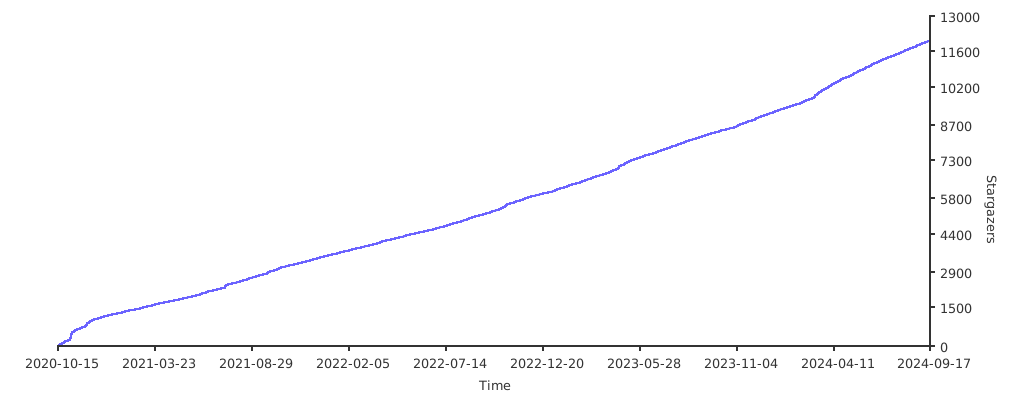](https://starchart.cc/BluePointLilac/ContextMenuManager)
[Latest]: https://github.com/BluePointLilac/ContextMenuManager/releases/latest
[GitHub Releases]: https://github.com/BluePointLilac/ContextMenuManager/releases
[Gitee Releases]: https://gitee.com/BluePointLilac/ContextMenuManager/releases
[.NET Framework]:https://dotnet.microsoft.com/download/dotnet-framework
[EasyIcon]: https://www.easyicon.net/1208132-mouse_icon.html
[AppIcon]: ContextMenuManager/Properties/AppIcon.ico
[AppImage]: ContextMenuManager/Properties/Resources/Images
[IconFont]: https://www.iconfont.cn
[PcMoe]: http://www.pcmoe.net
[Bilibili]: https://space.bilibili.com/34492771
[Donate]: ContextMenuManager/Properties/Resources/Images/Donate.png
================================================
FILE: Update.ini
================================================
;自3.3.0.0版本以后使用新的更新模块,此文件不再使用
[Update]
Version=3.3.3.0
Url=https://github.com/BluePointLilac/ContextMenuManager/releases/download/3.3.3.0/ContextMenuManager.zip
Info=【更新描述】\n(1).极大程度地优化了交互体验;\n(2).扩充了更多的程序字典;\n(3).修复已知Bug,优化大量代码。
================================================
FILE: languages/ar-DZ عربية
================================================
;This file is the display text dictionary of the ContextMenuManager program, and the newline characters in the dictionary are escaped with \r\n or \n
;If you want to help the author add other language dictionaries to this program, you can modify this text and save it in the .\config\languages folder,
;For example, save the American English dictionary as en-US.ini, and assign en-US English to [General]\Language
;Fork the project on Github or Gitee and submit an application to me, or send the file directly to the mailbox 1617859183@qq.com
[General]
AppName = مدير قائمة السياق Windows
Language = ar-DZ عربية
Translator = بوزيد زروق
TranslatorUrl = https://github.com/bouzidzerougdz
[ToolBar]
Home = الرئيسية
Type = أنواع الملفات
Rule = قواعد أخرى
Refresh = تحديث
About = حول
[SideBar]
File = ملفات
Folder = مجلدات
Directory = مجلدات بمحتوى
Background = خلفية
Desktop = سطح المكتب
Drive = محركات
AllObjects = كل الكائنات
Computer = الكمبيوتر
RecycleBin = سلة المهملات
Library = المكتبات
New = إنشاء
SendTo = إرسال إلى
OpenWith = فتح بواسطة
WinX = قائمة Win+X
LnkFile = روابط (.lnk)
UwpLnk = روابط (.lnk) لتطبيقات UWP
ExeFile = ملفات التنفيذ (.exe)
CustomExtension = تمديدات الملفات
PerceivedType = نوع الملف
DirectoryType = نوع المجلد
UnknownType = نوع الملف غير معروف
MenuAnalysis = تحليل القائمة
EnhanceMenu = تعزيز القائمة
DetailedEdit = تحرير مفصل
DragDrop = السحب والإفلات بزر الماوس الأيمن
PublicReferences = المراجع العامة
CustomRegPath = مسار التسجيل المخصص
GuidBlocked = GUID محظور
IEMenu = قائمة سياق Internet Explorer
AppSetting = إعدادات التطبيق
AppLanguage = لغة التطبيق
CheckUpdate = التحقق من التحديث
Dictionaries = مجلد البرنامج
AboutApp = معلومات عن التطبيق
Donate = التبرع للمؤلف
[StatusBar]
File = قائمة السياق لجميع أنواع الملفات
Folder = قائمة السياق لجميع أنواع المجلدات
Directory = قائمة السياق لجميع المجلدات التي تحتوي على ملفات
Background = قائمة السياق لجميع المجلدات وخلفية سطح المكتب
Desktop = قائمة السياق لسطح المكتب
Drive = قائمة السياق لجميع الأقراص
AllObjects = قائمة السياق لجميع كائنات النظام الملفاتي (بما في ذلك الملفات والمجلدات)
Computer = قائمة السياق لهذا الكمبيوتر
RecycleBin = قائمة السياق لسلة المحذوفات
Library = قائمة السياق لجميع المكتبات وخلفية مجلد المكتبات
New = قائمة "إنشاء" الفرعية لقائمة السياق للمجلدات وخلفية سطح المكتب
SendTo = قائمة "إرسال إلى" الفرعية لجميع كائنات النظام الملفاتي
OpenWith = قائمة "فتح بواسطة" الفرعية لجميع الملفات
WinX = قائمة السياق لقائمة Win+X في Windows 8-10
LnkFile = قائمة السياق للروابط
UwpLnk = قائمة السياق لتطبيقات UWP في ويندوز 8-10
ExeFile = قائمة السياق لملفات التنفيذ exe
CustomExtension = تخصيص قائمة السياق لأي امتداد ملف
PerceivedType = تخصيص قائمة السياق لأي نوع من الملفات
DirectoryType = تخصيص قائمة السياق لنوع معين من المجلدات
UnknownType = قائمة السياق لنوع الملفات الذي لا يرتبط بأي تطبيق
MenuAnalysis = تحليل موضع قائمة السياق
EnhanceMenu = إضافة بعض العناصر المفيدة إلى القائمة
DetailedEdit = جزء من قواعد القائمة الداخلية لبرامج خارجية، المضمنة في الكتالوج البرمجي
DragDrop = عنصر في القائمة عند سحب وإسقاط بزر الماوس الأيمن
PublicReferences = تعديل عناصر قائمة السياق للروابط العامة التي أضافها المستخدم
CustomRegPath = تخصيص مسار القائمة السياقية في التسجيل
GuidBlocked = مناسب لمشاريع ShellEx الصعبة التي تعتمد على GUID (بعض GUID معطلة)
IEMenu = قائمة السياق في متصفح الإنترنت إنترنت إكسبلورر
[Menu]
ChangeText = تغيير النص
ItemIcon = أيقونة العنصر
ChangeIcon = تغيير الأيقونة
ShieldIcon = أيقونة الدرع
AddIcon = إضافة أيقونة
DeleteIcon = حذف الأيقونة
ItemPosition = موقع العنصر
SetDefault = تعيين كافتراضي
SetTop = تعيين في الأعلى
SetBottom = تعيين في الأسفل
OtherAttributes = سمات أخرى
OnlyWithShift = إظهار فقط عند الضغط على Shift
OnlyInExplorer = إظهار فقط في مستكشف الملفات
NoWorkingDirectory = عدم استخدام معلومات المجلد في قائمة السياق
NeverDefault = عدم استخدام زر الفأرة الأيسر لتنفيذ الأوامر الافتراضية
ShowAsDisabledIfHidden = إذا كان العنصر معطلًا، عرضه بلون رمادي بدلاً من إخفائه
Details = تفاصيل
WebSearch = البحث عبر الإنترنت
ChangeCommand = تغيير الأمر
RunAsAdministrator = تشغيل كمسؤول
FileProperties = خصائص الملف
FileLocation = موقع الملف
RegistryLocation = موقع التسجيل
ExportRegistry = تصدير التسجيل
Delete = حذف العنصر
DeleteReference = حذف الإشارة
HandleGuid = التعامل مع GUID
CopyGuid = نسخ GUID
BlockGuid = حظر GUID
ClsidLocation = موقع CLSID
AddGuidDic = إضافة قاموس GUID
InitialData = تحرير البيانات الأولية للملف
BeforeSeparator = عرض فوق الفاصل
ChangeGroup = تغيير المجموعة
RestoreDefault = استعادة الافتراضيات
Edit = تحرير
Save = حفظ
FoldAll = طي الكل
UnfoldAll = فتح الكل
[Dialog]
Browse = استعراض
Program = برنامج
AllFiles = جميع الملفات
RegistryFile = ملف السجل
ItemText = نص العنصر
ItemCommand = أمر العنصر في القائمة
CommandArguments = وسائط الأمر
SingleMenu = قائمة مستوى واحد
MultiMenu = قائمة متعددة المستويات
Public = عام
Private = خاص
SelectAll = تحديد الكل
InputGuid = أدخل دليل GUID المحلي
AddGuidDic = إضافة دليل GUID المحلي
DeleteGuidDic = حذف دليل GUID
NoPerceivedType = نوع غير معروف
TextFile = ملف نصي
DocumentFile = مستند
ImageFile = ملف صورة
VideoFile = ملف فيديو
AudioFile = ملف صوتي
CompressedFile = ملف مضغوط
SystemFile = ملف نظام
DocumentDirectory = مجلد المستندات
ImageDirectory = مجلد الصور
VideoDirectory = مجلد الفيديو
AudioDirectory = مجلد الصوتيات
EditSubItems = تحرير العناصر الفرعية لـ "%s"
DetailedEdit = تحرير "%s" بالتفصيل
CheckReference = حدد العنصر في القائمة الذي ترغب في إضافة الرابط إليه
CheckCopy = حدد العنصر في القائمة الذي ترغب في نسخه
SelectExtension = حدد امتداد الملف
SelectPerceivedType = حدد نوع الملف
SelectDirectoryType = حدد نوع المجلد
SelectGroup = حدد المجموعة للحفظ
SelectNewItemType = حدد نوع عنصر "إنشاء"
SelectObjectType = حدد نوع الكائن للتحليل
SelectDropEffect = حدد تأثير الإسقاط الافتراضي
DefaultDropEffect = افتراضيًا (نفس القرص - نقل، قرص آخر - نسخ)
CopyDropEffect = نسخ (Ctrl)
MoveDropEffect = نقل (Shift)
CreateLinkDropEffect = إنشاء ارتباطات (Alt)
DownloadLanguages = تحميل ملفات اللغة
TranslateTool = أداة الترجمة
DefaultText = النص الافتراضي
OldTranslation = الترجمة القديمة
NewTranslation = الترجمة الجديدة
DonateInfo = يتم تحديث هذه القائمة من وقت لآخر. آخر تحديث: %date \r\n\r\nالإجمالي: %money يوان، %count أشخاص
[Message]
TextCannotBeEmpty = نص القائمة لا يمكن أن يكون فارغًا!
CommandCannotBeEmpty = أمر القائمة لا يمكن أن يكون فارغًا!
StringParsingFailed = فشل تحليل السلاسل المحلية!
TextLengthCannotExceed80 = لقد أدخلت نص قائمة طويل جدًا. الحد الأقصى للطول هو 80 حرفًا!
ConfirmDeletePermanently = هل تريد حقًا حذف هذا العنصر نهائيًا؟\r\n تنبيه: لا يمكن التراجع عن هذه العملية!
DeleteButCanRestore = هل تريد حقًا حذف هذا العنصر من سجل القائمة نهائيًا؟\r\n نظرًا لتمكين النسخ الاحتياطي التلقائي (وهو مفعل بشكل افتراضي)،\r\n يمكن استعادة هذا العنصر لاحقًا من مجلد النسخ الاحتياطي.
ConfirmDeleteReference = هل تريد حقًا حذف هذا العنصر؟\r\n تنبيه: سيصبح جميع العناصر التي تشير إليها هذا العنصر غير صالحة!
ConfirmDelete = هل تريد حقًا حذف هذا العنصر؟
ConfirmDeleteReferenced = هل تريد حقًا حذف هذا العنصر نهائيًا؟\r\n تنبيه: سيصبح جميع العناصر التي تشير إليها غير صالحة.
CannotAddNewItem = لا يمكن إضافة عنصر جديد بسبب قيود النظام. الحد الأقصى لعناصر القائمة الفرعية هو 16.
VistaUnsupportedMulti = ويندوز فيستا لا يدعم القوائم متعددة المستويات!
CannotHideSubItem = إصدار Windows الخاص بك لا يدعم إخفاء العناصر الفرعية!
UnsupportedFilename = اسم الملف غير مدعوم. ربما يكون هناك بالفعل عنصر قائمة بنفس الاسم!
NoOpenModeExtension = لا يتم ربط هذا الامتداد بأي تطبيق.\r\n انقر بزر الماوس الأيمن فوق الملف ذو هذا الامتداد لربطه بتطبيق.
CannotChangePath = لا يمكن تغيير مسار الملف!
CopiedToClipboard = تم نسخه إلى الحافظة:
MalformedGuid = GUID بتنسيق غير صالح
HasBeenAdded = تمت إضافة هذا العنصر!
SelectSubMenuMode = هذه القائمة متعددة المستويات لا تحتوي على عناصر فرعية.\r\n يوجد اختياران:\r\n ① تجعل جميع عناصر القائمة الفرعية في هذه القائمة مخصصة (الخيار الموصى به)\r\n ② يمكن لهذه القائمة متعددة المستويات الربط بنفس العناصر الفرعية للقوائم المتعددة المستويات الأخرى.\r\n انتظر الاختيار...
EditInitialData = يدعم هذا البرنامج حاليًا تحرير بيانات الملفات النصية العادية فقط (.txt، .bat، إلخ).\r\n للأنواع الأخرى من الملفات، قم بتحرير قيمة المفتاح "Data" في التسجيل بنفسك.\r\n هل ترغب في المتابعة؟
PromptIsOpenItem = هذا العنصر يحتوي على قائمة "فتح".\r\n قد تعيق العمليات الأعمى قدرتك على فتح الملفات والمجلدات.\r\n هل تريد المتابعة؟ (غير موصى به)
SelectRegPath = الخطوات:\r\n1. افتح محرر التسجيل\r\n2. انتقل إلى المسار المستهدف\r\n3. أغلق محرر التسجيل.\nهل ترغب في المتابعة؟
RestartApp = سيتم إعادة تشغيل البرنامج!
FileNotExists = الملف غير موجود!
FolderNotExists = المجلد غير موجود!
UpdateInfo = هناك إصدار جديد متاح\r\nالإصدار الحالي: %v1\r\nأحدث إصدار: %v2\r\nهل ترغب في تنفيذ عملية التحديث؟
UpdateSucceeded = تم التحديث بنجاح!
DicUpdateSucceeded = تم تحديث القواميس وملفات الترجمة.
VersionIsLatest = لديك أحدث إصدار.
WebDataReadFailed = فشل في جلب البيانات من الإنترنت.
OpenWebUrl = هل ترغب في فتح رابط URL؟
AuthorityProtection = ربما يتم حماية هذا العنصر في سجل القائمة بواسطة برنامج لضمان الأمان.\r\n لا يمكن تعطيله أو حذفه أو تعديله.
WinXSorted = تم إعادة ترقيم بعض العناصر لتحسين الترتيب.\r\n يجب إعادة تشغيل مستكشف الملفات لتطبيق التغييرات.
RestoreDefault = يرجى تأكيد استعادة العنصر إلى القيم الافتراضية.
DeleteGroup = هل ترغب حقًا في حذف هذه المجموعة نهائيًا مع جميع عناصر القائمة الخاصة بها؟
[Tip]
RestartExplorer = عند إعادة تشغيل المستكشف، سيومض سطح المكتب. هذا أمر طبيعي.\r\n كما ستدخل التغييرات حيز التنفيذ أيضًا عند إعادة تشغيل الكمبيوتر وتسجيل الخروج والدخول للنظام.
CustomFolder = إيقاف تشغيل هذا الخيار سيقوم أيضًا بإيقاف تشغيل علامة التبويب المخصصة في لوحة خصائص كائن نظام الملفات.
SendToDrive = يعمل فقط في حالة توصيل قرص قابل للإزالة.\r\n يعرض كل أقسام القرص القابل للإزالة.
BuildSendtoMenu = إيقاف تشغيل هذا الخيار سيسرع ظهور القائمة الرئيسية، ولكن سيبطئ ظهور قائمة "إرسال" الفرعية.
InvalidItem = إذا كان العنصر غير صالح، سيتم إخفاء جميع عناصر القائمة تحت هذا العنصر (يُنصح بحذفه).
EditSubItems = تحرير عناصر القائمة الفرعية
AddReference = إضافة مرجع من مشروع الإشارات العامة
AddFromPublic = نسخ العنصر من العام
AddFromParentMenu = نسخ العنصر من القائمة الأم
AddSeparator = إضافة فاصل
DeleteGuidDic = حذف القاموس المحلي لـ GUID الذي أضافه المستخدم
LockNewMenu = إذا تم تمكينه، فلن تتمكن البرامج الطرفية من إضافة عناصر جديدة وفرز العناصر الحالية (ويمكن إغلاقه واستعادته)
DropOrSelectObject = إسقاط أو تحديد الكائن
ConfigPath = بعد تغيير مسار حفظ ملف التكوين والبيانات، قد تصبح بعض القوائم المحسنة التي تم تمكينها غير صالحة.\r\n يمكن إعادة تمكينها في القائمة المحسنة.
CommandFiles = هذا الأمر يعتمد على ملف التكوين. عند نقل ملف التكوين، سيصبح هذا العنصر من القائمة غير صالح. يجب تمكينه مرة أخرى.
CreateGroup = إنشاء مجموعة جديدة
ImmediatelyCheck = التحقق على الفور
[Other]
CustomFolder = تخصيص هذا المجلد...
BuildSendtoMenu = إنشاء قائمة "إرسال" الفرعية
NewItem = إنشاء عنصر قائمة جديد
AddGuidBlockedItem = إضافة عنصر GUID محظور
LockNewMenu = قفل القائمة الجديدة
InvalidItem = عنصر القائمة غير صالح:
Separator = >>>>>> فاصل <<<<<<
SelectRegPath = حدد مسار التسجيل
CurrentExtension = الملحق المحدد حاليًا للملف - %s
CurrentPerceivedType = نوع الملف المحدد حاليًا - %s
CurrentDirectoryType = نوع المجلد المحدد حاليًا - %s
CurrentFilePath = المسار الحالي للملف:
CurrentRegPath = المسار الحالي في التسجيل:
WinXSortable = ترتيب قائمة Win+X
ShowFilePath = إظهار مسار الملف في شريط الحالة
OpenMoreRegedit = فتح محرر التسجيل في نافذة منفصلة
OpenMoreExplorer = فتح المستكشف في نافذة منفصلة
RestartExplorer = لجعل التغييرات سارية المفعول، يجب إعادة تشغيل مستكشف Windows.
SwitchDictionaries = التبديل بين القواميس
WebDictionaries = قواميس الويب
UserDictionaries = القواميس الخاصة
DictionaryDescription = القواميس
GuidInfosDictionary = معلومات GUID
UwpMode = وضع UWP
Translators = المترجمون
DonationList = قائمة التبرعات
ConfigPath = مسار حفظ ملفات التكوين والبيانات
AppDataDir = مجلد التطبيقات
AppDir = مجلد البرنامج
AutoBackup = نسخ احتياطي تلقائي للتسجيل عند حذف القائمة
SetUpdateFrequency = تحديد تردد التحديث
OnceAWeek = مرة كل أسبوع
OnceAMonth = مرة شهريًا
OnceASeason = مرة كل ثلاثة أشهر
NeverCheck = أبدًا
SetRequestRepo = طلب مستودع
ProtectOpenItem = حماية عنصر القائمة "فتح"
WebSearchEngine = محرك البحث على الويب
CustomEngine = مخصص...
SetCustomEngine = تحديد محرك البحث (استخدم %s بدلاً من الكلمات المرادة البحث عنها)
HideDisabledItems = إخفاء العناصر المعطلة
HideSysStoreItems = إخفاء عناصر متجر النظام
SetPerceivedType = تعيين نوع %s...
SetDefaultDropEffect = عند السحب والإفلات -
TopMost = دائمًا في المقدمة
AboutApp = [التوافق] \r\n 1 = متوافق مع ويندوز 10، 8.1، 8، 7، فيستا \r\n 2 = متوافق مع نظام التشغيل بنية 64 بت و 32 بت\r\n 3 = متوافق مع عالية الدقة (High DPI)، مثالي بنسبة 150%\r\n\r\n[المصدر المفتوح]\r\n 1 = لغات البرمجة: C#، Winform، رخصة MIT\r\n 2 = مستودع Github: https://github.com/BluePointLilac/ContextMenuManager \r\n 3 = مستودع Gitee: https://gitee.com/BluePointLilac/ContextMenuManager \r\n\r\n[تلميحات]\r\n 1 = يقوم هذا البرنامج بقراءة/كتابة كمية كبيرة من ملفات النظام وإدخالات التسجيل، وقد يتم اعتراضه من قبل Windows Defender لأن هذه العمليات حساسة للغاية، يرجى إضافة هذا البرنامج يدويًا إلى قائمة الاستثناءات\r\n\r\n 2 = قد تتأثر بعض العناصر الخاصة في القوائم بعوامل أخرى، قد لا تظهر في القائمة المنسدلة. \r\n ومع ذلك، قد تظهر لا تزال كما مفعلة في هذا البرنامج وفقًا للقواعد العامة المستخدمة من قبل البرنامج. هذا أمر طبيعي. \r\n\r\n 3 = قد يكون طريقة تعطيل القائمة لكل برنامج إدارة قائمة نصية مختلفة. لا تستخدم عدة برامج لإدارة قائمة السياق في نفس الوقت. \r\n معظم البرامج تستخدم طريقة بسيطة ومتقلبة للنسخ الاحتياطي والحذف. يستخدم هذا البرنامج القيم المقدمة من نظام التشغيل لإخفاء المفاتيح قدر الإمكان. \r\n إذا كنت قد استخدمت برنامجًا آخر لتعطيل عنصر القائمة من قبل، يرجى استخدام ذلك البرنامج لاستعادته، وإلا قد لا تتمكن من رؤيته في هذا البرنامج. \r\n\r\n 4 = لم يتم تصميم هذا البرنامج لتنظيف البرامج التي تمت إزالتها، لكن يمكن أن يساعدك في تحديد مواقع التسجيل والملفات لمثل هذه العناصر في القوائم. \r\n يمكنك فعل ما تشاء. إذا كنت مبتدئًا فقط (أو غير متأكد من بعض الخيارات)، فقم بتبديل مفتاح التمكين/التعطيل فقط (لتقليل مخاطر تلف نظام التشغيل).
Dictionaries = [وصف القاموس] \r\n يحتوي هذا البرنامج على عدة ملفات قاموس، وكل قاموس يحتوي على قاموس مستخدم وقاموس شبكة. \r\n إذا كنت ترغب في إضافة قاموس إلى هذا البرنامج، يمكنك النقر بزر الماوس الأيمن لحفظ الملف واتباع التعليمات الموجودة في الملف لإضافته. \r\n أرسل قاموسك إلى بريدي الإلكتروني أو قم بتقديمه على GitHub للمساهمة في هذا المشروع. \r\n العلامة التبويب اليمنى هي محتوى القاموس الأصلي، يمكنك تبديل العلامة التبويبية لعرضها \r\n\r\n[محتوى القاموس]\n 1 = قاموس لغة عرض نص البرنامج (مجلد اللغات) \r\n 2 = قاموس أيقونات نص الدليل ShellEx (GuidInfosDic.ini) \r\n 3 = قاموس الإعدادات الداخلية لقائمة برامج الطرف الثالث (DetailedEditDic.xml) \r\n 4 = قاموس العناصر المحسّنة في القائمة (EnhanceMenusDic.xml)
Donate = هذا البرنامج مجاني تمامًا. إذا وجدت هذا البرنامج مفيدًا، \r\n يمكنك التبرع عن طريق مسح الرمز الشريطي أدناه (WeChat، Alipay، Tencent QQ).\r\n يمكنك تحديد المبلغ بناءً على اختيارك. شكرًا لدعمك! كما أتمنى أن تفكر \r\n في إعطاء هذا المشروع نجمة على GitHub أو Gitee (هذا يعني الكثير بالنسبة لي!).
================================================
FILE: languages/de-DE.ini
================================================
;This file is the display text dictionary of the ContextMenuManager program, and the newline characters in the dictionary are escaped with \r\n or \n
;If you want to help the author add other language dictionaries to this program, you can modify this text and save it in the .\config\languages folder,
;For example, save the American English dictionary as en-US.ini, and assign en-US English to [General]\Language
;Fork the project on Github or Gitee and submit an application to me, or send the file directly to the mailbox 1617859183@qq.com
[General]
AppName = Windows Context Menu Manager
Language = de-DE German
Translator = akaydev-coder (Deepl) \r\n Alex K.
TranslatorUrl = https://github.com/akaydev-coder
[ToolBar]
Home = Home
Type = Dateitypen
Rule = Andere Regeln
Refresh = Aktualisieren
About = Über
[SideBar]
File = Datei
Folder = Ordner
Directory = Verzeichnis
Background = Hintergrund
Desktop = Desktop
Drive = Laufwerk
AllObjects = Alle Objekte
Computer = Dieser PC
RecycleBin = Papierkorb
Library = Bibliothek
New = Neu
SendTo = Senden an
OpenWith = Öffnen mit
WinX = Win+X
LnkFile = .lnk-Datei
UwpLnk = UWP .lnk
ExeFile = .exe-Dateien
CustomExtension = Benutzerdefinierte Erweiterung
PerceivedType = Wahrgenommener Dateityp
DirectoryType = Ordnertyp
UnknownType = Unbekannter Dateityp
MenuAnalysis = Menü-Analyse
EnhanceMenu = Menü erweitern
DetailedEdit = Detaillierte Bearbeitung
DragDrop = Ziehen und Ablegen
PublicReferences = ÖÖffentliche Referenzen
CustomRegPath = Benutzerdefinierter Registrierungspfad
GuidBlocked = GUID blockiert
IEMenu = IE-Kontextmenü
AppSetting = Einstellungen
AppLanguage = Sprache
CheckUpdate = Update prüfen
Dictionaries = Wörterbücher
AboutApp = Software-Informationen
Donate = Spende an den Autor
[StatusBar]
File = Kontextmenü für alle Dateitypen
Folder = Kontextmenü für alle Ordnertypen
Directory = Kontextmenü für alle Datei-Ordner
Background = Kontextmenü für alle Ordner- und Desktop-Hintergründe
Desktop = Kontextmenü für den Desktop
Drive = Kontextmenü für alle Laufwerke
AllObjects = Kontextmenü für alle Dateisystemobjekte (einschließlich Dateien und Ordner)
Computer = Kontextmenü für diesen PC
RecycleBin = Kontextmenü für den Papierkorb
Library = Kontextmenü für alle Bibliotheken und Bibliotheksordnerhintergründe
New = Menü "Neu" für das Kontextmenü für Ordner und Desktop Hintergrund
SendTo = Menü "Senden an" für alle Dateisystemobjekte
OpenWith = Menü "Öffnen mit" für alle Dateien
WinX = Win8-Win10 Kontextmenü für das Win+X Startmenü
LnkFile = Kontextmenü für alle Shortcuts
UwpLnk = Hinzufügen einiger nützlicher Menüpunkte
ExeFile = Detaillierte Einstellungsregeln für die internen Menüs des Systems undanderer Programme
CustomExtension = Menüpunkt beim Rechtsklick und Ziehen einer Datei
PerceivedType = Bearbeiten der Shell-Typ-Untermenüeinträge von öffentlichen Referenzen,die von Benutzern hinzugefügt wurden
DirectoryType = Anpassen des Kontextmenü-Registrierungspfades
UnknownType = Geeignet für hartnäckige ShellEx-Projekte, die auf GUIDs angewiesen sind(einige GUIDs sind deaktiviert)
MenuAnalysis = Kontextmenü im Internet Explorer
EnhanceMenu = Hinzufügen einiger nützlicher Menüpunkte
DetailedEdit = Detaillierte Einstellungsregeln für die internen Menüs des Systems und anderer Programme
DragDrop = Menüpunkt beim Rechtsklick und Ziehen einer Datei
PublicReferences = Bearbeiten der Shell-Typ-Untermenüeinträge von öffentlichen Referenzen, die von Benutzern hinzugefügt wurden
CustomRegPath = Anpassen des Kontextmenü-Registrierungspfades
GuidBlocked = Geeignet für hartnäckige ShellEx-Projekte, die auf GUIDs angewiesen sind (einige GUIDs sind deaktiviert)
IEMenu = Kontextmenü im Internet Explorer
[Menu]
ChangeText = Umbenennen
ItemIcon = Icon des Elements
ChangeIcon = Ändere Icon
ShieldIcon = Icon "Schild"
AddIcon = Icon Hinzufügen
DeleteIcon = Icon Löschen
ItemPosition = Position des Elements
SetDefault = Standard
SetTop = Oben anordnen
SetBottom = Unten anordnen
OtherAttributes = Andere Eigenschaften
OnlyWithShift = Nur bei gedrückter Umschalttaste anzeigen
OnlyInExplorer = Nur im Datei-Explorer anzeigen
NoWorkingDirectory = Die Ordnerinformationen nicht im Kontextmenü verwenden
NeverDefault = Standardmäßig niemals die linke Taste zum Ausführen von Befehlen verwenden
ShowAsDisabledIfHidden = Wenn ein Element deaktiviert ist, wird es ausgegraut, anstatt es auszublenden
Details = Details
WebSearch = Web Suche
ChangeCommand = Befehl ändern
RunAsAdministrator = Als Administrator ausführen
FileProperties = Datei-Eigenschaften
FileLocation = Speicherort der Datei
RegistryLocation = Speicherort in der Registrierung
ExportRegistry = Registrierung exportieren
Delete = Element löschen
DeleteReference = Referenz löschen
HandleGuid = GUID-Aktionen
CopyGuid = GUID kopieren
BlockGuid = GUID sperren
ClsidLocation = CLSID Speicherort
AddGuidDic = GUID Wörterbuch hinzufügen
InitialData = Datei-Initialdaten bearbeiten
BeforeSeparator = Wird oberhalb des Trennzeichens angezeigt
ChangeGroup = Gruppe ändern
RestoreDefault = Standard wiederherstellen
Edit = bearbeiten
Save = Speichern
FoldAll = Alles einklappen
UnfoldAll = Alle aufklappen
[Dialog]
Browse = Durchsuchen
Program = Programm
AllFiles = Alle Dateien
RegistryFile = Registrierungsdatei
ItemText = Element Text
ItemCommand = Menü-Befehl
CommandArguments = Befehlsargumente
SingleMenu = Einstufiges Menü
MultiMenu = Mehrstufiges Menü
Public = Öffentlich
Private = Privat
SelectAll = Alles auswählen
InputGuid = Lokales GUID-Wörterbuch eingeben
AddGuidDic = Lokales GUID-Wörterbuch hinzufügen
DeleteGuidDic = GUID-Wörterbuch löschen
NoPerceivedType = Typ unbekannt
TextFile = Textdatei
DocumentFile = Dokument-Datei
ImageFile = Bilddatei
VideoFile = Videodatei
AudioFile = Audiodatei
CompressedFile = Komprimierte Datei
SystemFile = System-Datei
DocumentDirectory = Dokumentenordner
ImageDirectory = Bild-Ordner
VideoDirectory = Video-Ordner
AudioDirectory = Audio-Ordner
EditSubItems = Untermenüpunkte für "%s" bearbeiten
DetailedEdit = Bearbeiten Sie "%s" im Detail
CheckReference = Markieren Sie den Menüpunkt, zu dem Sie einen Verweis hinzufügen möchten
CheckCopy = Markieren Sie den Menüpunkt, den Sie kopieren möchten
SelectExtension = Bitte wählen Sie eine Dateierweiterung
SelectPerceivedType = Bitte wählen Sie einen bestimmten Dateityp aus
SelectDirectoryType = Bitte wählen Sie einen bestimmten Ordnertyp aus
SelectGroup = Wählen Sie, um die Gruppe zu speichern
SelectNewItemType = Wählen Sie "Neu" als Objekttyp
SelectObjectType = Wählen Sie den zu analysierenden Objekttyp
SelectDropEffect = Standard-Drop-Effekt auswählen
DefaultDropEffect = Standard (in das gleiche Laufwerk verschieben、von einem anderen Laufwerk kopieren)
CopyDropEffect = Kopieren(Strg)
MoveDropEffect = Verschieben(Shift)
CreateLinkDropEffect = Verknüpfung erstellen(Alt)
DownloadLanguages = Mehrsprachige Dateien herunterladen
TranslateTool = Übersetzungstool
DefaultText = Standardtext
OldTranslation = Alte Übersetzung
NewTranslation = Neue Übersetzung
DonateInfo = Diese Liste wird von Zeit zu Zeit aktualisiert, letzte Aktualisierung: %date \r\n\r\nSumme: %money Yuan, %count Personen
[Message]
TextCannotBeEmpty = Der Menütext darf nicht leer sein!
CommandCannotBeEmpty = Der Menübefehl darf nicht leer sein!
StringParsingFailed = Das Analysieren der lokalisierten Zeichenfolge ist fehlgeschlagen!
TextLengthCannotExceed80 = Der von Ihnen eingegebene Menütext ist zu lang. Die Länge darf 80 Zeichen nicht überschreiten!
ConfirmDeletePermanently = Sind Sie sicher, dass Sie dieses Element dauerhaft löschen möchten? \r\n Seien Sie vorsichtig, dieser Vorgang kann nicht rückgängig gemacht werden!
DeleteButCanRestore = Sind Sie sicher, dass Sie den Registrierungseintrag dieses Menüs löschen wollen? \r\n Da die automatische Sicherung aktiviert ist (standardmäßig aktiviert), \r\n kann es nach dem Löschen aus dem Sicherungsordner wiederhergestellt werden.
ConfirmDeleteReference = Sind Sie sicher, dass Sie diesen Eintrag löschen möchten? \r\n Seien Sie vorsichtig, alle Einträge, die auf diesen Eintrag verweisen, werden ungültig!
ConfirmDelete = Sind Sie sicher, dass Sie diesen Eintrag löschen wollen?
ConfirmDeleteReferenced = Sind Sie sicher, dass Sie diesen Eintrag endgültig löschen wollen? \r\n Bitte beachten Sie, dass alle Einträge, die auf diesen Eintrag verweisen, ungültig werden.
CannotAddNewItem = Hinzufügen nicht möglich! Das System begrenzt die maximale Anzahl von Untermenüpunkten auf 16.
VistaUnsupportedMulti = Windows Vista unterstützt keine mehrstufigen Menüs!
CannotHideSubItem = Ihre Version von Windows unterstützt das Ausblenden von Untermenu Einträgen nicht!
UnsupportedFilename = Nicht unterstützter Dateiname. \r\n Ein Menüpunkt mit demselben Dateinamen ist möglicherweise bereits vorhanden!
NoOpenModeExtension = Es gibt keine Anwendung, die mit dieser Erweiterung verknüpft ist. \r\n Klicken Sie mit der rechten Maustaste auf eine Datei dieses Typs mit dieser Erweiterung, um sie mit einer Anwendung zu verknüpfen!
CannotChangePath = Dateipfadänderungen sind nicht erlaubt!
CopiedToClipboard = In die Zwischenablage kopiert:
MalformedGuid = GUID mit falschem Format
HasBeenAdded = Dieses Element wurde hinzugefügt!
SelectSubMenuMode = Die Anzahl der Unterpunkte im aktuellen mehrstufigen Menü ist 0. Es gibt zwei Möglichkeiten: \r\n ① Alle Untermenüpunkte in diesem mehrstufigen Menü sind privat (empfohlen),\r\n ② Das mehrstufige Menü kann auf dieselben Unterpunkte wie andere mehrstufige Menüs verweisen. \r\n Anspruchsvolle Auswahl...
EditInitialData = Dieses Programm unterstützt derzeit nur die Bearbeitung der Anfangsdaten von reinen Textdateien (.txt, .bat, etc.).\r\n Für andere Dateitypen bearbeiten Sie bitte den Wert des Registrierungsschlüssels "Daten" selbst.\r\n Bestätigen Sie, wenn Sie den Vorgang fortsetzen möchten.
PromptIsOpenItem = Dieses Element verfügt über ein "Öffnen"-Menü,\r\n Blindvorgänge verhindern möglicherweise das Öffnen von Dateien und Ordnern,\r\n Bestätigen Sie, ob Sie den Vorgang fortsetzen möchten. (Nicht empfohlen)
SelectRegPath = Schritte: \r\n1. Öffnen Sie den Registrierungseditor\r\n2. Navigieren Sie zum Zielpfad\r\n3. Schließen Sie den Registrierungseditor\nFortfahren?
RestartApp = Das Programm wird neu gestartet!
FileNotExists = Die Datei ist nicht vorhanden!
FolderNotExists = Der Ordner ist nicht vorhanden!
UpdateInfo = Eine neuere Version ist verfügbar\r\nAktuelle Version%v1\r\nNeueste Version%v2\r\nMöchten Sie auf die neueste Version aktualisieren?
UpdateSucceeded = Update erfolgreich!
DicUpdateSucceeded = Wörterbücher und mehrsprachige Dateien werden aktualisiert.
VersionIsLatest = Die aktuelle Version ist die neueste.
WebDataReadFailed = Die Daten konnten nicht aus dem Internet abgerufen werden.
OpenWebUrl = Möchten Sie die URL öffnen?
AuthorityProtection = Dieses Menüelement ist möglicherweise durch Sicherheitssoftware geschützt. Es kann nicht deaktiviert, gelöscht oder anderweitig personalisiert werden.
WinXSorted = Einige Elemente wurden neu nummeriert, um die Sortierfunktion zu optimieren.\r\n Sie müssen den Datei-Explorer neu starten, bevor die Änderungen wirksam werden.
RestoreDefault = Bestätigen Sie, um den Standardmenüpunkt wiederherzustellen.
DeleteGroup = Sind Sie sicher, dass Sie diese Gruppe und alle darin enthaltenen Menüpunkte dauerhaft löschen möchten?
[Tip]
RestartExplorer = Nach dem Neustart des Explorers flackert der Desktop eine Zeit lang. Das ist normal.\r\n Durch einen Neustart oder das An- und Abmelden am PC werden die Änderungen ebenfalls wirksam.
CustomFolder = Wenn Sie diese Option deaktivieren, wird auch die benutzerdefinierte Registerkarte \r\n in den Eigenschaften des Dateisystemobjekts ausgeschaltet.
SendToDrive = Funktioniert nur, wenn ein Wechseldatenträger angeschlossen ist.\r\n Zeigt alle Partitionen des Wechseldatenträgers an.
BuildSendtoMenu = Die Deaktivierung dieser Option beschleunigt das Aufklappen des Hauptmenüs \r\n verlangsamt aber die Aufklappgeschwindigkeit des Untermenüs "Senden an".
InvalidItem = Wenn ein Menüpunkt ungültig ist, werden alle Menüpunkte \r\n unter diesem Punkt ausgeblendet (Löschung empfohlen).
EditSubItems = Untermenüpunkte bearbeiten
AddReference = Referenz aus öffentlichem Referenzprojekt hinzufügen
AddFromPublic = Element aus öffentlichem Projekt kopieren
AddFromParentMenu = Eintrag aus dem übergeordneten Menü kopieren
AddSeparator = Trennzeichen hinzufügen
DeleteGuidDic = Löschen des vom Benutzer hinzugefügten lokalen GUID-Wörterbuchs
LockNewMenu = Sobald die Funktion aktiviert ist, kann sie Programme von Drittanbietern daran hindern, Objekte hinzuzufügen, und sie kann vorhandene Objekte sortieren (schließen und wiederherstellen).
DropOrSelectObject = ein Objekt ablegen oder auswählen
ConfigPath = Nach einer Änderung des Speicherpfads der Konfigurations- und Datendatei werden einige der aktivierten erweiterten Menüs ungültig. Sie können im erweiterten Menü wieder aktiviert werden.
CommandFiles = Dieser Befehl ist von der Konfigurationsdatei abhängig. Wenn Sie den Speicherort der Konfigurationsdatei verschieben, wird dieses Menüelement ungültig. Aktivieren Sie ihn wieder.
CreateGroup = Eine neue Gruppe erstellen
ImmediatelyCheck = Jetzt prüfen
[Other]
CustomFolder = Diesen &Ordner anpassen...
BuildSendtoMenu = Untermenü "Senden an" erstellen
NewItem = Neuen Menüpunkt erstellen
AddGuidBlockedItem = GUID-gesperrtes Element hinzufügen
LockNewMenu = Das neue Menü sperren
InvalidItem = Ungültiger Menüpunkt:
Separator = >>>>>> Separator <<<<<<
SelectRegPath = Einen Registrierungspfad auswählen
CurrentExtension = Die aktuell ausgewählte Dateierweiterung ist %s
CurrentPerceivedType = Der aktuell ausgewählte wahrgenommene Dateityp ist %s
CurrentDirectoryType = Der aktuell gewählte wahrgenommene Ordnertyp ist %s
CurrentFilePath = Aktueller Dateipfad:
CurrentRegPath = Aktueller Registrierungspfad:
WinXSortable = Win+X-Menü-Sortierung einschalten
ShowFilePath = Dateipfad in der Statusleiste anzeigen
OpenMoreRegedit = Registry-Editor in einem separaten Fenster öffnen
OpenMoreExplorer = Öffnen des Datei-Explorers in einem separaten Fenster
RestartExplorer = Der Windows Explorer muss neu gestartet werden, damit die Änderungen wirksam werden.
SwitchDictionaries = Wörterbuch wechseln
WebDictionaries = Web-Wörterbücher
UserDictionaries = Benutzer-Wörterbücher
DictionaryDescription = Wörterbuchbeschreibung
GuidInfosDictionary = GUID-Informationen
UwpMode = UWP-Module
Translators = Übersetzer
DonationList = Spendenliste
ConfigPath = Speicherort der Konfigurations- und Datendateien
AppDataDir = App Daten Verzeichnis
AppDir = Programmverzeichnis
AutoBackup = Automatisches Sichern der Registrierung beim Löschen von Menüs
SetUpdateFrequency = Wie oft die Aktualisierung überprüft werden soll
OnceAWeek = Einmal pro Woche
OnceAMonth = Einmal im Monat
OnceASeason = Einmal alle drei Monate
NeverCheck = Niemals
SetRequestRepo = Repo anfordern
ProtectOpenItem = Den Menüpunkt "Öffnen" schützen
WebSearchEngine = Suchmaschine, die für die Websuche verwendet wird
CustomEngine = Benutzerdefiniert...
SetCustomEngine = Suchmaschine definieren (%s anstelle von Suchbegriffen verwenden)
HideDisabledItems = Deaktivierte Elemente ausblenden
HideSysStoreItems = Systemeinträge ausblenden
SetPerceivedType = %s wahrgenommenen Typ einstellen...
SetDefaultDropEffect = Standard-Dropeffekt einstellen
TopMost = Immer an erster Stelle
AboutApp = [Kompatibilität] \r\n 1 = Kompatibel mit Win10、8.1、8、7、Vista \r\n 2 = Kompatibel mit 64bit、32bit OS\r\n 3 = High DPI kompatibel, optimal mit 150%\r\n\r\n[Open Source]\r\n 1 = Programmiersprachen: C sharp,Winform,MIT License\r\n 2 = Github repo:https://github.com/BluePointLilac/ContextMenuManager \r\n 3 = Gitee repo:https://gitee. com/BluePointLilac/ContextMenuManager \r\n\r\n[Hinweise]\r\n 1 = Dieses Programm liest/schreibt eine große Menge an Systemdateien und Registrierungseinträgen, \r\n es kann von Windows Defender markiert werden, da diese Vorgänge hochsensibel sind, bitte fügen Sie dieses Programm manuell zur Ausschlussliste hinzu\r\n\r\n 2 = Einige spezielle Menüelemente können durch andere Faktoren beeinflusst werden, sie werden möglicherweise nicht im Kontextmenü angezeigt. \r\n Es kann jedoch sein, dass sie in diesem Programm gemäß den allgemeinen Regeln, die das Programm verwendet, weiterhin als aktiviert angezeigt werden. Dies ist normal. \r\n\r\n 3 = Die Methode zum Deaktivieren des Menüs kann für jedes Kontextmenü-Verwaltungsprogramm unterschiedlich sein. Verwenden Sie nicht mehrere Kontextmenü-Verwaltungsprogramme gleichzeitig. \r\n Die meisten Programme verwenden eine einfache und flüchtige Sicherungs-Löschmethode. Dieses Programm verwendet die vom Betriebssystem bereitgestellten Schlüsselwerte, um Tasten so weit wie möglich auszublenden. \r\n Wenn Sie zuvor mit anderen Programmen einen Menüpunkt deaktiviert haben, verwenden Sie bitte dieses Programm, um ihn wiederherzustellen, da Sie ihn sonst in diesem Programm möglicherweise nicht sehen können. \r\n\r\n 4 = Dieses Programm ist nicht dafür gedacht, Programme zu bereinigen, die deinstalliert wurden, aber es kann Ihnen dabei helfen, die Registrierung und die Dateispeicherorte solcher Menüpunkte zu finden.\r\n Sie können tun, was Sie wollen. Wenn Sie ein Neuling sind (oder sich bei einigen Optionen unsicher sind), schalten Sie nur den Schalter enable\disable um (um das Risiko einer Beschädigung des Betriebssystems zu verringern).
Dictionaries = [Wörterbuchbeschreibung] \r\n Dieses Programm hat mehrere Wörterbuchdateien, und jedes Wörterbuch hat ein Benutzerwörterbuch und ein Netzwerkwörterbuch. \r\n Wenn Sie ein Wörterbuch zu diesem Programm hinzufügen möchten, können Sie mit der rechten Maustaste auf die Datei klicken, um sie zu speichern, und den Anweisungen in der Datei folgen, um sie hinzuzufügen. \r\n Senden Sie Ihr Wörterbuch an meine E-Mail oder senden Sie es an GitHub, um Ihren Beitrag zu diesem Projekt zu leisten. \r\n Die rechte Registerkarte ist der ursprüngliche Inhalt des Wörterbuchs, Sie können die Registerkarte umschalten, um ihn zu sehen \r\n\r\n[Wörterbuchinhalt]\r\n 1 = Wörterbuch für die Programmanzeigetext-Sprache (Verzeichnis Languages) \r\n 2 = Wörterbuch für den ShellEx-Menüpunkt GUID-Text-Icon (GuidInfosDic. ini) \r\n 3 = Wörterbuch für interne Einstellungen von Drittanbieterprogrammen (DetailedEditDic.xml) \r\n 4 = Wörterbuch für erweiterte Menüelemente (EnhanceMenusDic.xml)
Donate = Dieses Programm ist völlig kostenlos. Wenn Sie diese Software hilfreich finden,\r\n können Sie spenden, indem Sie den QR-Code unten scannen (WeChat, Alipay, Tencent QQ).\r\n Der Betrag ist Ihnen überlassen. Vielen Dank für Ihre Unterstützung! Ich hoffe auch, dass Sie in Betracht ziehen, dieses Projekt auf Github oder Gitee zu veröffentlichen (das bedeutet mir sehr viel!).
================================================
FILE: languages/en-US.ini
================================================
;This file is the display text dictionary of the ContextMenuManager program, and the newline characters in the dictionary are escaped with \r\n or \n
;If you want to help the author add other language dictionaries to this program, you can modify this text and save it in the .\config\languages folder,
;For example, save the American English dictionary as en-US.ini, and assign en-US English to [General]\Language
;Fork the project on Github or Gitee and submit an application to me, or send the file directly to the mailbox 1617859183@qq.com
[General]
AppName = Windows Context Menu Manager
Language = en-US English
Translator = mimmiepower (Google Translate) \r\n Geoff B. \r\n Jing
TranslatorUrl = https://github.com/mimmiechan \r\n https://github.com/geoff-B \r\n https://github.com/delgh1
[ToolBar]
Home = Home
Type = File Types
Rule = Other Rules
Refresh = Refresh
About = About
[SideBar]
File = File
Folder = Folder
Directory = Directory
Background = Background
Desktop = Desktop
Drive = Disk
AllObjects = All objects
Computer = This PC
RecycleBin = Recycle Bin
Library = Library
New = New
SendTo = Send to
OpenWith = Open with
WinX = Win+X
LnkFile = .lnk file
UwpLnk = UWP .lnk
ExeFile = .exe files
CustomExtension = Specific file type
PerceivedType = Perceived file type
DirectoryType = Folder type
UnknownType = Unknown file type
MenuAnalysis = Menu Analysis
EnhanceMenu = Menu ehancements
DetailedEdit = Detailed editing
DragDrop = Drag drop
PublicReferences = Public references
CustomRegPath = Custom registry path
GuidBlocked = GUID blocked
IEMenu = IE context menu
AppSetting = Settings
AppLanguage = Language
CheckUpdate = Check Update
Dictionaries = Program folder
AboutApp = Software information
Donate = Donate to the author
[StatusBar]
File = Context menu for all file types
Folder = Context menu for all folder types
Directory = Context menu for all file folders
Background = Context menu for all folder and desktop backgrounds
Desktop = Context menu for the Desktop
Drive = Context menu for all disk drives
AllObjects = Context menu for all file system objects (including files and folders)
Computer = Context menu for This PC
RecycleBin = Context menu for the Recycle Bin
Library = Context menu for all Libraries and Library folder background
New = "New" menu for the context menu for folder and desktop background
SendTo = "Send to" menu for all file system objects
OpenWith = "Open With" menu for all files
WinX = Win8-Win10 context menu for the Win+X Start Menu
LnkFile = Context menu for all shortcuts
UwpLnk = Context menu for all Win10, Win8 UWP apps
ExeFile = Context menu for .exe executable files
CustomExtension = Customize the context menu for any file type
PerceivedType = Customize the context menu for the specified perceived file
DirectoryType = Customize the context menu for the specified folder type
UnknownType = Context menu for file with a file type that are not associated with any app
MenuAnalysis = Analyze the context menu location
EnhanceMenu = Add some useful menu items
DetailedEdit = Detailed setting rules for the internal menus of the system and other programs
DragDrop = Menu item when right-clicking and dragging a file
PublicReferences = Edit the Shell type sub-menu items of public references added by users
CustomRegPath = Costomize the context menu registry path
GuidBlocked = Suitable for stubborn ShellEx projects that rely on GUIDs (some GUIDs are disabled)
IEMenu = Context menu in Internet Explorer
[Menu]
ChangeText = Rename
ItemIcon = Item icon
ChangeIcon = Change icon
ShieldIcon = Shield icon
AddIcon = Add icon
DeleteIcon = Delete icon
ItemPosition = Item location
SetDefault = Default
SetTop = Put on top
SetBottom = Put on the bottom
OtherAttributes = Other properties
OnlyWithShift = Show only while holding Shift
OnlyInExplorer = Show only in File Explorer
NoWorkingDirectory = Do not use the folder information in the context menu
NeverDefault = Never use the left button to execute commands by default
ShowAsDisabledIfHidden = If item is deactivated, gray out instead of hiding it
Details = Details
WebSearch = Web search
ChangeCommand = Change command
RunAsAdministrator = Run as administrator
FileProperties = File properties
FileLocation = File location
RegistryLocation = Registry location
ExportRegistry = Export registry
Delete = Delete item
DeleteReference = Delete reference
HandleGuid = GUID actions
CopyGuid = Copy GUID
BlockGuid = Block GUID
ClsidLocation = CLSID location
AddGuidDic = Add GUID dictionary
InitialData = Edit file initial data
BeforeSeparator = Displayed above the separator
ChangeGroup = Change group
RestoreDefault = Restore default
Edit = Edit
Save = Save
FoldAll = Fold all
UnfoldAll = Unfold all
[Dialog]
Browse = Browse
Program = Program
AllFiles = All files
RegistryFile = Registry file
ItemText = Item text
ItemCommand = Menu command
CommandArguments = Command arguments
SingleMenu = Single-level menu
MultiMenu = Multi-level menu
Public = Public
Private = Private
SelectAll = Select all
InputGuid = Enter GUID local dictionary
AddGuidDic = Add GUID local dictionary
DeleteGuidDic = Delete GUID dictionary
NoPerceivedType = Type unknown
TextFile = Text file
DocumentFile = Document file
ImageFile = Image file
VideoFile = Video file
AudioFile = Audio file
CompressedFile = Compressed file
SystemFile = System file
DocumentDirectory = Document folder
ImageDirectory = Image folder
VideoDirectory = Video folder
AudioDirectory = Audio folder
EditSubItems = Edit sub-menu items for "%s"
DetailedEdit = Edit "%s" in detail
CheckReference = Check the menu item to which you want to add a reference to
CheckCopy = Check the menu item you want to copy
SelectExtension = Please select a file extension
SelectPerceivedType = Please select a perceived file type
SelectDirectoryType = Please select a perceived folder type
SelectGroup = Select to save the group
SelectNewItemType = Select "New" item type
SelectObjectType = Select object type to analyze
SelectDropEffect = Select default drop effect
DefaultDropEffect = Default(move in the same drive、copy from a different drive)
CopyDropEffect = Copy(Ctrl)
MoveDropEffect = Move(Shift)
CreateLinkDropEffect = Create shortcuts(Alt)
DownloadLanguages = Download multi-language files
TranslateTool = Translation tool
DefaultText = Default text
OldTranslation = Old translation
NewTranslation = New translation
DonateInfo = This list is updated once in a while,last update: %date \r\n\r\nTotal: %money Yuan, %count people
[Message]
TextCannotBeEmpty = Menu text cannot be empty!
CommandCannotBeEmpty = Menu command cannot be empty!
StringParsingFailed = Localized string parsing failed!
TextLengthCannotExceed80 = Menu text you entered is too long. The length cannot exceed 80 characters!
ConfirmDeletePermanently = Are you sure you want to permanently delete this item? \r\n Be careful, this operation cannot be undone!
DeleteButCanRestore = Are you sure you want to delete the registry item of this menu? \r\n Since automatic backup is enabled (enabled by default),\r\n it can be restored from the backup folder after deletion.
ConfirmDeleteReference = Are you sure you want to delete this item? \r\n Be careful, all items referencing this item will become invalid!
ConfirmDelete = Are you sure you want to delete this item?
ConfirmDeleteReferenced = Are you sure you want to permanently delete this item? \r\n Please note that all items referencing this item will be invalid.
CannotAddNewItem = Cannot add! The system limits the maximum number of sub-menu items to 16.
VistaUnsupportedMulti = Windows Vista does not support multi-level menu!
CannotHideSubItem = Your version of Windows does not support hiding subitems!
UnsupportedFilename = Unsupported filename. \r\n A menu item with the same filename may already exist!
NoOpenModeExtension = There is no app associated with this extension. \r\n Right-click a file of this type with this extension to associate it with an app!
CannotChangePath = File path changes are not allowed!
CopiedToClipboard = Copied to clipboard:
MalformedGuid = GUID with incorrect format
HasBeenAdded = This item has been added!
SelectSubMenuMode = The number of sub-items in the current multi-level menu is 0. There are two choices: \r\n ① All sub-menu items in this multi-level menu are private (recommended),\r\n ② The multi-level menu can reference the same sub-items as other multi-level menus. \r\n Demanding choice...
EditInitialData = This program currently only supports editing the initial data of plain text files (.txt, .bat, etc.).\r\n For other types of files, please edit the registry "Data" key value by yourself.\r\n Confirm if you want to continue the operation.
PromptIsOpenItem = This item has an "Open" menu,\r\n Blind operations may prevent you from opening files and folders,\r\n Confirm if you want to continue the operation. (Not recommended)
SelectRegPath = Steps: \r\n1. Open Registry Editor\r\n2. Navigate to target path\r\n3. Close the Registry Editor\nContinue?
RestartApp = The program will restart!
FileNotExists = The file does not exist!
FolderNotExists = The folder does not exist!
UpdateInfo = A newer version is available\r\nCurrent version%v1\r\nLatest version%v2\r\nDo you want to update to the latest version?
UpdateSucceeded = Update succeeded!
DicUpdateSucceeded = Dictionaries and multi-language files are updated.
VersionIsLatest = The current version is the latest.
WebDataReadFailed = Failed to fetch data from the Internet.
OpenWebUrl = Open the URL?
AuthorityProtection = This menu registry item may be protected by security software.\r\n It cannot be disabled, deleted, and other personalized modifications.
WinXSorted = Some items have been renumbered in order to optimize the sorting function.\r\n You need to restart File Explorer before changes take effect
RestoreDefault = Confirm to restore to the default menu item.
DeleteGroup = Are you sure to permanently delete this group and all its menu items?
[Tip]
RestartExplorer = The desktop will flicker for a while after restarting Explorer. This is normal.\r\n Restarting or logging in and out of your PC will also make the changes take effect.
CustomFolder = Disabling this option will also disable the custom tab \r\n in the file system object properties panel.
SendToDrive = Only works if a removable disk is connected.\r\n Displays all partitions of the removable disk.
BuildSendtoMenu = Disabling this option will speed up the pop-up speed of the main menu \r\n but will slow down the pop-up speed of the "Send to" sub-menu
InvalidItem = If a menu item is invalid, all menu items \r\n under this item will be hidden (deletion recommended).
EditSubItems = Edit sub-menu Items
AddReference = Add reference from public reference project
AddFromPublic = Copy item from public
AddFromParentMenu = Copy item from parent menu
AddSeparator = Add a seperator
DeleteGuidDic = Delete the local GUID dictionary added by the user
LockNewMenu = Once enabled, it can prevent third-party programs from adding items \r\n and can sort existing items (close and restore)
DropOrSelectObject = Drop or select an object
ConfigPath = After changing the configuration and data file save path, \r\n some of the enhanced menus that have been enabled will become invalid.\r\n They can be re-enabled in the enhanced menu
CommandFiles = This command depends on the configuration file. Moving the configuration file location will cause this menu item to become invalid. Re-enable it.
CreateGroup = Create a new group
ImmediatelyCheck = Check now
[Other]
CustomFolder = Customize this &folder...
BuildSendtoMenu = Create "Send to" submenu
NewItem = Create new menu item
AddGuidBlockedItem = Add GUID blocked item
LockNewMenu = Lock the new menu
InvalidItem = Invalid menu item:
Separator = >>>>>> Separator <<<<<<
SelectRegPath = Select a registry path
CurrentExtension = The currently selected file extension is %s
CurrentPerceivedType = The currently selected perceived file type is %s
CurrentDirectoryType = The currently selected perceived folder type is %s
CurrentFilePath = Current file path:
CurrentRegPath = Current registry path:
WinXSortable = Enable Win+X menu sorting
ShowFilePath = Show file path in the status bar
OpenMoreRegedit = Open Registry Editor in a separate window
OpenMoreExplorer = Open File Explorer in a separate window
RestartExplorer = Windows Explorer must be restarted for the changes to take effect.
SwitchDictionaries = Switch dictionary
WebDictionaries = Web dictionaries
UserDictionaries = User dictionaries
DictionaryDescription = Dictionary description
GuidInfosDictionary = GUID information
UwpMode = UWP Modules
Translators = Translators
DonationList = Donation list
ConfigPath = Save location of configuration and data files
AppDataDir = AppData
AppDir = Program directory
AutoBackup = Automatically back up the registry when deleting menus
SetUpdateFrequency = How often to check update
OnceAWeek = Once a week
OnceAMonth = Once a month
OnceASeason = Once every three months
NeverCheck = Never
SetRequestRepo = Request Repo
ProtectOpenItem = Protect the "Open" menu item
WebSearchEngine = Search engine used for web searches
CustomEngine = Custom...
SetCustomEngine = Define search engine (use %s instead of search keywords)
HideDisabledItems = Hide disabled items
HideSysStoreItems = Hide system store items
SetPerceivedType = Set %s perceived type...
SetDefaultDropEffect = Set default drop effect
TopMost = Always on top
AboutApp = [Compatiblity] \r\n 1 = Compatible with Win10、8.1、8、7、Vista \r\n 2 = Compatible with 64bit、32bit OS\r\n 3 = High DPI compatible, optimal with 150%\r\n\r\n[Open source]\r\n 1 = Programming languages: C sharp,Winform,MIT License\r\n 2 = Github repo:https://github.com/BluePointLilac/ContextMenuManager \r\n 3 = Gitee repo:https://gitee.com/BluePointLilac/ContextMenuManager \r\n\r\n[Hints]\r\n 1 = This program reads/writes a large amount of system files and registry entries,\r\n it may be flagged by Windows Defender as these operations are highly sensitive, please manually add this program to the exclusion list\r\n\r\n 2 = Some special menu items may be affected by other factors, they may not be displayed in the context menu. \r\n However, they may still be displayed as enabled in this program according to the general rules used by the program. This is normal. \r\n\r\n 3 = The method of disabling the menu for each context menu management program may be different. Do not use multiple context menu management programs at the same time. \r\n Most programs use a simple and volatile backup-delete method. This program uses the key values provided by the OS to hide keys as much as possible. \r\n If you have used other programs to disable an menu item before, please use that program to restore it, otherwise you may not be able to see it in this program. \r\n\r\n 4 = This program is not designed to clean up programs that have been uninstalled, but it can help you locate the registry and file locations of such menu items.\r\n You can do whatever you want. If you are just a newbie (or unsure about some options), toggle the enable\disable switch only (to reduce the risk of corrupting the OS).
Dictionaries = [Dictionary description] \r\n This program has several dictionary files, and each dictionary has a user dictionary and a network dictionary. \r\n If you want to add a dictionary to this program, you can right-click to save the file and follow the instructions in the file to add it. \r\n Send your dictionary to my email or submit it to GitHub to make your contribution to this project. \r\n The right tab is the original dictionary content, you can switch the tab to view it \r\n\r\n[Dictionary content]\n 1 = Program display text language dictionary (Languages directory) \r\n 2 = ShellEx menu item GUID text icon dictionary (GuidInfosDic.ini) \r\n 3 = Third-party program menu internal setting dictionary (DetailedEditDic.xml) \r\n 4 = Enhanced menu items Dictionary (EnhanceMenusDic.xml)
Donate = This program is completely free. If you find this software helpful,\r\n you can donate by scanning the QR code below (WeChat, Alipay, Tencent QQ).\r\n The amount is up to you. Thank you for your support! I also hope you consider \r\n starring this project on Github or Gitee (this means a lot to me!).
================================================
FILE: languages/ja-JP.ini
================================================
;This file is the display text dictionary of the ContextMenuManager program, and the newline characters in the dictionary are escaped with \r\n or \n
;If you want to help the author add other language dictionaries to this program, you can modify this text and save it in the .\config\languages folder,
;For example, save the American English dictionary as en-US.ini, and assign en-US English to [General]\Language
;Fork the project on Github or Gitee and submit an application to me, or send the file directly to the mailbox 1617859183@qq.com
[General]
AppName = Windows 右クリックメニュー管理
Language = ja-JP 日本語
Translator = 夕綺Yuuki \r\n Jing
TranslatorUrl = https://github.com/JDYuuki \r\n https://github.com/delgh1
[ToolBar]
Home = ホーム
Type = ファイルタイプ
Rule = 他のルール
Refresh = リフレッシュ
About = ヘルプ
[SideBar]
File = ファイル
Folder = フォルダー
Directory = ディレクトリ
Background = ディレクトリ背景
Desktop = デスクトップ背景
Drive = ディスク
AllObjects = すべてのオブジェクト
Computer = PC
RecycleBin = ごみ箱
Library = ライブラリ
New = 新規作成
SendTo = 送る
OpenWith = ...で開く
WinX = Win+X
LnkFile = lnkファイル
UwpLnk = uwp リンク
ExeFile = アプリケーション
CustomExtension = カスタムフォーマット
PerceivedType = 認識されたファイルのタイプ
DirectoryType = フォルダタイプ
UnknownType = 不明なタイプ
MenuAnalysis = メニュー分析
EnhanceMenu = メニュを強化する
DetailedEdit = 詳細情報を編集する
DragDrop = 右クリックしてドラッグ
PublicReferences = 公共レファレンス
CustomRegPath = カスタムレジストリパス
GuidBlocked = GUIDブロック
IEMenu = IE 右クリックメニュー
AppSetting = 設定
AppLanguage = 言語
CheckUpdate = アップデート
Dictionaries = 辞書
AboutApp = ソフト情報
Donate = 著作者へ寄付
[StatusBar]
File = すべてのファイルタイプの右クリックメニュー
Folder = すべてのフォルダの右クリックメニュー
Directory = すべてのファイルディレクトリの右クリックメニュー
Background = すべてのディレクトリの背景とデスクトップの背景の右クリックメニュー
Desktop = デスクトップの右クリックメニュー
Drive = すべてのディスクドライブの右クリックメニュー
AllObjects = すべてのファイルシステムオブジェクト(ファイルとフォルダーを含む)の右クリックメニュー
Computer = PCの右クリックメニュー
RecycleBin = ごみ箱の右クリックメニュー
Library = すべてのライブラリとライブラリディレクトリの右クリックメニュー
New = すべてのディレクトリとデスクトップの「新規作成」メニュー
SendTo = すべてのファイルシステムオブジェクトの「送る」メニュー
OpenWith = すべてのファイルの「開く」メニュー
WinX = Win8-Win10「スタート」ボタンの右クリックメニュー
LnkFile = すべてのショートカットの右クリックメニュー
UwpLnk = すべてのWin10、Win8 UWPアプリの右クリックメニュー
ExeFile = すべてのアプリケーションの右クリックメニュー
CustomExtension = 指定のファイル形式の右クリックメニュー
PerceivedType = 認識されたファイルタイプの右クリックメニュー
DirectoryType = フォルダタイプの右クリックメニュー
UnknownType = すべての形式不明なのファイルの右クリックメニュー
MenuAnalysis = 右クリックメニュー位置を分析する
EnhanceMenu = お好きなメニューアイテムを追加する
DetailedEdit = プログラムディレクトリに含まれる第三者プログラムの内部メニュー設定ルール
DragDrop = 右クリックしてドラッグしたメニュー
PublicReferences = ユーザが追加したパブリックShellタイプサブメニューを編集する
CustomRegPath = 右クリックメニューのレジストリパスを編集する
GuidBlocked = GUIDに依存する頑固なShellExプロジェクトに適しています(一部のGUIDは無効)
IEMenu = Internet Explorer の右クリックメニュー
[Menu]
ChangeText = 名前を変更
ItemIcon = アイテムアイコン
ChangeIcon = アイコンの変更
ShieldIcon = シールドアイコン
AddIcon = アイコンを追加
DeleteIcon = アイコンを削除
ItemPosition = アイテムの場所
SetDefault = デフォルト
SetTop = トップに置く
SetBottom = ボトムに置く
OtherAttributes = その他の属性
OnlyWithShift = Shiftキーを押した後にのみ表示する
OnlyInExplorer = エクスプロ—ラ—のみ表示する
NoWorkingDirectory = 右クリックにあるディレクトリ情報は使用しない
NeverDefault = デフォルトでは、左ボタンを使用してコマンドを実行しない
ShowAsDisabledIfHidden = アイテムが非アクティブ化されている場合は、非表示にするのではなくグレー表示
Details = 詳細情報
WebSearch = Web検索
ChangeCommand = コマンドの変更
RunAsAdministrator = 管理者として実行する
FileProperties = ファイルのプロパティ
FileLocation = ファイル位置
RegistryLocation = レジストリ位置
ExportRegistry = レジストリキーを導出する
Delete = 削除
DeleteReference = 参照を削除
HandleGuid = GUIDを処理する
CopyGuid = GUIDをコピー
BlockGuid = GUIDをブロック
ClsidLocation = CLSID位置
AddGuidDic = GUID辞書を追加する
InitialData = 初期データを編集する
BeforeSeparator = 分割線の上に表示
ChangeGroup = グループを変更する
RestoreDefault = デフォルト値に戻す
Edit = 編集
Save = 保存
FoldAll = 全て折り畳み
UnfoldAll = 全て展開
[Dialog]
Browse = ブラウズ
Program = プログラム
AllFiles = 全てのファイル
RegistryFile = レジストリファイル
ItemText = アイテムテキスト
ItemCommand = メニューコマンド
CommandArguments = コマンド引数
SingleMenu = シングルメニュー
MultiMenu = マルチメニュー
Public = パブリック
Private = プライベート
SelectAll = 全選択
InputGuid = GUIDを入力
AddGuidDic = GUIDローカル辞書を追加
DeleteGuidDic = GUID辞書を削除
NoPerceivedType = 不明なタイプ
TextFile = テキストファイル
DocumentFile = ドキュメント
ImageFile = イメージファイル
VideoFile = ビデオファイル
AudioFile = オーディオファイル
CompressedFile = 圧縮ファイル
SystemFile = システムファイル
DocumentDirectory = ドキュメントフォルダ
ImageDirectory = イメージディレクトリ
VideoDirectory = ビデオディレクトリ
AudioDirectory = オーディオディレクトリ
EditSubItems = 「%s」のサブメニュー項目を編集
DetailedEdit = "%s" を詳細に編集する
CheckReference = 引用を追加したいメニュー項目をチェックしてください
CheckCopy = コピーしたいメニューアイテムをチェック
SelectExtension = ファイル拡張子を選択してください
SelectPerceivedType = 認識されたファイルタイプを選択してください
SelectDirectoryType = 認識されたフォルダタイプを選択してください
SelectGroup = 選択してグループを保存する
SelectNewItemType = "新規" アイテムタイプを保存する
SelectObjectType = 分析したいオブジェクトタイプを選択する
SelectDropEffect = ドロップ効果のデフォルト設定選択する
DefaultDropEffect = デフォルト設定(同じドライブ内移動、異なるドライブ間にコピー)
CopyDropEffect = コピー(Ctrl)
MoveDropEffect = 移動(Shift)
CreateLinkDropEffect = ショットカットを生成(Alt)
DownloadLanguages = 多言語対応ファイルのダウンロード
TranslateTool = 翻訳ツール
DefaultText = デフォルト値
OldTranslation = 古い訳文
NewTranslation = 新しい訳文
DonateInfo = このリストは常に更新されます。前回の更新日: %date \r\n\r\n合計: %money 人民元, %count 回
[Message]
TextCannotBeEmpty = メニューテキストを空にすることはできません!
CommandCannotBeEmpty = メニューコマンドを空にすることはできません!
StringParsingFailed = ローカライズされた文字列解析に失敗!
TextLengthCannotExceed80 = メニューテキストが長すぎます。長さは半角80文字を超えることはできません!
ConfirmDeletePermanently = このアイテムを完全に削除しますか。\r\nこの操作は復元できません、注意してください!
DeleteButCanRestore = 本当に削除しますか? \r\n 自動バックアップが有効化されているので(既定値)、\r\n 復元できます。
ConfirmDeleteReference = プロジェクトへの参照を削除しますか。
ConfirmDelete = このアイテムを削除しますか。
ConfirmDeleteReferenced = このアイテムを完全に削除しますか。\r\nこのアイテムを参照するすべてのアイテムは無効になります、注意してください。
CannotAddNewItem = システムはサブメニュー項目の最大数を16に制限します、\r\n追加できません!
VistaUnsupportedMulti = Windows Vista がマルチメニューを対応しません!
CannotHideSubItem = あなたのWindowsバージョンはサブメニューの隠しを対応していません!
UnsupportedFilename = サポートされていないファイル名、\r\n同じファイル名のメニュー項目がすでに存在している可能性があります!
NoOpenModeExtension = この拡張子に関連付けられているアプリはありません。 \r\n この拡張子を持つこのタイプのファイルを右クリックして、アプリに関連付けます!
CannotChangePath = ファイルパスの変更は許可されていません!
CopiedToClipboard = クリップボードにコピー:
MalformedGuid = 不明なGuid!
HasBeenAdded = このアイテムが追加されました!
SelectSubMenuMode = 当現在のマルチレベルメニューのサブ項目数は0です。二つの選択肢がある:\r\n①このマルチレベルメニューのすべてのサブメニュー項目はプライベートですが、\r\n②このマルチレベルメニューは、他のマルチレベルメニューと同じサブアイテムを参照できます、\r\n選択してください。
EditInitialData = プレーンテキストファイル(.txt、.batなど)のみをサポートします、\r\nバイナリデータを書き込む必要がある場合は、レジストリ内の関連するタイプの「Data」キー値を自分で編集してください、\r\n編集を続けますか。
PromptIsOpenItem = このアイテムは「開く」メニュー、\r\n盲目的な操作には、ファイルやフォルダを開くことができなくなる場合があります、\r\n続行するかどうか。(お勧めしません)
SelectRegPath = ステップ: \r\n1. Registry Editorを開く\r\n2. ターゲットパスに移動する\r\n3.Registry Editor閉じる\n続けますか?
RestartApp = プログラムが再起動します!
FileNotExists = ファイルは存在しません!
FolderNotExists = フォルダは存在しません!
UpdateInfo = 新しいバージョンへアップデートできます。\r\n現在のバージョン%v1\r\n新しいバージョン%v2\r\nアップデートしますか?
UpdateSucceeded = アップデートは成功でした!
DicUpdateSucceeded = 辞書と多言語ファイルが更新されました。
VersionIsLatest = すでに最新版です。
WebDataReadFailed = インターネットへの接続が失敗しました。
OpenWebUrl = URLを開きますか?
AuthorityProtection = このメニューレジストリ項目は、セキュリティソフトウェアによって保護されている可能性があります。\r\n無効にしたり、削除したり、その他の個人的な変更を加えたりすることはできません。
WinXSorted = 並べ替え機能を最適化するために、一部のアイテムの番号が付け直されました。\r\n変更を有効にするには、File Explorerを再起動する必要があります。
RestoreDefault = デフォルトのメニュー項目に戻すことを確認してください。
DeleteGroup = このグループとそのすべてのメニュー項目を完全に削除してもよろしいですか?
[Tip]
RestartExplorer = Explorerを再起動すると、デスクトップがしばらくちらつきます。通常の現象を心配する必要はありません、\r\n後でコンピュータを再起動またはログオフして、操作を有効にすることもできます。
CustomFolder = このオプションを無効にすると、ファイルシステムオブジェクトのプロパティパネルのカスタムタブも無効になります
SendToDrive = リムーバブルディスクが挿入されている場合にのみ機能します、\r\nリムーバブルディスクのすべてのパーティションを表示する
BuildSendtoMenu = このオプションを無効にすると、メインメニューのポップアップ表示速度が速くなります、\r\nただし、サブメニューポップアップの表示速度が遅くなります
InvalidItem = メニュー項目が無効な場合、この項目の下にあるすべてのメニュー項目が非表示になります(削除することをお勧めします)
EditSubItems = サブメニュー項目の編集
AddReference = パブリックリファレンスプロジェクトからのリファレンスを追加する
AddFromPublic = パブリックからアイテムをコピー
AddFromParentMenu = 親メニューからアイテムをコピー
AddSeparator = 分割線を追加
DeleteGuidDic = ユーザーが追加したローカルGUID辞書を削除します
LockNewMenu = 有効にすると、サードパーティプログラムがアイテムを追加するのを防ぐことができます\r\n既存のアイテムを並べ替えることができます(閉じて復元)
DropOrSelectObject = オブジェクトをドロップまたは選択します
ConfigPath = 構成とデータファイルの保存パスを変更すると、\r\n有効になっている一部の拡張メニューが無効になります。\r\n拡張メニューで再度有効にできます
CommandFiles = このコマンドは、構成ファイルによって異なります。構成ファイルの場所を移動すると、このメニュー項目が無効になります。再度有効にします。
CreateGroup = 新しいグループを作成します
ImmediatelyCheck = 今すぐチェック
[Other]
CustomFolder = このフォルダーのカスタマイズ(&F)...
BuildSendtoMenu = 「送る」サブメニューを作成
NewItem = 新しいメニュー項目を作成
AddGuidBlockedItem = GUIDロックアイテムを追加
LockNewMenu = 新しいメニューをロックする
InvalidItem = 無効なメニュー項目:
Separator = >>>>>> プロジェクトの分割線 <<<<<<
SelectRegPath = 请选择注册表项
CurrentExtension = 選択されている拡張子は %s
CurrentPerceivedType = 選択されている認識されたファイルタイプは %s
CurrentDirectoryType = 選択されている認識されたフォルダタイプは %s
CurrentFilePath = 現在のファイルパス:
CurrentRegPath = 現在のレジストリパス:
WinXSortable = Win+Xメニューの並べ替えを有効にする
ShowFilePath = ステータスバーにファイルパスを表示する
OpenMoreRegedit = 別のウィンドウでRegistry Editorを開く
OpenMoreExplorer = 別のウィンドウでFile Explorerを開きます
RestartExplorer = 変更を有効にするには、Windows Explorerを再起動する必要があります。
SwitchDictionaries = 辞書を切り替える
WebDictionaries = Web辞書
UserDictionaries = ユーザ辞書
DictionaryDescription = 辞書の説明
GuidInfosDictionary = GUID情報
UwpMode = UWP モジュール
Translators = 翻訳者
DonationList = 寄付リスト
ConfigPath = 構成ファイルとデータファイルの保存場所
AppDataDir = AppData
AppDir = Programフォルダ
AutoBackup = メニューを削除するときにレジストリを自動的にバックアップする
SetUpdateFrequency = 更新をチェックする頻度
OnceAWeek = 週一回
OnceAMonth = 月一回
OnceASeason = 三ヶ月間一回
NeverCheck = 一度もしない
SetRequestRepo = レポをリクエストする
ProtectOpenItem = 「開く」メニュー項目を保護する
WebSearchEngine = Web検索に使用される検索エンジン
CustomEngine = カスタム...
SetCustomEngine = 検索エンジンを定義する(検索キーワードの代わりに %s を使う)
HideDisabledItems = 無効なアイテムを非表示にする
HideSysStoreItems = システムストアアイテムを非表示にする
SetPerceivedType = %s 認識タイプを設定する...
SetDefaultDropEffect = デフォルトのドロップ効果を設定する
TopMost = 常にトップに
AboutApp = [互換性]\r\n 1 = Win10、8.1、8、7、Vistaと互換性があります \r\n 2 = 64bit、32bit OSと互換性があります\r\n 3 = High DPIと互換性があります。150%は最適。\r\n\r\n[オープンソース]\r\n 1 = プログラミング言語: C sharp,Winform,MIT ライセンス\r\n 2 = Github repo:https://github.com/BluePointLilac/ContextMenuManager \r\n 3 = Gitee repo:https://gitee.com/BluePointLilac/ContextMenuManager \r\n\r\n[ご案内]\r\n 1 = このプログラムは、大量のシステムファイルとレジストリエントリを読み書きします。\r\n これらの操作は非常に機密性が高いため、Windows Defenderによってマルウェアとして検知される場合があります。このプログラムを除外リストに手動で追加してください。\r\n\r\n 2 = 一部の特別なメニュー項目は、他の要因の影響を受ける可能性があり、コンテキストメニューに表示されない場合があります。 \r\n ただし、プログラムで使用される一般的な規則に従って、このプログラムで有効として表示される場合があります。これは正常です。\r\n\r\n 3 = コンテキストメニュー管理プログラムごとにメニューを無効にする方法は異なる場合があります。複数のコンテキストメニュー管理プログラムを同時に使用しないでください。\r\n ほとんどのプログラムは、単純で揮発性のバックアップ/削除方法を使用します。このプログラムは、OSが提供するキー値を使用して、キーを可能な限り非表示にします。\r\n以前に他のプログラムを使用してメニュー項目を無効にしたことがある場合は、そのプログラムを使用してメニュー項目を復元してください。そうしないと、このプログラムで表示できない場合があります。\r\n\r\n 4 = このプログラムは、アンインストールされたプログラムをクリーンアップするようには設計されていません。ただし、このようなメニュー項目のレジストリとファイルの場所を見つけるのに役立ちます。\r\n あなたはあなたがやりたいことを何でもすることができます。初心者の場合(または一部のオプションがわからない場合)は、有効/無効スイッチのみを切り替えてください(OSが破損するリスクを減らすため)。
Dictionaries = [辞書の説明] \r\n このプログラムにはいくつかの辞書ファイルがあり、各辞書にはユーザー辞書とネットワーク辞書があります。\r\n このプログラムに辞書を追加する場合は、右クリックしてファイルを保存し、ファイルの指示に従って追加できます。\r\n 辞書を私のメールに送信するか、GitHubに送信して、このプロジェクトに貢献してください。\r\n右側のタブは元の辞書のコンテンツであり、タブを切り替えて表示できます\r\n\r\n [辞書のコンテンツ]\n 1 = プログラム表示テキスト言語辞書(言語ディレクトリ)\r\n 2 = ShellExメニュー項目GUIDテキストアイコン辞書(GuidInfosDic.ini)\r\n 3 = サードパーティプログラムメニュー内部設定辞書(DetailedEditDic.xml)\r\n 4 = 拡張メニュー項目辞書(EnhanceMenusDic.xml)
Donate = このプログラムは完全に無料です。このソフトウェアが役に立った場合は、\r\n以下のQRコード(WeChat、Alipay、Tencent QQ)をスキャンして寄付できます。\r\n金額はあなた次第です。ご支援いただきありがとうございます!また、\r\n このプロジェクトをGithubまたはGiteeで主演することを検討してください(これは私にとって大きな意味があります!)。
================================================
FILE: languages/ko-KR.ini
================================================
;이 파일은 ContextMenuManager 프로그램의 표시 텍스트 사전이며 사전의 새 줄 문자는 \r\n 또는 \n로 이스케이프됩니다
;작성자가 이 프로그램에 다른 언어 사전을 추가하는 것을 도와주려면 이 텍스트를 수정하고 .\config\languages 폴더에 저장할 수 있습니다,
;예를 들어, 미국 영어 사전을 en-us.ini로 저장하고 [일반]\language에 en-us 영어를 할당합니다
;Github 또는 Gitee에서 프로젝트를 포크하여 저에게 신청서를 제출하거나 파일을 우편함 1617859183@qq.com으로 직접 보내십시오
[General]
AppName = Windows 상황에 맞는 메뉴 관리자
Language = ko-KR 한국어
Translator = 비너스걸💋 \r\n VenusGirl💗
TranslatorUrl = https://venusgirls.tistory.com/ \r\n https://github.com/VenusGirl
[ToolBar]
Home = 홈
Type = 파일 유형
Rule = 기타 규칙
Refresh = 새로 고침
About = 제품 정보
[SideBar]
File = 파일
Folder = 폴더
Directory = 디렉터리
Background = 배경
Desktop = 바탕화면
Drive = 디스크
AllObjects = 모든 개체
Computer = 내 PC
RecycleBin = 휴지통
Library = 라이브러리
New = 새로 만들기
SendTo = 보내기
OpenWith = 열기
WinX = Win+X
LnkFile = .lnk 파일
UwpLnk = UWP .lnk
ExeFile = .exe 파일
CustomExtension = 지정된 파일 유형
PerceivedType = 인식된 파일 유형
DirectoryType = 폴더 유형
UnknownType = 알 수 없는 파일 유형
MenuAnalysis = 메뉴 분석
EnhanceMenu = 메뉴 향상
DetailedEdit = 상세편집
DragDrop = 끌어서 놓기
PublicReferences = 공개 참고 자료
CustomRegPath = 사용자 지정 레지스트리 경로
GuidBlocked = GUID 차단됨
IEMenu = IE 상황에 맞는 메뉴
AppSetting = 설정
AppLanguage = 언어
CheckUpdate = 업데이트 확인
Dictionaries = 프로그램 폴더
AboutApp = 소프트웨어 정보
Donate = 저자에게 기부하기
[StatusBar]
File = 모든 파일 유형에 대한 상황에 맞는 메뉴
Folder = 모든 폴더 유형의 상황에 맞는 메뉴
Directory = 모든 파일 폴더의 상황에 맞는 메뉴
Background = 모든 폴더 및 바탕 화면 배경에 대한 상황에 맞는 메뉴
Desktop = 바탕 화면의 상황에 맞는 메뉴
Drive = 모든 디스크 드라이브의 상황에 맞는 메뉴
AllObjects = 모든 파일 시스템 개체 (파일 및 폴더 포함)의 상황에 맞는 메뉴
Computer = 내 PC의 상황에 맞는 메뉴
RecycleBin = 휴지통의 상황에 맞는 메뉴
Library = 모든 라이브러리 및 라이브러리 폴더 배경에 대한 상황에 맞는 메뉴
New = 폴더 및 바탕 화면 배경에 대한 상황에 맞는 메뉴의 "새로 만들기" 메뉴
SendTo = 모든 파일 시스템 개체에 대한 "보내기" 메뉴
OpenWith = 모든 파일에 대한 "열기" 메뉴
WinX = Win+X 시작 메뉴를 위한 Win8-Win10 상황에 맞는 메뉴
LnkFile = 모든 바로 가기의 상황에 맞는 메뉴
UwpLnk = 모든 Win10, Win8 UWP 앱의 상황에 맞는 메뉴
ExeFile = .exe 실행 파일의 상황에 맞는 메뉴
CustomExtension = 모든 파일 유형에 대해 상황에 맞는 메뉴 사용자 지정
PerceivedType = 지정된 인식 파일의 상황에 맞는 메뉴 사용자 지정
DirectoryType = 지정된 폴더 유형의 상황에 맞는 메뉴 사용자 지정
UnknownType = 앱과 연결되지 않은 파일 형식의 파일의 상황에 맞는 메뉴
MenuAnalysis = 상황에 맞는 메뉴 위치 분석
EnhanceMenu = 유용한 메뉴 항목 추가
DetailedEdit = 시스템 및 기타 프로그램의 내부 메뉴에 대한 상세 설정 규칙
DragDrop =파일을 마우스 오른쪽 버튼으로 클릭하고 끌 때 메뉴 항목
PublicReferences = 사용자가 추가한 공개 참조의 셸 유형 하위 메뉴 항목 편집
CustomRegPath = 상황에 맞는 메뉴 레지스트리 경로 사용자 지정
GuidBlocked = GUID에 의존하는 완고한 ShellEx 프로젝트에 적합 (일부 GUID는 비활성화됨)
IEMenu = Internet Explorer의 상황에 맞는 메뉴
[Menu]
ChangeText = 이름 바꾸기
ItemIcon = 항목 아이콘
ChangeIcon = 아이콘 변경
ShieldIcon = 방패 아이콘
AddIcon = 아이콘 추가
DeleteIcon = 삭제 아이콘
ItemPosition = 항목 위치
SetDefault = 기본값
SetTop = 위에 올려 놓기
SetBottom = 바닥에 올려 놓기
OtherAttributes = 기타 속성
OnlyWithShift = Shift를 누른 상태에서만 표시
OnlyInExplorer = 파일 탐색기에만 표시
NoWorkingDirectory = 상황에 맞는 메뉴에서 폴더 정보 사용 안 함
NeverDefault = 기본적으로 왼쪽 버튼을 사용하여 명령 실행 안 함
ShowAsDisabledIfHidden = 항목이 비활성화되면 숨기지 않고 회색으로 표시
Details = 세부 사항
WebSearch = 웹 검색
ChangeCommand = 명령 변경
RunAsAdministrator = 관리자로 실행
FileProperties = 파일 속성
FileLocation = 파일 위치
RegistryLocation = 레지스트리 위치
ExportRegistry = 레지스트리 내보내기
Delete = 항목 삭제
DeleteReference = 참조 삭제
HandleGuid = GUID 작업
CopyGuid = GUID 복사
BlockGuid = GUID 차단
ClsidLocation = CLSID 위치
AddGuidDic = GUID 사전 추가
InitialData = 파일 초기 데이터 편집
BeforeSeparator = 구분 기호 위에 표시됨
ChangeGroup = 그룹 변경
RestoreDefault = 기본값 복원
Edit = 편집
Save = 저장
FoldAll = 모두 접기
UnfoldAll = 모두 펴기
[Dialog]
Browse = 찾아보기
Program = 프로그램
AllFiles = 모든 파일
RegistryFile = 레지스트리 파일
ItemText = 항목 텍스트
ItemCommand = 메뉴 명령
CommandArguments = 명령 인수
SingleMenu = 단일 수준 메뉴
MultiMenu = 다중 수준 메뉴
Public = 일반
Private = 개인
SelectAll = 모두 선택
InputGuid = GUID 로컬 사전 입력
AddGuidDic = GUID 로컬 사전 추가
DeleteGuidDic = GUID 사전 삭제
NoPerceivedType = 유형 알 수 없음
TextFile = 텍스트 파일
DocumentFile = 문서 파일
ImageFile = 이미지 파일
VideoFile = 비디오 파일
AudioFile = 오디오 파일
CompressedFile = 압축 파일
SystemFile = 시스템 파일
DocumentDirectory = 문서 폴더
ImageDirectory = 이미지 폴더
VideoDirectory = 비디오 폴더
AudioDirectory = 오디오 폴더
EditSubItems = "%s"의 하위 메뉴 항목 편집
DetailedEdit = "%s" 세부 정보 편집
CheckReference = 참조를 추가할 메뉴 항목을 선택
CheckCopy = 복사할 메뉴 항목 선택
SelectExtension = 파일 확장명을 선택하십시오
SelectPerceivedType = 인식되는 파일 형식을 선택하십시오
SelectDirectoryType = 인식되는 폴더 유형을 선택하십시오
SelectGroup = 그룹을 저장하려면 선택
SelectNewItemType = "새로 만들기" 항목 유형 선택
SelectObjectType = 분석할 개체 유형 선택
SelectDropEffect = 기본 끌기 효과 선택
DefaultDropEffect = 기본값 (같은 드라이브로 이동→다른 드라이브에서 복사)
CopyDropEffect = 복사 (Ctrl)
MoveDropEffect = 이동 (Shift)
CreateLinkDropEffect = 바로 가기 만들기 (Alt)
DownloadLanguages = 다국어 파일 다운로드
TranslateTool = 번역 도구
DefaultText = 기본 텍스트
OldTranslation = 오래된 번역
NewTranslation = 새로운 번역
DonateInfo = 이 목록은 가끔 업데이트됩니다,마지막 업데이트: %date \r\n\r\n전체: %money 위안, %count 사람
[Message]
TextCannotBeEmpty = 메뉴 텍스트는 비워 둘 수 없습니다!
CommandCannotBeEmpty = 메뉴 명령은 비워 둘 수 없습니다!
StringParsingFailed = 지역화된 문자열 구문 분석에 실패했습니다!
TextLengthCannotExceed80 = 입력한 메뉴 텍스트가 너무 깁니다. 길이는 80자를 초과할 수 없습니다!
ConfirmDeletePermanently = 이 항목을 영구적으로 삭제하시겠습니까? \r\n 이 작업은 취소할 수 없으므로 주의하십시오!
DeleteButCanRestore = 이 메뉴의 레지스트리 항목을 삭제하시겠습니까? \r\n 자동 백업은 실행 (기본 실행)되어 있으므로,\r\n 삭제 후 백업 폴더에서 복원할 수 있습니다.
ConfirmDeleteReference = 이 항목을 삭제하시겠습니까? \r\n 이 항목을 참조하는 모든 항목이 무효화됩니다!
ConfirmDelete = 이 항목을 삭제하시겠습니까?
ConfirmDeleteReferenced = 이 항목을 영구적으로 삭제하시겠습니까? \r\n 이 항목을 참조하는 모든 항목은 유효하지 않습니다.
CannotAddNewItem = 추가할 수 없습니다! 시스템은 하위 메뉴 항목의 최대 수를 16개로 제한합니다.
VistaUnsupportedMulti = Windows Vista는 다중 수준 메뉴를 지원하지 않습니다!
CannotHideSubItem = 사용 중인 Windows 버전이 하위 항목 숨기기를 지원하지 않습니다!
UnsupportedFilename = 지원되지 않는 파일 이름입니다. \r\n 파일 이름이 같은 메뉴 항목이 이미 있을 수 있습니다!
NoOpenModeExtension = 이 확장과 연결된 앱이 없습니다. \r\n 앱과 연결하려면 확장자가 이 유형 파일을 마우스 오른쪽 버튼으로 클릭하십시오!
CannotChangePath = 파일 경로 변경이 허용되지 않습니다!
CopiedToClipboard = 클립보드에 복사했습니다:
MalformedGuid = GUID의 형식이 잘못되었습니다
HasBeenAdded = 이 항목이 추가되었습니다!
SelectSubMenuMode = 현재 다중 수준 메뉴의 하위 항목 수는 0개입니다. 두 가지 선택이 있습니다: \r\n ① 이 다중 수준 메뉴의 모든 하위 메뉴 항목은 비공개 (권장)입니다\r\n ② 다중 수준 메뉴는 다른 다중 수준 메뉴와 동일한 하위 항목을 참조할 수 있습니다. \r\n 선택이 필요합니다...
EditInitialData = 이 프로그램은 현재 일반 텍스트 파일 (.txt, .bat 등)의 초기 데이터 편집만 지원합니다.\r\n 다른 유형의 파일의 경우 레지스트리 "데이터" 키 값을 직접 편집하십시오.\r\n 작업을 계속할지 확인합니다.
PromptIsOpenItem = 이 항목에는 "열기" 메뉴가 있습니다,\r\n 블라인드 작업으로 인해 파일 및 폴더를 열지 못할 수 있습니다,\r\n 작업을 계속하려면 확인하십시오. (권장하지 않습니다)
SelectRegPath = 단계: \r\n1. 레지스트리 편집기 열기\r\n2. 대상 경로로 이동\r\n3. 레지스트리 편집기 닫기\n계속하시겠습니까?
RestartApp = 프로그램이 다시 시작됩니다!
FileNotExists = 파일이 존재하지 않습니다!
FolderNotExists =폴더가 존재하지 않습니다!
UpdateInfo = A newer version is available\r\n현재 버전%v1\r\n최신 버전%v2\r\n최신 버전으로 업데이트하시겠습니까?
UpdateSucceeded = 업데이트가 성공했습니다!
DicUpdateSucceeded = 사전 및 다국어 파일이 업데이트됩니다.
VersionIsLatest = 현재 버전이 최신 버전입니다.
WebDataReadFailed = 인터넷에서 데이터를 가져오지 못했습니다.
OpenWebUrl = URL을 여시겠습니까?
AuthorityProtection = 이 메뉴 레지스트리 항목은 보안 소프트웨어에 의해 보호될 수 있습니다.\r\n 비활성화, 삭제 및 기타 개인화된 수정은 할 수 없습니다.
WinXSorted = 정렬 기능을 최적화하기 위해 일부 항목의 번호가 다시 지정되었습니다.\r\n 변경 내용을 적용하려면 파일 탐색기를 다시 시작해야 합니다.
RestoreDefault = 기본 메뉴 항목으로 복원할지 확인합니다.
DeleteGroup = 이 그룹과 모든 메뉴 항목을 완전히 삭제하시겠습니까?
[Tip]
RestartExplorer = 탐색기를 다시 시작한 후 바탕화면이 잠시 깜박입니다. 이것은 정상입니다.\r\n PC를 다시 시작하거나 로그인하거나 로그아웃해도 변경 사항이 적용됩니다.
CustomFolder = 이 옵션을 사용하지 않도록 설정하면 파일 시스템 개체 속성 \r\n 패널의 사용자 지정 탭도 사용할 수 없게 됩니다.
SendToDrive = 이동식 디스크가 연결된 경우에만 작동합니다.\r\n 이동식 디스크의 모든 파티션을 표시합니다.
BuildSendtoMenu = 이 옵션을 비활성화하면 기본 메뉴의 팝업 속도는 빨라지지만 \r\n "보네기" 하위 메뉴의 팝업 속도는 느려집니다.
InvalidItem = 메뉴 항목이 잘못된 경우 이 항목 아래의 \r\n 모든 메뉴 항목이 숨겨집니다 (삭제 권장).
EditSubItems = 하위 메뉴 항목 편집
AddReference = 공개 참조 프로젝트에서 참조 추가
AddFromPublic = 공용에서 항목 복사
AddFromParentMenu = 상위 메뉴에서 항목 복사
AddSeparator = 구분 기호 추가
DeleteGuidDic = 사용자가 추가한 로컬 GUID 사전 삭제
LockNewMenu =활성화되면 타사 프로그램이 항목을 추가하지 못하도록 할 수 있으며 기존 항목을 정렬할 수 있습니다 (닫기 및 복원).
DropOrSelectObject = 개체 삭제 또는 선택
ConfigPath = 구성 및 데이터 파일 저장 경로를 변경하면 활성화된, \r\n 고급 메뉴 중 일부가 유효하지 않게 됩니다.\r\n 향상된 메뉴에서 다시 활성화할 수 있습니다
CommandFiles = 이 명령은 구성 파일에 따라 다릅니다. 구성 파일 위치를 이동하면 이 메뉴 항목이 유효하지 않게 됩니다. 다시 활성화하십시오.
CreateGroup = 새 그룹 만들기
ImmediatelyCheck = 지금 확인
[Other]
CustomFolder = 이 폴더 사용자 지정(&F)...
BuildSendtoMenu = "보내기" 하위 메뉴 만들기
NewItem = 새 메뉴 항목 만들기
AddGuidBlockedItem = 차단된 GUID 항목 추가
LockNewMenu = 새 메뉴 잠금
InvalidItem = 잘못된 메뉴 항목:
Separator = >>>>>> 구분 기호 <<<<<<
SelectRegPath = 레지스트리 경로 선택
CurrentExtension = 현재 선택한 파일 확장명은 %s입니다
CurrentPerceivedType = 현재 선택된 인식 파일 형식은 %s입니다
CurrentDirectoryType = 현재 선택된 인식 폴더 유형은 %s입니다
CurrentFilePath = 현재 파일 경로:
CurrentRegPath = 현재 레지스트리 경로:
WinXSortable = Win+X 메뉴 정렬 사용
ShowFilePath = 상태 표시줄에 파일 경로 표시
OpenMoreRegedit = 별도의 창에서 레지스트리 편집기 열기
OpenMoreExplorer = 별도의 창에서 파일 탐색기 열기
RestartExplorer = 변경 내용을 적용하려면 Windows 탐색기를 다시 시작해야 합니다.
SwitchDictionaries =사전 전환
WebDictionaries = 웹 사전
UserDictionaries = 사용자 사전
DictionaryDescription = 사전 설명
GuidInfosDictionary = GUID 정보
UwpMode = UWP 모듈
Translators = 번역자
DonationList = 기부 목록
ConfigPath = 구성 및 데이터 파일의 위치 저장
AppDataDir = AppData
AppDir = 프로그램 디렉터리
AutoBackup = 메뉴 삭제 시 레지스트리 자동 백업
SetUpdateFrequency = 업데이트 확인 빈도
OnceAWeek = 일주일에 한번
OnceAMonth = 한달에 한번
OnceASeason = 3개월에 한번
NeverCheck = 절대 안 함
SetRequestRepo = Repo 요청
ProtectOpenItem = "열기" 메뉴 항목 보호
WebSearchEngine = 웹 검색에 사용되는 검색 엔진
CustomEngine = 사용자 지정...
SetCustomEngine = 검색 엔진 정의 (검색 키워드 대신 %s 사용)
HideDisabledItems = 사용할 수 없는 항목 숨기기
HideSysStoreItems = 시스템 저장소 항목 숨기기
SetPerceivedType = %s 인식 유형 설정...
SetDefaultDropEffect = 기본 삭제 효과 설정
TopMost = 항상 맨 위에
AboutApp = [호환성] \r\n 1 = Win10、8.1、8、7、Vista와 호환 \r\n 2 = 64비트、32비트 OS와 호환\r\n 3 = 높은 DPI 호환, 150%로 최적\r\n\r\n[공개 소스]\r\n 1 = 프로그래밍 언어: C sharp,Winform,MIT 라이선스\r\n 2 = Github repo:https://github.com/BluePointLilac/ContextMenuManager \r\n 3 = Gitee repo:https://gitee.com/BluePointLilac/ContextMenuManager \r\n\r\n[힌트]\r\n 1 = 이 프로그램은 많은 양의 시스템 파일 및 레지스트리 항목을 읽고 씁니다,\r\n 이러한 작업은 매우 중요하므로 Windows Defender에서 플래그를 지정할 수 있습니다. 이 프로그램을 제외 목록에 수동으로 추가하십시오\r\n\r\n 2 = 일부 특수 메뉴 항목은 다른 요인의 영향을 받을 수 있으며 상황에 맞는 메뉴에 표시되지 않을 수 있습니다. \r\n 그러나 프로그램이 사용하는 일반 규칙에 따라 이 프로그램에서 활성화된 상태로 표시될 수 있습니다. 이는 정상적인 현상입니다. \r\n\r\n 3 = 상황에 맞는 메뉴 관리 프로그램마다 메뉴를 비활성화하는 방법이 다를 수 있습니다. 여러 상황에 맞는 메뉴 관리 프로그램을 동시에 사용하지 마십시오. \r\n 대부분의 프로그램은 간단하고 휘발성이 강한 백업-삭제 방법을 사용합니다. 이 프로그램은 OS에서 제공하는 키 값을 사용하여 키를 최대한 숨깁니다. \r\n 이전에 다른 프로그램을 사용하여 메뉴 항목을 사용 불가능으로 설정한 적이 있는 경우 해당 프로그램을 사용하여 복원하십시오. 그렇지 않으면 이 프로그램에서 해당 항목을 볼 수 없습니다. \r\n\r\n 4 = 이 프로그램은 제거된 프로그램을 정리하도록 설계되지 않았지만 이러한 메뉴 항목의 레지스트리 및 파일 위치를 찾는 데 도움이 될 수 있습니다.\r\n 원하는대로 할 수 있습니다. 초보이거나 일부 옵션에 대해 잘 모르는 경우 사용함\사용 안 함 스위치만 전환하십시오 (OS 손상 위험을 줄이기 위해).
Dictionaries = [사전 설명] \r\n 이 프로그램에는 여러 개의 사전 파일이 있으며, 각 사전에는 사용자 사전과 네트워크 사전이 있습니다. \r\n 이 프로그램에 사전을 추가하려면 마우스 오른쪽 버튼을 눌러 파일을 저장한 후 파일의 지침에 따라 사전을 추가합니다. \r\n 이 프로젝트에 기여하려면 사전을 내 이메일로 보내거나 GitHub에 제출하십시오. \r\n 오른쪽 탭은 원래 사전 내용입니다. 탭을 전환하여 볼 수 있습니다 \r\n\r\n[사전 내용]\n 1 = 프로그램 표시 텍스트 언어 사전 (언어 디렉터리) \r\n 2 = ShellEx 메뉴 항목 GUID 텍스트 아이콘 사전 (GuidInfosDic.ini) \r\n 3 = 타사 프로그램 메뉴 내부 설정 사전 (DetailedEditDic.xml) \r\n 4 = 향상된 메뉴 항목사전 (EnhanceMenusDic.xml)
Donate = 이 프로그램은 완전히 무료입니다. 이 소프트웨어가 유용한 경우,\r\n 아래 QR 코드(WeChat, Alipay, Tencent QQ)를 스캔하여 기부할 수 있습니다.\r\n 금액은 당신에게 달려 있습니다. 지원해 주셔서 감사합니다! 또한 Github 또는 Gitee에서 \r\n 이 프로젝트를 주연으로 생각하기를 바랍니다 (이것은 나에게 많은 것을 의미합니다!).
================================================
FILE: languages/zh-CN.ini
================================================
;此文件为 ContextMenuManager Windows右键管理程序 的显示文本字典。
;可帮助作者为此程序提供翻译并提交到Github,以下内容中等号右侧内容替换为翻译文本。
;General - Translator 为翻译贡献者,General - Language 为语言名称,如en-US 美国英语,
;General - TranslatorUrl 为翻译贡献者的URL地址(能用Win+R命令打开的URL链接即可)
;翻译说明:暂时不翻译的值保留为空即可,字典内赋值换行使用\r\n或\n进行转义。
;翻译贡献者和为多人时请使用\r\n或\n对 Translator 的值和对应的 TranslatorUrl 值换行,
;没有URL地址赋值为null,使贡献者与链接一一对应,如 Translator = Bob \r\n Join \r\n Andi,
;TranslatorUrl = https://github.com/BluePointLilac \r\n null \r\n https://gitee.com/BluePointLilac
[General]
AppName = Windows右键管理
Language = zh-CN 简体中文
Translator = 蓝点lilac
TranslatorUrl = tencent://message/?uin=1617859183
[ToolBar]
Home = 主页
Type = 文件类型
Rule = 其他规则
Refresh = 刷新
About = 关于
[SideBar]
File = 文件
Folder = 文件夹
Directory = 目录
Background = 目录背景
Desktop = 桌面背景
Drive = 磁盘分区
AllObjects = 所有对象
Computer = 此电脑
RecycleBin = 回收站
Library = 库
New = 新建菜单
SendTo = 发送到
OpenWith = 打开方式
WinX = Win+X
LnkFile = lnk文件
UwpLnk = uwp lnk
ExeFile = exe文件
CustomExtension = 自选格式
PerceivedType = 感知类型
DirectoryType = 目录类型
UnknownType = 未知格式
MenuAnalysis = 菜单分析
EnhanceMenu = 增强菜单
DetailedEdit = 详细编辑
DragDrop = 右键拖拽
PublicReferences = 公共引用
CustomRegPath = 自选路径
GuidBlocked = GUID 锁
IEMenu = IE浏览器
AppSetting = 程序设置
AppLanguage = 程序语言
CheckUpdate = 检测更新
Dictionaries = 程序字典
AboutApp = 关于程序
Donate = 捐赠作者
[StatusBar]
File = 所有类型文件的右键菜单
Folder = 所有文件夹的右键菜单
Directory = 所有文件目录的右键菜单
Background = 所有目录背景和桌面背景的右键菜单
Desktop = 桌面背景右键菜单
Drive = 所有磁盘驱动器的右键菜单
AllObjects = 所有文件系统对象(包括文件、文件夹)的右键菜单
Computer = 此电脑图标的右键菜单
RecycleBin = 回收站图标的右键菜单
Library = 所有库和库目录背景的右键菜单
New = 所有目录背景和桌面背景的右键 "新建" 的菜单项目
SendTo = 所有文件系统对象的右键 "发送到" 的菜单项目
OpenWith = 所有文件右键 "打开方式" 的菜单项目
WinX = Win8~Win10 "开始" 按钮的右键 Win+X 菜单项目
LnkFile = 所有LNK快捷方式的右键菜单
UwpLnk = Win8~Win10 UWP应用快捷方式的右键菜单
ExeFile = 所有EXE可执行文件的右键菜单
CustomExtension = 自定义指定格式文件的右键菜单
PerceivedType = 自定义指定文件感知类型的右键菜单
DirectoryType = 自定义指定目录感知类型的右键菜单
UnknownType = 所有未关联打开方式的格式文件的右键菜单
MenuAnalysis = 分析指定文件对象所有的右键菜单所在位置
EnhanceMenu = 添加一些强大便捷的菜单项
DetailedEdit = 系统和其他程序内部部分菜单详细设置规则
DragDrop = 右键拖拽文件时的菜单项目
PublicReferences = 编辑用户添加的公共引用的Shell类型子菜单项目
CustomRegPath = 编辑自定义注册表路径的右键菜单项目
GuidBlocked = 适用于隐藏部分顽固的依赖GUID的ShellEx类型项目
IEMenu = Internet Explorer 网页的右键菜单
[Menu]
ChangeText = 更改文本
ItemIcon = 菜单图标
ChangeIcon = 更改图标
ShieldIcon = 盾牌图标
AddIcon = 添加图标
DeleteIcon = 删除图标
ItemPosition = 菜单位置
SetDefault = 默认
SetTop = 置顶
SetBottom = 置底
OtherAttributes = 其他属性
OnlyWithShift = 仅在按住 Shift 键后显示
OnlyInExplorer = 仅在 Explorer 窗口显示
NoWorkingDirectory = 不使用右键所处目录信息
NeverDefault = 从不用作左键默认执行命令
ShowAsDisabledIfHidden = 被禁用时灰色显示不隐藏
Details = 详细信息
WebSearch = 网页搜索
ChangeCommand = 更改命令
RunAsAdministrator = 提升权限
FileProperties = 文件属性
FileLocation = 文件位置
RegistryLocation = 注册表位置
ExportRegistry = 导出注册表
Delete = 删除此项
DeleteReference = 删除引用
HandleGuid = 处理GUID
CopyGuid = 复制GUID
BlockGuid = 锁定GUID
ClsidLocation = CLSID路径
AddGuidDic = 添加字典
InitialData = 编辑文件初始数据
BeforeSeparator = 显示在分割线上方
ChangeGroup = 更换分组
RestoreDefault = 还原默认
Edit = 编辑
Save = 保存
FoldAll = 全部折叠
UnfoldAll = 全部展开
[Dialog]
Browse = 浏览
Program = 程序
AllFiles = 所有文件
RegistryFile = 注册表文件
ItemText = 菜单文本
ItemCommand = 菜单命令
CommandArguments = 命令参数
SingleMenu = 一级
MultiMenu = 多级
Public = 公有
Private = 私有
SelectAll = 全选
InputGuid = 输入Guid
AddGuidDic = 添加Guid本地字典
DeleteGuidDic = 删除
NoPerceivedType = 无感知
TextFile = 文本文件
DocumentFile = 文档文件
ImageFile = 图像文件
VideoFile = 视频文件
AudioFile = 音频文件
CompressedFile = 压缩文件
SystemFile = 系统文件
DocumentDirectory = 文档目录
ImageDirectory = 图像目录
VideoDirectory = 视频目录
AudioDirectory = 音频目录
EditSubItems = 编辑 "%s" 的子菜单项目
DetailedEdit = 详细编辑 "%s" 菜单项目
CheckReference = 请勾选你想要引用的菜单项目
CheckCopy = 请勾选你想要复制的菜单项目
SelectExtension = 请选择一个文件扩展名
SelectPerceivedType = 请选择一个文件感知类型
SelectDirectoryType = 请选择一个目录感知类型
SelectGroup = 请选择保存分组
SelectNewItemType = 请选择新建菜单类型
SelectObjectType = 请选择要分析的对象类型
SelectDropEffect = 请选择拖拽文件默认命令
DefaultDropEffect = 默认(同盘移动、异盘复制)
CopyDropEffect = 复制(Ctrl)
MoveDropEffect = 移动(Shift)
CreateLinkDropEffect = 创建快捷方式(Alt)
DownloadLanguages = 下载语言文件
TranslateTool = 翻译工具
DefaultText = 默认文本
OldTranslation = 旧译文
NewTranslation = 新译文
DonateInfo = 此名单不定期更新,上次更新:%date \r\n\r\n累计金额:%money 元,累计人次:%count 人次
[Message]
TextCannotBeEmpty = 菜单文本不能为空!
CommandCannotBeEmpty = 菜单命令不能为空!
StringParsingFailed = 本地化字符串解析失败!
TextLengthCannotExceed80 = 菜单文本过长,长度不允许超过80!
ConfirmDeletePermanently = 确认是否永久删除此项?\r\n此操作无法还原,请谨慎操作!
DeleteButCanRestore = 确认删除此菜单的注册表项目?\r\n由于启用了自动备份(默认启用),\r\n删除后可在备份文件夹中还原。
ConfirmDeleteReference = 确认是否移除对该项目的引用?
ConfirmDelete = 确认是否删除该项?
ConfirmDeleteReferenced = 确认是否删除此项?\r\n所有引用此项的项目都会失效,请谨慎操作!
CannotAddNewItem = 系统限制子菜单数目最多为16,\r\n无法添加更多的子菜单项目!
VistaUnsupportedMulti = Vista系统不支持多级菜单!
CannotHideSubItem = 你的系统版本太低,不支持隐藏子级菜单!
UnsupportedFilename = 不支持的文件名,\r\n可能已经存在相同文件名的菜单项目!
NoOpenModeExtension = 此扩展名没有关联默认打开方式,\r\n请先为此类型文件关联打开方式!
CannotChangePath = 不允许更改文件路径!
CopiedToClipboard = 已复制到剪切板:
MalformedGuid = 格式不正确的Guid
HasBeenAdded = 此项目已被添加!
SelectSubMenuMode = 该多级菜单子项目数为0,你有两个选择:\r\n①该多级菜单的所有子菜单项目私有(推荐),\r\n②该多级菜单可与其他多级菜单引用相同子项,\r\n请做出你的选择......
EditInitialData = 此程序现仅支持编辑纯文本文件的初始数据,\r\n其他类型文件请自行编辑注册表"Data"键值,\r\n请确认是否继续你的操作?
PromptIsOpenItem = 该项为文件或文件夹的"打开"菜单,\n盲目操作可能会导致无法打开文件或文件夹,\n请确认是否继续你的操作?(不建议)
SelectRegPath = 操作步骤:\r\n① 打开注册表编辑器(自动)\r\n② 导航到目标注册表路径\r\n③ 关闭注册表编辑器窗口\n请确认是否继续?
RestartApp = 程序将会重新启动!
FileNotExists = 文件不存在!
FolderNotExists = 文件夹不存在!
UpdateInfo = 【检测更新】\r\n当前版本:%v1\r\n最新版本:%v2\r\n是否立即下载更新?
UpdateSucceeded = 程序更新成功!
DicUpdateSucceeded = 字典和语言文件更新成功!
VersionIsLatest = 当前版本为最新版!
WebDataReadFailed = 网络数据读取失败!
OpenWebUrl = 是否打开相关网页?
AuthorityProtection = 此菜单注册表项目可能受安全软件保护,\r\n无法对其进行禁用删除和其他个性化修改。
WinXSorted = 为优化排序功能已对部分项目重新编号,\r\n需要重启文件资源管理器应用效果
RestoreDefault = 确认还原为默认菜单项目?
DeleteGroup = 确认永久删除此组及组内所有菜单项目?
[Tip]
RestartExplorer = 重启Explorer会使桌面闪烁片刻,正常现象无需担心,\r\n或者你也可以稍后重启或注销计算机使你的操作生效
CustomFolder = 禁用此项将会同时禁用文件系统\r\n对象属性面板中的自定义选项卡
SendToDrive = 仅当插入可移动磁盘时有作用,\r\n显示该可移动磁盘的所有分区
BuildSendtoMenu = 禁用此项将加快主菜单弹出速度\r\n但会延缓发送到子菜单弹出速度
InvalidItem = 无效菜单项目将导致此项以下的\r\n所有菜单项目不可见(建议删除)
EditSubItems = 编辑子菜单项目
AddReference = 从公共引用项目中添加引用
AddFromPublic = 从公共引用中复制菜单项目
AddFromParentMenu = 从母菜单中复制项目
AddSeparator = 添加分隔线
DeleteGuidDic = 删除用户自行添加的该项的本地Guid字典
LockNewMenu = 启用后可阻止第三方程序增加项目\r\n且可对现有项目排序(关闭后复原)
DropOrSelectObject = 请拖拽或通过按钮选择文件或目录
ConfigPath = 更改配置和数据文件保存路径后,\r\n会导致部分已启用增强菜单失效,\r\n可在增强菜单中重新启用一遍
CommandFiles = 此命令依赖配置文件,移动配置文件位置\r\n会导致此菜单项失效,重新启用一遍即可
CreateGroup = 新建一个分组
ImmediatelyCheck = 立即检查
[Other]
CustomFolder = 自定义文件夹(&F)...
BuildSendtoMenu = 快速构建发送到子菜单
NewItem = 新建一个菜单项目
AddGuidBlockedItem = 添加GUID锁定项目
LockNewMenu = 锁定新建菜单并启用排序功能
InvalidItem = 无效菜单项目:
Separator = >>>>>> 分割线 <<<<<<
SelectRegPath = 请选择注册表项
CurrentExtension = 你当前选择的文件扩展名为 %s
CurrentPerceivedType = 你当前选择的文件感知类型为 %s
CurrentDirectoryType = 你当前选择的目录感知类型为 %s
CurrentFilePath = 你当前选择的文件对象路径为
CurrentRegPath = 你当前选择的注册表路径为
WinXSortable = 启用 WinX 菜单排序功能
ShowFilePath = 状态栏实时显示文件路径
OpenMoreRegedit = 注册表编辑器窗口多开
OpenMoreExplorer = 文件资源管理器窗口多开
RestartExplorer = 当前部分操作需要重启文件资源管理器生效
SwitchDictionaries = 切换字典
WebDictionaries = 网络字典
UserDictionaries = 用户字典
DictionaryDescription = 字典说明
GuidInfosDictionary = GUID信息
UwpMode = UWP模块
Translators = 翻译贡献者
DonationList = 捐赠名单
ConfigPath = 配置和数据文件保存位置
AppDataDir = AppData 目录
AppDir = 程序所在目录
AutoBackup = 删除菜单时自动备份注册表
SetUpdateFrequency = 设置程序自动检查更新频率
OnceAWeek = 每周一次
OnceAMonth = 每月一次
OnceASeason = 每季一次
NeverCheck = 从不检查
SetRequestRepo = 设置网络数据访问存储库站点
ProtectOpenItem = 保护名称为 "打开" 的菜单项目
WebSearchEngine = 设置网页搜索使用的搜索引擎
CustomEngine = 自定义
SetCustomEngine = 设置搜索引擎 (以 %s 代替搜索关键词)
HideDisabledItems = 隐藏已禁用的菜单项目
HideSysStoreItems = 隐藏公共引用中的系统菜单
SetPerceivedType = 设置扩展名为 %s 的文件感知类型为
SetDefaultDropEffect = 设置文件对象默认拖拽命令为
TopMost = 使窗口始终在屏幕最上方
AboutApp = [兼容性能]\r\n 1 = 适用于Win10、8.1、8、7、Vista \r\n 2 = 适用于 64bit、32bit CPU 操作系统\r\n 3 = 适配高分屏,最佳缩放比为150%\r\n\r\n[代码开源]\r\n 1 = 代码语言:C Sharp,Winform 程序,MIT 开源协议\r\n 2 = Github 仓库:https://github.com/BluePointLilac/ContextMenuManager \r\n 3 = Gitee 仓库:https://gitee.com/BluePointLilac/ContextMenuManager \r\n\r\n[温馨提示]\r\n 1 = 程序需要对大量的注册表项和文件进行读写删改操作,这些行为比较敏感,\r\n 可能会被Windows Defender等误报为病毒,如发生此情况请自行添加进白名单。\r\n\r\n 2 = 一些特殊菜单项可能会受到其他因素影响导致不会直接显示在右键菜单中,\r\n 但是按照程序使用的通用规则在此程序中仍会显示为启用状态,这是正常的现象。\r\n\r\n 3 = 每个右键管理程序禁用菜单方法可能不同,建议不要同时使用多个右键菜单管理程序,\r\n 大部分程序使用简单暴力的备份-删除法,此程序尽可能使用了系统提供的键值进行隐藏,\r\n 通过其他程序禁用的菜单项目,请先使用对应程序还原,不然可能无法在此程序中看到它。\r\n\r\n 4 = 此程序不用于清理未卸载干净的程序,但可帮助你定位菜单项相关注册表和文件位置,\r\n 你可根据相关内容进行你的操作,如果你是一个电脑小白,建议只碰启用\禁用开关。
Dictionaries = [字典说明]\r\n 此程序拥有几个字典文件,每份字典又有用户字典(User目录)和网络字典(Web目录)\r\n 如果想为此程序添加字典可右键保存文件至User目录,并按照文件内说明进行添加\r\n 你可以将你的字典发送到我的邮箱或者提交合并到Github为此项目做出你的贡献\n 右侧选项卡中为原始字典内容,你可以切换选项卡进行查看和右键编辑、保存操作\r\n\r\n[字典内容]\r\n 1 = 程序显示文本语言字典 (Languages目录)\r\n 2 = ShellEx菜单项GUID文本图标字典 (GuidInfosDic.ini)\r\n 3 = 系统和其他程序内部部分菜单详细设置规则字典 (DetailedEditDic.xml)\r\n 4 = 增强菜单项目字典 (EnhanceMenusDic.xml)\r\n 5 = UWP新模块字典 (UWPModeItemsDic.xml)
Donate = 此程序完全免费,如果你觉得这个软件对你有所帮助,你可以通过扫描\r\n下方二维码(微信、支付宝、腾讯QQ)进行捐赠,金额请随意,谢谢支持!\r\n也期待你在Github或者Gitee上为此程序项目点亮Star (这对我很重要!)
================================================
FILE: languages/zh-TW.ini
================================================
;此檔案為 ContextMenuManager Windows右鍵管理程式 的顯示文字字典
;翻譯:可幫助作者為此程式提供翻譯並提交到Github,以下內容中等號右側內容取代為翻譯文字,
;General-Translator為翻譯貢獻者,General-Language為語言名稱,如en-US 美國英語
;翻譯檔案儲存在Config\languages資料夾中,檔案名儲存為en-US.ini
;翻譯說明:暫時不翻譯的值保留為空即可,字典內賦值換行使用\r\n或\n進行轉義
[General]
AppName = Windows右鍵管理
Language = zh-TW 繁體中文(臺灣)
Translator = jfcherng
TranslatorUrl = https://github.com/jfcherng
[ToolBar]
Home = 首頁
Type = 檔案類型
Rule = 其他規則
Refresh = 重新整理
About = 關於
[SideBar]
File = 檔案
Folder = 文件夾
Directory = 資料夾
Background = 資料夾背景
Desktop = 桌面背景
Drive = 磁碟分區
AllObjects = 所有物件
Computer = 本機
RecycleBin = 資源回收筒
Library = 庫
New = 建立選單
SendTo = 傳送到
OpenWith = 開啟檔案
WinX = Win+X
LnkFile = lnk檔案
UwpLnk = uwp lnk
ExeFile = exe檔案
CustomExtension = 自選格式
PerceivedType = 感知類型
DirectoryType = 資料夾類型
UnknownType = 未知格式
MenuAnalysis = 選單分析
EnhanceMenu = 增強選單
DetailedEdit = 詳細編輯
DragDrop = 右鍵拖曳
PublicReferences = 公共引用
CustomRegPath = 自選路徑
GuidBlocked = GUID 鎖
IEMenu = IE瀏覽器
AppSetting = 程式設定
AppLanguage = 程式語言
CheckUpdate = 檢測更新
Dictionaries = 程式字典
AboutApp = 關於程式
Donate = 捐贈作者
[StatusBar]
File = 所有類型檔案的右鍵選單
Folder = 所有資料夾的右鍵選單
Directory = 所有檔案資料夾的右鍵選單
Background = 所有資料夾背景和桌面背景的右鍵選單
Desktop = 桌面背景右鍵選單
Drive = 所有磁碟驅動器的右鍵選單
AllObjects = 所有檔案系統物件(包括檔案、資料夾)的右鍵選單
Computer = 此電腦圖示的右鍵選單
RecycleBin = 資源回收筒圖示的右鍵選單
Library = 所有庫和庫資料夾背景的右鍵選單
New = 所有資料夾背景和桌面背景的右鍵 "新增" 的選單項目
SendTo = 所有檔案系統物件的右鍵 "傳送到" 的選單項目
OpenWith = 所有檔案右鍵 "開啟檔案" 的選單項目
WinX = Win8~Win10 "開始" 按鈕的右鍵 Win+X 選單項目
LnkFile = 所有LNK捷徑的右鍵選單
UwpLnk = Win8~Win10 UWP應用程式捷徑的右鍵選單
ExeFile = 所有EXE可執行檔的右鍵選單
CustomExtension = 自訂指定格式檔案的右鍵選單
PerceivedType = 自訂指定檔案感知類型的右鍵選單
DirectoryType = 自訂指定資料夾感知類型的右鍵選單
UnknownType = 所有未關聯開啟檔案的格式檔案的右鍵選單
MenuAnalysis = 分析指定檔案物件所有的右鍵選單所在位置
EnhanceMenu = 新增一些有用的選單項目
DetailedEdit = 編輯自定義註冊表路徑的右鍵菜單項目
DragDrop = 右鍵拖曳檔案時的選單項目
PublicReferences = 編輯使用者新增的公共引用的Shell類型子選單項目
CustomRegPath = 編輯自訂註冊表路徑的右鍵選單項目
GuidBlocked = 適用於隱藏部分頑固的依賴GUID的ShellEx類型項目
IEMenu = Internet Explorer 網頁的右鍵選單
[Menu]
ChangeText = 更改文字
ItemIcon = 選單圖示
ChangeIcon = 更改圖示
ShieldIcon = 盾牌圖示
AddIcon = 新增圖示
DeleteIcon = 刪除圖示
ItemPosition = 選單位置
SetDefault = 預設
SetTop = 置頂
SetBottom = 置底
OtherAttributes = 其他屬性
OnlyWithShift = 僅在按住 Shift 鍵後顯示
OnlyInExplorer = 僅在 Explorer 視窗顯示
NoWorkingDirectory = 不使用右鍵所處資料夾訊息
NeverDefault = 從不用作左鍵預設執行指令
ShowAsDisabledIfHidden = 被禁用時灰色顯示不隱藏
Details = 詳細訊息
WebSearch = 網頁搜尋
ChangeCommand = 更改指令
RunAsAdministrator = 提升權限
FileProperties = 檔案屬性
FileLocation = 檔案位置
RegistryLocation = 註冊表位置
ExportRegistry = 匯出註冊表
Delete = 刪除此項
DeleteReference = 刪除引用
HandleGuid = 處理GUID
CopyGuid = 複製GUID
BlockGuid = 鎖定GUID
ClsidLocation = CLSID路徑
AddGuidDic = 新增字典
InitialData = 編輯檔案初始資料
BeforeSeparator = 顯示在分割線上方
ChangeGroup = 更換分組
RestoreDefault = 還原預設
Edit = 編輯
Save = 儲存
[Dialog]
Browse = 瀏覽
Program = 程式
AllFiles = 所有檔案
RegistryFile = 註冊表檔案
ItemText = 選單文字
ItemCommand = 選單指令
CommandArguments = 指令參數
SingleMenu = 一級
MultiMenu = 多級
Public = 公有
Private = 私有
InputGuid = 輸入Guid
AddGuidDic = 新增Guid本機字典
DeleteGuidDic = 刪除
NoPerceivedType = 無感知
TextFile = 文字檔案
DocumentFile = 文件檔案
ImageFile = 圖像檔案
VideoFile = 影片檔案
AudioFile = 音訊檔案
CompressedFile = 壓縮檔案
SystemFile = 系統檔案
DocumentDirectory = 文件資料夾
ImageDirectory = 圖像資料夾
VideoDirectory = 影片資料夾
AudioDirectory = 音訊資料夾
EditSubItems = 編輯 "%s" 的子選單項目
CheckReference = 請勾選你想要引用的選單項目
CheckCopy = 請勾選你想要複製的選單項目
SelectExtension = 請選擇一個檔案副檔名
SelectPerceivedType = 請選擇一個檔案感知類型
SelectDirectoryType = 請選擇一個資料夾感知類型
SelectGroup = 請選擇儲存分組
SelectNewItemType = 請選擇建立選單類型
SelectObjectType = 請選擇要分析的物件類型
SelectDropEffect = 請選擇拖曳檔案預設指令
DefaultDropEffect = 預設(同槽移動、異槽複製)
CopyDropEffect = 複製(Ctrl)
MoveDropEffect = 移動(Shift)
CreateLinkDropEffect = 建立捷徑(Alt)
DownloadLanguages = 下載語言檔案
TranslateTool = 翻譯工具
DefaultText = 預設文字
OldTranslation = 舊譯文
NewTranslation = 新譯文
DonateInfo = 此名單不定期更新,上次更新:%date \r\n\r\n累計金額:%money 元,累計人次:%count 人次
[Message]
TextCannotBeEmpty = 選單文字不能為空!
CommandCannotBeEmpty = 選單指令不能為空!
StringParsingFailed = 本地化字串解析失敗!
TextLengthCannotExceed80 = 選單文字過長,長度不允許超過80!
ConfirmDeletePermanently = 確認是否永久刪除此項?\r\n此操作無法還原,請謹慎操作!
DeleteButCanRestore = 確認刪除此選單的註冊表項目?\r\n由於啟用了自動備份(預設啟用),\r\n刪除後可在備份資料夾中還原。
ConfirmDeleteReference = 確認是否移除對該項目的引用?
ConfirmDelete = 確認是否刪除該項?
ConfirmDeleteReferenced = 確認是否刪除此項?\r\n所有引用此項的項目都會失效,請謹慎操作!
CannotAddNewItem = 系統限制子選單數目最多為16,\r\n無法新增更多的子選單項目!
VistaUnsupportedMulti = Vista系統不支援多級選單!
CannotHideSubItem = 你的系統版本太低,不支援隱藏子級選單!
UnsupportedFilename = 不支援的檔案名,\r\n可能已經存在相同檔案名的選單項目!
NoOpenModeExtension = 此副檔名沒有關聯預設開啟檔案,\r\n請先為此類型檔案關聯開啟檔案!
CannotChangePath = 不允許更改檔案路徑!
CopiedToClipboard = 已複製到剪貼簿:
MalformedGuid = 格式不正確的Guid
HasBeenAdded = 此項目已被新增!
SelectSubMenuMode = 該多級選單子項目數為0,你有兩個選擇:\r\n①該多級選單的所有子選單項目私有(推薦),\r\n②該多級選單可與其他多級選單引用相同子項,\r\n請做出你的選擇……
EditInitialData = 此程式現僅支援編輯純文字檔案的初始資料,\r\n其他類型檔案請自行編輯註冊表"Data"鍵值,\r\n請確認是否繼續你的操作?
PromptIsOpenItem = 該項為檔案或資料夾的"打開"選單,\n盲目操作可能會導致無法打開檔案或資料夾,\n請確認是否繼續你的操作?(不建議)
SelectRegPath = 操作步驟:\r\n① 打開登入編輯程式(自動)\r\n② 導航到目標註冊表路徑\r\n③ 關閉登入編輯程式視窗\n請確認是否繼續?
RestartApp = 程式將會重新啟動!
FileNotExists = 檔案不存在!
FolderNotExists = 資料夾不存在!
UpdateInfo = 【檢測更新】\r\n目前版本:%v1\r\n最新版本:%v2\r\n是否立即下載更新?
UpdateSucceeded = 程式更新成功!
VersionIsLatest = 目前版本為最新版!
AuthorityProtection = 此選單註冊表項目可能受安全軟體保護,\r\n無法對其進行禁用刪除和其他個人化修改。
WinXSorted = 為最佳化排序功能已對部分項目重新編號,\r\n需要重啟檔案資源管理器套用效果
RestoreDefault = 確認還原為預設選單項目?
DeleteGroup = 確認永久刪除此組及組內所有選單項目?
WebDataReadFailed = 網路資料讀取失敗!
[Tip]
RestartExplorer = 重啟Explorer會使桌面閃爍片刻,正常現象無需擔心,\r\n或者你也可以稍後重啟或登出電腦使你的操作生效
CustomFolder = 禁用此項將會同時禁用檔案系統\r\n物件屬性面板中的自訂頁籤
SendToDrive = 僅當插入可移動磁碟時有作用,\r\n顯示該可移動磁碟的所有分區
BuildSendtoMenu = 禁用此項將加快主選單彈出速度\r\n但會延緩傳送到子選單彈出速度
InvalidItem = 無效選單項目將導致此項以下的\r\n所有選單項目不可見(建議刪除)
EditSubItems = 編輯子選單項目
AddReference = 從公共引用項目中新增引用
AddFromPublic = 從公共引用中複製選單項目
AddFromParentMenu = 從母選單中複製項目
AddSeparator = 新增分隔線
DeleteGuidDic = 刪除使用者自行新增的該項的本機Guid字典
LockNewMenu = 啟用後可阻止第三方程式增加項目\r\n且可對現有項目排序(關閉後復原)
DropOrSelectObject = 請拖曳或透過按鈕選擇檔案或資料夾
ConfigPath = 更改設定和資料檔案儲存路徑後,\r\n會導致部分已啟用增強選單失效,\r\n可在增強選單中重新啟用一遍
CommandFiles = 此指令依賴設定檔案,移動設定檔位置\r\n會導致此選單項失效,重新啟用一遍即可
CreateGroup = 建立一個分組
[Other]
CustomFolder = 自訂此資料夾(&F)…
BuildSendtoMenu = 快速構建傳送到子選單
NewItem = 建立一個選單項目
AddGuidBlockedItem = 新增GUID鎖定項目
LockNewMenu = 鎖定建立選單並啟用排序功能
InvalidItem = 無效選單項目:
Separator = >>>>>> 分割線 <<<<<<
SelectRegPath = 請選擇註冊表項
CurrentExtension = 你目前選擇的檔案副檔名為 %s
CurrentPerceivedType = 你目前選擇的檔案感知類型為 %s
CurrentDirectoryType = 你目前選擇的資料夾感知類型為 %s
CurrentFilePath = 你目前選擇的檔案物件路徑為
CurrentRegPath = 你目前選擇的註冊表路徑為
WinXSortable = 啟用 WinX 選單排序功能
ShowFilePath = 狀態欄即時顯示檔案路徑
OpenMoreRegedit = 允許登入編輯程式多開
RestartExplorer = 目前部分操作需要重啟檔案總管生效
UserDictionaries = 使用者字典
DictionaryDescription = 字典說明
GuidInfosDictionary = GUID訊息
UwpMode = UWP模組
Translators = 翻譯貢獻者
DonationList = 捐贈名單
ConfigPath = 設定和資料檔案儲存位置
AppDataDir = AppData 資料夾
AppDir = 程式所在資料夾
AutoBackup = 刪除選單時自動備份註冊表
SetUpdateFrequency = 設定自動檢測更新頻率
OnceAWeek = 每週一次
OnceAMonth = 每月一次
OnceASeason = 每季一次
NeverCheck = 從不檢查
ImmediatelyCheck = 立即檢查
SetRequestRepo = 設定網路資料瀏覽儲存庫位置
ProtectOpenItem = 保護名稱為 "打開" 的選單項目
WebSearchEngine = 設定網頁搜尋使用的搜尋引擎
CustomEngine = 自訂
SetCustomEngine = 設定搜尋引擎(以 %s 代替搜尋關鍵字)
HideDisabledItems = 不顯示已禁用的選單項目
HideSysStoreItems = 隱藏公共引用中的系統選單
SetPerceivedType = 設定副檔名為 %s 的檔案感知類型為
SetDefaultDropEffect = 設定檔案物件預設拖曳指令為
AboutApp = [相容性]\r\n 1 = 適用於Win10、8.1、8、7、Vista \r\n 2 = 適用於 64bit、32bit CPU 作業系統\r\n 3 = 適用高解析螢幕,最佳縮放比為150%\r\n\r\n[程式碼開源]\r\n 1 = 程式碼語言:C Sharp,Winform 程式,MIT 開源協議\r\n 2 = Github 倉庫:https://github.com/BluePointLilac/ContextMenuManager \r\n 3 = Gitee 倉庫:https://gitee.com/BluePointLilac/ContextMenuManager \r\n\r\n[溫馨提醒]\r\n 1 = 程式需要對大量的註冊表項和檔案進行讀寫刪改操作,這些敏感的行為可能\r\n 會被Windows Defender等誤報為病毒,如發生此情況請自行新增進白名單。\r\n\r\n 2 = 一些特殊選單項目可能會受到其他因素影響導致不會直接顯示在右鍵選單中,\r\n 但是按照程式使用的通用規則在此程式中仍會顯示為啟用,這是正常的現象。\r\n\r\n 3 = 每個右鍵管理程式禁用選單方法可能不同,建議不要同時使用多個右鍵選單管理程式,\r\n 大部分程式使用簡單暴力的備份-刪除法,此程式盡可能使用了系統提供的鍵值進行隱藏,\r\n 透過其他程式禁用的選單項目,請先使用對應程式還原,不然可能無法在此程式中看到它。\r\n\r\n 4 = 此程式不用於清理未移除乾淨的程式,但可幫助你定位選單項相關註冊表和檔案位置,\r\n 你可根據相關內容進行你的操作,如果你不懂電腦,建議只碰啟用\禁用開關。
Dictionaries = [字典說明]\r\n 此程式擁有幾個字典檔案,每份字典又有使用者字典(User資料夾)和網路字典(Web資料夾)\r\n 如果想為此程式新增字典可右鍵儲存檔案至User資料夾,並按照檔案內說明進行新增\r\n 你可以將你的字典傳送到我的信箱或者提交合並到Github為此項目做出你的貢獻\n 右側頁籤中為原始字典內容,你可以切換頁籤進行查看和右鍵編輯、儲存操作\r\n\r\n[字典內容]\r\n 1 = 程式顯示文字語言字典 (Languages資料夾)\r\n 2 = ShellEx選單項GUID文字圖示字典 (GuidInfosDic.ini)\r\n 3 = 第三方程式選單內部設定字典 (DetailedEditDic.xml)\r\n 4 = 增強選單項目字典 (EnhanceMenusDic.xml)\r\n 5 = UWP新模組字典 (UWPModeItemsDic.xml)
Donate = 此程式完全免費,如果你覺得這個軟體對你有所幫助,你可以透過掃描\r\n下方 QR Code (微信、支付寶、騰訊QQ)進行捐贈,金額請隨意,謝謝支持!\r\n也期待你在Github或者Gitee上為Star此項目 (這對我很重要!)