Repository: CYBERDEVILZ/YoutubeBot
Branch: main
Commit: e264c6c572dc
Files: 11
Total size: 19.6 KB
Directory structure:
gitextract_1a7m0ehy/

├── .github/
│   ├── CONTRIBUTING.md
│   └── PULL_REQUEST_TEMPLATE.md
├── .pre-commit-config.yaml
├── CONTRIBUTING.md
├── Chrome/
│   ├── README.md
│   └── YouTubeBot.py
├── Firefox/
│   ├── README.md
│   └── YouTubeBot.py
├── LICENSE.md
├── README.md
└── requirements.txt
================================================
FILE CONTENTS
================================================
================================================
FILE: .github/CONTRIBUTING.md
================================================
# Contributors' Guide
Contributions are what make the open source community such an amazing place to learn, inspire, and create. Any contributions you make are **greatly appreciated**. But it is
also important to follow the best practices so that there is no confusion.
## Some Resources
For beginners, who are starting out with their first contributions, it might seem a bit tricky to work with **GitHub**, especially if you have no previous knowledge of **_Git_**.
So, here are a couple of resources to help you refresh / get started:
1. [Git Cheatsheet](https://education.github.com/git-cheat-sheet-education.pdf)
2. [GitHub Learning Lab](https://lab.github.com/githubtraining/introduction-to-github)
3. [ZBunker's Complete Git Tutorial](https://https://youtube.com/playlist?list=PLbsliZj8JocK6vYXvm4Yn2ftfvxGgutQV) _(recommended if you are willing to devote some time)_
## Programming Language
YouTubeBot relies on Python as its core language. So, inorder to make contributions, you are expected to know the basics of Python. [Here](https://www.youtube.com/playlist?list=PLbsliZj8JocIez5TvsbMaVKgF-sxoal0C) is a great playlist to start with.
## Non Technincal? No Problem
YouTubeBot is evolving at a very fast rate. So many changes are being made to make it adaptive and upto date. This means, we change/update our documentations very often. Keeping a proper and neat documentation is what we are after. For those contributing towards documentation, knowing **Markdown** will be of great help.
Here are some resources for you to get started:
1. [Markdown Guide](https://www.markdownguide.org/basic-syntax/)
2. [Markdown Lab](https://www.markdowntutorial.com/)
## GitHub Workflow
You are free to choose your style of workflow as far as you are not making a PR from the main branch of your fork. This is not recommended and would create some problems while syncing your fork with the upstream repository.
For beginners, here's what you'd have to do:
1. Fork the Project
2. Clone your fork to your local machine via
```
git clone https://github.com/YOUR_USERNAME/YoutubeBot.git
```
3. Create a branch in your local machine:
```
git checkout -b <YOUR_BRANCH_NAME>
```
4. Make changes/commits to this branch
```
git commit -m "SOME_USEFUL_MSG_WITH_ISSUE_CODE"
```
5. Push changes to your fork:
```
git push origin <YOUR_BRANCH_NAME>
```
6. Create a PR from your fork to YouTubeBot main branch
## Commit Ettiquette
We love our commits to look similar and homogeneous. We recently started following **_conventionalcommits_** guidelines to craft our commit messages. You too can follow this guide at <https://www.conventionalcommits.org/>
================================================
FILE: .github/PULL_REQUEST_TEMPLATE.md
================================================
## What does this PR do?
<!-- Provide a description of what this PR does. -->
## Test Plan
<!-- Write your test plan here. If you changed any code, please provide us with clear instructions on how you verified your changes work. -->
## Related PRs and Issues
<!-- If this PR is related to any other PR or resolves any issue or related to any issue link all related PR and issues here. -->
### Have you read the [Contributing Guidelines on issues](https://github.com/CYBERDEVILZ/YoutubeBot/blob/main/.github/CONTRIBUTING.md)?
<!-- Write your answer here. -->
================================================
FILE: .pre-commit-config.yaml
================================================
repos:
- repo: https://github.com/python/black
rev: 21.7b0
hooks:
- id: black
repo: https://github.com/Yelp/detect-secrets
rev: v1.1.0
hooks:
- id: detect-secrets
name: Detect secrets
description: Detects high entropy strings that are likely to be passwords.
entry: detect-secrets-hook
language: python
================================================
FILE: CONTRIBUTING.md
================================================
# YouTubeBot Contributors' Guide
Contributions are what make the open source community such an amazing place to learn, inspire, and create. Any contributions you make are _greatly appreciated_. But it is
also important to follow the best practices so that there is no confusion.
## Some Resources
For beginners, who are starting out with their first contributions, it might seem a bit tricky to work with *GitHub, especially if you have no previous knowledge of *Git\*\*.
So, here are a couple of resources to help you refresh / get started:
1. [Git Cheatsheet](https://education.github.com/git-cheat-sheet-education.pdf)
2. [GitHub Learning Lab](https://lab.github.com/githubtraining/introduction-to-github)
## Programming Language
YouTubeBot relies on Python as its core language. So, inorder to make contributions, you are expected to know the basics of Python. [Here](https://www.youtube.com/playlist?list=PLbsliZj8JocIez5TvsbMaVKgF-sxoal0C) is a great playlist to start with.
## Non Technincal? No Problemo
YouTubeBot is evolving at a very fast rate. So many changes are being made to make it adaptive and upto date. This means, we change/update our documentations very often. Keeping a proper and neat documentation is what we are after. For those contributing towards documentation, knowing _Markdown_ will be of great help.
Here are some resources for you to get started:
1. [Markdown Guide](https://www.markdownguide.org/basic-syntax/)
2. [Markdown Lab](https://www.markdowntutorial.com/)
## GitHub Workflow
You are free to choose your style of workflow as far as you are not making a PR from the main branch of your fork. This is not recommended and would create some problems while syncing your fork with the upstream repository.
For beginners, here's what you'd have to do:
1. Fork the Project
2. Clone your fork to your local machine via `git clone https://github.com/YOUR_USERNAME/YouTubeBot.git`
3. Create a branch in your local machine: `git checkout -b <branchname>`
4. Make changes/commits to this branch
5. Push changes to your fork: `git push origin <branchname>`
6. Open a PR from your fork to YouTubeBot main branch
## Commit Ettiquette
We love our commits to look similar and homogeneous. We recently started following **conventionalcommits** guidelines to craft our commit messages. You too can follow this guide at <https://www.conventionalcommits.org/>
================================================
FILE: Chrome/README.md
================================================
# :warning: Driver must be in PATH
Make sure that your driver must be included in **PATH** or else the script will fail to run.
## Must have chrome version 94
If not, then delete the file named chromedriver.exe and download the apt chrome driver from https://sites.google.com/chromium.org/driver/downloads?authuser=0. Then add the driver to **PATH**
================================================
FILE: Chrome/YouTubeBot.py
================================================
import tkinter as tk
import tkinter.ttk as ttk
from PIL import Image, ImageTk
from selenium import webdriver
import time
import pyautogui
height = pyautogui.size()[1]
width = pyautogui.size()[0]
print("resolution = " + str(width) + ", " + str(height))
window = tk.Tk()
window.title("YouTube Bot")
window.resizable(0,0)
window.configure(background="white")
window.rowconfigure([0], minsize=round(width/96), weight=0)
window.columnconfigure([0,2], minsize=round(width/24), weight=0)
window.columnconfigure(1, minsize=round(width/2.13), weight=0)
def fetch(x):
import requests as r
res = r.get(f"https://img.youtube.com/vi/{x}/maxresdefault.jpg")
with open("./images/image1.jpg", "wb") as f:
f.write(res.content)
def filter():
x = url_input.get().strip().split("=")[1].strip().split("&")[0]
if x == "":
print("Can't find image")
return
else:
try:
fetch(x)
global img0
img0 = Image.open("./images/image1.jpg")
img0 = img0.resize((round(img0.size[0]*0.7*width/1920), round(img0.size[1]*0.7*width/1920)))
print("thumbnail size -> " + str(img0.size[0]) + ", " + str(img0.size[1]))
img0 = ImageTk.PhotoImage(img0)
thumbnail_frm.configure(image=img0)
except:
print("Permission error: writing to a file")
return
def duration_split(duration):
hour = 0
min = 0
sec = 0
list = duration.split(":")
hour = int(list[0])
min = int(list[1])
sec = int(list[2])
return hour*3600 + min*60 + sec
def start():
dur = dur_entry.get()
loop = loop_entry.get()
if len(dur.split(":")) == 3:
dur = duration_split(dur)
else:
return
if loop == "":
return
else:
if loop.lower() == "inf":
loop = 999999999
else:
try:
loop = int(loop)
except:
return
while loop:
driver = webdriver.Chrome()
driver.get(url_input.get().strip())
plybtn = driver.find_element_by_class_name("ytp-play-button")
time.sleep(3)
# ---> If the video doesnt start playing within three seconds of opening, then disable this <--- #
plybtn.click()
time.sleep(dur)
driver.close()
loop -= 1
# ---> IMAGES <--- #
img0 = Image.open("./images/image.jpg")
img0 = img0.resize((round(img0.size[0]*0.7*width/1920), round(img0.size[1]*0.7*width/1920)))
print("img0 size -> " + str(img0.size[0]) + ", " + str(img0.size[1]))
img0 = ImageTk.PhotoImage(img0)
img1 = Image.open("./images/youtubebot.png")
img1 = img1.resize((round(img1.size[0]*0.5*width/1920), round(img1.size[1]*0.5*width/1920)))
print("img1 size -> " + str(img1.size[0]) + ", " + str(img1.size[1]))
img1 = ImageTk.PhotoImage(img1)
# ---> TITLE OF THE GUI <--- #
title = tk.Label(master=window, image=img1, font=("", 40), bg="white")
title.grid(row=0, column=0, sticky="nsew", pady=5, columnspan=3)
# ---> DESCRIPTION <--- #
desc = tk.Label(master=window, text = "Increase the number of views on any YouTube video.", font=("aNYTHING", 25), bg="white")
desc.grid(row=1, column=0, pady=(5,30), columnspan=3)
# ---> URL INPUT <--- #
url_label = tk.Label(master=window, text="URL of the Youtube Video ", font=("", 15), bg="white")
url_label.grid(row=2, column=0, padx=(15, 5), pady=(0, 5))
url_input = ttk.Entry(master=window, font=("", 15))
url_input.grid(row=2, column=1, sticky="ew", pady=(0, 5))
# ---> SUBMIT BUTTON <--- #
style = ttk.Style()
style.configure("TButton", font=("", 15))
url_btn = ttk.Button(style='TButton', master=window, text="Submit", command = filter)
url_btn.grid(row=2, column=2, padx=(3, 15), pady=(0, 5))
# ---> YOUTUBE THUMBNAIL FRAME <--- #
thumbnail_frm = tk.Label(master=window, image=img0, bg="red")
thumbnail_frm.grid(row=3, column=0, columnspan=3)
# ---> BOTTOM FRAME <--- #
dur_loop_frm = tk.Frame(master=window, bg="white")
dur_loop_frm.grid(row=4, column=0, columnspan=3, sticky="nsew")
# dur_loop_frm.columnconfigure([0], minsize=430, weight=1)
# dur_loop_frm.columnconfigure([1], minsize=425, weight=1)
# dur_loop_frm.columnconfigure(2, minsize=40, weight=1)
# ---> DURATION <--- #
dur_lbl = tk.Label(master=dur_loop_frm, text="Duration (hour:min:sec) ", font=("", 15), bg="white")
dur_lbl.pack(side="left", pady=10, padx=(15,3))
dur_entry = ttk.Entry(master=dur_loop_frm, font=("", 15))
dur_entry.pack(side="left")
# ---> LOOP <--- #
loop_lbl = tk.Label(master=dur_loop_frm, text="Loops (inf for infinity) ", font=("", 15), bg="white")
loop_lbl.pack(side="left", pady=10, padx=(15,3))
loop_entry = ttk.Entry(master=dur_loop_frm, font=("", 15))
loop_entry.pack(side="left")
# ---> START BUTTON <--- #
dur_loop_btn = ttk.Button(style = "TButton", master=dur_loop_frm, text="Start", command=start)
dur_loop_btn.pack(side="right", padx=15)
window.mainloop()
================================================
FILE: Firefox/README.md
================================================
# :warning: Driver must be in PATH
Make sure that your driver must be included in **PATH** or else the script will fail to run. I have provided the Web Driver for FireFox (geckodriver.exe). Just add it to the **PATH** and Bob's your uncle.
================================================
FILE: Firefox/YouTubeBot.py
================================================
import tkinter as tk
import tkinter.ttk as ttk
from PIL import Image, ImageTk
from selenium import webdriver
import time
import pyautogui
height = pyautogui.size()[1]
width = pyautogui.size()[0]
print("resolution = " + str(width) + ", " + str(height))
window = tk.Tk()
window.title("YouTube Bot")
window.resizable(0, 0)
window.configure(background="white")
window.rowconfigure([0], minsize=round(width / 96), weight=0)
window.columnconfigure([0, 2], minsize=round(width / 24), weight=0)
window.columnconfigure(1, minsize=round(width / 2.13), weight=0)
def fetch(x):
import requests as r
res = r.get(f"https://img.youtube.com/vi/{x}/maxresdefault.jpg")
with open("./images/image1.jpg", "wb") as f:
f.write(res.content)
def filter():
x = url_input.get().strip().split("=")[1].strip().split("&")[0]
if x == "":
print("Can't find image")
return
else:
try:
fetch(x)
global img0
img0 = Image.open("./images/image1.jpg")
img0 = img0.resize(
(
round(img0.size[0] * 0.7 * width / 1920),
round(img0.size[1] * 0.7 * width / 1920),
)
)
print("thumbnail size -> " + str(img0.size[0]) + ", " + str(img0.size[1]))
img0 = ImageTk.PhotoImage(img0)
thumbnail_frm.configure(image=img0)
except:
print("Permission error: writing to a file")
return
def duration_split(duration):
hour = 0
min = 0
sec = 0
list = duration.split(":")
hour = int(list[0])
min = int(list[1])
sec = int(list[2])
return hour * 3600 + min * 60 + sec
def start():
dur = dur_entry.get()
loop = loop_entry.get()
if len(dur.split(":")) == 3:
dur = duration_split(dur)
else:
return
if loop == "":
return
else:
if loop.lower() == "inf":
loop = 999999999
else:
try:
loop = int(loop)
except:
return
while loop:
driver = webdriver.Firefox()
driver.get(url_input.get().strip())
plybtn = driver.find_element_by_class_name("ytp-play-button")
time.sleep(3)
# ---> If the video doesnt start playing within three seconds of opening, then disable this <--- #
plybtn.click()
time.sleep(dur)
driver.close()
loop -= 1
# ---> IMAGES <--- #
img0 = Image.open("./images/image.jpg")
img0 = img0.resize(
(round(img0.size[0] * 0.7 * width / 1920), round(img0.size[1] * 0.7 * width / 1920))
)
print("img0 size -> " + str(img0.size[0]) + ", " + str(img0.size[1]))
img0 = ImageTk.PhotoImage(img0)
img1 = Image.open("./images/youtubebot.png")
img1 = img1.resize(
(round(img1.size[0] * 0.5 * width / 1920), round(img1.size[1] * 0.5 * width / 1920))
)
print("img1 size -> " + str(img1.size[0]) + ", " + str(img1.size[1]))
img1 = ImageTk.PhotoImage(img1)
# ---> TITLE OF THE GUI <--- #
title = tk.Label(master=window, image=img1, font=("", 40), bg="white")
title.grid(row=0, column=0, sticky="nsew", pady=5, columnspan=3)
# ---> DESCRIPTION <--- #
desc = tk.Label(
master=window,
text="Increase the number of views on any YouTube video.",
font=("aNYTHING", 25),
bg="white",
)
desc.grid(row=1, column=0, pady=(5, 30), columnspan=3)
# ---> URL INPUT <--- #
url_label = tk.Label(
master=window, text="URL of the Youtube Video ", font=("", 15), bg="white"
)
url_label.grid(row=2, column=0, padx=(15, 5), pady=(0, 5))
url_input = ttk.Entry(master=window, font=("", 15))
url_input.grid(row=2, column=1, sticky="ew", pady=(0, 5))
# ---> SUBMIT BUTTON <--- #
style = ttk.Style()
style.configure("TButton", font=("", 15))
url_btn = ttk.Button(style="TButton", master=window, text="Submit", command=filter)
url_btn.grid(row=2, column=2, padx=(3, 15), pady=(0, 5))
# ---> YOUTUBE THUMBNAIL FRAME <--- #
thumbnail_frm = tk.Label(master=window, image=img0, bg="red")
thumbnail_frm.grid(row=3, column=0, columnspan=3)
# ---> BOTTOM FRAME <--- #
dur_loop_frm = tk.Frame(master=window, bg="white")
dur_loop_frm.grid(row=4, column=0, columnspan=3, sticky="nsew")
# ---> DURATION <--- #
dur_lbl = tk.Label(
master=dur_loop_frm, text="Duration (hour:min:sec) ", font=("", 15), bg="white"
)
dur_lbl.pack(side="left", pady=10, padx=(15, 3))
dur_entry = ttk.Entry(master=dur_loop_frm, font=("", 15))
dur_entry.pack(side="left")
# ---> LOOP <--- #
loop_lbl = tk.Label(
master=dur_loop_frm, text="Loops (inf for infinity) ", font=("", 15), bg="white"
)
loop_lbl.pack(side="left", pady=10, padx=(15, 3))
loop_entry = ttk.Entry(master=dur_loop_frm, font=("", 15))
loop_entry.pack(side="left")
# ---> START BUTTON <--- #
dur_loop_btn = ttk.Button(
style="TButton", master=dur_loop_frm, text="Start", command=start
)
dur_loop_btn.pack(side="right", padx=15)
window.mainloop()
================================================
FILE: LICENSE.md
================================================
MIT License
Copyright (c) 2021 CYBERDEVILZ - YoutubeBot
Permission is hereby granted, free of charge, to any person obtaining a copy
of this software and associated documentation files (the "Software"), to deal
in the Software without restriction, including without limitation the rights
to use, copy, modify, merge, publish, distribute, sublicense, and/or sell
copies of the Software, and to permit persons to whom the Software is
furnished to do so, subject to the following conditions:
The above copyright notice and this permission notice shall be included in all
copies or substantial portions of the Software.
THE SOFTWARE IS PROVIDED "AS IS", WITHOUT WARRANTY OF ANY KIND, EXPRESS OR
IMPLIED, INCLUDING BUT NOT LIMITED TO THE WARRANTIES OF MERCHANTABILITY,
FITNESS FOR A PARTICULAR PURPOSE AND NONINFRINGEMENT. IN NO EVENT SHALL THE
AUTHORS OR COPYRIGHT HOLDERS BE LIABLE FOR ANY CLAIM, DAMAGES OR OTHER
LIABILITY, WHETHER IN AN ACTION OF CONTRACT, TORT OR OTHERWISE, ARISING FROM,
OUT OF OR IN CONNECTION WITH THE SOFTWARE OR THE USE OR OTHER DEALINGS IN THE
SOFTWARE.
================================================
FILE: README.md
================================================
# YouTube Bot


## Increase views on your videos
<kbd>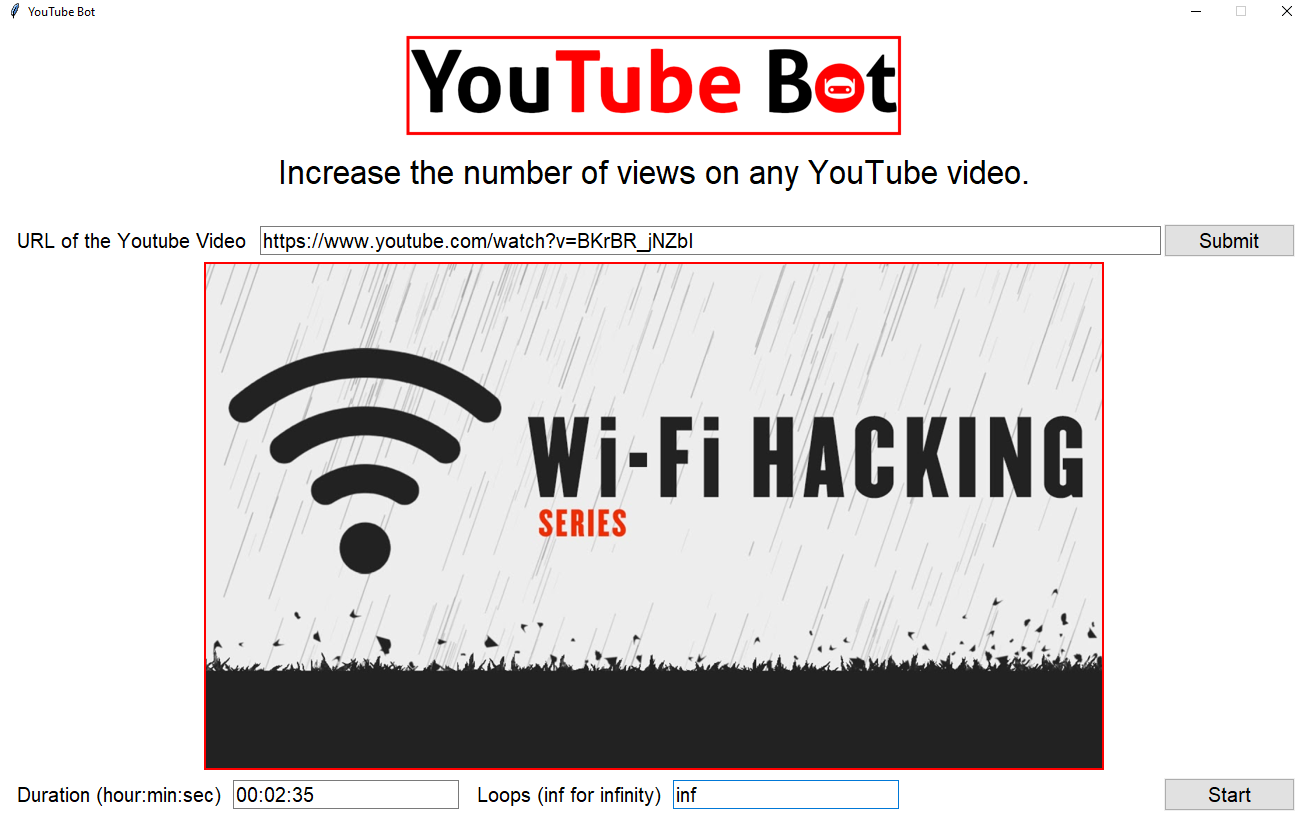</kbd>
YouTube Bot is an easy to use simple python script that makes use of selenium to automate the process of increasing views on your Youtube Videos.
## Requirements
* Any of the python3 versions may work for you, but we highly recommend using python 3.7+
* Web Browser (Chrome or Firefox)
* Drivers for their respective broswsers.
We have included the drivers for the browsers in their respective folders. To get further info about drivers, or have any issues , kindly refer to the README.md files in those folders.
## Installation and Setup
- Make sure you have Python3 installed in your system.
- Then install the necessary libraries and modules by typing `pip install -r requirements.txt`
- Download the apt Web Drivers (I have already included the drivers, so no need to worry).
- Add the drivers to the path and you are done!!
## Usage
- Add the URL of your YouTube video and hit Submit.
- Add the duration (specify how much time the script should "watch" your video. Format is HH:MM:SS)
- Add the number of times you want to execute the script (mention inf for infinite).
- Finally click on the start button to execute it.
## Contribution
If you are a contributor and willing to contribute to our project. You are highly welcome to do that. Here are the few things you have to keep in mind while doing a contribution.
- Make sure, you read the [Contributing Guidelines](https://github.com/CYBERDEVILZ/YoutubeBot/blob/main/.github/CONTRIBUTING.md) before starting with contributions.
- Follow the coding conventions and best practices while making changes to the code.
- Make use of the ISSUE and PULL_REQUEST templates in the [.github](https://github.com/CYBERDEVILZ/YoutubeBot/blob/main/.github/) folder.
<br>
Thanks for using our YouTube Bot!
================================================
FILE: requirements.txt
================================================
requests==2.26.0
selenium==3.141.0
PyAutoGUI==0.9.53
Pillow==9.0.1
black==21.7b0
pre-commit==2.15.0
gitextract_1a7m0ehy/ ├── .github/ │ ├── CONTRIBUTING.md │ └── PULL_REQUEST_TEMPLATE.md ├── .pre-commit-config.yaml ├── CONTRIBUTING.md ├── Chrome/ │ ├── README.md │ └── YouTubeBot.py ├── Firefox/ │ ├── README.md │ └── YouTubeBot.py ├── LICENSE.md ├── README.md └── requirements.txt
SYMBOL INDEX (8 symbols across 2 files)

FILE: Chrome/YouTubeBot.py
  function fetch (line 19) | def fetch(x):
  function filter (line 25) | def filter():
  function duration_split (line 43) | def duration_split(duration):
  function start (line 54) | def start():

FILE: Firefox/YouTubeBot.py
  function fetch (line 21) | def fetch(x):
  function filter (line 29) | def filter():
  function duration_split (line 53) | def duration_split(duration):
  function start (line 64) | def start():
Condensed preview — 11 files, each showing path, character count, and a content snippet. Download the .json file or copy for the full structured content (22K chars).
[
{
"path": ".github/CONTRIBUTING.md",
"chars": 2660,
"preview": "# Contributors' Guide\n\nContributions are what make the open source community such an amazing place to learn, inspire, an"
},
{
"path": ".github/PULL_REQUEST_TEMPLATE.md",
"chars": 564,
"preview": "## What does this PR do?\n\n<!-- Provide a description of what this PR does. -->\n\n## Test Plan\n\n<!-- Write your test plan "
},
{
"path": ".pre-commit-config.yaml",
"chars": 359,
"preview": "repos:\n- repo: https://github.com/python/black\n rev: 21.7b0\n hooks:\n - id: black\n\n repo: https://github.co"
},
{
"path": "CONTRIBUTING.md",
"chars": 2439,
"preview": "# YouTubeBot Contributors' Guide\r\n\r\nContributions are what make the open source community such an amazing place to learn"
},
{
"path": "Chrome/README.md",
"chars": 351,
"preview": "\n# :warning: Driver must be in PATH\nMake sure that your driver must be included in **PATH** or else the script will fail"
},
{
"path": "Chrome/YouTubeBot.py",
"chars": 4931,
"preview": "import tkinter as tk\nimport tkinter.ttk as ttk\nfrom PIL import Image, ImageTk\nfrom selenium import webdriver\nimport time"
},
{
"path": "Firefox/README.md",
"chars": 240,
"preview": "# :warning: Driver must be in PATH\nMake sure that your driver must be included in **PATH** or else the script will fail "
},
{
"path": "Firefox/YouTubeBot.py",
"chars": 5089,
"preview": "import tkinter as tk\r\nimport tkinter.ttk as ttk\r\nfrom PIL import Image, ImageTk\r\nfrom selenium import webdriver\r\nimport "
},
{
"path": "LICENSE.md",
"chars": 1081,
"preview": "MIT License\n\nCopyright (c) 2021 CYBERDEVILZ - YoutubeBot\n\nPermission is hereby granted, free of charge, to any person ob"
},
{
"path": "README.md",
"chars": 2296,
"preview": "# YouTube Bot\n\n\n. The extraction includes 11 files (19.6 KB), approximately 5.6k tokens, and a symbol index with 8 extracted functions, classes, methods, constants, and types. Use this with OpenClaw, Claude, ChatGPT, Cursor, Windsurf, or any other AI tool that accepts text input. You can copy the full output to your clipboard or download it as a .txt file.
Extracted by GitExtract — free GitHub repo to text converter for AI. Built by Nikandr Surkov.