Repository: Chalarangelo/30-seconds-of-interviews
Branch: master
Commit: da235b618572
Files: 187
Total size: 2.0 MB
Directory structure:
gitextract_5uw1kd4g/
├── .babelrc
├── .editorconfig
├── .eslintignore
├── .eslintrc.js
├── .github/
│ ├── ISSUE_TEMPLATE/
│ │ ├── new-feature.md
│ │ └── wrong-answer.md
│ └── PULL_REQUEST_TEMPLATE.md
├── .gitignore
├── .prettierrc.js
├── .travis/
│ ├── build.sh
│ ├── checkIfCron.sh
│ ├── forcepush.sh
│ ├── lintweb.sh
│ ├── push.sh
│ └── write_cname.sh
├── .travis.yml
├── CODE_OF_CONDUCT.md
├── CONTRIBUTING.md
├── LICENSE
├── README.md
├── data/
│ └── questions.json
├── docs/
│ ├── .nojekyll
│ ├── CNAME
│ ├── index.html
│ ├── modern-normalize.1ceaea8e.css
│ ├── prism.610ed272.css
│ ├── website.0466d8c4.js
│ ├── website.1d637206.js
│ ├── website.29127d6f.css
│ ├── website.47c6b05d.js
│ ├── website.8315a0d5.js
│ ├── website.972908d6.css
│ ├── website.ab1c4b5c.js
│ └── website.c597656c.js
├── logo.psd
├── package.json
├── question-template.md
├── questions/
│ ├── .eslintrc.js
│ ├── accessibility-aria.md
│ ├── accessibility-contrast.md
│ ├── accessibility-testing.md
│ ├── accessibility-tree.md
│ ├── alt-attribute.md
│ ├── async-defer-attributes.md
│ ├── async-functions.md
│ ├── batches.md
│ ├── bem.md
│ ├── big-o-notation.md
│ ├── bind-function.md
│ ├── cache-busting.md
│ ├── callback-hell.md
│ ├── callback-in-setState.md
│ ├── callback-refs-vs-finddomnode.md
│ ├── callbacks.md
│ ├── children-prop.md
│ ├── class-name.md
│ ├── clone-object.md
│ ├── closures.md
│ ├── comparing-objects.md
│ ├── context.md
│ ├── cors.md
│ ├── css-box-model.md
│ ├── css-preprocessors.md
│ ├── css-sibling-selectors.md
│ ├── css-specificity.md
│ ├── debouncing.md
│ ├── dom.md
│ ├── double-vs-triple-equals.md
│ ├── element-vs-component.md
│ ├── em-rem-difference.md
│ ├── error-boundaries.md
│ ├── event-delegation.md
│ ├── event-driven-programming.md
│ ├── expression-vs-statement.md
│ ├── falsy-truthy.md
│ ├── fibonacci.md
│ ├── find-the-anagrams.md
│ ├── flex-layout.md
│ ├── floating-point.md
│ ├── focus-ring.md
│ ├── for-each-map.md
│ ├── fragments.md
│ ├── functional-programming.md
│ ├── handling-route-changes-in-single-page-apps.md
│ ├── hoc-component.md
│ ├── hoisting-example.md
│ ├── hoisting.md
│ ├── html-multiple-header-footers.md
│ ├── html-specification-implementation.md
│ ├── html-vs-react-event-handling.md
│ ├── html-vs-xhtml.md
│ ├── html5-semantic-elements-usage.md
│ ├── html5-web-storage.md
│ ├── iife.md
│ ├── imperative-vs-declarative.md
│ ├── inline-conditional-expressions.md
│ ├── keys.md
│ ├── landmark-roles.md
│ ├── lexical-vs-dynamic-scoping.md
│ ├── lifecycle-methods.md
│ ├── lifecycle.md
│ ├── lift-state.md
│ ├── mask.md
│ ├── media-properties.md
│ ├── memoize.md
│ ├── methods-context-react-classes.md
│ ├── mime.md
│ ├── mutable-vs-immutable.md
│ ├── nan.md
│ ├── node-error-first-callback.md
│ ├── node-event-loop.md
│ ├── null-vs-undefined.md
│ ├── object-creation.md
│ ├── parameter-vs-argument.md
│ ├── pass-by-value-reference.md
│ ├── passing-arguments-to-event-handlers.md
│ ├── pipe.md
│ ├── portals.md
│ ├── postfix-vs-prefix-increment.md
│ ├── promise-states.md
│ ├── promises.md
│ ├── prop-validation.md
│ ├── prototypal-inheritance.md
│ ├── pure-functions.md
│ ├── react-comments.md
│ ├── recursion.md
│ ├── reference-example.md
│ ├── refs.md
│ ├── rel-noopener.md
│ ├── rest.md
│ ├── return-semicolon.md
│ ├── semicolons.md
│ ├── short-circuit-evaluation.md
│ ├── sprites.md
│ ├── stateful-components.md
│ ├── stateless-components.md
│ ├── static-vs-instance-method.md
│ ├── sync-vs-async.md
│ ├── this.md
│ ├── typeof-typeof.md
│ ├── types.md
│ ├── ui-library-framework-purpose.md
│ ├── use-strict.md
│ ├── var-let-const.md
│ ├── virtual-dom.md
│ ├── wcag.md
│ └── xss.md
├── scripts/
│ ├── .eslintrc.js
│ ├── build.js
│ ├── extract.js
│ └── util.js
├── static-parts/
│ ├── README-end.md
│ └── README-start.md
└── website/
├── css/
│ ├── _base.scss
│ ├── _prism.scss
│ ├── _vars.scss
│ ├── components/
│ │ ├── BackToTopButton.scss
│ │ ├── Dropdown.scss
│ │ ├── DropdownItem.scss
│ │ ├── Filter.scss
│ │ ├── Footer.scss
│ │ ├── Header.scss
│ │ ├── Introduction.scss
│ │ ├── Question.scss
│ │ └── Questions.scss
│ └── index.scss
├── index.html
├── index.js
└── js/
├── actions.js
├── browser.js
├── components/
│ ├── BackToTopButton.js
│ ├── Dropdown.js
│ ├── DropdownItem.js
│ ├── Filter.js
│ ├── FilterButton.js
│ ├── Footer.js
│ ├── Header.js
│ ├── Icon.js
│ ├── Introduction.js
│ ├── Markdown.js
│ ├── Question.js
│ ├── Questions.js
│ ├── RecommendedResource.js
│ └── SortButton.js
├── state.js
├── utils.js
└── view.js
================================================
FILE CONTENTS
================================================
================================================
FILE: .babelrc
================================================
{
"presets": ["stage-3"],
"plugins": [["transform-react-jsx", { "pragma": "h" }]]
}
================================================
FILE: .editorconfig
================================================
# top-most EditorConfig file
root = true
# Unix-style newlines with a newline ending every file
[*]
end_of_line = lf
insert_final_newline = true
[*.json]
indent_style = tab
indent_size = 2
trim_trailing_spaces = true
# Matches multiple files with brace expansion notation
# Set default charset
[*.js]
charset = utf-8
indent_style = space
indent_size = 2
max_line_length = 80
# Matches the exact files either package.json or .travis.yml
[{package.json,.travis.yml}]
indent_style = space
indent_size = 2
# trailing spaces in markdown indicate word wrap
[*.md]
trim_trailing_spaces = false
max_line_length = 80
================================================
FILE: .eslintignore
================================================
/node_modules
/dist
/docs
README.md
================================================
FILE: .eslintrc.js
================================================
module.exports = {
env: {
browser: true,
es6: true,
node: true
},
extends: ["airbnb-base", "prettier"],
plugins: ["import", "react", "markdown"],
parserOptions: {
sourceType: "module",
ecmaFeatures: {
jsx: true
}
},
rules: {
"linebreak-style": "off",
"react/jsx-uses-vars": "error",
"no-nested-ternary": "off",
indent: ["error", 2, { SwitchCase: 1 }],
"no-plusplus": ["error", { allowForLoopAfterthoughts: true }],
"no-unused-vars": [2, { varsIgnorePattern: "h" }],
"linebreak-style": ["error", "unix"],
quotes: ["error", "double"],
semi: ["error", "never"],
"array-bracket-spacing": [
"error",
"always",
{
singleValue: false
}
],
"object-curly-spacing": [
"error",
"always",
{
arraysInObjects: false,
objectsInObjects: false
}
],
"no-param-reassign": ["error", { props: false }]
}
}
================================================
FILE: .github/ISSUE_TEMPLATE/new-feature.md
================================================
## Description
## What does your feature belong to?
- [ ] Website
- [ ] README
- [ ] General / Things regarding the repository (like CI Integration)
================================================
FILE: .github/ISSUE_TEMPLATE/wrong-answer.md
================================================
#####Question file name:
## Current Answer
## Expected Answer
================================================
FILE: .github/PULL_REQUEST_TEMPLATE.md
================================================
## Description
**Resolves** #(issue number)
## What does your PR belong to?
* [ ] Questions / Answers
* [ ] Website
* [ ] General / Things regarding the repository (like CI Integration)
## Types of changes
* [ ] Bug fix (non-breaking change which fixes an issue)
* [ ] Enhancement (non-breaking improvement of a question)
* [ ] New feature (non-breaking change which adds functionality)
* [ ] Breaking change (fix or feature that would cause existing functionality to change)
## Checklist:
* [ ] My code follows the code style of this project.
* [ ] My change requires a change to the documentation.
* [ ] I have updated the documentation accordingly.
* [ ] I have checked that the changes are working properly
* [ ] I have checked that there isn't any PR doing the same
* [ ] I have read the **CONTRIBUTING** document.
================================================
FILE: .gitignore
================================================
# Logs
logs
*.log
npm-debug.log*
yarn-debug.log*
yarn-error.log*
# Runtime data
pids
*.pid
*.seed
*.pid.lock
# Directory for instrumented libs generated by jscoverage/JSCover
lib-cov
# Coverage directory used by tools like istanbul
coverage
# nyc test coverage
.nyc_output
# Grunt intermediate storage (http://gruntjs.com/creating-plugins#storing-task-files)
.grunt
# Bower dependency directory (https://bower.io/)
bower_components
# node-waf configuration
.lock-wscript
# Compiled binary addons (http://nodejs.org/api/addons.html)
build/Release
# Dependency directories
node_modules/
jspm_packages/
# Typescript v1 declaration files
typings/
# Optional npm cache directory
.npm
# Optional eslint cache
.eslintcache
# Optional REPL history
.node_repl_history
# Output of 'npm pack'
*.tgz
# Yarn Integrity file
.yarn-integrity
# dotenv environment variables file
.env
# parcel
.cache
dist
# editor
.vscode
.idea
================================================
FILE: .prettierrc.js
================================================
module.exports = {
printWidth: 80,
semi: false,
useTabs: false,
tabWidth: 2,
singleQuote: false,
bracketSpacing: true,
jsxBracketSameLine: false,
}
================================================
FILE: .travis/build.sh
================================================
test $TRAVIS_EVENT_TYPE = cron \
&& echo -e "\e[95mCRON triggered build, thus building website." \
&& rm -rf docs \
&& yarn build \
&& touch docs/.nojekyll \
&& chmod +x .travis/write_cname.sh \
&& cd docs/ && ./../.travis/write_cname.sh \
&& cd ../
if [[ $TRAVIS_COMMIT_MESSAGE == *"--force-build"* ]];
then echo -e "\e[95mFORCE-BUILD: Building website." \
&& rm -rf docs \
&& yarn build \
&& touch docs/.nojekyll \
&& chmod +x .travis/write_cname.sh \
&& cd docs/ && ./../.travis/write_cname.sh \
&& cd ../;
fi
exit 0
================================================
FILE: .travis/checkIfCron.sh
================================================
test $TRAVIS_BRANCH != master && (test $TRAVIS_EVENT_TYPE = push || test $TRAVIS_EVENT_TYPE = pull_request) && echo -e "\e[95mNot a CRON triggered build, thus only checking for errors."
exit 0
================================================
FILE: .travis/forcepush.sh
================================================
if [[ $TRAVIS_COMMIT_MESSAGE == *"--force-build"* ]];
then echo -e "\e[95mFORCE-DEPLOY: Deploying to Repository" && chmod +x .travis/push.sh && ./.travis/push.sh;
fi
================================================
FILE: .travis/lintweb.sh
================================================
test $TRAVIS_EVENT_TYPE = push && test $TRAVIS_BRANCH = master \
&& echo -e "\e[95mMaster push, checking for script and web errors." \
&& yarn lint \
&& yarn format
exit 0
================================================
FILE: .travis/push.sh
================================================
#!/bin/bash
setup_git() {
git config --global user.email "30secondsofcode@gmail.com"
git config --global user.name "30secondsofcode"
}
commit_website_files() {
if [ $TRAVIS_EVENT_TYPE != "pull_request" ]; then
if [ $TRAVIS_BRANCH == "master" ]; then
echo "Committing to master branch..."
git checkout master
git add *
if [ $TRAVIS_EVENT_TYPE == "cron" ]; then
git commit --message "Travis build: $TRAVIS_BUILD_NUMBER [cron]"
elif [ $TRAVIS_EVENT_TYPE == "api" ]; then
git commit --message "Travis build: $TRAVIS_BUILD_NUMBER [custom]"
else
git commit --message "Travis build: $TRAVIS_BUILD_NUMBER [FORCED]"
fi
fi
fi
}
upload_files() {
if [ $TRAVIS_EVENT_TYPE != "pull_request" ]; then
if [ $TRAVIS_BRANCH == "master" ]; then
echo "Pushing to master branch..."
git push --force --quiet "https://${GH_TOKEN}@github.com/30-seconds/30-seconds-of-interviews.git" master > /dev/null 2>&1
fi
fi
}
setup_git
commit_website_files
upload_files
================================================
FILE: .travis/write_cname.sh
================================================
echo "30secondsofinterviews.org" > CNAME
================================================
FILE: .travis.yml
================================================
jobs:
include:
- stage: conditional_build
notifications:
email:
on_success: [change]
on_failure: [change]
language: node_js
node_js:
- node
install:
- yarn install
before_script:
- chmod +x .travis/checkIfCron.sh && ./.travis/checkIfCron.sh
- chmod +x .travis/lintweb.sh && ./.travis/lintweb.sh
- yarn formatQuestions
- yarn extractor
- yarn builder
script:
- chmod +x .travis/build.sh && ./.travis/build.sh
after_script:
- test $TRAVIS_EVENT_TYPE = cron
&& echo -e "\e[95mDeploying to Repository"
&& chmod +x .travis/push.sh
&& ./.travis/push.sh
- chmod +x .travis/forcepush.sh && ./.travis/forcepush.sh
cache:
directories:
- node_modules
================================================
FILE: CODE_OF_CONDUCT.md
================================================
# Contributor Covenant Code of Conduct
## Our Pledge
In the interest of fostering an open and welcoming environment, we as contributors and maintainers pledge to making participation in our project and our community a harassment-free experience for everyone, regardless of age, body size, disability, ethnicity, gender identity and expression, level of experience, nationality, personal appearance, race, religion, or sexual identity and orientation.
## Our Standards
Examples of behavior that contributes to creating a positive environment include:
* Using welcoming and inclusive language
* Being respectful of differing viewpoints and experiences
* Gracefully accepting constructive criticism
* Focusing on what is best for the community
* Showing empathy towards other community members
Examples of unacceptable behavior by participants include:
* The use of sexualized language or imagery and unwelcome sexual attention or advances
* Trolling, insulting/derogatory comments, and personal or political attacks
* Public or private harassment
* Publishing others' private information, such as a physical or electronic address, without explicit permission
* Other conduct which could reasonably be considered inappropriate in a professional setting
## Our Responsibilities
Project maintainers are responsible for clarifying the standards of acceptable behavior and are expected to take appropriate and fair corrective action in response to any instances of unacceptable behavior.
Project maintainers have the right and responsibility to remove, edit, or reject comments, commits, code, wiki edits, issues, and other contributions that are not aligned to this Code of Conduct, or to ban temporarily or permanently any contributor for other behaviors that they deem inappropriate, threatening, offensive, or harmful.
## Scope
This Code of Conduct applies both within project spaces and in public spaces when an individual is representing the project or its community. Examples of representing a project or community include using an official project e-mail address, posting via an official social media account, or acting as an appointed representative at an online or offline event. Representation of a project may be further defined and clarified by project maintainers.
## Enforcement
Instances of abusive, harassing, or otherwise unacceptable behavior may be reported by contacting the project team at ns.fejes.stefan@gmail.com. The project team will review and investigate all complaints, and will respond in a way that it deems appropriate to the circumstances. The project team is obligated to maintain confidentiality with regard to the reporter of an incident. Further details of specific enforcement policies may be posted separately.
Project maintainers who do not follow or enforce the Code of Conduct in good faith may face temporary or permanent repercussions as determined by other members of the project's leadership.
## Attribution
This Code of Conduct is adapted from the [Contributor Covenant][homepage], version 1.4, available at [http://contributor-covenant.org/version/1/4][version]
[homepage]: http://contributor-covenant.org
[version]: http://contributor-covenant.org/version/1/4/
================================================
FILE: CONTRIBUTING.md
================================================
# Contribution guidelines
> 30 seconds of interviews is a community effort, so feel free to contribute in any way you can. Every contribution helps!
## There are several ways in which you can help:
* Submit [pull requests](https://github.com/fejes713/30-seconds-of-interviews/pulls) with new questions using our [template](https://github.com/fejes713/30-seconds-of-interviews/blob/master/question-template.md)
* Don't sweat if you don't know the answer to the question. Simply put **TODO** as an answer, and someone will try to answer it
* Try to keep answers **short** and **straight to the point**. They should be understandable in under 30 seconds
* Summarize your answer in short thesis in **good to hear** section.
* Every code snippet and html tag should be enclosed in markdown code blocks.
* Of course, 30 seconds is not enough to fully cover a specific topic so include up to three additional links that further describe the mentioned topic
* [Open issue](https://github.com/fejes713/30-seconds-of-interviews/issues/new)
* If you would like to see a new feature(eg. a new category of questions)
* If you noticed the wrong answer to a question
* If you noticed any other bug in our codebase
* Whenever you get an idea of the better answer to any question, please share it with us in a new [pull request](https://github.com/fejes713/30-seconds-of-interviews/pulls)
* If it's just a typo, we don't mind, submit a quick fix to it
* If you happen to find a better code example for the answer share it with us
## Additional information regarding the project and its structure
* **Do not modify** the `README.md` or `index.html` files. **Travis CI** will automatically build the README.md and index.html files when your pull request is merged. All changes to questions should be inside of `questions directory`
* We weren't sure how to name files inside `questions` directory. If you have any idea, let us know
* Currently, we support 4 categories of questions: _javascript_, _css_, _html_ and _node_
* We would like to expand the project to include more categories
* Some of the planned categories are _general_, _security_, _database_
================================================
FILE: LICENSE
================================================
MIT License
Copyright (c) 2018 Stefan Feješ
Permission is hereby granted, free of charge, to any person obtaining a copy
of this software and associated documentation files (the "Software"), to deal
in the Software without restriction, including without limitation the rights
to use, copy, modify, merge, publish, distribute, sublicense, and/or sell
copies of the Software, and to permit persons to whom the Software is
furnished to do so, subject to the following conditions:
The above copyright notice and this permission notice shall be included in all
copies or substantial portions of the Software.
THE SOFTWARE IS PROVIDED "AS IS", WITHOUT WARRANTY OF ANY KIND, EXPRESS OR
IMPLIED, INCLUDING BUT NOT LIMITED TO THE WARRANTIES OF MERCHANTABILITY,
FITNESS FOR A PARTICULAR PURPOSE AND NONINFRINGEMENT. IN NO EVENT SHALL THE
AUTHORS OR COPYRIGHT HOLDERS BE LIABLE FOR ANY CLAIM, DAMAGES OR OTHER
LIABILITY, WHETHER IN AN ACTION OF CONTRACT, TORT OR OTHERWISE, ARISING FROM,
OUT OF OR IN CONNECTION WITH THE SOFTWARE OR THE USE OR OTHER DEALINGS IN THE
SOFTWARE.
================================================
FILE: README.md
================================================
30 Seconds of Interviews
A curated collection of common interview questions to help you prepare for your next interview.
> _This README is built using [markdown-builder](https://github.com/30-seconds/markdown-builder)._
## Foreword
Interviews are daunting and can make even the most seasoned expert forget things under pressure. Review and learn what questions are commonly encountered in interviews curated by the community that's answered them and go prepared for anything they'll ask. By bringing together experience and real-world examples, you can go from being nervous to being prepared for that next big opportunity.
## [View online](https://30secondsofinterviews.org/)
## Contributing
> 30 seconds of interviews is a community effort, so feel free to contribute in any way you can. Every contribution helps!
Do you have an excellent idea or know some cool questions that aren't on the list? Read the [contribution guidelines](https://github.com/30-seconds/30-seconds-of-interviews/blob/master/CONTRIBUTING.md) and submit a pull request.
Join our [Gitter channel](https://gitter.im/30-seconds-of-interviews/Lobby) to help with the development of the project.
#### Related projects
- [30 Seconds of Code](https://30secondsofcode.org)
- [30 Seconds of CSS](https://github.com/30-seconds/30-seconds-of-css)
- [30 Seconds of React](https://github.com/30-seconds/30-seconds-of-react)
- [30 Seconds of Knowledge](https://chrome.google.com/webstore/detail/30-seconds-of-knowledge/mmgplondnjekobonklacmemikcnhklla)
## Table of Contents
### JavaScript
View contents
* [Create a function `batches` that returns the maximum number of whole batches that can be cooked from a recipe.](#create-a-function-batches-that-returns-the-maximum-number-of-whole-batches-that-can-be-cooked-from-a-recipe)
* [What is Big O Notation?](#what-is-big-o-notation)
* [Create a standalone function `bind` that is functionally equivalent to the method `Function.prototype.bind`.](#create-a-standalone-function-bind-that-is-functionally-equivalent-to-the-method-functionprototypebind)
* [How can you avoid callback hells?](#how-can-you-avoid-callback-hells)
* [What is the purpose of callback function as an argument of `setState`?](#what-is-the-purpose-of-callback-function-as-an-argument-of-setstate)
* [Which is the preferred option between callback refs and findDOMNode()?](#which-is-the-preferred-option-between-callback-refs-and-finddomnode)
* [What is a callback? Can you show an example using one?](#what-is-a-callback-can-you-show-an-example-using-one)
* [What is the `children` prop?](#what-is-the-children-prop)
* [How do you clone an object in JavaScript?](#how-do-you-clone-an-object-in-javascript)
* [What is a closure? Can you give a useful example of one?](#what-is-a-closure-can-you-give-a-useful-example-of-one)
* [How do you compare two objects in JavaScript?](#how-do-you-compare-two-objects-in-javascript)
* [What is context?](#what-is-context)
* [What is CORS?](#what-is-cors)
* [What is the DOM?](#what-is-the-dom)
* [What is the difference between the equality operators `==` and `===`?](#what-is-the-difference-between-the-equality-operators--and-)
* [What is the difference between an element and a component in React?](#what-is-the-difference-between-an-element-and-a-component-in-react)
* [What is event delegation and why is it useful? Can you show an example of how to use it?](#what-is-event-delegation-and-why-is-it-useful-can-you-show-an-example-of-how-to-use-it)
* [What is event-driven programming?](#what-is-event-driven-programming)
* [What is the difference between an expression and a statement in JavaScript?](#what-is-the-difference-between-an-expression-and-a-statement-in-javascript)
* [What are truthy and falsy values in JavaScript?](#what-are-truthy-and-falsy-values-in-javascript)
* [Generate an array, containing the Fibonacci sequence, up until the nth term.](#generate-an-array-containing-the-fibonacci-sequence-up-until-the-nth-term)
* [What does `0.1 + 0.2 === 0.3` evaluate to?](#what-does-01--02--03-evaluate-to)
* [What is the difference between the array methods `map()` and `forEach()`?](#what-is-the-difference-between-the-array-methods-map-and-foreach)
* [What are fragments?](#what-are-fragments)
* [What is functional programming?](#what-is-functional-programming)
* [What will the console log in this example?](#what-will-the-console-log-in-this-example)
* [How does hoisting work in JavaScript?](#how-does-hoisting-work-in-javascript)
* [What is the difference between HTML and React event handling?](#what-is-the-difference-between-html-and-react-event-handling)
* [What is the reason for wrapping the entire contents of a JavaScript source file in a function that is immediately invoked?](#what-is-the-reason-for-wrapping-the-entire-contents-of-a-javascript-source-file-in-a-function-that-is-immediately-invoked)
* [Explain the differences between imperative and declarative programming.](#explain-the-differences-between-imperative-and-declarative-programming)
* [What are inline conditional expressions?](#what-are-inline-conditional-expressions)
* [What is a key? What are the benefits of using it in lists?](#what-is-a-key-what-are-the-benefits-of-using-it-in-lists)
* [What is the difference between lexical scoping and dynamic scoping?](#what-is-the-difference-between-lexical-scoping-and-dynamic-scoping)
* [Create a function that masks a string of characters with `#` except for the last four (4) characters.](#create-a-function-that-masks-a-string-of-characters-with--except-for-the-last-four-4-characters)
* [What is memoization?](#what-is-memoization)
* [How do you ensure methods have the correct `this` context in React component classes?](#how-do-you-ensure-methods-have-the-correct-this-context-in-react-component-classes)
* [What is a MIME type and what is it used for?](#what-is-a-mime-type-and-what-is-it-used-for)
* [Contrast mutable and immutable values, and mutating vs non-mutating methods.](#contrast-mutable-and-immutable-values-and-mutating-vs-non-mutating-methods)
* [What is the only value not equal to itself in JavaScript?](#what-is-the-only-value-not-equal-to-itself-in-javascript)
* [NodeJS often uses a callback pattern where if an error is encountered during execution, this error is passed as the first argument to the callback. What are the advantages of this pattern?](#nodejs-often-uses-a-callback-pattern-where-if-an-error-is-encountered-during-execution-this-error-is-passed-as-the-first-argument-to-the-callback-what-are-the-advantages-of-this-pattern)
* [What is the event loop in Node.js?](#what-is-the-event-loop-in-nodejs)
* [What is the difference between `null` and `undefined`?](#what-is-the-difference-between-null-and-undefined)
* [Describe the different ways to create an object. When should certain ways be preferred over others?](#describe-the-different-ways-to-create-an-object-when-should-certain-ways-be-preferred-over-others)
* [What is the difference between a parameter and an argument?](#what-is-the-difference-between-a-parameter-and-an-argument)
* [Does JavaScript pass by value or by reference?](#does-javascript-pass-by-value-or-by-reference)
* [How do you pass an argument to an event handler or callback?](#how-do-you-pass-an-argument-to-an-event-handler-or-callback)
* [Create a function `pipe` that performs left-to-right function composition by returning a function that accepts one argument.](#create-a-function-pipe-that-performs-left-to-right-function-composition-by-returning-a-function-that-accepts-one-argument)
* [What are portals in React?](#what-are-portals-in-react)
* [What is the difference between the postfix `i++` and prefix `++i` increment operators?](#what-is-the-difference-between-the-postfix-i-and-prefix-i-increment-operators)
* [In which states can a Promise be?](#in-which-states-can-a-promise-be)
* [What are Promises?](#what-are-promises)
* [How does prototypal inheritance differ from classical inheritance?](#how-does-prototypal-inheritance-differ-from-classical-inheritance)
* [What is a pure function?](#what-is-a-pure-function)
* [What is recursion and when is it useful?](#what-is-recursion-and-when-is-it-useful)
* [What is the output of the following code?](#what-is-the-output-of-the-following-code)
* [What are refs in React? When should they be used?](#what-are-refs-in-react-when-should-they-be-used)
* [What does the following function return?](#what-does-the-following-function-return)
* [Are semicolons required in JavaScript?](#are-semicolons-required-in-javascript)
* [What is short-circuit evaluation in JavaScript?](#what-is-short-circuit-evaluation-in-javascript)
* [What is a stateful component in React?](#what-is-a-stateful-component-in-react)
* [What is a stateless component?](#what-is-a-stateless-component)
* [Explain the difference between a static method and an instance method.](#explain-the-difference-between-a-static-method-and-an-instance-method)
* [What is the difference between synchronous and asynchronous code in JavaScript?](#what-is-the-difference-between-synchronous-and-asynchronous-code-in-javascript)
* [What is the `this` keyword and how does it work?](#what-is-the-this-keyword-and-how-does-it-work)
* [What does the following code evaluate to?](#what-does-the-following-code-evaluate-to)
* [What are JavaScript data types?](#what-are-javascript-data-types)
* [What is the purpose of JavaScript UI libraries/frameworks like React, Vue, Angular, Hyperapp, etc?](#what-is-the-purpose-of-javascript-ui-librariesframeworks-like-react-vue-angular-hyperapp-etc)
* [What does `'use strict'` do and what are some of the key benefits to using it?](#what-does-use-strict-do-and-what-are-some-of-the-key-benefits-to-using-it)
* [What are the differences between `var`, `let`, `const` and no keyword statements?](#what-are-the-differences-between-var-let-const-and-no-keyword-statements)
* [What is a virtual DOM and why is it used in libraries/frameworks?](#what-is-a-virtual-dom-and-why-is-it-used-in-librariesframeworks)
* [What is a cross-site scripting attack (XSS) and how do you prevent it?](#what-is-a-cross-site-scripting-attack-xss-and-how-do-you-prevent-it)
### React
View contents
* [What is the purpose of callback function as an argument of `setState`?](#what-is-the-purpose-of-callback-function-as-an-argument-of-setstate)
* [Which is the preferred option between callback refs and findDOMNode()?](#which-is-the-preferred-option-between-callback-refs-and-finddomnode)
* [What is the `children` prop?](#what-is-the-children-prop)
* [Why does React use `className` instead of `class` like in HTML?](#why-does-react-use-classname-instead-of-class-like-in-html)
* [What is context?](#what-is-context)
* [What is the difference between an element and a component in React?](#what-is-the-difference-between-an-element-and-a-component-in-react)
* [What are error boundaries in React?](#what-are-error-boundaries-in-react)
* [What are fragments?](#what-are-fragments)
* [What are higher-order components?](#what-are-higher-order-components)
* [What is the difference between HTML and React event handling?](#what-is-the-difference-between-html-and-react-event-handling)
* [What are inline conditional expressions?](#what-are-inline-conditional-expressions)
* [What is a key? What are the benefits of using it in lists?](#what-is-a-key-what-are-the-benefits-of-using-it-in-lists)
* [What are the lifecycle methods in React?](#what-are-the-lifecycle-methods-in-react)
* [What are the different phases of the component lifecycle in React?](#what-are-the-different-phases-of-the-component-lifecycle-in-react)
* [What does lifting state up in React mean?](#what-does-lifting-state-up-in-react-mean)
* [How do you ensure methods have the correct `this` context in React component classes?](#how-do-you-ensure-methods-have-the-correct-this-context-in-react-component-classes)
* [How do you pass an argument to an event handler or callback?](#how-do-you-pass-an-argument-to-an-event-handler-or-callback)
* [What are portals in React?](#what-are-portals-in-react)
* [How to apply prop validation in React?](#how-to-apply-prop-validation-in-react)
* [How do you write comments inside a JSX tree in React?](#how-do-you-write-comments-inside-a-jsx-tree-in-react)
* [What are refs in React? When should they be used?](#what-are-refs-in-react-when-should-they-be-used)
* [What is a stateful component in React?](#what-is-a-stateful-component-in-react)
* [What is a stateless component?](#what-is-a-stateless-component)
### HTML
View contents
* [What is the purpose of the `alt` attribute on images?](#what-is-the-purpose-of-the-alt-attribute-on-images)
* [What are `defer` and `async` attributes on a `
```
#### Good to hear
* Placing a `defer` script in the `` allows the browser to download the script while the page is still parsing, and is therefore a better option than placing the script before the end of the body.
* If the scripts rely on each other, use `defer`.
* If the script is independent, use `async`.
* Use `defer` if the DOM must be ready and the contents are not placed within a `DOMContentLoaded` listener.
##### Additional Links
* [async vs defer attributes](http://www.growingwiththeweb.com/2014/02/async-vs-defer-attributes.html)
[⬆ Back to top](#table-of-contents)
### What is the difference between HTML and React event handling?
View answer
In HTML, the attribute name is in all lowercase and is given a string invoking a function defined somewhere:
```html
```
In React, the attribute name is camelCase and are passed the function reference inside curly braces:
```js
```
In HTML, `false` can be returned to prevent default behavior, whereas in React `preventDefault` has to be called explicitly.
```html
```
```js
function handleClick(e) {
e.preventDefault()
console.log("The link was clicked.")
}
```
#### Good to hear
* HTML uses lowercase, React uses camelCase.
##### Additional Links
* [React docs on Handling Events](https://reactjs.org/docs/handling-events.html)
[⬆ Back to top](#table-of-contents)
### What are some differences that XHTML has compared to HTML?
View answer
Some of the key differences are:
* An XHTML element must have an XHTML ``
* Attributes values must be enclosed in quotes
* Attribute minimization is forbidden (e.g. one has to use `checked="checked"` instead of `checked`)
* Elements must always be properly nested
* Elements must always be closed
* Special characters must be escaped
#### Good to hear
* Any element can be self-closed
* Tags ands attributes are case-sensitive, usually lowercase
##### Additional Links
* [W3Schools docs for HTML and XHTML](https://www.w3schools.com/html/html_xhtml.asp)
[⬆ Back to top](#table-of-contents)
### What is the DOM?
View answer
The DOM (Document Object Model) is a cross-platform API that treats HTML and XML documents as a tree structure consisting of nodes. These nodes (such as elements and text nodes) are objects that can be programmatically manipulated and any visible changes made to them are reflected live in the document. In a browser, this API is available to JavaScript where DOM nodes can be manipulated to change their styles, contents, placement in the document, or interacted with through event listeners.
#### Good to hear
* The DOM was designed to be independent of any particular programming language, making the structural representation of the document available from a single, consistent API.
* The DOM is constructed progressively in the browser as a page loads, which is why scripts are often placed at the bottom of a page, in the `` with a `defer` attribute, or inside a `DOMContentLoaded` event listener. Scripts that manipulate DOM nodes should be run after the DOM has been constructed to avoid errors.
* `document.getElementById()` and `document.querySelector()` are common functions for selecting DOM nodes.
* Setting the `innerHTML` property to a new value runs the string through the HTML parser, offering an easy way to append dynamic HTML content to a node.
##### Additional Links
* [MDN docs for DOM](https://developer.mozilla.org/en-US/docs/DOM)
[⬆ Back to top](#table-of-contents)
### Discuss the differences between an HTML specification and a browser’s implementation thereof.
View answer
HTML specifications such as `HTML5` define a set of rules that a document must adhere to in order to be “valid” according to that specification. In addition, a specification provides instructions on how a browser must interpret and render such a document.
A browser is said to “support” a specification if it handles valid documents according to the rules of the specification. As of yet, no browser supports all aspects of the `HTML5` specification (although all of the major browser support most of it), and as a result, it is necessary for the developer to confirm whether the aspect they are making use of will be supported by all of the browsers on which they hope to display their content. This is why cross-browser support continues to be a headache for developers, despite the improved specificiations.
#### Good to hear
* `HTML5` defines some rules to follow for an invalid `HTML5` document (i.e., one that contains syntactical errors)
* However, invalid documents may contain anything, so it's impossible for the specification to handle all possibilities comprehensively.
* Thus, many decisions about how to handle malformed documents are left up to the browser.
##### Additional Links
* [HTML 5.2 WWW Specifications](https://www.w3.org/TR/html52/)
[⬆ Back to top](#table-of-contents)
### What is HTML5 Web Storage? Explain `localStorage` and `sessionStorage`.
View answer
With HTML5, web pages can store data locally within the user’s browser.
The data is stored in name/value pairs, and a web page can only access data stored by itself.
**Differences between `localStorage` and `sessionStorage` regarding lifetime:**
* Data stored through `localStorage` is permanent: it does not expire and remains stored on the user’s computer until a web app deletes it or the user asks the browser to delete it.
* `sessionStorage` has the same lifetime as the top-level window or browser tab in which the data got stored. When the tab is permanently closed, any data stored through `sessionStorage` is deleted.
**Differences between `localStorage` and `sessionStorage` regarding storage scope:**
Both forms of storage are scoped to the document origin so that documents with different origins will never share the stored objects.
* `sessionStorage` is also scoped on a per-window basis. Two browser tabs with documents from the same origin have separate `sessionStorage` data.
* Unlike in `localStorage`, the same scripts from the same origin can't access each other's `sessionStorage` when opened in different tabs.
#### Good to hear
* Earlier, this was done with cookies.
* The storage limit is far larger (at least 5MB) than with cookies and its faster.
* The data is never transferred to the server and can only be used if the client specifically asks for it.
##### Additional Links
* [W3Schools HTML5 Webstorage](https://www.w3schools.com/html/html5_webstorage.asp)
[⬆ Back to top](#table-of-contents)
## CSS
### What is CSS BEM?
View answer
The BEM methodology is a naming convention for CSS classes in order to keep CSS more maintainable by defining namespaces to solve scoping issues. BEM stands for Block Element Modifier which is an explanation for its structure. A Block is a standalone component that is reusable across projects and acts as a "namespace" for sub components (Elements). Modifiers are used as flags when a Block or Element is in a certain state or is different in structure or style.
```css
/* block component */
.block {
}
/* element */
.block__element {
}
/* modifier */
.block__element--modifier {
}
```
Here is an example with the class names on markup:
```html
```
In this case, `navbar` is the Block, `navbar__link` is an Element that makes no sense outside of the `navbar` component, and `navbar__link--active` is a Modifier that indicates a different state for the `navbar__link` Element.
Since Modifiers are verbose, many opt to use `is-*` flags instead as modifiers.
```html
```
These must be chained to the Element and never alone however, or there will be scope issues.
```css
.navbar__link.is-active {
}
```
#### Good to hear
* Alternative solutions to scope issues like CSS-in-JS
##### Additional Links
* [Writing clean and maintainable CSS](https://hackernoon.com/writing-clean-and-maintainable-css-using-bem-methodology-1dcbf810a664)
[⬆ Back to top](#table-of-contents)
### What are the advantages of using CSS preprocessors?
View answer
CSS preprocessors add useful functionality that native CSS does not have, and generally make CSS neater and more maintainable by enabling DRY (Don't Repeat Yourself) principles. Their terse syntax for nested selectors cuts down on repeated code. They provide variables for consistent theming (however, CSS variables have largely replaced this functionality) and additional tools like color functions (`lighten`, `darken`, `transparentize`, etc), mixins, and loops that make CSS more like a real programming language and gives the developer more power to generate complex CSS.
#### Good to hear
* They allow us to write more maintainable and scalable CSS
* Some disadvantages of using CSS preprocessors (setup, re-compilation time can be slow etc.)
##### Additional Links
* [CSS Preprocessors](https://medium.com/@garyfagan/css-preprocessors-6f226fa16f27)
[⬆ Back to top](#table-of-contents)
### Using flexbox, create a 3-column layout where each column takes up a `col-{n} / 12` ratio of the container.
```html
```
View answer
Set the `.row` parent to `display: flex;` and use the `flex` shorthand property to give the column classes a `flex-grow` value that corresponds to its ratio value.
```css
.row {
display: flex;
}
.col-2 {
flex: 2;
}
.col-7 {
flex: 7;
}
.col-3 {
flex: 3;
}
```
#### Good to hear
##### Additional Links
* [MDN docs for basic concepts of flexbox](https://developer.mozilla.org/en-US/docs/Web/CSS/CSS_Flexible_Box_Layout/Basic_Concepts_of_Flexbox)
* [A complete guide to Flexbox](https://css-tricks.com/snippets/css/a-guide-to-flexbox/)
[⬆ Back to top](#table-of-contents)
### Can you name the four types of `@media` properties?
View answer
* `all`, which applies to all media type devices
* `print`, which only applies to printers
* `screen`, which only applies to screens (desktops, tablets, mobile etc.)
* `speech`, which only applies to screenreaders
#### Good to hear
##### Additional Links
* [MDN docs for `@media` rule](https://developer.mozilla.org/en-US/docs/Web/CSS/@media)
* [MDN docs for using media queries](https://developer.mozilla.org/en-US/docs/Web/CSS/Media_Queries/Using_media_queries)
[⬆ Back to top](#table-of-contents)
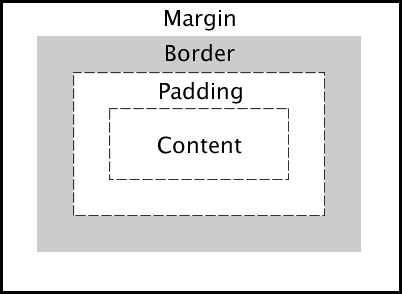
### Describe the layout of the CSS Box Model and briefly describe each component.
View answer
`Content`: The inner-most part of the box filled with content, such as text, an image, or video player. It has the dimensions `content-box width` and `content-box height`.
`Padding`: The transparent area surrounding the content. It has dimensions `padding-box width` and `padding-box height`.
`Border`: The area surrounding the padding (if any) and content. It has dimensions `border-box width` and `border-box height`.
_Margin_: The transparent outer-most layer that surrounds the border. It separates the element from other elements in the DOM. It has dimensions `margin-box width` and `margin-box height`.
#### Good to hear
* This is a very common question asked during front-end interviews and while it may seem easy, it is critical you know it well!
* Shows a solid understanding of spacing and the DOM
##### Additional Links
* [W3School's CSS Box Model Page](https://www.w3schools.com/Css/css_boxmodel.asp)
* [Mozilla's Intro to the CSS Box Model](https://developer.mozilla.org/en-US/docs/Web/CSS/CSS_Box_Model/Introduction_to_the_CSS_box_model)
[⬆ Back to top](#table-of-contents)
### What is the difference between `em` and `rem` units?
View answer
Both `em` and `rem` units are based on the `font-size` CSS property. The only difference is where they inherit their values from.
* `em` units inherit their value from the `font-size` of the parent element
* `rem` units inherit their value from the `font-size` of the root element (`html`)
In most browsers, the `font-size` of the root element is set to `16px` by default.
#### Good to hear
* Benefits of using `em` and `rem` units
##### Additional Links
* [CSS units for font-size: px | em | rem](https://medium.com/code-better/css-units-for-font-size-px-em-rem-79f7e592bb97)
[⬆ Back to top](#table-of-contents)
### What are the advantages of using CSS sprites and how are they utilized?
View answer
CSS sprites combine multiple images into one image, limiting the number of HTTP requests a browser has to make, thus improving load times. Even under the new HTTP/2 protocol, this remains true.
Under HTTP/1.1, at most one request is allowed per TCP connection. With HTTP/1.1, modern browsers open multiple parallel connections (between 2 to 8) but it is limited. With HTTP/2, all requests between the browser and the server are multiplexed on a single TCP connection. This means the cost of opening and closing multiple connections is mitigated, resulting in a better usage of the TCP connection and limits the impact of latency between the client and server. It could then become possible to load tens of images in parallel on the same TCP connection.
However, according to [benchmark results](https://blog.octo.com/en/http2-arrives-but-sprite-sets-aint-no-dead/), although HTTP/2 offers 50% improvement over HTTP/1.1, in most cases the sprite set is still faster to load than individual images.
To utilize a spritesheet in CSS, one would use certain properties, such as `background-image`, `background-position` and `background-size` to ultimately alter the `background` of an element.
#### Good to hear
* `background-image`, `background-position` and `background-size` can be used to utilize a spritesheet.
##### Additional Links
* [CSS Sprites explained by CSS Tricks](https://css-tricks.com/css-sprites/)
[⬆ Back to top](#table-of-contents)
### What is the difference between '+' and '~' sibling selectors?.
View answer
The General Sibling Selector `~` selects all elements that are siblings of a specified element.
The following example selects all `
` elements that are siblings of `
` elements:
```css
div ~ p {
background-color: blue;
}
```
The Adjacent Sibling Selector `+` selects all elements that are the adjacent siblings of a specified element.
The following example will select all `
` elements that are placed immediately after `
` elements:
```css
div + p {
background-color: red;
}
```
#### Good to hear
##### Additional Links
* [W3School's CSS Combinators Page](https://www.w3schools.com/css/css_combinators.asp)
* [Mozilla's Combinators and groups of selectors page](https://developer.mozilla.org/en-US/docs/Learn/CSS/Introduction_to_CSS/Combinators_and_multiple_selectors)
[⬆ Back to top](#table-of-contents)
### Can you describe how CSS specificity works?
View answer
Assuming the browser has already determined the set of rules for an element, each rule is assigned a matrix of values, which correspond to the following from highest to lowest specificity:
* Inline rules (binary - 1 or 0)
* Number of id selectors
* Number of class, pseudo-class and attribute selectors
* Number of tags and pseudo-element selectors
When two selectors are compared, the comparison is made on a per-column basis (e.g. an id selector will always be higher than any amount of class selectors, as ids have higher specificity than classes). In cases of equal specificity between multiple rules, the rules that comes last in the page's style sheet is deemed more specific and therefore applied to the element.
#### Good to hear
* Specificity matrix: [inline, id, class/pseudo-class/attribute, tag/pseudo-element]
* In cases of equal specificity, last rule is applied
##### Additional Links
* [CSS Specificity](https://www.smashingmagazine.com/2007/07/css-specificity-things-you-should-know/)
[⬆ Back to top](#table-of-contents)
### What is a focus ring? What is the correct solution to handle them?
View answer
A focus ring is a visible outline given to focusable elements such as buttons and anchor tags. It varies depending on the vendor, but generally it appears as a blue outline around the element to indicate it is currently focused.
In the past, many people specified `outline: 0;` on the element to remove the focus ring. However, this causes accessibility issues for keyboard users because the focus state may not be clear. When not specified though, it causes an unappealing blue ring to appear around an element.
In recent times, frameworks like Bootstrap have opted to use a more appealing `box-shadow` outline to replace the default focus ring. However, this is still not ideal for mouse users.
The best solution is an upcoming pseudo-selector `:focus-visible` which can be polyfilled today with JavaScript. It will only show a focus ring if the user is using a keyboard and leave it hidden for mouse users. This keeps both aesthetics for mouse use and accessibility for keyboard use.
#### Good to hear
##### Additional Links
* [:focus-visible](https://css-tricks.com/focus-visible-and-backwards-compatibility/)
[⬆ Back to top](#table-of-contents)
## Accessibility
### What is WCAG? What are the differences between A, AA, and AAA compliance?
View answer
WCAG stands for "Web Content Accessibility Guidelines". It is a standard describing how to make web content more accessible to people with disabilities
They have 12-13 guidelines and for each one, there are testable success criteria, which are at three levels: A, AA, and AAA. The higher the level, the higher the impact on the design of the web content. The higher the level, the web content is essentially more accessible by more users.
Depending on where you live/work, there may be regulations requiring websites to meet certain levels of compliance. For instance, in Ontario, Canada, beginning January 1, 2021 all public websites and web content posted after January 1, 2012 must meet AA compliance.
#### Good to hear
* A guideline for making web content more accessible
* 3 different levels (A, AA, and AAA) of compliance for each guideline
* Governments are starting to require web content to meet a certain level of compliance by law
##### Additional Links
* [Web Content Accessibility Guidelines (WCAG) Overview](https://www.w3.org/WAI/standards-guidelines/wcag/)
* [How to Meet WCAG](https://www.w3.org/WAI/WCAG21/quickref/)
[⬆ Back to top](#table-of-contents)
### What is ARIA and when should you use it?
View answer
ARIA stands for "Accessible Rich Internet Applications", and is a technical specification created by the World Wide Web Consortium (W3C). Better known as WAI-ARIA, it provides additional HTML attributes in the development of web applications to offer people who use assistive technologies (AT) a more robust and interoperable experience with dynamic components. By providing the component's role, name, and state, AT users can better understand how to interact with the component. WAI-ARIA should only be used when an HTML element equivalent is not available or lacks full browser or AT support. WAI-ARIA's semantic markup coupled with JavaScript works to provide an understandable and interactive experience for people who use AT.
An example using ARIA:
```
...
```
Credit: W3C's [ARIA 1.1 Combobox with Grid Popup Example](https://w3c.github.io/aria-practices/examples/combobox/aria1.1pattern/grid-combo.html)
#### Good to hear
* Accessible Rich Internet Applications
* Benefits people who use assistive technologies (AT)
* Provides role, name, and state
* Semantic HTML coupled with JavaScript
##### Additional Links
* [WAI-ARIA Overview](https://www.w3.org/WAI/standards-guidelines/aria/)
* [WAI-ARIA Spec](https://www.w3.org/TR/wai-aria/)
* [ARIA Serious? Eric Eggert presentation](https://youtu.be/4bH57rWPnYo)
[⬆ Back to top](#table-of-contents)
### What is the Accessibility Tree?
View answer
The Accessibility Tree is a structure produced by the browser's Accessibility APIs which provides accessibility information to assistive technologies such as screen readers.
It runs parallel to the DOM and is similar to the DOM API, but with much fewer nodes, because a lot of that information is only useful for visual presentation.
By writing semantic HTML we can take advantage of this process in creating an accessible experience for our users.
#### Good to hear
* Tree structure exposing information to assistive technologies
* Runs parallel to the DOM
* Semantic HTML is essential in creating accessible experiences
##### Additional Links
* [Accessibility APIs](https://www.smashingmagazine.com/2015/03/web-accessibility-with-accessibility-api/)
[⬆ Back to top](#table-of-contents)
### What are landmark roles and how can they be useful?
View answer
Landmark roles is a way to identify different sections of a page like the main content or a navigation region. The Landmarks helps assistive technology users to navigate a page, allowing them skip over areas of it.
For example,
```html
Header of the Page
Main Content Goes Here
```
#### Good to hear
* Identify sections of a page
* Assist users in navigating a page
##### Additional Links
* [ARIA Landmark Roles](https://www.washington.edu/accessibility/web/landmarks/)
* [Using ARIA landmarks to identify regions of a page](https://www.w3.org/WAI/GL/wiki/Using_ARIA_landmarks_to_identify_regions_of_a_page)
[⬆ Back to top](#table-of-contents)
## Node
### NodeJS often uses a callback pattern where if an error is encountered during execution, this error is passed as the first argument to the callback. What are the advantages of this pattern?
```js
fs.readFile(filePath, function(err, data) {
if (err) {
// handle the error, the return is important here
// so execution stops here
return console.log(err)
}
// use the data object
console.log(data)
})
```
View answer
Advantages include:
* Not needing to process data if there is no need to even reference it
* Having a consistent API leads to more adoption
* Ability to easily adapt a callback pattern that will lead to more maintainable code
As you can see from below example, the callback is called with null as its first argument if there is no error. However, if there is an error, you create an Error object, which then becomes the callback's only parameter. The callback function allows a user to easily know whether or not an error occurred.
This practice is also called the _Node.js error convention_, and this kind of callback implementations are called _error-first callbacks_.
```js
var isTrue = function(value, callback) {
if (value === true) {
callback(null, "Value was true.")
} else {
callback(new Error("Value is not true!"))
}
}
var callback = function(error, retval) {
if (error) {
console.log(error)
return
}
console.log(retval)
}
isTrue(false, callback)
isTrue(true, callback)
/*
{ stack: [Getter/Setter],
arguments: undefined,
type: undefined,
message: 'Value is not true!' }
Value was true.
*/
```
#### Good to hear
* This is just a convention. However, you should stick to it.
##### Additional Links
* [The Node.js Way Understanding Error-First Callbacks](http://fredkschott.com/post/2014/03/understanding-error-first-callbacks-in-node-js/)
* [What are the error conventions?](https://docs.nodejitsu.com/articles/errors/what-are-the-error-conventions)
[⬆ Back to top](#table-of-contents)
### What is REST?
View answer
REST (REpresentational State Transfer) is a software design pattern for network architecture. A RESTful web application exposes data in the form of information about its resources.
Generally, this concept is used in web applications to manage state. With most applications, there is a common theme of reading, creating, updating, and destroying data. Data is modularized into separate tables like `posts`, `users`, `comments`, and a RESTful API exposes access to this data with:
* An identifier for the resource. This is known as the endpoint or URL for the resource.
* The operation the server should perform on that resource in the form of an HTTP method or verb. The common HTTP methods are GET, POST, PUT, and DELETE.
Here is an example of the URL and HTTP method with a `posts` resource:
* Reading: `/posts/` => GET
* Creating: `/posts/new` => POST
* Updating: `/posts/:id` => PUT
* Destroying: `/posts/:id` => DELETE
#### Good to hear
* Alternatives to this pattern like GraphQL
##### Additional Links
* ](https://medium.com/extend/what-is-rest-a-simple-explanation-for-beginners-part-1-introduction-b4a072f8740f)
[⬆ Back to top](#table-of-contents)
### How can you avoid callback hells?
```js
getData(function(a) {
getMoreData(a, function(b) {
getMoreData(b, function(c) {
getMoreData(c, function(d) {
getMoreData(d, function(e) {
// ...
})
})
})
})
})
```
View answer
Refactoring the functions to return promises and using `async/await` is usually the best option. Instead of supplying the functions with callbacks that cause deep nesting, they return a promise that can be `await`ed and will be resolved once the data has arrived, allowing the next line of code to be evaluated in a sync-like fashion.
The above code can be restructured like so:
```js
async function asyncAwaitVersion() {
const a = await getData()
const b = await getMoreData(a)
const c = await getMoreData(b)
const d = await getMoreData(c)
const e = await getMoreData(d)
// ...
}
```
There are lots of ways to solve the issue of callback hells:
* Modularization: break callbacks into independent functions
* Use a control flow library, like async
* Use generators with Promises
* Use async/await (from v7 on)
#### Good to hear
* As an efficient JavaScript developer, you have to avoid the constantly growing indentation level, produce clean and readable code and be able to handle complex flows.
##### Additional Links
* [Avoiding Callback Hell in Node.js](http://stackabuse.com/avoiding-callback-hell-in-node-js/)
* [Asynchronous JavaScript: From Callback Hell to Async and Await](https://blog.hellojs.org/asynchronous-javascript-from-callback-hell-to-async-and-await-9b9ceb63c8e8)
[⬆ Back to top](#table-of-contents)
### What is the event loop in Node.js?
View answer
The event loop handles all async callbacks. Callbacks are queued in a loop, while other code runs, and will run one by one when the response for each one has been received.
#### Good to hear
* The event loop allows Node.js to perform non-blocking I/O operations, despite the fact that JavaScript is single-threaded
##### Additional Links
* [Node.js docs on event loop, timers and process.nextTick()](https://nodejs.org/en/docs/guides/event-loop-timers-and-nexttick/)
[⬆ Back to top](#table-of-contents)
## Security
### What is a cross-site scripting attack (XSS) and how do you prevent it?
View answer
XSS refers to client-side code injection where the attacker injects malicious scripts into a legitimate website or web application. This is often achieved when the application does not validate user input and freely injects dynamic HTML content.
For example, a comment system will be at risk if it does not validate or escape user input. If the comment contains unescaped HTML, the comment can inject a `\n\n\n```",
"goodToHear": [
"Placing a `defer` script in the `` allows the browser to download the script while the page is still parsing, and is therefore a better option than placing the script before the end of the body.",
"If the scripts rely on each other, use `defer`.",
"If the script is independent, use `async`.",
"Use `defer` if the DOM must be ready and the contents are not placed within a `DOMContentLoaded` listener."
],
"links": [
"[async vs defer attributes](http://www.growingwiththeweb.com/2014/02/async-vs-defer-attributes.html)"
],
"tags": [
"html"
],
"expertise": 1,
"questionCodeBlocks": [],
"answerCodeBlocks": [
"```html\n\n\n\n```"
]
},
{
"name": "batches.md",
"question": "Create a function `batches` that returns the maximum number of whole batches that can be cooked from a recipe.\n\n```js\n/**\nIt accepts two objects as arguments: the first object is the recipe\nfor the food, while the second object is the available ingredients.\nEach ingredient's value is a number representing how many units there are.\n\n`batches(recipe, available)`\n*/\n\n// 0 batches can be made\nbatches(\n { milk: 100, butter: 50, flour: 5 },\n { milk: 132, butter: 48, flour: 51 }\n)\nbatches(\n { milk: 100, flour: 4, sugar: 10, butter: 5 },\n { milk: 1288, flour: 9, sugar: 95 }\n)\n\n// 1 batch can be made\nbatches(\n { milk: 100, butter: 50, cheese: 10 },\n { milk: 198, butter: 52, cheese: 10 }\n)\n\n// 2 batches can be made\nbatches(\n { milk: 2, sugar: 40, butter: 20 },\n { milk: 5, sugar: 120, butter: 500 }\n)\n```",
"answer": "We must have all ingredients of the recipe available, and in quantities that are more than or equal to the number of units required. If just one of the ingredients is not available or lower than needed, we cannot make a single batch.\n\nUse `Object.keys()` to return the ingredients of the recipe as an array, then use `Array.prototype.map()` to map each ingredient to the ratio of available units to the amount required by the recipe. If one of the ingredients required by the recipe is not available at all, the ratio will evaluate to `NaN`, so the logical OR operator can be used to fallback to `0` in this case.\n\nUse the spread `...` operator to feed the array of all the ingredient ratios into `Math.min()` to determine the lowest ratio. Passing this entire result into `Math.floor()` rounds down to return the maximum number of whole batches.\n\n```js\nconst batches = (recipe, available) =>\n Math.floor(\n Math.min(...Object.keys(recipe).map(k => available[k] / recipe[k] || 0))\n )\n```",
"goodToHear": [],
"links": [],
"tags": [
"javascript"
],
"expertise": 1,
"questionCodeBlocks": [
"```js\n/**\nIt accepts two objects as arguments: the first object is the recipe\nfor the food, while the second object is the available ingredients.\nEach ingredient's value is a number representing how many units there are.\n\n`batches(recipe, available)`\n*/\n\n// 0 batches can be made\nbatches(\n { milk: 100, butter: 50, flour: 5 },\n { milk: 132, butter: 48, flour: 51 }\n)\nbatches(\n { milk: 100, flour: 4, sugar: 10, butter: 5 },\n { milk: 1288, flour: 9, sugar: 95 }\n)\n\n// 1 batch can be made\nbatches(\n { milk: 100, butter: 50, cheese: 10 },\n { milk: 198, butter: 52, cheese: 10 }\n)\n\n// 2 batches can be made\nbatches(\n { milk: 2, sugar: 40, butter: 20 },\n { milk: 5, sugar: 120, butter: 500 }\n)\n```"
],
"answerCodeBlocks": [
"```js\nconst batches = (recipe, available) =>\n Math.floor(\n Math.min(...Object.keys(recipe).map(k => available[k] / recipe[k] || 0))\n )\n```"
]
},
{
"name": "bem.md",
"question": "What is CSS BEM?",
"answer": "The BEM methodology is a naming convention for CSS classes in order to keep CSS more maintainable by defining namespaces to solve scoping issues. BEM stands for Block Element Modifier which is an explanation for its structure. A Block is a standalone component that is reusable across projects and acts as a \"namespace\" for sub components (Elements). Modifiers are used as flags when a Block or Element is in a certain state or is different in structure or style.\n\n```css\n/* block component */\n.block {\n}\n\n/* element */\n.block__element {\n}\n\n/* modifier */\n.block__element--modifier {\n}\n```\n\nHere is an example with the class names on markup:\n\n```html\n\n```\n\nIn this case, `navbar` is the Block, `navbar__link` is an Element that makes no sense outside of the `navbar` component, and `navbar__link--active` is a Modifier that indicates a different state for the `navbar__link` Element.\n\nSince Modifiers are verbose, many opt to use `is-*` flags instead as modifiers.\n\n```html\n\n```\n\nThese must be chained to the Element and never alone however, or there will be scope issues.\n\n```css\n.navbar__link.is-active {\n}\n```",
"goodToHear": [
"Alternative solutions to scope issues like CSS-in-JS"
],
"links": [
"[Writing clean and maintainable CSS](https://hackernoon.com/writing-clean-and-maintainable-css-using-bem-methodology-1dcbf810a664)"
],
"tags": [
"css"
],
"expertise": 0,
"questionCodeBlocks": [],
"answerCodeBlocks": [
"```css\n/* block component */\n.block {\n}\n\n/* element */\n.block__element {\n}\n\n/* modifier */\n.block__element--modifier {\n}\n```",
"```html\n\n```",
"```html\n\n```",
"```css\n.navbar__link.is-active {\n}\n```"
]
},
{
"name": "big-o-notation.md",
"question": "What is Big O Notation?",
"answer": "Big O notation is used in Computer Science to describe the time complexity of an algorithm. The best algorithms will execute the fastest and have the simplest complexity.\n\nAlgorithms don't always perform the same and may vary based on the data they are supplied. While in some cases they will execute quickly, in other cases they will execute slowly, even with the same number of elements to deal with.\n\nIn these examples, the base time is 1 element = `1ms`.\n\n##### O(1)\n\n```js\narr[arr.length - 1]\n```\n\n* 1000 elements = `1ms`\n\nConstant time complexity. No matter how many elements the array has, it will theoretically take (excluding real-world variation) the same amount of time to execute.\n\n##### O(N)\n\n```js\narr.filter(fn)\n```\n\n* 1000 elements = `1000ms`\n\nLinear time complexity. The execution time will increase linearly with the number of elements the array has. If the array has 1000 elements and the function takes 1ms to execute, 7000 elements will take 7ms to execute. This is because the function must iterate through all elements of the array before returning a result.\n\n##### O([1, N])\n\n```js\narr.some(fn)\n```\n\n* 1000 elements = `1ms <= x <= 1000ms`\n\nThe execution time varies depending on the data supplied to the function, it may return very early or very late. The best case here is O(1) and the worst case is O(N).\n\n##### O(NlogN)\n\n```js\narr.sort(fn)\n```\n\n* 1000 elements ~= `10000ms`\n\nBrowsers usually implement the quicksort algorithm for the `sort()` method and the average time complexity of quicksort is O(NlgN). This is very efficient for large collections.\n\n##### O(N^2)\n\n```js\nfor (let i = 0; i < arr.length; i++) {\n for (let j = 0; j < arr.length; j++) {\n // ...\n }\n}\n```\n\n* 1000 elements = `1000000ms`\n\nThe execution time rises quadratically with the number of elements. Usually the result of nesting loops.\n\n##### O(N!)\n\n```js\nconst permutations = arr => {\n if (arr.length <= 2) return arr.length === 2 ? [arr, [arr[1], arr[0]]] : arr\n return arr.reduce(\n (acc, item, i) =>\n acc.concat(\n permutations([...arr.slice(0, i), ...arr.slice(i + 1)]).map(val => [\n item,\n ...val\n ])\n ),\n []\n )\n}\n```\n\n* 1000 elements = `Infinity` (practically) ms\n\nThe execution time rises extremely fast with even just 1 addition to the array.",
"goodToHear": [
"Be wary of nesting loops as execution time increases exponentially."
],
"links": [
"[Big O Notation in JavaScript](https://medium.com/cesars-tech-insights/big-o-notation-javascript-25c79f50b19b)"
],
"tags": [
"javascript"
],
"expertise": 2,
"questionCodeBlocks": [],
"answerCodeBlocks": [
"```js\narr[arr.length - 1]\n```",
"```js\narr.filter(fn)\n```",
"```js\narr.some(fn)\n```",
"```js\narr.sort(fn)\n```",
"```js\nfor (let i = 0; i < arr.length; i++) {\n for (let j = 0; j < arr.length; j++) {\n // ...\n }\n}\n```",
"```js\nconst permutations = arr => {\n if (arr.length <= 2) return arr.length === 2 ? [arr, [arr[1], arr[0]]] : arr\n return arr.reduce(\n (acc, item, i) =>\n acc.concat(\n permutations([...arr.slice(0, i), ...arr.slice(i + 1)]).map(val => [\n item,\n ...val\n ])\n ),\n []\n )\n}\n```"
]
},
{
"name": "bind-function.md",
"question": "Create a standalone function `bind` that is functionally equivalent to the method `Function.prototype.bind`.\n\n```js\nfunction example() {\n console.log(this)\n}\nconst boundExample = bind(example, { a: true })\nboundExample.call({ b: true }) // logs { a: true }\n```",
"answer": "Return a function that accepts an arbitrary number of arguments by gathering them with the rest `...` operator. From that function, return the result of calling the `fn` with `Function.prototype.apply` to apply the context and the array of arguments to the function.\n\n```js\nconst bind = (fn, context) => (...args) => fn.apply(context, args)\n```",
"goodToHear": [],
"links": [],
"tags": [
"javascript"
],
"expertise": 1,
"questionCodeBlocks": [
"```js\nfunction example() {\n console.log(this)\n}\nconst boundExample = bind(example, { a: true })\nboundExample.call({ b: true }) // logs { a: true }\n```"
],
"answerCodeBlocks": [
"```js\nconst bind = (fn, context) => (...args) => fn.apply(context, args)\n```"
]
},
{
"name": "cache-busting.md",
"question": "What is the purpose of cache busting and how can you achieve it?",
"answer": "Browsers have a cache to temporarily store files on websites so they don't need to be re-downloaded again when switching between pages or reloading the same page. The server is set up to send headers that tell the browser to store the file for a given amount of time. This greatly increases website speed and preserves bandwidth.\n\nHowever, it can cause problems when the website has been changed by developers because the user's cache still references old files. This can either leave them with old functionality or break a website if the cached CSS and JavaScript files are referencing elements that no longer exist, have moved or have been renamed.\n\nCache busting is the process of forcing the browser to download the new files. This is done by naming the file something different to the old file.\n\nA common technique to force the browser to re-download the file is to append a query string to the end of the file.\n\n* `src=\"js/script.js\"` => `src=\"js/script.js?v=2\"`\n\nThe browser considers it a different file but prevents the need to change the file name.",
"goodToHear": [],
"links": [
"[Strategies for cache-busting CSS](https://css-tricks.com/strategies-for-cache-busting-css/)"
],
"tags": [
"html"
],
"expertise": 0,
"questionCodeBlocks": [],
"answerCodeBlocks": []
},
{
"name": "callback-hell.md",
"question": "How can you avoid callback hells?\n\n```js\ngetData(function(a) {\n getMoreData(a, function(b) {\n getMoreData(b, function(c) {\n getMoreData(c, function(d) {\n getMoreData(d, function(e) {\n // ...\n })\n })\n })\n })\n})\n```",
"answer": "Refactoring the functions to return promises and using `async/await` is usually the best option. Instead of supplying the functions with callbacks that cause deep nesting, they return a promise that can be `await`ed and will be resolved once the data has arrived, allowing the next line of code to be evaluated in a sync-like fashion.\n\nThe above code can be restructured like so:\n\n```js\nasync function asyncAwaitVersion() {\n const a = await getData()\n const b = await getMoreData(a)\n const c = await getMoreData(b)\n const d = await getMoreData(c)\n const e = await getMoreData(d)\n // ...\n}\n```\n\nThere are lots of ways to solve the issue of callback hells:\n\n* Modularization: break callbacks into independent functions\n* Use a control flow library, like async\n* Use generators with Promises\n* Use async/await (from v7 on)",
"goodToHear": [
"As an efficient JavaScript developer, you have to avoid the constantly growing indentation level, produce clean and readable code and be able to handle complex flows."
],
"links": [
"[Avoiding Callback Hell in Node.js](http://stackabuse.com/avoiding-callback-hell-in-node-js/)",
"[Asynchronous JavaScript: From Callback Hell to Async and Await](https://blog.hellojs.org/asynchronous-javascript-from-callback-hell-to-async-and-await-9b9ceb63c8e8)"
],
"tags": [
"node",
"javascript"
],
"expertise": 2,
"questionCodeBlocks": [
"```js\ngetData(function(a) {\n getMoreData(a, function(b) {\n getMoreData(b, function(c) {\n getMoreData(c, function(d) {\n getMoreData(d, function(e) {\n // ...\n })\n })\n })\n })\n})\n```"
],
"answerCodeBlocks": [
"```js\nasync function asyncAwaitVersion() {\n const a = await getData()\n const b = await getMoreData(a)\n const c = await getMoreData(b)\n const d = await getMoreData(c)\n const e = await getMoreData(d)\n // ...\n}\n```"
]
},
{
"name": "callback-in-setState.md",
"question": "What is the purpose of callback function as an argument of `setState`?",
"answer": "The callback function is invoked when `setState` has finished and the component gets rendered. Since `setState` is asynchronous, the callback function is used for any post action.\n\n```js\nsetState({ name: \"sudheer\" }, () => {\n console.log(\"The name has updated and component re-rendered\")\n})\n```",
"goodToHear": [
"The callback function is invoked after `setState` finishes and is used for any post action.",
"It is recommended to use lifecycle method rather this callback function."
],
"links": [
"[React docs on `setState`](https://reactjs.org/docs/react-component.html#setstate)"
],
"tags": [
"react",
"javascript"
],
"expertise": 1,
"questionCodeBlocks": [],
"answerCodeBlocks": [
"```js\nsetState({ name: \"sudheer\" }, () => {\n console.log(\"The name has updated and component re-rendered\")\n})\n```"
]
},
{
"name": "callback-refs-vs-finddomnode.md",
"question": "Which is the preferred option between callback refs and findDOMNode()?",
"answer": "Callback refs are preferred over the `findDOMNode()` API, due to the fact that `findDOMNode()` prevents certain improvements in React in the future.\n\n```js\n// Legacy approach using findDOMNode()\nclass MyComponent extends Component {\n componentDidMount() {\n findDOMNode(this).scrollIntoView()\n }\n\n render() {\n return \n }\n}\n\n// Recommended approach using callback refs\nclass MyComponent extends Component {\n componentDidMount() {\n this.node.scrollIntoView()\n }\n\n render() {\n return
(this.node = node)} />\n }\n}\n```",
"goodToHear": [
"Callback refs are preferred over `findDOMNode()`."
],
"links": [
"[React docs on Refs and the DOM](https://reactjs.org/docs/refs-and-the-dom.html#exposing-dom-refs-to-parent-components)"
],
"tags": [
"react",
"javascript"
],
"expertise": 2,
"questionCodeBlocks": [],
"answerCodeBlocks": [
"```js\n// Legacy approach using findDOMNode()\nclass MyComponent extends Component {\n componentDidMount() {\n findDOMNode(this).scrollIntoView()\n }\n\n render() {\n return \n }\n}\n\n// Recommended approach using callback refs\nclass MyComponent extends Component {\n componentDidMount() {\n this.node.scrollIntoView()\n }\n\n render() {\n return
(this.node = node)} />\n }\n}\n```"
]
},
{
"name": "callbacks.md",
"question": "What is a callback? Can you show an example using one?",
"answer": "Callbacks are functions passed as an argument to another function to be executed once an event has occurred or a certain task is complete, often used in asynchronous code. Callback functions are invoked later by a piece of code but can be declared on initialization without being invoked.\n\nAs an example, event listeners are asynchronous callbacks that are only executed when a specific event occurs.\n\n```js\nfunction onClick() {\n console.log(\"The user clicked on the page.\")\n}\ndocument.addEventListener(\"click\", onClick)\n```\n\nHowever, callbacks can also be synchronous. The following `map` function takes a callback function that is invoked synchronously for each iteration of the loop (array element).\n\n```js\nconst map = (arr, callback) => {\n const result = []\n for (let i = 0; i < arr.length; i++) {\n result.push(callback(arr[i], i))\n }\n return result\n}\nmap([1, 2, 3, 4, 5], n => n * 2) // [2, 4, 6, 8, 10]\n```",
"goodToHear": [
"Functions are first-class objects in JavaScript",
"Callbacks vs Promises"
],
"links": [
"[MDN docs for callbacks](https://developer.mozilla.org/en-US/docs/Glossary/Callback_function)"
],
"tags": [
"javascript"
],
"expertise": 1,
"questionCodeBlocks": [],
"answerCodeBlocks": [
"```js\nfunction onClick() {\n console.log(\"The user clicked on the page.\")\n}\ndocument.addEventListener(\"click\", onClick)\n```",
"```js\nconst map = (arr, callback) => {\n const result = []\n for (let i = 0; i < arr.length; i++) {\n result.push(callback(arr[i], i))\n }\n return result\n}\nmap([1, 2, 3, 4, 5], n => n * 2) // [2, 4, 6, 8, 10]\n```"
]
},
{
"name": "children-prop.md",
"question": "What is the `children` prop?",
"answer": "`children` is part of the props object passed to components that allows components to be passed as data to other components, providing the ability to compose components cleanly. There are a number of methods available in the React API to work with this prop, such as `React.Children.map`, `React.Children.forEach`, `React.Children.count`, `React.Children.only` and `React.Children.toArray`. A simple usage example of the children prop is as follows:\n\n```js\nfunction GenericBox({ children }) {\n return
{children}
\n}\n\nfunction App() {\n return (\n \n HelloWorld\n \n )\n}\n```",
"goodToHear": [
"Children is a prop that allows components to be passed as data to other components.",
"The React API provides methods to work with this prop."
],
"links": [
"[React docs on Children](https://reactjs.org/docs/jsx-in-depth.html#children-in-jsx)"
],
"tags": [
"react",
"javascript"
],
"expertise": 2,
"questionCodeBlocks": [],
"answerCodeBlocks": [
"```js\nfunction GenericBox({ children }) {\n return
{children}
\n}\n\nfunction App() {\n return (\n \n HelloWorld\n \n )\n}\n```"
]
},
{
"name": "class-name.md",
"question": "Why does React use `className` instead of `class` like in HTML?",
"answer": "React's philosophy in the beginning was to align with the browser DOM API rather than HTML, since that more closely represents how elements are created. Setting a `class` on an element meant using the `className` API:\n\n```js\nconst element = document.createElement(\"div\")\nelement.className = \"hello\"\n```\n\nAdditionally, before ES5, reserved words could not be used in objects:\n\n```js\nconst element = {\n attributes: {\n class: \"hello\"\n }\n}\n```\n\nIn IE8, this will throw an error.\n\nIn modern environments, destructuring will throw an error if trying to assign to a variable:\n\n```js\nconst { class } = this.props // Error\nconst { className } = this.props // All good\nconst { class: className } = this.props // All good, but cumbersome!\n```\n\nHowever, `class` _can_ be used as a prop without problems, as seen in other libraries like Preact. React currently allows you to use `class`, but will throw a warning and convert it to `className` under the hood. There is currently an open thread (as of January 2019) discussing changing `className` to `class` to reduce confusion.",
"goodToHear": [],
"links": [],
"tags": [
"react"
],
"expertise": 1,
"questionCodeBlocks": [],
"answerCodeBlocks": [
"```js\nconst element = document.createElement(\"div\")\nelement.className = \"hello\"\n```",
"```js\nconst element = {\n attributes: {\n class: \"hello\"\n }\n}\n```",
"```js\nconst { class } = this.props // Error\nconst { className } = this.props // All good\nconst { class: className } = this.props // All good, but cumbersome!\n```"
]
},
{
"name": "clone-object.md",
"question": "How do you clone an object in JavaScript?",
"answer": "Using the object spread operator `...`, the object's own enumerable properties can be copied\ninto the new object. This creates a shallow clone of the object.\n\n```js\nconst obj = { a: 1, b: 2 }\nconst shallowClone = { ...obj }\n```\n\nWith this technique, prototypes are ignored. In addition, nested objects are not cloned, but rather their references get copied, so nested objects still refer to the same objects as the original. Deep-cloning is much more complex in order to effectively clone any type of object (Date, RegExp, Function, Set, etc) that may be nested within the object.\n\nOther alternatives include:\n\n* `JSON.parse(JSON.stringify(obj))` can be used to deep-clone a simple object, but it is CPU-intensive and only accepts valid JSON (therefore it strips functions and does not allow circular references).\n* `Object.assign({}, obj)` is another alternative.\n* `Object.keys(obj).reduce((acc, key) => (acc[key] = obj[key], acc), {})` is another more verbose alternative that shows the concept in greater depth.",
"goodToHear": [
"JavaScript passes objects by reference, meaning that nested objects get their references copied, instead of their values.",
"The same method can be used to merge two objects."
],
"links": [
"[MDN docs for Object.assign()](https://developer.mozilla.org/en-US/docs/Web/JavaScript/Reference/Global_Objects/Object/assign)",
"[Clone an object in vanilla JS](http://voidcanvas.com/clone-an-object-in-vanilla-js-in-depth/)"
],
"tags": [
"javascript"
],
"expertise": 1,
"questionCodeBlocks": [],
"answerCodeBlocks": [
"```js\nconst obj = { a: 1, b: 2 }\nconst shallowClone = { ...obj }\n```"
]
},
{
"name": "closures.md",
"question": "What is a closure? Can you give a useful example of one?",
"answer": "A closure is a function defined inside another function and has access to its lexical scope even when it is executing outside its lexical scope. The closure has access to variables in three scopes:\n\n* Variables declared in its own scope\n* Variables declared in the scope of the parent function\n* Variables declared in the global scope\n\nIn JavaScript, all functions are closures because they have access to the outer scope, but most functions don't utilise the usefulness of closures: the persistence of state. Closures are also sometimes called stateful functions because of this.\n\nIn addition, closures are the only way to store private data that can't be accessed from the outside in JavaScript. They are the key to the UMD (Universal Module Definition) pattern, which is frequently used in libraries that only expose a public API but keep the implementation details private, preventing name collisions with other libraries or the user's own code.",
"goodToHear": [
"Closures are useful because they let you associate data with a function that operates on that data.",
"A closure can substitute an object with only a single method.",
"Closures can be used to emulate private properties and methods."
],
"links": [
"[MDN docs for closures](https://developer.mozilla.org/en-US/docs/Web/JavaScript/Closures)",
"[What is a closure](https://medium.com/javascript-scene/master-the-javascript-interview-what-is-a-closure-b2f0d2152b36)",
"[I never understood JavaScript closures](https://medium.com/dailyjs/i-never-understood-javascript-closures-9663703368e8)"
],
"tags": [
"javascript"
],
"expertise": 2,
"questionCodeBlocks": [],
"answerCodeBlocks": []
},
{
"name": "comparing-objects.md",
"question": "How do you compare two objects in JavaScript?",
"answer": "Even though two different objects can have the same properties with equal values, they are not considered equal when compared using `==` or `===`. This is because they are being compared by their reference (location in memory), unlike primitive values which are compared by value.\n\nIn order to test if two objects are equal in structure, a helper function is required. It will\niterate through the own properties of each object to test if they have the same values, including nested objects.\nOptionally, the prototypes of the objects may also be tested for equivalence by passing `true` as the 3rd argument.\n\nNote: this technique does not attempt to test equivalence of data structures other than\nplain objects, arrays, functions, dates and primitive values.\n\n```js\nfunction isDeepEqual(obj1, obj2, testPrototypes = false) {\n if (obj1 === obj2) {\n return true\n }\n\n if (typeof obj1 === \"function\" && typeof obj2 === \"function\") {\n return obj1.toString() === obj2.toString()\n }\n\n if (obj1 instanceof Date && obj2 instanceof Date) {\n return obj1.getTime() === obj2.getTime()\n }\n\n if (\n Object.prototype.toString.call(obj1) !==\n Object.prototype.toString.call(obj2) ||\n typeof obj1 !== \"object\"\n ) {\n return false\n }\n\n const prototypesAreEqual = testPrototypes\n ? isDeepEqual(\n Object.getPrototypeOf(obj1),\n Object.getPrototypeOf(obj2),\n true\n )\n : true\n\n const obj1Props = Object.getOwnPropertyNames(obj1)\n const obj2Props = Object.getOwnPropertyNames(obj2)\n\n return (\n obj1Props.length === obj2Props.length &&\n prototypesAreEqual &&\n obj1Props.every(prop => isDeepEqual(obj1[prop], obj2[prop]))\n )\n}\n```",
"goodToHear": [
"Primitives like strings and numbers are compared by their value",
"Objects on the other hand are compared by their reference (location in memory)"
],
"links": [
"[Object Equality in JavaScript](http://adripofjavascript.com/blog/drips/object-equality-in-javascript.html)",
"[Deep comparison between two values](https://30secondsofcode.org/object#equals)"
],
"tags": [
"javascript"
],
"expertise": 1,
"questionCodeBlocks": [],
"answerCodeBlocks": [
"```js\nfunction isDeepEqual(obj1, obj2, testPrototypes = false) {\n if (obj1 === obj2) {\n return true\n }\n\n if (typeof obj1 === \"function\" && typeof obj2 === \"function\") {\n return obj1.toString() === obj2.toString()\n }\n\n if (obj1 instanceof Date && obj2 instanceof Date) {\n return obj1.getTime() === obj2.getTime()\n }\n\n if (\n Object.prototype.toString.call(obj1) !==\n Object.prototype.toString.call(obj2) ||\n typeof obj1 !== \"object\"\n ) {\n return false\n }\n\n const prototypesAreEqual = testPrototypes\n ? isDeepEqual(\n Object.getPrototypeOf(obj1),\n Object.getPrototypeOf(obj2),\n true\n )\n : true\n\n const obj1Props = Object.getOwnPropertyNames(obj1)\n const obj2Props = Object.getOwnPropertyNames(obj2)\n\n return (\n obj1Props.length === obj2Props.length &&\n prototypesAreEqual &&\n obj1Props.every(prop => isDeepEqual(obj1[prop], obj2[prop]))\n )\n}\n```"
]
},
{
"name": "context.md",
"question": "What is context?",
"answer": "Context provides a way to pass data through the component tree without having to pass props down manually at every level. For example, authenticated user, locale preference, UI theme need to be accessed in the application by many components.\n\n```js\nconst { Provider, Consumer } = React.createContext(defaultValue)\n```",
"goodToHear": [
"Context provides a way to pass data through a tree of React components, without having to manually pass props.",
"Context is designed to share data that is considered _global_ for a tree of React components."
],
"links": [
"[React docs on Context](https://reactjs.org/docs/context.html)"
],
"tags": [
"react",
"javascript"
],
"expertise": 2,
"questionCodeBlocks": [],
"answerCodeBlocks": [
"```js\nconst { Provider, Consumer } = React.createContext(defaultValue)\n```"
]
},
{
"name": "cors.md",
"question": "What is CORS?",
"answer": "Cross-Origin Resource Sharing or CORS is a mechanism that uses additional HTTP headers to grant a browser permission to access resources from a server at an origin different from the website origin.\n\nAn example of a cross-origin request is a web application served from `http://mydomain.com` that uses AJAX to make a request for `http://yourdomain.com`.\n\nFor security reasons, browsers restrict cross-origin HTTP requests initiated by JavaScript. `XMLHttpRequest` and `fetch` follow the same-origin policy, meaning a web application using those APIs can only request HTTP resources from the same origin the application was accessed, unless the response from the other origin includes the correct CORS headers.",
"goodToHear": [
"CORS behavior is not an error, it’s a security mechanism to protect users.",
"CORS is designed to prevent a malicious website that a user may unintentionally visit from making a request to a legitimate website to read their personal data or perform actions against their will."
],
"links": [
"[MDN docs for CORS](https://developer.mozilla.org/en-US/docs/Web/HTTP/CORS)"
],
"tags": [
"javascript"
],
"expertise": 1,
"questionCodeBlocks": [],
"answerCodeBlocks": []
},
{
"name": "css-box-model.md",
"question": "Describe the layout of the CSS Box Model and briefly describe each component.",
"answer": "\n\n`Content`: The inner-most part of the box filled with content, such as text, an image, or video player. It has the dimensions `content-box width` and `content-box height`.\n\n`Padding`: The transparent area surrounding the content. It has dimensions `padding-box width` and `padding-box height`.\n\n`Border`: The area surrounding the padding (if any) and content. It has dimensions `border-box width` and `border-box height`.\n\n_Margin_: The transparent outer-most layer that surrounds the border. It separates the element from other elements in the DOM. It has dimensions `margin-box width` and `margin-box height`.\n\n",
"goodToHear": [
"This is a very common question asked during front-end interviews and while it may seem easy, it is critical you know it well!",
"Shows a solid understanding of spacing and the DOM"
],
"links": [
"[W3School's CSS Box Model Page](https://www.w3schools.com/Css/css_boxmodel.asp)",
"[Mozilla's Intro to the CSS Box Model](https://developer.mozilla.org/en-US/docs/Web/CSS/CSS_Box_Model/Introduction_to_the_CSS_box_model)"
],
"tags": [
"css"
],
"expertise": 1,
"questionCodeBlocks": [],
"answerCodeBlocks": []
},
{
"name": "css-preprocessors.md",
"question": "What are the advantages of using CSS preprocessors?",
"answer": "CSS preprocessors add useful functionality that native CSS does not have, and generally make CSS neater and more maintainable by enabling DRY (Don't Repeat Yourself) principles. Their terse syntax for nested selectors cuts down on repeated code. They provide variables for consistent theming (however, CSS variables have largely replaced this functionality) and additional tools like color functions (`lighten`, `darken`, `transparentize`, etc), mixins, and loops that make CSS more like a real programming language and gives the developer more power to generate complex CSS.",
"goodToHear": [
"They allow us to write more maintainable and scalable CSS",
"Some disadvantages of using CSS preprocessors (setup, re-compilation time can be slow etc.)"
],
"links": [
"[CSS Preprocessors](https://medium.com/@garyfagan/css-preprocessors-6f226fa16f27)"
],
"tags": [
"css"
],
"expertise": 0,
"questionCodeBlocks": [],
"answerCodeBlocks": []
},
{
"name": "css-sibling-selectors.md",
"question": "What is the difference between '+' and '~' sibling selectors?.",
"answer": "The General Sibling Selector `~` selects all elements that are siblings of a specified element.\n\nThe following example selects all `
` elements that are siblings of `
` elements:\n\n```css\ndiv ~ p {\n background-color: blue;\n}\n```\n\nThe Adjacent Sibling Selector `+` selects all elements that are the adjacent siblings of a specified element.\n\nThe following example will select all `
` elements that are placed immediately after `
` elements:\n\n```css\ndiv + p {\n background-color: red;\n}\n```",
"goodToHear": [],
"links": [
"[W3School's CSS Combinators Page](https://www.w3schools.com/css/css_combinators.asp)",
"[Mozilla's Combinators and groups of selectors page](https://developer.mozilla.org/en-US/docs/Learn/CSS/Introduction_to_CSS/Combinators_and_multiple_selectors)"
],
"tags": [
"css"
],
"expertise": 2,
"questionCodeBlocks": [],
"answerCodeBlocks": [
"```css\ndiv ~ p {\n background-color: blue;\n}\n```",
"```css\ndiv + p {\n background-color: red;\n}\n```"
]
},
{
"name": "css-specificity.md",
"question": "Can you describe how CSS specificity works?",
"answer": "Assuming the browser has already determined the set of rules for an element, each rule is assigned a matrix of values, which correspond to the following from highest to lowest specificity:\n\n* Inline rules (binary - 1 or 0)\n* Number of id selectors\n* Number of class, pseudo-class and attribute selectors\n* Number of tags and pseudo-element selectors\n\nWhen two selectors are compared, the comparison is made on a per-column basis (e.g. an id selector will always be higher than any amount of class selectors, as ids have higher specificity than classes). In cases of equal specificity between multiple rules, the rules that comes last in the page's style sheet is deemed more specific and therefore applied to the element.",
"goodToHear": [
"Specificity matrix: [inline, id, class/pseudo-class/attribute, tag/pseudo-element]",
"In cases of equal specificity, last rule is applied"
],
"links": [
"[CSS Specificity](https://www.smashingmagazine.com/2007/07/css-specificity-things-you-should-know/)"
],
"tags": [
"css"
],
"expertise": 2,
"questionCodeBlocks": [],
"answerCodeBlocks": []
},
{
"name": "dom.md",
"question": "What is the DOM?",
"answer": "The DOM (Document Object Model) is a cross-platform API that treats HTML and XML documents as a tree structure consisting of nodes. These nodes (such as elements and text nodes) are objects that can be programmatically manipulated and any visible changes made to them are reflected live in the document. In a browser, this API is available to JavaScript where DOM nodes can be manipulated to change their styles, contents, placement in the document, or interacted with through event listeners.",
"goodToHear": [
"The DOM was designed to be independent of any particular programming language, making the structural representation of the document available from a single, consistent API.",
"The DOM is constructed progressively in the browser as a page loads, which is why scripts are often placed at the bottom of a page, in the `` with a `defer` attribute, or inside a `DOMContentLoaded` event listener. Scripts that manipulate DOM nodes should be run after the DOM has been constructed to avoid errors.",
"`document.getElementById()` and `document.querySelector()` are common functions for selecting DOM nodes.",
"Setting the `innerHTML` property to a new value runs the string through the HTML parser, offering an easy way to append dynamic HTML content to a node."
],
"links": [
"[MDN docs for DOM](https://developer.mozilla.org/en-US/docs/DOM)"
],
"tags": [
"html",
"javascript"
],
"expertise": 1,
"questionCodeBlocks": [],
"answerCodeBlocks": []
},
{
"name": "double-vs-triple-equals.md",
"question": "What is the difference between the equality operators `==` and `===`?",
"answer": "Triple equals (`===`) checks for strict equality, which means both the type and value must be the same. Double equals (`==`) on the other hand first performs type coercion so that both operands are of the same type and then applies strict comparison.",
"goodToHear": [
"Whenever possible, use triple equals to test equality because loose equality `==` can have unintuitive results.",
"Type coercion means the values are converted into the same type.",
"Mention of falsy values and their comparison."
],
"links": [
"[MDN docs for comparison operators](https://developer.mozilla.org/en-US/docs/Web/JavaScript/Reference/Operators/Comparison_Operators)"
],
"tags": [
"javascript"
],
"expertise": 0,
"questionCodeBlocks": [],
"answerCodeBlocks": []
},
{
"name": "element-vs-component.md",
"question": "What is the difference between an element and a component in React?",
"answer": "An element is a plain JavaScript object that represents a DOM node or component. Elements are pure and never mutated, and are cheap to create.\n\nA component is a function or class. Components can have state and take props as input and return an element tree as output (although they can represent generic containers or wrappers and don't necessarily have to emit DOM). Components can initiate side effects in lifecycle methods (e.g. AJAX requests, DOM mutations, interfacing with 3rd party libraries) and may be expensive to create.\n\n```js\nconst Component = () => \"Hello\"\nconst componentElement = \nconst domNodeElement = \n```",
"goodToHear": [
"Elements are immutable, plain objects that describe the DOM nodes or components you want to render.",
"Components can be either classes or functions, that take props as an input and return an element tree as the output."
],
"links": [
"[React docs on Rendering Elements](https://reactjs.org/docs/rendering-elements.html)",
"[React docs on Components and Props](https://reactjs.org/docs/components-and-props.html)"
],
"tags": [
"react",
"javascript"
],
"expertise": 0,
"questionCodeBlocks": [],
"answerCodeBlocks": [
"```js\nconst Component = () => \"Hello\"\nconst componentElement = \nconst domNodeElement = \n```"
]
},
{
"name": "em-rem-difference.md",
"question": "What is the difference between `em` and `rem` units?",
"answer": "Both `em` and `rem` units are based on the `font-size` CSS property. The only difference is where they inherit their values from.\n\n* `em` units inherit their value from the `font-size` of the parent element\n* `rem` units inherit their value from the `font-size` of the root element (`html`)\n\nIn most browsers, the `font-size` of the root element is set to `16px` by default.",
"goodToHear": [
"Benefits of using `em` and `rem` units"
],
"links": [
"[CSS units for font-size: px | em | rem](https://medium.com/code-better/css-units-for-font-size-px-em-rem-79f7e592bb97)"
],
"tags": [
"css"
],
"expertise": 1,
"questionCodeBlocks": [],
"answerCodeBlocks": []
},
{
"name": "error-boundaries.md",
"question": "What are error boundaries in React?",
"answer": "Error boundaries are React components that catch JavaScript errors anywhere in their child component tree, log those errors, and display a fallback UI instead of the component tree that crashed.\n\nClass components become error boundaries if they define either (or both) of the lifecycle methods `static getDerivedStateFromError()` or `componentDidCatch().`\n\n```js\nclass ErrorBoundary extends React.Component {\n constructor(props) {\n super(props)\n this.state = { hasError: false }\n }\n\n // Use componentDidCatch to log the error\n componentDidCatch(error, info) {\n // You can also log the error to an error reporting service\n logErrorToMyService(error, info)\n }\n \n // use getDerivedStateFromError to update state\n static getDerivedStateFromError(error) {\n // Display fallback UI\n return { hasError: true };\n }\n\n\n render() {\n if (this.state.hasError) {\n // You can render any custom fallback UI\n return
Something went wrong.
\n }\n return this.props.children\n }\n}\n```",
"goodToHear": [
"Error boundaries only catch errors in the components below them in the tree. An error boundary can’t catch an error within itself."
],
"links": [
"https://reactjs.org/docs/error-boundaries.html"
],
"tags": [
"react"
],
"expertise": 2,
"questionCodeBlocks": [],
"answerCodeBlocks": [
"```js\nclass ErrorBoundary extends React.Component {\n constructor(props) {\n super(props)\n this.state = { hasError: false }\n }\n\n // Use componentDidCatch to log the error\n componentDidCatch(error, info) {\n // You can also log the error to an error reporting service\n logErrorToMyService(error, info)\n }\n \n // use getDerivedStateFromError to update state\n static getDerivedStateFromError(error) {\n // Display fallback UI\n return { hasError: true };\n }\n\n\n render() {\n if (this.state.hasError) {\n // You can render any custom fallback UI\n return
Something went wrong.
\n }\n return this.props.children\n }\n}\n```"
]
},
{
"name": "event-delegation.md",
"question": "What is event delegation and why is it useful? Can you show an example of how to use it?",
"answer": "Event delegation is a technique of delegating events to a single common ancestor. Due to event bubbling, events \"bubble\" up the DOM tree by executing any handlers progressively on each ancestor element up to the root that may be listening to it.\n\nDOM events provide useful information about the element that initiated the event via `Event.target`. This allows the parent element to handle behavior as though the target element was listening to the event, rather than all children of the parent or the parent itself.\n\nThis provides two main benefits:\n\n* It increases performance and reduces memory consumption by only needing to register a single event listener to handle potentially thousands of elements.\n* If elements are dynamically added to the parent, there is no need to register new event listeners for them.\n\nInstead of:\n\n```js\ndocument.querySelectorAll(\"button\").forEach(button => {\n button.addEventListener(\"click\", handleButtonClick)\n})\n```\n\nEvent delegation involves using a condition to ensure the child target matches our desired element:\n\n```js\ndocument.addEventListener(\"click\", e => {\n if (e.target.closest(\"button\")) {\n handleButtonClick()\n }\n})\n```",
"goodToHear": [
"The difference between event bubbling and capturing"
],
"links": [
"[Event Delegation](https://davidwalsh.name/event-delegate)"
],
"tags": [
"javascript"
],
"expertise": 1,
"questionCodeBlocks": [],
"answerCodeBlocks": [
"```js\ndocument.querySelectorAll(\"button\").forEach(button => {\n button.addEventListener(\"click\", handleButtonClick)\n})\n```",
"```js\ndocument.addEventListener(\"click\", e => {\n if (e.target.closest(\"button\")) {\n handleButtonClick()\n }\n})\n```"
]
},
{
"name": "event-driven-programming.md",
"question": "What is event-driven programming?",
"answer": "Event-driven programming is a paradigm that involves building applications that send and receive events. When the program emits events, the program responds by running any callback functions that are registered to that event and context, passing in associated data to the function. With this pattern, events can be emitted into the wild without throwing errors even if no functions are subscribed to it.\n\nA common example of this is the pattern of elements listening to DOM events such as `click` and `mouseenter`, where a callback function is run when the event occurs.\n\n```js\ndocument.addEventListener(\"click\", function(event) {\n // This callback function is run when the user\n // clicks on the document.\n})\n```\n\nWithout the context of the DOM, the pattern may look like this:\n\n```js\nconst hub = createEventHub()\nhub.on(\"message\", function(data) {\n console.log(`${data.username} said ${data.text}`)\n})\nhub.emit(\"message\", {\n username: \"John\",\n text: \"Hello?\"\n})\n```\n\nWith this implementation, `on` is the way to _subscribe_ to an event, while `emit` is the way to _publish_ the event.",
"goodToHear": [
"Follows a publish-subscribe pattern.",
"Responds to events that occur by running any callback functions subscribed to the event.",
"Show how to create a simple pub-sub implementation with JavaScript."
],
"links": [
"[MDN docs on Events and Handlers](https://developer.mozilla.org/en-US/docs/Web/Guide/Events/Overview_of_Events_and_Handlers)",
"[Understanding Node.js event-driven architecture](https://medium.freecodecamp.org/understanding-node-js-event-driven-architecture-223292fcbc2d)"
],
"tags": [
"javascript"
],
"expertise": 2,
"questionCodeBlocks": [],
"answerCodeBlocks": [
"```js\ndocument.addEventListener(\"click\", function(event) {\n // This callback function is run when the user\n // clicks on the document.\n})\n```",
"```js\nconst hub = createEventHub()\nhub.on(\"message\", function(data) {\n console.log(`${data.username} said ${data.text}`)\n})\nhub.emit(\"message\", {\n username: \"John\",\n text: \"Hello?\"\n})\n```"
]
},
{
"name": "expression-vs-statement.md",
"question": "What is the difference between an expression and a statement in JavaScript?",
"answer": "There are two main syntactic categories in JavaScript: expressions and statements. A third one is both together, referred to as an expression statement. They are roughly summarized as:\n\n* **Expression**: produces a value\n* **Statement**: performs an action\n* **Expression statement**: produces a value and performs an action\n\nA general rule of thumb:\n\n> If you can print it or assign it to a variable, it’s an expression. If you can’t, it’s a statement.\n\n##### Statements\n\n```js\nlet x = 0\n\nfunction declaration() {}\n\nif (true) {\n}\n```\n\nStatements appear as instructions that do something but don't produce values.\n\n```js\n// Assign `x` to the absolute value of `y`.\nvar x\nif (y >= 0) {\n x = y\n} else {\n x = -y\n}\n```\n\nThe only expression in the above code is `y >= 0` which produces a value, either `true` or `false`. A value is not produced by other parts of the code.\n\n##### Expressions\n\nExpressions produce a value. They can be passed around to functions because the interpreter replaces them with the value they resolve to.\n\n```js\n5 + 5 // => 10\n\nlastCharacter(\"input\") // => \"t\"\n\ntrue === true // => true\n```\n\n##### Expression statements\n\nThere is an equivalent version of the set of statements used before as an expression using the conditional operator:\n\n```js\n// Assign `x` as the absolute value of `y`.\nvar x = y >= 0 ? y : -y\n```\n\nThis is both an expression and a statement, because we are declaring a variable `x` (statement) as an evaluation (expression).",
"goodToHear": [
"Function declarations vs function expressions"
],
"links": [
"[What is the difference between a statement and an expression?](https://stackoverflow.com/questions/12703214/javascript-difference-between-a-statement-and-an-expression)"
],
"tags": [
"javascript"
],
"expertise": 1,
"questionCodeBlocks": [],
"answerCodeBlocks": [
"```js\nlet x = 0\n\nfunction declaration() {}\n\nif (true) {\n}\n```",
"```js\n// Assign `x` to the absolute value of `y`.\nvar x\nif (y >= 0) {\n x = y\n} else {\n x = -y\n}\n```",
"```js\n5 + 5 // => 10\n\nlastCharacter(\"input\") // => \"t\"\n\ntrue === true // => true\n```",
"```js\n// Assign `x` as the absolute value of `y`.\nvar x = y >= 0 ? y : -y\n```"
]
},
{
"name": "falsy-truthy.md",
"question": "What are truthy and falsy values in JavaScript?",
"answer": "A value is either truthy or falsy depending on how it is evaluated in a Boolean context. Falsy means false-like and truthy means true-like. Essentially, they are values that are coerced to `true` or `false` when performing certain operations.\n\nThere are 6 falsy values in JavaScript. They are:\n\n* `false`\n* `undefined`\n* `null`\n* `\"\"` (empty string)\n* `NaN`\n* `0` (both `+0` and `-0`)\n\nEvery other value is considered truthy.\n\nA value's truthiness can be examined by passing it into the `Boolean` function.\n\n```js\nBoolean(\"\") // false\nBoolean([]) // true\n```\n\nThere is a shortcut for this using the logical NOT `!` operator. Using `!` once will convert a value to its inverse boolean equivalent (i.e. not false is true), and `!` once more will convert back, thus effectively converting the value to a boolean.\n\n```js\n!!\"\" // false\n!![] // true\n```",
"goodToHear": [],
"links": [
"[Truthy on MDN](https://developer.mozilla.org/en/docs/Glossary/Truthy)",
"[Falsy on MDN](https://developer.mozilla.org/en-US/docs/Glossary/Falsy)"
],
"tags": [
"javascript"
],
"expertise": 1,
"questionCodeBlocks": [],
"answerCodeBlocks": [
"```js\nBoolean(\"\") // false\nBoolean([]) // true\n```",
"```js\n!!\"\" // false\n!![] // true\n```"
]
},
{
"name": "fibonacci.md",
"question": "Generate an array, containing the Fibonacci sequence, up until the nth term.",
"answer": "Initialize an empty array of length `n`. Use `Array.prototype.reduce()` to add values into the array, using the sum of the last two values, except for the first two.\n\n```js\nconst fibonacci = n =>\n [...Array(n)].reduce(\n (acc, val, i) => acc.concat(i > 1 ? acc[i - 1] + acc[i - 2] : i),\n []\n )\n```",
"goodToHear": [],
"links": [
"[Similar problem](https://github.com/Chalarangelo/30-seconds-of-code/blob/master/snippets_archive/fibonacciUntilNum.md)"
],
"tags": [
"javascript"
],
"expertise": 1,
"questionCodeBlocks": [],
"answerCodeBlocks": [
"```js\nconst fibonacci = n =>\n [...Array(n)].reduce(\n (acc, val, i) => acc.concat(i > 1 ? acc[i - 1] + acc[i - 2] : i),\n []\n )\n```"
]
},
{
"name": "flex-layout.md",
"question": "Using flexbox, create a 3-column layout where each column takes up a `col-{n} / 12` ratio of the container.\n\n```html\n
\n \n \n \n
\n```",
"answer": "Set the `.row` parent to `display: flex;` and use the `flex` shorthand property to give the column classes a `flex-grow` value that corresponds to its ratio value.\n\n```css\n.row {\n display: flex;\n}\n\n.col-2 {\n flex: 2;\n}\n\n.col-7 {\n flex: 7;\n}\n\n.col-3 {\n flex: 3;\n}\n```",
"goodToHear": [],
"links": [
"[MDN docs for basic concepts of flexbox](https://developer.mozilla.org/en-US/docs/Web/CSS/CSS_Flexible_Box_Layout/Basic_Concepts_of_Flexbox)",
"[A complete guide to Flexbox](https://css-tricks.com/snippets/css/a-guide-to-flexbox/)"
],
"tags": [
"css"
],
"expertise": 0,
"questionCodeBlocks": [
"```html\n
\n \n \n \n
\n```"
],
"answerCodeBlocks": [
"```css\n.row {\n display: flex;\n}\n\n.col-2 {\n flex: 2;\n}\n\n.col-7 {\n flex: 7;\n}\n\n.col-3 {\n flex: 3;\n}\n```"
]
},
{
"name": "floating-point.md",
"question": "What does `0.1 + 0.2 === 0.3` evaluate to?",
"answer": "It evaluates to `false` because JavaScript uses the IEEE 754 standard for Math and it makes use of 64-bit floating numbers. This causes precision errors when doing decimal calculations, in short, due to computers working in Base 2 while decimal is Base 10.\n\n```js\n0.1 + 0.2 // 0.30000000000000004\n```\n\nA solution to this problem would be to use a function that determines if two numbers are approximately equal by defining an error margin (epsilon) value that the difference between two values should be less than.\n\n```js\nconst approxEqual = (n1, n2, epsilon = 0.0001) => Math.abs(n1 - n2) < epsilon\napproxEqual(0.1 + 0.2, 0.3) // true\n```",
"goodToHear": [
"A simple solution to this problem"
],
"links": [
"[A simple helper function to check equality](https://github.com/Chalarangelo/30-seconds-of-code#approximatelyequal)",
"[Fix \"0.1 + 0.2 = 0.300000004\" in JavaScript](http://blog.blakesimpson.co.uk/read/61-fix-0-1-0-2-0-300000004-in-javascript)"
],
"tags": [
"javascript"
],
"expertise": 1,
"questionCodeBlocks": [],
"answerCodeBlocks": [
"```js\n0.1 + 0.2 // 0.30000000000000004\n```",
"```js\nconst approxEqual = (n1, n2, epsilon = 0.0001) => Math.abs(n1 - n2) < epsilon\napproxEqual(0.1 + 0.2, 0.3) // true\n```"
]
},
{
"name": "focus-ring.md",
"question": "What is a focus ring? What is the correct solution to handle them?",
"answer": "A focus ring is a visible outline given to focusable elements such as buttons and anchor tags. It varies depending on the vendor, but generally it appears as a blue outline around the element to indicate it is currently focused.\n\nIn the past, many people specified `outline: 0;` on the element to remove the focus ring. However, this causes accessibility issues for keyboard users because the focus state may not be clear. When not specified though, it causes an unappealing blue ring to appear around an element.\n\nIn recent times, frameworks like Bootstrap have opted to use a more appealing `box-shadow` outline to replace the default focus ring. However, this is still not ideal for mouse users.\n\nThe best solution is an upcoming pseudo-selector `:focus-visible` which can be polyfilled today with JavaScript. It will only show a focus ring if the user is using a keyboard and leave it hidden for mouse users. This keeps both aesthetics for mouse use and accessibility for keyboard use.",
"goodToHear": [],
"links": [
"[:focus-visible](https://css-tricks.com/focus-visible-and-backwards-compatibility/)"
],
"tags": [
"css"
],
"expertise": 2,
"questionCodeBlocks": [],
"answerCodeBlocks": []
},
{
"name": "for-each-map.md",
"question": "What is the difference between the array methods `map()` and `forEach()`?",
"answer": "Both methods iterate through the elements of an array. `map()` maps each element to a new element by invoking the callback function on each element and returning a new array. On the other hand, `forEach()` invokes the callback function for each element but does not return a new array. `forEach()` is generally used when causing a side effect on each iteration, whereas `map()` is a common functional programming technique.",
"goodToHear": [
"Use `forEach()` if you need to iterate over an array and cause mutations to the elements without needing to return values to generate a new array.",
"`map()` is the right choice to keep data immutable where each value of the original array is mapped to a new array."
],
"links": [
"[MDN docs for forEach](https://developer.mozilla.org/en-US/docs/Web/JavaScript/Reference/Global_Objects/Array/forEach)",
"[MDN docs for map](https://developer.mozilla.org/en-US/docs/Web/JavaScript/Reference/Global_Objects/Array/map)",
"[JavaScript — Map vs. ForEach](https://codeburst.io/javascript-map-vs-foreach-f38111822c0f)"
],
"tags": [
"javascript"
],
"expertise": 1,
"questionCodeBlocks": [],
"answerCodeBlocks": []
},
{
"name": "fragments.md",
"question": "What are fragments?",
"answer": "Fragments allow a React component to return multiple elements without a wrapper, by grouping the children without adding extra elements to the DOM. Fragments offer better performance, lower memory usage, a cleaner DOM and can help in dealing with certain CSS mechanisms (e.g. tables, Flexbox and Grid).\n\n```js\nrender() {\n return (\n \n \n \n \n \n );\n}\n\n// Short syntax supported by Babel 7\nrender() {\n return (\n <>\n \n \n \n \n );\n}\n```",
"goodToHear": [
"Fragments group multiple elements returned from a component, without adding a DOM element around them."
],
"links": [
"[React docs on Fragments](https://reactjs.org/docs/fragments.html)"
],
"tags": [
"react",
"javascript"
],
"expertise": 2,
"questionCodeBlocks": [],
"answerCodeBlocks": [
"```js\nrender() {\n return (\n \n \n \n \n \n );\n}\n\n// Short syntax supported by Babel 7\nrender() {\n return (\n <>\n \n \n \n \n );\n}\n```"
]
},
{
"name": "functional-programming.md",
"question": "What is functional programming?",
"answer": "Functional programming is a paradigm in which programs are built in a declarative manner using pure functions that avoid shared state and mutable data. Functions that always return the same value for the same input and don't produce side effects are the pillar of functional programming. Many programmers consider this to be the best approach to software development as it reduces bugs and cognitive load.",
"goodToHear": [
"Cleaner, more concise development experience",
"Simple function composition",
"Features of JavaScript that enable functional programming (`.map`, `.reduce` etc.)",
"JavaScript is multi-paradigm programming language (Object-Oriented Programming and Functional Programming live in harmony)"
],
"links": [
"[Javascript and Functional Programming: An Introduction](https://hackernoon.com/javascript-and-functional-programming-an-introduction-286aa625e26d)",
"[Master the JavaScript Interview: What is Functional Programming?](https://medium.com/javascript-scene/master-the-javascript-interview-what-is-functional-programming-7f218c68b3a0)"
],
"tags": [
"javascript"
],
"expertise": 2,
"questionCodeBlocks": [],
"answerCodeBlocks": []
},
{
"name": "hoc-component.md",
"question": "What are higher-order components?",
"answer": "A higher-order component (HOC) is a function that takes a component as an argument and returns a new component. It is a pattern that is derived from React’s compositional nature. Higher-order components are like **pure components** because they accept any dynamically provided child component, but they won’t modify or copy any behavior from their input components.\n\n```js\nconst EnhancedComponent = higherOrderComponent(WrappedComponent)\n```",
"goodToHear": [
"They can be used for state abstraction and manipulation, props manipulation, render high jacking, etc."
],
"links": [],
"tags": [
"react"
],
"expertise": 2,
"questionCodeBlocks": [],
"answerCodeBlocks": [
"```js\nconst EnhancedComponent = higherOrderComponent(WrappedComponent)\n```"
]
},
{
"name": "hoisting-example.md",
"question": "What will the console log in this example?\n\n```js\nvar foo = 1\nvar foobar = function() {\n console.log(foo)\n var foo = 2\n}\nfoobar()\n```",
"answer": "Due to hoisting, the local variable `foo` is declared before the `console.log` method is called. This means the local variable `foo` is passed as an argument to `console.log()` instead of the global one declared outside of the function. However, since the value is not hoisted with the variable declaration, the output will be `undefined`, not `2`.",
"goodToHear": [
"Hoisting is JavaScript’s default behavior of moving declarations to the top",
"Mention of `strict` mode"
],
"links": [
"[MDN docs for hoisting](https://developer.mozilla.org/en-US/docs/Glossary/Hoisting)"
],
"tags": [
"javascript"
],
"expertise": 1,
"questionCodeBlocks": [
"```js\nvar foo = 1\nvar foobar = function() {\n console.log(foo)\n var foo = 2\n}\nfoobar()\n```"
],
"answerCodeBlocks": []
},
{
"name": "hoisting.md",
"question": "How does hoisting work in JavaScript?",
"answer": "Hoisting is a JavaScript mechanism where variable and function declarations are put into memory during the compile phase. This means that no matter where functions and variables are declared, they are moved to the top of their scope regardless of whether their scope is global or local.\n\nHowever, the value is not hoisted with the declaration.\n\nThe following snippet:\n\n```js\nconsole.log(hoist)\nvar hoist = \"value\"\n```\n\nis equivalent to:\n\n```js\nvar hoist\nconsole.log(hoist)\nhoist = \"value\"\n```\n\nTherefore logging `hoist` outputs `undefined` to the console, not `\"value\"`.\n\nHoisting also allows you to invoke a function declaration before it appears to be declared in a program.\n\n```js\nmyFunction() // No error; logs \"hello\"\nfunction myFunction() {\n console.log(\"hello\")\n}\n```\n\nBut be wary of function expressions that are assigned to a variable:\n\n```js\nmyFunction() // Error: `myFunction` is not a function\nvar myFunction = function() {\n console.log(\"hello\")\n}\n```",
"goodToHear": [
"Hoisting is JavaScript’s default behavior of moving declarations to the top",
"Functions declarations are hoisted before variable declarations"
],
"links": [
"[MDN docs for hoisting](https://developer.mozilla.org/en-US/docs/Glossary/Hoisting)",
"[Understanding Hoisting in JavaScript](https://scotch.io/tutorials/understanding-hoisting-in-javascript)"
],
"tags": [
"javascript"
],
"expertise": 1,
"questionCodeBlocks": [],
"answerCodeBlocks": [
"```js\nconsole.log(hoist)\nvar hoist = \"value\"\n```",
"```js\nvar hoist\nconsole.log(hoist)\nhoist = \"value\"\n```",
"```js\nmyFunction() // No error; logs \"hello\"\nfunction myFunction() {\n console.log(\"hello\")\n}\n```",
"```js\nmyFunction() // Error: `myFunction` is not a function\nvar myFunction = function() {\n console.log(\"hello\")\n}\n```"
]
},
{
"name": "html-multiple-header-footers.md",
"question": "Can a web page contain multiple `` elements? What about `




