Repository: ChenglongMa/SkinToneClassifier
Branch: main
Commit: a531bcc9c9d5
Files: 40
Total size: 162.0 KB
Directory structure:
gitextract_ry2o33bi/
├── .github/
│ ├── FUNDING.yml
│ ├── ISSUE_TEMPLATE/
│ │ ├── bug_report.md
│ │ ├── feature_request.md
│ │ └── q-a.md
│ └── workflows/
│ ├── python-publish.yml
│ ├── test.yml
│ └── toc.yml
├── .gitignore
├── .idea/
│ ├── .gitignore
│ ├── SkinToneClassifier.iml
│ ├── inspectionProfiles/
│ │ ├── Project_Default.xml
│ │ └── profiles_settings.xml
│ ├── misc.xml
│ ├── modules.xml
│ ├── other.xml
│ ├── runConfigurations/
│ │ ├── build.xml
│ │ ├── install_test.xml
│ │ ├── pre_build.xml
│ │ ├── pre_test.xml
│ │ ├── publish_pypi.xml
│ │ ├── publish_test.xml
│ │ └── tox_test.xml
│ └── vcs.xml
├── CHANGELOG.md
├── LICENSE
├── MANIFEST.in
├── README.md
├── _config.yml
├── pyproject.toml
├── requirements.txt
├── src/
│ └── stone/
│ ├── __init__.py
│ ├── __main__.py
│ ├── api.py
│ ├── image.py
│ ├── package.py
│ ├── ui/
│ │ └── __init__.py
│ └── utils.py
├── tests/
│ ├── __init__.py
│ └── test_utils.py
└── tox.ini
================================================
FILE CONTENTS
================================================
================================================
FILE: .github/FUNDING.yml
================================================
# These are supported funding model platforms
github: [ChenglongMa] # Replace with up to 4 GitHub Sponsors-enabled usernames e.g., [user1, user2]
buy_me_a_coffee: chenglongma
patreon: # Replace with a single Patreon username
open_collective: # Replace with a single Open Collective username
ko_fi: # Replace with a single Ko-fi username
tidelift: # Replace with a single Tidelift platform-name/package-name e.g., npm/babel
community_bridge: # Replace with a single Community Bridge project-name e.g., cloud-foundry
liberapay: # Replace with a single Liberapay username
issuehunt: # Replace with a single IssueHunt username
otechie: # Replace with a single Otechie username
lfx_crowdfunding: # Replace with a single LFX Crowdfunding project-name e.g., cloud-foundry
custom: ["https://www.paypal.me/imchenglong"] # Replace with up to 4 custom sponsorship URLs e.g., ['link1', 'link2']
================================================
FILE: .github/ISSUE_TEMPLATE/bug_report.md
================================================
---
name: Bug report
about: Create a report to help us improve
title: "[\U0001F41B BUG] Please describe the bug briefly."
labels: bug
assignees: ''
---
**Describe the bug**
A clear and concise description of what the bug is.
**To Reproduce**
Steps to reproduce the behavior:
1. Run commands in the command line, e.g.,
```bash
stone -i /path/to/images -d -t color ...
```
2. Or, import `stone` to other projects, e.g.,
```python
import stone
stone.process('/path/to/images')
```
**Expected behavior**
A clear and concise description of what you expected to happen.
**Screenshots**
If applicable, add screenshots to help explain your problem.
**Desktop (please complete the following information):**
- OS: [e.g. iOS, Windows 10/11]
- Python Version [e.g. 3.7]
- Using Conda? [anaconda or miniconda]
- Version [e.g. v1.1.0]
**Additional context**
Add any other context about the problem here.
================================================
FILE: .github/ISSUE_TEMPLATE/feature_request.md
================================================
---
name: Feature request
about: Suggest an idea for this project
title: "[\U0001F4A1 FEAT] Please describe what feature or solution you need."
labels: enhancement
assignees: ''
---
**Is your feature request related to a problem? Please describe.**
A clear and concise description of what the problem is. Ex. I'm always frustrated when [...]
**Describe the solution you'd like**
A clear and concise description of what you want to happen.
**Describe alternatives you've considered**
A clear and concise description of any alternative solutions or features you've considered.
**Additional context**
Add any other context or screenshots about the feature request here.
================================================
FILE: .github/ISSUE_TEMPLATE/q-a.md
================================================
---
name: Q&A
about: Have any questions about this project?
title: "[❓ Question] Please describe your question briefly."
labels: help wanted, question
assignees: ''
---
# Before you start
*NOTE: [Discussions](https://github.com/ChenglongMa/SkinToneClassifier/discussions) is a better place to find **Q&A** or other discussions*
# Question
*Description your question here*
================================================
FILE: .github/workflows/python-publish.yml
================================================
# This workflow will upload a Python Package using Twine when a release is created
# For more information see: https://help.github.com/en/actions/language-and-framework-guides/using-python-with-github-actions#publishing-to-package-registries
# This workflow uses actions that are not certified by GitHub.
# They are provided by a third-party and are governed by
# separate terms of service, privacy policy, and support
# documentation.
name: Upload Python Package
on:
release:
types: [published]
permissions:
contents: read
jobs:
deploy:
runs-on: ubuntu-latest
steps:
- uses: actions/checkout@v4
- name: Set up Python
uses: actions/setup-python@v5
with:
python-version: '3.x'
- name: Install dependencies
run: |
python -m pip install --upgrade pip
pip install build
- name: Build package
run: python -m build
- name: Publish package
uses: pypa/gh-action-pypi-publish@v1.13.0
with:
user: __token__
password: ${{ secrets.PYPI_API_TOKEN }}
================================================
FILE: .github/workflows/test.yml
================================================
# this file is *not* meant to cover or endorse the use of GitHub Actions, but rather to
# help test this project
name: Test
on: [push, pull_request]
jobs:
test:
strategy:
matrix:
python: ['3.9', '3.10', '3.11', '3.12']
platform: [ubuntu-latest, macos-latest, windows-latest]
runs-on: ${{ matrix.platform }}
steps:
- name: Checkout
uses: actions/checkout@v4
- name: Set up Python ${{ matrix.python }}
uses: actions/setup-python@v5
with:
python-version: ${{ matrix.python }}
- name: Install test dependencies
run: python -m pip install -U tox
- name: Test
run: python -m tox -e py
================================================
FILE: .github/workflows/toc.yml
================================================
name: TOC Generator
on:
push:
branches: [main]
paths:
- 'README.md'
jobs:
generateTOC:
name: TOC Generator
runs-on: ubuntu-latest
steps:
- name: Check out repository
uses: actions/checkout@v2
- uses: technote-space/toc-generator@v4
with:
FOLDING: false
================================================
FILE: .gitignore
================================================
# Byte-compiled / optimized / DLL files
__pycache__/
.idea/shelf/
.idea/workspace.xml
# Editor-based HTTP Client requests
.idea/httpRequests/
# Datasource local storage ignored files
.idea/dataSources/
.idea/dataSources.local.xml
debug*/
log/
result*.csv
*.py[cod]
*$py.class
# C extensions
*.so
# Distribution / packaging
.Python
build/
develop-eggs/
dist/
downloads/
eggs/
.eggs/
lib/
lib64/
parts/
sdist/
var/
wheels/
pip-wheel-metadata/
share/python-wheels/
*.egg-info/
.installed.cfg
*.egg
MANIFEST
# PyInstaller
# Usually these files are written by a python script from a template
# before PyInstaller builds the exe, so as to inject date/other infos into it.
*.manifest
*.spec
# Installer logs
pip-log.txt
pip-delete-this-directory.txt
# Unit test / coverage reports
htmlcov/
.tox/
.nox/
.coverage
.coverage.*
.cache
nosetests.xml
coverage.xml
*.cover
*.py,cover
.hypothesis/
.pytest_cache/
# Translations
*.mo
*.pot
# Django stuff:
*.log
local_settings.py
db.sqlite3
db.sqlite3-journal
# Flask stuff:
instance/
.webassets-cache
# Scrapy stuff:
.scrapy
# Sphinx documentation
docs/_build/
# PyBuilder
target/
# Jupyter Notebook
.ipynb_checkpoints
# IPython
profile_default/
ipython_config.py
# pyenv
.python-version
# pipenv
# According to pypa/pipenv#598, it is recommended to include Pipfile.lock in version control.
# However, in case of collaboration, if having platform-specific dependencies or dependencies
# having no cross-platform support, pipenv may install dependencies that don't work, or not
# install all needed dependencies.
#Pipfile.lock
# PEP 582; used by e.g. github.com/David-OConnor/pyflow
__pypackages__/
# Celery stuff
celerybeat-schedule
celerybeat.pid
# SageMath parsed files
*.sage.py
# Environments
.env
.venv
env/
venv/
ENV/
env.bak/
venv.bak/
# Spyder project settings
.spyderproject
.spyproject
# Rope project settings
.ropeproject
# mkdocs documentation
/site
# mypy
.mypy_cache/
.dmypy.json
dmypy.json
# Pyre type checker
.pyre/
images/
temp*
excluded/
================================================
FILE: .idea/.gitignore
================================================
# Default ignored files
/shelf/
/workspace.xml
# Editor-based HTTP Client requests
/httpRequests/
# Datasource local storage ignored files
/dataSources/
/dataSources.local.xml
================================================
FILE: .idea/SkinToneClassifier.iml
================================================
================================================
FILE: .idea/inspectionProfiles/Project_Default.xml
================================================
================================================
FILE: .idea/inspectionProfiles/profiles_settings.xml
================================================
================================================
FILE: .idea/vcs.xml
================================================
================================================
FILE: CHANGELOG.md
================================================
# Changelogs
## v1.2.6
Click here to show more.
In this version, we have made the following changes:
1. ✨ **NEW!**: We have added one new built-in skin tone palette: Monk Skin Tone Palette.
## v1.2.5
Click here to show more.
In this version, we have made the following changes:
1. ✨ **NEW!**: We have added two new built-in skin tone palettes.
* The all available colored palettes are `perla`, `yadon-ostfeld`, `proder`.
* You can use the `-p` option to specify the palette for the processed images.
- For example, `stone -i ./path/to/images/ -p yadon-ostfeld`.
* The default palette `perla` is used for color images, and the `bw` palette is used for black/white
images.
2. ✨ **NEW!**: We have added some new use cases like Web API based projects in the documentation.
## v1.2.4
Click here to show more.
In this version, we have made the following changes:
1. 🐛 **FIX!**: We fixed a bug where the app will crash when using the `-bw` option.
Thanks [ergo70](https://github.com/ergo70)'s feedback in [issue#25](https://github.com/ChenglongMa/SkinToneClassifier/issues/25).
## v1.2.3
Click here to show more.
In this version, we have made the following changes:
1. 🧬 **CHANGE!**: We change the GUI mode to **optional**.
* Now, you can install the GUI mode by running:
* ```bash
pip install skin-tone-classifier[all] --upgrade
```
* It will support both the **CLI** mode and the **GUI** mode.
* If you don't specify the `[all]` option, the app will install the CLI mode only.
2. 🧬 **CHANGE!**: [For developer]. We base the project to `project.toml` instead of `setup.py`.
## v1.2.0
Click here to show more.
In this version, we have made the following changes:
1. ✨ **NEW!**: We add a GUI version of `stone` for users who are not familiar with the command line interface.
* You can use the config GUI of `stone` to process the images.
* See more information at [here](#use-stone-in-a-gui).
2. ✨ **NEW!**: We add new **patterns** in the `-l` (or `--labels`) option to set the skin tone labels.
* Now, you can use the following patterns to set the skin tone labels:
* **Default value**: the uppercase alphabet list leading by the image type (`C` for `color`; `B`
for `Black&White`).
* Specify the labels directly using _a space_ as delimiters, e.g., `-l A B C D E` or `-l 1 2 3 4 5`.
* Specify the range of labels using _a hyphen_ as delimiters, e.g.,
* `-l A-E` (equivalent to `-l A B C D E`);
* `-l A-E-2` (equivalent to `-l A C E`);
* `-l 1-5` (equivalent to `-l 1 2 3 4 5`);
* `-l 1-10-3` (equivalent to `-l 1 4 7 10`);
* **NB**: The number of skin tone labels should be equal to the number of colors in the palette.
## v1.1.2
Click here to show more.
In this version, we have made the following changes:
1. 🐛 **FIX!**: We fixed a bug where the app will crash when using the `-bw` option.
Error message: `cannot reshape array of size 62500 into shape (3)`.
2. 🐛 **FIX!**: We fixed a bug where the app may identify the image type as `color` when using the `-bw` option.
## v1.1.1
Click here to show more.
In this version, we have made the following changes:
1. ✨ **NEW!**: We add the `-v` (or `--version`) option to show the version number.
2. ✨ **NEW!**: We add the `-r` (or `--recursive`) option to **enable** recursive search for images.
* For example, `stone -i ./path/to/images/ -r` will search all images in the `./path/to/images/` directory **and its
subdirectories**.
* `stone -i ./path/to/images/` will only search images in the `./path/to/images/` directory.
3. 🐛 **FIX!**: We fixed a bug where the app cannot correctly identify the current folder if `-i` option is not
specified.
## v1.1.0
Click here to show more.
In this version, we have made the following changes:
1. ✨ **NEW!**: Now, `stone` can not only be run on **the command line**, but can also be **imported** into other
projects for use. Check [this](#9-used-as-a-library-by-importing-into-other-projects) for more details.
* We expose the `process` and `show` functions in the `stone` package.
2. ✨ **NEW!**: We add `URL` support for the input images.
* Now, you can specify the input image as a URL, e.g., `https://example.com/images/pic.jpg`. Of course, you can mix
the URLs and local filenames.
3. ✨ **NEW!**: We add **recursive search** support for the input images.
* Now, when you specify the input image as a directory, e.g., `./path/to/images/`.
The app will search all images in the directory recursively.
4. 🧬 **CHANGE!**: We change the column header in `result.csv`:
* `prop` => `percent`
* `PERLA` => `tone label`
5. 🐛 **FIX!**: We fixed a bug where the app would not correctly sort files that did not contain numbers in their
filenames.
## v1.0.1
Click here to show more.
1. 👋 **BYE**: We have removed the function to pop up a resulting window when processing a **single** image.
* It can raise an error when running the app in a **web browser** environment, e.g., Jupyter Notebook or Google
Colab.
* If you want to see the processed image, please use the `-d` option to store the report image in the `./debug`
folder.
## v1.0.0
Click here to show more.
🎉**We have officially released the 1.0.0 version of the library!** In this version, we have made the following changes:
1. ✨ **NEW!**: We add the `threshold` parameter to control the minimum percentage of required face areas (Defaults to
0.15).
* In previous versions, the library could incorrectly identify non-face areas as faces, such as shirts, collars,
necks, etc.
In order to improve its accuracy, the new version will further calculate the proportion of skin in the recognized
area
after recognizing the facial area. If it is less than the `threshold` value, the recognition area will be ignored.
(While it's still not perfect, it's an improvement over what it was before.)
2. ✨ **NEW!**: Now, we will back up the previous results if it already exists.
The backup file will be named as `result_bak_.csv`.
3. 🐛 **FIX!**: We fix the bug that the `image_type` option does not work in the previous version.
4. 🐛 **FIX!**: We fix the bug that the library will create an empty `log` folder when checking the help information by
running `stone -h`.
## v0.2.0
Click here to show more.
In this version, we have made the following changes:
1. ✨ **NEW!**: Now we support skin tone classification for **black and white** images.
* In this case, the app will use different skin tone palettes for color images and black/white images.
* We use a new parameter `-t` or `--image_type` to specify the type of the input image.
It can be `color`, `bw` or `auto`(default).
`auto` will let the app automatically detect whether the input is color or black/white image.
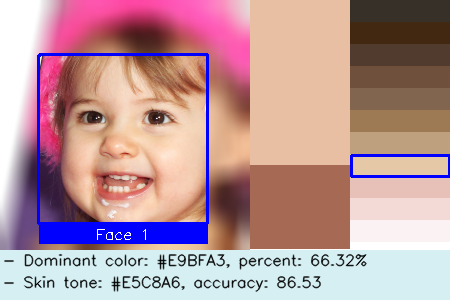
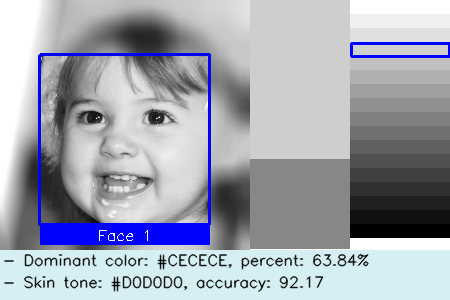
* We use a new parameter `-bw` or `--black_white` to specify whether to convert the input to black/white image.
If so, the app will convert the input to black/white image and then classify the skin tones based on the
black/white palette.
For example:
2. ✨ **NEW!**: Now we support **multiprocessing** for processing the images. It will largely speed up the processing.
* The number of processes is set to the number of CPU cores by default.
* You can specify the number of processes by `--n_workers` parameter.
3. 🧬 **CHANGE!**: We add more details in the report image to facilitate the debugging, as shown above.
* We add the face id in the report image.
* We add the effective face or skin area in the report image. In this case, the other areas are blurred.
4. 🧬 **CHANGE!**: Now, we save the report images into different folders based on their `image_type` (color or
black/white) and the number of detected faces.
* For example, if the input image is **color** and there are **2 faces** detected, the report image will be saved
in `./debug/color/faces_2/` folder.
* If the input image is **black/white** and no face has been detected, the report image will be saved
in `./debug/bw/faces_0/` folder.
* You can easily to tune the parameters and rerun the app based on the report images in the corresponding folder.
5. 🐛 **FIX!**: We fix the bug that the app will crash when the input image has dimensionality errors.
* Now, the app won't crash and will report the error message in `./result.csv`.
================================================
FILE: LICENSE
================================================
GNU GENERAL PUBLIC LICENSE
Version 3, 29 June 2007
Copyright (C) 2007 Free Software Foundation, Inc.
Everyone is permitted to copy and distribute verbatim copies
of this license document, but changing it is not allowed.
Preamble
The GNU General Public License is a free, copyleft license for
software and other kinds of works.
The licenses for most software and other practical works are designed
to take away your freedom to share and change the works. By contrast,
the GNU General Public License is intended to guarantee your freedom to
share and change all versions of a program--to make sure it remains free
software for all its users. We, the Free Software Foundation, use the
GNU General Public License for most of our software; it applies also to
any other work released this way by its authors. You can apply it to
your programs, too.
When we speak of free software, we are referring to freedom, not
price. Our General Public Licenses are designed to make sure that you
have the freedom to distribute copies of free software (and charge for
them if you wish), that you receive source code or can get it if you
want it, that you can change the software or use pieces of it in new
free programs, and that you know you can do these things.
To protect your rights, we need to prevent others from denying you
these rights or asking you to surrender the rights. Therefore, you have
certain responsibilities if you distribute copies of the software, or if
you modify it: responsibilities to respect the freedom of others.
For example, if you distribute copies of such a program, whether
gratis or for a fee, you must pass on to the recipients the same
freedoms that you received. You must make sure that they, too, receive
or can get the source code. And you must show them these terms so they
know their rights.
Developers that use the GNU GPL protect your rights with two steps:
(1) assert copyright on the software, and (2) offer you this License
giving you legal permission to copy, distribute and/or modify it.
For the developers' and authors' protection, the GPL clearly explains
that there is no warranty for this free software. For both users' and
authors' sake, the GPL requires that modified versions be marked as
changed, so that their problems will not be attributed erroneously to
authors of previous versions.
Some devices are designed to deny users access to install or run
modified versions of the software inside them, although the manufacturer
can do so. This is fundamentally incompatible with the aim of
protecting users' freedom to change the software. The systematic
pattern of such abuse occurs in the area of products for individuals to
use, which is precisely where it is most unacceptable. Therefore, we
have designed this version of the GPL to prohibit the practice for those
products. If such problems arise substantially in other domains, we
stand ready to extend this provision to those domains in future versions
of the GPL, as needed to protect the freedom of users.
Finally, every program is threatened constantly by software patents.
States should not allow patents to restrict development and use of
software on general-purpose computers, but in those that do, we wish to
avoid the special danger that patents applied to a free program could
make it effectively proprietary. To prevent this, the GPL assures that
patents cannot be used to render the program non-free.
The precise terms and conditions for copying, distribution and
modification follow.
TERMS AND CONDITIONS
0. Definitions.
"This License" refers to version 3 of the GNU General Public License.
"Copyright" also means copyright-like laws that apply to other kinds of
works, such as semiconductor masks.
"The Program" refers to any copyrightable work licensed under this
License. Each licensee is addressed as "you". "Licensees" and
"recipients" may be individuals or organizations.
To "modify" a work means to copy from or adapt all or part of the work
in a fashion requiring copyright permission, other than the making of an
exact copy. The resulting work is called a "modified version" of the
earlier work or a work "based on" the earlier work.
A "covered work" means either the unmodified Program or a work based
on the Program.
To "propagate" a work means to do anything with it that, without
permission, would make you directly or secondarily liable for
infringement under applicable copyright law, except executing it on a
computer or modifying a private copy. Propagation includes copying,
distribution (with or without modification), making available to the
public, and in some countries other activities as well.
To "convey" a work means any kind of propagation that enables other
parties to make or receive copies. Mere interaction with a user through
a computer network, with no transfer of a copy, is not conveying.
An interactive user interface displays "Appropriate Legal Notices"
to the extent that it includes a convenient and prominently visible
feature that (1) displays an appropriate copyright notice, and (2)
tells the user that there is no warranty for the work (except to the
extent that warranties are provided), that licensees may convey the
work under this License, and how to view a copy of this License. If
the interface presents a list of user commands or options, such as a
menu, a prominent item in the list meets this criterion.
1. Source Code.
The "source code" for a work means the preferred form of the work
for making modifications to it. "Object code" means any non-source
form of a work.
A "Standard Interface" means an interface that either is an official
standard defined by a recognized standards body, or, in the case of
interfaces specified for a particular programming language, one that
is widely used among developers working in that language.
The "System Libraries" of an executable work include anything, other
than the work as a whole, that (a) is included in the normal form of
packaging a Major Component, but which is not part of that Major
Component, and (b) serves only to enable use of the work with that
Major Component, or to implement a Standard Interface for which an
implementation is available to the public in source code form. A
"Major Component", in this context, means a major essential component
(kernel, window system, and so on) of the specific operating system
(if any) on which the executable work runs, or a compiler used to
produce the work, or an object code interpreter used to run it.
The "Corresponding Source" for a work in object code form means all
the source code needed to generate, install, and (for an executable
work) run the object code and to modify the work, including scripts to
control those activities. However, it does not include the work's
System Libraries, or general-purpose tools or generally available free
programs which are used unmodified in performing those activities but
which are not part of the work. For example, Corresponding Source
includes interface definition files associated with source files for
the work, and the source code for shared libraries and dynamically
linked subprograms that the work is specifically designed to require,
such as by intimate data communication or control flow between those
subprograms and other parts of the work.
The Corresponding Source need not include anything that users
can regenerate automatically from other parts of the Corresponding
Source.
The Corresponding Source for a work in source code form is that
same work.
2. Basic Permissions.
All rights granted under this License are granted for the term of
copyright on the Program, and are irrevocable provided the stated
conditions are met. This License explicitly affirms your unlimited
permission to run the unmodified Program. The output from running a
covered work is covered by this License only if the output, given its
content, constitutes a covered work. This License acknowledges your
rights of fair use or other equivalent, as provided by copyright law.
You may make, run and propagate covered works that you do not
convey, without conditions so long as your license otherwise remains
in force. You may convey covered works to others for the sole purpose
of having them make modifications exclusively for you, or provide you
with facilities for running those works, provided that you comply with
the terms of this License in conveying all material for which you do
not control copyright. Those thus making or running the covered works
for you must do so exclusively on your behalf, under your direction
and control, on terms that prohibit them from making any copies of
your copyrighted material outside their relationship with you.
Conveying under any other circumstances is permitted solely under
the conditions stated below. Sublicensing is not allowed; section 10
makes it unnecessary.
3. Protecting Users' Legal Rights From Anti-Circumvention Law.
No covered work shall be deemed part of an effective technological
measure under any applicable law fulfilling obligations under article
11 of the WIPO copyright treaty adopted on 20 December 1996, or
similar laws prohibiting or restricting circumvention of such
measures.
When you convey a covered work, you waive any legal power to forbid
circumvention of technological measures to the extent such circumvention
is effected by exercising rights under this License with respect to
the covered work, and you disclaim any intention to limit operation or
modification of the work as a means of enforcing, against the work's
users, your or third parties' legal rights to forbid circumvention of
technological measures.
4. Conveying Verbatim Copies.
You may convey verbatim copies of the Program's source code as you
receive it, in any medium, provided that you conspicuously and
appropriately publish on each copy an appropriate copyright notice;
keep intact all notices stating that this License and any
non-permissive terms added in accord with section 7 apply to the code;
keep intact all notices of the absence of any warranty; and give all
recipients a copy of this License along with the Program.
You may charge any price or no price for each copy that you convey,
and you may offer support or warranty protection for a fee.
5. Conveying Modified Source Versions.
You may convey a work based on the Program, or the modifications to
produce it from the Program, in the form of source code under the
terms of section 4, provided that you also meet all of these conditions:
a) The work must carry prominent notices stating that you modified
it, and giving a relevant date.
b) The work must carry prominent notices stating that it is
released under this License and any conditions added under section
7. This requirement modifies the requirement in section 4 to
"keep intact all notices".
c) You must license the entire work, as a whole, under this
License to anyone who comes into possession of a copy. This
License will therefore apply, along with any applicable section 7
additional terms, to the whole of the work, and all its parts,
regardless of how they are packaged. This License gives no
permission to license the work in any other way, but it does not
invalidate such permission if you have separately received it.
d) If the work has interactive user interfaces, each must display
Appropriate Legal Notices; however, if the Program has interactive
interfaces that do not display Appropriate Legal Notices, your
work need not make them do so.
A compilation of a covered work with other separate and independent
works, which are not by their nature extensions of the covered work,
and which are not combined with it such as to form a larger program,
in or on a volume of a storage or distribution medium, is called an
"aggregate" if the compilation and its resulting copyright are not
used to limit the access or legal rights of the compilation's users
beyond what the individual works permit. Inclusion of a covered work
in an aggregate does not cause this License to apply to the other
parts of the aggregate.
6. Conveying Non-Source Forms.
You may convey a covered work in object code form under the terms
of sections 4 and 5, provided that you also convey the
machine-readable Corresponding Source under the terms of this License,
in one of these ways:
a) Convey the object code in, or embodied in, a physical product
(including a physical distribution medium), accompanied by the
Corresponding Source fixed on a durable physical medium
customarily used for software interchange.
b) Convey the object code in, or embodied in, a physical product
(including a physical distribution medium), accompanied by a
written offer, valid for at least three years and valid for as
long as you offer spare parts or customer support for that product
model, to give anyone who possesses the object code either (1) a
copy of the Corresponding Source for all the software in the
product that is covered by this License, on a durable physical
medium customarily used for software interchange, for a price no
more than your reasonable cost of physically performing this
conveying of source, or (2) access to copy the
Corresponding Source from a network server at no charge.
c) Convey individual copies of the object code with a copy of the
written offer to provide the Corresponding Source. This
alternative is allowed only occasionally and noncommercially, and
only if you received the object code with such an offer, in accord
with subsection 6b.
d) Convey the object code by offering access from a designated
place (gratis or for a charge), and offer equivalent access to the
Corresponding Source in the same way through the same place at no
further charge. You need not require recipients to copy the
Corresponding Source along with the object code. If the place to
copy the object code is a network server, the Corresponding Source
may be on a different server (operated by you or a third party)
that supports equivalent copying facilities, provided you maintain
clear directions next to the object code saying where to find the
Corresponding Source. Regardless of what server hosts the
Corresponding Source, you remain obligated to ensure that it is
available for as long as needed to satisfy these requirements.
e) Convey the object code using peer-to-peer transmission, provided
you inform other peers where the object code and Corresponding
Source of the work are being offered to the general public at no
charge under subsection 6d.
A separable portion of the object code, whose source code is excluded
from the Corresponding Source as a System Library, need not be
included in conveying the object code work.
A "User Product" is either (1) a "consumer product", which means any
tangible personal property which is normally used for personal, family,
or household purposes, or (2) anything designed or sold for incorporation
into a dwelling. In determining whether a product is a consumer product,
doubtful cases shall be resolved in favor of coverage. For a particular
product received by a particular user, "normally used" refers to a
typical or common use of that class of product, regardless of the status
of the particular user or of the way in which the particular user
actually uses, or expects or is expected to use, the product. A product
is a consumer product regardless of whether the product has substantial
commercial, industrial or non-consumer uses, unless such uses represent
the only significant mode of use of the product.
"Installation Information" for a User Product means any methods,
procedures, authorization keys, or other information required to install
and execute modified versions of a covered work in that User Product from
a modified version of its Corresponding Source. The information must
suffice to ensure that the continued functioning of the modified object
code is in no case prevented or interfered with solely because
modification has been made.
If you convey an object code work under this section in, or with, or
specifically for use in, a User Product, and the conveying occurs as
part of a transaction in which the right of possession and use of the
User Product is transferred to the recipient in perpetuity or for a
fixed term (regardless of how the transaction is characterized), the
Corresponding Source conveyed under this section must be accompanied
by the Installation Information. But this requirement does not apply
if neither you nor any third party retains the ability to install
modified object code on the User Product (for example, the work has
been installed in ROM).
The requirement to provide Installation Information does not include a
requirement to continue to provide support service, warranty, or updates
for a work that has been modified or installed by the recipient, or for
the User Product in which it has been modified or installed. Access to a
network may be denied when the modification itself materially and
adversely affects the operation of the network or violates the rules and
protocols for communication across the network.
Corresponding Source conveyed, and Installation Information provided,
in accord with this section must be in a format that is publicly
documented (and with an implementation available to the public in
source code form), and must require no special password or key for
unpacking, reading or copying.
7. Additional Terms.
"Additional permissions" are terms that supplement the terms of this
License by making exceptions from one or more of its conditions.
Additional permissions that are applicable to the entire Program shall
be treated as though they were included in this License, to the extent
that they are valid under applicable law. If additional permissions
apply only to part of the Program, that part may be used separately
under those permissions, but the entire Program remains governed by
this License without regard to the additional permissions.
When you convey a copy of a covered work, you may at your option
remove any additional permissions from that copy, or from any part of
it. (Additional permissions may be written to require their own
removal in certain cases when you modify the work.) You may place
additional permissions on material, added by you to a covered work,
for which you have or can give appropriate copyright permission.
Notwithstanding any other provision of this License, for material you
add to a covered work, you may (if authorized by the copyright holders of
that material) supplement the terms of this License with terms:
a) Disclaiming warranty or limiting liability differently from the
terms of sections 15 and 16 of this License; or
b) Requiring preservation of specified reasonable legal notices or
author attributions in that material or in the Appropriate Legal
Notices displayed by works containing it; or
c) Prohibiting misrepresentation of the origin of that material, or
requiring that modified versions of such material be marked in
reasonable ways as different from the original version; or
d) Limiting the use for publicity purposes of names of licensors or
authors of the material; or
e) Declining to grant rights under trademark law for use of some
trade names, trademarks, or service marks; or
f) Requiring indemnification of licensors and authors of that
material by anyone who conveys the material (or modified versions of
it) with contractual assumptions of liability to the recipient, for
any liability that these contractual assumptions directly impose on
those licensors and authors.
All other non-permissive additional terms are considered "further
restrictions" within the meaning of section 10. If the Program as you
received it, or any part of it, contains a notice stating that it is
governed by this License along with a term that is a further
restriction, you may remove that term. If a license document contains
a further restriction but permits relicensing or conveying under this
License, you may add to a covered work material governed by the terms
of that license document, provided that the further restriction does
not survive such relicensing or conveying.
If you add terms to a covered work in accord with this section, you
must place, in the relevant source files, a statement of the
additional terms that apply to those files, or a notice indicating
where to find the applicable terms.
Additional terms, permissive or non-permissive, may be stated in the
form of a separately written license, or stated as exceptions;
the above requirements apply either way.
8. Termination.
You may not propagate or modify a covered work except as expressly
provided under this License. Any attempt otherwise to propagate or
modify it is void, and will automatically terminate your rights under
this License (including any patent licenses granted under the third
paragraph of section 11).
However, if you cease all violation of this License, then your
license from a particular copyright holder is reinstated (a)
provisionally, unless and until the copyright holder explicitly and
finally terminates your license, and (b) permanently, if the copyright
holder fails to notify you of the violation by some reasonable means
prior to 60 days after the cessation.
Moreover, your license from a particular copyright holder is
reinstated permanently if the copyright holder notifies you of the
violation by some reasonable means, this is the first time you have
received notice of violation of this License (for any work) from that
copyright holder, and you cure the violation prior to 30 days after
your receipt of the notice.
Termination of your rights under this section does not terminate the
licenses of parties who have received copies or rights from you under
this License. If your rights have been terminated and not permanently
reinstated, you do not qualify to receive new licenses for the same
material under section 10.
9. Acceptance Not Required for Having Copies.
You are not required to accept this License in order to receive or
run a copy of the Program. Ancillary propagation of a covered work
occurring solely as a consequence of using peer-to-peer transmission
to receive a copy likewise does not require acceptance. However,
nothing other than this License grants you permission to propagate or
modify any covered work. These actions infringe copyright if you do
not accept this License. Therefore, by modifying or propagating a
covered work, you indicate your acceptance of this License to do so.
10. Automatic Licensing of Downstream Recipients.
Each time you convey a covered work, the recipient automatically
receives a license from the original licensors, to run, modify and
propagate that work, subject to this License. You are not responsible
for enforcing compliance by third parties with this License.
An "entity transaction" is a transaction transferring control of an
organization, or substantially all assets of one, or subdividing an
organization, or merging organizations. If propagation of a covered
work results from an entity transaction, each party to that
transaction who receives a copy of the work also receives whatever
licenses to the work the party's predecessor in interest had or could
give under the previous paragraph, plus a right to possession of the
Corresponding Source of the work from the predecessor in interest, if
the predecessor has it or can get it with reasonable efforts.
You may not impose any further restrictions on the exercise of the
rights granted or affirmed under this License. For example, you may
not impose a license fee, royalty, or other charge for exercise of
rights granted under this License, and you may not initiate litigation
(including a cross-claim or counterclaim in a lawsuit) alleging that
any patent claim is infringed by making, using, selling, offering for
sale, or importing the Program or any portion of it.
11. Patents.
A "contributor" is a copyright holder who authorizes use under this
License of the Program or a work on which the Program is based. The
work thus licensed is called the contributor's "contributor version".
A contributor's "essential patent claims" are all patent claims
owned or controlled by the contributor, whether already acquired or
hereafter acquired, that would be infringed by some manner, permitted
by this License, of making, using, or selling its contributor version,
but do not include claims that would be infringed only as a
consequence of further modification of the contributor version. For
purposes of this definition, "control" includes the right to grant
patent sublicenses in a manner consistent with the requirements of
this License.
Each contributor grants you a non-exclusive, worldwide, royalty-free
patent license under the contributor's essential patent claims, to
make, use, sell, offer for sale, import and otherwise run, modify and
propagate the contents of its contributor version.
In the following three paragraphs, a "patent license" is any express
agreement or commitment, however denominated, not to enforce a patent
(such as an express permission to practice a patent or covenant not to
sue for patent infringement). To "grant" such a patent license to a
party means to make such an agreement or commitment not to enforce a
patent against the party.
If you convey a covered work, knowingly relying on a patent license,
and the Corresponding Source of the work is not available for anyone
to copy, free of charge and under the terms of this License, through a
publicly available network server or other readily accessible means,
then you must either (1) cause the Corresponding Source to be so
available, or (2) arrange to deprive yourself of the benefit of the
patent license for this particular work, or (3) arrange, in a manner
consistent with the requirements of this License, to extend the patent
license to downstream recipients. "Knowingly relying" means you have
actual knowledge that, but for the patent license, your conveying the
covered work in a country, or your recipient's use of the covered work
in a country, would infringe one or more identifiable patents in that
country that you have reason to believe are valid.
If, pursuant to or in connection with a single transaction or
arrangement, you convey, or propagate by procuring conveyance of, a
covered work, and grant a patent license to some of the parties
receiving the covered work authorizing them to use, propagate, modify
or convey a specific copy of the covered work, then the patent license
you grant is automatically extended to all recipients of the covered
work and works based on it.
A patent license is "discriminatory" if it does not include within
the scope of its coverage, prohibits the exercise of, or is
conditioned on the non-exercise of one or more of the rights that are
specifically granted under this License. You may not convey a covered
work if you are a party to an arrangement with a third party that is
in the business of distributing software, under which you make payment
to the third party based on the extent of your activity of conveying
the work, and under which the third party grants, to any of the
parties who would receive the covered work from you, a discriminatory
patent license (a) in connection with copies of the covered work
conveyed by you (or copies made from those copies), or (b) primarily
for and in connection with specific products or compilations that
contain the covered work, unless you entered into that arrangement,
or that patent license was granted, prior to 28 March 2007.
Nothing in this License shall be construed as excluding or limiting
any implied license or other defenses to infringement that may
otherwise be available to you under applicable patent law.
12. No Surrender of Others' Freedom.
If conditions are imposed on you (whether by court order, agreement or
otherwise) that contradict the conditions of this License, they do not
excuse you from the conditions of this License. If you cannot convey a
covered work so as to satisfy simultaneously your obligations under this
License and any other pertinent obligations, then as a consequence you may
not convey it at all. For example, if you agree to terms that obligate you
to collect a royalty for further conveying from those to whom you convey
the Program, the only way you could satisfy both those terms and this
License would be to refrain entirely from conveying the Program.
13. Use with the GNU Affero General Public License.
Notwithstanding any other provision of this License, you have
permission to link or combine any covered work with a work licensed
under version 3 of the GNU Affero General Public License into a single
combined work, and to convey the resulting work. The terms of this
License will continue to apply to the part which is the covered work,
but the special requirements of the GNU Affero General Public License,
section 13, concerning interaction through a network will apply to the
combination as such.
14. Revised Versions of this License.
The Free Software Foundation may publish revised and/or new versions of
the GNU General Public License from time to time. Such new versions will
be similar in spirit to the present version, but may differ in detail to
address new problems or concerns.
Each version is given a distinguishing version number. If the
Program specifies that a certain numbered version of the GNU General
Public License "or any later version" applies to it, you have the
option of following the terms and conditions either of that numbered
version or of any later version published by the Free Software
Foundation. If the Program does not specify a version number of the
GNU General Public License, you may choose any version ever published
by the Free Software Foundation.
If the Program specifies that a proxy can decide which future
versions of the GNU General Public License can be used, that proxy's
public statement of acceptance of a version permanently authorizes you
to choose that version for the Program.
Later license versions may give you additional or different
permissions. However, no additional obligations are imposed on any
author or copyright holder as a result of your choosing to follow a
later version.
15. Disclaimer of Warranty.
THERE IS NO WARRANTY FOR THE PROGRAM, TO THE EXTENT PERMITTED BY
APPLICABLE LAW. EXCEPT WHEN OTHERWISE STATED IN WRITING THE COPYRIGHT
HOLDERS AND/OR OTHER PARTIES PROVIDE THE PROGRAM "AS IS" WITHOUT WARRANTY
OF ANY KIND, EITHER EXPRESSED OR IMPLIED, INCLUDING, BUT NOT LIMITED TO,
THE IMPLIED WARRANTIES OF MERCHANTABILITY AND FITNESS FOR A PARTICULAR
PURPOSE. THE ENTIRE RISK AS TO THE QUALITY AND PERFORMANCE OF THE PROGRAM
IS WITH YOU. SHOULD THE PROGRAM PROVE DEFECTIVE, YOU ASSUME THE COST OF
ALL NECESSARY SERVICING, REPAIR OR CORRECTION.
16. Limitation of Liability.
IN NO EVENT UNLESS REQUIRED BY APPLICABLE LAW OR AGREED TO IN WRITING
WILL ANY COPYRIGHT HOLDER, OR ANY OTHER PARTY WHO MODIFIES AND/OR CONVEYS
THE PROGRAM AS PERMITTED ABOVE, BE LIABLE TO YOU FOR DAMAGES, INCLUDING ANY
GENERAL, SPECIAL, INCIDENTAL OR CONSEQUENTIAL DAMAGES ARISING OUT OF THE
USE OR INABILITY TO USE THE PROGRAM (INCLUDING BUT NOT LIMITED TO LOSS OF
DATA OR DATA BEING RENDERED INACCURATE OR LOSSES SUSTAINED BY YOU OR THIRD
PARTIES OR A FAILURE OF THE PROGRAM TO OPERATE WITH ANY OTHER PROGRAMS),
EVEN IF SUCH HOLDER OR OTHER PARTY HAS BEEN ADVISED OF THE POSSIBILITY OF
SUCH DAMAGES.
17. Interpretation of Sections 15 and 16.
If the disclaimer of warranty and limitation of liability provided
above cannot be given local legal effect according to their terms,
reviewing courts shall apply local law that most closely approximates
an absolute waiver of all civil liability in connection with the
Program, unless a warranty or assumption of liability accompanies a
copy of the Program in return for a fee.
END OF TERMS AND CONDITIONS
How to Apply These Terms to Your New Programs
If you develop a new program, and you want it to be of the greatest
possible use to the public, the best way to achieve this is to make it
free software which everyone can redistribute and change under these terms.
To do so, attach the following notices to the program. It is safest
to attach them to the start of each source file to most effectively
state the exclusion of warranty; and each file should have at least
the "copyright" line and a pointer to where the full notice is found.
Copyright (C)
This program is free software: you can redistribute it and/or modify
it under the terms of the GNU General Public License as published by
the Free Software Foundation, either version 3 of the License, or
(at your option) any later version.
This program is distributed in the hope that it will be useful,
but WITHOUT ANY WARRANTY; without even the implied warranty of
MERCHANTABILITY or FITNESS FOR A PARTICULAR PURPOSE. See the
GNU General Public License for more details.
You should have received a copy of the GNU General Public License
along with this program. If not, see .
Also add information on how to contact you by electronic and paper mail.
If the program does terminal interaction, make it output a short
notice like this when it starts in an interactive mode:
Copyright (C)
This program comes with ABSOLUTELY NO WARRANTY; for details type `show w'.
This is free software, and you are welcome to redistribute it
under certain conditions; type `show c' for details.
The hypothetical commands `show w' and `show c' should show the appropriate
parts of the General Public License. Of course, your program's commands
might be different; for a GUI interface, you would use an "about box".
You should also get your employer (if you work as a programmer) or school,
if any, to sign a "copyright disclaimer" for the program, if necessary.
For more information on this, and how to apply and follow the GNU GPL, see
.
The GNU General Public License does not permit incorporating your program
into proprietary programs. If your program is a subroutine library, you
may consider it more useful to permit linking proprietary applications with
the library. If this is what you want to do, use the GNU Lesser General
Public License instead of this License. But first, please read
.
================================================
FILE: MANIFEST.in
================================================
include README.md
include LICENSE
include MANIFEST.in
recursive-include src/stone/ui *
recursive-exclude * *.py[co]
exclude .idea/*
exclude CHANGELOG.md
exclude _config.yml
exclude docs/*
exclude requirements.txt
================================================
FILE: README.md
================================================

[](https://pypi.org/project/skin-tone-classifier/)
[](https://pypi.org/project/skin-tone-classifier/)
[](https://pepy.tech/projects/skin-tone-classifier)
[](https://github.com/ChenglongMa/SkinToneClassifier/releases/latest)
[](https://github.com/ChenglongMa/SkinToneClassifier/blob/main/LICENSE)
[](https://youtube.com/playlist?list=PLYRpHlp-9V_E5ZLhW1hbNaVjS5Zg6b6kQ&si=ezxUR7McUbZa4clT)
[](https://colab.research.google.com/drive/1k-cryEZ9PInJRXWIi17ib66ufYV2Ikwe?usp=sharing)
[](https://github.com/ChenglongMa/SkinToneClassifier)
An easy-to-use library for skin tone classification.
This can be used to detect **face** or **skin area** in the specified images.
The detected skin tones are then classified into the specified color categories.
The library finally generates results to report the detected faces (if any),
dominant skin tones and color categories.
Check out the [Changelog](https://github.com/ChenglongMa/SkinToneClassifier/blob/main/CHANGELOG.md) for the latest updates.
*If you find this project helpful, please
consider [giving it a star](https://github.com/ChenglongMa/SkinToneClassifier)* ⭐. *It would be a great encouragement
for me!*
---
**Table of Contents**
- [Showcases](#showcases)
- [PERLA Palette (default)](#perla-palette-default)
- [YADON-OSTFELD Palette](#yadon-ostfeld-palette)
- [PRODER Palette](#proder-palette)
- [Video tutorials](#video-tutorials)
- [Playlist](#playlist)
- [1. How to install Python and `stone`](#1-how-to-install-python-and-stone)
- [2. Use `stone` in GUI mode](#2-use-stone-in-gui-mode)
- [3. Use `stone` in CLI mode](#3-use-stone-in-cli-mode)
- [4. Use `stone` in Python scripts](#4-use-stone-in-python-scripts)
- [Installation](#installation)
- [Install from pip](#install-from-pip)
- [Install the CLI mode only](#install-the-cli-mode-only)
- [Install the CLI mode and the GUI mode](#install-the-cli-mode-and-the-gui-mode)
- [Install from source](#install-from-source)
- [HOW TO USE](#how-to-use)
- [Quick Start](#quick-start)
- [Use `stone` in a GUI](#use-stone-in-a-gui)
- [Use `stone` in command line interface (CLI)](#use-stone-in-command-line-interface-cli)
- [Interpretation of the table](#interpretation-of-the-table)
- [Detailed Usage](#detailed-usage)
- [Use Cases](#use-cases)
- [1. Process multiple images](#1-process-multiple-images)
- [2. Specify color palette](#2-specify-color-palette)
- [3. Specify category labels](#3-specify-category-labels)
- [4. Specify output folder](#4-specify-output-folder)
- [5. Store report images for debugging](#5-store-report-images-for-debugging)
- [6. Specify the types of the input image(s)](#6-specify-the-types-of-the-input-images)
- [7. Convert the `color` images to `black/white` images](#7-convert-the-color-images-to-blackwhite-images)
- [8. Tune parameters of face detection](#8-tune-parameters-of-face-detection)
- [9. Multiprocessing settings](#9-multiprocessing-settings)
- [10. Used as a library by importing into other projects](#10-used-as-a-library-by-importing-into-other-projects)
- [11. Used in a FAST API project](#11-used-in-a-fast-api-project)
- [Citation](#citation)
- [Contributing](#contributing)
- [Disclaimer](#disclaimer)
# Showcases
The following are some examples of the classification results using different palettes.
## PERLA Palette (default)


## YADON-OSTFELD Palette


## PRODER Palette


# Video tutorials
[](https://youtube.com/playlist?list=PLYRpHlp-9V_E5ZLhW1hbNaVjS5Zg6b6kQ&si=ezxUR7McUbZa4clT)
Please visit the following video tutorials if you have no programming background or are unfamiliar with how to use Python and this library 💖
## Playlist
[](https://youtube.com/playlist?list=PLYRpHlp-9V_E5ZLhW1hbNaVjS5Zg6b6kQ&si=ezxUR7McUbZa4clT)
Click here to show more.
## 1. How to install Python and `stone`
[](https://www.youtube.com/watch?v=vu6whI0qcmU&list=PLYRpHlp-9V_E5ZLhW1hbNaVjS5Zg6b6kQ&index=1)
[](https://www.youtube.com/watch?v=vu6whI0qcmU&list=PLYRpHlp-9V_E5ZLhW1hbNaVjS5Zg6b6kQ&index=1)
## 2. Use `stone` in GUI mode
[](https://www.youtube.com/watch?v=08apMEogZgs&list=PLYRpHlp-9V_E5ZLhW1hbNaVjS5Zg6b6kQ&index=2)
[](https://www.youtube.com/watch?v=08apMEogZgs&list=PLYRpHlp-9V_E5ZLhW1hbNaVjS5Zg6b6kQ&index=2)
## 3. Use `stone` in CLI mode
[](https://www.youtube.com/watch?v=rqJ62DijQaw&list=PLYRpHlp-9V_E5ZLhW1hbNaVjS5Zg6b6kQ&index=3)
[](https://www.youtube.com/watch?v=rqJ62DijQaw&list=PLYRpHlp-9V_E5ZLhW1hbNaVjS5Zg6b6kQ&index=3)
## 4. Use `stone` in Python scripts
Please refer to this notebook [](https://colab.research.google.com/drive/1k-cryEZ9PInJRXWIi17ib66ufYV2Ikwe?usp=sharing) for more information.
_More videos are coming soon..._
# Installation
> [!TIP]
>
> Since v1.2.3, we have made the GUI mode **optional**.
>
## Install from pip
### Install the CLI mode only
```shell
pip install skin-tone-classifier --upgrade
```
It is useful for users who want to use this library in non-GUI environments, e.g., servers or [](https://colab.research.google.com/drive/1k-cryEZ9PInJRXWIi17ib66ufYV2Ikwe?usp=sharing).
### Install the CLI mode and the GUI mode
```shell
pip install skin-tone-classifier[all] --upgrade
```
It is useful for users who are not familiar with the command line interface and want to use the GUI mode.
## Install from source
```shell
git clone git@github.com:ChenglongMa/SkinToneClassifier.git
cd SkinToneClassifier
pip install -e . --verbose
```
> [!TIP]
>
> If you encounter the following problem:
>
> [`ImportError: DLL load failed while importing _core: The specified module could not be found`](https://stackoverflow.com/q/52306805/8860079)
>
> Please download and install **Visual C++ Redistributable** at [here](https://learn.microsoft.com/en-us/cpp/windows/latest-supported-vc-redist?view=msvc-170#visual-studio-2015-2017-2019-and-2022).
>
> Then this error will be gone.
# HOW TO USE
> [!TIP]
>
> You can combine the following documents, [the video tutorials above](#video-tutorials)
> and the running examples [](https://colab.research.google.com/drive/1k-cryEZ9PInJRXWIi17ib66ufYV2Ikwe?usp=sharing)
> to understand the usage of this library more intuitively.
>
## Quick Start
### Use `stone` in a GUI
✨ Since v1.2.0, we have provided a GUI version of `stone` for users who are not familiar with the command line
interface.

Instead of typing commands in the terminal, you can use the config GUI of `stone` to process the images.
Steps:
1. Open the terminal that can run `stone` (e.g., `PowerShell` in Windows or `Terminal` in macOS).
2. Type `stone` (without any parameters) or `stone --gui` and press Enter to open the GUI.
3. Specify the parameters in each tab.
4. Click the `Start` button to start processing the images.
Hopefully, this can make it easier for you to use `stone` 🍻!
> [!TIP]
>
> 1. It is recommended to install v1.2.3+, which supports Python 3.9+.
>
> If you have installed v1.2.0, please upgrade to v1.2.3+ by running
>
> `pip install skin-tone-classifier[all] --upgrade`
>
> 2. If you encounter the following problem:
> > This program needs access to the screen. Please run with a Framework
> > build of python, and only when you are logged in on the main display
> > of your Mac.
>
> Please launch the GUI by running `pythonw -m stone` in the terminal.
> References:
> * [stackoverflow](https://stackoverflow.com/a/52732858/8860079)
> * [python-using-mac](https://docs.python.org/3/using/mac.html)
### Use `stone` in command line interface (CLI)
To detect the skin tone in a portrait, e.g.,
Just run:
```shell
stone -i /path/to/demo.png --debug
```
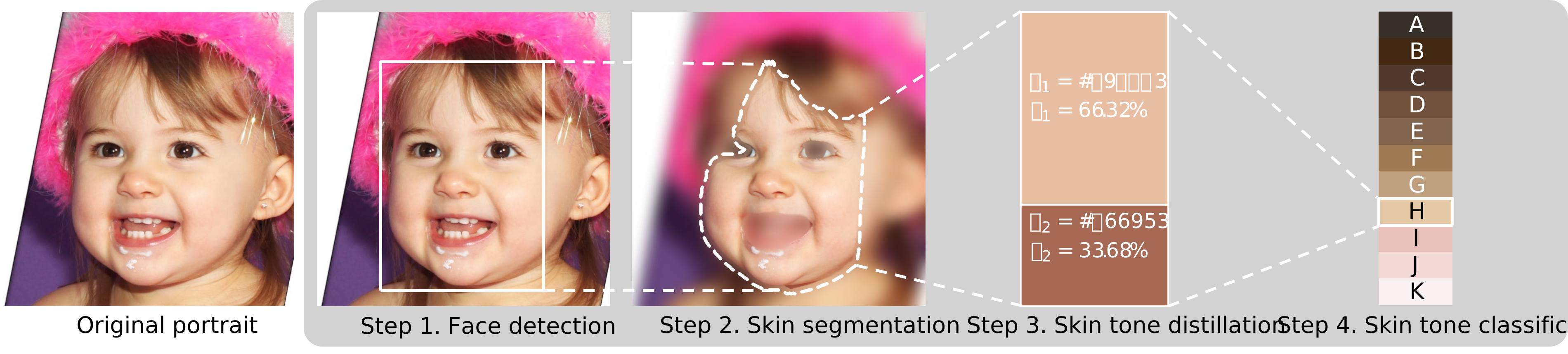
Then, you can find the processed image in `./debug/color/faces_1` folder, e.g.,
In this image, from left to right you can find the following information:
1. detected face with a label (*Face 1*) enclosed by a rectangle.
2. dominant colors.
1. _The number of colors depends on settings (default is 2), and their sizes depend on their proportion._
3. specified color palette and the target label is enclosed by a rectangle.
4. you can find a summary text at the bottom.
Furthermore, there will be a report file named `result.csv` which contains more detailed information, e.g.,
| file | image type | face id | dominant 1 | percent 1 | dominant 2 | percent 2 | skin tone | tone label | accuracy(0-100) |
|----------|------------|---------|------------|-----------|------------|-----------|-----------|------------|-----------------|
| demo.png | color | 1 | #C99676 | 0.67 | #805341 | 0.33 | #9D7A54 | CF | 86.27 |
### Interpretation of the table
1. `file`: the filename of the processed image.
* **NB: The filename pattern of report image is `-.`**
2. `image type`: the type of the processed image, i.e., `color` or `bw` (black/white).
3. `face id`: the id of the detected face, which matches the reported image. `NA` means no face has been detected.
4. `dominant n`: the `n`-th dominant color of the detected face.
5. `percent n`: the percentage of the `n`-th dominant color, (0~1.0).
6. `skin tone`: the skin tone category of the detected face.
7. `tone label`: the **label** of skin tone category of the detected face.
8. `accuracy`: the accuracy of the skin tone category of the detected face, (0~100). The larger, the better.
## Detailed Usage
To see the usage and parameters, run:
```shell
stone -h (or --help)
```
Detailed usage:
| Short Option | Long Option | Definition |
|--------------|---------------|-----------------------------------------------------------------------------------------------------------------------------------------------------------------------------------------------------------------------------------------------------------------------------------------------------------------------------------------------------------------------------------|
| -h | --help | Show this help message and exit. |
| -i | --images | Image filename(s) or URLs to process. Supports multiple values separated by **space**, e.g., `a.jpg b.png`. Supports directory or file name(s), e.g., `./path/to/images/ a.jpg`. Supports URL(s), e.g., `https://example.com/images/pic.jpg` since v1.1.0+. If you don't specify this option, the app will search all images in the current directory by default. |
| -r | --recursive | Whether to search images **recursively** in the specified directory. |
| -t | --image_type | Specify whether the input image(s) is/are **colored** or **black/white**. Valid choices are: `auto`, `color`, or `bw`. Defaults to `auto`, which will be detected **automatically**. |
| -p | --palette | Skin tone palette. Valid choices can be `perla`, `yadon-ostfeld`, `proder`; You can also input RGB **hex** values starting with `#` or **RGB** values separated by **commas**, e.g., `-p #373028 #422811` or `-p 255,255,255 100,100,100`. |
| -l | --labels | Skin tone labels. Default values are the **UPPERCASE** alphabet list leading by the image type (`C` for `color`; `B` for `Black&White`), e.g., `['CA', 'CB', ..., 'CZ']` or `['BA', 'BB', ..., 'BZ']`. |
| -d | --debug | Whether to generate report images, used for debugging and verification. The report images will be saved in the `./debug` directory. |
| -bw | --black_white | Whether to convert the input to **black/white** image(s). If `true`, the app will use a **black/white palette** to classify the image. |
| -o | --output | The path of the output file, defaults to **the current directory**. |
| | --n_workers | The number of workers to process the images, defaults to **the number of CPUs** in the system. |
| | --n_colors | CONFIG: the number of dominant colors to be extracted, defaults to 2. |
| | --new_width | CONFIG: resize the images with the specified width. **Negative value will be ignored**, defaults to 250. |
| | --scale | CONFIG: how much the image size is reduced at each image scale, defaults to 1.1. |
| | --min_nbrs | CONFIG: how many neighbors each candidate rectangle should have to retain it. **Higher value results in fewer detections but with higher quality**, defaults to 5. |
| | --min_size | CONFIG: minimum possible face size. **Faces smaller than that are ignored**. Valid format: `width height`, defaults to `90 90`. |
| | --threshold | CONFIG: what percentage of the skin area is required to identify the face, defaults to 0.15. |
| -v | --version | Show the version number and exit. |
### Use Cases
#### 1. Process multiple images
1.1 Multiple filenames
```shell
stone -i (or --images) a.jpg b.png https://example.com/images/pic.jpg
```
1.2 Images in some folder(s)
```shell
stone -i ./path/to/images/
```
NB: Supported image formats: `.jpg, .gif, .png, .jpeg, .webp, .tif`.
In default (i.e., `stone` without `-i` option), the app will search images in current folder.
#### 2. Specify color palette
2.1 Use the built-in palettes
The built-in palettes are: `perla`, `yadon-ostfeld`, `proder` and `bw`.
NB: The `bw` palette is used to classify the **black/white** images only.
For example:
```shell
stone -p (or --palette) perla
```
The HEX values of each palette are:

* `perla`:
* `#373028`, `#422811`, `#513B2E`, `#6F503C`, `#81654F`, `#9D7A54`, `#BEA07E`, `#E5C8A6`, `#E7C1B8`, `#F3DAD6`, `#FBF2F3`
* Citation: Rejón Piña, R. A., & Ma, C. (2021). Classification Algorithm for Skin Color (CASCo): A new tool to measure skin color in social science research.

* `yadon-ostfeld`:
* `#36251d`, `#48352c`, `#614539`, `#755848`, `#886958`, `#9b7966`, `#b18972`, `#c29c88`, `#d4afa3`, `#e6c6bf`
* Citation: Ostfeld, M. C., & Yadon, N. (2022). Skin color, power, and politics in America. Russell Sage Foundation.

* `proder`:
* `#654d3e`, `#775741`, `#876249`, `#946c51`, `#a0765a`, `#a87f64`, `#b1886c`, `#b69279`, `#be9d86`, `#c5a691`, `#c8ac99`
* Citation: Proyecto sobre discriminación étnico-racial en México (PRODER). El Colegio de México. https://discriminacion.colmex.mx/encuesta-proder/

* `bw`:
* `#FFFFFF`, `#F0F0F0`, `#E0E0E0`, `#D0D0D0`, `#C0C0C0`, `#B0B0B0`, `#A0A0A0`, `#909090`, `#808080`, `#707070`, `#606060`, `#505050`, `#404040`, `#303030`, `#202020`, `#101010`, `#000000`
* Citation: Leigh, A., & Susilo, T. (2009). Is voting skin-deep? Estimating the effect of candidate ballot photographs on election outcomes. Journal of Economic Psychology, 30(1), 61-70.
2.2 Use HEX values
```shell
stone -p #373028 #422811 #513B2E
```
NB: Values start with **'#'** and are separated by **space**.
2.3 Use RGB tuple values
```shell
stone -p 55,48,40 66,40,17 251,242,243
```
NB: Values split by **comma ','**, multiple values are still separated by **space**.
#### 3. Specify category labels
You can assign the labels for the skin tone categories, for example:
```text
"CA": "#373028",
"CB": "#422811",
"CC": "#513B2E",
...
```
To achieve this, you can use the `-l` (or `--labels`) option:
3.1 Specify the labels directly using __spaces__ as delimiters, e.g.,
```shell
stone -l A B C D E F G H
```
3.2 Specify the range of labels based on this pattern: ``.
Specifically,
* ``: the **start** label, can be a letter (e.g., `A`) or a number (e.g., `1`);
* ``: the **end** label, can be a letter (e.g., `H`) or a number (e.g., `8`);
* ``: the **step** to generate the label sequence, can be a number (e.g., `2` or `-1`), **defaults to `1`**.
* ``: the **separator** between `` and ``, can be one of these symbols: `-`, `,`, `~`, `:`, `;`, `_`.
Examples:
```shell
stone -l A-H-1
```
which is equivalent to `stone -l A-H` and `stone -l A B C D E F G H`.
```shell
stone -l A-H-2
```
which is equivalent to `stone -l A C E G`.
```shell
stone -l 1-8
```
which is equivalent to `stone -l 1 2 3 4 5 6 7 8`.
```shell
stone -l 1-8-3
```
which is equivalent to `stone -l 1 4 7`.
> [!IMPORTANT]
>
> Please make sure the number of labels is equal to the number of colors in the palette.
#### 4. Specify output folder
The app puts the final report (`result.csv`) in current folder in default.
To change the output folder:
```shell
stone -o (or --output) ./path/to/output/
```
The output folder will be created if it does not exist.
In `result.csv`, each row is showing the color information of each detected face.
If more than one faces are detected, there will be multiple rows for that image.
#### 5. Store report images for debugging
```shell
stone -d (or --debug)
```
This option will store the report image (like the demo portrait above) in
`./path/to/output/debug//faces_` folder,
where `` indicates if the image is `color` or `bw` (black/white);
`` is the number of faces detected in the image.
**By default, to save storage space, the app does not store report images.**
Like in the `result.csv` file, there will be more than one report images if 2 or more faces were detected.
#### 6. Specify the types of the input image(s)
6.1 The input are color images
```shell
stone -t (or --image_type) color
```
6.2 The input are black/white images
```shell
stone -t (or --image_type) bw
```
6.3 **In default**, the app will detect the image type automatically, i.e.,
```shell
stone -t (or --image_type) auto
```
#### 7. Convert the `color` images to `black/white` images
and then do the classification using `bw` palette
```shell
stone -bw (or --black_white)
```
For example:
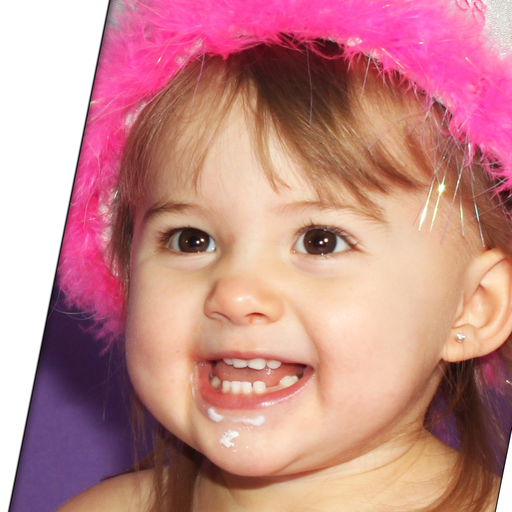
1. Input
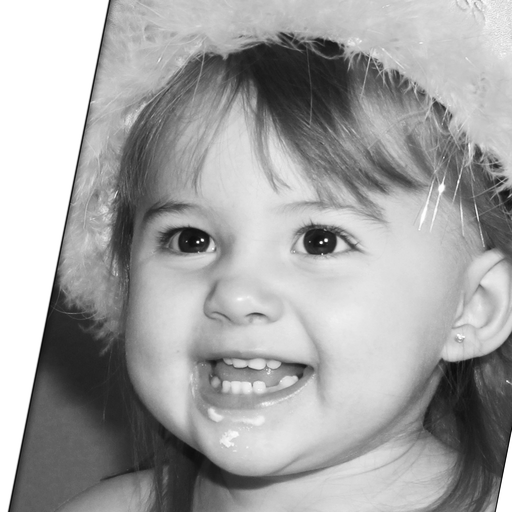
2. Convert to black/white image
3. The final report image
NB: we did not do the opposite, i.e., convert `black/white` images to `color` images
because the current AI models cannot accurately "guess" the color of the skin from a `black/white` image.
It can further bias the analysis results.
#### 8. Tune parameters of face detection
The rest parameters of `CONFIG` are used to detect face.
Please refer to https://stackoverflow.com/a/20805153/8860079 for detailed information.
#### 9. Multiprocessing settings
```shell
stone --n_workers
```
Use `--n_workers` to specify the number of workers to process images in parallel, defaults to the number of CPUs in your
system.
#### 10. Used as a library by importing into other projects
You can refer to [](https://colab.research.google.com/drive/1k-cryEZ9PInJRXWIi17ib66ufYV2Ikwe?usp=sharing) or the following code snippet:
```python
import stone
from json import dumps
# process the image
result = stone.process(image_path, image_type, palette, *other_args, return_report_image=True)
# show the report image
report_images = result.pop("report_images") # obtain and remove the report image from the `result`
face_id = 1
stone.show(report_images[face_id])
# convert the result to json
result_json = dumps(result)
```
`stone.process` is the main function to process the image.
It has the same parameters as the command line version.
It will return a `dict`, which contains the process result and report image(s) (if required,
i.e., `return_report_image=True`).
You can further use `stone.show` to show the report image(s).
And convert the result to `json` format.
The `result_json` will be like:
```json
{
"basename": "demo",
"extension": ".png",
"image_type": "color",
"faces": [
{
"face_id": 1,
"dominant_colors": [
{
"color": "#C99676",
"percent": "0.67"
},
{
"color": "#805341",
"percent": "0.33"
}
],
"skin_tone": "#9D7A54",
"tone_label": "CF",
"accuracy": 86.27
}
]
}
```
#### 11. Used in a FAST API project
`stone` can be used in a FAST API project to classify the skin tone of the uploaded image(s) via `POST` method.
Please refer to the following code snippet:
```python
# Description: This is a simple FastAPI server that receives an image file
# and processes it using the skin-tone-classifier library.
# requirements.txt:
# fastapi
# uvicorn
# skin-tone-classifier
# python-multipart
# Run the server:
# uvicorn main:app --reload
from typing import Literal
import stone
from fastapi import FastAPI, UploadFile, HTTPException
from fastapi.responses import JSONResponse
app = FastAPI()
@app.post("/stone")
async def process_image(
image_file: UploadFile,
image_type: Literal["auto", "color", "bw"] = "auto",
tone_palette: list = None,
tone_labels: list = None,
# other parameters...
):
image_data = await image_file.read()
temp_file_path = "/tmp/temp_image.jpg"
with open(temp_file_path, "wb") as temp_file:
temp_file.write(image_data)
try:
result = stone.process(
temp_file_path,
image_type=image_type,
tone_palette=tone_palette,
tone_labels=tone_labels,
# other parameters...
)
result = JSONResponse(content=result)
except Exception as e:
raise HTTPException(status_code=500, detail=str(e))
return result
```
To run the demo, please follow these steps:
1. Install required packages:
* skin-tone-classifier
* [fastapi](https://fastapi.tiangolo.com/)
* [uvicorn](https://www.uvicorn.org/)
* [python-multipart](https://pypi.org/project/python-multipart/)
2. Run the server:
`uvicorn main:app --reload`
3. You can refine the implementation according to your project requirements.
4. Finally, you can use [Postman](https://www.postman.com/) or other HTTP Clients to test the API.
# Citation
If you are interested in our work, please cite:
```bibtex
@article{https://doi.org/10.1111/ssqu.13242,
author = {Rej\'{o}n Pi\tilde{n}a, Ren\'{e} Alejandro and Ma, Chenglong},
title = {Classification Algorithm for Skin Color (CASCo): A new tool to measure skin color in social science research},
journal = {Social Science Quarterly},
volume = {n/a},
number = {n/a},
pages = {},
keywords = {colorism, measurement, photo elicitation, racism, skin color, spectrometers},
doi = {https://doi.org/10.1111/ssqu.13242},
url = {https://onlinelibrary.wiley.com/doi/abs/10.1111/ssqu.13242},
eprint = {https://onlinelibrary.wiley.com/doi/pdf/10.1111/ssqu.13242},
abstract = {Abstract Objective A growing body of literature reveals that skin color has significant effects on people's income, health, education, and employment. However, the ways in which skin color has been measured in empirical research have been criticized for being inaccurate, if not subjective and biased. Objective Introduce an objective, automatic, accessible and customizable Classification Algorithm for Skin Color (CASCo). Methods We review the methods traditionally used to measure skin color (verbal scales, visual aids or color palettes, photo elicitation, spectrometers and image-based algorithms), noting their shortcomings. We highlight the need for a different tool to measure skin color Results We present CASCo, a (social researcher-friendly) Python library that uses face detection, skin segmentation and k-means clustering algorithms to determine the skin tone category of portraits. Conclusion After assessing the merits and shortcomings of all the methods available, we argue CASCo is well equipped to overcome most challenges and objections posed against its alternatives. While acknowledging its limitations, we contend that CASCo should complement researchers. toolkit in this area.}
}
```
# Contributing
👋 Welcome to **SkinToneClassifier**! We're excited to have your contributions. Here's how you can get involved:
1. 💡 **Discuss New Ideas**: Have a creative idea or suggestion? Start a discussion in
the [Discussions](https://github.com/ChenglongMa/SkinToneClassifier/discussions) tab to share your thoughts and
gather feedback from the community.
2. ❓ **Ask Questions**: Got questions or need clarification on something in the repository? Feel free to open
an [Issue](https://github.com/ChenglongMa/SkinToneClassifier/issues) labeled as a "question" or participate
in [Discussions](https://github.com/ChenglongMa/SkinToneClassifier/discussions).
3. 🐛 **Issue a Bug**: If you've identified a bug or an issue with the code, please open a
new [Issue](https://github.com/ChenglongMa/SkinToneClassifier/issues) with a clear description of the problem, steps
to reproduce it, and your environment details.
4. ✨ **Introduce New Features**: Want to add a new feature or enhancement to the project? Fork the repository, create a
new branch, and submit a [Pull Request](https://github.com/ChenglongMa/SkinToneClassifier/pulls) with your changes.
Make sure to follow our contribution guidelines.
5. 💖 **Funding**: If you'd like to financially support the project, you can do so
by [sponsoring the repository on GitHub](https://github.com/sponsors/ChenglongMa). Your contributions help us
maintain and improve the project.
# Disclaimer
The images used in this project are from [Flickr-Faces-HQ Dataset (FFHQ)](https://github.com/NVlabs/ffhq-dataset),
which is licensed under the [Creative Commons BY-NC-SA 4.0 license](https://github.com/NVlabs/ffhq-dataset/blob/master/LICENSE.txt).
Thank you for considering contributing to **SkinToneClassifier**.
We value your input and look forward to collaborating with you!
================================================
FILE: _config.yml
================================================
theme: jekyll-theme-cayman
title: Skin Tone Classifier
description: An easy-to-use library for skin tone classification.
================================================
FILE: pyproject.toml
================================================
[project]
# This is the name of your project. The first time you publish this
# package, this name will be registered for you. It will determine how
# users can install this project, e.g.:
#
# $ pip install sampleproject
#
# And where it will live on PyPI: https://pypi.org/project/sampleproject/
#
# There are some restrictions on what makes a valid project name
# specification here:
# https://packaging.python.org/specifications/core-metadata/#name
name = "skin-tone-classifier" # Required
dynamic = ["version"]
# https://setuptools.pypa.io/en/latest/userguide/pyproject_config.html#dynamic-metadata
# "dependencies", "optional-dependencies" are BETA features currently
#dynamic = ["version", "dependencies", "optional-dependencies"]
# Versions should comply with PEP 440:
# https://www.python.org/dev/peps/pep-0440/
#
# For a discussion on single-sourcing the version, see
# https://packaging.python.org/guides/single-sourcing-package-version/
#https://packaging.python.org/en/latest/specifications/version-specifiers/#version-specifiers
#version = "1.2.3" # Required
# This is a one-line description or tagline of what your project does. This
# corresponds to the "Summary" metadata field:
# https://packaging.python.org/specifications/core-metadata/#summary
description = "An easy-to-use library for skin tone classification" # Optional
# This is an optional longer description of your project that represents
# the body of text which users will see when they visit PyPI.
#
# Often, this is the same as your README, so you can just read it in from
# that file directly (as we have already done above)
#
# This field corresponds to the "Description" metadata field:
# https://packaging.python.org/specifications/core-metadata/#description-optional
readme = "README.md" # Optional
# Specify which Python versions you support. In contrast to the
# 'Programming Language' classifiers above, 'pip install' will check this
# and refuse to install the project if the version does not match. See
# https://packaging.python.org/guides/distributing-packages-using-setuptools/#python-requires
requires-python = ">=3.9"
# This is either text indicating the license for the distribution, or a file
# that contains the license
# https://packaging.python.org/en/latest/specifications/core-metadata/#license
#license = { file = "LICENSE" }
# This field adds keywords for your project which will appear on the
# project page. What does your project relate to?
#
# Note that this is a list of additional keywords, separated
# by commas, to be used to assist searching for the distribution in a
# larger catalog.
keywords = ["skin tone", "image recognition", "face detection", "skin detection", "image segmentation"] # Optional
# This should be your name or the name of the organization who originally
# authored the project, and a valid email address corresponding to the name
# listed.
authors = [
{ name = "Chenglong Ma", email = "chenglong.m@outlook.com" } # Optional
]
# This should be your name or the names of the organization who currently
# maintains the project, and a valid email address corresponding to the name
# listed.
maintainers = [
{ name = "Chenglong Ma", email = "chenglong.m@outlook.com" } # Optional
]
# Classifiers help users find your project by categorizing it.
#
# For a list of valid classifiers, see https://pypi.org/classifiers/
classifiers = [# Optional
"Development Status :: 5 - Production/Stable",
"Intended Audience :: End Users/Desktop",
"Intended Audience :: Information Technology",
"Intended Audience :: Science/Research",
"Programming Language :: Python :: 3.9",
"Programming Language :: Python :: 3.10",
"Programming Language :: Python :: 3.11",
"Programming Language :: Python :: 3.12",
"Programming Language :: Python :: 3.13",
"License :: OSI Approved :: GNU General Public License v3 (GPLv3)",
"Operating System :: OS Independent",
"Topic :: Scientific/Engineering :: Image Recognition",
"Topic :: Scientific/Engineering :: Image Processing",
"Topic :: Scientific/Engineering :: Artificial Intelligence",
"Topic :: Scientific/Engineering :: Information Analysis",
"Topic :: Scientific/Engineering :: Visualization",
"Topic :: Sociology",
"Topic :: Multimedia :: Graphics",
"Topic :: Software Development :: Libraries :: Python Modules",
"Topic :: Terminals",
"Environment :: Console",
"Environment :: Web Environment",
"Environment :: Win32 (MS Windows)",
"Environment :: MacOS X",
"Environment :: Other Environment",
]
# This field lists other packages that your project depends on to run.
# Any package you put here will be installed by pip when your project is
# installed, so they must be valid existing projects.
#
# For an analysis of this field vs pip's requirements files see:
# https://packaging.python.org/discussions/install-requires-vs-requirements/
dependencies = [# Optional
"opencv-python>=4.9.0.80",
"numpy>=1.21.5",
"colormath>=3.0.0",
"tqdm>=4.64.0",
"colorama>=0.4.6",
"packaging>=23.1",
"requests>=2.31.0",
]
# List additional groups of dependencies here (e.g. development
# dependencies). Users will be able to install these using the "extras"
# syntax, for example:
#
# $ pip install sampleproject[dev]
#
# Similar to `dependencies` above, these must be valid existing
# projects.
[project.optional-dependencies] # Optional
all = [
"gooey>=1.0.8.1",
"re-wx==0.0.10",
# https://github.com/chriskiehl/Gooey/issues/887#issuecomment-1680192972
"colored==1.4.4",
]
# List URLs that are relevant to your project
#
# This field corresponds to the "Project-URL" and "Home-Page" metadata fields:
# https://packaging.python.org/specifications/core-metadata/#project-url-multiple-use
# https://packaging.python.org/specifications/core-metadata/#home-page-optional
#
# Examples listed include a pattern for specifying where the package tracks
# issues, where the source is hosted, where to say thanks to the package
# maintainers, and where to support the project financially. The key is
# what's used to render the link text on PyPI.
[project.urls] # Optional
"Homepage" = "https://chenglongma.com/SkinToneClassifier/"
"Bug Reports" = "https://github.com/ChenglongMa/SkinToneClassifier/issues"
"Funding" = "https://github.com/sponsors/ChenglongMa"
"Say Thanks!" = "https://saythanks.io/to/ChenglongMa"
"Repository" = "https://github.com/ChenglongMa/SkinToneClassifier/"
Changelog = "https://github.com/ChenglongMa/SkinToneClassifier/blob/main/CHANGELOG.md"
# The following would provide a command line executable called `sample`
# which executes the function `main` from this package when invoked.
[project.scripts] # Optional
stone = "stone.__main__:main"
[project.gui-scripts]
stone-gui = "stone.__main__:main"
# This is configuration specific to the `setuptools` build backend.
# If you are using a different build backend, you will need to change this.
[tool.setuptools]
# If there are data files included in your packages that need to be
# installed, specify them here.
package-dir = { "" = "src" }
license-files = ["LICENSE"]
[tool.setuptools.dynamic]
version = { attr = "stone.package.__version__" }
[build-system]
# These are the assumed default build requirements from pip:
# https://pip.pypa.io/en/stable/reference/pip/#pep-517-and-518-support
requires = ["setuptools>=66.1.0", "wheel"]
build-backend = "setuptools.build_meta"
================================================
FILE: requirements.txt
================================================
opencv-python~=4.10.0.84
numpy~=2.2.1
colormath~=3.0.0
tqdm~=4.67.1
setuptools>=65.6.3
colorama>=0.4.6
packaging~=24.2
requests~=2.32.3
# For GUI
gooey~=1.0.8.1
# https://github.com/chriskiehl/Gooey/issues/887#issuecomment-1680192972
colored==1.4.4
re-wx==0.0.10
================================================
FILE: src/stone/__init__.py
================================================
import numpy as np
from stone.api import process
from stone.image import DEFAULT_TONE_PALETTE, show
from stone.utils import __version__, check_version
setattr(np, "asscalar", lambda x: np.asarray(x).item())
__all__ = ["process", "DEFAULT_TONE_PALETTE", "show", "__version__"]
check_version()
================================================
FILE: src/stone/__main__.py
================================================
import functools
import logging
import os
import shutil
import sys
import threading
from datetime import datetime
from multiprocessing import freeze_support, cpu_count, Pool
from typing import List
import cv2
import numpy as np
from tqdm import tqdm
from tqdm.contrib.logging import logging_redirect_tqdm
from stone.api import process
from stone.package import (
__app_name__,
__version__,
__description__,
__copyright__,
__url__,
__author__,
__license__,
__code__,
__issues__,
__package_name__,
)
from stone.utils import (
build_arguments,
build_image_paths,
is_windows,
ArgumentError,
is_debugging,
resolve_labels,
)
LOG = logging.getLogger(__name__)
lock = threading.Lock()
use_cli = len(sys.argv) > 1 and "--gui" not in sys.argv
def process_in_main(
filename_or_url,
image_type,
tone_palette,
tone_labels,
convert_to_black_white,
n_dominant_colors=2,
new_width=250,
scale=1.1,
min_nbrs=5,
min_size=(90, 90),
threshold=0.3,
return_report_image=False,
):
"""
This is a wrapper function that calls process() in the main process to avoid pickling error.
:param filename_or_url:
:param image_type:
:param tone_palette:
:param tone_labels:
:param convert_to_black_white:
:param n_dominant_colors:
:param new_width:
:param scale:
:param min_nbrs:
:param min_size:
:param threshold:
:param return_report_image:
:return:
"""
try:
return process(
filename_or_url,
image_type=image_type,
tone_palette=tone_palette,
tone_labels=tone_labels,
convert_to_black_white=convert_to_black_white,
n_dominant_colors=n_dominant_colors,
new_width=new_width,
scale=scale,
min_nbrs=min_nbrs,
min_size=min_size,
threshold=threshold,
return_report_image=return_report_image,
)
except ArgumentError as e:
# Abort the app if any argument error occurs
raise e
except Exception as e:
msg = f"Error processing image {filename_or_url}: {str(e)}"
LOG.error(msg)
return {
"filename": filename_or_url,
"message": msg,
}
def main():
args = build_arguments()
# Setup logger
now = datetime.now()
output_dir = args.output
log_dir = os.path.join(output_dir, "./log")
os.makedirs(log_dir, exist_ok=True)
logging.basicConfig(
filename=now.strftime(f"{log_dir}/log-%y%m%d%H%M.log"),
level=logging.INFO,
format="[%(asctime)s] {%(filename)s:%(lineno)4d} %(levelname)s - %(message)s",
datefmt="%H:%M:%S",
)
image_paths = build_image_paths(args.images, args.recursive)
debug: bool = args.debug
to_bw: bool = args.black_white
specified_palette: List[str] = args.palette
specified_tone_labels = resolve_labels(args.labels)
new_width = args.new_width
n_dominant_colors = args.n_colors
min_size = args.min_size[:2]
scale = args.scale
min_nbrs = args.min_nbrs
os.makedirs(output_dir, exist_ok=True)
result_filename = os.path.join(output_dir, "./result.csv")
image_type_setting = args.image_type
threshold = args.threshold
def write_to_csv(row: list):
with lock:
with open(result_filename, "a", newline="", encoding="UTF8") as f:
f.write(",".join(map(str, row)) + "\n")
num_workers = cpu_count() if args.n_workers == 0 else args.n_workers
pool = Pool(processes=num_workers)
# Backup result.csv if exists
if os.path.exists(result_filename):
renamed_file = os.path.join(output_dir, now.strftime("./result_bak_%y%m%d%H%M.csv"))
shutil.move(result_filename, renamed_file)
header = (
"file,image type,face id,"
+ ",".join([f"dominant {i + 1},percent {i + 1}" for i in range(n_dominant_colors)])
+ ",skin tone,tone label,accuracy(0-100)"
)
write_to_csv(header.split(","))
# Start
process_wrapper = functools.partial(
process if is_debugging() else process_in_main,
image_type=image_type_setting,
tone_palette=specified_palette,
tone_labels=specified_tone_labels,
convert_to_black_white=to_bw,
n_dominant_colors=n_dominant_colors,
new_width=new_width,
scale=scale,
min_nbrs=min_nbrs,
min_size=min_size,
threshold=threshold,
return_report_image=debug,
)
print("The program is processing your images...")
print("Please wait for the program to finish.")
with logging_redirect_tqdm():
with tqdm(image_paths, desc="Processing images", unit="images") as pbar:
for result in pool.imap(process_wrapper, image_paths):
if "message" in result:
write_to_csv([result["filename"], result["message"]])
pbar.update()
continue
basename = result["basename"]
extension = result["extension"]
image_type = result["image_type"]
faces = result["faces"]
report_images = result["report_images"]
pbar.set_description(f"Processing {basename}")
n_faces = len(faces)
for face_record in faces:
face_id = face_record["face_id"]
if face_id == "NA":
n_faces = 0 # Did not detect any faces
dominant_colors = [[item["color"], item["percent"]] for item in face_record["dominant_colors"]]
record = (
[f"{basename}{extension}", image_type, face_id]
+ np.hstack(dominant_colors).tolist()
+ [face_record["skin_tone"], face_record["tone_label"], face_record["accuracy"]]
)
write_to_csv(record)
pbar.set_postfix(
{
"Image Type": image_type,
"#Faces": n_faces,
"Face ID": face_id,
"Skin Tone": face_record["skin_tone"],
"Label": face_record["tone_label"],
"Accuracy": face_record["accuracy"],
}
)
if debug:
debug_dir = os.path.join(output_dir, f"./debug/{image_type}/faces_{n_faces}")
os.makedirs(debug_dir, exist_ok=True)
for face_id, report_image in report_images.items():
image_name = f"{basename}-{face_id}"
report_filename = os.path.join(debug_dir, f"{image_name}{extension}")
with lock:
cv2.imwrite(report_filename, report_image)
pbar.update()
pool.close()
pool.join()
sys.argv.remove("--gui") if "--gui" in sys.argv else None
if not use_cli and "--ignore-gooey" not in sys.argv:
try:
from gooey import Gooey
except ImportError:
# If gooey is not installed, use a dummy decorator
from stone.utils import Gooey
from colorama import just_fix_windows_console, Fore
just_fix_windows_console()
print(
Fore.YELLOW + f"You are using a CLI version of {__package_name__}.\n"
f"Please install the GUI version with the following command:\n",
Fore.GREEN + f"pip install {__package_name__}[all] --upgrade\n" + Fore.RESET,
)
sys.exit(0)
from importlib.resources import files
main = Gooey(
show_preview_warning=False,
advanced=True, # fixme: `False` is not working
dump_build_config=False, # fixme: `True` is not working, as the path cannot be resolved correctly
target="stone",
suppress_gooey_flag=True,
program_name=f"{__app_name__} v{__version__}",
required_cols=1,
optional_cols=1,
image_dir=str(files("stone.ui")),
tabbed_groups=True,
navigation="Tabbed",
richtext_controls=True,
use_cmd_args=True,
menu=[
{
"name": "Help",
"items": [
{
"type": "AboutDialog",
"menuTitle": "About",
"name": __app_name__,
"description": __description__,
"version": __version__,
"copyright": __copyright__,
"website": __url__,
"developer": __author__,
"license": __license__,
},
{"type": "Link", "menuTitle": "Documentation", "url": __code__},
{"type": "Link", "menuTitle": "Report Bugs", "url": __issues__},
],
},
],
)(main)
if __name__ == "__main__":
if is_windows():
freeze_support()
main()
================================================
FILE: src/stone/api.py
================================================
import logging
from pathlib import Path
from typing import Union, Literal, List
import cv2
from stone.image import (
load_image,
is_black_white,
build_full_palette,
process_image,
normalize_palette,
default_tone_labels,
)
from stone.utils import ArgumentError
LOG = logging.getLogger(__name__)
def process(
filename_or_url: Union[str, Path],
image_type: Literal["auto", "color", "bw"] = "auto",
tone_palette: Union[List[str], Literal["perla", "yadon-ostfeld", "proder", "bw"]] = "perla",
tone_labels: List[str] = None,
convert_to_black_white: bool = False,
n_dominant_colors=2,
new_width=250,
scale=1.1,
min_nbrs=5,
min_size=(90, 90),
threshold=0.15,
return_report_image=False,
):
"""
Process the image and return the result.
:param filename_or_url: The filename (in local devices) or URL (in Internet) of the image.
:param image_type: Specify whether the input image(s) is/are colored or black/white.
Valid choices are: "auto", "color" or "bw", Defaults to "auto", which will be detected automatically.
:param tone_palette: Skin tone palette; Valid choices can be `perla`, `yadon-ostfeld`, `proder`;
You can also input RGB hex value leading by "#" or RGB values separated by comma(,).
E.g., ['#373028', '#422811'] or ['255,255,255', '100,100,100']
:param tone_labels: Skin tone labels; default values are the uppercase alphabet list leading by the image type
('C' for 'color'; 'B' for 'Black&White'), e.g., ['CA', 'CB', ..., 'CZ'] or ['BA', 'BB', ..., 'BZ'].
:param convert_to_black_white: Whether to convert the image to black/white before processing. Defaults to False.
:param n_dominant_colors: Number of dominant colors to be extracted from the image. Defaults to 2.
:param new_width: Resize the images with the specified width. Negative value will be ignored, defaults to 250.
:param scale: How much the image size is reduced at each image scale. Defaults to 1.1.
:param min_nbrs: How many neighbors each candidate rectangle should have to retain it.
Higher value results in less detection but with higher quality, defaults to 5.
:param min_size: Minimum possible face size. Faces smaller than that are ignored, defaults to (90, 90).
:param threshold: What percentage of the skin area is required to identify the face, defaults to 0.15.
:param return_report_image: Whether to return the report image(s) in the result. Defaults to False.
:return:
"""
image, basename, extension = load_image(filename_or_url, flags=cv2.IMREAD_COLOR)
if image is None:
msg = f"{basename}{extension} is not found or is not a valid image."
LOG.error(msg)
return {
"filename": basename,
"message": msg,
}
is_bw = is_black_white(image)
decoded_image_type = image_type
if image_type == "auto":
decoded_image_type = "bw" if convert_to_black_white or is_bw else "color"
else:
is_bw = image_type == "bw"
if not tone_palette:
tone_palette = "bw" if decoded_image_type == "bw" else "perla"
if len(tone_palette) == 1:
tone_palette = tone_palette[0]
default_tone_palette = build_full_palette()
if isinstance(tone_palette, str):
tone_palette = tone_palette.lower()
if tone_palette not in default_tone_palette:
raise ArgumentError(f"Invalid `tone_palette`: {tone_palette}, valid choices are: {default_tone_palette.keys()}")
skin_tone_palette = default_tone_palette[tone_palette]
else:
skin_tone_palette = normalize_palette(tone_palette)
skin_tone_labels = tone_labels or default_tone_labels(skin_tone_palette, "C" if decoded_image_type == "color" else "B")
if len(skin_tone_palette) != len(skin_tone_labels):
raise ArgumentError("Argument -p/--palette and -l/--labels must have the same length.")
records, report_images = process_image(
image,
is_bw,
convert_to_black_white,
skin_tone_palette,
skin_tone_labels,
new_width=new_width,
n_dominant_colors=n_dominant_colors,
scaleFactor=scale,
minNeighbors=min_nbrs,
minSize=min_size,
threshold=threshold,
verbose=return_report_image,
)
return {
"basename": basename,
"extension": extension,
"image_type": decoded_image_type,
"faces": records,
"report_images": report_images,
}
================================================
FILE: src/stone/image.py
================================================
import functools
import logging
import math
import re
import urllib.error
from pathlib import Path
from urllib.request import urlopen
import cv2
import numpy as np
from colormath.color_conversions import convert_color
from colormath.color_diff import delta_e_cie2000
from colormath.color_objects import sRGBColor, LabColor
from stone.utils import is_url, extract_filename_and_extension, alphabet_id, ArgumentError
LOG = logging.getLogger(__name__)
DEFAULT_TONE_PALETTE = {
# Default skin tone palette
"perla": [
"#373028",
"#422811",
"#513b2e",
"#6f503c",
"#81654f",
"#9d7a54",
"#bea07e",
"#e5c8a6",
"#e7c1b8",
"#f3dad6",
"#fbf2f3",
],
# Refer to this paper:
# Monk, Ellis. "Monk Skin Tone Scale," 2019. https://skintone.google.
"monk": [
"#f6ede4",
"#f3e7db",
"#f7ead0",
"#eadaba",
"#d7bd96",
"#a07e56",
"#825c43",
"#604134",
"#3a312a",
"#292420"
],
# Refer to this paper:
# Ostfeld, M. C., & Yadon, N. (2022). Skin color, power, and politics in America. Russell Sage Foundation.
"yadon-ostfeld": [
"#36251d",
"#48352c",
"#614539",
"#755848",
"#886958",
"#9b7966",
"#b18972",
"#c29c88",
"#d4afa3",
"#e6c6bf",
],
# Refer to this paper:
# Proyecto sobre discriminación étnico-racial en México (PRODER). El Colegio de México. https://discriminacion.colmex.mx/encuesta-proder/
"proder": [
"#654d3e",
"#775741",
"#876249",
"#946c51",
"#a0765a",
"#a87f64",
"#b1886c",
"#b69279",
"#be9d86",
"#c5a691",
"#c8ac99",
],
# Refer to this paper:
# Leigh, A., & Susilo, T. (2009). Is voting skin-deep? Estimating the effect of candidate ballot photographs on election outcomes.
# Journal of Economic Psychology, 30(1), 61-70.
"bw": [
"#FFFFFF",
"#F0F0F0",
"#E0E0E0",
"#D0D0D0",
"#C0C0C0",
"#B0B0B0",
"#A0A0A0",
"#909090",
"#808080",
"#707070",
"#606060",
"#505050",
"#404040",
"#303030",
"#202020",
"#101010",
"#000000",
],
}
TONE_ALIAS = {
"monk": ["mst", "google"],
"yadon-ostfeld": ["yo", "ostfeld", "yadon"],
"bw": ["black-white"],
}
def build_full_palette():
return {alias: palette for name, palette in DEFAULT_TONE_PALETTE.items() for alias in [name] + TONE_ALIAS.get(name, [])}
def default_tone_labels(tone_palette, prefix:str=""):
prefix = prefix or ""
return [f"{prefix}{alphabet_id(i)}" for i in range(len(tone_palette))]
@functools.lru_cache(maxsize=128) # Python 3.2+
def normalize_color(color):
hex_color_pattern = re.compile(r"^#([A-Fa-f0-9]{6}|[A-Fa-f0-9]{3})$")
decimal_color_pattern = re.compile(
r"^(25[0-5]|2[0-4][0-9]|[01]?[0-9][0-9]?)"
r",\s*(25[0-5]|2[0-4][0-9]|[01]?[0-9][0-9]?)"
r",\s*(25[0-5]|2[0-4][0-9]|[01]?[0-9][0-9]?)$"
)
if decimal_color_pattern.match(color):
r, g, b = map(int, color.split(","))
color = "#{:02X}{:02X}{:02X}".format(r, g, b)
return color
if hex_color_pattern.match(color):
return color.upper()
raise ArgumentError(f"Invalid color code: {color}")
# @functools.lru_cache(maxsize=128) # Python 3.2+
def normalize_palette(palette):
return [normalize_color(color) for color in palette]
def load_image(filename_or_url, flags=cv2.IMREAD_COLOR):
if isinstance(filename_or_url, str):
if is_url(filename_or_url):
base_filename, extension = extract_filename_and_extension(filename_or_url)
image = image_from_url(filename_or_url, flags)
return image, base_filename, extension
filename_or_url = Path(filename_or_url)
if not Path(filename_or_url).exists():
raise FileNotFoundError(f"{filename_or_url} is not found.")
base_filename, extension = filename_or_url.stem, filename_or_url.suffix
filename = str(filename_or_url.resolve())
image = cv2.imread(filename, flags)
return image, base_filename, extension
def image_from_url(url, flags=cv2.IMREAD_COLOR):
"""
Read image from url.
Refer to https://stackoverflow.com/a/55026951/8860079
:param url:
:param flags:
:return:
"""
try:
resp = urlopen(url)
image = np.asarray(bytearray(resp.read()), dtype="uint8")
image = cv2.imdecode(image, flags)
except urllib.error.HTTPError as e:
raise FileNotFoundError(f"{url} is not found.") from e
except Exception as e:
raise ArgumentError(f"{url} is not a valid image.") from e
return image
def create_color_bar(height, width, color):
bar = np.zeros((height, width, 3), np.uint8)
bar[:] = color
return bar
def is_black_white(image, threshold=192) -> bool:
"""
Check if the image is black and white
:param image:
:param threshold:
:return:
"""
# Reading Images
if len(image.shape) == 2:
return True
h, w, *_ = image.shape
# Extracting Standard Deviation
std = np.std(image, axis=2)
below_t = np.sum(np.where(std <= 25))
prob_bt = below_t / (h * w)
return prob_bt >= threshold
def resize(image, width: int = -1, height: int = -1):
"""
Resize the image, -1 means auto, but the image won't be resized if both width and height are -1
:param image:
:param width: -1 means auto
:param height: -1 means auto
:return:
"""
if width < 0 and height < 0:
return image
elif width < 0:
ratio = height / image.shape[0]
width = int(image.shape[1] * ratio)
elif height < 0:
ratio = width / image.shape[1]
height = int(image.shape[0] * ratio)
return cv2.resize(image, (width, height))
def detect_faces(
image,
scaleFactor=1.1,
minNeighbors=5,
minSize=(30, 30),
biggest_only=True,
is_bw=False,
threshold=0.3,
):
gray = cv2.cvtColor(image, cv2.COLOR_BGR2GRAY)
gray = cv2.equalizeHist(gray)
cascade = cv2.CascadeClassifier(cv2.data.haarcascades + "haarcascade_frontalface_default.xml")
flags = (cv2.CASCADE_SCALE_IMAGE | cv2.CASCADE_FIND_BIGGEST_OBJECT) if biggest_only else cv2.CASCADE_SCALE_IMAGE
faces = cascade.detectMultiScale(
gray,
scaleFactor=scaleFactor,
minNeighbors=minNeighbors,
minSize=minSize,
flags=flags,
)
if len(faces) == 0:
return []
# Change the format of faces from (x, y, w, h) to (x, y, x+w, y+h)
faces[:, 2:] += faces[:, :2]
return [face for face in faces if is_face(face, image, is_bw, threshold)]
def is_face(face_coord, image, is_bw, threshold=0.3):
"""
Check if the face is a real face.
Method: detect the skin area in the "face" and check if the skin area is larger than the threshold
:param face_coord:
:param image:
:param is_bw:
:param threshold:
:return:
"""
x1, y1, x2, y2 = face_coord
face_image = image[y1:y2, x1:x2]
detect_skin_fn = detect_skin_in_bw if is_bw else detect_skin_in_color
_, skin_mask = detect_skin_fn(face_image)
skin_pixels = cv2.countNonZero(skin_mask)
total_pixels = face_image.shape[0] * face_image.shape[1]
skin_ratio = skin_pixels / total_pixels
return skin_ratio >= threshold
def mask_face(image, face):
x1, y1, x2, y2 = face
mask = np.zeros(image.shape[:2], dtype=np.uint8)
mask[y1:y2, x1:x2] = 255 # Fill with white color
image = cv2.bitwise_and(image, image, mask=mask)
return image
def detect_skin_in_bw(image):
gray = cv2.cvtColor(image, cv2.COLOR_BGR2GRAY)
_, threshold = cv2.threshold(gray, 0, 255, cv2.THRESH_BINARY + cv2.THRESH_OTSU)
kernel = cv2.getStructuringElement(cv2.MORPH_ELLIPSE, (5, 5))
skin_mask = cv2.morphologyEx(threshold, cv2.MORPH_CLOSE, kernel)
skin = cv2.bitwise_and(image, image, mask=skin_mask)
all_0 = np.isclose(skin, 0).all()
return image if all_0 else skin, skin_mask
def detect_skin_in_color(image):
# Converting from BGR Colors Space to HSV
img = cv2.cvtColor(image, cv2.COLOR_BGR2HSV)
# Defining skin Thresholds
low_hsv = np.array([0, 48, 80], dtype=np.uint8)
high_hsv = np.array([20, 255, 255], dtype=np.uint8)
skin_mask = cv2.inRange(img, low_hsv, high_hsv)
kernel = cv2.getStructuringElement(cv2.MORPH_ELLIPSE, (3, 3))
skin_mask = cv2.morphologyEx(skin_mask, cv2.MORPH_OPEN, kernel)
skin_mask = cv2.morphologyEx(skin_mask, cv2.MORPH_CLOSE, kernel)
skin_mask = cv2.GaussianBlur(skin_mask, ksize=(3, 3), sigmaX=0)
skin = cv2.bitwise_and(image, image, mask=skin_mask)
all_0 = np.isclose(skin, 0).all()
return image if all_0 else skin, skin_mask
def draw_rects(image, *rects, color=(255, 0, 0), thickness=2):
for x1, y1, x2, y2 in rects:
cv2.rectangle(image, (x1 - 1, y1 - 1), (x2 + 1, y2 + 1), color, thickness)
return image
def dominant_colors(image, to_bw, n_clusters=2):
if to_bw:
data = cv2.cvtColor(image, cv2.COLOR_BGR2GRAY)
data = cv2.cvtColor(data, cv2.COLOR_GRAY2BGR)
else:
data = image
data = np.reshape(data, (-1, 3))
data = data[np.all(data != 0, axis=1)]
data = np.float32(data)
criteria = (cv2.TERM_CRITERIA_EPS + cv2.TERM_CRITERIA_MAX_ITER, 10, 1.0)
flags = cv2.KMEANS_RANDOM_CENTERS
compactness, labels, colors = cv2.kmeans(data, n_clusters, None, criteria, 10, flags)
labels, counts = np.unique(labels, return_counts=True)
order = (-counts).argsort()
colors = colors[order]
counts = counts[order]
percents = counts / counts.sum()
return colors, percents
def blur(image, degree=25):
"""
Blur the image
:param image:
:param degree: The degree of blur. The bigger, the more blur
:return:
"""
ksize = degree, degree
return cv2.blur(image, ksize)
def skin_tone(colors, percents, skin_tone_palette, tone_labels):
lab_tones = [convert_color(sRGBColor.new_from_rgb_hex(rgb), LabColor) for rgb in skin_tone_palette]
lab_colors = [convert_color(sRGBColor(rgb_r=r, rgb_g=g, rgb_b=b, is_upscaled=True), LabColor) for b, g, r in colors]
distances = [np.sum([delta_e_cie2000(c, label) * p for c, p in zip(lab_colors, percents)]) for label in lab_tones]
tone_id = np.argmin(distances)
distance: float = distances[tone_id]
tone_hex = skin_tone_palette[tone_id].upper()
tone_label = tone_labels[tone_id]
return tone_id, tone_hex, tone_label, distance
def classify(
image,
is_bw,
to_bw,
skin_tone_palette,
tone_labels,
n_dominant_colors=2,
verbose=False,
report_image=None,
use_face=True,
):
"""
Classify the skin tone of the image
:param image: Entire image or image with non-face areas masked
:param is_bw: Whether the image is black and white
:param to_bw: Whether to convert the image to black and white
:param skin_tone_palette:
:param tone_labels:
:param n_dominant_colors:
:param verbose: Whether to output the report image
:param report_image: The image to draw the report on
:param use_face: whether to use face area for detection
:return:
"""
detect_skin_fn = detect_skin_in_bw if is_bw else detect_skin_in_color
skin, skin_mask = detect_skin_fn(image)
dmnt_colors, dmnt_pcts = dominant_colors(skin, to_bw, n_dominant_colors)
# Generate readable strings
hex_colors = ["#%02X%02X%02X" % tuple(np.around([r, g, b]).astype(int)) for b, g, r in dmnt_colors]
pct_strs = ["%.2f" % p for p in dmnt_pcts]
result = {"dominant_colors": [{"color": color, "percent": pct} for color, pct in zip(hex_colors, pct_strs)]}
# Calculate skin tone
tone_id, tone_hex, tone_label, distance = skin_tone(dmnt_colors, dmnt_pcts, skin_tone_palette, tone_labels)
accuracy = round(100 - distance, 2)
result["skin_tone"] = tone_hex
result["tone_label"] = tone_label
result["accuracy"] = accuracy
if not verbose:
return result, None
# 0. Create initial report image
report_image = initial_report_image(image, report_image, skin_mask, use_face, to_bw)
bar_width = 100
# 1. Create color bar for dominant colors
color_bars = create_dominant_color_bar(report_image, dmnt_colors, dmnt_pcts, bar_width)
# 2. Create color bar for a skin tone list
palette_bars = create_tone_palette_bar(report_image, tone_id, skin_tone_palette, bar_width)
# 3. Combine all bars and report image
report_image = np.hstack([report_image, color_bars, palette_bars])
msg_bar = create_message_bar(dmnt_colors, dmnt_pcts, tone_hex, distance, report_image.shape[1])
report_image = np.vstack([report_image, msg_bar])
return result, report_image
def initial_report_image(face_image, report_image, skin_mask, use_face, to_bw):
report_image = face_image if report_image is None else report_image
if to_bw:
report_image = cv2.cvtColor(report_image, cv2.COLOR_BGR2GRAY)
report_image = cv2.cvtColor(report_image, cv2.COLOR_GRAY2BGR)
if use_face:
gray = cv2.cvtColor(face_image, cv2.COLOR_BGR2GRAY)
skin_mask = cv2.threshold(gray, 1, 255, cv2.THRESH_BINARY)[1]
blurred_image = blur(report_image)
non_skin_mask = cv2.bitwise_not(skin_mask)
edges = cv2.Canny(skin_mask, 50, 150)
report_image = cv2.bitwise_and(report_image, report_image, mask=skin_mask) + cv2.bitwise_and(
blurred_image, blurred_image, mask=non_skin_mask
)
contours, _ = cv2.findContours(edges, cv2.RETR_EXTERNAL, cv2.CHAIN_APPROX_SIMPLE)
cv2.drawContours(report_image, contours, -1, (255, 0, 0), 2)
return report_image
def create_dominant_color_bar(report_image, dmnt_colors, dmnt_pcts, bar_width):
color_bars = []
total_height = 0
for color, pct in zip(dmnt_colors, dmnt_pcts):
bar_height = int(math.floor(report_image.shape[0] * pct))
total_height += bar_height
bar = create_color_bar(bar_height, bar_width, color)
color_bars.append(bar)
padding_height = report_image.shape[0] - total_height
if padding_height > 0:
padding = create_color_bar(padding_height, bar_width, (255, 255, 255))
color_bars.append(padding)
return np.vstack(color_bars)
def hex_to_bgr(hex_color):
hex_value = hex_color.lstrip("#")
r, g, b = [int(hex_value[i : i + 2], 16) for i in (0, 2, 4)]
return [b, g, r]
def rgb_to_hex(rgb_color):
r, g, b = rgb_color
return "#%02X%02X%02X" % (r, g, b)
def create_tone_palette_bar(report_image, tone_id, skin_tone_palette, bar_width):
palette_bars = []
tone_height = report_image.shape[0] // len(skin_tone_palette)
tone_bgrs = []
for tone in skin_tone_palette:
hex_value = tone.lstrip("#")
r, g, b = [int(hex_value[i : i + 2], 16) for i in (0, 2, 4)]
tone_bgrs.append([b, g, r])
bar = create_color_bar(tone_height, bar_width, [b, g, r])
palette_bars.append(bar)
padding_height = report_image.shape[0] - tone_height * len(skin_tone_palette)
if padding_height > 0:
padding = create_color_bar(padding_height, bar_width, (255, 255, 255))
palette_bars.append(padding)
bar = np.vstack(palette_bars)
padding = 1
start_point = (padding, tone_id * tone_height + padding)
end_point = (bar_width - padding, (tone_id + 1) * tone_height)
bar = cv2.rectangle(bar, start_point, end_point, (255, 0, 0), 2)
return bar
def create_message_bar(dmnt_colors, dmnt_pcts, tone_hex, distance, bar_width):
msg_bar = create_color_bar(height=50, width=bar_width, color=(243, 239, 214))
b, g, r = np.around(dmnt_colors[0]).astype(int)
dominant_color_hex = "#%02X%02X%02X" % (r, g, b)
pct = f"{dmnt_pcts[0] * 100:.2f}%"
font, font_scale, txt_colr, thickness, line_type = (
cv2.FONT_HERSHEY_SIMPLEX,
0.5,
(0, 0, 0),
1,
cv2.LINE_AA,
)
x, y = 2, 15
msg = f"- Dominant color: {dominant_color_hex}, percent: {pct}"
cv2.putText(msg_bar, msg, (x, y), font, font_scale, txt_colr, thickness, line_type)
text_size, _ = cv2.getTextSize(msg, font, font_scale, thickness)
line_height = text_size[1] + 10
accuracy = round(100 - distance, 2)
cv2.putText(
msg_bar,
f"- Skin tone: {tone_hex}, accuracy: {accuracy}",
(x, y + line_height),
font,
font_scale,
txt_colr,
thickness,
cv2.LINE_AA,
)
return msg_bar
def process_image(
image: np.ndarray,
is_bw: bool,
to_bw: bool,
skin_tone_palette: list,
tone_labels: list = None,
new_width=-1,
n_dominant_colors=2,
scaleFactor=1.1,
minNeighbors=5,
minSize=(30, 30),
biggest_only=True,
threshold=0.3,
verbose=False,
):
image = resize(image, new_width)
records, report_images = [], {}
face_coords = detect_faces(image, scaleFactor, minNeighbors, minSize, biggest_only, is_bw, threshold)
n_faces = len(face_coords)
if n_faces == 0:
# If no face is detected, find skin area in the whole image and classify.
record, report_image = classify(
image,
is_bw,
to_bw,
skin_tone_palette,
tone_labels,
n_dominant_colors,
verbose=verbose,
use_face=False,
)
record["face_id"] = "NA"
records.append(record)
report_images["NA"] = report_image
# Otherwise, detect skin tone for each face
for idx, face_coord in enumerate(face_coords):
face_image = mask_face(image, face_coord)
record, report_image = classify(
face_image,
is_bw,
to_bw,
skin_tone_palette,
tone_labels,
n_dominant_colors,
verbose=verbose,
report_image=image,
use_face=True,
)
record["face_id"] = idx + 1
records.append(record)
report_image = face_report_image(face_coord, idx, report_image)
report_images[idx + 1] = report_image
return records, report_images
def show(image, title=None):
title = f" - {title}" if title else ""
cv2.imshow(f"Skin Tone Classifier{title}", image)
cv2.waitKey(0)
cv2.destroyAllWindows()
def face_report_image(face, idx, image):
if image is None:
return None
x1, y1, x2, y2 = face
width = x2 - x1
height = 20
bar = np.ones((height, width, 3), dtype=np.uint8) * (255, 0, 0)
report_image = image.copy()
report_image[y2 : y2 + height, x1:x2] = bar
txt = f"Face {idx + 1}"
text_color = (255, 255, 255)
font_scale = 0.5
thickness = 1
text_size, _ = cv2.getTextSize(txt, cv2.FONT_HERSHEY_SIMPLEX, font_scale, thickness)
text_x = x1 + (width - text_size[0]) // 2
text_y = y2 + 15
cv2.putText(
report_image,
txt,
(text_x, text_y),
cv2.FONT_HERSHEY_SIMPLEX,
font_scale,
text_color,
thickness,
)
return report_image
================================================
FILE: src/stone/package.py
================================================
__version__ = "1.2.6"
__package_name__ = "skin-tone-classifier"
__app_name__ = "Skin Tone Classifier"
__description__ = "An easy-to-use library for skin tone classification"
__author__ = "Chenglong Ma"
__author_email__ = "chenglong.m@outlook.com"
__author_website__ = "https://chenglongma.com/"
__url__ = "https://chenglongma.com/SkinToneClassifier/"
__code__ = "https://github.com/ChenglongMa/SkinToneClassifier/"
__issues__ = "https://github.com/ChenglongMa/SkinToneClassifier/issues"
__license__ = "GPLv3"
__copyright__ = "2022"
================================================
FILE: src/stone/ui/__init__.py
================================================
================================================
FILE: src/stone/utils.py
================================================
import argparse
import functools
import logging
import os
import re
import string
import sys
from pathlib import Path
from typing import Union
from urllib.parse import urlparse
from stone.package import __version__, __package_name__, __description__, __app_name__
LOG = logging.getLogger(__name__)
class ArgumentError(ValueError):
"""
Wrapper for argument error. This exception will be raised when the arguments are invalid.
"""
pass
def Gooey(*args, **kwargs):
"""
Dummy decorator for Gooey.
Used in CLI mode to avoid the import error when the Gooey package is not installed.
:param args:
:param kwargs:
:return:
"""
def inner(func):
return func
return inner
@functools.cache
def alphabet_id(n:int) -> str:
letters = string.ascii_uppercase
n_letters = len(letters)
if n < n_letters:
return letters[n]
prefix = ""
while n >= n_letters:
prefix += letters[(n // n_letters) - 1]
n %= n_letters
return prefix + letters[n]
def is_url(text):
return urlparse(text).scheme in ["http", "https"]
def extract_filename_and_extension(url):
"""
Extract base filename and extension from the url.
:param url: URL with filename and extension, e.g., https://example.com/images/pic.jpg?param=value
:return: Base filename and extension, e.g., pic, jpg
"""
parsed_url = urlparse(url)
path = parsed_url.path
filename = path.split("/")[-1]
basename, *extension = filename.split(".")
return basename, f".{extension[0]}" if extension else None
def build_image_paths(images_paths, recursive=False):
filenames, urls = [], []
valid_images = ["*.jpg", "*.gif", "*.png", "*.jpeg", "*.webp", "*.tif"]
excluded_folders = ["debug", "log"]
if isinstance(images_paths, str):
images_paths = [images_paths]
for filename in images_paths:
if is_url(filename):
urls.append(filename)
continue
p = Path(filename)
if p.is_dir():
images = [p.glob(pattern) for pattern in valid_images]
if recursive:
subfolders = [f for f in p.glob("*/") if f.name not in excluded_folders]
images.extend([sp.rglob(pattern) for pattern in valid_images for sp in subfolders])
filenames.extend(images)
elif p.is_file():
filenames.append([p])
paths = set([f.resolve() for fs in filenames for f in fs] + urls)
paths = list(paths)
if len(paths) == 0:
raise FileNotFoundError("No valid images in the specified path.")
# Sort paths by (first) number extracted from the filename string
paths.sort(key=sort_file)
return paths
def sort_file(path: Union[str, Path]):
if isinstance(path, Path):
basename = path.stem
else:
basename, *_ = extract_filename_and_extension(path)
nums = re.findall(r"\d+", basename)
return (int(nums[0]) if nums else float("inf")), basename
def is_windows():
return sys.platform in ["win32", "cygwin"]
def is_debugging():
gettrace = getattr(sys, "gettrace", None)
return gettrace is not None and gettrace()
def build_arguments():
try:
from gooey import GooeyParser
in_gui = True
except ImportError:
from argparse import ArgumentParser as GooeyParser
in_gui = False
kwargs = dict(formatter_class=argparse.RawTextHelpFormatter) if not in_gui else {}
parser = GooeyParser(
description=__description__,
**kwargs,
)
kwargs = (
{
"gooey_options": {"show_border": False, "columns": 1},
}
if in_gui
else {}
)
files = parser.add_argument_group(
"Images to process",
"The locations of images to process, which can be directories, files, or URLs.\n"
"Multiple values are separated by space;\n"
'You can mix folders, filenames and web links together, e.g., "/path/to/dir1 /path/to/pic.jpg https://example.com/pic.png".\n',
**kwargs,
)
kwargs = {"gooey_options": {"visible": False}} if in_gui else {}
files.add_argument(
"-i",
"--images",
nargs="+",
default=[] if in_gui else [os.getcwd()],
metavar="Image Filenames",
help="Image filename(s), Directories or URLs to process. Separated by space.",
**kwargs,
)
if in_gui:
files.add_argument(
"--image_dirs",
nargs="+",
metavar="Image Directories",
widget="DirChooser",
# widget="MultiDirChooser", # fixme: enable this widget when issues are fixed
gooey_options={
"message": "Select directories to process",
"initial_value": os.getcwd(),
"default_path": os.getcwd(),
"placeholder": "e.g., /path/to/dir1 /path/to/dir2",
},
)
kwargs = dict(metavar="Recursive Search") if in_gui else {}
files.add_argument(
"-r",
"--recursive",
action="store_true",
help="Search images recursively in the specified directory.",
**kwargs,
)
if in_gui:
files.add_argument(
"--image_files",
nargs="+",
metavar="Image Filenames",
help="Add individual image file(s)",
widget="MultiFileChooser",
gooey_options={
"wildcard": "All images|*.jpg;*.jpeg;*.png;*.bmp;*.gif;*.tif;*.webp|"
"JPG (*.jpg)|*.jpg|"
"JPEG (*.jpeg)|*.jpeg|"
"PNG (*.png)|*.png|"
"BMP (*.bmp)|*.bmp|"
"GIF (*.gif)|*.gif|"
"TIFF (*.tif)|*.tif|"
"WEBP (*.webp)|*.webp|"
"All files (*.*)|*.*",
"message": "Select the image file(s) to process",
"default_dir": os.getcwd(),
"full_width": False,
"placeholder": "e.g., a.jpg b.png",
},
)
files.add_argument(
"--image_urls",
nargs="+",
metavar="Image URLs",
help="Add image URLs",
gooey_options={
"full_width": False,
"placeholder": "e.g., https://example.com/a.jpg https://example.com/b.png",
},
)
kwargs = {"gooey_options": {"show_border": False, "columns": 2}} if in_gui else {}
images = parser.add_argument_group(
"Image Settings",
**kwargs,
)
bw_option = "black/white" if in_gui else "bw"
images.add_argument(
"-t",
"--image_type",
default="auto",
metavar="Image Type",
help="Specify whether the input image(s) is/are colored or black/white.\n"
f'Defaults to "auto", which will be detected automatically. Other options are "color" and "{bw_option}".\n',
choices=["auto", "color", bw_option],
)
kwargs = {"gooey_options": {"full_width": True}} if in_gui else {}
images.add_argument(
"-p",
"--palette",
nargs="+",
metavar="Palette",
help="Skin tone palette;\n"
"Valid choices are 'perla', 'monk', 'yadon-ostfeld', 'proder'.\n"
'You can also input RGB hex values leading by "#" or RGB values separated by comma(,),\n'
"E.g., #373028 #422811 or 255,255,255 100,100,100\n"
"Leave blank to use the 'perla' palette.\n",
**kwargs,
)
images.add_argument(
"-l",
"--labels",
nargs="+",
metavar="Labels",
help="Skin tone labels;\n"
"Leave blank to use the default values: the uppercase alphabet list leading by the image type ('C' for 'color'; 'B' for 'Black&White'), "
"e.g., ['CA', 'CB', ..., 'CZ'] or ['BA', 'BB', ..., 'BZ'].\n"
"Since v1.2.0, supports range of labels, e.g., 'A-Z' or '1-10'.\n"
"Refer to https://github.com/ChenglongMa/SkinToneClassifier#3-specify-category-labels for more details.",
**kwargs,
)
kwargs = dict(metavar="Convert to Black/White") if in_gui else {}
images.add_argument(
"-bw",
"--black_white",
action="store_true",
help="Whether to convert the input to black/white image(s)?\n"
"If true, the app will convert the input to black/white image(s) and use the black/white palette for classification.",
**kwargs,
)
kwargs = (
{"gooey_options": {"initial_value": 2, "min": 1, "max": 99999, "full_width": False}, "widget": "IntegerField"}
if in_gui
else {}
)
images.add_argument(
"--n_colors",
metavar="Number of Dominant Colors",
type=int,
help="Specify the number of dominant colors to be extracted.\n"
"The colors will be used to compare with the colors in the palette.\n",
default=2,
**kwargs,
)
kwargs = (
{
"gooey_options": {"initial_value": 250, "min": 10, "max": 99999, "full_width": False},
"widget": "IntegerField",
}
if in_gui
else {}
)
images.add_argument(
"--new_width",
type=int,
metavar="New Width (pixels)",
help="Resize the images with the specified width.\n"
"Sometimes smaller images will be processed faster and more accurately.\n"
"No resizing will be performed if the value is negative.",
default=250,
**kwargs,
)
kwargs = {"gooey_options": {"show_border": True}} if in_gui else {}
outputs = parser.add_argument_group("Output Settings", **kwargs)
kwargs = (
{
"gooey_options": {"message": "Select the output directory", "default_path": os.getcwd()},
"widget": "DirChooser",
}
if in_gui
else {}
)
outputs.add_argument(
"-o",
"--output",
metavar="Output Directory",
default=os.getcwd(),
help="Specify the path of output file, defaults to current directory.",
**kwargs,
)
kwargs = dict(metavar="Generate Report Images") if in_gui else {}
outputs.add_argument(
"-d",
"--debug",
action="store_true",
default=in_gui,
help="Whether to generate report images?\n"
"If true, the report images will be saved in the '/debug' directory.",
**kwargs,
)
kwargs = {"gooey_options": {"show_border": False, "columns": 2}} if in_gui else {}
advanced = parser.add_argument_group(
"Advanced Settings",
"For advanced users only, please refer to https://stackoverflow.com/a/20805153/8860079",
**kwargs,
)
kwargs = (
{"gooey_options": {"initial_value": 1.1, "min": 0.1, "max": 2.0}, "widget": "DecimalField"} if in_gui else {}
)
advanced.add_argument(
"--scale",
type=float,
metavar="Scale",
help="Specify how much the image size is reduced at each image scale.",
default=1.1,
**kwargs,
)
kwargs = {"gooey_options": {"initial_value": 5, "min": 1, "max": 99999}, "widget": "IntegerField"} if in_gui else {}
advanced.add_argument(
"--min_nbrs",
type=int,
metavar="Minimum Neighbors",
help="Specify how many neighbors each candidate rectangle should have to retain it.\n"
"Higher value results in less detections but with higher quality.",
default=5,
**kwargs,
)
default_min_width = 90
default_min_height = 90
kwargs = {"gooey_options": {"visible": False}} if in_gui else {}
advanced.add_argument(
"--min_size",
type=int,
nargs="+",
metavar="Minimum Possible Face Size, format: ",
help=f'Specify the minimum possible face size. Faces smaller than that are ignored, defaults to "{default_min_width} {default_min_height}".',
default=(default_min_width, default_min_height),
**kwargs,
)
if in_gui:
min_size = advanced.add_argument_group(
"Minimum Possible Face Size (pixels)",
'Specify the minimum possible face size. Faces smaller than that are ignored, defaults to "90 90".',
gooey_options={"show_border": True, "columns": 2},
)
min_size.add_argument(
"--min_width",
type=int,
metavar="Minimum Width",
# help="Specify the minimum possible face width. Faces smaller than that are ignored, defaults to 90.",
default=default_min_width,
widget="IntegerField",
gooey_options={"initial_value": default_min_width, "min": 10, "max": 99999},
)
min_size.add_argument(
"--min_height",
type=int,
metavar="Minimum Height",
# help="Specify the minimum possible face height. Faces smaller than that are ignored, defaults to 90.",
default=default_min_height,
widget="IntegerField",
gooey_options={"initial_value": default_min_height, "min": 10, "max": 99999},
)
kwargs = (
{"gooey_options": {"initial_value": 0.15, "min": 0.01, "max": 1.0}, "widget": "DecimalField"} if in_gui else {}
)
advanced.add_argument(
"--threshold",
type=float,
metavar="Minimum Possible Face Proportion",
help="Specify the minimum proportion of the skin area required to identify the face, defaults to 0.15.",
default=0.15,
**kwargs,
)
kwargs = {"gooey_options": {"initial_value": 0, "min": 0, "max": 99999}, "widget": "IntegerField"} if in_gui else {}
advanced.add_argument(
"--n_workers",
type=int,
metavar="Number of CPU Workers",
help="Specify the number of workers to process the images.\n"
"0 means the total number of CPU cores in the system.",
default=0,
**kwargs,
)
kwargs = dict(gooey_options={"visible": False}) if in_gui else {}
advanced.add_argument(
"-v",
"--version",
action="version",
version=f"%(prog)s {__version__}",
help="Show the version number and exit.",
**kwargs,
)
args = parser.parse_args()
images = []
if getattr(args, "images", False):
images.extend(args.images)
if getattr(args, "image_dirs", False):
images.extend(args.image_dirs)
if getattr(args, "image_files", False):
images.extend(args.image_files)
if getattr(args, "image_urls", False):
images.extend(args.image_urls)
args.images = images
if (
tuple(args.min_size) == (default_min_width, default_min_height)
and getattr(args, "min_width", False)
and getattr(args, "min_height", False)
):
args.min_size = (args.min_width, args.min_height)
return args
def resolve_labels(labels):
if not labels or len(labels) != 1:
return labels
label = labels[0]
separator = r"[-,~:;_]"
pattern = rf"^([a-zA-Z0-9]+){separator}([a-zA-Z0-9]+)(?:{separator}([-+]?\d+))?$"
match = re.match(pattern, label)
if match is None:
return labels
start, end, step = match.groups()
if not step:
step = 1
else:
step = int(step)
if step == 0:
LOG.warning(f"The specified step in the '--label' setting ('{label}') cannot be 0; resetting to 1.")
step = 1
if step < 0:
start, end = end, start
if start.isdigit() and end.isalpha() or start.isalpha() and end.isdigit():
LOG.warning(
f"Invalid '--label' setting ('{label}'): The start value ({start}) and the end value ({end}) should be both digits or both letters."
)
return labels
if start >= end:
LOG.warning(
f"Invalid '--label' setting ('{label}'): The start value ({start}) should be less than the end value ({end})."
)
return labels
if start.isdigit() and end.isdigit():
start, end = int(start), int(end)
return [str(i) for i in range(start, end + 1, step)]
if start.isalpha() and end.isalpha():
start, end = start.upper(), end.upper()
return [chr(i) for i in range(ord(start), ord(end) + 1, step)]
return labels
def get_latest_version_from_pypi(package_name):
try:
import requests
response = requests.get(f"https://pypi.org/pypi/{package_name}/json")
response.raise_for_status()
data = response.json()
latest_version = data["info"]["version"]
return latest_version
except Exception:
pass
def check_version():
if "STONE_UPGRADE_FLAG" in os.environ:
return
try:
from packaging.version import parse
import importlib.metadata
latest_version = get_latest_version_from_pypi(__package_name__)
if not latest_version:
return
distribution = importlib.metadata.distribution(__package_name__)
installed_version = distribution.version
if parse(installed_version) < parse(latest_version):
from colorama import just_fix_windows_console, Fore
just_fix_windows_console()
print(
Fore.YELLOW + f"You are using an outdated version of {__package_name__} ({installed_version}).\n"
f"Please upgrade to the latest version ({latest_version}) with the following command:\n",
Fore.GREEN + f"pip install {__package_name__}[all] --upgrade\n" + Fore.RESET,
)
os.environ["STONE_UPGRADE_FLAG"] = "1"
except Exception:
pass
================================================
FILE: tests/__init__.py
================================================
================================================
FILE: tests/test_utils.py
================================================
import unittest
from pathlib import Path
from stone.image import default_tone_labels
from stone.utils import build_image_paths, resolve_labels, alphabet_id
class TestUtils(unittest.TestCase):
def setUp(self):
self.image_path = str(Path("./mock_data/images").resolve())
# Sorted image paths
self.expected_recursive_image_paths = [
f"{self.image_path}/fake_img_1.gif", # In default, sorted by the trailing number
f"{self.image_path}/fake_img_2.jpeg",
f"{self.image_path}/subfolder/sub_fake_img_3.gif",
f"{self.image_path}/subfolder/sub_fake_img_4.jpeg",
f"{self.image_path}/fake_img_10.webp", # Sorted by length of the filename if the trailing number is the same
f"{self.image_path}/subfolder/sub_fake_img_10.jpg",
f"{self.image_path}/subfolder/sub_fake_img_21.png",
f"{self.image_path}/fake_img_22.png",
f"{self.image_path}/fake_img_100.jpg",
f"{self.image_path}/subfolder/sub_fake_img_101.webp",
]
self.expected_non_recursive_image_paths = [
p for p in self.expected_recursive_image_paths if "subfolder" not in p
]
def should_exclude_folder(self, paths, excluded_folders):
"""
Check if the paths do not contain any of the excluded folders.
:param paths:
:param excluded_folders:
:return:
"""
self.assertTrue(
all(
[
excluded_folder != path.relative_to(self.image_path).parts[0]
for path in paths
for excluded_folder in excluded_folders
]
)
)
def test_single_directory_recursive(self):
image_paths = build_image_paths(self.image_path, recursive=True)
self.assertTrue(isinstance(image_paths, list))
self.assertEqual(len(image_paths), 10)
self.should_exclude_folder(image_paths, ["debug", "log"])
for i in range(len(image_paths)):
actual = image_paths[i]
expected = Path(self.expected_recursive_image_paths[i])
self.assertTrue(actual.samefile(expected), msg=f"{i}: {actual} != {expected}")
def test_single_directory_non_recursive(self):
image_paths = build_image_paths(self.image_path, recursive=False)
self.assertTrue(isinstance(image_paths, list))
self.assertEqual(len(image_paths), 5)
self.should_exclude_folder(image_paths, ["subfolder", "debug", "log"])
self.assertListEqual(
image_paths,
[Path(p).resolve() for p in self.expected_non_recursive_image_paths],
)
def test_multiple_directories_recursive(self):
paths = build_image_paths([self.image_path, f"{self.image_path}/subfolder"], recursive=True)
self.assertTrue(isinstance(paths, list))
self.assertEqual(len(paths), 10)
def test_single_file(self):
paths = build_image_paths(self.expected_recursive_image_paths[0])
self.assertTrue(isinstance(paths, list))
self.assertEqual(len(paths), 1)
def test_multiple_files(self):
paths = build_image_paths(self.expected_recursive_image_paths)
self.assertTrue(isinstance(paths, list))
self.assertEqual(len(paths), len(self.expected_recursive_image_paths))
def test_single_url(self):
paths = build_image_paths("http://example.com/image.jpg")
self.assertTrue(isinstance(paths, list))
self.assertEqual(len(paths), 1)
def test_no_valid_images(self):
with self.assertRaises(FileNotFoundError):
build_image_paths("/path/to/nonexistent")
def test_resolve_labels_in_digits(self):
start, end, step = 1, 12, 1
labels = [f"{start}-{end}"]
expected = "1 2 3 4 5 6 7 8 9 10 11 12".split()
actual = resolve_labels(labels)
self.assertListEqual(actual, expected)
def test_resolve_labels_in_alphabet(self):
start, end, step = "a", "z", 2
labels = [f"{start}-{end}-{step}"]
expected = list("ACEGIKMOQSUWY")
actual = resolve_labels(labels)
self.assertListEqual(actual, expected)
def test_resolve_labels_step_is_zero(self):
start, end, step = "a", "z", 0
labels = [f"{start}-{end}-{step}"]
expected = list("ABCDEFGHIJKLMNOPQRSTUVWXYZ")
actual = resolve_labels(labels)
self.assertListEqual(actual, expected)
def test_resolve_labels_start_less_than_end(self):
start, end, step = 12, 1, 1
labels = [f"{start}-{end}"]
expected = labels
actual = resolve_labels(labels)
self.assertListEqual(actual, expected)
def test_default_tone_labels(self):
tone_palette = list("ABCDEFGHIJKLMNOPQRSTUVWXYZ")
actual_labels = default_tone_labels(tone_palette)
self.assertListEqual(
actual_labels,
list("ABCDEFGHIJKLMNOPQRSTUVWXYZ"),
)
def test_alphabet_id(self):
self.assertEqual(alphabet_id(0), "A")
self.assertEqual(alphabet_id(25), "Z")
self.assertEqual(alphabet_id(26), "AA")
self.assertEqual(alphabet_id(27), "AB")
self.assertEqual(alphabet_id(51), "AZ")
self.assertEqual(alphabet_id(52), "BA")
self.assertEqual(alphabet_id(77), "BZ")
self.assertEqual(alphabet_id(78), "CA")
def test_default_tone_labels_with_more_than_26_tones(self):
tone_palette = list("ABCDEFGHIJKLMNOPQRSTUVWXYZ") * 2
actual_labels = default_tone_labels(tone_palette)
self.assertListEqual(
actual_labels,
list("ABCDEFGHIJKLMNOPQRSTUVWXYZ") + ["AA", "AB", "AC", "AD", "AE", "AF", "AG", "AH", "AI", "AJ", "AK", "AL", "AM", "AN", "AO", "AP", "AQ", "AR", "AS", "AT", "AU", "AV", "AW", "AX", "AY", "AZ"],
)
if __name__ == "__main__":
unittest.main()
================================================
FILE: tox.ini
================================================
# this file is *not* meant to cover or endorse the use of tox or pytest or
# testing in general,
#
# It's meant to show the use of:
#
# - check-manifest
# confirm items checked into vcs are in your sdist
# - readme_renderer (when using a ReStructuredText README)
# confirms your long_description will render correctly on PyPI.
#
# and also to help confirm pull requests to this project.
[tox]
envlist = py{39,310,311,312}
# Define the minimal tox version required to run;
# if the host tox is less than this the tool with create an environment and
# provision it with a tox that satisfies it under provision_tox_env.
# At least this version is needed for PEP 517/518 support.
minversion = 3.3.0
# Activate isolated build environment. tox will use a virtual environment
# to build a source distribution from the source tree. For build tools and
# arguments use the pyproject.toml file as specified in PEP-517 and PEP-518.
isolated_build = true
[testenv]
deps =
check-manifest >= 0.42
# If your project uses README.rst, uncomment the following:
# readme_renderer
# flake8
# pytest
build
twine
allowlist_externals =
cp
copy
xcopy
python
commands =
check-manifest --ignore 'tox.ini,tests/**,.idea/**'
python -m build
python -m twine check dist/*
# flake8 .
# python -m unittest discover -v
python -c "import os, shutil; shutil.copytree('tests/mock_data', './mock_data', dirs_exist_ok=True)"
python -m unittest discover -v tests
# py.test tests {posargs}
# [flake8]
# exclude = .tox,*.egg,build,data
# select = E,W,F