Showing preview only (397K chars total). Download the full file or copy to clipboard to get everything.
Repository: ChrisAnd1998/TaskbarX
Branch: master
Commit: 4bc446c147c1
Files: 46
Total size: 379.7 KB
Directory structure:
gitextract_jd_qaova/

├── .github/
│   └── ISSUE_TEMPLATE/
│       ├── bug_report.md
│       └── feature_request.md
├── .gitignore
├── CODE_OF_CONDUCT.md
├── CONTRIBUTING.md
├── FUNDING.yml
├── LICENSE
├── README.md
├── TaskbarX/
│   ├── TaskbarX/
│   │   ├── .editorconfig
│   │   ├── App.config
│   │   ├── Easings.vb
│   │   ├── MSAA.vb
│   │   ├── Main.vb
│   │   ├── My Project/
│   │   │   ├── Application.Designer.vb
│   │   │   ├── Application.myapp
│   │   │   ├── AssemblyInfo.vb
│   │   │   ├── Resources.Designer.vb
│   │   │   ├── Resources.resx
│   │   │   ├── Settings.Designer.vb
│   │   │   ├── Settings.settings
│   │   │   └── app.manifest
│   │   ├── Settings.vb
│   │   ├── TaskbarAnimate.vb
│   │   ├── TaskbarCenter.vb
│   │   ├── TaskbarStyle.vb
│   │   ├── TaskbarX.vbproj
│   │   ├── TrayIconBuster.vb
│   │   └── Win32.vb
│   └── TaskbarX.sln
├── TaskbarX Configurator/
│   ├── TaskbarX Configurator/
│   │   ├── App.config
│   │   ├── Application.xaml
│   │   ├── Application.xaml.vb
│   │   ├── Easings.vb
│   │   ├── MainWindow.xaml
│   │   ├── MainWindow.xaml.vb
│   │   ├── My Project/
│   │   │   ├── AssemblyInfo.vb
│   │   │   ├── Resources.Designer.vb
│   │   │   ├── Resources.resx
│   │   │   ├── Settings.Designer.vb
│   │   │   ├── Settings.settings
│   │   │   └── app.manifest
│   │   ├── TaskbarX Configurator.exe.config
│   │   ├── TaskbarX Configurator.vbproj
│   │   └── packages.config
│   └── TaskbarX Configurator.sln
└── VERSION
================================================
FILE CONTENTS
================================================
================================================
FILE: .github/ISSUE_TEMPLATE/bug_report.md
================================================
---
name: Bug report
about: Create a report to help us improve
title: ''
labels: ''
assignees: ''
---
<!---
Hi,
- Before opening an issue, please search for duplicates.
- Open this link if you don't know how: https://github.com/ChrisAnd1998/TaskbarX/issues/108
- Please don't create duplicate issues - it takes time from the developer to clean up the unnecessary mess
- Remember: *open only one issue per problem* and *submit only one problem per issue*
--->
**Describe the bug**
A clear and concise description of what the bug is.
**To Reproduce**
Steps to reproduce the behavior:
1. Go to '...'
2. Click on '....'
3. Scroll down to '....'
4. See error
**Expected behavior**
A clear and concise description of what you expected to happen.
**Screenshots**
If applicable, add screenshots to help explain your problem.
**Desktop (please complete the following information):**
- OS: [e.g. Windows 10]
- Version [e.g. 1909]
**Additional context**
Add any other context about the problem here.
================================================
FILE: .github/ISSUE_TEMPLATE/feature_request.md
================================================
---
name: Feature request
about: Suggest an idea for this project
title: ''
labels: ''
assignees: ''
---
<!---
Hi,
- Before opening an issue, please search for duplicates.
- Open this link if you don't know how: https://github.com/ChrisAnd1998/TaskbarX/issues/108
- Please don't create duplicate issues - it takes time from the developer to clean up the unnecessary mess
- Remember: *open only one issue per problem* and *submit only one problem per issue*
--->
**Is your feature request related to a problem? Please describe.**
A clear and concise description of what the problem is. Ex. I'm always frustrated when [...]
**Describe the solution you'd like**
A clear and concise description of what you want to happen.
**Describe alternatives you've considered**
A clear and concise description of any alternative solutions or features you've considered.
**Additional context**
Add any other context or screenshots about the feature request here.
================================================
FILE: .gitignore
================================================
## Ignore Visual Studio temporary files, build results, and
## files generated by popular Visual Studio add-ons.
##
## Get latest from https://github.com/github/gitignore/blob/master/VisualStudio.gitignore
# User-specific files
*.rsuser
*.suo
*.user
*.userosscache
*.sln.docstates
# User-specific files (MonoDevelop/Xamarin Studio)
*.userprefs
# Mono auto generated files
mono_crash.*
# Build results
[Dd]ebug/
[Dd]ebugPublic/
[Rr]elease/
[Rr]eleases/
x64/
x86/
[Ww][Ii][Nn]32/
[Aa][Rr][Mm]/
[Aa][Rr][Mm]64/
bld/
[Bb]in/
[Oo]bj/
[Ll]og/
[Ll]ogs/
# Visual Studio 2015/2017 cache/options directory
.vs/
# Uncomment if you have tasks that create the project's static files in wwwroot
#wwwroot/
# Visual Studio 2017 auto generated files
Generated\ Files/
# MSTest test Results
[Tt]est[Rr]esult*/
[Bb]uild[Ll]og.*
# NUnit
*.VisualState.xml
TestResult.xml
nunit-*.xml
# Build Results of an ATL Project
[Dd]ebugPS/
[Rr]eleasePS/
dlldata.c
# Benchmark Results
BenchmarkDotNet.Artifacts/
# .NET Core
project.lock.json
project.fragment.lock.json
artifacts/
# ASP.NET Scaffolding
ScaffoldingReadMe.txt
# StyleCop
StyleCopReport.xml
# Files built by Visual Studio
*_i.c
*_p.c
*_h.h
*.ilk
*.meta
*.obj
*.iobj
*.pch
*.pdb
*.ipdb
*.pgc
*.pgd
*.rsp
*.sbr
*.tlb
*.tli
*.tlh
*.tmp
*.tmp_proj
*_wpftmp.csproj
*.log
*.vspscc
*.vssscc
.builds
*.pidb
*.svclog
*.scc
# Chutzpah Test files
_Chutzpah*
# Visual C++ cache files
ipch/
*.aps
*.ncb
*.opendb
*.opensdf
*.sdf
*.cachefile
*.VC.db
*.VC.VC.opendb
# Visual Studio profiler
*.psess
*.vsp
*.vspx
*.sap
# Visual Studio Trace Files
*.e2e
# TFS 2012 Local Workspace
$tf/
# Guidance Automation Toolkit
*.gpState
# ReSharper is a .NET coding add-in
_ReSharper*/
*.[Rr]e[Ss]harper
*.DotSettings.user
# TeamCity is a build add-in
_TeamCity*
# DotCover is a Code Coverage Tool
*.dotCover
# AxoCover is a Code Coverage Tool
.axoCover/*
!.axoCover/settings.json
# Coverlet is a free, cross platform Code Coverage Tool
coverage*[.json, .xml, .info]
# Visual Studio code coverage results
*.coverage
*.coveragexml
# NCrunch
_NCrunch_*
.*crunch*.local.xml
nCrunchTemp_*
# MightyMoose
*.mm.*
AutoTest.Net/
# Web workbench (sass)
.sass-cache/
# Installshield output folder
[Ee]xpress/
# DocProject is a documentation generator add-in
DocProject/buildhelp/
DocProject/Help/*.HxT
DocProject/Help/*.HxC
DocProject/Help/*.hhc
DocProject/Help/*.hhk
DocProject/Help/*.hhp
DocProject/Help/Html2
DocProject/Help/html
# Click-Once directory
publish/
# Publish Web Output
*.[Pp]ublish.xml
*.azurePubxml
# Note: Comment the next line if you want to checkin your web deploy settings,
# but database connection strings (with potential passwords) will be unencrypted
*.pubxml
*.publishproj
# Microsoft Azure Web App publish settings. Comment the next line if you want to
# checkin your Azure Web App publish settings, but sensitive information contained
# in these scripts will be unencrypted
PublishScripts/
# NuGet Packages
*.nupkg
# NuGet Symbol Packages
*.snupkg
# The packages folder can be ignored because of Package Restore
**/[Pp]ackages/*
# except build/, which is used as an MSBuild target.
!**/[Pp]ackages/build/
# Uncomment if necessary however generally it will be regenerated when needed
#!**/[Pp]ackages/repositories.config
# NuGet v3's project.json files produces more ignorable files
*.nuget.props
*.nuget.targets
# Microsoft Azure Build Output
csx/
*.build.csdef
# Microsoft Azure Emulator
ecf/
rcf/
# Windows Store app package directories and files
AppPackages/
BundleArtifacts/
Package.StoreAssociation.xml
_pkginfo.txt
*.appx
*.appxbundle
*.appxupload
# Visual Studio cache files
# files ending in .cache can be ignored
*.[Cc]ache
# but keep track of directories ending in .cache
!?*.[Cc]ache/
# Others
ClientBin/
~$*
*~
*.dbmdl
*.dbproj.schemaview
*.jfm
*.pfx
*.publishsettings
orleans.codegen.cs
# Including strong name files can present a security risk
# (https://github.com/github/gitignore/pull/2483#issue-259490424)
#*.snk
# Since there are multiple workflows, uncomment next line to ignore bower_components
# (https://github.com/github/gitignore/pull/1529#issuecomment-104372622)
#bower_components/
# RIA/Silverlight projects
Generated_Code/
# Backup & report files from converting an old project file
# to a newer Visual Studio version. Backup files are not needed,
# because we have git ;-)
_UpgradeReport_Files/
Backup*/
UpgradeLog*.XML
UpgradeLog*.htm
ServiceFabricBackup/
*.rptproj.bak
# SQL Server files
*.mdf
*.ldf
*.ndf
# Business Intelligence projects
*.rdl.data
*.bim.layout
*.bim_*.settings
*.rptproj.rsuser
*- [Bb]ackup.rdl
*- [Bb]ackup ([0-9]).rdl
*- [Bb]ackup ([0-9][0-9]).rdl
# Microsoft Fakes
FakesAssemblies/
# GhostDoc plugin setting file
*.GhostDoc.xml
# Node.js Tools for Visual Studio
.ntvs_analysis.dat
node_modules/
# Visual Studio 6 build log
*.plg
# Visual Studio 6 workspace options file
*.opt
# Visual Studio 6 auto-generated workspace file (contains which files were open etc.)
*.vbw
# Visual Studio LightSwitch build output
**/*.HTMLClient/GeneratedArtifacts
**/*.DesktopClient/GeneratedArtifacts
**/*.DesktopClient/ModelManifest.xml
**/*.Server/GeneratedArtifacts
**/*.Server/ModelManifest.xml
_Pvt_Extensions
# Paket dependency manager
.paket/paket.exe
paket-files/
# FAKE - F# Make
.fake/
# CodeRush personal settings
.cr/personal
# Python Tools for Visual Studio (PTVS)
__pycache__/
*.pyc
# Cake - Uncomment if you are using it
# tools/**
# !tools/packages.config
# Tabs Studio
*.tss
# Telerik's JustMock configuration file
*.jmconfig
# BizTalk build output
*.btp.cs
*.btm.cs
*.odx.cs
*.xsd.cs
# OpenCover UI analysis results
OpenCover/
# Azure Stream Analytics local run output
ASALocalRun/
# MSBuild Binary and Structured Log
*.binlog
# NVidia Nsight GPU debugger configuration file
*.nvuser
# MFractors (Xamarin productivity tool) working folder
.mfractor/
# Local History for Visual Studio
.localhistory/
# BeatPulse healthcheck temp database
healthchecksdb
# Backup folder for Package Reference Convert tool in Visual Studio 2017
MigrationBackup/
# Ionide (cross platform F# VS Code tools) working folder
.ionide/
================================================
FILE: CODE_OF_CONDUCT.md
================================================
# Contributor Covenant Code of Conduct
## Our Pledge
In the interest of fostering an open and welcoming environment, we as
contributors and maintainers pledge to making participation in our project and
our community a harassment-free experience for everyone, regardless of age, body
size, disability, ethnicity, sex characteristics, gender identity and expression,
level of experience, education, socio-economic status, nationality, personal
appearance, race, religion, or sexual identity and orientation.
## Our Standards
Examples of behavior that contributes to creating a positive environment
include:
* Using welcoming and inclusive language
* Being respectful of differing viewpoints and experiences
* Gracefully accepting constructive criticism
* Focusing on what is best for the community
* Showing empathy towards other community members
Examples of unacceptable behavior by participants include:
* The use of sexualized language or imagery and unwelcome sexual attention or
advances
* Trolling, insulting/derogatory comments, and personal or political attacks
* Public or private harassment
* Publishing others' private information, such as a physical or electronic
address, without explicit permission
* Other conduct which could reasonably be considered inappropriate in a
professional setting
## Our Responsibilities
Project maintainers are responsible for clarifying the standards of acceptable
behavior and are expected to take appropriate and fair corrective action in
response to any instances of unacceptable behavior.
Project maintainers have the right and responsibility to remove, edit, or
reject comments, commits, code, wiki edits, issues, and other contributions
that are not aligned to this Code of Conduct, or to ban temporarily or
permanently any contributor for other behaviors that they deem inappropriate,
threatening, offensive, or harmful.
## Scope
This Code of Conduct applies both within project spaces and in public spaces
when an individual is representing the project or its community. Examples of
representing a project or community include using an official project e-mail
address, posting via an official social media account, or acting as an appointed
representative at an online or offline event. Representation of a project may be
further defined and clarified by project maintainers.
## Enforcement
Instances of abusive, harassing, or otherwise unacceptable behavior may be
reported by contacting the project team at chrisand1998@gmail.com. All
complaints will be reviewed and investigated and will result in a response that
is deemed necessary and appropriate to the circumstances. The project team is
obligated to maintain confidentiality with regard to the reporter of an incident.
Further details of specific enforcement policies may be posted separately.
Project maintainers who do not follow or enforce the Code of Conduct in good
faith may face temporary or permanent repercussions as determined by other
members of the project's leadership.
## Attribution
This Code of Conduct is adapted from the [Contributor Covenant][homepage], version 1.4,
available at https://www.contributor-covenant.org/version/1/4/code-of-conduct.html
[homepage]: https://www.contributor-covenant.org
For answers to common questions about this code of conduct, see
https://www.contributor-covenant.org/faq
================================================
FILE: CONTRIBUTING.md
================================================
# Contributing
When contributing to this repository, please first discuss the change you wish to make via issue,
email, or any other method with the owners of this repository before making a change.
Please note we have a code of conduct, please follow it in all your interactions with the project.
## Pull Request Process
1. Ensure any install or build dependencies are removed before the end of the layer when doing a
build.
2. Update the README.md with details of changes to the interface, this includes new environment
variables, exposed ports, useful file locations and container parameters.
3. Increase the version numbers in any examples files and the README.md to the new version that this
Pull Request would represent. The versioning scheme we use is [SemVer](http://semver.org/).
4. You may merge the Pull Request in once you have the sign-off of two other developers, or if you
do not have permission to do that, you may request the second reviewer to merge it for you.
## Code of Conduct
### Our Pledge
In the interest of fostering an open and welcoming environment, we as
contributors and maintainers pledge to making participation in our project and
our community a harassment-free experience for everyone, regardless of age, body
size, disability, ethnicity, gender identity and expression, level of experience,
nationality, personal appearance, race, religion, or sexual identity and
orientation.
### Our Standards
Examples of behavior that contributes to creating a positive environment
include:
* Using welcoming and inclusive language
* Being respectful of differing viewpoints and experiences
* Gracefully accepting constructive criticism
* Focusing on what is best for the community
* Showing empathy towards other community members
Examples of unacceptable behavior by participants include:
* The use of sexualized language or imagery and unwelcome sexual attention or
advances
* Trolling, insulting/derogatory comments, and personal or political attacks
* Public or private harassment
* Publishing others' private information, such as a physical or electronic
address, without explicit permission
* Other conduct which could reasonably be considered inappropriate in a
professional setting
### Our Responsibilities
Project maintainers are responsible for clarifying the standards of acceptable
behavior and are expected to take appropriate and fair corrective action in
response to any instances of unacceptable behavior.
Project maintainers have the right and responsibility to remove, edit, or
reject comments, commits, code, wiki edits, issues, and other contributions
that are not aligned to this Code of Conduct, or to ban temporarily or
permanently any contributor for other behaviors that they deem inappropriate,
threatening, offensive, or harmful.
### Scope
This Code of Conduct applies both within project spaces and in public spaces
when an individual is representing the project or its community. Examples of
representing a project or community include using an official project e-mail
address, posting via an official social media account, or acting as an appointed
representative at an online or offline event. Representation of a project may be
further defined and clarified by project maintainers.
### Enforcement
Instances of abusive, harassing, or otherwise unacceptable behavior may be
reported by contacting the project team at [INSERT EMAIL ADDRESS]. All
complaints will be reviewed and investigated and will result in a response that
is deemed necessary and appropriate to the circumstances. The project team is
obligated to maintain confidentiality with regard to the reporter of an incident.
Further details of specific enforcement policies may be posted separately.
Project maintainers who do not follow or enforce the Code of Conduct in good
faith may face temporary or permanent repercussions as determined by other
members of the project's leadership.
### Attribution
This Code of Conduct is adapted from the [Contributor Covenant][homepage], version 1.4,
available at [http://contributor-covenant.org/version/1/4][version]
[homepage]: http://contributor-covenant.org
[version]: http://contributor-covenant.org/version/1/4/
================================================
FILE: FUNDING.yml
================================================
custom: ['https://www.paypal.com/cgi-bin/webscr?cmd=_s-xclick&hosted_button_id=BLHEGFMLP5MQN&source=url']
================================================
FILE: LICENSE
================================================
MIT License
Copyright (c) 2021 Chris Andriessen
Permission is hereby granted, free of charge, to any person obtaining a copy
of this software and associated documentation files (the "Software"), to deal
in the Software without restriction, including without limitation the rights
to use, copy, modify, merge, publish, distribute, sublicense, and/or sell
copies of the Software, and to permit persons to whom the Software is
furnished to do so, subject to the following conditions:
The above copyright notice and this permission notice shall be included in all
copies or substantial portions of the Software.
THE SOFTWARE IS PROVIDED "AS IS", WITHOUT WARRANTY OF ANY KIND, EXPRESS OR
IMPLIED, INCLUDING BUT NOT LIMITED TO THE WARRANTIES OF MERCHANTABILITY,
FITNESS FOR A PARTICULAR PURPOSE AND NONINFRINGEMENT. IN NO EVENT SHALL THE
AUTHORS OR COPYRIGHT HOLDERS BE LIABLE FOR ANY CLAIM, DAMAGES OR OTHER
LIABILITY, WHETHER IN AN ACTION OF CONTRACT, TORT OR OTHERWISE, ARISING FROM,
OUT OF OR IN CONNECTION WITH THE SOFTWARE OR THE USE OR OTHER DEALINGS IN THE
SOFTWARE.
================================================
FILE: README.md
================================================
# TaskbarX
TaskbarX gives you control over the position of your taskbar icons.
TaskbarX will give you an original Windows dock like feel. The icons will move to the center or user given position when an icon gets added or removed from the taskbar. You will be given the option to choose between a variety of different animations and change their speeds. The animations can be disabled if you don't like animations and want them to move in an instant. The center position can also be changed to bring your icons more to the left or right based on the center position. Currently all taskbar settings are supported including the vertical taskbar and unlimited taskbars.
TaskbarX has been in development since 6 may 2018. Also known as FalconX and Falcon10.

## Features
- 42 different Animations including "none"
- Great performance (Very optimized and lightweight looping)
- Change animation speed
- Change custom offset position based on center
- Center between startbutton, search, taskview etc... and left tray icons, clock etc...
- All taskbar settings supported
- Vertical taskbar supported
- Unlimited monitors supported
- Change taskbar style to Transparent, Blur and Acrylic
- Change taskbar color and transparency
- Hide Start button and more...
- Taskbar segments
- Custom start button
## How to use TaskbarX with Windows 11?
Do you want to install Windows 11 but you really like the taskbar of windows 10? Then you can actualy patch the Windows 11 Explorer to get back the old taskbar. Doing this will make TaskbarX functional again in Windows 11. https://github.com/valinet/ExplorerPatcher
NOTE (for Windows 11 users):
TaskbarX is build for Windows 10. On Windows 11 TaskbarX can only be used to change the background style of the taskbar until Windows 11 version number 10.0.22621.1265 Feb 2023. If you have a higher version than Windows 11 10.0.22621.1265 Feb 2023 TaskbarX will not work.
## Start icon file
 
Looking for a start icon file?
**Start icon:** [start.ico](https://github.com/ChrisAnd1998/TaskbarX/releases/download/1.7.5.0/start.ico)
**Start dark icon:** [startdark.ico](https://github.com/ChrisAnd1998/TaskbarX/releases/download/1.7.5.0/startdark.ico)
**Start light icon:** [startlight.ico](https://github.com/ChrisAnd1998/TaskbarX/releases/download/1.7.5.0/startlight.ico)
**Start color icon:** [startcolor.ico](https://github.com/ChrisAnd1998/TaskbarX/releases/download/1.7.5.0/startcolor.ico)
## Commandline Arguments
_**-stop** will stop TaskbarX, puts all icons back to the left and resets the taskbar style.
**-tbs=1** will make the taskbar transparent. 2 blur, 3 acrylic, 4 transparent (with gradient), 5 opaque and 0 is disabled.
**-ptbo=0** will set the offset of the primary taskbar based on the center.
**-stbo=0** will set the offset of the secondary taskbar based on the center.
**-cpo=1** will only center the primary taskbar. 0 is disabled.
**-cso=1** will only center the secondary taskbar(s). 0 is disabled.
**-as=backeaseout** will set the animation style to BackEaseOut. "none" is instant.
**-asp=500** will set the speed of the animation.
**-lr=400** will set the refresh rate of the looper/taskbar checker.
**-cib=1** will set the primary taskbar position in between start, search etc.. and the tray.
**-ftotc=1** will update any toolbar when a tray icon gets added or removed.
**-sr=1920** will put the icons to the left when screen width becomes 1920px.
**-sr2=1920** will put the icons to the left when screen width becomes 1920px.
**-sr3=1920** will put the icons to the left when screen width becomes 1920px.
**-cfsa=1** will pause TaskbarX if a fullscreen app is running.
**-obas=backeaseout** will set the animation style to BackEaseOut when on battery mode.
**-oblr=400** will set the refresh rate of the looper/taskbar checker when on battery mode.
**-dct=1** will stop TaskbarX from centering the taskbar icons.
**-hps=1** will hide the start button on the primary monitor.
**-hss=1** will hide the start button on the secondary monitor.
**-hpt=1** will hide the tray area on the primary monitor.
**-hst=1** will hide the tray area on the secondary monitor.
**-sti=1** will show a tray icon to quickly restart and stop TaskbarX.
**-dtbsowm=1** will revert to the default taskbar on maximized window.
**-tpop=100** will set the total opacity of the primary taskbar.
**-tsop=100** will set the total opacity of the secondary taskbar.
**-rzbt=1** will revert the taskbar back to the left when the icons start overlapping with the Tray area.
**-tbr=5** will set the rounding of the taskbar.
**-tbsg=1** will enable taskbar segments. 0 is disabled and 1 is enabled.
**-color=0;0;0;1** will set the color of the taskbar when using taskbar styling. RGBA._
> **Example:** _C:\Program Files (x86)\TaskbarX\TaskbarX.exe -tbs=1 -as=backeaseout_
## References
- ModernWPF: https://github.com/Kinnara/ModernWpf
- TaskScheduler: https://github.com/dahall/TaskScheduler
- Emoji.Wpf: https://github.com/samhocevar/emoji.wpf
## Downloads
- FREE | Portable .zip package : https://chrisandriessen.nl/taskbarx
- FREE | Rainmeter Skin : https://chrisandriessen.nl/taskbarx
- PAID | Windows Store : https://www.microsoft.com/store/productid/9PCMZ6BXK8GH
## Frequently Asked Questions
**What versions of Windows does TaskbarX support?** TaskbarX only supports Windows 10 ([and Windows 11 by using Windows 10 taskbar](#how-to-use-taskbarx-with-windows-11)). Version 1709 and lower will have issues with the "taskbar styling" option but, the centering will work fine. Windows 7 does not work and is not supported. It could be working on Windows 8 but, is not officially tested and is also not supported.
**Whats the difference between the normal version and the store version?** The store version is exactly the same as the normal/free version. It's a donation sytem. The store version does give you the benefit of automatic updates and easy installing.
**Does TaskbarX change my settings or registry?** No, TaskbarX is completely portable doesn't change your settings or your registry. Closing TaskbarX will stop the centering.
**How to run TaskbarX on startup?** Once you click apply inside the Configurator a Taskschedule should be created with a delay of 3 seconds. If this doesn't work try increasing the delay to like 10 seconds or so inside the Configurator under the Taskschedule tab.
**How do i uninstall TaskbarX?** Open the "TaskbarX Configurator" and hit the "Stop TaskbarX" button. This will stop the TaskbarX process and put your icons back to the left. Then go to the "Taskschedule" tab and hit the "Remove" button. After that you can simply remove the files where you installed TaskbarX. https://www.youtube.com/watch?v=Fj-gSF_nEyo
**How to update TaskbarX?** Open the "TaskbarX Configurator" and hit the "Stop TaskbarX" button. This will stop the TaskbarX process and put your icons back to the left. Then overwrite the old TaskbarX files with the updated ones. https://www.youtube.com/watch?v=4dG8MlmeQsg
**Error Windows cannot find 'shell:AppsFolder\Chris... after uninstalling Store version?** At the moment the Store has no option to remove a taskschedule. So it has to be done manually until Microsoft provides a solution. Here's how to fix it. In your startmenu search for "Task Scheduler". On the left menu click on "Task Scheduler Library". In the middle a list will appear. Right click on the "TaskbarX" or "FalconX" entry and click "Delete". https://www.youtube.com/watch?v=QtvxF1S7Dsw
## Errors
The Store version is not capable of uninstalling a taskschedule.
If you get the error below then this explains how to fix it:
In your startmenu search for "**Task Scheduler**".
On the left menu click on "**Task Scheduler Library**". In the middle a list will appear.
Right click on the "**TaskbarX**" or "**FalconX**" entry and click "**Delete**".
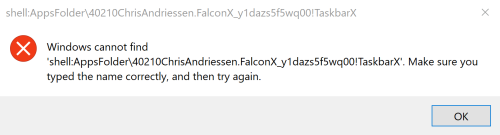
_You can also use `SCHTASKS /DELETE /TN "TaskbarX PCNAMEUSERNAME"` to remove the scheduled task from the command line._
## Tags
center taskbar, center taskbar icons, CenterTaskbar, center taskbar icons windows 10, center taskbar windows, windows center taskbar, windows center taskbar icons, center taskbar icons, windows 10 center taskbar icons, falcon10, falcon taskbar, taskbar, taskbar icons, taskbar buttons
================================================
FILE: TaskbarX/TaskbarX/.editorconfig
================================================
[*.vb]
# CA2101: Specify marshaling for P/Invoke string arguments
dotnet_diagnostic.CA2101.severity = none
# CA1401: P/Invokes should not be visible
dotnet_diagnostic.CA1401.severity = none
# BC42104: Variable is used before it has been assigned a value
dotnet_diagnostic.BC42104.severity = none
================================================
FILE: TaskbarX/TaskbarX/App.config
================================================
<?xml version="1.0" encoding="utf-8"?>
<configuration>
<startup>
<supportedRuntime version="v4.0" sku=".NETFramework,Version=v4.8"/></startup>
</configuration>
================================================
FILE: TaskbarX/TaskbarX/Easings.vb
================================================
Option Strict On
Public Delegate Function EasingDelegate(ByVal currentTime As Double, ByVal minValue As Double, ByVal maxValue As Double, ByVal duration As Double) As Double
Public Class Easings
Public Shared Function Linear(currentTime As Double, minHeight As Double, maxHeight As Double, duration As Double) As Double
Return maxHeight * currentTime / duration + minHeight
End Function
Public Shared Function ExpoEaseOut(currentTime As Double, minHeight As Double, maxHeight As Double, duration As Double) As Double
If currentTime <> duration Then
Return maxHeight * (-Math.Pow(2.0, -10.0 * currentTime / duration) + 1.0) + minHeight
End If
Return minHeight + maxHeight
End Function
Public Shared Function ExpoEaseIn(currentTime As Double, minHeight As Double, maxHeight As Double, duration As Double) As Double
If currentTime <> 0.0 Then
Return maxHeight * Math.Pow(2.0, 10.0 * (currentTime / duration - 1.0)) + minHeight
End If
Return minHeight
End Function
Public Shared Function ExpoEaseInOut(currentTime As Double, minHeight As Double, maxHeight As Double, duration As Double) As Double
If currentTime = 0.0 Then
Return minHeight
End If
If currentTime = duration Then
Return minHeight + maxHeight
End If
Dim num As Double = currentTime / (duration / 2.0)
currentTime = num
If num < 1.0 Then
Return maxHeight / 2.0 * Math.Pow(2.0, 10.0 * (currentTime - 1.0)) + minHeight
End If
Dim num2 As Double = maxHeight / 2.0
Dim x As Double = 2.0
Dim num3 As Double = -10.0
Dim num4 As Double = currentTime - 1.0
Return num2 * (-Math.Pow(x, num3 * num4) + 2.0) + minHeight
End Function
Public Shared Function ExpoEaseOutIn(currentTime As Double, minHeight As Double, maxHeight As Double, duration As Double) As Double
If currentTime < duration / 2.0 Then
Return Easings.ExpoEaseOut(currentTime * 2.0, minHeight, maxHeight / 2.0, duration)
End If
Return Easings.ExpoEaseIn(currentTime * 2.0 - duration, minHeight + maxHeight / 2.0, maxHeight / 2.0, duration)
End Function
Public Shared Function CircEaseOut(currentTime As Double, minHeight As Double, maxHeight As Double, duration As Double) As Double
Dim num As Double = 1.0
Dim num2 As Double = currentTime / duration - 1.0
currentTime = num2
Return maxHeight * Math.Sqrt(num - num2 * currentTime) + minHeight
End Function
Public Shared Function CircEaseIn(currentTime As Double, minHeight As Double, maxHeight As Double, duration As Double) As Double
Dim num As Double = 1.0
Dim num2 As Double = currentTime / duration
currentTime = num2
Dim sqrt As Double = Math.Sqrt(num - num2 * currentTime)
If Double.IsNaN(sqrt) Then
sqrt = 0.0
End If
Return -maxHeight * (sqrt - 1.0) + minHeight
End Function
Public Shared Function CircEaseInOut(currentTime As Double, minHeight As Double, maxHeight As Double, duration As Double) As Double
Dim num As Double = currentTime / (duration / 2.0)
currentTime = num
If num < 1.0 Then
Return -maxHeight / 2.0 * (Math.Sqrt(1.0 - currentTime * currentTime) - 1.0) + minHeight
End If
Dim num2 As Double = maxHeight / 2.0
Dim num3 As Double = 1.0
Dim num4 As Double = currentTime - 2.0
currentTime = num4
Return num2 * (Math.Sqrt(num3 - num4 * currentTime) + 1.0) + minHeight
End Function
Public Shared Function CircEaseOutIn(currentTime As Double, minHeight As Double, maxHeight As Double, duration As Double) As Double
If currentTime < duration / 2.0 Then
Return Easings.CircEaseOut(currentTime * 2.0, minHeight, maxHeight / 2.0, duration)
End If
Return Easings.CircEaseIn(currentTime * 2.0 - duration, minHeight + maxHeight / 2.0, maxHeight / 2.0, duration)
End Function
Public Shared Function QuadEaseOut(currentTime As Double, minHeight As Double, maxHeight As Double, duration As Double) As Double
Dim num As Double = -maxHeight
Dim num2 As Double = currentTime / duration
currentTime = num2
Return num * num2 * (currentTime - 2.0) + minHeight
End Function
Public Shared Function QuadEaseIn(currentTime As Double, minHeight As Double, maxHeight As Double, duration As Double) As Double
Dim num As Double = currentTime / duration
currentTime = num
Return maxHeight * num * currentTime + minHeight
End Function
Public Shared Function QuadEaseInOut(currentTime As Double, minHeight As Double, maxHeight As Double, duration As Double) As Double
Dim num As Double = currentTime / (duration / 2.0)
currentTime = num
If num < 1.0 Then
Return maxHeight / 2.0 * currentTime * currentTime + minHeight
End If
Dim num2 As Double = -maxHeight / 2.0
Dim num3 As Double = currentTime - 1.0
currentTime = num3
Return num2 * (num3 * (currentTime - 2.0) - 1.0) + minHeight
End Function
Public Shared Function QuadEaseOutIn(currentTime As Double, minHeight As Double, maxHeight As Double, duration As Double) As Double
If currentTime < duration / 2.0 Then
Return Easings.QuadEaseOut(currentTime * 2.0, minHeight, maxHeight / 2.0, duration)
End If
Return Easings.QuadEaseIn(currentTime * 2.0 - duration, minHeight + maxHeight / 2.0, maxHeight / 2.0, duration)
End Function
Public Shared Function SineEaseOut(currentTime As Double, minHeight As Double, maxHeight As Double, duration As Double) As Double
Return maxHeight * Math.Sin(currentTime / duration * 1.5707963267948966) + minHeight
End Function
Public Shared Function SineEaseIn(currentTime As Double, minHeight As Double, maxHeight As Double, duration As Double) As Double
Return -maxHeight * Math.Cos(currentTime / duration * 1.5707963267948966) + maxHeight + minHeight
End Function
Public Shared Function SineEaseInOut(currentTime As Double, minHeight As Double, maxHeight As Double, duration As Double) As Double
Dim num As Double = currentTime / (duration / 2.0)
currentTime = num
If num < 1.0 Then
Return maxHeight / 2.0 * Math.Sin(3.1415926535897931 * currentTime / 2.0) + minHeight
End If
Dim num2 As Double = -maxHeight / 2.0
Dim num3 As Double = 3.1415926535897931
Dim num4 As Double = currentTime - 1.0
Return num2 * (Math.Cos(num3 * num4 / 2.0) - 2.0) + minHeight
End Function
Public Shared Function SineEaseOutIn(currentTime As Double, minHeight As Double, maxHeight As Double, duration As Double) As Double
If currentTime < duration / 2.0 Then
Return Easings.SineEaseOut(currentTime * 2.0, minHeight, maxHeight / 2.0, duration)
End If
Return Easings.SineEaseIn(currentTime * 2.0 - duration, minHeight + maxHeight / 2.0, maxHeight / 2.0, duration)
End Function
Public Shared Function CubicEaseOut(currentTime As Double, minHeight As Double, maxHeight As Double, duration As Double) As Double
Dim num As Double = currentTime / duration - 1.0
currentTime = num
Return maxHeight * (num * currentTime * currentTime + 1.0) + minHeight
End Function
Public Shared Function CubicEaseIn(currentTime As Double, minHeight As Double, maxHeight As Double, duration As Double) As Double
Dim num As Double = currentTime / duration
currentTime = num
Return maxHeight * num * currentTime * currentTime + minHeight
End Function
Public Shared Function CubicEaseInOut(currentTime As Double, minHeight As Double, maxHeight As Double, duration As Double) As Double
Dim num As Double = currentTime / (duration / 2.0)
currentTime = num
If num < 1.0 Then
Return maxHeight / 2.0 * currentTime * currentTime * currentTime + minHeight
End If
Dim num2 As Double = maxHeight / 2.0
Dim num3 As Double = currentTime - 2.0
currentTime = num3
Return num2 * (num3 * currentTime * currentTime + 2.0) + minHeight
End Function
Public Shared Function CubicEaseOutIn(currentTime As Double, minHeight As Double, maxHeight As Double, duration As Double) As Double
If currentTime < duration / 2.0 Then
Return Easings.CubicEaseOut(currentTime * 2.0, minHeight, maxHeight / 2.0, duration)
End If
Return Easings.CubicEaseIn(currentTime * 2.0 - duration, minHeight + maxHeight / 2.0, maxHeight / 2.0, duration)
End Function
Public Shared Function QuartEaseOut(currentTime As Double, minHeight As Double, maxHeight As Double, duration As Double) As Double
Dim num As Double = -maxHeight
Dim num2 As Double = currentTime / duration - 1.0
currentTime = num2
Return num * (num2 * currentTime * currentTime * currentTime - 1.0) + minHeight
End Function
Public Shared Function QuartEaseIn(currentTime As Double, minHeight As Double, maxHeight As Double, duration As Double) As Double
Dim num As Double = currentTime / duration
currentTime = num
Return maxHeight * num * currentTime * currentTime * currentTime + minHeight
End Function
Public Shared Function QuartEaseInOut(currentTime As Double, minHeight As Double, maxHeight As Double, duration As Double) As Double
Dim num As Double = currentTime / (duration / 2.0)
currentTime = num
If num < 1.0 Then
Return maxHeight / 2.0 * currentTime * currentTime * currentTime * currentTime + minHeight
End If
Dim num2 As Double = -maxHeight / 2.0
Dim num3 As Double = currentTime - 2.0
currentTime = num3
Return num2 * (num3 * currentTime * currentTime * currentTime - 2.0) + minHeight
End Function
Public Shared Function QuartEaseOutIn(currentTime As Double, minHeight As Double, maxHeight As Double, duration As Double) As Double
If currentTime < duration / 2.0 Then
Return Easings.QuartEaseOut(currentTime * 2.0, minHeight, maxHeight / 2.0, duration)
End If
Return Easings.QuartEaseIn(currentTime * 2.0 - duration, minHeight + maxHeight / 2.0, maxHeight / 2.0, duration)
End Function
Public Shared Function QuintEaseOut(currentTime As Double, minHeight As Double, maxHeight As Double, duration As Double) As Double
Dim num As Double = currentTime / duration - 1.0
currentTime = num
Return maxHeight * (num * currentTime * currentTime * currentTime * currentTime + 1.0) + minHeight
End Function
Public Shared Function QuintEaseIn(currentTime As Double, minHeight As Double, maxHeight As Double, duration As Double) As Double
Dim num As Double = currentTime / duration
currentTime = num
Return maxHeight * num * currentTime * currentTime * currentTime * currentTime + minHeight
End Function
Public Shared Function QuintEaseInOut(currentTime As Double, minHeight As Double, maxHeight As Double, duration As Double) As Double
Dim num As Double = currentTime / (duration / 2.0)
currentTime = num
If num < 1.0 Then
Return maxHeight / 2.0 * currentTime * currentTime * currentTime * currentTime * currentTime + minHeight
End If
Dim num2 As Double = maxHeight / 2.0
Dim num3 As Double = currentTime - 2.0
currentTime = num3
Return num2 * (num3 * currentTime * currentTime * currentTime * currentTime + 2.0) + minHeight
End Function
Public Shared Function QuintEaseOutIn(currentTime As Double, minHeight As Double, maxHeight As Double, duration As Double) As Double
If currentTime < duration / 2.0 Then
Return Easings.QuintEaseOut(currentTime * 2.0, minHeight, maxHeight / 2.0, duration)
End If
Return Easings.QuintEaseIn(currentTime * 2.0 - duration, minHeight + maxHeight / 2.0, maxHeight / 2.0, duration)
End Function
Public Shared Function ElasticEaseOut(currentTime As Double, minHeight As Double, maxHeight As Double, duration As Double) As Double
Dim num As Double = currentTime / duration
currentTime = num
If num = 1.0 Then
Return minHeight + maxHeight
End If
Dim p As Double = duration * 0.3
Dim s As Double = p / 4.0
Return maxHeight * Math.Pow(2.0, -10.0 * currentTime) * Math.Sin((currentTime * duration - s) * 6.2831853071795862 / p) + maxHeight + minHeight
End Function
Public Shared Function ElasticEaseIn(currentTime As Double, minHeight As Double, maxHeight As Double, duration As Double) As Double
Dim num As Double = currentTime / duration
currentTime = num
If num = 1.0 Then
Return minHeight + maxHeight
End If
Dim p As Double = duration * 0.3
Dim s As Double = p / 4.0
Dim x As Double = 2.0
Dim num2 As Double = 10.0
Dim num3 As Double = currentTime - 1.0
currentTime = num3
Return -(maxHeight * Math.Pow(x, num2 * num3) * Math.Sin((currentTime * duration - s) * 6.2831853071795862 / p)) + minHeight
End Function
Public Shared Function ElasticEaseInOut(currentTime As Double, minHeight As Double, maxHeight As Double, duration As Double) As Double
Dim num As Double = currentTime / (duration / 2.0)
currentTime = num
If num = 2.0 Then
Return minHeight + maxHeight
End If
Dim p As Double = duration * 0.44999999999999996
Dim s As Double = p / 4.0
If currentTime < 1.0 Then
Dim num2 As Double = -0.5
Dim x As Double = 2.0
Dim num3 As Double = 10.0
Dim num4 As Double = currentTime - 1.0
currentTime = num4
Return num2 * (maxHeight * Math.Pow(x, num3 * num4) * Math.Sin((currentTime * duration - s) * 6.2831853071795862 / p)) + minHeight
End If
Dim x2 As Double = 2.0
Dim num5 As Double = -10.0
Dim num6 As Double = currentTime - 1.0
currentTime = num6
Return maxHeight * Math.Pow(x2, num5 * num6) * Math.Sin((currentTime * duration - s) * 6.2831853071795862 / p) * 0.5 + maxHeight + minHeight
End Function
Public Shared Function ElasticEaseOutIn(currentTime As Double, minHeight As Double, maxHeight As Double, duration As Double) As Double
If currentTime < duration / 2.0 Then
Return Easings.ElasticEaseOut(currentTime * 2.0, minHeight, maxHeight / 2.0, duration)
End If
Return Easings.ElasticEaseIn(currentTime * 2.0 - duration, minHeight + maxHeight / 2.0, maxHeight / 2.0, duration)
End Function
Public Shared Function BounceEaseOut(currentTime As Double, minHeight As Double, maxHeight As Double, duration As Double) As Double
Dim num As Double = currentTime / duration
currentTime = num
If num < 0.36363636363636365 Then
Return maxHeight * (7.5625 * currentTime * currentTime) + minHeight
End If
If currentTime < 0.72727272727272729 Then
Dim num2 As Double = 7.5625
Dim num3 As Double = currentTime - 0.54545454545454541
currentTime = num3
Return maxHeight * (num2 * num3 * currentTime + 0.75) + minHeight
End If
If currentTime < 0.90909090909090906 Then
Dim num4 As Double = 7.5625
Dim num5 As Double = currentTime - 0.81818181818181823
currentTime = num5
Return maxHeight * (num4 * num5 * currentTime + 0.9375) + minHeight
End If
Dim num6 As Double = 7.5625
Dim num7 As Double = currentTime - 0.95454545454545459
currentTime = num7
Return maxHeight * (num6 * num7 * currentTime + 0.984375) + minHeight
End Function
Public Shared Function BounceEaseIn(currentTime As Double, minHeight As Double, maxHeight As Double, duration As Double) As Double
Return maxHeight - Easings.BounceEaseOut(duration - currentTime, 0.0, maxHeight, duration) + minHeight
End Function
Public Shared Function BounceEaseInOut(currentTime As Double, minHeight As Double, maxHeight As Double, duration As Double) As Double
If currentTime < duration / 2.0 Then
Return Easings.BounceEaseIn(currentTime * 2.0, 0.0, maxHeight, duration) * 0.5 + minHeight
End If
Return Easings.BounceEaseOut(currentTime * 2.0 - duration, 0.0, maxHeight, duration) * 0.5 + maxHeight * 0.5 + minHeight
End Function
Public Shared Function BounceEaseOutIn(currentTime As Double, minHeight As Double, maxHeight As Double, duration As Double) As Double
If currentTime < duration / 2.0 Then
Return Easings.BounceEaseOut(currentTime * 2.0, minHeight, maxHeight / 2.0, duration)
End If
Return Easings.BounceEaseIn(currentTime * 2.0 - duration, minHeight + maxHeight / 2.0, maxHeight / 2.0, duration)
End Function
Public Shared Function BackEaseOut(currentTime As Double, minHeight As Double, maxHeight As Double, duration As Double) As Double
Dim num As Double = currentTime / duration - 1.0
currentTime = num
Return maxHeight * (num * currentTime * (2.70158 * currentTime + 1.70158) + 1.0) + minHeight
End Function
Public Shared Function BackEaseIn(currentTime As Double, minHeight As Double, maxHeight As Double, duration As Double) As Double
Dim num As Double = currentTime / duration
currentTime = num
Return maxHeight * num * currentTime * (2.70158 * currentTime - 1.70158) + minHeight
End Function
Public Shared Function BackEaseInOut(currentTime As Double, minHeight As Double, maxHeight As Double, duration As Double) As Double
Dim s As Double = 1.70158
Dim num As Double = currentTime / (duration / 2.0)
currentTime = num
If num < 1.0 Then
Dim num2 As Double = maxHeight / 2.0
Dim num3 As Double = currentTime * currentTime
Dim num4 As Double = s * 1.525
s = num4
Return num2 * (num3 * ((num4 + 1.0) * currentTime - s)) + minHeight
End If
Dim num5 As Double = maxHeight / 2.0
Dim num6 As Double = currentTime - 2.0
currentTime = num6
Dim num7 As Double = num6 * currentTime
Dim num8 As Double = s * 1.525
s = num8
Return num5 * (num7 * ((num8 + 1.0) * currentTime + s) + 2.0) + minHeight
End Function
Public Shared Function BackEaseOutIn(currentTime As Double, minHeight As Double, maxHeight As Double, duration As Double) As Double
If currentTime < duration / 2.0 Then
Return Easings.BackEaseOut(currentTime * 2.0, minHeight, maxHeight / 2.0, duration)
End If
Return Easings.BackEaseIn(currentTime * 2.0 - duration, minHeight + maxHeight / 2.0, maxHeight / 2.0, duration)
End Function
End Class
================================================
FILE: TaskbarX/TaskbarX/MSAA.vb
================================================
Option Strict On
Imports System.Runtime.InteropServices
Imports System.Text
Imports Accessibility
Public Class MSAA
<DllImport("oleacc.dll")>
Public Shared Function WindowFromAccessibleObject(ByVal pacc As IAccessible, ByRef phwnd As IntPtr) As UInteger
End Function
<DllImport("oleacc.dll")>
Public Shared Function AccessibleChildren(ByVal paccContainer As IAccessible, ByVal iChildStart As Integer, ByVal cChildren As Integer, <[Out]()> ByVal rgvarChildren() As Object, ByRef pcObtained As Integer) As UInteger
End Function
Private Declare Function AccessibleObjectFromWindow Lib "oleacc" (ByVal Hwnd As Int32, ByVal dwId As Int32, ByRef riid As Guid, <MarshalAs(UnmanagedType.IUnknown)> ByRef ppvObject As Object) As Int32
<DllImport("oleacc.dll")>
Public Shared Function GetStateText(ByVal dwStateBit As UInteger, <Out> ByVal lpszStateBit As StringBuilder, ByVal cchStateBitMax As UInteger) As UInteger
End Function
Public Shared guidAccessible As New Guid("{618736E0-3C3D-11CF-810C-00AA00389B71}")
Public Shared Function GetAccessibleChildren(ByVal objAccessible As IAccessible) As IAccessible()
Dim childCount As Integer
Try
childCount = objAccessible.accChildCount
Catch ex As Exception
childCount = 0
End Try
Dim accObjects = New IAccessible((childCount) - 1) {}
Dim count As Integer = 0
''Console.WriteLine(count)
If (childCount <> 0) Then
AccessibleChildren(objAccessible, 0, childCount, accObjects, count)
End If
Return accObjects
End Function
Public Shared Function GetAccessibleObjectFromHandle(ByVal hwnd As IntPtr) As IAccessible
Dim accObject As Object = New Object
Dim objAccessible As IAccessible = Nothing
If (hwnd <> CType(0, IntPtr)) Then
AccessibleObjectFromWindow(CInt(CType(hwnd, IntPtr)), 0, guidAccessible, accObject)
objAccessible = CType(accObject, IAccessible)
End If
Return objAccessible
End Function
Public Shared Function GetStateTextFunc(ByVal stateID As UInteger) As String
Dim maxLength As UInteger = 1024
Dim focusableStateText = New StringBuilder(CInt(maxLength))
Dim sizeableStateText = New StringBuilder(CInt(maxLength))
Dim moveableStateText = New StringBuilder(CInt(maxLength))
Dim invisibleStateText = New StringBuilder(CInt(maxLength))
Dim pressedStateText = New StringBuilder(CInt(maxLength))
Dim hasPopupStateText = New StringBuilder(CInt(maxLength))
If stateID = (MSAAStateConstants.STATE_SYSTEM_INVISIBLE Or MSAAStateConstants.STATE_SYSTEM_FOCUSABLE Or MSAAStateConstants.STATE_SYSTEM_HASPOPUP) Then
GetStateText(MSAAStateConstants.STATE_SYSTEM_INVISIBLE, invisibleStateText, maxLength)
GetStateText(MSAAStateConstants.STATE_SYSTEM_FOCUSABLE, focusableStateText, maxLength)
GetStateText(MSAAStateConstants.STATE_SYSTEM_HASPOPUP, hasPopupStateText, maxLength)
Return invisibleStateText.ToString & "," & focusableStateText.ToString & "," & hasPopupStateText.ToString
End If
If stateID = (MSAAStateConstants.STATE_SYSTEM_PRESSED Or MSAAStateConstants.STATE_SYSTEM_INVISIBLE Or MSAAStateConstants.STATE_SYSTEM_FOCUSABLE) Then
GetStateText(MSAAStateConstants.STATE_SYSTEM_PRESSED, pressedStateText, maxLength)
GetStateText(MSAAStateConstants.STATE_SYSTEM_INVISIBLE, invisibleStateText, maxLength)
GetStateText(MSAAStateConstants.STATE_SYSTEM_PRESSED, focusableStateText, maxLength)
Return pressedStateText.ToString & "," & focusableStateText.ToString & "," & focusableStateText.ToString
End If
If stateID = (MSAAStateConstants.STATE_SYSTEM_FOCUSABLE Or MSAAStateConstants.STATE_SYSTEM_HASPOPUP) Then
GetStateText(MSAAStateConstants.STATE_SYSTEM_FOCUSABLE, focusableStateText, maxLength)
GetStateText(MSAAStateConstants.STATE_SYSTEM_HASPOPUP, hasPopupStateText, maxLength)
Return focusableStateText.ToString & "," & hasPopupStateText.ToString
End If
If stateID = (MSAAStateConstants.STATE_SYSTEM_FOCUSABLE) Then
GetStateText(MSAAStateConstants.STATE_SYSTEM_FOCUSABLE, focusableStateText, maxLength)
Return focusableStateText.ToString
End If
Dim stateText = New StringBuilder(CInt(maxLength))
GetStateText(stateID, stateText, maxLength)
Return stateText.ToString()
End Function
End Class
Class MSAAStateConstants
Public Shared STATE_SYSTEM_ALERT_HIGH As UInteger = 268435456
Public Shared STATE_SYSTEM_ALERT_LOW As UInteger = 67108864
Public Shared STATE_SYSTEM_ALERT_MEDIUM As UInteger = 134217728
Public Shared STATE_SYSTEM_ANIMATED As UInteger = 16384
Public Shared STATE_SYSTEM_BUSY As UInteger = 2048
Public Shared STATE_SYSTEM_CHECKED As UInteger = 16
Public Shared STATE_SYSTEM_COLLAPSED As UInteger = 1024
Public Shared STATE_SYSTEM_DEFAULT As UInteger = 256
Public Shared STATE_SYSTEM_EXPANDED As UInteger = 512
Public Shared STATE_SYSTEM_EXTSELECTABLE As UInteger = 33554432
Public Shared STATE_SYSTEM_FLOATING As UInteger = 4096
Public Shared STATE_SYSTEM_FOCUSABLE As UInteger = 1048576
Public Shared STATE_SYSTEM_FOCUSED As UInteger = 4
Public Shared STATE_SYSTEM_HASPOPUP As UInteger = 1073741824
Public Shared STATE_SYSTEM_HOTTRACKED As UInteger = 128
Public Shared STATE_SYSTEM_INVISIBLE As UInteger = 32768
Public Shared STATE_SYSTEM_LINKED As UInteger = 4194304
Public Shared STATE_SYSTEM_MARQUEED As UInteger = 8192
Public Shared STATE_SYSTEM_MIXED As UInteger = 32
Public Shared STATE_SYSTEM_MOVEABLE As UInteger = 262144
Public Shared STATE_SYSTEM_MULTISELECTABLE As UInteger = 16777216
Public Shared STATE_SYSTEM_NORMAL As UInteger = 0
Public Shared STATE_SYSTEM_OFFSCREEN As UInteger = 65536
Public Shared STATE_SYSTEM_PRESSED As UInteger = 8
Public Shared STATE_SYSTEM_READONLY As UInteger = 64
Public Shared STATE_SYSTEM_SELECTABLE As UInteger = 2097152
Public Shared STATE_SYSTEM_SELECTED As UInteger = 2
Public Shared STATE_SYSTEM_SELFVOICING As UInteger = 524288
Public Shared STATE_SYSTEM_SIZEABLE As UInteger = 131072
Public Shared STATE_SYSTEM_TRAVERSED As UInteger = 8388608
Public Shared STATE_SYSTEM_UNAVAILABLE As UInteger = 1
Public Shared STATE_SYSTEM_VALID As UInteger = 536870911
End Class
================================================
FILE: TaskbarX/TaskbarX/Main.vb
================================================
Option Strict On
Imports System.Text
Imports System.Threading
Public Class Main
Public Shared noty As New NotifyIcon
Public Shared Sub Main()
Try
'Set default settings
Settings.TaskbarStyle = 0
Settings.PrimaryTaskbarOffset = 0
Settings.SecondaryTaskbarOffset = 0
Settings.CenterPrimaryOnly = 0
Settings.CenterSecondaryOnly = 0
Settings.AnimationStyle = "cubiceaseinout"
Settings.AnimationSpeed = 300
Settings.LoopRefreshRate = 400
Settings.CenterInBetween = 0
Settings.DontCenterTaskbar = 0
Settings.FixToolbarsOnTrayChange = 1
Settings.OnBatteryAnimationStyle = "cubiceaseinout"
Settings.OnBatteryLoopRefreshRate = 400
Settings.RevertZeroBeyondTray = 1
Settings.TaskbarRounding = 0
Settings.TaskbarSegments = 0
Dim stopgiven As Boolean = False
'Read the arguments for the settings
Dim arguments() As String = Environment.GetCommandLineArgs
For Each argument In arguments
Dim val() As String = Split(argument, "=")
If argument.Contains("-stop") Then
stopgiven = True
End If
If argument.Contains("-showstartmenu") Then
Win32.ShowStartMenu()
End
End If
If argument.Contains("-console=") Then
Win32.AllocConsole()
Settings.ConsoleEnabled = 1
End If
If argument.Contains("-tbs=") Then
Settings.TaskbarStyle = CInt(val(1))
End If
If argument.Contains("-color=") Then
Dim colorval As String = val(1)
Dim colorsep = colorval.Split(CType(";", Char()))
Settings.TaskbarStyleRed = CInt(colorsep(0))
Settings.TaskbarStyleGreen = CInt(colorsep(1))
Settings.TaskbarStyleBlue = CInt(colorsep(2))
Settings.TaskbarStyleAlpha = CInt(colorsep(3))
End If
If argument.Contains("-ptbo=") Then
Settings.PrimaryTaskbarOffset = CInt(val(1))
End If
If argument.Contains("-stbo=") Then
Settings.SecondaryTaskbarOffset = CInt(val(1))
End If
If argument.Contains("-cpo=") Then
Settings.CenterPrimaryOnly = CInt(val(1))
End If
If argument.Contains("-cso=") Then
Settings.CenterSecondaryOnly = CInt(val(1))
End If
If argument.Contains("-as=") Then
Settings.AnimationStyle = CType(val(1), String)
End If
If argument.Contains("-asp=") Then
Settings.AnimationSpeed = CInt(val(1))
End If
If argument.Contains("-lr=") Then
Settings.LoopRefreshRate = CInt(val(1))
End If
If argument.Contains("-cib=") Then
Settings.CenterInBetween = CInt(val(1))
End If
If argument.Contains("-obas=") Then
Settings.OnBatteryAnimationStyle = CType(val(1), String)
End If
If argument.Contains("-oblr=") Then
Settings.OnBatteryLoopRefreshRate = CInt(val(1))
End If
If argument.Contains("-ftotc=") Then
Settings.FixToolbarsOnTrayChange = CInt(val(1))
End If
If argument.Contains("-rzbt=") Then
Settings.RevertZeroBeyondTray = CInt(val(1))
End If
If argument.Contains("-sr=") Then
Settings.SkipResolution = CInt(val(1))
End If
If argument.Contains("-sr2=") Then
Settings.SkipResolution2 = CInt(val(1))
End If
If argument.Contains("-sr3=") Then
Settings.SkipResolution3 = CInt(val(1))
End If
If argument.Contains("-dtbsowm=") Then
Settings.DefaultTaskbarStyleOnWinMax = CInt(val(1))
End If
If argument.Contains("-cfsa=") Then
Settings.CheckFullscreenApp = CInt(val(1))
End If
If argument.Contains("-dct=") Then
Settings.DontCenterTaskbar = CInt(val(1))
End If
If argument.Contains("-hps=") Then
Settings.HidePrimaryStartButton = CInt(val(1))
End If
If argument.Contains("-hss=") Then
Settings.HideSecondaryStartButton = CInt(val(1))
End If
If argument.Contains("-hpt=") Then
Settings.HidePrimaryNotifyWnd = CInt(val(1))
End If
If argument.Contains("-hst=") Then
Settings.HideSecondaryNotifyWnd = CInt(val(1))
End If
If argument.Contains("-sti=") Then
''Settings.ShowTrayIcon = CInt(val(1))
Settings.ShowTrayIcon = CInt(0)
End If
If argument.Contains("-tbsom=") Then
Settings.TaskbarStyleOnMax = CInt(val(1))
End If
If argument.Contains("-stsb=") Then
Settings.StickyStartButton = CInt(val(1))
End If
If argument.Contains("-tpop=") Then
Settings.TotalPrimaryOpacity = CInt(val(1))
End If
If argument.Contains("-tsop=") Then
Settings.TotalSecondaryOpacity = CInt(val(1))
End If
If argument.Contains("-tbr=") Then
Settings.TaskbarRounding = CInt(val(1))
End If
If argument.Contains("-tbsg=") Then
Settings.TaskbarSegments = CInt(val(1))
End If
Next
'Kill every other running instance of TaskbarX
Try
For Each prog As Process In Process.GetProcessesByName("TaskbarX")
If Not prog.Id = Process.GetCurrentProcess.Id Then
prog.Kill()
End If
Next
Catch
End Try
'If animation speed is lower than 1 then make it 1. Otherwise it will give an error.
If Settings.AnimationSpeed <= 1 Then
Settings.AnimationSpeed = 1
End If
'Makes the animations run smoother
Dim currentProcess As Process = Process.GetCurrentProcess
currentProcess.PriorityClass = ProcessPriorityClass.Idle
'Prevent wrong position calculations
Win32.SetProcessDpiAwareness(Win32.PROCESS_DPI_AWARENESS.Process_Per_Monitor_DPI_Aware)
'Wait for Shell_TrayWnd
Dim Handle As IntPtr
Do
Console.WriteLine("Waiting for Shell_TrayWnd")
Handle = Nothing
Thread.Sleep(250)
Dim Shell_TrayWnd = Win32.FindWindowByClass("Shell_TrayWnd", CType(0, IntPtr))
Dim TrayNotifyWnd = Win32.FindWindowEx(Shell_TrayWnd, CType(0, IntPtr), "TrayNotifyWnd", Nothing)
Dim ReBarWindow32 = Win32.FindWindowEx(Shell_TrayWnd, CType(0, IntPtr), "ReBarWindow32", Nothing)
Dim MSTaskSwWClass = Win32.FindWindowEx(ReBarWindow32, CType(0, IntPtr), "MSTaskSwWClass", Nothing)
Dim MSTaskListWClass = Win32.FindWindowEx(MSTaskSwWClass, CType(0, IntPtr), "MSTaskListWClass", Nothing)
Handle = MSTaskListWClass
'Lock the Taskbar
' Win32.PostMessage(Shell_TrayWnd, CUInt(&H111), CType(424, IntPtr), CType(vbNullString, IntPtr))
Loop Until Not Handle = Nothing
Dim Win11Taskbar = Win32.FindWindowEx(Win32.FindWindowByClass("Shell_TrayWnd", CType(0, IntPtr)), CType(0, IntPtr), "Windows.UI.Composition.DesktopWindowContentBridge", Nothing)
If Not Win11Taskbar = CType(0, IntPtr) Then
'Windows 11 Taskbar present
Settings.DontCenterTaskbar = CInt(Val(1))
End If
If stopgiven = True Then
noty.Visible = False
TaskbarCenter.RevertToZero()
ResetTaskbarStyle()
End
End If
If Settings.ShowTrayIcon = 1 Then
TrayIconBuster.TrayIconBuster.RemovePhantomIcons()
End If
'Just empty startup memory before starting
ClearMemory()
'Reset the taskbar style...
ResetTaskbarStyle()
If Settings.ShowTrayIcon = 1 Then
noty.Text = "TaskbarX (L = Restart) (M = Config) (R = Stop)"
noty.Icon = My.Resources.icon
noty.Visible = True
End If
AddHandler noty.MouseClick, AddressOf MnuRef_Click
'Start the TaskbarCenterer
If Not Settings.DontCenterTaskbar = 1 Then
Dim t1 As Thread = New Thread(AddressOf TaskbarCenter.TaskbarCenterer)
t1.Start()
End If
'Start the TaskbarStyler if enabled
If Settings.TaskbarStyle = 1 Or Settings.TaskbarStyle = 2 Or Settings.TaskbarStyle = 3 Or Settings.TaskbarStyle = 4 Or Settings.TaskbarStyle = 5 Then
Dim t2 As Thread = New Thread(AddressOf TaskbarStyle.TaskbarStyler)
t2.Start()
End If
Catch ex As Exception
Console.WriteLine(ex.Message)
End Try
End Sub
Public Shared Sub Toaster(ByVal message As String)
noty.BalloonTipTitle = "TaskbarX"
noty.BalloonTipText = message
noty.Visible = True
noty.ShowBalloonTip(3000)
End Sub
Public Shared Sub MnuRef_Click(sender As Object, e As MouseEventArgs)
If (e.Button = MouseButtons.Left) Then
noty.Visible = False
Application.Restart()
ElseIf (e.Button = MouseButtons.Right) Then
noty.Visible = False
TaskbarCenter.RevertToZero()
ResetTaskbarStyle()
End
ElseIf (e.Button = MouseButtons.Middle) Then
If System.AppDomain.CurrentDomain.BaseDirectory.Contains("40210ChrisAndriessen") Then
Try
Dim processInfo As ProcessStartInfo = New ProcessStartInfo With {
.WindowStyle = ProcessWindowStyle.Hidden,
.FileName = "cmd.exe",
.Arguments = " /c start shell:AppsFolder\40210ChrisAndriessen.FalconX_y1dazs5f5wq00!TaskbarXGUI"
}
Process.Start(processInfo)
Catch
End Try
Else
Try
System.Diagnostics.Process.Start("TaskbarX Configurator.exe")
Catch
End Try
End If
End If
End Sub
#Region "Commands"
Public Declare Function EnumWindows Lib "user32" (ByVal Adress As CallBack, ByVal y As Integer) As Integer
Public Delegate Function CallBack(ByVal hwnd As IntPtr, ByVal lParam As Integer) As Boolean
Public Shared ActiveWindows As New System.Collections.ObjectModel.Collection(Of IntPtr)
Public Shared Function GetActiveWindows() As ObjectModel.Collection(Of IntPtr)
windowHandles.Clear()
EnumWindows(AddressOf Enumerator, 0)
Dim maintaskbarfound As Boolean = False
Dim sectaskbarfound As Boolean = False
For Each Taskbar In windowHandles
Dim sClassName As New StringBuilder("", 256)
Call Win32.GetClassName(CType(Taskbar, IntPtr), sClassName, 256)
If sClassName.ToString = "Shell_TrayWnd" Then
maintaskbarfound = True
End If
If sClassName.ToString = "Shell_SecondaryTrayWnd" Then
sectaskbarfound = True
End If
Console.WriteLine("=" & maintaskbarfound)
Next
If maintaskbarfound = False Then
Try
windowHandles.Add(Win32.FindWindow("Shell_TrayWnd", Nothing))
Catch
End Try
End If
If sectaskbarfound = False Then
If Screen.AllScreens.Count >= 2 Then
''MsgBox(Screen.AllScreens.Count)
Try
windowHandles.Add(Win32.FindWindow("Shell_SecondaryTrayWnd", Nothing))
Catch
End Try
End If
End If
Return ActiveWindows
End Function
Public Shared Function Enumerator(ByVal hwnd As IntPtr, ByVal lParam As Integer) As Boolean
Dim sClassName As New StringBuilder("", 256)
Call Win32.GetClassName(hwnd, sClassName, 256)
If sClassName.ToString = "Shell_TrayWnd" Or sClassName.ToString = "Shell_SecondaryTrayWnd" Then
windowHandles.Add(hwnd)
End If
Return True
End Function
Public Shared windowHandles As ArrayList = New ArrayList()
Public Shared Sub ResetTaskbarStyle()
GetActiveWindows()
Dim trays As New ArrayList
For Each trayWnd As IntPtr In windowHandles
''Console.WriteLine(trayWnd)
trays.Add(trayWnd)
Next
For Each tray As IntPtr In trays
Dim trayptr As IntPtr = tray
Win32.SendMessage(trayptr, Win32.WM_THEMECHANGED, True, 0)
Win32.SendMessage(trayptr, Win32.WM_DWMCOLORIZATIONCOLORCHANGED, True, 0)
Win32.SendMessage(trayptr, Win32.WM_DWMCOMPOSITIONCHANGED, True, 0)
Dim tt As New Win32.RECT
Win32.GetClientRect(trayptr, tt)
''Win32.SetWindowRgn(CType(trayptr, IntPtr), Win32.CreateRoundRectRgn(-1, -1, tt.Right + 1, tt.Bottom - tt.Top + 1, -1, -1), True)
Win32.SetWindowRgn(CType(trayptr, IntPtr), Win32.CreateRectRgn(tt.Left, tt.Top, tt.Right, tt.Bottom), True)
Next
End Sub
Public Shared Sub RestartExplorer()
For Each MyProcess In Process.GetProcessesByName("explorer")
MyProcess.Kill()
Next
End Sub
Public Shared Function ClearMemory() As Int32
GC.Collect()
GC.WaitForPendingFinalizers()
GC.Collect()
Return Win32.SetProcessWorkingSetSize(Diagnostics.Process.GetCurrentProcess.Handle, -1, -1)
End Function
#End Region
End Class
================================================
FILE: TaskbarX/TaskbarX/My Project/Application.Designer.vb
================================================
'------------------------------------------------------------------------------
' <auto-generated>
' This code was generated by a tool.
' Runtime Version:4.0.30319.42000
'
' Changes to this file may cause incorrect behavior and will be lost if
' the code is regenerated.
' </auto-generated>
'------------------------------------------------------------------------------
Option Strict On
Option Explicit On
================================================
FILE: TaskbarX/TaskbarX/My Project/Application.myapp
================================================
<?xml version="1.0" encoding="utf-8"?>
<MyApplicationData xmlns:xsi="http://www.w3.org/2001/XMLSchema-instance" xmlns:xsd="http://www.w3.org/2001/XMLSchema">
<MySubMain>false</MySubMain>
<SingleInstance>false</SingleInstance>
<ShutdownMode>0</ShutdownMode>
<EnableVisualStyles>true</EnableVisualStyles>
<AuthenticationMode>0</AuthenticationMode>
<SaveMySettingsOnExit>true</SaveMySettingsOnExit>
</MyApplicationData>
================================================
FILE: TaskbarX/TaskbarX/My Project/AssemblyInfo.vb
================================================
Imports System.Reflection
Imports System.Runtime.InteropServices
' General Information about an assembly is controlled through the following
' set of attributes. Change these attribute values to modify the information
' associated with an assembly.
' Review the values of the assembly attributes
<Assembly: AssemblyTitle("TaskbarX")>
<Assembly: AssemblyDescription("Center taskbar icons.")>
<Assembly: AssemblyCompany("Chris Andriessen")>
<Assembly: AssemblyProduct("TaskbarX")>
<Assembly: AssemblyCopyright("Copyright © Chris Andriessen 2022")>
<Assembly: AssemblyTrademark("")>
<Assembly: ComVisible(False)>
'The following GUID is for the ID of the typelib if this project is exposed to COM
<Assembly: Guid("0d2b7f17-f491-4d2d-ae31-74b70cd2def2")>
' Version information for an assembly consists of the following four values:
'
' Major Version
' Minor Version
' Build Number
' Revision
'
' You can specify all the values or you can default the Build and Revision Numbers
' by using the '*' as shown below:
' <Assembly: AssemblyVersion("1.0.*")>
<Assembly: AssemblyVersion("1.7.8.0")>
<Assembly: AssemblyFileVersion("1.7.8.0")>
================================================
FILE: TaskbarX/TaskbarX/My Project/Resources.Designer.vb
================================================
'------------------------------------------------------------------------------
' <auto-generated>
' This code was generated by a tool.
' Runtime Version:4.0.30319.42000
'
' Changes to this file may cause incorrect behavior and will be lost if
' the code is regenerated.
' </auto-generated>
'------------------------------------------------------------------------------
Option Strict On
Option Explicit On
Imports System
Namespace My.Resources
'This class was auto-generated by the StronglyTypedResourceBuilder
'class via a tool like ResGen or Visual Studio.
'To add or remove a member, edit your .ResX file then rerun ResGen
'with the /str option, or rebuild your VS project.
'''<summary>
''' A strongly-typed resource class, for looking up localized strings, etc.
'''</summary>
<Global.System.CodeDom.Compiler.GeneratedCodeAttribute("System.Resources.Tools.StronglyTypedResourceBuilder", "17.0.0.0"), _
Global.System.Diagnostics.DebuggerNonUserCodeAttribute(), _
Global.System.Runtime.CompilerServices.CompilerGeneratedAttribute(), _
Global.Microsoft.VisualBasic.HideModuleNameAttribute()> _
Friend Module Resources
Private resourceMan As Global.System.Resources.ResourceManager
Private resourceCulture As Global.System.Globalization.CultureInfo
'''<summary>
''' Returns the cached ResourceManager instance used by this class.
'''</summary>
<Global.System.ComponentModel.EditorBrowsableAttribute(Global.System.ComponentModel.EditorBrowsableState.Advanced)> _
Friend ReadOnly Property ResourceManager() As Global.System.Resources.ResourceManager
Get
If Object.ReferenceEquals(resourceMan, Nothing) Then
Dim temp As Global.System.Resources.ResourceManager = New Global.System.Resources.ResourceManager("TaskbarX.Resources", GetType(Resources).Assembly)
resourceMan = temp
End If
Return resourceMan
End Get
End Property
'''<summary>
''' Overrides the current thread's CurrentUICulture property for all
''' resource lookups using this strongly typed resource class.
'''</summary>
<Global.System.ComponentModel.EditorBrowsableAttribute(Global.System.ComponentModel.EditorBrowsableState.Advanced)> _
Friend Property Culture() As Global.System.Globalization.CultureInfo
Get
Return resourceCulture
End Get
Set
resourceCulture = value
End Set
End Property
'''<summary>
''' Looks up a localized resource of type System.Drawing.Icon similar to (Icon).
'''</summary>
Friend ReadOnly Property icon() As System.Drawing.Icon
Get
Dim obj As Object = ResourceManager.GetObject("icon", resourceCulture)
Return CType(obj,System.Drawing.Icon)
End Get
End Property
End Module
End Namespace
================================================
FILE: TaskbarX/TaskbarX/My Project/Resources.resx
================================================
<?xml version="1.0" encoding="utf-8"?>
<root>
<!--
Microsoft ResX Schema
Version 2.0
The primary goals of this format is to allow a simple XML format
that is mostly human readable. The generation and parsing of the
various data types are done through the TypeConverter classes
associated with the data types.
Example:
... ado.net/XML headers & schema ...
<resheader name="resmimetype">text/microsoft-resx</resheader>
<resheader name="version">2.0</resheader>
<resheader name="reader">System.Resources.ResXResourceReader, System.Windows.Forms, ...</resheader>
<resheader name="writer">System.Resources.ResXResourceWriter, System.Windows.Forms, ...</resheader>
<data name="Name1"><value>this is my long string</value><comment>this is a comment</comment></data>
<data name="Color1" type="System.Drawing.Color, System.Drawing">Blue</data>
<data name="Bitmap1" mimetype="application/x-microsoft.net.object.binary.base64">
<value>[base64 mime encoded serialized .NET Framework object]</value>
</data>
<data name="Icon1" type="System.Drawing.Icon, System.Drawing" mimetype="application/x-microsoft.net.object.bytearray.base64">
<value>[base64 mime encoded string representing a byte array form of the .NET Framework object]</value>
<comment>This is a comment</comment>
</data>
There are any number of "resheader" rows that contain simple
name/value pairs.
Each data row contains a name, and value. The row also contains a
type or mimetype. Type corresponds to a .NET class that support
text/value conversion through the TypeConverter architecture.
Classes that don't support this are serialized and stored with the
mimetype set.
The mimetype is used for serialized objects, and tells the
ResXResourceReader how to depersist the object. This is currently not
extensible. For a given mimetype the value must be set accordingly:
Note - application/x-microsoft.net.object.binary.base64 is the format
that the ResXResourceWriter will generate, however the reader can
read any of the formats listed below.
mimetype: application/x-microsoft.net.object.binary.base64
value : The object must be serialized with
: System.Runtime.Serialization.Formatters.Binary.BinaryFormatter
: and then encoded with base64 encoding.
mimetype: application/x-microsoft.net.object.soap.base64
value : The object must be serialized with
: System.Runtime.Serialization.Formatters.Soap.SoapFormatter
: and then encoded with base64 encoding.
mimetype: application/x-microsoft.net.object.bytearray.base64
value : The object must be serialized into a byte array
: using a System.ComponentModel.TypeConverter
: and then encoded with base64 encoding.
-->
<xsd:schema id="root" xmlns="" xmlns:xsd="http://www.w3.org/2001/XMLSchema" xmlns:msdata="urn:schemas-microsoft-com:xml-msdata">
<xsd:import namespace="http://www.w3.org/XML/1998/namespace" />
<xsd:element name="root" msdata:IsDataSet="true">
<xsd:complexType>
<xsd:choice maxOccurs="unbounded">
<xsd:element name="metadata">
<xsd:complexType>
<xsd:sequence>
<xsd:element name="value" type="xsd:string" minOccurs="0" />
</xsd:sequence>
<xsd:attribute name="name" use="required" type="xsd:string" />
<xsd:attribute name="type" type="xsd:string" />
<xsd:attribute name="mimetype" type="xsd:string" />
<xsd:attribute ref="xml:space" />
</xsd:complexType>
</xsd:element>
<xsd:element name="assembly">
<xsd:complexType>
<xsd:attribute name="alias" type="xsd:string" />
<xsd:attribute name="name" type="xsd:string" />
</xsd:complexType>
</xsd:element>
<xsd:element name="data">
<xsd:complexType>
<xsd:sequence>
<xsd:element name="value" type="xsd:string" minOccurs="0" msdata:Ordinal="1" />
<xsd:element name="comment" type="xsd:string" minOccurs="0" msdata:Ordinal="2" />
</xsd:sequence>
<xsd:attribute name="name" type="xsd:string" use="required" msdata:Ordinal="1" />
<xsd:attribute name="type" type="xsd:string" msdata:Ordinal="3" />
<xsd:attribute name="mimetype" type="xsd:string" msdata:Ordinal="4" />
<xsd:attribute ref="xml:space" />
</xsd:complexType>
</xsd:element>
<xsd:element name="resheader">
<xsd:complexType>
<xsd:sequence>
<xsd:element name="value" type="xsd:string" minOccurs="0" msdata:Ordinal="1" />
</xsd:sequence>
<xsd:attribute name="name" type="xsd:string" use="required" />
</xsd:complexType>
</xsd:element>
</xsd:choice>
</xsd:complexType>
</xsd:element>
</xsd:schema>
<resheader name="resmimetype">
<value>text/microsoft-resx</value>
</resheader>
<resheader name="version">
<value>2.0</value>
</resheader>
<resheader name="reader">
<value>System.Resources.ResXResourceReader, System.Windows.Forms, Version=4.0.0.0, Culture=neutral, PublicKeyToken=b77a5c561934e089</value>
</resheader>
<resheader name="writer">
<value>System.Resources.ResXResourceWriter, System.Windows.Forms, Version=4.0.0.0, Culture=neutral, PublicKeyToken=b77a5c561934e089</value>
</resheader>
<assembly alias="System.Windows.Forms" name="System.Windows.Forms, Version=4.0.0.0, Culture=neutral, PublicKeyToken=b77a5c561934e089" />
<data name="icon" type="System.Resources.ResXFileRef, System.Windows.Forms">
<value>..\Resources\icon.ico;System.Drawing.Icon, System.Drawing, Version=4.0.0.0, Culture=neutral, PublicKeyToken=b03f5f7f11d50a3a</value>
</data>
</root>
================================================
FILE: TaskbarX/TaskbarX/My Project/Settings.Designer.vb
================================================
'------------------------------------------------------------------------------
' <auto-generated>
' This code was generated by a tool.
' Runtime Version:4.0.30319.42000
'
' Changes to this file may cause incorrect behavior and will be lost if
' the code is regenerated.
' </auto-generated>
'------------------------------------------------------------------------------
Option Strict On
Option Explicit On
Namespace My
<Global.System.Runtime.CompilerServices.CompilerGeneratedAttribute(), _
Global.System.CodeDom.Compiler.GeneratedCodeAttribute("Microsoft.VisualStudio.Editors.SettingsDesigner.SettingsSingleFileGenerator", "17.0.1.0"), _
Global.System.ComponentModel.EditorBrowsableAttribute(Global.System.ComponentModel.EditorBrowsableState.Advanced)> _
Partial Friend NotInheritable Class MySettings
Inherits Global.System.Configuration.ApplicationSettingsBase
Private Shared defaultInstance As MySettings = CType(Global.System.Configuration.ApplicationSettingsBase.Synchronized(New MySettings()),MySettings)
#Region "My.Settings Auto-Save Functionality"
#If _MyType = "WindowsForms" Then
Private Shared addedHandler As Boolean
Private Shared addedHandlerLockObject As New Object
<Global.System.Diagnostics.DebuggerNonUserCodeAttribute(), Global.System.ComponentModel.EditorBrowsableAttribute(Global.System.ComponentModel.EditorBrowsableState.Advanced)> _
Private Shared Sub AutoSaveSettings(sender As Global.System.Object, e As Global.System.EventArgs)
If My.Application.SaveMySettingsOnExit Then
My.Settings.Save()
End If
End Sub
#End If
#End Region
Public Shared ReadOnly Property [Default]() As MySettings
Get
#If _MyType = "WindowsForms" Then
If Not addedHandler Then
SyncLock addedHandlerLockObject
If Not addedHandler Then
AddHandler My.Application.Shutdown, AddressOf AutoSaveSettings
addedHandler = True
End If
End SyncLock
End If
#End If
Return defaultInstance
End Get
End Property
End Class
End Namespace
Namespace My
<Global.Microsoft.VisualBasic.HideModuleNameAttribute(), _
Global.System.Diagnostics.DebuggerNonUserCodeAttribute(), _
Global.System.Runtime.CompilerServices.CompilerGeneratedAttribute()> _
Friend Module MySettingsProperty
<Global.System.ComponentModel.Design.HelpKeywordAttribute("My.Settings")> _
Friend ReadOnly Property Settings() As Global.TaskbarX.My.MySettings
Get
Return Global.TaskbarX.My.MySettings.Default
End Get
End Property
End Module
End Namespace
================================================
FILE: TaskbarX/TaskbarX/My Project/Settings.settings
================================================
<?xml version='1.0' encoding='utf-8'?>
<SettingsFile xmlns="http://schemas.microsoft.com/VisualStudio/2004/01/settings" CurrentProfile="(Default)" UseMySettingsClassName="true">
<Profiles>
<Profile Name="(Default)" />
</Profiles>
<Settings />
</SettingsFile>
================================================
FILE: TaskbarX/TaskbarX/My Project/app.manifest
================================================
<?xml version="1.0" encoding="utf-8"?>
<assembly manifestVersion="1.0" xmlns="urn:schemas-microsoft-com:asm.v1">
<assemblyIdentity version="1.0.0.0" name="MyApplication.app"/>
<trustInfo xmlns="urn:schemas-microsoft-com:asm.v2">
<security>
<requestedPrivileges xmlns="urn:schemas-microsoft-com:asm.v3">
<!-- UAC Manifest Options
If you want to change the Windows User Account Control level replace the
requestedExecutionLevel node with one of the following.
<requestedExecutionLevel level="asInvoker" uiAccess="false" />
<requestedExecutionLevel level="requireAdministrator" uiAccess="false" />
<requestedExecutionLevel level="highestAvailable" uiAccess="false" />
Specifying requestedExecutionLevel element will disable file and registry virtualization.
Remove this element if your application requires this virtualization for backwards
compatibility.
-->
<requestedExecutionLevel level="asInvoker" uiAccess="false" />
</requestedPrivileges>
</security>
</trustInfo>
<compatibility xmlns="urn:schemas-microsoft-com:compatibility.v1">
<application>
<!-- A list of the Windows versions that this application has been tested on
and is designed to work with. Uncomment the appropriate elements
and Windows will automatically select the most compatible environment. -->
<!-- Windows Vista -->
<!--<supportedOS Id="{e2011457-1546-43c5-a5fe-008deee3d3f0}" />-->
<!-- Windows 7 -->
<!--<supportedOS Id="{35138b9a-5d96-4fbd-8e2d-a2440225f93a}" />-->
<!-- Windows 8 -->
<!--<supportedOS Id="{4a2f28e3-53b9-4441-ba9c-d69d4a4a6e38}" />-->
<!-- Windows 8.1 -->
<!--<supportedOS Id="{1f676c76-80e1-4239-95bb-83d0f6d0da78}" />-->
<!-- Windows 10 -->
<!--<supportedOS Id="{8e0f7a12-bfb3-4fe8-b9a5-48fd50a15a9a}" />-->
</application>
</compatibility>
<!-- Indicates that the application is DPI-aware and will not be automatically scaled by Windows at higher
DPIs. Windows Presentation Foundation (WPF) applications are automatically DPI-aware and do not need
to opt in. Windows Forms applications targeting .NET Framework 4.6 that opt into this setting, should
also set the 'EnableWindowsFormsHighDpiAutoResizing' setting to 'true' in their app.config. -->
<!--
<application xmlns="urn:schemas-microsoft-com:asm.v3">
<windowsSettings>
<dpiAware xmlns="http://schemas.microsoft.com/SMI/2005/WindowsSettings">true</dpiAware>
</windowsSettings>
</application>
-->
<!-- Enable themes for Windows common controls and dialogs (Windows XP and later) -->
<!--
<dependency>
<dependentAssembly>
<assemblyIdentity
type="win32"
name="Microsoft.Windows.Common-Controls"
version="6.0.0.0"
processorArchitecture="*"
publicKeyToken="6595b64144ccf1df"
language="*"
/>
</dependentAssembly>
</dependency>
-->
</assembly>
================================================
FILE: TaskbarX/TaskbarX/Settings.vb
================================================
Option Strict On
Public Class Settings
Public Shared Pause As Boolean
Public Shared TaskbarStyle As Integer
Public Shared SecondaryTaskbarStyle As Integer
Public Shared PrimaryTaskbarOffset As Integer
Public Shared SecondaryTaskbarOffset As Integer
Public Shared CenterPrimaryOnly As Integer
Public Shared CenterSecondaryOnly As Integer
Public Shared AnimationStyle As String
Public Shared AnimationSpeed As Integer
Public Shared LoopRefreshRate As Integer
Public Shared CenterInBetween As Integer
Public Shared FixToolbarsOnTrayChange As Integer
Public Shared SkipResolution As Integer
Public Shared SkipResolution2 As Integer
Public Shared SkipResolution3 As Integer
Public Shared CheckFullscreenApp As Integer
Public Shared DefaultTaskbarStyleOnWinMax As Integer
Public Shared DontCenterTaskbar As Integer
Public Shared HidePrimaryStartButton As Integer
Public Shared HideSecondaryStartButton As Integer
Public Shared HidePrimaryNotifyWnd As Integer
Public Shared HideSecondaryNotifyWnd As Integer
Public Shared ShowTrayIcon As Integer
Public Shared TaskbarStyleOnMax As Integer
Public Shared TaskbarStyleRed As Integer
Public Shared TaskbarStyleGreen As Integer
Public Shared TaskbarStyleBlue As Integer
Public Shared TaskbarStyleAlpha As Integer
Public Shared ConsoleEnabled As Integer
Public Shared StickyStartButton As Integer
Public Shared TotalPrimaryOpacity As Integer
Public Shared TotalSecondaryOpacity As Integer
Public Shared RevertZeroBeyondTray As Integer
Public Shared TaskbarRounding As Integer
Public Shared TaskbarSegments As Integer
Public Shared UseUIA As Integer
'If on battery TaskbarX will override with these
Public Shared OnBatteryAnimationStyle As String
Public Shared OnBatteryLoopRefreshRate As Integer
End Class
================================================
FILE: TaskbarX/TaskbarX/TaskbarAnimate.vb
================================================
Option Strict On
Public Class TaskbarAnimate
Public Shared current As New ArrayList
Public Shared Sub Animate(ByVal hwnd As IntPtr, ByVal oldpos As Integer, ByVal orient As String, ByVal easing As EasingDelegate, ByVal valueToReach As Integer, ByVal duration As Integer, ByVal isPrimary As Boolean, ByVal width As Integer)
Try
If Math.Abs(CInt((valueToReach - oldpos))) = 0 Then
'The difference is 0 so there is no need to trigger the animator.
Exit Sub
End If
If Settings.RevertZeroBeyondTray = 1 Then
'Prevent moving beyond Tray area.
Dim TrayPos2 As Win32.RECT
Win32.GetWindowRect(Win32.GetParent(hwnd), TrayPos2)
Dim rightposition = valueToReach + width
If orient = "H" Then
If rightposition >= TrayPos2.Right - TrayPos2.Left Then
Win32.SetWindowPos(hwnd, IntPtr.Zero, 0, 0, 0, 0, Win32.SWP_NOSIZE Or Win32.SWP_ASYNCWINDOWPOS Or Win32.SWP_NOACTIVATE Or Win32.SWP_NOZORDER Or Win32.SWP_NOSENDCHANGING)
Exit Sub
End If
Else
If rightposition >= TrayPos2.Bottom - TrayPos2.Top Then
Win32.SetWindowPos(hwnd, IntPtr.Zero, 0, 0, 0, 0, Win32.SWP_NOSIZE Or Win32.SWP_ASYNCWINDOWPOS Or Win32.SWP_NOACTIVATE Or Win32.SWP_NOZORDER Or Win32.SWP_NOSENDCHANGING)
Exit Sub
End If
End If
End If
If valueToReach = oldpos Or Math.Abs(CInt((valueToReach - oldpos))) <= 10 Then
'Prevent Wiggling (if the new position has a difference of 10 or lower then there is no reason to move)
Exit Sub
End If
For Each tt In current
If CType(tt, IntPtr) = hwnd Then
'If hwnd is already getting animated then hwnd is in this arraylist and exit the animator because it's uneeded.
Exit Sub
End If
Next
' Console.WriteLine(CInt((valueToReach - oldpos).ToString.Replace("-", "")))
current.Add(hwnd)
Dim sw As New Stopwatch
Dim originalValue As Integer = oldpos
Dim elapsed As New Integer
Dim minValue As Integer
If originalValue <= valueToReach Then
minValue = originalValue
Else
minValue = valueToReach
End If
Dim maxValue As Integer = Math.Abs(CInt((valueToReach - originalValue)))
Dim increasing As Boolean = originalValue < valueToReach
elapsed = 0
sw.Start()
If isPrimary = True Then
TaskbarCenter.isanimating = True
End If
While Not elapsed >= duration
elapsed = CInt(sw.ElapsedMilliseconds)
Dim newValue As Integer = CInt((easing(elapsed, minValue, maxValue, duration)))
If Not increasing Then
newValue = (originalValue + valueToReach) - newValue
End If
If orient = "H" Then
Win32.SetWindowPos(hwnd, IntPtr.Zero, newValue, 0, 0, 0, Win32.SWP_NOSIZE Or Win32.SWP_ASYNCWINDOWPOS Or Win32.SWP_NOACTIVATE Or Win32.SWP_NOZORDER Or Win32.SWP_NOSENDCHANGING)
Else
Win32.SetWindowPos(hwnd, IntPtr.Zero, 0, newValue, 0, 0, Win32.SWP_NOSIZE Or Win32.SWP_ASYNCWINDOWPOS Or Win32.SWP_NOACTIVATE Or Win32.SWP_NOZORDER Or Win32.SWP_NOSENDCHANGING)
End If
End While
If isPrimary = True Then
TaskbarCenter.isanimating = False
End If
sw.Stop()
current.Remove(hwnd)
Main.ClearMemory()
Catch ex As Exception
Console.WriteLine(ex.Message)
End Try
End Sub
End Class
================================================
FILE: TaskbarX/TaskbarX/TaskbarCenter.vb
================================================
Option Strict On
Imports System.Drawing
Imports System.Drawing.Drawing2D
Imports System.Text
Imports System.Threading
Imports Accessibility
Imports Microsoft.Win32
Public Class TaskbarCenter
#Region "Values"
Public Shared ScreensChanged As Boolean
Public Shared TaskbarCount As Integer
Public Shared windowHandles As ArrayList = New ArrayList()
Public Shared trayfixed As Boolean
Public Shared setposhwnd As IntPtr
Public Shared setpospos As Integer
Public Shared setposori As String
Public Shared initposcalc As String
Public Shared initposcalcready As Boolean
Public Shared isanimating As Boolean
Public Shared UserPref As New Microsoft.Win32.UserPreferenceChangedEventHandler(AddressOf HandlePrefChange)
#End Region
Public Shared Sub TaskbarCenterer()
RevertToZero()
AddHandler SystemEvents.DisplaySettingsChanged, AddressOf DPChange
AddHandler SystemEvents.SessionSwitch, AddressOf SystemEvents_SessionSwitch
'Start the Looper
Dim t1 As Thread = New Thread(AddressOf Looper)
t1.Start()
'Start the TrayLoopFix
If Settings.FixToolbarsOnTrayChange = 1 Then
Dim t2 As Thread = New Thread(AddressOf TrayLoopFix)
t2.Start()
End If
End Sub
#Region "Commands"
Public Declare Function EnumWindows Lib "user32" (ByVal Adress As CallBack, ByVal y As Integer) As Integer
Public Delegate Function CallBack(ByVal hwnd As IntPtr, ByVal lParam As Integer) As Boolean
Public Shared ActiveWindows As New System.Collections.ObjectModel.Collection(Of IntPtr)
Public Shared Function GetActiveWindows() As ObjectModel.Collection(Of IntPtr)
windowHandles.Clear()
EnumWindows(AddressOf Enumerator, 0)
Dim maintaskbarfound As Boolean = False
Dim sectaskbarfound As Boolean = False
For Each Taskbar In windowHandles
Dim sClassName As New StringBuilder("", 256)
Call Win32.GetClassName(CType(Taskbar, IntPtr), sClassName, 256)
If sClassName.ToString = "Shell_TrayWnd" Then
maintaskbarfound = True
End If
If sClassName.ToString = "Shell_SecondaryTrayWnd" Then
sectaskbarfound = True
End If
Console.WriteLine("=" & maintaskbarfound)
Next
If maintaskbarfound = False Then
Try
windowHandles.Add(Win32.FindWindow("Shell_TrayWnd", Nothing))
Catch
End Try
End If
If sectaskbarfound = False Then
If Screen.AllScreens.Count >= 2 Then
''MsgBox(Screen.AllScreens.Count)
Try
windowHandles.Add(Win32.FindWindow("Shell_SecondaryTrayWnd", Nothing))
Catch
End Try
End If
End If
Return ActiveWindows
End Function
Public Shared Function Enumerator(ByVal hwnd As IntPtr, ByVal lParam As Integer) As Boolean
Dim sClassName As New StringBuilder("", 256)
Call Win32.GetClassName(hwnd, sClassName, 256)
If sClassName.ToString = "Shell_TrayWnd" Or sClassName.ToString = "Shell_SecondaryTrayWnd" Then
windowHandles.Add(hwnd)
End If
Return True
End Function
Structure RectangleX
Dim left As Integer
Dim top As Integer
Dim width As Integer
Dim height As Integer
End Structure
Public Shared Function GetLocation(ByVal acc As Accessibility.IAccessible, ByVal idChild As Integer) As RectangleX
Dim rect As New RectangleX
If Not IsNothing(acc) Then
acc.accLocation(rect.left, rect.top, rect.width, rect.height, idChild)
End If
Return rect
End Function
Public Shared Sub SetPos()
If setposori = "H" Then
Do
Win32.SetWindowPos(setposhwnd, IntPtr.Zero, setpospos, 0, 0, 0, Win32.SWP_NOSIZE Or Win32.SWP_ASYNCWINDOWPOS Or Win32.SWP_NOACTIVATE Or Win32.SWP_NOZORDER Or Win32.SWP_NOSENDCHANGING)
If isanimating = True Then
Exit Do
End If
Loop Until trayfixed = True
Else
Do
Win32.SetWindowPos(setposhwnd, IntPtr.Zero, 0, setpospos, 0, 0, Win32.SWP_NOSIZE Or Win32.SWP_ASYNCWINDOWPOS Or Win32.SWP_NOACTIVATE Or Win32.SWP_NOZORDER Or Win32.SWP_NOSENDCHANGING)
If isanimating = True Then
Exit Do
End If
Loop Until trayfixed = True
End If
End Sub
Public Shared Sub Animate(ByVal hwnd As IntPtr, ByVal oldpos As Integer, ByVal orient As String, ByVal easing As EasingDelegate, ByVal valueToReach As Integer, ByVal duration As Integer, ByVal isPrimary As Boolean, ByVal width As Integer)
Try
Dim t1 As Thread = New Thread(Sub() TaskbarAnimate.Animate(hwnd, oldpos, orient, easing, valueToReach, duration, isPrimary, width))
t1.Start()
Catch ex As Exception
Console.WriteLine("@Animation Call | " & ex.Message)
End Try
End Sub
Public Shared revertcycle As Boolean
Public Shared Sub RevertToZero()
'Put all taskbars back to default position
GetActiveWindows()
For Each prog As Process In Process.GetProcesses
If prog.ProcessName = "AcrylicPanel" Then
prog.Kill()
End If
Next
Dim Taskbars As New ArrayList
For Each Taskbar In windowHandles
Dim sClassName As New StringBuilder("", 256)
Call Win32.GetClassName(CType(Taskbar, IntPtr), sClassName, 256)
Dim MSTaskListWClass As IntPtr
If sClassName.ToString = "Shell_TrayWnd" Then
Dim ReBarWindow32 = Win32.FindWindowEx(CType(Taskbar, IntPtr), CType(0, IntPtr), "ReBarWindow32", Nothing)
Dim MStart = Win32.FindWindowEx(CType(Taskbar, IntPtr), CType(0, IntPtr), "Start", Nothing)
Win32.ShowWindow(MStart, Win32.ShowWindowCommands.Show)
Dim MTray = Win32.FindWindowEx(CType(Taskbar, IntPtr), CType(0, IntPtr), "TrayNotifyWnd", Nothing)
Win32.SetWindowLong(MTray, CType(Win32.GWL_STYLE, Win32.WindowStyles), &H56000000)
Win32.SetWindowLong(MTray, CType(Win32.GWL_EXSTYLE, Win32.WindowStyles), &H2000)
Win32.SendMessage(MTray, 11, True, 0)
Win32.ShowWindow(MTray, Win32.ShowWindowCommands.Show)
Dim MSTaskSwWClass = Win32.FindWindowEx(ReBarWindow32, CType(0, IntPtr), "MSTaskSwWClass", Nothing)
MSTaskListWClass = Win32.FindWindowEx(MSTaskSwWClass, CType(0, IntPtr), "MSTaskListWClass", Nothing)
End If
If sClassName.ToString = "Shell_SecondaryTrayWnd" Then
Dim WorkerW = Win32.FindWindowEx(CType(Taskbar, IntPtr), CType(0, IntPtr), "WorkerW", Nothing)
Dim SStart = Win32.FindWindowEx(CType(Taskbar, IntPtr), CType(0, IntPtr), "Start", Nothing)
Win32.ShowWindow(SStart, Win32.ShowWindowCommands.Show)
Dim STray = Win32.FindWindowEx(CType(Taskbar, IntPtr), CType(0, IntPtr), "ClockButton", Nothing)
Win32.ShowWindow(STray, Win32.ShowWindowCommands.Show)
MSTaskListWClass = Win32.FindWindowEx(WorkerW, CType(0, IntPtr), "MSTaskListWClass", Nothing)
End If
Taskbars.Add(MSTaskListWClass)
Next
For Each TaskList In Taskbars
Win32.SendMessage(Win32.GetParent(Win32.GetParent(CType(TaskList, IntPtr))), 11, True, 0)
Win32.SetWindowPos(CType(TaskList, IntPtr), IntPtr.Zero, 0, 0, 0, 0, Win32.SWP_NOSIZE Or Win32.SWP_ASYNCWINDOWPOS Or Win32.SWP_NOACTIVATE Or Win32.SWP_NOZORDER Or Win32.SWP_NOSENDCHANGING)
Next
End Sub
#End Region
#Region "Events"
Public Shared Sub HandlePrefChange(ByVal sender As Object, ByVal e As Microsoft.Win32.UserPreferenceChangedEventArgs)
'' Console.WriteLine(e.Category)
If e.Category = Microsoft.Win32.UserPreferenceCategory.General Then
Console.WriteLine()
Thread.Sleep(1000)
'Wait for Shell_TrayWnd
Dim Handle As IntPtr
Do
Console.WriteLine("Waiting for Shell_TrayWnd")
Thread.Sleep(250)
Handle = Win32.FindWindowByClass("Shell_TrayWnd", CType(0, IntPtr))
Loop Until Not Handle = Nothing
Application.Restart()
End If
End Sub
Public Shared Sub DPChange(ByVal sender As Object, ByVal e As EventArgs)
Console.WriteLine()
Thread.Sleep(1000)
'Wait for Shell_TrayWnd
Dim Handle As IntPtr
Do
Console.WriteLine("Waiting for Shell_TrayWnd")
Thread.Sleep(250)
Handle = Win32.FindWindowByClass("Shell_TrayWnd", CType(0, IntPtr))
Loop Until Not Handle = Nothing
Application.Restart()
End Sub
Public Shared Sub SystemEvents_SessionSwitch(sender As Object, e As SessionSwitchEventArgs)
Console.WriteLine()
Thread.Sleep(1000)
'Wait for Shell_TrayWnd
Dim Handle As IntPtr
Do
Console.WriteLine("Waiting for Shell_TrayWnd")
Thread.Sleep(250)
Handle = Win32.FindWindowByClass("Shell_TrayWnd", CType(0, IntPtr))
Loop Until Not Handle = Nothing
Application.Restart()
End Sub
#End Region
#Region "Looper"
Public Shared Sub Looper()
Try
'This loop will check if the taskbar changes and requires a move
GetActiveWindows()
Dim Taskbars As New ArrayList
'Put all Taskbars into an ArrayList based on each TrayWnd in the TrayWnds ArrayList
For Each Taskbar In windowHandles
Dim sClassName As New StringBuilder("", 256)
Call Win32.GetClassName(CType(Taskbar, IntPtr), sClassName, 256)
Dim MSTaskListWClass As IntPtr
Console.WriteLine(sClassName.ToString)
If sClassName.ToString = "Shell_TrayWnd" Then
Dim ReBarWindow32 = Win32.FindWindowEx(CType(Taskbar, IntPtr), CType(0, IntPtr), "ReBarWindow32", Nothing)
If Not Settings.TotalPrimaryOpacity = Nothing Then
Win32.SetWindowLong(CType(Taskbar, IntPtr), CType(Win32.GWL_EXSTYLE, Win32.WindowStyles), &H80000)
Win32.SetLayeredWindowAttributes(CType(Taskbar, IntPtr), 0, CByte(255 / 100 * CByte(Settings.TotalPrimaryOpacity)), &H2)
End If
If Settings.HidePrimaryStartButton = 1 Then
Dim MStart = Win32.FindWindowEx(CType(Taskbar, IntPtr), CType(0, IntPtr), "Start", Nothing)
Win32.ShowWindow(MStart, Win32.ShowWindowCommands.Hide)
Win32.SetLayeredWindowAttributes(MStart, 0, 0, &H2)
End If
If Settings.HidePrimaryNotifyWnd = 1 Then
Dim MTray = Win32.FindWindowEx(CType(Taskbar, IntPtr), CType(0, IntPtr), "TrayNotifyWnd", Nothing)
Win32.ShowWindow(MTray, Win32.ShowWindowCommands.Hide)
Win32.SetWindowLong(MTray, CType(Win32.GWL_STYLE, Win32.WindowStyles), &H7E000000)
Win32.SetWindowLong(MTray, CType(Win32.GWL_EXSTYLE, Win32.WindowStyles), &H80000)
Win32.SendMessage(MTray, 11, False, 0)
Win32.SetLayeredWindowAttributes(MTray, 0, 0, &H2)
End If
Dim MSTaskSwWClass = Win32.FindWindowEx(ReBarWindow32, CType(0, IntPtr), "MSTaskSwWClass", Nothing)
MSTaskListWClass = Win32.FindWindowEx(MSTaskSwWClass, CType(0, IntPtr), "MSTaskListWClass", Nothing)
End If
If sClassName.ToString = "Shell_SecondaryTrayWnd" Then
Dim WorkerW = Win32.FindWindowEx(CType(Taskbar, IntPtr), CType(0, IntPtr), "WorkerW", Nothing)
If Not Settings.TotalSecondaryOpacity = Nothing Then
Win32.SetWindowLong(CType(Taskbar, IntPtr), CType(Win32.GWL_EXSTYLE, Win32.WindowStyles), &H80000)
Win32.SetLayeredWindowAttributes(CType(Taskbar, IntPtr), 0, CByte(255 / 100 * CByte(Settings.TotalSecondaryOpacity)), &H2)
End If
If Settings.HideSecondaryStartButton = 1 Then
Dim SStart = Win32.FindWindowEx(CType(Taskbar, IntPtr), CType(0, IntPtr), "Start", Nothing)
Win32.ShowWindow(SStart, Win32.ShowWindowCommands.Hide)
Win32.SetLayeredWindowAttributes(SStart, 0, 0, &H2)
End If
If Settings.HideSecondaryNotifyWnd = 1 Then
Dim STray = Win32.FindWindowEx(CType(Taskbar, IntPtr), CType(0, IntPtr), "ClockButton", Nothing)
Win32.ShowWindow(STray, Win32.ShowWindowCommands.Hide)
Win32.SetLayeredWindowAttributes(STray, 0, 0, &H2)
End If
MSTaskListWClass = Win32.FindWindowEx(WorkerW, CType(0, IntPtr), "MSTaskListWClass", Nothing)
End If
If MSTaskListWClass = Nothing Then
MessageBox.Show("TaskbarX: Could not find the handle of the taskbar. Your current version or build of Windows may not be supported.")
End
End If
Taskbars.Add(MSTaskListWClass)
Next
Dim TaskObject = New List(Of Accessibility.IAccessible)()
For Each TaskList In Taskbars
Dim accessiblex As Accessibility.IAccessible = MSAA.GetAccessibleObjectFromHandle(CType(TaskList, IntPtr))
TaskObject.Add(accessiblex)
Next
Dim TaskObjects As List(Of IAccessible) = TaskObject
'Start the endless loop
Do
Try
Dim results As String = Nothing
Dim oldresults As String
If Not Settings.SkipResolution = 0 Then
If Screen.PrimaryScreen.Bounds.Width = Settings.SkipResolution Then
RevertToZero()
Exit Do
End If
End If
If Not Settings.SkipResolution2 = 0 Then
If Screen.PrimaryScreen.Bounds.Width = Settings.SkipResolution2 Then
RevertToZero()
Exit Do
End If
End If
If Not Settings.SkipResolution3 = 0 Then
If Screen.PrimaryScreen.Bounds.Width = Settings.SkipResolution3 Then
RevertToZero()
Exit Do
End If
End If
If Settings.CheckFullscreenApp = 1 Then
Dim activewindow = Win32.GetForegroundWindow()
Dim curmonx As Screen = Screen.FromHandle(activewindow)
Dim activewindowsize As New Win32.RECT
Win32.GetWindowRect(activewindow, activewindowsize)
If activewindowsize.Top = curmonx.Bounds.Top And activewindowsize.Bottom = curmonx.Bounds.Bottom And activewindowsize.Left = curmonx.Bounds.Left And activewindowsize.Right = curmonx.Bounds.Right Then
Console.WriteLine("Fullscreen App detected " & activewindowsize.Bottom & "," & activewindowsize.Top & "," & activewindowsize.Left & "," & activewindowsize.Right)
''Main.Toaster("Fullscreen App detected... TaskbarX will now be disabled.")
'' Main.ResetTaskbarStyle()
''RevertToZero()
Settings.Pause = True
Do
System.Threading.Thread.Sleep(500)
activewindow = Win32.GetForegroundWindow()
Win32.GetWindowRect(activewindow, activewindowsize)
System.Threading.Thread.Sleep(500)
Loop While activewindowsize.Top = curmonx.Bounds.Top And activewindowsize.Bottom = curmonx.Bounds.Bottom And activewindowsize.Left = curmonx.Bounds.Left And activewindowsize.Right = curmonx.Bounds.Right
Console.WriteLine("Fullscreen App deactivated")
'' Main.Toaster("Fullscreen App closed or minimized... TaskbarX will now be enabled.")
Settings.Pause = False
End If
End If
'Go through each taskbar and result in a unique string containing the current state
Dim i As Integer = 0
For Each TaskList In TaskObjects
Dim children() As Accessibility.IAccessible = MSAA.GetAccessibleChildren(CType(TaskList, IAccessible))
Dim TaskListPos As RectangleX = GetLocation(CType(TaskList, IAccessible), 0)
Dim tH = TaskListPos.height
Dim tW = TaskListPos.width
Dim LastChildPos As RectangleX
For Each childx As Accessibility.IAccessible In children
If CInt(childx.accRole(0)) = CInt(22) Then '0x16 = toolbar
LastChildPos = GetLocation(childx, MSAA.GetAccessibleChildren(childx).Length)
Exit For
End If
Next
Dim cL = LastChildPos.left
Dim cT = LastChildPos.top
Dim cW = LastChildPos.width
Dim cH = LastChildPos.height
Try
Dim testiferror = cL
Catch ex As Exception
'Current taskbar is empty go to next taskbar.
''Continue For
End Try
Dim Orientation As String
Dim TaskbarCount As Integer
Dim TrayWndSize As Integer
'Get current taskbar orientation (H = Horizontal | V = Vertical)
If tH >= tW Then
Orientation = "V"
Else
Orientation = "H"
End If
'Get the end position of the last icon in the taskbar
If Orientation = "H" Then
TaskbarCount = cL + cW
Else
TaskbarCount = cT + cH
End If
'Gets the width of the whole taskbars placeholder
If Orientation = "H" Then
TrayWndSize = tW
Else
TrayWndSize = tH
End If
'Put the results into a string ready to be matched for differences with last loop
results = results & Orientation & TaskbarCount & TrayWndSize
initposcalcready = True
i += 1
Next
If Not results = oldresults Then
'Something has changed we can now calculate the new position for each taskbar
initposcalcready = False
initposcalc = results
'Start the PositionCalculator
Dim t3 As Thread = New Thread(AddressOf InitPositionCalculator)
t3.Start()
End If
'Save current results for next loop
oldresults = results
If SystemInformation.PowerStatus.PowerLineStatus = PowerLineStatus.Offline Then
Thread.Sleep(Settings.OnBatteryLoopRefreshRate)
Else
Thread.Sleep(Settings.LoopRefreshRate)
End If
Catch ex As Exception
Console.WriteLine("@Looper1 | " & ex.Message)
'Lost taskbar handles restart application
If ex.ToString.Contains("NullReference") Or ex.ToString.Contains("Missing method") Then
Dim Handle As IntPtr
Do
Handle = Nothing
System.Threading.Thread.Sleep(250)
Handle = Win32.FindWindowByClass("Shell_TrayWnd", CType(0, IntPtr))
Loop Until Not Handle = Nothing
System.Threading.Thread.Sleep(1000)
Application.Restart()
End If
End Try
Loop
Catch ex As Exception
MessageBox.Show("@Looper2 | " & ex.Message)
End Try
End Sub
#End Region
#Region "TrayLoopFix"
Public Shared Sub TrayLoopFix()
Try
Dim Shell_TrayWnd = Win32.FindWindowByClass("Shell_TrayWnd", CType(0, IntPtr))
Dim TrayNotifyWnd = Win32.FindWindowEx(Shell_TrayWnd, CType(0, IntPtr), "TrayNotifyWnd", Nothing)
Dim ReBarWindow32 = Win32.FindWindowEx(Shell_TrayWnd, CType(0, IntPtr), "ReBarWindow32", Nothing)
Dim MSTaskSwWClass = Win32.FindWindowEx(ReBarWindow32, CType(0, IntPtr), "MSTaskSwWClass", Nothing)
Dim MSTaskListWClass = Win32.FindWindowEx(MSTaskSwWClass, CType(0, IntPtr), "MSTaskListWClass", Nothing)
Dim accessible As Accessibility.IAccessible = MSAA.GetAccessibleObjectFromHandle(MSTaskListWClass)
Dim accessible2 As Accessibility.IAccessible = MSAA.GetAccessibleObjectFromHandle(TrayNotifyWnd)
Dim accessible3 As Accessibility.IAccessible = MSAA.GetAccessibleObjectFromHandle(MSTaskSwWClass)
Dim SWP_NOSIZE As UInt32 = 1
Dim SWP_ASYNCWINDOWPOS As UInt32 = 16384
Dim SWP_NOACTIVATE As UInt32 = 16
Dim SWP_NOSENDCHANGING As UInt32 = 1024
Dim SWP_NOZORDER As UInt32 = 4
Do
Dim RebarPos As RectangleX = GetLocation(accessible3, 0)
Dim TrayNotifyPos As RectangleX = GetLocation(accessible2, 0)
Dim TaskListPos As RectangleX = GetLocation(accessible, 0)
Win32.SendMessage(ReBarWindow32, 11, False, 0)
Win32.SendMessage(Win32.GetParent(Shell_TrayWnd), 11, False, 0)
Dim TrayNotifyWidth As Integer = 0
Dim OldTrayNotifyWidth As Integer
Dim TrayOrientation As String
'If the TrayNotifyWnd updates then refresh the taskbar
If TaskListPos.height >= TaskListPos.width Then
TrayOrientation = "V"
Else
TrayOrientation = "H"
End If
TrayNotifyWidth = TrayNotifyPos.width
If Not TrayNotifyWidth = OldTrayNotifyWidth Then
If Not OldTrayNotifyWidth = 0 Then
If Not TaskListPos.left = 0 Then
If TrayNotifyPos.left = 3 Then
'
Exit Sub
End If
Dim pos = Math.Abs((TaskListPos.left - RebarPos.left))
trayfixed = False
setposhwnd = MSTaskListWClass
setpospos = CInt(pos)
setposori = TrayOrientation
Dim t1 As Thread = New Thread(AddressOf SetPos)
t1.Start()
Thread.Sleep(5)
Win32.SendMessage(ReBarWindow32, 11, True, 0)
Thread.Sleep(5)
Win32.SendMessage(ReBarWindow32, 11, False, 0)
Thread.Sleep(5)
trayfixed = True
End If
End If
End If
OldTrayNotifyWidth = TrayNotifyWidth
Thread.Sleep(400)
Loop
Catch ex As Exception
Console.WriteLine("@TrayLoopFix | " & ex.Message)
End Try
End Sub
#End Region
#Region "PositionCalculator"
Public Shared Sub InitPositionCalculator()
Dim mm As String
Dim mm2 As String
mm = initposcalc
Do
Thread.Sleep(10)
Loop Until initposcalcready = True
mm2 = initposcalc
If mm = mm2 Then
'Start the PositionCalculator
Dim t3 As Thread = New Thread(AddressOf PositionCalculator)
t3.Start()
End If
End Sub
Public Shared Sub PositionCalculator()
Try
'Calculate the new positions and pass them through to the animator
Dim Taskbars As New ArrayList
'Put all Taskbars into an ArrayList based on each TrayWnd in the TrayWnds ArrayList
For Each Taskbar In windowHandles
Dim sClassName As New StringBuilder("", 256)
Call Win32.GetClassName(CType(Taskbar, IntPtr), sClassName, 256)
Dim MSTaskListWClass As IntPtr
If sClassName.ToString = "Shell_TrayWnd" Then
Dim ReBarWindow32 = Win32.FindWindowEx(CType(Taskbar, IntPtr), CType(0, IntPtr), "ReBarWindow32", Nothing)
Dim MSTaskSwWClass = Win32.FindWindowEx(ReBarWindow32, CType(0, IntPtr), "MSTaskSwWClass", Nothing)
MSTaskListWClass = Win32.FindWindowEx(MSTaskSwWClass, CType(0, IntPtr), "MSTaskListWClass", Nothing)
End If
If sClassName.ToString = "Shell_SecondaryTrayWnd" Then
Dim WorkerW = Win32.FindWindowEx(CType(Taskbar, IntPtr), CType(0, IntPtr), "WorkerW", Nothing)
MSTaskListWClass = Win32.FindWindowEx(WorkerW, CType(0, IntPtr), "MSTaskListWClass", Nothing)
End If
Win32.SetWindowLong(CType(Taskbar, IntPtr), CType(Win32.GWL_EXSTYLE, Win32.WindowStyles), &H80L)
If MSTaskListWClass = Nothing Then
Console.WriteLine("TaskbarX: Could not find the handle of the taskbar. Restarting...")
System.Threading.Thread.Sleep(1000)
Application.Restart()
End If
Taskbars.Add(MSTaskListWClass)
Next
'Calculate Position for every taskbar and trigger the animator
For Each TaskList In Taskbars
Dim sClassName As New StringBuilder("", 256)
Call Win32.GetClassName(CType(TaskList, IntPtr), sClassName, 256)
Dim LastChildPos As RectangleX
Dim TaskListPos As RectangleX
Dim accessible As Accessibility.IAccessible = MSAA.GetAccessibleObjectFromHandle(CType(TaskList, IntPtr))
Dim children() As Accessibility.IAccessible = MSAA.GetAccessibleChildren(accessible)
TaskListPos = GetLocation(accessible, 0)
For Each childx As Accessibility.IAccessible In children
If CInt(childx.accRole(0)) = CInt(22) Then '0x16 = toolbar
LastChildPos = GetLocation(childx, MSAA.GetAccessibleChildren(childx).Length)
Exit For
End If
Next
Dim RebarHandle = Win32.GetParent(CType(TaskList, IntPtr))
Dim accessible3 As Accessibility.IAccessible = MSAA.GetAccessibleObjectFromHandle(RebarHandle)
Dim RebarClassName As New StringBuilder("", 256)
Call Win32.GetClassName(RebarHandle, RebarClassName, 256)
Dim Orientation As String
Dim TaskbarWidth As Integer
Dim TrayWndLeft As Integer
Dim TrayWndWidth As Integer
Dim RebarWndLeft As Integer
Dim TaskbarLeft As Integer
Dim Position As Integer
Dim curleft As Integer
Dim curleft2 As Integer
Dim TrayNotifyPos As RectangleX
Dim NewsAndInterestsPos As RectangleX
Dim NewsAndInterestsHandle As IntPtr
Dim TrayWndHandle = Win32.GetParent(Win32.GetParent(CType(TaskList, IntPtr)))
Dim TrayWndClassName As New StringBuilder("", 256)
Call Win32.GetClassName(TrayWndHandle, TrayWndClassName, 256)
'Check if TrayWnd = wrong. if it is, correct it (This will be the primary taskbar which should be Shell_TrayWnd)
If TrayWndClassName.ToString = "ReBarWindow32" Then
Win32.SendMessage(TrayWndHandle, 11, False, 0)
TrayWndHandle = Win32.GetParent(Win32.GetParent(Win32.GetParent(CType(TaskList, IntPtr))))
Dim TrayNotify = Win32.FindWindowEx(TrayWndHandle, CType(0, IntPtr), "TrayNotifyWnd", Nothing)
Dim accessible4 As Accessibility.IAccessible = MSAA.GetAccessibleObjectFromHandle(TrayNotify)
TrayNotifyPos = GetLocation(accessible4, 0)
Dim NewsAndInterests = Win32.FindWindowEx(TrayWndHandle, CType(0, IntPtr), "DynamicContent1", Nothing)
If Not CInt(NewsAndInterests.ToString) = CInt("0") Then
NewsAndInterestsHandle = NewsAndInterests
Dim accessible5 As Accessibility.IAccessible = MSAA.GetAccessibleObjectFromHandle(NewsAndInterests)
NewsAndInterestsPos = GetLocation(accessible5, 0)
End If
Win32.SendMessage(Win32.GetParent(TrayWndHandle), 11, False, 0)
End If
Call Win32.GetClassName(TrayWndHandle, TrayWndClassName, 256)
Dim accessible2 As Accessibility.IAccessible = MSAA.GetAccessibleObjectFromHandle(TrayWndHandle)
Dim TrayWndPos As RectangleX = GetLocation(accessible2, 0)
Dim RebarPos As RectangleX = GetLocation(accessible3, 0)
'If the taskbar is still moving then wait until it's not (This will prevent unneeded calculations that trigger the animator)
Do
curleft = TaskListPos.left
TaskListPos = GetLocation(accessible, 0)
'' TaskListcL = childLeft2
System.Threading.Thread.Sleep(30)
curleft2 = TaskListPos.left
Loop Until curleft = curleft2
'Get current taskbar orientation (H = Horizontal | V = Vertical)
If TaskListPos.height >= TaskListPos.width Then
Orientation = "V"
Else
Orientation = "H"
End If
'Calculate the exact width of the total icons
Try
If Orientation = "H" Then
TaskbarWidth = CInt((LastChildPos.left - TaskListPos.left)) ''TaskbarTotalHeight
Else
TaskbarWidth = CInt((LastChildPos.top - TaskListPos.top))
End If
Catch
TaskbarWidth = 0
'Taskbar is empty just skip
End Try
'Get info needed to calculate the position
If Orientation = "H" Then
TrayWndLeft = Math.Abs(CInt(TrayWndPos.left))
TrayWndWidth = Math.Abs(CInt(TrayWndPos.width))
RebarWndLeft = Math.Abs(CInt(RebarPos.left))
TaskbarLeft = Math.Abs(CInt(RebarWndLeft - TrayWndLeft))
Else
TrayWndLeft = Math.Abs(CInt(TrayWndPos.top))
TrayWndWidth = Math.Abs(CInt(TrayWndPos.height))
RebarWndLeft = Math.Abs(CInt(RebarPos.top))
TaskbarLeft = Math.Abs(CInt(RebarWndLeft - TrayWndLeft))
End If
Console.WriteLine("!" & NewsAndInterestsPos.width)
'Calculate new position
If TrayWndClassName.ToString = "Shell_TrayWnd" Then
If Settings.CenterInBetween = 1 Then
If Orientation = "H" Then
Dim offset = (TrayNotifyPos.width / 2 - (TaskbarLeft \ 2)) + NewsAndInterestsPos.width / 2
Position = Math.Abs(CInt((TrayWndWidth / 2 - (TaskbarWidth / 2) - TaskbarLeft - offset))) + Settings.PrimaryTaskbarOffset
Else
Dim offset = (TrayNotifyPos.height / 2 - (TaskbarLeft \ 2)) + NewsAndInterestsPos.height / 2
Position = Math.Abs(CInt((TrayWndWidth / 2 - (TaskbarWidth / 2) - TaskbarLeft - offset))) + Settings.PrimaryTaskbarOffset
End If
Else
Position = Math.Abs(CInt(CInt((TrayWndWidth / 2) - (TaskbarWidth / 2) - TaskbarLeft))) + Settings.PrimaryTaskbarOffset
End If
Else
Position = Math.Abs(CInt(CInt((TrayWndWidth / 2) - (TaskbarWidth / 2) - TaskbarLeft))) + Settings.SecondaryTaskbarOffset
End If
'' If My.Computer.Info.OSFullName.Contains("Windows 11") Then
'' Else
'' End If
If Settings.TaskbarSegments = 1 Then
If Orientation = "H" Then
Dim ttseg As New Win32.RECT
Win32.GetClientRect(CType(TaskList, IntPtr), ttseg)
Dim trayseg As New Win32.RECT
Win32.GetClientRect(Win32.FindWindowEx(TrayWndHandle, CType(0, IntPtr), "TrayNotifyWnd", Nothing), trayseg)
Dim clockseg As New Win32.RECT
Win32.GetClientRect(Win32.FindWindowEx(TrayWndHandle, CType(0, IntPtr), "ClockButton", Nothing), clockseg)
Dim startseg As New Win32.RECT
Win32.GetClientRect(Win32.FindWindowEx(TrayWndHandle, CType(0, IntPtr), "Start", Nothing), startseg)
''Dim searchseg As New Win32.RECT
''Win32.GetWindowRect(Win32.FindWindowEx(TrayWndHandle, CType(0, IntPtr), "TrayButton", "Type here to search"), searchseg)
''Dim cortanaseg As New Win32.RECT
''Win32.GetWindowRect(Win32.FindWindowEx(TrayWndHandle, CType(0, IntPtr), "TrayButton", "Talk to Cortana"), cortanaseg)
''Dim taskviewseg As New Win32.RECT
''Win32.GetWindowRect(Win32.FindWindowEx(TrayWndHandle, CType(0, IntPtr), "TrayButton", "Task View"), taskviewseg)
''If Not Settings.TaskbarRounding = 0 Then
''Win32.SetWindowRgn(CType(TrayWndHandle, IntPtr), Win32.CreateRoundRectRgn(TaskbarLeft + Position + 4, ttseg.Top, TaskbarLeft + Position + TaskbarWidth - 2, ttseg.Bottom + 1, Settings.TaskbarRounding, Settings.TaskbarRounding), True)
''Else
Dim Tasklist_rgn As IntPtr = Win32.CreateRoundRectRgn(TaskbarLeft + Position + 4, ttseg.Top, TaskbarLeft + Position + TaskbarWidth - 2, ttseg.Bottom + 1, Settings.TaskbarRounding, Settings.TaskbarRounding)
Dim NotifyTray_rgn As IntPtr = Win32.CreateRoundRectRgn(TrayNotifyPos.left, 0, TrayNotifyPos.left + TrayNotifyPos.width, TrayNotifyPos.top + TrayNotifyPos.height, Settings.TaskbarRounding, Settings.TaskbarRounding)
Dim Start_rgn As IntPtr = Win32.CreateRoundRectRgn(startseg.Left, 0, startseg.Right, startseg.Bottom, Settings.TaskbarRounding, Settings.TaskbarRounding)
''Dim Search_rgn As IntPtr = Win32.CreateRectRgn(searchseg.Left, 0, searchseg.Right, searchseg.Bottom)
''Dim Cortana_rgn As IntPtr = Win32.CreateRectRgn(cortanaseg.Left, 0, cortanaseg.Right, cortanaseg.Bottom)
''Dim TaskView_rgn As IntPtr = Win32.CreateRectRgn(taskviewseg.Left, 0, taskviewseg.Right, taskviewseg.Bottom)
Dim Clock_rgn As IntPtr = Win32.CreateRoundRectRgn(clockseg.Left, 0, clockseg.Right, clockseg.Bottom, Settings.TaskbarRounding, Settings.TaskbarRounding)
Dim Totalreg As IntPtr = Win32.CreateRoundRectRgn(0, 0, 0, 0, 0, 0)
Win32.CombineRgn(Totalreg, Tasklist_rgn, NotifyTray_rgn, 2)
If TrayWndClassName.ToString = "Shell_TrayWnd" Then
Win32.CombineRgn(Totalreg, Totalreg, Start_rgn, 2)
End If
''Win32.CombineRgn(Totalreg, Totalreg, Search_rgn, 2)
''Win32.CombineRgn(Totalreg, Totalreg, Cortana_rgn, 2)
''Win32.CombineRgn(Totalreg, Totalreg, TaskView_rgn, 2)
'' Win32.CombineRgn(Totalreg, Totalreg, Clock_rgn, 2)
Win32.SetWindowRgn(CType(TrayWndHandle, IntPtr), Totalreg, True)
''Win32.SetWindowRgn(CType(TrayWndHandle, IntPtr), Win32.CreateRectRgn(TaskbarLeft + Position + 4, ttseg.Top, TaskbarLeft + Position + TaskbarWidth - 2, ttseg.Bottom + 1), True)
' End If
Else
Dim ttseg As New Win32.RECT
Win32.GetClientRect(CType(TaskList, IntPtr), ttseg)
Dim trayseg As New Win32.RECT
Win32.GetClientRect(Win32.FindWindowEx(TrayWndHandle, CType(0, IntPtr), "TrayNotifyWnd", Nothing), trayseg)
Dim clockseg As New Win32.RECT
Win32.GetClientRect(Win32.FindWindowEx(TrayWndHandle, CType(0, IntPtr), "ClockButton", Nothing), clockseg)
Dim startseg As New Win32.RECT
Win32.GetClientRect(Win32.FindWindowEx(TrayWndHandle, CType(0, IntPtr), "Start", Nothing), startseg)
''Dim searchseg As New Win32.RECT
''Win32.GetWindowRect(Win32.FindWindowEx(TrayWndHandle, CType(0, IntPtr), "TrayButton", "Type here to search"), searchseg)
''Dim cortanaseg As New Win32.RECT
''Win32.GetWindowRect(Win32.FindWindowEx(TrayWndHandle, CType(0, IntPtr), "TrayButton", "Talk to Cortana"), cortanaseg)
''Dim taskviewseg As New Win32.RECT
''Win32.GetWindowRect(Win32.FindWindowEx(TrayWndHandle, CType(0, IntPtr), "TrayButton", "Task View"), taskviewseg)
''If Not Settings.TaskbarRounding = 0 Then
''Win32.SetWindowRgn(CType(TrayWndHandle, IntPtr), Win32.CreateRoundRectRgn(TaskbarLeft + Position + 4, ttseg.Top, TaskbarLeft + Position + TaskbarWidth - 2, ttseg.Bottom + 1, Settings.TaskbarRounding, Settings.TaskbarRounding), True)
''Else
Dim Tasklist_rgn As IntPtr = Win32.CreateRoundRectRgn(ttseg.Left, TaskbarLeft + Position + 4, ttseg.Right, TaskbarLeft + Position + TaskbarWidth - 2, Settings.TaskbarRounding, Settings.TaskbarRounding)
'' Dim NotifyTray_rgn As IntPtr = Win32.CreateRoundRectRgn(trayseg.Left, trayseg.Top, trayseg.Right, trayseg.Bottom, Settings.TaskbarRounding, Settings.TaskbarRounding)
'' Dim Start_rgn As IntPtr = Win32.CreateRoundRectRgn(startseg.Left, 0, startseg.Right, startseg.Bottom, Settings.TaskbarRounding, Settings.TaskbarRounding)
''Dim Search_rgn As IntPtr = Win32.CreateRectRgn(searchseg.Left, 0, searchseg.Right, searchseg.Bottom)
''Dim Cortana_rgn As IntPtr = Win32.CreateRectRgn(cortanaseg.Left, 0, cortanaseg.Right, cortanaseg.Bottom)
''Dim TaskView_rgn As IntPtr = Win32.CreateRectRgn(taskviewseg.Left, 0, taskviewseg.Right, taskviewseg.Bottom)
'' Dim Clock_rgn As IntPtr = Win32.CreateRoundRectRgn(clockseg.Left, 0, clockseg.Right, clockseg.Bottom, Settings.TaskbarRounding, Settings.TaskbarRounding)
Dim Totalreg As IntPtr = Win32.CreateRoundRectRgn(0, 0, 0, 0, 0, 0)
Win32.CombineRgn(Totalreg, Tasklist_rgn, Tasklist_rgn, 2)
'' Win32.CombineRgn(Totalreg, Totalreg, Start_rgn, 2)
''Win32.CombineRgn(Totalreg, Totalreg, Search_rgn, 2)
''Win32.CombineRgn(Totalreg, Totalreg, Cortana_rgn, 2)
''Win32.CombineRgn(Totalreg, Totalreg, TaskView_rgn, 2)
'' Win32.CombineRgn(Totalreg, Totalreg, Clock_rgn, 2)
Win32.SetWindowRgn(CType(TrayWndHandle, IntPtr), Totalreg, True)
''Win32.SetWindowRgn(CType(TrayWndHandle, IntPtr), Win32.CreateRectRgn(TaskbarLeft + Position + 4, ttseg.Top, TaskbarLeft + Position + TaskbarWidth - 2, ttseg.Bottom + 1), True)
' End If
End If
Else
If Not Settings.TaskbarRounding = 0 Then
Win32.SetWindowRgn(CType(TrayWndHandle, IntPtr), Win32.CreateRoundRectRgn(0, 0, TrayWndPos.width, TrayWndPos.height, Settings.TaskbarRounding, Settings.TaskbarRounding), True)
End If
End If
'' Dim sb = Win32.FindWindowEx(TrayWndHandle, Nothing, "Start", Nothing)
'' Dim sbrect As New Win32.RECT
'' Win32.GetClientRect(CType(sb, IntPtr), sbrect)
'' Win32.SetWindowPos(sb, IntPtr.Zero, TaskbarLeft + Position + 4 + (sbrect.Left - sbrect.Right), 0, 0, 0, Win32.SWP_NOSIZE Or Win32.SWP_ASYNCWINDOWPOS Or Win32.SWP_NOACTIVATE Or Win32.SWP_NOZORDER Or Win32.SWP_NOSENDCHANGING)
'' Win32.SendMessage(TrayWndHandle, Win32.WM_DWMCOMPOSITIONCHANGED, True, 0)
If Settings.TaskbarSegments = 1 Then
If Not Settings.TaskbarStyle = 0 Then
'' Win32.SendMessage(TrayWndHandle, Win32.WM_THEMECHANGED, True, 0)
''Win32.SendMessage(TrayWndHandle, Win32.WM_DWMCOLORIZATIONCOLORCHANGED, True, 0)
Win32.SendMessage(TrayWndHandle, Win32.WM_DWMCOMPOSITIONCHANGED, True, 0)
End If
End If
'' Win32.SetWindowPos(TrayWndHandle, Win32.HWND_TOPMOST, 0, 0, 0, 0, Win32.TOPMOST_FLAGS)
'Trigger the animator
If SystemInformation.PowerStatus.PowerLineStatus = PowerLineStatus.Offline Then
If Settings.CenterPrimaryOnly = 1 Then
If TrayWndClassName.ToString = "Shell_TrayWnd" Then
If Orientation = "H" Then
If Settings.OnBatteryAnimationStyle = "none" Then
Win32.SetWindowPos(CType(TaskList, IntPtr), IntPtr.Zero, Position, 0, 0, 0, Win32.SWP_NOSIZE Or Win32.SWP_ASYNCWINDOWPOS Or Win32.SWP_NOACTIVATE Or Win32.SWP_NOZORDER Or Win32.SWP_NOSENDCHANGING)
End If
DaAnimator(Settings.OnBatteryAnimationStyle, CType(TaskList, IntPtr), TaskListPos.left, RebarPos.left, "H", Position, True, TaskbarWidth)
Else
If Settings.OnBatteryAnimationStyle = "none" Then
Win32.SetWindowPos(CType(TaskList, IntPtr), IntPtr.Zero, 0, Position, 0, 0, Win32.SWP_NOSIZE Or Win32.SWP_ASYNCWINDOWPOS Or Win32.SWP_NOACTIVATE Or Win32.SWP_NOZORDER Or Win32.SWP_NOSENDCHANGING)
Else
DaAnimator(Settings.OnBatteryAnimationStyle, CType(TaskList, IntPtr), TaskListPos.top, RebarPos.top, "V", Position, True, TaskbarWidth)
End If
End If
End If
ElseIf Settings.CenterSecondaryOnly = 1 Then
If TrayWndClassName.ToString = "Shell_SecondaryTrayWnd" Then
If Orientation = "H" Then
If Settings.OnBatteryAnimationStyle = "none" Then
Win32.SetWindowPos(CType(TaskList, IntPtr), IntPtr.Zero, Position, 0, 0, 0, Win32.SWP_NOSIZE Or Win32.SWP_ASYNCWINDOWPOS Or Win32.SWP_NOACTIVATE Or Win32.SWP_NOZORDER Or Win32.SWP_NOSENDCHANGING)
Else
DaAnimator(Settings.OnBatteryAnimationStyle, CType(TaskList, IntPtr), TaskListPos.left, RebarPos.left, "H", Position, False, TaskbarWidth)
End If
Else
If Settings.OnBatteryAnimationStyle = "none" Then
Win32.SetWindowPos(CType(TaskList, IntPtr), IntPtr.Zero, 0, Position, 0, 0, Win32.SWP_NOSIZE Or Win32.SWP_ASYNCWINDOWPOS Or Win32.SWP_NOACTIVATE Or Win32.SWP_NOZORDER Or Win32.SWP_NOSENDCHANGING)
Else
DaAnimator(Settings.OnBatteryAnimationStyle, CType(TaskList, IntPtr), TaskListPos.top, RebarPos.top, "V", Position, False, TaskbarWidth)
End If
End If
End If
Else
If Orientation = "H" Then
If Settings.OnBatteryAnimationStyle = "none" Then
Win32.SetWindowPos(CType(TaskList, IntPtr), IntPtr.Zero, Position, 0, 0, 0, Win32.SWP_NOSIZE Or Win32.SWP_ASYNCWINDOWPOS Or Win32.SWP_NOACTIVATE Or Win32.SWP_NOZORDER Or Win32.SWP_NOSENDCHANGING)
Else
DaAnimator(Settings.OnBatteryAnimationStyle, CType(TaskList, IntPtr), TaskListPos.left, RebarPos.left, "H", Position, False, TaskbarWidth)
End If
Else
If Settings.OnBatteryAnimationStyle = "none" Then
Win32.SetWindowPos(CType(TaskList, IntPtr), IntPtr.Zero, 0, Position, 0, 0, Win32.SWP_NOSIZE Or Win32.SWP_ASYNCWINDOWPOS Or Win32.SWP_NOACTIVATE Or Win32.SWP_NOZORDER Or Win32.SWP_NOSENDCHANGING)
Else
DaAnimator(Settings.OnBatteryAnimationStyle, CType(TaskList, IntPtr), TaskListPos.top, RebarPos.top, "V", Position, False, TaskbarWidth)
End If
End If
End If
Else
If Settings.CenterPrimaryOnly = 1 Then
If TrayWndClassName.ToString = "Shell_TrayWnd" Then
If Orientation = "H" Then
If Settings.AnimationStyle = "none" Then
Win32.SetWindowPos(CType(TaskList, IntPtr), IntPtr.Zero, Position, 0, 0, 0, Win32.SWP_NOSIZE Or Win32.SWP_ASYNCWINDOWPOS Or Win32.SWP_NOACTIVATE Or Win32.SWP_NOZORDER Or Win32.SWP_NOSENDCHANGING)
Else
DaAnimator(Settings.AnimationStyle, CType(TaskList, IntPtr), TaskListPos.left, RebarPos.left, "H", Position, True, TaskbarWidth)
End If
Else
If Settings.AnimationStyle = "none" Then
Win32.SetWindowPos(CType(TaskList, IntPtr), IntPtr.Zero, 0, Position, 0, 0, Win32.SWP_NOSIZE Or Win32.SWP_ASYNCWINDOWPOS Or Win32.SWP_NOACTIVATE Or Win32.SWP_NOZORDER Or Win32.SWP_NOSENDCHANGING)
Else
DaAnimator(Settings.AnimationStyle, CType(TaskList, IntPtr), TaskListPos.top, RebarPos.top, "V", Position, True, TaskbarWidth)
End If
End If
End If
ElseIf Settings.CenterSecondaryOnly = 1 Then
If TrayWndClassName.ToString = "Shell_SecondaryTrayWnd" Then
If Orientation = "H" Then
If Settings.AnimationStyle = "none" Then
Win32.SetWindowPos(CType(TaskList, IntPtr), IntPtr.Zero, Position, 0, 0, 0, Win32.SWP_NOSIZE Or Win32.SWP_ASYNCWINDOWPOS Or Win32.SWP_NOACTIVATE Or Win32.SWP_NOZORDER Or Win32.SWP_NOSENDCHANGING)
Else
DaAnimator(Settings.AnimationStyle, CType(TaskList, IntPtr), TaskListPos.left, RebarPos.left, "H", Position, False, TaskbarWidth)
End If
Else
If Settings.AnimationStyle = "none" Then
Win32.SetWindowPos(CType(TaskList, IntPtr), IntPtr.Zero, 0, Position, 0, 0, Win32.SWP_NOSIZE Or Win32.SWP_ASYNCWINDOWPOS Or Win32.SWP_NOACTIVATE Or Win32.SWP_NOZORDER Or Win32.SWP_NOSENDCHANGING)
Else
DaAnimator(Settings.AnimationStyle, CType(TaskList, IntPtr), TaskListPos.top, RebarPos.top, "V", Position, False, TaskbarWidth)
End If
End If
End If
Else
If Orientation = "H" Then
If Settings.AnimationStyle = "none" Then
Win32.SetWindowPos(CType(TaskList, IntPtr), IntPtr.Zero, Position, 0, 0, 0, Win32.SWP_NOSIZE Or Win32.SWP_ASYNCWINDOWPOS Or Win32.SWP_NOACTIVATE Or Win32.SWP_NOZORDER Or Win32.SWP_NOSENDCHANGING)
Else
DaAnimator(Settings.AnimationStyle, CType(TaskList, IntPtr), TaskListPos.left, RebarPos.left, "H", Position, False, TaskbarWidth)
End If
Else
If Settings.AnimationStyle = "none" Then
Win32.SetWindowPos(CType(TaskList, IntPtr), IntPtr.Zero, 0, Position, 0, 0, Win32.SWP_NOSIZE Or Win32.SWP_ASYNCWINDOWPOS Or Win32.SWP_NOACTIVATE Or Win32.SWP_NOZORDER Or Win32.SWP_NOSENDCHANGING)
Else
DaAnimator(Settings.AnimationStyle, CType(TaskList, IntPtr), TaskListPos.top, RebarPos.top, "V", Position, False, TaskbarWidth)
End If
End If
End If
End If
Next
Catch ex As Exception
Console.WriteLine("@Calculator | " & ex.Message)
End Try
End Sub
Private Shared Sub DaAnimator(animationStyle As String, taskList As IntPtr, taskListc As Integer, rebarc As Integer, orient As String, position As Integer, isprimary As Boolean, width As Integer)
If animationStyle = "linear" Then
Animate(CType(taskList, IntPtr), (taskListc - rebarc), orient, AddressOf Easings.Linear, position, Settings.AnimationSpeed, isprimary, width)
ElseIf animationStyle = "expoeaseout" Then
Animate(CType(taskList, IntPtr), (taskListc - rebarc), orient, AddressOf Easings.ExpoEaseOut, position, Settings.AnimationSpeed, isprimary, width)
ElseIf animationStyle = "expoeasein" Then
Animate(CType(taskList, IntPtr), (taskListc - rebarc), orient, AddressOf Easings.ExpoEaseIn, position, Settings.AnimationSpeed, isprimary, width)
ElseIf animationStyle = "expoeaseinout" Then
Animate(CType(taskList, IntPtr), (taskListc - rebarc), orient, AddressOf Easings.ExpoEaseInOut, position, Settings.AnimationSpeed, isprimary, width)
ElseIf animationStyle = "expoeaseoutin" Then
Animate(CType(taskList, IntPtr), (taskListc - rebarc), orient, AddressOf Easings.ExpoEaseOutIn, position, Settings.AnimationSpeed, isprimary, width)
ElseIf animationStyle = "circeaseout" Then
Animate(CType(taskList, IntPtr), (taskListc - rebarc), orient, AddressOf Easings.CircEaseOut, position, Settings.AnimationSpeed, isprimary, width)
ElseIf animationStyle = "circeasein" Then
Animate(CType(taskList, IntPtr), (taskListc - rebarc), orient, AddressOf Easings.CircEaseIn, position, Settings.AnimationSpeed, isprimary, width)
ElseIf animationStyle = "circeaseinout" Then
Animate(CType(taskList, IntPtr), (taskListc - rebarc), orient, AddressOf Easings.CircEaseInOut, position, Settings.AnimationSpeed, isprimary, width)
ElseIf animationStyle = "circeaseoutin" Then
Animate(CType(taskList, IntPtr), (taskListc - rebarc), orient, AddressOf Easings.CircEaseOutIn, position, Settings.AnimationSpeed, isprimary, width)
ElseIf animationStyle = "quadeaseout" Then
Animate(CType(taskList, IntPtr), (taskListc - rebarc), orient, AddressOf Easings.QuadEaseOut, position, Settings.AnimationSpeed, isprimary, width)
ElseIf animationStyle = "quadeasein" Then
Animate(CType(taskList, IntPtr), (taskListc - rebarc), orient, AddressOf Easings.QuadEaseIn, position, Settings.AnimationSpeed, isprimary, width)
ElseIf animationStyle = "quadeaseinout" Then
Animate(CType(taskList, IntPtr), (taskListc - rebarc), orient, AddressOf Easings.QuadEaseInOut, position, Settings.AnimationSpeed, isprimary, width)
ElseIf animationStyle = "quadeaseoutin" Then
Animate(CType(taskList, IntPtr), (taskListc - rebarc), orient, AddressOf Easings.QuadEaseOutIn, position, Settings.AnimationSpeed, isprimary, width)
ElseIf animationStyle = "sineeaseout" Then
Animate(CType(taskList, IntPtr), (taskListc - rebarc), orient, AddressOf Easings.SineEaseOut, position, Settings.AnimationSpeed, isprimary, width)
ElseIf animationStyle = "sineeasein" Then
Animate(CType(taskList, IntPtr), (taskListc - rebarc), orient, AddressOf Easings.SineEaseIn, position, Settings.AnimationSpeed, isprimary, width)
ElseIf animationStyle = "sineeaseinout" Then
Animate(CType(taskList, IntPtr), (taskListc - rebarc), orient, AddressOf Easings.SineEaseInOut, position, Settings.AnimationSpeed, isprimary, width)
ElseIf animationStyle = "sineeaseoutin" Then
Animate(CType(taskList, IntPtr), (taskListc - rebarc), orient, AddressOf Easings.SineEaseOutIn, position, Settings.AnimationSpeed, isprimary, width)
ElseIf animationStyle = "cubiceaseout" Then
Animate(CType(taskList, IntPtr), (taskListc - rebarc), orient, AddressOf Easings.CubicEaseOut, position, Settings.AnimationSpeed, isprimary, width)
ElseIf animationStyle = "cubiceasein" Then
Animate(CType(taskList, IntPtr), (taskListc - rebarc), orient, AddressOf Easings.CubicEaseIn, position, Settings.AnimationSpeed, isprimary, width)
ElseIf animationStyle = "cubiceaseinout" Then
Animate(CType(taskList, IntPtr), (taskListc - rebarc), orient, AddressOf Easings.CubicEaseInOut, position, Settings.AnimationSpeed, isprimary, width)
ElseIf animationStyle = "cubiceaseoutin" Then
Animate(CType(taskList, IntPtr), (taskListc - rebarc), orient, AddressOf Easings.CubicEaseOutIn, position, Settings.AnimationSpeed, isprimary, width)
ElseIf animationStyle = "quarteaseout" Then
Animate(CType(taskList, IntPtr), (taskListc - rebarc), orient, AddressOf Easings.QuartEaseOut, position, Settings.AnimationSpeed, isprimary, width)
ElseIf animationStyle = "quarteasein" Then
Animate(CType(taskList, IntPtr), (taskListc - rebarc), orient, AddressOf Easings.QuartEaseIn, position, Settings.AnimationSpeed, isprimary, width)
ElseIf animationStyle = "quarteaseinout" Then
Animate(CType(taskList, IntPtr), (taskListc - rebarc), orient, AddressOf Easings.QuartEaseInOut, position, Settings.AnimationSpeed, isprimary, width)
ElseIf animationStyle = "quarteaseoutin" Then
Animate(CType(taskList, IntPtr), (taskListc - rebarc), orient, AddressOf Easings.QuartEaseOutIn, position, Settings.AnimationSpeed, isprimary, width)
ElseIf animationStyle = "quinteaseout" Then
Animate(CType(taskList, IntPtr), (taskListc - rebarc), orient, AddressOf Easings.QuintEaseOut, position, Settings.AnimationSpeed, isprimary, width)
ElseIf animationStyle = "quinteasein" Then
Animate(CType(taskList, IntPtr), (taskListc - rebarc), orient, AddressOf Easings.QuintEaseIn, position, Settings.AnimationSpeed, isprimary, width)
ElseIf animationStyle = "quinteaseinout" Then
Animate(CType(taskList, IntPtr), (taskListc - rebarc), orient, AddressOf Easings.QuintEaseInOut, position, Settings.AnimationSpeed, isprimary, width)
ElseIf animationStyle = "quinteaseoutin" Then
Animate(CType(taskList, IntPtr), (taskListc - rebarc), orient, AddressOf Easings.QuintEaseOutIn, position, Settings.AnimationSpeed, isprimary, width)
ElseIf animationStyle = "elasticeaseout" Then
Animate(CType(taskList, IntPtr), (taskListc - rebarc), orient, AddressOf Easings.ElasticEaseOut, position, Settings.AnimationSpeed, isprimary, width)
ElseIf animationStyle = "elasticeasein" Then
Animate(CType(taskList, IntPtr), (taskListc - rebarc), orient, AddressOf Easings.ElasticEaseIn, position, Settings.AnimationSpeed, isprimary, width)
ElseIf animationStyle = "elasticeaseinout" Then
Animate(CType(taskList, IntPtr), (taskListc - rebarc), orient, AddressOf Easings.ElasticEaseInOut, position, Settings.AnimationSpeed, isprimary, width)
ElseIf animationStyle = "elasticeaseoutin" Then
Animate(CType(taskList, IntPtr), (taskListc - rebarc), orient, AddressOf Easings.ElasticEaseOutIn, position, Settings.AnimationSpeed, isprimary, width)
ElseIf animationStyle = "bounceeaseout" Then
Animate(CType(taskList, IntPtr), (taskListc - rebarc), orient, AddressOf Easings.BounceEaseOut, position, Settings.AnimationSpeed, isprimary, width)
ElseIf animationStyle = "bounceeasein" Then
Animate(CType(taskList, IntPtr), (taskListc - rebarc), orient, AddressOf Easings.BounceEaseIn, position, Settings.AnimationSpeed, isprimary, width)
ElseIf animationStyle = "bounceeaseinout" Then
Animate(CType(taskList, IntPtr), (taskListc - rebarc), orient, AddressOf Easings.BounceEaseInOut, position, Settings.AnimationSpeed, isprimary, width)
ElseIf animationStyle = "bounceeaseoutin" Then
Animate(CType(taskList, IntPtr), (taskListc - rebarc), orient, AddressOf Easings.BounceEaseOutIn, position, Settings.AnimationSpeed, isprimary, width)
ElseIf animationStyle = "backeaseout" Then
Animate(CType(taskList, IntPtr), (taskListc - rebarc), orient, AddressOf Easings.BackEaseOut, position, Settings.AnimationSpeed, isprimary, width)
ElseIf animationStyle = "backeasein" Then
Animate(CType(taskList, IntPtr), (taskListc - rebarc), orient, AddressOf Easings.BackEaseIn, position, Settings.AnimationSpeed, isprimary, width)
ElseIf animationStyle = "backeaseinout" Then
Animate(CType(taskList, IntPtr), (taskListc - rebarc), orient, AddressOf Easings.BackEaseInOut, position, Settings.AnimationSpeed, isprimary, width)
ElseIf animationStyle = "backeaseoutin" Then
Animate(CType(taskList, IntPtr), (taskListc - rebarc), orient, AddressOf Easings.BackEaseOutIn, position, Settings.AnimationSpeed, isprimary, width)
End If
End Sub
#End Region
End Class
================================================
FILE: TaskbarX/TaskbarX/TaskbarStyle.vb
================================================
Option Strict On
Imports System.Drawing
Imports System.Runtime.InteropServices
Imports System.Text
Imports System.Threading
Public Class TaskbarStyle
Public Delegate Function CallBack(ByVal hwnd As IntPtr, ByVal lParam As Integer) As Boolean
Public Declare Function EnumWindows Lib "user32" (ByVal Adress As CallBack, ByVal y As Integer) As Integer
Public Shared ActiveWindows As New System.Collections.ObjectModel.Collection(Of IntPtr)
Public Shared Function GetActiveWindows() As ObjectModel.Collection(Of IntPtr)
windowHandles.Clear()
EnumWindows(AddressOf Enumerator, 0)
Dim maintaskbarfound As Boolean = False
Dim sectaskbarfound As Boolean = False
For Each Taskbar In windowHandles
Dim sClassName As New StringBuilder("", 256)
Call Win32.GetClassName(CType(Taskbar, IntPtr), sClassName, 256)
If sClassName.ToString = "Shell_TrayWnd" Then
maintaskbarfound = True
End If
If sClassName.ToString = "Shell_SecondaryTrayWnd" Then
sectaskbarfound = True
End If
Console.WriteLine("=" & maintaskbarfound)
Next
If maintaskbarfound = False Then
Try
windowHandles.Add(Win32.FindWindow("Shell_TrayWnd", Nothing))
Catch
End Try
End If
If sectaskbarfound = False Then
If Screen.AllScreens.Count >= 2 Then
''MsgBox(Screen.AllScreens.Count)
Try
windowHandles.Add(Win32.FindWindow("Shell_SecondaryTrayWnd", Nothing))
Catch
End Try
End If
End If
Return ActiveWindows
End Function
Public Shared windowHandles As ArrayList = New ArrayList()
Public Shared maximizedwindows As ArrayList = New ArrayList()
Public Shared trays As ArrayList = New ArrayList()
Public Shared traysbackup As ArrayList = New ArrayList()
Public Shared normalwindows As ArrayList = New ArrayList()
Public Shared resetted As ArrayList = New ArrayList()
Public Shared Function Enumerator(ByVal hwnd As IntPtr, ByVal lParam As Integer) As Boolean
Dim sClassName As New StringBuilder("", 256)
Call Win32.GetClassName(hwnd, sClassName, 256)
If sClassName.ToString = "Shell_TrayWnd" Or sClassName.ToString = "Shell_SecondaryTrayWnd" Then
windowHandles.Add(hwnd)
End If
Return True
End Function
Shared Function IsPhanthom(ByVal hWnd As IntPtr) As Boolean
Dim CloakedVal As Integer
Dim hRes As Integer = Win32.DwmGetWindowAttribute(hWnd, Win32.DWMWINDOWATTRIBUTE.Cloaked, CloakedVal, Len(CloakedVal))
If hRes = Not 0 Then
CloakedVal = 0
End If
Return If(CBool(CloakedVal), True, False)
End Function
Public Shared Function Enumerator2(ByVal hwnd As IntPtr, ByVal lParam As Integer) As Boolean
Try
Dim intRet As Integer
Dim wpTemp As New Win32.WINDOWPLACEMENT
wpTemp.Length = System.Runtime.InteropServices.Marshal.SizeOf(wpTemp)
intRet = CInt(Win32.GetWindowPlacement(hwnd, wpTemp))
Dim style As Integer = Win32.GetWindowLong(hwnd, Win32.GWL_STYLE)
If IsPhanthom(hwnd) = False Then 'Fix phanthom windows
If (style And Win32.WS_VISIBLE) = Win32.WS_VISIBLE Then
If wpTemp.showCmd = 3 Then
maximizedwindows.Remove(hwnd)
maximizedwindows.Add(hwnd)
Else
normalwindows.Remove(hwnd)
normalwindows.Add(hwnd)
End If
End If
End If
Catch ex As Exception
End Try
Return True
End Function
Public Shared Sub Tbsm()
Do
Dim windowsold As Integer
Dim windowsnew As Integer
windowsold = maximizedwindows.Count
maximizedwindows.Clear()
System.Threading.Thread.Sleep(250)
EnumWindows(AddressOf Enumerator2, 0)
windowsnew = maximizedwindows.Count
If Not windowsnew = windowsold Then
For Each tray As IntPtr In traysbackup
For Each normalwindow As IntPtr In normalwindows
Dim curmonx As Screen = Screen.FromHandle(normalwindow)
Dim curmontbx As Screen = Screen.FromHandle(tray)
If curmonx.DeviceName = curmontbx.DeviceName Then
trays.Remove(tray)
trays.Add(tray)
''If Not Settings.TaskbarRounding = 0 Then
''Dim tt As New Win32.RECT
''Win32.GetClientRect(tray, tt)
''Win32.SetWindowRgn(CType(tray, IntPtr), Win32.CreateRoundRectRgn(0, 0, tt.Right, tt.Bottom - tt.Top, Settings.TaskbarRounding, Settings.TaskbarRounding), True)
''End If
End If
Next
Next
For Each tray As IntPtr In traysbackup
For Each maxedwindow As IntPtr In maximizedwindows
Dim curmonx As Screen = Screen.FromHandle(maxedwindow)
Dim curmontbx As Screen = Screen.FromHandle(tray)
If curmonx.DeviceName = curmontbx.DeviceName Then
trays.Remove(tray)
Win32.PostMessage(tray, &H31E, CType(&H1, IntPtr), CType(&H0, IntPtr))
'' If Not Settings.TaskbarRounding = 0 Then
'' Dim tt As New Win32.RECT
'' Win32.GetClientRect(tray, tt)
'' Win32.SetWindowRgn(CType(tray, IntPtr), Win32.CreateRoundRectRgn(0, 0, tt.Right, tt.Bottom - tt.Top, 0, 0), True)
''End If
End If
Next
Next
End If
Loop
End Sub
Public Shared Sub TaskbarStyler()
Try
GetActiveWindows()
Dim accent = New Win32.AccentPolicy()
Dim accentStructSize = Marshal.SizeOf(accent)
'Select accent based on settings
If Settings.TaskbarStyle = 1 Then
accent.AccentState = Win32.AccentState.ACCENT_ENABLE_TRANSPARANT
End If
If Settings.TaskbarStyle = 2 Then
accent.AccentState = Win32.AccentState.ACCENT_ENABLE_BLURBEHIND
End If
If Settings.TaskbarStyle = 3 Then
accent.AccentState = Win32.AccentState.ACCENT_ENABLE_ACRYLICBLURBEHIND
End If
If Settings.TaskbarStyle = 4 Then
accent.AccentState = Win32.AccentState.ACCENT_ENABLE_TRANSPARENTGRADIENT
End If
If Settings.TaskbarStyle = 5 Then
accent.AccentState = Win32.AccentState.ACCENT_ENABLE_GRADIENT
End If
accent.AccentFlags = 2 'enable colorize
accent.GradientColor = BitConverter.ToInt32(New Byte() {CByte(Settings.TaskbarStyleRed), CByte(Settings.TaskbarStyleGreen), CByte(Settings.TaskbarStyleBlue), CByte(Settings.TaskbarStyleAlpha * 2.55)}, 0)
'Save accent data
Dim accentPtr = Marshal.AllocHGlobal(accentStructSize)
Marshal.StructureToPtr(accent, accentPtr, False)
Dim data = New Win32.WindowCompositionAttributeData
data.Attribute = Win32.WindowCompositionAttribute.WCA_ACCENT_POLICY
data.SizeOfData = accentStructSize
data.Data = accentPtr
'Put all TrayWnds into an ArrayList
For Each trayWnd As IntPtr In windowHandles
trays.Add(trayWnd)
traysbackup.Add(trayWnd)
Next
If Settings.DefaultTaskbarStyleOnWinMax = 1 Then
Dim t2 As Thread = New Thread(AddressOf Tbsm)
t2.Start()
End If
'Set taskbar style for all TrayWnds each 14 millisecond
For Each tray As IntPtr In trays
Dim trayptr As IntPtr = CType(tray.ToString, IntPtr)
Win32.SetWindowCompositionAttribute(CType(trayptr, IntPtr), data)
'' Dim tt As New ListBox
'' Dim TrayPos2 As Win32.RECT
'' Win32.GetWindowRect(tray, TrayPos2)
'' tt.Top = 0
'' tt.Left = 0
'' tt.Height = 2000
'' tt.Width = 2000
'' tt.BackColor = Color.Red
'' tt.FormBorderStyle = FormBorderStyle.None
'' Win32.SetWindowLong(tt.Handle, CType(Win32.GWL_STYLE, Win32.WindowStyles), &H80000000L)
'' tt.Show()
'' Dim myProg As New Process
'' With myProg.StartInfo
'' .FileName = "D:\Visual Studio Projects\!TaskbarX\APPX\TaskbarX\Release\TaskbarX Configurator.exe"
'' .Arguments = ""
'' End With
'' myProg.Start()
'' Thread.Sleep(5000)
''Win32.SetParent(myProg.MainWindowHandle, tray)
Next
Do
Try
For Each tray As IntPtr In trays
Win32.SetWindowCompositionAttribute(tray, data)
Next
System.Threading.Thread.Sleep(10)
Catch
End Try
Loop
Catch ex As Exception
Console.WriteLine(ex.Message)
End Try
End Sub
Public Shared childLeft As Integer
Public Shared childTop As Integer
Public Shared childWidth As Integer
Public Shared childHeight As Integer
Public Shared Function GetLocation(ByVal acc As Accessibility.IAccessible, ByVal idChild As Integer) As Integer
acc.accLocation(childLeft, childTop, childWidth, childHeight, idChild)
Return Nothing
End Function
End Class
================================================
FILE: TaskbarX/TaskbarX/TaskbarX.vbproj
================================================
<?xml version="1.0" encoding="utf-8"?>
<Project ToolsVersion="15.0" xmlns="http://schemas.microsoft.com/developer/msbuild/2003">
<Import Project="$(MSBuildExtensionsPath)\$(MSBuildToolsVersion)\Microsoft.Common.props" Condition="Exists('$(MSBuildExtensionsPath)\$(MSBuildToolsVersion)\Microsoft.Common.props')" />
<PropertyGroup>
<Configuration Condition=" '$(Configuration)' == '' ">Debug</Configuration>
<Platform Condition=" '$(Platform)' == '' ">AnyCPU</Platform>
<ProjectGuid>{280F29CB-27F8-41FA-8111-21E6916583FD}</ProjectGuid>
<OutputType>WinExe</OutputType>
<StartupObject>Sub Main</StartupObject>
<RootNamespace>TaskbarX</RootNamespace>
<AssemblyName>TaskbarX</AssemblyName>
<FileAlignment>512</FileAlignment>
<MyType>WindowsFormsWithCustomSubMain</MyType>
<TargetFrameworkVersion>v4.8</TargetFrameworkVersion>
<AutoGenerateBindingRedirects>true</AutoGenerateBindingRedirects>
<Deterministic>true</Deterministic>
<IsWebBootstrapper>false</IsWebBootstrapper>
<TargetFrameworkProfile>
</TargetFrameworkProfile>
<PublishUrl>publish\</PublishUrl>
<Install>true</Install>
<InstallFrom>Disk</InstallFrom>
<UpdateEnabled>false</UpdateEnabled>
<UpdateMode>Foreground</UpdateMode>
<UpdateInterval>7</UpdateInterval>
<UpdateIntervalUnits>Days</UpdateIntervalUnits>
<UpdatePeriodically>false</UpdatePeriodically>
<UpdateRequired>false</UpdateRequired>
<MapFileExtensions>true</MapFileExtensions>
<ApplicationRevision>1</ApplicationRevision>
<ApplicationVersion>1.0.0.%2a</ApplicationVersion>
<UseApplicationTrust>false</UseApplicationTrust>
<PublishWizardCompleted>true</PublishWizardCompleted>
<BootstrapperEnabled>true</BootstrapperEnabled>
</PropertyGroup>
<PropertyGroup Condition=" '$(Configuration)|$(Platform)' == 'Debug|AnyCPU' ">
<PlatformTarget>AnyCPU</PlatformTarget>
<DebugSymbols>true</DebugSymbols>
<DebugType>full</DebugType>
<DefineDebug>true</DefineDebug>
<DefineTrace>true</DefineTrace>
<OutputPath>bin\Debug\</OutputPath>
<DocumentationFile>TaskbarX.xml</DocumentationFile>
<NoWarn>
</NoWarn>
<WarningsAsErrors>41999,42016,42017,42018,42019,42020,42021,42022,42032,42036</WarningsAsErrors>
<Prefer32Bit>true</Prefer32Bit>
</PropertyGroup>
<PropertyGroup Condition=" '$(Configuration)|$(Platform)' == 'Release|AnyCPU' ">
<PlatformTarget>AnyCPU</PlatformTarget>
<DebugType>pdbonly</DebugType>
<DefineDebug>false</DefineDebug>
<DefineTrace>true</DefineTrace>
<Optimize>true</Optimize>
<OutputPath>..\..\APPX\TaskbarX\Release\</OutputPath>
<DocumentationFile>TaskbarX.xml</DocumentationFile>
<NoWarn>
</NoWarn>
<WarningsAsErrors>41999,42016,42017,42018,42019,42020,42021,42022,42032,42036</WarningsAsErrors>
<Prefer32Bit>true</Prefer32Bit>
<RemoveIntegerChecks>false</RemoveIntegerChecks>
</PropertyGroup>
<PropertyGroup>
<OptionExplicit>On</OptionExplicit>
</PropertyGroup>
<PropertyGroup>
<OptionCompare>Binary</OptionCompare>
</PropertyGroup>
<PropertyGroup>
<OptionStrict>On</OptionStrict>
</PropertyGroup>
<PropertyGroup>
<OptionInfer>On</OptionInfer>
</PropertyGroup>
<PropertyGroup>
<ApplicationIcon>StoreLogo-71.ico</ApplicationIcon>
</PropertyGroup>
<PropertyGroup>
<ApplicationManifest>My Project\app.manifest</ApplicationManifest>
</PropertyGroup>
<PropertyGroup Condition="'$(Configuration)|$(Platform)' == 'Debug|x64'">
<DebugSymbols>true</DebugSymbols>
<DefineDebug>true</DefineDebug>
<DefineTrace>true</DefineTrace>
<OutputPath>bin\x64\Debug\</OutputPath>
<DocumentationFile>TaskbarX.xml</DocumentationFile>
<DebugType>full</DebugType>
<PlatformTarget>x64</PlatformTarget>
<WarningsAsErrors>41999,42016,42017,42018,42019,42020,42021,42022,42032,42036</WarningsAsErrors>
<CodeAnalysisRuleSet>MinimumRecommendedRules.ruleset</CodeAnalysisRuleSet>
<Prefer32Bit>true</Prefer32Bit>
</PropertyGroup>
<PropertyGroup Condition="'$(Configuration)|$(Platform)' == 'Release|x64'">
<DefineTrace>true</DefineTrace>
<OutputPath>..\..\APPX\TaskbarX64\Release\</OutputPath>
<DocumentationFile>TaskbarX.xml</DocumentationFile>
<Optimize>true</Optimize>
<DebugType>pdbonly</DebugType>
<PlatformTarget>x64</PlatformTarget>
<WarningsAsErrors>41999,42016,42017,42018,42019,42020,42021,42022,42032,42036</WarningsAsErrors>
<CodeAnalysisRuleSet>MinimumRecommendedRules.ruleset</CodeAnalysisRuleSet>
<Prefer32Bit>false</Prefer32Bit>
</PropertyGroup>
<PropertyGroup Condition="'$(Configuration)|$(Platform)' == 'Debug|x86'">
<DebugSymbols>true</DebugSymbols>
<DefineDebug>true</DefineDebug>
<DefineTrace>true</DefineTrace>
<OutputPath>bin\x86\Debug\</OutputPath>
<DocumentationFile>TaskbarX.xml</DocumentationFile>
<DebugType>full</DebugType>
<PlatformTarget>x86</PlatformTarget>
<WarningsAsErrors>41999,42016,42017,42018,42019,42020,42021,42022,42032,42036</WarningsAsErrors>
<CodeAnalysisRuleSet>MinimumRecommendedRules.ruleset</CodeAnalysisRuleSet>
<Prefer32Bit>true</Prefer32Bit>
</PropertyGroup>
<PropertyGroup Condition="'$(Configuration)|$(Platform)' == 'Release|x86'">
<DefineTrace>true</DefineTrace>
<OutputPath>..\..\APPX\TaskbarX32\Release\</OutputPath>
<DocumentationFile>TaskbarX.xml</DocumentationFile>
<Optimize>true</Optimize>
<DebugType>pdbonly</DebugType>
<PlatformTarget>x86</PlatformTarget>
<WarningsAsErrors>41999,42016,42017,42018,42019,42020,42021,42022,42032,42036</WarningsAsErrors>
<CodeAnalysisRuleSet>MinimumRecommendedRules.ruleset</CodeAnalysisRuleSet>
<Prefer32Bit>false</Prefer32Bit>
</PropertyGroup>
<PropertyGroup>
<ManifestCertificateThumbprint>A30E266A1B577C5BECBC296B8B085D7B41991D7B</ManifestCertificateThumbprint>
</PropertyGroup>
<PropertyGroup>
<ManifestKeyFile>TaskbarX_TemporaryKey.pfx</ManifestKeyFile>
</PropertyGroup>
<PropertyGroup>
<GenerateManifests>true</GenerateManifests>
</PropertyGroup>
<PropertyGroup>
<SignManifests>false</SignManifests>
</PropertyGroup>
<ItemGroup>
<Reference Include="System">
<EmbedInteropTypes>False</EmbedInteropTypes>
<Private>True</Private>
</Reference>
<Reference Include="System.Drawing" />
<Reference Include="System.Windows.Forms" />
<Reference Include="WindowsBase">
<Private>True</Private>
<EmbedInteropTypes>False</EmbedInteropTypes>
</Reference>
</ItemGroup>
<ItemGroup>
<Import Include="Microsoft.VisualBasic" />
<Import Include="System" />
<Import Include="System.Collections" />
<Import Include="System.Collections.Generic" />
<Import Include="System.Diagnostics" />
<Import Include="System.Linq" />
<Import Include="System.Windows.Forms" />
<Import Include="System.Threading.Tasks" />
</ItemGroup>
<ItemGroup>
<Compile Include="MSAA.vb" />
<Compile Include="Settings.vb" />
<Compile Include="TaskbarAnimate.vb" />
<Compile Include="Easings.vb" />
<Compile Include="Main.vb" />
<Compile Include="My Project\AssemblyInfo.vb" />
<Compile Include="My Project\Application.Designer.vb">
<AutoGen>True</AutoGen>
<DependentUpon>Application.myapp</DependentUpon>
<DesignTime>True</DesignTime>
</Compile>
<Compile Include="My Project\Resources.Designer.vb">
<AutoGen>True</AutoGen>
<DesignTime>True</DesignTime>
<DependentUpon>Resources.resx</DependentUpon>
</Compile>
<Compile Include="My Project\Settings.Designer.vb">
<AutoGen>True</AutoGen>
<DependentUpon>Settings.settings</DependentUpon>
<DesignTimeSharedInput>True</DesignTimeSharedInput>
</Compile>
<Compile Include="TaskbarCenter.vb" />
<Compile Include="TaskbarStyle.vb" />
<Compile Include="TrayIconBuster.vb" />
<Compile Include="Win32.vb" />
</ItemGroup>
<ItemGroup>
<EmbeddedResource Include="My Project\Resources.resx">
<Generator>VbMyResourcesResXFileCodeGenerator</Generator>
<LastGenOutput>Resources.Designer.vb</LastGenOutput>
<CustomToolNamespace>My.Resources</CustomToolNamespace>
<SubType>Designer</SubType>
</EmbeddedResource>
</ItemGroup>
<ItemGroup>
<None Include=".editorconfig" />
<None Include="My Project\app.manifest" />
<None Include="My Project\Application.myapp">
<Generator>MyApplicationCodeGenerator</Generator>
<LastGenOutput>Application.Designer.vb</LastGenOutput>
</None>
<None Include="My Project\Settings.settings">
<Generator>SettingsSingleFileGenerator</Generator>
<CustomToolNamespace>My</CustomToolNamespace>
<LastGenOutput>Settings.Designer.vb</LastGenOutput>
</None>
<None Include="App.config" />
</ItemGroup>
<ItemGroup>
<BootstrapperPackage Include=".NETFramework,Version=v4.8">
<Visible>False</Visible>
<ProductName>Microsoft .NET Framework 4.8 %28x86 and x64%29</ProductName>
<Install>true</Install>
</BootstrapperPackage>
<BootstrapperPackage Include="Microsoft.Net.Framework.3.5.SP1">
<Visible>False</Visible>
<ProductName>.NET Framework 3.5 SP1</ProductName>
<Install>false</Install>
</BootstrapperPackage>
</ItemGroup>
<ItemGroup>
<None Include="Resources\icon.ico" />
<Content Include="StoreLogo-71.ico" />
</ItemGroup>
<ItemGroup>
<COMReference Include="Accessibility">
<Guid>{1EA4DBF0-3C3B-11CF-810C-00AA00389B71}</Guid>
<VersionMajor>1</VersionMajor>
<VersionMinor>1</VersionMinor>
<Lcid>0</Lcid>
<WrapperTool>tlbimp</WrapperTool>
<Isolated>False</Isolated>
<EmbedInteropTypes>True</EmbedInteropTypes>
</COMReference>
</ItemGroup>
<Import Project="$(MSBuildToolsPath)\Microsoft.VisualBasic.targets" />
</Project>
================================================
FILE: TaskbarX/TaskbarX/TrayIconBuster.vb
================================================
Imports System.Runtime.InteropServices
Imports System.Text
Namespace TrayIconBuster
Friend Class TrayIconBuster
Private Const TB_BUTTONCOUNT As UInteger = &H418
Private Const TB_GETBUTTON As UInteger = &H417
Private Const TB_DELETEBUTTON As UInteger = &H416
Private Shared key As New Object()
Public Shared is64bit As Boolean
<StructLayout(LayoutKind.Sequential)>
Public Structure SYSTEM_INFO
Public processorArchitecture As UShort
Private reserved As UShort
Public pageSize As UInteger
Public minimumApplicationAddress As IntPtr
Public maximumApplicationAddress As IntPtr
Public activeProcessorMask As UIntPtr
Public numberOfProcessors As UInteger
Public processorType As UInteger
Public allocationGranularity As UInteger
Public processorLevel As UShort
Public processorRevision As UShort
End Structure
<DllImport("kernel32.dll")>
Private Shared Sub GetSystemInfo(ByRef lpSystemInfo As SYSTEM_INFO)
End Sub
Public Shared Function RemovePhantomIcons() As UInteger
Dim is64bitWin As Boolean = Environment.Is64BitOperatingSystem
Dim tbb64 As New ToolBarButton64()
Dim tbb32 As New ToolBarButton32()
Dim td As New TrayData()
Dim foundSomeExe As Boolean = False
Dim totalRemovedCount As Integer = 0
Dim totalItemCount As Integer = 0
SyncLock key
For pass As Integer = 1 To 2
For kind As Integer = 0 To 1
Dim hWnd As IntPtr = IntPtr.Zero
If kind = 0 Then
FindNestedWindow(hWnd, "Shell_TrayWnd")
FindNestedWindow(hWnd, "TrayNotifyWnd")
FindNestedWindow(hWnd, "SysPager")
FindNestedWindow(hWnd, "ToolbarWindow32")
Else
' get the hidden icon collection that exists since Windows 7
Try
FindNestedWindow(hWnd, "NotifyIconOverflowWindow")
FindNestedWindow(hWnd, "ToolbarWindow32")
Catch
' fail silently, as NotifyIconOverflowWindow did not exist prior to Win7
Exit For
End Try
End If
' create an object so we can exchange data with other process
Using process As New LP_Process(hWnd)
Dim remoteButtonPtr As IntPtr
If is64bitWin Then
remoteButtonPtr = process.Allocate(tbb64)
Else
remoteButtonPtr = process.Allocate(tbb32)
End If
process.Allocate(td)
Dim itemCount As UInteger = CUInt(Math.Truncate(CDec(SendMessage(hWnd, TB_BUTTONCOUNT, IntPtr.Zero, IntPtr.Zero))))
'log("There are "+itemCount+" tray icons (some of them hidden)");
Dim removedCount As Integer = 0
For item As UInteger = 0 To CUInt(itemCount - 1)
totalItemCount += 1
' index changes when previous items got removed !
Dim item2 As UInteger = CUInt(item - removedCount)
Dim SOK As UInteger = CUInt(Math.Truncate(CDec(SendMessage(hWnd, TB_GETBUTTON, New IntPtr(item2), remoteButtonPtr))))
If SOK <> 1 Then
Throw New ApplicationException("TB_GETBUTTON failed")
End If
If is64bitWin Then
process.Read(tbb64, remoteButtonPtr)
process.Read(td, tbb64.dwData)
Else
process.Read(tbb32, remoteButtonPtr)
process.Read(td, tbb32.dwData)
End If
Dim hWnd2 As IntPtr = td.hWnd
Using proc As New LP_Process(hWnd2)
Dim filename As String = proc.GetImageFileName()
' a phantom icon has no imagefilename
If filename Is Nothing Then
SOK = CUInt(Math.Truncate(CDec(SendMessage(hWnd, TB_DELETEBUTTON, New IntPtr(item2), IntPtr.Zero))))
removedCount += 1
totalRemovedCount += 1
End If
End Using
Next item
End Using
Next kind ' next kind
Next pass
End SyncLock ' release lock
Return CUInt(totalRemovedCount)
End Function
' Find a topmost or nested window with specified name
Private Shared Sub FindNestedWindow(ByRef hWnd As IntPtr, ByVal name As String)
If hWnd = IntPtr.Zero Then
hWnd = FindWindow(name, Nothing)
Else
hWnd = FindWindowEx(hWnd, IntPtr.Zero, name, Nothing)
End If
End Sub
<DllImport("user32.dll", EntryPoint:="SendMessageA", CallingConvention:=CallingConvention.StdCall)>
Public Shared Function SendMessage(ByVal Hdc As IntPtr, ByVal Msg_Const As UInteger, ByVal wParam As IntPtr, ByVal lParam As IntPtr) As IntPtr
End Function
<DllImport("user32.dll", EntryPoint:="FindWindowA", CallingConvention:=CallingConvention.StdCall, CharSet:=CharSet.Ansi)>
Public Shared Function FindWindow(ByVal lpszClass As String, ByVal lpszWindow As String) As IntPtr
End Function
<DllImport("user32.dll", EntryPoint:="FindWindowExA", CallingConvention:=CallingConvention.StdCall, CharSet:=CharSet.Ansi)>
Public Shared Function FindWindowEx(ByVal hwndParent As IntPtr, ByVal hwndChildAfter As IntPtr, ByVal lpszClass As String, ByVal lpszWindow As String) As IntPtr
End Function
<StructLayout(LayoutKind.Sequential)>
Public Class ToolBarButton32
Public iBitmap As UInteger
Public idCommand As UInteger
Public fsState As Byte
Public fsStyle As Byte
Private bReserved0 As Byte
Private bReserved1 As Byte
Public dwData As IntPtr
Public iString As UInteger
End Class
<StructLayout(LayoutKind.Sequential)>
Public Class ToolBarButton64
Public iBitmap As UInteger
Public idCommand As UInteger
Public fsState As Byte
Public fsStyle As Byte
Private bReserved0 As Byte
Private bReserved1 As Byte
Private bReserved2 As Byte
Private bReserved3 As Byte
Private bReserved4 As Byte
Private bReserved5 As Byte
Public dwData As IntPtr
Public iString As UInteger
End Class
<StructLayout(LayoutKind.Sequential)>
Public Class TrayData
Public hWnd As IntPtr
Public uID As UInteger
Public uCallbackMessage As UInteger
Private reserved0 As UInteger
Private reserved1 As UInteger
Public hIcon As IntPtr
End Class
End Class
Public Class LP_Process
Implements IDisposable
Private Const PROCESS_VM_OPERATION As UInteger = &H8
Private Const PROCESS_VM_READ As UInteger = &H10
Private Const PROCESS_VM_WRITE As UInteger = &H20
Private Const PROCESS_QUERY_INFORMATION As UInteger = &H400
Private Const MEM_COMMIT As UInteger = &H1000
Private Const MEM_RELEASE As UInteger = &H8000
Private Const PAGE_READWRITE As UInteger = &H4
Private hProcess As IntPtr
Private ownerProcessID As UInteger
Private allocations As New ArrayList()
Public Sub New(ByVal hWnd As IntPtr)
GetWindowThreadProcessId(hWnd, ownerProcessID)
hProcess = OpenProcess(PROCESS_VM_OPERATION Or PROCESS_VM_READ Or PROCESS_VM_WRITE Or PROCESS_QUERY_INFORMATION, False, ownerProcessID)
End Sub
Public Sub Dispose() Implements IDisposable.Dispose
If hProcess <> IntPtr.Zero Then
For Each ptr As IntPtr In allocations
VirtualFreeEx(hProcess, ptr, 0, MEM_RELEASE)
Next ptr
CloseHandle(hProcess)
End If
End Sub
Public Function GetImageFileName() As String
Dim sb As New StringBuilder(1024)
Dim OK As Boolean = GetProcessImageFileName(hProcess, sb, sb.Capacity - 1)
If Not OK Then
Return Nothing
End If
Return sb.ToString()
End Function
Public Function Allocate(ByVal managedObject As Object) As IntPtr
Dim size As Integer = Marshal.SizeOf(managedObject)
Dim ptr As IntPtr = VirtualAllocEx(hProcess, 0, size, MEM_COMMIT, PAGE_READWRITE)
If ptr <> IntPtr.Zero Then
allocations.Add(ptr)
End If
Return ptr
End Function
Public Sub Read(ByVal obj As Object, ByVal ptr As IntPtr)
Using pin As New LP_Pinner(obj)
Dim bytesRead As UInteger = 0
Dim size As Integer = Marshal.SizeOf(obj)
If Not ReadProcessMemory(hProcess, ptr, pin.Ptr, size, bytesRead) Then
Dim err As Integer = GetLastError()
Dim s As String = "Read failed; err=" & err & "; bytesRead=" & bytesRead
Throw New ApplicationException(s)
End If
End Using
End Sub
Public Function ReadString(ByVal size As Integer, ByVal ptr As IntPtr) As String
Dim sb As New StringBuilder(size)
Dim bytesRead As UInteger = 0
If Not ReadProcessMemory(hProcess, ptr, sb, size, bytesRead) Then
Dim err As Integer = GetLastError()
Dim s As String = "Read failed; err=" & err & "; bytesRead=" & bytesRead
Throw New ApplicationException(s)
End If
Return sb.ToString()
End Function
Public Sub Write(ByVal obj As Object, ByVal size As Integer, ByVal ptr As IntPtr)
Using pin As New LP_Pinner(obj)
Dim bytesWritten As UInteger = 0
If Not WriteProcessMemory(hProcess, ptr, pin.Ptr, size, bytesWritten) Then
Dim err As Integer = GetLastError()
Dim s As String = "Write failed; err=" & err & "; bytesWritten=" & bytesWritten
Throw New ApplicationException(s)
End If
End Using
End Sub
<DllImport("user32.dll", CallingConvention:=CallingConvention.StdCall)>
Private Shared Function GetWindowThreadProcessId(ByVal hWnd As IntPtr, ByRef procId As UInteger) As UInteger
End Function
<DllImport("kernel32.dll", CallingConvention:=CallingConvention.StdCall)>
Private Shared Function OpenProcess(ByVal access As UInteger, ByVal inheritHandle As Boolean, ByVal procID As UInteger) As IntPtr
End Function
<DllImport("kernel32.dll", CallingConvention:=CallingConvention.StdCall)>
Private Shared Function CloseHandle(ByVal handle As IntPtr) As Boolean
End Function
<DllImport("kernel32.dll", CallingConvention:=CallingConvention.StdCall)>
Private Shared Function VirtualAllocEx(ByVal hProcess As IntPtr, ByVal address As Integer, ByVal size As Integer, ByVal allocationType As UInteger, ByVal protection As UInteger) As IntPtr
End Function
<DllImport("kernel32.dll", CallingConvention:=CallingConvention.StdCall)>
Private Shared Function VirtualFreeEx(ByVal hProcess As IntPtr, ByVal address As IntPtr, ByVal size As Integer, ByVal freeType As UInteger) As Boolean
End Function
<DllImport("kernel32.dll", CallingConvention:=CallingConvention.StdCall)>
Private Shared Function WriteProcessMemory(ByVal hProcess As IntPtr, ByVal otherAddress As IntPtr, ByVal localAddress As IntPtr, ByVal size As Integer, ByRef bytesWritten As UInteger) As Boolean
End Function
<DllImport("kernel32.dll", CallingConvention:=CallingConvention.StdCall)>
Private Shared Function ReadProcessMemory(ByVal hProcess As IntPtr, ByVal otherAddress As IntPtr, ByVal localAddress As IntPtr, ByVal size As Integer, ByRef bytesRead As UInteger) As Boolean
End Function
<DllImport("kernel32.dll", CallingConvention:=CallingConvention.StdCall)>
Private Shared Function ReadProcessMemory(ByVal hProcess As IntPtr, ByVal otherAddress As IntPtr, ByVal localAddress As StringBuilder, ByVal size As Integer, ByRef bytesRead As UInteger) As Boolean
End Function
<DllImport("psapi.dll", CallingConvention:=CallingConvention.StdCall)>
Private Shared Function GetProcessImageFileName(ByVal hProcess As IntPtr, ByVal fileName As StringBuilder, ByVal fileNameSize As Integer) As Boolean
End Function
<DllImport("kernel32.dll", CallingConvention:=CallingConvention.StdCall)>
Public Shared Function GetLastError() As Integer
End Function
End Class
Public Class LP_Pinner
Implements IDisposable
Private handle As GCHandle
Private disposed As Boolean
Private ptr_Conflict As IntPtr
Public Sub New(ByVal obj As Object)
handle = GCHandle.Alloc(obj, GCHandleType.Pinned)
ptr_Conflict = handle.AddrOfPinnedObject()
End Sub
Protected Overrides Sub Finalize()
Dispose()
End Sub
Public Sub Dispose() Implements IDisposable.Dispose
If Not disposed Then
disposed = True
handle.Free()
ptr_Conflict = IntPtr.Zero
End If
End Sub
Public ReadOnly Property Ptr() As IntPtr
Get
Return ptr_Conflict
End Get
End Property
End Class
End Namespace
================================================
FILE: TaskbarX/TaskbarX/Win32.vb
================================================
Option Strict On
Imports System.Runtime.InteropServices
Imports System.Text
Public Class Win32
<DllImport("user32.dll")>
Public Shared Function ShowWindow(hWnd As IntPtr, <MarshalAs(UnmanagedType.I4)> nCmdShow As ShowWindowCommands) As <MarshalAs(UnmanagedType.Bool)> Boolean
End Function
<DllImport("user32.dll", SetLastError:=True)>
Public Shared Function SetWindowPos(ByVal hWnd As IntPtr, ByVal hWndInsertAfter As IntPtr, ByVal X As Integer, ByVal Y As Integer, ByVal cx As Integer, ByVal cy As Integer, ByVal uFlags As UInt32) As Boolean
End Function
<DllImport("user32.dll", CharSet:=CharSet.Auto)>
Public Shared Function GetClassName(ByVal hWnd As System.IntPtr, ByVal lpClassName As System.Text.StringBuilder, ByVal nMaxCount As Integer) As Integer
End Function
<DllImport("user32.dll")>
Public Shared Function GetWindowPlacement(ByVal hWnd As IntPtr, ByRef lpwndpl As WINDOWPLACEMENT) As Boolean
End Function
<DllImport("User32.dll")>
Public Shared Function EnumChildWindows(ByVal WindowHandle As IntPtr, ByVal Callback As EnumWindowProcess, ByVal lParam As IntPtr) As Boolean
End Function
<DllImport("user32.dll")>
Public Shared Function SetWindowCompositionAttribute(ByVal hwnd As IntPtr, ByRef data As WindowCompositionAttributeData) As Integer
End Function
<DllImport("user32.dll", SetLastError:=True, CharSet:=CharSet.Auto)>
Public Shared Function FindWindowEx(ByVal parentHandle As IntPtr, ByVal childAfter As IntPtr, ByVal lclassName As String, ByVal windowTitle As String) As IntPtr
End Function
<DllImport("user32.dll", SetLastError:=True, CharSet:=CharSet.Auto)>
Public Shared Function FindWindow(ByVal lpClassName As String, ByVal lpWindowName As String) As IntPtr
End Function
<DllImport("user32.dll", ExactSpelling:=True, CharSet:=CharSet.Auto)>
Public Shared Function GetParent(ByVal hWnd As IntPtr) As IntPtr
End Function
<DllImport("user32.dll", CharSet:=CharSet.Auto)>
Public Shared Function GetClientRect(ByVal hWnd As System.IntPtr, ByRef lpRECT As RECT) As Integer
End Function
<DllImport("user32.dll")>
Shared Function SetWindowRgn(ByVal hWnd As IntPtr, ByVal hRgn As IntPtr, ByVal bRedraw As Boolean) As Integer
End Function
<DllImport("user32.dll")>
Shared Function GetWindowRgn(ByVal hWnd As IntPtr, ByVal hRgn As IntPtr) As Integer
End Function
<DllImport("gdi32.dll")>
Public Shared Function CreateRoundRectRgn(ByVal x1 As Integer, ByVal y1 As Integer, ByVal x2 As Integer, ByVal y2 As Integer, ByVal w As Integer, ByVal h As Integer) As IntPtr
End Function
<DllImport("gdi32.dll")>
Public Shared Function CreateRectRgn(ByVal nLeftRect As Integer, ByVal nTopRect As Integer, ByVal nRightRect As Integer, ByVal nBottomRect As Integer) As IntPtr
End Function
<DllImport("user32.dll", SetLastError:=True, CharSet:=CharSet.Auto)>
Public Shared Function SetParent(ByVal hWndChild As IntPtr, ByVal hWndNewParent As IntPtr) As IntPtr
End Function
<DllImport("user32.dll")>
Public Shared Function MonitorFromWindow(ByVal hwnd As IntPtr, ByVal dwFlags As UInteger) As IntPtr
End Function
<DllImport("user32.dll")>
Public Shared Function GetMonitorInfo(ByVal hMonitor As IntPtr, ByRef lpmi As MONITORINFO) As Boolean
End Function
<DllImport("user32.dll", SetLastError:=True)>
Public Shared Function GetForegroundWindow() As IntPtr
End Function
<DllImport("user32.dll")>
Public Shared Function GetWindowRect(ByVal hWnd As IntPtr, ByRef lpRect As RECT) As Boolean
End Function
<DllImport("user32.dll", SetLastError:=True)>
Public Shared Function GetWindowLong(ByVal hWnd As IntPtr, ByVal nIndex As Integer) As Integer
End Function
<DllImport("SHCore.dll", SetLastError:=True)>
Public Shared Function SetProcessDpiAwareness(ByVal awareness As PROCESS_DPI_AWARENESS) As Boolean
End Function
<DllImport("user32.dll", EntryPoint:="FindWindow", SetLastError:=True, CharSet:=Runtime.InteropServices.CharSet.Auto)>
Public Shared Function FindWindowByClass(ByVal lpClassName As String, ByVal zero As IntPtr) As IntPtr
End Function
<DllImport("user32.dll")>
Public Shared Function SendMessage(ByVal hWnd As IntPtr, ByVal wMsg As Int32, ByVal wParam As Boolean, ByVal lParam As Int32) As Integer
End Function
<DllImport("kernel32.dll")>
Public Shared Function SetProcessWorkingSetSize(ByVal hProcess As IntPtr, ByVal dwMinimumWorkingSetSize As Int32, ByVal dwMaximumWorkingSetSize As Int32) As Int32
End Function
<System.Runtime.InteropServices.DllImport("user32.dll", EntryPoint:="SetWindowLong")>
Public Shared Function SetWindowLong(ByVal hWnd As IntPtr, <MarshalAs(UnmanagedType.I4)> nIndex As WindowStyles, ByVal dwNewLong As Integer) As Integer
End Function
<DllImport("user32.dll", SetLastError:=True, CharSet:=CharSet.Auto)>
Public Shared Function PostMessage(ByVal hWnd As IntPtr, ByVal Msg As UInteger, ByVal wParam As IntPtr, ByVal lParam As IntPtr) As Boolean
End Function
<DllImport("kernel32.dll", SetLastError:=True)>
Public Shared Function AllocConsole() As Boolean
End Function
<DllImport("user32.dll", SetLastError:=False)>
Public Shared Function GetDesktopWindow() As IntPtr
End Function
<DllImport("dwmapi.dll")>
Public Shared Function DwmGetWindowAttribute(ByVal hwnd As IntPtr, ByVal dwAttribute As DWMWINDOWATTRIBUTE, ByRef pvAttribute As Integer, ByVal cbAttribute As Integer) As Integer
End Function
<DllImport("dwmapi.dll")>
Public Shared Function DwmSetWindowAttribute(ByVal hwnd As IntPtr, ByVal dwAttribute As DWMWINDOWATTRIBUTE, ByRef pvAttribute As RECT, ByVal cbAttribute As Integer) As Integer
End Function
<DllImport("user32.dll", CharSet:=CharSet.Auto, SetLastError:=False)>
Public Shared Function SendNotifyMessage(ByVal hWnd As IntPtr, ByVal Msg As UInteger, ByVal wParam As IntPtr, ByVal lParam As String) As Boolean
End Function
<DllImport("user32.dll")>
Public Shared Function SetLayeredWindowAttributes(ByVal hwnd As IntPtr, ByVal crKey As UInteger, ByVal bAlpha As Byte, ByVal dwFlags As UInteger) As Boolean
End Function
<DllImport("user32.dll")>
Public Shared Function RedrawWindow(hWnd As IntPtr, lprcUpdate As IntPtr, hrgnUpdate As IntPtr, flags As RedrawWindowFlags) As Boolean
End Function
<DllImport("gdi32.dll")>
Public Shared Function CombineRgn(ByVal hrgnDest As IntPtr,
ByVal hrgnSrc1 As IntPtr, ByVal hrgnSrc2 As IntPtr,
ByVal fnCombineMode As Integer) As Integer
End Function
Enum DWMWINDOWATTRIBUTE As UInteger
NCRenderingEnabled = 1
NCRenderingPolicy
TransitionsForceDisabled
AllowNCPaint
CaptionButtonBounds
NonClientRtlLayout
ForceIconicRepresentation
Flip3DPolicy
ExtendedFrameBounds
HasIconicBitmap
DisallowPeek
ExcludedFromPeek
Cloak
Cloaked
FreezeRepresentation
End Enum
Enum RedrawWindowFlags As UInteger
Invalidate = &H1
InternalPaint = &H2
[Erase] = &H4
Validate = &H8
NoInternalPaint = &H10
NoErase = &H20
NoChildren = &H40
AllChildren = &H80
UpdateNow = &H100
EraseNow = &H200
Frame = &H400
NoFrame = &H800
End Enum
Public Structure POINTAPI
Public x As Integer
Public y As Integer
End Structure
Public Shared WS_BORDER As Integer = 8388608
Public Shared WS_DLGFRAME As Integer = 4194304
Public Shared WS_CAPTION As Integer = WS_BORDER Or WS_DLGFRAME
Public Shared WS_VISIBLE As Integer = 268435456
Public Structure WINDOWPLACEMENT
Public Length As Integer
Public flags As Integer
Public showCmd As Integer
Public ptMinPosition As POINTAPI
Public ptMaxPosition As POINTAPI
Public rcNormalPosition As RECT
End Structure
Public Enum PROCESS_DPI_AWARENESS
Process_DPI_Unaware = 0
Process_System_DPI_Aware = 1
Process_Per_Monitor_DPI_Aware = 2
End Enum
Public Shared WM_DWMCOLORIZATIONCOLORCHANGED As Integer = &H320
Public Shared WM_DWMCOMPOSITIONCHANGED As Integer = &H31E
Public Shared WM_THEMECHANGED As Integer = &H31A
Public Const WM_SETREDRAW As Integer = 11
Public Structure WindowCompositionAttributeData
Public Attribute As WindowCompositionAttribute
Public Data As IntPtr
Public SizeOfData As Integer
End Structure
Public Enum WindowCompositionAttribute
WCA_ACCENT_POLICY = 19
En
gitextract_jd_qaova/ ├── .github/ │ └── ISSUE_TEMPLATE/ │ ├── bug_report.md │ └── feature_request.md ├── .gitignore ├── CODE_OF_CONDUCT.md ├── CONTRIBUTING.md ├── FUNDING.yml ├── LICENSE ├── README.md ├── TaskbarX/ │ ├── TaskbarX/ │ │ ├── .editorconfig │ │ ├── App.config │ │ ├── Easings.vb │ │ ├── MSAA.vb │ │ ├── Main.vb │ │ ├── My Project/ │ │ │ ├── Application.Designer.vb │ │ │ ├── Application.myapp │ │ │ ├── AssemblyInfo.vb │ │ │ ├── Resources.Designer.vb │ │ │ ├── Resources.resx │ │ │ ├── Settings.Designer.vb │ │ │ ├── Settings.settings │ │ │ └── app.manifest │ │ ├── Settings.vb │ │ ├── TaskbarAnimate.vb │ │ ├── TaskbarCenter.vb │ │ ├── TaskbarStyle.vb │ │ ├── TaskbarX.vbproj │ │ ├── TrayIconBuster.vb │ │ └── Win32.vb │ └── TaskbarX.sln ├── TaskbarX Configurator/ │ ├── TaskbarX Configurator/ │ │ ├── App.config │ │ ├── Application.xaml │ │ ├── Application.xaml.vb │ │ ├── Easings.vb │ │ ├── MainWindow.xaml │ │ ├── MainWindow.xaml.vb │ │ ├── My Project/ │ │ │ ├── AssemblyInfo.vb │ │ │ ├── Resources.Designer.vb │ │ │ ├── Resources.resx │ │ │ ├── Settings.Designer.vb │ │ │ ├── Settings.settings │ │ │ └── app.manifest │ │ ├── TaskbarX Configurator.exe.config │ │ ├── TaskbarX Configurator.vbproj │ │ └── packages.config │ └── TaskbarX Configurator.sln └── VERSION
Condensed preview — 46 files, each showing path, character count, and a content snippet. Download the .json file or copy for the full structured content (416K chars).
[
{
"path": ".github/ISSUE_TEMPLATE/bug_report.md",
"chars": 1001,
"preview": "---\nname: Bug report\nabout: Create a report to help us improve\ntitle: ''\nlabels: ''\nassignees: ''\n\n---\n\n<!---\nHi, \n- Bef"
},
{
"path": ".github/ISSUE_TEMPLATE/feature_request.md",
"chars": 955,
"preview": "---\nname: Feature request\nabout: Suggest an idea for this project\ntitle: ''\nlabels: ''\nassignees: ''\n\n---\n\n<!---\nHi, \n- "
},
{
"path": ".gitignore",
"chars": 6150,
"preview": "## Ignore Visual Studio temporary files, build results, and\n## files generated by popular Visual Studio add-ons.\n##\n## G"
},
{
"path": "CODE_OF_CONDUCT.md",
"chars": 3354,
"preview": "# Contributor Covenant Code of Conduct\n\n## Our Pledge\n\nIn the interest of fostering an open and welcoming environment, w"
},
{
"path": "CONTRIBUTING.md",
"chars": 4217,
"preview": "# Contributing\n\nWhen contributing to this repository, please first discuss the change you wish to make via issue,\nemail,"
},
{
"path": "FUNDING.yml",
"chars": 106,
"preview": "custom: ['https://www.paypal.com/cgi-bin/webscr?cmd=_s-xclick&hosted_button_id=BLHEGFMLP5MQN&source=url']\n"
},
{
"path": "LICENSE",
"chars": 1073,
"preview": "MIT License\n\nCopyright (c) 2021 Chris Andriessen\n\nPermission is hereby granted, free of charge, to any person obtaining "
},
{
"path": "README.md",
"chars": 9288,
"preview": "\n# TaskbarX\n\n\n. The extraction includes 46 files (379.7 KB), approximately 94.0k tokens. Use this with OpenClaw, Claude, ChatGPT, Cursor, Windsurf, or any other AI tool that accepts text input. You can copy the full output to your clipboard or download it as a .txt file.
Extracted by GitExtract — free GitHub repo to text converter for AI. Built by Nikandr Surkov.