Showing preview only (1,074K chars total). Download the full file or copy to clipboard to get everything.
Repository: ChrisTitusTech/winutil
Branch: main
Commit: edfed488e8ae
Files: 246
Total size: 1002.6 KB
Directory structure:
gitextract_6r0r9y67/

├── .gitattributes
├── .github/
│   ├── CODEOWNERS
│   ├── CODE_OF_CONDUCT.md
│   ├── CONTRIBUTING.md
│   ├── FUNDING.yml
│   ├── ISSUE_TEMPLATE/
│   │   ├── bug_report.yaml
│   │   ├── config.yml
│   │   └── feature_request.yaml
│   ├── PULL_REQUEST_TEMPLATE.md
│   ├── SECURITY.md
│   ├── dependabot.yml
│   ├── release-drafter.yml
│   └── workflows/
│       ├── auto-merge-docs.yaml
│       ├── close-discussion-on-pr.yaml
│       ├── close-old-issues.yaml
│       ├── compile-check.yaml
│       ├── docs.yaml
│       ├── issue-slash-commands.yaml
│       ├── label-pr.yaml
│       ├── pre-release.yaml
│       ├── remove-winutil.yaml
│       ├── sponsors.yaml
│       └── unittests.yaml
├── .gitignore
├── Compile.ps1
├── LICENSE
├── README.md
├── config/
│   ├── applications.json
│   ├── appnavigation.json
│   ├── dns.json
│   ├── feature.json
│   ├── preset.json
│   ├── themes.json
│   └── tweaks.json
├── docs/
│   ├── archetypes/
│   │   └── default.md
│   ├── content/
│   │   ├── CONTRIBUTING.md
│   │   ├── KnownIssues.md
│   │   ├── _index.md
│   │   ├── dev/
│   │   │   ├── _index.md
│   │   │   ├── architecture.md
│   │   │   ├── features/
│   │   │   │   ├── Features/
│   │   │   │   │   ├── DisableLegacyRecovery.md
│   │   │   │   │   ├── EnableLegacyRecovery.md
│   │   │   │   │   ├── RegBackup.md
│   │   │   │   │   ├── Sandbox.md
│   │   │   │   │   ├── _index.md
│   │   │   │   │   ├── dotnet.md
│   │   │   │   │   ├── hyperv.md
│   │   │   │   │   ├── legacymedia.md
│   │   │   │   │   ├── nfs.md
│   │   │   │   │   └── wsl.md
│   │   │   │   ├── Fixes/
│   │   │   │   │   ├── Autologin.md
│   │   │   │   │   ├── DISM.md
│   │   │   │   │   ├── Network.md
│   │   │   │   │   ├── Update.md
│   │   │   │   │   ├── Winget.md
│   │   │   │   │   └── _index.md
│   │   │   │   ├── Legacy-Windows-Panels/
│   │   │   │   │   ├── Computer.md
│   │   │   │   │   ├── Control.md
│   │   │   │   │   ├── Network.md
│   │   │   │   │   ├── Power.md
│   │   │   │   │   ├── Printer.md
│   │   │   │   │   ├── Region.md
│   │   │   │   │   ├── Restore.md
│   │   │   │   │   ├── Sound.md
│   │   │   │   │   ├── System.md
│   │   │   │   │   ├── Timedate.md
│   │   │   │   │   └── _index.md
│   │   │   │   ├── Powershell-Profile-Powershell-7--Only/
│   │   │   │   │   ├── InstallPSProfile.md
│   │   │   │   │   ├── UninstallPSProfile.md
│   │   │   │   │   └── _index.md
│   │   │   │   ├── Remote-Access/
│   │   │   │   │   ├── SSHServer.md
│   │   │   │   │   └── _index.md
│   │   │   │   └── _index.md
│   │   │   └── tweaks/
│   │   │       ├── Customize-Preferences/
│   │   │       │   ├── BingSearch.md
│   │   │       │   ├── DarkMode.md
│   │   │       │   ├── DetailedBSoD.md
│   │   │       │   ├── DisableCrossDeviceResume.md
│   │   │       │   ├── HiddenFiles.md
│   │   │       │   ├── HideSettingsHome.md
│   │   │       │   ├── MouseAcceleration.md
│   │   │       │   ├── MultiplaneOverlay.md
│   │   │       │   ├── NewOutlook.md
│   │   │       │   ├── NumLock.md
│   │   │       │   ├── S3Sleep.md
│   │   │       │   ├── ShowExt.md
│   │   │       │   ├── StandbyFix.md
│   │   │       │   ├── StartMenuRecommendations.md
│   │   │       │   ├── StickyKeys.md
│   │   │       │   ├── TaskView.md
│   │   │       │   ├── TaskbarAlignment.md
│   │   │       │   ├── TaskbarSearch.md
│   │   │       │   ├── VerboseLogon.md
│   │   │       │   └── _index.md
│   │   │       ├── Essential-Tweaks/
│   │   │       │   ├── Activity.md
│   │   │       │   ├── ConsumerFeatures.md
│   │   │       │   ├── DeleteTempFiles.md
│   │   │       │   ├── DisableExplorerAutoDiscovery.md
│   │   │       │   ├── DisableStoreSearch.md
│   │   │       │   ├── DiskCleanup.md
│   │   │       │   ├── EndTaskOnTaskbar.md
│   │   │       │   ├── Hiber.md
│   │   │       │   ├── Location.md
│   │   │       │   ├── Powershell7Tele.md
│   │   │       │   ├── RestorePoint.md
│   │   │       │   ├── RevertStartMenu.md
│   │   │       │   ├── Services.md
│   │   │       │   ├── Telemetry.md
│   │   │       │   ├── WPBT.md
│   │   │       │   ├── Widget.md
│   │   │       │   └── _index.md
│   │   │       ├── Performance-Plans/
│   │   │       │   ├── AddUltPerf.md
│   │   │       │   ├── RemoveUltPerf.md
│   │   │       │   └── _index.md
│   │   │       ├── _index.md
│   │   │       └── z--Advanced-Tweaks---CAUTION/
│   │   │           ├── BlockAdobeNet.md
│   │   │           ├── BraveDebloat.md
│   │   │           ├── DeBloat.md
│   │   │           ├── DisableBGapps.md
│   │   │           ├── DisableFSO.md
│   │   │           ├── DisableIPv6.md
│   │   │           ├── DisableNotifications.md
│   │   │           ├── Display.md
│   │   │           ├── EdgeDebloat.md
│   │   │           ├── IPv46.md
│   │   │           ├── OOSUbutton.md
│   │   │           ├── RazerBlock.md
│   │   │           ├── RemoveCopilot.md
│   │   │           ├── RemoveEdge.md
│   │   │           ├── RemoveGallery.md
│   │   │           ├── RemoveHome.md
│   │   │           ├── RemoveOneDrive.md
│   │   │           ├── RightClickMenu.md
│   │   │           ├── Storage.md
│   │   │           ├── Teredo.md
│   │   │           ├── UTC.md
│   │   │           ├── XboxRemoval.md
│   │   │           ├── _index.md
│   │   │           └── changedns.md
│   │   ├── faq.md
│   │   └── userguide/
│   │       ├── _index.md
│   │       ├── application/
│   │       │   └── _index.md
│   │       ├── automation/
│   │       │   └── _index.md
│   │       ├── features/
│   │       │   └── _index.md
│   │       ├── getting-started/
│   │       │   └── _index.md
│   │       ├── tweaks/
│   │       │   └── _index.md
│   │       ├── updates/
│   │       │   └── _index.md
│   │       └── win11Creator/
│   │           └── _index.md
│   ├── go.mod
│   ├── go.sum
│   ├── hugo.toml
│   ├── i18n/
│   │   └── en.yaml
│   ├── layouts/
│   │   └── shortcodes/
│   │       ├── autolinks.html
│   │       └── image.html
│   └── static/
│       ├── CNAME
│       └── site.webmanifest
├── functions/
│   ├── private/
│   │   ├── Add-SelectedAppsMenuItem.ps1
│   │   ├── Find-AppsByNameOrDescription.ps1
│   │   ├── Find-TweaksByNameOrDescription.ps1
│   │   ├── Get-LocalizedYesNo.ps1
│   │   ├── Get-WPFObjectName.ps1
│   │   ├── Get-WinUtilInstallerProcess.ps1
│   │   ├── Get-WinUtilSelectedPackages.ps1
│   │   ├── Get-WinUtilToggleStatus.ps1
│   │   ├── Get-WinUtilVariables.ps1
│   │   ├── Hide-WPFInstallAppBusy.ps1
│   │   ├── Initialize-InstallAppArea.ps1
│   │   ├── Initialize-InstallAppEntry.ps1
│   │   ├── Initialize-InstallCategoryAppList.ps1
│   │   ├── Install-WinUtilChoco.ps1
│   │   ├── Install-WinUtilProgramChoco.ps1
│   │   ├── Install-WinUtilProgramWinget.ps1
│   │   ├── Install-WinUtilWinget.ps1
│   │   ├── Invoke-WinUtilAssets.ps1
│   │   ├── Invoke-WinUtilCurrentSystem.ps1
│   │   ├── Invoke-WinUtilExplorerUpdate.ps1
│   │   ├── Invoke-WinUtilFeatureInstall.ps1
│   │   ├── Invoke-WinUtilFontScaling.ps1
│   │   ├── Invoke-WinUtilISO.ps1
│   │   ├── Invoke-WinUtilISOScript.ps1
│   │   ├── Invoke-WinUtilISOUSB.ps1
│   │   ├── Invoke-WinUtilInstallPSProfile.ps1
│   │   ├── Invoke-WinUtilSSHServer.ps1
│   │   ├── Invoke-WinUtilScript.ps1
│   │   ├── Invoke-WinUtilSponsors.ps1
│   │   ├── Invoke-WinUtilTweaks.ps1
│   │   ├── Invoke-WinUtilUninstallPSProfile.ps1
│   │   ├── Invoke-WinutilThemeChange.ps1
│   │   ├── Remove-WinUtilAPPX.ps1
│   │   ├── Reset-WPFCheckBoxes.ps1
│   │   ├── Set-Preferences.ps1
│   │   ├── Set-WinUtilDNS.ps1
│   │   ├── Set-WinUtilProgressbar.ps1
│   │   ├── Set-WinUtilRegistry.ps1
│   │   ├── Set-WinUtilScheduledTask.ps1
│   │   ├── Set-WinUtilService.ps1
│   │   ├── Set-WinUtilTaskbarItem.ps1
│   │   ├── Show-CustomDialog.ps1
│   │   ├── Show-WPFInstallAppBusy.ps1
│   │   ├── Test-WinUtilPackageManager.ps1
│   │   ├── Update-WinUtilProgramWinget.ps1
│   │   └── Update-WinUtilSelections.ps1
│   └── public/
│       ├── Initialize-WPFUI.ps1
│       ├── Invoke-WPFButton.ps1
│       ├── Invoke-WPFFeatureInstall.ps1
│       ├── Invoke-WPFFixesNetwork.ps1
│       ├── Invoke-WPFFixesUpdate.ps1
│       ├── Invoke-WPFFixesWinget.ps1
│       ├── Invoke-WPFGetInstalled.ps1
│       ├── Invoke-WPFImpex.ps1
│       ├── Invoke-WPFInstall.ps1
│       ├── Invoke-WPFInstallUpgrade.ps1
│       ├── Invoke-WPFOOSU.ps1
│       ├── Invoke-WPFPanelAutologin.ps1
│       ├── Invoke-WPFPopup.ps1
│       ├── Invoke-WPFPresets.ps1
│       ├── Invoke-WPFRunspace.ps1
│       ├── Invoke-WPFSSHServer.ps1
│       ├── Invoke-WPFSelectedCheckboxesUpdate.ps1
│       ├── Invoke-WPFSystemRepair.ps1
│       ├── Invoke-WPFTab.ps1
│       ├── Invoke-WPFToggleAllCategories.ps1
│       ├── Invoke-WPFUIElements.ps1
│       ├── Invoke-WPFUIThread.ps1
│       ├── Invoke-WPFUltimatePerformance.ps1
│       ├── Invoke-WPFUnInstall.ps1
│       ├── Invoke-WPFUpdatesdefault.ps1
│       ├── Invoke-WPFUpdatesdisable.ps1
│       ├── Invoke-WPFUpdatessecurity.ps1
│       ├── Invoke-WPFtweaksbutton.ps1
│       ├── Invoke-WPFundoall.ps1
│       ├── Invoke-WinUtilAutoRun.ps1
│       ├── Invoke-WinUtilRemoveEdge.ps1
│       └── Show-CTTLogo.ps1
├── lint/
│   └── PSScriptAnalyser.ps1
├── overrides/
│   └── main.html
├── pester/
│   ├── configs.Tests.ps1
│   └── functions.Tests.ps1
├── scripts/
│   ├── main.ps1
│   └── start.ps1
├── sign.bat
├── tools/
│   ├── Invoke-Preprocessing.ps1
│   ├── autounattend.xml
│   ├── devdocs-generator.md
│   └── devdocs-generator.ps1
├── windev.ps1
└── xaml/
    └── inputXML.xaml
================================================
FILE CONTENTS
================================================
================================================
FILE: .gitattributes
================================================
* text=auto
*.ps1 text eol=crlf
*.json text eol=crlf
*.cfg text eol=crlf
*.png binary
*.jpg binary
config/* diff
config/applications.json diff
*.json diff
================================================
FILE: .github/CODEOWNERS
================================================
# Chris rules EVERYTHING (including paths listed below)
* @ChrisTitusTech
================================================
FILE: .github/CODE_OF_CONDUCT.md
================================================
# Contributor Covenant Code of Conduct
## Our Pledge
We as members, contributors, and leaders pledge to make participation in our
community a harassment-free experience for everyone, regardless of age, body
size, visible or invisible disability, ethnicity, sex characteristics, gender
identity and expression, level of experience, education, socio-economic status,
nationality, personal appearance, race, religion, or sexual identity
and orientation.
We pledge to act and interact in ways that contribute to an open, welcoming,
diverse, inclusive, and healthy community.
## Our Standards
Examples of behavior that contributes to a positive environment for our
community include:
* Demonstrating empathy and kindness toward other people
* Being respectful of differing opinions, viewpoints, and experiences
* Giving and gracefully accepting constructive feedback
* Accepting responsibility and apologizing to those affected by our mistakes,
and learning from the experience
* Focusing on what is best not just for us as individuals, but for the
overall community
Examples of unacceptable behavior include:
* The use of sexualized language or imagery, and sexual attention or
advances of any kind
* Trolling, insulting or derogatory comments, and personal or political attacks
* Public or private harassment
* Publishing others' private information, such as a physical or email
address, without their explicit permission
* Other conduct which could reasonably be considered inappropriate in a
professional setting
## Enforcement Responsibilities
Community leaders are responsible for clarifying and enforcing our standards of
acceptable behavior and will take appropriate and fair corrective action in
response to any behavior that they deem inappropriate, threatening, offensive,
or harmful.
Community leaders have the right and responsibility to remove, edit, or reject
comments, commits, code, wiki edits, issues, and other contributions that are
not aligned to this Code of Conduct, and will communicate reasons for moderation
decisions when appropriate.
## Scope
This Code of Conduct applies within all community spaces, and also applies when
an individual is officially representing the community in public spaces.
Examples of representing our community include using an official e-mail address,
posting via an official social media account, or acting as an appointed
representative at an online or offline event.
## Enforcement
Instances of abusive, harassing, or otherwise unacceptable behavior may be
reported to the community leaders responsible for enforcement at
contact@christitus.com.
All complaints will be reviewed and investigated promptly and fairly.
All community leaders are obligated to respect the privacy and security of the
reporter of any incident.
## Enforcement Guidelines
Community leaders will follow these Community Impact Guidelines in determining
the consequences for any action they deem in violation of this Code of Conduct:
### 1. Correction
**Community Impact**: Use of inappropriate language or other behavior deemed
unprofessional or unwelcome in the community.
**Consequence**: A private, written warning from community leaders, providing
clarity around the nature of the violation and an explanation of why the
behavior was inappropriate. A public apology may be requested.
### 2. Warning
**Community Impact**: A violation through a single incident or series
of actions.
**Consequence**: A warning with consequences for continued behavior. No
interaction with the people involved, including unsolicited interaction with
those enforcing the Code of Conduct, for a specified period of time. This
includes avoiding interactions in community spaces as well as external channels
like social media. Violating these terms may lead to a temporary or
permanent ban.
### 3. Temporary Ban
**Community Impact**: A serious violation of community standards, including
sustained inappropriate behavior.
**Consequence**: A temporary ban from any sort of interaction or public
communication with the community for a specified period of time. No public or
private interaction with the people involved, including unsolicited interaction
with those enforcing the Code of Conduct, is allowed during this period.
Violating these terms may lead to a permanent ban.
### 4. Permanent Ban
**Community Impact**: Demonstrating a pattern of violation of community
standards, including sustained inappropriate behavior, harassment of an
individual, or aggression toward or disparagement of classes of individuals.
**Consequence**: A permanent ban from any sort of public interaction within
the community.
## Attribution
This Code of Conduct is adapted from the [Contributor Covenant][homepage],
version 2.0, available at
https://www.contributor-covenant.org/version/2/0/code_of_conduct.html.
Community Impact Guidelines were inspired by [Mozilla's code of conduct
enforcement ladder](https://github.com/mozilla/diversity).
[homepage]: https://www.contributor-covenant.org
For answers to common questions about this code of conduct, see the FAQ at
https://www.contributor-covenant.org/faq. Translations are available at
https://www.contributor-covenant.org/translations.
================================================
FILE: .github/CONTRIBUTING.md
================================================
# How to Contribute?
## Testing
* Test the latest changes to WinUtil by running the pre-release and reporting issues you are encountering to help us continually improve WinUtil!
#### **Run the latest pre-release**
```ps1
irm https://christitus.com/windev | iex
```
!!! bug "Keep in mind"
This is a pre-release and should be treated as such. It exists for developers to test the utility and report or fix bugs before they get added to the stable release. Don't use it in production!
## Issues
* If you encounter any challenges or problems with the script, I kindly request that you submit them via the "Issues" tab on the GitHub repository. By filling out the provided template, you can provide specific details about the issue, allowing me (and others in the community) to promptly address any bugs or consider feature requests.
## Contribute Code
* Pull requests are now handled directly on the **MAIN branch**. This was done since we can now select specific releases to launch via releases in GitHub.
* If you're doing code changes, then you can submit a PR to `main` branch, but I am very selective about these.
!!! warning "Important"
Do not use a code formatter, make massive amounts of line changes, or make multiple feature changes. EACH FEATURE CHANGE SHOULD BE IT'S OWN PULL REQUEST!
* When creating pull requests, it is essential to thoroughly document all changes made. This includes, but is not limited to, documenting any additions made to the `tweaks` section and corresponding `undo tweak`, so users are able to remove the newly added tweaks if necessary, and comprehensive documentation is required for all code changes. Document your changes and briefly explain why you made your changes in your Pull Request Description. Failure to adhere to this format may result in the denial of the pull request. Additionally, any code lacking sufficient documentation may also be denied.
* By following these guidelines, we can maintain a high standard of quality and ensure that the codebase remains organized and well-documented.
!!! note
When creating a function, please include "WPF" or "WinUtil" in the file name so it can be loaded into the runspace.
## Walk through
* This is a guide for beginners. If you are still having issues, look at the following official GitHub documentation:
* [Commit through WEB](https://docs.github.com/en/pull-requests/committing-changes-to-your-project/creating-and-editing-commits/about-commits)
* [Commit through GitHub Desktop](https://docs.github.com/en/desktop/making-changes-in-a-branch/committing-and-reviewing-changes-to-your-project-in-github-desktop#about-commits)
* [Create a Pull Request](https://docs.github.com/en/pull-requests/collaborating-with-pull-requests/proposing-changes-to-your-work-with-pull-requests/creating-a-pull-request)
### Overview
``` mermaid
%%{init: {"flowchart": {"curve": "cardinal"}} }%%
graph TD
A[Fork Project] --> B[Clone Repository];
B --> C[Create New Branch];
C --> D[Make Changes];
D --> G[Test Changes];
G --> H{Tests Passed?};
H -->|Yes| E[Commit Changes];
H -->|No| J[Fix Issues];
J --> G;
E --> F[Push Branch];
F --> K[Create Pull Request];
K --> L[Fill out PR template];
classDef default stroke:#333,stroke-width:4px,font-size:12pt;
```
!!! info
This is a diagram to guide you through the process. It may vary depending on the type of change you're making.
### Fork the Repo
* Fork the WinUtil Repository [here](https://github.com/ChrisTitusTech/winutil) to create a copy that will be available in your repository list.


### Clone the Fork
!!! tip
While you can make your changes directly through the Web, we recommend cloning the repo to your device using the application GitHub Desktop (available in WinUtil) to test your fork easily.
* Install GitHub Desktop if it is not already installed.
* Log in using the same GitHub account you used to fork WinUtil.
* Choose the fork under "Your Repositories" and press "clone {repo name}"
* Create a new branch and name it something relatable to your changes.
* Now you can modify WinUtil to your liking using your preferred text editor.
### Testing your changes
* To test to see if your changes work as intended run following commands in a powershell terminal as admin:
* Change the directory where you are running the commands to the forked project.
* `cd {path to the folder with the compile.ps1}`
* Run the following command to compile and run WinUtil:
* `.\Compile.ps1 -run`

* After seeing that your changes work properly, feel free to commit the changes to the repository and make a PR. For help on that, follow the documentation below.
### Committing the changes
* Before committing your changes, please discard changes made to the `winutil.ps1` file, like the following:

* Now, commit your changes once you are happy with the result.

* Push the changes to upload them to your fork on github.com.

### Making a PR
* To make a PR on your repo under a new branch linking to the main branch, a button will show and say Preview and Create pull request. Click that button and fill in all the information that is provided on the template. Once all the information is filled in correctly, check your PR to make sure there is not a WinUtil.ps1 file attached to the PR. Once everything is good, make the PR and wait for Chris (the maintainer) to accept or deny your PR. Once it is accepted by Chris, you will be able to see your changes in the "/windev" build.
* If you do not see your feature in the main "/win" build, that is fine. All new changes go into the /windev build to make sure everything is working OK before going fully public.
* Congratulations! You just submitted your first PR. Thank you so much for contributing to WinUtil.
================================================
FILE: .github/FUNDING.yml
================================================
custom: https://www.cttstore.com/windows-toolbox
github: christitustech
================================================
FILE: .github/ISSUE_TEMPLATE/bug_report.yaml
================================================
name: "Bug report"
description: "Report a bug to help us identify and fix issues in the project."
labels: ["bug"]
body:
- type: markdown
attributes:
value: |
- Remember, we only support Windows 11. If you encounter problems on Windows 10, please consider upgrading to Windows 11.
- For general questions, join our Community-driven [Discord Server](https://discord.gg/RUbZUZyByQ).
- type: dropdown
id: affected_part
attributes:
label: What part of Winutil are you having issues with?
options:
- Program Install Tab
- Tweaks Tab
- Config Tab
- Updates Tab
- Win11 Creator Tab
validations:
required: false
- type: textarea
id: issue_description
attributes:
label: Provide a clear and concise description of the issue.
validations:
required: true
- type: textarea
id: error_output
attributes:
label: Paste the full error output (if available) or Screenshot.
placeholder: "Include any relevant logs or error messages."
================================================
FILE: .github/ISSUE_TEMPLATE/config.yml
================================================
blank_issues_enabled: false
contact_links:
- name: 💻 Community Discord
url: https://discord.gg/RUbZUZyByQ
about: Join our Community Discord server to chat with other users in the Winutil community.
================================================
FILE: .github/ISSUE_TEMPLATE/feature_request.yaml
================================================
name: "Feature request"
description: "Suggest a new feature or improvement for the project."
labels: ["enhancement"]
body:
- type: markdown
attributes:
value: |
# ✨ **Feature request**
Thank you for taking the time to suggest a feature! Please provide as much detail as possible to help us understand and evaluate your request.
## ⚠️ **IMPORTANT**
- 🛠️ **Supported environments only:** We only support Windows 11.
- 💡 For general questions, use the [Discussions section](https://github.com/Christitustech/winutil/discussions) or join our Community-driven [Discord Server](https://discord.gg/RUbZUZyByQ).
- type: textarea
id: proposed_solution
attributes:
label: 💡 Describe the solution you'd like
placeholder: "Provide a clear and concise description."
validations:
required: true
================================================
FILE: .github/PULL_REQUEST_TEMPLATE.md
================================================
<!--Before you make this PR have you followed the docs here? - https://winutil.christitus.com/contributing/ -->
## Type of Change
- [ ] New feature
- [ ] Bug fix
- [ ] Documentation update
- [ ] UI/UX improvement
<!-- This automatically adds labels to your PR based on the selections above. -->
## Description
<!--[What does this PR do? Provide Screenshots when possible.]-->
## Issue related to PR
<!--[List any ISSUES this is related to as it AUTO-CLOSES Them!]-->
- Resolves #
================================================
FILE: .github/SECURITY.md
================================================
# Security Policy
If you find a security issue please make post it in the issues tab. If you think it should be private you can email me at contact@christitus.com.
For immediate response check out our discord server @ [](https://discord.gg/RUbZUZyByQ)
================================================
FILE: .github/dependabot.yml
================================================
version: 2
updates:
- package-ecosystem: "github-actions"
directory: "/"
schedule:
interval: "weekly"
ignore:
- dependency-name: "actions/stale"
versions: '>= 9'
================================================
FILE: .github/release-drafter.yml
================================================
tag-prefix: ''
categories:
- title: '🚀 Features'
labels:
- 'feature'
- 'enhancement'
- 'new feature'
- title: '🐛 Bug Fixes'
labels:
- 'hotfix'
- 'bugfix'
- 'bug'
- title: '📚 Documentation'
label: 'documentation'
- title: '🎨 UI/UX Improvements'
label: 'ui update'
change-template: '- $TITLE @$AUTHOR (#$NUMBER)'
template: |
## Changes
$CHANGES
change-title-escapes: '\<*_&"'''
autolabeler:
- label: 'documentation'
files:
- '*.md'
branch:
- '/docs{0,1}\/.+/'
- label: 'bug'
branch:
- '/fix\/.+/'
title:
- '/fix/i'
- label: 'new feature'
branch:
- '/feature\/.+/'
body:
- '/[A-Z]+-[0-9]+/'
- label: 'documentation'
files:
- '**/*.md'
- 'docs/**/*'
replacers:
- search: /"/g
replace: ''
- search: /'/g
replace: ''
exclude-labels:
- 'skip-changelog'
filter-by-commitish: true
================================================
FILE: .github/workflows/auto-merge-docs.yaml
================================================
name: Auto-merge Docs PRs
on:
pull_request:
types: [opened, synchronize, reopened]
branches:
- main
jobs:
auto-merge:
if: github.event.pull_request.head.ref == 'docs-update' && (github.event.pull_request.user.login == 'ChrisTitusTech' || github.event.pull_request.user.login == 'github-actions[bot]')
runs-on: ubuntu-latest
permissions:
pull-requests: write
contents: write
steps:
- name: Checkout
uses: actions/checkout@v6
- name: Auto-approve PR
if: github.event.pull_request.user.login == 'github-actions[bot]'
run: gh pr review "$PR_NUMBER" --approve
env:
PR_NUMBER: ${{ github.event.pull_request.number }}
GH_TOKEN: ${{ secrets.AUTO_MERGE }}
- name: Enable auto-merge
run: gh pr merge "$PR_NUMBER" --squash --delete-branch --admin
env:
PR_NUMBER: ${{ github.event.pull_request.number }}
GH_TOKEN: ${{ secrets.AUTO_MERGE }}
================================================
FILE: .github/workflows/close-discussion-on-pr.yaml
================================================
name: Close Discussion on PR Merge
on:
pull_request:
types: [closed]
jobs:
closeDiscussion:
runs-on: ubuntu-latest
steps:
- name: Checkout repository
uses: actions/checkout@v6
- name: Check if PR was merged
if: github.event.pull_request.merged == true
run: echo "PR was merged"
- name: Extract Discussion Number & Close If any Were Found
env:
GITHUB_TOKEN: ${{ secrets.GITHUB_TOKEN }}
if: github.event.pull_request.merged == true
id: extract-discussion
run: |
pr_body="${{ github.event.pull_request.body }}"
discussion_ids=$(echo "$pr_body" | grep -oP '(?i)(resolve|fix|close)[s|d]? #\K[0-9]+')
if [ -z "$discussion_ids" ]; then
echo "No discussion IDs found."
exit 0
fi
for discussion_id in $discussion_ids; do
echo "Attempting to close discussion #$discussion_id"
response=$(curl -s -X PATCH -H "Authorization: token $GITHUB_TOKEN" \
-H "Accept: application/vnd.github.v3+json" \
-d '{"state": "closed"}' \
"https://api.github.com/repos/${{ github.repository }}/discussions/$discussion_id")
if echo "$response" | jq -e '.id' > /dev/null; then
echo "Successfully closed discussion #$discussion_id"
else
error_message=$(echo "$response" | jq -r '.message // "Unknown error"')
echo "Warning: Failed to close discussion #$discussion_id. Error: $error_message"
echo "Full response: $response"
fi
done
shell: bash
continue-on-error: true
================================================
FILE: .github/workflows/close-old-issues.yaml
================================================
name: Close Inactive Issues
on:
schedule:
- cron: '0 0 * * *' # Run daily
workflow_dispatch: # This line enables manual triggering
jobs:
close-issues:
runs-on: ubuntu-latest
permissions:
issues: write # Ensure necessary permissions for issues
pull-requests: none
contents: none
steps:
- name: Close inactive issues
uses: actions/stale@v10
with:
# A list of labels to reference when looking through issues,
# and only when one (or even more) of these labels are found..
# then skip this issue, and never try to stale and/or close it.
exempt-issue-labels: "Keep Issue Open"
# Split it into two weeks, after one week the issue will be marked as stale,
# after another week have pasted without any update.. the issue will then be closed.
days-before-issue-stale: 90
days-before-issue-close: 365
# NEVER mark PRs as Stale or Close + this workflow should never have write permissions on PRs, EVER!
days-before-pr-stale: -1
days-before-pr-close: -1
# Sends a message for both the Stale and Close events of an issue.
stale-issue-message: "This issue was marked as stale due to inactivity."
close-issue-message: "This issue was closed after remaining stale without updates."
# Increase this value if the project receives a lot of
# PRs (yes.. apparently they're processed no matter what) & Issues.
# Default value for it (according to the docs) is 30
operations-per-run: 200
# Make this field equal true if you want to test your configuration if it works correctly or not
debug-only: false
repo-token: ${{ secrets.GITHUB_TOKEN }}
================================================
FILE: .github/workflows/compile-check.yaml
================================================
name: Compile & Check
on:
push:
branches: ["main"]
pull_request:
branches: ["main"]
workflow_dispatch: # Manual trigger added
workflow_call: # Allow other Actions to call this workflow
jobs:
Compile-and-Check:
runs-on: windows-latest
steps:
- name: Checkout Sources
uses: actions/checkout@v6
- name: Compile and Syntaxcheck winutil.ps1
shell: pwsh
run: |
Set-ExecutionPolicy Bypass -Scope Process -Force; ./Compile.ps1
continue-on-error: false # Directly fail the job on error, removing the need for a separate check
================================================
FILE: .github/workflows/docs.yaml
================================================
name: Deploy Hugo site to Pages
on:
push:
branches:
- main
paths:
- "docs/**"
- "config/tweaks.json"
- "config/feature.json"
- "functions/**"
workflow_dispatch:
permissions:
contents: read
pages: write
id-token: write
pull-requests: write
concurrency:
group: "pages"
cancel-in-progress: false
defaults:
run:
shell: bash
jobs:
build:
if: github.repository == 'ChrisTitusTech/winutil'
runs-on: ubuntu-latest
env:
HUGO_VERSION: 0.156.0
HUGO_ENVIRONMENT: production
TZ: America/Chicago
steps:
- name: Install Hugo CLI
run: |
wget -O ${{ runner.temp }}/hugo.deb https://github.com/gohugoio/hugo/releases/download/v${HUGO_VERSION}/hugo_extended_${HUGO_VERSION}_linux-amd64.deb \
&& sudo dpkg -i ${{ runner.temp }}/hugo.deb
- name: Checkout
uses: actions/checkout@v6
with:
submodules: recursive
fetch-depth: 0
persist-credentials: false
- name: Setup Pages
id: pages
uses: actions/configure-pages@v5
- name: Generate Dev Docs from JSON
shell: pwsh
run: |
Set-Location tools
./devdocs-generator.ps1
- name: Create Pull Request
id: cpr
uses: peter-evans/create-pull-request@v8
with:
token: ${{ secrets.AUTO_MERGE }}
commit-message: 'chore: Update generated dev docs'
title: 'chore: Update Generated Dev Docs'
body: 'Automated update of generated documentation from JSON sources'
branch: docs-update
delete-branch: true
add-paths: |
docs/content/dev/
config/tweaks.json
config/feature.json
labels: |
automated
documentation
- name: Check outputs
run: |
echo "Pull Request Number - ${{ steps.cpr.outputs.pull-request-number }}"
echo "Pull Request URL - ${{ steps.cpr.outputs.pull-request-url }}"
- name: Install Node.js dependencies
run: "cd docs && [[ -f package-lock.json || -f npm-shrinkwrap.json ]] && npm ci || true"
- name: Cache Restore
id: cache-restore
uses: actions/cache/restore@v5
with:
path: |
${{ runner.temp }}/hugo_cache
key: hugo-${{ github.run_id }}
restore-keys: hugo-
- name: Build with Hugo
run: |
hugo \
--gc \
--minify \
--cleanDestinationDir \
--source docs \
--cacheDir "${{ runner.temp }}/hugo_cache"
- name: Cache Save
id: cache-save
uses: actions/cache/save@v5
with:
path: |
${{ runner.temp }}/hugo_cache
key: ${{ steps.cache-restore.outputs.cache-primary-key }}
- name: Upload artifact
uses: actions/upload-pages-artifact@v4
with:
path: ./docs/public
deploy:
if: github.repository == 'ChrisTitusTech/winutil'
environment:
name: github-pages
url: ${{ steps.deployment.outputs.page_url }}
runs-on: ubuntu-latest
needs: build
steps:
- name: Deploy to GitHub Pages
id: deployment
uses: actions/deploy-pages@v4
================================================
FILE: .github/workflows/issue-slash-commands.yaml
================================================
name: Issue slash commands
on:
issue_comment:
types: [created, edited]
jobs:
issueCommands:
# Skip this job if the comment was created/edited on a PR
if: ${{ !github.event.issue.pull_request }}
runs-on: ubuntu-latest
permissions:
issues: write
pull-requests: none
contents: read
steps:
- run: echo "command=false" >> $GITHUB_ENV
- name: Check for /label command
id: check_label_command
run: |
if [[ "${{ contains(github.event.comment.body, '/label') }}" == "true" ]]; then
echo "command=true" >> $GITHUB_ENV
LABEL_NAME=$(echo "${{ github.event.comment.body }}" | awk -F"/label" '/\/label/ { match($2, /'\''([^'\'']*)'\''/, arr); if (arr[1] != "") print arr[1] }')
echo "label_command=true" >> $GITHUB_ENV
echo "label_name=${LABEL_NAME}" >> $GITHUB_ENV
else
echo "label_command=false" >> $GITHUB_ENV
fi
- name: Check for /unlabel command
id: check_unlabel_command
run: |
if [[ "${{ contains(github.event.comment.body, '/unlabel') }}" == "true" ]]; then
echo "command=true" >> $GITHUB_ENV
UNLABEL_NAME=$(echo "${{ github.event.comment.body }}" | awk -F"/unlabel" '/\/unlabel/ { match($2, /'\''([^'\'']*)'\''/, arr); if (arr[1] != "") print arr[1] }')
echo "unlabel_command=true" >> $GITHUB_ENV
echo "unlabel_name=${UNLABEL_NAME}" >> $GITHUB_ENV
else
echo "unlabel_command=false" >> $GITHUB_ENV
fi
- name: Check for /close command
id: check_close_command
run: |
if [[ "${{ contains(github.event.comment.body, '/close') }}" == "true" ]]; then
echo "command=true" >> $GITHUB_ENV
echo "close_command=true" >> $GITHUB_ENV
echo "reopen_command=false" >> $GITHUB_ENV
else
echo "close_command=false" >> $GITHUB_ENV
fi
- name: Check for /open or /reopen command
id: check_reopen_command
run: |
if [[ "${{ contains(github.event.comment.body, '/open') }}" == "true" ]] || [[ "${{ contains(github.event.comment.body, '/reopen') }}" == "true" ]]; then
echo "command=true" >> $GITHUB_ENV
echo "reopen_command=true" >> $GITHUB_ENV
echo "close_command=false" >> $GITHUB_ENV
else
echo "reopen_command=false" >> $GITHUB_ENV
fi
- name: Check if the user is allowed
id: check_user
if: env.command == 'true'
run: |
ALLOWED_USERS=("ChrisTitusTech" "og-mrk" "Marterich" "MyDrift-user" "Real-MullaC" "CodingWonders" "GabiNun")
if [[ " ${ALLOWED_USERS[@]} " =~ " ${{ github.event.comment.user.login }} " ]]; then
echo "user=true" >> $GITHUB_ENV
else
exit 0
fi
- name: Close issue
if: env.close_command == 'true'
env:
GITHUB_TOKEN: ${{ secrets.GITHUB_TOKEN }}
ISSUE_NUMBER: ${{ github.event.issue.number }}
run: |
echo Closing the issue...
if [[ "${{ contains(github.event.comment.body, 'not planned') }}" == "true" ]]; then
gh issue close $ISSUE_NUMBER --repo ${{ github.repository }} --reason 'not planned'
else
gh issue close $ISSUE_NUMBER --repo ${{ github.repository }}
fi
- name: Reopen issue
if: env.reopen_command == 'true'
env:
GITHUB_TOKEN: ${{ secrets.GITHUB_TOKEN }}
ISSUE_NUMBER: ${{ github.event.issue.number }}
run: |
echo Reopening the issue...
gh issue reopen $ISSUE_NUMBER --repo ${{ github.repository }}
- name: Label issue
if: env.label_command == 'true'
env:
GITHUB_TOKEN: ${{ secrets.GITHUB_TOKEN }}
ISSUE_NUMBER: ${{ github.event.issue.number }}
run: |
echo Labeling the issue...
gh issue edit $ISSUE_NUMBER --repo ${{ github.repository }} --add-label "${{ env.label_name }}"
- name: Remove labels
if: env.unlabel_command == 'true'
env:
GITHUB_TOKEN: ${{ secrets.GITHUB_TOKEN }}
ISSUE_NUMBER: ${{ github.event.issue.number }}
run: |
echo Unlabeling the issue...
gh issue edit $ISSUE_NUMBER --repo ${{ github.repository }} --remove-label "${{ env.unlabel_name }}"
================================================
FILE: .github/workflows/label-pr.yaml
================================================
name: Label PRs by Type of Change
on:
pull_request_target:
types: [opened, edited, synchronize]
jobs:
label-pr:
runs-on: ubuntu-latest
permissions:
pull-requests: write
issues: write
contents: read # Often needed for github-script
steps:
- name: Check PR body for Type of Change
uses: actions/github-script@v8
with:
script: |
const prBody = context.payload.pull_request.body || '';
const labelsToAdd = [];
if (/\[x\]\s*New feature/i.test(prBody)) {
labelsToAdd.push('new feature');
}
if (/\[x\]\s*Bug fix/i.test(prBody)) {
labelsToAdd.push('bug');
}
if (/\[x\]\s*Documentation update/i.test(prBody)) {
labelsToAdd.push('documentation');
}
if (/\[x\]\s*Hotfix/i.test(prBody)) {
labelsToAdd.push('hotfix');
}
if (/\[x\]\s*UI\/UX improvement/i.test(prBody)) {
labelsToAdd.push('ui update');
}
if (labelsToAdd.length > 0) {
await github.rest.issues.addLabels({
owner: context.repo.owner,
repo: context.repo.repo,
issue_number: context.payload.pull_request.number,
labels: labelsToAdd
});
}
================================================
FILE: .github/workflows/pre-release.yaml
================================================
name: Pre-Release WinUtil
permissions:
contents: write
actions: read
pull-requests: write
on:
workflow_dispatch: # Manual trigger added
jobs:
build-runspace:
runs-on: windows-latest
env:
CERTIFICATE_BASE64: ${{ secrets.CERTIFICATE_BASE64 }}
steps:
- name: Checkout Repository
uses: actions/checkout@v6
- name: Generate Dev Docs and Update JSON Links
shell: pwsh
run: |
Set-Location tools
./devdocs-generator.ps1
- name: Compile project
shell: pwsh
run: |
Set-ExecutionPolicy Bypass -Scope Process -Force; ./Compile.ps1
continue-on-error: false # Directly fail the job on error, removing the need for a separate check
- name: Create Pull Request for Updated JSON Links
id: cpr
uses: peter-evans/create-pull-request@v8
with:
token: ${{ secrets.AUTO_MERGE }}
commit-message: 'chore: Update documentation links in JSON configs'
title: 'chore: Update Generated Dev Docs'
body: 'Automated update of documentation links in JSON configs from pre-release build'
branch: docs-update
delete-branch: true
add-paths: |
config/tweaks.json
config/feature.json
labels: |
automated
documentation
- name: Check outputs
shell: bash
run: |
echo "Pull Request Number - ${{ steps.cpr.outputs.pull-request-number }}"
echo "Pull Request URL - ${{ steps.cpr.outputs.pull-request-url }}"
- name: Set Version to Todays Date
id: extract_version
run: |
$version = (Get-Date -Format "yy.MM.dd")
echo "VERSION=$version" >> $env:GITHUB_ENV
shell: pwsh
- name: Create Tag
id: create_tag
run: |
$tagExists = git tag -l $env:VERSION
if ($tagExists -eq "") {
git tag $env:VERSION
if ($LASTEXITCODE -ne 0) {
Write-Error "Failed to create tag $env:VERSION"
exit 1
}
git push origin $env:VERSION
if ($LASTEXITCODE -ne 0) {
Write-Error "Failed to push tag $env:VERSION"
exit 1
}
} else {
Write-Host "Tag $env:VERSION already exists, skipping tag creation"
}
shell: pwsh
- name: Generate Release Notes
id: generate_notes
uses: release-drafter/release-drafter@v7
env:
GITHUB_TOKEN: ${{ secrets.GITHUB_TOKEN }}
with:
config-name: release-drafter.yml
version: ${{ env.VERSION }}
- name: Create and Upload Release
id: create_release
uses: softprops/action-gh-release@v2
with:
tag_name: ${{ env.VERSION }}
name: Pre-Release ${{ env.VERSION }}
body: |
${{ steps.generate_notes.outputs.body }}

append_body: false
files: ./winutil.ps1
prerelease: true
env:
GITHUB_TOKEN: ${{ secrets.GITHUB_TOKEN }}
================================================
FILE: .github/workflows/remove-winutil.yaml
================================================
name: Remove winutil.ps1 if included in a Push
on:
push:
branches:
- '**'
jobs:
check-and-delete-file:
runs-on: ubuntu-latest
steps:
- name: Checkout code
uses: actions/checkout@v6
- name: Check if winutil.ps1 exists
id: check_existence
run: |
if [ -f "winutil.ps1" ]; then
echo "winutil_exists=true" >> $GITHUB_OUTPUT
else
echo "winutil_exists=false" >> $GITHUB_OUTPUT
fi
- name: Delete winutil.ps1 if it exists
if: steps.check_existence.outputs.winutil_exists == 'true'
run: |
git config --global user.email "winutil-action@noreply.github.com"
git config --global user.name "winutil-action"
git rm winutil.ps1
git commit -m "Delete winutil.ps1 as it is not allowed"
git push origin HEAD:${{ github.ref }}
env:
GITHUB_TOKEN: ${{ secrets.GITHUB_TOKEN }}
================================================
FILE: .github/workflows/sponsors.yaml
================================================
name: Generate Sponsors README
on:
workflow_dispatch:
schedule:
- cron: 30 15 * * 0-6
permissions:
contents: write
pull-requests: write
jobs:
deploy:
runs-on: ubuntu-latest
if: (github.event_name == 'schedule' && github.repository == 'ChrisTitusTech/winutil') || (github.event_name != 'schedule')
steps:
- name: Checkout 🛎️
uses: actions/checkout@v6
with:
persist-credentials: false
- name: Generate Sponsors 💖
uses: JamesIves/github-sponsors-readme-action@v1
with:
token: ${{ secrets.PAT }}
file: 'README.md'
- name: Create Pull Request 🚀
id: cpr
uses: peter-evans/create-pull-request@v8
with:
token: ${{ secrets.GITHUB_TOKEN }}
commit-message: 'Update sponsors in README'
title: 'chore: Update Sponsors README'
body: 'Automated update of sponsors section'
branch: sponsors-update
delete-branch: true
labels: automated
- name: Check outputs
run: |
echo "Pull Request Number - ${{ steps.cpr.outputs.pull-request-number }}"
echo "Pull Request URL - ${{ steps.cpr.outputs.pull-request-url }}"
================================================
FILE: .github/workflows/unittests.yaml
================================================
name: Unit Tests
on:
push:
jobs:
lint:
name: PS Script Analyzer
runs-on: ubuntu-latest
steps:
- uses: actions/checkout@v6
- name: lint
uses: devblackops/github-action-psscriptanalyzer@master
with:
sendComment: false
settingsPath: lint/PSScriptAnalyser.ps1
failOnErrors: false
failOnWarnings: false
failOnInfos: false
test:
runs-on: windows-latest
steps:
- name: Checkout code
uses: actions/checkout@v6
- name: Install Pester
run: |
Set-ExecutionPolicy -ExecutionPolicy Bypass -Scope Process
Install-Module -Name Pester -Force -SkipPublisherCheck -AllowClobber
shell: pwsh
- name: Run Pester tests
run: |
Set-ExecutionPolicy -ExecutionPolicy Bypass -Scope Process
Invoke-Pester -Path 'pester/*.Tests.ps1' -Output Detailed
shell: pwsh
env:
TEMP: ${{ runner.temp }}
================================================
FILE: .gitignore
================================================
### VSCode ###
# Configuration folder
.vscode/
.idea/
### Visual Studio ###
# Visual Studio user-specific files
.vs/
winutil.pdb
### Preprocessor Hashes ###
.preprocessor_hashes.json
### Windows ###
# Folder config file
[Dd]esktop.ini
# Ignore Generated XAML Files
xaml/inputApp.xaml
xaml/inputFeatures.xaml
xaml/inputTweaks.xaml
# Executables and Configs
winget.msixbundle
pester.ps1
*.psd*
ooshutup10.cfg
winutil.exe.config
Microsoft.UI.Xaml*
license1.xml
winutil.ps1
# Libraries
System.Management.Automation.dll
Microsoft.PowerShell.ConsoleHost.dll
# Compressed files
*.zip
### MacOS ###
# General
.DS_Store
True
test.ps1
winutil.ps1
# temporary excludes for docs
.github/site/
binary/
.preprocessor_hashes.json
# Hugo Files
docs/public/
docs/.hugo_build.lock
docs/resources/
================================================
FILE: Compile.ps1
================================================
param (
[switch]$Run,
[string]$Arguments
)
if ((Get-Item ".\winutil.ps1" -ErrorAction SilentlyContinue).IsReadOnly) {
Remove-Item ".\winutil.ps1" -Force
}
$OFS = "`r`n"
$scriptname = "winutil.ps1"
$workingdir = $PSScriptRoot
# Variable to sync between runspaces
$sync = [Hashtable]::Synchronized(@{})
$sync.configs = @{}
function Update-Progress {
param (
[Parameter(Mandatory, position=0)]
[string]$StatusMessage,
[Parameter(Mandatory, position=1)]
[ValidateRange(0,100)]
[int]$Percent,
[Parameter(position=2)]
[string]$Activity = "Compiling"
)
Write-Progress -Activity $Activity -Status $StatusMessage -PercentComplete $Percent
}
Update-Progress "Pre-req: Running Preprocessor..." 0
# Dot source the 'Invoke-Preprocessing' Function from 'tools/Invoke-Preprocessing.ps1' Script
$preprocessingFilePath = ".\tools\Invoke-Preprocessing.ps1"
. $preprocessingFilePath
$excludedFiles = @()
# Add directories only if they exist
if (Test-Path '.\.git\') { $excludedFiles += '.\.git\' }
if (Test-Path '.\binary\') { $excludedFiles += '.\binary\' }
# Add files that should always be excluded
$excludedFiles += @(
'.\.gitignore',
'.\.gitattributes',
'.\.github\CODEOWNERS',
'.\LICENSE',
"$preprocessingFilePath",
'*.png',
'.\.preprocessor_hashes.json'
)
$msg = "Pre-req: Code Formatting"
Invoke-Preprocessing -WorkingDir "$workingdir" -ExcludedFiles $excludedFiles -ProgressStatusMessage $msg
# Create the script in memory.
Update-Progress "Pre-req: Allocating Memory" 0
$script_content = [System.Collections.Generic.List[string]]::new()
Update-Progress "Adding: Version" 10
$script_content.Add($(Get-Content "scripts\start.ps1").replace('#{replaceme}',"$(Get-Date -Format yy.MM.dd)"))
Update-Progress "Adding: Functions" 20
Get-ChildItem "functions" -Recurse -File | ForEach-Object {
$script_content.Add($(Get-Content $psitem.FullName))
}
Update-Progress "Adding: Config *.json" 40
Get-ChildItem "config" | Where-Object {$psitem.extension -eq ".json"} | ForEach-Object {
$json = (Get-Content $psitem.FullName -Raw)
$jsonAsObject = $json | ConvertFrom-Json
# Add 'WPFInstall' as a prefix to every entry-name in 'applications.json' file
if ($psitem.Name -eq "applications.json") {
foreach ($appEntryName in $jsonAsObject.PSObject.Properties.Name) {
$appEntryContent = $jsonAsObject.$appEntryName
$jsonAsObject.PSObject.Properties.Remove($appEntryName)
$jsonAsObject | Add-Member -MemberType NoteProperty -Name "WPFInstall$appEntryName" -Value $appEntryContent
}
}
# Line 90 requires no whitespace inside the here-strings, to keep formatting of the JSON in the final script.
$json = @"
$($jsonAsObject | ConvertTo-Json -Depth 3)
"@
$sync.configs.$($psitem.BaseName) = $json | ConvertFrom-Json
$script_content.Add($(Write-Output "`$sync.configs.$($psitem.BaseName) = @'`r`n$json`r`n'@ `| ConvertFrom-Json" ))
}
# Read the entire XAML file as a single string, preserving line breaks
$xaml = Get-Content "$workingdir\xaml\inputXML.xaml" -Raw
Update-Progress "Adding: Xaml " 90
# Add the XAML content to $script_content using a here-string
$script_content.Add(@"
`$inputXML = @'
$xaml
'@
"@)
Update-Progress "Adding: autounattend.xml" 95
$autounattendRaw = Get-Content "$workingdir\tools\autounattend.xml" -Raw
# Strip XML comments (<!-- ... -->, including multi-line)
$autounattendRaw = [regex]::Replace($autounattendRaw, '<!--.*?-->', '', [System.Text.RegularExpressions.RegexOptions]::Singleline)
# Drop blank lines and trim trailing whitespace per line
$autounattendXml = ($autounattendRaw -split "`r?`n" |
Where-Object { $_.Trim() -ne '' } |
ForEach-Object { $_.TrimEnd() }) -join "`r`n"
$script_content.Add(@"
`$WinUtilAutounattendXml = @'
$autounattendXml
'@
"@)
$script_content.Add($(Get-Content "scripts\main.ps1"))
Update-Progress "Removing temporary files" 99
Remove-Item "xaml\inputApp.xaml" -ErrorAction SilentlyContinue
Remove-Item "xaml\inputTweaks.xaml" -ErrorAction SilentlyContinue
Remove-Item "xaml\inputFeatures.xaml" -ErrorAction SilentlyContinue
Set-Content -Path "$scriptname" -Value ($script_content -join "`r`n") -Encoding ascii
Write-Progress -Activity "Compiling" -Completed
Update-Progress -Activity "Validating" -StatusMessage "Checking winutil.ps1 Syntax" -Percent 0
try {
Get-Command -Syntax .\winutil.ps1 | Out-Null
} catch {
Write-Warning "Syntax Validation for 'winutil.ps1' has failed"
Write-Host "$($Error[0])" -ForegroundColor Red
exit 1
}
Write-Progress -Activity "Validating" -Completed
if ($run) {
Set-ExecutionPolicy -Scope Process -ExecutionPolicy Bypass
.\Winutil.ps1 $Arguments
break
}
================================================
FILE: LICENSE
================================================
MIT License
Copyright (c) 2022 CT Tech Group LLC
Permission is hereby granted, free of charge, to any person obtaining a copy
of this software and associated documentation files (the "Software"), to deal
in the Software without restriction, including without limitation the rights
to use, copy, modify, merge, publish, distribute, sublicense, and/or sell
copies of the Software, and to permit persons to whom the Software is
furnished to do so, subject to the following conditions:
The above copyright notice and this permission notice shall be included in all
copies or substantial portions of the Software.
THE SOFTWARE IS PROVIDED "AS IS", WITHOUT WARRANTY OF ANY KIND, EXPRESS OR
IMPLIED, INCLUDING BUT NOT LIMITED TO THE WARRANTIES OF MERCHANTABILITY,
FITNESS FOR A PARTICULAR PURPOSE AND NONINFRINGEMENT. IN NO EVENT SHALL THE
AUTHORS OR COPYRIGHT HOLDERS BE LIABLE FOR ANY CLAIM, DAMAGES OR OTHER
LIABILITY, WHETHER IN AN ACTION OF CONTRACT, TORT OR OTHERWISE, ARISING FROM,
OUT OF OR IN CONNECTION WITH THE SOFTWARE OR THE USE OR OTHER DEALINGS IN THE
SOFTWARE.
================================================
FILE: README.md
================================================
# Chris Titus Tech's Windows Utility
[](https://github.com/ChrisTitusTech/winutil/releases/latest)

[](https://discord.gg/RUbZUZyByQ)
[](https://winutil.christitus.com/)
This utility is a compilation of Windows tasks I perform on each Windows system I use. It is meant to streamline *installs*, debloat with *tweaks*, troubleshoot with *config*, and fix Windows *updates*. I am extremely picky about any contributions to keep this project clean and efficient.

## 💡 Usage
Winutil must be run in Admin mode because it performs system-wide tweaks. To achieve this, run PowerShell as an administrator. Here are a few ways to do it:
1. **Start menu Method:**
- Right-click on the start menu.
- Choose "Windows PowerShell (Admin)" (for Windows 10) or "Terminal (Admin)" (for Windows 11).
2. **Search and Launch Method:**
- Press the Windows key.
- Type "PowerShell" or "Terminal" (for Windows 11).
- Press `Ctrl + Shift + Enter` or Right-click and choose "Run as administrator" to launch it with administrator privileges.
### Launch Command
#### Stable Branch (Recommended)
```ps1
irm "https://christitus.com/win" | iex
```
#### Dev Branch
```ps1
irm "https://christitus.com/windev" | iex
```
If you have Issues, refer to [Known Issues](https://winutil.christitus.com/knownissues/) or [Create Issue](https://github.com/ChrisTitusTech/winutil/issues)
## 🎓 Documentation
### [WinUtil Official Documentation](https://winutil.christitus.com/)
### [YouTube Tutorial](https://www.youtube.com/watch?v=6UQZ5oQg8XA)
### [ChrisTitus.com Article](https://christitus.com/windows-tool/)
## 🛠️ Build & Develop
> [!NOTE]
> Winutil is a relatively large script, so it's split into multiple files which're combined into a single `.ps1` file using a custom compiler. This makes maintaining the project a lot easier.
Get a copy of the source code, this can be done using GitHub UI (`Code -> Download ZIP`), or by cloning (downloading) the repo using git.
If git is installed, run the following commands under a PowerShell window to clone and move into project's directory:
```ps1
git clone --depth 1 "https://github.com/ChrisTitusTech/winutil.git"
cd winutil
```
To build the project, run the Compile Script under a PowerShell window (admin permissions IS NOT required):
```ps1
.\Compile.ps1
```
You'll see a new file named `winutil.ps1`, which's created by `Compile.ps1` script, now you can run it as admin and a new window will popup, enjoy your own compiled version of WinUtil :)
> [!TIP]
> For more info on using WinUtil and how to develop for it, please consider reading [the Contribution Guidelines](https://winutil.christitus.com/contributing/), if you don't know where to start, or have questions, you can ask over on our [Discord Community Server](https://discord.gg/RUbZUZyByQ) and active project members will answer when they can.
## 💖 Support
- To morally and mentally support the project, make sure to leave a ⭐️!
- EXE Wrapper for $10 @ https://www.cttstore.com/windows-toolbox
## 💖 Sponsors
These are the sponsors that help keep this project alive with monthly contributions.
<!-- sponsors --><a href="https://github.com/dwelfusius"><img src="https://github.com/dwelfusius.png" width="60px" alt="User avatar: " /></a><a href="https://github.com/mews-se"><img src="https://github.com/mews-se.png" width="60px" alt="User avatar: Martin Stockzell" /></a><a href="https://github.com/jdiegmueller"><img src="https://github.com/jdiegmueller.png" width="60px" alt="User avatar: Jason A. Diegmueller" /></a><a href="https://github.com/robertsandrock"><img src="https://github.com/robertsandrock.png" width="60px" alt="User avatar: RMS" /></a><a href="https://github.com/KenichiQaz"><img src="https://github.com/KenichiQaz.png" width="60px" alt="User avatar: Stefan" /></a><a href="https://github.com/paulsheets"><img src="https://github.com/paulsheets.png" width="60px" alt="User avatar: Paul" /></a><a href="https://github.com/djones369"><img src="https://github.com/djones369.png" width="60px" alt="User avatar: Dave J (WhamGeek)" /></a><a href="https://github.com/anthonymendez"><img src="https://github.com/anthonymendez.png" width="60px" alt="User avatar: Anthony Mendez" /></a><a href="https://github.com/FatBastard0"><img src="https://github.com/FatBastard0.png" width="60px" alt="User avatar: " /></a><a href="https://github.com/DursleyGuy"><img src="https://github.com/DursleyGuy.png" width="60px" alt="User avatar: DursleyGuy" /></a><a href="https://github.com/DwayneTheRockLobster1"><img src="https://github.com/DwayneTheRockLobster1.png" width="60px" alt="User avatar: " /></a><a href="https://github.com/KieraKujisawa"><img src="https://github.com/KieraKujisawa.png" width="60px" alt="User avatar: Kiera Meredith" /></a><a href="https://github.com/partybrasil"><img src="https://github.com/partybrasil.png" width="60px" alt="User avatar: Miguel Diaz" /></a><a href="https://github.com/andrewpayne68"><img src="https://github.com/andrewpayne68.png" width="60px" alt="User avatar: Andrew P" /></a><a href="https://github.com/nathanzilgo"><img src="https://github.com/nathanzilgo.png" width="60px" alt="User avatar: Nathan Fernandes Pedroza" /></a><a href="https://github.com/EnzoFerroni"><img src="https://github.com/EnzoFerroni.png" width="60px" alt="User avatar: Enzo Ferroni" /></a><!-- sponsors -->
## 🏅 Thanks to all Contributors
Thanks a lot for spending your time helping Winutil grow. Thanks a lot! Keep rocking 🍻.
[](https://github.com/ChrisTitusTech/winutil/graphs/contributors)
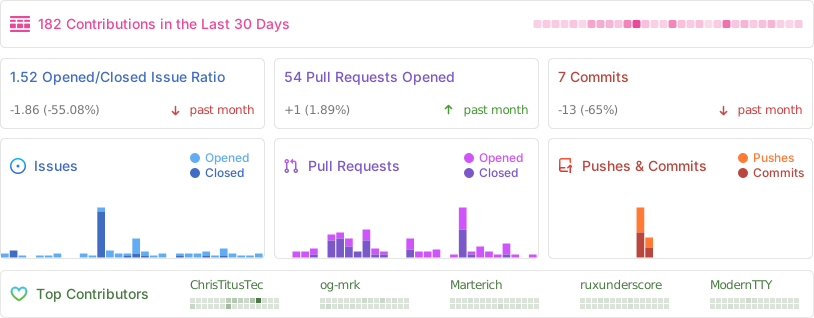
## 📊 GitHub Stats
================================================
FILE: config/applications.json
================================================
{
"1password": {
"category": "Utilities",
"choco": "1password",
"content": "1Password",
"description": "1Password is a password manager that allows you to store and manage your passwords securely.",
"link": "https://1password.com/",
"winget": "AgileBits.1Password"
},
"7zip": {
"category": "Utilities",
"choco": "7zip",
"content": "7-Zip",
"description": "7-Zip is a free and open-source file archiver utility. It supports several compression formats and provides a high compression ratio, making it a popular choice for file compression.",
"link": "https://www.7-zip.org/",
"winget": "7zip.7zip",
"foss": true
},
"adobe": {
"category": "Document",
"choco": "adobereader",
"content": "Adobe Acrobat Reader",
"description": "Adobe Acrobat Reader is a free PDF viewer with essential features for viewing, printing, and annotating PDF documents.",
"link": "https://www.adobe.com/acrobat/pdf-reader.html",
"winget": "Adobe.Acrobat.Reader.64-bit"
},
"advancedip": {
"category": "Pro Tools",
"choco": "advanced-ip-scanner",
"content": "Advanced IP Scanner",
"description": "Advanced IP Scanner is a fast and easy-to-use network scanner. It is designed to analyze LAN networks and provides information about connected devices.",
"link": "https://www.advanced-ip-scanner.com/",
"winget": "Famatech.AdvancedIPScanner"
},
"affine": {
"category": "Document",
"choco": "na",
"content": "AFFiNE",
"description": "AFFiNE is an open-source alternative to Notion. Write, draw, plan all at once. Selfhost it to sync across devices.",
"link": "https://affine.pro/",
"winget": "ToEverything.AFFiNE",
"foss": true
},
"ai-as-workspace": {
"category": "AI-Automation",
"choco": "na",
"content": "AI as Workspace",
"description": "Workspace-style AI chat client with multiple workspaces, plugins, and local-first design; open-source (BSD-3-Clause).",
"link": "https://aiaw.app/",
"winget": "NitroRCr.AIasWorkspace",
"foss": true
},
"aimp": {
"category": "Multimedia Tools",
"choco": "aimp",
"content": "AIMP (Music Player)",
"description": "AIMP is a feature-rich music player with support for various audio formats, playlists, and customizable user interface.",
"link": "https://www.aimp.ru/",
"winget": "AIMP.AIMP"
},
"alacritty": {
"category": "Utilities",
"choco": "alacritty",
"content": "Alacritty Terminal",
"description": "Alacritty is a fast, cross-platform, and GPU-accelerated terminal emulator. It is designed for performance and aims to be the fastest terminal emulator available.",
"link": "https://alacritty.org/",
"winget": "Alacritty.Alacritty",
"foss": true
},
"anaconda3": {
"category": "Development",
"choco": "anaconda3",
"content": "Anaconda",
"description": "Anaconda is a distribution of the Python and R programming languages for scientific computing.",
"link": "https://www.anaconda.com/products/distribution",
"winget": "Anaconda.Anaconda3"
},
"angryipscanner": {
"category": "Pro Tools",
"choco": "angryip",
"content": "Angry IP Scanner",
"description": "Angry IP Scanner is an open-source and cross-platform network scanner. It is used to scan IP addresses and ports, providing information about network connectivity.",
"link": "https://angryip.org/",
"winget": "angryziber.AngryIPScanner",
"foss": true
},
"anki": {
"category": "Document",
"choco": "anki",
"content": "Anki",
"description": "Anki is a flashcard application that helps you memorize information with intelligent spaced repetition.",
"link": "https://apps.ankiweb.net/",
"winget": "Anki.Anki",
"foss": true
},
"anydesk": {
"category": "Utilities",
"choco": "anydesk",
"content": "AnyDesk",
"description": "AnyDesk is a remote desktop software that enables users to access and control computers remotely. It is known for its fast connection and low latency.",
"link": "https://anydesk.com/",
"winget": "AnyDesk.AnyDesk"
},
"anythingllm": {
"category": "AI-Automation",
"choco": "na",
"content": "AnythingLLM",
"description": "Desktop AI application for chat with documents (RAG) and agent workflows; offers a Windows installer and an open-source codebase.",
"link": "https://anythingllm.com/",
"winget": "na",
"foss": true
},
"audacity": {
"category": "Multimedia Tools",
"choco": "audacity",
"content": "Audacity",
"description": "Audacity is a free and open-source audio editing software known for its powerful recording and editing capabilities.",
"link": "https://www.audacityteam.org/",
"winget": "Audacity.Audacity",
"foss": true
},
"autoruns": {
"category": "Microsoft Tools",
"choco": "autoruns",
"content": "Autoruns",
"description": "This utility shows you what programs are configured to run during system bootup or login.",
"link": "https://learn.microsoft.com/en-us/sysinternals/downloads/autoruns",
"winget": "Microsoft.Sysinternals.Autoruns"
},
"rdcman": {
"category": "Microsoft Tools",
"choco": "rdcman",
"content": "RDCMan",
"description": "RDCMan manages multiple remote desktop connections. It is useful for managing server labs where you need regular access to each machine such as automated checkin systems and data centers.",
"link": "https://learn.microsoft.com/en-us/sysinternals/downloads/rdcman",
"winget": "Microsoft.Sysinternals.RDCMan"
},
"autohotkey": {
"category": "Utilities",
"choco": "autohotkey",
"content": "AutoHotkey",
"description": "AutoHotkey is a scripting language for Windows that allows users to create custom automation scripts and macros. It is often used for automating repetitive tasks and customizing keyboard shortcuts.",
"link": "https://www.autohotkey.com/",
"winget": "AutoHotkey.AutoHotkey",
"foss": true
},
"autoit": {
"category": "AI-Automation",
"choco": "autoit.install",
"content": "AutoIt",
"description": "Windows GUI automation scripting tool (freeware) used to automate keystrokes, mouse actions, and window/control interactions.",
"link": "https://www.autoitscript.com/site/autoit/",
"winget": "na",
"foss": false
},
"azuredatastudio": {
"category": "Microsoft Tools",
"choco": "azure-data-studio",
"content": "Microsoft Azure Data Studio",
"description": "Azure Data Studio is a data management tool that enables you to work with SQL Server, Azure SQL DB and SQL DW from Windows, macOS and Linux.",
"link": "https://docs.microsoft.com/sql/azure-data-studio/what-is-azure-data-studio",
"winget": "Microsoft.AzureDataStudio"
},
"barrier": {
"category": "Utilities",
"choco": "barrier",
"content": "Barrier",
"description": "Barrier is an open-source software KVM (keyboard, video, and mouseswitch). It allows users to control multiple computers with a single keyboard and mouse, even if they have different operating systems.",
"link": "https://github.com/debauchee/barrier",
"winget": "DebaucheeOpenSourceGroup.Barrier",
"foss": true
},
"bat": {
"category": "Utilities",
"choco": "bat",
"content": "Bat (Cat)",
"description": "Bat is a cat command clone with syntax highlighting. It provides a user-friendly and feature-rich alternative to the traditional cat command for viewing and concatenating files.",
"link": "https://github.com/sharkdp/bat",
"winget": "sharkdp.bat",
"foss": true
},
"beeper": {
"category": "Communications",
"choco": "na",
"content": "Beeper",
"description": "All your chats in one app.",
"link": "https://www.beeper.com/",
"winget": "Beeper.Beeper"
},
"bitwarden": {
"category": "Utilities",
"choco": "bitwarden",
"content": "Bitwarden",
"description": "Bitwarden is an open-source password management solution. It allows users to store and manage their passwords in a secure and encrypted vault, accessible across multiple devices.",
"link": "https://bitwarden.com/",
"winget": "Bitwarden.Bitwarden",
"foss": true
},
"bleachbit": {
"category": "Utilities",
"choco": "bleachbit",
"content": "BleachBit",
"description": "Clean Your System and Free Disk Space.",
"link": "https://www.bleachbit.org/",
"winget": "BleachBit.BleachBit",
"foss": true
},
"blender": {
"category": "Multimedia Tools",
"choco": "blender",
"content": "Blender (3D Graphics)",
"description": "Blender is a powerful open-source 3D creation suite, offering modeling, sculpting, animation, and rendering tools.",
"link": "https://www.blender.org/",
"winget": "BlenderFoundation.Blender",
"foss": true
},
"brave": {
"category": "Browsers",
"choco": "brave",
"content": "Brave",
"description": "Brave is a privacy-focused web browser that blocks ads and trackers, offering a faster and safer browsing experience.",
"link": "https://www.brave.com",
"winget": "Brave.Brave",
"foss": true
},
"bulkcrapuninstaller": {
"category": "Utilities",
"choco": "bulk-crap-uninstaller",
"content": "Bulk Crap Uninstaller",
"description": "Bulk Crap Uninstaller is a free and open-source uninstaller utility for Windows. It helps users remove unwanted programs and clean up their system by uninstalling multiple applications at once.",
"link": "https://www.bcuninstaller.com/",
"winget": "Klocman.BulkCrapUninstaller",
"foss": true
},
"bulkrenameutility": {
"category": "Utilities",
"choco": "bulkrenameutility",
"content": "Bulk Rename Utility",
"description": "Bulk Rename Utility allows you to easily rename files and folders recursively based upon find-replace, character place, fields, sequences, regular expressions, EXIF data, and more.",
"link": "https://www.bulkrenameutility.co.uk",
"winget": "TGRMNSoftware.BulkRenameUtility"
},
"buzz": {
"category": "AI-Automation",
"choco": "na",
"content": "Buzz",
"description": "Offline audio transcription and translation desktop app powered by Whisper, packaged for Windows and available via WinGet.",
"link": "https://github.com/chidiwilliams/buzz",
"winget": "ChidiWilliams.Buzz",
"foss": true
},
"AdvancedRenamer": {
"category": "Utilities",
"choco": "advanced-renamer",
"content": "Advanced Renamer",
"description": "Advanced Renamer is a program for renaming multiple files and folders at once. By configuring renaming methods the names can be manipulated in various ways.",
"link": "https://www.advancedrenamer.com/",
"winget": "HulubuluSoftware.AdvancedRenamer"
},
"citrixworkspaceapp": {
"category": "Utilities",
"choco": "citrix-workspace",
"content": "Citrix Workspace app",
"description": "a secure, unified client application that provides instant access to virtual desktops, SaaS, web, and Windows apps from any device (Windows, macOS, Linux, iOS, Android) or browser.",
"link": "https://www.citrix.com/downloads/workspace-app/",
"winget": "Citrix.Workspace",
},
"calibre": {
"category": "Document",
"choco": "calibre",
"content": "Calibre",
"description": "Calibre is a powerful and easy-to-use e-book manager, viewer, and converter.",
"link": "https://calibre-ebook.com/",
"winget": "calibre.calibre",
"foss": true
},
"carnac": {
"category": "Utilities",
"choco": "carnac",
"content": "Carnac",
"description": "Carnac is a keystroke visualizer for Windows. It displays keystrokes in an overlay, making it useful for presentations, tutorials, and live demonstrations.",
"link": "https://carnackeys.com/",
"winget": "code52.Carnac",
"foss": true
},
"cemu": {
"category": "Games",
"choco": "cemu",
"content": "Cemu",
"description": "Cemu is a highly experimental software to emulate Wii U applications on PC.",
"link": "https://cemu.info/",
"winget": "Cemu.Cemu",
"foss": true
},
"chatgpt": {
"category": "AI-Automation",
"choco": "na",
"content": "ChatGPT",
"description": "ChatGPT desktop app provides direct access to OpenAI's conversational AI assistant for writing, analysis, and productivity tasks.",
"link": "https://openai.com/chatgpt/desktop/",
"winget": "OpenAI.ChatGPT"
},
"chatterino": {
"category": "Communications",
"choco": "chatterino",
"content": "Chatterino",
"description": "Chatterino is a chat client for Twitch chat that offers a clean and customizable interface for a better streaming experience.",
"link": "https://www.chatterino.com/",
"winget": "ChatterinoTeam.Chatterino",
"foss": true
},
"chrome": {
"category": "Browsers",
"choco": "googlechrome",
"content": "Chrome",
"description": "Google Chrome is a widely used web browser known for its speed, simplicity, and seamless integration with Google services.",
"link": "https://www.google.com/chrome/",
"winget": "Google.Chrome"
},
"chromium": {
"category": "Browsers",
"choco": "chromium",
"content": "Chromium",
"description": "Chromium is the open-source project that serves as the foundation for various web browsers, including Chrome.",
"link": "https://github.com/Hibbiki/chromium-win64",
"winget": "Hibbiki.Chromium",
"foss": true
},
"claude": {
"category": "AI-Automation",
"choco": "claude",
"content": "Claude",
"description": "Anthropic's Claude desktop application for Windows, designed for focused AI-assisted work and chat.",
"link": "https://claude.ai/",
"winget": "Anthropic.Claude",
"foss": false
},
"claude-code": {
"category": "AI-Automation",
"choco": "claude-code",
"content": "Claude Code",
"description": "Anthropic's agentic coding tool for the terminal/IDE workflows, available on Windows and distributed via WinGet.",
"link": "https://code.claude.com/",
"winget": "Anthropic.ClaudeCode",
"foss": false
},
"clementine": {
"category": "Multimedia Tools",
"choco": "clementine",
"content": "Clementine",
"description": "Clementine is a modern music player and library organizer, supporting various audio formats and online radio services.",
"link": "https://www.clementine-player.org/",
"winget": "Clementine.Clementine",
"foss": true
},
"clink": {
"category": "Development",
"choco": "clink",
"content": "Clink",
"description": "Clink is a powerful Bash-compatible command-line interface (CLIenhancement for Windows, adding features like syntax highlighting and improved history).",
"link": "https://mridgers.github.io/clink/",
"winget": "chrisant996.Clink",
"foss": true
},
"clonehero": {
"category": "Games",
"choco": "na",
"content": "Clone Hero",
"description": "Clone Hero is a free rhythm game, which can be played with any 5 or 6 button guitar controller.",
"link": "https://clonehero.net/",
"winget": "CloneHeroTeam.CloneHero"
},
"cmake": {
"category": "Development",
"choco": "cmake",
"content": "CMake",
"description": "CMake is an open-source, cross-platform family of tools designed to build, test and package software.",
"link": "https://cmake.org/",
"winget": "Kitware.CMake",
"foss": true
},
"copyq": {
"category": "Utilities",
"choco": "copyq",
"content": "CopyQ (Clipboard Manager)",
"description": "CopyQ is a clipboard manager with advanced features, allowing you to store, edit, and retrieve clipboard history.",
"link": "https://copyq.readthedocs.io/",
"winget": "hluk.CopyQ",
"foss": true
},
"cpuz": {
"category": "Utilities",
"choco": "cpu-z",
"content": "CPU-Z",
"description": "CPU-Z is a system monitoring and diagnostic tool for Windows. It provides detailed information about the computer's hardware components, including the CPU, memory, and motherboard.",
"link": "https://www.cpuid.com/softwares/cpu-z.html",
"winget": "CPUID.CPU-Z"
},
"crystaldiskinfo": {
"category": "Utilities",
"choco": "crystaldiskinfo",
"content": "Crystal Disk Info",
"description": "Crystal Disk Info is a disk health monitoring tool that provides information about the status and performance of hard drives. It helps users anticipate potential issues and monitor drive health.",
"link": "https://crystalmark.info/en/software/crystaldiskinfo/",
"winget": "CrystalDewWorld.CrystalDiskInfo",
"foss": true
},
"capframex": {
"category": "Utilities",
"choco": "na",
"content": "CapFrameX",
"description": "Frametimes capture and analysis tool based on Intel's PresentMon. Overlay provided by Rivatuner Statistics Server.",
"link": "https://www.capframex.com/",
"winget": "CXWorld.CapFrameX",
"foss": true
},
"crystaldiskmark": {
"category": "Utilities",
"choco": "crystaldiskmark",
"content": "Crystal Disk Mark",
"description": "Crystal Disk Mark is a disk benchmarking tool that measures the read and write speeds of storage devices. It helps users assess the performance of their hard drives and SSDs.",
"link": "https://crystalmark.info/en/software/crystaldiskmark/",
"winget": "CrystalDewWorld.CrystalDiskMark",
"foss": true
},
"cursor": {
"category": "Development",
"choco": "cursoride",
"content": "Cursor",
"description": "AI-powered code editor (VS Code-based) with agentic coding features and integrated AI assistance for development workflows.",
"link": "https://cursor.com/",
"winget": "Anysphere.Cursor",
"foss": false
},
"darktable": {
"category": "Multimedia Tools",
"choco": "darktable",
"content": "darktable",
"description": "Open-source photo editing tool, offering an intuitive interface, advanced editing capabilities, and a non-destructive workflow for seamless image enhancement.",
"link": "https://www.darktable.org/install/",
"winget": "darktable.darktable",
"foss": true
},
"DaxStudio": {
"category": "Development",
"choco": "daxstudio",
"content": "DaxStudio",
"description": "DAX (Data Analysis eXpressions) Studio is the ultimate tool for executing and analyzing DAX queries against Microsoft Tabular models.",
"link": "https://daxstudio.org/",
"winget": "DaxStudio.DaxStudio",
"foss": true
},
"ddu": {
"category": "Utilities",
"choco": "ddu",
"content": "Display Driver Uninstaller",
"description": "Display Driver Uninstaller (DDU) is a tool for completely uninstalling graphics drivers from NVIDIA, AMD, and Intel. It is useful for troubleshooting graphics driver-related issues.",
"link": "https://www.wagnardsoft.com/display-driver-uninstaller-DDU-",
"winget": "Wagnardsoft.DisplayDriverUninstaller"
},
"deepl": {
"category": "AI-Automation",
"choco": "deepl",
"content": "DeepL",
"description": "DeepL desktop translation and writing assistant for Windows, including shortcuts and in-app writing improvement features.",
"link": "https://www.deepl.com/en/windows-app",
"winget": "DeepL.DeepL",
"foss": false
},
"deluge": {
"category": "Utilities",
"choco": "deluge",
"content": "Deluge",
"description": "Deluge is a free and open-source BitTorrent client. It features a user-friendly interface, support for plugins, and the ability to manage torrents remotely.",
"link": "https://deluge-torrent.org/",
"winget": "DelugeTeam.Deluge",
"foss": true
},
"devtoys": {
"category": "Utilities",
"choco": "devtoys",
"content": "DevToys",
"description": "DevToys is a collection of development-related utilities and tools for Windows. It includes tools for file management, code formatting, and productivity enhancements for developers.",
"link": "https://devtoys.app/",
"winget": "DevToys-app.DevToys",
"foss": true
},
"digikam": {
"category": "Multimedia Tools",
"choco": "digikam",
"content": "digiKam",
"description": "digiKam is an advanced open-source photo management software with features for organizing, editing, and sharing photos.",
"link": "https://www.digikam.org/",
"winget": "KDE.digikam",
"foss": true
},
"discord": {
"category": "Communications",
"choco": "discord",
"content": "Discord",
"description": "Discord is a popular communication platform with voice, video, and text chat, designed for gamers but used by a wide range of communities.",
"link": "https://discord.com/",
"winget": "Discord.Discord"
},
"dismtools": {
"category": "Microsoft Tools",
"choco": "na",
"content": "DISMTools",
"description": "DISMTools is a fast, customizable GUI for the DISM utility, supporting Windows images from Windows 7 onward. It handles installations on any drive, offers project support, and lets users tweak settings like color modes, language, and DISM versions; powered by both native DISM and a managed DISM API.",
"link": "https://github.com/CodingWonders/DISMTools",
"winget": "CodingWondersSoftware.DISMTools.Stable",
"foss": true
},
"ntlite": {
"category": "Microsoft Tools",
"choco": "ntlite-free",
"content": "NTLite",
"description": "Integrate updates, drivers, automate Windows and application setup, speedup Windows deployment process and have it all set for the next time.",
"link": "https://ntlite.com",
"winget": "Nlitesoft.NTLite"
},
"ditto": {
"category": "Utilities",
"choco": "ditto",
"content": "Ditto",
"description": "Ditto is an extension to the standard windows clipboard.",
"link": "https://github.com/sabrogden/Ditto",
"winget": "Ditto.Ditto",
"foss": true
},
"dockerdesktop": {
"category": "Development",
"choco": "docker-desktop",
"content": "Docker Desktop",
"description": "Docker Desktop is a powerful tool for containerized application development and deployment.",
"link": "https://www.docker.com/products/docker-desktop",
"winget": "Docker.DockerDesktop"
},
"dotnet3": {
"category": "Microsoft Tools",
"choco": "dotnetcore3-desktop-runtime",
"content": ".NET Desktop Runtime 3.1",
"description": ".NET Desktop Runtime 3.1 is a runtime environment required for running applications developed with .NET Core 3.1.",
"link": "https://dotnet.microsoft.com/download/dotnet/3.1",
"winget": "Microsoft.DotNet.DesktopRuntime.3_1"
},
"dotnet5": {
"category": "Microsoft Tools",
"choco": "dotnet-5.0-runtime",
"content": ".NET Desktop Runtime 5",
"description": ".NET Desktop Runtime 5 is a runtime environment required for running applications developed with .NET 5.",
"link": "https://dotnet.microsoft.com/download/dotnet/5.0",
"winget": "Microsoft.DotNet.DesktopRuntime.5"
},
"dotnet6": {
"category": "Microsoft Tools",
"choco": "dotnet-6.0-runtime",
"content": ".NET Desktop Runtime 6",
"description": ".NET Desktop Runtime 6 is a runtime environment required for running applications developed with .NET 6.",
"link": "https://dotnet.microsoft.com/download/dotnet/6.0",
"winget": "Microsoft.DotNet.DesktopRuntime.6"
},
"dotnet7": {
"category": "Microsoft Tools",
"choco": "dotnet-7.0-runtime",
"content": ".NET Desktop Runtime 7",
"description": ".NET Desktop Runtime 7 is a runtime environment required for running applications developed with .NET 7.",
"link": "https://dotnet.microsoft.com/download/dotnet/7.0",
"winget": "Microsoft.DotNet.DesktopRuntime.7"
},
"dotnet8": {
"category": "Microsoft Tools",
"choco": "dotnet-8.0-runtime",
"content": ".NET Desktop Runtime 8",
"description": ".NET Desktop Runtime 8 is a runtime environment required for running applications developed with .NET 8.",
"link": "https://dotnet.microsoft.com/download/dotnet/8.0",
"winget": "Microsoft.DotNet.DesktopRuntime.8"
},
"dotnet9": {
"category": "Microsoft Tools",
"choco": "dotnet-9.0-runtime",
"content": ".NET Desktop Runtime 9",
"description": ".NET Desktop Runtime 9 is a runtime environment required for running applications developed with .NET 9.",
"link": "https://dotnet.microsoft.com/download/dotnet/9.0",
"winget": "Microsoft.DotNet.DesktopRuntime.9"
},
"dotnet10": {
"category": "Microsoft Tools",
"choco": "dotnet-10.0-runtime",
"content": ".NET Desktop Runtime 10",
"description": ".NET Desktop Runtime 10 is a runtime environment required for running applications developed with .NET 10.",
"link": "https://dotnet.microsoft.com/download/dotnet/10.0",
"winget": "Microsoft.DotNet.DesktopRuntime.10"
},
"dmt": {
"winget": "GNE.DualMonitorTools",
"choco": "dual-monitor-tools",
"category": "Utilities",
"content": "Dual Monitor Tools",
"link": "https://dualmonitortool.sourceforge.net/",
"description": "Dual Monitor Tools (DMT) is a FOSS app that allows you to customize the handling of multiple monitors. Useful for fullscreen games and apps that handle a second monitor poorly and can improve your workflow.",
"foss": true
},
"duplicati": {
"category": "Utilities",
"choco": "duplicati",
"content": "Duplicati",
"description": "Duplicati is an open-source backup solution that supports encrypted, compressed, and incremental backups. It is designed to securely store data on cloud storage services.",
"link": "https://www.duplicati.com/",
"winget": "Duplicati.Duplicati",
"foss": true
},
"eaapp": {
"category": "Games",
"choco": "ea-app",
"content": "EA App",
"description": "EA App is a platform for accessing and playing Electronic Arts games.",
"link": "https://www.ea.com/ea-app",
"winget": "ElectronicArts.EADesktop"
},
"eartrumpet": {
"category": "Multimedia Tools",
"choco": "eartrumpet",
"content": "EarTrumpet (Audio)",
"description": "EarTrumpet is an audio control app for Windows, providing a simple and intuitive interface for managing sound settings.",
"link": "https://eartrumpet.app/",
"winget": "File-New-Project.EarTrumpet",
"foss": true
},
"edge": {
"category": "Browsers",
"choco": "microsoft-edge",
"content": "Edge",
"description": "Microsoft Edge is a modern web browser built on Chromium, offering performance, security, and integration with Microsoft services.",
"link": "https://www.microsoft.com/edge",
"winget": "Microsoft.Edge"
},
"efibooteditor": {
"category": "Pro Tools",
"choco": "na",
"content": "EFI Boot Editor",
"description": "EFI Boot Editor is a tool for managing the EFI/UEFI boot entries on your system. It allows you to customize the boot configuration of your computer.",
"link": "https://www.easyuefi.com/",
"winget": "EFIBootEditor.EFIBootEditor"
},
"emulationstation": {
"category": "Games",
"choco": "emulationstation",
"content": "Emulation Station",
"description": "Emulation Station is a graphical and themeable emulator front-end that allows you to access all your favorite games in one place.",
"link": "https://emulationstation.org/",
"winget": "Emulationstation.Emulationstation",
"foss": true
},
"enteauth": {
"category": "Utilities",
"choco": "ente-auth",
"content": "Ente Auth",
"description": "Ente Auth is a free, cross-platform, end-to-end encrypted authenticator app.",
"link": "https://ente.io/auth/",
"winget": "ente-io.auth-desktop",
"foss": true
},
"epicgames": {
"category": "Games",
"choco": "epicgameslauncher",
"content": "Epic Games Launcher",
"description": "Epic Games Launcher is the client for accessing and playing games from the Epic Games Store.",
"link": "https://www.epicgames.com/store/en-US/",
"winget": "EpicGames.EpicGamesLauncher"
},
"esearch": {
"category": "Utilities",
"choco": "everything",
"content": "Everything Search",
"description": "Everything Search is a fast and efficient file search utility for Windows.",
"link": "https://www.voidtools.com/",
"winget": "voidtools.Everything"
},
"espanso": {
"category": "Utilities",
"choco": "espanso",
"content": "Espanso",
"description": "Cross-platform and open-source Text Expander written in Rust.",
"link": "https://espanso.org/",
"winget": "Espanso.Espanso",
"foss": true
},
"ffmpeg": {
"category": "Utilities",
"choco": "na",
"content": "FFmpeg Batch AV Converter",
"description": "FFmpeg Batch AV Converter is a universal audio and video encoder, that allows to use the full potential of ffmpeg command line with a few mouse clicks in a convenient GUI with drag and drop, progress information.",
"link": "https://ffmpeg-batch.sourceforge.io/",
"winget": "eibol.FFmpegBatchAVConverter",
"foss": true
},
"falkon": {
"category": "Browsers",
"choco": "falkon",
"content": "Falkon",
"description": "Falkon is a lightweight and fast web browser with a focus on user privacy and efficiency.",
"link": "https://www.falkon.org/",
"winget": "KDE.Falkon",
"foss": true
},
"fastfetch": {
"category": "Utilities",
"choco": "na",
"content": "Fastfetch",
"description": "Fastfetch is a neofetch-like tool for fetching system information and displaying them in a pretty way.",
"link": "https://github.com/fastfetch-cli/fastfetch/",
"winget": "Fastfetch-cli.Fastfetch",
"foss": true
},
"ferdium": {
"category": "Communications",
"choco": "ferdium",
"content": "Ferdium",
"description": "Ferdium is a messaging application that combines multiple messaging services into a single app for easy management.",
"link": "https://ferdium.org/",
"winget": "Ferdium.Ferdium",
"foss": true
},
"ffmpeg-full": {
"category": "Multimedia Tools",
"choco": "ffmpeg-full",
"content": "FFmpeg (full)",
"description": "FFmpeg is a powerful multimedia processing tool that enables users to convert, edit, and stream audio and video files with a vast range of codecs and formats. | Note: FFmpeg can not be uninstalled using winget.",
"link": "https://ffmpeg.org/",
"winget": "Gyan.FFmpeg"
},
"fileconverter": {
"category": "Utilities",
"choco": "file-converter",
"content": "File-Converter",
"description": "File Converter is a very simple tool which allows you to convert and compress one or several file(s) using the context menu in Windows Explorer.",
"link": "https://file-converter.io/",
"winget": "AdrienAllard.FileConverter",
"foss": true
},
"files": {
"category": "Utilities",
"choco": "files",
"content": "Files",
"description": "Alternative file explorer.",
"link": "https://github.com/files-community/Files",
"winget": "na",
"foss": true
},
"firealpaca": {
"category": "Multimedia Tools",
"choco": "firealpaca",
"content": "Fire Alpaca",
"description": "Fire Alpaca is a free digital painting software that provides a wide range of drawing tools and a user-friendly interface.",
"link": "https://firealpaca.com/",
"winget": "FireAlpaca.FireAlpaca"
},
"firefox": {
"category": "Browsers",
"choco": "firefox",
"content": "Firefox",
"description": "Mozilla Firefox is an open-source web browser known for its customization options, privacy features, and extensions.",
"link": "https://www.mozilla.org/en-US/firefox/new/",
"winget": "Mozilla.Firefox",
"foss": true
},
"firefoxesr": {
"category": "Browsers",
"choco": "FirefoxESR",
"content": "Firefox ESR",
"description": "Mozilla Firefox is an open-source web browser known for its customization options, privacy features, and extensions. Firefox ESR (Extended Support Release) receives major updates every 42 weeks with minor updates such as crash fixes, security fixes and policy updates as needed, but at least every four weeks.",
"link": "https://www.mozilla.org/en-US/firefox/enterprise/",
"winget": "Mozilla.Firefox.ESR",
"foss": true
},
"flameshot": {
"category": "Multimedia Tools",
"choco": "flameshot",
"content": "Flameshot (Screenshots)",
"description": "Flameshot is a powerful yet simple to use screenshot software, offering annotation and editing features.",
"link": "https://flameshot.org/",
"winget": "Flameshot.Flameshot",
"foss": true
},
"lightshot": {
"category": "Multimedia Tools",
"choco": "lightshot",
"content": "Lightshot (Screenshots)",
"description": "Ligthshot is an easy-to-use, light-weight screenshot software tool, where you can optionally edit your screenshots using different tools, share them via Internet and/or save to disk, and customize the available options.",
"link": "https://app.prntscr.com/",
"winget": "Skillbrains.Lightshot"
},
"floorp": {
"category": "Browsers",
"choco": "na",
"content": "Floorp",
"description": "Floorp is an open-source web browser project that aims to provide a simple and fast browsing experience.",
"link": "https://floorp.app/",
"winget": "Ablaze.Floorp",
"foss": true
},
"flow": {
"category": "Utilities",
"choco": "flow-launcher",
"content": "Flow launcher",
"description": "Keystroke launcher for Windows to search, manage and launch files, folders bookmarks, websites and more.",
"link": "https://www.flowlauncher.com/",
"winget": "Flow-Launcher.Flow-Launcher",
"foss": true
},
"flux": {
"category": "Utilities",
"choco": "flux",
"content": "F.lux",
"description": "f.lux adjusts the color temperature of your screen to reduce eye strain during nighttime use.",
"link": "https://justgetflux.com/",
"winget": "flux.flux"
},
"foobar": {
"category": "Multimedia Tools",
"choco": "foobar2000",
"content": "foobar2000 (Music Player)",
"description": "foobar2000 is a highly customizable and extensible music player for Windows, known for its modular design and advanced features.",
"link": "https://www.foobar2000.org/",
"winget": "PeterPawlowski.foobar2000"
},
"foxpdfeditor": {
"category": "Document",
"choco": "na",
"content": "Foxit PDF Editor",
"description": "Foxit PDF Editor is a feature-rich PDF editor and viewer with a familiar ribbon-style interface.",
"link": "https://www.foxit.com/pdf-editor/",
"winget": "Foxit.PhantomPDF"
},
"foxpdfreader": {
"category": "Document",
"choco": "foxitreader",
"content": "Foxit PDF Reader",
"description": "Foxit PDF Reader is a free PDF viewer with a familiar ribbon-style interface.",
"link": "https://www.foxit.com/pdf-reader/",
"winget": "Foxit.FoxitReader"
},
"freecad": {
"category": "Multimedia Tools",
"choco": "freecad",
"content": "FreeCAD",
"description": "FreeCAD is a parametric 3D CAD modeler, designed for product design and engineering tasks, with a focus on flexibility and extensibility.",
"link": "https://www.freecadweb.org/",
"winget": "FreeCAD.FreeCAD",
"foss": true
},
"fxsound": {
"category": "Multimedia Tools",
"choco": "fxsound",
"content": "FxSound",
"description": "FxSound is free open-source software to boost sound quality, volume, and bass. Including an equalizer, effects, and presets for customized audio.",
"link": "https://www.fxsound.com/",
"winget": "FxSound.FxSound",
"foss": true
},
"fzf": {
"category": "Utilities",
"choco": "fzf",
"content": "Fzf",
"description": "A command-line fuzzy finder.",
"link": "https://github.com/junegunn/fzf/",
"winget": "junegunn.fzf",
"foss": true
},
"geforcenow": {
"category": "Games",
"choco": "nvidia-geforce-now",
"content": "GeForce NOW",
"description": "GeForce NOW is a cloud gaming service that allows you to play high-quality PC games on your device.",
"link": "https://www.nvidia.com/en-us/geforce-now/",
"winget": "Nvidia.GeForceNow"
},
"gimp": {
"category": "Multimedia Tools",
"choco": "gimp",
"content": "GIMP (Image Editor)",
"description": "GIMP is a versatile open-source raster graphics editor used for tasks such as photo retouching, image editing, and image composition.",
"link": "https://www.gimp.org/",
"winget": "GIMP.GIMP.3",
"foss": true
},
"git": {
"category": "Development",
"choco": "git",
"content": "Git",
"description": "Git is a distributed version control system widely used for tracking changes in source code during software development.",
"link": "https://git-scm.com/",
"winget": "Git.Git",
"foss": true
},
"gitbutler": {
"category": "Development",
"choco": "na",
"content": "Git Butler",
"description": "A Git client for simultaneous branches on top of your existing workflow.",
"link": "https://gitbutler.com/",
"winget": "GitButler.GitButler"
},
"gitextensions": {
"category": "Development",
"choco": "git;gitextensions",
"content": "Git Extensions",
"description": "Git Extensions is a graphical user interface for Git, providing additional features for easier source code management.",
"link": "https://gitextensions.github.io/",
"winget": "GitExtensionsTeam.GitExtensions"
},
"githubcli": {
"category": "Development",
"choco": "git;gh",
"content": "GitHub CLI",
"description": "GitHub CLI is a command-line tool that simplifies working with GitHub directly from the terminal.",
"link": "https://cli.github.com/",
"winget": "GitHub.cli",
"foss": true
},
"github-copilot-cli": {
"category": "AI-Automation",
"choco": "na",
"content": "GitHub Copilot CLI",
"description": "GitHub Copilot experience for the command line: natural-language assistance for commands and development tasks; distributed via WinGet.",
"link": "https://github.com/github/copilot-cli",
"winget": "GitHub.Copilot",
"foss": false
},
"githubdesktop": {
"category": "Development",
"choco": "git;github-desktop",
"content": "GitHub Desktop",
"description": "GitHub Desktop is a visual Git client that simplifies collaboration on GitHub repositories with an easy-to-use interface.",
"link": "https://desktop.github.com/",
"winget": "GitHub.GitHubDesktop",
"foss": true
},
"gitkrakenclient": {
"category": "Development",
"choco": "gitkraken",
"content": "GitKraken Client",
"description": "GitKraken Client is a powerful visual Git client from Axosoft that works with ALL git repositories on any hosting environment.",
"link": "https://www.gitkraken.com/git-client",
"winget": "Axosoft.GitKraken"
},
"glaryutilities": {
"category": "Utilities",
"choco": "glaryutilities-free",
"content": "Glary Utilities",
"description": "Glary Utilities is a comprehensive system optimization and maintenance tool for Windows.",
"link": "https://www.glarysoft.com/glary-utilities/",
"winget": "Glarysoft.GlaryUtilities"
},
"godotengine": {
"category": "Development",
"choco": "godot",
"content": "Godot Engine",
"description": "Godot Engine is a free, open-source 2D and 3D game engine with a focus on usability and flexibility.",
"link": "https://godotengine.org/",
"winget": "GodotEngine.GodotEngine",
"foss": true
},
"gog": {
"category": "Games",
"choco": "goggalaxy",
"content": "GOG Galaxy",
"description": "GOG Galaxy is a gaming client that offers DRM-free games, additional content, and more.",
"link": "https://www.gog.com/galaxy",
"winget": "GOG.Galaxy"
},
"gitify": {
"category": "Development",
"choco": "na",
"content": "Gitify",
"description": "GitHub notifications on your menu bar.",
"link": "https://www.gitify.io/",
"winget": "Gitify.Gitify",
"foss": true
},
"golang": {
"category": "Development",
"choco": "golang",
"content": "Go",
"description": "Go (or Golang) is a statically typed, compiled programming language designed for simplicity, reliability, and efficiency.",
"link": "https://go.dev/",
"winget": "GoLang.Go",
"foss": true
},
"googledrive": {
"category": "Utilities",
"choco": "googledrive",
"content": "Google Drive",
"description": "File syncing across devices all tied to your Google account.",
"link": "https://www.google.com/drive/",
"winget": "Google.GoogleDrive"
},
"gpt4all": {
"category": "AI-Automation",
"choco": "gpt4all",
"content": "GPT4All",
"description": "Open-source desktop application to run LLMs locally with an emphasis on privacy (MIT-licensed codebase).",
"link": "https://nomic.ai/gpt4all",
"winget": "nomic.gpt4all",
"foss": true
},
"gpuz": {
"category": "Utilities",
"choco": "gpu-z",
"content": "GPU-Z",
"description": "GPU-Z provides detailed information about your graphics card and GPU.",
"link": "https://www.techpowerup.com/gpuz/",
"winget": "TechPowerUp.GPU-Z"
},
"greenshot": {
"category": "Multimedia Tools",
"choco": "greenshot",
"content": "Greenshot (Screenshots)",
"description": "Greenshot is a light-weight screenshot software tool with built-in image editor and customizable capture options.",
"link": "https://getgreenshot.org/",
"winget": "Greenshot.Greenshot",
"foss": true
},
"gsudo": {
"category": "Utilities",
"choco": "gsudo",
"content": "Gsudo",
"description": "Gsudo is a sudo implementation for Windows, allowing elevated privilege execution.",
"link": "https://gerardog.github.io/gsudo/",
"winget": "gerardog.gsudo"
},
"handbrake": {
"category": "Multimedia Tools",
"choco": "handbrake",
"content": "HandBrake",
"description": "HandBrake is an open-source video transcoder, allowing you to convert video from nearly any format to a selection of widely supported codecs.",
"link": "https://handbrake.fr/",
"winget": "HandBrake.HandBrake",
"foss": true
},
"harmonoid": {
"category": "Multimedia Tools",
"choco": "na",
"content": "Harmonoid",
"description": "Plays and manages your music library. Looks beautiful and juicy. Playlists, visuals, synced lyrics, pitch shift, volume boost and more.",
"link": "https://harmonoid.com/",
"winget": "Harmonoid.Harmonoid",
"foss": true
},
"heidisql": {
"category": "Pro Tools",
"choco": "heidisql",
"content": "HeidiSQL",
"description": "HeidiSQL is a powerful and easy-to-use client for MySQL, MariaDB, Microsoft SQL Server, and PostgreSQL databases. It provides tools for database management and development.",
"link": "https://www.heidisql.com/",
"winget": "HeidiSQL.HeidiSQL",
"foss": true
},
"helix": {
"category": "Development",
"choco": "helix",
"content": "Helix",
"description": "Helix is a neovim alternative built in Rust.",
"link": "https://helix-editor.com/",
"winget": "Helix.Helix",
"foss": true
},
"heroiclauncher": {
"category": "Games",
"choco": "na",
"content": "Heroic Games Launcher",
"description": "Heroic Games Launcher is an open-source alternative game launcher for Epic Games Store.",
"link": "https://heroicgameslauncher.com/",
"winget": "HeroicGamesLauncher.HeroicGamesLauncher",
"foss": true
},
"hexchat": {
"category": "Communications",
"choco": "hexchat",
"content": "Hexchat",
"description": "HexChat is a free, open-source IRC (Internet Relay Chat) client with a graphical interface for easy communication.",
"link": "https://hexchat.github.io/",
"winget": "HexChat.HexChat",
"foss": true
},
"hwinfo": {
"category": "Utilities",
"choco": "hwinfo",
"content": "HWiNFO",
"description": "HWiNFO provides comprehensive hardware information and diagnostics for Windows.",
"link": "https://www.hwinfo.com/",
"winget": "REALiX.HWiNFO"
},
"hwmonitor": {
"category": "Utilities",
"choco": "hwmonitor",
"content": "HWMonitor",
"description": "HWMonitor is a hardware monitoring program that reads PC systems main health sensors.",
"link": "https://www.cpuid.com/softwares/hwmonitor.html",
"winget": "CPUID.HWMonitor"
},
"imhex": {
"category": "Development",
"choco": "na",
"content": "ImHex (Hex Editor)",
"description": "A modern, featureful Hex Editor for Reverse Engineers and Developers.",
"link": "https://imhex.werwolv.net/",
"winget": "WerWolv.ImHex",
"foss": true
},
"imageglass": {
"category": "Multimedia Tools",
"choco": "imageglass",
"content": "ImageGlass (Image Viewer)",
"description": "ImageGlass is a versatile image viewer with support for various image formats and a focus on simplicity and speed.",
"link": "https://imageglass.org/",
"winget": "DuongDieuPhap.ImageGlass",
"foss": true
},
"imgburn": {
"category": "Multimedia Tools",
"choco": "imgburn",
"content": "ImgBurn",
"description": "ImgBurn is a lightweight CD, DVD, HD-DVD, and Blu-ray burning application with advanced features for creating and burning disc images.",
"link": "https://www.imgburn.com/",
"winget": "LIGHTNINGUK.ImgBurn"
},
"inkscape": {
"category": "Multimedia Tools",
"choco": "inkscape",
"content": "Inkscape",
"description": "Inkscape is a powerful open-source vector graphics editor, suitable for tasks such as illustrations, icons, logos, and more.",
"link": "https://inkscape.org/",
"winget": "Inkscape.Inkscape",
"foss": true
},
"itch": {
"category": "Games",
"choco": "itch",
"content": "Itch.io",
"description": "Itch.io is a digital distribution platform for indie games and creative projects.",
"link": "https://itch.io/",
"winget": "ItchIo.Itch",
"foss": true
},
"itunes": {
"category": "Multimedia Tools",
"choco": "itunes",
"content": "iTunes",
"description": "iTunes is a media player, media library, and online radio broadcaster application developed by Apple Inc.",
"link": "https://www.apple.com/itunes/",
"winget": "Apple.iTunes"
},
"jami": {
"category": "Communications",
"choco": "jami",
"content": "Jami",
"description": "Jami is a secure and privacy-focused communication platform that offers audio and video calls, messaging, and file sharing.",
"link": "https://jami.net/",
"winget": "SFLinux.Jami",
"foss": true
},
"jan": {
"category": "AI-Automation",
"choco": "jan",
"content": "Jan",
"description": "Open-source ChatGPT alternative that runs on your computer (offline-first desktop AI assistant / local model runner).",
"link": "https://jan.ai/",
"winget": "Jan.Jan",
"foss": true
},
"java8": {
"category": "Development",
"choco": "corretto8jdk",
"content": "Amazon Corretto 8 (LTS)",
"description": "Amazon Corretto is a no-cost, multiplatform, production-ready distribution of the Open Java Development Kit (OpenJDK).",
"link": "https://aws.amazon.com/corretto",
"winget": "Amazon.Corretto.8.JDK",
"foss": true
},
"java11": {
"category": "Development",
"choco": "corretto11jdk",
"content": "Amazon Corretto 11 (LTS)",
"description": "Amazon Corretto is a no-cost, multiplatform, production-ready distribution of the Open Java Development Kit (OpenJDK).",
"link": "https://aws.amazon.com/corretto",
"winget": "Amazon.Corretto.11.JDK",
"foss": true
},
"java17": {
"category": "Development",
"choco": "corretto17jdk",
"content": "Amazon Corretto 17 (LTS)",
"description": "Amazon Corretto is a no-cost, multiplatform, production-ready distribution of the Open Java Development Kit (OpenJDK).",
"link": "https://aws.amazon.com/corretto",
"winget": "Amazon.Corretto.17.JDK",
"foss": true
},
"java21": {
"category": "Development",
"choco": "corretto21jdk",
"content": "Amazon Corretto 21 (LTS)",
"description": "Amazon Corretto is a no-cost, multiplatform, production-ready distribution of the Open Java Development Kit (OpenJDK).",
"link": "https://aws.amazon.com/corretto",
"winget": "Amazon.Corretto.21.JDK",
"foss": true
},
"java25": {
"category": "Development",
"choco": "corretto25jdk",
"content": "Amazon Corretto 25 (LTS)",
"description": "Amazon Corretto is a no-cost, multiplatform, production-ready distribution of the Open Java Development Kit (OpenJDK).",
"link": "https://aws.amazon.com/corretto",
"winget": "Amazon.Corretto.25.JDK",
"foss": true
},
"jdownloader": {
"category": "Utilities",
"choco": "jdownloader",
"content": "JDownloader",
"description": "JDownloader is a feature-rich download manager with support for various file hosting services.",
"link": "https://jdownloader.org/",
"winget": "AppWork.JDownloader"
},
"jellyfinmediaplayer": {
"category": "Multimedia Tools",
"choco": "jellyfin-media-player",
"content": "Jellyfin Media Player",
"description": "Jellyfin Media Player is a client application for the Jellyfin media server, providing access to your media library.",
"link": "https://github.com/jellyfin/jellyfin-media-player",
"winget": "Jellyfin.JellyfinMediaPlayer",
"foss": true
},
"jellyfinserver": {
"category": "Multimedia Tools",
"choco": "jellyfin",
"content": "Jellyfin Server",
"description": "Jellyfin Server is an open-source media server software, allowing you to organize and stream your media library.",
"link": "https://jellyfin.org/",
"winget": "Jellyfin.Server",
"foss": true
},
"jetbrains": {
"category": "Development",
"choco": "jetbrainstoolbox",
"content": "Jetbrains Toolbox",
"description": "Jetbrains Toolbox is a platform for easy installation and management of JetBrains developer tools.",
"link": "https://www.jetbrains.com/toolbox/",
"winget": "JetBrains.Toolbox"
},
"joplin": {
"category": "Document",
"choco": "joplin",
"content": "Joplin (FOSS Notes)",
"description": "Joplin is an open-source note-taking and to-do application with synchronization capabilities.",
"link": "https://joplinapp.org/",
"winget": "Joplin.Joplin",
"foss": true
},
"jpegview": {
"category": "Utilities",
"choco": "jpegview",
"content": "JPEG View",
"description": "JPEGView is a lean, fast and highly configurable viewer/editor for JPEG, BMP, PNG, WEBP, TGA, GIF, JXL, HEIC, HEIF, AVIF and TIFF images with a minimal GUI.",
"link": "https://github.com/sylikc/jpegview",
"winget": "sylikc.JPEGView",
"foss": true
},
"kdeconnect": {
"category": "Utilities",
"choco": "kdeconnect-kde",
"content": "KDE Connect",
"description": "KDE Connect allows seamless integration between your KDE desktop and mobile devices.",
"link": "https://community.kde.org/KDEConnect",
"winget": "KDE.KDEConnect",
"foss": true
},
"kdenlive": {
"category": "Multimedia Tools",
"choco": "kdenlive",
"content": "Kdenlive (Video Editor)",
"description": "Kdenlive is an open-source video editing software with powerful features for creating and editing professional-quality videos.",
"link": "https://kdenlive.org/",
"winget": "KDE.Kdenlive",
"foss": true
},
"keepass": {
"category": "Utilities",
"choco": "keepassxc",
"content": "KeePassXC",
"description": "KeePassXC is a cross-platform, open-source password manager with strong encryption features.",
"link": "https://keepassxc.org/",
"winget": "KeePassXCTeam.KeePassXC",
"foss": true
},
"klite": {
"category": "Multimedia Tools",
"choco": "k-litecodecpack-standard",
"content": "K-Lite Codec Standard",
"description": "K-Lite Codec Pack Standard is a collection of audio and video codecs and related tools, providing essential components for media playback.",
"link": "https://www.codecguide.com/",
"winget": "CodecGuide.K-LiteCodecPack.Standard"
},
"kodi": {
"category": "Multimedia Tools",
"choco": "kodi",
"content": "Kodi Media Center",
"description": "Kodi is an open-source media center application that allows you to play and view most videos, music, podcasts, and other digital media files.",
"link": "https://kodi.tv/",
"winget": "XBMCFoundation.Kodi",
"foss": true
},
"krita": {
"category": "Multimedia Tools",
"choco": "krita",
"content": "Krita (Image Editor)",
"description": "Krita is a powerful open-source painting application. It is designed for concept artists, illustrators, matte and texture artists, and the VFX industry.",
"link": "https://krita.org/en/features/",
"winget": "KDE.Krita",
"foss": true
},
"lazygit": {
"category": "Development",
"choco": "lazygit",
"content": "Lazygit",
"description": "Simple terminal UI for git commands.",
"link": "https://github.com/jesseduffield/lazygit/",
"winget": "JesseDuffield.lazygit",
"foss": true
},
"libreoffice": {
"category": "Document",
"choco": "libreoffice-fresh",
"content": "LibreOffice",
"description": "LibreOffice is a powerful and free office suite, compatible with other major office suites.",
"link": "https://www.libreoffice.org/",
"winget": "TheDocumentFoundation.LibreOffice",
"foss": true
},
"librewolf": {
"category": "Browsers",
"choco": "librewolf",
"content": "LibreWolf",
"description": "LibreWolf is a privacy-focused web browser based on Firefox, with additional privacy and security enhancements.",
"link": "https://librewolf-community.gitlab.io/",
"winget": "LibreWolf.LibreWolf",
"foss": true
},
"linkshellextension": {
"category": "Utilities",
"choco": "linkshellextension",
"content": "Link Shell extension",
"description": "Link Shell Extension (LSE) provides for the creation of Hardlinks, Junctions, Volume Mountpoints, Symbolic Links, a folder cloning process that utilises Hardlinks or Symbolic Links and a copy process taking care of Junctions, Symbolic Links, and Hardlinks. LSE, as its name implies is implemented as a Shell extension and is accessed from Windows Explorer, or similar file/folder managers.",
"link": "https://schinagl.priv.at/nt/hardlinkshellext/hardlinkshellext.html",
"winget": "HermannSchinagl.LinkShellExtension"
},
"linphone": {
"category": "Communications",
"choco": "linphone",
"content": "Linphone",
"description": "Linphone is an open-source voice over IP (VoIPservice that allows for audio and video calls, messaging, and more.",
"link": "https://www.linphone.org/",
"winget": "BelledonneCommunications.Linphone",
"foss": true
},
"livelywallpaper": {
"category": "Utilities",
"choco": "lively",
"content": "Lively Wallpaper",
"description": "Free and open-source software that allows users to set animated desktop wallpapers and screensavers.",
"link": "https://www.rocksdanister.com/lively/",
"winget": "rocksdanister.LivelyWallpaper",
"foss": true
},
"lm-studio": {
"category": "AI-Automation",
"choco": "lm-studio",
"content": "LM Studio",
"description": "Desktop app to discover, download, and run local LLMs on your machine, with a built-in chat UI and local inference tooling.",
"link": "https://lmstudio.ai/",
"winget": "ElementLabs.LMStudio",
"foss": false
},
"localsend": {
"category": "Utilities",
"choco": "localsend.install",
"content": "LocalSend",
"description": "An open-source cross-platform alternative to AirDrop.",
"link": "https://localsend.org/",
"winget": "LocalSend.LocalSend",
"foss": true
},
"lockhunter": {
"category": "Utilities",
"choco": "lockhunter",
"content": "LockHunter",
"description": "LockHunter is a free tool to delete files blocked by something you do not know.",
"link": "https://lockhunter.com/",
"winget": "CrystalRich.LockHunter"
},
"logseq": {
"category": "Document",
"choco": "logseq",
"content": "Logseq",
"description": "Logseq is a versatile knowledge management and note-taking application designed for the digital thinker. With a focus on the interconnectedness of ideas, Logseq allows users to seamlessly organize their thoughts through a combination of hierarchical outlines and bi-directional linking. It supports both structured and unstructured content, enabling users to create a personalized knowledge graph that adapts to their evolving ideas and insights.",
"link": "https://logseq.com/",
"winget": "Logseq.Logseq",
"foss": true
},
"logitechghub": {
"category": "Utilities",
"choco": "lghub",
"content": "Logitech G Hub",
"description": "Official software for managing Logitech gaming peripherals (mice, keyboards, headsets, lighting profiles, etc.).",
"link": "https://www.logitechg.com/en-us/software/ghub",
"winget": "Logitech.GHUB"
},
"malwarebytes": {
"category": "Utilities",
"choco": "malwarebytes",
"content": "Malwarebytes",
"description": "Malwarebytes is an anti-malware software that provides real-time protection against threats.",
"link": "https://www.malwarebytes.com/",
"winget": "Malwarebytes.Malwarebytes"
},
"masscode": {
"category": "Document",
"choco": "na",
"content": "massCode (Snippet Manager)",
"description": "massCode is a fast and efficient open-source code snippet manager for developers.",
"link": "https://masscode.io/",
"winget": "antonreshetov.massCode",
"foss": true
},
"matrix": {
"category": "Communications",
"choco": "element-desktop",
"content": "Element",
"description": "Element is a client for Matrix; an open network for secure, decentralized communication.",
"link": "https://element.io/",
"winget": "Element.Element",
"foss": true
},
"meld": {
"category": "Utilities",
"choco": "meld",
"content": "Meld",
"description": "Meld is a visual diff and merge tool for files and directories.",
"link": "https://meldmerge.org/",
"winget": "Meld.Meld",
"foss": true
},
"microsoft-aishell": {
"category": "AI-Automation",
"choco": "na",
"content": "Microsoft AI Shell",
"description": "CLI shell that connects to AI assistance providers ('agents') for command-line productivity; distributed via WinGet.",
"link": "https://github.com/PowerShell/AIShell",
"winget": "Microsoft.AIShell",
"foss": true
},
"microsoft-copilot": {
"category": "AI-Automation",
"choco": "na",
"content": "Microsoft Copilot",
"description": "Microsoft Copilot desktop app for Windows (consumer Copilot), distributed via Microsoft Store and commonly installed via its Store ID.",
"link": "https://apps.microsoft.com/detail/9nht9rb2f4hd",
"winget": "9NHT9RB2F4HD",
"foss": false
},
"ModernFlyouts": {
"category": "Multimedia Tools",
"choco": "na",
"content": "Modern Flyouts",
"description": "An open-source, modern, Fluent Design-based set of flyouts for Windows.",
"link": "https://github.com/ModernFlyouts-Community/ModernFlyouts/",
"winget": "ModernFlyouts.ModernFlyouts",
"foss": true
},
"monitorian": {
"category": "Utilities",
"choco": "monitorian",
"content": "Monitorian",
"description": "Monitorian is a utility for adjusting monitor brightness and contrast on Windows.",
"link": "https://github.com/emoacht/Monitorian",
"winget": "emoacht.Monitorian",
"foss": true
},
"moonlight": {
"category": "Games",
"choco": "moonlight-qt",
"content": "Moonlight/GameStream Client",
"description": "Moonlight/GameStream Client allows you to stream PC games to other devices over your local network.",
"link": "https://moonlight-stream.org/",
"winget": "MoonlightGameStreamingProject.Moonlight",
"foss": true
},
"Motrix": {
"category": "Utilities",
"choco": "motrix",
"content": "Motrix Download Manager",
"description": "A full-featured download manager.",
"link": "https://motrix.app/",
"winget": "agalwood.Motrix",
"foss": true
},
"mpchc": {
"category": "Multimedia Tools",
"choco": "mpc-hc-clsid2",
"content": "Media Player Classic - Home Cinema",
"description": "Media Player Classic - Home Cinema (MPC-HC) is a free and open-source video and audio player for Windows. MPC-HC is based on the original Guliverkli project and contains many additional features and bug fixes.",
"link": "https://github.com/clsid2/mpc-hc/",
"winget": "clsid2.mpc-hc",
"foss": true
},
"mremoteng": {
"category": "Pro Tools",
"choco": "mremoteng",
"content": "mRemoteNG",
"description": "mRemoteNG is a free and open-source remote connections manager. It allows you to view and manage multiple remote sessions in a single interface.",
"link": "https://mremoteng.org/",
"winget": "mRemoteNG.mRemoteNG",
"foss": true
},
"msedgeredirect": {
"category": "Utilities",
"choco": "msedgeredirect",
"content": "MSEdgeRedirect",
"description": "A Tool to Redirect News, Search, Widgets, Weather, and More to your default browser.",
"link": "https://github.com/rcmaehl/MSEdgeRedirect",
"winget": "rcmaehl.MSEdgeRedirect",
"foss": true
},
"msiafterburner": {
"category": "Utilities",
"choco": "msiafterburner",
"content": "MSI Afterburner",
"description": "MSI Afterburner is a graphics card overclocking utility with advanced features.",
"link": "https://www.msi.com/Landing/afterburner",
"winget": "Guru3D.Afterburner"
},
"mullvadvpn": {
"category": "Pro Tools",
"choco": "mullvad-app",
"content": "Mullvad VPN",
"description": "This is the VPN client software for the Mullvad VPN service.",
"link": "https://github.com/mullvad/mullvadvpn-app",
"winget": "MullvadVPN.MullvadVPN",
"foss": true
},
"BorderlessGaming": {
"category": "Utilities",
"choco": "borderlessgaming",
"content": "Borderless Gaming",
"description": "Play your favorite games in a borderless window; no more time consuming alt-tabs.",
"link": "https://github.com/Codeusa/Borderless-Gaming",
"winget": "Codeusa.BorderlessGaming",
"foss": true
},
"EqualizerAPO": {
"category": "Multimedia Tools",
"choco": "equalizerapo",
"content": "Equalizer APO",
"description": "Equalizer APO is a parametric / graphic equalizer for Windows.",
"link": "https://sourceforge.net/projects/equalizerapo",
"winget": "na",
"foss": true
},
"CompactGUI": {
"category": "Utilities",
"choco": "compactgui",
"content": "Compact GUI",
"description": "Transparently compress active games and programs using Windows 10/11 APIs",
"link": "https://github.com/IridiumIO/CompactGUI",
"winget": "IridiumIO.CompactGUI",
"foss": true
},
"ExifCleaner": {
"category": "Utilities",
"choco": "na",
"content": "ExifCleaner",
"description": "Desktop app to clean metadata from images, videos, PDFs, and other files.",
"link": "https://github.com/szTheory/exifcleaner",
"winget": "szTheory.exifcleaner",
"foss": true
},
"mullvadbrowser": {
"category": "Browsers",
"choco": "na",
"content": "Mullvad Browser",
"description": "Mullvad Browser is a privacy-focused web browser, developed in partnership with the Tor Project.",
"link": "https://mullvad.net/browser",
"winget": "MullvadVPN.MullvadBrowser",
"foss": true
},
"musescore": {
"category": "Multimedia Tools",
"choco": "musescore",
"content": "MuseScore",
"description": "Create, play back and print beautiful sheet music with free and easy to use music notation software MuseScore.",
"link": "https://musescore.org/en",
"winget": "Musescore.Musescore",
"foss": true
},
"musicbee": {
"category": "Multimedia Tools",
"choco": "musicbee",
"content": "MusicBee (Music Player)",
"description": "MusicBee is a customizable music player with support for various audio formats. It includes features like an integrated search function, tag editing, and more.",
"link": "https://getmusicbee.com/",
"winget": "MusicBee.MusicBee"
},
"mp3tag": {
"category": "Multimedia Tools",
"choco": "mp3tag",
"content": "Mp3tag (Metadata Audio Editor)",
"description": "Mp3tag is a powerful and yet easy-to-use tool to edit metadata of common audio formats.",
"link": "https://www.mp3tag.de/en/",
"winget": "Mp3tag.Mp3tag"
},
"tagscanner": {
"category": "Multimedia Tools",
"choco": "tagscanner",
"content": "TagScanner (Tag Scanner)",
"description": "TagScanner is a powerful tool for organizing and managing your music collection.",
"link": "https://www.xdlab.ru/en/",
"winget": "SergeySerkov.TagScanner"
},
"nanazip": {
"category": "Utilities",
"choco": "nanazip",
"content": "NanaZip",
"description": "NanaZip is a fast and efficient file compression and decompression tool.",
"link": "https://github.com/M2Team/NanaZip",
"winget": "M2Team.NanaZip",
"foss": true
},
"netbird": {
"category": "Pro Tools",
"choco": "netbird",
"content": "NetBird",
"description": "NetBird is a open-source alternative comparable to TailScale that can be connected to a selfhosted Server.",
"link": "https://netbird.io/",
"winget": "netbird",
"foss": true
},
"naps2": {
"category": "Document",
"choco": "naps2",
"content": "NAPS2 (Document Scanner)",
"description": "NAPS2 is a document scanning application that simplifies the process of creating electronic documents.",
"link": "https://www.naps2.com/",
"winget": "Cyanfish.NAPS2",
"foss": true
},
"neofetchwin": {
"category": "Utilities",
"choco": "na",
"content": "Neofetch",
"description": "Neofetch is a command-line utility for displaying system information in a visually appealing way.",
"link": "https://github.com/nepnep39/neofetch-win",
"winget": "nepnep.neofetch-win",
"foss": true
},
"neovim": {
"category": "Development",
"choco": "neovim",
"content": "Neovim",
"description": "Neovim is a highly extensible text editor and an improvement over the original Vim editor.",
"link": "https://neovim.io/",
"winget": "Neovim.Neovim"
},
"nextclouddesktop": {
"category": "Utilities",
"choco": "nextcloud-client",
"content": "Nextcloud Desktop",
"description": "Nextcloud Desktop is the official desktop client for the Nextcloud file synchronization and sharing platform.",
"link": "https://nextcloud.com/install/#install-clients",
"winget": "Nextcloud.NextcloudDesktop",
"foss": true
},
"nglide": {
"category": "Multimedia Tools",
"choco": "na",
"content": "nGlide (3dfx compatibility)",
"description": "nGlide is a 3Dfx Voodoo Glide wrapper. It allows you to play games that use Glide API on modern graphics cards without the need for a 3Dfx Voodoo graphics card.",
"link": "https://www.zeus-software.com/downloads/nglide",
"winget": "ZeusSoftware.nGlide"
},
"nmap": {
"category": "Pro Tools",
"choco": "nmap",
"content": "Nmap",
"description": "Nmap (Network Mapper) is an open-source tool for network exploration and security auditing. It discovers devices on a network and provides information about their ports and services.",
"link": "https://nmap.org/",
"winget": "Insecure.Nmap",
"foss": true
},
"nodejs": {
"category": "Development",
"choco": "nodejs",
"content": "NodeJS",
"description": "NodeJS is a JavaScript runtime built on Chrome's V8 JavaScript engine for building server-side and networking applications.",
"link": "https://nodejs.org/",
"winget": "OpenJS.NodeJS",
"foss": true
},
"nodejslts": {
"category": "Development",
"choco": "nodejs-lts",
"content": "NodeJS LTS",
"description": "NodeJS LTS provides Long-Term Support releases for stable and reliable server-side JavaScript development.",
"link": "https://nodejs.org/",
"winget": "OpenJS.NodeJS.LTS"
},
"nomacs": {
"category": "Multimedia Tools",
"choco": "nomacs",
"content": "Nomacs (Image viewer)",
"description": "Nomacs is a free, open-source image viewer that supports multiple platforms. It features basic image editing capabilities and supports a variety of image formats.",
"link": "https://nomacs.org/",
"winget": "nomacs.nomacs",
"foss": true
},
"notepadplus": {
"category": "Document",
"choco": "notepadplusplus",
"content": "Notepad++",
"description": "Notepad++ is a free, open-source code editor and Notepad replacement with support for multiple languages.",
"link": "https://notepad-plus-plus.org/",
"winget": "Notepad++.Notepad++",
"foss": true
},
"nuget": {
"category": "Microsoft Tools",
"choco": "nuget.commandline",
"content": "NuGet",
"description": "NuGet is a package manager for the .NET framework, enabling developers to manage and share libraries in their .NET applications.",
"link": "https://www.nuget.org/",
"winget": "Microsoft.NuGet",
"foss": true
},
"nushell": {
"category": "Utilities",
"choco": "nushell",
"content": "Nushell",
"description": "Nushell is a new shell that takes advantage of modern hardware and systems to provide a powerful, expressive, and fast experience.",
"link": "https://www.nushell.sh/",
"winget": "Nushell.Nushell",
"foss": true
},
"nvclean": {
"category": "Utilities",
"choco": "na",
"content": "NVCleanstall",
"description": "NVCleanstall is a tool designed to customize NVIDIA driver installations, allowing advanced users to control more aspects of the installation process.",
"link": "https://www.techpowerup.com/nvcleanstall/",
"winget": "TechPowerUp.NVCleanstall"
},
"nvm": {
"category": "Development",
"choco": "nvm",
"content": "Node Version Manager",
"description": "Node Version Manager (NVM) for Windows allows you to easily switch between multiple Node.js versions.",
"link": "https://github.com/coreybutler/nvm-windows",
"winget": "CoreyButler.NVMforWindows",
"foss": true
},
"obs": {
"category": "Multimedia Tools",
"choco": "obs-studio",
"content": "OBS Studio",
"description": "OBS Studio is a free and open-source software for video recording and live streaming. It supports real-time video/audio capturing and mixing, making it popular among content creators.",
"link": "https://obsproject.com/",
"winget": "OBSProject.OBSStudio",
"foss": true
},
"obsidian": {
"category": "Document",
"choco": "obsidian",
"content": "Obsidian",
"description": "Obsidian is a powerful note-taking and knowledge management application.",
"link": "https://obsidian.md/",
"winget": "Obsidian.Obsidian"
},
"okular": {
"category": "Document",
"choco": "okular",
"content": "Okular",
"description": "Okular is a versatile document viewer with advanced features.",
"link": "https://okular.kde.org/",
"winget": "KDE.Okular",
"foss": true
},
"ollama": {
"category": "AI-Automation",
"choco": "na",
"content": "Ollama",
"description": "Ollama lets you run and manage local large language models on your desktop.",
"link": "https://ollama.com/",
"winget": "Ollama.Ollama",
"foss": true
},
"onedrive": {
"category": "Microsoft Tools",
"choco": "onedrive",
"content": "OneDrive",
"description": "OneDrive is a cloud storage service provided by Microsoft, allowing users to store and share files securely across devices.",
"link": "https://onedrive.live.com/",
"winget": "Microsoft.OneDrive"
},
"onlyoffice": {
"category": "Document",
"choco": "onlyoffice",
"content": "ONLYOffice Desktop",
"description": "ONLYOffice Desktop is a comprehensive office suite for document editing and collaboration.",
"link": "https://www.onlyoffice.com/desktop.aspx",
"winget": "ONLYOFFICE.DesktopEditors",
"foss": true
},
"OPAutoClicker": {
"category": "Utilities",
"choco": "autoclicker",
"content": "OPAutoClicker",
"description": "A full-fledged autoclicker with two modes of autoclicking, at your dynamic cursor location or at a prespecified location.",
"link": "https://www.opautoclicker.com",
"winget": "OPAutoClicker.OPAutoClicker"
},
"openhashtab": {
"category": "Utilities",
"choco": "openhashtab",
"content": "OpenHashTab",
"description": "OpenHashTab is a shell extension for conveniently calculating and checking file hashes from file properties.",
"link": "https://github.com/namazso/OpenHashTab/",
"winget": "namazso.OpenHashTab",
"foss": true
},
"openrgb": {
"category": "Utilities",
"choco": "openrgb",
"content": "OpenRGB",
"description": "OpenRGB is an open-source RGB lighting control software designed to manage and control RGB lighting for various components and peripherals.",
"link": "https://openrgb.org/",
"winget": "OpenRGB.OpenRGB",
"foss": true
},
"openscad": {
"category": "Multimedia Tools",
"choco": "openscad",
"content": "OpenSCAD",
"description": "OpenSCAD is a free and open-source script-based 3D CAD modeler. It is especially useful for creating parametric designs for 3D printing.",
"link": "https://www.openscad.org/",
"winget": "OpenSCAD.OpenSCAD",
"foss": true
},
"openshell": {
"category": "Utilities",
"choco": "open-shell",
"content": "Open Shell (Start Menu)",
"description": "Open Shell is a Windows Start Menu replacement with enhanced functionality and customization options.",
"link": "https://github.com/Open-Shell/Open-Shell-Menu",
"winget": "Open-Shell.Open-Shell-Menu",
"foss": true
},
"OpenVPN": {
"category": "Pro Tools",
"choco": "openvpn-connect",
"content": "OpenVPN Connect",
"description": "OpenVPN Connect is an open-source VPN client that allows you to connect securely to a VPN server. It provides a secure and encrypted connection for protecting your online privacy.",
"link": "https://openvpn.net/",
"winget": "OpenVPNTechnologies.OpenVPNConnect",
"foss": true
},
"OVirtualBox": {
"category": "Utilities",
"choco": "virtualbox",
"content": "Oracle VirtualBox",
"description": "Oracle VirtualBox is a powerful and free open-source virtualization tool for x86 and AMD64/Intel64 architectures.",
"link": "https://www.virtualbox.org/",
"winget": "Oracle.VirtualBox",
"foss": true
},
"ownclouddesktop": {
"category": "Utilities",
"choco": "owncloud-client",
"content": "ownCloud Desktop",
"description": "ownCloud Desktop is the official desktop client for the ownCloud file synchronization and sharing platform.",
"link": "https://owncloud.com/desktop-app/",
"winget": "ownCloud.ownCloudDesktop",
"foss": true
},
"policyplus": {
"category": "Multimedia Tools",
"choco": "na",
"content": "Policy Plus",
"description": "Local Group Policy Editor plus more, for all Windows editions.",
"link": "https://github.com/Fleex255/PolicyPlus",
"winget": "Fleex255.PolicyPlus",
"foss": true
},
"potplayer": {
"category": "Multimedia Tools",
"choco": "na",
"content": "PotPlayer",
"description": "PotPlayer is a free Windows media player with wide format support, high performance, built-in codecs, and extensive customization options.",
"link": "https://potplayer.tv/",
"winget": "Daum.PotPlayer"
},
"power-automate-desktop": {
"category": "AI-Automation",
"choco": "na",
"content": "Power Automate for desktop",
"description": "Microsoft's Windows RPA tool for building desktop flows to automate repetitive tasks across apps and services.",
"link": "https://powerautomate.microsoft.com/desktop/",
"winget": "na",
"foss": false
},
"processexplorer": {
"category": "Microsoft Tools",
"choco": "na",
"content": "Process Explorer",
"description": "Process Explorer is a task manager and system monitor.",
"link": "https://learn.microsoft.com/sysinternals/downloads/process-explorer",
"winget": "Microsoft.Sysinternals.ProcessExplorer"
},
"Paintdotnet": {
"category": "Multimedia Tools",
"choco": "paint.net",
"content": "Paint.NET",
"description": "Paint.NET is a free image and photo editing software for Windows. It features an intuitive user interface and supports a wide range of powerful editing tools.",
"link": "https://www.getpaint.net/",
"winget": "dotPDN.PaintDotNet"
},
"parsec": {
"category": "Utilities",
"choco": "parsec",
"content": "Parsec",
"description": "Parsec is a low-latency, high-quality remote desktop sharing application for collaborating and gaming across devices.",
"link": "https://parsec.app/",
"winget": "Parsec.Parsec"
},
"pdf-xchange": {
"category": "Document",
"choco": "pdfxchangeeditor",
"content": "PDF-XChangeEditor",
"description": "a comprehensive Windows-based software suite and editor for creating, viewing, editing, annotating, and signing PDF files.",
"link": "https://www.pdf-xchange.com/",
"winget": "TrackerSoftware.PDF-XChangeEditor"
},
"pdf24creator": {
"category": "Document",
"choco": "pdf24",
"content": "PDF24 creator",
"description": "Free and easy-to-use online/desktop PDF tools that make you more productive",
"link": "https://tools.pdf24.org/en/",
"winget": "geeksoftwareGmbH.PDF24Creator"
},
"pdfsam": {
"category": "Document",
"choco": "pdfsam",
"content": "PDFsam Basic",
"description": "PDFsam Basic is a free and open-source tool for splitting, merging, and rotating PDF files.",
"link": "https://pdfsam.org/",
"winget": "PDFsam.PDFsam",
"foss": true
},
"peazip": {
"category": "Utilities",
"choco": "peazip",
"content": "PeaZip",
"description": "PeaZip is a free, open-source file archiver utility that supports multiple archive formats and provides encryption features.",
"link": "https://peazip.github.io/",
"winget": "Giorgiotani.Peazip",
"foss": true
},
"piimager": {
"category": "Utilities",
"choco": "rpi-imager",
"content": "Raspberry Pi Imager",
"description": "Raspberry Pi Imager is a utility for writing operating system images to SD cards for Raspberry Pi devices.",
"link": "https://www.raspberrypi.com/software/",
"winget": "RaspberryPiFoundation.RaspberryPiImager"
},
"playnite": {
"category": "Games",
"choco": "playnite",
"content": "Playnite",
"description": "Playnite is an open-source video game library manager with one simple goal: To provide a unified interface for all of your games.",
"link": "https://playnite.link/",
"winget": "Playnite.Playnite",
"foss": true
},
"plex": {
"category": "Multimedia Tools",
"choco": "plexmediaserver",
"content": "Plex Media Server",
"description": "Plex Media Server is a media server software that allows you to organize and stream your media library. It supports various media formats and offers a wide range of features.",
"link": "https://www.plex.tv/your-media/",
"winget": "Plex.PlexMediaServer"
},
"plexdesktop": {
"category": "Multimedia Tools",
"choco": "plex",
"content": "Plex Desktop",
"description": "Plex Desktop for Windows is the front end for Plex Media Server.",
"link": "https://www.plex.tv",
"winget": "Plex.Plex"
},
"Portmaster": {
"category": "Pro Tools",
"choco": "portmaster",
"content": "Portmaster",
"description": "Portmaster is a free and open-source application that puts you back in charge over all your computers network connections.",
"link": "https://safing.io/",
"winget": "Safing.Portmaster",
"foss": true
},
"posh": {
"category": "Development",
"choco": "oh-my-posh",
"content": "Oh My Posh (Prompt)",
"description": "Oh My Posh is a cross-platform prompt theme engine for any shell.",
"link": "https://ohmyposh.dev/",
"winget": "JanDeDobbeleer.OhMyPosh",
"foss": true
},
"postman": {
"category": "Development",
"choco": "postman",
"content": "Postman",
"description": "Postman is a collaboration platform for API development that simplifies the process of developing APIs.",
"link": "https://www.postman.com/",
"winget": "Postman.Postman"
},
"powerautomate": {
"category": "Microsoft Tools",
"choco": "powerautomatedesktop",
"content": "Power Automate",
"description": "Using Power Automate Desktop you can automate tasks on the desktop as well as the Web.",
"link": "https://www.microsoft.com/en-us/power-platform/products/power-automate",
"winget": "Microsoft.PowerAutomateDesktop"
},
"powerbi": {
"category": "Microsoft Tools",
"choco": "powerbi",
"content": "Power BI",
"description": "Create stunning reports and visualizations with Power BI Desktop. It puts visual analytics at your fingertips with intuitive report authoring. Drag-and-drop to place content exactly where you want it on the flexible and fluid canvas. Quickly discover patterns as you explore a single unified view of linked, interactive visualizations.",
"link": "https://www.microsoft.com/en-us/power-platform/products/power-bi/",
"winget": "Microsoft.PowerBI"
},
"powershell": {
"category": "Microsoft Tools",
"choco": "powershell-core",
"content": "PowerShell",
"description": "PowerShell is a task automation framework and scripting language designed for system administrators, offering powerful command-line capabilities.",
"link": "https://github.com/PowerShell/PowerShell",
"winget": "Microsoft.PowerShell",
"foss": true
},
"powertoys": {
"category": "Microsoft Tools",
"choco": "powertoys",
"content": "PowerToys",
"description": "PowerToys is a set of utilities for power users to enhance productivity, featuring tools like FancyZones, PowerRename, and more.",
"link": "https://github.com/microsoft/PowerToys",
"winget": "Microsoft.PowerToys",
"foss": true
},
"prismlauncher": {
"category": "Games",
"choco": "prismlauncher",
"content": "Prism Launcher",
"description": "Prism Launcher is an open-source Minecraft launcher with the ability to manage multiple instances, accounts and mods.",
"link": "https://prismlauncher.org/",
"winget": "PrismLauncher.PrismLauncher",
"foss": true
},
"processlasso": {
"category": "Utilities",
"choco": "plasso",
"content": "Process Lasso",
"description": "Process Lasso is a system optimization and automation tool that improves system responsiveness and stability by adjusting process priorities and CPU affinities.",
"link": "https://bitsum.com/",
"winget": "BitSum.ProcessLasso"
},
"protonauth": {
"category": "Utilities",
"choco": "protonauth",
"content": "Proton Authenticator",
"description": "2FA app from Proton to securely sync and backup 2FA codes.",
"link": "https://proton.me/authenticator",
"winget": "Proton.ProtonAuthenticator",
"foss": true
},
"processmonitor": {
"category": "Microsoft Tools",
"choco": "procexp",
"content": "SysInternals Process Monitor",
"description": "SysInternals Process Monitor is an advanced monitoring tool that shows real-time file system, registry, and process/thread activity.",
"link": "https://docs.microsoft.com/en-us/sysinternals/downloads/procmon",
"winget": "Microsoft.Sysinternals.ProcessMonitor"
},
"orcaslicer": {
"category": "Utilities",
"choco": "orcaslicer",
"content": "OrcaSlicer",
"description": "G-code generator for 3D printers (Bambu, Prusa, Voron, VzBot, RatRig, Creality, etc.).",
"link": "https://github.com/SoftFever/OrcaSlicer",
"winget": "SoftFever.OrcaSlicer",
"foss": true
},
"prucaslicer": {
"category": "Utilities",
"choco": "prusaslicer",
"content": "PrusaSlicer",
"description": "PrusaSlicer is a powerful and easy-to-use slicing software for 3D printing with Prusa 3D printers.",
"link": "https://www.prusa3d.com/prusaslicer/",
"winget": "Prusa3d.PrusaSlicer",
"foss": true
},
"psremoteplay": {
"category": "Games",
"choco": "ps-remote-play",
"content": "PS Remote Play",
"description": "PS Remote Play is a free application that allows you to stream games from your PlayStation console to a PC or mobile device.",
"link": "https://remoteplay.dl.playstation.net/remoteplay/lang/gb/",
"winget": "PlayStation.PSRemotePlay"
},
"putty": {
"category": "Pro Tools",
"choco": "putty",
"content": "PuTTY",
"description": "PuTTY is a free and open-source terminal emulator, serial console, and network file transfer application. It supports various network protocols such as SSH, Telnet, and SCP.",
"link": "https://www.chiark.greenend.org.uk/~sgtatham/putty/",
"winget": "PuTTY.PuTTY",
"foss": true
},
"python3": {
"category": "Development",
"choco": "python",
"content": "Python3",
"description": "Python is a versatile programming language used for web development, data analysis, artificial intelligence, and more.",
"link": "https://www.python.org/",
"winget": "Python.Python.3.14",
"foss": true
},
"qbittorrent": {
"category": "Utilities",
"choco": "qbittorrent",
"content": "qBittorrent",
"description": "qBittorrent is a free and open-source BitTorrent client that aims to provide a feature-rich and lightweight alternative to other torrent clients.",
"link": "https://www.qbittorrent.org/",
"winget": "qBittorrent.qBittorrent",
"foss": true
},
"transmission": {
"category": "Utilities",
"choco": "transmission",
"content": "Transmission",
"description": "Transmission is a cross-platform BitTorrent client that is open-source, easy, powerful, and lean.",
"link": "https://transmissionbt.com/",
"winget": "Transmission.Transmission",
"foss": true
},
"tixati": {
"category": "Utilities",
"choco": "tixati.portable",
"content": "Tixati",
"description": "Tixati is a cross-platform BitTorrent client written in C++ that has been designed to be light on system resources.",
"link": "https://www.tixati.com/",
"winget": "Tixati.Tixati.Portable"
},
"qtox": {
"category": "Communications",
"choco": "qtox",
"content": "QTox",
"description": "QTox is a free and open-source messaging app that prioritizes user privacy and security in its design.",
"link": "https://qtox.github.io/",
"winget": "Tox.qTox",
"foss": true
},
"quicklook": {
"category": "Utilities",
"choco": "quicklook",
"content": "Quicklook",
"description": "Bring macOS \u201cQuick Look\u201d feature to Windows.",
"link": "https://github.com/QL-Win/QuickLook",
"winget": "QL-Win.QuickLook",
"foss": true
},
"rainmeter": {
"category": "Utilities",
"choco": "na",
"content": "Rainmeter",
"description": "Rainmeter is a desktop customization tool that allows you to create and share customizable skins for your desktop.",
"link": "https://www.rainmeter.net/",
"winget": "Rainmeter.Rainmeter",
"foss": true
},
"revo": {
"category": "Utilities",
"choco": "revo-uninstaller",
"content": "Revo Uninstaller",
"description": "Revo Uninstaller is an advanced uninstaller tool that helps you remove unwanted software and clean up your system.",
"link": "https://www.revouninstaller.com/",
"winget": "RevoUninstaller.RevoUninstaller"
},
"WiseProgramUninstaller": {
"category": "Utilities",
"choco": "na",
"content": "Wise Program Uninstaller (WiseCleaner)",
"description": "Wise Program Uninstaller is the perfect solution for uninstalling Windows programs, allowing you to uninstall applications quickly and completely using its simple and user-friendly interface.",
"link": "https://www.wisecleaner.com/wise-program-uninstaller.html",
"winget": "WiseCleaner.WiseProgramUninstaller"
},
"revolt": {
"category": "Communications",
"choco": "na",
"content": "Revolt",
"description": "Find your community, connect with the world. Revolt is one of the best ways to stay connected with your friends and community without sacrificing any usability.",
"link": "https://revolt.chat/",
"winget": "Revolt.RevoltDesktop",
"foss": true
},
"ripgrep": {
"category": "Utilities",
"choco": "ripgrep",
"content": "Ripgrep",
"description": "Fast and powerful commandline search tool.",
"link": "https://github.com/BurntSushi/ripgrep/",
"winget": "BurntSushi.ripgrep.MSVC",
"foss": true
},
"rufus": {
"category": "Utilities",
"choco": "rufus",
"content": "Rufus Imager",
"description": "Rufus is a utility that helps format and create bootable USB drives, such as USB keys or pen drives.",
"link": "https://rufus.ie/",
"winget": "Rufus.Rufus",
"foss": true
},
"rustdesk": {
"category": "Pro Tools",
"choco": "rustdesk.portable",
"content": "RustDesk",
"description": "RustDesk is a free and open-source remote desktop application. It provides a secure way to connect to remote machines and access desktop environments.",
"link": "https://rustdesk.com/",
"winget": "RustDesk.RustDesk",
"foss": true
},
"rustlang": {
"category": "Development",
"choco": "rust",
"content": "Rust",
"description": "Rust is a programming language designed for safety and performance, particularly focused on systems programming.",
"link": "https://www.rust-lang.org/",
"winget": "Rustlang.Rust.MSVC",
"foss": true
},
"sagethumbs": {
"category": "Utilities",
"choco": "sagethumbs",
"content": "SageThumbs",
"description": "Provides support for thumbnails in Explorer with more formats.",
"link": "https://sagethumbs.en.lo4d.com/windows",
"winget": "CherubicSoftware.SageThumbs",
"foss": true
},
"sandboxie": {
"category": "Utilities",
"choco": "sandboxie",
"content": "Sandboxie Plus",
"description": "Sandboxie Plus is a sandbox-based isolation program that provides enhanced security by running applications in an isolated environment.",
"link": "https://github.com/sandboxie-plus/Sandboxie",
"winget": "Sandboxie.Plus",
"foss": true
},
"sdio": {
"category": "Utilities",
"choco": "sdio",
"content": "Snappy Driver Installer Origin",
"description": "Snappy Driver Installer Origin is a free and open-source driver updater with a vast driver database for Windows.",
"link": "https://www.glenn.delahoy.com/snappy-driver-installer-origin/",
"winget": "GlennDelahoy.SnappyDriverInstallerOrigin",
"foss": true
},
"session": {
"category": "Communications",
"choco": "session",
"content": "Session",
"description": "Session is a private and secure messaging app built on a decentralized network for user privacy and data protection.",
"link": "https://getsession.org/",
"winget": "Session.Session",
"foss": true
},
"sharex": {
"category": "Multimedia Tools",
"choco": "sharex",
"content": "ShareX (Screenshots)",
"description": "ShareX is a free and open-source screen capture and file sharing tool. It supports various capture methods and offers advanced features for editing and sharing screenshots.",
"link": "https://getsharex.com/",
"winget": "ShareX.ShareX",
"foss": true
},
"nilesoftShell": {
"category": "Utilities",
"choco": "nilesoft-shell",
"content": "Nilesoft Shell",
"description": "Shell is an expanded context menu tool that adds extra functionality and customization options to the Windows context menu.",
"link": "https://nilesoft.org/",
"winget": "Nilesoft.Shell"
},
"systeminformer": {
"category": "Development",
"choco": "na",
"content": "System Informer",
"description": "A free, powerful, multi-purpose tool that helps you monitor system resources, debug software and detect malware.",
"link": "https://systeminformer.com/",
"winget": "WinsiderSS.SystemInformer",
"foss": true
},
"sidequest": {
"category": "Games",
"choco": "sidequest",
"content": "SideQuestVR",
"description": "SideQuestVR is a community-driven platform that enables users to discover, install, and manage virtual reality content on Oculus Quest devices.",
"link": "https://sidequestvr.com/",
"winget": "SideQuestVR.SideQuest"
},
"signal": {
"category": "Communications",
"choco": "signal",
"content": "Signal",
"description": "Signal is a privacy-focused messaging app that offers end-to-end encryption for secure and private communication.",
"link": "https://signal.org/",
"winget": "OpenWhisperSystems.Signal",
"foss": true
},
"signalrgb": {
"category": "Utilities",
"choco": "na",
"content": "SignalRGB",
"description": "SignalRGB lets you control and sync your favorite RGB devices with one free application.",
"link": "https://www.signalrgb.com/",
"winget": "WhirlwindFX.SignalRgb"
},
"simplenote": {
"category": "Document",
"choco": "simplenote",
"content": "simplenote",
"description": "Simplenote is an easy way to keep notes, lists, ideas and more.",
"link": "https://simplenote.com/",
"winget": "Automattic.Simplenote",
"foss": true
},
"simplewall": {
"category": "Pro Tools",
"choco": "simplewall",
"content": "Simplewall",
"description": "Simplewall is a free and open-source firewall application for Windows. It allows users to control and manage the inbound and outbound network traffic of applications.",
"link": "https://github.com/henrypp/simplewall",
"winget": "Henry++.simplewall",
"foss": true
},
"slack": {
"category": "Communications",
"choco": "slack",
"content": "Slack",
"description": "Slack is a collaboration hub that connects teams and facilitates communication through channels, messaging, and file sharing.",
"link": "https://slack.com/",
"winget": "SlackTechnologies.Slack"
},
"spacedrive": {
"category": "Utilities",
"choco": "na",
"content": "Spacedrive File Manager",
"description": "Spacedrive is a file manager that offers cloud storage integration and file synchronization across devices.",
"link": "https://www.spacedrive.com/",
"winget": "spacedrive.Spacedrive",
"foss": true
},
"spacesniffer": {
"category": "Utilities",
"choco": "spacesniffer",
"content": "SpaceSniffer",
"description": "A tool application that lets you understand how folders and files are structured on your disks.",
"link": "http://www.uderzo.it/main_products/space_sniffer/",
"winget": "UderzoSoftware.SpaceSniffer"
},
"starship": {
"category": "Development",
"choco": "starship",
"content": "Starship (Shell Prompt)",
"description": "Starship is a minimal, fast, and customizable prompt for any shell.",
"link": "https://starship.rs/",
"winget": "starship",
"foss": true
},
"steam": {
"category": "Games",
"choco": "steam-client",
"content": "Steam",
"description": "Steam is a digital distribution platform for purchasing and playing video games, offering multiplayer gaming, video streaming, and more.",
"link": "https://store.steampowered.com/about/",
"winget": "Valve.Steam"
},
"strawberry": {
"category": "Multimedia Tools",
"choco": "strawberrymusicplayer",
"content": "Strawberry (Music Player)",
"description": "Strawberry is an open-source music player that focuses on music collection management and audio quality. It supports various audio formats and features a clean user interface.",
"link": "https://www.strawberrymusicplayer.org/",
"winget": "StrawberryMusicPlayer.Strawberry",
"foss": true
},
"stremio": {
"winget": "Stremio.Stremio",
"choco": "stremio",
"category": "Multimedia Tools",
"content": "Stremio",
"link": "https://www.stremio.com/",
"description": "Stremio is a media center application that allows users to organize and stream their favorite movies, TV shows, and video content.",
"foss": true
},
"sublimemerge": {
"category": "Development",
"choco": "sublimemerge",
"content": "Sublime Merge",
"description": "Sublime Merge is a Git client with advanced features and a beautiful interface.",
"link": "https://www.sublimemerge.com/",
"winget": "SublimeHQ.SublimeMerge"
},
"sublimetext": {
"category": "Development",
"choco": "sublimetext4",
"content": "Sublime Text",
"description": "Sublime Text is a sophisticated text editor for code, markup, and prose.",
"link": "https://www.sublimetext.com/",
"winget": "SublimeHQ.SublimeText.4"
},
"sumatra": {
"category": "Document",
"choco": "sumatrapdf",
"content": "Sumatra PDF",
"description": "Sumatra PDF is a lightweight and fast PDF viewer with minimalistic design.",
"link": "https://www.sumatrapdfreader.org/free-pdf-reader.html",
"winget": "SumatraPDF.SumatraPDF",
"foss": true
},
"pdfgear": {
"category": "Document",
"choco": "na",
"content": "PDFgear",
"description": "PDFgear is a piece of full-featured PDF management software for Windows, macOS, and mobile, and it's completely free to use.",
"link": "https://www.pdfgear.com/",
"winget": "PDFgear.PDFgear"
},
"sunshine": {
"category": "Games",
"choco": "sunshine",
"content": "Sunshine/GameStream Server",
"description": "Sunshine is a GameStream server that allows you to remotely play PC games on Android devices, offering low-latency streaming.",
"link": "https://github.com/LizardByte/Sunshine",
"winget": "LizardByte.Sunshine",
"foss": true
},
"superf4": {
"category": "Utilities",
"choco": "superf4",
"content": "SuperF4",
"description": "SuperF4 is a utility that allows you to terminate programs instantly by pressing a customizable hotkey.",
"link": "https://stefansundin.github.io/superf4/",
"winget": "StefanSundin.Superf4",
"foss": true
},
"swift": {
"category": "Development",
"choco": "na",
"content": "Swift toolchain",
"description": "Swift is a general-purpose programming language that's approachable for newcomers and powerful for experts.",
"link": "https://www.swift.org/",
"winget": "Swift.Toolchain",
"foss": true
},
"synctrayzor": {
"category": "Utilities",
"choco": "synctrayzor",
"content": "SyncTrayzor",
"description": "Windows tray utility / filesystem watcher / launcher for Syncthing.",
"link": "https://github.com/GermanCoding/SyncTrayzor",
"winget": "GermanCoding.SyncTrayzor",
"foss": true
},
"sqlmanagementstudio": {
"category": "Microsoft Tools",
"choco": "sql-server-management-studio",
"content": "Microsoft SQL Server Management Studio",
"description": "SQL Server Management Studio (SSMS) is an integrated environment for managing any SQL infrastructure, from SQL Server to Azure SQL Database. SSMS provides tools to configure, monitor, and administer instances of SQL Server and databases.",
"link": "https://learn.microsoft.com/en-us/sql/ssms/download-sql-server-management-studio-ssms?view=sql-server-ver16",
"winget": "Microsoft.SQLServerManagementStudio"
},
"tabby": {
"category": "Utilities",
"choco": "tabby",
"content": "Tabby.sh",
"description": "Tabby is a highly configurable terminal emulator, SSH and serial client for Windows, macOS and Linux.",
"link": "https://tabby.sh/",
"winget": "Eugeny.Tabby",
"foss": true
},
"tailscale": {
"category": "Utilities",
"choco": "tailscale",
"content": "Tailscale",
"description": "Tailscale is a secure and easy-to-use VPN solution for connecting your devices and networks.",
"link": "https://tailscale.com/",
"winget": "tailscale.tailscale",
"foss": true
},
"TcNoAccSwitcher": {
"category": "Games",
"choco": "tcno-acc-switcher",
"content": "TCNO Account Switcher",
"description": "A Super-fast account switcher for Steam, Battle.net, Epic Games, Origin, Riot, Ubisoft and many others!",
"link": "https://github.com/TCNOco/TcNo-Acc-Switcher",
"winget": "TechNobo.TcNoAccountSwitcher",
"foss": true
},
"tcpview": {
"category": "Microsoft Tools",
"choco": "tcpview",
"content": "SysInternals TCPView",
"description": "SysInternals TCPView is a network monitoring tool that displays a detailed list of all TCP and UDP endpoints on your system.",
"link": "https://docs.microsoft.com/en-us/sysinternals/downloads/tcpview",
"winget": "Microsoft.Sysinternals.TCPView"
},
"teams": {
"category": "Communications",
"choco": "microsoft-teams",
"content": "Teams",
"description": "Microsoft Teams is a collaboration platform that integrates with Office 365 and offers chat, video conferencing, file sharing, and more.",
"link": "https://www.microsoft.com/en-us/microsoft-teams/group-chat-software",
"winget": "Microsoft.Teams"
},
"teamviewer": {
"category": "Utilities",
"choco": "teamviewer9",
"content": "TeamViewer",
"description": "TeamViewer is a popular remote access and support software that allows you to connect to and control remote devices.",
"link": "https://www.teamviewer.com/",
"winget": "TeamViewer.TeamViewer"
},
"telegram": {
"category": "Communications",
"choco": "telegram",
"content": "Telegram",
"description": "Telegram is a cloud-based instant messaging app known for its security features, speed, and simplicity.",
"link": "https://telegram.org/",
"winget": "Telegram.TelegramDesktop",
"foss": true
},
"unigram": {
"category": "Communications",
"choco": "na",
"content": "Unigram",
"description": "Unigram - Telegram for Windows.",
"link": "https://unigramdev.github.io/",
"winget": "Telegram.Unigram",
"foss": true
},
"terminal": {
"category": "Microsoft Tools",
"choco": "microsoft-windows-terminal",
"content": "Windows Terminal",
"description": "Windows Terminal is a modern, fast, and efficient terminal application for command-line users, supporting multiple tabs, panes, and more.",
"link": "https://aka.ms/terminal",
"winget": "Microsoft.WindowsTerminal",
"foss": true
},
"Thonny": {
"category": "Development",
"choco": "thonny",
"content": "Thonny Python IDE",
"description": "Python IDE for beginners.",
"link": "https://github.com/thonny/thonny",
"winget": "AivarAnnamaa.Thonny",
"foss": true
},
"MuEditor": {
"category": "Development",
"choco": "na",
"content": "Code With Mu (Mu Editor)",
"description": "Mu is a Python code editor for beginner programmers.",
"link": "https://codewith.mu/",
"winget": "Mu.Mu",
"foss": true
},
"thorium": {
"category": "Browsers",
"choco": "thorium",
"content": "Thorium Browser AVX2",
"description": "Browser built for speed over vanilla Chromium. It is built with AVX2 optimizations and is the fastest browser on the market.",
"link": "https://thorium.rocks/",
"winget": "Alex313031.Thorium.AVX2",
"foss": true
},
"thunderbird": {
"category": "Communications",
"choco": "thunderbird",
"content": "Thunderbird",
"description": "Mozilla Thunderbird is a free and open-source email client, news client, and chat client with advanced features.",
"link": "https://www.thunderbird.net/",
"winget": "Mozilla.Thunderbird",
"foss": true
},
"betterbird": {
"category": "Communications",
"choco": "betterbird",
"content": "Betterbird",
"description": "Betterbird is a fork of Mozilla Thunderbird with additional features and bugfixes.",
"link": "https://www.betterbird.eu/",
"winget": "Betterbird.Betterbird",
"foss": true
},
"tidal": {
"category": "Multimedia Tools",
"choco": "na",
"content": "Tidal",
"description": "Tidal is a music streaming service known for its high-fidelity audio quality and exclusive content. It offers a vast library of songs and curated playlists.",
"link": "https://tidal.com/",
"winget": "9NNCB5BS59PH"
},
"tor": {
"category": "Browsers",
"choco": "tor-browser",
"content": "Tor Browser",
"description": "Tor Browser is designed for anonymous web browsing, utilizing the Tor network to protect user privacy and security.",
"link": "https://www.torproject.org/",
"winget": "TorProject.TorBrowser",
"foss": true
},
"totalcommander": {
"category": "Utilities",
"choco": "TotalCommander",
"content": "Total Commander",
"description": "Total Commander is a file manager for Windows that provides a powerful and intuitive interface for file management.",
"link": "https://www.ghisler.com/",
"winget": "Ghisler.TotalCommander"
},
"treesize": {
"category": "Utilities",
"choco": "treesizefree",
"content": "TreeSize Free",
"description": "TreeSize Free is a disk space manager that helps you analyze and visualize the space usage on your drives.",
"link": "https://www.jam-software.com/treesize_free/",
"winget": "JAMSoftware.TreeSize.Free"
},
"ttaskbar": {
"category": "Utilities",
"choco": "translucenttb",
"content": "TranslucentTB",
"description": "TranslucentTB is a tool that allows you to customize the transparency of the Windows Taskbar.",
"link": "https://github.com/TranslucentTB/TranslucentTB",
"winget": "9PF4KZ2VN4W9",
"foss": true
},
"twinkletray": {
"category": "Utilities",
"choco": "twinkle-tray",
"content": "Twinkle Tray",
"description": "Twinkle Tray lets you easily manage the brightness levels of multiple monitors.",
"link": "https://twinkletray.com/",
"winget": "xanderfrangos.twinkletray",
"foss": true
},
"ubisoft": {
"category": "Games",
"choco": "ubisoft-connect",
"content": "Ubisoft Connect",
"description": "Ubisoft Connect is Ubisoft's digital distribution and online gaming service, providing access to Ubisoft's games and services.",
"link": "https://ubisoftconnect.com/",
"winget": "Ubisoft.Connect"
},
"ungoogled": {
"category": "Browsers",
"choco": "ungoogled-chromium",
"content": "Ungoogled",
"description": "Ungoogled Chromium is a version of Chromium without Google's integration for enhanced privacy and control.",
"link": "https://github.com/Eloston/ungoogled-chromium",
"winget": "eloston.ungoogled-chromium",
"foss": true
},
"unity": {
"category": "Development",
"choco": "unityhub",
"content": "Unity Game Engine",
"description": "Unity is a powerful game development platform for creating 2D, 3D, augmented reality, and virtual reality games.",
"link": "https://unity.com/",
"winget": "Unity.UnityHub"
},
"vagrant": {
"category": "Development",
"choco": "vagrant",
"content": "Vagrant",
"description": "Vagrant is an open-source tool for building and managing virtualized development environments.",
"link": "https://www.vagrantup.com/",
"winget": "Hashicorp.Vagrant",
"foss": true
},
"vc2015_32": {
"category": "Microsoft Tools",
"choco": "na",
"content": "Visual C++ 2015-2022 32-bit",
"description": "Visual C++ 2015-2022 32-bit redistributable package installs runtime components of Visual C++ libraries required to run 32-bit applications.",
"link": "https://support.microsoft.com/en-us/help/2977003/the-latest-supported-visual-c-downloads",
"winget": "Microsoft.VCRedist.2015+.x86"
},
"vc2015_64": {
"category": "Microsoft Tools",
"choco": "na",
"content": "Visual C++ 2015-2022 64-bit",
"description": "Visual C++ 2015-2022 64-bit redistributable package installs runtime components of Visual C++ libraries required to run 64-bit applications.",
"link": "https://support.microsoft.com/en-us/help/2977003/the-latest-supported-visual-c-downloads",
"winget": "Microsoft.VCRedist.2015+.x64"
},
"ventoy": {
"category": "Pro Tools",
"choco": "ventoy",
"content": "Ventoy",
"description": "Ventoy is an open-source tool for creating bootable USB drives. It supports multiple ISO files on a single USB drive, making it a versatile solution for installing operating systems.",
"link": "https://www.ventoy.net/",
"winget": "Ventoy.Ventoy",
"foss": true
},
"vesktop": {
"category": "Communications",
"choco": "na",
"content": "Vesktop",
"description": "A cross platform electron-based desktop app aiming to give you a snappier Discord experience with Vencord pre-installed.",
"link": "https://github.com/Vencord/Vesktop",
"winget": "Vencord.Vesktop",
"foss": true
},
"viber": {
"category": "Communications",
"choco": "viber",
"content": "Viber",
"description": "Viber is a free messaging and calling app with features like group chats, video calls, and more.",
"link": "https://www.viber.com/",
"winget": "Rakuten.Viber"
},
"videomass": {
"category": "Multimedia Tools",
"choco": "na",
"content": "Videomass",
"description": "Videomass by GianlucaPernigotto is a cross-platform GUI for FFmpeg, streamlining multimedia file processing with batch conversions and user-friendly features.",
"link": "https://jeanslack.github.io/Videomass/",
"winget": "GianlucaPernigotto.Videomass",
"foss": true
},
"visualstudio2022": {
"category": "Development",
"choco": "visualstudio2022community",
"content": "Visual Studio 2022",
"description": "Visual Studio 2022 is an integrated development environment (IDE) for building, debugging, and deploying applications.",
"link": "https://visualstudio.microsoft.com/",
"winget": "Microsoft.VisualStudio.2022.Community"
},
"visualstudio2026": {
"category": "Development",
"choco": "visualstudio2026community",
"content": "Visual Studio 2026",
"description": "Visual Studio 2026 is an integrated development environment (IDE) for building, debugging, and deploying applications.",
"link": "https://visualstudio.microsoft.com/",
"winget": "Microsoft.VisualStudio.2026.Community"
},
"vivaldi": {
"category": "Browsers",
"choco": "vivaldi",
"content": "Vivaldi",
"description": "Vivaldi is a highly customizable web browser with a focus on user personalization and productivity features.",
"link": "https://vivaldi.com/",
"winget": "Vivaldi.Vivaldi"
},
"vlc": {
"category": "Multimedia Tools",
"choco": "vlc",
"content": "VLC (Video Player)",
"description": "VLC Media Player is a free and open-source multimedia player that supports a wide range of audio and video formats. It is known for its versatility and cross-platform compatibility.",
"link": "https://www.videolan.org/vlc/",
"winget": "VideoLAN.VLC",
"foss": true
},
"voicemeeter": {
"category": "Multimedia Tools",
"choco": "voicemeeter",
"content": "Voicemeeter (Audio)",
"description": "Voicemeeter is a virtual audio mixer that allows you to manage and enhance audio streams on your computer. It is commonly used for audio recording and streaming purposes.",
"link": "https://voicemeeter.com/",
"winget": "VB-Audio.Voicemeeter"
},
"VoicemeeterPotato": {
"category": "Multimedia Tools",
"choco": "voicemeeter-potato",
"content": "Voicemeeter Potato",
"description": "Voicemeeter Potato is the ultimate version of the Voicemeeter Audio Mixer Application endowed with Virtual Audio Device to mix and manage any audio sources from or to any audio devices or applications.",
"link": "https://voicemeeter.com/",
"winget": "VB-Audio.Voicemeeter.Potato"
},
"vrdesktopstreamer": {
"category": "Games",
"choco": "na",
"content": "Virtual Desktop Streamer",
"description": "Virtual Desktop Streamer is a tool that allows you to stream your desktop screen to VR devices.",
"link": "https://www.vrdesktop.net/",
"winget": "VirtualDesktop.Streamer"
},
"vscode": {
"category": "Development",
"choco": "vscode",
"content": "VS Code",
"description": "Visual Studio Code is a free, open-source code editor with support for multiple programming languages.",
"link": "https://code.visualstudio.com/",
"winget": "Microsoft.VisualStudioCode",
"foss": true
},
"vscodium": {
"category": "Development",
"choco": "vscodium",
"content": "VS Codium",
"description": "VSCodium is a community-driven, freely-licensed binary distribution of Microsoft's VS Code.",
"link": "https://vscodium.com/",
"winget": "VSCodium.VSCodium",
"foss": true
},
"waterfox": {
"category": "Browsers",
"choco": "waterfox",
"content": "Waterfox",
"description": "Waterfox is a fast, privacy-focused web browser based on Firefox, designed to preserve user choice and privacy.",
"link": "https://www.waterfox.net/",
"winget": "Waterfox.Waterfox",
"foss": true
},
"wazuh": {
"category": "Utilities",
"choco": "wazuh-agent",
"content": "Wazuh.",
"description": "Wazuh is an open-source security monitoring platform that offers intrusion detection, compliance checks, and log analysis.",
"link": "https://wazuh.com/",
"winget": "Wazuh.WazuhAgent",
"foss": true
},
"wezterm": {
"category": "Development",
"choco": "wezterm",
"content": "Wezterm",
"description": "WezTerm is a powerful cross-platform terminal emulator and multiplexer.",
"link": "https://wezfurlong.org/wezterm/index.html",
"winget": "wez.wezterm",
"foss": true
},
"windowspchealth": {
"category": "Utilities",
"choco": "na",
"content": "Windows PC Health Check",
"description": "Windows PC Health Check is a tool that helps you check if your PC meets the system requirements for Windows 11.",
"link": "https://support.microsoft.com/en-us/windows/how-to-use-the-pc-health-check-app-9c8abd9b-03ba-4e67-81ef-36f37caa7844",
"winget": "Microsoft.WindowsPCHealthCheck"
},
"WindowGrid": {
"category": "Utilities",
"choco": "windowgrid",
"content": "WindowGrid",
"description": "WindowGrid is a modern window management program for Windows that allows the user to quickly and easily layout their windows on a dynamic grid using just the mouse.",
"link": "http://windowgrid.net/",
"winget": "na"
},
"wingetui": {
"category": "Utilities",
"choco": "wingetui",
"content": "UniGetUI",
"description": "UniGetUI is a GUI for Winget, Chocolatey, and other Windows CLI package managers.",
"link": "https://www.marticliment.com/wingetui/",
"winget": "MartiCliment.UniGetUI",
"foss": true
},
"winmerge": {
"category": "Document",
"choco": "winmerge",
"content": "WinMerge",
"description": "WinMerge is a visual text file and directory comparison tool for Windows.",
"link": "https://winmerge.org/",
"winget": "WinMerge.WinMerge",
"foss": true
},
"winpaletter": {
"category": "Utilities",
"choco": "WinPaletter",
"content": "WinPaletter",
"description": "WinPaletter is a tool for adjusting the color palette of Windows 10, providing customization options for window colors.",
"link": "https://github.com/Abdelrhman-AK/WinPaletter",
"winget": "Abdelrhman-AK.WinPaletter",
"foss": true
},
"winrar": {
"category": "Utilities",
"choco": "winrar",
"content": "WinRAR",
"description": "WinRAR is a powerful archive manager that allows you to create, manage, and extract compressed files.",
"link": "https://www.win-rar.com/",
"winget": "RARLab.WinRAR"
},
"winscp": {
"category": "Pro Tools",
"choco": "winscp",
"content": "WinSCP",
"description": "WinSCP is a popular open-source SFTP, FTP, and SCP client for Windows. It allows secure file transfers between a local and a remote computer.",
"link": "https://winscp.net/",
"winget": "WinSCP.WinSCP",
"foss": true
},
"wireguard": {
"category": "Pro Tools",
"choco": "wireguard",
"content": "WireGuard",
"description": "WireGuard is a fast and modern VPN (Virtual Private Network) protocol. It aims to be simpler and more efficient than other VPN protocols, providing secure and reliable connections.",
"link": "https://www.wireguard.com/",
"winget": "WireGuard.WireGuard",
"foss": true
},
"wireshark": {
"category": "Pro Tools",
"choco": "wireshark",
"content": "Wireshark",
"description": "Wireshark is a widely-used open-source network protocol analyzer. It allows users to capture and analyze network traffic in real-time, providing detailed insights into network activities.",
"link": "https://www.wireshark.org/",
"winget": "WiresharkFoundation.Wireshark",
"foss": true
},
"wisetoys": {
"category": "Utilities",
"choco": "na",
"content": "WiseToys",
"description": "WiseToys is a set of utilities and tools designed to enhance and optimize your Windows experience.",
"link": "https://toys.wisecleaner.com/",
"winget": "WiseCleaner.WiseToys"
},
"TeraCopy": {
"category": "Utilities",
"choco": "TeraCopy",
"content": "TeraCopy",
"description": "Copy your files faster and more securely.",
"link": "https://codesector.com/teracopy",
"winget": "CodeSector.TeraCopy"
},
"wizfile": {
"category": "Utilities",
"choco": "na",
"content": "WizFile",
"description": "Find files by name on your hard drives almost instantly.",
"link": "https://antibody-software.com/wizfile/",
"winget": "AntibodySoftware.WizFile"
},
"wiztree": {
"category": "Utilities",
"choco": "wiztree",
"content": "WizTree",
"description": "WizTree is a fast disk space analyzer that helps you quickly find the files and folders consuming the most space on your hard drive.",
"link": "https://wiztreefree.com/",
"winget": "AntibodySoftware.WizTree"
},
"xdm": {
"category": "Utilities",
"choco": "xdm",
"content": "Xtreme Download Manager",
"description": "Xtreme Download Manager is an advanced download manager with support for various protocols and browsers. *Browser integration deprecated by google store. No official release.*",
"link": "https://xtremedownloadmanager.com/",
"winget": "subhra74.XtremeDownloadManager",
"foss": true
},
"xeheditor": {
"category": "Utilities",
"choco": "HxD",
"content": "HxD Hex Editor",
"description": "HxD is a free hex editor that allows you to edit, view, search, and analyze binary files.",
"link": "https://mh-nexus.de/en/hxd/",
"winget": "MHNexus.HxD"
},
"xemu": {
"category": "Games",
"choco": "na",
"content": "XEMU",
"description": "XEMU is an open-source Xbox emulator that allows you to play Xbox games on your PC, aiming for accuracy and compatibility.",
"link": "https://xemu.app/",
"winget": "xemu-project.xemu",
"foss": true
},
"xnview": {
"category": "Utilities",
"choco": "xnview",
"content": "XnView classic",
"description": "XnView is an efficient image viewer, browser and converter for Windows.",
"link": "https://www.xnview.com/en/xnview/",
"winget": "XnSoft.XnView.Classic"
},
"xournal": {
"category": "Document",
"choco": "xournalplusplus",
"content": "Xournal++",
"description": "Xournal++ is an open-source handwriting notetaking software with PDF annotation capabilities.",
"link": "https://xournalpp.github.io/",
"winget": "Xournal++.Xournal++",
"foss": true
},
"xpipe": {
"category": "Pro Tools",
"choco": "xpipe",
"content": "XPipe",
"description": "XPipe is an open-source tool for orchestrating containerized applications. It simplifies the deployment and management of containerized services in a distributed environment.",
"link": "https://xpipe.io/",
"winget": "xpipe-io.xpipe",
"foss": true
},
"yarn": {
"category": "Development",
"choco": "yarn",
"content": "Yarn",
"description": "Yarn is a fast, reliable, and secure dependency management tool for JavaScript projects.",
"link": "https://yarnpkg.com/",
"winget": "Yarn.Yarn",
"foss": true
},
"ytdlp": {
"category": "Multimedia Tools",
"choco": "yt-dlp",
"content": "Yt-dlp",
"description": "Command-line tool that allows you to download videos from YouTube and other supported sites. It is an improved version of the popular youtube-dl.",
"link": "https://github.com/yt-dlp/yt-dlp",
"winget": "yt-dlp.yt-dlp",
"foss": true
},
"zerotierone": {
"category": "Utilities",
"choco": "zerotier-one",
"content": "ZeroTier One",
"description": "ZeroTier One is a software-defined networking tool that allows you to create secure and scalable networks.",
"link": "https://zerotier.com/",
"winget": "ZeroTier.ZeroTierOne"
},
"zim": {
"category": "Document",
"choco": "zim",
"content": "Zim Desktop Wiki",
"description": "Zim Desktop Wiki is a graphical text editor used to maintain a collection of wiki pages.",
"link": "https://zim-wiki.org/",
"winget": "Zimwiki.Zim",
"foss": true
},
"znote": {
"category": "Document",
"choco": "na",
"content": "Znote",
"description": "Znote is a note-taking application.",
"link": "https://znote.io/",
"winget": "alagrede.znote",
"foss": true
},
"zoom": {
"category": "Communications",
"choco": "zoom",
"content": "Zoom",
"description": "Zoom is a popular video conferencing and web conferencing service for online meetings, webinars, and collaborative projects.",
"link": "https://zoom.us/",
"winget": "Zoom.Zoom"
},
"zoomit": {
"category": "Utilities",
"choco": "na",
"content": "ZoomIt",
"description": "A screen zoom, annotation, and recording tool for technical presentations and demos.",
"link": "https://learn.microsoft.com/en-us/sysinternals/downloads/zoomit",
"winget": "Microsoft.Sysinternals.ZoomIt"
},
"zotero": {
"category": "Document",
"choco": "zotero",
"content": "Zotero",
"description": "Zotero is a free, easy-to-use tool to help you collect, organize, cite, and share your research materials.",
"link": "https://www.zotero.org/",
"winget": "DigitalScholar.Zotero",
"foss": true
},
"zoxide": {
"category": "Utilities",
"choco": "zoxide",
"content": "Zoxide",
"description": "Zoxide is a fast and efficient directory changer (cd) that helps you navigate your file system with ease.",
"link": "https://github.com/ajeetdsouza/zoxide",
"winget": "ajeetdsouza.zoxide",
"foss": true
},
"zulip": {
"category": "Communications",
"choco": "zulip",
"content": "Zulip",
"description": "Zulip is an open-source team collaboration tool with chat streams for productive and organized communication.",
"link": "https://zulipchat.com/",
"winget": "Zulip.Zulip",
"foss": true
},
"syncthingtray": {
"category": "Utilities",
"choco": "syncthingtray",
"content": "Syncthingtray",
"description": "Might be the alternative for Synctrayzor. Windows tray utility / filesystem watcher / launcher for Syncthing.",
"link": "https://github.com/Martchus/syncthingtray",
"winget": "Martchus.syncthingtray",
"foss": true
},
"miniconda": {
"category": "Development",
"choco": "miniconda3",
"content": "Miniconda",
"description": "Miniconda is a free minimal installer for conda. It is a small bootstrap version of Anaconda that includes only conda, Python, the packages they both depend on, and a small number of other useful packages (like pip, zlib, and a few others).",
"link": "https://docs.conda.io/projects/miniconda",
"winget": "Anaconda.Miniconda3",
"foss": true
},
"pixi": {
"category": "Development",
"choco": "pixi",
"content": "Pixi",
"description": "Pixi is a fast software package manager built on top of the existing conda ecosystem. Spins up development environments quickly on Windows, macOS and Linux. Pixi supports Python, R, C/C++, Rust, Ruby, and many other languages.",
"link": "https://pixi.sh",
"winget": "prefix-dev.pixi",
"foss": true
},
"temurin": {
"category": "Development",
"choco": "temurin",
"content": "Eclipse Temurin",
"description": "Eclipse Temurin is the open-source Java SE build based upon OpenJDK.",
"link": "https://adoptium.net/temurin/",
"winget": "EclipseAdoptium.Temurin.21.JDK",
"foss": true
},
"intelpresentmon": {
"category": "Utilities",
"choco": "na",
"content": "Intel-PresentMon",
"description": "A new gaming performance overlay and telemetry application to monitor and measure your gaming experience.",
"link": "https://game.intel.com/us/stories/intel-presentmon/",
"winget": "Intel.PresentMon.Beta",
"foss": true
},
"pyenvwin": {
"category": "Development",
"choco": "pyenv-win",
"content": "Python Version Manager (pyenv-win)",
"description": "pyenv for Windows is a simple python version management tool. It lets you easily switch between multiple versions of Python.",
"link": "https://pyenv-win.github.io/pyenv-win/",
"winget": "na",
"foss": true
},
"tightvnc": {
"category": "Utilities",
"choco": "TightVNC",
"content": "TightVNC",
"description": "TightVNC is a free and open-source remote desktop software that lets you access and control a computer over the network. With its intuitive interface, you can interact with the remote screen as if you were sitting in front of it. You can open files, launch applications, and perform other actions on the remote desktop almost as if you were physically there.",
"link": "https://www.tightvnc.com/",
"winget": "GlavSoft.TightVNC",
"foss": true
},
"ultravnc": {
"category": "Utilities",
"choco": "ultravnc",
"content": "UltraVNC",
"description": "UltraVNC is a powerful, easy to use and free - remote pc access software - that can display the screen of another computer (via internet or network) on your own screen. The program allows you to use your mouse and keyboard to control the other PC remotely. It means that you can work on a remote computer, as if you were sitting in front of it, right from your current location.",
"link": "https://uvnc.com/",
"winget": "uvncbvba.UltraVnc",
"foss": true
},
"windowsfirewallcontrol": {
"category": "Utilities",
"choco": "windowsfirewallcontrol",
"content": "Windows Firewall Control",
"description": "Windows Firewall Control is a powerful tool which extends the functionality of Windows Firewall and provides new extra features which makes Windows Firewall better.",
"link": "https://www.binisoft.org/wfc",
"winget": "BiniSoft.WindowsFirewallControl"
},
"vistaswitcher": {
"category": "Utilities",
"choco": "na",
"content": "VistaSwitcher",
"description": "VistaSwitcher makes it easier for you to locate windows and switch focus, even on multi-monitor systems. The switcher window consists of an easy-to-read list of all tasks running with clearly shown titles and a full-sized preview of the selected task.",
"link": "https://www.ntwind.com/freeware/vistaswitcher.html",
"winget": "ntwind.VistaSwitcher"
},
"autodarkmode": {
"category": "Utilities",
"choco": "auto-dark-mode",
"content": "Windows Auto Dark Mode",
"description": "Automatically switches between the dark and light theme of Windows 10 and Windows 11.",
"link": "https://github.com/AutoDarkMode/Windows-Auto-Night-Mode",
"winget": "Armin2208.WindowsAutoNightMode",
"foss": true
},
"AmbieWhiteNoise": {
"category": "Utilities",
"choco": "na",
"content": "Ambie White Noise",
"description": "Ambie is the ultimate app to help you focus, study, or relax. We use white noise and nature sounds combined with an innovative focus timer to keep you concentrated on doing your best work.",
"link": "https://ambieapp.com/",
"winget": "9P07XNM5CHP0",
"foss": true
},
"magicwormhole": {
"category": "Utilities",
"choco": "magic-wormhole",
"content": "Magic Wormhole",
"description": "get things from one computer to another, safely.",
"link": "https://github.com/magic-wormhole/magic-wormhole",
"winget": "magic-wormhole.magic-wormhole",
"foss": true
},
"croc": {
"category": "Utilities",
"choco": "croc",
"content": "croc",
"description": "Easily and securely send things from one computer to another.",
"link": "https://github.com/schollz/croc",
"winget": "schollz.croc",
"foss": true
},
"qgis": {
"category": "Multimedia Tools",
"choco": "qgis",
"content": "QGIS",
"description": "QGIS (Quantum GIS) is an open-source Geographic Information System (GIS) software that enables users to create, edit, visualize, analyze, and publish geospatial information on Windows, macOS, and Linux platforms.",
"link": "https://qgis.org/en/site/",
"winget": "OSGeo.QGIS",
"foss": true
},
"smplayer": {
"category": "Multimedia Tools",
"choco": "smplayer",
"content": "SMPlayer",
"description": "SMPlayer is a free media player for Windows and Linux with built-in codecs that can play virtually all video and audio formats.",
"link": "https://www.smplayer.info",
"winget": "SMPlayer.SMPlayer",
"foss": true
},
"glazewm": {
"category": "Utilities",
"choco": "na",
"content": "GlazeWM",
"description": "GlazeWM is a tiling window manager for Windows inspired by i3 and Polybar.",
"link": "https://github.com/glzr-io/glazewm",
"winget": "glzr-io.glazewm",
"foss": true
},
"fancontrol": {
"category": "Utilities",
"choco": "na",
"content": "FanControl",
"description": "Fan Control is a free and open-source software that allows the user to control his CPU, GPU and case fans using temperatures.",
"link": "https://getfancontrol.com/",
"winget": "Rem0o.FanControl",
"foss": true
},
"fnm": {
"category": "Development",
"choco": "fnm",
"content": "Fast Node Manager",
"description": "Fast Node Manager (fnm) allows you to switch your Node versi
gitextract_6r0r9y67/
├── .gitattributes
├── .github/
│ ├── CODEOWNERS
│ ├── CODE_OF_CONDUCT.md
│ ├── CONTRIBUTING.md
│ ├── FUNDING.yml
│ ├── ISSUE_TEMPLATE/
│ │ ├── bug_report.yaml
│ │ ├── config.yml
│ │ └── feature_request.yaml
│ ├── PULL_REQUEST_TEMPLATE.md
│ ├── SECURITY.md
│ ├── dependabot.yml
│ ├── release-drafter.yml
│ └── workflows/
│ ├── auto-merge-docs.yaml
│ ├── close-discussion-on-pr.yaml
│ ├── close-old-issues.yaml
│ ├── compile-check.yaml
│ ├── docs.yaml
│ ├── issue-slash-commands.yaml
│ ├── label-pr.yaml
│ ├── pre-release.yaml
│ ├── remove-winutil.yaml
│ ├── sponsors.yaml
│ └── unittests.yaml
├── .gitignore
├── Compile.ps1
├── LICENSE
├── README.md
├── config/
│ ├── applications.json
│ ├── appnavigation.json
│ ├── dns.json
│ ├── feature.json
│ ├── preset.json
│ ├── themes.json
│ └── tweaks.json
├── docs/
│ ├── archetypes/
│ │ └── default.md
│ ├── content/
│ │ ├── CONTRIBUTING.md
│ │ ├── KnownIssues.md
│ │ ├── _index.md
│ │ ├── dev/
│ │ │ ├── _index.md
│ │ │ ├── architecture.md
│ │ │ ├── features/
│ │ │ │ ├── Features/
│ │ │ │ │ ├── DisableLegacyRecovery.md
│ │ │ │ │ ├── EnableLegacyRecovery.md
│ │ │ │ │ ├── RegBackup.md
│ │ │ │ │ ├── Sandbox.md
│ │ │ │ │ ├── _index.md
│ │ │ │ │ ├── dotnet.md
│ │ │ │ │ ├── hyperv.md
│ │ │ │ │ ├── legacymedia.md
│ │ │ │ │ ├── nfs.md
│ │ │ │ │ └── wsl.md
│ │ │ │ ├── Fixes/
│ │ │ │ │ ├── Autologin.md
│ │ │ │ │ ├── DISM.md
│ │ │ │ │ ├── Network.md
│ │ │ │ │ ├── Update.md
│ │ │ │ │ ├── Winget.md
│ │ │ │ │ └── _index.md
│ │ │ │ ├── Legacy-Windows-Panels/
│ │ │ │ │ ├── Computer.md
│ │ │ │ │ ├── Control.md
│ │ │ │ │ ├── Network.md
│ │ │ │ │ ├── Power.md
│ │ │ │ │ ├── Printer.md
│ │ │ │ │ ├── Region.md
│ │ │ │ │ ├── Restore.md
│ │ │ │ │ ├── Sound.md
│ │ │ │ │ ├── System.md
│ │ │ │ │ ├── Timedate.md
│ │ │ │ │ └── _index.md
│ │ │ │ ├── Powershell-Profile-Powershell-7--Only/
│ │ │ │ │ ├── InstallPSProfile.md
│ │ │ │ │ ├── UninstallPSProfile.md
│ │ │ │ │ └── _index.md
│ │ │ │ ├── Remote-Access/
│ │ │ │ │ ├── SSHServer.md
│ │ │ │ │ └── _index.md
│ │ │ │ └── _index.md
│ │ │ └── tweaks/
│ │ │ ├── Customize-Preferences/
│ │ │ │ ├── BingSearch.md
│ │ │ │ ├── DarkMode.md
│ │ │ │ ├── DetailedBSoD.md
│ │ │ │ ├── DisableCrossDeviceResume.md
│ │ │ │ ├── HiddenFiles.md
│ │ │ │ ├── HideSettingsHome.md
│ │ │ │ ├── MouseAcceleration.md
│ │ │ │ ├── MultiplaneOverlay.md
│ │ │ │ ├── NewOutlook.md
│ │ │ │ ├── NumLock.md
│ │ │ │ ├── S3Sleep.md
│ │ │ │ ├── ShowExt.md
│ │ │ │ ├── StandbyFix.md
│ │ │ │ ├── StartMenuRecommendations.md
│ │ │ │ ├── StickyKeys.md
│ │ │ │ ├── TaskView.md
│ │ │ │ ├── TaskbarAlignment.md
│ │ │ │ ├── TaskbarSearch.md
│ │ │ │ ├── VerboseLogon.md
│ │ │ │ └── _index.md
│ │ │ ├── Essential-Tweaks/
│ │ │ │ ├── Activity.md
│ │ │ │ ├── ConsumerFeatures.md
│ │ │ │ ├── DeleteTempFiles.md
│ │ │ │ ├── DisableExplorerAutoDiscovery.md
│ │ │ │ ├── DisableStoreSearch.md
│ │ │ │ ├── DiskCleanup.md
│ │ │ │ ├── EndTaskOnTaskbar.md
│ │ │ │ ├── Hiber.md
│ │ │ │ ├── Location.md
│ │ │ │ ├── Powershell7Tele.md
│ │ │ │ ├── RestorePoint.md
│ │ │ │ ├── RevertStartMenu.md
│ │ │ │ ├── Services.md
│ │ │ │ ├── Telemetry.md
│ │ │ │ ├── WPBT.md
│ │ │ │ ├── Widget.md
│ │ │ │ └── _index.md
│ │ │ ├── Performance-Plans/
│ │ │ │ ├── AddUltPerf.md
│ │ │ │ ├── RemoveUltPerf.md
│ │ │ │ └── _index.md
│ │ │ ├── _index.md
│ │ │ └── z--Advanced-Tweaks---CAUTION/
│ │ │ ├── BlockAdobeNet.md
│ │ │ ├── BraveDebloat.md
│ │ │ ├── DeBloat.md
│ │ │ ├── DisableBGapps.md
│ │ │ ├── DisableFSO.md
│ │ │ ├── DisableIPv6.md
│ │ │ ├── DisableNotifications.md
│ │ │ ├── Display.md
│ │ │ ├── EdgeDebloat.md
│ │ │ ├── IPv46.md
│ │ │ ├── OOSUbutton.md
│ │ │ ├── RazerBlock.md
│ │ │ ├── RemoveCopilot.md
│ │ │ ├── RemoveEdge.md
│ │ │ ├── RemoveGallery.md
│ │ │ ├── RemoveHome.md
│ │ │ ├── RemoveOneDrive.md
│ │ │ ├── RightClickMenu.md
│ │ │ ├── Storage.md
│ │ │ ├── Teredo.md
│ │ │ ├── UTC.md
│ │ │ ├── XboxRemoval.md
│ │ │ ├── _index.md
│ │ │ └── changedns.md
│ │ ├── faq.md
│ │ └── userguide/
│ │ ├── _index.md
│ │ ├── application/
│ │ │ └── _index.md
│ │ ├── automation/
│ │ │ └── _index.md
│ │ ├── features/
│ │ │ └── _index.md
│ │ ├── getting-started/
│ │ │ └── _index.md
│ │ ├── tweaks/
│ │ │ └── _index.md
│ │ ├── updates/
│ │ │ └── _index.md
│ │ └── win11Creator/
│ │ └── _index.md
│ ├── go.mod
│ ├── go.sum
│ ├── hugo.toml
│ ├── i18n/
│ │ └── en.yaml
│ ├── layouts/
│ │ └── shortcodes/
│ │ ├── autolinks.html
│ │ └── image.html
│ └── static/
│ ├── CNAME
│ └── site.webmanifest
├── functions/
│ ├── private/
│ │ ├── Add-SelectedAppsMenuItem.ps1
│ │ ├── Find-AppsByNameOrDescription.ps1
│ │ ├── Find-TweaksByNameOrDescription.ps1
│ │ ├── Get-LocalizedYesNo.ps1
│ │ ├── Get-WPFObjectName.ps1
│ │ ├── Get-WinUtilInstallerProcess.ps1
│ │ ├── Get-WinUtilSelectedPackages.ps1
│ │ ├── Get-WinUtilToggleStatus.ps1
│ │ ├── Get-WinUtilVariables.ps1
│ │ ├── Hide-WPFInstallAppBusy.ps1
│ │ ├── Initialize-InstallAppArea.ps1
│ │ ├── Initialize-InstallAppEntry.ps1
│ │ ├── Initialize-InstallCategoryAppList.ps1
│ │ ├── Install-WinUtilChoco.ps1
│ │ ├── Install-WinUtilProgramChoco.ps1
│ │ ├── Install-WinUtilProgramWinget.ps1
│ │ ├── Install-WinUtilWinget.ps1
│ │ ├── Invoke-WinUtilAssets.ps1
│ │ ├── Invoke-WinUtilCurrentSystem.ps1
│ │ ├── Invoke-WinUtilExplorerUpdate.ps1
│ │ ├── Invoke-WinUtilFeatureInstall.ps1
│ │ ├── Invoke-WinUtilFontScaling.ps1
│ │ ├── Invoke-WinUtilISO.ps1
│ │ ├── Invoke-WinUtilISOScript.ps1
│ │ ├── Invoke-WinUtilISOUSB.ps1
│ │ ├── Invoke-WinUtilInstallPSProfile.ps1
│ │ ├── Invoke-WinUtilSSHServer.ps1
│ │ ├── Invoke-WinUtilScript.ps1
│ │ ├── Invoke-WinUtilSponsors.ps1
│ │ ├── Invoke-WinUtilTweaks.ps1
│ │ ├── Invoke-WinUtilUninstallPSProfile.ps1
│ │ ├── Invoke-WinutilThemeChange.ps1
│ │ ├── Remove-WinUtilAPPX.ps1
│ │ ├── Reset-WPFCheckBoxes.ps1
│ │ ├── Set-Preferences.ps1
│ │ ├── Set-WinUtilDNS.ps1
│ │ ├── Set-WinUtilProgressbar.ps1
│ │ ├── Set-WinUtilRegistry.ps1
│ │ ├── Set-WinUtilScheduledTask.ps1
│ │ ├── Set-WinUtilService.ps1
│ │ ├── Set-WinUtilTaskbarItem.ps1
│ │ ├── Show-CustomDialog.ps1
│ │ ├── Show-WPFInstallAppBusy.ps1
│ │ ├── Test-WinUtilPackageManager.ps1
│ │ ├── Update-WinUtilProgramWinget.ps1
│ │ └── Update-WinUtilSelections.ps1
│ └── public/
│ ├── Initialize-WPFUI.ps1
│ ├── Invoke-WPFButton.ps1
│ ├── Invoke-WPFFeatureInstall.ps1
│ ├── Invoke-WPFFixesNetwork.ps1
│ ├── Invoke-WPFFixesUpdate.ps1
│ ├── Invoke-WPFFixesWinget.ps1
│ ├── Invoke-WPFGetInstalled.ps1
│ ├── Invoke-WPFImpex.ps1
│ ├── Invoke-WPFInstall.ps1
│ ├── Invoke-WPFInstallUpgrade.ps1
│ ├── Invoke-WPFOOSU.ps1
│ ├── Invoke-WPFPanelAutologin.ps1
│ ├── Invoke-WPFPopup.ps1
│ ├── Invoke-WPFPresets.ps1
│ ├── Invoke-WPFRunspace.ps1
│ ├── Invoke-WPFSSHServer.ps1
│ ├── Invoke-WPFSelectedCheckboxesUpdate.ps1
│ ├── Invoke-WPFSystemRepair.ps1
│ ├── Invoke-WPFTab.ps1
│ ├── Invoke-WPFToggleAllCategories.ps1
│ ├── Invoke-WPFUIElements.ps1
│ ├── Invoke-WPFUIThread.ps1
│ ├── Invoke-WPFUltimatePerformance.ps1
│ ├── Invoke-WPFUnInstall.ps1
│ ├── Invoke-WPFUpdatesdefault.ps1
│ ├── Invoke-WPFUpdatesdisable.ps1
│ ├── Invoke-WPFUpdatessecurity.ps1
│ ├── Invoke-WPFtweaksbutton.ps1
│ ├── Invoke-WPFundoall.ps1
│ ├── Invoke-WinUtilAutoRun.ps1
│ ├── Invoke-WinUtilRemoveEdge.ps1
│ └── Show-CTTLogo.ps1
├── lint/
│ └── PSScriptAnalyser.ps1
├── overrides/
│ └── main.html
├── pester/
│ ├── configs.Tests.ps1
│ └── functions.Tests.ps1
├── scripts/
│ ├── main.ps1
│ └── start.ps1
├── sign.bat
├── tools/
│ ├── Invoke-Preprocessing.ps1
│ ├── autounattend.xml
│ ├── devdocs-generator.md
│ └── devdocs-generator.ps1
├── windev.ps1
└── xaml/
└── inputXML.xaml
Condensed preview — 246 files, each showing path, character count, and a content snippet. Download the .json file or copy for the full structured content (1,126K chars).
[
{
"path": ".gitattributes",
"chars": 158,
"preview": "* text=auto\n\n*.ps1 text eol=crlf\n*.json text eol=crlf\n*.cfg text eol=crlf\n\n*.png binary\n*.jpg binary\n\nconfig/* diff\nconf"
},
{
"path": ".github/CODEOWNERS",
"chars": 82,
"preview": "# Chris rules EVERYTHING (including paths listed below)\n* @ChrisTitusTech"
},
{
"path": ".github/CODE_OF_CONDUCT.md",
"chars": 5224,
"preview": "# Contributor Covenant Code of Conduct\n\n## Our Pledge\n\nWe as members, contributors, and leaders pledge to make participa"
},
{
"path": ".github/CONTRIBUTING.md",
"chars": 6158,
"preview": "# How to Contribute?\n\n## Testing\n\n* Test the latest changes to WinUtil by running the pre-release and reporting issues y"
},
{
"path": ".github/FUNDING.yml",
"chars": 72,
"preview": "custom: https://www.cttstore.com/windows-toolbox\ngithub: christitustech\n"
},
{
"path": ".github/ISSUE_TEMPLATE/bug_report.yaml",
"chars": 1066,
"preview": "name: \"Bug report\"\ndescription: \"Report a bug to help us identify and fix issues in the project.\"\nlabels: [\"bug\"]\n\nbody:"
},
{
"path": ".github/ISSUE_TEMPLATE/config.yml",
"chars": 214,
"preview": "blank_issues_enabled: false\ncontact_links:\n - name: 💻 Community Discord\n url: https://discord.gg/RUbZUZyByQ\n "
},
{
"path": ".github/ISSUE_TEMPLATE/feature_request.yaml",
"chars": 868,
"preview": "name: \"Feature request\"\ndescription: \"Suggest a new feature or improvement for the project.\"\nlabels: [\"enhancement\"]\n\nbo"
},
{
"path": ".github/PULL_REQUEST_TEMPLATE.md",
"chars": 484,
"preview": "<!--Before you make this PR have you followed the docs here? - https://winutil.christitus.com/contributing/ -->\n\n## Type"
},
{
"path": ".github/SECURITY.md",
"chars": 369,
"preview": "# Security Policy\n\nIf you find a security issue please make post it in the issues tab. If you think it should be private"
},
{
"path": ".github/dependabot.yml",
"chars": 196,
"preview": "version: 2\nupdates:\n - package-ecosystem: \"github-actions\"\n directory: \"/\"\n schedule:\n interval: \"weekly\"\n "
},
{
"path": ".github/release-drafter.yml",
"chars": 937,
"preview": "tag-prefix: ''\ncategories:\n - title: '🚀 Features'\n labels:\n - 'feature'\n - 'enhancement'\n - 'new feat"
},
{
"path": ".github/workflows/auto-merge-docs.yaml",
"chars": 984,
"preview": "name: Auto-merge Docs PRs\n\non:\n pull_request:\n types: [opened, synchronize, reopened]\n branches:\n - main\n\njo"
},
{
"path": ".github/workflows/close-discussion-on-pr.yaml",
"chars": 1708,
"preview": "name: Close Discussion on PR Merge\n\non:\n pull_request:\n types: [closed]\n\njobs:\n closeDiscussion:\n runs-on: ubunt"
},
{
"path": ".github/workflows/close-old-issues.yaml",
"chars": 1750,
"preview": "name: Close Inactive Issues\n\non:\n schedule:\n - cron: '0 0 * * *' # Run daily\n workflow_dispatch: # This line enab"
},
{
"path": ".github/workflows/compile-check.yaml",
"chars": 586,
"preview": "name: Compile & Check\n\non:\n push:\n branches: [\"main\"]\n pull_request:\n branches: [\"main\"]\n workflow_dispatch: # "
},
{
"path": ".github/workflows/docs.yaml",
"chars": 3304,
"preview": "name: Deploy Hugo site to Pages\n\non:\n push:\n branches:\n - main\n paths:\n - \"docs/**\"\n - \"config/twe"
},
{
"path": ".github/workflows/issue-slash-commands.yaml",
"chars": 4464,
"preview": "name: Issue slash commands\n\non:\n issue_comment:\n types: [created, edited]\n\njobs:\n issueCommands:\n # Skip this jo"
},
{
"path": ".github/workflows/label-pr.yaml",
"chars": 1391,
"preview": "name: Label PRs by Type of Change\n\non:\n pull_request_target:\n types: [opened, edited, synchronize]\n\njobs:\n label-pr"
},
{
"path": ".github/workflows/pre-release.yaml",
"chars": 3292,
"preview": "name: Pre-Release WinUtil\n\npermissions:\n contents: write\n actions: read\n pull-requests: write\n\non:\n workflow_dispatc"
},
{
"path": ".github/workflows/remove-winutil.yaml",
"chars": 921,
"preview": "name: Remove winutil.ps1 if included in a Push\n\non:\n push:\n branches:\n - '**'\n\njobs:\n check-and-delete-file:\n "
},
{
"path": ".github/workflows/sponsors.yaml",
"chars": 1228,
"preview": "name: Generate Sponsors README\non:\n workflow_dispatch:\n schedule:\n - cron: 30 15 * * 0-6\npermissions:\n contents: w"
},
{
"path": ".github/workflows/unittests.yaml",
"chars": 943,
"preview": "name: Unit Tests\n\non:\n push:\n\njobs:\n lint:\n name: PS Script Analyzer\n runs-on: ubuntu-latest\n steps:\n - us"
},
{
"path": ".gitignore",
"chars": 796,
"preview": "### VSCode ###\n\n# Configuration folder\n.vscode/\n.idea/\n\n### Visual Studio ###\n\n# Visual Studio user-specific files\n.vs/\n"
},
{
"path": "Compile.ps1",
"chars": 4926,
"preview": "param (\r\n [switch]$Run,\r\n [string]$Arguments\r\n)\r\n\r\nif ((Get-Item \".\\winutil.ps1\" -ErrorAction SilentlyContinue).Is"
},
{
"path": "LICENSE",
"chars": 1074,
"preview": "MIT License\n\nCopyright (c) 2022 CT Tech Group LLC\n\nPermission is hereby granted, free of charge, to any person obtaining"
},
{
"path": "README.md",
"chars": 6558,
"preview": "# Chris Titus Tech's Windows Utility\n\n[\",\r\n \"Description\": \".NET and .NET Framework i"
},
{
"path": "config/preset.json",
"chars": 544,
"preview": "{\r\n \"Standard\": [\r\n \"WPFTweaksActivity\",\r\n \"WPFTweaksConsumerFeatures\",\r\n \"WPFTweaksDisableExplorerAutoDiscove"
},
{
"path": "config/themes.json",
"chars": 5398,
"preview": "{\r\n \"shared\":{\r\n \"AppEntryWidth\": \"200\",\r\n \"AppEntryFontSize\": \"11\",\r\n \"AppEntryMargin\": \"1,0"
},
{
"path": "config/tweaks.json",
"chars": 85628,
"preview": "{\r\n \"WPFTweaksActivity\": {\r\n \"Content\": \"Disable Activity History\",\r\n \"Description\": \"Erases recent docs, clipboa"
},
{
"path": "docs/archetypes/default.md",
"chars": 117,
"preview": "---\ntitle: '{{ replace .File.ContentBaseName \"-\" \" \" | title }}'\ndescription: \"\"\ndate: '{{ .Date }}'\ndraft: true\n---\n"
},
{
"path": "docs/content/CONTRIBUTING.md",
"chars": 6053,
"preview": "---\ntoc: true\n---\n\n# How to Contribute?\n\n## Testing\n\n* Test the latest changes to Winutil by running the pre-release and"
},
{
"path": "docs/content/KnownIssues.md",
"chars": 1464,
"preview": "---\ntitle: Known Issues\ntoc: true\n---\n\n### Download not working\n\nIf `https://christitus.com/win` is not working, or you "
},
{
"path": "docs/content/_index.md",
"chars": 1685,
"preview": "---\ntitle: Welcome to Winutil Documentation!\ntoc: false\nwidth: full\n---\n\n<div style=\"display: flex; justify-content: cen"
},
{
"path": "docs/content/dev/_index.md",
"chars": 1103,
"preview": "---\ntitle: Developer Reference\nweight: 3\ntoc: false\n---\n\n> [!NOTE]\n> This section contains technical documentation for d"
},
{
"path": "docs/content/dev/architecture.md",
"chars": 18152,
"preview": "---\ntitle: Architecture & Design\nweight: 1\ntoc: true\n---\n\n## Overview\n\nWinutil is a PowerShell-based Windows utility wit"
},
{
"path": "docs/content/dev/features/Features/DisableLegacyRecovery.md",
"chars": 493,
"preview": "---\ntitle: \"Disable Legacy F8 Boot Recovery\"\ndescription: \"\"\n---\n\n```json {filename=\"config/feature.json\",linenos=inline"
},
{
"path": "docs/content/dev/features/Features/EnableLegacyRecovery.md",
"chars": 486,
"preview": "---\ntitle: \"Enable Legacy F8 Boot Recovery\"\ndescription: \"\"\n---\n\n```json {filename=\"config/feature.json\",linenos=inline,"
},
{
"path": "docs/content/dev/features/Features/RegBackup.md",
"chars": 1128,
"preview": "---\ntitle: \"Enable Daily Registry Backup Task 12.30am\"\ndescription: \"\"\n---\n\n```json {filename=\"config/feature.json\",line"
},
{
"path": "docs/content/dev/features/Features/Sandbox.md",
"chars": 465,
"preview": "---\ntitle: \"Windows Sandbox\"\ndescription: \"\"\n---\n\n```json {filename=\"config/feature.json\",linenos=inline,linenostart=111"
},
{
"path": "docs/content/dev/features/Features/_index.md",
"chars": 98,
"preview": "---\ntitle: \"Features\"\nweight: 1\ntoc: false\n---\n\n{{< autolinks section=\"dev/features/features\" >}}\n"
},
{
"path": "docs/content/dev/features/Features/dotnet.md",
"chars": 514,
"preview": "---\ntitle: \"All .Net Framework (2,3,4)\"\ndescription: \"\"\n---\n\n```json {filename=\"config/feature.json\",linenos=inline,line"
},
{
"path": "docs/content/dev/features/Features/hyperv.md",
"chars": 525,
"preview": "---\ntitle: \"HyperV Virtualization\"\ndescription: \"\"\n---\n\n```json {filename=\"config/feature.json\",linenos=inline,linenosta"
},
{
"path": "docs/content/dev/features/Features/legacymedia.md",
"chars": 490,
"preview": "---\ntitle: \"Legacy Media (WMP, DirectPlay)\"\ndescription: \"\"\n---\n\n```json {filename=\"config/feature.json\",linenos=inline,"
},
{
"path": "docs/content/dev/features/Features/nfs.md",
"chars": 923,
"preview": "---\ntitle: \"NFS - Network File System\"\ndescription: \"\"\n---\n\n```json {filename=\"config/feature.json\",linenos=inline,linen"
},
{
"path": "docs/content/dev/features/Features/wsl.md",
"chars": 575,
"preview": "---\ntitle: \"Windows Subsystem for Linux\"\ndescription: \"\"\n---\n\n```json {filename=\"config/feature.json\",linenos=inline,lin"
},
{
"path": "docs/content/dev/features/Fixes/Autologin.md",
"chars": 550,
"preview": "---\ntitle: \"Set Up Autologin\"\ndescription: \"\"\n---\n\n```powershell {filename=\"functions/public/Invoke-WPFPanelAutologin.ps"
},
{
"path": "docs/content/dev/features/Fixes/DISM.md",
"chars": 982,
"preview": "---\ntitle: \"System Corruption Scan\"\ndescription: \"\"\n---\n\n```powershell {filename=\"functions/public/Invoke-WPFSystemRepai"
},
{
"path": "docs/content/dev/features/Fixes/Network.md",
"chars": 1569,
"preview": "---\ntitle: \"Reset Network\"\ndescription: \"\"\n---\n\n```powershell {filename=\"functions/public/Invoke-WPFFixesNetwork.ps1\",li"
},
{
"path": "docs/content/dev/features/Fixes/Update.md",
"chars": 16613,
"preview": "---\ntitle: \"Reset Windows Update\"\ndescription: \"\"\n---\n\n```powershell {filename=\"functions/public/Invoke-WPFFixesUpdate.p"
},
{
"path": "docs/content/dev/features/Fixes/Winget.md",
"chars": 832,
"preview": "---\ntitle: \"WinGet Reinstall\"\ndescription: \"\"\n---\n\n```powershell {filename=\"functions/public/Invoke-WPFFixesWinget.ps1\","
},
{
"path": "docs/content/dev/features/Fixes/_index.md",
"chars": 92,
"preview": "---\ntitle: \"Fixes\"\nweight: 2\ntoc: false\n---\n\n{{< autolinks section=\"dev/features/fixes\" >}}\n"
},
{
"path": "docs/content/dev/features/Legacy-Windows-Panels/Computer.md",
"chars": 349,
"preview": "---\ntitle: \"Computer Management\"\ndescription: \"\"\n---\n\n```json {filename=\"config/feature.json\",linenos=inline,linenostart"
},
{
"path": "docs/content/dev/features/Legacy-Windows-Panels/Control.md",
"chars": 331,
"preview": "---\ntitle: \"Control Panel\"\ndescription: \"\"\n---\n\n```json {filename=\"config/feature.json\",linenos=inline,linenostart=175}\n"
},
{
"path": "docs/content/dev/features/Legacy-Windows-Panels/Network.md",
"chars": 344,
"preview": "---\ntitle: \"Network Connections\"\ndescription: \"\"\n---\n\n```json {filename=\"config/feature.json\",linenos=inline,linenostart"
},
{
"path": "docs/content/dev/features/Legacy-Windows-Panels/Power.md",
"chars": 330,
"preview": "---\ntitle: \"Power Panel\"\ndescription: \"\"\n---\n\n```json {filename=\"config/feature.json\",linenos=inline,linenostart=208}\n "
},
{
"path": "docs/content/dev/features/Legacy-Windows-Panels/Printer.md",
"chars": 386,
"preview": "---\ntitle: \"Printer Panel\"\ndescription: \"\"\n---\n\n```json {filename=\"config/feature.json\",linenos=inline,linenostart=219}\n"
},
{
"path": "docs/content/dev/features/Legacy-Windows-Panels/Region.md",
"chars": 317,
"preview": "---\ntitle: \"Region\"\ndescription: \"\"\n---\n\n```json {filename=\"config/feature.json\",linenos=inline,linenostart=230}\n \"WPFP"
},
{
"path": "docs/content/dev/features/Legacy-Windows-Panels/Restore.md",
"chars": 338,
"preview": "---\ntitle: \"Windows Restore\"\ndescription: \"\"\n---\n\n```json {filename=\"config/feature.json\",linenos=inline,linenostart=241"
},
{
"path": "docs/content/dev/features/Legacy-Windows-Panels/Sound.md",
"chars": 333,
"preview": "---\ntitle: \"Sound Settings\"\ndescription: \"\"\n---\n\n```json {filename=\"config/feature.json\",linenos=inline,linenostart=252}"
},
{
"path": "docs/content/dev/features/Legacy-Windows-Panels/System.md",
"chars": 340,
"preview": "---\ntitle: \"System Properties\"\ndescription: \"\"\n---\n\n```json {filename=\"config/feature.json\",linenos=inline,linenostart=2"
},
{
"path": "docs/content/dev/features/Legacy-Windows-Panels/Timedate.md",
"chars": 337,
"preview": "---\ntitle: \"Time and Date\"\ndescription: \"\"\n---\n\n```json {filename=\"config/feature.json\",linenos=inline,linenostart=274}\n"
},
{
"path": "docs/content/dev/features/Legacy-Windows-Panels/_index.md",
"chars": 124,
"preview": "---\ntitle: \"Legacy Windows Panels\"\nweight: 3\ntoc: false\n---\n\n{{< autolinks section=\"dev/features/legacy-windows-panels\" "
},
{
"path": "docs/content/dev/features/Powershell-Profile-Powershell-7--Only/InstallPSProfile.md",
"chars": 450,
"preview": "---\ntitle: \"Install CTT PowerShell Profile\"\ndescription: \"\"\n---\n\n```powershell {filename=\"functions/private/Invoke-WinUt"
},
{
"path": "docs/content/dev/features/Powershell-Profile-Powershell-7--Only/UninstallPSProfile.md",
"chars": 497,
"preview": "---\ntitle: \"Uninstall CTT PowerShell Profile\"\ndescription: \"\"\n---\n\n```powershell {filename=\"functions/private/Invoke-Win"
},
{
"path": "docs/content/dev/features/Powershell-Profile-Powershell-7--Only/_index.md",
"chars": 156,
"preview": "---\ntitle: \"Powershell Profile Powershell 7+ Only\"\nweight: 5\ntoc: false\n---\n\n{{< autolinks section=\"dev/features/powersh"
},
{
"path": "docs/content/dev/features/Remote-Access/SSHServer.md",
"chars": 537,
"preview": "---\ntitle: \"Enable OpenSSH Server\"\ndescription: \"\"\n---\n\n```powershell {filename=\"functions/public/Invoke-WPFSSHServer.ps"
},
{
"path": "docs/content/dev/features/Remote-Access/_index.md",
"chars": 108,
"preview": "---\ntitle: \"Remote Access\"\nweight: 4\ntoc: false\n---\n\n{{< autolinks section=\"dev/features/remote-access\" >}}\n"
},
{
"path": "docs/content/dev/features/_index.md",
"chars": 460,
"preview": "---\ntitle: \"Features\"\nweight: 1\ntoc: false\n---\n\n### Fixes\n\n{{< autolinks section=\"dev/features/fixes\" >}}\n\n### Legacy Wi"
},
{
"path": "docs/content/dev/tweaks/Customize-Preferences/BingSearch.md",
"chars": 1042,
"preview": "---\ntitle: \"Bing Search in Start Menu\"\ndescription: \"\"\n---\n\n```json {filename=\"config/tweaks.json\",linenos=inline,lineno"
},
{
"path": "docs/content/dev/tweaks/Customize-Preferences/DarkMode.md",
"chars": 1638,
"preview": "---\ntitle: \"Dark Theme for Windows\"\ndescription: \"\"\n---\n\n```json {filename=\"config/tweaks.json\",linenos=inline,linenosta"
},
{
"path": "docs/content/dev/tweaks/Customize-Preferences/DetailedBSoD.md",
"chars": 1260,
"preview": "---\ntitle: \"Detailed BSoD\"\ndescription: \"\"\n---\n\n```json {filename=\"config/tweaks.json\",linenos=inline,linenostart=2581}\n"
},
{
"path": "docs/content/dev/tweaks/Customize-Preferences/DisableCrossDeviceResume.md",
"chars": 1134,
"preview": "---\ntitle: \"Cross-Device Resume\"\ndescription: \"\"\n---\n\n```json {filename=\"config/tweaks.json\",linenos=inline,linenostart="
},
{
"path": "docs/content/dev/tweaks/Customize-Preferences/HiddenFiles.md",
"chars": 1187,
"preview": "---\ntitle: \"Show Hidden Files\"\ndescription: \"\"\n---\n\n```json {filename=\"config/tweaks.json\",linenos=inline,linenostart=24"
},
{
"path": "docs/content/dev/tweaks/Customize-Preferences/HideSettingsHome.md",
"chars": 1054,
"preview": "---\ntitle: \"Remove Settings Home Page\"\ndescription: \"\"\n---\n\n```json {filename=\"config/tweaks.json\",linenos=inline,lineno"
},
{
"path": "docs/content/dev/tweaks/Customize-Preferences/MouseAcceleration.md",
"chars": 1422,
"preview": "---\ntitle: \"Mouse Acceleration\"\ndescription: \"\"\n---\n\n```json {filename=\"config/tweaks.json\",linenos=inline,linenostart=2"
},
{
"path": "docs/content/dev/tweaks/Customize-Preferences/MultiplaneOverlay.md",
"chars": 1048,
"preview": "---\ntitle: \"Disable Multiplane Overlay\"\ndescription: \"\"\n---\n\n```json {filename=\"config/tweaks.json\",linenos=inline,linen"
},
{
"path": "docs/content/dev/tweaks/Customize-Preferences/NewOutlook.md",
"chars": 1869,
"preview": "---\ntitle: \"New Outlook\"\ndescription: \"\"\n---\n\n```json {filename=\"config/tweaks.json\",linenos=inline,linenostart=2401}\n "
},
{
"path": "docs/content/dev/tweaks/Customize-Preferences/NumLock.md",
"chars": 1214,
"preview": "---\ntitle: \"Num Lock on Startup\"\ndescription: \"\"\n---\n\n```json {filename=\"config/tweaks.json\",linenos=inline,linenostart="
},
{
"path": "docs/content/dev/tweaks/Customize-Preferences/S3Sleep.md",
"chars": 975,
"preview": "---\ntitle: \"S3 Sleep\"\ndescription: \"\"\n---\n\n```json {filename=\"config/tweaks.json\",linenos=inline,linenostart=2607}\n \"WP"
},
{
"path": "docs/content/dev/tweaks/Customize-Preferences/ShowExt.md",
"chars": 1214,
"preview": "---\ntitle: \"Show File Extensions\"\ndescription: \"\"\n---\n\n```json {filename=\"config/tweaks.json\",linenos=inline,linenostart"
},
{
"path": "docs/content/dev/tweaks/Customize-Preferences/StandbyFix.md",
"chars": 1136,
"preview": "---\ntitle: \"Modern Standby fix\"\ndescription: \"\"\n---\n\n```json {filename=\"config/tweaks.json\",linenos=inline,linenostart=2"
},
{
"path": "docs/content/dev/tweaks/Customize-Preferences/StartMenuRecommendations.md",
"chars": 1849,
"preview": "---\ntitle: \"Recommendations in Start Menu\"\ndescription: \"\"\n---\n\n```json {filename=\"config/tweaks.json\",linenos=inline,li"
},
{
"path": "docs/content/dev/tweaks/Customize-Preferences/StickyKeys.md",
"chars": 1123,
"preview": "---\ntitle: \"Sticky Keys\"\ndescription: \"\"\n---\n\n```json {filename=\"config/tweaks.json\",linenos=inline,linenostart=2383}\n "
},
{
"path": "docs/content/dev/tweaks/Customize-Preferences/TaskView.md",
"chars": 1032,
"preview": "---\ntitle: \"Task View Button in Taskbar\"\ndescription: \"\"\n---\n\n```json {filename=\"config/tweaks.json\",linenos=inline,line"
},
{
"path": "docs/content/dev/tweaks/Customize-Preferences/TaskbarAlignment.md",
"chars": 1287,
"preview": "---\ntitle: \"Center Taskbar Items\"\ndescription: \"\"\n---\n\n```json {filename=\"config/tweaks.json\",linenos=inline,linenostart"
},
{
"path": "docs/content/dev/tweaks/Customize-Preferences/TaskbarSearch.md",
"chars": 1016,
"preview": "---\ntitle: \"Search Button in Taskbar\"\ndescription: \"\"\n---\n\n```json {filename=\"config/tweaks.json\",linenos=inline,linenos"
},
{
"path": "docs/content/dev/tweaks/Customize-Preferences/VerboseLogon.md",
"chars": 1064,
"preview": "---\ntitle: \"Verbose Messages During Logon\"\ndescription: \"\"\n---\n\n```json {filename=\"config/tweaks.json\",linenos=inline,li"
},
{
"path": "docs/content/dev/tweaks/Customize-Preferences/_index.md",
"chars": 149,
"preview": "---\ntitle: \"Customize Preferences\"\nweight: 3\ntoc: false\n---\n\n### Customize Preferences\n\n{{< autolinks section=\"dev/tweak"
},
{
"path": "docs/content/dev/tweaks/Essential-Tweaks/Activity.md",
"chars": 1388,
"preview": "---\ntitle: \"Disable Activity History\"\ndescription: \"\"\n---\n\n```json {filename=\"config/tweaks.json\",linenos=inline,linenos"
},
{
"path": "docs/content/dev/tweaks/Essential-Tweaks/ConsumerFeatures.md",
"chars": 1125,
"preview": "---\ntitle: \"Disable ConsumerFeatures\"\ndescription: \"\"\n---\n\n```json {filename=\"config/tweaks.json\",linenos=inline,linenos"
},
{
"path": "docs/content/dev/tweaks/Essential-Tweaks/DeleteTempFiles.md",
"chars": 474,
"preview": "---\ntitle: \"Delete Temporary Files\"\ndescription: \"\"\n---\n\n```json {filename=\"config/tweaks.json\",linenos=inline,linenosta"
},
{
"path": "docs/content/dev/tweaks/Essential-Tweaks/DisableExplorerAutoDiscovery.md",
"chars": 2226,
"preview": "---\ntitle: \"Disable Explorer Automatic Folder Discovery\"\ndescription: \"\"\n---\n\n```json {filename=\"config/tweaks.json\",lin"
},
{
"path": "docs/content/dev/tweaks/Essential-Tweaks/DisableStoreSearch.md",
"chars": 714,
"preview": "---\ntitle: \"Disable Microsoft Store search results\"\ndescription: \"\"\n---\n\n```json {filename=\"config/tweaks.json\",linenos="
},
{
"path": "docs/content/dev/tweaks/Essential-Tweaks/DiskCleanup.md",
"chars": 484,
"preview": "---\ntitle: \"Run Disk Cleanup\"\ndescription: \"\"\n---\n\n```json {filename=\"config/tweaks.json\",linenos=inline,linenostart=204"
},
{
"path": "docs/content/dev/tweaks/Essential-Tweaks/EndTaskOnTaskbar.md",
"chars": 1043,
"preview": "---\ntitle: \"Enable End Task With Right Click\"\ndescription: \"\"\n---\n\n```json {filename=\"config/tweaks.json\",linenos=inline"
},
{
"path": "docs/content/dev/tweaks/Essential-Tweaks/Hiber.md",
"chars": 1377,
"preview": "---\ntitle: \"Disable Hibernation\"\ndescription: \"\"\n---\n\n```json {filename=\"config/tweaks.json\",linenos=inline,linenostart="
},
{
"path": "docs/content/dev/tweaks/Essential-Tweaks/Location.md",
"chars": 1613,
"preview": "---\ntitle: \"Disable Location Tracking\"\ndescription: \"\"\n---\n\n```json {filename=\"config/tweaks.json\",linenos=inline,lineno"
},
{
"path": "docs/content/dev/tweaks/Essential-Tweaks/Powershell7Tele.md",
"chars": 685,
"preview": "---\ntitle: \"Disable Powershell 7 Telemetry\"\ndescription: \"\"\n---\n\n```json {filename=\"config/tweaks.json\",linenos=inline,l"
},
{
"path": "docs/content/dev/tweaks/Essential-Tweaks/RestorePoint.md",
"chars": 1399,
"preview": "---\ntitle: \"Create Restore Point\"\ndescription: \"\"\n---\n\n```json {filename=\"config/tweaks.json\",linenos=inline,linenostart"
},
{
"path": "docs/content/dev/tweaks/Essential-Tweaks/RevertStartMenu.md",
"chars": 1332,
"preview": "---\ntitle: \"Revert Start Menu layout\"\ndescription: \"\"\n---\n\n```json {filename=\"config/tweaks.json\",linenos=inline,linenos"
},
{
"path": "docs/content/dev/tweaks/Essential-Tweaks/Services.md",
"chars": 22296,
"preview": "---\ntitle: \"Set Services to Manual\"\ndescription: \"\"\n---\n\n```json {filename=\"config/tweaks.json\",linenos=inline,linenosta"
},
{
"path": "docs/content/dev/tweaks/Essential-Tweaks/Telemetry.md",
"chars": 4448,
"preview": "---\ntitle: \"Disable Telemetry\"\ndescription: \"\"\n---\n\n```json {filename=\"config/tweaks.json\",linenos=inline,linenostart=13"
},
{
"path": "docs/content/dev/tweaks/Essential-Tweaks/WPBT.md",
"chars": 1162,
"preview": "---\ntitle: \"Disable Windows Platform Binary Table (WPBT)\"\ndescription: \"\"\n---\n\n```json {filename=\"config/tweaks.json\",li"
},
{
"path": "docs/content/dev/tweaks/Essential-Tweaks/Widget.md",
"chars": 1209,
"preview": "---\ntitle: \"Remove Widgets\"\ndescription: \"\"\n---\n\n```json {filename=\"config/tweaks.json\",linenos=inline,linenostart=61}\n "
},
{
"path": "docs/content/dev/tweaks/Essential-Tweaks/_index.md",
"chars": 134,
"preview": "---\ntitle: \"Essential Tweaks\"\nweight: 1\ntoc: false\n---\n\n### Essential Tweaks\n\n{{< autolinks section=\"dev/tweaks/essentia"
},
{
"path": "docs/content/dev/tweaks/Performance-Plans/AddUltPerf.md",
"chars": 3685,
"preview": "---\ntitle: \"Add and Activate Ultimate Performance Profile\"\ndescription: \"\"\n---\n\n```powershell {filename=\"functions/publi"
},
{
"path": "docs/content/dev/tweaks/Performance-Plans/RemoveUltPerf.md",
"chars": 3675,
"preview": "---\ntitle: \"Remove Ultimate Performance Profile\"\ndescription: \"\"\n---\n\n```powershell {filename=\"functions/public/Invoke-W"
},
{
"path": "docs/content/dev/tweaks/Performance-Plans/_index.md",
"chars": 137,
"preview": "---\ntitle: \"Performance Plans\"\nweight: 4\ntoc: false\n---\n\n### Performance Plans\n\n{{< autolinks section=\"dev/tweaks/perfor"
},
{
"path": "docs/content/dev/tweaks/_index.md",
"chars": 394,
"preview": "---\ntitle: \"Tweaks\"\nweight: 2\ntoc: false\n---\n\n### Essential Tweaks\n\n{{< autolinks section=\"dev/tweaks/essential-tweaks\" "
},
{
"path": "docs/content/dev/tweaks/z--Advanced-Tweaks---CAUTION/BlockAdobeNet.md",
"chars": 1087,
"preview": "---\ntitle: \"Adobe Network Block\"\ndescription: \"\"\n---\n\n```json {filename=\"config/tweaks.json\",linenos=inline,linenostart="
},
{
"path": "docs/content/dev/tweaks/z--Advanced-Tweaks---CAUTION/BraveDebloat.md",
"chars": 1817,
"preview": "---\ntitle: \"Brave Debloat\"\ndescription: \"\"\n---\n\n```json {filename=\"config/tweaks.json\",linenos=inline,linenostart=1139}\n"
},
{
"path": "docs/content/dev/tweaks/z--Advanced-Tweaks---CAUTION/DeBloat.md",
"chars": 2790,
"preview": "---\ntitle: \"Remove ALL MS Store Apps - NOT RECOMMENDED\"\ndescription: \"\"\n---\n\n```json {filename=\"config/tweaks.json\",line"
},
{
"path": "docs/content/dev/tweaks/z--Advanced-Tweaks---CAUTION/DisableBGapps.md",
"chars": 1055,
"preview": "---\ntitle: \"Disable Background Apps\"\ndescription: \"\"\n---\n\n```json {filename=\"config/tweaks.json\",linenos=inline,linenost"
},
{
"path": "docs/content/dev/tweaks/z--Advanced-Tweaks---CAUTION/DisableFSO.md",
"chars": 1020,
"preview": "---\ntitle: \"Disable Fullscreen Optimizations\"\ndescription: \"\"\n---\n\n```json {filename=\"config/tweaks.json\",linenos=inline"
},
{
"path": "docs/content/dev/tweaks/z--Advanced-Tweaks---CAUTION/DisableIPv6.md",
"chars": 1096,
"preview": "---\ntitle: \"Disable IPv6\"\ndescription: \"\"\n---\n\n```json {filename=\"config/tweaks.json\",linenos=inline,linenostart=2111}\n "
},
{
"path": "docs/content/dev/tweaks/z--Advanced-Tweaks---CAUTION/DisableNotifications.md",
"chars": 1221,
"preview": "---\ntitle: \"Disable Notification Tray/Calendar\"\ndescription: \"\"\n---\n\n```json {filename=\"config/tweaks.json\",linenos=inli"
},
{
"path": "docs/content/dev/tweaks/z--Advanced-Tweaks---CAUTION/Display.md",
"chars": 3545,
"preview": "---\ntitle: \"Set Display for Performance\"\ndescription: \"\"\n---\n\n```json {filename=\"config/tweaks.json\",linenos=inline,line"
},
{
"path": "docs/content/dev/tweaks/z--Advanced-Tweaks---CAUTION/EdgeDebloat.md",
"chars": 4172,
"preview": "---\ntitle: \"Edge Debloat\"\ndescription: \"\"\n---\n\n```json {filename=\"config/tweaks.json\",linenos=inline,linenostart=1183}\n "
},
{
"path": "docs/content/dev/tweaks/z--Advanced-Tweaks---CAUTION/IPv46.md",
"chars": 1024,
"preview": "---\ntitle: \"Prefer IPv4 over IPv6\"\ndescription: \"\"\n---\n\n```json {filename=\"config/tweaks.json\",linenos=inline,linenostar"
},
{
"path": "docs/content/dev/tweaks/z--Advanced-Tweaks---CAUTION/OOSUbutton.md",
"chars": 856,
"preview": "---\ntitle: \"Run OO Shutup 10\"\ndescription: \"\"\n---\n\n```powershell {filename=\"functions/public/Invoke-WPFOOSU.ps1\",linenos"
},
{
"path": "docs/content/dev/tweaks/z--Advanced-Tweaks---CAUTION/RazerBlock.md",
"chars": 1663,
"preview": "---\ntitle: \"Block Razer Software Installs\"\ndescription: \"\"\n---\n\n```json {filename=\"config/tweaks.json\",linenos=inline,li"
},
{
"path": "docs/content/dev/tweaks/z--Advanced-Tweaks---CAUTION/RemoveCopilot.md",
"chars": 3349,
"preview": "---\ntitle: \"Disable Microsoft Copilot\"\ndescription: \"\"\n---\n\n```json {filename=\"config/tweaks.json\",linenos=inline,lineno"
},
{
"path": "docs/content/dev/tweaks/z--Advanced-Tweaks---CAUTION/RemoveEdge.md",
"chars": 594,
"preview": "---\ntitle: \"Remove Microsoft Edge\"\ndescription: \"\"\n---\n\n```json {filename=\"config/tweaks.json\",linenos=inline,linenostar"
},
{
"path": "docs/content/dev/tweaks/z--Advanced-Tweaks---CAUTION/RemoveGallery.md",
"chars": 740,
"preview": "---\ntitle: \"Remove Gallery from explorer\"\ndescription: \"\"\n---\n\n```json {filename=\"config/tweaks.json\",linenos=inline,lin"
},
{
"path": "docs/content/dev/tweaks/z--Advanced-Tweaks---CAUTION/RemoveHome.md",
"chars": 986,
"preview": "---\ntitle: \"Remove Home from Explorer\"\ndescription: \"\"\n---\n\n```json {filename=\"config/tweaks.json\",linenos=inline,lineno"
},
{
"path": "docs/content/dev/tweaks/z--Advanced-Tweaks---CAUTION/RemoveOneDrive.md",
"chars": 1472,
"preview": "---\ntitle: \"Remove OneDrive\"\ndescription: \"\"\n---\n\n```json {filename=\"config/tweaks.json\",linenos=inline,linenostart=1474"
},
{
"path": "docs/content/dev/tweaks/z--Advanced-Tweaks---CAUTION/RightClickMenu.md",
"chars": 1119,
"preview": "---\ntitle: \"Set Classic Right-Click Menu\"\ndescription: \"\"\n---\n\n```json {filename=\"config/tweaks.json\",linenos=inline,lin"
},
{
"path": "docs/content/dev/tweaks/z--Advanced-Tweaks---CAUTION/Storage.md",
"chars": 970,
"preview": "---\ntitle: \"Disable Storage Sense\"\ndescription: \"\"\n---\n\n```json {filename=\"config/tweaks.json\",linenos=inline,linenostar"
},
{
"path": "docs/content/dev/tweaks/z--Advanced-Tweaks---CAUTION/Teredo.md",
"chars": 1166,
"preview": "---\ntitle: \"Disable Teredo\"\ndescription: \"\"\n---\n\n```json {filename=\"config/tweaks.json\",linenos=inline,linenostart=2089}"
},
{
"path": "docs/content/dev/tweaks/z--Advanced-Tweaks---CAUTION/UTC.md",
"chars": 1004,
"preview": "---\ntitle: \"Set Time to UTC (Dual Boot)\"\ndescription: \"\"\n---\n\n```json {filename=\"config/tweaks.json\",linenos=inline,line"
},
{
"path": "docs/content/dev/tweaks/z--Advanced-Tweaks---CAUTION/XboxRemoval.md",
"chars": 1212,
"preview": "---\ntitle: \"Remove Xbox & Gaming Components\"\ndescription: \"\"\n---\n\n```json {filename=\"config/tweaks.json\",linenos=inline,"
},
{
"path": "docs/content/dev/tweaks/z--Advanced-Tweaks---CAUTION/_index.md",
"chars": 164,
"preview": "---\ntitle: \"Advanced Tweaks (CAUTION)\"\nweight: 2\ntoc: false\n---\n\n### Advanced Tweaks (CAUTION)\n\n{{< autolinks section=\"d"
},
{
"path": "docs/content/dev/tweaks/z--Advanced-Tweaks---CAUTION/changedns.md",
"chars": 413,
"preview": "---\ntitle: \"DNS\"\ndescription: \"\"\n---\n\n```json {filename=\"config/tweaks.json\",linenos=inline,linenostart=2632}\n \"WPFchan"
},
{
"path": "docs/content/faq.md",
"chars": 10809,
"preview": "---\ntitle: Frequently Asked Questions\ntoc: true\n---\n\n## General Questions\n\n### Is Windows 10 still supported?\nNo. Window"
},
{
"path": "docs/content/userguide/_index.md",
"chars": 5812,
"preview": "---\ntitle: User Guide\nweight: 2\n---\n\nWelcome to the official User Guide for **Winutil**, your all-in-one Windows toolkit"
},
{
"path": "docs/content/userguide/application/_index.md",
"chars": 1352,
"preview": "---\ntitle: Applications\nweight: 3\n---\n\n{{< tabs >}}\n\n {{< tab name=\"Installation & Updates\" selected=true >}}\n * Cho"
},
{
"path": "docs/content/userguide/automation/_index.md",
"chars": 776,
"preview": "---\ntitle: Automation\nweight: 7\n---\n\nUse Automation to run Winutil from an exported configuration file.\n\nTo create a con"
},
{
"path": "docs/content/userguide/features/_index.md",
"chars": 1061,
"preview": "---\ntitle: Features\nweight: 5\n---\n\nUse the **Features** and **Fixes** sections to install optional Windows components an"
},
{
"path": "docs/content/userguide/getting-started/_index.md",
"chars": 7983,
"preview": "---\ntitle: Getting Started\nweight: 2\n---\n\n## Welcome to Winutil!\n\nWinutil is a powerful Windows utility that helps you o"
},
{
"path": "docs/content/userguide/tweaks/_index.md",
"chars": 4823,
"preview": "---\ntitle: Tweaks\nweight: 4\n---\n\n{{< image src=\"images/Tweaks-Tab\" alt=\"Image of Tweaks Tab\" >}}\n\n### Run Tweaks\n* **Ope"
},
{
"path": "docs/content/userguide/updates/_index.md",
"chars": 1756,
"preview": "---\ntitle: Updates\nweight: 6\n---\n\nWinutil provides three update modes so you can choose how aggressively Windows Update "
},
{
"path": "docs/content/userguide/win11Creator/_index.md",
"chars": 8825,
"preview": "---\ntitle: Win11 Creator\nweight: 8\n---\n\n## Using Winutil's Win11 Creator\n\nWinutil includes a built-in **Win11 Creator** "
},
{
"path": "docs/go.mod",
"chars": 104,
"preview": "module github.com/ChrisTitusTech/WinUtil\n\ngo 1.26\n\nrequire github.com/imfing/hextra v0.12.0 // indirect\n"
},
{
"path": "docs/go.sum",
"chars": 505,
"preview": "github.com/imfing/hextra v0.9.7 h1:Zg5n24us36Bn/S/5mEUPkRW6uwE6vHHEqWSgN0bPXaM=\ngithub.com/imfing/hextra v0.9.7/go.mod h"
},
{
"path": "docs/hugo.toml",
"chars": 2290,
"preview": "baseURL = \"https://winutil.christitus.com/\"\nlanguageCode = \"en-us\"\ntitle = \"Winutil Documentation\"\nenableGitInfo = true\n"
},
{
"path": "docs/i18n/en.yaml",
"chars": 714,
"preview": "copyright: \"© <script>document.write(new Date().getFullYear())</script> <a href='https://christitus.com'>Chris"
},
{
"path": "docs/layouts/shortcodes/autolinks.html",
"chars": 578,
"preview": "{{- $section := .Get \"section\" | lower -}}\n{{- $pages := slice -}}\n{{- range .Site.RegularPages -}}\n{{- if in .RelPermal"
},
{
"path": "docs/layouts/shortcodes/image.html",
"chars": 5669,
"preview": "{{/*Retrive Passed Shortcode Parameters*/}}\n{{ $src := .Get \"src\" }}\n{{ $alt := .Get \"alt\" }}\n\n{{/*Define sizes*/}}\n{{ $"
},
{
"path": "docs/static/CNAME",
"chars": 23,
"preview": "winutil.christitus.com\n"
},
{
"path": "docs/static/site.webmanifest",
"chars": 264,
"preview": "{\"name\":\"\",\"short_name\":\"\",\"icons\":[{\"src\":\"/android-chrome-192x192.png\",\"sizes\":\"192x192\",\"type\":\"image/png\"},{\"src\":\"/"
},
{
"path": "functions/private/Add-SelectedAppsMenuItem.ps1",
"chars": 3071,
"preview": " function Add-SelectedAppsMenuItem {\r\n <#\r\n .SYNOPSIS\r\n This is a helper function that gener"
},
{
"path": "functions/private/Find-AppsByNameOrDescription.ps1",
"chars": 3304,
"preview": "function Find-AppsByNameOrDescription {\r\n <#\r\n .SYNOPSIS\r\n Searches through the Apps on the Install"
},
{
"path": "functions/private/Find-TweaksByNameOrDescription.ps1",
"chars": 4907,
"preview": "function Find-TweaksByNameOrDescription {\r\n <#\r\n .SYNOPSIS\r\n Searches through the Tweaks on the Twe"
},
{
"path": "functions/private/Get-LocalizedYesNo.ps1",
"chars": 1189,
"preview": "function Get-LocalizedYesNo {\r\n <#\r\n .SYNOPSIS\r\n This function runs choice.exe and captures its output to extra"
},
{
"path": "functions/private/Get-WPFObjectName.ps1",
"chars": 1051,
"preview": "function Get-WPFObjectName {\r\n <#\r\n .SYNOPSIS\r\n This is a helper function that generates an objectn"
},
{
"path": "functions/private/Get-WinUtilInstallerProcess.ps1",
"chars": 452,
"preview": "function Get-WinUtilInstallerProcess {\r\n <#\r\n\r\n .SYNOPSIS\r\n Checks if the given process is running\r\n\r\n ."
},
{
"path": "functions/private/Get-WinUtilSelectedPackages.ps1",
"chars": 2214,
"preview": "function Get-WinUtilSelectedPackages\r\n{\r\n <#\r\n .SYNOPSIS\r\n Sorts given packages based on installer prefere"
},
{
"path": "functions/private/Get-WinUtilToggleStatus.ps1",
"chars": 2882,
"preview": "Function Get-WinUtilToggleStatus {\r\n <#\r\n\r\n .SYNOPSIS\r\n Pulls the registry keys for the given toggle switch"
},
{
"path": "functions/private/Get-WinUtilVariables.ps1",
"chars": 800,
"preview": "function Get-WinUtilVariables {\r\n\r\n <#\r\n .SYNOPSIS\r\n Gets every form object of the provided type\r\n\r\n .OU"
},
{
"path": "functions/private/Hide-WPFInstallAppBusy.ps1",
"chars": 461,
"preview": "function Hide-WPFInstallAppBusy {\r\n <#\r\n .SYNOPSIS\r\n Hides the busy overlay in the install app area of the "
},
{
"path": "functions/private/Initialize-InstallAppArea.ps1",
"chars": 6138,
"preview": " function Initialize-InstallAppArea {\r\n <#\r\n .SYNOPSIS\r\n Creates a [Windows.Controls"
},
{
"path": "functions/private/Initialize-InstallAppEntry.ps1",
"chars": 3836,
"preview": "function Initialize-InstallAppEntry {\r\n <#\r\n .SYNOPSIS\r\n Creates the app entry to be placed on the "
},
{
"path": "functions/private/Initialize-InstallCategoryAppList.ps1",
"chars": 4910,
"preview": "function Initialize-InstallCategoryAppList {\r\n <#\r\n .SYNOPSIS\r\n Clears the Target Element and sets "
},
{
"path": "functions/private/Install-WinUtilChoco.ps1",
"chars": 395,
"preview": "function Install-WinUtilChoco {\r\n\r\n <#\r\n\r\n .SYNOPSIS\r\n Installs Chocolatey if it is not already installed\r\n"
},
{
"path": "functions/private/Install-WinUtilProgramChoco.ps1",
"chars": 10311,
"preview": "function Install-WinUtilProgramChoco {\r\n <#\r\n .SYNOPSIS\r\n Manages the installation or uninstallation of a list "
},
{
"path": "functions/private/Install-WinUtilProgramWinget.ps1",
"chars": 4215,
"preview": "Function Install-WinUtilProgramWinget {\r\n <#\r\n .SYNOPSIS\r\n Runs the designated action on the provided programs "
},
{
"path": "functions/private/Install-WinUtilWinget.ps1",
"chars": 585,
"preview": "function Install-WinUtilWinget {\r\n <#\r\n\r\n .SYNOPSIS\r\n Installs Winget if not already installed.\r\n\r\n .DES"
},
{
"path": "functions/private/Invoke-WinUtilAssets.ps1",
"chars": 8539,
"preview": "function Invoke-WinUtilAssets {\r\n param (\r\n $type,\r\n $Size,\r\n [switch]$render\r\n )\r\n\r\n # Create the Vie"
},
{
"path": "functions/private/Invoke-WinUtilCurrentSystem.ps1",
"chars": 5782,
"preview": "Function Invoke-WinUtilCurrentSystem {\r\n\r\n <#\r\n\r\n .SYNOPSIS\r\n Checks to see what tweaks have already been a"
},
{
"path": "functions/private/Invoke-WinUtilExplorerUpdate.ps1",
"chars": 1252,
"preview": "function Invoke-WinUtilExplorerUpdate {\r\n <#\r\n .SYNOPSIS\r\n Refreshes the Windows Explorer\r\n #>\r\n par"
},
{
"path": "functions/private/Invoke-WinUtilFeatureInstall.ps1",
"chars": 2031,
"preview": "function Invoke-WinUtilFeatureInstall {\r\n <#\r\n\r\n .SYNOPSIS\r\n Converts all the values from the tweaks.json a"
},
{
"path": "functions/private/Invoke-WinUtilFontScaling.ps1",
"chars": 2745,
"preview": "function Invoke-WinUtilFontScaling {\r\n <#\r\n\r\n .SYNOPSIS\r\n Applies UI and font scaling for accessibility\r\n\r\n"
},
{
"path": "functions/private/Invoke-WinUtilISO.ps1",
"chars": 32403,
"preview": "function Write-Win11ISOLog {\r\n param([string]$Message)\r\n $ts = (Get-Date).ToString(\"HH:mm:ss\")\r\n $sync[\"WPFWin1"
},
{
"path": "functions/private/Invoke-WinUtilISOScript.ps1",
"chars": 23863,
"preview": "function Invoke-WinUtilISOScript {\r\n <#\r\n .SYNOPSIS\r\n Applies WinUtil modifications to a mounted Windows 11"
},
{
"path": "functions/private/Invoke-WinUtilISOUSB.ps1",
"chars": 13655,
"preview": "function Invoke-WinUtilISORefreshUSBDrives {\r\n $combo = $sync[\"WPFWin11ISOUSBDriveComboBox\"]\r\n $removable = @(G"
},
{
"path": "functions/private/Invoke-WinUtilInstallPSProfile.ps1",
"chars": 280,
"preview": "function Invoke-WinUtilInstallPSProfile {\r\n\r\n if (Test-Path $Profile) {\r\n Rename-Item $Profile -NewName ($Prof"
},
{
"path": "functions/private/Invoke-WinUtilSSHServer.ps1",
"chars": 3225,
"preview": "function Invoke-WinUtilSSHServer {\r\n <#\r\n .SYNOPSIS\r\n Enables OpenSSH server to remote into your windows de"
},
{
"path": "functions/private/Invoke-WinUtilScript.ps1",
"chars": 1609,
"preview": "function Invoke-WinUtilScript {\r\n <#\r\n\r\n .SYNOPSIS\r\n Invokes the provided scriptblock. Intended for things "
},
{
"path": "functions/private/Invoke-WinUtilSponsors.ps1",
"chars": 1560,
"preview": "Function Invoke-WinUtilSponsors {\r\n <#\r\n .SYNOPSIS\r\n Lists Sponsors from ChrisTitusTech\r\n .DESCRIPTION\r\n"
},
{
"path": "functions/private/Invoke-WinUtilTweaks.ps1",
"chars": 4404,
"preview": "function Invoke-WinUtilTweaks {\r\n <#\r\n\r\n .SYNOPSIS\r\n Invokes the function associated with each provided che"
},
{
"path": "functions/private/Invoke-WinUtilUninstallPSProfile.ps1",
"chars": 326,
"preview": "function Invoke-WinUtilUninstallPSProfile {\r\n if (Test-Path ($Profile + '.bak')) {\r\n Remove-Item $Profile\r\n "
},
{
"path": "functions/private/Invoke-WinutilThemeChange.ps1",
"chars": 7438,
"preview": "function Invoke-WinutilThemeChange {\r\n <#\r\n .SYNOPSIS\r\n Toggles between light and dark themes for a Windows"
},
{
"path": "functions/private/Remove-WinUtilAPPX.ps1",
"chars": 538,
"preview": "function Remove-WinUtilAPPX {\r\n <#\r\n\r\n .SYNOPSIS\r\n Removes all APPX packages that match the given name\r\n\r\n "
},
{
"path": "functions/private/Reset-WPFCheckBoxes.ps1",
"chars": 3478,
"preview": "function Reset-WPFCheckBoxes {\r\n <#\r\n\r\n .SYNOPSIS\r\n Set winutil checkboxs to match $sync.selected values.\r\n"
},
{
"path": "functions/private/Set-Preferences.ps1",
"chars": 2693,
"preview": "function Set-Preferences{\r\n\r\n param(\r\n [switch]$save=$false\r\n )\r\n\r\n # TODO delete this function sometime"
},
{
"path": "functions/private/Set-WinUtilDNS.ps1",
"chars": 1377,
"preview": "function Set-WinUtilDNS {\r\n <#\r\n\r\n .SYNOPSIS\r\n Sets the DNS of all interfaces that are in the \"Up\" state. I"
},
{
"path": "functions/private/Set-WinUtilProgressbar.ps1",
"chars": 932,
"preview": "function Set-WinUtilProgressbar{\r\n <#\r\n .SYNOPSIS\r\n This function is used to Update the Progress Bar displa"
},
{
"path": "functions/private/Set-WinUtilRegistry.ps1",
"chars": 1792,
"preview": "function Set-WinUtilRegistry {\r\n <#\r\n\r\n .SYNOPSIS\r\n Modifies the registry based on the given inputs\r\n\r\n "
},
{
"path": "functions/private/Set-WinUtilScheduledTask.ps1",
"chars": 1321,
"preview": "function Set-WinUtilScheduledTask {\r\n <#\r\n\r\n .SYNOPSIS\r\n Enables/Disables the provided Scheduled Task\r\n\r\n "
},
{
"path": "functions/private/Set-WinUtilService.ps1",
"chars": 1224,
"preview": "Function Set-WinUtilService {\r\n <#\r\n\r\n .SYNOPSIS\r\n Changes the startup type of the given service\r\n\r\n .PA"
},
{
"path": "functions/private/Set-WinUtilTaskbarItem.ps1",
"chars": 3169,
"preview": "function Set-WinUtilTaskbaritem {\r\n <#\r\n\r\n .SYNOPSIS\r\n Modifies the Taskbaritem of the WPF Form\r\n\r\n .PAR"
},
{
"path": "functions/private/Show-CustomDialog.ps1",
"chars": 13357,
"preview": "function Show-CustomDialog {\r\n <#\r\n .SYNOPSIS\r\n Displays a custom dialog box with an image, heading, message, a"
},
{
"path": "functions/private/Show-WPFInstallAppBusy.ps1",
"chars": 974,
"preview": "function Show-WPFInstallAppBusy {\r\n <#\r\n .SYNOPSIS\r\n Displays a busy overlay in the install app area of the"
},
{
"path": "functions/private/Test-WinUtilPackageManager.ps1",
"chars": 1924,
"preview": "function Test-WinUtilPackageManager {\r\n <#\r\n\r\n .SYNOPSIS\r\n Checks if Winget and/or Choco are installed\r\n\r\n "
},
{
"path": "functions/private/Update-WinUtilProgramWinget.ps1",
"chars": 623,
"preview": "Function Update-WinUtilProgramWinget {\r\n\r\n <#\r\n\r\n .SYNOPSIS\r\n This will update all programs using Winget\r\n\r"
}
]
// ... and 46 more files (download for full content)
About this extraction
This page contains the full source code of the ChrisTitusTech/winutil GitHub repository, extracted and formatted as plain text for AI agents and large language models (LLMs). The extraction includes 246 files (1002.6 KB), approximately 252.2k tokens. Use this with OpenClaw, Claude, ChatGPT, Cursor, Windsurf, or any other AI tool that accepts text input. You can copy the full output to your clipboard or download it as a .txt file.
Extracted by GitExtract — free GitHub repo to text converter for AI. Built by Nikandr Surkov.