Repository: Clemapfel/mousetrap.jl
Branch: main
Commit: 3fe2e89d1361
Files: 39
Total size: 1.1 MB
Directory structure:
gitextract_bwbj8psc/
├── .github/
│ └── workflows/
│ └── CI.yml
├── .gitignore
├── Artifacts.toml
├── LICENSE
├── Manifest.toml
├── Project.toml
├── README.md
├── docs/
│ ├── make.jl
│ └── src/
│ ├── 01_manual/
│ │ ├── 01_installation.md
│ │ ├── 02_signals.md
│ │ ├── 03_actions.md
│ │ ├── 04_widgets.md
│ │ ├── 05_event_handling.md
│ │ ├── 06_image.md
│ │ ├── 07_os_interface.md
│ │ ├── 08_menus.md
│ │ ├── 09_native_rendering.md
│ │ ├── 10_theme_customization.md
│ │ ├── 11_app_distribution.md
│ │ └── 12_opengl_integration.md
│ ├── assets/
│ │ ├── animation_fade_out.webm
│ │ ├── animation_spin.webm
│ │ ├── css_style_animation_spin.webm
│ │ └── mousetrip.webm
│ └── index.md
├── jll/
│ ├── build_tarballs.jl
│ ├── build_tarballs.jl.in
│ └── deploy.jl
├── logo.xcf
├── src/
│ ├── Mousetrap.jl
│ ├── docgen/
│ │ ├── enums.jl
│ │ ├── functions.jl
│ │ ├── signals.jl
│ │ └── types.jl
│ ├── docs.jl
│ └── key_codes.jl
└── test/
├── example.jl
├── makie_test.jl
└── runtests.jl
================================================
FILE CONTENTS
================================================
================================================
FILE: .github/workflows/CI.yml
================================================
name: CI
on:
push:
pull_request:
defaults:
run:
shell: bash
jobs:
test:
name: Julia ${{ matrix.julia-version }} ${{ matrix.os }}
runs-on: ${{ matrix.os }}
strategy:
fail-fast: false
matrix:
julia-version:
- "1.7"
- "1.9"
os:
- ubuntu-latest
- macos-latest
- windows-latest
julia-arch:
- x64
include:
- os: ubuntu-latest
prefix: xvfb-run
steps:
- uses: actions/checkout@v4
- uses: julia-actions/setup-julia@latest
with:
version: ${{ matrix.julia-version }}
arch: ${{ matrix.julia-arch }}
show-versioninfo: true
- uses: julia-actions/julia-buildpkg@v1
- uses: julia-actions/julia-runtest@v1
docs:
name: Documentation
runs-on: windows-latest
steps:
- uses: actions/checkout@v4
- uses: julia-actions/setup-julia@latest
with:
version: '1.7'
- run: julia --project=docs -e '
using Pkg;
Pkg.develop(PackageSpec(; path=pwd()));
Pkg.instantiate();
Pkg.add(url=\"https://github.com/JuliaDocs/Documenter.jl\");'
- run: julia --project=docs docs/make.jl
env:
GITHUB_TOKEN: ${{ secrets.GITHUB_TOKEN }}
DOCUMENTER_KEY: ${{ secrets.DOCUMENTER_KEY }}
================================================
FILE: .gitignore
================================================
docs/build/
docs/mousetrap
docs/src/02_library/classes.md
docs/src/02_library/enums.md
docs/src/02_library/functions.md
jll/build
jll/products
.idea/
================================================
FILE: Artifacts.toml
================================================
================================================
FILE: LICENSE
================================================
GNU LESSER GENERAL PUBLIC LICENSE
Version 3, 29 June 2007
Copyright (C) 2007 Free Software Foundation, Inc.
Everyone is permitted to copy and distribute verbatim copies
of this license document, but changing it is not allowed.
This version of the GNU Lesser General Public License incorporates
the terms and conditions of version 3 of the GNU General Public
License, supplemented by the additional permissions listed below.
0. Additional Definitions.
As used herein, "this License" refers to version 3 of the GNU Lesser
General Public License, and the "GNU GPL" refers to version 3 of the GNU
General Public License.
"The Library" refers to a covered work governed by this License,
other than an Application or a Combined Work as defined below.
An "Application" is any work that makes use of an interface provided
by the Library, but which is not otherwise based on the Library.
Defining a subclass of a class defined by the Library is deemed a mode
of using an interface provided by the Library.
A "Combined Work" is a work produced by combining or linking an
Application with the Library. The particular version of the Library
with which the Combined Work was made is also called the "Linked
Version".
The "Minimal Corresponding Source" for a Combined Work means the
Corresponding Source for the Combined Work, excluding any source code
for portions of the Combined Work that, considered in isolation, are
based on the Application, and not on the Linked Version.
The "Corresponding Application Code" for a Combined Work means the
object code and/or source code for the Application, including any data
and utility programs needed for reproducing the Combined Work from the
Application, but excluding the System Libraries of the Combined Work.
1. Exception to Section 3 of the GNU GPL.
You may convey a covered work under sections 3 and 4 of this License
without being bound by section 3 of the GNU GPL.
2. Conveying Modified Versions.
If you modify a copy of the Library, and, in your modifications, a
facility refers to a function or data to be supplied by an Application
that uses the facility (other than as an argument passed when the
facility is invoked), then you may convey a copy of the modified
version:
a) under this License, provided that you make a good faith effort to
ensure that, in the event an Application does not supply the
function or data, the facility still operates, and performs
whatever part of its purpose remains meaningful, or
b) under the GNU GPL, with none of the additional permissions of
this License applicable to that copy.
3. Object Code Incorporating Material from Library Header Files.
The object code form of an Application may incorporate material from
a header file that is part of the Library. You may convey such object
code under terms of your choice, provided that, if the incorporated
material is not limited to numerical parameters, data structure
layouts and accessors, or small macros, inline functions and templates
(ten or fewer lines in length), you do both of the following:
a) Give prominent notice with each copy of the object code that the
Library is used in it and that the Library and its use are
covered by this License.
b) Accompany the object code with a copy of the GNU GPL and this license
document.
4. Combined Works.
You may convey a Combined Work under terms of your choice that,
taken together, effectively do not restrict modification of the
portions of the Library contained in the Combined Work and reverse
engineering for debugging such modifications, if you also do each of
the following:
a) Give prominent notice with each copy of the Combined Work that
the Library is used in it and that the Library and its use are
covered by this License.
b) Accompany the Combined Work with a copy of the GNU GPL and this license
document.
c) For a Combined Work that displays copyright notices during
execution, include the copyright notice for the Library among
these notices, as well as a reference directing the user to the
copies of the GNU GPL and this license document.
d) Do one of the following:
0) Convey the Minimal Corresponding Source under the terms of this
License, and the Corresponding Application Code in a form
suitable for, and under terms that permit, the user to
recombine or relink the Application with a modified version of
the Linked Version to produce a modified Combined Work, in the
manner specified by section 6 of the GNU GPL for conveying
Corresponding Source.
1) Use a suitable shared library mechanism for linking with the
Library. A suitable mechanism is one that (a) uses at run time
a copy of the Library already present on the user's computer
system, and (b) will operate properly with a modified version
of the Library that is interface-compatible with the Linked
Version.
e) Provide Installation Information, but only if you would otherwise
be required to provide such information under section 6 of the
GNU GPL, and only to the extent that such information is
necessary to install and execute a modified version of the
Combined Work produced by recombining or relinking the
Application with a modified version of the Linked Version. (If
you use option 4d0, the Installation Information must accompany
the Minimal Corresponding Source and Corresponding Application
Code. If you use option 4d1, you must provide the Installation
Information in the manner specified by section 6 of the GNU GPL
for conveying Corresponding Source.)
5. Combined Libraries.
You may place library facilities that are a work based on the
Library side by side in a single library together with other library
facilities that are not Applications and are not covered by this
License, and convey such a combined library under terms of your
choice, if you do both of the following:
a) Accompany the combined library with a copy of the same work based
on the Library, uncombined with any other library facilities,
conveyed under the terms of this License.
b) Give prominent notice with the combined library that part of it
is a work based on the Library, and explaining where to find the
accompanying uncombined form of the same work.
6. Revised Versions of the GNU Lesser General Public License.
The Free Software Foundation may publish revised and/or new versions
of the GNU Lesser General Public License from time to time. Such new
versions will be similar in spirit to the present version, but may
differ in detail to address new problems or concerns.
Each version is given a distinguishing version number. If the
Library as you received it specifies that a certain numbered version
of the GNU Lesser General Public License "or any later version"
applies to it, you have the option of following the terms and
conditions either of that published version or of any later version
published by the Free Software Foundation. If the Library as you
received it does not specify a version number of the GNU Lesser
General Public License, you may choose any version of the GNU Lesser
General Public License ever published by the Free Software Foundation.
If the Library as you received it specifies that a proxy can decide
whether future versions of the GNU Lesser General Public License shall
apply, that proxy's public statement of acceptance of any version is
permanent authorization for you to choose that version for the
Library.
================================================
FILE: Manifest.toml
================================================
# This file is machine-generated - editing it directly is not advised
julia_version = "1.9.3"
manifest_format = "2.0"
project_hash = "35df27af9c014d69e11708d80e596801030231d1"
[[deps.ANSIColoredPrinters]]
git-tree-sha1 = "574baf8110975760d391c710b6341da1afa48d8c"
uuid = "a4c015fc-c6ff-483c-b24f-f7ea428134e9"
version = "0.0.1"
[[deps.AbstractTrees]]
git-tree-sha1 = "faa260e4cb5aba097a73fab382dd4b5819d8ec8c"
uuid = "1520ce14-60c1-5f80-bbc7-55ef81b5835c"
version = "0.4.4"
[[deps.ArgParse]]
deps = ["Logging", "TextWrap"]
git-tree-sha1 = "3102bce13da501c9104df33549f511cd25264d7d"
uuid = "c7e460c6-2fb9-53a9-8c5b-16f535851c63"
version = "1.1.4"
[[deps.ArgTools]]
uuid = "0dad84c5-d112-42e6-8d28-ef12dabb789f"
version = "1.1.1"
[[deps.Artifacts]]
uuid = "56f22d72-fd6d-98f1-02f0-08ddc0907c33"
[[deps.AssetRegistry]]
deps = ["Distributed", "JSON", "Pidfile", "SHA", "Test"]
git-tree-sha1 = "b25e88db7944f98789130d7b503276bc34bc098e"
uuid = "bf4720bc-e11a-5d0c-854e-bdca1663c893"
version = "0.1.0"
[[deps.Attr_jll]]
deps = ["Artifacts", "JLLWrappers", "Libdl", "Pkg"]
git-tree-sha1 = "b132f9aeb209b8790dcc286c857f300369219d8d"
uuid = "1fd713ca-387f-5abc-8002-d8b8b1623b73"
version = "2.5.1+0"
[[deps.AutoHashEquals]]
git-tree-sha1 = "45bb6705d93be619b81451bb2006b7ee5d4e4453"
uuid = "15f4f7f2-30c1-5605-9d31-71845cf9641f"
version = "0.2.0"
[[deps.Base64]]
uuid = "2a0f44e3-6c83-55bd-87e4-b1978d98bd5f"
[[deps.BinaryBuilder]]
deps = ["ArgParse", "BinaryBuilderBase", "Dates", "Downloads", "GitHub", "HTTP", "JLD2", "JSON", "LibGit2", "Libdl", "Logging", "LoggingExtras", "ObjectFile", "OutputCollectors", "Pkg", "PkgLicenses", "REPL", "Random", "Registrator", "RegistryTools", "SHA", "Scratch", "Sockets", "TOML", "UUIDs", "ghr_jll"]
git-tree-sha1 = "d3e0f34be7db381be6a4b201f7d1b2f4212a4379"
uuid = "12aac903-9f7c-5d81-afc2-d9565ea332ae"
version = "0.5.6"
[[deps.BinaryBuilderBase]]
deps = ["Bzip2_jll", "CodecZlib", "Downloads", "Gzip_jll", "HistoricalStdlibVersions", "InteractiveUtils", "JLLWrappers", "JSON", "LibGit2", "LibGit2_jll", "Libdl", "Logging", "OrderedCollections", "OutputCollectors", "Pkg", "Printf", "ProgressMeter", "REPL", "Random", "SHA", "Scratch", "SimpleBufferStream", "TOML", "Tar", "Tar_jll", "UUIDs", "XZ_jll", "Zstd_jll", "p7zip_jll", "pigz_jll"]
git-tree-sha1 = "5d3967982f7f293703404d3adc3014bd54d2c580"
uuid = "7f725544-6523-48cd-82d1-3fa08ff4056e"
version = "1.25.0"
[[deps.BitFlags]]
git-tree-sha1 = "43b1a4a8f797c1cddadf60499a8a077d4af2cd2d"
uuid = "d1d4a3ce-64b1-5f1a-9ba4-7e7e69966f35"
version = "0.1.7"
[[deps.Bzip2_jll]]
deps = ["Artifacts", "JLLWrappers", "Libdl", "Pkg"]
git-tree-sha1 = "19a35467a82e236ff51bc17a3a44b69ef35185a2"
uuid = "6e34b625-4abd-537c-b88f-471c36dfa7a0"
version = "1.0.8+0"
[[deps.Cairo_jll]]
deps = ["Artifacts", "Bzip2_jll", "CompilerSupportLibraries_jll", "Fontconfig_jll", "FreeType2_jll", "Glib_jll", "JLLWrappers", "LZO_jll", "Libdl", "Pixman_jll", "Pkg", "Xorg_libXext_jll", "Xorg_libXrender_jll", "Zlib_jll", "libpng_jll"]
git-tree-sha1 = "4b859a208b2397a7a623a03449e4636bdb17bcf2"
uuid = "83423d85-b0ee-5818-9007-b63ccbeb887a"
version = "1.16.1+1"
[[deps.CodecZlib]]
deps = ["TranscodingStreams", "Zlib_jll"]
git-tree-sha1 = "02aa26a4cf76381be7f66e020a3eddeb27b0a092"
uuid = "944b1d66-785c-5afd-91f1-9de20f533193"
version = "0.7.2"
[[deps.Compat]]
deps = ["UUIDs"]
git-tree-sha1 = "8a62af3e248a8c4bad6b32cbbe663ae02275e32c"
uuid = "34da2185-b29b-5c13-b0c7-acf172513d20"
version = "4.10.0"
weakdeps = ["Dates", "LinearAlgebra"]
[deps.Compat.extensions]
CompatLinearAlgebraExt = "LinearAlgebra"
[[deps.CompilerSupportLibraries_jll]]
deps = ["Artifacts", "Libdl"]
uuid = "e66e0078-7015-5450-92f7-15fbd957f2ae"
version = "1.0.5+0"
[[deps.ConcurrentUtilities]]
deps = ["Serialization", "Sockets"]
git-tree-sha1 = "5372dbbf8f0bdb8c700db5367132925c0771ef7e"
uuid = "f0e56b4a-5159-44fe-b623-3e5288b988bb"
version = "2.2.1"
[[deps.CxxWrap]]
deps = ["Libdl", "MacroTools", "libcxxwrap_julia_jll"]
git-tree-sha1 = "67ebbc028b385658142d3c0644e07992616653d9"
uuid = "1f15a43c-97ca-5a2a-ae31-89f07a497df4"
version = "0.14.0"
[[deps.DataAPI]]
git-tree-sha1 = "8da84edb865b0b5b0100c0666a9bc9a0b71c553c"
uuid = "9a962f9c-6df0-11e9-0e5d-c546b8b5ee8a"
version = "1.15.0"
[[deps.DataValueInterfaces]]
git-tree-sha1 = "bfc1187b79289637fa0ef6d4436ebdfe6905cbd6"
uuid = "e2d170a0-9d28-54be-80f0-106bbe20a464"
version = "1.0.0"
[[deps.Dates]]
deps = ["Printf"]
uuid = "ade2ca70-3891-5945-98fb-dc099432e06a"
[[deps.Distributed]]
deps = ["Random", "Serialization", "Sockets"]
uuid = "8ba89e20-285c-5b6f-9357-94700520ee1b"
[[deps.DocStringExtensions]]
deps = ["LibGit2"]
git-tree-sha1 = "2fb1e02f2b635d0845df5d7c167fec4dd739b00d"
uuid = "ffbed154-4ef7-542d-bbb7-c09d3a79fcae"
version = "0.9.3"
[[deps.Documenter]]
deps = ["ANSIColoredPrinters", "AbstractTrees", "Base64", "Dates", "DocStringExtensions", "Downloads", "IOCapture", "InteractiveUtils", "JSON", "LibGit2", "Logging", "Markdown", "MarkdownAST", "Pkg", "PrecompileTools", "REPL", "RegistryInstances", "SHA", "Test", "Unicode"]
git-tree-sha1 = "f667b805e90d643aeb1ca70189827f991a7cc115"
uuid = "e30172f5-a6a5-5a46-863b-614d45cd2de4"
version = "1.1.0"
[[deps.Downloads]]
deps = ["ArgTools", "FileWatching", "LibCURL", "NetworkOptions"]
uuid = "f43a241f-c20a-4ad4-852c-f6b1247861c6"
version = "1.6.0"
[[deps.EpollShim_jll]]
deps = ["Artifacts", "JLLWrappers", "Libdl"]
git-tree-sha1 = "8e9441ee83492030ace98f9789a654a6d0b1f643"
uuid = "2702e6a9-849d-5ed8-8c21-79e8b8f9ee43"
version = "0.0.20230411+0"
[[deps.ExceptionUnwrapping]]
deps = ["Test"]
git-tree-sha1 = "e90caa41f5a86296e014e148ee061bd6c3edec96"
uuid = "460bff9d-24e4-43bc-9d9f-a8973cb893f4"
version = "0.1.9"
[[deps.Expat_jll]]
deps = ["Artifacts", "JLLWrappers", "Libdl"]
git-tree-sha1 = "4558ab818dcceaab612d1bb8c19cee87eda2b83c"
uuid = "2e619515-83b5-522b-bb60-26c02a35a201"
version = "2.5.0+0"
[[deps.ExprTools]]
git-tree-sha1 = "27415f162e6028e81c72b82ef756bf321213b6ec"
uuid = "e2ba6199-217a-4e67-a87a-7c52f15ade04"
version = "0.1.10"
[[deps.FileIO]]
deps = ["Pkg", "Requires", "UUIDs"]
git-tree-sha1 = "299dc33549f68299137e51e6d49a13b5b1da9673"
uuid = "5789e2e9-d7fb-5bc7-8068-2c6fae9b9549"
version = "1.16.1"
[[deps.FileWatching]]
uuid = "7b1f6079-737a-58dc-b8bc-7a2ca5c1b5ee"
[[deps.Fontconfig_jll]]
deps = ["Artifacts", "Bzip2_jll", "Expat_jll", "FreeType2_jll", "JLLWrappers", "Libdl", "Libuuid_jll", "Pkg", "Zlib_jll"]
git-tree-sha1 = "21efd19106a55620a188615da6d3d06cd7f6ee03"
uuid = "a3f928ae-7b40-5064-980b-68af3947d34b"
version = "2.13.93+0"
[[deps.Formatting]]
deps = ["Printf"]
git-tree-sha1 = "8339d61043228fdd3eb658d86c926cb282ae72a8"
uuid = "59287772-0a20-5a39-b81b-1366585eb4c0"
version = "0.4.2"
[[deps.FreeType2_jll]]
deps = ["Artifacts", "Bzip2_jll", "JLLWrappers", "Libdl", "Zlib_jll"]
git-tree-sha1 = "d8db6a5a2fe1381c1ea4ef2cab7c69c2de7f9ea0"
uuid = "d7e528f0-a631-5988-bf34-fe36492bcfd7"
version = "2.13.1+0"
[[deps.FriBidi_jll]]
deps = ["Artifacts", "JLLWrappers", "Libdl", "Pkg"]
git-tree-sha1 = "aa31987c2ba8704e23c6c8ba8a4f769d5d7e4f91"
uuid = "559328eb-81f9-559d-9380-de523a88c83c"
version = "1.0.10+0"
[[deps.GLEW_jll]]
deps = ["Artifacts", "JLLWrappers", "Libdl", "Libglvnd_jll", "Xorg_libXi_jll"]
git-tree-sha1 = "0333b4790daf4e20cdd61b79cae9b86e2b98f359"
uuid = "bde7f898-03f7-559e-8810-194d950ce600"
version = "2.2.0+0"
[[deps.GLU_jll]]
deps = ["Artifacts", "JLLWrappers", "Libdl", "Libglvnd_jll", "Pkg"]
git-tree-sha1 = "65af046f4221e27fb79b28b6ca89dd1d12bc5ec7"
uuid = "bd17208b-e95e-5925-bf81-e2f59b3e5c61"
version = "9.0.1+0"
[[deps.GTK4_jll]]
deps = ["Artifacts", "Cairo_jll", "Fontconfig_jll", "FreeType2_jll", "FriBidi_jll", "Glib_jll", "Graphene_jll", "HarfBuzz_jll", "JLLWrappers", "Libdl", "Libepoxy_jll", "Pango_jll", "Wayland_jll", "Wayland_protocols_jll", "Xorg_libX11_jll", "Xorg_libXcursor_jll", "Xorg_libXdamage_jll", "Xorg_libXext_jll", "Xorg_libXfixes_jll", "Xorg_libXi_jll", "Xorg_libXinerama_jll", "Xorg_libXrandr_jll", "Xorg_libXrender_jll", "gdk_pixbuf_jll", "iso_codes_jll", "xkbcommon_jll"]
git-tree-sha1 = "e4f9ed37b104967acb37989984d34ad07f3a2d26"
uuid = "6ebb71f1-8434-552f-b6b1-dc18babcca63"
version = "4.10.5+0"
[[deps.Gettext_jll]]
deps = ["Artifacts", "CompilerSupportLibraries_jll", "JLLWrappers", "Libdl", "Libiconv_jll", "Pkg", "XML2_jll"]
git-tree-sha1 = "9b02998aba7bf074d14de89f9d37ca24a1a0b046"
uuid = "78b55507-aeef-58d4-861c-77aaff3498b1"
version = "0.21.0+0"
[[deps.GitForge]]
deps = ["Dates", "HTTP", "JSON3", "StructTypes", "TimeZones", "UUIDs"]
git-tree-sha1 = "79f1366c7130a92c3719b296f04e96fe90c26626"
uuid = "8f6bce27-0656-5410-875b-07a5572985df"
version = "0.4.2"
[[deps.GitHub]]
deps = ["Base64", "Dates", "HTTP", "JSON", "MbedTLS", "Sockets", "SodiumSeal", "URIs"]
git-tree-sha1 = "5688002de970b9eee14b7af7bbbd1fdac10c9bbe"
uuid = "bc5e4493-9b4d-5f90-b8aa-2b2bcaad7a26"
version = "5.8.2"
[[deps.Glib_jll]]
deps = ["Artifacts", "Gettext_jll", "JLLWrappers", "Libdl", "Libffi_jll", "Libiconv_jll", "Libmount_jll", "PCRE2_jll", "Zlib_jll"]
git-tree-sha1 = "e94c92c7bf4819685eb80186d51c43e71d4afa17"
uuid = "7746bdde-850d-59dc-9ae8-88ece973131d"
version = "2.76.5+0"
[[deps.Graphene_jll]]
deps = ["Artifacts", "Glib_jll", "JLLWrappers", "Libdl", "Pkg"]
git-tree-sha1 = "61850a17f562453e3485a489c9c8cccb3abcab93"
uuid = "75302f13-0b7e-5bab-a6d1-23fa92e4c2ea"
version = "1.10.6+0"
[[deps.Graphite2_jll]]
deps = ["Artifacts", "JLLWrappers", "Libdl", "Pkg"]
git-tree-sha1 = "344bf40dcab1073aca04aa0df4fb092f920e4011"
uuid = "3b182d85-2403-5c21-9c21-1e1f0cc25472"
version = "1.3.14+0"
[[deps.Gzip_jll]]
deps = ["Artifacts", "JLLWrappers", "Libdl", "Pkg"]
git-tree-sha1 = "e7a48abe6d5ba74904df632160aa4486b0e80bf0"
uuid = "be1be57a-8558-53c3-a7e5-50095f79957e"
version = "1.12.0+0"
[[deps.HTTP]]
deps = ["Base64", "CodecZlib", "ConcurrentUtilities", "Dates", "ExceptionUnwrapping", "Logging", "LoggingExtras", "MbedTLS", "NetworkOptions", "OpenSSL", "Random", "SimpleBufferStream", "Sockets", "URIs", "UUIDs"]
git-tree-sha1 = "5eab648309e2e060198b45820af1a37182de3cce"
uuid = "cd3eb016-35fb-5094-929b-558a96fad6f3"
version = "1.10.0"
[[deps.HarfBuzz_jll]]
deps = ["Artifacts", "Cairo_jll", "Fontconfig_jll", "FreeType2_jll", "Glib_jll", "Graphite2_jll", "JLLWrappers", "Libdl", "Libffi_jll", "Pkg"]
git-tree-sha1 = "129acf094d168394e80ee1dc4bc06ec835e510a3"
uuid = "2e76f6c2-a576-52d4-95c1-20adfe4de566"
version = "2.8.1+1"
[[deps.Hiccup]]
deps = ["MacroTools", "Test"]
git-tree-sha1 = "6187bb2d5fcbb2007c39e7ac53308b0d371124bd"
uuid = "9fb69e20-1954-56bb-a84f-559cc56a8ff7"
version = "0.2.2"
[[deps.HistoricalStdlibVersions]]
git-tree-sha1 = "56ce882a06a846583e82c7c2c2d5194029eec232"
uuid = "6df8b67a-e8a0-4029-b4b7-ac196fe72102"
version = "1.2.1"
[[deps.IOCapture]]
deps = ["Logging", "Random"]
git-tree-sha1 = "d75853a0bdbfb1ac815478bacd89cd27b550ace6"
uuid = "b5f81e59-6552-4d32-b1f0-c071b021bf89"
version = "0.2.3"
[[deps.InlineStrings]]
deps = ["Parsers"]
git-tree-sha1 = "9cc2baf75c6d09f9da536ddf58eb2f29dedaf461"
uuid = "842dd82b-1e85-43dc-bf29-5d0ee9dffc48"
version = "1.4.0"
[[deps.InteractiveUtils]]
deps = ["Markdown"]
uuid = "b77e0a4c-d291-57a0-90e8-8db25a27a240"
[[deps.IteratorInterfaceExtensions]]
git-tree-sha1 = "a3f24677c21f5bbe9d2a714f95dcd58337fb2856"
uuid = "82899510-4779-5014-852e-03e436cf321d"
version = "1.0.0"
[[deps.JLD2]]
deps = ["FileIO", "MacroTools", "Mmap", "OrderedCollections", "Pkg", "Printf", "Reexport", "Requires", "TranscodingStreams", "UUIDs"]
git-tree-sha1 = "c11d691a0dc8e90acfa4740d293ade57f68bfdbb"
uuid = "033835bb-8acc-5ee8-8aae-3f567f8a3819"
version = "0.4.35"
[[deps.JLLWrappers]]
deps = ["Artifacts", "Preferences"]
git-tree-sha1 = "7e5d6779a1e09a36db2a7b6cff50942a0a7d0fca"
uuid = "692b3bcd-3c85-4b1f-b108-f13ce0eb3210"
version = "1.5.0"
[[deps.JSON]]
deps = ["Dates", "Mmap", "Parsers", "Unicode"]
git-tree-sha1 = "31e996f0a15c7b280ba9f76636b3ff9e2ae58c9a"
uuid = "682c06a0-de6a-54ab-a142-c8b1cf79cde6"
version = "0.21.4"
[[deps.JSON3]]
deps = ["Dates", "Mmap", "Parsers", "PrecompileTools", "StructTypes", "UUIDs"]
git-tree-sha1 = "95220473901735a0f4df9d1ca5b171b568b2daa3"
uuid = "0f8b85d8-7281-11e9-16c2-39a750bddbf1"
version = "1.13.2"
[[deps.JpegTurbo_jll]]
deps = ["Artifacts", "JLLWrappers", "Libdl"]
git-tree-sha1 = "6f2675ef130a300a112286de91973805fcc5ffbc"
uuid = "aacddb02-875f-59d6-b918-886e6ef4fbf8"
version = "2.1.91+0"
[[deps.LERC_jll]]
deps = ["Artifacts", "JLLWrappers", "Libdl", "Pkg"]
git-tree-sha1 = "bf36f528eec6634efc60d7ec062008f171071434"
uuid = "88015f11-f218-50d7-93a8-a6af411a945d"
version = "3.0.0+1"
[[deps.LLVMOpenMP_jll]]
deps = ["Artifacts", "JLLWrappers", "Libdl", "Pkg"]
git-tree-sha1 = "f689897ccbe049adb19a065c495e75f372ecd42b"
uuid = "1d63c593-3942-5779-bab2-d838dc0a180e"
version = "15.0.4+0"
[[deps.LZO_jll]]
deps = ["Artifacts", "JLLWrappers", "Libdl", "Pkg"]
git-tree-sha1 = "e5b909bcf985c5e2605737d2ce278ed791b89be6"
uuid = "dd4b983a-f0e5-5f8d-a1b7-129d4a5fb1ac"
version = "2.10.1+0"
[[deps.LaTeXStrings]]
git-tree-sha1 = "f2355693d6778a178ade15952b7ac47a4ff97996"
uuid = "b964fa9f-0449-5b57-a5c2-d3ea65f4040f"
version = "1.3.0"
[[deps.Latexify]]
deps = ["Formatting", "InteractiveUtils", "LaTeXStrings", "MacroTools", "Markdown", "OrderedCollections", "Printf", "Requires"]
git-tree-sha1 = "f428ae552340899a935973270b8d98e5a31c49fe"
uuid = "23fbe1c1-3f47-55db-b15f-69d7ec21a316"
version = "0.16.1"
[deps.Latexify.extensions]
DataFramesExt = "DataFrames"
SymEngineExt = "SymEngine"
[deps.Latexify.weakdeps]
DataFrames = "a93c6f00-e57d-5684-b7b6-d8193f3e46c0"
SymEngine = "123dc426-2d89-5057-bbad-38513e3affd8"
[[deps.LazilyInitializedFields]]
git-tree-sha1 = "410fe4739a4b092f2ffe36fcb0dcc3ab12648ce1"
uuid = "0e77f7df-68c5-4e49-93ce-4cd80f5598bf"
version = "1.2.1"
[[deps.LazyArtifacts]]
deps = ["Artifacts", "Pkg"]
uuid = "4af54fe1-eca0-43a8-85a7-787d91b784e3"
[[deps.LibCURL]]
deps = ["LibCURL_jll", "MozillaCACerts_jll"]
uuid = "b27032c2-a3e7-50c8-80cd-2d36dbcbfd21"
version = "0.6.3"
[[deps.LibCURL_jll]]
deps = ["Artifacts", "LibSSH2_jll", "Libdl", "MbedTLS_jll", "Zlib_jll", "nghttp2_jll"]
uuid = "deac9b47-8bc7-5906-a0fe-35ac56dc84c0"
version = "7.84.0+0"
[[deps.LibGit2]]
deps = ["Base64", "NetworkOptions", "Printf", "SHA"]
uuid = "76f85450-5226-5b5a-8eaa-529ad045b433"
[[deps.LibGit2_jll]]
deps = ["Artifacts", "LibSSH2_jll", "Libdl", "MbedTLS_jll"]
uuid = "e37daf67-58a4-590a-8e99-b0245dd2ffc5"
version = "1.5.0+1"
[[deps.LibSSH2_jll]]
deps = ["Artifacts", "Libdl", "MbedTLS_jll"]
uuid = "29816b5a-b9ab-546f-933c-edad1886dfa8"
version = "1.10.2+0"
[[deps.Libdl]]
uuid = "8f399da3-3557-5675-b5ff-fb832c97cbdb"
[[deps.Libepoxy_jll]]
deps = ["Artifacts", "JLLWrappers", "Libdl", "Libglvnd_jll", "Pkg", "Xorg_libX11_jll"]
git-tree-sha1 = "7a0158b71f8be5c771e7a273183b2d0ac35278c5"
uuid = "42c93a91-0102-5b3f-8f9d-e41de60ac950"
version = "1.5.10+0"
[[deps.Libffi_jll]]
deps = ["Artifacts", "JLLWrappers", "Libdl", "Pkg"]
git-tree-sha1 = "0b4a5d71f3e5200a7dff793393e09dfc2d874290"
uuid = "e9f186c6-92d2-5b65-8a66-fee21dc1b490"
version = "3.2.2+1"
[[deps.Libgcrypt_jll]]
deps = ["Artifacts", "JLLWrappers", "Libdl", "Libgpg_error_jll", "Pkg"]
git-tree-sha1 = "64613c82a59c120435c067c2b809fc61cf5166ae"
uuid = "d4300ac3-e22c-5743-9152-c294e39db1e4"
version = "1.8.7+0"
[[deps.Libglvnd_jll]]
deps = ["Artifacts", "JLLWrappers", "Libdl", "Pkg", "Xorg_libX11_jll", "Xorg_libXext_jll"]
git-tree-sha1 = "6f73d1dd803986947b2c750138528a999a6c7733"
uuid = "7e76a0d4-f3c7-5321-8279-8d96eeed0f29"
version = "1.6.0+0"
[[deps.Libgpg_error_jll]]
deps = ["Artifacts", "JLLWrappers", "Libdl", "Pkg"]
git-tree-sha1 = "c333716e46366857753e273ce6a69ee0945a6db9"
uuid = "7add5ba3-2f88-524e-9cd5-f83b8a55f7b8"
version = "1.42.0+0"
[[deps.Libiconv_jll]]
deps = ["Artifacts", "JLLWrappers", "Libdl"]
git-tree-sha1 = "f9557a255370125b405568f9767d6d195822a175"
uuid = "94ce4f54-9a6c-5748-9c1c-f9c7231a4531"
version = "1.17.0+0"
[[deps.Libmount_jll]]
deps = ["Artifacts", "JLLWrappers", "Libdl", "Pkg"]
git-tree-sha1 = "9c30530bf0effd46e15e0fdcf2b8636e78cbbd73"
uuid = "4b2f31a3-9ecc-558c-b454-b3730dcb73e9"
version = "2.35.0+0"
[[deps.Libtiff_jll]]
deps = ["Artifacts", "JLLWrappers", "JpegTurbo_jll", "LERC_jll", "Libdl", "Pkg", "Zlib_jll", "Zstd_jll"]
git-tree-sha1 = "3eb79b0ca5764d4799c06699573fd8f533259713"
uuid = "89763e89-9b03-5906-acba-b20f662cd828"
version = "4.4.0+0"
[[deps.Libuuid_jll]]
deps = ["Artifacts", "JLLWrappers", "Libdl", "Pkg"]
git-tree-sha1 = "7f3efec06033682db852f8b3bc3c1d2b0a0ab066"
uuid = "38a345b3-de98-5d2b-a5d3-14cd9215e700"
version = "2.36.0+0"
[[deps.LinearAlgebra]]
deps = ["Libdl", "OpenBLAS_jll", "libblastrampoline_jll"]
uuid = "37e2e46d-f89d-539d-b4ee-838fcccc9c8e"
[[deps.Logging]]
uuid = "56ddb016-857b-54e1-b83d-db4d58db5568"
[[deps.LoggingExtras]]
deps = ["Dates", "Logging"]
git-tree-sha1 = "5d4d2d9904227b8bd66386c1138cf4d5ffa826bf"
uuid = "e6f89c97-d47a-5376-807f-9c37f3926c36"
version = "0.4.9"
[[deps.MacroTools]]
deps = ["Markdown", "Random"]
git-tree-sha1 = "9ee1618cbf5240e6d4e0371d6f24065083f60c48"
uuid = "1914dd2f-81c6-5fcd-8719-6d5c9610ff09"
version = "0.5.11"
[[deps.Markdown]]
deps = ["Base64"]
uuid = "d6f4376e-aef5-505a-96c1-9c027394607a"
[[deps.MarkdownAST]]
deps = ["AbstractTrees", "Markdown"]
git-tree-sha1 = "e8513266815200c0c8f522d6d44ffb5e9b366ae4"
uuid = "d0879d2d-cac2-40c8-9cee-1863dc0c7391"
version = "0.1.1"
[[deps.MbedTLS]]
deps = ["Dates", "MbedTLS_jll", "MozillaCACerts_jll", "Random", "Sockets"]
git-tree-sha1 = "03a9b9718f5682ecb107ac9f7308991db4ce395b"
uuid = "739be429-bea8-5141-9913-cc70e7f3736d"
version = "1.1.7"
[[deps.MbedTLS_jll]]
deps = ["Artifacts", "Libdl"]
uuid = "c8ffd9c3-330d-5841-b78e-0817d7145fa1"
version = "2.28.2+0"
[[deps.Mmap]]
uuid = "a63ad114-7e13-5084-954f-fe012c677804"
[[deps.Mocking]]
deps = ["Compat", "ExprTools"]
git-tree-sha1 = "4cc0c5a83933648b615c36c2b956d94fda70641e"
uuid = "78c3b35d-d492-501b-9361-3d52fe80e533"
version = "0.7.7"
[[deps.MozillaCACerts_jll]]
uuid = "14a3606d-f60d-562e-9121-12d972cd8159"
version = "2022.10.11"
[[deps.Mustache]]
deps = ["Printf", "Tables"]
git-tree-sha1 = "821e918c170ead5298ff84bffee41dd28929a681"
uuid = "ffc61752-8dc7-55ee-8c37-f3e9cdd09e70"
version = "1.0.17"
[[deps.Mux]]
deps = ["AssetRegistry", "Base64", "HTTP", "Hiccup", "MbedTLS", "Pkg", "Sockets"]
git-tree-sha1 = "0bdaa479939d2a1f85e2f93e38fbccfcb73175a5"
uuid = "a975b10e-0019-58db-a62f-e48ff68538c9"
version = "1.0.1"
[[deps.NetworkOptions]]
uuid = "ca575930-c2e3-43a9-ace4-1e988b2c1908"
version = "1.2.0"
[[deps.ObjectFile]]
deps = ["Reexport", "StructIO"]
git-tree-sha1 = "55ce61d43409b1fb0279d1781bf3b0f22c83ab3b"
uuid = "d8793406-e978-5875-9003-1fc021f44a92"
version = "0.3.7"
[[deps.OpenBLAS_jll]]
deps = ["Artifacts", "CompilerSupportLibraries_jll", "Libdl"]
uuid = "4536629a-c528-5b80-bd46-f80d51c5b363"
version = "0.3.21+4"
[[deps.OpenGLMathematics_jll]]
deps = ["Artifacts", "JLLWrappers", "Libdl", "Pkg"]
git-tree-sha1 = "909a33f40ec4bc2ecc9fbc9379c1314bd480a48f"
uuid = "cc7be9be-d298-5888-8f50-b85d5f9d6d73"
version = "0.9.9+0"
[[deps.OpenSSL]]
deps = ["BitFlags", "Dates", "MozillaCACerts_jll", "OpenSSL_jll", "Sockets"]
git-tree-sha1 = "51901a49222b09e3743c65b8847687ae5fc78eb2"
uuid = "4d8831e6-92b7-49fb-bdf8-b643e874388c"
version = "1.4.1"
[[deps.OpenSSL_jll]]
deps = ["Artifacts", "JLLWrappers", "Libdl"]
git-tree-sha1 = "ceeda72c9fd6bbebc4f4f598560789145a8b6c4c"
uuid = "458c3c95-2e84-50aa-8efc-19380b2a3a95"
version = "3.0.11+0"
[[deps.OrderedCollections]]
git-tree-sha1 = "2e73fe17cac3c62ad1aebe70d44c963c3cfdc3e3"
uuid = "bac558e1-5e72-5ebc-8fee-abe8a469f55d"
version = "1.6.2"
[[deps.OutputCollectors]]
git-tree-sha1 = "5d3f2b3b2e2a9d7d6f1774c78e94530ac7f360cc"
uuid = "6c11c7d4-943b-4e2b-80de-f2cfc2930a8c"
version = "0.1.1"
[[deps.PCRE2_jll]]
deps = ["Artifacts", "Libdl"]
uuid = "efcefdf7-47ab-520b-bdef-62a2eaa19f15"
version = "10.42.0+0"
[[deps.Pango_jll]]
deps = ["Artifacts", "Cairo_jll", "Fontconfig_jll", "FreeType2_jll", "FriBidi_jll", "Glib_jll", "HarfBuzz_jll", "JLLWrappers", "Libdl"]
git-tree-sha1 = "4745216e94f71cb768d58330b059c9b76f32cb66"
uuid = "36c8627f-9965-5494-a995-c6b170f724f3"
version = "1.50.14+0"
[[deps.Parsers]]
deps = ["Dates", "PrecompileTools", "UUIDs"]
git-tree-sha1 = "716e24b21538abc91f6205fd1d8363f39b442851"
uuid = "69de0a69-1ddd-5017-9359-2bf0b02dc9f0"
version = "2.7.2"
[[deps.Pidfile]]
deps = ["FileWatching", "Test"]
git-tree-sha1 = "2d8aaf8ee10df53d0dfb9b8ee44ae7c04ced2b03"
uuid = "fa939f87-e72e-5be4-a000-7fc836dbe307"
version = "1.3.0"
[[deps.Pixman_jll]]
deps = ["Artifacts", "CompilerSupportLibraries_jll", "JLLWrappers", "LLVMOpenMP_jll", "Libdl"]
git-tree-sha1 = "64779bc4c9784fee475689a1752ef4d5747c5e87"
uuid = "30392449-352a-5448-841d-b1acce4e97dc"
version = "0.42.2+0"
[[deps.Pkg]]
deps = ["Artifacts", "Dates", "Downloads", "FileWatching", "LibGit2", "Libdl", "Logging", "Markdown", "Printf", "REPL", "Random", "SHA", "Serialization", "TOML", "Tar", "UUIDs", "p7zip_jll"]
uuid = "44cfe95a-1eb2-52ea-b672-e2afdf69b78f"
version = "1.9.2"
[[deps.PkgLicenses]]
deps = ["Test"]
git-tree-sha1 = "0af826be249c6751a3e783c07b8cd3034f508943"
uuid = "fc669557-7ec9-5e45-bca9-462afbc28879"
version = "0.2.0"
[[deps.PrecompileTools]]
deps = ["Preferences"]
git-tree-sha1 = "03b4c25b43cb84cee5c90aa9b5ea0a78fd848d2f"
uuid = "aea7be01-6a6a-4083-8856-8a6e6704d82a"
version = "1.2.0"
[[deps.Preferences]]
deps = ["TOML"]
git-tree-sha1 = "00805cd429dcb4870060ff49ef443486c262e38e"
uuid = "21216c6a-2e73-6563-6e65-726566657250"
version = "1.4.1"
[[deps.Printf]]
deps = ["Unicode"]
uuid = "de0858da-6303-5e67-8744-51eddeeeb8d7"
[[deps.ProgressMeter]]
deps = ["Distributed", "Printf"]
git-tree-sha1 = "00099623ffee15972c16111bcf84c58a0051257c"
uuid = "92933f4c-e287-5a05-a399-4b506db050ca"
version = "1.9.0"
[[deps.REPL]]
deps = ["InteractiveUtils", "Markdown", "Sockets", "Unicode"]
uuid = "3fa0cd96-eef1-5676-8a61-b3b8758bbffb"
[[deps.Random]]
deps = ["SHA", "Serialization"]
uuid = "9a3f8284-a2c9-5f02-9a11-845980a1fd5c"
[[deps.Reexport]]
git-tree-sha1 = "45e428421666073eab6f2da5c9d310d99bb12f9b"
uuid = "189a3867-3050-52da-a836-e630ba90ab69"
version = "1.2.2"
[[deps.Registrator]]
deps = ["AutoHashEquals", "Base64", "Dates", "Distributed", "FileWatching", "GitForge", "GitHub", "HTTP", "JSON", "LibGit2", "Logging", "MbedTLS", "Mocking", "Mustache", "Mux", "Pkg", "RegistryTools", "Serialization", "Sockets", "TimeToLive", "URIs", "UUIDs", "ZMQ"]
git-tree-sha1 = "64a7d49e56cf609973854cdd48eb265ac418f6ee"
uuid = "4418983a-e44d-11e8-3aec-9789530b3b3e"
version = "1.6.0"
[[deps.RegistryInstances]]
deps = ["LazilyInitializedFields", "Pkg", "TOML", "Tar"]
git-tree-sha1 = "ffd19052caf598b8653b99404058fce14828be51"
uuid = "2792f1a3-b283-48e8-9a74-f99dce5104f3"
version = "0.1.0"
[[deps.RegistryTools]]
deps = ["AutoHashEquals", "LibGit2", "Pkg", "SHA", "UUIDs"]
git-tree-sha1 = "47ab54eff26db6be2496e6300d959e16d8203723"
uuid = "d1eb7eb1-105f-429d-abf5-b0f65cb9e2c4"
version = "1.9.1"
[[deps.Requires]]
deps = ["UUIDs"]
git-tree-sha1 = "838a3a4188e2ded87a4f9f184b4b0d78a1e91cb7"
uuid = "ae029012-a4dd-5104-9daa-d747884805df"
version = "1.3.0"
[[deps.SHA]]
uuid = "ea8e919c-243c-51af-8825-aaa63cd721ce"
version = "0.7.0"
[[deps.Scratch]]
deps = ["Dates"]
git-tree-sha1 = "30449ee12237627992a99d5e30ae63e4d78cd24a"
uuid = "6c6a2e73-6563-6170-7368-637461726353"
version = "1.2.0"
[[deps.Serialization]]
uuid = "9e88b42a-f829-5b0c-bbe9-9e923198166b"
[[deps.SimpleBufferStream]]
git-tree-sha1 = "874e8867b33a00e784c8a7e4b60afe9e037b74e1"
uuid = "777ac1f9-54b0-4bf8-805c-2214025038e7"
version = "1.1.0"
[[deps.Sockets]]
uuid = "6462fe0b-24de-5631-8697-dd941f90decc"
[[deps.SodiumSeal]]
deps = ["Base64", "Libdl", "libsodium_jll"]
git-tree-sha1 = "80cef67d2953e33935b41c6ab0a178b9987b1c99"
uuid = "2133526b-2bfb-4018-ac12-889fb3908a75"
version = "0.1.1"
[[deps.StructIO]]
deps = ["Test"]
git-tree-sha1 = "010dc73c7146869c042b49adcdb6bf528c12e859"
uuid = "53d494c1-5632-5724-8f4c-31dff12d585f"
version = "0.3.0"
[[deps.StructTypes]]
deps = ["Dates", "UUIDs"]
git-tree-sha1 = "ca4bccb03acf9faaf4137a9abc1881ed1841aa70"
uuid = "856f2bd8-1eba-4b0a-8007-ebc267875bd4"
version = "1.10.0"
[[deps.TOML]]
deps = ["Dates"]
uuid = "fa267f1f-6049-4f14-aa54-33bafae1ed76"
version = "1.0.3"
[[deps.TZJData]]
deps = ["Artifacts"]
git-tree-sha1 = "d39314cdbaf5b90a047db33858626f8d1cc973e1"
uuid = "dc5dba14-91b3-4cab-a142-028a31da12f7"
version = "1.0.0+2023c"
[[deps.TableTraits]]
deps = ["IteratorInterfaceExtensions"]
git-tree-sha1 = "c06b2f539df1c6efa794486abfb6ed2022561a39"
uuid = "3783bdb8-4a98-5b6b-af9a-565f29a5fe9c"
version = "1.0.1"
[[deps.Tables]]
deps = ["DataAPI", "DataValueInterfaces", "IteratorInterfaceExtensions", "LinearAlgebra", "OrderedCollections", "TableTraits"]
git-tree-sha1 = "a1f34829d5ac0ef499f6d84428bd6b4c71f02ead"
uuid = "bd369af6-aec1-5ad0-b16a-f7cc5008161c"
version = "1.11.0"
[[deps.Tar]]
deps = ["ArgTools", "SHA"]
uuid = "a4e569a6-e804-4fa4-b0f3-eef7a1d5b13e"
version = "1.10.0"
[[deps.Tar_jll]]
deps = ["Artifacts", "Attr_jll", "JLLWrappers", "Libdl", "Libiconv_jll"]
git-tree-sha1 = "85e7d0ef5248971fbd824f29c52ab6168b895dfd"
uuid = "9b64493d-8859-5bf3-93d7-7c32dd38186f"
version = "1.35.0+0"
[[deps.Test]]
deps = ["InteractiveUtils", "Logging", "Random", "Serialization"]
uuid = "8dfed614-e22c-5e08-85e1-65c5234f0b40"
[[deps.TextWrap]]
git-tree-sha1 = "9250ef9b01b66667380cf3275b3f7488d0e25faf"
uuid = "b718987f-49a8-5099-9789-dcd902bef87d"
version = "1.0.1"
[[deps.TimeToLive]]
deps = ["Dates"]
git-tree-sha1 = "1f1389007d16385ec02e497bef6c2caffba99b65"
uuid = "37f0c46e-897f-50ef-b453-b26c3eed3d6c"
version = "0.3.0"
[[deps.TimeZones]]
deps = ["Artifacts", "Dates", "Downloads", "InlineStrings", "LazyArtifacts", "Mocking", "Printf", "Scratch", "TZJData", "Unicode", "p7zip_jll"]
git-tree-sha1 = "89e64d61ef3cd9e80f7fc12b7d13db2d75a23c03"
uuid = "f269a46b-ccf7-5d73-abea-4c690281aa53"
version = "1.13.0"
[deps.TimeZones.extensions]
TimeZonesRecipesBaseExt = "RecipesBase"
[deps.TimeZones.weakdeps]
RecipesBase = "3cdcf5f2-1ef4-517c-9805-6587b60abb01"
[[deps.TranscodingStreams]]
deps = ["Random", "Test"]
git-tree-sha1 = "9a6ae7ed916312b41236fcef7e0af564ef934769"
uuid = "3bb67fe8-82b1-5028-8e26-92a6c54297fa"
version = "0.9.13"
[[deps.URIs]]
git-tree-sha1 = "b7a5e99f24892b6824a954199a45e9ffcc1c70f0"
uuid = "5c2747f8-b7ea-4ff2-ba2e-563bfd36b1d4"
version = "1.5.0"
[[deps.UUIDs]]
deps = ["Random", "SHA"]
uuid = "cf7118a7-6976-5b1a-9a39-7adc72f591a4"
[[deps.Unicode]]
uuid = "4ec0a83e-493e-50e2-b9ac-8f72acf5a8f5"
[[deps.Wayland_jll]]
deps = ["Artifacts", "EpollShim_jll", "Expat_jll", "JLLWrappers", "Libdl", "Libffi_jll", "Pkg", "XML2_jll"]
git-tree-sha1 = "7558e29847e99bc3f04d6569e82d0f5c54460703"
uuid = "a2964d1f-97da-50d4-b82a-358c7fce9d89"
version = "1.21.0+1"
[[deps.Wayland_protocols_jll]]
deps = ["Artifacts", "JLLWrappers", "Libdl", "Pkg"]
git-tree-sha1 = "4528479aa01ee1b3b4cd0e6faef0e04cf16466da"
uuid = "2381bf8a-dfd0-557d-9999-79630e7b1b91"
version = "1.25.0+0"
[[deps.XML2_jll]]
deps = ["Artifacts", "JLLWrappers", "Libdl", "Libiconv_jll", "Zlib_jll"]
git-tree-sha1 = "24b81b59bd35b3c42ab84fa589086e19be919916"
uuid = "02c8fc9c-b97f-50b9-bbe4-9be30ff0a78a"
version = "2.11.5+0"
[[deps.XSLT_jll]]
deps = ["Artifacts", "JLLWrappers", "Libdl", "Libgcrypt_jll", "Libgpg_error_jll", "Libiconv_jll", "Pkg", "XML2_jll", "Zlib_jll"]
git-tree-sha1 = "91844873c4085240b95e795f692c4cec4d805f8a"
uuid = "aed1982a-8fda-507f-9586-7b0439959a61"
version = "1.1.34+0"
[[deps.XZ_jll]]
deps = ["Artifacts", "JLLWrappers", "Libdl"]
git-tree-sha1 = "cf2c7de82431ca6f39250d2fc4aacd0daa1675c0"
uuid = "ffd25f8a-64ca-5728-b0f7-c24cf3aae800"
version = "5.4.4+0"
[[deps.Xorg_libX11_jll]]
deps = ["Artifacts", "JLLWrappers", "Libdl", "Xorg_libxcb_jll", "Xorg_xtrans_jll"]
git-tree-sha1 = "afead5aba5aa507ad5a3bf01f58f82c8d1403495"
uuid = "4f6342f7-b3d2-589e-9d20-edeb45f2b2bc"
version = "1.8.6+0"
[[deps.Xorg_libXau_jll]]
deps = ["Artifacts", "JLLWrappers", "Libdl"]
git-tree-sha1 = "6035850dcc70518ca32f012e46015b9beeda49d8"
uuid = "0c0b7dd1-d40b-584c-a123-a41640f87eec"
version = "1.0.11+0"
[[deps.Xorg_libXcursor_jll]]
deps = ["Artifacts", "JLLWrappers", "Libdl", "Pkg", "Xorg_libXfixes_jll", "Xorg_libXrender_jll"]
git-tree-sha1 = "12e0eb3bc634fa2080c1c37fccf56f7c22989afd"
uuid = "935fb764-8cf2-53bf-bb30-45bb1f8bf724"
version = "1.2.0+4"
[[deps.Xorg_libXdamage_jll]]
deps = ["Artifacts", "JLLWrappers", "Libdl", "Pkg", "Xorg_libXfixes_jll"]
git-tree-sha1 = "fe4ffb2024ba3eddc862c6e1d70e2b070cd1c2bf"
uuid = "0aeada51-83db-5f97-b67e-184615cfc6f6"
version = "1.1.5+4"
[[deps.Xorg_libXdmcp_jll]]
deps = ["Artifacts", "JLLWrappers", "Libdl"]
git-tree-sha1 = "34d526d318358a859d7de23da945578e8e8727b7"
uuid = "a3789734-cfe1-5b06-b2d0-1dd0d9d62d05"
version = "1.1.4+0"
[[deps.Xorg_libXext_jll]]
deps = ["Artifacts", "JLLWrappers", "Libdl", "Pkg", "Xorg_libX11_jll"]
git-tree-sha1 = "b7c0aa8c376b31e4852b360222848637f481f8c3"
uuid = "1082639a-0dae-5f34-9b06-72781eeb8cb3"
version = "1.3.4+4"
[[deps.Xorg_libXfixes_jll]]
deps = ["Artifacts", "JLLWrappers", "Libdl", "Pkg", "Xorg_libX11_jll"]
git-tree-sha1 = "0e0dc7431e7a0587559f9294aeec269471c991a4"
uuid = "d091e8ba-531a-589c-9de9-94069b037ed8"
version = "5.0.3+4"
[[deps.Xorg_libXi_jll]]
deps = ["Artifacts", "JLLWrappers", "Libdl", "Pkg", "Xorg_libXext_jll", "Xorg_libXfixes_jll"]
git-tree-sha1 = "89b52bc2160aadc84d707093930ef0bffa641246"
uuid = "a51aa0fd-4e3c-5386-b890-e753decda492"
version = "1.7.10+4"
[[deps.Xorg_libXinerama_jll]]
deps = ["Artifacts", "JLLWrappers", "Libdl", "Pkg", "Xorg_libXext_jll"]
git-tree-sha1 = "26be8b1c342929259317d8b9f7b53bf2bb73b123"
uuid = "d1454406-59df-5ea1-beac-c340f2130bc3"
version = "1.1.4+4"
[[deps.Xorg_libXrandr_jll]]
deps = ["Artifacts", "JLLWrappers", "Libdl", "Pkg", "Xorg_libXext_jll", "Xorg_libXrender_jll"]
git-tree-sha1 = "34cea83cb726fb58f325887bf0612c6b3fb17631"
uuid = "ec84b674-ba8e-5d96-8ba1-2a689ba10484"
version = "1.5.2+4"
[[deps.Xorg_libXrender_jll]]
deps = ["Artifacts", "JLLWrappers", "Libdl", "Pkg", "Xorg_libX11_jll"]
git-tree-sha1 = "19560f30fd49f4d4efbe7002a1037f8c43d43b96"
uuid = "ea2f1a96-1ddc-540d-b46f-429655e07cfa"
version = "0.9.10+4"
[[deps.Xorg_libpthread_stubs_jll]]
deps = ["Artifacts", "JLLWrappers", "Libdl"]
git-tree-sha1 = "8fdda4c692503d44d04a0603d9ac0982054635f9"
uuid = "14d82f49-176c-5ed1-bb49-ad3f5cbd8c74"
version = "0.1.1+0"
[[deps.Xorg_libxcb_jll]]
deps = ["Artifacts", "JLLWrappers", "Libdl", "XSLT_jll", "Xorg_libXau_jll", "Xorg_libXdmcp_jll", "Xorg_libpthread_stubs_jll"]
git-tree-sha1 = "b4bfde5d5b652e22b9c790ad00af08b6d042b97d"
uuid = "c7cfdc94-dc32-55de-ac96-5a1b8d977c5b"
version = "1.15.0+0"
[[deps.Xorg_libxkbfile_jll]]
deps = ["Artifacts", "JLLWrappers", "Libdl", "Xorg_libX11_jll"]
git-tree-sha1 = "730eeca102434283c50ccf7d1ecdadf521a765a4"
uuid = "cc61e674-0454-545c-8b26-ed2c68acab7a"
version = "1.1.2+0"
[[deps.Xorg_xkbcomp_jll]]
deps = ["Artifacts", "JLLWrappers", "Libdl", "Xorg_libxkbfile_jll"]
git-tree-sha1 = "330f955bc41bb8f5270a369c473fc4a5a4e4d3cb"
uuid = "35661453-b289-5fab-8a00-3d9160c6a3a4"
version = "1.4.6+0"
[[deps.Xorg_xkeyboard_config_jll]]
deps = ["Artifacts", "JLLWrappers", "Libdl", "Xorg_xkbcomp_jll"]
git-tree-sha1 = "691634e5453ad362044e2ad653e79f3ee3bb98c3"
uuid = "33bec58e-1273-512f-9401-5d533626f822"
version = "2.39.0+0"
[[deps.Xorg_xtrans_jll]]
deps = ["Artifacts", "JLLWrappers", "Libdl"]
git-tree-sha1 = "e92a1a012a10506618f10b7047e478403a046c77"
uuid = "c5fb5394-a638-5e4d-96e5-b29de1b5cf10"
version = "1.5.0+0"
[[deps.ZMQ]]
deps = ["FileWatching", "Sockets", "ZeroMQ_jll"]
git-tree-sha1 = "356d2bdcc0bce90aabee1d1c0f6d6f301eda8f77"
uuid = "c2297ded-f4af-51ae-bb23-16f91089e4e1"
version = "1.2.2"
[[deps.ZeroMQ_jll]]
deps = ["Artifacts", "JLLWrappers", "Libdl", "Pkg", "libsodium_jll"]
git-tree-sha1 = "fe5c65a526f066fb3000da137d5785d9649a8a47"
uuid = "8f1865be-045e-5c20-9c9f-bfbfb0764568"
version = "4.3.4+0"
[[deps.Zlib_jll]]
deps = ["Libdl"]
uuid = "83775a58-1f1d-513f-b197-d71354ab007a"
version = "1.2.13+0"
[[deps.Zstd_jll]]
deps = ["Artifacts", "JLLWrappers", "Libdl"]
git-tree-sha1 = "49ce682769cd5de6c72dcf1b94ed7790cd08974c"
uuid = "3161d3a3-bdf6-5164-811a-617609db77b4"
version = "1.5.5+0"
[[deps.gdk_pixbuf_jll]]
deps = ["Artifacts", "Glib_jll", "JLLWrappers", "JpegTurbo_jll", "Libdl", "Libtiff_jll", "Pkg", "Xorg_libX11_jll", "libpng_jll"]
git-tree-sha1 = "e9190f9fb03f9c3b15b9fb0c380b0d57a3c8ea39"
uuid = "da03df04-f53b-5353-a52f-6a8b0620ced0"
version = "2.42.8+0"
[[deps.ghr_jll]]
deps = ["Artifacts", "JLLWrappers", "Libdl", "Pkg"]
git-tree-sha1 = "a83b3feeda837dd3f3cad19076bda0f0a524d687"
uuid = "07c12ed4-43bc-5495-8a2a-d5838ef8d533"
version = "0.14.0+0"
[[deps.iso_codes_jll]]
deps = ["Artifacts", "JLLWrappers", "Libdl", "Pkg"]
git-tree-sha1 = "51559b9071db7e363047a34f658d495843ccd35c"
uuid = "bf975903-5238-5d20-8243-bc370bc1e7e5"
version = "4.11.0+0"
[[deps.libadwaita_jll]]
deps = ["Artifacts", "GTK4_jll", "JLLWrappers", "Libdl", "Pkg"]
git-tree-sha1 = "51352620ef59bc200289a398fbc65c587f0034d7"
uuid = "583852a3-1c13-5035-b52b-3b742a7b3316"
version = "1.2.0+0"
[[deps.libblastrampoline_jll]]
deps = ["Artifacts", "Libdl"]
uuid = "8e850b90-86db-534c-a0d3-1478176c7d93"
version = "5.8.0+0"
[[deps.libcxxwrap_julia_jll]]
deps = ["Artifacts", "JLLWrappers", "Libdl"]
git-tree-sha1 = "d2058c04963d424ae69f95460fc34fdfce4dc0cf"
uuid = "3eaa8342-bff7-56a5-9981-c04077f7cee7"
version = "0.11.0+1"
[[deps.libpng_jll]]
deps = ["Artifacts", "JLLWrappers", "Libdl", "Pkg", "Zlib_jll"]
git-tree-sha1 = "94d180a6d2b5e55e447e2d27a29ed04fe79eb30c"
uuid = "b53b4c65-9356-5827-b1ea-8c7a1a84506f"
version = "1.6.38+0"
[[deps.libsodium_jll]]
deps = ["Artifacts", "JLLWrappers", "Libdl", "Pkg"]
git-tree-sha1 = "848ab3d00fe39d6fbc2a8641048f8f272af1c51e"
uuid = "a9144af2-ca23-56d9-984f-0d03f7b5ccf8"
version = "1.0.20+0"
[[deps.mousetrap_jll]]
deps = ["Artifacts", "GLEW_jll", "GLU_jll", "GTK4_jll", "JLLWrappers", "Libdl", "OpenGLMathematics_jll", "libadwaita_jll", "libcxxwrap_julia_jll"]
git-tree-sha1 = "6e5d87111686530feb339af45210317f56c27a82"
uuid = "0e90efc8-2bbd-550f-bf3c-306a2edaaeef"
version = "0.3.0+0"
[[deps.nghttp2_jll]]
deps = ["Artifacts", "Libdl"]
uuid = "8e850ede-7688-5339-a07c-302acd2aaf8d"
version = "1.48.0+0"
[[deps.p7zip_jll]]
deps = ["Artifacts", "Libdl"]
uuid = "3f19e933-33d8-53b3-aaab-bd5110c3b7a0"
version = "17.4.0+0"
[[deps.pigz_jll]]
deps = ["Artifacts", "JLLWrappers", "Libdl", "Pkg", "Zlib_jll"]
git-tree-sha1 = "3c0c0b0c133b6ab53e1af05dc526091ce8781f16"
uuid = "1bc43ea1-30af-5bc8-a9d4-c018457e6e3e"
version = "2.7.0+0"
[[deps.xkbcommon_jll]]
deps = ["Artifacts", "JLLWrappers", "Libdl", "Pkg", "Wayland_jll", "Wayland_protocols_jll", "Xorg_libxcb_jll", "Xorg_xkeyboard_config_jll"]
git-tree-sha1 = "9c304562909ab2bab0262639bd4f444d7bc2be37"
uuid = "d8fb68d0-12a3-5cfd-a85a-d49703b185fd"
version = "1.4.1+1"
================================================
FILE: Project.toml
================================================
name = "Mousetrap"
uuid = "5deeb4b9-6e04-4da7-8b7f-c77fb1eae65e"
authors = ["C.Cords "]
version = "0.3.1"
[deps]
BinaryBuilder = "12aac903-9f7c-5d81-afc2-d9565ea332ae"
CxxWrap = "1f15a43c-97ca-5a2a-ae31-89f07a497df4"
Documenter = "e30172f5-a6a5-5a46-863b-614d45cd2de4"
GTK4_jll = "6ebb71f1-8434-552f-b6b1-dc18babcca63"
Glib_jll = "7746bdde-850d-59dc-9ae8-88ece973131d"
InteractiveUtils = "b77e0a4c-d291-57a0-90e8-8db25a27a240"
Latexify = "23fbe1c1-3f47-55db-b15f-69d7ec21a316"
Pkg = "44cfe95a-1eb2-52ea-b672-e2afdf69b78f"
Test = "8dfed614-e22c-5e08-85e1-65c5234f0b40"
libadwaita_jll = "583852a3-1c13-5035-b52b-3b742a7b3316"
libcxxwrap_julia_jll = "3eaa8342-bff7-56a5-9981-c04077f7cee7"
mousetrap_jll = "0e90efc8-2bbd-550f-bf3c-306a2edaaeef"
[compat]
CxxWrap = "0.14.0"
mousetrap_jll = "0.3.0"
GTK4_jll = "4.10"
Glib_jll = "2.76"
================================================
FILE: README.md
================================================
# Mousetrap

Mousetrap is a GUI library designed for Julia. It fully wraps [GTK4](https://docs.gtk.org/gtk4/) (which is written in C), *vastly* simplifying its interface to improve ease-of-use without sacrificing flexibility.
It aims to give developers of all skill levels the tools to start creating complex GUI applications with little time and effort, while taking full advantage of Julias idiosyncrasies.
> **Note**: Mousetrap is under active development. Consider participating in the development by [opening an issue](https://github.com/clemapfel/mousetrap.jl) when you encounter an error, bug, question, or missing feature.
> **Note**: February 8th, 2024: I've been having some health issues at the moment, it may take me some time to get to open issues. Mousetrap is still usable and (mostly) stable, the repo will be maintained in the immediate future to the best of my abilities. Thank you for your understanding, C.
---
## Table of Contents
0. [Introduction](https://github.com/Clemapfel/mousetrap.jl)
1. [Features](#features)
2. [Planned Features](#planned-features)
3. [Showcase](#showcase)
3.1 [Hello World](#hello-world)
3.2 [Swapping between Light- and Dark Themes](#swapping-between-light--and-dark-themes)
3.3 [Opening a File Explorer Dialog](#opening-a-file-explorer-dialog)
3.4 [Rendering a Rectangle using OpenGL](#rendering-a-rectangle-with-opengl)
3.5 [Displaying a GLMakie Plot in a Mousetrap Window](#displaying-a-glmakie-plot-in-a-mousetrap-window)
4. [Supported Platforms](#supported-platforms)
6. [Documentation](#documentation)
5. [Installation](#installation)
7. [Credits & Donations](#credits--donations)
8. [License](#license)
---
## Features
+ Create complex GUI application for Linux, Windows, and macOS
+ Choose from over 40 different kinds of pre-made widgets, or create your own
+ Supports mice, keyboards, touchscreens, touchpads, and stylus devices
+ Image processing facilities, well-suited for image manipulation programs
+ Built using OpenGL, allowing for high-performance, hardware-accelerated rendering, and integration of other OpenGL-based libraries such as [GLMakie](https://github.com/MakieOrg/Makie.jl)
+ [Hand-written manual and extensive documentation](https://clemens-cords.com/mousetrap): every exported symbol is documented
---
## Planned Features
In order of priority, highest first:
+ Allow bundling of Mousetrap apps using [`PackageCompiler.jl`](https://github.com/JuliaLang/PackageCompiler.jl)
+ Implement installation of .desktop files on end-user computers
+ Implement drag-and-drop for files, images, and widgets
+ Allow filtering and searching of selectable widget containers such as `ListView` and `ColumnView`
+ Allow adding custom signals that use the GLib marshalling system
+ Make all functions that modify the global state thread-safe
---
## Showcase
### Hello World
```julia
using Mousetrap
main() do app::Application
window = Window(app)
set_child!(window, Label("Hello World!"))
present!(window)
end
```

---
### Swapping between Light- and Dark Themes
```julia
set_current_theme!(app, THEME_DEFAULT_LIGHT)
```

---
### Opening a File Explorer Dialog
```julia
file_chooser = FileChooser()
on_accept!(file_chooser) do self::FileChooser, files
println("selected files: $files")
end
present!(file_chooser)
```

---
### Rendering a Rectangle with OpenGL
```julia
render_area = RenderArea()
rectangle = Rectangle(Vector2f(-0.5, 0.5), Vector2f(1, 1))
add_render_task!(render_area, RenderTask(rectangle))
```

---
### Displaying a GLMakie Plot in a Mousetrap Window
```julia
using GLMakie, MousetrapMakie
canvas = GLMakieArea()
window = Mousetrap.Window()
set_child!(window, canvas) # can be used like any other widget
screen = create_glmakie_screen(canvas)
display(screen, scatter(rand(123)))
```

(**Note**: This feature is still experimental. See [here](https://github.com/Clemapfel/MousetrapMakie.jl) for more information)
---
## Supported Platforms
Since `v0.3.0`, Mousetrap is fully portable. All features are available for all 64-bit versions of Linux, FreeBSD, macOS, and Windows.
> **Note**: Linux systems running Wayland may require additional configuration before the `RenderArea` widget becomes available. See [here](http://clemens-cords.com/mousetrap/01_manual/09_native_rendering/) for more information.
> **Note**: Ubuntu systems using proprietary NVIDIA drivers may encounter a crash on initialization, a fix is available [here](https://github.com/Clemapfel/Mousetrap.jl/issues/25#issuecomment-1731349366).
---
## Documentation
Documentation is available [here](https://clemens-cords.com/mousetrap). This includes a tutorial on how to get started using Mousetrap, a manual introducing users to Mousetrap and GUI programming in general, as well as an index of all classes, enums, and functions.
---
## Installation
In the Julia REPL, execute:
```julia
import Pkg;
begin
Pkg.add(url="https://github.com/clemapfel/mousetrap.jl")
Pkg.test("Mousetrap")
end
```
At the end, it should say `Mousetrap tests passed`.
> **Note**: On Windows, some `GLib` log messages regarding dbus connections may appear during testing. These do not indicate a problem.
> **Note**: On Linux Wayland, a warning regarding EGL displays may appear during installation. See the [here](http://clemens-cords.com/mousetrap/01_manual/09_native_rendering/) for how to fix this issue.
---
If you have had Mousetrap version 0.3.0 or earlier installed on your device before, run the following before installing the current version of Mousetrap:
```julia
import Pkg
begin
try Pkg.rm("mousetrap") catch end
try Pkg.rm("mousetrap_windows_jll") catch end
try Pkg.rm("mousetrap_linux_jll") catch end
try Pkg.rm("mousetrap_apple_jll") catch end
try Pkg.rm("libmousetrap_jll") catch end
Pkg.gc()
end
```
This will remove any trace of older versions that may cause conflicts.
---
## Credits & Donations
Mousetrap was designed and implemented by [C.Cords](https://clemens-cords.com).
It was created with no expectation of compensation and made available for free. Consider **donating** to reward past work and support the continued development of this library:
+ [GitHub Sponsors](https://github.com/sponsors/Clemapfel)
+ [PayPal](https://www.paypal.com/donate/?hosted_button_id=8KWF3JTDF8XL2)
The goal is for Mousetrap to be 100% stable and flawless when Julia [static compilation](https://github.com/JuliaLang/PackageCompiler.jl) finishes development. Static compilation and the lack of fully featured, easy-to-use, GUI libraries are currently the largest factors as to why Julia is ill-suited for front-end development. Mousetrap aims to address this.
---
## License
The current and all past version of Mousetrap, including any text or assets used in Mousetraps documentation, are licensed under [GNU Lesser General Public License (Version 3.0)](https://www.gnu.org/licenses/lgpl-3.0.en.html). This means it can be used in both free, open-source, as well as commercial, closed-source software.
================================================
FILE: docs/make.jl
================================================
#
# Author: C. Cords (mail@clemens-cords.com)
# https://github.com/clemapfel/mousetrap.jl
#
# Copyright © 2023, Licensed under lGPL3-0
#
using Documenter, Pkg, InteractiveUtils
using Mousetrap
let file = open("docs/src/02_library/classes.md", "w+")
@info "Mousetrap: Exporting Index..."
write(file, "# Index: Classes\n")
for name in sort(union(
Mousetrap.types,
Mousetrap.signal_emitters,
Mousetrap.widgets,
Mousetrap.event_controllers,
Mousetrap.abstract_types,
))
if name in [
:Vector2f, :Vector3f, :Vector4f,
:Vector2i, :Vector3i, :Vector4i,
:Vector2ui, :Vector3ui, :Vector4ui
]
continue
end
if occursin("STYLE_CLASS", string(name))
continue
end
out = "## $name\n"
out *= "```@docs\n"
out *= "$name\n"
out *= "```\n"
binding = getproperty(Mousetrap, name)
already_seen = Set{Symbol}()
once = true
signal_methods = []
non_signal_methods = []
for method in methodswith(binding, Mousetrap)
if isnothing(match(r".*_signal_.*", string(method.name)))
# first or second argument is type, this is the equivalent of a member function in Julia
try
if hasproperty(method.sig, :parameters) && (method.sig.parameters[2] == binding || method.sig.parameters[3] == binding)
if method.name in [:copy!, :flush, :bind, :download]
push!(non_signal_methods, Symbol("Mousetrap." * string(method.name)))
else
push!(non_signal_methods, method.name)
end
end
catch e
end
else
push!(signal_methods, method.name)
end
end
# sort by signal, as opposed to alphabetically
signals = Set{String}()
for method in signal_methods
m = match(r".*_signal_(.*)_", string(method))
if !isnothing(m)
push!(signals, m.captures[1])
end
end
signal_methods_sorted = []
for signal in sort([signals...])
for method in signal_methods
if occursin("_" * signal, string(method))
push!(signal_methods_sorted, method)
end
end
push!(signal_methods_sorted, Symbol(""))
end
if length(non_signal_methods) + length(signal_methods) > 0
for m in [non_signal_methods..., Symbol(""), signal_methods_sorted...]
if once
out *= "#### Functions that operate on this type:\n"
once = false
end
as_string = string(m)
if isempty(as_string)
out *= "\n\n"
continue
end
seen = m in already_seen
push!(already_seen, m)
try
if seen
continue
elseif binding === String # skip ID typedefs
continue
elseif getproperty(Mousetrap, m) isa Type # omit ctors
continue
end
catch end # to deal with copy!, flush, etc.
out *= "+ [`$m`](@ref)\n"
end
end
out *= "---\n"
write(file, out)
end
close(file)
file = open("docs/src/02_library/enums.md", "w+")
write(file, "# Index: Enums\n")
for enum_name in Mousetrap.enums
write(file, "## $enum_name\n")
write(file, "```@docs\n")
write(file, "$enum_name\n")
enum = getproperty(Mousetrap, enum_name)
values = []
for value_name in Mousetrap.enum_values
if typeof(getproperty(Mousetrap, value_name)) <: enum
write(file, "$value_name\n")
end
end
write(file, "```\n")
write(file, "---\n")
end
close(file)
file = open("docs/src/02_library/functions.md", "w+")
write(file, "# Index: Functions\n")
for f in Mousetrap.functions
write(file, "## `$f`\n")
write(file, "```@docs\n")
write(file, "Mousetrap.$f\n")
write(file, "```\n")
end
close(file)
end
makedocs(
sitename="Mousetrap",
format = Documenter.HTML(
size_threshold_warn = nothing,
size_threshold = Integer(2e+6)
)
)
================================================
FILE: docs/src/01_manual/01_installation.md
================================================
# Chapter 1: Installation & Workflow
In this chapter, we will learn:
+ How to install Mousetrap.jl
+ How to create our first Mousetrap application
+ Basic Julia skills that are needed to understand the rest of this manual
---
## Installation
To install Mousetrap, in the REPL, press the `]` key, then
```julia
import Pkg;
begin
Pkg.add(url="https://github.com/clemapfel/mousetrap.jl")
Pkg.test("Mousetrap")
end
```
Installation may take a long time. Once installation is succesfull, `Mousetrap tests passed` will be printed.
!!! compat "Removing older versions"
Mousetraps installation procedure has changed starting with `v0.3.0`. If older versions of Mousetrap are installed on our computer, we should make sure to delete any trace of the older versions by executing the following, before running `add Mousetrap`:
```julia
import Pkg
begin
try Pkg.rm("mousetrap") catch end
try Pkg.rm("mousetrap_windows_jll") catch end
try Pkg.rm("mousetrap_linux_jll") catch end
try Pkg.rm("mousetrap_apple_jll") catch end
try Pkg.rm("libmousetrap_jll") catch end
end
```
## Hello World
To create our first Mousetrap app, we create a Julia file `main.jl`, with the following contents:
```julia
using Mousetrap
main() do app::Application
window = Window(app)
set_child!(window, Label("Hello World!"))
present!(window)
end
```
To start our app, we navigate to the location of `main.jl` in our console, then execute:
```shell
# in same directory as `main.jl`
julia main.jl
```

!!! compat "GIO Warnings on non-Linux"
On Windows and macOS, running `main` may produce a warning of the type:
```
(julia:10512): GLib-GIO-WARNING **: 15:29:40.047: dbus binary failed to launch bus, maybe incompatible version
```
This is due to a non-critical bug in one of Mousetraps dependencies, and does not indicate a problem.
!!! compat "Interactive Use"
Interactive use inside the Julia REPL is only available for Mousetrap `v0.2.1` or newer.
---
## Julia Crash Course
The rest of this manual will assume that readers are familiar with the basics of Julia and some fundamentals of graphics programming. To bring anyone who considers themselves not in this group up to speed, this section contains a crash course on programming basics needed to understand the rest of this manual.
### Glossary
The following terms may be unfamiliar to some.
#### Invocation
To "invoke" a function means to execute it using a command, possibly providing arguments. For example, the second line in the following snippet *invokes function `foo`*:
```julia
foo(x) = println(x) # definition
foo(1234) # invocation
```
#### Instantiation, Construction
In Julia, for a type `T`, to create an actual object of this type, we need to call its *constructor*. This is a function that returns an object of that type:
```julia
struct T
function T() # constructor
return new()
end
end
```
We call an object returned by a constructor an **instance** of `T`. The act of creating an instance is called **instantiation** of `T`.
In the above, `T()` (the constructor, which is a function), *instantiates* an object of type `T`, then returns that *instance*.
#### Scope
"Scope" refers to where a variable is available after it is defined. For example, the following function introduces what is called a "hard scope", meaning we do not have access to any variable defined inside the *function's scope*, which is the block of code between `function` and `end`
```julia
function f(x) # hard scope begin
y = x + 1
return y
end # hard scope end
println(y) # errors because y is not available, it was defined in hard scope
```
`begin`-`end` blocks are a "soft scope", meaning we can access definitions from within this soft scope from the outer scope:
```julia
begin # soft scope begin
z = 1234
end # soft scope end
println(z) # works
```
```
1234
```
A "global" variable is a variable that is defined in *module scope*. For example, in the following snippet, **both** `a` and `b` are defined in module scope:
```julia
a = 1234
module M
b = "abcd"
end
```
This is because all Julia code is scoped in module `Main`. In the above, `a`s scope is `Main`, while `b`s scope is `Main.M`. Both are global in respect to their module.
#### Front-End, Back-End, Engine
Regarding GUI apps, developers will often refer to "front-end" vs. "back-end" code. The exact meaning of these can vary depending on the field; in this manual, *front-end* refers to any code that produces an object the user can see on screen, meaning the actual GUI. *back-end*, then, is anything that is not *front-end*.
An *engine* is a programming library that allows developers to create the *front-end*. For this package, Mousetrap is an *engine* for your (the readers) app.
#### Rendering, Frames
In our `main.jl` above, Mousetrap created a window and presented it on the physical screen. This process of drawing graphics to the screen is also called *rendering*.
Each screen updates at a set frequency, for example 60hz, which means a new image is drawn to the screen every 1/60th of a second. Each of these drawing steps is called a *frame*. This is why we often refer to the speed at which a graphical apps updates as *frames-per-second* (fps), the number of times a new frame is drawn to the screen - per second.
In Mousetrap, fps is tied to the monitor's refresh rate. If the user's monitor updates at 120Hz, Mousetrap will attempt to draw a new image 120 times per second. Depending on the user's machine, this could be too costly performance-wise, which is why Mousetrap features a "lazy" rendering process. An area on the screen will only be updated if it needs to be.
For example, in the `main.jl` above, the label `"Hello World!"` will only be drawn once. Because it is static (it stays the same and does not move) there is no need to redraw it every frame, unless the window is moved or the label is changed.
This is in opposition to how many video games work. Usually, in video game engines, each frame will make it such that the entire screen is re-drawn every time. This difference is important to realize.
#### Native Rendering
Native rendering, in Mousetrap, is the process of updating the currently displayed frame using the graphics card, making it a hardware-accelerated, GPU-side operation. This is in opposition to CPU-side rendering, which is generally slower. Native rendering in Mousetrap is performed using [OpenGL](https://www.khronos.org/opengl/wiki/), with an entire chapter of this manual dedicated to this technique.
---
## Object-Oriented Design
While Julia is technically object-oriented, it lacks many of the features of "proper" OOP languages such as C++ or Java. Examples of missing features include [member functions](https://en.cppreference.com/w/cpp/language/member_functions) and [inheritance from concrete types](https://learn.microsoft.com/en-us/cpp/cpp/inheritance-cpp?view=msvc-170). Additionally, in Mousetrap specifically, most objects will have **no public properties**.
To interact with an object, we use *outer methods*, which are functions defined in global scope that operate on one of their arguments by modifying its hidden properties.
If our object is of type `T`, an outer method will have the structure
```julia
function get_foo(instance::T) ::Foo
# ...
end
function set_foo!(instance::T, new_value::Foo) ::Nothing
# ...
end
```
Where `get_foo` accesses a hidden property of our `T` instance, while `set_foo!` modifies that property of the instance. The `!` at the end of the method name signals that it will modify the `T` instance. In Mousetrap, only functions marked with `!` will mutate (modify). This is the equivalent of [non-const methods](https://learn.microsoft.com/en-us/cpp/cpp/const-cpp?view=msvc-170#const-member-functions) in other OOP languages.
Because we cannot inspect an object's properties to learn about it, we are reliant on the Mousetrap documentation to know which functions are available for which object. Navigating to the [index of classes](../02_library/classes.md), we see that after each class, there is a list of all "member functions", that is, all functions that operate on that object.
Another way to find out which functions are available is to use [`methodswith`](https://docs.julialang.org/en/v1/stdlib/InteractiveUtils/#InteractiveUtils.methodswith) from within the REPL:
```julia
using Mousetrap
methodswith(Window)
```
which will print a list of all functions that have at least one argument of type `Window`.
---
## C Enums
Mousetraps back-end is written in C++, whose enums differ from Julia enums in several ways. To assure compatibility, Mousetrap uses its own enum definitions, it does not use Julias `@enum`.
Each enum is a proper Mousetrap type, while each enum *value* is a numerical constant which is defined as being of that type.
For example, the enum `Orientation`, which describes whether an object is vertically or horizontally oriented, is a type called `Mousetrap.Orientation`.
The **values** of `Orientation` are global constants:
+ `ORIENTATION_HORIZONTAL`
+ `ORIENTATION_VERTICAL`
In this example, `Orientation` is the enum, while `ORIENTATION_HORIZONTAL` and `ORIENTATION_VERTICAL` are the enums values.
Inspecting the values in the REPL, we see that they are actually just numbers:
```
julia> ORIENTATION_HORIZONTAL
Orientation(0)
julia> ORIENTATION_VERTICAL
Orientation(1)
```
But both are of type `Orientation`:
```julia
julia> ORIENTATION_HORIZONTAL isa Orientation && ORIENTATION_VERTICAL isa Orientation
true
```
All enum values are written in `SCREAMING_SNAKE_CASE`, while the enum types name uses `UpperCamelCase`.
To check which enum has which values, we can again use the [Mousetrap documentation](../02_library/enums.md).
---
## Do Syntax
In Julia, any function whose **first argument is another function** can use **do-syntax**.
For example, the following function takes two arguments:
```julia
function example_f(f, arg)
f(arg)
end
```
It applies its first argument, a function, to its second argument.
Invoking `example_f`, we could do:
```julia
to_invoke(x::Integer) = println(x)
example_f(to_invoke, 1234)
```
```
1234
```
Where `to_invoke` is used as the **first** argument. Because it is the first, we can also write the above using do-syntax:
```julia
example_f(1234) do x::Integer
println(x)
end
```
Here, the first argument of `example_f` was omitted, while the second argument, `1234` remained. Instead of the first argument, we append the line `do x::Integer`, where `x` is the name of the anonymous function's argument. After this line, we define the function's body, then `end`.
## Anonymous Functions in Stacktraces
In the REPL, we can print any object's name to inspect it. Creating a new function, which prints its argument's name:
```julia
print_f_name(f) = println(f)
```
We see that if we invoke this function using regular function syntax, we get the following output:
```julia
function to_invoke()
# do nothing
end
print_f_name(to_invoke)
```
```
to_invoke
```
If we instead call this function using do-syntax:
```julia
print_f_name() do
# do nothing
end
```
```
#9
```
We get `#9`. This is a **temporary name** used by Julia to keep track of anonymous functions. A stacktrace in Mousetrap will often contain many anonymous function names like this:
```julia
main() do app::Application
throw(ErrorException("error"))
end
```
```
[ERROR] In Mousetrap.main: error
Stacktrace:
[1] (::var"#11#12")(app::Application)
@ Main ./REPL[15]:2
[2] (::TypedFunction)(args::Application)
@ Mousetrap ~/Workspace/Mousetrap.jl/src/Mousetrap.jl:74
[3] (::Mousetrap.var"#15#17"{TypedFunction})(app::Application)
@ Mousetrap ~/Workspace/Mousetrap.jl/src/Mousetrap.jl:1571
[4] (::TypedFunction)(args::Application)
@ Mousetrap ~/Workspace/Mousetrap.jl/src/Mousetrap.jl:74
[5] (::Mousetrap.var"#6#8"{TypedFunction})(x::Tuple{CxxWrap.CxxWrapCore.CxxRef{Mousetrap.detail._Application}})
@ Mousetrap ~/Workspace/Mousetrap.jl/src/Mousetrap.jl:620
[6] safe_call(scope::String, f::Function, args::Tuple{CxxWrap.CxxWrapCore.CxxRef{Mousetrap.detail._Application}})
@ Mousetrap ~/Workspace/Mousetrap.jl/src/Mousetrap.jl:144
[7] run!(arg1::Mousetrap.detail._ApplicationAllocated)
@ Mousetrap.detail ~/.julia/packages/CxxWrap/aXNBY/src/CxxWrap.jl:624
[8] run!(app::Application)
@ Mousetrap ~/Workspace/Mousetrap.jl/src/Mousetrap.jl:1538
[9] (::Mousetrap.var"#14#16"{var"#11#12", String})()
@ Mousetrap ~/Workspace/Mousetrap.jl/src/Mousetrap.jl:1581
```
We see that the anonymous function was allocated as `var"#11#12"`. This refers to the function defined using the do-block after `main()`.
Mousetrap stacktraces can get quite long, so it's best to parse them by reading the original message at the top first:
```
[ERROR] In Mousetrap.main: error
```
We see that the message mentions that the error occurred during invokation of `Mousetrap.main`. We should therefore look for an error inside the do-block after `main`.
Knowledge about anonymous functions and how to read stacktraces will greatly aid us in debugging Mousetrap applications while learning.
================================================
FILE: docs/src/01_manual/02_signals.md
================================================
# Chapter 2: Signals
In this chapter, we will learn:
+ What signals and signal handlers are
+ How to connect to a signal
+ How to check which signature a signal expects
+ How and why to block signals
---
## Signal Architecture
Central to Mousetrap, as well as other GUI libraries like [GTK4](https://docs.gtk.org/gtk4/) and Qt, is **signal architecture**, or [**signal programming**](https://en.wikipedia.org/wiki/Signal_programming), which is a type of software architecture that triggers behavior using signals.
A **signal**, in this context, has three components:
+ an **ID**, which uniquely identifies it. IDs may not be shared between signals
+ an **emitter**, which is a non-signal object
+ a **callback** or **signal handler**, which is a function called when an emitter emits a signal
It may be easiest to consider an example:
One of the simpler interactions with a GUI is clicking a button. In Mousetrap, the [`Button`](@ref) class is made for this purpose. `Button` has the signal `clicked`, which is emitted when a user presses the left mouse button while the cursor hovers over the graphical element of the button.
In this case, the signals' **ID** is `clicked`, while the signal **emitter** is an instance of `Button`. When a user clicks the button, the in-memory object emits signal `clicked`.
If we want to tie program behavior to the user clicking the button, we **connect a callback** (a function) to this signal. Once connected, when the button is clicked, `clicked` is emitted, which in turn will trigger invocation of the connected function:
```julia
# create `Button` instance
button = Button()
# create a signal handler
on_clicked(self::Button) = println("clicked")
# connect signal handler to the signal
connect_signal_clicked!(on_clicked, button)
```
Which can also be written more succinctly using [do-syntax](https://docs.julialang.org/en/v1/manual/functions/#Do-Block-Syntax-for-Function-Arguments):
```julia
button = Button()
connect_signal_clicked!(button) do self::Button
println("clicked")
end
```
!!! details "Running Code Snippets"
In this section, code snippets will only show the relevant lines. To compile and run the code stated here, we need to create a Julia script with the following content:
```julia
using Mousetrap
main() do app::Application
window = Window(app)
# code snippet goes here
set_child!(window, widget) # add whatever widget the code snippet is about here
present!(window)
end
```
For example, to execute the example snippet above, we would create the following `main.jl` file:
```julia
using Mousetrap
main() do app::Application
window = Window(app)
# snippet start
button = Button()
connect_signal_clicked!(button) do self::Button
println("clicked")
end
# snippet end
set_child!(window, button) # add the button to the window
present!(window)
end
```
Then execute it from the console by calling `julia main.jl`
When we execute this code, we see that a small window opens that contains our button. By clicking it, we get:
```
clicked
```
Only one callback can be connected to each signal of a signal emitter. If we call `connect_signal_clicked!` again with a new callback, the old callback will be overridden. If we want to trigger two functions, `callback_01` and `callback_02` at the same time, we can simply do the following:
```julia
callback_01() = # ...
callback_02() = # ...
# call both functions from the signal handler
connect_signal_clicked!(button) do self::Button
callback_01()
callback_02()
end
```
---
## SignalEmitters
`Button`, like most classes in Mousetrap, is a subtype of an abstract type called [`SignalEmitter`](@ref).
Subtyping `SignalEmitter` is equivalent to saying "This object can emit signals". Not all objects in Mousetrap are signal emitters, but most are.
When we say "an object can emit signal ``", what that means is that the following functions are defined for that object:
+ `connect_signal_!`
+ `disconnect_signal_!`
+ `emit_signal_`
+ `set_signal__blocked!`
+ `get_signal__blocked`
For example, `Button` supports the signal with ID `clicked`, so the following functions are defined for it:
+ `connect_signal_clicked!`
+ `disconnect_signal_clicked!`
+ `emit_signal_clicked`
+ `set_signal_clicked_blocked!`
+ `get_signal_clicked_blocked`
We'll now go through what each of these functions does and how to use them.
---
## Connecting Signal Handlers
Above, we've already seen an example of how to connect a signal handler to a signal using `connect_signal_clicked!`.
What may not have been obvious is that the signal handler, the anonymous function in the above code snippet, is required to **conform to a specific signature**.
!!! note "Function Signature Syntax"
A function's **signature** describes a function's return- and argument types. For example, the function
```julia
function foo(i::Int32, s::String) ::String
return string(i) * s
end
```
Has the signature `(::Int32, ::String) -> String`. It takes a 32-bit integer and a string, and it returns a string.
The anonymous function from this do-block:
```julia
connect_signal_clicked!(button) do self::Button
println("clicked")
end
```
has the signature `(::Button) -> Nothing`. It takes an instance of type `Button` and returns `nothing`.
For a function with an optional argument like this:
```julia
function foo_optional(i::Int32, string::String, optional::Bool = true) ::String
return string(i) * string * string(optional)
end
```
We convey that the last argument is optional by enclosing it in `[]`: `(::Int32, ::String, [::Bool]) -> String`
In general, a function with argument types `Arg1_t, Arg2_t, ...`, return type `Return_t`, and optional arguments `Optional1_t, Optional2_t` has the signature
```
(Arg1_t, Arg2_t, ..., [Optional1_t, Optional2_t, ...]) -> Return_t`.
```
If and only if the `Return_t` of a function is `Nothing`, we can omit the return types along with the trailing `->`.
Each signal requires it's a callback to conform to a specific signature. This signature is different for each signal. If we attempt to connect a handler that has the wrong signature, an `AssertionError` will be thrown at compile time. This makes it important to know how to check which signal requires which signature.
## Checking Signal Signature
Working with our example, signal `clicked` of class `Button`, let's say we do not know what function signature this signal expects.
To find out, we check the Mousetrap documentation, either by visiting [`Button`](@ref)s documentation online, or from within the REPL by pressing `?` and entering the name of the class we want to look up:
```
help?> Mousetrap.Button
```
```
Button <: Widget
≡≡≡≡≡≡≡≡≡≡≡≡≡≡≡≡≡≡
Button with a label. Connect to signal clicked or specify an action via set_action! in order to
react to the user clicking the button.
Constructors
==============
Button()
Button(label::Widget)
Button(::Icon)
Signals
=========
│ clicked
│ ---------
│
│ │ (::Button, [::Data_t]) -> Nothing
│
│ Emitted when the user clicks a widget using a mouse or touchscreen.
Fields
========
(no public fields)
Example
=========
button = Button()
set_child!(button, Label("Click Me"))
connect_signal_clicked!(button) do x::Button
println("clicked!")
end
set_child!(window, button)
```
We see that button has a single signal, `clicked`. Along with this information, a description of when that signal is emitted is given, and that it requires the signature `(::Button, [::Data_t]) -> Nothing`, where `Data_t` is an optional argument of arbitrary type, which we can use to hand data to the signal handler.
## Handing Data to Signal Handlers
While we do get passed the signal emitter instance as the first argument to the signal handler, `::Button` in this case, we will often need to reference other objects. This may necessitate accessing global variables, which [is discouraged in Julia](https://docs.julialang.org/en/v1/manual/performance-tips/#Avoid-untyped-global-variables).
Instead, Mousetrap allows adding an optional, arbitrarily typed, *single* argument to the end of any signal handler signature. This object is often referred to as `data`, its type will therefore be called `Data_t`.
Expanding on our previous example, if we want to send a customized message when the user clicks our button, we can change the signal handler as follows:
```julia
button = Button()
# new signal handler that takes two arguments
on_clicked(self::Button, data) = println(data)
# connect the signal handler, providing a third argument as `data`
connect_signal_clicked!(on_clicked, button, "custom message")
```
Or, using do-syntax:
```julia
button = Button()
connect_signal_clicked!(button, "custom message") do self::Button, data
println(data)
end
```
By clicking the button, we now get:
```
custom message
```
Any and all objects can be provided as `data`, but they have to be packaged as exactly **one** argument.
### Grouping Data Arguments
Because there is only one `data`, it may seem limiting as to what or how much data we can pass to the signal handlers. In practice, this is not true,
because we can use a simple trick to group any number of objects into a single argument.
Let's say we want to forward a string `"abc"`, an integer `999`, and a vector of floats `[1.0, 2.0, 3.0]` to the signal handler. To achieve this, we can do the following:
```julia
button = Button()
function on_clicked(self::Button, data)
println(data.string_value)
println(data.integer_value)
println(data.vector_value)
end
# create a named tuple that groups the arguments
named_tuple = (
string_value = "abc",
integer_value = 999,
vector_value = [1.0, 2.0, 3.0]
)
# provide the named tuple as
connect_signal_clicked!(on_clicked, button, named_tuple)
```
Here, we grouped the values in a [named tuple](https://docs.julialang.org/en/v1/manual/types/#Named-Tuple-Types), then accessed each value using an
easy-to-read name.
Again, we can write the above more succinctly using do-syntax:
```julia
button = Button()
connect_signal_clicked!(button, (
string_value = "abc", integer_value = 999, vector_value = [1.0, 2.0, 3.0]
)) do self::Button, data
println(data.string_value)
println(data.integer_value)
println(data.vector_value)
end
```
Using this technique, we can forward any objects to the signal handler via the optional `[::Data_t]` argument. This technique is available for all signals.
## Implicit Return Types
Julia allows functions to return a value without using the `return` keyword. This may cause side effects in applications where functions are required to conform to a specific signature. Consider the following example:
```julia
button = Button()
to_append = []
function on_clicked(self::Button)
push!(to_append, 1234)
end
connect_signal_clicked!(on_clicked, button)
```
Here we are appending a value to `to_append`, a vector, from within the signal handler for signal `clicked`, which is required to have the signature:
```julia
(::Button, [::Data_t]) -> Nothing
```
`on_clicked`, in this example, does not explicitly return a value, yet running the above code we get:
```
[ERROR] In Mousetrap.main: AssertionError: Object `on_clicked` is not invokable as function with signature `(Button) -> Nothing`, because its return type is not `Nothing`
```
This is because `Base.push!` actually **does** return a value, the vector it is operating on:
```julia
to_append = []
out = push!(to_append, 1234)
out == to_append # true
```
Because `push!` returns a value and it is the last line of the `on_clicked` definition, `on_clicked`, in turn, returns a value, meaning its return type is no longer `Nothing`, which triggers the error.
In Mousetrap, all functions whose documentation does not explicitly mention a return type will return `nothing`. This may not be true for functions in `Base` or foreign libraries, so we should take care to be aware of implicit return types.
To fix the above error, we should return `nothing` manually:
```julia
to_append = []
function on_clicked(self::Button)
push!(to_append, 1234)
return nothing
end
connect_signal_clicked!(on_clicked, button) # works
```
---
## Blocking Signal Emission
If we want an object to *not* call the signal handler on signal emission, we have two options:
Using `disconnect_signal_`, we can **disconnect** the signal, which will permanently remove the registered signal handler, deallocating it and fully dissociating it from the original signal emitter instance. This is a quite costly operation and should only rarely be necessary.
A much more performant and convenient method to **temporarily** prevent signal emission is **blocking** the signal.
Blocking a signal will prevent the invocation of the signal handler. This means, for our `Button` example, once we call:
```julia
set_signal_clicked_blocked(button, true)
```
The user can still click the button, but the connected handler is not called.
To block a signal, we use `set_signal__blocked!`, which takes a boolean as its second argument. We can check whether a signal is currently blocked using `get_signal__blocked`. If no signal handler is connected, this function will return `true`.
### Signal Blocking: An Example
When is blocking necessary? Consider the following use-case:
```julia
# declare two buttons
button_01 = Button()
button_02 = Button()
# when button 01 is clicked, 02 is triggered programmatically
connect_signal_clicked!(button_01, button_02) do button_01::Button, button_02::Button
# button_01 is self, button_02 is data
println("01 clicked")
emit_signal_clicked(button_02)
end
# when button 02 is clicked, 01 is triggered programmatically
connect_signal_clicked!(button_02, button_01) do button_02::Button, button_01::Button
# button_02 is self, button_01 is data
println("02 clicked")
emit_signal_clicked(button_01)
end
# add both buttons to the window
set_child!(window, hbox(button_01, button_02))
```
In which we use [`emit_signal_clicked`](@ref), which manually triggers emission of signal `clicked`.
[`hbox`](@ref) in the last line makes it so that we can display both buttons in the window.
The intended behavior is that if the user clicks either one of the buttons, both buttons emit their signal. Clicking one button should always trigger both, regardless of which button is clicked first.
Running the above code as-is and clicking `button_01`, we get the following output:
```
01 clicked
02 clicked
01 clicked
02 clicked
01 clicked
02 clicked
01 clicked
02 clicked
...
```
And our application deadlocks. This is, of course, extremely undesirable, so let's talk through why this happens.
When `button_01` is clicked, it emits signal `clicked`, which invokes the connected signal handler. Going line-by-line through the handler :
+ `button_01`s handler prints `"01 clicked"`
+ `button_01`s handler activates `button_02`, triggering emission of signal `clicked` on `button_02`
+ `button_02`s handler prints `"02 clicked"`
+ `button_02`s handler activates `button_01`, triggering emission of signal `clicked` on `button_01`
+ `button_01`'s handler prints `"01 clicked"`
+ etc.
We created an infinite loop.
We can avoid this behavior by **blocking signals** at strategic times:
```julia
button_01 = Button()
button_02 = Button()
connect_signal_clicked!(button_01, button_02) do button_01::Button, button_02::Button
println("01 clicked")
# block self (01)
set_signal_clicked_blocked!(button_01, true)
# activate other (02)
emit_signal_clicked(button_02)
# unblock self (01)
set_signal_clicked_blocked!(button_01, false)
end
connect_signal_clicked!(button_02, button_01) do button_02::Button, button_01::Button
println("02 clicked")
# block self (02)
set_signal_clicked_blocked!(button_02, true)
# activate other (01)
emit_signal_clicked(button_01)
# unblock self (02)
set_signal_clicked_blocked!(button_02, false)
end
set_child!(window, hbox(button_01, button_02))
```
Let's talk through what happens when the user clicks one of the two buttons now, again assuming `button_01` is the first to be clicked:
+ `button_01` invokes its signal handler
+ `button_01`s signal handler prints `01 clicked`
+ `button_01` blocks invocation of its signal handler
+ `button_01` activates `button_02`, triggering emission of signal `clicked`
+ `button_02`s signal handler prints `02 clicked`
+ `button_02` blocks invocation of its signal handler
+ `button_02` attempts to activate `button_01`, **but that buttons signal is blocked, so nothing happens**
+ `button_02` unblocks itself
+ `button_01` unblocks itself
+ both signal handlers return normally
```
01 clicked
02 clicked
```
By blocking signals, we get the correct behavior of both buttons being triggered exactly once. Because they unblock themselves at the end of the signal handler, after the two buttons are done, everything returns to the way it was before, meaning both buttons can be clicked once again.
To verify this is indeed the resulting behavior, we can use the following `main.jl`:
```julia
using Mousetrap
main() do app::Application
window = Window(app)
button_01 = Button()
button_02 = Button()
connect_signal_clicked!(button_01, button_02) do button_01::Button, button_02::Button
println("01 clicked")
set_signal_clicked_blocked!(button_01, true)
emit_signal_clicked(button_02)
set_signal_clicked_blocked!(button_01, false)
end
connect_signal_clicked!(button_02, button_01) do button_02::Button, button_01::Button
println("02 clicked")
set_signal_clicked_blocked!(button_02, true)
emit_signal_clicked(button_01)
set_signal_clicked_blocked!(button_02, false)
end
set_child!(window, hbox(button_01, button_02))
present!(window)
end
```

---
================================================
FILE: docs/src/01_manual/03_actions.md
================================================
# Chapter 3: Actions
In this chapter, we will learn:
+ How and why to use the command pattern to encapsulate application functionality
+ How to create and use `Action`
+ How to trigger actions using `Button`, or by pressing a keyboard shortcut
---
## Introduction: The Command Pattern
As we create more and more complex applications, keeping track of how / when to trigger which functionality gets harder and harder. An application can have hundreds, if not thousands, of functions, all linked to one or more triggers such as buttons, menus, keyboard shortcuts, etc.
Things will get out of hand very quickly, which is why there's a software design pattern just for this purpose: the [**command pattern**](https://en.wikipedia.org/wiki/Command_pattern).
A **command**, henceforth called **action**, is an object that has the following components:
+ A **function**, which is the action's behavior
+ An **ID** that uniquely identifies the action
+ An optional **shortcut trigger**, also often called a keybinding
In Mousetrap, a command is represented by the type [`Action`](@ref).
## Action
As early as possible, we should drop the habit of defining application behavior inside a global function. Unless a function is used exactly once, it should be an action.
For example, in the previous chapter, we declared a [`Button`](@ref) with the following behavior:
```julia
button = Button()
connect_signal_clicked!(button) do self::Button
println("clicked")
end
```
In this section, we will learn how to reproduce this behavior using the command pattern and why we should prefer this over connecting a signal handler for signal `clicked`.
### Action IDs
When creating an action, we first need to choose the action's **ID**. An ID is an identifier that uniquely identifies the action. The ID can only contain the character `[a-zA-Z0-9_-.]`, that is, all Roman letters, numbers `0` to `9`, `_`, `-` and `.`. The dot is usually reserved to simulate scoping.
For example, one action could be called `image_file.save`, while another is called `text_file.save`. Both actions say what they do, `save` a file, but the prefix makes it clear which part of the application they act on.
An appropriate ID for our button behavior would therefore be `example.print_clicked`.
### Action Function
Armed with this ID, we can create an action:
```julia
action = Action("example.print_clicked", app)
```
Where `app` is the application instance from our `main`.
The second part of an action is its function, also called its callback. We assign an actions function using [`set_function!`](@ref):
```julia
function on_example_print_clicked(x::Action) ::Nothing
println("clicked")
end
action = Action("example.print_clicked", app)
set_function!(on_example_print_clicked, action)
```
or, using do-syntax:
```julia
action = Action("example.print_clicked", app)
set_function!(action) do x::Action
println("clicked")
end
```
The function registered using `set_function!` is required to have the following signature:
```julia
(::Action, [::Data_t]) -> Nothing
```
We see that, much like with signal handlers, the callback is provided the `Action` instance, along with an optional `data` argument.
`Action` also provides a constructor that directly takes the function as its first argument. Using this, we can write the above even more succinctly:
```julia
action = Action("example.print_clicked", app) do x::Action
println("clicked")
end
```
### Triggering Actions
At any point, we can call [`activate!`](@ref) to trigger the actions' callback. This is not the only way to trigger an action, however.
`Button` provides [`set_action!`](@ref), which makes it such that when the button is clicked, the action is triggered:
```julia
action = Action("example.print_clicked", app)
set_function!(action) do x::Action
println("clicked")
end
button = Button()
set_action!(button, action)
```
```
clicked
```
So far, this doesn't seem to have any upsides over just connecting to signal `clicked`. This is about to change.
## Disabling Actions
Similarly to how blocking signals work, we can disable an action using [`set_enabled!`](@ref). If set to `false`, calling `activate!` will trigger no behavior. Furthermore, **all objects the action is connected to are automatically disabled**. This means we do not need to keep track of which button calls which action. To disable all of them, we can simply disable the action.
## Action Maps
We recall that `Action`s constructor requires an instance of our `Application` as its second argument. This is because the two are linked internally, all actions are registered with the application and are accessible only from within that application. In this way, `Application` itself acts as an **action map**, an index of all actions.
Once `set_function!` was called, we can, at any point, retrieve the action from the application using `get_action!`:
```julia
let action = Action("example.print_clicked", app)
set_function!(action) do x::Action
println("clicked")
end
end
# `action` is no longer defined here because of `let`
activate!(get_action(app, "example.print_clicked"))
# but we can retrieve it anyway
```
```
clicked
```
Where we used a [let-block](https://docs.julialang.org/en/v1/base/base/#let) to create a "hard" scope, meaning at the end of the block, `action`, the Julia-side object, is no longer defined. We can nonetheless retrieve it by calling `get_action!` on our `Application` instance.
This way, we do not have to keep track of actions ourselves; by simply remembering the action's ID, we can, at any point, trigger the action from anywhere in our application.
---
## Shortcuts
An action can have any number of optional **shortcut triggers**, which are also called **keybindings**.
A keybinding is a combination of keyboard keys that, when pressed, trigger an action exactly once. Common keyboard shortcuts familiar to most users of modern operating systems are `Control + C` to copy, `Control + A` to "select all", etc.
Most of the time, we will have to implement behavior like this and associate a shortcut with it manually, using actions.
### Shortcut Trigger Syntax
Before we can learn about keybindings, we need to talk about keys. In Mousetrap, keyboard keys
are split into two groups: **modifiers** and **non-modifiers**.
A modifier is one of the following:
+ `Shift`
+ `Control`
+ `Alt`
!!! note
Additional modifiers include `CapsLock`, `AltGr`, `Meta`, `Apple`, and `Win`. These are keyboard-layout and/or OS-specific. See [here](https://docs.gtk.org/gdk4/flags.ModifierType.html) for more information.
A non-modifier, then, is any key that is not a modifier.
A keybinding, or **shortcut trigger**, henceforth also called "shortcut", is the combination of **any number of modifiers, along with exactly one non-modifier key**. A few examples:
+ `a` (that is the `A` keyboard key) is a shortcut
+ `plus` (that is the `+` keyboard key, along with the `Control` and `Shift` modifiers) is a shortcut
+ `` is **not** a shortcut, because it does not contain a non-modifier
+ `xy` (that is the `X` key *and* the `Y` key) is **not** a shortcut because it contains more than one non-modifier key
Shortcuts are represented as strings, which have a specific syntax. As seen above, each modifier is enclosed in `<``>`, with no spaces in between. After the group of modifiers, the non-modifier key is placed after the last modifier`>`. Some more examples:
+ "Control + C" is written `c`
+ "Alt + LeftArrow" is written as `Left` (sic, `L` is capitalized)
+ "Shift + 1" is written as `exclam`
That last one requires an explanation. On most keyboard layouts, to type `!`, the user has to press the shift modifier key, then press the `1` key. When "Shift + 1" is pressed, Mousetrap does not receive this keyboard key event as-is, instead, it receives a single key event for the `!` key with no modifiers. The identifier of `!` is `exclam`, hence why "Shift + 1" is written as `exclam`.
!!! tip "Looking up Key Identifiers"
An example of how to look up the identifier of any key will be performed here.
Let's say we want to write the shortcut "Control + Space". We know that we can write "Control" as ``. Next, we navigate to [https://github.com/Clemapfel/mousetrap.jl/blob/main/src/key_codes.jl](https://github.com/Clemapfel/mousetrap.jl/blob/main/src/key_codes.jl),
which has a list of all keys recognized by Mousetrap. In [line 1039](https://github.com/Clemapfel/mousetrap.jl/blob/main/src/key_codes.jl#L1039), we find that the constant for the space key is called `KEY_space`. The identifier of a key used for shortcuts is this name, without the `KEY_` prefix. For the space bar key, the enum value is `KEY_space`, the identifier is therefore `space`.
One more obscure example: to write "Alt + Beta", that is, the `β` key on the somewhat rare Greek keyboard layout, we find the constant named `KEY_Greek_BETA` in [line 3034](https://github.com/Clemapfel/mousetrap.jl/blob/main/src/key_codes.jl#L3034). Erasing `KEY_` again, the key's identifier is `Greek_BETA`. "Alt + Beta" is therefore written as `Greek_BETA`
If we make an error and use the wrong identifier, a soft warning will be printed at runtime, informing us of this.
To access a list of key codes from within the REPL, we can search the vector `Mousetrap.key_codes`, which contains the symbols of all key codes recognized by Mousetrap, with the `KEY_` prefix already removed:
```julia
julia> Mousetrap.key_codes
2278-element Vector{Symbol}:
:0
:1
:2
:3
...
```
!!! warning "Operating System Priority"
Depending on the operating system, some shortcuts will already be assigned. If this is the case, we should take care not to use them in our application. For example, the abovementioned `space` shortcut [is reserved for changing input sources on macOS](https://discussions.apple.com/thread/8507324), while on Windows `Delete` will always open the task manager.
### Assigning Shortcuts to Actions
Now that we know how to write a shortcut as a shortcut trigger string, we can assign it to our actions. For this, we use [`add_shortcut!`](@ref):
```julia
shortcut_action = Action("example.shortcut_action", app) do self::Action
println("shortcut action called")
end
add_shortcut!(shortcut_action, "M")
```
An action can have multiple shortcuts, and one shortcut can be associated with two or more actions, though the latter is usually not recommended.
We need one more thing before we can trigger our action: an object that can receive keyboard key events. We will learn much more about the event model [in the chapter dedicated to it](./05_event_handling.md). For now, we can use [`set_listens_for_shortcut_action!`](@ref) on our top-level window. This makes the window instance listen for any keyboard presses. If it recognizes that a keybinding associated with an action it is listening for was pressed, it will trigger that action.
A complete `main.jl` file showing how to trigger an action using a shortcut is given here:
```julia
using Mousetrap
main() do app::Application
# create a window
window = Window(app)
# create an action that prints `shortcut action called`
action = Action("example.shortcut_action", app) do action::Action
println("shortcut action called")
end
# add the shortcut `Control + M`
add_shortcut!(action, "M")
# make `window` listen for all shortcuts of `action`
set_listens_for_shortcut_action!(window, action)
# show the window to the user
present!(window)
end
```
Pressing "Control + M", we get:
```
shortcut action called
```
================================================
FILE: docs/src/01_manual/04_widgets.md
================================================
# Chapter 4: Widgets
In this chapter, we will learn:
+ What a widget is
+ Properties that all widgets share
+ What widgets are available in Mousetrap and how to use each of them
+ How to create compound widgets
---
!!! note "Running snippets from this Chapter"
To run any partial code snippet from this section, we can use the following `main.jl` file:
```julia
using Mousetrap
main() do app::Application
window = Window(app)
# snippet here, creates widget, and adds it to `window' using `set_child!`
present!(window)
end
```
!!! note "Images in this Chapter"
Images for this chapter were captured on a Fedora Linux machine running Gnome 44.2. The exact look of each window and widget may be slightly different, depending on the user's operating system and application theme. We will learn how to manually change the look of widgets by creating our own theme in the [section on app customization](./10_theme_customization.md).
---
## What is a widget?
Widgets are the central element of all GUI applications. In general, a widget is anything that can be rendered on screen. Often, widgets are **interactable**, which means that the user can trigger behavior by interacting with the widget using a device such as a mouse, keyboard, or touch screen.
For example, to interact with the widget [`Button`](@ref) from the previous chapter, the user has to move the cursor over the area of the button on the screen, and then press the left mouse button. This will trigger an animation where the button changes its appearance to look "pressed in", emit its signal `clicked` to trigger custom behavior, then return to its previous state.
Having used computers for many years, most of us never think about how things work in this gradual of a manner. `Button` makes it so we don't have to, all of these steps are already implemented for us. All we have to do is place the button and connect to its signals.
## Widget Signals
In Mousetrap, [`Widget`](@ref) is an abstract type that all widgets subtype. `Widget` is a subtype of `SignalEmitter`, meaning
all widgets are signal emitters, but not all signal emitters are widgets.
All widgets **share a number of signals**. These signals are accessible for every subtype of `Widget`:
| Signal ID | Signature |
|------------|---------------------------------|
| `realize` | `(::T, [::Data_t]) -> Nothing` |
| `destroy` | `(::T, [::Data_t]) -> Nothing` |
| `show` | `(::T, [::Data_t]) -> Nothing` |
| `hide` | `(::T, [::Data_t]) -> Nothing` |
| `map` | `(::T, [::Data_t]) -> Nothing` |
| `unmap` | `(::T, [::Data_t]) -> Nothing` |
Where `T` is the subtype. For example, since `Button` is a `Widget`, the signature of `Button`s signal `realize` is `(::Button, [::Data_t]) -> Nothing`.
By the end of this chapter, we will have learned when all these signals are emitted and what they mean. For now, we will just note that all widgets share these signals. For any class subtyping `Widget`, these signals are available.
---
## Widget Properties
When displayed on screen, a widget's size and location will be chosen dynamically. Resizing the window may or may not resize all widgets inside such that they fill the entire window. A somewhat complex heuristic determines the exact position and size of a widget during runtime. We can influence this process using multiple properties all widgets share.
Each widget will choose a position and size on screen. We call this area, an [axis-aligned rectangle](https://en.wikipedia.org/wiki/Minimum_bounding_box#Axis-aligned_minimum_bounding_box), the widget's **allocated area**. The allocated area can change over the course of runtime, most widgets are easily resized either by us, the developers, or the user.
### Parent and Children
Widgets can be inside other widgets. A widget that can contain other widgets is called a **container** widget. Each widget inside this container is called the **child** of the container. `Window`, in our previous `main.jl`, is a container widget, we inserted `Button`, a widget, into it using `set_child!`.
How many children a widget can contain depends on the type of widget. Some may have no children, exactly one child, exactly two, exactly three, or any number of children. Shared for all widgets, however, is that each widget has exactly one **parent**. This is the widget it is contained within.
Because a widget can only have exactly one parent, we cannot put the same widget instance into two containers. If we want two identical `Button`s in two different positions on screen, we have to create two button instances.
```julia
box_a = Box(ORIENTATION_HORIZONTAL)
box_b = Box(ORIENTATION_HORIZONTAL)
button = Button()
# insert `button` into box A
push_back!(box_a, button)
# insert `button` into box B also
push_back!(box_b, button)
```
This latter call will print a warning
```
(julia:445703): Mousetrap-CRITICAL **: 18:13:31.132: In Box::push_back: Attempting to insert widget into a container, but that widget already has a parent.
```
because `button`s parent is already `box_a`. Instead, we should create two buttons:
```julia
box_a = Box(ORIENTATION_HORIZONTAL)
box_b = Box(ORIENTATION_HORIZONTAL)
button_a = Button()
button_b = Button()
push_back!(box_a, button_a)
push_back!(box_b, button_b)
```
By connecting the same handler to both of these buttons' signals, we have two identically behaving objects, that are still separate widget instances.
### Size Request
Moving onto the properties that determine the widget's size, we have its **size request**. This is a [`Vector2f`](@ref Vector2) which governs the minimum width and height of the widget, in pixels. Once set with [`set_size_request!`](@ref), no matter what, that widget will always allocate at least that amount of space.
By default, all widget's size request is `Vector2f(0, 0)`. Setting the width and/or height of a widget's size request to `0` will tell the size manager, the algorithm determining the widget's final size on screen, that the widget has not requested a minimum size. A size request may not be negative.
Manipulating the size request to influence a widget's minimum size is also called **size-hinting**.
### Accessing Widget Size
We can query information about a widget's current and target size using multiple functions, some of which are only available after a widget is **realized**. Realization means that the widget is initialized, has chosen its final size on screen, and is ready to be displayed. When these conditions are met, any widget will emit its signal `realize`.
Once realized, [`get_allocated_size`](@ref) and [`get_position`](@ref) return the current size and position of a widget, in pixels.
This size may or may not be equal to what we size-hinted the widget to, as size-hinting only determines the widget's *minimum size*. The layout manager is free to allocate a size larger than that.
Lastly, [`get_natural_size`](@ref) will access the size preferred by the layout manager. This size will always be equal to or larger than the size requested. When trying to predict the size a widget has, `get_natural_size` will give us the best estimate. Once the widget and all its children are realized, `get_allocated_size` and `get_position` will give us the exact value.
Layout management is complex and the algorithm behind managing the size of the totality of all widgets is sophisticated. Users of Mousetrap are not required to understand this exact mechanism, only how to influence it.
On top of a widget's size request, a widget's final allocated size depends on a number of other variables.
### Margin
Any widget has four margins: `start`, `end`, `top`, and `bottom`. Usually, these correspond to space left, right, above, and below the widget, respectively. Margins are rendered as empty space added to the corresponding side of the widget. In this way, they work similarly to the [css properties of the same name](https://www.w3schools.com/css/css_margin.asp), though in Mousetrap, margins may not be negative.
We use [`set_margin_start!`](@ref), [`set_margin_end!`](@ref), [`set_margin_top!`](@ref) and [`set_margin_bottom!`](@ref) to control each individual margin:
```julia
widget = # ...
set_margin_start!(widget, 10)
set_margin_end!(widget, 10)
set_margin_top!(widget, 10)
set_margin_bottom!(widget, 10)
# equivalent to
set_margin_horizontal(widget, 10)
set_margin_vertical(widget, 10)
# equivalent to
set_margin!(widget, 10)
```
Where [`set_margin_horizontal!`](@ref), [`set_margin_vertical!`](@ref) set two of the margins at the same time, while [`set_margin!`](@ref) sets all four margins at once.
Margins are used extensively in UI design. They make an application look more professional and aesthetically pleasing. A good rule of thumb is that for a 1920x1080 display, the **margin unit** should be 10 pixels. That is, all margins should be a multiple of 10. If the display has a higher or lower resolution, the margin unit should be adjusted.
### Expansion
If the size of the parent of a widget changes, for example when resizing the window a `Button` is contained within, the child widget may or may not **expand**. Expansion governs if a widget should fill out the entire space available to it. We set expansion along the x- and y-axis separately using [`set_expand_horizontally!`](@ref) and [`set_expand_vertically!`](@ref). If set to `false`, a widget will usually not grow past its natural size.
[`set_expand!`](@ref) is a convenience function that sets expansion along both axes simultaneously.
```julia
widget = # ...
set_expand_horizontally!(widget, true)
set_expand_vertically!(widget, true)
# equivalent to
set_expand!(widget, true)
```
### Alignment
Widget **alignment** governs where inside its container a widget will attempt to position itself.
An example: a `Button` size-hinted to 100x100 pixels has expansion disabled (`set_expand!` was set to `false`). It has a margin of 0 and is placed inside a `Window` of 200x200. When we scale the window, the button will not change size, and the button does not fill the entire area of the window.
Alignment, then, governs **where in the window the button is positioned**.
We set alignment for the horizontal and vertical axis separately using [`set_horizontal_alignment!`](@ref) and [`set_vertical_alignment!`](@ref), which both take values of the enum [`Alignment`](@ref). This enum has three possible values, whose meaning depends on whether we use this value for the horizontal or vertical alignment:
+ `ALIGNMENT_START`: left if horizontal, top if vertical
+ `ALIGNMENT_END`: right if horizontal, bottom if vertical
+ `ALIGNMENT_CENTER`: center of axis, regardless of orientation
We note that the horizontal x-axis is oriented from left to right, while the vertical y-axis is oriented from top to bottom.
For our example, the button would take on these locations based on which enum value we chose for each alignment axis:
| Vertical Alignment | Horizontal Alignment | Resulting Position |
|--------------------|----------------------|---------------------|
| `ALIGNMENT_START` | `ALIGNMENT_START` | top left corner |
| `ALIGNMENT_START` | `ALIGNMENT_CENTER` | top center |
| `ALIGNMENT_START` | `ALIGNMENT_END` | top right corner |
| `ALIGNMENT_CENTER` | `ALIGNMENT_START` | center left |
| `ALIGNMENT_CENTER` | `ALIGNMENT_CENTER` | center |
| `ALIGNMENT_CENTER` | `ALIGNMENT_END` | center right |
| `ALIGNMENT_END` | `ALIGNMENT_START` | bottom left corner |
| `ALIGNMENT_END` | `ALIGNMENT_CENTER` | bottom center |
| `ALIGNMENT_END` | `ALIGNMENT_END` | bottom right corner |
```julia
widget = # ...
set_horizontal_alignment!(widget, ALIGNMENT_START)
set_vertical_alignment!(widget, ALIGNMENT_START)
# equivalent to
set_alignment!(widget, ALIGNMENT_START)
```
Using alignment, size-hinting, and expansion, we can fully control where and at what size a widget will appear on screen, without having to worry about manually placing it by choosing the exact position or size.
---
### Visibility & Opacity
Once a widget is realized, when we call [`present!`](@ref) on the window it is contained within, it is **shown**, appearing on screen and emitting signal `show`. If the widget leaves the screen, for example, because it is removed from a container or its window is closed, it is **hidden**, emitting signal `hide`.
To hide a shown widget or show a hidden widget, we use [`set_is_visible!`](@ref):
```julia
button = Button()
connect_signal_clicked!(button) do self::Button
set_is_visible!(self, false)
end
set_child!(window, button)
```
In which a button is hidden when it is clicked. This means the button cannot be clicked again, as its interactivity is only available while it is shown. Once the button is hidden, its allocated size becomes `(0, 0)`.
If we instead just want to make the button invisible but still have it be clickable, we should use [`set_opacity!`](@ref). This function takes a float in `[0, 1]`, where `0` is fully transparent, `1` is fully opaque:
```julia
# make a button invisible if it is visible, or visible if it is invisible
button = Button()
connect_signal_clicked!(button) do self::Button
current = get_opacity(self)
if current < 1.0
set_opacity!(button, 1.0)
else
set_opacity!(button, 0.0)
end
end
set_child!(window, button)
```
Setting opacity does **not** emit the `hide` or `show` signal. While the widget may be fully transparent and thus invisible to us humans, it retains its interactivity and allocated area on screen.
---
### Cursor Type
Each widget has a property governing what the user's cursor will look like while it is inside the widget's allocated area. By default, the cursor is a simple arrow. A widget intended for text entry would want the cursor to be a [caret](https://en.wikipedia.org/wiki/Cursor_(user_interface)), while a clickable widget would likely want a [pointer](https://en.wikipedia.org/wiki/Cursor_(user_interface)#Pointer).
Some widgets already set the cursor to an appropriate shape automatically, but we can control the cursor shape for each widget manually using [`set_cursor!`](@ref), which takes a value of the enum [`CursorType`](@ref):
| `CursorType` value | Appearance |
|--------------------------------|-----------------------------------------------------------------------------------------------------|
| `CURSOR_TYPE_NONE` | Invisible cursor |
| `CURSOR_TYPE_DEFAULT` | Default arrow pointer |
| `CURSOR_TYPE_POINTER` | Hand pointing |
| `CURSOR_TYPE_TEXT` | Caret |
| `CURSOR_TYPE_GRAB` | Hand, not yet grabbing |
| `CURSOR_TYPE_GRABBING` | Hand, currently grabbing |
| `CURSOR_TYPE_CELL` | Cross, used for selecting cells from a table |
| `CURSOR_TYPE_CROSSHAIR` | Crosshair, used for making pixel-perfect selections |
| `CURSOR_TYPE_HELP` | Questionmark, instructs the user that clicking or hovering above this element will open a help menu |
| `CURSOR_TYPE_CONTEXT_MENU` | Questionmark, instructs the user that clicking will open a context menu |
| `CURSOR_TYPE_NOT_ALLOWED` | Instructs the user that this action is currently disabled |
| `CURSOR_TYPE_PROGRESS` | Spinning animation, signifies that the object is currently busy |
| `CURSOR_TYPE_WAIT` | Loading animation, Instructs the user that an action will become available soon |
| `CURSOR_TYPE_ZOOM_IN` | Lens, usually with a plus icon |
| `CURSOR_TYPE_ALL_SCROLL` | Omni-directional scrolling |
| `CURSOR_TYPE_MOVE` | 4-directional arrow |
| `CURSOR_TYPE_NORTH_RESIZE` | Up-arrow |
| `CURSOR_TYPE_NORTH_EAST_RESIZE` | Up-left arrow |
| `CURSOR_TYPE_EAST_RESIZE` | Left arrow |
| `CURSOR_TYPE_SOUTH_EAST_RESIZE` | Down-left arrow |
| `CURSOR_TYPE_SOUTH_RESIZE` | Down arrow |
| `CURSOR_TYPE_SOUTH_WEST_RESIZE` | Down-right arrow |
| `CURSOR_TYPE_WEST_RESIZE` | Right arrow |
| `CURSOR_TYPE_NORTH_WEST_RESIZE` | Up-right arrow |
| `CURSOR_TYPE_ROW_RESIZE` | Up-down arrow |
| `CURSOR_TYPE_COLUMN_RESIZE` | Left-right arrow |
`Button`s default cursor is `CURSOR_TYPE_DEFAULT`. If we want to indicate to the user that the button should be clicked, we can instead set it to be a pointer:
```julia
button = Button()
set_cursor!(button, CURSOR_TYPE_POINTER)
```
The exact look of each cursor type depends on the user's operating system and UI configuration. To choose a fully custom cursor, we use [`set_cursor_from_image!`](@ref), which takes an `Image`. We will learn more about `Image` in the [chapter dedicated to it](./06_image.md). Until then, this is how we set a cursor from a `.png` file on disk:
```julia
widget = # ...
set_cursor_from_image!(widget, Image("/path/to/image.png"))
```
---
### Tooltip
Each widget can have a **tooltip**. This is a little window that opens when the cursor hovers over a widget's allocated area for enough time. The exact duration is decided by the user's OS, we do not have control over it.
Tooltips are usually a simple text message. We can set the text directly using [`set_tooltip_text!`](@ref):
```julia
button = Button()
set_tooltip_text!(button, "Click to Open")
```

If we want to use something more complex than just simple text, we can register an arbitrarily complex widget as a tooltip by calling [`set_tooltip_widget!`](@ref). As a matter of style, this widget should not be interactable, though there is no mechanism in place to enforce this.
---
Now that we know the properties shared by all widgets, we can continue onto learning about all the specific widget types. From this point onwards, we can be sure that **all widgets support all properties and signals discussed so far**.
## Window
For our first widget, we have [`Window`](@ref). Windows are central to any application, as such, `Window` and `Application` are inherently connected. We cannot create a `Window` without an `Application` instance. If all windows are closed, the underlying application usually exists.
While windows are widgets, they occupy a somewhat of a special place. `Window` is the only widget that does not have a parent. This is called being **top-level**, nothing is "above" the window in the parent-child hierarchy.
`Window` has exactly one child, which we set with `set_child!`, as we have so far already.
### Opening / Closing a Window
When we create a `Window` instance, it will be initially hidden. None of its children will be realized or shown, and the user has no way to know that the window exists. A `Window`s lifetime only begins once we call [`present!`](@ref). This opens the window and shows it to the user, realizing all its children. We've seen this in our `main` functions before:
```julia
main() do app::Application
# create the window
window = Window(app)
# show the window, this realizes all widgets inside
present!(window)
end
```
At any point, we can call `close!`, which hides the window. This does not destroy the window permanently unless [`set_hide_on_close!`](@ref) was set to `false` previously, we can `present!` to show the window again. For an application to exit, all its windows only need to be hidden, not permanently destroyed. Therefore, calling `close!` on all windows may cause the application to attempt to exit.
### Close Request
`Window` has three signals, only the latter of which is relevant to us for now.
```@eval
using Mousetrap
Mousetrap.@signal_table(Window,
activate_default_widget,
activate_focused_widget,
close_request
)
```
When the window handler of the user's OS asks the window to close, for example, because the user pressed the "x" button, signal `close_request` will be emitted. Its result, of type [`WindowCloseRequestResult`](@ref), determines whether the window does close.
```julia
# create a window that cannot be closed
window = Window(app)
connect_signal_close_request!(window) do self::Window
return WINDOW_CLOSE_REQUEST_RESULT_PREVENT_CLOSE
end
present!(window)
```
If the signal handler instead returns `WINDOW_CLOSE_REQUEST_RESULT_ALLOW_CLOSE`, the window will close, which is the default behavior. We should never call `close!` from within the signal handler of `closer_request`. Whether the window is closed should only be controlled by the handler's return value.
### Window Properties
Other than its singular child, `Window` has a number of other properties.
#### Title & Header Bar
[`set_title!`](@ref) sets the name displayed in the window's **header bar**, which is the part on top of the content area. By default, this name will be the name of the application. We can choose to hide the title by simply calling `set_title!(window, "")`.
By default, the header bar will show the window title, a minimize-, maximize-, and close-button. We can completely hide the header bar using `set_is_decorated!(window, false)`, which also means the user has no way to move or close the window.
#### Modality & Transience
When dealing with multiple windows, we can influence the way two windows interact with each other. Two of these interactions are determined by whether a window is **modal** and whether it is **transient** for another window.
By setting [`set_is_modal!`](@ref) to true, if the window is revealed, **all other windows of the application will be deactivated**, preventing user interaction with them. This also freezes animations, it essentially pauses all other windows. The most common use-case for this is for dialogs, for example, if the user requests to close the application, it is common to open a small dialog requesting the user to confirm exiting the application. While this dialog is shown, the main window should be disabled and all other processes should halt until a selection is made. This is possible by making the dialog window *modal*. If two modal windows are active at the same time, the user can choose to swap between active windows by clicking a currently inactive window.
Using [`set_transient_for!`](@ref), we can make sure a window will always be shown in front of another. `set_transient_for!(A, B)` will make it so, while `A` overlaps `B` on the user's desktop, `A` will be shown in front of `B`.
---
## Label
In contention for being *the* most used widget, `Label`s are important to understand. A [`Label`](@ref) displays static text, meaning it is not interactable. It is initialized as one would expect:
```julia
label = Label("text")
```
To change a `Label`s text after initialization, we use [`set_text!`](@ref). This can be any number of lines, `Label` is not just for single-line text. If our text has more than one line, a number of additional formatting options are available.
### Justify Mode
[Justification](https://en.wikipedia.org/wiki/Typographic_alignment) determines how words are distributed along the horizontal axis. There are 5 modes in total, all of which are values of the enum [`JustifyMode`](@ref), set using [`set_justify_mode!`](@ref):

`JUSTIFY_MODE_LEFT`

`JUSTIFY_MODE_CENTER`

`JUSTIFY_MODE_RIGHT`

`JUSTIFY_MODE_FILL`
Where the fifth mode is `JUSTIFY_MODE_NONE`, which arranges all text in exactly one line.
### Wrapping
Wrapping determines where a line break is inserted if the linewidth exceeds that of `Label`s allocated area. For wrapping to happen at all, the `JustifyMode` has to be set to anything other than `LABEL_WRAP_MODE_NONE`.
Wrapping modes are values of the enum [`LabelWrapMode`](@ref). We set the wrap mode of a `Label` using [`set_wrap_mode!`](@ref).
| `LabelWrapMode` value | Meaning | Example |
|------------------------|---------------------------------------------------------|-------------------------|
| `NONE` | no wrapping | `"humane mousetrap"` |
| `ONLY_ON_WORD` | line will only be split between two words | `"humane\nmousetrap"` |
| `ONLY_ON_CHAR` | line will only be split between syllables, adding a `-` | `"hu-\nmane mouse-\ntrap"` |
| `WORD_OR_CHAR` | line will be split between words and/or syllables | `"humane\nmouse-\ntrap"` |
Where `\n` is the newline character.
### Ellipsize Mode
If a line is too long for the available space and wrapping is disabled, **ellipsizing** will take place. The corresponding enum [`EllipsizeMode`](@ref) has four possible values, which we set using [`set_ellipsize_mode!`](@ref).
| `EllipsizeMode` value | Meaning | Example |
|-----------------------|----------------------------------------------------------|-----------------------------|
| `NONE` | text will not be ellipsized | `"Humane mousetrap engineer"` |
| `START` | starts with `...`, showing only the last few words | `"...engineer"` |
| `END` | ends with `...`, showing only the first few words | `"Humane mousetrap..."` |
| `MIDDLE` | `...` in the center, shows start and beginning | `"Humane...engineer"` |
### Markup
Labels support **markup**, which allows users to change properties about individual words or characters in a way similar to text formatting in HTML. Markup in Mousetrap uses [Pango attributes](https://docs.gtk.org/Pango/pango_markup.html), which allows for styles including the following:
| Tag | Example | Result |
|--------------|--------------------------|-------------------------|
| `b` | `bold` | bold |
| `i` | `italic` | italic |
| `u` | `underline` | underline |
| `s` | `strikethrough` | strike-through |
| `tt` | `inline_code` | inline_code |
| `small` | `small` | small |
| `big` | `big` | big
|
| `sub` | `xsubscript` | xsubscript |
| `sup` | `xsuperscript` | xsuperscript |
| `&#` and `;` | `🪤` | 🪤 |
Where in the last row, we used the [decimal html code](https://www.compart.com/en/unicode/U+1FAA4) for the Mousetrap emoji provided by unicode.
!!! warning
Pango only accepts the **decimal** code, not *hexadecimal*. For example, the Mousetrap emoji has the decimal code `129700`, while its hexadecimal code is `x1FAA4`.
To use this emoji in text, we choose `🪤`, **not** `🪤`. The latter will not work.
!!! note
All `<`, `>` will be parsed as style tags, regardless of whether they are escaped. To display them as characters, we use `<`
(less-than) and `>` (greater-than) instead of `<` and `>`. For example, we would write `x < y` as `"x < y"`.
Pango also supports colors, different fonts, text direction, and more. For these, we can [consult the Pango documentation](https://docs.gtk.org/Pango/pango_markup.html) directly.
```julia
label = Label("<tt>01234</tt> is rendered as 01234")
set_child!(window, label)
```

---
## Box
[`Box`](@ref) is a multi-widget container that aligns its children horizontally or vertically, depending on **orientation**. A number of widgets are orientable like this, which means they support the functions [`set_orientation!`](@ref) and [`get_orientation`](@ref), which take / return an enum value of [`Orientation`](@ref):
| `Orientation` Value | Meaning |
|---------------------------|------------------------------------------|
| `ORIENTATION_HORIZONTAL` | Oriented left-to-right, along the x-axis |
| `ORIENTATION_VERTICAL` | Oriented top-to-bottom, along the y-axis |
To add widgets to the `Box`, we use `push_front!`, `push_back!` and `insert_after!`:
```julia
left = Label("LEFT")
set_margin_start!(left, 10)
center = Label("CENTER")
set_margin_horizontal!(center, 10)
right = Label("RIGHT")
set_margin_end!(right, 10)
# create a horizontal box
box = Box(ORIENTATION_HORIZONTAL)
# add `left` to the start
push_front!(box, left)
# add `right to the end
push_back!(box, right)
# insert `center` after `left`
insert_after!(box, center, left)
# add box to window
set_child!(window, box)
```

In this example, we use margins to add a 10px gap in between each child. This can be done more succinctly using the boxe's own **spacing** property. By setting [`set_spacing!`](@ref) to `10`, it will automatically insert a 10 pixel gap in between any two children, in addition to the children's regular margin.
[`hbox`](@ref) and [`vbox`](@ref) are two convenience functions that take any number of widgets and return a horizontal or vertical box with those widgets already inserted. Using this, and spacing instead of margins, we can write the above as two lines:
```julia
box = hbox(Label("LEFT"), Label("CENTER"), Label("RIGHT"))
set_spacing!(box, 10)
set_child!(window, box)
```
---
## CenterBox
[`CenterBox`](@ref) is an orientable container that has exactly three children. `CenterBox` prioritizes keeping the designated center-child centered at all costs, making it a good choice when symmetry is desired.
We use [`set_start_child!`](@ref), [`set_center_child!`](@ref), and [`set_end_child!`](@ref) to insert a child widget in the corresponding position:
```julia
center_box = CenterBox(ORIENTATION_HORIZONTAL)
set_start_child!(center_box, Label("start"))
set_center_child!(center_box, Button())
set_end_child!(center_box, Label("end"))
```

Using `CenterBox`s constructor, we can also write the above as a one-liner:
```julia
center_box = CenterBox(ORIENTATION_HORIZONTAL, Label("start"), Button(), Label("end"))
```
---
## FlowBox
Third of the `Box` relatives, we have [`FlowBox`](@ref). This widget is similar to `Box`, except that it will **redistribute** its children along more than one row (or column, if vertical) depending on the available width (or height) of the `FlowBox`. This is useful for situations where we want to group a number of widgets in a way that does not impact resizability.
```julia
flow_box = FlowBox(ORIENTATION_VERTICAL)
for i in 1:7
push_back!(flow_box, Label(string(i)))
end
```

---
## HeaderBar
The visual element on top of a window, which usually contains the window's title along with the title buttons, is its own separate widget called [`HeaderBar`](@ref). All `Window` instances come with their own `HeaderBar`, which we can access using [`get_header_bar`](@ref). It's rarely necessary to create a `HeaderBar` on our own.
Each `HeaderBar` has a title widget, which will usually be a `Label`, along with two areas for widgets to be inserted. To insert widgets left of the title, we use [`push_front!](@ref), while inserting widgets right of the title is done using [`push_back!`](@ref).
Each `HeaderBar` can have a close-, minimize- and maximize- button, all of which are optional. To specify which buttons should appear and in what order, we use [`set_layout!`](@ref). This function takes a string, which has the following components:
+ `close`
+ `minimize`
+ `maximize`
Each element is separated using `,`. The string has to furthermore contain a `:`. Each element before the `:` will appear left of the title, while elements after `:` will appear right of the title. Note that this just affects the close-, minimize-, and maximize buttons, any widget inserted using `push_front!` or `push_back!` is unaffected.
A few examples:
| `set_layout!` string | close button | minimize button | maximize button |
|----------------------|--------------|----------------|-----------------|
| `:minimize,maximize,close` | right of title | right of title | right of title |
| `close:` | left of title | hidden | hidden |
| `minimize:maximize` | hidden | left of title | right of title |
| `:` | hidden | hidden | hidden |
For example, to create a `HeaderBar` that has no elements, meaning no title and none of the title buttons, we would do the following:
```julia
window = Window(app)
# access windows header bar instance
header_bar = get_header_bar(window)
# hide title buttons
set_layout!(header_bar, ":")
# hide default title by replacing it with an empty label
set_title_widget!(header_bar, Label(""))
```

---
## Separator
Perhaps the simplest widget is [`Separator`](@ref). It simply fills its allocated area with a solid color:
```julia
separator = Separator()
set_margin!(separator, 20)
set_expand!(separator, true)
set_child!(window, separator)
```

This widget is used as a background to another widget, to fill empty space, or as an element visually separating two sections.
Often, we want to have the separator be a specific thickness. This can be accomplished using size-hinting. For example, to draw a horizontal line similar to the `
` element in HTML, we would do the following:
```julia
hr = Separator()
set_expand_horizontally!(hr, true)
set_expand_vertically!(hr, false)
set_size_request!(hr, Vector2f(
0, # width: any
3 # height: exactly 3 px
));
```
This will render as a line that has a height of `3` px at all times but will assume the entire width of its parent.
---
## ImageDisplay
[`ImageDisplay`](@ref) is used to display static images.
Assuming we have an image at the absolute path `/assets/image.png`, we can create an `ImageDisplay` like so:
```julia
image_display = ImageDisplay()
create_from_file!(image_display, "/assets/image.png")
# equivalent to
image_display = ImageDisplay("/assets/image.png")
```
The following image formats are supported by `ImageDisplay`:
| Format Name | File Extensions |
|-------------------------|----------------------------|
| PNG | `.png` |
| JPEG | `.jpeg` `.jpe` `.jpg` |
| JPEG XL image | `.jxl` |
| Windows Metafile | `.wmf` `.apm` |
| Windows animated cursor | `.ani` |
| BMP | `.bmp` |
| GIF | `.gif` |
| MacOS X icon | `.icns` |
| Windows icon | `.ico` `.cur` |
| PNM/PBM/PGM/PPM | `.pnm` `.pbm` `.pgm` `.ppm` |
| QuickTime | `.qtif` `.qif` |
| Scalable Vector Graphics | `.svg` `.svgz` `.svg.gz` |
| Targa | `.tga` `.targa` |
| TIFF | `.tiff` `.tif` |
| WebP | `.webp` |
| XBM | `.xbm` |
| XPM | `.xpm` |
After realization, we cannot change the contents of `ImageDisplay` directly. If the file on disk changes, `ImageDisplay` remains unchanged. If we want to update `ImageDisplay`, we need to call [`create_from_file!`](@ref) manually again.
---
## Button
Familiar from previous chapters, [`Button`](@ref) is commonly used to trigger behavior.
It has one signal, which is emitted when the button is activated:
```@eval
using Mousetrap
Mousetrap.@signal_table(Button,
clicked
)
```
We can manually emit this signal using `emit_signal_clicked`, or by calling `activate!` on the button instance. The latter will also play the animation associated with a user physically clicking the button.
`Button` has a single child that is used as its label. We set it using `set_child!`. Other than this child widget, we can customize the look of a button further. `set_has_frame!` will make all graphical elements of the button other than its label invisible, while `set_is_circular!` changes the button from rectangular to fully rounded:

!!! details "How to generate this image"
```julia
using Mousetrap
main() do app::Application
window = Window(app)
normal = Button()
set_child!(normal, Label("01"))
no_frame = Button()
set_has_frame!(no_frame, false)
set_child!(no_frame, Label("02"))
circular = Button()
set_is_circular!(circular, true)
set_child!(circular, Label("03"))
box = CenterBox(ORIENTATION_HORIZONTAL, normal, no_frame, circular)
set_margin!(box, 75)
set_child!(window, box)
pesent!(window)
end
```
Where the above-shown buttons have the following properties:
| Button | `set_has_frame!` | `set_is_circular!`|
|--------|------------------|-------------------|
| 01 | `true` | `false` |
| 02 | `false` | `false` |
| 03 | `true` | `true` |
---
## ToggleButton
[`ToggleButton`](@ref) is a specialized form of `Button`. It supports most of `Button`s methods / signals, including `set_child!`, `set_has_frame!`, `set_is_circular!`, and signal `clicked`.
Unique to `ToggleButton` is that, if clicked, the button will **remain pressed**. When clicked again, it returns to being unpressed. Anytime the state of the `ToggleButton` changes, signal `toggled` will be emitted. In this way, `ToggleButton` can be used to track a boolean state.
```@eval
using Mousetrap
Mousetrap.@signal_table(ToggleButton,
toggled,
clicked
)
```
To check whether the button is currently toggled, we use `get_is_active`, which returns `true` if the button is currently depressed, `false` otherwise.
```julia
toggle_button = ToggleButton()
connect_signal_toggled!(toggle_button) do self::ToggleButton
println("state is now: $(get_is_active(self))")
end
set_child!(window, toggle_button)
```
---
## CheckButton
[`CheckButton`](@ref) is very similar to `ToggleButton` in function - but not in appearance. `CheckButton` is an empty box in which a checkmark appears when it is toggled. Just like before, we query whether it is pressed by calling `get_is_active`.
```@eval
using Mousetrap
Mousetrap.@signal_table(ToggleButton,
toggled
)
```
`CheckButton` can be in one of **three** states, which are represented by the enum [`CheckButtonState`](@ref). The button can either be `CHECK_BUTTON_STATE_ACTIVE`, `CHECK_BUTTON_STATE_INACTIVE`, or `CHECK_BUTTON_STATE_INCONSISTENT`. This changes the appearance of the button:

!!! details "How to generate this image"
```julia
using Mousetrap
main() do app::Application
window = Window(app)
active = CheckButton()
set_state!(active, CHECK_BUTTON_STATE_ACTIVE)
active_box = vbox(active, Label("active"))
inconsistent = CheckButton()
set_state!(inconsistent, CHECK_BUTTON_STATE_INCONSISTENT)
inconsistent_box = vbox(inconsistent, Label("inconsistent"))
inactive = CheckButton()
set_state!(inactive, CHECK_BUTTON_STATE_INACTIVE)
inactive_box = vbox(inactive, Label("inactive"))
for button in [active, inconsistent, inactive]
set_horizontal_alignment!(button, ALIGNMENT_CENTER)
end
box = CenterBox(ORIENTATION_HORIZONTAL, active_box, inconsistent_box, inactive_box)
set_margin!(box, 75)
set_child!(window, box)
present!(window)
end
```
Note that `get_is_active` will only return `true` if the current state is specifically `CHECK_BUTTON_STATE_ACTIVE`. `toggled` is emitted whenever the state changes, regardless of which state the `CheckButton` was in.
---
## Switch
As the last widget intended to convey a boolean state to the user, we have [`Switch`](@ref), which has an appearance similar to a light switch. `Switch` does not emit `toggled`, instead, we connect to the `switched` signal, which is emitted anytime the switch's internal state changes:
```@eval
using Mousetrap
Mousetrap.@signal_table(Switch,
switched
)
```

!!! details "How to generate this image"
```julia
main() do app::Application
window = Window(app)
active = Switch()
set_is_active!(active, true)
active_box = vbox(active, Label("active"))
inactive = Switch()
set_is_active!(inactive, false)
inactive_box = vbox(inactive, Label("inactive"))
for switch in [active, inactive]
set_horizontal_alignment!(switch, ALIGNMENT_CENTER)
set_margin!(switch, 10)
end
box = CenterBox(ORIENTATION_HORIZONTAL)
set_start_child!(box, active_box)
set_end_child!(box, inactive_box)
set_margin!(box, 75)
set_child!(window, box)
present!(window)
end
```
---
---
## Adjustment
From widgets conveying a boolean state, we'll now move on to widgets conveying a discrete number. These let the user choose a value from a **range**, which, in Mousetrap, is represented by a signal emitter called [`Adjustment`](@ref).
`Adjustment` has four properties:
+ `lower`: lower bound of the range
+ `upper`: upper bound of the range
+ `increment`: step increment
+ `value`: current value, in `[lower, upper]`
For example, the following `Adjustment`:
```julia
adjustment = Adjustment(
1, # value
0, # lower
2, # upper
0.5 # step increment
)
```
Expresses the range `{0, 0.5, 1, 1.5, 2}`, with `1` being the value on initialization.
We usually do not need to create our own `Adjustment`, rather, it is provided by a number of widgets that use it to select their value. Notably, if the `Adjustment` is modified, that widget's appearance is modified, and if the widget is modified, the adjustment is, too.
`Adjustment` has two signals:
```@eval
using Mousetrap
Mousetrap.@signal_table(Adjustment,
value_changed,
properties_changed
)
```
We can connect to `value_changed` to monitor the `value` property of an `Adjustment` (and thus whatever widget is controlled by it), while `properties_changed` is emitted when one of `upper`, `lower` or `step increment` changes.
---
## SpinButton
`SpinButton` is used to pick an exact value from a range. The user can click the rectangular area and manually enter a value using the keyboard, or they can increase or decrease the current value by the step increment of the widgets `Adjustment` by pressing the plus or minus button.
We supply the properties of the range underlying the `SpinButton` to its constructor:
```julia
# create SpinButton with range [0, 2] and increment 0.5
spin_button = SpinButton(0, 2, 0.5)
```

!!! details "How to generate this image"
```julia
main() do app::Application
window = Window(app)
horizontal = SpinButton(0, 2, 0.5)
set_value!(horizontal, 1)
# Add invisible separator buffers above and below spin button for better symmetry
horizontal_buffer = CenterBox(
ORIENTATION_VERTICAL,
Separator(; opacity = 0.0),
horizontal,
Separator(; opacity = 0.0)
)
vertical = SpinButton(0, 2, 0.5)
set_value!(vertical, 1)
set_orientation!(vertical, ORIENTATION_VERTICAL)
box = CenterBox(ORIENTATION_HORIZONTAL)
set_start_child!(box, horizontal_buffer)
set_end_child!(box, vertical)
set_child!(window, box)
present!(window)
end
```
We set and access any property of spin button using `get_value`, `set_value!`, `get_lower`, `set_lower!`, etc. These work exactly as if we were modifying the underlying `Adjustment`, which we can also obtain using `get_adjustment`.
Along with being *orientable*, `SpinButton` has two signals, one of which, `value_changed`, we recognize from `Adjustment`. To react to the user changing the value of a `SpinButton`, we would do the following:
```julia
spin_button = SpinButton(0, 2, 0.5)
connect_signal_value_changed!(spin_button) do self::SpinButton
println("Value is now: $(get_value(self))")
end
```
The other signal is `wrapped`, which is emitted when [`set_should_wrap!`](@ref) is set to `true` and the `SpinButton`'s value under- or overflows.
---
## Scale

!!! details "How to generate this image"
```julia
main() do app::Application
window = Window(app)
horizontal = Scale(0, 2, 0.5)
set_orientation!(horizontal, ORIENTATION_HORIZONTAL)
set_value!(horizontal, 1)
set_size_request!(horizontal, Vector2f(200, 0))
vertical = Scale(0, 2, 0.5)
set_orientation!(vertical, ORIENTATION_VERTICAL)
set_value!(vertical, 1)
set_size_request!(vertical, Vector2f(0, 200))
box = CenterBox(ORIENTATION_HORIZONTAL)
set_start_child!(box, horizontal)
set_end_child!(box, vertical)
set_margin_horizontal!(box, 75)
set_margin_vertical!(box, 40)
set_child!(window, box)
present!(window)
end
```
[`Scale`](@ref), just like `SpinButton`, is a widget that allows a user to choose a value from the underlying `Adjustment`. This is done by click-dragging the knob of the scale or clicking anywhere on its rail. In this way, it is usually harder to pick an exact decimal value on a `Scale` as opposed to a `SpinButton`. We can aid in this task by displaying the exact value next to the scale, which is enabled with [`set_should_draw_value!`](@ref):

!!! details "How to generate this image"
```julia
main() do app::Application
window = Window(app)
window = Window(app)
horizontal = Scale(0, 2, 0.5)
set_orientation!(horizontal, ORIENTATION_HORIZONTAL)
set_value!(horizontal, 1)
set_size_request!(horizontal, Vector2f(200, 0))
set_should_draw_value!(horizontal, true)
vertical = Scale(0, 2, 0.5)
set_orientation!(vertical, ORIENTATION_VERTICAL)
set_value!(vertical, 1)
set_size_request!(vertical, Vector2f(0, 200))
set_should_draw_value!(vertical, true)
box = CenterBox(ORIENTATION_HORIZONTAL)
set_start_child!(box, horizontal)
set_end_child!(box, vertical)
set_margin_horizontal!(box, 75)
set_margin_vertical!(box, 40)
set_child!(window, box)
present!(window)
end
```
`Scale` supports most of `SpinButton`'s functions, including querying information about its underlying range, setting the orientation, and signal `value_changed`:
```julia
scale = Scale(0, 2, 0.5)
connect_signal_value_changed!(scale) do self::Scale
println("Value is now: $(get_value(self))")
end
```
---
## LevelBar
[`LevelBar`](@ref) is used to display a fraction to indicate the level of something, for example, the volume of a playback device. This widget is static, it cannot be interacted with.
To create a `LevelBar`, we need to specify the minimum and maximum value of the range we wish to display. We can then set the current value using `set_value!`. The resulting fraction is computed automatically, based on the upper and lower limit we supplied to the constructor:
```julia
# create a LevelBar for range [0, 2]
level_bar = LevelBar(0, 2)
set_value!(level_bar, 1.0) # set to 50%
```
Unlike the previous widgets, `LevelBar` does not have a step increment.
Once the bar reaches 75%, it changes color:

!!! details "How to generate this image"
```julia
main() do app::Application
window = Window(app)
box = Box(ORIENTATION_VERTICAL)
set_spacing!(box, 10)
set_margin!(box, 10)
n_bars = 5
for i in 1:n_bars
fraction = Float32(i) / n_bars
label = Label(string(Int64(round(fraction * 100))) * "%")
set_size_request!(label, Vector2f(50, 0))
bar = LevelBar(0, 1)
set_value!(bar, fraction)
set_expand_horizontally!(bar, true)
row_box = Box(ORIENTATION_HORIZONTAL)
set_spacing!(box, 10)
push_back!(row_box, label)
push_back!(row_box, bar)
push_back!(box, row_box)
end
set_child!(window, box)
present!(window)
end
```
`LevelBar` also supports displaying a discrete value, in which case it will be drawn segmented. To enable this, we set [`set_mode!`](@ref) to `LEVEL_BAR_DISPLAY_MODE_DISCRETE`, as opposed to `LEVEL_BAR_MODE_CONTINUOUS`, which is the default.
---
## ProgressBar
Similarly to `LevelBar`, [`ProgressBar`](@ref) communicates a fraction to the user, which is frequently used to show the user how much of a task is currently completed.
`ProgressBar` only expresses values in `[0, 1]`, and [`set_fraction!`](@ref) will only accept values in this range.
Using `set_show_text!`, we can make it so the current percentage is drawn along with the progress bar, or we can draw a custom label using `set_text!`

!!! details "How to generate this image"
```julia
main() do app::Application
window = Window(app)
box = Box(ORIENTATION_VERTICAL)
progress_bar = ProgressBar()
set_fraction!(progress_bar, 0.47)
set_vertical_alignment!(progress_bar, ALIGNMENT_CENTER)
set_expand!(progress_bar, true)
set_show_text!(progress_bar, true)
set_margin!(progress_bar, 10)
set_child!(window, progress_bar)
present!(window)
end
```
---
## Spinner
To signal progress when we do not have an exact fraction, we use [`Spinner`](@ref) which is a small spinning icon. Once we set [`set_is_spinning!`](@ref) to `true`, a spinning animation will play, indicating to the user that work is being done.

!!! details "How to generate this image"
```julia
main() do app::Application
window = Window(app)
spinner = Spinner()
set_is_spinning!(spinner, true)
set_child!(window, spinner)
present!(window)
end
```
---
## Entry
Text entry is central to many applications. Mousetrap offers two widgets that allow the user to type freely. [`Entry`](@ref) is the widget of choice for **single-line** text entry.
The entries currently displayed text is stored in an internal text buffer. We can freely access or modify the buffer's content with [`get_text`](@ref) and [`set_text!`](@ref).
While we could control the size of an `Entry` using size-hinting, a better way is [`set_max_width_chars!`](@ref), which resizes the entry such that its width is enough to fit a certain number of characters into its area. This automatically respects the system font and font size.
`Entry` supports "password mode", in which each character typed is replaced with a dot. This is to prevent a third party in the real world looking at a user's screen and seeing what they are typing.
To enter password mode, we set [`set_text_visible!`](@ref) to `false`. Note that this does not encrypt the text buffer in memory, it is a purely visual change.

!!! details "How to generate this image"
```julia
main() do app::Application
window = Window(app)
clear = Entry()
set_text!(clear, "text")
password = Entry()
set_text!(password, "text")
set_text_visible!(password, false)
box = vbox(clear, password)
set_spacing!(box, 10)
set_margin_horizontal!(box, 75)
set_margin_vertical!(box, 40)
set_child!(window, box)
present!(window)
end
```
Lastly, `Entry` is **activatable**, when the user presses the enter key while the cursor is inside the entries text area, it will emit signal `activate`. Its other signal, `text_changed`, is emitted whenever the internal text buffer changes:
```@eval
using Mousetrap
Mousetrap.@signal_table(Entry,
activate,
text_changed
)
```
We would therefore connect a handler that reacts to the text of an entry changing like so:
```julia
entry = Entry()
set_text!(entry, "Write here")
connect_signal_text_changed!(entry) do self::Entry
println("text is now: $(get_text(self))")
end
```
Note that the user cannot insert a newline character using the enter key. `Entry` should exclusively be used for text prompts that have **no line breaks**. For multi-line text entry, we should use the next widget instead.
## TextView
[`TextView`](@ref) is the multi-line equivalent of `Entry`. It supports several basic text-editor features, including **undo / redo**, which are triggered by the user pressing `Control + Z` and `Control + Y` respectively. We as developers can also trigger this behavior manually with [`undo!`](@ref) / [`redo!`](@ref).
Much like `Label`, we can set how the text aligns horizontally using `set_justify_mode!`. To further customize how text is displayed, we can choose the **internal margin**, which is the distance between the frame of the `TextView` and the text inside of it. `set_left_margin!`, `set_right_margin!`, `set_top_margin!` and `set_bottom_margin!` allow us to choose these values freely.
`TextView` does **not** have the `activate` signal, pressing enter while the cursor is inside the widget will simply create a new line. Instead, it only has signal `text_changed`, which behaves identically to that of `Entry`:
```@eval
using Mousetrap
Mousetrap.@signal_table(TextView,
text_changed
)
```
```julia
text_view = TextView()
set_text!(text_view, "Write here")
connect_signal_text_changed!(text_view) do self::TextView
println("text is now: $(get_text(self))")
end
```
---
## Dropdown
We sometimes want users to be able to pick a value from a **set list of values**, which may or may not be numeric. [`DropDown`](@ref) allows for this. If clicked, a small popup presents the user with a list of items. When clicking one of these items, that item becomes the active item.
We add an item using `push_back!`, which takes a string that will be used as the item's label:
```julia
dropdown = DropDown()
item_01_id = push_back!(dropdown, "Item #01")
item_02_id = push_back!(dropdown, "Item #02")
item_03_id = push_back!(dropdown, "Item #03")
```

`push_back!` returns the internal ID of the item. We should keep track of this ID, as it will be used to identify the currently selected item when using [`get_selected`](@ref).
If we do lose track of the ID, we can always retrieve it using [`get_item_at`](@ref), which returns the ID of the item at a given position.
`push_back!`, and its equivalents `push_front!` and `insert_at!`, provide a method that also takes a *callback*. This callback will be invoked when the item is selected. It is required to have the signature:
```
(::DropDown, [::Data_t]) -> Nothing
```
```julia
dropdown = DropDown()
push_back!(dropdown, "Item #01") do self::DropDown
println("Item #01 selected")
end
push_back!(dropdown, "Item #02") do self::DropDown
println("Item #03 selected")
end
push_back!(dropdown, "Item #03") do self::DropDown
println("Item #03 selected")
end
```
This gives us a better mechanism for keeping track of which item is currently selected. Instead of querying the `DropDown` using `get_selected` and reacting to its result, we should instead register a callback using this method, in a similar way to using signals.
Lastly, sometimes we want a different label for when an item is selected, and for when the user opens the menu to select an item. For this situation, `push_back!` offers a method that lets us specify the label widgets separately:
```julia
dropdown = DropDown()
push_back!(dropdown,
Label("Item #01"), # Widget displayed in dropdown menu
Label("01") # Widget displayed when item is selected
)
push_back!(dropdown, Label("Item #02"), Label("02"))
push_back!(dropdown, Label("Item #03"), Label("03"))
```

Where we had to first create a `Label` instance, then use it as the label widget, as this method of `push_back!` takes any two *widgets*, as opposed to just strings. This gives us full flexibility with how we want the dropdown to be displayed. This method, along with all methods of `push_front!` and `insert_at!`, also supports adding a callback as the first argument, which behaves exactly as before.
---
## Frame
[`Frame`](@ref) is a purely cosmetic widget that displays its singular child in a frame with a small border and rounded corners:

!!! details "How to generate this image"
```julia
main() do app::Application
window = Window(app)
left = Separator()
right = Separator()
for separator in [left, right]
set_size_request!(separator, Vector2f(50, 50))
set_expand!(separator, false)
end
box = CenterBox(ORIENTATION_HORIZONTAL)
set_start_child!(box, left)
set_end_child!(box, Frame(right))
set_margin_horizontal!(box, 75)
set_margin_vertical!(box, 40)
set_child!(window, box)
present!(window)
end
```
Using [`set_label_widget!`](@ref), we can furthermore choose a widget to be displayed above the child widget of the frame. This will usually be a `Label`, though `set_label_widget!` accepts any kind of widget.
`Frame` is rarely necessary, but will make GUIs seem more aesthetically pleasing and polished.
---
## AspectFrame
Not to be confused with `Frame`, [`AspectFrame`](@ref) adds no graphical element to its singular child. Instead, the widget added with `set_child!` will be forced to allocate a size that conforms to a specific **aspect ratio**. That is, its width-to-height ratio will stay constant, regardless of the size of its parent. If expansion is enabled, the `AspectFrame` will still try to expand to the maximum size that still fulfills the aspect ratio requirement.
We choose the aspect ratio in `AspectFrame`s constructor, though we can later adjust it using [`set_ratio!`](@ref). Both of these functions accept a floating point ratio calculated as `width / height`. For example, if we want to force a widget to keep an aspect ratio of 4:3, we would do:
```julia
child_widget = # ...
aspect_frame = AspectFrame(4.0 / 3.0)
set_child!(aspect_frame, child_widget);
```
---
## ClampFrame
Using size-hinting, we can control the *minimum* size of a widget. No widget property lets us control the *maximum size*, however. For this, we need [`ClampFrame`](@ref), a widget that constrains its singular child to never exceed the given maximum width, or height if the frame's orientation is `ORIENTATION_VERTICAL`.
We choose the maximum size in pixels during construction, or using [`set_maximum_size!`](@ref):
```julia
child_widget = # ...
width_clamp_frame = ClampFrame(150, ORIENTATION_HORIZONTAL)
height_clamp_frame = ClampFame(150, ORIENTATION_VERTICAL)
set_child!(width_clamp_frame, child_widget)
set_child!(height_clamp_frame, width_clamp_frame)
```
In which we use two nested `ClampFrame`s, such that `child_widget` can never exceed `150px` for both its width and height.
---
## Overlay
So far, all widget containers have aligned their children such that they do not overlap. In cases where we do want this to happen, for example, if we want to render one widget in front of another, we have to use [`Overlay`](@ref).
`Overlay` has one "base" widget, which is at the conceptual bottom of the overlay. It is set using `set_child!`. We can then add any number of widgets "on top" of the base widget using [`add_overlay!`](@ref):

!!! details "How to generate this image"
```julia
main() do app::Application
window = Window(app)
lower = Button()
set_horizontal_alignment!(lower, ALIGNMENT_START)
set_vertical_alignment!(lower, ALIGNMENT_START)
upper = Button()
set_horizontal_alignment!(upper, ALIGNMENT_END)
set_vertical_alignment!(upper, ALIGNMENT_END)
overlay = Overlay()
set_child!(overlay, lower)
add_overlay!(overlay, upper)
set_child!(window, AspectFrame(1, overlay))
present!(window)
end
```
Where the position and size of overlayed widgets depend on their expansion and alignment properties.
By default, `Overlay` will allocate exactly as much space as the base widget (set with `set_child!`) does. If one of the overlaid widgets takes up more space than the base widget, it will be truncated. We can avoid this by supplying a second argument to `add_overlay!`, which is a boolean keyword argument indicating whether the overlay widget should be included in the entire container's size allocation. That is, if the overlaid widget is larger than the base widget, should the `Overlay` resize itself such that the entire overlaid widget is visible:
```julia
add_overlay!(overlay, overlaid_widge; include_in_measurement = true)
```
---
## Paned
[`Paned`](@ref) is a widget that always has exactly two children. Between the two children, a visual barrier is drawn. The user can click on this barrier and drag it horizontally or vertically, depending on the orientation of the `Paned`. This gives the user the option to resize how much of a shared space the two widgets allocate.
`Paned` is orientable. Depending on its orientation, `set_start_child!` and `set_end_child!` add a widget to the corresponding side.

!!! details "How to generate this image"
```julia
function generate_child(label::String)
out = Frame(Overlay(Separator(), Label(label)))
set_margin!(out, 10)
return out
end
main() do app::Application
window = Window(app)
paned = Paned(ORIENTATION_HORIZONTAL)
set_start_child!(paned, generate_child("Left"))
set_end_child!(paned, generate_child("Right"))
set_start_child_shrinkable!(paned, true)
set_end_child_shrinkable!(paned, true)
set_child!(window, paned)
present!(window)
end
```
`Paned` has two per-child properties: whether a child is **resizable** and whether it is **shrinkable**.
Resizable means that if the `Paned` changes size, the allocated area of its child should resize accordingly.
Shrinkable sets whether the side of the `Paned` can be made smaller than the allocated size of that side's child widget. If set to `true`, the user can drag the `Paned`s barrier, such that one of the widgets is partially or completely hidden:
```julia
set_start_child_shrinkable!(paned, true)
set_end_child_shrinkable!(paned, true)
```

---
## Revealer
While not technically necessary, animations can improve user experience drastically. Not only do they add visual style, but they can also hide abrupt transitions or small loading times. As such, they should be in any advanced GUI designer's repertoire.
One of the most common applications for animations is the act of hiding or showing a widget. [`Revealer`](@ref) was made for this purpose.
To trigger the `Revealer`s animation and change whether its singular child widget is currently visible, we call [`set_is_revealed!`](@ref) which takes a boolean as its argument. If the widget goes from hidden to shown or shown to hidden, the animation will play. Once the animation is done, signal `revealed` will be emitted.
### Transition Animation
We have control over the kind and speed of the transition animation. By calling [`set_transition_duration!`](@ref), we can set the exact amount of time an animation should take. For example, to set the animation duration to 1 second:
```julia
revealer = Revealer()
set_child!(revealer, #= widget =#)
set_transition_duration!(revealer, seconds(1));
```
Where `seconds` returns a [`Mousetrap.Time`](@ref).
Apart from the speed, we also have a choice of animation **type**, represented by the enum [`RevealerTransitionType`](@ref). Animations include a simple cross-fade, sliding, swinging, or no animation at all, which instantly shows or hides the widget.

!!! details "How to generate this image"
```julia
main() do app::Application
window = Window(app)
# create child
child = Frame(Overlay(Separator(), Label("[Item]")))
set_margin!(child, 10)
set_size_request!(child, Vector2f(0, 100))
# setup revealer
revealer = Revealer()
set_child!(revealer, child)
set_transition_duration!(revealer, seconds(1))
set_transition_type!(revealer, REVEALER_TRANSITION_TYPE_SLIDE_DOWN)
# create a button that, when clicked, triggers the revealer animation
button = Button()
connect_signal_clicked!(button, revealer) do self::Button, revealer::Revealer
set_is_revealed!(revealer, !get_revealed(revealer))
end
set_child!(window, vbox(button, revealer))
present!(window)
end
```
---
## ActionBar
One common application for using a `Revealer` is to show or hide a *toolbar*, which is a horizontal box with any number of buttons for contextual actions. For this purpose, [`ActionBar`](@ref) is well suited, because it can be shown/hidden using [`set_is_revealed!`](@ref) all by itself, making it so we don't need to use a separate `Revealer` instance.
`ActionBar` is always horizontal, it cannot be oriented. It has space for any number of widgets on either side, along with having a singular centered widget. We can pack widgets to either side using `push_start!` and `push_end!`, while the centered widget is set using `set_center_widget!`.
---
## Expander
[`Expander`](@ref) is similar to `Revealer`, in that it also has exactly one child widget, and it shows / hides the widget. Unlike `Revealer`, there is no animation attached to `Expander`. Instead, it hides the widget behind a collapsible label.
Expander has two children, the label, set with `set_label_widget!`, and its child, set with `set_child!`, which is the widget that will be shown / hidden.

!!! details "How to generate this image"
```julia
main() do app::Application
window = Window(app)
child = Frame(Overlay(Separator(), Label("Child")))
set_margin!(child, 10)
set_size_request!(child, Vector2f(0, 100))
label = Label("Label")
set_margin!(label, 10)
expander_and_frame = Frame(Expander(child, label))
set_margin!(expander_and_frame, 10)
set_child!(window, expander_and_frame)
present!(window)
end
```
Note that `Expander` should not be used to create nested lists, as `ListView`, a widget we will learn about later in this chapter, is better suited for this purpose.
---
## Viewport
By default, most containers will allocate a size equal to or exceeding that of its children. For example, if we create a widget that has a natural size of 5000x1000 px and use it as the child of a `Window`, the `Window` will attempt to allocate 5000x1000 pixels on screen, making the window far larger than most monitors can display.
Sometimes, widgets that are this large are unavoidable. In situations like this, we can use [`Viewport`](@ref) to only display part of a widget.
We set the viewport's singular child using `set_child!`, after which the user can operate the two scrollbars to change which part of the child is currently visible:

!!! details "How to generate this image"
```julia
main() do app::Application
window = Window(app)
child = Frame(Overlay(Separator(), Label("CHILD")))
set_margin!(child, 10);
viewport = Viewport()
set_child!(viewport, child)
set_child!(window, viewport)
present!(window)
end
```
### Size Propagation
By default, `Viewport` will disregard the size of its child and simply allocate an area based only on the properties of the `Viewport` itself. This behavior can be overridden by setting the viewport's **size propagation**.
If [`set_propagate_natural_height!`](@ref) is set to true, the viewport's height will be equal to the height of its child. Conversely, [`set_propagate_natural_width!`](@ref) does the same for the child's width.
```julia
set_propagate_natural_width!(viewport, true)
set_propagate_natural_height!(viewport, false)
```

Here, the viewport will be the same width as the child, but the viewport's height is independent of that of its child.
### Scrollbar Policy
`Viewport` has two scrollbars, controlling the horizontal and vertical position. By default, these will automatically reveal themself when the user's cursor enters the viewport, hiding again once the cursor exists.
If and when to reveal the scrollbars is determined by the viewports **scrollbar policy**, set with [`set_horizontal_scrollbar_policy!`](@ref) and [`set_vertical_scrollbar_policy!`](@ref), both of which take a value of the enum [`ScrollbarVisibilityPolicy`](@ref), which has the following instances:
| `ScrollbarVisibilityPolicy` | Meaning |
|-----------------------------|-----------|
| `SCROLLBAR_VISIBILITY_POLICY_NEVER` | scrollbar is always hidden |
| `SCROLLBAR_VISIBILITY_POLICY_ALWAYS` | scrollbar is always shown |
| `SCROLLBAR_VISIBILITY_POLICY_AUTOMATIC` | scrollbar hides/shows automatically|
If `set_propagate_natural_height!` is set to `true`, the vertical scrollbar will always be hidden, regardless of policy. The same is true for `set_propagate_natural_width!` and the horizontal scrollbar.
### Scrollbar Position
Lastly, we can customize the location of both scrollbars at the same time using [`set_scrollbar_placement!`](@ref), which takes one of the following values of the enum [`CornerPlacement`](@ref).
| `CornerPlacement` | Meaning |
|-------------------|---------|
| `CORNER_PLACEMENT_TOP_LEFT` | horizontal scrollbar at the top, vertical scrollbar on the left |
| `CORNER_PLACEMENT_TOP_RIGHT` | horizontal at the top, vertical on the right |
| `CORNER_PLACEMENT_BOTTOM_LEFT` | horizontal at the bottom, vertical on the left |
| `CORNER_PLACEMENT_BOTTOM_RIGHT` | horizontal at the bottom, vertical on the right |
### Signals
If we want to react to the user scrolling the `Viewport`'s child, we can either connect to its signal `scroll_child`, or we can access the `Adjustment` controlling each scrollbar using [`get_horizontal_adjustment`](@ref) and [`get_vertical_adjustment`](@ref), then connect to the signals of the obtained `Adjustment`s.
With this, scrollbar policy, and size propagation we have full control over every aspect of `Viewport`.
---
## Scrollbar
`Viewport` comes with two scrollbars, but we can also create our own. Using [`Scrollbar`](@ref), which takes an `Orientation` as well as an `Adjustment` for its constructor, we can create a fully custom scrolling widget.
To react to the user scrolling, we need to connect to the signals of the `Adjustment`, as `Scrollbar` does not provide any signals itself:
```julia
adjustment = Adjustment(0.5, 0, 1, 0.01)
scrollbar = Scrollbar(ORIENTATION_HORIZONTAL, adjustment)
connect_signal_value_changed!(adjustment) do self::Adjustment
println("Value is now $(get_value(self))")
end
set_child!(window, scrollbar)
```
Where we made it such that the scrollbar expresses the range `[0, 1]`, with a step increment of `0.01` and an initial value of `0.5`.
If we lose track of the `Adjustment` instance after constructing the `ScrollBar`, we can retrieve it anytime using `get_adjustment`.
---
## Popover
A [`Popover`](@ref) is a special kind of window. It is always [modal](#modality--transience). Rather than having the normal window decoration with a close button and title, `Popover` closes dynamically (or when requested by the application).
Showing the popover is called **popup**, closing the popover is called **popdown**, `Popover` correspondingly has [`popup!`](@ref) and [`popdown!`](@ref) to show or hide itself.

!!! details "How to generate this image"
```julia
using Mousetrap
main() do app::Application
window = Window(app)
child = Frame(Overlay(Separator(), Label("Child")))
set_size_request!(child, Vector2f(100, 75))
set_margin!(child, 10);
popover = Popover()
set_child!(popover, child)
button = Button()
# when the button is clicked, the popover is shown. It hides automatically
connect_signal_clicked!(button, popover) do self::Button, popover::Popover
popup!(popover)
end
# to show the popover, it needs to be inside the same container as the child it should be attached to
set_child!(window, vbox(popover, button))
present!(window)
end
```
Manually calling `popup!` or `popdown!` to show or hide the `Popover` can be bothersome. To address this, Mousetrap offers a widget that automatically manages the popover for us: [`PopoverButton`](@ref)
## PopoverButton
`PopoverButton` has a single child and one signal: `activate`:
```@eval
using Mousetrap
Mousetrap.@signal_table(PopoverButton,
activate
)
```
Instead of triggering behavior, `PopoverButton`'s purpose is to reveal and hide a `Popover`.
We first create the `Popover`, then supply it as the argument to `PopoverButton`'s constructor:
```julia
popover = Popover()
popover_button = PopoverButton(popover)
```
Additionally, an arrow is shown next to the label of the `PopoverButton`, indicating to the user that, when it is clicked, a popover will open.
---
## SelectionModel
We will now move on to **selectable widgets**, which tend to be the most complex and powerful widgets in Mousetrap.
All selectable widgets have one thing in common: their multiple children are managed by a **selection model**. This model is an ordered list of widgets. For each widget, the model will keep track of whether that widget is currently selected. If it is, a graphical element will be added to the selectable widget that indicates to the user which item(s) are currently selected:

Modifying the model will modify the selectable widget, and modifying the selectable widget will modify the model. In this way, the two are linked, similar to how `Adjustment` works. We use [`select!`](@ref) and [`unselect!`](@ref) to change the selection manually, while [`get_selection`](@ref) returns a vector with one or more of the selected items indices.
`SelectionModel` has signal `selection_changed`, which is emitted anytime an item is selected or unselected in any way. This signal requires the signature
```
(::SelectionModel, position::Integer, n_items::Integer, [::Data_t]) -> Nothing
```
Where `position` is the new index of the changed item (1-based), while `n_items` is the number of currently selected items.
Each model has an associated property called the **selection mode**, which is expressed by the enum [`SelectionMode`](@ref). This governs how many items can be selected at one time:
| `SelectionMode` | Number of Items |
|---------------------------|-----------------|
| `SELECTION_MODE_NONE` | exactly zero |
| `SELECTION_MODE_SINGLE` | exactly one |
| `SELECTION_MODE_MULTIPLE` | zero or more |
We do not create instances of `SelectionModel` ourselves, instead, they are automatically created along with the selectable widget. Because of this, we will need to specify the selection mode in the selectable widget's constructor.
## ListView
For our first selectable widget, we have [`ListView`](@ref). This is a widget that arranges its children in a row or column, depending on orientation. We add children using `push_back!`, `push_front!` and `insert_at!`:
```julia
list_view = ListView(ORIENTATION_VERTICAL, SELECTION_MODE_SINGLE)
push_back!(list_view, Label("Child #01"))
push_back!(list_view, Label("Child #02"))
push_back!(list_view, Label("Child #03"))
```

Where the second child is currently selected.
`ListView` can be requested to automatically show separators in between two items by setting [`set_show_separators!`](@ref) to `true`. To check which item is selected, we query its selection model, which we obtain using [`get_selection_model`](@ref).
### Nested Trees
By default, `ListView` displays its children in a linear list, either horizontally or vertically. `ListView` also supports **nested lists**, sometimes called a **tree view**:

!!! details "How to generate this image"
```julia
main() do app::Application
window = Window(app)
list_view = ListView(ORIENTATION_VERTICAL, SELECTION_MODE_SINGLE)
push_back!(list_view, Label("Child #01"))
child_02_it = push_back!(list_view, Label("Child #02"))
push_back!(list_view, Label("Child #03"))
push_back!(list_view, Label("Nested Child #01"), child_02_it)
nested_child_02_it = push_back!(list_view, Label("Nested Child #02"), child_02_it)
push_back!(list_view, Label("Inner Child #01"), nested_child_02_it)
frame = Frame(list_view)
set_margin!(frame, 10)
set_child!(window, frame)
present!(window)
end
```
The user can click any item to hide or show its children. Items that do not have any children will appear just as with a non-nested `ListView`.
Each item of a `ListView` can in itself be made a list view. To do this, we use an optional argument of `push_back!` (or `push_front!`, `insert_at!`), which is of type [`ListViewIterator`](@ref).
This iterator identifies which list view to insert the item in. We obtain an iterator like so:
```julia
list_view = ListView()
child_01_it = push_back!(list_view, Label("Child #01"))
child_02_it = push_back!(list_view, Lable("Child #02"))
child_03_it = push_back!(list_view, Lable("Child #03"))
```
If we want to convert the item containing the label `Child #02` to a list view and insert an item as its child, we use that item's iterator as the optional argument:
```julia
nested_child_01_it = push_back!(list_view, Label("Nested Child #01"), child_02_it)
```
To insert a new widget as the child of this already nested list, we use its iterator. Through this mechanism, we can create arbitrarily deep nested lists.
If we do not want a nested list, we can instead completely ignore the iterator. Specifying no iterator when using `push_back!` means we will be inserting items into the outermost list.
---
## GridView
[`GridView`](@ref) supports many of the same functions as `ListView`, including `push_back!`, `push_front!`, and `insert_at!`. Unlike `ListView`, `GridView` cannot be nested, as it instead displays its children in a **uniform grid**.
`GridView`s constructor also takes an orientation as well as the selection mode. The orientation determines in which order elements will be shown. Consider the next two images, the first of which is a `GridView` whose orientation is `ORIENTATION_HORIZONTAL`, while the latter is `ORIENTATION_VERTICAL`:

*A horizontal `GridView`*

*A vertical `GridView`*
!!! details "How to generate this image"
```julia
function generate_child(label::String) ::Widget
child = Frame(Overlay(Separator(), Label(label)))
set_size_request!(child, Vector2f(50, 50))
set_expand!(child, false)
return AspectFrame(1, child)
end
main() do app::Application
window = Window(app)
grid_view = GridView(ORIENTATION_VERTICAL) # or `ORIENTATION_HORIZONTAL`
set_expand!(grid_view, true)
for i in 1:9
push_back!(grid_view, generate_child("0$i"))
end
separator = Separator()
set_expand!(separator, true)
set_expand!(grid_view, false)
set_child!(window, vbox(separator, grid_view))
present!(window)
end
```
We can control the exact distribution of widgets more closely by using [`set_max_n_columns!`](@ref) and [`set_min_n_columns!`](@ref), which make it so the grid view will always have the given number of columns (or rows, for a horizontal `GridView`).
---
## Column View
[`ColumnView`](@ref) is used to display widgets as a table, with rows and columns. Each column has a title, which uniquely identifies it.
To fill our `ColumnView`, we first instance it, then allocate a non-zero number of columns:
```julia
column_view = ColumnView()
column_01 = push_back_column!(column_view, "Column #01")
column_02 = push_back_column!(column_view, "Column #02")
column_03 = push_back_column!(column_view, "Column #03")
```
Each column requires a title that should be unique to that column.
We can also add a column at any point, even after rows have been added. Along with [`push_back_column!`](@ref), [`push_front_column!`](@ref) and [`insert_column_at!`](@ref) are also available. All of these functions return an object of type [`ColumnViewColumn`](@ref).
To add a widget into the n-th row (1-based) of a `ColumnViewColumn`, we use `set_widget_at!`:
```julia
# add 3 labels into column 1, rows 1 - 3
set_widget_at!(column_view, column_01, Label("01"))
set_widget_at!(column_view, column_01, Label("02"))
set_widget_at!(column_view, column_01, Label("03"))
```

!!! details "How to generate this image"
```julia
main() do app::Application
println("called")
window = Window(app)
set_title!(window, "Mousetrap.jl")
column_view = ColumnView()
column_01 = push_back_column!(column_view, "Column #01")
column_02 = push_back_column!(column_view, "Column #02")
column_03 = push_back_column!(column_view, "Column #03")
column_i = 1
for column in [column_01, column_02, column_03]
for row_i in 1:9
set_widget_at!(column_view, column, row_i, Label("0$column_i | 0$row_i"))
end
column_i = column_i + 1
end
set_expand!(column_view, true)
set_child!(window, column_view)
present!(window)
end
```
Any rows that do not yet have widgets will be backfilled and appear empty.
If we lose track of the `ColumnViewColumn` instance returned when adding a new column, we can retrieve it using `get_column_at` or `get_column_with_title`, the latter of which takes the unique title we chose when adding the column.
Since most of the time, we will want all cells in a row to contain a widget, we can also use [`push_back_row!`](@ref), [`push_front_row!`](@ref), or [`insert_row_at!`](@ref), which insert n widgets at once, where n is the number of columns:
```julia
# add 1st widget to 1st column, 2nd widget to 2nd column, etc.
push_back_row!(column_view, Label("Column 01 Child"), Label("Column 02 Child"), Label("Column 03 Child"))
```
This is a more convenient way to fill the column view, though if we later want to edit it, we will have to use `set_widget_at!` to override widgets in any rows.
`ColumnViewColumn` has several other features. We can make it so the user can freely resize each column by setting [`set_is_resizable!`](@ref) to `true`, or we can force each column to have an exact width using [`set_fixed_width!`](@ref), which takes the widget width in pixels.
---
## Stack
[`Stack`](@ref) is a selectable widget that can only ever display exactly one child at a time. Each child of the stack is called a **page**.
We add a page using `add_child!`, which takes any widget, and the title of the page. This title is mandatory and it has to uniquely identify the page. `add_child!` returns the page's ID, which, similarly to how adding elements to `DropDown` works, we need to keep track of to later refer to pages in a position-independent manner.
```julia
stack = Stack()
id_01 = add_child!(stack, page_01_widget, "Page #01")
id_02 = add_child!(stack, page_02_widget, "Page #02")
id_03 = add_child!(stack, page_03_widget, "Page #03")
```
To check which page is currently visible, we use [`get_visible_child`](@ref), which returns that page's ID. If we loose track of it, we can retrieve the ID of a stack page at a given position using [`get_child_at`](@ref).
To keep track of which page is currently selected, we should connect to the stack's underlying `SelectionModel`, just like we would with `ListView` and `GridView`:
```julia
function on_selection_changed(self::SelectionModel, position::Integer, n_items::Integer, stack::Stack) ::Nothing
println("Current stack page is now: $(get_child_at(stack, position))")
end
stack = Stack()
stack_model = get_selection_model(stack)
connect_signal_selection_changed!(on_selection_changed, stack_model, stack)
```
Where we provided the `Stack` instance to the selection model's signal handler as the optional `data` argument, so that we can reference it from within the signal handler.
While we can change the currently active page using `set_visible_child!`, our user cannot. To allow them to change the page of a `Stack`, we either need
to provide another widget that modifies the stack, or we can use one of two pre-made widgets for this purpose: `StackSwitcher` and `StackSidebar`.
### StackSwitcher
[`StackSwitcher`](@ref) presents the user with a row of buttons, each of which uses the corresponding stack page's title:

!!! details "How to generate this image"
```julia
function generate_child(label::String) ::Widget
child = Frame(Overlay(Separator(), Label(label)))
set_size_request!(child, Vector2f(150, 150))
set_margin!(child, 10)
return child
end
main() do app::Application
window = Window(app)
stack = Stack()
add_child!(stack, generate_child("Child #01"), "Page #01")
add_child!(stack, generate_child("Child #02"), "Page #02")
add_child!(stack, generate_child("Child #03"), "Page #03")
stack_model = get_selection_model(stack)
connect_signal_selection_changed!(stack_model, stack) do x::SelectionModel, position::Integer, n_items::Integer, stack::Stack
println("Current stack page is now: $(get_child_at(stack, position))")
end
set_child!(window, vbox(stack, StackSwitcher(stack))) # create StackSwitcher from stack
present!(window)
end
```
`StackSwitcher` has no other methods or properties, though it provides the signals that all widgets share.
### StackSidebar
[`StackSidebar`](@ref) has the same purpose as `StackSwitcher`, except it displays the list of stack pages as a vertical list:
!!! details "How to generate this image"
```julia
function generate_child(label::String) ::Widget
child = Frame(Overlay(Separator(), Label(label)))
set_size_request!(child, Vector2f(150, 150))
set_margin!(child, 10)
return child
end
main() do app::Application
window = Window(app)
stack = Stack()
add_child!(stack, generate_child("Child #01"), "Page #01")
add_child!(stack, generate_child("Child #02"), "Page #02")
add_child!(stack, generate_child("Child #03"), "Page #03")
stack_model = get_selection_model(stack)
connect_signal_selection_changed!(stack_model, stack) do x::SelectionModel, position::Integer, n_items::Integer, stack::Stack
println("Current stack page is now: $(get_child_at(stack, position))")
end
set_child!(window, vbox(stack, StackSwitcher(stack))) # Create StackSidebar from stack
present!(window)
end
```
Other than this visual component, its purpose is identical to that of `StackSwitcher`.
### Transition Animation
When changing which of the stack pages is currently shown, regardless of how that selection was triggered, an animation transitioning from one page to the other plays. Similar to `Revealer`, we can influence the type and speed of the animation in multiple ways:
+ [`set_transition_duration!`](@ref) chooses how long the animation will take to complete
+ [`set_should_interpolate_size!`](@ref), if set to `true`, makes it, such that while the transition animation plays, the stack will change from the size of the previous child to the size of the current child gradually. If set to `false`, this size change happens instantly
+ [`set_transition_type!`](@ref) governs the type of animation, which is one of the enum values of [`StackTransitionType`](@ref).
If we want all of the stacks children to allocate the same size, we can set [`set_is_vertically_homogeneous!`](@ref) and [`set_is_horizontally_homogeneous!`](@ref) to `true`, in which case the stack will assume the height or widget of its largest page, respectively.
---
Moving on from selectable widgets, we have a few more widget containers to get through. These offer more flexibility in arranging widgets, but do not offer `get_selection_model` and its related features.
## Grid
Not to be confused with `GridView`, [`Grid`](@ref) arranges its children in a **non-uniform** grid:

!!! details "How to generate this image"
```julia
function generate_child(label::String) ::Widget
child = Frame(Overlay(Separator(), Label(label)))
set_size_request!(child, Vector2f(50, 50))
return child
end
main() do app::Application
window = Window(app)
grid = Grid()
Mousetrap.insert_at!(grid, generate_child("01"), 1, 1, 2, 1)
Mousetrap.insert_at!(grid, generate_child("02"), 3, 1, 1, 2)
Mousetrap.insert_at!(grid, generate_child("03"), 4, 1, 1, 1)
Mousetrap.insert_at!(grid, generate_child("04"), 1, 2, 1, 2)
Mousetrap.insert_at!(grid, generate_child("05"), 2, 2, 1, 1)
Mousetrap.insert_at!(grid, generate_child("06"), 4, 2, 1, 1)
Mousetrap.insert_at!(grid, generate_child("07"), 2, 3, 3, 1)
set_margin!(grid, 10)
set_child!(window, grid)
present!(window)
end
```
Each widget in the grid has an x- and y-position, along with a widget and height, both measured in **number of cells** .
For example, in the image above, the widget labeled `05` has an x-position of 2, y-position of 2, a width of 1 cell, and a height of 1 cell.
```julia
Mousetrap.insert_at!(
grid,
widget_05,
2, # x-position
2, # y-position
1, # width
1 # height
)
```
Meanwhile, the widget labeled `07` has an x-position of 2, y-position of 3, width of 3 cells, and height of 1 cell.
```julia
Mousetrap.insert_at!(
grid,
widget_07,
2, # x-position
3, # y-position
3, # width
1 # height
)
```
When using `insert_at!`, we have to make sure that no two widgets overlap.
For a less manual way of arranging widgets, we can insert a widget next to another widget already in the grid using [`insert_next_to!`](@ref), which takes an argument of type [`RelativePosition`](@ref) in order to specify whether we want to insert the new widget above, below, left of, or right of the widget already inside the grid:
```julia
child = # ...
# insert `child` at position (1, 1)
insert_at!(grid, child, 1, 1)
new_widget = # ...
# insert new widget left of child
insert_next_to!(grid, new_widget, child, RELATIVE_POSITION_LEFT_OF)
```
Where we omitted the width and height in cells, which default to `1` respectively.
Note that in this example, `child` is at position `(1, 1)`, and `new_widget` was inserted left of `child`, meaning it is now at position `(0, 1)`. `Grid` will dynamically insert rows and columns as needed, meaning that the x- and y-position may be `0` or even negative.
Lastly, `set_column_spacing!` and `set_row_spacing!` automatically insert margins in between columns and rows, while `set_rows_homogeneous!` and `set_columns_homogeneous!` make it so all rows or columns will allocate the same height and width, respectively.
`Grid` offers a more flexible, but also more manual way of arranging widgets in 2D space.
---
## Notebook
[`Notebook`](@ref) is very similar to `Stack`, it always displays exactly one child, though `Notebook` is not based on a `SelectionModel`. Unlike `Stack`, it comes with a built-in way for users to choose which child to show.
Each notebook page has two widgets, the **child widget**, which is displayed in the content area of each page, and the **label widget**, which is the label used for the tab. This will usually be a `Label`, though any widget can be used.
We add pages using `push_back!`, `push_front!` or `insert_at!`, which take the child and label widget as their arguments:
```julia
notebook = Notebook()
push_back!(notebook, child_01, Label("Label #01"))
push_back!(notebook, child_02, Label("Label #02"))
push_back!(notebook, child_03, Label("Label #03"))
```

!!! details "How to generate this image"
```julia
function generate_child(label::String) ::Widget
child = Frame(Overlay(Separator(), Label(label)))
set_size_request!(child, Vector2f(150, 150))
set_margin!(child, 10)
return child
end
main() do app::Application
window = Window(app)
notebook = Notebook()
push_back!(notebook, generate_child("Child #01"), Label("Label #01"))
push_back!(notebook, generate_child("Child #02"), Label("Label #02"))
push_back!(notebook, generate_child("Child #03"), Label("Label #03"))
set_child!(window, notebook)
present!(window)
end
```
We can allow the user to reorder the pages by setting [`set_tabs_reorderable!`](@ref) to `true`. This will make it so they can click drag-and-drop the label widget, moving the entire notebook page to that position.
If we want to change the currently selected page, we use `next_page!`, `previous_page!`, or `goto_page!`, the latter of which takes the page position as an integer.
To react to the user changing the currently selected page, we have to connect to one of `Notebook`'s unique signals, all of which require a signal handler with the same signature:
```@eval
using Mousetrap
Mousetrap.@signal_table(Notebook,
page_added,
page_removed,
page_reordered,
page_selection_changed
)
```
For example, if we want to react to the currently selected page changing, we would connect to signal `page_selection_changed` like so:
```julia
notebook = Notebook()
connect_signal_page_selection_changed!(notebook) do self::Notebook, index::Integer
println("Page #$index is now selected")
end
```
---
## Compound Widgets
Now that we have many new widgets in our arsenal, a natural question is "How do we make our own?". If we want to construct a completely new widget pixel-by-pixel, we will have to wait until the chapter on [native rendering](./09_native_rendering.md). Until then, we are already perfectly capable of creating what we'll call a **compound widget**.
A compound widget is a widget that groups many other, pre-made widgets together. Compound widgets give an easy mechanism to
logically group a collection of widgets and treat them as a whole, instead of having to operate on each of its parts individually.
In order for a Julia object to be considered a `Widget`, that is, all functions that take a `Mousetrap.Widget` also work
on this new object, it has to implement the **widget interface**. An object is considered a `Widget` if...
+ it is a direct or indirect subtype of `Widget`
+ [`Mousetrap.get_top_level_widget`](@ref), which maps it to its top-level widget, is defined for this type
In this section we will work through an example, explaining what both of these conditions mean, and how to fulfill them.
### Example: Placeholder
In the previous section on selectable containers such as `ListView` and `GridView`, we used this "placeholder" widget:

In this image we have a `ListView` with four elements, each of the elements is an object of type `Placeholder`, which is a newly created compound widget.
Looking closely, we see that each placeholder has a `Label` with the title and a `Separator` behind the label. Because they are rendered on top of each other, an `Overlay` has to be involved. A `Frame` is used to give the element rounded corners, lastly, each element is square at all times, which means its size is managed by an `AspectFrame`.
Creating a new Julia struct with these elements, we do:
```julia
struct Placeholder
label::Label
separator::Separator
overlay::Overlay
frame::Frame
aspect_frame::AspectFrame
end
```
We add a constructor that correctly assembles these widgets like so:
```julia
function Placeholder(text::String)
out = Placeholder(
Label("" * text * "") # label with monospaced text
Separator() # background
Overlay() # overlay to draw `label` on top of `separator` background
Frame() # frame for outline and rounded corners
AspectFrame(1.0) # square aspect frame
)
# make the background the lower most layer
set_child!(out.overlay, out.separator)
# add the label on top
add_overlay(out.overlay, out.label; include_in_measurement = true)
# add everything into the `Frame`
set_child!(frame, overlay)
# force frame to be square
set_child!(aspect_frame, frame)
return out
end
```
With our compound widget assembled, we will want to make it the child of a `Window` or other container:
```julia
main() do app::Application
window = Window(app)
set_child!(window, Placeholder("Test"))
present!(window)
end
```
```
[ERROR] In Mousetrap.main: MethodError: no method matching set_child!(::Window, ::Placeholder)
Closest candidates are:
set_child!(::Window, ::Widget)
```
We can't, because `Placeholder`, the new Julia struct, is not yet considered a `Mousetrap.Widget`.
### Widget Interface
To solve this, we come back to our two properties that make something a widget:
1) it is a direct or indirect subtype of `Widget`
2) `get_top_level_widget`, which maps it to its top-level widget, is defined for this type
Solving 1), we make `Placeholder` a subtype of `mousetrap.Widget`:
```julia
struct Placeholder <: Widget
label::Label
separator::Separator
overlay::Overlay
frame::Frame
aspect_frame::AspectFrame
end
```
To implement `get_top_level_widget`, we need to look at how we assembled `Placeholder` during its constructor, then figure out which widget is indeed top-level.
We can write the `Placeholder` architecture out like so:
```cpp
AspectFrame \
Frame \
Overlay \
Label
Separator
```
Where a widget with `\` is a widget container. The only widget without a direct parent is the `AspectFrame`, therefore `aspect_frame` is the top-level widget.
Given this, we implement `get_top_level_widget` like so:
```julia
Mousetrap.get_top_level_widget(x::Placeholder) = x.aspect_frame
```
Where the `Mousetrap.` prefix is necessary to tell the compiler that we are overloading that method, not creating a new method in our current module.
With `Widget` subtyped and `get_top_level_widget` implemented, our `main.jl` now looks like this:
```julia
struct Placeholder <: Widget
label::Label
separator::Separator
overlay::Overlay
frame::Frame
aspect_frame::AspectFrame
end
function Placeholder(text::String)
out = Placeholder(
Label("" * text * ""),
Separator(),
Overlay(),
Frame(),
AspectFrame(1.0)
)
set_child!(out.overlay, out.separator)
add_overlay!(out.overlay, out.label; include_in_measurement = true)
set_child!(out.frame, out.overlay)
set_child!(out.aspect_frame, out.frame)
return out
end
Mousetrap.get_top_level_widget(x::Placeholder) = x.aspect_frame
main() do app::Application
window = Window(app)
set_child!(window, Placeholder("TEST"))
present!(window)
end
```

Now that `Placeholder` is a proper widget, all of Mousetraps functions, including all widget signals, have become available to use. We need to keep in mind that these functions will modify the top-level widget, so only signals of the top-level widget are available to compound widgets.
Using this technique, we can build an application piece by piece. A compound widget itself can be made up of multiple other compound widgets. In some way, the entire application itself is just one giant compound widget, with a `Window` as the top-level widget.
!!! compat
Since Mousetrap `v0.3.0`, compound widgets will assume the signals of their top-level widgets. For example, if the compound widget `EntryWrapper` has its top-level widget be an `Entry`, then `connect_signal_activate!` will work on instances of `EntryWrapper`, since `EntryWarpper` assumed signal `activate`
Our users are only able to interact with the compound widget by interacting with each of its components, which works but is fairly limiting. In the next chapter, this will change. By learning about **event handling**, we will be able to react to any kind of user interaction, giving us the last tool needed to create an application that isn't just a collection of pre-made widgets, but something we have built ourselves.
## Custom Signals
!!! compat
This feature is not yet implemented, this section is incomplete. See [here](https://github.com/users/Clemapfel/projects/2?pane=issue&itemId=35716010#) for more information.
================================================
FILE: docs/src/01_manual/05_event_handling.md
================================================
# Chapter 5: Event Handling
In this chapter, we will learn:
+ What input focus is
+ What an event controller is
+ How to connect an event controller to any widget
+ How to react to any user input event
---
## Introduction: Event Model
So far, we have been able to react to a user interacting with the GUI through pre-made widgets. For example, if the user clicks a `Button`, that button will emit the signal `clicked`, which can trigger our custom behavior. While this mechanism works, it can also be fairly limiting. Pre-defined widgets will only have pre-defined ways of interacting with them. We cannot react to the user pressing the space bar with just `Button`. To do that, we will need an **event controller**.
### What is an Event?
When the user interacts with a computer in the physical world, they will control some kind of device, for example, a mouse, keyboard, touchpad, webcam, stylus, etc. Through a driver, the device will send data to the operating system, which then processes it into what is called an **event**.
Pressing a keyboard key is an event; releasing the key is a new event. Moving the cursor by one unit is an event; pressing a stylus against a touchpad is an event, etc. Mousetrap is based on GTK4, which has very powerful and versatile event abstraction. We don't have to deal with OS-specific events directly, instead, the GTK backend will automatically transform and distribute events for us, regardless of the operating system or peripheral manufacturer.
To receive events, we need an [`EventController`](@ref). The `EventController` type is abstract, meaning we cannot use it directly. Instead, we deal with one or more of its subtypes, each of which handles one conceptual type of event.
**For an event controller to be able to capture events, it needs to be connected to a widget**. Once connected, if the widget holds **input focus**, events are forwarded to the event controller, whose signals we can then connect custom behavior to.
## Input Focus
The concept of [**input focus**](https://en.wikipedia.org/wiki/Focus_(computing)) is important to understand. In Mousetrap (and GUIs in general), each widget has a hidden property that indicates whether the widget currently **holds focus**. If a widget holds focus, all its children hold focus as well. For example, if the focused widget is a `Box`, all widgets inside that box also hold focus, while the widget the box is contained within does not.
**Only a widget holding focus can receive input events**. Which widget acquires focus is controlled by a somewhat complex heuristic, usually using things like which window is on top and where the user last interacted with the GUI. For most situations, this mechanism works very well and we don't have to worry about it much, in the rare cases we do, we can control the focus directly.
### Preventing Focus
Only `focusable` widgets can hold focus. We can make a widget focusable by calling [`set_is_focusable!`](@ref). Not all widgets are focusable by default. To know which are and are not focusable, we can use [`get_is_focusable`](@ref), or common sense: Any widget that has a way of interacting with it (such as a `Button`, `Entry`, `Scale`, `SpinButton`, etc.) will be focusable by default. Widgets that have no native way of interacting with them are not focusable unless we specifically request them to be. This includes widgets like `Label`, `ImageDisplay`, `Separator`, etc.
If a container widget has at least one focusable child, it itself is focusable.
To prevent a widget from being able to gain focus, we can either disable the widget entirely by setting [`set_can_respond_to_input!`](@ref) to `false`, or we can declare it as not focusable using [`set_is_focusable!`](@ref).
### Requesting Focus
[`grab_focus!`](@ref) will make a widget attempt to gain input focus, stealing it from whatever other widget is currently focused. If this is not possible, for example, because the widget is disabled, not yet shown, or is not focusable, nothing will happen. We can check if a widget currently has focus by calling [`get_has_focus`](@ref).
Many widgets will automatically grab focus if interacted with. For example, if the user places the text cursor inside an `Entry`, that entry will grab focus. Pressing enter now activates the entry, even if another widget held focus before. If a `SpinButton` is clicked, it will usually grab focus. We can make any widget, even those that do not require interaction, grab focus when clicked by setting [`set_focus_on_click!`](@ref) to `true` after they have been made focusable.
The user can also decide which widget should hold focus, usually by pressing the tab key. If [`set_focus_visible!`](@ref) was set to `true` for the top-level window, the focused widget will be highlighted using a transparent border.
---
## Event Controllers
### Connecting a Controller
Using our newly gained knowledge about focus, we'll create our first event controller: [`FocusEventController`](@ref). This controller reacts to a widget gaining or losing input focus.
After creating an event controller, it will not yet react to any events. We need to **add the controller to a widget**. For this chapter, we will assume that this widget is the top-level window, called `window` in the code snippets henceforth.
We create and connect a `FocusEventController` like so:
```julia
focus_controller = FocusEventController()
add_controller!(window, focus_controller)
```
While the controller will now receive events, nothing else will happen. We need to connect to one or more of its signals, using the familiar signal handler mechanism.
## Gaining / Losing Focus: FocusEventController
`FocusEventController` has two signals:
```@eval
using Mousetrap
return Mousetrap.@signal_table(FocusEventController,
focus_gained,
focus_lost
)
```
After connecting to these signals:
```julia
function on_focus_gained(self::FocusEventController) ::Nothing
println("focus gained")
end
function on_focus_lost(self::FocusEventController) ::Nothing
println("focus lost")
end
focus_controller = FocusEventController()
connect_signal_focus_gained!(on_focus_gained, focus_controller)
connect_signal_focus_gained!(on_focus_lost, focus_controller)
add_controller!(window, focus_controller)
```
We have successfully created our first event controller. Now, whenever `window` gains focus, a message will be printed.
---
## Keyboard Keys: KeyEventController
Monitoring focus is rarely necessary, for something much more commonly used, we turn to keyboard keystrokes. Events of this type are emitted whenever a key on a keyboard goes from not-pressed to pressed (down), or pressed to not-pressed (up). We capture events of this type using [`KeyEventController`](@ref).
### Key Identification
From the [chapter on actions](./03_actions.md) we recall that keyboard keys are split into two groups, **modifiers** and **non-modifiers**. Like with shortcut triggers, these are handled separately.
Each non-modifier key has a key code, which will be a constant defined by `Mousetrap`. A full list of constants is available [here](https://github.com/Clemapfel/mousetrap.jl/blob/main/src/key_codes.jl), or as the global `Mousetrap.key_codes`, which provides a human-readable way to identify keys.
For example, to refer to the space key, Mousetrap uses a hard-coded integer internally. We as developers do not need to remember this value, instead, we use the `KEY_space` constant:
```@repl
using Mousetrap
KEY_space
```
### KeyEventController Signals
Now that we know how to identify keys, we can instance `KeyEventController`, which has 3 signals:
```@eval
using Mousetrap
return Mousetrap.@signal_table(KeyEventController,
key_pressed,
key_released,
modifiers_changed
)
```
We see that pressing and releasing a non-modifier key are handled in separate signals. These can be used to track whether a key is currently up or down. Lastly, pressing or releasing any modifier key (such as control, alt, shift, etc.) is handled by the `modifiers_changed` signal. Note that for `KeyEventController`, the left and right mouse buttons are also considered modifiers.
The signal handler for any of the three signals is handed two arguments, a `KeyCode`, which is the key code constant of the keyboard key that triggered the signals, as well as `ModifierState`. This is an object that holds information about which modifiers are currently pressed. To query it, we use [`control_pressed`](@ref), [`shift_pressed](@ref), [`alt_pressed`](@ref), [`mouse_button_01_pressed`](@ref), and [`mouse_button_02_pressed`](@ref), which return `true` or `false` depending on whether the modifier is currently down.
For example, to test whether the user pressed the space key while the shift key is held, we could do:
```julia
function on_key_pressed(self::KeyEventController, code::KeyCode, modifier_state::ModifierState) ::Nothing
if code == KEY_space && shift_pressed(modifier_state)
println("shift + space pressed")
end
end
key_controller = KeyEventController()
connect_signal_key_pressed!(on_key_pressed, key_controller)
add_controller!(window, key_controller)
```
While we would connect to the `KeyEventController`s other signals like so:
```julia
function on_key_released(self::KeyEventController, code::KeyCode, modifier_state::ModifierState) ::Nothing
# handle key here
end
function on_modifiers_changed(self::KeyEventController, modifier_state::ModifierState) ::Nothing
# handle modifiers here
end
connect_signal_key_released!(on_key_released, key_controller)
connect_signal_modifiers_changed!(on_modifiers_changed, key_controller)
```
`KeyEventController` should be used if we have to monitor both pressing **and releasing** a key or key combination. If all we want to do is trigger behavior when the user presses a combination once, we should use `ShortcutEventController` instead.
## Detecting Key Bindings: ShortcutEventController
Recall that in the [chapter on actions](./03_actions.md), we learned that a shortcut trigger, or keybinding, is made up of any number of modifier keys, along with exactly one non-modifier.
To react to the user pressing such a shortcut, we should use [`ShortcutEventController`](@ref), which has an easier-to-use and more flexible interface than `KeyEventController`.
We first need an `Action`, which we associate a shortcut trigger with:
```julia
action = Action("shortcut_controller.example", app) do self::Action
println("shift + space pressed")
end
add_shortcut!(action, "space")
```
Where `app` is an `Application` instance.
We can then create a `ShortcutEventController` instance and call `add_action!`, after which it will listen for the associated keybinding of that action. Any number of actions can be added to a `ShortcutEventController`, and they can be removed at any time using [`remove_action!`](@ref).
For the shortcut controller to start receiving events, we also need to connect it to a widget:
```julia
shortcut_controller = ShortcutEventController()
add_action!(shortcut_controller, action)
add_controller!(window, shortcut_controller)
```
Where `window` is the top-level window. Note that `ShortcutEventController` does not have any signals to connect to it. Instead, it automatically listens for shortcuts depending on which `Action` we added.
This mechanism is far more automated than having to manually check from within a `KeyEventController` signal handler if the current combination of buttons should trigger a shortcut action. This is why `ShortcutEventController` should be preferred in situations where we do not care about individual keystrokes.
---
## Cursor Motion: MotionEventController
Now that we know how to handle keyboard events, we will turn our attention to mouse-based events. There are two types
of events a mouse can emit, **cursor motion** and **mouse button presses**. These are handled by two different controllers.
For cursor motion, the event controller is called [`MotionEventController`](@ref), which has 3 signals:
```@eval
using Mousetrap
return Mousetrap.@signal_table(MotionEventController,
motion_enter,
motion,
motion_leave
)
```
`motion_enter` is emitted once when the cursor enters the widget area, then, once per frame, `motion` is emitted to update us about the current cursor position. Lastly, when the cursor leaves the widget's allocated area, `motion_leave` is emitted exactly once.
`motion_enter` and `motion` supply us with the current cursor position, which is relative to the current widget's origin, in pixels. That is, for a widget whose top-left corner (its origin) is at position `(widget_position_x, widget_position_y)`, if the coordinate supplied by the signals is `(x, y)`, then the cursor is at position `(widget_position_x + x, widget_position_y + y)`, in pixels.
Shown here is an example of how to connect to these signals, where we forwarded `window`, the host widget of the controller, as the `data` argument of signal `motion`, to calculate the absolute position of the cursor on screen.
```julia
function on_motion(::MotionEventController, x::AbstractFloat, y::AbstractFloat, data::Widget) ::Nothing
widget_position = get_position(data)
cursor_position = Vector2f(x, y)
println("Absolute Cursor Position: $(widget_position + cursor_position)")
end
window = Window(app)
motion_controller = MotionEventController()
connect_signal_motion!(on_motion, motion_controller, window)
add_controller!(window, motion_controller)
```
While we would connect to `MotionEventController`s other signals like so:
```julia
function on_motion_enter(::MotionEventController, x::AbstractFloat, y::AbstractFloat) ::Nothing
# handle cursor enter
end
function on_motion_leave(::MotionEventController) ::Nothing
# handle cursor leave
end
connect_signal_motion_enter!(on_motion_enter, motion_controller, window)
connect_signal_motion_leave!(on_motion_leave, motion_controller, window)
```
---
## Mouse Button Presses: ClickEventController
With cursor movement taken care of, we now turn our attention to handling the other type of mouse event: button presses.
A mouse button is... any button on a mouse, which is less intuitive than it sounds. Mice are hugely varied, with some having exactly one button, while some mice have six or more buttons. If the user uses no mouse at all, for example, when choosing to control the app with a trackpad, trackball, or touchscreen, touchscreen "taps" will be registered as if the left mouse button was pressed.
We track mouse button presses with [`ClickEventController`](@ref) which has 3 signals:
```@eval
using Mousetrap
return Mousetrap.@signal_table(ClickEventController,
click_pressed,
click_released,
click_stopped
)
```
Much like with `MotionEventController`, the signals provide the handler with `x` and `y`, the position of the cursor at the time the click happened, relative to the host widget's origin, in pixels.
The first argument for two of the signals `click_pressed` and `click_released`, `n_presses`, is the number of presses in the current click sequence. For example, `n_presses = 2` means that this is the second time a mouse button was pressed in sequence, `click_stopped` is emitted when that sequence of clicks has ended. It may be helpful to consider an example:
Let's say the user clicks the left mouse button two times total, then stops clicking. This will emit the following events in this order:
| Order | Signal ID | `n_pressed` value |
|--------|-----------|------------------|
| 1 | `click_pressed` | 1 |
| 2 | `click_released` | 1 |
| 3 | `click_pressed` | 2 |
| 4 | `click_released` | 2 |
| 5 | `click_stopped`| (none) |
Thanks to the `n_pressed` argument, we can easily handle double clicks without any external function keeping track of how often the user has clicked so far. The delay after which a click sequence stops is system-dependent and usually decided by the user's operating system, not Mousetrap.
### Differentiating Mouse Buttons
`ClickEventController` is one of a few event controllers that are also a sub-type of [`SingleClickGesture`](@ref). This interface provides functionality that lets us distinguish between different mouse buttons. Mousetrap supports up to 9 different mouse buttons, identified by the enum [`ButtonID`](@ref):
+ `BUTTON_ID_BUTTON_01` is usually the left mouse button (or a touchpad tap)
+ `BUTTON_ID_BUTTON_02` is usually the right mouse button
+ `BUTTON_ID_ANY` is used as a catch-all for all possible mouse buttons
+ `BUTTON_ID_BUTTON_03 - BUTTON_ID_BUTTON_09` are additional mouse-model-specific buttons
+ `BUTTON_ID_NONE` is none of the above
To check which mouse button was pressed, we use [`get_current_button`](@ref) on the event controller instance from within the signal handler, which returns an ID as stated above.
If we only want signals to be emitted for certain buttons, we can use [`set_only_listens_to_button!`](@ref) to restrict the choice of button. [`set_touch_only!`](@ref) filters all click events except those coming from touch devices.
As an example, if we want to check if the user pressed the left mouse button twice, we can do the following:
```julia
function on_click_pressed(self::ClickEventController, n_presses::Integer, x::AbstractFloat, y::AbstractFloat) ::Nothing
if n_presses == 2 && get_current_button(self) == BUTTON_ID_BUTTON_01
println("double click registered at ($x, $y)")
end
end
click_controller = ClickEventController()
connect_signal_click_pressed!(on_click_pressed, click_controller)
add_controller!(window, click_controller)
```
While we would connect to `ClickEventController`s other signals like so:
```julia
function on_click_released(self::ClickEventController, n_presses::Integer, x::AbstractFloat, y::AbstractFloat) ::Nothing
# handle button up
end
function on_click_stopped(self::ClickEventController) ::Nothing
# handle end of a series of clicks
end
connect_signal_click_released!(on_click_released, click_controller)
connect_signal_click_stopped!(on_click_stopped, click_controller)
```
While `ClickEventController` gives us full control over one or more clicks, there is a more specialized
controller for a similar, but slightly different gesture: *long presses*.
---
## Long-Presses: LongPressEventController
[`LongPressEventController`](@ref) reacts to a specific sequence of events, called a **long press** gesture. This gesture is recognized when the user presses a mouse button, and then keeps that button depressed without moving the cursor. After enough time has passed, `LongPressEventController` will emit its signals:
```@eval
using Mousetrap
return Mousetrap.@signal_table(LongPressEventController,
pressed,
press_cancelled
)
```
Where `pressed` is emitted in the same frame the long press is recognized. If the user releases the button before this time threshold is met, `press_cancelled` is emitted instead.
Similar to `clicked`, `LongPressEventController` provides us with the location of the cursor, relative to the host widget's origin.
`LongPressEventController`, like `ClickEventController`, subtypes `SingleClickGesture`, which allows us to differentiate between different mouse buttons or a touchscreen, just as before.
```julia
function on_pressed(self::LongPressEventController, x::AbstractFloat, y::AbstractFloat) ::Nothing
println("long press registered at ($x, $y)")
end
function on_press_cancelled(self::LongPressEventController) ::Nothing
println("long press aborted")
end
long_press_controller = LongPressEventController()
connect_signal_pressed!(on_pressed, long_press_controller)
connect_signal_press_cancelled!(on_press_cancelled, long_press_controller)
add_controller!(window, long_press_controller)
```
---
## Click-Dragging: DragEventController
A long press is a gesture in which a user clicks a mouse button, does not move the cursor, then **holds that position** for an amount of time. In contrast, **click-dragging** is slightly different: the user clicks a mouse button, holds it, but **does move the cursor**. This is often used to "drag and drop" an UI element, such as dragging a file icon from one location to another or dragging the knob of a `Scale`-like widget.
Click-dragging gestures are automatically recognized by [`DragEventController`](@ref), which has three signals:
```@eval
using Mousetrap
return Mousetrap.@signal_table(DragEventController,
drag_begin,
drag,
drag_end
)
```
When a click-drag is first recognized, `drag_begin` is emitted. In each frame the drag is taking place, `drag` is emitted once per frame to update us about the cursor position. Once the gesture ends, `drag_end` is emitted exactly once.
All three signals supply two additional arguments with signal-specific meaning:
+ `scroll_begin` supplies the cursor location, relative to the host widget's origin, in pixels
+ `scroll` and `scroll_end` supply the **offset** between the current cursor position, and the position at the start of the gesture, in pixels
To get the current position of the cursor, we have to add the offset from `scroll` or `scroll_end` to the initial position. We can get the initial position either in `scroll_begin`, or by calling [`get_start_position`](@ref).
To track the cursor position during a drag gesture, we can connect to `DragEventController`s signals like so:
```julia
function on_drag_begin(self::DragEventController, start_x::AbstractFloat, start_y::AbstractFloat) ::Nothing
println("drag start: ($start_x, $start_y)")
end
function on_drag(self::DragEventController, x_offset::AbstractFloat, y_offset::AbstractFloat) ::Nothing
start = get_start_position(self)
println("drag update: ($(start.x + x_offset), $(start.y + y_offset)))")
end
function on_drag_end(self::DragEventController, x_offset::AbstractFloat, y_offset::AbstractFloat) ::Nothing
start = get_start_position(self)
println("drag end: ($(start.x + x_offset), $(start.y + y_offset)))")
end
drag_controller = DragEventController();
connect_signal_drag_begin!(on_drag_begin, drag_controller)
connect_signal_drag!(on_drag, drag_controller)
connect_signal_drag_end!(on_drag_end, drag_controller)
add_controller!(window, drag_controller)
```
---
## Panning: PanEventController
**Panning** is similar to dragging, in that the user presses the mouse button (or touchscreen), and then holds the button while moving the cursor to a different location. The difference between panning and click-dragging is that **panning can only occur along exactly one of the two axes**: left-right (the x-axis) or top-bottom (the y-axis). This is commonly used in touchscreen UIs, for example, the user may scroll horizontally by using a pan gesture as opposed to a scroll wheel or 2-finger swipe.
Panning is handled by the appropriately named [`PanEventController`](@ref), which is the first controller in this chapter that takes an argument to its constructor. We supply an [`Orientation`](@ref), which decides along which axis the controller should listen to panning for, `ORIENTATION_HORIZONTAL` for the x-axis, `ORIENTATION_VERTICAL` for the y-axis.
A pan controller cannot listen to both axes at once, though we can connect two controllers, one for each axis, to the same widget to emulate this behavior.
`PanEventController` only has one signal:
```@eval
using Mousetrap
return Mousetrap.@signal_table(PanEventController,
pan
)
```
Which is emitted once per frame while the gesture is active.
[`PanDirection`](@ref) is an enum with four values: `PAN_DIRECTION_LEFT`, `PAN_DIRECTION_RIGHT`, `PAN_DIRECTION_UP` and `PAN_DIRECTION_DOWN`. If the orientation was set to `ORIENTATION_HORIZONTAL`, only `PAN_DIRECTION_LEFT` and `PAN_DIRECTION_RIGHT` can occur, and vice-versa for `ORIENTATION_VERTICAL`.
The second argument is the current offset, that is, the distance between the current position of the cursor and the position at which the gesture was first recognized, relative to the host widget's origin, in pixels.
```julia
function on_pan(self::PanEventController, direction::PanDirection, offset::AbstractFloat) ::Nothing
if direction == PAN_DIRECTION_LEFT
println("panning left by $offset")
elseif direction == PAN_DIRECTION_RIGHT
println("panning right by $offset")
end
end
pan_controller = PanEventController(ORIENTATION_HORIZONTAL)
connect_signal_pan!(on_pan, pan_controller)
add_controller!(window, pan_controller)
```
---
## Mousewheel-Scrolling: ScrollEventController
Other than clicking and cursor movement, many mice have a third function: scrolling. This is usually done with a designated wheel, though some operating systems also recognize scroll gestures using a trackpad or touchscreen. Either way, scroll events are registered by [`ScrollEventController`](@ref), which has four signals:
```@eval
using Mousetrap
return Mousetrap.@signal_table(ScrollEventController,
scroll_begin,
scroll,
scroll_end,
kinetic_scroll_decelerate
)
```
Three of these are fairly straightforward, when the user starts scrolling, `scroll_begin` is emitted once. As the user keeps scrolling, `scroll` is emitted every frame, updating us about the current position of the scroll wheel. The two additional arguments to the `scroll` signal handler, `delta_x` and `delta_y` are the vertical and horizontal offset, relative to the cursor position at which the scroll gesture was first recognized.
Many systems support both vertical and horizontal scrolling (usually by clicking the mouse scroll wheel), which is why we get two offsets.
When the user stops scrolling, `scroll_end` is emitted once.
If we want to keep track of how far the user has scrolled a widget that had a `ScrollEventController` connect, we do the following:
```julia
# variable to keep track of distance scrolled
distance_scrolled = Ref{Vector2f}(Vector2f(0, 0))
# at the start of scroll, set sum to 0
function on_scroll_begin(self::ScrollEventController) ::Nothing
global distance_scrolled[] = Vector2f(0, 0)
println("scroll start")
end
# each frame, increase distance scrolled
function on_scroll(self::ScrollEventController, x_delta::AbstractFloat, y_delta::AbstractFloat) ::Nothing
global distance_scrolled[] += Vector2f(x_delta, y_delta)
return nothing
end
# at the end of scroll, print distance
function on_scroll_end(self::ScrollEventController) ::Nothing
println("scrolled ($(distance_scrolled[].x), $(distance_scrolled[].y))")
end
# instance controller and connect signals
scroll_controller = ScrollEventController()
connect_signal_scroll_begin!(on_scroll_begin, scroll_controller)
connect_signal_scroll!(on_scroll, scroll_controller)
connect_signal_scroll_end!(on_scroll_end, scroll_controller)
add_controller!(window, scroll_controller)
```
Where we used a global [`Ref`](https://docs.julialang.org/en/v1/base/c/#Core.Ref) to safely reference the value of `distance_scrolled` from within the signal handlers.
### Kinetic Scrolling
`ScrollEventController` has a fourth signal that reacts to **kinetic scrolling**. Kinetic scrolling is a feature of modern UI, where the scroll movement simulates inertia. When the user triggers scrolling, the widget will continue scrolling even when the user is no longer touching the screen. The "friction" of the scrolling widget will slowly reduce the scroll velocity until it comes to a stop. `kinetic_scroll_decelerate` is emitted during this period, after the user has stopped touching the screen, but before the widget has a scroll velocity of 0. Its additional arguments `x_velocity` and `y_velocity` inform us of the velocity the widget should currently be scrolling at.
To allow for kinetic scrolling, we need to enable it using [`set_kinetic_scrolling_enabled!`](@ref), then connect to the appropriate signal:
```julia
# enable kinetic scrolling
set_kinetic_scrolling_enabled!(scroll_controller, true)
# signal handler
function on_kinetic_scroll_decelerate(::ScrollEventController, x_velocity::AbstractFloat, y_velocity::AbstractFloat) ::Nothing
println("kinetically scrolling with velocity of ($x_velocity, $y_velocity)")
end
# connect handler
connect_signal_kinetic_scroll_decelerate!(on_kinetic_scroll_decelerate, scroll_controller)
```
---
## Pinch-Zoom: PinchZoomEventController
While `MotionEventController`, `ClickEventController`, etc. recognize both events from a mouse and touchscreen, Mousetrap offers some touch-only gestures, though many trackpads also support them. These are usually gestures performed using two fingers, the first of which is **pinch-zoom**. Pinch-zoom is when the user places two fingers on the touchscreen, then moves either, such that the distance between the fingers changes. This gesture is commonly used to zoom a view in or out.
It is recognized by [`PinchZoomEventController`](@ref), which only has one signal:
```@eval
using Mousetrap
return Mousetrap.@signal_table(PinchZoomEventController,
scale_changed
)
```
The argument `scale` is a *relative* scale, where `1` means no change between the distance of the fingers when compared to the distance at the start of the gesture, `0.5` means the distance halved, `2` means the distance doubled.
`scale_changed` is usually emitted once per frame after the gesture is first recognized. Applications should react to every tick, as opposed to only the last. This will make the application feel more responsive and create a better user experience.
To detect whether a user is currently zooming out (pinching) or zooming in, we could do the following:
```julia
function on_scale_changed(self::PinchZoomEventController, scale::AbstractFloat) ::Nothing
if scale < 1
println("zooming in")
elseif scale > 1
pintln("zooming out")
end
end
zoom_controller = PinchZoomEventController()
connect_signal_scale_changed!(on_scale_changed, zoom_controller)
add_controller!(window, zoom_controller)
```
---
## 2-Finger Rotate: RotateEventController
Another touch-only gesture is the **two-finger-rotate**. With this gesture, the user places two fingers on the touchscreen and then rotates them around a constant point in between the two fingers. This is commonly used to change the angle of something.
This gesture is handled by [`RotateEventController`](@ref), which has one signal:
```@eval
using Mousetrap
return Mousetrap.@signal_table(RotateEventController,
rotation_changed
)
```
It takes two arguments: `angle_absolute` and `angle_delta`. `angle_absolute` provides the current angle between the two fingers. `angle_delta` is the difference between the current angle and the angle at the start of the gesture. Both `angle_absolute` and `angle_delta` are provided in radians, to convert them we can use [`Mousetrap.Angle`](@ref):
```julia
function on_rotation_changed(self::RotateEventController, angle_delta, angle_absolute) ::Nothing
# convert to unit-agnostic Mousetrap.Angle
absolute = radians(angle_absolute)
delta = radians(angle_delta)
println("Current Angle: $(as_degrees(absolute))°")
end
rotation_controller = RotateEventController()
connect_signal_rotation_changed!(on_rotation_changed, rotation_controller)
add_controller!(window, rotation_controller)
```
---
## Swipe: SwipeEventController
The last touch-only gesture is **swiping**, which is very similar to click-dragging, except with two fingers. Swiping is often used to "flick" through pages, for example, those of a `Stack`.
Swiping is recognized by [`SwipeEventController`](@ref), which also only has one signal:
```@eval
using Mousetrap
return Mousetrap.@signal_table(SwipeEventController,
swipe
)
```
The signal handler provides two arguments, `x_velocity` and `y_velocity`, which describe the velocity along both the x- and y-axis.
To illustrate how to deduce the direction of the swipe, consider this example:
```julia
function on_swipe(self::SwipeEventController, x_velocity::AbstractFloat, y_velocity::AbstractFloat) ::Nothing
print("swiping ")
if (y_velocity < 0)
print("up ")
elseif (y_velocity > 0)
print("down ")
end
if (x_velocity < 0)
println("left")
elseif (x_velocity > 0)
println("right")
end
end
swipe_controller = SwipeEventController()
connect_signal_swipe!(on_swipe, swipe_controller)
add_controller!(window, swipe_controller)
```
UIs should react to both the direction and magnitude of the vector, even though the latter is ignored in this example.
---
## Touchpad & Stylus: StylusEventController
Lastly, we have a highly specialized event controller. Common in illustration and animation, the **touchpad stylus** is usually a pen-like device that is used along with a **touchpad**, which may or may not be the screen of the device.
Like with mice, there is a huge variety of stylus models. Shared among all models is a detection mechanism for whether the pen is **currently touching**, **not touching**, or **about to touch** the touchpad, along with a way to determine the position of the tip of the stylus.
Additional features such as pressure or angle detection are manufacturer-specific. Many of these additional features are also recognized by [`StylusEventController`](@ref), the event controller used to handle these kinds of devices.
`StylusEventController` has four signals:
```@eval
using Mousetrap
return Mousetrap.@signal_table(StylusEventController,
stylus_up,
stylus_down,
proximity,
motion
)
```
We recognize signal `motion` from `MotionEventController`. It behaves [exactly the same](#cursor-motion-motioneventcontroller), where `x` and `y` are the cursor position, in widget space.
The three other signals are used to react to the physical distance between the stylus and touchpad. `stylus_down` is emitted when the pen's tip makes contact with the touchpad, `stylus_up` is emitted when this contact is broken, `proximity` is emitted when the stylus is about to touch the touchpad, or just left the touchpad.
```julia
function on_stylus_up(self::StylusEventController, x::AbstractFloat, y::AbstractFloat) ::Nothing
println("stylus is no longer touching touchpad, position: ($x, $y)")
end
function on_stylus_down(self::StylusEventController, x::AbstractFloat, y::AbstractFloat) ::Nothing
println("stylus is ow touching touchpad, position: ($x, $y)")
end
function on_proximity(self::StylusEventController, x::AbstractFloat, y::AbstractFloat) ::Nothing
println("stylus entered proximity range, position: ($x, $y)")
end
function on_motion(self::StylusEventController, x::AbstractFloat, y::AbstractFloat) ::Nothing
println("stylus position: ($x, $y)")
end
stylus_controller = StylusEventController()
connect_signal_stylus_up!(on_stylus_up, stylus_controller)
connect_signal_stylus_down!(on_stylus_down, stylus_controller)
connect_signal_proximity!(on_proximity, stylus_controller)
connect_signal_motion!(on_motion, stylus_controller)
add_controller!(window, stylus_controller)
```
### Stylus Axis
None of the above-mentioned signals provide information about additional stylus sensors. Because not all devices share these features, the mechanism for querying these are different. Each sensor provides a floating point value within a given range. This range is called a **device axis**. Axes are described by the enum [`DeviceAxis`](@ref), whose values identify all types of axes recognized by Mousetrap.
We can query the value of each axis using [`get_axis_value`](@ref). This function will return 0 if the axis is not present. If it is, it will return the device-supplied axis-specific value.
To check whether a device has a specific axis, we use [`has_axis`](@ref).
Mousetrap recognizes the following axes:
| `DeviceAxis` value | Meaning |
|--------------------|-------------------------------------------------------------------|
| `DEVICE_AXIS_X` | x-position of the pen |
| `DEVICE_AXIS_Y` | y-position of the pen |
| `DEVICE_AXIS_DELTA_X` | delta of horizontal scrolling |
| `DEVICE_AXIS_DELTA_Y` | delta of vertical scrolling |
| `DEVICE_AXIS_PRESSURE` | pressure sensor of the stylus' tip |
| `DEVICE_AXIS_X_TILT` | angle relative to the screen, x-axis |
| `DEVICE_AXIS_Y_TILT` | angle relative to the screen, y-axis |
| `DEVICE_AXIS_WHEEL` | state of the stylus' wheel (if present) |
| `DEVICE_AXIS_DISTANCE` | current distance between the touchpad surface and the stylus' tip |
| `DEVICE_AXIS_ROTATION` | angle of the pen around the normal |
| `DEVICE_AXIS_SLIDER` | value of the pen's slider (if present) |
### Stylus Mode
Some styluses have a "mode" function, where the user can choose between different pen modes. This is driver-specific, and not all devices support this feature. For those that do, we can use [`get_tool_type`](@ref) to check which mode is currently selected. The recognized modes are:
| `ToolType` value | Meaning |
|--------------------|---------------------------|
| `TOOL_TYPE_PEN` | basic drawing tip |
| `TOOL_TYPE_ERASER` | eraser |
| `TOOL_TYPE_BRUSH` | variable-width drawing tip |
| `TOOL_TYPE_PENCIL` | fixed-width drawing tip |
| `TOOL_TYPE_AIRBRUSH` | airbrush tip |
| `TOOL_TYPE_LENS` | zoom tool |
| `TOOL_TYPE_MOUSE` | cursor tool |
| `TOOL_TYPE_UNKNOWN` | none of the above |
If the stylus does not support modes, `TOOL_TYPE_UNKNOWN` will be returned.
================================================
FILE: docs/src/01_manual/06_image.md
================================================
# Chapter 6: Images
In this chapter, we will learn:
+ How to use colors in Mousetrap
+ How to present the user with a color chooser dialog
+ How to load, store, modify, and display 2D images
---
## Introduction
Mousetrap was originally written as the GUI engine for an unreleased frame-by-frame animation app. This history is why it contains a fully-featured image processing suite, making it well-suited for image-editing applications right out of the box.
## Colors
Mousetrap offers two color representations, [`RGBA`](@ref) and [`HSVA`](@ref), which have the following components:
| representation | component | meaning |
|----------------|-------------|-----------------|
| `RGBA` | `r` | red |
| `RGBA` | `g` | green |
| `RGBA` | `b` | blue |
| `RGBA` | `a` | opacity (alpha) |
| ---------- | ----------- | -------- |
| `HSVA` | `h` | hue |
| `HSVA` | `s` | saturation |
| `HSVA` | `v` | value (chroma) |
| `HSVA` | `a` | opacity (alpha) |
For more information on these color systems, see [here for RGBA](https://en.wikipedia.org/wiki/RGBA_color_model) and [here for HSVA](https://en.wikipedia.org/wiki/HSL_and_HSV).
For both representations, all components are 32-bit floats in `[0, 1]`. The **alpha** component is also called **opacity**, which is the inverse of *transparency*. An alpha value of 1 means the color is fully opaque, a value of 0 means it is fully transparent, making it invisible when displayed on screen.
### Converting Colors
We can freely convert between `RGBA` and `HSVA`. To do this, we use [`rgba_to_hsva`](@ref) and [`hsva_to_rgba`](@ref):
```julia
rgba = RGBA(0.1, 0.2, 0.3, 0.4)
as_hsva = rgba_to_hsva(rgba)
as_rgba = hsva_to_rgba(as_hsva)
@assert rgba == as_rgba # true
```
### Color to Hexadecimal
Mousetrap offers a function to convert `RGBA` to its HTML color code. This code is a a string of the form `#RRGGBB`, where `RR` is the red, `GG` the green, and `BB` the blue component, in unsigned 8-bit hexadecimal. For example, the color `RGBA(1, 0, 1, 1)` would have the HTML-code `#FF00FF`, where the alpha component was omitted. Using `html_code_to_rgba` and `rgba_to_html_code`, we can freely convert between a colors in-memory and hexadecimal representation.
For example, if we want to use an `Entry` for the user to be able to enter a color as an HTML color code, we could do the following:
```julia
entry = Entry()
connect_signal_activate!(entry) do self::Entry
text = get_text(self)
println(text)
if is_valid_html_code(text)
println("User entered: $(html_code_to_rgba(text))")
else
# handle malformatted string
end
return nothing
end
```
If parsing was successful, `is_valid_html_code` will return `true`, at which point we can be sure that `html_code_to_rgba` will return a valid color.
---
## Color Chooser
While manual entry like this works, it is hardly very user-friendly. For a more intuitive way to have our users select a color, Mousetrap offers a purpose-built dialog: [`ColorChooser`](@ref).
`ColorChooser`s constructor takes the title of the window as its only argument. After initialization, we can show the dialog to the user by calling `present!`, just like with a `Window`:
```julia
color_chooser = ColorChooser("Choose Color")
present!(color_chooser)
```

If the user clicks on the `+` in the bottom left corner, they are taken to a new page that lets them select each component of the color directly:

To actually trigger behavior once the user selects a color, we need to register a *callback*. `ColorChooser` has two callbacks, one invoked when the user makes the selection by clicking "select", and another when the user dismisses the dialog, for example by closing its window.
We register the former using `on_accept!`, which requires a function with the signature:
```
(::ColorChooser, color::RGBA, [::Data_t]) -> Nothing
```
Where `color` will be the color the user selected.
The function called when the dialog is dismissed is registered using `on_cancel!`, which requires a callback with the signature:
```
(::ColorChooser, [::Data_t]) -> Nothing
```
We would use these two functions like so:
```julia
color_chooser = ColorChooser("Choose Color")
# react to user selection
on_accept!(color_chooser) do self::ColorChooser, color::RGBA
println("Selected $color")
end
# react to use dismissing the dialog
on_cancel!(color_chooser) do self::ColorChooser
println("color selection canceleld")
end
present!(color_chooser)
```
At any point, we can also access the last selected color by calling [`get_color`](@ref) on the `ColorChooser` instance.
---
## Images
Now that we know how to handle colors, we continue onto images. In general, an image is a two-dimensional matrix of colors. Each element in the matrix is called a **pixel**. An image of size 400x300 will have 400 * 300 = 120000 pixels. Each pixel is a color in `RGBA` format.
Images are represented by the [`Image`](@ref) class. This class is not a widget or signal emitter; it is simply a way to manage memory (in the form of a pixel matrix) in RAM. If we want to show an image on screen, we need the help of other widgets.
### Creating an Image
#### Loading an Image from Disk
Most commonly, we will want to load an image from an already existing file. This can be achieved with [`create_from_file!`](@ref), which takes the path as a string:
```julia
image = Image()
create_from_file!(image, "/path/to/image.png");
```
#### Supported Image Formats
The following image formats are supported:
| Format Name | File Extensions |
|-------------------------|-----------------|
| PNG | `.png` |
| JPEG | `.jpeg` `.jpe` `.jpg` |
| JPEG XL image | `.jxl` |
| Windows Metafile | `.wmf` `.apm` |
| Windows animated cursor | `.ani` |
| BMP | `.bmp` |
| GIF | `.gif` |
| MacOS X icon | `.icns` |
| Windows icon | `.ico` `.cur` |
| PNM/PBM/PGM/PPM | `.pnm` `.pbm` `.pgm` `.ppm` |
| QuickTime | `.qtif` `.qif` |
| Scalable Vector Graphics | `.svg` `.svgz` `.svg.gz` |
| Targa | `.tga` `.targa` |
| TIFF | `.tiff` `.tif` |
| WebP | `.webp` |
| XBM | `.xbm` |
| XPM | `.xpm` |
It is recommended to use `Image` only for raster-based file types. While possible, for vector-graphics-based types like `.ico` and `.svg`, Mousetrap offers another more specialized class, [`Icon`](@ref), which we will learn about in the [next chapter](./07_os_interface.md).
#### Creating an Image from Scratch
Sometimes, we want to fill an image with our custom image data programmatically. For this, we use [`create!`](@ref), which allocates an image of a given size and fills each pixel with the color supplied as an optional argument.
For example, the following allocates an image of size 400x300, then sets every pixel to red (`RGBA(1, 0, 0, 1)`):
```cpp
image = Image()
create!(image, 400, 300, RGBA(1, 0, 0, 1));
```
If unspecified, the image will be filled with `RGBA(0, 0, 0, 0)`, making it appear fully transparent when displayed using a widget.
### Modifying an Image
An all-red image will usually not be very useful, of course. To overwrite a single pixel, we use [`set_pixel!`](@ref), which takes as its first argument the pixel coordinate (1-based, with the origin at the top-left, just like a matrix), along with a color.
We can access any pixel using [`get_pixel`](@ref), which only takes the pixel coordinates. If the coordinates are out of range, `RGBA(0, 0, 0, 0)` will be returned.
```julia
# set the alpha component of the pixel at 32, 32 to zero
image = # ...
color = get_pixel(image, 32, 32)
color.a = 0
set_pixel!(image, 32, 32, color)
```
### Scaling
To change an image's size, we have two options: **scaling** the image or **cropping** it. These operations work identically to those in common image-manipulation programs, such as GIMP or Photoshop.
To scale an image, we call [`as_scaled`](@ref). This function returns a new image; it **does not modify the original image**. For example, scaling our 400x300 image to 800x600:
```cpp
image = // ... 400x300 image
scaled = as_scaled(image, 800, 600);
```
Only `scaled` will be of size `800x600`, `image` has not changed.
#### Interpolation
When scaling, we have a choice of scaling algorithm that fills in newly generated pixels through **interpolation**. Mousetrap offers four interpolation types, supplied by the enum [`InterpolationType`](@ref). Below, we see how each type affects the final image, where the image labeled with `1x` is the original image with a resolution of 10x10 pixels.

`INTERPOLATION_TYPE_NEAREST`

`INTERPOLATION_TYPE_BILINEAR`

`INTERPOLATION_TYPE_HYPERBOLIC`

`INTERPOLATION_TYPE_TILES`
The main difference between `INTERPOLATION_TYPE_BILINEAR` and `INTERPOLATION_TYPE_HYPERBOLIC` is that of performance. Hyperbolic interpolation offers superior smoothing but does so at about 1.5 times the speed when compared to bilinear interpolation, meaning hyperbolic is about 50% slower. For an image this small, this will hardly matter, but when working with very large images, this can be a difference of seconds.
If no interpolation type is specified when calling `as_scaled`, `INTERPOLATION_TYPE_TILES` will be chosen as the default.
### Cropping
To crop an image, we use [`as_cropped`](@ref). Similar to `as_scaled`, this function returns a newly allocated image, it does not modify the original image.
`as_cropped` takes 4 arguments, the new width and height, and the x- and y-**offset**. The offset specifies which pixel is used as the new top-left coordinate of the cropped image. This offset can be negative. We can also specify a new resolution greater than that of the current image. Any newly allocated space that is not part of the original image will be filled with `RGBA(0, 0, 0, 0)`:
```julia
image = # ...
# add a 10 px empty border around the image, keeping the original centered
current_size = get_size(image)
resized_image = as_cropped(-10, -10, current_size.x + 10, current_size.y + 10)
```
Cropping like this is often called "Resize Canvas" in common image manipulation apps.
### Flipping
Lastly, we have [`as_flipped`](@ref) which flips the image along the x- and/or y-axes. Just like before, `as_flipped` returns a newly allocated image and does not modify the original. It takes two booleans, indicating along which axis the image should be flipped:
```julia
image = # ...
horizontally_flipped = as_flipped(image, true, false)
vertically_flipped = as_flipped(image, false, true)
```
### Saving an Image to Disk
Having edited our image, we can store it on the users' disk using [`save_to_file`](@ref). This function takes a path as a string and returns a boolean indicating whether the operation was successful. The resulting image format will be deduced based on the file extension. For example, to save an image as a `.png` to the location `/assets/export`, we would do:
```julia
image = # ...
save_to_file(image, "/assets/export/out.png")
```
---
## Displaying Images
Now that we know how to load and manipulate images in memory, we will most likely want a way to display them. We've already seen a widget capable of this: [`ImageDisplay`](@ref).
So far, we have been using `create_from_file!` to load the image directly from the disk. To create an `ImageDisplay` from an image in memory we use [`create_from_image!`](@ref).
`ImageDisplay` [deep-copies](https://docs.julialang.org/en/v1/base/base/#Base.deepcopy) the contents of the image, the underlying data cannot be modified after this point. This means if we change the original `Image`, `ImageDisplay` **will not change**. To update the `ImageDisplay`, we need to call `create_from_image!` again.
By default, `ImageDisplay` will expand according to the widget property of the same name. The graphical component of all widgets is expanded using linear interpolation, which may blur images in an undesirable way. To make sure `ImageDisplay` is always at the correct resolution and displays an image 1-to-1 (that is, 1 pixel of the image is exactly 1 pixel on the screen), we can use the following trick:
```julia
image = Image()
create_from_file!(image, #= load image of size 400x300 =#)
image_display = ImageDisplay()
create_from_image!(image_display, image)
# prevent expansion along both dimensions
set_expand!(image_display, false)
# set minimum size to images original resolution
set_size_request!(image_display, get_size(image_display))
```
where `get_size` returns the resolution of the image the `ImageDisplay` was created from.
Because expansion is disabled, `ImageDisplay` will always be exactly the size of its size request, which we set as the original resolution of the underlying image, making it so it will always be exactly 400x300 pixels on screen.
## Updating Images on Screen
`create_from_image!` is a costly operation and would be insufficient to, for example, fluently display an animation at 60fps. We would have to call `create_from_image!` every frame, which is not feasible on most machines.
In situations like this, we should instead use a custom render widget to display the image as an **OpenGL texture**, which has no problems rendering large, frequently updated images in a performant manner. We will learn more about textures in the [chapter on native rendering](./09_native_rendering.md).
================================================
FILE: docs/src/01_manual/07_os_interface.md
================================================
# Chapter 7: Operating System Interface
In this chapter, we will learn:
+ What other features `Application` has
+ How to properly do logging
+ How to copy / move / create / delete files
+ How to automatically open a file or URL for the user
+ How to access a file's metadata
+ How to monitor a file changing
+ How to open a dialog that lets users select files
+ How to open an alert dialog that the user has to dismiss
+ How to store arbitrary objects in an .ini file
+ How to load and use icons
---
## Application
We have already used it many times so far, but [`Application`](@ref), which is a signal emitter, offers several additional functionalities other than just storing our actions for us and keeping track of windows.
It provides the following signals:
```@eval
using Mousetrap
Mousetrap.@signal_table(Application,
activate,
shutdown
)
```
All initialization of widgets and anything else our app uses should be done inside the `activate` signal handler, while `shutdown` can be used to safely free assets.
[`main`](@ref), which we have used so far instead of connecting to signals, is actually just a convenience function that wraps the following behavior:
```julia
main("com.example") do app::Application
# behavior here
end
# is mostly equivalent to
app = Application("com.example")
connect_signal_activate!(app) do app::Application
# behavior here
return nothing
end
run!(app)
```
### ID
In the previous code snippet, `"com.example"` is the **application ID**. This ID will be used to identify the application on the user's OS. It should be unique, meaning that no other application on the user's operating system shares this ID.
The application ID has to contain at least one `.` and should be a human-readable identifier in [RDNN format](https://docs.flatpak.org/en/latest/conventions.html#application-ids). For example, if our app is called "Foo Image Manipulation Program" and the app's website domain is `fimp.org`, we should use `org.fimp` as our ID.
!!! warning "Running two apps with the same ID"
If two applications with the same ID are active at the same time, **they will share assets**.
This may introduce side effects, if both instances modify the same internal variable or widget, it may create a [race-condition](https://en.wikipedia.org/wiki/Race_condition#In_software).
### Starting / Ending Runtime
[`run!`](@ref) starts the application. This function initializes the various back-ends needed to show widgets, after which it emits signal `activate`. This is why we cannot initialize a widget before `run!` is called, or we will get an error:
```
julia> label = Label()
(process:15357): Mousetrap-ERROR **: 21:22:29.003:
Attempting to construct a widget, but the GTK4 backend has not yet been initialized.
(...)
You have most likely attempted to construct a widget outside of `main` while using Mousetrap interactively.
```
We can force initialization without an `Application` instance with `Mousetrap.detail.initialize()`, though this is usually not recommended.
At any point, we can attempt to end runtime by calling [`quit!`](@ref). This will usually cause the application to emit its signal `shutdown`. We should always `quit!` before calling Julias `exit()`, otherwise the app's process will be killed immediately, which can lead to undefined behavior.
### Holding & Busy
Each app on a user's system has two boolean flags: whether it is currently **holding** and whether it is currently **busy**.
Holding means that the application will attempt to prevent exiting in any way. We set this flag by calling [`hold!`](@ref), which should be used to prevent the user from accidentally ending runtime while an important process is running.
We have to make sure to call [`release!`](@ref) to undo a previous `hold!`, after which the app can exit normally again.
Being **busy** marks the app so that the OS recognizes that it is currently busy. This will prevent the "`app` is not responding" dialog many OS will trigger automatically when an app freezes. Sometimes, freezing is unavoidable because a costly operation is taking place. During times like this, we should call [`mark_as_busy!`](@ref), which notifies the OS that everything is still working as intended, it will just take a while. Once the expensive task is complete, [`unmark_as_busy!`](@ref) reverts the flag.
## Logging
### Introduction
When shipping applications, stability is paramount. Nobody will use an app if it keeps crashing, especially if that crash may corrupt important files.
The best way to prevent crashes is to follow [proper testing procedures](https://www.globalapptesting.com/blog/software-testing). For a small team, it is inevitable that some things will slip through the cracks. When an end-user comes to us with a problem or bug, they most likely will not be able to precisely describe the state of the application, and, depending on the user base, they may not be able to describe the problem at all.
This is where objective information about what exactly was happening right before the crash is invaluable. **Logging** is the act of creating this information. Information about the current and past states of the application is stored in a file. This way, when a crash or bug occurs, we can simply ask the user to provide us with the log file to analyze ourselves.
When working through past chapters, we may have already encountered some logging information. For example, if we try to do the following:
```cpp
box = Box()
push_back!(box, box)
```
We get the following message, printed to our console:
```
(example_target:45245): Mousetrap-CRITICAL **: 16:44:27.065: In Box::push_back!: Attempting to insert widget into itself. This would cause an infinite loop
```
We cannot insert a widget into itself, Mousetrap prevented this action and printed a log message to inform us of this instead. This protects the applications' stability from potential developer errors. Any and all functions should follow this philosophy: **prevent the error or bug, print a log message instead**.
### Log Message Properties
Let's go through each part of the above message, one-by-one:
#### Application ID
First, we have `(example_target:45245)`, which is the identification of our application. During normal runtime, this information may not be very useful. Once the log is stored in a system-level log file, however, many applications may log at the same time to the same file. Knowing which log message came from which application is integral in this context.
#### Log Domain
Next, we have `Mousetrap-CRITICAL`. The word before the `-` is the **log domain**. This is a developer-defined identification that should state which part of the application or library caused the logging message. Pre-defined domains include `Mousetrap` and `Mousetrap.jl` for Mousetrap-specific warnings, `GTK` for GTK-based warnings, `GLib`, `Gio`, etc.
As a user of Mousetrap, we should choose a new log domain. For example, if we create a new application called "Foo Image Manipulation Program", we should choose a descriptive log domain, such as `foo_image_manipulation_program`, `FIMP`, or `foo`.
#### Log Levels
`CRITICAL` is the messages **log level**. Mousetrap offers the following log levels:
+ `DEBUG` is for messages that should not appear when the end user operates the application, they are **only meant for developers**. These messages will not be stored or printed to the console unless we specifically request the logging suite to do so
+ `INFO` is for **benign status updates**, for example, `successfully opened file at (...)`. We should not overuse these, as they can clutter up log files.
+ `WARNING` is for messages that should attempt to **prevent undesirable but not critical behavior before it occurs**. For example, when attempting to close a file while it is still being written to, a warning should be printed and the closing should be postponed until the writing is done.
+ `CRITICAL` is for errors. In many languages, an error means the end of runtime, which is unacceptable for GUI applications. If the application throws a Julia exception, that exception [should be caught](https://docs.julialang.org/en/v1/manual/control-flow/#Exception-Handling) and printed as a `CRITICAL` log message instead.
+ `FATAL` is the most severe log level and should only be used as an absolute last resort. Once a `FATAL` warning is printed, the application exits immediately. These should be reserved for issues that make it impossible to run an application, for example, `no graphics card detected. quitting...`
We see that our message from before was designated as `CRITICAL`. This is because adding a widget to itself would effectively deadlock the application, ending runtime. This makes it an issue too severe for a `WARNING`, but it is still recoverable (by preventing the insertion), therefore `FATAL` would be inappropriate.
`WARNING`s may be triggered by users. If a user can trigger a `CRITICAL` log message, this inherently means we as developers failed to prevent the user from doing so. An issue like this should be addressed by redesigning the application, as opposed to educating users. For a large enough user base, the latter will inevitably fail and cause the error to happen anyway.
#### Time Stamp
After the log level, we have `16:44:27.065`, this is the **time stamp** of the log message, with millisecond precision. When storing the message to a file, the current date and year are also appended to the time stamp.
#### Message
Lastly, we have the **log message**. Log messages should contain the name of the function they are called from; for example, in the above message, it says `In Box::push_back!`, telling developers that the error happened in that function. This makes debugging easier.
Messages should not end with a `\n` (a newline), as one is automatically appended to the end of the message.
### Printing Messages
All interaction with the log is handled by only a few functions. To print a log message of a given log level, we use `log_debug`, `log_info`, `log_warning`, `log_critical`, and `log_fatal`. These functions take as their first argument the log domain and as their second argument the message as a string.
As mentioned before, messages of level `DEBUG` are only printed if we specifically request them to do so. We enable these on a per-log-domain basis, [`set_surpress_debug!`](@ref), while we can choose to suppress message with log level `INFO` using [`set_surpress_info!`](@ref).
For example, if our log domain is `foo`:
```julia
# define custom domain
const FOO_DOMAIN = "foo"
# print `DEBUG` level message but nothing will happen because it is suppressed by default
log_debug(FOO_DOMAIN, "Surpressed message")
# enable `INFO` level messages
set_surpress_debug!(FOO_DOMAIN, false)
# message will be printed
log_debug(FOO_DOMAIN, "No longer suppressed message")
```
Note that logging will only work once our `Application` instance is initialized. This is because the logging system needs a valid application ID, which is only registered once `Application` emits its `activate` signal.
### Logging to a File
If the operating system is Linux, many log messages will be written to the default location, usually `/var/log`. On other operating systems, messages may not be stored at all.
Regardless of OS, we can forward all logging, including that of Mousetrap itself, to a file using [`set_log_file!`](@ref), which takes the file path as a string. If the file already exists, it will be appended to (as opposed to being overwritten). If the file does not yet exist, it will be created. On successfully opening the file, `true` will be returned. We should react to the function's result, as not being able to log should be considered a fatal error.
When stored to a file, logging messages will have a different format that may or may not list additional information when compared to logging to a console. The philosophy behind this is that it is better to log as much information as possible, and then use second-party software to filter it, as opposed to missing crucial information for the sake of brevity:
```cpp
const LogDomain FOO_DOMAIN = "foo"
if !set_log_file(FOO_DOMAIN, "example_log.txt")
log_fatal(FOO_DOMAIN, "In set_log_file: Unable to create file at `example_log.txt`")
end
log_warning(FOO_DOMAIN, "Example Message")
```
Will add the following lines to a `example_log.txt`
```
[23-05-06 23:01:34,920]: In example.main: Example Message
GLIB_DOMAIN foo
MOUSETRAP_LEVEL WARNING
PRIORITY 4
```
Mousetraps logging system should be preferred over the native Julia one. Sending a message with Julias `@info`, will not be printed to the Mousetrap log file and will not be accessible by a Mousetrap application.
---
## File System
Most GUI applications on desktops are centralized around modifying files. A text or image editor will often want to export files, while a video game will want to create or load a save file. Conversely, Mousetrap offers a robust, operating-system-agnostic way of interacting with the user's file system.
There are two kinds of objects in a file system: **files**, which contain arbitrary data, and **directories**, which contain other files and/or other directories. We also call a directory a **folder**.
Examples of files that are not folders include `.png`, `.txt`, `.jl` text files, shared libraries, binaries, or executable files.
A **path** is a string, made up of folder names separated by `/`, (or `\` on windows, though this should be avoided). Examples include `/var/log`, `~/Desktop`, etc. A path starting at root (`/` on Unix, usually `C:/` on Windows) is called an **absolute path**, while any other path is called a **relative path**.
An **URI** (universal resource identifier) is another way to express the location of the file. It follows a [strict scheme](https://en.wikipedia.org/wiki/Uniform_Resource_Identifier), which is followed by most internet browsers, and should be preferred to regular paths for file transfers between different machines, or when referring to files on the internet.
### FileDescriptor
When querying information about a file, we use [`FileDescriptor`](@ref), which represents information about a file or folder. This object is **non-mutating**, meaning it is incapable of changing anything about the actual file on the disk. In other words, **`FileDescriptor` is read-only**.
We can create a file descriptor from a path like so:
```cpp
readonly = FileDescriptor()
create_from_path!(readonly, "/home/user/Desktop/example.txt");
```
Where the argument to [`create_from_path!`](@ref) will be automatically detected as either a relative or absolute path. If it is not an absolute path, it will be prefixed with the application's runtime directory. For example, if we create a `FileDescriptor` from path `"assets/image.png"`, and our application is located in `/usr/bin/foo`, then the path will be treated as `/usr/bin/foo/assets/image.png`.
`FileDescriptor` does not make sure the underlying file or folder exists or that it is a valid file. Creating a descriptor from an invalid path or a path that does not point to a file or folder works just fine, and we won't get a warning. To check whether a file descriptor points to a valid file or folder, we have to use [`exists`](@ref).
To check whether a `FileDescriptor` points to a file (as opposed to a directory), we use [`is_file`](@ref) or [`is_folder`](@ref), respectively. If the file pointed to by `FileDescriptor` does not exist, both of these functions will return `false`.
`FileDescriptor` allows us to query a variety of information about the file or folder, including, but not limited to:
+ [`get_path`](@ref) returns the location of the file as a path, eg. `~/Desktop/example.txt`
+ [`get_uri`](@ref) returns the location as an URI, eg. `file://~/Desktop/example.txt`
+ [`get_file_extension`](@ref) returns the file extension, eg. `txt`
+ [`is_executable`](@ref) checks whether the file is executable
+ [`get_content_type`](@ref) returns the [MIME type](https://en.wikipedia.org/wiki/Media_type), eg. `text/plain`
For less common metadata information, we can use [`query_info`](@ref), which takes an **attribute identifier** as a string. A list of identifiers can be found [here](https://gitlab.gnome.org/GNOME/glib/-/blob/main/gio/gfileinfo.h#L46), though, depending on the type of file and operating system, not all of these attributes may have a corresponding value.
If the file is a folder, we can use [`get_children`](@ref) to get all files and/or directories inside that folder. `get_children` takes a boolean as its other argument, which specifies whether it should list all children recursively.
---
## Manipulating the Disk
`FileDescriptor` being non-mutating means we need a different part of Mousetrap in order to modify files on the users' disk. For file input/output, such as reading the contents of files, we should use the [Julia standard library](https://docs.julialang.org/en/v1/base/file/), which is well-suited for this task.
For manipulating files as a whole, as opposed to their contents, Mousetrap offers multiple functions for common tasks:
### Creating Files
[`create_file_at!`](@ref) creates a file at a given location. It takes a file descriptor as its only argument. If `should_replace` is set to `false` and the file already exists, no operation will be performed
```julia
if create_file_at!(FileDescriptor("/absolute/path/to/file.txt"), replace = false)
# use file
end
```
[`create_directory_at!`](@ref) performs a similar action, except it creates a directory instead of a file.
### Deleting Files
To permanently delete a file, we use [`delete_at!`](@ref), which takes a file descriptor as its argument. This immediately deletes the file, making it unable to be recovered. In some cases, this may be too risky, in which case should use [`move_to_trash!`](@ref) instead:
```julia
to_delete = FileDescriptor("/path/to/delete/file.txt")
if !move_to_trash(to_delete)
log_warning(FOO_DOMAIN, "In example: Unable to delete file at `$(get_path(to_delete))`")
end
```
### Moving / Copying File
To move a file from one location to another, we use [`move!`](@ref). If we want to copy a file or directory instead of moving it, we use [`Mousetrap.copy!`](@ref):
```julia
from = FileDescriptor("/path/from/file.txt")
to = FileDescriptor("/different_path/to/file.txt")
if !move!(from, to)
log_warning(FOO_DOMAIN, "In example: Unable to move file from `$(get_path(from))` to `$(get_path(to))`")
end
```
### Changing File Metadata
!!! info
(this feature is not yet implemented)
### Opening a File or URL
Often, we will want to open an external file for the user, for example, showing the license of our app in a text editor or opening a donation page from a menu. Mousetrap offers three functions well-suited for this.
[`open_file`](@ref) will open a file on disk, usually presenting a user with a number of applications that can open the file. For example, when opening a `.txt` file, the user will be presented with a list of text editors installed on their system. When they select one, that application will be started and open the file.
Similarly, [`show_in_file_explorer`](@ref) will open the user's file explorer to the enclosing folder of the file.
Lastly, [`open_url`](@ref) takes a URL as a string, opening the user's default internet browser to show that page.
All of these functions are designed to work on all operating systems, making them a convenient way to perform what would be quite a complex task otherwise.
---
### Monitoring File Changes
Often, when writing a GUI, we want the graphical interface to reflect the contents of a file on the disk. A good example would be a text editor. We can modify the file from inside our application, however, if the file is modified by a third entity, such as another application, a conflict may arise. In this case, we will usually want to update the state of our application such that it reflects the state of the file on disk. This should happen whenever the underlying file changes.
This is made possible by [`FileMonitor`](@ref), which monitors a file or directory for changes.
`FileMonitor` cannot be created directly, instead, we first create a `FileDescriptor`, then call [`create_monitor`](@ref), which returns the `FileMonitor` instance.
`FileMonitor` works similarly to a signal emitter. To register a function that is called whenever the file changes, we use [`on_file_changed!`](@ref), which expects a function with the signature
```julia
(::FileMonitor, event::FileMonitorEvent, self::FileDescriptor, other::FileDescriptor, [::Data_t]) -> Nothing
```
where
+ `event` is a [`FileMonitorEvent`](@ref), describing the type of action performed, see below
+ `self` is a descriptor pointing to the file or folder that is being monitored
+ `other` is a descriptor that may or may not point to the other relevant file, see below
+ `Data_t` is optional arbitrary data
The following monitor events are supported:
| `FileMonitorEvent` | Meaning | value of `self` | value of `other` |
|----------------------------------------|------------------------------|--------------------------|--------------------|
| `FILE_MONITOR_EVENT_CHANGED` | File's content was modified in any way | modified file | none |
| `FILE_MONITOR_EVENT_DELETED` | File was deleted | monitored file or folder | deleted file |
| `FILE_MONITOR_EVENT_CREATED` | File was created | monitored file or folder | newly created file |
| `FILE_MONITOR_EVENT_ATTRIBUTE_CHANGED` | File metadata changed | changed file | none |
| `FILE_MONITOR_EVENT_RENAMED` | File's name changed | changed file | none |
| `FILE_MONITOR_EVENT_MOVED_IN` | File was moved into self | monitored folder | moved file |
| `FILE_MONITOR_EVENT_MOVED_OUT` | File was moved out of self | monitored folder | moved file |
For example, if we want to trigger an action whenever `/path/to/file.txt` changes its content, we could do the following:
```julia
to_watch = FileDescriptor("/path/to/file.txt") # equivalent to create_from_path!
monitor = create_monitor(to_watch)
function on_file_changed_callback(monitor::FileMonitor, event::FileMonitorEvent, self::FileDescriptor, other::FileDescriptor)
if event == FILE_MONITOR_EVENT_CHANGED
println("File at $(get_path(self)) changed.")
end
end
on_file_changed!(on_file_changed_callback, monitor)
```
If we no longer want to monitor a file, we can call [`cancel!`](@ref), at which point the `FileMonitor` instance may be safely deallocated.
---
## File Chooser Dialog
Opening a dialog to allow a user to select a file or folder is a task so common, that most operating systems provide a native widget just for this purpose. Mousetrap, conversely, also has an object tailor-made for this: [`FileChooser`](@ref)
`FileChooser` is not a widget, and it cannot emit any signals. It is what's called a **dialog**, which is a graphical object that can only exist in its own window.
Its constructor takes two arguments: a [`FileChooserAction`](@ref) and the resulting dialog window's title. `FileChooserAction` is an enum whose value determines which **mode** the `FileChooser` will perform in:
| `FileChooserAction` value | Users may select... |
|---------------------------|-----------------------------|
| `FILE_CHOOSER_ACTION_OPEN_FILE` | exactly one file |
| `FILE_CHOOSER_ACTION_OPEN_MULTIPLE_FILES` | one or more files |
| `FILE_CHOOSER_ACTION_SELECT_FOLDER` | zero or one folder |
| `FILE_CHOOSER_ACTION_SELECT_MULTIPLE_FOLDERS` | zero or more folders |
| `FILE_CHOOSER_ACTION_SAVE` | file name and location |
Depending on which `FileChooserAction` we choose, `FileChooser` will automatically change its layout and behavior. After creating the object, we can show it to the user using `present!`:
```cpp
file_chooser = FileChooser(FILE_CHOOSER_ACTION_OPEN_MULTIPLE_FILES)
present!(file_chooser)
```

To react to the user making a selection or canceling the operation, we need to register a **callback** with the file chooser.
[`on_accept!`](@ref) takes a function that is invoked when the user makes a file selection, for example by pressing the "Open" button. This function is required to have the signature
```julia
(::FileChooser, files::Vector{FileDescriptor}, [::Data_t]) -> Nothing
```
Where `files` may contain zero or more file descriptors, depending on the `FileChooserAction` used when creating the dialog.
The callback registered using [`on_cancel!`](@ref) is called when the user cancels or otherwise closes the dialog. This function requires a different signature:
```julia
(::FileChooser, [::Data_t]) -> Nothing
```
Using these, we can trigger custom behavior if / when the user makes a selection:
```julia
file_chooser = FileChooser(FILE_CHOOSER_ACTION_OPEN_MULTIPLE_FILES)
on_accept!(file_chooser) do self::FileChooser, files::Vector{FileDescriptor}
println("User chose files at $files")
end
on_cancel!(file_chooser) do self::FileChooser
println("User cancelled the dialog")
end
present!(file_chooser)
```
### FileFilter
Looking again at the previous screenshot in this section, we see that in the bottom right corner of the dialog, a drop-down with the currently selected item `(None)` is seen. This is the currently active **filter**, where `(None)` means no filter is active.
By adding a filter, we make it so only files that pass that filter will be shown - and thus be selectable. This is useful when we want to limit file selection to only a certain type of file; for example, an image manipulation application would only allow loadable image files as the file type for an `Open...` dialog.
We construct a [`FileFilter`](@ref) by first choosing a name. This string will be used as the title of the filter, which is shown in the `FileChooser`s drop-down:
```julia
file_filter = FileFilter("Julia Files")
```
We now have to specify which files should pass the filter. `FileFilter` offers multiple functions for this:
| `FileFilter` Method | Argument | Resulting Allowed Files |
|-------------------------------------------------|----------------|-----------------------------------------------------------|
| [`add_allowed_suffix!`](@ref) | `jl` | files ending in `.jl` |
| [`add_allow_all_supported_image_formats!`](@ref) | (no argument) | file types that can be loaded by [`ImageDisplay`](@ref)s |
| [`add_allowed_mime_type!`](@ref) | `text/plain` | files classified as plain text, for example `.txt` |
| [`add_allowed_pattern!`](@ref) | `*.jl` | files whose name match the given regular expression |
A table with the allowed image formats is available in [the chapter on images](06_image.md#supported-image-formats).
After having set up our filter, we simply add it to the `FileChooser` instance using [`add_filter!`](@ref):
```julia
filter = FileFilter("*.jl")
add_allowed_suffix!(filter, "jl")
add_filter!(file_chooser, filter)
```

By default, no `FileFilter`s will be registered, which means the `FileChooser` will display all possible file types. We can control which filter is active when the dialog opens using [`set_initial_filter!`](@ref).
!!! info
We can call `set_initial_filter!` with a filter that has not yet been added with `add_filter!`. This will make it so the initial filter is active when the dialog opens, but cannot be changed, as only filters added with `add_filter!` will be selectable from the dialogs dropdown.
---
## Alert Dialog
A very common task for an application that manipulates files is to make sure the user knows they are overwriting a file, for example, when the user selects a location using a `FileChooser` whose action is `FILE_CHOOSER_ACTION_SAVE_FILE`.
While we could construct a custom widget for this purpose, put that widget in a `Window`, and then present that window to the user, a task as common as this should be possible in only a few lines. For this purpose, Mousetrap offers [`AlertDialog`](@ref), which is a dialog that shows a message to the user, along with one or more buttons they can click.
Each `AlertDialog` has a **message**, a **detailed description**, which we during `AlertDialogs`constructor:
```julia
overwrite_file_warning_dialog = AlertDialog(
"A file with this name already exists, continue?", # message
"The original file will be overwritten, this cannot be undone." # detail description
)
```
With just this, the only way for the user to interact with the dialog is to press escape, which closes it. We will most likely want to add buttons, which we accomplish using [`add_button!`](@ref)
```julia
add_button!(overwrite_file_warning_dialog, "Continue")
add_button!(overwrite_file_warning_dialog, "Cancel")
```
While we could `present!` this dialog to the user now:

We haven't yet connected any behavior to the user pressing a button. To do this, we use [`on_selection!`](@ref), which takes a callback with the following signature:
```julia
(::AlertDialog, button_index::Integer, [::Data_t]) -> Nothing
```
Where `button_index` is the index of the button, from left to right (1-based), or `0` if the dialog was dismissed without pressing a button.
Continuing our example of warning the user when they're about to overwrite a file, we would do the following:
```julia
# create the dialog
overwrite_file_warning_dialog = AlertDialog(
"A file with this name already exists, continue?", # message
"The original file will be overridden, this cannot be undone." # detailed description
)
add_button!(overwrite_file_warning_dialog, "Continue")
add_button!(overwrite_file_warning_dialog, "Cancel")
# add a callback
on_selection!(overwrite_file_warning_dialog) do self::AlertDialog, button_index::Integer
if button_index == 1 # "Continue" pressed
# write file
elseif button_index == 2 # "Cancel" pressed
# ...
else # dialog closed without pressing a button
# ...
end
end
# show the dialog, because it is modal, this will pause all other windows
present!(overwrite_file_warning_dialog)
```
Note that we do not need to close the dialog from within the `on_selection!` callback, it is closed automatically.
On top of buttons, `AlertDialog` furthermore has a spot for a custom widget, which will be displayed underneath the detail message. We choose this widget with [`set_extra_widget!`](@ref), which gives us some additional flexibility when we want a dialog that has more than just text.
With `AlertDialog`, we have a vastly simplified mechanism for showing short, message-style dialogs to the user. Each of these dialogs will be *modal* by default, meaning all other windows and actions will be paused until the dialog is dismissed.
## Popup Messages
Mousetrap offers a less intrusive way of showing a message to a user, facilitated by [`PopupMessageOverlay`](@ref). This widget is a container that has a single child. It adds no graphical element to its child, instead, we can show a small popup message which will be shown above the chosen child:

!!! details "How to generate this image"
```julia
using Mousetrap
main() do app::Application
window = Window(app)
child = Separator()
message_overlay = PopupMessageOverlay()
set_child!(message_overlay, child)
show_message_action = Action("example.show_message", app)
set_function!(show_message_action, message_overlay) do self::Action, message_overlay::PopupMessageOverlay
message = PopupMessage("This is a message")
set_button_label!(message, "OK")
set_button_action!(message, self)
show_message!(message_overlay, message)
end
button = Button()
set_opacity!(button, 0)
set_action!(button, show_message_action)
push_front!(get_header_bar(window), button)
set_child!(window, message_overlay)
present!(window)
end
```
To send a message, we first need to instance an object of type [`PopupMessage`](@ref), which, unlike `PopupMessageOverlay`, is **not** a widget, though it is a `SignalEmitter`.
A popup message always has a title, which we supply to its constructor. It will furthermore always have a close button the user can use to hide the message.
After instancing the `PopupMessage`, we present it to the user using [`show_message!`](@ref):
```julia
message_overlay = PopupMessageOverlay()
set_child!(message_overlay, widget)
popup_message = PopupMessage("Message Text")
show_message!(message_overlay, popup_message)
```
We can set the message to hide itself automatically by setting [`set_timeout!`](@ref) to anything other than `0`. Only one message can be shown at a time. We can make sure an important message is jumped to the front of the queue by setting its priority using [`
set_is_high_priority!`](@ref).
This is enough for a simple notification, but `PopupMessage` also supports interactivity beyond just the close button.
A `PopupMessage` has one optional button. To show this button, we need to choose a title using [`set_button_label!`](@ref). To react to the user pressing this button, we can either assign it an action using [`set_button_action!`](@ref), or we can connect to `PopupMessages` signals, `button_clicked` and `dismissed`, which are emitted when the optional button and close button are pressed, respectively. Both signals expect a signal handler with signature `(::PopupMessage, [::Data_t]) -> Nothing`.
For example, to trigger a function when the user clicks the "OK" button of our `PopupMessage`, we could do:
```julia
popup_message = PopupMessage("Message Text")
# connect to button press
set_button_label!(popup_message, "OK")
connect_signal_button_clicked!(popup_message) do self::PopupMessage
println("OK clicked")
end
show_message!(message_overlay, popup_message)
```
## Popup Messages
Mousetrap offers a less intrusive way of showing a message to a user, facilitated by [`PopupMessageOverlay`](@ref). This widget is a container that has a single child. It adds no graphical element to its child, instead, we can present a small popup message to the user, which will be shown above the chosen child:

!!! details "How to generate this image"
```julia
using Mousetrap
main() do app::Application
window = Window(app)
child = Separator()
message_overlay = PopupMessageOverlay()
set_child!(message_overlay, child)
show_message_action = Action("example.show_message", app)
set_function!(show_message_action, message_overlay) do self::Action, message_overlay::PopupMessageOverlay
message = PopupMessage("This is a message")
set_button_label!(message, "OK")
set_button_action!(message, self)
show_message!(message_overlay, message)
end
button = Button()
set_opacity!(button, 0)
set_action!(button, show_message_action)
push_front!(get_header_bar(window), button)
set_child!(window, message_overlay)
present!(window)
end
```
To send a message, we first need to instance an object of type [`PopupMessage`](@ref), which, unlike `PopupMessageOverlay`, is **not** a widget, though it is a `SignalEmitter`.
A popup message always has a title, which is supplied to its constructor. It will furthermore always have a close button the user can use to hide the message.
After instancing the `PopupMessage`, we push it to the overlay using [`show_message!`](@ref):
```julia
message_overlay = PopupMessageOverlay()
set_child!(message_overlay, widget)
popup_message = PopupMessage("Message Text")
show_message!(message_overlay, popup_message)
```
We can set the message to hide itself automatically by setting [`set_timeout!`](@ref) to anything other than `0`.
Only one message can be shown at a time. We can make sure an important message is put to the front of the queue by setting marking it as high priority using [`set_is_high_priority!`](@ref).
This is enough for a simple notification, but `PopupMessage` also supports interactivity beyond just the close button.
A `PopupMessage` can have one optional button. To show this button, we need to choose the button's label using [`set_button_label!`](@ref).
To react to the user pressing this button, we can either assign it an action using [`set_button_action!`](@ref), or we can connect to one of `PopupMessages` signals, `button_clicked` and `dismissed`, which are emitted when the optional button and close button are pressed, respectively. Both signals expect a signal handler with signature `(::PopupMessage, [::Data_t]) -> Nothing`.
For example, to trigger a function when the user clicks the "OK" button of a `PopupMessage`, we could do:
```julia
popup_message = PopupMessage("Message Text")
# connect to button press
set_button_label!(popup_message, "OK")
connect_signal_button_clicked!(popup_message) do self::PopupMessage
println("OK clicked")
end
show_message!(message_overlay, popup_message)
```
`PopupMessage` should be used for relatively insignificant messages that do not require immediate user action. Otherwise, we should `AlertDialog`, which is modal by default and will only go away once the user chooses to dismiss the dialog.
---
## GLib Keyfiles
For many objects like images, Mousetrap [offers ways to store them on the disk](@ref save_to_file). For custom objects, such as the state of our application, we have no such option. While it may sometimes be necessary, for most purposes we do not need to create a custom file type, instead, we can use the [**GLib KeyFile**](https://docs.gtk.org/glib/struct.KeyFile.html), whose syntax is heavily inspired by Windows `.ini` settings files.
Keyfiles are human-readable and easy to edit, which makes them better suited for certain purposes when compared to [json](https://docs.fileformat.com/web/json/) or [xml](https://docs.fileformat.com/web/xml/) files.
Thanks to [`Mousetrap.KeyFile`](@ref), loading, saving, and modifying key files is easy and convenient.
### GKib Keyfile Syntax
In a keyfile, every line is one of four types:
+ **Empty**, it has no characters or only control characters and spaces
+ **Comment**, it begins with `#`
+ **Group**, has the form `[group_name]`, where `group_name` is any name not containing a space
+ **Key**, has the form `key=value`, where `key` is any name and `value` is of a format discussed below
For example, the following is a valid key file:
```txt
# keybindings
[image_view.key_bindings]
# store current file
save_file=s
# miscellanous config
[image_view.window]
# default window size
width=400
height=300
# default background color
default_color_rgba=0.1;0.7;0.2;1
```
Key-value pairs belong to the group that was last opened. Groups cannot be nested, they always have a depth of 1 and every key-value pair has to be inside exactly one group.
### Accessing Values
If the above key file is stored at `assets/example_key_file.txt`, we can access the values of the above-named keys like so:
```julia
# load file
file = KeyFile()
load_from_file!(file, "assets/example_key_file.txt")
# retrieve value as String
save_file_keybinding = get_value(file, "image_view.key_binding", "save_file", String)
# retrieve values as int
width = get_value(file, "image_view.window", "width", Int32)
height = get_value(file, "image_view.window", "height", Int32)
# retrieve value as RGBA
default_color = get_value(file, "image_view.window", "default_color_rgba", RGBA)
```
We see that the general syntax to access a `KeyFile` value is
```
get_value(, , , )
```
where `type` is one of the following:
| Type | Example Value | Format |
|---------------------------|----------------------------------------------|-----------------------------------|
| Bool | `true` | `true` |
| Vector{Bool} | `[true, false, true]` | `true;false;true` |
| Cint (Int32) | `32` | `32` |
| Vector{Cint} | `[12, 34, 56]` | `12;34;56` |
| Csize_t (UInt64) | `984` | `948` |
| Vector{Csize_t} | `[124, 123, 192]` | `124;123;192` |
| Cfloat (Float32) | `3.14` | `3.14` |
| Vector{Cfloat} | `[1.2, 3.4, 5.6]` | `1.2;3.4;5.6` |
| Cdouble (Float64) | `3.14569` | `3.14569` |
| Vector{Cdouble} | `[1.123, 0.151, 3.121]` | `1.123;0.151;3.121` |
| String | `"foo"` | `foo` |
| Vector{String} | `["foo", "lib", "bar"]` | `foo;lib;bar` |
| RGBA | `RGBA(0.1, 0.9, 0, 1)` | `0.1;0.9;0.0;1.0` |
| Image | `RGBA(1, 0, 1, 1), RGBA(0.5, 0.5, 0.7, 0.0)` | `1.0;0.0;1.0;1.0;0.5;0.5;0.7;0.0` |
We can also interact with comments from Julia. To access the comment above a group ID or key-value pair, we use [`get_comment_above`](@ref) which takes either just a group name for comments above groups or a group- and key-name for comments above key-value pairs.
### Storing Values
We use [`set_value!`](@ref) to modify the value of a `KeyFile` entry. Thanks to method dispatch, we do not have to specify the type of value in Julia for `set_value!`.
```julia
set_value!(file, "image_view.window", "default_color_rgba", RGBA(1, 0, 1, 1));
```
To modify comments, we use [`set_comment_above!`](@ref), which, just like before, takes only a group ID to modify the comment above a group declaration, or both a group ID and key to modify the comment above a key-value pair.
When writing to an instance of `KeyFile`, only the file in memory is modified, **not the file on the disk**. To update the actual stored file, we need to call [`save_to_file`](@ref).
---
## Icons
We've seen before how to load and display an image using `Image`. One of the most common applications for this is to use the resulting picture as the label of a `Button`. In common language, this picture is often called an **icon**.
In modern desktop applications, we may have dozens of these images used as visual labels for widgets. While it is possible to simply store all these images as `.png`s and load them manually with `Image`, this is hardly very scalable. Furthermore, this method does not allow us to modify all pictures at the same time, which may be necessary to, for example, increase icon size to aid visually impaired users.
A better way to handle images in a context like this is provided by [`Icon`](@ref).
`Icon` is similar to an image file, though it usually does not contain pixel data. Instead, it points to a file on disk. `Icon`s can be loaded from `.png` files, but also allows `.svg` (vector graphics), and `.ico` (web browser icons).
### Creating and Viewing Icons
The simplest way to create an `Icon` is to load it as if it were an `Image`. If we have a vector graphics file at `assets/save_icon.svg`, we would load it like this:
```cpp
icon = Icon()
create_from_file!(icon, "assets/save_icon.svg", 48);
```
Where `48` means the icon will be initialized with a resolution of 48x48 pixels. `Icon`s can only be square.
If we want to display this icon using a widget, we can use `ImageDisplay`s [`create_from_icon!`](@ref). This is similar to images, however, because `Icon` will usually not be raster-based, the `ImageDisplay` will scale much more smoothly to any resolution as no interpolation has to take place.
Other than with `ImageDisplay`, we have other ways to use icons in graphical widgets: We can directly make the icon a child of a `Button` or `ToggleButton` using [`set_icon!`](@ref). Icons can furthermore be inserted to the left or right of an entry using [`set_primary_icon!`](@ref), and [`set_secondary_icon!`](@ref), and they can be used in menus, which we will learn about in the next chapter.
## Icon Themes
!!! compat
This section is not yet complete, see the documentation for [`IconTheme`](@ref), and the [Freedesktop Icon Theme Specification](https://specifications.freedesktop.org/icon-theme-spec/icon-theme-spec-latest.html) instead.
================================================
FILE: docs/src/01_manual/08_menus.md
================================================
# Chapter 8: Menus
In this chapter, we will learn:
+ How to create complex, nested menus
+ How to display menus using `PopoverMenu` and `MenuBar`
+ Best-practice style guides for menus
---
In the [chapter on actions](./03_actions.md) we learned that we can trigger an action using [`Button`](@ref), by assigning an action to it using [`set_action!`](@ref).
This works if we want to have a GUI element that has one or maybe a few actions. In practice, an application can have hundreds of different actions. Asking users to trigger these using an equal number of buttons would be unsustainable. For situations like these, we should instead turn to **menus**.
## MenuModel Architecture
In Mousetrap, menus follow the [model-view architectural pattern](https://en.wikipedia.org/wiki/Model%E2%80%93view%E2%80%93controller). To create a menu, we need
the menu model, which holds information about how the menu is structured, along with a view, which takes the models and transforms them into an interactable
widget users can manipulate. Changing the model changes the view.
!!! details "Running Snippets from this Section"
To follow along with code snippets from this section, we can use the following `main.jl` file:
```julia
using Mousetrap
main() do app::Application
window = Window(app)
# create dummy action
action = Action("dummy.action", app) do x
println("triggered.")
end
# model that we will be modifying in the snippet
root = MenuModel()
# snippet goes here
# display menu
add_submenu!(root, "Title", model)
view = PopoverButton(PopoverMenu(root))
set_child!(window, view)
present!(window)
end
```
## Menu Items
[`MenuModel`](@ref), the model component of Mousetrap menus, is a list of **menu items** in a specific order. If item `A` is added before item `B` at runtime, then `A` will appear above item `B`. There are multiple different types of menu items, all with their own purpose. The function we choose to add an item to the model determines the item's type. There are four types of menu items, which we will go over in this section.
### Item Type #1: Action
The first and most simple item type is called "action". Added via [`add_action!`](@ref), which takes both a label and an [`Action`](@ref) instance, this item is a simple button with text. If the user clicks the button, the action is executed.
Similar to `Button`, if the action is disabled (via [`set_enabled!`](@ref)) or does not yet have a callback registered, the menu item will appear "greyed out" and cannot be activated.
```cpp
add_action!(model, "Action Item #1", action)
add_action!(model, "Action item #2", action)
add_action!(model, "Action item #3", action)
```

### Item Type #2: Widgets
Secondly, we have perhaps the most powerful type of item: A custom widget. We add an item of this type using [`add_widget!`](@ref), which only takes a single argument, the widget itself. This widget can be arbitrarily complex, though it is usually not advisable to insert an entire `ColumnView` into a tiny menu. Good-practice examples include `Button`, `Entry`, `CheckButton`, `ToggleButton`, `Switch`, and `SpinButton`, all of which are intractable.
We do not supply an `Action` instance with this item, if we want the user interacting with the menu item to trigger behavior, we will have to connect that behavior to the signals of the widget we inserted into the menu, or any of its event controllers.
```cpp
add_widget!(model, hbox(Label("Choose Value: "), SpinButton(0, 1, 0.01)))
add_widget!(model, Scale(0, 1, 0.01, ORIENTATION_HORIZONTAL))
add_widget!(model, hbox(Label("Enter Text: "), Entry()))
```

Widgets are the most flexible type of menu item. They should be used with caution, and only if absolutely necessary. It is often better to create an action that opens a separate [`Window`](@ref) that contains the widget, as opposed to directly adding the widget to the menu.
### Item Type #3: Submenu
`MenuModel` can be **nested**, which means we can insert a `MenuModel` into another `MenuModel`. This is similar to `ListView` or file-system tree: a folder can contain regular files (menu items), or it can contain other folders (menu models), which in turn can also contain another file or folder, etc. `MenuModel` can similarly be infinitely nested, though it is usually not recommended to go deeper than two or three levels.
We call a `MenuModel` that is nested within another model a **submenu**. It will show up as a button with a label, along with an indicator that it is a submenu, usually a `>` shape. Clicking this item will reveal the submenu.
To add this type of submenu item, we use [`add_submenu!`](@ref), which takes a title and another menu model:
```julia
submenu_01 = MenuModel()
add_widget!(submenu_01, submenu_content())
add_submenu!(model, "Submenu #1", submenu_01)
submenu_02 = MenuModel()
add_widget!(submenu_02, submenu_content())
add_submenu!(model, "Submenu #2", submenu_02)
```

Clicking on of these items will reveal the submenu content:

Where `submenu_content()` returns a simple place-holder widget, in reality, this will be many other menu items or other submenus.
### Item Type #4: Icons
A prettier analog to the "action"-type menu item, an "icon"-type item. Added via [`add_icon!`](@ref), it takes an [`Icon`](@ref), along with an action. The entire menu item will be just the icon, it may not have any text. If the icon is clicked, the action is executed.
```julia
add_icon!(model, Icon(#=...=#), action)
add_icon!(model, Icon(#=...=#), action)
add_icon!(model, Icon(#=...=#), action)
add_icon!(model, Icon(#=...=#), action)
```

Where we used the default Gnome icons for weather indicators as placeholders.
When creating a menu item with an action, we have to decide whether to use a simple text label or an icon. We may not have both.
### Item Type #5: Sections
Lastly, we have **sections**. Sections are like submenus, in that they are a menu inside another menu. The difference is in the way this inner menu is displayed.
When adding a submenu with `add_submenu!`, a single new item will appear in the outer menu. When clicked, the menu "slides" to reveal the submenu.
With sections, the inner menu is instead inserted directly into the outer menu; both are shown at the same time.
We add a "section"-type item using [`add_section!`](@ref), which takes another menu model and a title, which will be used as a header for the section:
```julia
section = MenuModel()
add_action!(section, "Section Item #01", #= action =#)
add_action!(section, "Section Item #02", #= action =#)
add_action!(section, "Section Item #03", #= action =#)
add_section!(model, "Section Label", section)
```

We see that the section label, `"Section Label"` in this case, is displayed above all its items, which are inserted into the outer menu. In this way, sections can be helpful to group multiple menu items, which makes a menu easier to parse without adding another nested level via a submenu.
#### Section Formats
[`add_section!`](@ref) takes one additional, optional argument, which is a [`SectionFormat`](@ref). This enum has a number of values that govern how the section is displayed:
+ `SECTION_FORMAT_CIRCULAR_BUTTONS` displays all its elements in circular buttons
+ `SECTION_FORMAT_HORIZONTAL_BUTTONS`: display its elements as a row of rectangular buttons
+ `SECTION_FORMAT_INLINE_BUTTONS`: display all buttons right of the section heading
The following shows these section formats:
```julia
# generate a menu model with the 4 weather icons, then add as section with given format
function add_icon_section(title::String, format::SectionFormat)
section = MenuModel()
add_icon!(section, Icon(#=...=#), action)
add_icon!(section, Icon(#=...=#), action)
add_icon!(section, Icon(#=...=#), action)
add_icon!(section, Icon(#=...=#), action)
add_section!(icon_model, title, section, format)
end
add_icon_section("Normal", SECTION_FORMAT_NORMAL)
add_icon_section("Horizontal Buttons", SECTION_FORMAT_HORIZONTAL_BUTTONS)
add_icon_section("Inline Buttons: ", SECTION_FORMAT_INLINE_BUTTONS)
add_icon_section("Circular Buttons", SECTION_FORMAT_CIRCULAR_BUTTONS)
```

Using `SectionFormat` and mixing several menu item types, we can construct arbitrarily complex menus. We should realize that the highest priority when constructing menu items is the **user experience**. Presenting users with a giant, deeply nested mess of buttons may be very functional, but it may not be very usable to anyone but the developers themself.
---
## Displaying Menus
Now that we have learned to construct the menu **model**, we should turn our attention to the **view**, a widget displaying a `MenuModel`.
### PopoverMenu
[`PopoverMenu`](@ref) is a sibling of [`Popover`](@ref). It consists of a small dialog that is only displayed when we ask it to. While `Popover` displays an arbitrary widget, `PopoverMenu` displays a menu model.
For ease of use, it's easiest to connect the `PopoverMenu` to a [`PopoverButton`](@ref), just like we did with `Popover`:
```julia
model = MenuModel()
# fill `model` here
popover_menu = PopoverMenu(model)
popover_button = PopoverButton(popover_menu)
# add the button to the window so we can click it
set_child!(window, popover_button)
```
The `PopoverMenu`-`PopoverButton` combo should be reserved for **context menus**, which are menus that act on some local part of the application. For a menu that affects the entire application and should be accessible at all times, we should use the next menu model view instead.
### MenuBar
Familiar to any user of a modern desktop GUI, [`MenuBar`](@ref) is a widget that is usually displayed at the top of the main application window:

We see that `MenuBar` is a horizontal list of items. When the user clicks on one of the items, a nested menu opens. Just like before, menus can be nested a theoretically infinite number of times.
Unlike `PopoverMenu`, `MenuBar` requires its `MenuModel` to have a certain structure: **all top-level items have to be submenus**.
What does this mean? Let's work through the menu shown in the image above. We created it using the following snippet:
```julia
root = MenuModel()
file_submenu = MenuModel()
add_action!(file_submenu, "Open", #= action =#)
file_recent_submenu = MenuModel()
add_action!(file_recent_submenu, "Project 01", #= action =#)
add_action!(file_recent_submenu, "Project 02", #= action =#)
add_action!(file_recent_submenu, "Other...", #= action =#)
add_submenu!(file_submenu, "Recent...", file_recent_submenu)
add_action!(file_submenu, "Save", #= action =#)
add_action!(file_submenu, "Save As...", #= action =#)
add_action!(file_submenu, "Exit", #= action =#)
help_submenu = MenuModel()
add_submenu!(root, "File", file_submenu)
add_submenu!(root, "Help", help_submenu)
menubar = MenuBar(model)
```
Where in a real application, each item will have a different action.
This code can be quite hard to read. To make the nesting easier to understand, we'll write it out as if it were a file system folder structure:
```
model \
File \
Open
Recent... \
Project 01
Project 02
Other...
Save
Save As
Exit
Help \
(...)
```
Where any line suffixed with a `\` is a submenu.
We see that we have four models in total. The top-most menu model is called `root`, it is what `MenuBar` will be initialized with.
Next, we have the model called `file_submenu`, which has the title `File`. It contains five items, titled `Open`, `Recent...`, `Save`, `Save As`, and `Exit`. `Recent...` is a submenu-type item, created from a `MenuModel` called `file_recent_submenu` in the above code. This model, in turn, has three items. On the same level as `File`, we have a second menu `Help`.
The **top-level** menu is `root`. It is used as the argument for the constructor of `MenuBar`. We see that all direct children of `root` (`File` and `Help`) **are themselves submenus** (they were added using `add_submenu!`).
No direct child of `root` is an "action"-, "widget"-, "icon"- or "section"-type item. This is what is required for `MenuBar`. All top-level items have to be submenus.
!!! Warning
Due to a bug in the backend, as of `v0.3.0`, a menu model used for a `MenuBar` **may not have a "widget"-type item in a submenu of a submenu**.
This means we *can* add a widget to any submenu of `root`, but we may not add
a widget to any submenu that is nested any deeper than a direct child of `root`.
This bug does not affect `PopoverMenu`, for whom we can put a widget at any
depth. `PopoverMenu` has no requirement as to the structure of its menu model, while `MenuBar` requires that all top-level items are submenus and that no submenu of a submenu may have a "widget"-type item.
---
## Style End Note
Menus are extremely powerful and complex to construct. With practice and good software / UI design, we can create deep, complex menus that are still easy to understand and use. We, as developers, should make this our priority.
Some additional notes:
### Ellipses
Some may be curious as to why some menu items have `...` added at the end of their labels, while others do not. This is not a universal standard, but it is common for `...` to indicate that clicking this item will open another window, submenu, or dialog. If clicking an item simply triggers an action (such as `Save` or `Exit`), `...` is omitted. If the item opens a window, widget, or submenu, `...` is appended to the menu label, as is the case with `Recent...` above.
### Maximum Menu Depth
Regarding menu depth, the best practice is to never go deeper than three levels. The above example with `File > Recent... > Project 01` shows a good situation in which a 3-level-deep menu may be justified. Going any deeper is rarely a good course of action. Adding a section should always be considered *before* deciding to add a submenu.
### Section Grouping
Lastly, some schools of UI design believe that **every menu item should be inside a section**. For example, if we were to follow this philosophy for our above `MenuBar` example, we would redesign it like this:

This adds considerable complexity to the code (adding 4 models, one for each section, making our total 8). In return, items are grouped logically, and each item gets a "heading", which helps make long menus easier to understand. For this small example, this is most likely unnecessary, but it will be more attractive for a menubar with dozens of items.
In the end, each UI designer should decide for themselves which technique to use. What all should agree on, however, is that ease of use for the end-user is the most important thing. It should trump ease of development in every case. If something is harder for us developers but makes it easier for our users, we should go through the effort of doing it.
================================================
FILE: docs/src/01_manual/09_native_rendering.md
================================================
# Chapter 9: Native Rendering
In this chapter we will learn:
+ How to use `RenderArea`
+ How to draw any shape
+ How to efficiently show an image as a texture
+ How to change the currently used blend mode
+ How to apply a 3D transform to a shape GPU-side
+ How to compile a GLSL Shader and set its uniforms
!!! compat
In `v0.2.0` and earlier, features from this chapter were not available on MacOS. Since `v0.3.0`, 100% of Mousetrap is portable, meaning MacOS is now fully supported.
---
!!! details "Native Rendering on Linux Wayland"
Linux users using the Wayland windowing system may encounter the following error message when starting Mousetrap:
```
In gdk_window_create_gl_context: Failed to create EGL display
```
This means we would be unable to use the `RenderArea` widget, which this chapter centers around.
To address this, we need to [locate](https://linuxize.com/post/locate-command-in-linux/) the directory `egl_vendor.d`, which has to be non-empty and contain a JSON file
```
locate egl_vendor.d
```
```
/etc/glvnd/egl_vendor.d
/usr/share/glvnd/egl_vendor.d
/usr/share/glvnd/egl_vendor.d/50_mesa.json
```
Here we choose `/usr/share/glvnd/egl_vendor.d` instead of `/etc/glvnd/egl_vendor.d`, because only the former contains a JSON file, `50_mesa.json` in this case.
Armed with this path, we then execute, in a terminal, **before** Julia is started:
```
export __EGL_VENDOR_LIBRARY_DIRS=/usr/share/glvnd/egl_vendor.d
```
After which any OpenGL-related features from this chapter will become available.
To make this change permanent, we can paste the above line into the `~/.bashrc` text file, which will be loaded automatically anytime a terminal starts.
!!! details "Manually Disabling the OpenGL Component"
We can disable all features from this chapter by setting the environment variable `MOUSETRAP_DISABLE_OPENGL_COMPONENT` to `TRUE`. This may be necessary for machines that do not have an OpenGL 3.3-compatible graphics card driver. See [here](https://github.com/Clemapfel/Mousetrap.jl/issues/25#issuecomment-1731349366) for more information.
---
In the [chapter on widgets](04_widgets.md), we learned that we can create new widgets by combining already predefined widgets as a *compound widget*. We can create a new widget that has a `Scale`, but we cannot render our own scale with, for example, a square knob. In this chapter, this will change.
By using the native rendering facilities Mousetrap provides, we are free to create any shape we want, assembling new widgets pixel-by-pixel, line-by-line, then adding interactivity using the [event controller system](./05_event_handling.md).
## RenderArea
The central widget of this chapter is [`RenderArea`](@ref), which is a canvas used to display native graphics. At first, it may seem very simple:
```julia
render_area = RenderAre()
```
This will render as a transparent area, because `RenderArea` has no graphic properties of its own. Instead, we need to create separate **shapes**, then **bind them for rendering**, after which `RenderArea` will display the shapes for us. Still, `RenderArea` will follow its properties just like any other widget, for example, it will have an allocated size that follows size-hinting and the expansion property.
## Shapes
In general, shapes are defined by a number of **vertices**. A vertex has a position in 2D space, a color, and a texture coordinate. In this chapter, we will learn what each of these properties does and how they coalesce to form a shape.
### Vertex Coordinate System
A shape's vertices define where inside the `RenderArea` it will be drawn. The coordinate system used by shapes is different from the one we use for widgets. OpenGL, on which the native rendering component of Mousetrap is based, uses the **right-hand coordinate system**, which is familiar from traditional math:
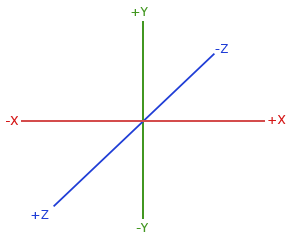
(source: [learnopengl.com](https://learnopengl.com/img/getting-started))
We assume the z-coordinate for any vertex is set to 0, reducing the coordinate system to a 2D plane.
We will refer to this coordinate system as **GL coordinates**, while the widget coordinate system is used for `ClickEventController` and the like as **widget space coordinates**.
To further illustrate the difference between GL and widget space coordinates, consider this table, where `w` is the widgets' width, `h` is the widgets' height, in pixels:
| Conceptual Position | GL Coordinates | Widget Space Coordinates |
|---------------------|---------------|-------------------------|
| top left | `(-1, +1)` | `(0, 0)` |
| top | `( 0, +1)` | `(w / 2, 0)`|
| top right | `(+1, +1)` | `(w, 0)`|
| left | `(-1, 0)` | `(0, y / 2)`|
| center | `( 0, 0)` | `(w / 2, y / 2)`|
| right | `(+1, 0)` | `(w, y / 2)`|
| bottom left | `(-1, -1)` | `(0, y)`|
| bottom | `( 0, -1)` | `(w / 2, y)`|
| bottom right | `(+1, -1)` | `(w, y)`|
We see that the OpenGL coordinate system is **normalized**, meaning the values of each coordinate are inside `[-1, 1]`, while the widget-space coordinate system is **absolute**, meaning the values of each coordinate take the allocated size of the widget into account, being inside `[0, w]` and `[0, h]` for the x- and y-coordinates, respectively, in pixels.
The gl coordinate system is anchored at the center of the render area's allocated area, while widget space is anchored at the top left.
At any point, we can convert between the coordinate systems using [`from_gl_coordinates`](@ref) and [`to_gl_coordinates`](@ref), which take the `RenderArea` as their first argument. These functions convert gl-to-widget-space and widget-space-to-gl coordinates, respectively. Of course, the widget space coordinates depend on the current size of the `RenderArea`. When it is resized, the old coordinates may be out of date, which is why using the *normalized* GL system is preferred in an application where the canvas can change size frequently.
### Rendering Shapes
We'll now create our first shape, which is a point. A point is always exactly one pixel in size.
```julia
shape = Shape()
as_point!(shape, Vector2f(0, 0))
```
Where we use `Vector2f(0, 0)` as the point's position, meaning it will appear at the origin of the `RenderArea`, its center.
The above is directly equivalent to the following:
```julia
shape = Point(Vector2f(0, 0))
```
We see that
```julia
typeof(shape)
```
```
Mousetrap.Shape
```
The variable `shape` is still of type `Shape`. [`Point`](@ref) is simply a convenience function for initializing a shape, then calling [`as_point!`](@ref) on that instance.
For this shape to show up on screen, we need to **bind it for rendering**. To do this, we create a [`RenderTask`](@ref) which wraps the shape, then use [`add_render_task!`](@ref) to add it to the scheduled tasks of our `RenderArea`. From this point onwards, anytime the `RenderArea` goes through a render cycle, it will also draw all its tasks, including our point:
```julia
shape = Point(Vector2f(0, 0))
add_render_task!(render_area, RenderTask(shape))
```

!!! details "How to generate this Image"
```julia
using Mousetrap
main() do app::Application
set_current_theme!(app, THEME_DEFAULT_DARK)
window = Window(app)
set_title!(window, "Mousetrap.jl")
render_area = RenderArea()
shape = Point(Vector2f(0, 0))
add_render_task!(render_area, RenderTask(shape))
frame = AspectFrame(1.0, render_area)
set_size_request!(frame, Vector2f(150, 150))
set_margin!(frame, 10)
set_child!(window, frame)
present!(window)
end
```
If we want to remove a task from our render area, we need to call [`clear_render_tasks!`](@ref), then add all other render tasks again.
### Shape Types
Mousetrap offers a wide variety of pre-defined shape types. Thanks to this, we don't have to manually adjust each vertex position.
#### Point
As we've seen, [`Point`](@ref) is always exactly one pixel in size. Its constructor takes a single `Vector2f`:
```julia
point = Point(Vector2f(0, 0))
```

#### Points
[`Points`](@ref) is a number of points. Instead of taking a single `Vector2f`, its constructor takes `Vector{Vector2f}`:
```julia
points = Points([
Vector2f(-0.5, 0.5),
Vector2f(0.5, 0.5),
Vector2f(0.0, -0.5)
])
```

Rendering several points using `Points` is much more performant, a four-vertex `Points` is much faster than rendering four `Point` with one vertex each.
#### Line
A [`Line`](@ref) is defined by two points, between which a 1-pixel thick line will be drawn:
```julia
line = Line(
Vector2f(-0.5, +0.5),
Vector2f(+0.5, -0.5)
)
```

#### Lines
[`Lines`](@ref) will draw unconnected lines. It takes a vector of point pairs. For each of these, a 1-pixel thick line will be drawn between them.
```julia
lines = Lines([
Vector2f(-0.5, 0.5) => Vector2f(0.5, -0.5),
Vector2f(-0.5, -0.5) => Vector2f(0.5, 0.5)
])
```

#### LineStrip
[`LineStrip`](@ref), not to be confused with `Lines`, is a *connected* series of lines. Thus, it takes a vector of points, as opposed to a vector of point pairs.
A line will be drawn between each successive pair of coordinates, meaning the last vertex of the previous line will be used as the first vertex of the current line. If the supplied vector of points is `{a1, a2, a3, ..., a(n)}` then `LineStrip` will render as a series of lines with coordinate pairs `{a1, a2}, {a2, a3}, ..., {a(n-1), a(n)}`
```julia
line_strip = LineStrip([
Vector2f(-0.5, +0.5),
Vector2f(+0.5, +0.5),
Vector2f(+0.5, -0.5),
Vector2f(-0.5, -0.5)
])
```

#### Wireframe
[`Wireframe`](@ref) is similar to a `LineStrip`, except that it also connects the last and first vertex. For a supplied vector of points `{a1, a2, a3, ..., an}`, the series of lines will be `{a1, a2}, {a2, a3}, ..., {a(n-1), a(n)}, {a(n), a1}`, the last vertex-coordinate pair is what distinguishes it from a `LineStrip`. As such, `Wireframe` is sometimes also called a **line loop**.
```julia
wireframe = Wireframe([
Vector2f(-0.5, +0.5),
Vector2f(+0.5, +0.5),
Vector2f(+0.5, -0.5),
Vector2f(-0.5, -0.5)
])
```

Note how this shape takes the same coordinates as `LineStrip`, but draws one more line, connecting the last to the first vertex.
#### Triangle
A [`Triangle`](@ref) is constructed as one would expect, using three `Vector2f`, one for each of its vertices:
```julia
triangle = Triangle(
Vector2f(-0.5, 0.5),
Vector2f(+0.5, 0.5),
Vector2f(0.0, -0.5)
)
```

#### Rectangle
A [`Rectangle`](@ref) has four vertices. It is defined by its top-left point and its width and height. As such, it is always axis-aligned.
```julia
rectangle = Rectangle(
Vector2f(-0.5, 0.5), # top left
Vector2f(1, 1) # width, height
)
```

#### Circle
A [`Circle`](@ref) is constructed from a center point and radius. We also need to specify the number of outer vertices used for the circle. This number will determine how "smooth" the outline is. For example, a circle with 3 outer vertices is an equilateral triangle; a circle with 4 outer vertices is a square; a circle with 5 is a pentagon, etc.
As the number of outer vertices increases, the shape approaches a mathematical circle, but will also require more processing power.
```julia
circle = Circle(
Vector2f(0, 0), # center
0.5, # radius
32 # n outer vertices
)
```

#### Ellipse
An [`Ellipse`](@ref) is a more generalized form of a `Circle`. It has two radii, the x- and y-radius:
```julia
ellipse = Ellipse(
Vector2f(0, 0), # center
0.6, # x-radius
0.4, # y-radius
32 # n outer vertices
)
```

#### Polygon
The most general form of convex shapes, [`Polygon`](@ref) is constructed using a vector of vertices, which will be sorted clockwise, then their [outer hull](https://en.wikipedia.org/wiki/Convex_hull) will be calculated, which results in the final convex polygon:
```julia
polygon = Polygon([
Vector2f(0.0, 0.75),
Vector2f(0.75, 0.25),
Vector2f(0.5, -0.75),
Vector2f(-0.5, -0.5),
Vector2f(-0.75, 0.0)
])
```

We note that a 4-vertex polygon is a rectangle. Therefore, if we want to render a non-axis-aligned rectangle, we should instead use `Polygon` with four vertices.
#### Rectangular Frame
A [`RectangularFrame`](@ref) takes a top-left vertex, a width, a height, and the x- and y-width, the latter of which is the thickness of the frame along the x- and y-axes:
```julia
rectangular_frame = RectangularFrame(
Vector2f(-0.5, 0.5), # top-left
Vector2f(1, 1), # width, height
0.15, # x-thickness
0.15, # y-thickness
)
```

Note how the top left and size govern the position and size of the outer perimeter of the rectangular frame.
#### Circular Ring
For the round equivalent of a rectangular frame, we have [`CircularRing`](@ref), which takes a center, the radius of the outer perimeter, as well as the ring's thickness. Like `Circle` and `Ellipse`, we have to specify the number of outer vertices, which decides the smoothness of the ring:
```julia
circular_ring = CircularRing(
Vector2f(0, 0), # center
0.5, # radius of outer circle
0.15, # thickness
32 # n outer vertices
)
```

As before, the center and radius determine the position and size of the outer perimeter.
#### Elliptical Ring
A generalization of `CircularRing`, [`EllipticalRing`](@ref) has an ellipse as its outer shape. Its thickness along the horizontal and vertical dimensions are supplied separately, making it more flexible than `CircularRing`.
```julia
elliptcal_ring = EllipticalRing(
Vector2f(0, 0), # center
0.6, # x-radius
0.4, # y-radius
0.15, # x-thickness
0.15, # y-thickness
32 # n outer vertices
)
```

#### Outline
Lastly, we have a special shape. [`Outline`](@ref) does not take any vertex positions for its constructor. Instead, we construct an `Outline` shape from **another shape**. It will then generate a wireframe for the outer perimeters of the original shape.
As the name suggests, this is useful for generating outlines of another shape. By rendering the `Outline` on top of the original shape, we can make it so it better stands out from the background.
```julia
outline = Outline(triangle)
```

```julia
outline = Outline(rectangle)
```

```julia
outline = Outline(circle)
```

```julia
outline = Outline(ellipse)
```

```julia
outline = Outline(polygon)
```

```julia
outline = Outline(rectangular_frame)
```

```julia
outline = Outline(circular_ring)
```

```julia
outline = Outline(elliptical_ring)
```

While possible, it doesn't make much sense to create an `Outline` from a shape that does not have a volume, such as `Point` or `Wireframe`.
Rendering white outlines on top of a white shape would make little sense, of course. To achieve the desired effect, we need to make the outline another color, which brings us to the additional properties of `Shape`.
### Shape Properties
#### Vertex Properties
Shapes are made up of vertices, whose properties we can manually edit. To set the property of a single vertex of a shape, we use [`set_vertex_color!`](@ref), [`set_vertex_position!`](@ref), and [`set_vertex_texture_coordinate!`](@ref). Each of these takes an index, which is the index of the vertex in clockwise order, 1-based. To know how many vertices a shape actually has, we use [`get_n_vertices`](@ref).
We will rarely need to modify individual vertices, as working on the `Shape` as a whole is much more convenient.
##### Centroid
The **centroid** of a shape is the intuitive "center of mass". In mathematical terms, it is the component-wise mean of all vertex coordinates. In practice, for many symmetrical shapes such as rectangles, triangles, circles, and ellipses, the centroid will be the "center" of the shape, as it is defined in common language.
We can access the centroid using [`get_centroid`](@ref). To move a shape a certain distance, we move its centroid by that distance by calling [`set_centroid!`](@ref), which will automatically move all other vertices of the shape such that its new centroid is as specified.
#### Rotation
We can rotate all of a `Shape`'s vertices around a point in GL coordinates by calling [`rotate!`](@ref), which takes an `Angle` as its first argument:
```julia
# rotate shape around its center
rotate!(shape, degrees(90), get_centroid(shape))
```
#### Color
To change the color of a shape as a whole, we use [`set_color!`](@ref). This simply calls `set_vertex_color!` on all of a shape's vertices. By default, a shape's color will be `RBGA(1, 1, 1, 1)`, white.
#### Visibility
We can prevent a shape from being rendered by setting [`set_is_visible!`](@ref) to `false`. This is different from making all vertices of a shape have an opacity of `0`. `is_visible` directly hooks into the shape's render function and **prevents it from being called**, as opposed to it completing rendering and not being visible on screen. This means making a shape invisible completely removes any performance penalty that would have been incurred during the render step, which is also called [culling](https://en.wikipedia.org/wiki/Hidden-surface_determination).
#### Bounding Box
We can access the [axis-aligned bounding box](https://en.wikipedia.org/wiki/Bounding_volume) of a shape with [`get_bounding_box`](@ref), which returns an [`AxisAlignedRectangle`](@ref). This is the smallest axis-aligned rectangle that still contains all of a shape's vertices.
Using this, we can query the top-left coordinate and size of the bounding box.
---
Lastly, each shape has an optional **texture**, which is what the texture coordinate properties of each vertex are used for. If a shape does not have a texture, it will be rendered as a solid color. If it does, the color of each pixel in the texture will be multiplied by the shape's color.
## Textures
In the chapter on widgets, we learned that we can use the `ImageDisplay` widget to display static images. This works, but has a number of disadvantages:
+ Image data is costly to update
+ Downloading image data is impossible
+ Scaling the image will always trigger linear interpolation
+ The image is always shown in full, as a rectangle
If we need the additional flexibility, we should instead use a `Shape` along with a [`Texture`](@ref), which represents an image living on the graphics card.
We create a texture from an `Image` like so:
```julia
image = Image()
load_from_file!(image, "path/to/image.png")
texture = Texture()
create_from_image!(texture, image)
```
Once `create_from_image!` is called, the image data is uploaded to the graphics cards' RAM, so we can safely discard the `Image` instance.
To display the texture on screen, we need to bind it to a shape, and then render that shape:
```julia
texture_shape::Shape = Rectangle(Vector2f(-1, 1), Vector2f(2, 2))
set_texture!(texture_shape, texture)
add_render_task!(render_area, RenderTask(texture_shape))
```
How and where the texture is displayed depends on the shape's vertices **texture coordinate**. These coordinates are in `([0, 1], [0, 1])`, meaning the x- and y- component are in `[0, 1]` each. We will call this coordinate system **texture space**.
| Conceptual Position | Texture Space Coordinates |
|---------------------|---------------|
| top left | `(0, 0)` |
| top | `(0.5, 0)` |
| top right | `(1, 0)` |
| left | `(0, 0.5)` |
| center | `(0.5, 0.5)` |
| right | `(1, 0.5)` |
| bottom left | `(0, 1)` |
| bottom | `(0.5, 1)` |
| bottom right | `(1, 1)` |
We see that, due to the normalized nature of this coordinate system, a texture coordinate is unable to reference a specific pixel. Instead, we use a floating-point coordinate, for which the graphics card will return an **interpolated color**. This is the color any specific pixel on the monitor should assume when the shape is displayed.
#### Scale Mode
Similar to `Image`s [`as_scaled`](@ref), we have options as to how we want the texture to behave when scaled to a size other than its native resolution. Mousetrap offers the following texture scale modes, which are represented by the enum [`TextureScaleMode`](@ref):
| `TextureScaleMode` | Meaning | Equivalent `InterpolationType` |
|--------------------|---------|-----|
| `TEXTURE_SCALE_MODE_NEAREST` | Nearest Neighbor Scaling | `INTERPOLATION_TYPE_NEAREST` |
| `TEXTURE_SCALE_MODE_LINEAR` | Linear Interpolation | `INTERPOLATION_TYPE_BILINEAR` |
While the resulting image behaves similarly to how `InterpolationType` will result in the final image, operating on a texture is much, much more performant. Rescaling a texture is essentially free when done by the graphics card, which is in stark contrast to the capabilities of a CPU, as would be needed for `Image`s `as_scaled`.
#### Wrap Mode
Wrap mode governs how the texture behaves when a vertice's texture coordinate components are outside `[0, 1]`. Mousetrap offers the following wrap modes, which are all part of the enum [`TextureWrapMode`](@ref):
| `TextureWrapMode` | Pixel will be filled with |
|-------------------|--------|
| `TEXTURE_WRAP_MODE_ZERO` | `RGBA(0, 0, 0, 0)` |
| `TEXTURE_WRAP_MODE_ONE`| `RGBA(1, 1, 1, 1)` |
| `TEXTURE_WRAP_MODE_STRETCH` | Nearest outer Edge |
| `TEXTURE_WRAP_MODE_REPEAT` | Equivalent pixel in `([0, 1], [0, 1]) ` |
| `TEXTURE_WRAP_MODE_MIRROR` | Equivalent pixel in `(1 - [0, 1], 1 - [0, 1])`|

!!! details "How to generate this Image"
```julia
using Mousetrap
# compound widget that displays a texture with a label
struct TexturePage <: Widget
center_box::CenterBox
label::Label
render_area::RenderArea
texture::Texture
shape::Shape
function TexturePage(label::String, image::Image, wrap_mode::TextureWrapMode)
out = new(
CenterBox(ORIENTATION_VERTICAL),
Label("" * label * ""),
RenderArea(),
Texture(),
Rectangle(Vector2f(-1, 1), Vector2f(2, 2))
)
set_expand!(out.render_area, true)
set_size_request!(out.render_area, Vector2f(150, 150))
set_start_child!(out.center_box, AspectFrame(1.0, Frame(out.render_area)))
set_end_child!(out.center_box, out.label)
set_margin!(out.label, 10)
create_from_image!(out.texture, image)
set_wrap_mode!(out.texture, wrap_mode)
set_texture!(out.shape, out.texture)
# zoom out texture coordinates by 1 unit
set_vertex_texture_coordinate!(out.shape, 1, Vector2f(-1, -1))
set_vertex_texture_coordinate!(out.shape, 2, Vector2f(2, -1))
set_vertex_texture_coordinate!(out.shape, 3, Vector2f(2, 2))
set_vertex_texture_coordinate!(out.shape, 4, Vector2f(-1, 2))
add_render_task!(out.render_area, RenderTask(out.shape))
return out
end
end
Mousetrap.get_top_level_widget(x::TexturePage) = x.center_box
main() do app::Application
window = Window(app)
set_title!(window, "Mousetrap.jl")
render_area = RenderArea()
image = Image()
create_from_file!(image, "docs/src/assets/logo.png")
# this assumes the script is run in `Mousetrap.jl` root
# replace RGBA(0, 0, 0, 0) pixels with rainbow color
size = get_size(image)
hue_step = 1 / size.x
for i in 1:size.y
for j in 1:size.x
if get_pixel(image, i, j).a == 0
set_pixel!(image, i, j, HSVA(j * hue_step, 1, 1, 1))
end
end
end
box = Box(ORIENTATION_HORIZONTAL)
set_spacing!(box, 10)
set_margin!(box, 10)
push_back!(box, TexturePage("ZERO", image, TEXTURE_WRAP_MODE_ZERO))
push_back!(box, TexturePage("ONE", image, TEXTURE_WRAP_MODE_ONE))
push_back!(box, TexturePage("STRETCH", image, TEXTURE_WRAP_MODE_STRETCH))
push_back!(box, TexturePage("REPEAT", image, TEXTURE_WRAP_MODE_REPEAT))
push_back!(box, TexturePage("MIRROR", image, TEXTURE_WRAP_MODE_MIRROR))
set_child!(window, box)
present!(window)
end
```
Where the default wrap mode is `TEXTURE_WRAP_MODE_REPEAT`.
By being able to modify the vertex coordinates for any of a shape's vertices, we have much more control over how image data is displayed on screen. Only the part of the texture that conceptually overlaps a shape will be displayed, which is governed by that shape's texture coordinates.
---
## RenderArea Size
Because shapes do not take into account the size and aspect ratio of their `RenderArea`, we, as developers, should take care that shapes are displayed correctly when this size changes.
Consider the following example:
```julia
render_area = RenderArea()
shape = Ellipse(Vector2f(0, 0), 0.5, 0.5, 32)
add_render_task!(render_area, RenderTask(shape))
set_child!(window, render_area)
```

Where an ellipse with identical x- and y-radii is a circle.
Despite defining the shape as a circle, on screen, it appears stretched. This is because the shape's vertices use the GL coordinate system, which is **normalized**. Thus, how long the x- and y-radii of a circle are depends on the width and height of the `RenderArea` canvas. By widening the window, the render area expands, increasing its width and thus stretching our circle.
We have two ways to correct this. The easiest of which is putting the render area inside an `AspectFrame`, which forces it to always maintain the correct aspect ratio, square in this case:
```julia
render_area = RenderArea()
shape = Circle(Vector2f(0, 0), 0.5, 32)
add_render_task!(render_area, RenderTask(shape))
set_child!(window, AspectFrame(1.0, render_area)) # force 1:1 aspect ratio
```
While this corrects our circle, the entire `RenderArea` is now restrained in size, making this solution unviable for applications where we need a `RenderArea` to fill its entire area regardless of its aspect ratio.
The other way to correct the issue is to modify our circle when `RenderArea` changes shape. This is made possible by the `resize` signal of `RenderArea`, which is emitted whenever its allocated area changes:
`resize` requires a signal handler with the following signature:
```julia
(::RenderArea, width::Integer, height::Integer, [::Data_t]) -> void
```
Where `width` and `height` are the new sizes of the `RenderArea` widget, in pixels.
Using this information and some simple geometry, we can change the x- and y-radius dynamically whenever the `RenderArea` changes aspect ratio:
```julia
# define resize callback
function on_resize(::RenderArea, width::Integer, height::Integer, shape::Shape)
# calculate y-to-x-ratio
new_ratio = height / width
# resize the shape by adjusting x-radius
as_ellipse!(shape,
Vector2f(0, 0), # old center
0.5 * new_ratio, # new x-radius
0.5, # old y-radius
32 # n vertices
)
end
main() do app::Application
window = Window(app)
render_area = RenderArea()
shape = Ellipse(Vector2f(0, 0), 0.5, 0.5, 32)
add_render_task!(render_area, RenderTask(shape))
# connect callback, providing our shape as `Data_t` argument
connect_signal_resize!(on_resize, render_area, shape)
set_child!(window, render_area)
present!(window)
end
```

Here, the `RenderArea` has a non-square aspect ratio, yet the shape is still displayed as a proper circle. Using signal `resize` like this, we can protect ourselves against side effects from the normalized nature of GL coordinates.
---
## Anti Aliasing
When shapes are drawn to the screen, they are *rasterized*, which is when the graphics card takes the mathematical shape in memory and transforms it such that it can be displayed using a limited number of pixels. This process is imperfect, as no number of pixels will be able to draw a perfect curve. One artifact that can appear during this process is **aliasing**, which, in non-technical terms, is when lines appear "jagged":

(Source: [learnopengl.com](https://learnopengl.com/Advanced-OpenGL/Anti-Aliasing))
To address the unsightly nature of this issue, several remedies are available, the most appropriate of which is called [multi-sampled anti-aliasing (MSAA)](https://www.khronos.org/opengl/wiki/Multisampling). Users of Mousetrap are not required to understand the algorithm behind it, only that it causes jagged edges to appear smoother.
To enable MSAA, we provide an enum value of type [`AntiAliasingQuality`](@ref) to `RenderArea`s constructor:
```julia
msaa_on = RenderArea(ANTI_ALIASING_QUALITY_BETTER)
msaa_off = RenderArea(ANTI_ALIASING_QUALITY_OFF)
```
| `AntiAliasingQuality` Value | # MSAA Samples |
|-----------------------------|------------|
| `ANTI_ALIASING_QUALITY_OFF` | 0 (no MSAA) |
| `ANTI_ALIASING_QUALITY_MINIMAL` | 2 |
| `ANTI_ALIASING_QUALITY_GOOD` | 4 |
| `ANTI_ALIASING_QUALITY_BETTER` | 8 |
| `ANTI_ALIASING_QUALITY_BEST` | 16 |
Where `ANTI_ALIASING_QUALITY_OFF` will be used when calling the `RenderArea` constructor with no arguments, as we have so far.
The higher the number of samples, the better the smoothing will be. MSAA comes at a cost: any quality other than `OFF` will induce the `RenderArea` to take about twice as much space in the graphic card's memory. Furthermore, the higher the number of samples, the more time each render step will take.
It's difficult to convey the result of MSAA using just pictures on a web page due to compression. Instead, readers are encouraged to run the following `main.jl`, which will show off the anti-aliasing in high resolution on the screen:

!!! details "How to generate this Image"
```julia
main() do app::Application
window = Window(app)
set_title!(window, "Mousetrap.jl")
# create render areas with different MSAA modes
left_area = RenderArea(ANTI_ALIASING_QUALITY_OFF)
right_area = RenderArea(ANTI_ALIASING_QUALITY_BEST)
# paned that will hold both areas
paned = Paned(ORIENTATION_HORIZONTAL)
# create singular shape, which will be shared between areas
shape = Rectangle(Vector2f(-0.5, 0.5), Vector2f(1, 1))
add_render_task!(left_area, RenderTask(shape))
add_render_task!(right_area, RenderTask(shape))
# rotate shape 1° per frame
set_tick_callback!(paned) do clock::FrameClock
# rotate shape
rotate!(shape, degrees(1), get_centroid(shape))
# force redraw for both areas
queue_render(left_area)
queue_render(right_area)
# continue callback indefinitely
return TICK_CALLBACK_RESULT_CONTINUE
end
# setup window layout for viewing
for area in [left_area, right_area]
set_size_request!(area, Vector2f(150, 150))
end
# caption labels
left_label = Label("OFF")
right_label = Label("BEST")
for label in [left_label, right_label]
set_margin!(label, 10)
end
# format paned
set_start_child_shrinkable!(paned, false)
set_end_child_shrinkable!(paned, false)
set_start_child!(paned, vbox(AspectFrame(1.0, left_area), left_label))
set_end_child!(paned, vbox(AspectFrame(1.0, right_area), right_label))
# present
set_child!(window, paned)
present!(window)
end
```
---
## Render Task
!!! tip
The rest of this chapter will assume that readers are familiar with the basics of OpenGL, how to write GLSL shaders, what a shader uniform is, how blending works, and how a linear transform allows us to move a point in 3D space.
With what we have learned so far in this chapter, we are already well-equipped to be able to accomplish most tasks that require the native rendering component, such as displaying static images or rendering shapes. **Any information after this point should be considered optional to learn**.
So far, we have registered render tasks using `add_render_task!(render_area, RenderTask(shape))`. Sometimes, we will have to deal with [`RenderTask`](@ref) on its own. Its constructor actually has the following signature:
```julia
RenderTask(::Shape ; [shader::Shader, transform::GLTransform, blend_mode::BlendMode])
```
Where any name after the `;` are [keyword arguments](https://docs.julialang.org/en/v1/devdocs/functions/#Keyword-arguments), which are optional.
We see that a `RenderTask` actually bundles the following objects:
+ a `Shape`, which is the shape being rendered
+ a `Shader`, which is a shader program containing a vertex- and fragment-shader
+ a `GLTransform`, which is a spatial transform that will be applied to the shape using the vertex shader
+ a `BlendMode`, which governs which type of blending will take place during the [blit step](https://en.wikipedia.org/wiki/Bit_blit)
Using these four components, `RenderTask` gathers all objects necessary to render a shape to the screen. All components except for the `Shape` are *optional*. If not specified, a default value will be used instead. This is what allows less experienced users to fully ignore shaders, transforms, and blend modes, simply calling `RenderTask(shape)` will take care of everything for us.
---
## Transforms
[`GLTransform`](@ref) is an object representing a spatial transform. It is called **GL**Transform, because it **uses the GL coordinate system**. Applying a `GLTransform` to a vector in widget- or texture-space will produce incorrect results. They should only be applied to the position attribute of a `Shape`'s vertices.
Internally, a `GLTransform` is a 4x4 matrix of 32-bit floats. It is of size 4x4 because it's intended to be applied to OpenGL positions, which are vectors in 3D space. In Mousetrap, the last coordinate of a spatial position is assumed to be `0`, but it is still part of each vector's data.
At any time, we can directly access the underlying matrix of a `GLtransform` using `getindex` or `setindex!`:
```julia
transform = GLTransform()
for i in 1:4
for j in 1:4
print(transform[i, j], " ")
end
print("\n")
end
```
```
1 0 0 0
0 1 0 0
0 0 1 0
0 0 0 1
```
We see that after construction, `GLTransform` is initialized as the identity transform. No matter the current state of the transform, we can reset it back to this identity matrix by calling [`reset!`](@ref).
`GLTransform` has many common spatial transforms already available as convenient functions, which means we rarely have to modify its values manually.
It provides the following transformations, which behave identically to those familiar from linear algebra:
+ [`translate!`](@ref), translates in 3D space
+ [`scale!`](@ref), scales along the x- and y-axis
+ [`rotate!`](@ref), rotates around a point in 3D space
We can combine two transforms using [`combine_with`](@ref). If we wish to apply the transform CPU-side to a `Vector2f` or `Vector3f`, we can use [`apply_to`](@ref).
While we could apply the transform to each vertex of a `Shape` manually, then render the shape, it is much more performant to do this kind of math GPU-side. By registering the transform with a `RenderTask`, the transform will be forwarded to the vertex shaders, which, for the default vertex shader, is then applied to the shape's vertices automatically:
```julia
shape = Shape()
transform = Transform()
translate!(transform, Vector2f(-0.5, 0.1))
rotate!(transform, degrees(180))
task = RenderTask(shape; transform = transform)
```
Where we used the `transform` keyword argument to specify the transform while leaving the other render task component unspecified. This means the transform is applied automatically during rendering, allowing us to take advantage of the increased performance gained from the GPU architecture.
---
## Blend Mode
As the third component of a render task, we have the **blend mode**. This governs how two colors behave when rendered on top of each other.
Let the color currently in the frame buffer be `destination`, while the newly added color will be `origin`. Each [`BlendMode`](@ref), then, behaves as follows:
| `BlendMode` | Resulting Color |
|--------------------|-------------------------------------|
| `BLEND_MODE_NONE` | `origin.rgb + 0 * destination.rgb` |
| `BLEND_MODE_NORMAL` | [traditional alpha-blending](https://en.wikipedia.org/wiki/Alpha_compositing) |
| `BLEND_MODE_ADD` | `origin.rgba + destination.rgba` |
| `BLEND_MODE_SUBTRACT` | `origin.rgba - destination.rgba` |
| `BLEND_MODE_REVERSE_SUBTRACT` | `destination.rgba - origin.rgba` |
| `BLEND_MODE_MULTIPLY` | `origin.rgba * destination.rgba` |
| `BLEND_MODE_MIN` | `min(origin.rgba, destination.rgba)` |
| `BLEND_MODE_MAX` | `max(origin.rgba, destination.rgba)` |
Where `+`, `*`, and `-` are component-wise operations.
Users may be familiar with the names of the blend modes from traditional image editors such as GIMP or Photoshop.
If left unspecified, `RenderTask` will use `BLEND_MODE_NORMAL`.
---
## Shaders
As the last component of a `RenderTask`, we have [`Shader`](@ref), which represents an OpenGL shader program that contains already compiled **fragment** and **vertex** shaders. These shaders are written in [GLSL](https://learnopengl.com/Advanced-OpenGL/Advanced-GLSL), which will not be taught in this manual.
### Compiling Shaders
To create a shader, we first instantiate a [`Shader`](@ref), then use [`create_from_file!`](@ref) or [`create_from_string!`](@ref) to compile the shader from GLSL code. After which the component is automatically bound it to the shader program, overriding whatever shader component was there before.
We use `SHADER_TYPE_FRAGMENT` or `SHADER_TYPE_VERTEX` to specify which of the two shader types we are targeting.
```julia
shader = Shader()
# compile fragment shader
create_from_string!(shader, SHADER_TYPE_FRAGMENT, """
#version 330
in vec4 _vertex_color;
in vec2 _texture_coordinates;
in vec3 _vertex_position;
out vec4 _fragment_color;
void main()
{
vec2 pos = _vertex_position.xy;
_fragment_color = vec4(pos.y, dot(pos.x, pos.y), pos.x, 1);
}
""")
# bind with render task, which will automatically apply it to each fragment of `shape`
task = RenderTask(shape; shader = shader)
add_render_task!(render_area, task)
```

!!! details "How to generate this Image"
```julia
using Mousetrap
main() do app::Application
window = Window(app)
set_title!(window, "Mousetrap.jl")
render_area = RenderArea()
shape = Rectangle(Vector2f(-1, 1), Vector2f(2, 2))
shader = Shader()
create_from_string!(shader, SHADER_TYPE_FRAGMENT, """
#version 330
in vec4 _vertex_color;
in vec2 _texture_coordinates;
in vec3 _vertex_position;
out vec4 _fragment_color;
void main()
{
vec2 pos = _vertex_position.xy;
_fragment_color = vec4(pos.y, dot(pos.x, pos.y), pos.x, 1);
}
""")
task = RenderTask(shape; shader = shader)
add_render_task!(render_area, task)
frame = AspectFrame(1.0, Frame(render_area))
set_size_request!(frame, Vector2f(150, 150))
set_margin!(frame, 10)
set_child!(window, frame)
present!(window)
end
```
If we do not initialize the vertex- or fragment shader, the **default shader component will be used**. It may be instructive to see how the default shaders are defined, as any user-defined shader should build upon them.
### Default Vertex Shader
This is the default vertex shader, used whenever we do not supply a custom vertex shader for a `Shader` instance:
```glsl
#version 330
layout (location = 0) in vec3 _vertex_position_in;
layout (location = 1) in vec4 _vertex_color_in;
layout (location = 2) in vec2 _vertex_texture_coordinates_in;
uniform mat4 _transform;
out vec4 _vertex_color;
out vec3 _vertex_position;
out vec2 _texture_coordinates;
void main()
{
gl_Position = _transform * vec4(_vertex_position_in, 1.0);
_vertex_color = _vertex_color_in;
_vertex_position = _vertex_position_in;
_texture_coordinates = _vertex_texture_coordinates_in;
}
```
Where any variable name prefixed with `_` signals that it was defined outside of `main`.
We see that it requires OpenGL 3.3 due to the `location` syntax. In terms of behavior, this shader simply forwards the interpolated vertex attributes to the fragment shader.
The current vertices' position is supplied via `_vertex_position_in`, the vertices' texture coordinates as `_vertex_color_in`, and the vertices' texture coordinates are `_vertex_texture_coordinates`. These values will contain the data from the Julia-side `Shape`. We should take care that the `location` attribute exactly matches this order, `0` for vertex position, `1` for vertex color, `2` for texture coordinate.
The output variables of the vertex shader are `_vertex_color`, `_texture_coordinates`, and `_vertex_position`, which need to be assigned with results gained from within the vertex shader. The shader has furthermore access to the uniform `_transform`, which holds the `GLTransform` the current `RenderTask` associates with the current `Shape`.
### Default Fragment Shader
```glsl
#version 330
in vec4 _vertex_color;
in vec2 _texture_coordinates;
in vec3 _vertex_position;
out vec4 _fragment_color;
uniform int _texture_set;
uniform sampler2D _texture;
void main()
{
if (_texture_set != 1)
_fragment_color = _vertex_color;
else
_fragment_color = texture2D(_texture, _texture_coordinates) * _vertex_color;
}
```
The fragment shader is handed `_vertex_color`, `_texture_coordinate`, and `_vertex_position`, which we recognize as the output of the vertex shader. The output of the fragment shader is `_fragment_color`.
The default fragment shader respects two uniforms, `_texture`, which is the texture of the shape we are currently rendering, and `_texture_set`, which is `1` if we have called `set_texture!` on the current `Shape` instance, `0` otherwise.
Users aiming to experiment with shaders should take care to not modify the name or `location` of any of the `in` or `out` variables of either shader. These names, along with the required shader version, should not be altered.
### Binding Uniforms
Both the vertex and fragment shaders make use of **uniforms**. We've seen that `_transform`, `_texture`, and `_texture_set` are assigned automatically. Mousetrap users can furthermore freely add new uniforms, conveniently assigning them using `RenderTask`.
To bind a uniform, we first need a CPU-side value that should be uploaded to the graphics card. Let's say we want to use a certain color in our fragment shader, replacing the shape's fragment color with that color. We would write the fragment shader as follows:
```glsl
#version 330
in vec4 _vertex_color;
in vec2 _texture_coordinates;
in vec3 _vertex_position;
out vec4 _fragment_color;
uniform vec4 _color_rgba; // new uniform
void main()
{
_fragment_color = _color_rgba; // set fragment color to uniform
}
```
To set the value of `_color_rgba`, we use [`set_uniform_rgba!`](@ref), which is called on the **render task**, not the shader itself. This will make the render task store the CPU-side value as long as it is needed, automatically forwarding it to the shader during rendering.
`set_uniform_rgba!` is one of many `set_uniform_*!` functions that allow us to bind Julia-side values to OpenGL shader uniforms:
The following types can be assigned this way:
| Julia Type | `RenderTask` function | GLSL Uniform Type |
|---------------|-------------------------|-------------------|
| `Cfloat` | `set_uniform_float` | `float` |
| `Cint` | `set_uniform_int` | `int` |
| `Cuint` | `set_uniform_uint` | `uint` |
| `Vector2f` | `set_uniform_vec2` | `vec2` |
| `Vector3f` | `set_uniform_vec3` | `vec3` |
| `Vector4f` | `set_uniform_vec4` | `vec4` |
| `GLTransform` | `set_uniform_transform` | `mat4x4` |
| `RGBA` | `set_uniform_rgba` | `vec4` |
| `HSVA` | `set_uniform_hsva` | `vec4` |
We would therefore set the `_color_rgba` uniform value like so:
```julia
# create shader
shader = Shader()
create_from_string!(shader, SHADER_TYPE_FRAGMENT, """
#version 330
in vec4 _vertex_color;
in vec2 _texture_coordinates;
in vec3 _vertex_position;
out vec4 _fragment_color;
uniform vec4 _color_rgba; // uniform we want to assign
void main()
{
_fragment_color = _color_rgba;
}
""")
# create shape and task
shape = Shape()
task = RenderTask(shape; shader = shader) # shader bound to `shader` keyword argument
# set uniform
set_uniform_rgba!(task, "_color_rgba", RGBA(1, 0, 1, 1))
```

!!! details "How to generate this Image"
```julia
using Mousetrap
main() do app::Application
window = Window(app)
set_title!(window, "Mousetrap.jl")
render_area = RenderArea()
shape = Rectangle(Vector2f(-1, 1), Vector2f(2, 2))
shader = Shader()
create_from_string!(shader, SHADER_TYPE_FRAGMENT, """
#version 330
in vec4 _vertex_color;
in vec2 _texture_coordinates;
in vec3 _vertex_position;
out vec4 _fragment_color;
uniform vec4 _color_rgba;
void main()
{
_fragment_color = _color_rgba;
}
""")
task = RenderTask(shape; shader = shader)
set_uniform_rgba!(task, "_color_rgba", RGBA(1, 0, 1, 1))
add_render_task!(render_area, task)
frame = AspectFrame(1.0, Frame(render_area))
set_size_request!(frame, Vector2f(150, 150))
set_margin!(frame, 10)
set_child!(window, frame)
present!(window)
end
```
Where the name used in `set_uniform_*!` has to exactly match the variable name in GLSL.
With this, we have a convenient way to specify shader uniforms without having to manually update the shader each time it is bound for rendering. `RenderTask` does this for us.
---
## Rendering to a Texture
!!! compat
This feature is not yet implemented, this section is incomplete.
================================================
FILE: docs/src/01_manual/10_theme_customization.md
================================================
# Chapter 10: Theme & Widget Customization
In this chapter, we will learn:
+ How to swap between light- and dark- mode
+ How to create custom animations
+ How to apply a spatial transform to any widget
+ How to change the look of a widget using CSS
+ How to change the default colors used for the global theme
+ How to animate widgets using CSS
!!! compat
These features are only available in Mousetrap v0.2.0 or newer
---
As our app grows and becomes closer to what we envisioned for our project, we want to not only customize the layout and functionality of widgets but also how each widget looks. This can range from small changes such as changing something that is blue by default to green, or large sweeping changes that affect the entire application, such as moving to a light- or dark-, low- or high-contrast theme, or even using a completely custom theme.
Mousetrap allows for all of these options. Using its very powerful theme customization component, we can customize our app to a point where most will not be able to tell it was ever Mousetrap- / GTK4-based at all.
## Switching between Dark- and Light Mode
The most common task that almost any app will want to offer is for the user to be able to swap between light and dark mode. This is a ubiquitous feature of modern UI, as such, Mousetrap offers a very simple way of changing the global theme.
Mousetrap supports four default application-wide themes, which are values of enum [`Theme`](@ref):
+ `THEME_DEFAULT_LIGHT`
+ `THEME_DEFAULT_DARK`
+ `THEME_HIGH_CONTRAST_LIGHT`
+ `THEME_HIGH_CONTRAST_DARK`
At any point after the back-end has been initialized, we can swap the global theme using [`set_current_theme!`](@ref). This will immediately change the look of all widgets and windows, allowing apps to change the entire GUI with just one function call at runtime.
For example, to create a window that has a button to switch between light and dark themes in its header bar, we could do the following:
```julia
main() do app::Application
window = Window(app)
# add theme swap button to windows header bar
header_bar = get_header_bar(window)
swap_button = Button()
set_tooltip_text!(swap_button, "Click to Swap Themes")
connect_signal_clicked!(swap_button, app) do self::Button, app::Application
# get currently used theme
current = get_current_theme(app)
# swap light with dark, preservng whether the theme is high contrast
if current == THEME_DEFAULT_DARK
next = THEME_DEFAULT_LIGHT
elseif current == THEME_DEFAULT_LIGHT
next = THEME_DEFAULT_DARK
elseif current == THEME_HIGH_CONTRAST_DARK
next = THEME_HIGH_CONTRAST_LIGHT
elseif current == THEME_HIGH_CONTRAST_LIGHT
next = THEME_HIGH_CONTRAST_DARK
end
# set new theme
set_current_theme!(app, next)
end
push_front!(header_bar, swap_button)
present!(window)
end
```
---
## Animation
We've seen in the chapter on widgets that certain kind of widgets animate their children. For example, when switching between two pages of a [`Stack`](@ref), or when a [`Revealer`](@ref) reveals its child, an animation is played depending on which enum value was chosen using [`set_transition_type!`](@ref).
Mousetrap offers a convenient mechanism for implementing animations like this from scratch, which this section will demonstrate.
If we want to animate a widget "fading out" over 1 second, that is, its opacity changes from 1 to 0 over that period of time, we should decrease the opacity by a specified amount each frame. Tying the amount to the frame rate of our window is ill-advised, many things can influence the frame rate and fluctuations would cause fluctuations in the speed of the fade-out.
To address this, Mousetrap offers [`Animation`](@ref), which acts as a *stable clock*, an object that outputs a value over a specified amount of time in a way that is independent of the frame rate.
Continuing with our fade-out example, we first need to instance the widget we want to fade out, a `Button`. We then create an instance of `Animation`, which takes for its constructor the widget we want to animate, along with the target duration of the animation:
```julia
to_animate = Button(Label("Fade Out"))
animation = Animation(to_animate, seconds(1))
```
By tying the `Animation` to the widget we will target, Mousetrap will automatically preserve the animation while that widget is visible, as well as tie the animation clock to the render cycle of that specific widget, meaning the `Animation` will not play if the widget is not visible.
To start the animation, we call [`play!`](@ref). Of course, we have not yet implemented the behavior of the widgets' opacity decreasing. To do this, we register a callback using `Animation`'s [`on_tick!`](@ref), which requires a function with the signature:
```julia
(::Animation, value::Float64) -> Nothing
```
Where `value` is the animations output value. By default, this will be in `[0, 1]`, though we can freely choose the upper and lower bound using [`set_lower!`](@ref) and [`set_upper!`](@ref). Once the animation is finished, the callback registered using [`on_done!`](@ref) is invoked.
Since a widget's opacity is already in `[0, 1]`, we can use the animations value directly:
```julia
to_animate = Button(Label("Fade Out"))
animation = Animation(to_animate, seconds(1))
on_tick!(animation, button) do self::Animation, value::Float64, target::Button
set_opacity!(target, 1 - value)
end
```
Where we used `1 - value` to invert the range, such that the widget starts fully opaque and decreases in opacity.
We can then start the animation using `play!`, for example, by clicking the button:

!!! details "How to generate this Image"
```julia
using Mousetrap
main() do app::Application
window = Window(app)
set_title!(window, "Mousetrap.jl")
button = Button(Label("Fade Out"))
aspect_frame = AspectFrame(1.0, button)
set_margin!(aspect_frame, 10)
animation = Animation(button, seconds(1))
on_tick!(animation, button) do self::Animation, value::Float64, target::Button
set_opacity!(target, 1 - value)
end
on_done!(animation, button) do self::Animation, target::Button
set_is_visible!(target, false)
end
connect_signal_clicked!(button, animation) do self::Button, animation::Animation
play!(animation)
end
set_child!(window, aspect_frame)
present!(window);
end
```
For cyclical animations, we can use [`set_repeat_count!`](@ref) to specify the number of times the animation should loop, or `0` to loop infinitely. We can easily reverse an animation by setting [`set_is_reversed!`](@ref) to `true`.
Attentive readers may remember that pre-made animations for `Stack` and `Revealer` also include widgets spinning or moving around the screen. So far, we have no good way of implementing motion like this. This is about to change.
## TransformBin
In the chapter on rendering, we learned that we can apply a `GLTransform` to a `Shape`, a non-widget, in order to move that shape **without** changing its vertex data. [`TransformBin`](@ref) offers similar functionality to this, except it only applies to widgets.
`TransformBin` is a widget that does not add any visual elements to its singular child. It furthermore always assumes the same size as its child. Instead, it offers a number of functions that allow us to apply a spatial transformation:
| Function | Argument(s) | Effect |
|----------------------|-----------|--------|
| [`translate!`](@ref) | `Vector2f` | Move widget by number of pixels |
| [`rotate!`](@ref) | `Angle` | Rotate around widgets' centroid |
| [`scale!`](@ref) | `Number, Number` | Scale height and width by given factor |
| [`skew!`](@ref) | `Number, Number` | [Skew](https://en.wikipedia.org/wiki/Shear_mapping) widget along x- and y-axis |
| [`reset!`](@ref) | `(none)` | Reset transform to identity |
!!! tip "Rotate around a Point"
To rotate a widget around a fixed point `p`, we can `translate!` such
that the widget's new center is at `p`, `rotate!`, then `translate!` back to the widget's initial position.
These functions are called on the `TransformBin` instance directly, we do not use a separate transform object. The arguments for these functions operate in absolute widget space, with `(0, 0)` being the top left corner of the `TransformBin`s size allocation, in pixels.
For example, to make a button spin one time when it is clicked, we can use `TransformBin` and `Animation` as follows:
```julia
# animation target
to_animate = Button(Label("Spin"))
# transform bin
transform_bin = TransformBin()
set_child!(transform_bin, to_animate)
# animation
animation = Animation(to_animate, seconds(1))
on_tick!(animation, transform_bin) do self::Animation, value::Float64, transform_bin::TransformBin
# set the transform angle to value in [0, 360°]
reset!(transform_bin)
rotate!(transform_bin, degrees(value * 360))
end
# trigger animation when button is clicked
connect_signal_clicked!(to_animate, animation) do self::Button, animation::Animation
play!(animation)
end
```

Note that applying a transform using `TransformBin` does not change the size allocation of the widget, it only applies the effect visually, similarly to how a `GLTransform` is only applied to the rendered image, not the `Shape` itself.
By default, the function used to map the elapsed duration of the `Animation` to the output value of `on_tick!` is linear in shape (`f(x) = x`). Mousetrap offers additional functions with different shapes, allowing users to more easily implement animations that appear to speed up or slow down at certain points. Using [`set_timing_function!`](@ref), which takes a value of the enum [`AnimationTimingFunction`](@ref), we can choose from multiple presets. See its documentation for more information.
---
# Widget Themes & Style Classes
Mousetrap uses [Cascading Style Sheets (CSS)](https://developer.mozilla.org/en-US/docs/Web/CSS) to define the exact look of a widget. A UI theme is nothing more than a huge CSS file from which all widgets take information about how they should be rendered.
!!! Warning "CSS"
The rest of this chapter will assume that readers are familiar with the basics of CSS. Readers are encouraged to consult [this documentation](https://developer.mozilla.org/en-US/docs/Web/CSS/Reference) for CSS-related questions.
## Applying CSS Properties to a Widget
We can define a CSS modifier class as a string, then compile that string using [`add_css!`](@ref), which makes that modifier class globally available:
```julia
# define modifier class `sharp-corners`
add_css!("""
.sharp-corners {
border-radius: 0%;
}
""")
```
We can then apply this class to any widget using [`add_css_class!`](@ref), at which point the widgets' appearance will change accordingly. To remove the modifier, we call [`remove_css_class!`](@ref). A widget can have more than one modifier class. To list all applied CSS classes, we use [`get_css_classes`](@ref).
For a list of CSS properties supported by Mousetrap, see [here](https://docs.gtk.org/gtk4/css-properties.html).
For example, the following defines a `ToggleButton` that, when toggled, applies the following CSS class to both the `Window` (which is a Widget), and its `HeaderBar`:
```julia
using Mousetrap
add_css!("""
.custom {
background-color: hotpink;
font-family: monospace;
border-radius: 0%;
}
""")
main() do app::Application
window = Window(app)
set_title!(window, "Mousetrap.jl")
button = ToggleButton()
connect_signal_toggled!(button, window) do self::ToggleButton, window::Window
if get_is_active(self)
add_css_class!(window, "custom")
add_css_class!(get_header_bar(window), "custom")
else
remove_css_class!(window, "custom")
remove_css_class!(get_header_bar(window), "custom")
end
end
set_child!(window, button)
present!(window)
end
```

While a pink window is usually not recommended, making small adjustments to interactive widgets, or changing which font a widget uses, can be very useful when polishing our application's look and feel.
For a more practical example, after defining the following CSS modifier class:
```css
.monospaced {
font-family: monospace;
}
```
We can make an `Entry` or `TextView` use monospaced text by calling `add_css_class!(widget, "monospaced")` on each widget instance.
---
## Changing a Widgets Color
The following implements `set_accent_color!`, which is not part of Mousetrap. `set_accent_color!` takes a widget, one of the below constants, as well as a boolean indicating whether the window should be opaque, as its arguments. When applied to a widget, this function changes that widgets color to one of the 5 pre-defined UI colors, such that their look fits well with the default UI theme:
```julia
using Mousetrap
# define widget colors
const WidgetColor = String
const WIDGET_COLOR_DEFAULT = "default"
const WIDGET_COLOR_ACCENT = "accent"
const WIDGET_COLOR_SUCCESS = "success"
const WIDGET_COLOR_WARNING = "warning"
const WIDGET_COLOR_ERROR = "error"
# create CSS classes for all of the widget colors
for name in [WIDGET_COLOR_DEFAULT, WIDGET_COLOR_ACCENT, WIDGET_COLOR_SUCCESS, WIDGET_COLOR_WARNING, WIDGET_COLOR_ERROR]
# compile CSS and append it to the global CSS style provider state
add_css!("""
$name:not(.opaque) {
background-color: @$(name)_fg_color;
}
.$name.opaque {
background-color: @$(name)_bg_color;
color: @$(name)_fg_color;
}
""")
end
# function to set the accent color of a widget
function set_accent_color!(widget::Widget, color, opaque = true)
if !(color in [WIDGET_COLOR_DEFAULT, WIDGET_COLOR_ACCENT, WIDGET_COLOR_SUCCESS, WIDGET_COLOR_WARNING, WIDGET_COLOR_ERROR])
log_critical("In set_color!: Color ID `" * color * "` is not supported")
end
add_css_class!(widget, color)
if opaque
add_css_class!(widget, "opaque")
end
end
```
Users are encouraged to just copy the above code into their own project, for `set_accent_color!` to become available.
We can use this function like so:
```julia
# widget factory
create_widget() = Button(Label("TEST"))
# create column view
column_view = ColumnView()
# column 1: whether `opaque` was set to true
column = push_back_column!(column_view, " ")
set_widget_at!(column_view, column, 1, Label("!opaque"))
set_widget_at!(column_view, column, 2, Label("opaque"))
for color in [
WIDGET_COLOR_DEFAULT, # column 2: default look of a widget
WIDGET_COLOR_ACCENT, # column 3: accented, usually blue
WIDGET_COLOR_SUCCESS, # column 4: marked successful, usually green
WIDGET_COLOR_WARNING, # column 5: marked as warning, usually yellow
WIDGET_COLOR_ERROR] # column 6: marked as destructive action, usually red
column = push_back_column!(column_view, color)
# row 1: accented widget, not opaque
widget = create_widget()
set_accent_color!(widget, color, false)
set_widget_at!(column_view, column, 1, widget)
# row 2: accented widget, opaque
widget = create_widget()
set_accent_color!(widget, color, true)
set_widget_at!(column_view, column, 2, widget)
end
```
Here, we created a column view that shows all permutations of the arguments of `set_accent_color!`. We defined `create_widget() = Button(Label("TEST"))`, therefore each cell will have a button with a label:

`set_accent_color!` allows us to change the color of each button. It can be applied to any widget, however:

Where we use a `HeaderBar` instead of `Button`. CSS modifiers can be applied to any widget, even windows.
## Changing the Themes Palette
To change a color used by the global theme, we need to redefine one of the themes [color constants](https://docs.gtk.org/gtk4/css-properties.html#colors) using CSS.
For example, the global accent color, blue by default, can be redefined to any other color using the following function, which is also not part of Mousetrap:
```julia
set_accent_color!(color::RGBA) = add_css!("@define-color accent_bg_color $(serialize(color));")
```
For example, calling `set_accent_color!(RGBA(1, 0, 1, 1))` changes the accent color to magenta, which is applied to all widgets globally:

For names of palette colors other than `accent_bg_color`, see [here](https://gitlab.gnome.org/GNOME/libadwaita/-/blob/main/src/stylesheet/_colors.scss?ref_type=heads).
## CSS Animations
`Animation` offers an in-engine way to do animations, which is usually preferred. However, [CSS animations](https://developer.mozilla.org/en-US/docs/Web/CSS/CSS_animations/Using_CSS_animations) are supported as well, and are defined as they would be in pure CSS:
```julia
# define CSS animation and modifier
add_css!("""
@keyframes spin-animation {
0% { transform: rotate(0turn) scale(1); }
50% { transform: rotate(0.5turn) scale(2); }
100% { transform: rotate(1turn) scale(1); }
}
.spinning {
animation: spin-animation;
animation-duration: 1s;
animation-iteration-count: infinite;
animation-timing-function: ease-in-out;
}
""")
main() do app::Application
window = Window(app)
button = Button()
# apply modifier, this sets the animation-related properties
add_css_class!(button, "spinning")
set_child!(window, AspectFrame(1.0, button))
present!(window)
end
```

While we could create this animation using `Mousetrap.Animation` and `TransformBin`, using CSS means that we do not have to instance these two objects for every widget we want to animate, we can instead just apply the CSS modifier class to any instance. In return, the CSS-based animation cannot depend on any external variables and is thus only suited for animations that remain the same each time they are played.
================================================
FILE: docs/src/01_manual/11_app_distribution.md
================================================
# Chapter 11: App Distribution
In this chapter, we will learn:
+ How to load and store assets
+ How to bundle our app for distribution
+ How to install our app on a user's machine
---
!!! compat
These features are not yet implemented, this section is incomplete. As of version 0.3.0, there is no unified way to bundle and distribute a Mousetrap app. See [here](https://github.com/users/Clemapfel/projects/2?pane=issue&itemId=33978204#) for more information.
================================================
FILE: docs/src/01_manual/12_opengl_integration.md
================================================
# Chapter 12: OpenGL Integration & Makie Support
In this chapter, we will learn:
+ How to use `GLArea` to allow foreign OpenGL libraries to render to a Mousetrap widget
+ How to display a `GLMakie` plot in a Mousetrap window
!!! compat
Features from this chapter are only available in Mousetrap `v0.3.0` or newer.
---
# Introduction: Use Case
If we want to render shapes or images using `OpenGL`, Mousetraps `RenderArea` offers a convenient interface for this. In some applications, we may want to use [OpenGL](https://github.com/JuliaGL/ModernGL.jl) itself. One common use case for this is the integration of another, separate library that is unrelated to Mousetrap and shares no interface with it, except for the fact that both use OpenGL for rendering.
For situations like this, Mousetrap offers a low-level, generic widget, [`GLArea`](@ref), which provides an OpenGL context and render surface, thus allowing OpenGL-based graphics to be displayed inside a Mousetrap application.
# GLArea
`GLarea` is a very simple widget, it acts exactly as `RenderArea` in terms of appearance and behavior, though there is no in-Mousetrap way to display graphics.
We create it like so:
```julia
area = GLArea()
```
After which it can be used just like any other widget, meaning it has a size request, opacity, adheres to CSS, etc.
`GLArea` holds its own OpenGL context, which is **initialized after `realize` has been emitted**. This is important to understand, we cannot call any OpenGL code before the widget is fully realized and displayed on screen. To delay execution, we should connect to one of `GLArea`s signals.
!!! danger "OpenGL Context is only available after Realization"
To reiterate, Mousetrap will only be able to provide an OpenGL context after `GLArea` is realized, which usually happens when the window it is contained within is shown for the first time. If we try to interact with the context before this point, a critical log message will be printed and the OpenGL operation will fail.
## Signals
`GLArea` has two unique signals, `render` and `resize`. Alongside these, in most situations, we will also want to connect to the `realize` signal, which all widgets share.
We recognize `resize` from `RenderArea`. Just as then, it requires a signal handler with the signature
```julia
(::GLArea, width::Integer, height::Integer, [::Data_t]) -> Nothing
```
`resize` is emitted anytime `GLArea` changes size, according to its widget properties. Crucially, this also means its [default framebuffer](https://www.khronos.org/opengl/wiki/Default_Framebuffer) and [viewport](https://www.khronos.org/opengl/wiki/GLAPI/glViewport) are resized accordingly. **We cannot change either size ourselves**, Mousetrap's back-end handles this for us.
For each `resize` invocation, we can assume that the default frame buffer has a size of `width * height` pixels.
Signal `render` is usually emitted once per frame, whenever the widget is drawn on screen. This signal requires a callback with the signature
```julia
(::GLArea, gdk_gl_context::Ptr{Cvoid}, [::Data_t]) -> Bool
```
Where `gdk_gl_context` is a C-pointer to the internally held [OpenGL context](https://docs.gtk.org/gdk4/class.GLContext.html). We usually do not have to interact with this context, though any `render` signal handler still requires including this argument to conform to the above signature.
We note that signal `render` requires its callback to return a boolean. This return value notifies Mousetrap whether the `GLArea`s framebuffer was updated during the draw step. If we have modified the image we want to appear on screen, we should return `true`, if no drawing has taken place and the `GLArea` does not need to be updated, `false` should be returned.
In the signal handler of `render`, we should make sure to bind the current `GLArea`s OpenGL context as the active one using [`make_current`](@ref) (see below). This is to make sure that we are rendering to the buffer associated with the specific `GLArea` emitting the signal, not another instance of the same widget type, or a completely separate OpenGL context from another library.
!!! warning "GLAreas do not share a Context"
Unlike `RenderArea`, which all share a singular global OpenGL context, each `GLArea` instance has its own OpenGL context, meaning objects cannot be transmitted between `GLArea`s, and, if one is unrealized, all objects associated with that context will be inaccessible (but not freed).
For performance optimization reasons, `GLArea` will only be drawn when necessary, as is the case for all objects subtyping `Widget`. We can manually request `GLArea` to update the frame after this one, by calling [`queue_render`](@ref).
General usage of `GLarea` with another OpenGL-based library will have the following structure:
```julia
glarea = GLArea()
# realize callback
connect_signal_realize!(glarea) do self::GLArea
make_current(self)
# do initialization here, only after this callback was invoked is the
# internal OpenGL context fully initialized and ready to be used
queue_render(self)
return nothing
end
# render callback
connect_signal_render!(glarea) do self::GLArea, _::Ptr{Cvoid}
make_current(self)
# do opengl renderloop here
return true
end
# resize callback
connect_signal_resize!(glarea) do self::GLArea, width, height
make_current(self)
# handle new size here
queue_render(self)
return nothing
end
# destroy callback
connect_signal_destroy!(glarea) do self::GLArea
make_current(self)
# do shutdown here
return nothing
end
```
We see that we should make sure to bind the context using `make_current` before doing any OpenGL-related work and to manually request a redraw after the area was initialized or resized.
# Example: GLMakie
[`GLMakie`](https://docs.makie.org/stable/explanations/backends/glmakie/index.html) is one backend for the hugely popular [`Makie`](https://github.com/MakieOrg/Makie.jl) plotting library. As its name suggests, `GLMakie` uses OpenGL for rendering, which means it is possible to allow Makie to render to a Mousetrap `GLArea`, allowing us to integrate plots and graphics into our Mousetrap application.
Given here will be a minimum working example that displays a scatter plot inside a `Mousetrap.Window` by creating a `GLArea`-based widget that can be used to create a `GLMakie.Screen`.
Note that this example is incomplete and does not support all of Makies features. One conflict that Mousetrap users will have to resolve for themselves is how to handle input events. In the following, all of Makies input-related behavior was suppressed, making it so users will have to handle input events and window behavior using only the Mousetrap event model.
!!! details "Note from the Author: Makie Interface"
The example here most likely does not implement enough of Makies interface to be fully ready for usage. Most of the code was based on [`Gtk4GLMakie`](https://github.com/JuliaGtk/Gtk4Makie.jl), which itself is still rough. I'm not that familiar with Makie in general usage, and fully implementing an interface requires knowledge of Makies internals on top of that.
If you or your project is very familiar with Makie and would like to improve this code, feel free to [open a PR](https://github.com/Clemapfel/Mousetrap.jl/pulls) that modifies [`test/makie_test.jl`](https://github.com/Clemapfel/Mousetrap.jl/blob/main/test/makie_test.jl), which ideally will become its own Julia package in the future, similar to `Gtk4GLMakie`. Any contributor will be credited as an author. Thank you for your consideration.
C.
!!! details "MousetrapMakie: Click to expand"
```julia
"""
Minimum working example showing how to display a GLMakie plot using Mousetrap `GLArea`
"""
module MousetrapMakie
export GLMakieArea, create_glmakie_screen
using Mousetrap
using ModernGL, GLMakie, Colors, GeometryBasics, ShaderAbstractions
using GLMakie: empty_postprocessor, fxaa_postprocessor, OIT_postprocessor, to_screen_postprocessor
using GLMakie.GLAbstraction
using GLMakie.Makie
"""
## GLMakieArea <: Widget
`GLArea` wrapper that automatically connects all necessary callbacks to be used as a GLMakie render target.
Use `create_glmakie_screen` to initialize a screen you can render to using Makie from this widget. Note that `create_glmakie_screen` needs to be
called **after** `GLMakieArea` has been realized, as only then will the internal OpenGL context be available. See the example below.
## Constructors
`GLMakieArea()`
## Signals
(no unique signals)
## Fields
(no public fields)
## Example
using Mousetrap, MousetrapMakie
main() do app::Application
window = Window(app)
canvas = GLMakieArea()
set_size_request!(canvas, Vector2f(200, 200))
set_child!(window, canvas)
# use optional ref to delay screen allocation after `realize`
screen = Ref{Union{Nothing, GLMakie.Screen{GLMakieArea}}}(nothing)
connect_signal_realize!(canvas) do self
screen[] = create_glmakie_screen(canvas)
display(screen[], scatter(1:4))
return nothing
end
present!(window)
end
"""
mutable struct GLMakieArea <: Widget
glarea::GLArea # wrapped native widget
framebuffer_id::Ref{Int} # set by render callback, used in MousetrapMakie.create_glmakie_screen
framebuffer_size::Vector2i # set by resize callback, used in GLMakie.framebuffer_size
function GLMakieArea()
glarea = GLArea()
set_auto_render!(glarea, false) # should `render` be emitted everytime the widget is drawn
connect_signal_render!(on_makie_area_render, glarea)
connect_signal_resize!(on_makie_area_resize, glarea)
return new(glarea, Ref{Int}(0), Vector2i(0, 0))
end
end
Mousetrap.get_top_level_widget(x::GLMakieArea) = x.glarea
# maps hash(GLMakieArea) to GLMakie.Screen
const screens = Dict{UInt64, GLMakie.Screen}()
# maps hash(GLMakieArea) to Scene, used in `on_makie_area_resize`
const scenes = Dict{UInt64, GLMakie.Scene}()
# render callback: if screen is open, render frame to `GLMakieArea`s OpenGL context
function on_makie_area_render(self, context)
key = Base.hash(self)
if haskey(screens, key)
screen = screens[key]
if !isopen(screen) return false end
screen.render_tick[] = nothing
glarea = screen.glscreen
glarea.framebuffer_id[] = glGetIntegerv(GL_FRAMEBUFFER_BINDING)
GLMakie.render_frame(screen)
end
return true
end
# resize callback: update framebuffer size, necessary for `GLMakie.framebuffer_size`
function on_makie_area_resize(self, w, h)
key = Base.hash(self)
if haskey(screens, key)
screen = screens[key]
glarea = screen.glscreen
glarea.framebuffer_size.x = w
glarea.framebuffer_size.y = h
queue_render(glarea.glarea)
end
if haskey(scenes, key)
scene = scenes[key]
scene.events.window_area[] = Recti(0, 0, glarea.framebuffer_size.x, glarea.framebuffer_size.y)
scene.events.window_dpi[] = Mousetrap.calculate_monitor_dpi(glarea)
end
return nothing
end
# resolution of `GLMakieArea` OpenGL framebuffer
GLMakie.framebuffer_size(self::GLMakieArea) = (self.framebuffer_size.x, self.framebuffer_size.y)
# forward retina scale factor from GTK4 back-end
GLMakie.retina_scaling_factor(w::GLMakieArea) = Mousetrap.get_scale_factor(w)
# resolution of `GLMakieArea` widget itself`
function GLMakie.window_size(w::GLMakieArea)
size = get_natural_size(w)
size.x = size.x * GLMakie.retina_scaling_factor(w)
size.y = size.y * GLMakie.retina_scaling_factor(w)
return (size.x, size.y)
end
# calculate screen size and dpi
function Makie.window_area(scene::Scene, screen::GLMakie.Screen{GLMakieArea})
glarea = screen.glscreen
scenes[hash(glarea)] = scene
end
# resize request by makie will be ignored
function GLMakie.resize_native!(native::GLMakieArea, resolution...)
# noop
end
# bind `GLMakieArea` OpenGL context
ShaderAbstractions.native_switch_context!(a::GLMakieArea) = make_current(a.glarea)
# check if `GLMakieArea` OpenGL context is still valid, it is while `GLMakieArea` widget stays realized
ShaderAbstractions.native_context_alive(x::GLMakieArea) = get_is_realized(x)
# destruction callback ignored, lifetime is managed by Mousetrap instead
function GLMakie.destroy!(w::GLMakieArea)
# noop
end
# check if canvas is still realized
GLMakie.was_destroyed(window::GLMakieArea) = !get_is_realized(window)
# check if canvas should signal it is open
Base.isopen(w::GLMakieArea) = !GLMakie.was_destroyed(w)
# react to makie screen visibility request
GLMakie.set_screen_visibility!(screen::GLMakieArea, bool) = bool ? show(screen.glarea) : hide!(screen.glarea)
# apply glmakie config
function GLMakie.apply_config!(screen::GLMakie.Screen{GLMakieArea}, config::GLMakie.ScreenConfig; start_renderloop=true)
@warn "In MousetrapMakie: GLMakie.apply_config!: This feature is not yet implemented, ignoring config"
# cf https://github.com/JuliaGtk/Gtk4Makie.jl/blob/main/src/screen.jl#L111
return screen
end
# screenshot framebuffer
function Makie.colorbuffer(screen::GLMakie.Screen{GLMakieArea}, format::Makie.ImageStorageFormat = Makie.JuliaNative)
@warn "In MousetrapMakie: GLMakie.colorbuffer: This feature is not yet implemented, returning framecache"
# cf https://github.com/JuliaGtk/Gtk4Makie.jl/blob/main/src/screen.jl#L147
return screen.framecache
end
# ignore makie event model, use Mousetrap event controllers instead
Makie.window_open(::Scene, ::GLMakieArea) = nothing
Makie.disconnect!(::GLMakieArea, f) = nothing
GLMakie.pollevents(::GLMakie.Screen{GLMakieArea}) = nothing
Makie.mouse_buttons(::Scene, ::GLMakieArea) = nothing
Makie.keyboard_buttons(::Scene, ::GLMakieArea) = nothing
Makie.dropped_files(::Scene, ::GLMakieArea) = nothing
Makie.unicode_input(::Scene, ::GLMakieArea) = nothing
Makie.mouse_position(::Scene, ::GLMakie.Screen{GLMakieArea}) = nothing
Makie.scroll(::Scene, ::GLMakieArea) = nothing
Makie.hasfocus(::Scene, ::GLMakieArea) = nothing
Makie.entered_window(::Scene, ::GLMakieArea) = nothing
"""
create_gl_makie_screen(::GLMakieArea; screen_config...) -> GLMakie.Screen{GLMakieArea}
For a `GLMakieArea`, create a `GLMakie.Screen` that can be used to display makie graphics
"""
function create_glmakie_screen(area::GLMakieArea; screen_config...)
if !get_is_realized(area)
log_critical("MousetrapMakie", "In MousetrapMakie.create_glmakie_screen: GLMakieArea is not yet realized, it's internal OpenGL context cannot yet be accessed")
end
config = Makie.merge_screen_config(GLMakie.ScreenConfig, screen_config)
set_is_visible!(area, config.visible)
set_expand!(area, true)
# quote from https://github.com/JuliaGtk/Gtk4Makie.jl/blob/main/src/screen.jl#L342
shader_cache = GLAbstraction.ShaderCache(area)
ShaderAbstractions.switch_context!(area)
fb = GLMakie.GLFramebuffer((1, 1)) # resized on GLMakieArea realization later
postprocessors = [
config.ssao ? ssao_postprocessor(fb, shader_cache) : empty_postprocessor(),
OIT_postprocessor(fb, shader_cache),
config.fxaa ? fxaa_postprocessor(fb, shader_cache) : empty_postprocessor(),
to_screen_postprocessor(fb, shader_cache, area.framebuffer_id)
]
screen = GLMakie.Screen(
area, shader_cache, fb,
config, false,
nothing,
Dict{WeakRef, GLMakie.ScreenID}(),
GLMakie.ScreenArea[],
Tuple{GLMakie.ZIndex, GLMakie.ScreenID, GLMakie.RenderObject}[],
postprocessors,
Dict{UInt64, GLMakie.RenderObject}(),
Dict{UInt32, Makie.AbstractPlot}(),
false,
)
# end quote
hash = Base.hash(area.glarea)
screens[hash] = screen
set_tick_callback!(area.glarea) do clock::FrameClock
if GLMakie.requires_update(screen)
queue_render(area.glarea)
end
if GLMakie.was_destroyed(area)
return TICK_CALLBACK_RESULT_DISCONTINUE
else
return TICK_CALLBACK_RESULT_CONTINUE
end
end
return screen
end
end
```
We can test the above using:
```julia
using Mousetrap, .MousetrapMakie, GLMakie
main() do app::Application
window = Window(app)
set_title!(window, "Mousetrap x Makie")
canvas = GLMakieArea()
set_size_request!(canvas, Vector2f(200, 200))
set_child!(window, canvas)
# use optional ref to delay screen allocation after `realize`
screen = Ref{Union{Nothing, GLMakie.Screen{GLMakieArea}}}(nothing)
connect_signal_realize!(canvas) do self
# initialize GLMakie.Screen
screen[] = create_glmakie_screen(canvas)
# use screen to display plot
display(screen[], scatter(rand(123)))
return nothing
end
present!(window)
end
```

Where we delayed the call to `create_gl_makie_screen` to *after* `realize` was emitted for reasons discussed [earlier in this chapter](#glarea). Since we still need to reference the created screen outside the `realize` signal handler, we used the **optional pattern**:
```julia
optional = Ref{Union{Nothing, T}}(nothing)
```
Which initializes a reference with `nothing`, such that the reference value can later be assigned with a value of `T`, `GLMakie:Screen{GLMakieArea}` in our example above. After `realize` was emitted, we can access the screen using `screen[]`.
================================================
FILE: docs/src/index.md
================================================
# Mousetrap
Welcome to the documentation of Mousetrap.jl, a GUI engine for Julia.
Mousetrap was created and designed by [C. Cords](https://clemens-cords.com).
This page contains a [manual and tutorial](#manual), as well as an [index](#index) of all [functions](./02_library/functions.md), [classes](./02_library/classes.md), and [enums](./02_library/enums.md).
To download and install mousetrap, follow the instructions on the [official GitHub page](https://github.com/Clemapfel/mousetrap.jl#installation).
Mousetrap.jl, the non-Julia components of mousetrap, this documentation, and all its original assets, are licensed under [lGPL3.0](https://www.gnu.org/licenses/lgpl-3.0.en.html#license-text), meaning they can be used in both free, open-source, as well as for-profit, proprietary projects.
For frequently asked questions, see [here](#FAQ).
Use the navigation area on the left side of this page or the table of contents below to navigate to the appropriate chapter of this manual:
## Manual
```@contents
Pages = [
"01_manual/01_installation.md"
"01_manual/02_signals.md"
"01_manual/03_actions.md"
"01_manual/04_widgets.md"
"01_manual/05_event_handling.md"
"01_manual/06_image.md"
"01_manual/07_os_interface.md"
"01_manual/08_menus.md"
"01_manual/09_native_rendering.md"
"01_manual/10_theme_customization.md"
"01_manual/11_app_distribution.md"
"01_manual/12_opengl_integration.md"
]
Depth = 5
```
---
## Index
+ [index of classes](./02_library/classes.md)
+ [index of functions](./02_library/functions.md)
+ [index of enums](./02_library/enums.md)
---
## FAQ
### Why is there a C++ Component at all?
The C++ version of mousetrap was originally created for an unrelated commercial, closed-source project in 2022. When the project failed due to funding issues in 2023, I decided that, instead of throwing away all my C++ work, I would instead create a Julia wrapper around it, so it can at least contribute to the Julia ecosysem. Even though Julia-Mousetrap is the face of the project now, C++-Mousetrap existed and was finished *before* Julia-Mousetrap was ever conceived.
A less valid reason is that mousetrap, in order to extend the GObject type system, [makes extensive use of C-macros](https://github.com/Clemapfel/mousetrap/blob/main/include/mousetrap/signal_component.hpp#L24), which are quite hard to emulate in Julia, as there is no way to `ccall` a macro, to my knowledge.
### What is the difference between mousetrap and GTK4.jl?
Mousetrap is unaffiliated with [GTK.jl](https://github.com/JuliaGraphics/Gtk.jl) and [GTK4.jl](https://github.com/JuliaGtk/Gtk4.jl). The only connection these projects share is that both use the GTK4 C library as their basis. Mousetrap is not endorsed by [GNOME](https://gnome.org) and has no connection to that organization or any of its contributors.
### What advantages does mousetrap have over pure GTK4?
While based on GTK4 and usually calling native GTK4 under the hood, mousetraps interface, that is, the actual architecture of the library, including syntax and names, was reworked from the ground up. Heavy editorializing has taken place, renaming or completely removing certain parts of GTK4 in an effort to make mousetrap more friendly to newcomers and people with no GUI experience, easier to use, and less susceptible to developer error.
Furthermore, mousetrap contains an all-new OpenGL-based rendering engine, which aims to replace the cairo component of native GTK4 to allow for faster, more easily integrated native rendering.
### What advantages does pure GTK4 have over mousetrap?
Speaking about the GTK4 C library specifically, not GTK4.jl, GTK4 is much bigger and has many features that went unused in mousetrap, or, if used, were made opaque such that a user of mousetrap cannot interact with these features:
+ Removed Modules: [GDK](https://docs.gtk.org/gdk4/), [ATK](https://gitlab.gnome.org/GNOME/atk), [gobject](https://docs.gtk.org/gobject/), [GLib](https://docs.gtk.org/glib/), [adwaita](https://gnome.pages.gitlab.gnome.org/libadwaita/doc/1.3/)
+ Widgets with no mousetrap equivalent: `GtkListBox`, `PasswordEntry`, `GtkTextView`, `GtkSourceView`, `AdwAboutWindow`
+ Removed Features: Mnemonics, Stateful Actions, [GtkBuilder Interface](https://docs.gtk.org/gtk4/class.Builder.html), `GTK_DEBUG`, `GtkInspector`
Furthermore, any classes marked as deprecated in GKT4.10, such as `GtkTreeView`, where removed completely.
When possible, the adwaita version of a widget was preferred over the native GTK4 version, for example, using `AdwWindow` instead of `GtkWindow`, or `AdwMessageDialog` over `GtkAlertDialog`.
Julia does not use a [build system such as meson](https://mesonbuild.com/) and is thus incompatible with distribution through [flatpak](https://flatpak.org/) or similar services.
### How do I ship my app?
JuliaComputing and many more contributors are currently working on [`PackageCompiler`](https://github.com/JuliaLang/PackageCompiler.jl), which is supposed to compile a Julia package into a stand-alone binary. Compatibility of mousetrap with `PackageCompiler` remains untested and may be impossible until further work has been put into either `PackageCompiler`, or mousetrap itself. [There is evidence](https://www.reddit.com/r/Julia/comments/14kfyx7/comment/jpuofyg/) that static compilation is one of Julias next big goals. Ideally, when static compilation is working 100% of the time, mousetrap will be polished enough to be considered fully stable and easily distributable, therefore making it usable in production.
Until then, the only way to ship a stand-alone Julia app is to bundle the entire Julia runtime along with the app-specific Julia code and resources, which will usually be a folder with a size of 2 GB or more. Alternatively, developers have to force end users to [install Julia on their machine globally](https://github.com/JuliaLang/juliaup), after which launching the app is as simple as calling (`julia main.jl`) from a shell script.
================================================
FILE: jll/build_tarballs.jl
================================================
# Note that this script can accept some limited command-line arguments, run
# `julia build_tarballs.jl --help` to see a usage message.
using BinaryBuilder, Pkg
name = "libmousetrap"
version = v"0.3.0"
# Collection of sources required to complete build
sources = [
GitSource("https://github.com/Clemapfel/mousetrap.git", "ffa28d0bd569118320a6bb063286edfb35fc0429"),
GitSource("https://github.com/Clemapfel/mousetrap_julia_binding.git", "6b838ea238e118d694ffc1b3a1e0225441c8cfb3")
]
# Bash recipe for building across all platforms
script = raw"""
cd $WORKSPACE/srcdir
echo -e "[binaries]\ncmake='/usr/bin/cmake'" >> cmake_toolchain_patch.ini
cd mousetrap
mkdir ${prefix}/share/licenses/mousetrap
cp LICENSE ${prefix}/share/licenses/mousetrap/LICENSE
meson setup build --cross-file=$MESON_TARGET_TOOLCHAIN --cross-file=../cmake_toolchain_patch.ini
meson install -C build
cd ../mousetrap_julia_binding
meson setup build --cross-file=$MESON_TARGET_TOOLCHAIN --cross-file=../cmake_toolchain_patch.ini -DJulia_INCLUDE_DIRS=$prefix/include/julia
meson install -C build
cd ..
rm cmake_toolchain_patch.ini
"""
# These are the platforms we will build for by default, unless further
# platforms are passed in on the command line
platforms = filter(p -> nbits(p) == 64, supported_platforms())
# The products that we will ensure are always built
products = [
LibraryProduct("libmousetrap", :mousetrap),
LibraryProduct("libmousetrap_julia_binding", :mousetrap_julia_binding),
FileProduct("")
]
x11_platforms = filter(p -> Sys.islinux(p) || Sys.isfreebsd(p), platforms)
# Dependencies that must be installed before this package can be built
dependencies = [
Dependency("GLEW_jll")
Dependency("GLU_jll"; platforms = x11_platforms)
Dependency("GTK4_jll")
Dependency("libadwaita_jll")
Dependency("OpenGLMathematics_jll")
Dependency("libcxxwrap_julia_jll")
BuildDependency("libjulia_jll")
BuildDependency("Xorg_xorgproto_jll"; platforms = x11_platforms)
]
# Build the tarballs, and possibly a `build.jl` as well.
build_tarballs(ARGS, name, version, sources, script, platforms, products, dependencies; julia_compat="1.6", preferred_gcc_version = v"12.1.0")
================================================
FILE: jll/build_tarballs.jl.in
================================================
# Note that this script can accept some limited command-line arguments, run
# `julia build_tarballs.jl --help` to see a usage message.
using BinaryBuilder, Pkg
name = "libmousetrap"
version = v"@VERSION@"
# Collection of sources required to complete build
sources = [
GitSource("https://github.com/Clemapfel/mousetrap.git", "@MOUSETRAP_COMMIT@"),
GitSource("https://github.com/Clemapfel/mousetrap_julia_binding.git", "@MOUSETRAP_JULIA_BINDING_COMMIT@")
]
# Bash recipe for building across all platforms
script = raw"""
cd $WORKSPACE/srcdir
echo -e "[binaries]\ncmake='/usr/bin/cmake'" >> cmake_toolchain_patch.ini
cd mousetrap
mkdir ${prefix}/share/licenses/mousetrap
cp LICENSE ${prefix}/share/licenses/mousetrap/LICENSE
meson setup build --cross-file=$MESON_TARGET_TOOLCHAIN --cross-file=../cmake_toolchain_patch.ini
meson install -C build
cd ../mousetrap_julia_binding
meson setup build --cross-file=$MESON_TARGET_TOOLCHAIN --cross-file=../cmake_toolchain_patch.ini -DJulia_INCLUDE_DIRS=$prefix/include/julia
meson install -C build
cd ..
rm cmake_toolchain_patch.ini
"""
# These are the platforms we will build for by default, unless further
# platforms are passed in on the command line
platforms = filter(p -> nbits(p) == 64, supported_platforms())
# The products that we will ensure are always built
products = [
LibraryProduct("libmousetrap", :mousetrap),
LibraryProduct("libmousetrap_julia_binding", :mousetrap_julia_binding)
]
x11_platforms = filter(p -> Sys.islinux(p) || Sys.isfreebsd(p), platforms)
# Dependencies that must be installed before this package can be built
dependencies = [
Dependency("GLEW_jll")
Dependency("GLU_jll"; platforms = x11_platforms)
Dependency("GTK4_jll")
Dependency("libadwaita_jll")
Dependency("OpenGLMathematics_jll")
Dependency("libcxxwrap_julia_jll")
BuildDependency("libjulia_jll")
BuildDependency("Xorg_xorgproto_jll"; platforms = x11_platforms)
]
# Build the tarballs, and possibly a `build.jl` as well.
build_tarballs(ARGS, name, version, sources, script, platforms, products, dependencies; julia_compat="1.6", preferred_gcc_version = v"12.1.0")
================================================
FILE: jll/deploy.jl
================================================
#throw(AssertionError("In Mousetrap/jll/deploy.jl: This script is meant for internal use only and should not be tampered with by the general public. Do not run this file."))
const VERSION = "0.3.0"
function get_most_recent_commit(folder::String)
current = pwd()
cd(folder)
io = IOBuffer()
run(pipeline(`git rev-parse HEAD`; stdout=io, stderr=devnull))
cd(current)
return replace(String(take!(io)), "\n" => "")
end
const mousetrap_commit = get_most_recent_commit("../../mousetrap")
const mousetrap_julia_binding_commit = get_most_recent_commit("../../mousetrap_julia_binding")
# if local, files will be written to ~/.julia/dev/mousetrap_jll
const deploy_local = false
const skip_build = true
if deploy_local
@info "Deployment: local"
repo = "local"
else
@info "Deployment: github"
repo = "Clemapfel/mousetrap_jll"
end
## Configure
function configure_file(path_in::String, path_out::String)
file_in = open(path_in, "r")
file_out = open(path_out, "w+")
for line in eachline(file_in)
write(file_out, replace(line,
"@MOUSETRAP_COMMIT@" => mousetrap_commit,
"@MOUSETRAP_JULIA_BINDING_COMMIT@" => mousetrap_julia_binding_commit,
"@VERSION@" => VERSION
) * "\n")
end
close(file_in)
close(file_out)
end
@info "Configuring `build_tarballs.jl.in`"
configure_file("./build_tarballs.jl.in", "./build_tarballs.jl")
path = "/home/clem/.julia/dev/mousetrap_jll"
if isfile(path)
run(`rm -r $path`)
end
run(`julia -t 8 build_tarballs.jl --debug --verbose --skip-build --deploy=$repo`)
================================================
FILE: src/Mousetrap.jl
================================================
#
# Author: C. Cords (mail@clemens-cords.com)
# GitHub: https://github.com/clemapfel/mousetrap.jl
# Documentation: https://clemens-cords.com/mousetrap
#
# Copyright © 2023, Licensed under lGPL-3.0
#
"""
# Mousetrap GUI Engine ($(Mousetrap.VERSION))
GitHub: https://github.com/clemapfel/mousetrap.jl
Documentation: http://clemens-cords.com/mousetrap/
Copyright © 2023 C.Cords, Licensed under lGPL-3.0
"""
module Mousetrap
const VERSION = v"0.3.1"
####### detail.jl
module detail
using CxxWrap
import GTK4_jll, Glib_jll
function try_update_gsettings_schema_dir()
# request to use GTK4_jll-supplied settings schema if none are available on the machine
if !Sys.islinux() && (!haskey(ENV, "GSETTINGS_SCHEMA_DIR") || isempty(ENV["GSETTINGS_SCHEMA_DIR"]))
ENV["GSETTINGS_SCHEMA_DIR"] = normpath(joinpath(GTK4_jll.libgtk4, "../../share/glib-2.0/schemas"))
end
end
function __init__()
try_update_gsettings_schema_dir() # executed on `using Mousetrap`, env needs to be set each time before `adw_init` is called
@initcxx()
end
using mousetrap_jll
function get_mousetrap_julia_binding()
return mousetrap_jll.mousetrap_julia_binding
end
try_update_gsettings_schema_dir() # executed on `precompile Mousetrap`, but not on using, silences warning during installation
@wrapmodule(get_mousetrap_julia_binding)
end
const MOUSETRAP_ENABLE_OPENGL_COMPONENT = convert(Bool, detail.MOUSETRAP_ENABLE_OPENGL_COMPONENT)
####### typed_function.jl
mutable struct TypedFunction
_apply::Function
_return_t::Type
_arg_ts::Tuple
function TypedFunction(f::Function, return_t::Type, arg_ts::Tuple)
precompile(f, arg_ts)
arg_ts_string = "("
for i in 1:length(arg_ts)
arg_ts_string = arg_ts_string * string(arg_ts[i]) * ((i < length(arg_ts)) ? ", " : ")")
end
signature = arg_ts_string * " -> $return_t"
actual_return_ts = Base.return_types(f, arg_ts)
if isempty(actual_return_ts)
throw(AssertionError("Object `$f` is not invokable as function with signature `$signature`, because it does not have a method with argument type(s) `$arg_ts_string`"))
end
match_found = false
for type in actual_return_ts
if type <: return_t #|| return_t == Nothing
match_found = true
break
end
end
if !match_found
throw(AssertionError("Object `$f` is not invokable as function with signature `$signature`, because its return type is not `$return_t`"))
end
return new(f, return_t, arg_ts)
end
end
export TypedFunction
function (instance::TypedFunction)(args...)
return Base.convert(instance._return_t, instance._apply([Base.convert(instance._arg_ts[i], args[i]) for i in 1:length(args)]...))
end
####### types.jl
abstract type SignalEmitter end
export SignalEmitter
abstract type Widget <: SignalEmitter end
export Widget
####### log.jl
const LogDomain = String;
export LogDomain
const MOUSETRAP_DOMAIN = detail.MOUSETRAP_DOMAIN * ".jl"
# no export
"""
See [`log_debug`](@ref).
"""
macro log_debug(domain, message)
return :(Mousetrap.detail.log_debug($message, $domain))
end
log_debug(domain::LogDomain, message::String) = detail.log_debug(message, domain)
export @log_debug, log_debug
"""
See [`log_info`](@ref).
"""
macro log_info(domain, message)
return :(Mousetrap.detail.log_info($message, $domain))
end
log_info(domain::LogDomain, message::String) = detail.log_info(message, domain)
export @log_info, log_info
"""
See [`log_warning`](@ref).
"""
macro log_warning(domain, message)
return :(Mousetrap.detail.log_warning($message, $domain))
end
log_warning(domain::LogDomain, message::String) = detail.log_warning(message, domain)
export @log_warning, log_warning
"""
See [`log_critical`](@ref).
"""
macro log_critical(domain, message)
return :(Mousetrap.detail.log_critical($message, $domain))
end
log_critical(domain::LogDomain, message::String) = detail.log_critical(message, domain)
export @log_critical, log_critical
"""
See [`log_fatal`](@ref).
"""
macro log_fatal(domain, message)
return :(Mousetrap.detail.log_fatal($message, $domain))
end
log_fatal(domain::LogDomain, message::String) = detail.log_fatal(message, domain)
export @log_fatal, log_fatal
set_surpress_debug!(domain::LogDomain, b::Bool) = detail.log_set_surpress_debug(domain, b)
export set_surpress_debug!
set_surpress_info!(domain::LogDomain, b::Bool) = detail.log_set_surpress_info(domain, b)
export set_surpress_info!
get_surpress_debug(domain::LogDomain) ::Bool = detail.log_get_surpress_debug(domain)
export get_surpress_debug
get_surpress_info(domain::LogDomain) ::Bool = detail.log_get_surpress_info(domain)
export get_surpress_info
set_log_file!(path::String) ::Bool = detail.log_set_file(path)
export set_log_file!
####### common.jl
macro do_not_compile(args...) return :() end
import Base: *
*(x::Symbol, y::Symbol) = Symbol(string(x) * string(y))
function from_julia_index(x::Integer) ::UInt64
if x <= 0
throw(AssertionError("Index $x < 1; Indices in Julia are 1-based."))
end
return x - 1
end
function to_julia_index(x::Integer) ::Int64
return x + 1
end
function safe_call(scope::String, f, args...)
try
return f(args...)
catch exception
printstyled(stderr, "[ERROR] "; bold = true, color = :red)
printstyled(stderr, "In " * scope * ": "; bold = true)
Base.showerror(stderr, exception, catch_backtrace())
print(stderr, "\n")
throw(exception) # this causes jl_call to return nullptr C-side, as opposed to jl_nothing
end
end
macro export_function(type, name, return_t)
return_t = esc(return_t)
Mousetrap.eval(:(export $name))
return :($name(x::$type) = Base.convert($return_t, detail.$name(x._internal)))
end
macro export_function(type, name, return_t, arg1_type, arg1_name)
return_t = esc(return_t)
if arg1_type isa Expr
arg1_origin_type = arg1_type.args[2]
arg1_destination_type = arg1_type.args[3]
else
arg1_origin_type = arg1_type
arg1_destination_type = arg1_type
end
arg1_name = esc(arg1_name)
Mousetrap.eval(:(export $name))
return :($name(
x::$type,
$arg1_name::$arg1_origin_type
) = Base.convert($return_t, detail.$name(x._internal,
convert($arg1_destination_type, $arg1_name)
)))
end
macro export_function(type, name, return_t, arg1_type, arg1_name, arg2_type, arg2_name)
return_t = esc(return_t)
if arg1_type isa Expr
arg1_origin_type = arg1_type.args[2]
arg1_destination_type = arg1_type.args[3]
else
arg1_origin_type = arg1_type
arg1_destination_type = arg1_type
end
arg1_name = esc(arg1_name)
if arg2_type isa Expr
arg2_origin_type = arg2_type.args[2]
arg2_destination_type = arg2_type.args[3]
elseif arg2_type isa Symbol
arg2_origin_type = arg2_type
arg2_destination_type = arg2_type
end
arg2_name = esc(arg2_name)
Mousetrap.eval(:(export $name))
return :($name(
x::$type,
$arg1_name::$arg1_origin_type,
$arg2_name::$arg2_origin_type
) = Base.convert($return_t, detail.$name(x._internal,
convert($arg1_destination_type, $arg1_name),
convert($arg2_destination_type, $arg2_name)
)))
end
macro export_function(type, name, return_t, arg1_type, arg1_name, arg2_type, arg2_name, arg3_type, arg3_name)
return_t = esc(return_t)
if arg1_type isa Expr
arg1_origin_type = arg1_type.args[2]
arg1_destination_type = arg1_type.args[3]
else
arg1_origin_type = arg1_type
arg1_destination_type = arg1_type
end
arg1_name = esc(arg1_name)
if arg2_type isa Expr
arg2_origin_type = arg2_type.args[2]
arg2_destination_type = arg2_type.args[3]
elseif arg2_type isa Symbol
arg2_origin_type = arg2_type
arg2_destination_type = arg2_type
end
arg2_name = esc(arg2_name)
if arg3_type isa Expr
arg3_origin_type = arg3_type.args[2]
arg3_destination_type = arg3_type.args[3]
else
arg3_origin_type = arg3_type
arg3_destination_type = arg3_type
end
arg3_name = esc(arg3_name)
Mousetrap.eval(:(export $name))
return :($name(
x::$type,
$arg1_name::$arg1_origin_type,
$arg2_name::$arg2_origin_type,
$arg3_name::$arg3_origin_type
) = Base.convert($return_t, detail.$name(x._internal,
convert($arg1_destination_type, $arg1_name),
convert($arg2_destination_type, $arg2_name),
convert($arg3_destination_type, $arg3_name),
)))
end
macro export_function(type, name, return_t, arg1_type, arg1_name, arg2_type, arg2_name, arg3_type, arg3_name, arg4_type, arg4_name)
return_t = esc(return_t)
if arg1_type isa Expr
arg1_origin_type = arg1_type.args[2]
arg1_destination_type = arg1_type.args[3]
else
arg1_origin_type = arg1_type
arg1_destination_type = arg1_type
end
arg1_name = esc(arg1_name)
if arg2_type isa Expr
arg2_origin_type = arg2_type.args[2]
arg2_destination_type = arg2_type.args[3]
elseif arg2_type isa Symbol
arg2_origin_type = arg2_type
arg2_destination_type = arg2_type
end
arg2_name = esc(arg2_name)
if arg3_type isa Expr
arg3_origin_type = arg3_type.args[2]
arg3_destination_type = arg3_type.args[3]
else
arg3_origin_type = arg3_type
arg3_destination_type = arg3_type
end
arg3_name = esc(arg3_name)
if arg4_type isa Expr
arg4_origin_type = arg4_type.args[2]
arg4_destination_type = arg4_type.args[3]
else
arg4_origin_type = arg4_type
arg4_destination_type = arg4_type
end
arg4_name = esc(arg4_name)
Mousetrap.eval(:(export $name))
return :($name(
x::$type,
$arg1_name::$arg1_origin_type,
$arg2_name::$arg2_origin_type,
$arg3_name::$arg3_origin_type,
$arg4_name::$arg4_origin_type
) = Base.convert($return_t, detail.$name(x._internal,
convert($arg1_destination_type, $arg1_name),
convert($arg2_destination_type, $arg2_name),
convert($arg3_destination_type, $arg3_name),
convert($arg4_destination_type, $arg4_name)
)))
end
@generated function get_top_level_widget(x) ::Widget
return :(
throw(AssertionError("Object of type $(typeof(x)) does not fulfill the widget interface. In order for it to be able to be treated as a widget, you need to subtype `Mousetrap.Widget` **and** add a method with signature `(::$(typeof(x))) -> Widget` to `Mousetrap.get_top_level_widget`, which should map an instance of $(typeof(x)) to its top-level widget component."))
)
end
export get_top_level_widget
@generated function is_native_widget(x::Any)
:(return false)
end
# no export
macro declare_native_widget(Type)
out = Expr(:block)
push!(out.args, esc(
:(is_native_widget(::$Type) = return true)
))
#=
push!(out.args, esc(
:(Mousetrap.get_top_level_widget(x::$Type) = return x)
))
=#
return out
end
macro export_type(name, super)
super = esc(super)
internal_name = Symbol("_" * "$name")
if !isdefined(detail, :($internal_name))
throw(AssertionError("In Mousetrap.@export_type: detail.$internal_name undefined"))
end
out = Expr(:toplevel)
Mousetrap.eval(:(export $name))
push!(out.args, :(
mutable struct $name <: $super
_internal::detail.$internal_name
end
))
return out
end
macro export_type(name)
internal_name = Symbol("_" * "$name")
if !isdefined(detail, :($internal_name))
throw(AssertionError("In Mousetrap.@export_type: detail.$internal_name undefined"))
end
out = Expr(:toplevel)
Mousetrap.eval(:(export $name))
push!(out.args, :(
struct $name
_internal::detail.$internal_name
end
))
return out
end
macro export_enum(enum, block)
@assert block isa Expr
out = Expr(:toplevel)
push!(out.args, (:(export $enum)))
detail_enum_name = :_ * enum
@assert isdefined(detail, detail_enum_name)
names = Symbol[]
push!(out.args, :(const $(esc(enum)) = Mousetrap.detail.$detail_enum_name))
for name in block.args
if !(name isa Symbol)
continue
end
push!(out.args, :(const $(esc(name)) = detail.$name))
push!(out.args, :(export $name))
push!(names, name)
end
enum_str = string(enum)
enum_sym = QuoteNode(enum)
to_int_name = Symbol(enum) * :_to_int
push!(out.args, :(Base.string(x::$enum) = string(Mousetrap.detail.$to_int_name(x))))
push!(out.args, :(Base.convert(::Type{Integer}, x::$enum) = Integer(Mousetrap.detail.to_int_name(x))))
push!(out.args, :(Base.instances(x::Type{$enum}) = [$(names...)]))
push!(out.args, :(Base.show(io::IO, x::Type{$enum}) = print(io, (isdefined(Main, $enum_sym) ? "" : "Mousetrap.") * $enum_str)))
push!(out.args, :(Base.show(io::IO, x::$enum) = print(io, string($enum) * "(" * string(convert(Int64, x)) * ")")))
return out
end
function show_aux(io::IO, x::T, fields::Symbol...) where T
out = string(typeof(x)) * "("
for i in 1:length(fields)
field = fields[i]
get_field = :get_ * field
value = eval(:($get_field($x)))
if typeof(value) == String
out *= "$field = \"$value\""
else
out *= "$field = $value"
end
if i != length(fields)
out *= ", "
end
end
out *= ")"
print(io, out)
end
###### vector.jl
mutable struct Vector2{T <: Number}
x::T
y::T
Vector2{T}(all::Number) where T = new{T}(convert(T, all), convert(T, all))
Vector2{T}(x::Number, y::Number) where T = new{T}(convert(T, x), convert(T, y))
end
export Vector2
Base.:(+)(a::Vector2{T}, b::Vector2{T}) where T = Vector2{T}(a.x + b.x, a.y + b.y)
Base.:(-)(a::Vector2{T}, b::Vector2{T}) where T = Vector2{T}(a.x - b.x, a.y - b.y)
Base.:(*)(a::Vector2{T}, b::Vector2{T}) where T = Vector2{T}(a.x * b.x, a.y * b.y)
Base.:(/)(a::Vector2{T}, b::Vector2{T}) where T = Vector2{T}(a.x / b.x, a.y / b.y)
Base.:(==)(a::Vector2{T}, b::Vector2{T}) where T = a.x == b.x && a.y == b.y
Base.:(!=)(a::Vector2{T}, b::Vector2{T}) where T = !(a == b)
const Vector2f = Vector2{Cfloat}
const Vector2i = Vector2{Cint}
const Vector2ui = Vector2{Csize_t}
export Vector2f, Vector2i, Vector2ui
mutable struct Vector3{T <: Number}
x::T
y::T
z::T
Vector3{T}(all::Number) where T = new{T}(convert(T, all), convert(T, all), convert(T, all))
Vector3{T}(x::Number, y::Number, z::Number) where T = new{T}(convert(T, x), convert(T, y), convert(T, z))
end
export Vector3
Base.:(+)(a::Vector3{T}, b::Vector3{T}) where T = Vector3{T}(a.x + b.x, a.y + b.y, a.z + b.z)
Base.:(-)(a::Vector3{T}, b::Vector3{T}) where T = Vector3{T}(a.x - b.x, a.y - b.y, a.z - b.z)
Base.:(*)(a::Vector3{T}, b::Vector3{T}) where T = Vector3{T}(a.x * b.x, a.y * b.y, a.z * b.z)
Base.:(/)(a::Vector3{T}, b::Vector3{T}) where T = Vector3{T}(a.x / b.x, a.y / b.y, a.z / b.z)
Base.:(==)(a::Vector3{T}, b::Vector3{T}) where T = a.x == b.x && a.y == b.y && a.z == b.z
Base.:(!=)(a::Vector3{T}, b::Vector3{T}) where T = !(a == b)
const Vector3f = Vector3{Cfloat}
const Vector3i = Vector3{Cint}
const Vector3ui = Vector3{Csize_t}
export Vector3f, Vector3i, Vector3ui
mutable struct Vector4{T <: Number}
x::T
y::T
z::T
w::T
Vector4{T}(all::Number) where T = new{T}(convert(T, all), convert(T, all), convert(T, all), convert(T, all))
Vector4{T}(x::Number, y::Number, z::Number, w::Number) where T = new{T}(convert(T, x), convert(T, y), convert(T, z), convert(T, w))
end
export Vector4
Base.:(+)(a::Vector4{T}, b::Vector4{T}) where T = Vector4{T}(a.x + b.x, a.y + b.y, a.z + b.z, a.w + b.w)
Base.:(-)(a::Vector4{T}, b::Vector4{T}) where T = Vector4{T}(a.x - b.x, a.y - b.y, a.z - b.z, a.w - b.w)
Base.:(*)(a::Vector4{T}, b::Vector4{T}) where T = Vector4{T}(a.x * b.x, a.y * b.y, a.z * b.z, a.w * b.w)
Base.:(/)(a::Vector4{T}, b::Vector4{T}) where T = Vector4{T}(a.x / b.x, a.y / b.y, a.z / b.z, a.w / b.w)
Base.:(==)(a::Vector4{T}, b::Vector4{T}) where T = a.x == b.x && a.y == b.y && a.z == b.z && a.w == b.w
Base.:(!=)(a::Vector4{T}, b::Vector4{T}) where T = !(a == b)
const Vector4f = Vector4{Cfloat}
const Vector4i = Vector4{Cint}
const Vector4ui = Vector4{Csize_t}
export Vector4f, Vector4i, Vector4ui
Base.show(io::IO, x::Vector2{T}) where T = print(io, "Vector2{" * string(T) * "}(" * string(x.x) * ", " * string(x.y) * ")")
Base.show(io::IO, x::Vector3{T}) where T = print(io, "Vector3{" * string(T) * "}(" * string(x.x) * ", " * string(x.y) * ", " * string(x.z) * ")")
Base.show(io::IO, x::Vector4{T}) where T = print(io, "Vector4{" * string(T) * "}(" * string(x.x) * ", " * string(x.y) * ", " * string(x.z) * ", " * string(x.w) * ")")
####### time.jl
struct Time
_ns::Int64
end
export Time
as_minutes(time::Time) ::Cdouble = detail.ns_to_minutes(time._ns)
export as_minutes
as_seconds(time::Time) ::Cdouble = detail.ns_to_seconds(time._ns)
export as_seconds
as_milliseconds(time::Time) ::Cdouble = detail.ns_to_milliseconds(time._ns)
export as_milliseconds
as_microseconds(time::Time) ::Cdouble = detail.ns_to_microseconds(time._ns)
export as_microseconds
as_nanoseconds(time::Time) ::Int64 = time._ns
export as_nanoseconds
minutes(n::Number) = Time(detail.minutes_to_ns(convert(Cdouble, n)))
export minutes
seconds(n::Number) = Time(detail.seconds_to_ns(convert(Cdouble, n)))
export seconds
milliseconds(n::Number) = Time(detail.milliseconds_to_ns(convert(Cdouble, n)))
export milliseconds
microseconds(n::Number) = Time(detail.microseconds_to_ns(convert(Cdouble, n)))
export microseconds
nanoseconds(n::Integer) = Time(n)
export nanoseconds
Base.:(+)(a::Time, b::Time) = Time(a._ns + b._ns)
Base.:(-)(a::Time, b::Time) = Time(a._ns - b._ns)
Base.:(==)(a::Time, b::Time) = a._ns == b._ns
Base.:(!=)(a::Time, b::Time) = !(a == b)
Base.:(<)(a::Time, b::Time) = a._ns < b._ns
Base.:(>)(a::Time, b::Time) = a._ns > b._ns
Base.show(io::IO, x::Time) = print(io, "Time($(as_seconds(x))s)")
@export_type Clock SignalEmitter
Clock() = Clock(detail._Clock())
restart!(clock::Clock) ::Time = microseconds(detail.restart!(clock._internal))
export restart!
elapsed(clock::Clock) ::Time = microseconds(detail.elapsed(clock._internal))
export elapsed
Base.show(io::IO, x::Clock) = print(io, "Clock($(elapsed(x))s)")
####### angle.jl
struct Angle
_rads::Cfloat
end
export Angle
degrees(x::Number) = Angle(convert(Cfloat, deg2rad(x)))
export degrees
radians(x::Number) = Angle(convert(Cfloat, x))
export radians
as_degrees(angle::Angle) ::Cdouble = rad2deg(angle._rads)
export as_degrees
as_radians(angle::Angle) ::Cdouble = angle._rads
export as_radians
Base.:(+)(a::Angle, b::Angle) = Angle(a._rads + b._rads)
Base.:(-)(a::Angle, b::Angle) = Angle(a._rads - b._rads)
Base.:(*)(a::Angle, b::Angle) = Angle(a._rads * b._rads)
Base.:(/)(a::Angle, b::Angle) = Angle(a._rads / b._rads)
Base.:(==)(a::Angle, b::Angle) = a._rads == b._rads
Base.:(!=)(a::Angle, b::Angle) = !(a._rads == b._rads)
Base.show(io::IO, angle::Angle) = print(io, "Angle($(as_degrees(angle))°)")
####### signal_components.jl
macro add_signal(T, snake_case, Return_t)
out = Expr(:block)
connect_signal_name = :connect_signal_ * snake_case * :!
push!(out.args, esc(:(
function $connect_signal_name(f, x::$T)
typed_f = TypedFunction(f, $Return_t, ($T,))
detail.$connect_signal_name(x._internal, function(x)
typed_f($T(x[1][]))
end)
end
)))
push!(out.args, esc(:(
function $connect_signal_name(f, x::$T, data::Data_t) where Data_t
typed_f = TypedFunction(f, $Return_t, ($T, Data_t))
detail.$connect_signal_name(x._internal, function(x)
typed_f($T(x[1][]), data)
end)
end
)))
emit_signal_name = :emit_signal_ * snake_case
push!(out.args, esc(:(
function $emit_signal_name(x::$T) ::$Return_t
return convert($Return_t, detail.$emit_signal_name(x._internal))
end
)))
disconnect_signal_name = :disconnect_signal_ * snake_case * :!
push!(out.args, esc(:(
function $disconnect_signal_name(x::$T)
detail.$disconnect_signal_name(x._internal)
end
)))
set_signal_blocked_name = :set_signal_ * snake_case * :_blocked * :!
push!(out.args, esc(:(
function $set_signal_blocked_name(x::$T, b)
detail.$set_signal_blocked_name(x._internal, b)
end
)))
get_signal_blocked_name = :get_signal_ * snake_case * :_blocked
push!(out.args, esc(:(
function $get_signal_blocked_name(x::$T)
return detail.$get_signal_blocked_name(x._internal)
end
)))
push!(out.args, esc(:(export $connect_signal_name)))
push!(out.args, esc(:(export $disconnect_signal_name)))
push!(out.args, esc(:(export $set_signal_blocked_name)))
push!(out.args, esc(:(export $get_signal_blocked_name)))
push!(out.args, esc(:(export $emit_signal_name)))
return out
end
macro add_signal(T, snake_case, Return_t, Arg1_t, arg1_name)
out = Expr(:block)
connect_signal_name = :connect_signal_ * snake_case * :!
Arg1_t = esc(Arg1_t)
arg1_name = esc(arg1_name)
push!(out.args, esc(:(
function $connect_signal_name(f, x::$T)
typed_f = TypedFunction(f, $Return_t, ($T, $Arg1_t))
detail.$connect_signal_name(x._internal, function(x)
typed_f($T(x[1][]), x[2])
end)
end
)))
push!(out.args, esc(:(
function $connect_signal_name(f, x::$T, data::Data_t) where Data_t
typed_f = TypedFunction(f, $Return_t, ($T, $Arg1_t, Data_t))
detail.$connect_signal_name(x._internal, function(x)
typed_f($T(x[1][]), x[2], data)
end)
end
)))
emit_signal_name = :emit_signal_ * snake_case
push!(out.args, esc(:(
function $emit_signal_name(x::$T, $arg1_name::$Arg1_t) ::$Return_t
return convert($Return_t, detail.$emit_signal_name(x._internal, $arg1_name))
end
)))
disconnect_signal_name = :disconnect_signal_ * snake_case * :!
push!(out.args, esc(:(
function $disconnect_signal_name(x::$T)
detail.$disconnect_signal_name(x._internal)
end
)))
set_signal_blocked_name = :set_signal_ * snake_case * :_blocked * :!
push!(out.args, esc(:(
function $set_signal_blocked_name(x::$T, b)
detail.$set_signal_blocked_name(x._internal, b)
end
)))
get_signal_blocked_name = :get_signal_ * snake_case * :_blocked
push!(out.args, esc(:(
function $get_signal_blocked_name(x::$T)
return detail.$get_signal_blocked_name(x._internal)
end
)))
push!(out.args, esc(:(export $connect_signal_name)))
push!(out.args, esc(:(export $disconnect_signal_name)))
push!(out.args, esc(:(export $set_signal_blocked_name)))
push!(out.args, esc(:(export $get_signal_blocked_name)))
push!(out.args, esc(:(export $emit_signal_name)))
return out
end
macro add_signal(T, snake_case, Return_t, Arg1_t, arg1_name, Arg2_t, arg2_name)
out = Expr(:block)
connect_signal_name = :connect_signal_ * snake_case * :!
Arg1_t = esc(Arg1_t)
Arg2_t = esc(Arg2_t)
arg1_name = esc(arg1_name)
arg2_name = esc(arg2_name)
push!(out.args, esc(:(
function $connect_signal_name(f, x::$T)
typed_f = TypedFunction(f, $Return_t, ($T, $Arg1_t, $Arg2_t))
detail.$connect_signal_name(x._internal, function(x)
typed_f($T(x[1][]), x[2], x[3])
end)
end
)))
push!(out.args, esc(:(
function $connect_signal_name(f, x::$T, data::Data_t) where Data_t
typed_f = TypedFunction(f, $Return_t, ($T, $Arg1_t, $Arg2_t, Data_t))
detail.$connect_signal_name(x._internal, function(x)
typed_f($T(x[1][]), x[2], x[3], data)
end)
end
)))
emit_signal_name = :emit_signal_ * snake_case
push!(out.args, esc(:(
function $emit_signal_name(x::$T, $arg1_name::$Arg1_t, $arg2_name::$Arg2_t) ::$Return_t
return convert($Return_t, detail.$emit_signal_name(x._internal, $arg1_name, $arg2_name))
end
)))
disconnect_signal_name = :disconnect_signal_ * snake_case * :!
push!(out.args, esc(:(
function $disconnect_signal_name(x::$T)
detail.$disconnect_signal_name(x._internal)
end
)))
set_signal_blocked_name = :set_signal_ * snake_case * :_blocked * :!
push!(out.args, esc(:(
function $set_signal_blocked_name(x::$T, b)
detail.$set_signal_blocked_name(x._internal, b)
end
)))
get_signal_blocked_name = :get_signal_ * snake_case * :_blocked
push!(out.args, esc(:(
function $get_signal_blocked_name(x::$T)
return detail.$get_signal_blocked_name(x._internal)
end
)))
push!(out.args, esc(:(export $connect_signal_name)))
push!(out.args, esc(:(export $disconnect_signal_name)))
push!(out.args, esc(:(export $set_signal_blocked_name)))
push!(out.args, esc(:(export $get_signal_blocked_name)))
push!(out.args, esc(:(export $emit_signal_name)))
return out
end
macro add_signal(T, snake_case, Return_t, Arg1_t, arg1_name, Arg2_t, arg2_name, Arg3_t, arg3_name)
out = Expr(:block)
connect_signal_name = :connect_signal_ * snake_case * :!
Arg1_t = esc(Arg1_t)
Arg2_t = esc(Arg2_t)
Arg3_t = esc(Arg3_t)
arg1_name = esc(arg1_name)
arg2_name = esc(arg2_name)
arg3_name = esc(arg3_name)
push!(out.args, esc(:(
function $connect_signal_name(f, x::$T)
typed_f = TypedFunction(f, $Return_t, ($T, $Arg1_t, $Arg2_t, $Arg3_t))
detail.$connect_signal_name(x._internal, function(x)
typed_f($T(x[1][]), x[2], x[3], x[4])
end)
end
)))
push!(out.args, esc(:(
function $connect_signal_name(f, x::$T, data::Data_t) where Data_t
typed_f = TypedFunction(f, $Return_t, ($T, $Arg1_t, $Arg2_t, $Arg3_t, Data_t))
detail.$connect_signal_name(x._internal, function(x)
typed_f($T(x[1][]), x[2], x[3], x[4], data)
end)
end
)))
emit_signal_name = :emit_signal_ * snake_case
push!(out.args, esc(:(
function $emit_signal_name(x::$T, $arg1_name::$Arg1_t, $arg2_name::$Arg2_t, $arg3_name::$Arg3_t) ::$Return_t
return convert($Return_t, detail.$emit_signal_name(x._internal, $arg1_name, $arg2_name, $arg3_name))
end
)))
disconnect_signal_name = :disconnect_signal_ * snake_case * :!
push!(out.args, esc(:(
function $disconnect_signal_name(x::$T)
detail.$disconnect_signal_name(x._internal)
end
)))
set_signal_blocked_name = :set_signal_ * snake_case * :_blocked * :!
push!(out.args, esc(:(
function $set_signal_blocked_name(x::$T, b)
detail.$set_signal_blocked_name(x._internal, b)
end
)))
get_signal_blocked_name = :get_signal_ * snake_case * :_blocked
push!(out.args, esc(:(
function $get_signal_blocked_name(x::$T)
return detail.$get_signal_blocked_name(x._internal)
end
)))
push!(out.args, esc(:(export $connect_signal_name)))
push!(out.args, esc(:(export $disconnect_signal_name)))
push!(out.args, esc(:(export $set_signal_blocked_name)))
push!(out.args, esc(:(export $get_signal_blocked_name)))
push!(out.args, esc(:(export $emit_signal_name)))
return out
end
macro add_signal_realize(x) return :(@add_signal $x realize Cvoid) end
macro add_signal_unrealize(x) return :(@add_signal $x unrealize Cvoid) end
macro add_signal_destroy(x) return :(@add_signal $x destroy Cvoid) end
macro add_signal_hide(x) return :(@add_signal $x hide Cvoid) end
macro add_signal_show(x) return :(@add_signal $x show Cvoid) end
macro add_signal_map(x) return :(@add_signal $x map Cvoid) end
macro add_signal_unmap(x) return :(@add_signal $x unmap Cvoid) end
macro add_widget_signals(x)
return quote
@add_signal_realize($x)
@add_signal_unrealize($x)
@add_signal_destroy($x)
@add_signal_hide($x)
@add_signal_show($x)
@add_signal_map($x)
@add_signal_unmap($x)
end
end
macro add_signal_activate(x) return :(@add_signal $x activate Cvoid) end
macro add_signal_shutdown(x) return :(@add_signal $x shutdown Cvoid) end
macro add_signal_clicked(x) return :(@add_signal $x clicked Cvoid) end
macro add_signal_toggled(x) return :(@add_signal $x toggled Cvoid) end
macro add_signal_dismissed(x) return :(@add_signal $x dismissed Cvoid) end
macro add_signal_button_clicked(x) return :(@add_signal $x button_clicked Cvoid) end
macro add_signal_activate_default_widget(x) return :(@add_signal $x activate_default_widget Cvoid) end
macro add_signal_activate_focused_widget(x) return :(@add_signal $x activate_focused_widget Cvoid) end
macro add_signal_close_request(x) return :(@add_signal $x close_request WindowCloseRequestResult) end
macro add_signal_items_changed(x) return :(@add_signal $x items_changed Cvoid Integer position Integer n_removed Integer n_added) end
macro add_signal_closed(x) return :(@add_signal $x closed Cvoid) end
macro add_signal_text_changed(x) return :(@add_signal $x text_changed Cvoid) end
macro add_signal_drag_begin(x) return :(@add_signal $x drag_begin Cvoid AbstractFloat start_x AbstractFloat start_y) end
macro add_signal_drag(x) return :(@add_signal $x drag Cvoid AbstractFloat offset_x AbstractFloat offset_y) end
macro add_signal_drag_end(x) return :(@add_signal $x drag_end Cvoid AbstractFloat offset_x AbstractFloat offset_y) end
macro add_signal_click_pressed(x) return :(@add_signal $x click_pressed Cvoid Integer n_press AbstractFloat x AbstractFloat y) end
macro add_signal_click_released(x) return :(@add_signal $x click_released Cvoid Integer n_press AbstractFloat x AbstractFloat y) end
macro add_signal_click_stopped(x) return :(@add_signal $x click_stopped Cvoid) end
macro add_signal_focus_gained(x) return :(@add_signal $x focus_gained Cvoid) end
macro add_signal_focus_lost(x) return :(@add_signal $x focus_lost Cvoid) end
macro add_signal_pressed(x) return :(@add_signal $x pressed Cvoid AbstractFloat x AbstractFloat y) end
macro add_signal_press_cancelled(x) return :(@add_signal $x press_cancelled Cvoid) end
macro add_signal_motion_enter(x) return :(@add_signal $x motion_enter Cvoid AbstractFloat x AbstractFloat y) end
macro add_signal_motion(x) return :(@add_signal $x motion Cvoid AbstractFloat x AbstractFloat y) end
macro add_signal_motion_leave(x) return :(@add_signal $x motion_leave Cvoid) end
macro add_signal_scale_changed(x) return :(@add_signal $x scale_changed Cvoid AbstractFloat scale) end
macro add_signal_rotation_changed(x) return :(@add_signal $x rotation_changed Cvoid AbstractFloat angle_absolute_rads AbstractFloat angle_delta_rads) end
macro add_signal_kinetic_scroll_decelerate(x) return :(@add_signal $x kinetic_scroll_decelerate Cvoid AbstractFloat x_velocity AbstractFloat y_velocity) end
macro add_signal_scroll_begin(x) return :(@add_signal $x scroll_begin Cvoid) end
macro add_signal_scroll(x) return :(@add_signal $x scroll Cvoid AbstractFloat delta_x AbstractFloat delta_y) end # sic, jl_unbox_bool(jl_nothing) == true
macro add_signal_scroll_end(x) return :(@add_signal $x scroll_end Cvoid) end
macro add_signal_stylus_up(x) return :(@add_signal $x stylus_up Cvoid AbstractFloat x AbstractFloat y) end
macro add_signal_stylus_down(x) return :(@add_signal $x stylus_down Cvoid AbstractFloat x AbstractFloat y) end
macro add_signal_proximity(x) return :(@add_signal $x proximity Cvoid AbstractFloat x AbstractFloat y) end
macro add_signal_swipe(x) return :(@add_signal $x swipe Cvoid AbstractFloat x_velocity AbstractFloat y_velocity) end
macro add_signal_pan(x) return :(@add_signal $x pan Cvoid PanDirection direction AbstractFloat offset) end
macro add_signal_paint(x) return :(@add_signal $x paint Cvoid) end
macro add_signal_update(x) return :(@add_signal $x update Cvoid) end
macro add_signal_value_changed(x) return :(@add_signal $x value_changed Cvoid) end
macro add_signal_properties_changed(x) return :(@add_signal $x properties_changed Cvoid) end
macro add_signal_wrapped(x) return :(@add_signal $x wrapped Cvoid) end
macro add_signal_scroll_child(x) return :(@add_signal $x scroll_child Cvoid ScrollType type Bool is_horizontal) end
macro add_signal_resize(x) return :(@add_signal $x resize Cvoid Integer width Integer height) end
macro add_signal_render(x) return :(@add_signal $x render Bool Ptr{Cvoid} gdk_gl_context_ptr) end
macro add_signal_modifiers_changed(x) return :(@add_signal $x modifiers_changed Cvoid ModifierState state) end
macro add_signal_activate_item(T)
snake_case = :activate_item
Return_t = Cvoid
Arg1_t = Integer
arg1_name = :index
out = Expr(:block)
connect_signal_name = :connect_signal_ * snake_case * :!
push!(out.args, esc(:(
function $connect_signal_name(f, x::$T)
typed_f = TypedFunction(f, $Return_t, ($T, $Arg1_t))
detail.$connect_signal_name(x._internal, function(x)
typed_f($T(x[1][]), to_julia_index(x[2]))
end)
end
)))
push!(out.args, esc(:(
function $connect_signal_name(f, x::$T, data::Data_t) where Data_t
typed_f = TypedFunction(f, $Return_t, ($T, $Arg1_t, Data_t))
detail.$connect_signal_name(x._internal, function(x)
typed_f($T(x[1][]), to_julia_index(x[2]), data)
end)
end
)))
emit_signal_name = :emit_signal_ * snake_case
push!(out.args, esc(:(
function $emit_signal_name(x::$T, $arg1_name::$Arg1_t) ::$Return_t
return convert($Return_t, detail.$emit_signal_name(x._internal, from_julia_index($arg1_name)))
end
)))
disconnect_signal_name = :disconnect_signal_ * snake_case * :!
push!(out.args, esc(:(
function $disconnect_signal_name(x::$T)
detail.$disconnect_signal_name(x._internal)
end
)))
set_signal_blocked_name = :set_signal_ * snake_case * :_blocked * :!
push!(out.args, esc(:(
function $set_signal_blocked_name(x::$T, b)
detail.$set_signal_blocked_name(x._internal, b)
end
)))
get_signal_blocked_name = :get_signal_ * snake_case * :_blocked
push!(out.args, esc(:(
function $get_signal_blocked_name(x::$T)
return detail.$get_signal_blocked_name(x._internal)
end
)))
push!(out.args, esc(:(export $connect_signal_name)))
push!(out.args, esc(:(export $disconnect_signal_name)))
push!(out.args, esc(:(export $set_signal_blocked_name)))
push!(out.args, esc(:(export $get_signal_blocked_name)))
push!(out.args, esc(:(export $emit_signal_name)))
return out
end
macro add_signal_activated(T)
out = Expr(:block)
snake_case = :activated
Return_t = Cvoid
connect_signal_name = :connect_signal_ * snake_case * :!
push!(out.args, esc(:(
function $connect_signal_name(f, x::$T)
typed_f = TypedFunction(f, $Return_t, ($T,))
detail.$connect_signal_name(x._internal, function(x)
typed_f($T(x[1][]))
end)
end
)))
push!(out.args, esc(:(
function $connect_signal_name(f, x::$T, data::Data_t) where Data_t
typed_f = TypedFunction(f, $Return_t, ($T, Data_t))
detail.$connect_signal_name(x._internal, function(x)
typed_f($T(x[1][]), data)
end)
end
)))
emit_signal_name = :emit_signal_ * snake_case
push!(out.args, esc(:(
function $emit_signal_name(x::$T) ::$Return_t
return convert($Return_t, detail.$emit_signal_name(x._internal, nothing))
end
)))
disconnect_signal_name = :disconnect_signal_ * snake_case * :!
push!(out.args, esc(:(
function $disconnect_signal_name(x::$T)
detail.$disconnect_signal_name(x._internal)
end
)))
set_signal_blocked_name = :set_signal_ * snake_case * :_blocked * :!
push!(out.args, esc(:(
function $set_signal_blocked_name(x::$T, b)
detail.$set_signal_blocked_name(x._internal, b)
end
)))
get_signal_blocked_name = :get_signal_ * snake_case * :_blocked
push!(out.args, esc(:(
function $get_signal_blocked_name(x::$T)
return detail.$get_signal_blocked_name(x._internal)
end
)))
push!(out.args, esc(:(export $connect_signal_name)))
push!(out.args, esc(:(export $disconnect_signal_name)))
push!(out.args, esc(:(export $set_signal_blocked_name)))
push!(out.args, esc(:(export $get_signal_blocked_name)))
push!(out.args, esc(:(export $emit_signal_name)))
return out
end
macro add_signal_revealed(T)
out = Expr(:block)
snake_case = :revealed
Return_t = Cvoid
connect_signal_name = :connect_signal_ * snake_case * :!
push!(out.args, esc(:(
function $connect_signal_name(f, x::$T)
typed_f = TypedFunction(f, $Return_t, ($T,))
detail.$connect_signal_name(x._internal, function(x)
typed_f($T(x[1][]))
end)
end
)))
push!(out.args, esc(:(
function $connect_signal_name(f, x::$T, data::Data_t) where Data_t
typed_f = TypedFunction(f, $Return_t, ($T, Data_t))
detail.$connect_signal_name(x._internal, function(x)
typed_f($T(x[1][]), data)
end)
end
)))
emit_signal_name = :emit_signal_ * snake_case
push!(out.args, esc(:(
function $emit_signal_name(x::$T) ::$Return_t
return convert($Return_t, detail.$emit_signal_name(x._internal, nothing))
end
)))
disconnect_signal_name = :disconnect_signal_ * snake_case * :!
push!(out.args, esc(:(
function $disconnect_signal_name(x::$T)
detail.$disconnect_signal_name(x._internal)
end
)))
set_signal_blocked_name = :set_signal_ * snake_case * :_blocked * :!
push!(out.args, esc(:(
function $set_signal_blocked_name(x::$T, b)
detail.$set_signal_blocked_name(x._internal, b)
end
)))
get_signal_blocked_name = :get_signal_ * snake_case * :_blocked
push!(out.args, esc(:(
function $get_signal_blocked_name(x::$T)
return detail.$get_signal_blocked_name(x._internal)
end
)))
push!(out.args, esc(:(export $connect_signal_name)))
push!(out.args, esc(:(export $disconnect_signal_name)))
push!(out.args, esc(:(export $set_signal_blocked_name)))
push!(out.args, esc(:(export $get_signal_blocked_name)))
push!(out.args, esc(:(export $emit_signal_name)))
return out
end
macro add_signal_switched(T)
out = Expr(:block)
snake_case = :switched
Return_t = Cvoid
connect_signal_name = :connect_signal_ * snake_case * :!
push!(out.args, esc(:(
function $connect_signal_name(f, x::$T)
typed_f = TypedFunction(f, $Return_t, ($T,))
detail.$connect_signal_name(x._internal, function(x)
typed_f($T(x[1][]))
end)
end
)))
push!(out.args, esc(:(
function $connect_signal_name(f, x::$T, data::Data_t) where Data_t
typed_f = TypedFunction(f, $Return_t, ($T, Data_t))
detail.$connect_signal_name(x._internal, function(x)
typed_f($T(x[1][]), data)
end)
end
)))
emit_signal_name = :emit_signal_ * snake_case
push!(out.args, esc(:(
function $emit_signal_name(x::$T) ::$Return_t
return convert($Return_t, detail.$emit_signal_name(x._internal, nothing))
end
)))
disconnect_signal_name = :disconnect_signal_ * snake_case * :!
push!(out.args, esc(:(
function $disconnect_signal_name(x::$T)
detail.$disconnect_signal_name(x._internal)
end
)))
set_signal_blocked_name = :set_signal_ * snake_case * :_blocked * :!
push!(out.args, esc(:(
function $set_signal_blocked_name(x::$T, b)
detail.$set_signal_blocked_name(x._internal, b)
end
)))
get_signal_blocked_name = :get_signal_ * snake_case * :_blocked
push!(out.args, esc(:(
function $get_signal_blocked_name(x::$T)
return detail.$get_signal_blocked_name(x._internal)
end
)))
push!(out.args, esc(:(export $connect_signal_name)))
push!(out.args, esc(:(export $disconnect_signal_name)))
push!(out.args, esc(:(export $set_signal_blocked_name)))
push!(out.args, esc(:(export $get_signal_blocked_name)))
push!(out.args, esc(:(export $emit_signal_name)))
return out
end
macro add_signal_selection_changed(T)
snake_case = :selection_changed
Arg1_t = Int64
arg1_name = :position
Arg2_t = Int64
arg2_name = :n_items
Return_t = Cvoid
out = Expr(:block)
connect_signal_name = :connect_signal_ * snake_case * :!
push!(out.args, esc(:(
function $connect_signal_name(f, x::$T)
typed_f = TypedFunction(f, $Return_t, ($T, $Arg1_t, $Arg2_t))
detail.$connect_signal_name(x._internal, function(x)
typed_f($T(x[1][]), to_julia_index(x[2]), x[3])
end)
end
)))
push!(out.args, esc(:(
function $connect_signal_name(f, x::$T, data::Data_t) where Data_t
typed_f = TypedFunction(f, $Return_t, ($T, $Arg1_t, $Arg2_t, Data_t))
detail.$connect_signal_name(x._internal, function(x)
typed_f($T(x[1][]), to_julia_index(x[2]), x[3], data)
end)
end
)))
emit_signal_name = :emit_signal_ * snake_case
push!(out.args, esc(:(
function $emit_signal_name(x::$T, $arg1_name::$Arg1_t, $arg2_name::$Arg2_t) ::$Return_t
return convert($Return_t, detail.$emit_signal_name(x._internal, from_julia_index($arg1_name), $arg2_name))
end
)))
disconnect_signal_name = :disconnect_signal_ * snake_case * :!
push!(out.args, esc(:(
function $disconnect_signal_name(x::$T)
detail.$disconnect_signal_name(x._internal)
end
)))
set_signal_blocked_name = :set_signal_ * snake_case * :_blocked * :!
push!(out.args, esc(:(
function $set_signal_blocked_name(x::$T, b)
detail.$set_signal_blocked_name(x._internal, b)
end
)))
get_signal_blocked_name = :get_signal_ * snake_case * :_blocked
push!(out.args, esc(:(
function $get_signal_blocked_name(x::$T)
return detail.$get_signal_blocked_name(x._internal)
end
)))
push!(out.args, esc(:(export $connect_signal_name)))
push!(out.args, esc(:(export $disconnect_signal_name)))
push!(out.args, esc(:(export $set_signal_blocked_name)))
push!(out.args, esc(:(export $get_signal_blocked_name)))
push!(out.args, esc(:(export $emit_signal_name)))
return out
end
macro add_key_event_controller_signal(T, name, Return_t)
out = Expr(:block)
snake_case = name
connect_signal_name = :connect_signal_ * snake_case * :!
Arg1_t = Cuint
Arg2_t = Cuint
Arg3_t = detail._ModifierState
arg1_name = :key_code
arg2_name = :key_value
arg3_name = :modifiers
push!(out.args, esc(:(
function $connect_signal_name(f, x::$T)
typed_f = TypedFunction(f, $Return_t, ($T, $Arg1_t, $Arg3_t))
detail.$connect_signal_name(x._internal, function(x)
typed_f($T(x[1][]), x[2], x[4])
return false
end)
end
)))
push!(out.args, esc(:(
function $connect_signal_name(f, x::$T, data::Data_t) where Data_t
typed_f = TypedFunction(f, $Return_t, ($T, $Arg1_t, $Arg3_t, Data_t))
detail.$connect_signal_name(x._internal, function(x)
typed_f($T(x[1][]), x[2], x[4], data)
return false
end)
end
)))
emit_signal_name = :emit_signal_ * snake_case
push!(out.args, esc(:(
function $emit_signal_name(x::$T, $arg1_name::$Arg1_t, $arg3_name::$Arg3_t) ::$Return_t
return convert($Return_t, detail.$emit_signal_name(x._internal, $arg1_name, $arg3_name))
end
)))
disconnect_signal_name = :disconnect_signal_ * snake_case * :!
push!(out.args, esc(:(
function $disconnect_signal_name(x::$T)
detail.$disconnect_signal_name(x._internal)
end
)))
set_signal_blocked_name = :set_signal_ * snake_case * :_blocked * :!
push!(out.args, esc(:(
function $set_signal_blocked_name(x::$T, b)
detail.$set_signal_blocked_name(x._internal, b)
end
)))
get_signal_blocked_name = :get_signal_ * snake_case * :_blocked
push!(out.args, esc(:(
function $get_signal_blocked_name(x::$T)
return detail.$get_signal_blocked_name(x._internal)
end
)))
push!(out.args, esc(:(export $connect_signal_name)))
push!(out.args, esc(:(export $disconnect_signal_name)))
push!(out.args, esc(:(export $set_signal_blocked_name)))
push!(out.args, esc(:(export $get_signal_blocked_name)))
push!(out.args, esc(:(export $emit_signal_name)))
return out
end
macro add_notebook_signal(T, snake_case)
out = Expr(:block)
Return_t = Cvoid
connect_signal_name = :connect_signal_ * snake_case * :!
push!(out.args, esc(:(
function $connect_signal_name(f, x::$T)
typed_f = TypedFunction(f, $Return_t, ($T, Integer))
detail.$connect_signal_name(x._internal, function(x)
typed_f($T(x[1][]), to_julia_index(x[3]))
end)
end
)))
push!(out.args, esc(:(
function $connect_signal_name(f, x::$T, data::Data_t) where Data_t
typed_f = TypedFunction(f, $Return_t, ($T, Integer, Data_t))
detail.$connect_signal_name(x._internal, function(x)
typed_f($T(x[1][]), to_julia_index(x[3]), data)
end)
end
)))
emit_signal_name = :emit_signal_ * snake_case
push!(out.args, esc(:(
function $emit_signal_name(x::$T, page_index::Integer) ::$Return_t
return convert($Return_t, detail.$emit_signal_name(x._internal, from_julia_index(page_index)))
end
)))
disconnect_signal_name = :disconnect_signal_ * snake_case * :!
push!(out.args, esc(:(
function $disconnect_signal_name(x::$T)
detail.$disconnect_signal_name(x._internal)
end
)))
set_signal_blocked_name = :set_signal_ * snake_case * :_blocked * :!
push!(out.args, esc(:(
function $set_signal_blocked_name(x::$T, b)
detail.$set_signal_blocked_name(x._internal, b)
end
)))
get_signal_blocked_name = :get_signal_ * snake_case * :_blocked
push!(out.args, esc(:(
function $get_signal_blocked_name(x::$T)
return detail.$get_signal_blocked_name(x._internal)
end
)))
push!(out.args, esc(:(export $connect_signal_name)))
push!(out.args, esc(:(export $disconnect_signal_name)))
push!(out.args, esc(:(export $set_signal_blocked_name)))
push!(out.args, esc(:(export $get_signal_blocked_name)))
push!(out.args, esc(:(export $emit_signal_name)))
return out
end
####### theme.jl
@export_enum Theme begin
THEME_DEFAULT_LIGHT
THEME_DEFAULT_DARK
THEME_HIGH_CONTRAST_LIGHT
THEME_HIGH_CONTRAST_DARK
end
####### application.jl
@export_type Application SignalEmitter
@export_type Action SignalEmitter
const ApplicationID = String;
export ApplicationID
Application(id::String; allow_multiple_instances = false) = Application(detail._Application(id, allow_multiple_instances))
run!(app::Application) ::Cint = Mousetrap.detail.run!(app._internal)
export run!
@export_function Application quit! Cvoid
@export_function Application hold! Cvoid
@export_function Application release! Cvoid
@export_function Application get_is_holding Bool
@export_function Application mark_as_busy! Cvoid
@export_function Application unmark_as_busy! Cvoid
@export_function Application get_is_marked_as_busy Bool
@export_function Application get_id String
@export_function Application get_current_theme Theme
@export_function Application set_current_theme! Cvoid Theme theme
add_action!(app::Application, action::Action) = detail.add_action!(app._internal, action._internal)
export add_action!
get_action(app::Application, id::String) ::Action = Action(detail.get_action(app._internal, id))
export get_action
@export_function Application remove_action! Cvoid String id
@export_function Application has_action Bool String id
@add_signal_activate Application
@add_signal_shutdown Application
function main(f, application_id::String = "com.julia.mousetrap")
app = Application(application_id)
typed_f = TypedFunction(f, Any, (Application,))
connect_signal_activate!(app) do app::Application
try
typed_f(app)
catch(exception)
printstyled(stderr, "[ERROR] "; bold = true, color = :red)
printstyled(stderr, "In Mousetrap.main: "; bold = true)
Base.showerror(stderr, exception, catch_backtrace())
print(stderr, "\n")
quit!(app)
end
return nothing
end
return run!(app)
end
export main
Base.show(io::IO, x::Application) = show_aux(io, x, :is_holding, :is_marked_as_busy)
####### window.jl
@export_enum WindowCloseRequestResult begin
WINDOW_CLOSE_REQUEST_RESULT_ALLOW_CLOSE
WINDOW_CLOSE_REQUEST_RESULT_PREVENT_CLOSE
end
@export_type Window Widget
@declare_native_widget Window
Window(app::Application) = Window(detail._Window(app._internal))
function set_application!(window::Window, app::Application)
detail.set_application!(window._internal, app._internal)
end
export set_application!
@export_function Window set_maximized! Cvoid Bool b
@export_function Window set_fullscreen! Cvoid Bool b
@export_function Window set_minimized! Cvoid Bool b
@export_function Window present! Cvoid
@export_function Window set_hide_on_close! Cvoid Bool b
@export_function Window get_hide_on_close Bool
@export_function Window close! Cvoid
@export_function Window destroy! Cvoid
@export_function Window get_is_closed Bool
function set_child!(window::Window, child::Widget)
detail.set_child!(window._internal, as_widget_pointer(child))
end
export set_child!
@export_function Window remove_child! Cvoid
@export_function Window set_destroy_with_parent! Cvoid Bool n
@export_function Window get_destroy_with_parent Bool
@export_function Window set_title! Cvoid String title
@export_function Window get_title String
function get_header_bar(window::Window) ::HeaderBar
return HeaderBar(detail.get_header_bar(window._internal))
end
export get_header_bar
@export_function Window set_is_modal! Cvoid Bool b
@export_function Window get_is_modal Bool
function set_transient_for!(self::Window, other::Window)
detail.set_transient_for!(self._internal, other._internal)
end
export set_transient_for!
@export_function Window set_is_decorated! Cvoid Bool b
@export_function Window get_is_decorated Bool
@export_function Window set_has_close_button! Cvoid Bool b
@export_function Window get_has_close_button Bool
@export_function Window set_startup_notification_identifier! Cvoid String id
@export_function Window set_focus_visible! Cvoid Bool b
@export_function Window get_focus_visible Bool
function set_default_widget!(window::Window, widget::Widget)
detail.set_default_widget!(window._internal, as_widget_pointer(widget))
end
export set_default_widget!
@add_widget_signals Window
@add_signal_close_request Window
@add_signal_activate_default_widget Window
@add_signal_activate_focused_widget Window
Base.show(io::IO, x::Window) = show_aux(io, x, :title)
####### action.jl
const ShortcutTrigger = String
export ShortcutTrigger
Action(id::String, app::Application) = Action(detail._Action(id, app._internal.cpp_object))
function Action(f, id::String, app::Application)
out = Action(id, app)
set_function!(f, out)
return out
end
@export_function Action get_id String
@export_function Action activate! Cvoid
@export_function Action add_shortcut! Cvoid ShortcutTrigger shortcut
get_shortcuts(action::Action) ::Vector{String} = detail.get_shortcuts(action._internal)[]
export get_shortcuts
@export_function Action clear_shortcuts! Cvoid
@export_function Action set_enabled! Cvoid Bool b
@export_function Action get_enabled Bool
function set_function!(f, action::Action, data::Data_t) where Data_t
typed_f = TypedFunction(f, Cvoid, (Action, Data_t))
detail.set_function!(action._internal, function (internal_ref)
typed_f(Action(internal_ref[]), data)
end)
end
function set_function!(f, action::Action)
typed_f = TypedFunction(f, Cvoid, (Action,))
detail.set_function!(action._internal, function (internal_ref)
typed_f(Action(internal_ref[]))
end)
end
export set_function!
@add_signal_activated Action
Base.show(io::IO, x::Action) = show_aux(io, x, :id, :enabled)
####### adjustment.jl
@export_type Adjustment SignalEmitter
function Adjustment(value::Number, lower::Number, upper::Number, increment::Number)
return Adjustment(detail._Adjustment(
convert(Cfloat, value),
convert(Cfloat, lower),
convert(Cfloat, upper),
convert(Cfloat, increment)
));
end
Adjustment(internal::Ptr{Cvoid}) = Adjustment(detail._Adjustment(internal))
@export_function Adjustment get_lower Cfloat
@export_function Adjustment get_upper Cfloat
@export_function Adjustment get_value Cfloat
@export_function Adjustment get_step_increment Cfloat
@export_function Adjustment set_lower! Cvoid Number => Cfloat value
@export_function Adjustment set_upper! Cvoid Number => Cfloat value
@export_function Adjustment set_value! Cvoid Number => Cfloat value
@export_function Adjustment set_step_increment! Cvoid Number => Cfloat value
@add_signal_value_changed Adjustment
@add_signal_properties_changed Adjustment
Base.show(io::IO, x::Adjustment) = show_aux(io, x, :value, :lower, :upper, :step_increment)
####### alignment.jl
@export_enum Alignment begin
ALIGNMENT_START
ALIGNMENT_CENTER
ALIGNMENT_END
end
####### orientation.jl
@export_enum Orientation begin
ORIENTATION_HORIZONTAL
ORIENTATION_VERTICAL
end
####### cursor_type.jl
@export_enum CursorType begin
CURSOR_TYPE_NONE
CURSOR_TYPE_DEFAULT
CURSOR_TYPE_HELP
CURSOR_TYPE_POINTER
CURSOR_TYPE_CONTEXT_MENU
CURSOR_TYPE_PROGRESS
CURSOR_TYPE_WAIT
CURSOR_TYPE_CELL
CURSOR_TYPE_CROSSHAIR
CURSOR_TYPE_TEXT
CURSOR_TYPE_MOVE
CURSOR_TYPE_NOT_ALLOWED
CURSOR_TYPE_GRAB
CURSOR_TYPE_GRABBING
CURSOR_TYPE_ALL_SCROLL
CURSOR_TYPE_ZOOM_IN
CURSOR_TYPE_ZOOM_OUT
CURSOR_TYPE_COLUMN_RESIZE
CURSOR_TYPE_ROW_RESIZE
CURSOR_TYPE_NORTH_RESIZE
CURSOR_TYPE_NORTH_EAST_RESIZE
CURSOR_TYPE_EAST_RESIZE
CURSOR_TYPE_SOUTH_EAST_RESIZE
CURSOR_TYPE_SOUTH_RESIZE
CURSOR_TYPE_SOUTH_WEST_RESIZE
CURSOR_TYPE_WEST_RESIZE
CURSOR_TYPE_NORTH_WEST_RESIZE
end
const CURSOR_TYPE_HORIZONTAL_RESIZE = CURSOR_TYPE_ROW_RESIZE
const CURSOR_TYPE_VERTICAL_RESIZE = CURSOR_TYPE_COLUMN_RESIZE
####### color.jl
abstract type Color end
mutable struct RGBA <: Color
r::Cfloat
g::Cfloat
b::Cfloat
a::Cfloat
end
export RGBA
function RGBA(r::AbstractFloat, g::AbstractFloat, b::AbstractFloat, a::AbstractFloat)
return RBGA(
convert(Cfloat, r),
convert(Cfloat, g),
convert(Cfloat, b),
convert(Cfloat, a)
)
end
mutable struct HSVA <: Color
h::Cfloat
s::Cfloat
v::Cfloat
a::Cfloat
end
export HSVA
function HSVA(h::AbstractFloat, s::AbstractFloat, v::AbstractFloat, a::AbstractFloat)
return HSVA(
convert(Cfloat, h),
convert(Cfloat, s),
convert(Cfloat, v),
convert(Cfloat, a)
)
end
import Base.==
==(x::RGBA, y::RGBA) = x.r == y.r && x.g == y.g && x.b == y.b && x.a == y.a
function ==(x::HSVA, y::HSVA)
hue_equal = x.h == y.h || abs(x.h - y.h) == 1
return hue_equal && x.s == y.s && x.v == y.v && x.a == y.a
end
import Base.!=
!=(x::RGBA, y::RGBA) = !(x == y)
!=(x::HSVA, y::HSVA) = !(x == y)
rgba_to_hsva(rgba::RGBA) ::HSVA = detail.rgba_to_hsva(rgba)
export rgba_to_hsva
hsva_to_rgba(hsva::HSVA) ::RGBA = detail.hsva_to_rgba(hsva)
export hsva_to_rgba
Base.convert(::Type{HSVA}, rgba::RGBA) = rgba_to_hsva(rbga)
Base.convert(::Type{RGBA}, hsva::HSVA) = hsva_to_rgba(hsva)
rgba_to_html_code(rgba::RGBA) = convert(String, detail.rgba_to_html_code(rgba))
export rgba_to_html_code
html_code_to_rgba(code::String) ::RGBA = detail.html_code_to_rgba(code)
export html_code_to_rgba
is_valid_html_code(code::String) ::Bool = detail.is_valid_html_code(code)
export is_valid_html_code
Base.show(io::IO, x::RGBA) = print(io, "RGBA($(x.r), $(x.g), $(x.b), $(x.a))")
Base.show(io::IO, x::HSVA) = print(io, "HSVA($(x.h), $(x.s), $(x.v), $(x.a))")
####### icon.jl
@export_type IconTheme
IconTheme(window::Window) = IconTheme(detail._IconTheme(window._internal))
const IconID = String
export IconID
@export_type Icon
Icon() = Icon(detail._Icon())
function Icon(path::String)
out = Icon()
create_from_file!(out, path)
return out
end
function Icon(theme::IconTheme, id::IconID, square_resolution::Integer)
out = Icon()
create_from_theme!(out, theme, id, square_resolution)
return out
end
# Icon
@export_function Icon create_from_file! Bool String path
function create_from_theme!(icon::Icon, theme::IconTheme, id::IconID, square_resolution::Integer, scale::Integer = 1) ::Bool
detail.create_from_theme!(icon._internal, theme._internal.cpp_object, id, UInt64(square_resolution), UInt64(scale))
end
export create_from_theme!
@export_function Icon get_name IconID
import Base.==
==(a::Icon, b::Icon) = detail.compare_icons(a._internal, b_internal)
import Base.!=
!=(a::Icon, b::Icon) = !(a == b)
@export_function Icon get_size Vector2i
Base.show(io::IO, x::Icon) = show_aux(io, x, :name)
# IconTheme
function get_icon_names(theme::IconTheme) ::Vector{String}
return detail.get_icon_names(theme._internal)
end
export get_icon_names
has_icon(theme::IconTheme, icon::Icon) = detail.has_icon_icon(theme._internal, icon._internal)
has_icon(theme::IconTheme, id::IconID) = detail.has_icon_id(theme._internal, id)
export has_icon
@export_function IconTheme add_resource_path! Cvoid String path
@export_function IconTheme set_resource_path! Cvoid String path
Base.show(io::IO, x::IconTheme) = show_aux(io, x)
####### image.jl
@export_enum InterpolationType begin
INTERPOLATION_TYPE_NEAREST
INTERPOLATION_TYPE_TILES
INTERPOLATION_TYPE_BILINEAR
INTERPOLATION_TYPE_HYPERBOLIC
end
@export_type Image
Image() = Image(detail._Image())
Image(path::String) = Image(detail._Image(path))
Image(width::Integer, height::Integer, color::RGBA = RGBA(0, 0, 0, 1)) = Image(detail._Image(UInt64(width), UInt64(height), color))
function create!(image::Image, width::Integer, height::Integer, color::RGBA = RGBA(0, 0, 0, 1))
detail.create!(image._internal, UInt64(width), UInt64(height), color)
end
export create!
@export_function Image create_from_file! Bool String path
@export_function Image save_to_file Bool String path
@export_function Image get_n_pixels Int64
@export_function Image get_size Vector2i
function as_scaled(image::Image, size_x::Integer, size_y::Integer, interpolation::InterpolationType)
return Image(detail.as_scaled(image._internal, UInt64(size_x), UInt64(size_y), interpolation))
end
export as_scaled
function as_cropped(image::Image, offset_x::Signed, offset_y::Signed, new_width::Integer, new_height::Integer)
return Image(detail.as_cropped(image._internal, offset_x, offset_y, UInt64(new_width), UInt64(new_height)))
end
export as_cropped
function as_flipped(image::Image, flip_horizontally::Bool, flip_vertically::Bool)
return Image(detail.as_flipped(image._internal, flip_horizontally, flip_vertically))
end
export as_flipped
function set_pixel!(image::Image, x::Integer, y::Integer, color::RGBA)
detail.set_pixel_rgba!(image._internal, from_julia_index(x), from_julia_index(y), color)
end
function set_pixel!(image::Image, x::Integer, y::Integer, color::HSVA)
detail.set_pixel_hsva!(image._internal, from_julia_index(x), from_julia_index(y), color)
end
export set_pixel!
function get_pixel(image::Image, x::Integer, y::Integer) ::RGBA
return detail.get_pixel(image._internal, from_julia_index(x), from_julia_index(y))
end
export get_pixel
Base.show(io::IO, x::Image) = show_aux(io, x, :size)
####### key_file.jl
@export_type KeyFile SignalEmitter
KeyFile() = KeyFile(detail._KeyFile())
KeyFile(path::String) = KeyFile(detail._KeyFile(path))
const GroupID = String
export GroupID
const KeyID = String
export KeyID
@export_function KeyFile as_string String
@export_function KeyFile create_from_file! Bool String path
@export_function KeyFile create_from_string! Bool String file
@export_function KeyFile save_to_file Bool String path
@export_function KeyFile get_groups Vector{GroupID}
@export_function KeyFile get_keys Vector{KeyID} GroupID group
@export_function KeyFile has_key Bool GroupID group KeyID key
@export_function KeyFile has_group Bool GroupID group
set_comment_above!(file::KeyFile, group::GroupID, key::KeyID, comment::String) = detail.set_comment_above_key!(file._internal, group, key, comment)
set_comment_above!(file::KeyFile, group::GroupID, comment::String) = detail.set_comment_above_group!(file._internal, group, comment)
export set_comment_above!
get_comment_above(file::KeyFile, group::GroupID) ::String = detail.get_comment_above_group(file._internal, group)
get_comment_above(file::KeyFile, group::GroupID, key::KeyID) ::String = detail.get_comment_above_key(file._internal, group, key)
export get_comment_above
export set_value!
export get_value
function set_value!(file::KeyFile, group::GroupID, key::KeyID, value::Bool)
detail.set_value_as_bool!(file._internal, group, key, value)
end
function set_value!(file::KeyFile, group::GroupID, key::KeyID, value::AbstractFloat)
detail.set_value_as_double!(file._internal, group, key, convert(Cdouble, value))
end
function set_value!(file::KeyFile, group::GroupID, key::KeyID, value::Signed)
detail.set_value_as_int!(file._internal, group, key, convert(Cint, value))
end
function set_value!(file::KeyFile, group::GroupID, key::KeyID, value::Unsigned)
detail.set_value_as_uint!(file._internal, group, key, convert(Cuint, value))
end
function set_value!(file::KeyFile, group::GroupID, key::KeyID, value::String)
detail.set_value_as_string!(file._internal, group, key, value)
end
function set_value!(file::KeyFile, group::GroupID, key::KeyID, value::RGBA)
detail.set_value_as_rgba!(file._internal, group, key, value)
end
function set_value!(file::KeyFile, group::GroupID, key::KeyID, value::HSVA)
detail.set_value_as_hsva!(file._internal, group, key, value)
end
function set_value!(file::KeyFile, group::GroupID, key::KeyID, value::Image)
detail.set_value_as_image!(file._internal, group, key, value._internal)
end
function set_value!(file::KeyFile, group::GroupID, key::KeyID, value::Vector{Bool})
detail.set_value_as_bool_list!(file._internal, group, key, value)
end
function set_value!(file::KeyFile, group::GroupID, key::KeyID, value::Vector{<: AbstractFloat})
vec::Vector{Cdouble} = []
for x in value
push!(vec, convert(Cdouble, x))
end
detail.set_value_as_double_list!(file._internal, group, key, vec)
end
function set_value!(file::KeyFile, group::GroupID, key::KeyID, value::Vector{<: Signed})
vec::Vector{Cint} = []
for x in value
push!(vec, convert(Cint, x))
end
detail.set_value_as_int_list!(file._internal, group, key, vec)
end
function set_value!(file::KeyFile, group::GroupID, key::KeyID, value::Vector{<: Unsigned})
vec::Vector{Cuint} = []
for x in value
push!(vec, convert(Cuint, x))
end
detail.set_value_as_uint_list!(file._internal, group, key, vec)
end
function set_value!(file::KeyFile, group::GroupID, key::KeyID, value::Vector{String})
detail.set_value_as_string_list!(file._internal, group, key, value)
end
##
function get_value(file::KeyFile, group::GroupID, key::KeyID, ::Type{Bool})
return detail.get_value_as_bool(file._internal, group, key)
end
function get_value(file::KeyFile, group::GroupID, key::KeyID, ::Type{<: AbstractFloat})
return detail.get_value_as_double(file._internal, group, key)
end
function get_value(file::KeyFile, group::GroupID, key::KeyID, ::Type{<: Signed})
return detail.get_value_as_int(file._internal, group, key)
end
function get_value(file::KeyFile, group::GroupID, key::KeyID, ::Type{<: Unsigned})
return detail.get_value_as_uint(file._internal, group, key)
end
function get_value(file::KeyFile, group::GroupID, key::KeyID, ::Type{String})
return detail.get_value_as_string(file._internal, group, key)
end
function get_value(file::KeyFile, group::GroupID, key::KeyID, ::Type{RGBA})
return detail.get_value_as_rgba(file._internal, group, key)
end
function get_value(file::KeyFile, group::GroupID, key::KeyID, ::Type{HSVA})
return detail.get_value_as_hsva(file._internal, group, key)
end
function get_value(file::KeyFile, group::GroupID, key::KeyID, ::Type{Image})
return Image(detail.get_value_as_image(file._internal, group, key))
end
function get_value(file::KeyFile, group::GroupID, key::KeyID, ::Type{Vector{Bool}})
return convert(Vector{Bool}, detail.get_value_as_bool_list(file._internal, group, key))
end
function get_value(file::KeyFile, group::GroupID, key::KeyID, ::Type{Vector{T}}) where T <: AbstractFloat
return convert(Vector{T}, detail.get_value_as_double_list(file._internal, group, key))
end
function get_value(file::KeyFile, group::GroupID, key::KeyID, ::Type{Vector{T}}) where T <: Signed
return convert(Vector{T}, detail.get_value_as_int_list(file._internal, group, key))
end
function get_value(file::KeyFile, group::GroupID, key::KeyID, ::Type{Vector{T}}) where T <: Unsigned
return convert(Vector{T}, detail.get_value_as_uint_list(file._internal, group, key))
end
function get_value(file::KeyFile, group::GroupID, key::KeyID, ::Type{Vector{String}})
return convert(Vector{String}, detail.get_value_as_string_list(file._internal, group, key))
end
Base.show(io::IO, x::KeyFile) = show_aux(io, x, :groups)
####### file_descriptor.jl
@export_type FileMonitor SignalEmitter
@export_type FileDescriptor SignalEmitter
# Monitor
@export_enum FileMonitorEvent begin
FILE_MONITOR_EVENT_CHANGED
FILE_MONITOR_EVENT_CHANGES_DONE_HINT
FILE_MONITOR_EVENT_DELETED
FILE_MONITOR_EVENT_CREATED
FILE_MONITOR_EVENT_ATTRIBUTE_CHANGED
FILE_MONITOR_EVENT_RENAMED
FILE_MONITOR_EVENT_MOVED_IN
FILE_MONITOR_EVENT_MOVED_OUT
end
@export_function FileMonitor cancel! Cvoid
@export_function FileMonitor is_cancelled Bool
function on_file_changed!(f, monitor::FileMonitor, data::Data_t) where Data_t
typed_f = TypedFunction(f, Cvoid, (FileMonitor, FileMonitorEvent, FileDescriptor, FileDescriptor, Data_t))
detail.on_file_changed!(monitor._internal, function(monitor_ref, event, self_descriptor_internal::Ptr{Cvoid}, other_descriptor_internal::Ptr{Cvoid})
typed_f(FileMonitor(monitor_ref[]), event, FileDescriptor(self_descriptor_internal), FileDescriptor(other_descriptor_internal), data)
end)
end
function on_file_changed!(f, monitor::FileMonitor)
typed_f = TypedFunction(f, Cvoid, (FileMonitor, FileMonitorEvent, FileDescriptor, FileDescriptor))
detail.on_file_changed!(monitor._internal, function(monitor_ref, event, self_descriptor_internal::Ptr{Cvoid}, other_descriptor_internal::Ptr{Cvoid})
typed_f(FileMonitor(monitor_ref[]), event, FileDescriptor(self_descriptor_internal), FileDescriptor(other_descriptor_internal))
end)
end
export on_file_changed!
Base.show(io::IO, x::FileMonitor) = print(io, "FileMonitor(cancelled = $(is_cancelled(x)))")
# Descriptor
FileDescriptor(internal::Ptr{Cvoid}) = FileDescriptor(detail._FileDescriptor(internal))
FileDescriptor(path::String) = FileDescriptor(detail._FileDescriptor(path))
import Base.==
==(a::FileDescriptor, b::FileDescriptor) = detail.file_descriptor_equal(a._internal, b._internal)
import Base.!=
!=(a::FileDescriptor, b::FileDescriptor) = !(a == b)
@export_function FileDescriptor create_from_path! Bool String path
@export_function FileDescriptor create_from_uri! Bool String uri
@export_function FileDescriptor get_name String
@export_function FileDescriptor get_path String
@export_function FileDescriptor get_uri String
get_path_relative_to(self::FileDescriptor, other::FileDescriptor) = detail.get_path_relative_to(self._internal, other._internal)
export get_path_relative_to
get_parent(self::FileDescriptor) = FileDescriptor(detail.get_parent(self._internal))
export get_parent
@export_function FileDescriptor get_file_extension String
@export_function FileDescriptor exists Bool
@export_function FileDescriptor is_folder Bool
@export_function FileDescriptor is_file Bool
@export_function FileDescriptor is_symlink Bool
read_symlink(self::FileDescriptor) = FileDescriptor(detail.read_symlink(self._internal))
export read_symlink
@export_function FileDescriptor is_executable Bool
@export_function FileDescriptor get_content_type String
@export_function FileDescriptor query_info String String info_id
create_monitor(descriptor::FileDescriptor) ::FileMonitor = FileMonitor(detail._FileMonitor(detail.create_monitor(descriptor._internal)))
export create_monitor
function get_children(descriptor::FileDescriptor; recursive::Bool = false) ::Vector{FileDescriptor}
children::Vector{Ptr{Cvoid}} = detail.get_children(descriptor._internal, recursive)
return FileDescriptor[FileDescriptor(ptr) for ptr in children]
end
export get_children
# File System
create_file_at!(destination::FileDescriptor; replace::Bool = false) ::Bool = detail.create_file_at!(destination._internal, replace)
export create_file_at!
create_directory_at!(destination::FileDescriptor) ::Bool = detail.create_directory_at!(destination._internal)
export create_directory_at!
delete_at!(file::FileDescriptor) ::Bool = detail.delete_at!(file._internal)
export delete_at!
function copy!(from::FileDescriptor, to::FileDescriptor, allow_overwrite::Bool; make_backup::Bool = false, follow_symlink::Bool = false) ::Bool
detail.copy!(from._internal, to._internal, allow_overwrite, make_backup, follow_symlink)
end
export copy!
function move!(from::FileDescriptor, to::FileDescriptor, allow_overwrite::Bool; make_backup::Bool = false, follow_symlink::Bool = false) ::Bool
detail.move!(from._internal, to._internal, allow_overwrite, make_backup, follow_symlink)
end
export move!
move_to_trash!(file::FileDescriptor) ::Bool = detail.move_to_trash!(file._internal)
export move_to_trash!
open_file(file::FileDescriptor) ::Cvoid = detail.open_file(file._internal)
export open_file
show_in_file_explorer(file::FileDescriptor) ::Cvoid = detail.show_in_file_explorer(file._internal)
export show_in_file_explorer
open_url(file::FileDescriptor) ::Cvoid = detail.open_url(file._internal)
export open_url
Base.show(io::IO, x::FileDescriptor) = show_aux(io, x, :path)
####### file_chooser.jl
@export_type FileFilter SignalEmitter
FileFilter(name::String) = FileFilter(detail._FileFilter(name))
get_name(filter::FileFilter) ::String = detail.get_name(filter._internal)
export get_name
@export_function FileFilter add_allowed_pattern! Cvoid String pattern
@export_function FileFilter add_allow_all_supported_image_formats! Cvoid
@export_function FileFilter add_allowed_suffix! Cvoid String suffix
@export_function FileFilter add_allowed_mime_type! Cvoid String mime_type_id
@export_enum FileChooserAction begin
FILE_CHOOSER_ACTION_OPEN_FILE
FILE_CHOOSER_ACTION_OPEN_MULTIPLE_FILES
FILE_CHOOSER_ACTION_SAVE
FILE_CHOOSER_ACTION_SELECT_FOLDER
FILE_CHOOSER_ACTION_SELECT_MULTIPLE_FOLDERS
end
@export_type FileChooser SignalEmitter
FileChooser(action::FileChooserAction = FILE_CHOOSER_ACTION_OPEN_FILE, title::String = "") = FileChooser(detail._FileChooser(action, title))
@export_function FileChooser set_accept_label! Cvoid String label
@export_function FileChooser get_accept_label String
@export_function FileChooser present! Cvoid
@export_function FileChooser cancel! Cvoid
@export_function FileChooser set_is_modal! Cvoid Bool modal
@export_function FileChooser get_is_modal Bool
@export_function FileChooser set_title! Cvoid String title
@export_function FileChooser get_title String
function on_accept!(f, chooser::FileChooser, data::Data_t) where Data_t
typed_f = TypedFunction(f, Cvoid, (FileChooser, Vector{FileDescriptor}, Data_t))
detail.on_accept!(chooser._internal, function(file_chooser_ref, descriptor_ptrs::Vector{Ptr{Cvoid}})
descriptors = FileDescriptor[FileDescriptor(ptr) for ptr in descriptor_ptrs]
typed_f(FileChooser(file_chooser_ref[]), descriptors, data)
end)
end
function on_accept!(f, chooser::FileChooser)
typed_f = TypedFunction(f, Cvoid, (FileChooser, Vector{FileDescriptor}))
detail.on_accept!(chooser._internal, function(file_chooser_ref, descriptor_ptrs::Vector{Ptr{Cvoid}})
descriptors = FileDescriptor[FileDescriptor(ptr) for ptr in descriptor_ptrs]
typed_f(FileChooser(file_chooser_ref[]), descriptors)
end)
end
export on_accept!
function on_cancel!(f, chooser::FileChooser, data::Data_t) where Data_t
typed_f = TypedFunction(f, Cvoid, (FileChooser, Data_t))
detail.on_cancel!(chooser._internal, function(file_chooser_ref)
typed_f(FileChooser(file_chooser_ref[]), data)
end)
end
function on_cancel!(f, chooser::FileChooser)
typed_f = TypedFunction(f, Cvoid, (FileChooser,))
detail.on_cancel!(chooser._internal, function(file_chooser_ref)
typed_f(FileChooser(file_chooser_ref[]))
end)
end
export on_cancel!
@export_function FileChooser set_file_chooser_action! Cvoid FileChooserAction action
@export_function FileChooser get_file_chooser_action FileChooserAction
add_filter!(chooser::FileChooser, filter::FileFilter) = detail.add_filter!(chooser._internal, filter._internal)
export add_filter!
clear_filters!(chooser::FileChooser) = detail.clear_filters!(chooser._internal)
export clear_filters!
set_initial_filter!(chooser::FileChooser, filter::FileFilter) = detail.set_initial_filter!(chooser._internal, filter._internal)
export set_initial_filter!
set_initial_file!(chooser::FileChooser, file::FileDescriptor) = detail.set_initial_file!(chooser._internal, file._internal)
export set_initial_file!
set_initial_folder!(chooser::FileChooser, folder::FileDescriptor) = detail.set_initial_file!(chooser._internal, folder._internal)
export set_initial_folder!
set_initial_name!(chooser::FileChooser, name::String) = detail.set_initial_name!(chooser._internal, name)
export set_initial_name!
Base.show(io::IO, x::FileChooser) = show_aux(io, x)
####### alert_dialog.jl
@export_type AlertDialog SignalEmitter
AlertDialog(message::String, detailed_message::String = "") = AlertDialog(detail._AlertDialog(message, detailed_message))
function add_button!(alert_dialog::AlertDialog, label::String) ::Integer
return to_julia_index(detail.add_button!(alert_dialog._internal, label))
end
export add_button!
function set_default_button!(alert_dialog::AlertDialog, id::Integer)
detail.set_default_button!(alert_dialog.AlertDialog, from_julia_index(id))
end
export set_default_button!
function set_button_label!(alert_dialog::AlertDialog, id::Integer, label::String)
detail.set_button_label!(alert_dialog._internal, from_julia_index(id), label)
end
export set_button_label!
function get_button_label(alert_dialog::AlertDialog, id::Integer) ::String
return detail.get_button_label(alert_dialog._internal, from_julia_index(id))
end
export get_button_label
function set_extra_widget!(alert_dialog::AlertDialog, widget::Widget)
detail.set_extra_widget!(alert_dialog._internal, as_widget_pointer(widget))
end
export set_extra_widget!
@export_function AlertDialog remove_extra_widget! Cvoid
@export_function AlertDialog get_n_buttons Integer
@export_function AlertDialog get_message String
@export_function AlertDialog set_message! Cvoid String message
@export_function AlertDialog get_detailed_description String
@export_function AlertDialog set_detailed_description! Cvoid String message
@export_function AlertDialog set_is_modal! Cvoid Bool b
@export_function AlertDialog get_is_modal Bool
@export_function AlertDialog present! Cvoid
@export_function AlertDialog close! Cvoid
function on_selection!(f, dialog::AlertDialog, data::Data_t) where Data_t
typed_f = TypedFunction(f, Cvoid, (AlertDialog, Integer, Data_t))
detail.on_selection!(dialog._internal, function(dialog_ref, index)
typed_f(AlertDialog(dialog_ref[]), convert(UInt32, to_julia_index(index)), data)
end)
end
function on_selection!(f, dialog::AlertDialog)
typed_f = TypedFunction(f, Cvoid, (AlertDialog, Signed))
detail.on_selection!(dialog._internal, function(dialog_ref, index)
typed_f(AlertDialog(dialog_ref[]), convert(UInt32, to_julia_index(index)))
end)
end
export on_selection!
Base.show(io::IO, x::AlertDialog) = show_aux(io, x)
####### popup_message.jl
@export_type PopupMessage SignalEmitter
PopupMessage(title::String) = PopupMessage(detail._PopupMessage(title, ""))
PopupMessage(title::String, button_label::String) = PopupMessage(detail._PopupMessage(title, button_label))
@export_function PopupMessage set_title! Cvoid String title
@export_function PopupMessage get_title String
@export_function PopupMessage set_button_label! Cvoid String title
@export_function PopupMessage get_button_label String
set_button_action!(popup_message::PopupMessage, action::Action) = detail.set_button_action!(popup_message._internal, action._internal)
export set_button_action!
@export_function PopupMessage get_button_action_id String
@export_function PopupMessage set_is_high_priority! Cvoid Bool b
@export_function PopupMessage get_is_high_priority Bool
set_timeout!(popup_message::PopupMessage, duration::Time) = detail.set_timeout!(popup_message._internal, convert(Cfloat, as_microseconds(duration)))
export set_timeout!
get_timeout(popup_message::PopupMessage) ::Time = microseconds(detail.get_timeout(popup_message._internal))
export get_timeout
@add_signal_dismissed PopupMessage
@add_signal_button_clicked PopupMessage
Base.show(io::IO, x::PopupMessage) = show_aux(io, x, :title, :button_label, :is_high_priority, :timeout)
####### popup_message_overlay.jl
@export_type PopupMessageOverlay Widget
@declare_native_widget PopupMessageOverlay
PopupMessageOverlay() = PopupMessageOverlay(detail._PopupMessageOverlay())
function set_child!(overlay::PopupMessageOverlay, child::Widget)
detail.set_child!(overlay._internal, as_widget_pointer(child))
end
export set_child!
@export_function PopupMessageOverlay remove_child! Cvoid
function show_message!(overlay::PopupMessageOverlay, popup_message::PopupMessage)
detail.show_message!(overlay._internal, popup_message._internal)
end
export show_message!
@add_widget_signals PopupMessageOverlay
Base.show(io::IO, x::PopupMessageOverlay) = show_aux(io, x)
####### color_chooser.jl
if detail.GTK_MINOR_VERSION >= 10
@export_type ColorChooser SignalEmitter
ColorChooser(title::String = "") = ColorChooser(detail._ColorChooser(title))
get_color(color_chooser::ColorChooser) ::RGBA = detail.get_color(color_chooser._internal)
export get_color
present!(color_chooser::ColorChooser) = detail.present!(color_chooser._internal)
export present!
@export_function ColorChooser set_is_modal! Cvoid Bool b
@export_function ColorChooser get_is_modal Bool
@export_function ColorChooser set_title! Cvoid String title
@export_function ColorChooser get_title String
function on_accept!(f, chooser::ColorChooser, data::Data_t) where Data_t
typed_f = TypedFunction(f, Cvoid, (ColorChooser, RGBA, Data_t))
detail.on_accept!(chooser._internal, function(color_chooser_ref, rgba::RGBA)
typed_f(ColorChooser(color_chooser_ref[]), rgba, data)
end)
end
function on_accept!(f, chooser::ColorChooser)
typed_f = TypedFunction(f, Cvoid, (ColorChooser, RGBA))
detail.on_accept!(chooser._internal, function(color_chooser_ref, rgba::RGBA)
typed_f(ColorChooser(color_chooser_ref[]), rgba)
end)
end
export on_accept!
function on_cancel!(f, chooser::ColorChooser, data::Data_t) where Data_t
typed_f = TypedFunction(f, Cvoid, (ColorChooser, Data_t))
detail.on_cancel!(chooser._internal, function(color_chooser_ref)
typed_f(ColorChooser(color_chooser_ref[]), data)
end)
end
function on_cancel!(f, chooser::ColorChooser)
typed_f = TypedFunction(f, Cvoid, (ColorChooser,))
detail.on_cancel!(chooser._internal, function(color_chooser_ref)
typed_f(ColorChooser(color_chooser_ref[]))
end)
end
export on_cancel!
Base.show(io::IO, x::ColorChooser) = show_aux(io, x, :color)
end # GTK_MINOR_VERSION >= 10
####### image_display.jl
@export_type ImageDisplay Widget
@declare_native_widget ImageDisplay
ImageDisplay() = ImageDisplay(detail._ImageDisplay())
ImageDisplay(path::String) = ImageDisplay(detail._ImageDisplay(path))
ImageDisplay(image::Image) = ImageDisplay(detail._ImageDisplay(image._internal))
ImageDisplay(icon::Icon) = ImageDisplay(detail._ImageDisplay(icon._internal))
@export_function ImageDisplay create_from_file! Bool String path
create_from_image!(image_display::ImageDisplay, image::Image) = detail.create_from_image!(image_display._internal, image._internal)
export create_from_image!
create_from_icon!(image_display::ImageDisplay, icon::Icon) = detail.create_from_icon!(image_display._internal, icon._internal)
export create_from_icon!
create_as_file_preview!(image_display::ImageDisplay, file::FileDescriptor) ::Bool = detail.create_as_file_preview!(image_display._internal, file._internal)
export create_as_file_preview!
@export_function ImageDisplay clear! Cvoid
@export_function ImageDisplay set_scale! Cvoid Integer scale
@export_function ImageDisplay get_scale Int64
@export_function ImageDisplay get_size Vector2i
@add_widget_signals ImageDisplay
Base.show(io::IO, x::ImageDisplay) = show_aux(io, x, :size)
####### aspect_frame.jl
@export_type AspectFrame Widget
@declare_native_widget AspectFrame
function AspectFrame(ratio::Number; child_x_alignment::AbstractFloat = 0.5, child_y_alignment::AbstractFloat = 0.5)
return AspectFrame(detail._AspectFrame(convert(Cfloat, ratio), convert(Cfloat, child_x_alignment), convert(Cfloat, child_y_alignment)))
end
function AspectFrame(ratio::Number, child::Widget)
out = AspectFrame(ratio)
set_child!(out, child)
return out
end
@export_function AspectFrame set_ratio! Cvoid AbstractFloat => Cfloat ratio
@export_function AspectFrame get_ratio Cfloat
@export_function AspectFrame set_child_x_alignment! Cvoid AbstractFloat => Cfloat alignment
@export_function AspectFrame set_child_y_alignment! Cvoid AbstractFloat => Cfloat alignment
@export_function AspectFrame get_child_x_alignment Cfloat
@export_function AspectFrame get_child_y_alignment Cfloat
@export_function AspectFrame remove_child! Cvoid
set_child!(aspect_frame::AspectFrame, child::Widget) = detail.set_child!(aspect_frame._internal, as_widget_pointer(child))
export set_child!
Base.show(io::IO, x::AspectFrame) = show_aux(io, x, :ratio)
####### clamp_frame.jl
@export_type ClampFrame Widget
@declare_native_widget ClampFrame
function ClampFrame(size::Number, orientation::Orientation = ORIENTATION_HORIZONTAL)
out = ClampFrame(detail._ClampFrame(orientation))
set_maximum_size!(out, size)
return out
end
@export_function ClampFrame set_orientation! Cvoid Orientation orientation
@export_function ClampFrame get_orientation Orientation
@export_function ClampFrame set_maximum_size! Cvoid Number => Cfloat px
@export_function ClampFrame get_maximum_size Cfloat
@export_function ClampFrame remove_child! Cvoid
set_child!(clamp_frame::ClampFrame, child::Widget) = detail.set_child!(clamp_frame._internal, as_widget_pointer(child))
export set_child!
Base.show(io::IO, x::ClampFrame) = show_aux(io, x, :maximum_size)
####### box.jl
@export_type Box Widget
@declare_native_widget Box
Box(orientation::Orientation) = Box(detail._Box(orientation))
function hbox(widgets::Widget...)
out = Box(ORIENTATION_HORIZONTAL)
for widget in widgets
push_back!(out, widget)
end
return out
end
export hbox
function vbox(widgets::Widget...)
out = Box(ORIENTATION_VERTICAL)
for widget in widgets
push_back!(out, widget)
end
return out
end
export vbox
function push_back!(box::Box, widget::Widget)
detail.push_back!(box._internal, as_widget_pointer(widget))
end
export push_back!
function push_front!(box::Box, widget::Widget)
detail.push_front!(box._internal, as_widget_pointer(widget))
end
export push_front!
function insert_after!(box::Box, to_append::Widget, after::Widget)
detail.insert_after!(box._internal, as_widget_pointer(to_append), as_widget_pointer(after))
end
export insert_after!
function remove!(box::Box, widget::Widget)
detail.remove!(box._internal, as_widget_pointer(widget))
end
export remove!
@export_function Box clear! Cvoid
@export_function Box set_homogeneous! Cvoid Bool b
@export_function Box get_homogeneous Bool
function set_spacing!(box::Box, spacing::Number)
detail.set_spacing!(box._internal, convert(Cfloat, spacing))
end
export set_spacing!
@export_function Box get_spacing Cfloat
@export_function Box get_n_items Cint
@export_function Box get_orientation Orientation
@export_function Box set_orientation! Cvoid Orientation orientation
@add_widget_signals Box
Base.show(io::IO, x::Box) = show_aux(io, x, :n_items)
####### flow_box.jl
@export_type FlowBox Widget
@declare_native_widget FlowBox
FlowBox(orientation::Orientation) = FlowBox(detail._FlowBox(orientation))
function push_back!(box::FlowBox, widget::Widget)
detail.push_back!(box._internal, as_widget_pointer(widget))
end
export push_back!
function push_front!(box::FlowBox, widget::Widget)
detail.push_front!(box._internal, as_widget_pointer(widget))
end
export push_front!
insert_at!(box::FlowBox, index::Integer, widget::Widget) = detail.insert!(box._internal, from_julia_index(index), as_widget_pointer(widget))
export insert_at!
function remove!(box::FlowBox, widget::Widget)
detail.remove!(box._internal, as_widget_pointer(widget))
end
export remove!
@export_function FlowBox clear! Cvoid
@export_function FlowBox set_homogeneous! Cvoid Bool b
@export_function FlowBox get_homogeneous Bool
function set_row_spacing!(box::FlowBox, spacing::Number)
detail.set_row_spacing!(box._internal, convert(Cfloat, spacing))
end
export set_row_spacing!
@export_function FlowBox get_row_spacing Cfloat
function set_column_spacing!(box::FlowBox, spacing::Number)
detail.set_column_spacing!(box._internal, convert(Cfloat, spacing))
end
export set_column_spacing!
@export_function FlowBox get_column_spacing Cfloat
@export_function FlowBox get_n_items Cint
@export_function FlowBox get_orientation Orientation
@export_function FlowBox set_orientation! Cvoid Orientation orientation
@add_widget_signals FlowBox
Base.show(io::IO, x::FlowBox) = show_aux(io, x, :n_items)
####### button.jl
@export_type Button Widget
@declare_native_widget Button
Button() = Button(detail._Button())
function Button(label::Widget)
out = Button()
set_child!(out, label)
return out
end
function Button(icon::Icon)
out = Button()
set_icon!(out, icon)
return out
end
@export_function Button set_has_frame! Cvoid Bool b
@export_function Button get_has_frame Bool
@export_function Button set_is_circular! Cvoid Bool b
@export_function Button get_is_circular Bool
function set_child!(button::Button, child::Widget)
detail.set_child!(button._internal, as_widget_pointer(child))
end
export set_child!
function set_icon!(button::Button, icon::Icon)
detail.set_icon!(button._internal, icon._internal)
end
export set_icon!
@export_function Button remove_child! Cvoid
function set_action!(button::Button, action::Action)
detail.set_action!(button._internal, action._internal)
end
export set_action!
@add_widget_signals Button
@add_signal_clicked Button
Base.show(io::IO, x::Button) = show_aux(io, x)
####### center_box.jl
@export_type CenterBox Widget
@declare_native_widget CenterBox
CenterBox(orientation::Orientation) = CenterBox(detail._CenterBox(orientation))
function CenterBox(orientation::Orientation, left::Widget, center::Widget, right::Widget) ::CenterBox
out = CenterBox(orientation)
set_start_child!(out, left)
set_center_child!(out, center)
set_end_child!(out, right)
return out
end
function set_start_child!(center_box::CenterBox, child::Widget)
detail.set_start_child!(center_box._internal, as_widget_pointer(child))
end
export set_start_child!
function set_center_child!(center_box::CenterBox, child::Widget)
detail.set_center_child!(center_box._internal, as_widget_pointer(child))
end
export set_center_child!
function set_end_child!(center_box::CenterBox, child::Widget)
detail.set_end_child!(center_box._internal, as_widget_pointer(child))
end
export set_end_child!
@export_function CenterBox remove_start_child! Cvoid
@export_function CenterBox remove_center_child! Cvoid
@export_function CenterBox remove_end_child! Cvoid
@export_function CenterBox get_orientation Orientation
@export_function CenterBox set_orientation! Cvoid Orientation orientation
@add_widget_signals CenterBox
Base.show(io::IO, x::CenterBox) = show_aux(io, x)
####### check_button.jl
@export_enum CheckButtonState begin
CHECK_BUTTON_STATE_ACTIVE
CHECK_BUTTON_STATE_INCONSISTENT
CHECK_BUTTON_STATE_INACTIVE
end
@export_type CheckButton Widget
@declare_native_widget CheckButton
CheckButton() = CheckButton(detail._CheckButton())
@export_function CheckButton set_state! Cvoid CheckButtonState state
@export_function CheckButton get_state CheckButtonState
@export_function CheckButton get_is_active Bool
set_is_active!(button::CheckButton, b::Bool) = set_state!(button, b ? CHECK_BUTTON_STATE_ACTIVE : CHECK_BUTTON_STATE_INACTIVE)
export set_is_active!
if detail.GTK_MINOR_VERSION >= 8
function set_child!(check_button::CheckButton, child::Widget)
detail.set_child!(check_button._internal, as_widget_pointer(child))
end
export set_child!
@export_function CheckButton remove_child! Cvoid
end
@add_widget_signals CheckButton
@add_signal_toggled CheckButton
Base.show(io::IO, x::CheckButton) = show_aux(io, x, :state)
####### switch.jl
@export_type Switch Widget
@declare_native_widget Switch
Switch() = Switch(detail._Switch())
@export_function Switch get_is_active Bool
@export_function Switch set_is_active! Cvoid Bool b
@add_widget_signals Switch
@add_signal_switched Switch
Base.show(io::IO, x::Switch) = show_aux(io, x, :is_active)
####### toggle_button.jl
@export_type ToggleButton Widget
@declare_native_widget ToggleButton
ToggleButton() = ToggleButton(detail._ToggleButton())
function ToggleButton(label::Widget)
out = ToggleButton()
set_child!(out, label)
return out
end
function ToggleButton(icon::Icon)
out = ToggleButton()
set_icon!(out, icon)
return out
end
@export_function ToggleButton set_is_active! Cvoid Bool b
@export_function ToggleButton get_is_active Bool
@export_function ToggleButton set_is_circular! Cvoid Bool b
@export_function ToggleButton get_is_circular Bool
function set_child!(toggle_button::ToggleButton, child::Widget)
detail.set_child!(toggle_button._internal, as_widget_pointer(child))
end
export set_child!
function set_icon!(toggle_button::ToggleButton, icon::Icon)
detail.set_icon!(toggle_button._internal, icon._internal)
end
export set_icon!
@export_function ToggleButton remove_child! Cvoid
@add_widget_signals ToggleButton
@add_signal_clicked ToggleButton
@add_signal_toggled ToggleButton
Base.show(io::IO, x::ToggleButton) = show_aux(io, x, :is_active)
####### viewport.jl
@export_enum ScrollbarVisibilityPolicy begin
SCROLLBAR_VISIBILITY_POLICY_NEVER
SCROLLBAR_VISIBILITY_POLICY_ALWAYS
SCROLLBAR_VISIBILITY_POLICY_AUTOMATIC
end
@export_enum CornerPlacement begin
CORNER_PLACEMENT_TOP_LEFT
CORNER_PLACEMENT_TOP_RIGHT
CORNER_PLACEMENT_BOTTOM_LEFT
CORNER_PLACEMENT_BOTTOM_RIGHT
end
@export_type Viewport Widget
@declare_native_widget Viewport
Viewport() = Viewport(detail._Viewport())
function Viewport(child::Widget) ::Viewport
out = Viewport()
set_child!(out, child)
return out
end
@export_function Viewport set_propagate_natural_height! Cvoid Bool b
@export_function Viewport get_propagate_natural_height Bool
@export_function Viewport set_propagate_natural_width! Cvoid Bool b
@export_function Viewport get_propagate_natural_width Bool
@export_function Viewport set_horizontal_scrollbar_policy! Cvoid ScrollbarVisibilityPolicy policy
@export_function Viewport set_vertical_scrollbar_policy! Cvoid ScrollbarVisibilityPolicy policy
@export_function Viewport get_horizontal_scrollbar_policy ScrollbarVisibilityPolicy
@export_function Viewport get_vertical_scrollbar_policy ScrollbarVisibilityPolicy
@export_function Viewport set_scrollbar_placement! Cvoid CornerPlacement placement
@export_function Viewport get_scrollbar_placement CornerPlacement
@export_function Viewport set_has_frame! Cvoid Bool b
@export_function Viewport get_has_frame Bool
@export_function Viewport set_kinetic_scrolling_enabled! Cvoid Bool b
@export_function Viewport get_kinetic_scrolling_enabled Bool
get_horizontal_adjustment(viewport::Viewport) ::Adjustment = Adjustment(detail.get_horizontal_adjustment(viewport._internal))
export get_horizontal_adjustment
get_vertical_adjustment(viewport::Viewport) ::Adjustment = Adjustment(detail.get_vertical_adjustment(viewport._internal))
export get_vertical_adjustment
set_child!(viewport::Viewport, child::Widget) = detail.set_child!(viewport._internal, as_widget_pointer(child))
export set_child!
@export_function Viewport remove_child! Cvoid
@export_enum ScrollType begin
SCROLL_TYPE_NONE
SCROLL_TYPE_JUMP
SCROLL_TYPE_STEP_BACKWARD
SCROLL_TYPE_STEP_FORWARD
SCROLL_TYPE_STEP_UP
SCROLL_TYPE_STEP_DOWN
SCROLL_TYPE_STEP_LEFT
SCROLL_TYPE_STEP_RIGHT
SCROLL_TYPE_PAGE_BACKWARD
SCROLL_TYPE_PAGE_FORWARD
SCROLL_TYPE_PAGE_UP
SCROLL_TYPE_PAGE_DOWN
SCROLL_TYPE_PAGE_LEFT
SCROLL_TYPE_PAGE_RIGHT
SCROLL_TYPE_SCROLL_START
SCROLL_TYPE_SCROLL_END
end
@add_widget_signals Viewport
@add_signal_scroll_child Viewport
Base.show(io::IO, x::Viewport) = show_aux(io, x,
:propagate_natural_height,
:propagate_natural_width
)
####### entry.jl
@export_type Entry Widget
@declare_native_widget Entry
Entry() = Entry(detail._Entry())
@export_function Entry get_text String
@export_function Entry set_text! Cvoid String text
@export_function Entry set_max_width_chars! Cvoid Integer n
@export_function Entry get_max_width_chars Signed
@export_function Entry set_has_frame! Cvoid Bool b
@export_function Entry get_has_frame Bool
@export_function Entry set_text_visible! Cvoid Bool b
@export_function Entry get_text_visible Bool
function set_primary_icon!(entry::Entry, icon::Icon)
detail.set_primary_icon!(entry._internal, icon._internal)
end
export set_primary_icon!
@export_function Entry remove_primary_icon! Cvoid
function set_secondary_icon!(entry::Entry, icon::Icon)
detail.set_secondary_icon!(entry._internal, icon._internal)
end
export set_secondary_icon!
@export_function Entry remove_secondary_icon! Cvoid
@add_widget_signals Entry
@add_signal_text_changed Entry
@add_signal_activate Entry
Base.show(io::IO, x::Entry) = show_aux(io, x, :text)
####### expander.jl
@export_type Expander Widget
@declare_native_widget Expander
Expander() = Expander(detail._Expander())
function Expander(child::Widget, label::Widget) ::Expander
out = Expander()
set_child!(out, child)
set_label_widget!(out, label)
return out
end
function set_child!(expander::Expander, child::Widget)
detail.set_child!(expander._internal, as_widget_pointer(child))
end
export set_child!
@export_function Expander remove_child! Cvoid
function set_label_widget!(expander::Expander, child::Widget)
detail.set_label_widget!(expander._internal, as_widget_pointer(child))
end
export set_label_widget!
@export_function Expander remove_label_widget! Cvoid
@export_function Expander set_is_expanded! Cvoid Bool b
@export_function Expander get_is_expanded Bool
@add_widget_signals Expander
@add_signal_activate Expander
Base.show(io::IO, x::Expander) = show_aux(io, x, :is_expanded)
####### fixed.jl
@export_type Fixed Widget
@declare_native_widget Fixed
Fixed() = Fixed(detail._Fixed())
add_child!(fixed::Fixed, child::Widget, position::Vector2f) = detail.add_child!(fixed._internal, as_widget_pointer(child), position)
export add_child!
remove_child!(fixed::Fixed, child::Widget) = detail.remove_child!(fixed._internal, as_widget_pointer(child))
export remove_child!
set_child_position!(fixed::Fixed, child::Widget, position::Vector2f) = detail.set_child_position!(fixed._internal, as_widget_pointer(child), position)
export set_child_position!
@add_widget_signals Fixed
Base.show(io::IO, x::Fixed) = show_aux(io, x)
####### level_bar.jl
@export_enum LevelBarMode begin
LEVEL_BAR_MODE_CONTINUOUS
LEVEL_BAR_MODE_DISCRETE
end
@export_type LevelBar Widget
@declare_native_widget LevelBar
LevelBar(min::Number, max::Number) = LevelBar(detail._LevelBar(convert(Cfloat, min), convert(Cfloat, max)))
@export_function LevelBar add_marker! Cvoid String name Number => Cfloat value
@export_function LevelBar remove_marker! Cvoid String name
@export_function LevelBar set_inverted! Cvoid Bool b
@export_function LevelBar get_inverted Bool
@export_function LevelBar set_mode! Cvoid LevelBarMode mode
@export_function LevelBar get_mode LevelBarMode
@export_function LevelBar set_min_value! Cvoid Number => Cfloat value
@export_function LevelBar get_min_value Cfloat
@export_function LevelBar set_max_value! Cvoid Number => Cfloat value
@export_function LevelBar get_max_value Cfloat
@export_function LevelBar set_value! Cvoid Number => Cfloat value
@export_function LevelBar get_value Cfloat
@export_function LevelBar set_orientation! Cvoid Orientation orientation
@export_function LevelBar get_orientation Orientation
@add_widget_signals LevelBar
Base.show(io::IO, x::LevelBar) = show_aux(io, x, :orientation, :value, :min_value, :max_value)
####### label.jl
@export_enum JustifyMode begin
JUSTIFY_MODE_LEFT
JUSTIFY_MODE_RIGHT
JUSTIFY_MODE_CENTER
JUSTIFY_MODE_FILL
end
@export_enum EllipsizeMode begin
ELLIPSIZE_MODE_NONE
ELLIPSIZE_MODE_START
ELLIPSIZE_MODE_MIDDLE
ELLIPSIZE_MODE_END
end
@export_enum LabelWrapMode begin
LABEL_WRAP_MODE_NONE
LABEL_WRAP_MODE_ONLY_ON_WORD
LABEL_WRAP_MODE_ONLY_ON_CHAR
LABEL_WRAP_MODE_WORD_OR_CHAR
end
@export_type Label Widget
@declare_native_widget Label
Label() = Label(detail._Label())
Label(formatted_string::String) = Label(detail._Label(formatted_string))
@export_function Label set_text! Cvoid String text
@export_function Label get_text String
@export_function Label set_use_markup! Cvoid Bool b
@export_function Label get_use_markup Bool
@export_function Label set_ellipsize_mode! Cvoid EllipsizeMode mode
@export_function Label get_ellipsize_mode EllipsizeMode
@export_function Label set_wrap_mode! Cvoid LabelWrapMode mode
@export_function Label get_wrap_mode LabelWrapMode
@export_function Label set_justify_mode! Cvoid JustifyMode mode
@export_function Label get_justify_mode JustifyMode
@export_function Label set_max_width_chars! Cvoid Integer n
@export_function Label get_max_width_chars Int64
@export_function Label set_x_alignment! Cvoid AbstractFloat => Cfloat x
@export_function Label get_x_alignment Cfloat
@export_function Label set_y_alignment! Cvoid AbstractFloat => Cfloat x
@export_function Label get_y_alignment Cfloat
@export_function Label set_is_selectable! Cvoid Bool b
@export_function Label get_is_selectable Bool
@add_widget_signals Label
Base.show(io::IO, x::Label) = show_aux(io, x,
:text,
:ellipsize_mode,
:wrap_mode,
:justify_mode
)
####### text_view.jl
@export_type TextView Widget
@declare_native_widget TextView
TextView() = TextView(detail._TextView())
@export_function TextView get_text String
@export_function TextView set_text! Cvoid String text
@export_function TextView set_cursor_visible! Cvoid Bool b
@export_function TextView get_cursor_visible Bool
@export_function TextView undo! Cvoid
@export_function TextView redo! Cvoid
@export_function TextView set_was_modified! Cvoid Bool b
@export_function TextView get_was_modified Bool
@export_function TextView set_editable! Cvoid Bool b
@export_function TextView get_editable Bool
@export_function TextView set_justify_mode! Cvoid JustifyMode mode
@export_function TextView get_justify_mode JustifyMode
@export_function TextView set_left_margin! Cvoid Number => Cfloat margin
@export_function TextView get_left_margin Cfloat
@export_function TextView set_right_margin! Cvoid Number => Cfloat margin
@export_function TextView get_right_margin Cfloat
@export_function TextView set_top_margin! Cvoid Number => Cfloat margin
@export_function TextView get_top_margin Cfloat
@export_function TextView set_bottom_margin! Cvoid Number => Cfloat margin
@export_function TextView get_bottom_margin Cfloat
@add_widget_signals TextView
@add_signal_text_changed TextView
Base.show(io::IO, x::TextView) = show_aux(io, x, :text, :was_modified)
####### frame.jl
@export_type Frame Widget
@declare_native_widget Frame
Frame() = Frame(detail._Frame())
function Frame(child::Widget) ::Frame
out = Frame()
set_child!(out, child)
return out
end
set_child!(frame::Frame, child::Widget) = detail.set_child!(frame._internal, as_widget_pointer(child))
export set_child!
set_label_widget!(frame::Frame, label::Widget) = detail.set_label_widget!(frame._internal, as_widget_pointer(label))
export set_label_widget!
@export_function Frame remove_child! Cvoid
@export_function Frame remove_label_widget! Cvoid
@export_function Frame set_label_x_alignment! Cvoid AbstractFloat => Cfloat x
@export_function Frame get_label_x_alignment Cfloat
@add_widget_signals Frame
Base.show(io::IO, x::Frame) = show_aux(io, x)
####### overlay.jl
@export_type Overlay Widget
@declare_native_widget Overlay
Overlay() = Overlay(detail._Overlay())
function Overlay(base::Widget, overlays::Widget...) ::Overlay
out = Overlay()
set_child!(out, base)
for overlay in overlays
add_overlay!(out, overlay)
end
return out
end
set_child!(overlay::Overlay, child::Widget) = detail.set_child!(overlay._internal, as_widget_pointer(child))
export set_child!
remove_child!(overlay::Overlay) = detail.remove_child!(overlay._internal)
export remove_child!
function add_overlay!(overlay::Overlay, child::Widget; include_in_measurement::Bool = true, clip::Bool = false)
detail.add_overlay!(overlay._internal, as_widget_pointer(child), include_in_measurement, clip)
end
export add_overlay!
remove_overlay!(overlay::Overlay, child::Widget) = detail.remove_overlay!(overlay._internal, as_widget_pointer(child))
export remove_overlay!
@add_widget_signals Overlay
Base.show(io::IO, x::Overlay) = show_aux(io, x)
####### relative_position.jl
@export_enum RelativePosition begin
RELATIVE_POSITION_ABOVE
RELATIVE_POSITION_BELOW
RELATIVE_POSITION_LEFT_OF
RELATIVE_POSITION_RIGHT_OF
end
####### menu_model.jl
@export_type MenuModel SignalEmitter
MenuModel() = MenuModel(detail._MenuModel())
add_action!(model::MenuModel, label::String, action::Action) = detail.add_action!(model._internal, label, action._internal)
export add_action!
add_widget!(model::MenuModel, widget::Widget) = detail.add_widget!(model._internal, as_widget_pointer(widget))
export add_widget!
@export_enum SectionFormat begin
SECTION_FORMAT_NORMAL
SECTION_FORMAT_HORIZONTAL_BUTTONS
SECTION_FORMAT_HORIZONTAL_BUTTONS_LEFT_TO_RIGHT
SECTION_FORMAT_HORIZONTAL_BUTTONS_RIGHT_TO_LEFT
SECTION_FORMAT_CIRCULAR_BUTTONS
SECTION_FORMAT_INLINE_BUTTONS
end
function add_section!(model::MenuModel, title::String, to_add::MenuModel, section_format::SectionFormat = SECTION_FORMAT_NORMAL)
detail.add_section!(model._internal, title, to_add._internal, section_format)
end
export add_section!
add_submenu!(model::MenuModel, label::String, to_add::MenuModel) = detail.add_submenu!(model._internal, label, to_add._internal)
export add_submenu!
add_icon!(model::MenuModel, icon::Icon, action::Action) = detail.add_icon!(model._internal, icon._internal, action._internal)
export add_icon!
@add_signal_items_changed MenuModel
Base.show(io::IO, x::MenuModel) = show_aux(io, x)
###### menubar.jl
@export_type MenuBar Widget
@declare_native_widget MenuBar
MenuBar(model::MenuModel) = MenuBar(detail._MenuBar(model._internal))
@add_widget_signals MenuBar
Base.show(io::IO, x::MenuBar) = show_aux(io, x)
####### popover_menu.jl
@export_type PopoverMenu Widget
@declare_native_widget PopoverMenu
PopoverMenu(model::MenuModel) = PopoverMenu(detail._PopoverMenu(model._internal))
@add_widget_signals PopoverMenu
@add_signal_closed PopoverMenu
Base.show(io::IO, x::PopoverMenu) = show_aux(io, x)
###### popover.jl
@export_type Popover Widget
@declare_native_widget Popover
Popover() = Popover(detail._Popover())
@export_function Popover popup! Cvoid
@export_function Popover popdown! Cvoid
function set_child!(popover::Popover, child::Widget)
detail.set_child!(popover._internal, as_widget_pointer(child))
end
export set_child!
@export_function Popover remove_child! Cvoid
@export_function Popover set_relative_position! Cvoid RelativePosition position
@export_function Popover get_relative_position RelativePosition
@export_function Popover set_autohide! Cvoid Bool b
@export_function Popover get_autohide Bool
@export_function Popover set_has_base_arrow! Cvoid Bool b
@export_function Popover get_has_base_arrow Bool
@add_widget_signals Popover
@add_signal_closed Popover
Base.show(io::IO, x::Popover) = show_aux(io, x)
###### popover_button.jl
@export_type PopoverButton Widget
@declare_native_widget PopoverButton
PopoverButton(popover::Popover) = PopoverButton(detail._PopoverButton(popover._internal))
PopoverButton(popover_menu::PopoverMenu) = PopoverButton(detail._PopoverButton(popover_menu._internal))
set_child!(popover_button::PopoverButton, child::Widget) = detail.set_child!(popover_button._internal, as_widget_pointer(child))
export set_child!
set_icon!(popover_button::PopoverButton, icon::Icon) = detail.set_icon!(popover_button._internal, icon._internal)
export set_icon!
@export_function PopoverButton remove_child! Cvoid
function set_popover!(popover_button::PopoverButton, popover::Popover)
detail.set_popover!(popover_button._internal, popover._internal)
end
export set_popover!
function set_popover_menu!(popover_button::PopoverButton, popover_menu::PopoverMenu)
detail.set_popover_menu!(popover_button._internal, popover_menu._internal)
end
export set_popover_menu!
@export_function PopoverButton remove_popover! Cvoid
@export_function PopoverButton set_relative_position! Cvoid RelativePosition position
@export_function PopoverButton get_relative_position RelativePosition
@export_function PopoverButton set_always_show_arrow! Cvoid Bool b
@export_function PopoverButton get_always_show_arrow Bool
@export_function PopoverButton set_has_frame! Cvoid Bool b
@export_function PopoverButton get_has_frame Bool
@export_function PopoverButton popup! Cvoid
@export_function PopoverButton popdown! Cvoid
@export_function PopoverButton set_is_circular! Cvoid Bool b
@export_function PopoverButton get_is_circular Bool
@add_widget_signals PopoverButton
@add_signal_activate PopoverButton
Base.show(io::IO, x::PopoverButton) = show_aux(io, x)
###### drop_down.jl
@export_type DropDown Widget
@declare_native_widget DropDown
DropDown() = DropDown(detail._DropDown())
const DropDownItemID = UInt64
export DropDownItemID
@export_function DropDown remove! Cvoid DropDownItemID id
@export_function DropDown set_always_show_arrow! Cvoid Bool b
@export_function DropDown get_always_show_arrow Bool
@export_function DropDown set_selected! Cvoid DropDownItemID id
@export_function DropDown get_selected DropDownItemID
get_item_at(drop_down::DropDown, i::Integer) = detail.get_item_at(drop_down._internal, from_julia_index(i))
export get_item_at
function push_back!(f, drop_down::DropDown, list_widget::Widget, label_widget::Widget, data::Data_t) where Data_t
typed_f = TypedFunction(f, Cvoid, (DropDown, Data_t))
return detail.push_back!(drop_down._internal, as_widget_pointer(list_widget), as_widget_pointer(label_widget), function (drop_down_internal_ref)
typed_f(DropDown(drop_down_internal_ref[]), data)
end)
end
function push_back!(f, drop_down::DropDown, list_widget::Widget, label_widget::Widget)
typed_f = TypedFunction(f, Cvoid, (DropDown,))
return detail.push_back!(drop_down._internal, as_widget_pointer(list_widget), as_widget_pointer(label_widget), function (drop_down_internal_ref)
typed_f(DropDown(drop_down_internal_ref[]))
end)
end
function push_back!(f, drop_down::DropDown, label::String, data::Data_t) where Data_t
return detail.push_back!(drop_down._internal, detail._Label(label).cpp_object, detail._Label(label).cpp_object, function (drop_down_internal_ref)
typed_f(DropDown(drop_down_internal_ref[]), data)
end)
end
function push_back!(f, drop_down::DropDown, label::String)
typed_f = TypedFunction(f, Cvoid, (DropDown,))
return detail.push_back!(drop_down._internal, detail._Label(label).cpp_object, detail._Label(label).cpp_object, function (drop_down_internal_ref)
typed_f(DropDown(drop_down_internal_ref[]))
end)
end
push_back!(drop_down::DropDown, list_widget::Widget, label_widget::Widget) = push_back!((_::DropDown) -> nothing, drop_down, list_widget, label_widget)
push_back!(drop_down::DropDown, label::String) = push_back!((_::DropDown) -> nothing, drop_down, label)
export push_back!
function push_front!(f, drop_down::DropDown, list_widget::Widget, label_widget::Widget, data::Data_t) where Data_t
return detail.push_front!(drop_down._internal, as_widget_pointer(list_widget), as_widget_pointer(label_widget), function (drop_down_internal_ref)
typed_f(DropDown(drop_down_internal_ref[]), data)
end)
end
function push_front!(f, drop_down::DropDown, list_widget::Widget, label_widget::Widget)
typed_f = TypedFunction(f, Cvoid, (DropDown,))
return detail.push_front!(drop_down._internal, as_widget_pointer(list_widget), as_widget_pointer(label_widget), function (drop_down_internal_ref)
typed_f(DropDown(drop_down_internal_ref[]))
end)
end
function push_front!(f, drop_down::DropDown, label::String, data::Data_t) where Data_t
return detail.push_front!(drop_down._internal, detail._Label(label).cpp_object, detail._Label(label).cpp_object, function (drop_down_internal_ref)
typed_f(DropDown(drop_down_internal_ref[]), data)
end)
end
function push_front!(f, drop_down::DropDown, label::String)
typed_f = TypedFunction(f, Cvoid, (DropDown,))
return detail.push_front!(drop_down._internal, detail._Label(label).cpp_object, detail._Label(label).cpp_object, function (drop_down_internal_ref)
typed_f(DropDown(drop_down_internal_ref[]))
end)
end
push_front!(drop_down::DropDown, list_widget::Widget, label_widget::Widget) = push_front!((_::DropDown) -> nothing, drop_down, list_widget, label_widget)
push_front!(drop_down::DropDown, label::String) = push_front!((_::DropDown) -> nothing, drop_down, label)
export push_front!
function insert_at!(f, drop_down::DropDown, index::Integer, list_widget::Widget, label_widget::Widget, data::Data_t) where Data_t
typed_f = TypedFunction(f, Cvoid, (DropDown, Data_t))
return detail.insert!(drop_down._internal, from_julia_index(index), as_widget_pointer(list_widget), as_widget_pointer(label_widget), function (drop_down_internal_ref)
typed_f(DropDown(drop_down_internal_ref[]), data)
end)
end
function insert_at!(f, drop_down::DropDown, index::Integer, list_widget::Widget, label_widget::Widget)
typed_f = TypedFunction(f, Cvoid, (DropDown,))
return detail.insert!(drop_down._internal, from_julia_index(index), as_widget_pointer(list_widget), as_widget_pointer(label_widget), function (drop_down_internal_ref)
typed_f(DropDown(drop_down_internal_ref[]))
end)
end
function insert_at!(f, drop_down::DropDown, index::Integer, label::String, data::Data_t) where Data_t
typed_f = TypedFunction(f, Cvoid, (DropDown, Data_t))
return detail.insert!(drop_down._internal, from_julia_index(index), detail._Label(label).cpp_object, detail._Label(label).cpp_object, function (drop_down_internal_ref)
typed_f(DropDown(drop_down_internal_ref[]), data)
end)
end
function insert_at!(f, drop_down::DropDown, index::Integer, label::String)
typed_f = TypedFunction(f, Cvoid, (DropDown,))
return detail.insert!(drop_down._internal, from_julia_index(index), detail._Label(label).cpp_object, detail._Label(label).cpp_object, function (drop_down_internal_ref)
typed_f(DropDown(drop_down_internal_ref[]))
end)
end
insert_at!(drop_down::DropDown, index::Integer, list_widget::Widget, label_widget::Widget) = insert_at!((_::DropDown) -> nothing, drop_down, index, list_widget, label_widget)
insert_at!(drop_down::DropDown, index::Integer, label::String) = insert_at!((_::DropDown) -> nothing, drop_down, index, label)
export insert_at!
@add_widget_signals DropDown
Base.show(io::IO, x::DropDown) = show_aux(io, x, :selected)
###### event_controller.jl
abstract type EventController <: SignalEmitter end
export EventController
abstract type SingleClickGesture <: EventController end
export SingleClickGesture
@export_enum PropagationPhase begin
PROPAGATION_PHASE_NONE
PROPAGATION_PHASE_CAPTURE
PROPAGATION_PHASE_BUBBLE
PROPAGATION_PHASE_TARGET
end
set_propagation_phase!(controller::EventController, phase::PropagationPhase) = detail.set_propagation_phase!(controller._internal.cpp_object, phase)
export set_propagation_phase!
get_propagation_phase(controller::EventController) ::PropagationPhase = detail.get_propagation_phase(controller._internal.cpp_object)
export get_propagation_phase
@export_enum ButtonID begin
BUTTON_ID_NONE
BUTTON_ID_ANY
BUTTON_ID_BUTTON_01
BUTTON_ID_BUTTON_02
BUTTON_ID_BUTTON_03
BUTTON_ID_BUTTON_04
BUTTON_ID_BUTTON_05
BUTTON_ID_BUTTON_06
BUTTON_ID_BUTTON_07
BUTTON_ID_BUTTON_08
BUTTON_ID_BUTTON_09
end
get_current_button(gesture::SingleClickGesture) ::ButtonID = detail.get_current_button(gesture._internal.cpp_object)
export get_current_button
set_only_listens_to_button!(gesture::SingleClickGesture, button::ButtonID) = detail.set_only_listens_to_button!(gesture._internal.cpp_object, button)
export set_only_listens_to_button!
get_only_listens_to_button(gesture::SingleClickGesture) = detail.get_only_listens_to_button(gesture._internal.cpp_object)
export get_only_listens_to_button
set_touch_only!(gesture::SingleClickGesture, b::Bool) = detail.set_touch_only!(gesture._internal.cpp_object, b)
export set_touch_only!
get_touch_only(gesture::SingleClickGesture) = detail.get_touch_only(gesture._internal.cpp_object)
export get_touch_only
###### drag_event_controller.jl
@export_type DragEventController SingleClickGesture
DragEventController() = DragEventController(detail._DragEventController())
get_start_position(controller::DragEventController) ::Vector2f = detail.get_start_position(controller._internal)
export get_start_position
get_current_offset(controller::DragEventController) ::Vector2f = detail.get_current_offset(controller._internal)
export get_current_offset
@add_signal_drag_begin DragEventController
@add_signal_drag DragEventController
@add_signal_drag_end DragEventController
Base.show(io::IO, x::DragEventController) = show_aux(io, x)
###### click_event_controller.jl
@export_type ClickEventController SingleClickGesture
ClickEventController() = ClickEventController(detail._ClickEventController())
@add_signal_click_pressed ClickEventController
@add_signal_click_released ClickEventController
@add_signal_click_stopped ClickEventController
Base.show(io::IO, x::ClickEventController) = show_aux(io, x)
###### focus_event_controller.jl
@export_type FocusEventController EventController
FocusEventController() = FocusEventController(detail._FocusEventController())
@export_function FocusEventController self_or_child_is_focused Bool
@export_function FocusEventController self_is_focused Bool
@add_signal_focus_gained FocusEventController
@add_signal_focus_lost FocusEventController
Base.show(io::IO, x::FocusEventController) = show_aux(io, x)
###### key_event_controller.jl
const KeyCode = Cuint
export KeyCode
const ModifierState = detail._ModifierState
export ModifierState
@export_type KeyEventController EventController
KeyEventController() = KeyEventController(detail._KeyEventController())
@export_function KeyEventController should_shortcut_trigger_trigger Bool String trigger
@add_key_event_controller_signal KeyEventController key_pressed Cvoid
@add_key_event_controller_signal KeyEventController key_released Cvoid
@add_signal_modifiers_changed KeyEventController
shift_pressed(modifier_state::ModifierState) ::Bool = detail.shift_pressed(modifier_state);
export shift_pressed
control_pressed(modifier_state::ModifierState) ::Bool = detail.control_pressed(modifier_state);
export control_pressed
alt_pressed(modifier_state::ModifierState) ::Bool = detail.alt_pressed(modifier_state);
export alt_pressed
mouse_button_01_pressed(modifier_state::ModifierState) ::Bool = detail.mouse_button_01_pressed(modifier_state);
export mouse_button_01_pressed
mouse_button_02_pressed(modifier_state::ModifierState) ::Bool = detail.mouse_button_02_pressed(modifier_state);
export mouse_button_02_pressed
Base.show(io::IO, x::KeyEventController) = show_aux(io, x)
###### long_press_event_controller.jl
@export_type LongPressEventController SingleClickGesture
LongPressEventController() = LongPressEventController(detail._LongPressEventController())
@export_function LongPressEventController set_delay_factor! Cvoid Number => Cfloat factor
@export_function LongPressEventController get_delay_factor Cfloat
@add_signal_pressed LongPressEventController
@add_signal_press_cancelled LongPressEventController
Base.show(io::IO, x::LongPressEventController) = show_aux(io, x)
###### motion_event_controller.jl
@export_type MotionEventController EventController
MotionEventController() = MotionEventController(detail._MotionEventController())
@add_signal_motion_enter MotionEventController
@add_signal_motion MotionEventController
@add_signal_motion_leave MotionEventController
Base.show(io::IO, x::MotionEventController) = show_aux(io, x)
###### pinch_zoom_event_controller.jl
@export_type PinchZoomEventController EventController
PinchZoomEventController() = PinchZoomEventController(detail._PinchZoomEventController())
@export_function PinchZoomEventController get_scale_delta Cfloat
@add_signal_scale_changed PinchZoomEventController
Base.show(io::IO, x::PinchZoomEventController) = show_aux(io, x)
###### rotate_event_controller.jl
@export_type RotateEventController EventController
RotateEventController() = RotateEventController(detail._RotateEventController())
get_angle_delta(controller::RotateEventController) ::Angle = radians(detail.get_angle_delta(controller._internal))
export get_angle_delta
@add_signal_rotation_changed RotateEventController
Base.show(io::IO, x::RotateEventController) = show_aux(io, x)
###### scroll_event_controller.jl
@export_type ScrollEventController EventController
ScrollEventController(kinetic_scrolling_enabled::Bool = false) = ScrollEventController(detail._ScrollEventController(kinetic_scrolling_enabled))
@export_function ScrollEventController get_kinetic_scrolling_enabled Bool
@export_function ScrollEventController set_kinetic_scrolling_enabled! Cvoid Bool b
@add_signal_kinetic_scroll_decelerate ScrollEventController
@add_signal_scroll_begin ScrollEventController
@add_signal_scroll ScrollEventController
@add_signal_scroll_end ScrollEventController
Base.show(io::IO, x::ScrollEventController) = show_aux(io, x)
###### shortcut_event_controller.jl
@export_type ShortcutEventController EventController
ShortcutEventController() = ShortcutEventController(detail._ShortcutEventController())
add_action!(shortcut_controller::ShortcutEventController, action::Action) = detail.add_action!(shortcut_controller._internal, action._internal)
export add_action!
remove_action!(shortcut_controller::ShortcutEventController, action::Action) = detail.remove_action!(shortcut_controller._internal, action._internal)
export remove_action!
@export_enum ShortcutScope begin
SHORTCUT_SCOPE_LOCAL
SHORTCUT_SCOPE_GLOBAL
#SHORTCUT_SCOPE_MANAGED
end
set_scope!(controller::ShortcutEventController, scope::ShortcutScope) = detail.set_scope!(controller._internal, scope)
export set_scope!
get_scope(controller::ShortcutEventController) ::ShortcutScope = detail.get_scope(controller._internal)
export get_scope
Base.show(io::IO, x::ShortcutEventController) = show_aux(io, x, :scope)
###### stylus_event_controller.jl
@export_enum ToolType begin
TOOL_TYPE_UNKNOWN
TOOL_TYPE_PEN
TOOL_TYPE_ERASER
TOOL_TYPE_BRUSH
TOOL_TYPE_PENCIL
TOOL_TYPE_AIRBRUSH
TOOL_TYPE_LENS
TOOL_TYPE_MOUSE
end
@export_enum DeviceAxis begin
DEVICE_AXIS_X
DEVICE_AXIS_Y
DEVICE_AXIS_DELTA_X
DEVICE_AXIS_DELTA_Y
DEVICE_AXIS_PRESSURE
DEVICE_AXIS_X_TILT
DEVICE_AXIS_Y_TILT
DEVICE_AXIS_WHEEL
DEVICE_AXIS_DISTANCE
DEVICE_AXIS_ROTATION
DEVICE_AXIS_SLIDER
end
device_axis_to_string(axis::DeviceAxis) ::String = detail.device_axis_to_string(axis)
export device_axis_to_string
@export_type StylusEventController SingleClickGesture
StylusEventController() = StylusEventController(detail._StylusEventController())
@export_function StylusEventController get_hardware_id Csize_t
@export_function StylusEventController get_tool_type ToolType
@export_function StylusEventController has_axis Bool DeviceAxis axis
@export_function StylusEventController get_axis_value Float64 DeviceAxis axis
@add_signal_stylus_up StylusEventController
@add_signal_stylus_down StylusEventController
@add_signal_proximity StylusEventController
@add_signal_motion StylusEventController
Base.show(io::IO, x::StylusEventController) = show_aux(io, x, :hardware_id)
###### swipe_event_controller.jl
@export_type SwipeEventController SingleClickGesture
SwipeEventController() = SwipeEventController(detail._SwipeEventController())
get_velocity(swipe_controller::SwipeEventController) ::Vector2f = detail.get_velocity(swipe_controller._internal)
export get_velocity
@add_signal_swipe SwipeEventController
Base.show(io::IO, x::SwipeEventController) = show_aux(io, x)
###### pan_event_controller.jl
@export_enum PanDirection begin
PAN_DIRECTION_LEFT
PAN_DIRECTION_RIGHT
PAN_DIRECTION_UP
PAN_DIRECTION_DOWN
end
@export_type PanEventController SingleClickGesture
PanEventController(orientation::Orientation) = PanEventController(detail._PanEventController(orientation))
set_orientation!(pan_controller::PanEventController, orientation::Orientation) = detail.set_orientation!(pan_controller._internal, orientation)
export set_orientation!
get_orientation(pan_controller::PanEventController) ::Orientation = detail.get_orientation(pan_controller._internal)
export get_orientation
@add_signal_pan PanEventController
Base.show(io::IO, x::PanEventController) = show_aux(io, x, :orientation)
###### selection_model.jl
@export_enum SelectionMode begin
SELECTION_MODE_NONE
SELECTION_MODE_SINGLE
SELECTION_MODE_MULTIPLE
end
@export_type SelectionModel SignalEmitter
SelectionModel(internal::Ptr{Cvoid}) = SelectionModel(detail._SelectionModel(internal))
function get_selection(model::SelectionModel) ::Vector{Int64}
selection = detail.get_selection(model._internal)
return Int64[to_julia_index(x) for x in selection]
end
export get_selection
@export_function SelectionModel select_all! Cvoid
@export_function SelectionModel unselect_all! Cvoid
@export_function SelectionModel get_n_items Int64
@export_function SelectionModel get_selection_mode SelectionMode
select!(model::SelectionModel, i::Integer, unselect_others::Bool = true) = detail.select!(model._internal, from_julia_index(i), unselect_others)
export select!
unselect!(model::SelectionModel, i::Integer) = detail.unselect!(model._internal, from_julia_index(i))
export unselect!
@add_signal_selection_changed SelectionModel
Base.show(io::IO, x::SelectionModel) = show_aux(io, x, :selection_mode)
###### list_view.jl
@export_type ListView Widget
@declare_native_widget ListView
ListView(orientation::Orientation, selection_mode::SelectionMode = SELECTION_MODE_NONE) = ListView(detail._ListView(orientation, selection_mode))
struct ListViewIterator
_internal::Ptr{Cvoid}
end
export ListViewIterator
push_back!(list_view::ListView, widget::Widget) = ListViewIterator(detail.push_back!(list_view._internal, as_widget_pointer(widget), Ptr{Cvoid}()))
push_back!(list_view::ListView, widget::Widget, iterator::ListViewIterator) = ListViewIterator(detail.push_back!(list_view._internal, as_widget_pointer(widget), iterator._internal))
export push_back!
push_front!(list_view::ListView, widget::Widget) = ListViewIterator(detail.push_front!(list_view._internal, as_widget_pointer(widget), Ptr{Cvoid}()))
push_front!(list_view::ListView, widget::Widget, iterator::ListViewIterator) = ListViewIterator(detail.push_front!(list_view._internal, as_widget_pointer(widget), iterator._internal))
export push_front!
insert_at!(list_view::ListView, index::Integer, widget::Widget) = ListViewIterator(detail.insert!(list_view._internal, from_julia_index(index), as_widget_pointer(widget), Ptr{Cvoid}()))
insert_at!(list_view::ListView, index::Integer, widget::Widget, iterator::ListViewIterator) = ListViewIterator(detail.insert!(list_view._internal, from_julia_index(index), as_widget_pointer(widget), iterator._internal))
export insert_at!
remove!(list_view::ListView, index::Integer) = detail.remove!(list_view._internal, from_julia_index(index), Ptr{Cvoid}())
remove!(list_view::ListView, index::Integer, iterator::ListViewIterator) = detail.remove!(list_view._internal, from_julia_index(index), iterator._internal)
export remove!
clear!(list_view::ListView) = detail.clear!(list_view._internal,Ptr{Cvoid}())
clear!(list_view::ListView, iterator::ListViewIterator) = detail.clear!(list_view._internal, iterator._internal)
export clear!
set_widget_at!(list_view::ListView, index::Integer, widget::Widget) = detail.set_widget_at!(list_view._internal, from_julia_index(index), as_widget_pointer(widget), Ptr{Cvoid}())
set_widget_at!(list_view::ListView, index::Integer, widget::Widget, iterator::ListViewIterator) = detail.set_widget_at!(list_view._internal, from_julia_index(index), as_widget_pointer(widget), iterator._internal)
export set_widget_at!
function find(list_view::ListView, widget::Widget, iterator::ListViewIterator) ::Signed
i = detail.find(list_view._internal, as_widget_pointer(widget), iterator._internal)
return i == -1 ? -1 : to_julia_index(i)
end
function find(list_view::ListView, widget::Widget) ::Signed
i = detail.find(list_view._internal, as_widget_pointer(widget), Ptr{Cvoid}())
return i == -1 ? -1 : to_julia_index(i)
end
export find
get_selection_model(list_view::ListView) ::SelectionModel = SelectionModel(detail.get_selection_model(list_view._internal))
export get_selection_model
@export_function ListView set_enable_rubberband_selection! Cvoid Bool b
@export_function ListView get_enable_rubberband_selection Bool
@export_function ListView set_show_separators! Cvoid Bool b
@export_function ListView get_show_separators Bool
@export_function ListView set_single_click_activate! Cvoid Bool b
@export_function ListView get_single_click_activate Bool
@export_function ListView get_n_items Int64
@export_function ListView set_orientation! Cvoid Orientation orientation
@export_function ListView get_orientation Orientation
@add_widget_signals ListView
@add_signal_activate_item ListView
Base.show(io::IO, x::ListView) = show_aux(io, x, :selection_model, :orientation)
###### grid_view.jl
@export_type GridView Widget
@declare_native_widget GridView
GridView(orientation::Orientation = ORIENTATION_VERTICAL, selection_mode::SelectionMode = SELECTION_MODE_NONE) = GridView(detail._GridView(orientation, selection_mode))
GridView(selection_mode::SelectionMode) = GridView(ORIENTATION_VERTICAL, selection_mode)
push_back!(grid_view::GridView, widget::Widget) = detail.push_back!(grid_view._internal, as_widget_pointer(widget))
export push_back!
push_front!(grid_view::GridView, widget::Widget) = detail.push_front!(grid_view._internal, as_widget_pointer(widget))
export push_front!
insert_at!(grid_view::GridView, index::Integer, widget::Widget) = detail.insert!(grid_view._internal, from_julia_index(index), as_widget_pointer(widget))
export insert_at!
remove!(grid_view::GridView, index::Integer) = detail.remove!(grid_view._internal, from_julia_index(index))
export remove!
clear!(grid_view::GridView) = detail.clear!(grid_view._internal)
export clear!
function find(grid_view::GridView, widget::Widget) ::Signed
i = detail.find(grid_view._internal, as_widget_pointer(widget))
return i == -1 ? -1 : to_julia_index(i)
end
export find
@export_function GridView get_n_items Int64
@export_function GridView set_enable_rubberband_selection! Cvoid Bool b
@export_function GridView get_enable_rubberband_selection Bool
@export_function GridView get_single_click_activate Bool
@export_function GridView set_single_click_activate! Cvoid Bool b
set_max_n_columns!(grid_view::GridView, n::Integer) = detail.set_max_n_columns!(grid_view._internal, UInt64(n))
export set_max_n_columns!
get_max_n_columns(grid_view::GridView) ::Int64 = detail.get_max_n_columns(grid_view._internal)
export get_max_n_columns
set_min_n_columns!(grid_view::GridView, n::Integer) = detail.set_min_n_columns!(grid_view._internal, UInt64(n))
export set_min_n_columns!
get_min_n_columns(grid_view::GridView) ::Int64 = detail.get_min_n_columns(grid_view._internal)
export get_min_n_columns
@export_function GridView set_orientation! Cvoid Orientation orientation
@export_function GridView get_orientation Orientation
get_selection_model(grid_view::GridView) ::SelectionModel = SelectionModel(detail.get_selection_model(grid_view._internal))
export get_selection_model
@add_widget_signals GridView
@add_signal_activate_item GridView
Base.show(io::IO, x::GridView) = show_aux(io, x, :selection_model)
###### grid.jl
@export_type Grid Widget
@declare_native_widget Grid
Grid() = Grid(detail._Grid())
function insert_at!(grid::Grid, widget::Widget, row_i::Signed, column_i::Signed, n_horizontal_cells::Integer = 1, n_vertical_cells::Integer = 1)
detail.insert!(grid._internal, as_widget_pointer(widget), row_i - 1, column_i - 1, n_horizontal_cells, n_vertical_cells)
end
export insert_at!
function insert_next_to!(grid::Grid, to_insert::Widget, already_in_grid::Widget, position::RelativePosition, n_horizontal_cells::Integer = 1, n_vertical_cells::Integer = 1)
detail.insert_next_to!(grid._internal, as_widget_pointer(to_insert), as_widget_pointer(already_in_grid), position, n_horizontal_cells, n_vertical_cells)
end
export insert_next_to!
remove!(grid::Grid, widget::Widget) = detail.remove!(grid._internal, as_widget_pointer(widget))
export remove!
function get_position(grid::Grid, widget::Widget) ::Vector2i
native_pos::Vector2i = detail.get_position(grid._internal, as_widget_pointer(widget))
return Vector2i(native_pos.x + 1, native_pos.y + 1)
end
export get_position
get_size(grid::Grid, widget::Widget) ::Vector2i = detail.get_size(grid._internal, as_widget_pointer(widget))
export get_size
insert_row_at!(grid::Grid, row_i::Signed) = detail.insert_row_at!(grid._internal, row_i -1)
export insert_row_at!
remove_row_at!(grid::Grid, row_i::Signed) = detail.remove_row_at!(grid._internal, row_i -1)
export remove_row_at!
insert_column_at!(grid::Grid, column_i::Signed) = detail.insert_column_at!(grid._internal, column_i -1)
export insert_column_at!
remove_column_at!(grid::Grid, column_i::Signed) = detail.remove_column_at!(grid._internal, column_i -1)
export remove_column_at!
@export_function Grid get_column_spacing Cfloat
@export_function Grid set_column_spacing! Cvoid Number => Cfloat spacing
@export_function Grid get_row_spacing Cfloat
@export_function Grid set_row_spacing! Cvoid Number => Cfloat spacing
@export_function Grid set_rows_homogeneous! Cvoid Bool b
@export_function Grid get_rows_homogeneous Bool
@export_function Grid set_columns_homogeneous! Cvoid Bool b
@export_function Grid get_columns_homogeneous Bool
@export_function Grid set_orientation! Cvoid Orientation orientation
@export_function Grid get_orientation Orientation
@add_widget_signals Grid
Base.show(io::IO, x::Grid) = show_aux(io, x, :orientation)
###### stack.jl
@export_type Stack Widget
@declare_native_widget Stack
Stack() = Stack(detail._Stack())
@export_type StackSidebar Widget
@declare_native_widget StackSidebar
StackSidebar(stack::Stack) = StackSidebar(detail._StackSidebar(stack._internal))
@export_type StackSwitcher Widget
@declare_native_widget StackSwitcher
StackSwitcher(stack::Stack) = StackSwitcher(detail._StackSwitcher(stack._internal))
@export_enum StackTransitionType begin
STACK_TRANSITION_TYPE_NONE
STACK_TRANSITION_TYPE_CROSSFADE
STACK_TRANSITION_TYPE_SLIDE_RIGHT
STACK_TRANSITION_TYPE_SLIDE_LEFT
STACK_TRANSITION_TYPE_SLIDE_UP
STACK_TRANSITION_TYPE_SLIDE_DOWN
STACK_TRANSITION_TYPE_SLIDE_LEFT_RIGHT
STACK_TRANSITION_TYPE_SLIDE_UP_DOWN
STACK_TRANSITION_TYPE_OVER_UP
STACK_TRANSITION_TYPE_OVER_DOWN
STACK_TRANSITION_TYPE_OVER_LEFT
STACK_TRANSITION_TYPE_OVER_RIGHT
STACK_TRANSITION_TYPE_UNDER_UP
STACK_TRANSITION_TYPE_UNDER_DOWN
STACK_TRANSITION_TYPE_UNDER_LEFT
STACK_TRANSITION_TYPE_UNDER_RIGHT
STACK_TRANSITION_TYPE_OVER_UP_DOWN
STACK_TRANSITION_TYPE_OVER_LEFT_RIGHT
STACK_TRANSITION_TYPE_ROTATE_LEFT
STACK_TRANSITION_TYPE_ROTATE_RIGHT
STACK_TRANSITION_TYPE_ROTATE_LEFT_RIGHT
end
get_selection_model(stack::Stack) ::SelectionModel = SelectionModel(detail.get_selection_model(stack._internal))
export get_selection_model
const StackID = String
export StackID
add_child!(stack::Stack, child::Widget, title::String) ::StackID = detail.add_child!(stack._internal, as_widget_pointer(child), title)
export add_child!
remove_child!(stack::Stack, id::StackID) = detail.remove_child!(stack._internal, id)
export remove_child!
set_visible_child!(stack::Stack, id::StackID) = detail.set_visible_child!(stack._internal, id)
export set_visible_child!
get_visible_child(stack::Stack) ::StackID = detail.get_visible_child(stack._internal)
export get_visible_child
get_child_at(stack::Stack, index::Integer) ::StackID = detail.get_child_at(stack._internal, from_julia_index(convert(Csize_t, index)))
export get_child_at
@export_function Stack set_transition_type! Cvoid StackTransitionType transition
@export_function Stack get_transition_type StackTransitionType
set_transition_duration!(stack::Stack, duration::Time) = detail.set_transition_duration!(stack._internal, convert(Cfloat, as_microseconds(duration)))
export set_transition_duration!
get_transition_duration(stack::Stack) ::Time = microseconds(detail.get_transition_duration(stack._internal))
export get_transition_duration
@export_function Stack set_is_horizontally_homogeneous! Cvoid Bool b
@export_function Stack get_is_horizontally_homogeneous Bool
@export_function Stack set_is_vertically_homogeneous! Cvoid Bool b
@export_function Stack get_is_vertically_homogeneous Bool
@export_function Stack set_should_interpolate_size! Cvoid Bool b
@export_function Stack get_should_interpolate_size Bool
@add_widget_signals Stack
@add_widget_signals StackSidebar
@add_widget_signals StackSwitcher
Base.show(io::IO, x::Stack) = show_aux(io, x, :selection_model, :transition_type)
###### notebook.jl
@export_type Notebook Widget
@declare_native_widget Notebook
Notebook() = Notebook(detail._Notebook())
function push_front!(notebook::Notebook, child_widget::Widget, label_widget::Widget) ::Int64
return detail.push_front!(notebook._internal, as_widget_pointer(child_widget), as_widget_pointer(label_widget))
end
export push_front!
function push_back!(notebook::Notebook, child_widget::Widget, label_widget::Widget) ::Int64
return detail.push_back!(notebook._internal, as_widget_pointer(child_widget), as_widget_pointer(label_widget))
end
export push_back!
function insert_at!(notebook::Notebook, index::Integer, child_widget::Widget, label_widget::Widget) ::Int64
return detail.insert!(notebook._internal, from_julia_index(index), as_widget_pointer(child_widget), as_widget_pointer(label_widget))
end
export insert_at!
function move_page_to!(notebook::Notebook, current_index::Integer, new_index::Integer) ::Cvoid
detail.move_page_to!(notebook._internal, from_julia_index(current_index), from_julia_index(new_index))
end
export move_page_to!
remove!(notebook::Notebook, index::Integer) = detail.remove!(notebook._internal, from_julia_index(index))
export remove!
@export_function Notebook next_page! Cvoid
@export_function Notebook previous_page! Cvoid
goto_page!(notebook::Notebook, index::Integer) = detail.goto_page!(notebook._internal, from_julia_index(index))
export goto_page!
get_current_page(notebook::Notebook) ::Int64 = to_julia_index(detail.get_current_page(notebook._internal))
export get_current_page
@export_function Notebook get_n_pages Int64
@export_function Notebook set_is_scrollable! Cvoid Bool b
@export_function Notebook get_is_scrollable Bool
@export_function Notebook set_has_border! Cvoid Bool b
@export_function Notebook get_has_border Bool
@export_function Notebook set_tabs_visible! Cvoid Bool b
@export_function Notebook get_tabs_visible Bool
@export_function Notebook set_quick_change_menu_enabled! Cvoid Bool b
@export_function Notebook get_quick_change_menu_enabled Bool
@export_function Notebook set_tab_position! Cvoid RelativePosition relative_position
@export_function Notebook get_tab_position RelativePosition
@export_function Notebook set_tabs_reorderable! Cvoid Bool b
@export_function Notebook get_tabs_reorderable Bool
@add_widget_signals Notebook
@add_notebook_signal Notebook page_added
@add_notebook_signal Notebook page_reordered
@add_notebook_signal Notebook page_removed
@add_notebook_signal Notebook page_selection_changed
Base.show(io::IO, x::Notebook) = show_aux(io, x, :current_page, :n_pages)
###### column_view.jl
@export_type ColumnViewColumn SignalEmitter
ColumnViewColumn(internal::Ptr{Cvoid}) = ColumnViewColumn(detail._ColumnViewColumn(internal))
@export_function ColumnViewColumn set_title! Cvoid String title
@export_function ColumnViewColumn get_title String
@export_function ColumnViewColumn set_fixed_width! Cvoid Number => Cfloat width
@export_function ColumnViewColumn get_fixed_width Cfloat
set_header_menu!(column::ColumnViewColumn, model::MenuModel) = detail.set_header_menu!(column._internal, model._internal)
export set_header_menu!
@export_function ColumnViewColumn set_is_visible! Cvoid Bool b
@export_function ColumnViewColumn get_is_visible Bool
@export_function ColumnViewColumn set_is_resizable! Cvoid Bool b
@export_function ColumnViewColumn get_is_resizable Bool
@export_type ColumnView Widget
@declare_native_widget ColumnView
ColumnView(selection_mode::SelectionMode = SELECTION_MODE_NONE) = ColumnView(detail._ColumnView(selection_mode))
function push_back_column!(column_view::ColumnView, title::String) ::ColumnViewColumn
return ColumnViewColumn(detail.push_back_column!(column_view._internal, title))
end
export push_back_column!
function push_front_column!(column_view::ColumnView, title::String) ::ColumnViewColumn
return ColumnViewColumn(detail.push_front_column!(column_view._internal, title))
end
export push_front_column!
function insert_column_at!(column_view::ColumnView, index::Integer, title::String) ::ColumnViewColumn
return ColumnViewColumn(detail.insert_column!(column_view._internal, from_julia_index(index), title))
end
export insert_column_at!
remove_column!(column_view::ColumnView, column::ColumnViewColumn) = detail.remove_column!(column_view._internal, column._internal)
export remove_column!
function get_column_at(column_view::ColumnView, index::Integer) ::ColumnViewColumn
return ColumnViewColumn(detail.get_column_at(column_view._internal, from_julia_index(index)))
end
export get_column_at
function get_column_with_title(column_view::ColumnView, title::String) ::ColumnViewColumn
return ColumnViewColumn(detail.get_column_with_title(column_view._internal, title))
end
export get_column_with_title
has_column_with_title(column_view::ColumnView, title::String) ::Bool = detail.has_column_with_title(column_view._internal, title)
export has_column_with_title
function set_widget_at!(column_view::ColumnView, column::ColumnViewColumn, row_i::Integer, widget::Widget)
detail.set_widget_at!(column_view._internal, column._internal, from_julia_index(row_i), as_widget_pointer(widget))
end
export set_widget_at!
function push_back_row!(column_view::ColumnView, widgets::Widget...)
if length(widgets) > get_n_columns(column_view)
@log_warning MOUSETRAP_DOMAIN "In ColumnView.push_back_row!: Attempting to push $(length(widgets)) widgets, but ColumnView only has $(get_n_columns(column_view)) columns"
end
row_i = get_n_rows(column_view) + 1
insert_row_at!(column_view, row_i, widgets...)
end
export push_back_row!
function push_front_row!(column_view::ColumnView, widgets::Widget...)
@log_critical MOUSETRAP_DOMAIN "In ColumnView.push_front_row!: This method was deprecated in v0.3.2, use `insert_row_at!` instead"
if length(widgets) > get_n_columns(column_view)
@log_warning MOUSETRAP_DOMAIN "In ColumnView.push_front_row!: Attempting to push $(length(widgets)) widgets, but ColumnView only has $(get_n_columns(column_view)) columns"
end
row_i = 1
for i in 1:get_n_columns(column_view)
column = get_column_at(column_view, i)
detail.set_widget_at!(column_view._internal, column._internal, 0, as_widget_pointer(widgets[i]))
end
end
export push_front_row!
function insert_row_at!(column_view::ColumnView, index::Integer, widgets::Widget...)
if length(widgets) > get_n_columns(column_view)
@log_warning MOUSETRAP_DOMAIN "In ColumnView.insert_row_at!: Attempting to push $(length(widgets)) widgets, but ColumnView only has $(get_n_columns(column_view)) columns"
end
row_i = index
for i in 1:get_n_columns(column_view)
column = get_column_at(column_view, i)
set_widget_at!(column_view, column, row_i, widgets[i])
end
end
export push_front_row!
get_selection_model(column_view::ColumnView) ::SelectionModel = SelectionModel(detail.get_selection_model(column_view._internal))
export get_selection_model
@export_function ColumnView set_enable_rubberband_selection! Cvoid Bool b
@export_function ColumnView get_enable_rubberband_selection Bool
@export_function ColumnView set_show_row_separators Cvoid Bool b
@export_function ColumnView get_show_row_separators Bool
@export_function ColumnView set_show_column_separators Cvoid Bool b
@export_function ColumnView get_show_column_separators Bool
@export_function ColumnView set_single_click_activate! Cvoid Bool b
@export_function ColumnView get_single_click_activate Bool
@export_function ColumnView get_n_rows Int64
@export_function ColumnView get_n_columns Int64
@add_widget_signals ColumnView
@add_signal_activate ColumnView
Base.show(io::IO, x::ColumnView) = show_aux(io, x, :n_rows, :n_columns)
###### header_bar.jl
@export_type HeaderBar Widget
@declare_native_widget HeaderBar
HeaderBar() = HeaderBar(detail._HeaderBar())
HeaderBar(internal::Ptr{Cvoid}) = HeaderBar(detail._HeaderBar(internal))
HeaderBar(layout::String) = HeaderBar(detail._HeaderBar(layout))
@export_function HeaderBar set_layout! Cvoid String layout
@export_function HeaderBar get_layout String
@export_function HeaderBar set_show_title_buttons! Cvoid Bool b
@export_function HeaderBar get_show_title_buttons Bool
set_title_widget!(header_bar::HeaderBar, widget::Widget) = detail.set_title_widget!(header_bar._internal, as_widget_pointer(widget))
export set_title_widget!
@export_function HeaderBar remove_title_widget! Cvoid
push_front!(header_bar::HeaderBar, widget::Widget) = detail.push_front!(header_bar._internal, as_widget_pointer(widget))
export push_front!
push_back!(header_bar::HeaderBar, widget::Widget) = detail.push_back!(header_bar._internal, as_widget_pointer(widget))
export push_back!
remove!(header_bar::HeaderBar, widget::Widget) = detail.remove!(header_bar._internal, as_widget_pointer(widget))
export remove!
@add_widget_signals HeaderBar
Base.show(io::IO, x::HeaderBar) = show_aux(io, x, :layout)
###### paned.jl
@export_type Paned Widget
@declare_native_widget Paned
Paned(orientation::Orientation) = Paned(detail._Paned(orientation))
function Paned(orientation::Orientation, start_child::Widget, end_child::Widget) ::Paned
out = Paned(orientation)
set_start_child!(out, start_child)
set_end_child!(out, end_child)
return out
end
@export_function Paned get_position Cint
@export_function Paned set_position! Cvoid Integer position
@export_function Paned set_has_wide_handle! Cvoid Bool b
@export_function Paned get_has_wide_handle Bool
@export_function Paned set_orientation! Cvoid Orientation orientation
@export_function Paned get_orientation Orientation
@export_function Paned set_start_child_resizable! Cvoid Bool b
@export_function Paned get_start_child_resizable Bool
@export_function Paned set_start_child_shrinkable! Cvoid Bool b
@export_function Paned get_start_child_shrinkable Bool
set_start_child!(paned::Paned, child::Widget) = detail.set_start_child!(paned._internal, as_widget_pointer(child))
export set_start_child!
@export_function Paned remove_start_child! Cvoid
@export_function Paned set_end_child_resizable! Cvoid Bool b
@export_function Paned get_end_child_resizable Bool
@export_function Paned set_end_child_shrinkable! Cvoid Bool b
@export_function Paned get_end_child_shrinkable Bool
set_end_child!(paned::Paned, child::Widget) = detail.set_end_child!(paned._internal, as_widget_pointer(child))
export set_end_child!
@export_function Paned remove_end_child! Cvoid
Base.show(io::IO, x::Paned) = show_aux(io, x, :start_child_resizable, :start_child_shrinkable, :end_child_resizable, :end_child_shrinkable)
###### progress_bar.jl
@export_type ProgressBar Widget
@declare_native_widget ProgressBar
ProgressBar() = ProgressBar(detail._ProgressBar())
@export_function ProgressBar pulse Cvoid
@export_function ProgressBar set_fraction! Cvoid AbstractFloat => Cfloat zero_to_one
@export_function ProgressBar get_fraction Cfloat
@export_function ProgressBar set_is_inverted! Cvoid Bool b
@export_function ProgressBar get_is_inverted Bool
@export_function ProgressBar set_text! Cvoid String text
@export_function ProgressBar get_text String
@export_function ProgressBar set_show_text! Cvoid Bool b
@export_function ProgressBar get_show_text Bool
@export_function ProgressBar set_orientation! Cvoid Orientation orientation
@export_function ProgressBar get_orientation Orientation
Base.show(io::IO, x::ProgressBar) = show_aux(io, x, :fraction, :orientation, :show_text, :text)
###### spinner.jl
@export_type Spinner Widget
@declare_native_widget Spinner
Spinner() = Spinner(detail._Spinner())
@export_function Spinner set_is_spinning! Cvoid Bool b
@export_function Spinner get_is_spinning Bool
@export_function Spinner start! Cvoid
@export_function Spinner stop! Cvoid
Base.show(io::IO, x::Spinner) = show_aux(io, x)
###### revealer.jl
@export_enum RevealerTransitionType begin
REVEALER_TRANSITION_TYPE_NONE
REVEALER_TRANSITION_TYPE_CROSSFADE
REVEALER_TRANSITION_TYPE_SLIDE_RIGHT
REVEALER_TRANSITION_TYPE_SLIDE_LEFT
REVEALER_TRANSITION_TYPE_SLIDE_UP
REVEALER_TRANSITION_TYPE_SLIDE_DOWN
REVEALER_TRANSITION_TYPE_SWING_RIGHT
REVEALER_TRANSITION_TYPE_SWING_LEFT
REVEALER_TRANSITION_TYPE_SWING_UP
REVEALER_TRANSITION_TYPE_SWING_DOWN
end
@export_type Revealer Widget
@declare_native_widget Revealer
Revealer(transition_type::RevealerTransitionType = REVEALER_TRANSITION_TYPE_CROSSFADE) = Revealer(detail._Revealer(transition_type))
function Revealer(widget::Widget, transition_type::RevealerTransitionType = REVEALER_TRANSITION_TYPE_CROSSFADE) :: Revealer
out = Revealer(transition_type)
set_child!(out, widget)
return out
end
set_child!(revealer::Revealer, child::Widget) = detail.set_child!(revealer._internal, as_widget_pointer(child))
export set_child!
@export_function Revealer remove_child! Cvoid
@export_function Revealer set_is_revealed! Cvoid Bool child_visible
@export_function Revealer get_is_revealed Bool
@export_function Revealer set_transition_type! Cvoid RevealerTransitionType type
@export_function Revealer get_transition_type RevealerTransitionType
set_transition_duration!(revealer::Revealer, duration::Time) = detail.set_transition_duration!(revealer._internal, as_microseconds(duration))
export set_transition_duration!
get_transition_duration(revealer::Revealer) ::Time = microseconds(detail.get_transition_duration(revealer._internal))
export get_transition_duration
@add_widget_signals Revealer
@add_signal_revealed Revealer
Base.show(io::IO, x::Revealer) = show_aux(io, x, :is_revealed, :transition_type)
###### action_bar.jl
@export_type ActionBar Widget
@declare_native_widget ActionBar
function push_back!(action_bar::ActionBar, widget::Widget)
detail.push_back!(action_bar._internal, as_widget_pointer(widget))
end
export push_back!
function push_front!(action_bar::ActionBar, widget::Widget)
detail.push_front!(action_bar._internal, as_widget_pointer(widget))
end
export push_front!
function set_center_widget(action_bar::ActionBar, widget::Widget)
detail.set_center_widget!(action_bar._internal, as_widget_pointer(widget))
end
export insert_after!
function remove!(action_bar::ActionBar, widget::Widget)
detail.remove!(action_bar._internal, as_widget_pointer(widget))
end
export remove!
@export_function ActionBar remove_center_child! Cvoid
@export_function ActionBar set_is_revealed! Cvoid Bool b
@export_function ActionBar get_is_revealed Bool
@add_widget_signals ActionBar
Base.show(io::IO, x::ActionBar) = show_aux(io, x, :is_revealed)
###### scale.jl
@export_type Scale Widget
@declare_native_widget Scale
function Scale(lower::Number, upper::Number, step_increment::Number, orientation::Orientation = ORIENTATION_HORIZONTAL)
return Scale(detail._Scale(
convert(Cfloat, lower),
convert(Cfloat, upper),
convert(Cfloat, step_increment),
orientation
))
end
get_adjustment(scale::Scale) ::Adjustment = Adjustment(detail.get_adjustment(scale._internal))
export get_adjustment
@export_function Scale get_lower Cfloat
@export_function Scale get_upper Cfloat
@export_function Scale get_step_increment Cfloat
@export_function Scale get_value Cfloat
@export_function Scale set_lower! Cvoid Number => Cfloat value
@export_function Scale set_upper! Cvoid Number => Cfloat value
@export_function Scale set_step_increment! Cvoid Number => Cfloat value
@export_function Scale set_value! Cvoid Number => Cfloat value
@export_function Scale set_should_draw_value! Cvoid Bool b
@export_function Scale get_should_draw_value Bool
@export_function Scale set_has_origin! Cvoid Bool b
@export_function Scale get_has_origin Bool
@export_function Scale set_orientation! Cvoid Orientation orientation
@export_function Scale get_orientation Orientation
function add_mark!(scale::Scale, value::Number, position::RelativePosition, label::String = "")
detail.add_mark!(scale._internal, convert(Cfloat, value), position, label)
end
export add_mark!
@export_function Scale clear_marks! Cvoid
@add_widget_signals Scale
@add_signal_value_changed Scale
Base.show(io::IO, x::Scale) = show_aux(io, x, :value, :lower, :upper, :step_increment)
###### spin_button.jl
@export_type SpinButton Widget
@declare_native_widget SpinButton
function SpinButton(lower::Number, upper::Number, step_increment::Number, orientation::Orientation = ORIENTATION_HORIZONTAL)
return SpinButton(detail._SpinButton(
convert(Cfloat, lower),
convert(Cfloat, upper),
convert(Cfloat, step_increment),
orientation
))
end
get_adjustment(spin_button::SpinButton) ::Adjustment = Adjustment(detail.get_adjustment(spin_button._internal))
export get_adjustment
@export_function SpinButton get_lower Cfloat
@export_function SpinButton get_upper Cfloat
@export_function SpinButton get_step_increment Cfloat
@export_function SpinButton get_value Cfloat
@export_function SpinButton set_lower! Cvoid Number => Cfloat value
@export_function SpinButton set_upper! Cvoid Number => Cfloat value
@export_function SpinButton set_step_increment! Cvoid Number => Cfloat value
@export_function SpinButton set_value! Cvoid Number => Cfloat value
@export_function SpinButton set_n_digits! Cvoid Integer n
@export_function SpinButton get_n_digits Int64
@export_function SpinButton set_should_wrap! Cvoid Bool b
@export_function SpinButton get_should_wrap Bool
@export_function SpinButton set_acceleration_rate! Cvoid Number => Cfloat factor
@export_function SpinButton get_acceleration_rate Cfloat
@export_function SpinButton set_should_snap_to_ticks! Cvoid Bool b
@export_function SpinButton get_should_snap_to_ticks Bool
@export_function SpinButton set_allow_only_numeric! Cvoid Bool b
@export_function SpinButton get_allow_only_numeric Bool
@export_function SpinButton set_orientation! Cvoid Orientation orientation
@export_function SpinButton get_orientation Orientation
function set_text_to_value_function!(f, spin_button::SpinButton, data::Data_t) where Data_t
set_allow_only_numeric!(spin_button, false)
typed_f = TypedFunction(f, AbstractFloat, (SpinButton, String, Data_t))
detail.set_text_to_value_function!(spin_button._internal, function (spin_button_ref, text::String)
return typed_f(SpinButton(spin_button_ref[]), text, data)
end)
end
function set_text_to_value_function!(f, spin_button::SpinButton)
set_allow_only_numeric!(spin_button, false)
typed_f = TypedFunction(f, AbstractFloat, (SpinButton, String))
detail.set_text_to_value_function!(spin_button._internal, function (spin_button_ref, text::String)
return typed_f(SpinButton(spin_button_ref[]), text)
end)
end
export set_text_to_value_function!
@export_function SpinButton reset_value_to_text_function! Cvoid
function set_value_to_text_function!(f, spin_button::SpinButton, data::Data_t) where Data_t
set_allow_only_numeric!(spin_button, false)
typed_f = TypedFunction(f, String, (SpinButton, AbstractFloat, Data_t))
detail.set_value_to_text_function!(spin_button._internal, function (spin_button_ref, value::Cfloat)
return typed_f(SpinButton(spin_button_ref[]), value, data)
end)
end
function set_value_to_text_function!(f, spin_button::SpinButton)
set_allow_only_numeric!(spin_button, false)
typed_f = TypedFunction(f, String, (SpinButton, AbstractFloat))
detail.set_value_to_text_function!(spin_button._internal, function (spin_button_ref, value::Cfloat)
return typed_f(SpinButton(spin_button_ref[]), value)
end)
end
export set_value_to_text_function!
@export_function SpinButton reset_text_to_value_function! Cvoid
@add_widget_signals SpinButton
@add_signal_value_changed SpinButton
@add_signal_wrapped SpinButton
Base.show(io::IO, x::SpinButton) = show_aux(io, x, :value, :lower, :upper, :step_increment, :orientation)
###### scrollbar.jl
@export_type Scrollbar Widget
@declare_native_widget Scrollbar
Scrollbar(orientation::Orientation, adjustment::Adjustment) = Scrollbar(detail._Scrollbar(orientation, adjustment._internal))
get_adjustment(scrollbar::Scrollbar) ::Adjustment = Adjustment(detail.get_adjustment(scrollbar._internal))
export get_adjustment
@export_function Scrollbar set_orientation! Cvoid Orientation orientation
@export_function Scrollbar get_orientation Orientation
@add_widget_signals Scrollbar
Base.show(io::IO, x::Scrollbar) = show_aux(io, x, :orientation, :adjustment)
###### separator.jl
@export_type Separator Widget
@declare_native_widget Separator
Separator(orientation::Orientation = ORIENTATION_HORIZONTAL) = Separator(detail._Separator(orientation))
@export_function Separator set_orientation! Cvoid Orientation orientation
@export_function Separator get_orientation Orientation
@add_widget_signals Separator
Base.show(io::IO, x::Separator) = show_aux(io, x)
####### frame_clock.jl
@export_type FrameClock SignalEmitter
FrameClock(internal::Ptr{Cvoid}) = FrameClock(detail._FrameClock(internal))
get_time_since_last_frame(frame_clock::FrameClock) ::Time = microseconds(detail.get_time_since_last_frame(frame_clock._internal))
export get_time_since_last_frame
get_target_frame_duration(frame_clock::FrameClock) ::Time = microseconds(detail.get_target_frame_duration(frame_clock._internal))
export get_target_frame_duration
@add_signal_update FrameClock
@add_signal_paint FrameClock
Base.show(io::IO, x::FrameClock) = show_aux(io, x, :time_since_last_frame)
####### widget.jl
function as_widget_pointer(widget::Widget)
as_native::Widget = widget
seen = Set{Type}()
while !is_native_widget(as_native)
if typeof(as_native) in seen
detail.log_critical("In as_widget_pointer: Type `$(typeof(as_native))`` has a malformed `as_widget` definition, this usually means `get_top_level_widget(x)` returns x itself, as opposed to the top-level widget component of x.", MOUSETRAP_DOMAIN)
return Separator(opacity = 0.0)._internal.cpp_object # return placeholder to prevent segfault
else
push!(seen, typeof(as_native))
end
as_native = get_top_level_widget(as_native)
end
return as_native._internal.cpp_object
end
# no export
macro export_widget_function(name, return_t)
return_t = esc(return_t)
Mousetrap.eval(:(export $name))
return :(function $name(widget::Widget)
return Base.convert($return_t, detail.$name(as_widget_pointer(widget)))
end)
return out
end
macro export_widget_function(name, return_t, arg1_type, arg1_name)
return_t = esc(return_t)
if arg1_type isa Expr
arg1_origin_type = arg1_type.args[2]
arg1_destination_type = arg1_type.args[3]
else
arg1_origin_type = arg1_type
arg1_destination_type = arg1_type
end
arg1_name = esc(arg1_name)
Mousetrap.eval(:(export $name))
out = Expr(:toplevel)
return :(function $name(widget::Widget, $arg1_name::$arg1_origin_type)
return Base.convert($return_t, detail.$name(as_widget_pointer(widget), convert($arg1_destination_type, $arg1_name)))
end)
return out
end
@export_enum TickCallbackResult begin
TICK_CALLBACK_RESULT_CONTINUE
TICK_CALLBACK_RESULT_DISCONTINUE
end
@export_widget_function activate! Cvoid
@export_widget_function set_size_request! Cvoid Vector2f size
@export_widget_function get_size_request Vector2f
@export_widget_function set_margin_top! Cvoid Number => Cfloat margin
@export_widget_function get_margin_top Cfloat
@export_widget_function set_margin_bottom! Cvoid Number => Cfloat margin
@export_widget_function get_margin_bottom Cfloat
@export_widget_function set_margin_start! Cvoid Number => Cfloat margin
@export_widget_function get_margin_start Cfloat
@export_widget_function set_margin_end! Cvoid Number => Cfloat margin
@export_widget_function get_margin_end Cfloat
@export_widget_function set_margin_horizontal! Cvoid Number => Cfloat margin
@export_widget_function set_margin_vertical! Cvoid Number => Cfloat margin
@export_widget_function set_margin! Cvoid Number => Cfloat margin
@export_widget_function set_expand_horizontally! Cvoid Bool b
@export_widget_function get_expand_horizontally Bool
@export_widget_function set_expand_vertically! Cvoid Bool b
@export_widget_function get_expand_vertically Bool
@export_widget_function set_expand! Cvoid Bool b
@export_widget_function set_horizontal_alignment! Cvoid Alignment alignment
@export_widget_function get_horizontal_alignment Alignment
@export_widget_function set_vertical_alignment! Cvoid Alignment alignment
@export_widget_function get_vertical_alignment Alignment
@export_widget_function set_alignment! Cvoid Alignment both
@export_widget_function set_opacity! Cvoid Number => Cfloat opacity
@export_widget_function get_opacity Cfloat
@export_widget_function set_is_visible! Cvoid Bool b
@export_widget_function get_is_visible Bool
@export_widget_function set_tooltip_text! Cvoid String text
set_tooltip_widget!(widget::Widget, tooltip::Widget) = detail.set_tooltip_widget!(as_widget_pointer(widget), as_widget_pointer(tooltip))
export set_tooltip_widget!
@export_widget_function remove_tooltip_widget! Cvoid
@export_widget_function set_cursor! Cvoid CursorType cursor
function set_cursor_from_image!(widget::Widget, image::Image, offset::Vector2i = Vector2i(0, 0))
detail.set_cursor_from_image!(as_widget_pointer(widget), image._internal, offset.x, offset.y)
end
export set_cursor_from_image!
@export_widget_function hide! Cvoid
@export_widget_function show! Cvoid
function add_controller!(widget::Widget, controller::EventController)
detail.add_controller!(as_widget_pointer(widget), controller._internal.cpp_object)
end
export add_controller!
function remove_controller!(widget::Widget, controller::EventController)
detail.remove_controller!(as_widget_pointer(widget), controller._internal.cpp_object)
end
export remove_controller!
@export_widget_function set_is_focusable! Cvoid Bool b
@export_widget_function get_is_focusable Bool
@export_widget_function grab_focus! Cvoid
@export_widget_function get_has_focus Bool
@export_widget_function set_focus_on_click! Cvoid Bool b
@export_widget_function get_focus_on_click Bool
@export_widget_function set_can_respond_to_input! Cvoid Bool b
@export_widget_function get_can_respond_to_input Bool
@export_widget_function get_is_realized Bool
@export_widget_function get_minimum_size Vector2f
@export_widget_function get_natural_size Vector2f
@export_widget_function get_position Vector2f
@export_widget_function get_allocated_size Vector2f
@export_widget_function calculate_monitor_dpi Cfloat
@export_widget_function get_scale_factor Cfloat
@export_widget_function unparent! Cvoid
@export_widget_function set_hide_on_overflow! Cvoid Bool b
@export_widget_function get_hide_on_overflow Bool
function set_tick_callback!(f, widget::Widget, data::Data_t) where Data_t
typed_f = TypedFunction(f, TickCallbackResult, (FrameClock, Data_t))
detail.set_tick_callback!(as_widget_pointer(widget), function(frame_clock_ref)
typed_f(FrameClock(frame_clock_ref[]), data)
end)
end
function set_tick_callback!(f, widget::Widget)
typed_f = TypedFunction(f, TickCallbackResult, (FrameClock,))
detail.set_tick_callback!(as_widget_pointer(widget), function(frame_clock_ref)
typed_f(FrameClock(frame_clock_ref[]))
end)
end
export set_tick_callback!
@export_widget_function remove_tick_callback! Cvoid
function set_listens_for_shortcut_action!(widget::Widget, action::Action) ::Cvoid
detail.set_listens_for_shortcut_action!(as_widget_pointer(widget), action._internal)
end
export set_listens_for_shortcut_action!
Base.hash(x::Widget) = UInt64(Mousetrap.detail.as_native_widget(Mousetrap.as_widget_pointer(x)))
####### clipboard.jl
@export_type Clipboard SignalEmitter
function Clipboard(internal::Ptr{Cvoid})
out = Clipboard(detail._Clipboard(internal))
end
@export_function Clipboard get_is_local Bool
@export_function Clipboard contains_string Bool
set_string!(clipboard::Clipboard, string::String) = detail.set_string!(clipboard._internal, string)
export set_string!
function get_string(f, clipboard::Clipboard, data::Data_t) where Data_t
typed_f = TypedFunction(f, Cvoid, (Clipboard, String, Data_t))
detail.get_string(clipboard._internal, function(internal_ref, string)
typed_f(Clipboard(internal_ref[]), String(string), data)
end)
end
function get_string(f, clipboard::Clipboard)
typed_f = TypedFunction(f, Cvoid, (Clipboard, String))
detail.get_string(clipboard._internal, function(internal_ref, string)
typed_f(Clipboard(internal_ref[]), String(string))
end)
end
export get_string
@export_function Clipboard contains_image Bool
set_image!(clipboard::Clipboard, image::Image) = detail.set_image!(clipboard._internal, image._internal)
export set_image!
function get_image(f, clipboard::Clipboard, data::Data_t) where Data_t
typed_f = TypedFunction(f, Cvoid, (Clipboard, Image, Data_t))
detail.get_image(clipboard._internal, function(internal_ref, image_ref)
typed_f(Clipboard(internal_ref[]), Image(image_ref[], data))
end)
end
function get_image(f, clipboard::Clipboard)
typed_f = TypedFunction(f, Cvoid, (Clipboard, Image))
detail.get_image(clipboard._internal, function(internal_ref, image_ref)
typed_f(Clipboard(internal_ref[]), Image(image_ref[]))
end)
end
export get_image
@export_function Clipboard contains_file Bool
set_file!(clipboard::Clipboard, file::FileDescriptor) = detail.set_file!(clipboard._internal, file._internal)
export set_file!
get_clipboard(widget::Widget) ::Clipboard = Clipboard(detail.get_clipboard(as_widget_pointer(widget)))
export get_clipboard
Base.show(io::IO, x::Clipboard) = show_aux(io, x)
### opengl_common.jl
macro define_opengl_error_type(name)
message = "In Mousetrap::$name(): `$name` cannot be instantiated, because the Mousetrap OpenGL component is disabled for MacOS. It and any function operating on it cannot be used in any way.\n\nSee the manual chapter on native rendering for more information."
return :(struct $name
function $name()
Mousetrap.log_fatal(Mousetrap.MOUSETRAP_DOMAIN, $message)
return new()
end
end)
end
@static if MOUSETRAP_ENABLE_OPENGL_COMPONENT
####### blend_mode.jl
@export_enum BlendMode begin
BLEND_MODE_NONE
BLEND_MODE_NORMAL
BLEND_MODE_ADD
BLEND_MODE_SUBTRACT
BLEND_MODE_REVERSE_SUBTRACT
BLEND_MODE_MULTIPLY
BLEND_MODE_MIN
BLEND_MODE_MAX
end
function set_current_blend_mode(blend_mode::BlendMode; allow_alpha_blending = true)
detail.set_current_blend_mode(blend_mode, allow_alpha_blending)
end
export set_current_blend_mode
####### gl_transform.jl
@export_type GLTransform SignalEmitter
GLTransform() = GLTransform(detail._GLTransform())
import Base.setindex!
function Base.setindex!(transform::GLTransform, x::Integer, y::Integer, value::Number)
if x == 0 || x > 4 || y == 0 || y > 4
throw(BoundsError(transform, (x, y)))
end
detail.setindex!(transform._internal, from_julia_index(x), from_julia_index(y), convert(Float32, value))
end
import Base.getindex
function Base.getindex(transform::GLTransform, x::Integer, y::Integer) ::Cfloat
if x == 0 || x > 4 || y == 0 || y > 4
throw(BoundsError(transform, (x, y)))
end
return detail.getindex(transform._internal, from_julia_index(x), from_julia_index(y))
end
apply_to(transform::GLTransform, v::Vector2f) ::Vector2f = detail.apply_to_2f(transform, v.x, v.y)
apply_to(transform::GLTransform, v::Vector3f) ::Vector3f = detail.apply_to_3f(transform, v.x, v.y, v.z)
export apply_to
combine_with(self::GLTransform, other::GLTransform) = GLTransform(detail.combine_with(self._internal, other._internal))
export combine_with
function rotate!(transform::GLTransform, angle::Angle, origin::Vector2f = Vector2f(0, 0))
detail.rotate!(transform._internal, convert(Float32, as_radians(angle)), origin.x, origin.y)
end
export rotate!
function translate!(transform::GLTransform, offset::Vector2f)
detail.translate!(transform._internal, offset.x, offset.y)
end
export translate!
function scale!(transform::GLTransform, x_scale::AbstractFloat, y_scale::AbstractFloat)
detail.scale!(transform._internal, convert(Float32, x_scale), convert(Float32, y_scale))
end
export scale!
@export_function GLTransform reset! Cvoid
function Base.:(==)(a::GLTransform, b::GLTransform)
for i in 1:4
for j in 1:4
if a[i, j] != b[i, j]
return false
end
end
end
return true
end
Base.:(!=)(a::GLTransform, b::GLTransform) = !(a == b)
Base.show(io::IO, x::GLTransform) = show_aux(io, x)
###### shader.jl
@export_type Shader SignalEmitter
Shader() = Shader(detail._Shader())
@export_enum ShaderType begin
SHADER_TYPE_FRAGMENT
SHADER_TYPE_VERTEX
end
@export_function Shader get_program_id Cuint
@export_function Shader get_fragment_shader_id Cuint
@export_function Shader get_vertex_shader_id Cuint
function create_from_string!(shader::Shader, type::ShaderType, glsl_code::String) ::Bool
return detail.create_from_string!(shader._internal, type, glsl_code)
end
export create_from_string!
function create_from_file!(shader::Shader, type::ShaderType, path::String) ::Bool
return detail.create_from_file!(shader._internal, type, path)
end
export create_from_file!
@export_function Shader get_uniform_location Cint String name
@export_function Shader set_uniform_float! Cvoid String name Cfloat float
@export_function Shader set_uniform_int! Cvoid String name Cint float
@export_function Shader set_uniform_uint! Cvoid String name Cuint float
set_uniform_vec2!(shader::Shader, name::String, vec2::Vector2f) = detail.set_uniform_vec2!(shader._internal, name, vec2)
export set_uniform_vec2!
set_uniform_vec3!(shader::Shader, name::String, vec3::Vector3f) = detail.set_uniform_vec3!(shader._internal, name, vec3)
export set_uniform_vec3!
set_uniform_vec4!(shader::Shader, name::String, vec4::Vector4f) = detail.set_uniform_vec4!(shader._internal, name, vec4)
export set_uniform_vec4!
set_uniform_transform!(shader::Shader, name::String, transform::GLTransform) = detail.set_uniform_transform!(shader._internal, name, transform._internal)
export set_uniform_transform!
get_vertex_position_location() = detail.shader_get_vertex_position_location()
export get_vertex_position_location
get_vertex_color_location() = detail.shader_get_vertex_color_location()
export get_vertex_color_location
get_vertex_texture_coordinate_location() = detail.shader_get_vertex_texture_coordinate_location()
export get_vertex_texture_coordinate_location
Base.show(io::IO, x::Shader) = show_aux(io, x)
###### texture.jl
abstract type TextureObject <: SignalEmitter end
export TextureObject
@export_enum TextureWrapMode begin
TEXTURE_WRAP_MODE_ZERO
TEXTURE_WRAP_MODE_ONE
TEXTURE_WRAP_MODE_REPEAT
TEXTURE_WRAP_MODE_MIRROR
TEXTURE_WRAP_MODE_STRETCH
end
@export_enum TextureScaleMode begin
TEXTURE_SCALE_MODE_NEAREST
TEXTURE_SCALE_MODE_LINEAR
end
@export_type Texture TextureObject
Texture() = Texture(detail._Texture())
@export_type RenderTexture TextureObject
RenderTexture() = RenderTexture(detail._RenderTexture())
download(texture::TextureObject) ::Image = Image(detail.texture_download(texture._internal.cpp_object))
export download
bind(texture::TextureObject) = detail.texture_bind(texture._internal.cpp_object)
export bind
unbind(texture::TextureObject) = detail.texture_unbind(texture._internal.cpp_object)
export unbind
create!(texture::TextureObject, width::Integer, height::Integer) = detail.texture_create!(texture._internal.cpp_object, width, height)
export create!
create_from_image!(texture::TextureObject, image::Image) = detail.texture_create_from_image!(texture._internal.cpp_object, image._internal)
export create_from_image!
set_wrap_mode!(texture::TextureObject, mode::TextureWrapMode) = detail.texture_set_wrap_mode!(texture._internal.cpp_object, mode)
export set_wrap_mode!
set_scale_mode!(texture::TextureObject, mode::TextureScaleMode) = detail.texture_set_scale_mode!(texture._internal.cpp_object, mode)
export set_scale_mode!
get_wrap_mode(texture::TextureObject) ::TextureWrapMode = detail.texture_get_wrap_mode(texture._internal.cpp_object)
export get_wrap_mode
get_scale_mode(texture::TextureObject) ::TextureScaleMode = detail.texture_get_scale_mode(texture._internal.cpp_object)
export get_scale_mode
get_size(texture::TextureObject) ::Vector2i = detail.texture_get_size(texture._internal.cpp_object)
export get_size
get_native_handle(texture::TextureObject) ::Cuint = detail.texture_get_native_handle(texture._internal.cpp_object)
export get_native_handle
bind_as_render_target(render_texture::RenderTexture) = detail.render_texture_bind_as_render_target(render_texture._internal.cpp_object)
export bind_as_render_target
unbind_as_render_target(render_texture::RenderTexture) = detail.render_texture_unbind_as_render_target(render_texture._internal.cpp_object)
export unbind_as_render_target
Base.show(io::IO, x::TextureObject) = show_aux(io, x, :native_handle)
###### shape.jl
@export_type Shape SignalEmitter
Shape() = Shape(detail._Shape())
@export_function Shape get_native_handle Cuint
as_point!(shape::Shape, position::Vector2f) = detail.as_point!(shape._internal, position)
export as_point!
function Point(position::Vector2f) ::Shape
out = Shape()
as_point!(out, position)
return out
end
export Point
function as_points!(shape::Shape, positions::Vector{Vector2f})
if isempty(positions)
@log_critical MOUSETRAP_DOMAIN "In as_points!: Vector `positions` is empty."
end
return detail.as_points!(shape._internal, positions)
end
export as_points!
function Points(positions::Vector{Vector2f}) ::Shape
out = Shape()
as_points!(out, positions)
return out
end
export Points
as_triangle!(shape::Shape, a::Vector2f, b::Vector2f, c::Vector2f) = detail.as_triangle!(shape._internal, a, b, c)
export as_triangle!
function Triangle(a::Vector2f, b::Vector2f, c::Vector2f) ::Shape
out = Shape()
as_triangle!(out, a, b, c)
return out
end
export Triangle
as_rectangle!(shape::Shape, top_left::Vector2f, size::Vector2f) = detail.as_rectangle!(shape._internal, top_left, size)
export as_rectangle!
function Rectangle(top_left::Vector2f, size::Vector2f) ::Shape
out = Shape()
as_rectangle!(out, top_left, size)
return out
end
export Rectangle
as_circle!(shape::Shape, center::Vector2f, radius::Number, n_outer_vertices::Integer) = detail.as_circle!(shape._internal, center, convert(Cfloat, radius), n_outer_vertices)
export as_circle!
function Circle(center::Vector2f, radius::Number, n_outer_vertices::Integer) ::Shape
out = Shape()
as_circle!(out, center, radius, n_outer_vertices)
return out
end
export Circle
as_ellipse!(shape::Shape, center::Vector2f, x_radius::Number, y_radius::Number, n_outer_vertices::Integer) = detail.as_ellipse!(shape._internal, center, convert(Cfloat, x_radius), convert(Cfloat, y_radius), n_outer_vertices)
export as_ellipse!
function Ellipse(center::Vector2f, x_radius::Number, y_radius::Number, n_outer_vertices::Integer) ::Shape
out = Shape()
as_ellipse!(out, center, x_radius, y_radius, n_outer_vertices)
return out
end
export Ellipse
as_line!(shape::Shape, a::Vector2f, b::Vector2f) = detail.as_line!(shape._internal, a, b)
export as_line!
function Line(a::Vector2f, b::Vector2f)
out = Shape()
as_line!(out, a, b)
return out
end
export Line
as_lines!(shape::Shape, points::Vector{Pair{Vector2f, Vector2f}}) = detail.as_lines!(shape._internal, points)
export as_lines!
function Lines(points::Vector{Pair{Vector2f, Vector2f}})
out = Shape()
as_lines!(out, points)
return out
end
export Lines
as_line_strip!(shape::Shape, points::Vector{Vector2f}) = detail.as_line_strip!(shape._internal, points)
export as_line_strip!
function LineStrip(points::Vector{Vector2f})
out = Shape()
as_line_strip!(out, points)
return out
end
export LineStrip
as_polygon!(shape::Shape, points::Vector{Vector2f}) = detail.as_polygon!(shape._internal, points)
export as_polygon!
function Polygon(points::Vector{Vector2f})
out = Shape()
as_polygon!(out, points)
return out
end
export Polygon
function as_rectangular_frame!(shape::Shape, top_left::Vector2f, outer_size::Vector2f, x_width::Number, y_width::Number)
detail.as_rectangular_frame!(shape._internal, top_left, outer_size, convert(Cfloat, x_width), convert(Cfloat, y_width))
end
export as_rectangular_frame!
function RectangularFrame(top_left::Vector2f, outer_size::Vector2f, x_width::Number, y_width::Number)
out = Shape()
as_rectangular_frame!(out, top_left, outer_size, x_width, y_width)
return out
end
export RectangularFrame
function as_circular_ring!(shape::Shape, center::Vector2f, outer_radius::Number, thickness::Number, n_outer_vertices::Integer)
detail.as_circular_ring!(shape._internal, center, convert(Cfloat, outer_radius), convert(Cfloat, thickness), n_outer_vertices)
end
export as_circular_ring!
function CircularRing(center::Vector2f, outer_radius::Number, thickness::Number, n_outer_vertices::Integer)
out = Shape()
as_circular_ring!(out, center, outer_radius, thickness, n_outer_vertices)
return out
end
export CircularRing
function as_elliptical_ring!(shape::Shape, center::Vector2f, outer_x_radius::Number, outer_y_radius::Number, x_thickness::Number, y_thickness::Number, n_outer_vertices::Integer)
detail.as_elliptical_ring!(shape._internal, center, convert(Cfloat, outer_x_radius), convert(Cfloat, outer_y_radius), convert(Cfloat, x_thickness), convert(Cfloat, y_thickness), n_outer_vertices)
end
export as_elliptical_ring!
function EllipticalRing(center::Vector2f, outer_x_radius::Number, outer_y_radius::Number, x_thickness::Number, y_thickness::Number, n_outer_vertices::Integer) ::Shape
out = Shape()
as_elliptical_ring!(out, center, outer_x_radius, outer_y_radius, x_thickness, y_thickness, n_outer_vertices)
return out
end
export EllipticalRing
as_wireframe!(shape::Shape, points::Vector{Vector2f}) = detail.as_wireframe!(shape._internal, points)
export as_wireframe!
function Wireframe(points::Vector{Vector2f})
out = Shape()
as_wireframe!(out, points)
return out
end
export Wireframe
as_outline!(self::Shape, other::Shape) = detail.as_outline!(self._internal, other._internal)
export as_outline!
function Outline(other::Shape)
out = Shape()
as_outline!(out, other)
return out
end
export Outline
render(shape::Shape, shader::Shader, transform::GLTransform) = detail.render(shape._internal, shader._internal, transform._internal)
export render
function get_vertex_color(shape::Shape, index::Integer) ::RGBA
return detail.get_vertex_color(shape._internal, from_julia_index(index))
end
export get_vertex_color
function set_vertex_color!(shape::Shape, index::Integer, color::RGBA)
detail.set_vertex_color!(shape._internal, from_julia_index(index), color)
end
export set_vertex_color!
function get_vertex_texture_coordinate(shape::Shape, index::Integer) ::Vector2f
return detail.get_vertex_texture_coordinate(shape._internal, from_julia_index(index))
end
export get_vertex_texture_coordinate
function set_vertex_texture_coordinate!(shape::Shape, index::Integer, coordinate::Vector2f)
detail.set_vertex_texture_coordinate!(shape._internal, from_julia_index(index), coordinate)
end
export set_vertex_texture_coordinate!
function get_vertex_position(shape::Shape, index::Integer) ::Vector3f
detail.get_vertex_position(shape._internal, from_julia_index(index))
end
export get_vertex_position
function set_vertex_position!(shape::Shape, index::Integer, coordinate::Vector3f)
detail.set_vertex_position!(shape._internal, from_julia_index(index), coordinate)
end
export set_vertex_position!
@export_function Shape get_n_vertices Int64
@export_function Shape set_is_visible! Cvoid Bool b
@export_function Shape get_is_visible Bool
struct AxisAlignedRectangle
top_left::Vector2f
size::Vector2f
end
export AxisAlignedRectangle
@export_function Shape get_bounding_box AxisAlignedRectangle
@export_function Shape get_size Vector2f
@export_function Shape set_centroid! Cvoid Vector2f centroid
@export_function Shape get_centroid Vector2f
@export_function Shape set_top_left! Cvoid Vector2f top_left
@export_function Shape get_top_left Vector2f
function rotate!(shape::Shape, angle::Angle, origin::Vector2f = Vector2f(0, 0))
detail.rotate!(shape._internal, convert(Cfloat, as_radians(angle)), origin.x, origin.y)
end
export rotate!
set_texture!(shape::Shape, texture::TextureObject) = detail.set_texture!(shape._internal, texture._internal.cpp_object)
export set_texture!
remove_texture!(shape::Shape) = detail.set_texture!(shape._internal, Ptr{Cvoid}())
export remove_texture!
set_color!(shape::Shape, color::RGBA) = detail.set_color!(shape._internal, color)
set_color!(shape::Shape, color::HSVA) = detail.set_color!(shape._internal, hsva_to_rgba(color))
export set_color!
Base.show(io::IO, x::Shape) = show_aux(io, x, :native_handle)
###### render_task.jl
@export_type RenderTask SignalEmitter
function RenderTask(shape::Shape;
shader::Union{Shader, Nothing} = nothing,
transform::Union{GLTransform, Nothing} = nothing,
blend_mode::BlendMode = BLEND_MODE_NORMAL
)
shader_ptr = isnothing(shader) ? Ptr{Cvoid}(0) : shader._internal.cpp_object
transform_ptr = isnothing(transform) ? Ptr{Cvoid}(0) : transform._internal.cpp_object
return RenderTask(detail._RenderTask(shape._internal, shader_ptr, transform_ptr, blend_mode))
end
export RenderTask
@export_function RenderTask render Cvoid
@export_function RenderTask set_uniform_float! Cvoid String name Cfloat v
@export_function RenderTask get_uniform_float Cfloat String name
@export_function RenderTask set_uniform_int! Cvoid String name Cint v
@export_function RenderTask get_uniform_int Cint String name
@export_function RenderTask set_uniform_uint! Cvoid String name Cuint v
@export_function RenderTask get_uniform_uint Cuint String name
set_uniform_vec2!(task::RenderTask, name::String, v::Vector2f) = detail.set_uniform_vec2!(task._internal, name, v)
export set_uniform_vec2!
get_uniform_vec2(task::RenderTask, name::String) ::Vector2f = detail.get_uniform_vec2(task._internal, name)
export get_uniform_vec2
set_uniform_vec3!(task::RenderTask, name::String, v::Vector3f) = detail.set_uniform_vec3!(task._internal, name, v)
export set_uniform_vec3!
get_uniform_vec3(task::RenderTask, name::String) ::Vector3f = detail.get_uniform_vec3(task._internal, name)
export get_uniform_vec3
set_uniform_vec4!(task::RenderTask, name::String, v::Vector4f) = detail.set_uniform_vec4!(task._internal, name, v)
export set_uniform_vec4!
get_uniform_vec4(task::RenderTask, name::String) ::Vector4f = detail.get_uniform_vec4(task._internal, name)
export get_uniform_vec4
set_uniform_rgba!(task::RenderTask, name::String, rgba::RGBA) = detail.set_uniform_rgba!(task._internal, name, rgba)
export set_uniform_rgba!
get_uniform_rgba(task::RenderTask, name::String) ::RGBA = detail.get_uniform_rgba(task._internal, name)
export get_uniform_rgba
set_uniform_hsva!(task::RenderTask, name::String, hsva::HSVA) = detail.set_uniform_hsva!(task._internal, name, hsva)
export set_uniform_hsva!
get_uniform_hsva(task::RenderTask, name::String) ::HSVA = detail.get_uniform_hsva(task._internal, name)
export get_uniform_hsva
set_uniform_transform!(task::RenderTask, name::String, transform::GLTransform) = detail.set_uniform_transform!(task._internal, name, transform._internal)
export set_uniform_transform!
get_uniform_transform(task::RenderTask, name::String) ::GLTransform = GLTransform(detail.get_uniform_transform(task._internal, name))
export get_uniform_transform
Base.show(io::IO, x::RenderTask) = show_aux(io, x)
###### render_area.jl
@export_enum AntiAliasingQuality begin
ANTI_ALIASING_QUALITY_OFF
ANTI_ALIASING_QUALITY_MINIMAL
ANTI_ALIASING_QUALITY_GOOD
ANTI_ALIASING_QUALITY_BETTER
ANTI_ALIASING_QUALITY_BEST
end
@export_type RenderArea Widget
@declare_native_widget RenderArea
RenderArea(msaa_quality::AntiAliasingQuality = ANTI_ALIASING_QUALITY_OFF) = RenderArea(detail._RenderArea(msaa_quality))
add_render_task!(area::RenderArea, task::RenderTask) = detail.add_render_task!(area._internal, task._internal)
export add_render_task!
@export_function RenderArea clear_render_tasks! Cvoid
@export_function RenderArea make_current Cvoid
@export_function RenderArea queue_render Cvoid
@export_function RenderArea clear Cvoid
@export_function RenderArea render_render_tasks Cvoid
@export_function RenderArea flush Cvoid
function from_gl_coordinates(area::RenderArea, gl_coordinates::Vector2f) ::Vector2f
return detail.from_gl_coordinates(area._internal, gl_coordinates)
end
export from_gl_coordinates
function to_gl_coordinates(area::RenderArea, absolute_widget_space_coordinates::Vector2f) ::Vector2f
return detail.to_gl_coordinates(area._internal, absolute_widget_space_coordinates)
end
export to_gl_coordinates
@add_widget_signals RenderArea
@add_signal_resize RenderArea
@add_signal_render RenderArea
Base.show(io::IO, x::RenderArea) = show_aux(io, x)
else # if MOUSETRAP_ENABLE_OPENGL_COMPONENT
@define_opengl_error_type BlendMode
export BlendMode
@define_opengl_error_type GLTransform
export GLTransform
@define_opengl_error_type Shape
export Shape
@define_opengl_error_type Shader
export Shader
@define_opengl_error_type ShaderType
export ShaderType
@define_opengl_error_type TextureWrapMode
export TextureWrapMode
@define_opengl_error_type TextureScaleMode
export TextureScaleMode
@define_opengl_error_type Texture
export Texture
@define_opengl_error_type RenderTexture
export RenderTexture
@define_opengl_error_type RenderTask
export RenderTask
@define_opengl_error_type RenderArea
export RenderArea
end # else MOUSETRAP_ENABLE_OPENGL_COMPONENT
###### animation.jl
@export_enum AnimationState begin
ANIMATION_STATE_IDLE
ANIMATION_STATE_PAUSED
ANIMATION_STATE_PLAYING
ANIMATION_STATE_DONE
end
@export_enum AnimationTimingFunction begin
ANIMATION_TIMING_FUNCTION_LINEAR
ANIMATION_TIMING_FUNCTION_EXPONENTIAL_EASE_IN
ANIMATION_TIMING_FUNCTION_EXPONENTIAL_EASE_OUT
ANIMATION_TIMING_FUNCTION_EXPONENTIAL_SIGMOID
ANIMATION_TIMING_FUNCTION_SINE_EASE_IN
ANIMATION_TIMING_FUNCTION_SINE_EASE_OUT
ANIMATION_TIMING_FUNCTION_SINE_SIGMOID
ANIMATION_TIMING_FUNCTION_CIRCULAR_EASE_IN
ANIMATION_TIMING_FUNCTION_CIRCULAR_EASE_OUT
ANIMATION_TIMING_FUNCTION_CIRCULAR_SIGMOID
ANIMATION_TIMING_FUNCTION_OVERSHOOT_EASE_IN
ANIMATION_TIMING_FUNCTION_OVERSHOOT_EASE_OUT
ANIMATION_TIMING_FUNCTION_OVERSHOOT_SIGMOID
ANIMATION_TIMING_FUNCTION_ELASTIC_EASE_IN
ANIMATION_TIMING_FUNCTION_ELASTIC_EASE_OUT
ANIMATION_TIMING_FUNCTION_ELASTIC_SIGMOID
ANIMATION_TIMING_FUNCTION_BOUNCE_EASE_IN
ANIMATION_TIMING_FUNCTION_BOUNCE_EASE_OUT
ANIMATION_TIMING_FUNCTION_BOUNCE_SIGMOID
end
@export_type Animation SignalEmitter
function Animation(target::Widget, duration::Time)
return Animation(detail._Animation(as_widget_pointer(target), convert(Float32, as_microseconds(duration))))
end
@export_function Animation get_state AnimationState
@export_function Animation play! Cvoid
@export_function Animation pause! Cvoid
@export_function Animation reset! Cvoid
set_duration!(animation::Animation, duration::Time) = detail.set_duration(animation._internal, as_microseconds(duration))
export set_duration!
get_duration(animation::Animation) ::Time = microseconds(detail.get_duration(animation._internal))
export get_duration
@export_function Animation set_lower! Cvoid Number => Cdouble lower
@export_function Animation get_lower Cdouble
@export_function Animation set_upper! Cvoid Number => Cdouble upper
@export_function Animation get_upper Cdouble
@export_function Animation get_value Cdouble
@export_function Animation get_repeat_count Csize_t
@export_function Animation set_repeat_count! Cvoid Integer => Csize_t n
@export_function Animation get_is_reversed Bool
@export_function Animation set_is_reversed! Cvoid Bool is_reversed
@export_function Animation set_timing_function! Cvoid AnimationTimingFunction tweening_mode
@export_function Animation get_timing_function AnimationTimingFunction
function on_tick!(f, animation::Animation, data::Data_t) where Data_t
typed_f = TypedFunction(f, Cvoid, (Animation, AbstractFloat, Data_t))
detail.on_tick!(animation._internal, function(animation_ref, value::Cdouble )
typed_f(Animation(animation_ref[]), value, data)
end)
end
function on_tick!(f, animation::Animation)
typed_f = TypedFunction(f, Cvoid, (Animation, AbstractFloat))
detail.on_tick!(animation._internal, function(animation_ref, value::Cdouble)
typed_f(Animation(animation_ref[]), value)
end)
end
export on_tick!
function on_done!(f, animation::Animation, data::Data_t) where Data_t
typed_f = TypedFunction(f, Cvoid, (Animation, Data_t))
detail.on_done!(animation._internal, function(animation_ref)
typed_f(Animation(animation_ref[]), data)
end)
end
function on_done!(f, animation::Animation)
typed_f = TypedFunction(f, Cvoid, (Animation,))
detail.on_done!(animation._internal, function(animation_ref)
typed_f(Animation(animation_ref[]))
end)
end
export on_done!
Base.show(io::IO, x::Animation) = show_aux(io, x, :value, :lower, :upper, :state, :timing_function)
###### transform_bin.jl
@export_type TransformBin Widget
@declare_native_widget TransformBin
TransformBin() = TransformBin(detail._TransformBin())
function TransformBin(child::Widget)
out = TransformBin()
set_child!(out, child)
return out
end
set_child!(transform_bin::TransformBin, child::Widget) = detail.set_child!(transform_bin._internal, as_widget_pointer(child))
export set_child!
@export_function TransformBin remove_child! Cvoid
@export_function TransformBin reset! Cvoid
rotate!(bin::TransformBin, angle::Angle) = detail.rotate!(bin._internal, convert(Float32, as_degrees(angle)))
export rotate!
translate!(bin::TransformBin, offset::Vector2f) = detail.translate!(bin._internal, convert(Float32, offset.x), convert(Float32, offset.y))
export translate!
@export_function TransformBin scale! Cvoid Number => Cfloat x Number => Cfloat y
scale!(bin::TransformBin, both::Number) = scale!(bin, both, both)
@export_function TransformBin skew! Cvoid Number => Cfloat x Number => Cfloat y
@add_widget_signals TransformBin
Base.show(io::IO, x::TransformBin) = show_aux(io, x)
###### style.jl
add_css_class!(widget::Widget, class::String) = detail.add_css_class!(as_widget_pointer(widget), class)
export add_css_class!
remove_css_class!(widget::Widget, class::String) = detail.remove_css_class!(as_widget_pointer(widget), class)
export remove_css_class!
get_css_classes(widget::Widget) ::Vector{String} = detail.get_css_classes(as_widget_pointer(widget))
export get_css_classes
add_css!(code::String) = detail.style_manager_add_css!(code)
export add_css!
serialize(color::RGBA) ::String = detail.style_manager_color_to_css_rgba(color.r, color.g, color.b, color.a)
serialize(color::HSVA) ::String = detail.style_manager_color_to_css_hsva(color.h, color.s, color.v, color.a)
export serialize
###### gl_canvas.jl
@export_type GLArea Widget
@declare_native_widget GLArea
GLArea() = GLArea(detail._GLArea())
@add_widget_signals GLArea
@add_signal_resize GLArea
@add_signal_render GLArea
@export_function GLArea make_current Cvoid
@export_function GLArea queue_render Cvoid
@export_function GLArea get_auto_render Bool
@export_function GLArea set_auto_render! Cvoid Bool b
Base.show(io::IO, x::GLArea) = show_aux(io, x)
###### key_codes.jl
include("./key_codes.jl")
###### documentation
include("./docs.jl")
###### compound_widget.jl
macro define_compound_widget_signals()
out = Expr(:block)
for (signal, _) in Mousetrap.signal_descriptors
connect_signal_name = :connect_signal_ * signal * :!
push!(out.args, esc(:(
function Mousetrap.$connect_signal_name(f, x::Widget)
$connect_signal_name(f, Mousetrap.get_top_level_widget(x))
end
)))
push!(out.args, esc(:(
function Mousetrap.$connect_signal_name(f, x::Widget, data::Data_t) where Data_t
$connect_signal_name(f, Mousetrap.get_top_level_widget(x), data)
end
)))
emit_signal_name = :emit_signal_ * signal
push!(out.args, esc(:(
function $emit_signal_name(x::Widget, args...)
$emit_signal_name(Mousetrap.get_top_level_widget(x), args)
end
)))
disconnect_signal_name = :disconnect_signal_ * signal * :!
push!(out.args, esc(:(
function $disconnect_signal_name(x::Widget)
$disconnect_signal_name(Mousetrap.get_top_level_widget(x))
end
)))
set_signal_blocked_name = :set_signal_ * signal * :_blocked * :!
push!(out.args, esc(:(
function $set_signal_blocked_name(x::Widget, b)
$set_signal_blocked_name(Mousetrap.get_top_level_widget(x), b)
end
)))
get_signal_blocked_name = :get_signal_ * signal * :_blocked
push!(out.args, esc(:(
function $get_signal_blocked_name(x::Widget)
return $get_signal_blocked_name(Mousetrap.get_top_level_widget(x))
end
)))
end
return out
end
@define_compound_widget_signals()
end
================================================
FILE: src/docgen/enums.jl
================================================
#
# Author: C. Cords (mail@clemens-cords.com)
# GitHub: https://github.com/clemapfel/mousetrap.jl
# Documentation: https://clemens-cords.com/mousetrap
#
# Copyright © 2023, Licensed under lGPL-3.0
#
@document Alignment enum_docs(:Alignment,
"Determines alignment of widgets along the horizontal or vertical axis.", [
:ALIGNMENT_CENTER,
:ALIGNMENT_END,
:ALIGNMENT_START
])
@document ALIGNMENT_START "Aligned left if horizontal, top if vertical"
@document ALIGNMENT_CENTER "Aligned centered, regardless of orientation"
@document ALIGNMENT_END "Aligned right if horizontal, bottom if vertical"
@document AnimationState enum_docs(:AnimationState,
"Current state of the animation.", [
:ANIMATION_STATE_IDLE,
:ANIMATION_STATE_PAUSED,
:ANIMATION_STATE_PLAYING,
:ANIMATION_STATE_DONE,
])
@document ANIMATION_STATE_IDLE "Initial state of the animation"
@document ANIMATION_STATE_PAUSED "Playing was started but `pause!` was called"
@document ANIMATION_STATE_PLAYING "Playing was started using `play!`"
@document ANIMATION_STATE_DONE "Animation went through all of its cycles and is now done"
@document AnimationTimingFunction enum_docs(:AnimationTimingFunction,
"Shape of the mathematical function that will be used to generate the `Animation`s value over its duration.", [
:ANIMATION_TIMING_FUNCTION_LINEAR,
:ANIMATION_TIMING_FUNCTION_EXPONENTIAL_EASE_IN,
:ANIMATION_TIMING_FUNCTION_EXPONENTIAL_EASE_OUT,
:ANIMATION_TIMING_FUNCTION_EXPONENTIAL_SIGMOID,
:ANIMATION_TIMING_FUNCTION_SINE_EASE_IN,
:ANIMATION_TIMING_FUNCTION_SINE_EASE_OUT,
:ANIMATION_TIMING_FUNCTION_SINE_SIGMOID,
:ANIMATION_TIMING_FUNCTION_CIRCULAR_EASE_IN,
:ANIMATION_TIMING_FUNCTION_CIRCULAR_EASE_OUT,
:ANIMATION_TIMING_FUNCTION_CIRCULAR_SIGMOID,
:ANIMATION_TIMING_FUNCTION_OVERSHOOT_EASE_IN,
:ANIMATION_TIMING_FUNCTION_OVERSHOOT_EASE_OUT,
:ANIMATION_TIMING_FUNCTION_OVERSHOOT_SIGMOID,
:ANIMATION_TIMING_FUNCTION_ELASTIC_EASE_IN,
:ANIMATION_TIMING_FUNCTION_ELASTIC_EASE_OUT,
:ANIMATION_TIMING_FUNCTION_ELASTIC_SIGMOID,
:ANIMATION_TIMING_FUNCTION_BOUNCE_EASE_IN,
:ANIMATION_TIMING_FUNCTION_BOUNCE_EASE_OUT,
:ANIMATION_TIMING_FUNCTION_BOUNCE_SIGMOID
])
@document ANIMATION_TIMING_FUNCTION_LINEAR "strictly increasing, linear shape"
@document ANIMATION_TIMING_FUNCTION_EXPONENTIAL_EASE_IN "strictly increasing, exponential ease in"
@document ANIMATION_TIMING_FUNCTION_EXPONENTIAL_EASE_OUT "strictly decreasing, exponential ease out"
@document ANIMATION_TIMING_FUNCTION_EXPONENTIAL_SIGMOID "strictly increasing, exponential east in and ease out"
@document ANIMATION_TIMING_FUNCTION_SINE_EASE_IN "strictly increasing, sinusoid ease in"
@document ANIMATION_TIMING_FUNCTION_SINE_EASE_OUT "strictly decreasing, sinusoid ease out"
@document ANIMATION_TIMING_FUNCTION_SINE_SIGMOID "strictly increasing, sinusoid ease in and ease out"
@document ANIMATION_TIMING_FUNCTION_CIRCULAR_EASE_IN "strictly increasing, circular ease in"
@document ANIMATION_TIMING_FUNCTION_CIRCULAR_EASE_OUT "strictly decreasing, circular ease out"
@document ANIMATION_TIMING_FUNCTION_CIRCULAR_SIGMOID "strictly increasing, circular east in and ease out"
@document ANIMATION_TIMING_FUNCTION_OVERSHOOT_EASE_IN "undershoots `lower`, then increases, ease in"
@document ANIMATION_TIMING_FUNCTION_OVERSHOOT_EASE_OUT "increases, then overshoots above `higher`, ease out"
@document ANIMATION_TIMING_FUNCTION_OVERSHOOT_SIGMOID "undershoots `lower`, increases, then overshoots `higher`, ease in and ease out"
@document ANIMATION_TIMING_FUNCTION_ELASTIC_EASE_IN "simulates stretching of a spring, ease in"
@document ANIMATION_TIMING_FUNCTION_ELASTIC_EASE_OUT "simulates stretching of a spring, ease out"
@document ANIMATION_TIMING_FUNCTION_ELASTIC_SIGMOID "simulates stretching of a spring, ease in and ease out"
@document ANIMATION_TIMING_FUNCTION_BOUNCE_EASE_IN "simulates bouncing of a ball under gravity, ease in"
@document ANIMATION_TIMING_FUNCTION_BOUNCE_EASE_OUT "simulates bouncing of a ball under gravity, ease out"
@document ANIMATION_TIMING_FUNCTION_BOUNCE_SIGMOID "simulates bouncing of a ball under gravity, ease in and ease out"
@document AntiAliasingQuality enum_docs(:AntiAliasingQuality,
"Number of samples when performing multi-sampled anti-aliasing (MSAA).", [
:ANTI_ALIASING_QUALITY_OFF,
:ANTI_ALIASING_QUALITY_MINIMAL,
:ANTI_ALIASING_QUALITY_GOOD,
:ANTI_ALIASING_QUALITY_BETTER,
:ANTI_ALIASING_QUALITY_BEST
])
@document ANTI_ALIASING_QUALITY_OFF "0 MSAA Samples, optimal speed"
@document ANTI_ALIASING_QUALITY_MINIMAL "2 MSAA Samples"
@document ANTI_ALIASING_QUALITY_GOOD "4 MSAA Samples"
@document ANTI_ALIASING_QUALITY_BETTER "8 MSAA Samples"
@document ANTI_ALIASING_QUALITY_BEST "16 MSAA Samples, optimal quality"
@document BlendMode enum_docs(:BlendMode,
"Governs how colors are mixed when two fragments are rendered on top of each other.", [
:BLEND_MODE_ADD,
:BLEND_MODE_MAX,
:BLEND_MODE_MIN,
:BLEND_MODE_MULTIPLY,
:BLEND_MODE_NONE,
:BLEND_MODE_REVERSE_SUBTRACT,
:BLEND_MODE_SUBTRACT
])
@document BLEND_MODE_NORMAL "Traditional alpha blending, alpha component of both colors is treated as emission."
@document BLEND_MODE_ADD "result = source.rgb + destination.rgb"
@document BLEND_MODE_MAX "result = max(source.rgb, destination.rgb)"
@document BLEND_MODE_MIN "result = min(source.rgb, destination.rgb)"
@document BLEND_MODE_MULTIPLY "result = source.rgb * destination.rgb"
@document BLEND_MODE_NONE "result = destination.rgba"
@document BLEND_MODE_REVERSE_SUBTRACT "result = source.rgb - destination.rgb"
@document BLEND_MODE_SUBTRACT "result = destination.rgb - source.rgb"
@document ButtonID enum_docs(:ButtonID,
"ID of a mouse button, manufacturer-specific.", [
:BUTTON_ID_ANY,
:BUTTON_ID_BUTTON_01,
:BUTTON_ID_BUTTON_02,
:BUTTON_ID_BUTTON_03,
:BUTTON_ID_BUTTON_04,
:BUTTON_ID_BUTTON_05,
:BUTTON_ID_BUTTON_06,
:BUTTON_ID_BUTTON_07,
:BUTTON_ID_BUTTON_08,
:BUTTON_ID_BUTTON_09,
:BUTTON_ID_NONE
])
@document BUTTON_ID_ANY "Any button, regardless of ID"
@document BUTTON_ID_BUTTON_01 "Button #1, usually the left mouse button, or a touchscreen press"
@document BUTTON_ID_BUTTON_02 "Button #2, usually the right mouse button"
@document BUTTON_ID_BUTTON_03 "Button #3, manufacturer specific"
@document BUTTON_ID_BUTTON_04 "Button #4, manufacturer specific"
@document BUTTON_ID_BUTTON_05 "Button #5, manufacturer specific"
@document BUTTON_ID_BUTTON_06 "Button #6, manufacturer specific"
@document BUTTON_ID_BUTTON_07 "Button #7, manufacturer specific"
@document BUTTON_ID_BUTTON_08 "Button #8, manufacturer specific"
@document BUTTON_ID_BUTTON_09 "Button #9, manufacturer specific"
@document BUTTON_ID_NONE "No button, regardless of ID"
@document CheckButtonState enum_docs(:CheckButtonState,
"State of a [`CheckButton`](@ref)", [
:CHECK_BUTTON_STATE_ACTIVE,
:CHECK_BUTTON_STATE_INACTIVE,
:CHECK_BUTTON_STATE_INCONSISTENT
])
@document CHECK_BUTTON_STATE_ACTIVE "Active, usually displayed as a checkmark"
@document CHECK_BUTTON_STATE_INACTIVE "Inactive, usually displayed as no check mark"
@document CHECK_BUTTON_STATE_INCONSISTENT "Neither active nor inactive, usually displayed with a tilde `~`"
@document CornerPlacement enum_docs(:CornerPlacement,
"Placement of both scrollbars relative to the center of a `Viewport`.", [
:CORNER_PLACEMENT_BOTTOM_LEFT,
:CORNER_PLACEMENT_BOTTOM_RIGHT,
:CORNER_PLACEMENT_TOP_LEFT,
:CORNER_PLACEMENT_TOP_RIGHT
])
@document CORNER_PLACEMENT_BOTTOM_LEFT "Horizontal scrollbar bottom, vertical scrollbar left"
@document CORNER_PLACEMENT_BOTTOM_RIGHT "Horizontal scrollbar bottom, vertical scrollbar right"
@document CORNER_PLACEMENT_TOP_LEFT "Horizontal scrollbar top, vertical scrollbar left"
@document CORNER_PLACEMENT_TOP_RIGHT "Horizontal scrollbar top, vertical scrollbar right"
@document CursorType enum_docs(:CursorType,
"Determines what the user cursor will look like while it is inside the allocated area of the widget.", [
:CURSOR_TYPE_ALL_SCROLL,
:CURSOR_TYPE_CELL,
:CURSOR_TYPE_COLUMN_RESIZE,
:CURSOR_TYPE_CONTEXT_MENU,
:CURSOR_TYPE_CROSSHAIR,
:CURSOR_TYPE_DEFAULT,
:CURSOR_TYPE_EAST_RESIZE,
:CURSOR_TYPE_GRAB,
:CURSOR_TYPE_GRABBING,
:CURSOR_TYPE_HELP,
:CURSOR_TYPE_MOVE,
:CURSOR_TYPE_NONE,
:CURSOR_TYPE_NORTH_EAST_RESIZE,
:CURSOR_TYPE_NORTH_RESIZE,
:CURSOR_TYPE_NORTH_WEST_RESIZE,
:CURSOR_TYPE_NOT_ALLOWED,
:CURSOR_TYPE_POINTER,
:CURSOR_TYPE_PROGRESS,
:CURSOR_TYPE_ROW_RESIZE,
:CURSOR_TYPE_SOUTH_EAST_RESIZE,
:CURSOR_TYPE_SOUTH_RESIZE,
:CURSOR_TYPE_SOUTH_WEST_RESIZE,
:CURSOR_TYPE_TEXT,
:CURSOR_TYPE_WAIT,
:CURSOR_TYPE_WEST_RESIZE,
:CURSOR_TYPE_ZOOM_IN,
:CURSOR_TYPE_ZOOM_OUT
])
@document CURSOR_TYPE_ALL_SCROLL "Omni-directional scrolling"
@document CURSOR_TYPE_CELL "Cross, used for selecting cells from a table"
@document CURSOR_TYPE_COLUMN_RESIZE "Left-right arrow"
@document CURSOR_TYPE_CONTEXT_MENU "Questionmark, instructs the user that clicking will open a context menu"
@document CURSOR_TYPE_CROSSHAIR "Crosshair, used for making pixel-perfect selections"
@document CURSOR_TYPE_DEFAULT "Default arrow pointer"
@document CURSOR_TYPE_EAST_RESIZE "Left arrow"
@document CURSOR_TYPE_GRAB "Hand, not yet grabbing"
@document CURSOR_TYPE_GRABBING "Hand, currently grabbing"
@document CURSOR_TYPE_HELP "Questionmark, instructs the user that clicking or hovering above this element will open a help menu"
@document CURSOR_TYPE_MOVE "4-directional arrow"
@document CURSOR_TYPE_NONE "Invisible cursor"
@document CURSOR_TYPE_NORTH_EAST_RESIZE "Up-left arrow"
@document CURSOR_TYPE_NORTH_RESIZE "Up-arrow"
@document CURSOR_TYPE_NORTH_WEST_RESIZE "Up-right arrow"
@document CURSOR_TYPE_NOT_ALLOWED "Instructs the user that this action is currently disabled"
@document CURSOR_TYPE_POINTER "Hand pointing"
@document CURSOR_TYPE_PROGRESS "Spinning animation, signifies that the object is currently busy"
@document CURSOR_TYPE_ROW_RESIZE "Up-down arrow"
@document CURSOR_TYPE_SOUTH_EAST_RESIZE "Down-left arrow"
@document CURSOR_TYPE_SOUTH_RESIZE "Down arrow"
@document CURSOR_TYPE_SOUTH_WEST_RESIZE "Down-right arrow"
@document CURSOR_TYPE_TEXT "Caret"
@document CURSOR_TYPE_WAIT "Loading animation, Instructs the user that an action will become available soon"
@document CURSOR_TYPE_WEST_RESIZE "Right arrow"
@document CURSOR_TYPE_ZOOM_IN "Lens, usually with a plus icon"
@document CURSOR_TYPE_ZOOM_OUT "Lens, usually with a minus icon"
@document DeviceAxis enum_docs(:DeviceAxis,
"Axes of stylus- and touchpad device, captured by `StylusEventController`. Not all manufacturers support all or even any of these.", [
:DEVICE_AXIS_DELTA_X,
:DEVICE_AXIS_DELTA_Y,
:DEVICE_AXIS_DISTANCE,
:DEVICE_AXIS_PRESSURE,
:DEVICE_AXIS_ROTATION,
:DEVICE_AXIS_SLIDER,
:DEVICE_AXIS_WHEEL,
:DEVICE_AXIS_X,
:DEVICE_AXIS_X_TILT,
:DEVICE_AXIS_Y,
:DEVICE_AXIS_Y_TILT
])
@document DEVICE_AXIS_DELTA_X "Horizontal offset"
@document DEVICE_AXIS_DELTA_Y "Vertical offset"
@document DEVICE_AXIS_DISTANCE "Distance between the stylus' tip and the touchpad"
@document DEVICE_AXIS_PRESSURE "Current pressure of the stylus"
@document DEVICE_AXIS_ROTATION "Rotation of the stylus, usually in radians"
@document DEVICE_AXIS_SLIDER "State of the stylus slider"
@document DEVICE_AXIS_WHEEL "State of the stylus scroll wheel"
@document DEVICE_AXIS_X "X-position of the stylus"
@document DEVICE_AXIS_X_TILT "Tilt along the horizontal axis"
@document DEVICE_AXIS_Y "Y-position of the stylus"
@document DEVICE_AXIS_Y_TILT "Tilt along the vertical axis"
@document EllipsizeMode enum_docs(:EllipsizeMode,
"Determines how ellipses are inserted when a `Label`s allocated area exceeds the space it is allowed to allocated.", [
:ELLIPSIZE_MODE_END,
:ELLIPSIZE_MODE_MIDDLE,
:ELLIPSIZE_MODE_NONE,
:ELLIPSIZE_MODE_START
])
@document ELLIPSIZE_MODE_END "Inserted at the end: `text...`"
@document ELLIPSIZE_MODE_MIDDLE "Inserted in the middle: `te...xt`"
@document ELLIPSIZE_MODE_NONE "No eclipsing will take place"
@document ELLIPSIZE_MODE_START "Insert at the start: `...text`"
@document FileChooserAction enum_docs(:FileChooserAction,
"Determines layout, which, and how many files/folders a user can select when using [`FileChooser`](@ref).", [
:FILE_CHOOSER_ACTION_OPEN_FILE,
:FILE_CHOOSER_ACTION_OPEN_MULTIPLE_FILES,
:FILE_CHOOSER_ACTION_SAVE,
:FILE_CHOOSER_ACTION_SELECT_FOLDER,
:FILE_CHOOSER_ACTION_SELECT_MULTIPLE_FOLDERS
])
@document FILE_CHOOSER_ACTION_OPEN_FILE "Select exactly one file"
@document FILE_CHOOSER_ACTION_OPEN_MULTIPLE_FILES "Select one or more files"
@document FILE_CHOOSER_ACTION_SAVE "Choose a name and location"
@document FILE_CHOOSER_ACTION_SELECT_FOLDER "Select exactly one folder"
@document FILE_CHOOSER_ACTION_SELECT_MULTIPLE_FOLDERS "Select one or more folders"
@document FileMonitorEvent enum_docs(:FileMonitorEvent,
"Classifies user behavior that triggered the callback of [`FileMonitor`](@ref).", [
:FILE_MONITOR_EVENT_ATTRIBUTE_CHANGED,
:FILE_MONITOR_EVENT_CHANGED,
:FILE_MONITOR_EVENT_CHANGES_DONE_HINT,
:FILE_MONITOR_EVENT_CREATED,
:FILE_MONITOR_EVENT_DELETED,
:FILE_MONITOR_EVENT_MOVED_IN,
:FILE_MONITOR_EVENT_MOVED_OUT,
:FILE_MONITOR_EVENT_RENAMED
])
@document FILE_MONITOR_EVENT_ATTRIBUTE_CHANGED "Metadata about monitored file changed"
@document FILE_MONITOR_EVENT_CHANGED "Content of monitored file changed"
@document FILE_MONITOR_EVENT_CHANGES_DONE_HINT "Emitted to signal the end of a series of changes"
@document FILE_MONITOR_EVENT_CREATED "A new file was created inside the monitored folder"
@document FILE_MONITOR_EVENT_DELETED "File, Folder, or file inside the monitored folder was deleted"
@document FILE_MONITOR_EVENT_MOVED_IN "File was moved into the monitored folder"
@document FILE_MONITOR_EVENT_MOVED_OUT "File was moved out of the monitored folder"
@document FILE_MONITOR_EVENT_RENAMED "File or folder was renamed"
@document InterpolationType enum_docs(:InterpolationType,
"Determines interpolation algorithm used when scaling [`Image`](@ref).", [
:INTERPOLATION_TYPE_BILINEAR,
:INTERPOLATION_TYPE_HYPERBOLIC,
:INTERPOLATION_TYPE_NEAREST,
:INTERPOLATION_TYPE_TILES
])
@document INTERPOLATION_TYPE_BILINEAR "Linear interpolation, adequate speed and quality"
@document INTERPOLATION_TYPE_HYPERBOLIC "Cubic interpolation, slow speed, high quality"
@document INTERPOLATION_TYPE_NEAREST "Nearest neighbor interpolation, fastest but no filtering takes place"
@document INTERPOLATION_TYPE_TILES "Linear when scaling down, nearest neighbor when scaling up."
@document JustifyMode enum_docs(:JustifyMode,
"Determines how words are arranged along the horizontal axis of a [`Label`](@ref) or [`TextView`](@ref).", [
:JUSTIFY_MODE_CENTER,
:JUSTIFY_MODE_FILL,
:JUSTIFY_MODE_LEFT,
:JUSTIFY_MODE_RIGHT
])
@document JUSTIFY_MODE_CENTER "Push towards the center"
@document JUSTIFY_MODE_FILL "Expand such that the entire width is filled"
@document JUSTIFY_MODE_LEFT "Push towards left"
@document JUSTIFY_MODE_RIGHT "Push towards right"
@document LabelWrapMode enum_docs(:LabelWrapMode,
"Determines at which point in a `Label`s contents a linebreak will be inserted.", [
:LABEL_WRAP_MODE_NONE,
:LABEL_WRAP_MODE_ONLY_ON_CHAR,
:LABEL_WRAP_MODE_ONLY_ON_WORD,
:LABEL_WRAP_MODE_WORD_OR_CHAR
])
@document LABEL_WRAP_MODE_NONE "Never wrap, will always be exactly one line"
@document LABEL_WRAP_MODE_ONLY_ON_CHAR "Insert linebreaks after a character"
@document LABEL_WRAP_MODE_ONLY_ON_WORD "Insert linebreaks before a space between two words"
@document LABEL_WRAP_MODE_WORD_OR_CHAR "Insert linebreak after a character or before the space between two words"
@document LevelBarMode enum_docs(:LevelBarMode,
"Determines how a [`LevelBar`](@ref) displays its fraction.", [
:LEVEL_BAR_MODE_CONTINUOUS,
:LEVEL_BAR_MODE_DISCRETE
])
@document LEVEL_BAR_MODE_CONTINUOUS "Continuous bar, displays floating point value"
@document LEVEL_BAR_MODE_DISCRETE "Segmented bar, displays integer value"
@document Orientation enum_docs(:Orientation,
"Determines orientation of a widget.", [
:ORIENTATION_HORIZONTAL,
:ORIENTATION_VERTICAL
])
@document ORIENTATION_HORIZONTAL "Align left-to-right along the x-axis"
@document ORIENTATION_VERTICAL "Align top-to-bottom along the y-axis"
@document PanDirection enum_docs(:PanDirection,
"Direction of a pan gesture recognized by [`PanEventController`](@ref).", [
:PAN_DIRECTION_DOWN,
:PAN_DIRECTION_LEFT,
:PAN_DIRECTION_RIGHT,
:PAN_DIRECTION_UP
])
@document PAN_DIRECTION_DOWN "Pan up-down"
@document PAN_DIRECTION_LEFT "Pan left-right"
@document PAN_DIRECTION_RIGHT "Pan right-left"
@document PAN_DIRECTION_UP "Pen down-up"
@document PropagationPhase enum_docs(:PropagationPhase,
"Determines at which part during the main loop event propagation an event controller will consume the event, cf. https://developer-old.gnome.org/gtk4/stable/event-propagation.html", [
:PROPAGATION_PHASE_BUBBLE,
:PROPAGATION_PHASE_CAPTURE,
:PROPAGATION_PHASE_NONE,
:PROPAGATION_PHASE_TARGET
])
@document PROPAGATION_PHASE_BUBBLE "Consume event during propagation \"upwards\", from child to parent"
@document PROPAGATION_PHASE_CAPTURE "Consume event during propagation \"downwards\", from parent to child"
@document PROPAGATION_PHASE_NONE "Do not capture events"
@document PROPAGATION_PHASE_TARGET "Consume events when the widget targets its event controllers with events"
@document RelativePosition enum_docs(:RelativePosition,
"Relative position of one object to another.", [
:RELATIVE_POSITION_ABOVE,
:RELATIVE_POSITION_BELOW,
:RELATIVE_POSITION_LEFT_OF,
:RELATIVE_POSITION_RIGHT_OF
])
@document RELATIVE_POSITION_ABOVE "Object is above another"
@document RELATIVE_POSITION_BELOW "Object is below another"
@document RELATIVE_POSITION_LEFT_OF "Object is left of another"
@document RELATIVE_POSITION_RIGHT_OF "Object is right of another"
@document RevealerTransitionType enum_docs(:RevealerTransitionType,
"Determines animation type when of [`Revealer`] showing or hiding its child.", [
:REVEALER_TRANSITION_TYPE_CROSSFADE,
:REVEALER_TRANSITION_TYPE_NONE,
:REVEALER_TRANSITION_TYPE_SLIDE_DOWN,
:REVEALER_TRANSITION_TYPE_SLIDE_LEFT,
:REVEALER_TRANSITION_TYPE_SLIDE_RIGHT,
:REVEALER_TRANSITION_TYPE_SLIDE_UP,
:REVEALER_TRANSITION_TYPE_SWING_DOWN,
:REVEALER_TRANSITION_TYPE_SWING_LEFT,
:REVEALER_TRANSITION_TYPE_SWING_RIGHT,
:REVEALER_TRANSITION_TYPE_SWING_UP
])
@document REVEALER_TRANSITION_TYPE_CROSSFADE "Crossfade, slowly increasing / decreasing opacity"
@document REVEALER_TRANSITION_TYPE_NONE "Instantly reveal the widget"
@document REVEALER_TRANSITION_TYPE_SLIDE_DOWN "Slide from top to bottom"
@document REVEALER_TRANSITION_TYPE_SLIDE_LEFT "Slide from right to left"
@document REVEALER_TRANSITION_TYPE_SLIDE_RIGHT "Slide from left to right"
@document REVEALER_TRANSITION_TYPE_SLIDE_UP "Slide from bottom to top"
@document REVEALER_TRANSITION_TYPE_SWING_DOWN "Swing from top to bottom"
@document REVEALER_TRANSITION_TYPE_SWING_LEFT "Swing from right to left"
@document REVEALER_TRANSITION_TYPE_SWING_RIGHT "Swing from left to right"
@document REVEALER_TRANSITION_TYPE_SWING_UP "Swing from bottom to top"
@document ScrollType enum_docs(:ScrollType,
"Classification of keyboard event that triggered the `scroll_child` event of a [`Viewport`](@ref).", [
:SCROLL_TYPE_JUMP,
:SCROLL_TYPE_NONE,
:SCROLL_TYPE_PAGE_BACKWARD,
:SCROLL_TYPE_PAGE_DOWN,
:SCROLL_TYPE_PAGE_FORWARD,
:SCROLL_TYPE_PAGE_LEFT,
:SCROLL_TYPE_PAGE_RIGHT,
:SCROLL_TYPE_PAGE_UP,
:SCROLL_TYPE_SCROLL_END,
:SCROLL_TYPE_SCROLL_START,
:SCROLL_TYPE_STEP_BACKWARD,
:SCROLL_TYPE_STEP_DOWN,
:SCROLL_TYPE_STEP_FORWARD,
:SCROLL_TYPE_STEP_LEFT,
:SCROLL_TYPE_STEP_RIGHT,
:SCROLL_TYPE_STEP_UP
])
@document SCROLL_TYPE_JUMP "Jump keybinding, if present"
@document SCROLL_TYPE_NONE "No keybinding was used"
@document SCROLL_TYPE_PAGE_BACKWARD "Move one page backward"
@document SCROLL_TYPE_PAGE_DOWN "Move one page vertically down"
@document SCROLL_TYPE_PAGE_FORWARD "Move one page forward"
@document SCROLL_TYPE_PAGE_LEFT "Move one page vertically left"
@document SCROLL_TYPE_PAGE_RIGHT "Move one page horizontally right"
@document SCROLL_TYPE_PAGE_UP "Move one page vertically up"
@document SCROLL_TYPE_SCROLL_END "Jump to the end"
@document SCROLL_TYPE_SCROLL_START "Jump to the start"
@document SCROLL_TYPE_STEP_BACKWARD "Move one scroll step backward"
@document SCROLL_TYPE_STEP_DOWN "Move one scroll step vertically down"
@document SCROLL_TYPE_STEP_FORWARD "Move on scroll step forward"
@document SCROLL_TYPE_STEP_LEFT "Move one scroll step horizontally left"
@document SCROLL_TYPE_STEP_RIGHT "Move one scroll step horizontally right"
@document SCROLL_TYPE_STEP_UP "Move on scroll step vertically up"
@document ScrollbarVisibilityPolicy enum_docs(:ScrollbarVisibilityPolicy,
"Determines when / if a scrollbar of a [`Viewport`](@ref) reveals itself.", [
:SCROLLBAR_VISIBILITY_POLICY_ALWAYS,
:SCROLLBAR_VISIBILITY_POLICY_AUTOMATIC,
:SCROLLBAR_VISIBILITY_POLICY_NEVER
])
@document SCROLLBAR_VISIBILITY_POLICY_ALWAYS "Stay revealed at all times"
@document SCROLLBAR_VISIBILITY_POLICY_AUTOMATIC "Reveal when the user's cursor enters the [`Viewport`](@ref), hide when it exits"
@document SCROLLBAR_VISIBILITY_POLICY_NEVER "Stay hidden at all times"
@document SectionFormat enum_docs(:SectionFormat,
"Visual layout of a [`MenuModel`](@ref) \"section\"-type item.", [
:SECTION_FORMAT_CIRCULAR_BUTTONS,
:SECTION_FORMAT_HORIZONTAL_BUTTONS,
:SECTION_FORMAT_HORIZONTAL_BUTTONS_LEFT_TO_RIGHT,
:SECTION_FORMAT_HORIZONTAL_BUTTONS_RIGHT_TO_LEFT,
:SECTION_FORMAT_INLINE_BUTTONS,
:SECTION_FORMAT_NORMAL
])
@document SECTION_FORMAT_CIRCULAR_BUTTONS "Circular buttons"
@document SECTION_FORMAT_HORIZONTAL_BUTTONS "Rectangular buttons"
@document SECTION_FORMAT_HORIZONTAL_BUTTONS_LEFT_TO_RIGHT "Rectangular buttons, pushed to the left"
@document SECTION_FORMAT_HORIZONTAL_BUTTONS_RIGHT_TO_LEFT "Rectangular buttons, pushed to the right"
@document SECTION_FORMAT_INLINE_BUTTONS "Buttons are appended right of the section title"
@document SECTION_FORMAT_NORMAL "Default layout"
@document SelectionMode enum_docs(:SelectionMode,
"Governs if and how many elements can be selected.", [
:SELECTION_MODE_MULTIPLE,
:SELECTION_MODE_NONE,
:SELECTION_MODE_SINGLE
])
@document SELECTION_MODE_MULTIPLE "Zero or more widgets can be selected"
@document SELECTION_MODE_NONE "Exactly zero widgets can be selected"
@document SELECTION_MODE_SINGLE "Exactly one widget can be selected"
@document ShaderType enum_docs(:ShaderType,
"Type of OpenGL shaderprogram component.", [
:SHADER_TYPE_FRAGMENT,
:SHADER_TYPE_VERTEX
])
@document SHADER_TYPE_FRAGMENT "Fragment shader"
@document SHADER_TYPE_VERTEX "Vertex shader"
@document ShortcutScope enum_docs(:ShortcutScope,
"Determines at which scope a shortcut will be captured.", [
:SHORTCUT_SCOPE_GLOBAL,
:SHORTCUT_SCOPE_LOCAL
#:SHORTCUT_SCOPE_MANAGED
])
@document SHORTCUT_SCOPE_GLOBAL "If the most top-level parent of the widget holds focus, the shortcut is captured"
@document SHORTCUT_SCOPE_LOCAL "If the widget the event controller was added to holds focus, the shortcut is captured"
# @document SHORTCUT_SCOPE_MANAGED ""
@document StackTransitionType enum_docs(:StackTransitionType,
"Determines animation that plays when a [`Stack`](@ref) switches from one of its pages to another.", [
:STACK_TRANSITION_TYPE_CROSSFADE,
:STACK_TRANSITION_TYPE_NONE,
:STACK_TRANSITION_TYPE_OVER_DOWN,
:STACK_TRANSITION_TYPE_OVER_LEFT,
:STACK_TRANSITION_TYPE_OVER_LEFT_RIGHT,
:STACK_TRANSITION_TYPE_OVER_RIGHT,
:STACK_TRANSITION_TYPE_OVER_UP,
:STACK_TRANSITION_TYPE_OVER_UP_DOWN,
:STACK_TRANSITION_TYPE_ROTATE_LEFT,
:STACK_TRANSITION_TYPE_ROTATE_LEFT_RIGHT,
:STACK_TRANSITION_TYPE_ROTATE_RIGHT,
:STACK_TRANSITION_TYPE_SLIDE_DOWN,
:STACK_TRANSITION_TYPE_SLIDE_LEFT,
:STACK_TRANSITION_TYPE_SLIDE_LEFT_RIGHT,
:STACK_TRANSITION_TYPE_SLIDE_RIGHT,
:STACK_TRANSITION_TYPE_SLIDE_UP,
:STACK_TRANSITION_TYPE_SLIDE_UP_DOWN,
:STACK_TRANSITION_TYPE_UNDER_DOWN,
:STACK_TRANSITION_TYPE_UNDER_LEFT,
:STACK_TRANSITION_TYPE_UNDER_RIGHT,
:STACK_TRANSITION_TYPE_UNDER_UP
])
@document STACK_TRANSITION_TYPE_CROSSFADE "Crossfade, slowly increasing opacity"
@document STACK_TRANSITION_TYPE_NONE "Instantly transition"
@document STACK_TRANSITION_TYPE_OVER_DOWN "Slide next page over current, from top to bottom"
@document STACK_TRANSITION_TYPE_OVER_LEFT "Slide next page over current, from right to left"
@document STACK_TRANSITION_TYPE_OVER_LEFT_RIGHT "Slide next page over current, exiting left and entering right"
@document STACK_TRANSITION_TYPE_OVER_RIGHT "Slide next page over current, from left to right"
@document STACK_TRANSITION_TYPE_OVER_UP "Slide next page over current, from bottom to top"
@document STACK_TRANSITION_TYPE_OVER_UP_DOWN "Slide next page over current, exiting up and entering bottom"
@document STACK_TRANSITION_TYPE_ROTATE_LEFT "Rotate the previous page from right to left, then enter the next page from right to left"
@document STACK_TRANSITION_TYPE_ROTATE_LEFT_RIGHT "Rotate the previous page to the right to left, then enter next next page from left to right"
@document STACK_TRANSITION_TYPE_ROTATE_RIGHT "Rotate the previous page from left to right, then enter the next page from left to right"
@document STACK_TRANSITION_TYPE_SLIDE_DOWN "Slide the current page top to bottom, enter the next page from top to bottom"
@document STACK_TRANSITION_TYPE_SLIDE_LEFT "Slide the current page right to left, enter the next page from right to left"
@document STACK_TRANSITION_TYPE_SLIDE_LEFT_RIGHT "Slide the current page left, enter the next page from left to right"
@document STACK_TRANSITION_TYPE_SLIDE_RIGHT "Slide the current page left to right, enter the next page left to right"
@document STACK_TRANSITION_TYPE_SLIDE_UP "Slide the current page bottom to top, enter the next page bottom to top"
@document STACK_TRANSITION_TYPE_SLIDE_UP_DOWN "Slide the current page bottom top, enter next page top to bottom"
@document STACK_TRANSITION_TYPE_UNDER_DOWN "Slide next page under current, from top to bottom"
@document STACK_TRANSITION_TYPE_UNDER_LEFT "Slide next page under current, from left to right"
@document STACK_TRANSITION_TYPE_UNDER_RIGHT "Slide next page under current, from right to left"
@document STACK_TRANSITION_TYPE_UNDER_UP "Slide next page under current, from bottom to top"
@document TextureScaleMode enum_docs(:TextureScaleMode,
"Determines how [`Texture`](@ref) filters when scaled.", [
:TEXTURE_SCALE_MODE_LINEAR,
:TEXTURE_SCALE_MODE_NEAREST
])
@document TEXTURE_SCALE_MODE_LINEAR "Linear interpolation"
@document TEXTURE_SCALE_MODE_NEAREST "Nearest-neighbor interpolation"
@document TextureWrapMode enum_docs(:TextureWrapMode,
"Determines color of fragments with a texture coordinate outside of `[0, 1]`.", [
:TEXTURE_WRAP_MODE_MIRROR,
:TEXTURE_WRAP_MODE_ONE,
:TEXTURE_WRAP_MODE_REPEAT,
:TEXTURE_WRAP_MODE_STRETCH,
:TEXTURE_WRAP_MODE_ZERO
])
@document TEXTURE_WRAP_MODE_MIRROR "Mirror along the closest edge"
@document TEXTURE_WRAP_MODE_ONE "RGBA(1, 1, 1, 1)"
@document TEXTURE_WRAP_MODE_REPEAT "Repeat along the closest edge"
@document TEXTURE_WRAP_MODE_STRETCH "Stretch the outermost fragment of the closest edge"
@document TEXTURE_WRAP_MODE_ZERO "RGBA(0, 0, 0, 0)"
@document Theme enum_docs(:Theme,
"Determines the look of all widgets when made active using `Application`s `set_current_theme!`.", [
:THEME_DEFAULT_LIGHT,
:THEME_DEFAULT_DARK,
:THEME_HIGH_CONTRAST_LIGHT,
:THEME_HIGH_CONTRAST_DARK
])
@document THEME_DEFAULT_LIGHT "Default light theme, this theme is available for all operating systems."
@document THEME_DEFAULT_DARK "Default dark theme, this theme is available for all operating systems."
@document THEME_HIGH_CONTRAST_LIGHT "Default high contrast theme, light variant. Not all operating systems support this."
@document THEME_HIGH_CONTRAST_DARK "Default high contrast theme, dark variant. Not all operating systems support this."
@document TickCallbackResult enum_docs(:TickCallbackResult,
"Return value of a callback registered via [`set_tick_callback!`](@ref). Determines whether the callback should be removed.", [
:TICK_CALLBACK_RESULT_CONTINUE,
:TICK_CALLBACK_RESULT_DISCONTINUE
])
@document TICK_CALLBACK_RESULT_CONTINUE "Continue the callback, it will be invoked the next frame"
@document TICK_CALLBACK_RESULT_DISCONTINUE "Remove the callback, it will no longer be invoked"
@document ToolType enum_docs(:ToolType,
"Tool type classification of a stylus, not all manufactures support all or even any of these.", [
:TOOL_TYPE_AIRBRUSH,
:TOOL_TYPE_BRUSH,
:TOOL_TYPE_ERASER,
:TOOL_TYPE_LENS,
:TOOL_TYPE_MOUSE,
:TOOL_TYPE_PEN,
:TOOL_TYPE_PENCIL,
:TOOL_TYPE_UNKNOWN
])
@document TOOL_TYPE_AIRBRUSH "Airbrush tool"
@document TOOL_TYPE_BRUSH "Variable-width brush"
@document TOOL_TYPE_ERASER "Erase tool"
@document TOOL_TYPE_LENS "Zoom tool"
@document TOOL_TYPE_MOUSE "Cursor tol"
@document TOOL_TYPE_PEN "Basic pen tool"
@document TOOL_TYPE_PENCIL "Fixed-width brush"
@document TOOL_TYPE_UNKNOWN "None of the other values of `ToolType`"
@document WindowCloseRequestResult enum_docs(:WindowCloseRequestResult,
"Return value of signal `close_request` of [`Window`](@ref). Determines whether the window should close when requested to.", [
:WINDOW_CLOSE_REQUEST_RESULT_ALLOW_CLOSE,
:WINDOW_CLOSE_REQUEST_RESULT_PREVENT_CLOSE
])
@document WINDOW_CLOSE_REQUEST_RESULT_ALLOW_CLOSE "Allow invocation of the default handler, the window will close."
@document WINDOW_CLOSE_REQUEST_RESULT_PREVENT_CLOSE "Prevent the window from closing."
================================================
FILE: src/docgen/functions.jl
================================================
#
# Author: C. Cords (mail@clemens-cords.com)
# GitHub: https://github.com/clemapfel/mousetrap.jl
# Documentation: https://clemens-cords.com/mousetrap
#
# Copyright © 2023, Licensed under lGPL-3.0
#
@document Circle """
```
Circle(center::Vector2f, radius::Number, n_outer_vertices::Integer) -> Shape
```
Create a shape as a circle, defined by its center and radius. In OpenGL coordinates.
"""
@document CircularRing """
```
CircularRing(center::Vector2f, outer_radius::Number, thickness::Number, n_outer_vertices::Integer) -> Shape
```
Create a shape as a circular ring, defined by its center, `outer_radius`, which is the distance to the out perimeter, and `thickness` which is the distance between the inner and outer perimeter.
"""
@document Ellipse """
```
Ellipse(center::Vector2f, x_radius::Number, y_radius::Number, n_outer_vertices::Integer) -> Shape
```
Create a shape as an ellipse, defined by its center and radii along the x- and y-dimension, in OpenGL coordinates.
"""
@document EllipticalRing """
```
EllipticalRing(center::Vector2f, outer_x_radius::Number, outer_y_radius::Number, x_thickness::Number, y_thickness::Number, n_outer_vertices::Unsigned) -> Shape
```
Create a shape as an elliptical ring, where
+ `center`: center of the ring
+ `outer_x_radius`: distance between the center and the outer perimeter along the x-axis
+ `outer_y_radius`: distance between the center and the outer perimeter along the y-axis
+ `x_thickness`: distance between the outer and inner perimeter along the x-axis
+ `y_thickness``: distance between the outer and inner perimeter along the y-axis
In OpenGL coordinates.
"""
@document Line """
```
Line(a::Vector2f, b::Vector2f) -> Shape
```
Create a shape as a 1-fragment thick line between two points, in OpenGL coordinates.
"""
@document Lines """
```
Lines(::Vector{Pair{Vector2f, Vector2f}) -> Shape
```
Create a shape as a set of unconnected lines, vertex positions in OpenGL coordinates.
"""
@document LineStrip """
```
LineStrip(points::Vector{Vector2f}) -> Shape
```
Create a shape as a line strip. For points `{a1, a2, ..., an}`, this will be a set of connected lines `{a1, a2}, {a2, a3}, ..., {an-1, an}`, in OpenGL coordinates.
"""
@document Outline """
```
Outline(other::Shape) -> Shape
```
Create a shape as an outline of another shape.
"""
@document Point """
```
Point(position::Vector2f) -> Shape
```
Create a shape as 1-fragment point, in OpenGL coordinates.
"""
@document Points """
```
Point(positions::Vector{Vector2f}) -> Shape
```
Create a shape as a set of unconnected points, in OpenGL coordinates.
"""
@document Polygon """
```
Polygon(points::Vector{Vector2f}) -> Shape
```
Create a shape as a convex polygon, the outer hull of `points` will be computed, but no vertex elimination will take place. In OpenGL coordiantes.
"""
@document Rectangle """
```
Rectangle(top_left::Vector2f, size::Vector2f) -> Shape
```
Create a shape as an axis-aligned rectangle, in OpenGL coordinates.
"""
@document RectangularFrame """
```
RectangularFrame(top_left::Vector2f, outer_size::Vector2f, x_width::Number, y_width::Number) -> Shape
```
Create a shape as a rectangular frame, where `x_width`, `y_width` are the "thickness" of the frames filled area. In OpenGL coordinates.
"""
@document Triangle """
```
Triangle(a::Vector2f, b::Vector2f, c::Vector2f) -> Shape
```
Create a shape as a triangle defined by three points, in OpenGL coordinates.
"""
@document Wireframe """
```
Wireframe(points::Vector{Vector2f}) -> Shape
```
Create a shape as a wireframe. For points `{a1, a2, a3, ..., an}`, the shape
will be a connected series of lines `{a1, a2}, {a2, a3}, ..., {an-1, an}, {an, a1}`. In OpenGL coordinates.
"""
@document activate! """
```
activate!(::Widget)
```
If the widget is activatable, trigger it. Depending on the widget, this may not necessarily emit signal `activate`. Use [`emit_signal_activate`](@ref) to manually emit the signal instead.
---
```
activate!(::Action)
```
Trigger the action's callback. This will also emit signal `activated`.
"""
@document add_action! """
```
add_action!(app::Application, action::Action)
```
Register an action with the application. This is usually done automatically.
---
```
add_action!(model::MenuModel, label::String, action::Action)
```
Add an "action"-type item to the menu model
---
```
add_action!(shortcut_controller::ShortcutEventController, action::Action)
```
Register an action with the shortcut controller. Once connected to a widget, the
controller will listen for keyboard events associated with any registered action,
triggering that action when the shortcut is recognized.
"""
@document add_allow_all_supported_image_formats! """
```
add_allow_all_supported_image_formats!(::FileFilter)
```
Let all file formats pass through the filter that can be loaded `Image`, `ImageDisplay`, or `Icon`.
"""
@document add_allowed_mime_type! """
```
add_allowed_mime_type!(::FileFilter, mime_type_id::String)
```
Let all files pass through the filter whose MIME type is equal to the given string.
"""
@document add_allowed_pattern! """
```
add_allowed_pattern!(::FileFilter, pattern::String)
```
Let all files pass through the filter whose name match the given shell-style glob.
## Example
```julia
filter = FilterFilter("pass_julia_files")
add_allowed_pattern!(filter, "*.jl")
```
"""
@document add_allowed_suffix! """
```
add_allowed_suffix!(::FileFilter, suffix::String)
```
Let all files pass through the filter whose file extension is equal to the given string, where `suffix` should **not** contain a dot.
## Example
```julia
filter = FilterFilter("pass_julia_files")
add_allowed_suffix!(filter, "jl") # "jl", not ".jl"
```
````
"""
@document add_button! """
```
add_button!(::AlertDialog, label::String) -> Integer
```
Add a new button to the dialog. If the button is clicked, the dialog closes automatically. The return value of this function is the button's ID, which should be stored to later reference the button.
"""
@document add_child! """
```
add_child!(stack::Stack, ::Widget, title::String)
```
Add a new stack page that will be uniquely identified by `title`.
---
```
add_child!(fixed::Fixed, ::Widget, position::Vector2f)
```
Add a widget at given position, in absolute widget-space coordinates.
"""
@document add_css! """
```
add_css!(code::String) -> Cvoid
```
Execute CSS code and add it to the global style manager. If compiled successfully,
any class defined will be available to be applied to a widget using `add_css_class!`.
## Example
```julia
mousetrap.add_css!(\"\"\"
.custom {
color: green;
border-radius: 10%;
}
\"\"\")
add_css_class!(window, ".custom")
```
"""
@document add_css_class! """
```
add_css_class!(::Widget, class::String)
```
Apply a custom style class to the widget. Use `add_css!` to define a CSS
class.
## Example
```julia
mousetrap.add_css!(\"\"\"
.custom {
color: green;
border-radius: 10%;
}
\"\"\")
add_css_class!(window, ".custom")
```
"""
@document add_controller! """
```
add_controller!(::Widget, controller::EventController)
```
Add an event controller to the widget. Once that widget is realized, the controller will start listening for events.
"""
@document add_filter! """
```
add_filter!(::FileChooser, ::FileFilter)
```
Add a filter to the selection of available file filters. Use [`set_initial_filter!`](@ref) to make it the currently selected filter.
"""
@document add_icon! """
```
add_icon!(model::MenuModel, icon::Icon, action::Action)
```
Add an "icon"-type item to the menu model.
"""
@document add_mark! """
```
add_mark!(::Scale, value::Number, position::RelativePosition, [label::String])
```
Add a mark with an option label. `position` determines where the mark is shown relative to the scales center.
"""
@document add_marker! """
```
add_marker!(::LevelBar, name::String, value::AbstractFloat)
```
Add a marker with label to the level bar.
"""
@document add_overlay! """
```
add_overlay!(overlay::Overlay, child::Widget ; [include_in_measurement::Bool = true, clip::Bool = false])
```
Add an additional overlay widget. It will be display "on top" of previously added widgets.
If `include_in_measurement` is `true`, the overlaid widget will be included in size-allocation of
the entire `Overlay`.
If `clip` is `true`, if part of a widget goes outside the overlays allocated area, it will be truncated.
"""
@document add_render_task! """
```
add_render_task!(area::RenderArea, task::RenderTask)
```
Register a new render task with the area. Unless a custom handle was connected to the `RenderArea` using `connect_signal_render!`,
the render task will be drawn every frame.
"""
@document add_resource_path! """
```
add_resource_path!(::IconTheme, path::String)
```
Add a folder that the `IconTheme` should lookup icons from. This is in addition to the default search path for icons.
The folder has to adhere to the [Freedesktop icon theme specificatins](https://specifications.freedesktop.org/icon-theme-spec/icon-theme-spec-latest.html).
"""
@document add_section! """
```
add_section!(self::MenuModel, title::String, to_add::MenuModel, [::SectionFormat])
```
Add a "section"-type menu item to the model, which will be constructed based on `to_add`.
"""
@document add_shortcut! """
```
add_shortcut!(::Action, shortcut::ShortcutTrigger)
```
Add a shortcut trigger to the list of shortcuts. To make a widget listen for action shortcuts, use [`set_listens_for_shortcut_action!`](@ref), or use a [`ShortcutEventController`](@ref).
"""
@document add_submenu! """
```
add_submenu!(model::MenuModel, label::String, to_add::MenuModel)
```
Add a "submenu"-type menu item to the model, which will be constructed based on `to_add`.
"""
@document add_widget! """
```
add_widget!(model::MenuModel, ::Widget)
```
Add a "widget"-type item to the model. This widget should be interactable.
"""
@document alt_pressed """
```
alt_pressed(::ModifierState) -> Bool
```
Check if modifier state indicates that the `Alt` key is currently pressed.
"""
@document apply_to """
```
apply_to(::GLTransform, ::Vector2f) -> Vector2f
apply_to(::GLTransform, ::Vector3f) -> Vector3f
```
Apply transform to a vector, both operate in OpenGL coordinates.
"""
@document as_circle! """
```
as_circle!(::Shape, center::Vector2f, radius::Number, n_outer_vertices::Integer)
```
Create a shape as a circle, defined by its center and radius. In OpenGL coordinates.
"""
@document as_circular_ring! """
```
as_circular_ring!(::Shape, center::Vector2f, outer_radius::Number, thickness::Number, n_outer_vertices::Integer)
```
Create a shape as a circular ring, defined by its center, `outer_radius`, which is the distance to the out perimeter, and `thickness` which is the distance between the inner and outer perimeter.
"""
@document as_cropped """
```
as_cropped(image::Image, offset_x::Signed, offset_y::Signed, new_width::Integer, new_height::Integer) -> Image
```
Crop the image, this is similar to the "resize canvas" operation in many image manipulation programs.
`offset_x` and `offset_y` is the offset between the top-left pixel of the image and the top-left pixel of the
newly allocated area, where an offset of 0 means the new image is anchored at the same pixel as the original.
Offsets can be negative.
This function does not modify the original image.
"""
@document as_degrees """
```
as_degrees(angle::Angle) -> Float64
```
Convert the angle to degrees, in [0°, 360°].
"""
@document as_ellipse! """
```
as_ellipse!(::Shape, center::Vector2f, x_radius::Number, y_radius::Number, n_outer_vertices::Integer)
```
Create a shape as an ellipse, defined by its center and radii along the x- and y-dimension, in OpenGL coordinates.
"""
@document as_elliptical_ring! """
```
as_elliptical_ring!(::Shape, center::Vector2f, outer_x_radius::Number, outer_y_radius::Number, x_thickness::Number, y_thickness::Number, n_outer_vertices::Unsigned)
```
Create a shape as an elliptical ring, where
+ `center`: center of the ring
+ `outer_x_radius`: distance between the center and the outer perimeter along the x-axis
+ `outer_y_radius`: distance between the center and the outer perimeter along the y-axis
+ `x_thickness`: distance between the outer and inner perimeter along the x-axis
+ `y_thickness``: distance between the outer and inner perimeter along the y-axis
In OpenGL coordinates.
"""
@document as_flipped """
```
as_flipped(::Image, flip_horizontally::Bool, flip_vertically::Bool) -> Image
```
Create a new image that is a horizontally and/or vertically mirrored.
This function does not modify the original image.
"""
@document as_line! """
```
as_line!(::Shape, a::Vector2f, b::Vector2f)
```
Create a shape as a 1-fragment thick line between two points, in OpenGL coordinates.
"""
@document as_line_strip! """
```
as_line_strip!(::Shape, points::Vector{Vector2f})
```
Create a shape as a line strip. For points `{a1, a2, ..., an}`, this will be a set of connected lines `{a1, a2}, {a2, a3}, ..., {an-1, an}`, in OpenGL coordinates.
"""
@document as_lines! """
```
as_lines!(::Shape, points::Vector{Pair{Vector2f, Vector2f}})
```
Create a shape as a set of unconnected lines, vertex positions in OpenGL coordinates.
"""
@document as_microseconds """
```
as_microseconds(time::Time) -> Float64
```
Convert to microseconds.
"""
@document as_milliseconds """
```
as_milliseconds(time::Time) -> Float64
```
Convert to milliseconds.
"""
@document as_minutes """
```
as_minutes(time::Time) -> Float64
```
Convert to minutes.
"""
@document as_nanoseconds """
```
as_nanoseconds(time::Time) -> UInt64
```
Convert to number of nanoseconds.
"""
@document as_outline! """
```
as_outline!(self::Shape, other::Shape)
```
Create a shape as an outline of another shape.
"""
@document as_point! """
```
as_point!(::Shape, position::Vector2f)
```
Create a shape as 1-fragment point, in OpenGL coordinates.
"""
@document as_points! """
```
as_points!(::Shape, positions::Vector{Vector2f})
```
Create a shape as a set of unconnected points, in OpenGL coordinates.
"""
@document as_polygon! """
```
as_polygon!(::Shape, points::Vector{Vector2f})
```
Create a shape as a convex polygon, the outer hull of `points` will be computed, but no vertex elimination will take place. In OpenGL coordiantes.
"""
@document as_radians """
```
as_radians(angle::Angle)
```
Convert to radians, in [0, 2π].
"""
@document as_rectangle! """
```
as_rectangle!(::Shape, top_left::Vector2f, size::Vector2f)
```
Create a shape as an axis-aligned rectangle, in OpenGL coordinates.
"""
@document as_rectangular_frame! """
```
as_rectangular_frame!(::Shape, top_left::Vector2f, outer_size::Vector2f, x_width::Number, y_width::Number)
```
Create a shape as a rectangular frame, where `x_width`, `y_width` are the "thickness" of the frames filled area. In OpenGL coordinates.
"""
@document as_scaled """
```
as_scaled(::Image, size_x::Integer, size_y::Integer, ::InterpolationType) -> Image
```
Scale the image to a new size. This is similar to the "scale image" option in many image manipulation programs.
Note that this does not modify the original image.
"""
@document as_seconds """
```
as_seconds(time::Time) -> Float64
```
Convert to seconds.
"""
@document as_string """
```
as_string(::KeyFile) -> String
```
Serialize file into a string.
"""
@document as_triangle! """
```
as_triangle!(::Shape, a::Vector2f, b::Vector2f, c::Vector2f)
```
Create a shape as a triangle defined by three points, in OpenGL coordinates.
"""
@document as_wireframe! """
```
as_wireframe!(::Shape, points::Vector{Vector2f})
```
Create a shape as a wire-frame. For points `{a1, a2, a3, ..., an}`, the shape
will be a connected series of lines `{a1, a2}, {a2, a3}, ..., {an-1, an}, {an, a1}`. In OpenGL coordinates.
"""
@document attach_to! """
```
attach_to!(popover::Popover, attachment::Widget)
```
Attach a popover to a widget, which anchors the graphical element of the popover such that it points to the widget.
"""
@document bind """
```
bind(::TextureObject)
```
Bind a texture for rendering, which will make it available at `GL_TEXTURE_UNIT_0`. This is usually done automatically when a texture was registered with a shape using [`set_texture!`](@ref).
"""
@document bind_as_render_target """
```
bind_as_render_target(render_texture::RenderTexture)
```
Bind a render texture as the current frame buffer. This should be done inside the signal handler
of `RenderArea`'s signal `render`.
Use [`unbind_as_render_target`](@ref) to restore the previously bound frame buffer.
"""
@document cancel! """
```
cancel!(::FileChooser)
```
Cancel the file chooser, this will behave identically to the user clicking the cancel button.
---
```
cancel!(::FileMonitor)
```
Cancel the file monitor. It will no longer monitor the file.
"""
@document calculate_monitor_dpi """
```
calculate_monitor_dpi(::Widget) -> Float32
```
Calculate the dpi (dots per inch) of the monitor that is currently displaying the widgets associated window.
"""
@document clear """
```
clear(::RenderArea)
```
Clear the current framebuffer, this will reset `GL_COLOR_BUFFER_BIT` and replace the contents of the currently bound framebuffer with `RGBA(0, 0, 0, 0)`.
"""
@document clear! """
```
clear!(::Box)
clear!(::FlowBox)
clear!(::ImageDisplay)
clear!(::ListView)
clear!(::ListView, [iterator::ListViewIterator])
clear!(::GridView)
```
Remove all children from the widget.
"""
@document clear_filters! """
```
clear_filters!(::FileChooser)
```
Remove all registered file filters.
"""
@document clear_marks! """
```
clear_marks!(::Scale)
```
Remove all marks added via [`add_mark!`](@ref).
"""
@document clear_render_tasks! """
```
clear_render_tasks!(::RenderArea)
```
Remove all registered render tasks.
"""
@document clear_shortcuts! """
```
clear_shortcuts!(::Action)
```
Remove all registered shortcut triggers.
"""
@document close! """
```
close!(::Window)
```
Attempt to close the window, this will emit signal `close_request`.
"""
@document combine_with """
```
combine_with(self::GLTransform, other::GLTransform) -> GLTransform
```
Perform matrix-multiplication and return the resulting transform, in OpenGL coordinates.
"""
@document contains_file """
```
contains_file(::Clipboard) -> Bool
```
Check whether the clipboard contains a file path.
"""
@document contains_image """
```
contains_image(::Clipboard) -> Bool
```
Check whether the clipboard contains an image.
"""
@document contains_string """
```
contains_string(::Clipboard) -> Bool
```
Check whether the clipboard contains a string.
"""
@document control_pressed """
```
control_pressed(modifier_state::ModifierState) -> Bool
```
Check whether the modifier state indicates that `Control` is currently pressed.
"""
@document copy! """
```
copy!(from::FileDescriptor, to::FileDescriptor, allow_overwrite::Bool ; make_backup::Bool = false, follow_symlink::Bool = false) -> Bool
```
Copy a file from one location to another. Returns `true` if the operation was successful.
"""
@document create! """
```
create!(::Image, width::Integer, height::Integer, [color::RGBA])
create!(::TextureObject, width::Integer, height::Integer)
```
Clear the current pixeldata and reinitialize it at given size. Will fille each pixel with `RGBA(0, 0, 0, 0)`, unless otherwise specified.
"""
@document create_as_file_preview! """
```
create_as_file_preview!(image_display::ImageDisplay, file::FileDescriptor)
```
If the `file` points to an image file, create a preview for that image, otherwise create from the
files default icon.
"""
@document create_directory_at! """
```
create_directory_at!(destination::FileDescriptor) -> Bool
```
Create folder at given location, returns `true` if the operation was successful.
"""
@document create_file_at! """
```
create_file_at!(destination::FileDescriptor, should_replace::Bool) -> Bool
```
Create file at given location, returns `true` if the operation was successful
"""
@document create_from_file! """
```
create_from_file!(::Icon, path::String) -> Bool
create_from_file!(::Image, path::String) -> Bool
create_from_file!(::ImageDisplay, path::String) -> Bool
create_from_file!(::KeyFile, path::String) -> Bool
create_from_file!(::Shader, type::ShaderType, file::String) -> Bool
```
Initialize the object from a file. Returns `true` if the operation was successful.
"""
@document create_from_icon! """
```
create_from_icon!(::ImageDisplay, icon::Icon)
```
Create as preview of an icon.
"""
@document create_from_image! """
```
create_from_image!(::TextureObject, ::Image)
create_from_image!(::ImageDisplay, ::Image)
```
Initialize from an image. This will replace the current pixel data and size.
"""
@document create_from_path! """
```
create_from_path!(::FileDescriptor, path::String)
```
Create as file descriptor pointing to given path. Use [`exists`](@ref) to check if this location is valid and contains a file or folde.
"""
@document create_from_string! """
```
create_from_string!(::KeyFile, file::String)
```
De-serialize from a string. If you are loading a `KeyFile` from a file on disk, [`create_from_file!`](@ref) should be preferred.
---
```
create_from_string!(::Shader, type::ShaderType, glsl_code::String)
```
Create from GLSL code. See the manual chapter on native rendering for more information.
"""
@document create_from_theme! """
```
create_from_theme!(::Icon, theme::IconTheme, id::String, square_resolution::Integer, [scale::Integer = 1])
```
Create an icon from the icon theme.
"""
@document create_from_uri! """
```
create_from_uri!(::FileDescriptor, uri::String)
```
Create as file descriptor pointing to given URI. There is no guarantee that the location exists or points to a valid file or folder.
"""
@document create_monitor """
```
create_monitor(descriptor::FileDescriptor) -> FileMonitor
```
Create a `FileMonitor` monitoring the current file or folder. This may fail if the location does not contain a valid file.
"""
@document degrees """
```
degrees(::Number) -> Angle
```
Create angle from degrees, automatically clamped to [0°, 360°].
"""
@document delete_at! """
```
delete_at!(::FileDescriptor) -> Bool
```
Irreversibly delete file at given location, returns `true` if the operation was successful.
"""
@document device_axis_to_string """
```
device_axis_to_string(axis::DeviceAxis) -> String
```
Serialize the axes identification.
"""
@document destroy! """
```
destroy!(::Window) -> Cvoid
```
Free the internally held reference, causing the window to be deallocated. This is only necessary if [`set_hide_on_close!`](@ref) was set to `true`.
"""
@document download """
```
download(texture::TextureObject) -> Image
```
Retrieve the pixel data from the graphics card and return it as an image. This is an extremely costly operation.
"""
@document elapsed """
```
elapsed(clock::Clock) -> Time
```
Get time since the clock was last restarted.
"""
@document exists """
```
exists(::FileDescriptor) -> Bool
```
Check if file location contains a valid file or folder.
"""
@document find """
```
find(::ListView, ::Widget, [::ListViewIterator]) -> Signed
find(::GridView, ::Widget) -> Signed
```
Get index of widget in view, or -1 if widget is not part of view.
"""
@document flush """
```
flush(::RenderArea) -> Cvoid
```
Equivalent to `glFlush`, requests for the bound framebuffer to be pushed to the screen. This may not immediately
update the `RenderArea`.
"""
@document from_gl_coordinates """
```
from_gl_coordinates(area::RenderArea, gl_coordinates::Vector2f) -> Vector2f
```
Convert OpenGL coordinates to absolute widget-space coordinates. This will take into account the `RenderArea`s currently allocated size on screen.
"""
@document get_acceleration_rate """
```
get_acceleration_rate(::SpinButton) -> Float64
```
Get the current rate at which the spin button accelerates when one of the buttons is held down.
"""
@document get_accept_label """
```
get_accept_label(::FileChooser) -> String
```
Get the label used for the "accept" button.
"""
@document get_action """
```
get_action(app::Application, id::String) -> Action
```
Retrieve an action registered with the application.
"""
@document get_adjustment """
```
get_adjustment(::Scale) -> Adjustment
get_adjustment(::SpinButton) -> Adjustment
get_adjustment(::Scrollbar) -> Adjustment
```
Retrieve the adjustment of the widget. Modifying the adjustment will modify the widget, and vice-versa.
"""
@document get_allocated_size """
```
get_allocated_size(::Widget) -> Vector2f
```
Get the size the widget currently occupies on screen, in pixels. If the widget is not currently shown, this function will return `(0, 0)`.
"""
@document get_allow_only_numeric """
```
get_allow_only_numeric(::SpinButton) -> Bool
```
Get whether the spin button only accepts numerical strings for its text-entry.
"""
@document get_angle_delta """
```
get_angle_delta(::RotateEventController) -> Angle
```
Get the difference between the current angle and the angle recognized when the gesture started.
"""
@document get_autohide """
```
get_autohide(::Popover) -> Bool
```
Get whether the popover should automatically hide when it loses focus.
"""
@document get_auto_render """
```
get_auto_render(::GLArea) -> Bool
```
Get whether the `render` signal is emitted any time the widget is drawn.
"""
@document get_axis_value """
```
get_axis_value(::StylusEventController, ::DeviceAxis) -> Float32
```
Get value for the devices axis, or 0 if no such axis is present. This value will usually be in `[0, 1]`.
"""
@document get_button_action_id """
```
get_button_action_id(::PopupMessage) -> ActionID
```
Get the ID of the messages button, or `""` if no button is present.
"""
@document get_button_label """
```
get_button_label!(::AlertDialog, index::Integer) -> String
```
Get label of the button at given ID, obtained when calling `add_button!`.
--
```
get_button_label!(::PopupMessage) -> String
```
Get label of the singular button, or `""` if no button is present.
"""
@document get_bottom_margin """
```
get_bottom_margin(::TextView) -> Float32
```
Get the distance between the bottom of the text and the bottom of the text views frame.
"""
@document get_bounding_box """
```
get_bounding_box(::Shape) -> AxisAlignedRectangle
```
Get the axis-aligned bounding box of the shape. This is the smallest rectangle that contains all vertices, in OpenGL coordinates.
"""
@document get_can_respond_to_input """
```
get_can_respond_to_input(::Widget) -> Bool
```
Get whether the widget can receive and capture input events.
"""
@document get_centroid """
```
get_centroid(::Shape) -> Vector2f
```
Get the centroid of the shape, this is the mathematical average of all its vertices positions, in OpenGL coordinates.
"""
@document get_child_at """
```
get_child_at(::Stack, index::Integer) -> StackID
```
Retrieve the ID of the stack page at given position, or `""` if the index is out of bounds.
"""
@document get_child_x_alignment """
```
get_child_x_alignment(::AspectFrame) -> Float32
```
Get the horizontal alignment of the aspect frames child, in `[0, 1]`.
"""
@document get_child_y_alignment """
```
get_child_y_alignment(::AspectFrame)
```
Get the vertical alignment of the aspect frames child, in `[0, 1]`.
"""
@document get_children """
```
get_children(descriptor::FileDescriptor ; [recursive = false]) -> Vector{FileDescriptor}
```
Get all children of a folder. If the location pointed to by `descriptor` is a file or does not exist, the resulting vector will be empty.
"""
@document get_clipboard """
```
get_clipboard(::Widget) -> Clipboard
```
Retrieve the clipboard from a widget, which should usually be the top-level window.
"""
@document get_color """
```
get_color(::ColorChooser) -> RGBA
```
Get the currently selected color.
"""
@document get_column_at """
```
get_column_at(column_view::ColumnView, index::Integer) -> ColumnViewColumn
```
Get column at specified position, 1-based.
"""
@document get_column_spacing """
```
get_column_spacing!(::FlowBox) -> Float32
get_column_spacing(::Grid) -> Float32
```
Get spacing between columns, in pixels.
"""
@document get_column_with_title """
```
get_column_with_title(column_view::ColumnView, title::String) -> ColumnViewColumn
```
Get column with specified title.
"""
@document get_columns_homogeneous """
```
get_columns_homogeneous(::Grid) -> Bool
```
Get whether all columns should allocate the same width.
"""
@document get_comment_above """
```
get_comment_above(::KeyFile, group::GroupID) -> String
get_comment_above(::KeyFile, group::GroupID, key::KeyID) -> String
```
Get the singular comment above a group or key declaration.
"""
@document get_content_type """
```
get_content_type(::FileDescriptor) -> String
```
Get the file type as a MIME identification string.
"""
@document get_css_classes """
```
get_css_classes(::Widget) -> Vector{String}
```
Get all CSS classes currently applied to that widget.
"""
@document get_current_button """
```
get_current_button(gesture::SingleClickGesture) -> ButtonID
```
Get the ID of the button that triggered the current event.
"""
@document get_current_offset """
```
get_current_offset(::DragEventController) -> Vecto2f
```
Get the distance between the current cursor position and the point of origin for the drag-gestured, in absolute widget-space coordinates.
"""
@document get_current_theme """
```
get_current_theme(::Application) -> Theme
```
Get the currently used theme, or `THEME_DEFAULT_LIGHT` if the application is uninitialized and no theme was chosen yet.
"""
@document get_current_page """
```
get_current_page(::Notebook) -> Int64
```
Get index of currently active page.
"""
@document get_cursor_visible """
```
get_cursor_visible(::TextView) -> Bool
```
Get whether the text caret should be visible.
"""
@document get_delay_factor """
```
get_delay_factor(::LongPressEventController) -> Float32
```
Get multiplier that determines after how much time a long press gesture is recognized, where `1` is no change as compared to the default, `2` is twice as long, `0.5` is half as long.
"""
@document get_destroy_with_parent """
```
get_destroy_with_parent(::Window) -> Bool
```
Get whether the window should be closed and deallocated when its parent window is.
"""
@document get_detailed_description """
```
get_detailed_description(::AlertDIalog) -> String
```
Get detailed message, this is the text shown below the dialogs title.
"""
@document get_duration """
```
get_duration(::Animation) -> Time
```
Get the target duration of the animation.
"""
@document get_editable """
```
get_editable(::TextView) -> Bool
```
Get whether the user can edit the text.
"""
@document get_ellipsize_mode """
```
get_ellipsize_mode(::Label) -> EllipsizeMode
```
Get the ellipsize mode of a label, `ELLIPSIZE_MODE_NONE` by default.
"""
@document get_enabled """
```
get_enabled(::Action) -> Bool
```
Get whether the action is enabled. A disabled action cannot be activated and all its connected widgets are disabled.
"""
@document get_enable_rubberband_selection """
```
get_enable_rubberband_selection(::ListView) -> Bool
get_enable_rubberband_selection(::GridView) -> Bool
get_enable_rubberband_selection(::ColumnView) -> Bool
```
Get whether the user can select multiple children by click-dragging with the cursor. The selectable widgets
selection mode has to be `SELECTION_MODE_MULTIPLE` in order for this to be possible.
"""
@document get_end_child_resizable """
```
get_end_child_resizable(::Paned) -> Bool
```
Get whether the end child should resize when the `Paned` is resized.
"""
@document get_end_child_shrinkable """
```
get_end_child_shrinkable(::Paned) -> Bool
```
Get whether the user can resize the end child such that its allocated area inside the `Paned` is smaller than the natural size of the child.
"""
@document get_expand_horizontally """
```
get_expand_horizontally(::Widget) -> Bool
```
Get whether the widget can expand along the x-axis.
"""
@document get_expand_vertically """
```
get_expand_vertically(::Widget) -> Bool
```
Get whether the widget can expand along the y-axis.
"""
@document get_is_expanded """
```
get_is_expanded(::Expander) -> Bool
```
Get whether the `Expander`'s child is currently visible.
"""
@document get_file_chooser_action """
```
get_file_chooser_action(::FileChooser) -> FileChooserAction
```
Get the file chooser action type.
"""
@document get_file_extension """
```
get_file_extension(::FileDescriptor) -> String
```
Get the file extension of the file. This will be any characters after the last `.`.
"""
@document get_fixed_width """
```
get_fixed_width(::ColumnViewColumn) -> Float32
```
Get the target width of the column, in pixels.
"""
@document get_focus_on_click """
```
get_focus_on_click(::Widget) -> Bool
```
Get whether the widget should grab focus when it is clicked.
"""
@document get_focus_visible """
```
get_focus_visible(::Window) -> Bool
```
Get whether which widget currently holds input focus should be highlighted using a border.
"""
@document get_fraction """
```
get_fraction(::ProgressBar) -> Float32
```
Get the currently displayed fraction of the `ProgressBar`, in `[0, 1]`.
"""
@document get_fragment_shader_id """
```
get_fragment_shader_id(::Shader) -> Cuint
```
Get the native OpenGL handle of the shader programs fragment shader component.
"""
@document get_groups """
```
get_groups(::KeyFile) -> Vector{GroupID}
```
Get all group IDs currently present in the key file.
"""
@document get_hardware_id """
```
get_hardware_id(::StylusEventController) -> Cuint
```
Get the native ID of the stylus-device that caused the current event.
"""
@document get_has_base_arrow """
```
get_has_base_arrow(::Popover) -> Bool
```
Get whether the arrow-shaped "tail" of the popover is visible.
"""
@document get_has_border """
```
get_has_border(::Notebook) -> Bool
```
Get whether a border should be drawn around the notebooks perimeter.
"""
@document get_has_close_button """
```
get_has_close_button(::Window) -> Bool
```
Get whether the "x" button is present.
"""
@document get_has_focus """
```
get_has_focus(::Widget) -> Bool
```
Check whether the input currently holds input fcus.
"""
@document get_has_frame """
```
get_has_frame(::Button) -> Bool
get_has_frame(::Viewport) -> Bool
get_has_frame(::Entry) -> Bool
get_has_frame(::PopoverButton) -> Bool
```
Get whether the widget's outline should be displayed, it will remain interactable.
"""
@document get_has_origin """
```
get_has_origin(::Scale) -> Bool
```
Get whether the area between the origin of the scales trough and the current value should be fille with a solid color.
"""
@document get_has_wide_handle """
```
get_has_wide_handle(::Paned) -> Bool
```
Get whether the barrier in between the `Paned`'s two children is wide or thin, wide by default.
"""
@document get_header_bar """
```
get_header_bar(::Window) -> header_bar
```
Access the `HeaderBar` instance used as the window's titlebar widget.
"""
@document get_hide_on_close """
```
get_hide_on_close(::Window) -> Bool
```
Get whether the window will be hidden when it is closed, as opposed to destroyed.
"""
@document get_hide_on_overflow """
```
get_hide_on_overflow(::Widget) -> Bool
```
Get whether the entire widget should be hidden if its allocated area is smaller than its natural size. If `false`, the overflow part of the widget will be truncated.
"""
@document get_homogeneous """
```
get_homogeneous(::Box) -> Bool
```
Get whether all of the `Box`'s children should be allocated the same width (or height, if orientation is `ORIENTATION_VERTICAL`).
"""
@document get_horizontal_adjustment """
```
get_horizontal_adjustment(viewport::Viewport) -> Adjustment
```
Get the adjustment controlling the horizontal scrollbar.
"""
@document get_horizontal_alignment """
```
get_horizontal_alignemtn(::Widget) -> Alignment
```
Get alignment along the x-axis.
"""
@document get_horizontal_scrollbar_policy """
```
get_horizontal_scrollbar_policy(::Viewport) -> ScrollbarVisibilityPolicy
```
Get the policy governing how and if the horizontal scrollbar is revealed / hidden.
"""
@document get_icon_names """
```
get_icon_names(theme::IconTheme) -> Vector{String}
```
Get the ID of all icons available in the icon theme.
"""
@document get_id """
```
get_id(::Application) -> ApplicationID
get_id(::Action) -> ActionID
```
Access the ID specified during the object's construction.
"""
@document get_image """
```
get_image(f, ::Clipboard, [::Data_t])
```
Register a callback to read an image from the clipboad. Once the clipboard is ready, the callback will be invoked.
`f` is required to be invocable as a function with signature
```julia
(::Clipboard, ::Image, [::Data_t]) -> Nothing
```
## Example
```julia
clipboard = get_clipboard(window)
if contains_image(clipboard)
get_image(clipboard) do x::Clipboard, image::Image
# use image here
end
end
```
"""
@document get_inverted """
```
get_inverted(::LevelBar) -> Bool
```
Get whether the level bar should be mirrored along the horizontal or vertical axis, depending on orientation.
"""
@document get_is_active """
```
get_is_active(::CheckButton) -> Bool
get_is_active(::Switch) -> Bool
get_is_active(::ToggleButton) -> Bool
```
Get whether the internal state of the widget is active.
"""
@document get_is_circular """
```
get_is_circular(::Button) -> Bool
get_is_circular(::ToggleButton) -> Bool
get_is_circular(::PopoverButton) -> Bool
```
Get whether the button is circular (as opposed to rectangular, the default).
"""
@document get_is_closed """
```
get_is_closed(::Window) -> Bool
```
Returns `false` if the window is currently active and visible to the user, `true` otherwise.
"""
@document get_is_decorated """
```
get_is_decorated(::Window) -> Bool
```
Get whether the header bar area of the window is visible.
"""
@document is_executable """
```
is_executable(::FileDescriptor) -> Bool
```
Get whether the file location contains an executable.
"""
@document get_is_focusable """
```
get_is_focusable(::Widget) -> Bool
```
Get whether the widget can grab input focus.
"""
@document get_is_high_priority """
```
get_is_high_priority(::PopupMessage) -> Bool
```
Get whether this message has a high priority. High priority messages will be shown before non-high-priority if queued with `PopupMessageOverlay`.
"""
@document get_is_holding """
```
get_is_holding(::Application) -> Bool
```
Get whether [`hold!`](@ref) was called and the application currently blocks attempts at exiting.
"""
@document get_is_horizontally_homogeneous """
```
get_is_horizontally_homogeneous(::Stack) -> Bool
```
Get whether all pages of the stack should allocate the same width.
"""
@document get_is_inverted """
```
get_is_inverted(::ProgressBar) -> Bool
```
Get whether the progress bar should fill from right-to-left, instead of left-to-right
"""
@document get_is_modal """
```
get_is_modal(::Window) -> Bool
get_is_modal(::FileChooser) -> Bool
get_is_modal(::ColorChooser) -> Bool
get_is_modal(::AlertDialog) -> Bool
```
Get whether all other windows should be paused while this window is active.
"""
@document get_is_marked_as_busy """
```
get_is_marked_as_busy(::Application) -> Bool
```
Returns `true` if [`mark_as_busy!`](@ref) was called before.
"""
@document get_is_realized """
```
get_is_realized(::Widget) -> Bool
```
Get whether the widget was initialized and is now shown on screen.
"""
@document get_is_resizable """
```
get_is_resizable(::ColumnViewColumn) -> Bool
```
Get whether the user can choose the width of this column by click-dragging.
"""
@document get_is_reversed """
```
get_is_reversed(::Animation) -> Bool
```
If `false`, the animation will interpolate its value from the lower to upper bound, or the other way around if `true`.
"""
@document get_is_scrollable """
```
get_is_scrollable(::Notebook) -> Bool
```
Get whether the user can scroll between pages using the mouse scroll wheel or touchscreen.
"""
@document get_is_spinning """
```
get_is_spinning(::Spinner) -> Bool
```
Get whether the `Spinner`s animation is currently playing.
"""
@document get_is_vertically_homogeneous """
```
get_is_vertically_homogeneous(::Stack) -> Bool
```
Get whether the stack should allocate the same height for all its pages.
"""
@document get_is_visible """
```
get_is_visible(::Widget) -> Bool
get_is_visible(::ColumnViewColumn) -> Bool
```
Get whether the object is currently shown on screen.
---
```
get_is_visible(::Shape) -> Bool
```
Get whether the shape should be omitted from rendering, where `false` means it will be ommitted.
"""
@document get_item_at """
```
get_item_at(::DropDown, i::Integer) -> DropDownID
```
Get ID of the item at given position.
"""
@document get_justify_mode """
```
get_justify_mode(::Label) -> JustifyMode
get_justify_mode(::TextView) -> JustifyMode
```
Get the currently used justify mode.
"""
@document get_keys """
```
get_keys(::KeyFile, group::GroupID) -> Vector{KeyID}
```
Get all keys in this group, or an empty vector if the group does not exist.
"""
@document get_kinetic_scrolling_enabled """
```
get_kinetic_scrolling_enabled(::Viewport) -> Bool
get_kinetic_scrolling_enabled(::ScrollEventController) -> Bool
```
Get whether scrolling should continue once the user stops operating the mouse wheel or touchscreen, simulating "inertia".
"""
@document get_label_x_alignment """
```
get_label_x_alignment(::Frame) -> Float32
```
Get the horizontal alignment of the `Frame`'s optional label widget, in `[0, 1]`.
"""
@document get_layout """
```
get_layout(::HeaderBar) -> String
```
Get the layout string of the header bar. See the manual section on `HeaderBar` in the chapter on widgets for how layout-syntax works.
"""
@document get_left_margin """
```
get_left_margin(::TextView) -> Float32
```
Get distance between the left side of the text and the `TextView`'s frame.
"""
@document get_lower """
```
get_lower(::Adjustment) -> Float32
get_lower(::Scale) -> Float32
get_lower(::SpinButton) -> Float32
get_lower(::Animation) -> Float64
```
Get the lower bound of the underlying range.
"""
@document get_margin_bottom """
```
get_margin_bottom(::Widget) -> Float32
```
Get the bottom margin of the widget, in pixels.
"""
@document get_margin_end """
```
get_margin_end(::Widget) -> Float32
```
Get the right margin of the widget, in pixels.
"""
@document get_margin_start """
```
get_margin_start(::Widget) -> Float32
```
Get the left margin of the widget, in pixels.
"""
@document get_margin_top """
```
get_margin_top(::Widget) -> Float32
```
Get the top margin of the widget, in pixels.
"""
@document get_maximum_size """
```
get_maximum_size(::ClampFrame) -> Float32
```
Get the maximum width (or height, if vertical) the frame should constrain its child to, in pixels.
"""
@document get_max_n_columns """
```
get_max_n_columns(grid_view::GridView) -> Signed
```
Get the maximum number of columns, (or rows if orientation is vertical), or `-1` if unlimited.
"""
@document get_max_value """
```
get_max_value(::LevelBar) -> Float32
```
Get the upper bound of the underlying range.
"""
@document get_max_width_chars """
```
get_max_width_chars(::Entry) -> Signed
get_max_width_chars(::Label) -> Signed
```
Get the maximum number of characters for which the label should allocate horizontal space, or `-1` if unlimited.
"""
@document get_message """
```
get_message(::AlertDialog) -> String
```
Get the current message, this is the title of the dialog.
"""
@document get_min_n_columns """
```
get_min_n_columns(grid_view::GridView) -> Signed
```
Get the minimum number of columns, or `-1` if unlimited.
"""
@document get_min_value """
```
get_min_value(::LevelBar) -> Float32
```
Get the lower bound of the underlying range.
"""
@document get_minimum_size """
```
get_minimum_size(::Widget) -> Vector2f
```
Get the minimum possible size the widget would have to allocate in order for it to be fully visible.
"""
@document get_mode """
```
get_mode(::LevelBar) -> LevelBarMode
```
Get whether the `LevelBar` should display its value as a continuous bar, or segmented.
"""
@document get_n_buttons """
```
get_n_buttons(::AlertDialog) -> Int64
```
Get the number of buttons the dialog currently has.
"""
@document get_n_columns """
```
get_n_columns(::ColumnView) -> Unsigned
```
Get the current number of columns.
"""
@document get_n_digits """
```
get_n_digits(::SpinButton) -> Signed
```
Get the number of digits the spin button should display.
"""
@document get_n_items """
```
get_n_items(::Box) -> Unsigned
get_n_items(::FlowBox) -> Unsigned
get_n_items(::ListView) -> Unsigned
get_n_items(::GridView) -> Unsigned
```
Get the number of children.
"""
@document get_n_pages """
```
get_n_pages(::Notebook) -> Unsigned
```
Get the number of pages.
"""
@document get_n_pixels """
```
get_n_pixels(::Image) -> Unsigned
```
Get the number of pixels, equal to `width * height`.
"""
@document get_n_rows """
```
get_n_rows(::ColumnView) -> Unsigned
```
Get the current number of rows.
"""
@document get_n_vertices """
```
get_n_vertices(::Shape) -> Unsigned
```
Get the number of OpenGL vertices.
"""
@document get_name """
```
get_name(::Icon) -> String
get_name(::FileDescriptor) -> String
get_name(::FileFilter) -> String
```
Get a cleartext identifier for the object.
"""
@document get_native_handle """
```
get_native_handle(::TextureObject) -> Cuint
get_native_handle(::Shape) -> Cuint
```
Get the native OpenGL handle of the texture- or vertex buffer.
"""
@document get_natural_size """
```
get_natural_size(::Widget) -> Vector2f
```
Get the size the widget would prefer to display at, if given infinite space and no expansion.
"""
@document get_only_listens_to_button """
```
get_only_listens_to_button(::SingleClickGesture) -> Bool
```
Get whether the event controller should not capture events send by a touch device.
"""
@document get_opacity """
```
get_opacity(::Widget) -> Float32
```
Get the widget's current opacity, in `[0, 1]`.
"""
@document get_orientation """
```
get_orientation(::Box) -> Orientation
get_orientation(::FlowBox) -> Orientation
get_orientation(::CenterBox) -> Orientation
get_orientation(::ClampFrame) -> Orientation
get_orientation(::LevelBar) -> Orientation
get_orientation(::ListView) -> Orientation
get_orientation(::GridView) -> Orientation
get_orientation(::Grid) -> Orientation
get_orientation(::Paned) -> Orientation
get_orientation(::ProgressBar) -> Orientation
get_orientation(::Scrollbar) -> Orientation
get_orientation(::Separator) -> Orientation
get_orientation(::SpinButton) -> Orientation
get_orientation(::SpinButton) -> Orientation
```
Get whether the widget is oriented horizontally or vertically.
---
```
get_orientation(::PanEventController) -> Orientation
```
Get along which axis the event controller should recognize pan gestures.
"""
@document get_parent """
```
get_parent(self::FileDescriptor) -> FileDescriptor
```
Get the files parent folder. If `self` points to root or a location that does not exist, the result may be invalid.
"""
@document get_path """
```
get_path(::FileDescriptor) -> String
```
Get the absolute path to the file location.
"""
@document get_path_relative_to """
```
get_path_relative_to(self::FileDescriptor, other::FileDescriptor) -> String
```
Get the relative path from `self` to `other`.
"""
@document get_pixel """
```
get_pixel(image::Image, x::Integer, y::Integer) -> RGBA
```
Get the color of the pixel at given position, 1-indexed.
"""
@document get_position """
```
get_position(::Widget) -> Vector2f
```
Get the current position on screen, relative to the toplevel window's origin, in pixels.
---
```
get_position(::Grid, ::Widget) -> Vector2i
```
Get row- and column-index of the widget, 1-indexed.
---
```
get_position(::Paned) -> Int32
```
Get the offset of the draggable handle, in absolute widget-space coordinates.
"""
@document get_program_id """
```
get_program_id(::Shader) -> Cuint
```
Get the native handle of the OpenGL shader program.
"""
@document get_propagate_natural_height """
```
get_propagate_natural_height(::Viewport) -> Bool
```
Get whether the viewport should assume the natural height of its child.
"""
@document get_propagate_natural_width """
```
get_propagate_natural_width(::Viewport) -> Bool
```
Get whether the viewport should assume the natural width of its child.
"""
@document get_propagation_phase """
```
get_propagation_phase(::EventController) -> PropagationPhase
```
Get the phase at which the event controller will capture events, see [here](https://developer-old.gnome.org/gtk4/stable/event-propagation.html) for more information.
"""
@document get_quick_change_menu_enabled """
```
get_quick_change_menu_enabled(::Notebook) -> Bool
```
Get whether the user can open a menu that lets them skip to any page of the notebook.
"""
@document get_ratio """
```
get_ratio(::AspectFrame) -> Float32
```
Get width-to-height aspect ratio.
"""
@document get_relative_position """
```
get_relative_position(::Popover) -> RelativePosition
get_relative_position(::PopoverButton) -> RelativePosition
```
Get the position of the popover relative to the widget it is attached to.
"""
@document get_repeat_count """
```
get_repeat_count(::Animation) -> Unsigned
```
Get the number of cycles the animation will perform, or `0` if the animation loops endlessly.
"""
@document get_is_revealed """
```
get_is_revealed(::Revealer) -> Bool
get_is_revealed(::ActionBar) -> Bool
```
Get whether the widget's child is currently visible.
"""
@document get_right_margin """
```
get_right_margin(::TextView) -> Float32
```
Get distance between the right end of the text and the `TextView`'s frame.
"""
@document get_row_spacing """
```
get_row_spacing(::Grid) -> Float32
get_row_spacing(::FlowBox) -> Float32
```
Get the margin between two rows, in pixels.
"""
@document get_rows_homogeneous """
```
get_rows_homogeneous(::Grid) -> Bool
```
Get whether all rows should allocate the same height.
"""
@document get_scale """
```
get_scale(::ImageDisplay) -> Signed
```
Get scale factor, in `{1, 2, 3, ...}``.
"""
@document get_scale_delta """
```
get_scale_delta(::PinchZoomEventController) -> Float32
```
Get the difference between the current scale of the pinch-zoom-gesture and the scale at the point the gesture started, in absolute widget-space coordinates.
"""
@document get_scale_factor """
```
get_scale_factor(::Widget) -> Float32
```
Retrieves the internal scale factor that maps from window coordinates to the actual device pixels.
On traditional systems this is 1, on high density outputs, it can be a higher value (typically 2).
Quoted from: https://docs.gtk.org/gtk4/method.Widget.get_scale_factor.html
"""
@document get_scale_mode """
```
get_scale_mode(::TextureObject) -> ScaleMode
```
Get the OpenGL scale mode the texture uses.
"""
@document get_scope """
```
get_scope(::ShortcutEventController) -> ShortcutScope
```
Get the scope in which the controller listens for shortcut events, see [here](https://docs.gtk.org/gtk4/method.ShortcutController.set_scope.html) for more information.
"""
@document get_scrollbar_placement """
```
get_scrollbar_placement(::Viewport) -> CornerPlacement
```
Get the position of both scrollbars relative to the `Viewport`'s center.
"""
@document get_is_selectable """
```
get_is_selectable(::Label) -> Bool
```
Get whether the user can select part of the label, as would be needed to copy its text.
"""
@document get_selected """
```
get_selected(::DropDown) -> DropDownID
```
Get the ID of the currently selected item.
"""
@document get_selection """
```
get_selection(::SelectionModel) -> Vector{Int64}
```
Get all currently selected items' indices, 1-based.
"""
@document get_selection_model """
```
get_selection_model(::ListView) -> SelectionModel
get_selection_model(::GridView) -> SelectionModel
get_selection_model(::Stack) -> SelectionModel
get_selection_model(::ColumnView) -> SelectionModel
```
Get the underlying selection model of the selectable widget.
"""
@document get_selection_mode """
```
get_selection_mode(::SelectionModel) -> SelectionMode
```
Get the underlying selection mode of the model.
"""
@document get_shortcuts """
```
get_shortcuts(action::Action) -> Vector{ShortcutTrigger}
```
Get all registered shortcuts for the action.
"""
@document get_should_draw_value """
```
get_should_draw_value(::Scale) -> Bool
```
Get whether the value of the `Scale`'s `Adjustment` is drawn as a label next to the slider.
"""
@document get_should_interpolate_size """
```
get_should_interpolate_size(::Stack) -> Bool
```
Get whether the stack should slowly transition its size when switching from one page to another.
"""
@document get_should_snap_to_ticks """
```
get_should_snap_to_ticks(::SpinButton) -> Bool
```
Get whether when the user enters a value using the `SpinButton`'s text entry, that value should be clamped to the nearest tick.
"""
@document get_should_wrap """
```
get_should_wrap(::SpinButton) -> Bool
```
Get whether the spin button should over- or underflow when reaching the upper or lower end of its range. This needs to be set to `true` in order for `SpinButton` to emit its signal `wrapped`.
"""
@document get_always_show_arrow """
```
get_always_show_arrow(::DropDown) -> Bool
get_always_show_arrow(::PopoverButton) -> Bool
```
Get whether an arrow should be drawn next to the label.
"""
@document get_show_column_separators """
```
get_show_column_separators(::ColumnView) -> Bool
```
Get whether a separator should be drawn between two columns.
"""
@document get_show_row_separators """
```
get_show_row_separators(::ColumnView) -> Bool
```
Get whether a separator should be drawn between two rows.
"""
@document get_show_separators """
```
get_show_separators(::ListView) -> Bool
```
Get whether a separator should be drawn between two items.
"""
@document get_show_text """
```
get_show_text(::ProgressBar) - Bool
```
Get whether a percentage or custom label should be displayed above the `ProgressBar`. User [`set_text!`](@ref) to choose the custom label.
"""
@document get_show_title_buttons """
```
get_show_title_buttons(::HeaderBar) -> Bool
```
Get whether the "close", "minimize", and / or "maximize" button should be visible.
"""
@document get_single_click_activate """
```
get_single_click_activate(::ListView) -> Bool
get_single_click_activate(::GridView) -> Bool
get_single_click_activate(::ColumnView) -> Bool
```
Get whether simply hovering over an item will select it.
"""
@document get_size """
```
get_size(::TextureObject) -> Vector2i
get_size(::Icon) -> Vector2i
get_size(::Image) -> Vector2i
```
Get resolution of the underlying image.
---
```
get_size(::Grid, ::Widget) -> Vector2i
```
Get the number of rows and columns.
---
```
get_size(::Shape) -> Vector2f
```
Get width and height of the axis-aligned bounding box, in OpenGL coordinates.
"""
@document get_size_request """
```
get_size_request(::Widget) -> Vector2f
```
Get the size request, where a `0` for either width or height indicates that no size request was made.
"""
@document get_spacing """
```
get_spacing(::Box) -> Float32
```
Get spacing drawn between any two items, in pixels.
"""
@document get_start_child_resizable """
```
get_start_child_resizable(::Paned) -> Bool
```
Get whether the start child should resize itself when the `Paned` is resized.
"""
@document get_start_child_shrinkable """
```
get_start_child_shrinkable(::Paned) -> Bool
```
Get whether the start child can be resized such that its allocated area in the paned is less than its minimum size.
"""
@document get_start_position """
```
get_start_position(controller::DragEventController) -> Vector2f
```
Get position at which the drag gesture was first recognized, in absolute widget-space coordinates.
"""
@document get_state """
```
get_state(::CheckButton) -> CheckButtonState
```
Get current state of the check button.
---
```
get_state(::Animation) -> AnimationState
```
Get current state of the animation.
"""
@document get_step_increment """
```
get_step_increment(::Adjustment) -> Float32
get_step_increment(::Scale) -> Float32
get_step_increment(::SpinButton) -> Float32
```
Get minimum step increment of the underlying adjustment.
"""
@document get_string """
```
get_string(f, clipboard::Clipboard, [::Data_t]) -> Cvoid
```
Register a callback with the signature:
```
(::Clipboad, ::String, [::Data_t]) -> Cvoid
```
When a string is read from the clipboard, the callback will be invoked and the string will be provided as the
second argument for the callback.
## Example
```julia
clipboard = get_clipboard(window)
if contains_string(clipboard)
get_string(clipboard) do x::Clipboard, string::String
# use string here
end
end
```
"""
@document get_surpress_debug """
```
get_surpress_debug(::LogDomain) -> Bool
```
Get whether log messages of level "DEBUG" will be omitted from the console output.
"""
@document get_surpress_info """
```
get_surpress_info(::LogDomain) -> Bool
```
Get whether log message of level "INFO" will be omitted from the console output.
"""
@document get_tab_position """
```
get_tab_position(::Notebook) -> RelativePosition
```
Get position of the tab bar relative to the center of the notebook.
"""
@document get_tabs_reorderable """
```
get_tabs_reorderable(::Notebook) -> Bool
```
Get whether the user can reorder tabs.
"""
@document get_tabs_visible """
```
get_tabs_visible(::Notebook) -> Bool
```
Get whether the tab bar is visible.
"""
@document get_target_frame_duration """
```
get_target_frame_duration(::FrameClock) -> Time
```
Get the intended duration of a frame. For example, if the monitor has a refresh rate of 60hz, the target frame duration is `1/60s`.
"""
@document get_text """
```
get_text(::Entry) -> String
get_text(::Label) -> String
get_text(::TextView) -> String
```
Get the content of the underlying text buffer.
---
```
get_text(::ProgressBar) -> String
```
Get text currently displayed by the `ProgressBar`, or `""` if the percentage is displayed instead.
"""
@document get_text_visible """
```
get_text_visible(::Entry) -> Bool
```
Get whether the text entry is in "password mode".
"""
@document get_timeout """
```
get_timeout(::PopupMessage) -> Time
```
Get the duration after which the message should hide itself, or `0` for it to never hide on its own. Microsecond precision.
"""
@document get_time_since_last_frame """
```
get_time_since_last_frame(::FrameClock) -> Time
```
Get the actual duration of the last rendered frame.
"""
@document get_timing_function """
```
get_timing_function(::Animation) -> AnimationTimingFunction
```
Get the shape of the function used to interpolate the animation's underlying value over time.
"""
@document get_title """
```
get_title(::Window) -> String
get_title(::FileChooser) -> String
get_title(::ColorChooser) -> String
```
Get the window title.
---
```
get_title(::ColumnViewColumn) -> String
```
Get the title for this column, which uniquely identifies it.
---
```
get_title!(::PopupMessage) -> String
````
Get the `PopupMessage`s text.
"""
@document get_tool_type """
```
get_tool_type(::StylusEventController) -> ToolType
```
Get the currently set tool type of the stylus device, or `TOOL_TYPE_UNKNOWN` if tool types are not supported.
"""
@document get_top_left """
```
get_top_left(::Shape) -> Vector2f
```
Get the position of the top left corner of the axis-aligned bounding box, in OpenGL coordinates.
"""
@document get_top_margin """
```
get_top_margin(::TextView) -> Float32
```
Get distance between the top of the text and the `TextView`'s frame.
"""
@document get_touch_only """
```
get_touch_only(::SingleClickGesture) -> Bool
```
Get whether the event controller should exclusively react to events from touch devices.
"""
@document get_top_level_widget """
```
get_top_level_widget(::Widget) -> Widget
```
Function that maps a non-native compound widget (subtyping `Widget`) to its top-level widget component.
See the manual section on compound widgets in the chapter on widgets for more information.
## Example
```julia
struct CompoundWidget <: Widget
box::Box
CompoundWidget() = new(hbox(Label("this is a compound widget")))
end
Mousetrap.get_top_level_widget(x::CompoundWidget) = x.box
# after this definition, `CompoundWidget` can be used like any native Mousetrap widget
"""
@document get_transition_duration """
```
get_transition_duration(::Stack) -> Time
get_transition_duration(::Revealer) -> Time
```
Get the duration of the transition animation.
"""
@document get_transition_type """
```
get_transition_type(::Stack) -> StackTransitionType
get_transition_type(::Revealer) -> RevealerTransitionType
```
Get type of animation used for the transition animation.
"""
@document get_uniform_float """
```
get_uniform_float(::RenderTask, name::String) -> Cfloat
```
Get a registered uniform `float`, or `0.0` if no such uniform was registered.
"""
@document get_uniform_hsva """
```
get_uniform_hsva(task::RenderTask, name::String) -> HSVA
```
Get uniform `vec4`, or `HSVA(0, 0, 0, 0)` if no such uniform exists.
"""
@document get_uniform_int """
```
get_uniform_int(::RenderTask, name::String) -> Cint
```
Get a registered uniform `int`, or `0` if no such uniform was registered.
"""
@document get_uniform_location """
```
get_uniform_location(::Shader, name::String) -> Cuint
```
Get the OpenGL shader program uniform location for the given uniform name, or `-1` if no such uniform exists. Note that uniform names may be optimized away by the GLSL compiler if they go unused.
"""
@document get_uniform_rgba """
```
get_uniform_rgba(task::RenderTask, name::String) -> RGBA
```
Get uniform `vec4`, or `RGBA(0, 0, 0, 0)` if no such uniform exists.
"""
@document get_uniform_transform """
```
get_uniform_transform(task::RenderTask, name::String) -> GLTransform
```
Get uniform `mat4x4`, or the identity transform if no such uniform exists.
"""
@document get_uniform_uint """
```
get_uniform_uint(::RenderTask, name::String) -> Cuint
```
Get uniform `uint`, or `0` if no such uniform exists.
"""
@document get_uniform_vec2 """
```
get_uniform_vec2(task::RenderTask, name::String) -> Vector2f
```
Get uniform `vec2`, or `Vector2f(0, 0)` if no such uniform exists.
"""
@document get_uniform_vec3 """
```
get_uniform_vec3(task::RenderTask, name::String)
```
Get uniform `vec3`, or `Vector3f(0, 0, 0)` if no such uniform exists.
"""
@document get_uniform_vec4 """
```
get_uniform_vec4(task::RenderTask, name::String)
```
Get uniform `vec4`, or `Vector4f(0, 0, 0, 0)` if no such uniform exists.
"""
@document get_upper """
```
get_upper(::Adjustment) -> Float32
get_upper(::Scale) -> Float32
get_upper(::SpinButton) -> Float32
get_upper(::Animation) -> Float64
```
Get upper bound of the underlying range.
"""
@document get_uri """
```
get_uri(::FileDescriptor) -> String
```
Transform the descriptor's path to URI format.
"""
@document get_use_markup """
```
get_use_markup(::Label) -> Bool
```
Set whether the label should respect [pango markup syntax](https://docs.gtk.org/Pango/pango_markup.html), `true` by default.
"""
@document get_value """
```
get_value(::Adjustment) -> Float32
get_value(::SpinButton) -> Float32
get_value(::Scale) -> Float32
get_value(::LevelBar) -> Float32
get_value(::Animation) -> Float64
```
Get current value of the underlying adjustment.
---
```
get_value(file::KeyFile, ::GroupID, ::KeyID, ::Type{<:AbstractFloat})
get_value(file::KeyFile, ::GroupID, ::KeyID, ::Type{Vector{T}}) where T <: AbstractFloat
get_value(file::KeyFile, ::GroupID, ::KeyID, ::Type{<:Signed})
get_value(file::KeyFile, ::GroupID, ::KeyID, ::Type{Vector{T}}) where T <: Signed
get_value(file::KeyFile, ::GroupID, ::KeyID, ::Type{<:Unsigned})
get_value(file::KeyFile, ::GroupID, ::KeyID, ::Type{Vector{T}}) where T <: Unsigned
get_value(file::KeyFile, ::GroupID, ::KeyID, ::Type{Bool})
get_value(file::KeyFile, ::GroupID, ::KeyID, ::Type{Vector{Bool}})
get_value(file::KeyFile, ::GroupID, ::KeyID, ::Type{String})
get_value(file::KeyFile, ::GroupID, ::KeyID, ::Type{Vector{String}})
get_value(file::KeyFile, ::GroupID, ::KeyID, ::Type{RGBA})
get_value(file::KeyFile, ::GroupID, ::KeyID, ::Type{HSVA})
get_value(file::KeyFile, ::GroupID, ::KeyID, ::Type{Image})
```
Deserialize a value from the keyfile, then return it as a the specfied type. Returns a default value if the key-value pair or group does not exist, or it cannot be converted to the given type.
"""
@document get_velocity """
```
get_velocity(SwipeEventController) -> Vector2f
```
Get the swipe's current velocity, in absolute widget-space coordinates.
"""
@document get_vertex_color """
```
get_vertex_color(::Shape, index::Integer) -> RGBA
```
Get color of the vertex at given index, or `RGBA(0, 0, 0, 0)` if `index` is out of bounds.
"""
@document get_vertex_color_location """
```
get_vertex_color_location() -> Cuint
```
Get the native uniform location for the `_vertex_color` input value of all vertex shaders.
"""
@document get_vertex_position """
```
get_vertex_position(::Shape, ::Integer) -> Vector3f
```
Get the position of vertex at given index, in 3D OpenGL coordinates.
"""
@document get_vertex_position_location """
```
get_vertex_position_location() -> Cuint
```
Get the native uniform location for `_vertex_position` input value of all vertex shaders.
"""
@document get_vertex_shader_id """
```
get_vertex_shader_id(::Shader) -> Cuint
```
Get the native OpenGL handle of vertex shader component of a shader program.
"""
@document get_vertex_texture_coordinate """
```
get_vertex_texture_coordinate(::Shape, index::Integer) -> Vector2f
```
Get the texture coordinate of a vertex at given index, in relative texture-space coordinates.
"""
@document get_vertex_texture_coordinate_location """
```
get_vertex_texture_coordinate_location() -> Cuint
```
Get the native uniform location for `_vertex_texture_coordinate` input value of all vertex shaders.
"""
@document get_vertical_adjustment """
```
get_vertical_adjustment(::Viewport) -> Adjustment
```
Get the underlying adjustment of the vertical scrollbar.
"""
@document get_vertical_alignment """
```
get_vertical_alignment(::Widget) -> Alignment
```
Get widget alignment along the y-axis.
"""
@document get_vertical_scrollbar_policy """
```
get_vertical_scrollbar_policy(::Viewport) -> ScrollbarVisibilityPolicy
```
Get the policy governing how and if the vertical scrollbar is revealed / hidden.
"""
@document get_visible_child """
```
get_visible_child(stack::Stack) -> StackID
```
Get the ID of currently selected child.
"""
@document get_was_modified """
```
get_was_modified(::TextView) -> Bool
```
Get whether the "was modified" flag of a `TextView` was set to `true`.
"""
@document get_wrap_mode """
```
get_wrap_mode(::Label) -> LabelWrapMode
```
Get the mode used to determine at which point in a line a linebreak will be inserted.
---
```
get_wrap_mode(::TextureObject) -> TextureWrapMode
```
Get the OpenGL texture wrap mode.
"""
@document get_x_alignment """
```
get_x_alignment(::Label) -> Float32
```
Get the horizontal alignment of the label's text.
"""
@document get_y_alignment """
```
get_y_alignment(::Label) -> Float32
```
Get the vertical alignment of the label's text.
"""
@document goto_page! """
```
goto_page!(::Notebook, position::Integer)
```
Jump to page at given index, or the last page if `position` is out of bounds.
"""
@document grab_focus! """
```
grab_focus!(::Widget)
```
Attempt to grab input focus. This may fail.
"""
@document has_action """
```
has_action(::Application, id::String) -> Bool
```
Check whether an action with the given ID is registered.
"""
@document has_axis """
```
has_axis(::StylusEventController, ::DeviceAxis) -> Bool
```
Check whether a stylus device supports the given axis.
"""
@document has_column_with_title """
```
has_column_with_title(::ColumnView, title::String) -> Bool
```
Check whether the `ColumnVIew` has a column with the given title.
"""
@document has_group """
```
has_group(::KeyFile, group::GroupID) -> Bool
```
Check if the `KeyFile` has a group with given ID.
"""
@document has_icon """
```
has_icon(::IconTheme, icon::Icon) -> Bool
has_icon(::IconTheme, id::String) -> Bool
```
Check whether icon theme has an icon.
"""
@document has_key """
```
has_key(::KeyFile, group::GroupID, key::KeyID) -> Bool
```
Check whether the key file has a group with the given ID and whether that group has a key with given ID.
"""
@document hbox """
```
hbox(::Widget...) -> Box
```
Convenience function that wraps list of a widget in a horizontally oriented box.
"""
@document hide! """
```
hide!(::Widget)
```
Hide the widget, this means its allocated size will become `0` and all of its children will be hidden.
"""
@document hold! """
```
hold!(::Application)
```
Prevent the application from closing. Use [`release!`](@ref) to undo this.
"""
@document hsva_to_rgba """
```
hsva_to_rgba(hsva::HSVA) -> RGBA
```
Convert HSVA to RGBA.
"""
@document html_code_to_rgba """
```
html_code_to_rgba(code::String) -> RGBA
```
Read an html color code of the form `#RRGGBB` or `#RRGGBBAA`, in hexadecimal.
"""
@document insert_at! """
```
insert_at!(::FlowBox, ::Widget, index::Integer) -> Cvoid
insert_at!(::ListView, ::Widget, index::Integer, [::ListViewIterator]) -> ListViewIterator
insert_at!(::GridView, inde::Integer, ::Widget) -> Cvoid
insert_at!(::Grid, ::Widget, row_i::Signed, column_i::Signed, [n_horizontal_cells:Unsigned = 1, n_vertical_cells::Unsigned = 1]) -> Cvoid
```
Insert a widget at the given position.
---
```
insert_at!(::DropDown, index::Integer, label_for_both::String) -> DropDownItemID
insert_at!(::DropDown, index::Integer, list_widget::Widget, label_widget::Widget) -> DropDownItemID
insert_at!(f, ::DropDown, index::Integer, list_widget::Widget, label_widget::Widget, [::Data_t]) -> DropDownItemID
insert_at!(f, ::DropDown, index::Integer, label_for_both::String, [::Data_t]) -> DropDownItemID
```
Add an item to the `DropDown` at given index. When it is selected `label_widget` will appear as the
child of the `DropDown`, while `list_widget` will be used as the widget displayed when the `DropDown` menu is open.
`f` is called when the corresponding item is selected. `f` is required to be invocable as a function with the signature
```
(::DropDown, [::Data_t]) -> Cvoid
```
Returns a unique ID identifying the inserted item.
See the manual section on `DropDown` in the chapter on widgets for more information.
---
```
insert_at!(::Notebook, index::Integer, child_widget::Widget, label_widget::Widget)
```
Insert a page at the given position, where `child_widget` is the widget used as the page, and `label_widget` is the
widget displayed in the tab bar.
"""
@document insert_after! """
```
insert_after!(::Box, to_append::Widget, after::Widget)
```
Insert `to_append` such that it comes right after `after`.
"""
@document insert_column_at! """
```
insert_column_at!(grid::Grid, column_i::Signed)
```
Insert an empty column after the given index (may be negative).
---
```
insert_column:at!(column_view::ColumnView, index::Integer, title::String)
```
Insert a column at the given index. Each row of the column will be empty.
"""
@document insert_next_to! """
```
insert_next_to!(::Grid, to_insert::Widget, already_in_grid::Widget, position::RelativePosition, [n_horizontal_cells:Unsigned = 1, n_vertical_cells::Unsigned = 1]) -> Cvoid
```
Insert widget into a grid such that it is now next to `already_in_grid`, where `position` describes the relative position of `already_in_grid` to `to_insert`.
"""
@document insert_row_at! """
```
insert_row_at!(grid::Grid, row_i::Signed)
```
Insert an empty row after the given index (may be negative).
---
```
insert_row_at!(::ColumnView, index::Integer, widgets::Widget...)
```
Insert several widgets as a row, inserting them into the corresponding column. If the number of widgets is
lower than the number of columns, the left-over columns will contain an empty cell in that row.
"""
@document is_cancelled """
```
is_cancelled(::FileMonitor) -> Bool
```
Check whether the file monitor has been cancelled.
"""
@document is_file """
```
is_file(::FileDescriptor) -> Bool
```
Check whether the location on disk contains points to a valid file (not folder).
"""
@document is_folder """
```
is_folder(::FileDescriptor) -> Bool
```
Check whether the location on disk contains points to a valid folder (not file).
"""
@document get_is_local """
```
get_is_local(::Clipboard) -> Bool
```
Check whether the content of the clipboard was set from within the currently active Mousetrap application.
"""
@document is_symlink """
```
is_symlink(::FileDescriptor) -> Bool
```
Get whether the location on disk is a valid symbolic link.
"""
@document is_valid_html_code """
```
is_valid_html_code(code::String) -> Bool
```
Check whether `code` is a string that can be converted to a color using [`html_code_to_rgba`](@ref).
"""
@document main """
```
main(f; application_id::ApplicationID)
```
Run `f`, which is required to be invocable as a function with signature
```
(::Application, [::Data_t]) -> Cvoid
```
This function automatically creates an application with given ID and starts the main loop. If an error occurs
during `f`, the application safely exits.
## Example
```julia
using Mousetrap
main() do app::Application
window = Window(app)
present!(window)
end
```
"""
@document log_debug """
```
log_debug(::LogDomain, message::Sting)
@log_debug(::LogDomain, message::Sting)
```
Display a log message with level `DEBUG`. Messages of
this level will only be displayed once `set_surpress_debug!`
is set to `false` for this log domain.
If [`set_log_file!`](@ref) was called before, the message will also be appended to that file.
"""
@document log_info """
```
log_info(::LogDomain, message::Sting)
@log_info(::LogDomain, message::Sting)
```
Display a log message with level `INFO`. Messages of this level can be surpressed by setting [`set_surpress_info!`](@ref) for this log domain to `true`.
If [`set_log_file!`](@ref) was called before, the message will also be appended to that file.
"""
@document log_warning """
```
log_warning(::LogDomain, message::Sting)
@log_warning(::LogDomain, message::Sting)
```
Display a log message with level `WARNING`. If [`set_log_file!`](@ref) was called before, the message will also be appended to that file.
"""
@document log_critical """
```
log_critical(::LogDomain, message::Sting)
@log_critical(::LogDomain, message::Sting)
```
Display a log message with level `CRITICAL`. If [`set_log_file!`](@ref) was called before, the message will also be appended to that file.
"""
@document log_fatal """
```
log_fatal(::LogDomain, message::Sting)
@log_fatal(::LogDomain, message::Sting)
```
Display a log message with level `FATAL`. Immediately after, runtime ends. If [`set_log_file!`](@ref) was called before, the message will also be appended to that file.
"""
@document make_current """
```
make_current(::RenderArea)
make_current(::GLArea)
```
Bind the associated frame buffer as the one currently being rendered to. This is usually not necessary.
"""
@document mark_as_busy! """
```
mark_as_busy!(::Application)
```
Mark the application as busy, this will tell the OS that the application is currently processing something. The caller of this function is reponsible for calling [`unmark_as_busy!`](@ref) to undo this action.
"""
@document microseconds """
```
microseconds(n::Number) -> Time
```
Create time from number of microseconds.
"""
@document milliseconds """
```
milliseconds(n::Number) -> Time
```
Create time from number of milliseconds.
"""
@document minutes """
```
minutes(n::Number) -> Time
```
Create time from number of minutes.
"""
@document mouse_button_01_pressed """
```
mouse_button_01_pressed(::ModifierState) -> Bool
```
Check whether the modifier state indicates that the left mouse button is currently pressed.
"""
@document mouse_button_02_pressed """
```
mouse_button_02_pressed(::ModifierState) -> Bool
```
Check whether the modifier state indicates that the right mouse button is currently pressed.
"""
@document move! """
```
move!(from::FileDescriptor, to::FileDescriptor, allow_overwrite::Bool ; [make_backup::Bool = false, follow_symlink::Bool = true]) -> Bool
```
Move a file to a different location. Returns `true` if the operation was successful.
"""
@document move_page_to! """
```
move_page_to!(::Notebook, current_index::Integer, new_index::Integer)
```
Move notebook page at position `current_index` to position `new_index`, 1-based. This will emit signal `page_reordered`.
"""
@document move_to_trash! """
```
move_to_trash!(file::FileDescriptor) ::Bool
```
Safely move the file to the operating system garbage bin. This operation can be undone by the user. Returns `true` if the operation was successful.
"""
@document nanoseconds """
```
nanoseconds(n::Integer) -> Time
```
Create time from number of nanoseconds.
"""
@document next_page! """
```
next_page!(::Notebook)
```
Go to the next page, if possible.
"""
@document on_accept! """
```
on_accept!(f, chooser::FileChooser, [::Data_t])
```
Register a callback to be called when the user clicks the "accept" button.
`f` is required to be invocable as a function with signature
```
(::FileChooser, ::Vector{FileDescriptor}, [::Data_t]) -> Cvoid
```
## Example
```julia
file_chooser = FileChooser(FILE_CHOOSER_ACTION_OPEN_FILE)
on_accept!(file_chooser) do x::FileChooser, files::Vector{FileDescriptor}
# use `files` here
end
````
---
```
on_accept!(f, chooser::ColorChooser, [::Data_t])
```
Register a callback to be called when the user makes a color selection. `f` is required to be invocable as a function with signature:
```
(::FileChooser, ::RGBA, [::Data_t]) -> Cvoid
```
## Example
```julia
color_chooser = ColorChooser()
on_accept!(color_chooser) do self::ColorChooser, color::RGBA
# use `color` here
end
```
"""
@document on_cancel! """
```
on_cancel!(f, chooser::FileChooser, [::Data_t])
```
Register a callback to be called when the user clicks the "cancel" button of the file chooser.
`f` is required to be invocable as a function with signature
```
(::FileChooser, [::Data_t]) -> Cvoid
```
## Example
```julia
file_chooser = FileChooser(FILE_CHOOSER_ACTION_OPEN_FILE)
on_cancel!(file_chooser) do x::FileChooser
println("file selection cancelled.")
end
```
---
```
on_cancel!(f, chooser::ColorChooser, [::Data_t])
```
Register a callback to be called when the user cancels color selection or otherwise closes the dialog. `f` is required to be invocable as a function with signature:
```
(::FileChooser, [::Data_t]) -> Cvoid
```
## Example
```julia
color_chooser = ColorChooser()
on_cancel!(color_chooser) do self::ColorChooser
println("color selection cancelled")
end
````
"""
@document on_done! """
```
on_done!(f, ::Animation, [::Data_t])
```
Register a callback called when the animations state changes from `ANIMATION_STATE_PLAYING` to `ANIMATION_STATE_DONE`.
`f` is required to be invocable as a function with signature
```
(::Animation, [::Data_t]) -> Cvoid
```
## Example
```julia
animation = Animation(widget, seconds(1))
on_done!(animation) do self::Animation
println("done")
end
play!(animation)
```
"""
@document on_file_changed! """
```
on_file_changed!(f, monitor::FileMonitor, [::Data_t])
```
Register a callback to be called when the monitored file is modified. `f` is required to be
invocable as a function with signature
```
(::FileMonitor, ::FileMonitorEvent, self::FileDescriptor, other::FileDescriptor) -> Cvoid
```
Where `other` may not point to a valid file, depending on the event type.
## Example
```julia
file = FileDescriptor("path/to/file.jl")
@assert(exists(file))
monitor = create_monitor(file)
on_file_changed!(monitor) do x::FileMonitor, event_type::FileMonitorEvent, self::FileDescriptor, other::FileDescriptor
if event_type == FILE_MONITOR_EVENT_CHANGED
println("File at " * get_path(self) * " was modified.")
end
end
```
"""
@document on_selection! """
```
on_selection!(f, ::AlertDialog, [::Data_t])
```
Register a callback to be called when the user clicks one of the dialog's buttons or dismisses the dialog. `f` is required to be invocable as a function with signature
```
(::AlertDialog, button_index::Signed, [::Data_t]) -> Cvoid
```
Where `button_index` is the index of the current button (1-based), or `0` if the dialog was dismissed.
## Example
```julia
alert_dialog = AlertDialog(["Yes", "No"], "Is this a dialog?")
on_selection!(alert_dialog) do self::AlertDialog, button_index::Signed
if button_index == 0
println("User dismissed the dialog")
else
println("User chose \$(get_button_label(self, button_index))")
end
end
present!(alert_dialog)
```
"""
@document on_tick! """
```
on_tick!(f, ::Animation, [::Data_t])
```
Register a callback called every frame while the animation is active. `f` is required to be invocable as a function with signature
```
(::Animation, value::AbstractFloat, [::Data_t]) -> Cvoid
```
Where `value` is the currently interpolated value.
## Example
```julia
animation = Animation(widget, seconds(1))
on_tick!(animation) do self::Animation, value::AbstractFloat
# use `value` here
end
play!(animation)
```
"""
@document open_file """
```
open_file(::FileDescriptor) -> Cvoid
```
Asynchronously launch the default application to open the file or folder. May present the users with a list of applications they can choose from.
"""
@document open_url """
```
open_url(uri::String) -> Cvoid
```
Asynchronously launch the default application to open the URI. This will usually be the user's web browser
"""
@document pause! """
```
pause!(::Animation)
```
If the animation is playing, pause it, otherwise does nothing.
"""
@document play! """
```
play!(::Animation)
```
If the animation is currently paused, resume playing, otherwise restart the animation from the beginning.
"""
@document popdown! """
```
popdown!(::Popover)
popdown!(::PopoverButton)
```
Close the popover window.
"""
@document popup! """
```
popup!(::Popover)
popup!(::PopoverButton)
```
Present the popover window.
"""
@document present! """
```
present!(::Window)
present!(::Popover)
present!(::FileChooser)
present!(::ColorChooser)
present!(::AlertDialog)
```
Show the window to the user.
"""
@document previous_page! """
```
previous_page!(::Notebook)
```
Go to the previous page, if possible.
"""
@document pulse """
```
pulse(::ProgressBar)
```
Trigger an animation that signifies to the user that progress has been made. This does not increase the displayed ratio of the progress bar.
"""
@document push_back! """
```
push_back!(::Box, ::Widget) -> Cvoid
push_back!(::FlowBox, ::Widget) -> Cvoid
push_back!(::ListView, ::Widget, [::ListViewIterator]) -> ListViewIterator
push_back!(::GridView, ::Widget) -> Cvoid
push_back!(::HeaderBar, ::Widget) -> Cvoid
push_back!(::ActionBar, ::Widget) -> Cvoid
```
Add a widget to the end of the container.
---
```
push_back!(::DropDown, label_for_both::String) -> DropDownItemID
push_back!(::DropDown, list_widget::Widget, label_widget::Widget) -> DropDownItemID
push_back!(f, drop_down::DropDown, list_widget::Widget, label_widget::Widget, [::Data_t]) -> DropDownItemID
push_back!(f, drop_down::DropDown, label_for_both::String, [::Data_t]) -> DropDownItemID
```
Add an item to the end of the `DropDown`. When it is selected `label_widget` will appear as the
child of the `DropDown`, while `list_widget` will be used as the widget displayed when the `DropDown` menu is open.
`f` is called when the corresponding item is selected. `f` is required to be invocable as a function with the signature
```
(::DropDown, [::Data_t]) -> Cvoid
```
Returns a unique ID identifying the inserted item.
See the manual section on `DropDown` in the chapter on widgets for more information.
---
```
push_back!(::Notebook, inde::Integer, child_widget::Widget, label_widget::Widget)
```
Insert a page at the end of the notebook, where `child_widget` is the widget used as the page, and `label_widget` is the
widget displayed in the tab bar.
"""
@document push_back_column! """
```
push_back_column!(::ColumnView, title::String) -> ColumnViewColumn
```
Add a column to the end of the column view.
"""
@document push_back_row! """
```
push_back_row!(column_view::ColumnView, widgets::Widget...) -> Cvoid
```
Add widgets to the end of the rows, inserting them into the corresponding column. If the number of widgets is
lower than the number of columns, the left-over columns will contain an empty cell in that row.
"""
@document push_front! """
```
push_front!(::Box, ::Widget) -> Cvoid
push_front!(::FlowBox, ::Widget) -> Cvoid
push_front!(::ListView, ::Widget, [::ListViewIterator]) -> ListViewIterator
push_front!(::GridView, ::Widget) -> Cvoid
push_front!(::HeaderBar, ::Widget) -> Cvoid
push_front!(::ActionBar, ::Widget) -> Cvoid
```
Add a widget to the start of the container.
---
```
push_front!(::DropDown, label_for_both::String) -> DropDownItemID
push_front!(::DropDown, list_widget::Widget, label_widget::Widget) -> DropDownItemID
push_front!(f, drop_down::DropDown, list_widget::Widget, label_widget::Widget, [::Data_t]) -> DropDownItemID
push_front!(f, drop_down::DropDown, label_for_both::String, [::Data_t]) -> DropDownItemID
```
Add an item to the start of the `DropDown`. When it is selected `label_widget` will appear as the
child of the `DropDown`, while `list_widget` will be used as the widget displayed when the `DropDown` menu is open.
`f` is called when the corresponding item is selected. `f` is required to be invocable as a function with the signature
```
(::DropDown, [::Data_t]) -> Cvoid
```
Returns a unique ID identifying the inserted item.
See the manual section on `DropDown` in the chapter on widgets for more information.
---
```
push_front!(::Notebook, inde::Integer, child_widget::Widget, label_widget::Widget)
```
Insert a page at the start of the notebook, where `child_widget` is the widget used as the page, and `label_widget` is the
widget displayed in the tab bar.
"""
@document push_front_column! """
```
push_front_column!(column_view::ColumnView, title::String) -> ColumnViewColumn
```
Add a column to the start of the column view.
"""
@document push_front_row! """
```
push_front_row!(column_view::ColumnView, widgets::Widget...) -> Cvoid
```
!!! compat
This function was deprecated in v0.3.2, use [`insert_row_at!`](@ref) instead
Add widgets to the start of the rows, inserting them into the corresponding column. If the number of widgets is
lower than the number of columns, the leftover columns will contain an empty cell in that row.
"""
@document query_info """
```
query_info(::FileDescriptor, attribute_id::String) -> String
```
Access metadata info about a file. A list of attribute IDs can be found [here](https://gitlab.gnome.org/GNOME/glib/-/blob/main/gio/gfileinfo.h#L46).
Note that there is no guarantee that a file will contain a value for any of these attributes.
"""
@document queue_render """
```
queue_render(::RenderArea)
queue_render(::GLArea)
```
Request for the `RendeArea` to performa a render cycle and flush the current framebuffer to the screen. There is no guarantee that this
will happen immediately.
"""
@document quit! """
```
quit!(::Application)
```
Exit the application.
"""
@document radians """
```
radians(::Number) -> Angle
```
Construct angle from radians.
"""
@document read_symlink """
```
read_symlink(self::FileDescriptor) -> FileDescriptor
```
If the file location is a valid symlink, follow that symlink and return the resulting file.
"""
@document redo! """
```
redo!(::TextView)
```
Invoke the "redo!" keybinding signal. If there is no action on the undo stack, this function does nothing.
"""
@document release! """
```
release!(::Application)
```
Release an application that is currently being prevented from exiting because [`hold!`](@ref) was called before.
"""
@document remove! """
```
remove!(::Box, ::Widget) -> Cvoid
remove!(::FlowBox, ::WIdget) -> Cvoid
remove!(::ActionBar, ::Widget) -> Cvoid
remove!(::ListView, index::Integer, [::ListViewIterator]) -> Cvoid
remove!(::GridView, ::Widget) -> Cvoid
remove!(::Grid, ::Widget) -> Cvoid
remove!(::HeaderBar, ::Widget) -> Cvoid
remove!(::DropDown, item_id::DropDownItemID) -> Cvoid
remove!(::Notebook, position::Integer) -> Cvoid
```
Remove an item from the container.
"""
@document remove_action! """
```
remove_action!(::Application, id::String)
```
Unregister an action from the application. Any connected widgets such as `Button` or `MenuModel`
will be disabled.
---
```
remove_action!(::ShortcutEventController, ::Action)
```
Remove an action, such that the controller will not longer trigger it if any of its shortcuts are recognized.
"""
@document remove_button! """
```
remove_button!(::AlertDialog, index::Signed)
```
Remove the button at given position (1-based, left-to-right), this means all buttons after it have their index shifted by 1.
"""
@document remove_center_child! """
```
remove_center_child!(::CenterBox)
remove_center_child!(::ActionBar)
```
Remove the middle child of the center box.
"""
@document remove_child! """
```
remove_child!(::Fixed, child::Widget)
remove_child!(::Window)
remove_child!(::AspectFrame)
remove_child!(::Button)
remove_child!(::CheckButton)
remove_child!(::ToggleButton)
remove_child!(::Expander)
remove_child!(::Frame)
remove_child!(::Overlay)
remove_child!(::PopupMessageOverlay)
remove_child!(::Popover)
remove_child!(::PopoverButton)
remove_child!(::Stack, id::String)
remove_child!(::Revealer)
remove_child!(::Viewport)
remove_child!(::TransformBin)
```
Remove the widget's singular child, such that it is now empty.
"""
@document remove_css_class! """
```
remove_css_class!(::Widget, class::String)
```
Undo the effects of `add_css_class!`.
"""
@document remove_column! """
```
remove_column!(::ColumnView, column::ColumnViewColumn)
```
Remove a column from the column view, this also frees all of its rows.
"""
@document remove_column_at! """
```
remove_column_at!(::Grid, column_i::Signed)
```
Remove column at given index (1-based, may be negative). Any following columns will be shifted to the left.
"""
@document remove_controller! """
```
remove_controller!(::Widget, controller::EventController)
```
Disconnect an event controller.
"""
@document remove_end_child! """
```
remove_end_child!(::CenterBox)
remove_end_child!(::Paned)
```
Remove the latter child of the widget.
"""
@document remove_extra_widget! """
```
remove_extra_widget!(::AlertDialog)
```
Remove the widget set using `set_extra_widget!`.
"""
@document remove_label_widget! """
```
remove_label_widget!(::Expander)
remove_label_widget!(::Frame)
```
Remove the label widget of the widget, such that it now has no label widget.
"""
@document remove_marker! """
```
remove_marker!(::LevelBar, name::String)
```
Remove a marker with the given label from the level bar.
"""
@document remove_overlay! """
```
remove_overlay!(overlay::Overlay, overlayed::Widget)
```
Remove an overlaid widget added via [`add_overlay!`](@ref).
"""
@document remove_popover! """
```
remove_popover!(::PopoverButton)
```
Remove the connected `Popover` or `PopoverMenu`.
"""
@document remove_primary_icon! """
```
remove_primary_icon!(::Entry)
```
Remove the left icon of the entry.
"""
@document remove_row_at! """
```
remove_row_at!(grid::Grid, row_i::Signed)
```
Remove a row at specified position (1-based).
"""
@document remove_secondary_icon! """
```
remove_secondary_icon!(::Entry)
```
Remove the right icon of the entry.
"""
@document remove_start_child! """
```
remove_start_child!(::Paned)
remove_start_child!(::CenterBox)
```
Remove the start child such that the widget is now empty at that position
"""
@document remove_texture! """
```
remove_texture!(::Shape)
```
Make it such that shape no longer has a texture, meaning it will be rendered as a solid color.
"""
@document remove_tick_callback! """
```
remove_tick_callback!(::Widget)
```
Remove a registered tick callback. Usually, this should be done by returning `TICK_CALLBACK_RESULT_DISCONTINUE` from
within the tick callback function.
"""
@document remove_title_widget! """
```
remove_title_widget!(::HeaderBar)
```
Remove widget that is currently used as the title element, and instead use the default window title. To completely hide the title, use `set_title!(window, "")` on the associated window instance.
"""
@document remove_tooltip_widget! """
```
remove_tooltip_widget!(::Widget)
```
Remove the tooltip widget. The widget will no longer display a tooltip.
"""
@document render """
```
render(::RenderTask)
render(shape::Shape, shader::Shader, transform::GLTransform)
```
Draw a shape to the currently bound framebuffer, forwarding the transform to the vertex shader and applying the
fragment shader to all fragments of the shape.
Note that calling this function is usually not necessary, instead, register a `RenderTask` with a `RenderArea`
using `add_render_task!`, after which the task will be automatically rendered every frame, unless a custom
signal handler was connected to `RenderArea`s signal `render`.
"""
@document render_render_tasks """
```
render_render_tasks(::RenderArea)
```
Render all registered render tasks. This is only necessary when a custom signal handler is connected to the areas
signal `render`.
"""
@document reset! """
```
reset!(::Animation)
```
Reset animation's state to idle.
---
```
reset!(::GLTransform)
reset!(::TransformBin)
```
Override the transform such that it is now the identity transform.
"""
@document reset_style! """
```
reset_style!(::Widget)
```
Remove all style classes from a widget.
"""
@document reset_text_to_value_function! """
```
reset_text_to_value_function!(::SpinButton)
```
Reset the function registered using `set_text_to_value_function!`, using the default handler instead.
"""
@document reset_value_to_text_function! """
```
reset_value_to_text_function!(::SpinButton)
```
Reset the function registered using `set_value_to_text_function!`, using the default handler instead.
"""
@document restart! """
```
restart!(clock::Clock) -> Time
```
Restart the clock and return the elapsed time since the last restart.
"""
@document rgba_to_hsva """
```
rgba_to_hsva(rgba::RGBA) -> HSVA
```
Convert RGBA to HSVA.
"""
@document rgba_to_html_code """
```
rgba_to_html_code(rgba::RGBA) -> String
```
Convert the color to an html-style hexadecimal string of the form `#RRGGBB`. The alpha component is ignored.
"""
@document rotate! """
```
rotate!(::TransformBin, angle::Angle)
```
Rotate child widget around its center.
---
```
rotate!(::GLTransform, angle::Angle, [origin::Vector2f])
rotate!(::Shape, angle::Angle, [origin::Vector2f])
```
Rotate around a point, in OpenGL coordinates.
"""
@document run! """
```
run!(app::Application) -> Cint
```
Start the main loop, initializing the internal state and triggering `Application`s signal `activate`. Note that
no part of Mousetrap should be used or initialized before this function is called.
Usually, users are encouraged to use [`main`](@ref) instead, which does this automatically.
## Example
```julia
app = Application("example.app")
connect_signal_activate!(app) app::app
# all initialization should happen here
end
run(app) # start the main loop
```
"""
@document save_to_file """
```
save_to_file(::Image, path::String) -> Bool
```
Save the image to a file, the file format is automatically determined based on the extension of the given path.
Returns `true` if the operation was successful.
---
```
save_to_file(::KeyFile, path::String) -> Bool
```
Serialize the key file to a string and save that string to a file. Usually, the extension for this file should be `.ini`.
Returns `true` if the operation was successful
"""
@document scale! """
```
scale!(::TransformBin, x_scale::Number, y_scale::Number)
scale!(::GLTransform, x_scale::AbstractFloat, y_scale::AbstractFloat)
```
Combine the transform with a scale transform. To scale around a point, first `translate!` the transform to that point,
then apply `scale!`, then `translate!` the transform back to origin.
Uses relative scale, where `2` is twice as big, `0.5` is half as big, `1` is no change compared to the original size.
"""
@document seconds """
```
seconds(n::Number) -> Time
```
Create from number of seconds.
"""
@document select! """
```
select!(::SelectionModel, i::Integer, [unselect_others::Bool = true])
```
Select item at given position, this will emit signal `selection_changed`.
"""
@document select_all! """
```
select_all!(::SelectionModel)
```
Select all items, triggering emission of signal `selection_changed`. This is only possible if the selection mode is `SELECTION_MODE_MULTIPLE`.
"""
@document self_is_focused """
```
self_is_focused(::FocusEventController) -> Bool
```
Check if the widget the controller was added to currently holds focus.
"""
@document self_or_child_is_focused """
```
self_or_child_is_focused(::FocusEventController) -> Bool
```
Check if the widget the controller was added to, or any of the widgets children currently hold focus.
"""
@document serialize """
```
serialize(::RGBA) -> String
serialize(::HSVA) -> String
```
Convert the object to its CSS representation.
"""
@document set_acceleration_rate! """
```
set_acceleration_rate!(::SpinButton, factor::AbstractFloat)
```
Set the rate at which the `SpinButton`'s value accelerates when a button is held down, where `0.0` is the default rate, `0.1` is 10%, `1.0` is 100%, etc. May not be negative.
"""
@document set_accept_label! """
```
set_accept_label!(::FileChooser, label::String)
```
Set the label used for the "accept" button of the file chooser.
"""
@document set_action! """
```
set_action!(::Button, ::Action)
```
Connect an action to the button. When the button is clicked, the action is activated. When the action is disabled, the button is also disabled.
Note that a button can have both an action and a signal handler connected. If this is the case and the button is clicked, both
are triggered.
"""
@document set_active! """
```
set_active!(::CheckButton, ::Bool)
```
If `true`, set the check button state to [`CHECK_BUTTON_STATE_ACTIVE`](@ref), otherwise set to [`CHECK_BUTTON_STATE_INACTIVE`](@ref).
"""
@document set_alignment! """
```
set_alignment!(::Widget, both::Alignment)
```
Set both the horizontal and vertical alignment of a widget at the same time.
"""
@document set_allow_only_numeric! """
```
set_allow_only_numeric!(::SpinButton, ::Bool)
```
Set whether the spin button should only accept numeric text entry, as opposed to alphanumeric.
"""
@document set_always_show_arrow! """
```
set_always_show_arrow!(::DropDown, ::Bool)
set_always_show_arrow!(::PopoverButton, ::Bool)
```
Set whether an arrow should be drawn next to the label.
"""
@document set_application! """
```
set_application!(window::Window, app::Application)
```
Register the window with the application. This is usually done automatically.
"""
@document set_autohide! """
```
set_autohide!(::Popover, ::Bool)
```
Set whether the popover should hide itself when the attached widget loses focus.
"""
@document set_auto_render! """
```
set_auto_render(::GLArea, ::Bool)
```
Set whether the `render` signal should be emitted anytime the widget is drawn to the screen, `true` by default.
"""
@document set_button_action! """
```
set_button_action!(::PopupMessage, ::Action)
```
Connect an action to the singular button of the message. Note that the messages button label has to be set to anything other than `""` for the button to be visible.
"""
@document set_button_label! """
```
set_button_label!(::AlertDialog, id::Integer, label::String)
```
Replace the label of the button with given ID, obtained when calling `add_button!`.
---
```
set_button_label!(::PopupMessage, label::String)
```
If `label` is not empty, add a singular button to the message with the given label. When that button is clicked, the `PopupMessage` will emit signal `button_clicked`.
"""
@document set_bottom_margin! """
```
set_bottom_margin!(::TextView, margin::AbstractFloat)
```
Set margin between the bottom of the text and the `TextView`'s frame.
"""
@document set_can_respond_to_input! """
```
set_can_respond_to_input!(::Widget, ::Bool)
```
Set whether the widget can receive input events. If set to `false`, the widget may appear "greyed out", signaling to the user that it is inactive.
"""
@document set_center_child! """
```
set_center_child!(::CenterBox, ::Widget)
set_center_child!(::ActionBar, ::Widget)
```
Set the middle child of the center box.
"""
@document set_centroid! """
```
set_centroid!(::Shape, centroid::Vector2f)
```
Move the shape such that its centroid is now at given position, in OpenGL coordinates.
"""
@document set_child! """
```
set_child!(::Window, child::Widget)
set_child!(::AspectFrame, child::Widget)
set_child!(::Button, child::Widget)
set_child!(::CheckButton, child::Widget)
set_child!(::ToggleButton, child::Widget)
set_child!(::Viewport, child::Widget)
set_child!(::Expander, child::Widget)
set_child!(::Frame, child::Widget)
set_child!(::Overlay, child::Widget)
set_child!(::PopupMessageOverlay, child::Widget)
set_child!(::Popover, child::Widget)
set_child!(::PopoverButton, child::Widget)
set_child!(::Revealer, child::Widget)
set_child!(::TransformBin, child::Widget)
```
Set the widget's singular child.
"""
@document set_child_position! """
```
set_child_position!(::Fixed, child::Widget, position::Vector2f)
```
Set fixed position of the child, in absolute widget-space coordinates.
"""
@document set_child_x_alignment! """
```
set_child_x_alignment!(::AspectFrame, alignment::AbstractFloat)
```
Set horizontal alignment of the `AspectFrame`'s child. `0.5` by default.
"""
@document set_child_y_alignment! """
```
set_child_y_alignment!(::AspectFrame, alignment::AbstractFloat)
```
Set vertical alignment of the `AspectFrame`'s child. `0.5` by default.
"""
@document set_color! """
```
set_color!(::Shape, ::RGBA)
set_color!(::Shape, ::HSVA)
```
Set the color of all vertices of the shape.
"""
@document set_column_spacing! """
```
set_column_spacing!(::FlowBox, spacing::AbstractFloat)
set_column_spacing!(::Grid, spacing::AbstractFloat)
```
Set spacing between two columns of the grid, in pixels.
"""
@document set_columns_homogeneous! """
```
set_columns_homogeneous!(::Grid, ::Bool)
```
Set whether all columns of the grid should be the same width.
"""
@document set_comment_above! """
```
set_comment_above!(::KeyFile, ::GroupID, comment::String)
set_comment_above!(::KeyFile, ::GroupID, ::KeyID, comment::String)
```
Set the singular comment above a group or key-value pair in the file.
"""
@document set_current_blend_mode """
```
set_current_blend_mode(::BlendMode; allow_alpha_blending::Bool = true)
```
Enable GPU-side blending and set the current OpenGL blend mode. If `allow_alpha_blending` is set to `false`,
only the RGB components of a fragment's color will participate in blending.
"""
@document set_current_theme! """
```
set_current_theme!(::Application, ::Theme)
```
Swap the global theme used to determine the look and color of all widgets. This function is only available after the backend has been initialized.
"""
@document set_cursor! """
```
set_cursor!(::Widget, cursor::CursorType)
```
Set which cursor shape should be used when the cursor is over the allocated area of the widget.
"""
@document set_cursor_from_image! """
```
set_cursor_from_image!(::Widget, image::Image, [offset::Vector2i = Vector2i(0, 0)])
```
Set which image should be displayed when the cursor is over the allocated area of the widget. `offset`
determines the vertical and horizontal offset of the center of the image, relative to the cursor position, in pixels.
"""
@document set_cursor_visible! """
```
set_cursor_visible!(::TextView, ::Bool)
```
Set whether the caret is visible.
"""
@document set_default_button! """
```
set_default_button!(::AlertDialog, id::Integer)
```
Mark a button as the default response using the id obtained when calling `add_button!`. This will change the buttons look and make it such that that button becomes the default widget of the dialogs window.
"""
@document set_default_widget! """
```
set_default_widget!(window::Window, ::Widget)
```
Designate a widget as the default widget. When the window is activated, for example by the user
pressing the enter key, the default widget is activated.
"""
@document set_delay_factor! """
```
set_delay_factor!(::LongPressEventController, factor::AbstractFloat)
```
Set a factor that multiplies the default delay after which a longpress gesture is recognized.
"""
@document set_destroy_with_parent! """
```
set_destroy_with_parent!(::Window, ::Bool)
```
Set whether the window should close and be destroyed when the top-level window is closed.
"""
@document set_detailed_description! """
```
set_detailed_description(::AlertDialog, message::String)
```
Set the detailed message, this is the text shown below the dialog's title.
"""
@document set_duration! """
```
set_duration!(::Animation, ::Time)
```
Set the duration of the animation, microseconds precision.
"""
@document set_editable! """
```
set_editable!(::TextView, ::Bool)
```
Set whether the user can edit the text in the text view.
"""
@document set_ellipsize_mode! """
```
set_ellipsize_mode!(::Label, mode::EllipsizeMode)
```
Set the ellipsize mode of a label, `ELLIPSIZE_MODE_NONE` by default.
"""
@document set_enable_rubberband_selection! """
```
set_enable_rubberband_selection!(::ListView, ::Bool)
set_enable_rubberband_selection!(::GridView, ::Bool)
set_enable_rubberband_selection!(::ColumnView, ::Bool)
```
Set whether the user can select multiple children by holding down the mouse button and click-dragging. The selectable widgets
selection mode has to be `SELECTION_MODE_MULTIPLE` in order for this to be possible.
"""
@document set_enabled! """
```
set_enabled!(::Action, ::Bool)
```
Set whether the action is enabled. If set to `false`, all connected buttons and menu items
will be disabled as well.
"""
@document set_end_child! """
```
set_end_child!(::CenterBox, child::Widget)
set_end_child!(::Paned, child::Widget)
```
Set the latter child of the widget.
"""
@document set_end_child_resizable! """
```
set_end_child_resizable!(::Paned, ::Bool)
```
Set whether the end child should resize when the `Paned` is resized.
"""
@document set_end_child_shrinkable! """
```
set_end_child_shrinkable!(::Paned, ::Bool)
```
Set whether the user can resize the end child such that its allocated area inside the paned is smaller than the natural size of the child.
"""
@document set_expand! """
```
set_expand!(::Widget, ::Bool)
```
Set whether the widget should expand along both the horizontal and vertical axis.
"""
@document set_is_expanded! """
```
set_is_expanded(::Expander, ::Bool)
```
Automatically expand or hide the `Expander`'s child.
"""
@document set_expand_horizontally! """
```
set_expand_horizontally!(::Widget, ::Bool)
```
Set whether the widget should expand along the x-axis.
"""
@document set_expand_vertically! """
```
set_expand_vertically!(::Widget, ::Bool)
```
Set whether the widget should expand along the y-axis.
"""
@document set_extra_widget! """
```
set_extra_widget!(::AlertDialog, ::Widget)
```
Insert a widget into the dialog's content area, it will be displayed underneath the detailed message.
"""
@document set_file! """
```
set_file!(::Clipboard, file::FileDescriptor)
```
Override the content of the clipboard with a path to a file. Use [`get_string`](@ref) to retrieve it.
"""
@document set_file_chooser_action! """
```
set_file_chooser_action!(::FileChooser, ::FileChooserAction)
```
Override the current file chooser action type, this may not change the layout until the dialog is hidden, then shown again.
"""
@document set_fixed_width! """
```
set_fixed_width!(::ColumnViewColumn, width::AbstractFloat)
```
Set the fixed width of the column, in pixels, or `-1` if unlimited.
"""
@document set_focus_on_click! """
```
set_focus_on_click!(::Widget, ::Bool)
```
Set whether the widget should attempt to grap focus when it is clicked.
"""
@document set_focus_visible! """
```
set_focus_visible!(::Window, ::Bool)
```
Set whether which widget currently holds input focus should be highlighted using a border.
"""
@document set_fraction! """
```
set_fraction!(::ProgressBar, zero_to_one::AbstractFloat)
```
Set the currently displayed fraction of the `ProgressBar`, in `[0, 1]`.
"""
@document set_fullscreen! """
```
set_fullscreen!(::Window)
```
Request for the window manager to enter fullscreen mode. This may fail.
"""
@document set_function! """
```
set_function!(f, action::Action, [::Data_t])
```
Register a callback that should be called when the action is activated.
## Example
```julia
action = Action("example.action")
set_function!(action) do x::Action
println(get_id(x) * " called")
end
```
"""
@document set_has_base_arrow! """
```
set_has_base_arrow!(::Popover, ::Bool)
```
Set whether the "tail" of the popover pointing to widget it is attached to should be visible.
"""
@document set_has_border! """
```
set_has_border!(::Notebook, ::Bool)
```
Set whether a border should be drawn around the notebook's perimeter.
"""
@document set_has_close_button! """
```
set_has_close_button!(::Window, ::Bool)
```
Set whether the "x" button is present.
"""
@document set_has_frame! """
```
set_has_frame!(::Button, ::Bool)
set_has_frame!(::Viewport, ::Bool)
set_has_frame!(::Entry, ::Bool)
set_has_frame!(::PopoverButton, ::Bool)
```
Set whether the widget's outline should be displayed. This does not impact the widget's interactability.
"""
@document set_has_origin! """
```
set_has_origin!(::Scale, ::Bool)
```
Set whether the area of the slider between the start of the range and the current value should be filled with a color.
"""
@document set_has_wide_handle! """
```
set_has_wide_handle!(::Paned, ::Bool)
```
Set whether the barrier in-between the `Paned`s two children is wide or thin, wide by default.
"""
@document set_header_menu! """
```
set_header_menu!(::ColumnViewColumn, model::MenuModel)
```
Add a menu model to be used as the column's header menu, which the user can access by
clicking the column's title.
"""
@document set_hide_on_close! """
```
set_hide_on_close!(::Window, ::Bool)
```
If set to to `true`, the window will be hidden when it is closed, if set to `false`, the window
is destroyed when closed. `false` by default.
If set to `true`, the caller of this function is responsible for deallocating the window by calling [`destroy!`](@ref).
"""
@document set_hide_on_overflow! """
```
set_hide_on_overflow!(::Widget, ::Bool)
```
Set whether the entire widget should be hidden if its allocated area is smaller than its natural size. If `false`, the overflow part of the widget will be truncated.
"""
@document set_homogeneous! """
```
set_homogeneous!(::Box, ::Bool)
```
Set whether the box allocates the same space for all of its children.
"""
@document set_horizontal_alignment! """
```
set_horizontal_alignment!(::Widget, ::Alignment)
```
Set alignment along the x-axis.
"""
@document set_horizontal_scrollbar_policy! """
```
set_horizontal_scrollbar_policy!(::Viewport, policy::ScrollbarVisibilityPolicy)
```
Set the policy governing when the horizontal scrollbar is revealed / hidden.
"""
@document set_icon! """
```
set_icon!(::Button, ::Icon)
set_icon!(::ToggleButton, ::Icon)
set_icon!(::PopoverButton, ::Icon)
```
Replace the button's label with an icon.
"""
@document set_image! """
```
set_image!(::Clipboard, image::Image)
```
Override the clipboard's content with an image. Use [`get_image`](@ref) to retrieve it.
"""
@document set_initial_file! """
```
set_initial_file!(::FileChooser, ::FileDescriptor)
```
For `FILE_CHOOSER_ACTION_OPEN_FILE` or `FILE_CHOOSER_ACTION_OPEN_MULTIPLE_FILES`, choose the file that is selected when the dialog is first shown.
"""
@document set_initial_filter! """
```
set_initial_filter!(::FileChooser, ::FileFilter)
```
Set currently selected filter. If the filter was not yet added with [`add_filter!`](@ref), it will
still be made the active filter, but the user will be unable to change the filter selection.
"""
@document set_initial_folder! """
```
set_initial_folder(::FileChooser, ::FileDescriptor)
```
For `FILE_CHOOSER_ACTION_SELECT_FOLDER` or `FILE_CHOOSER_ACTION_OPEN_MULTIPLE_FOLDERS`, choose the folder that is selected when the dialog is first shown.
"""
@document set_initial_name! """
```
set_initial_name!(::FileChooser, ::String)
```
For `FILE_CHOOSER_ACTION_SAVE`, set the name field that will be used to determine the saved file's name.
"""
@document set_inverted! """
```
set_inverted!(::LevelBar, ::Bool)
```
Set whether the level bar should be mirrored along the horizontal or vertical axis, depending on orientation.
"""
@document set_is_active! """
```
set_is_active!(::Switch, ::Bool)
set_is_active!(::ToggleButton, ::Bool)
set_is_active!(::CheckMark, ::Bool)
```
Set the internal state of the widget.
"""
@document set_is_circular! """
```
set_is_circular!(::Button, ::Bool)
set_is_circular!(::ToggleButton, ::Bool)
set_is_circular!(::PopoverButton, ::Bool)
```
Set whether the button should be circular, as opposed to rectangular.
"""
@document set_is_decorated! """
```
set_is_decorated!(::Window, ::Bool)
```
Set whether the header bar area of the window is visible.
"""
@document set_is_focusable! """
```
set_is_focusable!(::Widget, ::Bool)
```
Set whether the widget can retrieve input focus. Most widgets that support interaction by default are already focusable.
"""
@document set_is_high_priority! """
```
set_is_high_priority!(::PopupMessage, high_priority::Bool)
```
Set whether this message should be shown before any other non-high-priority messages already queue with the `PopupMessageOverlay`. `false` by default.
"""
@document set_is_horizontally_homogeneous! """
```
set_is_horizontally_homogeneous!(::Stack, ::Bool)
```
Set whether the stack should allocate the same width for all of its pages.
"""
@document set_is_inverted! """
```
set_is_inverted!(::ProgressBar, ::Bool)
```
Set whether the `ProgressBar` should be mirrored.
"""
@document set_is_modal! """
```
set_is_modal!(::Window, ::Bool)
set_is_modal!(::FileChooser, ::Bool)
set_is_modal!(::ColorChooser, ::Bool)
set_is_modal!(::AlertDialog, ::Bool)
```
Set whether all others windows should be paused while this window is active.
"""
@document set_is_resizable! """
```
set_is_resizable!(::ColumnViewColumn, ::Bool)
```
Set whether the column can be resized. If set to `false`, the size set via [`set_fixed_width!`](@ref) will be used.
"""
@document set_is_reversed! """
```
set_is_reversed!(::Animation, is_reversed::Bool)
```
If set to `false`, the animation will interpolate its value from the lower to upper bound, or the other way around if `true`. `false` by default.
"""
@document set_is_scrollable! """
```
set_is_scrollable!(::Notebook, ::Bool)
```
Set whether the user can scroll between pages using the mouse scroll wheel or touchscreen.
"""
@document set_is_spinning! """
```
set_is_spinning!(::Spinner, ::Bool)
```
Set whether the spinner is currently playing its animation.
"""
@document set_is_vertically_homogeneous! """
```
set_is_vertically_homogeneous!(::Stack, ::Bool)
```
Set whether all pages of the stack should allocate the same height.
"""
@document set_is_visible! """
```
set_is_visible!(::Widget, ::Bool)
```
Set whether the widget is hidden.
---
```
set_is_visible!(::Shape, ::Bool)
```
Set whether the shape and any associated render tasks should be rendered.
---
```
set_is_visible!(::ColumnViewColumn, ::Bool)
```
Temporarily remove the column and all its rows from the column view.
"""
@document set_justify_mode! """
```
set_justify_mode!(::Label, mode::JustifyMode)
set_justify_mode!(::TextView, mode:JustifyMode)
```
Set the text justification mode.
"""
@document set_kinetic_scrolling_enabled! """
```
set_kinetic_scrolling_enabled!(::Viewport, ::Bool)
set_kinetic_scrolling_enabled!(::ScrollEventController, ::Bool)
```
Set whether scrolling should continue once the user stopped operating the mouse wheel or touchscreen, simulating "inertia".
"""
@document set_label_widget! """
```
set_label_widget!(::Expander, label::Widget)
set_label_widget!(::Frame, label::Widget)
```
Choose a widget as the label.
"""
@document set_label_x_alignment! """
```
set_label_x_alignment!(::Frame, ::AbstractFloat)
```
Set horizontal alignment of the label widget (if present), in `[0, 1]`
"""
@document set_layout! """
```
set_layout!(::HeaderBar, layout::String)
```
Set layout string of the header bar.
This is a list of button IDs. Valid IDs are limited to:
+ `maximize`: Maximize Button
+ `minimize`: Minimize Button
+ `close`: Close Button
Any object left of `:` will be placed left of the title, any after `:` will be place right of the title. Object are delimited by `,`.
## Example
```julia
header_bar = HeaderBar()
set_layout!(header_bar, "close:maximize,minimize")
"""
@document set_left_margin! """
```
set_left_margin!(::TextView, margin::AbstractFloat)
```
Set distance between the left end of the text and the `TextView`'s frame.
"""
@document set_log_file! """
```
set_log_file!(path::String) -> Bool
```
Set file at `path` as the log file. Any logging will be pushed to the file as opposed to being printed to the console. The file
will be created if it does not exist. If it does exist, the file will be appended to, as opposed to being overwritten.
Returns `true` if the file was successfuly opened.
"""
@document set_lower! """
```
set_lower!(::Adjustment, ::Number)
set_lower!(::Scale, ::Number)
set_lower!(::SpinButton, ::Number)
set_lower!(::Animation, ::Number)
```
Set lower bound of the underlying range.
"""
@document set_listens_for_shortcut_action! """
```
set_listens_for_shortcut_action!(::Widget, ::Action)
```
Adds the action to the widget's internal `ShortcutEventController`. While the widget holds focus,
if the user presses the action's associated shortcut, the action will trigger.
"""
@document set_margin_bottom! """
```
set_margin_bottom!(::Widget, margin::AbstractFloat)
```
Set distance between the bottom of the text and the `TextView`'s frame, in pixels.
"""
@document set_margin_end! """
```
set_margin_end!(::Widget, margin::AbstractFloat)
```
Set right margin of the widget, in pixels.
"""
@document set_margin_horizontal! """
```
set_margin_horizontal!(::Widget, margin::AbstractFloat)
```
Set both the left and right margin of the widget, in pixels.
"""
@document set_margin! """
```
set_margin!(::Widget, margin::AbstractFloat)
```
Set both the left, right, top, and bottom margin of the widget, in pixels.
"""
@document set_margin_start! """
```
set_margin_start!(::Widget, margin::AbstractFloat)
```
Set left margin of the widget, in pixels.
"""
@document set_margin_top! """
```
set_margin_top!(::Widget, margin::AbstractFloat)
```
Set top margin of the widget, in pixels.
"""
@document set_margin_vertical! """
```
set_margin_vertical!(::Widget, margin::AbstractFloat)
```
Set both the top and bottom margin of the widget, in pixels.
"""
@document set_maximum_size! """
```
set_maximum_size!(::ClampFrame, size::AbstractFloat)
```
Set the maximum width (or height, if vertical) the frame should constrain its child to, in pixels.
"""
@document set_max_n_columns! """
```
set_max_n_columns!(grid_view::GridView, n::Integer)
```
Limit the number of columns (or rows, if horizontal) to given number, or `-1` if unlimited.
"""
@document set_max_value! """
```
set_max_value!(::LevelBar, value::AbstractFloat)
```
Set upper limit of the underlying range.
"""
@document set_max_width_chars! """
```
set_max_width_chars!(::Label, n::Integer)
set_max_width_chars!(::Entry, n::Integer)
```
Set the number of characters that the widget should make space for, or `-1` if unlimited.
"""
@document set_maximized! """
```
set_maximized!(::Window, ::Bool)
```
Attempt to maximize or unmaximize the window.
"""
@document set_message! """
```
set_message!(::AlertDialog, ::String)
```
Set the main message of the dialog, this will be used as the dialogs title.
"""
@document set_minimized! """
```
set_minimized!(::Window, ::Bool)
```
Attempt to (un-)minimize the window.
"""
@document set_min_n_columns! """
```
set_min_n_columns!(grid_view::GridView, n::Integer)
```
Limit the minimum number of columns, or unlimited if `-1`.
"""
@document set_min_value! """
```
set_min_value!(::LevelBar, value::AbstractFloat)
```
Set the lower bound of the underlying range.
"""
@document set_mode! """
```
set_mode!(::LevelBar, mode::LevelBarMode)
```
Set whether the level bar should display its value continuous or segmented.
"""
@document set_n_digits! """
```
set_n_digits!(::SpinButton, n::Integer)
```
Set number of digits after the decimal point, up to a maximum of `20`. This only affects the visuals of the `SpinButton`, the internal value of the
underlying adjustment is unaffected.
"""
@document set_only_listens_to_button! """
```
set_only_listens_to_button!(::SingleClickGesture, button::ButtonID)
```
Set which mouse buttons the event controller should listen to, or `BUTTON_ID_ANY` to listen to all buttons.
"""
@document set_opacity! """
```
set_opacity!(::Widget, opacity::AbstractFloat)
```
Set the opacity of the widget, in `[0, 1]`.
"""
@document set_orientation! """
```
set_orientation!(::Box, ::Orientation)
set_orientation!(::FlowBox, ::Orientation)
set_orientation!(::CenterBox, ::Orientation)
set_orientation!(::ClampFrame, ::Orientation)
set_orientation!(::LevelBar, ::Orientation)
set_orientation!(::Grid, ::Orientation)
set_orientation!(::ProgressBar, ::Orientation)
set_orientation!(::Scrollbar, ::Orientation)
set_orientation!(::Separator, ::Orientation)
set_orientation!(::ListView, ::Orientation)
set_orientation!(::GridView, ::Orientation)
set_orientation!(::Paned, ::Orientation)
set_orientation!(::SpinButton, ::Orientation)
set_orientation!(::Scale, ::Orientation)
```
Set orientation of the widget, this governs along which axis it aligns itself and its children.
---
```
set_orientation!(::PanEventController)
```
Set along which axis the event controller should listen for pan gestures.
"""
@document set_pixel! """
```
set_pixel!(image::Image, x::Integer, y::Integer, color::RGBA)
set_pixel!(image::Image, x::Integer, y::Integer, color::HSVA)
```
Override the color of a pixel, 1-based indexing.
"""
@document set_popover! """
```
set_popover!(::PopoverButton, popover::Popover)
```
Attach a [`Popover`](@ref) to the popover button. This will detach any already attached `Popover` or `PopoverMenu`.
"""
@document set_popover_menu! """
```
set_popover_menu!(popover_button::PopoverButton, popover_menu::PopoverMenu)
```
Attach a [`PopoverMenu`](@ref) to the popover button. This will detach any already attached `Popover` or `PopoverMenu`.
"""
@document set_position! """
```
set_position!(::Paned, position::Integer)
```
Set position of the paned handle, relative to the `Paned`'s origin, in pixels.
"""
@document set_primary_icon! """
```
set_primary_icon!(::Entry, icon::Icon)
```
Set left icon of the entry.
"""
@document set_propagate_natural_height! """
```
set_propagate_natural_height!(::Viewport, ::Bool)
```
Set whether the viewport should assume the width of its child. This will usually hide the vertical scrollbar.
"""
@document set_propagate_natural_width! """
```
set_propagate_natural_width!(::Viewport, ::Bool)
```
Set whether the viewport should assume the height of its child. This will usually hide the horizontal scrollbar.
"""
@document set_propagation_phase! """
```
set_propagation_phase!(controller::EventController, ::PropagationPhase)
```
Set the phase at which the event controller will capture events, see [here](https://developer-old.gnome.org/gtk4/stable/event-propagation.html) for more information.
"""
@document set_quick_change_menu_enabled! """
```
set_quick_change_menu_enabled!(::Notebook, ::Bool)
```
Set whether the user can click any of the tabs to open a menu that allows them to jump to a page.
"""
@document set_ratio! """
```
set_ratio!(::AspectFrame, ratio::AbstractFloat)
```
Set width-to-height aspect ratio.
"""
@document set_relative_position! """
```
set_relative_position!(::Popover, position::RelativePosition)
set_relative_position!(::PopoverButton, position::RelativePosition)
```
Set position of the popover relative to the widget it is attached to.
"""
@document set_repeat_count! """
```
set_repeat_count!(::Animation, ::Unsigned)
```
Set the number of cycles the animation should perform, or `0` if the animation loops endlessly. `1` by default.
"""
@document set_resource_path! """
```
set_resource_path!(::IconTheme, path::String)
```
Override all resource paths with the given path. The pointed-to folder has to adhere to the [Freedesktop icon theme specificatins](https://specifications.freedesktop.org/icon-theme-spec/icon-theme-spec-latest.html).
"""
@document set_is_revealed! """
```
set_is_revealed!(::Revealer, child_visible::Bool)
set_is_revealed!(::ActionBar, widget_visible::Bool)
```
Set whether widget or its children should be visible. If the visibility changes, an animation is played.
"""
@document set_right_margin! """
```
set_right_margin!(::TextView, margin::AbstractFloat)
```
Set margin between the right end of the text and the `TextView`'s frame.
"""
@document set_row_spacing! """
```
set_row_spacing!(::Grid, spacing::Number)
set_row_spacing!(::FLowBox, spacing::Number)
```
Set spacing between rows of the grid, in pixels.
"""
@document set_rows_homogeneous! """
```
set_rows_homogeneous!(::Grid, ::Bool)
```
Set whether all rows should allocate the same height.
"""
@document set_scale! """
```
set_scale!(::ImageDisplay, scale::Integer)
```
Scale image by a constant factor, in `{1, 2, 3, ...}`.
"""
@document set_scale_mode! """
```
set_scale_mode!(texture:TextureObject, ::TextureScaleMode)
```
Set the OpenGL scale mode the texture uses, `TEXTURE_SCALE_MODE_NEAREST` by default.
"""
@document set_scope! """
```
set_scope!(::ShortcutEventController, scope::ShortcutScope)
```
Set the scope in which the controller listens for shortcut events, see [here](https://docs.gtk.org/gtk4/method.ShortcutController.set_scope.html) for more information.
"""
@document set_scrollbar_placement! """
```
set_scrollbar_placement!(::Viewport, placement::CornerPlacement)
```
Set placement of both scrollbars relative to the viewport's center.
"""
@document set_secondary_icon! """
```
set_secondary_icon!(entry::Entry, icon::Icon)
```
Set the right icon of the entry.
"""
@document set_is_selectable! """
```
set_is_selectable!(::Label, ::Bool)
```
Set whether the user can select part of the label, as would be needed to copy its text. `false` by default.
"""
@document set_selected! """
```
set_selected!(::DropDown, id::DropDownItemID)
```
Make the item identified by the given ID the currently selected item. This will invoke its associated callback.
"""
@document set_should_draw_value! """
```
set_should_draw_value!(::Scale, ::Bool)
```
Set whether the current value of the scales internal adjustment should be drawn next to the knob.
"""
@document set_should_interpolate_size! """
```
set_should_interpolate_size!(::Stack, ::Bool)
```
Set whether the stack should slowly transition its size when transitioning from one page to another.
"""
@document set_should_snap_to_ticks! """
```
set_should_snap_to_ticks!(::SpinButton, ::Bool)
```
Set whether when the user enters a value using the spin buttons text entry, that value should be clamped to the nearest tick.
"""
@document set_should_wrap! """
```
set_should_wrap!(::SpinButton, ::Bool)
```
Set whether the spin button should over- / underflow when reaching the upper or lower end of its range.
"""
@document set_show_column_separators """
```
set_show_column_separators(::ColumnView, ::Bool)
```
Set whether separators should be drawn between each column.
"""
@document set_show_row_separators """
```
set_show_row_separators(::ColumnView, ::Bool)
```
Set whether separators should be drawn between each row.
"""
@document set_show_separators! """
```
set_show_separators!(::ListView, ::Bool)
```
Set whether separators should be drawn between two items.
"""
@document set_show_text! """
```
set_show_text!(::ProgressBar, ::Bool)
```
Set whether a percentage or custom text should be displayed above the `ProgressBar`. Use [`set_text!`](@ref) to specify the custom text.
"""
@document set_show_title_buttons! """
```
set_show_title_buttons!(::HeaderBar, ::Bool)
```
If set to `false`, the "close", "minimize" and "maximize" buttons will be hidden.
"""
@document set_single_click_activate! """
```
set_single_click_activate!(::ListView, ::Bool)
set_single_click_activate!(::ColumnView, ::Bool)
set_single_click_activate!(::GridView, ::Bool)
```
Set whether simply hovering about an item selects it.
"""
@document set_size_request! """
```
set_size_request!(::Widget, size::Vector2f)
```
Set the size request, where a `0` for either width or height indicates that no size request was made.
"""
@document set_spacing! """
```
set_spacing!(::Box, spacing::Number)
```
Set the space between two items, in pixels.
"""
@document set_start_child! """
```
set_start_child!(::CenterBox, child::Widget)
set_start_child!(::Paned, child::Widget)
```
Set first child of the container.
"""
@document set_start_child_resizable! """
```
set_start_child_resizable!(::Paned, ::Bool)
```
Set whether the first child should resize when the `Paned` is resized.
"""
@document set_start_child_shrinkable! """
```
set_start_child_shrinkable!(::Paned, ::Bool)
```
Set whether the user can resize the first child such that its allocated area inside the paned is smaller than the natural size of the child.
"""
@document set_startup_notification_identifier! """
```
set_startup_notification_identifier!(::Window, id::String)
```
Register an ID to be used to send a notification when the window is first shown, which will usually be `"\$id is ready.".
There is no guarantee that the users operating system supports this feature.
"""
@document set_state! """
```
set_state!(::CheckButton, state::CheckButtonState)
```
Set the state of the check button, this will change its visual element and emit the `toggled` signal.
"""
@document set_step_increment! """
```
set_step_increment!(::Adjustment, value::Number)
set_step_increment!(::Scale, value::Number)
set_step_increment!(::SpinButton, value::Number)
```
Set minimum distance between two discrete values of the underlying range.
"""
@document set_string! """
```
set_string!(::Clipboard, string::String)
```
Override the clipboards contents with a string. Use [`get_string`](@ref) to retrieve it.
"""
@document set_surpress_debug! """
```
set_surpress_debug!(domain::String, ::Bool)
```
If set to `false`, log messages with log-level `DEBUG` will now be printed to console or the log file. `true` by default.
"""
@document set_surpress_info! """
```
set_surpress_info!(domain::String, ::Bool)
```
If set to `false`, log message with log-level `INFO` will now be printed to console or the log file. `true` by default.
"""
@document set_tab_position! """
```
set_tab_position!(::Notebook, relative_position::RelativePosition)
```
Set position of the tab bar, relative to the notebook's center.
"""
@document set_tabs_reorderable! """
```
set_tabs_reorderable!(::Notebook, ::Bool)
```
Set whether the user can reorder tabs by dragging them.
"""
@document set_tabs_visible! """
```
set_tabs_visible!(::Notebook, ::Bool)
```
Set whether the tab bar should be displayed.
"""
@document set_text! """
```
set_text!(::Entry, text::String)
set_text!(::Label, text::String)
set_text!(::TextView, text::String)
```
Override the content of the internal text buffer.
---
```
set_text!(::ProgressBar, text::String)
```
Set text that will be displayed instead of the percentage when [`set_show_text!`](@ref) was set to true.
"""
@document set_text_to_value_function! """
```
set_text_to_value_function!(f, spin_button::SpinButton, [::Data_t])
```
Set function that converts the text in the `SpinButton`'s text entry to a value. `f` is required to be invocable as a function with signature
```
(::SpinButton, text::String) -> Float32
```
## Example
```
spin_button = SpinButton(0, 1, 0.001)
set_text_to_value_function!(spin_button) do self::SpinButton, text::String
value::Float32 = 0
# process string here
return value
end
```
"""
@document set_text_visible! """
```
set_text_visible!(::Entry, ::Bool)
```
Set whether the entry should enter password mode.
"""
@document set_texture! """
```
set_texture!(::Shape, texture::TextureObject)
```
Set the texture of the shape. It will be automatically bound when rendering.
"""
@document set_tick_callback! """
```
set_tick_callback!(f, ::Widget, [::Data_t])
```
Register a function that will be invoked exactly once per frame while the widget is shown. `f` is required to be invocable as a function with signature
```
(::FrameClock, [::Data_t]) -> TickCallbackResult
```
The callback will be removed when `f` returns `TICK_CALLBACK_RESULT_DISCONTINUE`.
## Example
```julia
set_tick_callback!(widget) do clock::FrameClock
frame_duration = as_seconds(get_time_since_last_frame(clock))
println("It has been \$frame_duration seconds since widget was last rendered")
return TICK_CALLBACK_RESULT_CONTINUE
end
```
"""
@document set_timeout! """
```
set_timeout!(::PopupMessage, duration::Time)
```
Set the duration after which the message should hide itself, or `0` for it to never hide on its own, forcing the user to close it. Microsecond precision, `0` by default.
`PopupMessage` will not hide if it is clicked or currently holds input focus.
"""
@document set_timing_function! """
```
set_timing_function!(::Animation, ::AnimationTimingFunction)
```
Sets the shape of the function used to interpolate the animations underlying value over time.
"""
@document set_title! """
```
set_title!(::Window, title::String)
set_title!(::FileChooser, title::String)
set_title!(::ColorChooser, title::String)
```
Set the window's title, which will be shown in its title bar.
---
```
set_title!(::ColumnViewColumn, title::String)
```
Set the column's title, which will uniquely identify that column.
---
```
set_title!(::PopupMessage, title::String)
```
Set the `PopupMessage`'s text, does not support Pango markup.
"""
@document set_title_widget! """
```
set_title_widget!(header_bar::HeaderBar, ::Widget)
```
Replace the default header bar with a custom widget.
"""
@document set_tooltip_text! """
```
set_tooltip_text!(::Widget, text::String)
```
Create a simple text tooltip. It will be automatically shown when the user hovers above the widget's allocated area for a certain duration.
"""
@document set_tooltip_widget! """
```
set_tooltip_widget!(::Widget, tooltip::Widget)
```
Set a custom widget as the widget's tooltip. It will be automatically shown when the user hovers above the widget's allocated area for a certain duration.
This widget should not be interactable.
"""
@document set_top_left! """
```
set_top_left!(::Shape, top_left::Vector2f)
```
Move the shape such that the top left corner of its axis-aligned bounding box is at given position, in OpenGL coordinates.
"""
@document set_top_margin! """
```
set_top_margin!(::TextView, margin::AbstractFloat)
```
Set margin between the top of the text and the `TextView`'s frame, in pixels.
"""
@document set_touch_only! """
```
set_touch_only!(::SingleClickGesture)
```
Make it such that the event controller will exclusively listen to events emitted by touch devices.
"""
@document set_transient_for! """
```
set_transient_for!(self::Window, other::Window)
```
Make it such that if `self` and `other` overlap, `self` will always be shown on top.
"""
@document set_transition_duration! """
```
set_transition_duration!(::Stack, duration::Time)
set_transition_duration!(::Revealer, duration::Time)
```
Choose the duration of the transition animation.
"""
@document set_transition_type! """
```
set_transition_type!(::Stack, transition::StackTransitionType)
set_transition_type!(::Revealer, type::RevealerTransitionType)
```
Set the type of transition animation.
"""
@document set_uniform_float! """
```
set_uniform_float!(::Shader, name::String, ::Cfloat)
set_uniform_float!(::RenderTask, name::String, ::Cfloat)
```
Assign a value to a uniform in the shader program, whose variable name exactly matches `name`.
This value will be a `float` in GLSL.
"""
@document set_uniform_hsva! """
```
set_uniform_hsva!(task::RenderTask, name::String, ::RGBA)
```
Assign a value to a uniform in the shader program, whose variable name exactly matches `name`.
This value will be a `vec4` in GLSL.
"""
@document set_uniform_int! """
```
set_uniform_int!(::Shader, name::String, ::Cint)
set_uniform_int!(::RenderTask, name::String, ::Cint)
```
Assign a value to a uniform in the shader program, whose variable name exactly matches `name`.
This value will be a `int` in GLSL.
"""
@document set_uniform_rgba! """
```
set_uniform_rgba!(::RenderTask, name::String, ::RGBA)
```
Assign a value to a uniform in the shader program, whose variable name exactly matches `name`.
This value will be a `vec4` in GLSL.
"""
@document set_uniform_transform! """
```
set_uniform_transform!(::Shader, name::String, ::GLTransform)
set_uniform_transform!(::RenderTask, name::String, ::GLTransform)
```
Assign a value to a uniform in the shader program, whose variable name exactly matches `name`.
This value will be a `mat4x4` in GLSL.
"""
@document set_uniform_uint! """
```
set_uniform_uint!(::Shader, name::String, ::Cuint)
set_uniform_uint!(::RenderTask, name::String, ::Cuint)
```
Assign a value to a uniform in the shader program, whose variable name exactly matches `name`.
This value will be a `uint` in GLSL.
"""
@document set_uniform_vec2! """
```
set_uniform_vec2!(::Shader, name::String, ::Vector2f)
set_uniform_vec2!(::RenderTask, name::String, ::Vector2f)
```
Assign a value to a uniform in the shader program, whose variable name exactly matches `name`.
This value will be a `vec2` in GLSL.
"""
@document set_uniform_vec3! """
```
set_uniform_vec3!(::Shader, name::String, ::Vector3f)
set_uniform_vec3!(::RenderTask, name::String, ::Vector3f)
```
Assign a value to a uniform in the shader program, whose variable name exactly matches `name`.
This value will be a `vec3` in GLSL.
"""
@document set_uniform_vec4! """
```
set_uniform_vec4!(::Shader, name::String, ::Vector4f)
set_uniform_vec4!(::RenderTask, name::String, ::Vector4f)
```
Assign a value to a uniform in the shader program, whose variable name exactly matches `name`.
This value will be a `vec4` in GLSL.
"""
@document set_upper! """
```
set_upper!(::Adjustment, ::Number)
set_upper!(::Scale, ::Number)
set_upper!(::SpinButton, ::Number)
set_upper!(::Animation, ::Number)
```
Set upper bound of the underlying range.
"""
@document set_use_markup! """
```
set_use_markup!(::Label, ::Bool)
```
Set whether the label should respect [pango markup syntax](https://docs.gtk.org/Pango/pango_markup.html). `true` by default.
"""
@document set_value! """
```
set_value!(::SpinButton, value::Number)
set_value!(::Scale, value::Number)
set_value!(adjustment::Adjustment, ::Number)
```
Set the current value of the underlying range, clamped to `[lower, upper]`.
---
```
set_value!(file::KeyFile, ::GroupID, ::KeyID, ::AbstractFloat)
set_value!(file::KeyFile, ::GroupID, ::KeyID, ::Vector{<:AbstractFloat})
set_value!(file::KeyFile, ::GroupID, ::KeyID, ::Signed)
set_value!(file::KeyFile, ::GroupID, ::KeyID, ::Vector{<:Signed})
set_value!(file::KeyFile, ::GroupID, ::KeyID, ::Unsigned)
set_value!(file::KeyFile, ::GroupID, ::KeyID, ::Vector{<:Unsigned})
set_value!(file::KeyFile, ::GroupID, ::KeyID, ::Bool)
set_value!(file::KeyFile, ::GroupID, ::KeyID, ::Vector{Bool})
set_value!(file::KeyFile, ::GroupID, ::KeyID, ::String)
set_value!(file::KeyFile, ::GroupID, ::KeyID, ::Vector{String})
set_value!(file::KeyFile, ::GroupID, ::KeyID, ::RGBA)
set_value!(file::KeyFile, ::GroupID, ::KeyID, ::HSVA)
set_value!(file::KeyFile, ::GroupID, ::KeyID, ::Image)
```
Serialize a value and save it to a key-value pair in given group. If the group or key does not yet exist, it is created.
"""
@document set_value_to_text_function! """
```
set_value_to_text_function!(f, spin_button::SpinButton)
set_value_to_text_function!(f, spin_button::SpinButton, data::Data_t) where Data_t
```
Register a function that converts the value of the underlying range to the text displayed in the text-entry area of the spin button.
`f` is required to be invocable as a function with signature
```
(::SpinButton, ::AbstractFloat) -> String
```
## Example
```julia
spin_button = SpinButton(0, 1, 0.001)
set_value_to_text_function!(spin_button) do self::SpinButton, value::AbstractFloat
result = ""
# generate string here
return result
end
```
"""
@document set_vertex_color! """
```
set_vertex_color!(::Shape, index::Integer, color::RGBA)
```
Set the color of a specific vertex.
"""
@document set_vertex_position! """
```
set_vertex_position!(::Shape, index::Integer, position::Vector3f)
```
Set position of a specific vertex, in 3D OpenGL coordinates.
"""
@document set_vertex_texture_coordinate! """
```
set_vertex_texture_coordinate!(::Shape, inde::Integer, coordinate::Vector2f)
```
Set texture coordinate of a specific vertex.
"""
@document set_vertical_alignment! """
```
set_vertical_alignment!(::Widget, alignment::Alignment)
```
Set widget alignment along the y-axis.
"""
@document set_vertical_scrollbar_policy! """
```
set_vertical_scrollbar_policy!(::Viewport, policy::ScrollbarVisibilityPolicy)
```
Set policy of vertical scrollbar, this determines when/if the scrollbar is shown.
"""
@document set_visible_child! """
```
set_visible_child!(stack::Stack, id::StackID)
```
Make the current page of the stack the one identified by ID.
"""
@document set_was_modified! """
```
set_was_modified!(::TextView, ::Bool)
```
Override the flag indicating that a text buffer was modified.
"""
@document set_widget_at! """
```
set_widget_at!(::ListView, index::Integer, ::Widget, [::ListViewIterator])
set_widget_at!(::ColumnView, ::ColumnViewColumn, row_i::Integer, ::Widget)
```
Replace the widget at given position.
"""
@document set_wrap_mode! """
```
set_wrap_mode!(::Label, mode::LabelWrapMode)
```
Set wrap mode, this determines at which point of a line a linebreak will be inserted.
---
```
set_wrap_mode!(::TextureObject, mode::TextureWrapMode)
```
Set OpenGL texture wrap mode, `TEXTURE_WRAP_MODE_REPEAT` by default.
"""
@document set_x_alignment! """
```
set_x_alignment!(::Label, ::AbstractFloat)
```
Set horizontal alignment of the label, in `[0, 1]`.
"""
@document set_y_alignment! """
```
set_y_alignment!(::Label, ::AbstractFloat)
```
Set vertical alignment of the label, in `[0, 1]`.
"""
@document shift_pressed """
```
shift_pressed(modifier_state::ModifierState) -> Bool
```
Check whether the modifier state indicates that the shift or caps key is currently down.
"""
@document should_shortcut_trigger_trigger """
```
should_shortcut_trigger_trigger(::KeyEventController, trigger::String) -> Bool
```
Test whether the currently active event should trigger the shortcut trigger. This function
should only be called from within signal `key_pressed` or `modifiers_changed`.
This is usually not necessary, use `ShortcutEventController` to listen for shortcuts instead.
"""
@document show! """
```
show!(::Widget)
```
Reveal the widget if it is currently hidden. This will emit signal `show`.
"""
@document show_message! """
```
show_message!(::PopupMessageOverlay, ::PopupMessage)
```
Queue a message to be shown above the `PopupMessageOverlay`s child. Note that only one message can be shown at a time.
"""
@document show_in_file_explorer """
```
show_in_file_explorer(::FileDescriptor) -> Cvoid
```
Asynchronously open the users file explorer application to show the folder containing the given file.
"""
@document skew! """
```
skew!(::TransformBin, x::Number, y::Number)
```
Apply a skew transform to the child widget, where `x` skews along the horizontal, `y` along the vertical axis.
"""
@document start! """
```
start!(::Spinner)
```
Start the spinning animation if it is currently stopped.
"""
@document stop! """
```
stop!(::Spinner)
```
Stop the spinning animation if it is currently playing.
"""
@document to_gl_coordinates """
```
to_gl_coordinates(area::RenderArea, absolute_widget_space_coordinates::Vector2f) -> Vector2f
```
Convert absolute widget-space coordinates to OpenGL coordinates. This will take into account the `RenderArea`s currently allocated size on screen.
"""
@document translate! """
```
translate!(::TransformBin, offset::Vector2f)
```
Move the child widget by given offset, widget space coordinates, in pixels.
```
translate!(transform::GLTransform, offset::Vector2f)
```
Translate the transform by the given offset, in OpenGL coordinates.
"""
@document unbind """
```
unbind(::TextureObject)
```
Unbind a texture from rendering. This is usually done automatically.
"""
@document unbind_as_render_target """
```
unbind_as_render_target(render_texture::RenderTexture)
```
Make it such that the render texture is no longer the current render target. This will restore the framebuffer that
was active when `bind_as_render_target` was called.
"""
@document undo! """
```
undo!(::TextView)
```
Trigger an undo step.
"""
@document unmark_as_busy! """
```
unmark_as_busy!(::Application)
```
Undo the effect of [`mark_as_busy!`](@ref).
"""
@document unparent! """
```
unparent!(::Widget)
```
Remove the widget from its parent.
"""
@document unselect! """
```
unselect!(model::SelectionModel, i::Integer)
```
Make item at given position no longer selected.
"""
@document unselect_all! """
```
unselect_all!(::SelectionModel)
```
Make it such that no item is selected if the selection mode allows for that.
"""
@document vbox """
```
vbox(::Widget...) -> Box
```
Convenience function that wraps list of widgets in a vertically oriented box.
"""
================================================
FILE: src/docgen/signals.jl
================================================
#
# Author: C. Cords (mail@clemens-cords.com)
# GitHub: https://github.com/clemapfel/mousetrap.jl
# Documentation: https://clemens-cords.com/mousetrap
#
# Copyright © 2023, Licensed under lGPL-3.0
#
void_signature = "(::T, [::Data_t]) -> Nothing"
const signal_descriptors = Dict([
:activate => (
void_signature,
"Emitted when an activatable widget is activated by the user, usually by pressing the enter key."
),
:activate_item => (
"(::T, index::Integer, [::Data_t]) -> Nothing",
"Emitted when the user presses the enter key while one or more items are selected."
),
:shutdown => (
void_signature,
"Emitted when an `Application` is exiting the main loop and attempting to shut down."
),
:update => (
void_signature,
"Emitted exactly once per frame, when the widget associated with the `FrameClock` is about to be drawn."
),
:paint => (
void_signature,
"Emitted exactly once per frame, when the widget associated with the `FrameClock` is was drawn."
),
:realize => (
void_signature,
"Emitted when the widget is shown for the first time after being initialized."
),
:unrealize => (
void_signature,
"Emitted when the widget was hidden and no longer has an allocated area on screen."
),
:destroy => (
void_signature,
"Emitted when the widgets reference count reaches 0, it will be finalized and deleted permanently."
),
:hide => (
void_signature,
"Emitted when the widget is hidden, for example by calling `hide!`, being removed from its parent, or its parent being hidden."
),
:show => (
void_signature,
"Emitted when the widget is shown, for example by calling `show!` or its parent being shown."
),
:map => (
void_signature,
"Emitted when the widget has chosen its final size allocation and is assuming its size and position on screen."
),
:unmap => (
void_signature,
"Emitted when the widget loses its current size allocation, usually in the process of being hidden or destroyed."
),
:close_request => (
"(::T, [::Data_t]) -> WindowCloseRequestResult",
"Emitted when the window is requested to be closed, for example by the user pressing the close button. Depending on whether the return value of the signal handler is `WINDOW_CLOSE_REQUEST_RESULT_ALLOW_CLOSE` or `WINDOW_CLOSE_REQUEST_RESULT_PREVENT_CLOSE`, closing of the window will be permitted or prevented."
),
:closed => (
void_signature,
"Emitted when a popover-window is closed, for example by calling `popdown!`, or it losing focus while `set_autohide!` is set to `true`."
),
:activate_default_widget => (
void_signature,
"Emitted when the child widget designated via `set_default_widget!` was activated."
),
:activate_focused_widget => (
void_signature,
"Emitted when the child widget that currently holds input focus is activated."
),
:clicked => (
void_signature,
"Emitted when the user clicks the widget using a mouse or touchscreen."
),
:toggled => (
void_signature,
"Emitted when the widgets internal state changes from active to inactive, or inactive to active."
),
:text_changed => (
void_signature,
"Emitted when underlying text buffer is modified in any way."
),
:selection_changed => (
"(::T, position::Integer, n_items::Integer, [::Data_t]) -> Nothing",
"The number or position of one or more selected items has changed, where `position` is the item index that was modified, `n_items` is the number of items currently selected."
),
:key_pressed => (
"(::T, code::KeyCode, modifiers::ModifierState, [::Data_t]) -> Nothing",
"Emitted when the user presses a non-modifier key (which is currently not pressed), while the controller's associated widget holds input focus."
),
:key_released => (
"(::T, code::KeyCode, modifiers::ModifierState, [::Data_t]) -> Nothing",
"Emitted when the user releases a non-modifier key (which is currently pressed), while the controller's associated widget holds input focus."
),
:modifiers_changed => (
"(::T, modifiers::ModifierState, [::Data_t]) -> Nothing",
"Emitted when the user presses or releases a modifier key, while the controller's associated widget holds input focus."
),
:drag_begin => (
"(::T, start_x::AbstractFloat, start_y::AbstractFloat, [::Data_t]) -> Nothing",
"Emitted exactly once, on the first frame a drag gesture is recognized, where `start_y` and `start_x` are the initial position of the cursor, in pixels."
),
:drag => (
"(::T, x_offset::AbstractFloat, y_offset::AbstractFloat, [::Data_t]) -> Nothing",
"Emitted once per frame while a drag gesture is active, where `x_offset` and `y_offset` are the distance between the current position of the cursor, and the position at the start of the gesture, in pixels."
),
:drag_end => (
"(::T, x_offset::AbstractFloat, y_offset::AbstractFloat, [::Data_t]) -> Nothing",
"Emitted exactly once, when the drag gesture seizes to be active, where `x_offset` and `y_offset` are the distance between the current position of the cursor, and the position at the start of the gesture, in pixels."
),
:click_pressed => (
"(::T, n_presses::Integer, x::AbstractFloat, y::AbstractFloat, [::Data_t]) -> Nothing",
"User presses a mouse button (which is currently not pressed), while the controller's associated widget holds input focus. Where `n_presses` are the current number of clicks in the sequence, `x`, `y` are the current cursor position, in pixels."
),
:click_released => (
"(::T, n_presses::Integer, x::AbstractFloat, y::AbstractFloat, [::Data_t]) -> Nothing",
"User releases a mouse button (which is currently pressed), while the controller's associated widget holds input focus. Where `n_presses` are the current number of clicks in the sequence, `x`, `y` are the current cursor position, in pixels."
),
:click_stopped => (
void_signature,
"Emitted exactly once to signal that a series of clicks ended."
),
:focus_gained => (
void_signature,
"Emitted when the widget that is currently not focused becomes focus."
),
:focus_lost => (
void_signature,
"Emitted when the widget that is currently focused loses focus."
),
:pressed => (
"(::T, x::AbstractFloat, y::AbstractFloat, [::Data_t]) -> Nothing",
"Emitted once when a long-press gesture is recognized, where `x` and `y` are the current position of the cursor, in pixels."
),
:press_cancelled => (
void_signature,
"Emitted once when the user releases the button of a long-press gesture."
),
:motion_enter => (
"(::T, x::AbstractFloat, y::AbstractFloat, [::Data_t]) -> Nothing",
"Emitted once when the user's cursor first enters the allocated area of the widget on screen, where `x` and `y` are the current position of the cursor, in pixels."
),
:motion => (
"(::T, x::AbstractFloat, y::AbstractFloat, [::Data_t]) -> Nothing",
"Emitted once per frame, while the cursor is inside the allocated area of the widget, where `x` and `y` are the current cursor position, in pixels."
),
:motion_leave => (
void_signature,
"Emitted exactly once when the cursor leaves the allocated area of the widget."
),
:scale_changed => (
"(::T, scale::AbstractFloat, [::Data_t]) -> Nothing",
"Emitted any time the distance between two fingers of a pinch-zoom-gesture change, where `scale` is the factor of the current distance between the two fingers, compared to the distance at the start of the gesture."
),
:rotation_changed => (
"(::T, angle_absolute::AbstractFloat, angle_delta::AbstractFloat, [::Data_t]) -> Nothing",
"Emitted when the angle between the two fingers of a rotate-gesture changes, where `angle_delta` is the offset, `angle_absolute`the current angle, in radians."
),
:scroll_begin => (
void_signature,
"Emitted once when a scroll gesture is first recognized."
),
:scroll => (
"(::T, x_delta::AbstractFloat, y_delta::AbstractFloat, [::Data_t]) -> Nothing",
"Emitted once per frame while a scroll gesture is active, where `x_delta` and `y_delta` are the offset along the horizontal and vertical axis, in pixels."
),
:scroll_end => (
void_signature,
"Emitted to signal the end of a scroll gesture."
),
:kinetic_scroll_decelerate => (
"(::T, x_velocity::AbstractFloat, y_velocity::AbstractFloat, [::Data_t]) -> Nothing",
"Emitted once per frame while kinetic scrolling is active, see the manual on `ScrollEventController` for more information."
),
:stylus_down => (
"(::T, x::AbstractFloat, y::AbstractFloat, [::Data_t]) -> Nothing",
"Emitted once when the stylus makes contact with the touchpad, where `x` and `y` are the cursor position, in pixels."
),
:stylus_up => (
"(::T, x::AbstractFloat, y::AbstractFloat, [::Data_t]) -> Nothing",
"Emitted once when the stylus seizes to make contact with the touchpad, where `x` and `y` is the cursor position, in pixels."
),
:proximity => (
"(::T, x::AbstractFloat, y::AbstractFloat, [::Data_t]) -> Nothing",
"Emitted when the stylus enters or exits the proximity distance recognized by the touchpad. This will usually precede a `stylus_down` or `stylus_up` signal."
),
:swipe => (
"(::T, x_velocity::AbstractFloat, y_velocity::AbstractFloat, [::Data_t]) -> Nothing",
"Emitted once per frame while a swipe gesture is active, where `x_velocity` and `y_velocity` are the current velocity of the swipe, in pixels."
),
:pan => (
"(::T, ::PanDirection, offset::AbstractFloat, [::Data_t]) -> Nothing",
"Emitted once per frame while a pan gesture is active, where `offset` is the horizontal (or vertical) distance between the current position of the cursor, and the position at the start of the gesture, in pixels."
),
:value_changed => (
void_signature,
"Emitted when the `value` property of the `Adjustment` changes."
),
:properties_changed => (
void_signature,
"Emitted when any property of the `Adjustment` other than `value` changes."
),
:wrapped => (
void_signature,
"Emitted when a `SpinButton`s value wraps from the minimum to the maximum, or vice-versa, while `set_should_wrap!` was set to `true`."
),
:scroll_child => (
"(::T, scroll_type::ScrollType, is_horizontal::Bool, [::Data_t]) -> Nothing",
"Emitted any time a user triggers a scroll action that moves one or both of the `Viewport`s scroll bars, where `scroll_type` identifies the type of action that triggered the scrolling, while `is_horizontal` determines along which axis the scrolling took place."
),
:render => (
"(::T, gdk_gl_context::Ptr{Cvoid}, [::Data_t]) -> Bool",
"Emitted once per frame before the GL frame buffer is flushed to the screen. The `gdk_gl_context` argument is for internal use only and can be ignored."
),
:resize => (
"(::T, width::Integer, height::Integer, [::Data_t]) -> Nothing",
"Emitted whenever the allocated area of a `RenderArea` changes, where `width` and `height` are the new size, in pixels."
),
:activated => (
void_signature,
"Emitted when `activate!` is called, or the `Action` is otherwise activated."
),
:revealed => (
void_signature,
"Emitted once when a `Revealer`s child goes from hidden to shown (or shown to hidden) and the corresponding animation has finished playing."
),
:switched => (
void_signature,
"Emitted whenever the internal state of a `Switch` changes, for example by `set_is_active!`, or by the user operating the `Switch`."
),
:page_reordered => (
"(::T, page_index::Integer, [::Data_t]) -> Nothing",
"Emitted when a page changes position, where `page_index` is the new position of the page."
),
:page_added => (
"(::T, page_index::Integer, [::Data_t]) -> Nothing",
"Emitted when the total number of pages increases, where `page_index` is the position of the page that was inserted."
),
:page_removed => (
"(::T, page_index::Integer, [::Data_t]) -> Nothing",
"Emitted when a page is removed, where `page_index` is the old index of the page that was removed."
),
:page_selection_changed => (
"(::T, page_index::Integer, [::Data_t]) -> Nothing",
"Emitted when the currently active page changes by any means, where `page_index` is the index of the now visible page."
),
:items_changed => (
"(::T, position::Integer, n_removed::Integer, n_added::Integer, [::Data_t]) -> Nothing",
"Emitted when the number of menu items, or any of their properties, changes."
),
:dismissed => (
"(::T, [::Data_t]) -> Nothing",
"Emitted when the user clicks the close button of the `PopupMessage`"
),
:button_clicked => (
"(::T, [::Data_t]) -> Nothing",
"Emitted when the user clicks the button of a `PopupMessage`. Note that the button is only visible if `set_button_label!` was set to anything but `\"\"`"
)
])
import Latexify
macro signal_table(T, signals...)
ids = ["ID"]
signatures = ["Signature"]
descriptions = ["Description"]
for signal_id in signals
push!(ids, string(signal_id))
signature = signal_descriptors[signal_id][1]
push!(signatures, replace(signature, "T" => string(T)))
push!(descriptions, signal_descriptors[signal_id][2])
end
return Latexify.mdtable(ids, signatures, descriptions; latex=false)
end
macro type_signals(T)
return """
## Signals
(no unique signals)
"""
end
macro type_signals(T, signals...)
out = String["## Signals\n"]
n_signals = length(signals)
for i in 1:n_signals
id = signals[i]
signature = replace(signal_descriptors[id][1], "::T" => "::" * string(T))
description = signal_descriptors[id][2]
push!(out, """
> #### `$id`
> > ```
> > $signature
> > ```
> $description
""")
end
return join(out)
end
================================================
FILE: src/docgen/types.jl
================================================
#
# Author: C. Cords (mail@clemens-cords.com)
# GitHub: https://github.com/clemapfel/mousetrap.jl
# Documentation: https://clemens-cords.com/mousetrap
#
# Copyright © 2023, Licensed under lGPL-3.0
#
@document Action """
# Action <: SignalEmitter
Memory-managed object that wraps a function. Each action has a unique ID and is registered with
the [`Application`](@ref). It can furthermore have any number of shortcut triggers.
Use `set_function!` to register a callback to be called when the action is activated in any way.
This function is required to have the signature:
```
(::Action, [::Data_t]) -> Nothing
```
Each action can be enabled or disabled. If an action is disabled, all associated widgets, keybindings
and menu items will be disabled automatically.
See the manual chapter on actions for more information.
$(@type_constructors(
Action(::ActionID, ::Application),
Action(stateless_f, ::ActionID, ::Application)
))
$(@type_signals(Action,
activated
))
$(@type_fields())
## Example
```julia
action = Action("example.action", app)
set_function!(action) do self::Action
println(get_id(self) * " activated.")
end
activate!(action)
```
"""
@document Adjustment """
# Adjustment <: SignalEmitter
Object that represents a range of discrete values. Modifying the underlying adjustment
of a widget will modify the widget, and vice-versa.
See [`get_adjustment`](@ref) to see which widgets are available to be controlled this way.
$(@type_constructors(
Adjustment(value::Number, lower::Number, upper::Number, increment::Number)
))
$(@type_signals(Adjustment,
value_changed,
properties_changed
))
$(@type_fields())
"""
@document AlertDialog """
# AlertDialog <: SignalEmitter
Simple dialog with a message, detailed description, space for a single widget, and one or more labeled buttons.
Use `on_selection!` to register a function with the signature
```
(::AlertDialog, button_index::Integer, [::Data_t]) -> Nothing
```
which is called when the user makes a selection or closes the dialog.
$(@type_constructors(
AlertDialog(message::String, [detailed_message::String])
))
$(@type_signals(AlertDialog,
))
$(@type_fields())
## Example
```julia
alert_dialog = AlertDialog("Is this is a dialog?")
add_button!(alert_dialog, "yes")
add_button!(alert_dialog, "no")
on_selection!(alert_dialog) do self::AlertDialog, button_index::Signed
if button_index == 1
println("User chose `Yes`")
elseif button_index == 2
println("User chose `No`")
elseif button_index == 0
println("User dismissed the dialog")
end
end
present!(alert_dialog)
```
"""
@document ActionBar """
# ActionBar <: Widget
Horizontal bar, has an area for widgets at the start and end, along with a singular centered widget, set via `set_center_widget!`.
`ActionBar` can be hidden / shown using `set_is_revealed!`. It is always horizontal.
$(@type_constructors(
ActionBar()
))
$(@type_signals(ActionBar,
))
$(@type_fields())
"""
@document Angle """
# Angle
Represents an angle in a unit-agnostic way.
Use [`radians`](@ref) or [`degrees`](@ref) to construct
an object of this type.
[`as_radians`](@ref) and [`as_degrees`](@ref) allow for
converting an angle to the respective unit.
$(@type_constructors())
$(@type_fields())
"""
@document Application """
# Application <: SignalEmitter
Used to register an application with the user's OS.
The application's ID is required to contain at least one `.`, and it should be unique, meaning no
other application on the user's operating system shares this ID.
When all windows of an application are closed, or [`quit!`](@ref) is called,
the application exits. This can be prevented with [`hold!`](@ref),
which has to be undone later by calling [`release!`](@ref). When exiting, the
application will emit signal `shutdown`, which should be used to safely free resources.
When creating a new application, `allow_multiple_instances` governs whether resources are
shared between two instances with the same ID. If set to `false`, the most recently
created instance will be the primary instance. If set to `true` (default) the instance
created **first** will be the primary instance. See [here](https://docs.gtk.org/gio/class.Application.html)
for more information.
$(@type_constructors(
Application(::ApplicationID ; [allow_multiple_instances::Bool = true])
))
$(@type_signals(Application,
activate,
shutdown
))
$(@type_fields())
## Example
```julia
app = Application("example.app")
connect_signal_activate!(app) app::Application
# all initialization has to happen here
end
connect_signal_shutdown!(app) app::Application
# safely free all resources
end
run!(app)
```
"""
@document ApplicationID """
# ApplicationID
Application name as a string, in reverse domain name syntax. For example, if the app's homepage is `Foo.julia.org`, an appropriate application ID would be `"org.julia.foo"`
"""
@document Animation """
# Animation <: SignalEmitter
Object that provides a steady timing function which is synched to a widget's render cycle. It can be used as the basis of implementing animations.
Use `on_tick!` to register a callback with the signature
```
(::Animation, value::Float64, [::Data_t]) -> Nothing
```
Which will be called once per frame while the widget is visible.
By default, the animation's `value` will be in [0, 1], this can be changed with `set_lower!` and `set_upper!`. The shape of the function
interpolating the value over time can be set using `set_timing_function!`.
$(@type_constructors(
Animation(target::Widget, duration::Time)
))
$(@type_signals(Application,
))
$(@type_fields())
## Example
```julia
# animate a gradual fade-out
to_animate = Button(Label("Click Me"))
animation = Animation(to_animate, seconds(1))
on_tick!(animation, to_animate) do self::Animation, value::AbstractFloat, target::Widget
# value will be in [0, 1]
set_opacity!(target, 1 - value)
end
on_done!(animation, to_animate) do self::Animation, target::Widget
set_is_visible!(target, false)
end
# start animation when button is clicked
connect_signal_clicked!(to_animate, animation) do self::Button, animation::Animation
play!(animation)
end
set_child!(window, to_animate)
```
"""
@document AspectFrame """
# AspectFrame <: Widget
Container widget with a single child, makes sure that
the size of its child will always be at the specified width-to-height ratio.
$(@type_constructors(
AspectFrame(width_to_height::AbstractFloat; [child_x_alignment::AbstractFloat, child_y_alignment::AbstractFloat]),
AspectFrame(Width_to_height::AbstractFloat, child::Widget)
))
$(@type_signals(AspectFrame,
))
$(@type_fields())
"""
@document AxisAlignedRectangle """
# AxisAlignedRectangle
Axis-aligned bounding box. Defined by its top-left
corner and size.
$(@type_constructors(
AxisAlignedRectangle(top_left::Vector2f, size::Vector2f)
))
$(@type_fields(
top_left::Vectorf,
size::Vector2f
))
"""
@document Box """
# Box <: Widget
Widget that aligns its children in a row or column, depending on orientation.
$(@type_constructors(
Box(::Orientation)
))
$(@type_signals(Box,
))
$(@type_fields())
## Example
```julia
box = Box(ORIENTATION_HORIZONTAL)
push_back!(box, Label("01"))
push_back!(box, Button())
push_back!(box, Label("03"))
# equivalent to
box = hbox(Label("01"), Button(), Label("02"))
```
"""
@document Button """
# Button <: Widget
Button with a label. Connect to signal `clicked` or specify an action via [`set_action!`](@ref) to react to the user clicking the button.
$(@type_constructors(
Button(),
Button(label::Widget),
Button(::Icon)
))
$(@type_signals(Button,
clicked
))
$(@type_fields())
## Example
```julia
button = Button()
set_child!(button, Label("Click Me"))
connect_signal_clicked!(button) do x::Button
println("clicked!")
end
set_child!(window, button)
```
"""
@document CenterBox """
# CenterBox <: Widget
Widget that aligns exactly 3 widgets in a row (or column),
prioritizing keeping the middle widget centered at all
times.
$(@type_constructors(
CenterBox(::Orientation),
CenterBox(::Orientation, left::Widget, center::Widget, right::Widget)
))
$(@type_signals(CenterBox,
))
$(@type_fields())
## Example
```julia
center_box = CenterBox(ORIENTATION_HORIZONTAL)
set_start_child!(center_box, Label("Left"))
set_center_child!(center_box, Button())
set_end_child!(center_box, Label("Right"))
```
"""
@document CheckButton """
# CheckButton <: Widget
Rectangle that displays a checkmark and an optional label. Connect to signal `toggled` to react to the user changing the `CheckButton`'s state by clicking it.
$(@type_constructors(
CheckButton()
))
$(@type_signals(CheckButton,
toggled
))
$(@type_fields())
## Example
```julia
check_button = CheckButton()
set_child!(check_button, Label("Click Me"))
connect_signal_toggled!(check_button) do self::CheckButton
state = get_state(self)
print("CheckButton is now: ")
if state == CHECK_BUTTON_STATE_ACTIVE
println("active!")
elseif state == CHECK_BUTTON_STATE_INACTIVE
println("inactive")
else # state == CHECK_BUTTON_STATE_INCONSISTENT
println("inconsistent")
end
end
set_child!(window, check_button)
```
"""
@document ClampFrame """
# ClampFrame <: Widget
Constrains its single child such that the child's width (or height, if vertically orientated) cannot
exceed the size set using `set_maximum_size!`.
$(@type_constructors(
ClampFrame(size_px::AbstractFloat, [::Orientation = ORIENTATION_HORIZONTAL])
))
$(@type_signals(ClampFrame))
$(@type_fields())
"""
@document ClickEventController """
# ClickEventController <: SingleClickGesture <: EventController
Event controller that reacts to a series of one or more mouse-button or touchscreen presses.
$(@type_constructors(
ClickEventController()
))
$(@type_signals(ClickEventController,
click_pressed,
click_released,
click_stopped
))
$(@type_fields())
## Example
```julia
click_controller = ClickEventController()
connect_signal_click_pressed!(click_controller) do self::ClickEventController, n_presses::Integer, x::Float64, y::Float64
if n_presses == 2
println("double click registered at position (\$(Int64(x)), \$(Int64(y)))")
end
end
add_controller!(window, click_controller)
```
"""
@document Clipboard """
# Clipboard <: SignalEmitter
Allows for accessing and overwriting the data in the user's OS-wide clipboard.
Construct an instance of this type by calling [`get_clipboard`](@ref) on the
top-level window.
If the clipboard contains an image, use [`get_image`](@ref) to access it,
any other kind of data needs to be accessed with [`get_string`](@ref).
$(@type_constructors(
))
$(@type_signals(Clipboard,
))
$(@type_fields())
## Example
```julia
clipboard = get_clipboard(window)
get_string(clipboard) do self::Clipboard, value::String
println("Value in clipboard: " * value)
end
```
"""
@document Clock """
# Clock <: SignalEmitter
Object used to keep track of time. Nanosecond precision.
$(@type_constructors(
Clock()
))
$(@type_signals(Clock,
))
$(@type_fields())
## Example
```julia
clock = Clock()
current = restart!(clock)
sleep(1)
now = elapsed(clock)
println("time delta: \$(as_seconds(now - current))")
```
"""
@document ColorChooser """
# ColorChooser <: SignalEmitter
Dialog that allows a user to choose a color.
$(@type_constructors(
ColorChooser([title::String, modal::Bool])
))
$(@type_signals(ColorChooser,
))
$(@type_fields())
## Example
```julia
color_chooser = ColorChooser()
on_accept!(color_chooser) do self::ColorChooser, color::RGBA
println("Selected \$color")
end
on_cancel!(color_chooser) do self::ColorChooser
println("color selection cancelled")
end
present!(color_chooser)
```
"""
@document ColumnView """
# ColumnView <: Widget
Selectable widget that arranges its children as a table with rows and named columns.
$(@type_constructors(
ColumnView([::SelectionMode])
))
$(@type_signals(ColumnView,
activate
))
$(@type_fields())
## Example
```julia
column_view = ColumnView(SELECTION_MODE_NONE)
for column_i in 1:4
column = push_back_column!(column_view, "Column #\$column_i")
for row_i in 1:3
set_widget!(column_view, column, row_i, Label("\$row_i | \$column_i"))
end
end
# or push an entire row at once
push_back_row!(column_view, Button(), CheckButton(), Entry(), Separator())
set_child!(window, column_view)
```
"""
@document ColumnViewColumn """
# ColumnViewColumn <: SignalEmitter
Class representing a column of [`ColumnView`](@ref). Has a label, any number of children
which represented that column's rows, and an optional header menu.
$(@type_constructors(
))
$(@type_signals(ColumnViewColumn,
))
$(@type_fields())
## Example
```julia
# create a new column
column = push_back_column!(column_view)
# set widget in 4th row, automatically backfills rows 1 - 3
set_widget!(column, 4, Label("4"))
```
"""
@document DragEventController """
# DragEventController <: SingleClickGesture <: EventController
Event controller that recogizes drag-gestures by both a mouse or touch device.
$(@type_constructors(
DragEventController()
))
$(@type_signals(DragEventController,
drag_begin,
drag,
drag_end
))
$(@type_fields())
## Example
```julia
drag_controller = DragEventController()
connect_signal_drag!(drag_controller) do self::DragEventController, x_offset, y_offset
start::Vector2f = get_start_position(self)
current = start + Vector2f(x_offset, y_offset)
println("Current cursor position: \$current")
end
add_controller!(window, drag_controller)
```
"""
@document DropDown """
# DropDown <: Widget
Presents the user with a collapsible list of items. If one of its items is clicked, that item's callback will be invoked.
$(@type_constructors(
DropDown()
))
$(@type_signals(DropDown,
))
$(@type_fields())
## Example
```julia
drop_down = DropDown()
push_back!(drop_down, "Item 01") do x::DropDown
println("Item 01 selected")
end
push_back!(drop_down, "Item 02") do x::DropDown
println("Item 02 selected")
end
set_child!(window, drop_down)
```
"""
@document DropDownItemID """
# DropDownItemID
ID of a dropdown item, returned when adding a new item to the drop down.
Keep track of this in order to identify items in a position-independent manner.
$(@type_constructors(
))
$(@type_fields(
))
"""
@document Entry """
# Entry <: Widget
Single-line text entry, supports "password mode", as well as inserting an icon to the left and/or right of the text area.
$(@type_constructors(
Entry()
))
$(@type_signals(Entry,
activate,
text_changed
))
$(@type_fields())
## Example
```julia
entry = Entry()
set_text!(entry, "Write here")
connect_signal_text_changed!(entry) do self::Entry
println("text is now: \$(get_text(self))")
end
```
"""
@document EventController abstract_type_docs(EventController, Any, """
# EventController <: SignalEmitter
Superclass of all event controllers. Use [`add_controller!`](@ref)
to connect an event controller to any widget, after which it starts receiving input events.
Connect to the unique signals of each event controller in order to react to these events.
""")
@document Expander """
# Expander <: Widget
Collapsible item which has a label and child. If the label is clicked,
the child is shown (or hidden, if it is already shown).
!!! note
This widget should not be used to create collapsible lists,
use [`ListView`](@ref) for this purpose instead.
$(@type_constructors(
Expander(),
Expander(child::Widget, label::Widget)
))
$(@type_signals(Expander,
activate
))
$(@type_fields())
"""
@document FileChooser """
# FileChooser <: SignalEmitter
Pre-made dialog that allows users to pick a file or folder on the
local disk.
Connect a function with the signature
```
(::FileChooser, files::Vector{FileDescriptor}, [::Data_t]) -> Nothing
```
using [`on_accept!`](@ref). When the user makes a selection, this function
will be invoked and `files` will contain one or more selected files.
The file choosers layout depends on the [`FileChooserAction`](@ref) specified on construction.
$(@type_constructors(
FileChooser(::FileChooserAction, [title::String])
))
$(@type_signals(FileChooser,
))
$(@type_fields())
## Example
```julia
file_chooser = FileChooser(FILE_CHOOSER_ACTION_OPEN_FILE)
on_accept!(file_chooser) do x::FileChooser, files::Vector{FileDescriptor}
if !isempty(files)
println("Selected file at ", get_path(files[1]))
end
end
on_cancel!(file_chooser) do x::FileChooser
println("Canceled.")
end
present!(file_chooser)
```
"""
@document FileDescriptor """
# FileDescriptor <: SignalEmitter
Read-only object that points to a specific location on disk. There is no
guarantee that this location contains a valid file or folder.
$(@type_constructors(
FileDescriptor(path::String)
))
$(@type_signals(FileDescriptor,
))
$(@type_fields())
## Example
```julia
current_dir = FileDescriptor(".")
for file in get_children(current_dir)
println(get_name(file) * ":\t" * get_content_type(file))
end
```
"""
@document FileFilter """
# FileFilter <: SignalEmitter
Filter used by [`FileChooser`](@ref). Only files that
pass the filter will be available to be selected when the file chooser is active.
If multiple filters are supplied, the user can
select between them using a dropdown that is automatically
added to the `FileChooser` dialog.
$(@type_constructors(
FileFilter(name::String)
))
$(@type_signals(FileFilter,
))
$(@type_fields())
## Example
```julia
filter = FileFilter()
add_allowed_suffix!(filter, "jl") # without the `.`
````
"""
@document FileMonitor """
# FileMonitor <: SignalEmitter
Object that monitors a location on disk. If anything about the object at that location changes,
it invoke the callback registered using [`on_file_changed!`](@ref), which requires a function with signature
```
(::FileMonitor, event::FileMonitorEvent, self::FileDescriptor, other::FileDescriptor, [::Data_t]) -> Nothing
```
Where `event` classifies the type of change, `self` is the file being monitored.
$(@type_constructors(
))
$(@type_signals(FileMonitor,
))
$(@type_fields())
## Example
```julia
file = FileDescriptor("path/to/file.jl")
@assert(exists(file))
monitor = create_monitor(file)
on_file_changed!(monitor) do x::FileMonitor, event_type::FileMonitorEvent, self::FileDescriptor, other::FileDescriptor
if event_type == FILE_MONITOR_EVENT_CHANGED
println("File at " * get_path(self) * " was modified.")
end
end
```
"""
@document Fixed """
# Fixed <: Widget
Container widget that places its children at a specified pixel position relative to the `Fixed`s top-left corner.
Use of this widget is usually discouraged, it does not allow for automatic expansion or alignment.
$(@type_constructors(
Fixed()
))
$(@type_signals(Fixed,
))
$(@type_fields())
"""
@document FlowBox """
# FlowBox <: Widget
`Box`-like widget that dynamically rearranges its children into multiple rows (or columns), as the widget's width (or height) changes.
$(@type_constructors(
FlowBox(Orientation)
))
$(@type_signals(Fixed,
))
$(@type_fields())
"""
@document FocusEventController """
# FocusEventController <: EventController
Reacts to a widget gaining or losing input focus.
$(@type_constructors(
FocusEventController()
))
$(@type_signals(FocusEventController,
focus_gained,
focus_lost
))
$(@type_fields())
## Example
```julia
focus_controller = FocusEventController()
connect_signal_focus_gained!(focus_controller) do self::FocusController
println("Gained Focus")
end
add_controller!(widget, focus_controller)
```
"""
@document Frame """
# Frame <: Widget
Widget that draws a black outline with rounded corners around
its singular child.
$(@type_constructors(
Frame(),
Frame(child::Widget)
))
$(@type_signals(Frame,
))
$(@type_fields())
"""
@document FrameClock """
# FrameClock <: SignalEmitter
Clock that is synched with a widget's render cycle. Connect to its signals to trigger behavior once per frame.
$(@type_constructors(
))
$(@type_signals(FrameClock,
))
$(@type_fields())
## Example
```julia
frame_clock = get_frame_clock(widget)
connect_signal_paint!(frame_clock) do x::FrameClock
println("Widget was drawn.")
end
```
"""
@document GLArea """
# GLArea <: Widget
Canvas that can be used as an OpenGL render target. This widget is intended to be used by third libraries,
if you want to render using OpenGL using only Mousetrap, use `RenderArea` instead.
$(@type_constructors(
GLArea()
))
$(@type_signals(GLArea,
render,
resize
))
$(@type_fields())
## Example
```julia
canvas = GLArea()
connect_signal_resize!(canvas) do self::GLArea, x, y
# viewport was resized to x, y (in pixels)
end
connect_signal_render!(canvas) do self::GLArea, gl_context::Ptr{Cvoid}
make_current!(canvas)
# do OpenGL rendering here
return true
end
```
"""
@document GLTransform """
# GLTransform <: SignalEmitter
Transform in 3D spaces. Uses OpenGL coordinates, it should
therefore only be used to modify vertices of a [`Shape`](@ref).
Can be indexed and modified as a 4x4 matrix of `Float32`.
$(@type_constructors(
GLTransform()
))
$(@type_signals(GLTransform,
))
$(@type_fields(
))
"""
@document Grid """
# Grid <: Widget
Selectable container that arranges its children in a non-uniform grid.
Each child has a row- and column index, as well as a width and height, measured in number of cells.
$(@type_constructors(
Grid()
))
$(@type_signals(Grid,
))
$(@type_fields())
## Example
```julia
grid = Grid()
insert_at!(grid, Label("Label"), 1, 1, 1, 1)
insert_at!(grid, Button(), 1, 2, 1, 1)
insert_at!(grid, Separator, 2, 1, 2, 1)
```
"""
@document GridView """
# GridView <: Widget
Selectable widget container that arranges its children in a uniform
grid.
$(@type_constructors(
GridView(::Orientation, [::SelectionMode])
))
$(@type_signals(GridView,
activate_item
))
$(@type_fields())
"""
@document GroupID """
# GroupID
ID of a group inside a `KeyFile`. May not start with a number,
and can only roman letters, 0-9, `_`, `-`, and `.`.
Use `.` to deliminate nested groups, as each key-value pair has to
belong to exactly one group.
$(@type_constructors(
))
$(@type_fields(
))
"""
@document HSVA """
# HSVA
Color in hsva format, all components are `Float32` in `[0, 1]`.
$(@type_constructors(
HSVA(::AbstractFloat, ::AbstractFloat, ::AbstractFloat, ::AbstractFloat)
))
$(@type_fields(
h::Float32,
s::Float32,
v::Float32,
a::Float32
))
"""
@document HeaderBar """
# HeaderBar <: Widget
Widget that is usually used as the title bar of a window. It contains a title,
close-, maximize-, minimize buttons, as well as an area for widgets on both sides of the title.
$(@type_constructors(
HeaderBar(),
HeaderBar(layout::String)
))
$(@type_signals(HeaderBar,
))
$(@type_fields())
## Example
```julia
header_bar = HeaderBar("close:title,minimize,maximize")
push_front!(header_bar, Button())
set_titlebar_widget!(window, header_bar)
```
"""
@document Icon """
# Icon
Allows loading of icons from an image file or icon theme.
$(@type_constructors(
Icon(),
Icon(path::String),
Icon(theme::IconTheme, id::IconID, square_resolution::Integer)
))
$(@type_fields(
))
"""
@document IconID """
# IconID
ID of an icon, used by [`IconTheme`](@ref) to refer to icons in
a file-agnostic way.
$(@type_constructors(
))
$(@type_fields()))
"""
@document IconTheme """
# IconTheme <: Any
Allows loading of items from a folder if that folder strictly adheres to
the [freedesktop icon theme specifications](https://specifications.freedesktop.org/icon-theme-spec/icon-theme-spec-latest.html).
A [`Window`](@ref) is required to construct the icon theme, at which point the default icons for that window's display are also loaded.
$(@type_constructors(
IconTheme(::Window)
))
$(@type_fields())
## Example
```julia
theme = IconTheme()
add_resource_path!(theme, "/path/to/freedesktop_icon_theme_directory")
icon = Icon()
create_from_theme!(icon, theme, "custom-icon-id", 64)
```
"""
@document Image """
# Image <: Any
2D image data, in RGBA.
$(@type_constructors(
Image(),
Image(path::String),
Image(width::Integer, height::Integer, [::RGBA])
))
$(@type_fields())
"""
@document ImageDisplay """
# ImageDisplay <: Widget
Widget that displays an [`Image`](@ref), [`Icon`](@ref), or image file.
$(@type_constructors(
ImageDisplay(path::String),
ImageDisplay(::Image),
ImageDisplay(::Icon)
))
$(@type_signals(ImageDisplay,
))
$(@type_fields())
"""
@document KeyCode """
# KeyCode
Identifier of a key. Used for [`ShortcutTrigger`](@ref) syntax.
$(@type_constructors(
))
$(@type_fields(
))
"""
@document KeyEventController """
# KeyEventController <: EventController
Event controller that recognizes keyboard keystrokes.
$(@type_constructors(
KeyEventController()
))
$(@type_signals(KeyEventController,
key_pressed,
key_released,
modifiers_changed
))
$(@type_fields())
## Example
```julia
key_controller = KeyEventController()
connect_signal_key_pressed!(key_controller) do self::KeyEventController, key::KeyCode, modifier::ModifierState
if key == KEY_space
println("space bar pressed")
end
end
add_controller!(window, key_controller)
```
"""
@document KeyFile """
# KeyFile <: SignalEmitter
GLib keyfile, ordered into groups with key-value pairs.
Allows (de-)serializing of the following types:
+ `Bool`, `Vector{Bool}`
+ `AbstractFloat`, `Vector{AbstractFloat}`
+ `Signed`, `Vector{Signed}`
+ `Unsigned`, `Vector{Unsigned}`
+ `String`, `Vector{String}`
+ `RGBA`
+ `HSVA`
+ `Image`
All key-value pairs have to be in exactly one group.
$(@type_constructors(
KeyFile(),
KeyFile(path::String)
))
$(@type_signals(KeyFile,
))
$(@type_fields())
## Example
```julia
key_file = KeyFile()
set_value!(key_file, "group_id", "key_id", [123, 456, 789])
set_comment_above!(key_file, "group_id", "key_id", "An example key-value pair")
println(as_string(key_file))
```
```
[group_id]
# An example key-value pair
key_id=123;456;789;
````
"""
@document KeyID """
# KeyID
ID of [`KeyFile`](@ref) key-value-pair. Contains only Roman letters, 0-9, and '_'.
$(@type_constructors(
))
$(@type_fields(
))
"""
@document Label """
# Label <: Widget
Static text, multi- or single-line. Use [`set_ellipsize_mode!`](@ref),
[`set_wrap_mode!`](@ref), and [`set_justify_mode!`](@ref) to influence how text
is displayed.
Supports [pango markup](https://docs.gtk.org/Pango/pango_markup.html), see
the manual section on labels for more information.
$(@type_constructors(
Label(),
Label(markup_string::String)
))
$(@type_signals(Label,
))
$(@type_fields())
"""
@document LevelBar """
# LevelBar <: Widget
Non-interactive widget that displays the value of a range as a fraction.
$(@type_constructors(
LevelBar(min::AbstractFloat, max::AbstractFloat)
))
$(@type_signals(LevelBar,
))
$(@type_fields())
"""
@document ListView """
# ListView <: Widget
Selectable widget container that arranges its children in a (nested) list.
$(@type_constructors(
ListView(::Orientation, [::SelectionMode])
))
$(@type_signals(ListView,
activate_item
))
$(@type_fields())
## Example
```julia
list_view = ListView(ORIENTATION_VERTICAL)
item_01_iterator = push_back!(list_view, Label("Item 01"))
push_back!(list_view, Label("Item 02"))
push_back!(list_view, Label("Imte 03"))
push_back!(list_view, Label("Nested Item 01"), item_01_iterator)
push_back!(list_view, Label("Nested Item 02"), item_01_iterator)
set_child!(window, list_view)
```
"""
@document ListViewIterator """
# ListViewIterator
Iterator returned when inserting an item into a [`ListView`](@ref). Use this
iterator as an additional argument to `push_back!`, `push_front!`, or `insert`, in order
to create a nested list at that item position.
$(@type_constructors(
))
$(@type_fields(
))
"""
@document LogDomain """
# LogDomain
Domain of log messages, this will be used to associate log
message with a specific application or library. May only contain roman letters, `_`, `.` and `-`.
$(@type_constructors(
LogDomain(::String)
))
$(@type_fields(
))
"""
@document LongPressEventController """
# LongPressEventController <: SingleClickGesture <: EventController
Event controller that recognizes long-press-gestures from a mouse or touch device.
$(@type_constructors(
LongPressEventController()
))
$(@type_signals(LongPressEventController,
pressed,
press_cancelled
))
$(@type_fields())
## Example
```julia
long_press_controller = LongPressEventController()
connect_signal_pressed!(long_press_controller) do self::LongPressEventController, x::AbstractFloat, y::AbstractFloat
println("long press recognized at (\$x, \$y)")
end
add_controller!(window, long_press_controller)
```
"""
@document MenuBar """
# MenuBar <: Widget
View that displays a [`MenuModel`](@ref) as a horizontal bar.
The `MenuModel` has to have the following structure:
+ all top-level items have to be "submenu"-type items
+ no submenu or section of another submenu may have a "widget"-type item
$(@type_constructors(
HeaderBar(::MenuModel)
))
$(@type_signals(MenuBar,
))
$(@type_fields())
## Example
```julia
action = Action("example.action", app)
set_function!(action) do action::Action
println(get_id(action), " activate.")
end
outer_model = MenuModel()
inner_model = MenuModel()
add_action!(inner_model, "Trigger Action", action)
add_submenu!(outer_model, "Submenu", inner_model)
menu_bar = MenuBar(outer_model)
set_child!(window, menu_bar)
```
"""
@document MenuModel """
# MenuModel <: SignalEmitter
Model that holds information about how to
construct a menu.
Use [`MenuBar`](@ref) or [`PopoverMenu`](@ref) to display the
menu to the user.
The following types of menu items are available
| Type | Function |
|-----------|-------------|
| "action" | [`add_action!(::MenuModel, label::String, ::Action)`](@ref) |
| "icon" | [`add_icon!(::MenuModel, ::Icon, ::Action)`](@ref) |
| "submenu" | [`add_submenu!(::MenuModel, label::String, other::MenuModel)`](@ref) |
| "section" | [`add_section!(::MenuModel, label::String, other::MenuModel)`](@ref) |
| "widget" | [`add_widget!(::MenuModel, ::Widget)`](@ref) |
See the manual section on menus for more information.
$(@type_constructors(
MenuModel()
))
$(@type_signals(MenuModel,
items_changed
))
$(@type_fields())
"""
@document ModifierState """
# ModifierState
Holds information about which modifiers are currently pressed
See also:
+ [`control_pressed`](@ref)
+ [`alt_pressed`](@ref)
+ [`shift_pressed`](@ref)
+ [`mouse_button_01_pressed`](@ref)
+ [`mouse_button_02_pressed`](@ref)
$(@type_constructors(
))
$(@type_fields(
))
## Example
```julia
key_controller = KeyEventController()
connect_signal_modifiers_changed!(key_controller) do self::KeyEventController, modifiers::ModifierState
if shift_pressed(modifiers)
println("Shift was pressed")
end
end
add_controller!(window, key_controller)
```
"""
@document MotionEventController """
# MotionEventController <: EventController
Captures cursor motion events while the cursor is inside the allocated area of the associated widget.
$(@type_constructors(
MotionEventController()
))
$(@type_signals(MotionEventController,
motion_enter,
motion,
motion_leave
))
$(@type_fields())
## Example
```julia
motion_controller = MotionEventController()
connect_signal_motion!(motion_controller) do self::MotionEventController, x::AbstractFloat, y::AbstractFloat
println("recognized motion at (\$(Int64(round(x))), \$(Int64(round(y))))")
end
add_controller!(window, motion_controller)
```
"""
@document Notebook """
# Notebook <: Widget
Widget that arranges its children as a list of pages. Each page
has exactly one child widget, as well as an optional label widget. Pages
can be freely reordered by the user if [`set_tabs_reorderable!`](@ref) is
set to true. It furthermore supports a quick-change menu, in which
the user can quickly jump to another tab. To enable this, `set_quick_change_menu_enabled!`
needs to be set to `true`.
$(@type_constructors(
Notebook()
))
$(@type_signals(Notebook,
page_added,
page_removed,
page_reordered,
page_selection_changed
))
$(@type_fields())
## Example
```julia
notebook = Notebook()
push_back!(notebook, Separator(), Label("Page 01"))
push_back!(notebook, Separator(), Label("Page 02"))
connect_signal_page_selection_changed!(notebook) do x::Notebook, index::Integer
println("Page #\$index is now selected")
end
set_child!(window, notebook)
```
"""
@document Overlay """
# Overlay <: Widget
Widget that has exactly one "base" child, and any number of "overlay" children. If
two interactable widgets overlap, only the top-most widget will be interactable.
$(@type_constructors(
Overlay(),
Overlay(base::Widget, overlays::Widget...)
))
$(@type_signals(Overlay,
))
$(@type_fields())
## Example
```julia
overlay = Overlay()
set_child!(overlay, Separator())
add_overlay!(overlay, Label("On Top"))
set_child!(window, overlay)
```
"""
@document PanEventController """
# PanEventController <: SingleClickGesture <: EventController
Recognizes pan gestures along exactly one axis.
$(@type_constructors(
PanEventController(axis::Orientation)
))
$(@type_signals(PanEventController,
pan
))
$(@type_fields())
## Example
```julia
connect_signal_pan!(pan_controller) do self::PanEventController, direction::PanDirection, offset::AbstractFloat
if direction == PAN_DIRECTION_LEFT
println("panning left")
elseif direction == PAN_DIRECTION_RIGHT
println("panning right")
end
println("x-offset from start position: \$offset")
end
add_controller!(window, pan_controller)
```
"""
@document Paned """
# Paned <: Widget
Widget with exactly two children. Draws a solid border between the two, which the user can drag to
one side or the other to control the size of both widgets at the same time.
$(@type_constructors(
Paned(orientation::Orientation),
Paned(orientation::Orientation, start_child::Widget, end_child::Widget)
))
$(@type_signals(Paned,
))
$(@type_fields())
## Example
```julia
paned = Paned(ORIENTATION_HORIZONTAL)
set_start_child!(paned, Label("Left"))
set_end_child!(paned, Label("Right"))
```
"""
@document PinchZoomEventController """
# PinchZoomEventController <: EventController
Controller recognizing 2-finger pinch-zoom gestures (touch-only).
$(@type_constructors(
PinchZoomEventController()
))
$(@type_signals(PinchZoomEventController,
scale_changed
))
$(@type_fields())
## Example
```julia
pinch_zoom_controller = PinchZoomEventController()
connect_signal_scale_changed!(pinch_zoom_controller) do self::PinchZoomEventController, scale::AbstractFloat
println("current scale: \$scale")
end
add_controller!(window, pinch_zoom_controller)
```
"""
@document PopupMessage """
# PopupMessage <: SignalEmitter
Popup message, always has a title and a close button. Additionally, a singular optional button can be placed next to the title.
When clicked, the `PopupMessage` emits signal `button_clicked`, or calls the `Action` connected to the button using `set_button_action!`.
Use `PopupMessageOverlay` to display the message above a widget.
$(@type_constructors(
PopupMessage(title::String),
PopupMessage(title::String, button_label::String)
))
$(@type_signals(PopupMessage,
dismissed,
button_clicked
))
$(@type_fields())
## Example
```julia
message_overlay = PopupMessageOverlay()
set_child!(message_overlay, Separator())
message = PopupMessage("Is this a message?", "Yes")
connect_signal_button_clicked!(message) do self::PopupMessage
println("button clicked")
end
connect_signal_dismissed!(message) do self::PopupMessage
println("message closed")
end
show_message!(message_overlay, message)
```
"""
@document PopupMessageOverlay """
# PopupMessageOverlay <: SignalEmitter
Widget that can display a `PopupMessage` above the `PopupMessageOverlay`'s singular child. Only one message can be shown at a time.
$(@type_constructors(
PopupMessageOverlay()
))
$(@type_signals(PopupMessageOverlay,
))
$(@type_fields())
## Example
```julia
overlay = PopupMessageOverlay()
set_child!(overlay, widget)
message = PopupMessage("This example works!", "ok")
connect_signal_button_clicked!(message) do self::PopupMessage
println("button clicked")
end
connect_signal_dismissed!(message) do self::PopupMessage
println("message closed")
end
show_message!(overlay, message)
```
"""
@document Popover """
# Popover <: Widget
Window-type widget with exactly one child, has to be attached to another widget to be visible.
Use [`PopoverButton`](@ref) to automatically show / hide the popover.
$(@type_constructors(
Popover()
))
$(@type_signals(Popover,
closed
))
$(@type_fields())
## Example
```julia
popover = Popover()
set_child!(popover, Label("Popover!"))
popover_button = PopoverButton()
set_popover!(popover_button, popover)
set_child!(window, popover_button)
```
"""
@document PopoverButton """
# PopoverButton <: Widget
Button that automatically shows or hides its associated [`Popover`](@ref) or [`PopoverMenu`](@ref) when clicked.
$(@type_constructors(
PopoverButton(::Popover),
PopoverButton(::PopoverMenu)
))
$(@type_signals(PopoverButton,
))
$(@type_fields())
## Example
```julia
popover = Popover()
set_child!(popover, Label("Popover!"))
popover_button = PopoverButton()
set_popover!(popover_button, popover)
set_child!(window, popover_button)
```
"""
@document PopoverMenu """
# PopoverMenu <: Widget
Menu view that displays a [`MenuModel`](@ref) in a popover window.
Use [`PopoverButton`](@ref) to automatically show / hide the popover.
$(@type_constructors(
PopoverMenu(::MenuModel)
))
$(@type_signals(PopoverMenu,
closed
))
$(@type_fields())
## Example
```julia
action = Action("example.action", app)
set_function!(action) do x::Action
println("Action activated")
end
model = MenuModel()
add_action!(model, "Trigger Example", action)
popover_menu = PopoverMenu(model)
popover_button = PopoverButton()
set_popover_menu!(popover_button, popover_menu)
set_child!(window, popover_button)
```
"""
@document ProgressBar """
# ProgressBar <: Widget
Bar that displays a fraction in `[0, 1]`. Use `set_fraction!` to change the current value.
$(@type_constructors(
ProgressBar()
))
$(@type_signals(ProgressBar,
))
$(@type_fields())
"""
@document RGBA """
# RGBA
Color representation in rgba. All components are `Float32` in `[0, 1]`.
$(@type_constructors(
RGBA(r::AbstractFloat, g::AbstractFloat, b::AbstractFloat, a::AbstractFloat)
))
$(@type_fields(
r::Float32,
g::Float32,
b::Float32,
a::Flota32
))
"""
@document RenderArea """
# RenderArea <: Widget
Canvas for rendering custom shapes.
See the manual chapter on native rendering for more
information.
$(@type_constructors(
RenderArea([AntiAliasingQuality = ANTI_ALIASING_QUALITY_OFF])
))
$(@type_signals(RenderArea,
#render,
resize
))
$(@type_fields())
## Example
```julia
render_area = RenderArea()
rectangle = Rectangle(Vector2f(-0.5, -0.5), Vector2f(1, 1))
add_render_task!(render_area, RenderTask(rectangle))
set_size_request!(render_area, Vector2f(150, 150))
set_child!(window, render_area)
```
"""
@document RenderTask """
# RenderTask <: SignalEmitter
Task that groups a [`Shape`](@ref), [`Shader`](@ref), [`GLTransform`]@ref, and [`BlendMode`](@ref),
allowing them to be bound for rendering.
If no shader, transform, and/or blend mode is specified,
the default shader, identity transform, and [`BLEND_MODE_NORMAL`](@ref) will
be used, respectively.
See the manual chapter on native rendering for more
information.
$(@type_constructors(
RenderTask(::Shape ; [shader::Union{Shader, Nothing}, transform::Union{GLTransform, Nothing}, blend_mode::BlendMode])
))
$(@type_signals(RenderTask,
))
$(@type_fields())
## Example
```julia
shape = Rectangle(Vector2f(-0.5, -0.5), Vector2f(1, 1))
task = RenderTask(shape)
# euivalent to
task = RenderTask(shape;
shader = nothing,
transform = nothing,
blend_mode = BLEND_MODE_NORMAL
)
```
"""
@document RenderTexture """
# RenderTexture <: TextureObject <: SignalEmitter
Texture that can be bound as a render target. This object is for internal use only.
$(@type_constructors(
RenderTexture()
))
$(@type_signals(RenderTexture,
))
$(@type_fields())
"""
@document Revealer """
# Revealer <: Widget
Container that plays an animation to reveal or hide its singular child.
$(@type_constructors(
Revealer([::RevealerTransitionType]),
Revealer(child::Widget, [::RevealerTransitionType])
))
$(@type_signals(Revealer,
revealed
))
$(@type_fields())
"""
@document RotateEventController """
# RotateEventController <: EventController
Recognizes 2-finger rotate gestures (touch-only).
$(@type_constructors(
RotateEventController()
))
$(@type_signals(RotateEventController,
rotation_changed
))
$(@type_fields())
## Example
```julia
rotate_controller = RotateEventController()
connect_signal_rotation_changed!(rotate_controller) do self::RotateEventController, angle_absolute::AbstractFloat, angle_dela::AbstractFloat
println("angle is now: " * as_degrees(radians(angle_absolute)) * "°")
end
add_controller!(window, rotate_controller)
```
"""
@document Scale """
# Scale <: Widget
Allows users to select a value from a range.
$(@type_constructors(
Scale(lower::AbstractFloat, upper::AbstractFloat, step_increment::AbstractFloat, [::Orientation])
))
$(@type_signals(Scale,
value_changed
))
$(@type_fields())
## Example
```julia
scale = Scale(0, 1, 0.01)
connect_signal_value_changed!(scale) self::Scale
println("Current value: \$(get_value(scale))")
end
```
"""
@document Scrollbar """
# Scrollbar <: Widget
GUI element typically used to scroll another widget. Connect to the signals of the
underlying adjustment to react to the user scrolling.
$(@type_constructors(
Scrollbar(::Orientation, ::Adjustment)
))
$(@type_signals(Scrollbar,
))
$(@type_fields())
## Example
```julia
scrollbar = Scrollbar(ORIENTATION_HORIZONTAL, Adjustment(0, 0, 1, 0.01))
connect_signal_value_changed!(get_adjustment(scrollbar)) do self::Adjustment
println("value is now \$(get_value(self))")
end
"""
@document ScrollEventController """
# ScrollEventController <: EventController
Controller able to recognize scrolling gestures by a mouse scroll wheel or touch device.
$(@type_constructors(
ScrollEventController([kinetic_scrolling_enabled::Bool = false])
))
$(@type_signals(ScrollEventController,
scroll_begin,
scroll,
scroll_end,
kinetic_scroll_decelerate
))
$(@type_fields())
## Example
```julia
scroll_controller = ScrollEventController()
connect_signal_scroll!(scroll_controller) do self::ScrollEventController, delta_x::AbstractFloat, delta_y::AbstractFloat
println("current scroll offset: (\$delta_x, \$delta_y)")
end
add_controller!(window, scroll_controller)
```
"""
@document SelectionModel """
# SelectionModel <: SignalEmitter
Model that governs the current selection of a selectable widget,
such as [`GridView`](@ref), [`ListView`](@ref), or [`Stack`](@ref).
Only if the selection mode is set to anything other than [`SELECTION_MODE_NONE`](@ref)
will the selection model emit its signals.
Use [`get_selection_model`](@ref) to retrieve the model from a selectable widget.
$(@type_constructors(
))
$(@type_signals(SelectionModel,
selection_changed
))
$(@type_fields())
## Example
```julia
grid_view = GridView(SELECTION_MODE_SINGLE)
for i in 1:4
push_back!(grid_view, Label("0\$i"))
end
selection_model = get_selection_model(grid_view)
connect_signal_selection_changed!(selection_model) do x::SelectionModel, position::Integer, n_items::Integer
println("selected item is now: \$position")
end
set_child!(window, grid_view)
```
"""
@document Separator """
# Separator <: Widget
Simple spacer, fills its allocated area with a solid color.
$(@type_constructors(
Separator([::Orientation, opacity::AbstractFloat = 1.0])
))
$(@type_signals(Separator,
))
$(@type_fields())
"""
@document Shader """
# Shader <: SignalEmitter
OpenGL shader program, contains a fragment and vertex shader.
See the manual chapter on native rendering for more
information.
$(@type_constructors(
Shader()
))
$(@type_signals(Shader,
))
$(@type_fields())
"""
@document Shape """
# Shape <: SignalEmitter
OpenGL vertex buffer, pre-initialized as one of various shape types.
See the manual chapter on native rendering for more
information.
$(@type_constructors(
Shape(),
Point(::Vector2f),
Points(::Vector{Vector2f}),
Triangle(::Vector2f, ::Vector2f, ::Vector2f),
Rectangle(top_left::Vecto2f, size::Vector2f),
Circle(center::Vector2f, radius::AbstractFloat, n_outer_vertices::Integer),
Ellipse(center::Vector2f, x_radius::AbstractFloat, y_radius::AbstractFloat, n_outer_vertices),
Line(::Vector2f, ::Vector2f),
Lines(::Vector{Pair{Vector2f, Vector2f}}),
LineStrip(::Vector2{Vector2f}),
Polygon(::Vector{Vector2f}),
RectangularFrame(top_left::Vector2f, outer_size::Vector2f, x_width::AbstractFloat, y_width::AbstractFloat),
CircularRing(center::Vector2f, outer_radius::AbstractFloat, thickness::AbstractFloat, n_outer_vertices::Integer),
EllipticalRing(center::Vector2f, outer_x_radius::AbstractFloat, outer_y_radius::AbstractFloat, x_thickness::AbstractFloat, y_thickness::AbstractFloat, n_outer_vertices::Unsigned),
Wireframe(::Vector{Vector2f}),
Outline(other_shape::Shape)
))
$(@type_signals(Shape,
))
$(@type_fields())
"""
@document ShortcutEventController """
# ShortcutEventController <: EventController
Triggers actions if their associate shortcuts are recognized.
Call [`add_action!`](@ref) to specify which actions the controller should manage.
$(@type_constructors(
ShortcutEventController()
))
$(@type_signals(ShortcutEventController,
))
$(@type_fields())
## Example
```julia
action = Action("example.action", app)
set_function!(action) do x::Action
println("example.action activated")
end
add_shortcut!(action, "space")
# activate action when the user presses Control + Space
shortcut_controller = ShortcutEventController()
add_action!(shortcut_controller, action)
add_controller!(window, shortcut_controller)
```
"""
@document ShortcutTrigger """
# ShortcutTrigger
String expressing a combination of zero or more modifier
keys, enclosed in `<>`, followed by exactly one non-modifier
key.
See the section on `ShortctuEventController` in the manual
chapter on event handling for more information.
$(@type_constructors(
ShortcutTrigger(::String)
))
$(@type_fields(
))
"""
@document SignalEmitter abstract_type_docs(SignalEmitter, Any, """
# SignalEmitter <: Any
Object that can emit signals.
Any signal emitter is memory-managed independently of Julia, once its
internal reference counter reaches zero, it is safely deallocated. Julia
users do not have to worry about keeping any signal emitters in scope, it
is kept alive automatically.
""")
@document SingleClickGesture abstract_type_docs(SingleClickGesture, Any, """
# SingleClickGesture <: EventController
Specialized type of `EventController` that provides the following functions:
+ [`get_current_button`](@ref)
+ [`get_only_listens_to_button`](@ref)
+ [`set_only_listens_to_button!`](@ref)
+ [`set_touch_only!`](@ref)
""")
@document SpinButton """
# SpinButton <: Widget
Widget with a value-entry and two buttons.
$(@type_constructors(
SpinButton(lower::Number, upper::Number, step_increment::Number, [orientation::Orientation])
))
$(@type_signals(SpinButton,
value_changed
))
$(@type_fields())
"""
@document Spinner """
# Spinner <: Widget
Graphical widget that signifies that a process is busy. Set
[`set_is_spinning!`](@ref) to `true` to start the spinning animation.
$(@type_constructors(
Spinner()
))
$(@type_signals(Spinner,
))
$(@type_fields())
"""
@document Stack """
# Stack <: Widget
Selectable widget that always shows exactly one of its children.
Use [`StackSwitcher`](@ref) or [`StackSidebar`](@ref) to provide a
way for users to choose the page of the stack.
Connect to the signals of the [`SelectionModel`](@ref) provided by [`get_selection_model`](@ref)
to track which stack page is currently selected.
$(@type_constructors(
Stack()
))
$(@type_signals(Stack,
))
$(@type_fields())
## Example
```julia
stack = Stack()
add_child!(stack, Label("Page 01"), "Page 01")
add_child!(stack, Label("Page 02"), "Page 02")
add_child!(stack, Label("Page 03"), "Page 03")
stack_switcher = StackSwitcher(stack)
box = Box(ORIENTATION_VERTICAL)
push_back!(box, stack)
push_back!(box, stack_switcher)
set_child!(window, box)
```
"""
@document StackID """
# StackID
ID that uniquely identifies a page of a [`Stack`](@ref). Will be used as the page title for [`StackSwitcher`](@ref) and [`StackSidebar`](@ref).
$(@type_constructors(
))
$(@type_fields(
))
"""
@document StackSidebar """
# StackSidebar <: Widget
Widget that allows users to select a page of a [`Stack`](@ref).
$(@type_constructors(
StackSidebar(::Stack)
))
$(@type_signals(StackSidebar,
))
$(@type_fields())
"""
@document StackSwitcher """
# StackSwitcher <: Widget
Widget that allows users to select a page of a [`Stack`](@ref).
$(@type_constructors(
StackSwitcher(::Stack)
))
$(@type_signals(StackSwitcher,
))
$(@type_fields())
"""
@document StylusEventController """
# StylusEventController <: SingleClickGesture <: EventController
Controller handling events from a stylus devices, such as drawing tablets.
Has access to many manufacturer-specific sensors, see the section on `StylusEventController`
in the manual chapter on event handling for more information.
$(@type_constructors(
StylusEventController()
))
$(@type_signals(StylusEventController,
stylus_up,
stylus_down,
proximity,
motion
))
$(@type_fields())
## Example
```julia
stylus_controller = StylusEventController()
connect_signal_motion!(stylus_controller) do self::StylusEventController, x::AbstractFloat, y::AbstractFloat
println("stylus position detected at (\$x, \$y)")
end
add_controller!(window, stylus_controller)
```
"""
@document SwipeEventController """
# SwipeEventController <: SingleClickGesture <: EventController
Recognizes swipe gestures (touch-only).
$(@type_constructors(
SwipeEventController())
))
$(@type_signals(SwipeEventController,
swipe
))
$(@type_fields())
## Example
```julia
swipe_controller = SwipeEventController()
connect_signal_swipe!(swipe_controller) do self::SwipeEventController, x_velocity::AbstractFloat, y_velocity::AbstractFloat
print("swiping ")
if (y_velocity < 0)
print("up ")
elseif (y_velocity > 0)
print("down ")
end
if (x_velocity < 0)
println("left")
elseif (x_velocity > 0)
println("right")
end
end
add_controller!(window, swipe_controller)
```
"""
@document Switch """
# Switch <: Widget
Widget with a binary state, emits signal `switched` when triggered.
$(@type_constructors(
Switch()
))
$(@type_signals(Switch,
switched
))
$(@type_fields())
"""
@document TextView """
# TextView <: Widget
Multi-line text entry.
$(@type_constructors(
TextVew()
))
$(@type_signals(TextView,
text_changed
))
$(@type_fields())
## Example
```julia
text_view = TextView()
set_text!(text_view, "Write here")
connect_signal_text_changed!(text_view) do self::TextView
println("text is now: \$(get_text(self))")
end
```
"""
@document Texture """
# Texture <: TextureObject <: SignalEmitter
OpenGL Texture.
See the manual chapter on native rendering for more
information.
$(@type_constructors(
Texture()
))
$(@type_signals(Texture,
))
$(@type_fields())
"""
@document TextureObject """
# TextureObject
Object that can be bound as a texture. Use [`set_texture!`](@ref) to associate
it with a [`Shape`](@ref).
See the manual chapter on native rendering for more
information.
"""
@document Time """
# Time
Object representing a duration of time, nanoseconds precision, may be negative.
$(@type_constructors(
nanoseconds(::Int64),
microseconds(::Number),
milliseconds(::Number),
seconds(::Number),
minutes(::Number)
))
$(@type_fields(
))
## Example
```julia
# convert seconds to microseconds
println(as_microseconds(seconds(3.14159)))
```
"""
@document ToggleButton """
# ToggleButton <: Widget
Button with a boolean state. Emits signal `toggled` when its state changes.
$(@type_constructors(
ToggleButton(),
ToggleButton(label::Widget),
ToggleButton(::Icon)
))
$(@type_signals(ToggleButton,
toggled,
clicked
))
$(@type_fields())
## Example
```julia
toggle_button = ToggleButton()
connect_signal_toggled!(toggle_button) do self::ToggleButton
println("state is now: " get_is_active(self))
end
set_child!(window, toggle_button)
```
"""
@document TransformBin """
# TransformBin <: Widget
Container with a singular child, allows applying spatial transform operations to its child widget.
$(@type_constructors(
TransformBin(),
TransformBin(child::Widget)
))
$(@type_signals(TransformBin,
))
$(@type_fields())
## Example
```julia
# continuously rotate a widget
widget = Button()
bin = TransformBin()
set_child!(widget)
animation = Animation(bin, seconds(1))
set_repeat_count!(animation, 0) # infinite repeats
on_tick!(animation, bin) do self::Animation, bin::TransformBin
rotate!(bin, degrees(1))
end
play!(animation)
set_child!(window, button)
```
"""
@document TypedFunction """
# TypedFunction
Object used to invoke an arbitrary function using the given signature. This wrapper
will automatically convert any arguments and return values to the types specified as the signature,
unless impossible, at which point an assertion error will be thrown on instantiation.
In this way, it can be used to assert a functions signature at compile time.
$(@type_constructors(
))
$(@type_fields(
))
## Example
```julia
as_typed = TypedFunction(Int64, (Integer,)) do(x::Integer)
return string(x)
end
as_typed(12) # returns 12, because "12" will be converted to given return type, Int64
```
"""
@document Vector2 """
# Vector2{T}
Vector with two components, all operations are component-wise, just like in GLSL.
$(@type_constructors(
Vector2{T}(::T, ::T),
Vector2{T}(both::T)
))
$(@type_fields(
x::T,
y::T
))
"""
@document Vector3 """
# Vector3{T}
Vector with 4 components, all operations are component-wise, just like in GLSL.
$(@type_constructors(
Vector3{T}(::T, ::T, ::T),
Vector3{T}(all::T)
))
$(@type_fields(
x::T,
y::T,
z::T
))
"""
@document Vector4 """
# Vector4{T}
Vector with 4 components, all operations are component-wise, just like in GLSL.
$(@type_constructors(
Vector4{T}(::T, ::T, ::T, ::T),
Vector4{T}(all::T)
))
$(@type_fields(
x::T,
y::T,
z::T,
w::T
))
"""
@document Viewport """
# Viewport <: Widget
Container that displays part of its singular child. The
allocated size of the `Viewport` is independent of that
of its child.
The user can control which part is shown
by operating two scrollbars. These will automatically hide
or show themself when the user's cursor enters the viewport.
This behavior can be influenced by setting the
[`ScrollbarVisibilityPolicy`](@ref) for one or both of the scrollbars.
`Viewport` can be forced to obey the width and/or height
of its child by setting [`set_propagate_natural_width!`](@ref) or
[`set_propagate_natural_height!`](@ref) to `true`.
The placement of both scrollbars at the same time can be set with [`set_scrollbar_placement!`](@ref).
Connect to the `value_changed` signal of each of the scrollbars [`Adjustment`](@ref)
to react to the user scrolling the `Viewport`.
$(@type_constructors(
Viewport()
))
$(@type_signals(Viewport,
scroll_child
))
$(@type_fields())
"""
@document Widget abstract_type_docs(Widget, Any, """
# Widget <: SignalEmitter
Superclass of all renderable entities in Mousetrap. Like all
[`SignalEmitter`](@ref)s, a widget's lifetime is managed automatically.
Widgets have a large number of properties that influence their
size and position on screen. See the manual chapter on widgets
for more information.
In order for an object to be treated as a widget, it needs to subtype
this abstract type and define [`Mousetrap.get_top_level_widget`](@ref). See the
manual section on compound widgets in the chapter on widgets.
All widgets share the following signals, where `T` is the subclass
of `Widget`. For example, signal `realize` of class `Label` has the
signature `(::Label, [::Data_t]) -> Nothing`:
$(@type_signals(T,
realize,
unrealize,
destroy,
hide,
show,
map,
unmap
))
$(@type_fields())
""")
@document Window """
# Window <: Widget
Top-level window, associated with an [`Application`](@ref). Has exactly one child,
as well as a titlebar widget, which will usually be a [`HeaderBar`](@ref).
When the user's window manager requests for a window to close,
signal `close_request` will be emitted, whose return value can
prevent the window from closing.
$(@type_constructors(
Window(app::Application)
))
$(@type_signals(Window,
close_request,
activate_default_widget,
activate_focused_widget
))
$(@type_fields())
## Example
```julia
main() do app::Application
window = Window(app)
present!(window)
end
```
"""
================================================
FILE: src/docs.jl
================================================
#
# Author: C. Cords (mail@clemens-cords.com)
# GitHub: https://github.com/clemapfel/mousetrap.jl
# Documentation: https://clemens-cords.com/mousetrap
#
# Copyright © 2023, Licensed under lGPL-3.0
#
## Classification
const widgets = Symbol[]
const event_controllers = Symbol[]
const signal_emitters = Symbol[]
const abstract_types = Symbol[]
const types = Symbol[]
const functions = Symbol[]
const enums = Symbol[]
const enum_values = Symbol[]
const key_codes = Symbol[]
const other = Symbol[]
const style_properties = Symbol[]
const style_targets = Symbol[]
const style_classes = Symbol[]
for n in names(Mousetrap)
binding = getproperty(Mousetrap, n)
if binding isa Type
if isabstracttype(binding)
push!(abstract_types, n)
elseif binding <: Widget
push!(widgets, n)
elseif binding <: EventController
push!(event_controllers, n)
elseif binding <: SignalEmitter
push!(signal_emitters, n)
elseif binding <: Int64
push!(enums, n)
else
push!(types, n)
end
elseif typeof(binding) <: Function
# if isnothing(match(r".*_signal_.*", string(binding))) # filter autogenerated signal functions
if string(n)[1] != `@` # filter macros
push!(functions, n)
end
#end
elseif occursin("STYLE_PROPERTY_", string(n))
push!(style_properties, n)
elseif occursin("STYLE_TARGET_", string(n))
push!(style_targets, n)
elseif occursin("STYLE_CLASS_", string(n))
push!(style_classes, n)
elseif occursin("KEY_", string(n))
push!(key_codes, Symbol(string(n)[5:end])) # omit `KEY_`
elseif typeof(binding) <: Int64
push!(enum_values, n)
else
push!(other, n)
end
end
## Docs Common
macro document(name, string)
:(@doc $string $name)
end
function enum_docs(name, brief, values)
out = "# $(name)\n"
out *= "$(brief)\n"
out *= "## Enum Values\n"
for value in values
out *= "+ `$value`\n"
end
return out
end
macro type_constructors(constructors...)
out = "## Constructors\n"
if !isempty(constructors)
out *= "```\n"
for constructor in constructors
out *= string(constructor) * "\n"
end
out *= "```\n"
else
out *= "(no public constructors)\n"
end
return out
end
macro type_fields()
out = "## Fields\n"
out *= "(no public fields)\n"
return out
end
macro type_fields(fields...)
out = "## Fields\n"
if !isempty(fields)
for field in fields
out *= "+ `$field`\n"
end
else
out *= "(no public fields)\n"
end
return out
end
using InteractiveUtils
function abstract_type_docs(type_in, super_type, brief)
type = string(type_in)
out = "$brief\n"
out *= "## Supertype\n`$super_type`\n"
out *= "## Subtypes\n"
# get all subtypes and subtypes of subtypes
seen = Set()
subtypes = []
function aux(type, subtypes)
if type in seen
return
else
push!(seen, type)
end
if isabstracttype(type)
for t in InteractiveUtils.subtypes(type)
aux(t, subtypes)
end
else
push!(subtypes, string(type))
end
end
aux(type_in, subtypes)
for type in sort(subtypes)
to_append = "+ [`$type`](@ref)\n"
out *= replace(to_append, "Mousetrap." => "")
end
return out
end
## include
include("docgen/signals.jl")
include("docgen/functions.jl")
include("docgen/types.jl")
include("docgen/enums.jl")
macro generate_signal_function_docs(snake_case)
out = Expr(:toplevel)
id = snake_case
signature = signal_descriptors[snake_case][1]
connect_signal_name = :connect_signal_ * snake_case * :!
connect_signal_string = """
```
$connect_signal_name(f, ::T, [::Data_t]) -> Cvoid
```
Connect to signal `$id`, where `T` is a signal emitter instance that supports this signal
`Data_t` is an optional argument, which, if specified, will be forwarded to the signal handler.
`f` is required to be invocable as a function with signature:
```
$signature
```
Where `T` is the type of the signal emitter instance.
"""
push!(out.args, :(@document $connect_signal_name $connect_signal_string))
###
emit_signal_name = :emit_signal_ * snake_case
return_t = match(r" -> .*", signature).match
arg_ts = signature[(match(r"::T, ", signature).offset + 5):(match(r", \[::Data_t\]", signature).offset - 1)]
emit_signal_string = """
```
$emit_signal_name(::T, $arg_ts)$return_t
```
Manually emit signal `$id`, where `T` is a signal emitter that supports this signal.
The arguments will forwarded to the signal handler.
"""
emit_signal_name = :emit_signal_ * snake_case
push!(out.args, :(@document $emit_signal_name $emit_signal_string))
###
disconnect_signal_name = :disconnect_signal_ * snake_case * :!
disconnect_signal_string = """
```
$disconnect_signal_name(::T)
```
Permanently disconnect a signal, where `T` is a signal emitter that supports signal `$id`.
"""
push!(out.args, :(@document $disconnect_signal_name $disconnect_signal_string))
###
set_signal_blocked_name = :set_signal_ * snake_case * :_blocked * :!
set_signal_blocked_string = """
```
$set_signal_blocked_name(::T, ::Bool)
```
If set to `true`, blocks emission of this signal until turned back on, where `T` is a signal emitter that supports signal `$id`.
"""
push!(out.args, :(@document $set_signal_blocked_name $set_signal_blocked_string))
###
get_signal_blocked_name = :get_signal_ * snake_case * :_blocked
get_signal_blocked_string = """
```
$get_signal_blocked_name(::T) -> Bool
```
Get whether the signal is currently blocked, where `T` is a signal emitter that supports signal `$id`.
"""
push!(out.args, :(@document $get_signal_blocked_name $get_signal_blocked_string))
return out
end
for pair in signal_descriptors
id = pair[1]
eval(:(@generate_signal_function_docs $id))
end
@do_not_compile const _generate_function_docs = quote
for name in Mousetrap.functions
method_list = ""
method_table = methods(getproperty(Mousetrap, name))
for i in eachindex(method_table)
as_string = string(method_table[i])
method_list *= as_string[1:match(r" \@.*", as_string).offset]
if i != length(method_table)
method_list *= "\n"
end
end
println("""
@document $name \"\"\"
```
$method_list
```
TODO
\"\"\"
""")
end
end
@do_not_compile const _generate_type_docs = quote
for name in sort(union(
Mousetrap.types,
Mousetrap.signal_emitters,
Mousetrap.widgets,
Mousetrap.event_controllers,
Mousetrap.abstract_types
))
if name in Mousetrap.types
println("""
@document $name \"\"\"
## $name
TODO
\$(@type_constructors(
))
\$(@type_fields(
))
\"\"\"
""")
elseif name in Mousetrap.abstract_types
println("""
@document $name abstract_type_docs($name, Any, \"\"\"
TODO
\"\"\")
""")
else
super = ""
if name in Mousetrap.event_controllers
super = "EventController"
elseif name in Mousetrap.widgets
super = "Widget"
elseif name in Mousetrap.signal_emitters
super = "SignalEmitter"
else
continue
end
println("""
@document $name \"\"\"
## $name <: $super
TODO
\$(@type_constructors(
))
\$(@type_signals($name,
))
\$(@type_fields())
\"\"\"
""")
end
end
end
@do_not_compile const _generate_enum_docs = quote
for enum_name in Mousetrap.enums
enum = getproperty(Mousetrap, enum_name)
values = []
for value_name in Mousetrap.enum_values
if typeof(getproperty(Mousetrap, value_name)) <: enum
push!(values, value_name)
end
end
value_string = ""
for i in 1:length(values)
value_string *= " :" * string(values[i])
if i != length(values)
value_string *= ","
end
value_string *= "\n"
end
println("""
@document $enum_name enum_docs(:$enum_name,
"TODO", [
$value_string])""")
for value in values
println("@document $value \"TODO\"")
end
println()
end
end
================================================
FILE: src/key_codes.jl
================================================
const KEY_VoidSymbol = detail.KEY_VoidSymbol
export KEY_VoidSymbol
const KEY_BackSpace = detail.KEY_BackSpace
export KEY_BackSpace
const KEY_Tab = detail.KEY_Tab
export KEY_Tab
const KEY_Linefeed = detail.KEY_Linefeed
export KEY_Linefeed
const KEY_Clear = detail.KEY_Clear
export KEY_Clear
const KEY_Return = detail.KEY_Return
export KEY_Return
const KEY_Pause = detail.KEY_Pause
export KEY_Pause
const KEY_Scroll_Lock = detail.KEY_Scroll_Lock
export KEY_Scroll_Lock
const KEY_Sys_Req = detail.KEY_Sys_Req
export KEY_Sys_Req
const KEY_Escape = detail.KEY_Escape
export KEY_Escape
const KEY_Delete = detail.KEY_Delete
export KEY_Delete
const KEY_Multi_key = detail.KEY_Multi_key
export KEY_Multi_key
const KEY_Codeinput = detail.KEY_Codeinput
export KEY_Codeinput
const KEY_SingleCandidate = detail.KEY_SingleCandidate
export KEY_SingleCandidate
const KEY_MultipleCandidate = detail.KEY_MultipleCandidate
export KEY_MultipleCandidate
const KEY_PreviousCandidate = detail.KEY_PreviousCandidate
export KEY_PreviousCandidate
const KEY_Kanji = detail.KEY_Kanji
export KEY_Kanji
const KEY_Muhenkan = detail.KEY_Muhenkan
export KEY_Muhenkan
const KEY_Henkan_Mode = detail.KEY_Henkan_Mode
export KEY_Henkan_Mode
const KEY_Henkan = detail.KEY_Henkan
export KEY_Henkan
const KEY_Romaji = detail.KEY_Romaji
export KEY_Romaji
const KEY_Hiragana = detail.KEY_Hiragana
export KEY_Hiragana
const KEY_Katakana = detail.KEY_Katakana
export KEY_Katakana
const KEY_Hiragana_Katakana = detail.KEY_Hiragana_Katakana
export KEY_Hiragana_Katakana
const KEY_Zenkaku = detail.KEY_Zenkaku
export KEY_Zenkaku
const KEY_Hankaku = detail.KEY_Hankaku
export KEY_Hankaku
const KEY_Zenkaku_Hankaku = detail.KEY_Zenkaku_Hankaku
export KEY_Zenkaku_Hankaku
const KEY_Touroku = detail.KEY_Touroku
export KEY_Touroku
const KEY_Massyo = detail.KEY_Massyo
export KEY_Massyo
const KEY_Kana_Lock = detail.KEY_Kana_Lock
export KEY_Kana_Lock
const KEY_Kana_Shift = detail.KEY_Kana_Shift
export KEY_Kana_Shift
const KEY_Eisu_Shift = detail.KEY_Eisu_Shift
export KEY_Eisu_Shift
const KEY_Eisu_toggle = detail.KEY_Eisu_toggle
export KEY_Eisu_toggle
const KEY_Kanji_Bangou = detail.KEY_Kanji_Bangou
export KEY_Kanji_Bangou
const KEY_Zen_Koho = detail.KEY_Zen_Koho
export KEY_Zen_Koho
const KEY_Mae_Koho = detail.KEY_Mae_Koho
export KEY_Mae_Koho
const KEY_Home = detail.KEY_Home
export KEY_Home
const KEY_Left = detail.KEY_Left
export KEY_Left
const KEY_Up = detail.KEY_Up
export KEY_Up
const KEY_Right = detail.KEY_Right
export KEY_Right
const KEY_Down = detail.KEY_Down
export KEY_Down
const KEY_Prior = detail.KEY_Prior
export KEY_Prior
const KEY_Page_Up = detail.KEY_Page_Up
export KEY_Page_Up
const KEY_Next = detail.KEY_Next
export KEY_Next
const KEY_Page_Down = detail.KEY_Page_Down
export KEY_Page_Down
const KEY_End = detail.KEY_End
export KEY_End
const KEY_Begin = detail.KEY_Begin
export KEY_Begin
const KEY_Select = detail.KEY_Select
export KEY_Select
const KEY_Print = detail.KEY_Print
export KEY_Print
const KEY_Execute = detail.KEY_Execute
export KEY_Execute
const KEY_Insert = detail.KEY_Insert
export KEY_Insert
const KEY_Undo = detail.KEY_Undo
export KEY_Undo
const KEY_Redo = detail.KEY_Redo
export KEY_Redo
const KEY_Menu = detail.KEY_Menu
export KEY_Menu
const KEY_Find = detail.KEY_Find
export KEY_Find
const KEY_Cancel = detail.KEY_Cancel
export KEY_Cancel
const KEY_Help = detail.KEY_Help
export KEY_Help
const KEY_Break = detail.KEY_Break
export KEY_Break
const KEY_Mode_switch = detail.KEY_Mode_switch
export KEY_Mode_switch
const KEY_script_switch = detail.KEY_script_switch
export KEY_script_switch
const KEY_Num_Lock = detail.KEY_Num_Lock
export KEY_Num_Lock
const KEY_KP_Space = detail.KEY_KP_Space
export KEY_KP_Space
const KEY_KP_Tab = detail.KEY_KP_Tab
export KEY_KP_Tab
const KEY_KP_Enter = detail.KEY_KP_Enter
export KEY_KP_Enter
const KEY_KP_F1 = detail.KEY_KP_F1
export KEY_KP_F1
const KEY_KP_F2 = detail.KEY_KP_F2
export KEY_KP_F2
const KEY_KP_F3 = detail.KEY_KP_F3
export KEY_KP_F3
const KEY_KP_F4 = detail.KEY_KP_F4
export KEY_KP_F4
const KEY_KP_Home = detail.KEY_KP_Home
export KEY_KP_Home
const KEY_KP_Left = detail.KEY_KP_Left
export KEY_KP_Left
const KEY_KP_Up = detail.KEY_KP_Up
export KEY_KP_Up
const KEY_KP_Right = detail.KEY_KP_Right
export KEY_KP_Right
const KEY_KP_Down = detail.KEY_KP_Down
export KEY_KP_Down
const KEY_KP_Prior = detail.KEY_KP_Prior
export KEY_KP_Prior
const KEY_KP_Page_Up = detail.KEY_KP_Page_Up
export KEY_KP_Page_Up
const KEY_KP_Next = detail.KEY_KP_Next
export KEY_KP_Next
const KEY_KP_Page_Down = detail.KEY_KP_Page_Down
export KEY_KP_Page_Down
const KEY_KP_End = detail.KEY_KP_End
export KEY_KP_End
const KEY_KP_Begin = detail.KEY_KP_Begin
export KEY_KP_Begin
const KEY_KP_Insert = detail.KEY_KP_Insert
export KEY_KP_Insert
const KEY_KP_Delete = detail.KEY_KP_Delete
export KEY_KP_Delete
const KEY_KP_Equal = detail.KEY_KP_Equal
export KEY_KP_Equal
const KEY_KP_Multiply = detail.KEY_KP_Multiply
export KEY_KP_Multiply
const KEY_KP_Add = detail.KEY_KP_Add
export KEY_KP_Add
const KEY_KP_Separator = detail.KEY_KP_Separator
export KEY_KP_Separator
const KEY_KP_Subtract = detail.KEY_KP_Subtract
export KEY_KP_Subtract
const KEY_KP_Decimal = detail.KEY_KP_Decimal
export KEY_KP_Decimal
const KEY_KP_Divide = detail.KEY_KP_Divide
export KEY_KP_Divide
const KEY_KP_0 = detail.KEY_KP_0
export KEY_KP_0
const KEY_KP_1 = detail.KEY_KP_1
export KEY_KP_1
const KEY_KP_2 = detail.KEY_KP_2
export KEY_KP_2
const KEY_KP_3 = detail.KEY_KP_3
export KEY_KP_3
const KEY_KP_4 = detail.KEY_KP_4
export KEY_KP_4
const KEY_KP_5 = detail.KEY_KP_5
export KEY_KP_5
const KEY_KP_6 = detail.KEY_KP_6
export KEY_KP_6
const KEY_KP_7 = detail.KEY_KP_7
export KEY_KP_7
const KEY_KP_8 = detail.KEY_KP_8
export KEY_KP_8
const KEY_KP_9 = detail.KEY_KP_9
export KEY_KP_9
const KEY_F1 = detail.KEY_F1
export KEY_F1
const KEY_F2 = detail.KEY_F2
export KEY_F2
const KEY_F3 = detail.KEY_F3
export KEY_F3
const KEY_F4 = detail.KEY_F4
export KEY_F4
const KEY_F5 = detail.KEY_F5
export KEY_F5
const KEY_F6 = detail.KEY_F6
export KEY_F6
const KEY_F7 = detail.KEY_F7
export KEY_F7
const KEY_F8 = detail.KEY_F8
export KEY_F8
const KEY_F9 = detail.KEY_F9
export KEY_F9
const KEY_F10 = detail.KEY_F10
export KEY_F10
const KEY_F11 = detail.KEY_F11
export KEY_F11
const KEY_L1 = detail.KEY_L1
export KEY_L1
const KEY_F12 = detail.KEY_F12
export KEY_F12
const KEY_L2 = detail.KEY_L2
export KEY_L2
const KEY_F13 = detail.KEY_F13
export KEY_F13
const KEY_L3 = detail.KEY_L3
export KEY_L3
const KEY_F14 = detail.KEY_F14
export KEY_F14
const KEY_L4 = detail.KEY_L4
export KEY_L4
const KEY_F15 = detail.KEY_F15
export KEY_F15
const KEY_L5 = detail.KEY_L5
export KEY_L5
const KEY_F16 = detail.KEY_F16
export KEY_F16
const KEY_L6 = detail.KEY_L6
export KEY_L6
const KEY_F17 = detail.KEY_F17
export KEY_F17
const KEY_L7 = detail.KEY_L7
export KEY_L7
const KEY_F18 = detail.KEY_F18
export KEY_F18
const KEY_L8 = detail.KEY_L8
export KEY_L8
const KEY_F19 = detail.KEY_F19
export KEY_F19
const KEY_L9 = detail.KEY_L9
export KEY_L9
const KEY_F20 = detail.KEY_F20
export KEY_F20
const KEY_L10 = detail.KEY_L10
export KEY_L10
const KEY_F21 = detail.KEY_F21
export KEY_F21
const KEY_R1 = detail.KEY_R1
export KEY_R1
const KEY_F22 = detail.KEY_F22
export KEY_F22
const KEY_R2 = detail.KEY_R2
export KEY_R2
const KEY_F23 = detail.KEY_F23
export KEY_F23
const KEY_R3 = detail.KEY_R3
export KEY_R3
const KEY_F24 = detail.KEY_F24
export KEY_F24
const KEY_R4 = detail.KEY_R4
export KEY_R4
const KEY_F25 = detail.KEY_F25
export KEY_F25
const KEY_R5 = detail.KEY_R5
export KEY_R5
const KEY_F26 = detail.KEY_F26
export KEY_F26
const KEY_R6 = detail.KEY_R6
export KEY_R6
const KEY_F27 = detail.KEY_F27
export KEY_F27
const KEY_R7 = detail.KEY_R7
export KEY_R7
const KEY_F28 = detail.KEY_F28
export KEY_F28
const KEY_R8 = detail.KEY_R8
export KEY_R8
const KEY_F29 = detail.KEY_F29
export KEY_F29
const KEY_R9 = detail.KEY_R9
export KEY_R9
const KEY_F30 = detail.KEY_F30
export KEY_F30
const KEY_R10 = detail.KEY_R10
export KEY_R10
const KEY_F31 = detail.KEY_F31
export KEY_F31
const KEY_R11 = detail.KEY_R11
export KEY_R11
const KEY_F32 = detail.KEY_F32
export KEY_F32
const KEY_R12 = detail.KEY_R12
export KEY_R12
const KEY_F33 = detail.KEY_F33
export KEY_F33
const KEY_R13 = detail.KEY_R13
export KEY_R13
const KEY_F34 = detail.KEY_F34
export KEY_F34
const KEY_R14 = detail.KEY_R14
export KEY_R14
const KEY_F35 = detail.KEY_F35
export KEY_F35
const KEY_R15 = detail.KEY_R15
export KEY_R15
const KEY_Shift_L = detail.KEY_Shift_L
export KEY_Shift_L
const KEY_Shift_R = detail.KEY_Shift_R
export KEY_Shift_R
const KEY_Control_L = detail.KEY_Control_L
export KEY_Control_L
const KEY_Control_R = detail.KEY_Control_R
export KEY_Control_R
const KEY_Caps_Lock = detail.KEY_Caps_Lock
export KEY_Caps_Lock
const KEY_Shift_Lock = detail.KEY_Shift_Lock
export KEY_Shift_Lock
const KEY_Meta_L = detail.KEY_Meta_L
export KEY_Meta_L
const KEY_Meta_R = detail.KEY_Meta_R
export KEY_Meta_R
const KEY_Alt_L = detail.KEY_Alt_L
export KEY_Alt_L
const KEY_Alt_R = detail.KEY_Alt_R
export KEY_Alt_R
const KEY_Super_L = detail.KEY_Super_L
export KEY_Super_L
const KEY_Super_R = detail.KEY_Super_R
export KEY_Super_R
const KEY_Hyper_L = detail.KEY_Hyper_L
export KEY_Hyper_L
const KEY_Hyper_R = detail.KEY_Hyper_R
export KEY_Hyper_R
const KEY_ISO_Lock = detail.KEY_ISO_Lock
export KEY_ISO_Lock
const KEY_ISO_Level2_Latch = detail.KEY_ISO_Level2_Latch
export KEY_ISO_Level2_Latch
const KEY_ISO_Level3_Shift = detail.KEY_ISO_Level3_Shift
export KEY_ISO_Level3_Shift
const KEY_ISO_Level3_Latch = detail.KEY_ISO_Level3_Latch
export KEY_ISO_Level3_Latch
const KEY_ISO_Level3_Lock = detail.KEY_ISO_Level3_Lock
export KEY_ISO_Level3_Lock
const KEY_ISO_Level5_Shift = detail.KEY_ISO_Level5_Shift
export KEY_ISO_Level5_Shift
const KEY_ISO_Level5_Latch = detail.KEY_ISO_Level5_Latch
export KEY_ISO_Level5_Latch
const KEY_ISO_Level5_Lock = detail.KEY_ISO_Level5_Lock
export KEY_ISO_Level5_Lock
const KEY_ISO_Group_Shift = detail.KEY_ISO_Group_Shift
export KEY_ISO_Group_Shift
const KEY_ISO_Group_Latch = detail.KEY_ISO_Group_Latch
export KEY_ISO_Group_Latch
const KEY_ISO_Group_Lock = detail.KEY_ISO_Group_Lock
export KEY_ISO_Group_Lock
const KEY_ISO_Next_Group = detail.KEY_ISO_Next_Group
export KEY_ISO_Next_Group
const KEY_ISO_Next_Group_Lock = detail.KEY_ISO_Next_Group_Lock
export KEY_ISO_Next_Group_Lock
const KEY_ISO_Prev_Group = detail.KEY_ISO_Prev_Group
export KEY_ISO_Prev_Group
const KEY_ISO_Prev_Group_Lock = detail.KEY_ISO_Prev_Group_Lock
export KEY_ISO_Prev_Group_Lock
const KEY_ISO_First_Group = detail.KEY_ISO_First_Group
export KEY_ISO_First_Group
const KEY_ISO_First_Group_Lock = detail.KEY_ISO_First_Group_Lock
export KEY_ISO_First_Group_Lock
const KEY_ISO_Last_Group = detail.KEY_ISO_Last_Group
export KEY_ISO_Last_Group
const KEY_ISO_Last_Group_Lock = detail.KEY_ISO_Last_Group_Lock
export KEY_ISO_Last_Group_Lock
const KEY_ISO_Left_Tab = detail.KEY_ISO_Left_Tab
export KEY_ISO_Left_Tab
const KEY_ISO_Move_Line_Up = detail.KEY_ISO_Move_Line_Up
export KEY_ISO_Move_Line_Up
const KEY_ISO_Move_Line_Down = detail.KEY_ISO_Move_Line_Down
export KEY_ISO_Move_Line_Down
const KEY_ISO_Partial_Line_Up = detail.KEY_ISO_Partial_Line_Up
export KEY_ISO_Partial_Line_Up
const KEY_ISO_Partial_Line_Down = detail.KEY_ISO_Partial_Line_Down
export KEY_ISO_Partial_Line_Down
const KEY_ISO_Partial_Space_Left = detail.KEY_ISO_Partial_Space_Left
export KEY_ISO_Partial_Space_Left
const KEY_ISO_Partial_Space_Right = detail.KEY_ISO_Partial_Space_Right
export KEY_ISO_Partial_Space_Right
const KEY_ISO_Set_Margin_Left = detail.KEY_ISO_Set_Margin_Left
export KEY_ISO_Set_Margin_Left
const KEY_ISO_Set_Margin_Right = detail.KEY_ISO_Set_Margin_Right
export KEY_ISO_Set_Margin_Right
const KEY_ISO_Release_Margin_Left = detail.KEY_ISO_Release_Margin_Left
export KEY_ISO_Release_Margin_Left
const KEY_ISO_Release_Margin_Right = detail.KEY_ISO_Release_Margin_Right
export KEY_ISO_Release_Margin_Right
const KEY_ISO_Release_Both_Margins = detail.KEY_ISO_Release_Both_Margins
export KEY_ISO_Release_Both_Margins
const KEY_ISO_Fast_Cursor_Left = detail.KEY_ISO_Fast_Cursor_Left
export KEY_ISO_Fast_Cursor_Left
const KEY_ISO_Fast_Cursor_Right = detail.KEY_ISO_Fast_Cursor_Right
export KEY_ISO_Fast_Cursor_Right
const KEY_ISO_Fast_Cursor_Up = detail.KEY_ISO_Fast_Cursor_Up
export KEY_ISO_Fast_Cursor_Up
const KEY_ISO_Fast_Cursor_Down = detail.KEY_ISO_Fast_Cursor_Down
export KEY_ISO_Fast_Cursor_Down
const KEY_ISO_Continuous_Underline = detail.KEY_ISO_Continuous_Underline
export KEY_ISO_Continuous_Underline
const KEY_ISO_Discontinuous_Underline = detail.KEY_ISO_Discontinuous_Underline
export KEY_ISO_Discontinuous_Underline
const KEY_ISO_Emphasize = detail.KEY_ISO_Emphasize
export KEY_ISO_Emphasize
const KEY_ISO_Center_Object = detail.KEY_ISO_Center_Object
export KEY_ISO_Center_Object
const KEY_ISO_Enter = detail.KEY_ISO_Enter
export KEY_ISO_Enter
const KEY_dead_grave = detail.KEY_dead_grave
export KEY_dead_grave
const KEY_dead_acute = detail.KEY_dead_acute
export KEY_dead_acute
const KEY_dead_circumflex = detail.KEY_dead_circumflex
export KEY_dead_circumflex
const KEY_dead_tilde = detail.KEY_dead_tilde
export KEY_dead_tilde
const KEY_dead_perispomeni = detail.KEY_dead_perispomeni
export KEY_dead_perispomeni
const KEY_dead_macron = detail.KEY_dead_macron
export KEY_dead_macron
const KEY_dead_breve = detail.KEY_dead_breve
export KEY_dead_breve
const KEY_dead_abovedot = detail.KEY_dead_abovedot
export KEY_dead_abovedot
const KEY_dead_diaeresis = detail.KEY_dead_diaeresis
export KEY_dead_diaeresis
const KEY_dead_abovering = detail.KEY_dead_abovering
export KEY_dead_abovering
const KEY_dead_doubleacute = detail.KEY_dead_doubleacute
export KEY_dead_doubleacute
const KEY_dead_caron = detail.KEY_dead_caron
export KEY_dead_caron
const KEY_dead_cedilla = detail.KEY_dead_cedilla
export KEY_dead_cedilla
const KEY_dead_ogonek = detail.KEY_dead_ogonek
export KEY_dead_ogonek
const KEY_dead_iota = detail.KEY_dead_iota
export KEY_dead_iota
const KEY_dead_voiced_sound = detail.KEY_dead_voiced_sound
export KEY_dead_voiced_sound
const KEY_dead_semivoiced_sound = detail.KEY_dead_semivoiced_sound
export KEY_dead_semivoiced_sound
const KEY_dead_belowdot = detail.KEY_dead_belowdot
export KEY_dead_belowdot
const KEY_dead_hook = detail.KEY_dead_hook
export KEY_dead_hook
const KEY_dead_horn = detail.KEY_dead_horn
export KEY_dead_horn
const KEY_dead_stroke = detail.KEY_dead_stroke
export KEY_dead_stroke
const KEY_dead_abovecomma = detail.KEY_dead_abovecomma
export KEY_dead_abovecomma
const KEY_dead_psili = detail.KEY_dead_psili
export KEY_dead_psili
const KEY_dead_abovereversedcomma = detail.KEY_dead_abovereversedcomma
export KEY_dead_abovereversedcomma
const KEY_dead_dasia = detail.KEY_dead_dasia
export KEY_dead_dasia
const KEY_dead_doublegrave = detail.KEY_dead_doublegrave
export KEY_dead_doublegrave
const KEY_dead_belowring = detail.KEY_dead_belowring
export KEY_dead_belowring
const KEY_dead_belowmacron = detail.KEY_dead_belowmacron
export KEY_dead_belowmacron
const KEY_dead_belowcircumflex = detail.KEY_dead_belowcircumflex
export KEY_dead_belowcircumflex
const KEY_dead_belowtilde = detail.KEY_dead_belowtilde
export KEY_dead_belowtilde
const KEY_dead_belowbreve = detail.KEY_dead_belowbreve
export KEY_dead_belowbreve
const KEY_dead_belowdiaeresis = detail.KEY_dead_belowdiaeresis
export KEY_dead_belowdiaeresis
const KEY_dead_invertedbreve = detail.KEY_dead_invertedbreve
export KEY_dead_invertedbreve
const KEY_dead_belowcomma = detail.KEY_dead_belowcomma
export KEY_dead_belowcomma
const KEY_dead_currency = detail.KEY_dead_currency
export KEY_dead_currency
const KEY_dead_lowline = detail.KEY_dead_lowline
export KEY_dead_lowline
const KEY_dead_aboveverticalline = detail.KEY_dead_aboveverticalline
export KEY_dead_aboveverticalline
const KEY_dead_belowverticalline = detail.KEY_dead_belowverticalline
export KEY_dead_belowverticalline
const KEY_dead_longsolidusoverlay = detail.KEY_dead_longsolidusoverlay
export KEY_dead_longsolidusoverlay
const KEY_dead_a = detail.KEY_dead_a
export KEY_dead_a
const KEY_dead_A = detail.KEY_dead_A
export KEY_dead_A
const KEY_dead_e = detail.KEY_dead_e
export KEY_dead_e
const KEY_dead_E = detail.KEY_dead_E
export KEY_dead_E
const KEY_dead_i = detail.KEY_dead_i
export KEY_dead_i
const KEY_dead_I = detail.KEY_dead_I
export KEY_dead_I
const KEY_dead_o = detail.KEY_dead_o
export KEY_dead_o
const KEY_dead_O = detail.KEY_dead_O
export KEY_dead_O
const KEY_dead_u = detail.KEY_dead_u
export KEY_dead_u
const KEY_dead_U = detail.KEY_dead_U
export KEY_dead_U
const KEY_dead_small_schwa = detail.KEY_dead_small_schwa
export KEY_dead_small_schwa
const KEY_dead_capital_schwa = detail.KEY_dead_capital_schwa
export KEY_dead_capital_schwa
const KEY_dead_greek = detail.KEY_dead_greek
export KEY_dead_greek
const KEY_First_Virtual_Screen = detail.KEY_First_Virtual_Screen
export KEY_First_Virtual_Screen
const KEY_Prev_Virtual_Screen = detail.KEY_Prev_Virtual_Screen
export KEY_Prev_Virtual_Screen
const KEY_Next_Virtual_Screen = detail.KEY_Next_Virtual_Screen
export KEY_Next_Virtual_Screen
const KEY_Last_Virtual_Screen = detail.KEY_Last_Virtual_Screen
export KEY_Last_Virtual_Screen
const KEY_Terminate_Server = detail.KEY_Terminate_Server
export KEY_Terminate_Server
const KEY_AccessX_Enable = detail.KEY_AccessX_Enable
export KEY_AccessX_Enable
const KEY_AccessX_Feedback_Enable = detail.KEY_AccessX_Feedback_Enable
export KEY_AccessX_Feedback_Enable
const KEY_RepeatKeys_Enable = detail.KEY_RepeatKeys_Enable
export KEY_RepeatKeys_Enable
const KEY_SlowKeys_Enable = detail.KEY_SlowKeys_Enable
export KEY_SlowKeys_Enable
const KEY_BounceKeys_Enable = detail.KEY_BounceKeys_Enable
export KEY_BounceKeys_Enable
const KEY_StickyKeys_Enable = detail.KEY_StickyKeys_Enable
export KEY_StickyKeys_Enable
const KEY_MouseKeys_Enable = detail.KEY_MouseKeys_Enable
export KEY_MouseKeys_Enable
const KEY_MouseKeys_Accel_Enable = detail.KEY_MouseKeys_Accel_Enable
export KEY_MouseKeys_Accel_Enable
const KEY_Overlay1_Enable = detail.KEY_Overlay1_Enable
export KEY_Overlay1_Enable
const KEY_Overlay2_Enable = detail.KEY_Overlay2_Enable
export KEY_Overlay2_Enable
const KEY_AudibleBell_Enable = detail.KEY_AudibleBell_Enable
export KEY_AudibleBell_Enable
const KEY_Pointer_Left = detail.KEY_Pointer_Left
export KEY_Pointer_Left
const KEY_Pointer_Right = detail.KEY_Pointer_Right
export KEY_Pointer_Right
const KEY_Pointer_Up = detail.KEY_Pointer_Up
export KEY_Pointer_Up
const KEY_Pointer_Down = detail.KEY_Pointer_Down
export KEY_Pointer_Down
const KEY_Pointer_UpLeft = detail.KEY_Pointer_UpLeft
export KEY_Pointer_UpLeft
const KEY_Pointer_UpRight = detail.KEY_Pointer_UpRight
export KEY_Pointer_UpRight
const KEY_Pointer_DownLeft = detail.KEY_Pointer_DownLeft
export KEY_Pointer_DownLeft
const KEY_Pointer_DownRight = detail.KEY_Pointer_DownRight
export KEY_Pointer_DownRight
const KEY_Pointer_Button_Dflt = detail.KEY_Pointer_Button_Dflt
export KEY_Pointer_Button_Dflt
const KEY_Pointer_Button1 = detail.KEY_Pointer_Button1
export KEY_Pointer_Button1
const KEY_Pointer_Button2 = detail.KEY_Pointer_Button2
export KEY_Pointer_Button2
const KEY_Pointer_Button3 = detail.KEY_Pointer_Button3
export KEY_Pointer_Button3
const KEY_Pointer_Button4 = detail.KEY_Pointer_Button4
export KEY_Pointer_Button4
const KEY_Pointer_Button5 = detail.KEY_Pointer_Button5
export KEY_Pointer_Button5
const KEY_Pointer_DblClick_Dflt = detail.KEY_Pointer_DblClick_Dflt
export KEY_Pointer_DblClick_Dflt
const KEY_Pointer_DblClick1 = detail.KEY_Pointer_DblClick1
export KEY_Pointer_DblClick1
const KEY_Pointer_DblClick2 = detail.KEY_Pointer_DblClick2
export KEY_Pointer_DblClick2
const KEY_Pointer_DblClick3 = detail.KEY_Pointer_DblClick3
export KEY_Pointer_DblClick3
const KEY_Pointer_DblClick4 = detail.KEY_Pointer_DblClick4
export KEY_Pointer_DblClick4
const KEY_Pointer_DblClick5 = detail.KEY_Pointer_DblClick5
export KEY_Pointer_DblClick5
const KEY_Pointer_Drag_Dflt = detail.KEY_Pointer_Drag_Dflt
export KEY_Pointer_Drag_Dflt
const KEY_Pointer_Drag1 = detail.KEY_Pointer_Drag1
export KEY_Pointer_Drag1
const KEY_Pointer_Drag2 = detail.KEY_Pointer_Drag2
export KEY_Pointer_Drag2
const KEY_Pointer_Drag3 = detail.KEY_Pointer_Drag3
export KEY_Pointer_Drag3
const KEY_Pointer_Drag4 = detail.KEY_Pointer_Drag4
export KEY_Pointer_Drag4
const KEY_Pointer_Drag5 = detail.KEY_Pointer_Drag5
export KEY_Pointer_Drag5
const KEY_Pointer_EnableKeys = detail.KEY_Pointer_EnableKeys
export KEY_Pointer_EnableKeys
const KEY_Pointer_Accelerate = detail.KEY_Pointer_Accelerate
export KEY_Pointer_Accelerate
const KEY_Pointer_DfltBtnNext = detail.KEY_Pointer_DfltBtnNext
export KEY_Pointer_DfltBtnNext
const KEY_Pointer_DfltBtnPrev = detail.KEY_Pointer_DfltBtnPrev
export KEY_Pointer_DfltBtnPrev
const KEY_ch = detail.KEY_ch
export KEY_ch
const KEY_Ch = detail.KEY_Ch
export KEY_Ch
const KEY_CH = detail.KEY_CH
export KEY_CH
const KEY_c_h = detail.KEY_c_h
export KEY_c_h
const KEY_C_h = detail.KEY_C_h
export KEY_C_h
const KEY_C_H = detail.KEY_C_H
export KEY_C_H
const KEY_3270_Duplicate = detail.KEY_3270_Duplicate
export KEY_3270_Duplicate
const KEY_3270_FieldMark = detail.KEY_3270_FieldMark
export KEY_3270_FieldMark
const KEY_3270_Right2 = detail.KEY_3270_Right2
export KEY_3270_Right2
const KEY_3270_Left2 = detail.KEY_3270_Left2
export KEY_3270_Left2
const KEY_3270_BackTab = detail.KEY_3270_BackTab
export KEY_3270_BackTab
const KEY_3270_EraseEOF = detail.KEY_3270_EraseEOF
export KEY_3270_EraseEOF
const KEY_3270_EraseInput = detail.KEY_3270_EraseInput
export KEY_3270_EraseInput
const KEY_3270_Reset = detail.KEY_3270_Reset
export KEY_3270_Reset
const KEY_3270_Quit = detail.KEY_3270_Quit
export KEY_3270_Quit
const KEY_3270_PA1 = detail.KEY_3270_PA1
export KEY_3270_PA1
const KEY_3270_PA2 = detail.KEY_3270_PA2
export KEY_3270_PA2
const KEY_3270_PA3 = detail.KEY_3270_PA3
export KEY_3270_PA3
const KEY_3270_Test = detail.KEY_3270_Test
export KEY_3270_Test
const KEY_3270_Attn = detail.KEY_3270_Attn
export KEY_3270_Attn
const KEY_3270_CursorBlink = detail.KEY_3270_CursorBlink
export KEY_3270_CursorBlink
const KEY_3270_AltCursor = detail.KEY_3270_AltCursor
export KEY_3270_AltCursor
const KEY_3270_KeyClick = detail.KEY_3270_KeyClick
export KEY_3270_KeyClick
const KEY_3270_Jump = detail.KEY_3270_Jump
export KEY_3270_Jump
const KEY_3270_Ident = detail.KEY_3270_Ident
export KEY_3270_Ident
const KEY_3270_Rule = detail.KEY_3270_Rule
export KEY_3270_Rule
const KEY_3270_Copy = detail.KEY_3270_Copy
export KEY_3270_Copy
const KEY_3270_Play = detail.KEY_3270_Play
export KEY_3270_Play
const KEY_3270_Setup = detail.KEY_3270_Setup
export KEY_3270_Setup
const KEY_3270_Record = detail.KEY_3270_Record
export KEY_3270_Record
const KEY_3270_ChangeScreen = detail.KEY_3270_ChangeScreen
export KEY_3270_ChangeScreen
const KEY_3270_DeleteWord = detail.KEY_3270_DeleteWord
export KEY_3270_DeleteWord
const KEY_3270_ExSelect = detail.KEY_3270_ExSelect
export KEY_3270_ExSelect
const KEY_3270_CursorSelect = detail.KEY_3270_CursorSelect
export KEY_3270_CursorSelect
const KEY_3270_PrintScreen = detail.KEY_3270_PrintScreen
export KEY_3270_PrintScreen
const KEY_3270_Enter = detail.KEY_3270_Enter
export KEY_3270_Enter
const KEY_space = detail.KEY_space
export KEY_space
const KEY_exclam = detail.KEY_exclam
export KEY_exclam
const KEY_quotedbl = detail.KEY_quotedbl
export KEY_quotedbl
const KEY_numbersign = detail.KEY_numbersign
export KEY_numbersign
const KEY_dollar = detail.KEY_dollar
export KEY_dollar
const KEY_percent = detail.KEY_percent
export KEY_percent
const KEY_ampersand = detail.KEY_ampersand
export KEY_ampersand
const KEY_apostrophe = detail.KEY_apostrophe
export KEY_apostrophe
const KEY_quoteright = detail.KEY_quoteright
export KEY_quoteright
const KEY_parenleft = detail.KEY_parenleft
export KEY_parenleft
const KEY_parenright = detail.KEY_parenright
export KEY_parenright
const KEY_asterisk = detail.KEY_asterisk
export KEY_asterisk
const KEY_plus = detail.KEY_plus
export KEY_plus
const KEY_comma = detail.KEY_comma
export KEY_comma
const KEY_minus = detail.KEY_minus
export KEY_minus
const KEY_period = detail.KEY_period
export KEY_period
const KEY_slash = detail.KEY_slash
export KEY_slash
const KEY_0 = detail.KEY_0
export KEY_0
const KEY_1 = detail.KEY_1
export KEY_1
const KEY_2 = detail.KEY_2
export KEY_2
const KEY_3 = detail.KEY_3
export KEY_3
const KEY_4 = detail.KEY_4
export KEY_4
const KEY_5 = detail.KEY_5
export KEY_5
const KEY_6 = detail.KEY_6
export KEY_6
const KEY_7 = detail.KEY_7
export KEY_7
const KEY_8 = detail.KEY_8
export KEY_8
const KEY_9 = detail.KEY_9
export KEY_9
const KEY_colon = detail.KEY_colon
export KEY_colon
const KEY_semicolon = detail.KEY_semicolon
export KEY_semicolon
const KEY_less = detail.KEY_less
export KEY_less
const KEY_equal = detail.KEY_equal
export KEY_equal
const KEY_greater = detail.KEY_greater
export KEY_greater
const KEY_question = detail.KEY_question
export KEY_question
const KEY_at = detail.KEY_at
export KEY_at
const KEY_A = detail.KEY_A
export KEY_A
const KEY_B = detail.KEY_B
export KEY_B
const KEY_C = detail.KEY_C
export KEY_C
const KEY_D = detail.KEY_D
export KEY_D
const KEY_E = detail.KEY_E
export KEY_E
const KEY_F = detail.KEY_F
export KEY_F
const KEY_G = detail.KEY_G
export KEY_G
const KEY_H = detail.KEY_H
export KEY_H
const KEY_I = detail.KEY_I
export KEY_I
const KEY_J = detail.KEY_J
export KEY_J
const KEY_K = detail.KEY_K
export KEY_K
const KEY_L = detail.KEY_L
export KEY_L
const KEY_M = detail.KEY_M
export KEY_M
const KEY_N = detail.KEY_N
export KEY_N
const KEY_O = detail.KEY_O
export KEY_O
const KEY_P = detail.KEY_P
export KEY_P
const KEY_Q = detail.KEY_Q
export KEY_Q
const KEY_R = detail.KEY_R
export KEY_R
const KEY_S = detail.KEY_S
export KEY_S
const KEY_T = detail.KEY_T
export KEY_T
const KEY_U = detail.KEY_U
export KEY_U
const KEY_V = detail.KEY_V
export KEY_V
const KEY_W = detail.KEY_W
export KEY_W
const KEY_X = detail.KEY_X
export KEY_X
const KEY_Y = detail.KEY_Y
export KEY_Y
const KEY_Z = detail.KEY_Z
export KEY_Z
const KEY_bracketleft = detail.KEY_bracketleft
export KEY_bracketleft
const KEY_backslash = detail.KEY_backslash
export KEY_backslash
const KEY_bracketright = detail.KEY_bracketright
export KEY_bracketright
const KEY_asciicircum = detail.KEY_asciicircum
export KEY_asciicircum
const KEY_underscore = detail.KEY_underscore
export KEY_underscore
const KEY_grave = detail.KEY_grave
export KEY_grave
const KEY_quoteleft = detail.KEY_quoteleft
export KEY_quoteleft
const KEY_a = detail.KEY_a
export KEY_a
const KEY_b = detail.KEY_b
export KEY_b
const KEY_c = detail.KEY_c
export KEY_c
const KEY_d = detail.KEY_d
export KEY_d
const KEY_e = detail.KEY_e
export KEY_e
const KEY_f = detail.KEY_f
export KEY_f
const KEY_g = detail.KEY_g
export KEY_g
const KEY_h = detail.KEY_h
export KEY_h
const KEY_i = detail.KEY_i
export KEY_i
const KEY_j = detail.KEY_j
export KEY_j
const KEY_k = detail.KEY_k
export KEY_k
const KEY_l = detail.KEY_l
export KEY_l
const KEY_m = detail.KEY_m
export KEY_m
const KEY_n = detail.KEY_n
export KEY_n
const KEY_o = detail.KEY_o
export KEY_o
const KEY_p = detail.KEY_p
export KEY_p
const KEY_q = detail.KEY_q
export KEY_q
const KEY_r = detail.KEY_r
export KEY_r
const KEY_s = detail.KEY_s
export KEY_s
const KEY_t = detail.KEY_t
export KEY_t
const KEY_u = detail.KEY_u
export KEY_u
const KEY_v = detail.KEY_v
export KEY_v
const KEY_w = detail.KEY_w
export KEY_w
const KEY_x = detail.KEY_x
export KEY_x
const KEY_y = detail.KEY_y
export KEY_y
const KEY_z = detail.KEY_z
export KEY_z
const KEY_braceleft = detail.KEY_braceleft
export KEY_braceleft
const KEY_bar = detail.KEY_bar
export KEY_bar
const KEY_braceright = detail.KEY_braceright
export KEY_braceright
const KEY_asciitilde = detail.KEY_asciitilde
export KEY_asciitilde
const KEY_nobreakspace = detail.KEY_nobreakspace
export KEY_nobreakspace
const KEY_exclamdown = detail.KEY_exclamdown
export KEY_exclamdown
const KEY_cent = detail.KEY_cent
export KEY_cent
const KEY_sterling = detail.KEY_sterling
export KEY_sterling
const KEY_currency = detail.KEY_currency
export KEY_currency
const KEY_yen = detail.KEY_yen
export KEY_yen
const KEY_brokenbar = detail.KEY_brokenbar
export KEY_brokenbar
const KEY_section = detail.KEY_section
export KEY_section
const KEY_diaeresis = detail.KEY_diaeresis
export KEY_diaeresis
const KEY_copyright = detail.KEY_copyright
export KEY_copyright
const KEY_ordfeminine = detail.KEY_ordfeminine
export KEY_ordfeminine
const KEY_guillemotleft = detail.KEY_guillemotleft
export KEY_guillemotleft
const KEY_notsign = detail.KEY_notsign
export KEY_notsign
const KEY_hyphen = detail.KEY_hyphen
export KEY_hyphen
const KEY_registered = detail.KEY_registered
export KEY_registered
const KEY_macron = detail.KEY_macron
export KEY_macron
const KEY_degree = detail.KEY_degree
export KEY_degree
const KEY_plusminus = detail.KEY_plusminus
export KEY_plusminus
const KEY_twosuperior = detail.KEY_twosuperior
export KEY_twosuperior
const KEY_threesuperior = detail.KEY_threesuperior
export KEY_threesuperior
const KEY_acute = detail.KEY_acute
export KEY_acute
const KEY_mu = detail.KEY_mu
export KEY_mu
const KEY_paragraph = detail.KEY_paragraph
export KEY_paragraph
const KEY_periodcentered = detail.KEY_periodcentered
export KEY_periodcentered
const KEY_cedilla = detail.KEY_cedilla
export KEY_cedilla
const KEY_onesuperior = detail.KEY_onesuperior
export KEY_onesuperior
const KEY_masculine = detail.KEY_masculine
export KEY_masculine
const KEY_guillemotright = detail.KEY_guillemotright
export KEY_guillemotright
const KEY_onequarter = detail.KEY_onequarter
export KEY_onequarter
const KEY_onehalf = detail.KEY_onehalf
export KEY_onehalf
const KEY_threequarters = detail.KEY_threequarters
export KEY_threequarters
const KEY_questiondown = detail.KEY_questiondown
export KEY_questiondown
const KEY_Agrave = detail.KEY_Agrave
export KEY_Agrave
const KEY_Aacute = detail.KEY_Aacute
export KEY_Aacute
const KEY_Acircumflex = detail.KEY_Acircumflex
export KEY_Acircumflex
const KEY_Atilde = detail.KEY_Atilde
export KEY_Atilde
const KEY_Adiaeresis = detail.KEY_Adiaeresis
export KEY_Adiaeresis
const KEY_Aring = detail.KEY_Aring
export KEY_Aring
const KEY_AE = detail.KEY_AE
export KEY_AE
const KEY_Ccedilla = detail.KEY_Ccedilla
export KEY_Ccedilla
const KEY_Egrave = detail.KEY_Egrave
export KEY_Egrave
const KEY_Eacute = detail.KEY_Eacute
export KEY_Eacute
const KEY_Ecircumflex = detail.KEY_Ecircumflex
export KEY_Ecircumflex
const KEY_Ediaeresis = detail.KEY_Ediaeresis
export KEY_Ediaeresis
const KEY_Igrave = detail.KEY_Igrave
export KEY_Igrave
const KEY_Iacute = detail.KEY_Iacute
export KEY_Iacute
const KEY_Icircumflex = detail.KEY_Icircumflex
export KEY_Icircumflex
const KEY_Idiaeresis = detail.KEY_Idiaeresis
export KEY_Idiaeresis
const KEY_ETH = detail.KEY_ETH
export KEY_ETH
const KEY_Eth = detail.KEY_Eth
export KEY_Eth
const KEY_Ntilde = detail.KEY_Ntilde
export KEY_Ntilde
const KEY_Ograve = detail.KEY_Ograve
export KEY_Ograve
const KEY_Oacute = detail.KEY_Oacute
export KEY_Oacute
const KEY_Ocircumflex = detail.KEY_Ocircumflex
export KEY_Ocircumflex
const KEY_Otilde = detail.KEY_Otilde
export KEY_Otilde
const KEY_Odiaeresis = detail.KEY_Odiaeresis
export KEY_Odiaeresis
const KEY_multiply = detail.KEY_multiply
export KEY_multiply
const KEY_Oslash = detail.KEY_Oslash
export KEY_Oslash
const KEY_Ooblique = detail.KEY_Ooblique
export KEY_Ooblique
const KEY_Ugrave = detail.KEY_Ugrave
export KEY_Ugrave
const KEY_Uacute = detail.KEY_Uacute
export KEY_Uacute
const KEY_Ucircumflex = detail.KEY_Ucircumflex
export KEY_Ucircumflex
const KEY_Udiaeresis = detail.KEY_Udiaeresis
export KEY_Udiaeresis
const KEY_Yacute = detail.KEY_Yacute
export KEY_Yacute
const KEY_THORN = detail.KEY_THORN
export KEY_THORN
const KEY_Thorn = detail.KEY_Thorn
export KEY_Thorn
const KEY_ssharp = detail.KEY_ssharp
export KEY_ssharp
const KEY_agrave = detail.KEY_agrave
export KEY_agrave
const KEY_aacute = detail.KEY_aacute
export KEY_aacute
const KEY_acircumflex = detail.KEY_acircumflex
export KEY_acircumflex
const KEY_atilde = detail.KEY_atilde
export KEY_atilde
const KEY_adiaeresis = detail.KEY_adiaeresis
export KEY_adiaeresis
const KEY_aring = detail.KEY_aring
export KEY_aring
const KEY_ae = detail.KEY_ae
export KEY_ae
const KEY_ccedilla = detail.KEY_ccedilla
export KEY_ccedilla
const KEY_egrave = detail.KEY_egrave
export KEY_egrave
const KEY_eacute = detail.KEY_eacute
export KEY_eacute
const KEY_ecircumflex = detail.KEY_ecircumflex
export KEY_ecircumflex
const KEY_ediaeresis = detail.KEY_ediaeresis
export KEY_ediaeresis
const KEY_igrave = detail.KEY_igrave
export KEY_igrave
const KEY_iacute = detail.KEY_iacute
export KEY_iacute
const KEY_icircumflex = detail.KEY_icircumflex
export KEY_icircumflex
const KEY_idiaeresis = detail.KEY_idiaeresis
export KEY_idiaeresis
const KEY_eth = detail.KEY_eth
export KEY_eth
const KEY_ntilde = detail.KEY_ntilde
export KEY_ntilde
const KEY_ograve = detail.KEY_ograve
export KEY_ograve
const KEY_oacute = detail.KEY_oacute
export KEY_oacute
const KEY_ocircumflex = detail.KEY_ocircumflex
export KEY_ocircumflex
const KEY_otilde = detail.KEY_otilde
export KEY_otilde
const KEY_odiaeresis = detail.KEY_odiaeresis
export KEY_odiaeresis
const KEY_division = detail.KEY_division
export KEY_division
const KEY_oslash = detail.KEY_oslash
export KEY_oslash
const KEY_ooblique = detail.KEY_ooblique
export KEY_ooblique
const KEY_ugrave = detail.KEY_ugrave
export KEY_ugrave
const KEY_uacute = detail.KEY_uacute
export KEY_uacute
const KEY_ucircumflex = detail.KEY_ucircumflex
export KEY_ucircumflex
const KEY_udiaeresis = detail.KEY_udiaeresis
export KEY_udiaeresis
const KEY_yacute = detail.KEY_yacute
export KEY_yacute
const KEY_thorn = detail.KEY_thorn
export KEY_thorn
const KEY_ydiaeresis = detail.KEY_ydiaeresis
export KEY_ydiaeresis
const KEY_Aogonek = detail.KEY_Aogonek
export KEY_Aogonek
const KEY_breve = detail.KEY_breve
export KEY_breve
const KEY_Lstroke = detail.KEY_Lstroke
export KEY_Lstroke
const KEY_Lcaron = detail.KEY_Lcaron
export KEY_Lcaron
const KEY_Sacute = detail.KEY_Sacute
export KEY_Sacute
const KEY_Scaron = detail.KEY_Scaron
export KEY_Scaron
const KEY_Scedilla = detail.KEY_Scedilla
export KEY_Scedilla
const KEY_Tcaron = detail.KEY_Tcaron
export KEY_Tcaron
const KEY_Zacute = detail.KEY_Zacute
export KEY_Zacute
const KEY_Zcaron = detail.KEY_Zcaron
export KEY_Zcaron
const KEY_Zabovedot = detail.KEY_Zabovedot
export KEY_Zabovedot
const KEY_aogonek = detail.KEY_aogonek
export KEY_aogonek
const KEY_ogonek = detail.KEY_ogonek
export KEY_ogonek
const KEY_lstroke = detail.KEY_lstroke
export KEY_lstroke
const KEY_lcaron = detail.KEY_lcaron
export KEY_lcaron
const KEY_sacute = detail.KEY_sacute
export KEY_sacute
const KEY_caron = detail.KEY_caron
export KEY_caron
const KEY_scaron = detail.KEY_scaron
export KEY_scaron
const KEY_scedilla = detail.KEY_scedilla
export KEY_scedilla
const KEY_tcaron = detail.KEY_tcaron
export KEY_tcaron
const KEY_zacute = detail.KEY_zacute
export KEY_zacute
const KEY_doubleacute = detail.KEY_doubleacute
export KEY_doubleacute
const KEY_zcaron = detail.KEY_zcaron
export KEY_zcaron
const KEY_zabovedot = detail.KEY_zabovedot
export KEY_zabovedot
const KEY_Racute = detail.KEY_Racute
export KEY_Racute
const KEY_Abreve = detail.KEY_Abreve
export KEY_Abreve
const KEY_Lacute = detail.KEY_Lacute
export KEY_Lacute
const KEY_Cacute = detail.KEY_Cacute
export KEY_Cacute
const KEY_Ccaron = detail.KEY_Ccaron
export KEY_Ccaron
const KEY_Eogonek = detail.KEY_Eogonek
export KEY_Eogonek
const KEY_Ecaron = detail.KEY_Ecaron
export KEY_Ecaron
const KEY_Dcaron = detail.KEY_Dcaron
export KEY_Dcaron
const KEY_Dstroke = detail.KEY_Dstroke
export KEY_Dstroke
const KEY_Nacute = detail.KEY_Nacute
export KEY_Nacute
const KEY_Ncaron = detail.KEY_Ncaron
export KEY_Ncaron
const KEY_Odoubleacute = detail.KEY_Odoubleacute
export KEY_Odoubleacute
const KEY_Rcaron = detail.KEY_Rcaron
export KEY_Rcaron
const KEY_Uring = detail.KEY_Uring
export KEY_Uring
const KEY_Udoubleacute = detail.KEY_Udoubleacute
export KEY_Udoubleacute
const KEY_Tcedilla = detail.KEY_Tcedilla
export KEY_Tcedilla
const KEY_racute = detail.KEY_racute
export KEY_racute
const KEY_abreve = detail.KEY_abreve
export KEY_abreve
const KEY_lacute = detail.KEY_lacute
export KEY_lacute
const KEY_cacute = detail.KEY_cacute
export KEY_cacute
const KEY_ccaron = detail.KEY_ccaron
export KEY_ccaron
const KEY_eogonek = detail.KEY_eogonek
export KEY_eogonek
const KEY_ecaron = detail.KEY_ecaron
export KEY_ecaron
const KEY_dcaron = detail.KEY_dcaron
export KEY_dcaron
const KEY_dstroke = detail.KEY_dstroke
export KEY_dstroke
const KEY_nacute = detail.KEY_nacute
export KEY_nacute
const KEY_ncaron = detail.KEY_ncaron
export KEY_ncaron
const KEY_odoubleacute = detail.KEY_odoubleacute
export KEY_odoubleacute
const KEY_rcaron = detail.KEY_rcaron
export KEY_rcaron
const KEY_uring = detail.KEY_uring
export KEY_uring
const KEY_udoubleacute = detail.KEY_udoubleacute
export KEY_udoubleacute
const KEY_tcedilla = detail.KEY_tcedilla
export KEY_tcedilla
const KEY_abovedot = detail.KEY_abovedot
export KEY_abovedot
const KEY_Hstroke = detail.KEY_Hstroke
export KEY_Hstroke
const KEY_Hcircumflex = detail.KEY_Hcircumflex
export KEY_Hcircumflex
const KEY_Iabovedot = detail.KEY_Iabovedot
export KEY_Iabovedot
const KEY_Gbreve = detail.KEY_Gbreve
export KEY_Gbreve
const KEY_Jcircumflex = detail.KEY_Jcircumflex
export KEY_Jcircumflex
const KEY_hstroke = detail.KEY_hstroke
export KEY_hstroke
const KEY_hcircumflex = detail.KEY_hcircumflex
export KEY_hcircumflex
const KEY_idotless = detail.KEY_idotless
export KEY_idotless
const KEY_gbreve = detail.KEY_gbreve
export KEY_gbreve
const KEY_jcircumflex = detail.KEY_jcircumflex
export KEY_jcircumflex
const KEY_Cabovedot = detail.KEY_Cabovedot
export KEY_Cabovedot
const KEY_Ccircumflex = detail.KEY_Ccircumflex
export KEY_Ccircumflex
const KEY_Gabovedot = detail.KEY_Gabovedot
export KEY_Gabovedot
const KEY_Gcircumflex = detail.KEY_Gcircumflex
export KEY_Gcircumflex
const KEY_Ubreve = detail.KEY_Ubreve
export KEY_Ubreve
const KEY_Scircumflex = detail.KEY_Scircumflex
export KEY_Scircumflex
const KEY_cabovedot = detail.KEY_cabovedot
export KEY_cabovedot
const KEY_ccircumflex = detail.KEY_ccircumflex
export KEY_ccircumflex
const KEY_gabovedot = detail.KEY_gabovedot
export KEY_gabovedot
const KEY_gcircumflex = detail.KEY_gcircumflex
export KEY_gcircumflex
const KEY_ubreve = detail.KEY_ubreve
export KEY_ubreve
const KEY_scircumflex = detail.KEY_scircumflex
export KEY_scircumflex
const KEY_kra = detail.KEY_kra
export KEY_kra
const KEY_kappa = detail.KEY_kappa
export KEY_kappa
const KEY_Rcedilla = detail.KEY_Rcedilla
export KEY_Rcedilla
const KEY_Itilde = detail.KEY_Itilde
export KEY_Itilde
const KEY_Lcedilla = detail.KEY_Lcedilla
export KEY_Lcedilla
const KEY_Emacron = detail.KEY_Emacron
export KEY_Emacron
const KEY_Gcedilla = detail.KEY_Gcedilla
export KEY_Gcedilla
const KEY_Tslash = detail.KEY_Tslash
export KEY_Tslash
const KEY_rcedilla = detail.KEY_rcedilla
export KEY_rcedilla
const KEY_itilde = detail.KEY_itilde
export KEY_itilde
const KEY_lcedilla = detail.KEY_lcedilla
export KEY_lcedilla
const KEY_emacron = detail.KEY_emacron
export KEY_emacron
const KEY_gcedilla = detail.KEY_gcedilla
export KEY_gcedilla
const KEY_tslash = detail.KEY_tslash
export KEY_tslash
const KEY_ENG = detail.KEY_ENG
export KEY_ENG
const KEY_eng = detail.KEY_eng
export KEY_eng
const KEY_Amacron = detail.KEY_Amacron
export KEY_Amacron
const KEY_Iogonek = detail.KEY_Iogonek
export KEY_Iogonek
const KEY_Eabovedot = detail.KEY_Eabovedot
export KEY_Eabovedot
const KEY_Imacron = detail.KEY_Imacron
export KEY_Imacron
const KEY_Ncedilla = detail.KEY_Ncedilla
export KEY_Ncedilla
const KEY_Omacron = detail.KEY_Omacron
export KEY_Omacron
const KEY_Kcedilla = detail.KEY_Kcedilla
export KEY_Kcedilla
const KEY_Uogonek = detail.KEY_Uogonek
export KEY_Uogonek
const KEY_Utilde = detail.KEY_Utilde
export KEY_Utilde
const KEY_Umacron = detail.KEY_Umacron
export KEY_Umacron
const KEY_amacron = detail.KEY_amacron
export KEY_amacron
const KEY_iogonek = detail.KEY_iogonek
export KEY_iogonek
const KEY_eabovedot = detail.KEY_eabovedot
export KEY_eabovedot
const KEY_imacron = detail.KEY_imacron
export KEY_imacron
const KEY_ncedilla = detail.KEY_ncedilla
export KEY_ncedilla
const KEY_omacron = detail.KEY_omacron
export KEY_omacron
const KEY_kcedilla = detail.KEY_kcedilla
export KEY_kcedilla
const KEY_uogonek = detail.KEY_uogonek
export KEY_uogonek
const KEY_utilde = detail.KEY_utilde
export KEY_utilde
const KEY_umacron = detail.KEY_umacron
export KEY_umacron
const KEY_Wcircumflex = detail.KEY_Wcircumflex
export KEY_Wcircumflex
const KEY_wcircumflex = detail.KEY_wcircumflex
export KEY_wcircumflex
const KEY_Ycircumflex = detail.KEY_Ycircumflex
export KEY_Ycircumflex
const KEY_ycircumflex = detail.KEY_ycircumflex
export KEY_ycircumflex
const KEY_Babovedot = detail.KEY_Babovedot
export KEY_Babovedot
const KEY_babovedot = detail.KEY_babovedot
export KEY_babovedot
const KEY_Dabovedot = detail.KEY_Dabovedot
export KEY_Dabovedot
const KEY_dabovedot = detail.KEY_dabovedot
export KEY_dabovedot
const KEY_Fabovedot = detail.KEY_Fabovedot
export KEY_Fabovedot
const KEY_fabovedot = detail.KEY_fabovedot
export KEY_fabovedot
const KEY_Mabovedot = detail.KEY_Mabovedot
export KEY_Mabovedot
const KEY_mabovedot = detail.KEY_mabovedot
export KEY_mabovedot
const KEY_Pabovedot = detail.KEY_Pabovedot
export KEY_Pabovedot
const KEY_pabovedot = detail.KEY_pabovedot
export KEY_pabovedot
const KEY_Sabovedot = detail.KEY_Sabovedot
export KEY_Sabovedot
const KEY_sabovedot = detail.KEY_sabovedot
export KEY_sabovedot
const KEY_Tabovedot = detail.KEY_Tabovedot
export KEY_Tabovedot
const KEY_tabovedot = detail.KEY_tabovedot
export KEY_tabovedot
const KEY_Wgrave = detail.KEY_Wgrave
export KEY_Wgrave
const KEY_wgrave = detail.KEY_wgrave
export KEY_wgrave
const KEY_Wacute = detail.KEY_Wacute
export KEY_Wacute
const KEY_wacute = detail.KEY_wacute
export KEY_wacute
const KEY_Wdiaeresis = detail.KEY_Wdiaeresis
export KEY_Wdiaeresis
const KEY_wdiaeresis = detail.KEY_wdiaeresis
export KEY_wdiaeresis
const KEY_Ygrave = detail.KEY_Ygrave
export KEY_Ygrave
const KEY_ygrave = detail.KEY_ygrave
export KEY_ygrave
const KEY_OE = detail.KEY_OE
export KEY_OE
const KEY_oe = detail.KEY_oe
export KEY_oe
const KEY_Ydiaeresis = detail.KEY_Ydiaeresis
export KEY_Ydiaeresis
const KEY_overline = detail.KEY_overline
export KEY_overline
const KEY_kana_fullstop = detail.KEY_kana_fullstop
export KEY_kana_fullstop
const KEY_kana_openingbracket = detail.KEY_kana_openingbracket
export KEY_kana_openingbracket
const KEY_kana_closingbracket = detail.KEY_kana_closingbracket
export KEY_kana_closingbracket
const KEY_kana_comma = detail.KEY_kana_comma
export KEY_kana_comma
const KEY_kana_conjunctive = detail.KEY_kana_conjunctive
export KEY_kana_conjunctive
const KEY_kana_middledot = detail.KEY_kana_middledot
export KEY_kana_middledot
const KEY_kana_WO = detail.KEY_kana_WO
export KEY_kana_WO
const KEY_kana_a = detail.KEY_kana_a
export KEY_kana_a
const KEY_kana_i = detail.KEY_kana_i
export KEY_kana_i
const KEY_kana_u = detail.KEY_kana_u
export KEY_kana_u
const KEY_kana_e = detail.KEY_kana_e
export KEY_kana_e
const KEY_kana_o = detail.KEY_kana_o
export KEY_kana_o
const KEY_kana_ya = detail.KEY_kana_ya
export KEY_kana_ya
const KEY_kana_yu = detail.KEY_kana_yu
export KEY_kana_yu
const KEY_kana_yo = detail.KEY_kana_yo
export KEY_kana_yo
const KEY_kana_tsu = detail.KEY_kana_tsu
export KEY_kana_tsu
const KEY_kana_tu = detail.KEY_kana_tu
export KEY_kana_tu
const KEY_prolongedsound = detail.KEY_prolongedsound
export KEY_prolongedsound
const KEY_kana_A = detail.KEY_kana_A
export KEY_kana_A
const KEY_kana_I = detail.KEY_kana_I
export KEY_kana_I
const KEY_kana_U = detail.KEY_kana_U
export KEY_kana_U
const KEY_kana_E = detail.KEY_kana_E
export KEY_kana_E
const KEY_kana_O = detail.KEY_kana_O
export KEY_kana_O
const KEY_kana_KA = detail.KEY_kana_KA
export KEY_kana_KA
const KEY_kana_KI = detail.KEY_kana_KI
export KEY_kana_KI
const KEY_kana_KU = detail.KEY_kana_KU
export KEY_kana_KU
const KEY_kana_KE = detail.KEY_kana_KE
export KEY_kana_KE
const KEY_kana_KO = detail.KEY_kana_KO
export KEY_kana_KO
const KEY_kana_SA = detail.KEY_kana_SA
export KEY_kana_SA
const KEY_kana_SHI = detail.KEY_kana_SHI
export KEY_kana_SHI
const KEY_kana_SU = detail.KEY_kana_SU
export KEY_kana_SU
const KEY_kana_SE = detail.KEY_kana_SE
export KEY_kana_SE
const KEY_kana_SO = detail.KEY_kana_SO
export KEY_kana_SO
const KEY_kana_TA = detail.KEY_kana_TA
export KEY_kana_TA
const KEY_kana_CHI = detail.KEY_kana_CHI
export KEY_kana_CHI
const KEY_kana_TI = detail.KEY_kana_TI
export KEY_kana_TI
const KEY_kana_TSU = detail.KEY_kana_TSU
export KEY_kana_TSU
const KEY_kana_TU = detail.KEY_kana_TU
export KEY_kana_TU
const KEY_kana_TE = detail.KEY_kana_TE
export KEY_kana_TE
const KEY_kana_TO = detail.KEY_kana_TO
export KEY_kana_TO
const KEY_kana_NA = detail.KEY_kana_NA
export KEY_kana_NA
const KEY_kana_NI = detail.KEY_kana_NI
export KEY_kana_NI
const KEY_kana_NU = detail.KEY_kana_NU
export KEY_kana_NU
const KEY_kana_NE = detail.KEY_kana_NE
export KEY_kana_NE
const KEY_kana_NO = detail.KEY_kana_NO
export KEY_kana_NO
const KEY_kana_HA = detail.KEY_kana_HA
export KEY_kana_HA
const KEY_kana_HI = detail.KEY_kana_HI
export KEY_kana_HI
const KEY_kana_FU = detail.KEY_kana_FU
export KEY_kana_FU
const KEY_kana_HU = detail.KEY_kana_HU
export KEY_kana_HU
const KEY_kana_HE = detail.KEY_kana_HE
export KEY_kana_HE
const KEY_kana_HO = detail.KEY_kana_HO
export KEY_kana_HO
const KEY_kana_MA = detail.KEY_kana_MA
export KEY_kana_MA
const KEY_kana_MI = detail.KEY_kana_MI
export KEY_kana_MI
const KEY_kana_MU = detail.KEY_kana_MU
export KEY_kana_MU
const KEY_kana_ME = detail.KEY_kana_ME
export KEY_kana_ME
const KEY_kana_MO = detail.KEY_kana_MO
export KEY_kana_MO
const KEY_kana_YA = detail.KEY_kana_YA
export KEY_kana_YA
const KEY_kana_YU = detail.KEY_kana_YU
export KEY_kana_YU
const KEY_kana_YO = detail.KEY_kana_YO
export KEY_kana_YO
const KEY_kana_RA = detail.KEY_kana_RA
export KEY_kana_RA
const KEY_kana_RI = detail.KEY_kana_RI
export KEY_kana_RI
const KEY_kana_RU = detail.KEY_kana_RU
export KEY_kana_RU
const KEY_kana_RE = detail.KEY_kana_RE
export KEY_kana_RE
const KEY_kana_RO = detail.KEY_kana_RO
export KEY_kana_RO
const KEY_kana_WA = detail.KEY_kana_WA
export KEY_kana_WA
const KEY_kana_N = detail.KEY_kana_N
export KEY_kana_N
const KEY_voicedsound = detail.KEY_voicedsound
export KEY_voicedsound
const KEY_semivoicedsound = detail.KEY_semivoicedsound
export KEY_semivoicedsound
const KEY_kana_switch = detail.KEY_kana_switch
export KEY_kana_switch
const KEY_Farsi_0 = detail.KEY_Farsi_0
export KEY_Farsi_0
const KEY_Farsi_1 = detail.KEY_Farsi_1
export KEY_Farsi_1
const KEY_Farsi_2 = detail.KEY_Farsi_2
export KEY_Farsi_2
const KEY_Farsi_3 = detail.KEY_Farsi_3
export KEY_Farsi_3
const KEY_Farsi_4 = detail.KEY_Farsi_4
export KEY_Farsi_4
const KEY_Farsi_5 = detail.KEY_Farsi_5
export KEY_Farsi_5
const KEY_Farsi_6 = detail.KEY_Farsi_6
export KEY_Farsi_6
const KEY_Farsi_7 = detail.KEY_Farsi_7
export KEY_Farsi_7
const KEY_Farsi_8 = detail.KEY_Farsi_8
export KEY_Farsi_8
const KEY_Farsi_9 = detail.KEY_Farsi_9
export KEY_Farsi_9
const KEY_Arabic_percent = detail.KEY_Arabic_percent
export KEY_Arabic_percent
const KEY_Arabic_superscript_alef = detail.KEY_Arabic_superscript_alef
export KEY_Arabic_superscript_alef
const KEY_Arabic_tteh = detail.KEY_Arabic_tteh
export KEY_Arabic_tteh
const KEY_Arabic_peh = detail.KEY_Arabic_peh
export KEY_Arabic_peh
const KEY_Arabic_tcheh = detail.KEY_Arabic_tcheh
export KEY_Arabic_tcheh
const KEY_Arabic_ddal = detail.KEY_Arabic_ddal
export KEY_Arabic_ddal
const KEY_Arabic_rreh = detail.KEY_Arabic_rreh
export KEY_Arabic_rreh
const KEY_Arabic_comma = detail.KEY_Arabic_comma
export KEY_Arabic_comma
const KEY_Arabic_fullstop = detail.KEY_Arabic_fullstop
export KEY_Arabic_fullstop
const KEY_Arabic_0 = detail.KEY_Arabic_0
export KEY_Arabic_0
const KEY_Arabic_1 = detail.KEY_Arabic_1
export KEY_Arabic_1
const KEY_Arabic_2 = detail.KEY_Arabic_2
export KEY_Arabic_2
const KEY_Arabic_3 = detail.KEY_Arabic_3
export KEY_Arabic_3
const KEY_Arabic_4 = detail.KEY_Arabic_4
export KEY_Arabic_4
const KEY_Arabic_5 = detail.KEY_Arabic_5
export KEY_Arabic_5
const KEY_Arabic_6 = detail.KEY_Arabic_6
export KEY_Arabic_6
const KEY_Arabic_7 = detail.KEY_Arabic_7
export KEY_Arabic_7
const KEY_Arabic_8 = detail.KEY_Arabic_8
export KEY_Arabic_8
const KEY_Arabic_9 = detail.KEY_Arabic_9
export KEY_Arabic_9
const KEY_Arabic_semicolon = detail.KEY_Arabic_semicolon
export KEY_Arabic_semicolon
const KEY_Arabic_question_mark = detail.KEY_Arabic_question_mark
export KEY_Arabic_question_mark
const KEY_Arabic_hamza = detail.KEY_Arabic_hamza
export KEY_Arabic_hamza
const KEY_Arabic_maddaonalef = detail.KEY_Arabic_maddaonalef
export KEY_Arabic_maddaonalef
const KEY_Arabic_hamzaonalef = detail.KEY_Arabic_hamzaonalef
export KEY_Arabic_hamzaonalef
const KEY_Arabic_hamzaonwaw = detail.KEY_Arabic_hamzaonwaw
export KEY_Arabic_hamzaonwaw
const KEY_Arabic_hamzaunderalef = detail.KEY_Arabic_hamzaunderalef
export KEY_Arabic_hamzaunderalef
const KEY_Arabic_hamzaonyeh = detail.KEY_Arabic_hamzaonyeh
export KEY_Arabic_hamzaonyeh
const KEY_Arabic_alef = detail.KEY_Arabic_alef
export KEY_Arabic_alef
const KEY_Arabic_beh = detail.KEY_Arabic_beh
export KEY_Arabic_beh
const KEY_Arabic_tehmarbuta = detail.KEY_Arabic_tehmarbuta
export KEY_Arabic_tehmarbuta
const KEY_Arabic_teh = detail.KEY_Arabic_teh
export KEY_Arabic_teh
const KEY_Arabic_theh = detail.KEY_Arabic_theh
export KEY_Arabic_theh
const KEY_Arabic_jeem = detail.KEY_Arabic_jeem
export KEY_Arabic_jeem
const KEY_Arabic_hah = detail.KEY_Arabic_hah
export KEY_Arabic_hah
const KEY_Arabic_khah = detail.KEY_Arabic_khah
export KEY_Arabic_khah
const KEY_Arabic_dal = detail.KEY_Arabic_dal
export KEY_Arabic_dal
const KEY_Arabic_thal = detail.KEY_Arabic_thal
export KEY_Arabic_thal
const KEY_Arabic_ra = detail.KEY_Arabic_ra
export KEY_Arabic_ra
const KEY_Arabic_zain = detail.KEY_Arabic_zain
export KEY_Arabic_zain
const KEY_Arabic_seen = detail.KEY_Arabic_seen
export KEY_Arabic_seen
const KEY_Arabic_sheen = detail.KEY_Arabic_sheen
export KEY_Arabic_sheen
const KEY_Arabic_sad = detail.KEY_Arabic_sad
export KEY_Arabic_sad
const KEY_Arabic_dad = detail.KEY_Arabic_dad
export KEY_Arabic_dad
const KEY_Arabic_tah = detail.KEY_Arabic_tah
export KEY_Arabic_tah
const KEY_Arabic_zah = detail.KEY_Arabic_zah
export KEY_Arabic_zah
const KEY_Arabic_ain = detail.KEY_Arabic_ain
export KEY_Arabic_ain
const KEY_Arabic_ghain = detail.KEY_Arabic_ghain
export KEY_Arabic_ghain
const KEY_Arabic_tatweel = detail.KEY_Arabic_tatweel
export KEY_Arabic_tatweel
const KEY_Arabic_feh = detail.KEY_Arabic_feh
export KEY_Arabic_feh
const KEY_Arabic_qaf = detail.KEY_Arabic_qaf
export KEY_Arabic_qaf
const KEY_Arabic_kaf = detail.KEY_Arabic_kaf
export KEY_Arabic_kaf
const KEY_Arabic_lam = detail.KEY_Arabic_lam
export KEY_Arabic_lam
const KEY_Arabic_meem = detail.KEY_Arabic_meem
export KEY_Arabic_meem
const KEY_Arabic_noon = detail.KEY_Arabic_noon
export KEY_Arabic_noon
const KEY_Arabic_ha = detail.KEY_Arabic_ha
export KEY_Arabic_ha
const KEY_Arabic_heh = detail.KEY_Arabic_heh
export KEY_Arabic_heh
const KEY_Arabic_waw = detail.KEY_Arabic_waw
export KEY_Arabic_waw
const KEY_Arabic_alefmaksura = detail.KEY_Arabic_alefmaksura
export KEY_Arabic_alefmaksura
const KEY_Arabic_yeh = detail.KEY_Arabic_yeh
export KEY_Arabic_yeh
const KEY_Arabic_fathatan = detail.KEY_Arabic_fathatan
export KEY_Arabic_fathatan
const KEY_Arabic_dammatan = detail.KEY_Arabic_dammatan
export KEY_Arabic_dammatan
const KEY_Arabic_kasratan = detail.KEY_Arabic_kasratan
export KEY_Arabic_kasratan
const KEY_Arabic_fatha = detail.KEY_Arabic_fatha
export KEY_Arabic_fatha
const KEY_Arabic_damma = detail.KEY_Arabic_damma
export KEY_Arabic_damma
const KEY_Arabic_kasra = detail.KEY_Arabic_kasra
export KEY_Arabic_kasra
const KEY_Arabic_shadda = detail.KEY_Arabic_shadda
export KEY_Arabic_shadda
const KEY_Arabic_sukun = detail.KEY_Arabic_sukun
export KEY_Arabic_sukun
const KEY_Arabic_madda_above = detail.KEY_Arabic_madda_above
export KEY_Arabic_madda_above
const KEY_Arabic_hamza_above = detail.KEY_Arabic_hamza_above
export KEY_Arabic_hamza_above
const KEY_Arabic_hamza_below = detail.KEY_Arabic_hamza_below
export KEY_Arabic_hamza_below
const KEY_Arabic_jeh = detail.KEY_Arabic_jeh
export KEY_Arabic_jeh
const KEY_Arabic_veh = detail.KEY_Arabic_veh
export KEY_Arabic_veh
const KEY_Arabic_keheh = detail.KEY_Arabic_keheh
export KEY_Arabic_keheh
const KEY_Arabic_gaf = detail.KEY_Arabic_gaf
export KEY_Arabic_gaf
const KEY_Arabic_noon_ghunna = detail.KEY_Arabic_noon_ghunna
export KEY_Arabic_noon_ghunna
const KEY_Arabic_heh_doachashmee = detail.KEY_Arabic_heh_doachashmee
export KEY_Arabic_heh_doachashmee
const KEY_Farsi_yeh = detail.KEY_Farsi_yeh
export KEY_Farsi_yeh
const KEY_Arabic_farsi_yeh = detail.KEY_Arabic_farsi_yeh
export KEY_Arabic_farsi_yeh
const KEY_Arabic_yeh_baree = detail.KEY_Arabic_yeh_baree
export KEY_Arabic_yeh_baree
const KEY_Arabic_heh_goal = detail.KEY_Arabic_heh_goal
export KEY_Arabic_heh_goal
const KEY_Arabic_switch = detail.KEY_Arabic_switch
export KEY_Arabic_switch
const KEY_Cyrillic_GHE_bar = detail.KEY_Cyrillic_GHE_bar
export KEY_Cyrillic_GHE_bar
const KEY_Cyrillic_ghe_bar = detail.KEY_Cyrillic_ghe_bar
export KEY_Cyrillic_ghe_bar
const KEY_Cyrillic_ZHE_descender = detail.KEY_Cyrillic_ZHE_descender
export KEY_Cyrillic_ZHE_descender
const KEY_Cyrillic_zhe_descender = detail.KEY_Cyrillic_zhe_descender
export KEY_Cyrillic_zhe_descender
const KEY_Cyrillic_KA_descender = detail.KEY_Cyrillic_KA_descender
export KEY_Cyrillic_KA_descender
const KEY_Cyrillic_ka_descender = detail.KEY_Cyrillic_ka_descender
export KEY_Cyrillic_ka_descender
const KEY_Cyrillic_KA_vertstroke = detail.KEY_Cyrillic_KA_vertstroke
export KEY_Cyrillic_KA_vertstroke
const KEY_Cyrillic_ka_vertstroke = detail.KEY_Cyrillic_ka_vertstroke
export KEY_Cyrillic_ka_vertstroke
const KEY_Cyrillic_EN_descender = detail.KEY_Cyrillic_EN_descender
export KEY_Cyrillic_EN_descender
const KEY_Cyrillic_en_descender = detail.KEY_Cyrillic_en_descender
export KEY_Cyrillic_en_descender
const KEY_Cyrillic_U_straight = detail.KEY_Cyrillic_U_straight
export KEY_Cyrillic_U_straight
const KEY_Cyrillic_u_straight = detail.KEY_Cyrillic_u_straight
export KEY_Cyrillic_u_straight
const KEY_Cyrillic_U_straight_bar = detail.KEY_Cyrillic_U_straight_bar
export KEY_Cyrillic_U_straight_bar
const KEY_Cyrillic_u_straight_bar = detail.KEY_Cyrillic_u_straight_bar
export KEY_Cyrillic_u_straight_bar
const KEY_Cyrillic_HA_descender = detail.KEY_Cyrillic_HA_descender
export KEY_Cyrillic_HA_descender
const KEY_Cyrillic_ha_descender = detail.KEY_Cyrillic_ha_descender
export KEY_Cyrillic_ha_descender
const KEY_Cyrillic_CHE_descender = detail.KEY_Cyrillic_CHE_descender
export KEY_Cyrillic_CHE_descender
const KEY_Cyrillic_che_descender = detail.KEY_Cyrillic_che_descender
export KEY_Cyrillic_che_descender
const KEY_Cyrillic_CHE_vertstroke = detail.KEY_Cyrillic_CHE_vertstroke
export KEY_Cyrillic_CHE_vertstroke
const KEY_Cyrillic_che_vertstroke = detail.KEY_Cyrillic_che_vertstroke
export KEY_Cyrillic_che_vertstroke
const KEY_Cyrillic_SHHA = detail.KEY_Cyrillic_SHHA
export KEY_Cyrillic_SHHA
const KEY_Cyrillic_shha = detail.KEY_Cyrillic_shha
export KEY_Cyrillic_shha
const KEY_Cyrillic_SCHWA = detail.KEY_Cyrillic_SCHWA
export KEY_Cyrillic_SCHWA
const KEY_Cyrillic_schwa = detail.KEY_Cyrillic_schwa
export KEY_Cyrillic_schwa
const KEY_Cyrillic_I_macron = detail.KEY_Cyrillic_I_macron
export KEY_Cyrillic_I_macron
const KEY_Cyrillic_i_macron = detail.KEY_Cyrillic_i_macron
export KEY_Cyrillic_i_macron
const KEY_Cyrillic_O_bar = detail.KEY_Cyrillic_O_bar
export KEY_Cyrillic_O_bar
const KEY_Cyrillic_o_bar = detail.KEY_Cyrillic_o_bar
export KEY_Cyrillic_o_bar
const KEY_Cyrillic_U_macron = detail.KEY_Cyrillic_U_macron
export KEY_Cyrillic_U_macron
const KEY_Cyrillic_u_macron = detail.KEY_Cyrillic_u_macron
export KEY_Cyrillic_u_macron
const KEY_Serbian_dje = detail.KEY_Serbian_dje
export KEY_Serbian_dje
const KEY_Macedonia_gje = detail.KEY_Macedonia_gje
export KEY_Macedonia_gje
const KEY_Cyrillic_io = detail.KEY_Cyrillic_io
export KEY_Cyrillic_io
const KEY_Ukrainian_ie = detail.KEY_Ukrainian_ie
export KEY_Ukrainian_ie
const KEY_Ukranian_je = detail.KEY_Ukranian_je
export KEY_Ukranian_je
const KEY_Macedonia_dse = detail.KEY_Macedonia_dse
export KEY_Macedonia_dse
const KEY_Ukrainian_i = detail.KEY_Ukrainian_i
export KEY_Ukrainian_i
const KEY_Ukranian_i = detail.KEY_Ukranian_i
export KEY_Ukranian_i
const KEY_Ukrainian_yi = detail.KEY_Ukrainian_yi
export KEY_Ukrainian_yi
const KEY_Ukranian_yi = detail.KEY_Ukranian_yi
export KEY_Ukranian_yi
const KEY_Cyrillic_je = detail.KEY_Cyrillic_je
export KEY_Cyrillic_je
const KEY_Serbian_je = detail.KEY_Serbian_je
export KEY_Serbian_je
const KEY_Cyrillic_lje = detail.KEY_Cyrillic_lje
export KEY_Cyrillic_lje
const KEY_Serbian_lje = detail.KEY_Serbian_lje
export KEY_Serbian_lje
const KEY_Cyrillic_nje = detail.KEY_Cyrillic_nje
export KEY_Cyrillic_nje
const KEY_Serbian_nje = detail.KEY_Serbian_nje
export KEY_Serbian_nje
const KEY_Serbian_tshe = detail.KEY_Serbian_tshe
export KEY_Serbian_tshe
const KEY_Macedonia_kje = detail.KEY_Macedonia_kje
export KEY_Macedonia_kje
const KEY_Ukrainian_ghe_with_upturn = detail.KEY_Ukrainian_ghe_with_upturn
export KEY_Ukrainian_ghe_with_upturn
const KEY_Byelorussian_shortu = detail.KEY_Byelorussian_shortu
export KEY_Byelorussian_shortu
const KEY_Cyrillic_dzhe = detail.KEY_Cyrillic_dzhe
export KEY_Cyrillic_dzhe
const KEY_Serbian_dze = detail.KEY_Serbian_dze
export KEY_Serbian_dze
const KEY_numerosign = detail.KEY_numerosign
export KEY_numerosign
const KEY_Serbian_DJE = detail.KEY_Serbian_DJE
export KEY_Serbian_DJE
const KEY_Macedonia_GJE = detail.KEY_Macedonia_GJE
export KEY_Macedonia_GJE
const KEY_Cyrillic_IO = detail.KEY_Cyrillic_IO
export KEY_Cyrillic_IO
const KEY_Ukrainian_IE = detail.KEY_Ukrainian_IE
export KEY_Ukrainian_IE
const KEY_Ukranian_JE = detail.KEY_Ukranian_JE
export KEY_Ukranian_JE
const KEY_Macedonia_DSE = detail.KEY_Macedonia_DSE
export KEY_Macedonia_DSE
const KEY_Ukrainian_I = detail.KEY_Ukrainian_I
export KEY_Ukrainian_I
const KEY_Ukranian_I = detail.KEY_Ukranian_I
export KEY_Ukranian_I
const KEY_Ukrainian_YI = detail.KEY_Ukrainian_YI
export KEY_Ukrainian_YI
const KEY_Ukranian_YI = detail.KEY_Ukranian_YI
export KEY_Ukranian_YI
const KEY_Cyrillic_JE = detail.KEY_Cyrillic_JE
export KEY_Cyrillic_JE
const KEY_Serbian_JE = detail.KEY_Serbian_JE
export KEY_Serbian_JE
const KEY_Cyrillic_LJE = detail.KEY_Cyrillic_LJE
export KEY_Cyrillic_LJE
const KEY_Serbian_LJE = detail.KEY_Serbian_LJE
export KEY_Serbian_LJE
const KEY_Cyrillic_NJE = detail.KEY_Cyrillic_NJE
export KEY_Cyrillic_NJE
const KEY_Serbian_NJE = detail.KEY_Serbian_NJE
export KEY_Serbian_NJE
const KEY_Serbian_TSHE = detail.KEY_Serbian_TSHE
export KEY_Serbian_TSHE
const KEY_Macedonia_KJE = detail.KEY_Macedonia_KJE
export KEY_Macedonia_KJE
const KEY_Ukrainian_GHE_WITH_UPTURN = detail.KEY_Ukrainian_GHE_WITH_UPTURN
export KEY_Ukrainian_GHE_WITH_UPTURN
const KEY_Byelorussian_SHORTU = detail.KEY_Byelorussian_SHORTU
export KEY_Byelorussian_SHORTU
const KEY_Cyrillic_DZHE = detail.KEY_Cyrillic_DZHE
export KEY_Cyrillic_DZHE
const KEY_Serbian_DZE = detail.KEY_Serbian_DZE
export KEY_Serbian_DZE
const KEY_Cyrillic_yu = detail.KEY_Cyrillic_yu
export KEY_Cyrillic_yu
const KEY_Cyrillic_a = detail.KEY_Cyrillic_a
export KEY_Cyrillic_a
const KEY_Cyrillic_be = detail.KEY_Cyrillic_be
export KEY_Cyrillic_be
const KEY_Cyrillic_tse = detail.KEY_Cyrillic_tse
export KEY_Cyrillic_tse
const KEY_Cyrillic_de = detail.KEY_Cyrillic_de
export KEY_Cyrillic_de
const KEY_Cyrillic_ie = detail.KEY_Cyrillic_ie
export KEY_Cyrillic_ie
const KEY_Cyrillic_ef = detail.KEY_Cyrillic_ef
export KEY_Cyrillic_ef
const KEY_Cyrillic_ghe = detail.KEY_Cyrillic_ghe
export KEY_Cyrillic_ghe
const KEY_Cyrillic_ha = detail.KEY_Cyrillic_ha
export KEY_Cyrillic_ha
const KEY_Cyrillic_i = detail.KEY_Cyrillic_i
export KEY_Cyrillic_i
const KEY_Cyrillic_shorti = detail.KEY_Cyrillic_shorti
export KEY_Cyrillic_shorti
const KEY_Cyrillic_ka = detail.KEY_Cyrillic_ka
export KEY_Cyrillic_ka
const KEY_Cyrillic_el = detail.KEY_Cyrillic_el
export KEY_Cyrillic_el
const KEY_Cyrillic_em = detail.KEY_Cyrillic_em
export KEY_Cyrillic_em
const KEY_Cyrillic_en = detail.KEY_Cyrillic_en
export KEY_Cyrillic_en
const KEY_Cyrillic_o = detail.KEY_Cyrillic_o
export KEY_Cyrillic_o
const KEY_Cyrillic_pe = detail.KEY_Cyrillic_pe
export KEY_Cyrillic_pe
const KEY_Cyrillic_ya = detail.KEY_Cyrillic_ya
export KEY_Cyrillic_ya
const KEY_Cyrillic_er = detail.KEY_Cyrillic_er
export KEY_Cyrillic_er
const KEY_Cyrillic_es = detail.KEY_Cyrillic_es
export KEY_Cyrillic_es
const KEY_Cyrillic_te = detail.KEY_Cyrillic_te
export KEY_Cyrillic_te
const KEY_Cyrillic_u = detail.KEY_Cyrillic_u
export KEY_Cyrillic_u
const KEY_Cyrillic_zhe = detail.KEY_Cyrillic_zhe
export KEY_Cyrillic_zhe
const KEY_Cyrillic_ve = detail.KEY_Cyrillic_ve
export KEY_Cyrillic_ve
const KEY_Cyrillic_softsign = detail.KEY_Cyrillic_softsign
export KEY_Cyrillic_softsign
const KEY_Cyrillic_yeru = detail.KEY_Cyrillic_yeru
export KEY_Cyrillic_yeru
const KEY_Cyrillic_ze = detail.KEY_Cyrillic_ze
export KEY_Cyrillic_ze
const KEY_Cyrillic_sha = detail.KEY_Cyrillic_sha
export KEY_Cyrillic_sha
const KEY_Cyrillic_e = detail.KEY_Cyrillic_e
export KEY_Cyrillic_e
const KEY_Cyrillic_shcha = detail.KEY_Cyrillic_shcha
export KEY_Cyrillic_shcha
const KEY_Cyrillic_che = detail.KEY_Cyrillic_che
export KEY_Cyrillic_che
const KEY_Cyrillic_hardsign = detail.KEY_Cyrillic_hardsign
export KEY_Cyrillic_hardsign
const KEY_Cyrillic_YU = detail.KEY_Cyrillic_YU
export KEY_Cyrillic_YU
const KEY_Cyrillic_A = detail.KEY_Cyrillic_A
export KEY_Cyrillic_A
const KEY_Cyrillic_BE = detail.KEY_Cyrillic_BE
export KEY_Cyrillic_BE
const KEY_Cyrillic_TSE = detail.KEY_Cyrillic_TSE
export KEY_Cyrillic_TSE
const KEY_Cyrillic_DE = detail.KEY_Cyrillic_DE
export KEY_Cyrillic_DE
const KEY_Cyrillic_IE = detail.KEY_Cyrillic_IE
export KEY_Cyrillic_IE
const KEY_Cyrillic_EF = detail.KEY_Cyrillic_EF
export KEY_Cyrillic_EF
const KEY_Cyrillic_GHE = detail.KEY_Cyrillic_GHE
export KEY_Cyrillic_GHE
const KEY_Cyrillic_HA = detail.KEY_Cyrillic_HA
export KEY_Cyrillic_HA
const KEY_Cyrillic_I = detail.KEY_Cyrillic_I
export KEY_Cyrillic_I
const KEY_Cyrillic_SHORTI = detail.KEY_Cyrillic_SHORTI
export KEY_Cyrillic_SHORTI
const KEY_Cyrillic_KA = detail.KEY_Cyrillic_KA
export KEY_Cyrillic_KA
const KEY_Cyrillic_EL = detail.KEY_Cyrillic_EL
export KEY_Cyrillic_EL
const KEY_Cyrillic_EM = detail.KEY_Cyrillic_EM
export KEY_Cyrillic_EM
const KEY_Cyrillic_EN = detail.KEY_Cyrillic_EN
export KEY_Cyrillic_EN
const KEY_Cyrillic_O = detail.KEY_Cyrillic_O
export KEY_Cyrillic_O
const KEY_Cyrillic_PE = detail.KEY_Cyrillic_PE
export KEY_Cyrillic_PE
const KEY_Cyrillic_YA = detail.KEY_Cyrillic_YA
export KEY_Cyrillic_YA
const KEY_Cyrillic_ER = detail.KEY_Cyrillic_ER
export KEY_Cyrillic_ER
const KEY_Cyrillic_ES = detail.KEY_Cyrillic_ES
export KEY_Cyrillic_ES
const KEY_Cyrillic_TE = detail.KEY_Cyrillic_TE
export KEY_Cyrillic_TE
const KEY_Cyrillic_U = detail.KEY_Cyrillic_U
export KEY_Cyrillic_U
const KEY_Cyrillic_ZHE = detail.KEY_Cyrillic_ZHE
export KEY_Cyrillic_ZHE
const KEY_Cyrillic_VE = detail.KEY_Cyrillic_VE
export KEY_Cyrillic_VE
const KEY_Cyrillic_SOFTSIGN = detail.KEY_Cyrillic_SOFTSIGN
export KEY_Cyrillic_SOFTSIGN
const KEY_Cyrillic_YERU = detail.KEY_Cyrillic_YERU
export KEY_Cyrillic_YERU
const KEY_Cyrillic_ZE = detail.KEY_Cyrillic_ZE
export KEY_Cyrillic_ZE
const KEY_Cyrillic_SHA = detail.KEY_Cyrillic_SHA
export KEY_Cyrillic_SHA
const KEY_Cyrillic_E = detail.KEY_Cyrillic_E
export KEY_Cyrillic_E
const KEY_Cyrillic_SHCHA = detail.KEY_Cyrillic_SHCHA
export KEY_Cyrillic_SHCHA
const KEY_Cyrillic_CHE = detail.KEY_Cyrillic_CHE
export KEY_Cyrillic_CHE
const KEY_Cyrillic_HARDSIGN = detail.KEY_Cyrillic_HARDSIGN
export KEY_Cyrillic_HARDSIGN
const KEY_Greek_ALPHAaccent = detail.KEY_Greek_ALPHAaccent
export KEY_Greek_ALPHAaccent
const KEY_Greek_EPSILONaccent = detail.KEY_Greek_EPSILONaccent
export KEY_Greek_EPSILONaccent
const KEY_Greek_ETAaccent = detail.KEY_Greek_ETAaccent
export KEY_Greek_ETAaccent
const KEY_Greek_IOTAaccent = detail.KEY_Greek_IOTAaccent
export KEY_Greek_IOTAaccent
const KEY_Greek_IOTAdieresis = detail.KEY_Greek_IOTAdieresis
export KEY_Greek_IOTAdieresis
const KEY_Greek_IOTAdiaeresis = detail.KEY_Greek_IOTAdiaeresis
export KEY_Greek_IOTAdiaeresis
const KEY_Greek_OMICRONaccent = detail.KEY_Greek_OMICRONaccent
export KEY_Greek_OMICRONaccent
const KEY_Greek_UPSILONaccent = detail.KEY_Greek_UPSILONaccent
export KEY_Greek_UPSILONaccent
const KEY_Greek_UPSILONdieresis = detail.KEY_Greek_UPSILONdieresis
export KEY_Greek_UPSILONdieresis
const KEY_Greek_OMEGAaccent = detail.KEY_Greek_OMEGAaccent
export KEY_Greek_OMEGAaccent
const KEY_Greek_accentdieresis = detail.KEY_Greek_accentdieresis
export KEY_Greek_accentdieresis
const KEY_Greek_horizbar = detail.KEY_Greek_horizbar
export KEY_Greek_horizbar
const KEY_Greek_alphaaccent = detail.KEY_Greek_alphaaccent
export KEY_Greek_alphaaccent
const KEY_Greek_epsilonaccent = detail.KEY_Greek_epsilonaccent
export KEY_Greek_epsilonaccent
const KEY_Greek_etaaccent = detail.KEY_Greek_etaaccent
export KEY_Greek_etaaccent
const KEY_Greek_iotaaccent = detail.KEY_Greek_iotaaccent
export KEY_Greek_iotaaccent
const KEY_Greek_iotadieresis = detail.KEY_Greek_iotadieresis
export KEY_Greek_iotadieresis
const KEY_Greek_iotaaccentdieresis = detail.KEY_Greek_iotaaccentdieresis
export KEY_Greek_iotaaccentdieresis
const KEY_Greek_omicronaccent = detail.KEY_Greek_omicronaccent
export KEY_Greek_omicronaccent
const KEY_Greek_upsilonaccent = detail.KEY_Greek_upsilonaccent
export KEY_Greek_upsilonaccent
const KEY_Greek_upsilondieresis = detail.KEY_Greek_upsilondieresis
export KEY_Greek_upsilondieresis
const KEY_Greek_upsilonaccentdieresis = detail.KEY_Greek_upsilonaccentdieresis
export KEY_Greek_upsilonaccentdieresis
const KEY_Greek_omegaaccent = detail.KEY_Greek_omegaaccent
export KEY_Greek_omegaaccent
const KEY_Greek_ALPHA = detail.KEY_Greek_ALPHA
export KEY_Greek_ALPHA
const KEY_Greek_BETA = detail.KEY_Greek_BETA
export KEY_Greek_BETA
const KEY_Greek_GAMMA = detail.KEY_Greek_GAMMA
export KEY_Greek_GAMMA
const KEY_Greek_DELTA = detail.KEY_Greek_DELTA
export KEY_Greek_DELTA
const KEY_Greek_EPSILON = detail.KEY_Greek_EPSILON
export KEY_Greek_EPSILON
const KEY_Greek_ZETA = detail.KEY_Greek_ZETA
export KEY_Greek_ZETA
const KEY_Greek_ETA = detail.KEY_Greek_ETA
export KEY_Greek_ETA
const KEY_Greek_THETA = detail.KEY_Greek_THETA
export KEY_Greek_THETA
const KEY_Greek_IOTA = detail.KEY_Greek_IOTA
export KEY_Greek_IOTA
const KEY_Greek_KAPPA = detail.KEY_Greek_KAPPA
export KEY_Greek_KAPPA
const KEY_Greek_LAMDA = detail.KEY_Greek_LAMDA
export KEY_Greek_LAMDA
const KEY_Greek_LAMBDA = detail.KEY_Greek_LAMBDA
export KEY_Greek_LAMBDA
const KEY_Greek_MU = detail.KEY_Greek_MU
export KEY_Greek_MU
const KEY_Greek_NU = detail.KEY_Greek_NU
export KEY_Greek_NU
const KEY_Greek_XI = detail.KEY_Greek_XI
export KEY_Greek_XI
const KEY_Greek_OMICRON = detail.KEY_Greek_OMICRON
export KEY_Greek_OMICRON
const KEY_Greek_PI = detail.KEY_Greek_PI
export KEY_Greek_PI
const KEY_Greek_RHO = detail.KEY_Greek_RHO
export KEY_Greek_RHO
const KEY_Greek_SIGMA = detail.KEY_Greek_SIGMA
export KEY_Greek_SIGMA
const KEY_Greek_TAU = detail.KEY_Greek_TAU
export KEY_Greek_TAU
const KEY_Greek_UPSILON = detail.KEY_Greek_UPSILON
export KEY_Greek_UPSILON
const KEY_Greek_PHI = detail.KEY_Greek_PHI
export KEY_Greek_PHI
const KEY_Greek_CHI = detail.KEY_Greek_CHI
export KEY_Greek_CHI
const KEY_Greek_PSI = detail.KEY_Greek_PSI
export KEY_Greek_PSI
const KEY_Greek_OMEGA = detail.KEY_Greek_OMEGA
export KEY_Greek_OMEGA
const KEY_Greek_alpha = detail.KEY_Greek_alpha
export KEY_Greek_alpha
const KEY_Greek_beta = detail.KEY_Greek_beta
export KEY_Greek_beta
const KEY_Greek_gamma = detail.KEY_Greek_gamma
export KEY_Greek_gamma
const KEY_Greek_delta = detail.KEY_Greek_delta
export KEY_Greek_delta
const KEY_Greek_epsilon = detail.KEY_Greek_epsilon
export KEY_Greek_epsilon
const KEY_Greek_zeta = detail.KEY_Greek_zeta
export KEY_Greek_zeta
const KEY_Greek_eta = detail.KEY_Greek_eta
export KEY_Greek_eta
const KEY_Greek_theta = detail.KEY_Greek_theta
export KEY_Greek_theta
const KEY_Greek_iota = detail.KEY_Greek_iota
export KEY_Greek_iota
const KEY_Greek_kappa = detail.KEY_Greek_kappa
export KEY_Greek_kappa
const KEY_Greek_lamda = detail.KEY_Greek_lamda
export KEY_Greek_lamda
const KEY_Greek_lambda = detail.KEY_Greek_lambda
export KEY_Greek_lambda
const KEY_Greek_mu = detail.KEY_Greek_mu
export KEY_Greek_mu
const KEY_Greek_nu = detail.KEY_Greek_nu
export KEY_Greek_nu
const KEY_Greek_xi = detail.KEY_Greek_xi
export KEY_Greek_xi
const KEY_Greek_omicron = detail.KEY_Greek_omicron
export KEY_Greek_omicron
const KEY_Greek_pi = detail.KEY_Greek_pi
export KEY_Greek_pi
const KEY_Greek_rho = detail.KEY_Greek_rho
export KEY_Greek_rho
const KEY_Greek_sigma = detail.KEY_Greek_sigma
export KEY_Greek_sigma
const KEY_Greek_finalsmallsigma = detail.KEY_Greek_finalsmallsigma
export KEY_Greek_finalsmallsigma
const KEY_Greek_tau = detail.KEY_Greek_tau
export KEY_Greek_tau
const KEY_Greek_upsilon = detail.KEY_Greek_upsilon
export KEY_Greek_upsilon
const KEY_Greek_phi = detail.KEY_Greek_phi
export KEY_Greek_phi
const KEY_Greek_chi = detail.KEY_Greek_chi
export KEY_Greek_chi
const KEY_Greek_psi = detail.KEY_Greek_psi
export KEY_Greek_psi
const KEY_Greek_omega = detail.KEY_Greek_omega
export KEY_Greek_omega
const KEY_Greek_switch = detail.KEY_Greek_switch
export KEY_Greek_switch
const KEY_leftradical = detail.KEY_leftradical
export KEY_leftradical
const KEY_topleftradical = detail.KEY_topleftradical
export KEY_topleftradical
const KEY_horizconnector = detail.KEY_horizconnector
export KEY_horizconnector
const KEY_topintegral = detail.KEY_topintegral
export KEY_topintegral
const KEY_botintegral = detail.KEY_botintegral
export KEY_botintegral
const KEY_vertconnector = detail.KEY_vertconnector
export KEY_vertconnector
const KEY_topleftsqbracket = detail.KEY_topleftsqbracket
export KEY_topleftsqbracket
const KEY_botleftsqbracket = detail.KEY_botleftsqbracket
export KEY_botleftsqbracket
const KEY_toprightsqbracket = detail.KEY_toprightsqbracket
export KEY_toprightsqbracket
const KEY_botrightsqbracket = detail.KEY_botrightsqbracket
export KEY_botrightsqbracket
const KEY_topleftparens = detail.KEY_topleftparens
export KEY_topleftparens
const KEY_botleftparens = detail.KEY_botleftparens
export KEY_botleftparens
const KEY_toprightparens = detail.KEY_toprightparens
export KEY_toprightparens
const KEY_botrightparens = detail.KEY_botrightparens
export KEY_botrightparens
const KEY_leftmiddlecurlybrace = detail.KEY_leftmiddlecurlybrace
export KEY_leftmiddlecurlybrace
const KEY_rightmiddlecurlybrace = detail.KEY_rightmiddlecurlybrace
export KEY_rightmiddlecurlybrace
const KEY_topleftsummation = detail.KEY_topleftsummation
export KEY_topleftsummation
const KEY_botleftsummation = detail.KEY_botleftsummation
export KEY_botleftsummation
const KEY_topvertsummationconnector = detail.KEY_topvertsummationconnector
export KEY_topvertsummationconnector
const KEY_botvertsummationconnector = detail.KEY_botvertsummationconnector
export KEY_botvertsummationconnector
const KEY_toprightsummation = detail.KEY_toprightsummation
export KEY_toprightsummation
const KEY_botrightsummation = detail.KEY_botrightsummation
export KEY_botrightsummation
const KEY_rightmiddlesummation = detail.KEY_rightmiddlesummation
export KEY_rightmiddlesummation
const KEY_lessthanequal = detail.KEY_lessthanequal
export KEY_lessthanequal
const KEY_notequal = detail.KEY_notequal
export KEY_notequal
const KEY_greaterthanequal = detail.KEY_greaterthanequal
export KEY_greaterthanequal
const KEY_integral = detail.KEY_integral
export KEY_integral
const KEY_therefore = detail.KEY_therefore
export KEY_therefore
const KEY_variation = detail.KEY_variation
export KEY_variation
const KEY_infinity = detail.KEY_infinity
export KEY_infinity
const KEY_nabla = detail.KEY_nabla
export KEY_nabla
const KEY_approximate = detail.KEY_approximate
export KEY_approximate
const KEY_similarequal = detail.KEY_similarequal
export KEY_similarequal
const KEY_ifonlyif = detail.KEY_ifonlyif
export KEY_ifonlyif
const KEY_implies = detail.KEY_implies
export KEY_implies
const KEY_identical = detail.KEY_identical
export KEY_identical
const KEY_radical = detail.KEY_radical
export KEY_radical
const KEY_includedin = detail.KEY_includedin
export KEY_includedin
const KEY_includes = detail.KEY_includes
export KEY_includes
const KEY_intersection = detail.KEY_intersection
export KEY_intersection
const KEY_union = detail.KEY_union
export KEY_union
const KEY_logicaland = detail.KEY_logicaland
export KEY_logicaland
const KEY_logicalor = detail.KEY_logicalor
export KEY_logicalor
const KEY_partialderivative = detail.KEY_partialderivative
export KEY_partialderivative
const KEY_function = detail.KEY_function
export KEY_function
const KEY_leftarrow = detail.KEY_leftarrow
export KEY_leftarrow
const KEY_uparrow = detail.KEY_uparrow
export KEY_uparrow
const KEY_rightarrow = detail.KEY_rightarrow
export KEY_rightarrow
const KEY_downarrow = detail.KEY_downarrow
export KEY_downarrow
const KEY_blank = detail.KEY_blank
export KEY_blank
const KEY_soliddiamond = detail.KEY_soliddiamond
export KEY_soliddiamond
const KEY_checkerboard = detail.KEY_checkerboard
export KEY_checkerboard
const KEY_ht = detail.KEY_ht
export KEY_ht
const KEY_ff = detail.KEY_ff
export KEY_ff
const KEY_cr = detail.KEY_cr
export KEY_cr
const KEY_lf = detail.KEY_lf
export KEY_lf
const KEY_nl = detail.KEY_nl
export KEY_nl
const KEY_vt = detail.KEY_vt
export KEY_vt
const KEY_lowrightcorner = detail.KEY_lowrightcorner
export KEY_lowrightcorner
const KEY_uprightcorner = detail.KEY_uprightcorner
export KEY_uprightcorner
const KEY_upleftcorner = detail.KEY_upleftcorner
export KEY_upleftcorner
const KEY_lowleftcorner = detail.KEY_lowleftcorner
export KEY_lowleftcorner
const KEY_crossinglines = detail.KEY_crossinglines
export KEY_crossinglines
const KEY_horizlinescan1 = detail.KEY_horizlinescan1
export KEY_horizlinescan1
const KEY_horizlinescan3 = detail.KEY_horizlinescan3
export KEY_horizlinescan3
const KEY_horizlinescan5 = detail.KEY_horizlinescan5
export KEY_horizlinescan5
const KEY_horizlinescan7 = detail.KEY_horizlinescan7
export KEY_horizlinescan7
const KEY_horizlinescan9 = detail.KEY_horizlinescan9
export KEY_horizlinescan9
const KEY_leftt = detail.KEY_leftt
export KEY_leftt
const KEY_rightt = detail.KEY_rightt
export KEY_rightt
const KEY_bott = detail.KEY_bott
export KEY_bott
const KEY_topt = detail.KEY_topt
export KEY_topt
const KEY_vertbar = detail.KEY_vertbar
export KEY_vertbar
const KEY_emspace = detail.KEY_emspace
export KEY_emspace
const KEY_enspace = detail.KEY_enspace
export KEY_enspace
const KEY_em3space = detail.KEY_em3space
export KEY_em3space
const KEY_em4space = detail.KEY_em4space
export KEY_em4space
const KEY_digitspace = detail.KEY_digitspace
export KEY_digitspace
const KEY_punctspace = detail.KEY_punctspace
export KEY_punctspace
const KEY_thinspace = detail.KEY_thinspace
export KEY_thinspace
const KEY_hairspace = detail.KEY_hairspace
export KEY_hairspace
const KEY_emdash = detail.KEY_emdash
export KEY_emdash
const KEY_endash = detail.KEY_endash
export KEY_endash
const KEY_signifblank = detail.KEY_signifblank
export KEY_signifblank
const KEY_ellipsis = detail.KEY_ellipsis
export KEY_ellipsis
const KEY_doubbaselinedot = detail.KEY_doubbaselinedot
export KEY_doubbaselinedot
const KEY_onethird = detail.KEY_onethird
export KEY_onethird
const KEY_twothirds = detail.KEY_twothirds
export KEY_twothirds
const KEY_onefifth = detail.KEY_onefifth
export KEY_onefifth
const KEY_twofifths = detail.KEY_twofifths
export KEY_twofifths
const KEY_threefifths = detail.KEY_threefifths
export KEY_threefifths
const KEY_fourfifths = detail.KEY_fourfifths
export KEY_fourfifths
const KEY_onesixth = detail.KEY_onesixth
export KEY_onesixth
const KEY_fivesixths = detail.KEY_fivesixths
export KEY_fivesixths
const KEY_careof = detail.KEY_careof
export KEY_careof
const KEY_figdash = detail.KEY_figdash
export KEY_figdash
const KEY_leftanglebracket = detail.KEY_leftanglebracket
export KEY_leftanglebracket
const KEY_decimalpoint = detail.KEY_decimalpoint
export KEY_decimalpoint
const KEY_rightanglebracket = detail.KEY_rightanglebracket
export KEY_rightanglebracket
const KEY_marker = detail.KEY_marker
export KEY_marker
const KEY_oneeighth = detail.KEY_oneeighth
export KEY_oneeighth
const KEY_threeeighths = detail.KEY_threeeighths
export KEY_threeeighths
const KEY_fiveeighths = detail.KEY_fiveeighths
export KEY_fiveeighths
const KEY_seveneighths = detail.KEY_seveneighths
export KEY_seveneighths
const KEY_trademark = detail.KEY_trademark
export KEY_trademark
const KEY_signaturemark = detail.KEY_signaturemark
export KEY_signaturemark
const KEY_trademarkincircle = detail.KEY_trademarkincircle
export KEY_trademarkincircle
const KEY_leftopentriangle = detail.KEY_leftopentriangle
export KEY_leftopentriangle
const KEY_rightopentriangle = detail.KEY_rightopentriangle
export KEY_rightopentriangle
const KEY_emopencircle = detail.KEY_emopencircle
export KEY_emopencircle
const KEY_emopenrectangle = detail.KEY_emopenrectangle
export KEY_emopenrectangle
const KEY_leftsinglequotemark = detail.KEY_leftsinglequotemark
export KEY_leftsinglequotemark
const KEY_rightsinglequotemark = detail.KEY_rightsinglequotemark
export KEY_rightsinglequotemark
const KEY_leftdoublequotemark = detail.KEY_leftdoublequotemark
export KEY_leftdoublequotemark
const KEY_rightdoublequotemark = detail.KEY_rightdoublequotemark
export KEY_rightdoublequotemark
const KEY_prescription = detail.KEY_prescription
export KEY_prescription
const KEY_permille = detail.KEY_permille
export KEY_permille
const KEY_minutes = detail.KEY_minutes
export KEY_minutes
const KEY_seconds = detail.KEY_seconds
export KEY_seconds
const KEY_latincross = detail.KEY_latincross
export KEY_latincross
const KEY_hexagram = detail.KEY_hexagram
export KEY_hexagram
const KEY_filledrectbullet = detail.KEY_filledrectbullet
export KEY_filledrectbullet
const KEY_filledlefttribullet = detail.KEY_filledlefttribullet
export KEY_filledlefttribullet
const KEY_filledrighttribullet = detail.KEY_filledrighttribullet
export KEY_filledrighttribullet
const KEY_emfilledcircle = detail.KEY_emfilledcircle
export KEY_emfilledcircle
const KEY_emfilledrect = detail.KEY_emfilledrect
export KEY_emfilledrect
const KEY_enopencircbullet = detail.KEY_enopencircbullet
export KEY_enopencircbullet
const KEY_enopensquarebullet = detail.KEY_enopensquarebullet
export KEY_enopensquarebullet
const KEY_openrectbullet = detail.KEY_openrectbullet
export KEY_openrectbullet
const KEY_opentribulletup = detail.KEY_opentribulletup
export KEY_opentribulletup
const KEY_opentribulletdown = detail.KEY_opentribulletdown
export KEY_opentribulletdown
const KEY_openstar = detail.KEY_openstar
export KEY_openstar
const KEY_enfilledcircbullet = detail.KEY_enfilledcircbullet
export KEY_enfilledcircbullet
const KEY_enfilledsqbullet = detail.KEY_enfilledsqbullet
export KEY_enfilledsqbullet
const KEY_filledtribulletup = detail.KEY_filledtribulletup
export KEY_filledtribulletup
const KEY_filledtribulletdown = detail.KEY_filledtribulletdown
export KEY_filledtribulletdown
const KEY_leftpointer = detail.KEY_leftpointer
export KEY_leftpointer
const KEY_rightpointer = detail.KEY_rightpointer
export KEY_rightpointer
const KEY_club = detail.KEY_club
export KEY_club
const KEY_diamond = detail.KEY_diamond
export KEY_diamond
const KEY_heart = detail.KEY_heart
export KEY_heart
const KEY_maltesecross = detail.KEY_maltesecross
export KEY_maltesecross
const KEY_dagger = detail.KEY_dagger
export KEY_dagger
const KEY_doubledagger = detail.KEY_doubledagger
export KEY_doubledagger
const KEY_checkmark = detail.KEY_checkmark
export KEY_checkmark
const KEY_ballotcross = detail.KEY_ballotcross
export KEY_ballotcross
const KEY_musicalsharp = detail.KEY_musicalsharp
export KEY_musicalsharp
const KEY_musicalflat = detail.KEY_musicalflat
export KEY_musicalflat
const KEY_malesymbol = detail.KEY_malesymbol
export KEY_malesymbol
const KEY_femalesymbol = detail.KEY_femalesymbol
export KEY_femalesymbol
const KEY_telephone = detail.KEY_telephone
export KEY_telephone
const KEY_telephonerecorder = detail.KEY_telephonerecorder
export KEY_telephonerecorder
const KEY_phonographcopyright = detail.KEY_phonographcopyright
export KEY_phonographcopyright
const KEY_caret = detail.KEY_caret
export KEY_caret
const KEY_singlelowquotemark = detail.KEY_singlelowquotemark
export KEY_singlelowquotemark
const KEY_doublelowquotemark = detail.KEY_doublelowquotemark
export KEY_doublelowquotemark
const KEY_cursor = detail.KEY_cursor
export KEY_cursor
const KEY_leftcaret = detail.KEY_leftcaret
export KEY_leftcaret
const KEY_rightcaret = detail.KEY_rightcaret
export KEY_rightcaret
const KEY_downcaret = detail.KEY_downcaret
export KEY_downcaret
const KEY_upcaret = detail.KEY_upcaret
export KEY_upcaret
const KEY_overbar = detail.KEY_overbar
export KEY_overbar
const KEY_downtack = detail.KEY_downtack
export KEY_downtack
const KEY_upshoe = detail.KEY_upshoe
export KEY_upshoe
const KEY_downstile = detail.KEY_downstile
export KEY_downstile
const KEY_underbar = detail.KEY_underbar
export KEY_underbar
const KEY_jot = detail.KEY_jot
export KEY_jot
const KEY_quad = detail.KEY_quad
export KEY_quad
const KEY_uptack = detail.KEY_uptack
export KEY_uptack
const KEY_circle = detail.KEY_circle
export KEY_circle
const KEY_upstile = detail.KEY_upstile
export KEY_upstile
const KEY_downshoe = detail.KEY_downshoe
export KEY_downshoe
const KEY_rightshoe = detail.KEY_rightshoe
export KEY_rightshoe
const KEY_leftshoe = detail.KEY_leftshoe
export KEY_leftshoe
const KEY_lefttack = detail.KEY_lefttack
export KEY_lefttack
const KEY_righttack = detail.KEY_righttack
export KEY_righttack
const KEY_hebrew_doublelowline = detail.KEY_hebrew_doublelowline
export KEY_hebrew_doublelowline
const KEY_hebrew_aleph = detail.KEY_hebrew_aleph
export KEY_hebrew_aleph
const KEY_hebrew_bet = detail.KEY_hebrew_bet
export KEY_hebrew_bet
const KEY_hebrew_beth = detail.KEY_hebrew_beth
export KEY_hebrew_beth
const KEY_hebrew_gimel = detail.KEY_hebrew_gimel
export KEY_hebrew_gimel
const KEY_hebrew_gimmel = detail.KEY_hebrew_gimmel
export KEY_hebrew_gimmel
const KEY_hebrew_dalet = detail.KEY_hebrew_dalet
export KEY_hebrew_dalet
const KEY_hebrew_daleth = detail.KEY_hebrew_daleth
export KEY_hebrew_daleth
const KEY_hebrew_he = detail.KEY_hebrew_he
export KEY_hebrew_he
const KEY_hebrew_waw = detail.KEY_hebrew_waw
export KEY_hebrew_waw
const KEY_hebrew_zain = detail.KEY_hebrew_zain
export KEY_hebrew_zain
const KEY_hebrew_zayin = detail.KEY_hebrew_zayin
export KEY_hebrew_zayin
const KEY_hebrew_chet = detail.KEY_hebrew_chet
export KEY_hebrew_chet
const KEY_hebrew_het = detail.KEY_hebrew_het
export KEY_hebrew_het
const KEY_hebrew_tet = detail.KEY_hebrew_tet
export KEY_hebrew_tet
const KEY_hebrew_teth = detail.KEY_hebrew_teth
export KEY_hebrew_teth
const KEY_hebrew_yod = detail.KEY_hebrew_yod
export KEY_hebrew_yod
const KEY_hebrew_finalkaph = detail.KEY_hebrew_finalkaph
export KEY_hebrew_finalkaph
const KEY_hebrew_kaph = detail.KEY_hebrew_kaph
export KEY_hebrew_kaph
const KEY_hebrew_lamed = detail.KEY_hebrew_lamed
export KEY_hebrew_lamed
const KEY_hebrew_finalmem = detail.KEY_hebrew_finalmem
export KEY_hebrew_finalmem
const KEY_hebrew_mem = detail.KEY_hebrew_mem
export KEY_hebrew_mem
const KEY_hebrew_finalnun = detail.KEY_hebrew_finalnun
export KEY_hebrew_finalnun
const KEY_hebrew_nun = detail.KEY_hebrew_nun
export KEY_hebrew_nun
const KEY_hebrew_samech = detail.KEY_hebrew_samech
export KEY_hebrew_samech
const KEY_hebrew_samekh = detail.KEY_hebrew_samekh
export KEY_hebrew_samekh
const KEY_hebrew_ayin = detail.KEY_hebrew_ayin
export KEY_hebrew_ayin
const KEY_hebrew_finalpe = detail.KEY_hebrew_finalpe
export KEY_hebrew_finalpe
const KEY_hebrew_pe = detail.KEY_hebrew_pe
export KEY_hebrew_pe
const KEY_hebrew_finalzade = detail.KEY_hebrew_finalzade
export KEY_hebrew_finalzade
const KEY_hebrew_finalzadi = detail.KEY_hebrew_finalzadi
export KEY_hebrew_finalzadi
const KEY_hebrew_zade = detail.KEY_hebrew_zade
export KEY_hebrew_zade
const KEY_hebrew_zadi = detail.KEY_hebrew_zadi
export KEY_hebrew_zadi
const KEY_hebrew_qoph = detail.KEY_hebrew_qoph
export KEY_hebrew_qoph
const KEY_hebrew_kuf = detail.KEY_hebrew_kuf
export KEY_hebrew_kuf
const KEY_hebrew_resh = detail.KEY_hebrew_resh
export KEY_hebrew_resh
const KEY_hebrew_shin = detail.KEY_hebrew_shin
export KEY_hebrew_shin
const KEY_hebrew_taw = detail.KEY_hebrew_taw
export KEY_hebrew_taw
const KEY_hebrew_taf = detail.KEY_hebrew_taf
export KEY_hebrew_taf
const KEY_Hebrew_switch = detail.KEY_Hebrew_switch
export KEY_Hebrew_switch
const KEY_Thai_kokai = detail.KEY_Thai_kokai
export KEY_Thai_kokai
const KEY_Thai_khokhai = detail.KEY_Thai_khokhai
export KEY_Thai_khokhai
const KEY_Thai_khokhuat = detail.KEY_Thai_khokhuat
export KEY_Thai_khokhuat
const KEY_Thai_khokhwai = detail.KEY_Thai_khokhwai
export KEY_Thai_khokhwai
const KEY_Thai_khokhon = detail.KEY_Thai_khokhon
export KEY_Thai_khokhon
const KEY_Thai_khorakhang = detail.KEY_Thai_khorakhang
export KEY_Thai_khorakhang
const KEY_Thai_ngongu = detail.KEY_Thai_ngongu
export KEY_Thai_ngongu
const KEY_Thai_chochan = detail.KEY_Thai_chochan
export KEY_Thai_chochan
const KEY_Thai_choching = detail.KEY_Thai_choching
export KEY_Thai_choching
const KEY_Thai_chochang = detail.KEY_Thai_chochang
export KEY_Thai_chochang
const KEY_Thai_soso = detail.KEY_Thai_soso
export KEY_Thai_soso
const KEY_Thai_chochoe = detail.KEY_Thai_chochoe
export KEY_Thai_chochoe
const KEY_Thai_yoying = detail.KEY_Thai_yoying
export KEY_Thai_yoying
const KEY_Thai_dochada = detail.KEY_Thai_dochada
export KEY_Thai_dochada
const KEY_Thai_topatak = detail.KEY_Thai_topatak
export KEY_Thai_topatak
const KEY_Thai_thothan = detail.KEY_Thai_thothan
export KEY_Thai_thothan
const KEY_Thai_thonangmontho = detail.KEY_Thai_thonangmontho
export KEY_Thai_thonangmontho
const KEY_Thai_thophuthao = detail.KEY_Thai_thophuthao
export KEY_Thai_thophuthao
const KEY_Thai_nonen = detail.KEY_Thai_nonen
export KEY_Thai_nonen
const KEY_Thai_dodek = detail.KEY_Thai_dodek
export KEY_Thai_dodek
const KEY_Thai_totao = detail.KEY_Thai_totao
export KEY_Thai_totao
const KEY_Thai_thothung = detail.KEY_Thai_thothung
export KEY_Thai_thothung
const KEY_Thai_thothahan = detail.KEY_Thai_thothahan
export KEY_Thai_thothahan
const KEY_Thai_thothong = detail.KEY_Thai_thothong
export KEY_Thai_thothong
const KEY_Thai_nonu = detail.KEY_Thai_nonu
export KEY_Thai_nonu
const KEY_Thai_bobaimai = detail.KEY_Thai_bobaimai
export KEY_Thai_bobaimai
const KEY_Thai_popla = detail.KEY_Thai_popla
export KEY_Thai_popla
const KEY_Thai_phophung = detail.KEY_Thai_phophung
export KEY_Thai_phophung
const KEY_Thai_fofa = detail.KEY_Thai_fofa
export KEY_Thai_fofa
const KEY_Thai_phophan = detail.KEY_Thai_phophan
export KEY_Thai_phophan
const KEY_Thai_fofan = detail.KEY_Thai_fofan
export KEY_Thai_fofan
const KEY_Thai_phosamphao = detail.KEY_Thai_phosamphao
export KEY_Thai_phosamphao
const KEY_Thai_moma = detail.KEY_Thai_moma
export KEY_Thai_moma
const KEY_Thai_yoyak = detail.KEY_Thai_yoyak
export KEY_Thai_yoyak
const KEY_Thai_rorua = detail.KEY_Thai_rorua
export KEY_Thai_rorua
const KEY_Thai_ru = detail.KEY_Thai_ru
export KEY_Thai_ru
const KEY_Thai_loling = detail.KEY_Thai_loling
export KEY_Thai_loling
const KEY_Thai_lu = detail.KEY_Thai_lu
export KEY_Thai_lu
const KEY_Thai_wowaen = detail.KEY_Thai_wowaen
export KEY_Thai_wowaen
const KEY_Thai_sosala = detail.KEY_Thai_sosala
export KEY_Thai_sosala
const KEY_Thai_sorusi = detail.KEY_Thai_sorusi
export KEY_Thai_sorusi
const KEY_Thai_sosua = detail.KEY_Thai_sosua
export KEY_Thai_sosua
const KEY_Thai_hohip = detail.KEY_Thai_hohip
export KEY_Thai_hohip
const KEY_Thai_lochula = detail.KEY_Thai_lochula
export KEY_Thai_lochula
const KEY_Thai_oang = detail.KEY_Thai_oang
export KEY_Thai_oang
const KEY_Thai_honokhuk = detail.KEY_Thai_honokhuk
export KEY_Thai_honokhuk
const KEY_Thai_paiyannoi = detail.KEY_Thai_paiyannoi
export KEY_Thai_paiyannoi
const KEY_Thai_saraa = detail.KEY_Thai_saraa
export KEY_Thai_saraa
const KEY_Thai_maihanakat = detail.KEY_Thai_maihanakat
export KEY_Thai_maihanakat
const KEY_Thai_saraaa = detail.KEY_Thai_saraaa
export KEY_Thai_saraaa
const KEY_Thai_saraam = detail.KEY_Thai_saraam
export KEY_Thai_saraam
const KEY_Thai_sarai = detail.KEY_Thai_sarai
export KEY_Thai_sarai
const KEY_Thai_saraii = detail.KEY_Thai_saraii
export KEY_Thai_saraii
const KEY_Thai_saraue = detail.KEY_Thai_saraue
export KEY_Thai_saraue
const KEY_Thai_sarauee = detail.KEY_Thai_sarauee
export KEY_Thai_sarauee
const KEY_Thai_sarau = detail.KEY_Thai_sarau
export KEY_Thai_sarau
const KEY_Thai_sarauu = detail.KEY_Thai_sarauu
export KEY_Thai_sarauu
const KEY_Thai_phinthu = detail.KEY_Thai_phinthu
export KEY_Thai_phinthu
const KEY_Thai_maihanakat_maitho = detail.KEY_Thai_maihanakat_maitho
export KEY_Thai_maihanakat_maitho
const KEY_Thai_baht = detail.KEY_Thai_baht
export KEY_Thai_baht
const KEY_Thai_sarae = detail.KEY_Thai_sarae
export KEY_Thai_sarae
const KEY_Thai_saraae = detail.KEY_Thai_saraae
export KEY_Thai_saraae
const KEY_Thai_sarao = detail.KEY_Thai_sarao
export KEY_Thai_sarao
const KEY_Thai_saraaimaimuan = detail.KEY_Thai_saraaimaimuan
export KEY_Thai_saraaimaimuan
const KEY_Thai_saraaimaimalai = detail.KEY_Thai_saraaimaimalai
export KEY_Thai_saraaimaimalai
const KEY_Thai_lakkhangyao = detail.KEY_Thai_lakkhangyao
export KEY_Thai_lakkhangyao
const KEY_Thai_maiyamok = detail.KEY_Thai_maiyamok
export KEY_Thai_maiyamok
const KEY_Thai_maitaikhu = detail.KEY_Thai_maitaikhu
export KEY_Thai_maitaikhu
const KEY_Thai_maiek = detail.KEY_Thai_maiek
export KEY_Thai_maiek
const KEY_Thai_maitho = detail.KEY_Thai_maitho
export KEY_Thai_maitho
const KEY_Thai_maitri = detail.KEY_Thai_maitri
export KEY_Thai_maitri
const KEY_Thai_maichattawa = detail.KEY_Thai_maichattawa
export KEY_Thai_maichattawa
const KEY_Thai_thanthakhat = detail.KEY_Thai_thanthakhat
export KEY_Thai_thanthakhat
const KEY_Thai_nikhahit = detail.KEY_Thai_nikhahit
export KEY_Thai_nikhahit
const KEY_Thai_leksun = detail.KEY_Thai_leksun
export KEY_Thai_leksun
const KEY_Thai_leknung = detail.KEY_Thai_leknung
export KEY_Thai_leknung
const KEY_Thai_leksong = detail.KEY_Thai_leksong
export KEY_Thai_leksong
const KEY_Thai_leksam = detail.KEY_Thai_leksam
export KEY_Thai_leksam
const KEY_Thai_leksi = detail.KEY_Thai_leksi
export KEY_Thai_leksi
const KEY_Thai_lekha = detail.KEY_Thai_lekha
export KEY_Thai_lekha
const KEY_Thai_lekhok = detail.KEY_Thai_lekhok
export KEY_Thai_lekhok
const KEY_Thai_lekchet = detail.KEY_Thai_lekchet
export KEY_Thai_lekchet
const KEY_Thai_lekpaet = detail.KEY_Thai_lekpaet
export KEY_Thai_lekpaet
const KEY_Thai_lekkao = detail.KEY_Thai_lekkao
export KEY_Thai_lekkao
const KEY_Hangul = detail.KEY_Hangul
export KEY_Hangul
const KEY_Hangul_Start = detail.KEY_Hangul_Start
export KEY_Hangul_Start
const KEY_Hangul_End = detail.KEY_Hangul_End
export KEY_Hangul_End
const KEY_Hangul_Hanja = detail.KEY_Hangul_Hanja
export KEY_Hangul_Hanja
const KEY_Hangul_Jamo = detail.KEY_Hangul_Jamo
export KEY_Hangul_Jamo
const KEY_Hangul_Romaja = detail.KEY_Hangul_Romaja
export KEY_Hangul_Romaja
const KEY_Hangul_Codeinput = detail.KEY_Hangul_Codeinput
export KEY_Hangul_Codeinput
const KEY_Hangul_Jeonja = detail.KEY_Hangul_Jeonja
export KEY_Hangul_Jeonja
const KEY_Hangul_Banja = detail.KEY_Hangul_Banja
export KEY_Hangul_Banja
const KEY_Hangul_PreHanja = detail.KEY_Hangul_PreHanja
export KEY_Hangul_PreHanja
const KEY_Hangul_PostHanja = detail.KEY_Hangul_PostHanja
export KEY_Hangul_PostHanja
const KEY_Hangul_SingleCandidate = detail.KEY_Hangul_SingleCandidate
export KEY_Hangul_SingleCandidate
const KEY_Hangul_MultipleCandidate = detail.KEY_Hangul_MultipleCandidate
export KEY_Hangul_MultipleCandidate
const KEY_Hangul_PreviousCandidate = detail.KEY_Hangul_PreviousCandidate
export KEY_Hangul_PreviousCandidate
const KEY_Hangul_Special = detail.KEY_Hangul_Special
export KEY_Hangul_Special
const KEY_Hangul_switch = detail.KEY_Hangul_switch
export KEY_Hangul_switch
const KEY_Hangul_Kiyeog = detail.KEY_Hangul_Kiyeog
export KEY_Hangul_Kiyeog
const KEY_Hangul_SsangKiyeog = detail.KEY_Hangul_SsangKiyeog
export KEY_Hangul_SsangKiyeog
const KEY_Hangul_KiyeogSios = detail.KEY_Hangul_KiyeogSios
export KEY_Hangul_KiyeogSios
const KEY_Hangul_Nieun = detail.KEY_Hangul_Nieun
export KEY_Hangul_Nieun
const KEY_Hangul_NieunJieuj = detail.KEY_Hangul_NieunJieuj
export KEY_Hangul_NieunJieuj
const KEY_Hangul_NieunHieuh = detail.KEY_Hangul_NieunHieuh
export KEY_Hangul_NieunHieuh
const KEY_Hangul_Dikeud = detail.KEY_Hangul_Dikeud
export KEY_Hangul_Dikeud
const KEY_Hangul_SsangDikeud = detail.KEY_Hangul_SsangDikeud
export KEY_Hangul_SsangDikeud
const KEY_Hangul_Rieul = detail.KEY_Hangul_Rieul
export KEY_Hangul_Rieul
const KEY_Hangul_RieulKiyeog = detail.KEY_Hangul_RieulKiyeog
export KEY_Hangul_RieulKiyeog
const KEY_Hangul_RieulMieum = detail.KEY_Hangul_RieulMieum
export KEY_Hangul_RieulMieum
const KEY_Hangul_RieulPieub = detail.KEY_Hangul_RieulPieub
export KEY_Hangul_RieulPieub
const KEY_Hangul_RieulSios = detail.KEY_Hangul_RieulSios
export KEY_Hangul_RieulSios
const KEY_Hangul_RieulTieut = detail.KEY_Hangul_RieulTieut
export KEY_Hangul_RieulTieut
const KEY_Hangul_RieulPhieuf = detail.KEY_Hangul_RieulPhieuf
export KEY_Hangul_RieulPhieuf
const KEY_Hangul_RieulHieuh = detail.KEY_Hangul_RieulHieuh
export KEY_Hangul_RieulHieuh
const KEY_Hangul_Mieum = detail.KEY_Hangul_Mieum
export KEY_Hangul_Mieum
const KEY_Hangul_Pieub = detail.KEY_Hangul_Pieub
export KEY_Hangul_Pieub
const KEY_Hangul_SsangPieub = detail.KEY_Hangul_SsangPieub
export KEY_Hangul_SsangPieub
const KEY_Hangul_PieubSios = detail.KEY_Hangul_PieubSios
export KEY_Hangul_PieubSios
const KEY_Hangul_Sios = detail.KEY_Hangul_Sios
export KEY_Hangul_Sios
const KEY_Hangul_SsangSios = detail.KEY_Hangul_SsangSios
export KEY_Hangul_SsangSios
const KEY_Hangul_Ieung = detail.KEY_Hangul_Ieung
export KEY_Hangul_Ieung
const KEY_Hangul_Jieuj = detail.KEY_Hangul_Jieuj
export KEY_Hangul_Jieuj
const KEY_Hangul_SsangJieuj = detail.KEY_Hangul_SsangJieuj
export KEY_Hangul_SsangJieuj
const KEY_Hangul_Cieuc = detail.KEY_Hangul_Cieuc
export KEY_Hangul_Cieuc
const KEY_Hangul_Khieuq = detail.KEY_Hangul_Khieuq
export KEY_Hangul_Khieuq
const KEY_Hangul_Tieut = detail.KEY_Hangul_Tieut
export KEY_Hangul_Tieut
const KEY_Hangul_Phieuf = detail.KEY_Hangul_Phieuf
export KEY_Hangul_Phieuf
const KEY_Hangul_Hieuh = detail.KEY_Hangul_Hieuh
export KEY_Hangul_Hieuh
const KEY_Hangul_A = detail.KEY_Hangul_A
export KEY_Hangul_A
const KEY_Hangul_AE = detail.KEY_Hangul_AE
export KEY_Hangul_AE
const KEY_Hangul_YA = detail.KEY_Hangul_YA
export KEY_Hangul_YA
const KEY_Hangul_YAE = detail.KEY_Hangul_YAE
export KEY_Hangul_YAE
const KEY_Hangul_EO = detail.KEY_Hangul_EO
export KEY_Hangul_EO
const KEY_Hangul_E = detail.KEY_Hangul_E
export KEY_Hangul_E
const KEY_Hangul_YEO = detail.KEY_Hangul_YEO
export KEY_Hangul_YEO
const KEY_Hangul_YE = detail.KEY_Hangul_YE
export KEY_Hangul_YE
const KEY_Hangul_O = detail.KEY_Hangul_O
export KEY_Hangul_O
const KEY_Hangul_WA = detail.KEY_Hangul_WA
export KEY_Hangul_WA
const KEY_Hangul_WAE = detail.KEY_Hangul_WAE
export KEY_Hangul_WAE
const KEY_Hangul_OE = detail.KEY_Hangul_OE
export KEY_Hangul_OE
const KEY_Hangul_YO = detail.KEY_Hangul_YO
export KEY_Hangul_YO
const KEY_Hangul_U = detail.KEY_Hangul_U
export KEY_Hangul_U
const KEY_Hangul_WEO = detail.KEY_Hangul_WEO
export KEY_Hangul_WEO
const KEY_Hangul_WE = detail.KEY_Hangul_WE
export KEY_Hangul_WE
const KEY_Hangul_WI = detail.KEY_Hangul_WI
export KEY_Hangul_WI
const KEY_Hangul_YU = detail.KEY_Hangul_YU
export KEY_Hangul_YU
const KEY_Hangul_EU = detail.KEY_Hangul_EU
export KEY_Hangul_EU
const KEY_Hangul_YI = detail.KEY_Hangul_YI
export KEY_Hangul_YI
const KEY_Hangul_I = detail.KEY_Hangul_I
export KEY_Hangul_I
const KEY_Hangul_J_Kiyeog = detail.KEY_Hangul_J_Kiyeog
export KEY_Hangul_J_Kiyeog
const KEY_Hangul_J_SsangKiyeog = detail.KEY_Hangul_J_SsangKiyeog
export KEY_Hangul_J_SsangKiyeog
const KEY_Hangul_J_KiyeogSios = detail.KEY_Hangul_J_KiyeogSios
export KEY_Hangul_J_KiyeogSios
const KEY_Hangul_J_Nieun = detail.KEY_Hangul_J_Nieun
export KEY_Hangul_J_Nieun
const KEY_Hangul_J_NieunJieuj = detail.KEY_Hangul_J_NieunJieuj
export KEY_Hangul_J_NieunJieuj
const KEY_Hangul_J_NieunHieuh = detail.KEY_Hangul_J_NieunHieuh
export KEY_Hangul_J_NieunHieuh
const KEY_Hangul_J_Dikeud = detail.KEY_Hangul_J_Dikeud
export KEY_Hangul_J_Dikeud
const KEY_Hangul_J_Rieul = detail.KEY_Hangul_J_Rieul
export KEY_Hangul_J_Rieul
const KEY_Hangul_J_RieulKiyeog = detail.KEY_Hangul_J_RieulKiyeog
export KEY_Hangul_J_RieulKiyeog
const KEY_Hangul_J_RieulMieum = detail.KEY_Hangul_J_RieulMieum
export KEY_Hangul_J_RieulMieum
const KEY_Hangul_J_RieulPieub = detail.KEY_Hangul_J_RieulPieub
export KEY_Hangul_J_RieulPieub
const KEY_Hangul_J_RieulSios = detail.KEY_Hangul_J_RieulSios
export KEY_Hangul_J_RieulSios
const KEY_Hangul_J_RieulTieut = detail.KEY_Hangul_J_RieulTieut
export KEY_Hangul_J_RieulTieut
const KEY_Hangul_J_RieulPhieuf = detail.KEY_Hangul_J_RieulPhieuf
export KEY_Hangul_J_RieulPhieuf
const KEY_Hangul_J_RieulHieuh = detail.KEY_Hangul_J_RieulHieuh
export KEY_Hangul_J_RieulHieuh
const KEY_Hangul_J_Mieum = detail.KEY_Hangul_J_Mieum
export KEY_Hangul_J_Mieum
const KEY_Hangul_J_Pieub = detail.KEY_Hangul_J_Pieub
export KEY_Hangul_J_Pieub
const KEY_Hangul_J_PieubSios = detail.KEY_Hangul_J_PieubSios
export KEY_Hangul_J_PieubSios
const KEY_Hangul_J_Sios = detail.KEY_Hangul_J_Sios
export KEY_Hangul_J_Sios
const KEY_Hangul_J_SsangSios = detail.KEY_Hangul_J_SsangSios
export KEY_Hangul_J_SsangSios
const KEY_Hangul_J_Ieung = detail.KEY_Hangul_J_Ieung
export KEY_Hangul_J_Ieung
const KEY_Hangul_J_Jieuj = detail.KEY_Hangul_J_Jieuj
export KEY_Hangul_J_Jieuj
const KEY_Hangul_J_Cieuc = detail.KEY_Hangul_J_Cieuc
export KEY_Hangul_J_Cieuc
const KEY_Hangul_J_Khieuq = detail.KEY_Hangul_J_Khieuq
export KEY_Hangul_J_Khieuq
const KEY_Hangul_J_Tieut = detail.KEY_Hangul_J_Tieut
export KEY_Hangul_J_Tieut
const KEY_Hangul_J_Phieuf = detail.KEY_Hangul_J_Phieuf
export KEY_Hangul_J_Phieuf
const KEY_Hangul_J_Hieuh = detail.KEY_Hangul_J_Hieuh
export KEY_Hangul_J_Hieuh
const KEY_Hangul_RieulYeorinHieuh = detail.KEY_Hangul_RieulYeorinHieuh
export KEY_Hangul_RieulYeorinHieuh
const KEY_Hangul_SunkyeongeumMieum = detail.KEY_Hangul_SunkyeongeumMieum
export KEY_Hangul_SunkyeongeumMieum
const KEY_Hangul_SunkyeongeumPieub = detail.KEY_Hangul_SunkyeongeumPieub
export KEY_Hangul_SunkyeongeumPieub
const KEY_Hangul_PanSios = detail.KEY_Hangul_PanSios
export KEY_Hangul_PanSios
const KEY_Hangul_KkogjiDalrinIeung = detail.KEY_Hangul_KkogjiDalrinIeung
export KEY_Hangul_KkogjiDalrinIeung
const KEY_Hangul_SunkyeongeumPhieuf = detail.KEY_Hangul_SunkyeongeumPhieuf
export KEY_Hangul_SunkyeongeumPhieuf
const KEY_Hangul_YeorinHieuh = detail.KEY_Hangul_YeorinHieuh
export KEY_Hangul_YeorinHieuh
const KEY_Hangul_AraeA = detail.KEY_Hangul_AraeA
export KEY_Hangul_AraeA
const KEY_Hangul_AraeAE = detail.KEY_Hangul_AraeAE
export KEY_Hangul_AraeAE
const KEY_Hangul_J_PanSios = detail.KEY_Hangul_J_PanSios
export KEY_Hangul_J_PanSios
const KEY_Hangul_J_KkogjiDalrinIeung = detail.KEY_Hangul_J_KkogjiDalrinIeung
export KEY_Hangul_J_KkogjiDalrinIeung
const KEY_Hangul_J_YeorinHieuh = detail.KEY_Hangul_J_YeorinHieuh
export KEY_Hangul_J_YeorinHieuh
const KEY_Korean_Won = detail.KEY_Korean_Won
export KEY_Korean_Won
const KEY_Armenian_ligature_ew = detail.KEY_Armenian_ligature_ew
export KEY_Armenian_ligature_ew
const KEY_Armenian_full_stop = detail.KEY_Armenian_full_stop
export KEY_Armenian_full_stop
const KEY_Armenian_verjaket = detail.KEY_Armenian_verjaket
export KEY_Armenian_verjaket
const KEY_Armenian_separation_mark = detail.KEY_Armenian_separation_mark
export KEY_Armenian_separation_mark
const KEY_Armenian_but = detail.KEY_Armenian_but
export KEY_Armenian_but
const KEY_Armenian_hyphen = detail.KEY_Armenian_hyphen
export KEY_Armenian_hyphen
const KEY_Armenian_yentamna = detail.KEY_Armenian_yentamna
export KEY_Armenian_yentamna
const KEY_Armenian_exclam = detail.KEY_Armenian_exclam
export KEY_Armenian_exclam
const KEY_Armenian_amanak = detail.KEY_Armenian_amanak
export KEY_Armenian_amanak
const KEY_Armenian_accent = detail.KEY_Armenian_accent
export KEY_Armenian_accent
const KEY_Armenian_shesht = detail.KEY_Armenian_shesht
export KEY_Armenian_shesht
const KEY_Armenian_question = detail.KEY_Armenian_question
export KEY_Armenian_question
const KEY_Armenian_paruyk = detail.KEY_Armenian_paruyk
export KEY_Armenian_paruyk
const KEY_Armenian_AYB = detail.KEY_Armenian_AYB
export KEY_Armenian_AYB
const KEY_Armenian_ayb = detail.KEY_Armenian_ayb
export KEY_Armenian_ayb
const KEY_Armenian_BEN = detail.KEY_Armenian_BEN
export KEY_Armenian_BEN
const KEY_Armenian_ben = detail.KEY_Armenian_ben
export KEY_Armenian_ben
const KEY_Armenian_GIM = detail.KEY_Armenian_GIM
export KEY_Armenian_GIM
const KEY_Armenian_gim = detail.KEY_Armenian_gim
export KEY_Armenian_gim
const KEY_Armenian_DA = detail.KEY_Armenian_DA
export KEY_Armenian_DA
const KEY_Armenian_da = detail.KEY_Armenian_da
export KEY_Armenian_da
const KEY_Armenian_YECH = detail.KEY_Armenian_YECH
export KEY_Armenian_YECH
const KEY_Armenian_yech = detail.KEY_Armenian_yech
export KEY_Armenian_yech
const KEY_Armenian_ZA = detail.KEY_Armenian_ZA
export KEY_Armenian_ZA
const KEY_Armenian_za = detail.KEY_Armenian_za
export KEY_Armenian_za
const KEY_Armenian_E = detail.KEY_Armenian_E
export KEY_Armenian_E
const KEY_Armenian_e = detail.KEY_Armenian_e
export KEY_Armenian_e
const KEY_Armenian_AT = detail.KEY_Armenian_AT
export KEY_Armenian_AT
const KEY_Armenian_at = detail.KEY_Armenian_at
export KEY_Armenian_at
const KEY_Armenian_TO = detail.KEY_Armenian_TO
export KEY_Armenian_TO
const KEY_Armenian_to = detail.KEY_Armenian_to
export KEY_Armenian_to
const KEY_Armenian_ZHE = detail.KEY_Armenian_ZHE
export KEY_Armenian_ZHE
const KEY_Armenian_zhe = detail.KEY_Armenian_zhe
export KEY_Armenian_zhe
const KEY_Armenian_INI = detail.KEY_Armenian_INI
export KEY_Armenian_INI
const KEY_Armenian_ini = detail.KEY_Armenian_ini
export KEY_Armenian_ini
const KEY_Armenian_LYUN = detail.KEY_Armenian_LYUN
export KEY_Armenian_LYUN
const KEY_Armenian_lyun = detail.KEY_Armenian_lyun
export KEY_Armenian_lyun
const KEY_Armenian_KHE = detail.KEY_Armenian_KHE
export KEY_Armenian_KHE
const KEY_Armenian_khe = detail.KEY_Armenian_khe
export KEY_Armenian_khe
const KEY_Armenian_TSA = detail.KEY_Armenian_TSA
export KEY_Armenian_TSA
const KEY_Armenian_tsa = detail.KEY_Armenian_tsa
export KEY_Armenian_tsa
const KEY_Armenian_KEN = detail.KEY_Armenian_KEN
export KEY_Armenian_KEN
const KEY_Armenian_ken = detail.KEY_Armenian_ken
export KEY_Armenian_ken
const KEY_Armenian_HO = detail.KEY_Armenian_HO
export KEY_Armenian_HO
const KEY_Armenian_ho = detail.KEY_Armenian_ho
export KEY_Armenian_ho
const KEY_Armenian_DZA = detail.KEY_Armenian_DZA
export KEY_Armenian_DZA
const KEY_Armenian_dza = detail.KEY_Armenian_dza
export KEY_Armenian_dza
const KEY_Armenian_GHAT = detail.KEY_Armenian_GHAT
export KEY_Armenian_GHAT
const KEY_Armenian_ghat = detail.KEY_Armenian_ghat
export KEY_Armenian_ghat
const KEY_Armenian_TCHE = detail.KEY_Armenian_TCHE
export KEY_Armenian_TCHE
const KEY_Armenian_tche = detail.KEY_Armenian_tche
export KEY_Armenian_tche
const KEY_Armenian_MEN = detail.KEY_Armenian_MEN
export KEY_Armenian_MEN
const KEY_Armenian_men = detail.KEY_Armenian_men
export KEY_Armenian_men
const KEY_Armenian_HI = detail.KEY_Armenian_HI
export KEY_Armenian_HI
const KEY_Armenian_hi = detail.KEY_Armenian_hi
export KEY_Armenian_hi
const KEY_Armenian_NU = detail.KEY_Armenian_NU
export KEY_Armenian_NU
const KEY_Armenian_nu = detail.KEY_Armenian_nu
export KEY_Armenian_nu
const KEY_Armenian_SHA = detail.KEY_Armenian_SHA
export KEY_Armenian_SHA
const KEY_Armenian_sha = detail.KEY_Armenian_sha
export KEY_Armenian_sha
const KEY_Armenian_VO = detail.KEY_Armenian_VO
export KEY_Armenian_VO
const KEY_Armenian_vo = detail.KEY_Armenian_vo
export KEY_Armenian_vo
const KEY_Armenian_CHA = detail.KEY_Armenian_CHA
export KEY_Armenian_CHA
const KEY_Armenian_cha = detail.KEY_Armenian_cha
export KEY_Armenian_cha
const KEY_Armenian_PE = detail.KEY_Armenian_PE
export KEY_Armenian_PE
const KEY_Armenian_pe = detail.KEY_Armenian_pe
export KEY_Armenian_pe
const KEY_Armenian_JE = detail.KEY_Armenian_JE
export KEY_Armenian_JE
const KEY_Armenian_je = detail.KEY_Armenian_je
export KEY_Armenian_je
const KEY_Armenian_RA = detail.KEY_Armenian_RA
export KEY_Armenian_RA
const KEY_Armenian_ra = detail.KEY_Armenian_ra
export KEY_Armenian_ra
const KEY_Armenian_SE = detail.KEY_Armenian_SE
export KEY_Armenian_SE
const KEY_Armenian_se = detail.KEY_Armenian_se
export KEY_Armenian_se
const KEY_Armenian_VEV = detail.KEY_Armenian_VEV
export KEY_Armenian_VEV
const KEY_Armenian_vev = detail.KEY_Armenian_vev
export KEY_Armenian_vev
const KEY_Armenian_TYUN = detail.KEY_Armenian_TYUN
export KEY_Armenian_TYUN
const KEY_Armenian_tyun = detail.KEY_Armenian_tyun
export KEY_Armenian_tyun
const KEY_Armenian_RE = detail.KEY_Armenian_RE
export KEY_Armenian_RE
const KEY_Armenian_re = detail.KEY_Armenian_re
export KEY_Armenian_re
const KEY_Armenian_TSO = detail.KEY_Armenian_TSO
export KEY_Armenian_TSO
const KEY_Armenian_tso = detail.KEY_Armenian_tso
export KEY_Armenian_tso
const KEY_Armenian_VYUN = detail.KEY_Armenian_VYUN
export KEY_Armenian_VYUN
const KEY_Armenian_vyun = detail.KEY_Armenian_vyun
export KEY_Armenian_vyun
const KEY_Armenian_PYUR = detail.KEY_Armenian_PYUR
export KEY_Armenian_PYUR
const KEY_Armenian_pyur = detail.KEY_Armenian_pyur
export KEY_Armenian_pyur
const KEY_Armenian_KE = detail.KEY_Armenian_KE
export KEY_Armenian_KE
const KEY_Armenian_ke = detail.KEY_Armenian_ke
export KEY_Armenian_ke
const KEY_Armenian_O = detail.KEY_Armenian_O
export KEY_Armenian_O
const KEY_Armenian_o = detail.KEY_Armenian_o
export KEY_Armenian_o
const KEY_Armenian_FE = detail.KEY_Armenian_FE
export KEY_Armenian_FE
const KEY_Armenian_fe = detail.KEY_Armenian_fe
export KEY_Armenian_fe
const KEY_Armenian_apostrophe = detail.KEY_Armenian_apostrophe
export KEY_Armenian_apostrophe
const KEY_Georgian_an = detail.KEY_Georgian_an
export KEY_Georgian_an
const KEY_Georgian_ban = detail.KEY_Georgian_ban
export KEY_Georgian_ban
const KEY_Georgian_gan = detail.KEY_Georgian_gan
export KEY_Georgian_gan
const KEY_Georgian_don = detail.KEY_Georgian_don
export KEY_Georgian_don
const KEY_Georgian_en = detail.KEY_Georgian_en
export KEY_Georgian_en
const KEY_Georgian_vin = detail.KEY_Georgian_vin
export KEY_Georgian_vin
const KEY_Georgian_zen = detail.KEY_Georgian_zen
export KEY_Georgian_zen
const KEY_Georgian_tan = detail.KEY_Georgian_tan
export KEY_Georgian_tan
const KEY_Georgian_in = detail.KEY_Georgian_in
export KEY_Georgian_in
const KEY_Georgian_kan = detail.KEY_Georgian_kan
export KEY_Georgian_kan
const KEY_Georgian_las = detail.KEY_Georgian_las
export KEY_Georgian_las
const KEY_Georgian_man = detail.KEY_Georgian_man
export KEY_Georgian_man
const KEY_Georgian_nar = detail.KEY_Georgian_nar
export KEY_Georgian_nar
const KEY_Georgian_on = detail.KEY_Georgian_on
export KEY_Georgian_on
const KEY_Georgian_par = detail.KEY_Georgian_par
export KEY_Georgian_par
const KEY_Georgian_zhar = detail.KEY_Georgian_zhar
export KEY_Georgian_zhar
const KEY_Georgian_rae = detail.KEY_Georgian_rae
export KEY_Georgian_rae
const KEY_Georgian_san = detail.KEY_Georgian_san
export KEY_Georgian_san
const KEY_Georgian_tar = detail.KEY_Georgian_tar
export KEY_Georgian_tar
const KEY_Georgian_un = detail.KEY_Georgian_un
export KEY_Georgian_un
const KEY_Georgian_phar = detail.KEY_Georgian_phar
export KEY_Georgian_phar
const KEY_Georgian_khar = detail.KEY_Georgian_khar
export KEY_Georgian_khar
const KEY_Georgian_ghan = detail.KEY_Georgian_ghan
export KEY_Georgian_ghan
const KEY_Georgian_qar = detail.KEY_Georgian_qar
export KEY_Georgian_qar
const KEY_Georgian_shin = detail.KEY_Georgian_shin
export KEY_Georgian_shin
const KEY_Georgian_chin = detail.KEY_Georgian_chin
export KEY_Georgian_chin
const KEY_Georgian_can = detail.KEY_Georgian_can
export KEY_Georgian_can
const KEY_Georgian_jil = detail.KEY_Georgian_jil
export KEY_Georgian_jil
const KEY_Georgian_cil = detail.KEY_Georgian_cil
export KEY_Georgian_cil
const KEY_Georgian_char = detail.KEY_Georgian_char
export KEY_Georgian_char
const KEY_Georgian_xan = detail.KEY_Georgian_xan
export KEY_Georgian_xan
const KEY_Georgian_jhan = detail.KEY_Georgian_jhan
export KEY_Georgian_jhan
const KEY_Georgian_hae = detail.KEY_Georgian_hae
export KEY_Georgian_hae
const KEY_Georgian_he = detail.KEY_Georgian_he
export KEY_Georgian_he
const KEY_Georgian_hie = detail.KEY_Georgian_hie
export KEY_Georgian_hie
const KEY_Georgian_we = detail.KEY_Georgian_we
export KEY_Georgian_we
const KEY_Georgian_har = detail.KEY_Georgian_har
export KEY_Georgian_har
const KEY_Georgian_hoe = detail.KEY_Georgian_hoe
export KEY_Georgian_hoe
const KEY_Georgian_fi = detail.KEY_Georgian_fi
export KEY_Georgian_fi
const KEY_Xabovedot = detail.KEY_Xabovedot
export KEY_Xabovedot
const KEY_Ibreve = detail.KEY_Ibreve
export KEY_Ibreve
const KEY_Zstroke = detail.KEY_Zstroke
export KEY_Zstroke
const KEY_Gcaron = detail.KEY_Gcaron
export KEY_Gcaron
const KEY_Ocaron = detail.KEY_Ocaron
export KEY_Ocaron
const KEY_Obarred = detail.KEY_Obarred
export KEY_Obarred
const KEY_xabovedot = detail.KEY_xabovedot
export KEY_xabovedot
const KEY_ibreve = detail.KEY_ibreve
export KEY_ibreve
const KEY_zstroke = detail.KEY_zstroke
export KEY_zstroke
const KEY_gcaron = detail.KEY_gcaron
export KEY_gcaron
const KEY_ocaron = detail.KEY_ocaron
export KEY_ocaron
const KEY_obarred = detail.KEY_obarred
export KEY_obarred
const KEY_SCHWA = detail.KEY_SCHWA
export KEY_SCHWA
const KEY_schwa = detail.KEY_schwa
export KEY_schwa
const KEY_EZH = detail.KEY_EZH
export KEY_EZH
const KEY_ezh = detail.KEY_ezh
export KEY_ezh
const KEY_Lbelowdot = detail.KEY_Lbelowdot
export KEY_Lbelowdot
const KEY_lbelowdot = detail.KEY_lbelowdot
export KEY_lbelowdot
const KEY_Abelowdot = detail.KEY_Abelowdot
export KEY_Abelowdot
const KEY_abelowdot = detail.KEY_abelowdot
export KEY_abelowdot
const KEY_Ahook = detail.KEY_Ahook
export KEY_Ahook
const KEY_ahook = detail.KEY_ahook
export KEY_ahook
const KEY_Acircumflexacute = detail.KEY_Acircumflexacute
export KEY_Acircumflexacute
const KEY_acircumflexacute = detail.KEY_acircumflexacute
export KEY_acircumflexacute
const KEY_Acircumflexgrave = detail.KEY_Acircumflexgrave
export KEY_Acircumflexgrave
const KEY_acircumflexgrave = detail.KEY_acircumflexgrave
export KEY_acircumflexgrave
const KEY_Acircumflexhook = detail.KEY_Acircumflexhook
export KEY_Acircumflexhook
const KEY_acircumflexhook = detail.KEY_acircumflexhook
export KEY_acircumflexhook
const KEY_Acircumflextilde = detail.KEY_Acircumflextilde
export KEY_Acircumflextilde
const KEY_acircumflextilde = detail.KEY_acircumflextilde
export KEY_acircumflextilde
const KEY_Acircumflexbelowdot = detail.KEY_Acircumflexbelowdot
export KEY_Acircumflexbelowdot
const KEY_acircumflexbelowdot = detail.KEY_acircumflexbelowdot
export KEY_acircumflexbelowdot
const KEY_Abreveacute = detail.KEY_Abreveacute
export KEY_Abreveacute
const KEY_abreveacute = detail.KEY_abreveacute
export KEY_abreveacute
const KEY_Abrevegrave = detail.KEY_Abrevegrave
export KEY_Abrevegrave
const KEY_abrevegrave = detail.KEY_abrevegrave
export KEY_abrevegrave
const KEY_Abrevehook = detail.KEY_Abrevehook
export KEY_Abrevehook
const KEY_abrevehook = detail.KEY_abrevehook
export KEY_abrevehook
const KEY_Abrevetilde = detail.KEY_Abrevetilde
export KEY_Abrevetilde
const KEY_abrevetilde = detail.KEY_abrevetilde
export KEY_abrevetilde
const KEY_Abrevebelowdot = detail.KEY_Abrevebelowdot
export KEY_Abrevebelowdot
const KEY_abrevebelowdot = detail.KEY_abrevebelowdot
export KEY_abrevebelowdot
const KEY_Ebelowdot = detail.KEY_Ebelowdot
export KEY_Ebelowdot
const KEY_ebelowdot = detail.KEY_ebelowdot
export KEY_ebelowdot
const KEY_Ehook = detail.KEY_Ehook
export KEY_Ehook
const KEY_ehook = detail.KEY_ehook
export KEY_ehook
const KEY_Etilde = detail.KEY_Etilde
export KEY_Etilde
const KEY_etilde = detail.KEY_etilde
export KEY_etilde
const KEY_Ecircumflexacute = detail.KEY_Ecircumflexacute
export KEY_Ecircumflexacute
const KEY_ecircumflexacute = detail.KEY_ecircumflexacute
export KEY_ecircumflexacute
const KEY_Ecircumflexgrave = detail.KEY_Ecircumflexgrave
export KEY_Ecircumflexgrave
const KEY_ecircumflexgrave = detail.KEY_ecircumflexgrave
export KEY_ecircumflexgrave
const KEY_Ecircumflexhook = detail.KEY_Ecircumflexhook
export KEY_Ecircumflexhook
const KEY_ecircumflexhook = detail.KEY_ecircumflexhook
export KEY_ecircumflexhook
const KEY_Ecircumflextilde = detail.KEY_Ecircumflextilde
export KEY_Ecircumflextilde
const KEY_ecircumflextilde = detail.KEY_ecircumflextilde
export KEY_ecircumflextilde
const KEY_Ecircumflexbelowdot = detail.KEY_Ecircumflexbelowdot
export KEY_Ecircumflexbelowdot
const KEY_ecircumflexbelowdot = detail.KEY_ecircumflexbelowdot
export KEY_ecircumflexbelowdot
const KEY_Ihook = detail.KEY_Ihook
export KEY_Ihook
const KEY_ihook = detail.KEY_ihook
export KEY_ihook
const KEY_Ibelowdot = detail.KEY_Ibelowdot
export KEY_Ibelowdot
const KEY_ibelowdot = detail.KEY_ibelowdot
export KEY_ibelowdot
const KEY_Obelowdot = detail.KEY_Obelowdot
export KEY_Obelowdot
const KEY_obelowdot = detail.KEY_obelowdot
export KEY_obelowdot
const KEY_Ohook = detail.KEY_Ohook
export KEY_Ohook
const KEY_ohook = detail.KEY_ohook
export KEY_ohook
const KEY_Ocircumflexacute = detail.KEY_Ocircumflexacute
export KEY_Ocircumflexacute
const KEY_ocircumflexacute = detail.KEY_ocircumflexacute
export KEY_ocircumflexacute
const KEY_Ocircumflexgrave = detail.KEY_Ocircumflexgrave
export KEY_Ocircumflexgrave
const KEY_ocircumflexgrave = detail.KEY_ocircumflexgrave
export KEY_ocircumflexgrave
const KEY_Ocircumflexhook = detail.KEY_Ocircumflexhook
export KEY_Ocircumflexhook
const KEY_ocircumflexhook = detail.KEY_ocircumflexhook
export KEY_ocircumflexhook
const KEY_Ocircumflextilde = detail.KEY_Ocircumflextilde
export KEY_Ocircumflextilde
const KEY_ocircumflextilde = detail.KEY_ocircumflextilde
export KEY_ocircumflextilde
const KEY_Ocircumflexbelowdot = detail.KEY_Ocircumflexbelowdot
export KEY_Ocircumflexbelowdot
const KEY_ocircumflexbelowdot = detail.KEY_ocircumflexbelowdot
export KEY_ocircumflexbelowdot
const KEY_Ohornacute = detail.KEY_Ohornacute
export KEY_Ohornacute
const KEY_ohornacute = detail.KEY_ohornacute
export KEY_ohornacute
const KEY_Ohorngrave = detail.KEY_Ohorngrave
export KEY_Ohorngrave
const KEY_ohorngrave = detail.KEY_ohorngrave
export KEY_ohorngrave
const KEY_Ohornhook = detail.KEY_Ohornhook
export KEY_Ohornhook
const KEY_ohornhook = detail.KEY_ohornhook
export KEY_ohornhook
const KEY_Ohorntilde = detail.KEY_Ohorntilde
export KEY_Ohorntilde
const KEY_ohorntilde = detail.KEY_ohorntilde
export KEY_ohorntilde
const KEY_Ohornbelowdot = detail.KEY_Ohornbelowdot
export KEY_Ohornbelowdot
const KEY_ohornbelowdot = detail.KEY_ohornbelowdot
export KEY_ohornbelowdot
const KEY_Ubelowdot = detail.KEY_Ubelowdot
export KEY_Ubelowdot
const KEY_ubelowdot = detail.KEY_ubelowdot
export KEY_ubelowdot
const KEY_Uhook = detail.KEY_Uhook
export KEY_Uhook
const KEY_uhook = detail.KEY_uhook
export KEY_uhook
const KEY_Uhornacute = detail.KEY_Uhornacute
export KEY_Uhornacute
const KEY_uhornacute = detail.KEY_uhornacute
export KEY_uhornacute
const KEY_Uhorngrave = detail.KEY_Uhorngrave
export KEY_Uhorngrave
const KEY_uhorngrave = detail.KEY_uhorngrave
export KEY_uhorngrave
const KEY_Uhornhook = detail.KEY_Uhornhook
export KEY_Uhornhook
const KEY_uhornhook = detail.KEY_uhornhook
export KEY_uhornhook
const KEY_Uhorntilde = detail.KEY_Uhorntilde
export KEY_Uhorntilde
const KEY_uhorntilde = detail.KEY_uhorntilde
export KEY_uhorntilde
const KEY_Uhornbelowdot = detail.KEY_Uhornbelowdot
export KEY_Uhornbelowdot
const KEY_uhornbelowdot = detail.KEY_uhornbelowdot
export KEY_uhornbelowdot
const KEY_Ybelowdot = detail.KEY_Ybelowdot
export KEY_Ybelowdot
const KEY_ybelowdot = detail.KEY_ybelowdot
export KEY_ybelowdot
const KEY_Yhook = detail.KEY_Yhook
export KEY_Yhook
const KEY_yhook = detail.KEY_yhook
export KEY_yhook
const KEY_Ytilde = detail.KEY_Ytilde
export KEY_Ytilde
const KEY_ytilde = detail.KEY_ytilde
export KEY_ytilde
const KEY_Ohorn = detail.KEY_Ohorn
export KEY_Ohorn
const KEY_ohorn = detail.KEY_ohorn
export KEY_ohorn
const KEY_Uhorn = detail.KEY_Uhorn
export KEY_Uhorn
const KEY_uhorn = detail.KEY_uhorn
export KEY_uhorn
const KEY_EcuSign = detail.KEY_EcuSign
export KEY_EcuSign
const KEY_ColonSign = detail.KEY_ColonSign
export KEY_ColonSign
const KEY_CruzeiroSign = detail.KEY_CruzeiroSign
export KEY_CruzeiroSign
const KEY_FFrancSign = detail.KEY_FFrancSign
export KEY_FFrancSign
const KEY_LiraSign = detail.KEY_LiraSign
export KEY_LiraSign
const KEY_MillSign = detail.KEY_MillSign
export KEY_MillSign
const KEY_NairaSign = detail.KEY_NairaSign
export KEY_NairaSign
const KEY_PesetaSign = detail.KEY_PesetaSign
export KEY_PesetaSign
const KEY_RupeeSign = detail.KEY_RupeeSign
export KEY_RupeeSign
const KEY_WonSign = detail.KEY_WonSign
export KEY_WonSign
const KEY_NewSheqelSign = detail.KEY_NewSheqelSign
export KEY_NewSheqelSign
const KEY_DongSign = detail.KEY_DongSign
export KEY_DongSign
const KEY_EuroSign = detail.KEY_EuroSign
export KEY_EuroSign
const KEY_zerosuperior = detail.KEY_zerosuperior
export KEY_zerosuperior
const KEY_foursuperior = detail.KEY_foursuperior
export KEY_foursuperior
const KEY_fivesuperior = detail.KEY_fivesuperior
export KEY_fivesuperior
const KEY_sixsuperior = detail.KEY_sixsuperior
export KEY_sixsuperior
const KEY_sevensuperior = detail.KEY_sevensuperior
export KEY_sevensuperior
const KEY_eightsuperior = detail.KEY_eightsuperior
export KEY_eightsuperior
const KEY_ninesuperior = detail.KEY_ninesuperior
export KEY_ninesuperior
const KEY_zerosubscript = detail.KEY_zerosubscript
export KEY_zerosubscript
const KEY_onesubscript = detail.KEY_onesubscript
export KEY_onesubscript
const KEY_twosubscript = detail.KEY_twosubscript
export KEY_twosubscript
const KEY_threesubscript = detail.KEY_threesubscript
export KEY_threesubscript
const KEY_foursubscript = detail.KEY_foursubscript
export KEY_foursubscript
const KEY_fivesubscript = detail.KEY_fivesubscript
export KEY_fivesubscript
const KEY_sixsubscript = detail.KEY_sixsubscript
export KEY_sixsubscript
const KEY_sevensubscript = detail.KEY_sevensubscript
export KEY_sevensubscript
const KEY_eightsubscript = detail.KEY_eightsubscript
export KEY_eightsubscript
const KEY_ninesubscript = detail.KEY_ninesubscript
export KEY_ninesubscript
const KEY_partdifferential = detail.KEY_partdifferential
export KEY_partdifferential
const KEY_emptyset = detail.KEY_emptyset
export KEY_emptyset
const KEY_elementof = detail.KEY_elementof
export KEY_elementof
const KEY_notelementof = detail.KEY_notelementof
export KEY_notelementof
const KEY_containsas = detail.KEY_containsas
export KEY_containsas
const KEY_squareroot = detail.KEY_squareroot
export KEY_squareroot
const KEY_cuberoot = detail.KEY_cuberoot
export KEY_cuberoot
const KEY_fourthroot = detail.KEY_fourthroot
export KEY_fourthroot
const KEY_dintegral = detail.KEY_dintegral
export KEY_dintegral
const KEY_tintegral = detail.KEY_tintegral
export KEY_tintegral
const KEY_because = detail.KEY_because
export KEY_because
const KEY_approxeq = detail.KEY_approxeq
export KEY_approxeq
const KEY_notapproxeq = detail.KEY_notapproxeq
export KEY_notapproxeq
const KEY_notidentical = detail.KEY_notidentical
export KEY_notidentical
const KEY_stricteq = detail.KEY_stricteq
export KEY_stricteq
const KEY_braille_dot_1 = detail.KEY_braille_dot_1
export KEY_braille_dot_1
const KEY_braille_dot_2 = detail.KEY_braille_dot_2
export KEY_braille_dot_2
const KEY_braille_dot_3 = detail.KEY_braille_dot_3
export KEY_braille_dot_3
const KEY_braille_dot_4 = detail.KEY_braille_dot_4
export KEY_braille_dot_4
const KEY_braille_dot_5 = detail.KEY_braille_dot_5
export KEY_braille_dot_5
const KEY_braille_dot_6 = detail.KEY_braille_dot_6
export KEY_braille_dot_6
const KEY_braille_dot_7 = detail.KEY_braille_dot_7
export KEY_braille_dot_7
const KEY_braille_dot_8 = detail.KEY_braille_dot_8
export KEY_braille_dot_8
const KEY_braille_dot_9 = detail.KEY_braille_dot_9
export KEY_braille_dot_9
const KEY_braille_dot_10 = detail.KEY_braille_dot_10
export KEY_braille_dot_10
const KEY_braille_blank = detail.KEY_braille_blank
export KEY_braille_blank
const KEY_braille_dots_1 = detail.KEY_braille_dots_1
export KEY_braille_dots_1
const KEY_braille_dots_2 = detail.KEY_braille_dots_2
export KEY_braille_dots_2
const KEY_braille_dots_12 = detail.KEY_braille_dots_12
export KEY_braille_dots_12
const KEY_braille_dots_3 = detail.KEY_braille_dots_3
export KEY_braille_dots_3
const KEY_braille_dots_13 = detail.KEY_braille_dots_13
export KEY_braille_dots_13
const KEY_braille_dots_23 = detail.KEY_braille_dots_23
export KEY_braille_dots_23
const KEY_braille_dots_123 = detail.KEY_braille_dots_123
export KEY_braille_dots_123
const KEY_braille_dots_4 = detail.KEY_braille_dots_4
export KEY_braille_dots_4
const KEY_braille_dots_14 = detail.KEY_braille_dots_14
export KEY_braille_dots_14
const KEY_braille_dots_24 = detail.KEY_braille_dots_24
export KEY_braille_dots_24
const KEY_braille_dots_124 = detail.KEY_braille_dots_124
export KEY_braille_dots_124
const KEY_braille_dots_34 = detail.KEY_braille_dots_34
export KEY_braille_dots_34
const KEY_braille_dots_134 = detail.KEY_braille_dots_134
export KEY_braille_dots_134
const KEY_braille_dots_234 = detail.KEY_braille_dots_234
export KEY_braille_dots_234
const KEY_braille_dots_1234 = detail.KEY_braille_dots_1234
export KEY_braille_dots_1234
const KEY_braille_dots_5 = detail.KEY_braille_dots_5
export KEY_braille_dots_5
const KEY_braille_dots_15 = detail.KEY_braille_dots_15
export KEY_braille_dots_15
const KEY_braille_dots_25 = detail.KEY_braille_dots_25
export KEY_braille_dots_25
const KEY_braille_dots_125 = detail.KEY_braille_dots_125
export KEY_braille_dots_125
const KEY_braille_dots_35 = detail.KEY_braille_dots_35
export KEY_braille_dots_35
const KEY_braille_dots_135 = detail.KEY_braille_dots_135
export KEY_braille_dots_135
const KEY_braille_dots_235 = detail.KEY_braille_dots_235
export KEY_braille_dots_235
const KEY_braille_dots_1235 = detail.KEY_braille_dots_1235
export KEY_braille_dots_1235
const KEY_braille_dots_45 = detail.KEY_braille_dots_45
export KEY_braille_dots_45
const KEY_braille_dots_145 = detail.KEY_braille_dots_145
export KEY_braille_dots_145
const KEY_braille_dots_245 = detail.KEY_braille_dots_245
export KEY_braille_dots_245
const KEY_braille_dots_1245 = detail.KEY_braille_dots_1245
export KEY_braille_dots_1245
const KEY_braille_dots_345 = detail.KEY_braille_dots_345
export KEY_braille_dots_345
const KEY_braille_dots_1345 = detail.KEY_braille_dots_1345
export KEY_braille_dots_1345
const KEY_braille_dots_2345 = detail.KEY_braille_dots_2345
export KEY_braille_dots_2345
const KEY_braille_dots_12345 = detail.KEY_braille_dots_12345
export KEY_braille_dots_12345
const KEY_braille_dots_6 = detail.KEY_braille_dots_6
export KEY_braille_dots_6
const KEY_braille_dots_16 = detail.KEY_braille_dots_16
export KEY_braille_dots_16
const KEY_braille_dots_26 = detail.KEY_braille_dots_26
export KEY_braille_dots_26
const KEY_braille_dots_126 = detail.KEY_braille_dots_126
export KEY_braille_dots_126
const KEY_braille_dots_36 = detail.KEY_braille_dots_36
export KEY_braille_dots_36
const KEY_braille_dots_136 = detail.KEY_braille_dots_136
export KEY_braille_dots_136
const KEY_braille_dots_236 = detail.KEY_braille_dots_236
export KEY_braille_dots_236
const KEY_braille_dots_1236 = detail.KEY_braille_dots_1236
export KEY_braille_dots_1236
const KEY_braille_dots_46 = detail.KEY_braille_dots_46
export KEY_braille_dots_46
const KEY_braille_dots_146 = detail.KEY_braille_dots_146
export KEY_braille_dots_146
const KEY_braille_dots_246 = detail.KEY_braille_dots_246
export KEY_braille_dots_246
const KEY_braille_dots_1246 = detail.KEY_braille_dots_1246
export KEY_braille_dots_1246
const KEY_braille_dots_346 = detail.KEY_braille_dots_346
export KEY_braille_dots_346
const KEY_braille_dots_1346 = detail.KEY_braille_dots_1346
export KEY_braille_dots_1346
const KEY_braille_dots_2346 = detail.KEY_braille_dots_2346
export KEY_braille_dots_2346
const KEY_braille_dots_12346 = detail.KEY_braille_dots_12346
export KEY_braille_dots_12346
const KEY_braille_dots_56 = detail.KEY_braille_dots_56
export KEY_braille_dots_56
const KEY_braille_dots_156 = detail.KEY_braille_dots_156
export KEY_braille_dots_156
const KEY_braille_dots_256 = detail.KEY_braille_dots_256
export KEY_braille_dots_256
const KEY_braille_dots_1256 = detail.KEY_braille_dots_1256
export KEY_braille_dots_1256
const KEY_braille_dots_356 = detail.KEY_braille_dots_356
export KEY_braille_dots_356
const KEY_braille_dots_1356 = detail.KEY_braille_dots_1356
export KEY_braille_dots_1356
const KEY_braille_dots_2356 = detail.KEY_braille_dots_2356
export KEY_braille_dots_2356
const KEY_braille_dots_12356 = detail.KEY_braille_dots_12356
export KEY_braille_dots_12356
const KEY_braille_dots_456 = detail.KEY_braille_dots_456
export KEY_braille_dots_456
const KEY_braille_dots_1456 = detail.KEY_braille_dots_1456
export KEY_braille_dots_1456
const KEY_braille_dots_2456 = detail.KEY_braille_dots_2456
export KEY_braille_dots_2456
const KEY_braille_dots_12456 = detail.KEY_braille_dots_12456
export KEY_braille_dots_12456
const KEY_braille_dots_3456 = detail.KEY_braille_dots_3456
export KEY_braille_dots_3456
const KEY_braille_dots_13456 = detail.KEY_braille_dots_13456
export KEY_braille_dots_13456
const KEY_braille_dots_23456 = detail.KEY_braille_dots_23456
export KEY_braille_dots_23456
const KEY_braille_dots_123456 = detail.KEY_braille_dots_123456
export KEY_braille_dots_123456
const KEY_braille_dots_7 = detail.KEY_braille_dots_7
export KEY_braille_dots_7
const KEY_braille_dots_17 = detail.KEY_braille_dots_17
export KEY_braille_dots_17
const KEY_braille_dots_27 = detail.KEY_braille_dots_27
export KEY_braille_dots_27
const KEY_braille_dots_127 = detail.KEY_braille_dots_127
export KEY_braille_dots_127
const KEY_braille_dots_37 = detail.KEY_braille_dots_37
export KEY_braille_dots_37
const KEY_braille_dots_137 = detail.KEY_braille_dots_137
export KEY_braille_dots_137
const KEY_braille_dots_237 = detail.KEY_braille_dots_237
export KEY_braille_dots_237
const KEY_braille_dots_1237 = detail.KEY_braille_dots_1237
export KEY_braille_dots_1237
const KEY_braille_dots_47 = detail.KEY_braille_dots_47
export KEY_braille_dots_47
const KEY_braille_dots_147 = detail.KEY_braille_dots_147
export KEY_braille_dots_147
const KEY_braille_dots_247 = detail.KEY_braille_dots_247
export KEY_braille_dots_247
const KEY_braille_dots_1247 = detail.KEY_braille_dots_1247
export KEY_braille_dots_1247
const KEY_braille_dots_347 = detail.KEY_braille_dots_347
export KEY_braille_dots_347
const KEY_braille_dots_1347 = detail.KEY_braille_dots_1347
export KEY_braille_dots_1347
const KEY_braille_dots_2347 = detail.KEY_braille_dots_2347
export KEY_braille_dots_2347
const KEY_braille_dots_12347 = detail.KEY_braille_dots_12347
export KEY_braille_dots_12347
const KEY_braille_dots_57 = detail.KEY_braille_dots_57
export KEY_braille_dots_57
const KEY_braille_dots_157 = detail.KEY_braille_dots_157
export KEY_braille_dots_157
const KEY_braille_dots_257 = detail.KEY_braille_dots_257
export KEY_braille_dots_257
const KEY_braille_dots_1257 = detail.KEY_braille_dots_1257
export KEY_braille_dots_1257
const KEY_braille_dots_357 = detail.KEY_braille_dots_357
export KEY_braille_dots_357
const KEY_braille_dots_1357 = detail.KEY_braille_dots_1357
export KEY_braille_dots_1357
const KEY_braille_dots_2357 = detail.KEY_braille_dots_2357
export KEY_braille_dots_2357
const KEY_braille_dots_12357 = detail.KEY_braille_dots_12357
export KEY_braille_dots_12357
const KEY_braille_dots_457 = detail.KEY_braille_dots_457
export KEY_braille_dots_457
const KEY_braille_dots_1457 = detail.KEY_braille_dots_1457
export KEY_braille_dots_1457
const KEY_braille_dots_2457 = detail.KEY_braille_dots_2457
export KEY_braille_dots_2457
const KEY_braille_dots_12457 = detail.KEY_braille_dots_12457
export KEY_braille_dots_12457
const KEY_braille_dots_3457 = detail.KEY_braille_dots_3457
export KEY_braille_dots_3457
const KEY_braille_dots_13457 = detail.KEY_braille_dots_13457
export KEY_braille_dots_13457
const KEY_braille_dots_23457 = detail.KEY_braille_dots_23457
export KEY_braille_dots_23457
const KEY_braille_dots_123457 = detail.KEY_braille_dots_123457
export KEY_braille_dots_123457
const KEY_braille_dots_67 = detail.KEY_braille_dots_67
export KEY_braille_dots_67
const KEY_braille_dots_167 = detail.KEY_braille_dots_167
export KEY_braille_dots_167
const KEY_braille_dots_267 = detail.KEY_braille_dots_267
export KEY_braille_dots_267
const KEY_braille_dots_1267 = detail.KEY_braille_dots_1267
export KEY_braille_dots_1267
const KEY_braille_dots_367 = detail.KEY_braille_dots_367
export KEY_braille_dots_367
const KEY_braille_dots_1367 = detail.KEY_braille_dots_1367
export KEY_braille_dots_1367
const KEY_braille_dots_2367 = detail.KEY_braille_dots_2367
export KEY_braille_dots_2367
const KEY_braille_dots_12367 = detail.KEY_braille_dots_12367
export KEY_braille_dots_12367
const KEY_braille_dots_467 = detail.KEY_braille_dots_467
export KEY_braille_dots_467
const KEY_braille_dots_1467 = detail.KEY_braille_dots_1467
export KEY_braille_dots_1467
const KEY_braille_dots_2467 = detail.KEY_braille_dots_2467
export KEY_braille_dots_2467
const KEY_braille_dots_12467 = detail.KEY_braille_dots_12467
export KEY_braille_dots_12467
const KEY_braille_dots_3467 = detail.KEY_braille_dots_3467
export KEY_braille_dots_3467
const KEY_braille_dots_13467 = detail.KEY_braille_dots_13467
export KEY_braille_dots_13467
const KEY_braille_dots_23467 = detail.KEY_braille_dots_23467
export KEY_braille_dots_23467
const KEY_braille_dots_123467 = detail.KEY_braille_dots_123467
export KEY_braille_dots_123467
const KEY_braille_dots_567 = detail.KEY_braille_dots_567
export KEY_braille_dots_567
const KEY_braille_dots_1567 = detail.KEY_braille_dots_1567
export KEY_braille_dots_1567
const KEY_braille_dots_2567 = detail.KEY_braille_dots_2567
export KEY_braille_dots_2567
const KEY_braille_dots_12567 = detail.KEY_braille_dots_12567
export KEY_braille_dots_12567
const KEY_braille_dots_3567 = detail.KEY_braille_dots_3567
export KEY_braille_dots_3567
const KEY_braille_dots_13567 = detail.KEY_braille_dots_13567
export KEY_braille_dots_13567
const KEY_braille_dots_23567 = detail.KEY_braille_dots_23567
export KEY_braille_dots_23567
const KEY_braille_dots_123567 = detail.KEY_braille_dots_123567
export KEY_braille_dots_123567
const KEY_braille_dots_4567 = detail.KEY_braille_dots_4567
export KEY_braille_dots_4567
const KEY_braille_dots_14567 = detail.KEY_braille_dots_14567
export KEY_braille_dots_14567
const KEY_braille_dots_24567 = detail.KEY_braille_dots_24567
export KEY_braille_dots_24567
const KEY_braille_dots_124567 = detail.KEY_braille_dots_124567
export KEY_braille_dots_124567
const KEY_braille_dots_34567 = detail.KEY_braille_dots_34567
export KEY_braille_dots_34567
const KEY_braille_dots_134567 = detail.KEY_braille_dots_134567
export KEY_braille_dots_134567
const KEY_braille_dots_234567 = detail.KEY_braille_dots_234567
export KEY_braille_dots_234567
const KEY_braille_dots_1234567 = detail.KEY_braille_dots_1234567
export KEY_braille_dots_1234567
const KEY_braille_dots_8 = detail.KEY_braille_dots_8
export KEY_braille_dots_8
const KEY_braille_dots_18 = detail.KEY_braille_dots_18
export KEY_braille_dots_18
const KEY_braille_dots_28 = detail.KEY_braille_dots_28
export KEY_braille_dots_28
const KEY_braille_dots_128 = detail.KEY_braille_dots_128
export KEY_braille_dots_128
const KEY_braille_dots_38 = detail.KEY_braille_dots_38
export KEY_braille_dots_38
const KEY_braille_dots_138 = detail.KEY_braille_dots_138
export KEY_braille_dots_138
const KEY_braille_dots_238 = detail.KEY_braille_dots_238
export KEY_braille_dots_238
const KEY_braille_dots_1238 = detail.KEY_braille_dots_1238
export KEY_braille_dots_1238
const KEY_braille_dots_48 = detail.KEY_braille_dots_48
export KEY_braille_dots_48
const KEY_braille_dots_148 = detail.KEY_braille_dots_148
export KEY_braille_dots_148
const KEY_braille_dots_248 = detail.KEY_braille_dots_248
export KEY_braille_dots_248
const KEY_braille_dots_1248 = detail.KEY_braille_dots_1248
export KEY_braille_dots_1248
const KEY_braille_dots_348 = detail.KEY_braille_dots_348
export KEY_braille_dots_348
const KEY_braille_dots_1348 = detail.KEY_braille_dots_1348
export KEY_braille_dots_1348
const KEY_braille_dots_2348 = detail.KEY_braille_dots_2348
export KEY_braille_dots_2348
const KEY_braille_dots_12348 = detail.KEY_braille_dots_12348
export KEY_braille_dots_12348
const KEY_braille_dots_58 = detail.KEY_braille_dots_58
export KEY_braille_dots_58
const KEY_braille_dots_158 = detail.KEY_braille_dots_158
export KEY_braille_dots_158
const KEY_braille_dots_258 = detail.KEY_braille_dots_258
export KEY_braille_dots_258
const KEY_braille_dots_1258 = detail.KEY_braille_dots_1258
export KEY_braille_dots_1258
const KEY_braille_dots_358 = detail.KEY_braille_dots_358
export KEY_braille_dots_358
const KEY_braille_dots_1358 = detail.KEY_braille_dots_1358
export KEY_braille_dots_1358
const KEY_braille_dots_2358 = detail.KEY_braille_dots_2358
export KEY_braille_dots_2358
const KEY_braille_dots_12358 = detail.KEY_braille_dots_12358
export KEY_braille_dots_12358
const KEY_braille_dots_458 = detail.KEY_braille_dots_458
export KEY_braille_dots_458
const KEY_braille_dots_1458 = detail.KEY_braille_dots_1458
export KEY_braille_dots_1458
const KEY_braille_dots_2458 = detail.KEY_braille_dots_2458
export KEY_braille_dots_2458
const KEY_braille_dots_12458 = detail.KEY_braille_dots_12458
export KEY_braille_dots_12458
const KEY_braille_dots_3458 = detail.KEY_braille_dots_3458
export KEY_braille_dots_3458
const KEY_braille_dots_13458 = detail.KEY_braille_dots_13458
export KEY_braille_dots_13458
const KEY_braille_dots_23458 = detail.KEY_braille_dots_23458
export KEY_braille_dots_23458
const KEY_braille_dots_123458 = detail.KEY_braille_dots_123458
export KEY_braille_dots_123458
const KEY_braille_dots_68 = detail.KEY_braille_dots_68
export KEY_braille_dots_68
const KEY_braille_dots_168 = detail.KEY_braille_dots_168
export KEY_braille_dots_168
const KEY_braille_dots_268 = detail.KEY_braille_dots_268
export KEY_braille_dots_268
const KEY_braille_dots_1268 = detail.KEY_braille_dots_1268
export KEY_braille_dots_1268
const KEY_braille_dots_368 = detail.KEY_braille_dots_368
export KEY_braille_dots_368
const KEY_braille_dots_1368 = detail.KEY_braille_dots_1368
export KEY_braille_dots_1368
const KEY_braille_dots_2368 = detail.KEY_braille_dots_2368
export KEY_braille_dots_2368
const KEY_braille_dots_12368 = detail.KEY_braille_dots_12368
export KEY_braille_dots_12368
const KEY_braille_dots_468 = detail.KEY_braille_dots_468
export KEY_braille_dots_468
const KEY_braille_dots_1468 = detail.KEY_braille_dots_1468
export KEY_braille_dots_1468
const KEY_braille_dots_2468 = detail.KEY_braille_dots_2468
export KEY_braille_dots_2468
const KEY_braille_dots_12468 = detail.KEY_braille_dots_12468
export KEY_braille_dots_12468
const KEY_braille_dots_3468 = detail.KEY_braille_dots_3468
export KEY_braille_dots_3468
const KEY_braille_dots_13468 = detail.KEY_braille_dots_13468
export KEY_braille_dots_13468
const KEY_braille_dots_23468 = detail.KEY_braille_dots_23468
export KEY_braille_dots_23468
const KEY_braille_dots_123468 = detail.KEY_braille_dots_123468
export KEY_braille_dots_123468
const KEY_braille_dots_568 = detail.KEY_braille_dots_568
export KEY_braille_dots_568
const KEY_braille_dots_1568 = detail.KEY_braille_dots_1568
export KEY_braille_dots_1568
const KEY_braille_dots_2568 = detail.KEY_braille_dots_2568
export KEY_braille_dots_2568
const KEY_braille_dots_12568 = detail.KEY_braille_dots_12568
export KEY_braille_dots_12568
const KEY_braille_dots_3568 = detail.KEY_braille_dots_3568
export KEY_braille_dots_3568
const KEY_braille_dots_13568 = detail.KEY_braille_dots_13568
export KEY_braille_dots_13568
const KEY_braille_dots_23568 = detail.KEY_braille_dots_23568
export KEY_braille_dots_23568
const KEY_braille_dots_123568 = detail.KEY_braille_dots_123568
export KEY_braille_dots_123568
const KEY_braille_dots_4568 = detail.KEY_braille_dots_4568
export KEY_braille_dots_4568
const KEY_braille_dots_14568 = detail.KEY_braille_dots_14568
export KEY_braille_dots_14568
const KEY_braille_dots_24568 = detail.KEY_braille_dots_24568
export KEY_braille_dots_24568
const KEY_braille_dots_124568 = detail.KEY_braille_dots_124568
export KEY_braille_dots_124568
const KEY_braille_dots_34568 = detail.KEY_braille_dots_34568
export KEY_braille_dots_34568
const KEY_braille_dots_134568 = detail.KEY_braille_dots_134568
export KEY_braille_dots_134568
const KEY_braille_dots_234568 = detail.KEY_braille_dots_234568
export KEY_braille_dots_234568
const KEY_braille_dots_1234568 = detail.KEY_braille_dots_1234568
export KEY_braille_dots_1234568
const KEY_braille_dots_78 = detail.KEY_braille_dots_78
export KEY_braille_dots_78
const KEY_braille_dots_178 = detail.KEY_braille_dots_178
export KEY_braille_dots_178
const KEY_braille_dots_278 = detail.KEY_braille_dots_278
export KEY_braille_dots_278
const KEY_braille_dots_1278 = detail.KEY_braille_dots_1278
export KEY_braille_dots_1278
const KEY_braille_dots_378 = detail.KEY_braille_dots_378
export KEY_braille_dots_378
const KEY_braille_dots_1378 = detail.KEY_braille_dots_1378
export KEY_braille_dots_1378
const KEY_braille_dots_2378 = detail.KEY_braille_dots_2378
export KEY_braille_dots_2378
const KEY_braille_dots_12378 = detail.KEY_braille_dots_12378
export KEY_braille_dots_12378
const KEY_braille_dots_478 = detail.KEY_braille_dots_478
export KEY_braille_dots_478
const KEY_braille_dots_1478 = detail.KEY_braille_dots_1478
export KEY_braille_dots_1478
const KEY_braille_dots_2478 = detail.KEY_braille_dots_2478
export KEY_braille_dots_2478
const KEY_braille_dots_12478 = detail.KEY_braille_dots_12478
export KEY_braille_dots_12478
const KEY_braille_dots_3478 = detail.KEY_braille_dots_3478
export KEY_braille_dots_3478
const KEY_braille_dots_13478 = detail.KEY_braille_dots_13478
export KEY_braille_dots_13478
const KEY_braille_dots_23478 = detail.KEY_braille_dots_23478
export KEY_braille_dots_23478
const KEY_braille_dots_123478 = detail.KEY_braille_dots_123478
export KEY_braille_dots_123478
const KEY_braille_dots_578 = detail.KEY_braille_dots_578
export KEY_braille_dots_578
const KEY_braille_dots_1578 = detail.KEY_braille_dots_1578
export KEY_braille_dots_1578
const KEY_braille_dots_2578 = detail.KEY_braille_dots_2578
export KEY_braille_dots_2578
const KEY_braille_dots_12578 = detail.KEY_braille_dots_12578
export KEY_braille_dots_12578
const KEY_braille_dots_3578 = detail.KEY_braille_dots_3578
export KEY_braille_dots_3578
const KEY_braille_dots_13578 = detail.KEY_braille_dots_13578
export KEY_braille_dots_13578
const KEY_braille_dots_23578 = detail.KEY_braille_dots_23578
export KEY_braille_dots_23578
const KEY_braille_dots_123578 = detail.KEY_braille_dots_123578
export KEY_braille_dots_123578
const KEY_braille_dots_4578 = detail.KEY_braille_dots_4578
export KEY_braille_dots_4578
const KEY_braille_dots_14578 = detail.KEY_braille_dots_14578
export KEY_braille_dots_14578
const KEY_braille_dots_24578 = detail.KEY_braille_dots_24578
export KEY_braille_dots_24578
const KEY_braille_dots_124578 = detail.KEY_braille_dots_124578
export KEY_braille_dots_124578
const KEY_braille_dots_34578 = detail.KEY_braille_dots_34578
export KEY_braille_dots_34578
const KEY_braille_dots_134578 = detail.KEY_braille_dots_134578
export KEY_braille_dots_134578
const KEY_braille_dots_234578 = detail.KEY_braille_dots_234578
export KEY_braille_dots_234578
const KEY_braille_dots_1234578 = detail.KEY_braille_dots_1234578
export KEY_braille_dots_1234578
const KEY_braille_dots_678 = detail.KEY_braille_dots_678
export KEY_braille_dots_678
const KEY_braille_dots_1678 = detail.KEY_braille_dots_1678
export KEY_braille_dots_1678
const KEY_braille_dots_2678 = detail.KEY_braille_dots_2678
export KEY_braille_dots_2678
const KEY_braille_dots_12678 = detail.KEY_braille_dots_12678
export KEY_braille_dots_12678
const KEY_braille_dots_3678 = detail.KEY_braille_dots_3678
export KEY_braille_dots_3678
const KEY_braille_dots_13678 = detail.KEY_braille_dots_13678
export KEY_braille_dots_13678
const KEY_braille_dots_23678 = detail.KEY_braille_dots_23678
export KEY_braille_dots_23678
const KEY_braille_dots_123678 = detail.KEY_braille_dots_123678
export KEY_braille_dots_123678
const KEY_braille_dots_4678 = detail.KEY_braille_dots_4678
export KEY_braille_dots_4678
const KEY_braille_dots_14678 = detail.KEY_braille_dots_14678
export KEY_braille_dots_14678
const KEY_braille_dots_24678 = detail.KEY_braille_dots_24678
export KEY_braille_dots_24678
const KEY_braille_dots_124678 = detail.KEY_braille_dots_124678
export KEY_braille_dots_124678
const KEY_braille_dots_34678 = detail.KEY_braille_dots_34678
export KEY_braille_dots_34678
const KEY_braille_dots_134678 = detail.KEY_braille_dots_134678
export KEY_braille_dots_134678
const KEY_braille_dots_234678 = detail.KEY_braille_dots_234678
export KEY_braille_dots_234678
const KEY_braille_dots_1234678 = detail.KEY_braille_dots_1234678
export KEY_braille_dots_1234678
const KEY_braille_dots_5678 = detail.KEY_braille_dots_5678
export KEY_braille_dots_5678
const KEY_braille_dots_15678 = detail.KEY_braille_dots_15678
export KEY_braille_dots_15678
const KEY_braille_dots_25678 = detail.KEY_braille_dots_25678
export KEY_braille_dots_25678
const KEY_braille_dots_125678 = detail.KEY_braille_dots_125678
export KEY_braille_dots_125678
const KEY_braille_dots_35678 = detail.KEY_braille_dots_35678
export KEY_braille_dots_35678
const KEY_braille_dots_135678 = detail.KEY_braille_dots_135678
export KEY_braille_dots_135678
const KEY_braille_dots_235678 = detail.KEY_braille_dots_235678
export KEY_braille_dots_235678
const KEY_braille_dots_1235678 = detail.KEY_braille_dots_1235678
export KEY_braille_dots_1235678
const KEY_braille_dots_45678 = detail.KEY_braille_dots_45678
export KEY_braille_dots_45678
const KEY_braille_dots_145678 = detail.KEY_braille_dots_145678
export KEY_braille_dots_145678
const KEY_braille_dots_245678 = detail.KEY_braille_dots_245678
export KEY_braille_dots_245678
const KEY_braille_dots_1245678 = detail.KEY_braille_dots_1245678
export KEY_braille_dots_1245678
const KEY_braille_dots_345678 = detail.KEY_braille_dots_345678
export KEY_braille_dots_345678
const KEY_braille_dots_1345678 = detail.KEY_braille_dots_1345678
export KEY_braille_dots_1345678
const KEY_braille_dots_2345678 = detail.KEY_braille_dots_2345678
export KEY_braille_dots_2345678
const KEY_braille_dots_12345678 = detail.KEY_braille_dots_12345678
export KEY_braille_dots_12345678
const KEY_Sinh_ng = detail.KEY_Sinh_ng
export KEY_Sinh_ng
const KEY_Sinh_h2 = detail.KEY_Sinh_h2
export KEY_Sinh_h2
const KEY_Sinh_a = detail.KEY_Sinh_a
export KEY_Sinh_a
const KEY_Sinh_aa = detail.KEY_Sinh_aa
export KEY_Sinh_aa
const KEY_Sinh_ae = detail.KEY_Sinh_ae
export KEY_Sinh_ae
const KEY_Sinh_aee = detail.KEY_Sinh_aee
export KEY_Sinh_aee
const KEY_Sinh_i = detail.KEY_Sinh_i
export KEY_Sinh_i
const KEY_Sinh_ii = detail.KEY_Sinh_ii
export KEY_Sinh_ii
const KEY_Sinh_u = detail.KEY_Sinh_u
export KEY_Sinh_u
const KEY_Sinh_uu = detail.KEY_Sinh_uu
export KEY_Sinh_uu
const KEY_Sinh_ri = detail.KEY_Sinh_ri
export KEY_Sinh_ri
const KEY_Sinh_rii = detail.KEY_Sinh_rii
export KEY_Sinh_rii
const KEY_Sinh_lu = detail.KEY_Sinh_lu
export KEY_Sinh_lu
const KEY_Sinh_luu = detail.KEY_Sinh_luu
export KEY_Sinh_luu
const KEY_Sinh_e = detail.KEY_Sinh_e
export KEY_Sinh_e
const KEY_Sinh_ee = detail.KEY_Sinh_ee
export KEY_Sinh_ee
const KEY_Sinh_ai = detail.KEY_Sinh_ai
export KEY_Sinh_ai
const KEY_Sinh_o = detail.KEY_Sinh_o
export KEY_Sinh_o
const KEY_Sinh_oo = detail.KEY_Sinh_oo
export KEY_Sinh_oo
const KEY_Sinh_au = detail.KEY_Sinh_au
export KEY_Sinh_au
const KEY_Sinh_ka = detail.KEY_Sinh_ka
export KEY_Sinh_ka
const KEY_Sinh_kha = detail.KEY_Sinh_kha
export KEY_Sinh_kha
const KEY_Sinh_ga = detail.KEY_Sinh_ga
export KEY_Sinh_ga
const KEY_Sinh_gha = detail.KEY_Sinh_gha
export KEY_Sinh_gha
const KEY_Sinh_ng2 = detail.KEY_Sinh_ng2
export KEY_Sinh_ng2
const KEY_Sinh_nga = detail.KEY_Sinh_nga
export KEY_Sinh_nga
const KEY_Sinh_ca = detail.KEY_Sinh_ca
export KEY_Sinh_ca
const KEY_Sinh_cha = detail.KEY_Sinh_cha
export KEY_Sinh_cha
const KEY_Sinh_ja = detail.KEY_Sinh_ja
export KEY_Sinh_ja
const KEY_Sinh_jha = detail.KEY_Sinh_jha
export KEY_Sinh_jha
const KEY_Sinh_nya = detail.KEY_Sinh_nya
export KEY_Sinh_nya
const KEY_Sinh_jnya = detail.KEY_Sinh_jnya
export KEY_Sinh_jnya
const KEY_Sinh_nja = detail.KEY_Sinh_nja
export KEY_Sinh_nja
const KEY_Sinh_tta = detail.KEY_Sinh_tta
export KEY_Sinh_tta
const KEY_Sinh_ttha = detail.KEY_Sinh_ttha
export KEY_Sinh_ttha
const KEY_Sinh_dda = detail.KEY_Sinh_dda
export KEY_Sinh_dda
const KEY_Sinh_ddha = detail.KEY_Sinh_ddha
export KEY_Sinh_ddha
const KEY_Sinh_nna = detail.KEY_Sinh_nna
export KEY_Sinh_nna
const KEY_Sinh_ndda = detail.KEY_Sinh_ndda
export KEY_Sinh_ndda
const KEY_Sinh_tha = detail.KEY_Sinh_tha
export KEY_Sinh_tha
const KEY_Sinh_thha = detail.KEY_Sinh_thha
export KEY_Sinh_thha
const KEY_Sinh_dha = detail.KEY_Sinh_dha
export KEY_Sinh_dha
const KEY_Sinh_dhha = detail.KEY_Sinh_dhha
export KEY_Sinh_dhha
const KEY_Sinh_na = detail.KEY_Sinh_na
export KEY_Sinh_na
const KEY_Sinh_ndha = detail.KEY_Sinh_ndha
export KEY_Sinh_ndha
const KEY_Sinh_pa = detail.KEY_Sinh_pa
export KEY_Sinh_pa
const KEY_Sinh_pha = detail.KEY_Sinh_pha
export KEY_Sinh_pha
const KEY_Sinh_ba = detail.KEY_Sinh_ba
export KEY_Sinh_ba
const KEY_Sinh_bha = detail.KEY_Sinh_bha
export KEY_Sinh_bha
const KEY_Sinh_ma = detail.KEY_Sinh_ma
export KEY_Sinh_ma
const KEY_Sinh_mba = detail.KEY_Sinh_mba
export KEY_Sinh_mba
const KEY_Sinh_ya = detail.KEY_Sinh_ya
export KEY_Sinh_ya
const KEY_Sinh_ra = detail.KEY_Sinh_ra
export KEY_Sinh_ra
const KEY_Sinh_la = detail.KEY_Sinh_la
export KEY_Sinh_la
const KEY_Sinh_va = detail.KEY_Sinh_va
export KEY_Sinh_va
const KEY_Sinh_sha = detail.KEY_Sinh_sha
export KEY_Sinh_sha
const KEY_Sinh_ssha = detail.KEY_Sinh_ssha
export KEY_Sinh_ssha
const KEY_Sinh_sa = detail.KEY_Sinh_sa
export KEY_Sinh_sa
const KEY_Sinh_ha = detail.KEY_Sinh_ha
export KEY_Sinh_ha
const KEY_Sinh_lla = detail.KEY_Sinh_lla
export KEY_Sinh_lla
const KEY_Sinh_fa = detail.KEY_Sinh_fa
export KEY_Sinh_fa
const KEY_Sinh_al = detail.KEY_Sinh_al
export KEY_Sinh_al
const KEY_Sinh_aa2 = detail.KEY_Sinh_aa2
export KEY_Sinh_aa2
const KEY_Sinh_ae2 = detail.KEY_Sinh_ae2
export KEY_Sinh_ae2
const KEY_Sinh_aee2 = detail.KEY_Sinh_aee2
export KEY_Sinh_aee2
const KEY_Sinh_i2 = detail.KEY_Sinh_i2
export KEY_Sinh_i2
const KEY_Sinh_ii2 = detail.KEY_Sinh_ii2
export KEY_Sinh_ii2
const KEY_Sinh_u2 = detail.KEY_Sinh_u2
export KEY_Sinh_u2
const KEY_Sinh_uu2 = detail.KEY_Sinh_uu2
export KEY_Sinh_uu2
const KEY_Sinh_ru2 = detail.KEY_Sinh_ru2
export KEY_Sinh_ru2
const KEY_Sinh_e2 = detail.KEY_Sinh_e2
export KEY_Sinh_e2
const KEY_Sinh_ee2 = detail.KEY_Sinh_ee2
export KEY_Sinh_ee2
const KEY_Sinh_ai2 = detail.KEY_Sinh_ai2
export KEY_Sinh_ai2
const KEY_Sinh_o2 = detail.KEY_Sinh_o2
export KEY_Sinh_o2
const KEY_Sinh_oo2 = detail.KEY_Sinh_oo2
export KEY_Sinh_oo2
const KEY_Sinh_au2 = detail.KEY_Sinh_au2
export KEY_Sinh_au2
const KEY_Sinh_lu2 = detail.KEY_Sinh_lu2
export KEY_Sinh_lu2
const KEY_Sinh_ruu2 = detail.KEY_Sinh_ruu2
export KEY_Sinh_ruu2
const KEY_Sinh_luu2 = detail.KEY_Sinh_luu2
export KEY_Sinh_luu2
const KEY_Sinh_kunddaliya = detail.KEY_Sinh_kunddaliya
export KEY_Sinh_kunddaliya
const KEY_ModeLock = detail.KEY_ModeLock
export KEY_ModeLock
const KEY_MonBrightnessUp = detail.KEY_MonBrightnessUp
export KEY_MonBrightnessUp
const KEY_MonBrightnessDown = detail.KEY_MonBrightnessDown
export KEY_MonBrightnessDown
const KEY_KbdLightOnOff = detail.KEY_KbdLightOnOff
export KEY_KbdLightOnOff
const KEY_KbdBrightnessUp = detail.KEY_KbdBrightnessUp
export KEY_KbdBrightnessUp
const KEY_KbdBrightnessDown = detail.KEY_KbdBrightnessDown
export KEY_KbdBrightnessDown
const KEY_Standby = detail.KEY_Standby
export KEY_Standby
const KEY_AudioLowerVolume = detail.KEY_AudioLowerVolume
export KEY_AudioLowerVolume
const KEY_AudioMute = detail.KEY_AudioMute
export KEY_AudioMute
const KEY_AudioRaiseVolume = detail.KEY_AudioRaiseVolume
export KEY_AudioRaiseVolume
const KEY_AudioPlay = detail.KEY_AudioPlay
export KEY_AudioPlay
const KEY_AudioStop = detail.KEY_AudioStop
export KEY_AudioStop
const KEY_AudioPrev = detail.KEY_AudioPrev
export KEY_AudioPrev
const KEY_AudioNext = detail.KEY_AudioNext
export KEY_AudioNext
const KEY_HomePage = detail.KEY_HomePage
export KEY_HomePage
const KEY_Mail = detail.KEY_Mail
export KEY_Mail
const KEY_Start = detail.KEY_Start
export KEY_Start
const KEY_Search = detail.KEY_Search
export KEY_Search
const KEY_AudioRecord = detail.KEY_AudioRecord
export KEY_AudioRecord
const KEY_Calculator = detail.KEY_Calculator
export KEY_Calculator
const KEY_Memo = detail.KEY_Memo
export KEY_Memo
const KEY_ToDoList = detail.KEY_ToDoList
export KEY_ToDoList
const KEY_Calendar = detail.KEY_Calendar
export KEY_Calendar
const KEY_PowerDown = detail.KEY_PowerDown
export KEY_PowerDown
const KEY_ContrastAdjust = detail.KEY_ContrastAdjust
export KEY_ContrastAdjust
const KEY_RockerUp = detail.KEY_RockerUp
export KEY_RockerUp
const KEY_RockerDown = detail.KEY_RockerDown
export KEY_RockerDown
const KEY_RockerEnter = detail.KEY_RockerEnter
export KEY_RockerEnter
const KEY_Back = detail.KEY_Back
export KEY_Back
const KEY_Forward = detail.KEY_Forward
export KEY_Forward
const KEY_Stop = detail.KEY_Stop
export KEY_Stop
const KEY_Refresh = detail.KEY_Refresh
export KEY_Refresh
const KEY_PowerOff = detail.KEY_PowerOff
export KEY_PowerOff
const KEY_WakeUp = detail.KEY_WakeUp
export KEY_WakeUp
const KEY_Eject = detail.KEY_Eject
export KEY_Eject
const KEY_ScreenSaver = detail.KEY_ScreenSaver
export KEY_ScreenSaver
const KEY_WWW = detail.KEY_WWW
export KEY_WWW
const KEY_Sleep = detail.KEY_Sleep
export KEY_Sleep
const KEY_Favorites = detail.KEY_Favorites
export KEY_Favorites
const KEY_AudioPause = detail.KEY_AudioPause
export KEY_AudioPause
const KEY_AudioMedia = detail.KEY_AudioMedia
export KEY_AudioMedia
const KEY_MyComputer = detail.KEY_MyComputer
export KEY_MyComputer
const KEY_VendorHome = detail.KEY_VendorHome
export KEY_VendorHome
const KEY_LightBulb = detail.KEY_LightBulb
export KEY_LightBulb
const KEY_Shop = detail.KEY_Shop
export KEY_Shop
const KEY_History = detail.KEY_History
export KEY_History
const KEY_OpenURL = detail.KEY_OpenURL
export KEY_OpenURL
const KEY_AddFavorite = detail.KEY_AddFavorite
export KEY_AddFavorite
const KEY_HotLinks = detail.KEY_HotLinks
export KEY_HotLinks
const KEY_BrightnessAdjust = detail.KEY_BrightnessAdjust
export KEY_BrightnessAdjust
const KEY_Finance = detail.KEY_Finance
export KEY_Finance
const KEY_Community = detail.KEY_Community
export KEY_Community
const KEY_AudioRewind = detail.KEY_AudioRewind
export KEY_AudioRewind
const KEY_BackForward = detail.KEY_BackForward
export KEY_BackForward
const KEY_Launch0 = detail.KEY_Launch0
export KEY_Launch0
const KEY_Launch1 = detail.KEY_Launch1
export KEY_Launch1
const KEY_Launch2 = detail.KEY_Launch2
export KEY_Launch2
const KEY_Launch3 = detail.KEY_Launch3
export KEY_Launch3
const KEY_Launch4 = detail.KEY_Launch4
export KEY_Launch4
const KEY_Launch5 = detail.KEY_Launch5
export KEY_Launch5
const KEY_Launch6 = detail.KEY_Launch6
export KEY_Launch6
const KEY_Launch7 = detail.KEY_Launch7
export KEY_Launch7
const KEY_Launch8 = detail.KEY_Launch8
export KEY_Launch8
const KEY_Launch9 = detail.KEY_Launch9
export KEY_Launch9
const KEY_LaunchA = detail.KEY_LaunchA
export KEY_LaunchA
const KEY_LaunchB = detail.KEY_LaunchB
export KEY_LaunchB
const KEY_LaunchC = detail.KEY_LaunchC
export KEY_LaunchC
const KEY_LaunchD = detail.KEY_LaunchD
export KEY_LaunchD
const KEY_LaunchE = detail.KEY_LaunchE
export KEY_LaunchE
const KEY_LaunchF = detail.KEY_LaunchF
export KEY_LaunchF
const KEY_ApplicationLeft = detail.KEY_ApplicationLeft
export KEY_ApplicationLeft
const KEY_ApplicationRight = detail.KEY_ApplicationRight
export KEY_ApplicationRight
const KEY_Book = detail.KEY_Book
export KEY_Book
const KEY_CD = detail.KEY_CD
export KEY_CD
const KEY_WindowClear = detail.KEY_WindowClear
export KEY_WindowClear
const KEY_Close = detail.KEY_Close
export KEY_Close
const KEY_Copy = detail.KEY_Copy
export KEY_Copy
const KEY_Cut = detail.KEY_Cut
export KEY_Cut
const KEY_Display = detail.KEY_Display
export KEY_Display
const KEY_DOS = detail.KEY_DOS
export KEY_DOS
const KEY_Documents = detail.KEY_Documents
export KEY_Documents
const KEY_Excel = detail.KEY_Excel
export KEY_Excel
const KEY_Explorer = detail.KEY_Explorer
export KEY_Explorer
const KEY_Game = detail.KEY_Game
export KEY_Game
const KEY_Go = detail.KEY_Go
export KEY_Go
const KEY_iTouch = detail.KEY_iTouch
export KEY_iTouch
const KEY_LogOff = detail.KEY_LogOff
export KEY_LogOff
const KEY_Market = detail.KEY_Market
export KEY_Market
const KEY_Meeting = detail.KEY_Meeting
export KEY_Meeting
const KEY_MenuKB = detail.KEY_MenuKB
export KEY_MenuKB
const KEY_MenuPB = detail.KEY_MenuPB
export KEY_MenuPB
const KEY_MySites = detail.KEY_MySites
export KEY_MySites
const KEY_New = detail.KEY_New
export KEY_New
const KEY_News = detail.KEY_News
export KEY_News
const KEY_OfficeHome = detail.KEY_OfficeHome
export KEY_OfficeHome
const KEY_Open = detail.KEY_Open
export KEY_Open
const KEY_Option = detail.KEY_Option
export KEY_Option
const KEY_Paste = detail.KEY_Paste
export KEY_Paste
const KEY_Phone = detail.KEY_Phone
export KEY_Phone
const KEY_Reply = detail.KEY_Reply
export KEY_Reply
const KEY_Reload = detail.KEY_Reload
export KEY_Reload
const KEY_RotateWindows = detail.KEY_RotateWindows
export KEY_RotateWindows
const KEY_RotationPB = detail.KEY_RotationPB
export KEY_RotationPB
const KEY_RotationKB = detail.KEY_RotationKB
export KEY_RotationKB
const KEY_Save = detail.KEY_Save
export KEY_Save
const KEY_ScrollUp = detail.KEY_ScrollUp
export KEY_ScrollUp
const KEY_ScrollDown = detail.KEY_ScrollDown
export KEY_ScrollDown
const KEY_ScrollClick = detail.KEY_ScrollClick
export KEY_ScrollClick
const KEY_Send = detail.KEY_Send
export KEY_Send
const KEY_Spell = detail.KEY_Spell
export KEY_Spell
const KEY_SplitScreen = detail.KEY_SplitScreen
export KEY_SplitScreen
const KEY_Support = detail.KEY_Support
export KEY_Support
const KEY_TaskPane = detail.KEY_TaskPane
export KEY_TaskPane
const KEY_Terminal = detail.KEY_Terminal
export KEY_Terminal
const KEY_Tools = detail.KEY_Tools
export KEY_Tools
const KEY_Travel = detail.KEY_Travel
export KEY_Travel
const KEY_UserPB = detail.KEY_UserPB
export KEY_UserPB
const KEY_User1KB = detail.KEY_User1KB
export KEY_User1KB
const KEY_User2KB = detail.KEY_User2KB
export KEY_User2KB
const KEY_Video = detail.KEY_Video
export KEY_Video
const KEY_WheelButton = detail.KEY_WheelButton
export KEY_WheelButton
const KEY_Word = detail.KEY_Word
export KEY_Word
const KEY_Xfer = detail.KEY_Xfer
export KEY_Xfer
const KEY_ZoomIn = detail.KEY_ZoomIn
export KEY_ZoomIn
const KEY_ZoomOut = detail.KEY_ZoomOut
export KEY_ZoomOut
const KEY_Away = detail.KEY_Away
export KEY_Away
const KEY_Messenger = detail.KEY_Messenger
export KEY_Messenger
const KEY_WebCam = detail.KEY_WebCam
export KEY_WebCam
const KEY_MailForward = detail.KEY_MailForward
export KEY_MailForward
const KEY_Pictures = detail.KEY_Pictures
export KEY_Pictures
const KEY_Music = detail.KEY_Music
export KEY_Music
const KEY_Battery = detail.KEY_Battery
export KEY_Battery
const KEY_Bluetooth = detail.KEY_Bluetooth
export KEY_Bluetooth
const KEY_WLAN = detail.KEY_WLAN
export KEY_WLAN
const KEY_UWB = detail.KEY_UWB
export KEY_UWB
const KEY_AudioForward = detail.KEY_AudioForward
export KEY_AudioForward
const KEY_AudioRepeat = detail.KEY_AudioRepeat
export KEY_AudioRepeat
const KEY_AudioRandomPlay = detail.KEY_AudioRandomPlay
export KEY_AudioRandomPlay
const KEY_Subtitle = detail.KEY_Subtitle
export KEY_Subtitle
const KEY_AudioCycleTrack = detail.KEY_AudioCycleTrack
export KEY_AudioCycleTrack
const KEY_CycleAngle = detail.KEY_CycleAngle
export KEY_CycleAngle
const KEY_FrameBack = detail.KEY_FrameBack
export KEY_FrameBack
const KEY_FrameForward = detail.KEY_FrameForward
export KEY_FrameForward
const KEY_Time = detail.KEY_Time
export KEY_Time
const KEY_SelectButton = detail.KEY_SelectButton
export KEY_SelectButton
const KEY_View = detail.KEY_View
export KEY_View
const KEY_TopMenu = detail.KEY_TopMenu
export KEY_TopMenu
const KEY_Red = detail.KEY_Red
export KEY_Red
const KEY_Green = detail.KEY_Green
export KEY_Green
const KEY_Yellow = detail.KEY_Yellow
export KEY_Yellow
const KEY_Blue = detail.KEY_Blue
export KEY_Blue
const KEY_Suspend = detail.KEY_Suspend
export KEY_Suspend
const KEY_Hibernate = detail.KEY_Hibernate
export KEY_Hibernate
const KEY_TouchpadToggle = detail.KEY_TouchpadToggle
export KEY_TouchpadToggle
const KEY_TouchpadOn = detail.KEY_TouchpadOn
export KEY_TouchpadOn
const KEY_TouchpadOff = detail.KEY_TouchpadOff
export KEY_TouchpadOff
const KEY_AudioMicMute = detail.KEY_AudioMicMute
export KEY_AudioMicMute
const KEY_Keyboard = detail.KEY_Keyboard
export KEY_Keyboard
const KEY_WWAN = detail.KEY_WWAN
export KEY_WWAN
const KEY_RFKill = detail.KEY_RFKill
export KEY_RFKill
const KEY_AudioPreset = detail.KEY_AudioPreset
export KEY_AudioPreset
const KEY_Switch_VT_1 = detail.KEY_Switch_VT_1
export KEY_Switch_VT_1
const KEY_Switch_VT_2 = detail.KEY_Switch_VT_2
export KEY_Switch_VT_2
const KEY_Switch_VT_3 = detail.KEY_Switch_VT_3
export KEY_Switch_VT_3
const KEY_Switch_VT_4 = detail.KEY_Switch_VT_4
export KEY_Switch_VT_4
const KEY_Switch_VT_5 = detail.KEY_Switch_VT_5
export KEY_Switch_VT_5
const KEY_Switch_VT_6 = detail.KEY_Switch_VT_6
export KEY_Switch_VT_6
const KEY_Switch_VT_7 = detail.KEY_Switch_VT_7
export KEY_Switch_VT_7
const KEY_Switch_VT_8 = detail.KEY_Switch_VT_8
export KEY_Switch_VT_8
const KEY_Switch_VT_9 = detail.KEY_Switch_VT_9
export KEY_Switch_VT_9
const KEY_Switch_VT_10 = detail.KEY_Switch_VT_10
export KEY_Switch_VT_10
const KEY_Switch_VT_11 = detail.KEY_Switch_VT_11
export KEY_Switch_VT_11
const KEY_Switch_VT_12 = detail.KEY_Switch_VT_12
export KEY_Switch_VT_12
const KEY_Ungrab = detail.KEY_Ungrab
export KEY_Ungrab
const KEY_ClearGrab = detail.KEY_ClearGrab
export KEY_ClearGrab
const KEY_Next_VMode = detail.KEY_Next_VMode
export KEY_Next_VMode
const KEY_Prev_VMode = detail.KEY_Prev_VMode
export KEY_Prev_VMode
const KEY_LogWindowTree = detail.KEY_LogWindowTree
export KEY_LogWindowTree
const KEY_LogGrabInfo = detail.KEY_LogGrabInfo
export KEY_LogGrabInfo
@do_not_compile const to_generate = quote
file = open("in.txt")
cpp_out = open("out.cpp", "w")
jl_binding_out = open("jl_binding.cpp", "w")
jl_out = open("out.jl", "w")
lines = String[]
while !eof(file)
push!(lines, readline(file))
end
for i in 1:length(lines)
new_name = ""
first = true
previous_char_is_lowercase = false
for c in split(lines[i][1:(end-1)], "GDK_KEY_")[2]
new_name *= c
previous_char_is_lowercase = islowercase(c)
first = false
end
name = "KEY_" * (new_name)
write(cpp_out, replace(lines[i], "TODO" => name) * "\n")
write(jl_binding_out, "module.set_const(\"$name\", (guint) mousetrap::$name);\n")
write(jl_out, "const $name = detail.$name\nexport $name\n")
end
end
================================================
FILE: test/example.jl
================================================
# File used for debugging and for dosc examples, why are you snooping through this file?
# File used for debugging and for dosc examples, why are you snooping through this file?
using Mousetrap
main() do app::Application
window = Window(app)
column_view = ColumnView()
row_index = push_back_column!(column_view, " ")
count_column = push_back_column!(column_view, "#")
name_column = push_back_column!(column_view, "Name")
weigt_column = push_back_column!(column_view, "Weight")
unit_column = push_back_column!(column_view, "Units")
# fill columns with example text
for i in 1:100
push_front_row!(column_view,
Label(string(i)), # row index
Label(string(rand(0:99))), # count
Label(rand(["Apple", "Orange", "Banana", "Kumquat", "Durian", "Mangosteen"])), # name
Label(string(rand(0:100))), # weight
Label(string(rand(["mg", "g", "kg", "ton"]))) # unit
)
end
scrolled_viewport = Viewport()
set_child!(scrolled_viewport, column_view)
set_child!(window, scrolled_viewport)
present!(window)
end
if false
add_css!("""
@keyframes spin-animation {
0% { transform: rotate(0turn) scale(1); }
50% { transform: rotate(0.5turn) scale(2); }
100% { transform: rotate(1turn) scale(1); }
}
.spinning {
animation: spin-animation;
animation-duration: 1s;
animation-iteration-count: infinite;
animation-timing-function: ease-in-out;
}
.monospaced {
font-family: monospace;
}
""")
main() do app::Application
window = Window(app)
set_title!(window, "mousesnap.jl")
button = Button()
add_css_class!(button, "spinning")
frame = AspectFrame(1.0, button)
set_margin!(frame, 10)
#set_child!(window, frame)
text_view = TextView();
add_css_class!(text_view, "monospaced")
set_child!(window, text_view)
present!(window)
end
exit(0)
add_css!("""
.custom {
background-color: hotpink;
border-color: darker(hotpink);
font-family: monospace;
border-radius: 0%;
}
""")
function set_accent_color!(color::RGBA)
add_css!("""
@define-color accent_bg_color $(serialize(color));
""")
end
main() do app::Application
window = Window(app)
set_title!(window, "mousetrap.jl")
box = CenterBox(ORIENTATION_VERTICAL)
check_button = CheckButton()
set_alignment!(check_button, ALIGNMENT_CENTER)
set_expand!(check_button, false)
set_start_child!(box, check_button)
scale = Scale(0, 1, 0.01)
set_expand!(scale, true)
set_center_child!(box, scale)
switch = Switch()
set_expand!(switch, false)
set_alignment!(switch, ALIGNMENT_CENTER)
set_end_child!(box, switch)
action = Action("change_accent_color", app) do self
set_accent_color!(RGBA(1, 0, 1, 1))
end
add_shortcut!(action, "e")
set_listens_for_shortcut_action!(scale, action)
set_expand!(box, true)
set_margin!(box, 10)
set_child!(window, box)
present!(window)
end
exit(0)
# define widget colors
const WidgetColor = String
const WIDGET_COLOR_DEFAULT = "default"
const WIDGET_COLOR_ACCENT = "accent"
const WIDGET_COLOR_SUCCESS = "success"
const WIDGET_COLOR_WARNING = "warning"
const WIDGET_COLOR_ERROR = "error"
# create a CSS classes for each and load it into the global theme
for name in [WIDGET_COLOR_DEFAULT, WIDGET_COLOR_ACCENT, WIDGET_COLOR_SUCCESS, WIDGET_COLOR_WARNING, WIDGET_COLOR_ERROR]
add_css!("""
$name:not(.opaque) {
background-color: @$(name)_fg_color;
}
.$name.opaque {
background-color: @$(name)_bg_color;
color: @$(name)_fg_color;
}
""")
end
"""
```
set_color!(::Widget, ::WidgetColor) -> Nothing
```
"""
function set_accent_color!(widget::Widget, color, opaque = true)
if !(color in [WIDGET_COLOR_DEFAULT, WIDGET_COLOR_ACCENT, WIDGET_COLOR_SUCCESS, WIDGET_COLOR_WARNING, WIDGET_COLOR_ERROR])
log_critical("In set_color!: Color ID `" * color * "` is not supported")
end
add_css_class!(widget, color)
if opaque
add_css_class!(widget, "opaque")
end
end
main() do app::Application
window = Window(app)
set_title!(window, "mousetrap.jl")
function create_widget()
return Button(Label("TEST"))
end
column_view = ColumnView()
column = push_back_column!(column_view, " ")
set_widget_at!(column_view, column, 1, Label("!opaque"))
set_widget_at!(column_view, column, 2, Label("opaque"))
for color in [WIDGET_COLOR_DEFAULT, WIDGET_COLOR_ACCENT, WIDGET_COLOR_SUCCESS, WIDGET_COLOR_WARNING, WIDGET_COLOR_ERROR]
column = push_back_column!(column_view, color)
# non-opaque version
widget = create_widget()
set_accent_color!(widget, color, false)
set_widget_at!(column_view, column, 1, widget)
# opaque version
widget = create_widget()
set_accent_color!(widget, color, true)
set_widget_at!(column_view, column, 2, widget)
end
set_child!(window, column_view)
present!(window)
end
exit(0)
using Mousetrap
main() do app::Application
window = Window(app)
widget = Button()
box = Box(ORIENTATION_HORIZONTAL)
for name in ["accent", "success", "warning", "error"]
add_css!("""
$name:not(.opaque) {
background-color: @$(name)_fg_color;
}
.$name.opaque {
background-color: @$(name)_bg_color;
color: @$(name)_fg_color;
}
""")
end
names = ["default", "accent", "success", "warning", "error"]
column_view = ColumnView()
first_column = push_back_column!(column_view, " ")
for name in names
push_back_column!(column_view, name)
end
#, Switch, CheckButton, ProgressBar, Spinner, Scale, SpinButton, Entry, Separator
j = 1
for create_widget in [
() -> Button(Label("TEST")),
() -> Switch(),
() -> ProgressBar(),
() -> Spinner(),
() -> LevelBar(0, 1),
() -> Scale(0, 1, 1),
() -> Entry(),
() -> Separator()
]
local default_label = Label("default")
local opaque_label = Label("opaque")
for label in [default_label, opaque_label]
add_css_class!(label, "dimmed")
add_css_class!(label, "caption")
end
set_widget_at!(column_view, first_column, j, default_label)
set_widget_at!(column_view, first_column, j + 1, opaque_label)
for name in names
i = j
column = get_column_with_title(column_view, name)
local non_opaque = create_widget()
add_css_class!(non_opaque, name)
set_widget_at!(column_view, column, i, non_opaque)
try
set_child!(non_opaque, Label("TEST"))
catch end
i = i + 1
local opaque = create_widget()
add_css_class!(opaque, name)
add_css_class!(opaque, "opaque")
set_widget_at!(column_view, column, i, opaque)
try
set_child!(opaque, Label("TEST"))
catch end
for widget in [non_opaque, opaque]
#set_alignment!(widget, ALIGNMENT_CENTER)
#set_expand!(widget, false)
end
end
j = j + 2
end
set_child!(window, Viewport(column_view))
present!(window)
end
exit(0)
main() do app::Application
window = Window(app)
set_title!(window, "mousetrap.jl")
# animate a gradual fade-out
button = Button(Label("SPIN"))
aspect_frame = AspectFrame(1.0, button)
set_margin!(aspect_frame, 10)
transform_bin = TransformBin()
set_child!(transform_bin, aspect_frame)
animation = Animation(transform_bin, seconds(1))
on_tick!(animation, transform_bin) do self::Animation, value::AbstractFloat, transform_bin::TransformBin
reset!(transform_bin)
rotate!(transform_bin, degrees(value * 360))
scale!(transform_bin, 1 + value, 1 + value)
end
on_done!(animation, transform_bin) do self::Animation, transform_bin::TransformBin
reset!(transform_bin)
end
# start animation when button is clicked
connect_signal_clicked!(button, animation) do self::Button, animation::Animation
play!(animation)
end
set_child!(window, transform_bin)
present!(window)
end
#=
@static if false
struct TexturePage <: Widget
center_box::CenterBox
label::Label
render_area::RenderArea
texture::Texture
shape::Shape
function TexturePage(label::String, image::Image, wrap_mode::TextureWrapMode)
out = new(
CenterBox(ORIENTATION_VERTICAL),
Label("" * label * ""),
RenderArea(),
Texture(),
Rectangle(Vector2f(-1, 1), Vector2f(2, 2))
)
set_expand!(out.render_area, true)
set_size_request!(out.render_area, Vector2f(150, 150))
set_start_child!(out.center_box, AspectFrame(1.0, Frame(out.render_area)))
set_end_child!(out.center_box, out.label)
set_margin!(out.label, 10)
create_from_image!(out.texture, image)
set_wrap_mode!(out.texture, wrap_mode)
set_texture!(out.shape, out.texture)
set_vertex_texture_coordinate!(out.shape, 1, Vector2f(-1, -1))
set_vertex_texture_coordinate!(out.shape, 2, Vector2f(2, -1))
set_vertex_texture_coordinate!(out.shape, 3, Vector2f(2, 2))
set_vertex_texture_coordinate!(out.shape, 4, Vector2f(-1, 2))
add_render_task!(out.render_area, RenderTask(out.shape))
return out
end
end
Mousetrap.get_top_level_widget(x::TexturePage) = x.center_box
main() do app::Application
window = Window(app)
set_title!(window, "Mousetrap.jl")
render_area = RenderArea()
image = Image()
create_from_file!(image, "docs/src/assets/logo.png")
size = get_size(image)
hue_step = 1 / size.x
for i in 1:size.y
for j in 1:size.x
if get_pixel(image, i, j).a == 0
set_pixel!(image, i, j, HSVA(j * hue_step, 1, 1, 1))
end
end
end
box = Box(ORIENTATION_HORIZONTAL)
set_spacing!(box, 10)
set_margin!(box, 10)
push_back!(box, TexturePage("ZERO", image, TEXTURE_WRAP_MODE_ZERO))
push_back!(box, TexturePage("ONE", image, TEXTURE_WRAP_MODE_ONE))
push_back!(box, TexturePage("STRETCH", image, TEXTURE_WRAP_MODE_STRETCH))
push_back!(box, TexturePage("REPEAT", image, TEXTURE_WRAP_MODE_REPEAT))
push_back!(box, TexturePage("MIRROR", image, TEXTURE_WRAP_MODE_MIRROR))
set_child!(window, box)
present!(window)
end
end
# compound widget that is an entire stack page, render area with the shape + a label below
struct ShapePage <: Widget
separator::Separator
render_area::RenderArea
overlay::Overlay
frame::Frame
aspect_frame::AspectFrame
label::Label
center_box::CenterBox
function ShapePage(title::String, shape::Shape)
out = new(
Separator(),
RenderArea(),
Overlay(),
Frame(),
AspectFrame(1.0),
Label(title),
CenterBox(ORIENTATION_VERTICAL)
)
set_child!(out.overlay, out.separator)
add_overlay!(out.overlay, out.render_area)
set_child!(out.frame, out.overlay)
set_child!(out.aspect_frame, out.frame)
set_center_child!(out.center_box, out.aspect_frame)
set_end_child!(out.center_box, out.label)
set_size_request!(out.aspect_frame, Vector2f(150, 150))
set_expand!(out.aspect_frame, true)
set_margin!(out.aspect_frame, 10)
set_margin!(out.label, 10)
add_render_task!(out.render_area, RenderTask(shape))
radius = 0.001
n_vertices = get_n_vertices(shape)
for i in 1:n_vertices
pos = get_vertex_position(shape, i)
to_add = Circle(Vector2f(pos.x, pos.y), radius, 16)
set_color!(to_add, HSVA(i / n_vertices, 1, 1, 1))
add_render_task!(out.render_area, RenderTask(to_add))
end
# Widget hierarchy for clarity:
#
# CenterBox \
# AspectFrame \
# Frame \
# Overlay \
# RenderArea
# Separator
# Label
return out
end
end
Mousetrap.get_top_level_widget(x::ShapePage) = x.center_box
main() do app::Application
window = Window(app)
set_title!(window, "Mousetrap.jl")
shapes = [
"Point" => Point(
Vector2f(0, 0)
),
"Points" => Points([
Vector2f(-0.5, 0.5),
Vector2f(0.5, 0.5),
Vector2f(0.0, -0.5)
]),
"Line" => Line(
Vector2f(-0.5, +0.5),
Vector2f(+0.5, -0.5)
),
"Lines" =>Lines([
Vector2f(-0.5, 0.5) => Vector2f(0.5, -0.5),
Vector2f(-0.5, -0.5) => Vector2f(0.5, 0.5)
]),
"LineStrip" => LineStrip([
Vector2f(-0.5, +0.5),
Vector2f(+0.5, +0.5),
Vector2f(+0.5, -0.5),
Vector2f(-0.5, -0.5)
]),
"Wireframe" => Wireframe([
Vector2f(-0.5, +0.5),
Vector2f(+0.5, +0.5),
Vector2f(+0.5, -0.5),
Vector2f(-0.5, -0.5)
]),
"Triangle" => Triangle(
Vector2f(-0.5, 0.5),
Vector2f(+0.5, 0.5),
Vector2f(0.0, -0.5)
),
"Rectangle" => Rectangle(
Vector2f(-0.5, 0.5),
Vector2f(1, 1)
),
"Circle" => Circle(
Vector2f(0, 0),
0.5,
32
),
"Ellipse" => Ellipse(
Vector2f(0, 0),
0.6,
0.4,
32
),
"Polygon" => Polygon([
Vector2f(0.0, 0.75),
Vector2f(0.75, 0.25),
Vector2f(0.5, -0.75),
Vector2f(-0.5, -0.5),
Vector2f(-0.75, 0.0)
]),
"RectangularFrame" => RectangularFrame(
Vector2f(-0.5, 0.5),
Vector2f(1, 1),
0.15,
0.15,
),
"CircularRing" => CircularRing(
Vector2f(0, 0),
0.5,
0.15,
32
),
"EllipticalRing" => EllipticalRing(
Vector2f(0, 0),
0.6,
0.4,
0.15,
0.15,
32
)
]
# add button that allow switching between light and dark theme
button = Button()
connect_signal_clicked!(button, app) do self::Button, app::Application
current = get_current_theme(app)
# swap light to dark, dark to light
if current == THEME_DEFAULT_DARK
next = THEME_DEFAULT_LIGHT
elseif current == THEME_DEFAULT_LIGHT
next = THEME_DEFAULT_DARK
elseif current == THEME_HIGH_CONTRAST_DARK
next = THEME_HIGH_CONTRAST_LIGHT
elseif current == THEME_HIGH_CONTRAST_LIGHT
next = THEME_HIGH_CONTRAST_DARK
end
set_current_theme!(app, next)
# also swap colors to contrast well
for pair in shapes
shape = pair[2]
if next == THEME_DEFAULT_LIGHT || next == THEME_HIGH_CONTRAST_LIGHT
set_color!(shape, RGBA(0, 0, 0, 1))
else
set_color!(shape, RGBA(1, 1, 1, 1))
end
end
end
set_tooltip_text!(button, "Click to Swap UI Theme")
set_has_frame!(button, false)
push_front!(get_header_bar(window), button)
# add outline shapes for shapes that have a volume
for name in ["Triangle", "Rectangle", "Circle", "Ellipse", "Polygon", "RectangularFrame", "CircularRing", "EllipticalRing"]
# get shape of pairs whos first element is equal to `name`
shape = (shapes[findfirst(x -> x[1] == name, shapes)]).second
# add the new outline to shapes
push!(shapes, (name * " (Outline)" => Outline(shape)))
end
# create the stack and fill it with pages, in order
stack = Stack()
for (name, shape) in shapes
add_child!(stack, ShapePage(name, shape), name)
end
# create side bar to be able to pick the stack page
viewport = Viewport(StackSidebar(stack))
set_propagate_natural_width!(viewport, true)
set_horizontal_scrollbar_policy!(viewport, SCROLLBAR_VISIBILITY_POLICY_NEVER)
# forces witdh of viewport to be equal to width of stack side bar at all time
# make it so stack page expands instead of side-bar
set_expand_horizontally!(stack, true)
set_expand_horizontally!(viewport, false)
# add a revealer that can hide the side bar for screenshots
revealer = Revealer(viewport)
set_transition_type!(revealer, REVEALER_TRANSITION_TYPE_SLIDE_RIGHT)
# Allow hiding / showing the sidebar by pressing `Control + H`
# To do this, we create an action that triggers the revealer, then add a shortcut
revealer_action = Action("trigger_revealer", app)
set_function!(revealer_action, revealer) do self::Action, revealer::Revealer
set_is_revealed!(revealer, !get_is_revealed(revealer))
end
add_shortcut!(revealer_action, "h");
set_listens_for_shortcut_action!(window, revealer_action)
set_tooltip_text!(revealer, "press Control + H to hide this element.")
key_controller = KeyEventController()
connect_signal_key_released!(key_controller, stack) do _::KeyEventController, code::KeyCode, modifiers::ModifierState, stack::Stack
stack_model = get_selection_model(stack)
current = get_selection(stack_model)[1]
if code == KEY_Left || code == KEY_Up && (current > 1)
select!(stack_model, current - 1)
elseif code == KEY_Right || code == KEY_Down && (current < get_n_items(stack_model))
select!(stack_model, current + 1)
end
end
add_controller!(button, key_controller)
# main layout
box = hbox(stack, revealer)
set_child!(window, box)
present!(window)
end
@static if false
main() do app::Application
window = Window(app)
set_title!(window, "Mousetrap.jl")
# create render areas with different MSAA modes
left_area = RenderArea(ANTI_ALIASING_QUALITY_OFF)
right_area = RenderArea(ANTI_ALIASING_QUALITY_BEST)
# paned that will hold both areas
paned = Paned(ORIENTATION_HORIZONTAL)
# create singular shape, which will be shared between areas
shape = Rectangle(Vector2f(-0.5, 0.5), Vector2f(1, 1))
add_render_task!(left_area, RenderTask(shape))
add_render_task!(right_area, RenderTask(shape))
# rotate shape 1° per frame
set_tick_callback!(paned) do clock::FrameClock
# rotate shape
rotate!(shape, degrees(1), get_centroid(shape))
# force redraw for both areas
queue_render(left_area)
queue_render(right_area)
# continue callback indefinitely
return TICK_CALLBACK_RESULT_CONTINUE
end
# setup window layout for viewing
for area in [left_area, right_area]
set_size_request!(area, Vector2f(150, 150))
end
# caption labels
left_label = Label("OFF")
right_label = Label("BEST")
for label in [left_label, right_label]
set_margin!(label, 10)
end
# format paned
set_start_child_shrinkable!(paned, false)
set_end_child_shrinkable!(paned, false)
set_start_child!(paned, vbox(AspectFrame(1.0, left_area), left_label))
set_end_child!(paned, vbox(AspectFrame(1.0, right_area), right_label))
# present
set_child!(window, paned)
present!(window)
end
end # @static if
=#
end
================================================
FILE: test/makie_test.jl
================================================
"""
Minimum working example showing how to display a GLMakie plot using Mousetrap `GLArea`
"""
module MousetrapMakie
export GLMakieArea, create_glmakie_screen
using Mousetrap
using ModernGL, GLMakie, Colors, GeometryBasics, ShaderAbstractions
using GLMakie: empty_postprocessor, fxaa_postprocessor, OIT_postprocessor, to_screen_postprocessor
using GLMakie.GLAbstraction
using GLMakie.Makie
"""
## GLMakieArea <: Widget
`GLArea` wrapper that automatically connects all necessary callbacks in order for it to be used as a GLMakie render target.
Use `create_glmakie_screen` to initialize a screen you can render to using Makie from this widget. Note that `create_glmakie_screen` needs to be
called **after** `GLMakieArea` has been realized, as only then will the internal OpenGL context be available. See the example below.
## Constructors
`GLMakieArea()`
## Signals
(no unique signals)
## Fields
(no public fields)
## Example
```
using Mousetrap, MousetrapMakie
main() do app::Application
window = Window(app)
canvas = GLMakieArea()
set_size_request!(canvas, Vector2f(200, 200))
set_child!(window, canvas)
# use optional ref to delay screen allocation after `realize`
screen = Ref{Union{Nothing, GLMakie.Screen{GLMakieArea}}}(nothing)
connect_signal_realize!(canvas) do self
screen[] = create_glmakie_screen(canvas)
display(screen[], scatter(1:4))
return nothing
end
present!(window)
end
```
"""
mutable struct GLMakieArea <: Widget
glarea::GLArea # wrapped native widget
framebuffer_id::Ref{Int} # set by render callback, used in MousetrapMakie.create_glmakie_screen
framebuffer_size::Vector2i # set by resize callback, used in GLMakie.framebuffer_size
function GLMakieArea()
glarea = GLArea()
set_auto_render!(glarea, false) # should `render` be emitted everytime the widget is drawn
connect_signal_render!(on_makie_area_render, glarea)
connect_signal_resize!(on_makie_area_resize, glarea)
return new(glarea, Ref{Int}(0), Vector2i(0, 0))
end
end
Mousetrap.get_top_level_widget(x::GLMakieArea) = x.glarea
# maps hash(GLMakieArea) to GLMakie.Screen
const screens = Dict{UInt64, GLMakie.Screen}()
# maps hash(GLMakieArea) to Scene, used in `on_makie_area_resize`
const scenes = Dict{UInt64, GLMakie.Scene}()
# render callback: if screen is open, render frame to `GLMakieArea`s OpenGL context
function on_makie_area_render(self, context)
key = Base.hash(self)
if haskey(screens, key)
screen = screens[key]
if !isopen(screen) return false end
screen.render_tick[] = nothing
glarea = screen.glscreen
glarea.framebuffer_id[] = glGetIntegerv(GL_FRAMEBUFFER_BINDING)
GLMakie.render_frame(screen)
end
return true
end
# resize callback: update framebuffer size, necessary for `GLMakie.framebuffer_size`
function on_makie_area_resize(self, w, h)
key = Base.hash(self)
if haskey(screens, key)
screen = screens[key]
glarea = screen.glscreen
glarea.framebuffer_size.x = w
glarea.framebuffer_size.y = h
queue_render(glarea.glarea)
end
if haskey(scenes, key)
scene = scenes[key]
scene.events.window_area[] = Recti(0, 0, glarea.framebuffer_size.x, glarea.framebuffer_size.y)
scene.events.window_dpi[] = Mousetrap.calculate_monitor_dpi(glarea)
end
return nothing
end
# resolution of `GLMakieArea` OpenGL framebuffer
GLMakie.framebuffer_size(self::GLMakieArea) = (self.framebuffer_size.x, self.framebuffer_size.y)
# forward retina scale factor from GTK4 back-end
GLMakie.retina_scaling_factor(w::GLMakieArea) = Mousetrap.get_scale_factor(w)
# resolution of `GLMakieArea` widget itself`
function GLMakie.window_size(w::GLMakieArea)
size = get_natural_size(w)
size.x = size.x * GLMakie.retina_scaling_factor(w)
size.y = size.y * GLMakie.retina_scaling_factor(w)
return (size.x, size.y)
end
# calculate screen size and dpi
function Makie.window_area(scene::Scene, screen::GLMakie.Screen{GLMakieArea})
glarea = screen.glscreen
scenes[hash(glarea)] = scene
end
# resize request by makie will be ignored
function GLMakie.resize_native!(native::GLMakieArea, resolution...)
# noop
end
# bind `GLMakieArea` OpenGL context
ShaderAbstractions.native_switch_context!(a::GLMakieArea) = make_current(a.glarea)
# check if `GLMakieArea` OpenGL context is still valid, it is while `GLMakieArea` widget stays realized
ShaderAbstractions.native_context_alive(x::GLMakieArea) = get_is_realized(x)
# destruction callback ignored, lifetime is managed by mousetrap instead
function GLMakie.destroy!(w::GLMakieArea)
# noop
end
# check if canvas is still realized
GLMakie.was_destroyed(window::GLMakieArea) = !get_is_realized(window)
# check if canvas should signal it is open
Base.isopen(w::GLMakieArea) = !GLMakie.was_destroyed(w)
# react to makie screen visibility request
GLMakie.set_screen_visibility!(screen::GLMakieArea, bool) = bool ? show(screen.glarea) : hide!(screen.glarea)
# apply glmakie config
function GLMakie.apply_config!(screen::GLMakie.Screen{GLMakieArea}, config::GLMakie.ScreenConfig; start_renderloop=true)
@warn "In MousetrapMakie: GLMakie.apply_config!: This feature is not yet implemented, ignoring config"
# cf https://github.com/JuliaGtk/Gtk4Makie.jl/blob/main/src/screen.jl#L111
return screen
end
# screenshot framebuffer
function Makie.colorbuffer(screen::GLMakie.Screen{GLMakieArea}, format::Makie.ImageStorageFormat = Makie.JuliaNative)
@warn "In MousetrapMakie: GLMakie.colorbuffer: This feature is not yet implemented, returning framecache"
# cf https://github.com/JuliaGtk/Gtk4Makie.jl/blob/main/src/screen.jl#L147
return screen.framecache
end
# ignore makie event model, use the mousetrap event controllers instead
Makie.window_open(::Scene, ::GLMakieArea) = nothing
Makie.disconnect!(::GLMakieArea, f) = nothing
GLMakie.pollevents(::GLMakie.Screen{GLMakieArea}) = nothing
Makie.mouse_buttons(::Scene, ::GLMakieArea) = nothing
Makie.keyboard_buttons(::Scene, ::GLMakieArea) = nothing
Makie.dropped_files(::Scene, ::GLMakieArea) = nothing
Makie.unicode_input(::Scene, ::GLMakieArea) = nothing
Makie.mouse_position(::Scene, ::GLMakie.Screen{GLMakieArea}) = nothing
Makie.scroll(::Scene, ::GLMakieArea) = nothing
Makie.hasfocus(::Scene, ::GLMakieArea) = nothing
Makie.entered_window(::Scene, ::GLMakieArea) = nothing
"""
```
create_gl_makie_screen(::GLMakieArea; screen_config...) -> GLMakie.Screen{GLMakieArea}
```
For a `GLMakieArea`, create a `GLMakie.Screen` that can be used to display makie graphics
"""
function create_glmakie_screen(area::GLMakieArea; screen_config...)
if !get_is_realized(area)
log_critical("MousetrapMakie", "In MousetrapMakie.create_glmakie_screen: GLMakieArea is not yet realized, it's internal OpenGL context cannot yet be accessed")
end
config = Makie.merge_screen_config(GLMakie.ScreenConfig, screen_config)
set_is_visible!(area, config.visible)
set_expand!(area, true)
# quote from https://github.com/JuliaGtk/Gtk4Makie.jl/blob/main/src/screen.jl#L342
shader_cache = GLAbstraction.ShaderCache(area)
ShaderAbstractions.switch_context!(area)
fb = GLMakie.GLFramebuffer((1, 1)) # resized on GLMakieArea realization later
postprocessors = [
config.ssao ? ssao_postprocessor(fb, shader_cache) : empty_postprocessor(),
OIT_postprocessor(fb, shader_cache),
config.fxaa ? fxaa_postprocessor(fb, shader_cache) : empty_postprocessor(),
to_screen_postprocessor(fb, shader_cache, area.framebuffer_id)
]
screen = GLMakie.Screen(
area, shader_cache, fb,
config, false,
nothing,
Dict{WeakRef, GLMakie.ScreenID}(),
GLMakie.ScreenArea[],
Tuple{GLMakie.ZIndex, GLMakie.ScreenID, GLMakie.RenderObject}[],
postprocessors,
Dict{UInt64, GLMakie.RenderObject}(),
Dict{UInt32, Makie.AbstractPlot}(),
false,
)
# end quote
hash = Base.hash(area.glarea)
screens[hash] = screen
set_tick_callback!(area.glarea) do clock::FrameClock
if GLMakie.requires_update(screen)
queue_render(area.glarea)
end
if GLMakie.was_destroyed(area)
return TICK_CALLBACK_RESULT_DISCONTINUE
else
return TICK_CALLBACK_RESULT_CONTINUE
end
end
return screen
end
end
# test
using Mousetrap, .MousetrapMakie, GLMakie
main() do app::Application
window = Window(app)
set_title!(window, "Mousetrap x Makie")
canvas = GLMakieArea()
set_size_request!(canvas, Vector2f(200, 200))
set_child!(window, canvas)
# use optional ref to delay screen allocation after `realize`
screen = Ref{Union{Nothing, GLMakie.Screen{GLMakieArea}}}(nothing)
connect_signal_realize!(canvas) do self
screen[] = create_glmakie_screen(canvas)
display(screen[], scatter(rand(123)))
return nothing
end
present!(window)
end
================================================
FILE: test/runtests.jl
================================================
#
# Author: C. Cords (mail@clemens-cords.com)
# https://github.com/clemapfel/mousetrap.jl
#
# Copyright © 2023, Licensed under lGPL3-0
#
using Test
using Mousetrap
### GLOBALS
app_id = "mousetrap.runtests.jl"
app = Ref{Union{Application, Nothing}}(nothing)
window = Ref{Union{Window, Nothing}}(nothing)
icon = Ref{Union{Icon, Nothing}}(nothing)
### MAIN
Container = Stack
function add_page!(container::Container, title::String, x::Widget)
add_child!(container, title, x)
end
###
function test_action(::Container)
@testset "Action" begin
action_id = "test.action"
action = Action(action_id, Main.app[])
Base.show(devnull, action)
triggered = Ref{Bool}(false)
function on_activate(::Action, triggered::Ref{Bool})
triggered[] = true
return nothing
end
set_function!(on_activate, action, triggered)
connect_signal_activated!(on_activate, action, triggered)
activate!(action)
@test triggered[] == true
@test get_id(action) == action_id
@test get_enabled(action) == true
set_enabled!(action, false)
@test get_enabled(action) == false
add_shortcut!(action, "a")
add_shortcut!(action, "b")
shortcuts = get_shortcuts(action)
@test "a" in shortcuts
@test "b" in shortcuts
clear_shortcuts!(action)
@test isempty(get_shortcuts(action))
end
end
### ANIMATION
function test_animation(widget::Container)
@testset "Animation" begin
animation = Animation(widget, seconds(1))
Base.show(devnull, animation)
@test get_state(animation) == ANIMATION_STATE_IDLE
@test get_duration(animation) == seconds(1)
set_duration!(animation, seconds(2))
@test get_duration(animation) = seconds(2)
@test get_value(animation) == 0
@test get_lower!(animation) == 0
@test get_upper!(animation) == 1
set_lower!(animation, -1)
set_upper!(animation, 2)
@test get_lower!(animation) == -1
@test get_upper!(animation) == 2
@test get_repeat_count(animation) == 1
set_repeat_count!(animation, 0)
@test get_repeat_count(animation) == 0
@test get_is_reversed(animation) == false
set_is_reversed!(animation, true)
@test get_is_reversed(animation) == true
set_timing_function!(animation, ANIMATION_TIMING_FUNCTION_ELASTIC_SIGMOID)
@test get_timing_function(animation) == ANIMATION_TIMING_FUNCTION_ELASTIC_SIGMOID
on_tick!(animation) do self::Animation, value::AbstractFloat end
on_done!(animation) do self::Animation end
play!(animation)
pause!(animation)
reset!(animation)
end
end
### ADJUSTMENT
function test_adjustment(::Container)
@testset "Adjustment" begin
adjustment = Adjustment(0, -1, 2, 0.05)
Base.show(devnull, adjustment)
properties_changed_called = Ref{Bool}(false)
connect_signal_properties_changed!(adjustment, properties_changed_called) do ::Adjustment, properties_changed_called
properties_changed_called[] = true
return nothing
end
value_changed_called = Ref{Bool}(false)
connect_signal_value_changed!(adjustment, value_changed_called) do ::Adjustment, value_changed_called
value_changed_called[] = true
return nothing
end
@test get_lower(adjustment) == -1.0f0
set_lower!(adjustment, 0)
@test get_lower(adjustment) == 0.0f0
@test get_upper(adjustment) == 2.0f0
set_upper!(adjustment, 1)
@test get_upper(adjustment) == 1.0f0
@test get_step_increment(adjustment) == 0.05f0
set_step_increment!(adjustment, 0.01)
@test get_step_increment(adjustment) == 0.01f0
@test get_value(adjustment) == 0.0f0
set_value!(adjustment, 0.5)
@test get_value(adjustment) == 0.5f0
@test properties_changed_called[] == true
@test value_changed_called[] == true
end
end
function test_application(::Container)
@testset "Application" begin
app = Main.app[]
Base.show(devnull, app)
@test get_id(app) == Main.app_id
action_id = "application.test_action"
action = Action(action_id, app) do ::Action end
add_action!(app, action)
@test has_action(app, action_id) == true
@test get_id(get_action(app, action_id)) == action_id
remove_action!(app, action_id)
@test has_action(app, action_id) == false
@test get_is_holding(app) == false
hold!(app)
@test get_is_holding(app) == true
release!(app)
@test get_is_holding(app) == false
@test get_is_marked_as_busy(app) == false
mark_as_busy!(app)
@test get_is_marked_as_busy(app) == true
unmark_as_busy!(app)
@test get_is_marked_as_busy(app) == false
@test get_current_theme(app) isa Theme
set_current_theme!(app, THEME_DEFAULT_LIGHT)
@test get_current_theme(app) == THEME_DEFAULT_LIGHT
end
end
function test_alert_dialog(::Container)
@testset "AlertDialog" begin
message = "message"
detailed_message = "detailed message"
alert_dialog = AlertDialog(message, detailed_message)
Base.show(devnull, alert_dialog)
button_label = "Label"
id = add_button!(alert_dialog, button_label)
@test id == 1
@test get_button_label(alert_dialog, 1) == button_label
new_label = "new_label"
set_button_label!(alert_dialog, 1, new_label)
@test get_button_label(alert_dialog, 1) == new_label
set_extra_widget!(alert_dialog, Separator())
remove_extra_widget!(alert_dialog)
@test get_n_buttons(alert_dialog) == 1
@test get_message(alert_dialog) == message
@test get_detailed_description(alert_dialog) == detailed_message
@test get_is_modal(alert_dialog) == true
set_is_modal!(alert_dialog, false)
@test get_is_modal(alert_dialog) == false
on_selection!(alert_dialog) do self::AlertDialog, id::Integer
end
present!(alert_dialog)
close!(alert_dialog)
end
end
function test_angle(::Container)
@testset "Angle" begin
angle = degrees(90)
Base.show(devnull, angle)
@test isapprox(as_degrees(radians(as_radians(degrees(90)))), 90.0)
end
end
function test_aspect_frame(::Container)
@testset "AspectFrame" begin
aspect_frame = AspectFrame(1.0)
Base.show(devnull, aspect_frame)
@test Mousetrap.is_native_widget(aspect_frame)
@test get_child_x_alignment(aspect_frame) == 0.5
@test get_child_y_alignment(aspect_frame) == 0.5
set_child_x_alignment!(aspect_frame, 1.0)
set_child_y_alignment!(aspect_frame, 1.0)
@test get_child_x_alignment(aspect_frame) == 1.0
@test get_child_y_alignment(aspect_frame) == 1.0
@test get_ratio(aspect_frame) == 1.0
set_ratio!(aspect_frame, 1.5)
@test get_ratio(aspect_frame) == 1.5
end
end
function test_button(::Container)
@testset "Button" begin
button = Button()
Base.show(devnull, button)
@test Mousetrap.is_native_widget(button)
set_child!(button, Label("Button"))
@test get_has_frame(button)
set_has_frame!(button, false)
@test !get_has_frame(button)
@test get_is_circular(button) == false
set_is_circular!(button, true)
@test get_is_circular(button) == true
clicked_called = Ref{Bool}(false)
connect_signal_clicked!(button) do ::Button
clicked_called[] = true
return nothing
end
activate!(button)
emit_signal_clicked(button)
@test clicked_called[] == true
end
end
function test_box(::Container)
@testset "Box" begin
box = Box(ORIENTATION_HORIZONTAL)
Base.show(devnull, box)
@test Mousetrap.is_native_widget(box)
@test get_homogeneous(box) == false
set_homogeneous!(box, true)
@test get_homogeneous(box) == true
@test get_orientation(box) == ORIENTATION_HORIZONTAL
set_orientation!(box, ORIENTATION_VERTICAL)
@test get_orientation(box) == ORIENTATION_VERTICAL
start = Separator()
push_front!(box, start)
push_back!(box, Separator())
insert_after!(box, Separator(), start)
remove!(box, start)
@test get_n_items(box) == 2
@test get_spacing(box) == 0
set_spacing!(box, 10)
@test get_spacing(box) == 10
end
end
function test_transform_bin(::Container)
@testset "TransformBin" begin
bin = TransformBin()
@test Mouestrap.is_native_widget(bin)
Base.show(devnull, bin)
set_child!(bin, Separator())
rotate!(bin, degrees(10))
translate!(bin, Vector2f(10, 10))
scale!(bin, 1.1, 0.9)
skew!(bin, 1.1, 0.9)
remove_child!(bin)
end
end
function test_center_box(::Container)
@testset "CenterBox" begin
center_box = CenterBox(ORIENTATION_HORIZONTAL)
Base.show(devnull, center_box)
@test Mousetrap.is_native_widget(center_box)
@test get_orientation(center_box) == ORIENTATION_HORIZONTAL
set_orientation!(center_box, ORIENTATION_VERTICAL)
@test get_orientation(center_box) == ORIENTATION_VERTICAL
set_start_child!(center_box, Separator())
remove_start_child!(center_box)
set_center_child!(center_box, Separator())
remove_center_child!(center_box)
set_end_child!(center_box, Separator())
remove_end_child!(center_box)
end
end
function test_check_button(::Container)
@testset "CheckButton" begin
check_button = CheckButton()
Base.show(devnull, check_button)
@test Mousetrap.is_native_widget(check_button)
toggled_called = Ref{Bool}(false)
connect_signal_toggled!(check_button, toggled_called) do _, toggled_called
toggled_called[] = true
return nothing
end
set_is_active!(check_button, true)
@test get_is_active(check_button) == true
set_state!(check_button, CHECK_BUTTON_STATE_INACTIVE)
@test get_state(check_button) == CHECK_BUTTON_STATE_INACTIVE
@test get_is_active(check_button) == false
set_state!(check_button, CHECK_BUTTON_STATE_ACTIVE)
@test get_state(check_button) == CHECK_BUTTON_STATE_ACTIVE
@test get_is_active(check_button) == true
set_state!(check_button, CHECK_BUTTON_STATE_INCONSISTENT)
@test get_state(check_button) == CHECK_BUTTON_STATE_INCONSISTENT
@test get_is_active(check_button) == false
set_child!(check_button, Separator())
remove_child!(check_button)
end
end
function test_event_controller(this::Container)
area = this
function test_single_click_gesture(controller)
end
function test_event_controller(controller)
@test get_propagation_phase(controller) != PROPAGATION_PHASE_NONE
set_propagation_phase!(controller, PROPAGATION_PHASE_NONE)
@test get_propagation_phase(controller) == PROPAGATION_PHASE_NONE
if controller isa SingleClickGesture
@test get_current_button(controller) isa ButtonID
set_only_listens_to_button!(controller, BUTTON_ID_NONE)
@test get_only_listens_to_button(controller) == BUTTON_ID_NONE
@test get_touch_only(controller) == false
set_touch_only!(controller, true)
@test get_touch_only(controller) == true
end
end
let controller = ClickEventController()
Base.show(devnull, controller)
@testset "ClickEventController" begin
test_event_controller(controller)
connect_signal_click_pressed!(controller) do self::ClickEventController, n_presses::Integer, x::AbstractFloat, y::AbstractFloat
end
@test get_signal_click_pressed_blocked(controller) == false
connect_signal_click_released!(controller) do self::ClickEventController, n_presses::Integer, x::AbstractFloat, y::AbstractFloat
end
@test get_signal_click_released_blocked(controller) == false
connect_signal_click_stopped!(controller) do self::ClickEventController
end
@test get_signal_click_stopped_blocked(controller) == false
end
add_controller!(area, controller)
end
let controller = DragEventController()
Base.show(devnull, controller)
@testset "DragEventController" begin
test_event_controller(controller)
connect_signal_drag_begin!(controller) do self::DragEventController, start_x::AbstractFloat, start_y::AbstractFloat
end
@test get_signal_drag_begin_blocked(controller) == false
connect_signal_drag!(controller) do self::DragEventController, x_offset::AbstractFloat, y_offset::AbstractFloat
end
@test get_signal_drag_blocked(controller) == false
connect_signal_drag_end!(controller) do self::DragEventController, x_offset::AbstractFloat, y_offset::AbstractFloat
end
@test get_signal_drag_end_blocked(controller) == false
end
add_controller!(area, controller)
end
let controller = FocusEventController()
Base.show(devnull, controller)
@testset "FocusEventController" begin
test_event_controller(controller)
connect_signal_focus_gained!(controller) do self::FocusEventController
end
@test get_signal_focus_gained_blocked(controller) == false
connect_signal_focus_lost!(controller) do self::FocusEventController
end
@test get_signal_focus_lost_blocked(controller) == false
end
add_controller!(area, controller)
end
let controller = KeyEventController()
Base.show(devnull, controller)
@testset "KeyEventController" begin
test_event_controller(controller)
connect_signal_key_pressed!(controller) do self::KeyEventController, key::KeyCode, modifier::ModifierState
end
@test get_signal_key_pressed_blocked(controller) == false
connect_signal_key_released!(controller) do self::KeyEventController, key::KeyCode, modifier::ModifierState
end
@test get_signal_key_released_blocked(controller) == false
connect_signal_modifiers_changed!(controller) do self::KeyEventController, modifier::ModifierState
end
@test get_signal_modifiers_changed_blocked(controller) == false
end
add_controller!(area, controller)
end
let controller = LongPressEventController()
Base.show(devnull, controller)
@testset "LongPressEventController" begin
test_event_controller(controller)
connect_signal_pressed!(controller) do self::LongPressEventController, x::AbstractFloat, y::AbstractFloat
end
@test get_signal_pressed_blocked(controller) == false
connect_signal_press_cancelled!(controller) do self::LongPressEventController
end
@test get_signal_press_cancelled_blocked(controller) == false
end
add_controller!(area, controller)
end
let controller = MotionEventController()
Base.show(devnull, controller)
@testset "MotionEventController" begin
test_event_controller(controller)
connect_signal_motion!(controller) do self::MotionEventController, x::AbstractFloat, y::AbstractFloat
end
@test get_signal_motion_blocked(controller) == false
connect_signal_motion_enter!(controller) do self::MotionEventController, x::AbstractFloat, y::AbstractFloat
end
@test get_signal_motion_enter_blocked(controller) == false
connect_signal_motion_leave!(controller) do self::MotionEventController
end
@test get_signal_motion_leave_blocked(controller) == false
end
add_controller!(area, controller)
end
let controller = PanEventController(ORIENTATION_HORIZONTAL)
Base.show(devnull, controller)
@testset "PanEventController" begin
test_event_controller(controller)
connect_signal_pan!(controller) do self::PanEventController, direction::PanDirection, offset::AbstractFloat
end
@test get_signal_pan_blocked(controller) == false
@test get_orientation(controller) == ORIENTATION_HORIZONTAL
set_orientation!(controller, ORIENTATION_VERTICAL)
@test get_orientation(controller) == ORIENTATION_VERTICAL
end
add_controller!(area, controller)
end
let controller = PinchZoomEventController()
Base.show(devnull, controller)
@testset "PinchZoomController" begin
test_event_controller(controller)
connect_signal_scale_changed!(controller) do self::PinchZoomEventController, scale::AbstractFloat
end
@test get_signal_scale_changed_blocked(controller) == false
end
add_controller!(area, controller)
end
let controller = RotateEventController()
Base.show(devnull, controller)
@testset "RotateEventController" begin
test_event_controller(controller)
connect_signal_rotation_changed!(controller) do self::RotateEventController, angle_absolute::AbstractFloat, angle_delta::AbstractFloat
end
@test get_signal_rotation_changed_blocked(controller) == false
end
add_controller!(area, controller)
end
let controller = ScrollEventController(false)
Base.show(devnull, controller)
@testset "ScrollEventController" begin
test_event_controller(controller)
@test get_kinetic_scrolling_enabled(controller) == false
set_kinetic_scrolling_enabled!(controller, true)
@test get_kinetic_scrolling_enabled(controller) == true
connect_signal_scroll_begin!(controller) do self::ScrollEventController
end
@test get_signal_scroll_begin_blocked(controller) == false
connect_signal_scroll!(controller) do self::ScrollEventController, x_delta::AbstractFloat, y_delta::AbstractFloat
end
@test get_signal_scroll_blocked(controller) == false
connect_signal_scroll_end!(controller) do self::ScrollEventController
end
@test get_signal_scroll_end_blocked(controller) == false
connect_signal_kinetic_scroll_decelerate!(controller) do self::ScrollEventController, x_velocity::AbstractFloat, y_velocity::AbstractFloat
end
@test get_signal_kinetic_scroll_decelerate_blocked(controller) == false
end
add_controller!(area, controller)
end
let controller = ShortcutEventController()
Base.show(devnull, controller)
@testset "ShortcutEventController" begin
test_event_controller(controller)
@test get_scope(controller) == SHORTCUT_SCOPE_LOCAL
set_scope!(controller, SHORTCUT_SCOPE_GLOBAL)
@test get_scope(controller) == SHORTCUT_SCOPE_GLOBAL
action = Action("test.action", Main.app[]) do self end
add_action!(controller, action)
remove_action!(controller, action)
end
add_controller!(area, controller)
end
let controller = StylusEventController()
Base.show(devnull, controller)
@testset "StylusEventController" begin
test_event_controller(controller)
connect_signal_stylus_up!(controller) do self::StylusEventController, x::AbstractFloat, y::AbstractFloat
end
@test get_signal_stylus_up_blocked(controller) == false
connect_signal_stylus_down!(controller) do self::StylusEventController, x::AbstractFloat, y::AbstractFloat
end
@test get_signal_stylus_down_blocked(controller) == false
connect_signal_proximity!(controller) do self::StylusEventController, x::AbstractFloat, y::AbstractFloat
end
@test get_signal_proximity_blocked(controller) == false
connect_signal_motion!(controller) do self::StylusEventController, x::AbstractFloat, y::AbstractFloat
end
@test get_signal_motion_blocked(controller) == false
@test get_hardware_id(controller) isa Csize_t
@test get_tool_type(controller) isa ToolType
@test has_axis(controller, DEVICE_AXIS_Y) isa Bool
end
add_controller!(area, controller)
end
let controller = SwipeEventController()
Base.show(devnull, controller)
@testset "SwipeEventController" begin
test_event_controller(controller)
connect_signal_swipe!(controller) do self::SwipeEventController, x_velocity::AbstractFloat, y_velocity::AbstractFloat
end
@test get_signal_swipe_blocked(controller) == false
end
add_controller!(area, controller)
end
end
function test_clipboard(::Container)
@testset "Clipboard" begin
clipboard = get_clipboard(Main.window[])
Base.show(devnull, clipboard)
set_string!(clipboard, "test")
@test contains_string(clipboard) == true
@test get_is_local(clipboard) == true
get_string(clipboard) do self::Clipboard, value::String
@test true
return nothing
end
set_file!(clipboard, FileDescriptor("."))
@test contains_file(clipboard) == true
@test get_is_local(clipboard) == true
get_string(clipboard) do self::Clipboard, value::String
@test true
return nothing
end
set_image!(clipboard, Image(1, 1, RGBA(1, 0, 0, 1)))
@test contains_image(clipboard) == true
@test get_is_local(clipboard) == true
get_image(clipboard) do self::Clipboard, value::Image
@test true
return nothing
end
end
end
function test_clamp_frame(::Container)
@testset "ClampFrame" begin
frame = ClampFrame(150)
Base.show(devnull, frame)
set_child!(frame, Separator())
remove_child!(frame)
@test get_orientation(frame) == ORIENTATION_HORIZONTAL
set_orientation!(frame, ORIENTATION_VERTICAL)
@test get_orientation(frame) == ORIENTATION_VERTICAL
@test get_maximum_size(frame) == 150
set_maximum_size!(frame, 50)
@test get_maximum_size(frame) == 50
end
end
function test_time(::Container)
@testset "Time" begin
value = 1234
@test as_minutes(minutes(value)) == value
@test as_seconds(seconds(value)) == value
@test as_milliseconds(milliseconds(value)) == value
@test as_microseconds(microseconds(value)) == value
@test as_nanoseconds(nanoseconds(value)) == value
Base.show(devnull, milliseconds(1234))
end
@testset "Clock" begin
clock = Clock()
sleep(0.1)
@test as_seconds(elapsed(clock)) > 0.0
@test as_seconds(restart!(clock)) > 0.0
Base.show(devnull, clock)
end
end
function test_color_chooser(::Container)
@testset "ColorChooser" begin
color_chooser = ColorChooser()
Base.show(devnull, color_chooser)
on_accept!(color_chooser) do self::ColorChooser, color::RGBA
end
on_cancel!(color_chooser) do self::ColorChooser
end
@test get_color(color_chooser) isa RGBA
@test get_is_modal(color_chooser) == true
set_is_modal!(color_chooser, false)
@test get_is_modal(color_chooser) == false
@test get_title(color_chooser) == ""
set_title!(color_chooser, "TEST")
@test get_title(color_chooser) == "TEST"
end
end
function test_column_view(::Container)
@testset "ColumnViewTest" begin
column_view = ColumnView()
Base.show(devnull, column_view)
@test Mousetrap.is_native_widget(column_view)
push_back_column!(column_view, "column 01")
push_front_column!(column_view, "column 03")
column_name = "column 02"
column = insert_column_at!(column_view, 1, column_name)
push_back_row!(column_view, Label(""), Label(""), Label(""))
push_front_row!(column_view, Label(""), Label(""), Label(""))
insert_row_at!(column_view, 2, Label(""), Label(""), Label(""))
@test get_title(column) == column_name
new_title = "new title"
set_title!(column, new_title)
@test get_title(column) == new_title
@test get_fixed_width(column) isa Float32
set_fixed_width!(column, 100)
@test get_fixed_width(column) == 100
model = MenuModel()
set_header_menu!(column, model)
@test get_is_visible(column) == true
set_is_visible!(column, false)
@test get_is_visible(column) == false
set_is_resizable!(column, true)
@test get_is_resizable(column) == true
@test has_column_with_title(column_view, new_title) == true
other_column = get_column_with_title(column_view, new_title)
@test get_title(other_column) == new_title
remove_column!(column_view, get_column_at(column_view, 1))
end
end
function test_drop_down(::Container)
@testset "DropDown" begin
drop_down = DropDown()
Base.show(devnull, drop_down)
@test Mousetrap.is_native_widget(drop_down)
label = "Label";
id_02 = push_back!(drop_down, label, label) do self::DropDown
end
@test get_item_at(drop_down, 1) == id_02
id_01 = push_front!(drop_down, label, label) do self::DropDown
end
id_03 = insert_at!(drop_down, 1, label) do self::DropDown
end
remove!(drop_down, id_03)
set_selected!(drop_down, id_01)
@test get_selected(drop_down) == id_01
@test get_always_show_arrow(drop_down) == true
set_always_show_arrow!(drop_down, false)
@test get_always_show_arrow(drop_down) == false
end
end
function test_entry(::Container)
@testset "Entry" begin
entry = Entry()
Base.show(devnull, entry)
@test Mousetrap.is_native_widget(entry)
activate_called = Ref{Bool}(false)
connect_signal_activate!(entry, activate_called) do entry::Entry, activate_called
activate_called[] = true
return nothing
end
text_changed_called = Ref{Bool}(false)
connect_signal_text_changed!(entry, text_changed_called) do entry::Entry, text_changed_called
text_changed_called[] = true
return nothing
end
@test get_has_frame(entry) == true
set_has_frame!(entry, false)
@test get_has_frame(entry) == false
@test get_max_width_chars(entry) == 0
set_max_width_chars!(entry, 64)
@test get_max_width_chars(entry) == 64
@test get_text(entry) == ""
set_text!(entry, "text")
@test get_text(entry) == "text"
@test get_text_visible(entry) == true
set_text_visible!(entry, false)
@test get_text_visible(entry) == false
set_primary_icon!(entry, Main.icon[])
set_secondary_icon!(entry, Main.icon[])
remove_primary_icon!(entry)
remove_secondary_icon!(entry)
# TODO: activate! does not cause `activate` signal to be emitted, see gtk_widget_set_activate_signal
emit_signal_activate(entry)
@test activate_called[] == true
@test text_changed_called[] == true
end
end
function test_expander(::Container)
@testset "Expander" begin
expander = Expander()
Base.show(devnull, expander)
@test Mousetrap.is_native_widget(expander)
activate_called = Ref{Bool}(false)
connect_signal_activate!(expander, activate_called) do self::Expander, activate_called
activate_called[] = true
return nothing
end
activate!(expander)
@test activate_called[] == true
set_child!(expander, Separator())
set_label_widget!(expander, Separator())
set_is_expanded!(expander, true)
@test get_is_expanded(expander) == true
remove_child!(expander)
remove_label_widget!(expander)
end
end
function test_file_chooser(::Container)
filter = FileFilter("test")
@testset "FileFilter" begin
Base.show(devnull, filter)
add_allow_all_supported_image_formats!(filter)
add_allowed_mime_type!(filter, "text/plain")
add_allowed_pattern!(filter, "*.jl")
add_allowed_suffix!(filter, "jl")
@test get_name(filter) == "test"
end
@testset "FileChooser" begin
for action in instances(FileChooserAction)
file_chooser = FileChooser(action)
Base.show(devnull, file_chooser)
add_filter!(file_chooser, filter)
set_initial_filter!(file_chooser, filter)
set_initial_file!(file_chooser, FileDescriptor("."))
set_initial_folder!(file_chooser, FileDescriptor("."))
set_initial_name!(file_chooser, "name");
set_accept_label!(file_chooser, "accept")
@test get_accept_label(file_chooser) == "accept"
@test get_is_modal(file_chooser) == true
set_is_modal!(file_chooser, false)
@test get_is_modal(file_chooser) == false
@test get_title(file_chooser) == ""
set_title!(file_chooser, "TEST")
@test get_title(file_chooser) == "TEST"
on_accept!(file_chooser) do x::FileChooser, files::Vector{FileDescriptor}
end
on_cancel!(file_chooser) do x::FileChooser
end
#present!(file_chooser)
cancel!(file_chooser)
end
end
end
function test_file_descriptor(::Container)
@testset "FileDescriptor" begin
name = tempname()
path = name * ".txt"
file = open(path, "w+")
write(file, "test\n")
close(file)
descriptor = FileDescriptor(".")
Base.show(devnull, descriptor)
create_from_path!(descriptor, path)
@test exists(descriptor)
@test get_name(descriptor)[end-3:end] == ".txt"
@test get_path(descriptor) == path
@test get_uri(descriptor) isa String
@test get_path_relative_to(descriptor, descriptor) == ""
@test exists(get_parent(descriptor))
@test is_file(descriptor) == true
@test is_folder(descriptor) == false
@test is_symlink(descriptor) == false
# todo read_symlink
@test is_executable(descriptor) == false
@test get_content_type(descriptor) isa String # type is OS-specific
@test query_info(descriptor, "standard::name") == get_name(descriptor)
monitor = create_monitor(descriptor)
on_file_changed!(monitor) do ::FileMonitor, ::FileMonitorEvent, ::FileDescriptor, ::FileDescriptor
end
cancel!(monitor)
@test is_cancelled(monitor)
gtk_file = FileDescriptor(tempname() * ".txt")
create_file_at!(gtk_file)
delete_at!(gtk_file)
create_directory_at!(gtk_file)
#move_to_trash!(gtk_file)
# silenced because /tmp files can't be moved to the trash
close(file)
end
end
function test_fixed(::Container)
@testset "Fixed" begin
fixed = Fixed()
Base.show(devnull, fixed)
@test Mousetrap.is_native_widget(fixed)
child = Label("(32, 32)")
add_child!(fixed, child, Vector2f(32, 32))
set_child_position!(fixed, child, Vector2f(64, 64))
remove_child!(fixed, child)
end
end
function test_flow_box(::Container)
@testset "FlowBox" begin
box = FlowBox(ORIENTATION_HORIZONTAL)
Base.show(devnull, box)
@test Mousetrap.is_native_widget(box)
@test get_homogeneous(box) == false
set_homogeneous!(box, true)
@test get_homogeneous(box) == true
@test get_orientation(box) == ORIENTATION_HORIZONTAL
set_orientation!(box, ORIENTATION_VERTICAL)
@test get_orientation(box) == ORIENTATION_VERTICAL
start = Separator()
push_front!(box, start)
push_back!(box, Separator())
insert_at!(box, 1, Separator())
remove!(box, start)
@test get_n_items(box) == 2
@test get_row_spacing(box) == 0
set_row_spacing!(box, 10)
@test get_row_spacing(box) == 10
@test get_column_spacing(box) == 0
set_column_spacing!(box, 10)
@test get_column_spacing(box) == 10
end
end
function test_frame(::Container)
@testset "Frame" begin
frame = Frame()
Base.show(devnull, frame)
@test Mousetrap.is_native_widget(frame)
set_child!(frame, Separator())
@test get_label_x_alignment(frame) == 0.0
set_label_x_alignment!(frame, 0.5)
@test get_label_x_alignment(frame) == 0.5
set_child!(frame, Separator())
set_label_widget!(frame, Label())
remove_child!(frame)
remove_label_widget!(frame)
end
end
function test_gl_transform(::Container)
@testset "GLTransform" begin
if !Mousetrap.MOUSETRAP_ENABLE_OPENGL_COMPONENT
return
end
transform = GLTransform()
Base.show(devnull, transform)
rotate!(transform, degrees(90))
scale!(transform, 1.5, 1.5)
translate!(transform, Vector2f(0.5, 0.5))
new_transform = combine_with(transform, GLTransform())
for x in 1:3
for y in 1:3
@test transform[x, y] == new_transform[x, y]
end
end
reset!(new_transform)
end
end
function test_gl_area(::Container)
@testset "GLArea" begin
area = GLArea()
Base.show(devnull, area)
connect_signal_render!(area) do self::GLArea, context::Ptr{Cvoid}
return true
end
connect_signal_resize!(area) do self::GLArea, w, h end
#make_current(area) # would print gtk warning because area is not yet realized
queue_render(area)
@test get_auto_render(area) isa Bool
set_auto_render!(area, false)
@test get_auto_render(area) == false
end
end
function test_grid(::Container)
@testset "Grid" begin
grid = Grid()
Base.show(devnull, grid)
@test Mousetrap.is_native_widget(grid)
@test get_column_spacing(grid) == 0.0
set_column_spacing!(grid, 2.0)
@test get_column_spacing(grid) == 2.0
@test get_row_spacing(grid) == 0.0
set_row_spacing!(grid, 2.0)
@test get_row_spacing(grid) == 2.0
@test get_orientation(grid) == ORIENTATION_HORIZONTAL
set_orientation!(grid, ORIENTATION_VERTICAL)
@test get_orientation(grid) == ORIENTATION_VERTICAL
@test get_rows_homogeneous(grid) == false
set_rows_homogeneous!(grid, true)
@test get_rows_homogeneous(grid) == true
@test get_columns_homogeneous(grid) == false
set_columns_homogeneous!(grid, true)
@test get_columns_homogeneous(grid) == true
widget_01 = Separator()
widget_02 = Separator()
insert_at!(grid, widget_01, 1, 2, 3, 4)
insert_next_to!(grid, widget_02, widget_01, RELATIVE_POSITION_RIGHT_OF, 3, 4)
@test get_position(grid, widget_01) == Vector2i(1, 2)
@test get_size(grid, widget_01) == Vector2i(3, 4)
@test get_position(grid, widget_02) == Vector2i(4, 2)
@test get_size(grid, widget_02) == Vector2i(3, 4)
insert_row_at!(grid, 1)
insert_column_at!(grid, 1)
remove_row_at!(grid, 1)
remove_column_at!(grid, 1)
end
end
### GRID_VIEW
function test_grid_view(::Container)
@testset "GridView" begin
grid_view = GridView(ORIENTATION_HORIZONTAL,SELECTION_MODE_MULTIPLE)
Base.show(devnull, grid_view)
@test Mousetrap.is_native_widget(grid_view)
@test get_orientation(grid_view) == ORIENTATION_HORIZONTAL
set_orientation!(grid_view, ORIENTATION_VERTICAL)
@test get_orientation(grid_view) == ORIENTATION_VERTICAL
@test get_max_n_columns(grid_view) > 0
set_max_n_columns!(grid_view, 3)
@test get_max_n_columns(grid_view) == 3
@test get_min_n_columns(grid_view) > 0
set_min_n_columns!(grid_view, 3)
@test get_min_n_columns(grid_view) == 3
set_enable_rubberband_selection!(grid_view, true)
@test get_enable_rubberband_selection(grid_view) == true
@test get_single_click_activate(grid_view) == false
set_single_click_activate!(grid_view, true)
@test get_single_click_activate(grid_view) == true
push_front!(grid_view, Separator())
push_back!(grid_view, Separator())
child = Separator()
insert_at!(grid_view, 1, child)
@test find(grid_view, child) == 1
remove!(grid_view, 1)
@test get_n_items(grid_view) == 2
@test get_selection_model(grid_view) isa SelectionModel
activate_item_called = Ref{Bool}(false)
connect_signal_activate_item!(grid_view, activate_item_called) do self::GridView, index, activate_item_called
activate_item_called[] = true
return nothing
end
#@test activate_called[] == true
end
end
### COLORS
function test_colors(::Container)
@testset "Colors" begin
color_rgba = RGBA(1, 0, 1, 1)
color_hsva = HSVA(1, 0, 1, 1)
Base.show(devnull, color_rgba)
Base.show(devnull, color_hsva)
@test color_rgba == hsva_to_rgba(rgba_to_hsva(color_rgba))
@test color_hsva == rgba_to_hsva(hsva_to_rgba(color_hsva))
end
end
### HEADER_BAR
function test_header_bar(::Container)
@testset "HeaderBar" begin
layout = "close:minimize,maximize"
header_bar = HeaderBar(layout)
@test Mousetrap.is_native_widget(header_bar)
Base.show(devnull, header_bar)
@test get_layout(header_bar) == layout
set_layout!(header_bar, "")
@test get_layout(header_bar) == ""
@test get_show_title_buttons(header_bar) == true
set_show_title_buttons!(header_bar, false)
@test get_show_title_buttons(header_bar) == false
widget = Separator()
push_front!(header_bar, widget)
push_back!(header_bar, Separator())
remove!(header_bar, widget)
set_title_widget!(header_bar, Label("title"))
remove_title_widget!(header_bar)
end
end
function test_icon(::Container)
theme = IconTheme(Main.window[])
names = get_icon_names(theme)
# names will contain linux default theme, but is empty on windows
@testset "Icon" begin
if !isempty(names)
icon_name = names[1]
icon = Icon(theme, icon_name, 64)
@test get_size(icon).x == 64 && get_size(icon).y == 64
else
icon = Icon()
end
Base.show(devnull, icon)
end
@testset "IconTheme" begin
Base.show(devnull, theme)
add_resource_path!(theme, ".")
set_resource_path!(theme, ".")
# TODO: validate resource path
end
end
### IMAGE
function test_image(::Container)
@testset "Image" begin
image = Image(1, 1, RGBA(1, 0, 1, 1))
Base.show(devnull, image)
@test get_size(image) == Vector2i(1, 1)
@test get_n_pixels(image) == 1
@test get_pixel(image, 1, 1) == RGBA(1, 0, 1, 1)
set_pixel!(image, 1, 1, RGBA(0, 0, 1, 1))
@test get_pixel(image, 1, 1) == RGBA(0, 0, 1, 1)
flipped = as_flipped(image, true, true)
@test get_size(flipped) == Vector2i(1, 1)
@test get_size(as_scaled(image, 2, 2, INTERPOLATION_TYPE_HYPERBOLIC)) == Vector2i(2, 2)
@test get_size(as_cropped(image, 0, 0, 2, 2)) == Vector2i(2, 2)
save_to_file(image, tempname() * ".png")
end
end
### IMAGE_DISPLAY
function test_image_display(::Container)
@testset "ImageDisplay" begin
image_display = ImageDisplay()
Base.show(devnull, image_display)
@test Mousetrap.is_native_widget(image_display)
image = Image(1, 1, RGBA(1, 0, 1, 1))
create_from_image!(image_display, image)
@test get_size(image_display) == Vector2i(1, 1)
clear!(image_display)
create_from_icon!(image_display, Main.icon[])
@test get_size(image_display) == get_size(Main.icon[])
clear!(image_display)
@test get_size(image_display) == Vector2i(0, 0)
end
end
### KEY_FILE
function test_key_file(::Container)
@testset "KeyFile" begin
file = KeyFile()
Base.show(devnull, file)
group_name = "group_01"
bool_key = "bool"
float_key = "float"
integer_key = "integer"
string_key = "string"
bool_list_key = "bool_list"
float_list_key = "float_list"
integer_list_key = "integer_list"
color_key = "rgba"
string_list_key = "string_list"
group_comment = " group comment"
key_comment = " key comment"
create_from_string!(file, """
#$group_comment
[$group_name]
#$key_comment
$bool_key = true
$float_key = 1234.0
$integer_key = 1234
$string_key = abcd
$bool_list_key = true;false
$float_list_key = 1234.0;5678.0
$integer_list_key = 1234;5678
$string_list_key = abcd;efgh
$color_key = 1.0;0.0;1.0;1.0
""")
@test get_groups(file) == [group_name]
@test has_group(file, group_name) == true
@test isempty(get_keys(file, group_name)) == false
@test has_key(file, group_name, color_key) == true
@test get_comment_above(file, group_name) == group_comment
@test get_comment_above(file, group_name, bool_key) == key_comment
@test get_value(file, group_name, bool_key, Bool) == true
@test get_value(file, group_name, float_key, Float32) == 1234.0
@test get_value(file, group_name, integer_key, Int64) == 1234
@test get_value(file, group_name, string_key, String) == "abcd"
@test get_value(file, group_name, color_key, RGBA) == RGBA(1, 0, 1, 1)
@test get_value(file, group_name, color_key, HSVA) == HSVA(1, 0, 1, 1)
@test get_value(file, group_name, bool_list_key, Vector{Bool}) == [true, false]
@test get_value(file, group_name, float_list_key, Vector{Float32}) == Float32[1234.0, 5678.0]
@test get_value(file, group_name, integer_list_key, Vector{Int64}) == Int64[1234, 5678]
@test get_value(file, group_name, string_list_key, Vector{String}) == ["abcd", "efgh"]
set_value!(file, group_name, bool_key, false)
@test get_value(file, group_name, bool_key, Bool) == false
set_value!(file, group_name, float_key, Float32(999))
@test get_value(file, group_name, float_key, Float32) == 999
set_value!(file, group_name, integer_key, Int64(999))
@test get_value(file, group_name, integer_key, Int64) == 999
set_value!(file, group_name, string_key, String("none"))
@test get_value(file, group_name, string_key, String) == "none"
set_value!(file, group_name, color_key, RGBA(0, 0, 0, 1))
@test get_value(file, group_name, color_key, RGBA) == RGBA(0, 0, 0, 1)
set_value!(file, group_name, bool_list_key, [false, true])
@test get_value(file, group_name, bool_list_key, Vector{Bool}) == [false, true]
set_value!(file, group_name, float_list_key, [Float32(1), Float32(2)])
@test get_value(file, group_name, float_list_key, Vector{Float32}) == Float32[1.0, 2.0]
set_value!(file, group_name, integer_list_key, [Int64(1), Int64(2)])
@test get_value(file, group_name, integer_list_key, Vector{Int64}) == Int64[1, 2]
set_value!(file, group_name, string_list_key, ["none", "nothing"])
@test get_value(file, group_name, string_list_key, Vector{String}) == ["none", "nothing"]
end
end
### LABEL
function test_label(::Container)
@testset "Label" begin
label_string = "label"
label = Label(label_string)
Base.show(devnull, label)
@test Mousetrap.is_native_widget(label)
@test get_ellipsize_mode(label) == ELLIPSIZE_MODE_NONE
set_ellipsize_mode!(label, ELLIPSIZE_MODE_MIDDLE)
@test get_ellipsize_mode(label) == ELLIPSIZE_MODE_MIDDLE
@test get_justify_mode(label) == JUSTIFY_MODE_LEFT
set_justify_mode!(label, JUSTIFY_MODE_CENTER)
@test get_justify_mode(label) == JUSTIFY_MODE_CENTER
@test get_is_selectable(label) == false
set_is_selectable!(label, true)
@test get_is_selectable(label) == true
@test get_max_width_chars(label) == -1
set_max_width_chars!(label, 1234)
@test get_max_width_chars(label) == 1234
@test get_text(label) == label_string
set_text!(label, "new")
@test get_text(label) == "new"
@test get_use_markup(label) == true
set_use_markup!(label, false)
@test get_use_markup(label) == false
@test get_wrap_mode(label) == LABEL_WRAP_MODE_NONE
set_wrap_mode!(label, LABEL_WRAP_MODE_WORD_OR_CHAR)
@test get_wrap_mode(label) == LABEL_WRAP_MODE_WORD_OR_CHAR
@test get_x_alignment(label) == 0.5
set_x_alignment!(label, 0.0)
@test get_x_alignment(label) == 0.0
@test get_y_alignment(label) == 0.5
set_y_alignment!(label, 0.0)
@test get_y_alignment(label) == 0.0
end
end
### LEVEL_BAR
function test_level_bar(::Container)
@testset "LevelBar" begin
level_bar = LevelBar(0, 1)
Base.show(devnull, level_bar)
@test Mousetrap.is_native_widget(level_bar)
@test get_max_value(level_bar) == 1
set_max_value!(level_bar, 2)
@test get_max_value(level_bar) == 2
@test get_min_value(level_bar) == 0
set_min_value!(level_bar, 1)
@test get_min_value(level_bar) == 1
@test get_mode(level_bar) == LEVEL_BAR_MODE_CONTINUOUS
set_mode!(level_bar, LEVEL_BAR_MODE_DISCRETE)
@test get_mode(level_bar) == LEVEL_BAR_MODE_DISCRETE
@test get_orientation(level_bar) == ORIENTATION_HORIZONTAL
set_orientation!(level_bar, ORIENTATION_VERTICAL)
@test get_orientation(level_bar) == ORIENTATION_VERTICAL
set_value!(level_bar, 1)
@test get_value(level_bar) == 1
marker_label = "marker"
add_marker!(level_bar, marker_label, 1)
remove_marker!(level_bar, marker_label)
end
end
### LIST_VIEW
function test_list_view(::Container)
@testset "ListView" begin
list_view = ListView(ORIENTATION_HORIZONTAL, SELECTION_MODE_MULTIPLE)
Base.show(devnull, list_view)
@test Mousetrap.is_native_widget(list_view)
@test get_orientation(list_view) == ORIENTATION_HORIZONTAL
set_orientation!(list_view, ORIENTATION_VERTICAL)
@test get_orientation(list_view) == ORIENTATION_VERTICAL
set_enable_rubberband_selection!(list_view, true)
@test get_enable_rubberband_selection(list_view) == true
@test get_single_click_activate(list_view) == false
set_single_click_activate!(list_view, true)
@test get_single_click_activate(list_view) == true
@test get_show_separators(list_view) == false
set_show_separators!(list_view, true)
@test get_show_separators(list_view) == true
push_front!(list_view, Separator())
push_back!(list_view, Separator())
child = Separator()
it = insert_at!(list_view, 1, child)
@test find(list_view, child) == 1
push_back!(list_view, Separator(), it)
set_widget_at!(list_view, 1, Separator(), it)
@test get_n_items(list_view) == 3
remove!(list_view, 1)
@test get_n_items(list_view) == 2
@test get_selection_model(list_view) isa SelectionModel
connect_signal_activate_item!(list_view) do self::ListView, index::Integer
@test true
return nothing
end
end
end
### LOG
function test_log(::Container)
@testset "Log" begin
name = tempname()
@test set_log_file!(name) == true
set_surpress_debug!(Mousetrap.MOUSETRAP_DOMAIN, false)
set_surpress_info!(Mousetrap.MOUSETRAP_DOMAIN, false)
message = "LOG TEST"
log_info(Mousetrap.MOUSETRAP_DOMAIN, message)
log_debug(Mousetrap.MOUSETRAP_DOMAIN, message)
log_warning(Mousetrap.MOUSETRAP_DOMAIN, message)
log_critical(Mousetrap.MOUSETRAP_DOMAIN, message)
# log_fatal(Mousetrap.MOUSETRAP_DOMAIN, message) # this would quit runtime
file = open(name)
lines = readlines(file)
@test isempty(lines) == false
close(file)
@test get_surpress_debug(Mousetrap.MOUSETRAP_DOMAIN) == false
set_surpress_debug!(Mousetrap.MOUSETRAP_DOMAIN, true)
@test get_surpress_debug(Mousetrap.MOUSETRAP_DOMAIN) == true
@test get_surpress_info(Mousetrap.MOUSETRAP_DOMAIN) == false
set_surpress_info!(Mousetrap.MOUSETRAP_DOMAIN, true)
@test get_surpress_info(Mousetrap.MOUSETRAP_DOMAIN) == true
end
end
### MENU_MODEL
function test_menus(::Container)
icon = Main.icon[]
action = Action("test.action", Main.app[]) do self::Action
end
root = MenuModel()
submenu = MenuModel()
section = MenuModel()
items_changed_called = Ref{Bool}(false)
connect_signal_items_changed!(root, items_changed_called) do self::MenuModel, position::Integer, n_removed::Integer, n_added::Integer, items_changed_called
items_changed_called[] = true
return nothing
end
add_action!(submenu, "Action", action)
add_icon!(submenu, icon, action)
add_widget!(submenu, Separator())
add_action!(section, "Section", action)
add_section!(submenu, "section", section)
add_submenu!(root, "Submenu", submenu)
@testset "MenuModel" begin
Base.show(devnull, root)
@test items_changed_called[] == true
end
@testset "MenuBar" begin
bar = MenuBar(root)
@test Mousetrap.is_native_widget(bar)
Base.show(devnull, bar)
end
@testset "PopoverMenu" begin
popover = PopoverMenu(root)
@test Mousetrap.is_native_widget(popover)
Base.show(devnull, popover)
end
end
### NOTE_BOOK
function test_notebook(::Container)
@testset "Notebook" begin
notebook = Notebook()
Base.show(devnull, notebook)
@test Mousetrap.is_native_widget(notebook)
page_added_called = Ref{Bool}(false)
connect_signal_page_added!(notebook, page_added_called) do self::Notebook, page_index::Integer, page_added_called
page_added_called[] = true
return nothing
end
page_removed_called = Ref{Bool}(false)
connect_signal_page_removed!(notebook, page_removed_called) do self::Notebook, page_index::Integer, page_removed_called
page_removed_called[] = true
return nothing
end
page_reordered_called = Ref{Bool}(false)
connect_signal_page_reordered!(notebook, page_reordered_called) do self::Notebook, page_index::Integer, page_reordered_called
page_reordered_called[] = true
return nothing
end
page_selection_changed_called = Ref{Bool}(false)
connect_signal_page_selection_changed!(notebook, page_selection_changed_called) do self::Notebook, page_index::Integer, page_selection_changed_called
page_selection_changed_called[] = true
return nothing
end
push_front!(notebook, Label("01"), Label("01"))
push_back!(notebook, Label("02"), Label("02"))
insert_at!(notebook, 1, Label("03"), Label("03"))
move_page_to!(notebook, 1, 2)
@test get_current_page(notebook) == 1
#=
next_page!(notebook)
@test get_current_page(notebook) == 2
previous_page!(notebook)
@test get_current_page(notebook) == 1
=#
# these tests pass, but they trigger "gtk_root_get_focus: assertion 'GTK_IS_ROOT (self)' failed" because notebook is not yet realized
@test get_n_pages(notebook) == 3
remove!(notebook, 1)
@test get_n_pages(notebook) == 2
@test get_is_scrollable(notebook) == false
set_is_scrollable!(notebook, true)
@test get_is_scrollable(notebook) == true
@test get_has_border(notebook) == true
set_has_border!(notebook, false)
@test get_has_border(notebook) == false
@test get_tabs_visible(notebook) == true
set_tabs_visible!(notebook, false)
@test get_tabs_visible(notebook) == false
@test get_quick_change_menu_enabled(notebook) == false
set_quick_change_menu_enabled!(notebook, true)
@test get_quick_change_menu_enabled(notebook) == true
@test get_tab_position(notebook) == RELATIVE_POSITION_ABOVE
set_tab_position!(notebook, RELATIVE_POSITION_BELOW)
@test get_tab_position(notebook) == RELATIVE_POSITION_BELOW
@test get_tabs_reorderable(notebook) == false
set_tabs_reorderable!(notebook, true)
@test get_tabs_reorderable(notebook) == true
@test page_added_called[]
@test page_removed_called[]
@test page_reordered_called[]
@test page_selection_changed_called[]
end
end
### OVERLAY
function test_overlay(::Container)
@testset "Overlay" begin
overlay = Overlay()
Base.show(devnull, overlay)
@test Mousetrap.is_native_widget(overlay)
overlay_child = Separator()
set_child!(overlay, Separator())
add_overlay!(overlay, overlay_child)
remove_child!(overlay)
remove_overlay!(overlay, overlay_child)
@test overlay isa Widget
end
end
### PANED
function test_paned(::Container)
@testset "Paned" begin
paned = Paned(ORIENTATION_HORIZONTAL)
Base.show(devnull, paned)
@test Mousetrap.is_native_widget(paned)
set_start_child!(paned, Separator())
set_end_child!(paned, Separator())
@test get_start_child_resizable(paned) == true
set_start_child_resizable!(paned, false)
@test get_start_child_resizable(paned) == false
@test get_start_child_shrinkable(paned) == true
set_start_child_shrinkable!(paned, false)
@test get_start_child_shrinkable(paned) == false
@test get_end_child_resizable(paned) == true
set_end_child_resizable!(paned, false)
@test get_end_child_resizable(paned) == false
@test get_end_child_shrinkable(paned) == true
set_end_child_shrinkable!(paned, false)
@test get_end_child_shrinkable(paned) == false
@test get_has_wide_handle(paned) == true
set_has_wide_handle!(paned, false)
@test get_has_wide_handle(paned) == false
@test get_orientation(paned) == ORIENTATION_HORIZONTAL
set_orientation!(paned, ORIENTATION_VERTICAL)
@test get_orientation(paned) == ORIENTATION_VERTICAL
set_position!(paned, 32)
@test get_position(paned) == 32
remove_start_child!(paned)
remove_end_child!(paned)
end
end
### POPOVER
function test_popover(container::Container)
popover = Popover()
@testset "Popover" begin
Base.show(devnull, popover)
@test Mousetrap.is_native_widget(popover)
set_child!(popover, Separator())
id = add_child!(container, popover, "Popover")
@test get_has_base_arrow(popover) == true
set_has_base_arrow!(popover, false)
@test get_has_base_arrow(popover) == false
@test get_autohide(popover) == true
set_autohide!(popover, false)
@test get_autohide(popover) == false
set_relative_position!(popover, RELATIVE_POSITION_BELOW)
@test get_relative_position(popover) == RELATIVE_POSITION_BELOW
connect_signal_closed!(popover) do self::Popover
return nothing
end
connect_signal_realize!(popover) do self::Popover
popup!(popover)
popdown!(popover)
end
remove_child!(container, id)
end
@testset "PopoverButton" begin
popover_button = PopoverButton(popover)
Base.show(devnull, popover_button)
@test Mousetrap.is_native_widget(popover_button)
@test get_always_show_arrow(popover_button) == true
set_always_show_arrow!(popover_button, false)
@test get_always_show_arrow(popover_button) == false
@test get_has_frame(popover_button) == true
set_has_frame!(popover_button, false)
@test get_has_frame(popover_button) == false
@test get_is_circular(popover_button) == false
set_is_circular!(popover_button, true)
@test get_is_circular(popover_button) == true
set_relative_position!(popover_button, RELATIVE_POSITION_BELOW)
@test get_relative_position(popover_button) == RELATIVE_POSITION_BELOW
set_child!(popover_button, Separator())
#remove_child!(popover_button)
# cf. https://gitlab.gnome.org/GNOME/gtk/-/issues/5969
set_popover!(popover_button, Popover())
remove_popover!(popover_button)
set_popover_menu!(popover_button, PopoverMenu(MenuModel()))
remove_popover!(popover_button)
activate_called = Ref{Bool}(false)
connect_signal_activate!(popover_button, activate_called) do self::PopoverButton, activate_called
activate_called[] = true
return nothing
end
activate!(popover_button)
@test activate_called[] == true
end
end
### POPUP_MESSAGE
function test_popup_message(::Container)
overlay = PopupMessageOverlay()
Base.show(devnull, overlay)
set_child!(overlay, Separator())
message = PopupMessage("title", "button")
@test get_title(message) == "title"
set_title!(message, "not title")
@test get_title(message) == "not title"
@test get_button_label(message) == "button"
set_button_label!(message, "not button")
@test get_button_label(message) == "not button"
id = "test_popup_message.action"
action = Action(id, Main.app[]) do self end
set_button_action!(message, action)
@test get_button_action_id(message) == id
@test get_is_high_priority(message) == false
set_is_high_priority!(message, true)
@test get_is_high_priority(message) == true
set_timeout!(message, seconds(1))
@test get_timeout(message) == seconds(1)
connect_signal_dismissed!(message) do self::PopupMessage end
connect_signal_button_clicked!(message) do self::PopupMessage end
show_message!(overlay, message)
remove_child!(overlay)
end
### PROGRESS_BAR
function test_progress_bar(::Container)
@testset "ProgressBar" begin
progress_bar = ProgressBar()
Base.show(devnull, progress_bar)
@test Mousetrap.is_native_widget(progress_bar)
@test get_fraction(progress_bar) == 0.0
set_fraction!(progress_bar, 0.5)
@test get_fraction(progress_bar) == 0.5
@test get_orientation(progress_bar) == ORIENTATION_HORIZONTAL
set_orientation!(progress_bar, ORIENTATION_VERTICAL)
@test get_orientation(progress_bar) == ORIENTATION_VERTICAL
@test get_is_inverted(progress_bar) == false
set_is_inverted!(progress_bar, true)
@test get_is_inverted(progress_bar) == true
@test get_show_text(progress_bar) == false
set_show_text!(progress_bar, true)
set_text!(progress_bar, "text")
@test get_show_text(progress_bar) == true
@test get_text(progress_bar) == "text"
pulse(progress_bar)
end
end
### REVEALER
function test_revealer(::Container)
@testset "Revealer" begin
revealer = Revealer()
Base.show(devnull, revealer)
@test Mousetrap.is_native_widget(revealer)
revealed_called = Ref{Bool}(false)
connect_signal_revealed!(revealer, revealed_called) do self::Revealer, revealed_called
revealed_called[] = true
return nothing
end
set_child!(revealer, Separator())
set_is_revealed!(revealer, false)
@test get_is_revealed(revealer) == false
set_is_revealed!(revealer, true)
@test get_is_revealed(revealer) == true
set_transition_duration!(revealer, seconds(1))
@test get_transition_duration(revealer) == seconds(1)
set_transition_type!(revealer, REVEALER_TRANSITION_TYPE_SLIDE_DOWN)
@test get_transition_type(revealer) == REVEALER_TRANSITION_TYPE_SLIDE_DOWN
@test revealed_called[] == true
end
end
### ACTION BAR
function test_action_bar(::Container)
@testset "ActionBar" begin
bar = ActionBar()
Base.show(devnull, bar)
@test Mousetrap.is_native_widget(bar)
widget = Label("")
push_front!(bar, widget)
push_back!(bar, Label(""))
remove!(bar, widget)
set_center_child!(bar, Label(""))
remove_center_child!(bar)
@test get_is_revealed(bar) == true
set_is_revealed!(bar, false)
@test get_is_revealed(bar) == false
end
end
### SCALE
function test_scale(::Container)
@testset "Scale" begin
scale = Scale(0, 1, 0.01)
Base.show(devnull, scale)
@test Mousetrap.is_native_widget(scale)
value_changed_called = Ref{Bool}(false)
connect_signal_value_changed!(scale, value_changed_called) do self::Scale, value_changed_called
value_changed_called[] = true
return nothing
end
@test get_value(scale) == 0.5
set_value!(scale, 0.6)
@test get_value(scale) == 0.6f0
@test get_lower(scale) == 0.0
set_lower!(scale, 1.0)
@test get_lower(scale) == 1.0
@test get_upper(scale) == 1.0
set_upper!(scale, 2.0)
@test get_upper(scale) == 2.0
@test get_step_increment(scale) == 0.01f0
set_step_increment!(scale, 0.5)
@test get_step_increment(scale) == 0.5
@test get_has_origin(scale) == true
set_has_origin!(scale, false)
@test get_has_origin(scale) == false
@test get_orientation(scale) == ORIENTATION_HORIZONTAL
set_orientation!(scale, ORIENTATION_VERTICAL)
@test get_orientation(scale) == ORIENTATION_VERTICAL
@test get_should_draw_value(scale) == false
set_should_draw_value!(scale, true)
@test get_should_draw_value(scale) == true
@test get_adjustment(scale) isa Adjustment
add_mark!(scale, 1.5, RELATIVE_POSITION_RIGHT_OF, "label")
clear_marks!(scale)
@test value_changed_called[] == true
end
end
### SCROLLBAR
function test_scrollbar(::Container)
@testset "Scrollbar" begin
scrollbar = Scrollbar(ORIENTATION_HORIZONTAL, Adjustment(0, 0, 1, 0.01))
Base.show(devnull, scrollbar)
@test Mousetrap.is_native_widget(scrollbar)
@test get_value(get_adjustment(scrollbar)) == 0.0
@test get_orientation(scrollbar) == ORIENTATION_HORIZONTAL
set_orientation!(scrollbar, ORIENTATION_VERTICAL)
@test get_orientation(scrollbar) == ORIENTATION_VERTICAL
end
end
### SELECTION_MODEL
function test_selection_model(::Container)
@testset "SelectionModel" begin
list_view = ListView(ORIENTATION_HORIZONTAL, SELECTION_MODE_MULTIPLE)
push_back!(list_view, Separator())
push_back!(list_view, Separator())
push_back!(list_view, Separator())
selection_model = get_selection_model(list_view)
Base.show(devnull, selection_model)
@test Mousetrap.is_native_widget(list_view)
@test get_n_items(selection_model) == 3
select!(selection_model, 1)
select_all!(selection_model)
@test length(get_selection(selection_model)) == 3
unselect_all!(selection_model)
@test length(get_selection(selection_model)) == 0
end
end
### SEPARATOR
function test_separator(::Container)
@testset "Separator" begin
separator = Separator(ORIENTATION_HORIZONTAL)
Base.show(devnull, separator)
@test Mousetrap.is_native_widget(separator)
@test get_orientation(separator) == ORIENTATION_HORIZONTAL
set_orientation!(separator, ORIENTATION_VERTICAL)
@test get_orientation(separator) == ORIENTATION_VERTICAL
end
end
### SPIN_BUTTON
function test_spin_button(::Container)
@testset "SpinButton" begin
scale = SpinButton(0, 1, 0.01)
Base.show(devnull, scale)
@test Mousetrap.is_native_widget(scale)
value_changed_called = Ref{Bool}(false)
connect_signal_value_changed!(scale, value_changed_called) do self::SpinButton, value_changed_called
value_changed_called[] = true
return nothing
end
set_value!(scale, 0.5)
@test get_value(scale) == 0.5
@test get_lower(scale) == 0.0
set_lower!(scale, 1.0)
@test get_lower(scale) == 1.0
@test get_upper(scale) == 1.0
set_upper!(scale, 2.0)
@test get_upper(scale) == 2.0
@test get_step_increment(scale) == 0.01f0
set_step_increment!(scale, 0.5)
@test get_step_increment(scale) == 0.5f0
set_acceleration_rate!(scale, 2)
@test get_acceleration_rate(scale) == 2
@test get_allow_only_numeric(scale) == true
set_allow_only_numeric!(scale, false)
@test get_allow_only_numeric(scale) == false
@test get_n_digits(scale) > 0
set_n_digits!(scale, 10)
@test get_n_digits(scale) == 10
@test get_should_wrap(scale) == false
set_should_wrap!(scale, true)
@test get_should_wrap(scale) == true
@test get_should_snap_to_ticks(scale) == false
set_should_snap_to_ticks!(scale, true)
@test get_should_snap_to_ticks(scale) == true
set_text_to_value_function!(scale) do self::SpinButton, text::String
value::Float32 = 0
return value
end
set_value_to_text_function!(scale) do self::SpinButton, value::AbstractFloat
result = ""
return result
end
@test value_changed_called[] == true
end
end
### SPINNER
function test_spinner(::Container)
@testset "Spinner" begin
spinner = Spinner()
Base.show(devnull, spinner)
@test Mousetrap.is_native_widget(spinner)
@test get_is_spinning(spinner) == true
set_is_spinning!(spinner, false)
@test get_is_spinning(spinner) == false
stop!(spinner)
@test get_is_spinning(spinner) == false
start!(spinner)
@test get_is_spinning(spinner) == true
end
end
### STACK
function test_stack(::Container)
@testset "Stack" begin
stack = Stack()
Base.show(devnull, stack)
@test Mousetrap.is_native_widget(stack)
id_01 = add_child!(stack, Separator(), "01")
id_02 = add_child!(stack, Separator(), "02")
@test get_child_at(stack, 1) == id_01
@test get_is_horizontally_homogeneous(stack) == true
set_is_horizontally_homogeneous!(stack, false)
@test get_is_horizontally_homogeneous(stack) == false
@test get_is_vertically_homogeneous(stack) == true
set_is_vertically_homogeneous!(stack, false)
@test get_is_vertically_homogeneous(stack) == false
@test get_should_interpolate_size(stack) == false
set_should_interpolate_size!(stack, true)
@test get_should_interpolate_size(stack) == true
set_transition_type!(stack, STACK_TRANSITION_TYPE_OVER_UP)
@test get_transition_type(stack) == STACK_TRANSITION_TYPE_OVER_UP
set_transition_duration!(stack, seconds(1))
@test get_transition_duration(stack) == seconds(1)
@test get_selection_model(stack) isa SelectionModel
set_visible_child!(stack, id_02)
sidebar = StackSidebar(stack)
@test sidebar isa Widget
switcher = StackSwitcher(stack)
@test switcher isa Widget
end
end
### SWITCH
function test_switch(::Container)
@testset "Switch" begin
switch = Switch()
Base.show(devnull, switch)
@test Mousetrap.is_native_widget(switch)
switched_called = Ref{Bool}(false)
connect_signal_switched!(switch, switched_called) do self::Switch, switched_called
switched_called[] = true
set_is_active!(self, true) # `activate!` toggles switch only once it is realized, so we do it manually to avoid having to wait for the window to render
return nothing
end
set_is_active!(switch, false)
@test get_is_active(switch) == false
set_is_active!(switch, true)
@test get_is_active(switch) == true
@test switched_called[] == true
end
end
### TEXT_VIEW
function test_text_view(::Container)
@testset "TextView" begin
text_view = TextView()
Base.show(devnull, text_view)
@test Mousetrap.is_native_widget(text_view)
text_changed_called = Ref{Bool}(false)
connect_signal_text_changed!(text_view, text_changed_called) do self::TextView, text_changed_called
text_changed_called[] = true
return nothing
end
@test get_bottom_margin(text_view) == 0
set_bottom_margin!(text_view, 10)
@test get_bottom_margin(text_view) == 10
@test get_left_margin(text_view) == 0
set_left_margin!(text_view, 10)
@test get_left_margin(text_view) == 10
@test get_right_margin(text_view) == 0
set_right_margin!(text_view, 10)
@test get_right_margin(text_view) == 10
@test get_top_margin(text_view) == 0
set_top_margin!(text_view, 10)
@test get_top_margin(text_view) == 10
@test get_editable(text_view) == true
set_editable!(text_view, false)
@test get_editable(text_view) == false
set_was_modified!(text_view, false)
@test get_was_modified(text_view) == false
set_text!(text_view, "modified")
@test get_was_modified(text_view) == true
undo!(text_view)
redo!(text_view)
@test text_changed_called[] == true
end
end
### TOGGLE_BUTTON
function test_toggle_button(::Container)
@testset "ToggleButton" begin
button = ToggleButton()
Base.show(devnull, button)
@test Mousetrap.is_native_widget(button)
toggled_called = Ref{Bool}(false)
connect_signal_toggled!(button, toggled_called) do self::ToggleButton, toggled_called
toggled_called[] = true
return nothing
end
clicked_called = Ref{Bool}(false)
connect_signal_clicked!(button, clicked_called) do self::ToggleButton, clicked_called
clicked_called[] = true
return nothing
end
set_is_active!(button, true)
@test get_is_active(button) == true
set_child!(button, Separator())
set_icon!(button, Main.icon[])
remove_child!(button)
@test get_is_circular(button) == false
set_is_circular!(button, true)
@test get_is_circular(button) == true
end
end
function test_typed_function(::Container)
@testset "TypedFunction" begin
yes_f(x::Int64) ::Nothing = return nothing
no_f1(x::Int32) ::Nothing = return nothing
no_f2(x::Int64) ::Int64 = return 1234
Test.@test TypedFunction(yes_f, Nothing, (Int64,)) isa TypedFunction
Test.@test_throws AssertionError TypedFunction(no_f1, Nothing, (Int64,))
Test.@test_throws AssertionError TypedFunction(no_f2, Nothing, (Int64,)) isa TypedFunction
# if return_t is nothing, the result is ignored, regardless of the results type
Base.show(devnull, TypedFunction(() -> nothing, Nothing, ()))
end
end
function test_viewport(::Container)
@testset "Viewport" begin
viewport = Viewport()
Base.show(devnull, viewport)
@test Mousetrap.is_native_widget(viewport)
connect_signal_scroll_child!(viewport) do self::Viewport, scroll_type::ScrollType, is_horizontal::Bool
end
@test get_has_frame(viewport) == false
set_has_frame!(viewport, true)
@test get_has_frame(viewport) == true
@test get_horizontal_adjustment(viewport) isa Adjustment
@test get_vertical_adjustment(viewport) isa Adjustment
@test get_kinetic_scrolling_enabled(viewport) == true
set_kinetic_scrolling_enabled!(viewport, false)
@test get_kinetic_scrolling_enabled(viewport) == false
@test get_propagate_natural_width(viewport) == false
set_propagate_natural_width!(viewport, true)
@test get_propagate_natural_width(viewport) == true
@test get_propagate_natural_height(viewport) == false
set_propagate_natural_height!(viewport, true)
@test get_propagate_natural_height(viewport) == true
@test get_vertical_scrollbar_policy(viewport) == SCROLLBAR_VISIBILITY_POLICY_AUTOMATIC
set_vertical_scrollbar_policy!(viewport, SCROLLBAR_VISIBILITY_POLICY_NEVER)
@test get_vertical_scrollbar_policy(viewport) == SCROLLBAR_VISIBILITY_POLICY_NEVER
@test get_horizontal_scrollbar_policy(viewport) == SCROLLBAR_VISIBILITY_POLICY_AUTOMATIC
set_horizontal_scrollbar_policy!(viewport, SCROLLBAR_VISIBILITY_POLICY_NEVER)
@test get_horizontal_scrollbar_policy(viewport) == SCROLLBAR_VISIBILITY_POLICY_NEVER
set_scrollbar_placement!(viewport, CORNER_PLACEMENT_TOP_LEFT)
@test get_scrollbar_placement(viewport) == CORNER_PLACEMENT_TOP_LEFT
end
end
function test_window(::Container)
@testset "Window" begin
window = Window(Main.app[])
other_window = Window(Main.app[])
Base.show(devnull, window)
@test Mousetrap.is_native_widget(window)
close_request_called = Ref{Bool}(false)
connect_signal_close_request!(window, close_request_called) do self::Window, close_request_called
close_request_called[] = true
return WINDOW_CLOSE_REQUEST_RESULT_ALLOW_CLOSE
end
activate_default_widget_called = Ref{Bool}(false)
connect_signal_activate_default_widget!(window, activate_default_widget_called) do self::Window, activate_default_widget_called
activate_default_widget_called[] = true
return nothing
end
activate_focused_widget_called = Ref{Bool}(false)
connect_signal_activate_focused_widget!(window, activate_focused_widget_called) do self::Window, activate_focused_widget_called
activate_focused_widget_called[] = true
return nothing
end
@test get_destroy_with_parent(window) == false
set_destroy_with_parent!(window, true)
@test get_destroy_with_parent(window) == true
@test get_focus_visible(window) == true
set_focus_visible!(window, false)
@test get_focus_visible(window) == false
@test get_has_close_button(window) == true
set_has_close_button!(window, false)
@test get_has_close_button(window) == false
@test get_is_decorated(window) == true
set_is_decorated!(window, false)
@test get_is_decorated(window) == false
@test get_is_modal(window) == false
set_is_modal!(window, true)
@test get_is_modal(window) == true
set_title!(window, "test")
@test get_title(window) == "test"
button = Entry()
set_child!(window, button)
set_default_widget!(window, button)
activate!(button)
set_transient_for!(other_window, window)
#@test activate_default_widget_called[] == true
#@test activate_focused_widget_called[] == true
@test get_header_bar(window) isa HeaderBar
@test get_hide_on_close(window) == false
set_hide_on_close!(window, true)
@test get_hide_on_close(window) == true
@test get_is_closed(window) == true
present!(window)
@test get_is_closed(window) == false
set_minimized!(window, true)
set_maximized!(window, true)
close!(other_window)
close!(window)
@test get_is_closed(window) == true
destroy!(window)
destroy!(other_window)
end
end
### WIDGET
function test_widget(widget::Container)
@testset "Widget" begin
for s in [:realize, :unrealize, :destroy, :hide, :show, :map, :unmap]
signal_called = Ref{Bool}(false)
connect_signal_f = Symbol("connect_signal_$(s)!")
eval(:(
$connect_signal_f($widget, $signal_called) do self::Container, signal_called
signal_called[] = true
@test signal_called[]
return nothing
end
))
end
set_size_request!(widget, Vector2f(50, 100))
@test get_size_request(widget) == Vector2f(50, 100)
set_margin_top!(widget, 1)
@test get_margin_top(widget) == 1
set_margin_bottom!(widget, 2)
@test get_margin_bottom(widget) == 2
set_margin_start!(widget, 3)
@test get_margin_start(widget) == 3
set_margin_end!(widget, 4)
@test get_margin_end(widget) == 4
set_margin_horizontal!(widget, 5)
@test get_margin_start(widget) == 5
@test get_margin_end(widget) == 5
set_margin_vertical!(widget, 6)
@test get_margin_top(widget) == 6
@test get_margin_bottom(widget) == 6
set_margin!(widget, 7)
@test get_margin_top(widget) == 7
@test get_margin_bottom(widget) == 7
@test get_margin_start(widget) == 7
@test get_margin_end(widget) == 7
set_expand_horizontally!(widget, true)
@test get_expand_horizontally(widget) == true
set_expand_vertically!(widget, true)
@test get_expand_horizontally(widget) == true
set_expand!(widget, false)
@test get_expand_horizontally(widget) == false
@test get_expand_horizontally(widget) == false
set_horizontal_alignment!(widget, ALIGNMENT_START)
@test get_horizontal_alignment(widget) == ALIGNMENT_START
set_vertical_alignment!(widget, ALIGNMENT_START)
@test get_vertical_alignment(widget) == ALIGNMENT_START
set_alignment!(widget, ALIGNMENT_END)
@test get_vertical_alignment(widget) == ALIGNMENT_END
@test get_horizontal_alignment(widget) == ALIGNMENT_END
@test isapprox(get_opacity(widget), 1.0)
set_opacity!(widget, 0.6)
@test isapprox(get_opacity(widget), 0.6)
set_opacity!(widget, 1.0)
@test calculate_monitor_dpi(widget) > 0
@test get_scale_factor(widget) > 0
set_is_visible!(widget, false)
@test get_is_visible(widget) == false
set_is_visible!(widget, true)
set_tooltip_text!(widget, "test")
set_tooltip_widget!(widget, Label("test"))
remove_tooltip_widget!(widget)
set_cursor!(widget, CURSOR_TYPE_NONE)
set_cursor_from_image!(widget, Image(1, 1, RGBA(1, 0, 0, 1)))
hide!(widget)
show!(widget)
set_is_focusable!(widget, true)
@test get_is_focusable(widget) == true
set_is_focusable!(widget, false)
@test get_is_focusable(widget) == false
set_focus_on_click!(widget, true)
@test get_focus_on_click(widget) == true
grab_focus!(widget)
@test get_has_focus(widget) isa Bool
set_can_respond_to_input!(widget, false)
@test get_can_respond_to_input(widget) == false
set_can_respond_to_input!(widget, true)
@test get_can_respond_to_input(widget) == true
@test get_is_realized(widget) == true
# sizes are only available after first show
minimum_size = get_minimum_size(widget)
@test minimum_size.x >= 0 && minimum_size.y >= 0
natural_size = get_natural_size(widget)
@test natural_size.x >= 0 && natural_size.y >= 0
position = get_position(widget)
@test position.x >= 0 && position.y >= 0
allocated_size = get_allocated_size(widget)
@test allocated_size.x >= 0 && allocated_size.y >= 0
set_hide_on_overflow!(widget, true)
@test get_hide_on_overflow(widget) == true
set_hide_on_overflow!(widget, false)
Mousetrap.add_css_class!(widget, "test")
@test !isempty(Mousetrap.get_css_classes(widget))
Mousetrap.remove_css_class!(widget, "test")
@test isempty(Mousetrap.get_css_classes(widget))
tick_callback_called = Ref{Bool}(false)
set_tick_callback!(widget, tick_callback_called) do clock::FrameClock, tick_callback_called
tick_callback_called[] = true
@testset "FrameClock" begin
Base.show(devnull, clock)
paint_called = Ref{Bool}(false)
connect_signal_paint!(clock, paint_called) do self::FrameClock, paint_called
paint_called[] = true
@test get_target_frame_duration(clock) isa Time
@test get_time_since_last_frame(clock) isa Time
return nothing
end
update_called = Ref{Bool}(false)
connect_signal_update!(clock, update_called) do self::FrameClock, update_called
update_called[] = true
@test get_target_frame_duration(clock) isa Time
@test get_time_since_last_frame(clock) isa Time
return nothing
end
@test clock isa FrameClock
end
return TICK_CALLBACK_RESULT_DISCONTINUE
end
# @test tick_callback_called[] == true # only called after first frame is done, which never happens in tests
end
end
### RENDER_AREA
function test_render_area(::Container)
if !Mousetrap.MOUSETRAP_ENABLE_OPENGL_COMPONENT || Mousetrap.detail.is_opengl_disabled()
return
end
render_area = RenderArea()
@testset "RenderArea" begin
#make_current(render_area) # would print soft warning because render area is not yet realized
queue_render(render_area)
@test render_area isa RenderArea
end
for pair in [
"Point" => Point(Vector2f(0, 0)),
"Points" => Points([Vector2f(0.5, 0.5), Vector2f(0, 0,)]),
"Triangle" => Triangle(Vector2f(-0.5, 0.5), Vector2f(0.5, 0.5), Vector2f(0.5, -0.5)),
"Rectangle" => Rectangle(Vector2f(-0.5, -0.5), Vector2f(1, 1)),
"Circle" => Circle(Vector2f(0, 0), 1, 16),
"Ellipse" => Ellipse(Vector2f(0, 0), 0.5, 1, 16),
"Line" => Line(Vector2f(-0.5, 0.5), Vector2f(0.5, 0.5)),
"LineStrip" => LineStrip([Vector2f(-0.5, 0.5), Vector2f(0.5, 0.5), Vector2f(0.5, -0.5)]),
"Polygon" => Polygon([Vector2f(-0.5, 0.5), Vector2f(0.5, 0.5), Vector2f(0.5, -0.5)]),
"RectangularFrame" => RectangularFrame(Vector2f(-0.5, 0.5), Vector2f(1, 1), 0.1, 0.1),
"CircularRing" => CircularRing(Vector2f(0.0, 0.0), 1.0, 0.1, 8),
"EllipticalRing" => EllipticalRing(Vector2f(0.0, 0.0), 1.0, 0.1, 0.2, 0.1, 8),
"Wireframe" => Wireframe([Vector2f(-0.5, 0.5), Vector2f(0.5, 0.5), Vector2f(0.5, -0.5)])
]
@testset "$(pair[1])" begin
shape = pair[2]
add_render_task!(render_area, RenderTask(shape))
add_render_task!(render_area, RenderTask(Outline(shape)))
for i in 1:get_n_vertices(shape)
set_vertex_color!(shape, i, RGBA(1, 0, 1, 1))
@test get_vertex_color(shape, i) == RGBA(1, 0, 1, 1)
coordinate = get_vertex_texture_coordinate(shape, i)
@test coordinate.x >= 0 && coordinate.x <= 1
@test coordinate.y >= 0 && coordinate.y <= 1
set_vertex_position!(shape, i, Vector3f(0, 0, 0))
@test get_vertex_position(shape, i) == Vector3f(0, 0, 0)
set_vertex_texture_coordinate!(shape, i, Vector2f(-1, -1))
@test get_vertex_texture_coordinate(shape, i) == Vector2f(-1, -1)
Base.show(devnull, shape)
end
@test get_is_visible(shape) == true
set_is_visible!(shape, false)
@test get_is_visible(shape) == false
bounding_box = get_bounding_box(shape)
@test bounding_box.top_left == get_top_left(shape)
@test bounding_box.size == get_size(shape)
set_top_left!(shape, Vector2f(1, 2))
@test get_top_left(shape) == Vector2f(1, 2)
set_centroid!(shape, Vector2f(1, 2))
centroid = get_centroid(shape)
@test isapprox(centroid.x, 1) && isapprox(centroid.y, 2)
rotate!(shape, degrees(180), get_centroid(shape))
new_centroid = get_centroid(shape)
@test isapprox(centroid.x, new_centroid.x) && isapprox(centroid.y, new_centroid.y)
set_color!(shape, RGBA(0, 1, 1, 1))
@test get_vertex_color(shape, 1) == RGBA(0, 1, 1, 1)
end
end
@testset "Shader" begin
vertex_shader_source = """
#version 330
layout (location = 0) in vec3 _vertex_position_in;
layout (location = 1) in vec4 _vertex_color_in;
layout (location = 2) in vec2 _vertex_texture_coordinates_in;
uniform mat4 _transform;
out vec4 _vertex_color;
out vec2 _texture_coordinates;
out vec3 _vertex_position;
void main()
{
gl_Position = _transform * vec4(_vertex_position_in, 1.0);
_vertex_color = _vertex_color_in;
_vertex_position = _vertex_position_in;
_texture_coordinates = _vertex_texture_coordinates_in;
}
"""
fragment_shader_source = """
#version 130
in vec4 _vertex_color;
in vec2 _texture_coordinates;
in vec3 _vertex_position;
out vec4 _fragment_color;
uniform int _texture_set;
uniform sampler2D _texture;
uniform float _float;
uniform int _int;
uniform uint _uint;
uniform vec2 _vec2;
uniform vec3 _vec3;
uniform vec4 _vec4;
uniform mat4 _mat4;
void main()
{
// prevent optimizing uniform away
float value = _float + _int + _uint + _vec2.x + _vec3.x + _vec4.x + _mat4[0][0];
_fragment_color = vec4(vec3(value), 1);
}
"""
shader = Shader()
@test create_from_string!(shader, SHADER_TYPE_FRAGMENT, fragment_shader_source)
@test create_from_string!(shader, SHADER_TYPE_VERTEX, vertex_shader_source)
@test get_program_id(shader) != 0
@test get_fragment_shader_id(shader) != 0
@test get_vertex_shader_id(shader) != 0
for name in ["_float", "_int", "_uint", "_vec2", "_vec3", "_vec4", "_mat4"]
@test get_uniform_location(shader, name) >= 0
end
set_uniform_float!(shader, "_float", Cfloat(1234.0))
set_uniform_int!(shader, "_int", Cint(1234))
set_uniform_uint!(shader, "_uint", Cuint(1234))
set_uniform_vec2!(shader, "_vec2", Vector2f(1, 2))
set_uniform_vec3!(shader, "_vec3", Vector3f(1, 2, 3))
set_uniform_vec4!(shader, "_vec4", Vector4f(1, 2, 3, 4))
set_uniform_transform!(shader, "_mat4", GLTransform())
Base.show(devnull, shader)
end
@testset "RenderTask" begin
shape = Rectangle(Vector2f(-0.5, 0.5), Vector2f(1, 1))
shader = Shader()
blend_mode = BLEND_MODE_NONE
transform = GLTransform()
task = RenderTask(shape; shader = shader, transform = transform, blend_mode = blend_mode)
set_uniform_float!(task, "_float", Cfloat(1234.0))
@test get_uniform_float(task, "_float") == 1234.0
set_uniform_int!(task, "_int", Cint(1234))
@test get_uniform_int(task, "_int") == 1234
set_uniform_uint!(task, "_uint", UInt32(1234))
@test get_uniform_uint(task, "_uint") == UInt(1234)
set_uniform_vec2!(task, "_vec2", Vector2f(1, 2))
@test get_uniform_vec2(task, "_vec2") == Vector2f(1, 2)
set_uniform_vec3!(task, "_vec3", Vector3f(1, 2, 3))
@test get_uniform_vec3(task, "_vec3") == Vector3f(1, 2, 3)
set_uniform_vec4!(task, "_vec4", Vector4f(1, 2, 3, 4))
@test get_uniform_vec4(task, "_vec4") == Vector4f(1, 2, 3, 4)
set_uniform_rgba!(task, "_rgba", RGBA(1, 0, 1, 1))
@test get_uniform_rgba(task, "_rgba") == RGBA(1, 0, 1, 1)
set_uniform_hsva!(task, "_hsva", HSVA(0.5, 0, 1, 1))
@test get_uniform_hsva(task, "_hsva") == HSVA(0.5, 0, 1, 1)
transform = GLTransform()
translate!(transform, Vector2f(0.5, 0.5))
set_uniform_transform!(task, "_transform", transform)
@test get_uniform_transform(task, "_transform") == transform
Base.show(devnull, task)
end
@testset "TextureObject" begin
image = Image(32, 32, RGBA(1, 0, 0, 1))
texture = Texture()
render_texture = RenderTexture()
for t in [texture, render_texture]
create!(t, 100, 100)
create_from_image!(t, image)
Mousetrap.download(texture) == image
Mousetrap.bind(t)
Mousetrap.unbind(t)
@test get_wrap_mode(t) == TEXTURE_WRAP_MODE_REPEAT
set_wrap_mode!(t, TEXTURE_WRAP_MODE_STRETCH)
@test get_wrap_mode(t) == TEXTURE_WRAP_MODE_STRETCH
@test get_scale_mode(t) == TEXTURE_SCALE_MODE_NEAREST
set_scale_mode!(t, TEXTURE_SCALE_MODE_LINEAR)
@test get_scale_mode(t) == TEXTURE_SCALE_MODE_LINEAR
@test get_size(t) == Vector2i(32, 32)
@test get_native_handle(t) != 0
Base.show(devnull, t)
end
bind_as_render_target(render_texture)
unbind_as_render_target(render_texture)
end
end
### MAIN
main(Main.app_id) do app::Application
#=
Main.app[] = app
Main.window[] = Window(app)
set_is_decorated!(window, false) # prevent user from closing the window during tests
theme = IconTheme(Main.window[])
Main.icon[] = Icon()
container = Container()
viewport = Viewport()
set_child!(viewport, container)
set_child!(window, viewport)
connect_signal_realize!(container, window) do container::Container, window
temp = """
test_action(container)
test_adjustment(container)
test_alert_dialog(container)
test_angle(container)
test_application(container)
test_aspect_frame(container)
test_box(container)
test_button(container)
test_center_box(container)
test_check_button(container)
test_clamp_frame(container)
test_clipboard(container)
test_color_chooser(container)
test_colors(container)
test_column_view(container)
test_drop_down(container)
test_entry(container)
test_event_controller(container)
test_expander(container)
test_file_chooser(container)
test_file_descriptor(container)
test_fixed(container)
test_frame(container)
test_flow_box(container)
test_gl_transform(container)
test_gl_area(container)
test_grid(container)
test_grid_view(container)
test_header_bar(container)
test_icon(container)
test_image(container)
test_image_display(container)
test_key_file(container)
test_label(container)
test_level_bar(container)
test_list_view(container)
test_log(container)
test_menus(container)
test_notebook(container)
test_overlay(container)
test_paned(container)
test_popup_message(container)
test_popover(container)
test_progress_bar(container)
test_revealer(container)
test_render_area(container)
test_scale(container)
test_scrollbar(container)
test_selection_model(container)
test_separator(container)
test_spin_button(container)
test_spinner(container)
test_stack(container)
test_switch(container)
test_text_view(container)
test_time(container)
test_toggle_button(container)
test_typed_function(container)
test_viewport(container)
test_widget(container)
test_window(container)
"""
return nothing
end
present!(window)
close!(window)
#quit!(app)
=#
window = Window(Main.app[])
Base.show(devnull, window)
@test Mousetrap.is_native_widget(window)
close_request_called = Ref{Bool}(false)
connect_signal_close_request!(window, close_request_called) do self::Window, close_request_called
close_request_called[] = true
return WINDOW_CLOSE_REQUEST_RESULT_ALLOW_CLOSE
end
activate_default_widget_called = Ref{Bool}(false)
connect_signal_activate_default_widget!(window, activate_default_widget_called) do self::Window, activate_default_widget_called
activate_default_widget_called[] = true
return nothing
end
activate_focused_widget_called = Ref{Bool}(false)
connect_signal_activate_focused_widget!(window, activate_focused_widget_called) do self::Window, activate_focused_widget_called
activate_focused_widget_called[] = true
return nothing
end
@test get_destroy_with_parent(window) == false
set_destroy_with_parent!(window, true)
@test get_destroy_with_parent(window) == true
@test get_focus_visible(window) == true
set_focus_visible!(window, false)
@test get_focus_visible(window) == false
@test get_has_close_button(window) == true
set_has_close_button!(window, false)
@test get_has_close_button(window) == false
@test get_is_decorated(window) == true
set_is_decorated!(window, false)
@test get_is_decorated(window) == false
@test get_is_modal(window) == false
set_is_modal!(window, true)
@test get_is_modal(window) == true
set_title!(window, "test")
@test get_title(window) == "test"
button = Entry()
set_child!(window, button)
set_default_widget!(window, button)
activate!(button)
#@test activate_default_widget_called[] == true
#@test activate_focused_widget_called[] == true
@test get_header_bar(window) isa HeaderBar
@test get_hide_on_close(window) == false
set_hide_on_close!(window, true)
@test get_hide_on_close(window) == true
other_window = Window(app)
set_transient_for!(other_window, window)
@test get_is_closed(window) == true
present!(window)
@test get_is_closed(window) == false
set_minimized!(window, true)
set_maximized!(window, true)
close!(window)
@test get_is_closed(window) == true
destroy!(window)
println("TODO: done.")
end