Repository: CoffeeStraw/PyonFX
Branch: master
Commit: c342624ee92f
Files: 59
Total size: 603.0 KB
Directory structure:
gitextract_9dsir29s/
├── .flake8
├── .github/
│ ├── scripts/
│ │ └── install-fonts.ps1
│ └── workflows/
│ └── ci.yml
├── .gitignore
├── .readthedocs.yaml
├── CODE_OF_CONDUCT.md
├── CONTRIBUTING.md
├── LICENSE
├── README.md
├── docs/
│ ├── Makefile
│ ├── make.bat
│ └── source/
│ ├── conf.py
│ ├── index.rst
│ ├── quick start.rst
│ └── reference/
│ ├── ass core.rst
│ ├── convert.rst
│ ├── index.rst
│ ├── shape.rst
│ └── utils.rst
├── examples/
│ ├── 1 - Basics/
│ │ ├── 1 - Look into ASS values.py
│ │ ├── 2 - Create the First Output.py
│ │ ├── 3 - More lines.py
│ │ ├── 4 - Organizing the code.py
│ │ └── in.ass
│ ├── 2 - Beginner/
│ │ ├── 1 - First Simple Effect.py
│ │ ├── 2 - Utilities.py
│ │ ├── 3 - Variants.py
│ │ ├── 4 - Accelerate Demo.py
│ │ ├── 5 - Image to Pixels Demo.py
│ │ ├── in.ass
│ │ └── in2.ass
│ ├── 3 - Advanced/
│ │ ├── 1 - WIP.py
│ │ ├── 2 - Testing Pixels (WIP).py
│ │ ├── 3 - Morphing.py
│ │ └── in.ass
│ └── 4 - Community/
│ └── 1 - Dangos/
│ ├── dango_config.py
│ ├── in.ass
│ └── main.py
├── pyonfx/
│ ├── __init__.py
│ ├── ass_core.py
│ ├── convert.py
│ ├── font.py
│ ├── pixel.py
│ ├── shape.py
│ └── utils.py
├── pyproject.toml
├── requirements.txt
└── tests/
├── Ass/
│ ├── ass_core.ass
│ ├── in.ass
│ └── in_with_spacing.ass
├── __init__.py
├── shape/
│ ├── __init__.py
│ ├── fixtures.py
│ ├── test_elements.py
│ ├── test_generation.py
│ └── test_operations.py
├── test_ass.py
├── test_convert.py
└── test_utils.py
================================================
FILE CONTENTS
================================================
================================================
FILE: .flake8
================================================
[flake8]
max-line-length = 127
extend-ignore = E203, W503
================================================
FILE: .github/scripts/install-fonts.ps1
================================================
$clnt = new-object System.Net.WebClient
$clnt.DownloadFile($args[0], "tmp.zip")
Add-Type -AssemblyName System.IO.Compression.FileSystem
[System.IO.Compression.ZipFile]::ExtractToDirectory("tmp.zip", "C:\InstallFont\")
[System.IO.File]::Delete("tmp.zip")
$SourceDir = "C:\InstallFont\"
$Source = "C:\InstallFont\*"
$Destination = (New-Object -ComObject Shell.Application).Namespace(0x14)
$TempFolder = "C:\Windows\Temp\Fonts"
# Create the source directory if it doesn't already exist
New-Item -ItemType Directory -Force -Path $SourceDir
New-Item $TempFolder -Type Directory -Force | Out-Null
Get-ChildItem -Path $Source -Include '*.ttf','*.ttc','*.otf' -Recurse | ForEach {
If (-not(Test-Path "C:\Windows\Fonts\$($_.Name)")) {
$Font = "$TempFolder\$($_.Name)"
# Copy font to local temporary folder
Copy-Item $($_.FullName) -Destination $TempFolder
# Install font
$Destination.CopyHere($Font,0x10)
# Delete temporary copy of font
Remove-Item $Font -Force
}
}
================================================
FILE: .github/workflows/ci.yml
================================================
# Workflow label
name: CI
# Workflow trigger
on: [push, pull_request]
# Cancel previous runs on new push
concurrency:
group: ${{ github.workflow }}-${{ github.ref }}
cancel-in-progress: true
# Workflow tasks
jobs:
# Apply lint, check formatting
lint:
name: "Lint (Python ${{ matrix.python-version }})"
runs-on: windows-latest
strategy:
matrix:
python-version: ["3.10", "3.11", "3.12", "3.13"]
steps:
- uses: actions/checkout@v4
- name: Set up Python ${{ matrix.python-version }}
uses: actions/setup-python@v5
with:
python-version: ${{ matrix.python-version }}
- name: Cache Python dependencies
uses: actions/cache@v4
with:
path: ~/.cache/pip
key: ${{ runner.os }}-${{ matrix.python-version }}-pip-${{ hashFiles('pyproject.toml') }}
- name: Install Python requirements
run: |
pip install --upgrade pip
pip install --upgrade --upgrade-strategy eager .[dev]
pip install flake8
- name: Lint with flake8
run: |
# Stop the build if there are Python syntax errors or undefined names
flake8 . --count --select=E9,F63,F7,F82 --show-source --statistics
# Exit-zero treats all errors as warnings. Use same line length as .flake8 config
flake8 . --count --exit-zero --max-complexity=10 --max-line-length=127 --statistics
- name: Cancelling pipeline (failed)
if: failure()
uses: andymckay/cancel-action@0.5
- name: Check formatting with black
run: black --check .
- name: Check imports ordering with isort
run: isort --check-only .
# Execute pytest to check PyonFX's functionalities
test:
name: "Test (${{matrix.os}}, Python ${{ matrix.python-version }})"
runs-on: ${{matrix.os}}
strategy:
matrix:
os: [ubuntu-latest, macos-latest, windows-latest]
python-version: ["3.10", "3.11", "3.12", "3.13"]
steps:
- uses: actions/checkout@v4
- name: Set up Python ${{ matrix.python-version }}
uses: actions/setup-python@v5
with:
python-version: ${{ matrix.python-version }}
- name: Install platform-specific requirements (Ubuntu)
if: matrix.os == 'ubuntu-latest'
run: |
sudo apt-get update
sudo apt-get install libgirepository-2.0-dev gobject-introspection libcairo2-dev python3-dev build-essential gir1.2-gtk-3.0 python3-gi python3-gi-cairo
- name: Install platform-specific requirements (macOS)
if: matrix.os == 'macos-latest'
run: brew install python py3cairo pygobject3 pango cairo glib
- name: Set DYLD_FALLBACK_LIBRARY_PATH for Homebrew (macOS)
if: matrix.os == 'macos-latest'
run: echo "DYLD_FALLBACK_LIBRARY_PATH=$(brew --prefix)/lib" >> $GITHUB_ENV
- name: Setup Go
uses: actions/setup-go@v5
with:
go-version: '1.22'
- name: Install fonts (non-Windows)
if: matrix.os != 'windows-latest'
run: |
go install github.com/Crosse/font-install@latest
font-install "https://github.com/itouhiro/mixfont-mplus-ipa/releases/download/v2020.0307/migu-1p-20200307.zip"
shell: bash
- name: Install fonts (Windows)
if: matrix.os == 'windows-latest'
run: ./.github/scripts/install-fonts.ps1 'https://github.com/itouhiro/mixfont-mplus-ipa/releases/download/v2020.0307/migu-1p-20200307.zip'
shell: pwsh
- name: Cache Python dependencies
uses: actions/cache@v4
with:
path: ~/.cache/pip
key: ${{ matrix.os }}-${{ matrix.python-version }}-pip-${{ hashFiles('pyproject.toml') }}
- name: Install Python requirements
run: pip install --upgrade pip && pip install --upgrade --upgrade-strategy eager .[dev]
- name: Test with pytest
run: PANGOCAIRO_BACKEND=fc pytest -v
shell: bash
# Build the package and publish it on PyPi
build-n-publish:
needs: [lint, test]
if: github.event_name == 'push' && startsWith(github.ref, 'refs/tags')
name: "Build and publish distributions to PyPI and TestPyPI"
runs-on: ubuntu-latest
environment:
name: pypi
url: https://pypi.org/p/pyonfx
permissions:
id-token: write # Trusted publishing
steps:
- uses: actions/checkout@v4
- name: Set up Python 3.13
uses: actions/setup-python@v5
with:
python-version: 3.13
- name: Install build dependencies
run: |
pip install --upgrade pip
pip install build twine
- name: Build package
run: python -m build
- name: Check distribution
run: twine check dist/*
- name: Publish distribution 📦 to PyPI
uses: pypa/gh-action-pypi-publish@release/v1
================================================
FILE: .gitignore
================================================
# Created by https://www.gitignore.io/api/python,virtualenv
# Edit at https://www.gitignore.io/?templates=python,virtualenv
### Python ###
# Byte-compiled / optimized / DLL files
__pycache__/
*.py[cod]
*$py.class
# C extensions
*.so
# Distribution / packaging
.Python
build/
develop-eggs/
dist/
downloads/
eggs/
.eggs/
lib/
lib64/
parts/
sdist/
var/
wheels/
pip-wheel-metadata/
share/python-wheels/
*.egg-info/
.installed.cfg
*.egg
MANIFEST
# PyInstaller
# Usually these files are written by a python script from a template
# before PyInstaller builds the exe, so as to inject date/other infos into it.
*.manifest
*.spec
# Installer logs
pip-log.txt
pip-delete-this-directory.txt
# Unit test / coverage reports
htmlcov/
.tox/
.nox/
.coverage
.coverage.*
.cache
nosetests.xml
coverage.xml
*.cover
.hypothesis/
.pytest_cache/
# Translations
*.mo
*.pot
# Scrapy stuff:
.scrapy
# Sphinx documentation
docs/_build/
# PyBuilder
target/
# pyenv
.python-version
# pipenv
# According to pypa/pipenv#598, it is recommended to include Pipfile.lock in version control.
# However, in case of collaboration, if having platform-specific dependencies or dependencies
# having no cross-platform support, pipenv may install dependencies that don't work, or not
# install all needed dependencies.
#Pipfile.lock
# celery beat schedule file
celerybeat-schedule
# SageMath parsed files
*.sage.py
# Spyder project settings
.spyderproject
.spyproject
# Rope project settings
.ropeproject
# Mr Developer
.mr.developer.cfg
.project
.pydevproject
# mkdocs documentation
/site
# mypy
.mypy_cache/
.dmypy.json
dmypy.json
# Pyre type checker
.pyre/
### VirtualEnv ###
# Virtualenv
# http://iamzed.com/2009/05/07/a-primer-on-virtualenv/
pyvenv.cfg
.env
.venv
env/
venv/
ENV/
env.bak/
venv.bak/
pip-selfcheck.json
# End of https://www.gitignore.io/api/python,virtualenv
### PyonFX ###
# Sphinx Documentation
docs/build/
# Example & test outputs
output.ass
# Misc
tests/Ass - Crazy/
examples/scripts/
# VS Code stuff
.vscode/
================================================
FILE: .readthedocs.yaml
================================================
version: "2"
build:
os: "ubuntu-24.04"
apt_packages:
- libgirepository-2.0-dev
- gobject-introspection
- libcairo2-dev
- build-essential
- gir1.2-gtk-3.0
- python3-gi
- python3-gi-cairo
tools:
python: "3.13"
python:
install:
- method: pip
path: .
extra_requirements:
- dev
sphinx:
configuration: docs/source/conf.py
================================================
FILE: CODE_OF_CONDUCT.md
================================================
# Code of Conduct
## Our Pledge
In the interest of fostering an open and welcoming environment, we as contributors and maintainers pledge to making participation in our project and our community a harassment-free experience for everyone, regardless of age, body size, disability, ethnicity, gender identity and expression, level of experience, nationality, personal appearance, race, religion, or sexual identity and orientation.
## Our Standards
Examples of behavior that contributes to creating a positive environment
include:
* Using welcoming and inclusive language
* Being respectful of differing viewpoints and experiences
* Gracefully accepting constructive criticism
* Focusing on what is best for the community
* Showing empathy towards other community members
Examples of unacceptable behavior by participants include:
* The use of sexualized language or imagery and unwelcome sexual attention or
advances
* Trolling, insulting/derogatory comments, and personal or political attacks
* Public or private harassment
* Publishing others' private information, such as a physical or electronic
address, without explicit permission
* Other conduct which could reasonably be considered inappropriate in a
professional setting
## Our Responsibilities
Project maintainers are responsible for clarifying the standards of acceptable
behavior and are expected to take appropriate and fair corrective action in
response to any instances of unacceptable behavior.
Project maintainers have the right and responsibility to remove, edit, or
reject comments, commits, code, wiki edits, issues, and other contributions
that are not aligned to this Code of Conduct, or to ban temporarily or
permanently any contributor for other behaviors that they deem inappropriate,
threatening, offensive, or harmful.
## Scope
This Code of Conduct applies both within project spaces and in public spaces
when an individual is representing the project or its community. Examples of
representing a project or community include using an official project e-mail
address, posting via an official social media account, or acting as an appointed
representative at an online or offline event. Representation of a project may be
further defined and clarified by project maintainers.
## Enforcement
Instances of abusive, harassing, or otherwise unacceptable behavior may be
reported by contacting the project team. All
complaints will be reviewed and investigated and will result in a response that
is deemed necessary and appropriate to the circumstances. The project team is
obligated to maintain confidentiality with regard to the reporter of an incident.
Further details of specific enforcement policies may be posted separately.
Project maintainers who do not follow or enforce the Code of Conduct in good
faith may face temporary or permanent repercussions as determined by other
members of the project's leadership.
## Attribution
This Code of Conduct is adapted from the Contributor Covenant, version 1.4, available at https://contributor-covenant.org/version/1/4.
================================================
FILE: CONTRIBUTING.md
================================================
# Contributing to PyonFX
Welcome to **PyonFX**!
If you intend to contribute to this project, please read following text carefully to avoid bad misunderstandings and wasted work. Contributions are appreciated but just under correct terms.
## Table of contents
1) [Introduction](#introduction)
2) [Expectations](#expectations)
3) [Style guideline](#style-guideline)
4) [What we're looking for](#what-were-looking-for)
5) [How to contribute](#how-to-contribute)
6) [Community](#community)
## Introduction
Please start by reading our [license](https://github.com/CoffeeStraw/PyonFX/blob/master/LICENSE) and [code-of-conduct](https://github.com/CoffeeStraw/PyonFX/blob/master/CODE_OF_CONDUCT.md). If you don't agree with them, this isn't your project.
For further questions, visit our [discord chat](https://discord.gg/Xxy3YAv).
## Expectations
* We're **mentoring** but just to a certain degree. An initial effort should have been done, training in programming basics or computer science isn't part of the offer. We want to speed up development, not slowing it down.
* **Quality** has priority, not getting fastly done. Faults by unnecessary hurry or sentences like "at least it works" are the opposite of "being welcome" here. Putting experiments on users is disrespectful for their time investment.
* Don't get emotional, act logical. **Personal taste** has to back off if there's no explanation why _xy_ makes more sense for others too. Let's combine the best of all!
* Contributing should happen as **teamwork**, not as competition. Join discussions, look through PRs and issues, merge compatible forks. Ignoring the progress of others leads to lost time (and motivation).
## Style guideline
* Continue present **conventions** and follow **best practices**. Don't break our pattern, code needs no multi-culture.
* **Comment & document** your changes. Keep in mind others may work on same project parts too and don't want to spend much time understanding what you've done. 10 seconds you saved costs another contributor 10 minutes.
* **Include unit tests** when you contribute *new features*, as they help to a) prove that your code works correctly, and b) guard against future breaking changes to lower the maintenance cost.
* *Bug fixes* also generally require unit tests, because the presence of bugs usually indicates insufficient test coverage.
* **Format your code** using [black](https://github.com/psf/black).
* **Include a license** at the top of new files ([Python license example](https://github.com/CoffeeStraw/PyonFX/blob/master/pyonfx/ass_core.py#L1-L16)).
## What we're looking for
* Bugfixes
* Feature ideas
* Examples or tutorials
* Tests
## How to contribute
Main contribution ways are to [open issues](https://github.com/CoffeeStraw/PyonFX/issues) and [fork with later pull requests](https://github.com/CoffeeStraw/PyonFX/network/members). Furthermore you can discuss issues, review PRs or mention this project in public/chat with the community about your experience.
If you want to contribute with a pull request, please remember to:
* Install the PyonFX package in development mode with the command ``pip install -e .[dev]``. Packages included in ``dev`` allows you to run tests, format your code and generate documentation.
* Install the font [Migu 1P](https://www.freejapanesefont.com/migu-font-%E3%83%9F%E3%82%B0%E3%83%95%E3%82%A9%E3%83%B3%E3%83%88/). It is necessary to have installed it to be able to run some test.
* Check if your changes are consistent with the [Style guideline](#style-guideline).
* Increase the version number in the [``pyproject.toml``](https://github.com/CoffeeStraw/PyonFX/blob/master/pyproject.toml) file. It follows the following setup: ``MainVersion.NewFeature.BugFixes``. This means that if your PR contains bux fixes, you must increment the final number. If you've added a new feature, increase the second number. You should never have to touch the first number, as 0 stands for "beta stage" and 1 for "release stage".
## Community
The community has a high value for this project!
As much as possible should be discussed in public, important decisions made by multiple individuals and people not getting excluded just because of a little dispute.
================================================
FILE: LICENSE
================================================
GNU LESSER GENERAL PUBLIC LICENSE
Version 3, 29 June 2007
Copyright (C) 2007 Free Software Foundation, Inc.
Everyone is permitted to copy and distribute verbatim copies
of this license document, but changing it is not allowed.
This version of the GNU Lesser General Public License incorporates
the terms and conditions of version 3 of the GNU General Public
License, supplemented by the additional permissions listed below.
0. Additional Definitions.
As used herein, "this License" refers to version 3 of the GNU Lesser
General Public License, and the "GNU GPL" refers to version 3 of the GNU
General Public License.
"The Library" refers to a covered work governed by this License,
other than an Application or a Combined Work as defined below.
An "Application" is any work that makes use of an interface provided
by the Library, but which is not otherwise based on the Library.
Defining a subclass of a class defined by the Library is deemed a mode
of using an interface provided by the Library.
A "Combined Work" is a work produced by combining or linking an
Application with the Library. The particular version of the Library
with which the Combined Work was made is also called the "Linked
Version".
The "Minimal Corresponding Source" for a Combined Work means the
Corresponding Source for the Combined Work, excluding any source code
for portions of the Combined Work that, considered in isolation, are
based on the Application, and not on the Linked Version.
The "Corresponding Application Code" for a Combined Work means the
object code and/or source code for the Application, including any data
and utility programs needed for reproducing the Combined Work from the
Application, but excluding the System Libraries of the Combined Work.
1. Exception to Section 3 of the GNU GPL.
You may convey a covered work under sections 3 and 4 of this License
without being bound by section 3 of the GNU GPL.
2. Conveying Modified Versions.
If you modify a copy of the Library, and, in your modifications, a
facility refers to a function or data to be supplied by an Application
that uses the facility (other than as an argument passed when the
facility is invoked), then you may convey a copy of the modified
version:
a) under this License, provided that you make a good faith effort to
ensure that, in the event an Application does not supply the
function or data, the facility still operates, and performs
whatever part of its purpose remains meaningful, or
b) under the GNU GPL, with none of the additional permissions of
this License applicable to that copy.
3. Object Code Incorporating Material from Library Header Files.
The object code form of an Application may incorporate material from
a header file that is part of the Library. You may convey such object
code under terms of your choice, provided that, if the incorporated
material is not limited to numerical parameters, data structure
layouts and accessors, or small macros, inline functions and templates
(ten or fewer lines in length), you do both of the following:
a) Give prominent notice with each copy of the object code that the
Library is used in it and that the Library and its use are
covered by this License.
b) Accompany the object code with a copy of the GNU GPL and this license
document.
4. Combined Works.
You may convey a Combined Work under terms of your choice that,
taken together, effectively do not restrict modification of the
portions of the Library contained in the Combined Work and reverse
engineering for debugging such modifications, if you also do each of
the following:
a) Give prominent notice with each copy of the Combined Work that
the Library is used in it and that the Library and its use are
covered by this License.
b) Accompany the Combined Work with a copy of the GNU GPL and this license
document.
c) For a Combined Work that displays copyright notices during
execution, include the copyright notice for the Library among
these notices, as well as a reference directing the user to the
copies of the GNU GPL and this license document.
d) Do one of the following:
0) Convey the Minimal Corresponding Source under the terms of this
License, and the Corresponding Application Code in a form
suitable for, and under terms that permit, the user to
recombine or relink the Application with a modified version of
the Linked Version to produce a modified Combined Work, in the
manner specified by section 6 of the GNU GPL for conveying
Corresponding Source.
1) Use a suitable shared library mechanism for linking with the
Library. A suitable mechanism is one that (a) uses at run time
a copy of the Library already present on the user's computer
system, and (b) will operate properly with a modified version
of the Library that is interface-compatible with the Linked
Version.
e) Provide Installation Information, but only if you would otherwise
be required to provide such information under section 6 of the
GNU GPL, and only to the extent that such information is
necessary to install and execute a modified version of the
Combined Work produced by recombining or relinking the
Application with a modified version of the Linked Version. (If
you use option 4d0, the Installation Information must accompany
the Minimal Corresponding Source and Corresponding Application
Code. If you use option 4d1, you must provide the Installation
Information in the manner specified by section 6 of the GNU GPL
for conveying Corresponding Source.)
5. Combined Libraries.
You may place library facilities that are a work based on the
Library side by side in a single library together with other library
facilities that are not Applications and are not covered by this
License, and convey such a combined library under terms of your
choice, if you do both of the following:
a) Accompany the combined library with a copy of the same work based
on the Library, uncombined with any other library facilities,
conveyed under the terms of this License.
b) Give prominent notice with the combined library that part of it
is a work based on the Library, and explaining where to find the
accompanying uncombined form of the same work.
6. Revised Versions of the GNU Lesser General Public License.
The Free Software Foundation may publish revised and/or new versions
of the GNU Lesser General Public License from time to time. Such new
versions will be similar in spirit to the present version, but may
differ in detail to address new problems or concerns.
Each version is given a distinguishing version number. If the
Library as you received it specifies that a certain numbered version
of the GNU Lesser General Public License "or any later version"
applies to it, you have the option of following the terms and
conditions either of that published version or of any later version
published by the Free Software Foundation. If the Library as you
received it does not specify a version number of the GNU Lesser
General Public License, you may choose any version of the GNU Lesser
General Public License ever published by the Free Software Foundation.
If the Library as you received it specifies that a proxy can decide
whether future versions of the GNU Lesser General Public License shall
apply, that proxy's public statement of acceptance of any version is
permanent authorization for you to choose that version for the
Library.
================================================
FILE: README.md
================================================

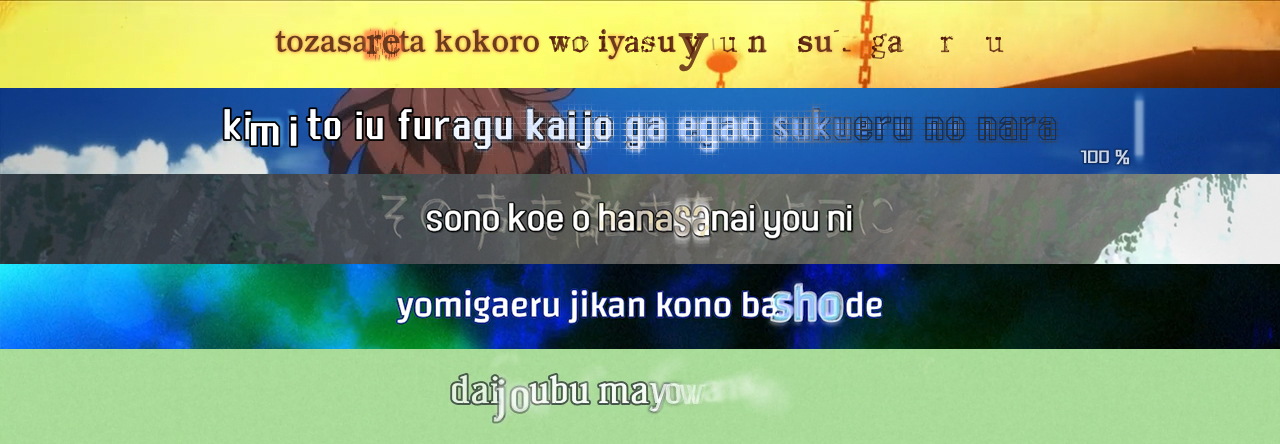
An easy way to create KFX (Karaoke Effects) and complex typesetting using the ASS format (Advanced Substation Alpha).
Powered by Python3, PyonFX aims to offer stability, efficiency, and ease of use to anyone who wants to create something more visually complex within ASS.



# Documentation
You can find the full documentation of PyonFX, as well as a quick-start guide and examples, on [Read The Docs](http://pyonfx.rtfd.io/).
## Contributing
If you want to contribute to PyonFX, please make sure to review the [contribution
guidelines](https://github.com/CoffeeStraw/PyonFX/blob/master/CONTRIBUTING.md).
This project makes use of [GitHub issues](https://github.com/CoffeeStraw/PyonFX/issues) for
tracking **requests and bugs only**, so please *don't* use issues for general questions and discussion.
## License
This project is licensed under the LGPL v3.0 License — see the [LICENSE](https://github.com/CoffeeStraw/PyonFX/blob/master/LICENSE) file for further details.
## Acknowledgments
* **[Youka](https://github.com/Youka)** for the original main functions ideas for **[NyuFX](https://github.com/Youka/NyuFX)**;
* **[McWhite](https://github.com/BastianGanze)** for the original functions ideas of his library for **[NyuFX](https://github.com/Youka/NyuFX)**;
* **[moi15moi](https://github.com/moi15moi)** for creating **[VideoTimestamps](https://github.com/moi15moi/VideoTimestamps)** and contributing significant improvements to the frame processing utilities;
* **Siplas** for helping me out in the realization of the current logo for **PyonFX**;
* **Preacer** for the name suggestion.
================================================
FILE: docs/Makefile
================================================
# Minimal makefile for Sphinx documentation
#
# You can set these variables from the command line.
SPHINXOPTS =
SPHINXBUILD = sphinx-build
SOURCEDIR = source
BUILDDIR = build
# Put it first so that "make" without argument is like "make help".
help:
@$(SPHINXBUILD) -M help "$(SOURCEDIR)" "$(BUILDDIR)" $(SPHINXOPTS) $(O)
.PHONY: help Makefile
# Catch-all target: route all unknown targets to Sphinx using the new
# "make mode" option. $(O) is meant as a shortcut for $(SPHINXOPTS).
%: Makefile
@$(SPHINXBUILD) -M $@ "$(SOURCEDIR)" "$(BUILDDIR)" $(SPHINXOPTS) $(O)
================================================
FILE: docs/make.bat
================================================
@ECHO OFF
pushd %~dp0
REM Command file for Sphinx documentation
if "%SPHINXBUILD%" == "" (
set SPHINXBUILD=sphinx-build
)
set SOURCEDIR=source
set BUILDDIR=build
if "%1" == "" goto help
%SPHINXBUILD% >NUL 2>NUL
if errorlevel 9009 (
echo.
echo.The 'sphinx-build' command was not found. Make sure you have Sphinx
echo.installed, then set the SPHINXBUILD environment variable to point
echo.to the full path of the 'sphinx-build' executable. Alternatively you
echo.may add the Sphinx directory to PATH.
echo.
echo.If you don't have Sphinx installed, grab it from
echo.http://sphinx-doc.org/
exit /b 1
)
%SPHINXBUILD% -M %1 %SOURCEDIR% %BUILDDIR% %SPHINXOPTS%
goto end
:help
%SPHINXBUILD% -M help %SOURCEDIR% %BUILDDIR% %SPHINXOPTS%
:end
popd
================================================
FILE: docs/source/conf.py
================================================
# -*- coding: utf-8 -*-
#
# Configuration file for the Sphinx documentation builder.
import os
import sys
import sphinx_rtd_theme
# Updating path
sys.path.insert(0, os.path.abspath("..//.."))
sys.setrecursionlimit(1500)
from importlib.metadata import version as get_version
# -- Project information -----------------------------------------------------
project = "PyonFX"
copyright = "2019, Antonio Strippoli"
author = "Antonio Strippoli (CoffeeStraw/YellowFlash)"
# The short X.Y version
version = ""
# The full version, including alpha/beta/rc tags
release = get_version("pyonfx")
# -- General configuration ---------------------------------------------------
autodoc_typehints = "signature"
autodoc_member_order = "bysource"
extensions = [
"sphinx.ext.autodoc",
"sphinx.ext.intersphinx",
"sphinx.ext.ifconfig",
"sphinx.ext.viewcode",
"sphinx.ext.napoleon",
"sphinx_panels",
]
# Add any paths that contain templates here, relative to this directory.
templates_path = ["_templates"]
# The suffix(es) of source filenames.
source_suffix = ".rst"
# The master toctree document.
master_doc = "index"
# The language for content autogenerated by Sphinx.
language = "en"
# List of patterns, relative to source directory, that match files and
# directories to ignore when looking for source files.
# This pattern also affects html_static_path and html_extra_path.
exclude_patterns = []
# The name of the Pygments (syntax highlighting) style to use.
pygments_style = None
# -- Options for HTML output -------------------------------------------------
# Add any paths that contain custom static files (such as style sheets) here,
# relative to this directory. They are copied after the builtin static files,
# so a file named "default.css" will overwrite the builtin "default.css".
html_static_path = ["_static"]
# Custom sidebar templates, must be a dictionary that maps document names
# to template names.
#
# The default sidebars (for documents that don't match any pattern) are
# defined by theme itself. Builtin themes are using these templates by
# default: ``['localtoc.html', 'relations.html', 'sourcelink.html',
# 'searchbox.html']``.
#
# html_sidebars = {}
html_logo = "_static/PyonFX Logo.png"
# The theme to use for HTML and HTML Help pages. See the documentation for
# a list of builtin themes.
html_theme = "sphinx_rtd_theme"
# Theme options are theme-specific and customize the look and feel of a theme
# further.
html_theme_options = {
"canonical_url": "",
"logo_only": True,
"prev_next_buttons_location": "bottom",
"style_external_links": True,
"collapse_navigation": True,
"sticky_navigation": True,
"navigation_depth": 4,
"includehidden": True,
"titles_only": False,
}
# -- Options for HTMLHelp output ---------------------------------------------
# Output file base name for HTML help builder.
htmlhelp_basename = "PyonFXdoc"
# -- Options for LaTeX output ------------------------------------------------
latex_elements = {
"papersize": "letterpaper",
"pointsize": "10pt",
"preamble": "",
"figure_align": "htbp",
"extraclassoptions": "openany,oneside",
}
# Grouping the document tree into LaTeX files. List of tuples
# (source start file, target name, title,
# author, documentclass [howto, manual, or own class]).
latex_documents = [
(
master_doc,
"PyonFX.tex",
"PyonFX Documentation",
"Antonio Strippoli (CoffeeStraw/YellowFlash)",
"manual",
),
]
# -- Options for manual page output ------------------------------------------
# One entry per manual page. List of tuples
# (source start file, name, description, authors, manual section).
man_pages = [(master_doc, "pyonfx", "PyonFX Documentation", [author], 1)]
# -- Options for Texinfo output ----------------------------------------------
# Grouping the document tree into Texinfo files. List of tuples
# (source start file, target name, title, author,
# dir menu entry, description, category)
texinfo_documents = [
(
master_doc,
"PyonFX",
"PyonFX Documentation",
author,
"PyonFX",
"An easy way to do KFX and complex typesetting based on subtitle format ASS (Advanced Substation Alpha).",
"Miscellaneous",
),
]
# -- Options for Epub output -------------------------------------------------
# Bibliographic Dublin Core info.
epub_title = project
# A list of files that should not be packed into the epub file.
epub_exclude_files = ["search.html"]
# -- Extension configuration -------------------------------------------------
napoleon_google_docstring = True
napoleon_use_admonition_for_examples = True
# -- Options for intersphinx extension ---------------------------------------
# Example configuration for intersphinx: refer to the Python standard library.
intersphinx_mapping = {"python": ("https://docs.python.org/3", None)}
================================================
FILE: docs/source/index.rst
================================================
The PyonFX Library Documentation
********************************
"PyonFX is an easy way to create KFX (Karaoke Effects) and complex typesetting using the ASS format (Advanced Substation Alpha)."
PyonFX is a Python library that helps you combine tags, text, and shapes following the ASS format. It also supports tasks like timecode adjustments and layering with the help of the extra data included within an ASS file.
And that's not all! PyonFX also offers some special functions to help you perform some tricky tasks, like frame per frame operations, shape manipulation, or pixel-by-pixel effects. This makes it much easier to create **impressive visual 2D effects**.
In comparison to other karaoke effect programs, PyonFX is written in `Python3 `_, which means that you will have all the advantages provided by this modern scripting language which is constantly updated and perfect for both beginner and advanced users.
You can learn on how to start using the library in the :ref:`quick-start` section.
.. toctree::
:hidden:
:maxdepth: 2
quick start
reference/index
================================================
FILE: docs/source/quick start.rst
================================================
.. _quick-start:
Quick Start Guide
-----------------
First things first, you must have a good idea of how to create your effects. You will need to learn (if you haven't already) the following:
* **ASS format**. As PyonFX is an advanced tool for typesetting and karaoke, it is meant to be used by experienced typesetters who are familiar with the tags Libass supports, as well as how they function. Check the footnote [#f1]_ for a complete list of tags.
* **Python3 scripting language**. A programming language like Python allows you to define a set of instructions to be executed by your computer. Compared to softwares with GUI it gives you much more freedom, as you aren't tied to buttons or sliders. **You only need to know the basics for this module**. Knowledge on how to use variable, functions, conditions, loops, comparisons, string formatting, lists, and dictionaries is more than enough. You can find a link to some good tutorials in the footnotes [#f2]_.
To use PyonFX, you'll have to write a Python3 script. Within it you will fully define the process of your KFX or advanced typesetting creation.
If you don't know how to install Python3, there are resources online that can help you out, like https://realpython.com/installing-python/ for example.
Installation
++++++++++++
.. dropdown:: Windows
:title: font-weight-bold
If you haven't installed it yet, make sure to **install** Python3.
You can **download** it from the `official website `_.
Make sure you check the box that says "Add Python 3.x to PATH". This is very important to avoid some extra steps that would make Python callable in every directory from the command prompt.
Run the following command below. It will use pip to install and update the library:
.. code-block:: sh
:emphasize-lines: 1
pip install --upgrade pyonfx
That's all you need to do for now. If you need to update this library at a later date, run that same command again.
.. dropdown:: Ubuntu/Debian
:title: font-weight-bold
⚠️Warning: The first of the following commands is not well tested. If you run into any problems, please create an issue or refer to the `official installation guide `_.
.. code-block:: sh
:emphasize-lines: 1,2
sudo apt install python3 python3-pip libgirepository-2.0-dev gobject-introspection libcairo2-dev build-essential gir1.2-gtk-3.0 python3-gi python3-gi-cairo
python3 -m pip install --upgrade pyonfx
.. dropdown:: Fedora
:title: font-weight-bold
⚠️Warning: The first of the following commands is not well tested. If you run into any problems, please create an issue or refer to the `official installation guide `_.
.. code-block:: sh
:emphasize-lines: 1,2
sudo dnf install python3 python3-pip gcc gobject-introspection-devel cairo-devel pkg-config python3-devel python3-gobject gtk3
python3 -m pip install --upgrade pyonfx
.. dropdown:: Arch Linux
:title: font-weight-bold
`AUR package: `_
.. code-block:: sh
:emphasize-lines: 1
paru -S python-pyonfx
Manual installation:
.. code-block:: sh
:emphasize-lines: 1,2
sudo pacman -S --needed python python-pip python-cairo python-gobject pango
python -m pip install --upgrade pyonfx
.. dropdown:: OpenSUSE
:title: font-weight-bold
⚠️Warning: The first of the following commands is not well tested. If you run into any problems, please create an issue or refer to the `official installation guide `_.
.. code-block:: sh
:emphasize-lines: 1,2
sudo zypper install python3 python3-pip cairo-devel pkg-config python3-devel gcc gobject-introspection-devel python3-gobject python3-gobject-Gdk typelib-1_0-Gtk-3_0 libgtk-3-0
python3 -m pip install --upgrade pyonfx
.. dropdown:: macOS
:title: font-weight-bold
You may need to install `Homebrew `_ first.
⚠️Warning: The first of the following commands is not well tested. If you run into any problems, please create an issue or refer to the `official installation guide `_.
.. code-block:: sh
:emphasize-lines: 1,2
brew install python py3cairo pygobject3 pango cairo glib
python3 -m pip install --upgrade pyonfx
⚠️Warning: If you experience output not rendered correctly, you might need to change the PangoCairo backend to fontconfig.
.. code-block:: sh
:emphasize-lines: 1
PANGOCAIRO_BACKEND=fc python3 namefile.py
Installation - Extra Step
+++++++++++++++++++++++++
This step is not mandatory to start working with the library, but I personally consider Aegisub to be quite old and heavy, so I needed a more comfortable work setup.
That's why PyonFX integrates an additional way to reproduce your works in softsub faster after each generation, using the `MPV player `_. Installing it should be enough to make everything work if you're **not** on Windows.
If you're on Windows, you will need to add it to PATH after downloading it so the library will be able to utilize it. There are several guides for that, `like this one `_.
You need to add the folder that contains the .exe of mpv, generally '*C:\\Program Files\\mpv*'.
Starting out
++++++++++++
Before starting, you may want to make sure everything works as intended. I suggest you to try running some of the examples in the `official GitHub repository of the project `_.
To run a script in python, execute the following command:
.. code-block:: sh
:emphasize-lines: 1
python namefile.py
Or if this for some reason doesn't work (like if you're not on Windows and both Python2 and Python3 are installed):
.. code-block:: sh
:emphasize-lines: 1
python3 namefile.py
I highly suggest you generate and study every single example in the examples folder (download always up-to-date `here `_). These are meant to help out beginners to advanced users by explaining all the relevant functions of the library and how they work in detail.
Tips
++++
* Don't make KFX in one go. Take breaks, go for a walk, obtain inspiration from your surroundings;
* Pick elements of the video. Your effects should ideally blend in with the video;
* Consider human recognition. Humans notice motion first, then contrasts, then colors. Too much of any of this can result in headaches, but too little can be boring to look at;
* Use modern styles to impress (light, curves, particles, gradients) and old ones for readability (solid colors, thick borders, static positions);
* When backgrounds are too flashy, try to insert a panel shape to put your text on 'safe terrain';
* Adjust to karaoke timing and voice. Fast sung lines will have very short syllable durations for effects, and may not always be visible.
----------
.. rubric:: Footnotes
.. [#f1] List of all ASS tags with usage explanation: https://web.archive.org/web/20200722050630/http://docs.aegisub.org/3.2/ASS_Tags/
.. [#f2] Suggested tutorials for learning Python3:
* Italian: https://github.com/AllenDowney/ThinkPythonItalian/blob/master/thinkpython_italian.pdf
* English: http://greenteapress.com/thinkpython2/thinkpython2.pdf
================================================
FILE: docs/source/reference/ass core.rst
================================================
.. _ass-core-ref:
Ass Core
========
.. automodule:: pyonfx.ass_core
:members:
================================================
FILE: docs/source/reference/convert.rst
================================================
.. _convert-ref:
Convert Functions
=================
.. automodule:: pyonfx.convert
:members:
================================================
FILE: docs/source/reference/index.rst
================================================
.. _reference-index:
#################################
The PyonFX Library Reference
#################################
| This reference manual describes all the classes and functions provided by the library.
| It is terse, but attempts to be exact and complete.
For ASS parsing functions and object's classes, you can go on :ref:`ass-core-ref` section.
For Convert functions usefull to convert everything based on ASS format to something more comfortable (and the other way around), you can go on :ref:`convert-ref` section.
For Shape functions that will let you do complex calculations with shapes in ASS format, you can go on :ref:`shape-ref` section.
For general utility functions, you can go on :ref:`utils-ref` section.
.. toctree::
:maxdepth: 2
ass core
convert
shape
utils
================================================
FILE: docs/source/reference/shape.rst
================================================
.. _shape-ref:
Shape Functions
=================
.. automodule:: pyonfx.shape
:members:
================================================
FILE: docs/source/reference/utils.rst
================================================
.. _utils-ref:
Utils
=====
.. automodule:: pyonfx.utils
:members:
================================================
FILE: examples/1 - Basics/1 - Look into ASS values.py
================================================
"""
This script visualizes which ASS values you got from input ASS file.
First of all you need to create an Ass object, which will help you to manage
input/output. Once created, it will automatically extract all the informations
from the input .ass file.
For more info about the use of Ass class:
https://pyonfx.readthedocs.io/en/latest/reference/ass%20core.html#pyonfx.ass_core.Ass
By executing this script, you'll discover how ASS contents,
like video resolution, styles, lines etc. are stored into objects and lists.
It's important to understand it, because these Python lists and objects
are exactly the values you'll be working with the whole time to create KFX.
Don't worry about the huge output, there are a lot of information
even in a small input file like the one in this folder.
You can find more info about each object used to represent the input .ass file here:
https://pyonfx.readthedocs.io/en/latest/reference/ass%20core.html
"""
from pyonfx import *
# Open the input ASS file and get the data
# Note that by default, PyonFX will show a progress bar when iterating over lines.
# In this example, we'll disable it through progress=False to avoid cluttering the output.
io = Ass("in.ass")
meta, styles, lines = io.get_data()
# Print the META object
print("📋 META OBJECT:")
print(f" {meta}\n")
print("─" * 80 + "\n") # ──────────────
# Print the STYLES dictionary
print("🎨 STYLES:")
for style_name, style in styles.items():
print(f' "{style_name}":')
print(f" {style}\n")
print("─" * 80 + "\n") # ──────────────
# Print the LINES list
print("📝 LINES:")
for line in lines:
print(f" {line}\n")
print("─" * 80 + "\n") # ──────────────
# Print the first word of the first line
print("🔤 FIRST WORD OF THE FIRST LINE:")
print(f" {lines[0].words[0]}\n")
print("─" * 80 + "\n") # ──────────────
# Print the first syllable of the first line
print("🎤 FIRST SYLLABLE OF THE FIRST LINE:")
print(f" {lines[0].syls[0]}\n")
print("─" * 80 + "\n") # ──────────────
# Print the first char of the first line
print("🅰️ FIRST CHAR OF THE FIRST LINE:")
print(f" {lines[0].chars[0]}\n")
================================================
FILE: examples/1 - Basics/2 - Create the First Output.py
================================================
"""
This script creates your first dialog line in "Output.ass", which is
the default name for the output that will contains our original dialog lines (commented) + our new generated lines.
The magic function is write_line(), a class function of Ass
which converts a dialog line of class Line back to text form and appends it to "Output.ass".
For more info: https://pyonfx.readthedocs.io/en/latest/reference/ass%20core.html#pyonfx.ass_core.Ass.write_line
To show the first manipulation, we take the first line of our input
and print it back on the output changing only the text.
It's not a good idea doing it this way because the original line text is overwritten and
for future manipulations you will not be able to take the line's original values anymore
without re parsing again the input file by creating a new Ass object.
Instead, you should always create a copy of line to save the original, we will see how in the following examples.
At the end, you have to call save() class method to actually write your output.
PyonFX will also automatically print how many lines you've written and the process duration.
For more info: https://pyonfx.readthedocs.io/en/latest/reference/ass%20core.html#pyonfx.ass_core.Ass.save
Finally, we call the open_aegisub method to open the output with Aegisub. Generally you would prefer to open it
with MPV by using the open_mpv method, but the examples'ass file do not have videos.
For more info:
- open_aegisub: https://pyonfx.readthedocs.io/en/latest/reference/ass%20core.html#pyonfx.ass_core.Ass.open_aegisub
- open_mpv: https://pyonfx.readthedocs.io/en/latest/reference/ass%20core.html#pyonfx.ass_core.Ass.open_mpv
"""
from pyonfx import *
io = Ass("in.ass")
meta, styles, lines = io.get_data()
lines[0].text = "I am a new line!"
io.write_line(lines[0])
io.save()
io.open_aegisub()
================================================
FILE: examples/1 - Basics/3 - More lines.py
================================================
"""
Let's go a bit further.
In this script we will iterate through all the lines of our .ass,
create a copy for each of them (see the reason for that in the previous example)
and finally write them back on our output with time shifted by 2000ms.
For more info about the copy method:
https://pyonfx.readthedocs.io/en/latest/reference/ass%20core.html#pyonfx.ass_core.Line.copy
"""
from pyonfx import *
io = Ass("in.ass")
meta, styles, lines = io.get_data()
for line in lines:
l = line.copy()
l.start_time += 2000
l.end_time += 2000
io.write_line(l)
io.save()
io.open_aegisub()
================================================
FILE: examples/1 - Basics/4 - Organizing the code.py
================================================
"""
Time to manage the effect creation process.
If we want to take things further, it is better to structure our code.
In this example, you will see how generally an effect should be structured.
You could use this file as a template for your future effects.
Line manipulation and output was outsourced to functions, which are called
by passing the original line and a copy, on which you will work on.
You can order every effect to a function.
Lines with alignment over than or equal at 7 will be our romaji lines,
the ones with alignment less than or equal at 3 will be our subtitle (translation) lines,
the others (4, 5, 6) will be meant for vertical kanji.
If you have seen the documentation of Ass class, you should have already seen that
it contains a vertical_kanji parameter, that will automatically calculate vertical positioning
for lines with alignment equal at 4, 5 or 6. If you don't want to let pyon automatically position
kanji in vertical alignment, you can specify this parameter to False.
Note that this code will not do anything, because there is nothing written in the romaji, kanji, sub functions.
We will create our first effect in the next section: 2 - Beginner
"""
from pyonfx import *
io = Ass("in.ass")
meta, styles, lines = io.get_data()
def romaji(line, l):
# You will write here :D
pass
def kanji(line, l):
# You will write here :)
pass
def sub(line, l):
# You will write here :P
pass
for line in lines:
# Generating lines
if line.styleref.alignment >= 7:
romaji(line, line.copy())
elif line.styleref.alignment >= 4:
kanji(line, line.copy())
else:
sub(line, line.copy())
io.save()
io.open_aegisub()
================================================
FILE: examples/1 - Basics/in.ass
================================================
[Script Info]
; Script generated by Aegisub 8975-master-8d77da3
; http://www.aegisub.org/
Title: New subtitles
ScriptType: v4.00+
WrapStyle: 0
PlayResX: 1280
PlayResY: 720
ScaledBorderAndShadow: yes
Video Aspect Ratio: 0
Video Zoom: 4
[Aegisub Project Garbage]
Last Style Storage: Default
Video File: ?dummy:23.976000:2250:1280:720:11:135:226:c
Video AR Value: 1.777778
Video Zoom Percent: 0.625000
Video Position: 24
[V4+ Styles]
Format: Name, Fontname, Fontsize, PrimaryColour, SecondaryColour, OutlineColour, BackColour, Bold, Italic, Underline, StrikeOut, ScaleX, ScaleY, Spacing, Angle, BorderStyle, Outline, Shadow, Alignment, MarginL, MarginR, MarginV, Encoding
Style: Romaji,Arial,40,&H00FFFFFF,&H000000FF,&H00000000,&H00000000,-1,0,0,0,100,100,0,0,1,2,0,8,12,15,15,1
Style: Subtitle,Arial,40,&H00FFFFFF,&H000000FF,&H00000000,&H00000000,-1,0,0,0,100,100,0,0,1,2,0,2,12,15,15,1
[Events]
Format: Layer, Start, End, Style, Name, MarginL, MarginR, MarginV, Effect, Text
Dialogue: 0,0:00:01.00,0:00:11.00,Romaji,,0,0,0,,{\k500}Hello {\k500}world!
Dialogue: 0,0:00:01.00,0:00:11.00,Subtitle,,0,0,0,,Ciao mondo!
================================================
FILE: examples/2 - Beginner/1 - First Simple Effect.py
================================================
"""
And here we are with our first complete effect.
As you can see, we have now filled our romaji, kanji and sub functions.
Starting from the simple one, the sub function make use of leadin and leadout times for fitting line-to-line changes.
We then construct the text of each line, giving an alignment, a position and a fad to make a soft entrance and exit.
(Docs: https://pyonfx.readthedocs.io/en/latest/reference/ass%20core.html#pyonfx.ass_core.Line.leadin)
In the romaji function instead, we want to create an effect that works with syllables.
In order to do do that, every syllable has to be one dialog line,
so we loop through syllable entries of current line.
Using a utility provided in Utils module, all_non_empty(), we assure
that we will not work with blank syllables or syls with duration equals to zero.
(Docs: https://pyonfx.readthedocs.io/en/latest/reference/utils.html#pyonfx.utils.Utils.all_non_empty)
In a similiar fashion to what we did in the sub function, we create a leadin and a leadout using fad tag,
then we create our first main effect by using a simple trasformation, obtaining a grow/shrink effect.
Remember to always set the layer for the line. Usually, main effects should have an higher value than leadin and leadout,
beacuse they are more important, so by doing this they will be drawn over the other effects.
For the kanji function, we are calling the same functions of romaji, but using chars instead of syls.
"""
from pyonfx import *
io = Ass("in.ass", vertical_kanji=True)
meta, styles, lines = io.get_data()
@io.track
def leadin_effect(line: Line, obj: Syllable | Char, l: Line):
l.layer = 0
l.start_time = line.start_time - line.leadin // 2
l.end_time = line.start_time + obj.start_time
tags = rf"\an5\pos({obj.center},{obj.middle})\fad({line.leadin // 2},0)"
l.text = f"{{{tags}}}{obj.text}"
io.write_line(l)
@io.track
def main_effect(line: Line, obj: Syllable | Char, l: Line):
l.layer = 1
l.start_time = line.start_time + obj.start_time
l.end_time = line.start_time + obj.end_time
# Original values
c1 = line.styleref.color1
c3 = line.styleref.color3
fscx = line.styleref.scale_x
fscy = line.styleref.scale_y
# New values
new_fscx = fscx * 1.25
new_fscy = fscy * 1.25
new_c1 = "&HFFFFFF&"
new_c3 = "&HABABAB&"
tags = (
rf"\an5\pos({obj.center},{obj.middle})"
rf"\t(0,{obj.duration // 3},0.5, \fscx{new_fscx}\fscy{new_fscy}\1c{new_c1}\3c{new_c3})"
rf"\t({obj.duration // 3},{obj.duration},1.5, \fscx{fscx}\fscy{fscy}\1c{c1}\3c{c3})"
)
l.text = f"{{{tags}}}{obj.text}"
io.write_line(l)
@io.track
def leadout_effect(line: Line, obj: Syllable | Char, l: Line):
l.layer = 0
l.start_time = line.start_time + obj.end_time
l.end_time = line.end_time + line.leadout // 2
tags = rf"\an5\pos({obj.center},{obj.middle})\fad(0,{line.leadout // 2})"
l.text = f"{{{tags}}}{obj.text}"
io.write_line(l)
@io.track
def romaji(line: Line, l: Line):
for syl in Utils.all_non_empty(line.syls):
leadin_effect(line, syl, l)
main_effect(line, syl, l)
leadout_effect(line, syl, l)
@io.track
def kanji(line: Line, l: Line):
for char in Utils.all_non_empty(line.chars):
leadin_effect(line, char, l)
main_effect(line, char, l)
leadout_effect(line, char, l)
@io.track
def sub(line: Line, l: Line):
l.start_time = line.start_time - line.leadin // 2
l.end_time = line.end_time + line.leadout // 2
tags = rf"\fad({line.leadin // 2}, {line.leadout // 2})"
l.text = f"{{{tags}}}{line.text}"
io.write_line(l)
# Generating lines
for line in lines:
if line.styleref.alignment >= 7:
romaji(line, line.copy())
elif line.styleref.alignment >= 4:
kanji(line, line.copy())
else:
sub(line, line.copy())
io.save()
io.open_aegisub()
================================================
FILE: examples/2 - Beginner/2 - Utilities.py
================================================
"""
The transform ASS tag makes some nice animations possible, but that shouldn't be enough for us!
The alternative is to create one dialog line for every frame. But frame per frame animation can be
pretty stressful to set up, and here's where an utility provided by pyonfx come handy.
In romaji, syllables jitter by frame-per-frame reposition is calculated and
fscx/fscy increase is calculated using FrameUtility, provided in the utils module.
(Docs: https://pyonfx.readthedocs.io/en/latest/reference/utils.html#pyonfx.utils.FrameUtility)
(About the random uniform function: https://docs.python.org/3/library/random.html#random.uniform)
You will also see a pretty standard way to make a gradual leadin and leadout, the main idea is to
leave some little delay between syllables so that there is more time to develop an effect.
For subtitles, we create a vertical static gradient.
As exercise, you can try to transform it into an horizontal one :)
"""
import random
from pyonfx import *
io = Ass("in.ass")
meta, styles, lines = io.get_data()
def romaji(line, l):
for syl in Utils.all_non_empty(line.syls):
# Setting up a delay, which will be my time for the leadin and leadout effect
delay = 200
# Leadin Effect
l.layer = 0
l.start_time = line.start_time + 25 * syl.i - delay
l.end_time = line.start_time + syl.start_time
l.dur = l.end_time - l.start_time
l.text = "{\\an5\\pos(%.3f,%.3f)\\fad(%d,0)}%s" % (
syl.center,
syl.middle,
delay,
syl.text,
)
io.write_line(l)
# Main Effect
# Let's create a FrameUtility object and set up a radius for the random positions
FU = FrameUtility(
line.start_time + syl.start_time,
line.start_time + syl.end_time,
meta.timestamps,
)
radius = 2
# Starting to iterate over the frames
for s, e, _, _ in FU:
l.layer = 1
l.start_time = s
l.end_time = e
# These lines of codes will reproduce
# "\\t(0,%d,\\fscx140\\fscy140)\\t(%d,%d,\\fscx100\\fscy100)" % (syl.duration/3, syl.duration/3, syl.duration)
fsc = 100
fsc += FU.add(0, syl.duration / 3, 40)
fsc += FU.add(syl.duration / 3, syl.duration, -40)
l.text = "{\\an5\\pos(%.3f,%.3f)\\fscx%.3f\\fscy%.3f}%s" % (
syl.center + random.uniform(-radius, radius),
syl.middle + random.uniform(-radius, radius),
fsc,
fsc,
syl.text,
)
io.write_line(l)
# Leadout Effect
l.layer = 0
l.start_time = line.start_time + syl.end_time
l.end_time = line.end_time - 25 * (len(line.syls) - syl.i) + delay
l.dur = l.end_time - l.start_time
l.text = "{\\an5\\pos(%.3f,%.3f)\\fad(0,%d)}%s" % (
syl.center,
syl.middle,
delay,
syl.text,
)
io.write_line(l)
def sub(line, l):
# Translation Effect
l.start_time = line.start_time - line.leadin / 2
l.end_time = line.end_time + line.leadout / 2
l.dur = l.end_time - l.start_time
# Writing border
l.text = "{\\an5\\pos(%.3f,%.3f)\\fad(%d,%d)}%s" % (
line.center,
line.middle,
line.leadin / 2,
line.leadout / 2,
line.text,
)
io.write_line(l)
# We define precision, increasing it will result in a gain on preformance and decrease of fidelity (due to less lines produced)
precision = 1
n = int(line.height / precision)
for i in range(n):
clip = "%d, %d, %d, %d" % (
line.left,
line.top + (line.height) * (i / n),
line.right,
line.top + (line.height) * ((i + 1) / n),
)
color = Utils.interpolate(i / n, "&H00FFF7&", "&H0000FF&", 1.4)
l.text = "{\\an5\\pos(%.3f,%.3f)\\fad(%d,%d)\\clip(%s)\\bord0\\1c%s}%s" % (
line.center,
line.middle,
line.leadin / 2,
line.leadout / 2,
clip,
color,
line.text,
)
io.write_line(l)
for line in lines:
# Generating lines
if line.styleref.alignment >= 7:
romaji(line, line.copy())
elif line.styleref.alignment <= 3:
sub(line, line.copy())
io.save()
io.open_aegisub()
================================================
FILE: examples/2 - Beginner/3 - Variants.py
================================================
"""
Inline effects is a method to define exclusive effects for syllables.
Fields "Actor" and "Effect" can also be used to define exclusive effects, but you will define them for the whole line.
In this example, romajis are looking for inline effects
"m1" and "m2" to choose a main effect to apply to syls' text.
Kanjis are looking for lines' field "Effect", to choose what kind of effect we want to apply.
In addition, for romaji there's a star jumping over syls by frame-per-frame positioning.
In this example we can also see in action another utility provided by PyonFX: ColorUtility.
It is used to extract color changes from some lines and interpolate them for each generated line without effort.
Colors will add a really nice touch to your KFXs, so it is important to have a comfy way to set up them and use them in your effects.
In the translation lines we will create some clipped text colorated as an example of the application.
You can also make some simpler usage, like just applying color changes to the whole line, which is what karaokers normally do.
It could look like much code for such a simple effect, but it's needed and an easy method with much potential for extensions.
"""
import math
import random
from pyonfx import *
io = Ass("in2.ass")
meta, styles, lines = io.get_data()
# Creating the star and extracting all the color changes from the input file
star = Shape.star(5, 4, 10)
CU = ColorUtility(lines)
def romaji(line, l):
# Setting up a delay, we will use it as duration time of the leadin and leadout effects
delay = 300
# Setting up offset variables, we will use them for the \move in leadin and leadout effects
off_x = 35
off_y = 15
# Leadin Effect
for syl in Utils.all_non_empty(line.syls):
l.layer = 0
l.start_time = (
line.start_time + 25 * syl.i - delay - 80
) # Remove 80 to start_time to let leadin finish a little bit earlier than the main effect of the first syllable
l.end_time = line.start_time + syl.start_time
l.dur = l.end_time - l.start_time
l.text = (
"{\\an5\\move(%.3f,%.3f,%.3f,%.3f,0,%d)\\blur2\\t(0,%d,\\blur0)\\fad(%d,0)}%s"
% (
syl.center + math.cos(syl.i / 2) * off_x,
syl.middle + math.sin(syl.i / 4) * off_y,
syl.center,
syl.middle,
delay,
delay,
delay,
syl.text,
)
)
io.write_line(l)
# Main Effect
for syl in Utils.all_non_empty(line.syls):
l.layer = 1
l.start_time = line.start_time + syl.start_time
l.end_time = line.start_time + syl.end_time + 100
l.dur = l.end_time - l.start_time
c1 = "&H81F4FF&"
c3 = "&H199AAA&"
# Change color if inline_fx is m1
if syl.inline_fx == "m1":
c1 = "&H8282FF&"
c3 = "&H191AAA&"
on_inline_effect_2 = ""
# Apply rotation if inline_fx is m2
if syl.inline_fx == "m2":
on_inline_effect_2 = "\\t(0,%d,\\frz%.3f)\\t(%d,%d,\\frz0)" % (
l.dur / 4,
random.uniform(-40, 40),
l.dur / 4,
l.dur,
)
l.text = (
"{\\an5\\pos(%.3f,%.3f)%s\\t(0,80,\\fscx105\\fscy105\\1c%s\\3c%s)\\t(80,%d,\\fscx100\\fscy100\\1c%s\\3c%s)}%s"
% (
syl.center,
syl.middle,
on_inline_effect_2,
c1,
c3,
l.dur - 80,
line.styleref.color1,
line.styleref.color3,
syl.text,
)
)
io.write_line(l)
# Animating star shape that jumps over the syllables
# Jump-in to the first syl
jump_height = 18
if syl.i == 0:
FU = FrameUtility(
int(line.start_time - line.leadin / 2),
line.start_time,
meta.timestamps,
)
for s, e, i, n in FU:
l.start_time = s
l.end_time = e
frame_pct = i / n
x = syl.center - syl.width * (1 - frame_pct)
y = syl.top - math.sin(frame_pct * math.pi) * jump_height
alpha = 255
alpha += FU.add(0, syl.duration, -255)
alpha = Convert.alpha_dec_to_ass(int(alpha))
l.text = (
"{\\alpha%s\\pos(%.3f,%.3f)\\bord1\\blur1\\1c%s\\3c%s\\p1}%s"
% (alpha, x, y, c1, c3, star)
)
io.write_line(l)
# Jump to the next syl or to the end of line
jump_width = (
line.syls[syl.i + 1].center - syl.center
if syl.i != len(line.syls) - 1
else syl.width
)
FU = FrameUtility(
line.start_time + syl.start_time,
line.start_time + syl.end_time,
meta.timestamps,
)
for s, e, i, n in FU:
l.start_time = s
l.end_time = e
frame_pct = i / n
x = syl.center + frame_pct * jump_width
y = syl.top - math.sin(frame_pct * math.pi) * jump_height
alpha = 0
# Last jump should fade-out
if syl.i == len(line.syls) - 1:
alpha += FU.add(0, syl.duration, 255)
alpha = Convert.alpha_dec_to_ass(int(alpha))
l.text = "{\\alpha%s\\pos(%.3f,%.3f)\\bord1\\blur1\\1c%s\\3c%s\\p1}%s" % (
alpha,
x,
y,
c1,
c3,
star,
)
io.write_line(l)
# Leadout Effect
for syl in Utils.all_non_empty(line.syls):
l.layer = 0
l.start_time = line.start_time + syl.end_time + 100
l.end_time = line.end_time - 25 * (len(line.syls) - syl.i) + delay + 100
l.dur = l.end_time - l.start_time
l.text = (
"{\\an5\\move(%.3f,%.3f,%.3f,%.3f,%d,%d)\\t(%d,%d,\\blur2)\\fad(0,%d)}%s"
% (
syl.center,
syl.middle,
syl.center + math.cos(syl.i / 2) * off_x,
syl.middle + math.sin(syl.i / 4) * off_y,
l.dur - delay,
l.dur,
l.dur - delay,
l.dur,
delay,
syl.text,
)
)
io.write_line(l)
def kanji(line, l):
# Setting up a delay, we will use it as duration time of the leadin and leadout effects
delay = 300
# Setting up offset variables, we will use them for the \move in leadin and leadout effects
off_x = 35
off_y = 15
# Leadin Effect
for syl in Utils.all_non_empty(line.syls):
l.layer = 0
l.start_time = (
line.start_time + 25 * syl.i - delay - 80
) # Remove 80 to start_time to let leadin finish a little bit earlier than the main effect of the first syllable
l.end_time = line.start_time + syl.start_time
l.dur = l.end_time - l.start_time
l.text = (
"{\\an5\\move(%.3f,%.3f,%.3f,%.3f,0,%d)\\blur2\\t(0,%d,\\blur0)\\fad(%d,0)}%s"
% (
syl.center + math.cos(syl.i / 2) * off_x,
syl.middle + math.sin(syl.i / 4) * off_y,
syl.center,
syl.middle,
delay,
delay,
delay,
syl.text,
)
)
io.write_line(l)
# Main Effect
for syl in Utils.all_non_empty(line.syls):
l.layer = 1
l.start_time = line.start_time + syl.start_time
l.end_time = line.start_time + syl.end_time + 100
l.dur = l.end_time - l.start_time
c1 = "&H81F4FF&"
c3 = "&H199AAA&"
# Change color if effect field is m1
if line.effect == "m1":
c1 = "&H8282FF&"
c3 = "&H191AAA&"
on_inline_effect_2 = ""
# Apply rotation if effect field is m2
if line.effect == "m2":
on_inline_effect_2 = "\\t(0,%d,\\frz%.3f)\\t(%d,%d,\\frz0)" % (
l.dur / 4,
random.uniform(-40, 40),
l.dur / 4,
l.dur,
)
l.text = (
"{\\an5\\pos(%.3f,%.3f)%s\\t(0,80,\\fscx105\\fscy105\\1c%s\\3c%s)\\t(80,%d,\\fscx100\\fscy100\\1c%s\\3c%s)}%s"
% (
syl.center,
syl.middle,
on_inline_effect_2,
c1,
c3,
l.dur - 80,
line.styleref.color1,
line.styleref.color3,
syl.text,
)
)
io.write_line(l)
# Leadout Effect
for syl in Utils.all_non_empty(line.syls):
l.layer = 0
l.start_time = line.start_time + syl.end_time + 100
l.end_time = line.end_time - 25 * (len(line.syls) - syl.i) + delay + 100
l.dur = l.end_time - l.start_time
l.text = (
"{\\an5\\move(%.3f,%.3f,%.3f,%.3f,%d,%d)\\t(%d,%d,\\blur2)\\fad(0,%d)}%s"
% (
syl.center,
syl.middle,
syl.center + math.cos(syl.i / 2) * off_x,
syl.middle + math.sin(syl.i / 4) * off_y,
l.dur - delay,
l.dur,
l.dur - delay,
l.dur,
delay,
syl.text,
)
)
io.write_line(l)
def sub(line, l):
# Translation Effect
l.layer = 0
l.start_time = line.start_time - line.leadin / 2
l.end_time = line.end_time + line.leadout / 2
l.dur = l.end_time - l.start_time
# Getting interpolated color changes (notice that we do that only after having set up all the times, that's important)
colors = CU.get_color_change(l)
# Base text
l.text = "{\\an5\\pos(%.3f,%.3f)\\fad(%d,%d)}%s" % (
line.center,
line.middle,
line.leadin / 2,
line.leadout / 2,
line.text,
)
io.write_line(l)
# Random clipped text colorated
l.layer = 1
for i in range(1, int(line.width / 80)):
x_clip = line.left + random.uniform(0, line.width)
y_clip = line.top - 5
clip = (
x_clip,
y_clip,
x_clip + random.uniform(10, 30),
y_clip + line.height + 10,
)
l.text = "{\\an5\\pos(%.3f,%.3f)\\fad(%d,%d)\\clip(%d,%d,%d,%d)%s}%s" % (
line.center,
line.middle,
line.leadin / 2,
line.leadout / 2,
clip[0],
clip[1],
clip[2],
clip[3],
colors,
line.text,
)
io.write_line(l)
for line in lines:
# Generating lines
if line.styleref.alignment >= 7:
romaji(line, line.copy())
elif line.styleref.alignment >= 4:
kanji(line, line.copy())
else:
sub(line, line.copy())
io.save()
io.open_aegisub()
================================================
FILE: examples/2 - Beginner/4 - Accelerate Demo.py
================================================
from pyonfx import *
from pyonfx.utils import FrameUtility
# Parameters
HEIGHT = 700
DURATION_MS = 4000
DURATION_STILL_MS = 500
HORIZONTAL_DISTANCE = 300
CIRCLE_RADIUS = 15
MARGIN = 20
# All available accelerators
ACC_PRESETS = [
1.0, # Linear
0.5, # Power 0.5
1.5, # Power 1.5
"in_back",
"out_back",
"in_out_back",
"in_bounce",
"out_bounce",
"in_out_bounce",
"in_circ",
"out_circ",
"in_out_circ",
"in_cubic",
"out_cubic",
"in_out_cubic",
"in_elastic",
"out_elastic",
"in_out_elastic",
"in_expo",
"out_expo",
"in_out_expo",
"in_quad",
"out_quad",
"in_out_quad",
"in_quart",
"out_quart",
"in_out_quart",
"in_quint",
"out_quint",
"in_out_quint",
"in_sine",
"out_sine",
"in_out_sine",
]
def generate_color_palette(count):
import colorsys
colors = []
for i in range(count):
hue = i / count
r, g, b = [int(x * 255) for x in colorsys.hsv_to_rgb(hue, 1, 1)]
colors.append(f"&H{b:02X}{g:02X}{r:02X}&")
return colors
COLORS = generate_color_palette(len(ACC_PRESETS))
io = Ass("in.ass")
meta, styles, lines = io.get_data()
template_line = lines[1].copy()
CIRCLE = Shape.ellipse(CIRCLE_RADIUS, CIRCLE_RADIUS)
# Single FrameUtility for all circles
FU = FrameUtility(0, DURATION_MS + DURATION_STILL_MS * 2, meta.timestamps)
VERTICAL_SPACING = HEIGHT / (len(ACC_PRESETS) + 1)
for start, end, i, n in FU:
for idx, (acc, color) in enumerate(zip(ACC_PRESETS, COLORS)):
l = template_line.copy()
l.start_time = start
l.end_time = end
l.layer = 0
# Calculate vertical position
y = MARGIN + VERTICAL_SPACING * (idx)
# Use FU.add with the right acceleration for this circle
x_offset = FU.add(DURATION_STILL_MS, DURATION_MS, HORIZONTAL_DISTANCE, acc)
x = MARGIN * 6 + x_offset
l.text = (
f"{{\\an7\\pos({x},{y})\\p1\\1c{color}\\bord0}}{CIRCLE}"
f"{{\\r\\p0\\an7\\fs15}}{acc}"
)
io.write_line(l)
io.save()
io.open_aegisub()
================================================
FILE: examples/2 - Beginner/5 - Image to Pixels Demo.py
================================================
"""
Image to Pixels Demo - Demonstrating the image_to_pixels function
This demo shows how to use the Convert.image_to_pixels() function to convert
an image into pixel data that can be used for ASS effects. The astronaut image
will be displayed next to the first line with appropriate fade effects.
The demo creates individual pixel elements for each non-transparent pixel in the image,
positioning them relative to the first line and applying fade effects.
"""
import os
from pyonfx import *
io = Ass("in.ass", vertical_kanji=True)
meta, styles, lines = io.get_data()
# Pixel setup
io.add_style("p", Ass.PIXEL_STYLE)
# Prepare png file
image_path = "lighthouse.png"
lighthouse_pixels = Convert.image_to_pixels(
image_path, skip_transparent=True, width=80, height=80
)
min_x = min(p.x for p in lighthouse_pixels)
min_y = min(p.y for p in lighthouse_pixels)
max_y = max(p.y for p in lighthouse_pixels)
image_height = max_y - min_y + 1
# Check if image exists
@io.track
def image_effect(line: Line, l: Line):
"""Display the lighthouse image next to the line."""
# Position image to the right of the line
image_start_x = line.right + 30
image_start_y = line.top - (image_height - line.height) // 2
# Create pixel elements
for pixel in lighthouse_pixels:
# Calculate final position
final_x = image_start_x + (pixel.x - min_x)
final_y = image_start_y + (pixel.y - min_y)
# Create timing
l.start_time = line.start_time
l.end_time = line.end_time
l.layer = 1
l.style = "p"
color_tag = f"\\1c{pixel.color}"
alpha_tag = f"\\alpha{pixel.alpha if pixel.alpha != '&H00&' else ''}"
tags = rf"\\p1\pos({final_x},{final_y}){color_tag}{alpha_tag}\fad(300,300)"
l.text = f"{{{tags}}}{Shape.PIXEL}"
io.write_line(l)
@io.track
def sub(line: Line, l: Line):
"""Test effect: Convert text to shape and apply texture from 'stock_texture.jpg'."""
l.start_time = line.start_time - line.leadin // 2
l.end_time = line.end_time + line.leadout // 2
fad = rf"\fad({line.leadin // 2}, {line.leadout // 2})"
l.text = f"{{{fad}}}{line.text}"
io.write_line(l)
# Apply texture using the image 'stock_texture.jpg' with 'stretch' mode
l.style = "p"
shape_pixels = Convert.text_to_pixels(line)
textured_pixels = shape_pixels.apply_texture("stock_texture.jpg")
# Output each textured pixel as a separate line with a pixel drawing command
for pixel in textured_pixels:
# Compute absolute position for the pixel based on the original line position
x = int(line.left) + pixel.x
y = int(line.top) + pixel.y
# Create a simple drawing command using \p1. This draws a tiny rectangle representing a pixel.
l.text = f"{{\\p1\\pos({x},{y})\\1c{pixel.color}\\alpha{pixel.alpha}{fad}}}{Shape.PIXEL}"
io.write_line(l)
# Generate lines
for line in lines[1:2]:
# Apply image effect only to the first line
image_effect(line, line.copy())
# Apply subtitle effect to all lines
sub(line, line.copy())
io.save()
io.open_aegisub()
================================================
FILE: examples/2 - Beginner/in.ass
================================================
[Script Info]
; Script generated by Aegisub 8975-master-8d77da3
; http://www.aegisub.org/
PlayResX: 1280
PlayResY: 720
[Aegisub Project Garbage]
Last Style Storage: Default
Video File: ?dummy:23.976000:2250:1920:1080:11:135:226:c
Video AR Value: 1.777778
Video Zoom Percent: 0.500000
Active Line: 1
Video Position: 342
[V4+ Styles]
Format: Name, Fontname, Fontsize, PrimaryColour, SecondaryColour, OutlineColour, BackColour, Bold, Italic, Underline, StrikeOut, ScaleX, ScaleY, Spacing, Angle, BorderStyle, Outline, Shadow, Alignment, MarginL, MarginR, MarginV, Encoding
Style: Default,Arial,48,&H00FFFFFF,&H000000FF,&H00000000,&H00000000,0,0,0,0,100,100,0,0,1,2,0,8,25,25,25,1
Style: Romaji,Migu 1P,48,&H00FFFFFF,&H000000FF,&H00000000,&H00000000,-1,0,0,0,100,100,0,0,1,2,0,8,25,25,25,1
Style: Translation,Migu 1P,46,&H00FFFFFF,&H000000FF,&H00000000,&H00000000,-1,0,0,0,100,100,0,0,1,2,0,2,25,25,25,1
Style: Kanji,Migu 1P,38,&H00FFFFFF,&H000000FF,&H00000000,&H00000000,-1,0,0,0,100,100,0,0,1,1.8,0,4,25,25,25,1
[Events]
Format: Layer, Start, End, Style, Name, MarginL, MarginR, MarginV, Effect, Text
Comment: 0,0:00:00.00,0:00:00.00,Default,,0,0,0,,Font used (Version 1P, Bold): https://www.freejapanesefont.com/migu-font-%E3%83%9F%E3%82%B0%E3%83%95%E3%82%A9%E3%83%B3%E3%83%88/
Dialogue: 0,0:00:14.24,0:00:24.23,Romaji,,0,0,0,,{\k56}su{\k13}re{\k22}chi{\k36}ga{\k48}u{\k25} {\k34}ko{\k33}to{\k50}ba {\k15}no {\k17}u{\k34}ra {\k46}ni{\k33} {\k28}to{\k36}za{\k65}sa{\k33}{\k30}re{\k51}ta{\k16} {\k33}ko{\k33}ko{\k78}ro {\k15}no {\k24}ka{\k95}gi
Dialogue: 0,0:00:24.68,0:00:34.50,Romaji,,0,0,0,,{\k51}ki{\k13}mi {\k18}to {\k32}i{\k49}u{\k28} {\k37}fu{\k32}ra{\k46}gu {\k19}ka{\k13}i{\k35}jo {\k51}ga{\k30} {\k33}e{\k34}ga{\k32}o{\k30} {\k35}su{\k38}ku{\k59}e{\k64}ru {\k67}no{\k29} {\k19}na{\k88}ra
Dialogue: 0,0:00:35.06,0:00:40.09,Romaji,,0,0,0,,{\k16}na{\k18}tsu {\k15}no {\k30}ka{\k35}ze {\k12}i{\k40}za{\k14}na{\k50}u{\k32} {\k17}ha{\k12}ku{\k19}chu{\k31}u {\k25}no {\k23}su{\k33}ko{\k15}o{\k66}ru
Dialogue: 0,0:00:40.84,0:00:44.80,Romaji,,0,0,0,,{\k34}ha{\k37}cho{\k39}u{\k16} {\k76}shi{\k96}n{\k12}ku{\k86}ro
Dialogue: 0,0:00:45.41,0:00:50.30,Romaji,,0,0,0,,{\k21}ro{\k27}man{\k36}chi{\k33}kku {\k16}mi{\k36}ta{\k19}i {\k40}ni{\k35} {\k17}ki {\k16}no {\k16}ki{\k30}i{\k33}ta {\k18}ko{\k31}to{\k19}ba {\k46}mo
Dialogue: 0,0:00:50.58,0:00:59.34,Romaji,,0,0,0,,{\k37}mi{\k17}tsu{\k47}ka{\k19}ra{\k46}nai {\k19}ke{\k36}do{\k45} {\k32}a{\k28}o{\k33}zo{\k36}ra {\k29}o{\k31} {\k32}me{\k31}za{\k178}su{\k56} {\k14}ka{\k110}ra
Dialogue: 0,0:00:59.70,0:01:04.24,Romaji,,0,0,0,,{\k33}bo{\k19}ku{\k30}ta{\k33}chi {\k85}wa{\k27} {\k15}hi{\k16}to{\k36}tsu {\k17}ni {\k31}na{\k32}re{\k80}ru
Dialogue: 0,0:01:04.56,0:01:09.78,Romaji,,0,0,0,,{\k22}to{\k16}ma{\k30}do{\k16}i {\k35}no {\k30}na{\k111}mi{\k20}da {\k43}mo{\k34} {\k34}yu{\k31}me {\k100}mo
Dialogue: 0,0:01:10.00,0:01:15.96,Romaji,,0,0,0,,{\k46}shi{\k11}n{\k29}ji{\k33}tsu {\k84}ni{\k26} {\k24}hi{\k10}ki{\k29}yo{\k27}se{\k31}ra{\k30}re{\k115}ru {\k17}mo{\k84}no
Dialogue: 0,0:01:16.20,0:01:24.48,Romaji,,0,0,0,,{\k33}so{\k55}re {\k26}wa{\k24} {\k13}i{\k9}to{\k48}shi{\k62}su{\k19}gi{\k85}ru{\k108} {\k40}ma{\k36}ho{\k63}u {\k32}no {\k18}ki{\k32}i{\k101}waa{\k24}do
Comment: 0,0:01:24.39,0:01:26.39,Default,,0,0,0,,
Dialogue: 0,0:00:14.24,0:00:18.56,Kanji,,0,0,0,,{\k56}す{\k13}れ{\k58}違{\k48}う{\k25}{\k67}言{\k50}葉{\k15}の{\k51}裏{\k49}に
Dialogue: 0,0:00:18.86,0:00:24.23,Kanji,,0,0,0,,{\k28}閉{\k36}ざ{\k65}さ{\k33}{\k30}れ{\k51}た{\k16}{\k144}心{\k15}の{\k24}カ{\k95}ギ
Dialogue: 0,0:00:24.68,0:00:28.91,Kanji,,0,0,0,,{\k51}キ{\k13}ミ{\k18}と{\k32}い{\k49}う{\k28}{\k37}フ{\k32}ラ{\k46}グ{\k32}解{\k35}除{\k50}が
Dialogue: 0,0:00:29.22,0:00:34.50,Kanji,,0,0,0,,{\k33}笑{\k66}顔{\k30}{\k73}救{\k59}え{\k64}る{\k67}の{\k29}{\k19}な{\k88}ら
Dialogue: 0,0:00:35.06,0:00:40.09,Kanji,,0,0,0,,{\k34}夏{\k15}の{\k65}風{\k12}い{\k40}ざ{\k14}な{\k50}う{\k32}{\k29}白{\k50}昼{\k25}の{\k23}ス{\k33}コ{\k15}ー{\k66}ル
Dialogue: 0,0:00:40.84,0:00:44.80,Kanji,,0,0,0,,{\k34}波{\k76}長{\k16}{\k76}シ{\k96}ン{\k12}ク{\k86}ロ
Dialogue: 0,0:00:45.41,0:00:50.30,Kanji,,0,0,0,,{\k21}ロ{\k27}マン{\k36}チ{\k33}ック{\k16}み{\k36}た{\k19}い{\k40}に{\k35}{\k17}気{\k16}の{\k16}利{\k30}い{\k33}た{\k49}言{\k19}葉{\k46}も
Dialogue: 0,0:00:50.58,0:00:59.34,Kanji,,0,0,0,,{\k37}見{\k17}つ{\k47}か{\k19}ら{\k46}ない{\k19}け{\k36}ど{\k45}{\k60}青{\k69}空{\k29}を{\k31}{\k32}目{\k31}指{\k178}す{\k56}{\k14}か{\k110}ら
Dialogue: 0,0:00:59.70,0:01:04.24,Kanji,,0,0,0,,{\k52}僕{\k63}達{\k85}は{\k27}{\k31}一{\k36}つ{\k17}に{\k31}な{\k32}れ{\k80}る
Dialogue: 0,0:01:04.56,0:01:09.78,Kanji,,0,0,0,,{\k22}戸{\k46}惑{\k16}い{\k35}の{\k161}涙{\k43}も{\k34}{\k65}夢{\k100}も
Dialogue: 0,0:01:10.00,0:01:15.96,Kanji,,0,0,0,,{\k57}真{\k62}実{\k84}に{\k26}{\k24}引{\k10}き{\k29}寄{\k27}せ{\k31}ら{\k30}れ{\k115}る{\k17}も{\k84}の
Dialogue: 0,0:01:16.20,0:01:24.48,Kanji,,0,0,0,,{\k33}そ{\k55}れ{\k26}は{\k24}{\k22}愛{\k48}し{\k62}す{\k19}ぎ{\k85}る{\k108}{\k40}魔{\k99}法{\k32}の{\k18}キ{\k32}ー{\k101}ワー{\k24}ド
Comment: 0,0:00:13.82,0:00:14.22,Default,,0,0,0,,
Dialogue: 0,0:00:14.24,0:00:24.23,Translation,,0,0,0,,Guarda oltre le parole e cerca la chiave per il mio cuore,
Dialogue: 0,0:00:24.68,0:00:34.50,Translation,,0,0,0,,se credi che il mio affetto possa renderti felice.
Dialogue: 0,0:00:35.06,0:00:40.09,Translation,,0,0,0,,La brezza di tarda estate si trasforma in una tempesta tumultuosa,
Dialogue: 0,0:00:40.84,0:00:44.80,Translation,,0,0,0,,mentre entriamo in sintonia.
Dialogue: 0,0:00:45.41,0:00:50.30,Translation,,0,0,0,,Sono un pessimo romantico, mi mancano le parole giuste,
Dialogue: 0,0:00:50.58,0:00:59.34,Translation,,0,0,0,,eppure sto ancora puntando al cielo, così sconfinato...
Dialogue: 0,0:00:59.70,0:01:04.24,Translation,,0,0,0,,Possiamo diventare una cosa sola
Dialogue: 0,0:01:04.56,0:01:09.78,Translation,,0,0,0,,mentre i nostri sogni e le nostre lacrime confuse
Dialogue: 0,0:01:10.00,0:01:15.96,Translation,,0,0,0,,ci portano sempre più vicini alla verità,
Dialogue: 0,0:01:16.20,0:01:24.48,Translation,,0,0,0,,che ormai è divenuta la nostra amata parola chiave magica.
================================================
FILE: examples/2 - Beginner/in2.ass
================================================
[Script Info]
; Script generated by Aegisub 8975-master-8d77da3
; http://www.aegisub.org/
Title: Default Aegisub file
ScriptType: v4.00+
WrapStyle: 0
ScaledBorderAndShadow: yes
YCbCr Matrix: TV.601
PlayResX: 1600
PlayResY: 900
[Aegisub Project Garbage]
Last Style Storage: Default
Video File: ?dummy:23.976000:2250:1920:1080:11:135:226:c
Video AR Value: 1.777778
Video Zoom Percent: 0.500000
Video Position: 349
[V4+ Styles]
Format: Name, Fontname, Fontsize, PrimaryColour, SecondaryColour, OutlineColour, BackColour, Bold, Italic, Underline, StrikeOut, ScaleX, ScaleY, Spacing, Angle, BorderStyle, Outline, Shadow, Alignment, MarginL, MarginR, MarginV, Encoding
Style: Default,Arial,48,&H00FFFFFF,&H000000FF,&H00000000,&H00000000,0,0,0,0,100,100,0,0,1,2,0,8,25,25,25,1
Style: Romaji,Migu 1P,48,&H00FFFFFF,&H000000FF,&H00000000,&H00000000,-1,0,0,0,100,100,0,0,1,2,0,8,25,25,25,1
Style: Translation,Migu 1P,46,&H00FFFFFF,&H000000FF,&H00000000,&H00000000,-1,0,0,0,100,100,0,0,1,2,0,2,25,25,25,1
Style: Kanji,Migu 1P,38,&H00FFFFFF,&H000000FF,&H00000000,&H00000000,-1,0,0,0,100,100,0,0,1,1.8,0,4,25,25,25,1
[Events]
Format: Layer, Start, End, Style, Name, MarginL, MarginR, MarginV, Effect, Text
Dialogue: 3,0:00:14.54,0:00:20.72,Romaji,,0,0,0,,{\k45\-m1}da{\k22}re{\k13}mo {\k75\-m1}ga {\k11}sa{\k11}ka{\k46}ra{\k21}e{\k8}zu {\k39}ni {\k22}mo{\k25}gu{\k19}t{\k66\-m1}te {\k15}i{\k180\-m1}ku
Dialogue: 3,0:00:21.60,0:00:26.95,Romaji,,0,0,0,,{\k50}so{\k21}no {\k13}me {\k73\-m2}o {\k10}to{\k10}mo{\k29}shi{\k24}bi {\k19}yo{\k11}ri {\k37}ka{\k22}ga{\k19}ya{\k23}ka{\k44\-m2}se{\k130\-m2}te
Dialogue: 3,0:00:28.52,0:00:31.60,Romaji,,0,0,0,,{\k13}me{\k12}za{\k29\-m1}su {\k35\-m2}sa{\k26}ki {\k32}wa {\k32\-m1}fu{\k23\-m2}ka{\k106\-m1}ku
Dialogue: 1,0:00:14.54,0:00:20.72,Kanji,,0,0,0,,{\k67}誰{\k13}も{\k75}が{\k22}逆{\k46}ら{\k21}え{\k8}ず{\k39}に{\k47}潜{\k19}っ{\k66}て{\k15}い{\k180}く
Dialogue: 0,0:00:21.60,0:00:26.95,Kanji,,0,0,0,m2,{\k50}そ{\k21}の{\k13}目{\k83}を{\k39}灯{\k24}火{\k19}よ{\k11}り{\k78}輝{\k23}か{\k44}せ{\k130}て
Dialogue: 0,0:00:28.52,0:00:31.60,Kanji,,0,0,0,m1,{\k13}目{\k12}指{\k29}す{\k61}先{\k32}は{\k55}深{\k106}く
Dialogue: 1,0:00:14.54,0:00:20.72,Translation,,0,0,0,,{\t(-2001,-2000,\1c&HC7FFB0&\3c&H1B5306&)\t(4062,4292,\1c&HA7B5DC&\3c&H0C1F57&)\t(4938,5300,\1c&HC7FFB0&\3c&H1B5306&)}Ciò che abbiamo sempre desiderato è sepolto in profondità.
Dialogue: 1,0:00:21.60,0:00:26.95,Translation,,0,0,0,,{\t(87,87,\1c&HA7B5DC&\3c&H0C1F57&)}Malgrado le nostre paure, i nostri occhi brillano più del fuoco.
Dialogue: 1,0:00:28.52,0:00:31.60,Translation,,0,0,0,,{\t(258,258,\1c&HFFC390&\3c&H672414&)}Il nostro obbiettivo è raggiungere quel luogo recondito,
================================================
FILE: examples/3 - Advanced/1 - WIP.py
================================================
import random
from pyonfx import *
io = Ass("in.ass")
meta, styles, lines = io.get_data()
circle = Shape.ellipse(20, 20)
def romaji(line, l):
for syl in Utils.all_non_empty(line.syls):
# Leadin Effect
l.layer = 0
l.start_time = line.start_time - line.leadin / 2
l.end_time = line.start_time + syl.start_time
l.dur = l.end_time - l.start_time
l.text = "{\\an5\\pos(%.3f,%.3f)\\fad(%d,0)}%s" % (
syl.center,
syl.middle,
line.leadin / 2,
syl.text,
)
io.write_line(l)
# Main Effect
l.layer = 1
FU = FrameUtility(
line.start_time + syl.start_time,
line.start_time + syl.end_time,
meta.timestamps,
)
rand = random.uniform(-10, 10)
# Starting to iterate over the frames
for s, e, i, n in FU:
l.layer = 1
l.start_time = s
l.end_time = e
fsc = 100
fsc += FU.add(0, syl.duration / 3, 20)
fsc += FU.add(syl.duration / 3, syl.duration, -20)
alpha = 0
alpha += FU.add(syl.duration / 2, syl.duration, 255)
alpha = Convert.alpha_dec_to_ass(int(alpha))
l.text = "{\\an9\\pos(%.3f,%.3f)\\fscx%.3f\\fscy%.3f}%s" % (
syl.right,
syl.top,
fsc,
fsc,
syl.text,
)
io.write_line(l)
l.text = (
"{\\an5\\pos(%.3f,%.3f)\\fscx%.3f\\fscy%.3f\\1c&H0000FF&\\bord0\\shad0\\blur2\\alpha%s\\clip(%s)\\p1}%s"
% (
syl.center + rand,
syl.middle + rand,
fsc,
fsc,
alpha,
Convert.text_to_clip(syl, an=9, fscx=fsc, fscy=fsc),
circle,
)
)
io.write_line(l)
io.write_line(l)
# Leadout Effect
l.layer = 0
l.start_time = line.start_time + syl.end_time
l.end_time = line.end_time + line.leadout / 2
l.dur = l.end_time - l.start_time
l.text = "{\\an5\\pos(%.3f,%.3f)\\fad(0,%d)}%s" % (
syl.center,
syl.middle,
line.leadout / 2,
syl.text,
)
io.write_line(l)
# Generating lines
for line in lines:
if line.styleref.alignment >= 7:
romaji(line, line.copy())
io.save()
io.open_aegisub()
================================================
FILE: examples/3 - Advanced/2 - Testing Pixels (WIP).py
================================================
"""
Just a test to show pixels in action, this file will be removed as soon as I prepare the new examples.
"""
import math
import random
from pyonfx import *
io = Ass("in.ass")
meta, styles, lines = io.get_data()
io.add_style("p", Ass.PIXEL_STYLE)
def romaji(line, l):
off = 6
for syl in Utils.all_non_empty(line.syls):
# Leadin Effect
l.layer = 0
l.start_time = line.start_time - line.leadin / 2
l.end_time = line.start_time + syl.start_time
l.text = "{\\an5\\pos(%.3f,%.3f)\\bord0\\fad(%d,0)}%s" % (
syl.center,
syl.middle,
line.leadin / 2,
syl.text,
)
io.write_line(l)
l.style = "p"
for syl in Utils.all_non_empty(line.syls):
# Main Effect
l.layer = 1
l.start_time = line.start_time + syl.start_time
l.end_time = line.start_time + syl.end_time + 300
dur = l.end_time - l.start_time
for pixel in Convert.text_to_pixels(syl):
x, y = math.floor(syl.left) + pixel.x, math.floor(syl.top) + pixel.y
x2, y2 = x + random.uniform(-off, off), y + random.uniform(-off, off)
alpha = f"\\1a{pixel.alpha}" if pixel.alpha != "&H00&" else ""
l.text = "{\\p1\\move(%d,%d,%d,%d)%s\\fad(0,%d)}%s" % (
x,
y,
x2,
y2,
alpha,
dur / 4,
Shape.PIXEL,
)
io.write_line(l)
l.start_time = line.start_time
l.end_time = line.end_time
for pi, pixel in enumerate(Convert.shape_to_pixels(Shape.heart(50))):
# Random shape heart to pixel effect just to show this function too
x, y = (
math.floor(line.left) - 60 + pixel.x,
math.floor(line.top) + pixel.y,
)
x2, y2 = x + 10 * (-1) ** pi, y + 10 * (-1) ** pi
alpha = f"\\1a{pixel.alpha}" if pixel.alpha != "&H00&" else ""
l.text = "{\\p1\\move(%d,%d,%d,%d)%s\\fad(0,%d)}%s" % (
x,
y,
x2,
y2,
alpha,
line.duration / 4,
Shape.PIXEL,
)
io.write_line(l)
for line in lines:
# Generating lines
if not line.comment and line.styleref.alignment >= 7 and line.i <= 3:
romaji(line, line.copy())
io.save()
io.open_aegisub()
================================================
FILE: examples/3 - Advanced/3 - Morphing.py
================================================
"""
Morphing Example. To be refined before considering it complete.
"""
import random
from pyonfx import *
# Setup I/O
io = Ass("in.ass")
meta, styles, lines = io.get_data()
# A set of shapes we can randomly choose from
AVAILABLE_SHAPES = [
Shape.ellipse(25, 25), # Circle
Shape.polygon(4, 25), # Square
Shape.polygon(3, 25), # Triangle
Shape.star(5, 10, 20), # 5-point star
Shape.star(6, 10, 20), # 6-point star
Shape.heart(28), # Heart
Shape.ring(17, 8), # Ring
]
# Simple colour palette (cycling through)
PALETTE = [
"&H0066FF&",
"&HFF6600&",
"&H00CC66&",
"&HFF0066&",
"&H6600FF&",
"&HFFFF00&",
"&H00FFFF&",
]
def romaji(line: Line, l: Line) -> None:
"""Create per-syllable lead-in: bouncing random shape → morph into text."""
# Lead-in timing configuration (in ms)
LEADIN_TOTAL = 1000 # Total lead-in duration per syllable before syl.start_time
BOUNCE_PART = 0.6 # 60 % of lead-in spent on falling + bounce
BOUNCE_HEIGHT = 80 # Pixels the shape drops from above the baseline
# Lead-out timing configuration (in ms)
LEADOUT_TOTAL = 800 # Total lead-out duration per syllable after syl.end_time
LEADOUT_DROP = 50 # Pixels to drop down during leadout
LEADOUT_ROTATION = -180 # Degrees to rotate during leadout (negative = left)
for syl in Utils.all_non_empty(line.syls):
# Choose random appearance
random_shape = random.choice(AVAILABLE_SHAPES)
colour = PALETTE[syl.i % len(PALETTE)]
frz_start = random.randint(-50, 50)
# Cache text shape
text_shape = Convert.text_to_shape(syl)
# Compute time segments
# We slightly stagger syllables so they don't start simultaneously
leadin_start = line.start_time + 100 * syl.i - LEADIN_TOTAL
bounce_end = leadin_start + int(LEADIN_TOTAL * BOUNCE_PART)
bounce_duration = bounce_end - leadin_start
morph_end = leadin_start + LEADIN_TOTAL # This equals syl absolute start
# 1) Falling + bounce stage (random shape)
FU_bounce = FrameUtility(leadin_start, bounce_end, meta.timestamps)
for s, e, i, n in FU_bounce:
l.layer = 0
l.start_time = s
l.end_time = e
t = i / n # 0 → 1 progress through bounce stage
# Position – simple two-phase drop and bounce
x = syl.left
y = syl.top - BOUNCE_HEIGHT
y += FU_bounce.add(0, bounce_duration * 0.85, BOUNCE_HEIGHT + 20)
y -= FU_bounce.add(bounce_duration * 0.85, bounce_duration, 20)
# Rotate the shape
curr_frz = frz_start
curr_frz -= FU_bounce.add(0, bounce_duration * 0.85, frz_start)
l.text = (
"{\\an7\\pos(%.3f,%.3f)\\p1\\1c%s\\bord2\\3c&H000000&\\frz%s}%s"
% (x, y, colour, curr_frz, random_shape)
)
io.write_line(l)
# 2) Morph stage – shape morphs to text
if morph_end > bounce_end:
FU_morph = FrameUtility(int(bounce_end), int(morph_end), meta.timestamps)
for s, e, i, n in FU_morph:
l.layer = 0
l.start_time = s
l.end_time = e
t = i / n # 0 → 1 progress through morph
morphed_shape = random_shape.morph(text_shape, t)
# Gradually change color to the original text color
curr_colour = Utils.interpolate(t, colour, line.styleref.color1)
l.text = "{\\an7\\pos(%.3f,%.3f)\\p1\\1c%s\\bord2\\3c&H000000&}%s" % (
syl.left,
syl.top,
curr_colour,
morphed_shape,
)
io.write_line(l)
# Static syl waiting for beginning of main effect
l.layer = 0
l.start_time = l.end_time # Last line end time
l.end_time = line.start_time + syl.start_time
l.text = "{\\an5\\pos(%.3f,%.3f)}%s" % (syl.center, syl.middle, syl.text)
io.write_line(l)
# Main Effect
l.layer = 1
l.start_time = line.start_time + syl.start_time
l.end_time = line.end_time + 100 * syl.i
l.duration = l.end_time - l.start_time
l.text = (
"{\\an5\\pos(%.3f,%.3f)"
"\\t(0,%d,0.5,\\1c&HFFFFFF&\\3c&HABABAB&\\fscx125\\fscy125)"
"\\t(%d,%d,1.5,\\fscx100\\fscy100\\1c%s\\3c%s)}%s"
% (
syl.center,
syl.middle,
syl.duration / 3,
syl.duration / 3,
syl.duration,
line.styleref.color1,
line.styleref.color3,
syl.text,
)
)
io.write_line(l)
# 4) Leadout Effect - text morphs back to shape, moves down, rotates and fades
leadout_start = line.end_time + 100 * syl.i
leadout_end = leadout_start + LEADOUT_TOTAL
# Split leadout into morph phase and movement/fade phase
morph_back_duration = int(LEADOUT_TOTAL * 0.4) # 40% for morphing back
movement_duration = LEADOUT_TOTAL - morph_back_duration # 60% for movement/fade
morph_back_end = leadout_start + morph_back_duration
# Phase 1: Text morphs back to shape while changing color
FU_morph_back = FrameUtility(
int(leadout_start), int(morph_back_end), meta.timestamps
)
for s, e, i, n in FU_morph_back:
l.layer = 2
l.start_time = s
l.end_time = e
t = i / n # 0 → 1 progress through morph back
morphed_shape = text_shape.morph(random_shape, t)
# Change color from text color back to shape color
curr_colour = Utils.interpolate(t, line.styleref.color1, colour)
l.text = "{\\an7\\pos(%.3f,%.3f)\\p1\\1c%s\\bord2\\3c&H000000&}%s" % (
syl.left,
syl.top,
curr_colour,
morphed_shape,
)
io.write_line(l)
# Phase 2: Shape moves down, rotates left and fades out
if leadout_end > morph_back_end:
FU_leadout = FrameUtility(
int(morph_back_end), int(leadout_end), meta.timestamps
)
for s, e, i, n in FU_leadout:
l.layer = 2
l.start_time = s
l.end_time = e
t = i / n # 0 → 1 progress through movement/fade
# Position - move down gradually
x = syl.left
y = syl.top + FU_leadout.add(0, movement_duration, LEADOUT_DROP)
# Rotation - rotate to the left
rotation = FU_leadout.add(0, movement_duration, LEADOUT_ROTATION)
# Fade out
alpha_dec = int(FU_leadout.add(0, movement_duration, 255))
alpha_ass = Convert.alpha_dec_to_ass(alpha_dec)
l.text = (
"{\\alpha%s\\an7\\pos(%.3f,%.3f)\\frz%.1f\\p1\\1c%s\\bord2\\3c&H000000&}%s"
% (alpha_ass, x, y, rotation, colour, random_shape)
)
io.write_line(l)
# Subtitle effect - leadin/leadout morphing between lines
def sub(line: Line, l: Line, prev_line=None, next_line=None) -> None:
"""Create subtitle effect with text morphing leadout to next line."""
# Base line
l.layer = 0
l.start_time = line.start_time - (int(line.leadin) if prev_line is None else 0)
l.end_time = line.end_time + (int(line.leadout) if next_line is None else 0)
l.text = "{\\an5\\pos(%.3f,%.3f)\\fad(%d,%d)}%s" % (
line.center,
line.middle,
int(line.leadin) if prev_line is None else 0,
int(line.leadout) if next_line is None else 0,
line.text,
)
io.write_line(l)
if next_line is not None:
# Convert line text to shape for morphing
line_text_shape = Convert.text_to_shape(line)
l.layer = 0
l.start_time = line.end_time
l.end_time = next_line.start_time
# Get next line's text as shape
next_text_shape = Convert.text_to_shape(next_line)
line_text_shape.move(line.left, line.top)
next_text_shape.move(next_line.left, next_line.top)
# print(line.left, next_line.left)
FU_leadout = FrameUtility(l.start_time, l.end_time, meta.timestamps)
for s, e, i, n in FU_leadout:
l.start_time = s
l.end_time = e
t = i / n
# Morph from current line text shape to next line text shape
morphed_shape = line_text_shape.morph(next_text_shape, t)
morphed_shape.move(-line.left, -line.top)
l.text = "{\\an7\\pos(%.3f,%.3f)\\p1}%s" % (
line.left,
line.top,
morphed_shape,
)
io.write_line(l)
# Separate romaji and subtitle lines for context-aware processing
romaji_lines = [
line for line in Utils.all_non_empty(lines) if line.styleref.alignment >= 7
]
sub_lines = [
line for line in Utils.all_non_empty(lines) if line.styleref.alignment <= 3
]
# Process romaji lines
for line in romaji_lines:
romaji(line, line.copy())
# Process subtitle lines with previous/next line context
for i, line in enumerate(sub_lines):
prev_line = sub_lines[i - 1] if i > 0 else None
next_line = sub_lines[i + 1] if i < len(sub_lines) - 1 else None
sub(line, line.copy(), prev_line, next_line)
# Save and open in Aegisub for preview
io.save()
io.open_aegisub()
================================================
FILE: examples/3 - Advanced/in.ass
================================================
[Script Info]
; Script generated by Aegisub 8975-master-8d77da3
; http://www.aegisub.org/
PlayResX: 1280
PlayResY: 720
[Aegisub Project Garbage]
Last Style Storage: Default
Video File: ?dummy:23.976000:2250:1920:1080:11:135:226:c
Video AR Value: 1.777778
Video Zoom Percent: 0.500000
Active Line: 1
Video Position: 342
[V4+ Styles]
Format: Name, Fontname, Fontsize, PrimaryColour, SecondaryColour, OutlineColour, BackColour, Bold, Italic, Underline, StrikeOut, ScaleX, ScaleY, Spacing, Angle, BorderStyle, Outline, Shadow, Alignment, MarginL, MarginR, MarginV, Encoding
Style: Default,Arial,48,&H00FFFFFF,&H000000FF,&H00000000,&H00000000,0,0,0,0,100,100,0,0,1,2,0,8,25,25,25,1
Style: Romaji,Migu 1P,48,&H00FFFFFF,&H000000FF,&H00000000,&H00000000,-1,0,0,0,100,100,0,0,1,2,0,8,25,25,25,1
Style: Translation,Migu 1P,46,&H00FFFFFF,&H000000FF,&H00000000,&H00000000,-1,0,0,0,100,100,0,0,1,2,0,2,25,25,25,1
Style: Kanji,Migu 1P,38,&H00FFFFFF,&H000000FF,&H00000000,&H00000000,-1,0,0,0,100,100,0,0,1,1.8,0,4,25,25,25,1
[Events]
Format: Layer, Start, End, Style, Name, MarginL, MarginR, MarginV, Effect, Text
Comment: 0,0:00:00.00,0:00:00.00,Default,,0,0,0,,Font used (Version 1P, Bold): https://www.freejapanesefont.com/migu-font-%E3%83%9F%E3%82%B0%E3%83%95%E3%82%A9%E3%83%B3%E3%83%88/
Dialogue: 0,0:00:14.24,0:00:24.23,Romaji,,0,0,0,,{\k56}su{\k13}re{\k22}chi{\k36}ga{\k48}u{\k25} {\k34}ko{\k33}to{\k50}ba {\k15}no {\k17}u{\k34}ra {\k46}ni{\k33} {\k28}to{\k36}za{\k65}sa{\k33}{\k30}re{\k51}ta{\k16} {\k33}ko{\k33}ko{\k78}ro {\k15}no {\k24}ka{\k95}gi
Dialogue: 0,0:00:24.68,0:00:34.50,Romaji,,0,0,0,,{\k51}ki{\k13}mi {\k18}to {\k32}i{\k49}u{\k28} {\k37}fu{\k32}ra{\k46}gu {\k19}ka{\k13}i{\k35}jo {\k51}ga{\k30} {\k33}e{\k34}ga{\k32}o{\k30} {\k35}su{\k38}ku{\k59}e{\k64}ru {\k67}no{\k29} {\k19}na{\k88}ra
Dialogue: 0,0:00:35.06,0:00:40.09,Romaji,,0,0,0,,{\k16}na{\k18}tsu {\k15}no {\k30}ka{\k35}ze {\k12}i{\k40}za{\k14}na{\k50}u{\k32} {\k17}ha{\k12}ku{\k19}chu{\k31}u {\k25}no {\k23}su{\k33}ko{\k15}o{\k66}ru
Dialogue: 0,0:00:40.84,0:00:44.80,Romaji,,0,0,0,,{\k34}ha{\k37}cho{\k39}u{\k16} {\k76}shi{\k96}n{\k12}ku{\k86}ro
Dialogue: 0,0:00:45.41,0:00:50.30,Romaji,,0,0,0,,{\k21}ro{\k27}man{\k36}chi{\k33}kku {\k16}mi{\k36}ta{\k19}i {\k40}ni{\k35} {\k17}ki {\k16}no {\k16}ki{\k30}i{\k33}ta {\k18}ko{\k31}to{\k19}ba {\k46}mo
Dialogue: 0,0:00:50.58,0:00:59.34,Romaji,,0,0,0,,{\k37}mi{\k17}tsu{\k47}ka{\k19}ra{\k46}nai {\k19}ke{\k36}do{\k45} {\k32}a{\k28}o{\k33}zo{\k36}ra {\k29}o{\k31} {\k32}me{\k31}za{\k178}su{\k56} {\k14}ka{\k110}ra
Dialogue: 0,0:00:59.70,0:01:04.24,Romaji,,0,0,0,,{\k33}bo{\k19}ku{\k30}ta{\k33}chi {\k85}wa{\k27} {\k15}hi{\k16}to{\k36}tsu {\k17}ni {\k31}na{\k32}re{\k80}ru
Dialogue: 0,0:01:04.56,0:01:09.78,Romaji,,0,0,0,,{\k22}to{\k16}ma{\k30}do{\k16}i {\k35}no {\k30}na{\k111}mi{\k20}da {\k43}mo{\k34} {\k34}yu{\k31}me {\k100}mo
Dialogue: 0,0:01:10.00,0:01:15.96,Romaji,,0,0,0,,{\k46}shi{\k11}n{\k29}ji{\k33}tsu {\k84}ni{\k26} {\k24}hi{\k10}ki{\k29}yo{\k27}se{\k31}ra{\k30}re{\k115}ru {\k17}mo{\k84}no
Dialogue: 0,0:01:16.20,0:01:24.48,Romaji,,0,0,0,,{\k33}so{\k55}re {\k26}wa{\k24} {\k13}i{\k9}to{\k48}shi{\k62}su{\k19}gi{\k85}ru{\k108} {\k40}ma{\k36}ho{\k63}u {\k32}no {\k18}ki{\k32}i{\k101}waa{\k24}do
Comment: 0,0:01:24.39,0:01:26.39,Default,,0,0,0,,
Dialogue: 0,0:00:14.24,0:00:18.56,Kanji,,0,0,0,,{\k56}す{\k13}れ{\k58}違{\k48}う{\k25}{\k67}言{\k50}葉{\k15}の{\k51}裏{\k49}に
Dialogue: 0,0:00:18.86,0:00:24.23,Kanji,,0,0,0,,{\k28}閉{\k36}ざ{\k65}さ{\k33}{\k30}れ{\k51}た{\k16}{\k144}心{\k15}の{\k24}カ{\k95}ギ
Dialogue: 0,0:00:24.68,0:00:28.91,Kanji,,0,0,0,,{\k51}キ{\k13}ミ{\k18}と{\k32}い{\k49}う{\k28}{\k37}フ{\k32}ラ{\k46}グ{\k32}解{\k35}除{\k50}が
Dialogue: 0,0:00:29.22,0:00:34.50,Kanji,,0,0,0,,{\k33}笑{\k66}顔{\k30}{\k73}救{\k59}え{\k64}る{\k67}の{\k29}{\k19}な{\k88}ら
Dialogue: 0,0:00:35.06,0:00:40.09,Kanji,,0,0,0,,{\k34}夏{\k15}の{\k65}風{\k12}い{\k40}ざ{\k14}な{\k50}う{\k32}{\k29}白{\k50}昼{\k25}の{\k23}ス{\k33}コ{\k15}ー{\k66}ル
Dialogue: 0,0:00:40.84,0:00:44.80,Kanji,,0,0,0,,{\k34}波{\k76}長{\k16}{\k76}シ{\k96}ン{\k12}ク{\k86}ロ
Dialogue: 0,0:00:45.41,0:00:50.30,Kanji,,0,0,0,,{\k21}ロ{\k27}マン{\k36}チ{\k33}ック{\k16}み{\k36}た{\k19}い{\k40}に{\k35}{\k17}気{\k16}の{\k16}利{\k30}い{\k33}た{\k49}言{\k19}葉{\k46}も
Dialogue: 0,0:00:50.58,0:00:59.34,Kanji,,0,0,0,,{\k37}見{\k17}つ{\k47}か{\k19}ら{\k46}ない{\k19}け{\k36}ど{\k45}{\k60}青{\k69}空{\k29}を{\k31}{\k32}目{\k31}指{\k178}す{\k56}{\k14}か{\k110}ら
Dialogue: 0,0:00:59.70,0:01:04.24,Kanji,,0,0,0,,{\k52}僕{\k63}達{\k85}は{\k27}{\k31}一{\k36}つ{\k17}に{\k31}な{\k32}れ{\k80}る
Dialogue: 0,0:01:04.56,0:01:09.78,Kanji,,0,0,0,,{\k22}戸{\k46}惑{\k16}い{\k35}の{\k161}涙{\k43}も{\k34}{\k65}夢{\k100}も
Dialogue: 0,0:01:10.00,0:01:15.96,Kanji,,0,0,0,,{\k57}真{\k62}実{\k84}に{\k26}{\k24}引{\k10}き{\k29}寄{\k27}せ{\k31}ら{\k30}れ{\k115}る{\k17}も{\k84}の
Dialogue: 0,0:01:16.20,0:01:24.48,Kanji,,0,0,0,,{\k33}そ{\k55}れ{\k26}は{\k24}{\k22}愛{\k48}し{\k62}す{\k19}ぎ{\k85}る{\k108}{\k40}魔{\k99}法{\k32}の{\k18}キ{\k32}ー{\k101}ワー{\k24}ド
Comment: 0,0:00:13.82,0:00:14.22,Default,,0,0,0,,
Dialogue: 0,0:00:14.24,0:00:24.23,Translation,,0,0,0,,Guarda oltre le parole e cerca la chiave per il mio cuore,
Dialogue: 0,0:00:24.68,0:00:34.50,Translation,,0,0,0,,se credi che il mio affetto possa renderti felice.
Dialogue: 0,0:00:35.06,0:00:40.09,Translation,,0,0,0,,La brezza di tarda estate si trasforma in una tempesta tumultuosa,
Dialogue: 0,0:00:40.84,0:00:44.80,Translation,,0,0,0,,mentre entriamo in sintonia.
Dialogue: 0,0:00:45.41,0:00:50.30,Translation,,0,0,0,,Sono un pessimo romantico, mi mancano le parole giuste,
Dialogue: 0,0:00:50.58,0:00:59.34,Translation,,0,0,0,,eppure sto ancora puntando al cielo, così sconfinato...
Dialogue: 0,0:00:59.70,0:01:04.24,Translation,,0,0,0,,Possiamo diventare una cosa sola
Dialogue: 0,0:01:04.56,0:01:09.78,Translation,,0,0,0,,mentre i nostri sogni e le nostre lacrime confuse
Dialogue: 0,0:01:10.00,0:01:15.96,Translation,,0,0,0,,ci portano sempre più vicini alla verità,
Dialogue: 0,0:01:16.20,0:01:24.48,Translation,,0,0,0,,che ormai è divenuta la nostra amata parola chiave magica.
================================================
FILE: examples/4 - Community/1 - Dangos/dango_config.py
================================================
"""
Shape & colour definitions for the "Dangos".
It provides:
- Vector paths for body, eyes and accessories.
- Helpers `_make_shape` / `_make_config` that normalise coordinates and
build dictionaries understood by the renderer.
- Public constants:
RENDER_ORDER → order in which to render the shapes
VARIANT_LOOKUP → {variant: (shape_dict, style_dict)}
VARIANT_BASE_CONFIGS → palettes for random “base” dangos
DANGO_ALTERNATIVES → extra shapes toggled during animation
Adding a new variant:
1) Draw your SVG path(s) with Aegisub/other tools and assign them to a constant at the top of this file;
2) Include the paths in `_SHAPE_SETS` and create a colour entry in `_COLOR_CONFIGS`;
3) That's it: the new shape will be assigned to syllables having the same `inline_fx` value!
"""
from pyonfx import Shape
# Base shape components (raw paths before transformation)
_DANGO_BODY = (
"m 0 23 b 0 13 5.6 8 16 8 26.4 8 32 13 32 23 32 32 26.4 36 16 36 5.6 36 0 32 0 23"
)
_BASE_EYES = "m 12.48 15.3 b 12.88 15.3 13.28 15.8 13.28 16.3 l 13.28 23.3 b 13.28 23.8 12.88 24.3 12.48 24.3 12.08 24.3 11.68 23.8 11.68 23.3 l 11.68 16.3 b 11.68 15.8 12.08 15.3 12.48 15.3 m 20.48 15.3 b 20.88 15.3 21.28 15.8 21.28 16.3 l 21.28 23.3 b 21.28 23.8 20.88 24.3 20.48 24.3 20.08 24.3 19.68 23.8 19.68 23.3 l 19.68 16.3 b 19.68 15.8 20.08 15.3 20.48 15.3"
_CUTE_EYES = "m 13.04 14.8 b 13.24 14.8 13.44 15.2 13.44 15.6 l 13.44 21.2 b 13.44 21.6 13.24 22 13.04 22 12.84 22 12.64 21.6 12.64 21.2 l 12.64 15.6 b 12.64 15.2 12.84 14.8 13.04 14.8 m 18.64 14.8 b 18.84 14.8 19.04 15.2 19.04 15.6 l 19.04 21.2 b 19.04 21.6 18.84 22 18.64 22 18.44 22 18.24 21.6 18.24 21.2 l 18.24 15.6 b 18.24 15.2 18.44 14.8 18.64 14.8"
_ANGRY_EYES = "m 7.84 13.5 b 7.92 13.4 8.24 13.5 8.56 13.6 l 12.64 15.4 b 12.88 15.5 13.2 15.7 13.12 15.8 13.04 15.9 12.72 15.9 12.4 15.7 l 8.32 14 b 8 13.8 7.76 13.6 7.84 13.5 m 12.8 15.5 b 12.96 15.5 13.2 15.8 13.2 16.2 l 13.2 21.1 b 13.2 21.4 12.96 21.8 12.8 21.8 12.56 21.8 12.4 21.4 12.4 21.1 l 12.4 16.2 b 12.4 15.8 12.56 15.5 12.8 15.5 m 23.68 13.5 b 23.6 13.4 23.28 13.5 22.96 13.6 l 18.88 15.4 b 18.64 15.5 18.32 15.7 18.4 15.8 18.48 15.9 18.8 15.9 19.12 15.7 l 23.2 14 b 23.52 13.8 23.76 13.6 23.68 13.5 m 18.72 15.5 b 18.56 15.5 18.32 15.8 18.32 16.2 l 18.32 21.1 b 18.32 21.4 18.56 21.8 18.72 21.8 18.96 21.8 19.12 21.4 19.12 21.1 l 19.12 16.2 b 19.12 15.8 18.96 15.5 18.72 15.5"
_OLD_EYES = "m 4.115 18.618 b 4.083 18.446 4.461 18.204 4.871 18.135 l 10.607 17.162 b 11.016 17.093 11.458 17.196 11.489 17.368 11.521 17.54 11.143 17.782 10.733 17.852 l 4.997 18.824 b 4.588 18.894 4.147 18.791 4.115 18.618 m 27.565 18.618 b 27.597 18.446 27.219 18.204 26.809 18.135 l 21.073 17.162 b 20.664 17.093 20.222 17.196 20.191 17.368 20.159 17.54 20.537 17.782 20.947 17.852 l 26.683 18.824 b 27.092 18.894 27.533 18.791 27.565 18.619"
_XD_EYES = "m 7.6 16 b 7.6 15.6 7.92 15.4 8.24 15.6 l 12.08 18.6 8.24 21.6 b 7.92 21.8 7.6 21.6 7.6 21.2 l 10.8 18.6 7.6 16 m 23.6 16 b 23.6 15.6 23.28 15.4 22.96 15.6 l 19.12 18.6 22.96 21.6 b 23.28 21.8 23.6 21.6 23.6 21.2 l 20.4 18.6 23.6 16"
_SPIRAL_EYES = "m 12.712 19.26 b 12.656 18.44 12.336 17.7 11.8 17.19 11.456 16.85 11 16.62 10.552 16.54 10.312 16.5 10.032 16.5 9.8 16.54 9.504 16.6 9.208 16.73 8.968 16.91 8.552 17.22 8.272 17.64 8.144 18.14 8.096 18.32 8.072 18.47 8.064 18.66 8.024 19.57 8.536 20.35 9.272 20.5 9.488 20.55 9.712 20.54 9.896 20.47 10.072 20.42 10.248 20.3 10.368 20.17 10.552 19.97 10.672 19.66 10.664 19.42 10.656 19.3 10.632 19.2 10.568 19.03 10.496 18.83 10.408 18.71 10.28 18.63 10.168 18.56 10.096 18.54 9.96 18.55 9.864 18.55 9.816 18.56 9.736 18.6 9.568 18.67 9.448 18.79 9.4 18.97 9.392 19.01 9.384 19.03 9.384 19.11 9.384 19.19 9.392 19.21 9.4 19.25 9.416 19.31 9.44 19.36 9.472 19.42 l 9.504 19.46 9.48 19.46 b 9.416 19.45 9.336 19.43 9.304 19.41 9.256 19.39 9.216 19.36 9.16 19.29 9.04 19.14 8.984 18.96 8.992 18.73 9 18.47 9.096 18.2 9.248 18 9.408 17.8 9.648 17.64 9.904 17.59 10.024 17.56 10.232 17.55 10.36 17.57 11.008 17.66 11.528 18.18 11.712 18.91 11.808 19.28 11.8 19.7 11.704 20.09 11.504 20.87 10.976 21.48 10.256 21.73 9.928 21.85 9.552 21.89 9.176 21.83 8.864 21.79 8.552 21.67 8.264 21.5 7.992 21.33 7.784 21.15 7.576 20.9 7.264 20.53 7.056 20.08 6.936 19.58 6.728 18.66 6.888 17.63 7.376 16.8 7.544 16.52 7.768 16.24 8.008 16.02 8.44 15.61 8.984 15.33 9.568 15.21 9.768 15.17 9.92 15.15 10.144 15.15 10.512 15.14 10.736 15.17 11.176 15.28 11.296 15.32 11.408 15.3 11.52 15.24 11.656 15.15 11.736 15 11.752 14.83 11.768 14.6 11.656 14.39 11.464 14.3 11.36 14.26 11.064 14.18 10.832 14.15 10.648 14.12 10.512 14.11 10.312 14.1 9.616 14.08 8.92 14.25 8.296 14.58 8.2 14.63 7.976 14.77 7.888 14.83 7.304 15.24 6.84 15.76 6.496 16.41 6.232 16.91 6.056 17.46 5.968 18.03 5.936 18.24 5.92 18.44 5.92 18.67 5.904 19.44 6.072 20.18 6.4 20.84 6.536 21.1 6.672 21.32 6.872 21.56 7.04 21.78 7.176 21.92 7.376 22.08 8.16 22.74 9.152 23.02 10.096 22.85 10.904 22.7 11.632 22.21 12.104 21.49 12.504 20.9 12.72 20.16 12.712 19.44 12.712 19.38 12.712 19.3 12.712 19.26 m 18.176 19.97 b 18.552 20.64 19.12 21.08 19.792 21.19 20.224 21.26 20.712 21.18 21.128 20.97 21.36 20.85 21.6 20.68 21.784 20.5 22.016 20.26 22.224 19.97 22.36 19.66 22.592 19.13 22.664 18.6 22.584 18.08 22.552 17.89 22.512 17.75 22.44 17.58 22.112 16.77 21.36 16.41 20.656 16.74 20.456 16.84 20.264 16.98 20.128 17.16 20 17.31 19.896 17.52 19.84 17.71 19.76 18 19.784 18.34 19.888 18.54 19.944 18.65 20 18.72 20.12 18.82 20.264 18.95 20.392 19 20.536 18.99 20.656 18.98 20.72 18.95 20.84 18.86 20.928 18.8 20.96 18.76 21.016 18.68 21.136 18.51 21.184 18.33 21.16 18.15 21.152 18.1 21.144 18.09 21.112 18.01 21.08 17.95 21.072 17.93 21.048 17.9 21.008 17.86 20.968 17.83 20.912 17.8 l 20.872 17.78 20.896 17.77 b 20.952 17.74 21.032 17.71 21.064 17.7 21.12 17.69 21.168 17.69 21.24 17.72 21.408 17.77 21.52 17.89 21.608 18.1 21.704 18.33 21.728 18.62 21.672 18.89 21.624 19.17 21.472 19.45 21.28 19.66 21.184 19.76 21.008 19.89 20.888 19.96 20.288 20.28 19.632 20.16 19.184 19.64 18.952 19.38 18.792 19.02 18.72 18.61 18.576 17.81 18.792 16.96 19.312 16.29 19.552 15.98 19.856 15.72 20.208 15.53 20.496 15.37 20.816 15.28 21.128 15.25 21.432 15.22 21.688 15.24 21.968 15.33 22.384 15.46 22.744 15.71 23.048 16.08 23.6 16.74 23.864 17.73 23.776 18.76 23.744 19.11 23.664 19.49 23.552 19.83 23.328 20.46 22.976 21.04 22.52 21.5 22.36 21.67 22.24 21.78 22.048 21.92 21.728 22.16 21.528 22.27 21.096 22.44 20.976 22.49 20.888 22.58 20.816 22.7 20.736 22.86 20.72 23.04 20.776 23.2 20.856 23.41 21.04 23.52 21.24 23.48 21.344 23.45 21.632 23.33 21.848 23.22 22.016 23.13 22.144 23.05 22.32 22.93 22.928 22.51 23.464 21.94 23.872 21.26 23.936 21.15 24.072 20.89 24.128 20.78 24.464 20.07 24.656 19.33 24.696 18.55 24.728 17.95 24.664 17.36 24.504 16.82 24.448 16.61 24.384 16.43 24.296 16.23 24 15.56 23.56 15.02 23.008 14.65 22.784 14.51 22.576 14.41 22.312 14.32 22.08 14.24 21.904 14.2 21.672 14.18 20.728 14.1 19.752 14.48 19.008 15.22 18.368 15.85 17.936 16.74 17.808 17.65 17.704 18.41 17.808 19.19 18.104 19.81 18.128 19.86 18.16 19.93 18.176 19.97"
_CUTE_CHEEKS = "m 7.672 26.13 b 7.672 22.35 12.208 22.35 12.208 26.13 12.208 29.91 7.672 29.91 7.672 26.13 m 19.672 26.13 b 19.672 22.35 24.208 22.35 24.208 26.13 24.208 29.91 19.672 29.91 19.672 26.13"
_ANGRY_CHEEKS = "m 8.895 22.156 b 8.952 22.182 8.954 22.395 8.899 22.583 l 8.133 25.214 b 8.078 25.402 7.967 25.565 7.91 25.539 7.854 25.513 7.852 25.3 7.907 25.112 l 8.673 22.481 b 8.728 22.293 8.839 22.13 8.895 22.156 m 10.023 22.669 b 10.08 22.695 10.081 22.908 10.026 23.096 l 9.26 25.727 b 9.206 25.915 9.094 26.078 9.038 26.052 8.982 26.026 8.98 25.813 9.035 25.625 l 9.801 22.994 b 9.856 22.806 9.967 22.643 10.023 22.669 m 11.151 23.182 b 11.207 23.208 11.209 23.421 11.154 23.609 l 10.388 26.24 b 10.333 26.428 10.222 26.591 10.166 26.565 10.109 26.539 10.108 26.326 10.162 26.138 l 10.929 23.507 b 10.983 23.319 11.094 23.157 11.151 23.182 m 8.047 22.089 b 8.067 22.019 8.298 22.044 8.509 22.14 l 11.456 23.48 b 11.666 23.576 11.856 23.742 11.835 23.813 11.815 23.883 11.584 23.858 11.373 23.762 l 8.427 22.422 b 8.216 22.326 8.026 22.16 8.047 22.089 m 7.773 23.029 b 7.794 22.958 8.024 22.984 8.235 23.079 l 11.182 24.42 b 11.392 24.516 11.582 24.682 11.562 24.753 11.541 24.823 11.31 24.798 11.1 24.702 l 8.153 23.361 b 7.942 23.266 7.752 23.099 7.773 23.029 m 7.499 23.968 b 7.52 23.898 7.751 23.923 7.961 24.019 l 10.908 25.36 b 11.119 25.456 11.309 25.622 11.288 25.692 11.268 25.763 11.037 25.738 10.826 25.642 l 7.879 24.301 b 7.669 24.205 7.479 24.039 7.499 23.968 m 7.226 24.908 b 7.246 24.838 7.477 24.863 7.688 24.959 l 10.635 26.3 b 10.845 26.395 11.035 26.562 11.015 26.632 10.994 26.702 10.763 26.677 10.553 26.581 l 7.606 25.241 b 7.395 25.145 7.205 24.979 7.226 24.908 m 23.105 22.156 b 23.048 22.182 23.046 22.395 23.101 22.583 l 23.867 25.214 b 23.922 25.402 24.033 25.565 24.09 25.539 24.146 25.513 24.148 25.3 24.093 25.112 l 23.327 22.481 b 23.272 22.293 23.161 22.13 23.105 22.156 m 21.977 22.669 b 21.92 22.695 21.919 22.908 21.974 23.096 l 22.74 25.727 b 22.794 25.915 22.906 26.078 22.962 26.052 23.018 26.026 23.02 25.813 22.965 25.625 l 22.199 22.994 b 22.144 22.806 22.033 22.643 21.977 22.669 m 20.849 23.182 b 20.793 23.208 20.791 23.421 20.846 23.609 l 21.612 26.24 b 21.667 26.428 21.778 26.591 21.834 26.565 21.891 26.539 21.892 26.326 21.838 26.138 l 21.071 23.507 b 21.017 23.319 20.906 23.157 20.849 23.182 m 23.953 22.089 b 23.933 22.019 23.702 22.044 23.491 22.14 l 20.544 23.48 b 20.334 23.576 20.144 23.742 20.165 23.813 20.185 23.883 20.416 23.858 20.627 23.762 l 23.573 22.422 b 23.784 22.326 23.974 22.16 23.953 22.089 m 24.227 23.029 b 24.206 22.958 23.976 22.984 23.765 23.079 l 20.818 24.42 b 20.608 24.516 20.418 24.682 20.438 24.753 20.459 24.823 20.69 24.798 20.9 24.702 l 23.847 23.361 b 24.058 23.266 24.248 23.099 24.227 23.029 m 24.501 23.968 b 24.48 23.898 24.249 23.923 24.039 24.019 l 21.092 25.36 b 20.881 25.456 20.691 25.622 20.712 25.692 20.732 25.763 20.963 25.738 21.174 25.642 l 24.121 24.301 b 24.331 24.205 24.521 24.039 24.501 23.968 m 24.774 24.908 b 24.754 24.838 24.523 24.863 24.312 24.959 l 21.365 26.3 b 21.155 26.395 20.965 26.562 20.985 26.632 21.006 26.702 21.237 26.677 21.447 26.581 l 24.394 25.241 b 24.605 25.145 24.795 24.979 24.774 24.908"
_WRINKLES = "m 9.92 13.5 b 13.92 13 17.92 13 21.92 13.5 m 12.32 12 b 14.72 11.5 17.12 11.5 19.52 12"
_MOUSTACHE = "m 6.76 30.87 b 10 30.1 9.04 18.2 15.52 21.84 22 18.2 23.2 30.1 25.96 30.87 19.66 32.62 18.76 24.92 15.52 26.39 12.4 24.92 13.06 32.62 6.76 30.87"
# Helper functions
def _make_shape(path: str) -> Shape:
return Shape(path).move(-10, 9).scale(75, 75)
def _make_shapes(**shapes) -> dict[str, Shape]:
return {name: _make_shape(path) for name, path in shapes.items()}
def _make_config(
body_colors: tuple[str, str], **extras
) -> dict[str, dict[str, str | float]]:
"""Create a dango configuration with body colors and optional extras."""
config = {
"body": {"1c": body_colors[0], "3c": body_colors[1], "bord": 2.0},
"eyes": {"1c": "&H000000&", "bord": 0.0},
}
config.update(extras)
return config
# Shape sets for each dango variant
_SHAPE_SETS = {
"base": _make_shapes(body=_DANGO_BODY, eyes=_BASE_EYES),
"cute": _make_shapes(body=_DANGO_BODY, eyes=_CUTE_EYES, cheeks=_CUTE_CHEEKS),
"angry": _make_shapes(body=_DANGO_BODY, eyes=_ANGRY_EYES, cheeks=_ANGRY_CHEEKS),
"grandpa": _make_shapes(
body=_DANGO_BODY, eyes=_OLD_EYES, wrinkles=_WRINKLES, moustache=_MOUSTACHE
),
"granny": _make_shapes(body=_DANGO_BODY, eyes=_OLD_EYES, wrinkles=_WRINKLES),
}
# Color configurations for each variant
_COLOR_CONFIGS = {
"base": _make_config(("&HC7E6EE&", "&H9AC6E2&")),
"cute": _make_config(
("&HE5DCFD&", "&H9A92D5&"), cheeks={"1c": "&HB0A8F5&", "bord": 0.0}
),
"angry": _make_config(
("&HF7E4CC&", "&HE8BD9F&"), cheeks={"1c": "&H6A77A7&", "bord": 0.0}
),
"grandpa": _make_config(
("&HDAE3EB&", "&H8F9CA7&"),
wrinkles={"1c": "&H000000&", "bord": 0.0},
moustache={"1c": "&HD4D5D8&", "3c": "&H8F9197&", "bord": 1.0},
),
"granny": _make_config(
("&HDBDCEA&", "&H6B7191&"), wrinkles={"1c": "&H000000&", "bord": 0.0}
),
}
# Exported constants
RENDER_ORDER = ["body", "wrinkles", "cheeks", "moustache", "eyes"]
VARIANT_LOOKUP: dict[
str, tuple[dict[str, Shape], dict[str, dict[str, str | float]]]
] = {name: (_SHAPE_SETS[name], _COLOR_CONFIGS[name]) for name in _SHAPE_SETS}
VARIANT_BASE_CONFIGS = [
_make_config(colors)
for colors in [
("&HC7E6EE&", "&H9AC6E2&"), # Yellow
("&HE6E6F7&", "&HB3AFDF&"), # Pink
("&HE6DAEA&", "&HAEA3B9&"), # Purple
("&HB8C5D6&", "&H8389A2&"), # Brown
("&HF5EEE2&", "&HD7C6A2&"), # Blue
("&HCCEBD2&", "&HA8C6AF&"), # Green
("&HCDC594&", "&HA59D77&"), # Aqua
]
]
DANGO_ALTERNATIVES: dict[str, list[Shape]] = {
"eyes": [
_make_shape(_XD_EYES),
_make_shape(_SPIRAL_EYES),
]
}
================================================
FILE: examples/4 - Community/1 - Dangos/in.ass
================================================
[Script Info]
; Script generated by Aegisub 3.4.2
; http://www.aegisub.org/
Title: Default Aegisub file
ScriptType: v4.00+
WrapStyle: 0
PlayResX: 1280
PlayResY: 720
ScaledBorderAndShadow: yes
Video Aspect Ratio: 0
Video Zoom: 8
YCbCr Matrix: TV.709
[Aegisub Project Garbage]
Last Style Storage: Default
Video File: ?dummy:23.976000:2500:1280:720:255:255:255:
Video AR Value: 1.777778
[V4+ Styles]
Format: Name, Fontname, Fontsize, PrimaryColour, SecondaryColour, OutlineColour, BackColour, Bold, Italic, Underline, StrikeOut, ScaleX, ScaleY, Spacing, Angle, BorderStyle, Outline, Shadow, Alignment, MarginL, MarginR, MarginV, Encoding
Style: Default,Rencana,46,&H28EDEDED,&H000000FF,&H46464646,&H80000000,0,0,0,0,100,100,0,0,1,3,0,8,64,64,30,1
Style: ED Romaji,Rencana,46,&H28EDEDED,&H000000FF,&H46464646,&H80000000,0,0,0,0,100,100,0,0,1,3,0,8,64,64,30,1
Style: ED English,Rencana,44,&H28EDEDED,&H000000FF,&H46464646,&H80000000,0,0,0,0,100,100,0,0,1,3,0,2,64,64,30,1
[Events]
Format: Layer, Start, End, Style, Name, MarginL, MarginR, MarginV, Effect, Text
Dialogue: 0,0:00:00.86,0:00:08.63,ED Romaji,,0,0,0,,{\k33}da{\k31}n{\k59}go {\k59}dan{\k59}go {\k58}dan{\k63}go {\k60}dan{\k60}go {\k30}da{\k29}n{\k60}go {\k59}dai{\k22}ka{\k37}zo{\k58}ku
Dialogue: 0,0:00:10.42,0:00:19.50,ED Romaji,,0,0,0,,{\k34}{\-angry}ya{\k30}n{\k58}cha{\k62}na {\k61}ya{\k57}ki {\k64}da{\k56}n{\k61}go {\k22}ya{\k29}sa{\k31}shi{\k24}i{\k16} {\k60}{\-cute}a{\k59}n {\k63}da{\k58}n{\k63}go
Dialogue: 0,0:00:20.01,0:00:27.70,ED Romaji,,0,0,0,,{\k35}mi{\k27}n{\k61}na {\k41}mi{\k19}n{\k60}na {\k60}a{\k52}wa{\k69}se{\k55}te {\k32}hya{\k35}ku {\k56}nin {\k62}{\-angry}ka{\k60}zo{\k45}{\-cute}ku
Dialogue: 0,0:00:29.60,0:00:37.50,ED Romaji,,0,0,0,,{\k33}a{\k32}ka{\k0}-{\k35}cha{\k57}n {\k34}da{\k27}n{\k28}go {\k62}wa {\k58}i{\k60}tsu{\k54}mo {\k37}shi{\k26}a{\k27}wa{\k66}se {\k32}no {\k28}na{\k30}ka {\k64}de
Dialogue: 0,0:00:39.23,0:00:46.55,ED Romaji,,0,0,0,,{\k29\-grandpa}to{\k35}shi{\k29}yo{\k63}ri {\k31}da{\k27}n{\k28}go {\k58}wa {\k63}me {\k61}wo {\k53}ho{\k95}so{\k32}me{\k89}te{\k39}{\-granny}ru
Dialogue: 0,0:00:47.61,0:00:56.65,ED Romaji,,0,0,0,piggyback,{\k32}na{\k31}ka{\k23}yo{\k40}shi {\k62}da{\k29}n{\k32}go {\k25}{\k32}te {\k26}wo {\k34}tsu{\k29}na{\k31}gi {\k58}o{\k30}o{\k31}ki{\k26}na {\k36}ma{\k60}ru{\k29}i {\k56}wa {\k28}ni {\k35}na{\k28}ru {\k61}yo
Dialogue: 0,0:00:57.23,0:01:06.51,ED Romaji,,0,0,0,piggyback,{\k36}ma{\k27}chi {\k28}wo {\k32}tsu{\k59}ku{\k32}ri {\k57}dan{\k30}go {\k25}bo{\k36}shi {\k33}no {\k30}u{\k55}e {\k49}mi{\k14}n{\k60}na {\k50}de {\k36}{\k31}wa{\k34}ra{\k31}i{\k31}a{\k56}u {\k56}yo
Dialogue: 0,0:01:06.88,0:01:15.90,ED Romaji,,0,0,0,piggyback,{\k16}u{\k40}sa{\k29}gi {\k34}mo {\k58}so{\k31}ra {\k35}de {\k26}{\k29}te {\k32}wo {\k30}fu{\k26}t{\k34}te{\k57}mi{\k34}te{\k28}ru {\k29}de{\k29}k{\k63}ka{\k28}i {\k58}o{\k31}tsu{\k25}ki{\k0}-{\k35}sa{\k65}ma
Dialogue: 0,0:01:16.47,0:01:26.29,ED Romaji,,0,0,0,piggyback,{\k27}u{\k23}re{\k38}shi{\k30}i {\k60}ko{\k31}to {\k59}ka{\k22}na{\k37}shi{\k33}i {\k30}ko{\k29}to {\k38}mo {\k21}{\k63}{\-no_echo}ze{\k61}{\-no_echo}n{\k62}{\-no_echo}bu {\k58}{\k60}{\-no_echo}ma{\k29}{\-no_echo}ru{\k59}{\-no_echo}me{\k112}{\-no_echo}te
Dialogue: 0,0:00:00.86,0:00:08.63,ED English,,0,0,0,,Dango, dango, dango, dango, a big dango family.
Dialogue: 0,0:00:10.42,0:00:19.50,ED English,,0,0,0,,A mischievous roasted dango, a kind sweet bean dango,
Dialogue: 0,0:00:20.01,0:00:27.70,ED English,,0,0,0,,gather them all up and it's a family of a hundred.
Dialogue: 0,0:00:29.60,0:00:37.50,ED English,,0,0,0,,A baby dango is always cradled in happiness.
Dialogue: 0,0:00:39.23,0:00:46.55,ED English,,0,0,0,,An old dango gazes with squinty eyes.
Dialogue: 0,0:00:47.61,0:00:56.65,ED English,,0,0,0,,The dango friends will all hold hands and form a big circle.
Dialogue: 0,0:00:57.23,0:01:06.51,ED English,,0,0,0,,They'll found a village on a dango planet and all smile together.
Dialogue: 0,0:01:06.88,0:01:15.90,ED English,,0,0,0,,The rabbits are waving their hands from the big moon.
Dialogue: 0,0:01:16.47,0:01:26.00,ED English,,0,0,0,,Roll up all the happy and sad things...
================================================
FILE: examples/4 - Community/1 - Dangos/main.py
================================================
"""
Community example - 'Dangos' karaoke effect.
This script animates a troupe of "dango" blobs that morph out of every
romanji syllable and leave the stage with a playful exit.
Forged by CoffeeStraw, yet destined to be shaped by the entire community:
together we will build the world's first open-source, collaborative KFX!
Leave your mark, now. (ง •̀_•́)ง
File structure:
1) Dango class: represents one dango. It has a state, representing its geometry/style (`self.shape_parts`, `self.style_config`),
properties (`self.x`, `self.y`, `self.frz`, `self.fscx`, `self.fscy`, `self.alpha`),
and a timeline cursor (`self.current_time`). It provides an animation API
(e.g. `idle`, `move_to`, `morph_from_shapes` and all the exit animations),
each updating state and the time cursor.
2) Per-line processing: `process_romaji_line` instantiates one Dango
per visible character, drives its morphing from the glyph and picks
an `exit_*` routine;
3) Basic leadin/main effect in `leadin_effect` and `main_effect` functions.
Adding a new exit animation:
1) Implement `def exit_your_idea(self, **timing) -> "Dango":` inside
Dango. Iterate with `FrameUtility`, update `self.x/y/...`, call
`self._render_frame` every frame, advance `self.current_time` and
`return self`;
2) Register your method in the `exit_effects` map inside
`process_romaji_line` so it can be picked for the appropriate
variant.
Follow PEP-8, keep the method side-effect-free apart from tweaking
`self.*` fields, and have fun animating!
"""
import math
import random
from copy import deepcopy
from typing import Literal
from dango_config import (
DANGO_ALTERNATIVES,
RENDER_ORDER,
VARIANT_BASE_CONFIGS,
VARIANT_LOOKUP,
)
from pyonfx import *
# Load ASS file
io = Ass("in.ass")
meta, styles, lines = io.get_data()
class Dango:
def __init__(
self,
name: str,
x: float,
y: float,
current_time: int,
shape_parts: dict[str, Shape],
style_config: dict[str, dict[str, str | float]],
line_template: Line,
):
self.name = name
self.x = x
self.y = y
self.frz = 0
self.fscx = 100
self.fscy = 100
self.alpha = 0
self.line_template = line_template
# Dynamic shape parts and styles
self.shape_parts: dict[str, Shape] = {}
self.style_config: dict[str, dict[str, str | float]] = {}
# Animation state
self.current_time = current_time
self.base_layer = 0
# Load variant data
self.load_variant(shape_parts, style_config)
def load_variant(
self,
shape_parts: dict[str, Shape],
style_config: dict[str, dict[str, str | float]],
) -> "Dango":
"""Load shapes and styles from a variant definition."""
# Deep copy shapes and styles
self.shape_parts = deepcopy(shape_parts)
self.style_config = deepcopy(style_config)
# Randomly shift eyes position
if "eyes" in self.shape_parts and self.name == "base":
self.shape_parts["eyes"].move(random.uniform(-4, 4), 0)
return self
def _create_style_tags_for_properties(self) -> str:
"""Create ASS style tags for internal properties."""
tags = [f"\\pos({self.x:.3f},{self.y:.3f})"]
if self.frz != 0:
tags.append(f"\\frz{self.frz:.3f}")
if self.fscx != 100:
tags.append(f"\\fscx{self.fscx:.3f}")
if self.fscy != 100:
tags.append(f"\\fscy{self.fscy:.3f}")
return "".join(tags)
def _create_style_tags(self, part_name: str) -> str:
"""Create ASS style tags for a part, handling None values with defaults."""
part_style = self.style_config[part_name]
tags = [f"\\alpha{Convert.alpha_dec_to_ass(self.alpha)}"]
# Handle part_style config
for color_key in ["1c", "3c"]:
if color_key in part_style and part_style[color_key] is not None:
tags.append(f"\\{color_key}{part_style[color_key]}")
bord = part_style.get("bord", 0)
if bord is not None:
tags.append(f"\\bord{bord:.3f}")
# Handle internal properties
tags.extend(self._create_style_tags_for_properties())
return "".join(tags)
def _create_interpolated_style_tags(
self,
progress: float,
source_style: dict[str, str | float],
target_style: dict[str, str | float],
) -> str:
"""Create ASS style tags for interpolated styling during morph."""
tags = []
# Handle primary/outline color
for color_key in ["1c", "3c"]:
if color_key not in target_style:
continue
if not source_style:
tags.append(f"\\{color_key}{target_style[color_key]}")
continue
start_color = source_style[color_key]
end_color = target_style[color_key]
assert isinstance(start_color, str) and isinstance(end_color, str)
interpolated_color = Utils.interpolate(progress, start_color, end_color)
tags.append(f"\\{color_key}{interpolated_color}")
# Handle 1a and 3a
for alpha_key in ["1a", "3a"]:
# Interpolate in-between source 1a/3a and 0.0
start_alpha = 0.0 if not source_style else source_style[alpha_key]
end_alpha = 0.0
assert isinstance(start_alpha, float) and isinstance(end_alpha, float)
interpolated_alpha = Utils.interpolate(progress, start_alpha, end_alpha)
tags.append(f"\\{alpha_key}{Convert.alpha_dec_to_ass(interpolated_alpha)}")
# Handle border thickness
start_border = 0.0 if not source_style else source_style.get("bord", 0.0)
end_border = target_style.get("bord", 0.0)
assert isinstance(start_border, float) and isinstance(end_border, float)
border_value = Utils.interpolate(progress, start_border, end_border)
tags.append(f"\\bord{border_value:.3f}")
# Add properties tags
tags.append(self._create_style_tags_for_properties())
return "".join(tags)
def _render_frame(
self, start_time: int, end_time: int, layer_offset: int = 0
) -> None:
"""Render current dango state to a single frame."""
for part_name, shape in self.shape_parts.items():
l = self.line_template.copy()
l.layer = self.base_layer + layer_offset
l.start_time = start_time
l.end_time = end_time
style_tags = self._create_style_tags(part_name)
l.text = f"{{\\an7{style_tags}\\p1}}{shape}"
io.write_line(l)
@io.track
def morph_from_shapes(
self,
source_shape_parts: dict[str, Shape],
source_style_config: dict[str, dict[str, str | float]],
duration: int,
layer_offset: int = 0,
) -> "Dango":
"""Morph from source shapes to this dango over duration."""
frame_util = FrameUtility(
self.current_time, self.current_time + duration, meta.timestamps
)
for start, end, frame_idx, total_frames in frame_util:
progress = frame_idx / total_frames
# Morph source shape to dango shape
morphed_chunks = Shape.morph_multi(
source_shape_parts, self.shape_parts, progress, ensure_shell_pairs=False
)
# Sort morphed items based on target ID render order
morphed_items = sorted(
morphed_chunks.items(),
key=lambda item: (
RENDER_ORDER.index(item[0][1])
if item[0][1] in RENDER_ORDER
else float("-inf")
),
)
# Render each morphed shape
for (src_id, tgt_id), morphed_shape in morphed_items:
l = self.line_template.copy()
l.layer = self.base_layer + layer_offset
l.start_time = start
l.end_time = end
# Create interpolated style tags
style_tags = self._create_interpolated_style_tags(
progress,
source_style_config.get(src_id or "", {}),
self.style_config.get(tgt_id or "", {}),
)
l.text = f"{{\\an7\\pos({self.x:.3f},{self.y:.3f}){style_tags}\\p1}}{morphed_shape}"
io.write_line(l)
self.current_time += duration
return self
def idle(
self,
animation_type: Literal["static", "bounce", "angry_shake"],
duration: int,
settle_ms: int = 150,
layer_offset: int = 0,
) -> "Dango":
"""Play idle animation for *duration* ms.
The last ``settle_ms`` milliseconds will smoothly damp the motion so the
dango returns to its neutral pose instead of stopping abruptly.
"""
# Handle animated cases frame by frame
settle_start = max(0, duration - settle_ms)
frame_util = FrameUtility(
self.current_time, self.current_time + duration, meta.timestamps
)
# Handle static case with single render
if animation_type == "static":
frame_util_frames = list(frame_util)
start_time = frame_util_frames[0][0]
end_time = frame_util_frames[-1][1]
self._render_frame(start_time, end_time, layer_offset)
self.current_time += end_time - start_time
return self
start_x, start_y = self.x, self.y
for start, end, _, _ in frame_util:
elapsed = start - self.current_time
# 0→1 factor that linearly goes to 0 after settle_start
damp = 1.0
if elapsed >= settle_start:
damp = 1 - (elapsed - settle_start) / settle_ms
# Different idle animation types
if animation_type == "bounce":
bounce_amplitude = 4
bounce_period = 400
offset_y = (
bounce_amplitude
* damp
* math.sin(2 * math.pi * elapsed / bounce_period)
)
self.y = start_y + offset_y
self._render_frame(start, end, layer_offset)
elif animation_type == "angry_shake":
shake_amplitude = 3
shake_period = 150
cur_amp = shake_amplitude * damp
dx = random.uniform(-cur_amp, cur_amp)
self.x = start_x + dx
self.frz = shake_amplitude * math.sin(
2 * math.pi * elapsed / shake_period
)
self._render_frame(start, end, layer_offset)
self.current_time += duration
return self
def move_to(
self,
new_x: float,
new_y: float,
duration: int,
easing: Literal["in_back", "out_cubic"] | float = 1.0,
layer_offset: int = 0,
fade_duration: int | None = None,
) -> "Dango":
"""Animate movement to new position with optional fade-out."""
frame_util = FrameUtility(
self.current_time, self.current_time + duration, meta.timestamps
)
start_x, start_y = self.x, self.y
start_alpha = self.alpha
for start, end, frame_idx, total_frames in frame_util:
progress = frame_idx / total_frames
# Update position
self.x = Utils.interpolate(progress, start_x, new_x, easing)
self.y = Utils.interpolate(progress, start_y, new_y, easing)
# Apply fade-out if requested
if fade_duration is not None:
elapsed = start - self.current_time
fade_start = max(0, duration - fade_duration)
if elapsed >= fade_start:
self.alpha = start_alpha
self.alpha += frame_util.add(
fade_start, duration, 255 - start_alpha
)
else:
self.alpha = start_alpha
self._render_frame(start, end, layer_offset)
self.current_time += duration
return self
@io.track
def exit_jump_down_fall(
self,
charge_duration: int = 100,
jump_duration: int = 300,
fall_duration: int = 650,
fade_duration: int = 300,
jump_height: int = 30,
fall_distance: int = 60,
charge_offset: float = 6.0,
charge_fscy: float = 85,
up_fscx: float = 70,
up_fscy: float = 125,
max_x_offset: int = 10,
) -> "Dango":
"""Exit jump sequence with squash-and-stretch charging animation."""
start_x, start_y = self.x, self.y
drift_x_final = random.uniform(-max_x_offset, max_x_offset)
total_duration = charge_duration + jump_duration + fall_duration
frame_util = FrameUtility(
self.current_time, self.current_time + total_duration, meta.timestamps
)
for f_start, f_end, _, _ in frame_util:
# Reset properties to defaults for each frame
self.x, self.y = start_x, start_y
self.fscx, self.fscy = 100, 100
self.frz, self.alpha = 0, 0
# 1. Crouch (downwards)
self.y += frame_util.add(0, charge_duration, charge_offset)
self.fscy += frame_util.add(0, charge_duration, charge_fscy - 100)
# 2. Jump up (to peak)
self.x += frame_util.add(charge_duration, total_duration, drift_x_final)
self.y += frame_util.add(
charge_duration, jump_duration, -jump_height - charge_offset, 0.8
)
self.fscx += frame_util.add(
charge_duration,
jump_duration,
up_fscx - 100,
)
self.fscy += frame_util.add(
charge_duration,
jump_duration,
up_fscy - charge_fscy,
)
# 3. Fall down past start
self.y += frame_util.add(
jump_duration,
total_duration,
jump_height + fall_distance,
1.3,
)
self.fscy += frame_util.add(
jump_duration,
total_duration,
100 - up_fscy,
0.5,
)
self.fscx += frame_util.add(
jump_duration,
total_duration,
100 - up_fscx,
0.5,
)
# Fade-out
self.alpha += frame_util.add(
total_duration - fade_duration, total_duration, 255
)
# Render frame
self._render_frame(f_start, f_end)
# Reset scale for future animations
self.fscx, self.fscy = 100, 100
self.current_time += total_duration
return self
@io.track
def exit_furious_dash(
self,
shake_duration: int = 2000,
dash_duration: int = 800,
fade_duration: int = 300,
dash_distance: int = -200,
) -> "Dango":
"""Angry-specific exit: brief shake in place, then a fast left dash off-screen with fade-out."""
# Phase 1: Shake in place using existing idle animation
self.idle("angry_shake", shake_duration)
# Phase 2: Dash movement with fade-out using enhanced move_to
target_x = self.x + dash_distance
self.move_to(
target_x, self.y, dash_duration, "in_back", fade_duration=fade_duration
)
return self
@io.track
def exit_slow_steps(
self,
duration: int = 3000,
steps: int = 3,
fade_duration: int = 2000,
drift_distance: int = 50,
) -> "Dango":
"""Old-specific: slow stepped movement using multiple move_to calls."""
# Grandpa moves left, others move right
dx_final = -drift_distance if self.name == "grandpa" else drift_distance
# Calculate step parameters
step_duration = duration // steps
remaining_duration = duration - (
step_duration * (steps - 1)
) # Last step gets any remainder
dx_per_step = dx_final / steps
# Execute stepped movement
for step in range(steps):
target_x = self.x + dx_per_step
current_step_duration = (
remaining_duration if step == steps - 1 else step_duration
)
# Only apply fade-out on the last step
fade_for_step = fade_duration if step == steps - 1 else None
self.move_to(
target_x,
self.y,
current_step_duration,
"out_cubic",
fade_duration=fade_for_step,
)
return self
@io.track
def exit_heart_spiral(
self,
hold_duration: int = 1300,
move_duration: int = 1500,
fade_duration: int = 400,
loops: int = 2,
spiral_amplitude: int = 10,
vertical_travel: int = -80,
drift_x_total: int = -20,
) -> "Dango":
"""Cute-specific exit: ascend in corkscrew path leaving fading hearts."""
# Phase 1: Gradual drift left
drift_target_x = self.x + drift_x_total
self.move_to(drift_target_x, self.y, hold_duration, "out_cubic")
# Phase 2: Spiral motion phase (custom animation for complex movement)
start_x, start_y = self.x, self.y
frame_util = FrameUtility(
self.current_time, self.current_time + move_duration, meta.timestamps
)
for f_start, f_end, frame_idx, _ in frame_util:
elapsed = max(0, f_start - self.current_time)
move_p = elapsed / move_duration
# Reset position and properties each frame
self.x, self.y = start_x, start_y
self.frz = 0
self.alpha = 0
# Spiral motion
angle = move_p * loops * 2 * math.pi
spiral_x = spiral_amplitude * math.sin(angle) * (1 - move_p)
self.x += spiral_x
self.y += Utils.interpolate(move_p, 0, vertical_travel)
self.frz = 15 * math.sin(angle)
# Fade during final portion
if elapsed >= move_duration - fade_duration:
fade_p = (elapsed - (move_duration - fade_duration)) / fade_duration
self.alpha = Utils.interpolate(fade_p, 0, 255)
# Render
self._render_frame(f_start, f_end)
# Spawn hearts during spiral motion
if frame_idx % 5 == 0:
self._spawn_heart(f_start)
self.current_time += move_duration
return self
@io.track
def piggyback_onto(
self,
carrier: "Dango",
*,
climb_duration: int = 500,
travel_duration: int = 1000,
fade_duration: int = 400,
fall_duration: int = 600,
dx_travel: int = -80,
fall_distance: int = 80,
heavy_prob: float = 0.4,
balancing_prob: float = 0.6,
slip_prob: float = 0.35,
xd_prob: float = 0.25,
) -> "Dango":
"""Ride *carrier* dango with optional wobble, balance and slip variations.
Total duration is climb_duration + travel_duration, of which fade_duration is the last part spent fading out and fall_duration is the last part spent falling.
"""
# Alternate eye shapes
XD_EYES: Shape = DANGO_ALTERNATIVES["eyes"][0]
SPIRAL_EYES: Shape = DANGO_ALTERNATIVES["eyes"][1]
# Initial state / randomised variations
is_heavy = random.random() < heavy_prob
is_balancing = True if is_heavy else (random.random() < balancing_prob)
is_slip = False if is_heavy else (random.random() < slip_prob)
use_xd_upper = random.random() < xd_prob
# Replace xD eyes permanently
if use_xd_upper:
self.shape_parts["eyes"] = XD_EYES
# Idle to align both dangos
if self.current_time < carrier.current_time:
self.idle(
"bounce", carrier.current_time - self.current_time, layer_offset=1
)
elif carrier.current_time < self.current_time:
carrier.idle("bounce", self.current_time - carrier.current_time)
# Climb phase
carrier_x = carrier.x
carrier_y = carrier.y
self_x = carrier_x
self_y = carrier_y - 18
self.move_to(self_x, self_y, climb_duration, "out_cubic", layer_offset=1)
carrier.idle("static", climb_duration)
# Travel phase
if is_heavy:
carrier.shape_parts["eyes"] = SPIRAL_EYES
start_time = self.current_time
frame_util = FrameUtility(
start_time, start_time + travel_duration, meta.timestamps
)
slip_trigger = travel_duration - fall_duration
# Travel phase
for f_start, f_end, _, _ in frame_util:
elapsed = max(0, f_start - start_time)
# Reset dynamic props for both dangos each frame
self.x, self.y = self_x, self_y
self.fscx, self.fscy = 100, 100
self.frz, self.alpha = 0, 0
carrier.x, carrier.y = carrier_x, carrier_y
carrier.fscx, carrier.fscy = 100, 100
carrier.frz, carrier.alpha = 0, 0
# Travel (both)
self.x += frame_util.add(0, travel_duration, dx_travel)
carrier.x += frame_util.add(0, travel_duration, dx_travel)
# Heavy wobble (lower)
if is_heavy:
wobble_period = 500
wobble_ampl = 12
wobble_phase = elapsed / wobble_period * 2 * math.pi
carrier.fscy = 100 - wobble_ampl * abs(math.sin(wobble_phase))
# Balancing (upper)
if is_balancing and not (is_slip and elapsed >= fall_duration):
bal_period = 600
bal_ampl_rot = 8
bal_phase = elapsed / bal_period * 2 * math.pi
rot = bal_ampl_rot * math.sin(bal_phase)
self.frz = rot
self.fscy = 100 - 8 * abs(math.sin(bal_phase))
# Slip / Fall (upper)
if is_slip and elapsed >= slip_trigger:
# change eyes to spiral while falling
self.shape_parts["eyes"] = SPIRAL_EYES
t_fall = elapsed - slip_trigger
p = t_fall / fall_duration # 0→1
fall_offset = (p**2) * fall_distance # ease-in
horiz_factor = 1 - 0.7 * p # 1 → 0.3
self.y += fall_offset
self.x = carrier.x * horiz_factor + (1 - horiz_factor) * self_x
# Fades (both)
carrier.alpha += frame_util.add(
travel_duration - fade_duration, travel_duration, 255
)
self.alpha += frame_util.add(
travel_duration - fade_duration, travel_duration, 255
)
# Render
carrier._render_frame(f_start, f_end, 0)
self._render_frame(f_start, f_end, 1)
self.current_time = carrier.current_time = start_time + travel_duration
return self
@io.track
def tug_away(
self,
target: "Dango",
pre_duration: int = 400,
drag_duration: int = 1800,
fade_duration: int = 500,
gap: int = 20,
drag_distance: int = 300,
) -> "Dango":
"""Angry grabs cute and drags her away, leaving hearts."""
# Sync timing - both start at the same time
if self.current_time < target.current_time:
self.idle("angry_shake", target.current_time - self.current_time)
elif target.current_time < self.current_time:
target.idle("static", self.current_time - target.current_time)
# Phase 1: Angry approaches cute
approach_target_x = target.x + gap
self.move_to(
approach_target_x, self.y, pre_duration, "out_cubic", layer_offset=1
)
target.idle("static", pre_duration, layer_offset=0)
# Phase 2: Both move together in drag motion with fade-out
start_x_angry, start_x_cute = self.x, target.x
frame_util = FrameUtility(
self.current_time, self.current_time + drag_duration, meta.timestamps
)
for f_start, f_end, _, _ in frame_util:
# Reset dynamic properties for the current frame
self.x, target.x = start_x_angry, start_x_cute
self.frz = self.alpha = 0
target.frz = target.alpha = 0
# Horizontal drag motion
move_offset = frame_util.add(0, drag_duration, drag_distance, 0.8)
self.x += move_offset
target.x += move_offset
# Fade-out during the last part of the drag
fade_alpha = frame_util.add(
drag_duration - fade_duration, drag_duration, 255
)
self.alpha = fade_alpha
target.alpha = fade_alpha
# Render both dangos (angry above cute)
self._render_frame(f_start, f_end, layer_offset=1)
target._render_frame(f_start, f_end, layer_offset=0)
# Spawn hearts during drag phase (25% chance per frame)
if random.random() < 0.25:
target._spawn_heart(f_start)
# Update final state
self.current_time = target.current_time = self.current_time + drag_duration
return self
def _spawn_heart(self, start_time: int) -> None:
"""Spawn a heart particle from dango's current position."""
trail_dur = random.randint(450, 650)
dx_rand = random.uniform(-15, 15)
dy_fall = random.uniform(25, 50)
scale_start = random.uniform(50, 80)
scale_end = scale_start + random.uniform(40, 60)
rot_h = random.uniform(-30, 30)
h = self.line_template.copy()
h.layer = max(0, self.base_layer - 1)
h.start_time = start_time
h.end_time = start_time + trail_dur
heart_tags = (
f"\\1c&HB0A8F5&\\3c&H7370DF&\\bord1"
f"\\fscx{scale_start:.0f}\\fscy{scale_start:.0f}"
f"\\move({self.x:.3f},{self.y:.3f},{self.x + dx_rand:.3f},{self.y + dy_fall:.3f})"
f"\\t(0,{trail_dur // 2},\\fscx{scale_end:.0f}\\fscy{scale_end:.0f})"
f"\\frz{rot_h:.1f}"
f"\\fad(0,{trail_dur})"
)
h.text = f"{{\\an7{heart_tags}\\p1}}{Shape.heart(8)}"
io.write_line(h)
@io.track
def leadin_effect(
line: Line,
char: Char,
dango_style: dict[str, dict[str, str | float]],
):
l = line.copy()
l.layer = 5
l.start_time = line.start_time - line.leadin // 2
l.end_time = line.start_time + char.start_time
accent_col = dango_style.get("body", {}).get("1c", "&HFFFFFF&")
border_col = dango_style.get("body", {}).get("3c", "&H000000&")
l.text = (
"{\\an5\\pos(%.3f,%.3f)\\fad(%d,0)\\1c%s\\3c%s\\t(0,%d,\\1c%s\\3c%s)}%s"
% (
char.center,
char.middle,
line.leadin // 2,
accent_col,
border_col,
line.leadin // 2,
line.styleref.color1,
line.styleref.color3,
char.text,
)
)
io.write_line(l)
@io.track
def main_effect(
line: Line, char: Char, dango_style: dict[str, dict[str, str | float]]
) -> None:
l = line.copy()
l.layer = 6
l.start_time = line.start_time + char.start_time
l.end_time = line.start_time + char.end_time
accent_col = dango_style.get("body", {}).get("1c", "&HFFFFFF&")
border_col = dango_style.get("body", {}).get("3c", "&H000000&")
l.text = (
"{\\an5\\pos(%.3f,%.3f)"
"\\t(0,%d,0.5,\\1c%s\\3c%s\\fscx125\\fscy125)"
"\\t(%d,%d,1.5,\\fscx100\\fscy100\\1c%s\\3c%s)}%s"
% (
char.center,
char.middle,
char.duration // 3,
accent_col,
border_col,
char.duration // 3,
char.duration,
line.styleref.color1,
line.styleref.color3,
char.text,
)
)
io.write_line(l)
def process_romaji_line(line: Line, l: Line) -> None:
# Character collection and context setup
chars = Utils.all_non_empty(line.chars)
contexts: list[
tuple[tuple[dict[str, Shape], dict[str, dict[str, str | float]]], Dango]
] = []
# Process each character
for char in chars:
fx_name = (getattr(char, "inline_fx", "") or "").strip().lower()
# Determine variant and config
if fx_name in VARIANT_LOOKUP and char.syl_char_i == 0:
name = fx_name
shape_parts, style_config = VARIANT_LOOKUP[fx_name]
else:
name = "base"
shape_parts, style_config = VARIANT_LOOKUP["base"][0], random.choice(
VARIANT_BASE_CONFIGS
)
# Create leadin and main effects
leadin_effect(line, char, style_config)
main_effect(line, char, style_config)
# Create dango instance
dango = Dango(
name=name,
x=char.left,
y=char.top,
current_time=line.start_time + char.end_time,
shape_parts=shape_parts,
style_config=style_config,
line_template=l,
)
# Store context
char_shape = Convert.text_to_shape(char)
source_context = (
{"char": char_shape},
{
"char": {
"1c": char.styleref.color1,
"3c": char.styleref.color3,
"1a": float(Convert.alpha_ass_to_dec(char.styleref.alpha1)),
"3a": float(Convert.alpha_ass_to_dec(char.styleref.alpha3)),
"bord": float(char.styleref.outline),
}
},
)
contexts.append((source_context, dango))
# Leadout effect
MORPH_DURATION = 400
MORPH_EXTRA_TIME = 300
# Pairing logic
is_piggy_line = getattr(line, "effect", "").lower() == "piggyback"
paired = set()
for i, (curr_context, dango) in enumerate(contexts):
if i in paired:
continue
# Angry-cute tug away pairing
if dango.name == "angry":
for j in range(i + 1, min(i + 6, len(contexts))):
if j not in paired and contexts[j][1].name == "cute":
cute = contexts[j][1]
dango.morph_from_shapes(
*curr_context,
MORPH_DURATION + random.randint(0, MORPH_EXTRA_TIME),
)
cute.morph_from_shapes(
*contexts[j][0],
MORPH_DURATION + random.randint(0, MORPH_EXTRA_TIME),
)
dango.tug_away(cute)
paired.update([i, j])
break
# Piggyback pairing
elif is_piggy_line and i + 1 < len(contexts) and i + 1 not in paired:
dango2 = contexts[i + 1][1]
dango.morph_from_shapes(*curr_context, MORPH_DURATION, 1)
dango2.morph_from_shapes(*contexts[i + 1][0], MORPH_DURATION)
dango.piggyback_onto(dango2)
paired.update([i, i + 1])
# Handle solo dangos
exit_effects = {
"angry": "exit_furious_dash",
"cute": "exit_heart_spiral",
"grandpa": "exit_slow_steps",
"granny": "exit_slow_steps",
}
for i, (curr_context, dango) in enumerate(contexts):
if i not in paired:
dango.morph_from_shapes(
*curr_context, MORPH_DURATION + random.randint(0, MORPH_EXTRA_TIME)
)
exit_method = getattr(
dango, exit_effects.get(dango.name, "exit_jump_down_fall")
)
exit_method()
def process_subtitle_line(line: Line, l: Line) -> None:
l.start_time = line.start_time - line.leadin // 2
l.end_time = line.end_time + line.leadout // 2
l.text = "{\\fad(%d,%d)}%s" % (line.leadin // 2, line.leadout // 2, line.text)
io.write_line(l)
# Main
for line in lines:
if line.styleref.alignment >= 7:
process_romaji_line(line, line.copy())
else:
process_subtitle_line(line, line.copy())
# Save and open in Aegisub
io.save()
io.open_aegisub()
================================================
FILE: pyonfx/__init__.py
================================================
# -*- coding: utf-8 -*-
from .ass_core import Ass, Char, Line, Meta, Style, Syllable, Word
from .convert import ColorModel, Convert
from .font import Font
from .pixel import Pixel, PixelCollection
from .shape import Shape, ShapeElement
from .utils import ColorUtility, FrameUtility, Utils
================================================
FILE: pyonfx/ass_core.py
================================================
# PyonFX: An easy way to create KFX (Karaoke Effects) and complex typesetting using the ASS format (Advanced Substation Alpha).
# Copyright (C) 2019-2025 Antonio Strippoli (CoffeeStraw/YellowFlash)
#
# This program is free software: you can redistribute it and/or modify
# it under the terms of the GNU Lesser General Public License as published by
# the Free Software Foundation, either version 3 of the License, or
# (at your option) any later version.
#
# PyonFX is distributed in the hope that it will be useful,
# but WITHOUT ANY WARRANTY; without even the implied warranty of
# MERCHANTABILITY or FITNESS FOR A PARTICULAR PURPOSE. See the
# GNU Lesser General Public License for more details.
#
# You should have received a copy of the GNU Lesser General Public License
# along with this program. If not, see http://www.gnu.org/licenses/.
import copy
import itertools
import json
import os
import re
import shutil
import socket
import subprocess
import sys
import time
from collections import defaultdict
from dataclasses import dataclass, fields
from fractions import Fraction
from pathlib import Path
from typing import Any, Callable
from tabulate import tabulate
from video_timestamps import (
ABCTimestamps,
FPSTimestamps,
RoundingMethod,
VideoTimestamps,
)
from .convert import Convert
from .font import Font
@dataclass(slots=True)
class Meta:
"""Meta object contains informations about the Ass.
More info about each of them can be found on http://docs.aegisub.org/manual/Styles
"""
wrap_style: int | None = None
"""Determines how line breaking is applied to the subtitle line."""
scaled_border_and_shadow: bool | None = None
"""Determines if script resolution (True) or video resolution (False) should be used to scale border and shadow."""
play_res_x: int | None = None
"""Video width resolution."""
play_res_y: int | None = None
"""Video height resolution."""
audio: str | None = None
"""Loaded audio file path (absolute)."""
video: str | None = None
"""Loaded video file path (absolute)."""
timestamps: ABCTimestamps | None = None
"""Timestamps associated to the video file."""
def parse_line(self, line: str, ass_path: str) -> str:
"""Parses a single ASS line and update the relevant fields.
Returns the updated line.
"""
line = line.strip()
if not line:
pass
elif match := re.match(r"WrapStyle:\s*(\d+)$", line):
self.wrap_style = int(match.group(1))
elif match := re.match(r"ScaledBorderAndShadow:\s*(.+)$", line):
self.scaled_border_and_shadow = match.group(1).strip().lower() == "yes"
elif match := re.match(r"PlayResX:\s*(\d+)$", line):
self.play_res_x = int(match.group(1))
elif match := re.match(r"PlayResY:\s*(\d+)$", line):
self.play_res_y = int(match.group(1))
elif match := re.match(r"Audio File:\s*(.*)$", line):
self.audio = resolve_path(ass_path, match.group(1).strip())
line = f"Audio File: {self.audio}"
elif match := re.match(r"Video File:\s*(.*)$", line):
# Parse video file path
match_group = str(match.group(1)).strip()
is_dummy = match_group.startswith("?dummy")
self.video = (
match_group if is_dummy else resolve_path(ass_path, match_group)
)
line = f"Video File: {self.video}"
# Set up timestamps based on video file
if os.path.isfile(self.video):
self.timestamps = VideoTimestamps.from_video_file(Path(self.video))
elif is_dummy:
# Parse dummy video format: ?dummy:fps:duration
parts = self.video.split(":")
if len(parts) >= 2:
fps_str = parts[1]
fps = Fraction(fps_str)
self.timestamps = FPSTimestamps(
RoundingMethod.ROUND, Fraction(1000), fps, Fraction(0) # type: ignore[attr-defined]
)
return line + "\n"
@dataclass(slots=True)
class Style:
"""Style object contains a set of typographic formatting rules that is applied to dialogue lines."""
name: str
"""Style name."""
fontname: str
"""Font name."""
fontsize: float
"""Font size in points."""
color1: str
"""Primary color (fill)."""
alpha1: str
"""Transparency of color1."""
color2: str
"""Secondary color (for karaoke effect)."""
alpha2: str
"""Transparency of color2."""
color3: str
"""Outline (border) color."""
alpha3: str
"""Transparency of color3."""
color4: str
"""Shadow color."""
alpha4: str
"""Transparency of color4."""
bold: bool
"""Whether the font is bold."""
italic: bool
"""Whether the font is italic."""
underline: bool
"""Whether the font is underlined."""
strikeout: bool
"""Whether the font is struck out."""
scale_x: float
"""Horizontal text scaling (percentage)."""
scale_y: float
"""Vertical text scaling (percentage)."""
spacing: float
"""Horizontal spacing between letters."""
angle: float
"""Text rotation angle (degrees)."""
border_style: bool
"""True for opaque box, False for standard outline."""
outline: float
"""Border thickness."""
shadow: float
"""Shadow offset distance."""
alignment: int
"""Text alignment (ASS alignment code)."""
margin_l: int
"""Left margin (pixels)."""
margin_r: int
"""Right margin (pixels)."""
margin_v: int
"""Vertical margin (pixels)."""
encoding: int
"""Font encoding/codepage."""
@classmethod
def from_ass_line(cls, line: str) -> "Style":
"""Parses a single ASS line and returns the corresponding Style object."""
style_match = re.match(r"Style:\s*(.+)$", line)
if not style_match:
raise ValueError(f"Invalid style line: {line}")
# Parse style fields
# Name, Fontname, Fontsize, PrimaryColour, SecondaryColour, OutlineColour, BackColour,
# Bold, Italic, Underline, StrikeOut, ScaleX, ScaleY, Spacing, Angle,
# BorderStyle, Outline, Shadow, Alignment, MarginL, MarginR, MarginV, Encoding
style_fields = [field.strip() for field in style_match.group(1).split(",")]
return cls(
name=style_fields[0],
fontname=style_fields[1],
fontsize=float(style_fields[2]),
color1=f"&H{style_fields[3][4:]}&",
alpha1=f"{style_fields[3][:4]}&",
color2=f"&H{style_fields[4][4:]}&",
alpha2=f"{style_fields[4][:4]}&",
color3=f"&H{style_fields[5][4:]}&",
alpha3=f"{style_fields[5][:4]}&",
color4=f"&H{style_fields[6][4:]}&",
alpha4=f"{style_fields[6][:4]}&",
bold=style_fields[7] == "-1",
italic=style_fields[8] == "-1",
underline=style_fields[9] == "-1",
strikeout=style_fields[10] == "-1",
scale_x=float(style_fields[11]),
scale_y=float(style_fields[12]),
spacing=float(style_fields[13]),
angle=float(style_fields[14]),
border_style=style_fields[15] == "3",
outline=float(style_fields[16]),
shadow=float(style_fields[17]),
alignment=int(style_fields[18]),
margin_l=int(style_fields[19]),
margin_r=int(style_fields[20]),
margin_v=int(style_fields[21]),
encoding=int(style_fields[22]),
)
def serialize(self, style_name: str) -> str:
"""Serializes a Style object into an ASS style line."""
bold = "-1" if self.bold else "0"
italic = "-1" if self.italic else "0"
underline = "-1" if self.underline else "0"
strikeout = "-1" if self.strikeout else "0"
border = "3" if self.border_style else "1"
fontsize = (
str(int(self.fontsize))
if self.fontsize == int(self.fontsize)
else str(self.fontsize)
)
scale_x = (
str(int(self.scale_x))
if self.scale_x == int(self.scale_x)
else str(self.scale_x)
)
scale_y = (
str(int(self.scale_y))
if self.scale_y == int(self.scale_y)
else str(self.scale_y)
)
spacing = (
str(int(self.spacing))
if self.spacing == int(self.spacing)
else str(self.spacing)
)
angle = (
str(int(self.angle)) if self.angle == int(self.angle) else str(self.angle)
)
outline_width = (
str(int(self.outline))
if self.outline == int(self.outline)
else str(self.outline)
)
shadow = (
str(int(self.shadow))
if self.shadow == int(self.shadow)
else str(self.shadow)
)
primary = f"&H{self.alpha1}{self.color1}"
secondary = f"&H{self.alpha2}{self.color2}"
outline_col = f"&H{self.alpha3}{self.color3}"
back = f"&H{self.alpha4}{self.color4}"
style_line = (
f"Style: {style_name},{self.fontname},{fontsize},{primary},{secondary},"
f"{outline_col},{back},{bold},{italic},{underline},{strikeout},"
f"{scale_x},{scale_y},{spacing},{angle},{border},{outline_width},"
f"{shadow},{self.alignment},{self.margin_l},{self.margin_r},"
f"{self.margin_v},{self.encoding}\n"
)
return style_line
@dataclass(slots=True)
class Char:
"""Char object contains information about a single character in a line."""
i: int
"""Character index in the line."""
word_i: int
"""Index of the word this character belongs to."""
syl_i: int
"""Index of the syllable this character belongs to."""
syl_char_i: int
"""Index of the character within its syllable."""
start_time: int
"""Start time (ms) of the character."""
end_time: int
"""End time (ms) of the character."""
duration: int
"""Duration (ms) of the character."""
styleref: Style
"""Reference to the Style object for this character's line."""
text: str
"""The character itself as a string."""
inline_fx: str
"""Inline effect for the character (from \\\\-EFFECT tag)."""
width: float
"""Width of the character (pixels)."""
height: float
"""Height of the character (pixels)."""
x: float
"""Horizontal position of the character (pixels)."""
y: float
"""Vertical position of the character (pixels)."""
left: float
"""Left position of the character (pixels)."""
center: float
"""Center position of the character (pixels)."""
right: float
"""Right position of the character (pixels)."""
top: float
"""Top position of the character (pixels)."""
middle: float
"""Middle position of the character (pixels)."""
bottom: float
"""Bottom position of the character (pixels)."""
def __repr__(self):
return pretty_print(self)
@dataclass(slots=True)
class Syllable:
"""Syllable object contains information about a single syllable in a line."""
i: int
"""Syllable index in the line."""
word_i: int
"""Index of the word this syllable belongs to."""
start_time: int
"""Start time (ms) of the syllable."""
end_time: int
"""End time (ms) of the syllable."""
duration: int
"""Duration (ms) of the syllable."""
styleref: Style
"""Reference to the Style object for this syllable's line."""
text: str
"""Text of the syllable."""
tags: str
"""ASS override tags preceding the syllable text (excluding \\\\k tags)."""
inline_fx: str
"""Inline effect for the syllable (from \\\\-EFFECT tag)."""
prespace: int
"""Number of spaces before the syllable."""
postspace: int
"""Number of spaces after the syllable."""
width: float
"""Width of the syllable (pixels)."""
height: float
"""Height of the syllable (pixels)."""
x: float
"""Horizontal position of the syllable (pixels)."""
y: float
"""Vertical position of the syllable (pixels)."""
left: float
"""Left position of the syllable (pixels)."""
center: float
"""Center position of the syllable (pixels)."""
right: float
"""Right position of the syllable (pixels)."""
top: float
"""Top position of the syllable (pixels)."""
middle: float
"""Middle position of the syllable (pixels)."""
bottom: float
"""Bottom position of the syllable (pixels)."""
def __repr__(self):
return pretty_print(self)
@dataclass(slots=True)
class Word:
"""Word object contains information about a single word in a line."""
i: int
"""Word index in the line."""
start_time: int
"""Start time (ms) of the word (same as line start)."""
end_time: int
"""End time (ms) of the word (same as line end)."""
duration: int
"""Duration (ms) of the word (same as line duration)."""
styleref: Style
"""Reference to the Style object for this word's line."""
text: str
"""Text of the word."""
prespace: int
"""Number of spaces before the word."""
postspace: int
"""Number of spaces after the word."""
width: float
"""Width of the word (pixels)."""
height: float
"""Height of the word (pixels)."""
x: float
"""Horizontal position of the word (pixels)."""
y: float
"""Vertical position of the word (pixels)."""
left: float
"""Left position of the word (pixels)."""
center: float
"""Center position of the word (pixels)."""
right: float
"""Right position of the word (pixels)."""
top: float
"""Top position of the word (pixels)."""
middle: float
"""Middle position of the word (pixels)."""
bottom: float
"""Bottom position of the word (pixels)."""
def __repr__(self):
return pretty_print(self)
@dataclass(slots=True)
class Line:
"""Line object contains information about a single subtitle line in the ASS file."""
comment: bool
"""True if this line is a comment, False if it is a dialogue."""
layer: int
"""Layer number for the line (higher layers are drawn above lower ones)."""
start_time: int
"""Start time (ms) of the line."""
end_time: int
"""End time (ms) of the line."""
style: str
"""Style name used for this line. Could be None in case of non-existing style name."""
styleref: Style
"""Reference to the Style object for this line."""
actor: str
"""Actor field."""
margin_l: int
"""Left margin for this line (pixels)."""
margin_r: int
"""Right margin for this line (pixels)."""
margin_v: int
"""Vertical margin for this line (pixels)."""
effect: str
"""Effect field."""
raw_text: str
"""Raw text of the line (including tags)."""
text: str
"""Stripped text of the line (no tags)."""
i: int
"""Line index in the file."""
duration: int
"""Duration (ms) of the line."""
leadin: int
"""Time (ms) between this line and the previous one."""
leadout: int
"""Time (ms) between this line and the next one."""
width: float
"""Width of the line (pixels)."""
height: float
"""Height of the line (pixels)."""
ascent: float
"""Font ascent for the line."""
descent: float
"""Font descent for the line."""
internal_leading: float
"""Font internal leading for the line."""
external_leading: float
"""Font external leading for the line."""
x: float
"""Horizontal position of the line (pixels)."""
y: float
"""Vertical position of the line (pixels)."""
left: float
"""Left position of the line (pixels)."""
center: float
"""Center position of the line (pixels)."""
right: float
"""Right position of the line (pixels)."""
top: float
"""Top position of the line (pixels)."""
middle: float
"""Middle position of the line (pixels)."""
bottom: float
"""Bottom position of the line (pixels)."""
words: list[Word]
"""List of Word objects in this line."""
syls: list[Syllable]
"""List of Syllable objects in this line (if available)."""
chars: list[Char]
"""List of Char objects in this line."""
def __repr__(self):
return pretty_print(self)
def copy(self) -> "Line":
"""
Returns:
A deep copy of this object (line)
"""
return copy.deepcopy(self)
@classmethod
def from_ass_line(
cls, line: str, line_index: int, styles: dict[str, Style]
) -> "Line":
"""Parses a single ASS line and returns the corresponding Line object."""
event_match = re.match(r"(Dialogue|Comment):\s*(.+)$", line)
if not event_match:
raise ValueError(
f"Invalid event line. Line index: {line_index}, Line: {line}."
)
# Layer, Start, End, Style, Name, MarginL, MarginR, MarginV, Effect, Text
event_type = event_match.group(1)
event_data = event_match.group(2)
# Split into fields, allowing the text field to contain commas
event_fields = event_data.split(",", 9)
if len(event_fields) < 10:
raise ValueError(f"Incomplete event line at index {line_index}: {line}")
# Convert time fields
try:
start_time = Convert.time(event_fields[1])
end_time = Convert.time(event_fields[2])
except Exception as e:
raise ValueError(f"Invalid time fields at line {line_index}: {e}")
# Resolve style reference
style_name = event_fields[3]
try:
styleref = styles[style_name]
except KeyError:
raise ValueError(f"Unknown style '{style_name}' at line {line_index}")
return cls(
comment=(event_type == "Comment"),
layer=int(event_fields[0]),
start_time=start_time,
end_time=end_time,
style=style_name,
styleref=styleref,
actor=event_fields[4],
margin_l=int(event_fields[5]),
margin_r=int(event_fields[6]),
margin_v=int(event_fields[7]),
effect=event_fields[8],
raw_text=event_fields[9],
text="",
i=line_index,
duration=-1,
leadin=-1,
leadout=-1,
width=float("nan"),
height=float("nan"),
ascent=float("nan"),
descent=float("nan"),
internal_leading=float("nan"),
external_leading=float("nan"),
x=float("nan"),
y=float("nan"),
left=float("nan"),
center=float("nan"),
right=float("nan"),
top=float("nan"),
middle=float("nan"),
bottom=float("nan"),
words=[],
syls=[],
chars=[],
)
def serialize(self) -> str:
return (
f"{'Comment' if self.comment else 'Dialogue'}: {self.layer},"
f"{Convert.time(max(0, int(self.start_time)))},"
f"{Convert.time(max(0, int(self.end_time)))},"
f"{self.style},"
f"{self.actor},"
f"{self.margin_l:04d},"
f"{self.margin_r:04d},"
f"{self.margin_v:04d},"
f"{self.effect},"
f"{self.text}\n"
)
class Ass:
"""Contains all the informations about a file in the ASS format and the methods to work with it for both input and output.
| Usually you will create an Ass object and use it for input and output (see example_ section).
| PyonFX set automatically an absolute path for all the info in the output, so that wherever you will
put your generated file, it should always load correctly video and audio.
Args:
path_input (str): Path for the input file (either relative to your .py file or absolute).
path_output (str): Path for the output file (either relative to your .py file or absolute) (DEFAULT: "Output.ass").
keep_original (bool): If True, you will find all the lines of the input file commented before the new lines generated.
extended (bool): Calculate more informations from lines (usually you will not have to touch this).
vertical_kanji (bool): If True, line text with alignment 4, 5 or 6 will be positioned vertically. Additionally, ``line`` fields will be re-calculated based on the re-positioned ``line.chars``.
progress (bool): If True, a progress bar will be displayed when iterating over the lines.
Attributes:
path_input (str): Path for input file (absolute).
path_output (str): Path for output file (absolute).
meta (:class:`Meta`): Contains informations about the ASS given.
styles (list of :class:`Style`): Contains all the styles in the ASS given.
lines (list of :class:`Line`): Contains all the lines (events) in the ASS given.
PIXEL_STYLE (:class:`Style`): Constant lightweight style for pixels.
.. _example:
Example:
.. code-block:: python3
io = Ass("in.ass")
meta, styles, lines = io.get_data()
"""
PIXEL_STYLE = Style(
name="p",
fontname="Arial",
fontsize=20,
color1="FFFFFF",
alpha1="00",
color2="FFFFFF",
alpha2="00",
color3="000000",
alpha3="0000",
color4="000000",
alpha4="0000",
bold=False,
italic=False,
underline=False,
strikeout=False,
scale_x=100,
scale_y=100,
spacing=0,
angle=0,
border_style=False,
outline=0,
shadow=0,
alignment=7,
margin_l=0,
margin_r=0,
margin_v=0,
encoding=1,
)
"""Lightweight style for pixels."""
def __init__(
self,
path_input: str,
path_output: str = "output.ass",
keep_original: bool = True,
extended: bool = True,
vertical_kanji: bool = False,
):
# Progress/statistics
self._saved = False
self._plines = 0 # Total produced lines
self._ptime = time.time() # Total processing time
self._stats_by_effect: defaultdict[str, dict[str, float | int]] = defaultdict(
lambda: {"lines": 0, "time": 0.0, "calls": 0}
)
# Output buffers
self._output: list[str] = []
self._output_extradata: list[str] = []
# Public attributes
self.meta: Meta = Meta()
self.styles: dict[str, Style] = {}
self.lines: list[Line] = []
# Getting absolute sub file path
self.path_input = resolve_path(sys.argv[0], path_input)
if not os.path.isfile(self.path_input):
raise FileNotFoundError(
"Invalid path for the Subtitle file: %s" % self.path_input
)
self.path_output = resolve_path(sys.argv[0], path_output)
# Parse the ASS file
current_section = ""
line_index = 0
with open(self.path_input, encoding="utf-8-sig") as file:
for line in file:
# New section?
section_match = re.match(r"^\[([^\]]*)\]", line)
if section_match:
current_section = section_match.group(1)
if current_section != "Aegisub Extradata":
self._output.append(line)
continue
if line.startswith("Format") or not line.strip():
self._output.append(line)
# Sections parsers
elif current_section in ("Script Info", "Aegisub Project Garbage"):
line = self.meta.parse_line(line, self.path_input)
self._output.append(line)
elif current_section == "V4+ Styles":
style = Style.from_ass_line(line)
self.styles[style.name] = style
self._output.append(line)
elif current_section == "Events":
self.lines.append(Line.from_ass_line(line, line_index, self.styles))
if keep_original:
self._output.append(
re.sub(r"^(Dialogue|Comment):", "Comment:", line, count=1)
)
line_index += 1
elif current_section == "Aegisub Extradata":
self._output_extradata.append(line)
elif (
current_section and line.strip()
): # Non-empty line in unknown section
raise ValueError(
f"Unexpected section in the input file: [{current_section}]"
)
# Add extended information to lines and meta?
if extended:
self._process_extended_line_data(vertical_kanji)
def _process_extended_line_data(self, vertical_kanji: bool) -> None:
"""Process extended line data including positioning, words, syllables, and characters."""
def _split_raw_segments(
lines: list[Line],
) -> tuple[list[Line], list[int], list[int]]:
"""Split each raw_text at \\N and compute cumulative k-offsets."""
output_lines: list[Line] = []
new_lines_indices: list[int] = []
new_lines_k_offsets: list[int] = []
for line in lines:
raw_segments = line.raw_text.split("\\N")
text_segments = re.sub(r"\{.*?\}", "", line.raw_text).split("\\N")
seg_k_durations = [
sum(int(m) * 10 for m in re.findall(r"\\[kK][of]?(\d+)", seg))
for seg in raw_segments
]
cumulative_k_durations = [
sum(seg_k_durations[:i]) for i in range(len(seg_k_durations))
]
for seg_idx, (raw_seg, text_seg) in enumerate(
zip(raw_segments, text_segments)
):
seg_line = line.copy()
seg_line.raw_text = raw_seg
seg_line.text = text_seg
output_lines.append(seg_line)
new_lines_indices.append(seg_idx)
new_lines_k_offsets.append(cumulative_k_durations[seg_idx])
return output_lines, new_lines_indices, new_lines_k_offsets
def _compute_line_fields(line: Line, font: Font, split_index: int):
"""Compute duration, text, font metrics, dimensions and positions for a line."""
line.duration = line.end_time - line.start_time
line.text = re.sub(r"\{.*?\}", "", line.raw_text)
line.width, line.height = font.get_text_extents(line.text.strip())
(
line.ascent,
line.descent,
line.internal_leading,
line.external_leading,
) = font.get_metrics()
if (
self.meta.play_res_x is None
or self.meta.play_res_x <= 0
or self.meta.play_res_y is None
or self.meta.play_res_y <= 0
):
return
# Resolve margins
margins = {
"l": line.margin_l or line.styleref.margin_l,
"r": line.margin_r or line.styleref.margin_r,
"v": line.margin_v or line.styleref.margin_v,
}
# Horizontal position
h_group = (line.styleref.alignment - 1) % 3
positions = [
margins["l"],
(self.meta.play_res_x - line.width) / 2
+ (margins["l"] - margins["r"]) / 2,
self.meta.play_res_x - margins["r"] - line.width,
]
line.left = positions[h_group]
line.center = line.left + line.width / 2
line.right = line.left + line.width
line.x = (line.left, line.center, line.right)[h_group]
# Vertical position
v_group = (line.styleref.alignment - 1) // 3
positions = [
self.meta.play_res_y - margins["v"] - line.height, # bottom
(self.meta.play_res_y - line.height) / 2, # middle
margins["v"], # top
]
line.top = positions[v_group]
line.middle = line.top + line.height / 2
line.bottom = line.top + line.height
line.y = (line.bottom, line.middle, line.top)[v_group]
# Apply vertical offset for split lines
if split_index > 0:
offset = split_index * line.height
line.top += offset
line.middle += offset
line.bottom += offset
line.y += offset
def _build_words(line: Line, font: Font):
"""Build words for a line."""
for wi, (prespace, word_text, postspace) in enumerate(
re.findall(r"(\s*)([^\s]+)(\s*)", line.text)
):
width, height = font.get_text_extents(word_text)
line.words.append(
Word(
i=wi,
start_time=line.start_time,
end_time=line.end_time,
duration=line.duration,
styleref=line.styleref,
text=word_text,
prespace=len(prespace),
postspace=len(postspace),
width=width,
height=height,
x=float("nan"),
y=float("nan"),
left=float("nan"),
center=float("nan"),
right=float("nan"),
top=float("nan"),
middle=float("nan"),
bottom=float("nan"),
)
)
if (
line.left == float("nan")
or self.meta.play_res_x is None
or self.meta.play_res_y is None
):
return
h_group = (line.styleref.alignment - 1) % 3
v_group = (line.styleref.alignment - 1) // 3
if not vertical_kanji or v_group in (0, 2):
cur_x = line.left
space_offset = space_width + style_spacing
for i, word in enumerate(line.words):
# Add prespace offset for all words except the first one
if i > 0:
cur_x += word.prespace * space_offset
# Horizontal position
word.left = cur_x
word.center = word.left + word.width / 2
word.right = word.left + word.width
word.x = [word.left, word.center, word.right][h_group]
# Vertical position (copy from line)
word.top, word.middle, word.bottom, word.y = (
line.top,
line.middle,
line.bottom,
line.y,
)
# Update cur_x for next word
cur_x += word.width + word.postspace * space_offset + style_spacing
else:
max_width = max(word.width for word in line.words)
sum_height = sum(word.height for word in line.words)
cur_y = self.meta.play_res_y / 2 - sum_height / 2
alignment = line.styleref.alignment
for word in line.words:
# Horizontal position
x_fix = (max_width - word.width) / 2
if alignment == 4:
word.left = line.left + x_fix
word.x = word.left
elif alignment == 5:
word.left = self.meta.play_res_x / 2 - word.width / 2
word.x = word.left + word.width / 2
else:
word.left = line.right - word.width - x_fix
word.x = word.left + word.width
word.center = word.left + word.width / 2
word.right = word.left + word.width
# Vertical position
word.top = cur_y
word.middle = cur_y + word.height / 2
word.bottom = cur_y + word.height
word.y = word.middle
cur_y += word.height
def _parse_syllables(line_raw_text: str) -> list[tuple[str, int, str]]:
"""Parse ASS karaoke line into syllable divisions.
ASS karaoke works by having timing tags (like \\k50) that indicate syllable boundaries,
with other styling tags that can appear before or after them. We group
tags and text into logical divisions based on karaoke timing boundaries.
"""
KARAOKE_PATTERN = re.compile(r"\\[kK][fot]?(\d+)?")
TAG_BLOCK_PATTERN = re.compile(r"\{([^}]*)\}|([^{]+)")
TAG_EXTRACT_PATTERN = re.compile(r"\\[^\\]*")
result = []
pending_tags = []
current_tags = []
current_text = ""
current_duration = ""
# Split line into tag blocks {...} and text segments
for match in TAG_BLOCK_PATTERN.finditer(line_raw_text):
tag_content, text_content = match.group(1), match.group(2)
if tag_content is not None:
tags = TAG_EXTRACT_PATTERN.findall(tag_content)
karaoke_matches = {tag: KARAOKE_PATTERN.match(tag) for tag in tags}
has_karaoke = any(karaoke_matches.values())
if has_karaoke:
# Karaoke block: process tags
found_karaoke = False
for tag in tags:
k_match = karaoke_matches[tag]
if k_match:
if current_tags:
result.append(
(
"".join(current_tags),
current_duration,
current_text,
)
)
current_text = ""
current_tags = pending_tags + [tag]
current_duration = (
int(k_match.group(1)) if k_match.group(1) else 0
)
pending_tags = []
found_karaoke = True
else:
if found_karaoke:
current_tags.append(tag)
else:
pending_tags.append(tag)
else:
# Non-karaoke block: decide where these tags belong
if current_tags and not current_text:
current_tags.extend(tags)
else:
pending_tags.extend(tags)
else:
# Plain text: add to current division
current_text += text_content
# Add the final division if it exists
if current_tags:
result.append(("".join(current_tags), current_duration, current_text))
return result
def _build_syllables(
line: Line,
syllable_data: list[tuple[str, int, str]],
font: Font,
split_k_offset: int,
):
# Precompute word boundaries (start_idx, end_idx, word_i)
word_boundaries: list[tuple[int, int, int]] = []
idx = 0
for w in line.words:
start = idx + w.prespace
end = start + len(w.text)
word_boundaries.append((start, end, w.i))
idx = end + w.postspace
last_time = split_k_offset
syl_char_idx = 0
for syl_i, (tags, k_dur, raw_text) in enumerate(syllable_data):
# Inline effect
m = re.search(r"\\-([^\s\\}]+)", tags)
inline_fx = m.group(1) if m else ""
# Text and spacing
text_stripped = raw_text.strip()
prespace = len(raw_text) - len(raw_text.lstrip())
postspace = (
len(raw_text) - len(raw_text.rstrip()) if text_stripped else 0
)
# Timing
duration = k_dur * 10 if k_dur else 0
start_time = last_time
end_time = start_time + duration
# Determine word index
syl_start = syl_char_idx + prespace
syl_word_i = next(
(w_i for s, e, w_i in word_boundaries if s <= syl_start < e), 0
)
# Font metrics
width, height = font.get_text_extents(text_stripped)
# Create and append syllable
line.syls.append(
Syllable(
i=syl_i,
word_i=syl_word_i,
start_time=start_time,
end_time=end_time,
duration=duration,
styleref=line.styleref,
text=text_stripped,
tags=tags,
inline_fx=inline_fx,
prespace=prespace,
postspace=postspace,
width=width,
height=height,
x=float("nan"),
y=float("nan"),
left=float("nan"),
center=float("nan"),
right=float("nan"),
top=float("nan"),
middle=float("nan"),
bottom=float("nan"),
)
)
# Update for next iteration
last_time = end_time
syl_char_idx += prespace + len(text_stripped) + postspace
if (
line.left == float("nan")
or self.meta.play_res_x is None
or self.meta.play_res_y is None
):
return
h_group = (line.styleref.alignment - 1) % 3
v_group = (line.styleref.alignment - 1) // 3
if not vertical_kanji or v_group in (0, 2):
cur_x = line.left
found_first_text_syl = False
space_offset = space_width + style_spacing
for syl in line.syls:
# Add prespace offset only after the first syllable with text
if found_first_text_syl:
cur_x += syl.prespace * space_offset
elif syl.text:
found_first_text_syl = True
# Horizontal position
syl.left = cur_x
syl.center = syl.left + syl.width / 2
syl.right = syl.left + syl.width
syl.x = [syl.left, syl.center, syl.right][h_group]
# Vertical position
syl.top, syl.middle, syl.bottom, syl.y = (
line.top,
line.middle,
line.bottom,
line.y,
)
# Update cur_x for next syllable
cur_x += syl.width + syl.postspace * space_offset + style_spacing
else:
max_width = max(syl.width for syl in line.syls)
sum_height = sum(syl.height for syl in line.syls)
cur_y = self.meta.play_res_y / 2 - sum_height / 2
alignment = line.styleref.alignment
for syl in line.syls:
x_fix = (max_width - syl.width) / 2
# Horizontal position
if alignment == 4:
syl.left = line.left + x_fix
elif alignment == 5:
syl.left = self.meta.play_res_x / 2 - syl.width / 2
else:
syl.left = line.right - syl.width - x_fix
syl.center = syl.left + syl.width / 2
syl.right = syl.left + syl.width
syl.x = [syl.left, syl.center, syl.right][h_group]
# Vertical position
syl.top = cur_y
syl.middle = cur_y + syl.height / 2
syl.bottom = cur_y + syl.height
syl.y = syl.middle
cur_y += syl.height
def _build_chars(line: Line, font: Font):
# Chars are built from syllables: fallback to words if no syllables
words_or_syls = line.syls if line.syls else line.words
char_index = 0
for el in words_or_syls:
el_text = "{}{}{}".format(
" " * el.prespace, el.text, " " * el.postspace
)
for ci, char_text in enumerate(list(el_text)):
width, height = font.get_text_extents(char_text)
char = Char(
i=char_index,
word_i=getattr(el, "word_i", el.i),
syl_i=el.i if line.syls else -1, # -1 means no syllable
syl_char_i=ci,
start_time=el.start_time,
end_time=el.end_time,
duration=el.duration,
styleref=line.styleref,
text=char_text,
inline_fx=getattr(el, "inline_fx", ""),
width=width,
height=height,
x=float("nan"),
y=float("nan"),
left=float("nan"),
center=float("nan"),
right=float("nan"),
top=float("nan"),
middle=float("nan"),
bottom=float("nan"),
)
char_index += 1
line.chars.append(char)
if (
line.left == float("nan")
or self.meta.play_res_x is None
or self.meta.play_res_y is None
):
return
h_group = (line.styleref.alignment - 1) % 3
v_group = (line.styleref.alignment - 1) // 3
if not vertical_kanji or v_group in (0, 2):
cur_x = line.left
found_first_non_whitespace = False
for char in line.chars:
# Horizontal position
char.left = cur_x
char.center = char.left + char.width / 2
char.right = char.left + char.width
char.x = [char.left, char.center, char.right][h_group]
# Update cur_x after first visible character
if found_first_non_whitespace:
cur_x += char.width + style_spacing
elif not char.text.isspace():
found_first_non_whitespace = True
cur_x += char.width + style_spacing
# Vertical position (copy from line)
char.top, char.middle, char.bottom, char.y = (
line.top,
line.middle,
line.bottom,
line.y,
)
else:
max_width = max(char.width for char in line.chars)
sum_height = sum(char.height for char in line.chars)
cur_y = self.meta.play_res_y / 2 - sum_height / 2
# Set line box metrics
line.top = cur_y
line.middle = self.meta.play_res_y / 2
line.bottom = line.top + sum_height
line.width = max_width
line.height = sum_height
if line.styleref.alignment == 4:
line.center = line.left + max_width / 2
line.right = line.left + max_width
elif line.styleref.alignment == 5:
line.left = line.center - max_width / 2
line.right = line.left + max_width
else:
line.left = line.right - max_width
line.center = line.left + max_width / 2
for char in line.chars:
# Horizontal position
x_fix = (max_width - char.width) / 2
if line.styleref.alignment == 4:
char.left = line.left + x_fix
elif line.styleref.alignment == 5:
char.left = self.meta.play_res_x / 2 - char.width / 2
else:
char.left = line.right - char.width - x_fix
char.center = char.left + char.width / 2
char.right = char.left + char.width
char.x = [char.left, char.center, char.right][h_group]
# Vertical position
char.top = cur_y
char.middle = cur_y + char.height / 2
char.bottom = cur_y + char.height
char.y = char.middle
cur_y += char.height
def _assign_lead_times(lines_by_styles):
"""
For each style, sort lines by start_time, group consecutive lines
with the same index (i), then compute and assign leadin and leadout
durations for each line in those groups.
"""
for _, lines in lines_by_styles.items():
# Sort lines by start_time
sorted_lines = sorted(lines, key=lambda l: l.start_time)
# Group consecutive lines with the same index 'i'
grouped = [
list(group)
for _, group in itertools.groupby(sorted_lines, key=lambda l: l.i)
]
# Compute and assign leadin/leadout for each group
for idx, group in enumerate(grouped):
prev_end = grouped[idx - 1][-1].end_time if idx > 0 else None
next_start = (
grouped[idx + 1][0].start_time
if idx < len(grouped) - 1
else None
)
leadin = (
1001 if prev_end is None else group[0].start_time - prev_end
)
leadout = (
1001 if next_start is None else next_start - group[-1].end_time
)
for line in group:
line.leadin = leadin
line.leadout = leadout
# Let the fun begin (Pyon!)
self.lines, new_lines_indices, new_lines_k_offsets = _split_raw_segments(
self.lines
)
lines_by_styles: dict[str, list[Line]] = defaultdict(list)
for line, split_index, split_k_offset in zip(
self.lines, new_lines_indices, new_lines_k_offsets
):
# Group lines by style for leadin/leadout calculation
lines_by_styles[line.style].append(line)
# Get font metrics and spacing
font = Font(line.styleref)
space_width = font.get_text_extents(" ")[0]
style_spacing = line.styleref.spacing
# Compute line fields
_compute_line_fields(line, font, split_index)
# Build words
_build_words(line, font)
# Build syllables
syllable_data = _parse_syllables(line.raw_text)
_build_syllables(line, syllable_data, font, split_k_offset)
# Build chars
_build_chars(line, font)
# Add leadin/leadout
_assign_lead_times(lines_by_styles)
def get_data(self) -> tuple[Meta, dict[str, Style], list[Line]]:
"""Utility function to retrieve easily meta, styles and lines.
Returns:
:attr:`meta`, :attr:`styles` and :attr:`lines`
"""
return self.meta, self.styles, self.lines
def add_style(self, style_name: str, style: Style) -> None:
"""Adds a given ASS style into the output if it doesn't already exist.
The style is serialized and inserted into the [V4+ Styles] section.
"""
if style_name in self.styles:
raise ValueError(f"Style {style_name} already exists.")
insertion_index = None
in_styles_section = False
for i, line in enumerate(self._output):
stripped = line.strip()
if stripped.startswith("[") and "V4+ Styles" in stripped:
in_styles_section = True
continue
if in_styles_section and stripped.startswith("["):
insertion_index = i - 1
break
if insertion_index is None:
insertion_index = len(self._output)
style_line = style.serialize(style_name)
self._output.insert(insertion_index, style_line)
self.styles[style_name] = style
def write_line(self, line: Line) -> None:
"""Appends a line to the output list (which is private) that later on will be written to the output file when calling save().
Use it whenever you've prepared a line, it will not impact performance since you
will not actually write anything until :func:`save` will be called.
Parameters:
line (:class:`Line`): A line object. If not valid, TypeError is raised.
"""
self._output.append(line.serialize())
self._plines += 1
def save(self, quiet: bool = False) -> None:
"""Write everything inside the private output list to a file.
Parameters:
quiet (bool): If True, you will not get printed any message.
"""
# Writing to file
with open(self.path_output, "w", encoding="utf-8-sig") as f:
f.writelines(self._output)
if self._output_extradata:
f.write("\n[Aegisub Extradata]\n")
f.writelines(self._output_extradata)
self._saved = True
if quiet:
return
total_runtime = time.time() - self._ptime
avg_per_gen_line = total_runtime / self._plines if self._plines else 0.0
print(f"🐰 Produced lines: {self._plines}")
print(
f"⏱️ Total runtime: {total_runtime:.1f}s"
f" (avg {avg_per_gen_line:.3f}s per generated line)"
)
if self._stats_by_effect:
print("\n📊 STATISTICS")
table_data = []
for eff, data in self._stats_by_effect.items():
calls = data["calls"]
lines = data["lines"]
time_s = data["time"]
avg_call = time_s / calls if calls else 0.0
table_data.append(
[
eff,
calls,
lines,
f"{time_s:.3f}",
f"{avg_call:.3f}",
]
)
headers = [
"Name",
"Calls",
"Lines",
"Time (s)",
"Avg/Call (s)",
"Avg/Line (s)",
]
print(
tabulate(
table_data,
headers=headers,
tablefmt="rounded_grid",
numalign="right",
)
)
def open_aegisub(self) -> bool:
"""Attempts to open the subtitle output file in Aegisub.
Returns:
True if the file is successfully opened, False otherwise.
"""
# Check if it was saved
if not self._saved:
print(
"[WARNING] You've tried to open the output with Aegisub before having saved. Check your code."
)
return False
if sys.platform == "win32":
os.startfile(self.path_output)
else:
try:
subprocess.call(["aegisub", os.path.abspath(self.path_output)])
except FileNotFoundError:
print("[WARNING] Aegisub not found.")
return False
return True
def open_mpv(
self,
video_path: str | None = None,
*,
video_start: str | None = None,
full_screen: bool = False,
extra_mpv_options: list[str] = [],
aegisub_fallback: bool = True,
) -> bool:
"""Opens the output subtitle file using MPV media player along with the associated video.
This method attempts to:
- Use an already running MPV instance to hot-reload subtitles via an IPC socket if detected.
- Launch a new MPV process with IPC enabled if no such instance exists.
- Fall back to opening the output in Aegisub if MPV is not available and aegisub_fallback is True.
Parameters:
video_path (str | None): The absolute path to the video file to be played. If None, the video path from meta.video is used.
video_start (str | None): The starting time for video playback (e.g., "00:01:23"). If None, playback starts from the beginning.
full_screen (bool): If True, launches MPV in full-screen mode; otherwise, in windowed mode.
extra_mpv_options (list[str]): Additional command-line options to pass to MPV.
aegisub_fallback (bool): If True, falls back to opening the output with Aegisub when MPV is not found in the system PATH.
Returns:
True if MPV is successfully launched or the subtitles are hot-reloaded in an existing MPV instance; False otherwise (e.g., if the output file has not been saved or MPV is unavailable).
"""
if not self._saved:
print(
"[ERROR] You've tried to open the output with MPV before having saved. Check your code."
)
return False
if not shutil.which("mpv"):
if aegisub_fallback:
print(
"[WARNING] MPV not found in your environment variables"
"(please refer to the documentation's 'Quick Start' section).\n\n"
"Falling back to Aegisub."
)
self.open_aegisub()
else:
print(
"[ERROR] MPV not found in your environment variables"
"(please refer to the documentation's 'Quick Start' section).\n\n"
"Exiting."
)
return False
if video_path is None:
if self.meta.video and not self.meta.video.startswith("?dummy"):
video_path = self.meta.video
else:
print(
"[ERROR] No video file specified and meta.video is None or is a dummy video."
)
return False
# Define IPC socket path for mpv communication
ipc_socket = (
r"\\.\pipe\mpv_pyonfx" if sys.platform == "win32" else "/tmp/mpv_pyonfx"
)
# Attempt hot-reload
if (
sys.platform == "win32" and "mpv_pyonfx" in os.listdir(r"\\.\pipe")
) or os.path.exists(ipc_socket):
try:
if sys.platform == "win32":
with open(ipc_socket, "r+b", buffering=0) as pipe:
pipe.write(
json.dumps({"command": ["sub-reload"]}).encode("utf-8")
+ b"\n"
)
else:
with socket.socket(socket.AF_UNIX, socket.SOCK_STREAM) as sock:
sock.connect(ipc_socket)
sock.sendall(
json.dumps({"command": ["sub-reload"]}).encode("utf-8")
+ b"\n"
)
print("Hot-reload: Subtitles reloaded in existing mpv instance.")
return True
except OSError as e:
print("Hot-reload failed with OSError:", e)
return False
# Build command to launch mpv with IPC enabled
cmd = ["mpv", "--input-ipc-server=" + ipc_socket]
cmd.append(video_path)
if video_start is not None:
cmd.append("--start=" + video_start)
if full_screen:
cmd.append("--fs")
cmd.append("--sub-file=" + self.path_output)
cmd.extend(extra_mpv_options)
try:
subprocess.Popen(cmd)
except FileNotFoundError:
print(
"[WARNING] MPV not found in your environment variables.\n"
"Please refer to the documentation's 'Quick Start' section."
)
return False
return True
def track(self, func: Callable[..., Any]) -> Callable[..., Any]:
"""Decorator to track function performance, gathering timing statistics and monitoring progress.
This decorator automatically measures execution time, counts function calls,
and tracks the number of lines produced by the decorated function.
All statistics are displayed in the final output when save() is called.
Usage::
@io.track
def my_function(...):
...
"""
def wrapper(*args: Any, **kwargs: Any):
prev_produced_lines = self._plines
start = time.perf_counter()
try:
return func(*args, **kwargs)
finally:
end = time.perf_counter()
stats = self._stats_by_effect[func.__name__]
stats["calls"] += 1
stats["lines"] += self._plines - prev_produced_lines
stats["time"] += end - start
return wrapper
def resolve_path(base_path: str, input_path: str) -> str:
"""Resolve an input path relative to a base path or return absolute path if input is absolute."""
_input_path = Path(input_path)
if _input_path.is_absolute():
return str(_input_path.resolve(strict=False))
_base_path = Path(base_path)
base_dir = _base_path.parent if _base_path.is_file() else _base_path
resolved_path = base_dir / _input_path
return str(resolved_path.resolve(strict=False))
def pretty_print(obj):
"""Create a pretty string representation for dataclass objects.
Special handling for Style objects and list-based fields.
"""
# Get all fields of the object
obj_fields = fields(obj.__class__)
# Prepare field representations
field_reprs = []
for field in obj_fields:
value = getattr(obj, field.name)
# For Style objects, we'll show only the fontname and ellipsis
if (
field.name == "styleref"
and value is not None
and value.__class__.__name__ == "Style"
):
field_reprs.append(f"{field.name}=Style(fontname={value.fontname!r}, ...)")
# For list fields, we'll show only the first item with i and text
elif isinstance(value, list):
if len(value) > 0:
first_item = value[0]
if hasattr(first_item, "i") and hasattr(first_item, "text"):
first_item_repr = f"{first_item.__class__.__name__}(i={first_item.i!r}, text={first_item.text!r}, ...)"
else:
first_item_repr = pretty_print(first_item)
# Add count of omitted elements
if len(value) > 1:
field_reprs.append(
f"{field.name}=[{first_item_repr}, ... (+{len(value)-1} more)]"
)
else:
field_reprs.append(f"{field.name}=[{first_item_repr}]")
else:
field_reprs.append(f"{field.name}=[]")
# Default handling for other fields
else:
field_reprs.append(f"{field.name}={value!r}")
# Construct the final representation
return f"{obj.__class__.__name__}({', '.join(field_reprs)})"
================================================
FILE: pyonfx/convert.py
================================================
# PyonFX: An easy way to create KFX (Karaoke Effects) and complex typesetting using the ASS format (Advanced Substation Alpha).
# Copyright (C) 2019-2025 Antonio Strippoli (CoffeeStraw/YellowFlash)
#
# This program is free software: you can redistribute it and/or modify
# it under the terms of the GNU Lesser General Public License as published by
# the Free Software Foundation, either version 3 of the License, or
# (at your option) any later version.
#
# PyonFX is distributed in the hope that it will be useful,
# but WITHOUT ANY WARRANTY; without even the implied warranty of
# MERCHANTABILITY or FITNESS FOR A PARTICULAR PURPOSE. See the
# GNU Lesser General Public License for more details.
#
# You should have received a copy of the GNU Lesser General Public License
# along with this program. If not, see http://www.gnu.org/licenses/.
import colorsys
import math
import os
import re
import sys
from enum import Enum
from typing import TYPE_CHECKING, cast, overload
import numpy as np
from PIL import Image
from shapely.affinity import scale as _shapely_scale
from shapely.affinity import translate as _shapely_translate
from shapely.vectorized import contains as _shapely_contains
from .font import Font
from .pixel import Pixel, PixelCollection
if TYPE_CHECKING:
from .ass_core import Char, Line, Syllable, Word
from .shape import Shape
class ColorModel(Enum):
ASS = "&HBBGGRR&"
ASS_STYLE = "&HAABBGGRR"
RGB = "(r, g, b)"
RGB_STR = "#RRGGBB"
RGBA = "(r, g, b, a)"
RGBA_STR = "#RRGGBBAA"
HSV = "(h, s, v)"
class Convert:
"""
This class is a collection of static methods that will help
the user to convert everything needed to the ASS format.
"""
@overload
@staticmethod
def time(ass_ms: int) -> str: ...
@overload
@staticmethod
def time(ass_ms: str) -> int: ...
@staticmethod
def time(ass_ms: int | str) -> int | str:
"""Converts between milliseconds and ASS timestamp.
You can probably ignore that function, you will not make use of it for KFX or typesetting generation.
Parameters:
ass_ms (int or str): If int, than milliseconds are expected, else ASS timestamp as str is expected.
Returns:
If milliseconds -> ASS timestamp, else if ASS timestamp -> milliseconds, else ValueError will be raised.
"""
# Milliseconds?
if isinstance(ass_ms, int) and ass_ms >= 0:
# It round ms to cs. From https://github.com/Aegisub/Aegisub/blob/6f546951b4f004da16ce19ba638bf3eedefb9f31/libaegisub/include/libaegisub/ass/time.h#L32
# Ex: 49 ms to 50 ms
ass_ms = (ass_ms + 5) - (ass_ms + 5) % 10
return "{:d}:{:02d}:{:02d}.{:02d}".format(
math.floor(ass_ms / 3600000) % 10,
math.floor(ass_ms % 3600000 / 60000),
math.floor(ass_ms % 60000 / 1000),
math.floor(ass_ms % 1000 / 10),
)
# ASS timestamp?
elif isinstance(ass_ms, str) and re.fullmatch(r"\d:\d+:\d+\.\d+", ass_ms):
return (
int(ass_ms[0]) * 3600000
+ int(ass_ms[2:4]) * 60000
+ int(ass_ms[5:7]) * 1000
+ int(ass_ms[8:10]) * 10
)
else:
raise ValueError("Milliseconds or ASS timestamp expected")
@staticmethod
def alpha_ass_to_dec(alpha_ass: str) -> int:
"""Converts from ASS alpha string to corresponding decimal value.
Parameters:
alpha_ass (str): A string in the format '&HXX&'.
Returns:
A decimal in [0, 255] representing ``alpha_ass`` converted.
Examples:
.. code-block:: python3
print(Convert.alpha_ass_to_dec("&HFF&"))
>>> 255
"""
match = re.fullmatch(r"&H([0-9A-F]{2})&", alpha_ass)
if match is None:
raise ValueError(
f"Provided ASS alpha string '{alpha_ass}' is not in the expected format '&HXX&'."
)
return int(match.group(1), 16)
@staticmethod
def alpha_dec_to_ass(alpha_dec: int | float) -> str:
"""Converts from decimal value to corresponding ASS alpha string.
Parameters:
alpha_dec (int or float): Decimal in [0, 255] representing an alpha value.
Returns:
A string in the format '&HXX&' representing ``alpha_dec`` converted.
Examples:
.. code-block:: python3
print(Convert.alpha_dec_to_ass(255))
print(Convert.alpha_dec_to_ass(255.0))
>>> "&HFF&"
>>> "&HFF&"
"""
try:
if not 0 <= alpha_dec <= 255:
raise ValueError(
f"Provided alpha decimal '{alpha_dec}' is out of the range [0, 255]."
)
except TypeError as e:
raise TypeError(
f"Provided alpha decimal was expected of type 'int' or 'float', but you provided a '{type(alpha_dec)}'."
) from e
return f"&H{round(alpha_dec):02X}&"
@staticmethod
def color(
c: (
str
| tuple[int | float, int | float, int | float]
| tuple[int | float, int | float, int | float, int | float]
),
input_format: ColorModel,
output_format: ColorModel,
round_output: bool = True,
) -> (
str
| tuple[int, int, int]
| tuple[int, int, int, int]
| tuple[float, float, float]
| tuple[float, float, float, float]
):
"""Converts a provided color from a color model to another.
Parameters:
c (str or tuple of int or tuple of float): A color in the format ``input_format``.
input_format (ColorModel): The color format of ``c``.
output_format (ColorModel): The color format for the output.
round_output (bool): A boolean to determine whether the output should be rounded or not.
Returns:
A color in the format ``output_format``.
Examples:
.. code-block:: python3
print(Convert.color("&H0000FF&", ColorModel.ASS, ColorModel.RGB))
>>> (255, 0, 0)
"""
try:
# Text for exception if input is out of ranges
input_range_e = f"Provided input '{c}' has value(s) out of the range "
# Parse input, obtaining its corresponding (r,g,b,a) values
if input_format == ColorModel.ASS:
if not isinstance(c, str):
raise TypeError("ASS color format requires string input")
match = re.fullmatch(r"&H([0-9A-F]{2})([0-9A-F]{2})([0-9A-F]{2})&", c)
if match is None:
raise ValueError(f"Invalid ASS color format: {c}")
(b, g, r), a = map(lambda x: int(x, 16), match.groups()), 255
elif input_format == ColorModel.ASS_STYLE:
if not isinstance(c, str):
raise TypeError("ASS_STYLE color format requires string input")
match = re.fullmatch("&H" + r"([0-9A-F]{2})" * 4, c)
if match is None:
raise ValueError(f"Invalid ASS_STYLE color format: {c}")
a, b, g, r = map(lambda x: int(x, 16), match.groups())
elif input_format == ColorModel.RGB:
if not isinstance(c, tuple) or len(c) != 3:
raise TypeError("RGB color format requires tuple of 3 values")
if not all(0 <= n <= 255 for n in c):
raise ValueError(input_range_e + "[0, 255].")
(r, g, b), a = c, 255
elif input_format == ColorModel.RGB_STR:
if not isinstance(c, str):
raise TypeError("RGB_STR color format requires string input")
match = re.fullmatch("#" + r"([0-9A-F]{2})" * 3, c)
if match is None:
raise ValueError(f"Invalid RGB_STR color format: {c}")
(r, g, b), a = map(lambda x: int(x, 16), match.groups()), 255
elif input_format == ColorModel.RGBA:
if not isinstance(c, tuple) or len(c) != 4:
raise TypeError("RGBA color format requires tuple of 4 values")
if not all(0 <= n <= 255 for n in c):
raise ValueError(input_range_e + "[0, 255].")
r, g, b, a = c
elif input_format == ColorModel.RGBA_STR:
if not isinstance(c, str):
raise TypeError("RGBA_STR color format requires string input")
match = re.fullmatch("#" + r"([0-9A-F]{2})" * 4, c)
if match is None:
raise ValueError(f"Invalid RGBA_STR color format: {c}")
r, g, b, a = map(lambda x: int(x, 16), match.groups())
elif input_format == ColorModel.HSV:
if not isinstance(c, tuple) or len(c) != 3:
raise TypeError("HSV color format requires tuple of 3 values")
h, s, v = c
if not (0 <= h < 360 and 0 <= s <= 100 and 0 <= v <= 100):
raise ValueError(
input_range_e + "( [0, 360), [0, 100], [0, 100] )."
)
h, s, v = h / 360, s / 100, v / 100
(r, g, b), a = map(lambda x: 255 * x, colorsys.hsv_to_rgb(h, s, v)), 255
except (AttributeError, ValueError, TypeError) as e:
# AttributeError -> re.fullmatch failed
# ValueError -> too many values to unpack
# TypeError -> in case the provided tuple is not a list of numbers
raise ValueError(
f"Provided input '{c}' is not in the format '{input_format}'."
) from e
# Convert (r,g,b,a) to the desired output_format
try:
if output_format == ColorModel.ASS:
return f"&H{round(b):02X}{round(g):02X}{round(r):02X}&"
elif output_format == ColorModel.ASS_STYLE:
return f"&H{round(a):02X}{round(b):02X}{round(g):02X}{round(r):02X}"
elif output_format == ColorModel.RGB:
method = round if round_output else float
return cast(tuple[int, int, int], tuple(map(method, (r, g, b))))
elif output_format == ColorModel.RGB_STR:
return f"#{round(r):02X}{round(g):02X}{round(b):02X}"
elif output_format == ColorModel.RGBA:
method = round if round_output else float
return cast(tuple[int, int, int, int], tuple(map(method, (r, g, b, a))))
elif output_format == ColorModel.RGBA_STR:
return f"#{round(r):02X}{round(g):02X}{round(b):02X}{round(a):02X}"
elif output_format == ColorModel.HSV:
method = round if round_output else float
h, s, v = colorsys.rgb_to_hsv(r / 255, g / 255, b / 255)
return cast(
tuple[float, float, float],
(method(h * 360) % 360, method(s * 100), method(v * 100)),
)
except NameError as e:
raise ValueError(f"Unsupported input_format ('{input_format}').") from e
@staticmethod
def color_ass_to_rgb(
color_ass: str, as_str: bool = False
) -> str | tuple[int, int, int]:
"""Converts from ASS color string to corresponding RGB color.
Parameters:
color_ass (str): A string in the format '&HBBGGRR&'.
as_str (bool): A boolean to determine the output type format.
Returns:
The output represents ``color_ass`` converted. If ``as_str`` = False, the output is a tuple of integers in range *[0, 255]*.
Else, the output is a string in the format '#RRGGBB'.
Examples:
.. code-block:: python3
print(Convert.color_ass_to_rgb("&HABCDEF&"))
print(Convert.color_ass_to_rgb("&HABCDEF&", as_str=True))
>>> (239, 205, 171)
>>> "#EFCDAB"
"""
result = Convert.color(
color_ass, ColorModel.ASS, ColorModel.RGB_STR if as_str else ColorModel.RGB
)
if as_str:
return cast(str, result)
return cast(tuple[int, int, int], result)
@staticmethod
def color_ass_to_hsv(
color_ass: str, round_output: bool = True
) -> tuple[int, int, int] | tuple[float, float, float]:
"""Converts from ASS color string to corresponding HSV color.
Parameters:
color_ass (str): A string in the format '&HBBGGRR&'.
round_output (bool): A boolean to determine whether the output should be rounded or not.
Returns:
The output represents ``color_ass`` converted. If ``round_output`` = True, the output is a tuple of integers in range *( [0, 360), [0, 100], [0, 100] )*.
Else, the output is a tuple of floats in range *( [0, 360), [0, 100], [0, 100] )*.
Examples:
.. code-block:: python3
print(Convert.color_ass_to_hsv("&HABCDEF&"))
print(Convert.color_ass_to_hsv("&HABCDEF&", round_output=False))
>>> (30, 28, 94)
>>> (30.000000000000014, 28.451882845188294, 93.72549019607843)
"""
result = Convert.color(color_ass, ColorModel.ASS, ColorModel.HSV, round_output)
return cast(tuple[int, int, int] | tuple[float, float, float], result)
@staticmethod
def color_rgb_to_ass(
color_rgb: str | tuple[int | float, int | float, int | float],
) -> str:
"""Converts from RGB color to corresponding ASS color.
Parameters:
color_rgb (str or tuple of int or tuple of float): Either a string in the format '#RRGGBB' or a tuple of three integers (or floats) in the range *[0, 255]*.
Returns:
A string in the format '&HBBGGRR&' representing ``color_rgb`` converted.
Examples:
.. code-block:: python3
print(Convert.color_rgb_to_ass("#ABCDEF"))
>>> "&HEFCDAB&"
"""
result = Convert.color(
color_rgb,
ColorModel.RGB_STR if isinstance(color_rgb, str) else ColorModel.RGB,
ColorModel.ASS,
)
return cast(str, result)
@staticmethod
def color_rgb_to_hsv(
color_rgb: str | tuple[int | float, int | float, int | float],
round_output: bool = True,
) -> tuple[int, int, int] | tuple[float, float, float]:
"""Converts from RGB color to corresponding HSV color.
Parameters:
color_rgb (str or tuple of int or tuple of float): Either a string in the format '#RRGGBB' or a tuple of three integers (or floats) in the range *[0, 255]*.
round_output (bool): A boolean to determine whether the output should be rounded or not.
Returns:
The output represents ``color_rgb`` converted. If ``round_output`` = True, the output is a tuple of integers in range *( [0, 360), [0, 100], [0, 100] )*.
Else, the output is a tuple of floats in range *( [0, 360), [0, 100], [0, 100] )*.
Examples:
.. code-block:: python3
print(Convert.color_rgb_to_hsv("#ABCDEF"))
print(Convert.color_rgb_to_hsv("#ABCDEF"), round_output=False)
>>> (210, 28, 94)
>>> (210.0, 28.451882845188294, 93.72549019607843)
"""
result = Convert.color(
color_rgb,
ColorModel.RGB_STR if isinstance(color_rgb, str) else ColorModel.RGB,
ColorModel.HSV,
round_output,
)
return cast(tuple[int, int, int] | tuple[float, float, float], result)
@staticmethod
def color_hsv_to_ass(
color_hsv: tuple[int | float, int | float, int | float],
) -> str:
"""Converts from HSV color string to corresponding ASS color.
Parameters:
color_hsv (tuple of int/float): A tuple of three integers (or floats) in the range *( [0, 360), [0, 100], [0, 100] )*.
Returns:
A string in the format '&HBBGGRR&' representing ``color_hsv`` converted.
Examples:
.. code-block:: python3
print(Convert.color_hsv_to_ass((100, 100, 100)))
>>> "&H00FF55&"
"""
result = Convert.color(color_hsv, ColorModel.HSV, ColorModel.ASS)
return cast(str, result)
@staticmethod
def color_hsv_to_rgb(
color_hsv: tuple[int | float, int | float, int | float],
as_str: bool = False,
round_output: bool = True,
) -> str | tuple[int, int, int] | tuple[float, float, float]:
"""Converts from HSV color string to corresponding RGB color.
Parameters:
color_hsv (tuple of int/float): A tuple of three integers (or floats) in the range *( [0, 360), [0, 100], [0, 100] )*.
as_str (bool): A boolean to determine the output type format.
round_output (bool): A boolean to determine whether the output should be rounded or not.
Returns:
The output represents ``color_hsv`` converted. If ``as_str`` = False, the output is a tuple
( also, if ``round_output`` = True, the output is a tuple of integers in range *( [0, 360), [0, 100], [0, 100] )*, else a tuple of float in range *( [0, 360), [0, 100], [0, 100] ) )*.
Else, the output is a string in the format '#RRGGBB'.
Examples:
.. code-block:: python3
print(Convert.color_hsv_to_rgb((100, 100, 100)))
print(Convert.color_hsv_to_rgb((100, 100, 100), as_str=True))
print(Convert.color_hsv_to_rgb((100, 100, 100), round_output=False))
>>> (85, 255, 0)
>>> "#55FF00"
>>> (84.99999999999999, 255.0, 0.0)
"""
result = Convert.color(
color_hsv,
ColorModel.HSV,
ColorModel.RGB_STR if as_str else ColorModel.RGB,
round_output,
)
if as_str:
return cast(str, result)
return cast(tuple[int, int, int] | tuple[float, float, float], result)
@staticmethod
def text_to_shape(
obj: "Line | Word | Syllable | Char",
fscx: float | None = None,
fscy: float | None = None,
) -> "Shape":
"""Converts text with given style information to an ASS shape.
**Tips:** *You can easily create impressive deforming effects.*
Parameters:
obj (Line, Word, Syllable or Char): An object of class Line, Word, Syllable or Char.
fscx (float, optional): The scale_x value for the shape.
fscy (float, optional): The scale_y value for the shape.
Returns:
A Shape object, representing the text with the style format values of the object.
Examples:
.. code-block:: python3
line = Line.copy(lines[1])
line.text = "{\\\\an7\\\\pos(%.3f,%.3f)\\\\p1}%s" % (line.left, line.top, Convert.text_to_shape(line))
io.write_line(line)
"""
if obj.styleref is None:
raise ValueError("Object must have a style reference and text content")
# Obtaining information and editing values of style if requested
original_scale_x = obj.styleref.scale_x
original_scale_y = obj.styleref.scale_y
# Editing temporary the style to properly get the shape
if fscx is not None:
obj.styleref.scale_x = fscx
if fscy is not None:
obj.styleref.scale_y = fscy
# Obtaining font information from style and obtaining shape
font = Font(obj.styleref)
shape = font.text_to_shape(obj.text)
# Clearing resources to not let overflow errors take over
del font
# Restoring values of style and returning the shape converted
if fscx is not None:
obj.styleref.scale_x = original_scale_x
if fscy is not None:
obj.styleref.scale_y = original_scale_y
return shape
@staticmethod
def text_to_clip(
obj: "Line | Word | Syllable | Char",
an: int = 5,
fscx: float | None = None,
fscy: float | None = None,
) -> "Shape":
"""Converts text with given style information to an ASS shape, applying some translation/scaling to it since
it is not possible to position a shape with \\pos() once it is in a clip.
This is an high level function since it does some additional operations, check text_to_shape for further infromations.
**Tips:** *You can easily create text masks even for growing/shrinking text without too much effort.*
Parameters:
obj (Line, Word, Syllable or Char): An object of class Line, Word, Syllable or Char.
an (integer, optional): The alignment wanted for the shape.
fscx (float, optional): The scale_x value for the shape.
fscy (float, optional): The scale_y value for the shape.
Returns:
A Shape object, representing the text with the style format values of the object.
Examples:
.. code-block:: python3
line = Line.copy(lines[1])
line.text = "{\\\\an5\\\\pos(%.3f,%.3f)\\\\clip(%s)}%s" % (line.center, line.middle, Convert.text_to_clip(line), line.text)
io.write_line(line)
"""
if obj.styleref is None:
raise ValueError("Object must have a style reference")
# Checking for errors
if an < 1 or an > 9:
raise ValueError("Alignment value must be an integer between 1 and 9")
# Setting default values
if fscx is None:
fscx = obj.styleref.scale_x
if fscy is None:
fscy = obj.styleref.scale_y
# Obtaining text converted to shape
shape = Convert.text_to_shape(obj, fscx, fscy)
# Setting mult_x based on alignment
if an % 3 == 1: # an=1 or an=4 or an=7
mult_x = 0
elif an % 3 == 2: # an=2 or an=5 or an=8
mult_x = 1 / 2
else:
mult_x = 1
# Setting mult_y based on alignment
if an < 4:
mult_y = 1
elif an < 7:
mult_y = 1 / 2
else:
mult_y = 0
# Calculating offsets
cx = (
obj.left
- obj.width * mult_x * (fscx - obj.styleref.scale_x) / obj.styleref.scale_x
)
cy = (
obj.top
- obj.height * mult_y * (fscy - obj.styleref.scale_y) / obj.styleref.scale_y
)
return shape.move(cx, cy)
@staticmethod
def text_to_pixels(
obj: "Line | Word | Syllable | Char",
supersampling: int = 8,
) -> PixelCollection:
"""| Converts text with given style information to a PixelCollection.
| A pixel data is a dictionary containing 'x' (horizontal position), 'y' (vertical position) and 'alpha' (alpha/transparency).
It is highly suggested to create a dedicated style for pixels,
because you will write less tags for line in your pixels, which means less size for your .ass file.
| The style suggested (named "p" in the example) is:
| - **an=7 (very important!);**
| - bord=0;
| - shad=0;
| - For Font informations leave whatever the default is;
**Tips:** *It allows easy creation of text decaying or light effects.*
Parameters:
obj (Line, Word, Syllable or Char): An object of class Line, Word, Syllable or Char.
supersampling (int): Value used for supersampling. Higher value means smoother and more precise anti-aliasing (and more computational time for generation).
Returns:
A list of dictionaries representing each individual pixel of the input text styled.
Examples:
.. code-block:: python3
l.style = "p"
p_sh = Shape.polygon(4, 1)
for pixel in Convert.text_to_pixels(l):
x, y = math.floor(l.left) + pixel.x, math.floor(l.top) + pixel.y
alpha = "\\alpha" + Convert.alpha_dec_to_ass(pixel.alpha) if pixel.alpha != 0 else ""
l.text = "{\\p1\\pos(%d,%d)%s}%s" % (x, y, alpha, p_sh)
io.write_line(l)
"""
shape = Convert.text_to_shape(obj).move(obj.left % 1, obj.top % 1)
return Convert.shape_to_pixels(shape, supersampling)
@staticmethod
def shape_to_pixels(
shape: "Shape", supersampling: int = 8, output_rgba: bool = False
) -> PixelCollection:
"""Converts a Shape object to a PixelCollection.
It is highly suggested to use a dedicated style for pixels,
because you will write less tags for line in your pixels, which means less size for your .ass file.
PyonFX provides ``io.insert_pixel_style()`` to take care of this for you,
so be sure to call it before using this function.
**Tips:** *As for text, even shapes can decay!*
Parameters:
shape (Shape): An object of class Shape.
supersampling (int): Supersampling factor (≥ 1). Higher values mean smoother anti-aliasing but slower generation.
output_rgba (bool): If True, output RGBA values instead of ASS color and alpha.
Returns:
A ``PixelCollection`` containing ``Pixel`` objects, representing each individual pixel of the input shape.
Each pixel contains 'x' (horizontal position), 'y' (vertical position) and 'alpha' (alpha/transparency).
"""
# Validate input
if supersampling < 1 or not isinstance(supersampling, int):
raise ValueError(
"supersampling must be a positive integer (got %r)" % supersampling
)
# Convert to Shapely geometry
multipolygon = shape.to_multipolygon()
if multipolygon.is_empty:
return PixelCollection([])
# Upscale and shift so the bbox is in +ve quadrant
multipolygon = _shapely_scale(
multipolygon, xfact=supersampling, yfact=supersampling, origin=(0.0, 0.0)
)
min_x, min_y, max_x, max_y = multipolygon.bounds
shift_x = -1 * (min_x - (min_x % supersampling))
shift_y = -1 * (min_y - (min_y % supersampling))
multipolygon = _shapely_translate(multipolygon, xoff=shift_x, yoff=shift_y)
# Compute high-res grid size (multiple of supersampling)
_, _, max_x, max_y = multipolygon.bounds
high_w = int(math.ceil(max_x))
high_h = int(math.ceil(max_y))
if high_w % supersampling:
high_w += supersampling - (high_w % supersampling)
if high_h % supersampling:
high_h += supersampling - (high_h % supersampling)
# Mark which high-res pixels fall inside the geometry (centre sampling)
xs = np.arange(0.5, high_w + 0.5, 1.0, dtype=np.float64)
ys = np.arange(0.5, high_h + 0.5, 1.0, dtype=np.float64)
X, Y = np.meshgrid(xs, ys)
mask = _shapely_contains(multipolygon, X, Y)
# Downsample mask to screen resolution
low_h = high_h // supersampling
low_w = high_w // supersampling
mask_rs = mask.reshape(low_h, supersampling, low_w, supersampling)
coverage_cnt = mask_rs.sum(axis=(1, 3))
# Convert coverage to alpha
denom = supersampling * supersampling
alpha_arr = np.rint((denom - coverage_cnt) * 255 / denom).astype(np.int16)
# Build output PixelCollection, skipping fully transparent pixels using vectorized selection
downscale = 1 / supersampling
shift_x_low = shift_x * downscale
shift_y_low = shift_y * downscale
non_transparent = np.argwhere(alpha_arr < 255)
pixels = [
Pixel(
x=int(xi - shift_x_low),
y=int(yi - shift_y_low),
alpha=(
int(alpha_arr[yi, xi])
if output_rgba
else Convert.alpha_dec_to_ass(int(alpha_arr[yi, xi]))
),
)
for yi, xi in non_transparent
]
return PixelCollection(pixels)
@staticmethod
def image_to_pixels(
image_path: str,
width: int | None = None,
height: int | None = None,
skip_transparent: bool = True,
output_rgba: bool = False,
) -> PixelCollection:
"""Converts an image to a PixelCollection.
Parameters:
image_path (str): A file path to an image (either absolute or relative to the script).
width (int, optional): Target width for rescaling. If None, original width is used.
height (int, optional): Target height for rescaling. If None, original height is used.
If only one dimension is specified, aspect ratio is maintained.
skip_transparent (bool): If True, skip fully transparent pixels (i.e. alpha == 255).
output_rgba (bool): If True, output RGBA values instead of ASS color and alpha.
Returns:
A ``PixelCollection`` containing ``Pixel`` objects, each containing x, y, color, alpha values.
"""
dirname = os.path.dirname(os.path.abspath(sys.argv[0]))
if not os.path.isabs(image_path):
image_path = os.path.join(dirname, image_path)
try:
img = Image.open(image_path)
except Exception as e:
raise ValueError(f"Could not open image at '{image_path}': {e}")
if img.mode != "RGBA":
img = img.convert("RGBA")
# Rescale image if width or height is specified
if width is not None or height is not None:
try:
# If only one dimension is specified, maintain aspect ratio
original_width, original_height = img.size
if width is not None and height is None:
ratio = width / original_width
height = int(original_height * ratio)
elif height is not None and width is None:
ratio = height / original_height
width = int(original_width * ratio)
if width is not None and height is not None:
img = img.resize((width, height), Image.Resampling.LANCZOS)
except Exception as e:
raise ValueError(f"Error resizing image: {e}")
width, height = img.size
pixels_data = list(img.getdata()) # type: ignore[arg-type]
pixels = []
for i, (r, g, b, a) in enumerate(pixels_data):
if skip_transparent and a == 0:
continue
x = i % width
y = i // width
if output_rgba:
pixel_color = (r, g, b)
pixel_alpha = 255 - a
else:
pixel_color = Convert.color_rgb_to_ass((r, g, b))
pixel_alpha = Convert.alpha_dec_to_ass(255 - a)
pixels.append(Pixel(x=x, y=y, color=pixel_color, alpha=pixel_alpha))
return PixelCollection(pixels)
================================================
FILE: pyonfx/font.py
================================================
# PyonFX: An easy way to create KFX (Karaoke Effects) and complex typesetting using the ASS format (Advanced Substation Alpha).
# Copyright (C) 2019-2025 Antonio Strippoli (CoffeeStraw/YellowFlash)
#
# This program is free software: you can redistribute it and/or modify
# it under the terms of the GNU Lesser General Public License as published by
# the Free Software Foundation, either version 3 of the License, or
# (at your option) any later version.
#
# PyonFX is distributed in the hope that it will be useful,
# but WITHOUT ANY WARRANTY; without even the implied warranty of
# MERCHANTABILITY or FITNESS FOR A PARTICULAR PURPOSE. See the
# GNU Lesser General Public License for more details.
#
# You should have received a copy of the GNU Lesser General Public License
# along with this program. If not, see http://www.gnu.org/licenses/.
import html
import sys
from typing import TYPE_CHECKING, Any
from .shape import Shape
if sys.platform == "win32":
import win32con # type: ignore
import win32gui # type: ignore
import win32ui # type: ignore
elif sys.platform in ["linux", "darwin"] and not "sphinx" in sys.modules:
import cairo # type: ignore
import gi # type: ignore
gi.require_version("Pango", "1.0")
gi.require_version("PangoCairo", "1.0")
from gi.repository import Pango, PangoCairo # type: ignore
if TYPE_CHECKING:
from .ass_core import Style
# CONFIGURATION
FONT_PRECISION = 64 # Font scale for better precision output from native font system
LIBASS_FONTHACK = True # Scale font data to fontsize? (no effect on windows)
PANGO_SCALE = 1024 # The PANGO_SCALE macro represents the scale between dimensions used for Pango distances and device units.
class Font:
"""
Font class definition
"""
def __init__(self, style: "Style"):
self.family = style.fontname
self.bold = style.bold
self.italic = style.italic
self.underline = style.underline
self.strikeout = style.strikeout
self.size = style.fontsize
self.xscale = style.scale_x / 100
self.yscale = style.scale_y / 100
self.hspace = style.spacing
self.upscale = FONT_PRECISION
self.downscale = 1 / FONT_PRECISION
# Platform-specific attributes (for type checking)
self.dc: int = 0
self.pycfont: Any = None
self.metrics: Any = None
self.context: Any = None
self.layout: Any = None
self.fonthack_scale: float = 0.0
if sys.platform == "win32":
# Create device context
self.dc = win32gui.CreateCompatibleDC(None)
# Set context coordinates mapping mode
win32gui.SetMapMode(self.dc, win32con.MM_TEXT)
# Set context backgrounds to transparent
win32gui.SetBkMode(self.dc, win32con.TRANSPARENT)
# Create font handle
font_spec = {
"height": int(self.size * self.upscale),
"width": 0,
"escapement": 0,
"orientation": 0,
"weight": win32con.FW_BOLD if self.bold else win32con.FW_NORMAL,
"italic": int(self.italic),
"underline": int(self.underline),
"strike out": int(self.strikeout),
"charset": win32con.DEFAULT_CHARSET,
"out precision": win32con.OUT_TT_PRECIS,
"clip precision": win32con.CLIP_DEFAULT_PRECIS,
"quality": win32con.ANTIALIASED_QUALITY,
"pitch and family": win32con.DEFAULT_PITCH + win32con.FF_DONTCARE,
"name": self.family,
}
self.pycfont = win32ui.CreateFont(font_spec)
win32gui.SelectObject(self.dc, self.pycfont.GetSafeHandle())
# Calculate metrics
self.metrics = win32gui.GetTextMetrics(self.dc) # type: ignore
elif sys.platform == "linux" or sys.platform == "darwin":
surface = cairo.ImageSurface(cairo.Format.A8, 1, 1)
self.context = cairo.Context(surface)
self.layout = PangoCairo.create_layout(self.context)
font_description = Pango.FontDescription()
font_description.set_family(self.family)
font_description.set_absolute_size(self.size * self.upscale * PANGO_SCALE)
font_description.set_weight(
Pango.Weight.BOLD if self.bold else Pango.Weight.NORMAL
)
font_description.set_style(
Pango.Style.ITALIC if self.italic else Pango.Style.NORMAL
)
self.layout.set_font_description(font_description)
self.metrics = Pango.Context.get_metrics(
self.layout.get_context(), self.layout.get_font_description()
)
if LIBASS_FONTHACK:
self.fonthack_scale = self.size / (
(self.metrics.get_ascent() + self.metrics.get_descent())
/ PANGO_SCALE
* self.downscale
)
else:
self.fonthack_scale = 1
else:
raise NotImplementedError
def __del__(self):
if sys.platform == "win32":
win32gui.DeleteObject(self.pycfont.GetSafeHandle())
win32gui.DeleteDC(self.dc)
def get_metrics(self) -> tuple[float, float, float, float]:
if sys.platform == "win32":
const = self.downscale * self.yscale
return (
# 'height': self.metrics['Height'] * const,
self.metrics["Ascent"] * const,
self.metrics["Descent"] * const,
self.metrics["InternalLeading"] * const,
self.metrics["ExternalLeading"] * const,
)
elif sys.platform == "linux" or sys.platform == "darwin":
const = self.downscale * self.yscale * self.fonthack_scale / PANGO_SCALE
return (
# 'height': (self.metrics.get_ascent() + self.metrics.get_descent()) * const,
self.metrics.get_ascent() * const,
self.metrics.get_descent() * const,
0.0,
self.layout.get_spacing() * const,
)
else:
raise NotImplementedError
def get_text_extents(self, text: str) -> tuple[float, float]:
if sys.platform == "win32":
cx, cy = win32gui.GetTextExtentPoint32(self.dc, text)
return (
(cx * self.downscale + self.hspace * len(text)) * self.xscale,
cy * self.downscale * self.yscale,
)
elif sys.platform == "linux" or sys.platform == "darwin":
if not text:
return 0.0, 0.0
def get_rect(new_text):
self.layout.set_markup(
f""
f"{html.escape(new_text)}"
f"",
-1,
)
return self.layout.get_pixel_extents()[1]
width = 0
for char in text:
width += get_rect(char).width
return (
(width * self.downscale * self.fonthack_scale + self.hspace * len(text))
* self.xscale,
get_rect(text).height
* self.downscale
* self.yscale
* self.fonthack_scale,
)
else:
raise NotImplementedError
def text_to_shape(self, text: str) -> Shape:
"""Convert text to a shape in libass format."""
if sys.platform not in ("win32", "linux", "darwin"):
raise NotImplementedError(f"Platform {sys.platform} not supported")
shape_parts = []
last_cmd = None
def add_command(cmd):
nonlocal last_cmd
if last_cmd != cmd:
shape_parts.append(cmd)
last_cmd = cmd
def format_point(x, y, x_off=0):
return (
Shape.format_value(x * self.xscale * self.downscale + x_off),
Shape.format_value(y * self.yscale * self.downscale),
)
def process_win32_text(text, x_off):
"""Process Windows text using GDI path API."""
# Create a path in the device context by rendering text
win32gui.BeginPath(self.dc)
win32gui.ExtTextOut(self.dc, 0, 0, 0x0, None, text) # type: ignore
win32gui.EndPath(self.dc)
# Extract the path as points and curve types
points, types = win32gui.GetPath(self.dc)
win32gui.AbortPath(self.dc) # Clear the path from DC
cmd_map = {
win32con.PT_MOVETO: "m",
win32con.PT_LINETO: "l",
win32con.PT_BEZIERTO: "b",
}
i = 0
while i < len(points):
# Remove close figure flag to get base point type
pt_type = types[i] & ~win32con.PT_CLOSEFIGURE
if pt_type in cmd_map:
add_command(cmd_map[pt_type])
if pt_type in (win32con.PT_MOVETO, win32con.PT_LINETO):
shape_parts.extend(
format_point(points[i][0], points[i][1], x_off)
)
elif pt_type == win32con.PT_BEZIERTO:
# Bezier curves use 3 consecutive points
if i + 2 >= len(points):
raise RuntimeError("Unexpected end of BEZIERTO points")
for j in range(3):
shape_parts.extend(
format_point(points[i + j][0], points[i + j][1], x_off)
)
i += 2 # Skip next 2 points as we processed them
i += 1
def process_unix_text(text, x_off):
"""Process Unix text using Pango/Cairo rendering."""
# Create markup with styling attributes
markup = (
f''
f"{html.escape(text)}"
)
self.layout.set_markup(markup, -1)
# Apply scaling and render text to Cairo path
scale = self.downscale * self.fonthack_scale
self.context.save()
self.context.scale(scale * self.xscale, scale * self.yscale)
PangoCairo.layout_path(self.context, self.layout) # type: ignore
self.context.restore()
# Extract the path data
path = self.context.copy_path()
self.context.new_path() # Clear the path
# Cairo path types: 0=MOVE_TO, 1=LINE_TO, 2=CURVE_TO
cmd_map = {0: "m", 1: "l", 2: "b"}
for path_type, coords in path:
if path_type in cmd_map:
add_command(cmd_map[path_type])
if path_type in (0, 1): # MOVE_TO, LINE_TO
shape_parts.extend(
[
Shape.format_value(coords[0] + x_off),
Shape.format_value(coords[1]),
]
)
elif (
path_type == 2
): # CURVE_TO (cubic bezier with 3 control points)
shape_parts.extend(
[
Shape.format_value(coords[0] + x_off),
Shape.format_value(coords[1]),
Shape.format_value(coords[2] + x_off),
Shape.format_value(coords[3]),
Shape.format_value(coords[4] + x_off),
Shape.format_value(coords[5]),
]
)
# Process text segments
process_text = (
process_win32_text if sys.platform == "win32" else process_unix_text
)
if sys.platform == "win32" and not self.hspace:
# Windows: render entire text at once when no horizontal spacing needed
process_text(text, 0.0)
else:
# Character-by-character processing with proper spacing
x_pos = 0.0
for char in text:
process_text(char, x_pos)
x_pos += self.get_text_extents(char)[0]
return Shape(" ".join(shape_parts))
================================================
FILE: pyonfx/pixel.py
================================================
# PyonFX: An easy way to create KFX (Karaoke Effects) and complex typesetting using the ASS format (Advanced Substation Alpha).
# Copyright (C) 2019-2025 Antonio Strippoli (CoffeeStraw/YellowFlash)
#
# This program is free software: you can redistribute it and/or modify
# it under the terms of the GNU Lesser General Public License as published by
# the Free Software Foundation, either version 3 of the License, or
# (at your option) any later version.
#
# PyonFX is distributed in the hope that it will be useful,
# but WITHOUT ANY WARRANTY; without even the implied warranty of
# MERCHANTABILITY or FITNESS FOR A PARTICULAR PURPOSE. See the
# GNU Lesser General Public License for more details.
#
# You should have received a copy of the GNU Lesser General Public License
# along with this program. If not, see http://www.gnu.org/licenses/.
from collections.abc import Iterable
from dataclasses import dataclass
from typing import Callable, Iterator, Literal
@dataclass(frozen=True, slots=True)
class Pixel:
x: int
y: int
color: str | tuple[int, int, int] = "&HFFFFFF&"
alpha: str | int = "&H00&"
def with_color(self, color: str | tuple[int, int, int]) -> "Pixel":
return Pixel(self.x, self.y, color, self.alpha)
def with_alpha(self, alpha: str | int) -> "Pixel":
return Pixel(self.x, self.y, self.color, alpha)
def with_position(self, x: int, y: int) -> "Pixel":
return Pixel(x, y, self.color, self.alpha)
class PixelCollection:
def __init__(self, pixels: Iterable[Pixel]):
self._pixels = list(pixels)
def __iter__(self) -> Iterator[Pixel]:
return iter(self._pixels)
def __len__(self) -> int:
return len(self._pixels)
def __getitem__(self, index: int | slice) -> "Pixel | PixelCollection":
if isinstance(index, slice):
return PixelCollection(self._pixels[index])
return self._pixels[index]
def __bool__(self) -> bool:
return bool(self._pixels)
def __repr__(self) -> str:
return f"PixelCollection({len(self._pixels)} pixels)"
# Bounds and properties
@property
def bounds(self) -> tuple[int, int, int, int]:
"""Returns (min_x, min_y, max_x, max_y)"""
if not self._pixels:
return (0, 0, 0, 0)
xs = [p.x for p in self._pixels]
ys = [p.y for p in self._pixels]
return (min(xs), min(ys), max(xs), max(ys))
@property
def width(self) -> int:
min_x, _, max_x, _ = self.bounds
return max_x - min_x + 1
@property
def height(self) -> int:
_, min_y, _, max_y = self.bounds
return max_y - min_y + 1
def is_empty(self) -> bool:
return len(self._pixels) == 0
# Filtering and selection
def filter(self, predicate: Callable[[Pixel], bool]) -> "PixelCollection":
return PixelCollection(p for p in self._pixels if predicate(p))
def filter_by_region(self, x1: int, y1: int, x2: int, y2: int) -> "PixelCollection":
return self.filter(lambda p: x1 <= p.x <= x2 and y1 <= p.y <= y2)
def filter_by_color(self, color: str | tuple[int, int, int]) -> "PixelCollection":
return self.filter(lambda p: p.color == color)
def at_position(self, x: int, y: int) -> list[Pixel]:
"""Get all pixels at a specific position (there could be multiple)"""
return [p for p in self._pixels if p.x == x and p.y == y]
# Transformations
def map(self, transform: Callable[[Pixel], Pixel]) -> "PixelCollection":
return PixelCollection(transform(p) for p in self._pixels)
def translate(self, dx: int, dy: int) -> "PixelCollection":
return self.map(lambda p: p.with_position(p.x + dx, p.y + dy))
# Texture operations
def apply_texture(
self,
texture: "str | PixelCollection",
mode: Literal["stretch", "repeat", "repeat_h", "repeat_v"] = "stretch",
skip_transparent: bool = False,
output_rgba: bool = False,
blend_mode: Literal["replace", "multiply"] = "replace",
missing_pixel: Literal["default", "skip"] = "default",
) -> "PixelCollection":
"""Applies a texture onto this pixel collection.
This method maps the provided texture (from image or another PixelCollection) onto
the current pixels using the specified mapping mode.
Parameters:
texture (str | PixelCollection): Path to texture image or a PixelCollection to use as texture.
mode (str): Texture mapping mode:
- "stretch": Scale texture to exactly cover the pixel collection's bounding box.
- "repeat": Use texture's natural resolution and tile it across both dimensions.
- "repeat_h": Scale texture height to fit bounding box and tile horizontally.
- "repeat_v": Scale texture width to fit bounding box and tile vertically.
skip_transparent (bool): Whether to skip transparent pixels in the texture.
output_rgba (bool): If True, returns texture pixels in RGBA tuple format; otherwise in ASS color format.
blend_mode (str): How to blend texture with existing pixels:
- "replace": Replace color, keep original alpha
- "multiply": Multiply colors together
missing_pixel (str): Behavior when the corresponding texture pixel is missing. 'default' uses a default white pixel; 'skip' leaves the base pixel unchanged.
Returns:
PixelCollection: A new PixelCollection with the texture applied.
"""
# Import here to avoid circular dependencies
from .convert import Convert
def _load_texture_from_image(
image_path: str, mode: str, skip_transparent: bool, output_rgba: bool
) -> "PixelCollection":
"""Load texture pixels from image file based on the mapping mode."""
min_x, min_y, max_x, max_y = self.bounds
bb_width = max_x - min_x if (max_x - min_x) != 0 else 1
bb_height = max_y - min_y if (max_y - min_y) != 0 else 1
# Load image with appropriate dimensions based on mode
if mode == "stretch":
return Convert.image_to_pixels(
image_path,
width=bb_width,
height=bb_height,
skip_transparent=skip_transparent,
output_rgba=output_rgba,
)
elif mode == "repeat_h":
return Convert.image_to_pixels(
image_path,
height=bb_height,
skip_transparent=skip_transparent,
output_rgba=output_rgba,
)
elif mode == "repeat_v":
return Convert.image_to_pixels(
image_path,
width=bb_width,
skip_transparent=skip_transparent,
output_rgba=output_rgba,
)
elif mode == "repeat":
return Convert.image_to_pixels(
image_path,
skip_transparent=skip_transparent,
output_rgba=output_rgba,
)
else:
raise ValueError(
f"Unknown texture mode: {mode}. Use 'stretch', 'repeat', 'repeat_h' or 'repeat_v'."
)
def _map_to_texture_coords(
pixel_x: int,
pixel_y: int,
min_x: int,
min_y: int,
bb_width: int,
bb_height: int,
tex_width: int,
tex_height: int,
mode: str,
) -> tuple[int, int]:
"""Map pixel coordinates to texture coordinates based on mode."""
if mode == "stretch":
u = (pixel_x - min_x) / bb_width
v = (pixel_y - min_y) / bb_height
tex_x = int(u * (tex_width - 1))
tex_y = int(v * (tex_height - 1))
elif mode == "repeat":
tex_x = (pixel_x - min_x) % tex_width
tex_y = (pixel_y - min_y) % tex_height
elif mode == "repeat_h":
v = (pixel_y - min_y) / bb_height
tex_y = int(v * (tex_height - 1))
tex_x = (pixel_x - min_x) % tex_width
elif mode == "repeat_v":
u = (pixel_x - min_x) / bb_width
tex_x = int(u * (tex_width - 1))
tex_y = (pixel_y - min_y) % tex_height
else:
raise ValueError(
f"Unknown texture mode: {mode}. Use 'stretch', 'repeat', 'repeat_h' or 'repeat_v'."
)
return tex_x, tex_y
def _blend_colors(
base_color: str | tuple[int, int, int],
texture_color: str | tuple[int, int, int],
blend_mode: str,
) -> str | tuple[int, int, int]:
"""Blend base color with texture color using specified blend mode."""
if blend_mode == "replace":
return texture_color
# Convert input colors to RGB tuples if they are in ASS format strings
if isinstance(base_color, str):
base_rgb = Convert.color_ass_to_rgb(base_color, as_str=False)
else:
base_rgb = base_color
if isinstance(texture_color, str):
texture_rgb = Convert.color_ass_to_rgb(texture_color, as_str=False)
else:
texture_rgb = texture_color
r1, g1, b1 = int(base_rgb[0]), int(base_rgb[1]), int(base_rgb[2])
r2, g2, b2 = int(texture_rgb[0]), int(texture_rgb[1]), int(texture_rgb[2])
if blend_mode == "multiply":
new_r = int((r1 * r2) / 255)
new_g = int((g1 * g2) / 255)
new_b = int((b1 * b2) / 255)
else:
raise ValueError(
f"Unknown blend mode: {blend_mode}. Use 'replace' or 'multiply'."
)
new_rgb = (min(new_r, 255), min(new_g, 255), min(new_b, 255))
# Return in the same format as the base color
if isinstance(base_color, str):
return Convert.color_rgb_to_ass(new_rgb)
return new_rgb
if self.is_empty():
return PixelCollection([])
# Load texture pixels
if isinstance(texture, str):
# Load from image file
texture_pixels = _load_texture_from_image(
texture, mode, skip_transparent, output_rgba
)
else:
# Use provided PixelCollection as texture
texture_pixels = texture
if texture_pixels.is_empty():
raise ValueError("Texture did not produce any pixels.")
# Get bounds for mapping
min_x, min_y, _, _ = self.bounds
bb_width = self.width
bb_height = self.height
# Get texture bounds
tex_min_x, tex_min_y, _, _ = texture_pixels.bounds
tex_width = texture_pixels.width
tex_height = texture_pixels.height
# Build texture lookup dictionary for efficiency
tex_dict = {(p.x - tex_min_x, p.y - tex_min_y): p for p in texture_pixels}
# Apply texture to each pixel
textured_pixels = []
for pixel in self._pixels:
# Map pixel to texture coordinates based on mode
tex_x, tex_y = _map_to_texture_coords(
pixel.x,
pixel.y,
min_x,
min_y,
bb_width,
bb_height,
tex_width,
tex_height,
mode,
)
# Get texture pixel (with fallback based on missing_pixel behavior)
texture_pixel = tex_dict.get((tex_x, tex_y))
if texture_pixel is None:
if missing_pixel == "default":
if output_rgba:
texture_pixel = Pixel(
x=tex_x, y=tex_y, color=(255, 255, 255), alpha=255
)
else:
texture_pixel = Pixel(
x=tex_x, y=tex_y, color="&HFFFFFF&", alpha="&HFF&"
)
elif missing_pixel == "skip":
continue
# Apply blending
new_color = _blend_colors(pixel.color, texture_pixel.color, blend_mode)
# Keep original alpha (texture affects color, not transparency of the shape)
textured_pixels.append(
Pixel(x=pixel.x, y=pixel.y, color=new_color, alpha=pixel.alpha)
)
return PixelCollection(textured_pixels)
================================================
FILE: pyonfx/shape.py
================================================
# PyonFX: An easy way to create KFX (Karaoke Effects) and complex typesetting using the ASS format (Advanced Substation Alpha).
# Copyright (C) 2019-2025 Antonio Strippoli (CoffeeStraw/YellowFlash)
#
# This program is free software: you can redistribute it and/or modify
# it under the terms of the GNU Lesser General Public License as published by
# the Free Software Foundation, either version 3 of the License, or
# (at your option) any later version.
#
# PyonFX is distributed in the hope that it will be useful,
# but WITHOUT ANY WARRANTY; without even the implied warranty of
# MERCHANTABILITY or FITNESS FOR A PARTICULAR PURPOSE. See the
# GNU Lesser General Public License for more details.
#
# You should have received a copy of the GNU Lesser General Public License
# along with this program. If not, see http://www.gnu.org/licenses/.
import functools
import math
from inspect import signature
from typing import Callable, Literal, NamedTuple, cast
import numpy as np
from pyquaternion import Quaternion
from scipy.optimize import linear_sum_assignment
from shapely.affinity import scale as affine_scale
from shapely.geometry import (
JOIN_STYLE,
LinearRing,
LineString,
MultiPoint,
MultiPolygon,
Point,
Polygon,
)
from shapely.ops import unary_union
class ShapeElement:
"""Represents a single drawing command with its associated coordinates."""
command: str
"""The drawing command (one of "m", "n", "l", "p", "b", "s", "c")."""
coordinates: list[Point]
"""List of (x, y) coordinate pairs for this command."""
def __init__(self, command: str, coordinates: list[Point]):
if command not in {"m", "n", "l", "p", "b", "s", "c"}:
raise ValueError(f"Invalid command '{command}'")
self.command = command
self.coordinates = coordinates
def __repr__(self):
coord_strs = [f"Point({c.x}, {c.y})" for c in self.coordinates]
return f"ShapeElement('{self.command}', [{', '.join(coord_strs)}])"
def __eq__(self, other):
return (
isinstance(other, ShapeElement)
and self.command == other.command
and self.coordinates == other.coordinates
)
@classmethod
def from_ass_drawing_cmd(cls, command: str, *args: str) -> list["ShapeElement"]:
"""Parses a drawing command and its arguments from an ASS drawing string.
Since some commands can be implicit, this method can return more than one element.
Args:
command (str): The drawing command (one of "m", "n", "l", "p", "b", "s", "c").
*args (str): The arguments for the command.
Returns:
"""
if len(args) % 2 != 0:
raise ValueError(
f"Every ASS drawing command requires an even number of arguments (got {len(args)})"
)
try:
coords = [
Point(float(args[i]), float(args[i + 1]))
for i in range(0, len(args), 2)
]
except ValueError:
raise ValueError(
f"Invalid arguments (expected floats) for command '{command}': {args}"
)
match command:
case "c":
if len(args) != 0:
raise ValueError(f"Command 'c' does not take any arguments")
return [cls(command, [])]
case "m" | "n" | "p":
if len(coords) != 1:
raise ValueError(
f"Command '{command}' requires exactly 1 coordinate pair"
)
return [cls(command, coords)]
case "s":
if len(coords) < 3:
raise ValueError(
f"Command 's' requires at least 3 coordinate pairs"
)
return [cls(command, coords)]
case "l":
if not coords:
raise ValueError("Command 'l' requires at least 1 coordinate pair")
return [cls(command, [c]) for c in coords]
case "b":
if len(coords) % 3 != 0 or not coords:
raise ValueError(
"Command 'b' requires a number of coordinate pairs multiple of 3"
)
return [
cls(command, coords[i : i + 3]) for i in range(0, len(coords), 3)
]
case _:
raise ValueError(f"Unexpected command '{command}'")
class Shape:
"""High-level wrapper around ASS drawing commands.
A :class:`Shape` instance stores and manipulates the vector outlines that you
would normally place in a ``{\\p}`` override tag.
Internally the outline is represented as a list of :class:`pyonfx.shape.ShapeElement` objects exposed through :py:attr:`elements`.
The textual ASS representation returned by the read-only :py:attr:`drawing_cmds` property
is generated *on-the-fly* from that list, so it can never fall out of sync with the actual geometry.
The class provides a rich tool-set to work with shapes: bounding-box
calculation, geometric transformations, curve flattening, segmentations and more.
Most methods mutate the instance and return ``self`` so they can be *chained*.
``Shape`` also implements :py:meth:`__iter__`, therefore you can simply write::
>>> for element in shape:
>>> ...
The iterator yields the underlying :class:`ShapeElement` objects **in the
same order** they appear in the ASS drawing string. Every explicit command
(``m``, ``n``, ``l``, ``p``, ``b``, ``s``, ``c``) is returned one-to-one.
In addition, *implicit* continuations after a command - for example extra
coordinate pairs that follow an ``l`` or ``b`` - are split so that each
segment becomes its own :class:`ShapeElement`::
>>> shape = Shape("m 0 0 l 10 0 10 10")
>>> list(shape)
[ShapeElement('m', [Point(0, 0)]),
ShapeElement('l', [Point(10, 0)]),
ShapeElement('l', [Point(10, 10)])]
"""
elements: list[ShapeElement]
"""The shape's elements as a list of :class:`ShapeElement` objects."""
def __init__(self, drawing_cmds: str = "", elements: list[ShapeElement] = []):
# Assure that drawing_cmds is a string
if drawing_cmds and elements:
raise ValueError("Cannot pass both drawing_cmds and elements.")
if drawing_cmds:
self.elements = Shape._cmds_to_elements(drawing_cmds)
else:
self.elements = elements
def __repr__(self):
# We return drawing commands as a string rapresentation of the object
return self.drawing_cmds
def __eq__(self, other: "Shape"):
return type(other) is type(self) and self.drawing_cmds == other.drawing_cmds
def __iter__(self):
return iter(self.elements)
@property
def drawing_cmds(self) -> str:
"""The shape's drawing commands in ASS format as a string."""
return Shape._elements_to_cmds(self.elements)
@staticmethod
def _cmds_to_elements(drawing_cmds: str) -> list[ShapeElement]:
"""
Parses the drawing commands string and updates the internal list of ShapeElement objects.
"""
cmds_and_points = drawing_cmds.split()
if not cmds_and_points:
return []
elements = []
all_commands = {"m", "n", "l", "p", "b", "s", "c"}
i = 0
while i < len(cmds_and_points):
command = cmds_and_points[i]
if command not in all_commands:
raise ValueError(f"Unexpected command '{command}'")
i += 1
start_args = i
while i < len(cmds_and_points) and cmds_and_points[i] not in all_commands:
i += 1
args = cmds_and_points[start_args:i]
for element in ShapeElement.from_ass_drawing_cmd(command, *args):
elements.append(element)
return elements
@staticmethod
def _elements_to_cmds(elements: list[ShapeElement]) -> str:
"""Create a Shape string from a list of ShapeElement objects."""
if not elements:
return "m 0 0"
parts = []
prev_command = None
for element in elements:
if element.command in {"c"}:
# Commands with no coordinates
parts.append(element.command)
prev_command = element.command
else:
# Commands with coordinates
coord_strs = []
for p in element.coordinates:
coord_strs.extend(
[Shape.format_value(p.x), Shape.format_value(p.y)]
)
# Check if we can use implicit command (for consecutive "l" or "b" commands)
if (
element.command in {"l", "b"}
and element.command == prev_command
and coord_strs
):
parts.append(" ".join(coord_strs))
else:
parts.append(f"{element.command} {' '.join(coord_strs)}")
prev_command = element.command
return " ".join(parts)
@staticmethod
def format_value(x: float, prec: int = 3) -> str:
# Utility function to properly format values for shapes also returning them as a string
result = f"{x:.{prec}f}".rstrip("0").rstrip(".")
return "0" if result == "-0" else result
def to_multipolygon(self, tolerance: float = 1.0) -> MultiPolygon:
"""Converts shape to a Shapely MultiPolygon with proper shell-hole relationships.
Polygons don't have curves, so :func:`Shape.flatten` is automatically called with the given tolerance.
Parameters:
tolerance (float): Angle in degree to define a curve as flat (increasing it will boost performance during reproduction, but lower accuracy)
Returns:
A MultiPolygon where each polygon represents a compound with outer shell and holes.
"""
# Work on a copy to avoid modifying the original shape
shape_copy = Shape(self.drawing_cmds)
# 1. Ensure the outline is fully linear by flattening Béziers.
shape_copy.flatten(tolerance)
# 2. Extract individual closed loops (contours).
loops: list[list[Point]] = []
current_loop: list[Point] = []
for element in shape_copy:
cmd = element.command
if cmd == "m":
if current_loop:
loops.append(current_loop)
current_loop = [element.coordinates[0]]
elif cmd in {"l", "n"}:
current_loop.append(element.coordinates[0])
if current_loop:
loops.append(current_loop)
# 3. Convert loops to Shapely polygons (without holes yet).
loop_polys: list[Polygon] = []
for pts in loops:
if len(pts) < 3:
# Degenerate loop – ignore.
continue
loop_polys.append(Polygon(pts))
if not loop_polys:
return MultiPolygon([])
# 4. Sort by descending area magnitude so that larger shells are processed first.
loop_polys.sort(key=lambda p: abs(p.area), reverse=True)
shells: list[Polygon] = []
holes_map: dict[Polygon, set[Polygon]] = {}
for loop_poly in loop_polys:
# Try to place the loop as a hole inside an existing shell.
for shell in shells:
if shell.contains(loop_poly):
holes_map[shell].add(loop_poly)
break
else:
# It's a new outer shell.
shells.append(loop_poly)
holes_map[loop_poly] = set()
# 5. Build compound polygons with their holes.
compounds: list[Polygon] = []
for shell in shells:
holes = holes_map[shell]
if holes:
compound = Polygon(shell.exterior, [h.exterior for h in holes])
else:
compound = shell
compounds.append(compound)
return MultiPolygon(compounds)
@classmethod
def from_multipolygon(
cls, multipolygon: MultiPolygon, min_point_spacing: float = 0.5
) -> "Shape":
"""Creates a Shape from a Shapely MultiPolygon.
Parameters:
multipolygon (MultiPolygon): The MultiPolygon to convert.
min_point_spacing (float): Per-axis spacing threshold - a vertex is kept only if both `|Δx|` and `|Δy|` from the previous vertex are ≥ this value (increasing it will boost performance during reproduction, but lower accuracy).
Returns:
A new Shape instance representing the MultiPolygon.
"""
if not isinstance(multipolygon, MultiPolygon):
raise TypeError("Expected a MultiPolygon instance")
elements: list[ShapeElement] = []
def _linear_ring_to_elements(linear_ring: LinearRing, is_hole: bool = False):
nonlocal elements
coords = list(linear_ring.coords)
if not coords:
return
# Remove duplicate closing point if present
if len(coords) > 1 and coords[0] == coords[-1]:
coords.pop()
# Normalize orientation (outer = CW, inner = CCW)
if is_hole and not linear_ring.is_ccw:
coords = coords[::-1]
elif not is_hole and linear_ring.is_ccw:
coords = coords[::-1]
# Consecutive "m" commands are overriden, drop last one
if elements and elements[-1].command == "m":
elements.pop()
first_point = last_point = coords[0]
elements.append(ShapeElement("m", [Point(first_point[0], first_point[1])]))
if len(coords) > 1:
for x, y in coords[1:]:
if (
abs(last_point[0] - x) >= min_point_spacing
or abs(last_point[1] - y) >= min_point_spacing
):
elements.append(ShapeElement("l", [Point(x, y)]))
last_point = (x, y)
for polygon in multipolygon.geoms:
if not isinstance(polygon, Polygon) or polygon.is_empty:
continue
_linear_ring_to_elements(polygon.exterior, is_hole=False)
for interior in polygon.interiors:
_linear_ring_to_elements(interior, is_hole=True)
# Ending with "m" command is not VSFilter compatible, drop it
if elements and elements[-1].command == "m":
elements.pop()
return cls(elements=elements)
def bounding(self, exact: bool = False) -> tuple[float, float, float, float]:
"""Calculates shape bounding box.
**Tips:** *Using this you can get more precise information about a shape (width, height, position).*
Parameters:
exact (bool): Whether the calculation of the bounding box should be exact, which is more precise for Bézier curves.
Returns:
A tuple (x0, y0, x1, y1) containing coordinates of the bounding box.
Examples:
.. code-block:: python3
print( "Left-top: %d %d\\nRight-bottom: %d %d" % ( Shape("m 10 5 l 25 5 25 42 10 42").bounding() ) )
print( Shape("m 313 312 b 254 287 482 38 277 212 l 436 269 b 378 388 461 671 260 481").bounding() )
print( Shape("m 313 312 b 254 287 482 38 277 212 l 436 269 b 378 388 461 671 260 481").bounding(exact=True) )
>>> Left-top: 10 5
>>> Right-bottom: 25 42
>>> (254.0, 38.0, 482.0, 671.0)
>>> (260.0, 150.67823683425252, 436.0, 544.871772934194)
"""
all_points = [coord for element in self for coord in element.coordinates]
if not exact:
return MultiPoint(all_points).bounds
def _cubic_bezier_bounds(
p0: Point,
p1: Point,
p2: Point,
p3: Point,
) -> tuple[float, float, float, float]:
"""Axis-aligned bounds of a cubic Bézier curve.
Implementation adapted from https://stackoverflow.com/a/14429749
taking care of degenerate cases (coincident control points).
"""
def _axis_bounds(c0, c1, c2, c3):
# Solve derivative 3*at^2 + 2*bt + c for roots in (0,1)
a = -3 * c0 + 9 * c1 - 9 * c2 + 3 * c3
b = 6 * c0 - 12 * c1 + 6 * c2
c = 3 * (c1 - c0)
ts: list[float] = []
if abs(a) < 1e-12: # Quadratic (or linear) case
if abs(b) > 1e-12:
t = -c / b
if 0 < t < 1:
ts.append(t)
else: # Cubic case
disc = b * b - 4 * a * c
if disc >= 0:
sqrt_disc = math.sqrt(disc)
for sign in (1, -1):
t = (-b + sign * sqrt_disc) / (2 * a)
if 0 < t < 1:
ts.append(t)
# extrema candidates are the end-points and the roots above
vals = [c0, c3]
for t in ts:
mt = 1 - t
vals.append(
mt * mt * mt * c0
+ 3 * mt * mt * t * c1
+ 3 * mt * t * t * c2
+ t * t * t * c3
)
return min(vals), max(vals)
xmin, xmax = _axis_bounds(p0.x, p1.x, p2.x, p3.x)
ymin, ymax = _axis_bounds(p0.y, p1.y, p2.y, p3.y)
return xmin, ymin, xmax, ymax
x_min, y_min = math.inf, math.inf
x_max, y_max = -math.inf, -math.inf
def _update(pt: Point):
nonlocal x_min, y_min, x_max, y_max
x_min = min(x_min, pt.x)
y_min = min(y_min, pt.y)
x_max = max(x_max, pt.x)
y_max = max(y_max, pt.y)
prev_element: ShapeElement | None = None
for element in self:
match element.command:
case "m" | "n":
prev_element = element
case "l":
if prev_element is not None and prev_element.command in {"m", "n"}:
_update(prev_element.coordinates[-1])
for c in element.coordinates:
_update(c)
prev_element = element
case "b":
if prev_element is None:
raise ValueError(
"Bezier command found without an initial point."
)
bx_min, by_min, bx_max, by_max = _cubic_bezier_bounds(
prev_element.coordinates[-1], *element.coordinates
)
_update(Point(bx_min, by_min))
_update(Point(bx_max, by_max))
prev_element = element
case "c":
pass
case _:
raise NotImplementedError(
f"Drawing command '{element.command}' not handled by bounding()."
)
if math.inf in (x_min, y_min) or -math.inf in (x_max, y_max):
raise ValueError("Invalid or empty shape - could not determine bounds.")
return x_min, y_min, x_max, y_max
def boolean(
self,
other: "Shape",
op: Literal["union", "intersection", "difference", "xor"],
*,
tolerance: float = 1.0,
min_point_spacing: float = 0.5,
) -> "Shape":
"""Return the boolean combination between *self* and *other*.
The two shapes are converted to Shapely ``MultiPolygon`` objects (curves are
automatically *flattened* with the given *tolerance* just like in
:py:meth:`to_multipolygon`). The requested boolean operation is performed
and the resulting geometry is converted back to a :class:`Shape`.
Parameters:
other: The other shape to combine with *self*.
op: One of `union`, `intersection`, `difference` or `xor` (symmetric difference).
tolerance: Angle in degrees used when flattening Bézier curves (see :py:meth:`flatten`).
min_point_spacing: Per-axis spacing threshold passed to :py:meth:`from_multipolygon`.
Returns:
A **new** shape representing the result of the boolean operation.
"""
if not isinstance(other, Shape):
raise TypeError("other must be a Shape instance")
if op not in {"union", "intersection", "difference", "xor"}:
raise ValueError(
"op must be one of 'union', 'intersection', 'difference', or 'xor'"
)
# Convert both shapes to MultiPolygon (this flattens curves).
mp_self = self.to_multipolygon(tolerance)
mp_other = other.to_multipolygon(tolerance)
# Perform the requested boolean operation.
if op == "union":
result_geom = mp_self.union(mp_other)
elif op == "intersection":
result_geom = mp_self.intersection(mp_other)
elif op == "difference":
result_geom = mp_self.difference(mp_other)
else: # op == "xor"
result_geom = mp_self.symmetric_difference(mp_other)
# Normalise to MultiPolygon
if isinstance(result_geom, Polygon):
result_geom = MultiPolygon([result_geom])
elif not isinstance(result_geom, MultiPolygon):
# No overlapping geometry – return an empty shape.
return Shape()
# Convert back to Shape and return.
return Shape.from_multipolygon(result_geom, min_point_spacing)
def map(
self,
fun: (
Callable[[float, float], tuple[float, float]]
| Callable[[float, float, str], tuple[float, float]]
),
) -> "Shape":
"""Sends every point of a shape through given transformation function to change them.
**Tips:** *Working with outline points can be used to deform the whole shape and make f.e. a wobble effect.*
Parameters:
fun (function): A function with two (or optionally three) parameters. It will define how each coordinate will be changed. The first two parameters represent the x and y coordinates of each point. The third optional it represents the type of each point (move, line, bezier...).
Returns:
A pointer to the current object.
Examples:
.. code-block:: python3
original = Shape("m 0 0 l 20 0 20 10 0 10")
print ( original.map(lambda x, y: (x+10, y+5) ) )
>>> m 10 5 l 30 5 30 15 10 15
"""
if not callable(fun):
raise TypeError("(Lambda) function expected")
# Determine the arity of the transformation function
n_params = len(signature(fun).parameters)
if n_params not in (2, 3):
raise ValueError("Function must have 2 or 3 parameters")
# Create a wrapper function accepting always 3 parameters
if n_params == 3:
fun = cast(Callable[[float, float, str], tuple[float, float]], fun)
_apply = lambda px, py, cmd: fun(px, py, cmd)
else:
fun = cast(Callable[[float, float], tuple[float, float]], fun)
_apply = lambda px, py, _: fun(px, py)
# Apply the transformation to each element
transformed_elements: list[ShapeElement] = []
for element in self:
if not element.coordinates:
transformed_elements.append(element)
continue
transformed_coords = [
Point(*_apply(p.x, p.y, element.command)) for p in element.coordinates
]
transformed_elements.append(
ShapeElement(element.command, transformed_coords)
)
# Update the shape with transformed elements
self.elements = transformed_elements
return self
def move(self, x: float, y: float) -> "Shape":
"""Moves shape coordinates in given direction.
| This function is a high level function, it just uses Shape.map, which is more advanced.
Parameters:
x (int or float): Displacement along the x-axis.
y (int or float): Displacement along the y-axis.
Returns:
A pointer to the current object.
Examples:
.. code-block:: python3
print( Shape("m 0 0 l 30 0 30 20 0 20").move(-5, 10) )
>>> m -5 10 l 25 10 25 30 -5 30
"""
if x == 0 and y == 0:
return self
return self.map(lambda cx, cy: (cx + x, cy + y))
def align(self, an: int = 5, anchor: int | None = None) -> "Shape":
"""Moves the outline so that a chosen **pivot inside the shape** coincides
with the point that will be used for ``\\pos`` when the line is rendered
with a given ``{\\an..}`` tag.
| If no argument for anchor is passed, it will automatically center the shape.
Parameters:
an (int): Alignment of the subtitle line (``{\\an1}`` … ``{\\an9}``).
anchor (int, optional): Pivot inside the shape - uses the same keypad convention. Defaults to *an*.
Returns:
A pointer to the current object.
Examples:
.. code-block:: python3
print( Shape("m 10 10 l 30 10 30 20 10 20").align() )
>>> m 0 0 l 20 0 20 10 0 10
"""
if anchor is None:
anchor = an
if an < 1 or an > 9:
raise ValueError("Alignment value must be an integer between 1 and 9")
if anchor < 1 or anchor > 9:
raise ValueError("Anchor value must be an integer between 1 and 9")
# Keypad decomposition (0: left / bottom, 1: centre, 2: right / top)
pivot_row, pivot_col = divmod(anchor - 1, 3)
line_row, line_col = divmod(an - 1, 3)
# Bounding boxes (exact vs. libass)
left, top, right, bottom = self.bounding(exact=True)
l_left, l_top, l_right, l_bottom = self.bounding(exact=False)
width, height = right - left, bottom - top
x_move = -left
y_move = -top
# Centre according to line alignment (libass corrections included)
if line_col == 0: # left
x_move -= width / 2
elif line_col == 1: # centre
x_move -= width / 2 - (l_right - l_left) / 2
elif line_col == 2: # right
x_move += width / 2 - (width - (l_right - l_left))
if line_row == 0: # bottom
y_move += height / 2 - (height - (l_bottom - l_top))
elif line_row == 1: # middle
y_move -= height / 2 - (l_bottom - l_top) / 2
elif line_row == 2: # top
y_move -= height / 2
# Finally shift so that requested pivot is the reference point
if pivot_col == 0: # left
x_move += width / 2
elif pivot_col == 2: # right
x_move -= width / 2
if pivot_row == 0: # bottom
y_move -= height / 2
elif pivot_row == 2: # top
y_move += height / 2
return self.move(x_move, y_move)
def scale(
self,
fscx: float = 100,
fscy: float = 100,
origin: tuple[float, float] = (0.0, 0.0),
) -> "Shape":
"""Scales shape coordinates horizontally and vertically, similar to ASS \\fscx and \\fscy tags.
Parameters:
fscx (int or float): Horizontal scale factor as percentage (100 = normal, 200 = double width, 50 = half width).
fscy (int or float): Vertical scale factor as percentage (100 = normal, 200 = double height, 50 = half height).
origin (tuple[float, float], optional): The pivot point around which the scaling is applied.
Returns:
A pointer to the current object.
Examples:
.. code-block:: python3
# Double the width, keep height the same
print( Shape("m 0 50 l 0 0 50 0 50 50").scale(fscx=200) )
# Scale to half size
print( Shape("m 0 50 l 0 0 50 0 50 50").scale(fscx=50, fscy=50) )
>>> m 0 50 l 0 0 100 0 100 50
>>> m 0 25 l 0 0 25 0 25 25
"""
if fscx == 100.0 and fscy == 100.0:
return self
scale_x = fscx / 100.0
scale_y = fscy / 100.0
ox, oy = origin
return self.map(lambda x, y: ((x - ox) * scale_x + ox, (y - oy) * scale_y + oy))
def rotate(
self,
*,
frx: float = 0.0,
fry: float = 0.0,
frz: float = 0.0,
origin: tuple[float, float] = (0.0, 0.0),
) -> "Shape":
"""Rotates the shape mimicking the behaviour of \\frx, \\fry and \\frz tags.
Parameters:
frx, fry, frz: Rotation angles in **degrees** around, respectively, the X, Y and Z axes.
origin: Pivot around which the rotation is applied.
Returns:
A pointer to the current object.
"""
if frx == 0 and fry == 0 and frz == 0:
return self
# Normalise the origin
ox, oy = origin
# Pre-compute sines/cosines
# (Mathematical convention is counter-clockwise, but ASS uses clockwise, *sigh*)
rx = math.radians(-frx)
ry = math.radians(-fry)
rz = math.radians(-frz)
cosx, sinx = math.cos(rx), math.sin(rx)
cosy, siny = math.cos(ry), math.sin(ry)
cosz, sinz = math.cos(rz), math.sin(rz)
def _transform(px: float, py: float) -> tuple[float, float]:
# Translate to origin
x = px - ox
y = py - oy
z = 0.0
# Rotation around X (pitch)
y1 = y * cosx - z * sinx
z1 = y * sinx + z * cosx
x1 = x
# Rotation around Y (yaw)
x2 = x1 * cosy + z1 * siny
z2 = -x1 * siny + z1 * cosy
y2 = y1
# Rotation around Z (roll)
x3 = x2 * cosz - y2 * sinz
y3 = x2 * sinz + y2 * cosz
z3 = z2
# Translate back
return x3 + ox, y3 + oy
# Apply transformation to every point in the shape
return self.map(lambda x, y: _transform(x, y))
def shear(
self,
*,
fax: float = 0.0,
fay: float = 0.0,
origin: tuple[float, float] = (0.0, 0.0),
) -> "Shape":
"""Applies a shear (aka slant/skew) transformation to the shape, mimicking the \\fax and \\fay tags.
Parameters:
fax: Horizontal shear factor. Positive values slant the top of the shape to the right, negative to the left.
fay: Vertical shear factor. Positive values slant the right side of the shape downwards, negative upwards.
origin: Pivot around which the shear is applied.
Returns:
A pointer to the current object.
"""
if fax == 0.0 and fay == 0.0:
return self
ox, oy = origin
def _shear(px: float, py: float) -> tuple[float, float]:
# Translate to origin
x_rel = px - ox
y_rel = py - oy
# Apply shear matrix [[1, fax], [fay, 1]]
new_x_rel = x_rel + fax * y_rel
new_y_rel = fay * x_rel + y_rel
# Translate back
return new_x_rel + ox, new_y_rel + oy
return self.map(lambda x, y: _shear(x, y))
def flatten(self, tolerance: float = 1.0) -> "Shape":
"""Splits shape's bezier curves into lines.
| This is a low level function. Instead, you should use :func:`split` which already calls this function.
Parameters:
tolerance (float): Angle in degree to define a curve as flat (increasing it will boost performance during reproduction, but lower accuracy)
Returns:
A pointer to the current object.
Returns:
The shape as a string, with bezier curves converted to lines.
"""
if tolerance < 0:
raise ValueError("Tolerance must be a positive number")
# Convert tolerance to radians once to avoid repeated conversions
tolerance_rad = math.radians(tolerance)
def _subdivide_bezier(p0x, p0y, p1x, p1y, p2x, p2y, p3x, p3y, t=0.5):
"""De Casteljau subdivision of cubic bezier curve using raw coordinates."""
# First level
q0x = p0x + t * (p1x - p0x)
q0y = p0y + t * (p1y - p0y)
q1x = p1x + t * (p2x - p1x)
q1y = p1y + t * (p2y - p1y)
q2x = p2x + t * (p3x - p2x)
q2y = p2y + t * (p3y - p2y)
# Second level
r0x = q0x + t * (q1x - q0x)
r0y = q0y + t * (q1y - q0y)
r1x = q1x + t * (q2x - q1x)
r1y = q1y + t * (q2y - q1y)
# Final point
sx = r0x + t * (r1x - r0x)
sy = r0y + t * (r1y - r0y)
return (
(p0x, p0y, q0x, q0y, r0x, r0y, sx, sy),
(sx, sy, r1x, r1y, q2x, q2y, p3x, p3y),
)
def _is_bezier_flat(p0x, p0y, p1x, p1y, p2x, p2y, p3x, p3y):
"""Check if bezier curve is flat enough based on angle tolerance."""
points = [(p0x, p0y), (p1x, p1y), (p2x, p2y), (p3x, p3y)]
vectors = []
for i in range(1, len(points)):
dx = points[i][0] - points[i - 1][0]
dy = points[i][1] - points[i - 1][1]
if dx != 0 or dy != 0:
vectors.append((dx, dy))
if len(vectors) < 2:
return True
# Check angle between consecutive vectors
for i in range(1, len(vectors)):
v1, v2 = vectors[i - 1], vectors[i]
angle = math.atan2(
v1[0] * v2[1] - v1[1] * v2[0], v1[0] * v2[0] + v1[1] * v2[1]
)
if abs(angle) > tolerance_rad:
return False
return True
def _bezier_to_lines(p0, p1, p2, p3):
"""Convert bezier curve to line segments."""
stack = [(p0.x, p0.y, p1.x, p1.y, p2.x, p2.y, p3.x, p3.y)]
line_points = []
while stack:
coords = stack.pop()
if _is_bezier_flat(*coords):
# End point
line_points.append(Point(coords[6], coords[7]))
else:
# Subdivide and add both halves to stack
left, right = _subdivide_bezier(*coords)
stack.append(right) # Process right first (stack order)
stack.append(left)
return (
line_points[:-1] if line_points else []
) # Exclude last to avoid duplication
# Process elements
flattened_elements = []
current_point = None
for element in self:
if element.command == "b":
if current_point is None:
raise ValueError("Bezier curve found without a starting point")
# Convert bezier to line segments
p0 = current_point
p1, p2, p3 = element.coordinates
line_points = _bezier_to_lines(p0, p1, p2, p3)
# Add line segments
for point in line_points:
flattened_elements.append(ShapeElement("l", [point]))
# Add final point
flattened_elements.append(ShapeElement("l", [p3]))
current_point = p3
elif element.command == "c":
# Bezier curves are already converted to lines
pass
else:
# Keep other commands as-is and track current point
flattened_elements.append(element)
if element.coordinates:
current_point = element.coordinates[-1]
# Update shape with flattened elements
self.elements = flattened_elements
return self
def split(self, max_len: float = 16, tolerance: float = 1.0) -> "Shape":
"""Splits shape bezier curves into lines and splits lines into shorter segments with maximum given length.
**Tips:** *You can call this before using :func:`map` to work with more outline points for smoother deforming.*
Parameters:
max_len (int or float): The max length that you want all the lines to be.
tolerance (float): Angle in degree to define a bezier curve as flat (increasing it will boost performance during reproduction, but lower accuracy).
Returns:
A pointer to the current object.
Examples:
.. code-block:: python3
print( Shape("m -100.5 0 l 100 0 b 100 100 -100 100 -100.5 0 c").split() )
>>> m -100.5 0 l -100 0 -90 0 -80 0 -70 0 -60 0 -50 0 -40 0 -30 0 -20 0 -10 0 0 0 10 0 20 0 30 0 40 0 50 0 60 0 70 0 80 0 90 0 100 0 l 99.964 2.325 99.855 4.614 99.676 6.866 99.426 9.082 99.108 11.261 98.723 13.403 98.271 15.509 97.754 17.578 97.173 19.611 96.528 21.606 95.822 23.566 95.056 25.488 94.23 27.374 93.345 29.224 92.403 31.036 91.405 32.812 90.352 34.552 89.246 36.255 88.086 37.921 86.876 39.551 85.614 41.144 84.304 42.7 82.945 44.22 81.54 45.703 80.088 47.15 78.592 48.56 77.053 49.933 75.471 51.27 73.848 52.57 72.184 53.833 70.482 55.06 68.742 56.25 66.965 57.404 65.153 58.521 63.307 59.601 61.427 60.645 59.515 61.652 57.572 62.622 55.599 63.556 53.598 64.453 51.569 65.314 49.514 66.138 47.433 66.925 45.329 67.676 43.201 68.39 41.052 69.067 38.882 69.708 36.692 70.312 34.484 70.88 32.259 71.411 27.762 72.363 23.209 73.169 18.61 73.828 13.975 74.341 9.311 74.707 4.629 74.927 -0.062 75 -4.755 74.927 -9.438 74.707 -14.103 74.341 -18.741 73.828 -23.343 73.169 -27.9 72.363 -32.402 71.411 -34.63 70.88 -36.841 70.312 -39.033 69.708 -41.207 69.067 -43.359 68.39 -45.49 67.676 -47.599 66.925 -49.683 66.138 -51.743 65.314 -53.776 64.453 -55.782 63.556 -57.759 62.622 -59.707 61.652 -61.624 60.645 -63.509 59.601 -65.361 58.521 -67.178 57.404 -68.961 56.25 -70.707 55.06 -72.415 53.833 -74.085 52.57 -75.714 51.27 -77.303 49.933 -78.85 48.56 -80.353 47.15 -81.811 45.703 -83.224 44.22 -84.59 42.7 -85.909 41.144 -87.178 39.551 -88.397 37.921 -89.564 36.255 -90.68 34.552 -91.741 32.812 -92.748 31.036 -93.699 29.224 -94.593 27.374 -95.428 25.488 -96.205 23.566 -96.92 21.606 -97.575 19.611 -98.166 17.578 -98.693 15.509 -99.156 13.403 -99.552 11.261 -99.881 9.082 -100.141 6.866 -100.332 4.614 -100.452 2.325 -100.5 0
"""
if max_len <= 0:
raise ValueError(
"The length of segments must be a positive and non-zero value"
)
def _split_line_segment(p1: Point, p2: Point) -> list[Point]:
"""Split a line segment *p1→p2* into shorter segments of length ``<= max_len``"""
line = LineString([p1, p2])
distance = line.length
# If already short enough, just return the end point
if distance <= max_len:
return [Point(p2.x, p2.y)]
# Split the line into segments of max_len, with possibly shorter first segment
segments: list[Point] = []
distance_rest = distance % max_len
cur_distance = distance_rest if distance_rest > 0 else max_len
while cur_distance <= distance:
point = line.interpolate(cur_distance)
segments.append(Point(point.x, point.y))
cur_distance += max_len
return segments
def _close_contour_if_needed(current_pt, first_move_pt):
"""Helper to close a contour by splitting the closing line if needed."""
if current_pt is None or first_move_pt is None:
return []
if (current_pt.x, current_pt.y) == (first_move_pt.x, first_move_pt.y):
return []
closing_points = _split_line_segment(current_pt, first_move_pt)
return [ShapeElement("l", [pt]) for pt in closing_points]
# First flatten the shape to convert bezier curves to lines
flattened_shape = Shape(self.drawing_cmds).flatten(tolerance)
# Process elements
split_elements = []
current_point = None
first_move_point = None
for element in flattened_shape:
if element.command == "m":
# Close previous contour if needed
split_elements.extend(
_close_contour_if_needed(current_point, first_move_point)
)
# Start new contour
split_elements.append(element)
current_point = element.coordinates[0]
first_move_point = current_point
elif element.command == "l":
if current_point is None:
raise ValueError("Line command found without a starting point")
# Split the line segment
line_points = _split_line_segment(current_point, element.coordinates[0])
# Add each segment as a separate line element
for point in line_points:
split_elements.append(ShapeElement("l", [point]))
# Update current point
current_point = (
line_points[-1] if line_points else element.coordinates[0]
)
elif element.command == "c":
# Close current contour
split_elements.extend(
_close_contour_if_needed(current_point, first_move_point)
)
# Reset state for next contour
current_point = None
first_move_point = None
else:
split_elements.append(element)
if element.coordinates:
current_point = element.coordinates[-1]
# Close the final contour if needed
split_elements.extend(_close_contour_if_needed(current_point, first_move_point))
# Update shape with split elements
self.elements = split_elements
return self
def buffer(
self,
dist_xy: float,
dist_y: float | None = None,
*,
kind: Literal["fill", "border"] = "border",
join: Literal["round", "bevel", "mitre"] = "round",
) -> "Shape":
"""Return a *buffered* version of the shape.
A *buffer* is the set of points whose distance from the original geometryis <= to *dist*.
You could use this to create a shape representing the border you usually get with ``{\\bord}``,
or to expand/contract the shape.
Parameters:
dist_xy (float): Horizontal buffer distance. Positive values "expand" the shape, negative values "contract" it.
dist_y (float | None, optional): Vertical buffer distance. If *None* the same value as *dist_xy* is used. The sign **must** match that of *dist_xy*.
kind ({"fill", "border"}, optional): "fill" ⇒ return the filled buffered geometry, "border" ⇒ return only the ring between the original shape and the buffered geometry (external or internal border).
join ({"round", "bevel", "mitre"}, optional): Corner-join style.
"""
if join not in ("round", "bevel", "mitre"):
raise ValueError("join must be one of 'round', 'bevel', or 'mitre'")
if kind not in ("fill", "border"):
raise ValueError("kind must be either 'fill' or 'border'")
if dist_y is None:
dist_y = dist_xy
if dist_xy == 0 and dist_y == 0:
return Shape() if kind == "border" else self
# Validate signs: both distances must have the same sign (or be zero)
if dist_xy * dist_y < 0:
raise ValueError("dist_xy and dist_y must have the same sign")
sign = 1 if dist_xy >= 0 else -1
# Build Shapely geometry
multipoly = self.to_multipolygon()
# Apply libass hack
_LIBASS_HACK = 2 / 3
dist_xy *= _LIBASS_HACK
dist_y *= _LIBASS_HACK
# Anisotropic scaling so that the buffer distance is uniform
width = max(abs(dist_xy), abs(dist_y))
_EPS = 1e-9 # Avoid division-by-zero
xscale = abs(dist_xy) / width if abs(dist_xy) > 0 else _EPS
yscale = abs(dist_y) / width if abs(dist_y) > 0 else _EPS
inv_xscale = 1.0 / xscale
inv_yscale = 1.0 / yscale
scaled_geom = affine_scale(
multipoly, xfact=inv_xscale, yfact=inv_yscale, origin=(0, 0)
)
# Apply buffer (positive ⇒ outward, negative ⇒ inward)
buffered_scaled = scaled_geom.buffer(
sign * width, join_style=getattr(JOIN_STYLE, join)
)
if kind == "fill":
# Grown/shrunk geometry
result_scaled = buffered_scaled
else:
if sign > 0:
# External border: grow and subtract original
result_scaled = buffered_scaled.difference(scaled_geom)
else:
# Internal border: shrink original and subtract new interior
result_scaled = scaled_geom.difference(buffered_scaled)
# Scale back to the original coordinate system
result_geom = affine_scale(
result_scaled, xfact=xscale, yfact=yscale, origin=(0, 0)
)
# Craft MultiPolygon
if isinstance(result_geom, MultiPolygon):
mp = result_geom
elif isinstance(result_geom, Polygon):
mp = MultiPolygon([result_geom])
else:
raise ValueError(f"Invalid stroke geometry type: {type(result_geom)}")
# Convert back to Shape
return Shape.from_multipolygon(mp)
@functools.lru_cache(maxsize=1024)
@staticmethod
def _prepare_morph(
source_ids_and_cmds: tuple[tuple[str, str], ...],
target_ids_and_cmds: tuple[tuple[str, str], ...],
max_len: float,
tolerance: float,
w_dist: float,
w_area: float,
w_overlap: float,
cost_threshold: float,
ensure_shell_pairs: bool = False,
) -> tuple[
list[tuple[LinearRing, LinearRing, bool, str, str]],
list[tuple[LinearRing, Point, bool, str]],
list[tuple[LinearRing, Point, bool, str]],
]:
"""Prepare the morphing process by decomposing the shapes into compounds and pairing them.
Returns:
A tuple containing:
- A list of (src, tgt, is_hole, src_id, tgt_id) ring pairs.
- A list of (src, ref, is_hole, src_id) unmatched source rings.
- A list of (tgt, ref, is_hole, tgt_id) unmatched target rings.
"""
def _pair_rings(
source_rings_meta: list[tuple[Polygon, bool, str]],
target_rings_meta: list[tuple[Polygon, bool, str]],
w_dist: float,
w_area: float,
w_overlap: float,
cost_threshold: float,
ensure_shell_pairs: bool,
) -> tuple[
list[tuple[LinearRing, LinearRing, bool, str, str]],
list[tuple[LinearRing, Point, bool, str]],
list[tuple[LinearRing, Point, bool, str]],
]:
"""
Pair source and target polygon rings (exteriors and interiors) based on centroid distance,
area similarity, and overlap, avoiding shell-hole mismatches.
Any ring left without a counterpart is matched to the closest centroid so that downstream
morphing logic can decide whether it is *appearing* or *disappearing*.
"""
matched: list[tuple[LinearRing, LinearRing, bool, str, str]] = []
unmatched_src: list[tuple[LinearRing, Point, bool, str]] = []
unmatched_tgt: list[tuple[LinearRing, Point, bool, str]] = []
# Global centroid arrays (used for nearest-neighbour fallback)
all_src_centroids = np.array(
[poly.centroid.coords[0] for poly, _, _ in source_rings_meta]
)
all_tgt_centroids = np.array(
[poly.centroid.coords[0] for poly, _, _ in target_rings_meta]
)
# Match separately for shells (False) and holes (True)
for is_hole in (False, True):
cur_src = [
(poly, sid)
for poly, hole, sid in source_rings_meta
if hole == is_hole
]
cur_tgt = [
(poly, sid)
for poly, hole, sid in target_rings_meta
if hole == is_hole
]
n_src, n_tgt = len(cur_src), len(cur_tgt)
if n_src == 0 and n_tgt == 0:
continue
if n_src == 0:
for poly, did in cur_tgt:
ref = (
Point(all_src_centroids[0])
if all_src_centroids.size
else poly.centroid
)
unmatched_tgt.append((poly.exterior, ref, is_hole, did))
continue
if n_tgt == 0:
for poly, sid in cur_src:
ref = (
Point(all_tgt_centroids[0])
if all_tgt_centroids.size
else poly.centroid
)
unmatched_src.append((poly.exterior, ref, is_hole, sid))
continue
src_areas = np.array([p.area for p, _ in cur_src])
tgt_areas = np.array([p.area for p, _ in cur_tgt])
src_centroids = np.array([p.centroid.coords[0] for p, _ in cur_src])
tgt_centroids = np.array([p.centroid.coords[0] for p, _ in cur_tgt])
# 1) Centroid distance (normalised)
diff = src_centroids[:, None, :] - tgt_centroids[None, :, :]
dist = np.linalg.norm(diff, axis=2)
size_norm = np.sqrt(np.maximum(src_areas[:, None], tgt_areas[None, :]))
centroid_term = dist / (size_norm + 1e-8)
# 2) Relative area difference
area_term = np.abs(src_areas[:, None] - tgt_areas[None, :]) / (
np.maximum(src_areas[:, None], tgt_areas[None, :]) + 1e-8
)
costs = w_dist * centroid_term + w_area * area_term
# 3) Add overlap term for top 8 promising pairs only
k = min(8, n_tgt)
candidate_cols = np.argpartition(costs, kth=k - 1, axis=1)[:, :k]
for i, cols in enumerate(candidate_cols):
poly_i = cur_src[i][0]
area_i = src_areas[i]
for j in cols:
poly_j = cur_tgt[j][0]
inter_area = 0.0
if poly_i.intersects(poly_j):
inter_area = poly_i.intersection(poly_j).area
min_area = min(area_i, tgt_areas[j])
if min_area:
iou_term = 1.0 - (inter_area / min_area)
costs[i, j] += w_overlap * iou_term
# 4) Solve assignment (Hungarian algorithm)
row_ind, col_ind = linear_sum_assignment(costs)
used_src: set[int] = set()
used_tgt: set[int] = set()
for i, j in zip(row_ind, col_ind):
if cost_threshold is None or costs[i, j] <= cost_threshold:
matched.append(
(
cur_src[i][0].exterior,
cur_tgt[j][0].exterior,
is_hole,
cur_src[i][1],
cur_tgt[j][1],
)
)
used_src.add(i)
used_tgt.add(j)
# 5) Handle still-unmatched rings.
unmatched_src_idx = set(range(n_src)) - used_src
unmatched_tgt_idx = set(range(n_tgt)) - used_tgt
# Optionally force-pair shells so that they always morph into something.
if ensure_shell_pairs and not is_hole and n_src > 0 and n_tgt > 0:
# Pair every remaining source shell with its minimum-cost target shell
for i in unmatched_src_idx:
j = int(np.argmin(costs[i]))
matched.append(
(
cur_src[i][0].exterior,
cur_tgt[j][0].exterior,
is_hole,
cur_src[i][1],
cur_tgt[j][1],
)
)
used_src.add(i)
for j in unmatched_tgt_idx:
i = int(np.argmin(costs[:, j]))
matched.append(
(
cur_src[i][0].exterior,
cur_tgt[j][0].exterior,
is_hole,
cur_src[i][1],
cur_tgt[j][1],
)
)
used_tgt.add(j)
# Any ring still left unmatched will be matched to the closest centroid.
un_src_idx = set(range(n_src)) - used_src
un_tgt_idx = set(range(n_tgt)) - used_tgt
for idx in un_src_idx:
poly, source_id = cur_src[idx]
src_cent = src_centroids[idx]
nn = np.argmin(np.linalg.norm(all_tgt_centroids - src_cent, axis=1))
unmatched_src.append(
(
poly.exterior,
Point(all_tgt_centroids[nn]),
is_hole,
source_id,
)
)
for idx in un_tgt_idx:
poly, target_id = cur_tgt[idx]
tgt_cent = tgt_centroids[idx]
nn = np.argmin(np.linalg.norm(all_src_centroids - tgt_cent, axis=1))
unmatched_tgt.append(
(
poly.exterior,
Point(all_src_centroids[nn]),
is_hole,
target_id,
)
)
return matched, unmatched_src, unmatched_tgt
def _resample_loop(loop: LinearRing, n_points: int) -> LinearRing:
"""Return *loop* resampled to *n_points* evenly spaced vertices along its perimeter, while preserving all the original loop points if *preserve_original_points* is True."""
if n_points < 3:
raise ValueError("n_points must be at least 3 for a valid LinearRing.")
# Ensure the loop is closed and get coordinates
coords = np.asarray(loop.coords)
if not np.allclose(coords[0], coords[-1]):
raise ValueError("Input LinearRing must be closed.")
coords = coords[:-1] # remove duplicate endpoint
if n_points < len(coords):
raise ValueError(
"n_points must be >= number of original vertices when preserve_original_points=True."
)
if n_points == len(coords):
return loop
extra = n_points - len(coords)
# Compute segment lengths and cumulative lengths
deltas = np.diff(coords, axis=0, append=[coords[0]])
segment_lengths = np.linalg.norm(deltas, axis=1)
total_length = segment_lengths.sum()
# Ideal (floating point) allocation of extra vertices per segment
ideal_alloc = segment_lengths / total_length * extra
# Initial integer allocation (floor) and compute how many vertices are still unassigned
int_alloc = np.floor(ideal_alloc).astype(int)
allocated = int_alloc.sum()
remaining = extra - allocated
# Distribute the remaining vertices to the segments with the largest fractional parts
if remaining > 0:
frac_parts = ideal_alloc - int_alloc
# Indices of segments sorted by descending fractional part
order = np.argsort(-frac_parts)
for idx in order[:remaining]:
int_alloc[idx] += 1
# Build the new coordinate list
new_coords = []
for i, start_pt in enumerate(coords):
end_pt = coords[(i + 1) % len(coords)]
new_coords.append(tuple(start_pt)) # always keep the original vertex
k = int_alloc[i]
if k == 0:
continue
# Insert *k* equally spaced points *strictly inside* the segment
for j in range(1, k + 1):
ratio = j / (k + 1)
interp_pt = start_pt + ratio * (end_pt - start_pt)
new_coords.append(tuple(interp_pt))
new_coords.append(new_coords[0]) # close the ring
return LinearRing(new_coords)
# --- Execute the pipeline ---
# 1) Flatten and split each shape into short lines to have more points to work with,
# then convert to polygons and extract rings.
source_rings_meta: list[tuple[Polygon, bool, str]] = []
target_rings_meta: list[tuple[Polygon, bool, str]] = []
for source_id, source_cmds in source_ids_and_cmds:
shape_mp = Shape(source_cmds).split(max_len, tolerance).to_multipolygon()
for poly in shape_mp.geoms:
source_rings_meta.append((Polygon(poly.exterior), False, source_id))
source_rings_meta.extend(
(Polygon(inter), True, source_id) for inter in poly.interiors
)
for target_id, target_cmds in target_ids_and_cmds:
shape_mp = Shape(target_cmds).split(max_len, tolerance).to_multipolygon()
for poly in shape_mp.geoms:
target_rings_meta.append((Polygon(poly.exterior), False, target_id))
target_rings_meta.extend(
(Polygon(inter), True, target_id) for inter in poly.interiors
)
# 2) Pair individual rings extracted from those compounds
matched, unmatched_src, unmatched_tgt = _pair_rings(
source_rings_meta,
target_rings_meta,
w_dist,
w_area,
w_overlap,
cost_threshold,
ensure_shell_pairs,
)
# 3) Resample each paired ring so that both have the same vertex count
resampled: list[tuple[LinearRing, LinearRing, bool, str, str]] = []
for src_r, tgt_r, is_hole, source_id, target_id in matched:
n_src = len(src_r.coords) - 1
n_tgt = len(tgt_r.coords) - 1
n_pts = max(n_src, n_tgt, 4)
resampled.append(
(
_resample_loop(src_r, n_pts),
_resample_loop(tgt_r, n_pts),
is_hole,
source_id,
target_id,
)
)
return resampled, unmatched_src, unmatched_tgt
def morph(
self,
target: "Shape",
t: float,
max_len: float = 16.0,
tolerance: float = 1.0,
min_point_spacing: float = 0.5,
w_dist: float = 0.55,
w_area: float = 0.35,
w_overlap: float = 0.1,
cost_threshold: float = 2.5,
ensure_shell_pairs: bool = True,
) -> "Shape":
"""Interpolates the current shape towards *target*, returning a new `Shape` that represents the intermediate state at fraction *t*.
Parameters:
target (Shape): Destination shape.
t (float): Interpolation factor (0 ≤ t ≤ 1).
max_len (int or float): The max length that you want all the lines to be.
tolerance (float): Angle in degree to define a bezier curve as flat (increasing it will boost performance during reproduction, but lower accuracy)
min_point_spacing (float): Per-axis spacing threshold - a vertex is kept only if both `|Δx|` and `|Δy|` from the previous vertex are ≥ this value (increasing it will boost performance during reproduction, but lower accuracy).
w_dist (float, optional): Weight for the centroid-distance term (higher values make proximity more important).
w_area (float, optional): Weight for the relative area-difference term (higher values make size similarity more important).
w_overlap (float, optional): Weight for the overlap / IoU term that penalises pairs with little spatial intersection.
cost_threshold (float, optional): Maximum acceptable cost for a pairing. Pairs whose cost is above this threshold are treated as unmatched and will grow/shrink to the closest centroid.
ensure_shell_pairs (bool, optional): If ``True`` *shell* rings that would otherwise remain unmatched will be force-paired with the shell that yields the minimum cost. This guarantees that every visible contour morphs into something, at the price of allowing the same shell to be reused multiple times.
Returns:
A **new** `Shape` instance representing the morph at *t*.
Note:
Shapes are first decomposed into compounds (outer shells with holes).
Then, individual loops are matched based on:
- Centroid distance (preferring loops with closer centers);
- Area similarity (preferring loops of similar size);
- Overlap (preferring loops that share space);
- Shell/hole role (avoiding matching shells with holes).
The matched loops are interpolated. The unmatched ones are either shrunk or grown.
"""
# Fast-path validations
if not isinstance(target, Shape):
raise TypeError("Target must be a Shape instance")
if not 0 <= t <= 1:
raise ValueError("t must be between 0 and 1")
if t == 0:
return self
if t == 1:
return target
# Use the multi-shape morphing routine to get intermediate geometries.
morphs = Shape.morph_multi(
{"_": self},
{"_": target},
t,
max_len=max_len,
tolerance=tolerance,
min_point_spacing=min_point_spacing,
w_dist=w_dist,
w_area=w_area,
w_overlap=w_overlap,
cost_threshold=cost_threshold,
ensure_shell_pairs=ensure_shell_pairs,
)
shapes = list(morphs.values())
combined_shape = shapes[0]
for shape in shapes[1:]:
combined_shape = combined_shape.boolean(
shape,
op="union",
tolerance=tolerance,
min_point_spacing=min_point_spacing,
)
return combined_shape
@staticmethod
def morph_multi(
src_shapes: dict[str, "Shape"],
tgt_shapes: dict[str, "Shape"],
t: float,
*,
max_len: float = 16.0,
tolerance: float = 1.0,
min_point_spacing: float = 0.5,
w_dist: float = 0.55,
w_area: float = 0.35,
w_overlap: float = 0.1,
cost_threshold: float = 2.5,
ensure_shell_pairs: bool = True,
) -> dict[tuple[str | None, str | None], "Shape"]:
"""Interpolates **multiple** shapes at once and returns a dictionary mapping
(src_id, tgt_id) tuples to their interpolated shapes.
This is a higher-level variant of :py:meth:`morph` that works on two
*collections* of shapes rather than a single pair. Rings from all
sources are matched against rings from all destinations using the
same cost function (centroid distance, area similarity, overlap),
then each matched pair is interpolated at the requested point in
time *t*.
Parameters:
src_shapes (dict[str, Shape]): Dictionary ``id →`` *starting* shape.
tgt_shapes (dict[str, Shape]): Dictionary ``id →`` *ending* shape.
t (float): Interpolation factor (``0`` = *src*, ``1`` = *dst*).
max_len (int or float): Maximum length of line segments after splitting.
tolerance (float): Angle in degrees to consider a Bézier curve flat during flattening.
min_point_spacing (float): Minimum per-axis spacing when converting back from polygons to shapes.
w_dist (float): Weight of the centroid-distance term in the cost function.
w_area (float): Weight of the relative area-difference term.
w_overlap (float): Weight of the overlap / IoU penalty term.
cost_threshold (float): Maximum acceptable pairing cost; above this value rings are treated as unmatched.
ensure_shell_pairs (bool): Force every *shell* to morph into something even if the best match is above *cost_threshold*.
Returns:
dict[tuple[str | None, str | None], Shape]: A dictionary where keys are (src_id, tgt_id) tuples and values are the interpolated shapes. src_id is None if the geometry is appearing, tgt_id is None if the geometry is disappearing.
Examples:
.. code-block:: python3
start = {
'A': Shape.star(5, 20, 40),
'B': Shape.ellipse(50, 30).move(100, 0),
}
end = {
'X': Shape.polygon(6, 45),
}
morphs = Shape.morph_multi(start, end, t=0.5)
for (src_id, tgt_id), shape in morphs.items():
print(f"{src_id} → {tgt_id}: {shape}")
"""
# Basic validation
if not 0 <= t <= 1:
raise ValueError("t must be between 0 and 1")
if any(not isinstance(s, Shape) for s in src_shapes.values()):
raise TypeError("All src_shapes values must be Shape instances")
if any(not isinstance(s, Shape) for s in tgt_shapes.values()):
raise TypeError("All tgt_shapes values must be Shape instances")
# Fast-paths
if t == 0:
return {(k, None): v for k, v in src_shapes.items()}
if t == 1:
return {(None, k): v for k, v in tgt_shapes.items()}
def _morph_transition(
ring: LinearRing,
ref_pt: Point,
t: float,
appearing: bool,
) -> LinearRing:
"""Morphism helper shared by *appearing* and *disappearing* rings."""
if (t == 0 and not appearing) or (t == 1 and appearing):
return ring
coords = np.asarray(ring.coords[:-1], dtype=float)
if appearing:
# Grow *ring* from *ref_pt*
origin = np.array([ref_pt.x, ref_pt.y])
new_coords = origin + (coords - origin) * t
else:
# Shrink *ring* towards *ref_pt*
centroid = np.array(ring.centroid.coords[0])
dest = np.array([ref_pt.x, ref_pt.y])
new_coords = (
centroid + (coords - centroid) * (1 - t) + (dest - centroid) * t
)
new_coords = np.vstack([new_coords, new_coords[0]]) # close ring
return LinearRing(new_coords)
def _interpolate_rings(
src_ring: LinearRing, tgt_ring: LinearRing, t: float
) -> LinearRing:
"""Linear interpolation between two rings with optimal vertex correspondence."""
if t == 0:
return src_ring
if t == 1:
return tgt_ring
if len(src_ring.coords) != len(tgt_ring.coords):
raise ValueError(
"Rings must have the same number of vertices: "
f"{len(src_ring.coords)} != {len(tgt_ring.coords)}"
)
src_coords = np.asarray(src_ring.coords[:-1], dtype=float)
tgt_coords = np.asarray(tgt_ring.coords[:-1], dtype=float)
# Ensure orientation consistency
if src_ring.is_ccw != tgt_ring.is_ccw:
tgt_coords = tgt_coords[::-1]
# Find optimal alignment by minimizing total vertex distances
n_vertices = len(src_coords)
min_total_distance = float("inf")
best_shift = 0
# Try all possible rotations and find the one with minimum total distance
for shift in range(n_vertices):
shifted_tgt = np.roll(tgt_coords, -shift, axis=0)
total_distance = np.sum(
np.linalg.norm(src_coords - shifted_tgt, axis=1)
)
if total_distance < min_total_distance:
min_total_distance = total_distance
best_shift = shift
# Apply the best alignment
if best_shift > 0:
tgt_coords = np.roll(tgt_coords, -best_shift, axis=0)
# Perform linear interpolation between corresponding vertices
interp_coords = (1 - t) * src_coords + t * tgt_coords
# Close the ring
interp_coords = np.vstack([interp_coords, interp_coords[0]])
return LinearRing(interp_coords)
def _rings_to_multipolygon(
rings: list[tuple[LinearRing, bool]],
) -> MultiPolygon:
"""Convert a collection of `(ring, is_hole)` tuples to a `MultiPolygon`."""
# Gather polygons (shells and holes)
shell_polys: list[Polygon] = []
hole_polys: list[Polygon] = []
for lr, is_hole in rings:
poly = Polygon(lr).buffer(0)
if poly.is_empty or not poly.is_valid:
continue
(hole_polys if is_hole else shell_polys).append(poly)
# Union the shells and holes
shell_union = unary_union(shell_polys) if shell_polys else None
hole_union = unary_union(hole_polys) if hole_polys else None
# Subtract the holes from the shells (if any)
if shell_union and hole_union:
combined = shell_union.difference(hole_union)
elif shell_union:
combined = shell_union
elif hole_union:
combined = hole_union
else:
return MultiPolygon()
if isinstance(combined, MultiPolygon):
return combined
elif isinstance(combined, Polygon):
return MultiPolygon([combined])
else:
raise ValueError("Combined geometry is not a Polygon or MultiPolygon")
# 1) Retrieve pairing & resampling information (cached)
src_cmds = tuple(sorted((k, s.drawing_cmds) for k, s in src_shapes.items()))
dst_cmds = tuple(sorted((k, s.drawing_cmds) for k, s in tgt_shapes.items()))
paired, src_unmatched, tgt_unmatched = Shape._prepare_morph(
src_cmds,
dst_cmds,
max_len,
tolerance,
w_dist,
w_area,
w_overlap,
cost_threshold,
ensure_shell_pairs,
)
# 2) Interpolate matched rings
result_rings: list[tuple[LinearRing, bool, str | None, str | None]] = [
(_interpolate_rings(src, tgt, t), is_hole, src_id, tgt_id)
for src, tgt, is_hole, src_id, tgt_id in paired
]
# 3) Handle disappearing / appearing rings
for ring, dest_pt, is_hole, src_id in src_unmatched:
result_rings.append(
(
_morph_transition(ring, dest_pt, t, appearing=False),
is_hole,
src_id,
None,
)
)
for ring, origin_pt, is_hole, tgt_id in tgt_unmatched:
result_rings.append(
(
_morph_transition(ring, origin_pt, t, appearing=True),
is_hole,
None,
tgt_id,
)
)
# 4) Group by (shape_id, target_id)
# Holes coming from / going to *None* (i.e. appearing/disappearing) must be
# subtracted from *every* shape – they are collected in `global_holes` and
# later injected into every flow.
global_holes: list[tuple[LinearRing, bool]] = [] # always [(ring, True)]
flows: dict[tuple[str | None, str | None], list[tuple[LinearRing, bool]]] = {}
for ring, is_hole, src_id, tgt_id in result_rings:
# If the ring is a hole and one side of the morph is missing, treat it as
# a *global* hole that has to be removed from every resulting geometry.
if is_hole and (src_id is None or tgt_id is None):
global_holes.append((ring, True))
continue
flows.setdefault((src_id, tgt_id), []).append((ring, is_hole))
# Inject global holes into every shape flow so they are diffed out.
if global_holes:
for ring_list in flows.values():
ring_list.extend(global_holes)
# 5) Convert back to Shape and return as dictionary
result: dict[tuple[str | None, str | None], Shape] = {}
for (src_id, tgt_id), ring_list in flows.items():
mp = _rings_to_multipolygon(ring_list)
result[(src_id, tgt_id)] = Shape.from_multipolygon(mp, min_point_spacing)
return result
@staticmethod
def polygon(edges: int, side_length: float) -> "Shape":
"""Returns a shape representing a regular *n*-sided polygon.
Parameters:
edges (int): Number of sides.
side_length (float): Length of each side.
Returns:
A shape representing the polygon.
"""
if edges < 3:
raise ValueError("Edges must be ≥ 3")
if side_length <= 0:
raise ValueError("Side length must be positive")
# Calculate circumradius from side length
radius = side_length / (2 * math.sin(math.pi / edges))
f = Shape.format_value
pts = []
# Rotate to get a more natural orientation (flat bottom when possible)
angle_offset = math.pi / 2 + math.pi / edges
for i in range(edges):
angle = 2 * math.pi * i / edges + angle_offset
x = radius * math.cos(angle)
y = radius * math.sin(angle)
pts.append((f(x), f(y)))
cmd_parts = [f"m {pts[0][0]} {pts[0][1]} l"]
cmd_parts.extend(f"{x} {y}" for x, y in pts[1:])
return Shape(" ".join(cmd_parts)).align()
@staticmethod
def ellipse(w: float, h: float) -> "Shape":
"""Returns a shape object of an ellipse with given width and height, centered around (0,0).
**Tips:** *You could use that to create rounded stribes or arcs in combination with blurring for light effects.*
Parameters:
w (int or float): The width for the ellipse.
h (int or float): The height for the ellipse.
Returns:
A shape object representing an ellipse.
"""
try:
w2, h2 = w / 2, h / 2
except TypeError:
raise TypeError("Number(s) expected")
f = Shape.format_value
return Shape(
"m 0 %s "
"b 0 %s 0 0 %s 0 "
"%s 0 %s 0 %s %s "
"%s %s %s %s %s %s "
"%s %s 0 %s 0 %s"
% (
f(h2), # move
f(h2),
f(w2), # curve 1
f(w2),
f(w),
f(w),
f(h2), # curve 2
f(w),
f(h2),
f(w),
f(h),
f(w2),
f(h), # curve 3
f(w2),
f(h),
f(h),
f(h2), # curve 4
)
)
@staticmethod
def ring(out_r: float, in_r: float) -> "Shape":
"""Returns a shape object of a ring with given inner and outer radius, centered around (0,0).
**Tips:** *A ring with increasing inner radius, starting from 0, can look like an outfading point.*
Parameters:
out_r (int or float): The outer radius for the ring.
in_r (int or float): The inner radius for the ring.
Returns:
A shape object representing a ring.
"""
try:
out_r2, in_r2 = out_r * 2, in_r * 2
off = out_r - in_r
off_in_r = off + in_r
off_in_r2 = off + in_r2
except TypeError:
raise TypeError("Number(s) expected")
if in_r >= out_r:
raise ValueError(
"Valid number expected. Inner radius must be less than outer radius"
)
f = Shape.format_value
return Shape(
"m 0 %s "
"b 0 %s 0 0 %s 0 "
"%s 0 %s 0 %s %s "
"%s %s %s %s %s %s "
"%s %s 0 %s 0 %s "
"m %s %s "
"b %s %s %s %s %s %s "
"%s %s %s %s %s %s "
"%s %s %s %s %s %s "
"%s %s %s %s %s %s"
% (
f(out_r), # outer move
f(out_r),
f(out_r), # outer curve 1
f(out_r),
f(out_r2),
f(out_r2),
f(out_r), # outer curve 2
f(out_r2),
f(out_r),
f(out_r2),
f(out_r2),
f(out_r),
f(out_r2), # outer curve 3
f(out_r),
f(out_r2),
f(out_r2),
f(out_r), # outer curve 4
f(off),
f(off_in_r), # inner move
f(off),
f(off_in_r),
f(off),
f(off_in_r2),
f(off_in_r),
f(off_in_r2), # inner curve 1
f(off_in_r),
f(off_in_r2),
f(off_in_r2),
f(off_in_r2),
f(off_in_r2),
f(off_in_r), # inner curve 2
f(off_in_r2),
f(off_in_r),
f(off_in_r2),
f(off),
f(off_in_r),
f(off), # inner curve 3
f(off_in_r),
f(off),
f(off),
f(off),
f(off),
f(off_in_r), # inner curve 4
)
)
@staticmethod
def heart(size: float, offset: float = 0) -> "Shape":
"""Returns a shape object of a heart object with given size (width&height) and vertical offset of center point, centered around (0,0).
**Tips:** *An offset=size*(2/3) results in a splitted heart.*
Parameters:
size (int or float): The width&height for the heart.
offset (int or float): The vertical offset of center point.
Returns:
A shape object representing an heart.
"""
try:
mult = size / 30
except TypeError:
raise TypeError("Size parameter must be a number")
# Build shape from template
shape = Shape(
"m 15 30 b 27 22 30 18 30 14 30 8 22 0 15 10 8 0 0 8 0 14 0 18 3 22 15 30"
).map(lambda x, y: (x * mult, y * mult))
# Shift mid point of heart vertically
count = 0
def shift_mid_point(x, y):
nonlocal count
count += 1
if count == 7:
try:
return x, y + offset
except TypeError:
raise TypeError("Offset parameter must be a number")
return x, y
# Return result
return shape.map(shift_mid_point)
@staticmethod
def _glance_or_star(
edges: int, inner_size: float, outer_size: float, g_or_s: str
) -> "Shape":
"""
General function to create a shape object representing star or glance.
"""
# Alias for utility functions
f = Shape.format_value
def rotate_on_axis_z(point, theta):
# Internal function to rotate a point around z axis by a given angle.
theta = math.radians(theta)
return Quaternion(axis=[0, 0, 1], angle=theta).rotate(point)
# Building shape
shape = [f"m 0 {-outer_size} {g_or_s}"]
inner_p, outer_p = 0, 0
for i in range(1, edges + 1):
# Inner edge
inner_p = rotate_on_axis_z([0, -inner_size, 0], ((i - 0.5) / edges) * 360)
# Outer edge
outer_p = rotate_on_axis_z([0, -outer_size, 0], (i / edges) * 360)
# Add curve / line
if g_or_s == "l":
shape.append(
"%s %s %s %s"
% (f(inner_p[0]), f(inner_p[1]), f(outer_p[0]), f(outer_p[1]))
)
else:
shape.append(
"%s %s %s %s %s %s"
% (
f(inner_p[0]),
f(inner_p[1]),
f(inner_p[0]),
f(inner_p[1]),
f(outer_p[0]),
f(outer_p[1]),
)
)
shape = Shape(" ".join(shape))
# Return result centered
return shape.align()
@staticmethod
def star(edges: int, inner_size: float, outer_size: float) -> "Shape":
"""Returns a shape object of a star object with given number of outer edges and sizes, centered around (0,0).
**Tips:** *Different numbers of edges and edge distances allow individual n-angles.*
Parameters:
edges (int): The number of edges of the star.
inner_size (int or float): The inner edges distance from center.
outer_size (int or float): The outer edges distance from center.
Returns:
A shape object as a string representing a star.
"""
return Shape._glance_or_star(edges, inner_size, outer_size, "l")
@staticmethod
def glance(edges: int, inner_size: float, outer_size: float) -> "Shape":
"""Returns a shape object of a glance object with given number of outer edges and sizes, centered around (0,0).
**Tips:** *Glance is similar to Star, but with curves instead of inner edges between the outer edges.*
Parameters:
edges (int): The number of edges of the star.
inner_size (int or float): The inner edges distance from center.
outer_size (int or float): The control points for bezier curves between edges distance from center.
Returns:
A shape object as a string representing a glance.
"""
return Shape._glance_or_star(edges, inner_size, outer_size, "b")
PIXEL: str = "m 0 1 l 0 0 1 0 1 1"
"""A string representing a pixel."""
================================================
FILE: pyonfx/utils.py
================================================
# PyonFX: An easy way to create KFX (Karaoke Effects) and complex typesetting using the ASS format (Advanced Substation Alpha).
# Copyright (C) 2019-2025 Antonio Strippoli (CoffeeStraw/YellowFlash)
#
# This program is free software: you can redistribute it and/or modify
# it under the terms of the GNU Lesser General Public License as published by
# the Free Software Foundation, either version 3 of the License, or
# (at your option) any later version.
#
# PyonFX is distributed in the hope that it will be useful,
# but WITHOUT ANY WARRANTY; without even the implied warranty of
# MERCHANTABILITY or FITNESS FOR A PARTICULAR PURPOSE. See the
# GNU Lesser General Public License for more details.
#
# You should have received a copy of the GNU Lesser General Public License
# along with this program. If not, see http://www.gnu.org/licenses/.
import re
from typing import Callable, Iterable, Literal, TypeVar
import rpeasings
from tqdm import tqdm
from video_timestamps import ABCTimestamps, TimeType
from .ass_core import Char, Line, Syllable, Word
from .convert import ColorModel, Convert
class Utils:
"""
This class is a collection of static methods that will help the user in some tasks.
"""
_LineWordSyllableChar = TypeVar("_LineWordSyllableChar", Line, Word, Syllable, Char)
@staticmethod
def progress_bar(
iterable: Iterable[_LineWordSyllableChar], **kwargs
) -> Iterable[_LineWordSyllableChar]:
"""Wraps an iterable of Lines, Words, Syllables, or Chars with a tqdm progress bar.
Args:
iterable: The iterable to wrap (list of Lines, Words, Syllables, Chars).
**kwargs: Additional arguments for tqdm.
Returns:
An iterator with a progress bar.
"""
# Convert to list to support multiple passes and len()
items = list(iterable)
if not items:
raise ValueError(
"Iterable is empty; cannot determine type for progress bar."
)
first = items[0]
obj_name = type(first).__name__.lower()
if obj_name not in ("line", "word", "syllable", "char"):
raise TypeError(
f"with_progress only supports Line, Word, Syllable, or Char (got {type(first)})."
)
emoji = {
"line": "🐰",
"word": "🔤",
"syllable": "🎤",
"char": "🔠",
}
return tqdm(
items,
desc=kwargs.pop("desc", f"Processed {obj_name}s"),
unit=kwargs.pop("unit", obj_name),
leave=kwargs.pop("leave", False),
ascii=kwargs.pop("ascii", " ▖▘▝▗▚▞█"),
bar_format=kwargs.pop(
"bar_format",
emoji[obj_name]
+ " {desc}: |{bar}| {percentage:3.0f}% [{n_fmt}/{total_fmt}] "
"⏱️ {elapsed}<{remaining}, {rate_fmt}{postfix}",
),
**kwargs,
)
@staticmethod
def all_non_empty(
lines_words_syls_or_chars: Iterable[_LineWordSyllableChar],
*,
filter_whitespace_text: bool = True,
filter_empty_duration: bool = False,
renumber_indexes: bool = True,
progress_bar: bool = True,
) -> Iterable[_LineWordSyllableChar]:
"""Return a filtered copy of the given objects list excluding the *empty* ones.
Parameters:
lines_words_syls_or_chars (list of :class:`Line`, :class:`Word`, :class:`Syllable` or :class:`Char`)
filter_whitespace_text (bool, optional): If True, objects are filtered based on their text attribute.
filter_empty_duration (bool, optional): If True, objects are filtered based on their duration attribute.
renumber_indexes (bool, optional): If True, the ``i``, ``word_i`` and ``syl_i`` attributes of the surviving objects are re-assigned to reflect their new position in the returned list.
progress_bar (bool, optional): If True, the result is wrapped with :func:`progress_bar`.
Returns:
The filtered objects list.
"""
out: list[Utils._LineWordSyllableChar] = []
for obj in lines_words_syls_or_chars:
empty_for_text = filter_whitespace_text and not obj.text.strip()
empty_for_duration = filter_empty_duration and obj.duration <= 0
if empty_for_text or empty_for_duration:
continue
out.append(obj)
if renumber_indexes:
def _renumber_attr(attr_name: str) -> None:
if out and not hasattr(out[0], attr_name):
return
first_seen: dict[int, int] = {}
next_idx = 0
for obj in out:
old_val = getattr(obj, attr_name)
if old_val not in first_seen:
first_seen[old_val] = next_idx
next_idx += 1
setattr(obj, attr_name, first_seen[old_val])
for secondary in ("i", "word_i", "syl_i"):
_renumber_attr(secondary)
if progress_bar:
return Utils.progress_bar(out)
return iter(out)
@staticmethod
def accelerate(
pct: float,
acc: (
float
| Literal[
"in_back",
"out_back",
"in_out_back",
"in_bounce",
"out_bounce",
"in_out_bounce",
"in_circ",
"out_circ",
"in_out_circ",
"in_cubic",
"out_cubic",
"in_out_cubic",
"in_elastic",
"out_elastic",
"in_out_elastic",
"in_expo",
"out_expo",
"in_out_expo",
"in_quad",
"out_quad",
"in_out_quad",
"in_quart",
"out_quart",
"in_out_quart",
"in_quint",
"out_quint",
"in_out_quint",
"in_sine",
"out_sine",
"in_out_sine",
]
| Callable[[float], float]
) = 1.0,
) -> float:
"""Applies an acceleration function to transform a percentage value.
Parameters:
pct (float): Progress percentage value, typically between 0.0 and 1.0.
acc (float | str | Accelerator, optional): Acceleration function to apply:
- float: Power value (1.0 = linear, >1.0 = ease-in, <1.0 = ease-out)
- str: Preset easing function name. Consult this website to help you choose: https://easings.net/
- Accelerator: Custom accelerator function
Returns:
float: The transformed percentage value.
"""
if pct == 0.0 or pct == 1.0:
return pct
if isinstance(acc, (int, float)):
fn: Callable[[float], float] = lambda x: x**acc
elif isinstance(acc, str):
try:
fn = getattr(rpeasings, acc)
except KeyError:
raise ValueError(f"Unknown easing function: {acc!r}")
elif callable(acc):
fn = acc # Assume it follows the Accelerator protocol
else:
raise TypeError("Accelerator must be float, str, or callable")
return fn(pct)
_FloatStr = TypeVar("_FloatStr", float, str)
@staticmethod
def interpolate(
pct: float,
val1: _FloatStr,
val2: _FloatStr,
acc: (
float
| Literal[
"in_back",
"out_back",
"in_out_back",
"in_bounce",
"out_bounce",
"in_out_bounce",
"in_circ",
"out_circ",
"in_out_circ",
"in_cubic",
"out_cubic",
"in_out_cubic",
"in_elastic",
"out_elastic",
"in_out_elastic",
"in_expo",
"out_expo",
"in_out_expo",
"in_quad",
"out_quad",
"in_out_quad",
"in_quart",
"out_quart",
"in_out_quart",
"in_quint",
"out_quint",
"in_out_quint",
"in_sine",
"out_sine",
"in_out_sine",
]
| Callable[[float], float]
) = 1.0,
) -> _FloatStr:
"""
Interpolates 2 given values (ASS colors, ASS alpha channels or numbers) by percent value.
Supports various acceleration/easing functions for smooth animations.
Parameters:
pct (float): Percent value of the interpolation (0.0 to 1.0).
val1 (int, float or str): First value to interpolate (either string or number).
val2 (int, float or str): Second value to interpolate (either string or number).
acc (float | str | Accelerator, optional): Acceleration function to apply:
- float: Power value (1.0 = linear, >1.0 = ease-in, <1.0 = ease-out), same as in ASS `\\t` tag.
- str: Preset name ("ease", "ease-in", "ease-out", "ease-in-out").
- Accelerator: Custom accelerator object. You can check out :class:`CubicBezier` or build your own.
Returns:
Interpolated value of given 2 values (so either a string or a number).
Examples:
.. code-block:: python3
print( Utils.interpolate(0.5, 10, 20) )
print( Utils.interpolate(0.9, "&HFFFFFF&", "&H000000&") )
print( Utils.interpolate(0.5, 10, 20, "ease-in") )
print( Utils.interpolate(0.5, 10, 20, 2.0) )
>>> 15.0
>>> &HE5E5E5&
>>> 13.05
>>> 12.5
"""
if pct > 1.0 or pct < 0:
raise ValueError(
f"Percent value must be a float between 0.0 and 1.0, but yours was {pct}"
)
# Apply acceleration function
pct = Utils.accelerate(pct, acc)
def interpolate_numbers(val1: float, val2: float) -> float:
nonlocal pct
return val1 + (val2 - val1) * pct
# Interpolating
if isinstance(val1, str) and isinstance(val2, str):
if len(val1) != len(val2):
raise ValueError(
"ASS values must have the same type (either two alphas, two colors or two colors+alpha)."
)
if len(val1) == len("&HXX&"):
val1_dec = Convert.alpha_ass_to_dec(val1)
val2_dec = Convert.alpha_ass_to_dec(val2)
a = interpolate_numbers(val1_dec, val2_dec)
return Convert.alpha_dec_to_ass(a)
elif len(val1) == len("&HBBGGRR&"):
val1_rgb = Convert.color_ass_to_rgb(val1)
val2_rgb = Convert.color_ass_to_rgb(val2)
if isinstance(val1_rgb, tuple) and isinstance(val2_rgb, tuple):
rgb = tuple(
interpolate_numbers(v1, v2)
for v1, v2 in zip(val1_rgb, val2_rgb)
)
if len(rgb) == 3:
return Convert.color_rgb_to_ass(rgb)
raise ValueError("Invalid RGB color conversion")
elif len(val1) == len("&HAABBGGRR"):
val1_rgba = Convert.color(val1, ColorModel.ASS, ColorModel.RGBA)
val2_rgba = Convert.color(val2, ColorModel.ASS, ColorModel.RGBA)
if isinstance(val1_rgba, tuple) and isinstance(val2_rgba, tuple):
rgba = tuple(
interpolate_numbers(v1, v2)
for v1, v2 in zip(val1_rgba, val2_rgba)
)
if len(rgba) == 4:
result = Convert.color(rgba, ColorModel.RGBA, ColorModel.ASS)
if isinstance(result, str):
return result
raise ValueError("Invalid RGBA color conversion")
else:
raise ValueError(
f"Provided inputs '{val1}' and '{val2}' are not valid ASS strings."
)
elif isinstance(val1, (int, float)) and isinstance(val2, (int, float)):
return interpolate_numbers(float(val1), float(val2))
else:
raise TypeError(
"Invalid input(s) type, either pass two strings or two numbers."
)
class FrameUtility:
"""This class allows to accurately work in a frame per frame environment.
You can use it to iterate over the frames going from ``start_ms``
to ``end_ms`` and perform operations easily over multiple frames.
Parameters:
start_ms (positive int): Initial time in ms.
end_ms (positive int): Final time in ms.
timestamps (ABCTimestamps): A timestamps object from [VideoTimestamps](https://github.com/moi15moi/VideoTimestamps/).
n_fr (positive int, optional): Number of frames covered by each iteration.
Returns:
Returns a Generator yielding start_ms, end_ms, current frame index and total number of frames at each step.
Example:
>>> # Let's assume to have an Ass object named "io" having a 20 fps video (i.e. frames are 50 ms long)
>>> FU = FrameUtility(0, 110, io.input_timestamps)
>>> for s, e, i, n in FU:
>>> print(f"Frame {i}/{n}: {s} - {e}")
>>>
>>> Frame 1/3: 0 - 25
>>> Frame 2/3: 25 - 75
>>> Frame 3/3: 75 - 125
Note:
Understanding FrameUtility:
When playing a video with subtitles (e.g., an .mkv file):
- A subtitle line is displayed when the player's current time falls between the line's start and end times
- Videos can have either constant frame rates (CFR) or variable frame rates (VFR)
Example with a CFR video at 20 fps (50ms per frame):
- Player seeks frames at: 0ms, 50ms, 100ms, 150ms, ...
When generating subtitle lines per frame, FrameUtility uses a "mid-point" approach:
- Each frame's timing is centered around the player's seek time
- This ensures the subtitle will be visible for the entire frame duration
Frame timings example:
Frame #: Start - End (Player's seek time)
Frame 0: 0 - 25 (0, special case)
Frame 1: 25 - 75 (50)
Frame 2: 75 - 125 (100)
Frame 3: 125 - 175 (150)
...
This approach:
- Ensures smooth frame transitions
- Avoids flickering by avoiding gaps between frames
- Works reliably for both CFR and VFR videos
"""
def __init__(
self,
start_ms: int,
end_ms: int,
timestamps: ABCTimestamps | None,
n_fr: int = 1,
):
# Check for invalid values
if start_ms < 0 or end_ms < 0:
raise ValueError("Parameters 'start_ms' and 'end_ms' must be >= 0.")
if end_ms < start_ms:
raise ValueError("Parameter 'start_ms' is expected to be <= 'end_ms'.")
if n_fr <= 0:
raise ValueError("Parameter 'n_fr' must be > 0.")
if timestamps is None:
raise ValueError(
"Parameter 'timestamps' cannot be None (hint: does your ASS file have a video specified?)."
)
self.timestamps = timestamps
self.start_ms = start_ms
self.end_ms = end_ms
self.start_fr = self.curr_fr = timestamps.time_to_frame(
start_ms, TimeType.START, 3
)
self.end_fr = timestamps.time_to_frame(end_ms, TimeType.END, 3)
self.end_ms_snapped = timestamps.frame_to_time(
self.end_fr, TimeType.END, 3, True
)
self.n_fr = n_fr
self.i = 0
self.n = self.end_fr - self.start_fr + 1
def __iter__(self):
# Generate values for the frames on demand. The end time is always clamped to the end_ms value.
for self.i in range(0, self.n, self.n_fr):
yield (
self.timestamps.frame_to_time(self.curr_fr, TimeType.START, 3, True),
min(
self.timestamps.frame_to_time(
self.curr_fr + self.n_fr - 1, TimeType.END, 3, True
),
self.end_ms_snapped,
),
self.i + 1,
self.n,
)
self.curr_fr += self.n_fr
# Reset the object to make it usable again
self.reset()
def reset(self):
"""
Resets the FrameUtility object to its starting values.
It is a mandatory operation if you want to reuse the same object.
"""
self.i = 0
self.curr_fr = self.start_fr
def add(
self,
start_time: float,
end_time: float,
end_value: float,
accelerator: (
float
| Literal[
"in_back",
"out_back",
"in_out_back",
"in_bounce",
"out_bounce",
"in_out_bounce",
"in_circ",
"out_circ",
"in_out_circ",
"in_cubic",
"out_cubic",
"in_out_cubic",
"in_elastic",
"out_elastic",
"in_out_elastic",
"in_expo",
"out_expo",
"in_out_expo",
"in_quad",
"out_quad",
"in_out_quad",
"in_quart",
"out_quart",
"in_out_quart",
"in_quint",
"out_quint",
"in_out_quint",
"in_sine",
"out_sine",
"in_out_sine",
]
| Callable[[float], float]
) = 1.0,
) -> float:
"""Frame-by-frame equivalent of the ASS ``\\t`` tag.
This function provides a frame-accurate way to transform numeric values over time,
similar to how the ASS ``\\t`` tag transforms styles. While ``\\t`` handles complete
style transformations, this method focuses on transforming individual numeric values
that can then be used within style tags.
Note:
Must be used within a for loop iterating a FrameUtility object.
Parameters:
start_time (float): Initial time.
end_time (float): Final time.
end_value (float): Numeric value reached at end_time.
accelerator (float | str | Accelerator, optional): Acceleration/easing to apply (check Utils.accelerate for more details).
Returns:
The transformed numeric value at the current frame of this FrameUtility object.
Examples:
>>> # Let's assume to have an Ass object named "io" having a 20 fps video (i.e. frames are 50 ms long)
>>> FU = FrameUtility(25, 225, io.input_timestamps)
>>> for s, e, i, n in FU:
>>> # We would like to transform the fsc value
>>> # from 100 up 150 for the first 100 ms,
>>> # and then from 150 to 100 for the remaining 200 ms
>>> fsc = 100
>>> fsc += FU.add(0, 100, 50)
>>> fsc += FU.add(100, 200, -50)
>>> print(f"Frame {i}/{n}: {s} - {e}; fsc: {fsc}")
>>>
>>> Frame 1/4: 25 - 75; fsc: 112.5
>>> Frame 2/4: 75 - 125; fsc: 137.5
>>> Frame 3/4: 125 - 175; fsc: 137.5
>>> Frame 4/4: 175 - 225; fsc: 112.5
"""
curr_ms = self.timestamps.frame_to_time(
self.i + (self.n_fr - 1) // 2, TimeType.END, 3, True
)
if curr_ms <= start_time:
return 0
elif curr_ms >= end_time:
return end_value
curr = curr_ms - start_time
total = end_time - start_time
return Utils.interpolate(curr / total, 0, end_value, accelerator)
class ColorUtility:
"""
This class helps to obtain all the color transformations written in a list of lines
(usually all the lines of your input .ass)
to later retrieve all of those transformations that fit between the start_time and end_time of a line passed,
without having to worry about interpolating times or other stressfull tasks.
It is highly suggested to create this object just one time in your script, for performance reasons.
Note:
A few notes about the color transformations in your lines:
* Every color-tag has to be in the format of ``c&Hxxxxxx&``, do not forget the last &;
* You can put color changes without using transformations, like ``{\\1c&HFFFFFF&\\3c&H000000&}Test``, but those will be interpreted as ``{\\t(0,0,\\1c&HFFFFFF&\\3c&H000000&)}Test``;
* For an example of how color changes should be put in your lines, check `this `_.
Also, it is important to remember that **color changes in your lines are treated as if they were continuous**.
For example, let's assume we have two lines:
#. ``{\\1c&HFFFFFF&\\t(100,150,\\1c&H000000&)}Line1``, starting at 0ms, ending at 100ms;
#. ``{}Line2``, starting at 100ms, ending at 200ms.
Even if the second line **doesn't have any color changes** and you would expect to have the style's colors,
**it will be treated as it has** ``\\1c&H000000&``. That could seem strange at first,
but thinking about your generated lines, **the majority** will have **start_time and end_time different** from the ones of your original file.
Treating transformations as if they were continous, **ColorUtility will always know the right colors** to pick for you.
Also, remember that even if you can't always see them directly on Aegisub, you can use transformations
with negative times or with times that exceed line total duration.
Parameters:
lines (list of Line): List of lines to be parsed
offset (integer, optional): Milliseconds you may want to shift all the color changes
Returns:
Returns a ColorUtility object.
Examples:
.. code-block:: python3
:emphasize-lines: 2, 4
# Parsing all the lines in the file
CU = ColorUtility(lines)
# Parsing just a single line (the first in this case) in the file
CU = ColorUtility([ line[0] ])
"""
def __init__(self, lines: list[Line], offset: int = 0):
self.color_changes = []
self.c1_req = False
self.c3_req = False
self.c4_req = False
# Compiling regex
tag_all = re.compile(r"{.*?}")
tag_t = re.compile(r"\\t\( *?(-?\d+?) *?, *?(-?\d+?) *?, *(.+?) *?\)")
tag_c1 = re.compile(r"\\1c(&H.{6}&)")
tag_c3 = re.compile(r"\\3c(&H.{6}&)")
tag_c4 = re.compile(r"\\4c(&H.{6}&)")
for line in lines:
# Obtaining all tags enclosured in curly brackets
tags = tag_all.findall(line.raw_text)
# Let's search all color changes in the tags
for tag in tags:
# Get everything beside \t to see if there are some colors there
other_tags = tag_t.sub("", tag)
# Searching for colors in the other tags
c1, c3, c4 = (
tag_c1.search(other_tags),
tag_c3.search(other_tags),
tag_c4.search(other_tags),
)
# If we found something, add to the list as a color change
if c1 or c3 or c4:
if c1:
c1 = c1.group(0)
self.c1_req = True
if c3:
c3 = c3.group(0)
self.c3_req = True
if c4:
c4 = c4.group(0)
self.c4_req = True
self.color_changes.append(
{
"start": line.start_time + offset,
"end": line.start_time + offset,
"acc": 1,
"c1": c1,
"c3": c3,
"c4": c4,
}
)
# Find all transformation in tag
ts = tag_t.findall(tag)
# Working with each transformation
for t in ts:
# Parsing start, end, optional acceleration and colors
start, end, acc_colors = int(t[0]), int(t[1]), t[2].split(",")
acc, c1, c3, c4 = 1, None, None, None
# Do we have also acceleration?
if len(acc_colors) == 1:
c1, c3, c4 = (
tag_c1.search(acc_colors[0]),
tag_c3.search(acc_colors[0]),
tag_c4.search(acc_colors[0]),
)
elif len(acc_colors) == 2:
acc = float(acc_colors[0])
c1, c3, c4 = (
tag_c1.search(acc_colors[1]),
tag_c3.search(acc_colors[1]),
tag_c4.search(acc_colors[1]),
)
else:
# This transformation is malformed (too many ','), let's skip this
continue
# If found, extract from groups
if c1:
c1 = c1.group(0)
self.c1_req = True
if c3:
c3 = c3.group(0)
self.c3_req = True
if c4:
c4 = c4.group(0)
self.c4_req = True
# Saving in the list
self.color_changes.append(
{
"start": line.start_time + start + offset,
"end": line.start_time + end + offset,
"acc": acc,
"c1": c1,
"c3": c3,
"c4": c4,
}
)
def get_color_change(
self,
line: Line,
c1: bool | None = None,
c3: bool | None = None,
c4: bool | None = None,
) -> str:
"""Returns all the color_changes in the object that fit (in terms of time) between line.start_time and line.end_time.
Parameters:
line (Line object): The line of which you want to get the color changes
c1 (bool, optional): If False, you will not get color values containing primary color
c3 (bool, optional): If False, you will not get color values containing border color
c4 (bool, optional): If False, you will not get color values containing shadow color
Returns:
A string containing color changes interpolated.
Note:
If c1, c3 or c4 is/are None, the script will automatically recognize what you used in the color changes in the lines and put only the ones considered essential.
Examples:
.. code-block:: python3
:emphasize-lines: 6
# Assume that we have l as a copy of line and we're iterating over all the syl in the current line
# All the fun stuff of the effect creation...
l.start_time = line.start_time + syl.start_time
l.end_time = line.start_time + syl.end_time
l.text = "{\\\\an5\\\\pos(%.3f,%.3f)\\\\fscx120\\\\fscy120%s}%s" % (syl.center, syl.middle, CU.get_color_change(l), syl.text)
"""
transform = ""
# If we don't have user's settings, we set c values
# to the ones that we previously saved
c1 = self.c1_req if c1 is None else c1
c3 = self.c3_req if c3 is None else c3
c4 = self.c4_req if c4 is None else c4
if line.styleref is None:
raise ValueError("Line has no styleref")
# Reading default colors
base_c1 = "\\1c" + line.styleref.color1
base_c3 = "\\3c" + line.styleref.color3
base_c4 = "\\4c" + line.styleref.color4
for color_change in self.color_changes:
if color_change["end"] <= line.start_time:
# Get base colors from this color change, since it is before my current line
# Last color change written in .ass wins
if color_change["c1"]:
base_c1 = color_change["c1"]
if color_change["c3"]:
base_c3 = color_change["c3"]
if color_change["c4"]:
base_c4 = color_change["c4"]
elif color_change["start"] <= line.end_time:
# We have found a valid color change, append it to the transform
start_time = color_change["start"] - line.start_time
end_time = color_change["end"] - line.start_time
# We don't want to have times = 0
start_time = 1 if start_time == 0 else start_time
end_time = 1 if end_time == 0 else end_time
transform += "\\t(%d,%d," % (start_time, end_time)
if color_change["acc"] != 1:
transform += str(color_change["acc"])
if c1 and color_change["c1"]:
transform += color_change["c1"]
if c3 and color_change["c3"]:
transform += color_change["c3"]
if c4 and color_change["c4"]:
transform += color_change["c4"]
transform += ")"
# Appending default color found, if requested
if c4:
transform = base_c4 + transform
if c3:
transform = base_c3 + transform
if c1:
transform = base_c1 + transform
return transform
def get_fr_color_change(
self,
line: Line,
c1: bool | None = None,
c3: bool | None = None,
c4: bool | None = None,
) -> str:
"""Returns the single color(s) in the color_changes that fit the current frame (line.start_time) in your frame loop.
Note:
If you get errors, try either modifying your \\\\t values or set your **fr parameter** in FU object to **10**.
Parameters:
line (Line object): The line of which you want to get the color changes
c1 (bool, optional): If False, you will not get color values containing primary color.
c3 (bool, optional): If False, you will not get color values containing border color.
c4 (bool, optional): If False, you will not get color values containing shadow color.
Returns:
A string containing color changes interpolated.
Examples:
.. code-block:: python3
:emphasize-lines: 5
# Assume that we have l as a copy of line and we're iterating over all the syl in the current line and we're iterating over the frames
l.start_time = s
l.end_time = e
l.text = "{\\\\an5\\\\pos(%.3f,%.3f)\\\\fscx120\\\\fscy120%s}%s" % (syl.center, syl.middle, CU.get_fr_color_change(l), syl.text)
"""
# If we don't have user's settings, we set c values
# to the ones that we previously saved
c1 = self.c1_req if c1 is None else c1
c3 = self.c3_req if c3 is None else c3
c4 = self.c4_req if c4 is None else c4
if line.styleref is None:
raise ValueError("Line has no styleref")
# Reading default colors
base_c1 = "\\1c" + line.styleref.color1
base_c3 = "\\3c" + line.styleref.color3
base_c4 = "\\4c" + line.styleref.color4
# Searching valid color_change
current_time = line.start_time
latest_index = -1
for i, color_change in enumerate(self.color_changes):
if current_time >= color_change["start"]:
latest_index = i
# If no color change is found, take default from style
if latest_index == -1:
colors = ""
if c1:
colors += base_c1
if c3:
colors += base_c3
if c4:
colors += base_c4
return colors
# If we have passed the end of the lastest color change available, then take the final values of it
if current_time >= self.color_changes[latest_index]["end"]:
colors = ""
if c1 and self.color_changes[latest_index]["c1"]:
colors += self.color_changes[latest_index]["c1"]
if c3 and self.color_changes[latest_index]["c3"]:
colors += self.color_changes[latest_index]["c3"]
if c4 and self.color_changes[latest_index]["c4"]:
colors += self.color_changes[latest_index]["c4"]
return colors
# Else, interpolate the latest color change
start = current_time - self.color_changes[latest_index]["start"]
end = (
self.color_changes[latest_index]["end"]
- self.color_changes[latest_index]["start"]
)
pct = start / end
# If we're in the first color_change, interpolate with base colors
if latest_index == 0:
colors = ""
if c1 and self.color_changes[latest_index]["c1"]:
colors += "\\1c" + Utils.interpolate(
pct,
base_c1[3:],
self.color_changes[latest_index]["c1"][3:],
self.color_changes[latest_index]["acc"],
)
if c3 and self.color_changes[latest_index]["c3"]:
colors += "\\3c" + Utils.interpolate(
pct,
base_c3[3:],
self.color_changes[latest_index]["c3"][3:],
self.color_changes[latest_index]["acc"],
)
if c4 and self.color_changes[latest_index]["c4"]:
colors += "\\4c" + Utils.interpolate(
pct,
base_c4[3:],
self.color_changes[latest_index]["c4"][3:],
self.color_changes[latest_index]["acc"],
)
return colors
# Else, we interpolate between current color change and previous
colors = ""
if c1:
colors += "\\1c" + Utils.interpolate(
pct,
self.color_changes[latest_index - 1]["c1"][3:],
self.color_changes[latest_index]["c1"][3:],
self.color_changes[latest_index]["acc"],
)
if c3:
colors += "\\3c" + Utils.interpolate(
pct,
self.color_changes[latest_index - 1]["c3"][3:],
self.color_changes[latest_index]["c3"][3:],
self.color_changes[latest_index]["acc"],
)
if c4:
colors += "\\4c" + Utils.interpolate(
pct,
self.color_changes[latest_index - 1]["c4"][3:],
self.color_changes[latest_index]["c4"][3:],
self.color_changes[latest_index]["acc"],
)
return colors
================================================
FILE: pyproject.toml
================================================
[project]
name = "pyonfx"
version = "0.11.0"
description = "An easy way to create KFX (Karaoke Effects) and complex typesetting using the ASS format (Advanced Substation Alpha)."
authors = [
{ name = "Antonio Strippoli", email = "clarantonio98@gmail.com" },
]
license = "LGPL-3.0-or-later"
license-files = ["LICENSE"]
readme = "README.md"
requires-python = ">=3.10"
dependencies = [
"numpy",
"pyquaternion",
"shapely",
"scipy",
"rpeasings",
"VideoTimestamps>=0.2",
"Pillow",
"tqdm",
"tabulate",
"pywin32; platform_system=='Windows'",
"pycairo; platform_system=='Linux' or platform_system=='Darwin'",
"PyGObject; platform_system=='Linux' or platform_system=='Darwin'",
]
classifiers=[
"Development Status :: 4 - Beta",
"Intended Audience :: Developers",
"Programming Language :: Python",
"Programming Language :: Python :: 3",
"Programming Language :: Python :: 3.10",
"Programming Language :: Python :: 3.11",
"Programming Language :: Python :: 3.12",
"Programming Language :: Python :: 3.13",
]
keywords = ["typesetting", "ass", "subtitle", "aegisub", "karaoke", "kfx", "advanced-substation-alpha", "karaoke-effect"]
[project.urls]
Documentation = "https://pyonfx.rtfd.io/"
Source = "https://github.com/CoffeeStraw/PyonFX/"
Tracker = "https://github.com/CoffeeStraw/PyonFX/issues/"
[project.optional-dependencies]
dev = [
"isort",
"black",
"pytest",
"pytest-check",
"sphinx>=5.0.0",
"sphinx_panels",
"sphinx_rtd_theme",
"sphinxcontrib-napoleon",
]
[build-system]
requires = ["setuptools"]
build-backend = "setuptools.build_meta"
[tool.setuptools.packages.find]
include = ["pyonfx*"]
[tool.isort]
profile = "black"
================================================
FILE: requirements.txt
================================================
.
================================================
FILE: tests/Ass/ass_core.ass
================================================
[Script Info]
; Script generated by Aegisub 3.4.2
; http://www.aegisub.org/
PlayResX: 1280
PlayResY: 720
[Aegisub Project Garbage]
Last Style Storage: Default
Video File: ?dummy:23.976000:2250:1920:1080:11:135:226:c
Video AR Value: 1.777778
Video Zoom Percent: 0.500000
Active Line: 10
[V4+ Styles]
Format: Name, Fontname, Fontsize, PrimaryColour, SecondaryColour, OutlineColour, BackColour, Bold, Italic, Underline, StrikeOut, ScaleX, ScaleY, Spacing, Angle, BorderStyle, Outline, Shadow, Alignment, MarginL, MarginR, MarginV, Encoding
Style: Default,Arial,48,&H00FFFFFF,&H000000FF,&H00000000,&H00000000,0,0,0,0,100,100,0,0,1,2,0,8,25,25,25,1
Style: Normal,Migu 1P,48,&H00FFFFFF,&H000000FF,&H00000000,&H00000000,0,0,0,0,100,100,0,0,1,2,0,8,25,25,25,1
Style: Normal - Spaced,Migu 1P,48,&H00FFFFFF,&H000000FF,&H00000000,&H00000000,0,0,0,0,100,100,5,0,1,2,0,8,25,25,25,1
Style: Normal - fscx,Migu 1P,48,&H00FFFFFF,&H000000FF,&H00000000,&H00000000,0,0,0,0,140,100,0,0,1,2,0,8,25,25,25,1
Style: Normal - fscy,Migu 1P,48,&H00FFFFFF,&H000000FF,&H00000000,&H00000000,0,0,0,0,100,140,0,0,1,2,0,8,25,25,25,1
Style: Normal - Big FS,Migu 1P,90,&H00FFFFFF,&H000000FF,&H00000000,&H00000000,0,0,0,0,100,100,0,0,1,2,0,8,25,25,25,1
Style: Normal - Big FS - Spaced,Migu 1P,90,&H00FFFFFF,&H000000FF,&H00000000,&H00000000,0,0,0,0,100,100,10,0,1,2,0,8,25,25,25,1
Style: Bold,Migu 1P,48,&H00FFFFFF,&H000000FF,&H00000000,&H00000000,-1,0,0,0,100,100,0,0,1,2,0,8,25,25,25,1
Style: Italic,Migu 1P,48,&H00FFFFFF,&H000000FF,&H00000000,&H00000000,0,-1,0,0,100,100,0,0,1,2,0,8,25,25,25,1
Style: Bold-Italic,Migu 1P,48,&H00FFFFFF,&H000000FF,&H00000000,&H00000000,-1,-1,0,0,100,100,0,0,1,2,0,8,25,25,25,1
Style: Vertical Text,Migu 1P,44,&H00FFFFFF,&H000000FF,&H00000000,&H00000000,-1,0,0,0,100,100,0,0,1,2,0,4,25,25,25,1
[Events]
Format: Layer, Start, End, Style, Name, MarginL, MarginR, MarginV, Effect, Text
Comment: 42,0:00:00.00,0:00:00.00,Default,Test,1,2,3,Test; Wow,Font used (Version 1P): https://www.freejapanesefont.com/migu-font-%E3%83%9F%E3%82%B0%E3%83%95%E3%82%A9%E3%83%B3%E3%83%88/
Dialogue: 0,0:00:00.00,0:00:09.99,Normal,,0,0,50,,Hello world! This is a test.
Dialogue: 0,0:00:00.00,0:00:09.99,Bold,,0,0,100,,Hello world! This is a test.
Dialogue: 0,0:00:00.00,0:00:09.99,Italic,,0,0,150,,Hello world! This is a test.
Dialogue: 0,0:00:00.00,0:00:09.99,Bold-Italic,,0,0,200,,Hello world! This is a test.
Dialogue: 0,0:00:00.00,0:00:09.99,Normal - Spaced,,0,0,250,,Hello world! This is a test.
Dialogue: 0,0:00:00.00,0:00:09.99,Normal - fscx,,0,0,300,,Hello world! This is a test.
Dialogue: 0,0:00:00.00,0:00:09.99,Normal - fscy,,0,0,300,,Hello world! This is a test.
Dialogue: 0,0:00:00.00,0:00:09.99,Normal - Big FS,,0,0,420,,Hello world! This is a test.
Dialogue: 0,0:00:00.00,0:00:09.99,Normal - Big FS - Spaced,,0,0,510,,Hello world! This is a test.
Dialogue: 0,0:00:00.00,0:00:09.99,Bold,,0,0,600,,すれ違う言葉の裏に
Dialogue: 0,0:00:00.00,0:00:09.99,Bold,,0,0,650,,{\k56}{\1c&HFFFFFF&}su{\k13}re{\k22}chi{\k36}ga{\k48}u {\k25\-Pyon}{\k34}ko{\-Pyon\k33}to{\k50}ba {\k15}no {\k17}u{\k34}ra {\k46}ni{\k33} {\k28}to{\k36}za{\k65}sa{\1c&HFFFFFF&\k33\1c&HFFFFFF&\k30\1c&HFFFFFF&}re{\k51\-FX}ta{\k16} {\k33}ko{\k33}ko{\k78}ro {\k15}no {\k24}ka{\k95}gi
Dialogue: 0,0:00:00.00,0:00:09.99,Bold,,0,0,650,,{\-1\k56\k50\-2}{\-3\k10\-4}ko{\-in}ko{\-before}{\k13\-after}ro
Dialogue: 0,0:00:00.00,0:00:09.99,Bold,,0,0,650,,{\-1\k56\k50\-2}{\-test}{\-test2}nope{\-3\k10\-4}a{\-in}su{\-before}{\k13\-after}re
Dialogue: 0,0:00:00.00,0:00:09.99,Bold,,0,0,650,,{\-1\k56\k50\-2}n{\-test}{\-test2}ope{\-3\k10\-4}a{\-in}su{\-before}{\k13\-after}re
Dialogue: 0,0:00:00.00,0:00:09.99,Bold,,0,0,650,,{\-1\-more\-more\k56\k50\-more\-2}n{\-more\-test}{\-more\-test2}ope{\-more\-3\k10\-more\-4}a{\-more\-in}su{\-more\-before}{\k13\-more\-after}re
Dialogue: 0,0:00:00.00,0:00:09.99,Vertical Text,,0,0,0,,{\k56}す{\k13}れ{\k58}違{\k48}う{\k25}{\k67}言{\k50}葉{\k15}の{\k51}裏{\k49}に
================================================
FILE: tests/Ass/in.ass
================================================
[Script Info]
; Script generated by Aegisub 8975-master-8d77da3
; http://www.aegisub.org/
PlayResX: 1280
PlayResY: 720
[Aegisub Project Garbage]
Last Style Storage: Default
Video File: ?dummy:23.976000:2250:1920:1080:11:135:226:c
Video AR Value: 1.777778
Video Zoom Percent: 0.500000
Active Line: 1
Video Position: 342
[V4+ Styles]
Format: Name, Fontname, Fontsize, PrimaryColour, SecondaryColour, OutlineColour, BackColour, Bold, Italic, Underline, StrikeOut, ScaleX, ScaleY, Spacing, Angle, BorderStyle, Outline, Shadow, Alignment, MarginL, MarginR, MarginV, Encoding
Style: Default,Arial,48,&H00FFFFFF,&H000000FF,&H00000000,&H00000000,0,0,0,0,100,100,0,0,1,2,0,8,25,25,25,1
Style: Romaji,Migu 1P,48,&H00FFFFFF,&H000000FF,&H00000000,&H00000000,-1,0,0,0,100,100,0,0,1,2,0,8,25,25,25,1
Style: Translation,Migu 1P,46,&H00FFFFFF,&H000000FF,&H00000000,&H00000000,-1,0,0,0,100,100,0,0,1,2,0,2,25,25,25,1
Style: Kanji,Migu 1P,44,&H00FFFFFF,&H000000FF,&H00000000,&H00000000,-1,0,0,0,100,100,0,0,1,2,0,4,25,25,25,1
[Events]
Format: Layer, Start, End, Style, Name, MarginL, MarginR, MarginV, Effect, Text
Comment: 0,0:00:00.00,0:00:00.00,Default,,0,0,0,,Font used (Version 1P, Bold): https://www.freejapanesefont.com/migu-font-%E3%83%9F%E3%82%B0%E3%83%95%E3%82%A9%E3%83%B3%E3%83%88/
Dialogue: 0,0:00:14.24,0:00:24.23,Romaji,,0,0,0,,{\k56}su{\k13}re{\k22}chi{\k36}ga{\k48}u{\k25} {\k34}ko{\k33}to{\k50}ba {\k15}no {\k17}u{\k34}ra {\k46}ni{\k33} {\k28}to{\k36}za{\k65}sa{\k33}{\k30}re{\k51}ta{\k16} {\k33}ko{\k33}ko{\k78}ro {\k15}no {\k24}ka{\k95}gi
Dialogue: 0,0:00:24.68,0:00:34.50,Romaji,,0,0,0,,{\k51}ki{\k13}mi {\k18}to {\k32}i{\k49}u{\k28} {\k37}fu{\k32}ra{\k46}gu {\k19}ka{\k13}i{\k35}jo {\k51}ga{\k30} {\k33}e{\k34}ga{\k32}o{\k30} {\k35}su{\k38}ku{\k59}e{\k64}ru {\k67}no{\k29} {\k19}na{\k88}ra
Dialogue: 0,0:00:35.06,0:00:40.09,Romaji,,0,0,0,,{\k16}na{\k18}tsu {\k15}no {\k30}ka{\k35}ze {\k12}i{\k40}za{\k14}na{\k50}u{\k32} {\k17}ha{\k12}ku{\k19}chu{\k31}u {\k25}no {\k23}su{\k33}ko{\k15}o{\k66}ru
Dialogue: 0,0:00:40.84,0:00:44.80,Romaji,,0,0,0,,{\k34}ha{\k37}cho{\k39}u{\k16} {\k76}shi{\k96}n{\k12}ku{\k86}ro
Dialogue: 0,0:00:45.41,0:00:50.30,Romaji,,0,0,0,,{\k21}ro{\k27}man{\k36}chi{\k33}kku {\k16}mi{\k36}ta{\k19}i {\k40}ni{\k35} {\k17}ki {\k16}no {\k16}ki{\k30}i{\k33}ta {\k18}ko{\k31}to{\k19}ba {\k46}mo
Dialogue: 0,0:00:50.58,0:00:59.34,Romaji,,0,0,0,,{\k37}mi{\k17}tsu{\k47}ka{\k19}ra{\k46}nai {\k19}ke{\k36}do{\k45} {\k32}a{\k28}o{\k33}zo{\k36}ra {\k29}o{\k31} {\k32}me{\k31}za{\k178}su{\k56} {\k14}ka{\k110}ra
Dialogue: 0,0:00:59.70,0:01:04.24,Romaji,,0,0,0,,{\k33}bo{\k19}ku{\k30}ta{\k33}chi {\k85}wa{\k27} {\k15}hi{\k16}to{\k36}tsu {\k17}ni {\k31}na{\k32}re{\k80}ru
Dialogue: 0,0:01:04.56,0:01:09.78,Romaji,,0,0,0,,{\k22}to{\k16}ma{\k30}do{\k16}i {\k35}no {\k30}na{\k111}mi{\k20}da {\k43}mo{\k34} {\k34}yu{\k31}me {\k100}mo
Dialogue: 0,0:01:10.00,0:01:15.96,Romaji,,0,0,0,,{\k46}shi{\k11}n{\k29}ji{\k33}tsu {\k84}ni{\k26} {\k24}hi{\k10}ki{\k29}yo{\k27}se{\k31}ra{\k30}re{\k115}ru {\k17}mo{\k84}no
Dialogue: 0,0:01:16.20,0:01:24.48,Romaji,,0,0,0,,{\k33}so{\k55}re {\k26}wa{\k24} {\k13}i{\k9}to{\k48}shi{\k62}su{\k19}gi{\k85}ru{\k108} {\k40}ma{\k36}ho{\k63}u {\k32}no {\k18}ki{\k32}i{\k101}waa{\k24}do
Comment: 0,0:01:24.39,0:01:26.39,Default,,0,0,0,,
Dialogue: 0,0:00:14.24,0:00:18.56,Kanji,,0,0,0,,{\k56}す{\k13}れ{\k58}違{\k48}う{\k25}{\k67}言{\k50}葉{\k15}の{\k51}裏{\k49}に
Dialogue: 0,0:00:18.86,0:00:24.23,Kanji,,0,0,0,,{\k28}閉{\k36}ざ{\k65}さ{\k33}{\k30}れ{\k51}た{\k16}{\k144}心{\k15}の{\k24}カ{\k95}ギ
Dialogue: 0,0:00:24.68,0:00:28.91,Kanji,,0,0,0,,{\k51}キ{\k13}ミ{\k18}と{\k32}い{\k49}う{\k28}{\k37}フ{\k32}ラ{\k46}グ{\k32}解{\k35}除{\k50}が
Dialogue: 0,0:00:29.22,0:00:34.50,Kanji,,0,0,0,,{\k33}笑{\k66}顔{\k30}{\k73}救{\k59}え{\k64}る{\k67}の{\k29}{\k19}な{\k88}ら
Dialogue: 0,0:00:35.06,0:00:40.09,Kanji,,0,0,0,,{\k34}夏{\k15}の{\k65}風{\k12}い{\k40}ざ{\k14}な{\k50}う{\k32}{\k29}白{\k50}昼{\k25}の{\k23}ス{\k33}コ{\k15}ー{\k66}ル
Dialogue: 0,0:00:40.84,0:00:44.80,Kanji,,0,0,0,,{\k34}波{\k76}長{\k16}{\k76}シ{\k96}ン{\k12}ク{\k86}ロ
Dialogue: 0,0:00:45.41,0:00:50.30,Kanji,,0,0,0,,{\k21}ロ{\k27}マン{\k36}チ{\k33}ック{\k16}み{\k36}た{\k19}い{\k40}に{\k35}{\k17}気{\k16}の{\k16}利{\k30}い{\k33}た{\k49}言{\k19}葉{\k46}も
Dialogue: 0,0:00:50.58,0:00:59.34,Kanji,,0,0,0,,{\k37}見{\k17}つ{\k47}か{\k19}ら{\k46}ない{\k19}け{\k36}ど{\k45}{\k60}青{\k69}空{\k29}を{\k31}{\k32}目{\k31}指{\k178}す{\k56}{\k14}か{\k110}ら
Dialogue: 0,0:00:59.70,0:01:04.24,Kanji,,0,0,0,,{\k52}僕{\k63}達{\k85}は{\k27}{\k31}一{\k36}つ{\k17}に{\k31}な{\k32}れ{\k80}る
Dialogue: 0,0:01:04.56,0:01:09.78,Kanji,,0,0,0,,{\k22}戸{\k46}惑{\k16}い{\k35}の{\k161}涙{\k43}も{\k34}{\k65}夢{\k100}も
Dialogue: 0,0:01:10.00,0:01:15.96,Kanji,,0,0,0,,{\k57}真{\k62}実{\k84}に{\k26}{\k24}引{\k10}き{\k29}寄{\k27}せ{\k31}ら{\k30}れ{\k115}る{\k17}も{\k84}の
Dialogue: 0,0:01:16.20,0:01:24.48,Kanji,,0,0,0,,{\k33}そ{\k55}れ{\k26}は{\k24}{\k22}愛{\k48}し{\k62}す{\k19}ぎ{\k85}る{\k108}{\k40}魔{\k99}法{\k32}の{\k18}キ{\k32}ー{\k101}ワー{\k24}ド
Comment: 0,0:00:13.82,0:00:14.22,Default,,0,0,0,,
Dialogue: 0,0:00:14.24,0:00:24.23,Translation,,0,0,0,,Guarda oltre le parole e cerca la chiave per il mio cuore,
Dialogue: 0,0:00:24.68,0:00:34.50,Translation,,0,0,0,,se credi che il mio affetto possa renderti felice.
Dialogue: 0,0:00:35.06,0:00:40.09,Translation,,0,0,0,,La brezza di tarda estate si trasforma in una tempesta tumultuosa,
Dialogue: 0,0:00:40.84,0:00:44.80,Translation,,0,0,0,,mentre entriamo in sintonia.
Dialogue: 0,0:00:45.41,0:00:50.30,Translation,,0,0,0,,Sono un pessimo romantico, mi mancano le parole giuste,
Dialogue: 0,0:00:50.58,0:00:59.34,Translation,,0,0,0,,eppure sto ancora puntando al cielo, così sconfinato...
Dialogue: 0,0:00:59.70,0:01:04.24,Translation,,0,0,0,,Possiamo diventare una cosa sola
Dialogue: 0,0:01:04.56,0:01:09.78,Translation,,0,0,0,,mentre i nostri sogni e le nostre lacrime confuse
Dialogue: 0,0:01:10.00,0:01:15.96,Translation,,0,0,0,,ci portano sempre più vicini alla verità,
Dialogue: 0,0:01:16.20,0:01:24.48,Translation,,0,0,0,,che ormai è divenuta la nostra amata parola chiave magica.
================================================
FILE: tests/Ass/in_with_spacing.ass
================================================
[Script Info]
; Script generated by Aegisub 9841-feature-2d190fef7
; http://www.aegisub.org/
PlayResX: 1280
PlayResY: 720
[Aegisub Project Garbage]
Last Style Storage: Default
Video File: ?dummy:23.976000:2250:1920:1080:11:135:226:c
Video AR Value: 1.777778
Video Zoom Percent: 0.625000
Active Line: 1
Video Position: 342
[V4+ Styles]
Format: Name, Fontname, Fontsize, PrimaryColour, SecondaryColour, OutlineColour, BackColour, Bold, Italic, Underline, StrikeOut, ScaleX, ScaleY, Spacing, Angle, BorderStyle, Outline, Shadow, Alignment, MarginL, MarginR, MarginV, Encoding
Style: Default,Arial,48,&H00FFFFFF,&H000000FF,&H00000000,&H00000000,0,0,0,0,100,100,0,0,1,2,0,8,25,25,25,1
Style: Romaji,Migu 1P,48,&H00FFFFFF,&H000000FF,&H00000000,&H00000000,-1,0,0,0,100,100,2,0,1,0,0,8,25,25,25,1
Style: Translation,Migu 1P,46,&H00FFFFFF,&H000000FF,&H00000000,&H00000000,-1,0,0,0,100,100,0,0,1,2,0,2,25,25,25,1
Style: Kanji,Migu 1P,44,&H00FFFFFF,&H000000FF,&H00000000,&H00000000,-1,0,0,0,100,100,0,0,1,2,0,4,25,25,25,1
Style: Edit,Migu 1P,48,&H00FFFFFF,&H000000FF,&H00000000,&H00000000,-1,0,0,0,100,100,0,0,1,0,0,7,0,0,0,1
[Events]
Format: Layer, Start, End, Style, Name, MarginL, MarginR, MarginV, Effect, Text
Comment: 0,0:00:00.00,0:00:00.00,Default,,0,0,0,,Font used (Version 1P, Bold): https://www.freejapanesefont.com/migu-font-%E3%83%9F%E3%82%B0%E3%83%95%E3%82%A9%E3%83%B3%E3%83%88/
Dialogue: 0,0:00:14.24,0:00:24.23,Romaji,,0,0,0,,{\k56\pos(640,26.33)}su{\k13}re{\k22}chi{\k36}ga{\k48}u{\k25} {\k34}ko{\k33}to{\k50}ba {\k15}no {\k17}u{\k34}ra {\k46}ni{\k33} {\k28}to{\k36}za{\k65}sa{\k33}{\k30}re{\k51}ta{\k16} {\k33}ko{\k33}ko{\k78}ro {\k15}no {\k24}ka{\k95}gi
================================================
FILE: tests/__init__.py
================================================
================================================
FILE: tests/shape/__init__.py
================================================
================================================
FILE: tests/shape/fixtures.py
================================================
FLATTEN_CIRCLE_ORIGINAL = "m 50 0 b 22 0 0 22 0 50 b 0 78 22 100 50 100 b 78 100 100 78 100 50 b 100 22 78 0 50 0"
FLATTEN_CIRCLE_DEST = "m 50 0 l 48.692 0.016 47.393 0.064 46.104 0.143 44.824 0.254 43.555 0.395 42.296 0.567 41.049 0.769 39.812 1 38.588 1.261 37.375 1.55 36.175 1.868 34.988 2.215 33.814 2.589 32.654 2.991 31.507 3.419 30.375 3.875 29.257 4.357 28.155 4.865 27.068 5.398 25.996 5.957 24.941 6.541 23.902 7.149 22.88 7.781 21.875 8.438 20.888 9.117 19.918 9.82 18.967 10.545 18.035 11.293 17.122 12.063 16.228 12.854 15.354 13.667 14.5 14.5 13.667 15.354 12.854 16.228 12.063 17.122 11.293 18.035 10.545 18.967 9.82 19.918 9.117 20.888 8.438 21.875 7.781 22.88 7.149 23.902 6.541 24.941 5.957 25.996 5.398 27.068 4.865 28.155 4.357 29.257 3.875 30.375 3.419 31.507 2.991 32.654 2.589 33.814 2.215 34.988 1.868 36.175 1.55 37.375 1.261 38.588 1 39.812 0.769 41.049 0.567 42.296 0.395 43.555 0.254 44.824 0.143 46.104 0.064 47.393 0.016 48.692 0 50 0.016 51.308 0.064 52.607 0.143 53.896 0.254 55.176 0.395 56.445 0.567 57.704 0.769 58.951 1 60.188 1.261 61.412 1.55 62.625 1.868 63.825 2.215 65.012 2.589 66.186 2.991 67.346 3.419 68.493 3.875 69.625 4.357 70.743 4.865 71.845 5.398 72.932 5.957 74.004 6.541 75.059 7.149 76.098 7.781 77.12 8.438 78.125 9.117 79.112 9.82 80.082 10.545 81.033 11.293 81.965 12.063 82.878 12.854 83.772 13.667 84.646 14.5 85.5 15.354 86.333 16.228 87.146 17.122 87.937 18.035 88.707 18.967 89.455 19.918 90.18 20.888 90.883 21.875 91.562 22.88 92.219 23.902 92.851 24.941 93.459 25.996 94.043 27.068 94.602 28.155 95.135 29.257 95.643 30.375 96.125 31.507 96.581 32.654 97.009 33.814 97.411 34.988 97.785 36.175 98.132 37.375 98.45 38.588 98.739 39.812 99 41.049 99.231 42.296 99.433 43.555 99.605 44.824 99.746 46.104 99.857 47.393 99.936 48.692 99.984 50 100 51.308 99.984 52.607 99.936 53.896 99.857 55.176 99.746 56.445 99.605 57.704 99.433 58.951 99.231 60.188 99 61.412 98.739 62.625 98.45 63.825 98.132 65.012 97.785 66.186 97.411 67.346 97.009 68.493 96.581 69.625 96.125 70.743 95.643 71.845 95.135 72.932 94.602 74.004 94.043 75.059 93.459 76.098 92.851 77.12 92.219 78.125 91.562 79.112 90.883 80.082 90.18 81.033 89.455 81.965 88.707 82.878 87.937 83.772 87.146 84.646 86.333 85.5 85.5 86.333 84.646 87.146 83.772 87.937 82.878 88.707 81.965 89.455 81.033 90.18 80.082 90.883 79.112 91.562 78.125 92.219 77.12 92.851 76.098 93.459 75.059 94.043 74.004 94.602 72.932 95.135 71.845 95.643 70.743 96.125 69.625 96.581 68.493 97.009 67.346 97.411 66.186 97.785 65.012 98.132 63.825 98.45 62.625 98.739 61.412 99 60.188 99.231 58.951 99.433 57.704 99.605 56.445 99.746 55.176 99.857 53.896 99.936 52.607 99.984 51.308 100 50 99.984 48.692 99.936 47.393 99.857 46.104 99.746 44.824 99.605 43.555 99.433 42.296 99.231 41.049 99 39.812 98.739 38.588 98.45 37.375 98.132 36.175 97.785 34.988 97.411 33.814 97.009 32.654 96.581 31.507 96.125 30.375 95.643 29.257 95.135 28.155 94.602 27.068 94.043 25.996 93.459 24.941 92.851 23.902 92.219 22.88 91.562 21.875 90.883 20.888 90.18 19.918 89.455 18.967 88.707 18.035 87.937 17.122 87.146 16.228 86.333 15.354 85.5 14.5 84.646 13.667 83.772 12.854 82.878 12.063 81.965 11.293 81.033 10.545 80.082 9.82 79.112 9.117 78.125 8.438 77.12 7.781 76.098 7.149 75.059 6.541 74.004 5.957 72.932 5.398 71.845 4.865 70.743 4.357 69.625 3.875 68.493 3.419 67.346 2.991 66.186 2.589 65.012 2.215 63.825 1.868 62.625 1.55 61.412 1.261 60.188 1 58.951 0.769 57.704 0.567 56.445 0.395 55.176 0.254 53.896 0.143 52.607 0.064 51.308 0.016 50 0"
FLATTEN_RECT_ORIGINAL = "m -100.5 0 l 100 0 b 100 100 -100 100 -100.5 0 c"
FLATTEN_RECT_DEST = "m -100.5 0 l 100 0 99.964 2.325 99.855 4.614 99.676 6.866 99.426 9.082 99.108 11.261 98.723 13.403 98.271 15.509 97.754 17.578 97.173 19.611 96.528 21.606 95.822 23.566 95.056 25.488 94.23 27.374 93.345 29.224 92.403 31.036 91.405 32.812 90.352 34.552 89.246 36.255 88.086 37.921 86.876 39.551 85.614 41.144 84.304 42.7 82.945 44.22 81.54 45.703 80.088 47.15 78.592 48.56 77.053 49.933 75.471 51.27 73.848 52.57 72.184 53.833 70.482 55.06 68.742 56.25 66.965 57.404 65.153 58.521 63.307 59.601 61.427 60.645 59.515 61.652 57.572 62.622 55.599 63.556 53.598 64.453 51.569 65.314 49.514 66.138 47.433 66.925 45.329 67.676 43.201 68.39 41.052 69.067 38.882 69.708 36.692 70.312 34.484 70.88 32.259 71.411 27.762 72.363 23.209 73.169 18.61 73.828 13.975 74.341 9.311 74.707 4.629 74.927 -0.062 75 -4.755 74.927 -9.438 74.707 -14.103 74.341 -18.741 73.828 -23.343 73.169 -27.9 72.363 -32.402 71.411 -34.63 70.88 -36.841 70.312 -39.033 69.708 -41.207 69.067 -43.359 68.39 -45.49 67.676 -47.599 66.925 -49.683 66.138 -51.743 65.314 -53.776 64.453 -55.782 63.556 -57.759 62.622 -59.707 61.652 -61.624 60.645 -63.509 59.601 -65.361 58.521 -67.178 57.404 -68.961 56.25 -70.707 55.06 -72.415 53.833 -74.085 52.57 -75.714 51.27 -77.303 49.933 -78.85 48.56 -80.353 47.15 -81.811 45.703 -83.224 44.22 -84.59 42.7 -85.909 41.144 -87.178 39.551 -88.397 37.921 -89.564 36.255 -90.68 34.552 -91.741 32.812 -92.748 31.036 -93.699 29.224 -94.593 27.374 -95.428 25.488 -96.205 23.566 -96.92 21.606 -97.575 19.611 -98.166 17.578 -98.693 15.509 -99.156 13.403 -99.552 11.261 -99.881 9.082 -100.141 6.866 -100.332 4.614 -100.452 2.325 -100.5 0"
FLATTEN_COMPLEX1_ORIGINAL = "m 35.281 142.422 b 27.812 142.422 22.375 140.406 18.984 136.375 15.594 132.328 13.891 125.734 13.891 116.562 l 13.891 80.453 6.875 80.453 6.875 63.672 13.891 63.672 13.891 41.594 32.188 41.594 32.188 63.672 49.859 63.672 49.859 80.453 32.188 80.453 32.188 107.828 b 32.188 110.531 32.203 112.891 32.25 114.906 32.297 116.922 32.578 118.734 33.078 120.344 33.578 121.953 34.453 123.219 35.688 124.156 36.938 125.109 38.734 125.578 41.125 125.578 42.094 125.578 43.375 125.297 44.984 124.75 46.578 124.203 47.688 123.688 48.281 123.234 l 49.859 123.234 49.859 140.219 b 47.891 140.906 45.781 141.453 43.531 141.828 41.281 142.219 38.531 142.422 35.281 142.422 l 35.281 142.422"
FLATTEN_COMPLEX1_DEST = "m 35.281 142.422 l 34.587 142.416 33.904 142.398 33.234 142.369 32.575 142.328 31.929 142.274 31.294 142.209 30.671 142.133 30.06 142.044 29.462 141.944 28.875 141.831 28.299 141.707 27.736 141.572 27.185 141.424 26.646 141.264 26.119 141.093 25.603 140.91 25.1 140.715 24.608 140.509 24.129 140.29 23.661 140.06 23.206 139.818 22.762 139.564 22.33 139.298 21.911 139.02 21.503 138.731 21.107 138.43 20.723 138.117 20.352 137.792 19.992 137.456 19.644 137.107 19.308 136.747 18.984 136.375 18.671 135.988 18.368 135.586 18.075 135.17 17.792 134.738 17.519 134.291 17.255 133.83 17.002 133.353 16.758 132.862 16.524 132.355 16.301 131.834 16.087 131.297 15.883 130.746 15.689 130.18 15.505 129.598 15.33 129.002 15.166 128.39 15.012 127.764 14.868 127.123 14.733 126.466 14.609 125.795 14.494 125.108 14.389 124.406 14.21 122.958 14.071 121.45 13.971 119.881 13.911 118.252 13.891 116.562 13.891 80.453 6.875 80.453 6.875 63.672 13.891 63.672 13.891 41.594 32.188 41.594 32.188 63.672 49.859 63.672 49.859 80.453 32.188 80.453 32.188 107.828 32.25 114.906 32.279 115.652 32.329 116.38 32.401 117.088 32.494 117.777 32.549 118.115 32.609 118.447 32.674 118.775 32.744 119.099 32.82 119.417 32.901 119.731 32.987 120.04 33.078 120.344 33.176 120.642 33.229 120.787 33.283 120.931 33.34 121.073 33.399 121.213 33.46 121.351 33.523 121.487 33.589 121.621 33.656 121.752 33.726 121.882 33.798 122.01 33.872 122.136 33.948 122.26 34.027 122.382 34.107 122.502 34.19 122.62 34.275 122.736 34.362 122.85 34.451 122.962 34.543 123.073 34.636 123.181 34.732 123.287 34.829 123.391 34.929 123.494 35.031 123.594 35.136 123.693 35.242 123.789 35.35 123.884 35.461 123.976 35.573 124.067 35.688 124.156 35.807 124.244 35.929 124.329 36.054 124.411 36.182 124.491 36.314 124.567 36.449 124.641 36.587 124.712 36.729 124.78 36.873 124.846 37.021 124.908 37.173 124.968 37.327 125.025 37.485 125.079 37.646 125.13 37.811 125.179 37.979 125.224 38.15 125.267 38.324 125.307 38.502 125.345 38.684 125.379 38.868 125.411 39.056 125.44 39.443 125.49 39.842 125.528 40.256 125.556 40.684 125.573 41.125 125.578 41.217 125.577 41.31 125.575 41.503 125.565 41.703 125.548 41.91 125.526 42.125 125.496 42.348 125.46 42.577 125.418 42.814 125.369 43.059 125.314 43.311 125.252 43.839 125.11 44.396 124.943 44.984 124.75 45.559 124.546 46.088 124.346 46.571 124.15 47.008 123.957 47.209 123.862 47.398 123.769 47.575 123.677 47.74 123.585 47.893 123.496 48.034 123.407 48.101 123.363 48.164 123.32 48.224 123.277 48.281 123.234 49.859 123.234 49.859 140.219 49.114 140.47 48.356 140.707 47.585 140.931 46.801 141.141 46.003 141.335 45.192 141.515 44.368 141.679 43.531 141.828 42.664 141.966 41.75 142.086 40.789 142.188 39.781 142.272 38.726 142.337 37.625 142.384 35.281 142.422 35.281 142.422"
FLATTEN_COMPLEX2_ORIGINAL = "m -550 269 b -544 269 -538 269 -532 268 b -522 266 -513 261 -507 253 b -503 249 -500 245 -497 240 b -496 239 -495 238 -492 238 b -487 239 -482 240 -476 241 b -473 242 -470 244 -467 247 b -462 252 -458 257 -453 263 b -447 270 -440 276 -433 282 b -419 294 -404 295 -388 288 b -386 287 -384 287 -382 285 b -376 282 -372 284 -367 289 b -362 295 -360 301 -357 309 b -354 319 -352 329 -354 339 b -354 342 -355 344 -356 346 b -365 364 -376 380 -394 390 b -408 398 -423 403 -439 406 b -461 409 -482 408 -504 406 b -505 405 -506 405 -506 403 b -508 389 -511 375 -517 361 b -523 345 -533 332 -549 323 b -556 320 -561 315 -562 307 b -562 306 -562 305 -562 304 b -562 300 -562 296 -562 292 m -492 39 b -491 39 -490 39 -490 39 b -481 43 -472 46 -465 52 b -463 54 -463 56 -465 58 b -481 83 -496 109 -505 137 b -508 147 -509 157 -507 168 b -507 170 -506 172 -505 174 b -498 188 -498 203 -504 218 b -512 240 -527 254 -551 257 b -557 258 -563 256 -568 254 b -582 248 -592 238 -601 227 b -624 198 -639 165 -648 129 b -648 127 -649 124 -649 122 b -649 115 -648 114 -642 111 b -635 108 -627 107 -620 106 b -583 102 -552 84 -526 60 b -519 54 -513 48 -506 44 b -501 41 -497 39 -492 39 m -181 85 b -181 88 -181 92 -181 95 b -181 97 -182 98 -184 98 b -192 98 -200 97 -208 95 b -209 94 -210 93 -210 92 b -221 73 -236 56 -254 44 b -270 33 -284 21 -300 11 b -304 9 -308 7 -312 5 b -319 3 -326 3 -333 5 b -353 10 -373 16 -392 24 b -403 29 -411 36 -416 47 b -416 48 -416 48 -417 49 b -419 55 -419 55 -426 52 b -441 45 -457 39 -473 32 b -474 32 -475 31 -476 31 b -478 30 -478 29 -477 27 b -454 -9 -424 -37 -379 -45 b -362 -49 -345 -54 -329 -62 b -318 -67 -309 -73 -301 -82 b -298 -84 -298 -84 -296 -81 b -286 -64 -274 -47 -261 -31 b -256 -25 -250 -20 -244 -15 b -222 4 -204 25 -190 49 b -183 60 -180 71 -181 85 m -325 301 b -342 300 -354 292 -363 277 b -365 274 -364 269 -363 265 b -360 257 -355 250 -351 242 b -346 233 -342 223 -343 213 b -343 208 -341 204 -338 201 b -330 193 -321 187 -312 181 b -294 170 -277 161 -258 152 b -245 147 -235 138 -227 127 b -222 122 -219 117 -215 111 b -213 108 -212 108 -211 111 b -204 125 -200 140 -204 156 b -208 173 -210 190 -212 207 b -213 221 -218 235 -226 247 b -227 250 -230 252 -232 254 b -257 272 -283 287 -312 298 b -316 300 -320 302 -325 301 m -415 82 b -416 90 -419 98 -421 105 b -423 110 -424 115 -426 120 b -430 130 -427 140 -423 149 b -416 162 -405 172 -393 181 b -387 185 -379 190 -372 194 b -359 200 -354 215 -360 228 b -365 237 -370 246 -372 255 b -375 270 -387 274 -398 277 b -407 279 -415 277 -422 271 b -432 263 -440 253 -448 244 b -454 237 -461 231 -470 229 b -476 228 -481 226 -486 224 b -488 223 -489 223 -488 220 b -487 214 -485 208 -484 202 b -483 194 -484 187 -487 180 b -495 164 -494 148 -488 132 b -481 113 -473 95 -463 78 b -460 73 -456 68 -452 64 b -448 61 -444 60 -439 61 b -431 62 -424 65 -418 70 b -417 71 -417 71 -416 73 m -158 304 b -159 319 -163 333 -169 347 b -170 350 -173 352 -176 353 b -184 358 -193 359 -202 358 b -205 358 -206 359 -206 361 b -208 365 -210 369 -212 372 b -218 379 -224 382 -233 380 b -245 377 -257 372 -268 366 b -277 361 -285 361 -294 366 b -303 371 -313 374 -324 375 b -333 376 -342 374 -349 367 b -350 365 -351 364 -349 362 b -339 349 -338 334 -342 319 b -342 318 -342 317 -342 316 b -343 310 -343 310 -337 311 b -332 312 -327 313 -322 313 b -308 315 -295 310 -283 305 b -263 297 -245 286 -229 271 b -218 261 -209 250 -205 234 b -202 243 -201 252 -197 259 b -195 265 -192 269 -187 272 b -179 276 -171 281 -162 286 b -159 288 -158 290 -158 294 b -158 297 -158 300 -158 304 m -197 109 b -175 110 -153 114 -131 122 b -116 127 -105 136 -98 150 b -91 165 -83 179 -74 193 b -73 194 -72 195 -70 199 b -69 201 -68 203 -71 204 b -81 209 -90 213 -98 218 b -102 221 -105 224 -107 228 b -114 242 -122 255 -134 264 b -136 265 -137 266 -139 267 b -148 273 -157 274 -167 268 b -187 254 -186 254 -190 231 b -193 219 -194 207 -196 194 b -197 184 -195 173 -193 163 b -188 144 -191 126 -197 109 m -349 192 b -347 174 -341 157 -333 141 b -327 127 -318 114 -311 101 b -305 92 -301 82 -299 72 b -297 63 -299 56 -305 50 b -311 43 -318 38 -325 34 b -328 32 -330 30 -332 28 b -334 27 -335 25 -334 23 b -334 21 -332 21 -330 21 b -322 20 -314 21 -306 25 b -280 40 -256 58 -234 79 b -223 89 -222 100 -231 112 b -239 122 -249 130 -260 137 b -272 144 -286 150 -298 157 b -315 166 -331 178 -346 191 b -347 191 -347 192 -349 192 m -163 442 b -176 447 -188 450 -201 452 b -218 456 -236 456 -253 452 b -281 445 -298 426 -307 400 b -309 397 -309 394 -311 390 b -311 389 -311 387 -309 387 b -301 384 -294 381 -286 378 b -282 377 -279 377 -276 379 b -266 383 -256 389 -246 392 b -242 393 -238 394 -233 394 b -227 395 -221 398 -216 401 b -197 412 -180 427 -163 442 m -378 37 b -380 48 -381 59 -380 71 b -377 93 -367 111 -346 122 b -344 123 -344 124 -344 126 b -351 143 -357 161 -363 178 b -364 180 -364 181 -366 180 b -380 173 -392 164 -402 153 b -407 147 -411 141 -412 133 b -413 130 -412 127 -412 125 b -409 113 -405 101 -401 89 b -398 80 -399 72 -403 64 b -406 58 -405 54 -402 50 b -397 41 -388 37 -379 35 b -377 35 -378 36 -378 37 m -653 401 b -643 393 -634 386 -624 378 b -611 368 -597 359 -581 352 b -570 347 -559 345 -546 348 b -530 351 -520 374 -534 388 b -547 400 -561 406 -578 408 b -599 410 -621 408 -642 403 b -645 402 -649 402 -653 401 m -405 474 b -400 463 -401 453 -405 442 b -408 432 -407 422 -404 412 b -403 409 -401 408 -398 407 b -384 401 -372 392 -362 381 b -360 378 -358 379 -356 380 b -346 388 -343 402 -347 416 b -350 426 -356 434 -365 439 b -379 447 -389 459 -400 470 b -401 472 -403 473 -404 475 b -404 475 -405 474 -405 474 m -315 68 b -315 76 -318 83 -321 89 b -325 97 -329 103 -334 109 b -336 111 -337 112 -339 111 b -345 107 -349 102 -352 98 b -354 96 -352 95 -351 94 b -343 87 -338 78 -334 69 b -332 63 -330 56 -330 50 b -330 47 -329 47 -327 48 b -319 52 -315 59 -315 68 m -360 83 b -365 74 -367 65 -366 55 b -366 48 -366 42 -365 35 b -364 32 -363 31 -361 32 b -359 33 -356 33 -354 34 b -346 38 -342 44 -343 53 b -345 65 -352 74 -360 83 m -562 292 b -561 296 -561 300 -562 304 b -563 300 -563 296 -562 292 m -158 304 b -160 300 -160 297 -158 294 b -157 297 -157 300 -158 304 m -415 82 b -417 79 -417 76 -416 73 b -415 76 -415 79 -415 82 m -378 37 b -378 36 -378 35 -379 35 b -378 35 -378 34 -377 35 b -377 36 -377 37 -378 37"
FLATTEN_COMPLEX2_DEST = "m -550 269 l -545.5 268.984 -543.25 268.947 -541 268.875 -538.75 268.756 -536.5 268.578 -535.375 268.464 -534.25 268.33 -533.125 268.176 -532 268 -531.065 267.804 -530.137 267.59 -529.216 267.358 -528.301 267.109 -527.393 266.843 -526.494 266.559 -525.602 266.257 -524.719 265.938 -523.844 265.601 -522.979 265.246 -522.123 264.874 -521.277 264.484 -520.442 264.077 -519.617 263.652 -518.803 263.21 -518 262.75 -517.209 262.272 -516.43 261.777 -515.664 261.265 -514.91 260.734 -514.17 260.187 -513.443 259.621 -512.73 259.038 -512.031 258.438 -511.347 257.819 -510.678 257.184 -510.025 256.53 -509.387 255.859 -508.765 255.171 -508.16 254.465 -507.571 253.741 -507 253 -505.545 251.498 -504.172 249.984 -502.869 248.447 -501.625 246.875 -500.428 245.256 -499.266 243.578 -498.127 241.83 -497 240 -496.812 239.813 -496.621 239.627 -496.424 239.444 -496.323 239.354 -496.219 239.266 -496.112 239.178 -496.001 239.093 -495.888 239.009 -495.77 238.928 -495.647 238.848 -495.52 238.771 -495.388 238.697 -495.25 238.625 -495.106 238.556 -494.957 238.49 -494.8 238.428 -494.637 238.369 -494.466 238.314 -494.288 238.262 -494.101 238.215 -493.906 238.172 -493.703 238.133 -493.49 238.099 -493.267 238.069 -493.035 238.045 -492.793 238.026 -492.54 238.011 -492.275 238.003 -492 238 -484.375 239.5 -476 241 -475.719 241.097 -475.438 241.199 -475.156 241.308 -474.875 241.422 -474.594 241.542 -474.312 241.668 -473.75 241.938 -473.188 242.23 -472.625 242.547 -472.062 242.887 -471.5 243.25 -470.938 243.637 -470.375 244.047 -469.812 244.48 -469.25 244.938 -468.688 245.418 -468.125 245.922 -467.562 246.449 -467 247 -465.168 248.877 -463.406 250.766 -461.691 252.678 -460 254.625 -456.594 258.672 -453 263 -451.864 264.301 -450.705 265.58 -448.328 268.078 -445.881 270.506 -443.375 272.875 -440.822 275.197 -438.234 277.484 -433 282 -431.685 283.093 -430.363 284.122 -429.036 285.087 -427.703 285.99 -427.034 286.418 -426.364 286.831 -425.693 287.228 -425.02 287.61 -424.345 287.976 -423.669 288.327 -422.991 288.663 -422.312 288.984 -421.632 289.29 -420.95 289.581 -420.267 289.858 -419.582 290.119 -418.896 290.366 -418.208 290.597 -417.519 290.815 -416.828 291.018 -416.136 291.206 -415.442 291.38 -414.747 291.539 -414.051 291.685 -413.353 291.816 -412.653 291.933 -411.952 292.036 -411.25 292.125 -410.546 292.2 -409.841 292.261 -409.134 292.309 -408.426 292.343 -407.716 292.363 -407.005 292.369 -406.292 292.362 -405.578 292.342 -404.863 292.308 -404.146 292.261 -403.427 292.201 -402.707 292.127 -401.986 292.041 -401.263 291.941 -399.812 291.703 -398.356 291.414 -396.895 291.074 -395.427 290.684 -393.953 290.244 -392.474 289.755 -390.988 289.218 -389.497 288.633 -388 288 -387.812 287.909 -387.625 287.823 -387.438 287.743 -387.25 287.666 -386.875 287.523 -386.5 287.391 -385.75 287.139 -385.375 287.01 -385 286.875 -384.812 286.803 -384.625 286.728 -384.438 286.648 -384.25 286.564 -384.062 286.475 -383.875 286.381 -383.688 286.28 -383.5 286.172 -383.312 286.057 -383.125 285.934 -382.938 285.802 -382.75 285.662 -382.562 285.512 -382.375 285.352 -382.188 285.182 -382 285 -381.72 284.863 -381.443 284.733 -381.169 284.611 -380.898 284.496 -380.629 284.387 -380.363 284.286 -380.099 284.192 -379.838 284.105 -379.579 284.025 -379.323 283.952 -379.068 283.886 -378.816 283.827 -378.566 283.774 -378.318 283.728 -378.072 283.689 -377.828 283.656 -377.586 283.63 -377.345 283.611 -377.107 283.598 -376.869 283.591 -376.634 283.591 -376.4 283.597 -376.167 283.61 -375.936 283.629 -375.705 283.654 -375.477 283.685 -375.249 283.723 -375.022 283.766 -374.797 283.816 -374.572 283.871 -374.348 283.933 -374.125 284 -373.903 284.073 -373.681 284.152 -373.46 284.237 -373.24 284.328 -373.019 284.424 -372.8 284.526 -372.58 284.633 -372.361 284.746 -372.142 284.865 -371.924 284.988 -371.705 285.118 -371.486 285.252 -371.048 285.538 -370.609 285.844 -370.169 286.17 -369.727 286.517 -369.282 286.884 -368.834 287.27 -368.382 287.674 -367.927 288.098 -367 289 -366.54 289.563 -366.097 290.125 -365.67 290.689 -365.258 291.254 -364.861 291.82 -364.478 292.388 -364.108 292.958 -363.75 293.531 -363.069 294.686 -362.43 295.855 -361.825 297.042 -361.25 298.25 -360.698 299.481 -360.164 300.738 -359.125 303.344 -357 309 -355.928 312.75 -355.438 314.625 -354.984 316.5 -354.572 318.375 -354.205 320.25 -353.888 322.125 -353.625 324 -353.421 325.875 -353.342 326.812 -353.279 327.75 -353.234 328.688 -353.205 329.625 -353.195 330.562 -353.203 331.5 -353.23 332.438 -353.277 333.375 -353.344 334.312 -353.432 335.25 -353.54 336.188 -353.671 337.125 -353.824 338.062 -354 339 -354.003 339.278 -354.011 339.551 -354.026 339.818 -354.045 340.08 -354.069 340.337 -354.099 340.589 -354.133 340.836 -354.172 341.078 -354.215 341.316 -354.262 341.55 -354.314 341.78 -354.369 342.006 -354.428 342.228 -354.49 342.447 -354.556 342.663 -354.625 342.875 -354.771 343.291 -354.928 343.697 -355.093 344.094 -355.266 344.484 -355.444 344.868 -355.627 345.248 -356 346 -357.712 349.351 -359.479 352.648 -361.306 355.888 -363.203 359.062 -365.176 362.167 -367.232 365.195 -368.294 366.679 -369.38 368.142 -370.49 369.582 -371.625 371 -372.787 372.394 -373.976 373.765 -375.193 375.11 -376.439 376.43 -377.716 377.723 -379.023 378.989 -380.362 380.228 -381.734 381.438 -383.14 382.618 -384.58 383.769 -386.056 384.888 -387.568 385.977 -389.118 387.033 -390.706 388.056 -392.333 389.045 -394 390 -396.637 391.465 -399.297 392.861 -401.98 394.19 -404.688 395.453 -407.418 396.652 -410.172 397.787 -412.949 398.861 -415.75 399.875 -418.574 400.83 -421.422 401.729 -424.293 402.571 -427.188 403.359 -430.105 404.095 -433.047 404.779 -436.012 405.414 -439 406 -443.114 406.516 -447.207 406.943 -451.283 407.285 -455.344 407.547 -459.393 407.732 -463.434 407.846 -471.5 407.875 -479.566 407.67 -487.656 407.266 -495.793 406.697 -504 406 -504.094 405.909 -504.187 405.823 -504.28 405.743 -504.373 405.666 -504.465 405.593 -504.556 405.523 -504.734 405.391 -504.907 405.264 -504.991 405.201 -505.072 405.139 -505.152 405.075 -505.229 405.01 -505.266 404.977 -505.303 404.944 -505.339 404.91 -505.375 404.875 -505.41 404.839 -505.444 404.803 -505.477 404.766 -505.51 404.728 -505.541 404.689 -505.572 404.648 -505.602 404.607 -505.631 404.564 -505.659 404.521 -505.686 404.475 -505.712 404.429 -505.738 404.381 -505.762 404.331 -505.785 404.28 -505.807 404.227 -505.828 404.172 -505.848 404.115 -505.867 404.057 -505.885 403.996 -505.901 403.934 -505.916 403.869 -505.931 403.802 -505.943 403.733 -505.955 403.662 -505.965 403.588 -505.974 403.512 -505.982 403.434 -505.989 403.352 -505.994 403.268 -505.997 403.182 -506 403 -506.801 397.75 -507.719 392.5 -508.777 387.25 -510 382 -510.68 379.375 -511.41 376.75 -512.193 374.125 -513.031 371.5 -513.928 368.875 -514.887 366.25 -515.91 363.625 -517 361 -517.574 359.509 -518.172 358.035 -518.795 356.58 -519.441 355.143 -520.113 353.724 -520.81 352.323 -521.533 350.941 -522.281 349.578 -523.056 348.234 -523.858 346.909 -524.687 345.604 -525.543 344.318 -526.427 343.052 -527.339 341.806 -528.28 340.581 -529.25 339.375 -530.249 338.19 -531.278 337.026 -532.337 335.882 -533.426 334.76 -534.546 333.659 -535.697 332.579 -536.879 331.521 -538.094 330.484 -539.34 329.47 -540.62 328.478 -541.932 327.508 -543.277 326.561 -544.657 325.636 -546.07 324.734 -547.518 323.855 -549 323 -549.65 322.713 -550.289 322.414 -550.914 322.103 -551.527 321.779 -552.127 321.443 -552.713 321.095 -553.286 320.734 -553.844 320.359 -554.387 319.972 -554.916 319.571 -555.429 319.157 -555.926 318.729 -556.407 318.286 -556.872 317.83 -557.319 317.36 -557.537 317.119 -557.75 316.875 -557.959 316.627 -558.163 316.375 -558.363 316.12 -558.558 315.861 -558.749 315.598 -558.935 315.332 -559.116 315.061 -559.293 314.787 -559.465 314.509 -559.632 314.227 -559.794 313.941 -559.952 313.652 -560.104 313.358 -560.252 313.06 -560.394 312.759 -560.531 312.453 -560.663 312.143 -560.79 311.83 -560.912 311.512 -561.029 311.19 -561.14 310.864 -561.246 310.534 -561.346 310.2 -561.441 309.861 -561.531 309.519 -561.615 309.172 -561.693 308.821 -561.766 308.465 -561.895 307.741 -562 307 -562 304 -562 292 m -492 39 l -490 39 -486.629 40.461 -483.281 41.875 -479.98 43.289 -478.355 44.011 -476.75 44.75 -475.168 45.513 -473.613 46.305 -472.087 47.132 -470.594 48 -469.86 48.451 -469.135 48.915 -468.42 49.392 -467.715 49.883 -467.02 50.388 -466.335 50.909 -465.662 51.446 -465 52 -464.818 52.188 -464.648 52.375 -464.568 52.469 -464.49 52.562 -464.416 52.656 -464.344 52.75 -464.275 52.844 -464.209 52.938 -464.146 53.031 -464.086 53.125 -464.029 53.219 -463.975 53.312 -463.923 53.406 -463.875 53.5 -463.83 53.594 -463.787 53.688 -463.748 53.781 -463.711 53.875 -463.677 53.969 -463.646 54.062 -463.619 54.156 -463.594 54.25 -463.572 54.344 -463.553 54.438 -463.537 54.531 -463.523 54.625 -463.513 54.719 -463.506 54.812 -463.501 54.906 -463.5 55 -463.501 55.094 -463.506 55.188 -463.513 55.281 -463.523 55.375 -463.537 55.469 -463.553 55.562 -463.572 55.656 -463.594 55.75 -463.619 55.844 -463.646 55.938 -463.677 56.031 -463.711 56.125 -463.748 56.219 -463.787 56.312 -463.83 56.406 -463.875 56.5 -463.923 56.594 -463.975 56.688 -464.029 56.781 -464.086 56.875 -464.146 56.969 -464.209 57.062 -464.275 57.156 -464.344 57.25 -464.416 57.344 -464.49 57.438 -464.568 57.531 -464.648 57.625 -464.818 57.812 -465 58 -470.943 67.424 -476.734 76.953 -482.314 86.6 -487.625 96.375 -490.161 101.315 -492.607 106.291 -494.957 111.305 -497.203 116.359 -499.338 121.454 -501.354 126.592 -503.243 131.773 -505 137 -505.539 138.875 -506.029 140.752 -506.47 142.632 -506.859 144.516 -507.196 146.406 -507.479 148.303 -507.705 150.209 -507.875 152.125 -507.986 154.053 -508.037 155.994 -508.027 157.95 -507.953 159.922 -507.815 161.911 -507.611 163.92 -507.34 165.949 -507 168 -506.997 168.188 -506.989 168.375 -506.974 168.562 -506.955 168.75 -506.931 168.938 -506.901 169.125 -506.867 169.312 -506.828 169.5 -506.785 169.688 -506.738 169.875 -506.686 170.062 -506.631 170.25 -506.572 170.438 -506.51 170.625 -506.375 171 -506.229 171.375 -506.072 171.75 -505.907 172.125 -505.734 172.5 -505.373 173.25 -505 174 -504.364 175.315 -503.769 176.636 -503.215 177.963 -502.701 179.295 -502.228 180.632 -501.794 181.974 -501.401 183.321 -501.047 184.672 -500.733 186.028 -500.458 187.387 -500.222 188.751 -500.025 190.119 -499.868 191.491 -499.748 192.865 -499.668 194.244 -499.625 195.625 -499.621 197.009 -499.654 198.396 -499.725 199.786 -499.834 201.178 -499.98 202.572 -500.163 203.968 -500.384 205.366 -500.641 206.766 -500.934 208.167 -501.264 209.569 -501.631 210.973 -502.033 212.377 -502.472 213.782 -502.946 215.188 -503.455 216.594 -504 218 -504.771 220.039 -505.583 222.031 -506.436 223.974 -507.332 225.869 -508.27 227.715 -509.251 229.511 -510.276 231.258 -511.344 232.953 -512.456 234.597 -513.612 236.19 -514.207 236.966 -514.813 237.73 -515.43 238.48 -516.059 239.217 -516.699 239.94 -517.35 240.65 -518.013 241.347 -518.687 242.03 -519.373 242.699 -520.07 243.355 -520.779 243.997 -521.5 244.625 -522.232 245.239 -522.977 245.839 -523.733 246.425 -524.5 246.997 -525.28 247.555 -526.072 248.099 -526.876 248.628 -527.691 249.143 -528.519 249.643 -529.359 250.129 -530.211 250.6 -531.076 251.056 -531.952 251.498 -532.841 251.925 -533.743 252.337 -534.656 252.734 -535.582 253.117 -536.521 253.484 -537.472 253.835 -538.436 254.172 -539.412 254.494 -540.402 254.8 -541.403 255.09 -542.418 255.365 -544.486 255.869 -546.605 256.309 -548.776 256.687 -551 257 -551.562 257.085 -552.125 257.153 -552.687 257.205 -553.248 257.24 -553.809 257.26 -554.368 257.266 -554.927 257.257 -555.484 257.234 -556.04 257.199 -556.594 257.15 -557.147 257.09 -557.697 257.018 -558.245 256.935 -558.791 256.841 -559.335 256.738 -559.875 256.625 -560.947 256.374 -562.006 256.092 -563.05 255.783 -564.078 255.453 -565.089 255.105 -566.08 254.744 -568 254 -569.301 253.426 -570.579 252.829 -571.835 252.21 -573.068 251.568 -574.281 250.906 -575.473 250.223 -576.645 249.52 -577.797 248.797 -578.93 248.055 -580.045 247.295 -581.141 246.516 -582.221 245.721 -583.283 244.908 -584.329 244.079 -586.375 242.375 -588.362 240.612 -590.295 238.795 -592.178 236.928 -594.016 235.016 -595.812 233.062 -597.572 231.072 -601 227 -605.219 221.516 -609.254 215.939 -613.107 210.272 -616.781 204.516 -620.28 198.671 -623.605 192.74 -626.761 186.724 -629.75 180.625 -632.575 174.444 -635.238 168.182 -637.744 161.841 -640.094 155.422 -642.292 148.927 -644.34 142.357 -646.242 135.715 -648 129 -648.003 128.81 -648.011 128.614 -648.025 128.413 -648.043 128.207 -648.066 127.997 -648.092 127.783 -648.156 127.344 -648.232 126.893 -648.316 126.434 -648.5 125.5 -648.684 124.566 -648.768 124.107 -648.844 123.656 -648.908 123.217 -648.934 123.003 -648.957 122.793 -648.975 122.587 -648.989 122.386 -648.997 122.19 -649 122 -648.987 120.756 -648.97 120.183 -648.945 119.641 -648.911 119.128 -648.868 118.643 -648.815 118.184 -648.784 117.964 -648.75 117.75 -648.713 117.542 -648.674 117.34 -648.631 117.143 -648.585 116.951 -648.536 116.765 -648.483 116.583 -648.427 116.407 -648.367 116.234 -648.304 116.067 -648.237 115.903 -648.166 115.744 -648.091 115.588 -648.012 115.436 -647.929 115.287 -647.842 115.142 -647.75 115 -647.654 114.861 -647.554 114.724 -647.449 114.59 -647.339 114.459 -647.224 114.33 -647.105 114.202 -646.981 114.077 -646.852 113.953 -646.717 113.831 -646.578 113.71 -646.433 113.59 -646.282 113.471 -646.126 113.352 -645.965 113.235 -645.625 113 -645.262 112.765 -644.874 112.529 -644.462 112.29 -644.023 112.047 -643.067 111.541 -642 111 -641.341 110.725 -640.676 110.46 -639.332 109.965 -637.97 109.51 -636.594 109.094 -635.206 108.712 -633.809 108.363 -632.406 108.043 -631 107.75 -628.191 107.23 -625.406 106.781 -620 106 -616.549 105.584 -613.133 105.088 -609.751 104.512 -606.404 103.859 -603.092 103.13 -599.814 102.326 -596.57 101.449 -593.359 100.5 -590.183 99.481 -587.04 98.393 -583.93 97.237 -580.854 96.016 -577.81 94.73 -574.799 93.381 -571.821 91.97 -568.875 90.5 -565.961 88.971 -563.08 87.385 -560.23 85.743 -557.412 84.047 -554.626 82.298 -551.87 80.498 -549.146 78.648 -546.453 76.75 -541.159 72.814 -535.986 68.703 -530.934 64.428 -526 60 -523.418 57.754 -520.906 55.531 -518.441 53.355 -516 51.25 -513.559 49.238 -512.331 48.275 -511.094 47.344 -509.845 46.448 -508.582 45.59 -507.301 44.773 -506 44 -504.168 42.924 -503.28 42.425 -502.406 41.953 -501.544 41.511 -500.691 41.1 -499.844 40.72 -499.422 40.543 -499 40.375 -498.578 40.215 -498.156 40.065 -497.733 39.923 -497.309 39.791 -496.883 39.668 -496.456 39.555 -496.026 39.452 -495.594 39.359 -495.159 39.277 -494.72 39.204 -494.278 39.143 -493.832 39.092 -493.382 39.052 -492.926 39.023 -492.466 39.006 -492 39 m -181 85 l -181 95 -181.003 95.185 -181.012 95.363 -181.018 95.45 -181.026 95.536 -181.036 95.62 -181.047 95.703 -181.059 95.784 -181.073 95.864 -181.089 95.943 -181.105 96.02 -181.124 96.095 -181.144 96.169 -181.165 96.241 -181.188 96.312 -181.212 96.382 -181.237 96.45 -181.264 96.517 -181.293 96.582 -181.323 96.646 -181.354 96.708 -181.387 96.769 -181.422 96.828 -181.458 96.886 -181.495 96.942 -181.534 96.997 -181.574 97.051 -181.616 97.103 -181.659 97.153 -181.704 97.202 -181.75 97.25 -181.798 97.296 -181.847 97.341 -181.897 97.384 -181.949 97.426 -182.003 97.466 -182.058 97.505 -182.114 97.542 -182.172 97.578 -182.231 97.613 -182.292 97.646 -182.354 97.677 -182.418 97.707 -182.483 97.736 -182.55 97.763 -182.618 97.788 -182.688 97.812 -182.759 97.835 -182.831 97.856 -182.905 97.876 -182.98 97.895 -183.057 97.911 -183.136 97.927 -183.216 97.941 -183.297 97.953 -183.38 97.964 -183.464 97.974 -183.55 97.982 -183.637 97.988 -183.815 97.997 -184 98 -187 97.953 -190 97.812 -193 97.578 -196 97.25 -199 96.828 -202 96.312 -205 95.703 -208 95 -208.373 94.625 -208.734 94.25 -208.907 94.062 -209.072 93.875 -209.229 93.688 -209.303 93.594 -209.375 93.5 -209.444 93.406 -209.51 93.312 -209.572 93.219 -209.631 93.125 -209.686 93.031 -209.738 92.938 -209.762 92.891 -209.785 92.844 -209.807 92.797 -209.828 92.75 -209.848 92.703 -209.867 92.656 -209.885 92.609 -209.901 92.562 -209.916 92.516 -209.931 92.469 -209.943 92.422 -209.955 92.375 -209.965 92.328 -209.974 92.281 -209.982 92.234 -209.989 92.188 -209.994 92.141 -209.997 92.094 -209.999 92.047 -210 92 -212.109 88.462 -214.311 84.975 -216.603 81.543 -218.984 78.172 -221.454 74.865 -224.01 71.627 -226.651 68.462 -229.375 65.375 -232.181 62.37 -235.068 59.451 -238.034 56.623 -241.078 53.891 -244.198 51.258 -247.393 48.729 -250.66 46.308 -254 44 -259.914 39.834 -265.688 35.609 -277 27.125 -282.633 22.936 -288.312 18.828 -294.086 14.838 -297.022 12.898 -300 11 -312 5 -313.312 4.648 -314.625 4.344 -315.938 4.086 -316.594 3.975 -317.25 3.875 -317.906 3.787 -318.562 3.711 -319.219 3.646 -319.875 3.594 -320.531 3.553 -321.188 3.523 -321.844 3.506 -322.5 3.5 -323.156 3.506 -323.812 3.523 -324.469 3.553 -325.125 3.594 -325.781 3.646 -326.438 3.711 -327.094 3.787 -327.75 3.875 -328.406 3.975 -329.062 4.086 -330.375 4.344 -331.688 4.648 -333 5 -347.984 8.953 -355.447 11.1 -362.875 13.375 -370.256 15.791 -377.578 18.359 -384.83 21.092 -392 24 -394.027 24.961 -395.015 25.461 -395.984 25.973 -396.937 26.498 -397.871 27.037 -398.788 27.589 -399.688 28.156 -400.569 28.738 -401.434 29.334 -402.28 29.946 -403.109 30.574 -403.921 31.218 -404.715 31.878 -405.491 32.556 -406.25 33.25 -406.991 33.962 -407.715 34.692 -408.421 35.44 -409.109 36.207 -409.78 36.993 -410.434 37.798 -411.069 38.623 -411.688 39.469 -412.288 40.335 -412.871 41.221 -413.437 42.129 -413.984 43.059 -414.515 44.01 -415.027 44.984 -415.522 45.98 -416 47 -416 47.176 -416.002 47.332 -416.004 47.403 -416.007 47.47 -416.01 47.534 -416.016 47.594 -416.022 47.651 -416.026 47.679 -416.031 47.706 -416.035 47.732 -416.041 47.758 -416.046 47.784 -416.053 47.809 -416.06 47.833 -416.067 47.858 -416.075 47.882 -416.084 47.906 -416.093 47.929 -416.103 47.953 -416.114 47.977 -416.125 48 -416.137 48.023 -416.15 48.047 -416.164 48.071 -416.178 48.094 -416.193 48.118 -416.209 48.142 -416.226 48.167 -416.244 48.191 -416.283 48.242 -416.325 48.294 -416.371 48.349 -416.422 48.406 -416.536 48.53 -416.67 48.668 -417 49 -417.354 50.055 -417.674 50.975 -417.825 51.384 -417.973 51.762 -418.12 52.108 -418.193 52.269 -418.266 52.422 -418.339 52.567 -418.413 52.705 -418.488 52.836 -418.564 52.959 -418.602 53.017 -418.641 53.074 -418.68 53.129 -418.719 53.182 -418.759 53.234 -418.799 53.283 -418.84 53.331 -418.881 53.377 -418.922 53.421 -418.965 53.463 -419.007 53.504 -419.051 53.543 -419.095 53.58 -419.139 53.615 -419.184 53.649 -419.23 53.681 -419.277 53.711 -419.324 53.74 -419.372 53.766 -419.421 53.791 -419.471 53.815 -419.521 53.837 -419.573 53.857 -419.625 53.875 -419.678 53.892 -419.732 53.907 -419.787 53.92 -419.844 53.932 -419.901 53.942 -419.959 53.951 -420.018 53.958 -420.078 53.964 -420.14 53.968 -420.202 53.97 -420.266 53.971 -420.331 53.97 -420.397 53.967 -420.465 53.964 -420.533 53.958 -420.604 53.951 -420.675 53.943 -420.748 53.933 -420.897 53.908 -421.052 53.878 -421.214 53.842 -421.381 53.8 -421.555 53.753 -421.735 53.699 -421.922 53.641 -422.317 53.507 -422.741 53.351 -423.686 52.979 -426 52 -431.67 49.418 -437.422 46.906 -449.125 42 -461.016 37.094 -473 32 -473.047 31.999 -473.094 31.997 -473.141 31.994 -473.188 31.989 -473.234 31.983 -473.281 31.975 -473.328 31.967 -473.375 31.957 -473.422 31.946 -473.469 31.934 -473.516 31.922 -473.562 31.908 -473.609 31.893 -473.656 31.877 -473.75 31.844 -473.844 31.807 -473.938 31.768 -474.031 31.727 -474.125 31.684 -474.312 31.593 -474.5 31.5 -474.688 31.407 -474.875 31.316 -474.969 31.273 -475.062 31.232 -475.156 31.193 -475.25 31.156 -475.344 31.123 -475.391 31.107 -475.438 31.092 -475.484 31.078 -475.531 31.066 -475.578 31.054 -475.625 31.043 -475.672 31.033 -475.719 31.025 -475.766 31.017 -475.812 31.011 -475.859 31.006 -475.906 31.003 -475.953 31.001 -476 31 -476.182 30.906 -476.352 30.812 -476.511 30.718 -476.586 30.671 -476.658 30.623 -476.728 30.575 -476.795 30.527 -476.859 30.479 -476.921 30.431 -476.98 30.382 -477.036 30.333 -477.09 30.284 -477.141 30.234 -477.189 30.184 -477.235 30.134 -477.279 30.083 -477.32 30.032 -477.339 30.006 -477.358 29.98 -477.376 29.954 -477.394 29.928 -477.411 29.902 -477.428 29.875 -477.444 29.849 -477.459 29.822 -477.474 29.795 -477.488 29.769 -477.501 29.741 -477.514 29.714 -477.527 29.687 -477.538 29.659 -477.55 29.632 -477.56 29.604 -477.57 29.576 -477.58 29.548 -477.589 29.519 -477.597 29.491 -477.605 29.462 -477.612 29.433 -477.619 29.404 -477.625 29.375 -477.631 29.346 -477.636 29.316 -477.64 29.286 -477.644 29.256 -477.647 29.226 -477.65 29.196 -477.653 29.165 -477.655 29.135 -477.657 29.072 -477.657 29.009 -477.655 28.946 -477.65 28.881 -477.644 28.815 -477.636 28.749 -477.626 28.681 -477.614 28.613 -477.6 28.543 -477.584 28.472 -477.566 28.401 -477.547 28.328 -477.525 28.254 -477.502 28.179 -477.45 28.026 -477.392 27.868 -477.326 27.705 -477.254 27.537 -477.176 27.364 -477 27 -472.604 20.347 -470.34 17.096 -468.031 13.898 -465.676 10.757 -463.271 7.673 -460.818 4.649 -458.312 1.688 -455.755 -1.21 -453.143 -4.04 -450.475 -6.802 -447.75 -9.492 -444.967 -12.109 -442.123 -14.651 -439.218 -17.116 -436.25 -19.5 -433.218 -21.802 -430.119 -24.021 -426.953 -26.152 -423.719 -28.195 -420.414 -30.148 -417.037 -32.007 -413.587 -33.771 -410.062 -35.438 -406.462 -37.005 -402.783 -38.47 -399.026 -39.831 -395.188 -41.086 -391.267 -42.233 -387.264 -43.269 -383.175 -44.192 -379 -45 -372.627 -46.551 -366.266 -48.219 -359.928 -50.027 -353.625 -52 -347.369 -54.16 -344.262 -55.318 -341.172 -56.531 -338.099 -57.803 -335.045 -59.137 -332.011 -60.535 -329 -62 -326.961 -62.95 -324.967 -63.926 -323.017 -64.931 -321.109 -65.969 -319.243 -67.042 -317.416 -68.152 -315.627 -69.304 -313.875 -70.5 -312.158 -71.743 -310.475 -73.035 -308.823 -74.38 -307.203 -75.781 -305.612 -77.241 -304.049 -78.762 -302.512 -80.347 -301 -82 -300.471 -82.351 -300.006 -82.654 -299.794 -82.787 -299.596 -82.907 -299.41 -83.015 -299.321 -83.064 -299.234 -83.109 -299.151 -83.152 -299.069 -83.191 -298.991 -83.226 -298.914 -83.259 -298.839 -83.287 -298.767 -83.313 -298.731 -83.324 -298.696 -83.335 -298.661 -83.345 -298.627 -83.354 -298.593 -83.362 -298.56 -83.369 -298.527 -83.375 -298.494 -83.38 -298.462 -83.385 -298.43 -83.388 -298.398 -83.391 -298.366 -83.393 -298.335 -83.394 -298.305 -83.394 -298.274 -83.393 -298.244 -83.391 -298.214 -83.388 -298.184 -83.385 -298.154 -83.38 -298.125 -83.375 -298.096 -83.369 -298.067 -83.361 -298.038 -83.353 -298.009 -83.344 -297.981 -83.334 -297.952 -83.323 -297.924 -83.311 -297.895 -83.299 -297.867 -83.285 -297.839 -83.27 -297.811 -83.255 -297.783 -83.238 -297.754 -83.22 -297.726 -83.202 -297.698 -83.183 -297.67 -83.162 -297.642 -83.141 -297.613 -83.118 -297.585 -83.095 -297.557 -83.071 -297.499 -83.019 -297.442 -82.964 -297.383 -82.905 -297.324 -82.842 -297.264 -82.774 -297.203 -82.703 -297.141 -82.628 -297.078 -82.549 -296.947 -82.378 -296.81 -82.19 -296.666 -81.986 -296.353 -81.528 -296 -81 -292.158 -74.627 -288.141 -68.266 -283.959 -61.928 -279.625 -55.625 -275.15 -49.369 -270.547 -43.172 -265.826 -37.045 -261 -31 -260.051 -29.886 -259.08 -28.795 -258.089 -27.724 -257.078 -26.672 -255.006 -24.619 -252.875 -22.625 -250.697 -20.678 -248.484 -18.766 -244 -15 -239.922 -11.414 -235.938 -7.779 -232.047 -4.095 -228.25 -0.359 -224.547 3.429 -220.938 7.271 -217.422 11.17 -214 15.125 -210.672 19.139 -207.438 23.213 -204.297 27.348 -201.25 31.547 -198.297 35.81 -195.438 40.139 -192.672 44.535 -190 49 -188.734 51.063 -188.137 52.096 -187.562 53.131 -187.012 54.168 -186.484 55.207 -185.98 56.25 -185.5 57.297 -185.043 58.348 -184.609 59.404 -184.199 60.466 -183.812 61.533 -183.449 62.607 -183.109 63.689 -182.793 64.778 -182.5 65.875 -182.23 66.981 -181.984 68.096 -181.762 69.222 -181.562 70.357 -181.387 71.504 -181.234 72.662 -181.105 73.833 -181 75.016 -180.918 76.212 -180.859 77.422 -180.824 78.646 -180.812 79.885 -180.824 81.139 -180.859 82.409 -180.918 83.696 -181 85 m -325 301 l -326.579 300.886 -328.129 300.73 -329.651 300.534 -331.145 300.297 -332.61 300.019 -334.048 299.699 -335.459 299.339 -336.844 298.938 -338.202 298.495 -339.534 298.012 -340.84 297.487 -342.121 296.922 -343.377 296.315 -344.609 295.668 -345.816 294.979 -347 294.25 -348.16 293.479 -349.297 292.668 -350.412 291.815 -351.504 290.922 -352.574 289.987 -353.623 289.012 -354.65 287.995 -355.656 286.938 -356.642 285.839 -357.608 284.699 -358.554 283.519 -359.48 282.297 -360.388 281.034 -361.277 279.73 -362.147 278.386 -363 277 -363.092 276.858 -363.179 276.713 -363.262 276.565 -363.341 276.415 -363.415 276.262 -363.486 276.106 -363.553 275.948 -363.615 275.787 -363.674 275.624 -363.729 275.459 -363.781 275.291 -363.828 275.121 -363.873 274.949 -363.913 274.776 -363.95 274.6 -363.984 274.422 -364.015 274.242 -364.042 274.061 -364.067 273.878 -364.088 273.693 -364.121 273.319 -364.143 272.939 -364.153 272.555 -364.154 272.165 -364.144 271.772 -364.125 271.375 -364.097 270.975 -364.061 270.573 -364.018 270.169 -363.967 269.764 -363.846 268.951 -363.703 268.141 -363.543 267.336 -363.369 266.541 -363 265 -362.415 263.511 -361.787 262.043 -361.121 260.592 -360.422 259.156 -359.693 257.732 -358.939 256.316 -357.375 253.5 -354.141 247.844 -352.541 244.957 -351.761 243.489 -351 242 -350.075 240.301 -349.18 238.58 -348.319 236.839 -347.5 235.078 -346.728 233.3 -346.008 231.506 -345.347 229.697 -345.04 228.788 -344.75 227.875 -344.478 226.96 -344.224 226.041 -343.989 225.12 -343.773 224.197 -343.579 223.272 -343.405 222.344 -343.254 221.415 -343.125 220.484 -343.02 219.552 -342.938 218.618 -342.882 217.684 -342.852 216.748 -342.847 215.812 -342.87 214.875 -342.921 213.937 -343 213 -342.994 212.534 -342.977 212.074 -342.948 211.62 -342.908 211.172 -342.857 210.729 -342.796 210.293 -342.723 209.862 -342.641 209.438 -342.548 209.019 -342.445 208.605 -342.332 208.198 -342.209 207.797 -342.077 207.401 -341.935 207.012 -341.785 206.628 -341.625 206.25 -341.457 205.878 -341.28 205.512 -341.094 205.151 -340.9 204.797 -340.699 204.448 -340.489 204.105 -340.272 203.769 -340.047 203.438 -339.815 203.112 -339.575 202.793 -339.329 202.479 -339.076 202.172 -338.817 201.87 -338.551 201.574 -338.278 201.284 -338 201 -336.489 199.523 -334.955 198.09 -333.401 196.698 -331.828 195.344 -330.238 194.025 -328.631 192.738 -325.375 190.25 -322.072 187.855 -318.734 185.531 -312 181 -298.641 173.094 -285.375 165.75 -271.922 158.781 -258 152 -256.79 151.52 -255.597 151.016 -254.422 150.49 -253.264 149.941 -252.122 149.371 -250.997 148.779 -249.889 148.165 -248.797 147.531 -247.721 146.877 -246.661 146.202 -245.617 145.507 -244.588 144.793 -243.575 144.06 -242.576 143.308 -241.593 142.538 -240.625 141.75 -239.671 140.944 -238.732 140.122 -237.807 139.282 -236.896 138.426 -235.116 136.666 -233.391 134.844 -231.718 132.963 -230.096 131.027 -228.524 129.039 -227 127 -226.085 126.062 -225.213 125.123 -224.379 124.181 -223.578 123.234 -222.807 122.282 -222.061 121.322 -221.335 120.354 -220.625 119.375 -219.236 117.381 -217.859 115.328 -215 111 -214.815 110.728 -214.636 110.473 -214.463 110.235 -214.295 110.016 -214.132 109.813 -213.974 109.629 -213.897 109.543 -213.821 109.462 -213.746 109.385 -213.672 109.312 -213.599 109.244 -213.528 109.181 -213.457 109.121 -213.387 109.066 -213.353 109.041 -213.319 109.016 -213.285 108.992 -213.251 108.97 -213.218 108.948 -213.185 108.928 -213.152 108.909 -213.119 108.891 -213.087 108.874 -213.054 108.858 -213.022 108.843 -212.991 108.829 -212.959 108.816 -212.928 108.805 -212.896 108.794 -212.865 108.785 -212.835 108.777 -212.804 108.77 -212.774 108.764 -212.744 108.759 -212.729 108.757 -212.714 108.755 -212.699 108.753 -212.684 108.752 -212.669 108.751 -212.654 108.751 -212.64 108.75 -212.625 108.75 -212.61 108.75 -212.596 108.751 -212.581 108.751 -212.567 108.752 -212.552 108.753 -212.538 108.755 -212.524 108.757 -212.509 108.759 -212.495 108.761 -212.481 108.764 -212.467 108.767 -212.452 108.77 -212.438 108.773 -212.424 108.777 -212.41 108.781 -212.396 108.785 -212.382 108.79 -212.368 108.794 -212.355 108.8 -212.341 108.805 -212.327 108.811 -212.313 108.816 -212.299 108.823 -212.286 108.829 -212.259 108.843 -212.231 108.858 -212.205 108.874 -212.178 108.891 -212.151 108.909 -212.125 108.928 -212.098 108.948 -212.072 108.97 -212.046 108.992 -212.02 109.016 -211.994 109.041 -211.968 109.066 -211.942 109.093 -211.917 109.121 -211.891 109.15 -211.866 109.181 -211.841 109.212 -211.816 109.244 -211.791 109.278 -211.766 109.312 -211.716 109.385 -211.667 109.462 -211.618 109.543 -211.569 109.629 -211.521 109.719 -211.473 109.813 -211.425 109.912 -211.377 110.016 -211.282 110.235 -211.188 110.473 -211.094 110.728 -211 111 -209.724 113.637 -208.525 116.297 -207.412 118.98 -206.889 120.331 -206.391 121.688 -205.917 123.05 -205.469 124.418 -205.048 125.792 -204.654 127.172 -204.289 128.558 -203.954 129.949 -203.649 131.347 -203.375 132.75 -203.133 134.159 -202.925 135.574 -202.751 136.995 -202.611 138.422 -202.508 139.854 -202.441 141.293 -202.412 142.737 -202.422 144.188 -202.471 145.644 -202.561 147.105 -202.692 148.573 -202.865 150.047 -203.082 151.526 -203.343 153.012 -203.648 154.503 -204 156 -205.41 162.375 -206.656 168.75 -207.762 175.125 -208.75 181.5 -210.469 194.25 -212 207 -212.105 208.312 -212.234 209.625 -212.561 212.246 -212.978 214.862 -213.484 217.469 -214.079 220.064 -214.76 222.645 -215.526 225.208 -216.375 227.75 -217.306 230.269 -218.318 232.762 -219.409 235.225 -220.578 237.656 -221.823 240.052 -223.143 242.41 -224.535 244.727 -226 247 -226.048 247.14 -226.1 247.278 -226.153 247.415 -226.21 247.551 -226.27 247.685 -226.332 247.818 -226.396 247.95 -226.463 248.08 -226.532 248.209 -226.604 248.337 -226.678 248.463 -226.754 248.589 -226.912 248.836 -227.078 249.078 -227.252 249.316 -227.432 249.55 -227.618 249.78 -227.811 250.006 -228.008 250.228 -228.21 250.447 -228.625 250.875 -229.052 251.291 -229.486 251.697 -230.359 252.484 -231.209 253.248 -231.614 253.625 -232 254 -241.426 260.607 -250.969 266.922 -260.652 272.932 -270.5 278.625 -275.493 281.349 -280.535 283.99 -285.63 286.546 -290.781 289.016 -295.991 291.397 -301.262 293.689 -306.597 295.891 -312 298 -313.502 298.744 -314.257 299.105 -315.016 299.453 -315.781 299.783 -316.553 300.092 -316.942 300.236 -317.334 300.374 -317.728 300.504 -318.125 300.625 -318.525 300.738 -318.928 300.841 -319.334 300.935 -319.744 301.018 -320.158 301.09 -320.575 301.15 -320.996 301.199 -321.422 301.234 -321.852 301.257 -322.286 301.266 -322.726 301.26 -323.17 301.24 -323.619 301.205 -324.074 301.153 -324.534 301.085 -325 301 m -415 82 l -415.21 83.5 -415.463 84.998 -415.754 86.493 -416.078 87.984 -416.432 89.469 -416.811 90.947 -417.625 93.875 -418.486 96.756 -419.359 99.578 -420.209 102.33 -421 105 -421.364 105.938 -421.707 106.875 -422.344 108.75 -422.934 110.625 -423.5 112.5 -424.066 114.375 -424.656 116.25 -425.293 118.125 -425.636 119.062 -426 120 -426.182 120.469 -426.355 120.937 -426.517 121.406 -426.669 121.875 -426.812 122.343 -426.945 122.812 -427.069 123.28 -427.184 123.748 -427.289 124.216 -427.385 124.684 -427.473 125.151 -427.551 125.618 -427.621 126.085 -427.683 126.552 -427.736 127.018 -427.781 127.484 -427.847 128.415 -427.882 129.344 -427.887 130.272 -427.863 131.197 -427.811 132.12 -427.733 133.041 -427.629 133.96 -427.5 134.875 -427.348 135.788 -427.173 136.697 -426.978 137.603 -426.762 138.506 -426.527 139.405 -426.274 140.3 -426.004 141.191 -425.719 142.078 -425.105 143.839 -424.441 145.58 -423.737 147.301 -423 149 -422.332 150.21 -421.641 151.403 -420.928 152.579 -420.193 153.738 -419.437 154.882 -418.66 156.009 -417.863 157.122 -417.047 158.219 -416.211 159.301 -415.357 160.37 -413.596 162.465 -411.767 164.507 -409.875 166.5 -407.925 168.446 -405.92 170.348 -403.865 172.208 -401.766 174.031 -399.625 175.819 -397.447 177.574 -393 181 -382.875 187.5 -377.391 190.844 -372 194 -371.396 194.288 -370.805 194.589 -370.225 194.902 -369.657 195.228 -369.101 195.566 -368.557 195.916 -368.025 196.277 -367.506 196.65 -366.999 197.035 -366.504 197.43 -366.021 197.836 -365.551 198.252 -365.094 198.678 -364.649 199.114 -364.216 199.56 -363.797 200.016 -363.39 200.48 -362.996 200.954 -362.616 201.436 -362.248 201.926 -361.893 202.425 -361.552 202.931 -361.223 203.445 -360.908 203.967 -360.607 204.495 -360.318 205.031 -360.044 205.573 -359.782 206.122 -359.535 206.677 -359.301 207.237 -359.081 207.803 -358.875 208.375 -358.683 208.952 -358.504 209.533 -358.34 210.12 -358.19 210.71 -358.054 211.305 -357.933 211.904 -357.825 212.506 -357.732 213.111 -357.654 213.72 -357.59 214.332 -357.541 214.946 -357.506 215.562 -357.486 216.181 -357.481 216.801 -357.491 217.423 -357.516 218.047 -357.555 218.671 -357.61 219.297 -357.68 219.923 -357.765 220.549 -357.866 221.175 -357.982 221.802 -358.113 222.428 -358.26 223.053 -358.422 223.677 -358.6 224.3 -358.794 224.922 -359.003 225.542 -359.228 226.16 -359.47 226.776 -359.727 227.389 -360 228 -363.703 234.75 -365.467 238.125 -367.125 241.5 -367.904 243.188 -368.643 244.875 -369.338 246.562 -369.984 248.25 -370.578 249.938 -371.115 251.625 -371.361 252.469 -371.591 253.312 -371.804 254.156 -372 255 -372.147 255.695 -372.307 256.374 -372.48 257.038 -372.666 257.686 -372.863 258.319 -373.073 258.937 -373.294 259.54 -373.527 260.129 -373.772 260.703 -374.027 261.264 -374.294 261.81 -374.571 262.343 -374.858 262.863 -375.156 263.369 -375.464 263.863 -375.781 264.344 -376.108 264.812 -376.445 265.268 -376.79 265.713 -377.144 266.145 -377.507 266.566 -377.878 266.976 -378.257 267.374 -378.645 267.762 -379.039 268.139 -379.442 268.505 -379.851 268.862 -380.268 269.208 -380.691 269.545 -381.121 269.873 -381.558 270.191 -382 270.5 -382.448 270.8 -382.902 271.092 -383.361 271.376 -383.826 271.651 -384.769 272.178 -385.73 272.676 -386.708 273.146 -387.7 273.589 -388.704 274.009 -389.719 274.406 -390.742 274.783 -391.773 275.141 -393.848 275.809 -395.928 276.423 -398 277 -398.841 277.176 -399.676 277.328 -400.505 277.457 -401.328 277.562 -402.146 277.645 -402.957 277.703 -403.763 277.738 -404.562 277.75 -405.356 277.738 -406.145 277.703 -406.927 277.645 -407.703 277.562 -408.474 277.457 -409.238 277.328 -409.997 277.176 -410.75 277 -411.497 276.801 -412.238 276.578 -412.974 276.332 -413.703 276.062 -414.427 275.77 -415.145 275.453 -415.856 275.113 -416.562 274.75 -417.263 274.363 -417.957 273.953 -418.646 273.52 -419.328 273.062 -420.005 272.582 -420.676 272.078 -421.341 271.551 -422 271 -423.852 269.477 -425.66 267.912 -427.427 266.309 -429.156 264.672 -430.85 263.006 -432.512 261.314 -435.75 257.875 -438.895 254.389 -441.969 250.891 -448 244 -449.137 242.7 -450.299 241.428 -451.487 240.188 -452.703 238.984 -453.948 237.822 -455.225 236.705 -455.875 236.165 -456.533 235.638 -457.2 235.124 -457.875 234.625 -458.559 234.14 -459.252 233.671 -459.954 233.217 -460.666 232.779 -461.387 232.359 -462.118 231.955 -462.859 231.57 -463.609 231.203 -464.37 230.855 -465.142 230.527 -465.924 230.219 -466.717 229.932 -467.521 229.665 -468.336 229.421 -469.162 229.199 -470 229 -471.114 228.801 -472.205 228.58 -473.276 228.339 -474.328 228.078 -475.363 227.8 -476.381 227.506 -478.375 226.875 -480.322 226.197 -482.234 225.484 -486 224 -486.363 223.823 -486.701 223.664 -487.013 223.517 -487.158 223.445 -487.297 223.375 -487.428 223.305 -487.491 223.269 -487.552 223.233 -487.61 223.197 -487.667 223.161 -487.722 223.124 -487.775 223.086 -487.826 223.047 -487.875 223.008 -487.922 222.968 -487.945 222.947 -487.967 222.927 -487.989 222.906 -488.01 222.884 -488.03 222.863 -488.05 222.841 -488.07 222.819 -488.089 222.796 -488.107 222.773 -488.125 222.75 -488.142 222.726 -488.159 222.702 -488.175 222.678 -488.191 222.653 -488.206 222.628 -488.22 222.602 -488.234 222.576 -488.248 222.55 -488.261 222.523 -488.273 222.495 -488.284 222.467 -488.296 222.439 -488.306 222.41 -488.316 222.381 -488.325 222.351 -488.334 222.32 -488.342 222.289 -488.35 222.258 -488.357 222.226 -488.363 222.193 -488.369 222.159 -488.374 222.125 -488.378 222.091 -488.382 222.056 -488.385 222.02 -488.388 221.983 -488.39 221.946 -488.391 221.908 -488.392 221.831 -488.391 221.75 -488.386 221.666 -488.38 221.58 -488.37 221.49 -488.358 221.397 -488.343 221.301 -488.326 221.202 -488.306 221.099 -488.283 220.992 -488.229 220.768 -488.164 220.528 -488.088 220.273 -488 220 -487.801 218.875 -487.582 217.75 -487.094 215.5 -486.559 213.25 -486 211 -485.441 208.75 -484.906 206.5 -484.418 204.25 -484.199 203.125 -484 202 -483.836 200.511 -483.719 199.045 -483.648 197.599 -483.625 196.172 -483.648 194.762 -483.719 193.369 -483.836 191.99 -483.912 191.306 -484 190.625 -484.1 189.947 -484.211 189.271 -484.334 188.598 -484.469 187.928 -484.773 186.593 -485.125 185.266 -485.523 183.944 -485.969 182.627 -486.461 181.313 -487 180 -487.724 178.5 -488.396 177 -489.016 175.5 -489.586 174 -490.106 172.5 -490.577 171 -491 169.5 -491.375 168 -491.703 166.5 -491.985 165 -492.222 163.5 -492.414 162 -492.562 160.5 -492.667 159 -492.729 157.5 -492.75 156 -492.73 154.5 -492.669 153 -492.569 151.5 -492.43 150 -492.253 148.5 -492.038 147 -491.787 145.5 -491.5 144 -491.178 142.5 -490.821 141 -490.431 139.5 -490.008 138 -489.552 136.5 -489.065 135 -488.548 133.5 -488 132 -485.326 124.922 -482.547 117.938 -479.65 111.047 -476.625 104.25 -473.459 97.547 -470.141 90.938 -466.658 84.422 -463 78 -462.426 77.063 -461.83 76.127 -460.578 74.266 -459.256 72.428 -457.875 70.625 -456.447 68.869 -454.984 67.172 -453.498 65.545 -452 64 -451.625 63.725 -451.25 63.461 -450.874 63.209 -450.498 62.969 -450.121 62.74 -449.743 62.523 -449.365 62.318 -448.984 62.125 -448.603 61.943 -448.219 61.773 -447.834 61.615 -447.447 61.469 -447.058 61.334 -446.666 61.211 -446.272 61.1 -445.875 61 -445.475 60.912 -445.072 60.836 -444.666 60.771 -444.256 60.719 -443.842 60.678 -443.425 60.648 -443.004 60.631 -442.578 60.625 -442.148 60.631 -441.714 60.648 -441.274 60.678 -440.83 60.719 -440.381 60.771 -439.926 60.836 -439.466 60.912 -439 61 -437.512 61.211 -436.047 61.469 -434.605 61.773 -433.894 61.943 -433.188 62.125 -432.487 62.318 -431.793 62.523 -431.104 62.74 -430.422 62.969 -429.745 63.209 -429.074 63.461 -428.409 63.725 -427.75 64 -427.097 64.287 -426.449 64.586 -425.808 64.896 -425.172 65.219 -424.542 65.553 -423.918 65.898 -423.3 66.256 -422.688 66.625 -422.081 67.006 -421.48 67.398 -420.886 67.803 -420.297 68.219 -419.714 68.646 -419.137 69.086 -418.565 69.537 -418 70 -417.668 70.334 -417.53 70.477 -417.406 70.609 -417.294 70.736 -417.242 70.799 -417.191 70.861 -417.142 70.925 -417.094 70.99 -417.047 71.056 -417 71.125 -416.953 71.197 -416.906 71.272 -416.809 71.436 -416.706 71.619 -416.594 71.828 -416.332 72.338 -416 73 m -158 304 l -158.222 306.801 -158.514 309.58 -158.872 312.339 -159.297 315.078 -159.786 317.8 -160.338 320.506 -160.951 323.197 -161.625 325.875 -162.357 328.541 -163.146 331.197 -163.991 333.844 -164.891 336.484 -165.843 339.118 -166.846 341.748 -169 347 -169.048 347.14 -169.1 347.278 -169.154 347.415 -169.21 347.551 -169.27 347.685 -169.332 347.817 -169.397 347.948 -169.465 348.078 -169.535 348.206 -169.608 348.333 -169.683 348.458 -169.76 348.582 -169.84 348.704 -169.922 348.825 -170.007 348.945 -170.094 349.062 -170.183 349.179 -170.274 349.294 -170.462 349.52 -170.659 349.739 -170.863 349.953 -171.075 350.161 -171.293 350.363 -171.519 350.56 -171.75 350.75 -171.987 350.935 -172.23 351.113 -172.478 351.286 -172.73 351.453 -172.987 351.614 -173.249 351.77 -173.513 351.919 -173.781 352.062 -174.052 352.2 -174.326 352.332 -174.601 352.458 -174.879 352.578 -175.158 352.692 -175.438 352.801 -175.719 352.903 -176 353 -176.753 353.457 -177.511 353.891 -178.276 354.302 -179.045 354.691 -179.819 355.058 -180.599 355.404 -181.383 355.728 -182.172 356.031 -182.965 356.314 -183.762 356.577 -184.564 356.82 -185.369 357.043 -186.178 357.247 -186.99 357.433 -187.806 357.601 -188.625 357.75 -189.447 357.882 -190.271 357.997 -191.098 358.094 -191.928 358.176 -192.759 358.241 -193.593 358.291 -194.428 358.325 -195.266 358.344 -196.104 358.348 -196.944 358.338 -198.627 358.277 -200.313 358.164 -202 358 -202.275 358.003 -202.539 358.012 -202.792 358.026 -203.033 358.047 -203.264 358.073 -203.483 358.105 -203.589 358.124 -203.692 358.144 -203.793 358.165 -203.891 358.188 -203.986 358.212 -204.079 358.237 -204.169 358.264 -204.257 358.293 -204.342 358.323 -204.425 358.354 -204.506 358.387 -204.584 358.422 -204.66 358.458 -204.733 358.495 -204.804 358.534 -204.873 358.574 -204.939 358.616 -205.003 358.659 -205.065 358.704 -205.125 358.75 -205.182 358.798 -205.238 358.847 -205.291 358.897 -205.342 358.949 -205.367 358.976 -205.391 359.003 -205.415 359.03 -205.438 359.058 -205.46 359.086 -205.483 359.114 -205.525 359.172 -205.566 359.231 -205.605 359.292 -205.642 359.354 -205.677 359.418 -205.709 359.483 -205.74 359.55 -205.77 359.618 -205.797 359.688 -205.822 359.759 -205.846 359.831 -205.868 359.905 -205.888 359.98 -205.906 360.057 -205.923 360.136 -205.938 360.216 -205.951 360.297 -205.963 360.38 -205.973 360.464 -205.981 360.55 -205.988 360.637 -205.993 360.725 -205.997 360.815 -206 361 -207.5 363.984 -209 366.875 -209.75 368.256 -210.5 369.578 -211.25 370.83 -211.625 371.426 -212 372 -212.563 372.645 -213.126 373.265 -213.69 373.862 -214.256 374.436 -214.824 374.984 -215.395 375.509 -215.969 376.009 -216.547 376.484 -217.129 376.935 -217.717 377.36 -218.309 377.76 -218.608 377.951 -218.908 378.135 -219.21 378.312 -219.514 378.484 -219.819 378.649 -220.126 378.807 -220.435 378.959 -220.746 379.104 -221.06 379.243 -221.375 379.375 -221.693 379.501 -222.012 379.62 -222.334 379.732 -222.659 379.838 -222.986 379.937 -223.315 380.029 -223.648 380.115 -223.982 380.193 -224.32 380.265 -224.66 380.331 -225.004 380.389 -225.35 380.441 -225.699 380.485 -226.051 380.523 -226.407 380.554 -226.766 380.578 -227.128 380.595 -227.493 380.605 -227.862 380.608 -228.234 380.604 -228.61 380.593 -228.99 380.575 -229.373 380.55 -229.76 380.518 -230.545 380.431 -231.347 380.317 -232.165 380.173 -233 380 -235.25 379.414 -237.498 378.783 -239.743 378.108 -241.984 377.391 -246.447 375.834 -250.875 374.125 -255.256 372.275 -259.578 370.297 -263.83 368.201 -268 366 -268.841 365.546 -269.676 365.121 -270.507 364.726 -271.332 364.359 -272.153 364.022 -272.97 363.715 -273.784 363.437 -274.594 363.188 -275.401 362.968 -276.206 362.777 -277.008 362.616 -277.409 362.547 -277.809 362.484 -278.208 362.429 -278.608 362.382 -279.007 362.342 -279.406 362.309 -279.804 362.283 -280.203 362.265 -280.602 362.254 -281 362.25 -281.398 362.254 -281.797 362.265 -282.196 362.283 -282.594 362.309 -282.993 362.342 -283.392 362.382 -283.792 362.429 -284.191 362.484 -284.591 362.547 -284.992 362.616 -285.794 362.777 -286.599 362.968 -287.406 363.188 -288.216 363.437 -289.03 363.715 -289.847 364.022 -290.668 364.359 -291.493 364.726 -292.324 365.121 -293.159 365.546 -294 366 -295.699 366.914 -297.422 367.781 -299.168 368.602 -300.938 369.375 -302.73 370.102 -304.547 370.781 -306.387 371.414 -308.25 372 -310.137 372.539 -312.047 373.031 -313.98 373.477 -315.938 373.875 -317.918 374.227 -319.922 374.531 -321.949 374.789 -324 375 -324.844 375.085 -325.687 375.152 -326.53 375.201 -327.371 375.23 -328.211 375.241 -329.049 375.233 -329.885 375.205 -330.719 375.156 -331.549 375.087 -332.376 374.998 -333.2 374.887 -334.02 374.754 -334.835 374.599 -335.645 374.422 -336.45 374.223 -337.25 374 -338.044 373.754 -338.832 373.484 -339.613 373.19 -340.387 372.871 -341.154 372.528 -341.913 372.159 -342.664 371.764 -343.406 371.344 -344.14 370.897 -344.865 370.423 -345.58 369.923 -346.285 369.395 -346.98 368.839 -347.665 368.254 -348.338 367.642 -349 367 -349.187 366.636 -349.369 366.293 -349.543 365.967 -349.703 365.656 -349.777 365.505 -349.846 365.357 -349.909 365.211 -349.939 365.138 -349.967 365.066 -349.993 364.995 -350.018 364.924 -350.04 364.853 -350.061 364.782 -350.08 364.711 -350.097 364.641 -350.112 364.57 -350.125 364.5 -350.136 364.43 -350.144 364.359 -350.15 364.289 -350.152 364.254 -350.154 364.218 -350.154 364.183 -350.155 364.147 -350.154 364.112 -350.153 364.076 -350.152 364.041 -350.149 364.005 -350.146 363.969 -350.143 363.934 -350.138 363.898 -350.133 363.862 -350.127 363.825 -350.121 363.789 -350.114 363.753 -350.106 363.716 -350.097 363.68 -350.088 363.643 -350.077 363.606 -350.067 363.569 -350.055 363.532 -350.042 363.495 -350.015 363.42 -349.984 363.344 -349.95 363.267 -349.913 363.19 -349.873 363.112 -349.828 363.033 -349.781 362.953 -349.729 362.872 -349.674 362.79 -349.615 362.707 -349.553 362.623 -349.486 362.538 -349.415 362.451 -349.341 362.364 -349.262 362.275 -349.179 362.185 -349 362 -348.089 360.775 -347.229 359.54 -346.422 358.293 -345.664 357.035 -344.956 355.767 -344.298 354.49 -343.688 353.203 -343.125 351.906 -342.609 350.601 -342.14 349.288 -341.715 347.966 -341.336 346.637 -341 345.3 -340.708 343.957 -340.458 342.606 -340.25 341.25 -340.083 339.888 -339.956 338.52 -339.869 337.147 -339.82 335.77 -339.81 334.388 -339.837 333.001 -339.901 331.612 -340 330.219 -340.135 328.823 -340.304 327.424 -340.506 326.024 -340.742 324.621 -341.01 323.217 -341.31 321.812 -341.64 320.406 -342 319 -342 316 -342.175 314.944 -342.318 314.021 -342.376 313.608 -342.424 313.225 -342.46 312.871 -342.474 312.706 -342.484 312.547 -342.491 312.395 -342.495 312.25 -342.495 312.112 -342.492 311.98 -342.485 311.855 -342.48 311.795 -342.474 311.736 -342.467 311.679 -342.459 311.624 -342.45 311.57 -342.439 311.518 -342.428 311.467 -342.416 311.417 -342.403 311.369 -342.388 311.323 -342.373 311.278 -342.356 311.234 -342.348 311.213 -342.338 311.192 -342.329 311.172 -342.32 311.152 -342.31 311.132 -342.299 311.112 -342.289 311.093 -342.278 311.074 -342.267 311.056 -342.256 311.038 -342.244 311.02 -342.232 311.003 -342.22 310.985 -342.207 310.969 -342.194 310.952 -342.181 310.936 -342.168 310.92 -342.154 310.905 -342.139 310.89 -342.125 310.875 -342.11 310.861 -342.095 310.846 -342.08 310.832 -342.064 310.819 -342.048 310.806 -342.031 310.793 -342.015 310.78 -341.997 310.768 -341.98 310.756 -341.962 310.744 -341.944 310.733 -341.926 310.722 -341.907 310.711 -341.888 310.701 -341.868 310.69 -341.848 310.68 -341.828 310.671 -341.808 310.662 -341.787 310.652 -341.766 310.644 -341.722 310.627 -341.677 310.612 -341.631 310.597 -341.583 310.584 -341.533 310.572 -341.482 310.561 -341.43 310.55 -341.376 310.541 -341.321 310.533 -341.264 310.526 -341.205 310.52 -341.145 310.515 -341.02 310.508 -340.888 310.505 -340.75 310.505 -340.605 310.509 -340.453 310.516 -340.294 310.526 -340.129 310.54 -339.775 310.576 -339.392 310.624 -338.979 310.682 -338.056 310.825 -337 311 -333.25 311.734 -331.375 312.072 -329.5 312.375 -327.625 312.631 -326.688 312.738 -325.75 312.828 -324.812 312.901 -323.875 312.955 -322.938 312.989 -322 313 -320.69 313.167 -319.387 313.295 -318.089 313.384 -316.797 313.436 -315.511 313.452 -314.23 313.433 -312.956 313.381 -311.688 313.297 -310.425 313.182 -309.168 313.038 -307.917 312.865 -306.672 312.666 -305.433 312.441 -304.199 312.192 -302.972 311.919 -301.75 311.625 -299.324 310.976 -296.922 310.256 -294.543 309.474 -292.188 308.641 -289.855 307.766 -287.547 306.861 -283 305 -279.273 303.465 -275.594 301.857 -271.961 300.177 -268.375 298.422 -264.836 296.591 -261.344 294.682 -257.898 292.694 -254.5 290.625 -251.148 288.474 -247.844 286.24 -244.586 283.921 -241.375 281.516 -238.211 279.022 -235.094 276.439 -232.023 273.766 -229 271 -226.962 269.112 -224.975 267.195 -223.043 265.243 -221.172 263.25 -219.365 261.21 -217.627 259.117 -216.785 258.049 -215.962 256.966 -215.159 255.866 -214.375 254.75 -213.612 253.616 -212.87 252.464 -212.149 251.293 -211.451 250.102 -210.776 248.89 -210.123 247.657 -209.495 246.402 -208.891 245.125 -208.311 243.824 -207.758 242.499 -207.23 241.149 -206.729 239.773 -206.254 238.371 -205.808 236.942 -205.39 235.485 -205 234 -204.46 235.687 -203.959 237.371 -203.047 240.719 -202.205 244.02 -201.375 247.25 -200.946 248.832 -200.498 250.387 -200.024 251.913 -199.516 253.406 -199.247 254.14 -198.967 254.865 -198.674 255.58 -198.369 256.285 -198.05 256.98 -197.716 257.665 -197.366 258.338 -197 259 -196.613 260.102 -196.41 260.636 -196.201 261.158 -195.985 261.67 -195.763 262.171 -195.533 262.661 -195.297 263.141 -195.053 263.61 -194.802 264.07 -194.542 264.519 -194.275 264.959 -194 265.389 -193.717 265.81 -193.425 266.222 -193.125 266.625 -192.816 267.019 -192.498 267.405 -192.171 267.782 -191.834 268.15 -191.488 268.511 -191.132 268.864 -190.766 269.209 -190.391 269.547 -190.005 269.877 -189.608 270.2 -189.201 270.517 -188.783 270.826 -188.354 271.129 -187.914 271.426 -187.463 271.716 -187 272 -183.998 273.545 -180.984 275.172 -174.875 278.625 -168.578 282.266 -162 286 -161.725 286.188 -161.461 286.375 -161.208 286.564 -160.967 286.754 -160.736 286.945 -160.517 287.138 -160.308 287.333 -160.109 287.531 -160.014 287.631 -159.921 287.732 -159.831 287.834 -159.743 287.936 -159.658 288.039 -159.575 288.144 -159.494 288.249 -159.416 288.355 -159.34 288.463 -159.267 288.572 -159.196 288.681 -159.127 288.792 -159.061 288.905 -158.997 289.018 -158.935 289.134 -158.875 289.25 -158.818 289.368 -158.762 289.487 -158.709 289.608 -158.658 289.731 -158.609 289.855 -158.562 289.981 -158.517 290.109 -158.475 290.238 -158.434 290.37 -158.395 290.503 -158.323 290.775 -158.26 291.055 -158.203 291.344 -158.154 291.641 -158.112 291.948 -158.077 292.264 -158.049 292.59 -158.027 292.926 -158.012 293.273 -158.003 293.631 -158 294 -158 304 m -197 109 l -192.875 109.223 -188.75 109.518 -184.625 109.885 -180.5 110.328 -176.375 110.847 -172.25 111.443 -168.125 112.119 -164 112.875 -159.875 113.713 -155.75 114.635 -151.625 115.641 -147.5 116.734 -143.375 117.915 -139.25 119.186 -135.125 120.547 -131 122 -129.605 122.48 -128.234 122.985 -126.887 123.513 -125.562 124.064 -124.262 124.641 -122.984 125.241 -121.73 125.866 -120.5 126.516 -119.293 127.19 -118.109 127.89 -116.949 128.615 -115.812 129.365 -114.699 130.141 -113.609 130.943 -112.543 131.771 -111.5 132.625 -110.48 133.505 -109.484 134.412 -108.512 135.346 -107.562 136.307 -106.637 137.294 -105.734 138.309 -104.855 139.352 -104 140.422 -103.168 141.52 -102.359 142.646 -101.574 143.8 -100.812 144.982 -100.074 146.194 -99.359 147.433 -98.668 148.702 -98 150 -95.328 155.58 -92.562 161.078 -89.703 166.506 -86.75 171.875 -80.562 182.484 -74 193 -73.623 193.381 -73.431 193.582 -73.234 193.797 -73.032 194.029 -72.822 194.283 -72.604 194.564 -72.375 194.875 -72.135 195.221 -71.881 195.607 -71.613 196.037 -71.328 196.516 -71.026 197.047 -70.705 197.635 -70 199 -69.813 199.375 -69.633 199.748 -69.547 199.934 -69.464 200.118 -69.386 200.302 -69.312 200.484 -69.245 200.665 -69.185 200.844 -69.157 200.933 -69.131 201.022 -69.108 201.11 -69.086 201.197 -69.067 201.284 -69.049 201.37 -69.035 201.456 -69.022 201.541 -69.013 201.626 -69.006 201.71 -69.001 201.793 -69 201.834 -69 201.875 -69 201.916 -69.001 201.957 -69.003 201.997 -69.006 202.038 -69.009 202.078 -69.014 202.118 -69.019 202.157 -69.024 202.197 -69.031 202.236 -69.039 202.276 -69.047 202.314 -69.056 202.353 -69.066 202.392 -69.077 202.43 -69.089 202.468 -69.102 202.506 -69.115 202.543 -69.13 202.581 -69.145 202.618 -69.162 202.655 -69.179 202.692 -69.198 202.728 -69.217 202.764 -69.237 202.8 -69.259 202.836 -69.281 202.871 -69.305 202.906 -69.329 202.941 -69.355 202.976 -69.381 203.01 -69.409 203.044 -69.438 203.078 -69.467 203.112 -69.498 203.145 -69.53 203.178 -69.564 203.211 -69.598 203.243 -69.633 203.275 -69.67 203.307 -69.708 203.339 -69.747 203.37 -69.787 203.401 -69.829 203.431 -69.871 203.462 -69.915 203.492 -69.961 203.522 -70.055 203.58 -70.154 203.637 -70.258 203.693 -70.368 203.748 -70.483 203.801 -70.604 203.853 -70.73 203.903 -70.862 203.952 -71 204 -78.312 207.594 -85.25 211 -88.578 212.691 -91.812 214.406 -94.953 216.168 -96.488 217.074 -98 218 -98.738 218.563 -99.453 219.127 -100.145 219.694 -100.812 220.266 -101.457 220.843 -102.078 221.428 -102.676 222.021 -103.25 222.625 -103.801 223.24 -104.328 223.869 -104.832 224.512 -105.075 224.84 -105.312 225.172 -105.544 225.508 -105.77 225.849 -105.989 226.194 -106.203 226.545 -106.411 226.901 -106.613 227.261 -106.81 227.628 -107 228 -109.678 233.197 -111.063 235.75 -112.484 238.266 -113.947 240.74 -115.455 243.17 -117.013 245.55 -118.625 247.875 -120.296 250.142 -122.029 252.346 -122.921 253.423 -123.83 254.482 -124.757 255.524 -125.703 256.547 -126.668 257.551 -127.652 258.535 -128.657 259.5 -129.682 260.443 -130.728 261.366 -131.796 262.266 -132.887 263.145 -134 264 -134.364 264.188 -134.707 264.375 -135.033 264.562 -135.344 264.75 -135.643 264.938 -135.934 265.125 -136.5 265.5 -137.066 265.875 -137.357 266.062 -137.656 266.25 -137.967 266.438 -138.293 266.625 -138.636 266.812 -139 267 -139.844 267.548 -140.688 268.066 -141.532 268.554 -142.377 269.012 -143.223 269.439 -144.069 269.834 -144.917 270.199 -145.766 270.531 -146.616 270.831 -147.042 270.969 -147.468 271.099 -147.895 271.221 -148.322 271.334 -148.75 271.439 -149.178 271.535 -149.606 271.623 -150.036 271.703 -150.466 271.774 -150.896 271.836 -151.327 271.89 -151.759 271.936 -152.192 271.972 -152.625 272 -153.059 272.019 -153.494 272.029 -153.929 272.031 -154.365 272.023 -154.803 272.006 -155.241 271.981 -155.679 271.946 -156.119 271.902 -156.56 271.849 -157.001 271.787 -157.444 271.716 -157.887 271.635 -158.332 271.545 -158.778 271.446 -159.224 271.337 -159.672 271.219 -160.121 271.091 -160.571 270.954 -161.022 270.807 -161.474 270.65 -161.927 270.484 -162.382 270.307 -162.838 270.122 -163.295 269.926 -164.213 269.505 -165.136 269.043 -166.065 268.542 -167 268 -173.566 263.334 -176.207 261.358 -177.383 260.435 -178.469 259.547 -179.47 258.687 -180.391 257.847 -180.823 257.434 -181.237 257.022 -181.633 256.613 -182.012 256.205 -182.374 255.797 -182.721 255.388 -183.052 254.978 -183.369 254.566 -183.671 254.15 -183.96 253.73 -184.236 253.305 -184.5 252.875 -184.752 252.438 -184.993 251.993 -185.223 251.541 -185.444 251.079 -185.655 250.607 -185.857 250.124 -186.052 249.63 -186.238 249.123 -186.418 248.603 -186.591 248.068 -186.921 246.953 -187.233 245.771 -187.531 244.516 -187.821 243.179 -188.106 241.756 -188.684 238.619 -190 231 -190.54 228.75 -191.037 226.498 -191.922 221.984 -192.689 217.447 -193.375 212.875 -194.641 203.578 -196 194 -196.085 193.06 -196.153 192.114 -196.205 191.163 -196.24 190.207 -196.266 188.283 -196.234 186.344 -196.15 184.393 -196.018 182.434 -195.841 180.468 -195.625 178.5 -195.374 176.532 -195.092 174.566 -194.453 170.656 -193.744 166.793 -193 163 -192.555 161.222 -192.155 159.449 -191.801 157.683 -191.49 155.922 -191.223 154.167 -190.998 152.418 -190.815 150.675 -190.672 148.938 -190.568 147.206 -190.504 145.48 -190.477 143.761 -190.486 142.047 -190.532 140.339 -190.613 138.637 -190.727 136.94 -190.875 135.25 -191.055 133.565 -191.266 131.887 -191.508 130.214 -191.779 128.547 -192.406 125.23 -193.141 121.938 -193.974 118.668 -194.9 115.422 -195.911 112.199 -197 109 m -349 192 l -348.579 188.637 -348.066 185.297 -347.466 181.98 -346.781 178.688 -346.014 175.418 -345.168 172.172 -344.246 168.949 -343.25 165.75 -342.184 162.574 -341.051 159.422 -339.853 156.293 -338.594 153.188 -337.276 150.105 -335.902 147.047 -333 141 -331.841 138.386 -330.619 135.795 -329.342 133.224 -328.016 130.672 -325.248 125.619 -322.375 120.625 -316.547 110.766 -313.709 105.877 -311 101 -309.898 99.301 -308.844 97.58 -307.836 95.839 -306.875 94.078 -305.961 92.3 -305.094 90.506 -304.273 88.697 -303.5 86.875 -302.773 85.041 -302.094 83.197 -301.461 81.344 -300.875 79.484 -300.336 77.618 -299.844 75.748 -299.398 73.875 -299 72 -298.824 71.162 -298.672 70.336 -298.543 69.521 -298.438 68.717 -298.355 67.924 -298.297 67.142 -298.262 66.37 -298.25 65.609 -298.262 64.859 -298.297 64.118 -298.355 63.387 -298.438 62.666 -298.543 61.954 -298.672 61.252 -298.745 60.905 -298.824 60.559 -298.909 60.216 -299 59.875 -299.097 59.536 -299.199 59.2 -299.308 58.865 -299.422 58.533 -299.542 58.203 -299.668 57.875 -299.8 57.549 -299.938 57.225 -300.081 56.903 -300.23 56.583 -300.547 55.948 -300.887 55.322 -301.25 54.703 -301.637 54.092 -302.047 53.487 -302.48 52.89 -302.938 52.299 -303.418 51.715 -303.922 51.137 -304.449 50.565 -305 50 -306.136 48.711 -307.295 47.467 -308.474 46.267 -309.672 45.109 -310.887 43.993 -312.119 42.916 -313.365 41.877 -314.625 40.875 -315.896 39.908 -317.178 38.975 -318.468 38.073 -319.766 37.203 -321.069 36.362 -322.377 35.549 -325 34 -325.551 33.625 -326.08 33.25 -326.589 32.875 -327.078 32.5 -327.55 32.125 -328.006 31.75 -328.875 31 -329.697 30.25 -330.484 29.5 -332 28 -332.093 27.952 -332.185 27.903 -332.275 27.853 -332.363 27.801 -332.45 27.748 -332.535 27.693 -332.619 27.637 -332.701 27.58 -332.782 27.522 -332.86 27.462 -332.938 27.401 -333.013 27.339 -333.087 27.275 -333.158 27.211 -333.229 27.145 -333.297 27.078 -333.363 27.01 -333.428 26.941 -333.491 26.871 -333.552 26.8 -333.61 26.728 -333.667 26.655 -333.722 26.581 -333.775 26.506 -333.826 26.43 -333.875 26.353 -333.922 26.276 -333.967 26.197 -334.01 26.118 -334.05 26.038 -334.089 25.957 -334.125 25.875 -334.159 25.793 -334.191 25.71 -334.22 25.626 -334.248 25.541 -334.273 25.456 -334.296 25.37 -334.316 25.284 -334.334 25.197 -334.35 25.11 -334.363 25.022 -334.374 24.933 -334.382 24.844 -334.388 24.755 -334.391 24.665 -334.392 24.575 -334.391 24.484 -334.386 24.393 -334.38 24.302 -334.37 24.21 -334.358 24.118 -334.343 24.026 -334.326 23.934 -334.306 23.841 -334.283 23.748 -334.258 23.655 -334.229 23.562 -334.198 23.468 -334.164 23.375 -334.128 23.281 -334.088 23.187 -334.045 23.094 -334 23 -333.999 22.908 -333.994 22.818 -333.991 22.775 -333.987 22.732 -333.982 22.689 -333.977 22.648 -333.971 22.607 -333.964 22.567 -333.957 22.527 -333.949 22.489 -333.94 22.45 -333.931 22.413 -333.921 22.376 -333.91 22.34 -333.899 22.304 -333.887 22.269 -333.874 22.235 -333.861 22.201 -333.847 22.168 -333.833 22.136 -333.818 22.104 -333.802 22.073 -333.786 22.042 -333.769 22.012 -333.752 21.983 -333.734 21.954 -333.715 21.925 -333.696 21.898 -333.676 21.87 -333.656 21.844 -333.635 21.818 -333.614 21.792 -333.592 21.767 -333.57 21.743 -333.547 21.719 -333.524 21.695 -333.5 21.672 -333.475 21.65 -333.45 21.628 -333.425 21.607 -333.399 21.586 -333.372 21.565 -333.345 21.545 -333.318 21.526 -333.29 21.507 -333.262 21.488 -333.233 21.47 -333.204 21.453 -333.174 21.435 -333.144 21.419 -333.082 21.386 -333.019 21.356 -332.954 21.327 -332.888 21.3 -332.82 21.274 -332.75 21.25 -332.679 21.227 -332.607 21.206 -332.533 21.186 -332.458 21.167 -332.381 21.15 -332.303 21.134 -332.145 21.105 -331.981 21.081 -331.814 21.061 -331.643 21.044 -331.469 21.031 -331.112 21.013 -330.746 21.004 -330 21 -328.5 20.836 -327 20.721 -325.5 20.655 -324.75 20.641 -324 20.641 -323.25 20.653 -322.5 20.679 -321.75 20.718 -321 20.771 -320.25 20.839 -319.5 20.92 -318.75 21.015 -318 21.125 -317.25 21.25 -316.5 21.389 -315.75 21.543 -315 21.713 -314.25 21.898 -313.5 22.098 -312.75 22.315 -312 22.547 -311.25 22.795 -310.5 23.06 -309.75 23.341 -309 23.639 -308.25 23.953 -307.5 24.285 -306.75 24.634 -306 25 -296.344 30.766 -286.875 36.812 -277.594 43.141 -268.5 49.75 -259.594 56.641 -250.875 63.812 -242.344 71.266 -234 79 -232.998 79.94 -232.055 80.887 -231.605 81.362 -231.17 81.839 -230.75 82.317 -230.344 82.797 -229.953 83.278 -229.576 83.761 -229.214 84.245 -228.867 84.73 -228.535 85.218 -228.217 85.706 -227.914 86.196 -227.625 86.688 -227.351 87.18 -227.092 87.675 -226.847 88.171 -226.617 88.668 -226.402 89.167 -226.201 89.667 -226.015 90.169 -225.844 90.672 -225.687 91.177 -225.545 91.683 -225.417 92.19 -225.305 92.699 -225.207 93.21 -225.123 93.722 -225.054 94.235 -225 94.75 -224.96 95.266 -224.936 95.784 -224.925 96.303 -224.93 96.824 -224.949 97.346 -224.982 97.87 -225.031 98.395 -225.094 98.922 -225.171 99.45 -225.264 99.979 -225.371 100.51 -225.492 101.043 -225.628 101.577 -225.779 102.112 -225.945 102.649 -226.125 103.188 -226.32 103.727 -226.529 104.269 -226.753 104.811 -226.992 105.355 -227.246 105.901 -227.514 106.448 -227.796 106.997 -228.094 107.547 -228.406 108.098 -228.732 108.651 -229.074 109.206 -229.43 109.762 -230.186 110.878 -231 112 -232.523 113.852 -234.092 115.658 -235.704 117.421 -237.359 119.141 -239.055 120.82 -240.791 122.459 -242.565 124.06 -244.375 125.625 -246.22 127.155 -248.1 128.65 -250.011 130.114 -251.953 131.547 -255.924 134.326 -260 137 -264.586 139.582 -269.312 142.094 -279 147 -288.688 151.906 -293.414 154.418 -298 157 -301.176 158.722 -304.328 160.512 -307.457 162.366 -310.562 164.281 -316.703 168.285 -322.75 172.5 -328.703 176.902 -334.562 181.469 -340.328 186.176 -346 191 -346.046 191.001 -346.091 191.003 -346.134 191.006 -346.177 191.011 -346.217 191.017 -346.257 191.025 -346.296 191.033 -346.334 191.043 -346.371 191.054 -346.407 191.066 -346.442 191.078 -346.477 191.092 -346.511 191.107 -346.544 191.123 -346.577 191.139 -346.609 191.156 -346.641 191.174 -346.673 191.193 -346.705 191.212 -346.736 191.232 -346.799 191.273 -346.861 191.316 -346.99 191.407 -347.056 191.453 -347.125 191.5 -347.197 191.547 -347.272 191.593 -347.352 191.639 -347.393 191.661 -347.436 191.684 -347.479 191.705 -347.525 191.727 -347.571 191.748 -347.619 191.768 -347.669 191.788 -347.72 191.807 -347.773 191.826 -347.828 191.844 -347.885 191.861 -347.943 191.877 -348.004 191.893 -348.066 191.908 -348.131 191.922 -348.198 191.934 -348.267 191.946 -348.338 191.957 -348.412 191.967 -348.488 191.975 -348.566 191.983 -348.648 191.989 -348.818 191.997 -349 192 m -163 442 l -167.832 443.783 -172.594 445.391 -177.309 446.834 -182 448.125 -186.691 449.275 -191.406 450.297 -196.168 451.201 -201 452 -204.199 452.703 -207.418 453.312 -210.655 453.828 -213.906 454.25 -217.169 454.578 -220.441 454.812 -223.719 454.953 -227 455 -230.281 454.953 -233.559 454.812 -236.831 454.578 -240.094 454.25 -243.345 453.828 -246.582 453.312 -249.801 452.703 -253 452 -255.593 451.309 -258.122 450.548 -260.587 449.719 -262.99 448.822 -265.331 447.859 -267.61 446.83 -269.827 445.736 -271.984 444.578 -274.081 443.357 -276.119 442.074 -278.097 440.73 -280.018 439.326 -281.88 437.863 -283.685 436.341 -285.433 434.761 -287.125 433.125 -288.761 431.433 -290.343 429.687 -291.869 427.886 -293.342 426.033 -294.761 424.128 -296.127 422.172 -297.441 420.165 -298.703 418.109 -299.914 416.005 -301.074 413.854 -302.184 411.656 -303.244 409.412 -304.255 407.124 -305.218 404.792 -306.133 402.417 -307 400 -307.182 399.719 -307.353 399.437 -307.513 399.155 -307.664 398.873 -307.806 398.59 -307.94 398.306 -308.067 398.021 -308.188 397.734 -308.302 397.447 -308.411 397.157 -308.617 396.572 -308.812 395.979 -309 395.375 -309.383 394.131 -309.589 393.488 -309.812 392.828 -310.06 392.151 -310.336 391.455 -310.487 391.099 -310.647 390.739 -310.818 390.372 -311 390 -311 389.802 -310.996 389.584 -310.992 389.469 -310.987 389.352 -310.979 389.232 -310.969 389.109 -310.956 388.986 -310.939 388.861 -310.919 388.736 -310.907 388.674 -310.895 388.611 -310.881 388.549 -310.866 388.487 -310.85 388.426 -310.833 388.365 -310.814 388.304 -310.794 388.244 -310.773 388.184 -310.75 388.125 -310.726 388.067 -310.7 388.009 -310.673 387.953 -310.644 387.897 -310.614 387.843 -310.581 387.789 -310.547 387.737 -310.53 387.711 -310.512 387.686 -310.493 387.66 -310.474 387.636 -310.455 387.611 -310.435 387.587 -310.414 387.563 -310.393 387.54 -310.372 387.517 -310.35 387.494 -310.328 387.472 -310.305 387.45 -310.281 387.429 -310.257 387.408 -310.233 387.387 -310.208 387.367 -310.182 387.347 -310.156 387.328 -310.13 387.309 -310.102 387.291 -310.075 387.273 -310.046 387.256 -310.017 387.239 -309.988 387.222 -309.958 387.207 -309.927 387.191 -309.896 387.176 -309.864 387.162 -309.832 387.148 -309.799 387.135 -309.765 387.122 -309.731 387.11 -309.696 387.099 -309.66 387.088 -309.624 387.078 -309.587 387.068 -309.55 387.059 -309.511 387.05 -309.473 387.042 -309.433 387.035 -309.393 387.029 -309.352 387.023 -309.311 387.017 -309.268 387.013 -309.182 387.006 -309.092 387.001 -309 387 -303.156 384.75 -297.5 382.5 -291.844 380.25 -286 378 -285.261 377.824 -284.545 377.674 -283.849 377.55 -283.508 377.498 -283.172 377.453 -282.84 377.416 -282.512 377.386 -282.189 377.364 -281.869 377.35 -281.553 377.343 -281.24 377.345 -280.931 377.356 -280.625 377.375 -280.322 377.403 -280.021 377.44 -279.723 377.486 -279.428 377.541 -279.134 377.606 -278.843 377.68 -278.553 377.765 -278.266 377.859 -277.979 377.964 -277.694 378.079 -277.41 378.205 -277.127 378.342 -276.845 378.489 -276.563 378.648 -276.281 378.818 -276 379 -274.125 379.772 -272.25 380.584 -268.5 382.297 -261 385.875 -257.25 387.623 -255.375 388.461 -253.5 389.266 -251.625 390.029 -249.75 390.744 -247.875 391.404 -246 392 -244.498 392.373 -242.984 392.734 -241.447 393.072 -239.875 393.375 -239.072 393.51 -238.256 393.631 -237.425 393.738 -236.578 393.828 -235.714 393.901 -234.83 393.955 -233.926 393.989 -233 394 -232.438 394.1 -231.875 394.21 -231.313 394.332 -230.752 394.465 -230.191 394.608 -229.632 394.76 -228.516 395.094 -227.406 395.462 -226.303 395.863 -225.209 396.293 -224.125 396.75 -223.053 397.23 -221.994 397.73 -220.95 398.249 -219.922 398.781 -217.92 399.879 -216 401 -212.46 403.108 -208.965 405.305 -205.51 407.583 -202.094 409.938 -198.712 412.362 -195.363 414.852 -188.75 420 -182.23 425.336 -175.781 430.812 -163 442 m -378 37 l -378.701 41.127 -379.297 45.266 -379.775 49.428 -380.125 53.625 -380.248 55.74 -380.334 57.869 -380.382 60.012 -380.391 62.172 -380.358 64.349 -380.283 66.545 -380.164 68.761 -380 71 -379.698 73.051 -379.354 75.077 -378.968 77.08 -378.539 79.057 -378.066 81.008 -377.548 82.933 -376.984 84.832 -376.375 86.703 -375.719 88.547 -375.015 90.362 -374.262 92.148 -373.461 93.904 -372.61 95.631 -371.708 97.327 -370.755 98.992 -369.75 100.625 -368.692 102.226 -367.581 103.794 -366.416 105.329 -365.195 106.83 -363.919 108.297 -362.587 109.728 -361.197 111.124 -359.75 112.484 -358.244 113.808 -356.679 115.094 -355.053 116.342 -353.367 117.553 -351.62 118.724 -349.81 119.856 -347.937 120.948 -346 122 -345.818 122.094 -345.648 122.188 -345.489 122.282 -345.413 122.329 -345.34 122.377 -345.269 122.425 -345.201 122.473 -345.136 122.521 -345.073 122.569 -345.012 122.618 -344.954 122.667 -344.898 122.716 -344.844 122.766 -344.792 122.816 -344.743 122.866 -344.695 122.917 -344.65 122.968 -344.607 123.02 -344.565 123.072 -344.526 123.125 -344.488 123.178 -344.453 123.231 -344.419 123.286 -344.386 123.341 -344.356 123.396 -344.327 123.452 -344.3 123.509 -344.274 123.567 -344.25 123.625 -344.227 123.684 -344.206 123.744 -344.186 123.804 -344.167 123.865 -344.15 123.928 -344.134 123.991 -344.119 124.054 -344.105 124.119 -344.093 124.185 -344.081 124.251 -344.061 124.387 -344.044 124.528 -344.031 124.672 -344.021 124.821 -344.013 124.974 -344.004 125.295 -344 125.636 -344 126 -346.58 132.418 -349.078 138.906 -353.875 152 -363 178 -363.177 178.363 -363.334 178.701 -363.477 179.013 -363.609 179.297 -363.673 179.428 -363.736 179.552 -363.799 179.667 -363.83 179.722 -363.861 179.775 -363.893 179.826 -363.925 179.875 -363.957 179.922 -363.99 179.967 -364.023 180.01 -364.039 180.03 -364.056 180.05 -364.073 180.07 -364.09 180.089 -364.108 180.107 -364.125 180.125 -364.143 180.142 -364.161 180.159 -364.179 180.175 -364.197 180.191 -364.215 180.206 -364.234 180.22 -364.253 180.234 -364.272 180.248 -364.292 180.261 -364.311 180.273 -364.331 180.284 -364.352 180.296 -364.372 180.306 -364.393 180.316 -364.414 180.325 -364.436 180.334 -364.457 180.342 -364.479 180.35 -364.502 180.357 -364.525 180.363 -364.548 180.369 -364.571 180.374 -364.595 180.378 -364.619 180.382 -364.644 180.385 -364.669 180.388 -364.695 180.39 -364.72 180.391 -364.747 180.392 -364.773 180.392 -364.801 180.392 -364.828 180.391 -364.856 180.389 -364.885 180.386 -364.914 180.383 -364.943 180.38 -364.973 180.375 -365.004 180.37 -365.035 180.365 -365.066 180.358 -365.131 180.343 -365.198 180.326 -365.267 180.306 -365.338 180.283 -365.412 180.258 -365.488 180.229 -365.566 180.198 -365.648 180.164 -365.818 180.088 -366 180 -368.602 178.664 -371.156 177.281 -373.664 175.852 -376.125 174.375 -378.539 172.852 -380.906 171.281 -383.227 169.664 -385.5 168 -387.727 166.289 -389.906 164.531 -392.039 162.727 -394.125 160.875 -396.164 158.977 -398.156 157.031 -400.102 155.039 -402 153 -402.925 151.875 -403.824 150.746 -404.694 149.612 -405.531 148.469 -406.333 147.314 -407.098 146.145 -407.821 144.958 -408.166 144.357 -408.5 143.75 -408.822 143.138 -409.132 142.519 -409.43 141.894 -409.715 141.262 -409.987 140.622 -410.245 139.975 -410.489 139.32 -410.719 138.656 -410.934 137.984 -411.134 137.302 -411.319 136.611 -411.488 135.91 -411.641 135.199 -411.778 134.477 -411.898 133.744 -412 133 -412.045 132.859 -412.088 132.719 -412.128 132.578 -412.165 132.438 -412.199 132.297 -412.231 132.157 -412.287 131.877 -412.334 131.598 -412.371 131.319 -412.401 131.042 -412.422 130.766 -412.436 130.491 -412.443 130.218 -412.444 129.947 -412.439 129.678 -412.43 129.411 -412.415 129.146 -412.375 128.625 -412.323 128.115 -412.264 127.619 -412.141 126.672 -412.086 126.224 -412.041 125.795 -412.024 125.588 -412.011 125.386 -412.003 125.19 -412 125 -410.83 120.5 -409.578 116 -406.875 107 -403.984 98 -401 89 -400.73 88.159 -400.484 87.324 -400.261 86.494 -400.061 85.67 -399.883 84.851 -399.728 84.036 -399.595 83.227 -399.484 82.422 -399.396 81.621 -399.329 80.825 -399.284 80.033 -399.26 79.244 -399.257 78.459 -399.276 77.678 -399.315 76.9 -399.375 76.125 -399.456 75.353 -399.556 74.584 -399.677 73.817 -399.818 73.053 -399.979 72.291 -400.159 71.531 -400.359 70.772 -400.578 70.016 -400.816 69.26 -401.073 68.507 -401.349 67.754 -401.643 67.002 -401.955 66.251 -402.285 65.5 -402.634 64.75 -403 64 -403.27 63.443 -403.516 62.898 -403.74 62.364 -403.941 61.84 -404.121 61.326 -404.279 60.823 -404.35 60.575 -404.415 60.329 -404.476 60.085 -404.531 59.844 -404.581 59.605 -404.627 59.368 -404.667 59.133 -404.702 58.9 -404.732 58.669 -404.757 58.44 -404.777 58.213 -404.793 57.988 -404.804 57.765 -404.81 57.544 -404.811 57.324 -404.808 57.106 -404.8 56.89 -404.788 56.675 -404.771 56.462 -404.75 56.25 -404.724 56.04 -404.694 55.831 -404.66 55.624 -404.622 55.417 -404.579 55.213 -404.532 55.009 -404.481 54.807 -404.426 54.605 -404.367 54.405 -404.304 54.206 -404.236 54.008 -404.166 53.811 -404.091 53.615 -404.012 53.419 -403.93 53.225 -403.844 53.031 -403.661 52.646 -403.463 52.263 -403.252 51.883 -403.027 51.504 -402.789 51.127 -402.539 50.75 -402.275 50.375 -402 50 -401.763 49.582 -401.52 49.171 -401.271 48.767 -401.017 48.37 -400.757 47.981 -400.492 47.598 -400.221 47.222 -399.945 46.854 -399.664 46.491 -399.379 46.136 -399.088 45.787 -398.792 45.445 -398.492 45.109 -398.186 44.78 -397.562 44.141 -396.921 43.526 -396.263 42.936 -395.588 42.369 -394.898 41.826 -394.194 41.306 -393.476 40.807 -392.744 40.331 -392 39.875 -391.244 39.44 -390.478 39.025 -389.701 38.629 -388.914 38.252 -388.119 37.893 -387.315 37.552 -386.505 37.229 -385.688 36.922 -384.864 36.631 -384.036 36.356 -383.203 36.095 -382.367 35.85 -380.687 35.399 -379 35 -378.908 35.001 -378.821 35.003 -378.738 35.006 -378.659 35.011 -378.584 35.018 -378.513 35.026 -378.446 35.035 -378.383 35.045 -378.323 35.057 -378.295 35.063 -378.267 35.069 -378.24 35.076 -378.214 35.084 -378.189 35.091 -378.165 35.099 -378.142 35.107 -378.119 35.115 -378.097 35.124 -378.076 35.133 -378.056 35.142 -378.037 35.152 -378.018 35.162 -378 35.172 -377.983 35.182 -377.966 35.193 -377.951 35.204 -377.935 35.215 -377.921 35.227 -377.914 35.232 -377.907 35.238 -377.901 35.244 -377.894 35.25 -377.888 35.256 -377.882 35.262 -377.876 35.269 -377.87 35.275 -377.864 35.281 -377.859 35.288 -377.854 35.294 -377.848 35.301 -377.843 35.307 -377.839 35.314 -377.834 35.321 -377.829 35.327 -377.825 35.334 -377.82 35.341 -377.816 35.348 -377.812 35.355 -377.808 35.362 -377.805 35.369 -377.801 35.376 -377.798 35.384 -377.794 35.391 -377.791 35.398 -377.788 35.406 -377.785 35.413 -377.782 35.421 -377.78 35.428 -377.775 35.443 -377.77 35.459 -377.766 35.475 -377.763 35.49 -377.76 35.507 -377.757 35.523 -377.755 35.539 -377.753 35.556 -377.752 35.573 -377.751 35.59 -377.75 35.608 -377.75 35.625 -377.75 35.643 -377.751 35.661 -377.752 35.679 -377.753 35.697 -377.756 35.734 -377.761 35.771 -377.766 35.809 -377.773 35.848 -377.781 35.888 -377.789 35.928 -377.808 36.009 -377.829 36.093 -377.875 36.266 -377.898 36.354 -377.921 36.444 -377.942 36.535 -377.961 36.627 -377.969 36.673 -377.977 36.72 -377.984 36.766 -377.989 36.813 -377.994 36.859 -377.997 36.906 -377.999 36.953 -378 37 m -653 401 l -624 378 -619.076 374.299 -614.047 370.703 -608.9 367.225 -603.625 363.875 -598.209 360.666 -592.641 357.609 -589.796 356.142 -586.908 354.717 -583.977 353.336 -581 352 -578.937 351.098 -576.871 350.27 -575.836 349.884 -574.799 349.517 -573.76 349.17 -572.719 348.844 -571.674 348.538 -570.626 348.252 -569.575 347.988 -568.52 347.746 -567.46 347.526 -566.395 347.328 -565.325 347.152 -564.25 347 -563.169 346.871 -562.082 346.766 -560.988 346.685 -559.887 346.629 -558.779 346.597 -557.663 346.591 -556.539 346.611 -555.406 346.656 -554.265 346.728 -553.115 346.827 -551.955 346.952 -550.785 347.105 -549.605 347.286 -548.415 347.496 -547.213 347.733 -546 348 -545.626 348.074 -545.254 348.155 -544.885 348.244 -544.518 348.339 -544.154 348.441 -543.791 348.551 -543.432 348.667 -543.075 348.79 -542.72 348.919 -542.368 349.056 -542.019 349.198 -541.673 349.347 -541.33 349.503 -540.989 349.664 -540.651 349.832 -540.316 350.006 -539.985 350.186 -539.656 350.372 -539.33 350.563 -539.008 350.76 -538.373 351.172 -537.751 351.606 -537.144 352.061 -536.55 352.536 -535.971 353.032 -535.406 353.547 -534.857 354.081 -534.324 354.632 -533.807 355.201 -533.307 355.787 -532.824 356.389 -532.358 357.006 -531.91 357.637 -531.48 358.283 -531.069 358.942 -530.678 359.614 -530.305 360.298 -529.953 360.993 -529.62 361.699 -529.309 362.415 -529.019 363.141 -528.75 363.875 -528.503 364.617 -528.279 365.367 -528.077 366.123 -527.899 366.885 -527.744 367.653 -527.613 368.426 -527.507 369.202 -527.426 369.982 -527.37 370.765 -527.339 371.55 -527.335 372.336 -527.357 373.123 -527.406 373.91 -527.441 374.304 -527.482 374.697 -527.531 375.09 -527.586 375.482 -527.649 375.874 -527.719 376.266 -527.796 376.656 -527.88 377.046 -527.971 377.436 -528.069 377.824 -528.175 378.211 -528.289 378.598 -528.409 378.983 -528.538 379.367 -528.673 379.75 -528.817 380.131 -528.968 380.511 -529.127 380.889 -529.293 381.266 -529.468 381.64 -529.65 382.014 -529.84 382.385 -530.038 382.754 -530.244 383.121 -530.458 383.486 -530.68 383.849 -530.911 384.21 -531.15 384.568 -531.397 384.923 -531.652 385.277 -531.916 385.627 -532.188 385.975 -532.468 386.32 -532.757 386.662 -533.055 387.001 -533.361 387.337 -533.676 387.67 -534 388 -535.222 389.107 -536.45 390.18 -537.684 391.218 -538.926 392.223 -540.175 393.193 -541.431 394.13 -542.696 395.035 -543.969 395.906 -545.251 396.746 -546.542 397.553 -547.842 398.329 -549.152 399.074 -550.473 399.788 -551.804 400.472 -553.146 401.126 -554.5 401.75 -555.865 402.345 -557.243 402.911 -558.633 403.448 -560.035 403.957 -561.451 404.438 -562.88 404.892 -564.324 405.319 -565.781 405.719 -567.253 406.092 -568.741 406.44 -570.243 406.762 -571.762 407.059 -573.296 407.33 -574.847 407.578 -578 408 -581.949 408.328 -585.918 408.564 -589.905 408.71 -593.906 408.766 -597.919 408.734 -601.941 408.615 -605.969 408.412 -610 408.125 -614.031 407.756 -618.059 407.307 -622.081 406.778 -626.094 406.172 -630.095 405.49 -634.082 404.732 -638.051 403.902 -642 403 -642.284 402.909 -642.574 402.824 -642.869 402.743 -643.17 402.668 -643.786 402.53 -644.422 402.406 -645.075 402.294 -645.744 402.191 -647.125 402 -648.553 401.809 -650.016 401.594 -650.757 401.47 -651.502 401.332 -652.25 401.176 -653 401 m -405 474 l -404.549 472.972 -404.132 471.949 -403.749 470.931 -403.4 469.918 -403.084 468.909 -402.801 467.905 -402.549 466.904 -402.328 465.906 -402.138 464.912 -401.979 463.919 -401.849 462.93 -401.748 461.941 -401.676 460.955 -401.632 459.969 -401.615 458.984 -401.625 458 -401.662 457.016 -401.724 456.031 -401.811 455.045 -401.924 454.059 -402.06 453.07 -402.22 452.081 -402.404 451.088 -402.609 450.094 -402.837 449.096 -403.086 448.095 -403.356 447.091 -403.646 446.082 -404.286 444.051 -405 442 -405.27 441.062 -405.516 440.125 -405.74 439.188 -405.941 438.25 -406.121 437.312 -406.279 436.375 -406.415 435.438 -406.531 434.5 -406.627 433.562 -406.702 432.625 -406.757 431.688 -406.793 430.75 -406.81 429.812 -406.808 428.875 -406.788 427.938 -406.75 427 -406.694 426.062 -406.622 425.125 -406.532 424.188 -406.426 423.25 -406.166 421.375 -405.844 419.5 -405.463 417.625 -405.027 415.75 -404.539 413.875 -404 412 -403.903 411.725 -403.801 411.46 -403.747 411.333 -403.692 411.207 -403.636 411.085 -403.578 410.965 -403.519 410.847 -403.458 410.733 -403.396 410.62 -403.332 410.51 -403.267 410.403 -403.2 410.297 -403.132 410.194 -403.062 410.094 -402.991 409.995 -402.919 409.899 -402.845 409.805 -402.77 409.712 -402.693 409.622 -402.614 409.534 -402.534 409.448 -402.453 409.363 -402.37 409.281 -402.286 409.2 -402.2 409.121 -402.113 409.043 -402.025 408.968 -401.935 408.894 -401.843 408.821 -401.75 408.75 -401.656 408.68 -401.56 408.612 -401.363 408.48 -401.161 408.353 -400.953 408.23 -400.739 408.112 -400.52 407.999 -400.294 407.888 -400.062 407.781 -399.825 407.677 -399.582 407.576 -399.078 407.379 -398.551 407.188 -398 407 -395.398 405.84 -392.844 404.611 -390.336 403.315 -387.875 401.953 -385.461 400.527 -383.094 399.037 -380.773 397.486 -378.5 395.875 -376.273 394.205 -374.094 392.479 -371.961 390.696 -369.875 388.859 -367.836 386.97 -365.844 385.029 -363.898 383.039 -362 381 -361.906 380.862 -361.812 380.73 -361.719 380.604 -361.625 380.483 -361.531 380.368 -361.438 380.258 -361.344 380.154 -361.25 380.055 -361.156 379.961 -361.062 379.871 -360.969 379.787 -360.875 379.708 -360.781 379.633 -360.688 379.564 -360.594 379.498 -360.5 379.438 -360.406 379.381 -360.312 379.329 -360.266 379.305 -360.219 379.281 -360.172 379.259 -360.125 379.237 -360.078 379.217 -360.031 379.198 -359.984 379.179 -359.938 379.162 -359.891 379.145 -359.844 379.13 -359.797 379.115 -359.75 379.102 -359.703 379.089 -359.656 379.077 -359.609 379.066 -359.562 379.056 -359.516 379.047 -359.469 379.039 -359.422 379.031 -359.375 379.024 -359.281 379.014 -359.188 379.006 -359.094 379.001 -359 379 -358.906 379.001 -358.812 379.006 -358.719 379.013 -358.625 379.022 -358.531 379.035 -358.438 379.049 -358.344 379.067 -358.25 379.086 -358.156 379.108 -358.062 379.131 -357.969 379.157 -357.875 379.185 -357.781 379.214 -357.688 379.245 -357.5 379.312 -357.312 379.386 -357.125 379.464 -356.938 379.547 -356.75 379.633 -356.375 379.813 -356 380 -355.536 380.379 -355.083 380.767 -354.64 381.164 -354.207 381.569 -353.784 381.982 -353.372 382.403 -352.97 382.832 -352.578 383.27 -352.197 383.714 -351.825 384.167 -351.464 384.626 -351.113 385.093 -350.773 385.567 -350.442 386.049 -350.122 386.537 -349.812 387.031 -349.513 387.533 -349.224 388.04 -348.945 388.554 -348.676 389.075 -348.417 389.601 -348.169 390.133 -347.931 390.671 -347.703 391.215 -347.486 391.764 -347.278 392.318 -347.081 392.878 -346.895 393.443 -346.718 394.013 -346.552 394.587 -346.396 395.166 -346.25 395.75 -346.115 396.338 -345.989 396.93 -345.874 397.527 -345.77 398.127 -345.675 398.732 -345.591 399.34 -345.453 400.566 -345.356 401.806 -345.301 403.058 -345.286 404.321 -345.312 405.594 -345.38 406.875 -345.488 408.165 -345.638 409.46 -345.828 410.762 -346.06 412.067 -346.332 413.376 -346.646 414.688 -347 416 -347.29 416.932 -347.598 417.851 -347.923 418.759 -348.266 419.654 -348.626 420.537 -349.004 421.407 -349.399 422.265 -349.812 423.109 -350.243 423.941 -350.691 424.759 -351.157 425.563 -351.641 426.354 -352.142 427.13 -352.66 427.893 -353.196 428.641 -353.75 429.375 -354.321 430.094 -354.91 430.799 -355.517 431.488 -356.141 432.162 -356.782 432.821 -357.441 433.464 -358.118 434.092 -358.812 434.703 -359.524 435.299 -360.254 435.878 -361.001 436.44 -361.766 436.986 -362.548 437.515 -363.348 438.028 -364.165 438.522 -365 439 -366.301 439.762 -367.579 440.546 -368.836 441.351 -370.072 442.178 -371.289 443.024 -372.486 443.889 -374.828 445.672 -377.106 447.519 -379.326 449.424 -381.497 451.378 -383.625 453.375 -387.783 457.467 -391.859 461.641 -395.912 465.838 -400 470 -400.048 470.093 -400.097 470.185 -400.147 470.275 -400.199 470.364 -400.306 470.538 -400.418 470.707 -400.534 470.872 -400.655 471.033 -400.779 471.19 -400.906 471.344 -401.037 471.495 -401.169 471.643 -401.441 471.934 -401.719 472.218 -402 472.5 -402.281 472.782 -402.559 473.066 -402.831 473.357 -402.963 473.505 -403.094 473.656 -403.221 473.81 -403.345 473.967 -403.466 474.128 -403.582 474.293 -403.694 474.462 -403.801 474.636 -403.853 474.725 -403.903 474.815 -403.952 474.907 -404 475 -405 474 m -315 68 l -315.009 68.747 -315.034 69.488 -315.077 70.224 -315.135 70.953 -315.208 71.677 -315.297 72.395 -315.399 73.106 -315.516 73.812 -315.645 74.513 -315.787 75.207 -315.942 75.896 -316.107 76.578 -316.471 77.926 -316.875 79.25 -317.314 80.551 -317.783 81.828 -318.279 83.082 -318.797 84.312 -319.332 85.52 -319.881 86.703 -321 89 -322.502 91.91 -324.016 94.656 -325.553 97.262 -327.125 99.75 -328.744 102.145 -330.422 104.469 -332.17 106.746 -334 109 -334.707 109.701 -335.033 110.013 -335.344 110.297 -335.495 110.428 -335.643 110.552 -335.789 110.667 -335.934 110.775 -336.005 110.826 -336.076 110.875 -336.147 110.922 -336.218 110.967 -336.289 111.01 -336.359 111.05 -336.43 111.089 -336.5 111.125 -336.57 111.159 -336.641 111.191 -336.711 111.22 -336.782 111.248 -336.853 111.273 -336.924 111.296 -336.995 111.316 -337.066 111.334 -337.138 111.35 -337.211 111.363 -337.284 111.374 -337.357 111.382 -337.431 111.388 -337.505 111.391 -337.58 111.392 -337.656 111.391 -337.733 111.386 -337.81 111.38 -337.888 111.37 -337.967 111.358 -338.047 111.343 -338.128 111.326 -338.21 111.306 -338.293 111.283 -338.377 111.258 -338.462 111.229 -338.549 111.198 -338.636 111.164 -338.725 111.128 -338.815 111.088 -338.907 111.045 -339 111 -340.102 110.239 -341.158 109.457 -342.171 108.658 -343.141 107.844 -344.07 107.018 -344.959 106.184 -345.81 105.343 -346.625 104.5 -347.405 103.657 -348.15 102.816 -348.864 101.982 -349.547 101.156 -350.826 99.543 -352 98 -352.091 97.907 -352.176 97.815 -352.255 97.725 -352.329 97.636 -352.398 97.549 -352.461 97.463 -352.519 97.378 -352.546 97.336 -352.572 97.295 -352.597 97.254 -352.62 97.213 -352.643 97.172 -352.664 97.132 -352.683 97.092 -352.702 97.052 -352.72 97.013 -352.736 96.974 -352.751 96.935 -352.766 96.897 -352.779 96.858 -352.791 96.821 -352.802 96.783 -352.811 96.746 -352.82 96.709 -352.828 96.672 -352.835 96.635 -352.841 96.599 -352.846 96.563 -352.85 96.528 -352.852 96.492 -352.854 96.457 -352.856 96.422 -352.856 96.387 -352.855 96.353 -352.853 96.319 -352.851 96.285 -352.848 96.251 -352.843 96.218 -352.839 96.185 -352.833 96.152 -352.826 96.119 -352.819 96.087 -352.811 96.054 -352.802 96.022 -352.792 95.991 -352.782 95.959 -352.771 95.928 -352.759 95.896 -352.747 95.865 -352.734 95.835 -352.72 95.804 -352.706 95.774 -352.691 95.744 -352.675 95.714 -352.659 95.684 -352.642 95.654 -352.625 95.625 -352.589 95.567 -352.55 95.509 -352.51 95.452 -352.468 95.396 -352.424 95.341 -352.379 95.286 -352.332 95.231 -352.283 95.178 -352.234 95.125 -352.183 95.072 -352.078 94.968 -351.97 94.866 -351.859 94.766 -351.635 94.569 -351.412 94.377 -351.198 94.188 -351.097 94.094 -351 94 -350.259 93.338 -349.535 92.665 -348.827 91.98 -348.137 91.285 -347.462 90.58 -346.803 89.865 -346.16 89.14 -345.531 88.406 -344.917 87.664 -344.318 86.913 -343.16 85.387 -342.055 83.832 -341 82.25 -339.992 80.645 -339.027 79.02 -338.104 77.376 -337.219 75.719 -336.369 74.049 -335.551 72.371 -334 69 -333.254 66.707 -332.531 64.344 -331.855 61.934 -331.542 60.718 -331.25 59.5 -330.981 58.282 -330.738 57.066 -330.525 55.857 -330.344 54.656 -330.198 53.467 -330.09 52.293 -330.051 51.712 -330.023 51.136 -330.006 50.565 -330 50 -329.997 49.727 -329.988 49.472 -329.974 49.234 -329.953 49.012 -329.941 48.907 -329.927 48.806 -329.911 48.709 -329.895 48.616 -329.876 48.526 -329.856 48.441 -329.835 48.359 -329.812 48.281 -329.788 48.207 -329.776 48.171 -329.763 48.136 -329.749 48.102 -329.736 48.069 -329.721 48.037 -329.707 48.005 -329.692 47.975 -329.677 47.945 -329.661 47.916 -329.646 47.888 -329.629 47.861 -329.613 47.835 -329.596 47.81 -329.578 47.785 -329.56 47.761 -329.542 47.738 -329.524 47.716 -329.505 47.695 -329.486 47.674 -329.466 47.655 -329.446 47.636 -329.426 47.618 -329.405 47.6 -329.384 47.584 -329.363 47.568 -329.341 47.553 -329.319 47.538 -329.296 47.525 -329.273 47.512 -329.25 47.5 -329.226 47.489 -329.202 47.478 -329.178 47.468 -329.153 47.459 -329.128 47.45 -329.103 47.443 -329.077 47.436 -329.051 47.429 -329.024 47.423 -328.997 47.418 -328.97 47.414 -328.942 47.41 -328.914 47.407 -328.886 47.405 -328.857 47.403 -328.828 47.402 -328.799 47.402 -328.769 47.402 -328.739 47.403 -328.708 47.404 -328.677 47.407 -328.646 47.409 -328.614 47.413 -328.582 47.417 -328.517 47.426 -328.45 47.438 -328.382 47.452 -328.312 47.469 -328.241 47.487 -328.169 47.508 -328.095 47.531 -328.02 47.556 -327.864 47.612 -327.703 47.676 -327.536 47.747 -327.363 47.825 -327.185 47.909 -327 48 -326.262 48.384 -325.547 48.785 -324.855 49.203 -324.188 49.639 -323.543 50.091 -323.229 50.323 -322.922 50.56 -322.62 50.8 -322.324 51.045 -322.034 51.294 -321.75 51.547 -321.472 51.804 -321.199 52.065 -320.933 52.33 -320.672 52.598 -320.417 52.871 -320.168 53.148 -319.925 53.428 -319.688 53.713 -319.456 54.001 -319.23 54.293 -319.011 54.589 -318.797 54.889 -318.589 55.192 -318.387 55.5 -318.19 55.81 -318 56.125 -317.815 56.443 -317.637 56.765 -317.464 57.091 -317.297 57.42 -317.136 57.752 -316.98 58.089 -316.831 58.428 -316.688 58.771 -316.55 59.118 -316.418 59.468 -316.292 59.822 -316.172 60.179 -316.058 60.539 -315.949 60.903 -315.75 61.641 -315.574 62.391 -315.422 63.155 -315.293 63.932 -315.188 64.721 -315.105 65.522 -315.047 66.336 -315.012 67.162 -315 68 m -360 83 l -360.902 81.312 -361.734 79.623 -362.124 78.777 -362.496 77.931 -362.851 77.083 -363.188 76.234 -363.507 75.384 -363.809 74.532 -364.093 73.678 -364.359 72.822 -364.608 71.964 -364.84 71.104 -365.054 70.241 -365.25 69.375 -365.429 68.506 -365.59 67.635 -365.733 66.759 -365.859 65.881 -365.968 64.999 -366.059 64.113 -366.132 63.222 -366.188 62.328 -366.226 61.429 -366.246 60.526 -366.249 59.618 -366.234 58.705 -366.202 57.787 -366.152 56.864 -366.085 55.935 -366 55 -365.984 49.906 -365.947 47.441 -365.875 45 -365.756 42.559 -365.578 40.094 -365.33 37.582 -365 35 -364.812 34.461 -364.718 34.209 -364.623 33.969 -364.527 33.74 -364.431 33.523 -364.333 33.318 -364.234 33.125 -364.184 33.033 -364.134 32.943 -364.083 32.857 -364.032 32.773 -363.98 32.693 -363.928 32.615 -363.875 32.541 -363.822 32.469 -363.769 32.4 -363.714 32.334 -363.659 32.271 -363.604 32.211 -363.548 32.154 -363.491 32.1 -363.433 32.048 -363.404 32.024 -363.375 32 -363.346 31.977 -363.316 31.955 -363.286 31.933 -363.256 31.912 -363.226 31.892 -363.196 31.873 -363.165 31.854 -363.135 31.836 -363.104 31.819 -363.072 31.802 -363.041 31.786 -363.009 31.771 -362.978 31.757 -362.946 31.744 -362.913 31.731 -362.881 31.719 -362.848 31.707 -362.815 31.697 -362.782 31.687 -362.749 31.678 -362.715 31.669 -362.681 31.662 -362.647 31.655 -362.613 31.648 -362.578 31.643 -362.543 31.638 -362.508 31.634 -362.472 31.631 -362.437 31.628 -362.401 31.626 -362.365 31.625 -362.328 31.625 -362.291 31.625 -362.254 31.626 -362.217 31.628 -362.179 31.631 -362.142 31.634 -362.103 31.638 -362.065 31.643 -362.026 31.648 -361.948 31.662 -361.868 31.678 -361.787 31.697 -361.705 31.719 -361.622 31.744 -361.537 31.771 -361.451 31.802 -361.364 31.836 -361.275 31.873 -361.185 31.912 -361.093 31.955 -361 32 -360.906 32.046 -360.81 32.091 -360.614 32.176 -360.413 32.257 -360.207 32.332 -359.997 32.403 -359.783 32.47 -359.565 32.534 -359.344 32.594 -358.893 32.706 -358.434 32.809 -357.5 33 -356.566 33.191 -356.107 33.294 -355.656 33.406 -355.435 33.466 -355.217 33.53 -355.003 33.597 -354.793 33.668 -354.587 33.743 -354.386 33.824 -354.19 33.909 -354.094 33.954 -354 34 -353.262 34.381 -352.547 34.774 -351.856 35.179 -351.189 35.596 -350.547 36.025 -349.928 36.468 -349.335 36.923 -349.047 37.155 -348.766 37.391 -348.49 37.63 -348.221 37.872 -347.959 38.117 -347.702 38.366 -347.452 38.619 -347.209 38.875 -346.971 39.134 -346.74 39.396 -346.516 39.663 -346.298 39.932 -346.086 40.205 -345.881 40.482 -345.682 40.762 -345.49 41.046 -345.304 41.334 -345.125 41.625 -344.953 41.92 -344.787 42.218 -344.627 42.52 -344.475 42.826 -344.329 43.136 -344.19 43.45 -344.057 43.767 -343.932 44.088 -343.813 44.413 -343.701 44.742 -343.595 45.074 -343.497 45.411 -343.405 45.751 -343.321 46.096 -343.243 46.444 -343.172 46.797 -343.108 47.153 -343.051 47.514 -343.001 47.879 -342.958 48.247 -342.922 48.62 -342.894 48.997 -342.872 49.378 -342.857 49.764 -342.85 50.153 -342.85 50.547 -342.857 50.945 -342.871 51.347 -342.921 52.165 -343 53 -343.202 54.116 -343.433 55.216 -343.691 56.298 -343.977 57.365 -344.288 58.417 -344.626 59.453 -344.988 60.476 -345.375 61.484 -345.785 62.48 -346.218 63.463 -346.672 64.433 -347.148 65.393 -347.645 66.341 -348.161 67.279 -348.696 68.206 -349.25 69.125 -349.821 70.035 -350.409 70.936 -351.633 72.717 -352.915 74.471 -354.25 76.203 -355.632 77.918 -357.055 79.619 -360 83 m -562 292 l -561.824 292.75 -561.672 293.5 -561.543 294.25 -561.438 295 -561.355 295.75 -561.297 296.5 -561.262 297.25 -561.25 298 -561.262 298.75 -561.297 299.5 -561.355 300.25 -561.438 301 -561.543 301.75 -561.672 302.5 -561.824 303.25 -562 304 -562.176 303.25 -562.328 302.5 -562.457 301.75 -562.562 301 -562.645 300.25 -562.703 299.5 -562.738 298.75 -562.75 298 -562.738 297.25 -562.703 296.5 -562.645 295.75 -562.562 295 -562.457 294.25 -562.328 293.5 -562.176 292.75 -562 292 m -158 304 l -158.182 303.628 -158.352 303.261 -158.51 302.901 -158.656 302.545 -158.791 302.194 -158.914 301.849 -159.025 301.508 -159.125 301.172 -159.213 300.84 -159.289 300.512 -159.354 300.189 -159.406 299.869 -159.428 299.711 -159.447 299.553 -159.463 299.396 -159.477 299.24 -159.487 299.085 -159.494 298.931 -159.499 298.778 -159.5 298.625 -159.499 298.473 -159.494 298.322 -159.487 298.171 -159.477 298.021 -159.463 297.872 -159.447 297.723 -159.428 297.575 -159.406 297.428 -159.381 297.281 -159.354 297.134 -159.323 296.988 -159.289 296.843 -159.252 296.698 -159.213 296.553 -159.17 296.409 -159.125 296.266 -159.077 296.122 -159.025 295.979 -158.971 295.837 -158.914 295.694 -158.854 295.552 -158.791 295.41 -158.725 295.268 -158.656 295.127 -158.51 294.845 -158.352 294.563 -158.182 294.281 -158 294 -157.909 294.281 -157.824 294.563 -157.745 294.845 -157.672 295.127 -157.604 295.41 -157.543 295.694 -157.487 295.979 -157.438 296.266 -157.394 296.553 -157.355 296.843 -157.323 297.134 -157.297 297.428 -157.276 297.723 -157.262 298.021 -157.253 298.322 -157.25 298.625 -157.253 298.931 -157.262 299.24 -157.276 299.553 -157.297 299.869 -157.355 300.512 -157.438 301.172 -157.543 301.849 -157.672 302.545 -157.824 303.261 -158 304 m -415 82 l -415.182 81.719 -415.352 81.438 -415.511 81.156 -415.658 80.875 -415.795 80.594 -415.921 80.312 -416.036 80.031 -416.141 79.75 -416.235 79.469 -416.32 79.188 -416.394 78.906 -416.459 78.625 -416.514 78.344 -416.56 78.062 -416.597 77.781 -416.625 77.5 -416.644 77.219 -416.655 76.938 -416.657 76.656 -416.65 76.375 -416.636 76.094 -416.614 75.812 -416.584 75.531 -416.547 75.25 -416.502 74.969 -416.45 74.688 -416.392 74.406 -416.326 74.125 -416.254 73.844 -416.176 73.562 -416.091 73.281 -416 73 -415.909 73.281 -415.824 73.562 -415.744 73.844 -415.67 74.125 -415.536 74.688 -415.422 75.25 -415.325 75.812 -415.244 76.375 -415.178 76.938 -415.125 77.5 -415.084 78.062 -415.053 78.625 -415.016 79.75 -415.002 80.875 -415 82 m -378 37 l -378.002 36.627 -378.007 36.444 -378.016 36.266 -378.022 36.178 -378.031 36.093 -378.041 36.009 -378.053 35.928 -378.067 35.848 -378.075 35.809 -378.084 35.771 -378.093 35.734 -378.103 35.697 -378.114 35.661 -378.125 35.625 -378.137 35.59 -378.15 35.556 -378.164 35.523 -378.178 35.49 -378.193 35.459 -378.209 35.428 -378.218 35.413 -378.226 35.398 -378.235 35.384 -378.244 35.369 -378.253 35.355 -378.263 35.341 -378.273 35.327 -378.283 35.314 -378.293 35.301 -378.303 35.288 -378.314 35.275 -378.325 35.262 -378.336 35.25 -378.348 35.238 -378.359 35.227 -378.371 35.215 -378.384 35.204 -378.396 35.193 -378.409 35.182 -378.422 35.172 -378.435 35.162 -378.449 35.152 -378.463 35.142 -378.477 35.133 -378.491 35.124 -378.506 35.115 -378.521 35.107 -378.536 35.099 -378.552 35.091 -378.568 35.084 -378.584 35.076 -378.601 35.069 -378.618 35.063 -378.635 35.057 -378.652 35.051 -378.67 35.045 -378.688 35.04 -378.706 35.035 -378.725 35.03 -378.744 35.026 -378.764 35.022 -378.783 35.018 -378.804 35.014 -378.824 35.011 -378.845 35.009 -378.866 35.006 -378.887 35.005 -378.909 35.003 -378.954 35.001 -379 35 -378.954 34.999 -378.909 34.997 -378.866 34.994 -378.824 34.989 -378.783 34.983 -378.743 34.976 -378.705 34.968 -378.668 34.959 -378.632 34.949 -378.597 34.938 -378.563 34.927 -378.53 34.914 -378.498 34.901 -378.466 34.888 -378.436 34.874 -378.406 34.859 -378.377 34.845 -378.349 34.829 -378.294 34.799 -378.242 34.767 -378.191 34.736 -378.142 34.706 -378.094 34.677 -378.071 34.663 -378.047 34.65 -378.023 34.637 -378 34.625 -377.977 34.614 -377.953 34.603 -377.941 34.598 -377.929 34.593 -377.918 34.589 -377.906 34.585 -377.894 34.581 -377.882 34.577 -377.87 34.574 -377.858 34.57 -377.846 34.567 -377.833 34.565 -377.821 34.563 -377.809 34.561 -377.796 34.559 -377.784 34.558 -377.771 34.557 -377.758 34.556 -377.745 34.556 -377.732 34.556 -377.719 34.556 -377.706 34.557 -377.692 34.558 -377.679 34.56 -377.665 34.562 -377.651 34.564 -377.637 34.567 -377.623 34.57 -377.608 34.574 -377.594 34.578 -377.579 34.583 -377.564 34.588 -377.549 34.593 -377.534 34.599 -377.518 34.606 -377.502 34.613 -377.486 34.621 -377.47 34.629 -377.454 34.637 -377.437 34.646 -377.42 34.656 -377.403 34.666 -377.368 34.688 -377.332 34.713 -377.295 34.74 -377.257 34.769 -377.217 34.801 -377.176 34.835 -377.134 34.872 -377.091 34.912 -377 35 -377.002 35.373 -377.007 35.556 -377.016 35.734 -377.022 35.822 -377.031 35.907 -377.041 35.991 -377.053 36.072 -377.067 36.152 -377.075 36.191 -377.084 36.229 -377.093 36.266 -377.103 36.303 -377.114 36.339 -377.125 36.375 -377.137 36.41 -377.15 36.444 -377.164 36.477 -377.178 36.51 -377.193 36.541 -377.209 36.572 -377.218 36.587 -377.226 36.602 -377.235 36.616 -377.244 36.631 -377.253 36.645 -377.263 36.659 -377.273 36.673 -377.283 36.686 -377.293 36.699 -377.303 36.712 -377.314 36.725 -377.325 36.738 -377.336 36.75 -377.348 36.762 -377.359 36.773 -377.371 36.785 -377.384 36.796 -377.396 36.807 -377.409 36.818 -377.422 36.828 -377.435 36.838 -377.449 36.848 -377.463 36.858 -377.477 36.867 -377.491 36.876 -377.506 36.885 -377.521 36.893 -377.536 36.901 -377.552 36.909 -377.568 36.916 -377.584 36.924 -377.601 36.931 -377.618 36.937 -377.635 36.943 -377.652 36.949 -377.67 36.955 -377.688 36.96 -377.706 36.965 -377.725 36.97 -377.744 36.974 -377.764 36.978 -377.783 36.982 -377.804 36.986 -377.824 36.989 -377.845 36.991 -377.866 36.994 -377.887 36.995 -377.909 36.997 -377.954 36.999 -378 37"
TEST_SPLIT_COMPLEX1_ORIGINAL = "m -100.5 0 l 100 0 b 100 100 -100 100 -100.5 0 c"
TEST_SPLIT_COMPLEX1_DEST = "m -100.5 0 l -92 0 -76 0 -60 0 -44 0 -28 0 -12 0 4 0 20 0 36 0 52 0 68 0 84 0 100 0 99.964 2.325 99.855 4.614 99.676 6.866 99.426 9.082 99.108 11.261 98.723 13.403 98.271 15.509 97.754 17.578 97.173 19.611 96.528 21.606 95.822 23.566 95.056 25.488 94.23 27.374 93.345 29.224 92.403 31.036 91.405 32.812 90.352 34.552 89.246 36.255 88.086 37.921 86.876 39.551 85.614 41.144 84.304 42.7 82.945 44.22 81.54 45.703 80.088 47.15 78.592 48.56 77.053 49.933 75.471 51.27 73.848 52.57 72.184 53.833 70.482 55.06 68.742 56.25 66.965 57.404 65.153 58.521 63.307 59.601 61.427 60.645 59.515 61.652 57.572 62.622 55.599 63.556 53.598 64.453 51.569 65.314 49.514 66.138 47.433 66.925 45.329 67.676 43.201 68.39 41.052 69.067 38.882 69.708 36.692 70.312 34.484 70.88 32.259 71.411 27.762 72.363 23.209 73.169 18.61 73.828 13.975 74.341 9.311 74.707 4.629 74.927 -0.062 75 -4.755 74.927 -9.438 74.707 -14.103 74.341 -18.741 73.828 -23.343 73.169 -27.9 72.363 -32.402 71.411 -34.63 70.88 -36.841 70.312 -39.033 69.708 -41.207 69.067 -43.359 68.39 -45.49 67.676 -47.599 66.925 -49.683 66.138 -51.743 65.314 -53.776 64.453 -55.782 63.556 -57.759 62.622 -59.707 61.652 -61.624 60.645 -63.509 59.601 -65.361 58.521 -67.178 57.404 -68.961 56.25 -70.707 55.06 -72.415 53.833 -74.085 52.57 -75.714 51.27 -77.303 49.933 -78.85 48.56 -80.353 47.15 -81.811 45.703 -83.224 44.22 -84.59 42.7 -85.909 41.144 -87.178 39.551 -88.397 37.921 -89.564 36.255 -90.68 34.552 -91.741 32.812 -92.748 31.036 -93.699 29.224 -94.593 27.374 -95.428 25.488 -96.205 23.566 -96.92 21.606 -97.575 19.611 -98.166 17.578 -98.693 15.509 -99.156 13.403 -99.552 11.261 -99.881 9.082 -100.141 6.866 -100.332 4.614 -100.452 2.325 -100.5 0"
================================================
FILE: tests/shape/test_elements.py
================================================
import pytest
from shapely import Point
from pyonfx.shape import Shape, ShapeElement
def test_iter():
"""Basic iteration over Shape elements."""
# Test basic iteration with single commands
shape = Shape("m 10 20")
elements = list(shape)
assert len(elements) == 1
assert elements[0].command == "m"
assert elements[0].coordinates == [Point(10.0, 20.0)]
shape = Shape("n 30 40")
elements = list(shape)
assert len(elements) == 1
assert elements[0].command == "n"
assert elements[0].coordinates == [Point(30.0, 40.0)]
shape = Shape("p 50 60")
elements = list(shape)
assert len(elements) == 1
assert elements[0].command == "p"
assert elements[0].coordinates == [Point(50.0, 60.0)]
shape = Shape("c")
elements = list(shape)
assert len(elements) == 1
assert elements[0].command == "c"
assert elements[0].coordinates == []
# Test line command with multiple points
shape = Shape("l 10 20 30 40 50 60")
elements = list(shape)
assert len(elements) == 3
assert elements[0].command == "l"
assert elements[0].coordinates == [Point(10.0, 20.0)]
assert elements[1].command == "l"
assert elements[1].coordinates == [Point(30.0, 40.0)]
assert elements[2].command == "l"
assert elements[2].coordinates == [Point(50.0, 60.0)]
# Test single bezier curve
shape = Shape("b 10 20 30 40 50 60")
elements = list(shape)
assert len(elements) == 1
assert elements[0].command == "b"
assert elements[0].coordinates == [
Point(10.0, 20.0),
Point(30.0, 40.0),
Point(50.0, 60.0),
]
# Test multiple bezier curves (implicit continuation)
shape = Shape("b 10 20 30 40 50 60 70 80 90 100 110 120")
elements = list(shape)
assert len(elements) == 2
assert elements[0].command == "b"
assert elements[0].coordinates == [
Point(10.0, 20.0),
Point(30.0, 40.0),
Point(50.0, 60.0),
]
assert elements[1].command == "b"
assert elements[1].coordinates == [
Point(70.0, 80.0),
Point(90.0, 100.0),
Point(110.0, 120.0),
]
# Test spline command with minimum points
shape = Shape("s 10 20 30 40 50 60")
elements = list(shape)
assert len(elements) == 1
assert elements[0].command == "s"
assert elements[0].coordinates == [
Point(10.0, 20.0),
Point(30.0, 40.0),
Point(50.0, 60.0),
]
# Test spline command with more points
shape = Shape("s 10 20 30 40 50 60 70 80")
elements = list(shape)
assert len(elements) == 1
assert elements[0].command == "s"
assert elements[0].coordinates == [
Point(10.0, 20.0),
Point(30.0, 40.0),
Point(50.0, 60.0),
Point(70.0, 80.0),
]
# Test complex shape with multiple commands
shape = Shape("m 0 0 l 10 0 10 10 b 10 10 20 20 30 10 c")
elements = list(shape)
assert len(elements) == 5
assert elements[0].command == "m"
assert elements[0].coordinates == [Point(0.0, 0.0)]
assert elements[1].command == "l"
assert elements[1].coordinates == [Point(10.0, 0.0)]
assert elements[2].command == "l"
assert elements[2].coordinates == [Point(10.0, 10.0)]
assert elements[3].command == "b"
assert elements[3].coordinates == [
Point(10.0, 10.0),
Point(20.0, 20.0),
Point(30.0, 10.0),
]
assert elements[4].command == "c" # This is a zero-argument command
assert elements[4].coordinates == []
# Test empty shape
shape = Shape("")
elements = list(shape)
assert len(elements) == 0
# Test whitespace-only shape
shape = Shape(" ")
elements = list(shape)
assert len(elements) == 0
# Test floating point coordinates
shape = Shape("m 10.5 20.25")
elements = list(shape)
assert len(elements) == 1
assert elements[0].command == "m"
assert elements[0].coordinates == [Point(10.5, 20.25)]
# Test negative coordinates
shape = Shape("m -10 -20")
elements = list(shape)
assert len(elements) == 1
assert elements[0].command == "m"
assert elements[0].coordinates == [Point(-10.0, -20.0)]
# Test mixed positive and negative coordinates
shape = Shape("l -10.5 20 30.25 -40")
elements = list(shape)
assert len(elements) == 2
assert elements[0].command == "l"
assert elements[0].coordinates == [Point(-10.5, 20.0)]
assert elements[1].command == "l"
assert elements[1].coordinates == [Point(30.25, -40.0)]
def test_iter_error_handling():
"""Invalid drawing strings raise helpful errors."""
with pytest.raises(ValueError, match="Unexpected command 'x'"):
Shape("x 10 20")
with pytest.raises(ValueError):
Shape("m 10") # odd args
with pytest.raises(ValueError):
Shape("l")
with pytest.raises(ValueError):
Shape("b 10 20")
with pytest.raises(ValueError):
Shape("s 10 20")
with pytest.raises(ValueError):
Shape("m abc def")
with pytest.raises(ValueError):
Shape("l 10 20 abc def")
def test_iter_roundtrip_with_from_elements():
"""Re-constructing via elements must keep geometry intact."""
# Test simple shape
original = Shape("m 10 20 l 30 40")
elements = list(original)
reconstructed = Shape(elements=elements)
# Check that the shapes are functionally equivalent
original_elements = list(original)
reconstructed_elements = list(reconstructed)
assert len(original_elements) == len(reconstructed_elements)
for orig, recon in zip(original_elements, reconstructed_elements):
assert orig.command == recon.command
assert orig.coordinates == recon.coordinates
# Test complex shape with multiple command types
original = Shape("m 0 0 l 10 0 10 10 b 10 10 20 20 30 10 c")
elements = list(original)
reconstructed = Shape(elements=elements)
original_elements = list(original)
reconstructed_elements = list(reconstructed)
assert len(original_elements) == len(reconstructed_elements)
for orig, recon in zip(original_elements, reconstructed_elements):
assert orig.command == recon.command
assert orig.coordinates == recon.coordinates
# Test bezier with implicit continuations
original = Shape("b 10 20 30 40 50 60 70 80 90 100 110 120")
elements = list(original)
reconstructed = Shape(elements=elements)
original_elements = list(original)
reconstructed_elements = list(reconstructed)
assert len(original_elements) == len(reconstructed_elements)
for orig, recon in zip(original_elements, reconstructed_elements):
assert orig.command == recon.command
assert orig.coordinates == recon.coordinates
def test_shape_element_equality_and_repr():
"""Test ShapeElement equality and representation."""
# Test equality
elem1 = ShapeElement("m", [Point(10.0, 20.0)])
elem2 = ShapeElement("m", [Point(10.0, 20.0)])
elem3 = ShapeElement("l", [Point(10.0, 20.0)])
elem4 = ShapeElement("m", [Point(30.0, 40.0)])
assert elem1 == elem2
assert elem1 != elem3 # Different command
assert elem1 != elem4 # Different coordinates
assert elem1 != "not a shape element" # Different type
# Test string representation
elem = ShapeElement("m", [Point(10.0, 20.0)])
expected_repr = "ShapeElement('m', [Point(10.0, 20.0)])"
assert repr(elem) == expected_repr
# Test with multiple coordinates
elem = ShapeElement("l", [Point(10.0, 20.0), Point(30.0, 40.0)])
expected_repr = "ShapeElement('l', [Point(10.0, 20.0), Point(30.0, 40.0)])"
assert repr(elem) == expected_repr
# Test with no coordinates
elem = ShapeElement("c", [])
expected_repr = "ShapeElement('c', [])"
assert repr(elem) == expected_repr
def test_shape_element_validation():
"""Test ShapeElement validation."""
for cmd in ["m", "n", "l", "p", "b", "s", "c"]:
assert ShapeElement(cmd, []).command == cmd
with pytest.raises(ValueError):
ShapeElement("x", [])
================================================
FILE: tests/shape/test_generation.py
================================================
import math
import pytest
from pyonfx.shape import Shape
def test_polygon_invalid_edges():
with pytest.raises(ValueError):
Shape.polygon(2, 10)
def test_polygon_side_length_negative():
with pytest.raises(ValueError):
Shape.polygon(5, -1)
def test_polygon_basic_properties():
poly = Shape.polygon(4, 10)
min_x, min_y, max_x, max_y = poly.bounding(exact=False)
assert math.isclose(max_x - min_x, 10, abs_tol=1e-3)
assert math.isclose(max_y - min_y, 10, abs_tol=1e-3)
def test_ellipse_bounding():
w, h = 20, 10
ell = Shape.ellipse(w, h)
min_x, min_y, max_x, max_y = ell.bounding(exact=False)
assert math.isclose(max_x - min_x, w, abs_tol=1e-3)
assert math.isclose(max_y - min_y, h, abs_tol=1e-3)
def test_ring_invalid_radii():
with pytest.raises(ValueError):
Shape.ring(5, 5)
def test_ring_bounding():
ring = Shape.ring(10, 5)
min_x, min_y, max_x, max_y = ring.bounding(exact=False)
assert math.isclose(max_x - min_x, 20, abs_tol=1e-3)
assert math.isclose(max_y - min_y, 20, abs_tol=1e-3)
================================================
FILE: tests/shape/test_operations.py
================================================
import math
from copy import copy
import pytest
from pyonfx.shape import Shape
from .fixtures import *
def test_map():
"""Test the map method."""
original = Shape("m 0 0 l 20 0 20 10 0 10")
dest = Shape("m 10 5 l 30 5 30 15 10 15")
assert original.map(lambda x, y: (x + 10, y + 5)) == dest
original = Shape("m -100.5 0 l 100 0 b 100 100 -100 100 -100.5 0 c")
dest = Shape("m -10.05 0 l 10 0 b 10 200 -10 200 -10.05 0 c")
assert original.map(lambda x, y: (x / 10, y * 2)) == dest
original = Shape("m 0.5 0.4 l 20.5 0.6 20.7 10.1 0.6 10.4")
dest = Shape("m 0 0 l 20 1 21 10 1 10")
assert original.map(lambda x, y: (round(x), round(y))) == dest
with pytest.raises(ValueError):
Shape("m 0 0 l 20 0 20 10 0 10 22").map(lambda x, y: (x, y))
# Type-aware mapping
def translate_moves(x, y, typ):
return (x + 10, y + 5) if typ == "m" else (x, y)
assert Shape("m 0 0 l 20 0 20 10 0 10").map(translate_moves) == Shape(
"m 10 5 l 20 0 20 10 0 10"
)
def test_bounding():
original = Shape("m -100.5 0 l 100 0 b 100 100 -100 100 -100.5 0 c")
assert original.bounding(exact=False) == (-100.5, 0, 100, 100)
original = Shape("m 0 0 l 20 0 20 10 0 10")
assert original.bounding(exact=True) == (0.0, 0.0, 20.0, 10.0)
original = Shape("m 0 0 l 20 0 20 10 0 10")
assert original.bounding(exact=False) == (0.0, 0.0, 20.0, 10.0)
original = Shape(
"m 313 312 b 255 275 482 38 277 212 l 436 269 b 378 388 461 671 260 481 235 431 118 430 160 282"
)
assert original.bounding(exact=True) == (
150.98535796762013,
148.88438545593218,
436.0,
544.871772934194,
)
original = Shape(
"m 313 312 b 254 287 482 38 277 212 l 436 269 b 378 388 461 671 260 481"
)
assert original.bounding(exact=True) == (
260.0,
150.67823683425252,
436.0,
544.871772934194,
)
assert original.bounding(exact=False) == (254.0, 38.0, 482.0, 671.0)
def test_move():
original = Shape("m -100.5 0 l 100 0 b 100 100 -100 100 -100.5 0 c")
dest = Shape("m -95.5 -2 l 105 -2 b 105 98 -95 98 -95.5 -2 c")
assert original.move(5, -2) == dest
assert original.move(0, 0) == original
def test_align():
# Test centering
original = Shape("m 0 0 l 20 0 20 10 0 10")
assert copy(original).align() == original
assert copy(original).move(10, 400).align() == original
# Test an
original = Shape("m 0 0 l 500 0 500 200 0 200")
assert copy(original).align(anchor=5, an=5) == original
dest1 = Shape("m -250 100 l 250 100 250 300 -250 300")
assert original.align(anchor=5, an=1) == dest1
dest2 = Shape("m 0 100 l 500 100 500 300 0 300")
assert original.align(anchor=5, an=2) == dest2
dest3 = Shape("m 250 100 l 750 100 750 300 250 300")
assert original.align(anchor=5, an=3) == dest3
dest4 = Shape("m -250 0 l 250 0 250 200 -250 200")
assert original.align(anchor=5, an=4) == dest4
dest6 = Shape("m 250 0 l 750 0 750 200 250 200")
assert original.align(anchor=5, an=6) == dest6
dest7 = Shape("m -250 -100 l 250 -100 250 100 -250 100")
assert original.align(anchor=5, an=7) == dest7
dest8 = Shape("m 0 -100 l 500 -100 500 100 0 100")
assert original.align(anchor=5, an=8) == dest8
dest9 = Shape("m 250 -100 l 750 -100 750 100 250 100")
assert original.align(anchor=5, an=9) == dest9
original = Shape(
"m 411.87 306.36 b 385.63 228.63 445.78 147.2 536.77 144.41 630.18 147.77 697 236.33 665.81 310.49 591.86 453.18 437.07 395.59 416 316.68"
)
dest3 = Shape(
"m 183.614 344.04 b 157.374 266.31 217.524 184.88 308.514 182.09 401.924 185.45 468.744 274.01 437.554 348.17 363.604 490.86 208.814 433.27 187.744 354.36"
)
assert original.align(anchor=5, an=3) == dest3
dest5 = Shape(
"m 27.929 189.655 b 1.689 111.925 61.839 30.495 152.829 27.705 246.239 31.065 313.059 119.625 281.869 193.785 207.919 336.475 53.129 278.885 32.059 199.975"
)
assert original.align(anchor=5, an=5) == dest5
dest7 = Shape(
"m -127.756 35.27 b -153.996 -42.46 -93.846 -123.89 -2.856 -126.68 90.554 -123.32 157.374 -34.76 126.184 39.4 52.234 182.09 -102.556 124.5 -123.626 45.59"
)
assert original.align(anchor=5, an=7) == dest7
# Test anchor
original = Shape("m 0 0 l 500 0 500 200 0 200")
dest1 = Shape("m 250 -100 l 750 -100 750 100 250 100")
assert original.align(anchor=1, an=5) == dest1
dest2 = Shape("m 0 -100 l 500 -100 500 100 0 100")
assert original.align(anchor=2, an=5) == dest2
dest3 = Shape("m -250 -100 l 250 -100 250 100 -250 100")
assert original.align(anchor=3, an=5) == dest3
dest4 = Shape("m 250 0 l 750 0 750 200 250 200")
assert original.align(anchor=4, an=5) == dest4
dest5 = Shape("m 0 0 l 500 0 500 200 0 200")
assert original.align(anchor=5, an=5) == dest5
dest6 = Shape("m -250 0 l 250 0 250 200 -250 200")
assert original.align(anchor=6, an=5) == dest6
dest7 = Shape("m 250 100 l 750 100 750 300 250 300")
assert original.align(anchor=7, an=5) == dest7
dest8 = Shape("m 0 100 l 500 100 500 300 0 300")
assert original.align(anchor=8, an=5) == dest8
dest9 = Shape("m -250 100 l 250 100 250 300 -250 300")
assert original.align(anchor=9, an=5) == dest9
# Test anchor + an
original = Shape("m 342 352 l 338 544 734 536 736 350 b 784 320 1157 167 930 232")
dest_anchor_7_an_5 = Shape(
"m 413.5 324.427 l 409.5 516.427 805.5 508.427 807.5 322.427 b 855.5 292.427 1228.5 139.427 1001.5 204.427"
)
assert original.align(anchor=7, an=5) == dest_anchor_7_an_5
dest_anchor_9_an_1 = Shape(
"m -660.664 512.927 l -664.664 704.927 -268.664 696.927 -266.664 510.927 b -218.664 480.927 154.336 327.927 -72.664 392.927"
)
assert original.align(anchor=9, an=1) == dest_anchor_9_an_1
dest_anchor_9_an_5 = Shape(
"m -251.164 324.427 l -255.164 516.427 140.836 508.427 142.836 322.427 b 190.836 292.427 563.836 139.427 336.836 204.427"
)
assert original.align(anchor=9, an=5) == dest_anchor_9_an_5
dest_anchor_9_an_9 = Shape(
"m 158.336 135.927 l 154.336 327.927 550.336 319.927 552.336 133.927 b 600.336 103.927 973.336 -49.073 746.336 15.927"
)
assert original.align(anchor=9, an=9) == dest_anchor_9_an_9
dest_anchor_3_an_5 = Shape(
"m -251.164 -3.5 l -255.164 188.5 140.836 180.5 142.836 -5.5 b 190.836 -35.5 563.836 -188.5 336.836 -123.5"
)
assert original.align(anchor=3, an=5) == dest_anchor_3_an_5
dest_anchor_5_an_5 = Shape(
"m 81.168 160.464 l 77.168 352.464 473.168 344.464 475.168 158.464 b 523.168 128.464 896.168 -24.536 669.168 40.464"
)
assert original.align(anchor=5, an=5) == dest_anchor_5_an_5
def test_scale():
# Test no scaling
original = Shape("m 10 10 l 20 10 20 20 10 20")
assert original.scale(fscx=100, fscy=100) == original
# Test horizontal scaling only
rect = Shape("m 0 0 l 10 0 10 10 0 10")
scaled_x = rect.scale(fscx=200, fscy=100)
expected_x = Shape("m 0 0 l 20 0 20 10 0 10")
assert scaled_x == expected_x
# Test vertical scaling only
rect = Shape("m 0 0 l 10 0 10 10 0 10")
scaled_y = rect.scale(fscx=100, fscy=200)
expected_y = Shape("m 0 0 l 10 0 10 20 0 20")
assert scaled_y == expected_y
# Test both horizontal and vertical scaling
rect = Shape("m 0 0 l 10 0 10 10 0 10")
scaled_both = rect.scale(fscx=150, fscy=200)
expected_both = Shape("m 0 0 l 15 0 15 20 0 20")
assert scaled_both == expected_both
# Test scaling down
rect = Shape("m 0 0 l 20 0 20 20 0 20")
scaled_down = rect.scale(fscx=50, fscy=25)
expected_down = Shape("m 0 0 l 10 0 10 5 0 5")
assert scaled_down == expected_down
# Test scaling with negative coordinates
shape = Shape("m -10 -10 l 10 -10 10 10 -10 10")
scaled_neg = shape.scale(fscx=200, fscy=50)
expected_neg = Shape("m -20 -5 l 20 -5 20 5 -20 5")
assert scaled_neg == expected_neg
# Test method chaining
original = Shape("m 0 0 l 10 0 10 10 0 10")
chained = original.scale(fscx=200, fscy=100).move(5, 5)
expected_chained = Shape("m 5 5 l 25 5 25 15 5 15")
assert chained == expected_chained
# Test with bezier curves
bezier = Shape("m 0 0 b 10 0 10 10 0 10")
scaled_bezier = bezier.scale(fscx=200, fscy=150)
expected_bezier = Shape("m 0 0 b 20 0 20 15 0 15")
assert scaled_bezier == expected_bezier
def test_flatten():
original = Shape(FLATTEN_CIRCLE_ORIGINAL)
dest = Shape(FLATTEN_CIRCLE_DEST)
assert original.flatten() == dest
original = Shape(FLATTEN_RECT_ORIGINAL)
dest = Shape(FLATTEN_RECT_DEST)
assert original.flatten() == dest
# Difficult cases
original = Shape(FLATTEN_COMPLEX1_ORIGINAL)
dest = Shape(FLATTEN_COMPLEX1_DEST)
assert original.flatten() == dest
original = Shape(FLATTEN_COMPLEX2_ORIGINAL)
dest = Shape(FLATTEN_COMPLEX2_DEST)
assert original.flatten() == dest
def test_split():
# distance between consecutive 'l' should be ≤10
s = Shape("m 0 0 l 100 0")
parts = s.split(max_len=10)
pts = [e.coordinates[0] for e in parts if e.command == "l"]
for p1, p2 in zip(pts, pts[1:]):
assert ((p2.x - p1.x) ** 2 + (p2.y - p1.y) ** 2) ** 0.5 <= 10
# Complex shape with curves (flatten+split)
original = Shape(TEST_SPLIT_COMPLEX1_ORIGINAL)
dest = Shape(TEST_SPLIT_COMPLEX1_DEST)
assert original.split() == dest
def test_rotate():
"""Test the rotate method (Z-axis / frz rotation)."""
# Rectangle 10x10 whose bottom-left corner is at the origin
original = Shape("m 0 0 l 10 0 10 10 0 10")
# 90° clockwise rotation around the origin (\frz=90)
dest_90 = Shape("m 0 0 l 0 -10 10 -10 10 0")
assert copy(original).rotate(frz=90) == dest_90
# 180° rotation should flip both axes
dest_180 = Shape("m 0 0 l -10 -0 -10 -10 0 -10")
assert copy(original).rotate(frz=180) == dest_180
# 90° rotation around X axis collapses Y coordinate to 0
dest_frx = Shape("m 0 0 l 10 0 10 0 0 0")
assert copy(original).rotate(frx=90) == dest_frx
# 90° rotation around Y axis collapses X coordinate to 0 (use a vertical rectangle for clarity)
vert = Shape("m 10 0 l 10 10 10 20 10 30")
dest_fry = Shape("m 0 0 l 0 10 0 20 0 30")
assert copy(vert).rotate(fry=90) == dest_fry
# -90° (counter-clockwise) rotation around Z axis
dest_ccw = Shape("m 0 0 l 0 10 -10 10 -10 0")
assert copy(original).rotate(frz=-90) == dest_ccw
# 90° rotation around the centre (5,5) keeps rectangle within first quadrant but rotated
dest_origin = Shape("m 0 10 l 0 0 10 0 10 10")
assert copy(original).rotate(frz=90, origin=(5, 5)) == dest_origin
def test_shear():
"""Test the shear method (fax / fay)."""
rect = Shape("m 0 0 l 10 0 10 10 0 10")
# Horizontal shear (fax)
dest_fax = Shape("m 0 0 l 10 0 20 10 10 10")
assert copy(rect).shear(fax=1) == dest_fax
# Vertical shear (fay)
dest_fay = Shape("m 0 0 l 10 10 10 20 0 10")
assert copy(rect).shear(fay=1) == dest_fay
# Combined shear (fax and fay)
dest_both = Shape("m 0 0 l 10 10 20 20 10 10")
assert copy(rect).shear(fax=1, fay=1) == dest_both
def test_boolean_basic_areas():
"""Union / intersection / difference / xor should have expected areas."""
s1 = Shape.polygon(4, 10) # spans [0,10]×[0,10]
s2 = Shape.polygon(4, 10).move(5, 0) # spans [5,15]×[0,10] → overlap is 5×10
union = s1.boolean(s2, "union")
inter = s1.boolean(s2, "intersection")
diff = s1.boolean(s2, "difference")
xor = s1.boolean(s2, "xor")
assert math.isclose(union.to_multipolygon().area, 150, abs_tol=1e-6)
assert math.isclose(inter.to_multipolygon().area, 50, abs_tol=1e-6)
assert math.isclose(diff.to_multipolygon().area, 50, abs_tol=1e-6)
assert math.isclose(xor.to_multipolygon().area, 100, abs_tol=1e-6)
def test_boolean_invalid_input():
s1 = Shape.polygon(4, 10) # spans [0,10]×[0,10]
s2 = Shape.polygon(4, 10).move(5, 0) # spans [5,15]×[0,10] → overlap is 5×10
with pytest.raises(ValueError):
s1.boolean(s2, "foo") # type: ignore[arg-type]
with pytest.raises(TypeError):
s1.boolean("not a shape", "union") # type: ignore[arg-type]
================================================
FILE: tests/test_ass.py
================================================
import os
import sys
from fractions import Fraction
import pytest_check as check
from video_timestamps import FPSTimestamps, RoundingMethod
from pyonfx import *
from pyonfx.ass_core import resolve_path
# Get ass path used for tests
dir_path = os.path.dirname(os.path.realpath(__file__))
path_ass = os.path.join(dir_path, "Ass", "ass_core.ass")
# Extract infos from ass file
io = Ass(path_ass, vertical_kanji=True)
meta, styles, lines = io.get_data()
# Config
max_deviation = 0.75
def test_meta_values():
# Tests if all the meta values are taken correctly
check.equal(meta.wrap_style, None)
check.equal(meta.scaled_border_and_shadow, None)
check.equal(meta.play_res_x, 1280)
check.equal(meta.play_res_y, 720)
check.equal(meta.audio, None)
check.equal(meta.video, "?dummy:23.976000:2250:1920:1080:11:135:226:c")
check.equal(
meta.timestamps,
FPSTimestamps(RoundingMethod.ROUND, Fraction(1000), Fraction("23.976000")), # type: ignore[attr-defined]
)
def test_line_values():
# Comment recognition
check.equal(lines[0].comment, True)
check.equal(lines[1].comment, False)
# Line fields
check.equal(lines[0].layer, 42)
check.equal(lines[1].layer, 0)
check.equal(lines[0].style, "Default")
check.equal(lines[1].style, "Normal")
check.equal(lines[0].actor, "Test")
check.equal(lines[1].actor, "")
check.equal(lines[0].effect, "Test; Wow")
check.equal(lines[1].effect, "")
check.equal(lines[0].margin_l, 1)
check.equal(lines[1].margin_l, 0)
check.equal(lines[0].margin_r, 2)
check.equal(lines[1].margin_r, 0)
check.equal(lines[0].margin_v, 3)
check.equal(lines[1].margin_v, 50)
check.equal(lines[1].start_time, Convert.time("0:00:00.00"))
check.equal(lines[1].end_time, Convert.time("0:00:09.99"))
check.equal(
lines[1].duration, Convert.time("0:00:09.99") - Convert.time("0:00:00.00")
)
check.equal(
lines[11].raw_text,
"{\\k56}{\\1c&HFFFFFF&}su{\\k13}re{\\k22}chi{\\k36}ga{\\k48}u {\\k25\\-Pyon}{\\k34}ko{\\-Pyon\\k33}to{\\k50}ba {\\k15}no {\\k17}u{\\k34}ra {\\k46}ni{\\k33} {\\k28}to{\\k36}za{\\k65}sa{\\1c&HFFFFFF&\\k33\\1c&HFFFFFF&\\k30\\1c&HFFFFFF&}re{\\k51\\-FX}ta{\\k16} {\\k33}ko{\\k33}ko{\\k78}ro {\\k15}no {\\k24}ka{\\k95}gi",
)
check.equal(lines[11].text, "surechigau kotoba no ura ni tozasareta kokoro no kagi")
# Normal style (no bold, italic and with a normal fs)
check.almost_equal(lines[1].width, 437.75, abs=max_deviation)
check.almost_equal(lines[1].height, 48.0, abs=max_deviation)
check.almost_equal(lines[1].ascent, 36.984375, abs=max_deviation)
check.almost_equal(lines[1].descent, 11.015625, abs=max_deviation)
if sys.platform == "win32":
check.equal(lines[1].internal_leading, 13.59375)
check.equal(lines[1].external_leading, 3.09375)
check.almost_equal(lines[1].x, lines[1].center, abs=max_deviation)
check.almost_equal(lines[1].y, lines[1].top, abs=max_deviation)
check.almost_equal(lines[1].left, 421.125, abs=max_deviation)
check.almost_equal(lines[1].center, 640.0, abs=max_deviation)
check.almost_equal(lines[1].right, 858.875, abs=max_deviation)
check.almost_equal(lines[1].top, 50.0, abs=max_deviation)
check.almost_equal(lines[1].middle, 74.0, abs=max_deviation)
check.almost_equal(lines[1].bottom, 98.0, abs=max_deviation)
# Bold style
check.almost_equal(lines[2].width, 461.609375, abs=max_deviation)
check.almost_equal(lines[2].height, 48.0, abs=max_deviation)
# Italic style
check.almost_equal(lines[3].width, 437.75, abs=max_deviation)
check.almost_equal(lines[3].height, 48.0, abs=max_deviation)
# Bold-italic style
check.almost_equal(lines[4].width, 461.609375, abs=max_deviation)
check.almost_equal(lines[4].height, 48.0, abs=max_deviation)
# Normal-spaced style
check.almost_equal(lines[5].width, 577.546875, abs=max_deviation)
check.almost_equal(lines[5].height, 48.0, abs=max_deviation)
check.almost_equal(lines[5].x, lines[5].center, abs=max_deviation)
check.almost_equal(lines[5].y, lines[5].top, abs=max_deviation)
check.almost_equal(lines[5].left, 351.2265625, abs=max_deviation)
check.almost_equal(lines[5].center, 640.0, abs=max_deviation)
check.almost_equal(lines[5].right, 928.7734375, abs=max_deviation)
check.almost_equal(lines[5].top, 250, abs=max_deviation)
check.almost_equal(lines[5].middle, 274.0, abs=max_deviation)
check.almost_equal(lines[5].bottom, 298.0, abs=max_deviation)
# Normal - fscx style
check.almost_equal(lines[6].width, 612.8499999999999, abs=max_deviation)
check.almost_equal(lines[6].height, 48.0, abs=max_deviation)
# Normal - fscy style
check.almost_equal(lines[7].width, 437.75, abs=max_deviation)
check.almost_equal(lines[7].height, 67.19999999999999, abs=max_deviation)
# Normal - Big FS
check.almost_equal(lines[8].width, 820.796875, abs=max_deviation)
check.almost_equal(lines[8].height, 90.0, abs=max_deviation)
# Normal - Big FS - Spaced
check.almost_equal(lines[9].width, 1100.34375, abs=max_deviation)
check.almost_equal(lines[9].height, 90.0, abs=max_deviation)
# Bold - Text with non latin characters (kanji)
check.almost_equal(lines[10].width, 309.65625, abs=max_deviation)
check.almost_equal(lines[10].height, 48.0, abs=max_deviation)
# Bold - Text with some tags
check.almost_equal(lines[11].width, 941.703125, abs=max_deviation)
check.almost_equal(lines[11].height, 48.0, abs=max_deviation)
# Bold - Text with some tags pt.2
check.almost_equal(lines[12].width, 118.5625, abs=max_deviation)
check.almost_equal(lines[12].height, 48.0, abs=max_deviation)
# Bold - Vertical Text
check.almost_equal(lines[16].width, 31.546875, abs=max_deviation)
check.almost_equal(lines[16].height, 396.0, abs=max_deviation)
def test_syllable_values():
# Test syllable parsing and field values for a line with karaoke (lines[11])
syls = lines[11].syls
# Check number of syllables
check.equal(len(syls), 27)
# Check syllables sub-division, including tags and inline_fx
expected = [
("\\k56\\1c&HFFFFFF&", "", "su"),
("\\k13", "", "re"),
("\\k22", "", "chi"),
("\\k36", "", "ga"),
("\\k48", "", "u"),
("\\k25\\-Pyon", "Pyon", ""),
("\\k34", "", "ko"),
("\\-Pyon\\k33", "Pyon", "to"),
("\\k50", "", "ba"),
("\\k15", "", "no"),
("\\k17", "", "u"),
("\\k34", "", "ra"),
("\\k46", "", "ni"),
("\\k33", "", ""),
("\\k28", "", "to"),
("\\k36", "", "za"),
("\\k65", "", "sa"),
("\\1c&HFFFFFF&\\k33\\1c&HFFFFFF&", "", ""),
("\\k30\\1c&HFFFFFF&", "", "re"),
("\\k51\\-FX", "FX", "ta"),
("\\k16", "", ""),
("\\k33", "", "ko"),
("\\k33", "", "ko"),
("\\k78", "", "ro"),
("\\k15", "", "no"),
("\\k24", "", "ka"),
("\\k95", "", "gi"),
]
actual = [(syl.tags, syl.inline_fx, syl.text) for syl in syls]
assert (
actual == expected
), f"Syllable parsing mismatch:\nExpected: {expected}\nActual: {actual}"
# Check first syllable in detail
syl = syls[0]
check.equal(syl.i, 0)
check.equal(syl.word_i, 0)
check.equal(syl.start_time, 0)
check.equal(syl.end_time, 560)
check.equal(syl.duration, 560)
check.equal(syl.styleref, styles[lines[11].style])
check.equal(syl.text, "su")
check.equal(syl.tags, "\\k56\\1c&HFFFFFF&")
check.equal(syl.inline_fx, "")
check.equal(syl.prespace, 0)
check.equal(syl.postspace, 0)
check.almost_equal(syl.width, 38.359, abs=max_deviation)
check.almost_equal(syl.height, 48.0, abs=max_deviation)
check.almost_equal(syl.x, syl.center, abs=max_deviation)
check.almost_equal(syl.y, syl.top, abs=max_deviation)
check.almost_equal(syl.left, 169.007, abs=max_deviation)
check.almost_equal(syl.center, 188.187, abs=max_deviation)
check.almost_equal(syl.right, 207.367, abs=max_deviation)
check.almost_equal(syl.top, 650.0, abs=max_deviation)
check.almost_equal(syl.middle, 674.0, abs=max_deviation)
check.almost_equal(syl.bottom, 698.0, abs=max_deviation)
# Check a syllable with inline_fx (e.g., 7th syllable: {\k33\-Pyon}to)
syl_fx = syls[7]
check.equal(syl_fx.i, 7)
check.equal(syl_fx.word_i, 1)
check.equal(syl_fx.start_time, 2340)
check.equal(syl_fx.end_time, 2670)
check.equal(syl_fx.duration, 330)
check.equal(syl_fx.styleref, styles[lines[11].style])
check.equal(syl_fx.text, "to")
check.equal(syl_fx.tags, "\\-Pyon\\k33")
check.equal(syl_fx.inline_fx, "Pyon")
check.equal(syl_fx.prespace, 0)
check.equal(syl_fx.postspace, 0)
check.almost_equal(syl_fx.width, 38.468, abs=max_deviation)
check.almost_equal(syl_fx.height, 48.0, abs=max_deviation)
# Check lines 12 (other difficult parsing case)
syls = lines[12].syls
actual = [(syl.tags, syl.inline_fx, syl.text) for syl in syls]
expected = [
("\\-1\\k56", "1", ""),
("\\k50\\-2", "2", ""),
("\\-3\\k10\\-4", "3", "koko"),
("\\-in\\-before\\k13\\-after", "in", "ro"),
]
assert (
actual == expected
), f"Syllable parsing mismatch:\nExpected: {expected}\nActual: {actual}"
# Check lines 13 (other difficult parsing case)
syls = lines[13].syls
actual = [(syl.tags, syl.inline_fx, syl.text) for syl in syls]
expected = [
("\\-1\\k56", "1", ""),
("\\k50\\-2\\-test\\-test2", "2", "nope"),
("\\-3\\k10\\-4", "3", "asu"),
("\\-in\\-before\\k13\\-after", "in", "re"),
]
assert (
actual == expected
), f"Syllable parsing mismatch:\nExpected: {expected}\nActual: {actual}"
# Check lines 14 (other difficult parsing case)
syls = lines[14].syls
actual = [(syl.tags, syl.inline_fx, syl.text) for syl in syls]
expected = [
("\\-1\\k56", "1", ""),
("\\k50\\-2", "2", "nope"),
("\\-test\\-test2\\-3\\k10\\-4", "test", "asu"),
("\\-in\\-before\\k13\\-after", "in", "re"),
]
assert (
actual == expected
), f"Syllable parsing mismatch:\nExpected: {expected}\nActual: {actual}"
# Check lines 15 (other difficult parsing case)
syls = lines[15].syls
actual = [(syl.tags, syl.inline_fx, syl.text) for syl in syls]
expected = [
("\\-1\\-more\\-more\\k56", "1", ""),
("\\k50\\-more\\-2", "more", "nope"),
("\\-more\\-test\\-more\\-test2\\-more\\-3\\k10\\-more\\-4", "more", "asu"),
("\\-more\\-in\\-more\\-before\\k13\\-more\\-after", "more", "re"),
]
assert (
actual == expected
), f"Syllable parsing mismatch:\nExpected: {expected}\nActual: {actual}"
def test_ass_values():
check.is_true(os.path.samefile(io.path_input, path_ass))
expected_output = os.path.realpath(resolve_path(sys.argv[0], "output.ass"))
check.equal(os.path.realpath(io.path_output), expected_output)
# io.meta is tested in test_meta_values()
# io.styles is tested in test_line_values()
# io.lines is tested in test_line_values()
================================================
FILE: tests/test_convert.py
================================================
import os
import sys
from fractions import Fraction
import pytest_check as check
from pyonfx import *
# Get ass path
dir_path = os.path.dirname(os.path.realpath(__file__))
path_ass = os.path.join(dir_path, "Ass", "in.ass")
# Extract infos from ass file
io = Ass(path_ass)
meta, styles, lines = io.get_data()
# Config
anime_fps = Fraction(24000, 1001)
max_deviation = 3
def test_coloralpha():
# -- Test alpha conversion functions --
assert Convert.alpha_ass_to_dec("&HFF&") == 255
assert Convert.alpha_dec_to_ass(255) == "&HFF&"
# -- Test conversion from and to rgba --
assert Convert.color((0, 255, 0, 255), ColorModel.RGBA, ColorModel.RGBA) == (
0,
255,
0,
255,
)
assert (
Convert.color("#00FF00FF", ColorModel.RGBA_STR, ColorModel.RGBA_STR)
== "#00FF00FF"
)
# -- Test conversion to rgba --
# Test ass (bgr) -> rgba conversion
assert Convert.color("&H00FF00&", ColorModel.ASS, ColorModel.RGBA) == (
0,
255,
0,
255,
)
assert (
Convert.color("&H00FF00&", ColorModel.ASS, ColorModel.RGBA_STR) == "#00FF00FF"
)
# Test ass (abgr) -> rgba conversion
assert Convert.color("&HFF00FF00", ColorModel.ASS_STYLE, ColorModel.RGBA) == (
0,
255,
0,
255,
)
assert (
Convert.color("&HFF00FF00", ColorModel.ASS_STYLE, ColorModel.RGBA_STR)
== "#00FF00FF"
)
# Test rgb -> rgba conversion
assert Convert.color((0, 255, 0), ColorModel.RGB, ColorModel.RGBA) == (
0,
255,
0,
255,
)
assert (
Convert.color("#00FF00", ColorModel.RGB_STR, ColorModel.RGBA_STR) == "#00FF00FF"
)
# Test hsv -> rgba conversion
assert Convert.color((0, 100, 100), ColorModel.HSV, ColorModel.RGBA) == (
255,
0,
0,
255,
)
assert (
Convert.color((0, 100, 100), ColorModel.HSV, ColorModel.RGBA_STR) == "#FF0000FF"
)
assert Convert.color((0, 50, 100), ColorModel.HSV, ColorModel.RGBA) == (
255,
128,
128,
255,
)
assert (
Convert.color((0, 50, 100), ColorModel.HSV, ColorModel.RGBA_STR) == "#FF8080FF"
)
assert Convert.color(
(0, 50, 100), ColorModel.HSV, ColorModel.RGBA, round_output=False
) == (255.0, 127.5, 127.5, 255.0)
# -- Test conversion from rgba --
# Test rgba -> ass (bgr) conversion
assert (
Convert.color((0, 255, 0, 255), ColorModel.RGBA, ColorModel.ASS) == "&H00FF00&"
)
assert (
Convert.color("#00FF00FF", ColorModel.RGBA_STR, ColorModel.ASS) == "&H00FF00&"
)
# Test rgba -> ass (abgr) conversion
assert (
Convert.color((0, 255, 0, 255), ColorModel.RGBA, ColorModel.ASS_STYLE)
== "&HFF00FF00"
)
assert (
Convert.color("#00FF00FF", ColorModel.RGBA_STR, ColorModel.ASS_STYLE)
== "&HFF00FF00"
)
# Test rgba -> rgba conversion
assert Convert.color((0, 255, 0, 255), ColorModel.RGBA, ColorModel.RGB) == (
0,
255,
0,
)
assert (
Convert.color("#00FF00FF", ColorModel.RGBA_STR, ColorModel.RGB_STR) == "#00FF00"
)
# Test rgba -> hsv conversion
assert Convert.color((255, 0, 0, 255), ColorModel.RGBA, ColorModel.HSV) == (
0,
100,
100,
)
assert Convert.color("#FF0000FF", ColorModel.RGBA_STR, ColorModel.HSV) == (
0,
100,
100,
)
assert Convert.color(
(0, 255 / 64, 255 / 64, 255), ColorModel.RGBA, ColorModel.HSV
) == (180, 100, 2)
assert Convert.color(
(0, 255 / 64, 255 / 64, 255),
ColorModel.RGBA,
ColorModel.HSV,
round_output=False,
) == (180.0, 100.0, 1.5625)
# -- Test color helper functions --
# Test ass (bgr) -> rgb conversion
assert Convert.color_ass_to_rgb("&H0000FF&") == (255, 0, 0)
assert Convert.color_ass_to_rgb("&H0000FF&", as_str=True) == "#FF0000"
# Test ass (bgr) -> hsv conversion
assert Convert.color_ass_to_hsv("&H0000FF&") == (0, 100, 100)
# Test rgb -> ass (bgr) conversion
assert Convert.color_rgb_to_ass((255, 0, 0)) == "&H0000FF&"
assert Convert.color_rgb_to_ass("#FF0000") == "&H0000FF&"
# Test rgb -> hsv conversion
assert Convert.color_rgb_to_hsv((255, 0, 0)) == (0, 100, 100)
assert Convert.color_rgb_to_hsv("#FF0000") == (0, 100, 100)
assert Convert.color_rgb_to_hsv((0, 255 / 64, 255 / 64)) == (180, 100, 2)
assert Convert.color_rgb_to_hsv((0, 255 / 64, 255 / 64), round_output=False) == (
180.0,
100.0,
1.5625,
)
# Test hsv -> ass (bgr) conversion
assert Convert.color_hsv_to_ass((0, 100, 100)) == "&H0000FF&"
# Test hsv -> rgb conversion
assert Convert.color_hsv_to_rgb((0, 100, 100)) == (255, 0, 0)
assert Convert.color_hsv_to_rgb((0, 100, 100), as_str=True) == "#FF0000"
assert Convert.color_hsv_to_rgb((0, 50, 100)) == (255, 128, 128)
assert Convert.color_hsv_to_rgb((0, 50, 100), as_str=True) == "#FF8080"
assert Convert.color_hsv_to_rgb((0, 50, 100), round_output=False) == (
255.0,
127.5,
127.5,
)
def test_text_to_shape():
shape = Convert.text_to_shape(lines[1].syls[0])
if sys.platform == "win32":
assert shape == Shape(
"m 14.938 23.422 b 13 22.562 11.141 22.125 9.328 22.125 7.234 22.141 6.188 22.766 6.156 23.984 6.156 24.828 6.688 25.422 7.734 25.766 8.156 25.891 8.656 25.984 9.25 26.078 12.922 26.609 15.156 27.812 15.969 29.688 16.234 30.359 16.375 31.125 16.375 32 16.375 34.25 15.266 35.797 13.047 36.672 11.922 37.109 10.594 37.328 9.078 37.328 6.312 37.328 3.844 36.75 1.688 35.609 l 2.547 32.234 b 4.5 33.359 6.594 33.922 8.844 33.922 10.812 33.906 11.812 33.234 11.828 31.922 11.828 31.141 11.484 30.594 10.766 30.281 10.312 30.078 9.656 29.906 8.812 29.766 5.094 29.172 2.859 27.906 2.094 25.969 1.875 25.359 1.75 24.672 1.75 23.906 1.75 21.656 2.906 20.141 5.234 19.328 6.328 18.953 7.609 18.75 9.078 18.75 11.484 18.75 13.734 19.188 15.797 20.062 l 14.938 23.422 m 24.672 19.094 l 24.672 29.766 b 24.672 31.797 25.109 33.047 26.016 33.469 26.406 33.656 26.891 33.75 27.484 33.75 28.641 33.75 29.641 33.141 30.484 31.891 31.172 30.906 31.516 29.812 31.516 28.625 l 31.516 19.094 35.984 19.094 35.984 36.984 31.797 36.984 31.688 34.469 31.625 34.469 b 30.359 36.125 28.719 37.062 26.703 37.297 26.422 37.312 26.172 37.328 25.938 37.328 23.188 37.328 21.453 36.188 20.75 33.891 20.422 32.906 20.266 31.672 20.266 30.203 l 20.266 19.094 24.672 19.094"
)
elif sys.platform == "linux" or sys.platform == "darwin":
i = 0
expectedShape = Shape(
"m 14.938 23.621 b 13.031 22.758 11.16 22.324 9.328 22.324 7.211 22.324 6.156 22.918 6.156 24.105 6.156 24.691 6.383 25.137 6.844 25.449 7.301 25.762 8.102 25.992 9.25 26.137 11.801 26.48 13.625 27.117 14.719 28.043 15.82 28.961 16.375 30.23 16.375 31.855 16.375 33.418 15.734 34.668 14.453 35.605 13.172 36.535 11.379 36.996 9.078 36.996 6.305 36.996 3.844 36.43 1.688 35.293 l 2.547 32.027 b 4.492 33.102 6.594 33.637 8.844 33.637 10.832 33.637 11.828 32.992 11.828 31.699 11.828 31.105 11.617 30.66 11.203 30.355 10.797 30.043 10 29.801 8.812 29.621 6.238 29.195 4.426 28.539 3.375 27.652 2.289 26.746 1.75 25.523 1.75 23.98 1.781 22.43 2.41 21.211 3.641 20.324 4.879 19.441 6.691 18.996 9.078 18.996 11.461 18.996 13.703 19.43 15.797 20.293 m 24.676 18.996 l 24.676 29.527 b 24.676 31.039 24.883 32.074 25.301 32.637 25.727 33.191 26.457 33.465 27.489 33.465 28.496 33.465 29.414 32.961 30.239 31.949 31.071 30.941 31.489 29.758 31.489 28.402 l 31.489 18.996 35.957 18.996 35.957 36.996 31.801 36.996 31.692 34.246 31.629 34.246 b 30.942 35.113 30.09 35.789 29.082 36.277 28.071 36.758 27.024 36.996 25.942 36.996 23.993 36.996 22.559 36.449 21.645 35.355 20.727 34.254 20.27 32.457 20.27 29.965 l 20.27 18.996"
)
for element, expected_element in zip(shape, expectedShape):
for i in range(len(element.coordinates)):
x, y = element.coordinates[i].x, element.coordinates[i].y
x_expected, y_expected = (
expected_element.coordinates[i].x,
expected_element.coordinates[i].y,
)
check.almost_equal(x, x_expected, abs=max_deviation)
check.almost_equal(y, y_expected, abs=max_deviation)
else:
raise NotImplementedError
def test_text_to_shape_with_spacing():
path_ass_with_spacing = os.path.join(dir_path, "Ass", "in_with_spacing.ass")
# Extract infos from ass file
io_with_spacing = Ass(path_ass_with_spacing)
_, _, lines_with_spacing = io_with_spacing.get_data()
shape = Convert.text_to_shape(lines_with_spacing[1])
if sys.platform == "win32":
assert shape == Shape(
"m 14.938 23.422 b 13 22.562 11.141 22.125 9.328 22.125 7.234 22.141 6.188 22.766 6.156 23.984 6.156 24.828 6.688 25.422 7.734 25.766 8.156 25.891 8.656 25.984 9.25 26.078 12.922 26.609 15.156 27.812 15.969 29.688 16.234 30.359 16.375 31.125 16.375 32 16.375 34.25 15.266 35.797 13.047 36.672 11.922 37.109 10.594 37.328 9.078 37.328 6.312 37.328 3.844 36.75 1.688 35.609 l 2.547 32.234 b 4.5 33.359 6.594 33.922 8.844 33.922 10.812 33.906 11.812 33.234 11.828 31.922 11.828 31.141 11.484 30.594 10.766 30.281 10.312 30.078 9.656 29.906 8.812 29.766 5.094 29.172 2.859 27.906 2.094 25.969 1.875 25.359 1.75 24.672 1.75 23.906 1.75 21.656 2.906 20.141 5.234 19.328 6.328 18.953 7.609 18.75 9.078 18.75 11.484 18.75 13.734 19.188 15.797 20.062 l 14.938 23.422 m 26.672 19.094 l 26.672 29.766 b 26.672 31.797 27.109 33.047 28.016 33.469 28.406 33.656 28.891 33.75 29.484 33.75 30.641 33.75 31.641 33.141 32.484 31.891 33.172 30.906 33.516 29.812 33.516 28.625 l 33.516 19.094 37.984 19.094 37.984 36.984 33.797 36.984 33.688 34.469 33.625 34.469 b 32.359 36.125 30.719 37.062 28.703 37.297 28.422 37.312 28.172 37.328 27.938 37.328 25.188 37.328 23.453 36.188 22.75 33.891 22.422 32.906 22.266 31.672 22.266 30.203 l 22.266 19.094 26.672 19.094 m 44.734 19.094 l 49 19.094 49.062 22.531 49.141 22.531 b 51.203 20.016 53.938 18.75 57.359 18.75 l 57.359 22.391 b 53.875 22.391 51.484 23.5 50.203 25.703 49.609 26.703 49.312 27.875 49.312 29.172 l 49.312 36.984 44.734 36.984 44.734 19.094 m 66.688 29.656 b 66.844 31.578 67.766 32.906 69.438 33.609 70.156 33.906 70.938 34.062 71.781 34.062 73.5 34.031 75.188 33.609 76.844 32.781 l 77.875 35.953 b 75.781 36.875 73.609 37.328 71.328 37.328 68.188 37.328 65.781 36.25 64.109 34.094 62.844 32.469 62.219 30.453 62.219 28.047 62.219 24.422 63.406 21.797 65.797 20.156 67.219 19.219 68.922 18.75 70.891 18.75 74.578 18.75 77.094 20.203 78.422 23.125 79.016 24.5 79.312 26.109 79.312 27.938 79.312 28.516 79.281 29.078 79.219 29.656 l 66.688 29.656 m 66.688 26.594 l 75.078 26.594 b 75.062 24.047 74.062 22.562 72.094 22.125 71.719 22.031 71.328 21.984 70.922 21.984 68.922 21.984 67.625 22.906 67 24.734 66.812 25.312 66.719 25.938 66.688 26.594 l 66.688 26.594 m 98.172 32.719 l 99.203 36.062 b 97.328 36.906 95.375 37.328 93.359 37.328 89.969 37.328 87.406 36.203 85.688 33.953 84.453 32.359 83.828 30.375 83.828 28.047 83.828 24.281 85.188 21.625 87.891 20.062 89.406 19.188 91.219 18.75 93.359 18.75 95.375 18.75 97.328 19.172 99.203 20.016 l 98.172 23.422 b 96.703 22.609 95.172 22.188 93.562 22.188 91.094 22.188 89.484 23.297 88.75 25.5 88.516 26.25 88.406 27.094 88.406 28.047 88.406 30.516 89.234 32.266 90.906 33.266 91.688 33.734 92.578 33.953 93.562 33.953 95.219 33.938 96.75 33.516 98.172 32.719 l 98.172 32.719 m 105.781 11.188 l 110.25 11.188 110.25 21.406 110.328 21.406 b 111.812 19.656 113.641 18.781 115.828 18.75 118.656 18.75 120.453 19.984 121.266 22.469 121.656 23.641 121.844 25.109 121.844 26.906 l 121.844 36.984 117.438 36.984 117.438 27.344 b 117.438 24.875 117.016 23.344 116.172 22.734 115.719 22.438 115.078 22.297 114.281 22.297 113.062 22.297 112.031 22.969 111.188 24.328 110.562 25.312 110.25 26.359 110.25 27.453 l 110.25 36.984 105.781 36.984 105.781 11.188 m 129.453 36.984 l 129.453 19.094 134.172 19.094 134.172 36.984 129.453 36.984 m 129.453 15.312 l 129.453 11.188 134.172 11.188 134.172 15.312 129.453 15.312 m 145.219 27.703 b 145.219 30.156 145.938 31.812 147.391 32.688 147.969 33.031 148.578 33.203 149.25 33.203 151.016 33.203 152.234 32.359 152.922 30.656 153.25 29.859 153.406 28.922 153.406 27.875 l 153.406 27.531 b 153.406 25.047 152.625 23.406 151.062 22.609 150.5 22.328 149.891 22.188 149.25 22.188 147.281 22.188 146.031 23.266 145.5 25.391 145.312 26.078 145.219 26.844 145.219 27.703 l 145.219 27.703 m 147.969 18.75 b 150.297 18.781 152.156 19.719 153.547 21.609 l 153.609 21.609 153.719 19.094 157.875 19.094 157.875 35.156 b 157.844 41.625 154.703 44.875 148.484 44.906 146.406 44.906 144.453 44.562 142.641 43.859 l 143.438 40.5 b 145.109 41.188 146.766 41.531 148.391 41.531 150.688 41.531 152.172 40.734 152.859 39.156 153.266 38.188 153.484 36.891 153.484 35.266 l 153.484 33.984 153.406 33.984 b 152.078 35.766 150.266 36.641 147.969 36.641 145.703 36.641 143.906 35.672 142.578 33.719 141.469 32.094 140.922 30.078 140.922 27.703 140.922 23.562 142.172 20.844 144.672 19.5 145.641 19 146.734 18.75 147.969 18.75 l 147.969 18.75 m 167.969 31.719 b 167.969 32.953 168.531 33.719 169.641 33.984 169.906 34.031 170.156 34.062 170.406 34.062 172.062 34.062 173.344 33.438 174.266 32.172 174.781 31.391 175.047 30.531 175.047 29.594 l 175.047 28.422 173.562 28.422 b 170.719 28.422 168.953 29.125 168.234 30.547 168.047 30.922 167.969 31.312 167.969 31.719 l 167.969 31.719 m 171.844 18.75 b 175.453 18.75 177.75 19.734 178.766 21.703 179.266 22.703 179.516 23.969 179.516 25.531 l 179.516 32.172 b 179.516 33.797 179.688 35.406 180.031 36.984 l 175.812 36.984 b 175.672 36.203 175.562 35.328 175.5 34.344 l 175.422 34.344 b 174.297 35.984 172.625 36.969 170.406 37.266 170.016 37.312 169.641 37.328 169.266 37.328 166.906 37.328 165.281 36.469 164.391 34.75 163.969 33.969 163.766 33.078 163.766 32.062 163.766 29.547 165.031 27.703 167.547 26.562 169.172 25.828 171.188 25.453 173.562 25.453 l 175.047 25.453 175.047 25.359 b 175.047 23.781 174.609 22.781 173.703 22.391 173.219 22.188 172.578 22.094 171.75 22.094 169.5 22.094 167.375 22.609 165.375 23.641 l 164.734 20.297 b 166.906 19.266 169.281 18.75 171.844 18.75 l 171.844 18.75 m 190.672 19.094 l 190.672 29.766 b 190.672 31.797 191.109 33.047 192.016 33.469 192.406 33.656 192.891 33.75 193.484 33.75 194.641 33.75 195.641 33.141 196.484 31.891 197.172 30.906 197.516 29.812 197.516 28.625 l 197.516 19.094 201.984 19.094 201.984 36.984 197.797 36.984 197.688 34.469 197.625 34.469 b 196.359 36.125 194.719 37.062 192.703 37.297 192.422 37.312 192.172 37.328 191.938 37.328 189.188 37.328 187.453 36.188 186.75 33.891 186.422 32.906 186.266 31.672 186.266 30.203 l 186.266 19.094 190.672 19.094 m 225.906 29.078 l 225.828 29.078 225.828 36.984 221.359 36.984 221.359 11.188 225.828 11.188 225.828 26.078 225.906 26.078 232.719 19.094 238.047 19.094 229.547 27.594 238.219 36.984 232.891 36.984 225.906 29.078 m 251.609 33.922 b 253.781 33.922 255.172 32.781 255.766 30.516 255.953 29.781 256.047 28.953 256.047 28.047 256.047 24.891 255.031 23 253.016 22.359 252.578 22.219 252.109 22.156 251.609 22.156 249.391 22.156 248 23.344 247.453 25.703 247.281 26.406 247.203 27.188 247.203 28.047 247.203 31.234 248.219 33.125 250.266 33.75 250.703 33.859 251.156 33.922 251.609 33.922 l 251.609 33.922 m 251.609 18.75 b 254.906 18.75 257.359 19.938 258.938 22.297 260 23.875 260.516 25.797 260.516 28.047 260.516 31.531 259.344 34.094 257.016 35.75 255.516 36.797 253.719 37.328 251.609 37.328 248.281 37.328 245.844 36.141 244.281 33.75 243.25 32.172 242.734 30.266 242.734 28.047 242.734 24.516 243.906 21.922 246.234 20.297 247.734 19.266 249.516 18.75 251.609 18.75 l 251.609 18.75 m 273.5 19.781 l 279.656 19.781 279.656 23.125 273.5 23.125 273.5 30.453 b 273.5 32.219 273.844 33.281 274.531 33.641 274.844 33.812 275.297 33.891 275.875 33.891 276.969 33.891 278 33.688 278.969 33.297 l 279.547 36.641 b 278.125 37.094 276.594 37.328 274.938 37.328 272.094 37.328 270.266 36.422 269.469 34.609 269.094 33.734 268.922 32.609 268.922 31.234 l 268.922 23.125 265.203 23.125 265.203 19.781 268.922 19.781 268.922 13.25 273.5 13.25 273.5 19.781 m 294.078 33.922 b 296.25 33.922 297.641 32.781 298.234 30.516 298.422 29.781 298.516 28.953 298.516 28.047 298.516 24.891 297.5 23 295.484 22.359 295.047 22.219 294.578 22.156 294.078 22.156 291.859 22.156 290.469 23.344 289.922 25.703 289.75 26.406 289.672 27.188 289.672 28.047 289.672 31.234 290.688 33.125 292.734 33.75 293.172 33.859 293.625 33.922 294.078 33.922 l 294.078 33.922 m 294.078 18.75 b 297.375 18.75 299.828 19.938 301.406 22.297 302.469 23.875 302.984 25.797 302.984 28.047 302.984 31.531 301.812 34.094 299.484 35.75 297.984 36.797 296.188 37.328 294.078 37.328 290.75 37.328 288.312 36.141 286.75 33.75 285.719 32.172 285.203 30.266 285.203 28.047 285.203 24.516 286.375 21.922 288.703 20.297 290.203 19.266 291.984 18.75 294.078 18.75 l 294.078 18.75 m 321.359 28.047 b 321.359 24.672 320.281 22.766 318.094 22.328 317.812 22.281 317.531 22.266 317.234 22.266 315.578 22.266 314.422 23.109 313.719 24.812 313.359 25.672 313.172 26.703 313.172 27.875 l 313.172 28.219 b 313.172 30.875 313.969 32.609 315.547 33.406 316.078 33.688 316.641 33.828 317.234 33.812 318.906 33.828 320.109 32.953 320.812 31.234 321.188 30.344 321.359 29.281 321.359 28.047 l 321.359 28.047 m 308.703 11.188 l 313.172 11.188 313.172 21.406 313.25 21.406 b 314.625 19.641 316.375 18.75 318.516 18.75 321.562 18.75 323.656 20.156 324.797 22.984 325.375 24.375 325.672 26.062 325.672 28.047 325.672 31.938 324.547 34.656 322.297 36.188 321.188 36.953 319.938 37.328 318.516 37.328 316.219 37.312 314.391 36.359 313.031 34.469 l 312.969 34.469 312.906 36.984 308.703 36.984 308.703 11.188 m 334.734 31.719 b 334.734 32.953 335.297 33.719 336.406 33.984 336.672 34.031 336.922 34.062 337.172 34.062 338.828 34.062 340.109 33.438 341.031 32.172 341.547 31.391 341.812 30.531 341.812 29.594 l 341.812 28.422 340.328 28.422 b 337.484 28.422 335.719 29.125 335 30.547 334.812 30.922 334.734 31.312 334.734 31.719 l 334.734 31.719 m 338.609 18.75 b 342.219 18.75 344.516 19.734 345.531 21.703 346.031 22.703 346.281 23.969 346.281 25.531 l 346.281 32.172 b 346.281 33.797 346.453 35.406 346.797 36.984 l 342.578 36.984 b 342.438 36.203 342.328 35.328 342.266 34.344 l 342.188 34.344 b 341.062 35.984 339.391 36.969 337.172 37.266 336.781 37.312 336.406 37.328 336.031 37.328 333.672 37.328 332.047 36.469 331.156 34.75 330.734 33.969 330.531 33.078 330.531 32.062 330.531 29.547 331.797 27.703 334.312 26.562 335.938 25.828 337.953 25.453 340.328 25.453 l 341.812 25.453 341.812 25.359 b 341.812 23.781 341.375 22.781 340.469 22.391 339.984 22.188 339.344 22.094 338.516 22.094 336.266 22.094 334.141 22.609 332.141 23.641 l 331.5 20.297 b 333.672 19.266 336.047 18.75 338.609 18.75 l 338.609 18.75 m 365.656 19.094 l 369.859 19.094 369.922 21.609 369.984 21.609 b 371.234 20 372.844 19.078 374.844 18.812 375.141 18.781 375.422 18.75 375.703 18.75 378.531 18.75 380.328 19.984 381.141 22.469 381.531 23.641 381.719 25.109 381.719 26.906 l 381.719 36.984 377.312 36.984 377.312 27.344 b 377.312 24.875 376.891 23.344 376.047 22.734 375.594 22.438 374.953 22.297 374.156 22.297 373 22.297 372.016 22.906 371.156 24.156 370.469 25.156 370.125 26.266 370.125 27.453 l 370.125 36.984 365.656 36.984 365.656 19.094 m 395.969 33.922 b 398.141 33.922 399.531 32.781 400.125 30.516 400.312 29.781 400.406 28.953 400.406 28.047 400.406 24.891 399.391 23 397.375 22.359 396.938 22.219 396.469 22.156 395.969 22.156 393.75 22.156 392.359 23.344 391.812 25.703 391.641 26.406 391.562 27.188 391.562 28.047 391.562 31.234 392.578 33.125 394.625 33.75 395.062 33.859 395.516 33.922 395.969 33.922 l 395.969 33.922 m 395.969 18.75 b 399.266 18.75 401.719 19.938 403.297 22.297 404.359 23.875 404.875 25.797 404.875 28.047 404.875 31.531 403.703 34.094 401.375 35.75 399.875 36.797 398.078 37.328 395.969 37.328 392.641 37.328 390.203 36.141 388.641 33.75 387.609 32.172 387.094 30.266 387.094 28.047 387.094 24.516 388.266 21.922 390.594 20.297 392.094 19.266 393.875 18.75 395.969 18.75 l 395.969 18.75 m 427.109 19.094 l 427.109 29.766 b 427.109 31.797 427.547 33.047 428.453 33.469 428.844 33.656 429.328 33.75 429.922 33.75 431.078 33.75 432.078 33.141 432.922 31.891 433.609 30.906 433.953 29.812 433.953 28.625 l 433.953 19.094 438.422 19.094 438.422 36.984 434.234 36.984 434.125 34.469 434.062 34.469 b 432.797 36.125 431.156 37.062 429.141 37.297 428.859 37.312 428.609 37.328 428.375 37.328 425.625 37.328 423.891 36.188 423.188 33.891 422.859 32.906 422.703 31.672 422.703 30.203 l 422.703 19.094 427.109 19.094 m 445.172 19.094 l 449.438 19.094 449.5 22.531 449.578 22.531 b 451.641 20.016 454.375 18.75 457.797 18.75 l 457.797 22.391 b 454.312 22.391 451.922 23.5 450.641 25.703 450.047 26.703 449.75 27.875 449.75 29.172 l 449.75 36.984 445.172 36.984 445.172 19.094 m 467.203 31.719 b 467.203 32.953 467.766 33.719 468.875 33.984 469.141 34.031 469.391 34.062 469.641 34.062 471.297 34.062 472.578 33.438 473.5 32.172 474.016 31.391 474.281 30.531 474.281 29.594 l 474.281 28.422 472.797 28.422 b 469.953 28.422 468.188 29.125 467.469 30.547 467.281 30.922 467.203 31.312 467.203 31.719 l 467.203 31.719 m 471.078 18.75 b 474.688 18.75 476.984 19.734 478 21.703 478.5 22.703 478.75 23.969 478.75 25.531 l 478.75 32.172 b 478.75 33.797 478.922 35.406 479.266 36.984 l 475.047 36.984 b 474.906 36.203 474.797 35.328 474.734 34.344 l 474.656 34.344 b 473.531 35.984 471.859 36.969 469.641 37.266 469.25 37.312 468.875 37.328 468.5 37.328 466.141 37.328 464.516 36.469 463.625 34.75 463.203 33.969 463 33.078 463 32.062 463 29.547 464.266 27.703 466.781 26.562 468.406 25.828 470.422 25.453 472.797 25.453 l 474.281 25.453 474.281 25.359 b 474.281 23.781 473.844 22.781 472.938 22.391 472.453 22.188 471.812 22.094 470.984 22.094 468.734 22.094 466.609 22.609 464.609 23.641 l 463.969 20.297 b 466.141 19.266 468.516 18.75 471.078 18.75 l 471.078 18.75 m 498.125 19.094 l 502.328 19.094 502.391 21.609 502.453 21.609 b 503.703 20 505.312 19.078 507.312 18.812 507.609 18.781 507.891 18.75 508.172 18.75 511 18.75 512.797 19.984 513.609 22.469 514 23.641 514.188 25.109 514.188 26.906 l 514.188 36.984 509.781 36.984 509.781 27.344 b 509.781 24.875 509.359 23.344 508.516 22.734 508.062 22.438 507.422 22.297 506.625 22.297 505.469 22.297 504.484 22.906 503.625 24.156 502.938 25.156 502.594 26.266 502.594 27.453 l 502.594 36.984 498.125 36.984 498.125 19.094 m 521.797 36.984 l 521.797 19.094 526.516 19.094 526.516 36.984 521.797 36.984 m 521.797 15.312 l 521.797 11.188 526.516 11.188 526.516 15.312 521.797 15.312 m 554.188 19.781 l 560.344 19.781 560.344 23.125 554.188 23.125 554.188 30.453 b 554.188 32.219 554.531 33.281 555.219 33.641 555.531 33.812 555.984 33.891 556.562 33.891 557.656 33.891 558.688 33.688 559.656 33.297 l 560.234 36.641 b 558.812 37.094 557.281 37.328 555.625 37.328 552.781 37.328 550.953 36.422 550.156 34.609 549.781 33.734 549.609 32.609 549.609 31.234 l 549.609 23.125 545.891 23.125 545.891 19.781 549.609 19.781 549.609 13.25 554.188 13.25 554.188 19.781 m 574.766 33.922 b 576.938 33.922 578.328 32.781 578.922 30.516 579.109 29.781 579.203 28.953 579.203 28.047 579.203 24.891 578.188 23 576.172 22.359 575.734 22.219 575.266 22.156 574.766 22.156 572.547 22.156 571.156 23.344 570.609 25.703 570.438 26.406 570.359 27.188 570.359 28.047 570.359 31.234 571.375 33.125 573.422 33.75 573.859 33.859 574.312 33.922 574.766 33.922 l 574.766 33.922 m 574.766 18.75 b 578.062 18.75 580.516 19.938 582.094 22.297 583.156 23.875 583.672 25.797 583.672 28.047 583.672 31.531 582.5 34.094 580.172 35.75 578.672 36.797 576.875 37.328 574.766 37.328 571.438 37.328 569 36.141 567.438 33.75 566.406 32.172 565.891 30.266 565.891 28.047 565.891 24.516 567.062 21.922 569.391 20.297 570.891 19.266 572.672 18.75 574.766 18.75 l 574.766 18.75 m 594.828 33.641 l 604.016 33.641 604.016 36.984 589.219 36.984 589.219 33.641 598.406 22.5 598.406 22.438 589.219 22.438 589.219 19.094 604.016 19.094 604.016 22.438 594.828 33.578 594.828 33.641 m 614.109 31.719 b 614.109 32.953 614.672 33.719 615.781 33.984 616.047 34.031 616.297 34.062 616.547 34.062 618.203 34.062 619.484 33.438 620.406 32.172 620.922 31.391 621.188 30.531 621.188 29.594 l 621.188 28.422 619.703 28.422 b 616.859 28.422 615.094 29.125 614.375 30.547 614.188 30.922 614.109 31.312 614.109 31.719 l 614.109 31.719 m 617.984 18.75 b 621.594 18.75 623.891 19.734 624.906 21.703 625.406 22.703 625.656 23.969 625.656 25.531 l 625.656 32.172 b 625.656 33.797 625.828 35.406 626.172 36.984 l 621.953 36.984 b 621.812 36.203 621.703 35.328 621.641 34.344 l 621.562 34.344 b 620.438 35.984 618.766 36.969 616.547 37.266 616.156 37.312 615.781 37.328 615.406 37.328 613.047 37.328 611.422 36.469 610.531 34.75 610.109 33.969 609.906 33.078 609.906 32.062 609.906 29.547 611.172 27.703 613.688 26.562 615.312 25.828 617.328 25.453 619.703 25.453 l 621.188 25.453 621.188 25.359 b 621.188 23.781 620.75 22.781 619.844 22.391 619.359 22.188 618.719 22.094 617.891 22.094 615.641 22.094 613.516 22.609 611.516 23.641 l 610.875 20.297 b 613.047 19.266 615.422 18.75 617.984 18.75 l 617.984 18.75 m 645.141 23.422 b 643.203 22.562 641.344 22.125 639.531 22.125 637.438 22.141 636.391 22.766 636.359 23.984 636.359 24.828 636.891 25.422 637.938 25.766 638.359 25.891 638.859 25.984 639.453 26.078 643.125 26.609 645.359 27.812 646.172 29.688 646.438 30.359 646.578 31.125 646.578 32 646.578 34.25 645.469 35.797 643.25 36.672 642.125 37.109 640.797 37.328 639.281 37.328 636.516 37.328 634.047 36.75 631.891 35.609 l 632.75 32.234 b 634.703 33.359 636.797 33.922 639.047 33.922 641.016 33.906 642.016 33.234 642.031 31.922 642.031 31.141 641.688 30.594 640.969 30.281 640.516 30.078 639.859 29.906 639.016 29.766 635.297 29.172 633.062 27.906 632.297 25.969 632.078 25.359 631.953 24.672 631.953 23.906 631.953 21.656 633.109 20.141 635.438 19.328 636.531 18.953 637.812 18.75 639.281 18.75 641.688 18.75 643.938 19.188 646 20.062 l 645.141 23.422 m 655.984 31.719 b 655.984 32.953 656.547 33.719 657.656 33.984 657.922 34.031 658.172 34.062 658.422 34.062 660.078 34.062 661.359 33.438 662.281 32.172 662.797 31.391 663.062 30.531 663.062 29.594 l 663.062 28.422 661.578 28.422 b 658.734 28.422 656.969 29.125 656.25 30.547 656.062 30.922 655.984 31.312 655.984 31.719 l 655.984 31.719 m 659.859 18.75 b 663.469 18.75 665.766 19.734 666.781 21.703 667.281 22.703 667.531 23.969 667.531 25.531 l 667.531 32.172 b 667.531 33.797 667.703 35.406 668.047 36.984 l 663.828 36.984 b 663.688 36.203 663.578 35.328 663.516 34.344 l 663.438 34.344 b 662.312 35.984 660.641 36.969 658.422 37.266 658.031 37.312 657.656 37.328 657.281 37.328 654.922 37.328 653.297 36.469 652.406 34.75 651.984 33.969 651.781 33.078 651.781 32.062 651.781 29.547 653.047 27.703 655.562 26.562 657.188 25.828 659.203 25.453 661.578 25.453 l 663.062 25.453 663.062 25.359 b 663.062 23.781 662.625 22.781 661.719 22.391 661.234 22.188 660.594 22.094 659.766 22.094 657.516 22.094 655.391 22.609 653.391 23.641 l 652.75 20.297 b 654.922 19.266 657.297 18.75 659.859 18.75 l 659.859 18.75 m 674.453 19.094 l 678.719 19.094 678.781 22.531 678.859 22.531 b 680.922 20.016 683.656 18.75 687.078 18.75 l 687.078 22.391 b 683.594 22.391 681.203 23.5 679.922 25.703 679.328 26.703 679.031 27.875 679.031 29.172 l 679.031 36.984 674.453 36.984 674.453 19.094 m 696.406 29.656 b 696.562 31.578 697.484 32.906 699.156 33.609 699.875 33.906 700.656 34.062 701.5 34.062 703.219 34.031 704.906 33.609 706.562 32.781 l 707.594 35.953 b 705.5 36.875 703.328 37.328 701.047 37.328 697.906 37.328 695.5 36.25 693.828 34.094 692.562 32.469 691.938 30.453 691.938 28.047 691.938 24.422 693.125 21.797 695.516 20.156 696.938 19.219 698.641 18.75 700.609 18.75 704.297 18.75 706.812 20.203 708.141 23.125 708.734 24.5 709.031 26.109 709.031 27.938 709.031 28.516 709 29.078 708.938 29.656 l 696.406 29.656 m 696.406 26.594 l 704.797 26.594 b 704.781 24.047 703.781 22.562 701.812 22.125 701.438 22.031 701.047 21.984 700.641 21.984 698.641 21.984 697.344 22.906 696.719 24.734 696.531 25.312 696.438 25.938 696.406 26.594 l 696.406 26.594 m 722.188 19.781 l 728.344 19.781 728.344 23.125 722.188 23.125 722.188 30.453 b 722.188 32.219 722.531 33.281 723.219 33.641 723.531 33.812 723.984 33.891 724.562 33.891 725.656 33.891 726.688 33.688 727.656 33.297 l 728.234 36.641 b 726.812 37.094 725.281 37.328 723.625 37.328 720.781 37.328 718.953 36.422 718.156 34.609 717.781 33.734 717.609 32.609 717.609 31.234 l 717.609 23.125 713.891 23.125 713.891 19.781 717.609 19.781 717.609 13.25 722.188 13.25 722.188 19.781 m 738.438 31.719 b 738.438 32.953 739 33.719 740.109 33.984 740.375 34.031 740.625 34.062 740.875 34.062 742.531 34.062 743.812 33.438 744.734 32.172 745.25 31.391 745.516 30.531 745.516 29.594 l 745.516 28.422 744.031 28.422 b 741.188 28.422 739.422 29.125 738.703 30.547 738.516 30.922 738.438 31.312 738.438 31.719 l 738.438 31.719 m 742.312 18.75 b 745.922 18.75 748.219 19.734 749.234 21.703 749.734 22.703 749.984 23.969 749.984 25.531 l 749.984 32.172 b 749.984 33.797 750.156 35.406 750.5 36.984 l 746.281 36.984 b 746.141 36.203 746.031 35.328 745.969 34.344 l 745.891 34.344 b 744.766 35.984 743.094 36.969 740.875 37.266 740.484 37.312 740.109 37.328 739.734 37.328 737.375 37.328 735.75 36.469 734.859 34.75 734.438 33.969 734.234 33.078 734.234 32.062 734.234 29.547 735.5 27.703 738.016 26.562 739.641 25.828 741.656 25.453 744.031 25.453 l 745.516 25.453 745.516 25.359 b 745.516 23.781 745.078 22.781 744.172 22.391 743.688 22.188 743.047 22.094 742.219 22.094 739.969 22.094 737.844 22.609 735.844 23.641 l 735.203 20.297 b 737.375 19.266 739.75 18.75 742.312 18.75 l 742.312 18.75 m 774.078 29.078 l 774 29.078 774 36.984 769.531 36.984 769.531 11.188 774 11.188 774 26.078 774.078 26.078 780.891 19.094 786.219 19.094 777.719 27.594 786.391 36.984 781.062 36.984 774.078 29.078 m 799.781 33.922 b 801.953 33.922 803.344 32.781 803.938 30.516 804.125 29.781 804.219 28.953 804.219 28.047 804.219 24.891 803.203 23 801.188 22.359 800.75 22.219 800.281 22.156 799.781 22.156 797.562 22.156 796.172 23.344 795.625 25.703 795.453 26.406 795.375 27.188 795.375 28.047 795.375 31.234 796.391 33.125 798.438 33.75 798.875 33.859 799.328 33.922 799.781 33.922 l 799.781 33.922 m 799.781 18.75 b 803.078 18.75 805.531 19.938 807.109 22.297 808.172 23.875 808.688 25.797 808.688 28.047 808.688 31.531 807.516 34.094 805.188 35.75 803.688 36.797 801.891 37.328 799.781 37.328 796.453 37.328 794.016 36.141 792.453 33.75 791.422 32.172 790.906 30.266 790.906 28.047 790.906 24.516 792.078 21.922 794.406 20.297 795.906 19.266 797.688 18.75 799.781 18.75 l 799.781 18.75 m 818.953 29.078 l 818.875 29.078 818.875 36.984 814.406 36.984 814.406 11.188 818.875 11.188 818.875 26.078 818.953 26.078 825.766 19.094 831.094 19.094 822.594 27.594 831.266 36.984 825.938 36.984 818.953 29.078 m 844.656 33.922 b 846.828 33.922 848.219 32.781 848.812 30.516 849 29.781 849.094 28.953 849.094 28.047 849.094 24.891 848.078 23 846.062 22.359 845.625 22.219 845.156 22.156 844.656 22.156 842.438 22.156 841.047 23.344 840.5 25.703 840.328 26.406 840.25 27.188 840.25 28.047 840.25 31.234 841.266 33.125 843.312 33.75 843.75 33.859 844.203 33.922 844.656 33.922 l 844.656 33.922 m 844.656 18.75 b 847.953 18.75 850.406 19.938 851.984 22.297 853.047 23.875 853.562 25.797 853.562 28.047 853.562 31.531 852.391 34.094 850.062 35.75 848.562 36.797 846.766 37.328 844.656 37.328 841.328 37.328 838.891 36.141 837.328 33.75 836.297 32.172 835.781 30.266 835.781 28.047 835.781 24.516 836.953 21.922 839.281 20.297 840.781 19.266 842.562 18.75 844.656 18.75 l 844.656 18.75 m 859.109 19.094 l 863.375 19.094 863.438 22.531 863.516 22.531 b 865.578 20.016 868.312 18.75 871.734 18.75 l 871.734 22.391 b 868.25 22.391 865.859 23.5 864.578 25.703 863.984 26.703 863.688 27.875 863.688 29.172 l 863.688 36.984 859.109 36.984 859.109 19.094 m 885.469 33.922 b 887.641 33.922 889.031 32.781 889.625 30.516 889.812 29.781 889.906 28.953 889.906 28.047 889.906 24.891 888.891 23 886.875 22.359 886.438 22.219 885.969 22.156 885.469 22.156 883.25 22.156 881.859 23.344 881.312 25.703 881.141 26.406 881.062 27.188 881.062 28.047 881.062 31.234 882.078 33.125 884.125 33.75 884.562 33.859 885.016 33.922 885.469 33.922 l 885.469 33.922 m 885.469 18.75 b 888.766 18.75 891.219 19.938 892.797 22.297 893.859 23.875 894.375 25.797 894.375 28.047 894.375 31.531 893.203 34.094 890.875 35.75 889.375 36.797 887.578 37.328 885.469 37.328 882.141 37.328 879.703 36.141 878.141 33.75 877.109 32.172 876.594 30.266 876.594 28.047 876.594 24.516 877.766 21.922 880.094 20.297 881.594 19.266 883.375 18.75 885.469 18.75 l 885.469 18.75 m 912.375 19.094 l 916.578 19.094 916.641 21.609 916.703 21.609 b 917.953 20 919.562 19.078 921.562 18.812 921.859 18.781 922.141 18.75 922.422 18.75 925.25 18.75 927.047 19.984 927.859 22.469 928.25 23.641 928.438 25.109 928.438 26.906 l 928.438 36.984 924.031 36.984 924.031 27.344 b 924.031 24.875 923.609 23.344 922.766 22.734 922.312 22.438 921.672 22.297 920.875 22.297 919.719 22.297 918.734 22.906 917.875 24.156 917.188 25.156 916.844 26.266 916.844 27.453 l 916.844 36.984 912.375 36.984 912.375 19.094 m 942.688 33.922 b 944.859 33.922 946.25 32.781 946.844 30.516 947.031 29.781 947.125 28.953 947.125 28.047 947.125 24.891 946.109 23 944.094 22.359 943.656 22.219 943.188 22.156 942.688 22.156 940.469 22.156 939.078 23.344 938.531 25.703 938.359 26.406 938.281 27.188 938.281 28.047 938.281 31.234 939.297 33.125 941.344 33.75 941.781 33.859 942.234 33.922 942.688 33.922 l 942.688 33.922 m 942.688 18.75 b 945.984 18.75 948.438 19.938 950.016 22.297 951.078 23.875 951.594 25.797 951.594 28.047 951.594 31.531 950.422 34.094 948.094 35.75 946.594 36.797 944.797 37.328 942.688 37.328 939.359 37.328 936.922 36.141 935.359 33.75 934.328 32.172 933.812 30.266 933.812 28.047 933.812 24.516 934.984 21.922 937.312 20.297 938.812 19.266 940.594 18.75 942.688 18.75 l 942.688 18.75 m 974.312 29.078 l 974.234 29.078 974.234 36.984 969.766 36.984 969.766 11.188 974.234 11.188 974.234 26.078 974.312 26.078 981.125 19.094 986.453 19.094 977.953 27.594 986.625 36.984 981.297 36.984 974.312 29.078 m 995.688 31.719 b 995.688 32.953 996.25 33.719 997.359 33.984 997.625 34.031 997.875 34.062 998.125 34.062 999.781 34.062 1001.062 33.438 1001.984 32.172 1002.5 31.391 1002.766 30.531 1002.766 29.594 l 1002.766 28.422 1001.281 28.422 b 998.438 28.422 996.672 29.125 995.953 30.547 995.766 30.922 995.688 31.312 995.688 31.719 l 995.688 31.719 m 999.562 18.75 b 1003.172 18.75 1005.469 19.734 1006.484 21.703 1006.984 22.703 1007.234 23.969 1007.234 25.531 l 1007.234 32.172 b 1007.234 33.797 1007.406 35.406 1007.75 36.984 l 1003.531 36.984 b 1003.391 36.203 1003.281 35.328 1003.219 34.344 l 1003.141 34.344 b 1002.016 35.984 1000.344 36.969 998.125 37.266 997.734 37.312 997.359 37.328 996.984 37.328 994.625 37.328 993 36.469 992.109 34.75 991.688 33.969 991.484 33.078 991.484 32.062 991.484 29.547 992.75 27.703 995.266 26.562 996.891 25.828 998.906 25.453 1001.281 25.453 l 1002.766 25.453 1002.766 25.359 b 1002.766 23.781 1002.328 22.781 1001.422 22.391 1000.938 22.188 1000.297 22.094 999.469 22.094 997.219 22.094 995.094 22.609 993.094 23.641 l 992.453 20.297 b 994.625 19.266 997 18.75 999.562 18.75 l 999.562 18.75 m 1017.422 27.703 b 1017.422 30.156 1018.141 31.812 1019.594 32.688 1020.172 33.031 1020.781 33.203 1021.453 33.203 1023.219 33.203 1024.438 32.359 1025.125 30.656 1025.453 29.859 1025.609 28.922 1025.609 27.875 l 1025.609 27.531 b 1025.609 25.047 1024.828 23.406 1023.266 22.609 1022.703 22.328 1022.094 22.188 1021.453 22.188 1019.484 22.188 1018.234 23.266 1017.703 25.391 1017.516 26.078 1017.422 26.844 1017.422 27.703 l 1017.422 27.703 m 1020.172 18.75 b 1022.5 18.781 1024.359 19.719 1025.75 21.609 l 1025.812 21.609 1025.922 19.094 1030.078 19.094 1030.078 35.156 b 1030.047 41.625 1026.906 44.875 1020.688 44.906 1018.609 44.906 1016.656 44.562 1014.844 43.859 l 1015.641 40.5 b 1017.312 41.188 1018.969 41.531 1020.594 41.531 1022.891 41.531 1024.375 40.734 1025.062 39.156 1025.469 38.188 1025.688 36.891 1025.688 35.266 l 1025.688 33.984 1025.609 33.984 b 1024.281 35.766 1022.469 36.641 1020.172 36.641 1017.906 36.641 1016.109 35.672 1014.781 33.719 1013.672 32.094 1013.125 30.078 1013.125 27.703 1013.125 23.562 1014.375 20.844 1016.875 19.5 1017.844 19 1018.938 18.75 1020.172 18.75 l 1020.172 18.75 m 1037.859 36.984 l 1037.859 19.094 1042.578 19.094 1042.578 36.984 1037.859 36.984 m 1037.859 15.312 l 1037.859 11.188 1042.578 11.188 1042.578 15.312 1037.859 15.312"
)
elif sys.platform == "linux" or sys.platform == "darwin":
i = 0
expectedShape = Shape(
"m 14.922 23.656 b 12.992 22.793 11.125 22.359 9.312 22.359 7.227 22.359 6.176 22.945 6.156 24.109 6.156 24.934 6.68 25.512 7.734 25.844 8.148 25.961 8.656 26.055 9.25 26.125 12.914 26.637 15.148 27.797 15.953 29.609 16.234 30.258 16.375 31 16.375 31.844 16.375 34.012 15.258 35.512 13.031 36.344 11.906 36.773 10.586 36.984 9.078 36.984 6.305 36.984 3.844 36.418 1.688 35.281 l 2.547 32.016 b 4.492 33.09 6.594 33.625 8.844 33.625 10.812 33.625 11.805 32.996 11.828 31.734 11.828 30.984 11.473 30.453 10.766 30.141 10.305 29.945 9.648 29.777 8.797 29.641 5.086 29.059 2.852 27.84 2.094 25.984 1.863 25.383 1.75 24.715 1.75 23.984 1.75 21.809 2.91 20.328 5.234 19.547 6.328 19.172 7.609 18.984 9.078 18.984 11.484 18.984 13.719 19.418 15.781 20.281 m 26.67 18.984 l 26.67 29.719 b 26.67 31.773 27.111 33.016 27.998 33.453 28.392 33.641 28.888 33.734 29.482 33.734 30.627 33.734 31.627 33.109 32.482 31.859 33.17 30.871 33.513 29.777 33.513 28.578 l 33.513 18.984 37.982 18.984 37.982 36.984 33.779 36.984 33.685 34.453 33.607 34.453 b 32.345 35.922 30.705 36.758 28.685 36.953 28.412 36.977 28.162 36.984 27.935 36.984 25.185 36.984 23.455 35.852 22.748 33.578 22.423 32.609 22.263 31.402 22.263 29.953 l 22.263 18.984 m 44.723 18.984 l 48.989 18.984 49.052 22.734 49.13 22.734 b 51.192 20.234 53.931 18.984 57.348 18.984 l 57.348 22.594 b 53.856 22.594 51.473 23.68 50.192 25.844 49.598 26.844 49.302 27.992 49.302 29.281 l 49.302 36.984 44.723 36.984 m 66.672 29 b 66.828 31.086 67.742 32.508 69.422 33.266 70.129 33.59 70.91 33.75 71.766 33.75 73.485 33.75 75.164 33.293 76.813 32.375 l 77.844 35.625 b 75.758 36.531 73.582 36.984 71.313 36.984 68.176 36.984 65.77 35.938 64.094 33.844 62.832 32.273 62.203 30.32 62.203 27.984 62.203 24.477 63.395 21.934 65.781 20.359 67.196 19.445 68.891 18.984 70.86 18.984 74.555 18.984 77.071 20.324 78.406 23 79 24.273 79.297 25.75 79.297 27.438 79.297 27.961 79.258 28.48 79.188 29 m 66.672 25.984 l 75.063 25.984 b 75.039 23.891 74.047 22.664 72.078 22.297 71.703 22.227 71.313 22.188 70.906 22.188 68.906 22.188 67.598 22.945 66.985 24.453 66.797 24.922 66.692 25.434 66.672 25.984 m 98.152 32.469 l 99.184 35.734 b 97.297 36.57 95.348 36.984 93.34 36.984 89.941 36.984 87.387 35.898 85.668 33.719 84.426 32.168 83.809 30.258 83.809 27.984 83.809 24.352 85.16 21.773 87.871 20.25 89.379 19.406 91.203 18.984 93.34 18.984 95.348 18.984 97.297 19.406 99.184 20.25 l 98.152 23.578 b 96.684 22.789 95.145 22.391 93.543 22.391 91.063 22.391 89.457 23.445 88.731 25.547 88.5 26.277 88.387 27.09 88.387 27.984 88.387 30.359 89.219 32.027 90.887 32.984 91.668 33.434 92.551 33.656 93.543 33.656 95.188 33.656 96.723 33.262 98.152 32.469 m 105.759 11.984 l 110.228 11.984 110.228 21.562 110.29 21.562 b 111.778 19.844 113.618 18.984 115.806 18.984 118.618 18.984 120.423 20.211 121.228 22.656 121.622 23.812 121.821 25.273 121.821 27.031 l 121.821 36.984 117.415 36.984 117.415 27.453 b 117.415 24.996 116.993 23.469 116.15 22.875 115.689 22.586 115.06 22.438 114.259 22.438 113.04 22.438 112.001 23.105 111.15 24.438 110.532 25.43 110.228 26.465 110.228 27.547 l 110.228 36.984 105.759 36.984 m 129.433 36.984 l 129.433 18.984 134.136 18.984 134.136 36.984 m 129.433 16.062 l 129.433 11.984 134.136 11.984 134.136 16.062 m 145.189 27.953 b 145.189 30.477 145.911 32.18 147.36 33.062 147.931 33.418 148.548 33.594 149.204 33.594 150.974 33.594 152.204 32.727 152.892 30.984 153.212 30.164 153.376 29.215 153.376 28.141 l 153.376 27.797 b 153.376 25.266 152.595 23.59 151.032 22.766 150.458 22.484 149.849 22.344 149.204 22.344 147.235 22.344 145.989 23.434 145.47 25.609 145.282 26.32 145.189 27.102 145.189 27.953 m 147.939 18.984 b 150.251 18.984 152.11 19.891 153.517 21.703 l 153.579 21.703 153.689 18.984 157.845 18.984 157.845 34.578 b 157.802 40.848 154.673 43.984 148.454 43.984 146.368 43.984 144.423 43.645 142.61 42.969 l 143.407 39.875 b 145.071 40.395 146.72 40.656 148.345 40.656 150.646 40.656 152.142 39.992 152.829 38.672 153.235 37.867 153.439 36.793 153.439 35.438 l 153.439 34.375 153.376 34.375 b 152.04 36.117 150.228 36.984 147.939 36.984 145.665 36.984 143.864 36.008 142.532 34.047 141.439 32.402 140.892 30.383 140.892 27.984 140.892 23.828 142.142 21.086 144.642 19.75 145.599 19.242 146.696 18.984 147.939 18.984 m 167.92 31.469 b 167.92 32.762 168.483 33.555 169.608 33.844 169.858 33.887 170.111 33.906 170.373 33.906 172.018 33.906 173.299 33.246 174.217 31.922 174.748 31.109 175.014 30.211 175.014 29.219 l 175.014 27.984 173.529 27.984 b 170.686 27.984 168.908 28.734 168.201 30.234 168.014 30.609 167.92 31.023 167.92 31.469 m 171.811 18.984 b 175.412 18.984 177.717 19.961 178.717 21.906 179.225 22.887 179.483 24.141 179.483 25.672 l 179.483 32.234 b 179.483 33.84 179.654 35.422 179.998 36.984 l 175.764 36.984 b 175.627 36.164 175.522 35.234 175.451 34.203 l 175.389 34.203 b 174.264 35.734 172.592 36.637 170.373 36.906 169.975 36.961 169.596 36.984 169.233 36.984 166.865 36.984 165.236 36.121 164.342 34.391 163.936 33.609 163.733 32.711 163.733 31.688 163.733 29.156 164.99 27.32 167.514 26.172 169.139 25.434 171.143 25.062 173.529 25.062 l 175.014 25.062 175.014 24.984 b 175.014 23.684 174.565 22.871 173.67 22.547 173.19 22.371 172.533 22.281 171.701 22.281 169.459 22.281 167.342 22.711 165.342 23.562 l 164.686 20.516 b 166.873 19.496 169.248 18.984 171.811 18.984 m 190.633 18.984 l 190.633 29.719 b 190.633 31.773 191.075 33.016 191.961 33.453 192.356 33.641 192.852 33.734 193.446 33.734 194.59 33.734 195.59 33.109 196.446 31.859 197.133 30.871 197.477 29.777 197.477 28.578 l 197.477 18.984 201.946 18.984 201.946 36.984 197.743 36.984 197.649 34.453 197.571 34.453 b 196.309 35.922 194.668 36.758 192.649 36.953 192.375 36.977 192.125 36.984 191.899 36.984 189.149 36.984 187.418 35.852 186.711 33.578 186.387 32.609 186.227 31.402 186.227 29.953 l 186.227 18.984 m 225.848 29.016 l 225.785 29.016 225.785 36.984 221.317 36.984 221.317 11.984 225.785 11.984 225.785 26.016 225.848 26.016 232.66 18.984 237.989 18.984 229.504 27.531 238.16 36.984 232.832 36.984 m 251.553 33.625 b 253.729 33.625 255.115 32.539 255.709 30.359 255.897 29.652 255.99 28.859 255.99 27.984 255.99 24.977 254.979 23.168 252.959 22.562 252.522 22.43 252.053 22.359 251.553 22.359 249.322 22.359 247.932 23.484 247.381 25.734 247.225 26.422 247.147 27.172 247.147 27.984 247.147 31.039 248.166 32.859 250.209 33.453 250.647 33.57 251.092 33.625 251.553 33.625 m 251.553 18.984 b 254.854 18.984 257.295 20.133 258.881 22.422 259.932 23.953 260.459 25.809 260.459 27.984 260.459 31.359 259.287 33.852 256.943 35.453 255.451 36.477 253.654 36.984 251.553 36.984 248.229 36.984 245.787 35.828 244.225 33.516 243.193 31.984 242.678 30.141 242.678 27.984 242.678 24.559 243.842 22.059 246.178 20.484 247.666 19.484 249.459 18.984 251.553 18.984 m 273.423 19.703 l 279.579 19.703 279.579 22.984 273.423 22.984 273.423 30.203 b 273.423 31.934 273.767 32.98 274.454 33.344 274.775 33.5 275.224 33.578 275.798 33.578 276.9 33.578 277.931 33.387 278.892 33 l 279.486 36.297 b 278.056 36.758 276.521 36.984 274.876 36.984 272.033 36.984 270.208 36.09 269.408 34.297 269.04 33.453 268.861 32.352 268.861 30.984 l 268.861 22.984 265.142 22.984 265.142 19.703 268.861 19.703 268.861 12.984 273.423 12.984 m 294.002 33.625 b 296.178 33.625 297.565 32.539 298.158 30.359 298.346 29.652 298.44 28.859 298.44 27.984 298.44 24.977 297.428 23.168 295.408 22.562 294.971 22.43 294.502 22.359 294.002 22.359 291.772 22.359 290.381 23.484 289.83 25.734 289.674 26.422 289.596 27.172 289.596 27.984 289.596 31.039 290.615 32.859 292.658 33.453 293.096 33.57 293.541 33.625 294.002 33.625 m 294.002 18.984 b 297.303 18.984 299.744 20.133 301.33 22.422 302.381 23.953 302.908 25.809 302.908 27.984 302.908 31.359 301.736 33.852 299.393 35.453 297.901 36.477 296.104 36.984 294.002 36.984 290.678 36.984 288.236 35.828 286.674 33.516 285.643 31.984 285.127 30.141 285.127 27.984 285.127 24.559 286.291 22.059 288.627 20.484 290.115 19.484 291.908 18.984 294.002 18.984 m 321.279 27.984 b 321.279 24.766 320.189 22.945 318.013 22.516 317.732 22.477 317.443 22.453 317.154 22.453 315.497 22.453 314.326 23.266 313.638 24.891 313.271 25.727 313.091 26.699 313.091 27.812 l 313.091 28.156 b 313.091 30.699 313.88 32.355 315.466 33.125 315.986 33.387 316.548 33.516 317.154 33.516 318.818 33.516 320.013 32.695 320.732 31.047 321.095 30.184 321.279 29.164 321.279 27.984 m 308.622 11.984 l 313.091 11.984 313.091 21.609 313.154 21.609 b 314.529 19.859 316.283 18.984 318.419 18.984 321.47 18.984 323.568 20.355 324.716 23.094 325.287 24.449 325.576 26.078 325.576 27.984 325.576 31.758 324.451 34.387 322.201 35.875 321.107 36.617 319.845 36.984 318.419 36.984 316.126 36.984 314.302 36.07 312.951 34.234 l 312.888 34.234 312.81 36.984 308.622 36.984 m 334.627 31.469 b 334.627 32.762 335.189 33.555 336.314 33.844 336.564 33.887 336.818 33.906 337.08 33.906 338.725 33.906 340.006 33.246 340.924 31.922 341.455 31.109 341.721 30.211 341.721 29.219 l 341.721 27.984 340.236 27.984 b 337.392 27.984 335.615 28.734 334.908 30.234 334.721 30.609 334.627 31.023 334.627 31.469 m 338.517 18.984 b 342.119 18.984 344.424 19.961 345.424 21.906 345.932 22.887 346.189 24.141 346.189 25.672 l 346.189 32.234 b 346.189 33.84 346.361 35.422 346.705 36.984 l 342.471 36.984 b 342.334 36.164 342.228 35.234 342.158 34.203 l 342.096 34.203 b 340.971 35.734 339.299 36.637 337.08 36.906 336.682 36.961 336.303 36.984 335.939 36.984 333.572 36.984 331.943 36.121 331.049 34.391 330.642 33.609 330.439 32.711 330.439 31.688 330.439 29.156 331.697 27.32 334.221 26.172 335.846 25.434 337.85 25.062 340.236 25.062 l 341.721 25.062 341.721 24.984 b 341.721 23.684 341.271 22.871 340.377 22.547 339.896 22.371 339.24 22.281 338.408 22.281 336.166 22.281 334.049 22.711 332.049 23.562 l 331.392 20.516 b 333.58 19.496 335.955 18.984 338.517 18.984 m 365.563 18.984 l 369.751 18.984 369.829 21.516 369.891 21.516 b 371.13 20.102 372.751 19.277 374.751 19.047 375.04 19.008 375.329 18.984 375.61 18.984 378.423 18.984 380.227 20.211 381.032 22.656 381.427 23.812 381.626 25.273 381.626 27.031 l 381.626 36.984 377.219 36.984 377.219 27.297 b 377.219 24.809 376.798 23.262 375.954 22.656 375.493 22.355 374.864 22.203 374.063 22.203 372.907 22.203 371.907 22.828 371.063 24.078 370.376 25.09 370.032 26.195 370.032 27.391 l 370.032 36.984 365.563 36.984 m 395.871 33.625 b 398.046 33.625 399.433 32.539 400.027 30.359 400.214 29.652 400.308 28.859 400.308 27.984 400.308 24.977 399.296 23.168 397.277 22.562 396.839 22.43 396.371 22.359 395.871 22.359 393.64 22.359 392.249 23.484 391.699 25.734 391.542 26.422 391.464 27.172 391.464 27.984 391.464 31.039 392.484 32.859 394.527 33.453 394.964 33.57 395.41 33.625 395.871 33.625 m 395.871 18.984 b 399.171 18.984 401.613 20.133 403.199 22.422 404.249 23.953 404.777 25.809 404.777 27.984 404.777 31.359 403.605 33.852 401.261 35.453 399.769 36.477 397.972 36.984 395.871 36.984 392.546 36.984 390.105 35.828 388.542 33.516 387.511 31.984 386.996 30.141 386.996 27.984 386.996 24.559 388.16 22.059 390.496 20.484 391.984 19.484 393.777 18.984 395.871 18.984 m 427.011 18.984 l 427.011 29.719 b 427.011 31.773 427.452 33.016 428.339 33.453 428.734 33.641 429.23 33.734 429.824 33.734 430.968 33.734 431.968 33.109 432.824 31.859 433.511 30.871 433.855 29.777 433.855 28.578 l 433.855 18.984 438.324 18.984 438.324 36.984 434.12 36.984 434.027 34.453 433.949 34.453 b 432.687 35.922 431.046 36.758 429.027 36.953 428.753 36.977 428.503 36.984 428.277 36.984 425.527 36.984 423.796 35.852 423.089 33.578 422.765 32.609 422.605 31.402 422.605 29.953 l 422.605 18.984 m 445.065 18.984 l 449.331 18.984 449.393 22.734 449.471 22.734 b 451.534 20.234 454.272 18.984 457.69 18.984 l 457.69 22.594 b 454.198 22.594 451.815 23.68 450.534 25.844 449.94 26.844 449.643 27.992 449.643 29.281 l 449.643 36.984 445.065 36.984 m 467.076 31.469 b 467.076 32.762 467.639 33.555 468.764 33.844 469.014 33.887 469.268 33.906 469.529 33.906 471.174 33.906 472.455 33.246 473.373 31.922 473.904 31.109 474.17 30.211 474.17 29.219 l 474.17 27.984 472.685 27.984 b 469.842 27.984 468.064 28.734 467.357 30.234 467.17 30.609 467.076 31.023 467.076 31.469 m 470.967 18.984 b 474.568 18.984 476.873 19.961 477.873 21.906 478.381 22.887 478.639 24.141 478.639 25.672 l 478.639 32.234 b 478.639 33.84 478.81 35.422 479.154 36.984 l 474.92 36.984 b 474.783 36.164 474.678 35.234 474.607 34.203 l 474.545 34.203 b 473.42 35.734 471.748 36.637 469.529 36.906 469.131 36.961 468.752 36.984 468.389 36.984 466.021 36.984 464.393 36.121 463.498 34.391 463.092 33.609 462.889 32.711 462.889 31.688 462.889 29.156 464.146 27.32 466.67 26.172 468.295 25.434 470.299 25.062 472.685 25.062 l 474.17 25.062 474.17 24.984 b 474.17 23.684 473.721 22.871 472.826 22.547 472.346 22.371 471.689 22.281 470.857 22.281 468.615 22.281 466.498 22.711 464.498 23.562 l 463.842 20.516 b 466.029 19.496 468.404 18.984 470.967 18.984 m 498.013 18.984 l 502.2 18.984 502.278 21.516 502.341 21.516 b 503.579 20.102 505.2 19.277 507.2 19.047 507.489 19.008 507.778 18.984 508.059 18.984 510.872 18.984 512.677 20.211 513.481 22.656 513.876 23.812 514.075 25.273 514.075 27.031 l 514.075 36.984 509.669 36.984 509.669 27.297 b 509.669 24.809 509.247 23.262 508.403 22.656 507.942 22.355 507.313 22.203 506.513 22.203 505.356 22.203 504.356 22.828 503.513 24.078 502.825 25.09 502.481 26.195 502.481 27.391 l 502.481 36.984 498.013 36.984 m 521.679 36.984 l 521.679 18.984 526.382 18.984 526.382 36.984 m 521.679 16.062 l 521.679 11.984 526.382 11.984 526.382 16.062 m 554.049 19.703 l 560.205 19.703 560.205 22.984 554.049 22.984 554.049 30.203 b 554.049 31.934 554.393 32.98 555.08 33.344 555.4 33.5 555.85 33.578 556.424 33.578 557.525 33.578 558.557 33.387 559.518 33 l 560.111 36.297 b 558.682 36.758 557.146 36.984 555.502 36.984 552.658 36.984 550.834 36.09 550.033 34.297 549.666 33.453 549.486 32.352 549.486 30.984 l 549.486 22.984 545.768 22.984 545.768 19.703 549.486 19.703 549.486 12.984 554.049 12.984 m 574.628 33.625 b 576.803 33.625 578.19 32.539 578.784 30.359 578.971 29.652 579.065 28.859 579.065 27.984 579.065 24.977 578.053 23.168 576.034 22.562 575.596 22.43 575.128 22.359 574.628 22.359 572.397 22.359 571.007 23.484 570.456 25.734 570.3 26.422 570.221 27.172 570.221 27.984 570.221 31.039 571.241 32.859 573.284 33.453 573.721 33.57 574.167 33.625 574.628 33.625 m 574.628 18.984 b 577.928 18.984 580.37 20.133 581.956 22.422 583.007 23.953 583.534 25.809 583.534 27.984 583.534 31.359 582.362 33.852 580.018 35.453 578.526 36.477 576.729 36.984 574.628 36.984 571.303 36.984 568.862 35.828 567.3 33.516 566.268 31.984 565.753 30.141 565.753 27.984 565.753 24.559 566.917 22.059 569.253 20.484 570.741 19.484 572.534 18.984 574.628 18.984 m 594.686 33.656 l 603.857 33.656 603.857 36.984 589.076 36.984 589.076 33.688 598.264 22.312 589.076 22.312 589.076 18.984 603.857 18.984 603.857 22.281 m 613.942 31.469 b 613.942 32.762 614.505 33.555 615.63 33.844 615.88 33.887 616.134 33.906 616.396 33.906 618.04 33.906 619.321 33.246 620.239 31.922 620.771 31.109 621.036 30.211 621.036 29.219 l 621.036 27.984 619.552 27.984 b 616.708 27.984 614.931 28.734 614.224 30.234 614.036 30.609 613.942 31.023 613.942 31.469 m 617.833 18.984 b 621.435 18.984 623.739 19.961 624.739 21.906 625.247 22.887 625.505 24.141 625.505 25.672 l 625.505 32.234 b 625.505 33.84 625.677 35.422 626.021 36.984 l 621.786 36.984 b 621.649 36.164 621.544 35.234 621.474 34.203 l 621.411 34.203 b 620.286 35.734 618.614 36.637 616.396 36.906 615.997 36.961 615.618 36.984 615.255 36.984 612.888 36.984 611.259 36.121 610.364 34.391 609.958 33.609 609.755 32.711 609.755 31.688 609.755 29.156 611.013 27.32 613.536 26.172 615.161 25.434 617.165 25.062 619.552 25.062 l 621.036 25.062 621.036 24.984 b 621.036 23.684 620.587 22.871 619.692 22.547 619.212 22.371 618.556 22.281 617.724 22.281 615.482 22.281 613.364 22.711 611.364 23.562 l 610.708 20.516 b 612.896 19.496 615.271 18.984 617.833 18.984 m 644.968 23.656 b 643.038 22.793 641.171 22.359 639.359 22.359 637.273 22.359 636.222 22.945 636.202 24.109 636.202 24.934 636.726 25.512 637.781 25.844 638.195 25.961 638.702 26.055 639.296 26.125 642.96 26.637 645.195 27.797 645.999 29.609 646.281 30.258 646.421 31 646.421 31.844 646.421 34.012 645.304 35.512 643.077 36.344 641.952 36.773 640.632 36.984 639.124 36.984 636.351 36.984 633.89 36.418 631.734 35.281 l 632.593 32.016 b 634.538 33.09 636.64 33.625 638.89 33.625 640.859 33.625 641.851 32.996 641.874 31.734 641.874 30.984 641.519 30.453 640.812 30.141 640.351 29.945 639.695 29.777 638.843 29.641 635.132 29.059 632.898 27.84 632.14 25.984 631.909 25.383 631.796 24.715 631.796 23.984 631.796 21.809 632.956 20.328 635.281 19.547 636.374 19.172 637.656 18.984 639.124 18.984 641.531 18.984 643.765 19.418 645.827 20.281 m 655.809 31.469 b 655.809 32.762 656.372 33.555 657.497 33.844 657.747 33.887 658.001 33.906 658.263 33.906 659.907 33.906 661.188 33.246 662.106 31.922 662.638 31.109 662.903 30.211 662.903 29.219 l 662.903 27.984 661.419 27.984 b 658.575 27.984 656.798 28.734 656.091 30.234 655.903 30.609 655.809 31.023 655.809 31.469 m 659.7 18.984 b 663.302 18.984 665.606 19.961 666.606 21.906 667.114 22.887 667.372 24.141 667.372 25.672 l 667.372 32.234 b 667.372 33.84 667.544 35.422 667.888 36.984 l 663.653 36.984 b 663.517 36.164 663.411 35.234 663.341 34.203 l 663.278 34.203 b 662.153 35.734 660.481 36.637 658.263 36.906 657.864 36.961 657.485 36.984 657.122 36.984 654.755 36.984 653.126 36.121 652.231 34.391 651.825 33.609 651.622 32.711 651.622 31.688 651.622 29.156 652.88 27.32 655.403 26.172 657.028 25.434 659.032 25.062 661.419 25.062 l 662.903 25.062 662.903 24.984 b 662.903 23.684 662.454 22.871 661.559 22.547 661.079 22.371 660.423 22.281 659.591 22.281 657.349 22.281 655.231 22.711 653.231 23.562 l 652.575 20.516 b 654.763 19.496 657.138 18.984 659.7 18.984 m 674.288 18.984 l 678.554 18.984 678.616 22.734 678.694 22.734 b 680.757 20.234 683.495 18.984 686.913 18.984 l 686.913 22.594 b 683.421 22.594 681.038 23.68 679.757 25.844 679.163 26.844 678.866 27.992 678.866 29.281 l 678.866 36.984 674.288 36.984 m 696.237 29 b 696.393 31.086 697.307 32.508 698.987 33.266 699.694 33.59 700.475 33.75 701.331 33.75 703.049 33.75 704.729 33.293 706.377 32.375 l 707.409 35.625 b 705.323 36.531 703.147 36.984 700.877 36.984 697.741 36.984 695.335 35.938 693.659 33.844 692.397 32.273 691.768 30.32 691.768 27.984 691.768 24.477 692.96 21.934 695.346 20.359 696.76 19.445 698.456 18.984 700.424 18.984 704.12 18.984 706.635 20.324 707.971 23 708.565 24.273 708.862 25.75 708.862 27.438 708.862 27.961 708.823 28.48 708.752 29 m 696.237 25.984 l 704.627 25.984 b 704.604 23.891 703.612 22.664 701.643 22.297 701.268 22.227 700.877 22.188 700.471 22.188 698.471 22.188 697.163 22.945 696.549 24.453 696.362 24.922 696.256 25.434 696.237 25.984 m 721.998 19.703 l 728.155 19.703 728.155 22.984 721.998 22.984 721.998 30.203 b 721.998 31.934 722.342 32.98 723.03 33.344 723.35 33.5 723.799 33.578 724.373 33.578 725.475 33.578 726.506 33.387 727.467 33 l 728.061 36.297 b 726.631 36.758 725.096 36.984 723.452 36.984 720.608 36.984 718.784 36.09 717.983 34.297 717.616 33.453 717.436 32.352 717.436 30.984 l 717.436 22.984 713.717 22.984 713.717 19.703 717.436 19.703 717.436 12.984 721.998 12.984 m 738.234 31.469 b 738.234 32.762 738.796 33.555 739.921 33.844 740.171 33.887 740.425 33.906 740.687 33.906 742.331 33.906 743.612 33.246 744.53 31.922 745.062 31.109 745.327 30.211 745.327 29.219 l 745.327 27.984 743.843 27.984 b 740.999 27.984 739.222 28.734 738.515 30.234 738.327 30.609 738.234 31.023 738.234 31.469 m 742.124 18.984 b 745.726 18.984 748.03 19.961 749.03 21.906 749.538 22.887 749.796 24.141 749.796 25.672 l 749.796 32.234 b 749.796 33.84 749.968 35.422 750.312 36.984 l 746.077 36.984 b 745.941 36.164 745.835 35.234 745.765 34.203 l 745.702 34.203 b 744.577 35.734 742.905 36.637 740.687 36.906 740.288 36.961 739.909 36.984 739.546 36.984 737.179 36.984 735.55 36.121 734.655 34.391 734.249 33.609 734.046 32.711 734.046 31.688 734.046 29.156 735.304 27.32 737.827 26.172 739.452 25.434 741.456 25.062 743.843 25.062 l 745.327 25.062 745.327 24.984 b 745.327 23.684 744.878 22.871 743.984 22.547 743.503 22.371 742.847 22.281 742.015 22.281 739.773 22.281 737.655 22.711 735.655 23.562 l 734.999 20.516 b 737.187 19.496 739.562 18.984 742.124 18.984 m 773.873 29.016 l 773.811 29.016 773.811 36.984 769.342 36.984 769.342 11.984 773.811 11.984 773.811 26.016 773.873 26.016 780.686 18.984 786.014 18.984 777.529 27.531 786.186 36.984 780.857 36.984 m 799.578 33.625 b 801.754 33.625 803.141 32.539 803.734 30.359 803.922 29.652 804.016 28.859 804.016 27.984 804.016 24.977 803.004 23.168 800.984 22.562 800.547 22.43 800.078 22.359 799.578 22.359 797.348 22.359 795.957 23.484 795.406 25.734 795.25 26.422 795.172 27.172 795.172 27.984 795.172 31.039 796.191 32.859 798.234 33.453 798.672 33.57 799.117 33.625 799.578 33.625 m 799.578 18.984 b 802.879 18.984 805.32 20.133 806.906 22.422 807.957 23.953 808.484 25.809 808.484 27.984 808.484 31.359 807.312 33.852 804.969 35.453 803.476 36.477 801.68 36.984 799.578 36.984 796.254 36.984 793.812 35.828 792.25 33.516 791.219 31.984 790.703 30.141 790.703 27.984 790.703 24.559 791.867 22.059 794.203 20.484 795.691 19.484 797.484 18.984 799.578 18.984 m 818.73 29.016 l 818.667 29.016 818.667 36.984 814.198 36.984 814.198 11.984 818.667 11.984 818.667 26.016 818.73 26.016 825.542 18.984 830.87 18.984 822.386 27.531 831.042 36.984 825.714 36.984 m 844.435 33.625 b 846.61 33.625 847.997 32.539 848.591 30.359 848.778 29.652 848.872 28.859 848.872 27.984 848.872 24.977 847.86 23.168 845.841 22.562 845.403 22.43 844.935 22.359 844.435 22.359 842.204 22.359 840.813 23.484 840.263 25.734 840.106 26.422 840.028 27.172 840.028 27.984 840.028 31.039 841.048 32.859 843.091 33.453 843.528 33.57 843.974 33.625 844.435 33.625 m 844.435 18.984 b 847.735 18.984 850.177 20.133 851.763 22.422 852.813 23.953 853.341 25.809 853.341 27.984 853.341 31.359 852.169 33.852 849.825 35.453 848.333 36.477 846.536 36.984 844.435 36.984 841.11 36.984 838.669 35.828 837.106 33.516 836.075 31.984 835.56 30.141 835.56 27.984 835.56 24.559 836.724 22.059 839.06 20.484 840.548 19.484 842.341 18.984 844.435 18.984 m 858.883 18.984 l 863.149 18.984 863.211 22.734 863.289 22.734 b 865.352 20.234 868.09 18.984 871.508 18.984 l 871.508 22.594 b 868.016 22.594 865.633 23.68 864.352 25.844 863.758 26.844 863.461 27.992 863.461 29.281 l 863.461 36.984 858.883 36.984 m 885.238 33.625 b 887.414 33.625 888.8 32.539 889.394 30.359 889.582 29.652 889.675 28.859 889.675 27.984 889.675 24.977 888.664 23.168 886.644 22.562 886.207 22.43 885.738 22.359 885.238 22.359 883.007 22.359 881.617 23.484 881.066 25.734 880.91 26.422 880.832 27.172 880.832 27.984 880.832 31.039 881.851 32.859 883.894 33.453 884.332 33.57 884.777 33.625 885.238 33.625 m 885.238 18.984 b 888.539 18.984 890.98 20.133 892.566 22.422 893.617 23.953 894.144 25.809 894.144 27.984 894.144 31.359 892.972 33.852 890.629 35.453 889.136 36.477 887.339 36.984 885.238 36.984 881.914 36.984 879.472 35.828 877.91 33.516 876.879 31.984 876.363 30.141 876.363 27.984 876.363 24.559 877.527 22.059 879.863 20.484 881.351 19.484 883.144 18.984 885.238 18.984 m 912.144 18.984 l 916.332 18.984 916.41 21.516 916.472 21.516 b 917.71 20.102 919.332 19.277 921.332 19.047 921.621 19.008 921.91 18.984 922.191 18.984 925.003 18.984 926.808 20.211 927.613 22.656 928.007 23.812 928.207 25.273 928.207 27.031 l 928.207 36.984 923.8 36.984 923.8 27.297 b 923.8 24.809 923.378 23.262 922.535 22.656 922.074 22.355 921.445 22.203 920.644 22.203 919.488 22.203 918.488 22.828 917.644 24.078 916.957 25.09 916.613 26.195 916.613 27.391 l 916.613 36.984 912.144 36.984 m 942.451 33.625 b 944.627 33.625 946.014 32.539 946.608 30.359 946.795 29.652 946.889 28.859 946.889 27.984 946.889 24.977 945.877 23.168 943.858 22.562 943.42 22.43 942.951 22.359 942.451 22.359 940.221 22.359 938.83 23.484 938.279 25.734 938.123 26.422 938.045 27.172 938.045 27.984 938.045 31.039 939.065 32.859 941.108 33.453 941.545 33.57 941.99 33.625 942.451 33.625 m 942.451 18.984 b 945.752 18.984 948.194 20.133 949.779 22.422 950.83 23.953 951.358 25.809 951.358 27.984 951.358 31.359 950.186 33.852 947.842 35.453 946.35 36.477 944.553 36.984 942.451 36.984 939.127 36.984 936.686 35.828 935.123 33.516 934.092 31.984 933.576 30.141 933.576 27.984 933.576 24.559 934.74 22.059 937.076 20.484 938.565 19.484 940.358 18.984 942.451 18.984 m 974.061 29.016 l 973.998 29.016 973.998 36.984 969.529 36.984 969.529 11.984 973.998 11.984 973.998 26.016 974.061 26.016 980.873 18.984 986.201 18.984 977.717 27.531 986.373 36.984 981.045 36.984 m 995.422 31.469 b 995.422 32.762 995.984 33.555 997.109 33.844 997.359 33.887 997.613 33.906 997.875 33.906 999.519 33.906 1000.801 33.246 1001.719 31.922 1002.25 31.109 1002.516 30.211 1002.516 29.219 l 1002.516 27.984 1001.031 27.984 b 998.187 27.984 996.41 28.734 995.703 30.234 995.516 30.609 995.422 31.023 995.422 31.469 m 999.312 18.984 b 1002.914 18.984 1005.219 19.961 1006.219 21.906 1006.726 22.887 1006.984 24.141 1006.984 25.672 l 1006.984 32.234 b 1006.984 33.84 1007.156 35.422 1007.5 36.984 l 1003.266 36.984 b 1003.129 36.164 1003.023 35.234 1002.953 34.203 l 1002.891 34.203 b 1001.766 35.734 1000.094 36.637 997.875 36.906 997.476 36.961 997.098 36.984 996.734 36.984 994.367 36.984 992.738 36.121 991.844 34.391 991.437 33.609 991.234 32.711 991.234 31.688 991.234 29.156 992.492 27.32 995.016 26.172 996.641 25.434 998.644 25.062 1001.031 25.062 l 1002.516 25.062 1002.516 24.984 b 1002.516 23.684 1002.066 22.871 1001.172 22.547 1000.691 22.371 1000.035 22.281 999.203 22.281 996.961 22.281 994.844 22.711 992.844 23.562 l 992.187 20.516 b 994.375 19.496 996.75 18.984 999.312 18.984 m 1017.166 27.953 b 1017.166 30.477 1017.889 32.18 1019.338 33.062 1019.908 33.418 1020.526 33.594 1021.182 33.594 1022.951 33.594 1024.182 32.727 1024.869 30.984 1025.19 30.164 1025.354 29.215 1025.354 28.141 l 1025.354 27.797 b 1025.354 25.266 1024.572 23.59 1023.01 22.766 1022.436 22.484 1021.826 22.344 1021.182 22.344 1019.213 22.344 1017.967 23.434 1017.447 25.609 1017.26 26.32 1017.166 27.102 1017.166 27.953 m 1019.916 18.984 b 1022.229 18.984 1024.088 19.891 1025.494 21.703 l 1025.557 21.703 1025.666 18.984 1029.822 18.984 1029.822 34.578 b 1029.779 40.848 1026.651 43.984 1020.432 43.984 1018.346 43.984 1016.401 43.645 1014.588 42.969 l 1015.385 39.875 b 1017.049 40.395 1018.697 40.656 1020.322 40.656 1022.623 40.656 1024.119 39.992 1024.807 38.672 1025.213 37.867 1025.416 36.793 1025.416 35.438 l 1025.416 34.375 1025.354 34.375 b 1024.018 36.117 1022.205 36.984 1019.916 36.984 1017.643 36.984 1015.842 36.008 1014.51 34.047 1013.416 32.402 1012.869 30.383 1012.869 27.984 1012.869 23.828 1014.119 21.086 1016.619 19.75 1017.576 19.242 1018.674 18.984 1019.916 18.984 m 1037.601 36.984 l 1037.601 18.984 1042.304 18.984 1042.304 36.984 m 1037.601 16.062 l 1037.601 11.984 1042.304 11.984 1042.304 16.062"
)
for element, expected_element in zip(shape, expectedShape):
for i in range(len(element.coordinates)):
x, y = element.coordinates[i].x, element.coordinates[i].y
x_expected, y_expected = (
expected_element.coordinates[i].x,
expected_element.coordinates[i].y,
)
check.almost_equal(x, x_expected, abs=max_deviation)
check.almost_equal(y, y_expected, abs=max_deviation)
else:
raise NotImplementedError
================================================
FILE: tests/test_utils.py
================================================
import os
from fractions import Fraction
from video_timestamps import FPSTimestamps, RoundingMethod
from pyonfx import *
# Get ass path
dir_path = os.path.dirname(os.path.realpath(__file__))
path_ass = os.path.join(dir_path, "Ass", "in.ass")
# Extract infos from ass file
io = Ass(path_ass)
meta, styles, lines = io.get_data()
# Config
anime_fps = Fraction(24000, 1001)
def test_interpolation():
res = Utils.interpolate(0.9, "&H000000&", "&HFFFFFF&")
assert res == "&HE6E6E6&"
def test_frame_utility():
timestamps = FPSTimestamps(RoundingMethod.ROUND, Fraction(1000), Fraction(20)) # type: ignore[attr-defined]
FU = FrameUtility(0, 110, timestamps)
assert list(FU) == [(0, 25, 1, 3), (25, 75, 2, 3), (75, 125, 3, 3)]
FU = FrameUtility(0, 250, timestamps, 2)
assert list(FU) == [(0, 75, 1, 5), (75, 175, 3, 5), (175, 225, 5, 5)]
FU = FrameUtility(0, 250, timestamps, 3)
assert list(FU) == [(0, 125, 1, 5), (125, 225, 4, 5)]
timestamps = FPSTimestamps(RoundingMethod.ROUND, Fraction(1000), anime_fps) # type: ignore[attr-defined]
FU = FrameUtility(424242, 424451, timestamps)
assert list(FU) == [
(424236, 424278, 1, 5),
(424278, 424320, 2, 5),
(424320, 424362, 3, 5),
(424362, 424403, 4, 5),
(424403, 424445, 5, 5),
]
# FU.add
timestamps = FPSTimestamps(RoundingMethod.ROUND, Fraction(1000), Fraction(20)) # type: ignore[attr-defined]
FU = FrameUtility(25, 225, timestamps)
fsc_values = []
for s, e, i, n in FU:
fsc = 100
fsc += FU.add(0, 100, 50)
fsc += FU.add(100, 200, -50)
fsc_values.append(fsc)
assert fsc_values == [112.5, 137.5, 137.5, 112.5]