Repository: Cysharp/UniTask
Branch: master
Commit: a9e27c03d411
Files: 511
Total size: 3.1 MB
Directory structure:
gitextract_puolhiam/
├── .config/
│ └── dotnet-tools.json
├── .editorconfig
├── .github/
│ ├── FUNDING.yml
│ ├── dependabot.yaml
│ └── workflows/
│ ├── build-debug.yaml
│ ├── build-docs.yaml
│ ├── build-release.yaml
│ ├── prevent-github-change.yaml
│ ├── stale.yaml
│ └── toc.yaml
├── .gitignore
├── Directory.Build.props
├── LICENSE
├── README.md
├── README_CN.md
├── UniTask.NetCore.sln
├── docs/
│ ├── .gitignore
│ ├── api/
│ │ └── .gitignore
│ ├── docfx.json
│ ├── index.md
│ └── toc.yml
├── opensource.snk
└── src/
├── UniTask/
│ ├── Assets/
│ │ ├── Editor/
│ │ │ ├── EditorRunnerChecker.cs
│ │ │ ├── EditorRunnerChecker.cs.meta
│ │ │ ├── PackageExporter.cs
│ │ │ └── PackageExporter.cs.meta
│ │ ├── Editor.meta
│ │ ├── Plugins/
│ │ │ ├── UniTask/
│ │ │ │ ├── Editor/
│ │ │ │ │ ├── SplitterGUILayout.cs
│ │ │ │ │ ├── SplitterGUILayout.cs.meta
│ │ │ │ │ ├── UniTask.Editor.asmdef
│ │ │ │ │ ├── UniTask.Editor.asmdef.meta
│ │ │ │ │ ├── UniTaskTrackerTreeView.cs
│ │ │ │ │ ├── UniTaskTrackerTreeView.cs.meta
│ │ │ │ │ ├── UniTaskTrackerWindow.cs
│ │ │ │ │ └── UniTaskTrackerWindow.cs.meta
│ │ │ │ ├── Editor.meta
│ │ │ │ ├── Runtime/
│ │ │ │ │ ├── AsyncLazy.cs
│ │ │ │ │ ├── AsyncLazy.cs.meta
│ │ │ │ │ ├── AsyncReactiveProperty.cs
│ │ │ │ │ ├── AsyncReactiveProperty.cs.meta
│ │ │ │ │ ├── AsyncUnit.cs
│ │ │ │ │ ├── AsyncUnit.cs.meta
│ │ │ │ │ ├── CancellationTokenEqualityComparer.cs
│ │ │ │ │ ├── CancellationTokenEqualityComparer.cs.meta
│ │ │ │ │ ├── CancellationTokenExtensions.cs
│ │ │ │ │ ├── CancellationTokenExtensions.cs.meta
│ │ │ │ │ ├── CancellationTokenSourceExtensions.cs
│ │ │ │ │ ├── CancellationTokenSourceExtensions.cs.meta
│ │ │ │ │ ├── Channel.cs
│ │ │ │ │ ├── Channel.cs.meta
│ │ │ │ │ ├── CompilerServices/
│ │ │ │ │ │ ├── AsyncMethodBuilderAttribute.cs
│ │ │ │ │ │ ├── AsyncMethodBuilderAttribute.cs.meta
│ │ │ │ │ │ ├── AsyncUniTaskMethodBuilder.cs
│ │ │ │ │ │ ├── AsyncUniTaskMethodBuilder.cs.meta
│ │ │ │ │ │ ├── AsyncUniTaskVoidMethodBuilder.cs
│ │ │ │ │ │ ├── AsyncUniTaskVoidMethodBuilder.cs.meta
│ │ │ │ │ │ ├── StateMachineRunner.cs
│ │ │ │ │ │ └── StateMachineRunner.cs.meta
│ │ │ │ │ ├── CompilerServices.meta
│ │ │ │ │ ├── EnumerableAsyncExtensions.cs
│ │ │ │ │ ├── EnumerableAsyncExtensions.cs.meta
│ │ │ │ │ ├── EnumeratorAsyncExtensions.cs
│ │ │ │ │ ├── EnumeratorAsyncExtensions.cs.meta
│ │ │ │ │ ├── ExceptionExtensions.cs
│ │ │ │ │ ├── ExceptionExtensions.cs.meta
│ │ │ │ │ ├── External/
│ │ │ │ │ │ ├── Addressables/
│ │ │ │ │ │ │ ├── AddressablesAsyncExtensions.cs
│ │ │ │ │ │ │ ├── AddressablesAsyncExtensions.cs.meta
│ │ │ │ │ │ │ ├── UniTask.Addressables.asmdef
│ │ │ │ │ │ │ └── UniTask.Addressables.asmdef.meta
│ │ │ │ │ │ ├── Addressables.meta
│ │ │ │ │ │ ├── DOTween/
│ │ │ │ │ │ │ ├── DOTweenAsyncExtensions.cs
│ │ │ │ │ │ │ ├── DOTweenAsyncExtensions.cs.meta
│ │ │ │ │ │ │ ├── UniTask.DOTween.asmdef
│ │ │ │ │ │ │ └── UniTask.DOTween.asmdef.meta
│ │ │ │ │ │ ├── DOTween.meta
│ │ │ │ │ │ ├── TextMeshPro/
│ │ │ │ │ │ │ ├── TextMeshProAsyncExtensions.InputField.cs
│ │ │ │ │ │ │ ├── TextMeshProAsyncExtensions.InputField.cs.meta
│ │ │ │ │ │ │ ├── TextMeshProAsyncExtensions.InputField.tt
│ │ │ │ │ │ │ ├── TextMeshProAsyncExtensions.InputField.tt.meta
│ │ │ │ │ │ │ ├── TextMeshProAsyncExtensions.cs
│ │ │ │ │ │ │ ├── TextMeshProAsyncExtensions.cs.meta
│ │ │ │ │ │ │ ├── UniTask.TextMeshPro.asmdef
│ │ │ │ │ │ │ └── UniTask.TextMeshPro.asmdef.meta
│ │ │ │ │ │ └── TextMeshPro.meta
│ │ │ │ │ ├── External.meta
│ │ │ │ │ ├── IUniTaskAsyncEnumerable.cs
│ │ │ │ │ ├── IUniTaskAsyncEnumerable.cs.meta
│ │ │ │ │ ├── IUniTaskSource.cs
│ │ │ │ │ ├── IUniTaskSource.cs.meta
│ │ │ │ │ ├── Internal/
│ │ │ │ │ │ ├── ArrayPool.cs
│ │ │ │ │ │ ├── ArrayPool.cs.meta
│ │ │ │ │ │ ├── ArrayPoolUtil.cs
│ │ │ │ │ │ ├── ArrayPoolUtil.cs.meta
│ │ │ │ │ │ ├── ArrayUtil.cs
│ │ │ │ │ │ ├── ArrayUtil.cs.meta
│ │ │ │ │ │ ├── ContinuationQueue.cs
│ │ │ │ │ │ ├── ContinuationQueue.cs.meta
│ │ │ │ │ │ ├── DiagnosticsExtensions.cs
│ │ │ │ │ │ ├── DiagnosticsExtensions.cs.meta
│ │ │ │ │ │ ├── Error.cs
│ │ │ │ │ │ ├── Error.cs.meta
│ │ │ │ │ │ ├── MinimumQueue.cs
│ │ │ │ │ │ ├── MinimumQueue.cs.meta
│ │ │ │ │ │ ├── PlayerLoopRunner.cs
│ │ │ │ │ │ ├── PlayerLoopRunner.cs.meta
│ │ │ │ │ │ ├── PooledDelegate.cs
│ │ │ │ │ │ ├── PooledDelegate.cs.meta
│ │ │ │ │ │ ├── RuntimeHelpersAbstraction.cs
│ │ │ │ │ │ ├── RuntimeHelpersAbstraction.cs.meta
│ │ │ │ │ │ ├── StatePool.cs
│ │ │ │ │ │ ├── StatePool.cs.meta
│ │ │ │ │ │ ├── TaskTracker.cs
│ │ │ │ │ │ ├── TaskTracker.cs.meta
│ │ │ │ │ │ ├── UnityEqualityComparer.cs
│ │ │ │ │ │ ├── UnityEqualityComparer.cs.meta
│ │ │ │ │ │ ├── UnityWebRequestExtensions.cs
│ │ │ │ │ │ ├── UnityWebRequestExtensions.cs.meta
│ │ │ │ │ │ ├── ValueStopwatch.cs
│ │ │ │ │ │ ├── ValueStopwatch.cs.meta
│ │ │ │ │ │ ├── WeakDictionary.cs
│ │ │ │ │ │ └── WeakDictionary.cs.meta
│ │ │ │ │ ├── Internal.meta
│ │ │ │ │ ├── Linq/
│ │ │ │ │ │ ├── Aggregate.cs
│ │ │ │ │ │ ├── Aggregate.cs.meta
│ │ │ │ │ │ ├── All.cs
│ │ │ │ │ │ ├── All.cs.meta
│ │ │ │ │ │ ├── Any.cs
│ │ │ │ │ │ ├── Any.cs.meta
│ │ │ │ │ │ ├── AppendPrepend.cs
│ │ │ │ │ │ ├── AppendPrepend.cs.meta
│ │ │ │ │ │ ├── AsUniTaskAsyncEnumerable.cs
│ │ │ │ │ │ ├── AsUniTaskAsyncEnumerable.cs.meta
│ │ │ │ │ │ ├── AsyncEnumeratorBase.cs
│ │ │ │ │ │ ├── AsyncEnumeratorBase.cs.meta
│ │ │ │ │ │ ├── Average.cs
│ │ │ │ │ │ ├── Average.cs.meta
│ │ │ │ │ │ ├── Average.tt
│ │ │ │ │ │ ├── Average.tt.meta
│ │ │ │ │ │ ├── Buffer.cs
│ │ │ │ │ │ ├── Buffer.cs.meta
│ │ │ │ │ │ ├── Cast.cs
│ │ │ │ │ │ ├── Cast.cs.meta
│ │ │ │ │ │ ├── CombineLatest.cs
│ │ │ │ │ │ ├── CombineLatest.cs.meta
│ │ │ │ │ │ ├── CombineLatest.tt
│ │ │ │ │ │ ├── CombineLatest.tt.meta
│ │ │ │ │ │ ├── Concat.cs
│ │ │ │ │ │ ├── Concat.cs.meta
│ │ │ │ │ │ ├── Contains.cs
│ │ │ │ │ │ ├── Contains.cs.meta
│ │ │ │ │ │ ├── Count.cs
│ │ │ │ │ │ ├── Count.cs.meta
│ │ │ │ │ │ ├── Create.cs
│ │ │ │ │ │ ├── Create.cs.meta
│ │ │ │ │ │ ├── DefaultIfEmpty.cs
│ │ │ │ │ │ ├── DefaultIfEmpty.cs.meta
│ │ │ │ │ │ ├── Distinct.cs
│ │ │ │ │ │ ├── Distinct.cs.meta
│ │ │ │ │ │ ├── DistinctUntilChanged.cs
│ │ │ │ │ │ ├── DistinctUntilChanged.cs.meta
│ │ │ │ │ │ ├── Do.cs
│ │ │ │ │ │ ├── Do.cs.meta
│ │ │ │ │ │ ├── ElementAt.cs
│ │ │ │ │ │ ├── ElementAt.cs.meta
│ │ │ │ │ │ ├── Empty.cs
│ │ │ │ │ │ ├── Empty.cs.meta
│ │ │ │ │ │ ├── Except.cs
│ │ │ │ │ │ ├── Except.cs.meta
│ │ │ │ │ │ ├── First.cs
│ │ │ │ │ │ ├── First.cs.meta
│ │ │ │ │ │ ├── ForEach.cs
│ │ │ │ │ │ ├── ForEach.cs.meta
│ │ │ │ │ │ ├── GroupBy.cs
│ │ │ │ │ │ ├── GroupBy.cs.meta
│ │ │ │ │ │ ├── GroupJoin.cs
│ │ │ │ │ │ ├── GroupJoin.cs.meta
│ │ │ │ │ │ ├── Intersect.cs
│ │ │ │ │ │ ├── Intersect.cs.meta
│ │ │ │ │ │ ├── Join.cs
│ │ │ │ │ │ ├── Join.cs.meta
│ │ │ │ │ │ ├── Last.cs
│ │ │ │ │ │ ├── Last.cs.meta
│ │ │ │ │ │ ├── LongCount.cs
│ │ │ │ │ │ ├── LongCount.cs.meta
│ │ │ │ │ │ ├── Max.cs
│ │ │ │ │ │ ├── Max.cs.meta
│ │ │ │ │ │ ├── Merge.cs
│ │ │ │ │ │ ├── Merge.cs.meta
│ │ │ │ │ │ ├── Min.cs
│ │ │ │ │ │ ├── Min.cs.meta
│ │ │ │ │ │ ├── MinMax.cs
│ │ │ │ │ │ ├── MinMax.cs.meta
│ │ │ │ │ │ ├── MinMax.tt
│ │ │ │ │ │ ├── MinMax.tt.meta
│ │ │ │ │ │ ├── Never.cs
│ │ │ │ │ │ ├── Never.cs.meta
│ │ │ │ │ │ ├── OfType.cs
│ │ │ │ │ │ ├── OfType.cs.meta
│ │ │ │ │ │ ├── OrderBy.cs
│ │ │ │ │ │ ├── OrderBy.cs.meta
│ │ │ │ │ │ ├── Pairwise.cs
│ │ │ │ │ │ ├── Pairwise.cs.meta
│ │ │ │ │ │ ├── Publish.cs
│ │ │ │ │ │ ├── Publish.cs.meta
│ │ │ │ │ │ ├── Queue.cs
│ │ │ │ │ │ ├── Queue.cs.meta
│ │ │ │ │ │ ├── Range.cs
│ │ │ │ │ │ ├── Range.cs.meta
│ │ │ │ │ │ ├── Repeat.cs
│ │ │ │ │ │ ├── Repeat.cs.meta
│ │ │ │ │ │ ├── Return.cs
│ │ │ │ │ │ ├── Return.cs.meta
│ │ │ │ │ │ ├── Reverse.cs
│ │ │ │ │ │ ├── Reverse.cs.meta
│ │ │ │ │ │ ├── Select.cs
│ │ │ │ │ │ ├── Select.cs.meta
│ │ │ │ │ │ ├── SelectMany.cs
│ │ │ │ │ │ ├── SelectMany.cs.meta
│ │ │ │ │ │ ├── SequenceEqual.cs
│ │ │ │ │ │ ├── SequenceEqual.cs.meta
│ │ │ │ │ │ ├── Single.cs
│ │ │ │ │ │ ├── Single.cs.meta
│ │ │ │ │ │ ├── Skip.cs
│ │ │ │ │ │ ├── Skip.cs.meta
│ │ │ │ │ │ ├── SkipLast.cs
│ │ │ │ │ │ ├── SkipLast.cs.meta
│ │ │ │ │ │ ├── SkipUntil.cs
│ │ │ │ │ │ ├── SkipUntil.cs.meta
│ │ │ │ │ │ ├── SkipUntilCanceled.cs
│ │ │ │ │ │ ├── SkipUntilCanceled.cs.meta
│ │ │ │ │ │ ├── SkipWhile.cs
│ │ │ │ │ │ ├── SkipWhile.cs.meta
│ │ │ │ │ │ ├── Subscribe.cs
│ │ │ │ │ │ ├── Subscribe.cs.meta
│ │ │ │ │ │ ├── Sum.cs
│ │ │ │ │ │ ├── Sum.cs.meta
│ │ │ │ │ │ ├── Sum.tt
│ │ │ │ │ │ ├── Sum.tt.meta
│ │ │ │ │ │ ├── Take.cs
│ │ │ │ │ │ ├── Take.cs.meta
│ │ │ │ │ │ ├── TakeLast.cs
│ │ │ │ │ │ ├── TakeLast.cs.meta
│ │ │ │ │ │ ├── TakeUntil.cs
│ │ │ │ │ │ ├── TakeUntil.cs.meta
│ │ │ │ │ │ ├── TakeUntilCanceled.cs
│ │ │ │ │ │ ├── TakeUntilCanceled.cs.meta
│ │ │ │ │ │ ├── TakeWhile.cs
│ │ │ │ │ │ ├── TakeWhile.cs.meta
│ │ │ │ │ │ ├── Throw.cs
│ │ │ │ │ │ ├── Throw.cs.meta
│ │ │ │ │ │ ├── ToArray.cs
│ │ │ │ │ │ ├── ToArray.cs.meta
│ │ │ │ │ │ ├── ToDictionary.cs
│ │ │ │ │ │ ├── ToDictionary.cs.meta
│ │ │ │ │ │ ├── ToHashSet.cs
│ │ │ │ │ │ ├── ToHashSet.cs.meta
│ │ │ │ │ │ ├── ToList.cs
│ │ │ │ │ │ ├── ToList.cs.meta
│ │ │ │ │ │ ├── ToLookup.cs
│ │ │ │ │ │ ├── ToLookup.cs.meta
│ │ │ │ │ │ ├── ToObservable.cs
│ │ │ │ │ │ ├── ToObservable.cs.meta
│ │ │ │ │ │ ├── ToUniTaskAsyncEnumerable.cs
│ │ │ │ │ │ ├── ToUniTaskAsyncEnumerable.cs.meta
│ │ │ │ │ │ ├── UniTask.Linq.asmdef
│ │ │ │ │ │ ├── UniTask.Linq.asmdef.meta
│ │ │ │ │ │ ├── Union.cs
│ │ │ │ │ │ ├── Union.cs.meta
│ │ │ │ │ │ ├── UnityExtensions/
│ │ │ │ │ │ │ ├── EveryUpdate.cs
│ │ │ │ │ │ │ ├── EveryUpdate.cs.meta
│ │ │ │ │ │ │ ├── EveryValueChanged.cs
│ │ │ │ │ │ │ ├── EveryValueChanged.cs.meta
│ │ │ │ │ │ │ ├── Timer.cs
│ │ │ │ │ │ │ └── Timer.cs.meta
│ │ │ │ │ │ ├── UnityExtensions.meta
│ │ │ │ │ │ ├── Where.cs
│ │ │ │ │ │ ├── Where.cs.meta
│ │ │ │ │ │ ├── Zip.cs
│ │ │ │ │ │ └── Zip.cs.meta
│ │ │ │ │ ├── Linq.meta
│ │ │ │ │ ├── MoveNextSource.cs
│ │ │ │ │ ├── MoveNextSource.cs.meta
│ │ │ │ │ ├── PlayerLoopHelper.cs
│ │ │ │ │ ├── PlayerLoopHelper.cs.meta
│ │ │ │ │ ├── PlayerLoopTimer.cs
│ │ │ │ │ ├── PlayerLoopTimer.cs.meta
│ │ │ │ │ ├── Progress.cs
│ │ │ │ │ ├── Progress.cs.meta
│ │ │ │ │ ├── TaskPool.cs
│ │ │ │ │ ├── TaskPool.cs.meta
│ │ │ │ │ ├── TimeoutController.cs
│ │ │ │ │ ├── TimeoutController.cs.meta
│ │ │ │ │ ├── TriggerEvent.cs
│ │ │ │ │ ├── TriggerEvent.cs.meta
│ │ │ │ │ ├── Triggers/
│ │ │ │ │ │ ├── AsyncAwakeTrigger.cs
│ │ │ │ │ │ ├── AsyncAwakeTrigger.cs.meta
│ │ │ │ │ │ ├── AsyncDestroyTrigger.cs
│ │ │ │ │ │ ├── AsyncDestroyTrigger.cs.meta
│ │ │ │ │ │ ├── AsyncStartTrigger.cs
│ │ │ │ │ │ ├── AsyncStartTrigger.cs.meta
│ │ │ │ │ │ ├── AsyncTriggerBase.cs
│ │ │ │ │ │ ├── AsyncTriggerBase.cs.meta
│ │ │ │ │ │ ├── AsyncTriggerExtensions.cs
│ │ │ │ │ │ ├── AsyncTriggerExtensions.cs.meta
│ │ │ │ │ │ ├── MonoBehaviourMessagesTriggers.cs
│ │ │ │ │ │ ├── MonoBehaviourMessagesTriggers.cs.meta
│ │ │ │ │ │ ├── MonoBehaviourMessagesTriggers.tt
│ │ │ │ │ │ └── MonoBehaviourMessagesTriggers.tt.meta
│ │ │ │ │ ├── Triggers.meta
│ │ │ │ │ ├── UniTask.AsValueTask.cs
│ │ │ │ │ ├── UniTask.AsValueTask.cs.meta
│ │ │ │ │ ├── UniTask.Bridge.cs
│ │ │ │ │ ├── UniTask.Bridge.cs.meta
│ │ │ │ │ ├── UniTask.Delay.cs
│ │ │ │ │ ├── UniTask.Delay.cs.meta
│ │ │ │ │ ├── UniTask.Factory.cs
│ │ │ │ │ ├── UniTask.Factory.cs.meta
│ │ │ │ │ ├── UniTask.Run.cs
│ │ │ │ │ ├── UniTask.Run.cs.meta
│ │ │ │ │ ├── UniTask.Threading.cs
│ │ │ │ │ ├── UniTask.Threading.cs.meta
│ │ │ │ │ ├── UniTask.WaitUntil.cs
│ │ │ │ │ ├── UniTask.WaitUntil.cs.meta
│ │ │ │ │ ├── UniTask.WhenAll.Generated.cs
│ │ │ │ │ ├── UniTask.WhenAll.Generated.cs.meta
│ │ │ │ │ ├── UniTask.WhenAll.Generated.tt
│ │ │ │ │ ├── UniTask.WhenAll.Generated.tt.meta
│ │ │ │ │ ├── UniTask.WhenAll.cs
│ │ │ │ │ ├── UniTask.WhenAll.cs.meta
│ │ │ │ │ ├── UniTask.WhenAny.Generated.cs
│ │ │ │ │ ├── UniTask.WhenAny.Generated.cs.meta
│ │ │ │ │ ├── UniTask.WhenAny.Generated.tt
│ │ │ │ │ ├── UniTask.WhenAny.Generated.tt.meta
│ │ │ │ │ ├── UniTask.WhenAny.cs
│ │ │ │ │ ├── UniTask.WhenAny.cs.meta
│ │ │ │ │ ├── UniTask.WhenEach.cs
│ │ │ │ │ ├── UniTask.WhenEach.cs.meta
│ │ │ │ │ ├── UniTask.asmdef
│ │ │ │ │ ├── UniTask.asmdef.meta
│ │ │ │ │ ├── UniTask.cs
│ │ │ │ │ ├── UniTask.cs.meta
│ │ │ │ │ ├── UniTaskCompletionSource.cs
│ │ │ │ │ ├── UniTaskCompletionSource.cs.meta
│ │ │ │ │ ├── UniTaskExtensions.Shorthand.cs
│ │ │ │ │ ├── UniTaskExtensions.Shorthand.cs.meta
│ │ │ │ │ ├── UniTaskExtensions.Shorthand.tt
│ │ │ │ │ ├── UniTaskExtensions.Shorthand.tt.meta
│ │ │ │ │ ├── UniTaskExtensions.cs
│ │ │ │ │ ├── UniTaskExtensions.cs.meta
│ │ │ │ │ ├── UniTaskObservableExtensions.cs
│ │ │ │ │ ├── UniTaskObservableExtensions.cs.meta
│ │ │ │ │ ├── UniTaskScheduler.cs
│ │ │ │ │ ├── UniTaskScheduler.cs.meta
│ │ │ │ │ ├── UniTaskSynchronizationContext.cs
│ │ │ │ │ ├── UniTaskSynchronizationContext.cs.meta
│ │ │ │ │ ├── UniTaskVoid.cs
│ │ │ │ │ ├── UniTaskVoid.cs.meta
│ │ │ │ │ ├── UnityAsyncExtensions.AssetBundleRequestAllAssets.cs
│ │ │ │ │ ├── UnityAsyncExtensions.AssetBundleRequestAllAssets.cs.meta
│ │ │ │ │ ├── UnityAsyncExtensions.AsyncGPUReadback.cs
│ │ │ │ │ ├── UnityAsyncExtensions.AsyncGPUReadback.cs.meta
│ │ │ │ │ ├── UnityAsyncExtensions.AsyncInstantiate.cs
│ │ │ │ │ ├── UnityAsyncExtensions.AsyncInstantiate.cs.meta
│ │ │ │ │ ├── UnityAsyncExtensions.Jobs.cs
│ │ │ │ │ ├── UnityAsyncExtensions.Jobs.cs.meta
│ │ │ │ │ ├── UnityAsyncExtensions.MonoBehaviour.cs
│ │ │ │ │ ├── UnityAsyncExtensions.MonoBehaviour.cs.meta
│ │ │ │ │ ├── UnityAsyncExtensions.cs
│ │ │ │ │ ├── UnityAsyncExtensions.cs.meta
│ │ │ │ │ ├── UnityAsyncExtensions.tt
│ │ │ │ │ ├── UnityAsyncExtensions.tt.meta
│ │ │ │ │ ├── UnityAsyncExtensions.uGUI.cs
│ │ │ │ │ ├── UnityAsyncExtensions.uGUI.cs.meta
│ │ │ │ │ ├── UnityAwaitableExtensions.cs
│ │ │ │ │ ├── UnityAwaitableExtensions.cs.meta
│ │ │ │ │ ├── UnityBindingExtensions.cs
│ │ │ │ │ ├── UnityBindingExtensions.cs.meta
│ │ │ │ │ ├── UnityWebRequestException.cs
│ │ │ │ │ ├── UnityWebRequestException.cs.meta
│ │ │ │ │ ├── _InternalVisibleTo.cs
│ │ │ │ │ └── _InternalVisibleTo.cs.meta
│ │ │ │ ├── Runtime.meta
│ │ │ │ ├── package.json
│ │ │ │ └── package.json.meta
│ │ │ └── UniTask.meta
│ │ ├── Plugins.meta
│ │ ├── Scenes/
│ │ │ ├── EditorTest1.cs
│ │ │ ├── EditorTest1.cs.meta
│ │ │ ├── ExceptionExamples.cs
│ │ │ ├── ExceptionExamples.cs.meta
│ │ │ ├── ExceptionExamples.unity
│ │ │ ├── ExceptionExamples.unity.meta
│ │ │ ├── MiddlewareSample.cs
│ │ │ ├── MiddlewareSample.cs.meta
│ │ │ ├── SandboxMain.cs
│ │ │ ├── SandboxMain.cs.meta
│ │ │ ├── SandboxMain.unity
│ │ │ ├── SandboxMain.unity.meta
│ │ │ ├── WaitWhileTest.cs
│ │ │ └── WaitWhileTest.cs.meta
│ │ ├── Scenes.meta
│ │ ├── StreamingAssets/
│ │ │ ├── test.txt
│ │ │ └── test.txt.meta
│ │ ├── StreamingAssets.meta
│ │ ├── TempAsm/
│ │ │ ├── FooMonoBehaviour.cs
│ │ │ ├── FooMonoBehaviour.cs.meta
│ │ │ ├── TempAsm.asmdef
│ │ │ └── TempAsm.asmdef.meta
│ │ ├── TempAsm.meta
│ │ ├── Tests/
│ │ │ ├── AsyncOperationTest.cs
│ │ │ ├── AsyncOperationTest.cs.meta
│ │ │ ├── AsyncTest.cs
│ │ │ ├── AsyncTest.cs.meta
│ │ │ ├── CachelikeTest.cs
│ │ │ ├── CachelikeTest.cs.meta
│ │ │ ├── CoroutineToUniTaskTest.cs
│ │ │ ├── CoroutineToUniTaskTest.cs.meta
│ │ │ ├── DelayTest.cs
│ │ │ ├── DelayTest.cs.meta
│ │ │ ├── Editor/
│ │ │ │ ├── AsyncTestEditor.cs
│ │ │ │ ├── AsyncTestEditor.cs.meta
│ │ │ │ ├── RunTestEditor.cs
│ │ │ │ ├── RunTestEditor.cs.meta
│ │ │ │ ├── UniTask.Tests.Editor.asmdef
│ │ │ │ ├── UniTask.Tests.Editor.asmdef.meta
│ │ │ │ ├── WhenAnyTestEditor.cs
│ │ │ │ └── WhenAnyTestEditor.cs.meta
│ │ │ ├── Editor.meta
│ │ │ ├── GenericsWhenAllAny.cs
│ │ │ ├── GenericsWhenAllAny.cs.meta
│ │ │ ├── PlayerLoopTimerTest.cs
│ │ │ ├── PlayerLoopTimerTest.cs.meta
│ │ │ ├── Preserve.cs
│ │ │ ├── Preserve.cs.meta
│ │ │ ├── Resources/
│ │ │ │ └── sample_texture.png.meta
│ │ │ ├── Resources.meta
│ │ │ ├── RunTest.cs
│ │ │ ├── RunTest.cs.meta
│ │ │ ├── Shims.cs
│ │ │ ├── Shims.cs.meta
│ │ │ ├── UniTask.Tests.asmdef
│ │ │ ├── UniTask.Tests.asmdef.meta
│ │ │ ├── WhenAnyTest.cs
│ │ │ └── WhenAnyTest.cs.meta
│ │ └── Tests.meta
│ ├── Packages/
│ │ ├── manifest.json
│ │ └── packages-lock.json
│ └── ProjectSettings/
│ ├── AudioManager.asset
│ ├── ClusterInputManager.asset
│ ├── DynamicsManager.asset
│ ├── EditorBuildSettings.asset
│ ├── EditorSettings.asset
│ ├── GraphicsSettings.asset
│ ├── InputManager.asset
│ ├── MemorySettings.asset
│ ├── NavMeshAreas.asset
│ ├── NetworkManager.asset
│ ├── PackageManagerSettings.asset
│ ├── Physics2DSettings.asset
│ ├── PresetManager.asset
│ ├── ProjectSettings.asset
│ ├── ProjectVersion.txt
│ ├── QualitySettings.asset
│ ├── SceneTemplateSettings.json
│ ├── TagManager.asset
│ ├── TimeManager.asset
│ ├── UnityConnectSettings.asset
│ ├── VFXManager.asset
│ ├── VersionControlSettings.asset
│ └── XRSettings.asset
├── UniTask.Analyzer/
│ ├── Properties/
│ │ └── launchSettings.json
│ ├── UniTask.Analyzer.csproj
│ └── UniTaskAnalyzer.cs
├── UniTask.NetCore/
│ ├── NetCore/
│ │ ├── AsyncEnumerableExtensions.cs
│ │ ├── UniTask.Delay.cs
│ │ ├── UniTask.Run.cs
│ │ └── UniTask.Yield.cs
│ └── UniTask.NetCore.csproj
├── UniTask.NetCoreSandbox/
│ ├── Program.cs
│ └── UniTask.NetCoreSandbox.csproj
└── UniTask.NetCoreTests/
├── AsyncLazyTest.cs
├── AsyncReactivePropertyTest.cs
├── CancellationTokenTest.cs
├── ChannelTest.cs
├── CompletionSourceTest.cs
├── DeferTest.cs
├── Linq/
│ ├── Aggregate.cs
│ ├── AllAny.cs
│ ├── Concat.cs
│ ├── Convert.cs
│ ├── CreateTest.cs
│ ├── Factory.cs
│ ├── Filtering.cs
│ ├── FirstLast.cs
│ ├── Joins.cs
│ ├── Merge.cs
│ ├── Paging.cs
│ ├── Projection.cs
│ ├── PulbishTest.cs
│ ├── QueueTest.cs
│ ├── Sets.cs
│ ├── Sort.cs
│ ├── TakeInfinityTest.cs
│ └── _Exception.cs
├── TaskBuilderCases.cs
├── TaskExtensionsTest.cs
├── TriggerEventTest.cs
├── UniTask.NetCoreTests.csproj
├── UniTaskCompletionSourceTest.cs
├── WhenEachTest.cs
└── WithCancellationTest.cs
================================================
FILE CONTENTS
================================================
================================================
FILE: .config/dotnet-tools.json
================================================
{
"version": 1,
"isRoot": true,
"tools": {
"docfx": {
"version": "2.78.3",
"commands": [
"docfx"
],
"rollForward": false
}
}
}
================================================
FILE: .editorconfig
================================================
# top-most EditorConfig file
root = true
[*]
charset = utf-8
end_of_line = lf
indent_style = space
indent_size = 2
insert_final_newline = true
trim_trailing_whitespace = true
# Visual Studio Spell checker configs (https://learn.microsoft.com/en-us/visualstudio/ide/text-spell-checker?view=vs-2022#how-to-customize-the-spell-checker)
spelling_exclusion_path = ./exclusion.dic
[*.cs]
indent_size = 4
charset = utf-8-bom
end_of_line = unset
# Solution files
[*.{sln,slnx}]
end_of_line = unset
# MSBuild project files
[*.{csproj,props,targets}]
end_of_line = unset
# Xml config files
[*.{ruleset,config,nuspec,resx,runsettings,DotSettings}]
end_of_line = unset
[*{_AssemblyInfo.cs,.notsupported.cs}]
generated_code = true
# C# code style settings
[*.{cs}]
dotnet_diagnostic.IDE0044.severity = none # IDE0044: Make field readonly
# https://stackoverflow.com/questions/79195382/how-to-disable-fading-unused-methods-in-visual-studio-2022-17-12-0
dotnet_diagnostic.IDE0051.severity = none # IDE0051: Remove unused private member
dotnet_diagnostic.IDE0130.severity = none # IDE0130: Namespace does not match folder structure
================================================
FILE: .github/FUNDING.yml
================================================
github: [neuecc]
================================================
FILE: .github/dependabot.yaml
================================================
# ref: https://docs.github.com/en/code-security/dependabot/working-with-dependabot/keeping-your-actions-up-to-date-with-dependabot
version: 2
updates:
- package-ecosystem: "github-actions"
directory: "/"
schedule:
interval: "weekly" # Check for updates to GitHub Actions every week
groups:
dependencies:
patterns:
- "*"
cooldown:
default-days: 14 # Wait 14 days before creating another PR for the same dependency. This will prevent vulnerability on the package impact.
ignore:
# I just want update action when major/minor version is updated. patch updates are too noisy.
- dependency-name: "*"
update-types:
- version-update:semver-patch
================================================
FILE: .github/workflows/build-debug.yaml
================================================
name: Build-Debug
on:
push:
branches:
- "master"
pull_request:
branches:
- "master"
jobs:
build-dotnet:
permissions:
contents: read
runs-on: ubuntu-24.04
timeout-minutes: 10
steps:
- uses: Cysharp/Actions/.github/actions/checkout@main
- uses: Cysharp/Actions/.github/actions/setup-dotnet@main
- run: dotnet build -c Release
- run: dotnet test -c Release
- run: dotnet pack -c Release --no-build -p:IncludeSymbols=true -o $GITHUB_WORKSPACE/artifacts
build-unity:
if: ${{ ((github.event_name == 'push' && github.repository_owner == 'Cysharp') || startsWith(github.event.pull_request.head.label, 'Cysharp:')) && github.triggering_actor != 'dependabot[bot]' }}
strategy:
fail-fast: false
max-parallel: 2
matrix:
unity: ["2022.3.39f1", "6000.0.12f1"] # Test with LTS
permissions:
contents: read
runs-on: ubuntu-24.04
timeout-minutes: 30 # Unity build takes more than 20min.
steps:
- name: Load secrets
id: op-load-secret
uses: 1password/load-secrets-action@581a835fb51b8e7ec56b71cf2ffddd7e68bb25e0 # v2.0.0
with:
export-env: false
env:
OP_SERVICE_ACCOUNT_TOKEN: ${{ secrets.OP_SERVICE_ACCOUNT_TOKEN_PUBLIC }}
UNITY_EMAIL: "op://${{ vars.OP_VAULT_ACTIONS_PUBLIC }}/UNITY_LICENSE/username"
UNITY_PASSWORD: "op://${{ vars.OP_VAULT_ACTIONS_PUBLIC }}/UNITY_LICENSE/credential"
UNITY_SERIAL: "op://${{ vars.OP_VAULT_ACTIONS_PUBLIC }}/UNITY_LICENSE/serial"
- uses: Cysharp/Actions/.github/actions/checkout@main
# Execute scripts: Export Package
# /opt/Unity/Editor/Unity -quit -batchmode -nographics -silent-crashes -logFile -projectPath . -executeMethod PackageExporter.Export
- name: Build Unity (.unitypacakge)
if: ${{ startsWith(matrix.unity, '2022') }} # only execute once
uses: Cysharp/Actions/.github/actions/unity-builder@main
env:
UNITY_EMAIL: ${{ steps.op-load-secret.outputs.UNITY_EMAIL }}
UNITY_PASSWORD: ${{ steps.op-load-secret.outputs.UNITY_PASSWORD }}
UNITY_SERIAL: ${{ steps.op-load-secret.outputs.UNITY_SERIAL }}
with:
projectPath: src/UniTask
unityVersion: ${{ matrix.unity }}
targetPlatform: StandaloneLinux64
buildMethod: PackageExporter.Export
# Execute UnitTest
# /opt/Unity/Editor/Unity -quit -batchmode -nographics -silent-crashes -logFile -projectPath . -executeMethod UnitTestBuilder.BuildUnitTest /headless /ScriptBackend IL2CPP /BuildTarget StandaloneLinux64
- name: Build UnitTest (IL2CPP)
uses: Cysharp/Actions/.github/actions/unity-builder@main
env:
UNITY_EMAIL: ${{ steps.op-load-secret.outputs.UNITY_EMAIL }}
UNITY_PASSWORD: ${{ steps.op-load-secret.outputs.UNITY_PASSWORD }}
UNITY_SERIAL: ${{ steps.op-load-secret.outputs.UNITY_SERIAL }}
with:
projectPath: src/UniTask
unityVersion: ${{ matrix.unity }}
targetPlatform: StandaloneLinux64
buildMethod: UnitTestBuilder.BuildUnitTest
customParameters: "/headless /ScriptBackend IL2CPP"
- name: Check UnitTest file is generated
run: ls -lR ./src/UniTask/bin/UnitTest
- name: Execute UnitTest
run: ./src/UniTask/bin/UnitTest/StandaloneLinux64_IL2CPP/test
- uses: Cysharp/Actions/.github/actions/check-metas@main # check meta files
with:
directory: src/UniTask
# Store artifacts.
- uses: Cysharp/Actions/.github/actions/upload-artifact@main
if: ${{ startsWith(matrix.unity, '2021') }} # only execute 2021
with:
name: UniTask.unitypackage-${{ matrix.unity }}.zip
path: ./src/UniTask/*.unitypackage
retention-days: 1
================================================
FILE: .github/workflows/build-docs.yaml
================================================
name: build-docs
on:
push:
branches:
- master
- feature/docs
jobs:
run-docfx:
if: ${{ ((github.event_name == 'push' && github.repository_owner == 'Cysharp') || startsWith(github.event.pull_request.head.label, 'Cysharp:')) && github.triggering_actor != 'dependabot[bot]' }}
permissions:
contents: write
pages: write
runs-on: ubuntu-24.04
timeout-minutes: 10
steps:
- name: Load secrets
id: op-load-secret
uses: 1password/load-secrets-action@581a835fb51b8e7ec56b71cf2ffddd7e68bb25e0 # v2.0.0
with:
export-env: false
env:
OP_SERVICE_ACCOUNT_TOKEN: ${{ secrets.OP_SERVICE_ACCOUNT_TOKEN_PUBLIC }}
UNITY_EMAIL: "op://${{ vars.OP_VAULT_ACTIONS_PUBLIC }}/UNITY_LICENSE/username"
UNITY_PASSWORD: "op://${{ vars.OP_VAULT_ACTIONS_PUBLIC }}/UNITY_LICENSE/credential"
UNITY_SERIAL: "op://${{ vars.OP_VAULT_ACTIONS_PUBLIC }}/UNITY_LICENSE/serial"
- uses: Cysharp/Actions/.github/actions/checkout@main
# Execute scripts: Export Package
# /opt/Unity/Editor/Unity -quit -batchmode -nographics -silent-crashes -logFile -projectPath . -executeMethod PackageExporter.Export
- name: Build Unity (.unitypackage)
uses: Cysharp/Actions/.github/actions/unity-builder@main
env:
UNITY_EMAIL: ${{ steps.op-load-secret.outputs.UNITY_EMAIL }}
UNITY_PASSWORD: ${{ steps.op-load-secret.outputs.UNITY_PASSWORD }}
UNITY_SERIAL: ${{ steps.op-load-secret.outputs.UNITY_SERIAL }}
with:
projectPath: src/UniTask
unityVersion: "2022.3.39f1"
targetPlatform: StandaloneLinux64
buildMethod: PackageExporter.Export
- uses: Cysharp/Actions/.github/actions/checkout@main
with:
repository: Cysharp/DocfxTemplate
path: docs/_DocfxTemplate
- uses: Cysharp/Actions/.github/actions/setup-dotnet@main
- name: dotnet tool restore
run: dotnet tool restore
- name: Docfx metadata
run: dotnet docfx metadata docs/docfx.json
- name: Docfx build
run: dotnet docfx build docs/docfx.json
- name: Publish to GitHub Pages
uses: peaceiris/actions-gh-pages@4f9cc6602d3f66b9c108549d475ec49e8ef4d45e # v4.0.0
with:
github_token: ${{ secrets.GITHUB_TOKEN }}
publish_dir: docs/_site
================================================
FILE: .github/workflows/build-release.yaml
================================================
name: build-release
on:
workflow_dispatch:
inputs:
tag:
description: "tag: git tag you want create. (sample 1.0.0)"
required: true
dry-run:
description: "dry-run: true will never create relase/nuget."
required: true
default: false
type: boolean
jobs:
update-packagejson:
permissions:
actions: read
contents: write
uses: Cysharp/Actions/.github/workflows/update-packagejson.yaml@main
with:
file-path: ./src/UniTask/Assets/Plugins/UniTask/package.json
tag: ${{ inputs.tag }}
dry-run: ${{ inputs.dry-run }}
build-dotnet:
needs: [update-packagejson]
permissions:
contents: read
runs-on: ubuntu-24.04
timeout-minutes: 10
steps:
- run: echo ${{ needs.update-packagejson.outputs.sha }}
- uses: Cysharp/Actions/.github/actions/checkout@main
with:
ref: ${{ needs.update-packagejson.outputs.sha }}
- uses: Cysharp/Actions/.github/actions/setup-dotnet@main
# build and pack
- run: dotnet build -c Release -p:Version=${{ inputs.tag }}
- run: dotnet test -c Release --no-build
- run: dotnet pack ./src/UniTask.NetCore/UniTask.NetCore.csproj -c Release --no-build -p:Version=${{ inputs.tag }} -o ./publish
# Store artifacts.
- uses: Cysharp/Actions/.github/actions/upload-artifact@main
with:
name: nuget
path: ./publish/
retention-days: 1
build-unity:
needs: [update-packagejson]
strategy:
matrix:
unity: ["2022.3.39f1"]
permissions:
contents: read
runs-on: ubuntu-24.04
timeout-minutes: 15
steps:
- name: Load secrets
id: op-load-secret
uses: 1password/load-secrets-action@581a835fb51b8e7ec56b71cf2ffddd7e68bb25e0 # v2.0.0
with:
export-env: false
env:
OP_SERVICE_ACCOUNT_TOKEN: ${{ secrets.OP_SERVICE_ACCOUNT_TOKEN_PUBLIC }}
UNITY_EMAIL: "op://${{ vars.OP_VAULT_ACTIONS_PUBLIC }}/UNITY_LICENSE/username"
UNITY_PASSWORD: "op://${{ vars.OP_VAULT_ACTIONS_PUBLIC }}/UNITY_LICENSE/credential"
UNITY_SERIAL: "op://${{ vars.OP_VAULT_ACTIONS_PUBLIC }}/UNITY_LICENSE/serial"
- run: echo ${{ needs.update-packagejson.outputs.sha }}
- uses: Cysharp/Actions/.github/actions/checkout@main
with:
ref: ${{ needs.update-packagejson.outputs.sha }}
# Execute scripts: Export Package
# /opt/Unity/Editor/Unity -quit -batchmode -nographics -silent-crashes -logFile -projectPath . -executeMethod PackageExporter.Export
- name: Build Unity (.unitypacakge)
uses: Cysharp/Actions/.github/actions/unity-builder@main
env:
UNITY_EMAIL: ${{ steps.op-load-secret.outputs.UNITY_EMAIL }}
UNITY_PASSWORD: ${{ steps.op-load-secret.outputs.UNITY_PASSWORD }}
UNITY_SERIAL: ${{ steps.op-load-secret.outputs.UNITY_SERIAL }}
with:
projectPath: src/UniTask
unityVersion: ${{ matrix.unity }}
targetPlatform: StandaloneLinux64
buildMethod: PackageExporter.Export
- uses: Cysharp/Actions/.github/actions/check-metas@main # check meta files
with:
directory: src/UniTask
# Store artifacts.
- uses: Cysharp/Actions/.github/actions/upload-artifact@main
with:
name: UniTask.${{ inputs.tag }}.unitypackage
path: ./src/UniTask/UniTask.${{ inputs.tag }}.unitypackage
retention-days: 1
# release
create-release:
needs: [update-packagejson, build-dotnet, build-unity]
permissions:
contents: write
id-token: write # required for NuGet Trusted Publish
uses: Cysharp/Actions/.github/workflows/create-release.yaml@main
with:
commit-id: ${{ needs.update-packagejson.outputs.sha }}
dry-run: ${{ inputs.dry-run }}
tag: ${{ inputs.tag }}
nuget-push: true
release-upload: true
release-asset-path: ./UniTask.${{ inputs.tag }}.unitypackage/UniTask.${{ inputs.tag }}.unitypackage
secrets: inherit
cleanup:
if: ${{ needs.update-packagejson.outputs.is-branch-created == 'true' }}
needs: [update-packagejson, build-dotnet, build-unity]
permissions:
contents: write
uses: Cysharp/Actions/.github/workflows/clean-packagejson-branch.yaml@main
with:
branch: ${{ needs.update-packagejson.outputs.branch-name }}
================================================
FILE: .github/workflows/prevent-github-change.yaml
================================================
name: Prevent github change
on:
pull_request:
paths:
- ".github/**/*.yaml"
- ".github/**/*.yml"
jobs:
detect:
permissions:
contents: read
uses: Cysharp/Actions/.github/workflows/prevent-github-change.yaml@main
================================================
FILE: .github/workflows/stale.yaml
================================================
name: "Close stale issues"
on:
workflow_dispatch:
schedule:
- cron: "0 0 * * *"
jobs:
stale:
permissions:
contents: read
pull-requests: write
issues: write
uses: Cysharp/Actions/.github/workflows/stale-issue.yaml@main
================================================
FILE: .github/workflows/toc.yaml
================================================
name: TOC Generator
on:
push:
paths:
- 'README.md'
jobs:
toc:
permissions:
contents: write
uses: Cysharp/Actions/.github/workflows/toc-generator.yaml@main
with:
TOC_TITLE: "## Table of Contents"
secrets: inherit
================================================
FILE: .gitignore
================================================
# Unity
*.pidb
*.suo
*.userprefs
*.vsmdi
*.testsettings
*/bin
*/obj
*/publish
$tf
TestResults
!*.sln
!*.csproj
!*/*.csproj
[Ll]ibrary/
[Tt]emp/
[Oo]bj/
# VS2013
# Build Folders (you can keep bin if you'd like, to store dlls and pdbs)
[Bb]in/
[Oo]bj/
# mstest test results
TestResults
## Ignore Visual Studio temporary files, build results, and
## files generated by popular Visual Studio add-ons.
# User-specific files
*.suo
*.user
*.sln.docstates
# Build results
[Dd]ebug/
[Rr]elease/
x64/
*_i.c
*_p.c
*.ilk
# *.meta # already ignored in Unity section
*.obj
*.pch
*.pdb
*.pgc
*.pgd
*.rsp
*.sbr
*.tlb
*.tli
*.tlh
*.tmp
*.log
*.vspscc
*.vssscc
.builds
# Visual C++ cache files
ipch/
*.aps
*.ncb
*.opensdf
*.sdf
# Visual Studio profiler
*.psess
*.vsp
*.vspx
# Guidance Automation Toolkit
*.gpState
# ReSharper is a .NET coding add-in
_ReSharper*
# NCrunch
*.ncrunch*
.*crunch*.local.xml
# Installshield output folder
[Ee]xpress
# DocProject is a documentation generator add-in
DocProject/buildhelp/
DocProject/Help/*.HxT
DocProject/Help/*.HxC
DocProject/Help/*.hhc
DocProject/Help/*.hhk
DocProject/Help/*.hhp
DocProject/Help/Html2
DocProject/Help/html
# Click-Once directory
publish
# Publish Web Output
*.Publish.xml
# NuGet Packages Directory
*.nupkg
# NuGet Symbol Packages
*.snupkg
# The packages folder can be ignored because of Package Restore
# packages # upm pacakge will use Packages
# **/[Pp]ackages/*
# except build/, which is used as an MSBuild target.
# !**/[Pp]ackages/build/
# Uncomment if necessary however generally it will be regenerated when needed
#!**/[Pp]ackages/repositories.config
# NuGet v3's project.json files produces more ignorable files
*.nuget.props
*.nuget.targets
# Windows Azure Build Output
csx
*.build.csdef
# Windows Store app package directory
AppPackages/
# Others
[Bb]in
[Oo]bj
sql
TestResults
[Tt]est[Rr]esult*
*.Cache
ClientBin
[Ss]tyle[Cc]op.*
~$*
*.dbmdl
Generated_Code #added for RIA/Silverlight projects
# Backup & report files from converting an old project file to a newer
# Visual Studio version. Backup files are not needed, because we have git ;-)
_UpgradeReport_Files/
Backup*/
UpgradeLog*.XML
Assets/WSATestCertificate.pfx
.vs/
# Unity
# Unity
.vsconfig
src/UniTask/Library/*
src/UniTask/Temp/*
src/UniTask/Logs/*
src/UniTask/[Uu]ser[Ss]ettings/
src/UniTask/*.sln
src/UniTask/*.csproj
src/UniTask/*.unitypackage
!src/UniTask/Packages/
================================================
FILE: Directory.Build.props
================================================
true
$(MSBuildThisFileDirectory)opensource.snk
false
$(Version)
Cysharp
Cysharp
© Cysharp, Inc.
task;async
https://github.com/Cysharp/UniTask
README.md
$(PackageProjectUrl)
git
MIT
Icon.png
================================================
FILE: LICENSE
================================================
The MIT License (MIT)
Copyright (c) 2019 Yoshifumi Kawai / Cysharp, Inc.
Permission is hereby granted, free of charge, to any person obtaining a copy
of this software and associated documentation files (the "Software"), to deal
in the Software without restriction, including without limitation the rights
to use, copy, modify, merge, publish, distribute, sublicense, and/or sell
copies of the Software, and to permit persons to whom the Software is
furnished to do so, subject to the following conditions:
The above copyright notice and this permission notice shall be included in all
copies or substantial portions of the Software.
THE SOFTWARE IS PROVIDED "AS IS", WITHOUT WARRANTY OF ANY KIND, EXPRESS OR
IMPLIED, INCLUDING BUT NOT LIMITED TO THE WARRANTIES OF MERCHANTABILITY,
FITNESS FOR A PARTICULAR PURPOSE AND NONINFRINGEMENT. IN NO EVENT SHALL THE
AUTHORS OR COPYRIGHT HOLDERS BE LIABLE FOR ANY CLAIM, DAMAGES OR OTHER
LIABILITY, WHETHER IN AN ACTION OF CONTRACT, TORT OR OTHERWISE, ARISING FROM,
OUT OF OR IN CONNECTION WITH THE SOFTWARE OR THE USE OR OTHER DEALINGS IN THE
SOFTWARE.
================================================
FILE: README.md
================================================
UniTask
===
[](https://github.com/Cysharp/UniTask/actions) [](https://github.com/Cysharp/UniTask/releases) [](https://github.com/Cysharp/UniTask/blob/master/README_CN.md)
Provides an efficient allocation free async/await integration for Unity.
* Struct based `UniTask` and custom AsyncMethodBuilder to achieve zero allocation
* Makes all Unity AsyncOperations and Coroutines awaitable
* PlayerLoop based task(`UniTask.Yield`, `UniTask.Delay`, `UniTask.DelayFrame`, etc..) that enable replacing all coroutine operations
* MonoBehaviour Message Events and uGUI Events as awaitable/async-enumerable
* Runs completely on Unity's PlayerLoop so doesn't use threads and runs on WebGL, wasm, etc.
* Asynchronous LINQ, with Channel and AsyncReactiveProperty
* TaskTracker window to prevent memory leaks
* Highly compatible behaviour with Task/ValueTask/IValueTaskSource
For technical details, see blog post: [UniTask v2 — Zero Allocation async/await for Unity, with Asynchronous LINQ
](https://medium.com/@neuecc/unitask-v2-zero-allocation-async-await-for-unity-with-asynchronous-linq-1aa9c96aa7dd)
For advanced tips, see blog post: [Extends UnityWebRequest via async decorator pattern — Advanced Techniques of UniTask](https://medium.com/@neuecc/extends-unitywebrequest-via-async-decorator-pattern-advanced-techniques-of-unitask-ceff9c5ee846)
## Table of Contents
- [Getting started](#getting-started)
- [Basics of UniTask and AsyncOperation](#basics-of-unitask-and-asyncoperation)
- [Cancellation and Exception handling](#cancellation-and-exception-handling)
- [Timeout handling](#timeout-handling)
- [Progress](#progress)
- [PlayerLoop](#playerloop)
- [async void vs async UniTaskVoid](#async-void-vs-async-unitaskvoid)
- [UniTaskTracker](#unitasktracker)
- [External Assets](#external-assets)
- [AsyncEnumerable and Async LINQ](#asyncenumerable-and-async-linq)
- [Awaitable Events](#awaitable-events)
- [Channel](#channel)
- [vs Awaitable](#vs-awaitable)
- [For Unit Testing](#for-unit-testing)
- [ThreadPool limitation](#threadpool-limitation)
- [IEnumerator.ToUniTask limitation](#ienumeratortounitask-limitation)
- [For UnityEditor](#for-unityeditor)
- [Compare with Standard Task API](#compare-with-standard-task-api)
- [Pooling Configuration](#pooling-configuration)
- [Allocation on Profiler](#allocation-on-profiler)
- [UniTaskSynchronizationContext](#unitasksynchronizationcontext)
- [API References](#api-references)
- [UPM Package](#upm-package)
- [Install via git URL](#install-via-git-url)
- [.NET Core](#net-core)
- [License](#license)
Getting started
---
Install via [UPM package](#upm-package) with git reference or asset package(`UniTask.*.*.*.unitypackage`) available in [UniTask/releases](https://github.com/Cysharp/UniTask/releases).
```csharp
// extension awaiter/methods can be used by this namespace
using Cysharp.Threading.Tasks;
// You can return type as struct UniTask(or UniTask), it is unity specialized lightweight alternative of Task
// zero allocation and fast excution for zero overhead async/await integrate with Unity
async UniTask DemoAsync()
{
// You can await Unity's AsyncObject
var asset = await Resources.LoadAsync("foo");
var txt = (await UnityWebRequest.Get("https://...").SendWebRequest()).downloadHandler.text;
await SceneManager.LoadSceneAsync("scene2");
// .WithCancellation enables Cancel, GetCancellationTokenOnDestroy synchornizes with lifetime of GameObject
// after Unity 2022.2, you can use `destroyCancellationToken` in MonoBehaviour
var asset2 = await Resources.LoadAsync("bar").WithCancellation(this.GetCancellationTokenOnDestroy());
// .ToUniTask accepts progress callback(and all options), Progress.Create is a lightweight alternative of IProgress
var asset3 = await Resources.LoadAsync("baz").ToUniTask(Progress.Create(x => Debug.Log(x)));
// await frame-based operation like a coroutine
await UniTask.DelayFrame(100);
// replacement of yield return new WaitForSeconds/WaitForSecondsRealtime
await UniTask.Delay(TimeSpan.FromSeconds(10), ignoreTimeScale: false);
// yield any playerloop timing(PreUpdate, Update, LateUpdate, etc...)
await UniTask.Yield(PlayerLoopTiming.PreLateUpdate);
// replacement of yield return null
await UniTask.Yield();
await UniTask.NextFrame();
// replacement of WaitForEndOfFrame
#if UNITY_2023_1_OR_NEWER
await UniTask.WaitForEndOfFrame();
#else
// requires MonoBehaviour(CoroutineRunner))
await UniTask.WaitForEndOfFrame(this); // this is MonoBehaviour
#endif
// replacement of yield return new WaitForFixedUpdate(same as UniTask.Yield(PlayerLoopTiming.FixedUpdate))
await UniTask.WaitForFixedUpdate();
// replacement of yield return WaitUntil
await UniTask.WaitUntil(() => isActive == false);
// special helper of WaitUntil
await UniTask.WaitUntilValueChanged(this, x => x.isActive);
// You can await IEnumerator coroutines
await FooCoroutineEnumerator();
// You can await a standard task
await Task.Run(() => 100);
// Multithreading, run on ThreadPool under this code
await UniTask.SwitchToThreadPool();
/* work on ThreadPool */
// return to MainThread(same as `ObserveOnMainThread` in UniRx)
await UniTask.SwitchToMainThread();
// get async webrequest
async UniTask GetTextAsync(UnityWebRequest req)
{
var op = await req.SendWebRequest();
return op.downloadHandler.text;
}
var task1 = GetTextAsync(UnityWebRequest.Get("http://google.com"));
var task2 = GetTextAsync(UnityWebRequest.Get("http://bing.com"));
var task3 = GetTextAsync(UnityWebRequest.Get("http://yahoo.com"));
// concurrent async-wait and get results easily by tuple syntax
var (google, bing, yahoo) = await UniTask.WhenAll(task1, task2, task3);
// shorthand of WhenAll, tuple can await directly
var (google2, bing2, yahoo2) = await (task1, task2, task3);
// return async-value.(or you can use `UniTask`(no result), `UniTaskVoid`(fire and forget)).
return (asset as TextAsset)?.text ?? throw new InvalidOperationException("Asset not found");
}
```
Basics of UniTask and AsyncOperation
---
UniTask features rely on C# 7.0([task-like custom async method builder feature](https://github.com/dotnet/roslyn/blob/master/docs/features/task-types.md)) so the required Unity version is after `Unity 2018.3`, the official lowest version supported is `Unity 2018.4.13f1`.
Why is UniTask(custom task-like object) required? Because Task is too heavy and not matched to Unity threading (single-thread). UniTask does not use threads and SynchronizationContext/ExecutionContext because Unity's asynchronous object is automaticaly dispatched by Unity's engine layer. It achieves faster and lower allocation, and is completely integrated with Unity.
You can await `AsyncOperation`, `ResourceRequest`, `AssetBundleRequest`, `AssetBundleCreateRequest`, `UnityWebRequestAsyncOperation`, `AsyncGPUReadbackRequest`, `IEnumerator` and others when `using Cysharp.Threading.Tasks;`.
UniTask provides three pattern of extension methods.
```csharp
* await asyncOperation;
* .WithCancellation(CancellationToken);
* .ToUniTask(IProgress, PlayerLoopTiming, CancellationToken);
```
`WithCancellation` is a simple version of `ToUniTask`, both return `UniTask`. For details of cancellation, see: [Cancellation and Exception handling](#cancellation-and-exception-handling) section.
> Note: await directly is returned from native timing of PlayerLoop but WithCancellation and ToUniTask are returned from specified PlayerLoopTiming. For details of timing, see: [PlayerLoop](#playerloop) section.
> Note: AssetBundleRequest has `asset` and `allAssets`, default await returns `asset`. If you want to get `allAssets`, you can use `AwaitForAllAssets()` method.
The type of `UniTask` can use utilities like `UniTask.WhenAll`, `UniTask.WhenAny`, `UniTask.WhenEach`. They are like `Task.WhenAll`/`Task.WhenAny` but the return type is more useful. They return value tuples so you can deconstruct each result and pass multiple types.
```csharp
public async UniTaskVoid LoadManyAsync()
{
// parallel load.
var (a, b, c) = await UniTask.WhenAll(
LoadAsSprite("foo"),
LoadAsSprite("bar"),
LoadAsSprite("baz"));
}
async UniTask LoadAsSprite(string path)
{
var resource = await Resources.LoadAsync(path);
return (resource as Sprite);
}
```
If you want to convert a callback to UniTask, you can use `UniTaskCompletionSource` which is a lightweight edition of `TaskCompletionSource`.
```csharp
public UniTask WrapByUniTaskCompletionSource()
{
var utcs = new UniTaskCompletionSource();
// when complete, call utcs.TrySetResult();
// when failed, call utcs.TrySetException();
// when cancel, call utcs.TrySetCanceled();
return utcs.Task; //return UniTask
}
```
You can convert Task -> UniTask: `AsUniTask`, `UniTask` -> `UniTask`: `AsAsyncUnitUniTask`, `UniTask` -> `UniTask`: `AsUniTask`. `UniTask` -> `UniTask`'s conversion cost is free.
If you want to convert async to coroutine, you can use `.ToCoroutine()`, this is useful if you want to only allow using the coroutine system.
UniTask can not await twice. This is a similar constraint to the [ValueTask/IValueTaskSource](https://docs.microsoft.com/en-us/dotnet/api/system.threading.tasks.valuetask-1?view=netcore-3.1) introduced in .NET Standard 2.1.
> The following operations should never be performed on a ValueTask instance:
>
> * Awaiting the instance multiple times.
> * Calling AsTask multiple times.
> * Using .Result or .GetAwaiter().GetResult() when the operation hasn't yet completed, or using them multiple times.
> * Using more than one of these techniques to consume the instance.
>
> If you do any of the above, the results are undefined.
```csharp
var task = UniTask.DelayFrame(10);
await task;
await task; // NG, throws Exception
```
Store to the class field, you can use `UniTask.Lazy` that supports calling multiple times. `.Preserve()` allows for multiple calls (internally cached results). This is useful when there are multiple calls in a function scope.
Also `UniTaskCompletionSource` can await multiple times and await from many callers.
Cancellation and Exception handling
---
Some UniTask factory methods have a `CancellationToken cancellationToken = default` parameter. Also some async operations for Unity have `WithCancellation(CancellationToken)` and `ToUniTask(..., CancellationToken cancellation = default)` extension methods.
You can pass `CancellationToken` to parameter by standard [`CancellationTokenSource`](https://docs.microsoft.com/en-us/dotnet/api/system.threading.cancellationtokensource).
```csharp
var cts = new CancellationTokenSource();
cancelButton.onClick.AddListener(() =>
{
cts.Cancel();
});
await UnityWebRequest.Get("http://google.co.jp").SendWebRequest().WithCancellation(cts.Token);
await UniTask.DelayFrame(1000, cancellationToken: cts.Token);
```
CancellationToken can be created by `CancellationTokenSource` or MonoBehaviour's extension method `GetCancellationTokenOnDestroy`.
```csharp
// this CancellationToken lifecycle is same as GameObject.
await UniTask.DelayFrame(1000, cancellationToken: this.GetCancellationTokenOnDestroy());
```
For propagate Cancellation, all async method recommend to accept `CancellationToken cancellationToken` at last argument, and pass `CancellationToken` from root to end.
```csharp
await FooAsync(this.GetCancellationTokenOnDestroy());
// ---
async UniTask FooAsync(CancellationToken cancellationToken)
{
await BarAsync(cancellationToken);
}
async UniTask BarAsync(CancellationToken cancellationToken)
{
await UniTask.Delay(TimeSpan.FromSeconds(3), cancellationToken);
}
```
`CancellationToken` means lifecycle of async. You can hold your own lifecycle insteadof default CancellationTokenOnDestroy.
```csharp
public class MyBehaviour : MonoBehaviour
{
CancellationTokenSource disableCancellation = new CancellationTokenSource();
CancellationTokenSource destroyCancellation = new CancellationTokenSource();
private void OnEnable()
{
if (disableCancellation != null)
{
disableCancellation.Dispose();
}
disableCancellation = new CancellationTokenSource();
}
private void OnDisable()
{
disableCancellation.Cancel();
}
private void OnDestroy()
{
destroyCancellation.Cancel();
destroyCancellation.Dispose();
}
}
```
After Unity 2022.2, Unity adds CancellationToken in [MonoBehaviour.destroyCancellationToken](https://docs.unity3d.com/ScriptReference/MonoBehaviour-destroyCancellationToken.html) and [Application.exitCancellationToken](https://docs.unity3d.com/ScriptReference/Application-exitCancellationToken.html).
When cancellation is detected, all methods throw `OperationCanceledException` and propagate upstream. When exception(not limited to `OperationCanceledException`) is not handled in async method, it is propagated finally to `UniTaskScheduler.UnobservedTaskException`. The default behaviour of received unhandled exception is to write log as exception. Log level can be changed using `UniTaskScheduler.UnobservedExceptionWriteLogType`. If you want to use custom behaviour, set an action to `UniTaskScheduler.UnobservedTaskException.`
And also `OperationCanceledException` is a special exception, this is silently ignored at `UnobservedTaskException`.
If you want to cancel behaviour in an async UniTask method, throw `OperationCanceledException` manually.
```csharp
public async UniTask FooAsync()
{
await UniTask.Yield();
throw new OperationCanceledException();
}
```
If you handle an exception but want to ignore(propagate to global cancellation handling), use an exception filter.
```csharp
public async UniTask BarAsync()
{
try
{
var x = await FooAsync();
return x * 2;
}
catch (Exception ex) when (!(ex is OperationCanceledException)) // when (ex is not OperationCanceledException) at C# 9.0
{
return -1;
}
}
```
throws/catch `OperationCanceledException` is slightly heavy, so if performance is a concern, use `UniTask.SuppressCancellationThrow` to avoid OperationCanceledException throw. It returns `(bool IsCanceled, T Result)` instead of throwing.
```csharp
var (isCanceled, _) = await UniTask.DelayFrame(10, cancellationToken: cts.Token).SuppressCancellationThrow();
if (isCanceled)
{
// ...
}
```
Note: Only suppress throws if you call directly into the most source method. Otherwise, the return value will be converted, but the entire pipeline will not suppress throws.
Some features that use Unity's player loop, such as `UniTask.Yield` and `UniTask.Delay` etc, determines CancellationToken state on the player loop.
This means it does not cancel immediately upon `CancellationToken` fired.
If you want to change this behaviour, the cancellation to be immediate, set the `cancelImmediately` flag as an argument.
```csharp
await UniTask.Yield(cancellationToken, cancelImmediately: true);
```
Note: Setting `cancelImmediately` to true and detecting an immediate cancellation is more costly than the default behavior.
This is because it uses `CancellationToken.Register`; it is heavier than checking CancellationToken on the player loop.
Timeout handling
---
Timeout is a variation of cancellation. You can set timeout by `CancellationTokenSouce.CancelAfterSlim(TimeSpan)` and pass CancellationToken to async methods.
```csharp
var cts = new CancellationTokenSource();
cts.CancelAfterSlim(TimeSpan.FromSeconds(5)); // 5sec timeout.
try
{
await UnityWebRequest.Get("http://foo").SendWebRequest().WithCancellation(cts.Token);
}
catch (OperationCanceledException ex)
{
if (ex.CancellationToken == cts.Token)
{
UnityEngine.Debug.Log("Timeout");
}
}
```
> `CancellationTokenSouce.CancelAfter` is a standard api. However in Unity you should not use it because it depends threading timer. `CancelAfterSlim` is UniTask's extension methods, it uses PlayerLoop instead.
If you want to use timeout with other source of cancellation, use `CancellationTokenSource.CreateLinkedTokenSource`.
```csharp
var cancelToken = new CancellationTokenSource();
cancelButton.onClick.AddListener(() =>
{
cancelToken.Cancel(); // cancel from button click.
});
var timeoutToken = new CancellationTokenSource();
timeoutToken.CancelAfterSlim(TimeSpan.FromSeconds(5)); // 5sec timeout.
try
{
// combine token
var linkedTokenSource = CancellationTokenSource.CreateLinkedTokenSource(cancelToken.Token, timeoutToken.Token);
await UnityWebRequest.Get("http://foo").SendWebRequest().WithCancellation(linkedTokenSource.Token);
}
catch (OperationCanceledException ex)
{
if (timeoutToken.IsCancellationRequested)
{
UnityEngine.Debug.Log("Timeout.");
}
else if (cancelToken.IsCancellationRequested)
{
UnityEngine.Debug.Log("Cancel clicked.");
}
}
```
Optimize for reduce allocation of CancellationTokenSource for timeout per call async method, you can use UniTask's `TimeoutController`.
```csharp
TimeoutController timeoutController = new TimeoutController(); // setup to field for reuse.
async UniTask FooAsync()
{
try
{
// you can pass timeoutController.Timeout(TimeSpan) to cancellationToken.
await UnityWebRequest.Get("http://foo").SendWebRequest()
.WithCancellation(timeoutController.Timeout(TimeSpan.FromSeconds(5)));
timeoutController.Reset(); // call Reset(Stop timeout timer and ready for reuse) when succeed.
}
catch (OperationCanceledException ex)
{
if (timeoutController.IsTimeout())
{
UnityEngine.Debug.Log("timeout");
}
}
}
```
If you want to use timeout with other source of cancellation, use `new TimeoutController(CancellationToken)`.
```csharp
TimeoutController timeoutController;
CancellationTokenSource clickCancelSource;
void Start()
{
this.clickCancelSource = new CancellationTokenSource();
this.timeoutController = new TimeoutController(clickCancelSource);
}
```
Note: UniTask has `.Timeout`, `.TimeoutWithoutException` methods however, if possible, do not use these, please pass `CancellationToken`. Because `.Timeout` work from external of task, can not stop timeoutted task. `.Timeout` means ignore result when timeout. If you pass a `CancellationToken` to the method, it will act from inside of the task, so it is possible to stop a running task.
Progress
---
Some async operations for unity have `ToUniTask(IProgress progress = null, ...)` extension methods.
```csharp
var progress = Progress.Create(x => Debug.Log(x));
var request = await UnityWebRequest.Get("http://google.co.jp")
.SendWebRequest()
.ToUniTask(progress: progress);
```
You should not use standard `new System.Progress`, because it causes allocation every time. Use `Cysharp.Threading.Tasks.Progress` instead. This progress factory has two methods, `Create` and `CreateOnlyValueChanged`. `CreateOnlyValueChanged` calls only when the progress value has changed.
Implementing IProgress interface to caller is better as there is no lambda allocation.
```csharp
public class Foo : MonoBehaviour, IProgress
{
public void Report(float value)
{
UnityEngine.Debug.Log(value);
}
public async UniTaskVoid WebRequest()
{
var request = await UnityWebRequest.Get("http://google.co.jp")
.SendWebRequest()
.ToUniTask(progress: this); // pass this
}
}
```
PlayerLoop
---
UniTask is run on a custom [PlayerLoop](https://docs.unity3d.com/ScriptReference/LowLevel.PlayerLoop.html). UniTask's playerloop based methods (such as `Delay`, `DelayFrame`, `asyncOperation.ToUniTask`, etc...) accept this `PlayerLoopTiming`.
```csharp
public enum PlayerLoopTiming
{
Initialization = 0,
LastInitialization = 1,
EarlyUpdate = 2,
LastEarlyUpdate = 3,
FixedUpdate = 4,
LastFixedUpdate = 5,
PreUpdate = 6,
LastPreUpdate = 7,
Update = 8,
LastUpdate = 9,
PreLateUpdate = 10,
LastPreLateUpdate = 11,
PostLateUpdate = 12,
LastPostLateUpdate = 13
#if UNITY_2020_2_OR_NEWER
TimeUpdate = 14,
LastTimeUpdate = 15,
#endif
}
```
It indicates when to run, you can check [PlayerLoopList.md](https://gist.github.com/neuecc/bc3a1cfd4d74501ad057e49efcd7bdae) to Unity's default playerloop and injected UniTask's custom loop.
`PlayerLoopTiming.Update` is similar to `yield return null` in a coroutine, but it is called before Update(Update and uGUI events(button.onClick, etc...) are called on `ScriptRunBehaviourUpdate`, yield return null is called on `ScriptRunDelayedDynamicFrameRate`). `PlayerLoopTiming.FixedUpdate` is similar to `WaitForFixedUpdate`.
> `PlayerLoopTiming.LastPostLateUpdate` is not equivalent to coroutine's `yield return new WaitForEndOfFrame()`. Coroutine's WaitForEndOfFrame seems to run after the PlayerLoop is done. Some methods that require coroutine's end of frame(`Texture2D.ReadPixels`, `ScreenCapture.CaptureScreenshotAsTexture`, `CommandBuffer`, etc) do not work correctly when replaced with async/await. In these cases, pass MonoBehaviour(coroutine runnner) to `UniTask.WaitForEndOfFrame`. For example, `await UniTask.WaitForEndOfFrame(this);` is lightweight allocation free alternative of `yield return new WaitForEndOfFrame()`.
>
> Note: In Unity 2023.1 or newer, `await UniTask.WaitForEndOfFrame();` no longer requires MonoBehaviour. It uses `UnityEngine.Awaitable.EndOfFrameAsync`.
`yield return null` and `UniTask.Yield` are similar but different. `yield return null` always returns next frame but `UniTask.Yield` returns next called. That is, call `UniTask.Yield(PlayerLoopTiming.Update)` on `PreUpdate`, it returns same frame. `UniTask.NextFrame()` guarantees return next frame, you can expect this to behave exactly the same as `yield return null`.
> UniTask.Yield(without CancellationToken) is a special type, returns `YieldAwaitable` and runs on YieldRunner. It is the most lightweight and fastest.
`AsyncOperation` is returned from native timing. For example, await `SceneManager.LoadSceneAsync` is returned from `EarlyUpdate.UpdatePreloading` and after being called, the loaded scene's `Start` is called from `EarlyUpdate.ScriptRunDelayedStartupFrame`. Also `await UnityWebRequest` is returned from `EarlyUpdate.ExecuteMainThreadJobs`.
In UniTask, await directly uses native timing, while `WithCancellation` and `ToUniTask` use specified timing. This is usually not a particular problem, but with `LoadSceneAsync`, it causes a different order of Start and continuation after await. So it is recommended not to use `LoadSceneAsync.ToUniTask`.
> Note: When using Unity 2023.1 or newer, ensure you have `using UnityEngine;` in the using statements of your file when working with new `UnityEngine.Awaitable` methods like `SceneManager.LoadSceneAsync`.
> This prevents compilation errors by avoiding the use of the `UnityEngine.AsyncOperation` version.
In the stacktrace, you can check where it is running in playerloop.
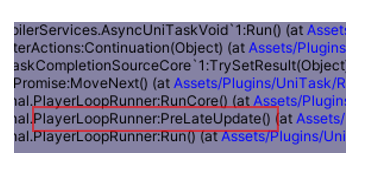
By default, UniTask's PlayerLoop is initialized at `[RuntimeInitializeOnLoadMethod(RuntimeInitializeLoadType.BeforeSceneLoad)]`.
The order in which methods are called in BeforeSceneLoad is nondeterministic, so if you want to use UniTask in other BeforeSceneLoad methods, you should try to initialize it before this.
```csharp
// AfterAssembliesLoaded is called before BeforeSceneLoad
[RuntimeInitializeOnLoadMethod(RuntimeInitializeLoadType.AfterAssembliesLoaded)]
public static void InitUniTaskLoop()
{
var loop = PlayerLoop.GetCurrentPlayerLoop();
Cysharp.Threading.Tasks.PlayerLoopHelper.Initialize(ref loop);
}
```
If you import Unity's `Entities` package, that resets the custom player loop to default at `BeforeSceneLoad` and injects ECS's loop. When Unity calls ECS's inject method after UniTask's initialize method, UniTask will no longer work.
To solve this issue, you can re-initialize the UniTask PlayerLoop after ECS is initialized.
```csharp
// Get ECS Loop.
var playerLoop = ScriptBehaviourUpdateOrder.CurrentPlayerLoop;
// Setup UniTask's PlayerLoop.
PlayerLoopHelper.Initialize(ref playerLoop);
```
You can diagnose whether UniTask's player loop is ready by calling `PlayerLoopHelper.IsInjectedUniTaskPlayerLoop()`. And also `PlayerLoopHelper.DumpCurrentPlayerLoop` logs all current playerloops to console.
```csharp
void Start()
{
UnityEngine.Debug.Log("UniTaskPlayerLoop ready? " + PlayerLoopHelper.IsInjectedUniTaskPlayerLoop());
PlayerLoopHelper.DumpCurrentPlayerLoop();
}
```
You can optimize loop cost slightly by remove unuse PlayerLoopTiming injection. You can call `PlayerLoopHelper.Initialize(InjectPlayerLoopTimings)` on initialize.
```csharp
var loop = PlayerLoop.GetCurrentPlayerLoop();
PlayerLoopHelper.Initialize(ref loop, InjectPlayerLoopTimings.Minimum); // minimum is Update | FixedUpdate | LastPostLateUpdate
```
`InjectPlayerLoopTimings` has three preset, `All` and `Standard`(All without last except LastPostLateUpdate), `Minimum`(`Update | FixedUpdate | LastPostLateUpdate`). Default is All and you can combine custom inject timings like `InjectPlayerLoopTimings.Update | InjectPlayerLoopTimings.FixedUpdate | InjectPlayerLoopTimings.PreLateUpdate`.
You can make error to use uninjected `PlayerLoopTiming` by [Microsoft.CodeAnalysis.BannedApiAnalyzers](https://github.com/dotnet/roslyn-analyzers/blob/master/src/Microsoft.CodeAnalysis.BannedApiAnalyzers/BannedApiAnalyzers.Help.md). For example, you can setup `BannedSymbols.txt` like this for `InjectPlayerLoopTimings.Minimum`.
```txt
F:Cysharp.Threading.Tasks.PlayerLoopTiming.Initialization; Isn't injected this PlayerLoop in this project.
F:Cysharp.Threading.Tasks.PlayerLoopTiming.LastInitialization; Isn't injected this PlayerLoop in this project.
F:Cysharp.Threading.Tasks.PlayerLoopTiming.EarlyUpdate; Isn't injected this PlayerLoop in this project.
F:Cysharp.Threading.Tasks.PlayerLoopTiming.LastEarlyUpdate; Isn't injected this PlayerLoop in this project.d
F:Cysharp.Threading.Tasks.PlayerLoopTiming.LastFixedUpdate; Isn't injected this PlayerLoop in this project.
F:Cysharp.Threading.Tasks.PlayerLoopTiming.PreUpdate; Isn't injected this PlayerLoop in this project.
F:Cysharp.Threading.Tasks.PlayerLoopTiming.LastPreUpdate; Isn't injected this PlayerLoop in this project.
F:Cysharp.Threading.Tasks.PlayerLoopTiming.LastUpdate; Isn't injected this PlayerLoop in this project.
F:Cysharp.Threading.Tasks.PlayerLoopTiming.PreLateUpdate; Isn't injected this PlayerLoop in this project.
F:Cysharp.Threading.Tasks.PlayerLoopTiming.LastPreLateUpdate; Isn't injected this PlayerLoop in this project.
F:Cysharp.Threading.Tasks.PlayerLoopTiming.PostLateUpdate; Isn't injected this PlayerLoop in this project.
F:Cysharp.Threading.Tasks.PlayerLoopTiming.TimeUpdate; Isn't injected this PlayerLoop in this project.
F:Cysharp.Threading.Tasks.PlayerLoopTiming.LastTimeUpdate; Isn't injected this PlayerLoop in this project.
```
You can configure `RS0030` severity to error.
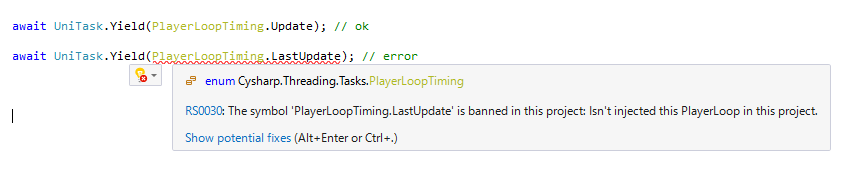
async void vs async UniTaskVoid
---
`async void` is a standard C# task system so it does not run on UniTask systems. It is better not to use it. `async UniTaskVoid` is a lightweight version of `async UniTask` because it does not have awaitable completion and reports errors immediately to `UniTaskScheduler.UnobservedTaskException`. If you don't require awaiting (fire and forget), using `UniTaskVoid` is better. Unfortunately to dismiss warning, you're required to call `Forget()`.
```csharp
public async UniTaskVoid FireAndForgetMethod()
{
// do anything...
await UniTask.Yield();
}
public void Caller()
{
FireAndForgetMethod().Forget();
}
```
Also UniTask has the `Forget` method, it is similar to `UniTaskVoid` and has the same effects. However `UniTaskVoid` is more efficient if you completely don't use `await`。
```csharp
public async UniTask DoAsync()
{
// do anything...
await UniTask.Yield();
}
public void Caller()
{
DoAsync().Forget();
}
```
To use an async lambda registered to an event, don't use `async void`. Instead you can use `UniTask.Action` or `UniTask.UnityAction`, both of which create a delegate via `async UniTaskVoid` lambda.
```csharp
Action actEvent;
UnityAction unityEvent; // especially used in uGUI
// Bad: async void
actEvent += async () => { };
unityEvent += async () => { };
// Ok: create Action delegate by lambda
actEvent += UniTask.Action(async () => { await UniTask.Yield(); });
unityEvent += UniTask.UnityAction(async () => { await UniTask.Yield(); });
```
`UniTaskVoid` can also be used in MonoBehaviour's `Start` method.
```csharp
class Sample : MonoBehaviour
{
async UniTaskVoid Start()
{
// async init code.
}
}
```
UniTaskTracker
---
useful for checking (leaked) UniTasks. You can open tracker window in `Window -> UniTask Tracker`.
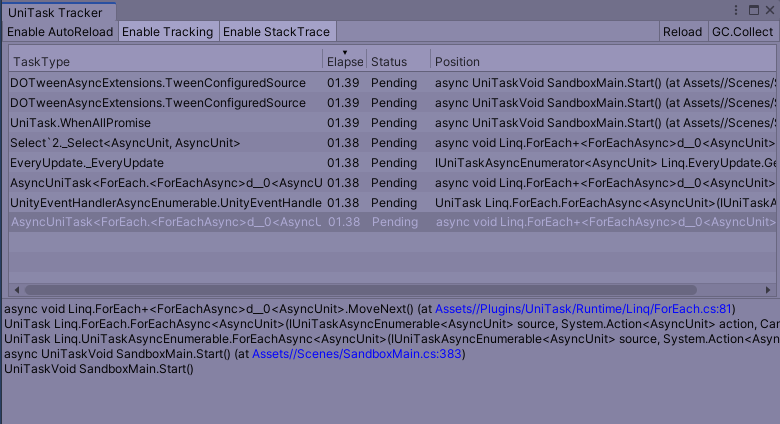
* Enable AutoReload(Toggle) - Reload automatically.
* Reload - Reload view.
* GC.Collect - Invoke GC.Collect.
* Enable Tracking(Toggle) - Start to track async/await UniTask. Performance impact: low.
* Enable StackTrace(Toggle) - Capture StackTrace when task is started. Performance impact: high.
UniTaskTracker is intended for debugging use only as enabling tracking and capturing stacktraces is useful but has a heavy performance impact. Recommended usage is to enable both tracking and stacktraces to find task leaks and to disable them both when done.
External Assets
---
By default, UniTask supports TextMeshPro(`BindTo(TMP_Text)` and `TMP_InputField` event extensions like standard uGUI `InputField`), DOTween(`Tween` as awaitable) and Addressables(`AsyncOperationHandle` and `AsyncOperationHandle` as awaitable).
There are defined in separated asmdefs like `UniTask.TextMeshPro`, `UniTask.DOTween`, `UniTask.Addressables`.
TextMeshPro and Addressables support are automatically enabled when importing their packages from package manager.
However for DOTween support, after importing from the [DOTWeen assets](https://assetstore.unity.com/packages/tools/animation/dotween-hotween-v2-27676r) and define the scripting define symbol `UNITASK_DOTWEEN_SUPPORT` to enable it.
```csharp
// sequential
await transform.DOMoveX(2, 10);
await transform.DOMoveZ(5, 20);
// parallel with cancellation
var ct = this.GetCancellationTokenOnDestroy();
await UniTask.WhenAll(
transform.DOMoveX(10, 3).WithCancellation(ct),
transform.DOScale(10, 3).WithCancellation(ct));
```
DOTween support's default behaviour(`await`, `WithCancellation`, `ToUniTask`) awaits tween is killed. It works on both Complete(true/false) and Kill(true/false). But if you want to reuse tweens (`SetAutoKill(false)`), it does not work as expected. If you want to await for another timing, the following extension methods exist in Tween, `AwaitForComplete`, `AwaitForPause`, `AwaitForPlay`, `AwaitForRewind`, `AwaitForStepComplete`.
AsyncEnumerable and Async LINQ
---
Unity 2020.2 supports C# 8.0 so you can use `await foreach`. This is the new Update notation in the async era.
```csharp
// Unity 2020.2, C# 8.0
await foreach (var _ in UniTaskAsyncEnumerable.EveryUpdate().WithCancellation(token))
{
Debug.Log("Update() " + Time.frameCount);
}
```
In a C# 7.3 environment, you can use the `ForEachAsync` method to work in almost the same way.
```csharp
// C# 7.3(Unity 2018.3~)
await UniTaskAsyncEnumerable.EveryUpdate().ForEachAsync(_ =>
{
Debug.Log("Update() " + Time.frameCount);
}, token);
```
`UniTask.WhenEach` that is similar to .NET 9's `Task.WhenEach` can consume new way for await multiple tasks.
```csharp
await foreach (var result in UniTask.WhenEach(task1, task2, task3))
{
// The result is of type WhenEachResult.
// It contains either `T Result` or `Exception Exception`.
// You can check `IsCompletedSuccessfully` or `IsFaulted` to determine whether to access `.Result` or `.Exception`.
// If you want to throw an exception when `IsFaulted` and retrieve the result when successful, use `GetResult()`.
Debug.Log(result.GetResult());
}
```
UniTaskAsyncEnumerable implements asynchronous LINQ, similar to LINQ in `IEnumerable` or Rx in `IObservable`. All standard LINQ query operators can be applied to asynchronous streams. For example, the following code shows how to apply a Where filter to a button-click asynchronous stream that runs once every two clicks.
```csharp
await okButton.OnClickAsAsyncEnumerable().Where((x, i) => i % 2 == 0).ForEachAsync(_ =>
{
});
```
Fire and Forget style(for example, event handling), you can also use `Subscribe`.
```csharp
okButton.OnClickAsAsyncEnumerable().Where((x, i) => i % 2 == 0).Subscribe(_ =>
{
});
```
Async LINQ is enabled when `using Cysharp.Threading.Tasks.Linq;`, and `UniTaskAsyncEnumerable` is defined in `UniTask.Linq` asmdef.
It's closer to UniRx (Reactive Extensions), but UniTaskAsyncEnumerable is a pull-based asynchronous stream, whereas Rx was a push-based asynchronous stream. Note that although similar, the characteristics are different and the details behave differently along with them.
`UniTaskAsyncEnumerable` is the entry point like `Enumerable`. In addition to the standard query operators, there are other generators for Unity such as `EveryUpdate`, `Timer`, `TimerFrame`, `Interval`, `IntervalFrame`, and `EveryValueChanged`. And also added additional UniTask original query operators like `Append`, `Prepend`, `DistinctUntilChanged`, `ToHashSet`, `Buffer`, `CombineLatest`,`Merge` `Do`, `Never`, `ForEachAsync`, `Pairwise`, `Publish`, `Queue`, `Return`, `SkipUntil`, `TakeUntil`, `SkipUntilCanceled`, `TakeUntilCanceled`, `TakeLast`, `Subscribe`.
The method with Func as an argument has three additional overloads, `***Await`, `***AwaitWithCancellation`.
```csharp
Select(Func selector)
SelectAwait(Func> selector)
SelectAwaitWithCancellation(Func> selector)
```
If you want to use the `async` method inside the func, use the `***Await` or `***AwaitWithCancellation`.
How to create an async iterator: C# 8.0 supports async iterator(`async yield return`) but it only allows `IAsyncEnumerable` and of course requires C# 8.0. UniTask supports `UniTaskAsyncEnumerable.Create` method to create custom async iterator.
```csharp
// IAsyncEnumerable, C# 8.0 version of async iterator. ( do not use this style, IAsyncEnumerable is not controled in UniTask).
public async IAsyncEnumerable MyEveryUpdate([EnumeratorCancellation]CancellationToken cancelationToken = default)
{
var frameCount = 0;
await UniTask.Yield();
while (!token.IsCancellationRequested)
{
yield return frameCount++;
await UniTask.Yield();
}
}
// UniTaskAsyncEnumerable.Create and use `await writer.YieldAsync` instead of `yield return`.
public IUniTaskAsyncEnumerable MyEveryUpdate()
{
// writer(IAsyncWriter) has `YieldAsync(value)` method.
return UniTaskAsyncEnumerable.Create(async (writer, token) =>
{
var frameCount = 0;
await UniTask.Yield();
while (!token.IsCancellationRequested)
{
await writer.YieldAsync(frameCount++); // instead of `yield return`
await UniTask.Yield();
}
});
}
```
Awaitable Events
---
All uGUI component implements `***AsAsyncEnumerable` to convert asynchronous streams of events.
```csharp
async UniTask TripleClick()
{
// In default, used button.GetCancellationTokenOnDestroy to manage lieftime of async
await button.OnClickAsync();
await button.OnClickAsync();
await button.OnClickAsync();
Debug.Log("Three times clicked");
}
// more efficient way
async UniTask TripleClick()
{
using (var handler = button.GetAsyncClickEventHandler())
{
await handler.OnClickAsync();
await handler.OnClickAsync();
await handler.OnClickAsync();
Debug.Log("Three times clicked");
}
}
// use async LINQ
async UniTask TripleClick(CancellationToken token)
{
await button.OnClickAsAsyncEnumerable().Take(3).Last();
Debug.Log("Three times clicked");
}
// use async LINQ2
async UniTask TripleClick(CancellationToken token)
{
await button.OnClickAsAsyncEnumerable().Take(3).ForEachAsync(_ =>
{
Debug.Log("Every clicked");
});
Debug.Log("Three times clicked, complete.");
}
```
All MonoBehaviour message events can convert async-streams by `AsyncTriggers` that can be enabled by `using Cysharp.Threading.Tasks.Triggers;`. AsyncTrigger can be created using `GetAsync***Trigger` and triggers itself as UniTaskAsyncEnumerable.
```csharp
var trigger = this.GetOnCollisionEnterAsyncHandler();
await trigger.OnCollisionEnterAsync();
await trigger.OnCollisionEnterAsync();
await trigger.OnCollisionEnterAsync();
// every moves.
await this.GetAsyncMoveTrigger().ForEachAsync(axisEventData =>
{
});
```
`AsyncReactiveProperty`, `AsyncReadOnlyReactiveProperty` is UniTask's version of ReactiveProperty. `BindTo` extension method of `IUniTaskAsyncEnumerable` for binding asynchronous stream values to Unity components(Text/Selectable/TMP/Text).
```csharp
var rp = new AsyncReactiveProperty(99);
// AsyncReactiveProperty itself is IUniTaskAsyncEnumerable, you can query by LINQ
rp.ForEachAsync(x =>
{
Debug.Log(x);
}, this.GetCancellationTokenOnDestroy()).Forget();
rp.Value = 10; // push 10 to all subscriber
rp.Value = 11; // push 11 to all subscriber
// WithoutCurrent ignore initial value
// BindTo bind stream value to unity components.
rp.WithoutCurrent().BindTo(this.textComponent);
await rp.WaitAsync(); // wait until next value set
// also exists ToReadOnlyAsyncReactiveProperty
var rp2 = new AsyncReactiveProperty(99);
var rorp = rp.CombineLatest(rp2, (x, y) => (x, y)).ToReadOnlyAsyncReactiveProperty(CancellationToken.None);
```
A pull-type asynchronous stream does not get the next values until the asynchronous processing in the sequence is complete. This could spill data from push-type events such as buttons.
```csharp
// can not get click event during 3 seconds complete.
await button.OnClickAsAsyncEnumerable().ForEachAwaitAsync(async x =>
{
await UniTask.Delay(TimeSpan.FromSeconds(3));
});
```
It is useful (prevent double-click) but not useful sometimes.
Using the `Queue()` method will also queue events during asynchronous processing.
```csharp
// queued message in asynchronous processing
await button.OnClickAsAsyncEnumerable().Queue().ForEachAwaitAsync(async x =>
{
await UniTask.Delay(TimeSpan.FromSeconds(3));
});
```
Or use `Subscribe`, fire and forget style.
```csharp
button.OnClickAsAsyncEnumerable().Subscribe(async x =>
{
await UniTask.Delay(TimeSpan.FromSeconds(3));
});
```
Channel
---
`Channel` is the same as [System.Threading.Tasks.Channels](https://docs.microsoft.com/en-us/dotnet/api/system.threading.channels?view=netcore-3.1) which is similar to a GoLang Channel.
Currently it only supports multiple-producer, single-consumer unbounded channels. It can create by `Channel.CreateSingleConsumerUnbounded()`.
For producer(`.Writer`), use `TryWrite` to push value and `TryComplete` to complete channel. For consumer(`.Reader`), use `TryRead`, `WaitToReadAsync`, `ReadAsync`, `Completion` and `ReadAllAsync` to read queued messages.
`ReadAllAsync` returns `IUniTaskAsyncEnumerable` so query LINQ operators. Reader only allows single-consumer but uses `.Publish()` query operator to enable multicast message. For example, make pub/sub utility.
```csharp
public class AsyncMessageBroker : IDisposable
{
Channel channel;
IConnectableUniTaskAsyncEnumerable multicastSource;
IDisposable connection;
public AsyncMessageBroker()
{
channel = Channel.CreateSingleConsumerUnbounded();
multicastSource = channel.Reader.ReadAllAsync().Publish();
connection = multicastSource.Connect(); // Publish returns IConnectableUniTaskAsyncEnumerable.
}
public void Publish(T value)
{
channel.Writer.TryWrite(value);
}
public IUniTaskAsyncEnumerable Subscribe()
{
return multicastSource;
}
public void Dispose()
{
channel.Writer.TryComplete();
connection.Dispose();
}
}
```
vs Awaitable
---
Unity 6 introduces the awaitable type, [Awaitable](https://docs.unity3d.com/6000.0/Documentation/ScriptReference/Awaitable.html). To put it simply, Awaitable can be considered a subset of UniTask, and in fact, Awaitable's design was influenced by UniTask. It should be able to handle PlayerLoop-based awaits, pooled Tasks, and support for cancellation with `CancellationToken` in a similar way. With its inclusion in the standard library, you may wonder whether to continue using UniTask or migrate to Awaitable. Here's a brief guide.
First, the functionality provided by Awaitable is equivalent to what coroutines offer. Instead of `yield return`, you use await; `await NextFrameAsync()` replaces `yield return null`; and there are equivalents for `WaitForSeconds` and `EndOfFrame`. However, that's the extent of it. Being coroutine-based in terms of functionality, it lacks Task-based features. In practical application development using async/await, operations like `WhenAll` are essential. Additionally, UniTask enables many frame-based operations (such as `DelayFrame`) and more flexible PlayerLoopTiming control, which are not available in Awaitable. Of course, there's no Tracker Window either.
Therefore, I recommend using UniTask for application development. UniTask is a superset of Awaitable and includes many essential features. For library development, where you want to avoid external dependencies, using Awaitable as a return type for methods would be appropriate. Awaitable can be converted to UniTask using `AsUniTask`, so there's no issue in handling Awaitable-based functionality within the UniTask library. Of course, if you don't need to worry about dependencies, using UniTask would be the best choice even for library development.
For Unit Testing
---
Unity's `[UnityTest]` attribute can test coroutine(IEnumerator) but can not test async. `UniTask.ToCoroutine` bridges async/await to coroutine so you can test async methods.
```csharp
[UnityTest]
public IEnumerator DelayIgnore() => UniTask.ToCoroutine(async () =>
{
var time = Time.realtimeSinceStartup;
Time.timeScale = 0.5f;
try
{
await UniTask.Delay(TimeSpan.FromSeconds(3), ignoreTimeScale: true);
var elapsed = Time.realtimeSinceStartup - time;
Assert.AreEqual(3, (int)Math.Round(TimeSpan.FromSeconds(elapsed).TotalSeconds, MidpointRounding.ToEven));
}
finally
{
Time.timeScale = 1.0f;
}
});
```
UniTask's own unit tests are written using Unity Test Runner and [Cysharp/RuntimeUnitTestToolkit](https://github.com/Cysharp/RuntimeUnitTestToolkit) to integrate with CI and check if IL2CPP is working.
ThreadPool limitation
---
Most UniTask methods run on a single thread (PlayerLoop), with only `UniTask.Run`(`Task.Run` equivalent) and `UniTask.SwitchToThreadPool` running on a thread pool. If you use a thread pool, it won't work with WebGL and so on.
`UniTask.Run` is now deprecated. You can use `UniTask.RunOnThreadPool` instead. And also consider whether you can use `UniTask.Create` or `UniTask.Void`.
IEnumerator.ToUniTask limitation
---
You can convert coroutine(IEnumerator) to UniTask(or await directly) but it has some limitations.
* `WaitForEndOfFrame`/`WaitForFixedUpdate`/`Coroutine` is not supported.
* Consuming loop timing is not the same as `StartCoroutine`, it uses the specified `PlayerLoopTiming` and the default `PlayerLoopTiming.Update` is run before MonoBehaviour's `Update` and `StartCoroutine`'s loop.
If you want fully compatible conversion from coroutine to async, use the `IEnumerator.ToUniTask(MonoBehaviour coroutineRunner)` overload. It executes StartCoroutine on an instance of the argument MonoBehaviour and waits for it to complete in UniTask.
For UnityEditor
---
UniTask can run on Unity Editor like an Editor Coroutine. However, there are some limitations.
* UniTask.Delay's DelayType.DeltaTime, UnscaledDeltaTime do not work correctly because they can not get deltaTime in editor. Therefore run on EditMode, automatically change DelayType to `DelayType.Realtime` that wait for the right time.
* All PlayerLoopTiming run on the timing `EditorApplication.update`.
* `-batchmode` with `-quit` does not work because Unity does not run `EditorApplication.update` and quit after a single frame. Instead, don't use `-quit` and quit manually with `EditorApplication.Exit(0)`.
Compare with Standard Task API
---
UniTask has many standard Task-like APIs. This table shows what the alternative apis are.
Use standard type.
| .NET Type | UniTask Type |
| --- | --- |
| `IProgress` | --- |
| `CancellationToken` | --- |
| `CancellationTokenSource` | --- |
Use UniTask type.
| .NET Type | UniTask Type |
| --- | --- |
| `Task`/`ValueTask` | `UniTask` |
| `Task`/`ValueTask` | `UniTask` |
| `async void` | `async UniTaskVoid` |
| `+= async () => { }` | `UniTask.Void`, `UniTask.Action`, `UniTask.UnityAction` |
| --- | `UniTaskCompletionSource` |
| `TaskCompletionSource` | `UniTaskCompletionSource`/`AutoResetUniTaskCompletionSource` |
| `ManualResetValueTaskSourceCore` | `UniTaskCompletionSourceCore` |
| `IValueTaskSource` | `IUniTaskSource` |
| `IValueTaskSource` | `IUniTaskSource` |
| `ValueTask.IsCompleted` | `UniTask.Status.IsCompleted()` |
| `ValueTask.IsCompleted` | `UniTask.Status.IsCompleted()` |
| `new Progress` | `Progress.Create` |
| `CancellationToken.Register(UnsafeRegister)` | `CancellationToken.RegisterWithoutCaptureExecutionContext` |
| `CancellationTokenSource.CancelAfter` | `CancellationTokenSource.CancelAfterSlim` |
| `Channel.CreateUnbounded(false){ SingleReader = true }` | `Channel.CreateSingleConsumerUnbounded` |
| `IAsyncEnumerable` | `IUniTaskAsyncEnumerable` |
| `IAsyncEnumerator` | `IUniTaskAsyncEnumerator` |
| `IAsyncDisposable` | `IUniTaskAsyncDisposable` |
| `Task.Delay` | `UniTask.Delay` |
| `Task.Yield` | `UniTask.Yield` |
| `Task.Run` | `UniTask.RunOnThreadPool` |
| `Task.WhenAll` | `UniTask.WhenAll` |
| `Task.WhenAny` | `UniTask.WhenAny` |
| `Task.WhenEach` | `UniTask.WhenEach` |
| `Task.CompletedTask` | `UniTask.CompletedTask` |
| `Task.FromException` | `UniTask.FromException` |
| `Task.FromResult` | `UniTask.FromResult` |
| `Task.FromCanceled` | `UniTask.FromCanceled` |
| `Task.ContinueWith` | `UniTask.ContinueWith` |
| `TaskScheduler.UnobservedTaskException` | `UniTaskScheduler.UnobservedTaskException` |
Pooling Configuration
---
UniTask aggressively caches async promise objects to achieve zero allocation (for technical details, see blog post [UniTask v2 — Zero Allocation async/await for Unity, with Asynchronous LINQ](https://medium.com/@neuecc/unitask-v2-zero-allocation-async-await-for-unity-with-asynchronous-linq-1aa9c96aa7dd)). By default, it caches all promises but you can configure `TaskPool.SetMaxPoolSize` to your value, the value indicates cache size per type. `TaskPool.GetCacheSizeInfo` returns currently cached objects in pool.
```csharp
foreach (var (type, size) in TaskPool.GetCacheSizeInfo())
{
Debug.Log(type + ":" + size);
}
```
Allocation on Profiler
---
In UnityEditor the profiler shows allocation of compiler generated AsyncStateMachine but it only occurs in debug(development) build. C# Compiler generates AsyncStateMachine as class on Debug build and as struct on Release build.
Unity supports Code Optimization option starting in 2020.1 (right, footer).

You can change C# compiler optimization to release to remove AsyncStateMachine allocation in development builds. This optimization option can also be set via `Compilation.CompilationPipeline-codeOptimization`, and `Compilation.CodeOptimization`.
UniTaskSynchronizationContext
---
Unity's default SynchronizationContext(`UnitySynchronizationContext`) is a poor implementation for performance. UniTask bypasses `SynchronizationContext`(and `ExecutionContext`) so it does not use it but if exists in `async Task`, still used it. `UniTaskSynchronizationContext` is a replacement of `UnitySynchronizationContext` which is better for performance.
```csharp
public class SyncContextInjecter
{
[RuntimeInitializeOnLoadMethod(RuntimeInitializeLoadType.SubsystemRegistration)]
public static void Inject()
{
SynchronizationContext.SetSynchronizationContext(new UniTaskSynchronizationContext());
}
}
```
This is an optional choice and is not always recommended; `UniTaskSynchronizationContext` is less performant than `async UniTask` and is not a complete UniTask replacement. It also does not guarantee full behavioral compatibility with the `UnitySynchronizationContext`.
API References
---
UniTask's API References are hosted at [cysharp.github.io/UniTask](https://cysharp.github.io/UniTask/api/Cysharp.Threading.Tasks.html) by [DocFX](https://dotnet.github.io/docfx/) and [Cysharp/DocfXTemplate](https://github.com/Cysharp/DocfxTemplate).
For example, UniTask's factory methods can be seen at [UniTask#methods](https://cysharp.github.io/UniTask/api/Cysharp.Threading.Tasks.UniTask.html#methods-1). UniTaskAsyncEnumerable's factory/extension methods can be seen at [UniTaskAsyncEnumerable#methods](https://cysharp.github.io/UniTask/api/Cysharp.Threading.Tasks.Linq.UniTaskAsyncEnumerable.html#methods-1).
UPM Package
---
### Install via git URL
Requires a version of unity that supports path query parameter for git packages (Unity >= 2019.3.4f1, Unity >= 2020.1a21). You can add `https://github.com/Cysharp/UniTask.git?path=src/UniTask/Assets/Plugins/UniTask` to Package Manager


or add `"com.cysharp.unitask": "https://github.com/Cysharp/UniTask.git?path=src/UniTask/Assets/Plugins/UniTask"` to `Packages/manifest.json`.
If you want to set a target version, UniTask uses the `*.*.*` release tag so you can specify a version like `#2.1.0`. For example `https://github.com/Cysharp/UniTask.git?path=src/UniTask/Assets/Plugins/UniTask#2.1.0`.
.NET Core
---
For .NET Core, use NuGet.
> PM> Install-Package [UniTask](https://www.nuget.org/packages/UniTask)
UniTask of .NET Core version is a subset of Unity UniTask with PlayerLoop dependent methods removed.
It runs at higher performance than the standard Task/ValueTask, but you should be careful to ignore the ExecutionContext/SynchronizationContext when using it. `AsyncLocal` also does not work because it ignores ExecutionContext.
If you use UniTask internally, but provide ValueTask as an external API, you can write it like the following(Inspired by [PooledAwait](https://github.com/mgravell/PooledAwait)).
```csharp
public class ZeroAllocAsyncAwaitInDotNetCore
{
public ValueTask DoAsync(int x, int y)
{
return Core(this, x, y);
static async UniTask Core(ZeroAllocAsyncAwaitInDotNetCore self, int x, int y)
{
// do anything...
await Task.Delay(TimeSpan.FromSeconds(x + y));
await UniTask.Yield();
return 10;
}
}
}
// UniTask does not return to original SynchronizationContext but you can use helper `ReturnToCurrentSynchronizationContext`.
public ValueTask TestAsync()
{
await using (UniTask.ReturnToCurrentSynchronizationContext())
{
await UniTask.SwitchToThreadPool();
// do anything..
}
}
```
.NET Core version is intended to allow users to use UniTask as an interface when sharing code with Unity (such as [Cysharp/MagicOnion](https://github.com/Cysharp/MagicOnion/)). .NET Core version of UniTask enables smooth code sharing.
Utility methods such as WhenAll which are equivalent to UniTask are provided as [Cysharp/ValueTaskSupplement](https://github.com/Cysharp/ValueTaskSupplement).
License
---
This library is under the MIT License.
================================================
FILE: README_CN.md
================================================
UniTask
===
[](https://github.com/Cysharp/UniTask/actions) [](https://github.com/Cysharp/UniTask/releases)
为Unity提供一个高性能,零堆内存分配的 async/await 异步方案。
- 基于值类型的`UniTask`和自定义的 AsyncMethodBuilder 来实现零堆内存分配
- 使所有 Unity 的 AsyncOperations 和 Coroutines 可等待
- 基于 PlayerLoop 的任务(`UniTask.Yield`,`UniTask.Delay`,`UniTask.DelayFrame`等..)可以替换所有协程操作
- 对 MonoBehaviour 消息事件和 uGUI 事件进行可等待/异步枚举扩展
- 完全在 Unity 的 PlayerLoop 上运行,因此不使用Thread,并且同样能在 WebGL、wasm 等平台上运行。
- 带有 Channel 和 AsyncReactiveProperty 的异步 LINQ
- 提供一个 TaskTracker EditorWindow 以追踪所有 UniTask 分配来预防内存泄漏
- 与原生 Task/ValueTask/IValueTaskSource 高度兼容的行为
有关技术细节,请参阅博客文章:[UniTask v2 — 适用于 Unity 的零堆内存分配的async/await,支持异步 LINQ](https://medium.com/@neuecc/unitask-v2-zero-allocation-async-await-for-unity-with-asynchronous-linq-1aa9c96aa7dd)
有关高级技巧,请参阅博客文章:[通过异步装饰器模式扩展 UnityWebRequest — UniTask 的高级技术](https://medium.com/@neuecc/extends-unitywebrequest-via-async-decorator-pattern-advanced-techniques-of-unitask-ceff9c5ee846)
## 目录
- [入门](#%E5%85%A5%E9%97%A8)
- [UniTask 和 AsyncOperation 的基础知识](#unitask-%E5%92%8C-asyncoperation-%E7%9A%84%E5%9F%BA%E7%A1%80%E7%9F%A5%E8%AF%86)
- [取消和异常处理](#%E5%8F%96%E6%B6%88%E5%92%8C%E5%BC%82%E5%B8%B8%E5%A4%84%E7%90%86)
- [超时处理](#%E8%B6%85%E6%97%B6%E5%A4%84%E7%90%86)
- [进度](#%E8%BF%9B%E5%BA%A6)
- [PlayerLoop](#playerloop)
- [async void 与 async UniTaskVoid 对比](#async-void-%E4%B8%8E-async-unitaskvoid-%E5%AF%B9%E6%AF%94)
- [UniTaskTracker](#unitasktracker)
- [外部拓展](#%E5%A4%96%E9%83%A8%E6%8B%93%E5%B1%95)
- [AsyncEnumerable 和 Async LINQ](#asyncenumerable-%E5%92%8C-async-linq)
- [可等待事件](#%E5%8F%AF%E7%AD%89%E5%BE%85%E4%BA%8B%E4%BB%B6)
- [Channel](#channel)
- [与 Awaitable 对比](#%E4%B8%8E-awaitable-%E5%AF%B9%E6%AF%94)
- [单元测试](#%E5%8D%95%E5%85%83%E6%B5%8B%E8%AF%95)
- [线程池的限制](#%E7%BA%BF%E7%A8%8B%E6%B1%A0%E7%9A%84%E9%99%90%E5%88%B6)
- [IEnumerator.ToUniTask 的限制](#ienumeratortounitask-%E7%9A%84%E9%99%90%E5%88%B6)
- [关于 UnityEditor](#%E5%85%B3%E4%BA%8E-unityeditor)
- [与原生 Task API 对比](#%E4%B8%8E%E5%8E%9F%E7%94%9F-task-api-%E5%AF%B9%E6%AF%94)
- [池化配置](#%E6%B1%A0%E5%8C%96%E9%85%8D%E7%BD%AE)
- [Profiler 下的堆内存分配](#profiler-%E4%B8%8B%E7%9A%84%E5%A0%86%E5%86%85%E5%AD%98%E5%88%86%E9%85%8D)
- [UniTaskSynchronizationContext](#unitasksynchronizationcontext)
- [API 文档](#api-%E6%96%87%E6%A1%A3)
- [UPM 包](#upm-%E5%8C%85)
- [通过 git URL 安装](#%E9%80%9A%E8%BF%87-git-url-%E5%AE%89%E8%A3%85)
- [关于 .NET Core](#%E5%85%B3%E4%BA%8E-net-core)
- [许可证](#%E8%AE%B8%E5%8F%AF%E8%AF%81)
入门
---
通过[UniTask/releases](https://github.com/Cysharp/UniTask/releases)页面中提供的[UPM 包](https://github.com/Cysharp/UniTask#upm-package)或资产包(`UniTask.*.*.*.unitypackage`)安装。
```csharp
// 使用 UniTask 所需的命名空间
using Cysharp.Threading.Tasks;
// 您可以返回一个形如 UniTask(或 UniTask) 的类型,这种类型事为Unity定制的,作为替代原生 Task 的轻量级方案
// 为 Unity 集成的零堆内存分配,快速调用,0消耗的 async/await 方案
async UniTask DemoAsync()
{
// 您可以等待一个 Unity 异步对象
var asset = await Resources.LoadAsync("foo");
var txt = (await UnityWebRequest.Get("https://...").SendWebRequest()).downloadHandler.text;
await SceneManager.LoadSceneAsync("scene2");
// .WithCancellation 会启用取消功能,GetCancellationTokenOnDestroy 表示获取一个依赖对象生命周期的 Cancel 句柄,当对象被销毁时,将会调用这个 Cancel 句柄,从而实现取消的功能
// 在 Unity 2022.2之后,您可以在 MonoBehaviour 中使用`destroyCancellationToken`
var asset2 = await Resources.LoadAsync("bar").WithCancellation(this.GetCancellationTokenOnDestroy());
// .ToUniTask 可接收一个 progress 回调以及一些配置参数,Progress.Create 是 IProgress 的轻量级替代方案
var asset3 = await Resources.LoadAsync("baz").ToUniTask(Progress.Create(x => Debug.Log(x)));
// 等待一个基于帧的延时操作(就像一个协程一样)
await UniTask.DelayFrame(100);
// yield return new WaitForSeconds/WaitForSecondsRealtime 的替代方案
await UniTask.Delay(TimeSpan.FromSeconds(10), ignoreTimeScale: false);
// 可以等待任何 playerloop 的生命周期(PreUpdate,Update,LateUpdate等)
await UniTask.Yield(PlayerLoopTiming.PreLateUpdate);
// yield return null 的替代方案
await UniTask.Yield();
await UniTask.NextFrame();
// WaitForEndOfFrame 的替代方案
#if UNITY_2023_1_OR_NEWER
await UniTask.WaitForEndOfFrame();
#else
// 需要 MonoBehaviour(CoroutineRunner)
await UniTask.WaitForEndOfFrame(this); // this是一个 MonoBehaviour
#endif
// yield return new WaitForFixedUpdate 的替代方案,(等同于 UniTask.Yield(PlayerLoopTiming.FixedUpdate))
await UniTask.WaitForFixedUpdate();
// yield return WaitUntil 的替代方案
await UniTask.WaitUntil(() => isActive == false);
// WaitUntil 扩展,指定某个值改变时触发
await UniTask.WaitUntilValueChanged(this, x => x.isActive);
// 您可以直接 await 一个 IEnumerator 协程
await FooCoroutineEnumerator();
// 您可以直接 await 一个原生 task
await Task.Run(() => 100);
// 多线程示例,在此行代码后的内容都运行在一个线程池上
await UniTask.SwitchToThreadPool();
/* 工作在线程池上的代码 */
// 转回主线程(等同于 UniRx 的`ObserveOnMainThread`)
await UniTask.SwitchToMainThread();
// 获取异步的 webrequest
async UniTask GetTextAsync(UnityWebRequest req)
{
var op = await req.SendWebRequest();
return op.downloadHandler.text;
}
var task1 = GetTextAsync(UnityWebRequest.Get("http://google.com"));
var task2 = GetTextAsync(UnityWebRequest.Get("http://bing.com"));
var task3 = GetTextAsync(UnityWebRequest.Get("http://yahoo.com"));
// 构造一个 async-wait,并通过元组语义轻松获取所有结果
var (google, bing, yahoo) = await UniTask.WhenAll(task1, task2, task3);
// WhenAll 的简写形式,元组可以直接 await
var (google2, bing2, yahoo2) = await (task1, task2, task3);
// 返回一个异步值,或者您也可以使用`UniTask`(无结果),`UniTaskVoid`(不可等待)
return (asset as TextAsset)?.text ?? throw new InvalidOperationException("Asset not found");
}
```
UniTask 和 AsyncOperation 的基础知识
---
UniTask 功能依赖于 C# 7.0([task-like custom async method builder feature](https://github.com/dotnet/roslyn/blob/master/docs/features/task-types.md)),所以需要`Unity 2018.3`之后的版本,官方支持的最低版本是`Unity 2018.4.13f1`。
为什么需要 UniTask(自定义task对象)?因为原生 Task 太重,与 Unity 线程(单线程)相性不好。因为 Unity 的异步对象由 Unity 的引擎层自动调度,所以 UniTask 不使用线程和 SynchronizationContext/ExecutionContext。它实现了更快和更低的分配,并且与Unity完全兼容。
您可以在使用`using Cysharp.Threading.Tasks;`时对`AsyncOperation`,`ResourceRequest`,`AssetBundleRequest`,`AssetBundleCreateRequest`,`UnityWebRequestAsyncOperation`,`AsyncGPUReadbackRequest`,`IEnumerator`以及其他的异步操作进行 await
UniTask 提供了三种模式的扩展方法。
```csharp
await asyncOperation;
.WithCancellation(CancellationToken);
.ToUniTask(IProgress, PlayerLoopTiming, CancellationToken);
```
`WithCancellation`是`ToUniTask`的简化版本,两者都返回`UniTask`。有关 cancellation 的详细信息,请参阅:[取消和异常处理](https://github.com/Cysharp/UniTask#cancellation-and-exception-handling)部分。
> 注意:await 会在 PlayerLoop 执行await对象的相应native生命周期方法时返回(如果条件满足的话),而 WithCancellation 和 ToUniTask 是从指定的 PlayerLoop 生命周期执行时返回。有关 PlayLoop生命周期 的详细信息,请参阅:[PlayerLoop](https://github.com/Cysharp/UniTask#playerloop)部分。
> 注意: AssetBundleRequest 有`asset`和`allAssets`,默认 await 返回`asset`。如果您想得到`allAssets`,您可以使用`AwaitForAllAssets()`方法。
`UniTask`可以使用`UniTask.WhenAll`,`UniTask.WhenAny`,`UniTask.WhenEach`等实用函数。它们就像`Task.WhenAll`和`Task.WhenAny`,但它们返回的数据类型更好用。它们会返回值元组,因此您可以传递多种类型并解构每个结果。
```csharp
public async UniTaskVoid LoadManyAsync()
{
// 并行加载.
var (a, b, c) = await UniTask.WhenAll(
LoadAsSprite("foo"),
LoadAsSprite("bar"),
LoadAsSprite("baz"));
}
async UniTask LoadAsSprite(string path)
{
var resource = await Resources.LoadAsync(path);
return (resource as Sprite);
}
```
如果您想要将一个回调转换为 UniTask,您可以使用`UniTaskCompletionSource`,它是`TaskCompletionSource`的轻量级版本。
```csharp
public UniTask WrapByUniTaskCompletionSource()
{
var utcs = new UniTaskCompletionSource();
// 当操作完成时,调用 utcs.TrySetResult();
// 当操作失败时,调用 utcs.TrySetException();
// 当操作取消时,调用 utcs.TrySetCanceled();
return utcs.Task; //本质上就是返回了一个 UniTask
}
```
您可以进行如下转换:
-`Task` -> `UniTask `:使用`AsUniTask`
-`UniTask` -> `UniTask`:使用 `AsAsyncUnitUniTask`
-`UniTask` -> `UniTask`:使用 `AsUniTask`。`UniTask` -> `UniTask`的转换是无消耗的。
如果您想将异步转换为协程,您可以使用`.ToCoroutine()`,这对于您想只允许使用协程系统大有帮助。
UniTask 不能 await 两次。这是与.NET Standard 2.1 中引入的[ValueTask/IValueTaskSource](https://docs.microsoft.com/en-us/dotnet/api/system.threading.tasks.valuetask-1?view=netcore-3.1)具有相同的约束。
> 千万不要对 `ValueTask` 实例执行以下操作:
>
> - 多次await实例。
> - 多次调用 AsTask。
> - 在操作尚未完成时调用 .Result 或 .GetAwaiter().GetResult(),或对它们进行多次调用。
> - 对实例进行上述多种操作。
>
> 如果您执行了上述任何操作,则结果是未定义的。
```csharp
var task = UniTask.DelayFrame(10);
await task;
await task; // 错误,抛出异常
```
如果实在需要多次 await 一个异步操作,可以使用支持多次调用的`UniTask.Lazy`。`.Preserve()`同样允许多次调用(由 UniTask 内部缓存结果)。这种方法在函数范围内有多次调用时很有用。
同样的,`UniTaskCompletionSource`可以在同一个地方被 await 多次,或者在很多不同的地方被 await。
取消和异常处理
---
一些 UniTask 工厂方法中有一个`CancellationToken cancellationToken = default`参数。Unity 的一些异步操作也有`WithCancellation(CancellationToken)`和`ToUniTask(..., CancellationToken cancellation = default)`扩展方法。
可以通过原生的[`CancellationTokenSource`](https://docs.microsoft.com/en-us/dotnet/api/system.threading.cancellationtokensource)将 CancellationToken 传递给参数
```csharp
var cts = new CancellationTokenSource();
cancelButton.onClick.AddListener(() =>
{
cts.Cancel();
});
await UnityWebRequest.Get("http://google.co.jp").SendWebRequest().WithCancellation(cts.Token);
await UniTask.DelayFrame(1000, cancellationToken: cts.Token);
```
CancellationToken 可通过`CancellationTokenSource`或 MonoBehaviour 的扩展方法`GetCancellationTokenOnDestroy`来创建。
```csharp
// 这个 CancellationToken 的生命周期与 GameObject 的相同
await UniTask.DelayFrame(1000, cancellationToken: this.GetCancellationTokenOnDestroy());
```
对于链式取消,建议所有异步方法的最后一个参数都接受`CancellationToken cancellationToken`,并将`CancellationToken`从头传递到尾。
```csharp
await FooAsync(this.GetCancellationTokenOnDestroy());
// ---
async UniTask FooAsync(CancellationToken cancellationToken)
{
await BarAsync(cancellationToken);
}
async UniTask BarAsync(CancellationToken cancellationToken)
{
await UniTask.Delay(TimeSpan.FromSeconds(3), cancellationToken);
}
```
`CancellationToken`代表了异步操作的生命周期。您可以不使用默认的 CancellationTokenOnDestroy ,通过自定义的`CancellationToken`自行管理生命周期。
```csharp
public class MyBehaviour : MonoBehaviour
{
CancellationTokenSource disableCancellation = new CancellationTokenSource();
CancellationTokenSource destroyCancellation = new CancellationTokenSource();
private void OnEnable()
{
if (disableCancellation != null)
{
disableCancellation.Dispose();
}
disableCancellation = new CancellationTokenSource();
}
private void OnDisable()
{
disableCancellation.Cancel();
}
private void OnDestroy()
{
destroyCancellation.Cancel();
destroyCancellation.Dispose();
}
}
```
在Unity 2022.2之后,Unity在[MonoBehaviour.destroyCancellationToken](https://docs.unity3d.com/ScriptReference/MonoBehaviour-destroyCancellationToken.html)和[Application.exitCancellationToken](https://docs.unity3d.com/ScriptReference/Application-exitCancellationToken.html)中添加了 CancellationToken。
当检测到取消时,所有方法都会向上游抛出并传播`OperationCanceledException`。当异常(不限于`OperationCanceledException`)没有在异步方法中处理时,它将被传播到`UniTaskScheduler.UnobservedTaskException`。默认情况下,将接收到的未处理异常作为一般异常写入日志。可以使用`UniTaskScheduler.UnobservedExceptionWriteLogType`更改日志级别。若想对接收到未处理异常时的处理进行自定义,请为`UniTaskScheduler.UnobservedTaskException`设置一个委托
而`OperationCanceledException`是一种特殊的异常,会被`UnobservedTaskException`无视
如果要取消异步 UniTask 方法中的行为,请手动抛出`OperationCanceledException`。
```csharp
public async UniTask FooAsync()
{
await UniTask.Yield();
throw new OperationCanceledException();
}
```
如果您只想处理异常,忽略取消操作(让其传播到全局处理 cancellation 的地方),请使用异常过滤器。
```csharp
public async UniTask BarAsync()
{
try
{
var x = await FooAsync();
return x * 2;
}
catch (Exception ex) when (!(ex is OperationCanceledException)) // 在 C# 9.0 下改成 when (ex is not OperationCanceledException)
{
return -1;
}
}
```
抛出和捕获`OperationCanceledException`有点重度,如果比较在意性能开销,请使用`UniTask.SuppressCancellationThrow`以避免抛出 OperationCanceledException 。它将返回`(bool IsCanceled, T Result)`而不是抛出异常。
```csharp
var (isCanceled, _) = await UniTask.DelayFrame(10, cancellationToken: cts.Token).SuppressCancellationThrow();
if (isCanceled)
{
// ...
}
```
注意:仅当您在源头处直接调用`UniTask.SuppressCancellationThrow`时才会抑制异常抛出。否则,返回值将被转换,且整个管道不会抑制异常抛出。
`UniTask.Yield`和`UniTask.Delay`等功能依赖于 Unity 的 PlayerLoop,它们在 PlayerLoop 中确定`CancellationToken`状态。
这意味着当`CancellationToken`被触发时,它们并不会立即取消。
如果要更改此行为,实现立即取消,可将`cancelImmediately`标志设置为 true。
```csharp
await UniTask.Yield(cancellationToken, cancelImmediately: true);
```
注意:比起默认行为,设置 `cancelImmediately` 为 true 并检测立即取消会有更多的性能开销。
这是因为它使用了`CancellationToken.Register`;这比在 PlayerLoop 中检查 CancellationToken 更重度。
超时处理
---
超时是取消的一种变体。您可以通过`CancellationTokenSouce.CancelAfterSlim(TimeSpan)`设置超时并将 CancellationToken 传递给异步方法。
```csharp
var cts = new CancellationTokenSource();
cts.CancelAfterSlim(TimeSpan.FromSeconds(5)); // 设置5s超时。
try
{
await UnityWebRequest.Get("http://foo").SendWebRequest().WithCancellation(cts.Token);
}
catch (OperationCanceledException ex)
{
if (ex.CancellationToken == cts.Token)
{
UnityEngine.Debug.Log("Timeout");
}
}
```
> `CancellationTokenSouce.CancelAfter`是一个原生的 api。但是在 Unity 中您不应该使用它,因为它依赖于线程计时器。`CancelAfterSlim`是 UniTask 的扩展方法,它使用 PlayerLoop 代替了线程计时器。
如果您想将超时与其他 cancellation 一起使用,请使用`CancellationTokenSource.CreateLinkedTokenSource`。
```csharp
var cancelToken = new CancellationTokenSource();
cancelButton.onClick.AddListener(()=>
{
cancelToken.Cancel(); // 点击按钮后取消。
});
var timeoutToken = new CancellationTokenSource();
timeoutToken.CancelAfterSlim(TimeSpan.FromSeconds(5)); // 设置5s超时。
try
{
// 链接 token
var linkedTokenSource = CancellationTokenSource.CreateLinkedTokenSource(cancelToken.Token, timeoutToken.Token);
await UnityWebRequest.Get("http://foo").SendWebRequest().WithCancellation(linkedTokenSource.Token);
}
catch (OperationCanceledException ex)
{
if (timeoutToken.IsCancellationRequested)
{
UnityEngine.Debug.Log("Timeout.");
}
else if (cancelToken.IsCancellationRequested)
{
UnityEngine.Debug.Log("Cancel clicked.");
}
}
```
为减少每次调用异步方法时用于超时的 CancellationTokenSource 的堆内存分配,您可以使用 UniTask 的`TimeoutController`进行优化。
```csharp
TimeoutController timeoutController = new TimeoutController(); // 提前创建好,以便复用。
async UniTask FooAsync()
{
try
{
// 您可以通过 timeoutController.Timeout(TimeSpan) 把超时设置传递到 cancellationToken。
await UnityWebRequest.Get("http://foo").SendWebRequest()
.WithCancellation(timeoutController.Timeout(TimeSpan.FromSeconds(5)));
timeoutController.Reset(); // 当 await 完成后调用 Reset(停止超时计时器,并准备下一次复用)。
}
catch (OperationCanceledException ex)
{
if (timeoutController.IsTimeout())
{
UnityEngine.Debug.Log("timeout");
}
}
}
```
如果您想将超时结合其他取消源一起使用,请使用`new TimeoutController(CancellationToken)`.
```csharp
TimeoutController timeoutController;
CancellationTokenSource clickCancelSource;
void Start()
{
this.clickCancelSource = new CancellationTokenSource();
this.timeoutController = new TimeoutController(clickCancelSource);
}
```
注意:UniTask 有`.Timeout`,`.TimeoutWithoutException`方法,但如果可以的话,尽量不要使用这些方法,请传递`CancellationToken`。因为`.Timeout`是在任务外部执行,所以无法停止超时任务。`.Timeout`意味着超时后忽略结果。如果您将一个`CancellationToken`传递给该方法,它将从任务内部执行,因此可以停止正在运行的任务。
进度
---
一些 Unity 的异步操作具有`ToUniTask(IProgress progress = null, ...)`的扩展方法。
```csharp
var progress = Progress.Create(x => Debug.Log(x));
var request = await UnityWebRequest.Get("http://google.co.jp")
.SendWebRequest()
.ToUniTask(progress: progress);
```
您不应该使用原生的`new System.Progress`,因为每次调用它都会产生堆内存分配。请改用`Cysharp.Threading.Tasks.Progress`。这个 progress 工厂类有两个方法,`Create`和`CreateOnlyValueChanged`。`CreateOnlyValueChanged`仅在进度值更新时调用。
为调用者实现 IProgress 接口会更好,这样不会因使用 lambda 而产生堆内存分配。
```csharp
public class Foo : MonoBehaviour, IProgress
{
public void Report(float value)
{
UnityEngine.Debug.Log(value);
}
public async UniTaskVoid WebRequest()
{
var request = await UnityWebRequest.Get("http://google.co.jp")
.SendWebRequest()
.ToUniTask(progress: this);
}
}
```
PlayerLoop
---
UniTask 运行在自定义的[PlayerLoop](https://docs.unity3d.com/ScriptReference/LowLevel.PlayerLoop.html)中。UniTask 中基于 PlayerLoop 的方法(如`Delay`、`DelayFrame`、`asyncOperation.ToUniTask`等)接受这个`PlayerLoopTiming`。
```csharp
public enum PlayerLoopTiming
{
Initialization = 0,
LastInitialization = 1,
EarlyUpdate = 2,
LastEarlyUpdate = 3,
FixedUpdate = 4,
LastFixedUpdate = 5,
PreUpdate = 6,
LastPreUpdate = 7,
Update = 8,
LastUpdate = 9,
PreLateUpdate = 10,
LastPreLateUpdate = 11,
PostLateUpdate = 12,
LastPostLateUpdate = 13
#if UNITY_2020_2_OR_NEWER
TimeUpdate = 14,
LastTimeUpdate = 15,
#endif
}
```
它表明了异步任务会在哪个时机运行,您可以查阅[PlayerLoopList.md](https://gist.github.com/neuecc/bc3a1cfd4d74501ad057e49efcd7bdae)以了解 Unity 的默认 PlayerLoop 以及注入的 UniTask 的自定义循环。
`PlayerLoopTiming.Update`与协程中的`yield return null`类似,但它会在`ScriptRunBehaviourUpdate`时,Update(Update 和 uGUI 事件(button.onClick等)之前被调用,而 yield return null 是在`ScriptRunDelayedDynamicFrameRate`时被调用。`PlayerLoopTiming.FixedUpdate`类似于`WaitForFixedUpdate`。
> `PlayerLoopTiming.LastPostLateUpdate`不等同于协程的`yield return new WaitForEndOfFrame()`。协程的 WaitForEndOfFrame 似乎在 PlayerLoop 完成后运行。一些需要协程结束帧的方法(`Texture2D.ReadPixels`,`ScreenCapture.CaptureScreenshotAsTexture`,`CommandBuffer`等)在 async/await 时无法正常工作。在这些情况下,请将 MonoBehaviour(用于运行协程)传递给`UniTask.WaitForEndOfFrame`。例如,`await UniTask.WaitForEndOfFrame(this);`是`yield return new WaitForEndOfFrame()`轻量级无堆内存分配的替代方案。
> 注意:在 Unity 2023.1或更高的版本中,`await UniTask.WaitForEndOfFrame();`不再需要 MonoBehaviour。因为它使用了`UnityEngine.Awaitable.EndOfFrameAsync`。
`yield return null`和`UniTask.Yield`相似但不同。`yield return null`总是返回下一帧但`UniTask.Yield`返回下一次调用。也就是说,`UniTask.Yield(PlayerLoopTiming.Update)`在 `PreUpdate`上调用,它返回同一帧。`UniTask.NextFrame()`保证返回下一帧,您可以认为它的行为与`yield return null`一致。
> UniTask.Yield(不带 CancellationToken)是一种特殊类型,返回`YieldAwaitable`并在 YieldRunner 上运行。它是最轻量和最快的。
`AsyncOperation`在原生生命周期返回。例如,await `SceneManager.LoadSceneAsync`在`EarlyUpdate.UpdatePreloading`时返回,在此之后,在`EarlyUpdate.ScriptRunDelayedStartupFrame`时调用已加载场景的`Start`方法。同样的,`await UnityWebRequest`在`EarlyUpdate.ExecuteMainThreadJobs`时返回。
在 UniTask 中,直接 await 使用的是原生生命周期,而`WithCancellation`和`ToUniTask`使用的特定的生命周期。这通常不会有问题,但对于`LoadSceneAsync`,它会导致`Start`方法与 await 之后的逻辑的执行顺序错乱。所以建议不要使用`LoadSceneAsync.ToUniTask`。
> 注意:在 Unity 2023.1或更高的版本中,当您使用新的`UnityEngine.Awaitable`方法(如`SceneManager.LoadSceneAsync`)时,请确保您的文件的 using 指令区域中包含`using UnityEngine;`。
> 这可以通过避免使用`UnityEngine.AsyncOperation`版本来防止编译错误。
在堆栈跟踪中,您可以检查它在 PlayerLoop 中的运行位置。

默认情况下,UniTask 的 PlayerLoop 在`[RuntimeInitializeOnLoadMethod(RuntimeInitializeLoadType.BeforeSceneLoad)]`初始化。
在 BeforeSceneLoad 中调用的方法,它们的执行顺序是不确定的,所以如果您想在其他 BeforeSceneLoad 方法中使用 UniTask,您应该尝试在此之前初始化好 PlayerLoop。
```csharp
// AfterAssembliesLoaded 表示将会在 BeforeSceneLoad 之前调用
[RuntimeInitializeOnLoadMethod(RuntimeInitializeLoadType.AfterAssembliesLoaded)]
public static void InitUniTaskLoop()
{
var loop = PlayerLoop.GetCurrentPlayerLoop();
Cysharp.Threading.Tasks.PlayerLoopHelper.Initialize(ref loop);
}
```
如果您导入了 Unity 的`Entities`包,则会在`BeforeSceneLoad`将自定义 PlayerLoop 重置为默认值,并注入 ECS 的循环。当 Unity 在 UniTask 的初始化方法执行之后调用了 ECS 的注入方法,UniTask 将不再起作用。
为了解决这个问题,您可以在 ECS 初始化后重新初始化 UniTask PlayerLoop。
```csharp
// 获取 ECS Loop。
var playerLoop = ScriptBehaviourUpdateOrder.CurrentPlayerLoop;
// 设置 UniTask PlayerLoop。
PlayerLoopHelper.Initialize(ref playerLoop);
```
您可以通过调用`PlayerLoopHelper.IsInjectedUniTaskPlayerLoop()`来诊断 UniTask 的 PlayerLoop 是否准备就绪。并且`PlayerLoopHelper.DumpCurrentPlayerLoop`还会将所有当前 PlayerLoop 记录到控制台。
```csharp
void Start()
{
UnityEngine.Debug.Log("UniTaskPlayerLoop ready? " + PlayerLoopHelper.IsInjectedUniTaskPlayerLoop());
PlayerLoopHelper.DumpCurrentPlayerLoop();
}
```
您可以通过移除未使用的 PlayerLoopTiming 注入来稍微优化循环成本。您可以在初始化时调用`PlayerLoopHelper.Initialize(InjectPlayerLoopTimings)`。
```csharp
var loop = PlayerLoop.GetCurrentPlayerLoop();
PlayerLoopHelper.Initialize(ref loop, InjectPlayerLoopTimings.Minimum); // Minimum 就是 Update | FixedUpdate | LastPostLateUpdate
```
`InjectPlayerLoopTimings`有三个预设,`All`,`Standard`(All 除 LastPostLateUpdate 外),`Minimum`(`Update | FixedUpdate | LastPostLateUpdate`)。默认为 All,您可以通过组合来自定义要注入的时机,例如`InjectPlayerLoopTimings.Update | InjectPlayerLoopTimings.FixedUpdate | InjectPlayerLoopTimings.PreLateUpdate`。
使用未注入`PlayerLoopTiming`的[Microsoft.CodeAnalysis.BannedApiAnalyzers](https://github.com/dotnet/roslyn-analyzers/blob/master/src/Microsoft.CodeAnalysis.BannedApiAnalyzers/BannedApiAnalyzers.Help.md)可能会出错。例如,您可以像下列方式那样,为`InjectPlayerLoopTimings.Minimum`设置`BannedSymbols.txt`
```txt
F:Cysharp.Threading.Tasks.PlayerLoopTiming.Initialization; Isn't injected this PlayerLoop in this project.
F:Cysharp.Threading.Tasks.PlayerLoopTiming.LastInitialization; Isn't injected this PlayerLoop in this project.
F:Cysharp.Threading.Tasks.PlayerLoopTiming.EarlyUpdate; Isn't injected this PlayerLoop in this project.
F:Cysharp.Threading.Tasks.PlayerLoopTiming.LastEarlyUpdate; Isn't injected this PlayerLoop in this project.d
F:Cysharp.Threading.Tasks.PlayerLoopTiming.LastFixedUpdate; Isn't injected this PlayerLoop in this project.
F:Cysharp.Threading.Tasks.PlayerLoopTiming.PreUpdate; Isn't injected this PlayerLoop in this project.
F:Cysharp.Threading.Tasks.PlayerLoopTiming.LastPreUpdate; Isn't injected this PlayerLoop in this project.
F:Cysharp.Threading.Tasks.PlayerLoopTiming.LastUpdate; Isn't injected this PlayerLoop in this project.
F:Cysharp.Threading.Tasks.PlayerLoopTiming.PreLateUpdate; Isn't injected this PlayerLoop in this project.
F:Cysharp.Threading.Tasks.PlayerLoopTiming.LastPreLateUpdate; Isn't injected this PlayerLoop in this project.
F:Cysharp.Threading.Tasks.PlayerLoopTiming.PostLateUpdate; Isn't injected this PlayerLoop in this project.
F:Cysharp.Threading.Tasks.PlayerLoopTiming.TimeUpdate; Isn't injected this PlayerLoop in this project.
F:Cysharp.Threading.Tasks.PlayerLoopTiming.LastTimeUpdate; Isn't injected this PlayerLoop in this project.
```
您可以将`RS0030`的严重性配置为错误。

async void 与 async UniTaskVoid 对比
---
`async void`是一个原生的 C# 任务系统,因此它不在 UniTask 系统上运行。也最好不要使用它。`async UniTaskVoid`是`async UniTask`的轻量级版本,因为它没有等待完成并立即向`UniTaskScheduler.UnobservedTaskException`报告错误。如果您不需要等待(即发即弃),那么使用`UniTaskVoid`会更好。不幸的是,要解除警告,您需要在尾部添加`Forget()`。
```csharp
public async UniTaskVoid FireAndForgetMethod()
{
// do anything...
await UniTask.Yield();
}
public void Caller()
{
FireAndForgetMethod().Forget();
}
```
UniTask 也有`Forget`方法,与`UniTaskVoid`类似且效果相同。如果您完全不需要使用`await`,那么使用`UniTaskVoid`会更高效。
```csharp
public async UniTask DoAsync()
{
// do anything...
await UniTask.Yield();
}
public void Caller()
{
DoAsync().Forget();
}
```
要使用注册到事件的异步 lambda,请不要使用`async void`。您可以使用`UniTask.Action` 或 `UniTask.UnityAction`来代替,这两者都通过`async UniTaskVoid` lambda 来创建委托。
```csharp
Action actEvent;
UnityAction unityEvent; // UGUI 特供
// 这样是不好的: async void
actEvent += async () => { };
unityEvent += async () => { };
// 这样是可以的: 通过 lamada 创建 Action
actEvent += UniTask.Action(async () => { await UniTask.Yield(); });
unityEvent += UniTask.UnityAction(async () => { await UniTask.Yield(); });
```
`UniTaskVoid`也可以用在 MonoBehaviour 的`Start`方法中。
```csharp
class Sample : MonoBehaviour
{
async UniTaskVoid Start()
{
// 异步初始化代码。
}
}
```
UniTaskTracker
---
对于检查(泄露的)UniTasks 很有用。您可以在`Window -> UniTask Tracker`中打开跟踪器窗口。

- Enable AutoReload(Toggle) - 自动重新加载。
- Reload - 重新加载视图(重新扫描内存中UniTask实例,并刷新界面)。
- GC.Collect - 调用 GC.Collect。
- Enable Tracking(Toggle) - 开始跟踪异步/等待 UniTask。性能影响:低。
- Enable StackTrace(Toggle) - 在任务启动时捕获 StackTrace。性能影响:高。
UniTaskTracker 仅用于调试用途,因为启用跟踪和捕获堆栈跟踪很有用,但会对性能产生重大影响。推荐的用法是只在查找任务泄漏时启用跟踪和堆栈跟踪,并在使用完毕后禁用它们。
外部拓展
---
默认情况下,UniTask 支持 TextMeshPro(`BindTo(TMP_Text)`和像原生 uGUI `InputField` 那样的事件扩展,如`TMP_InputField`)、DOTween(`Tween`作为可等待的)和 Addressables(`AsyncOperationHandle`和`AsyncOperationHandle`作为可等待的)。
它们被定义在了如`UniTask.TextMeshPro`,`UniTask.DOTween`,`UniTask.Addressables`等单独的 asmdef文件中。
从包管理器中导入软件包时,会自动启用对 TextMeshPro 和 Addressables 的支持。
但对于 DOTween 的支持,则需要从[DOTWeen assets](https://assetstore.unity.com/packages/tools/animation/dotween-hotween-v2-27676r)中导入并定义脚本定义符号`UNITASK_DOTWEEN_SUPPORT`后才能启用。
```csharp
// 动画序列
await transform.DOMoveX(2, 10);
await transform.DOMoveZ(5, 20);
// 并行,并传递 cancellation 用于取消
var ct = this.GetCancellationTokenOnDestroy();
await UniTask.WhenAll(
transform.DOMoveX(10, 3).WithCancellation(ct),
transform.DOScale(10, 3).WithCancellation(ct));
```
DOTween 支持的默认行为(`await`,`WithCancellation`,`ToUniTask`) 会等待到 tween 被终止。它适用于 Complete(true/false) 和 Kill(true/false)。但是如果您想复用 tweens(`SetAutoKill(false)`),它就不能按预期工作。如果您想等待另一个时间点,Tween 中存在以下扩展方法,`AwaitForComplete`,`AwaitForPause`,`AwaitForPlay`,`AwaitForRewind`,`AwaitForStepComplete`。
AsyncEnumerable 和 Async LINQ
---
Unity 2020.2 支持 C# 8.0,因此您可以使用`await foreach`。这是异步时代的新更新符号。
```csharp
// Unity 2020.2,C# 8.0
await foreach (var _ in UniTaskAsyncEnumerable.EveryUpdate().WithCancellation(token))
{
Debug.Log("Update() " + Time.frameCount);
}
```
在 C# 7.3 环境中,您可以使用`ForEachAsync`方法以几乎相同的方式工作。
```csharp
// C# 7.3(Unity 2018.3~)
await UniTaskAsyncEnumerable.EveryUpdate().ForEachAsync(_ =>
{
Debug.Log("Update() " + Time.frameCount);
}, token);
```
`UniTask.WhenEach`类似于 .NET 9 的`Task.WhenEach`,它可以使用新的方式来等待多个任务。
```csharp
await foreach (var result in UniTask.WhenEach(task1, task2, task3))
{
// 结果的类型为 WhenEachResult。
// 它包含 `T Result` or `Exception Exception`。
// 您可以检查 `IsCompletedSuccessfully` 或 `IsFaulted` 以确定是访 `.Result` 还是 `.Exception`。
// 如果希望在 `IsFaulted` 时抛出异常并在成功时获取结果,可以使用 `GetResult()`。
Debug.Log(result.GetResult());
}
```
UniTaskAsyncEnumerable 实现了异步 LINQ,类似于 LINQ 的`IEnumerable`或 Rx 的 `IObservable`。所有标准 LINQ 查询运算符都可以应用于异步流。例如,以下代码展示了如何将 Where 过滤器应用于每两次单击运行一次的按钮点击异步流。
```csharp
await okButton.OnClickAsAsyncEnumerable().Where((x, i) => i % 2 == 0).ForEachAsync(_ =>
{
});
```
即发即弃(Fire and Forget)风格(例如,事件处理),您也可以使用`Subscribe`。
```csharp
okButton.OnClickAsAsyncEnumerable().Where((x, i) => i % 2 == 0).Subscribe(_ =>
{
});
```
在引入`using Cysharp.Threading.Tasks.Linq;`后,异步 LINQ 将被启用,并且`UniTaskAsyncEnumerable`在 asmdef 文件`UniTask.Linq`中定义。
它更接近 UniRx(Reactive Extensions),但 UniTaskAsyncEnumerable 是基于 pull 的异步流,而 Rx 是基于 push 的异步流。请注意,尽管它们相似,但特性不同,细节也有所不同。
`UniTaskAsyncEnumerable`是类似`Enumerable`的入口点。除了标准查询操作符之外,还为 Unity 提供了其他生成器,例如`EveryUpdate`、`Timer`、`TimerFrame`、`Interval`、`IntervalFrame`和`EveryValueChanged`。此外,还添加了 UniTask 原生的查询操作符,如`Append`,`Prepend`,`DistinctUntilChanged`,`ToHashSet`,`Buffer`,`CombineLatest`,`Do`,`Never`,`ForEachAsync`,`Pairwise`,`Publish`,`Queue`,`Return`,`SkipUntil`,`TakeUntil`,`SkipUntilCanceled`,`TakeUntilCanceled`,`TakeLast`,`Subscribe`。
以 Func 作为参数的方法具有三个额外的重载,另外两个是`***Await`和`***AwaitWithCancellation`。
```csharp
Select(Func selector)
SelectAwait(Func> selector)
SelectAwaitWithCancellation(Func> selector)
```
如果在 func 内部使用`async`方法,请使用`***Await`或`***AwaitWithCancellation`。
如何创建异步迭代器:C# 8.0 支持异步迭代器(`async yield return`),但它只允许`IAsyncEnumerable`,当然也需要 C# 8.0。UniTask 支持使用`UniTaskAsyncEnumerable.Create`方法来创建自定义异步迭代器。
```csharp
// IAsyncEnumerable,C# 8.0 异步迭代器。(请不要这样使用,因为 IAsyncEnumerable 不被 UniTask 所控制)。
public async IAsyncEnumerable MyEveryUpdate([EnumeratorCancellation]CancellationToken cancelationToken = default)
{
var frameCount = 0;
await UniTask.Yield();
while (!token.IsCancellationRequested)
{
yield return frameCount++;
await UniTask.Yield();
}
}
// UniTaskAsyncEnumerable.Create 并用 `await writer.YieldAsync` 代替 `yield return`.
public IUniTaskAsyncEnumerable MyEveryUpdate()
{
// writer(IAsyncWriter) 有 `YieldAsync(value)` 方法。
return UniTaskAsyncEnumerable.Create(async (writer, token) =>
{
var frameCount = 0;
await UniTask.Yield();
while (!token.IsCancellationRequested)
{
await writer.YieldAsync(frameCount++); // 代替 `yield return`
await UniTask.Yield();
}
});
}
```
可等待事件
---
所有 uGUI 组件都实现了`***AsAsyncEnumerable`,以实现对事件的异步流的转换。
```csharp
async UniTask TripleClick()
{
// 默认情况下,使用了button.GetCancellationTokenOnDestroy 来管理异步生命周期
await button.OnClickAsync();
await button.OnClickAsync();
await button.OnClickAsync();
Debug.Log("Three times clicked");
}
// 更高效的方法
async UniTask TripleClick()
{
using (var handler = button.GetAsyncClickEventHandler())
{
await handler.OnClickAsync();
await handler.OnClickAsync();
await handler.OnClickAsync();
Debug.Log("Three times clicked");
}
}
// 使用异步 LINQ
async UniTask TripleClick(CancellationToken token)
{
await button.OnClickAsAsyncEnumerable().Take(3).Last();
Debug.Log("Three times clicked");
}
// 使用异步 LINQ
async UniTask TripleClick(CancellationToken token)
{
await button.OnClickAsAsyncEnumerable().Take(3).ForEachAsync(_ =>
{
Debug.Log("Every clicked");
});
Debug.Log("Three times clicked, complete.");
}
```
所有 MonoBehaviour 消息事件均可通过`AsyncTriggers`转换成异步流,`AsyncTriggers`可通过引入`using Cysharp.Threading.Tasks.Triggers;`来启用。`AsyncTriggers`可以使用`GetAsync***Trigger`来创建,并将它作为 UniTaskAsyncEnumerable 来触发。
```csharp
var trigger = this.GetOnCollisionEnterAsyncHandler();
await trigger.OnCollisionEnterAsync();
await trigger.OnCollisionEnterAsync();
await trigger.OnCollisionEnterAsync();
// 每次移动触发。
await this.GetAsyncMoveTrigger().ForEachAsync(axisEventData =>
{
});
```
`AsyncReactiveProperty`,`AsyncReadOnlyReactiveProperty`是 UniTask 的 ReactiveProperty 版本。`BindTo`的`IUniTaskAsyncEnumerable`扩展方法,可以把异步流值绑定到 Unity 组件(Text/Selectable/TMP/Text)。
```csharp
var rp = new AsyncReactiveProperty(99);
// AsyncReactiveProperty 本身是 IUniTaskAsyncEnumerable,可以通过 LINQ 进行查询
rp.ForEachAsync(x =>
{
Debug.Log(x);
}, this.GetCancellationTokenOnDestroy()).Forget();
rp.Value = 10; // 推送10给所有订阅者
rp.Value = 11; // 推送11给所有订阅者
// WithoutCurrent 忽略初始值
// BindTo 绑定 stream value 到 unity 组件.
rp.WithoutCurrent().BindTo(this.textComponent);
await rp.WaitAsync(); // 一直等待,直到下一个值被设置
// 同样支持 ToReadOnlyAsyncReactiveProperty
var rp2 = new AsyncReactiveProperty(99);
var rorp = rp.CombineLatest(rp2, (x, y) => (x, y)).ToReadOnlyAsyncReactiveProperty(CancellationToken.None);
```
在序列中的异步处理完成之前,pull-based异步流不会获取下一个值。这可能会从按钮等推送类型的事件中溢出数据。
```csharp
// 在3s延迟结束前,无法获取 event
await button.OnClickAsAsyncEnumerable().ForEachAwaitAsync(async x =>
{
await UniTask.Delay(TimeSpan.FromSeconds(3));
});
```
它(在防止双击方面)是有用的,但有时也并非都有用。
使用`Queue()`方法在异步处理期间也会对事件进行排队。
```csharp
// 异步处理中对 message 进行排队
await button.OnClickAsAsyncEnumerable().Queue().ForEachAwaitAsync(async x =>
{
await UniTask.Delay(TimeSpan.FromSeconds(3));
});
```
或使用即发即弃风格的`Subscribe`。
```csharp
button.OnClickAsAsyncEnumerable().Subscribe(async x =>
{
await UniTask.Delay(TimeSpan.FromSeconds(3));
});
```
Channel
---
`Channel`与[System.Threading.Tasks.Channels](https://docs.microsoft.com/en-us/dotnet/api/system.threading.channels?view=netcore-3.1)相同,类似于 GoLang Channel。
目前只支持多生产者、单消费者无界 Channel。它可以通过`Channel.CreateSingleConsumerUnbounded()`来创建。
对于生产者(`.Writer`),使用`TryWrite`来推送值,使用`TryComplete`来完成 Channel。对于消费者(`.Reader`),使用`TryRead`、`WaitToReadAsync`、`ReadAsync`和`Completion`,`ReadAllAsync`来读取队列的消息。
`ReadAllAsync`返回`IUniTaskAsyncEnumerable` 因此可以使用 LINQ 操作符。Reader 只允许单消费者,但可以使用`.Publish()`查询操作符来启用多播消息。例如,可以制作发布/订阅工具。
```csharp
public class AsyncMessageBroker : IDisposable
{
Channel channel;
IConnectableUniTaskAsyncEnumerable multicastSource;
IDisposable connection;
public AsyncMessageBroker()
{
channel = Channel.CreateSingleConsumerUnbounded();
multicastSource = channel.Reader.ReadAllAsync().Publish();
connection = multicastSource.Connect(); // Publish returns IConnectableUniTaskAsyncEnumerable.
}
public void Publish(T value)
{
channel.Writer.TryWrite(value);
}
public IUniTaskAsyncEnumerable Subscribe()
{
return multicastSource;
}
public void Dispose()
{
channel.Writer.TryComplete();
connection.Dispose();
}
}
```
与 Awaitable 对比
---
Unity 6 引入了可等待类型[Awaitable](https://docs.unity3d.com/6000.0/Documentation/ScriptReference/Awaitable.html)。简而言之,Awaitable 可以被认为是 UniTask 的一个子集,并且事实上,Awaitable的设计也受 UniTask 的影响。它应该能够处理基于 PlayerLoop 的 await,池化 Task,以及支持以类似的方式使用`CancellationToken`进行取消。随着它被包含在标准库中,您可能想知道是继续使用 UniTask 还是迁移到 Awaitable。以下是简要指南。
首先,Awaitable 提供的功能与协程提供的功能相同。使用 await 代替`yield return`;`await NextFrameAsync()`代替`yield return null`;`WaitForSeconds`和`EndOfFrame`等价。然而,这只是两者之间的差异。就功能而言,它是基于协程的,缺乏基于 Task 的特性。在使用 async/await 的实际应用程序开发中,像`WhenAll`这样的操作是必不可少的。此外,UniTask 支持许多基于帧的操作(如`DelayFrame`)和更灵活的 PlayerLoopTiming 控制,这些在 Awaitable 中是不可用的。当然,它也没有跟踪器窗口。
因此,我推荐在应用程序开发中使用 UniTask。UniTask 是 Awaitable 的超集,并包含了许多基本特性。对于库开发,如果您希望避免外部依赖,可以使用 Awaitable 作为方法的返回类型。因为 Awaitable 可以使用`AsUniTask`转换为 UniTask,所以支持在 UniTask 库中处理基于 Awaitable 的功能。即便是在库开发中,如果您不需要担心依赖关系,使用 UniTask 也会是您的最佳选择。
单元测试
---
Unity 的`[UnityTest]`属性可以测试协程(IEnumerator)但不能测试异步。`UniTask.ToCoroutine`将 async/await 桥接到协程,以便您可以测试异步方法。
```csharp
[UnityTest]
public IEnumerator DelayIgnore() => UniTask.ToCoroutine(async () =>
{
var time = Time.realtimeSinceStartup;
Time.timeScale = 0.5f;
try
{
await UniTask.Delay(TimeSpan.FromSeconds(3), ignoreTimeScale: true);
var elapsed = Time.realtimeSinceStartup - time;
Assert.AreEqual(3, (int)Math.Round(TimeSpan.FromSeconds(elapsed).TotalSeconds, MidpointRounding.ToEven));
}
finally
{
Time.timeScale = 1.0f;
}
});
```
UniTask 自身的单元测试是使用 Unity Test Runner 和[Cysharp/RuntimeUnitTestToolkit](https://github.com/Cysharp/RuntimeUnitTestToolkit)编写的,以集成到 CI 中并检查 IL2CPP 是否正常工作。
## 线程池的限制
大多数 UniTask 方法在单个线程 (PlayerLoop) 上运行,只有`UniTask.Run`(等同于`Task.Run`)和`UniTask.SwitchToThreadPool`在线程池上运行。如果您使用线程池,它将无法与 WebGL 等平台兼容。
`UniTask.Run`现在已弃用。您可以改用`UniTask.RunOnThreadPool`。并且还要考虑是否可以使用`UniTask.Create`或`UniTask.Void`。
## IEnumerator.ToUniTask 的限制
您可以将协程(IEnumerator)转换为 UniTask(或直接 await),但它有一些限制。
- 不支持`WaitForEndOfFrame`,`WaitForFixedUpdate`,`Coroutine`
- 生命周期与`StartCoroutine`不一样,它使用指定的`PlayerLoopTiming`,并且默认情况下,`PlayerLoopTiming.Update`在 MonoBehaviour 的`Update`和`StartCoroutine`的循环之前执行。
如果您想要实现从协程到异步的完全兼容转换,请使用`IEnumerator.ToUniTask(MonoBehaviour coroutineRunner)`重载。它会在传入的 MonoBehaviour 实例中执行 StartCoroutine 并在 UniTask 中等待它完成。
## 关于 UnityEditor
UniTask 可以像编辑器协程一样在 Unity 编辑器上运行。但它有一些限制。
- UniTask.Delay 的 DelayType.DeltaTime、UnscaledDeltaTime 无法正常工作,因为它们无法在编辑器中获取 deltaTime。因此在 EditMode 下运行时,会自动将 DelayType 更改为能等待正确的时间的`DelayType.Realtime`。
- 所有 PlayerLoopTiming 都在`EditorApplication.update`生命周期上运行。
- 带`-quit`的`-batchmode`不起作用,因为 Unity 不会执行 `EditorApplication.update` 并在一帧后退出。因此,不要使用`-quit`并使用`EditorApplication.Exit(0)`手动退出。
与原生 Task API 对比
---
UniTask 有许多原生的类Task API。此表展示了两者相对应的 API。
使用原生类型。
| .NET 类型 | UniTask 类型 |
|---------------------------| --- |
| `IProgress` | --- |
| `CancellationToken` | --- |
| `CancellationTokenSource` | --- |
使用 UniTask 类型。
| .NET 类型 | UniTask 类型 |
| --- | --- |
| `Task`/`ValueTask` | `UniTask` |
| `Task`/`ValueTask` | `UniTask` |
| `async void` | `async UniTaskVoid` |
| `+= async () => { }` | `UniTask.Void`, `UniTask.Action`, `UniTask.UnityAction` |
| --- | `UniTaskCompletionSource` |
| `TaskCompletionSource` | `UniTaskCompletionSource`/`AutoResetUniTaskCompletionSource` |
| `ManualResetValueTaskSourceCore` | `UniTaskCompletionSourceCore` |
| `IValueTaskSource` | `IUniTaskSource` |
| `IValueTaskSource` | `IUniTaskSource` |
| `ValueTask.IsCompleted` | `UniTask.Status.IsCompleted()` |
| `ValueTask.IsCompleted` | `UniTask.Status.IsCompleted()` |
| `new Progress` | `Progress.Create` |
| `CancellationToken.Register(UnsafeRegister)` | `CancellationToken.RegisterWithoutCaptureExecutionContext` |
| `CancellationTokenSource.CancelAfter` | `CancellationTokenSource.CancelAfterSlim` |
| `Channel.CreateUnbounded(false){ SingleReader = true }` | `Channel.CreateSingleConsumerUnbounded` |
| `IAsyncEnumerable` | `IUniTaskAsyncEnumerable` |
| `IAsyncEnumerator` | `IUniTaskAsyncEnumerator` |
| `IAsyncDisposable` | `IUniTaskAsyncDisposable` |
| `Task.Delay` | `UniTask.Delay` |
| `Task.Yield` | `UniTask.Yield` |
| `Task.Run` | `UniTask.RunOnThreadPool` |
| `Task.WhenAll` | `UniTask.WhenAll` |
| `Task.WhenAny` | `UniTask.WhenAny` |
| `Task.WhenEach` | `UniTask.WhenEach` |
| `Task.CompletedTask` | `UniTask.CompletedTask` |
| `Task.FromException` | `UniTask.FromException` |
| `Task.FromResult` | `UniTask.FromResult` |
| `Task.FromCanceled` | `UniTask.FromCanceled` |
| `Task.ContinueWith` | `UniTask.ContinueWith` |
| `TaskScheduler.UnobservedTaskException` | `UniTaskScheduler.UnobservedTaskException` |
池化配置
---
UniTask 通过积极缓存异步 promise 对象实现零堆内存分配(有关技术细节,请参阅博客文章[UniTask v2 — 适用于 Unity 的零堆内存分配的async/await,支持异步 LINQ](https://medium.com/@neuecc/unitask-v2-zero-allocation-async-await-for-unity-with-asynchronous-linq-1aa9c96aa7dd))。默认情况下,它缓存所有 promise,但您可以通过调用`TaskPool.SetMaxPoolSize`方法来自定义每种类型的最大缓存大小。`TaskPool.GetCacheSizeInfo`返回池中当前缓存的对象。
```csharp
foreach (var (type, size) in TaskPool.GetCacheSizeInfo())
{
Debug.Log(type + ":" + size);
}
```
Profiler 下的堆内存分配
---
在 UnityEditor 中,能从 profiler 中看到编译器生成的 AsyncStateMachine 的堆内存分配,但它只出现在Debug(development)构建中。C# 编译器在Debug 构建时将 AsyncStateMachine 生成为类,而在Release 构建时将其生成为结构。
Unity 从2020.1版本开始支持代码优化选项(位于右下角)。

在开发构建中,您可以通过将 C# 编译器优化设置为 release 模式来移除 AsyncStateMachine 的堆内存分配。此优化选项也可以通过`Compilation.CompilationPipeline-codeOptimization`和`Compilation.CodeOptimization`来设置。
UniTaskSynchronizationContext
---
Unity 的默认 SynchronizationContext(`UnitySynchronizationContext`) 在性能方面表现不佳。UniTask 绕过`SynchronizationContext`(和`ExecutionContext`) 因此 UniTask 不使用它,但如果存在`async Task`,则仍然使用它。`UniTaskSynchronizationContext`是`UnitySynchronizationContext`性能更好的替代品。
```csharp
public class SyncContextInjecter
{
[RuntimeInitializeOnLoadMethod(RuntimeInitializeLoadType.SubsystemRegistration)]
public static void Inject()
{
SynchronizationContext.SetSynchronizationContext(new UniTaskSynchronizationContext());
}
}
```
这是一个可选的选择,并不总是推荐;`UniTaskSynchronizationContext`性能不如`async UniTask`,并且不是完整的 UniTask 替代品。它也不保证与`UnitySynchronizationContext`完全兼容
API 文档
---
UniTask 的 API 文档托管在[cysharp.github.io/UniTask](https://cysharp.github.io/UniTask/api/Cysharp.Threading.Tasks.html),使用[DocFX](https://dotnet.github.io/docfx/)和[Cysharp/DocfXTemplate](https://github.com/Cysharp/DocfxTemplate)生成。
例如,UniTask 的工厂方法可以在[UniTask#methods](https://cysharp.github.io/UniTask/api/Cysharp.Threading.Tasks.UniTask.html#methods-1)中查阅。UniTaskAsyncEnumerable 的工厂方法和扩展方法可以在[UniTaskAsyncEnumerable#methods](https://cysharp.github.io/UniTask/api/Cysharp.Threading.Tasks.Linq.UniTaskAsyncEnumerable.html#methods-1)中查阅。
UPM 包
---
### 通过 git URL 安装
需要支持 git 包路径查询参数的 Unity 版本(Unity >= 2019.3.4f1,Unity >= 2020.1a21)。您可以在包管理器中添加`https://github.com/Cysharp/UniTask.git?path=src/UniTask/Assets/Plugins/UniTask`


或在`Packages/manifest.json`中添加`"com.cysharp.unitask": "https://github.com/Cysharp/UniTask.git?path=src/UniTask/Assets/Plugins/UniTask"` 。
UniTask 使用`*.*.*`发布标签来指定版本,因此如果您要设置指定版本,您可以在后面添加像`#2.1.0`这样的版本标签。例如`https://github.com/Cysharp/UniTask.git?path=src/UniTask/Assets/Plugins/UniTask#2.1.0` 。
关于 .NET Core
---
对于 .NET Core,请使用 NuGet。
> PM> Install-Package [UniTask](https://www.nuget.org/packages/UniTask)
.NET Core 版本的 UniTask 是 Unity 版本的 UniTask 的子集,它移除了依赖 PlayerLoop 的方法。
相比于原生 Task 和 ValueTask,它能以更高的性能运行,但在使用时应注意忽略 ExecutionContext 和 SynchronizationContext。因为它忽略了 ExecutionContext,`AsyncLocal`也不起作用。
如果您在内部使用 UniTask,但将 ValueTask 作为外部 API 提供,您可以编写如下代码(受[PooledAwait](https://github.com/mgravell/PooledAwait)启发)。
```csharp
public class ZeroAllocAsyncAwaitInDotNetCore
{
public ValueTask DoAsync(int x, int y)
{
return Core(this, x, y);
static async UniTask Core(ZeroAllocAsyncAwaitInDotNetCore self, int x, int y)
{
// do anything...
await Task.Delay(TimeSpan.FromSeconds(x + y));
await UniTask.Yield();
return 10;
}
}
}
// UniTask 不会返回到原生 SynchronizationContext,但可以使用 `ReturnToCurrentSynchronizationContext`来让他返回
public ValueTask TestAsync()
{
await using (UniTask.ReturnToCurrentSynchronizationContext())
{
await UniTask.SwitchToThreadPool();
// do anything..
}
}
```
.NET Core 版本的 UniTask 是为了让用户在与 Unity 共享代码时(例如使用[CysharpOnion](https://github.com/Cysharp/MagicOnion/)),能够将 UniTask 用作接口。.NET Core 版本的 UniTask 使得代码共享更加顺畅。
[Cysharp/ValueTaskSupplement](https://github.com/Cysharp/ValueTaskSupplement)提供了一些实用方法,如 WhenAll,这些方法等效于 UniTask。
许可证
---
此库采用MIT许可证
================================================
FILE: UniTask.NetCore.sln
================================================
Microsoft Visual Studio Solution File, Format Version 12.00
# Visual Studio Version 17
VisualStudioVersion = 17.0.31606.5
MinimumVisualStudioVersion = 10.0.40219.1
Project("{9A19103F-16F7-4668-BE54-9A1E7A4F7556}") = "UniTask.NetCoreTests", "src\UniTask.NetCoreTests\UniTask.NetCoreTests.csproj", "{B3E311A4-70D8-4131-9965-C073A99D201A}"
EndProject
Project("{9A19103F-16F7-4668-BE54-9A1E7A4F7556}") = "UniTask.NetCore", "src\UniTask.NetCore\UniTask.NetCore.csproj", "{16EE20D0-7FB1-483A-8467-A5EEDBF1F5BF}"
EndProject
Project("{9A19103F-16F7-4668-BE54-9A1E7A4F7556}") = "UniTask.NetCoreSandbox", "src\UniTask.NetCoreSandbox\UniTask.NetCoreSandbox.csproj", "{3915E72E-33E0-4A14-A6D8-872702200E58}"
EndProject
Project("{FAE04EC0-301F-11D3-BF4B-00C04F79EFBC}") = "UniTask.Analyzer", "src\UniTask.Analyzer\UniTask.Analyzer.csproj", "{0AC6F052-A255-4EE3-9E05-1C02D49AB1C2}"
EndProject
Global
GlobalSection(SolutionConfigurationPlatforms) = preSolution
Debug|Any CPU = Debug|Any CPU
Release|Any CPU = Release|Any CPU
EndGlobalSection
GlobalSection(ProjectConfigurationPlatforms) = postSolution
{B3E311A4-70D8-4131-9965-C073A99D201A}.Debug|Any CPU.ActiveCfg = Debug|Any CPU
{B3E311A4-70D8-4131-9965-C073A99D201A}.Debug|Any CPU.Build.0 = Debug|Any CPU
{B3E311A4-70D8-4131-9965-C073A99D201A}.Release|Any CPU.ActiveCfg = Release|Any CPU
{B3E311A4-70D8-4131-9965-C073A99D201A}.Release|Any CPU.Build.0 = Release|Any CPU
{16EE20D0-7FB1-483A-8467-A5EEDBF1F5BF}.Debug|Any CPU.ActiveCfg = Debug|Any CPU
{16EE20D0-7FB1-483A-8467-A5EEDBF1F5BF}.Debug|Any CPU.Build.0 = Debug|Any CPU
{16EE20D0-7FB1-483A-8467-A5EEDBF1F5BF}.Release|Any CPU.ActiveCfg = Release|Any CPU
{16EE20D0-7FB1-483A-8467-A5EEDBF1F5BF}.Release|Any CPU.Build.0 = Release|Any CPU
{3915E72E-33E0-4A14-A6D8-872702200E58}.Debug|Any CPU.ActiveCfg = Debug|Any CPU
{3915E72E-33E0-4A14-A6D8-872702200E58}.Debug|Any CPU.Build.0 = Debug|Any CPU
{3915E72E-33E0-4A14-A6D8-872702200E58}.Release|Any CPU.ActiveCfg = Release|Any CPU
{3915E72E-33E0-4A14-A6D8-872702200E58}.Release|Any CPU.Build.0 = Release|Any CPU
{0AC6F052-A255-4EE3-9E05-1C02D49AB1C2}.Debug|Any CPU.ActiveCfg = Debug|Any CPU
{0AC6F052-A255-4EE3-9E05-1C02D49AB1C2}.Debug|Any CPU.Build.0 = Debug|Any CPU
{0AC6F052-A255-4EE3-9E05-1C02D49AB1C2}.Release|Any CPU.ActiveCfg = Release|Any CPU
{0AC6F052-A255-4EE3-9E05-1C02D49AB1C2}.Release|Any CPU.Build.0 = Release|Any CPU
EndGlobalSection
GlobalSection(SolutionProperties) = preSolution
HideSolutionNode = FALSE
EndGlobalSection
GlobalSection(ExtensibilityGlobals) = postSolution
SolutionGuid = {90F78FCC-7CD4-4E88-A3DB-873F481F8C8B}
EndGlobalSection
EndGlobal
================================================
FILE: docs/.gitignore
================================================
###############
# folder #
###############
/**/DROP/
/**/TEMP/
/**/packages/
/**/bin/
/**/obj/
_site
_DocfxTemplate
================================================
FILE: docs/api/.gitignore
================================================
###############
# temp file #
###############
*.yml
.manifest
================================================
FILE: docs/docfx.json
================================================
{
"metadata": [
{
"src": [
{
"files": [
"UniTask/Library/ScriptAssemblies/UniTask*.dll"
],
"exclude": [
"UniTask/Library/ScriptAssemblies/UniTask.Tests.dll",
"UniTask/Library/ScriptAssemblies/UniTask.Tests.Editor.dll"
],
"src": "../src"
}
],
"dest": "api",
"disableGitFeatures": false,
"disableDefaultFilter": false
}
],
"build": {
"globalMetadata": {
"_disableContribution": true,
"_appTitle": "UniTask"
},
"content": [
{
"files": [
"api/**.yml",
"api/index.md"
]
},
{
"files": [
"articles/**.md",
"articles/**/toc.yml",
"toc.yml",
"*.md"
]
}
],
"resource": [
{
"files": [
"images/**"
]
}
],
"overwrite": [
{
"files": [
"apidoc/**.md"
],
"exclude": [
"obj/**",
"_site/**"
]
}
],
"dest": "_site",
"globalMetadataFiles": [],
"fileMetadataFiles": [],
"template": [
"_DocfxTemplate/templates/default-v2.5.2",
"_DocfxTemplate/templates/cysharp"
],
"postProcessors": [],
"markdownEngineName": "markdig",
"noLangKeyword": false,
"keepFileLink": false,
"cleanupCacheHistory": false
}
}
================================================
FILE: docs/index.md
================================================
---
title: Home
---
# UniTask
Provides an efficient async/await integration to Unity.
https://github.com/Cysharp/UniTask
================================================
FILE: docs/toc.yml
================================================
- name: API Documentation
href: api/
homepage: api/Cysharp.Threading.Tasks.html
- name: Repository
href: https://github.com/Cysharp/UniTask
homepage: https://github.com/Cysharp/UniTask
- name: Releases
href: https://github.com/Cysharp/UniTask/releases
homepage: https://github.com/Cysharp/UniTask/releases
================================================
FILE: src/UniTask/Assets/Editor/EditorRunnerChecker.cs
================================================
#if UNITY_EDITOR
using Cysharp.Threading.Tasks;
using System;
using System.IO;
using System.Linq;
using UnityEditor;
using UnityEngine;
using UnityEngine.Networking;
public static class EditorRunnerChecker
{
[MenuItem("Tools/UniTaskEditorRunnerChecker")]
public static void RunUniTaskAsync()
{
RunCore().Forget();
}
static async UniTaskVoid RunCore()
{
Debug.Log("Start");
//var r = await UnityWebRequest.Get("https://bing.com/").SendWebRequest().ToUniTask();
//Debug.Log(r.downloadHandler.text.Substring(0, 100));
//await UniTask.Yield();
await UniTask.DelayFrame(30);
Debug.Log("End");
}
}
#endif
================================================
FILE: src/UniTask/Assets/Editor/EditorRunnerChecker.cs.meta
================================================
fileFormatVersion: 2
guid: e51b78c06cb410f42b36e0af9de3b065
MonoImporter:
externalObjects: {}
serializedVersion: 2
defaultReferences: []
executionOrder: 0
icon: {instanceID: 0}
userData:
assetBundleName:
assetBundleVariant:
================================================
FILE: src/UniTask/Assets/Editor/PackageExporter.cs
================================================
#if UNITY_EDITOR
using System;
using System.IO;
using System.Linq;
using UnityEditor;
using UnityEngine;
public static class PackageExporter
{
[MenuItem("Tools/Export Unitypackage")]
public static void Export()
{
var root = "Plugins/UniTask";
var version = GetVersion(root);
var fileName = string.IsNullOrEmpty(version) ? "UniTask.unitypackage" : $"UniTask.{version}.unitypackage";
var exportPath = "./" + fileName;
var path = Path.Combine(Application.dataPath, root);
var assets = Directory.EnumerateFiles(path, "*", SearchOption.AllDirectories)
.Where(x => Path.GetExtension(x) == ".cs" || Path.GetExtension(x) == ".asmdef" || Path.GetExtension(x) == ".json" || Path.GetExtension(x) == ".meta")
.Select(x => "Assets" + x.Replace(Application.dataPath, "").Replace(@"\", "/"))
.ToArray();
UnityEngine.Debug.Log("Export below files" + Environment.NewLine + string.Join(Environment.NewLine, assets));
AssetDatabase.ExportPackage(
assets,
exportPath,
ExportPackageOptions.Default);
UnityEngine.Debug.Log("Export complete: " + Path.GetFullPath(exportPath));
}
static string GetVersion(string root)
{
var version = Environment.GetEnvironmentVariable("UNITY_PACKAGE_VERSION");
var versionJson = Path.Combine(Application.dataPath, root, "package.json");
if (File.Exists(versionJson))
{
var v = JsonUtility.FromJson(File.ReadAllText(versionJson));
if (!string.IsNullOrEmpty(version))
{
if (v.version != version)
{
var msg = $"package.json and env version are mismatched. UNITY_PACKAGE_VERSION:{version}, package.json:{v.version}";
if (Application.isBatchMode)
{
Console.WriteLine(msg);
Application.Quit(1);
}
throw new Exception("package.json and env version are mismatched.");
}
}
version = v.version;
}
return version;
}
public class Version
{
public string version;
}
}
#endif
================================================
FILE: src/UniTask/Assets/Editor/PackageExporter.cs.meta
================================================
fileFormatVersion: 2
guid: af97405af79afbb4e9f7f49f30088474
MonoImporter:
externalObjects: {}
serializedVersion: 2
defaultReferences: []
executionOrder: 0
icon: {instanceID: 0}
userData:
assetBundleName:
assetBundleVariant:
================================================
FILE: src/UniTask/Assets/Editor.meta
================================================
fileFormatVersion: 2
guid: 99c8676e874bf0343b421d3527868f16
folderAsset: yes
DefaultImporter:
externalObjects: {}
userData:
assetBundleName:
assetBundleVariant:
================================================
FILE: src/UniTask/Assets/Plugins/UniTask/Editor/SplitterGUILayout.cs
================================================
#pragma warning disable CS1591 // Missing XML comment for publicly visible type or member
using System;
using System.Linq;
using System.Reflection;
using UnityEditor;
using UnityEngine;
namespace Cysharp.Threading.Tasks.Editor
{
// reflection call of UnityEditor.SplitterGUILayout
internal static class SplitterGUILayout
{
static BindingFlags flags = BindingFlags.Public | BindingFlags.NonPublic | BindingFlags.Instance | BindingFlags.Static;
static Lazy splitterStateType = new Lazy(() =>
{
var type = typeof(EditorWindow).Assembly.GetTypes().First(x => x.FullName == "UnityEditor.SplitterState");
return type;
});
static Lazy splitterStateCtor = new Lazy(() =>
{
var type = splitterStateType.Value;
return type.GetConstructor(flags, null, new Type[] { typeof(float[]), typeof(int[]), typeof(int[]) }, null);
});
static Lazy splitterGUILayoutType = new Lazy(() =>
{
var type = typeof(EditorWindow).Assembly.GetTypes().First(x => x.FullName == "UnityEditor.SplitterGUILayout");
return type;
});
static Lazy beginVerticalSplit = new Lazy(() =>
{
var type = splitterGUILayoutType.Value;
return type.GetMethod("BeginVerticalSplit", flags, null, new Type[] { splitterStateType.Value, typeof(GUILayoutOption[]) }, null);
});
static Lazy endVerticalSplit = new Lazy(() =>
{
var type = splitterGUILayoutType.Value;
return type.GetMethod("EndVerticalSplit", flags, null, Type.EmptyTypes, null);
});
public static object CreateSplitterState(float[] relativeSizes, int[] minSizes, int[] maxSizes)
{
return splitterStateCtor.Value.Invoke(new object[] { relativeSizes, minSizes, maxSizes });
}
public static void BeginVerticalSplit(object splitterState, params GUILayoutOption[] options)
{
beginVerticalSplit.Value.Invoke(null, new object[] { splitterState, options });
}
public static void EndVerticalSplit()
{
endVerticalSplit.Value.Invoke(null, Type.EmptyTypes);
}
}
}
================================================
FILE: src/UniTask/Assets/Plugins/UniTask/Editor/SplitterGUILayout.cs.meta
================================================
fileFormatVersion: 2
guid: 40ef2e46f900131419e869398a8d3c9d
MonoImporter:
externalObjects: {}
serializedVersion: 2
defaultReferences: []
executionOrder: 0
icon: {instanceID: 0}
userData:
assetBundleName:
assetBundleVariant:
================================================
FILE: src/UniTask/Assets/Plugins/UniTask/Editor/UniTask.Editor.asmdef
================================================
{
"name": "UniTask.Editor",
"references": [
"UniTask"
],
"includePlatforms": [
"Editor"
],
"excludePlatforms": [],
"allowUnsafeCode": false,
"overrideReferences": false,
"precompiledReferences": [],
"autoReferenced": false,
"defineConstraints": [],
"versionDefines": [],
"noEngineReferences": false
}
================================================
FILE: src/UniTask/Assets/Plugins/UniTask/Editor/UniTask.Editor.asmdef.meta
================================================
fileFormatVersion: 2
guid: 4129704b5a1a13841ba16f230bf24a57
AssemblyDefinitionImporter:
externalObjects: {}
userData:
assetBundleName:
assetBundleVariant:
================================================
FILE: src/UniTask/Assets/Plugins/UniTask/Editor/UniTaskTrackerTreeView.cs
================================================
#pragma warning disable CS1591 // Missing XML comment for publicly visible type or member
using UnityEngine;
using UnityEditor;
using System.Collections.Generic;
using System.Linq;
using System.Reflection;
using System;
using UnityEditor.IMGUI.Controls;
using Cysharp.Threading.Tasks.Internal;
using System.Text;
using System.Text.RegularExpressions;
namespace Cysharp.Threading.Tasks.Editor
{
public class UniTaskTrackerViewItem : TreeViewItem
{
static Regex removeHref = new Regex("(.+)", RegexOptions.Compiled);
public string TaskType { get; set; }
public string Elapsed { get; set; }
public string Status { get; set; }
string position;
public string Position
{
get { return position; }
set
{
position = value;
PositionFirstLine = GetFirstLine(position);
}
}
public string PositionFirstLine { get; private set; }
static string GetFirstLine(string str)
{
var sb = new StringBuilder();
for (int i = 0; i < str.Length; i++)
{
if (str[i] == '\r' || str[i] == '\n')
{
break;
}
sb.Append(str[i]);
}
return removeHref.Replace(sb.ToString(), "$1");
}
public UniTaskTrackerViewItem(int id) : base(id)
{
}
}
public class UniTaskTrackerTreeView : TreeView
{
const string sortedColumnIndexStateKey = "UniTaskTrackerTreeView_sortedColumnIndex";
public IReadOnlyList CurrentBindingItems;
public UniTaskTrackerTreeView()
: this(new TreeViewState(), new MultiColumnHeader(new MultiColumnHeaderState(new[]
{
new MultiColumnHeaderState.Column() { headerContent = new GUIContent("TaskType"), width = 20},
new MultiColumnHeaderState.Column() { headerContent = new GUIContent("Elapsed"), width = 10},
new MultiColumnHeaderState.Column() { headerContent = new GUIContent("Status"), width = 10},
new MultiColumnHeaderState.Column() { headerContent = new GUIContent("Position")},
})))
{
}
UniTaskTrackerTreeView(TreeViewState state, MultiColumnHeader header)
: base(state, header)
{
rowHeight = 20;
showAlternatingRowBackgrounds = true;
showBorder = true;
header.sortingChanged += Header_sortingChanged;
header.ResizeToFit();
Reload();
header.sortedColumnIndex = SessionState.GetInt(sortedColumnIndexStateKey, 1);
}
public void ReloadAndSort()
{
var currentSelected = this.state.selectedIDs;
Reload();
Header_sortingChanged(this.multiColumnHeader);
this.state.selectedIDs = currentSelected;
}
private void Header_sortingChanged(MultiColumnHeader multiColumnHeader)
{
SessionState.SetInt(sortedColumnIndexStateKey, multiColumnHeader.sortedColumnIndex);
var index = multiColumnHeader.sortedColumnIndex;
var ascending = multiColumnHeader.IsSortedAscending(multiColumnHeader.sortedColumnIndex);
var items = rootItem.children.Cast();
IOrderedEnumerable orderedEnumerable;
switch (index)
{
case 0:
orderedEnumerable = ascending ? items.OrderBy(item => item.TaskType) : items.OrderByDescending(item => item.TaskType);
break;
case 1:
orderedEnumerable = ascending ? items.OrderBy(item => double.Parse(item.Elapsed)) : items.OrderByDescending(item => double.Parse(item.Elapsed));
break;
case 2:
orderedEnumerable = ascending ? items.OrderBy(item => item.Status) : items.OrderByDescending(item => item.Elapsed);
break;
case 3:
orderedEnumerable = ascending ? items.OrderBy(item => item.Position) : items.OrderByDescending(item => item.PositionFirstLine);
break;
default:
throw new ArgumentOutOfRangeException(nameof(index), index, null);
}
CurrentBindingItems = rootItem.children = orderedEnumerable.Cast().ToList();
BuildRows(rootItem);
}
protected override TreeViewItem BuildRoot()
{
var root = new TreeViewItem { depth = -1 };
var children = new List();
TaskTracker.ForEachActiveTask((trackingId, awaiterType, status, created, stackTrace) =>
{
children.Add(new UniTaskTrackerViewItem(trackingId) { TaskType = awaiterType, Status = status.ToString(), Elapsed = (DateTime.UtcNow - created).TotalSeconds.ToString("00.00"), Position = stackTrace });
});
CurrentBindingItems = children;
root.children = CurrentBindingItems as List;
return root;
}
protected override bool CanMultiSelect(TreeViewItem item)
{
return false;
}
protected override void RowGUI(RowGUIArgs args)
{
var item = args.item as UniTaskTrackerViewItem;
for (var visibleColumnIndex = 0; visibleColumnIndex < args.GetNumVisibleColumns(); visibleColumnIndex++)
{
var rect = args.GetCellRect(visibleColumnIndex);
var columnIndex = args.GetColumn(visibleColumnIndex);
var labelStyle = args.selected ? EditorStyles.whiteLabel : EditorStyles.label;
labelStyle.alignment = TextAnchor.MiddleLeft;
switch (columnIndex)
{
case 0:
EditorGUI.LabelField(rect, item.TaskType, labelStyle);
break;
case 1:
EditorGUI.LabelField(rect, item.Elapsed, labelStyle);
break;
case 2:
EditorGUI.LabelField(rect, item.Status, labelStyle);
break;
case 3:
EditorGUI.LabelField(rect, item.PositionFirstLine, labelStyle);
break;
default:
throw new ArgumentOutOfRangeException(nameof(columnIndex), columnIndex, null);
}
}
}
}
}
================================================
FILE: src/UniTask/Assets/Plugins/UniTask/Editor/UniTaskTrackerTreeView.cs.meta
================================================
fileFormatVersion: 2
guid: 52e2d973a2156674e8c1c9433ed031f7
MonoImporter:
externalObjects: {}
serializedVersion: 2
defaultReferences: []
executionOrder: 0
icon: {instanceID: 0}
userData:
assetBundleName:
assetBundleVariant:
================================================
FILE: src/UniTask/Assets/Plugins/UniTask/Editor/UniTaskTrackerWindow.cs
================================================
#pragma warning disable CS1591 // Missing XML comment for publicly visible type or member
using UnityEngine;
using UnityEditor;
using System.Collections.Generic;
using System.Linq;
using System.Reflection;
using System;
using UnityEditor.IMGUI.Controls;
using Cysharp.Threading.Tasks.Internal;
namespace Cysharp.Threading.Tasks.Editor
{
public class UniTaskTrackerWindow : EditorWindow
{
static int interval;
static UniTaskTrackerWindow window;
[MenuItem("Window/UniTask Tracker")]
public static void OpenWindow()
{
if (window != null)
{
window.Close();
}
// will called OnEnable(singleton instance will be set).
GetWindow("UniTask Tracker").Show();
}
static readonly GUILayoutOption[] EmptyLayoutOption = new GUILayoutOption[0];
UniTaskTrackerTreeView treeView;
object splitterState;
void OnEnable()
{
window = this; // set singleton.
splitterState = SplitterGUILayout.CreateSplitterState(new float[] { 75f, 25f }, new int[] { 32, 32 }, null);
treeView = new UniTaskTrackerTreeView();
TaskTracker.EditorEnableState.EnableAutoReload = EditorPrefs.GetBool(TaskTracker.EnableAutoReloadKey, false);
TaskTracker.EditorEnableState.EnableTracking = EditorPrefs.GetBool(TaskTracker.EnableTrackingKey, false);
TaskTracker.EditorEnableState.EnableStackTrace = EditorPrefs.GetBool(TaskTracker.EnableStackTraceKey, false);
}
void OnGUI()
{
// Head
RenderHeadPanel();
// Splittable
SplitterGUILayout.BeginVerticalSplit(this.splitterState, EmptyLayoutOption);
{
// Column Tabble
RenderTable();
// StackTrace details
RenderDetailsPanel();
}
SplitterGUILayout.EndVerticalSplit();
}
#region HeadPanel
public static bool EnableAutoReload => TaskTracker.EditorEnableState.EnableAutoReload;
public static bool EnableTracking => TaskTracker.EditorEnableState.EnableTracking;
public static bool EnableStackTrace => TaskTracker.EditorEnableState.EnableStackTrace;
static readonly GUIContent EnableAutoReloadHeadContent = EditorGUIUtility.TrTextContent("Enable AutoReload", "Reload automatically.", (Texture)null);
static readonly GUIContent ReloadHeadContent = EditorGUIUtility.TrTextContent("Reload", "Reload View.", (Texture)null);
static readonly GUIContent GCHeadContent = EditorGUIUtility.TrTextContent("GC.Collect", "Invoke GC.Collect.", (Texture)null);
static readonly GUIContent EnableTrackingHeadContent = EditorGUIUtility.TrTextContent("Enable Tracking", "Start to track async/await UniTask. Performance impact: low", (Texture)null);
static readonly GUIContent EnableStackTraceHeadContent = EditorGUIUtility.TrTextContent("Enable StackTrace", "Capture StackTrace when task is started. Performance impact: high", (Texture)null);
// [Enable Tracking] | [Enable StackTrace]
void RenderHeadPanel()
{
EditorGUILayout.BeginVertical(EmptyLayoutOption);
EditorGUILayout.BeginHorizontal(EditorStyles.toolbar, EmptyLayoutOption);
if (GUILayout.Toggle(EnableAutoReload, EnableAutoReloadHeadContent, EditorStyles.toolbarButton, EmptyLayoutOption) != EnableAutoReload)
{
TaskTracker.EditorEnableState.EnableAutoReload = !EnableAutoReload;
}
if (GUILayout.Toggle(EnableTracking, EnableTrackingHeadContent, EditorStyles.toolbarButton, EmptyLayoutOption) != EnableTracking)
{
TaskTracker.EditorEnableState.EnableTracking = !EnableTracking;
}
if (GUILayout.Toggle(EnableStackTrace, EnableStackTraceHeadContent, EditorStyles.toolbarButton, EmptyLayoutOption) != EnableStackTrace)
{
TaskTracker.EditorEnableState.EnableStackTrace = !EnableStackTrace;
}
GUILayout.FlexibleSpace();
if (GUILayout.Button(ReloadHeadContent, EditorStyles.toolbarButton, EmptyLayoutOption))
{
TaskTracker.CheckAndResetDirty();
treeView.ReloadAndSort();
Repaint();
}
if (GUILayout.Button(GCHeadContent, EditorStyles.toolbarButton, EmptyLayoutOption))
{
GC.Collect(0);
}
EditorGUILayout.EndHorizontal();
EditorGUILayout.EndVertical();
}
#endregion
#region TableColumn
Vector2 tableScroll;
GUIStyle tableListStyle;
void RenderTable()
{
if (tableListStyle == null)
{
tableListStyle = new GUIStyle("CN Box");
tableListStyle.margin.top = 0;
tableListStyle.padding.left = 3;
}
EditorGUILayout.BeginVertical(tableListStyle, EmptyLayoutOption);
this.tableScroll = EditorGUILayout.BeginScrollView(this.tableScroll, new GUILayoutOption[]
{
GUILayout.ExpandWidth(true),
GUILayout.MaxWidth(2000f)
});
var controlRect = EditorGUILayout.GetControlRect(new GUILayoutOption[]
{
GUILayout.ExpandHeight(true),
GUILayout.ExpandWidth(true)
});
treeView?.OnGUI(controlRect);
EditorGUILayout.EndScrollView();
EditorGUILayout.EndVertical();
}
private void Update()
{
if (EnableAutoReload)
{
if (interval++ % 120 == 0)
{
if (TaskTracker.CheckAndResetDirty())
{
treeView.ReloadAndSort();
Repaint();
}
}
}
}
#endregion
#region Details
static GUIStyle detailsStyle;
Vector2 detailsScroll;
void RenderDetailsPanel()
{
if (detailsStyle == null)
{
detailsStyle = new GUIStyle("CN Message");
detailsStyle.wordWrap = false;
detailsStyle.stretchHeight = true;
detailsStyle.margin.right = 15;
}
string message = "";
var selected = treeView.state.selectedIDs;
if (selected.Count > 0)
{
var first = selected[0];
var item = treeView.CurrentBindingItems.FirstOrDefault(x => x.id == first) as UniTaskTrackerViewItem;
if (item != null)
{
message = item.Position;
}
}
detailsScroll = EditorGUILayout.BeginScrollView(this.detailsScroll, EmptyLayoutOption);
var vector = detailsStyle.CalcSize(new GUIContent(message));
EditorGUILayout.SelectableLabel(message, detailsStyle, new GUILayoutOption[]
{
GUILayout.ExpandHeight(true),
GUILayout.ExpandWidth(true),
GUILayout.MinWidth(vector.x),
GUILayout.MinHeight(vector.y)
});
EditorGUILayout.EndScrollView();
}
#endregion
}
}
================================================
FILE: src/UniTask/Assets/Plugins/UniTask/Editor/UniTaskTrackerWindow.cs.meta
================================================
fileFormatVersion: 2
guid: 5bee3e3860e37484aa3b861bf76d129f
MonoImporter:
externalObjects: {}
serializedVersion: 2
defaultReferences: []
executionOrder: 0
icon: {instanceID: 0}
userData:
assetBundleName:
assetBundleVariant:
================================================
FILE: src/UniTask/Assets/Plugins/UniTask/Editor.meta
================================================
fileFormatVersion: 2
guid: 275b87293edc6634f9d72387851dbbdf
folderAsset: yes
DefaultImporter:
externalObjects: {}
userData:
assetBundleName:
assetBundleVariant:
================================================
FILE: src/UniTask/Assets/Plugins/UniTask/Runtime/AsyncLazy.cs
================================================
#pragma warning disable CS1591 // Missing XML comment for publicly visible type or member
using System;
using System.Threading;
namespace Cysharp.Threading.Tasks
{
public class AsyncLazy
{
static Action