Repository: Dharmoslap/react-native-responsive-image
Branch: master
Commit: bcaeeebbf38c
Files: 11
Total size: 9.2 KB
Directory structure:
gitextract_a4omdhob/

├── .github/
│   └── workflows/
│       └── npmpublish.yml
├── .gitignore
├── .npmignore
├── README.md
├── example/
│   └── App.js
├── index.js
├── package.json
└── src/
    ├── applyScale.js
    ├── device.android.js
    ├── device.ios.js
    └── react-native-responsive-image.js
================================================
FILE CONTENTS
================================================
================================================
FILE: .github/workflows/npmpublish.yml
================================================
name: Node.js Package
on:
release:
types: [published]
jobs:
build:
runs-on: ubuntu-latest
steps:
- uses: actions/checkout@v1
- uses: actions/setup-node@v1
with:
node-version: 12
registry-url: https://registry.npmjs.org/
- run: npm ci
- run: npm publish --access public
env:
NODE_AUTH_TOKEN: ${{secrets.NPM_TOKEN}}
================================================
FILE: .gitignore
================================================
node_modules
### JetBrains template
# Covers JetBrains IDEs: IntelliJ, RubyMine, PhpStorm, AppCode, PyCharm, CLion
*.iml
## Directory-based project format:
.idea/
# if you remove the above rule, at least ignore the following:
/ResponsiveImageExample/
/ResponsiveImageExample/node_modules
# User-specific stuff:
# .idea/workspace.xml
# .idea/tasks.xml
# .idea/dictionaries
# Sensitive or high-churn files:
# .idea/dataSources.ids
# .idea/dataSources.xml
# .idea/sqlDataSources.xml
# .idea/dynamic.xml
# .idea/uiDesigner.xml
# Gradle:
# .idea/gradle.xml
# .idea/libraries
# Mongo Explorer plugin:
# .idea/mongoSettings.xml
## File-based project format:
*.ipr
*.iws
## Plugin-specific files:
# IntelliJ
/out/
# mpeltonen/sbt-idea plugin
.idea_modules/
# JIRA plugin
atlassian-ide-plugin.xml
# Crashlytics plugin (for Android Studio and IntelliJ)
com_crashlytics_export_strings.xml
crashlytics.properties
crashlytics-build.properties
================================================
FILE: .npmignore
================================================
node_modules
### JetBrains template
# Covers JetBrains IDEs: IntelliJ, RubyMine, PhpStorm, AppCode, PyCharm, CLion
*.iml
## Directory-based project format:
.idea/
# if you remove the above rule, at least ignore the following:
/ResponsiveImageExample/
/ResponsiveImageExample/node_modules
# User-specific stuff:
# .idea/workspace.xml
# .idea/tasks.xml
# .idea/dictionaries
# Sensitive or high-churn files:
# .idea/dataSources.ids
# .idea/dataSources.xml
# .idea/sqlDataSources.xml
# .idea/dynamic.xml
# .idea/uiDesigner.xml
# Gradle:
# .idea/gradle.xml
# .idea/libraries
# Mongo Explorer plugin:
# .idea/mongoSettings.xml
## File-based project format:
*.ipr
*.iws
## Plugin-specific files:
# IntelliJ
/out/
# mpeltonen/sbt-idea plugin
.idea_modules/
# JIRA plugin
atlassian-ide-plugin.xml
# Crashlytics plugin (for Android Studio and IntelliJ)
com_crashlytics_export_strings.xml
crashlytics.properties
crashlytics-build.properties
react_logo.png
retina.png
================================================
FILE: README.md
================================================
# React Native Responsive Image
[](https://david-dm.org/dharmoslap/react-native-responsive-image)
[](https://www.npmjs.com/package/react-native-responsive-image)
[]()
[](https://www.npmjs.com/package/react-native-responsive-image)
## Why?
React Native's Image size is rendered with the same dimensions regardless of device screen size and screen resolution. That's bad. This component scales itself seemlesly on all iOS and Android devices.
## Installation
`npm install react-native-responsive-image --save`
## Usage
`<ResponsiveImage>` is expecting `initWidth` and `initHeight` props.
These values are used to set image size on any device that has screen size iPhone Plus, or larger.
Image is then scaled down for any smaller device.
Optional prop `component` is used to pass down either an `Image` or `ImageBackground` imported react-native (defaults to `Image` if not provided)
## Example
```javascript
import React, { Component } from "react";
import { AppRegistry, StyleSheet, View } from "react-native";
import ResponsiveImage from "react-native-responsive-image";
class App extends Component {
render() {
return (
<View
style={{
flexGrow: 1,
justifyContent: "center",
alignItems: "center",
flexDirection: "row"
}}
>
<ResponsiveImage
source={{ uri: "https://reactjs.org/logo-og.png" }}
initWidth="138"
initHeight="138"
/>
<ResponsiveImage
source={{ uri: "https://reactjs.org/logo-og.png" }}
initWidth="138"
initHeight="138"
/>
<ResponsiveImage
source={{ uri: "https://reactjs.org/logo-og.png" }}
initWidth="138"
initHeight="138"
/>
</View>
);
}
}
AppRegistry.registerComponent("ResponsiveImageExample", () => App);
```
For `initWidth=138` it looks like this:
| Device | Screen width | Scale | `<Image>` width |
| -------------------- | ------------ | ----- | --------------- |
| iPhone SE | 320 | 0.77 | 106 |
| iPhone X | 375 | 0.902 | 117 |
| iPhone8 Plus | 414 | 1 | 138 |
| Nokia 5 | 360 | 0.87 | 120 |
| iPad (or any tablet) | - | 1 | 138 |
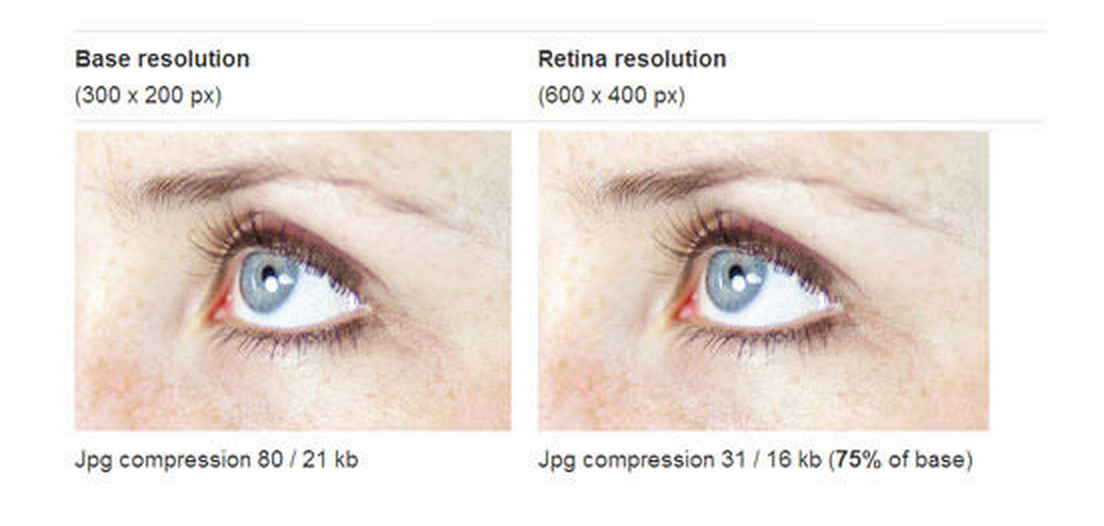
## Just one image?
It sounds like you could save some loading by delivering low resolution images to screens with lower resolution. The best way is to serve just one high-resolution (retina) well compressed image. It’s surprising how well they can be compressed, and the result looks the same.
## Example project
### Create project
`expo init ResponsiveImageExample`
- go with 'expo-template-blank'
`cp ./example/App.js ./ResponsiveImageExample/App.js`
`cp -R ./src ./ResponsiveImageExample`
`cd ResponsiveImageExample`
`yarn start`
## Development
1. Modify any files in ./src directory
2. Propagate changes by `cp -R ./src ./ResponsiveImageExample/src`
================================================
FILE: example/App.js
================================================
import React from 'react';
import { StyleSheet, Text, View } from 'react-native';
import ResponsiveImage from './src/react-native-responsive-image';
export default class App extends React.Component {
render() {
return (
<View style={{ flexGrow: 1, justifyContent: 'center', alignItems: 'center', flexDirection: 'row' }}>
<ResponsiveImage source={{ uri: 'https://github.com/Dharmoslap/react-native-responsive-image/raw/master/react_logo.png' }} initWidth="138" initHeight="138" />
<ResponsiveImage source={{ uri: 'https://github.com/Dharmoslap/react-native-responsive-image/raw/master/react_logo.png' }} initWidth="138" initHeight="138" />
<ResponsiveImage source={{ uri: 'https://github.com/Dharmoslap/react-native-responsive-image/raw/master/react_logo.png' }} initWidth="138" initHeight="138" />
</View>);
}
}
================================================
FILE: index.js
================================================
import ResponsiveImage from './src/react-native-responsive-image';
export default ResponsiveImage
================================================
FILE: package.json
================================================
{
"name": "react-native-responsive-image",
"version": "2.3.1",
"description": "Image component, that resizes itself appropriately on various screensizes.",
"main": "index.js",
"scripts": {
"test": "echo \"Error: no test specified\" && exit 1"
},
"repository": {
"type": "git",
"url": "git+https://github.com/Dharmoslap/react-native-responsive-images.git"
},
"keywords": [
"React",
"Native"
],
"author": "Ladislav Maxa <ladislavmaxa@outlook.com> (https://github.com/Dharmoslap)",
"license": "ISC",
"bugs": {
"url": "https://github.com/Dharmoslap/react-native-responsive-images/issues"
},
"homepage": "https://github.com/Dharmoslap/react-native-responsive-images#readme",
"installConfig": {
"pnp": true
}
}
================================================
FILE: src/applyScale.js
================================================
var Device = require('./device');
function applyScale(size) {
return Math.ceil(size * Device.scale);
}
module.exports = applyScale;
================================================
FILE: src/device.android.js
================================================
var React = require('react');
var { Dimensions } = require('react-native');
var device = Dimensions.get('window');
var scale;
if (device.width <= 414) {
//Android smartphones
scale = device.width / 414;
} else{
//Android tablets
scale = 1;
}
module.exports = { scale: scale };
================================================
FILE: src/device.ios.js
================================================
var React = require('react');
var { Dimensions } = require('react-native');
var device = Dimensions.get('window');
var scale;
switch (device.width) {
//iPhone4/4S and iPhone5/5S
case 320:
scale = 0.77;
break;
//iPhone6/6S
case 375:
scale = 0.902;
break;
//iPhone6plus/6Splus
case 414:
scale = 1;
break;
//iPad
default:
scale = 1;
}
module.exports = { scale: scale };
================================================
FILE: src/react-native-responsive-image.js
================================================
import React, { Component } from 'react';
import { Image } from 'react-native';
import applyScale from './applyScale';
export default class ResponsiveImage extends Component {
setNativeProps(nativeProps) {
this._root.setNativeProps(nativeProps);
}
render() {
var width = applyScale(this.props.initWidth);
var height = applyScale(this.props.initHeight);
const Component = this.props.component
return (
<Component
style={[{ width: width, height: height }, this.props.style]}
source={this.props.source}
ref={component => this._root = component}
resizeMode={this.props.resizeMode || 'cover'}
onLoadStart={this.props.onLoadStart}
onProgress={this.props.onProgress}
onLoad={this.props.onLoad}
onError={this.props.onError}
onLoadEnd={this.props.onLoadEnd}
defaultSource={this.props.defaultSource}
borderRadius={this.props.borderRadius}
>
{this.props.children}
</Component>
)
}
}
ResponsiveImage.defaultProps = {
component: Image
}
gitextract_a4omdhob/
├── .github/
│ └── workflows/
│ └── npmpublish.yml
├── .gitignore
├── .npmignore
├── README.md
├── example/
│ └── App.js
├── index.js
├── package.json
└── src/
├── applyScale.js
├── device.android.js
├── device.ios.js
└── react-native-responsive-image.js
SYMBOL INDEX (6 symbols across 3 files)

FILE: example/App.js
  class App (line 5) | class App extends React.Component {
    method render (line 6) | render() {

FILE: src/applyScale.js
  function applyScale (line 3) | function applyScale(size) {

FILE: src/react-native-responsive-image.js
  class ResponsiveImage (line 5) | class ResponsiveImage extends Component {
    method setNativeProps (line 7) | setNativeProps(nativeProps) {
    method render (line 11) | render() {
Condensed preview — 11 files, each showing path, character count, and a content snippet. Download the .json file or copy for the full structured content (10K chars).
[
{
"path": ".github/workflows/npmpublish.yml",
"chars": 402,
"preview": "name: Node.js Package\n\non:\n release:\n types: [published]\n\njobs:\n build:\n runs-on: ubuntu-latest\n steps:\n "
},
{
"path": ".gitignore",
"chars": 947,
"preview": "node_modules\n\n\n### JetBrains template\n# Covers JetBrains IDEs: IntelliJ, RubyMine, PhpStorm, AppCode, PyCharm, CLion\n\n*."
},
{
"path": ".npmignore",
"chars": 972,
"preview": "node_modules\n\n\n### JetBrains template\n# Covers JetBrains IDEs: IntelliJ, RubyMine, PhpStorm, AppCode, PyCharm, CLion\n\n*."
},
{
"path": "README.md",
"chars": 3509,
"preview": "# React Native Responsive Image\n\n[](https://d"
},
{
"path": "example/App.js",
"chars": 856,
"preview": "import React from 'react';\nimport { StyleSheet, Text, View } from 'react-native';\nimport ResponsiveImage from './src/rea"
},
{
"path": "index.js",
"chars": 98,
"preview": "import ResponsiveImage from './src/react-native-responsive-image';\n\nexport default ResponsiveImage"
},
{
"path": "package.json",
"chars": 766,
"preview": "{\n \"name\": \"react-native-responsive-image\",\n \"version\": \"2.3.1\",\n \"description\": \"Image component, that resizes itsel"
},
{
"path": "src/applyScale.js",
"chars": 136,
"preview": "var Device = require('./device');\n\nfunction applyScale(size) {\n return Math.ceil(size * Device.scale);\n}\n\nmodule.export"
},
{
"path": "src/device.android.js",
"chars": 285,
"preview": "var React = require('react');\nvar { Dimensions } = require('react-native');\n\nvar device = Dimensions.get('window');\nvar "
},
{
"path": "src/device.ios.js",
"chars": 401,
"preview": "var React = require('react');\nvar { Dimensions } = require('react-native');\n\nvar device = Dimensions.get('window');\nvar "
},
{
"path": "src/react-native-responsive-image.js",
"chars": 1076,
"preview": "import React, { Component } from 'react';\nimport { Image } from 'react-native';\nimport applyScale from './applyScale';\n\n"
}
]
About this extraction
This page contains the full source code of the Dharmoslap/react-native-responsive-image GitHub repository, extracted and formatted as plain text for AI agents and large language models (LLMs). The extraction includes 11 files (9.2 KB), approximately 2.6k tokens, and a symbol index with 6 extracted functions, classes, methods, constants, and types. Use this with OpenClaw, Claude, ChatGPT, Cursor, Windsurf, or any other AI tool that accepts text input. You can copy the full output to your clipboard or download it as a .txt file.
Extracted by GitExtract — free GitHub repo to text converter for AI. Built by Nikandr Surkov.