Showing preview only (232K chars total). Download the full file or copy to clipboard to get everything.
Repository: ElemeFE/node-interview
Branch: master
Commit: 59de80b63ddd
Files: 38
Total size: 220.3 KB
Directory structure:
gitextract_rfbse83l/

├── .gitignore
├── .nojekyll
├── LICENSE
├── README.md
├── _navbar.md
├── _sidebar.md
├── index.html
├── package.json
└── sections/
    ├── en-us/
    │   ├── README.md
    │   ├── _navbar.md
    │   ├── _sidebar.md
    │   ├── common.md
    │   ├── error.md
    │   ├── event-async.md
    │   ├── io.md
    │   ├── module.md
    │   ├── network.md
    │   ├── os.md
    │   ├── process.md
    │   ├── security.md
    │   ├── storage.md
    │   ├── test.md
    │   └── util.md
    └── zh-cn/
        ├── README.md
        ├── _navbar.md
        ├── _sidebar.md
        ├── common.md
        ├── error.md
        ├── event-async.md
        ├── io.md
        ├── module.md
        ├── network.md
        ├── os.md
        ├── process.md
        ├── security.md
        ├── storage.md
        ├── test.md
        └── util.md
================================================
FILE CONTENTS
================================================
================================================
FILE: .gitignore
================================================
# Logs
logs
*.log
npm-debug.log*
# Runtime data
pids
*.pid
*.seed
# Directory for instrumented libs generated by jscoverage/JSCover
lib-cov
# Coverage directory used by tools like istanbul
coverage
# nyc test coverage
.nyc_output
# Grunt intermediate storage (http://gruntjs.com/creating-plugins#storing-task-files)
.grunt
# node-waf configuration
.lock-wscript
# Compiled binary addons (http://nodejs.org/api/addons.html)
build/Release
# Dependency directories
node_modules
jspm_packages
# Optional npm cache directory
.npm
# Optional REPL history
.node_repl_history
================================================
FILE: .nojekyll
================================================
================================================
FILE: LICENSE
================================================
MIT License
Copyright (c) 2017 饿了么前端
Permission is hereby granted, free of charge, to any person obtaining a copy
of this software and associated documentation files (the "Software"), to deal
in the Software without restriction, including without limitation the rights
to use, copy, modify, merge, publish, distribute, sublicense, and/or sell
copies of the Software, and to permit persons to whom the Software is
furnished to do so, subject to the following conditions:
The above copyright notice and this permission notice shall be included in all
copies or substantial portions of the Software.
THE SOFTWARE IS PROVIDED "AS IS", WITHOUT WARRANTY OF ANY KIND, EXPRESS OR
IMPLIED, INCLUDING BUT NOT LIMITED TO THE WARRANTIES OF MERCHANTABILITY,
FITNESS FOR A PARTICULAR PURPOSE AND NONINFRINGEMENT. IN NO EVENT SHALL THE
AUTHORS OR COPYRIGHT HOLDERS BE LIABLE FOR ANY CLAIM, DAMAGES OR OTHER
LIABILITY, WHETHER IN AN ACTION OF CONTRACT, TORT OR OTHERWISE, ARISING FROM,
OUT OF OR IN CONNECTION WITH THE SOFTWARE OR THE USE OR OTHER DEALINGS IN THE
SOFTWARE.
================================================
FILE: README.md
================================================

# Node interview of ElemeFE
* ## What's this?
We were looking for senior backend developer with Node.js. And, this repo is the interview catalog (not just questions & answers) about it, and it shows you how to pass the Node.js interview of [ElemeFE](https://github.com/ElemeFE/).
* ## Motivation
We had a lot of interviews about Node.js & full-stack in 2016. We found there are many developers came from frontend, and most of them had leaky knowledge of backend system. Thus we found it's difficult to got senior Node.js developer about backend (not full-stack).
Due to our consistent of open source and sharing spirit, we prepared this Node.js advanced tutorial which called "node-interview".
* ## Start Reading
* [English Entry](sections/en-us/)
* [简体中文入口](sections/zh-cn/)
> The content is translated from chinese, We'd say sorry that the translation is just started, you may not able to read it completely. BTW, it is welcome to help us to improve the translations.
================================================
FILE: _navbar.md
================================================
- [Home](/)
- Translations
- [English](sections/en-us/)
- [简体中文](sections/zh-cn/)
================================================
FILE: _sidebar.md
================================================
<!-- docs/_sidebar.md -->
- [Node interview of Eleme](/)
- [Introduction](/)
- [Versions](/)
- [English](sections/en-us/README.md)
- [中文简体](sections/zh-cn/README.md)
================================================
FILE: index.html
================================================
<!DOCTYPE html>
<html lang="en">
<head>
<meta charset="UTF-8">
<title>Node.js Interview</title>
<meta name="description" content="如何通过饿了么 Node.js 面试">
<meta name="viewport" content="width=device-width, user-scalable=no, initial-scale=1.0, maximum-scale=1.0, minimum-scale=1.0">
<link rel="stylesheet" href="//unpkg.com/docsify/lib/themes/vue.css">
<style>
.markdown-section a:not(:hover) {
text-decoration: none;
}
.sidebar {
padding-top: 20px;
}
.sidebar h1 {
font-weight: normal;
}
.sidebar blockquote {
margin-left: 12px;
}
section.content {
padding-top: 50px;
}
</style>
</head>
<body>
<div id="app"></div>
</body>
<script>
window.$docsify = {
name: 'Node.js Interview',
auto2top: true,
loadNavbar: true,
repo: 'ElemeFE/node-interview/'
}
</script>
<script src="//unpkg.com/docsify/lib/docsify.min.js"></script>
</html>
================================================
FILE: package.json
================================================
{
"name": "node-interview",
"version": "0.1.0",
"repository": "git@github.com:ElemeFE/node-interview.git",
"scripts": {
"serve": "docsify serve ."
},
"license": "MIT",
"dependencies": {
"docsify-cli": "^3.0.1"
}
}
================================================
FILE: sections/en-us/README.md
================================================

## Guide
## [Common](/sections/en-us/common.md)
> It's much more diff between frontend and backend.
* `[Common]` Type judgment
* `[Common]` Scope
* `[Common]` Reference
* `[Common]` Memory release
* `[Common]` ES6+ features
**Common Problem**
[View more](/sections/en-us/common.md)
## [Module](/sections/en-us/module.md)
* `[Common]` Module
* `[Common]` Hotfix
* `[Common]` Context
* `[Common]` Package Manager
**Common Problem**
[View more](/sections/en-us/module.md)
## [Event & Async](/sections/en-us/event-async.md)
* `[Common]` Promise
* `[Doc]` Events
* `[Doc]` Timers
* `[Bonus]` Blocking & Non-blocking
* `[Bonus]` Parallel & Concurrent
**Common Problem**
* What's the difference between the Promise's second argument of '.then' function and '.catch' function? [[more]](/sections/en-us/event-async.md#q-1)
* Is the Eventemitter.emit synchronous or asynchronous? [[more]](/sections/en-us/event-async.md#q-2)
* How to judge whether a interface is asynchronous? Is it asynchronous while a callback provided? [[more]](/sections/en-us/event-async.md#q-3)
* Diff among nextTick, setTimeout and setImmediate? [[more]](/sections/en-us/event-async.md#q-4)
* How to implement a Sleep function? [[more]](/sections/en-us/event-async.md#q-5)
* How to implement an async.reduce? [[more]](/sections/en-us/event-async.md#q-6)
[View more](/sections/en-us/event-async.md)
## [Process](/sections/en-us/process.md)
* `[Doc]` Process
* `[Doc]` Child Processes
* `[Doc]` Cluster
* `[Bonus]` IPC
* `[Bonus]` Daemon
**Common Problem**
* What's the current working directory of the process? What's it for? [[more]](/sections/en-us/process.md#q-cwd)
* Difference between child_process.fork and fork in POSIX? [[more]](/sections/en-us/process.md#q-fork)
* Does the death of parent process or child process affect each other? What is an orphan process? [[more]](/sections/en-us/process.md#q-child)
* How does the cluster load balance work? [[more]](/sections/en-us/process.md#how-it-works)
* What's daemon process? how to implement? [[more]](/sections/en-us/process.md#daemon-process)
[View more](/sections/en-us/process.md)
## [IO](/sections/en-us/io.md)
* `[Doc]` Buffer
* `[Doc]` String Decoder
* `[Doc]` Stream
* `[Doc]` Console
* `[Doc]` File System
* `[Doc]` Readline
* `[Doc]` REPL
**Common Problem**
* What does Buffer for? Can we change the buffer's size? [[more]](/sections/en-us/io.md#buffer)
* What's the highWaterMark & drain event of Stream? What's their relation? [[more]](/sections/en-us/io.md#buffer-2)
* What's Stream.pipe for? Is it make copy or pass object while piping? [[more]](/sections/en-us/io.md#pipe)
* What is stdio, stdout, stderr and file descriptor? [[more]](/sections/en-us/io.md#file)
* Is console.log asynchronous? How to implement console.log? [[more]](/sections/en-us/io.md#console)
* How to get user input synchronously? [[more]](/sections/en-us/io.md#how-to-get-user-input-synchronizely)
* How to implement 'Readline'? [[more]](/sections/en-us/io.md#readline)
[View more](/sections/en-us/io.md)
## [Network](/sections/en-us/network.md)
* `[Doc]` Net
* `[Doc]` UDP/Datagram
* `[Doc]` HTTP
* `[Doc]` DNS
* `[Doc]` ZLIB
* `[Common]` RPC
**Common Problem**
[View more](/sections/en-us/network.md)
## [OS](/sections/en-us/os.md)
* `[Doc]` TTY
* `[Doc]` OS
* `[Doc]` Command Line Options
* `[Common]` Load
* `[Bonus]` CheckList
* `[Common]` Indicators
**Common Problem**
* What's TTY? How to check if terminal is TTY? [[more]](/sections/en-us/os.md#tty)
* Is there different among operating system's EOL(end of line)? [[more]](/sections/en-us/os.md#os)
* What is system load? how to check it? [[more]](/sections/en-us/os.md#load)
* What's ulimit for? [[more]](/sections/en-us/os.md#ulimit)
[View more](/sections/en-us/os.md)
## [Error handle & Debug](/sections/en-us/error.md)
* `[Doc]` Errors
* `[Doc]` Domain
* `[Doc]` Debugger
* `[Doc]` C/C++ Addon
* `[Doc]` V8
* `[Bonus]` Memory snapshot
* `[Bonus]` CPU Profilling
**Common Problem**
* How to handle unexpected errors? With try/catch, domains or something eles? [[more]](/sections/en-us/error.md#q-handle-error)
* What is `uncaughtException` event? when shoud we use it? [[more]](/sections/en-us/error.md#uncaughtexception)
* What is domain's principle? why domain is deprecated? [[more]](/sections/en-us/error.md#domain)
* What's defensive programming? how about 'let it crash'?
* Why we need error-first callback? why there are callback not error-first, such as http.createServer?
* Why there are errors can't location? how to locate accurately? [[more]](/sections/en-us/error.md#error-stack-is-missing)
* What cause memory leak? how to locate and analyse it? [[more]](/sections/en-us/error.md#memory-snapshots)
[View more](/sections/en-us/error.md)
## [Test](/sections/en-us/test.md)
* `[Common]` Methods
* `[Common]` Unit Test
* `[Common]` Benchmarks
* `[Common]` Integration Test
* `[Common]` Pressure Test
* `[Doc]` Assert
**Common Problem**
[View more](/sections/en-us/test.md)
## [Util](/sections/en-us/util.md)
* `[Doc]` URL
* `[Doc]` Query Strings
* `[Doc]` Utilities
* `[Common]` Regex
**Common Problem**
* How does HTTP pass `let arr = [1,2,3,4]` to the server by GET method? [[more]](/sections/en-us/util.md#get-param)
* How to implement util.inherits in Node.js? [[more]](/sections/en-us/util.md#utilinherits)
* How do I get all the file names under a folder? [[more]](/sections/en-us/util.md#q-traversal)
[View more](/sections/en-us/util.md)
## [Storage](/sections/en-us/storage.md)
* `[Common]` Sql
* `[Common]` NoSql
* `[Bonus]` Cache
* `[Bonus]` Consistency
**Common Problem**
[View more](/sections/en-us/storage.md)
## [Security](/sections/en-us/security.md)
* `[Doc]` Crypto
* `[Doc]` TLS/SSL
* `[Doc]` HTTPS
* `[Bonus]` XSS
* `[Bonus]` CSRF
* `[Bonus]` MITM
* `[Bonus]` Sql/Nosql Injection
**Common Problem**
[View more](/sections/en-us/security.md)
## Final
Current repo is translating, you can report on [issues](https://github.com/ElemeFE/node-interview/issues) freely if there is typo or reading problem.
================================================
FILE: sections/en-us/_navbar.md
================================================
- [Home](sections/en-us/)
- Translations
- [English](sections/en-us/)
- [简体中文](sections/zh-cn/)
================================================
FILE: sections/en-us/_sidebar.md
================================================
<!-- docs/_sidebar.md -->
- [Node interview](/)
- [Guide](/)
- [Js Basic](sections/en-us/js-basic.md)
- [Module](sections/en-us/module.md)
- [Event & Async](sections/en-us/event-async.md)
- [Process](sections/en-us/process.md)
- [IO](sections/en-us/io.md)
- [Network](sections/en-us/network.md)
- [OS](sections/en-us/os.md)
- [Error/Debug/Opt](sections/en-us/error.md)
- [Test](sections/en-us/test.md)
- [Util](sections/en-us/util.md)
- [Storage](sections/en-us/storage.md)
- [Security](sections/en-us/security.md)
================================================
FILE: sections/en-us/common.md
================================================
# Basic
* [`[Common]` Type judgment](/sections/en-us/common.md#Type-judgement)
* [`[Common]` Scope](/sections/en-us/common.md#Scope)
* [`[Common]` Reference](/sections/en-us/common.md#Reference)
* [`[Common]` Memory release](/sections/en-us/common.md#Memory-release)
* [`[Common]` ES6+ features](/sections/en-us/common.md#ES6-features)
## Summary
In contrast to frontend, there are few chances to work with DOM in backend, unless we deal with SSR or web crawlers. So we won't discuss about it. Unlike browser side, backend faces memory directly, we concern more about the fundamental knowledge.
## Type judgement
We suffer tortuously from type judgement in JavaScript. Otherwise, TypeScript may not be created. Basically, we recommend to read the source code of [lodash](https://github.com/lodash/lodash).
Generally, this is a simple opening of an interview. We won't deny a candidate only because of not knowing the value of `undefined == null` is `true`. According to our personal experiences, candidate who cannot answer this question is probably to have a poor foundation. If you have no concept of such kind of question, you may reflect on whether to find a JavaScript book to review for basis.
Additionally, it is a bonus point if candidate understands TypeScript or flow.
## Scope
In an interview, scope is not an easy-to-ask knowledge point but critical in JavaScript. Eleme typically asks questions like `what's the difference between let and var in es6` or asks candidate to interpret a given code example in the beginning, in order to assess how much does a candidate master scope.
[You Don't Know JS](https://github.com/getify/You-Dont-Know-JS) has a great explanation on scope. Here it is the TOC of the book, we recommend you to do some intensive reading.
* Chapter 1: What is Scope?
* Chapter 2: Lexical Scope
* Chapter 3: Function vs. Block Scope
* Chapter 4: Hoisting
* Chapter 5: Scope Closures
* ...
## Reference
> <a name="q-value"></a> In JavaScript, which types are pass by reference? And which types are pass by value? How to pass a variable by reference?
Simply speaking, objects are pass by reference. Basic types are pass by value. We can pass basic types by reference using boxing technique. (More information at note 1)
Pass by reference and pass by value is a basic question. It is fundamental part to understand how does JavaScript's memory work. It is hardly to have further discussion without understanding reference.
In coding session, we use questions like `how to write a json object copy function` to assess candidate.
Sometimes, we ask about the difference between `==` and `===`. And then, `true` or `false` of `[1] == [1]`. Without a good foundation, candidate may make a wrong conclusion because of the wrong understanding of `==` and `===`.
Note 1: For senior candidates, you are expected to question directly on the question. e.g. There is no pass by reference in JavaScript. There is call by sharing. Read about [Is JavaScript a pass-by-reference or pass-by-value language?](http://stackoverflow.com/questions/518000/is-javascript-a-pass-by-reference-or-pass-by-value-language). Though it is advanced, it is common for senior developer with more than 3 years experiences.
If C++ is mentioned in resume, it is certain to ask `what is the difference between pointer and reference`.
## Memory release
> <a name="q-mem"></a> When will each types and each scope of variables be released in JavaScript?
If reference was no longer referenced, it would be collected by the GC of V8. If a value variable was inside a closure, it wouldn't be release until the closure was no longer referenced. In non-closure scope, it will be collected when V8 is switched to new space.
In contrast to frontend JavaScript, a Node.js developer with more than 2 years experience should care about memory. Though you may not understand in depth, you had better have a basic concept of memory release and start to pay attention to memory leaks.
You need to know which operations lead to memory leaks, or even crash the memory. For example, will the code segment given below fill up with all of V8's memory?
```javaScript
let arr = [];
while(true)
arr.push(1);
```
Then, what's the difference between this one and the above?
```javaScript
let arr = [];
while(true)
arr.push();
```
If a `Buffer` was pushed, what would happen?
```javaScript
let arr = [];
while(true)
arr.push(new Buffer(1000));
```
After thinking about the aboves, try to figure out what else can fill up with V8's memory. And then let's talk about memory leaks.
```javaScript
function out() {
const bigData = new Buffer(100);
inner = function () {
void bigData;
}
}
```
Closure references variable from its parent. If it is not released, a memory leak happens. The example above shows `inner` is under the root, which causes a memory leak (`bigData` is not released).
For senior candidates, you need to know the mechanism of GC in V8 and know how memory snapshot (which will be discussed in chapter of `Debug/Optimization`) works. e.g. Where do V8 store different types of data? What are the specific optimizing strategies for different areas when doing memory release?
## ES6 features
We recommend a [ECMAScript 6 Tutorial](http://es6.ruanyifeng.com/) book from @ruanyifeng (in Chinese).
The basic questions can be the differences between `let` and `var`, and between `arrow function` and `function`.
To go deeper, there are lots of details in es6, such as `reference` together with `const`. Talk about `Set` and `Map` in context of usage and disadvantages of `{}`. Or it can be about the privatization and `symbol`.
However, it is unnecessary to ask `what is a closure?`. Instead, we'd like to ask about the application of closures. e.g. If interviewer usually uses closure to make data private, then we may ask can new features (e.g. `class` and `symbol`) be private? If true, then why we need closure here? When will data in a closure be released? And so on.
For `...`, how to implement deletion of duplicated for an array (Bonus point for using Set).
> <a name="q-const"></a> Is it possible for an element in a const Array be modified? If possible, what's the effect of const?
The elements can be modified. And it protects the reference, which cannot be modified (e.g. [Map](https://developer.mozilla.org/en/docs/Web/JavaScript/Reference/Global_Objects/Map) is sensitive to reference and it need const. Besides, it is also suitable for immutable).
================================================
FILE: sections/en-us/error.md
================================================
# Error handle & Debug
* [`[Doc]` Errors](/sections/en-us/error.md#errors)
* [`[Doc]` Domain](/sections/en-us/error.md#domain)
* [`[Doc]` Debugger](/sections/en-us/error.md#debugger)
* [`[Doc]` C/C++ Addon](/sections/en-us/error.md#cc-addon)
* [`[Doc]` V8](/sections/en-us/error.md#v8)
* [`[Point]` Memory snapshots](/sections/en-us/error.md#memory-snapshots)
* [`[Point]` CPU profiling](/sections/en-us/error.md#cpu-profiling)
## Errors
There are mainly four types of Errors in Node.js:
|Error| Triggered by |
|---|---|
|Standard JavaScript errors|error codes|
|System errors|operating system|
|User-specified errors|throw method|
|Assertion errors| `assert` module|
Here are the common standard JavaScript errors:
* [EvalError](https://developer.mozilla.org/en-US/docs/Web/JavaScript/Reference/Global_Objects/EvalError): Thrown when error occurs when calling eval().
* [SyntaxError](https://developer.mozilla.org/en-US/docs/Web/JavaScript/Reference/Global_Objects/SyntaxError): Thrown when codes are not conforming to JavaScript syntax style.
* [RangeError](https://developer.mozilla.org/en-US/docs/Web/JavaScript/Reference/Global_Objects/RangeError): Thrown when out of bounds.
* [ReferenceError](https://developer.mozilla.org/en-US/docs/Web/JavaScript/Reference/Global_Objects/ReferenceError): Thrown when referencing undefined variables.
* [TypeError](https://developer.mozilla.org/en-US/docs/Web/JavaScript/Reference/Global_Objects/TypeError): Thrown when parameter types are error.
* [URIError](https://developer.mozilla.org/en-US/docs/Web/JavaScript/Reference/Global_Objects/URIError): Thrown when misusing global URI handling functions.
And the common system errors list can be viewed by os object in Node.js:
```javascript
const os = require('os');
console.log(os.constants.errno);
```
When searching interview questions of Node.js, We find that most of them are out-of-date. In a older post [Best practices about error handling in NodeJS](https://cnodejs.org/topic/55714dfac4e7fbea6e9a2e5d), which was translated from Joyent's official blog, we've found the words below:
> In fact, the only commonly-used case where you'd use `try/catch` is `JSON.parse` and other user-input validation functions.
But in nowadays you can easily use `try/catch` to catch asynchronous exceptions in Node.js. and after using the upgraded v8 engine from Node.js v7.6, the problem that `try/catch` codes can not be optimized was also solved. Now let's see the question
> <a name="q-handle-error"></a> How should I handle unexpected errors? Should I use `try/catch`, domains, or something else?
Here are the error handling methods in Node.js:
* `callback(err, data)` Callback agreement
* throw / try / catch
* Error event of EventEmitter
Using `callback(err, data)` to handle errors is cumbersome and does not have compulsion, so we recommend you understand it, but don't use it. As for the domain module, it's already half foot into the coffin.
1) Thank [co](https://github.com/visionmedia/co) for his leading forward in this domain, now you can use `try/catch` to protect key position easily, Such as koa's error processing can be done in the form of middleware, for more details, see [Koa error handling](https://github.com/koajs/koa/wiki/Error-Handling). async/await are the same way as koa.
2) Adding error callback for the key object through error listening form of EventEmitter. Such as `error` events of http server, tcp server and `uncaughtException`, `unhandledRejection` of process object.
3) Using Promise to encapsulate asynchronous, and the error handling of it to handle errors.
4) If the methods above can't play a good role, then you should learn how to [Let It Crash](http://wiki.c2.com/?LetItCrash) gracefully.
> Why is the first parameter of cb should be error? And why is the first parameter of some cb is not error, such as http.createServer?
TODO
### Error stack is missing
```javascript
function test() {
throw new Error('test error');
}
function main() {
test();
}
main();
```
Then you get an error message:
```javascript
/data/node-interview/error.js:2
throw new Error('test error');
^
Error: test error
at test (/data/node-interview/error.js:2:9)
at main (/data/node-interview/error.js:6:3)
at Object.<anonymous> (/data/node-interview/error.js:9:1)
at Module._compile (module.js:570:32)
at Object.Module._extensions..js (module.js:579:10)
at Module.load (module.js:487:32)
at tryModuleLoad (module.js:446:12)
at Function.Module._load (module.js:438:3)
at Module.runMain (module.js:604:10)
at run (bootstrap_node.js:394:7)
```
You can find that the number of rows reported, call hierarchy of test and main function are all displayed clearly in the stack.
When we use timers such as setImmediate to set asynchronously:
```javascript
function test() {
throw new Error('test error');
}
function main() {
setImmediate(() => test());
}
main();
```
We find this:
```javascript
/data/node-interview/error.js:2
throw new Error('test error');
^
Error: test error
at test (/data/node-interview/error.js:2:9)
at Immediate.setImmediate (/data/node-interview/error.js:6:22)
at runCallback (timers.js:637:20)
at tryOnImmediate (timers.js:610:5)
at processImmediate [as _immediateCallback] (timers.js:582:5)
```
The error stack only outputs to the line where the function was called in `test` function, and the call information of `main` function is lost. That is if you have many layers of nested function calls, it is very hard to trace this asynchronous call when error occurs, because the up-layer stack is already lost. If you've used modules such as [async](https://github.com/caolan/async), You may also find that the error stack is very long and tortuous, so it's difficult to locate the error position through the stack.
This won't be a problem if the project is small / the coder knows all the thing, but it will become a big pain when the project growing bigger and there is more coders. We've talked about this issue in the `Suggestions for writing new functions` section of [best practices about error handling in Node.js](https://cnodejs.org/topic/55714dfac4e7fbea6e9a2e5d) mentioned above. Errors are packaged layer by layer through the way of using [verror](https://www.npmjs.com/package/verror) so that we can get the key information for locating error in the finally got Error.
Let's see the download statistics from yesterday (2017-3-13). Last month, the downloads of [verror](https://www.npmjs.com/package/verror) is `1100w`, higher than [express](https://www.npmjs.com/package/express) (`1070w`). Now you can feel how popular is this way of writing codes.
### Defensive programming
It's not terrible to make mistakes, what makes a terrible mistake is you are not prepared to deal with it————[Introduction and skills of defensive programming](http://blog.jobbole.com/101651/)
### let it crash
[Let It Crash](http://wiki.c2.com/?LetItCrash)
### uncaughtException
The `uncaughtException` event of process object will be triggered when the exception is not caught and bubbling to the Event Loop. By default, Node.js will ouput the stack trace information to the `stderr` and end process for such exceptions, And adding listener to `uncaughtException` event can override the default behavior, thus not end the process directly.
```javascript
process.on('uncaughtException', (err) => {
console.log(`Caught exception: ${err}`);
});
setTimeout(() => {
console.log('This will still run.');
}, 500);
// Intentionally cause an exception, but don't catch it.
nonexistentFunc();
console.log('This will not run.');
```
#### Using uncaughtException reasonably
The original intention of `uncaughtException` is to let you do some recycling processing and then process.exit after getting the error. Official comrades have discussed to remove this event. (See [issues](https://github.com/nodejs/node-v0.x-archive/issues/2582))
So you need to know `uncaughtException` is already a non-conventional means, try to avoid using it to handle errors. Because capturing the error through the event does not mean that `you can continue to run happily (On Error Resume Next)`. There is an unhandled exception inside the program, which means that the application is in an unknown state. If you can not properly restore its status, then it is likely to trigger unforeseen problems. (Even worse if using domain, and all kinds of puzzled questions will be produced)
If the error is not caught in the callback listener specified by the `.on` function, the process of Node.js will be interrupted and return a non-zero exit code, and finally output the corresponding stack information. Otherwise, there will be infinite recursion. In addition, memory crashes / underlying errors also can not be captured, **We currently guess** the reason is v8/C++ did not deal with the problem, while Node.js was unable to handle it (TODO: We suddenly found this idea has not been verified yet, please help us to verify it if convenient).
So the right way advised by the officials to use `uncaughtException` is cleaning up the used resources synchronously (file descriptors, handles, and so on) and then process.exit.
Actually It's not safe to perform a normal restore operation after uncaughtException event. Officials advise you to prepare for a monitor process to do health checks, manage recoveries and restart when necessary (So the officials are reminding you to use tools such as pm2 implicitly).
### unhandledRejection
This event will be triggered When a Promise without binded handler is rejected. It is very useful when investigating and tracking Promise not handles reject behavior.
Here are the parameters of the callback of this event:
* `reason` [`<Error>`](https://developer.mozilla.org/en-US/docs/Web/JavaScript/Reference/Global_Objects/Error) | `<any>` Rejected reason (Usually Error)
* `p` The rejected Promise
Such as:
```javascript
process.on('unhandledRejection', (reason, p) => {
console.log('Unhandled Rejection at: Promise', p, 'reason:', reason);
// application specific logging, throwing an error, or other logic here
});
somePromise.then((res) => {
return reportToUser(JSON.pasre(res)); // note the typo (`pasre`)
}); // no `.catch` or `.then`
```
The following code also triggers the `unhandledRejection` event:
```javascript
function SomeResource() {
// Initially set the loaded status to a rejected promise
this.loaded = Promise.reject(new Error('Resource not yet loaded!'));
}
var resource = new SomeResource();
// no .catch or .then on resource.loaded for at least a turn
```
> In this example case, it is possible to track the rejection as a developer error as would typically be the case for other 'unhandledRejection' events. To address such failures, a non-operational `.catch(() => { })` handler may be attached to resource.loaded, which would prevent the 'unhandledRejection' event from being emitted. Alternatively, the 'rejectionHandled' event may be used.
## Domain
In the early Node.js, try/catch is unable to capture asynchronous errors, And the error first callback is just an agreement, without mandataries and very cumbersome to write. So in order to catch the exception very well, Node.js introduces domain module in v0.8.
domain is an EventEmitter object, The basic idea of capturing an asynchronous exception is to create a domain, The `cb` function will inherit the domain of the upper layer, and the errors will be passed through the error events triggered by `.emit('error', err)` function in current domain, so that asynchronous errors can be forced to capture. (For more details, see [Asynchronous exception handling in Node.js and analysis of domain module](https://cnodejs.org/topic/516b64596d38277306407936))
But domain also brought more new problems. Such as dependent modules can not inherit the domain you defined, Causing it can't cover errors in dependent modules. Furthermore, Many people (especially new bie) didn't understand memory / asynchronous processes and other issues in Node.js, they didn't do well when using domain to process errors and let the code continue, this is likely to cause **the project to be completely unserviceable** (Any problems are possible, And all kinds of shit...)
You can see the latest news about this module at: [deprecate domains](https://github.com/nodejs/node/issues/66)
## Debugger

Command line debug tool like gdb (Build-in debugger in the image above), it also supports remote debug (like [node-inspector](https://github.com/node-inspector/node-inspector), but still in trial). Of course, many developers feel that [vscode](https://code.visualstudio.com/) has maken a better integration to the debug tools.
We recommend reading [official document](https://nodejs.org/dist/latest-v6.x/docs/api/debugger.html) to learn how to use this build-in debugger. If you want to dig deeper, see: [Modify the value of a variable in the NodeJS program dynamically](http://code.oneapm.com/nodejs/2015/06/27/intereference/)
## C/C++ Addon
The most painful thing when developing addon in Node.js is the incompatible of C/C++ codes caused by V8 upgrades, and it has lasted for a long time. So someone opened a project named [nan](https://github.com/nodejs/nan) to solve this problem.
To learn addon development, We recommend reading: [https://github.com/nodejs/node-addon-examples](https://github.com/nodejs/node-addon-examples) in addition to [official document](https://nodejs.org/docs/latest/api/addons.html)
## V8
We are not talking about V8, but V8 module in Node.js. It's used for opening built-in events and interfaces of V8 engine in Node.js. Because these interfaces are defined by underlying part of V8, so we can't say it's absolutely stable.
|Interface|Description|
|---|---|
|v8.getHeapStatistics()|Get heap informations|
|v8.getHeapSpaceStatistics()|Get heap space informations |
|v8.setFlagsFromString(string)|Settings V8 options dynamicly|
### v8.setFlagsFromString(string)
This method is used to add additional V8 command line flags. But be cautious, modifying the configuration after the VM starts may cause unpredictable behavior, crash, and data loss; Or nothing.
You can query the available V8 options in the current Node.js environment by `node --v8-options` command. Furthermore, you can also refer to an unofficial maintenance [V8 options list](https://github.com/thlorenz/v8-flags/blob/master/flags-0.11.md).
Example:
```javascript
// Print GC events to stdout for one minute.
const v8 = require('v8');
v8.setFlagsFromString('--trace_gc');
setTimeout(function() { v8.setFlagsFromString('--notrace_gc'); }, 60e3);
```
## Memory snapshots
Memory snapshots are commonly used to resolve memory leaks. We recommend you use [heapdump](https://github.com/bnoordhuis/node-heapdump) to save memory snapshots, and [devtool](https://github.com/Jam3/devtool) to view memory snapshots. When using heapdump to save memory snapshots, it only contains objects in Node.js (but for [node-inspector](https://github.com/node-inspector/node-inspector), there will be front-end variables in the snapshot).
For more details about memory leaks and how to resolve them, see: [How to analysis memory leaks in Node.js](https://zhuanlan.zhihu.com/p/25736931?group_id=825001468703674368).
## CPU profiling
CPU profiling is commonly used in performance optimization. And there are many third-party tools to do it, but in most cases, the easiest way is using the built-in one in Node.js - [V8 internal profiler](https://github.com/v8/v8/wiki/Using%20V8%E2%80%99s%20internal%20profiler), it can do interval sampling analysis during the execution of the program.
Using `--prof` to turn on built-in profilling.
```shell
node --prof app.js
```
It will generate one `isolate-0xnnnnnnnnnnnn-v8.log` file in the current run directory after the program runs.
You can use `--prof-process` to generate a report.
```
node --prof-process isolate-0xnnnnnnnnnnnn-v8.log
```
And the report is as followed:
```
Statistical profiling result from isolate-0x103001200-v8.log, (12042 ticks, 2634 unaccounted, 0 excluded).
[Shared libraries]:
ticks total nonlib name
35 0.3% /usr/lib/system/libsystem_platform.dylib
27 0.2% /usr/lib/system/libsystem_pthread.dylib
7 0.1% /usr/lib/system/libsystem_c.dylib
3 0.0% /usr/lib/system/libsystem_kernel.dylib
1 0.0% /usr/lib/system/libsystem_malloc.dylib
[JavaScript]:
ticks total nonlib name
208 1.7% 1.7% Stub: LoadICStub
187 1.6% 1.6% KeyedLoadIC: A keyed load IC from the snapshot
104 0.9% 0.9% Stub: VectorStoreICStub
69 0.6% 0.6% LazyCompile: *emit events.js:136:44
68 0.6% 0.6% Builtin: CallFunction_ReceiverIsNotNullOrUndefined
65 0.5% 0.5% KeyedStoreIC: A keyed store IC from the snapshot {2}
47 0.4% 0.4% Builtin: CallFunction_ReceiverIsAny
43 0.4% 0.4% LazyCompile: *storeHeader _http_outgoing.js:312:21
34 0.3% 0.3% LazyCompile: *removeListener events.js:315:28
33 0.3% 0.3% Stub: RegExpExecStub
33 0.3% 0.3% LazyCompile: *_addListener events.js:210:22
32 0.3% 0.3% Stub: CEntryStub
32 0.3% 0.3% Builtin: ArgumentsAdaptorTrampoline
31 0.3% 0.3% Stub: FastNewClosureStub
30 0.2% 0.3% Stub: InstanceOfStub
...
[C++]:
ticks total nonlib name
460 3.8% 3.8% _mach_port_extract_member
329 2.7% 2.7% _openat$NOCANCEL
199 1.7% 1.7% ___bsdthread_register
136 1.1% 1.1% ___mkdir_extended
116 1.0% 1.0% node::HandleWrap::Close(v8::FunctionCallbackInfo<v8::Value> const&)
112 0.9% 0.9% void v8::internal::BodyDescriptorBase::IterateBodyImpl<v8::internal::StaticScavengeVisitor>(v8::internal::Heap*, v8::internal::HeapObject*, int, int)
106 0.9% 0.9% _http_parser_execute
103 0.9% 0.9% _szone_malloc_should_clear
99 0.8% 0.8% int v8::internal::BinarySearch<(v8::internal::SearchMode)1, v8::internal::DescriptorArray>(v8::internal::DescriptorArray*, v8::internal::Name*, int, int*)
89 0.7% 0.7% node::TCPWrap::Connect(v8::FunctionCallbackInfo<v8::Value> const&)
86 0.7% 0.7% v8::internal::LookupIterator::State v8::internal::LookupIterator::LookupInRegularHolder<false>(v8::internal::Map*, v8::internal::JSReceiver*)
...
[Bottom up (heavy) profile]:
Note: percentage shows a share of a particular caller in the total
amount of its parent calls.
Callers occupying less than 2.0% are not shown.
ticks parent name
2634 21.9% UNKNOWN
764 29.0% LazyCompile: *connect net.js:815:17
764 100.0% LazyCompile: ~<anonymous> net.js:966:30
764 100.0% LazyCompile: *_tickCallback internal/process/next_tick.js:87:25
193 7.3% LazyCompile: *createWriteReq net.js:732:24
101 52.3% LazyCompile: *Socket._writeGeneric net.js:660:42
99 98.0% LazyCompile: ~<anonymous> net.js:667:34
99 100.0% LazyCompile: ~g events.js:287:13
99 100.0% LazyCompile: *emit events.js:136:44
92 47.7% LazyCompile: ~Socket._writeGeneric net.js:660:42
91 98.9% LazyCompile: ~<anonymous> net.js:667:34
91 100.0% LazyCompile: ~g events.js:287:13
91 100.0% LazyCompile: *emit events.js:136:44
...
```
|Field|Description|
|---|---|
|ticks|Time slice|
|total|The ratio of the current operation to the total time|
|nonlib|Current ratio of non-System library execution time|
Coming soon...
================================================
FILE: sections/en-us/event-async.md
================================================
# event/Asynchronous
* [`[Basic]` Promise](/sections/en-us/event-async.md#promise)
* [`[Doc]` Events ](/sections/en-us/event-async.md#events)
* [`[Doc]` Timers ](/sections/en-us/event-async.md#timers)
* [`[Point]` Blocking/non-blocking](/sections/en-us/event-async.md#blocking-non-blocking)
* [`[Point]` Paraller/Concurrent](/sections/en-us/event-async.md#paraller-concurrent)
## Summary
Synchronous or Asynchronous ?That is a question.
## Promise

I believe that in the interview, many students have been asked such a question: how to handle `Callback Hell`. In the early years, there are lots of solutions like [Q](https://www.npmjs.com/package/q), [async](https://www.npmjs.com/package/async), [EventProxy](https://www.npmjs.com/package/eventproxy). Finally from the prevalence point of view, promise has been the winner of them, and has been the part of the ECMAScript 6 specification.
To learn more basic knowledge about `promise`, we recommend this article. [Promise](http://javascript.ruanyifeng.com/advanced/promise.html#toc9)
> <a name="q-1"></a> What's the difference between the second argument of '.then' function and '.catch' function?
To distinguish the difference, you can read this article [We have a problem with promises](https://pouchdb.com/2015/05/18/we-have-a-problem-with-promises.html)
About Synchronous or Asynchronous, I hope you can pay attention to this question, a simple `promise` example below.
```javascript
let doSth = new Promise((resolve, reject) => {
console.log('hello');
resolve();
});
doSth.then(() => {
console.log('over');
});
```
there is no doubt that you can get the output
```
hello
over
```
the first question is that the code wrapped by Promise is certainly synchronized, but whether the execution of `then` is Asynchronous?
the second quesiton is `setTimeout` and `then` will be called after 10s, but how about `hello`? will `hello` be printed after 10s or at the beginning?
```javascript
let doSth = new Promise((resolve, reject) => {
console.log('hello');
resolve();
});
setTimeout(() => {
doSth.then(() => {
console.log('over');
})
}, 10000);
```
and how to understand the execution order of the code below: ([resource](https://zhuanlan.zhihu.com/p/25407758))
```javascript
setTimeout(function() {
console.log(1)
}, 0);
new Promise(function executor(resolve) {
console.log(2);
for( var i=0 ; i<10000 ; i++ ) {
i == 9999 && resolve();
}
console.log(3);
}).then(function() {
console.log(4);
});
console.log(5);
```
If you don't kown the answers of these questions, you can print the output at local environment. I hope you can understand the change of `promise` status, includes the relationship between `promise` and asynchronous, how promise help you to handle async situation , it would be better if you know the implementations of `promise`
## Events
`Events` module is a very important core module in Node.js. There are many important core APIs in the node that depend on `Events` , for example, `Stream` is implemented based on `Events`, and `fs`, `net`, 'http' are implemented based on 'Stream', 'Events' is so important to Node.js.
A class or a Object can get basic `events` methods by extending `EventEmitter` class, and we call it 'emitter', and the callback funciton that emit a kind of event is called as 'listener'. It is diffrent from DOM tree in browser, there are no bubble and capture actions or methods to handle event.
><a name="q-2">Is the Eventemitter.emit synchronous or asynchronous?
The answer is **synchronous**, there are some description on Node.js documentation:
>The EventListener calls all listeners synchronously in the order in which they were registered. This is important to ensure the proper sequencing of events and to avoid race conditions or logic errors.
let's discuss the output is 'hi 1' or 'hi 2'?
```javascript
const EventEmitter = require('events');
let emitter = new EventEmitter();
emitter.on('myEvent', () => {
console.log('hi 1');
});
emitter.on('myEvent', () => {
console.log('hi 2');
});
emitter.emit('myEvent');
```
and whether there is a endless loop?
```javascript
const EventEmitter = require('events');
let emitter = new EventEmitter();
emitter.on('myEvent', () => {
console.log('hi');
emitter.emit('myEvent');
});
emitter.emit('myEvent');
```
and how about this case?
```javascript
const EventEmitter = require('events');
let emitter = new EventEmitter();
emitter.on('myEvent', function sth () {
emitter.on('myEvent', sth);
console.log('hi');
});
emitter.emit('myEvent');
```
Emitter can handle many complex state scenarios, such as TCP complex state machine, and if you are handling a multiple asynchronous operation and each step may throw an error, at this time .emit error and the excute some .once operations can save you from the mud.
Pay attention to that some students prefer to monitor the status of certain class, but when you destroy this class, don't forget to destroy these emitters too , because inside the class, some listener may cause memory leak.
## Blocking/non-blocking
> <a name="q-3"></a> How to judge whether a interface is asynchronous? Is it asynchronous while a callback provided?
This is a open question, you can have your own way to judge.
* review documentation
* console.log and print the output
* whether there is IO operation
Simply use the callback function is not asynchronous, IO operation may be asynchronous, in addition to the use of setTimeout and other ways are asynchronous.
> if you have built a website by koa, this website has a interface A, and in some cases, interface A can be the endless loop, unfortunately, if you triggered this endless loop, what will be the impact on your website?
In Node.js environment javascript code has only one single thread. Only the current code has been excuted, the process will cut into the event loop, and then pop out the next callback function from the event queue to start the implementation of the code. so ① to implement a Sleep function, as long as an infinite loop can block the execution of the entire js process (on how to avoid the colleagues write deadless loop, see the chapter of `test`.)
> <a name="q-5"></a> How to implement a Sleep function? ①
```javascript
function sleep(ms) {
var start = Date.now(), expire = start + ms;
while (Date.now() < expire) ;
return;
}
```
Asynchronous in Node.js means an event queue in other thread achived by libuv module.
If endless loop logic trigger in your website, the whole process will be blocked, and all request will timeout, asynchronous code will never be excuted, and your website will be crashed.
> <a name="q-6"></a> How to implement an async.reduce?
You need to konw that reduce is analyze a recursive data structure and through use of a given combining operation, recombine the results of recursively processing its constituent parts, building up a return value.
## Timers
The writter think there are two kinds of 'asynchronous' in Node.js: `hard asynchronous` and `soft asynchronous`.
`hard asynchronous` means IO operation or some cases that you need libuv module externally and of course includes `readFileSync` or `execSync`. Because of the single thread feature of Node.js, it is unwise to do some IO operation in synchronous way as it will block the excutation of other code.
`soft asynchronous` is that some asynchronous cases implemented by `setTimeout`. To understand the diffrence among nextTick, setTimeout and setImmediate , you can see this article. <a name="q-4"></a> [article](https://nodejs.org/en/docs/guides/event-loop-timers-and-nexttick/)
**Event loop example**
```
┌───────────────────────┐
┌─>│ timers │
│ └──────────┬────────────┘
│ ┌──────────┴────────────┐
│ │ I/O callbacks │
│ └──────────┬────────────┘
│ ┌──────────┴────────────┐
│ │ idle, prepare │
│ └──────────┬────────────┘ ┌───────────────┐
│ ┌──────────┴────────────┐ │ incoming: │
│ │ poll │<─────┤ connections, │
│ └──────────┬────────────┘ │ data, etc. │
│ ┌──────────┴────────────┐ └───────────────┘
│ │ check │
│ └──────────┬────────────┘
│ ┌──────────┴────────────┐
└──┤ close callbacks │
└───────────────────────┘
```
To know more about event loop, Timers, nextTick, we recommend the Node.js documentation, [*The Node.js Event Loop, Timers, and process.nextTick()*](https://nodejs.org/en/docs/guides/event-loop-timers-and-nexttick/) and [*Tasks, microtasks, queues and schedules*](https://jakearchibald.com/2015/tasks-microtasks-queues-and-schedules/).
## Paraller/Concurrent
Parallelism and Concurrency are two very common concepts. You can read this blog of Joe Armstrong(the creator of Erlang) ([Concurrent and Parallel](http://joearms.github.io/2013/04/05/concurrent-and-parallel-programming.html))
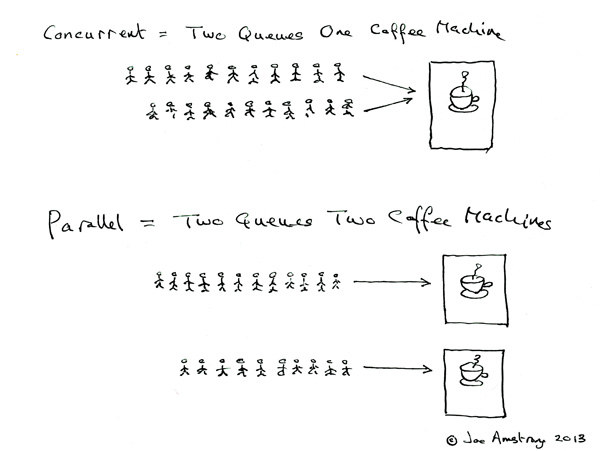
Coucurrent = 2 queues with 1 coffee machine
Parallel = 2 queues with 2 coffee machines
Node.js executes each task of events queue one by one by event loop, by this way, it avoids that in some traditional multithreading situation, when '2 queues with 1 coffee machine', the context switch and resource scramble/synchronize problems, and achives high concurrent。
you can add another 'coffee machine' by using `cluster` module to achieve paraller in Node.js.
================================================
FILE: sections/en-us/io.md
================================================
# IO
* [`[Doc]` Buffer](/sections/zh-cn/io.md#buffer)
* [`[Doc]` String Decoder](/sections/zh-cn/io.md#string-decoder)
* [`[Doc]` Stream](/sections/zh-cn/io.md#stream)
* [`[Doc]` Console](/sections/zh-cn/io.md#console)
* [`[Doc]` File System](/sections/zh-cn/io.md#file)
* [`[Doc]` Readline](/sections/zh-cn/io.md#readline)
* [`[Doc]` REPL](/sections/zh-cn/io.md#repl)
# Brief introduction
Node.js was famous as handling IO-intensive business. Then here are the questions, What do you really know about IO? What is it called IO intensive business?
## Buffer
Buffer is the class to handle binary data in Node.js, IO-related operations (network / file, etc.) are all based on Buffer. An instance of the Buffer class is very similar to an array of integers, ***but its size is fixed***, And its original memory space is allocated outside the V8 stack. After the instance of the Buffer class is created, the memory size occupied by it can no longer be adjusted.
`New Buffer ()` interface was deprecated from Node.js v6.x, The reason is that different types of parameters will return different types of Buffer objects, So when the developer does not correctly verify the parameters or does not correctly initialize the contents of the Buffer object, it will inadvertently introduce security and reliability problems to the code.
Interface |use
---|---
Buffer.from()|Creates a Buffer object based on the existing data
Buffer.alloc()|Creates an initialized Buffer object
Buffer.allocUnsafe()|Creates an uninitialized Buffer object
### TypedArray
After introducing TypedArray in ES6, Node.js modified the implementation of the original Buffer to Uint8Array in TypedArray, thus enhancing the performance.
Here are the things you need to know when using it:
```javascript
const arr = new Uint16Array(2);
arr[0] = 5000;
arr[1] = 4000;
const buf1 = Buffer.from(arr); // Copy the buffer
const buf2 = Buffer.from(arr.buffer); // Share memory with the array
console.log(buf1);
// Output: <Buffer 88 a0>, The copied buffer only contains to element
console.log(buf2);
// Output: <Buffer 88 13 a0 0f>
arr[1] = 6000;
console.log(buf1);
// Output: <Buffer 88 a0>
console.log(buf2);
// Output: <Buffer 88 13 70 17>
```
## String Decoder
String Decoder is a module to decode buffers to strings, as a supplement to Buffer.toString, it supports multi-byte UTF-8 and UTF-16 characters. Such as:
```javascript
const StringDecoder = require('string_decoder').StringDecoder;
const decoder = new StringDecoder('utf8');
const cent = Buffer.from([0xC2, 0xA2]);
console.log(decoder.write(cent)); // ¢
const euro = Buffer.from([0xE2, 0x82, 0xAC]);
console.log(decoder.write(euro)); // €
```
Of course can be done step by step.
```javascript
const StringDecoder = require('string_decoder').StringDecoder;
const decoder = new StringDecoder('utf8');
decoder.write(Buffer.from([0xE2]));
decoder.write(Buffer.from([0x82]));
console.log(decoder.end(Buffer.from([0xAC]))); // €
```
## Stream
Built-in `stream` module in Node.js is the basis of multiple core modules. But stream is a popular programming method very early. We can use the more familiar C language to see stream operation:
```c
int copy(const char *src, const char *dest)
{
FILE *fpSrc, *fpDest;
char buf[BUF_SIZE] = {0};
int lenSrc, lenDest;
// open src file
if ((fpSrc = fopen(src, "r")) == NULL)
{
printf("file '%s' can not be opened\n", src);
return FAILURE;
}
// open dest file
if ((fpDest = fopen(dest, "w")) == NULL)
{
printf("file '%s' can not be opened\n", dest);
fclose(fpSrc);
return FAILURE;
}
// Read the BUF_SIZE data from src to buf
while ((lenSrc = fread(buf, 1, BUF_SIZE, fpSrc)) > 0)
{
// write data in buf to dest
if ((lenDest = fwrite(buf, 1, lenSrc, fpDest)) != lenSrc)
{
printf("write file '%s' failed\n", dest);
fclose(fpSrc);
fclose(fpDest);
return FAILURE;
}
// clean buf when success
memset(buf, 0, BUF_SIZE);
}
// close file
fclose(fpSrc);
fclose(fpDest);
return SUCCESS;
}
```
The application scenario is simple, When you need to copy a 20G file, if you have 20G of data read into memory at once, your memory may not be enough, or seriously affect performance. But if you use a 1MB size cache (buf), Read 1Mb, then write 1Mb, Then no matter how much of this file will only take up 1Mb of memory.
In Node.js, the principle is similar to the above C code, But its IO operation is implemented through libuv and EventEmitter with asynchronous features. You can use `|` to feel the stream operation in linux/unix.
### Type of Stream
Class| Scenario |Overrided method
---|---|---
[Readable](https://github.com/substack/stream-handbook#readable-streams)|Read only|_read
[Writable](https://github.com/substack/stream-handbook#writable-streams)|Write only|_write
[Duplex](https://github.com/substack/stream-handbook#duplex)|Read and write|_read, _write
[Transform](https://github.com/substack/stream-handbook#transform)|Operate the writed data, and then read out the results|_transform, _flush
### Object mode
The stream created by the Node API can only manipulate strings or buffer objects. But the implementation of the stream can be based on other types of JavaScript(Except for null, it has a special meaning in stream). This stream is in the "object mode (objectMode)".
You can generate an object-mode stream by providing the `objectMode` parameter when creating a stream object. It is not safe to attempt to convert an existing stream to object mode.
### Buffer
The buffer of stream in Node.js, using the copy file code at the begining that written in C Languange as a template to discuss, (Despite the difference with asynchronous) is reading data from `src` to` buf`, and not directly written to `dest`, but first placed in a relatively large buffer, Waiting for be written into (comsumed) `dest` . That is, with the help of the buffer we can achieve Read and write separation.
Both the Readable and Writable streams store the data in an internal buffer. The buffers can be accessed by `writable._writableState.getBuffer ()` and `readable._readableState.buffer` respectively. The size of the buffer is specified by the `highWaterMark` flag when creating the stream, for `objectMode` stream, this flag indicates the number of objects that can be accommodated.
#### Readable stream
When a readable instance calls the `stream.push ()` method, the data will be pushed into the buffer. If the data is not consumed, That is, If you call the `stream.read ()` method to read the words, the data will remain in the buffer queue. When the data in the buffer reaches the threshold specified by `highWaterMark`, The readable stream will stop drawing data from the bottom until the current buffered report is successfully consumed.
#### Writable stream
The data is written to the buffer of the writable stream when a writable.write (chunk) is kept on a writable instance. If the buffer amount of the current buffer is less than the value set by `highWaterMark`, Calling the writable.write () method will return true (indicating that the data has been written to the buffer), Otherwise, the write method will return false when the amount of data buffered reaches the threshold and the data can not be written to the buffer, then you can continue to call write to write Until the drain event is triggered.
```javascript
// Write the data to the supplied writable stream one million times.
// Be attentive to back-pressure.
function writeOneMillionTimes(writer, data, encoding, callback) {
let i = 1000000;
write();
function write() {
var ok = true;
do {
i--;
if (i === 0) {
// last time!
writer.write(data, encoding, callback);
} else {
// see if we should continue, or wait
// don't pass the callback, because we're not done yet.
ok = writer.write(data, encoding);
}
} while (i > 0 && ok);
if (i > 0) {
// had to stop early!
// write some more once it drains
writer.once('drain', write);
}
}
}
```
#### Duplex and Transform
Duplex stream and the Transform stream are both readable and writable simultaneously, They will maintain two internal buffer respectively, corresponding to read and write, so that you can allow both sides to operate at the same time independently, thus to maintain efficient data flow. Such as net.Socket is a Duplex stream, The Readable side allows you to get data from the socket and consume data, while the Writable side allows you to write data to it. The speed of data writing is likely to be different from the speed of consumption, so it is important to operate and buffer both ends independently.
### pipe
The `.pipe()` method of stream appends a writable stream to a readable stream while switching the writable stream to stream mode, and push all the data to the writable stream. In the process of passing data in the pipe, `objectMode` is passing by references, while non-`objectMode` is passing by value.
The main purpose of the pipe method is to buffer the flow of data to an acceptable level, so that the difference between the different data sources won't cause the memory to be filled. For more details about pipe, see David Cai's [Analyzes the implementation of pipe in Node.js by source code](https://cnodejs.org/topic/56ba030271204e03637a3870)
## Console
[Generally console.log is asynchronous, unless you use `new Console(stdout[, stderr])` to specify a file as a destination](https://nodejs.org/dist/latest-v6.x/docs/api/console.html#console_asynchronous_vs_synchronous_consoles). However, mostly it looks like this ([6.x source code](https://github.com/nodejs/node/blob/v6.x/lib/console.js#L42)):
```javascript
// As of v8 5.0.71.32, the combination of rest param, template string
// and .apply(null, args) benchmarks consistently faster than using
// the spread operator when calling util.format.
Console.prototype.log = function(...args) {
this._stdout.write(`${util.format.apply(null, args)}\n`);
};
```
Refering to the following code if you want to implement a console.log by yourself:
```javascript
let print = (str) => process.stdout.write(str + '\n');
print('hello world');
```
Note: The code does not handle multiple arguments, nor does it handle placeholders (the function of util.format).
### The console.log.bind(console) problem
```javascript
// From https://github.com/nodejs/node/blob/v6.x/lib/console.js
function Console(stdout, stderr) {
// ... init ...
// bind the prototype functions to this Console instance
var keys = Object.keys(Console.prototype);
for (var v = 0; v < keys.length; v++) {
var k = keys[v];
this[k] = this[k].bind(this);
}
}
```
## File
“Everything is a file” is one of the basic philosophy of Unix/Linux, Not only normal files, but also directory, character device, block device, socket, and so on are all treated as files in Unix/Linux, that is, the operating objects of these resources are all fd (file descriptor), they can be read and written through the same set of system call. You can use ulimit to manage the fd resources in linux.
Node.js encapsulates the collection of standard POSIX file I / O operations. The module can be loaded by require ('fs'). All the methods in the module have both asynchronous execution and synchronous execution. You can get a file's file descriptor via fs.open.
### Encoding
// TODO
Supports for UTF8, GBK, es6 encoding, how to calculate the length of a Chinese character
BOM
### stdio
stdio (standard input output), includes stdin, stdout and stderr. Corresponding to `process.stdin` (Readable),` process.stdout` (Writable) and `process.stderr` (Writable) respectively in Node.js.
The output function is the first function that everyone needs to learn when learning a programming language. Such as `printf("hello, world!");` of C language, `print 'hello, world!'` of python/ruby and `console.log('hello, world!');` in JavaScript.
Here is the implementation of such an output function in the C language pseudo-code:
```c
int printf(FILE *stream, The content to be printed)
{
// ...
// 1. Apply for a temporary memory space
char *s = malloc(4096);
// 2. Handle the contents of the print, the value stored in the s
// ...
// 3. Write the contents of s into the stream
fwrite(s, stream);
// 4. Release temporary space
free(s);
// ...
}
```
What we need to know is step 3, where stream refers to stdout (output stream). In fact, when running an application on the shell, the first operation of the shell is fork the current process (So, if you see the process you started from the shell through ps, its parent process pid is the current shell pid), in this process your current application process also inherited the shell stdio, so when you write the data to stdout in the current process, it is also written to the shell stdout, that is the current shell.
So it is the input, The current process inherits the shell's stdin, So when you read data from stdin, in fact, it's to get the data you enter in the shell. (PS: shell can be cmd, powershell in windows, or bash and zsh in linux)
When using ssh to run a command on a remote server, Although the command output on the server is also written to the shell on the server stdout, but the remote shell is forked from the sshd service, its stdout is a fd inherited from sshd, so the fd is actually a socket, and the data is actually written to a socket in the end, then being sent to the shell stdout on your local computer through the socket.
If you understand the things we mentioned above, then you can understand why the daemon needs to close stdio, if the daemon that is cut into the background does not close stdio, then when you using the shell to do some operation, the screen will come out some inexplicably output. Here is the code that written in C language in [daemon](/sections/zh-cn/process.md#daemon):
```c
for (; i < getdtablesize(); ++i) {
close(i); // close fd
}
```
fd in Linux/unix was designed as an integer number starts from 0. You can try running the following code to view it.
```
console.log(process.stdin.fd); // 0
console.log(process.stdout.fd); // 1
console.log(process.stderr.fd); // 2
```
So it looks very straightforward for the method that using the environment variable to pass fd mentioned in the previous section: [How did the parent process communicate with the child process before the IPC channel was established? How did the IPC build if there was no communication?](/sections/zh-cn/process.md#q-child), because the transmited fd is actually passed an integer number.
### How to get user input synchronizely?
If you already understood the content above, Getting the user's input is actually reading Node.js process in the input stream (ie process.stdin stream) data in Node.js.
And to read synchronously, it is not using the asynchronous read interface, but with the synchronous readSync interface to read the stdin data. The following comes from the Almighty stackoverflow:
```javascript
/*
* http://stackoverflow.com/questions/3430939/node-js-readsync-from-stdin
* @mklement0
*/
var fs = require('fs');
var BUFSIZE = 256;
var buf = new Buffer(BUFSIZE);
var bytesRead;
module.exports = function() {
var fd = ('win32' === process.platform) ? process.stdin.fd : fs.openSync('/dev/stdin', 'rs');
bytesRead = 0;
try {
bytesRead = fs.readSync(fd, buf, 0, BUFSIZE);
} catch (e) {
if (e.code === 'EAGAIN') { // 'resource temporarily unavailable'
// Happens on OS X 10.8.3 (not Windows 7!), if there's no
// stdin input - typically when invoking a script without any
// input (for interactive stdin input).
// If you were to just continue, you'd create a tight loop.
console.error('ERROR: interactive stdin input not supported.');
process.exit(1);
} else if (e.code === 'EOF') {
// Happens on Windows 7, but not OS X 10.8.3:
// simply signals the end of *piped* stdin input.
return '';
}
throw e; // unexpected exception
}
if (bytesRead === 0) {
// No more stdin input available.
// OS X 10.8.3: regardless of input method, this is how the end
// of input is signaled.
// Windows 7: this is how the end of input is signaled for
// *interactive* stdin input.
return '';
}
// Process the chunk read.
var content = buf.toString(null, 0, bytesRead - 1);
return content;
};
```
## Readline
The `readline` module provides an interface for reading a row from a stream of Readble (for example, process.stdin). Of course, you can also use it to read the file or net, http stream, for example:
```javascript
const readline = require('readline');
const fs = require('fs');
const rl = readline.createInterface({
input: fs.createReadStream('sample.txt')
});
rl.on('line', (line) => {
console.log(`Line from file: ${line}`);
});
```
For implementation, realine uses `input.on('keypress', onkeypress)` method to determine whether it is new line or not when reading TTY data', for normal stream, it caches the data and then uses the regular `.test` to determine whether it is new line.
PS: If you are not used to getting input asynchronously when writing a script and want to get the input synchronously, see this module [scanf](https://github.com/Lellansin/node-scanf/) (typescript supported).
## REPL
Read-Eval-Print-Loop (REPL)
Coming soon...
================================================
FILE: sections/en-us/module.md
================================================
# Module
* `[Basic]` Module
* `[Basic]` Hotfix
* `[Basic]` Context
* `[Basic]` Package Manager
================================================
FILE: sections/en-us/network.md
================================================
# Network
* `[Doc]` Net
* `[Doc]` UDP/Datagram
* `[Doc]` HTTP
* `[Doc]` DNS
* `[Doc]` ZLIB
* `[Point]` RPC
================================================
FILE: sections/en-us/os.md
================================================
# OS
* `[Doc]` TTY
* `[Doc]` OS (Operating System)
* `[Doc]` Command Line Options
* `[Basic]` Load
* `[Point]` CheckList
* `[Basic]` Indicators
## TTY
"TTY" means "teletype", a typewriter, and "pty" is "pseudo-teletype", a pseudo typewriter. In Unix, `/dev/tty*` refers to any device that acts as a typewriter, such as the terminal.
You can view the currently logged in user through the `w` command, and you'll find a new tty every time you login to a window.
```shell
$ w
11:49:43 up 482 days, 19:38, 3 users, load average: 0.03, 0.08, 0.07
USER TTY FROM LOGIN@ IDLE JCPU PCPU WHAT
dev pts/0 10.0.128.252 10:44 1:01m 0.09s 0.07s -bash
dev pts/2 10.0.128.252 11:08 2:07 0.17s 0.14s top
root pts/3 10.0.240.2 11:43 7.00s 0.04s 0.00s w
```
Using the ps command to see process information, there is also information about tty:
```shell
$ ps -x
PID TTY STAT TIME COMMAND
5530 ? S 0:00 sshd: dev@pts/3
5531 pts/3 Ss+ 0:00 -bash
11296 ? S 0:00 sshd: dev@pts/4
11297 pts/4 Ss 0:00 -bash
13318 pts/4 R+ 0:00 ps -x
23733 ? Ssl 2:53 PM2 v1.1.2: God Daemon
```
The process marked with `?` is not depending on TTY, which is called [Daemon](/sections/en-us/process.md#%E5%AE%88%E6%8A%A4%E8%BF%9B%E7%A8%8B).
In Node.js, you can use stdio's isTTY attribute to determine whether the current process is in a TTY (such as terminal) environment.
```shell
$ node -p -e "Boolean(process.stdout.isTTY)"
true
$ node -p -e "Boolean(process.stdout.isTTY)" | cat
false
```
## OS
You can get some auxiliary functions to the basic information of the current system through the OS module.
|Attribute|Description|
|---|---|
|os.EOL|Returns the current system's `End Of Line`, based on the current system|
|os.arch()|Returns the CPU architecture of the current system, such as `'x86'` or `'x64'`|
|os.constants|Returns system constants|
|os.cpus()|Returns the information for each kernel of the CPU|
|os.endianness()|Returns byte order of CPU, return `BE` if it is big endian, return `LE` if it is little endian.|
|os.freemem()|Returns the size of the system's free memory, in bytes|
|os.homedir()|Returns the root directory of the current user|
|os.hostname()|Returns the hostname of the current system|
|os.loadavg()|Returns load information|
|os.networkInterfaces()|Returns the NIC information (similar to `ifconfig`)|
|os.platform()|Returns the platform information specified at compile time, such as `win32`, `linux`, same as `process.platform()`|
|os.release()|Returns the distribution version number of the operating system|
|os.tmpdir()|Returns the default temporary folder of the system|
|os.totalmem()|Returns the total memory size (the same as the memory bar size)|
|os.type()|Returns the name of the system according to [`uname`](https://en.wikipedia.org/wiki/Uname#Examples)|
|os.uptime()|Returns the running time of the system, in seconds|
|os.userInfo([options])|Returns the current user information|
> What's the difference between the line breaks (EOL) of different operating systems?
End of line (EOL) is the same as newline, line ending and line break.
And it's usually composed of line feed (LF, `\n`) and carriage return (CR, `\r`). Here are some common cases:
|Symbol|System|
|---|---|
|LF|In Unix or Unix compatible systems (GNU/Linux, AIX, Xenix, Mac OS X, ...), BeOS, Amiga, RISC OS|
|CR+LF|MS-DOS, Microsoft Windows, Most non Unix systems|
|CR|Apple II family, Mac OS to version 9|
If you don't understand the cross-system compatibility of EOL, you might have problems dealing with the line segmentation/row statistics of the file.
### OS Constants
* Signal Constants, such as `SIGHUP`, `SIGKILL`, etc.
* POSIX Error Constants, such as `EACCES`, `EADDRINUSE`, etc.
* Windows Specific Error Constants, such as `WSAEACCES`, `WSAEBADF`, etc.
* libuv Constants, only `UV_UDP_REUSEADDR`.
## Path
The built-in path in Node.js is a module for handling path problems, but as we all know, the paths are irreconcilable in different operating systems.
### Windows vs. POSIX
|POSIX|Value|Windows|Value|
|---|---|---|---|
|path.posix.sep|`'/'`|path.win32.sep|`'\\'`|
|path.posix.normalize('/foo/bar//baz/asdf/quux/..')|`'/foo/bar/baz/asdf'`|path.win32.normalize('C:\\temp\\\\foo\\bar\\..\\')|`'C:\\temp\\foo\\'`|
|path.posix.basename('/tmp/myfile.html')|`'myfile.html'`|path.win32.basename('C:\\temp\\myfile.html')|`'myfile.html'`|
|path.posix.join('/asdf', '/test.html')|`'/asdf/test.html'`|path.win32.join('/asdf', '/test.html')|`'\\asdf\\test.html'`|
|path.posix.relative('/root/a', '/root/b')|`'../b'`|path.win32.relative('C:\\a', 'c:\\b')|`'..\\b'`
|path.posix.isAbsolute('/baz/..')|`true`|path.win32.isAbsolute('C:\\foo\\..')|`true`|
|path.posix.delimiter|`':'`|path.win32.delimiter|`','`|
|process.env.PATH|`'/usr/bin:/bin'`|process.env.PATH|`C:\Windows\system32;C:\Program Files\node\'`|
|PATH.split(path.posix.delimiter)|`['/usr/bin', '/bin']`|PATH.split(path.win32.delimiter)|`['C:\\Windows\\system32', 'C:\\Program Files\\node\\']`|
After looking at the table, you should realize that when under a certain platform, the `path` module is actually the method of the corresponding platform. For example, I uses Mac here, so:
```javascript
const path = require('path');
console.log(path.basename === path.posix.basename); // true
```
If you are on one of these platforms, but you need to deal with the path of another platform, you need to be aware of this cross platform issue.
### path Object
on POSIX:
```javascript
path.parse('/home/user/dir/file.txt')
// Returns:
// {
// root : "/",
// dir : "/home/user/dir",
// base : "file.txt",
// ext : ".txt",
// name : "file"
// }
```
```javascript
┌─────────────────────┬────────────┐
│ dir │ base │
├──────┬ ├──────┬─────┤
│ root │ │ name │ ext │
" / home/user/dir / file .txt "
└──────┴──────────────┴──────┴─────┘
```
on Windows:
```javascript
path.parse('C:\\path\\dir\\file.txt')
// Returns:
// {
// root : "C:\\",
// dir : "C:\\path\\dir",
// base : "file.txt",
// ext : ".txt",
// name : "file"
// }
```
```javascript
┌─────────────────────┬────────────┐
│ dir │ base │
├──────┬ ├──────┬─────┤
│ root │ │ name │ ext │
" C:\ path\dir \ file .txt "
└──────┴──────────────┴──────┴─────┘
```
### path.extname(path)
|case|return|
|---|---|
|path.extname('index.html')|`'.html'`|
|path.extname('index.coffee.md')|`'.md'`|
|path.extname('index.')|`'.'`|
|path.extname('index')|`''`|
|path.extname('.index')|`''`|
## Command Line Options
Command Line Options is some documentation on the use of CLI. There are 4 main ways of using CLI:
* node [options] [v8 options] [script.js | -e "script"] [arguments]
* node debug [script.js | -e "script" | <host>:<port>] …
* node --v8-options
* Starts REPL environment without parameters directly
### Options
|Parameter|Introduction|
|---|---|
|-v, --version|Shows the version of current node|
|-h, --help|Shows help documentation|
|-e, --eval "script"|The parameter string is executed as code
|-p, --print "script"|Prints the return value of `-e`
|-c, --check|Checks syntax without executing the code
|-i, --interactive|Opens REPL mode even if stdin is not the terminal
|-r, --require module|`require` the Specified module before startup
|--no-deprecation|Closes the scrap module warning
|--trace-deprecation|Prints stack trace information for an obsolete module
|--throw-deprecation|Throws errors while executing an obsolete module
|--no-warnings|Ignores warnings (including obsolete warnings)
|--trace-warnings|Prints warning stack (including discarded modules)
|--trace-sync-io|As soon as the asynchronous I/O is detected at the beginning of the event loop, the stack trace will be printed
|--zero-fill-buffers|Zero-fill **Buffer** and **SlowBuffer**
|--preserve-symlinks|Instructs the module loader to save symbolic links when parsing and caching modules
|--track-heap-objects|Tracks the allocation of heap objects for heap snapshot
|--prof-process|Using the V8 option `--prof` to generate the Profilling Report
|--v8-options|Shows the V8 command line options
|--tls-cipher-list=list|Specifies the list of alternative default TLS encryption devices
|--enable-fips|Turns on FIPS-compliant crypto at startup
|--force-fips|Enforces FIPS-compliant at startup
|--openssl-config=file|Loads the OpenSSL configuration file at startup
|--icu-data-dir=file|Specifies the loading path of ICU data
### Environment Variable
|Environment variable|Introduction|
|----|----|
|`NODE_DEBUG=module[,…]`|Specifies the list of core modules to print debug information
|`NODE_PATH=path[:…]`|Specifies prefix list of the module search directory
|`NODE_DISABLE_COLORS=1`|Closes the color display for REPL
|`NODE_ICU_DATA=file`|ICU (Intl, object) data path
|`NODE_REPL_HISTORY=file`|Path of persistent storage REPL history file
|`NODE_TTY_UNSAFE_ASYNC=1`|When set to 1, The stdio operation will proceed synchronously (such as console.log becomes synchronous)
|`NODE_EXTRA_CA_CERTS=file`|Specifies an extra certificate path for CA (such as VeriSign)
## Load
Load is an important concept to measure the running state of the server. Through the load situation, we can know whether the server is idle, good, busy or about to crash.
Typically, the load we want to look at is the CPU load, for more information you can read this blog: [Understanding Linux CPU Load](http://blog.scoutapp.com/articles/2009/07/31/understanding-load-averages).
To get the current system load, you can use `uptime`, `top` command in terminal or `os.loadavg()` in Node.js:
```
load average: 0.09, 0.05, 0.01
```
Here are the average load on the system of the last 1 minutes, 5 minutes, 15 minutes. When one of the CPU core is working in full load, the value of load will be 1, so the value represents how many CPU cores are in full load.
In Node.js, the CPU load of a single process can be viewed using the [pidusage](https://github.com/soyuka/pidusage) module.
In addition to the CPU load, the server (prefer maintain) needs to know about the network load, disk load, and so on.
## CheckList
> A police officer sees a drunken man intently searching the ground near a lamppost and asks him the goal of his quest. The inebriate replies that he is looking for his car keys, and the officer helps for a few minutes without success then he asks whether the man is certain that he dropped the keys near the lamppost.
“No,” is the reply, “I lost the keys somewhere across the street.” “Why look here?” asks the surprised and irritated officer. “The light is much better here,” the intoxicated man responds with aplomb.
When it comes to checking server status, many server-side friends only know how to use the `top` command. In fact, the situation is the same as the jokes above, because `top` is the brightest street lamp for them.
For server-side programmers, the full server-side checklist is the [USE Method](http://www.brendangregg.com/USEmethod/use-linux.html) described in the second chapter of [《Systems Performance》](https://www.amazon.cn/%E5%9B%BE%E4%B9%A6/dp/0133390098).
The USE Method provides a strategy for performing a complete check of system health, identifying common bottlenecks and errors. For each system resource, metrics for utilization, saturation and errors are identified and checked. Any issues discovered are then investigated using further strategies.
This is an example USE-based metric list for Linux operating systems (eg, Ubuntu, CentOS, Fedora). This is primarily intended for system administrators of the physical systems, who are using command line tools. Some of these metrics can be found in remote monitoring tools.
### Physical Resources
<table border="1" cellpadding="2" width="100%">
<tbody><tr><th>component</th><th>type</th><th>metric</th></tr>
<tr><td>CPU</td><td>utilization</td><td>system-wide: <tt>vmstat 1</tt>, "us" + "sy" + "st"; <tt>sar -u</tt>, sum fields except "%idle" and "%iowait"; <tt>dstat -c</tt>, sum fields except "idl" and "wai"; per-cpu: <tt>mpstat -P ALL 1</tt>, sum fields except "%idle" and "%iowait"; <tt>sar -P ALL</tt>, same as <tt>mpstat</tt>; per-process: <tt>top</tt>, "%CPU"; <tt>htop</tt>, "CPU%"; <tt>ps -o pcpu</tt>; <tt>pidstat 1</tt>, "%CPU"; per-kernel-thread: <tt>top</tt>/<tt>htop</tt> ("K" to toggle), where VIRT == 0 (heuristic). [1]</td></tr>
<tr><td>CPU</td><td>saturation</td><td>system-wide: <tt>vmstat 1</tt>, "r" > CPU count [2]; <tt>sar -q</tt>, "runq-sz" > CPU count; <tt>dstat -p</tt>, "run" > CPU count; per-process: /proc/PID/schedstat 2nd field (sched_info.run_delay); <tt>perf sched latency</tt> (shows "Average" and "Maximum" delay per-schedule); dynamic tracing, eg, SystemTap schedtimes.stp "queued(us)" [3]</td></tr>
<tr><td>CPU</td><td>errors</td><td><tt>perf</tt> (LPE) if processor specific error events (CPC) are available; eg, AMD64's "04Ah Single-bit ECC Errors Recorded by Scrubber" [4]</td></tr>
<tr><td>Memory capacity</td><td>utilization</td><td>system-wide: <tt>free -m</tt>, "Mem:" (main memory), "Swap:" (virtual memory); <tt>vmstat 1</tt>, "free" (main memory), "swap" (virtual memory); <tt>sar -r</tt>, "%memused"; <tt>dstat -m</tt>, "free"; <tt>slabtop -s c</tt> for kmem slab usage; per-process: <tt>top</tt>/<tt>htop</tt>, "RES" (resident main memory), "VIRT" (virtual memory), "Mem" for system-wide summary</td></tr>
<tr><td>Memory capacity</td><td>saturation</td><td>system-wide: <tt>vmstat 1</tt>, "si"/"so" (swapping); <tt>sar -B</tt>, "pgscank" + "pgscand" (scanning); <tt>sar -W</tt>; per-process: 10th field (min_flt) from /proc/PID/stat for minor-fault rate, or dynamic tracing [5]; OOM killer: <tt>dmesg | grep killed</tt></td></tr>
<tr><td>Memory capacity</td><td>errors</td><td><tt>dmesg</tt> for physical failures; dynamic tracing, eg, SystemTap uprobes for failed malloc()s</td></tr>
<tr><td>Network Interfaces</td><td>utilization</td><td><tt>sar -n DEV 1</tt>, "rxKB/s"/max "txKB/s"/max; <tt>ip -s link</tt>, RX/TX tput / max bandwidth; /proc/net/dev, "bytes" RX/TX tput/max; nicstat "%Util" [6]</td></tr>
<tr><td>Network Interfaces</td><td>saturation</td><td><tt>ifconfig</tt>, "overruns", "dropped"; <tt>netstat -s</tt>, "segments retransmited"; <tt>sar -n EDEV</tt>, *drop and *fifo metrics; /proc/net/dev, RX/TX "drop"; nicstat "Sat" [6]; dynamic tracing for other TCP/IP stack queueing [7]</td></tr>
<tr><td>Network Interfaces</td><td>errors</td><td><tt>ifconfig</tt>, "errors", "dropped"; <tt>netstat -i</tt>, "RX-ERR"/"TX-ERR"; <tt>ip -s link</tt>, "errors"; <tt>sar -n EDEV</tt>, "rxerr/s" "txerr/s"; /proc/net/dev, "errs", "drop"; extra counters may be under /sys/class/net/...; dynamic tracing of driver function returns 76]</td></tr>
<tr><td>Storage device I/O</td><td>utilization</td><td>system-wide: <tt>iostat -xz 1</tt>, "%util"; <tt>sar -d</tt>, "%util"; per-process: iotop; <tt>pidstat -d</tt>; /proc/PID/sched "se.statistics.iowait_sum"</td></tr>
<tr><td>Storage device I/O</td><td>saturation</td><td><tt>iostat -xnz 1</tt>, "avgqu-sz" > 1, or high "await"; <tt>sar -d</tt> same; LPE block probes for queue length/latency; dynamic/static tracing of I/O subsystem (incl. LPE block probes)</td></tr>
<tr><td>Storage device I/O</td><td>errors</td><td>/sys/devices/.../ioerr_cnt; <tt>smartctl</tt>; dynamic/static tracing of I/O subsystem response codes [8]</td></tr>
<tr><td>Storage capacity</td><td>utilization</td><td>swap: <tt>swapon -s</tt>; <tt>free</tt>; /proc/meminfo "SwapFree"/"SwapTotal"; file systems: "df -h"</td></tr>
<tr><td>Storage capacity</td><td>saturation</td><td>not sure this one makes sense - once it's full, ENOSPC</td></tr>
<tr><td>Storage capacity</td><td>errors</td><td><tt>strace</tt> for ENOSPC; dynamic tracing for ENOSPC; /var/log/messages errs, depending on FS</td></tr>
<tr><td>Storage controller</td><td>utilization</td><td><tt>iostat -xz 1</tt>, sum devices and compare to known IOPS/tput limits per-card</td></tr>
<tr><td>Storage controller</td><td>saturation</td><td>see storage device saturation, ...</td></tr>
<tr><td>Storage controller</td><td>errors</td><td>see storage device errors, ...</td></tr>
<tr><td>Network controller</td><td>utilization</td><td>infer from <tt>ip -s link</tt> (or /proc/net/dev) and known controller max tput for its interfaces</td></tr>
<tr><td>Network controller</td><td>saturation</td><td>see network interface saturation, ...</td></tr>
<tr><td>Network controller</td><td>errors</td><td>see network interface errors, ...</td></tr>
<tr><td>CPU interconnect</td><td>utilization</td><td>LPE (CPC) for CPU interconnect ports, tput / max</td></tr>
<tr><td>CPU interconnect</td><td>saturation</td><td>LPE (CPC) for stall cycles</td></tr>
<tr><td>CPU interconnect</td><td>errors</td><td>LPE (CPC) for whatever is available</td></tr>
<tr><td>Memory interconnect</td><td>utilization</td><td>LPE (CPC) for memory busses, tput / max; or CPI greater than, say, 5; CPC may also have local vs remote counters</td></tr>
<tr><td>Memory interconnect</td><td>saturation</td><td>LPE (CPC) for stall cycles</td></tr>
<tr><td>Memory interconnect</td><td>errors</td><td>LPE (CPC) for whatever is available</td></tr>
<tr><td>I/O interconnect</td><td>utilization</td><td>LPE (CPC) for tput / max if available; inference via known tput from iostat/ip/...</td></tr>
<tr><td>I/O interconnect</td><td>saturation</td><td>LPE (CPC) for stall cycles</td></tr>
<tr><td>I/O interconnect</td><td>errors</td><td>LPE (CPC) for whatever is available </td></tr>
</tbody></table>
### Software Resources
<table border="1" width="100%">
<tbody><tr><th>component</th><th>type</th><th>metric</th></tr>
<!--SW-START-->
<tr><td>Kernel mutex</td><td>utilization</td><td>With CONFIG_LOCK_STATS=y, /proc/lock_stat "holdtime-totat" / "acquisitions" (also see "holdtime-min", "holdtime-max") [8]; dynamic tracing of lock functions or instructions (maybe)</td></tr>
<tr><td>Kernel mutex</td><td>saturation</td><td>With CONFIG_LOCK_STATS=y, /proc/lock_stat "waittime-total" / "contentions" (also see "waittime-min", "waittime-max"); dynamic tracing of lock functions or instructions (maybe); spinning shows up with profiling (<tt>perf record -a -g -F 997 ...</tt>, <tt>oprofile</tt>, dynamic tracing)</td></tr>
<tr><td>Kernel mutex</td><td>errors</td><td>dynamic tracing (eg, recusive mutex enter); other errors can cause kernel lockup/panic, debug with kdump/<tt>crash</tt></td></tr>
<tr><td>User mutex</td><td>utilization</td><td><tt>valgrind --tool=drd --exclusive-threshold=...</tt> (held time); dynamic tracing of lock to unlock function time</td></tr>
<tr><td>User mutex</td><td>saturation</td><td><tt>valgrind --tool=drd</tt> to infer contention from held time; dynamic tracing of synchronization functions for wait time; profiling (oprofile, PEL, ...) user stacks for spins</td></tr>
<tr><td>User mutex</td><td>errors</td><td><tt>valgrind --tool=drd</tt> various errors; dynamic tracing of pthread_mutex_lock() for EAGAIN, EINVAL, EPERM, EDEADLK, ENOMEM, EOWNERDEAD, ...</td></tr>
<tr><td>Task capacity</td><td>utilization</td><td><tt>top</tt>/<tt>htop</tt>, "Tasks" (current); <tt>sysctl kernel.threads-max</tt>, /proc/sys/kernel/threads-max (max)</td></tr>
<tr><td>Task capacity</td><td>saturation</td><td>threads blocking on memory allocation; at this point the page scanner should be running (sar -B "pgscan*"), else examine using dynamic tracing</td></tr>
<tr><td>Task capacity</td><td>errors</td><td>"can't fork()" errors; user-level threads: pthread_create() failures with EAGAIN, EINVAL, ...; kernel: dynamic tracing of kernel_thread() ENOMEM</td></tr>
<tr><td>File descriptors</td><td>utilization</td><td>system-wide: <tt>sar -v</tt>, "file-nr" vs /proc/sys/fs/file-max; <tt>dstat --fs</tt>, "files"; or just /proc/sys/fs/file-nr; per-process: <tt>ls /proc/PID/fd | wc -l</tt> vs <tt>ulimit -n</tt></td></tr>
<tr><td>File descriptors</td><td>saturation</td><td>does this make sense? I don't think there is any queueing or blocking, other than on memory allocation.</td></tr>
<tr><td>File descriptors</td><td>errors</td><td><tt>strace</tt> errno == EMFILE on syscalls returning fds (eg, open(), accept(), ...).</td></tr>
</tbody></table>
#### ulimit
ulimit is used to manage user access to system resources.
```
-a All current limits are reported
-c The maximum size of core files created, take block as a unit
-d <Data segment size> The maximum size of a process's data segment, take KB as a unit
-f <File size> The maximum size of files written by the shell and its children, take block as a unit
-H Set a hard limit to the resource, that is the limits set by the administrator
-m <Memory size> The maximum resident set size, take KB as a unit
-n <Number of file descriptors> The maximum number of open file descriptors at the same time
-p <Cache size> The pipe size in 512-byte blocks, take 512-byte as a unit
-s <Stack size> The maximum stack size, take KB as a unit
-S Set flexible limits for resources
-t The maximum amount of cpu time, in seconds
-u <Number of processes> The maximum number of processes available to a single user
-v <Virtual memory size> The maximum amount of virtual memory available to the shell, take KB as a unit
```
For example:
```
$ ulimit -a
core file size (blocks, -c) 0
data seg size (kbytes, -d) unlimited
scheduling priority (-e) 0
file size (blocks, -f) unlimited
pending signals (-i) 127988
max locked memory (kbytes, -l) 64
max memory size (kbytes, -m) unlimited
open files (-n) 655360
pipe size (512 bytes, -p) 8
POSIX message queues (bytes, -q) 819200
real-time priority (-r) 0
stack size (kbytes, -s) 8192
cpu time (seconds, -t) unlimited
max user processes (-u) 4096
virtual memory (kbytes, -v) unlimited
file locks (-x) unlimited
```
Note: open socket and other resources are also kind of file descriptor, if `ulimit -n` is too small, not only will you not open the file, but also can not establish a socket link.
================================================
FILE: sections/en-us/process.md
================================================
# Process
* `[Doc]` Process
* `[Doc]` Child Processes
* `[Doc]` Cluster
* `[Basic]` IPC
* `[Basic]` Daemon
## Introduction
For Process, we will discuss two concepts,① the process of the operating system, ② the Process object in Node.js. Operation process is basis for the server-side just like Html for the Front-end. No one can do server-side programming without Unix/Linux. Excuting `ps -ef` command in Linux/Unix/Mac system, and you will see the running processes of the current system.
Each parameter is as follows:
|Column name|Meaning|
|-----|---|
|UID|User ID of the process's owner|
|PID|Process ID number|
|PPID|ID number of the process's parent process|
|C|CPU usage|
|STIME|Time when the process started|
|TTY|Terminal associated with the process|
|TIME|Total CPU time used by the process since it started|
|CMD|Command and arguments for the process|
For more details about the process and the operating system, you can read the APUE(Advanced Programming in the UNIX® Environment).
## Process
Here we will discuss the `process` object in Node.js. It can be printed out by using `console.log (process)` in the code. You can see the process object exposed a lot of useful properties and methods. For more details you can refer [Official document](https://nodejs.org/dist/latest-v6.x/docs/api/process.html), which has been very detailed,
including but not limited to:
* The basic information of the process
* The usage of the process
* Process Events
* Dependencies/versions
* The basic information of the operating system platform
* The information of the user
* Signal Events
* The three standard streams
### process.nextTick
The previous chapter has already mentioned `process.nextTick`, which is an important, basic method you have to know.
```
┌───────────────────────┐
┌─>│ timers │
│ └──────────┬────────────┘
│ ┌──────────┴────────────┐
│ │ I/O callbacks │
│ └──────────┬────────────┘
│ ┌──────────┴────────────┐
│ │ idle, prepare │
│ └──────────┬────────────┘ ┌───────────────┐
│ ┌──────────┴────────────┐ │ incoming: │
│ │ poll │<─────┤ connections, │
│ └──────────┬────────────┘ │ data, etc. │
│ ┌──────────┴────────────┐ └───────────────┘
│ │ check │
│ └──────────┬────────────┘
│ ┌──────────┴────────────┐
└──┤ close callbacks │
└───────────────────────┘
```
`process.nextTick` is not technically part of the event loop. Instead, the `nextTickQueue` will be processed after the current operation completes, regardless of the current phase of the event loop. So the question is coming, what will happen if you call process.nextTick recursively?(doge
```javascript
function test() {
process.nextTick(() => test());
}
```
What is the difference between this situation and the following? Why?
```javascript
function test() {
setTimeout(() => test(), 0);
}
```
### Configuration
Configuration is a very common problem in development deployments. As usual, there are two ways for configuration, one is to define configuration file, another is to to use the environment variables.

You can specify the configuration by [Setting Environment Variables](http://cn.bing.com/search?q=linux+Setting+Environment+Variable&qs=n&form=QBRE&sp=-1&pq=linux+setting+environment+variable&sc=1-34&sk=&cvid=1027E58E457E42DEB5A4A4E495EEC4A9), then obtain the configuration item by using `process.env`. In addition, you can obtain by reading the configuration file. There are many excellent libraries such as `Dotenv`, ` node-config`, etc. in this field. But when loading the configuration file by using these libraries, it usually encounters a problem with the current working directory.
> <a name="q-cwd"></a> What's the current working directory of the process? What's it for?
You can obtain the current working directory by using `process.cwd()`. It usually is the directory when the command line starts. It can also be specified at startup. File operations, etc. obtain the file by using the relative path which is relative to the current working directory.
Some of the third-party modules that can obtain the configuration look for the configuration file through your current directory. So if running the start script in the wrong directory, you will get wrong rusults. You can change working directory by using `process.chdir()` in your code.
### Standard Stream
The process object also exposes three standard stream, `process.stderr`, `process.stdout`, `process.stdin`. If you have used C/C++/Java before, you will not feel unfamiliar with this. So the common interview questions come: **Is `console.log` synchronous or asynchronous? How to implement a `console.log`?**
If there are keywords such as C/C++ in your resume, you will be asked how to implement a synchronous input(similar to the `scanf` in the C, `cin` in C++, `raw_input` in Python, etc.).
## Maintaining
Familiar with basic commands about process, such as top, ps, pstree , etc.
## Child Process
Child Process is an important concept in the process. In Node.js, you can use `child_process` module to execute executable files, call commands in command line , such as programs in other languages, etc. You can also execute js code as a sub-process by using this module. The well-known Netease's distributed architecture [pomelo](https://github.com/NetEase/pomelo) is based on the module(not `cluster`) to implement the multi-process distributed architecture.
> <a name="q-fork"></a> What're the difference between child_process.fork and fork in POSIX?
In Node.js, `child_process.fork()` calls POSIX [fork(2)](http://man7.org/linux/man-pages/man2/fork.2.html). You need manually manage the release of resources in the child process for fork POSIX. You don't need to care about this problem when using `child_process.fork`, beacuse Node.js will automatic release, and provide options whether the child process can survive after the parent process is destroyed.
* spawn() - Spawns a child process to execute the command
* options.detached - Whether the child process can survive after the parent process is destroyed
* options.stdio - Configure the three pipes that are established between the parent and child process
* spawnSync() - A synchronous version of spawn().
You can set the timeout, and obtain the child process by the return object
* exec() - Spawns a child process to execute the command, with the callback parameters to get information of the child process. You can set the timeout for the process
* execSync() - A synchronous version of exec(). You can set the timeout. It returns stdout of the child process
* execFile() - Spawns a child process to execute an executable file. You can set the timeout for the process
* execFileSync() - A synchronous version of execFile(). It returns stdout of the child process. It will throw Error if it is timeout or its exit code is not 0
* fork() - Enhanced version of spawn(). It returns a child process object and allows sending messages between parent and child.
The exec/execSync method will directly call bash to explain the command. So if there are external parameters of the command, you need to pay attention to the situation was injected.
### child.kill and child.send
The common interview question is what are the differences between `child.kill` and `child.send`.
One is based on the signal system, the other is based on IPC.
> <a name="q-child"></a> Does the death of parent process or child process affect each other? What is an orphan process?
The death of a child process will not affect the parent process. When the child process dies (the last thread of the thread group, usually when the "lead" thread dies), it will send a death signal to its parent process. On the other hand, when the parent process dies, by default, the child process will follow the death. But at this time, if the child process is in the operational state, dead state, etc., it will be adopted by process identifier 1(the init system process) and become an orphaned process. In addition, when the child process dies("terminated" state), the parent process does not call `wait()` or `waitpid()` to return the child's infomation in time, there is a `PCB` remaining in the process table. The child process is called a zombie process.
## Cluster
Cluster is a common way to use multi-core systems in Node.js. It is based on `child_process.fork ()` implementation. For this reason, the worker processes can communicate with the parent via IPC, and do not copy parent's memory space. You can distinguish between the parent process and the child process by adding `cluster.isMaster`, making it
similar to the [fork](http://man7.org/linux/man-pages/man2/fork.2.html) in POSIX.
```javascript
const cluster = require('cluster'); // | |
const http = require('http'); // | |
const numCPUs = require('os').cpus().length; // | | Both executed
// | |
if (cluster.isMaster) { // |-|-----------------
// Fork workers. // |
for (var i = 0; i < numCPUs; i++) { // |
cluster.fork(); // |
} // | Only the parent process is executed (a.js)
cluster.on('exit', (worker) => { // |
console.log(`${worker.process.pid} died`); // |
}); // |
} else { // |-------------------
// Workers can share any TCP connection // |
// In this case it is an HTTP server // |
http.createServer((req, res) => { // |
res.writeHead(200); // | Only the child process is executed (b.js)
res.end('hello world\n'); // |
}).listen(8000); // |
} // |-------------------
// | |
console.log('hello'); // | | Both executed
```
In the code above numCPUs is a global variable. However, it will not change in the child process when modified in the parent process, because the child process and the parent process run in separate memory spaces. The so-called shared is that they both run, but in separate memory spaces.
The execution of the parent process can be seen as `a.js`, and the execution of the child process seen as `b.js`. You can imagine that it executes `node a.js` first, and then `cluster.fork` several times(execute `node b.js` several times). The cluster module is a bridge between them. They two can communicate between each other by using methods provided by cluster.
### How It Works
The worker processes are spawned using the child_process.fork() method, so that they can communicate with the parent via IPC and pass server handles back and forth.
The cluster module supports two methods of distributing incoming connections.
The first one (and the default one on all platforms except Windows), is the round-robin approach, where the master process listens on a port, accepts new connections and distributes them across the workers in a round-robin fashion, with some built-in smarts to avoid overloading a worker process.
The second approach is where the master process creates the listen socket and sends it to interested workers. The workers then accept incoming connections directly.
The second approach should, in theory, give the best performance. In practice however, distribution tends to be very unbalanced due to operating system scheduler vagaries. Loads have been observed where over 70% of all connections ended up in just two processes, out of a total of eight.
## IPC(Inter-process communication)
Inter-process communication techniques can be divided into various types. These are:
Type|Without Connnection|Stability|Flow Control|Priority
---|-----|----|-----|-----
Pipe|N|Y|Y|N
Named Pipe|N|Y|Y|N
Message Queues|N|Y|Y|N
Semaphores|N|Y|Y|Y
Shared Memory|N|Y|Y|Y
UNIX Stream Socket|N|Y|Y|N
UNIX Datagram Socket|Y|Y|N|N
IPC in Node.js is implemented through Pipe based on libuv. It is implemented by Named Pipe(the second item in the list above) in windows, and UDS (Unix Domain Socket) in *nix.
Ordinary socket is designed for network communications, which itself is unreliable. But the socket for the IPC is not the case, because local network environment is reliable by default. So you can simplify much unnecessary encode/decode and calculate the verification, etc., get more efficient UDS communication.
If understanding the IPC in Node.js, you will be asked an interesting question:
> <a name="q-ipc-fd"></a> Before IPC channel was
set up, how the parent process and the child process
communicate between each other? If there is no communication, how is IPC set up?
This question is very simple, just a problem of thinking. When you create a child process via child_process, you can specify the env (environment variable) of the child process. When starting the child process in Node.js, the main process sets up the IPC channel first, then pass the fd(file descriptor) of the IPC channel to the child process via environment variable (`NODE_CHANNEL_FD`). Then the child process connects to the parent process via fd.
Finally, for the issue of inter-process communication (IPC), we generally do not directly ask the IPC implementation, but will ask under what conditions you need IPC, and the use of IPC to deal with any business scene.
## Daemon Process
Daemon Process is a very basic concept of the server side. Many people may only know that we can start a process as a daemon by using tools such as pm2, but not what is a process and why using it. For excellent guys, daemon process implement should be known.
The normal process will be directly shut down after the user exits the terminal. The Process starting with `&` and running in the background will be shut down when the session (session group) is released. The daemon process is not dependent on the terminal(tty) process and will not be shut down because of the user exiting the terminal.
```c
// Daemon Process Implement (Written in C)
void init_daemon()
{
pid_t pid;
int i = 0;
if ((pid = fork()) == -1) {
printf("Fork error !\n");
exit(1);
}
if (pid != 0) {
exit(0); // parent process exits
}
setsid(); // the child process opens a new session and becomes the session header and the process group leader
if ((pid = fork()) == -1) {
printf("Fork error !\n");
exit(-1);
}
if (pid != 0) {
exit(0); // End the first process, and the second process is not the session header any more.
// avoid the current session group to re-connect with the tty
}
chdir("/tmp"); // change the working directory
umask(0); // reset the file umask
for (; i < getdtablesize(); ++i) {
close(i); // close the file descriptor
}
return;
}
```
[Code for Daemon Process in Node.js](https://cnodejs.org/topic/57adfadf476898b472247eac)
================================================
FILE: sections/en-us/security.md
================================================
# Security
* `[Doc]` Crypto
* `[Doc]` TLS/SSL
* `[Doc]` HTTPS
* `[Point]` XSS
* `[Point]` CSRF
* `[Point]` MITM
* `[Point]` Sql/Nosql Injection
================================================
FILE: sections/en-us/storage.md
================================================
# Storage
* `[Point]` Sql
* `[Point]` NoSql
* `[Point]` Cache
* `[Point]` Consistency
================================================
FILE: sections/en-us/test.md
================================================
# Test
* `[Basic]` Methods
* `[Basic]` Unit Test
* `[Basic]` Benchmarks
* `[Basic]` Integration Test
* `[Basic]` Pressure Test
* `[Doc]` Assert
================================================
FILE: sections/en-us/util.md
================================================
# util
* `[Doc]` URL
* `[Doc]` Query Strings
* `[Doc]` Utilities
* `[Basic]` Regex
## URL
```javascript
┌─────────────────────────────────────────────────────────────────────────────┐
│ href │
├──────────┬┬───────────┬─────────────────┬───────────────────────────┬───────┤
│ protocol ││ auth │ host │ path │ hash │
│ ││ ├──────────┬──────┼──────────┬────────────────┤ │
│ ││ │ hostname │ port │ pathname │ search │ │
│ ││ │ │ │ ├─┬──────────────┤ │
│ ││ │ │ │ │ │ query │ │
" http: // user:pass @ host.com : 8080 /p/a/t/h ? query=string #hash "
│ ││ │ │ │ │ │ │ │
└──────────┴┴───────────┴──────────┴──────┴──────────┴─┴──────────────┴───────┘
```
### Characters escape
A common list of characters that need to be escaped:
|Character|encodeURI|
|---|---|
|`' '`|`'%20'`|
|`<`|`'%3C'`|
|`>`|`'%3E'`|
|`"`|`'%22'`|
|<code>\`</code>|`'%60'`|
|`\r`|`'%0D'`|
|`\n`|`'%0A'`|
|`\t`|`'%09'`|
|`{`|`'%7B'`|
|`}`|`'%7D'`|
|`|`|`'%7C'`|
|`\\`|`'%5C'`|
|`^`|`'%5E'`|
|`'`|`'%27'`|
Want to know more? Try this:
```javascript
Array(range).fill(0)
.map((_, i) => String.fromCharCode(i))
.map(encodeURI)
```
Try to set the range to 255 first (doge.
## Query Strings
A query string is the part of a URL referring to the table above. Node.js provides a module called `querystring`.
|Method|Description|
|---|---|
|.parse(str[, sep[, eq[, options]]])|Parse a query string into a json object|
|.unescape(str)|Inner method used by .parse(). It is exported primarily to allow application code to provide a replacement decoding implementation if necessary|
|.stringify(obj[, sep[, eq[, options]]])|
Converts a json object to a query string|
|.escape(str)|Inner method used by .stringify(). It is exported primarily to allow application code to provide a replacement percent-encoding implementation if necessary.|
So far, the Node.js built-in querystring does not support for the deep structure:
```javascript
const qs = require('qs'); //
Third party
const querystring = require('querystring'); // Node.js built-in
let obj = { a: { b: { c: 1 } } };
console.log(qs.stringify(obj)); // 'a%5Bb%5D%5Bc%5D=1'
console.log(querystring.stringify(obj)); // 'a='
let str = 'a%5Bb%5D%5Bc%5D=1';
console.log(qs.parse(str)); // { a: { b: { c: '1' } } }
console.log(querystring.parse(str)); // { 'a[b][c]': '1' }
```
> <a name="q-get-param"></a> How does HTTP pass `let arr = [1,2,3,4]` to the server by GET method?
```javascript
const qs = require('qs');
let arr = [1,2,3,4];
let str = qs.stringify({arr});
console.log(str); // arr%5B0%5D=1&arr%5B1%5D=2&arr%5B2%5D=3&arr%5B3%5D=4
console.log(decodeURI(str)); // 'arr[0]=1&arr[1]=2&arr[2]=3&arr[3]=4'
console.log(qs.parse(str)); // { arr: [ '1', '2', '3', '4' ] }
```
You can pass arr Array to the server vir `https://your.host/api/?arr[0]=1&arr[1]=2&arr[2]=3&arr[3]=4`.
## util
In v4.0.0 or later, util.is*() is not recommended and deprecated. Maybe it is because that maintaining the library is thankless and there are so many popular libraries. The following is the list:
* util.debug(string)
* util.error([...strings])
* util.isArray(object)
* util.isBoolean(object)
* util.isBuffer(object)
* util.isDate(object)
* util.isError(object)
* util.isFunction(object)
* util.isNull(object)
* util.isNullOrUndefined(object)
* util.isNumber(object)
* util.isObject(object)
* util.isPrimitive(object)
* util.isRegExp(object)
* util.isString(object)
* util.isSymbol(object)
* util.isUndefined(object)
* util.log(string)
* util.print([...strings])
* util.puts([...strings])
* util._extend(target, source)
Most of them can be used as an interview to ask how to implement.
### util.inherits
> How to implement util.inherits in Node.js?
https://github.com/nodejs/node/blob/v7.6.0/lib/util.js#L960
```javascript
/**
* Inherit the prototype methods from one constructor into another.
*
* The Function.prototype.inherits from lang.js rewritten as a standalone
* function (not on Function.prototype). NOTE: If this file is to be loaded
* during bootstrapping this function needs to be rewritten using some native
* functions as prototype setup using normal JavaScript does not work as
* expected during bootstrapping (see mirror.js in r114903).
*
* @param {function} ctor Constructor function which needs to inherit the
* prototype.
* @param {function} superCtor Constructor function to inherit prototype from.
* @throws {TypeError} Will error if either constructor is null, or if
* the super constructor lacks a prototype.
*/
exports.inherits = function(ctor, superCtor) {
if (ctor === undefined || ctor === null)
throw new TypeError('The constructor to "inherits" must not be ' +
'null or undefined');
if (superCtor === undefined || superCtor === null)
throw new TypeError('The super constructor to "inherits" must not ' +
'be null or undefined');
if (superCtor.prototype === undefined)
throw new TypeError('The super constructor to "inherits" must ' +
'have a prototype');
ctor.super_ = superCtor;
Object.setPrototypeOf(ctor.prototype, superCtor.prototype);
};
```
## Regex
At first, regular expression is a biological expression that used to describe the brain neurons, GNU beard used to do the string match after the original road drifting away. Then it is used by men of GNU to match string, and
deviates from the original road.
Collecting...
## Common Modules
[Awesome Node.js](https://github.com/sindresorhus/awesome-nodejs)
[Most depended-upon packages](https://www.npmjs.com/browse/depended)
> <a name="q-traversal"></a> How do I get all the file names under a folder?
```javascript
const fs = require('fs');
const path = require('path');
function traversal(dir) {
let res = []
for (let item of fs.readdirSync(dir)) {
let filepath = path.join(dir, item);
try {
let fd = fs.openSync(filepath, 'r');
let flag = fs.fstatSync(fd).isDirectory();
fs.close(fd); // TODO
if (flag) {
res.push(...traversal(filepath));
} else {
res.push(filepath);
}
} catch(err) {
if (err.code === 'ENOENT' && // can not open link file
!!fs.readlinkSync(filepath)) { // if it is a link file
res.push(filepath);
} else {
console.error('err', err);
}
}
}
return res.map((file) => path.basename(file));
}
console.log(traversal('.'));
```
Of course you can also use Oh my [glob](https://github.com/isaacs/node-glob):
```javascript
const glob = require("glob");
glob("**/*.js", (err, files) {
if (err) {
throw new Error(err);
}
console.log('Here you are:', files.map(path.basename));
});
================================================
FILE: sections/zh-cn/README.md
================================================

# 如何通过饿了么 Node.js 面试
Hi, 欢迎来到 ElemeFE, 如标题所示本教程的目的是教你如何通过饿了么大前端的面试, 职位是 2~3 年经验的 Node.js 服务端程序员 (并不是全栈), 如果你对这个职位感兴趣或者学习 Node.js 一些进阶的内容, 那么欢迎围观.
需要注意的是, 本文针对的并不是零基础的同学, 你需要有一定的 JavaScript/Node.js 基础, 并且有一定的工作经验. 另外本教程的重点更准确的说是服务端基础中 Node.js 程序员需要了解的部分.
如果你觉得大多不了解, 就不用投简历了 <del>(这样两边都节约了时间)</del>, 如果你觉得大都有了解或者**光看大纲都都觉得很简单那么欢迎投递简历至 ElemeFe (fe.job@ele.me)**.
## 导读
虽然说目的是要通过面试, 但是本教程并不是简单的把所有面试题列出来, 而**主要是将面试中需要确认你是否懂的点列举出来**, 并进行一定程度的讨论.
本文将一些常见的问题划分归类, 每类标明涵盖的一些`覆盖点`, 并且列举几个`常见问题`, 通常这些问题都是 2~3 年工作经验需要了解或者面对的. 如果你对某类问题感兴趣, 或者想知道其中列举问题的答案, 可以通过该类下方的 `阅读更多` 查看更多的内容.
整体上大纲列举的并不是很全面, 细节上覆盖率不高, 很多讨论只是点到即止, 希望大家带着问题去思考.
## [Js 基础问题](/sections/zh-cn/common.md)
> 与前端 Js 不同, 后端是直面服务器的, 更加偏向内存方面.
* [`[Basic]` 类型判断](/sections/zh-cn/common.md#类型判断)
* [`[Basic]` 作用域](/sections/zh-cn/common.md#作用域)
* [`[Basic]` 引用传递](/sections/zh-cn/common.md#引用传递)
* [`[Basic]` 内存释放](/sections/zh-cn/common.md#内存释放)
* [`[Basic]` ES6 新特性](/sections/zh-cn/common.md#es6-新特性)
**常见问题**
* js 中什么类型是引用传递, 什么类型是值传递? 如何将值类型的变量以引用的方式传递? [[more]](/sections/zh-cn/common.md#q-value)
* js 中, 0.1 + 0.2 === 0.3 是否为 true ? 在不知道浮点数位数时应该怎样判断两个浮点数之和与第三数是否相等?
* const 定义的 Array 中间元素能否被修改? 如果可以, 那 const 修饰对象的意义是? [[more]](/sections/zh-cn/common.md#q-const)
* JavaScript 中不同类型以及不同环境下变量的内存都是何时释放? [[more]](/sections/zh-cn/common.md#q-mem)
[阅读更多](/sections/zh-cn/common.md)
## [模块](/sections/zh-cn/module.md)
* [`[Basic]` 模块机制](/sections/zh-cn/module.md#模块机制)
* [`[Basic]` 热更新](/sections/zh-cn/module.md#热更新)
* [`[Basic]` 上下文](/sections/zh-cn/module.md#上下文)
* [`[Basic]` 包管理](/sections/zh-cn/module.md#包管理)
**常见问题**
* a.js 和 b.js 两个文件互相 require 是否会死循环? 双方是否能导出变量? 如何从设计上避免这种问题? [[more]](/sections/zh-cn/module.md#q-loop)
* 如果 a.js require 了 b.js, 那么在 b 中定义全局变量 `t = 111` 能否在 a 中直接打印出来? [[more]](/sections/zh-cn/module.md#q-global)
* 如何在不重启 node 进程的情况下热更新一个 js/json 文件? 这个问题本身是否有问题? [[more]](/sections/zh-cn/module.md#q-hot)
[阅读更多](/sections/zh-cn/module.md)
## [事件/异步](/sections/zh-cn/event-async.md)
* [`[Basic]` Promise](/sections/zh-cn/event-async.md#promise)
* [`[Doc]` Events (事件)](/sections/zh-cn/event-async.md#events)
* [`[Doc]` Timers (定时器)](/sections/zh-cn/event-async.md#timers)
* [`[Point]` 阻塞/异步](/sections/zh-cn/event-async.md#阻塞异步)
* [`[Point]` 并行/并发](/sections/zh-cn/event-async.md#并行并发)
**常见问题**
* Promise 中 .then 的第二参数与 .catch 有什么区别? [[more]](/sections/zh-cn/event-async.md#q-1)
* Eventemitter 的 emit 是同步还是异步? [[more]](/sections/zh-cn/event-async.md#q-2)
* 如何判断接口是否异步? 是否只要有回调函数就是异步? [[more]](/sections/zh-cn/event-async.md#q-3)
* nextTick, setTimeout 以及 setImmediate 三者有什么区别? [[more]](/sections/zh-cn/event-async.md#q-4)
* 如何实现一个 sleep 函数? [[more]](/sections/zh-cn/event-async.md#q-5)
* 如何实现一个异步的 reduce? (注:不是异步完了之后同步 reduce) [[more]](/sections/zh-cn/event-async.md#q-6)
[阅读更多](/sections/zh-cn/event-async.md)
## [进程](/sections/zh-cn/process.md)
* [`[Doc]` Process (进程)](/sections/zh-cn/process.md#process)
* [`[Doc]` Child Processes (子进程)](/sections/zh-cn/process.md#child-process)
* [`[Doc]` Cluster (集群)](/sections/zh-cn/process.md#cluster)
* [`[Basic]` 进程间通信](/sections/zh-cn/process.md#进程间通信)
* [`[Basic]` 守护进程](/sections/zh-cn/process.md#守护进程)
**常见问题**
* 进程的当前工作目录是什么? 有什么作用? [[more]](/sections/zh-cn/process.md#q-cwd)
* child_process.fork 与 POSIX 的 fork 有什么区别? [[more]](/sections/zh-cn/process.md#q-fork)
* 父进程或子进程的死亡是否会影响对方? 什么是孤儿进程? [[more]](/sections/zh-cn/process.md#q-child)
* cluster 是如何保证负载均衡的? [[more]](/sections/zh-cn/process.md#how-it-works)
* 什么是守护进程? 如何实现守护进程? [[more]](/sections/zh-cn/process.md#守护进程)
[阅读更多](/sections/zh-cn/process.md)
## [IO](/sections/zh-cn/io.md)
* [`[Doc]` Buffer](/sections/zh-cn/io.md#buffer)
* [`[Doc]` String Decoder (字符串解码)](/sections/zh-cn/io.md#string-decoder)
* [`[Doc]` Stream (流)](/sections/zh-cn/io.md#stream)
* [`[Doc]` Console (控制台)](/sections/zh-cn/io.md#console)
* [`[Doc]` File System (文件系统)](/sections/zh-cn/io.md#file)
* [`[Doc]` Readline](/sections/zh-cn/io.md#readline)
* [`[Doc]` REPL](/sections/zh-cn/io.md#repl)
**常见问题**
* Buffer 一般用于处理什么数据? 其长度能否动态变化? [[more]](/sections/zh-cn/io.md#buffer)
* Stream 的 highWaterMark 与 drain 事件是什么? 二者之间的关系是? [[more]](/sections/zh-cn/io.md#缓冲区)
* Stream 的 pipe 的作用是? 在 pipe 的过程中数据是引用传递还是拷贝传递? [[more]](/sections/zh-cn/io.md#pipe)
* 什么是文件描述符? 输入流/输出流/错误流是什么? [[more]](/sections/zh-cn/io.md#file)
* console.log 是同步还是异步? 如何实现一个 console.log? [[more]](/sections/zh-cn/io.md#console)
* 如何同步的获取用户的输入? [[more]](/sections/zh-cn/io.md#如何同步的获取用户的输入)
* Readline 是如何实现的? (有思路即可) [[more]](/sections/zh-cn/io.md#readline)
[阅读更多](/sections/zh-cn/io.md)
## [Network](/sections/zh-cn/network.md)
* [`[Doc]` Net (网络)](/sections/zh-cn/network.md#net)
* [`[Doc]` UDP/Datagram](/sections/zh-cn/network.md#udp)
* [`[Doc]` HTTP](/sections/zh-cn/network.md#http)
* [`[Doc]` DNS (域名服务器)](/sections/zh-cn/network.md#dns)
* [`[Doc]` ZLIB (压缩)](/sections/zh-cn/network.md#zlib)
* [`[Point]` RPC](/sections/zh-cn/network.md#rpc)
**常见问题**
* cookie 与 session 的区别? 服务端如何清除 cookie? [[more]](/sections/zh-cn/network.md#q-cookie-session)
* HTTP 协议中的 POST 和 PUT 有什么区别? [[more]](/sections/zh-cn/network.md#q-post-put)
* 什么是跨域请求? 如何允许跨域? [[more]](/sections/zh-cn/network.md#q-cors)
* TCP/UDP 的区别? TCP 粘包是怎么回事,如何处理? UDP 有粘包吗? [[more]](/sections/zh-cn/network.md#q-tcp-udp)
* `TIME_WAIT` 是什么情况? 出现过多的 `TIME_WAIT` 可能是什么原因? [[more]](/sections/zh-cn/network.md#q-time-wait)
* ECONNRESET 是什么错误? 如何复现这个错误?
* socket hang up 是什么意思? 可能在什么情况下出现? [[more]](/sections/zh-cn/network.md#socket-hang-up)
* hosts 文件是什么? 什么叫 DNS 本地解析?
* 列举几个提高网络传输速度的办法?
[阅读更多](/sections/zh-cn/network.md)
## [OS](/sections/zh-cn/os.md)
* [`[Doc]` TTY](/sections/zh-cn/os.md#tty)
* [`[Doc]` OS (操作系统)](/sections/zh-cn/os.md#os-1)
* [`[Doc]` Path](/sections/zh-cn/os.md#path)
* [`[Doc]` 命令行参数](/sections/zh-cn/os.md#命令行参数)
* [`[Basic]` 负载](/sections/zh-cn/os.md#负载)
* [`[Point]` CheckList](/sections/zh-cn/os.md#checklist)
**常见问题**
* 什么是 TTY? 如何判断是否处于 TTY 环境? [[more]](/sections/zh-cn/os.md#tty)
* 不同操作系统的换行符 (EOL) 有什么区别? [[more]](/sections/zh-cn/os.md#os)
* 服务器负载是什么概念? 如何查看负载? [[more]](/sections/zh-cn/os.md#负载)
* ulimit 是用来干什么的? [[more]](/sections/zh-cn/os.md#ulimit)
[阅读更多](/sections/zh-cn/os.md)
## [错误处理/调试](/sections/zh-cn/error.md)
* [`[Doc]` Errors (异常)](/sections/zh-cn/error.md#errors)
* [`[Doc]` Domain (域)](/sections/zh-cn/error.md#domain)
* [`[Doc]` Debugger (调试器)](/sections/zh-cn/error.md#debugger)
* [`[Doc]` C/C++ 插件](/sections/zh-cn/error.md#c-c++-addon)
* [`[Doc]` V8](/sections/zh-cn/error.md#v8)
* [`[Point]` 内存快照](/sections/zh-cn/error.md#内存快照)
* [`[Point]` CPU profiling](/sections/zh-cn/error.md#cpu-profiling)
**常见问题**
* 怎么处理未预料的出错? 用 try/catch ,domains 还是其它什么? [[more]](/sections/zh-cn/error.md#q-handle-error)
* 什么是 `uncaughtException` 事件? 一般在什么情况下使用该事件? [[more]](/sections/zh-cn/error.md#uncaughtexception)
* domain 的原理是? 为什么要弃用 domain? [[more]](/sections/zh-cn/error.md#domain)
* 什么是防御性编程? 与其相对的 let it crash 又是什么?
* 为什么要在 cb 的第一参数传 error? 为什么有的 cb 第一个参数不是 error, 例如 http.createServer?
* 为什么有些异常没法根据报错信息定位到代码调用? 如何准确的定位一个异常? [[more]](/sections/zh-cn/error.md#错误栈丢失)
* 内存泄漏通常由哪些原因导致? 如何分析以及定位内存泄漏? [[more]](/sections/zh-cn/error.md#内存快照)
[阅读更多](/sections/zh-cn/error.md)
## [测试](/sections/zh-cn/test.md)
* [`[Basic]` 测试方法](/sections/zh-cn/test.md#测试方法)
* [`[Basic]` 单元测试](/sections/zh-cn/test.md#单元测试)
* [`[Basic]` 集成测试](/sections/zh-cn/test.md#集成测试)
* [`[Basic]` 基准测试](/sections/zh-cn/test.md#基准测试)
* [`[Basic]` 压力测试](/sections/zh-cn/test.md#压力测试)
* [`[Doc]` Assert (断言)](/sections/zh-cn/test.md#assert)
**常见问题**
* 为什么要写测试? 写测试是否会拖累开发进度?[[more]](/sections/zh-cn/test.md#q-why-write-test)
* 单元测试的单元是指什么? 什么是覆盖率?[[more]](/sections/zh-cn/test.md#单元测试)
* 测试是如何保证业务逻辑中不会出现死循环的?[[more]](/sections/zh-cn/test.md#q-death-loop)
* mock 是什么? 一般在什么情况下 mock?[[more]](/sections/zh-cn/test.md#mock)
[阅读更多](/sections/zh-cn/test.md)
## [util](/sections/zh-cn/util.md)
* [`[Doc]` URL](/sections/zh-cn/util.md#url)
* [`[Doc]` Query Strings (查询字符串)](/sections/zh-cn/util.md#query-strings)
* [`[Doc]` Utilities (实用函数)](/sections/zh-cn/util.md#util-1)
* [`[Basic]` 正则表达式](/sections/zh-cn/util.md#正则表达式)
**常见问题**
* HTTP 如何通过 GET 方法 (URL) 传递 let arr = [1,2,3,4] 给服务器? [[more]](/sections/zh-cn/util.md#get-param)
* Node.js 中继承 (util.inherits) 的实现? [[more]](/sections/zh-cn/util.md#utilinherits)
* 如何递归获取某个文件夹下所有的文件名? [[more]](/sections/zh-cn/util.md#q-traversal)
[阅读更多](/sections/zh-cn/util.md)
## [存储](/sections/zh-cn/storage.md)
* [`[Point]` Mysql](/sections/zh-cn/storage.md#mysql)
* [`[Point]` Mongodb](/sections/zh-cn/storage.md#mongodb)
* [`[Point]` Replication](/sections/zh-cn/storage.md#replication)
* [`[Point]` 数据一致性](/sections/zh-cn/storage.md#数据一致性)
* [`[Point]` 缓存](/sections/zh-cn/storage.md#缓存)
**常见问题**
* 备份数据库与 M/S, M/M 等部署方式的区别? [[more]](/sections/zh-cn/storage.md#replication)
* 索引有什么用,大致原理是什么? 设计索引有什么注意点? [[more]](/sections/zh-cn/storage.md#索引)
* Monogdb 连接问题(超时/断开等)有可能是什么问题导致的? [[more]](/sections/zh-cn/storage.md#Mongodb)
* 什么情况下数据会出现脏数据? 如何避免? [[more]](/sections/zh-cn/storage.md#数据一致性)
* redis 与 memcached 的区别? [[more]](/sections/zh-cn/storage.md#缓存)
[阅读更多](/sections/zh-cn/storage.md)
## [安全](/sections/zh-cn/security.md)
* [`[Doc]` Crypto (加密)](/sections/zh-cn/security.md#crypto)
* [`[Doc]` TLS/SSL](/sections/zh-cn/security.md#tlsssl)
* [`[Doc]` HTTPS](/sections/zh-cn/security.md#https)
* [`[Point]` XSS](/sections/zh-cn/security.md#xss)
* [`[Point]` CSRF](/sections/zh-cn/security.md#csrf)
* [`[Point]` 中间人攻击](/sections/zh-cn/security.md#中间人攻击)
* [`[Point]` Sql/Nosql 注入](/sections/zh-cn/security.md#sqlnosql-注入)
**常见问题**
* 加密是如何保证用户密码的安全性? [[more]](/sections/zh-cn/security.md#crypto)
* TLS 与 SSL 有什么区别? [[more]](/sections/zh-cn/security.md#tlsssl)
* HTTPS 能否被劫持? [[more]](/sections/zh-cn/security.md#https)
* XSS 攻击是什么? 有什么危害? [[more]](/sections/zh-cn/security.md#xss)
* 过滤 Html 标签能否防止 XSS? 请列举不能的情况? [[more]](/sections/zh-cn/security.md#xss)
* CSRF 是什么? 如何防范? [[more]](/sections/zh-cn/security.md#csrf)
* 如何避免中间人攻击? [[more]](/sections/zh-cn/security.md#中间人攻击)
[阅读更多](/sections/zh-cn/security.md)
## 最后
目前 repo 处于施工现场的情况,如果发现问题欢迎在 [issues](https://github.com/ElemeFE/node-interview/issues) 中指出。如果有比较好的问题/知识点/指正,也欢迎提 PR。
另外关于 Js 基础 是个比较大的话题,在本教程不会很细致深入的讨论,更多的是列出一些重要或者跟服务端更相关的地方,所以如果你拿着《JavaScript 权威指南》给教程提 PR 可能不会采纳。本教程的重点更准确的说是服务端基础中 Node.js 程序员需要了解的部分。
================================================
FILE: sections/zh-cn/_navbar.md
================================================
- [Home](sections/zh-cn/)
- Translations
- [English](sections/en-us/)
- [简体中文](sections/zh-cn/)
================================================
FILE: sections/zh-cn/_sidebar.md
================================================
<!-- docs/_sidebar.md -->
- [如何通过饿了么 Node.js 面试](sections/zh-cn/)
- [导读](sections/zh-cn/)
- [Js 基础问题](sections/zh-cn/js-basic.md)
- [模块](sections/zh-cn/module.md)
- [事件/异步](sections/zh-cn/event-async.md)
- [进程](sections/zh-cn/process.md)
- [IO](sections/zh-cn/io.md)
- [Network](sections/zh-cn/network.md)
- [OS](sections/zh-cn/os.md)
- [错误处理/调试/优化](sections/zh-cn/error.md)
- [测试](sections/zh-cn/test.md)
- [util](sections/zh-cn/util.md)
- [存储](sections/zh-cn/storage.md)
- [安全](sections/zh-cn/security.md)
================================================
FILE: sections/zh-cn/common.md
================================================
# JavaScript 基础问题
* [`[Basic]` 类型判断](/sections/zh-cn/common.md#类型判断)
* [`[Basic]` 作用域](/sections/zh-cn/common.md#作用域)
* [`[Basic]` 引用传递](/sections/zh-cn/common.md#引用传递)
* [`[Basic]` 内存释放](/sections/zh-cn/common.md#内存释放)
* [`[Basic]` ES6 新特性](/sections/zh-cn/common.md#es6-新特性)
## 简述
与前端 Js 不同, 后端方面除了SSR/爬虫之外很少会接触 DOM, 所以关于 DOM 方面的各种知识基本不会讨论. 浏览器端除了图形业务外很少碰到内存问题, 但是后端几乎是直面服务器内存的, 更加偏向内存方面, 对于一些更基础的问题也会更加关注.
不过由于 Js 方面的知识点实在太多, 《JavaScript 权威指南》的厚度完全可以说明问题, 所以本教程并不会完整的带大家过一遍 Js 的基础问题, 只是简单列举一些饿了么在面试 Node.js 程序的时候通常会问的一些 Js 基础问题, 有的详细的地方会直接留下书名或者博文链接, 以供大家深入了解, 这里就不赘述了.
> 希望大家更多的是带着本文抛出的问题去学习, 而不是期待本文把所有答案列出来.
## 类型判断
JavaScript 的类型判断其实是个挺折磨人的话题, 不然也不会有 TypeScript 出现了. 在类型判断的问题上, 基础上 推荐阅读 [lodash](https://github.com/lodash/lodash) 的源代码.
这类问题一般只是面试过程中简单的开场, 当然不会因为你不知道 `undefined == null` 的结果是 `true` 就一票否决一个人. 只是根据个人经验看来,这个问题答不清楚的有不小的概率属于基础较差. 如果你对这种问题没有任何概念, 也许要反思一下是不是该找本书过一下 Js 的基础了.
另外在这个问题上, 对熟悉 TypeScript 以及 flow 同学会有一定的加分.
## 作用域
在面试时, 作用域并不是一个很好问的知识点但实际上这 JavaScript 中一个很重要的点. 饿厂一般开篇会问的是 `es6 中 let 与 var 的区别` 这一类问题, 或者列举代码, 然后通过对代码的解读来看你对作用域的掌握.
关于作用域的问题[《你不知道的 JavaScript》](https://book.douban.com/subject/26351021/) 讲的很好, 推荐细读, 以下是该书的部分目录,各位可以感受一下:
* 第1章 作用域是什么
* 第2章 词法作用域
* 第3章 函数作用域和块作用域
* 第4章 提升
* 第5章 作用域闭包
* ...
## 引用传递
> <a name="q-value"></a> js 中什么类型是引用传递, 什么类型是值传递? 如何将值类型的变量以引用的方式传递?
简单点说, 对象是引用传递, 基础类型是值传递, 通过将基础类型包装 (boxing) 可以以引用的方式传递.(复杂见注①)
引用传递和值传递是一个非常简单的问题, 也是理解 JavaScript 中的内存方面问题的一个基础. 如果不了解引用可能很难去看很多问题.
面试写代码的话, 可以通过 `如何编写一个 json 对象的拷贝函数` 等类似的问题来考察对引用的了解.
不过笔者偶尔会有恶趣味, 喜欢先问应聘者对于 `==` 的 `===` 的区别的了解. 然后再问 `[1] == [1]` 是 `true` 还是 `false`. 如果基础不好的同学可能会被自己对于 `==` 和 `===` 的结论影响然后得出错误的结论.
注①: 对于技术好的, 希望能直接反驳这个问题本身是有问题的, 比如讲清楚 JavaScript 中没有引用传递只是传递引用. 参见 [Is JavaScript a pass-by-reference or pass-by-value language?](http://stackoverflow.com/questions/518000/is-javascript-a-pass-by-reference-or-pass-by-value-language). 虽然说是复杂版, 但是这些知识对于 3年经验的同学真的应该是很简单的问题了.
另外如果简历中有写 C++, 则必问 `指针与引用的区别`.
## 内存释放
> <a name="q-mem"></a> JavaScript 中不同类型以及不同环境下变量的内存都是何时释放?
引用类型是在没有引用之后, 通过 v8 的 GC 自动回收, 值类型如果是处于闭包的情况下, 要等闭包没有引用才会被 GC 回收, 非闭包的情况下等待 v8 的新生代 (new space) 切换的时候回收.
与前端 Js 不同, 2年以上经验的 Node.js 一定要开始注意内存了, 不说对 v8 的 GC 有多了解, 基础的内存释放一定有概念了, 并且要开始注意内存泄漏的问题了.
你需要了解哪些操作一定会导致内存泄漏, 或者可以崩掉内存. 比如如下代码能否爆掉 V8 的内存?
```javaScript
let arr = [];
while(true)
arr.push(1);
```
然后上述代码与下方的情况有什么区别?
```javaScript
let arr = [];
while(true)
arr.push();
```
如果 push 的是 `Buffer` 情况又会有什么区别?
```javaScript
let arr = [];
while(true)
arr.push(new Buffer(1000));
```
思考完之后可以尝试找找别的情况如何爆掉 V8 的内存. 以及来聊聊内存泄漏?
```javaScript
function out() {
const bigData = new Buffer(100);
inner = function () {
void bigData;
}
}
```
闭包会引用到父级函数中的变量,如果闭包未释放,就会导致内存泄漏。上面例子是 inner 直接挂在了 root 上,从而导致内存泄漏(bigData 不会释放)。详见[《如何分析 Node.js 中的内存泄漏》](https://zhuanlan.zhihu.com/p/25736931)
对于一些高水平的同学, 要求能清楚的了解 v8 内存 GC 的机制, 懂得内存快照等 (之后会在`调试/优化`的小结中讨论) 了. 比如 V8 中不同类型的数据存储的位置, 在内存释放的时候不同区域的不同策略等等.
## ES6 新特性
推荐阅读阮一峰的 [《ECMAScript 6 入门》](http://es6.ruanyifeng.com/)
比较简单的会问 `let` 与 `var` 的区别, 以及 `箭头函数` 与 `function` 的区别等等.
深入的话, es6 有太多细节可以深入了. 比如结合 `引用` 的知识点来询问 `const` 方面的知识. 结合 `{}` 的使用与缺点来谈 `Set, Map` 等. 比如私有化的问题与 `symbol` 等等.
其他像是 `闭包是什么?` 这种问烂了问题已经感觉没必要问了, 取而代之的是询问闭包应用的场景更加合理. 比如说, 如果回答者通常使用闭包实现数据的私有, 那么可以接着问 es6 的一些新特性 (例如 `class`, `symbol`) 能否实现私有, 如果能的话那为什么要用闭包? 亦或者是什么闭包中的数据/私有化的数据的内存什么时候释放? 等等.
`...` 的使用上, 如何实现一个数组的去重 (使用 Set 可以加分).
> <a name="q-const"></a> const 定义的 Array 中间元素能否被修改? 如果可以, 那 const 修饰对象有什么意义?
其中的值可以被修改. 意义上, 主要保护引用不被修改 (如用 [Map](https://developer.mozilla.org/en/docs/Web/JavaScript/Reference/Global_Objects/Map) 等接口对引用的变化很敏感, 使用 const 保护引用始终如一是有意义的), 也适合用在 immutable 的场景.
暂时写上这些, 之后会慢慢整理, 如果内容比较多可能单独归一类来讨论.
================================================
FILE: sections/zh-cn/error.md
================================================
# 错误处理/调试
* `[Doc]` Errors (异常)
* `[Doc]` Domain (域)
* `[Doc]` Debugger (调试器)
* `[Doc]` C/C++ 插件
* `[Doc]` V8
* `[Point]` 内存快照
* `[Point]` CPU剖析
## Errors
在 Node.js 中的错误主要有一下四种类型:
|错误|名称|触发|
|---|---|---|
|Standard JavaScript errors|标准 JavaScript 错误|由错误代码触发|
|System errors|系统错误|由操作系统触发|
|User-specified errors|用户自定义错误|通过 throw 抛出|
|Assertion errors|断言错误|由 `assert` 模块触发|
其中标准的 JavaScript 错误常见有:
* [EvalError](https://developer.mozilla.org/en-US/docs/Web/JavaScript/Reference/Global_Objects/EvalError): 调用 eval() 出现错误时抛出该错误
* [SyntaxError](https://developer.mozilla.org/en-US/docs/Web/JavaScript/Reference/Global_Objects/SyntaxError): 代码不符合 JavaScript 语法规范时抛出该错误
* [RangeError](https://developer.mozilla.org/en-US/docs/Web/JavaScript/Reference/Global_Objects/RangeError): 数组越界时抛出该错误
* [ReferenceError](https://developer.mozilla.org/en-US/docs/Web/JavaScript/Reference/Global_Objects/ReferenceError): 引用未定义的变量时抛出该错误
* [TypeError](https://developer.mozilla.org/en-US/docs/Web/JavaScript/Reference/Global_Objects/TypeError): 参数类型错误时抛出该错误
* [URIError](https://developer.mozilla.org/en-US/docs/Web/JavaScript/Reference/Global_Objects/URIError): 误用全局的 URI 处理函数时抛出该错误
而常见的系统错误列表可以通过 Node.js 的 os 对象常看列表:
```javascript
const os = require('os');
console.log(os.constants.errno);
```
目前搜索 Node.js 面试题, 发现很多题目已经跟不上 Node.js 的发展了.比较老的 [NodeJS 错误处理最佳实践](https://cnodejs.org/topic/55714dfac4e7fbea6e9a2e5d), 译自 Joyent 的官方博客, 其中有这样的描述:
> 实际上, `try/catch` 唯一常用的是在 `JSON.parse` 和类似验证用户输入的地方
然而实际上现在在 Node.js 中你已经可以轻松的使用 try/catch 去捕获异步的异常了. 并且在 Node.js v7.6 之后使用了升级引擎的新版 v8, 旧版中 try/catch 代码不能优化的问题也解决了. 所以我们现在再来看
> <a name="q-handle-error"></a> 怎么处理未预料的出错? 用 try/catch , domains 还是其它什么?
在 Node.js 中错误处理主要有一下几种方法:
* callback(err, data) 回调约定
* throw / try / catch
* EventEmitter 的 error 事件
callback(err, data) 这种形式的错误处理起来繁琐, 并不具备强制性, 目前已经处于仅需要了解, 不推荐使用的情况. 而 domain 模块则是半只脚踏进棺材了.
1) 感谢 [co](https://github.com/visionmedia/co) 的先河, 现在的你已经简单的使用 try/catch 保护关键的位置, 以 koa 为例, 可以通过中间件的形式来进行错误处理, 详见 [Koa error handling](https://github.com/koajs/koa/wiki/Error-Handling). 之后的 async/await 均属于这种模式.
2) 通过 EventEmitter 的错误监听形式为各大关键的对象加上错误监听的回调. 例如监听 http server, tcp server 等对象的 `error` 事件以及 process 对象提供的 `uncaughtException` 和 `unhandledRejection` 等等.
3) 使用 Promise 来封装异步, 并通过 Promise 的错误处理来 handle 错误.
4) 如果上述办法不能起到良好的作用, 那么你需要学习如何优雅的 [Let It Crash](http://wiki.c2.com/?LetItCrash)
> 为什么要在 cb 的第一参数传 error? 为什么有的 cb 第一个参数不是 error, 例如 http.createServer?
TODO
### 错误栈丢失
```javascript
function test() {
throw new Error('test error');
}
function main() {
test();
}
main();
```
可以收获报错:
```javascript
/data/node-interview/error.js:2
throw new Error('test error');
^
Error: test error
at test (/data/node-interview/error.js:2:9)
at main (/data/node-interview/error.js:6:3)
at Object.<anonymous> (/data/node-interview/error.js:9:1)
at Module._compile (module.js:570:32)
at Object.Module._extensions..js (module.js:579:10)
at Module.load (module.js:487:32)
at tryModuleLoad (module.js:446:12)
at Function.Module._load (module.js:438:3)
at Module.runMain (module.js:604:10)
at run (bootstrap_node.js:394:7)
```
可以发现报错的行数, test 函数, main 函数的调用关系都在 stack 中清晰的体现.
当你使用 setImmediate 等定时器来设置异步的时候:
```javascript
function test() {
throw new Error('test error');
}
function main() {
setImmediate(() => test());
}
main();
```
我们发现
```javascript
/data/node-interview/error.js:2
throw new Error('test error');
^
Error: test error
at test (/data/node-interview/error.js:2:9)
at Immediate.setImmediate (/data/node-interview/error.js:6:22)
at runCallback (timers.js:637:20)
at tryOnImmediate (timers.js:610:5)
at processImmediate [as _immediateCallback] (timers.js:582:5)
```
错误栈中仅输出到 test 函数内调用的地方位置, 再往上 main 的调用信息就丢失了. 也就是说如果你的函数调用深度比较深的情况下, 你使用异步调用某个函数出错了的情况下追溯这个异步的调用是一个很困难的事情, 因为其之上的栈都已经丢失了. 如果你用过 [async](https://github.com/caolan/async) 之类的模块, 你还可能发现, 报错的 stack 会非常的长而且曲折, 光看 stack 很难去定位问题.
这在项目不大/作者清楚的情况下不是问题, 但是当项目大起来, 开发人员多起来之后, 这样追溯错误会变得异常痛苦. 关于这个问题, 在上文中提到 [错误处理的最佳实践](https://cnodejs.org/topic/55714dfac4e7fbea6e9a2e5d) 中, 关于 `编写新函数的具体建议` 那一带的内容有描述到. 通过使用 [verror](https://www.npmjs.com/package/verror) 这样的方式, 让 Error 一层层封装, 并在每一层将错误的信息一层层的包上, 最后拿到的 Error 直接可以从 message 中获取用于定位问题的关键信息.
以昨天的数据为准(2017-3-13)各位只要对比一下看看 npm 上上个月 [verror](https://www.npmjs.com/package/verror) 的下载量 `1100w` 比 [express](https://www.npmjs.com/package/express) 的 `1070w` 还高. 应该就能感受到这种写法有多流行了.
### 防御性编程
错误并不可怕, 可怕的是你不去准备应对错误————[防御性编程的介绍和技巧](http://blog.jobbole.com/101651/)
### let it crash
[Let It Crash](http://wiki.c2.com/?LetItCrash)
### uncaughtException
当异常没有被捕获一路冒泡到 Event Loop 时就会触发该事件 process 对象上的 `uncaughtException` 事件. 默认情况下, Node.js 对于此类异常会直接将其堆栈跟踪信息输出给 `stderr` 并结束进程, 而为 `uncaughtException` 事件添加监听可以覆盖该默认行为, 不会直接结束进程.
```javascript
process.on('uncaughtException', (err) => {
console.log(`Caught exception: ${err}`);
});
setTimeout(() => {
console.log('This will still run.');
}, 500);
// Intentionally cause an exception, but don't catch it.
nonexistentFunc();
console.log('This will not run.');
```
#### 合理使用 uncaughtException
`uncaughtException` 的初衷是可以让你拿到错误之后可以做一些回收处理之后再 process.exit. 官方的同志们还曾经讨论过要移除该事件 (详见 [issues](https://github.com/nodejs/node-v0.x-archive/issues/2582))
所以你需要明白 `uncaughtException` 其实已经是非常规手段了, 应尽量避免使用它来处理错误. 因为通过该事件捕获到错误后, 并不代表 `你可以愉快的继续运行 (On Error Resume Next)`. 程序内部存在未处理的异常, 这意味着应用程序处于一种未知的状态. 如果不能适当的恢复其状态, 那么很有可能会触发不可预见的问题. (使用 domain 会很夸张的加剧这个现象, 并产生新人不能理解的各类幽灵问题)
如果在 `.on` 指定的监听回调中报错不会被捕获, Node.js 的进程会直接终端并返回一个非零的退出码, 最后输出相应的堆栈信息. 否则, 会出现无限递归. 除此之外, 内存崩溃/底层报错等情况也不会被捕获, **目前猜测**是 v8/C++ 那边撂担子不干了, Node.js 完全插不上话导致的 (TODO 整理到这里才想起来这个念头尚未验证, 如果有空的朋友帮忙验证下).
所以官方建议的使用 `uncaughtException` 的正确姿势是在结束进程前使用同步的方式清理已使用的资源 (文件描述符、句柄等) 然后 process.exit.
在 uncaughtException 事件之后执行普通的恢复操作并不安全. 官方建议是另外在专门准备一个 monitor 进程来做健康检查并通过 monitor 来管理恢复情况, 并在必要的时候重启 (所以官方是含蓄的提醒各位用 pm2 之类的工具).
### unhandledRejection
当 Promise 被 reject 且没有绑定监听处理时, 就会触发该事件. 该事件对排查和追踪没有处理 reject 行为的 Promise 很有用.
该事件的回调函数接收以下参数:
* `reason` [`<Error>`](https://developer.mozilla.org/en-US/docs/Web/JavaScript/Reference/Global_Objects/Error) | `<any>` 该 Promise 被 reject 的对象 (通常为 Error 对象)
* `p` 被 reject 的 Promise 本身
例如
```javascript
process.on('unhandledRejection', (reason, p) => {
console.log('Unhandled Rejection at: Promise', p, 'reason:', reason);
// application specific logging, throwing an error, or other logic here
});
somePromise.then((res) => {
return reportToUser(JSON.pasre(res)); // note the typo (`pasre`)
}); // no `.catch` or `.then`
```
以下代码也会触发 `unhandledRejection` 事件:
```javascript
function SomeResource() {
// Initially set the loaded status to a rejected promise
this.loaded = Promise.reject(new Error('Resource not yet loaded!'));
}
var resource = new SomeResource();
// no .catch or .then on resource.loaded for at least a turn
```
> In this example case, it is possible to track the rejection as a developer error as would typically be the case for other 'unhandledRejection' events. To address such failures, a non-operational `.catch(() => { })` handler may be attached to resource.loaded, which would prevent the 'unhandledRejection' event from being emitted. Alternatively, the 'rejectionHandled' event may be used.
## Domain
Node.js 早期, try/catch 无法捕获异步的错误, 而错误优先的 callback 仅仅是一种约定并没有强制性并且写起来十分繁琐. 所以为了能够很好的捕获异常, Node.js 从 v0.8 开始引入 domain 这个模块.
domain 本身是一个 EventEmitter 对象, 其中文意思是 "域" 的意思, 捕获异步异常的基本思路是创建一个域, cb 函数会在定义时会继承上一层的域, 报错通过当前域的 `.emit('error', err)` 方法触发错误事件将错误传递上去, 从而使得异步错误可以被强制捕获. (更多内容详见 [Node.js 异步异常的处理与domain模块解析](https://cnodejs.org/topic/516b64596d38277306407936))
但是 domain 的引入也带来了更多新的问题. 比如依赖的模块无法继承你定义的 domain, 导致你写的 domain 无法 cover 依赖模块报错. 而且, 很多人 (特别是新人) 由于不了解 Node.js 的内存/异步流程等问题, 在使用 domain 处理报错的时候, 没有做到完善的处理并盲目的让代码继续走下去, 这很可能导致**项目完全无法维护** (可能出现的问题真是不胜枚举, 各种梦魇...)
该模块目前的情况: [deprecate domains](https://github.com/nodejs/node/issues/66)
## Debugger

类似 gdb 的命令行下 debug 工具 (上图中的 build-in debugger), 同时也支持远程 debug (类似 [node-inspector](https://github.com/node-inspector/node-inspector), 目前处于试验状态). 当然, 目前有不少同学觉得 [vscode](https://code.visualstudio.com/) 对 debug 工具集成的比较好.
关于这个 build-in debugger 使用推荐看[官方文档](https://nodejs.org/dist/latest-v6.x/docs/api/debugger.html). 如果要深入一点, 你可能对本文感兴趣: [动态修改 NodeJS 程序中的变量值](http://code.oneapm.com/nodejs/2015/06/27/intereference/)
## C/C++ Addon
在 Node.js 中开发 addon 最痛苦的地方莫过于升级 V8 导致的 C/C++ 代码不能兼容的问题, 这个问题在很早就出现了. 为了解决这个问题前人开了一个叫 [nan](https://github.com/nodejs/nan) 的项目.
要学习 addon 开发, 除了[官方文档](https://nodejs.org/docs/latest/api/addons.html)也推荐阅读这个: https://github.com/nodejs/node-addon-examples
## V8
这里并不是介绍 V8, 而是介绍 Node.js 中的 V8 这个模块. 该模块用于开放 Node.js 内建的 V8 引擎的事件和接口. 这些接口由 V8 底层决定, 所以无法保证绝对的稳定性.
|接口|描述|
|---|---|
|v8.getHeapStatistics()|获取 heap 信息|
|v8.getHeapSpaceStatistics()|获取 heap space 信息|
|v8.setFlagsFromString(string)|动态设置 V8 options|
### v8.setFlagsFromString(string)
该方法用于添加额外的 V8 命令行标志. 该方法需谨慎使用, 在 VM 启动后修改配置可能会发生不可预测的行为、崩溃和数据丢失; 或者什么反应都没有.
通过 `node --v8-options` 命令可以查询当前 Node.js 环境中有哪些可用的 V8 options. 此外, 还可以参考非官方维护的一个 [V8 options 列表](https://github.com/thlorenz/v8-flags/blob/master/flags-0.11.md).
用法:
```javascript
// Print GC events to stdout for one minute.
const v8 = require('v8');
v8.setFlagsFromString('--trace_gc');
setTimeout(function() { v8.setFlagsFromString('--notrace_gc'); }, 60e3);
```
## 内存快照
内存快照常用与解决内存泄漏的问题. 快照工具推荐使用 [heapdump](https://github.com/bnoordhuis/node-heapdump) 用来保存内存快照, 使用 [devtool](https://github.com/Jam3/devtool) 来查看内存快照. 使用 heapdump 保存内存快照时, 只会有 Node.js 环境中的对象, 不会受到干扰(如果使用 [node-inspector](https://github.com/node-inspector/node-inspector) 的话, 快照中会有前端的变量干扰).
使用以及内存泄漏的常见原因详见: [如何分析 Node.js 中的内存泄漏](https://zhuanlan.zhihu.com/p/25736931?group_id=825001468703674368).
## CPU profiling
CPU profiling (剖析) 常用于性能优化. 有许多用于做 profiling 的第三方工具, 但是大部分情况下, 使用 Node.js 内置的是最简单的. 其内置调用的就是 [V8 本身的 profiler](https://github.com/v8/v8/wiki/Using%20V8%E2%80%99s%20internal%20profiler), 它可以在程序执行过程中中是对 stack 间隔性的抽样分析.
使用 `--prof` 开启内置的 profilling
```shell
node --prof app.js
```
程序运行之后会生成一个 `isolate-0xnnnnnnnnnnnn-v8.log` 在当前运行目录.
你可以使用 `--prof-process` 来生成报告查看
```
node --prof-process isolate-0xnnnnnnnnnnnn-v8.log
```
报告形如:
```
Statistical profiling result from isolate-0x103001200-v8.log, (12042 ticks, 2634 unaccounted, 0 excluded).
[Shared libraries]:
ticks total nonlib name
35 0.3% /usr/lib/system/libsystem_platform.dylib
27 0.2% /usr/lib/system/libsystem_pthread.dylib
7 0.1% /usr/lib/system/libsystem_c.dylib
3 0.0% /usr/lib/system/libsystem_kernel.dylib
1 0.0% /usr/lib/system/libsystem_malloc.dylib
[JavaScript]:
ticks total nonlib name
208 1.7% 1.7% Stub: LoadICStub
187 1.6% 1.6% KeyedLoadIC: A keyed load IC from the snapshot
104 0.9% 0.9% Stub: VectorStoreICStub
69 0.6% 0.6% LazyCompile: *emit events.js:136:44
68 0.6% 0.6% Builtin: CallFunction_ReceiverIsNotNullOrUndefined
65 0.5% 0.5% KeyedStoreIC: A keyed store IC from the snapshot {2}
47 0.4% 0.4% Builtin: CallFunction_ReceiverIsAny
43 0.4% 0.4% LazyCompile: *storeHeader _http_outgoing.js:312:21
34 0.3% 0.3% LazyCompile: *removeListener events.js:315:28
33 0.3% 0.3% Stub: RegExpExecStub
33 0.3% 0.3% LazyCompile: *_addListener events.js:210:22
32 0.3% 0.3% Stub: CEntryStub
32 0.3% 0.3% Builtin: ArgumentsAdaptorTrampoline
31 0.3% 0.3% Stub: FastNewClosureStub
30 0.2% 0.3% Stub: InstanceOfStub
...
[C++]:
ticks total nonlib name
460 3.8% 3.8% _mach_port_extract_member
329 2.7% 2.7% _openat$NOCANCEL
199 1.7% 1.7% ___bsdthread_register
136 1.1% 1.1% ___mkdir_extended
116 1.0% 1.0% node::HandleWrap::Close(v8::FunctionCallbackInfo<v8::Value> const&)
112 0.9% 0.9% void v8::internal::BodyDescriptorBase::IterateBodyImpl<v8::internal::StaticScavengeVisitor>(v8::internal::Heap*, v8::internal::HeapObject*, int, int)
106 0.9% 0.9% _http_parser_execute
103 0.9% 0.9% _szone_malloc_should_clear
99 0.8% 0.8% int v8::internal::BinarySearch<(v8::internal::SearchMode)1, v8::internal::DescriptorArray>(v8::internal::DescriptorArray*, v8::internal::Name*, int, int*)
89 0.7% 0.7% node::TCPWrap::Connect(v8::FunctionCallbackInfo<v8::Value> const&)
86 0.7% 0.7% v8::internal::LookupIterator::State v8::internal::LookupIterator::LookupInRegularHolder<false>(v8::internal::Map*, v8::internal::JSReceiver*)
...
[Bottom up (heavy) profile]:
Note: percentage shows a share of a particular caller in the total
amount of its parent calls.
Callers occupying less than 2.0% are not shown.
ticks parent name
2634 21.9% UNKNOWN
764 29.0% LazyCompile: *connect net.js:815:17
764 100.0% LazyCompile: ~<anonymous> net.js:966:30
764 100.0% LazyCompile: *_tickCallback internal/process/next_tick.js:87:25
193 7.3% LazyCompile: *createWriteReq net.js:732:24
101 52.3% LazyCompile: *Socket._writeGeneric net.js:660:42
99 98.0% LazyCompile: ~<anonymous> net.js:667:34
99 100.0% LazyCompile: ~g events.js:287:13
99 100.0% LazyCompile: *emit events.js:136:44
92 47.7% LazyCompile: ~Socket._writeGeneric net.js:660:42
91 98.9% LazyCompile: ~<anonymous> net.js:667:34
91 100.0% LazyCompile: ~g events.js:287:13
91 100.0% LazyCompile: *emit events.js:136:44
...
```
|字段|描述|
|---|---|
|ticks|时间片|
|total|当前操作执行的时间占总时间的比率|
|nonlib|当前非 System library 执行时间比率|
整理中
================================================
FILE: sections/zh-cn/event-async.md
================================================
# 事件/异步
* [`[Basic]` Promise](/sections/zh-cn/event-async.md#promise)
* [`[Doc]` Events (事件)](/sections/zh-cn/event-async.md#events)
* [`[Doc]` Timers (定时器)](/sections/zh-cn/event-async.md#timers)
* [`[Point]` 阻塞/异步](/sections/zh-cn/event-async.md#阻塞异步)
* [`[Point]` 并行/并发](/sections/zh-cn/event-async.md#并行并发)
## 简述
异步还是不异步? 这是一个问题.
## Promise

相信很多同学在面试的时候都碰到过这样一个问题, `如何处理 Callback Hell`. 在早些年的时候, 大家会看到有很多的解决方案例如 [Q](https://www.npmjs.com/package/q), [async](https://www.npmjs.com/package/async), [EventProxy](https://www.npmjs.com/package/eventproxy) 等等. 最后从流行程度来看 `Promise` 当之无愧的独领风骚, 并且是在 ES6 的 JavaScript 标准上赢得了支持.
关于它的基础知识/概念推荐看阮一峰的 [Promise 对象](http://javascript.ruanyifeng.com/advanced/promise.html#toc9) 这里就不多不赘述.
> <a name="q-1"></a> Promise 中 .then 的第二参数与 .catch 有什么区别?
参见 [We have a problem with promises](https://pouchdb.com/2015/05/18/we-have-a-problem-with-promises.html)
另外关于同步与异步, 有个问题希望大家看一下, 这是很简单的 Promise 的使用例子:
```javascript
let doSth = new Promise((resolve, reject) => {
console.log('hello');
resolve();
});
doSth.then(() => {
console.log('over');
});
```
毫无疑问的可以得到以下输出结果:
```
hello
over
```
但是首先的问题是, 该 Promise 封装的代码肯定是同步的, 那么这个 then 的执行是异步的吗?
其次的问题是, 如下代码, `setTimeout` 到 10s 之后再 `.then` 调用, 那么 `hello` 是会在 10s 之后在打印吗, 还是一开始就打印?
```javascript
let doSth = new Promise((resolve, reject) => {
console.log('hello');
resolve();
});
setTimeout(() => {
doSth.then(() => {
console.log('over');
})
}, 10000);
```
以及理解如下代码的执行顺序 ([出处](https://zhuanlan.zhihu.com/p/25407758)):
```javascript
setTimeout(function() {
console.log(1)
}, 0);
new Promise(function executor(resolve) {
console.log(2);
for( var i=0 ; i<10000 ; i++ ) {
i == 9999 && resolve();
}
console.log(3);
}).then(function() {
console.log(4);
});
console.log(5);
```
如果你不了解这些问题, 可以自己在本地尝试研究一下打印的结果. 这里希望你掌握的是 Promise 的状态转换, 包括异步与 Promise 的关系, 以及 Promise 如何帮助你处理异步, 如果你研究过 Promise 的实现那就更好了.
## Events
`Events` 是 Node.js 中一个非常重要的 core 模块, 在 node 中有许多重要的 core API 都是依赖其建立的. 比如 `Stream` 是基于 `Events` 实现的, 而 `fs`, `net`, `http` 等模块都依赖 `Stream`, 所以 `Events` 模块的重要性可见一斑.
通过继承 EventEmitter 来使得一个类具有 node 提供的基本的 event 方法, 这样的对象可以称作 emitter, 而触发(emit)事件的 cb 则称作 listener. 与前端 DOM 树上的事件并不相同, emitter 的触发不存在冒泡, 逐层捕获等事件行为, 也没有处理事件传递的方法.
> <a name="q-2"></a> Eventemitter 的 emit 是同步还是异步?
Node.js 中 Eventemitter 的 emit 是同步的. 在官方文档中有说明:
> The EventListener calls all listeners synchronously in the order in which they were registered. This is important to ensure the proper sequencing of events and to avoid race conditions or logic errors.
另外, 可以讨论如下的执行结果是输出 `hi 1` 还是 `hi 2`?
```javascript
const EventEmitter = require('events');
let emitter = new EventEmitter();
emitter.on('myEvent', () => {
console.log('hi 1');
});
emitter.on('myEvent', () => {
console.log('hi 2');
});
emitter.emit('myEvent');
```
或者如下情况是否会死循环?
```javascript
const EventEmitter = require('events');
let emitter = new EventEmitter();
emitter.on('myEvent', () => {
console.log('hi');
emitter.emit('myEvent');
});
emitter.emit('myEvent');
```
以及这样会不会死循环?
```javascript
const EventEmitter = require('events');
let emitter = new EventEmitter();
emitter.on('myEvent', function sth () {
emitter.on('myEvent', sth);
console.log('hi');
});
emitter.emit('myEvent');
```
使用 emitter 处理问题可以处理比较复杂的状态场景, 比如 TCP 的复杂状态机, 做多项异步操作的时候每一步都可能报错, 这个时候 .emit 错误并且执行某些 .once 的操作可以将你从泥沼中拯救出来.
另外可以注意一下的是, 有些同学喜欢用 emitter 来监控某些类的状态, 但是在这些类释放的时候可能会忘记释放 emitter, 而这些类的内部可能持有该 emitter 的 listener 的引用从而导致内存泄漏.
## 阻塞/异步
> <a name="q-3"></a> 如何判断接口是否异步? 是否只要有回调函数就是异步?
开放性问题, 每个写 node 的人都有一套自己的判断方式.
* 看文档
* console.log 打印看看
* 看是否有 IO 操作
单纯使用回调函数并不会异步, IO 操作才可能会异步, 除此之外还有使用 setTimeout 等方式实现异步.
> 有这样一个场景, 你在线上使用 koa 搭建了一个网站, 这个网站项目中有一个你同事写的接口 A, 而 A 接口中在特殊情况下会变成死循环. 那么首先问题是, 如果触发了这个死循环, 会对网站造成什么影响?
Node.js 中执行 js 代码的过程是单线程的. 只有当前代码都执行完, 才会切入事件循环, 然后从事件队列中 pop 出下一个回调函数开始执行代码. 所以 ① 实现一个 sleep 函数, 只要通过一个死循环就可以阻塞整个 js 的执行流程. (关于如何避免坑爹的同事写出死循环, 在后面的测试环节有写到.)
> <a name="q-5"></a> 如何实现一个 sleep 函数? ①
```javascript
function sleep(ms) {
var start = Date.now(), expire = start + ms;
while (Date.now() < expire) ;
return;
}
```
而异步, 是使用 libuv 来实现的 (C/C++的同学可以参见 libev 和 libevent) 另一个线程里的事件队列.
如果在线上的网站中出现了死循环的逻辑被触发, 整个进程就会一直卡在死循环中, 如果没有多进程部署的话, 之后的网站请求全部会超时, js 代码没有结束那么事件队列就会停下等待不会执行异步, 整个网站无法响应.
> <a name="q-6"></a> 如何实现一个异步的 reduce? (注:不是异步完了之后同步 reduce)
需要了解 reduce 的情况, 是第 n 个与 n+1 的结果异步处理完之后, 在用新的结果与第 n+2 个元素继续依次异步下去. 不贴答案, 期待诸君的版本.
## Timers
在笔者这里将 Node.js 中的异步简单的划分为两种, 硬异步和软异步.
硬异步是指由于 IO 操作或者外部调用走 libuv 而需要异步的情况. 当然, 也存在 readFileSync, execSync 等例外情况, 不过 node 由于是单线程的, 所以如果常规业务在普通时段执行可能比较耗时同步的 IO 操作会使得其执行过程中其他的所有操作都不能响应, 有点作死的感觉. 不过在启动/初始化以及一些工具脚本的应用场景下是完全没问题的. 而一般的场景下 IO 操作都是需要异步的.
软异步是指, 通过 setTimeout 等方式来实现的异步. <a name="q-4"></a> 关于 nextTick, setTimeout 以及 setImmediate 三者的区别参见[该帖](https://cnodejs.org/topic/5556efce7cabb7b45ee6bcac)
**Event loop 示例**
```
┌───────────────────────┐
┌─>│ timers │
│ └──────────┬────────────┘
│ ┌──────────┴────────────┐
│ │ I/O callbacks │
│ └──────────┬────────────┘
│ ┌──────────┴────────────┐
│ │ idle, prepare │
│ └──────────┬────────────┘ ┌───────────────┐
│ ┌──────────┴────────────┐ │ incoming: │
│ │ poll │<─────┤ connections, │
│ └──────────┬────────────┘ │ data, etc. │
│ ┌──────────┴────────────┐ └───────────────┘
│ │ check │
│ └──────────┬────────────┘
│ ┌──────────┴────────────┐
└──┤ close callbacks │
└───────────────────────┘
```
关于事件循环, Timers 以及 nextTick 的关系详见官方文档 The Node.js Event Loop, Timers, and process.nextTick(): [英文](https://nodejs.org/en/docs/guides/event-loop-timers-and-nexttick/), [论坛中文讨论](https://cnodejs.org/topic/57d68794cb6f605d360105bf) 以及 [Tasks, microtasks, queues and schedules](https://jakearchibald.com/2015/tasks-microtasks-queues-and-schedules/)
## 并行/并发
并行 (Parallel) 与并发 (Concurrent) 是两个很常见的概念.
可以看 Erlang 作者 Joe Armstrong 的博客 ([Concurrent and Parallel](http://joearms.github.io/2013/04/05/concurrent-and-parallel-programming.html))

并发 (Concurrent) = 2 队列对应 1 咖啡机.
并行 (Parallel) = 2 队列对应 2 咖啡机.
Node.js 通过事件循环来挨个抽取事件队列中的一个个 Task 执行, 从而避免了传统的多线程情况下 `2个队列对应 1个咖啡机` 的时候上下文切换以及资源争抢/同步的问题, 所以获得了高并发的成就.
至于在 node 中并行, 你可以通过 cluster 来再添加一个咖啡机.
================================================
FILE: sections/zh-cn/io.md
================================================
# IO
* [`[Doc]` Buffer](/sections/zh-cn/io.md#buffer)
* [`[Doc]` String Decoder (字符串解码)](/sections/zh-cn/io.md#string-decoder)
* [`[Doc]` Stream (流)](/sections/zh-cn/io.md#stream)
* [`[Doc]` Console (控制台)](/sections/zh-cn/io.md#console)
* [`[Doc]` File System (文件系统)](/sections/zh-cn/io.md#file)
* [`[Doc]` Readline](/sections/zh-cn/io.md#readline)
* [`[Doc]` REPL](/sections/zh-cn/io.md#repl)
# 简述
Node.js 是以 IO 密集型业务著称. 那么问题来了, 你真的了解什么叫 IO, 什么又叫 IO 密集型业务吗?
## Buffer
Buffer 是 Node.js 中用于处理二进制数据的类, 其中与 IO 相关的操作 (网络/文件等) 均基于 Buffer. Buffer 类的实例非常类似整数数组, ***但其大小是固定不变的***, 并且其内存在 V8 堆栈外分配原始内存空间. Buffer 类的实例创建之后, 其所占用的内存大小就不能再进行调整.
在 Node.js v6.x 之后 `new Buffer()` 接口开始被废弃, 理由是参数类型不同会返回不同类型的 Buffer 对象, 所以当开发者没有正确校验参数或没有正确初始化 Buffer 对象的内容时, 以及不了解的情况下初始化 就会在不经意间向代码中引入安全性和可靠性问题.
接口|用途
---|---
Buffer.from()|根据已有数据生成一个 Buffer 对象
Buffer.alloc()|创建一个初始化后的 Buffer 对象
Buffer.allocUnsafe()|创建一个未初始化的 Buffer 对象
### TypedArray
Node.js 的 Buffer 在 ES6 增加了 TypedArray 类型之后, 修改了原来的 Buffer 的实现, 选择基于 TypedArray 中 Uint8Array 来实现, 从而提升了一波性能.
使用上, 你需要了解如下情况:
```javascript
const arr = new Uint16Array(2);
arr[0] = 5000;
arr[1] = 4000;
const buf1 = Buffer.from(arr); // 拷贝了该 buffer
const buf2 = Buffer.from(arr.buffer); // 与该数组共享了内存
console.log(buf1);
// 输出: <Buffer 88 a0>, 拷贝的 buffer 只有两个元素
console.log(buf2);
// 输出: <Buffer 88 13 a0 0f>
arr[1] = 6000;
console.log(buf1);
// 输出: <Buffer 88 a0>
console.log(buf2);
// 输出: <Buffer 88 13 70 17>
```
## String Decoder
字符串解码器 (String Decoder) 是一个用于将 Buffer 拿来 decode 到 string 的模块, 是作为 Buffer.toString 的一个补充, 它支持多字节 UTF-8 和 UTF-16 字符. 例如
```javascript
const StringDecoder = require('string_decoder').StringDecoder;
const decoder = new StringDecoder('utf8');
const cent = Buffer.from([0xC2, 0xA2]);
console.log(decoder.write(cent)); // ¢
const euro = Buffer.from([0xE2, 0x82, 0xAC]);
console.log(decoder.write(euro)); // €
```
stringDecoder.write 会确保返回的字符串不包含 Buffer 末尾残缺的多字节字符,残缺的多字节字符会被保存在一个内部的 buffer 中用于下次调用 stringDecoder.write() 或 stringDecoder.end()。
```javascript
const StringDecoder = require('string_decoder').StringDecoder;
const decoder = new StringDecoder('utf8');
decoder.write(Buffer.from([0xE2]));
decoder.write(Buffer.from([0x82]));
console.log(decoder.end(Buffer.from([0xAC]))); // €
```
## Stream
Node.js 内置的 `stream` 模块是多个核心模块的基础. 但是流 (stream) 是一种很早之前流行的编程方式. 可以用大家比较熟悉的 C语言来看这种流式操作:
```c
int copy(const char *src, const char *dest)
{
FILE *fpSrc, *fpDest;
char buf[BUF_SIZE] = {0};
int lenSrc, lenDest;
// 打开要 src 的文件
if ((fpSrc = fopen(src, "r")) == NULL)
{
printf("文件 '%s' 无法打开\n", src);
return FAILURE;
}
// 打开 dest 的文件
if ((fpDest = fopen(dest, "w")) == NULL)
{
printf("文件 '%s' 无法打开\n", dest);
fclose(fpSrc);
return FAILURE;
}
// 从 src 中读取 BUF_SIZE 长的数据到 buf 中
while ((lenSrc = fread(buf, 1, BUF_SIZE, fpSrc)) > 0)
{
// 将 buf 中的数据写入 dest 中
if ((lenDest = fwrite(buf, 1, lenSrc, fpDest)) != lenSrc)
{
printf("写入文件 '%s' 失败\n", dest);
fclose(fpSrc);
fclose(fpDest);
return FAILURE;
}
// 写入成功后清空 buf
memset(buf, 0, BUF_SIZE);
}
// 关闭文件
fclose(fpSrc);
fclose(fpDest);
return SUCCESS;
}
```
应用的场景很简单, 你要拷贝一个 20G 大的文件, 如果你一次性将 20G 的数据读入到内存, 你的内存条可能不够用, 或者严重影响性能. 但是你如果使用一个 1MB 大小的缓存 (buf) 每次读取 1Mb, 然后写入 1Mb, 那么不论这个文件多大都只会占用 1Mb 的内存.
而在 Node.js 中, 原理与上述 C 代码类似, 不过在读写的实现上通过 libuv 与 EventEmitter 加上了异步的特性. 在 linux/unix 中你可以通过 `|` 来感受到流式操作.
### Stream 的类型
类|使用场景|重写方法
---|---|---
[Readable](https://github.com/substack/stream-handbook#readable-streams)|只读|_read
[Writable](https://github.com/substack/stream-handbook#writable-streams)|只写|_write
[Duplex](https://github.com/substack/stream-handbook#duplex)|读写|_read, _write
[Transform](https://github.com/substack/stream-handbook#transform)|操作被写入数据, 然后读出结果|_transform, _flush
### 对象模式
通过 Node API 创建的流, 只能够对字符串或者 buffer 对象进行操作. 但其实流的实现是可以基于其他的 JavaScript 类型(除了 null, 它在流中有特殊的含义)的. 这样的流就处在 "对象模式(objectMode)" 中.
在创建流对象的时候, 可以通过提供 `objectMode` 参数来生成对象模式的流. 试图将现有的流转换为对象模式是不安全的.
### 缓冲区
Node.js 中 stream 的缓冲区, 以开头的 C语言 拷贝文件的代码为模板讨论, (抛开异步的区别看) 则是从 `src` 中读出数据到 `buf` 中后, 并没有直接写入 `dest` 中, 而是先放在一个比较大的缓冲区中, 等待写入(消费) `dest` 中. 即, 在缓冲区的帮助下可以使读与写的过程分离.
Readable 和 Writable 流都会将数据储存在内部的缓冲区中. 缓冲区可以分别通过 `writable._writableState.getBuffer()` 和 `readable._readableState.buffer` 来访问. 缓冲区的大小, 由构造 stream 时候的 `highWaterMark` 标志指定可容纳的 byte 大小, 对于 `objectMode` 的 stream, 该标志表示可以容纳的对象个数.
#### 可读流
当一个可读实例调用 `stream.push()` 方法的时候, 数据将会被推入缓冲区. 如果数据没有被消费, 即调用 `stream.read()` 方法读取的话, 那么数据会一直留在缓冲队列中. 当缓冲区中的数据到达 `highWaterMark` 指定的阈值, 可读流将停止从底层汲取数据, 直到当前缓冲的报备成功消耗为止.
#### 可写流
在一个在可写实例上不停地调用 writable.write(chunk) 的时候数据会被写入可写流的缓冲区. 如果当前缓冲区的缓冲的数据量低于 `highWaterMark` 设定的值, 调用 writable.write() 方法会返回 true (表示数据已经写入缓冲区), 否则当缓冲的数据量达到了阈值, 数据无法写入缓冲区 write 方法会返回 false, 直到 drain 事件触发之后才能继续调用 write 写入.
```javascript
// Write the data to the supplied writable stream one million times.
// Be attentive to back-pressure.
function writeOneMillionTimes(writer, data, encoding, callback) {
let i = 1000000;
write();
function write() {
var ok = true;
do {
i--;
if (i === 0) {
// last time!
writer.write(data, encoding, callback);
} else {
// see if we should continue, or wait
// don't pass the callback, because we're not done yet.
ok = writer.write(data, encoding);
}
} while (i > 0 && ok);
if (i > 0) {
// had to stop early!
// write some more once it drains
writer.once('drain', write);
}
}
}
```
#### Duplex 与 Transform
Duplex 流和 Transform 流都是同时可读写的, 他们会在内部维持两个缓冲区, 分别对应读取和写入, 这样就可以允许两边同时独立操作, 维持高效的数据流. 比如说 net.Socket 是一个 Duplex 流, Readable 端允许从 socket 获取、消耗数据, Writable 端允许向 socket 写入数据. 数据写入的速度很有可能与消耗的速度有差距, 所以两端可以独立操作和缓冲是很重要的.
### pipe
stream 的 `.pipe()`, 将一个可写流附到可读流上, 同时将可写流切换到流模式, 并把所有数据推给可写流. 在 pipe 传递数据的过程中, `objectMode` 是传递引用, 非 `objectMode` 则是拷贝一份数据传递下去.
pipe 方法最主要的目的就是将数据的流动缓冲到一个可接受的水平, 不让不同速度的数据源之间的差异导致内存被占满. 关于 pipe 的实现参见 David Cai 的 [通过源码解析 Node.js 中导流(pipe)的实现](https://cnodejs.org/topic/56ba030271204e03637a3870)
## Console
[console.log 同步还是异步取决于与谁相连和`os`](https://nodejs.org/dist/latest-v6.x/docs/api/process.html#process_a_note_on_process_i_o). 不过一般情况下的实现都是如下 ([6.x 源代码](https://github.com/nodejs/node/blob/v6.x/lib/console.js#L42)),其中`this._stdout`默认是`process.stdout`:
```javascript
// As of v8 5.0.71.32, the combination of rest param, template string
// and .apply(null, args) benchmarks consistently faster than using
// the spread operator when calling util.format.
Console.prototype.log = function(...args) {
this._stdout.write(`${util.format.apply(null, args)}\n`);
};
```
自己实现一个 console.log 可以参考如下代码:
```javascript
let print = (str) => process.stdout.write(str + '\n');
print('hello world');
```
注意: 该代码并没有处理多参数, 也没有处理占位符 (即 util.format 的功能).
### console.log.bind(console) 问题
```javascript
// 源码出处 https://github.com/nodejs/node/blob/v6.x/lib/console.js
function Console(stdout, stderr) {
// ... init ...
// bind the prototype functions to this Console instance
var keys = Object.keys(Console.prototype);
for (var v = 0; v < keys.length; v++) {
var k = keys[v];
this[k] = this[k].bind(this);
}
}
```
## File
“一切皆是文件”是 Unix/Linux 的基本哲学之一, 不仅普通的文件、目录、字符设备、块设备、套接字等在 Unix/Linux 中都是以文件被对待, 也就是说这些资源的操作对象均为 fd (文件描述符), 都可以通过同一套 system call 来读写. 在 linux 中你可以通过 ulimit 来对 fd 资源进行一定程度的管理限制.
Node.js 封装了标准 POSIX 文件 I/O 操作的集合. 通过 require('fs') 可以加载该模块. 该模块中的所有方法都有异步执行和同步执行两个版本. 你可以通过 fs.open 获得一个文件的文件描述符.
### 编码
// TODO
UTF8, GBK, es6 中对编码的支持, 如何计算一个汉字的长度
BOM
### stdio
stdio (standard input output) 标准的输入输出流, 即输入流 (stdin), 输出流 (stdout), 错误流 (stderr) 三者. 在 Node.js 中分别对应 `process.stdin` (Readable), `process.stdout` (Writable) 以及 `process.stderr` (Writable) 三个 stream.
输出函数是每个人在学习任何一门编程语言时所需要学到的第一个函数. 例如 C语言的 `printf("hello, world!");` python/ruby 的 `print 'hello, world!'` 以及 JavaScript 中的 `console.log('hello, world!');`
以 C语言的伪代码来看的话, 这类输出函数的实现思路如下:
```c
int printf(FILE *stream, 要打印的内容)
{
// ...
// 1. 申请一个临时内存空间
char *s = malloc(4096);
// 2. 处理好要打印的的内容, 其值存储在 s 中
// ...
// 3. 将 s 上的内容写入到 stream 中
fwrite(s, stream);
// 4. 释放临时空间
free(s);
// ...
}
```
我们需要了解的是第 3 步, 其中的 stream 则是指 stdout (输出流). 实际上在 shell 上运行一个应用程序的时候, shell 做的第一个操作是 fork 当前 shell 的进程 (所以, 如果你通过 ps 去查看你从 shell 上启动的进程, 其父进程 pid 就是当前 shell 的 pid), 在这个过程中也把 shell 的 stdio 继承给了你当前的应用进程, 所以你在当前进程里面将数据写入到 stdout, 也就是写入到了 shell 的 stdout, 即在当前 shell 上显示了.
输入也是同理, 当前进程继承了 shell 的 stdin, 所以当你从 stdin 中读取数据时, 其实就获取到你在 shell 上输入的数据. (PS: shell 可以是 windows 下的 cmd, powershell, 也可以是 linux 下 bash 或者 zsh 等)
当你使用 ssh 在远程服务器上运行一个命令的时候, 在服务器上的命令输出虽然也是写入到服务器上 shell 的 stdout, 但是这个远程的 shell 是从 sshd 服务上 fork 出来的, 其 stdout 是继承自 sshd 的一个 fd, 这个 fd 其实是个 socket, 所以最终其实是写入到了一个 socket 中, 通过这个 socket 传输你本地的计算机上的 shell 的 stdout.
如果你理解了上述情况, 那么你也就能理解为什么守护进程需要关闭 stdio, 如果切到后台的守护进程没有关闭 stdio 的话, 那么你在用 shell 操作的过程中, 屏幕上会莫名其妙的多出来一些输出. 此处对应[守护进程](/sections/zh-cn/process.md#守护进程)的 C 实现中的这一段:
```c
for (; i < getdtablesize(); ++i) {
close(i); // 关闭打开的 fd
}
```
Linux/unix 的 fd 都被设计为整型数字, 从 0 开始. 你可以尝试运行如下代码查看.
```
console.log(process.stdin.fd); // 0
console.log(process.stdout.fd); // 1
console.log(process.stderr.fd); // 2
```
在上一节中的 [在 IPC 通道建立之前, 父进程与子进程是怎么通信的? 如果没有通信, 那 IPC 是怎么建立的?](/sections/zh-cn/process.md#q-child) 中使用环境变量传递 fd 的方法, 这么看起来就很直白了, 因为传递 fd 其实是直接传递了一个整型数字.
### 如何同步的获取用户的输入?
如果你理解了上述的内容, 那么放到 Node.js 中来看, 获取用户的输入其实就是读取 Node.js 进程中的输入流 (即 process.stdin 这个 stream) 的数据.
而要同步读取, 则是不用异步的 read 接口, 而是用同步的 readSync 接口去读取 stdin 的数据即可实现. 以下来自万能的 stackoverflow:
```javascript
/*
* http://stackoverflow.com/questions/3430939/node-js-readsync-from-stdin
* @mklement0
*/
var fs = require('fs');
var BUFSIZE = 256;
var buf = new Buffer(BUFSIZE);
var bytesRead;
module.exports = function() {
var fd = ('win32' === process.platform) ? process.stdin.fd : fs.openSync('/dev/stdin', 'rs');
bytesRead = 0;
try {
bytesRead = fs.readSync(fd, buf, 0, BUFSIZE);
} catch (e) {
if (e.code === 'EAGAIN') { // 'resource temporarily unavailable'
// Happens on OS X 10.8.3 (not Windows 7!), if there's no
// stdin input - typically when invoking a script without any
// input (for interactive stdin input).
// If you were to just continue, you'd create a tight loop.
console.error('ERROR: interactive stdin input not supported.');
process.exit(1);
} else if (e.code === 'EOF') {
// Happens on Windows 7, but not OS X 10.8.3:
// simply signals the end of *piped* stdin input.
return '';
}
throw e; // unexpected exception
}
if (bytesRead === 0) {
// No more stdin input available.
// OS X 10.8.3: regardless of input method, this is how the end
// of input is signaled.
// Windows 7: this is how the end of input is signaled for
// *interactive* stdin input.
return '';
}
// Process the chunk read.
var content = buf.toString(null, 0, bytesRead - 1);
return content;
};
```
## Readline
`readline` 模块提供了一个用于从 Readble 的 stream (例如 process.stdin) 中一次读取一行的接口. 当然你也可以用来读取文件或者 net, http 的 stream, 比如:
```javascript
const readline = require('readline');
const fs = require('fs');
const rl = readline.createInterface({
input: fs.createReadStream('sample.txt')
});
rl.on('line', (line) => {
console.log(`Line from file: ${line}`);
});
```
实现上, realine 在读取 TTY 的数据时, 是通过 `input.on('keypress', onkeypress)` 时发现用户按下了回车键来判断是新的 line 的, 而读取一般的 stream 时, 则是通过缓存数据然后用正则 .test 来判断是否为 new line 的.
PS: 打个广告, 如果在编写脚本时, 不习惯这样异步获取输入, 想要同步获取同步的用户输入可以看一看这个 Node.js 版本类 C语言使用的 [scanf](https://github.com/Lellansin/node-scanf/) 模块 (支持 ts).
## REPL
Read-Eval-Print-Loop (REPL)
整理中
================================================
FILE: sections/zh-cn/module.md
================================================
# 模块
* [`[Basic]` 模块机制](#模块机制)
* [`[Basic]` 热更新](#热更新)
* [`[Basic]` 上下文](#上下文)
* [`[Basic]` 包管理](#包管理)
## 常见问题
> <a name="q-hot"></a> 如何在不重启 node 进程的情况下热更新一个 js/json 文件? 这个问题本身是否有问题?
可以清除掉 `require.cache` 的缓存重新 `require(xxx)`, 视具体情况还可以用 VM 模块重新执行.
当然这个问题可能是典型的 [`X-Y Problem`](http://coolshell.cn/articles/10804.html), 使用 js 实现热更新很容易碰到 v8 优化之后各地拿到缓存的引用导致热更新 js 没意义. 当然热更新 json 还是可以简单一点比如用读取文件的方式来热更新, 但是这样也不如从 redis 之类的数据库中读取比较合理.
## 简述
其他还有很多内容也是属于很 '基础' 的 Node.js 问题 (例如异步/线程等等), 但是由于归类的问题并没有放在这个分类中. 所以这里只简单讲几个之后没归类的基础问题.
## 模块机制
node 的基础中毫无疑问的应该是有关于模块机制的方面的, 也即 `require` 这个内置功能的一些原理的问题.
关于模块互相引用之类的, 不了解的推荐先好好读读[官方文档](https://nodejs.org/dist/latest-v6.x/docs/api/modules.html).
其实官方文档已经说得很清楚了, 每个 node 进程只有一个 VM 的上下文, 不会跟浏览器相差多少, 模块机制在文档中也描述的非常清楚了:
```javascript
function require(...) {
var module = { exports: {} };
((module, exports) => {
// Your module code here. In this example, define a function.
function some_func() {};
exports = some_func;
// At this point, exports is no longer a shortcut to module.exports, and
// this module will still export an empty default object.
module.exports = some_func;
// At this point, the module will now export some_func, instead of the
// default object.
})(module, module.exports);
return module.exports;
}
```
> <a name="q-global"></a> 如果 a.js require 了 b.js, 那么在 b 中定义全局变量 `t = 111` 能否在 a 中直接打印出来?
① 每个 `.js` 能独立一个环境只是因为 node 帮你在外层包了一圈自执行, 所以你使用 `t = 111` 定义全局变量在其他地方当然能拿到. 情况如下:
```javascript
// b.js
(function (exports, require, module, __filename, __dirname) {
t = 111;
})();
// a.js
(function (exports, require, module, __filename, __dirname) {
// ...
console.log(t); // 111
})();
```
> <a name="q-loop"></a> a.js 和 b.js 两个文件互相 require 是否会死循环? 双方是否能导出变量? 如何从设计上避免这种问题?
② 不会, 先执行的导出其 **未完成的副本**, 通过导出工厂函数让对方从函数去拿比较好避免. 模块在导出的只是 `var module = { exports: {...} };` 中的 exports, 以从 a.js 启动为例, a.js 还没执行完会返回一个 a.js 的 exports 对象的 **未完成的副本** 给 b.js 模块。 然后 b.js 完成加载,并将 exports 对象提供给 a.js 模块。
另外还有非常基础和常见的问题, 比如 module.exports 和 exports 的区别这里也能一并解决了 exports 只是 module.exports 的一个引用. 没看懂可以在细看我以前发的[帖子](https://cnodejs.org/topic/5734017ac3e4ef7657ab1215).
再晋级一点, 众所周知, node 的模块机制是基于 [`CommonJS`](http://javascript.ruanyifeng.com/nodejs/module.html) 规范的. 对于从前端转 node 的同学, 如果面试官想问的难一点会考验关于 [`CommonJS`](http://javascript.ruanyifeng.com/nodejs/module.html) 的一些问题. 比如比较 `AMD`, `CMD`, [`CommonJS`](http://javascript.ruanyifeng.com/nodejs/module.html) 三者的区别, 包括询问关于 node 中 `require` 的实现原理等.
## 热更新
从面试官的角度看, `热更新` 是很多程序常见的问题. 对客户端而言, 热更新意味着不用换包, 当然也包含着 md5 校验/差异更新等复杂问题; 对服务端而言, 热更新意味着服务不用重启, 这样可用性较高<del>同时也优雅和有逼格</del>. 问的过程中可以一定程度的暴露应聘程序员的水平.
从 PHP 转 node 的同学可能会有些想法, 比如 PHP 的代码直接刷上去就好了, 并没有所谓的重启. 而 node 重启看起来动作还挺大. 当然这里面的区别, 主要是与同时有 PHP 与 node 开发经验的同学可以讨论, 也是很好的切入点.
在 Node.js 中做热更新代码, 牵扯到的知识点可能主要是 `require` 会有一个 `cache`, 有这个 `cache` 在, 即使你更新了 `.js` 文件, 在代码中再次 `require` 还是会拿到之前的编译好缓存在 v8 内存 (code space) 中的的旧代码. 但是如果只是单纯的清除掉 `require` 中的 `cache`, 再次 `require` 确实能拿到新的代码, 但是这时候很容易碰到各地维持旧的引用依旧跑的旧的代码的问题. 如果还要继续推行这种热更新代码的话, 可能要推翻当前的架构, 从头开始从新设计一下目前的框架.
不过热更新 json 之类的配置文件的话, 还是可以简单的实现的, 更新 `require` 的 `cache` 可以实现, 不会有持有旧引用的问题, 可以参见我 2 年前写着玩的[例子](https://www.npmjs.com/package/auto-reload), 但是如果旧的引用一直被持有很容易出现内存泄漏, 而要热更新配置的话, 为什么不存数据库? 或者用 `zookeeper` 之类的服务? 通过更新文件还要再发布一次, 但是存数据库直接写个接口配个界面多爽你说是不是?
所以这个问题其实本身其实是值得商榷的, 可能是典型的 [`X-Y Problem`](http://coolshell.cn/articles/10804.html), 不过聊起来确实是可以暴露水平.
## 上下文
如果你已经了解 ①② 那么你也应该了解, 对于 Node.js 而言, 正常情况下只有一个上下文, 甚至于内置的很多方面例如 `require` 的实现只是在启动的时候运行了[内置的函数](https://github.com/nodejs/node/tree/master/lib).
每个单独的 `.js` 文件并不意味着单独的上下文, 在某个 `.js` 文件中污染了全局的作用域一样能影响到其他的地方.
而目前的 Node.js 将 VM 的接口暴露了出来, 可以让你自己创建一个新的 js 上下文, 这一点上跟前端 js 还是区别挺大的. 在执行外部代码的时候, 通过创建新的上下文沙盒 (sandbox) 可以避免上下文被污染:
```javascript
'use strict';
const vm = require('vm');
let code =
`(function(require) {
const http = require('http');
http.createServer( (request, response) => {
response.writeHead(200, {'Content-Type': 'text/plain'});
response.end('Hello World\\n');
}).listen(8124);
console.log('Server running at http://127.0.0.1:8124/');
})`;
vm.runInThisContext(code)(require);
```
这种执行方式与 eval 和 Function 有明显的区别. 关于 VM 更多的一些接口可以先阅读[官方文档 VM (虚拟机)](https://nodejs.org/dist/latest-v6.x/docs/api/vm.html)
讲完这个知识点, 这里留下一个简单的问题, 既然可以通过新的上下文来避免污染, 那么`为什么 Node.js 不给每一个 `.js` 文件以独立的上下文来避免作用域被污染?` <del>(反应不过来的同学还是别投简历了, 微笑脸)</del>
## 包管理
整理中...
为什么我装了全局, 但是提示我 not found
npm
yarn
锁版本
lerna:一个用户管理多个包模块的工具。
left-pad事件
greenkeeper 等
================================================
FILE: sections/zh-cn/network.md
================================================
# Network
* [`[Doc]` Net (网络)](#net)
* [`[Doc]` UDP/Datagram](#udp)
* [`[Doc]` HTTP](#http)
* [`[Doc]` DNS (域名服务器)](#dns)
* [`[Doc]` ZLIB (压缩)](#zlib)
* [`[Point]` RPC](#rpc)
## Net
目前互联化的核心是建立在 TCP/IP 协议的基础上的, 这些协议将数据分割成小的数据包进行传输, 并且解决传输过程中各种各样复杂的问题. 关于协议的具体细节推荐阅读 W.Richard Stevens 的[《TCP/IP 详解 卷1:协议》](https://www.amazon.cn/TCP-IP%E8%AF%A6%E8%A7%A3%E5%8D%B71-%E5%8D%8F%E8%AE%AE-W-Richard-Stevens/dp/B00116OTVS/), 本文不做赘述, 只是列举一些常见的知识点, 新人推荐看[《图解TCP/IP》](https://www.amazon.cn/%E5%9B%BE%E4%B9%A6/dp/B00DMS9990/), 抓包工具推荐看[《Wireshark网络分析就这么简单》](https://www.amazon.cn/%E5%9B%BE%E4%B9%A6/dp/B00PB5QQ84/).
### 粘包
默认情况下, TCP 连接会启用延迟传送算法 (Nagle 算法), 在数据发送之前缓存他们. 如果短时间有多个数据发送, 会缓冲到一起作一次发送 (缓冲大小见 `socket.bufferSize`), 这样可以减少 IO 消耗提高性能.
如果是传输文件的话, 那么根本不用处理粘包的问题, 来一个包拼一个包就好了. 但是如果是多条消息, 或者是别的用途的数据那么就需要处理粘包.
可以参见网上流传比较广的一个例子, 连续调用两次 send 分别发送两段数据 data1 和 data2, 在接收端有以下几种常见的情况:
* A. 先接收到 data1, 然后接收到 data2 .
* B. 先接收到 data1 的部分数据, 然后接收到 data1 余下的部分以及 data2 的全部.
* C. 先接收到了 data1 的全部数据和 data2 的部分数据, 然后接收到了 data2 的余下的数据.
* D. 一次性接收到了 data1 和 data2 的全部数据.
其中的 BCD 就是我们常见的粘包的情况. 而对于处理粘包的问题, 常见的解决方案有:
* 1. 多次发送之前间隔一个等待时间
* 2. 关闭 Nagle 算法
* 3. 进行封包/拆包
***方案1***
只需要等上一段时间再进行下一次 send 就好, 适用于交互频率特别低的场景. 缺点也很明显, 对于比较频繁的场景而言传输效率实在太低. 不过几乎不用做什么处理.
***方案2***
关闭 Nagle 算法, 在 Node.js 中你可以通过 [`socket.setNoDelay()`](https://nodejs.org/dist/latest-v6.x/docs/api/net.html#net_socket_setnodelay_nodelay) 方法来关闭 Nagle 算法, 让每一次 send 都不缓冲直接发送.
该方法比较适用于每次发送的数据都比较大 (但不是文件那么大), 并且频率不是特别高的场景. 如果是每次发送的数据量比较小, 并且频率特别高的, 关闭 Nagle 纯属自废武功.
另外, 该方法不适用于网络较差的情况, 因为 Nagle 算法是在服务端进行的包合并情况, 但是如果短时间内客户端的网络情况不好, 或者应用层由于某些原因不能及时将 TCP 的数据 recv, 就会造成多个包在客户端缓冲从而粘包的情况. (如果是在稳定的机房内部通信那么这个概率是比较小可以选择忽略的)
***方案3***
封包/拆包是目前业内常见的解决方案了. 即给每个数据包在发送之前, 于其前/后放一些有特征的数据, 然后收到数据的时候根据特征数据分割出来各个数据包.
### 可靠传输
为每一个发送的数据包分配一个序列号(SYN, Synchronize packet), 每一个包在对方收到后要返回一个对应的应答数据包(ACK, Acknowledgement),. 发送方如果发现某个包没有被对方 ACK, 则会选择重发. 接收方通过 SYN 序号来保证数据的不会乱序(reordering), 发送方通过 ACK 来保证数据不缺漏, 以此参考决定是否重传. 关于具体的序号计算, 丢包时的重传机制等可以参见阅读陈皓的 [《TCP的那些事儿(上)》](http://coolshell.cn/articles/11564.html) 此处不做赘述.
### window
TCP 头里有一个 Window 字段, 是接收端告诉发送端自己还有多少缓冲区可以接收数据的. 发送端就可以根据接收端的处理能力来发送数据, 从而避免接收端处理不过来. 详细参见陈皓的 [《TCP的那些事儿(下)》](http://coolshell.cn/articles/11609.html)
> window 是否设置的越大越好?
类似木桶理论, 一个木桶能装多少水, 是由最短的那块木板决定的. 一个 TCP 连接的 window 是由该连接中间一连串设备中 window 最小的那一个设备决定的.
### backlog

关于该 backlog 的定义参见 [man](https://linux.die.net/man/2/listen) 手册:
> The behavior of the backlog argument on TCP sockets changed with Linux 2.2. Now it specifies the queue length for completely established sockets waiting to be accepted, instead of the number of incomplete connection requests.
backlog 用于设置客户端与服务端 `ESTABLISHED` 之后等待 accept 的队列长图 (如上图中的 accept queue). 如果 backlog 过小, 在并发连接大的情况下容易导致 accept queue 装满之后断开连接. 但是如果将这个队列设置的特别大, 那么假定连接数并发量是 65525, 以 php-fpm 的 qps 5000 为例, 处理完约耗时 13s, 而这段时间中连接可能早已被 nginx 或者客户端断开, 那么我们去 accept 这个 socket 时只会拿到一个 broken pipe (该例子出处见 [PHP 源码 Set FPM_BACKLOG_DEFAULT to 511](https://github.com/php/php-src/commit/ebf4ffc9354f316f19c839a114b26a564033708a)). 经过<del>我也不懂的</del>计算 backlog 的长度默认是 511.
另外提一句, 这个 backlog 是通过系统指定时是通过 `somaxconn` 参数来指定 accept queue 的. 而 `tcp_max_syn_backlog` 参数指定的是 SYN queue 的长度.
### 状态机

关于网络连接的建立以及断开, 存在着一个复杂的状态转换机制, 完整的状态表参见 [《The TCP/IP Guide》](http://www.tcpipguide.com/free/t_TCPOperationalOverviewandtheTCPFiniteStateMachineF-2.htm)
state|简述
-----|---
CLOSED|连接关闭, 所有连接的初始状态
LISTEN|监听状态, 等待客户端发送 SYN
SYN-SENT|客户端发送了 SYN, 等待服务端回复
SYN-RECEIVED|双方都收到了 SYN, 等待 ACK
ESTABLISHED| SYN-RECEIVED 收到 ACK 之后, 状态切换为连接已建立.
CLOSE-WAIT|被动方收到了关闭请求(FIN)后, 发送 ACK, 如果有数据要发送, 则发送数据, 无数据发送则回复 FIN. 状态切换到 LAST-ACK
LAST-ACK|等待对方 ACK 当前设备的 CLOSE-WAIT 时发送的 FIN, 等到则切换 CLOSED
FIN-WAIT-1|主动方发送 FIN, 等待 ACK
FIN-WAIT-2|主动方收到被动方的 ACK, 等待 FIN
CLOSING|主动方收到了FIN, 却没收到 FIN-WAIT-1 时发的 ACK, 此时等待那个 ACK
TIME-WAIT|主动方收到 FIN, 返回收到对方 FIN 的 ACK, 等待对方是否真的收到了 ACK, 如果过一会又来一个 FIN, 表示对方没收到, 这时要再 ACK 一次
> <a name="q-time-wait"></a> `TIME_WAIT` 是什么情况? 出现过多的 `TIME_WAIT` 可能是什么原因?
`TIME_WAIT` 是连接的某一方 (可能是服务端也可能是客户端) 主动断开连接时, 四次挥手等待被断开的一方是否收到最后一次挥手 (ACK) 的状态. 如果在等待时间中, 再次收到第三次挥手 (FIN) 表示对方没收到最后一次挥手, 这时要再 ACK 一次. 这个等待的作用是避免出现连接混用的情况 (`prevent potential overlap with new connections` see [TCP Connection Termination](http://www.tcpipguide.com/free/t_TCPConnectionTermination.htm) for more).
出现大量的 `TIME_WAIT` 比较常见的情况是, 并发量大, 服务器在短时间断开了大量连接. 对应 HTTP server 的情况可能是没开启 `keepAlive`. 如果有开 `keepAlive`, 一般是等待客户端自己主动断开, 那么`TIME_WAIT` 就只存在客户端, 而服务端则是 `CLOSE_WAIT` 的状态, 如果服务端出现大量 `CLOSE_WAIT`, 意味着当前服务端建立的连接大面积的被断开, 可能是目标服务集群重启之类.
## UDP
> <a name="q-tcp-udp"></a> TCP/UDP 的区别? UDP 有粘包吗?
协议|连接性|双工性|可靠性|有序性|有界性|拥塞控制|传输速度|量级|头部大小
---|---|---|---|---|---|---|---|---|---
TCP|面向连接<br>(Connection oriented)|全双工(1:1)|可靠<br>(重传机制)|有序<br>(通过SYN排序)|无, 有[粘包情况](#粘包)|有|慢|低|20~60字节
UDP|无连接<br>(Connection less)|n:m|不可靠<br>(丢包后数据丢失)|无序|有消息边界, **无粘包**|无|快|高|8字节
UDP socket 支持 n 对 m 的连接状态, 在[官方文档](https://nodejs.org/dist/latest-v6.x/docs/api/dgram.html)中有写到在 `dgram.createSocket(options[, callback])` 中的 option 可以指定 `reuseAddr` 即 `SO_REUSEADDR`标志. 通过 `SO_REUSEADDR` 可以简单的实现 n 对 m 的多播特性 (不过仅在支持多播的系统上才有).
### 常见的应用场景
<table>
<tr><th>传输层协议</th><th>应用</th><th>应用层协议</th></tr>
<tr><td rowspan="5">TCP</td><td>电子邮件</td><td>SMTP</td></tr>
<tr><td>终端连接</td><td>TELNET</td></tr>
<tr><td>终端连接</td><td>SSH</td></tr>
<tr><td>万维网</td><td>HTTP</td></tr>
<tr><td>文件传输</td><td>FTP</td></tr>
<tr><td rowspan="8">UDP</td><td>域名解析</td><td>DNS</td></tr>
<tr><td>简单文件传输</td><td>TFTP</td></tr>
<tr><td>网络时间校对</td><td>NTP</td></tr>
<tr><td>网络文件系统</td><td>NFS</td></tr>
<tr><td>路由选择</td><td>RIP</td></tr>
<tr><td>IP电话</td><td>-</td></tr>
<tr><td>流式多媒体通信</td><td>-</td></tr>
</table>
简单的说, UDP 速度快, 开销低, 不用封包/拆包允许丢一部分数据, 监控统计/日志数据上报/流媒体通信等场景都可以用 UDP. 目前 Node.js 的项目中使用 UDP 比较流行的是 [StatsD](https://github.com/etsy/statsd) 监控服务.
## HTTP
目前世界上运行最良好的分布式集群, 莫过于当前的万维网 (http servers) 了. 目前前端工程师也都是靠 HTTP 协议吃饭的, 所以 2-3 年的前端同学都应该对 HTTP 有比较深的理解了, 所以这里不做太多的赘述. 推荐书籍[《图解HTTP》](https://www.amazon.cn/%E5%9B%BE%E4%B9%A6/dp/B00JTQK1L4/), 博客[HTTP 协议入门](http://www.ruanyifeng.com/blog/2016/08/http.html).
另外最近几年开始大家对 HTTP 的面试的考察也渐渐偏向[理解 RESTful 架构](http://www.ruanyifeng.com/blog/2011/09/restful.html). 简单的说, RESTful 是把每个 URI 当做资源 (Resources), 通过 method 作为动词来对资源做不同的动作, 然后服务器返回 status 来得知资源状态的变化 (State Transfer);
### method/status
因为 HTTP 的方法 (method) 与状态码 (status) 讲解太常见, 你可以使用如下代码打印出来自己看 Node.js 官方定义的, 完整的就不列举了.
```javascript
const http = require('http');
console.log(http.METHODS);
console.log(http.STATUS_CODES);
```
一个常见的 method 列表, 关于这些 method 在 RESTful 中的一些应用的详细可以参见[Using HTTP Methods for RESTful Services](http://www.restapitutorial.com/lessons/httpmethods.html)
methods|CRUD|幂等|缓存
---|---|---|---
GET|Read|✓|✓
POST|Create||
PUT|Update/Replace|✓
PATCH|Update/Modify||
DELETE|Delete|✓
> GET 和 POST 有什么区别?
网上有很多讲这个的, 比如从书签, url 等前端的角度去看他们的区别这里不赘述. 而从后端的角度看, 前两年出来一个 《GET 和 POST 没有区别》(出处不好考究, 就没贴了) 的文章比较有名, 早在我刚学 PHP 的时候也有过这种疑惑, 刚学 Node 的时候发现不能像 PHP 那样同时处理 GET 和 POST 的时候还很不适应. 后来接触 RESTful 才意识到, 这两个东西最根本的差别是语义, 引申了看, 协议 (protocol) 这种东西就是人与人之间协商的约定, 什么行为是什么作用都是"约定"好的, 而不是强制使用的, 非要把 GET 当 POST 这样不遵守约定的做法我们也爱莫能助.
跑题了, 简而言之, 讨论这二者的区别最好从 RESTful 提倡的语义角度来讲<del>比较符合当代程序员的逼格</del>比较合理.
> <a name="q-post-put"></a> POST 和 PUT 有什么区别?
POST 是新建 (create) 资源, 非幂等, 同一个请求如果重复 POST 会新建多个资源. PUT 是 Update/Replace, 幂等, 同一个 PUT 请求重复操作会得到同样的结果.
### headers
HTTP headers 是在进行 HTTP 请求的交互过程中互相支会对方一些信息的主要字段. 比如请求 (Request) 的时候告诉服务端自己能接受的各项参数, 以及之前就存在本地的一些数据等. 详细各位可以参见 wikipedia:
* [Request fields](https://en.wikipedia.org/wiki/List_of_HTTP_header_fields#Request_fields)
* [Response fields](https://en.wikipedia.org/wiki/List_of_HTTP_header_fields#Response_fields)
> <a name="q-cookie-session"></a> cookie 与 session 的区别? 服务端如何清除 cookie?
主要区别在于, session 存在服务端, cookie 存在客户端. session 比 cookie 更安全. 而且 cookie 不一定一直能用 (可能被浏览器关掉). 服务端可以通过设置 cookie 的值为空并设置一个及时的 expires 来清除存在客户端上的 cookie.
> <a name="q-cors"></a> 什么是跨域请求? 如何允许跨域?
出于安全考虑, 默认情况下使用 XMLHttpRequest 和 Fetch 发起 HTTP 请求必须遵守同源策略, 即只能向相同 host 请求 (host = hostname : port) 注[1]. 向不同 host 的请求被称作跨域请求 (cross-origin HTTP request). 可以通过设置 [CORS headers](https://developer.mozilla.org/en-US/docs/Glossary/CORS) 即 `Access-Control-Allow-` 系列来允许跨域. 例如:
```
location ~* ^/(?:v1|_) {
if ($request_method = OPTIONS) { return 200 ''; }
header_filter_by_lua '
ngx.header["Access-Control-Allow-Origin"] = ngx.var.http_origin; # 这样相当于允许所有来源了
ngx.header["Access-Control-Allow-Methods"] = "GET, POST, PUT, DELETE, PATCH, OPTIONS";
ngx.header["Access-Control-Allow-Credentials"] = "true";
ngx.header["Access-Control-Allow-Headers"] = "Content-Type";
';
proxy_pass http://localhost:3001;
}
```
注[1]:同源除了相同 host 也包括相同协议. 所以即使 host 相同, 从 HTTP 到 HTTPS 也属于跨域, 见[讨论](https://github.com/ElemeFE/node-interview/issues/55).
> `Script error.` 是什么错误? 如何拿到更详细的信息?
接上题, 由于同源性策略 (CORS), 如果你引用的 js 脚本所在的域与当前域不同, 那么浏览器会把 onError 中的 msg 替换为 `Script error.` 要拿到详细错误的方法, 处理配好 `Access-Control-Allow-Origin` 还有在引用脚本的时候指定 `crossorigin` 例如:
```html
<script src="http://another-domain.com/app.js" crossorigin="anonymous"></script>
```
详见 [JavaScript Script Error.](https://sentry.io/answers/javascript-script-error/)
### Agent
Node.js 中的 `http.Agent` 用于池化 HTTP 客户端请求的 socket (pooling sockets used in HTTP client requests). 也就是复用 HTTP 请求时候的 socket. 如果你没有指定 Agent 的话, 默认用的是 `http.globalAgent`.
另外, 目前在 Node.js 的 6.8.1(包括)到 6.10(不包括)版本中发现一个问题:
* 1. 你将 keepAlive 设置为 `true` 时, socket 有复用
* 2. 即使 keepAlive 没有设置成 `true` 但是长时间内有大量请求时, 同样有复用 socket (复用情况参见[@zcs19871221](https://github.com/zcs19871221)的[解析](https://github.com/zcs19871221/mydoc/blob/master/nodejsAgent.md))
1 和 2 这两种情况下, 一旦设置了 request timeout, 由于 socket 一直未销毁, 如果你在请求完成以后没有注意清除该事件, 会导致事件重复监听, 且该事件闭包引用了 req, 会导致内存泄漏.
如果有疑虑的话可以参见 Node 官方讨论的 [issue](https://github.com/nodejs/node/issues/9268) 以及引入此 bug 的 [commit](https://github.com/nodejs/node/blob/ee7af01b93cc46f1848f6962ad2d6c93f319341a/lib/_http_client.js#L565), 如果此处描述有疑问可以在本 repo 的 [issue](https://github.com/ElemeFE/node-interview/issues/19) 中指出.
### socket hang up
hang up 有挂断的意思, socket hang up 也可以理解为 socket 被挂断. 在 Node.js 中当你要 response 一个请求的时候, 发现该这个 socket 已经被 "挂断", 就会就会报 socket hang up 错误.
[Node.js 中源码的情况:](https://github.com/nodejs/node/blob/v6.x/lib/_http_client.js#L286)
```javascript
function socketCloseListener() {
var socket = this;
var req = socket._httpMessage;
// Pull through final chunk, if anything is buffered.
// the ondata function will handle it properly, and this
// is a no-op if no final chunk remains.
socket.read();
// NOTE: It's important to get parser here, because it could be freed by
// the `socketOnData`.
var parser = socket.parser;
req.emit('close');
if (req.res && req.res.readable) {
// Socket closed before we emitted 'end' below.
req.res.emit('aborted');
var res = req.res;
res.on('end', function() {
res.emit('close');
});
res.push(null);
} else if (!req.res && !req.socket._hadError) {
// This socket error fired before we started to
// receive a response. The error needs to
// fire on the request.
req.emit('error', createHangUpError()); // <------------------- socket hang up
req.socket._hadError = true;
}
// Too bad. That output wasn't getting written.
// This is pretty terrible that it doesn't raise an error.
// Fixed better in v0.10
if (req.output)
req.output.length = 0;
if (req.outputEncodings)
req.outputEncodings.length = 0;
if (parser) {
parser.finish();
freeParser(parser, req, socket);
}
}
```
典型的情况是用户使用浏览器, 请求的时间有点长, 然后用户简单的按了一下 F5 刷新页面. 这个操作会让浏览器取消之前的请求, 然后导致服务端 throw 了一个 socket hang up.
详见万能的 stackoverflow: [NodeJS - What does “socket hang up” actually mean?](http://stackoverflow.com/questions/16995184/nodejs-what-does-socket-hang-up-actually-mean)
## DNS
早期可以用 TCP/IP 通信之后, 有一个比较蛋疼的问题, 就是 ip 都是一串比较长的数字, 比较难记, 于是大家想了个办法, 给每个 ip 取个好记一点的名字比如 `Alan -> 192.168.0.11` 这样只需要记住好记的名字即可, 随着这个名字的规范化最终变成了今天的域名 (Domain name), 而帮助别人记录这个名字的服务就叫域名解析服务 (Domain Name Service).
DNS 服务主要基于 UDP, 这里简单介绍 Node.js 实现的接口中的两个方法:
方法|功能|同步|网络请求|速度
---|---|---|---|---
.lookup(hostname[, options], cb)|通过系统自带的 DNS 缓存 (如 `/etc/hosts`)|同步|无|快
.resolve(hostname[, rrtype], cb)|通过系统配置的 DNS 服务器指定的记录 (rrtype指定)|异步|有|慢
> DNS 模块中 .lookup 与 .resolve 的区别?
当你要解析一个域名的 ip 时, 通过 .lookup 查询直接调用 `getaddrinfo` 来拿取地址, 速度很快, 但是如果本地的 hosts 文件被修改了, .lookup 就会拿 hosts 文件中的地方, 而 .resolve 依旧是外部正常的地址.
由于 .lookup 是同步的, 所以如果由于什么不可控的原因导致 `getaddrinfo` 缓慢或者阻塞是会影响整个 Node 进程的, 参见[文档](https://nodejs.org/dist/latest-v6.x/docs/api/dns.html#dns_dns_lookup).
> hosts 文件是什么? 什么叫 DNS 本地解析?
hosts 文件是个没有扩展名的系统文件, 其作用就是将网址域名与其对应的 IP 地址建立一个关联“数据库”, 当用户在浏览器中输入一个需要登录的网址时, 系统会首先自动从 hosts 文件中寻找对应的IP地址.
当我们访问一个域名时, 实际上需要的是访问对应的 IP 地址. 这时候, 获取 IP 地址的方式, 先是读取浏览器缓存, 如果未命中 => 接着读取本地 hosts 文件, 如果还是未命中 => 则向 DNS 服务器发送请求获取. 在向 DNS 服务器获取 IP 地址之前的行为, 叫做 DNS 本地解析.
## ZLIB
在网络传输过程中, 如果网速稳定的情况下, 对数据进行压缩, 压缩比率越大, 那么传输的效率就越高等同于速度越快了. zlib 模块提供了 Gzip/Gunzip, Deflate/Inflate 和 DeflateRaw/InflateRaw 等压缩方法的类, 这些类接收相同的参数, 都属于可读写的 Stream 实例.
TODO
## RPC
RPC (Remote Procedure Call Protocol) 基于 TCP/IP 来实现调用远程服务器的方法, 与 http 同属应用层. 常用于构建集群, 以及微服务 (推荐一本[《Node.js 微服务》](https://www.amazon.cn/%E5%9B%BE%E4%B9%A6/dp/B01MXY8ARP)<del>虽然我还没看完</del>)
常见的 RPC 方式:
* [Thrift](http://thrift.apache.org/)
* HTTP
* MQ
### Thrift
> **Thrift**是一种[接口描述语言](https://zh.wikipedia.org/wiki/%E6%8E%A5%E5%8F%A3%E6%8F%8F%E8%BF%B0%E8%AF%AD%E8%A8%80 "接口描述语言")和二进制通讯协议,它被用来定义和创建跨语言的服务。它被当作一个[远程过程调用](https://zh.wikipedia.org/wiki/%E8%BF%9C%E7%A8%8B%E8%BF%87%E7%A8%8B%E8%B0%83%E7%94%A8 "远程过程调用")(RPC)框架来使用,是由[Facebook](https://zh.wikipedia.org/wiki/Facebook "Facebook")为“大规模跨语言服务开发”而开发的。它通过一个代码生成引擎联合了一个软件栈,来创建不同程度的、无缝的[跨平台](https://zh.wikipedia.org/wiki/%E8%B7%A8%E5%B9%B3%E5%8F%B0 "跨平台")高效服务,可以使用[C#](https://zh.wikipedia.org/wiki/C%E2%99%AF "C♯")、[C++](https://zh.wikipedia.org/wiki/C%2B%2B "C++")(基于[POSIX](https://zh.wikipedia.org/wiki/POSIX "POSIX")兼容系统)、Cappuccino、[Cocoa](https://zh.wikipedia.org/wiki/Cocoa "Cocoa")、[Delphi](https://zh.wikipedia.org/wiki/Delphi "Delphi")、[Erlang](https://zh.wikipedia.org/wiki/Erlang "Erlang")、[Go](https://zh.wikipedia.org/wiki/Go "Go")、[Haskell](https://zh.wikipedia.org/wiki/Haskell "Haskell")、[Java](https://zh.wikipedia.org/wiki/Java "Java")、[Node.js](https://zh.wikipedia.org/wiki/Node.js "Node.js")、[OCaml](https://zh.wikipedia.org/wiki/OCaml "OCaml")、[Perl](https://zh.wikipedia.org/wiki/Perl "Perl")、[PHP](https://zh.wikipedia.org/wiki/PHP "PHP")、[Python](https://zh.wikipedia.org/wiki/Python "Python")、[Ruby](https://zh.wikipedia.org/wiki/Ruby "Ruby")和[Smalltalk](https://zh.wikipedia.org/wiki/Smalltalk "Smalltalk")。虽然它以前是由Facebook开发的,但它现在是[Apache软件基金会](https://zh.wikipedia.org/wiki/Apache%E8%BD%AF%E4%BB%B6%E5%9F%BA%E9%87%91%E4%BC%9A "Apache软件基金会")的[开源](https://zh.wikipedia.org/wiki/%E5%BC%80%E6%BA%90 "开源")项目了。该实现被描述在2007年4月的一篇由Facebook发表的技术论文中,该论文现由Apache掌管。
### HTTP
使用 HTTP 协议来进行 RPC 调用也是很常见的, 相比 TCP 连接, 通过通过 HTTP 的方式性能会差一些, 但是在使用以及调试上会简单一些. 近期比较有名的框架参见 [gRPC](http://www.grpc.io/):
> gRPC is an open source remote procedure call (RPC) system initially developed at Google. It uses HTTP/2 for transport, Protocol Buffers as the interface description language, and provides features such as authentication, bidirectional streaming and flow control, blocking or nonblocking bindings, and cancellation and timeouts. It generates cross-platform client and server bindings for many languages.
### MQ
使用消息队列 (Message Queue) 来进行 RPC 调用 (RPC over mq) 在业内有不少例子, 比较适合业务解耦/广播/限流等场景.
TODO
================================================
FILE: sections/zh-cn/os.md
================================================
# OS
* `[Doc]` TTY
* `[Doc]` OS (操作系统)
* `[Doc]` 命令行参数
* `[Basic]` 负载
* `[Point]` CheckList
* `[Basic]` 指标
## TTY
"tty" 原意是指 "teletype" 即打字机, "pty" 则是 "pseudo-teletype" 即伪打字机. 在 Unix 中, `/dev/tty*` 是指任何表现的像打字机的设备, 例如终端 (terminal).
你可以通过 `w` 命令查看当前登录的用户情况, 你会发现每登录了一个窗口就会有一个新的 tty.
```shell
$ w
11:49:43 up 482 days, 19:38, 3 users, load average: 0.03, 0.08, 0.07
USER TTY FROM LOGIN@ IDLE JCPU PCPU WHAT
dev pts/0 10.0.128.252 10:44 1:01m 0.09s 0.07s -bash
dev pts/2 10.0.128.252 11:08 2:07 0.17s 0.14s top
root pts/3 10.0.240.2 11:43 7.00s 0.04s 0.00s w
```
使用 ps 命令查看进程信息中也有 tty 的信息:
```shell
$ ps -x
PID TTY STAT TIME COMMAND
5530 ? S 0:00 sshd: dev@pts/3
5531 pts/3 Ss+ 0:00 -bash
11296 ? S 0:00 sshd: dev@pts/4
11297 pts/4 Ss 0:00 -bash
13318 pts/4 R+ 0:00 ps -x
23733 ? Ssl 2:53 PM2 v1.1.2: God Daemon
```
其中为 `?` 的是没有依赖 TTY 的进程, 即[守护进程](/sections/zh-cn/process.md#%E5%AE%88%E6%8A%A4%E8%BF%9B%E7%A8%8B).
在 Node.js 中你可以通过 stdio 的 isTTY 来判断当前进程是否处于 TTY (如终端) 的环境.
```shell
$ node -p -e "Boolean(process.stdout.isTTY)"
true
$ node -p -e "Boolean(process.stdout.isTTY)" | cat
false
```
## OS
通过 OS 模块可以获取到当前系统一些基础信息的辅助函数.
|属性|描述|
|---|---|
|os.EOL|根据当前系统, 返回当前系统的 `End Of Line`|
|os.arch()|返回当前系统的 CPU 架构, 如 `'x86'` 和 `'x64'`|
|os.constants|返回系统常量|
|os.cpus()|返回 CPU 每个核的信息|
|os.endianness()|返回 CPU 字节序, 如果是大端字节序返回 `BE`, 小端字节序则 `LE`|
|os.freemem()|返回系统空闲内存的大小, 单位是字节|
|os.homedir()|返回当前用户的根目录|
|os.hostname()|返回当前系统的主机名|
|os.loadavg()|返回负载信息|
|os.networkInterfaces()|返回网卡信息 (类似 `ifconfig`)|
|os.platform()|返回编译时指定的平台信息, 如 `win32`, `linux`, 同 `process.platform()`|
|os.release()|返回操作系统的分发版本号|
|os.tmpdir()|返回系统默认的临时文件夹|
|os.totalmem()|返回总内存大小(同内存条大小)|
|os.type()|根据 `[uname](https://en.wikipedia.org/wiki/Uname#Examples)` 返回系统的名称|
|os.uptime()|返回系统的运行时间,单位是秒|
|os.userInfo([options])|返回当前用户信息|
> 不同操作系统的换行符 (EOL) 有什么区别?
end of line (EOL) 同 newline, line ending, 以及 line break.
通常由 line feed (LF, `\n`) 和 carriage return (CR, `\r`) 组成. 常见的情况:
|符号|系统|
|---|---|
|LF|在 Unix 或 Unix 相容系统 (GNU/Linux, AIX, Xenix, Mac OS X, ...)、BeOS、Amiga、RISC OS|
|CR+LF|MS-DOS、微软视窗操作系统 (Microsoft Windows)、大部分非 Unix 的系统|
|CR|Apple II 家族, Mac OS 至版本9|
如果不了解 EOL 跨系统的兼容情况, 那么在处理文件的行分割/行统计等情况时可能会被坑.
### OS 常量
* 信号常量 (Signal Constants), 如 `SIGHUP`, `SIGKILL` 等.
* POSIX 错误常量 (POSIX Error Constants), 如 `EACCES`, `EADDRINUSE` 等.
* Windows 错误常量 (Windows Specific Error Constants), 如 `WSAEACCES`, `WSAEBADF` 等.
* libuv 常量 (libuv Constants), 仅 `UV_UDP_REUSEADDR`.
## Path
Node.js 内置的 path 是用于处理路径问题的模块. 不过众所周知, 路径在不同操作系统下又不可调和的差异.
### Windows vs. POSIX
|POSIX|值|Windows|值|
|---|---|---|---|
|path.posix.sep|`'/'`|path.win32.sep|`'\\'`|
|path.posix.normalize('/foo/bar//baz/asdf/quux/..')|`'/foo/bar/baz/asdf'`|path.win32.normalize('C:\\temp\\\\foo\\bar\\..\\')|`'C:\\temp\\foo\\'`|
|path.posix.basename('/tmp/myfile.html')|`'myfile.html'`|path.win32.basename('C:\\temp\\myfile.html')|`'myfile.html'`|
|path.posix.join('/asdf', '/test.html')|`'/asdf/test.html'`|path.win32.join('/asdf', '/test.html')|`'\\asdf\\test.html'`|
|path.posix.relative('/root/a', '/root/b')|`'../b'`|path.win32.relative('C:\\a', 'c:\\b')|`'..\\b'`
|path.posix.isAbsolute('/baz/..')|`true`|path.win32.isAbsolute('C:\\foo\\..')|`true`|
|path.posix.delimiter|`':'`|path.win32.delimiter|`','`|
|process.env.PATH|`'/usr/bin:/bin'`|process.env.PATH|`C:\Windows\system32;C:\Program Files\node\'`|
|PATH.split(path.posix.delimiter)|`['/usr/bin', '/bin']`|PATH.split(path.win32.delimiter)|`['C:\\Windows\\system32', 'C:\\Program Files\\node\\']`|
看了上表之后, 你应该了解到当你处于某个平台之下的时候, 所使用的 `path` 模块的方法其实就是对应的平台的方法, 例如笔者这里用的是 mac, 所以:
```javascript
const path = require('path');
console.log(path.basename === path.posix.basename); // true
```
如果你处于其中某一个平台, 但是要处理另外一个平台的路径, 需要注意这个跨平台的问题.
### path 对象
on POSIX:
```javascript
path.parse('/home/user/dir/file.txt')
// Returns:
// {
// root : "/",
// dir : "/home/user/dir",
// base : "file.txt",
// ext : ".txt",
// name : "file"
// }
```
```javascript
┌─────────────────────┬────────────┐
│ dir │ base │
├──────┬ ├──────┬─────┤
│ root │ │ name │ ext │
" / home/user/dir / file .txt "
└──────┴──────────────┴──────┴─────┘
```
on Windows:
```javascript
path.parse('C:\\path\\dir\\file.txt')
// Returns:
// {
// root : "C:\\",
// dir : "C:\\path\\dir",
// base : "file.txt",
// ext : ".txt",
// name : "file"
// }
```
```javascript
┌─────────────────────┬────────────┐
│ dir │ base │
├──────┬ ├──────┬─────┤
│ root │ │ name │ ext │
" C:\ path\dir \ file .txt "
└──────┴──────────────┴──────┴─────┘
```
### path.extname(path)
|case|return|
|---|---|
|path.extname('index.html')|`'.html'`|
|path.extname('index.coffee.md')|`'.md'`|
|path.extname('index.')|`'.'`|
|path.extname('index')|`''`|
|path.extname('.index')|`''`|
## 命令行参数
命令行参数 (Command Line Options), 即对 CLI 使用上的一些文档. 关于 CLI 主要有 4 种使用方式:
* node [options] [v8 options] [script.js | -e "script"] [arguments]
* node debug [script.js | -e "script" | <host>:<port>] …
* node --v8-options
* 无参数直接启动 REPL 环境
### Options
|参数|简介|
|---|---|
|-v, --version|查看当前 node 版本|
|-h, --help|查看帮助文档|
|-e, --eval "script"|将参数字符串当做代码执行
|-p, --print "script"|打印 `-e` 的返回值
|-c, --check|检查语法并不执行
|-i, --interactive|即使 stdin 不是终端也打开 REPL 模式
|-r, --require module|在启动前预先 `require` 指定模块
|--no-deprecation|关闭废弃模块警告
|--trace-deprecation|打印废弃模块的堆栈跟踪信息
|--throw-deprecation|执行废弃模块时抛出错误
|--no-warnings|无视报警(包括废弃警告)
|--trace-warnings|打印警告的 stack (包括废弃模块)
|--trace-sync-io|只要检测到异步 I/O 出于 Event loop 的开头就打印 stack trace
|--zero-fill-buffers|自动初始化(zero-fill) **Buffer** 和 **SlowBuffer**
|--preserve-symlinks|在解析和缓存模块时指示模块加载程序保存符号链接
|--track-heap-objects|为堆快照跟踪堆对象的分配情况
|--prof-process|使用 v8 选项 `--prof` 生成 Profilling 报告
|--v8-options|显示 v8 命令行选项
|--tls-cipher-list=list|指明替代的默认 TLS 加密器列表
|--enable-fips|在启动时开启 FIPS-compliant crypto
|--force-fips|在启动时强制实施 FIPS-compliant
|--openssl-config=file|启动时加载 OpenSSL 配置文件
|--icu-data-dir=file|指定ICU数据加载路径
### 环境变量
|环境变量|简介|
|----|----|
|`NODE_DEBUG=module[,…]`|指定要打印调试信息的核心模块列表
|`NODE_PATH=path[:…]`|指定搜索目录模块路径的前缀列表
|`NODE_DISABLE_COLORS=1`|关闭 REPL 的颜色显示
|`NODE_ICU_DATA=file`|ICU (Intl object) 数据路径
|`NODE_REPL_HISTORY=file`|持久化存储REPL历史文件的路径
|`NODE_TTY_UNSAFE_ASYNC=1`|设置为1时, 将同步操作 stdio (如 console.log 变成同步)
|`NODE_EXTRA_CA_CERTS=file`|指定 CA (如 VeriSign) 的额外证书路径
## 负载
负载是衡量服务器运行状态的一个重要概念. 通过负载情况, 我们可以知道服务器目前状态是清闲, 良好, 繁忙还是即将 crash.
通常我们要查看的负载是 CPU 负载, 详细一点的情况你可以通过阅读这篇博客: [Understanding Linux CPU Load](http://blog.scoutapp.com/articles/2009/07/31/understanding-load-averages) 来了解.
命令行上可以通过 `uptime`, `top` 命令, Node.js 中可以通过 `os.loadavg()` 来获取当前系统的负载情况:
```
load average: 0.09, 0.05, 0.01
```
其中分别是最近 1 分钟, 5 分钟, 15 分钟内系统 CPU 的平均负载. 当 CPU 的一个核工作饱和的时候负载为 1, 有几核 CPU 那么饱和负载就是几.
在 Node.js 中单个进程的 CPU 负载查看可以使用 [pidusage](https://github.com/soyuka/pidusage) 模块.
除了 CPU 负载, 对于服务端 (偏维护) 还需要了解网络负载, 磁盘负载等.
## CheckList
> 有一个醉汉半夜在路灯下徘徊,路过的人奇怪地问他:“你在路灯下找什么?”醉汉回答:“我在找我的KEY”,路人更奇怪了:“找钥匙为什么在路灯下?”,醉汉说:“因为这里最亮!”。
很多服务端的同学在说到检查服务器状态时只知道使用 `top` 命令, 其实情况就和上面的笑话一样, 因为对于他们而言 `top` 是最亮的那盏路灯.
对于服务端程序员而言, 完整的服务器 checklist 首推 [《性能之巅》](https://www.amazon.cn/%E5%9B%BE%E4%B9%A6/dp/B0140I5WPK) 第二章中讲述的 [USE 方法](http://www.brendangregg.com/USEmethod/use-linux.html).
The USE Method provides a strategy for performing a complete check of system health, identifying common bottlenecks and errors. For each system resource, metrics for utilization, saturation and errors are identified and checked. Any issues discovered are then investigated using further strategies.
This is an example USE-based metric list for Linux operating systems (eg, Ubuntu, CentOS, Fedora). This is primarily intended for system administrators of the physical systems, who are using command line tools. Some of these metrics can be found in remote monitoring tools.
### Physical Resources
<table border="1" cellpadding="2" width="100%">
<tbody><tr><th>component</th><th>type</th><th>metric</th></tr>
<tr><td>CPU</td><td>utilization</td><td>system-wide: <tt>vmstat 1</tt>, "us" + "sy" + "st"; <tt>sar -u</tt>, sum fields except "%idle" and "%iowait"; <tt>dstat -c</tt>, sum fields except "idl" and "wai"; per-cpu: <tt>mpstat -P ALL 1</tt>, sum fields except "%idle" and "%iowait"; <tt>sar -P ALL</tt>, same as <tt>mpstat</tt>; per-process: <tt>top</tt>, "%CPU"; <tt>htop</tt>, "CPU%"; <tt>ps -o pcpu</tt>; <tt>pidstat 1</tt>, "%CPU"; per-kernel-thread: <tt>top</tt>/<tt>htop</tt> ("K" to toggle), where VIRT == 0 (heuristic). [1]</td></tr>
<tr><td>CPU</td><td>saturation</td><td>system-wide: <tt>vmstat 1</tt>, "r" > CPU count [2]; <tt>sar -q</tt>, "runq-sz" > CPU count; <tt>dstat -p</tt>, "run" > CPU count; per-process: /proc/PID/schedstat 2nd field (sched_info.run_delay); <tt>perf sched latency</tt> (shows "Average" and "Maximum" delay per-schedule); dynamic tracing, eg, SystemTap schedtimes.stp "queued(us)" [3]</td></tr>
<tr><td>CPU</td><td>errors</td><td><tt>perf</tt> (LPE) if processor specific error events (CPC) are available; eg, AMD64's "04Ah Single-bit ECC Errors Recorded by Scrubber" [4]</td></tr>
<tr><td>Memory capacity</td><td>utilization</td><td>system-wide: <tt>free -m</tt>, "Mem:" (main memory), "Swap:" (virtual memory); <tt>vmstat 1</tt>, "free" (main memory), "swap" (virtual memory); <tt>sar -r</tt>, "%memused"; <tt>dstat -m</tt>, "free"; <tt>slabtop -s c</tt> for kmem slab usage; per-process: <tt>top</tt>/<tt>htop</tt>, "RES" (resident main memory), "VIRT" (virtual memory), "Mem" for system-wide summary</td></tr>
<tr><td>Memory capacity</td><td>saturation</td><td>system-wide: <tt>vmstat 1</tt>, "si"/"so" (swapping); <tt>sar -B</tt>, "pgscank" + "pgscand" (scanning); <tt>sar -W</tt>; per-process: 10th field (min_flt) from /proc/PID/stat for minor-fault rate, or dynamic tracing [5]; OOM killer: <tt>dmesg | grep killed</tt></td></tr>
<tr><td>Memory capacity</td><td>errors</td><td><tt>dmesg</tt> for physical failures; dynamic tracing, eg, SystemTap uprobes for failed malloc()s</td></tr>
<tr><td>Network Interfaces</td><td>utilization</td><td><tt>sar -n DEV 1</tt>, "rxKB/s"/max "txKB/s"/max; <tt>ip -s link</tt>, RX/TX tput / max bandwidth; /proc/net/dev, "bytes" RX/TX tput/max; nicstat "%Util" [6]</td></tr>
<tr><td>Network Interfaces</td><td>saturation</td><td><tt>ifconfig</tt>, "overruns", "dropped"; <tt>netstat -s</tt>, "segments retransmited"; <tt>sar -n EDEV</tt>, *drop and *fifo metrics; /proc/net/dev, RX/TX "drop"; nicstat "Sat" [6]; dynamic tracing for other TCP/IP stack queueing [7]</td></tr>
<tr><td>Network Interfaces</td><td>errors</td><td><tt>ifconfig</tt>, "errors", "dropped"; <tt>netstat -i</tt>, "RX-ERR"/"TX-ERR"; <tt>ip -s link</tt>, "errors"; <tt>sar -n EDEV</tt>, "rxerr/s" "txerr/s"; /proc/net/dev, "errs", "drop"; extra counters may be under /sys/class/net/...; dynamic tracing of driver function returns 76]</td></tr>
<tr><td>Storage device I/O</td><td>utilization</td><td>system-wide: <tt>iostat -xz 1</tt>, "%util"; <tt>sar -d</tt>, "%util"; per-process: iotop; <tt>pidstat -d</tt>; /proc/PID/sched "se.statistics.iowait_sum"</td></tr>
<tr><td>Storage device I/O</td><td>saturation</td><td><tt>iostat -xnz 1</tt>, "avgqu-sz" > 1, or high "await"; <tt>sar -d</tt> same; LPE block probes for queue length/latency; dynamic/static tracing of I/O subsystem (incl. LPE block probes)</td></tr>
<tr><td>Storage device I/O</td><td>errors</td><td>/sys/devices/.../ioerr_cnt; <tt>smartctl</tt>; dynamic/static tracing of I/O subsystem response codes [8]</td></tr>
<tr><td>Storage capacity</td><td>utilization</td><td>swap: <tt>swapon -s</tt>; <tt>free</tt>; /proc/meminfo "SwapFree"/"SwapTotal"; file systems: "df -h"</td></tr>
<tr><td>Storage capacity</td><td>saturation</td><td>not sure this one makes sense - once it's full, ENOSPC</td></tr>
<tr><td>Storage capacity</td><td>errors</td><td><tt>strace</tt> for ENOSPC; dynamic tracing for ENOSPC; /var/log/messages errs, depending on FS</td></tr>
<tr><td>Storage controller</td><td>utilization</td><td><tt>iostat -xz 1</tt>, sum devices and compare to known IOPS/tput limits per-card</td></tr>
<tr><td>Storage controller</td><td>saturation</td><td>see storage device saturation, ...</td></tr>
<tr><td>Storage controller</td><td>errors</td><td>see storage device errors, ...</td></tr>
<tr><td>Network controller</td><td>utilization</td><td>infer from <tt>ip -s link</tt> (or /proc/net/dev) and known controller max tput for its interfaces</td></tr>
<tr><td>Network controller</td><td>saturation</td><td>see network interface saturation, ...</td></tr>
<tr><td>Network controller</td><td>errors</td><td>see network interface errors, ...</td></tr>
<tr><td>CPU interconnect</td><td>utilization</td><td>LPE (CPC) for CPU interconnect ports, tput / max</td></tr>
<tr><td>CPU interconnect</td><td>saturation</td><td>LPE (CPC) for stall cycles</td></tr>
<tr><td>CPU interconnect</td><td>errors</td><td>LPE (CPC) for whatever is available</td></tr>
<tr><td>Memory interconnect</td><td>utilization</td><td>LPE (CPC) for memory busses, tput / max; or CPI greater than, say, 5; CPC may also have local vs remote counters</td></tr>
<tr><td>Memory interconnect</td><td>saturation</td><td>LPE (CPC) for stall cycles</td></tr>
<tr><td>Memory interconnect</td><td>errors</td><td>LPE (CPC) for whatever is available</td></tr>
<tr><td>I/O interconnect</td><td>utilization</td><td>LPE (CPC) for tput / max if available; inference via known tput from iostat/ip/...</td></tr>
<tr><td>I/O interconnect</td><td>saturation</td><td>LPE (CPC) for stall cycles</td></tr>
<tr><td>I/O interconnect</td><td>errors</td><td>LPE (CPC) for whatever is available </td></tr>
</tbody></table>
### Software Resources
<table border="1" width="100%">
<tbody><tr><th>component</th><th>type</th><th>metric</th></tr>
<!--SW-START-->
<tr><td>Kernel mutex</td><td>utilization</td><td>With CONFIG_LOCK_STATS=y, /proc/lock_stat "holdtime-totat" / "acquisitions" (also see "holdtime-min", "holdtime-max") [8]; dynamic tracing of lock functions or instructions (maybe)</td></tr>
<tr><td>Kernel mutex</td><td>saturation</td><td>With CONFIG_LOCK_STATS=y, /proc/lock_stat "waittime-total" / "contentions" (also see "waittime-min", "waittime-max"); dynamic tracing of lock functions or instructions (maybe); spinning shows up with profiling (<tt>perf record -a -g -F 997 ...</tt>, <tt>oprofile</tt>, dynamic tracing)</td></tr>
<tr><td>Kernel mutex</td><td>errors</td><td>dynamic tracing (eg, recusive mutex enter); other errors can cause kernel lockup/panic, debug with kdump/<tt>crash</tt></td></tr>
<tr><td>User mutex</td><td>utilization</td><td><tt>valgrind --tool=drd --exclusive-threshold=...</tt> (held time); dynamic tracing of lock to unlock function time</td></tr>
<tr><td>User mutex</td><td>saturation</td><td><tt>valgrind --tool=drd</tt> to infer contention from held time; dynamic tracing of synchronization functions for wait time; profiling (oprofile, PEL, ...) user stacks for spins</td></tr>
<tr><td>User mutex</td><td>errors</td><td><tt>valgrind --tool=drd</tt> various errors; dynamic tracing of pthread_mutex_lock() for EAGAIN, EINVAL, EPERM, EDEADLK, ENOMEM, EOWNERDEAD, ...</td></tr>
<tr><td>Task capacity</td><td>utilization</td><td><tt>top</tt>/<tt>htop</tt>, "Tasks" (current); <tt>sysctl kernel.threads-max</tt>, /proc/sys/kernel/threads-max (max)</td></tr>
<tr><td>Task capacity</td><td>saturation</td><td>threads blocking on memory allocation; at this point the page scanner should be running (sar -B "pgscan*"), else examine using dynamic tracing</td></tr>
<tr><td>Task capacity</td><td>errors</td><td>"can't fork()" errors; user-level threads: pthread_create() failures with EAGAIN, EINVAL, ...; kernel: dynamic tracing of kernel_thread() ENOMEM</td></tr>
<tr><td>File descriptors</td><td>utilization</td><td>system-wide: <tt>sar -v</tt>, "file-nr" vs /proc/sys/fs/file-max; <tt>dstat --fs</tt>, "files"; or just /proc/sys/fs/file-nr; per-process: <tt>ls /proc/PID/fd | wc -l</tt> vs <tt>ulimit -n</tt></td></tr>
<tr><td>File descriptors</td><td>saturation</td><td>does this make sense? I don't think there is any queueing or blocking, other than on memory allocation.</td></tr>
<tr><td>File descriptors</td><td>errors</td><td><tt>strace</tt> errno == EMFILE on syscalls returning fds (eg, open(), accept(), ...).</td></tr>
</tbody></table>
#### ulimit
ulimit 用于管理用户对系统资源的访问.
```
-a 显示目前全部限制情况
-c 设定 core 文件的最大值, 单位为区块
-d <数据节区大小> 程序数据节区的最大值, 单位为KB
-f <文件大小> shell 所能建立的最大文件, 单位为区块
-H 设定资源的硬性限制, 也就是管理员所设下的限制
-m <内存大小> 指定可使用内存的上限, 单位为 KB
-n <文件描述符数目> 指定同一时间最多可开启的 fd 数
-p <缓冲区大小> 指定管道缓冲区的大小, 单位512字节
-s <堆叠大小> 指定堆叠的上限, 单位为 KB
-S 设定资源的弹性限制
-t 指定CPU使用时间的上限, 单位为秒
-u <进程数目> 用户最多可开启的进程数目
-v <虚拟内存大小> 指定可使用的虚拟内存上限, 单位为 KB
```
例如:
```
$ ulimit -a
core file size (blocks, -c) 0
data seg size (kbytes, -d) unlimited
scheduling priority (-e) 0
file size (blocks, -f) unlimited
pending signals (-i) 127988
max locked memory (kbytes, -l) 64
max memory size (kbytes, -m) unlimited
open files (-n) 655360
pipe size (512 bytes, -p) 8
POSIX message queues (bytes, -q) 819200
real-time priority (-r) 0
stack size (kbytes, -s) 8192
cpu time (seconds, -t) unlimited
max user processes (-u) 4096
virtual memory (kbytes, -v) unlimited
file locks (-x) unlimited
```
注意, open socket 等资源拿到的也是 fd, 所以 `ulimit -n` 比较小除了文件打不开, 还可能建立不了 socket 链接.
================================================
FILE: sections/zh-cn/process.md
================================================
# 进程
* [`[Doc]` Process (进程)](/sections/zh-cn/process.md#process)
* [`[Doc]` Child Processes (子进程)](/sections/zh-cn/process.md#child-process)
* [`[Doc]` Cluster (集群)](/sections/zh-cn/process.md#cluster)
* [`[Basic]` 进程间通信](/sections/zh-cn/process.md#进程间通信)
* [`[Basic]` 守护进程](/sections/zh-cn/process.md#守护进程)
## 简述
关于 Process, 我们需要讨论的是两个概念, ①操作系统的进程, ② Node.js 中的 Process 对象. 操作进程对于服务端而言, 好比 html 之于前端一样基础. 想做服务端编程是不可能绕过 Unix/Linux 的. 在 Linux/Unix/Mac 系统中运行 `ps -ef` 命令可以看到当前系统中运行的进程. 各个参数如下:
|列名称|意义|
|-----|---|
|UID|执行该进程的用户ID|
|PID|进程编号|
|PPID|该进程的父进程编号|
|C|该进程所在的CPU利用率|
|STIME|进程执行时间|
|TTY|进程相关的终端类型|
|TIME|进程所占用的CPU时间|
|CMD|创建该进程的指令|
关于进程以及操作系统一些更深入的细节推荐阅读 APUE, 即《Unix 高级编程》等书籍来了解.
## Process
这里来讨论 Node.js 中的 `process` 对象. 直接在代码中通过 `console.log(process)` 即可打印出来. 可以看到 process 对象暴露了非常多有用的属性以及方法, 具体的细节见[官方文档](https://nodejs.org/dist/latest-v6.x/docs/api/process.html), 已经说的挺详细了. 其中包括但不限于:
* 进程基础信息
* 进程 Usage
* 进程级事件
* 依赖模块/版本信息
* OS 基础信息
* 账户信息
* 信号收发
* 三个标准流
### process.nextTick
上一节已经提到过 `process.nextTick` 了, 这是一个你需要了解的, 重要的, 基础方法.
```
┌───────────────────────┐
┌─>│ timers │
│ └──────────┬────────────┘
│ ┌──────────┴────────────┐
│ │ I/O callbacks │
│ └──────────┬────────────┘
│ ┌──────────┴────────────┐
│ │ idle, prepare │
│ └──────────┬────────────┘ ┌───────────────┐
│ ┌──────────┴────────────┐ │ incoming: │
│ │ poll │<─────┤ connections, │
│ └──────────┬────────────┘ │ data, etc. │
│ ┌──────────┴────────────┐ └───────────────┘
│ │ check │
│ └──────────┬────────────┘
│ ┌──────────┴────────────┐
└──┤ close callbacks │
└───────────────────────┘
```
`process.nextTick` 并不属于 Event loop 中的某一个阶段, 而是在 Event loop 的
gitextract_rfbse83l/
├── .gitignore
├── .nojekyll
├── LICENSE
├── README.md
├── _navbar.md
├── _sidebar.md
├── index.html
├── package.json
└── sections/
├── en-us/
│ ├── README.md
│ ├── _navbar.md
│ ├── _sidebar.md
│ ├── common.md
│ ├── error.md
│ ├── event-async.md
│ ├── io.md
│ ├── module.md
│ ├── network.md
│ ├── os.md
│ ├── process.md
│ ├── security.md
│ ├── storage.md
│ ├── test.md
│ └── util.md
└── zh-cn/
├── README.md
├── _navbar.md
├── _sidebar.md
├── common.md
├── error.md
├── event-async.md
├── io.md
├── module.md
├── network.md
├── os.md
├── process.md
├── security.md
├── storage.md
├── test.md
└── util.md
Condensed preview — 38 files, each showing path, character count, and a content snippet. Download the .json file or copy for the full structured content (234K chars).
[
{
"path": ".gitignore",
"chars": 578,
"preview": "# Logs\nlogs\n*.log\nnpm-debug.log*\n\n# Runtime data\npids\n*.pid\n*.seed\n\n# Directory for instrumented libs generated by jscov"
},
{
"path": ".nojekyll",
"chars": 0,
"preview": ""
},
{
"path": "LICENSE",
"chars": 1062,
"preview": "MIT License\n\nCopyright (c) 2017 饿了么前端\n\nPermission is hereby granted, free of charge, to any person obtaining a copy\nof t"
},
{
"path": "README.md",
"chars": 1037,
"preview": "\n\n# Node interview of ElemeFE\n\n* ## What's this?\n\nWe were looking fo"
},
{
"path": "_navbar.md",
"chars": 86,
"preview": "- [Home](/)\n- Translations\n - [English](sections/en-us/)\n - [简体中文](sections/zh-cn/)\n"
},
{
"path": "_sidebar.md",
"chars": 172,
"preview": "<!-- docs/_sidebar.md -->\n\n- [Node interview of Eleme](/)\n - [Introduction](/)\n- [Versions](/)\n - [English](sections/e"
},
{
"path": "index.html",
"chars": 929,
"preview": "<!DOCTYPE html>\n<html lang=\"en\">\n<head>\n <meta charset=\"UTF-8\">\n <title>Node.js Interview</title>\n <meta name=\"descri"
},
{
"path": "package.json",
"chars": 238,
"preview": "{\n \"name\": \"node-interview\",\n \"version\": \"0.1.0\",\n \"repository\": \"git@github.com:ElemeFE/node-interview.git\",\n \"scri"
},
{
"path": "sections/en-us/README.md",
"chars": 6123,
"preview": "\n\n## Guide\n\n\n## [Common](/sections/en-us/common.md)\n\n> It's mu"
},
{
"path": "sections/en-us/_navbar.md",
"chars": 100,
"preview": "- [Home](sections/en-us/)\n- Translations\n - [English](sections/en-us/)\n - [简体中文](sections/zh-cn/)\n"
},
{
"path": "sections/en-us/_sidebar.md",
"chars": 542,
"preview": "<!-- docs/_sidebar.md -->\n\n- [Node interview](/)\n - [Guide](/)\n - [Js Basic](sections/en-us/js-basic.md)\n - [Module]("
},
{
"path": "sections/en-us/common.md",
"chars": 6489,
"preview": "# Basic\n\n* [`[Common]` Type judgment](/sections/en-us/common.md#Type-judgement)\n* [`[Common]` Scope](/sections/en-us/com"
},
{
"path": "sections/en-us/error.md",
"chars": 19777,
"preview": "# Error handle & Debug\n\n* [`[Doc]` Errors](/sections/en-us/error.md#errors)\n* [`[Doc]` Domain](/sections/en-us/error.md#"
},
{
"path": "sections/en-us/event-async.md",
"chars": 9485,
"preview": "# event/Asynchronous\n\n* [`[Basic]` Promise](/sections/en-us/event-async.md#promise)\n* [`[Doc]` Events ](/sections/en-us/"
},
{
"path": "sections/en-us/io.md",
"chars": 17583,
"preview": "# IO\n\n* [`[Doc]` Buffer](/sections/zh-cn/io.md#buffer)\n* [`[Doc]` String Decoder](/sections/zh-cn/io.md#string-decoder)\n"
},
{
"path": "sections/en-us/module.md",
"chars": 96,
"preview": "# Module\n\n* `[Basic]` Module\n* `[Basic]` Hotfix\n* `[Basic]` Context\n* `[Basic]` Package Manager\n"
},
{
"path": "sections/en-us/network.md",
"chars": 108,
"preview": "# Network\n\n* `[Doc]` Net\n* `[Doc]` UDP/Datagram\n* `[Doc]` HTTP\n* `[Doc]` DNS\n* `[Doc]` ZLIB\n* `[Point]` RPC\n"
},
{
"path": "sections/en-us/os.md",
"chars": 22265,
"preview": "# OS\n\n* `[Doc]` TTY\n* `[Doc]` OS (Operating System)\n* `[Doc]` Command Line Options\n* `[Basic]` Load\n* `[Point]` CheckLis"
},
{
"path": "sections/en-us/process.md",
"chars": 15357,
"preview": "# Process\n\n* `[Doc]` Process\n* `[Doc]` Child Processes\n* `[Doc]` Cluster\n* `[Basic]` IPC\n* `[Basic]` Daemon\n\n## Introduc"
},
{
"path": "sections/en-us/security.md",
"chars": 145,
"preview": "# Security\n\n* `[Doc]` Crypto\n* `[Doc]` TLS/SSL\n* `[Doc]` HTTPS\n* `[Point]` XSS\n* `[Point]` CSRF\n* `[Point]` MITM\n* `[Poi"
},
{
"path": "sections/en-us/storage.md",
"chars": 87,
"preview": "# Storage\n\n* `[Point]` Sql\n* `[Point]` NoSql\n* `[Point]` Cache\n* `[Point]` Consistency\n"
},
{
"path": "sections/en-us/test.md",
"chars": 145,
"preview": "# Test\n\n* `[Basic]` Methods\n* `[Basic]` Unit Test\n* `[Basic]` Benchmarks\n* `[Basic]` Integration Test\n* `[Basic]` Pressu"
},
{
"path": "sections/en-us/util.md",
"chars": 7010,
"preview": "# util\n\n* `[Doc]` URL\n* `[Doc]` Query Strings\n* `[Doc]` Utilities\n* `[Basic]` Regex\n\n\n## URL\n\n```javascript\n┌───────────"
},
{
"path": "sections/zh-cn/README.md",
"chars": 10333,
"preview": "\n\n# 如何通过饿了么 Node.js 面试\n\nHi, 欢迎来到 ElemeFE, 如标题所示本教程的目的是教你如何通过饿了"
},
{
"path": "sections/zh-cn/_navbar.md",
"chars": 100,
"preview": "- [Home](sections/zh-cn/)\n- Translations\n - [English](sections/en-us/)\n - [简体中文](sections/zh-cn/)\n"
},
{
"path": "sections/zh-cn/_sidebar.md",
"chars": 535,
"preview": "<!-- docs/_sidebar.md -->\n\n- [如何通过饿了么 Node.js 面试](sections/zh-cn/)\n - [导读](sections/zh-cn/)\n - [Js 基础问题](sections/zh-c"
},
{
"path": "sections/zh-cn/common.md",
"chars": 3681,
"preview": "# JavaScript 基础问题\n\n* [`[Basic]` 类型判断](/sections/zh-cn/common.md#类型判断)\n* [`[Basic]` 作用域](/sections/zh-cn/common.md#作用域)\n*"
},
{
"path": "sections/zh-cn/error.md",
"chars": 13859,
"preview": "# 错误处理/调试\n\n* `[Doc]` Errors (异常)\n* `[Doc]` Domain (域)\n* `[Doc]` Debugger (调试器)\n* `[Doc]` C/C++ 插件\n* `[Doc]` V8\n* `[Point"
},
{
"path": "sections/zh-cn/event-async.md",
"chars": 6386,
"preview": "# 事件/异步\n\n* [`[Basic]` Promise](/sections/zh-cn/event-async.md#promise)\n* [`[Doc]` Events (事件)](/sections/zh-cn/event-asy"
},
{
"path": "sections/zh-cn/io.md",
"chars": 11790,
"preview": "# IO\n\n* [`[Doc]` Buffer](/sections/zh-cn/io.md#buffer)\n* [`[Doc]` String Decoder (字符串解码)](/sections/zh-cn/io.md#string-d"
},
{
"path": "sections/zh-cn/module.md",
"chars": 4496,
"preview": "# 模块\n\n* [`[Basic]` 模块机制](#模块机制)\n* [`[Basic]` 热更新](#热更新)\n* [`[Basic]` 上下文](#上下文)\n* [`[Basic]` 包管理](#包管理)\n\n## 常见问题\n\n\n> <a "
},
{
"path": "sections/zh-cn/network.md",
"chars": 15602,
"preview": "# Network\n\n* [`[Doc]` Net (网络)](#net)\n* [`[Doc]` UDP/Datagram](#udp)\n* [`[Doc]` HTTP](#http)\n* [`[Doc]` DNS (域名服务器)](#dn"
},
{
"path": "sections/zh-cn/os.md",
"chars": 17703,
"preview": "# OS\n\n* `[Doc]` TTY\n* `[Doc]` OS (操作系统)\n* `[Doc]` 命令行参数\n* `[Basic]` 负载\n* `[Point]` CheckList\n* `[Basic]` 指标\n\n## TTY\n\n\"tt"
},
{
"path": "sections/zh-cn/process.md",
"chars": 8575,
"preview": "# 进程\n\n* [`[Doc]` Process (进程)](/sections/zh-cn/process.md#process)\n* [`[Doc]` Child Processes (子进程)](/sections/zh-cn/pro"
},
{
"path": "sections/zh-cn/security.md",
"chars": 6385,
"preview": "# 安全\n\n* `[Doc]` Crypto (加密)\n* `[Doc]` TLS/SSL\n* `[Doc]` HTTPS\n* `[Point]` XSS\n* `[Point]` CSRF\n* `[Point]` 中间人攻击\n* `[Poi"
},
{
"path": "sections/zh-cn/storage.md",
"chars": 4051,
"preview": "# 存储\n\n* `[Point]` Sql\n* `[Point]` NoSql\n* `[Point]` 缓存\n* `[Point]` 数据一致性\n\n## 简介\n\n科班的同学可以了解一下[数据库范式](http://www.cnblogs.c"
},
{
"path": "sections/zh-cn/test.md",
"chars": 6560,
"preview": "# 测试\n\n* [`[Basic]` 测试方法](#测试方法)\n* [`[Basic]` 单元测试](#单元测试)\n* [`[Basic]` 基准测试](#集成测试)\n* [`[Basic]` 集成测试](#基准测试)\n* [`[Basic"
},
{
"path": "sections/zh-cn/util.md",
"chars": 6124,
"preview": "# util\n\n* `[Doc]` URL\n* `[Doc]` Query Strings (查询字符串)\n* `[Doc]` Utilities (实用函数)\n* `[Basic]` 正则表达式\n\n\n## URL\n\n```javascri"
}
]
About this extraction
This page contains the full source code of the ElemeFE/node-interview GitHub repository, extracted and formatted as plain text for AI agents and large language models (LLMs). The extraction includes 38 files (220.3 KB), approximately 79.0k tokens. Use this with OpenClaw, Claude, ChatGPT, Cursor, Windsurf, or any other AI tool that accepts text input. You can copy the full output to your clipboard or download it as a .txt file.
Extracted by GitExtract — free GitHub repo to text converter for AI. Built by Nikandr Surkov.