Repository: Evil0ctal/Douyin_TikTok_Download_API
Branch: main
Commit: 42784ffc83a7
Files: 75
Total size: 467.3 KB
Directory structure:
gitextract_6fzjbc2k/
├── .github/
│ ├── ISSUE_TEMPLATE/
│ │ ├── bug_report.md
│ │ ├── bug_report_CN.md
│ │ ├── feature_request.md
│ │ └── feature_request_CN.md
│ └── workflows/
│ ├── codeql-analysis.yml
│ ├── docker-image.yml
│ └── readme.yml
├── .gitignore
├── Dockerfile
├── LICENSE
├── Procfile
├── README.en.md
├── README.md
├── Screenshots/
│ ├── benchmarks/
│ │ └── info
│ └── v3_screenshots/
│ └── info
├── app/
│ ├── api/
│ │ ├── endpoints/
│ │ │ ├── bilibili_web.py
│ │ │ ├── douyin_web.py
│ │ │ ├── download.py
│ │ │ ├── hybrid_parsing.py
│ │ │ ├── ios_shortcut.py
│ │ │ ├── tiktok_app.py
│ │ │ └── tiktok_web.py
│ │ ├── models/
│ │ │ └── APIResponseModel.py
│ │ └── router.py
│ ├── main.py
│ └── web/
│ ├── app.py
│ └── views/
│ ├── About.py
│ ├── Document.py
│ ├── Downloader.py
│ ├── EasterEgg.py
│ ├── ParseVideo.py
│ ├── Shortcuts.py
│ └── ViewsUtils.py
├── bash/
│ ├── install.sh
│ └── update.sh
├── chrome-cookie-sniffer/
│ ├── README.md
│ ├── background.js
│ ├── manifest.json
│ ├── popup.html
│ └── popup.js
├── config.yaml
├── crawlers/
│ ├── base_crawler.py
│ ├── bilibili/
│ │ └── web/
│ │ ├── config.yaml
│ │ ├── endpoints.py
│ │ ├── models.py
│ │ ├── utils.py
│ │ ├── web_crawler.py
│ │ └── wrid.py
│ ├── douyin/
│ │ └── web/
│ │ ├── abogus.py
│ │ ├── config.yaml
│ │ ├── endpoints.py
│ │ ├── models.py
│ │ ├── utils.py
│ │ ├── web_crawler.py
│ │ └── xbogus.py
│ ├── hybrid/
│ │ └── hybrid_crawler.py
│ ├── tiktok/
│ │ ├── app/
│ │ │ ├── app_crawler.py
│ │ │ ├── config.yaml
│ │ │ ├── endpoints.py
│ │ │ └── models.py
│ │ └── web/
│ │ ├── config.yaml
│ │ ├── endpoints.py
│ │ ├── models.py
│ │ ├── utils.py
│ │ └── web_crawler.py
│ └── utils/
│ ├── api_exceptions.py
│ ├── deprecated.py
│ ├── logger.py
│ └── utils.py
├── daemon/
│ └── Douyin_TikTok_Download_API.service
├── docker-compose.yml
├── logo/
│ └── logo.txt
├── requirements.txt
├── start.py
└── start.sh
================================================
FILE CONTENTS
================================================
================================================
FILE: .github/ISSUE_TEMPLATE/bug_report.md
================================================
---
name: Bug report
about: Please describe your problem in as much detail as possible so that it can be
solved faster
title: "[BUG] Brief and clear description of the problem"
labels: BUG, enhancement
assignees: Evil0ctal
---
***Platform where the error occurred?***
Such as: Douyin/TikTok
***The endpoint where the error occurred?***
Such as: API-V1/API-V2/Web APP
***Submitted input value?***
Such as: video link
***Have you tried again?***
Such as: Yes, the error still exists after X time after the error occurred.
***Have you checked the readme or interface documentation for this project?***
Such as: Yes, and it is very sure that the problem is caused by the program.
================================================
FILE: .github/ISSUE_TEMPLATE/bug_report_CN.md
================================================
---
name: Bug反馈
about: 请尽量详细的描述你的问题以便更快的解决它
title: "[BUG] 简短明了的描述问题"
labels: BUG
assignees: Evil0ctal
---
***发生错误的平台?***
如:抖音/TikTok
***发生错误的端点?***
如:API-V1/API-V2/Web APP
***提交的输入值?***
如:短视频链接
***是否有再次尝试?***
如:是,发生错误后X时间后错误依旧存在。
***你有查看本项目的自述文件或接口文档吗?***
如:有,并且很确定该问题是程序导致的。
================================================
FILE: .github/ISSUE_TEMPLATE/feature_request.md
================================================
---
name: Feature request
about: Suggest an idea for this project
title: "[Feature request] Brief and clear description of the problem"
labels: enhancement
assignees: Evil0ctal
---
**Is your feature request related to a problem? Please describe.**
A clear and concise description of what the problem is. Ex. I'm always frustrated when [...]
**Describe the solution you'd like**
A clear and concise description of what you want to happen.
**Describe alternatives you've considered**
A clear and concise description of any alternative solutions or features you've considered.
**Additional context**
Add any other context or screenshots about the feature request here.
================================================
FILE: .github/ISSUE_TEMPLATE/feature_request_CN.md
================================================
---
name: 新功能需求
about: 为本项目提出一个新需求或想法
title: "[Feature request] 简短明了的描述问题"
labels: enhancement
assignees: Evil0ctal
---
**您的功能请求是否与问题相关? 如有,请描述。**
如:我在使用xxx时觉得如果可以改进xxx的话会更好。
**描述您想要的解决方案**
如:对您想要发生的事情的清晰简洁的描述。
**描述您考虑过的替代方案**
如:对您考虑过的任何替代解决方案或功能的清晰简洁的描述。
**附加上下文**
在此处添加有关功能请求的任何其他上下文或屏幕截图。
================================================
FILE: .github/workflows/codeql-analysis.yml
================================================
# For most projects, this workflow file will not need changing; you simply need
# to commit it to your repository.
#
# You may wish to alter this file to override the set of languages analyzed,
# or to provide custom queries or build logic.
#
# ******** NOTE ********
# We have attempted to detect the languages in your repository. Please check
# the `language` matrix defined below to confirm you have the correct set of
# supported CodeQL languages.
#
name: "CodeQL"
on:
push:
branches: [ main ]
pull_request:
# The branches below must be a subset of the branches above
branches: [ main ]
schedule:
- cron: '22 7 * * 3'
jobs:
analyze:
name: Analyze
runs-on: ubuntu-latest
permissions:
actions: read
contents: read
security-events: write
strategy:
fail-fast: false
matrix:
language: [ 'python' ]
# CodeQL supports [ 'cpp', 'csharp', 'go', 'java', 'javascript', 'python', 'ruby' ]
# Learn more about CodeQL language support at https://git.io/codeql-language-support
steps:
- name: Checkout repository
uses: actions/checkout@v3
# Initializes the CodeQL tools for scanning.
- name: Initialize CodeQL
uses: github/codeql-action/init@v2
with:
languages: ${{ matrix.language }}
# If you wish to specify custom queries, you can do so here or in a config file.
# By default, queries listed here will override any specified in a config file.
# Prefix the list here with "+" to use these queries and those in the config file.
# queries: ./path/to/local/query, your-org/your-repo/queries@main
# Autobuild attempts to build any compiled languages (C/C++, C#, or Java).
# If this step fails, then you should remove it and run the build manually (see below)
- name: Autobuild
uses: github/codeql-action/autobuild@v2
# ℹ️ Command-line programs to run using the OS shell.
# 📚 https://git.io/JvXDl
# ✏️ If the Autobuild fails above, remove it and uncomment the following three lines
# and modify them (or add more) to build your code if your project
# uses a compiled language
#- run: |
# make bootstrap
# make release
- name: Perform CodeQL Analysis
uses: github/codeql-action/analyze@v2
================================================
FILE: .github/workflows/docker-image.yml
================================================
# docker-image.yml
name: Publish Docker image # workflow名称,可以在Github项目主页的【Actions】中看到所有的workflow
on: # 配置触发workflow的事件
push:
branches: # main分支有push时触发此workflow
- 'main'
tags: # tag更新时触发此workflow
- '*'
workflow_dispatch:
inputs:
name:
description: 'Person to greet'
required: true
default: 'Mona the Octocat'
home:
description: 'location'
required: false
default: 'The Octoverse'
# 定义环境变量, 后面会使用
# 定义 APP_NAME 用于 docker build-args
# 定义 DOCKERHUB_REPO 标记 docker hub repo 名称
env:
APP_NAME: douyin_tiktok_download_api
DOCKERHUB_REPO: evil0ctal/douyin_tiktok_download_api
jobs:
main:
# 在 Ubuntu 上运行
runs-on: ubuntu-latest
steps:
# git checkout 代码
- name: Checkout
uses: actions/checkout@v2
# 设置 QEMU, 后面 docker buildx 依赖此.
- name: Set up QEMU
uses: docker/setup-qemu-action@v1
# 设置 Docker buildx, 方便构建 Multi platform 镜像
- name: Set up Docker Buildx
uses: docker/setup-buildx-action@v1
# 登录 docker hub
- name: Login to DockerHub
uses: docker/login-action@v1
with:
# GitHub Repo => Settings => Secrets 增加 docker hub 登录密钥信息
# DOCKERHUB_USERNAME 是 docker hub 账号名.
# DOCKERHUB_TOKEN: docker hub => Account Setting => Security 创建.
username: ${{ secrets.DOCKERHUB_USERNAME }}
password: ${{ secrets.DOCKERHUB_TOKEN }}
# 通过 git 命令获取当前 tag 信息, 存入环境变量 APP_VERSION
- name: Generate App Version
run: echo APP_VERSION=`git describe --tags --always` >> $GITHUB_ENV
# 构建 Docker 并推送到 Docker hub
- name: Build and push
id: docker_build
uses: docker/build-push-action@v2
with:
# 是否 docker push
push: true
# 生成多平台镜像, see https://github.com/docker-library/bashbrew/blob/v0.1.1/architecture/oci-platform.go
platforms: |
linux/amd64
linux/arm64
# docker build arg, 注入 APP_NAME/APP_VERSION
build-args: |
APP_NAME=${{ env.APP_NAME }}
APP_VERSION=${{ env.APP_VERSION }}
# 生成两个 docker tag: ${APP_VERSION} 和 latest
tags: |
${{ env.DOCKERHUB_REPO }}:latest
${{ env.DOCKERHUB_REPO }}:${{ env.APP_VERSION }}
================================================
FILE: .github/workflows/readme.yml
================================================
name: Translate README
on:
push:
branches:
- main
- Dev
jobs:
build:
runs-on: ubuntu-latest
steps:
- uses: actions/checkout@v2
- name: Setup Node.js
uses: actions/setup-node@v1
with:
node-version: 12.x
# ISO Langusge Codes: https://cloud.google.com/translate/docs/languages
- name: Adding README - English
uses: dephraiim/translate-readme@main
with:
LANG: en
================================================
FILE: .gitignore
================================================
# Byte-compiled / optimized / DLL files
__pycache__/
*.py[cod]
*$py.class
# C extensions
*.so
# Distribution / packaging
.Python
build/
develop-eggs/
dist/
downloads/
eggs/
.eggs/
lib/
lib64/
parts/
sdist/
var/
wheels/
pip-wheel-metadata/
share/python-wheels/
*.egg-info/
.installed.cfg
*.egg
MANIFEST
# PyInstaller
# Usually these files are written by a python script from a template
# before PyInstaller builds the exe, so as to inject date/other infos into it.
*.manifest
*.spec
# Installer logs
pip-log.txt
pip-delete-this-directory.txt
# Unit test / coverage reports
htmlcov/
.tox/
.nox/
.coverage
.coverage.*
.cache
nosetests.xml
coverage.xml
*.cover
*.py,cover
.hypothesis/
.pytest_cache/
# Translations
*.mo
*.pot
# Django stuff:
*.log
local_settings.py
db.sqlite3
db.sqlite3-journal
# Flask stuff:
instance/
.webassets-cache
# Scrapy stuff:
.scrapy
# Sphinx documentation
docs/_build/
# PyBuilder
target/
# Jupyter Notebook
.ipynb_checkpoints
# IPython
profile_default/
ipython_config.py
# pyenv
.python-version
# pipenv
# According to pypa/pipenv#598, it is recommended to include Pipfile.lock in version control.
# However, in case of collaboration, if having platform-specific dependencies or dependencies
# having no cross-platform support, pipenv may install dependencies that don't work, or not
# install all needed dependencies.
#Pipfile.lock
# PEP 582; used by e.g. github.com/David-OConnor/pyflow
__pypackages__/
# Celery stuff
celerybeat-schedule
celerybeat.pid
# SageMath parsed files
*.sage.py
# Environments
.env
.venv
env/
venv/
ENV/
env.bak/
venv.bak/
# Spyder project settings
.spyderproject
.spyproject
# Rope project settings
.ropeproject
# mkdocs documentation
/site
# mypy
.mypy_cache/
.dmypy.json
dmypy.json
# Pyre type checker
.pyre/
# pycharm
.idea
/app/api/endpoints/download/
/download/
================================================
FILE: Dockerfile
================================================
# 使用官方 Python 3.11 的轻量版镜像
FROM python:3.11-slim
LABEL maintainer="Evil0ctal"
# 设置非交互模式,避免 Docker 构建时的交互问题
ENV DEBIAN_FRONTEND=noninteractive
# 设置工作目录
WORKDIR /app
# 复制应用代码到容器
COPY . /app
# 使用 Aliyun 镜像源加速 pip
RUN pip install -i https://mirrors.aliyun.com/pypi/simple/ -U pip \
&& pip config set global.index-url https://mirrors.aliyun.com/pypi/simple/
# 安装依赖
RUN pip install --no-cache-dir -r requirements.txt
# 确保启动脚本可执行
RUN chmod +x start.sh
# 设置容器启动命令
CMD ["./start.sh"]
================================================
FILE: LICENSE
================================================
Apache License
Version 2.0, January 2004
http://www.apache.org/licenses/
TERMS AND CONDITIONS FOR USE, REPRODUCTION, AND DISTRIBUTION
1. Definitions.
"License" shall mean the terms and conditions for use, reproduction,
and distribution as defined by Sections 1 through 9 of this document.
"Licensor" shall mean the copyright owner or entity authorized by
the copyright owner that is granting the License.
"Legal Entity" shall mean the union of the acting entity and all
other entities that control, are controlled by, or are under common
control with that entity. For the purposes of this definition,
"control" means (i) the power, direct or indirect, to cause the
direction or management of such entity, whether by contract or
otherwise, or (ii) ownership of fifty percent (50%) or more of the
outstanding shares, or (iii) beneficial ownership of such entity.
"You" (or "Your") shall mean an individual or Legal Entity
exercising permissions granted by this License.
"Source" form shall mean the preferred form for making modifications,
including but not limited to software source code, documentation
source, and configuration files.
"Object" form shall mean any form resulting from mechanical
transformation or translation of a Source form, including but
not limited to compiled object code, generated documentation,
and conversions to other media types.
"Work" shall mean the work of authorship, whether in Source or
Object form, made available under the License, as indicated by a
copyright notice that is included in or attached to the work
(an example is provided in the Appendix below).
"Derivative Works" shall mean any work, whether in Source or Object
form, that is based on (or derived from) the Work and for which the
editorial revisions, annotations, elaborations, or other modifications
represent, as a whole, an original work of authorship. For the purposes
of this License, Derivative Works shall not include works that remain
separable from, or merely link (or bind by name) to the interfaces of,
the Work and Derivative Works thereof.
"Contribution" shall mean any work of authorship, including
the original version of the Work and any modifications or additions
to that Work or Derivative Works thereof, that is intentionally
submitted to Licensor for inclusion in the Work by the copyright owner
or by an individual or Legal Entity authorized to submit on behalf of
the copyright owner. For the purposes of this definition, "submitted"
means any form of electronic, verbal, or written communication sent
to the Licensor or its representatives, including but not limited to
communication on electronic mailing lists, source code control systems,
and issue tracking systems that are managed by, or on behalf of, the
Licensor for the purpose of discussing and improving the Work, but
excluding communication that is conspicuously marked or otherwise
designated in writing by the copyright owner as "Not a Contribution."
"Contributor" shall mean Licensor and any individual or Legal Entity
on behalf of whom a Contribution has been received by Licensor and
subsequently incorporated within the Work.
2. Grant of Copyright License. Subject to the terms and conditions of
this License, each Contributor hereby grants to You a perpetual,
worldwide, non-exclusive, no-charge, royalty-free, irrevocable
copyright license to reproduce, prepare Derivative Works of,
publicly display, publicly perform, sublicense, and distribute the
Work and such Derivative Works in Source or Object form.
3. Grant of Patent License. Subject to the terms and conditions of
this License, each Contributor hereby grants to You a perpetual,
worldwide, non-exclusive, no-charge, royalty-free, irrevocable
(except as stated in this section) patent license to make, have made,
use, offer to sell, sell, import, and otherwise transfer the Work,
where such license applies only to those patent claims licensable
by such Contributor that are necessarily infringed by their
Contribution(s) alone or by combination of their Contribution(s)
with the Work to which such Contribution(s) was submitted. If You
institute patent litigation against any entity (including a
cross-claim or counterclaim in a lawsuit) alleging that the Work
or a Contribution incorporated within the Work constitutes direct
or contributory patent infringement, then any patent licenses
granted to You under this License for that Work shall terminate
as of the date such litigation is filed.
4. Redistribution. You may reproduce and distribute copies of the
Work or Derivative Works thereof in any medium, with or without
modifications, and in Source or Object form, provided that You
meet the following conditions:
(a) You must give any other recipients of the Work or
Derivative Works a copy of this License; and
(b) You must cause any modified files to carry prominent notices
stating that You changed the files; and
(c) You must retain, in the Source form of any Derivative Works
that You distribute, all copyright, patent, trademark, and
attribution notices from the Source form of the Work,
excluding those notices that do not pertain to any part of
the Derivative Works; and
(d) If the Work includes a "NOTICE" text file as part of its
distribution, then any Derivative Works that You distribute must
include a readable copy of the attribution notices contained
within such NOTICE file, excluding those notices that do not
pertain to any part of the Derivative Works, in at least one
of the following places: within a NOTICE text file distributed
as part of the Derivative Works; within the Source form or
documentation, if provided along with the Derivative Works; or,
within a display generated by the Derivative Works, if and
wherever such third-party notices normally appear. The contents
of the NOTICE file are for informational purposes only and
do not modify the License. You may add Your own attribution
notices within Derivative Works that You distribute, alongside
or as an addendum to the NOTICE text from the Work, provided
that such additional attribution notices cannot be construed
as modifying the License.
You may add Your own copyright statement to Your modifications and
may provide additional or different license terms and conditions
for use, reproduction, or distribution of Your modifications, or
for any such Derivative Works as a whole, provided Your use,
reproduction, and distribution of the Work otherwise complies with
the conditions stated in this License.
5. Submission of Contributions. Unless You explicitly state otherwise,
any Contribution intentionally submitted for inclusion in the Work
by You to the Licensor shall be under the terms and conditions of
this License, without any additional terms or conditions.
Notwithstanding the above, nothing herein shall supersede or modify
the terms of any separate license agreement you may have executed
with Licensor regarding such Contributions.
6. Trademarks. This License does not grant permission to use the trade
names, trademarks, service marks, or product names of the Licensor,
except as required for reasonable and customary use in describing the
origin of the Work and reproducing the content of the NOTICE file.
7. Disclaimer of Warranty. Unless required by applicable law or
agreed to in writing, Licensor provides the Work (and each
Contributor provides its Contributions) on an "AS IS" BASIS,
WITHOUT WARRANTIES OR CONDITIONS OF ANY KIND, either express or
implied, including, without limitation, any warranties or conditions
of TITLE, NON-INFRINGEMENT, MERCHANTABILITY, or FITNESS FOR A
PARTICULAR PURPOSE. You are solely responsible for determining the
appropriateness of using or redistributing the Work and assume any
risks associated with Your exercise of permissions under this License.
8. Limitation of Liability. In no event and under no legal theory,
whether in tort (including negligence), contract, or otherwise,
unless required by applicable law (such as deliberate and grossly
negligent acts) or agreed to in writing, shall any Contributor be
liable to You for damages, including any direct, indirect, special,
incidental, or consequential damages of any character arising as a
result of this License or out of the use or inability to use the
Work (including but not limited to damages for loss of goodwill,
work stoppage, computer failure or malfunction, or any and all
other commercial damages or losses), even if such Contributor
has been advised of the possibility of such damages.
9. Accepting Warranty or Additional Liability. While redistributing
the Work or Derivative Works thereof, You may choose to offer,
and charge a fee for, acceptance of support, warranty, indemnity,
or other liability obligations and/or rights consistent with this
License. However, in accepting such obligations, You may act only
on Your own behalf and on Your sole responsibility, not on behalf
of any other Contributor, and only if You agree to indemnify,
defend, and hold each Contributor harmless for any liability
incurred by, or claims asserted against, such Contributor by reason
of your accepting any such warranty or additional liability.
END OF TERMS AND CONDITIONS
APPENDIX: How to apply the Apache License to your work.
To apply the Apache License to your work, attach the following
boilerplate notice, with the fields enclosed by brackets "[]"
replaced with your own identifying information. (Don't include
the brackets!) The text should be enclosed in the appropriate
comment syntax for the file format. We also recommend that a
file or class name and description of purpose be included on the
same "printed page" as the copyright notice for easier
identification within third-party archives.
Copyright [yyyy] [name of copyright owner]
Licensed under the Apache License, Version 2.0 (the "License");
you may not use this file except in compliance with the License.
You may obtain a copy of the License at
http://www.apache.org/licenses/LICENSE-2.0
Unless required by applicable law or agreed to in writing, software
distributed under the License is distributed on an "AS IS" BASIS,
WITHOUT WARRANTIES OR CONDITIONS OF ANY KIND, either express or implied.
See the License for the specific language governing permissions and
limitations under the License.
================================================
FILE: Procfile
================================================
web: python3 start.py
================================================
FILE: README.en.md
================================================
Douyin_TikTok_Download_API(抖音/TikTok API)
[English](./README.en.md)\|[Simplified Chinese](./README.md)
🚀"Douyin_TikTok_Download_API" is a high-performance asynchronous API that can be used out of the box[Tik Tok](https://www.douyin.com)\|[Tiktok](https://www.tiktok.com)\|[Biliable](https://www.bilibili.com)Data crawling tool supports API calling, online batch analysis and downloading.
[](LICENSE)[](https://github.com/Evil0ctal/Douyin_TikTok_Download_API/releases/latest)[](https://github.com/Evil0ctal/Douyin_TikTok_Download_API/stargazers)[](https://github.com/Evil0ctal/Douyin_TikTok_Download_API/network/members)[](https://github.com/Evil0ctal/Douyin_TikTok_Download_API/issues)[](https://github.com/Evil0ctal/Douyin_TikTok_Download_API/issues?q=is%3Aissue+is%3Aclosed)
## Sponsor
These sponsors have paid to be placed here,**Doinan_tics_download_api**The project will always be free and open source. If you would like to become a sponsor of this project, please check out my[GitHub Sponsor Page](https://github.com/sponsors/evil0ctal)。
[Tickubbub](https://tikhub.io/?utm_source=github.com/Evil0ctal/Douyin_TikTok_Download_API&utm_medium=marketing_social&utm_campaign=retargeting&utm_content=carousel_ad)Provides more than 700 endpoints that can be used to obtain and analyze data from 14+ social media platforms - including videos, users, comments, stores, products, trends, etc., complete all data access and analysis in one stop.
By checking in every day, you can get free quota. You can use my registration invitation link:[https://user.tikhub.io/users/signup?referral_code=1wRL8eQk](https://user.tikhub.io/users/signup?referral_code=1wRL8eQk&utm_source=github.com/Evil0ctal/Douyin_TikTok_Download_API&utm_medium=marketing_social&utm_campaign=retargeting&utm_content=carousel_ad)or invitation code:`1wRL8eQk`, you can get it by registering and recharging`$2`Quota.
[Tickubbub](https://tikhub.io/?utm_source=github.com/Evil0ctal/Douyin_TikTok_Download_API&utm_medium=marketing_social&utm_campaign=retargeting&utm_content=carousel_ad)The following services are provided:
- Rich data interface
- Get free quota by signing in every day
- High-quality API services
- Official website:[https://tikhub.io/](https://tikhub.io/?utm_source=github.com/Evil0ctal/Douyin_TikTok_Download_API&utm_medium=marketing_social&utm_campaign=retargeting&utm_content=carousel_ad)
- GitHub address:
- Githubub:
## 🖥Demo site: I am very vulnerable...please do not stress test (·•᷄ࡇ•᷅ )
> 😾The online download function of the demo site has been turned off, and due to cookie reasons, Douyin's parsing and API services cannot guarantee availability on the Demo site.
🍔Web APP:
🌭tikub APU Docuration:
💾iOS Shortcut (shortcut command):[Shortcut release](https://github.com/Evil0ctal/Douyin_TikTok_Download_API/discussions/104?sort=top)
📦️Desktop downloader (recommended by warehouse):
- [Johnserf-Seed/Tiktokdownload](https://github.com/Johnserf-Seed/TikTokDownload)
- [HFrost0/bilix](https://github.com/HFrost0/bilix)
- [Tairraos/TikDown - \[needs update\]](https://github.com/Tairraos/TikDown/)
## ⚗️Technology stack
- [/app/web](https://github.com/Evil0ctal/Douyin_TikTok_Download_API/blob/main/app/web)-[PyWebIO](https://www.pyweb.io/)
- [/app/api](https://github.com/Evil0ctal/Douyin_TikTok_Download_API/blob/main/app/api)-[speedy](https://fastapi.tiangolo.com/)
- [/crawlers](https://github.com/Evil0ctal/Douyin_TikTok_Download_API/blob/main/crawlers)-[HTTPX](https://www.python-httpx.org/)
> **_/crawlers_**
- Submit requests to APIs on different platforms and retrieve data. After processing, a dictionary (dict) is returned, and asynchronous support is supported.
> **_/app/api_**
- Get request parameters and use`Crawlers`The related classes process the data and return it in JSON form, download the video, and cooperate with iOS shortcut commands to achieve fast calling and support asynchronous.
> **_/app/web_**
- use`PyWebIO`A simple web program created to process the values entered on the web page and then use them`Crawlers`The related class processing interface outputs related data on the web page.
**_Most of the parameters of the above files can be found in the corresponding`config.yaml`Modify in_**
## 💡Project file structure
./Douyin_TikTok_Download_API
├─app
│ ├─api
│ │ ├─endpoints
│ │ └─models
│ ├─download
│ └─web
│ └─views
└─crawlers
├─bilibili
│ └─web
├─douyin
│ └─web
├─hybrid
├─tiktok
│ ├─app
│ └─web
└─utils
## ✨Supported functions:
- Batch parsing on the web page (supports Douyin/TikTok mixed parsing)
- Download videos or photo albums online.
- make[pip package](https://pypi.org/project/douyin-tiktok-scraper/)Conveniently and quickly import your projects
- [iOS shortcut commands to quickly call API](https://apps.apple.com/cn/app/%E5%BF%AB%E6%8D%B7%E6%8C%87%E4%BB%A4/id915249334)Achieve in-app download of watermark-free videos/photo albums
- Complete API documentation ([Demo/Demonstration](https://api.douyin.wtf/docs))
- Rich API interface:
- Douyin web version API
- [x] Video data analysis
- [x] Get user homepage work data
- [x] Obtain the data of works liked by the user's homepage
- [x] Obtain the data of collected works on the user's homepage
- [x] Get user homepage information
- [x] Get user collection work data
- [x] Get user live stream data
- [x] Get the live streaming data of a specified user
- [x] Get the ranking of users who give gifts in the live broadcast room
- [x] Get single video comment data
- [x] Get the comment reply data of the specified video
- [x] Generate msToken
- [x] Generate verify_fp
- [x] Generate s_v_web_id
- [x] Generate X-Bogus parameters using interface URL
- [x] Generate A_Bogus parameters using interface URL
- [x] Extract a single user id
- [x] Extract list user id
- [x] Extract a single work id
- [x] Extract list work id
- [x] Extract live broadcast room number from list
- [x] Extract live broadcast room number from list
- TikTok web version API
- [x] Video data analysis
- [x] Get user homepage work data
- [x] Obtain the data of works liked by the user's homepage
- [x] Get user homepage information
- [x] Get user home page fan data
- [x] Get user homepage follow data
- [x] Get user homepage collection work data
- [x] 获取用户主页搜藏数据
- [x] Get user homepage playlist data
- [x] Get single video comment data
- [x] Get the comment reply data of the specified video
- [x] Generate msToken
- [x] Generate ttwid
- [x] Generate X-Bogus parameters using interface URL
- [x] Extract a single user sec_user_id
- [x] Extract list user sec_user_id
- [x] Extract a single work id
- [x] Extract list work id
- [x] Get user unique_id
- [x] Get list unique_id
- Bilibili web version API
- [x] Get individual video details
- [x] Get video stream address
- [x] Obtain user-published video work data
- [x] Get all favorites information of the user
- [x] Get video data in specified favorites
- [x] Get information about a specified user
- [x] Get comprehensive popular video information
- [x] Get comments for specified video
- [x] Get the reply to the specified comment under the video
- [x] Get the specified user's updates
- [x] Get real-time video barrages
- [x] Get specified live broadcast room information
- [x] Get live room video stream
- [x] Get the anchors who are live broadcasting in the specified partition
- [x] Get a list of all live broadcast partitions
- [x] Obtain video sub-p information through bv number
* * *
## 📦Call the parsing library (obsolete and needs to be updated):
> 💡PIPI :
Online:
**_API demo:_**
- Crawl video data (TikTok or Douyin hybrid analysis)`https://api.douyin.wtf/api/hybrid/video_data?url=[视频链接/Video URL]&minimal=false`
- Download videos/photo albums (TikTok or Douyin hybrid analysis)`https://api.douyin.wtf/api/download?url=[视频链接/Video URL]&prefix=true&with_watermark=false`
**_For more demonstrations, please see the documentation..._**
## ⚠️Preparation work before deployment (please read carefully):
- You need to solve the problem of crawler cookie risk control by yourself, otherwise the interface may become unusable. After modifying the configuration file, you need to restart the service for it to take effect, and it is best to use cookies from accounts that you have already logged in to.
- Douyin web cookie (obtain and replace the cookie in the configuration file below):
-
- TikTok web-side cookies (obtain and replace the cookies in the configuration file below):
-
- I turned off the online download function of the demo site. The video someone downloaded was so huge that it crashed the server. You can right-click on the web page parsing results page to save the video...
- The cookies of the demo site are my own and are not guaranteed to be valid for a long time. They only serve as a demonstration. If you deploy it yourself, please obtain the cookies yourself.
- If you need to directly access the video link returned by TikTok Web API, an HTTP 403 error will occur. Please use the API in this project.`/api/download`The interface downloads TikTok videos. This interface has been manually closed in the demo site, and you need to deploy this project by yourself.
- here is one**Video tutorial**You can refer to:**_
> Use script to deploy this project with one click
- This project provides a one-click deployment script that can quickly deploy this project on the server.
- The script was tested on Ubuntu 20.04 LTS. Other systems may have problems. If there are any problems, please solve them yourself.
- Download using wget command[install.sh](https://raw.githubusercontent.com/Evil0ctal/Douyin_TikTok_Download_API/main/bash/install.sh)to the server and run
wget -O install.sh https://raw.githubusercontent.com/Evil0ctal/Douyin_TikTok_Download_API/main/bash/install.sh && sudo bash install.sh
> Start/stop service
- Use the following commands to control running or stopping the service:
- `sudo systemctl start Douyin_TikTok_Download_API.service`
- `sudo systemctl stop Douyin_TikTok_Download_API.service`
> Turn on/off automatic operation at startup
- Use the following commands to set the service to run automatically at boot or cancel automatic run at boot:
- `sudo systemctl enable Douyin_TikTok_Download_API.service`
- `sudo systemctl disable Douyin_TikTok_Download_API.service`
> Update project
- When the project is updated, ensure that the update script is executed in the virtual environment and all dependencies are updated. Enter the project bash directory and run update.sh:
- `cd /www/wwwroot/Douyin_TikTok_Download_API/bash && sudo bash update.sh`
## 💽Deployment (Method 2 Docker)
> 💡Tip: Docker deployment is the simplest deployment method and is suitable for users who are not familiar with Linux. This method is suitable for ensuring environment consistency, isolation and quick setup.
> Please use a server that can normally access Douyin or TikTok, otherwise strange BUG may occur.
### Preparation
Before you begin, make sure Docker is installed on your system. If you haven't installed Docker yet, you can install it from[Docker official website](https://www.docker.com/products/docker-desktop/)Download and install.
### Step 1: Pull the Docker image
First, pull the latest Douyin_TikTok_Download_API image from Docker Hub.
```bash
docker pull evil0ctal/douyin_tiktok_download_api:latest
```
Can be replaced if needed`latest`Label the specific version you need to deploy.
### Step 2: Run the Docker container
After pulling the image, you can start a container from this image. Here are the commands to run the container, including basic configuration:
```bash
docker run -d --name douyin_tiktok_api -p 80:80 evil0ctal/douyin_tiktok_download_api
```
Each part of this command does the following:
- `-d`: Run the container in the background (detached mode).
- `--name douyin_tiktok_api `: Name the container`douyin_tiktok_api `。
- `-p 80:80`:将主机上的80端口映射到容器的80端口。根据您的配置或端口可用性调整端口号。
- `evil0ctal/douyin_tiktok_download_api`: The name of the Docker image to use.
### Step 3: Verify the container is running
Check if your container is running using the following command:
```bash
docker ps
```
This will list all active containers. Find`douyin_tiktok_api `to confirm that it is functioning properly.
### Step 4: Access the App
Once the container is running, you should be able to pass`http://localhost`Or API client access Douyin_TikTok_Download_API. Adjust the URL if a different port is configured or accessed from a remote location.
### Optional: Custom Docker commands
For more advanced deployments, you may wish to customize Docker commands to include environment variables, volume mounts for persistent data, or other Docker parameters. Here is an example:
```bash
docker run -d --name douyin_tiktok_api -p 80:80 \
-v /path/to/your/data:/data \
-e MY_ENV_VAR=my_value \
evil0ctal/douyin_tiktok_download_api
```
- `-v /path/to/your/data:/data`: Change the`/path/to/your/data`Directory mounted to the container`/data`Directory for persisting or sharing data.
- `-e MY_ENV_VAR=my_value`: Set environment variables within the container`MY_ENV_VAR`, whose value is`my_value`。
### Configuration file modification
Most of the configuration of the project can be found in the following directories:`config.yaml`File modification:
- `/crawlers/douyin/web/config.yaml`
- `/crawlers/tiktok/web/config.yaml`
- `/crawlers/tiktok/app/config.yaml`
### Step 5: Stop and remove the container
When you need to stop and remove a container, use the following commands:
```bash
# Stop
docker stop douyin_tiktok_api
# Remove
docker rm douyin_tiktok_api
```
## 📸Screenshot
**_API speed test (compared to official API)_**
🔎点击展开截图
Douyin official API:
API of this project: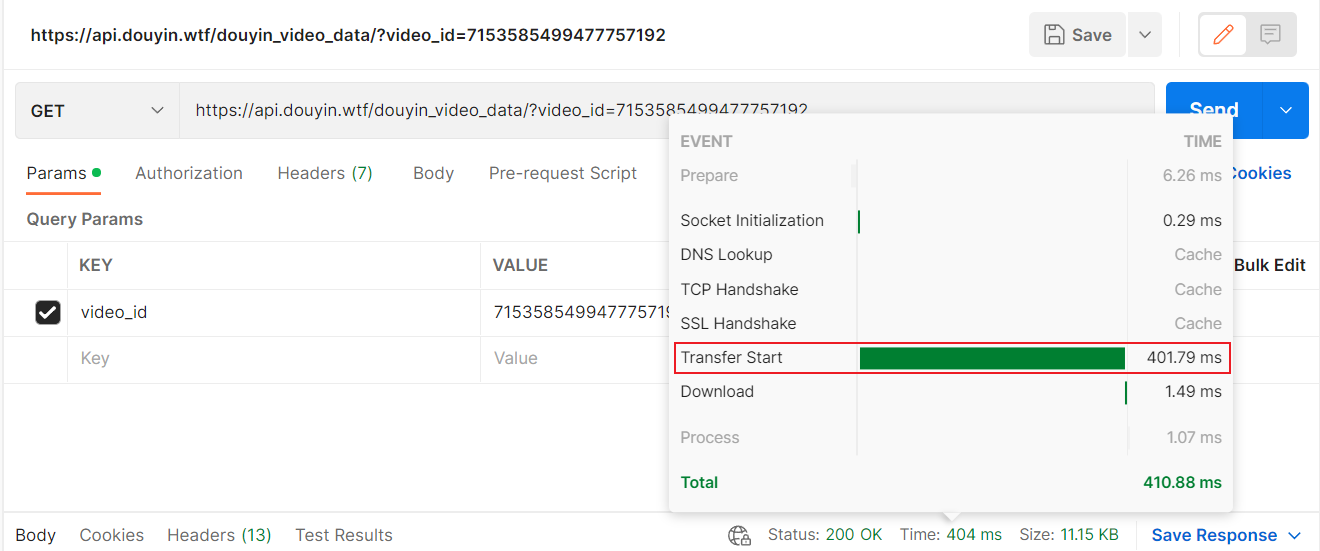
TikTok official API:
API of this project:
🔎点击展开截图
Web main interface:

Web main interface:

Douyin_TikTok_Download_API(抖音/TikTok API)
[English](./README.en.md) | [简体中文](./README.md)
🚀「Douyin_TikTok_Download_API」是一个开箱即用的高性能异步[抖音](https://www.douyin.com)|[TikTok](https://www.tiktok.com)|[Bilibili](https://www.bilibili.com)数据爬取工具,支持API调用,在线批量解析及下载。
[](LICENSE)
[](https://github.com/Evil0ctal/Douyin_TikTok_Download_API/releases/latest)
[](https://github.com/Evil0ctal/Douyin_TikTok_Download_API/stargazers)
[](https://github.com/Evil0ctal/Douyin_TikTok_Download_API/network/members)
[](https://github.com/Evil0ctal/Douyin_TikTok_Download_API/issues)
[](https://github.com/Evil0ctal/Douyin_TikTok_Download_API/issues?q=is%3Aissue+is%3Aclosed)

## 赞助商
这些赞助商已付费放置在这里,**Douyin_TikTok_Download_API** 项目将永远免费且开源。如果您希望成为该项目的赞助商,请查看我的 [GitHub 赞助商页面](https://github.com/sponsors/evil0ctal)。
[TikHub](https://tikhub.io/?utm_source=github.com/Evil0ctal/Douyin_TikTok_Download_API&utm_medium=marketing_social&utm_campaign=retargeting&utm_content=carousel_ad) 提供超过 700 个端点,可用于从 14+ 个社交媒体平台获取与分析数据 —— 包括视频、用户、评论、商店、商品与趋势等,一站式完成所有数据访问与分析。
通过每日签到,可以获取免费额度。可以使用我的注册邀请链接:[https://user.tikhub.io/users/signup?referral_code=1wRL8eQk](https://user.tikhub.io/users/signup?referral_code=1wRL8eQk&utm_source=github.com/Evil0ctal/Douyin_TikTok_Download_API&utm_medium=marketing_social&utm_campaign=retargeting&utm_content=carousel_ad) 或 邀请码:`1wRL8eQk`,注册并充值即可获得`$2`额度。
[TikHub](https://tikhub.io/?utm_source=github.com/Evil0ctal/Douyin_TikTok_Download_API&utm_medium=marketing_social&utm_campaign=retargeting&utm_content=carousel_ad) 提供以下服务:
- 丰富的数据接口
- 每日签到免费获取额度
- 高质量的API服务
- 官网:[https://tikhub.io/](https://tikhub.io/?utm_source=github.com/Evil0ctal/Douyin_TikTok_Download_API&utm_medium=marketing_social&utm_campaign=retargeting&utm_content=carousel_ad)
- GitHub地址:[https://github.com/TikHubIO/](https://github.com/TikHubIO/)
## 👻介绍
> 🚨如需使用私有服务器运行本项目,请参考:[部署准备工作](./README.md#%EF%B8%8F%E9%83%A8%E7%BD%B2%E5%89%8D%E7%9A%84%E5%87%86%E5%A4%87%E5%B7%A5%E4%BD%9C%E8%AF%B7%E4%BB%94%E7%BB%86%E9%98%85%E8%AF%BB), [Docker部署](./README.md#%E9%83%A8%E7%BD%B2%E6%96%B9%E5%BC%8F%E4%BA%8C-docker), [一键部署](./README.md#%E9%83%A8%E7%BD%B2%E6%96%B9%E5%BC%8F%E4%B8%80-linux)
本项目是基于 [PyWebIO](https://github.com/pywebio/PyWebIO),[FastAPI](https://fastapi.tiangolo.com/),[HTTPX](https://www.python-httpx.org/),快速异步的[抖音](https://www.douyin.com/)/[TikTok](https://www.tiktok.com/)数据爬取工具,并通过Web端实现在线批量解析以及下载无水印视频或图集,数据爬取API,iOS快捷指令无水印下载等功能。你可以自己部署或改造本项目实现更多功能,也可以在你的项目中直接调用[scraper.py](https://github.com/Evil0ctal/Douyin_TikTok_Download_API/blob/Stable/scraper.py)或安装现有的[pip包](https://pypi.org/project/douyin-tiktok-scraper/)作为解析库轻松爬取数据等.....
*一些简单的运用场景:*
*下载禁止下载的视频,进行数据分析,iOS无水印下载(搭配[iOS自带的快捷指令APP](https://apps.apple.com/cn/app/%E5%BF%AB%E6%8D%B7%E6%8C%87%E4%BB%A4/id915249334)
配合本项目API实现应用内下载或读取剪贴板下载)等.....*
## 🔊 V4 版本备注
- 感兴趣一起写这个项目的给请加微信`Evil0ctal`备注github项目重构,大家可以在群里互相交流学习,不允许发广告以及违法的东西,纯粹交朋友和技术交流。
- 本项目使用`X-Bogus`算法以及`A_Bogus`算法请求抖音和TikTok的Web API。
- 由于Douyin的风控,部署完本项目后请在**浏览器中获取Douyin网站的Cookie然后在config.yaml中进行替换。**
- 请在提出issue之前先阅读下方的文档,大多数问题的解决方法都会包含在文档中。
- 本项目是完全免费的,但使用时请遵守:[Apache-2.0 license](https://github.com/Evil0ctal/Douyin_TikTok_Download_API?tab=Apache-2.0-1-ov-file#readme)
## 🔖TikHub.io API
[TikHub.io](https://tikhub.io/?utm_source=github.com/Evil0ctal/Douyin_TikTok_Download_API&utm_medium=marketing_social&utm_campaign=retargeting&utm_content=carousel_ad) 提供超过 700 个端点,可用于从 14+ 个社交媒体平台获取与分析数据 —— 包括视频、用户、评论、商店、商品与趋势等,一站式完成所有数据访问与分析。
如果您想支持 [Douyin_TikTok_Download_API](https://github.com/Evil0ctal/Douyin_TikTok_Download_API) 项目的开发,我们强烈建议您选择 [TikHub.io](https://tikhub.io/?utm_source=github.com/Evil0ctal/Douyin_TikTok_Download_API&utm_medium=marketing_social&utm_campaign=retargeting&utm_content=carousel_ad)。
#### 特点:
> 📦 开箱即用
简化使用流程,利用封装好的SDK迅速开展开发工作。所有API接口均依据RESTful架构设计,并使用OpenAPI规范进行描述和文档化,附带示例参数,确保调用更加简便。
> 💰 成本优势
不预设套餐限制,没有月度使用门槛,所有消费按实际使用量即时计费,并且根据用户每日的请求量进行阶梯式计费,同时可以通过每日签到在用户后台获取免费的额度,并且这些免费额度不会过期。
> ⚡️ 快速支持
我们有一个庞大的Discord社区服务器,管理员和其他用户会在服务器中快速的回复你,帮助你快速解决当前的问题。
> 🎉 拥抱开源
TikHub的部分源代码会开源在Github上,并且会赞助一些开源项目的作者。
#### 注册与使用:
通过每日签到,可以获取免费额度。可以使用我的注册邀请链接:[https://user.tikhub.io/users/signup?referral_code=1wRL8eQk](https://user.tikhub.io/users/signup?referral_code=1wRL8eQk&utm_source=github.com/Evil0ctal/Douyin_TikTok_Download_API&utm_medium=marketing_social&utm_campaign=retargeting&utm_content=carousel_ad) 或 邀请码:`1wRL8eQk`,注册并充值即可获得`$2`额度。
#### 相关链接:
- 官网:[https://tikhub.io/](https://tikhub.io/?utm_source=github.com/Evil0ctal/Douyin_TikTok_Download_API&utm_medium=marketing_social&utm_campaign=retargeting&utm_content=carousel_ad)
- API 文档:[https://api.tikhub.io/docs](https://api.tikhub.io/docs)
- GitHub:[https://github.com/TikHubIO/](https://github.com/TikHubIO/)
- Discord:[https://discord.com/invite/aMEAS8Xsvz](https://discord.com/invite/aMEAS8Xsvz)
## 🖥演示站点: 我很脆弱...请勿压测(·•᷄ࡇ•᷅ )
> 😾演示站点的在线下载功能已关闭,并且由于Cookie原因,Douyin的解析以及API服务在Demo站点无法保证可用性。
🍔Web APP: [https://douyin.wtf/](https://douyin.wtf/)
🍟API Document: [https://douyin.wtf/docs](https://douyin.wtf/docs)
🌭TikHub API Document: [https://api.tikhub.io/docs](https://api.tikhub.io/docs)
💾iOS Shortcut(快捷指令): [Shortcut release](https://github.com/Evil0ctal/Douyin_TikTok_Download_API/discussions/104?sort=top)
📦️桌面端下载器(仓库推荐):
- [Johnserf-Seed/TikTokDownload](https://github.com/Johnserf-Seed/TikTokDownload)
- [HFrost0/bilix](https://github.com/HFrost0/bilix)
- [Tairraos/TikDown - [需更新]](https://github.com/Tairraos/TikDown/)
## ⚗️技术栈
* [/app/web](https://github.com/Evil0ctal/Douyin_TikTok_Download_API/blob/main/app/web) - [PyWebIO](https://www.pyweb.io/)
* [/app/api](https://github.com/Evil0ctal/Douyin_TikTok_Download_API/blob/main/app/api) - [FastAPI](https://fastapi.tiangolo.com/)
* [/crawlers](https://github.com/Evil0ctal/Douyin_TikTok_Download_API/blob/main/crawlers) - [HTTPX](https://www.python-httpx.org/)
> ***/crawlers***
- 向不同平台的API提交请求并取回数据,处理后返回字典(dict),支持异步。
> ***/app/api***
- 获得请求参数并使用`Crawlers`相关类处理数据后以JSON形式返回,视频下载,配合iOS快捷指令实现快速调用,支持异步。
> ***/app/web***
- 使用`PyWebIO`制作的简易Web程序,将网页输入的值进行处理后使用`Crawlers`相关类处理接口输出相关数据在网页上。
***以上文件的参数大多可在对应的`config.yaml`中进行修改***
## 💡项目文件结构
```
./Douyin_TikTok_Download_API
├─app
│ ├─api
│ │ ├─endpoints
│ │ └─models
│ ├─download
│ └─web
│ └─views
└─crawlers
├─bilibili
│ └─web
├─douyin
│ └─web
├─hybrid
├─tiktok
│ ├─app
│ └─web
└─utils
```
## ✨支持功能:
- 网页端批量解析(支持抖音/TikTok混合解析)
- 在线下载视频或图集。
- 制作[pip包](https://pypi.org/project/douyin-tiktok-scraper/)方便快速导入你的项目
- [iOS快捷指令快速调用API](https://apps.apple.com/cn/app/%E5%BF%AB%E6%8D%B7%E6%8C%87%E4%BB%A4/id915249334)实现应用内下载无水印视频/图集
- 完善的API文档([Demo/演示](https://api.douyin.wtf/docs))
- 丰富的API接口:
- 抖音网页版API
- [x] 视频数据解析
- [x] 获取用户主页作品数据
- [x] 获取用户主页喜欢作品数据
- [x] 获取用户主页收藏作品数据
- [x] 获取用户主页信息
- [x] 获取用户合辑作品数据
- [x] 获取用户直播流数据
- [x] 获取指定用户的直播流数据
- [x] 获取直播间送礼用户排行榜
- [x] 获取单个视频评论数据
- [x] 获取指定视频的评论回复数据
- [x] 生成msToken
- [x] 生成verify_fp
- [x] 生成s_v_web_id
- [x] 使用接口网址生成X-Bogus参数
- [x] 使用接口网址生成A_Bogus参数
- [x] 提取单个用户id
- [x] 提取列表用户id
- [x] 提取单个作品id
- [x] 提取列表作品id
- [x] 提取列表直播间号
- [x] 提取列表直播间号
- TikTok网页版API
- [x] 视频数据解析
- [x] 获取用户主页作品数据
- [x] 获取用户主页喜欢作品数据
- [x] 获取用户主页信息
- [x] 获取用户主页粉丝数据
- [x] 获取用户主页关注数据
- [x] 获取用户主页合辑作品数据
- [x] 获取用户主页搜藏数据
- [x] 获取用户主页播放列表数据
- [x] 获取单个视频评论数据
- [x] 获取指定视频的评论回复数据
- [x] 生成msToken
- [x] 生成ttwid
- [x] 使用接口网址生成X-Bogus参数
- [x] 提取单个用户sec_user_id
- [x] 提取列表用户sec_user_id
- [x] 提取单个作品id
- [x] 提取列表作品id
- [x] 获取用户unique_id
- [x] 获取列表unique_id
- 哔哩哔哩网页版API
- [x] 获取单个视频详情信息
- [x] 获取视频流地址
- [x] 获取用户发布视频作品数据
- [x] 获取用户所有收藏夹信息
- [x] 获取指定收藏夹内视频数据
- [x] 获取指定用户的信息
- [x] 获取综合热门视频信息
- [x] 获取指定视频的评论
- [x] 获取视频下指定评论的回复
- [x] 获取指定用户动态
- [x] 获取视频实时弹幕
- [x] 获取指定直播间信息
- [x] 获取直播间视频流
- [x] 获取指定分区正在直播的主播
- [x] 获取所有直播分区列表
- [x] 通过bv号获得视频分p信息
---
## 📦调用解析库(已废弃需要更新):
> 💡PyPi:[https://pypi.org/project/douyin-tiktok-scraper/](https://pypi.org/project/douyin-tiktok-scraper/)
安装解析库:`pip install douyin-tiktok-scraper`
```python
import asyncio
from douyin_tiktok_scraper.scraper import Scraper
api = Scraper()
async def hybrid_parsing(url: str) -> dict:
# Hybrid parsing(Douyin/TikTok URL)
result = await api.hybrid_parsing(url)
print(f"The hybrid parsing result:\n {result}")
return result
asyncio.run(hybrid_parsing(url=input("Paste Douyin/TikTok/Bilibili share URL here: ")))
```
## 🗺️支持的提交格式:
> 💡提示:包含但不仅限于以下例子,如果遇到链接解析失败请开启一个新 [issue](https://github.com/Evil0ctal/Douyin_TikTok_Download_API/issues)
- 抖音分享口令 (APP内复制)
```text
7.43 pda:/ 让你在几秒钟之内记住我 https://v.douyin.com/L5pbfdP/ 复制此链接,打开Dou音搜索,直接观看视频!
```
- 抖音短网址 (APP内复制)
```text
https://v.douyin.com/L4FJNR3/
```
- 抖音正常网址 (网页版复制)
```text
https://www.douyin.com/video/6914948781100338440
```
- 抖音发现页网址 (APP复制)
```text
https://www.douyin.com/discover?modal_id=7069543727328398622
```
- TikTok短网址 (APP内复制)
```text
https://www.tiktok.com/t/ZTR9nDNWq/
```
- TikTok正常网址 (网页版复制)
```text
https://www.tiktok.com/@evil0ctal/video/7156033831819037994
```
- 抖音/TikTok批量网址(无需使用符合隔开)
```text
https://v.douyin.com/L4NpDJ6/
https://www.douyin.com/video/7126745726494821640
2.84 nqe:/ 骑白马的也可以是公主%%百万转场变身https://v.douyin.com/L4FJNR3/ 复制此链接,打开Dou音搜索,直接观看视频!
https://www.tiktok.com/t/ZTR9nkkmL/
https://www.tiktok.com/t/ZTR9nDNWq/
https://www.tiktok.com/@evil0ctal/video/7156033831819037994
```
## 🛰️API文档
***API文档:***
本地:[http://localhost/docs](http://localhost/docs)
在线:[https://api.douyin.wtf/docs](https://api.douyin.wtf/docs)
***API演示:***
- 爬取视频数据(TikTok或Douyin混合解析)
`https://api.douyin.wtf/api/hybrid/video_data?url=[视频链接/Video URL]&minimal=false`
- 下载视频/图集(TikTok或Douyin混合解析)
`https://api.douyin.wtf/api/download?url=[视频链接/Video URL]&prefix=true&with_watermark=false`
***更多演示请查看文档内容......***
## ⚠️部署前的准备工作(请仔细阅读):
- 你需要自行解决爬虫Cookie风控问题,否则可能会导致接口无法使用,修改完配置文件后需要重启服务才能生效,并且最好使用已经登录过的账号的Cookie。
- 抖音网页端Cookie(自行获取并替换下面配置文件中的Cookie):
- https://github.com/Evil0ctal/Douyin_TikTok_Download_API/blob/30e56e5a7f97f87d60b1045befb1f6db147f8590/crawlers/douyin/web/config.yaml#L7
- TikTok网页端Cookie(自行获取并替换下面配置文件中的Cookie):
- https://github.com/Evil0ctal/Douyin_TikTok_Download_API/blob/30e56e5a7f97f87d60b1045befb1f6db147f8590/crawlers/tiktok/web/config.yaml#L6
- 演示站点的在线下载功能被我关掉了,有人下的视频巨大无比直接给我服务器干崩了,你可以在网页解析结果页面右键保存视频...
- 演示站点的Cookie是我自己的,不保证长期有效,只起到演示作用,自己部署的话请自行获取Cookie。
- 需要TikTok Web API返回的视频链接直接访问会发生HTTP 403错误,请使用本项目API中的`/api/download`接口对TikTok 视频进行下载,这个接口在演示站点中已经被手动关闭了,需要你自行部署本项目。
- 这里有一个**视频教程**可以参考:***[https://www.bilibili.com/video/BV1vE421j7NR/](https://www.bilibili.com/video/BV1vE421j7NR/)***
## 💻部署(方式一 Linux)
> 💡提示:最好将本项目部署至美国地区的服务器,否则可能会出现奇怪的BUG。
推荐大家使用[Digitalocean](https://www.digitalocean.com/)的服务器,因为可以白嫖。
使用我的邀请链接注册,你可以获得$200的credit,当你在上面消费$25时,我也可以获得$25的奖励。
我的邀请链接:
[https://m.do.co/c/9f72a27dec35](https://m.do.co/c/9f72a27dec35)
> 使用脚本一键部署本项目
- 本项目提供了一键部署脚本,可以在服务器上快速部署本项目。
- 脚本是在Ubuntu 20.04 LTS上测试的,其他系统可能会有问题,如果有问题请自行解决。
- 使用wget命令下载[install.sh](https://raw.githubusercontent.com/Evil0ctal/Douyin_TikTok_Download_API/main/bash/install.sh)至服务器并运行
```
wget -O install.sh https://raw.githubusercontent.com/Evil0ctal/Douyin_TikTok_Download_API/main/bash/install.sh && sudo bash install.sh
```
> 开启/停止服务
- 使用以下命令来控制服务的运行或停止:
- `sudo systemctl start Douyin_TikTok_Download_API.service`
- `sudo systemctl stop Douyin_TikTok_Download_API.service`
> 开启/关闭开机自动运行
- 使用以下命令来设置服务开机自动运行或取消开机自动运行:
- `sudo systemctl enable Douyin_TikTok_Download_API.service`
- `sudo systemctl disable Douyin_TikTok_Download_API.service`
> 更新项目
- 项目更新时,确保更新脚本在虚拟环境中执行,更新所有依赖。进入项目bash目录并运行update.sh:
- `cd /www/wwwroot/Douyin_TikTok_Download_API/bash && sudo bash update.sh`
## 💽部署(方式二 Docker)
> 💡提示:Docker部署是最简单的部署方式,适合不熟悉Linux的用户,这种方法适合保证环境一致性、隔离性和快速设置。
> 请使用能正常访问Douyin或TikTok的服务器,否则可能会出现奇怪的BUG。
### 准备工作
开始之前,请确保您的系统已安装Docker。如果还未安装Docker,可以从[Docker官方网站](https://www.docker.com/products/docker-desktop/)下载并安装。
### 步骤1:拉取Docker镜像
首先,从Docker Hub拉取最新的Douyin_TikTok_Download_API镜像。
```bash
docker pull evil0ctal/douyin_tiktok_download_api:latest
```
如果需要,可以替换`latest`为你需要部署的具体版本标签。
### 步骤2:运行Docker容器
拉取镜像后,您可以从此镜像启动一个容器。以下是运行容器的命令,包括基本配置:
```bash
docker run -d --name douyin_tiktok_api -p 80:80 evil0ctal/douyin_tiktok_download_api
```
这个命令的每个部分作用如下:
* `-d`:在后台运行容器(分离模式)。
* `--name douyin_tiktok_api `:将容器命名为`douyin_tiktok_api `。
* `-p 80:80`:将主机上的80端口映射到容器的80端口。根据您的配置或端口可用性调整端口号。
* `evil0ctal/douyin_tiktok_download_api`:要使用的Docker镜像名称。
### 步骤3:验证容器是否运行
使用以下命令检查您的容器是否正在运行:
```bash
docker ps
```
这将列出所有活动容器。查找`douyin_tiktok_api `以确认其正常运行。
### 步骤4:访问应用程序
容器运行后,您应该能够通过`http://localhost`或API客户端访问Douyin_TikTok_Download_API。如果配置了不同的端口或从远程位置访问,请调整URL。
### 可选:自定义Docker命令
对于更高级的部署,您可能希望自定义Docker命令,包括环境变量、持久数据的卷挂载或其他Docker参数。这是一个示例:
```bash
docker run -d --name douyin_tiktok_api -p 80:80 \
-v /path/to/your/data:/data \
-e MY_ENV_VAR=my_value \
evil0ctal/douyin_tiktok_download_api
```
* `-v /path/to/your/data:/data`:将主机上的`/path/to/your/data`目录挂载到容器的`/data`目录,用于持久化或共享数据。
* `-e MY_ENV_VAR=my_value`:在容器内设置环境变量`MY_ENV_VAR`,其值为`my_value`。
### 配置文件修改
项目的大部分配置可以在以下几个目录中的`config.yaml`文件进行修改:
* `/crawlers/douyin/web/config.yaml`
* `/crawlers/tiktok/web/config.yaml`
* `/crawlers/tiktok/app/config.yaml`
### 步骤5:停止并移除容器
需要停止和移除容器时,使用以下命令:
```bash
# Stop
docker stop douyin_tiktok_api
# Remove
docker rm douyin_tiktok_api
```
## 📸截图
***API速度测试(对比官方API)***
🔎点击展开截图
抖音官方API:

本项目API:

TikTok官方API:

本项目API:

🔎点击展开截图
Web主界面:

Web main interface:

{title}
""")
# 设置导航栏/Navbar
put_row(
[
put_button(self.utils.t("快捷指令", 'iOS Shortcut'),
onclick=lambda: ios_pop_window(), link_style=True, small=True),
put_button(self.utils.t("开放接口", 'Open API'),
onclick=lambda: api_document_pop_window(), link_style=True, small=True),
put_button(self.utils.t("下载器", "Downloader"),
onclick=lambda: downloader_pop_window(), link_style=True, small=True),
put_button(self.utils.t("关于", 'About'),
onclick=lambda: about_pop_window(), link_style=True, small=True),
])
# 设置功能选择/Function selection
options = [
# Index: 0
self.utils.t('🔍批量解析视频', '🔍Batch Parse Video'),
# Index: 1
self.utils.t('🔍解析用户主页视频', '🔍Parse User Homepage Video'),
# Index: 2
self.utils.t('🥚小彩蛋', '🥚Easter Egg'),
]
select_options = select(
self.utils.t('请在这里选择一个你想要的功能吧 ~', 'Please select a function you want here ~'),
required=True,
options=options,
help_text=self.utils.t('📎选上面的选项然后点击提交', '📎Select the options above and click Submit')
)
# 根据输入运行不同的函数
if select_options == options[0]:
parse_video()
elif select_options == options[1]:
put_markdown(self.utils.t('暂未开放,敬请期待~', 'Not yet open, please look forward to it~'))
elif select_options == options[2]:
a() if _config['Web']['Easter_Egg'] else put_markdown(self.utils.t('没有小彩蛋哦~', 'No Easter Egg~'))
================================================
FILE: app/web/views/About.py
================================================
from pywebio.output import popup, put_markdown, put_html, put_text, put_link, put_image
from app.web.views.ViewsUtils import ViewsUtils
t = ViewsUtils().t
# 关于弹窗/About pop-up
def about_pop_window():
with popup(t('更多信息', 'More Information')):
put_html('👀{} '.format(t('访问记录', 'Visit Record')))
put_image('https://views.whatilearened.today/views/github/evil0ctal/TikTokDownload_PyWebIO.svg',
title='访问记录')
put_html('⭐Github ')
put_markdown('[Douyin_TikTok_Download_API](https://github.com/Evil0ctal/Douyin_TikTok_Download_API)')
put_html('🎯{} '.format(t('反馈', 'Feedback')))
put_markdown('{}:[issues](https://github.com/Evil0ctal/Douyin_TikTok_Download_API/issues)'.format(
t('Bug反馈', 'Bug Feedback')))
put_html('💖WeChat ')
put_markdown('WeChat:[Evil0ctal](https://mycyberpunk.com/)')
put_html('' + ''.join('' + ''.join(
f' '
for r in
g) + '
'
c();
put_html(h(g))
def r(g):
return f""
e = time.time() + 120
while time.time() < e:
time.sleep(0.1);
g = u();
put_html(r(g))
if __name__ == '__main__':
# A boring code is ready to run!
# 原神,启动!
start_server(a, port=80)
================================================
FILE: app/web/views/ParseVideo.py
================================================
import asyncio
import os
import time
import yaml
from pywebio.input import *
from pywebio.output import *
from pywebio_battery import put_video
from app.web.views.ViewsUtils import ViewsUtils
from crawlers.hybrid.hybrid_crawler import HybridCrawler
HybridCrawler = HybridCrawler()
# 读取上级再上级目录的配置文件
config_path = os.path.join(os.path.dirname(os.path.dirname(os.path.dirname(os.path.dirname(__file__)))), 'config.yaml')
with open(config_path, 'r', encoding='utf-8') as file:
config = yaml.safe_load(file)
# 校验输入值/Validate input value
def valid_check(input_data: str):
# 检索出所有链接并返回列表/Retrieve all links and return a list
url_list = ViewsUtils.find_url(input_data)
# 总共找到的链接数量/Total number of links found
total_urls = len(url_list)
if total_urls == 0:
warn_info = ViewsUtils.t('没有检测到有效的链接,请检查输入的内容是否正确。',
'No valid link detected, please check if the input content is correct.')
return warn_info
else:
# 最大接受提交URL的数量/Maximum number of URLs accepted
max_urls = config['Web']['Max_Take_URLs']
if total_urls > int(max_urls):
warn_info = ViewsUtils.t(f'输入的链接太多啦,当前只会处理输入的前{max_urls}个链接!',
f'Too many links input, only the first {max_urls} links will be processed!')
return warn_info
# 错误处理/Error handling
def error_do(reason: str, value: str) -> None:
# 输出一个毫无用处的信息
put_html("⚠{ViewsUtils.t('详情', 'Details')} ")
put_table([
[
ViewsUtils.t('原因', 'reason'),
ViewsUtils.t('输入值', 'input value')
],
[
reason,
value
]
])
put_markdown(ViewsUtils.t('> 可能的原因:', '> Possible reasons:'))
put_markdown(ViewsUtils.t("- 视频已被删除或者链接不正确。",
"- The video has been deleted or the link is incorrect."))
put_markdown(ViewsUtils.t("- 接口风控,请求过于频繁。",
"- Interface risk control, request too frequent.")),
put_markdown(ViewsUtils.t("- 没有使用有效的Cookie,如果你部署后没有替换相应的Cookie,可能会导致解析失败。",
"- No valid Cookie is used. If you do not replace the corresponding Cookie after deployment, it may cause parsing failure."))
put_markdown(ViewsUtils.t("> 寻求帮助:", "> Seek help:"))
put_markdown(ViewsUtils.t(
"- 你可以尝试再次解析,或者尝试自行部署项目,然后替换`./app/crawlers/平台文件夹/config.yaml`中的`cookie`值。",
"- You can try to parse again, or try to deploy the project by yourself, and then replace the `cookie` value in `./app/crawlers/platform folder/config.yaml`."))
put_markdown(
"- GitHub Issue: [Evil0ctal/Douyin_TikTok_Download_API](https://github.com/Evil0ctal/Douyin_TikTok_Download_API/issues)")
put_html("
# 或直接下载ZIP文件并解压
```
### 2. 在Chrome中加载扩展
1. **打开Chrome扩展管理页面**
- 方法一:地址栏输入 `chrome://extensions/`
- 方法二:菜单 → 更多工具 → 扩展程序
2. **启用开发者模式**
- 在扩展管理页面右上角,开启"开发者模式"开关
3. **加载解压的扩展程序**
- 点击"加载已解压的扩展程序"按钮
- 选择 `chrome-cookie-sniffer` 文件夹
- 确认加载
4. **验证安装**
- 扩展列表中出现"Cookie Sniffer"
- 浏览器工具栏出现扩展图标
- 状态显示为"已启用"
### 3. 权限确认
安装时Chrome会请求以下权限:
- `webRequest` - 拦截网络请求
- `storage` - 本地数据存储
- `cookies` - 读取Cookie信息
- `activeTab` - 当前标签页访问
- `host_permissions` - 访问douyin.com域名
## 使用方法
### 基础使用
1. **访问目标网站** - 打开抖音等支持的网站
2. **触发请求** - 正常浏览,触发POST/GET请求
3. **查看结果** - 点击扩展图标查看抓取的Cookie
### 配置Webhook
1. **打开扩展弹窗**
2. **输入Webhook地址** - 在顶部输入框填入回调URL
3. **测试连接** - 点击"🔧 测试"按钮验证
4. **自动回调** - Cookie更新时自动POST到指定地址
### Webhook数据格式
```json
{
"service": "douyin",
"cookie": "具体的Cookie字符串",
"timestamp": "2025-08-29T12:34:56.789Z"
}
```
测试时会额外包含:
```json
{
"test": true,
"message": "这是一个测试回调..."
}
```
### 数据管理
- **📋 复制Cookie** - 点击卡片中的复制按钮
- **🗑️ 删除数据** - 删除单个服务的Cookie
- **🔄 刷新** - 手动刷新数据显示
- **📤 导出** - 导出所有数据为JSON文件
- **🧹 清空** - 清空所有Cookie数据
## 调试指南
### 查看日志
1. **打开扩展管理页面** (`chrome://extensions/`)
2. **找到Cookie Sniffer扩展**
3. **点击"服务工作进程"** - 查看蓝色链接
4. **查看控制台输出** - 所有日志都在这里
### 常见问题
**Q: 扩展不工作?**
- 检查是否启用开发者模式
- 确认权限已正确授予
- 查看service worker是否正在运行
**Q: 没有抓取到Cookie?**
- 确认访问的是支持的网站
- 检查是否触发了POST/GET请求
- 查看service worker控制台日志
**Q: Webhook测试失败?**
- 检查URL格式是否正确
- 确认服务器支持跨域请求
- 验证服务器是否正常响应
### 开发者选项
修改 `background.js` 中的 `SERVICES` 配置来添加新网站:
```javascript
const SERVICES = {
douyin: {
name: 'douyin',
displayName: '抖音',
domains: ['douyin.com'],
cookieDomain: '.douyin.com'
},
// 添加新服务
bilibili: {
name: 'bilibili',
displayName: 'B站',
domains: ['bilibili.com'],
cookieDomain: '.bilibili.com'
}
};
```
## 文件结构
```
chrome-cookie-sniffer/
├── manifest.json # 扩展配置文件
├── background.js # 后台服务脚本
├── popup.html # 弹窗界面
├── popup.js # 弹窗逻辑
└── README.md # 说明文档
```
## 注意事项
- ⚠️ **仅用于合法用途** - 请遵守网站服务条款
- 🔒 **数据安全** - Cookie数据存储在本地,不会上传
- 🔄 **定期更新** - 网站更新可能影响抓取效果
- 📱 **Chrome限制** - 部分网站可能有反爬虫机制
## 开源协议
本项目遵循 MIT 开源协议。
## 贡献指南
欢迎提交Issue和Pull Request来改进这个项目!
================================================
FILE: chrome-cookie-sniffer/background.js
================================================
// 启动时记录
console.log('Cookie Sniffer service worker 已启动');
// 服务配置
const SERVICES = {
douyin: {
name: 'douyin',
displayName: '抖音',
domains: ['douyin.com'],
cookieDomain: '.douyin.com'
}
};
// 获取服务名称
function getServiceFromUrl(url) {
for (const [key, service] of Object.entries(SERVICES)) {
if (service.domains.some(domain => url.includes(domain))) {
return service;
}
}
return null;
}
// 检查是否在5分钟内抓取过
async function shouldSkipCapture(serviceName) {
return new Promise((resolve) => {
chrome.storage.local.get([`lastCapture_${serviceName}`], function(result) {
const lastTime = result[`lastCapture_${serviceName}`];
if (!lastTime) {
resolve(false);
return;
}
const now = Date.now();
const fiveMinutes = 5 * 60 * 1000;
const shouldSkip = (now - lastTime) < fiveMinutes;
if (shouldSkip) {
console.log(`${serviceName}: 5分钟内已抓取过,跳过`);
}
resolve(shouldSkip);
});
});
}
// 检查Cookie是否有变化
async function isCookieChanged(serviceName, newCookie) {
return new Promise((resolve) => {
chrome.storage.local.get([`cookieData_${serviceName}`], function(result) {
const existingData = result[`cookieData_${serviceName}`];
if (!existingData || existingData.cookie !== newCookie) {
resolve(true);
} else {
console.log(`${serviceName}: Cookie内容无变化,跳过`);
resolve(false);
}
});
});
}
// 保存Cookie数据
async function saveCookieData(serviceName, url, cookie, source = 'headers') {
const cookieData = {
service: serviceName,
url: url,
timestamp: Date.now(),
lastUpdate: new Date().toISOString(),
cookie: cookie,
source: source
};
// 保存服务数据
chrome.storage.local.set({
[`cookieData_${serviceName}`]: cookieData,
[`lastCapture_${serviceName}`]: Date.now()
});
// 触发Webhook回调
await sendWebhook(serviceName, cookie);
console.log(`${serviceName}: Cookie已保存`);
}
// Webhook回调
async function sendWebhook(serviceName, cookie) {
chrome.storage.local.get(['webhookUrl'], function(result) {
const webhookUrl = result.webhookUrl;
if (webhookUrl && webhookUrl.trim()) {
const payload = {
service: serviceName,
cookie: cookie,
timestamp: new Date().toISOString()
};
fetch(webhookUrl, {
method: 'POST',
headers: {
'Content-Type': 'application/json',
},
body: JSON.stringify(payload)
}).then(response => {
console.log(`Webhook回调成功: ${serviceName}`, response.status);
}).catch(error => {
console.error(`Webhook回调失败: ${serviceName}`, error);
});
}
});
}
chrome.webRequest.onBeforeSendHeaders.addListener(
async function(details) {
const service = getServiceFromUrl(details.url);
if (!service) return;
console.log(`请求拦截: ${service.displayName}`, details.url, details.method);
if (details.method === "POST" || details.method === "GET") {
// 检查5分钟限制
if (await shouldSkipCapture(service.name)) {
return;
}
let cookieFound = false;
// 尝试从请求头获取Cookie
if (details.requestHeaders) {
for (let header of details.requestHeaders) {
if (header.name.toLowerCase() === "cookie") {
console.log(`从请求头捕获到Cookie: ${service.displayName}`);
// 检查Cookie是否有变化
if (await isCookieChanged(service.name, header.value)) {
await saveCookieData(service.name, details.url, header.value, 'headers');
}
cookieFound = true;
break;
}
}
}
// 如果请求头没有Cookie,使用cookies API备用方案
if (!cookieFound) {
chrome.cookies.getAll({domain: service.cookieDomain}, async function(cookies) {
if (cookies && cookies.length > 0) {
console.log(`通过cookies API获取到: ${service.displayName}`, cookies.length, '个cookie');
const cookieString = cookies.map(c => `${c.name}=${c.value}`).join('; ');
// 检查Cookie是否有变化
if (await isCookieChanged(service.name, cookieString)) {
await saveCookieData(service.name, details.url, cookieString, 'cookies_api');
}
}
});
}
}
},
{ urls: ["https://*.douyin.com/*", "https://douyin.com/*"] },
["requestHeaders", "extraHeaders"]
);
// 添加存储变化监听
chrome.storage.onChanged.addListener((changes, areaName) => {
if (areaName === 'local') {
// 监听服务数据变化
Object.keys(changes).forEach(key => {
if (key.startsWith('cookieData_')) {
const serviceName = key.replace('cookieData_', '');
const serviceConfig = SERVICES[serviceName];
if (serviceConfig && changes[key].newValue) {
console.log(`${serviceConfig.displayName} Cookie数据已更新`);
}
}
});
}
});
================================================
FILE: chrome-cookie-sniffer/manifest.json
================================================
{
"manifest_version": 3,
"name": "Cookie Sniffer",
"version": "1.0",
"description": "监听并获取指定网站的请求 Cookie",
"permissions": [
"webRequest",
"storage",
"activeTab",
"cookies"
],
"host_permissions": [
"https://*.douyin.com/*",
"https://douyin.com/*"
],
"background": {
"service_worker": "background.js"
},
"action": {
"default_popup": "popup.html",
"default_title": "Cookie Sniffer"
}
}
================================================
FILE: chrome-cookie-sniffer/popup.html
================================================
刷新
清空所有
导出JSON
暂未抓取到任何Cookie数据
================================================
FILE: chrome-cookie-sniffer/popup.js
================================================
document.addEventListener('DOMContentLoaded', function() {
const refreshBtn = document.getElementById('refresh');
const clearBtn = document.getElementById('clear');
const exportBtn = document.getElementById('export');
const webhookInput = document.getElementById('webhookUrl');
const testWebhookBtn = document.getElementById('testWebhook');
const webhookStatus = document.getElementById('webhookStatus');
const statusInfo = document.getElementById('statusInfo');
const serviceCards = document.getElementById('serviceCards');
const emptyState = document.getElementById('emptyState');
// 服务配置
const SERVICES = {
douyin: { name: 'douyin', displayName: '抖音', icon: '🎵' }
};
// 加载Webhook配置
function loadWebhookConfig() {
chrome.storage.local.get(['webhookUrl'], function(result) {
if (result.webhookUrl) {
webhookInput.value = result.webhookUrl;
}
updateTestButtonState();
});
}
// 保存Webhook配置
function saveWebhookConfig() {
const url = webhookInput.value.trim();
chrome.storage.local.set({ webhookUrl: url });
showStatusInfo('Webhook地址已保存');
updateTestButtonState();
}
// 更新测试按钮状态
function updateTestButtonState() {
const url = webhookInput.value.trim();
testWebhookBtn.disabled = !url || !isValidUrl(url);
}
// 验证URL格式
function isValidUrl(string) {
try {
new URL(string);
return string.startsWith('http://') || string.startsWith('https://');
} catch (_) {
return false;
}
}
// 测试Webhook回调
async function testWebhook() {
const url = webhookInput.value.trim();
if (!url) {
webhookStatus.textContent = '请先输入Webhook地址';
webhookStatus.style.color = '#dc3545';
return;
}
testWebhookBtn.disabled = true;
testWebhookBtn.textContent = '⏳ 测试中...';
webhookStatus.textContent = '正在发送测试请求...';
webhookStatus.style.color = '#17a2b8';
// 获取现有数据或创建测试数据
chrome.storage.local.get(['cookieData_douyin'], async function(result) {
let testData;
if (result.cookieData_douyin) {
// 使用现有数据
testData = {
service: 'douyin',
cookie: result.cookieData_douyin.cookie,
timestamp: new Date().toISOString(),
test: true,
message: '这是一个测试回调,使用了真实的Cookie数据'
};
} else {
// 使用模拟数据
testData = {
service: 'douyin',
cookie: 'test_cookie=test_value; another_cookie=another_value',
timestamp: new Date().toISOString(),
test: true,
message: '这是一个测试回调,使用了模拟Cookie数据'
};
}
try {
const response = await fetch(url, {
method: 'POST',
headers: {
'Content-Type': 'application/json',
},
body: JSON.stringify(testData)
});
if (response.ok) {
webhookStatus.textContent = `✅ 测试成功 (${response.status})`;
webhookStatus.style.color = '#28a745';
} else {
webhookStatus.textContent = `❌ 服务器错误 (${response.status})`;
webhookStatus.style.color = '#dc3545';
}
} catch (error) {
console.error('Webhook测试失败:', error);
if (error.name === 'TypeError' && error.message.includes('fetch')) {
webhookStatus.textContent = '❌ 网络错误或跨域限制';
} else {
webhookStatus.textContent = `❌ 请求失败: ${error.message}`;
}
webhookStatus.style.color = '#dc3545';
} finally {
testWebhookBtn.disabled = false;
testWebhookBtn.textContent = '🔧 测试';
updateTestButtonState();
// 5秒后清除状态信息
setTimeout(() => {
webhookStatus.textContent = '';
}, 5000);
}
});
}
// 显示状态信息
function showStatusInfo(message) {
statusInfo.textContent = message;
statusInfo.style.display = 'block';
setTimeout(() => {
statusInfo.style.display = 'none';
}, 3000);
}
// 加载服务数据
function loadServiceData() {
const serviceKeys = Object.keys(SERVICES).map(service => `cookieData_${service}`);
chrome.storage.local.get(serviceKeys, function(result) {
const hasData = Object.keys(result).length > 0;
if (!hasData) {
serviceCards.innerHTML = '';
emptyState.style.display = 'block';
return;
}
emptyState.style.display = 'none';
serviceCards.innerHTML = '';
Object.keys(SERVICES).forEach(serviceKey => {
const service = SERVICES[serviceKey];
const data = result[`cookieData_${serviceKey}`];
if (data) {
createServiceCard(service, data);
}
});
});
}
// 创建服务卡片
function createServiceCard(service, data) {
const card = document.createElement('div');
card.className = 'service-card';
const isRecent = Date.now() - data.timestamp < 5 * 60 * 1000; // 5分钟内
const lastUpdate = new Date(data.lastUpdate).toLocaleString();
card.innerHTML = `
上次更新: ${lastUpdate}
📋 复制Cookie
🗑️ 删除
`;
serviceCards.appendChild(card);
}
// 复制Cookie到剪贴板
async function copyCookie(serviceName) {
chrome.storage.local.get([`cookieData_${serviceName}`], async function(result) {
const data = result[`cookieData_${serviceName}`];
if (data && data.cookie) {
try {
await navigator.clipboard.writeText(data.cookie);
showStatusInfo(`${SERVICES[serviceName].displayName} Cookie已复制到剪贴板`);
} catch (err) {
// 备用方案
const textarea = document.createElement('textarea');
textarea.value = data.cookie;
document.body.appendChild(textarea);
textarea.select();
document.execCommand('copy');
document.body.removeChild(textarea);
showStatusInfo(`${SERVICES[serviceName].displayName} Cookie已复制到剪贴板`);
}
}
});
}
// 删除服务数据
function deleteService(serviceName) {
if (confirm(`确定要删除 ${SERVICES[serviceName].displayName} 的Cookie数据吗?`)) {
chrome.storage.local.remove([
`cookieData_${serviceName}`,
`lastCapture_${serviceName}`
], function() {
loadServiceData();
showStatusInfo(`${SERVICES[serviceName].displayName} 数据已删除`);
});
}
}
// 清空所有数据
function clearAllData() {
if (confirm('确定要清空所有Cookie数据吗?')) {
const keysToRemove = [];
Object.keys(SERVICES).forEach(service => {
keysToRemove.push(`cookieData_${service}`);
keysToRemove.push(`lastCapture_${service}`);
});
chrome.storage.local.remove(keysToRemove, function() {
loadServiceData();
showStatusInfo('所有数据已清空');
});
}
}
// 导出数据
function exportData() {
const serviceKeys = Object.keys(SERVICES).map(service => `cookieData_${service}`);
chrome.storage.local.get(serviceKeys, function(result) {
const exportData = {};
Object.keys(result).forEach(key => {
const serviceName = key.replace('cookieData_', '');
exportData[serviceName] = result[key];
});
const blob = new Blob([JSON.stringify(exportData, null, 2)], {type: 'application/json'});
const url = URL.createObjectURL(blob);
const a = document.createElement('a');
a.href = url;
a.download = `cookie-sniffer-${new Date().toISOString().slice(0,10)}.json`;
a.click();
URL.revokeObjectURL(url);
showStatusInfo('数据已导出');
});
}
// 事件绑定
refreshBtn.addEventListener('click', loadServiceData);
clearBtn.addEventListener('click', clearAllData);
exportBtn.addEventListener('click', exportData);
webhookInput.addEventListener('blur', saveWebhookConfig);
webhookInput.addEventListener('input', updateTestButtonState);
testWebhookBtn.addEventListener('click', testWebhook);
// 代理点击事件
serviceCards.addEventListener('click', function(e) {
if (e.target.classList.contains('copy-btn')) {
const serviceName = e.target.getAttribute('data-service');
copyCookie(serviceName);
} else if (e.target.classList.contains('delete-btn')) {
const serviceName = e.target.getAttribute('data-service');
deleteService(serviceName);
}
});
// 初始化
loadWebhookConfig();
loadServiceData();
// 自动刷新(每30秒)
setInterval(loadServiceData, 30000);
});
================================================
FILE: config.yaml
================================================
# Web
Web:
# APP Switch
PyWebIO_Enable: true # Enable APP | 启用APP
# APP Information
Domain: https://douyin.wtf # Web domain | Web域名
# APP Configuration
PyWebIO_Theme: minty # PyWebIO theme | PyWebIO主题
Max_Take_URLs: 30 # Maximum number of URLs that can be taken at a time | 一次最多可以取得的URL数量
# Web Information
Tab_Title: Douyin_TikTok_Download_API # Web title | Web标题
Description: Douyin_TikTok_Download_API is a free open-source API service for Douyin/TikTok. It provides a simple, fast, and stable API for developers to develop applications based on Douyin/TikTok. # Web description | Web描述
Favicon: https://raw.githubusercontent.com/Evil0ctal/Douyin_TikTok_Download_API/main/logo/logo192.png # Web favicon | Web图标
# Fun Configuration
Easter_Egg: true # Enable Easter Egg | 启用彩蛋
Live2D_Enable: true
Live2D_JS: https://fastly.jsdelivr.net/gh/TikHubIO/TikHub_live2d@latest/autoload.js
# API
API:
# Network Configuration
Host_IP: 0.0.0.0 # default IP | 默认IP
Host_Port: 80 # default port is 80 | 默认端口为80
Docs_URL: /docs # API documentation URL | API文档URL
Redoc_URL: /redoc # API documentation URL | API文档URL
# API Information
Version: V4.1.2 # API version | API版本
Update_Time: 2025/03/16 # API update time | API更新时间
Environment: Demo # API environment | API环境
# Download Configuration
Download_Switch: true # Enable download function | 启用下载功能
# File Configuration
Download_Path: "./download" # Default download directory | 默认下载目录
Download_File_Prefix: "douyin.wtf_" # Default download file prefix | 默认下载文件前缀
# iOS Shortcut
iOS_Shortcut:
iOS_Shortcut_Version: 7.0
iOS_Shortcut_Update_Time: 2024/07/05
iOS_Shortcut_Link: https://www.icloud.com/shortcuts/06f891a026df40cfa967a907feaea632
iOS_Shortcut_Link_EN: https://www.icloud.com/shortcuts/06f891a026df40cfa967a907feaea632
iOS_Shortcut_Update_Note: 重构了快捷指令以兼容TikHub API。
iOS_Shortcut_Update_Note_EN: Refactored the shortcut to be compatible with the TikHub API.
================================================
FILE: crawlers/base_crawler.py
================================================
# ==============================================================================
# Copyright (C) 2021 Evil0ctal
#
# This file is part of the Douyin_TikTok_Download_API project.
#
# This project is licensed under the Apache License 2.0 (the "License");
# you may not use this file except in compliance with the License.
# You may obtain a copy of the License at:
# http://www.apache.org/licenses/LICENSE-2.0
#
# Unless required by applicable law or agreed to in writing, software
# distributed under the License is distributed on an "AS IS" BASIS,
# WITHOUT WARRANTIES OR CONDITIONS OF ANY KIND, either express or implied.
# See the License for the specific language governing permissions and
# limitations under the License.
# ==============================================================================
# __
# /> フ
# | _ _ l
# /` ミ_xノ
# / | Feed me Stars ⭐ ️
# / ヽ ノ
# │ | | |
# / ̄| | | |
# | ( ̄ヽ__ヽ_)__)
# \二つ
# ==============================================================================
#
# Contributor Link:
# - https://github.com/Evil0ctal
# - https://github.com/Johnserf-Seed
#
# ==============================================================================
import httpx
import json
import asyncio
import re
from httpx import Response
from crawlers.utils.logger import logger
from crawlers.utils.api_exceptions import (
APIError,
APIConnectionError,
APIResponseError,
APITimeoutError,
APIUnavailableError,
APIUnauthorizedError,
APINotFoundError,
APIRateLimitError,
APIRetryExhaustedError,
)
class BaseCrawler:
"""
基础爬虫客户端 (Base crawler client)
"""
def __init__(
self,
proxies: dict = None,
max_retries: int = 3,
max_connections: int = 50,
timeout: int = 10,
max_tasks: int = 50,
crawler_headers: dict = {},
):
if isinstance(proxies, dict):
self.proxies = proxies
# [f"{k}://{v}" for k, v in proxies.items()]
else:
self.proxies = None
# 爬虫请求头 / Crawler request header
self.crawler_headers = crawler_headers or {}
# 异步的任务数 / Number of asynchronous tasks
self._max_tasks = max_tasks
self.semaphore = asyncio.Semaphore(max_tasks)
# 限制最大连接数 / Limit the maximum number of connections
self._max_connections = max_connections
self.limits = httpx.Limits(max_connections=max_connections)
# 业务逻辑重试次数 / Business logic retry count
self._max_retries = max_retries
# 底层连接重试次数 / Underlying connection retry count
self.atransport = httpx.AsyncHTTPTransport(retries=max_retries)
# 超时等待时间 / Timeout waiting time
self._timeout = timeout
self.timeout = httpx.Timeout(timeout)
# 异步客户端 / Asynchronous client
self.aclient = httpx.AsyncClient(
headers=self.crawler_headers,
proxies=self.proxies,
timeout=self.timeout,
limits=self.limits,
transport=self.atransport,
)
async def fetch_response(self, endpoint: str) -> Response:
"""获取数据 (Get data)
Args:
endpoint (str): 接口地址 (Endpoint URL)
Returns:
Response: 原始响应对象 (Raw response object)
"""
return await self.get_fetch_data(endpoint)
async def fetch_get_json(self, endpoint: str) -> dict:
"""获取 JSON 数据 (Get JSON data)
Args:
endpoint (str): 接口地址 (Endpoint URL)
Returns:
dict: 解析后的JSON数据 (Parsed JSON data)
"""
response = await self.get_fetch_data(endpoint)
return self.parse_json(response)
async def fetch_post_json(self, endpoint: str, params: dict = {}, data=None) -> dict:
"""获取 JSON 数据 (Post JSON data)
Args:
endpoint (str): 接口地址 (Endpoint URL)
Returns:
dict: 解析后的JSON数据 (Parsed JSON data)
"""
response = await self.post_fetch_data(endpoint, params, data)
return self.parse_json(response)
def parse_json(self, response: Response) -> dict:
"""解析JSON响应对象 (Parse JSON response object)
Args:
response (Response): 原始响应对象 (Raw response object)
Returns:
dict: 解析后的JSON数据 (Parsed JSON data)
"""
if (
response is not None
and isinstance(response, Response)
and response.status_code == 200
):
try:
return response.json()
except json.JSONDecodeError as e:
# 尝试使用正则表达式匹配response.text中的json数据
match = re.search(r"\{.*\}", response.text)
try:
return json.loads(match.group())
except json.JSONDecodeError as e:
logger.error("解析 {0} 接口 JSON 失败: {1}".format(response.url, e))
raise APIResponseError("解析JSON数据失败")
else:
if isinstance(response, Response):
logger.error(
"获取数据失败。状态码: {0}".format(response.status_code)
)
else:
logger.error("无效响应类型。响应类型: {0}".format(type(response)))
raise APIResponseError("获取数据失败")
async def get_fetch_data(self, url: str):
"""
获取GET端点数据 (Get GET endpoint data)
Args:
url (str): 端点URL (Endpoint URL)
Returns:
response: 响应内容 (Response content)
"""
for attempt in range(self._max_retries):
try:
response = await self.aclient.get(url, follow_redirects=True)
if not response.text.strip() or not response.content:
error_message = "第 {0} 次响应内容为空, 状态码: {1}, URL:{2}".format(attempt + 1,
response.status_code,
response.url)
logger.warning(error_message)
if attempt == self._max_retries - 1:
raise APIRetryExhaustedError(
"获取端点数据失败, 次数达到上限"
)
await asyncio.sleep(self._timeout)
continue
# logger.info("响应状态码: {0}".format(response.status_code))
response.raise_for_status()
return response
except httpx.RequestError:
raise APIConnectionError("连接端点失败,检查网络环境或代理:{0} 代理:{1} 类名:{2}"
.format(url, self.proxies, self.__class__.__name__)
)
except httpx.HTTPStatusError as http_error:
self.handle_http_status_error(http_error, url, attempt + 1)
except APIError as e:
e.display_error()
async def post_fetch_data(self, url: str, params: dict = {}, data=None):
"""
获取POST端点数据 (Get POST endpoint data)
Args:
url (str): 端点URL (Endpoint URL)
params (dict): POST请求参数 (POST request parameters)
Returns:
response: 响应内容 (Response content)
"""
for attempt in range(self._max_retries):
try:
response = await self.aclient.post(
url,
json=None if not params else dict(params),
data=None if not data else data,
follow_redirects=True
)
if not response.text.strip() or not response.content:
error_message = "第 {0} 次响应内容为空, 状态码: {1}, URL:{2}".format(attempt + 1,
response.status_code,
response.url)
logger.warning(error_message)
if attempt == self._max_retries - 1:
raise APIRetryExhaustedError(
"获取端点数据失败, 次数达到上限"
)
await asyncio.sleep(self._timeout)
continue
# logger.info("响应状态码: {0}".format(response.status_code))
response.raise_for_status()
return response
except httpx.RequestError:
raise APIConnectionError(
"连接端点失败,检查网络环境或代理:{0} 代理:{1} 类名:{2}".format(url, self.proxies,
self.__class__.__name__)
)
except httpx.HTTPStatusError as http_error:
self.handle_http_status_error(http_error, url, attempt + 1)
except APIError as e:
e.display_error()
async def head_fetch_data(self, url: str):
"""
获取HEAD端点数据 (Get HEAD endpoint data)
Args:
url (str): 端点URL (Endpoint URL)
Returns:
response: 响应内容 (Response content)
"""
try:
response = await self.aclient.head(url)
# logger.info("响应状态码: {0}".format(response.status_code))
response.raise_for_status()
return response
except httpx.RequestError:
raise APIConnectionError("连接端点失败,检查网络环境或代理:{0} 代理:{1} 类名:{2}".format(
url, self.proxies, self.__class__.__name__
)
)
except httpx.HTTPStatusError as http_error:
self.handle_http_status_error(http_error, url, 1)
except APIError as e:
e.display_error()
def handle_http_status_error(self, http_error, url: str, attempt):
"""
处理HTTP状态错误 (Handle HTTP status error)
Args:
http_error: HTTP状态错误 (HTTP status error)
url: 端点URL (Endpoint URL)
attempt: 尝试次数 (Number of attempts)
Raises:
APIConnectionError: 连接端点失败 (Failed to connect to endpoint)
APIResponseError: 响应错误 (Response error)
APIUnavailableError: 服务不可用 (Service unavailable)
APINotFoundError: 端点不存在 (Endpoint does not exist)
APITimeoutError: 连接超时 (Connection timeout)
APIUnauthorizedError: 未授权 (Unauthorized)
APIRateLimitError: 请求频率过高 (Request frequency is too high)
APIRetryExhaustedError: 重试次数达到上限 (The number of retries has reached the upper limit)
"""
response = getattr(http_error, "response", None)
status_code = getattr(response, "status_code", None)
if response is None or status_code is None:
logger.error("HTTP状态错误: {0}, URL: {1}, 尝试次数: {2}".format(
http_error, url, attempt
)
)
raise APIResponseError(f"处理HTTP错误时遇到意外情况: {http_error}")
if status_code == 302:
pass
elif status_code == 404:
raise APINotFoundError(f"HTTP Status Code {status_code}")
elif status_code == 503:
raise APIUnavailableError(f"HTTP Status Code {status_code}")
elif status_code == 408:
raise APITimeoutError(f"HTTP Status Code {status_code}")
elif status_code == 401:
raise APIUnauthorizedError(f"HTTP Status Code {status_code}")
elif status_code == 429:
raise APIRateLimitError(f"HTTP Status Code {status_code}")
else:
logger.error("HTTP状态错误: {0}, URL: {1}, 尝试次数: {2}".format(
status_code, url, attempt
)
)
raise APIResponseError(f"HTTP状态错误: {status_code}")
async def close(self):
await self.aclient.aclose()
async def __aenter__(self):
return self
async def __aexit__(self, exc_type, exc_val, exc_tb):
await self.aclient.aclose()
================================================
FILE: crawlers/bilibili/web/config.yaml
================================================
TokenManager:
bilibili:
headers:
'accept-language': zh-CN,zh;q=0.9,en;q=0.8,en-GB;q=0.7,en-US;q=0.6
'origin': https://www.bilibili.com
'referer': https://space.bilibili.com/
'origin_2': https://space.bilibili.com
'cookie': buvid4=748EC8F0-82E2-1672-A286-8445DDB2A80C06110-023112304-; buvid3=73EF1E2E-B7A9-78DD-F2AE-9AB2B476E27638524infoc; b_nut=1727075638; _uuid=77AA4910F-5C8F-9647-7DA3-F583C8108BD7942063infoc; buvid_fp=75b22e5d0c3dbc642b1c80956c62c7da; bili_ticket=eyJhbGciOiJIUzI1NiIsImtpZCI6InMwMyIsInR5cCI6IkpXVCJ9.eyJleHAiOjE3MjczNDI1NTYsImlhdCI6MTcyNzA4MzI5NiwicGx0IjotMX0.G3pvk6OC4FDWBL7GNgKkkVtUMl29UtNdgok_cANoKsw; bili_ticket_expires=1727342496; header_theme_version=CLOSE; enable_web_push=DISABLE; home_feed_column=5; browser_resolution=1488-712; b_lsid=5B4EDF8A_1921EAA1BDA
'user-agent': Mozilla/5.0 (Windows NT 10.0; Win64; x64) AppleWebKit/537.36 (KHTML, like Gecko) Chrome/90.0.4430.212 Safari/537.36
proxies:
http:
https:
================================================
FILE: crawlers/bilibili/web/endpoints.py
================================================
class BilibiliAPIEndpoints:
"-------------------------------------------------------域名-domain-------------------------------------------------------"
# 哔哩哔哩接口域名
BILIAPI_DOMAIN = "https://api.bilibili.com"
# 哔哩哔哩直播域名
LIVE_DOMAIN = "https://api.live.bilibili.com"
"-------------------------------------------------------接口-api-------------------------------------------------------"
# 作品信息 (Post Detail)
POST_DETAIL = f"{BILIAPI_DOMAIN}/x/web-interface/view"
# 作品视频流
VIDEO_PLAYURL = f"{BILIAPI_DOMAIN}/x/player/wbi/playurl"
# 用户发布视频作品数据
USER_POST = f"{BILIAPI_DOMAIN}/x/space/wbi/arc/search"
# 收藏夹列表
COLLECT_FOLDERS = f"{BILIAPI_DOMAIN}/x/v3/fav/folder/created/list-all"
# 收藏夹视频
COLLECT_VIDEOS = f"{BILIAPI_DOMAIN}/x/v3/fav/resource/list"
# 用户个人信息
USER_DETAIL = f"{BILIAPI_DOMAIN}/x/space/wbi/acc/info"
# 综合热门
COM_POPULAR = f"{BILIAPI_DOMAIN}/x/web-interface/popular"
# 每周必看
WEEKLY_POPULAR = f"{BILIAPI_DOMAIN}/x/web-interface/popular/series/one"
# 入站必刷
PRECIOUS_POPULAR = f"{BILIAPI_DOMAIN}/x/web-interface/popular/precious"
# 视频评论
VIDEO_COMMENTS = f"{BILIAPI_DOMAIN}/x/v2/reply"
# 用户动态
USER_DYNAMIC = f"{BILIAPI_DOMAIN}/x/polymer/web-dynamic/v1/feed/space"
# 评论的回复
COMMENT_REPLY = f"{BILIAPI_DOMAIN}/x/v2/reply/reply"
# 视频分p信息
VIDEO_PARTS = f"{BILIAPI_DOMAIN}/x/player/pagelist"
# 直播间信息
LIVEROOM_DETAIL = f"{LIVE_DOMAIN}/room/v1/Room/get_info"
# 直播分区列表
LIVE_AREAS = f"{LIVE_DOMAIN}/room/v1/Area/getList"
# 直播间视频流
LIVE_VIDEOS = f"{LIVE_DOMAIN}/room/v1/Room/playUrl"
# 正在直播的主播
LIVE_STREAMER = f"{LIVE_DOMAIN}/xlive/web-interface/v1/second/getList"
================================================
FILE: crawlers/bilibili/web/models.py
================================================
import time
from pydantic import BaseModel
class BaseRequestsModel(BaseModel):
wts: str = str(round(time.time()))
class UserPostVideos(BaseRequestsModel):
dm_img_inter: str = '{"ds":[],"wh":[3557,5674,5],"of":[154,308,154]}'
dm_img_list: list = []
mid: str
pn: int
ps: str = "20"
class UserProfile(BaseRequestsModel):
mid: str
class UserDynamic(BaseRequestsModel):
host_mid: str
offset: str
wts: str = str(round(time.time()))
class ComPopular(BaseRequestsModel):
pn: int
ps: str = "20"
web_location: str = "333.934"
class PlayUrl(BaseRequestsModel):
qn: str
fnval: str = '4048'
bvid: str
cid: str
================================================
FILE: crawlers/bilibili/web/utils.py
================================================
from urllib.parse import urlencode
from crawlers.bilibili.web import wrid
from crawlers.utils.logger import logger
from crawlers.bilibili.web.endpoints import BilibiliAPIEndpoints
class EndpointGenerator:
def __init__(self, params: dict):
self.params = params
# 获取用户发布视频作品数据 生成enpoint
async def user_post_videos_endpoint(self) -> str:
# 添加w_rid
endpoint = await WridManager.wrid_model_endpoint(params=self.params)
# 拼接成最终结果并返回
final_endpoint = BilibiliAPIEndpoints.USER_POST + '?' + endpoint
return final_endpoint
# 获取视频流地址 生成enpoint
async def video_playurl_endpoint(self) -> str:
# 添加w_rid
endpoint = await WridManager.wrid_model_endpoint(params=self.params)
# 拼接成最终结果并返回
final_endpoint = BilibiliAPIEndpoints.VIDEO_PLAYURL + '?' + endpoint
return final_endpoint
# 获取指定用户的信息 生成enpoint
async def user_profile_endpoint(self) -> str:
# 添加w_rid
endpoint = await WridManager.wrid_model_endpoint(params=self.params)
# 拼接成最终结果并返回
final_endpoint = BilibiliAPIEndpoints.USER_DETAIL + '?' + endpoint
return final_endpoint
# 获取综合热门视频信息 生成enpoint
async def com_popular_endpoint(self) -> str:
# 添加w_rid
endpoint = await WridManager.wrid_model_endpoint(params=self.params)
# 拼接成最终结果并返回
final_endpoint = BilibiliAPIEndpoints.COM_POPULAR + '?' + endpoint
return final_endpoint
# 获取指定用户动态
async def user_dynamic_endpoint(self):
# 添加w_rid
endpoint = await WridManager.wrid_model_endpoint(params=self.params)
# 拼接成最终结果并返回
final_endpoint = BilibiliAPIEndpoints.USER_DYNAMIC + '?' + endpoint
return final_endpoint
class WridManager:
@classmethod
async def get_encode_query(cls, params: dict) -> str:
params['wts'] = params['wts'] + "ea1db124af3c7062474693fa704f4ff8"
params = dict(sorted(params.items())) # 按照 key 重排参数
# 过滤 value 中的 "!'()*" 字符
params = {
k: ''.join(filter(lambda chr: chr not in "!'()*", str(v)))
for k, v
in params.items()
}
query = urlencode(params) # 序列化参数
return query
@classmethod
async def wrid_model_endpoint(cls, params: dict) -> str:
wts = params["wts"]
encode_query = await cls.get_encode_query(params)
# 获取w_rid参数
w_rid = wrid.get_wrid(e=encode_query)
params["wts"] = wts
params["w_rid"] = w_rid
return "&".join(f"{k}={v}" for k, v in params.items())
# BV号转为对应av号
async def bv2av(bv_id: str) -> int:
table = "fZodR9XQDSUm21yCkr6zBqiveYah8bt4xsWpHnJE7jL5VG3guMTKNPAwcF"
s = [11, 10, 3, 8, 4, 6, 2, 9, 5, 7]
xor = 177451812
add_105 = 8728348608
add_all = 8728348608 - (2 ** 31 - 1) - 1
tr = [0] * 128
for i in range(58):
tr[ord(table[i])] = i
r = 0
for i in range(6):
r += tr[ord(bv_id[s[i]])] * (58 ** i)
add = add_105
if r < add:
add = add_all
aid = (r - add) ^ xor
return aid
# 响应分析
class ResponseAnalyzer:
# 用户收藏夹信息
@classmethod
async def collect_folders_analyze(cls, response: dict) -> dict:
if response['data']:
return response
else:
logger.warning("该用户收藏夹为空/用户设置为不可见")
return {"code": 1, "message": "该用户收藏夹为空/用户设置为不可见"}
================================================
FILE: crawlers/bilibili/web/web_crawler.py
================================================
# ==============================================================================
# Copyright (C) 2021 Evil0ctal
#
# This file is part of the Douyin_TikTok_Download_API project.
#
# This project is licensed under the Apache License 2.0 (the "License");
# you may not use this file except in compliance with the License.
# You may obtain a copy of the License at:
# http://www.apache.org/licenses/LICENSE-2.0
#
# Unless required by applicable law or agreed to in writing, software
# distributed under the License is distributed on an "AS IS" BASIS,
# WITHOUT WARRANTIES OR CONDITIONS OF ANY KIND, either express or implied.
# See the License for the specific language governing permissions and
# limitations under the License.
# ==============================================================================
# __
# /> フ
# | _ _ l
# /` ミ_xノ
# / | Feed me Stars ⭐ ️
# / ヽ ノ
# │ | | |
# / ̄| | | |
# | ( ̄ヽ__ヽ_)__)
# \二つ
# ==============================================================================
#
# Contributor Link:
#
# - https://github.com/Koyomi781
#
# ==============================================================================
import asyncio # 异步I/O
import os # 系统操作
import time # 时间操作
import yaml # 配置文件
# 基础爬虫客户端和哔哩哔哩API端点
from crawlers.base_crawler import BaseCrawler
from crawlers.bilibili.web.endpoints import BilibiliAPIEndpoints
# 哔哩哔哩工具类
from crawlers.bilibili.web.utils import EndpointGenerator, bv2av, ResponseAnalyzer
# 数据请求模型
from crawlers.bilibili.web.models import UserPostVideos, UserProfile, ComPopular, UserDynamic, PlayUrl
# 配置文件路径
path = os.path.abspath(os.path.dirname(__file__))
# 读取配置文件
with open(f"{path}/config.yaml", "r", encoding="utf-8") as f:
config = yaml.safe_load(f)
class BilibiliWebCrawler:
# 从配置文件读取哔哩哔哩请求头
async def get_bilibili_headers(self):
bili_config = config['TokenManager']['bilibili']
kwargs = {
"headers": {
"accept-language": bili_config["headers"]["accept-language"],
"origin": bili_config["headers"]["origin"],
"referer": bili_config["headers"]["referer"],
"user-agent": bili_config["headers"]["user-agent"],
"cookie": bili_config["headers"]["cookie"],
},
"proxies": {"http://": bili_config["proxies"]["http"], "https://": bili_config["proxies"]["https"]},
}
return kwargs
"-------------------------------------------------------handler接口列表-------------------------------------------------------"
# 获取单个视频详情信息
async def fetch_one_video(self, bv_id: str) -> dict:
# 获取请求头信息
kwargs = await self.get_bilibili_headers()
# 创建基础爬虫对象
base_crawler = BaseCrawler(proxies=kwargs["proxies"], crawler_headers=kwargs["headers"])
async with base_crawler as crawler:
# 创建请求endpoint
endpoint = f"{BilibiliAPIEndpoints.POST_DETAIL}?bvid={bv_id}"
# 发送请求,获取请求响应结果
response = await crawler.fetch_get_json(endpoint)
return response
# 获取视频流地址
async def fetch_video_playurl(self, bv_id: str, cid: str, qn: str = "64") -> dict:
# 获取请求头信息
kwargs = await self.get_bilibili_headers()
# 创建基础爬虫对象
base_crawler = BaseCrawler(proxies=kwargs["proxies"], crawler_headers=kwargs["headers"])
async with base_crawler as crawler:
# 通过模型生成基本请求参数
params = PlayUrl(bvid=bv_id, cid=cid, qn=qn)
# 创建请求endpoint
generator = EndpointGenerator(params.dict())
endpoint = await generator.video_playurl_endpoint()
# 发送请求,获取请求响应结果
response = await crawler.fetch_get_json(endpoint)
return response
# 获取用户发布视频作品数据
async def fetch_user_post_videos(self, uid: str, pn: int) -> dict:
"""
:param uid: 用户uid
:param pn: 页码
:return:
"""
# 获取请求头信息
kwargs = await self.get_bilibili_headers()
# 创建基础爬虫对象
base_crawler = BaseCrawler(proxies=kwargs["proxies"], crawler_headers=kwargs["headers"])
async with base_crawler as crawler:
# 通过模型生成基本请求参数
params = UserPostVideos(mid=uid, pn=pn)
# 创建请求endpoint
generator = EndpointGenerator(params.dict())
endpoint = await generator.user_post_videos_endpoint()
# 发送请求,获取请求响应结果
response = await crawler.fetch_get_json(endpoint)
return response
# 获取用户所有收藏夹信息
async def fetch_collect_folders(self, uid: str) -> dict:
# 获取请求头信息
kwargs = await self.get_bilibili_headers()
# 创建基础爬虫对象
base_crawler = BaseCrawler(proxies=kwargs["proxies"], crawler_headers=kwargs["headers"])
async with base_crawler as crawler:
# 创建请求endpoint
endpoint = f"{BilibiliAPIEndpoints.COLLECT_FOLDERS}?up_mid={uid}"
# 发送请求,获取请求响应结果
response = await crawler.fetch_get_json(endpoint)
# 分析响应结果
result_dict = await ResponseAnalyzer.collect_folders_analyze(response=response)
return result_dict
# 获取指定收藏夹内视频数据
async def fetch_folder_videos(self, folder_id: str, pn: int) -> dict:
"""
:param folder_id: 收藏夹id-- 可从<获取用户所有收藏夹信息>获得
:param pn: 页码
:return:
"""
# 获取请求头信息
kwargs = await self.get_bilibili_headers()
# 创建基础爬虫对象
base_crawler = BaseCrawler(proxies=kwargs["proxies"], crawler_headers=kwargs["headers"])
# 发送请求,获取请求响应结果
async with base_crawler as crawler:
endpoint = f"{BilibiliAPIEndpoints.COLLECT_VIDEOS}?media_id={folder_id}&pn={pn}&ps=20&keyword=&order=mtime&type=0&tid=0&platform=web"
response = await crawler.fetch_get_json(endpoint)
return response
# 获取指定用户的信息
async def fetch_user_profile(self, uid: str) -> dict:
# 获取请求头信息
kwargs = await self.get_bilibili_headers()
# 创建基础爬虫对象
base_crawler = BaseCrawler(proxies=kwargs["proxies"], crawler_headers=kwargs["headers"])
async with base_crawler as crawler:
# 通过模型生成基本请求参数
params = UserProfile(mid=uid)
# 创建请求endpoint
generator = EndpointGenerator(params.dict())
endpoint = await generator.user_profile_endpoint()
# 发送请求,获取请求响应结果
response = await crawler.fetch_get_json(endpoint)
return response
# 获取综合热门视频信息
async def fetch_com_popular(self, pn: int) -> dict:
# 获取请求头信息
kwargs = await self.get_bilibili_headers()
# 创建基础爬虫对象
base_crawler = BaseCrawler(proxies=kwargs["proxies"], crawler_headers=kwargs["headers"])
async with base_crawler as crawler:
# 通过模型生成基本请求参数
params = ComPopular(pn=pn)
# 创建请求endpoint
generator = EndpointGenerator(params.dict())
endpoint = await generator.com_popular_endpoint()
# 发送请求,获取请求响应结果
response = await crawler.fetch_get_json(endpoint)
return response
# 获取指定视频的评论
async def fetch_video_comments(self, bv_id: str, pn: int) -> dict:
# 评论排序 -- 1:按点赞数排序. 0:按时间顺序排序
sort = 1
# 获取请求头信息
kwargs = await self.get_bilibili_headers()
# 创建基础爬虫对象
base_crawler = BaseCrawler(proxies=kwargs["proxies"], crawler_headers=kwargs["headers"])
async with base_crawler as crawler:
# 创建请求endpoint
endpoint = f"{BilibiliAPIEndpoints.VIDEO_COMMENTS}?type=1&oid={bv_id}&sort={sort}&nohot=0&ps=20&pn={pn}"
# 发送请求,获取请求响应结果
response = await crawler.fetch_get_json(endpoint)
return response
# 获取视频下指定评论的回复
async def fetch_comment_reply(self, bv_id: str, pn: int, rpid: str) -> dict:
"""
:param bv_id: 目标视频bv号
:param pn: 页码
:param rpid: 目标评论id,可通过fetch_video_comments获得
:return:
"""
# 获取请求头信息
kwargs = await self.get_bilibili_headers()
# 创建基础爬虫对象
base_crawler = BaseCrawler(proxies=kwargs["proxies"], crawler_headers=kwargs["headers"])
async with base_crawler as crawler:
# 创建请求endpoint
endpoint = f"{BilibiliAPIEndpoints.COMMENT_REPLY}?type=1&oid={bv_id}&root={rpid}&&ps=20&pn={pn}"
# 发送请求,获取请求响应结果
response = await crawler.fetch_get_json(endpoint)
return response
# 获取指定用户动态
async def fetch_user_dynamic(self, uid: str, offset: str) -> dict:
# 获取请求头信息
kwargs = await self.get_bilibili_headers()
# 创建基础爬虫对象
base_crawler = BaseCrawler(proxies=kwargs["proxies"], crawler_headers=kwargs["headers"])
async with base_crawler as crawler:
# 通过模型生成基本请求参数
params = UserDynamic(host_mid=uid, offset=offset)
# 创建请求endpoint
generator = EndpointGenerator(params.dict())
endpoint = await generator.user_dynamic_endpoint()
print(endpoint)
# 发送请求,获取请求响应结果
response = await crawler.fetch_get_json(endpoint)
return response
# 获取视频实时弹幕
async def fetch_video_danmaku(self, cid: str):
# 获取请求头信息
kwargs = await self.get_bilibili_headers()
# 创建基础爬虫对象
base_crawler = BaseCrawler(proxies=kwargs["proxies"], crawler_headers=kwargs["headers"])
async with base_crawler as crawler:
# 创建请求endpoint
endpoint = f"https://comment.bilibili.com/{cid}.xml"
# 发送请求,获取请求响应结果
response = await crawler.fetch_response(endpoint)
return response.text
# 获取指定直播间信息
async def fetch_live_room_detail(self, room_id: str) -> dict:
# 获取请求头信息
kwargs = await self.get_bilibili_headers()
# 创建基础爬虫对象
base_crawler = BaseCrawler(proxies=kwargs["proxies"], crawler_headers=kwargs["headers"])
async with base_crawler as crawler:
# 创建请求endpoint
endpoint = f"{BilibiliAPIEndpoints.LIVEROOM_DETAIL}?room_id={room_id}"
# 发送请求,获取请求响应结果
response = await crawler.fetch_get_json(endpoint)
return response
# 获取指定直播间视频流
async def fetch_live_videos(self, room_id: str) -> dict:
# 获取请求头信息
kwargs = await self.get_bilibili_headers()
# 创建基础爬虫对象
base_crawler = BaseCrawler(proxies=kwargs["proxies"], crawler_headers=kwargs["headers"])
async with base_crawler as crawler:
# 创建请求endpoint
endpoint = f"{BilibiliAPIEndpoints.LIVE_VIDEOS}?cid={room_id}&quality=4"
# 发送请求,获取请求响应结果
response = await crawler.fetch_get_json(endpoint)
return response
# 获取指定分区正在直播的主播
async def fetch_live_streamers(self, area_id: str, pn: int):
# 获取请求头信息
kwargs = await self.get_bilibili_headers()
# 创建基础爬虫对象
base_crawler = BaseCrawler(proxies=kwargs["proxies"], crawler_headers=kwargs["headers"])
async with base_crawler as crawler:
# 创建请求endpoint
endpoint = f"{BilibiliAPIEndpoints.LIVE_STREAMER}?platform=web&parent_area_id={area_id}&page={pn}"
# 发送请求,获取请求响应结果
response = await crawler.fetch_get_json(endpoint)
return response
"-------------------------------------------------------utils接口列表-------------------------------------------------------"
# 通过bv号获得视频aid号
async def bv_to_aid(self, bv_id: str) -> int:
aid = await bv2av(bv_id=bv_id)
return aid
# 通过bv号获得视频分p信息
async def fetch_video_parts(self, bv_id: str) -> str:
# 获取请求头信息
kwargs = await self.get_bilibili_headers()
# 创建基础爬虫对象
base_crawler = BaseCrawler(proxies=kwargs["proxies"], crawler_headers=kwargs["headers"])
async with base_crawler as crawler:
# 创建请求endpoint
endpoint = f"{BilibiliAPIEndpoints.VIDEO_PARTS}?bvid={bv_id}"
# 发送请求,获取请求响应结果
response = await crawler.fetch_get_json(endpoint)
return response
# 获取所有直播分区列表
async def fetch_all_live_areas(self) -> dict:
# 获取请求头信息
kwargs = await self.get_bilibili_headers()
# 创建基础爬虫对象
base_crawler = BaseCrawler(proxies=kwargs["proxies"], crawler_headers=kwargs["headers"])
async with base_crawler as crawler:
# 创建请求endpoint
endpoint = BilibiliAPIEndpoints.LIVE_AREAS
# 发送请求,获取请求响应结果
response = await crawler.fetch_get_json(endpoint)
return response
"-------------------------------------------------------main-------------------------------------------------------"
async def main(self):
"""-------------------------------------------------------handler接口列表-------------------------------------------------------"""
# 获取单个作品数据
# bv_id = 'BV1M1421t7hT'
# result = await self.fetch_one_video(bv_id=bv_id)
# print(result)
# 获取视频流地址
# bv_id = 'BV1y7411Q7Eq'
# cid = '171776208'
# result = await self.fetch_video_playurl(bv_id=bv_id, cid=cid)
# print(result)
# 获取用户发布作品数据
# uid = '94510621'
# pn = 1
# result = await self.fetch_user_post_videos(uid=uid, pn=pn)
# print(result)
# 获取用户所有收藏夹信息
# uid = '178360345'
# reslut = await self.fetch_collect_folders(uid=uid)
# print(reslut)
# 获取用户指定收藏夹内视频数据
# folder_id = '1756059545' # 收藏夹id,可从<获取用户所有收藏夹信息>获得
# pn = 1
# result = await self.fetch_folder_videos(folder_id=folder_id, pn=pn)
# print(result)
# 获取指定用户的信息
# uid = '178360345'
# result = await self.fetch_user_profile(uid=uid)
# print(result)
# 获取综合热门信息
# pn = 1 # 页码
# result = await self.fetch_com_popular(pn=pn)
# print(result)
# 获取指定视频的评论(不登录只能获取一页的评论)
# bv_id = "BV1M1421t7hT"
# pn = 1
# result = await self.fetch_video_comments(bv_id=bv_id, pn=pn)
# print(result)
# 获取视频下指定评论的回复(不登录只能获取一页的评论)
# bv_id = "BV1M1421t7hT"
# rpid = "237109455120"
# pn = 1
# result = await self.fetch_comment_reply(bv_id=bv_id, pn=pn, rpid=rpid)
# print(result)
# 获取指定用户动态
# uid = "16015678"
# offset = "" # 翻页索引,为空即从最新动态开始
# result = await self.fetch_user_dynamic(uid=uid, offset=offset)
# print(result)
# 获取视频实时弹幕
# cid = "1639235405"
# result = await self.fetch_video_danmaku(cid=cid)
# print(result)
# 获取指定直播间信息
# room_id = "1815229528"
# result = await self.fetch_live_room_detail(room_id=room_id)
# print(result)
# 获取直播间视频流
# room_id = "1815229528"
# result = await self.fetch_live_videos(room_id=room_id)
# print(result)
# 获取指定分区正在直播的主播
pn = 1
area_id = '9'
result = await self.fetch_live_streamers(area_id=area_id, pn=pn)
print(result)
"-------------------------------------------------------utils接口列表-------------------------------------------------------"
# 通过bv号获得视频aid号
# bv_id = 'BV1M1421t7hT'
# aid = await self.get_aid(bv_id=bv_id)
# print(aid)
# 通过bv号获得视频分p信息
# bv_id = "BV1vf421i7hV"
# result = await self.fetch_video_parts(bv_id=bv_id)
# print(result)
# 获取所有直播分区列表
# result = await self.fetch_all_live_areas()
# print(result)
if __name__ == '__main__':
# 初始化
BilibiliWebCrawler = BilibiliWebCrawler()
# 开始时间
start = time.time()
asyncio.run(BilibiliWebCrawler.main())
# 结束时间
end = time.time()
print(f"耗时:{end - start}")
================================================
FILE: crawlers/bilibili/web/wrid.py
================================================
import urllib.parse
def srotl(t, e):
return (t << e) | (t >> (32 - e))
def tendian(t):
if isinstance(t, int):
return (16711935 & srotl(t, 8)) | (4278255360 & srotl(t, 24))
for e in range(len(t)):
t[e] = tendian(t[e])
return t
# 没问题
def tbytes_to_words(t):
e = []
r = 0
for n in range(len(t)):
if r >> 5 >= len(e):
e.append(0)
e[r >> 5] |= t[n] << (24 - r % 32)
r += 8
return e
def jbinstring_to_bytes(t):
e = []
for n in range(len(t)):
e.append(ord(t[n]) & 255)
return e
# 没问题
def estring_to_bytes(t):
return jbinstring_to_bytes(urllib.parse.unquote(urllib.parse.quote(t)))
def _ff(t, e, n, r, o, i, a):
# 计算中间值 c
c = t + ((e & n) | (~e & r)) + (o & 0xFFFFFFFF) + a
# 将 c 转换为 32 位无符号整数
c = c & 0xFFFFFFFF
# 左移和右移操作
c = (c << i | c >> (32 - i)) & 0xFFFFFFFF
# 返回结果
return (c + e) & 0xFFFFFFFF
def _gg(t, e, n, r, o, i, a):
# 计算中间值 c
c = t + ((e & r) | (n & ~r)) + (o & 0xFFFFFFFF) + a
# 将 c 转换为 32 位无符号整数
c = c & 0xFFFFFFFF
# 左移和右移操作
c = (c << i | c >> (32 - i)) & 0xFFFFFFFF
# 返回结果
return (c + e) & 0xFFFFFFFF
def _hh(t, e, n, r, o, i, a):
# 计算中间值 c
c = t + (e ^ n ^ r) + (o & 0xFFFFFFFF) + a
# 将 c 转换为 32 位无符号整数
c = c & 0xFFFFFFFF
# 左移和右移操作
c = (c << i | c >> (32 - i)) & 0xFFFFFFFF
# 返回结果
return (c + e) & 0xFFFFFFFF
def _ii(t, e, n, r, o, i, a):
# 计算中间值 c
c = t + (n ^ (e | ~r)) + (o & 0xFFFFFFFF) + a
# 将 c 转换为 32 位无符号整数
c = c & 0xFFFFFFFF
# 左移和右移操作
c = (c << i | c >> (32 - i)) & 0xFFFFFFFF
# 返回结果
return (c + e) & 0xFFFFFFFF
def o(i, a):
if isinstance(i, str):
i = estring_to_bytes(i)
elif isinstance(i, (list, tuple)):
i = list(i)
elif not isinstance(i, (list, bytearray)):
i = str(i)
c = tbytes_to_words(i)
u = 8 * len(i)
s, l, f, p = 1732584193, -271733879, -1732584194, 271733878
for d in range(len(c)):
c[d] = (16711935 & (c[d] << 8 | c[d] >> 24)) | (4278255360 & (c[d] << 24 | c[d] >> 8))
# 确保列表 c 的长度足够大
while len(c) <= (14 + ((u + 64 >> 9) << 4)):
c.append(0)
c[u >> 5] |= 128 << (u % 32)
c[14 + ((u + 64 >> 9) << 4)] = u
h, v, y, m = _ff, _gg, _hh, _ii
for d in range(0, len(c), 16):
g, b, w, A = s, l, f, p
# 确保在访问索引之前扩展列表的长度
while len(c) <= d + 15:
c.append(0)
s = h(s, l, f, p, c[d + 0], 7, -680876936)
p = h(p, s, l, f, c[d + 1], 12, -389564586)
f = h(f, p, s, l, c[d + 2], 17, 606105819)
l = h(l, f, p, s, c[d + 3], 22, -1044525330)
s = h(s, l, f, p, c[d + 4], 7, -176418897)
p = h(p, s, l, f, c[d + 5], 12, 1200080426)
f = h(f, p, s, l, c[d + 6], 17, -1473231341)
l = h(l, f, p, s, c[d + 7], 22, -45705983)
s = h(s, l, f, p, c[d + 8], 7, 1770035416)
p = h(p, s, l, f, c[d + 9], 12, -1958414417)
f = h(f, p, s, l, c[d + 10], 17, -42063)
l = h(l, f, p, s, c[d + 11], 22, -1990404162)
s = h(s, l, f, p, c[d + 12], 7, 1804603682)
p = h(p, s, l, f, c[d + 13], 12, -40341101)
f = h(f, p, s, l, c[d + 14], 17, -1502002290)
s = v(s, l := h(l, f, p, s, c[d + 15], 22, 1236535329), f, p, c[d + 1], 5, -165796510)
p = v(p, s, l, f, c[d + 6], 9, -1069501632)
f = v(f, p, s, l, c[d + 11], 14, 643717713)
l = v(l, f, p, s, c[d + 0], 20, -373897302)
s = v(s, l, f, p, c[d + 5], 5, -701558691)
p = v(p, s, l, f, c[d + 10], 9, 38016083)
f = v(f, p, s, l, c[d + 15], 14, -660478335)
l = v(l, f, p, s, c[d + 4], 20, -405537848)
s = v(s, l, f, p, c[d + 9], 5, 568446438)
p = v(p, s, l, f, c[d + 14], 9, -1019803690)
f = v(f, p, s, l, c[d + 3], 14, -187363961)
l = v(l, f, p, s, c[d + 8], 20, 1163531501)
s = v(s, l, f, p, c[d + 13], 5, -1444681467)
p = v(p, s, l, f, c[d + 2], 9, -51403784)
f = v(f, p, s, l, c[d + 7], 14, 1735328473)
s = y(s, l := v(l, f, p, s, c[d + 12], 20, -1926607734), f, p, c[d + 5], 4, -378558)
p = y(p, s, l, f, c[d + 8], 11, -2022574463)
f = y(f, p, s, l, c[d + 11], 16, 1839030562)
l = y(l, f, p, s, c[d + 14], 23, -35309556)
s = y(s, l, f, p, c[d + 1], 4, -1530992060)
p = y(p, s, l, f, c[d + 4], 11, 1272893353)
f = y(f, p, s, l, c[d + 7], 16, -155497632)
l = y(l, f, p, s, c[d + 10], 23, -1094730640)
s = y(s, l, f, p, c[d + 13], 4, 681279174)
p = y(p, s, l, f, c[d + 0], 11, -358537222)
f = y(f, p, s, l, c[d + 3], 16, -722521979)
l = y(l, f, p, s, c[d + 6], 23, 76029189)
s = y(s, l, f, p, c[d + 9], 4, -640364487)
p = y(p, s, l, f, c[d + 12], 11, -421815835)
f = y(f, p, s, l, c[d + 15], 16, 530742520)
s = m(s, l := y(l, f, p, s, c[d + 2], 23, -995338651), f, p, c[d + 0], 6, -198630844)
p = m(p, s, l, f, c[d + 7], 10, 1126891415)
f = m(f, p, s, l, c[d + 14], 15, -1416354905)
l = m(l, f, p, s, c[d + 5], 21, -57434055)
s = m(s, l, f, p, c[d + 12], 6, 1700485571)
p = m(p, s, l, f, c[d + 3], 10, -1894986606)
f = m(f, p, s, l, c[d + 10], 15, -1051523)
l = m(l, f, p, s, c[d + 1], 21, -2054922799)
s = m(s, l, f, p, c[d + 8], 6, 1873313359)
p = m(p, s, l, f, c[d + 15], 10, -30611744)
f = m(f, p, s, l, c[d + 6], 15, -1560198380)
l = m(l, f, p, s, c[d + 13], 21, 1309151649)
s = m(s, l, f, p, c[d + 4], 6, -145523070)
p = m(p, s, l, f, c[d + 11], 10, -1120210379)
f = m(f, p, s, l, c[d + 2], 15, 718787259)
l = m(l, f, p, s, c[d + 9], 21, -343485551)
s = (s + g) >> 0 & 0xFFFFFFFF
l = (l + b) >> 0 & 0xFFFFFFFF
f = (f + w) >> 0 & 0xFFFFFFFF
p = (p + A) >> 0 & 0xFFFFFFFF
return tendian([s, l, f, p])
def twords_to_bytes(t):
e = []
for n in range(0, 32 * len(t), 8):
e.append((t[n >> 5] >> (24 - n % 32)) & 255)
return e
def tbytes_to_hex(t):
e = []
for n in range(len(t)):
e.append(hex(t[n] >> 4)[2:])
e.append(hex(t[n] & 15)[2:])
return ''.join(e)
def get_wrid(e):
n = None
i = twords_to_bytes(o(e, n))
return tbytes_to_hex(i)
================================================
FILE: crawlers/douyin/web/abogus.py
================================================
"""
Original Author:
This file is from https://github.com/JoeanAmier/TikTokDownloader
And is licensed under the GNU General Public License v3.0
If you use this code, please keep this license and the original author information.
Modified by:
And this file is now a part of the https://github.com/Evil0ctal/Douyin_TikTok_Download_API open-source project.
This project is licensed under the Apache License 2.0, and the original author information is kept.
Purpose:
This file is used to generate the `a_bogus` parameter for the Douyin Web API.
Changes Made:
1. Changed the ua_code to compatible with the current config file User-Agent string in https://github.com/Evil0ctal/Douyin_TikTok_Download_API/blob/main/crawlers/douyin/web/config.yaml
"""
from random import choice
from random import randint
from random import random
from re import compile
from time import time
from urllib.parse import urlencode
from urllib.parse import quote
from gmssl import sm3, func
__all__ = ["ABogus", ]
class ABogus:
__filter = compile(r'%([0-9A-F]{2})')
__arguments = [0, 1, 14]
__ua_key = "\u0000\u0001\u000e"
__end_string = "cus"
__version = [1, 0, 1, 5]
__browser = "1536|742|1536|864|0|0|0|0|1536|864|1536|864|1536|742|24|24|MacIntel"
__reg = [
1937774191,
1226093241,
388252375,
3666478592,
2842636476,
372324522,
3817729613,
2969243214,
]
__str = {
"s0": "ABCDEFGHIJKLMNOPQRSTUVWXYZabcdefghijklmnopqrstuvwxyz0123456789+/=",
"s1": "Dkdpgh4ZKsQB80/Mfvw36XI1R25+WUAlEi7NLboqYTOPuzmFjJnryx9HVGcaStCe=",
"s2": "Dkdpgh4ZKsQB80/Mfvw36XI1R25-WUAlEi7NLboqYTOPuzmFjJnryx9HVGcaStCe=",
"s3": "ckdp1h4ZKsUB80/Mfvw36XIgR25+WQAlEi7NLboqYTOPuzmFjJnryx9HVGDaStCe",
"s4": "Dkdpgh2ZmsQB80/MfvV36XI1R45-WUAlEixNLwoqYTOPuzKFjJnry79HbGcaStCe",
}
def __init__(self,
# user_agent: str = USERAGENT,
platform: str = None, ):
self.chunk = []
self.size = 0
self.reg = self.__reg[:]
# self.ua_code = self.generate_ua_code(user_agent)
# Mozilla/5.0 (Windows NT 10.0; Win64; x64) AppleWebKit/537.36 (KHTML, like Gecko) Chrome/90.0.4430.212 Safari/537.36
self.ua_code = [
76,
98,
15,
131,
97,
245,
224,
133,
122,
199,
241,
166,
79,
34,
90,
191,
128,
126,
122,
98,
66,
11,
14,
40,
49,
110,
110,
173,
67,
96,
138,
252]
self.browser = self.generate_browser_info(
platform) if platform else self.__browser
self.browser_len = len(self.browser)
self.browser_code = self.char_code_at(self.browser)
@classmethod
def list_1(cls, random_num=None, a=170, b=85, c=45, ) -> list:
return cls.random_list(
random_num,
a,
b,
1,
2,
5,
c & a,
)
@classmethod
def list_2(cls, random_num=None, a=170, b=85, ) -> list:
return cls.random_list(
random_num,
a,
b,
1,
0,
0,
0,
)
@classmethod
def list_3(cls, random_num=None, a=170, b=85, ) -> list:
return cls.random_list(
random_num,
a,
b,
1,
0,
5,
0,
)
@staticmethod
def random_list(
a: float = None,
b=170,
c=85,
d=0,
e=0,
f=0,
g=0,
) -> list:
r = a or (random() * 10000)
v = [
r,
int(r) & 255,
int(r) >> 8,
]
s = v[1] & b | d
v.append(s)
s = v[1] & c | e
v.append(s)
s = v[2] & b | f
v.append(s)
s = v[2] & c | g
v.append(s)
return v[-4:]
@staticmethod
def from_char_code(*args):
return "".join(chr(code) for code in args)
@classmethod
def generate_string_1(
cls,
random_num_1=None,
random_num_2=None,
random_num_3=None,
):
return cls.from_char_code(*cls.list_1(random_num_1)) + cls.from_char_code(
*cls.list_2(random_num_2)) + cls.from_char_code(*cls.list_3(random_num_3))
def generate_string_2(
self,
url_params: str,
method="GET",
start_time=0,
end_time=0,
) -> str:
a = self.generate_string_2_list(
url_params,
method,
start_time,
end_time,
)
e = self.end_check_num(a)
a.extend(self.browser_code)
a.append(e)
return self.rc4_encrypt(self.from_char_code(*a), "y")
def generate_string_2_list(
self,
url_params: str,
method="GET",
start_time=0,
end_time=0,
) -> list:
start_time = start_time or int(time() * 1000)
end_time = end_time or (start_time + randint(4, 8))
params_array = self.generate_params_code(url_params)
method_array = self.generate_method_code(method)
return self.list_4(
(end_time >> 24) & 255,
params_array[21],
self.ua_code[23],
(end_time >> 16) & 255,
params_array[22],
self.ua_code[24],
(end_time >> 8) & 255,
(end_time >> 0) & 255,
(start_time >> 24) & 255,
(start_time >> 16) & 255,
(start_time >> 8) & 255,
(start_time >> 0) & 255,
method_array[21],
method_array[22],
int(end_time / 256 / 256 / 256 / 256) >> 0,
int(start_time / 256 / 256 / 256 / 256) >> 0,
self.browser_len,
)
@staticmethod
def reg_to_array(a):
o = [0] * 32
for i in range(8):
c = a[i]
o[4 * i + 3] = (255 & c)
c >>= 8
o[4 * i + 2] = (255 & c)
c >>= 8
o[4 * i + 1] = (255 & c)
c >>= 8
o[4 * i] = (255 & c)
return o
def compress(self, a):
f = self.generate_f(a)
i = self.reg[:]
for o in range(64):
c = self.de(i[0], 12) + i[4] + self.de(self.pe(o), o)
c = (c & 0xFFFFFFFF)
c = self.de(c, 7)
s = (c ^ self.de(i[0], 12)) & 0xFFFFFFFF
u = self.he(o, i[0], i[1], i[2])
u = (u + i[3] + s + f[o + 68]) & 0xFFFFFFFF
b = self.ve(o, i[4], i[5], i[6])
b = (b + i[7] + c + f[o]) & 0xFFFFFFFF
i[3] = i[2]
i[2] = self.de(i[1], 9)
i[1] = i[0]
i[0] = u
i[7] = i[6]
i[6] = self.de(i[5], 19)
i[5] = i[4]
i[4] = (b ^ self.de(b, 9) ^ self.de(b, 17)) & 0xFFFFFFFF
for l in range(8):
self.reg[l] = (self.reg[l] ^ i[l]) & 0xFFFFFFFF
@classmethod
def generate_f(cls, e):
r = [0] * 132
for t in range(16):
r[t] = (e[4 * t] << 24) | (e[4 * t + 1] <<
16) | (e[4 * t + 2] << 8) | e[4 * t + 3]
r[t] &= 0xFFFFFFFF
for n in range(16, 68):
a = r[n - 16] ^ r[n - 9] ^ cls.de(r[n - 3], 15)
a = a ^ cls.de(a, 15) ^ cls.de(a, 23)
r[n] = (a ^ cls.de(r[n - 13], 7) ^ r[n - 6]) & 0xFFFFFFFF
for n in range(68, 132):
r[n] = (r[n - 68] ^ r[n - 64]) & 0xFFFFFFFF
return r
@staticmethod
def pad_array(arr, length=60):
while len(arr) < length:
arr.append(0)
return arr
def fill(self, length=60):
size = 8 * self.size
self.chunk.append(128)
self.chunk = self.pad_array(self.chunk, length)
for i in range(4):
self.chunk.append((size >> 8 * (3 - i)) & 255)
@staticmethod
def list_4(
a: int,
b: int,
c: int,
d: int,
e: int,
f: int,
g: int,
h: int,
i: int,
j: int,
k: int,
m: int,
n: int,
o: int,
p: int,
q: int,
r: int,
) -> list:
return [
44,
a,
0,
0,
0,
0,
24,
b,
n,
0,
c,
d,
0,
0,
0,
1,
0,
239,
e,
o,
f,
g,
0,
0,
0,
0,
h,
0,
0,
14,
i,
j,
0,
k,
m,
3,
p,
1,
q,
1,
r,
0,
0,
0]
@staticmethod
def end_check_num(a: list):
r = 0
for i in a:
r ^= i
return r
@classmethod
def decode_string(cls, url_string, ):
decoded = cls.__filter.sub(cls.replace_func, url_string)
return decoded
@staticmethod
def replace_func(match):
return chr(int(match.group(1), 16))
@staticmethod
def de(e, r):
r %= 32
return ((e << r) & 0xFFFFFFFF) | (e >> (32 - r))
@staticmethod
def pe(e):
return 2043430169 if 0 <= e < 16 else 2055708042
@staticmethod
def he(e, r, t, n):
if 0 <= e < 16:
return (r ^ t ^ n) & 0xFFFFFFFF
elif 16 <= e < 64:
return (r & t | r & n | t & n) & 0xFFFFFFFF
raise ValueError
@staticmethod
def ve(e, r, t, n):
if 0 <= e < 16:
return (r ^ t ^ n) & 0xFFFFFFFF
elif 16 <= e < 64:
return (r & t | ~r & n) & 0xFFFFFFFF
raise ValueError
@staticmethod
def convert_to_char_code(a):
d = []
for i in a:
d.append(ord(i))
return d
@staticmethod
def split_array(arr, chunk_size=64):
result = []
for i in range(0, len(arr), chunk_size):
result.append(arr[i:i + chunk_size])
return result
@staticmethod
def char_code_at(s):
return [ord(char) for char in s]
def write(self, e, ):
self.size = len(e)
if isinstance(e, str):
e = self.decode_string(e)
e = self.char_code_at(e)
if len(e) <= 64:
self.chunk = e
else:
chunks = self.split_array(e, 64)
for i in chunks[:-1]:
self.compress(i)
self.chunk = chunks[-1]
def reset(self, ):
self.chunk = []
self.size = 0
self.reg = self.__reg[:]
def sum(self, e, length=60):
self.reset()
self.write(e)
self.fill(length)
self.compress(self.chunk)
return self.reg_to_array(self.reg)
@classmethod
def generate_result_unit(cls, n, s):
r = ""
for i, j in zip(range(18, -1, -6), (16515072, 258048, 4032, 63)):
r += cls.__str[s][(n & j) >> i]
return r
@classmethod
def generate_result_end(cls, s, e="s4"):
r = ""
b = ord(s[120]) << 16
r += cls.__str[e][(b & 16515072) >> 18]
r += cls.__str[e][(b & 258048) >> 12]
r += "=="
return r
@classmethod
def generate_result(cls, s, e="s4"):
# r = ""
# for i in range(len(s)//4):
# b = ((ord(s[i * 3]) << 16) | (ord(s[i * 3 + 1]))
# << 8) | ord(s[i * 3 + 2])
# r += cls.generate_result_unit(b, e)
# return r
r = []
for i in range(0, len(s), 3):
if i + 2 < len(s):
n = (
(ord(s[i]) << 16)
| (ord(s[i + 1]) << 8)
| ord(s[i + 2])
)
elif i + 1 < len(s):
n = (ord(s[i]) << 16) | (
ord(s[i + 1]) << 8
)
else:
n = ord(s[i]) << 16
for j, k in zip(range(18, -1, -6),
(0xFC0000, 0x03F000, 0x0FC0, 0x3F)):
if j == 6 and i + 1 >= len(s):
break
if j == 0 and i + 2 >= len(s):
break
r.append(cls.__str[e][(n & k) >> j])
r.append("=" * ((4 - len(r) % 4) % 4))
return "".join(r)
@classmethod
def generate_args_code(cls):
a = []
for j in range(24, -1, -8):
a.append(cls.__arguments[0] >> j)
a.append(cls.__arguments[1] / 256)
a.append(cls.__arguments[1] % 256)
a.append(cls.__arguments[1] >> 24)
a.append(cls.__arguments[1] >> 16)
for j in range(24, -1, -8):
a.append(cls.__arguments[2] >> j)
return [int(i) & 255 for i in a]
def generate_method_code(self, method: str = "GET") -> list[int]:
return self.sm3_to_array(self.sm3_to_array(method + self.__end_string))
# return self.sum(self.sum(method + self.__end_string))
def generate_params_code(self, params: str) -> list[int]:
return self.sm3_to_array(self.sm3_to_array(params + self.__end_string))
# return self.sum(self.sum(params + self.__end_string))
@classmethod
def sm3_to_array(cls, data: str | list) -> list[int]:
"""
代码参考: https://github.com/Johnserf-Seed/f2/blob/main/f2/utils/abogus.py
计算请求体的 SM3 哈希值,并将结果转换为整数数组
Calculate the SM3 hash value of the request body and convert the result to an array of integers
Args:
data (Union[str, List[int]]): 输入数据 (Input data).
Returns:
List[int]: 哈希值的整数数组 (Array of integers representing the hash value).
"""
if isinstance(data, str):
b = data.encode("utf-8")
else:
b = bytes(data) # 将 List[int] 转换为字节数组
# 将字节数组转换为适合 sm3.sm3_hash 函数处理的列表格式
h = sm3.sm3_hash(func.bytes_to_list(b))
# 将十六进制字符串结果转换为十进制整数列表
return [int(h[i: i + 2], 16) for i in range(0, len(h), 2)]
@classmethod
def generate_browser_info(cls, platform: str = "Win32") -> str:
inner_width = randint(1280, 1920)
inner_height = randint(720, 1080)
outer_width = randint(inner_width, 1920)
outer_height = randint(inner_height, 1080)
screen_x = 0
screen_y = choice((0, 30))
value_list = [
inner_width,
inner_height,
outer_width,
outer_height,
screen_x,
screen_y,
0,
0,
outer_width,
outer_height,
outer_width,
outer_height,
inner_width,
inner_height,
24,
24,
platform,
]
return "|".join(str(i) for i in value_list)
@staticmethod
def rc4_encrypt(plaintext, key):
s = list(range(256))
j = 0
for i in range(256):
j = (j + s[i] + ord(key[i % len(key)])) % 256
s[i], s[j] = s[j], s[i]
i = 0
j = 0
cipher = []
for k in range(len(plaintext)):
i = (i + 1) % 256
j = (j + s[i]) % 256
s[i], s[j] = s[j], s[i]
t = (s[i] + s[j]) % 256
cipher.append(chr(s[t] ^ ord(plaintext[k])))
return ''.join(cipher)
def get_value(self,
url_params: dict | str,
method="GET",
start_time=0,
end_time=0,
random_num_1=None,
random_num_2=None,
random_num_3=None,
) -> str:
string_1 = self.generate_string_1(
random_num_1,
random_num_2,
random_num_3,
)
string_2 = self.generate_string_2(urlencode(url_params) if isinstance(
url_params, dict) else url_params, method, start_time, end_time, )
string = string_1 + string_2
# return self.generate_result(
# string, "s4") + self.generate_result_end(string, "s4")
return self.generate_result(string, "s4")
if __name__ == "__main__":
bogus = ABogus()
USERAGENT = "Mozilla/5.0 (Windows NT 10.0; Win64; x64) AppleWebKit/537.36 (KHTML, like Gecko) Chrome/90.0.4430.212 Safari/537.36"
url_str = "https://www.douyin.com/aweme/v1/web/aweme/detail/?device_platform=webapp&aid=6383&channel=channel_pc_web&pc_client_type=1&version_code=190500&version_name=19.5.0&cookie_enabled=true&browser_language=zh-CN&browser_platform=Win32&browser_name=Firefox&browser_online=true&engine_name=Gecko&os_name=Windows&os_version=10&platform=PC&screen_width=1920&screen_height=1080&browser_version=124.0&engine_version=122.0.0.0&cpu_core_num=12&device_memory=8&aweme_id=7345492945006595379"
# 将url参数转换为字典
url_params = dict([param.split("=")
for param in url_str.split("?")[1].split("&")])
print(f"URL参数: {url_params}")
a_bogus = bogus.get_value(url_params, )
# 使用url编码a_bogus
a_bogus = quote(a_bogus, safe='')
print(a_bogus)
print(USERAGENT)
================================================
FILE: crawlers/douyin/web/config.yaml
================================================
TokenManager:
douyin:
headers:
Accept-Language: zh-CN,zh;q=0.8,zh-TW;q=0.7,zh-HK;q=0.5,en-US;q=0.3,en;q=0.2
# 不要这里的修改User-Agent,请保持默认,否则会导致请求失败。
# Do not modify User-Agent here, please keep the default, otherwise it will cause request failure.
User-Agent: Mozilla/5.0 (Windows NT 10.0; Win64; x64) AppleWebKit/537.36 (KHTML, like Gecko) Chrome/90.0.4430.212 Safari/537.36
Referer: https://www.douyin.com/
# 你唯一需要修改的地方就是这里的Cookie,然后保存后重启程序即可。
# The only place you need to modify is the Cookie here, and then save and restart the program.
Cookie: __ac_nonce=067d687ac00d70af16eab; __ac_signature=_02B4Z6wo00f018O6kmgAAIDAR1H8JrcivBPDi5bAAJdBcf; ttwid=1%7C46sVJ6G5zO0ZRKBqbFef2B13U3CqP9gLwQEH8IV2y6A%7C1742112685%7Cae649397cca7dde21884d5f8e3e3d53eb2361aa64af04cd6889fa71d7f23344b; UIFID_TEMP=986fab8dfc2c74111fac2b883dbdee67777473ded35e2c4bebbf68cc8b91739da61f6b365ad9795b0aa3a8bddce6cc3e39c5d4fd4bad667aaefd3d3ec08baac66fe3b215343f12d8aae84e0a24048f44; douyin.com; device_web_cpu_core=16; device_web_memory_size=-1; architecture=amd64; hevc_supported=true; IsDouyinActive=true; home_can_add_dy_2_desktop=%220%22; dy_swidth=1835; dy_sheight=1147; stream_recommend_feed_params=%22%7B%5C%22cookie_enabled%5C%22%3Atrue%2C%5C%22screen_width%5C%22%3A1835%2C%5C%22screen_height%5C%22%3A1147%2C%5C%22browser_online%5C%22%3Atrue%2C%5C%22cpu_core_num%5C%22%3A16%2C%5C%22device_memory%5C%22%3A0%2C%5C%22downlink%5C%22%3A%5C%22%5C%22%2C%5C%22effective_type%5C%22%3A%5C%22%5C%22%2C%5C%22round_trip_time%5C%22%3A0%7D%22; strategyABtestKey=%221742112685.842%22; volume_info=%7B%22isUserMute%22%3Afalse%2C%22isMute%22%3Afalse%2C%22volume%22%3A0.5%7D; stream_player_status_params=%22%7B%5C%22is_auto_play%5C%22%3A0%2C%5C%22is_full_screen%5C%22%3A0%2C%5C%22is_full_webscreen%5C%22%3A0%2C%5C%22is_mute%5C%22%3A0%2C%5C%22is_speed%5C%22%3A1%2C%5C%22is_visible%5C%22%3A1%7D%22; xgplayer_user_id=835787001711; fpk1=U2FsdGVkX19Ke0llbjXpGOOr1Jeel/2GnaSJz41VO3mAFs271jC0hG7gdWlk+2pYLM4GF8TVGtwClCJIXsTKUw==; fpk2=2333b8d335abc6e14aef1caed0ae26fc; s_v_web_id=verify_m8bcww86_XfwSCnmj_5i3F_4Joq_8edO_9gRH9JENh07f; csrf_session_id=6f34e666e71445c9d39d8d06a347a13f; FORCE_LOGIN=%7B%22videoConsumedRemainSeconds%22%3A180%7D; biz_trace_id=c34e5eaf; passport_csrf_token=ab84b3e39ad78e719b236035a27379c0; passport_csrf_token_default=ab84b3e39ad78e719b236035a27379c0; __security_mc_1_s_sdk_crypt_sdk=ac2d56c3-44cd-a161; __security_mc_1_s_sdk_cert_key=ccf2bd2d-4718-b8de; __security_mc_1_s_sdk_sign_data_key_web_protect=9995d368-4e45-b17f; bd_ticket_guard_client_data=eyJiZC10aWNrZXQtZ3VhcmQtdmVyc2lvbiI6MiwiYmQtdGlja2V0LWd1YXJkLWl0ZXJhdGlvbi12ZXJzaW9uIjoxLCJiZC10aWNrZXQtZ3VhcmQtcmVlLXB1YmxpYy1rZXkiOiJCUHR2ZDlUeGU4UlhPaWdIczFqaStJWityQlF4UWZMKytiL2drbXlYUmNrelNua1lQUjJTRVZHVlo4MWFCU0EvSW4xSnBmbzN3TFlvSnhIZTZTV29DTmc9IiwiYmQtdGlja2V0LWd1YXJkLXdlYi12ZXJzaW9uIjoyfQ%3D%3D; bd_ticket_guard_client_web_domain=2; xg_device_score=8.208487995540095; sdk_source_info=7e276470716a68645a606960273f276364697660272927676c715a6d6069756077273f276364697660272927666d776a68605a607d71606b766c6a6b5a7666776c7571273f275e58272927666a6b766a69605a696c6061273f27636469766027292762696a6764695a7364776c6467696076273f275e5827292771273f27303035353c3337343437313234272927676c715a75776a716a666a69273f2763646976602778; bit_env=LVdHnIescW9BCGpo5gGuqIlwNfgj757SBdMhdZXBSWjPWbxp9Nv_B2vUt_LtEvr-ioRv0E9b8N8HWiOHe20JqcUhO4YmpIM6gB83hjgqZfmAhYEbzJR7z2bRViJaPg4xeoyGhwdjwK_Bzogp6uoUs4ov-P4JYzMh78i7jaY5Pzd6h3CaVO-eUKnTiFfUlJo_jmhSfHXGdwkurXwR4lO_UnU4Loqa0YlmDiyi0fPxURFIN5t4Ny6Ua8LLSYcUrBXHlXoQ5G4bQN4XqwuWwT9YauexXbkotU1Jv8pMJUiAhlFIMjbvfTutTSnOXJLoH_JsR_doifURl0wf8CIa_OcYw-A2VglrpbaFU6HDVTKbSRKovzIMY9bUwl_4EAiLBf87g2BU0Uz1MHd_lGNdH3ImEWpLtdRvUsW_KD7q87rPsEGVTceyQ5U3ZlETqoEOwOiggNGu5lL_1O8lt8_7eydeGA%3D%3D; gulu_source_res=eyJwX2luIjoiM2Y3NGJhZDgxMzc3OThkNmVkN2U5ZjM3NDMzNGJkYjMwNzRhYjI0ZWJhMDZkMzdmYWNiNjgzNTY2ZjY0OGUyNCJ9; passport_auth_mix_state=c534f2qcgpohqv4juisp74wq28e90snz
proxies:
http:
https:
msToken:
# 不要修改下面的内容。
# Do not modify the content below.
url: https://mssdk.bytedance.com/web/report
magic: 538969122
version: 1
dataType: 8
strData: fWOdJTQR3/jwmZqBBsPO6tdNEc1jX7YTwPg0Z8CT+j3HScLFbj2Zm1XQ7/lqgSutntVKLJWaY3Hc/+vc0h+So9N1t6EqiImu5jKyUa+S4NPy6cNP0x9CUQQgb4+RRihCgsn4QyV8jivEFOsj3N5zFQbzXRyOV+9aG5B5EAnwpn8C70llsWq0zJz1VjN6y2KZiBZRyonAHE8feSGpwMDeUTllvq6BG3AQZz7RrORLWNCLEoGzM6bMovYVPRAJipuUML4Hq/568bNb5vqAo0eOFpvTZjQFgbB7f/CtAYYmnOYlvfrHKBKvb0TX6AjYrw2qmNNEer2ADJosmT5kZeBsogDui8rNiI/OOdX9PVotmcSmHOLRfw1cYXTgwHXr6cJeJveuipgwtUj2FNT4YCdZfUGGyRDz5bR5bdBuYiSRteSX12EktobsKPksdhUPGGv99SI1QRVmR0ETdWqnKWOj/7ujFZsNnfCLxNfqxQYEZEp9/U01CHhWLVrdzlrJ1v+KJH9EA4P1Wo5/2fuBFVdIz2upFqEQ11DJu8LSyD43qpTok+hFG3Moqrr81uPYiyPHnUvTFgwA/TIE11mTc/pNvYIb8IdbE4UAlsR90eYvPkI+rK9KpYN/l0s9ti9sqTth12VAw8tzCQvhKtxevJRQntU3STeZ3coz9Dg8qkvaSNFWuBDuyefZBGVSgILFdMy33//l/eTXhQpFrVc9OyxDNsG6cvdFwu7trkAENHU5eQEWkFSXBx9Ml54+fa3LvJBoacfPViyvzkJworlHcYYTG392L4q6wuMSSpYUconb+0c5mwqnnLP6MvRdm/bBTaY2Q6RfJcCxyLW0xsJMO6fgLUEjAg/dcqGxl6gDjUVRWbCcG1NAwPCfmYARTuXQYbFc8LO+r6WQTWikO9Q7Cgda78pwH07F8bgJ8zFBbWmyrghilNXENNQkyIzBqOQ1V3w0WXF9+Z3vG3aBKCjIENqAQM9qnC14WMrQkfCHosGbQyEH0n/5R2AaVTE/ye2oPQBWG1m0Gfcgs/96f6yYrsxbDcSnMvsA+okyd6GfWsdZYTIK1E97PYHlncFeOjxySjPpfy6wJc4UlArJEBZYmgveo1SZAhmXl3pJY3yJa9CmYImWkhbpwsVkSmG3g11JitJXTGLIfqKXSAhh+7jg4HTKe+5KNir8xmbBI/DF8O/+diFAlD+BQd3cV0G4mEtCiPEhOvVLKV1pE+fv7nKJh0t38wNVdbs3qHtiQNN7JhY4uWZAosMuBXSjpEtoNUndI+o0cjR8XJ8tSFnrAY8XihiRzLMfeisiZxWCvVwIP3kum9MSHXma75cdCQGFBfFRj0jPn1JildrTh2vRgwG+KeDZ33BJ2VGw9PgRkztZ2l/W5d32jc7H91FftFFhwXil6sA23mr6nNp6CcrO7rOblcm5SzXJ5MA601+WVicC/g3p6A0lAnhjsm37qP+xGT+cbCFOfjexDYEhnqz0QZm94CCSnilQ9B/HBLhWOddp9GK0SABIk5i3xAH701Xb4HCcgAulvfO5EK0RL2eN4fb+CccgZQeO1Zzo4qsMHc13UG0saMgBEH8SqYlHz2S0CVHuDY5j1MSV0nsShjM01vIynw6K0T8kmEyNjt1eRGlleJ5lvE8vonJv7rAeaVRZ06rlYaxrMT6cK3RSHd2liE50Z3ik3xezwWoaY6zBXvCzljyEmqjNFgAPU3gI+N1vi0MsFmwAwFzYqqWdk3jwRoWLp//FnawQX0g5T64CnfAe/o2e/8o5/bvz83OsAAwZoR48GZzPu7KCIN9q4GBjyrePNx5Csq2srblifmzSKwF5MP/RLYsk6mEE15jpCMKOVlHcu0zhJybNP3AKMVllF6pvn+HWvUnLXNkt0A6zsfvjAva/tbLQiiiYi6vtheasIyDz3HpODlI+BCkV6V8lkTt7m8QJ1IcgTfqjQBummyjYTSwsQji3DdNCnlKYd13ZQa545utqu837FFAzOZQhbnC3bKqeJqO2sE3m7WBUMbRWLflPRqp/PsklN+9jBPADKxKPl8g6/NZVq8fB1w68D5EJlGExdDhglo4B0aihHhb1u3+zJ2DqkxkPCGBAZ2AcuFIDzD53yS4NssoWb4HJ7YyzPaJro+tgG9TshWRBtUw8Or3m0OtQtX+rboYn3+GxvD1O8vWInrg5qxnepelRcQzmnor4rHF6ZNhAJZAf18Rjncra00HPJBugY5rD+EwnN9+mGQo43b01qBBRYEnxy9JJYuvXxNXxe47/MEPOw6qsxN+dmyIWZSuzkw8K+iBM/anE11yfU4qTFt0veCaVprK6tXaFK0ZhGXDOYJd70sjIP4UrPhatp8hqIXSJ2cwi70B+TvlDk/o19CA3bH6YxrAAVeag1P9hmNlfJ7NxK3Jp7+Ny1Vd7JHWVF+R6rSJiXXPfsXi3ZEy0klJAjI51NrDAnzNtgIQf0V8OWeEVv7F8Rsm3/GKnjdNOcDKymi9agZUgtctENWbCXGFnI40NHuVHtBRZeYAYtwfV7v6U0bP9s7uZGpkp+OETHMv3AyV0MVbZwQvarnjmct4Z3Vma+DvT+Z4VlMVnkC2x2FLt26K3SIMz+KV2XLv5ocEdPFSn1vMR7zruCWC8XqAG288biHo/soldmb/nlw8o8qlfZj4h296K3hfdFubGIUtqgsrZCrLCkkRC08Cv1ozEX/y6t2YrQepwiNmwDVk5IufStVvJMj+y2r9TcYLv7UKWXx3P6aySvM2ZHPaZhv+6Z/A/jIMBSvOizn4qG11iK7Oo6JYhxCSMJZsetjsnL4ecSIAufEmoFlAScWBh6nFArRpVLvkAZ3tej7H2lWFRXIU7x7mdBfGqU82PpM6znKMMZCpEsvHqpkSPSL+Kwz2z1f5wW7BKcKK4kNZ8iveg9VzY1NNjs91qU8DJpUnGyM04C7KNMpeilEmoOxvyelMQdi85ndOVmigVKmy5JYlODNX744sHpeqmMEK/ux3xY5O406lm7dZlyGPSMrFWbm4rzqvSEIskP43+9xVP8L84GeHE4RpOHg3qh/shx+/WnT1UhKuKpByHCpLoEo144udpzZswCYSMp58uPrlwdVF31//AacTRk8dUP3tBlnSQPa1eTpXWFCn7vIiqOTXaRL//YQK+e7ssrgSUnwhuGKJ8aqNDgdsL+haVZnV9g5Qrju643adyNixvYFEp0uxzOzVkekOMh2FYnFVIL2mJYGpZEXlAIC0zQbb54rSP89j0G7soJ2HcOkD0NmMEWj/7hUdTuMin1lRNde/qmHjwhbhqL8Z9MEO/YG3iLMgFTgSNQQhyE8AZAAKnehmzjORJfbK+qxyiJ07J843EDduzOoYt9p/YLqyTFmAgpdfK0uYrtAJ47cbl5WWhVXp5/XUxwWdL7TvQB0Xh6ir1/XBRcsVSDrR7cPE221ThmW1EPzD+SPf2L2gS0WromZqj1PhLgk92YnnR9s7/nLBXZHPKy+fDbJT16QqabFKqAl9G0blyf+R5UGX2kN+iQp4VGXEoH5lXxNNTlgRskzrW7KliQXcac20oimAHUE8Phf+rXXglpmSv4XN3eiwfXwvOaAMVjMRmRxsKitl5iZnwpcdbsC4jt16g2r/ihlKzLIYju+XZej4dNMlkftEidyNg24IVimJthXY1H15RZ8Hm7mAM/JZrsxiAVI0A49pWEiUk3cyZcBzq/vVEjHUy4r6IZnKkRvLjqsvqWE95nAGMor+F0GLHWfBCVkuI51EIOknwSB1eTvLgwgRepV4pdy9cdp6iR8TZndPVCikflXYVMlMEJ2bJ2c0Swiq57ORJW6vQwnkxtPudpFRc7tNNDzz4LKEznJxAwGi6pBR7/co2IUgRw1ijLFTHWHQJOjgc7KaduHI0C6a+BJb4Y8IWuIk2u2qCMF1HNKFAUn/J1gTcqtIJcvK5uykpfJFCYc899TmUc8LMKI9nu57m0S44Y2hPPYeW4XSakScsg8bJHMkcXk3Tbs9b4eqiD+kHUhTS2BGfsHadR3d5j8lNhBPzA5e+mE==
User-Agent: 5.0 (Windows NT 10.0; Win64; x64) AppleWebKit/537.36 (KHTML, like Gecko) Chrome/117.0.0.0 Safari/537.36 Edg/117.0.2045.47
ttwid:
# 不要修改下面的内容。
# Do not modify the content below.
url: https://ttwid.bytedance.com/ttwid/union/register/
data: '{"region":"cn","aid":1768,"needFid":false,"service":"www.ixigua.com","migrate_info":{"ticket":"","source":"node"},"cbUrlProtocol":"https","union":true}'
================================================
FILE: crawlers/douyin/web/endpoints.py
================================================
class DouyinAPIEndpoints:
"""
API Endpoints for Douyin
"""
# 抖音域名 (Douyin Domain)
DOUYIN_DOMAIN = "https://www.douyin.com"
# 抖音短域名 (Short Domain)
IESDOUYIN_DOMAIN = "https://www.iesdouyin.com"
# 直播域名 (Live Domain)
LIVE_DOMAIN = "https://live.douyin.com"
# 直播域名2 (Live Domain 2)
LIVE_DOMAIN2 = "https://webcast.amemv.com"
# SSO域名 (SSO Domain)
SSO_DOMAIN = "https://sso.douyin.com"
# WSS域名 (WSS Domain)
WEBCAST_WSS_DOMAIN = "wss://webcast5-ws-web-lf.douyin.com"
# 首页Feed (Home Feed)
TAB_FEED = f"{DOUYIN_DOMAIN}/aweme/v1/web/tab/feed/"
# 用户短信息 (User Short Info)
USER_SHORT_INFO = f"{DOUYIN_DOMAIN}/aweme/v1/web/im/user/info/"
# 用户详细信息 (User Detail Info)
USER_DETAIL = f"{DOUYIN_DOMAIN}/aweme/v1/web/user/profile/other/"
# 作品基本 (Post Basic)
BASE_AWEME = f"{DOUYIN_DOMAIN}/aweme/v1/web/aweme/"
# 用户作品 (User Post)
USER_POST = f"{DOUYIN_DOMAIN}/aweme/v1/web/aweme/post/"
# 定位作品 (Post Local)
LOCATE_POST = f"{DOUYIN_DOMAIN}/aweme/v1/web/locate/post/"
# 综合搜索 (General Search)
GENERAL_SEARCH = f"{DOUYIN_DOMAIN}/aweme/v1/web/general/search/single/"
# 视频搜索 (Video Search)
VIDEO_SEARCH = f"{DOUYIN_DOMAIN}/aweme/v1/web/search/item/"
# 用户搜索 (User Search)
USER_SEARCH = f"{DOUYIN_DOMAIN}/aweme/v1/web/discover/search/"
# 直播间搜索 (Live Search)
LIVE_SEARCH = f"{DOUYIN_DOMAIN}/aweme/v1/web/live/search/"
# 作品信息 (Post Detail)
POST_DETAIL = f"{DOUYIN_DOMAIN}/aweme/v1/web/aweme/detail/"
# 单个作品视频弹幕数据 (Post Danmaku)
POST_DANMAKU = f"{DOUYIN_DOMAIN}/aweme/v1/web/danmaku/get_v2/"
# 用户喜欢A (User Like A)
USER_FAVORITE_A = f"{DOUYIN_DOMAIN}/aweme/v1/web/aweme/favorite/"
# 用户喜欢B (User Like B)
USER_FAVORITE_B = f"{IESDOUYIN_DOMAIN}/web/api/v2/aweme/like/"
# 关注用户(User Following)
USER_FOLLOWING = f"{DOUYIN_DOMAIN}/aweme/v1/web/user/following/list/"
# 粉丝用户 (User Follower)
USER_FOLLOWER = f"{DOUYIN_DOMAIN}/aweme/v1/web/user/follower/list/"
# 合集作品
MIX_AWEME = f"{DOUYIN_DOMAIN}/aweme/v1/web/mix/aweme/"
# 用户历史 (User History)
USER_HISTORY = f"{DOUYIN_DOMAIN}/aweme/v1/web/history/read/"
# 用户收藏 (User Collection)
USER_COLLECTION = f"{DOUYIN_DOMAIN}/aweme/v1/web/aweme/listcollection/"
# 用户收藏夹 (User Collects)
USER_COLLECTS = f"{DOUYIN_DOMAIN}/aweme/v1/web/collects/list/"
# 用户收藏夹作品 (User Collects Posts)
USER_COLLECTS_VIDEO = f"{DOUYIN_DOMAIN}/aweme/v1/web/collects/video/list/"
# 用户音乐收藏 (User Music Collection)
USER_MUSIC_COLLECTION = f"{DOUYIN_DOMAIN}/aweme/v1/web/music/listcollection/"
# 首页朋友作品 (Friend Feed)
FRIEND_FEED = f"{DOUYIN_DOMAIN}/aweme/v1/web/familiar/feed/"
# 关注用户作品 (Follow Feed)
FOLLOW_FEED = f"{DOUYIN_DOMAIN}/aweme/v1/web/follow/feed/"
# 相关推荐 (Related Feed)
POST_RELATED = f"{DOUYIN_DOMAIN}/aweme/v1/web/aweme/related/"
# 关注用户列表直播 (Follow User Live)
FOLLOW_USER_LIVE = f"{DOUYIN_DOMAIN}/webcast/web/feed/follow/"
# 直播信息接口 (Live Info)
LIVE_INFO = f"{LIVE_DOMAIN}/webcast/room/web/enter/"
# 直播信息接口2 (Live Info 2)
LIVE_INFO_ROOM_ID = f"{LIVE_DOMAIN2}/webcast/room/reflow/info/"
# 直播间送礼用户排行榜 (Live Gift Rank)
LIVE_GIFT_RANK = f"{LIVE_DOMAIN}/webcast/ranklist/audience/"
# 直播用户信息 (Live User Info)
LIVE_USER_INFO = f"{LIVE_DOMAIN}/webcast/user/me/"
# 推荐搜索词 (Suggest Words)
SUGGEST_WORDS = f"{DOUYIN_DOMAIN}/aweme/v1/web/api/suggest_words/"
# SSO登录 (SSO Login)
SSO_LOGIN_GET_QR = f"{SSO_DOMAIN}/get_qrcode/"
# 登录检查 (Login Check)
SSO_LOGIN_CHECK_QR = f"{SSO_DOMAIN}/check_qrconnect/"
# 登录确认 (Login Confirm)
SSO_LOGIN_CHECK_LOGIN = f"{SSO_DOMAIN}/check_login/"
# 登录重定向 (Login Redirect)
SSO_LOGIN_REDIRECT = f"{DOUYIN_DOMAIN}/login/"
# 登录回调 (Login Callback)
SSO_LOGIN_CALLBACK = f"{DOUYIN_DOMAIN}/passport/sso/login/callback/"
# 作品评论 (Post Comment)
POST_COMMENT = f"{DOUYIN_DOMAIN}/aweme/v1/web/comment/list/"
# 评论回复 (Comment Reply)
POST_COMMENT_REPLY = f"{DOUYIN_DOMAIN}/aweme/v1/web/comment/list/reply/"
# 回复评论 (Reply Comment)
POST_COMMENT_PUBLISH = f"{DOUYIN_DOMAIN}/aweme/v1/web/comment/publish"
# 删除评论 (Delete Comment)
POST_COMMENT_DELETE = f"{DOUYIN_DOMAIN}/aweme/v1/web/comment/delete/"
# 点赞评论 (Like Comment)
POST_COMMENT_DIGG = f"{DOUYIN_DOMAIN}/aweme/v1/web/comment/digg"
# 抖音热榜数据 (Douyin Hot Search)
DOUYIN_HOT_SEARCH = f"{DOUYIN_DOMAIN}/aweme/v1/web/hot/search/list/"
# 抖音视频频道 (Douyin Video Channel)
DOUYIN_VIDEO_CHANNEL = f"{DOUYIN_DOMAIN}/aweme/v1/web/channel/feed/"
================================================
FILE: crawlers/douyin/web/models.py
================================================
from typing import Any, List
from pydantic import BaseModel, Field
from crawlers.douyin.web.utils import TokenManager, VerifyFpManager
# Base Model
class BaseRequestModel(BaseModel):
device_platform: str = "webapp"
aid: str = "6383"
channel: str = "channel_pc_web"
pc_client_type: int = 1
version_code: str = "290100"
version_name: str = "29.1.0"
cookie_enabled: str = "true"
screen_width: int = 1920
screen_height: int = 1080
browser_language: str = "zh-CN"
browser_platform: str = "Win32"
browser_name: str = "Chrome"
browser_version: str = "130.0.0.0"
browser_online: str = "true"
engine_name: str = "Blink"
engine_version: str = "130.0.0.0"
os_name: str = "Windows"
os_version: str = "10"
cpu_core_num: int = 12
device_memory: int = 8
platform: str = "PC"
downlink: str = "10"
effective_type: str = "4g"
from_user_page: str = "1"
locate_query: str = "false"
need_time_list: str = "1"
pc_libra_divert: str = "Windows"
publish_video_strategy_type: str = "2"
round_trip_time: str = "0"
show_live_replay_strategy: str = "1"
time_list_query: str = "0"
whale_cut_token: str = ""
update_version_code: str = "170400"
msToken: str = TokenManager.gen_real_msToken()
class BaseLiveModel(BaseModel):
aid: str = "6383"
app_name: str = "douyin_web"
live_id: int = 1
device_platform: str = "web"
language: str = "zh-CN"
cookie_enabled: str = "true"
screen_width: int = 1920
screen_height: int = 1080
browser_language: str = "zh-CN"
browser_platform: str = "Win32"
browser_name: str = "Edge"
browser_version: str = "119.0.0.0"
enter_source: Any = ""
is_need_double_stream: str = "false"
# msToken: str = TokenManager.gen_real_msToken()
# _signature: str = ''
class BaseLiveModel2(BaseModel):
verifyFp: str = VerifyFpManager.gen_verify_fp()
type_id: str = "0"
live_id: str = "1"
sec_user_id: str = ""
version_code: str = "99.99.99"
app_id: str = "1128"
msToken: str = TokenManager.gen_real_msToken()
class BaseLoginModel(BaseModel):
service: str = "https://www.douyin.com"
need_logo: str = "false"
need_short_url: str = "true"
device_platform: str = "web_app"
aid: str = "6383"
account_sdk_source: str = "sso"
sdk_version: str = "2.2.7-beta.6"
language: str = "zh"
# Model
class UserProfile(BaseRequestModel):
sec_user_id: str
class UserPost(BaseRequestModel):
max_cursor: int
count: int
sec_user_id: str
# 获取单个作品视频弹幕数据
class PostDanmaku(BaseRequestModel):
item_id: str
duration: int
end_time: int
start_time: int = 0
class UserLike(BaseRequestModel):
max_cursor: int
count: int
sec_user_id: str
class UserCollection(BaseRequestModel):
# POST
cursor: int
count: int
class UserCollects(BaseRequestModel):
# GET
cursor: int
count: int
class UserCollectsVideo(BaseRequestModel):
# GET
cursor: int
count: int
collects_id: str
class UserMusicCollection(BaseRequestModel):
# GET
cursor: int
count: int
class UserMix(BaseRequestModel):
cursor: int
count: int
mix_id: str
class FriendFeed(BaseRequestModel):
cursor: int = 0
level: int = 1
aweme_ids: str = ""
room_ids: str = ""
pull_type: int = 0
address_book_access: int = 2
gps_access: int = 2
recent_gids: str = ""
class PostFeed(BaseRequestModel):
count: int = 10
tag_id: str = ""
share_aweme_id: str = ""
live_insert_type: str = ""
refresh_index: int = 1
video_type_select: int = 1
aweme_pc_rec_raw_data: dict = {} # {"is_client":false}
globalwid: str = ""
pull_type: str = ""
min_window: str = ""
free_right: str = ""
ug_source: str = ""
creative_id: str = ""
class FollowFeed(BaseRequestModel):
cursor: int = 0
level: int = 1
count: int = 20
pull_type: str = ""
class PostRelated(BaseRequestModel):
aweme_id: str
count: int = 20
filterGids: str # id,id,id
awemePcRecRawData: dict = {} # {"is_client":false}
sub_channel_id: int = 3
# Seo-Flag: int = 0
class PostDetail(BaseRequestModel):
aweme_id: str
class PostComments(BaseRequestModel):
aweme_id: str
cursor: int = 0
count: int = 20
item_type: int = 0
insert_ids: str = ""
whale_cut_token: str = ""
cut_version: int = 1
rcFT: str = ""
class PostCommentsReply(BaseRequestModel):
item_id: str
comment_id: str
cursor: int = 0
count: int = 20
item_type: int = 0
class PostLocate(BaseRequestModel):
sec_user_id: str
max_cursor: str # last max_cursor
locate_item_id: str = "" # aweme_id
locate_item_cursor: str
locate_query: str = "true"
count: int = 10
publish_video_strategy_type: int = 2
class UserLive(BaseLiveModel):
web_rid: str
room_id_str: str
# 直播间送礼用户排行榜
class LiveRoomRanking(BaseRequestModel):
webcast_sdk_version: int = 2450
room_id: int
# anchor_id: int
# sec_anchor_id: str
rank_type: int = 30
class UserLive2(BaseLiveModel2):
room_id: str
class FollowUserLive(BaseRequestModel):
scene: str = "aweme_pc_follow_top"
class SuggestWord(BaseRequestModel):
query: str = ""
count: int = 8
business_id: str
from_group_id: str
rsp_source: str = ""
penetrate_params: dict = {}
class LoginGetQr(BaseLoginModel):
verifyFp: str = ""
fp: str = ""
# msToken: str = TokenManager.gen_real_msToken()
class LoginCheckQr(BaseLoginModel):
token: str = ""
verifyFp: str = ""
fp: str = ""
# msToken: str = TokenManager.gen_real_msToken()
class UserFollowing(BaseRequestModel):
user_id: str = ""
sec_user_id: str = ""
offset: int = 0 # 相当于cursor
min_time: int = 0
max_time: int = 0
count: int = 20
# source_type = 1: 最近关注 需要指定max_time(s) 3: 最早关注 需要指定min_time(s) 4: 综合排序
source_type: int = 4
gps_access: int = 0
address_book_access: int = 0
is_top: int = 1
class UserFollower(BaseRequestModel):
user_id: str
sec_user_id: str
offset: int = 0 # 相当于cursor 但只对source_type: = 2 有效,其他情况为 0 即可
min_time: int = 0
max_time: int = 0
count: int = 20
# source_type = 1: 最近关注 需要指定max_time(s) 2: 综合关注(意义不明)
source_type: int = 1
gps_access: int = 0
address_book_access: int = 0
is_top: int = 1
# 列表作品
class URL_List(BaseModel):
urls: List[str] = [
"https://test.example.com/xxxxx/",
"https://test.example.com/yyyyy/",
"https://test.example.com/zzzzz/"
]
================================================
FILE: crawlers/douyin/web/utils.py
================================================
# ==============================================================================
# Copyright (C) 2021 Evil0ctal
#
# This file is part of the Douyin_TikTok_Download_API project.
#
# This project is licensed under the Apache License 2.0 (the "License");
# you may not use this file except in compliance with the License.
# You may obtain a copy of the License at:
# http://www.apache.org/licenses/LICENSE-2.0
#
# Unless required by applicable law or agreed to in writing, software
# distributed under the License is distributed on an "AS IS" BASIS,
# WITHOUT WARRANTIES OR CONDITIONS OF ANY KIND, either express or implied.
# See the License for the specific language governing permissions and
# limitations under the License.
# ==============================================================================
# __
# /> フ
# | _ _ l
# /` ミ_xノ
# / | Feed me Stars ⭐ ️
# / ヽ ノ
# │ | | |
# / ̄| | | |
# | ( ̄ヽ__ヽ_)__)
# \二つ
# ==============================================================================
#
# Contributor Link:
# - https://github.com/Evil0ctal
# - https://github.com/Johnserf-Seed
#
# ==============================================================================
import asyncio
import json
import os
import random
import re
import time
import urllib
from pathlib import Path
from typing import Union
from urllib.parse import urlencode, quote
# import execjs
import httpx
import qrcode
import yaml
from crawlers.douyin.web.xbogus import XBogus as XB
from crawlers.douyin.web.abogus import ABogus as AB
from crawlers.utils.api_exceptions import (
APIError,
APIConnectionError,
APIResponseError,
APIUnavailableError,
APIUnauthorizedError,
APINotFoundError,
)
from crawlers.utils.logger import logger
from crawlers.utils.utils import (
gen_random_str,
get_timestamp,
extract_valid_urls,
split_filename,
)
# 配置文件路径
# Read the configuration file
path = os.path.abspath(os.path.dirname(__file__))
# 读取配置文件
with open(f"{path}/config.yaml", "r", encoding="utf-8") as f:
config = yaml.safe_load(f)
class TokenManager:
douyin_manager = config.get("TokenManager").get("douyin")
token_conf = douyin_manager.get("msToken", None)
ttwid_conf = douyin_manager.get("ttwid", None)
proxies_conf = douyin_manager.get("proxies", None)
proxies = {
"http://": proxies_conf.get("http", None),
"https://": proxies_conf.get("https", None),
}
@classmethod
def gen_real_msToken(cls) -> str:
"""
生成真实的msToken,当出现错误时返回虚假的值
(Generate a real msToken and return a false value when an error occurs)
"""
payload = json.dumps(
{
"magic": cls.token_conf["magic"],
"version": cls.token_conf["version"],
"dataType": cls.token_conf["dataType"],
"strData": cls.token_conf["strData"],
"tspFromClient": get_timestamp(),
}
)
headers = {
"User-Agent": cls.token_conf["User-Agent"],
"Content-Type": "application/json",
}
transport = httpx.HTTPTransport(retries=5)
with httpx.Client(transport=transport, proxies=cls.proxies) as client:
try:
response = client.post(
cls.token_conf["url"], content=payload, headers=headers
)
response.raise_for_status()
msToken = str(httpx.Cookies(response.cookies).get("msToken"))
if len(msToken) not in [120, 128]:
raise APIResponseError("响应内容:{0}, Douyin msToken API 的响应内容不符合要求。".format(msToken))
return msToken
# except httpx.RequestError as exc:
# # 捕获所有与 httpx 请求相关的异常情况 (Captures all httpx request-related exceptions)
# raise APIConnectionError(
# "请求端点失败,请检查当前网络环境。 链接:{0},代理:{1},异常类名:{2},异常详细信息:{3}"
# .format(cls.token_conf["url"], cls.proxies, cls.__name__, exc)
# )
#
# except httpx.HTTPStatusError as e:
# # 捕获 httpx 的状态代码错误 (captures specific status code errors from httpx)
# if e.response.status_code == 401:
# raise APIUnauthorizedError(
# "参数验证失败,请更新 Douyin_TikTok_Download_API 配置文件中的 {0},以匹配 {1} 新规则"
# .format("msToken", "douyin")
# )
#
# elif e.response.status_code == 404:
# raise APINotFoundError("{0} 无法找到API端点".format("msToken"))
# else:
# raise APIResponseError(
# "链接:{0},状态码 {1}:{2} ".format(
# e.response.url, e.response.status_code, e.response.text
# )
# )
except Exception as e:
# 返回虚假的msToken (Return a fake msToken)
logger.error("请求Douyin msToken API时发生错误:{0}".format(e))
logger.info("将使用本地生成的虚假msToken参数,以继续请求。")
return cls.gen_false_msToken()
@classmethod
def gen_false_msToken(cls) -> str:
"""生成随机msToken (Generate random msToken)"""
return gen_random_str(126) + "=="
@classmethod
def gen_ttwid(cls) -> str:
"""
生成请求必带的ttwid
(Generate the essential ttwid for requests)
"""
transport = httpx.HTTPTransport(retries=5)
with httpx.Client(transport=transport) as client:
try:
response = client.post(
cls.ttwid_conf["url"], content=cls.ttwid_conf["data"]
)
response.raise_for_status()
ttwid = str(httpx.Cookies(response.cookies).get("ttwid"))
return ttwid
except httpx.RequestError as exc:
# 捕获所有与 httpx 请求相关的异常情况 (Captures all httpx request-related exceptions)
raise APIConnectionError(
"请求端点失败,请检查当前网络环境。 链接:{0},代理:{1},异常类名:{2},异常详细信息:{3}"
.format(cls.ttwid_conf["url"], cls.proxies, cls.__name__, exc)
)
except httpx.HTTPStatusError as e:
# 捕获 httpx 的状态代码错误 (captures specific status code errors from httpx)
if e.response.status_code == 401:
raise APIUnauthorizedError(
"参数验证失败,请更新 Douyin_TikTok_Download_API 配置文件中的 {0},以匹配 {1} 新规则"
.format("ttwid", "douyin")
)
elif e.response.status_code == 404:
raise APINotFoundError("ttwid无法找到API端点")
else:
raise APIResponseError("链接:{0},状态码 {1}:{2} ".format(
e.response.url, e.response.status_code, e.response.text
)
)
class VerifyFpManager:
@classmethod
def gen_verify_fp(cls) -> str:
"""
生成verifyFp 与 s_v_web_id (Generate verifyFp)
"""
base_str = "0123456789ABCDEFGHIJKLMNOPQRSTUVWXYZabcdefghijklmnopqrstuvwxyz"
t = len(base_str)
milliseconds = int(round(time.time() * 1000))
base36 = ""
while milliseconds > 0:
remainder = milliseconds % 36
if remainder < 10:
base36 = str(remainder) + base36
else:
base36 = chr(ord("a") + remainder - 10) + base36
milliseconds = int(milliseconds / 36)
r = base36
o = [""] * 36
o[8] = o[13] = o[18] = o[23] = "_"
o[14] = "4"
for i in range(36):
if not o[i]:
n = 0 or int(random.random() * t)
if i == 19:
n = 3 & n | 8
o[i] = base_str[n]
return "verify_" + r + "_" + "".join(o)
@classmethod
def gen_s_v_web_id(cls) -> str:
return cls.gen_verify_fp()
class BogusManager:
# 字符串方法生成X-Bogus参数
@classmethod
def xb_str_2_endpoint(cls, endpoint: str, user_agent: str) -> str:
try:
final_endpoint = XB(user_agent).getXBogus(endpoint)
except Exception as e:
raise RuntimeError("生成X-Bogus失败: {0})".format(e))
return final_endpoint[0]
# 字典方法生成X-Bogus参数
@classmethod
def xb_model_2_endpoint(cls, base_endpoint: str, params: dict, user_agent: str) -> str:
if not isinstance(params, dict):
raise TypeError("参数必须是字典类型")
param_str = "&".join([f"{k}={v}" for k, v in params.items()])
try:
xb_value = XB(user_agent).getXBogus(param_str)
except Exception as e:
raise RuntimeError("生成X-Bogus失败: {0})".format(e))
# 检查base_endpoint是否已有查询参数 (Check if base_endpoint already has query parameters)
separator = "&" if "?" in base_endpoint else "?"
final_endpoint = f"{base_endpoint}{separator}{param_str}&X-Bogus={xb_value[1]}"
return final_endpoint
# 字符串方法生成A-Bogus参数
# TODO: 未完成测试,暂时不提交至主分支。
# @classmethod
# def ab_str_2_endpoint_js_ver(cls, endpoint: str, user_agent: str) -> str:
# try:
# # 获取请求参数
# endpoint_query_params = urllib.parse.urlparse(endpoint).query
# # 确定A-Bogus JS文件路径
# js_path = os.path.dirname(os.path.abspath(__file__))
# a_bogus_js_path = os.path.join(js_path, 'a_bogus.js')
# with open(a_bogus_js_path, 'r', encoding='utf-8') as file:
# js_code = file.read()
# # 此处需要使用Node环境
# # - 安装Node.js
# # - 安装execjs库
# # - 安装NPM依赖
# # - npm install jsdom
# node_runtime = execjs.get('Node')
# context = node_runtime.compile(js_code)
# arg = [0, 1, 0, endpoint_query_params, "", user_agent]
# a_bougus = quote(context.call('get_a_bogus', arg), safe='')
# return a_bougus
# except Exception as e:
# raise RuntimeError("生成A-Bogus失败: {0})".format(e))
# 字典方法生成A-Bogus参数,感谢 @JoeanAmier 提供的纯Python版本算法。
@classmethod
def ab_model_2_endpoint(cls, params: dict, user_agent: str) -> str:
if not isinstance(params, dict):
raise TypeError("参数必须是字典类型")
try:
ab_value = AB().get_value(params, )
except Exception as e:
raise RuntimeError("生成A-Bogus失败: {0})".format(e))
return quote(ab_value, safe='')
class SecUserIdFetcher:
# 预编译正则表达式
_DOUYIN_URL_PATTERN = re.compile(r"user/([^/?]*)")
_REDIRECT_URL_PATTERN = re.compile(r"sec_uid=([^&]*)")
@classmethod
async def get_sec_user_id(cls, url: str) -> str:
"""
从单个url中获取sec_user_id (Get sec_user_id from a single url)
Args:
url (str): 输入的url (Input url)
Returns:
str: 匹配到的sec_user_id (Matched sec_user_id)。
"""
if not isinstance(url, str):
raise TypeError("参数必须是字符串类型")
# 提取有效URL
url = extract_valid_urls(url)
if url is None:
raise (
APINotFoundError("输入的URL不合法。类名:{0}".format(cls.__name__))
)
pattern = (
cls._REDIRECT_URL_PATTERN
if "v.douyin.com" in url
else cls._DOUYIN_URL_PATTERN
)
try:
transport = httpx.AsyncHTTPTransport(retries=5)
async with httpx.AsyncClient(
transport=transport, proxies=TokenManager.proxies, timeout=10
) as client:
response = await client.get(url, follow_redirects=True)
# 444一般为Nginx拦截,不返回状态 (444 is generally intercepted by Nginx and does not return status)
if response.status_code in {200, 444}:
match = pattern.search(str(response.url))
if match:
return match.group(1)
else:
raise APIResponseError(
"未在响应的地址中找到sec_user_id,检查链接是否为用户主页类名:{0}"
.format(cls.__name__)
)
elif response.status_code == 401:
raise APIUnauthorizedError("未授权的请求。类名:{0}".format(cls.__name__)
)
elif response.status_code == 404:
raise APINotFoundError("未找到API端点。类名:{0}".format(cls.__name__)
)
elif response.status_code == 503:
raise APIUnavailableError("API服务不可用。类名:{0}".format(cls.__name__)
)
else:
raise APIResponseError("链接:{0},状态码 {1}:{2} ".format(
response.url, response.status_code, response.text
)
)
except httpx.RequestError as exc:
raise APIConnectionError("请求端点失败,请检查当前网络环境。 链接:{0},代理:{1},异常类名:{2},异常详细信息:{3}"
.format(url, TokenManager.proxies, cls.__name__, exc)
)
@classmethod
async def get_all_sec_user_id(cls, urls: list) -> list:
"""
获取列表sec_user_id列表 (Get list sec_user_id list)
Args:
urls: list: 用户url列表 (User url list)
Return:
sec_user_ids: list: 用户sec_user_id列表 (User sec_user_id list)
"""
if not isinstance(urls, list):
raise TypeError("参数必须是列表类型")
# 提取有效URL
urls = extract_valid_urls(urls)
if urls == []:
raise (
APINotFoundError("输入的URL List不合法。类名:{0}".format(cls.__name__)
)
)
sec_user_ids = [cls.get_sec_user_id(url) for url in urls]
return await asyncio.gather(*sec_user_ids)
class AwemeIdFetcher:
# 预编译正则表达式
_DOUYIN_VIDEO_URL_PATTERN = re.compile(r"video/([^/?]*)")
_DOUYIN_VIDEO_URL_PATTERN_NEW = re.compile(r"[?&]vid=(\d+)")
_DOUYIN_NOTE_URL_PATTERN = re.compile(r"note/([^/?]*)")
_DOUYIN_DISCOVER_URL_PATTERN = re.compile(r"modal_id=([0-9]+)")
@classmethod
async def get_aweme_id(cls, url: str) -> str:
"""
从单个url中获取aweme_id (Get aweme_id from a single url)
Args:
url (str): 输入的url (Input url)
Returns:
str: 匹配到的aweme_id (Matched aweme_id)
"""
if not isinstance(url, str):
raise TypeError("参数必须是字符串类型")
# 重定向到完整链接
transport = httpx.AsyncHTTPTransport(retries=5)
async with httpx.AsyncClient(
transport=transport, proxy=None, timeout=10
) as client:
try:
response = await client.get(url, follow_redirects=True)
response.raise_for_status()
response_url = str(response.url)
# 按顺序尝试匹配视频ID
for pattern in [
cls._DOUYIN_VIDEO_URL_PATTERN,
cls._DOUYIN_VIDEO_URL_PATTERN_NEW,
cls._DOUYIN_NOTE_URL_PATTERN,
cls._DOUYIN_DISCOVER_URL_PATTERN
]:
match = pattern.search(response_url)
if match:
return match.group(1)
raise APIResponseError("未在响应的地址中找到 aweme_id,检查链接是否为作品页")
except httpx.RequestError as exc:
raise APIConnectionError(
f"请求端点失败,请检查当前网络环境。链接:{url},代理:{TokenManager.proxies},异常类名:{cls.__name__},异常详细信息:{exc}"
)
except httpx.HTTPStatusError as e:
raise APIResponseError(
f"链接:{e.response.url},状态码 {e.response.status_code}:{e.response.text}"
)
@classmethod
async def get_all_aweme_id(cls, urls: list) -> list:
"""
获取视频aweme_id,传入列表url都可以解析出aweme_id (Get video aweme_id, pass in the list url can parse out aweme_id)
Args:
urls: list: 列表url (list url)
Return:
aweme_ids: list: 视频的唯一标识,返回列表 (The unique identifier of the video, return list)
"""
if not isinstance(urls, list):
raise TypeError("参数必须是列表类型")
# 提取有效URL
urls = extract_valid_urls(urls)
if urls == []:
raise (
APINotFoundError("输入的URL List不合法。类名:{0}".format(cls.__name__)
)
)
aweme_ids = [cls.get_aweme_id(url) for url in urls]
return await asyncio.gather(*aweme_ids)
class MixIdFetcher:
# 获取方法同AwemeIdFetcher
@classmethod
async def get_mix_id(cls, url: str) -> str:
return
class WebCastIdFetcher:
# 预编译正则表达式
_DOUYIN_LIVE_URL_PATTERN = re.compile(r"live/([^/?]*)")
# https://live.douyin.com/766545142636?cover_type=0&enter_from_merge=web_live&enter_method=web_card&game_name=&is_recommend=1&live_type=game&more_detail=&request_id=20231110224012D47CD00C18B4AE4BFF9B&room_id=7299828646049827596&stream_type=vertical&title_type=1&web_live_page=hot_live&web_live_tab=all
# https://live.douyin.com/766545142636
_DOUYIN_LIVE_URL_PATTERN2 = re.compile(r"http[s]?://live.douyin.com/(\d+)")
# https://webcast.amemv.com/douyin/webcast/reflow/7318296342189919011?u_code=l1j9bkbd&did=MS4wLjABAAAAEs86TBQPNwAo-RGrcxWyCdwKhI66AK3Pqf3ieo6HaxI&iid=MS4wLjABAAAA0ptpM-zzoliLEeyvWOCUt-_dQza4uSjlIvbtIazXnCY&with_sec_did=1&use_link_command=1&ecom_share_track_params=&extra_params={"from_request_id":"20231230162057EC005772A8EAA0199906","im_channel_invite_id":"0"}&user_id=3644207898042206&liveId=7318296342189919011&from=share&style=share&enter_method=click_share&roomId=7318296342189919011&activity_info={}
_DOUYIN_LIVE_URL_PATTERN3 = re.compile(r"reflow/([^/?]*)")
@classmethod
async def get_webcast_id(cls, url: str) -> str:
"""
从单个url中获取webcast_id (Get webcast_id from a single url)
Args:
url (str): 输入的url (Input url)
Returns:
str: 匹配到的webcast_id (Matched webcast_id)。
"""
if not isinstance(url, str):
raise TypeError("参数必须是字符串类型")
# 提取有效URL
url = extract_valid_urls(url)
if url is None:
raise (
APINotFoundError("输入的URL不合法。类名:{0}".format(cls.__name__))
)
try:
# 重定向到完整链接
transport = httpx.AsyncHTTPTransport(retries=5)
async with httpx.AsyncClient(
transport=transport, proxies=TokenManager.proxies, timeout=10
) as client:
response = await client.get(url, follow_redirects=True)
response.raise_for_status()
url = str(response.url)
live_pattern = cls._DOUYIN_LIVE_URL_PATTERN
live_pattern2 = cls._DOUYIN_LIVE_URL_PATTERN2
live_pattern3 = cls._DOUYIN_LIVE_URL_PATTERN3
if live_pattern.search(url):
match = live_pattern.search(url)
elif live_pattern2.search(url):
match = live_pattern2.search(url)
elif live_pattern3.search(url):
match = live_pattern3.search(url)
logger.warning("该链接返回的是room_id,请使用`fetch_user_live_videos_by_room_id`接口"
)
else:
raise APIResponseError("未在响应的地址中找到webcast_id,检查链接是否为直播页"
)
return match.group(1)
except httpx.RequestError as exc:
# 捕获所有与 httpx 请求相关的异常情况 (Captures all httpx request-related exceptions)
raise APIConnectionError("请求端点失败,请检查当前网络环境。 链接:{0},代理:{1},异常类名:{2},异常详细信息:{3}"
.format(url, TokenManager.proxies, cls.__name__, exc)
)
except httpx.HTTPStatusError as e:
raise APIResponseError("链接:{0},状态码 {1}:{2} ".format(
e.response.url, e.response.status_code, e.response.text
)
)
@classmethod
async def get_all_webcast_id(cls, urls: list) -> list:
"""
获取直播webcast_id,传入列表url都可以解析出webcast_id (Get live webcast_id, pass in the list url can parse out webcast_id)
Args:
urls: list: 列表url (list url)
Return:
webcast_ids: list: 直播的唯一标识,返回列表 (The unique identifier of the live, return list)
"""
if not isinstance(urls, list):
raise TypeError("参数必须是列表类型")
# 提取有效URL
urls = extract_valid_urls(urls)
if urls == []:
raise (
APINotFoundError("输入的URL List不合法。类名:{0}".format(cls.__name__)
)
)
webcast_ids = [cls.get_webcast_id(url) for url in urls]
return await asyncio.gather(*webcast_ids)
def format_file_name(
naming_template: str,
aweme_data: dict = {},
custom_fields: dict = {},
) -> str:
"""
根据配置文件的全局格式化文件名
(Format file name according to the global conf file)
Args:
aweme_data (dict): 抖音数据的字典 (dict of douyin data)
naming_template (str): 文件的命名模板, 如 "{create}_{desc}" (Naming template for files, such as "{create}_{desc}")
custom_fields (dict): 用户自定义字段, 用于替代默认的字段值 (Custom fields for replacing default field values)
Note:
windows 文件名长度限制为 255 个字符, 开启了长文件名支持后为 32,767 个字符
(Windows file name length limit is 255 characters, 32,767 characters after long file name support is enabled)
Unix 文件名长度限制为 255 个字符
(Unix file name length limit is 255 characters)
取去除后的50个字符, 加上后缀, 一般不会超过255个字符
(Take the removed 50 characters, add the suffix, and generally not exceed 255 characters)
详细信息请参考: https://en.wikipedia.org/wiki/Filename#Length
(For more information, please refer to: https://en.wikipedia.org/wiki/Filename#Length)
Returns:
str: 格式化的文件名 (Formatted file name)
"""
# 为不同系统设置不同的文件名长度限制
os_limit = {
"win32": 200,
"cygwin": 60,
"darwin": 60,
"linux": 60,
}
fields = {
"create": aweme_data.get("create_time", ""), # 长度固定19
"nickname": aweme_data.get("nickname", ""), # 最长30
"aweme_id": aweme_data.get("aweme_id", ""), # 长度固定19
"desc": split_filename(aweme_data.get("desc", ""), os_limit),
"uid": aweme_data.get("uid", ""), # 固定11
}
if custom_fields:
# 更新自定义字段
fields.update(custom_fields)
try:
return naming_template.format(**fields)
except KeyError as e:
raise KeyError("文件名模板字段 {0} 不存在,请检查".format(e))
def create_user_folder(kwargs: dict, nickname: Union[str, int]) -> Path:
"""
根据提供的配置文件和昵称,创建对应的保存目录。
(Create the corresponding save directory according to the provided conf file and nickname.)
Args:
kwargs (dict): 配置文件,字典格式。(Conf file, dict format)
nickname (Union[str, int]): 用户的昵称,允许字符串或整数。 (User nickname, allow strings or integers)
Note:
如果未在配置文件中指定路径,则默认为 "Download"。
(If the path is not specified in the conf file, it defaults to "Download".)
支持绝对与相对路径。
(Support absolute and relative paths)
Raises:
TypeError: 如果 kwargs 不是字典格式,将引发 TypeError。
(If kwargs is not in dict format, TypeError will be raised.)
"""
# 确定函数参数是否正确
if not isinstance(kwargs, dict):
raise TypeError("kwargs 参数必须是字典")
# 创建基础路径
base_path = Path(kwargs.get("path", "Download"))
# 添加下载模式和用户名
user_path = (
base_path / "douyin" / kwargs.get("mode", "PLEASE_SETUP_MODE") / str(nickname)
)
# 获取绝对路径并确保它存在
resolve_user_path = user_path.resolve()
# 创建目录
resolve_user_path.mkdir(parents=True, exist_ok=True)
return resolve_user_path
def rename_user_folder(old_path: Path, new_nickname: str) -> Path:
"""
重命名用户目录 (Rename User Folder).
Args:
old_path (Path): 旧的用户目录路径 (Path of the old user folder)
new_nickname (str): 新的用户昵称 (New user nickname)
Returns:
Path: 重命名后的用户目录路径 (Path of the renamed user folder)
"""
# 获取目标目录的父目录 (Get the parent directory of the target folder)
parent_directory = old_path.parent
# 构建新目录路径 (Construct the new directory path)
new_path = old_path.rename(parent_directory / new_nickname).resolve()
return new_path
def create_or_rename_user_folder(
kwargs: dict, local_user_data: dict, current_nickname: str
) -> Path:
"""
创建或重命名用户目录 (Create or rename user directory)
Args:
kwargs (dict): 配置参数 (Conf parameters)
local_user_data (dict): 本地用户数据 (Local user data)
current_nickname (str): 当前用户昵称 (Current user nickname)
Returns:
user_path (Path): 用户目录路径 (User directory path)
"""
user_path = create_user_folder(kwargs, current_nickname)
if not local_user_data:
return user_path
if local_user_data.get("nickname") != current_nickname:
# 昵称不一致,触发目录更新操作
user_path = rename_user_folder(user_path, current_nickname)
return user_path
def show_qrcode(qrcode_url: str, show_image: bool = False) -> None:
"""
显示二维码 (Show QR code)
Args:
qrcode_url (str): 登录二维码链接 (Login QR code link)
show_image (bool): 是否显示图像,True 表示显示,False 表示在控制台显示
(Whether to display the image, True means display, False means display in the console)
"""
if show_image:
# 创建并显示QR码图像
qr_code_img = qrcode.make(qrcode_url)
qr_code_img.show()
else:
# 在控制台以 ASCII 形式打印二维码
qr = qrcode.QRCode()
qr.add_data(qrcode_url)
qr.make(fit=True)
# 在控制台以 ASCII 形式打印二维码
qr.print_ascii(invert=True)
def json_2_lrc(data: Union[str, list, dict]) -> str:
"""
从抖音原声json格式歌词生成lrc格式歌词
(Generate lrc lyrics format from Douyin original json lyrics format)
Args:
data (Union[str, list, dict]): 抖音原声json格式歌词 (Douyin original json lyrics format)
Returns:
str: 生成的lrc格式歌词 (Generated lrc format lyrics)
"""
try:
lrc_lines = []
for item in data:
text = item["text"]
time_seconds = float(item["timeId"])
minutes = int(time_seconds // 60)
seconds = int(time_seconds % 60)
milliseconds = int((time_seconds % 1) * 1000)
time_str = f"{minutes:02}:{seconds:02}.{milliseconds:03}"
lrc_lines.append(f"[{time_str}] {text}")
except KeyError as e:
raise KeyError("歌词数据字段错误:{0}".format(e))
except RuntimeError as e:
raise RuntimeError("生成歌词文件失败:{0},请检查歌词 `data` 内容".format(e))
except TypeError as e:
raise TypeError("歌词数据类型错误:{0}".format(e))
return "\n".join(lrc_lines)
================================================
FILE: crawlers/douyin/web/web_crawler.py
================================================
# ==============================================================================
# Copyright (C) 2021 Evil0ctal
#
# This file is part of the Douyin_TikTok_Download_API project.
#
# This project is licensed under the Apache License 2.0 (the "License");
# you may not use this file except in compliance with the License.
# You may obtain a copy of the License at:
# http://www.apache.org/licenses/LICENSE-2.0
#
# Unless required by applicable law or agreed to in writing, software
# distributed under the License is distributed on an "AS IS" BASIS,
# WITHOUT WARRANTIES OR CONDITIONS OF ANY KIND, either express or implied.
# See the License for the specific language governing permissions and
# limitations under the License.
# ==============================================================================
# __
# /> フ
# | _ _ l
# /` ミ_xノ
# / | Feed me Stars ⭐ ️
# / ヽ ノ
# │ | | |
# / ̄| | | |
# | ( ̄ヽ__ヽ_)__)
# \二つ
# ==============================================================================
#
# Contributor Link:
# - https://github.com/Evil0ctal
# - https://github.com/Johnserf-Seed
#
# ==============================================================================
import asyncio # 异步I/O
import os # 系统操作
import time # 时间操作
from urllib.parse import urlencode, quote # URL编码
import yaml # 配置文件
# 基础爬虫客户端和抖音API端点
from crawlers.base_crawler import BaseCrawler
from crawlers.douyin.web.endpoints import DouyinAPIEndpoints
# 抖音接口数据请求模型
from crawlers.douyin.web.models import (
BaseRequestModel, LiveRoomRanking, PostComments,
PostCommentsReply, PostDetail,
UserProfile, UserCollection, UserLike, UserLive,
UserLive2, UserMix, UserPost
)
# 抖音应用的工具类
from crawlers.douyin.web.utils import (AwemeIdFetcher, # Aweme ID获取
BogusManager, # XBogus管理
SecUserIdFetcher, # 安全用户ID获取
TokenManager, # 令牌管理
VerifyFpManager, # 验证管理
WebCastIdFetcher, # 直播ID获取
extract_valid_urls # URL提取
)
# 配置文件路径
path = os.path.abspath(os.path.dirname(__file__))
# 读取配置文件
with open(f"{path}/config.yaml", "r", encoding="utf-8") as f:
config = yaml.safe_load(f)
class DouyinWebCrawler:
# 从配置文件中获取抖音的请求头
async def get_douyin_headers(self):
douyin_config = config["TokenManager"]["douyin"]
kwargs = {
"headers": {
"Accept-Language": douyin_config["headers"]["Accept-Language"],
"User-Agent": douyin_config["headers"]["User-Agent"],
"Referer": douyin_config["headers"]["Referer"],
"Cookie": douyin_config["headers"]["Cookie"],
},
"proxies": {"http://": douyin_config["proxies"]["http"], "https://": douyin_config["proxies"]["https"]},
}
return kwargs
"-------------------------------------------------------handler接口列表-------------------------------------------------------"
# 获取单个作品数据
async def fetch_one_video(self, aweme_id: str):
# 获取抖音的实时Cookie
kwargs = await self.get_douyin_headers()
# 创建一个基础爬虫
base_crawler = BaseCrawler(proxies=kwargs["proxies"], crawler_headers=kwargs["headers"])
async with base_crawler as crawler:
# 创建一个作品详情的BaseModel参数
params = PostDetail(aweme_id=aweme_id)
# 生成一个作品详情的带有加密参数的Endpoint
# 2024年6月12日22:41:44 由于XBogus加密已经失效,所以不再使用XBogus加密参数,转移至a_bogus加密参数。
# endpoint = BogusManager.xb_model_2_endpoint(
# DouyinAPIEndpoints.POST_DETAIL, params.dict(), kwargs["headers"]["User-Agent"]
# )
# 生成一个作品详情的带有a_bogus加密参数的Endpoint
params_dict = params.dict()
params_dict["msToken"] = ''
a_bogus = BogusManager.ab_model_2_endpoint(params_dict, kwargs["headers"]["User-Agent"])
endpoint = f"{DouyinAPIEndpoints.POST_DETAIL}?{urlencode(params_dict)}&a_bogus={a_bogus}"
response = await crawler.fetch_get_json(endpoint)
return response
# 获取用户发布作品数据
async def fetch_user_post_videos(self, sec_user_id: str, max_cursor: int, count: int):
kwargs = await self.get_douyin_headers()
base_crawler = BaseCrawler(proxies=kwargs["proxies"], crawler_headers=kwargs["headers"])
async with base_crawler as crawler:
params = UserPost(sec_user_id=sec_user_id, max_cursor=max_cursor, count=count)
# endpoint = BogusManager.xb_model_2_endpoint(
# DouyinAPIEndpoints.USER_POST, params.dict(), kwargs["headers"]["User-Agent"]
# )
# response = await crawler.fetch_get_json(endpoint)
# 生成一个用户发布作品数据的带有a_bogus加密参数的Endpoint
params_dict = params.dict()
params_dict["msToken"] = ''
a_bogus = BogusManager.ab_model_2_endpoint(params_dict, kwargs["headers"]["User-Agent"])
endpoint = f"{DouyinAPIEndpoints.USER_POST}?{urlencode(params_dict)}&a_bogus={a_bogus}"
response = await crawler.fetch_get_json(endpoint)
return response
# 获取用户喜欢作品数据
async def fetch_user_like_videos(self, sec_user_id: str, max_cursor: int, count: int):
kwargs = await self.get_douyin_headers()
base_crawler = BaseCrawler(proxies=kwargs["proxies"], crawler_headers=kwargs["headers"])
async with base_crawler as crawler:
params = UserLike(sec_user_id=sec_user_id, max_cursor=max_cursor, count=count)
# endpoint = BogusManager.xb_model_2_endpoint(
# DouyinAPIEndpoints.USER_FAVORITE_A, params.dict(), kwargs["headers"]["User-Agent"]
# )
# response = await crawler.fetch_get_json(endpoint)
params_dict = params.dict()
params_dict["msToken"] = ''
a_bogus = BogusManager.ab_model_2_endpoint(params_dict, kwargs["headers"]["User-Agent"])
endpoint = f"{DouyinAPIEndpoints.USER_FAVORITE_A}?{urlencode(params_dict)}&a_bogus={a_bogus}"
response = await crawler.fetch_get_json(endpoint)
return response
# 获取用户收藏作品数据(用户提供自己的Cookie)
async def fetch_user_collection_videos(self, cookie: str, cursor: int = 0, count: int = 20):
kwargs = await self.get_douyin_headers()
kwargs["headers"]["Cookie"] = cookie
base_crawler = BaseCrawler(proxies=kwargs["proxies"], crawler_headers=kwargs["headers"])
async with base_crawler as crawler:
params = UserCollection(cursor=cursor, count=count)
endpoint = BogusManager.xb_model_2_endpoint(
DouyinAPIEndpoints.USER_COLLECTION, params.dict(), kwargs["headers"]["User-Agent"]
)
response = await crawler.fetch_post_json(endpoint)
return response
# 获取用户合辑作品数据
async def fetch_user_mix_videos(self, mix_id: str, cursor: int = 0, count: int = 20):
kwargs = await self.get_douyin_headers()
base_crawler = BaseCrawler(proxies=kwargs["proxies"], crawler_headers=kwargs["headers"])
async with base_crawler as crawler:
params = UserMix(mix_id=mix_id, cursor=cursor, count=count)
endpoint = BogusManager.xb_model_2_endpoint(
DouyinAPIEndpoints.MIX_AWEME, params.dict(), kwargs["headers"]["User-Agent"]
)
response = await crawler.fetch_get_json(endpoint)
return response
# 获取用户直播流数据
async def fetch_user_live_videos(self, webcast_id: str, room_id_str=""):
kwargs = await self.get_douyin_headers()
base_crawler = BaseCrawler(proxies=kwargs["proxies"], crawler_headers=kwargs["headers"])
async with base_crawler as crawler:
params = UserLive(web_rid=webcast_id, room_id_str=room_id_str)
endpoint = BogusManager.xb_model_2_endpoint(
DouyinAPIEndpoints.LIVE_INFO, params.dict(), kwargs["headers"]["User-Agent"]
)
response = await crawler.fetch_get_json(endpoint)
return response
# 获取指定用户的直播流数据
async def fetch_user_live_videos_by_room_id(self, room_id: str):
kwargs = await self.get_douyin_headers()
base_crawler = BaseCrawler(proxies=kwargs["proxies"], crawler_headers=kwargs["headers"])
async with base_crawler as crawler:
params = UserLive2(room_id=room_id)
endpoint = BogusManager.xb_model_2_endpoint(
DouyinAPIEndpoints.LIVE_INFO_ROOM_ID, params.dict(), kwargs["headers"]["User-Agent"]
)
response = await crawler.fetch_get_json(endpoint)
return response
# 获取直播间送礼用户排行榜
async def fetch_live_gift_ranking(self, room_id: str, rank_type: int = 30):
kwargs = await self.get_douyin_headers()
base_crawler = BaseCrawler(proxies=kwargs["proxies"], crawler_headers=kwargs["headers"])
async with base_crawler as crawler:
params = LiveRoomRanking(room_id=room_id, rank_type=rank_type)
endpoint = BogusManager.xb_model_2_endpoint(
DouyinAPIEndpoints.LIVE_GIFT_RANK, params.dict(), kwargs["headers"]["User-Agent"]
)
response = await crawler.fetch_get_json(endpoint)
return response
# 获取指定用户的信息
async def handler_user_profile(self, sec_user_id: str):
kwargs = await self.get_douyin_headers()
base_crawler = BaseCrawler(proxies=kwargs["proxies"], crawler_headers=kwargs["headers"])
async with base_crawler as crawler:
params = UserProfile(sec_user_id=sec_user_id)
endpoint = BogusManager.xb_model_2_endpoint(
DouyinAPIEndpoints.USER_DETAIL, params.dict(), kwargs["headers"]["User-Agent"]
)
response = await crawler.fetch_get_json(endpoint)
return response
# 获取指定视频的评论数据
async def fetch_video_comments(self, aweme_id: str, cursor: int = 0, count: int = 20):
kwargs = await self.get_douyin_headers()
base_crawler = BaseCrawler(proxies=kwargs["proxies"], crawler_headers=kwargs["headers"])
async with base_crawler as crawler:
params = PostComments(aweme_id=aweme_id, cursor=cursor, count=count)
endpoint = BogusManager.xb_model_2_endpoint(
DouyinAPIEndpoints.POST_COMMENT, params.dict(), kwargs["headers"]["User-Agent"]
)
response = await crawler.fetch_get_json(endpoint)
return response
# 获取指定视频的评论回复数据
async def fetch_video_comments_reply(self, item_id: str, comment_id: str, cursor: int = 0, count: int = 20):
kwargs = await self.get_douyin_headers()
base_crawler = BaseCrawler(proxies=kwargs["proxies"], crawler_headers=kwargs["headers"])
async with base_crawler as crawler:
params = PostCommentsReply(item_id=item_id, comment_id=comment_id, cursor=cursor, count=count)
endpoint = BogusManager.xb_model_2_endpoint(
DouyinAPIEndpoints.POST_COMMENT_REPLY, params.dict(), kwargs["headers"]["User-Agent"]
)
response = await crawler.fetch_get_json(endpoint)
return response
# 获取抖音热榜数据
async def fetch_hot_search_result(self):
kwargs = await self.get_douyin_headers()
base_crawler = BaseCrawler(proxies=kwargs["proxies"], crawler_headers=kwargs["headers"])
async with base_crawler as crawler:
params = BaseRequestModel()
endpoint = BogusManager.xb_model_2_endpoint(
DouyinAPIEndpoints.DOUYIN_HOT_SEARCH, params.dict(), kwargs["headers"]["User-Agent"]
)
response = await crawler.fetch_get_json(endpoint)
return response
"-------------------------------------------------------utils接口列表-------------------------------------------------------"
# 生成真实msToken
async def gen_real_msToken(self, ):
result = {
"msToken": TokenManager().gen_real_msToken()
}
return result
# 生成ttwid
async def gen_ttwid(self, ):
result = {
"ttwid": TokenManager().gen_ttwid()
}
return result
# 生成verify_fp
async def gen_verify_fp(self, ):
result = {
"verify_fp": VerifyFpManager.gen_verify_fp()
}
return result
# 生成s_v_web_id
async def gen_s_v_web_id(self, ):
result = {
"s_v_web_id": VerifyFpManager.gen_s_v_web_id()
}
return result
# 使用接口地址生成Xb参数
async def get_x_bogus(self, url: str, user_agent: str):
url = BogusManager.xb_str_2_endpoint(url, user_agent)
result = {
"url": url,
"x_bogus": url.split("&X-Bogus=")[1],
"user_agent": user_agent
}
return result
# 使用接口地址生成Ab参数
async def get_a_bogus(self, url: str, user_agent: str):
endpoint = url.split("?")[0]
# 将URL参数转换为dict
params = dict([i.split("=") for i in url.split("?")[1].split("&")])
# 去除URL中的msToken参数
params["msToken"] = ""
a_bogus = BogusManager.ab_model_2_endpoint(params, user_agent)
result = {
"url": f"{endpoint}?{urlencode(params)}&a_bogus={a_bogus}",
"a_bogus": a_bogus,
"user_agent": user_agent
}
return result
# 提取单个用户id
async def get_sec_user_id(self, url: str):
return await SecUserIdFetcher.get_sec_user_id(url)
# 提取列表用户id
async def get_all_sec_user_id(self, urls: list):
# 提取有效URL
urls = extract_valid_urls(urls)
# 对于URL列表
return await SecUserIdFetcher.get_all_sec_user_id(urls)
# 提取单个作品id
async def get_aweme_id(self, url: str):
return await AwemeIdFetcher.get_aweme_id(url)
# 提取列表作品id
async def get_all_aweme_id(self, urls: list):
# 提取有效URL
urls = extract_valid_urls(urls)
# 对于URL列表
return await AwemeIdFetcher.get_all_aweme_id(urls)
# 提取单个直播间号
async def get_webcast_id(self, url: str):
return await WebCastIdFetcher.get_webcast_id(url)
# 提取列表直播间号
async def get_all_webcast_id(self, urls: list):
# 提取有效URL
urls = extract_valid_urls(urls)
# 对于URL列表
return await WebCastIdFetcher.get_all_webcast_id(urls)
async def update_cookie(self, cookie: str):
"""
更新指定服务的Cookie
Args:
service: 服务名称 (如: douyin_web)
cookie: 新的Cookie值
"""
global config
service = "douyin"
print('DouyinWebCrawler before update', config["TokenManager"][service]["headers"]["Cookie"])
print('DouyinWebCrawler to update', cookie)
# 1. 更新内存中的配置(立即生效)
config["TokenManager"][service]["headers"]["Cookie"] = cookie
print('DouyinWebCrawler cookie updated', config["TokenManager"][service]["headers"]["Cookie"])
# 2. 写入配置文件(持久化)
config_path = f"{path}/config.yaml"
with open(config_path, 'w', encoding='utf-8') as file:
yaml.dump(config, file, default_flow_style=False, allow_unicode=True, indent=2)
async def main(self):
"""-------------------------------------------------------handler接口列表-------------------------------------------------------"""
# 获取单一视频信息
# aweme_id = "7372484719365098803"
# result = await self.fetch_one_video(aweme_id)
# print(result)
# 获取用户发布作品数据
# sec_user_id = "MS4wLjABAAAANXSltcLCzDGmdNFI2Q_QixVTr67NiYzjKOIP5s03CAE"
# max_cursor = 0
# count = 10
# result = await self.fetch_user_post_videos(sec_user_id, max_cursor, count)
# print(result)
# 获取用户喜欢作品数据
# sec_user_id = "MS4wLjABAAAAW9FWcqS7RdQAWPd2AA5fL_ilmqsIFUCQ_Iym6Yh9_cUa6ZRqVLjVQSUjlHrfXY1Y"
# max_cursor = 0
# count = 10
# result = await self.fetch_user_like_videos(sec_user_id, max_cursor, count)
# print(result)
# 获取用户收藏作品数据(用户提供自己的Cookie)
# cookie = "带上你的Cookie/Put your Cookie here"
# cursor = 0
# counts = 20
# result = await self.fetch_user_collection_videos(__cookie, cursor, counts)
# print(result)
# 获取用户合辑作品数据
# https://www.douyin.com/collection/7348687990509553679
# mix_id = "7348687990509553679"
# cursor = 0
# counts = 20
# result = await self.fetch_user_mix_videos(mix_id, cursor, counts)
# print(result)
# 获取用户直播流数据
# https://live.douyin.com/285520721194
# webcast_id = "285520721194"
# result = await self.fetch_user_live_videos(webcast_id)
# print(result)
# 获取指定用户的直播流数据
# # https://live.douyin.com/7318296342189919011
# room_id = "7318296342189919011"
# result = await self.fetch_user_live_videos_by_room_id(room_id)
# print(result)
# 获取直播间送礼用户排行榜
# room_id = "7356585666190461731"
# rank_type = 30
# result = await self.fetch_live_gift_ranking(room_id, rank_type)
# print(result)
# 获取指定用户的信息
# sec_user_id = "MS4wLjABAAAAW9FWcqS7RdQAWPd2AA5fL_ilmqsIFUCQ_Iym6Yh9_cUa6ZRqVLjVQSUjlHrfXY1Y"
# result = await self.handler_user_profile(sec_user_id)
# print(result)
# 获取单个视频评论数据
# aweme_id = "7334525738793618688"
# result = await self.fetch_video_comments(aweme_id)
# print(result)
# 获取单个视频评论回复数据
# item_id = "7344709764531686690"
# comment_id = "7346856757471953698"
# result = await self.fetch_video_comments_reply(item_id, comment_id)
# print(result)
# 获取指定关键词的综合搜索结果
# keyword = "中华娘"
# offset = 0
# count = 20
# sort_type = "0"
# publish_time = "0"
# filter_duration = "0"
# result = await self.fetch_general_search_result(keyword, offset, count, sort_type, publish_time, filter_duration)
# print(result)
# 获取抖音热榜数据
# result = await self.fetch_hot_search_result()
# print(result)
"""-------------------------------------------------------utils接口列表-------------------------------------------------------"""
# 获取抖音Web的游客Cookie
# user_agent = "Mozilla/5.0 (Windows NT 10.0; Win64; x64) AppleWebKit/537.36 (KHTML, like Gecko) Chrome/90.0.4430.212 Safari/537.36"
# result = await self.fetch_douyin_web_guest_cookie(user_agent)
# print(result)
# 生成真实msToken
# result = await self.gen_real_msToken()
# print(result)
# 生成ttwid
# result = await self.gen_ttwid()
# print(result)
# 生成verify_fp
# result = await self.gen_verify_fp()
# print(result)
# 生成s_v_web_id
# result = await self.gen_s_v_web_id()
# print(result)
# 使用接口地址生成Xb参数
# url = "https://www.douyin.com/aweme/v1/web/comment/list/?device_platform=webapp&aid=6383&channel=channel_pc_web&aweme_id=7334525738793618688&cursor=0&count=20&item_type=0&insert_ids=&whale_cut_token=&cut_version=1&rcFT=&pc_client_type=1&version_code=170400&version_name=17.4.0&cookie_enabled=true&screen_width=1344&screen_height=756&browser_language=zh-CN&browser_platform=Win32&browser_name=Firefox&browser_version=124.0&browser_online=true&engine_name=Gecko&engine_version=124.0&os_name=Windows&os_version=10&cpu_core_num=16&device_memory=&platform=PC&webid=7348962975497324070"
# user_agent = "Mozilla/5.0 (Windows NT 10.0; Win64; x64) AppleWebKit/537.36 (KHTML, like Gecko) Chrome/90.0.4430.212 Safari/537.36"
# result = await self.get_x_bogus(url, user_agent)
# print(result)
# 提取单个用户id
# raw_url = "https://www.douyin.com/user/MS4wLjABAAAANXSltcLCzDGmdNFI2Q_QixVTr67NiYzjKOIP5s03CAE?vid=7285950278132616463"
# result = await self.get_sec_user_id(raw_url)
# print(result)
# 提取列表用户id
# raw_urls = [
# "https://www.douyin.com/user/MS4wLjABAAAANXSltcLCzDGmdNFI2Q_QixVTr67NiYzjKOIP5s03CAE?vid=7285950278132616463",
# "https://www.douyin.com/user/MS4wLjABAAAAVsneOf144eGDFf8Xp9QNb1VW6ovXnNT5SqJBhJfe8KQBKWKDTWK5Hh-_i9mJzb8C",
# "长按复制此条消息,打开抖音搜索,查看TA的更多作品。 https://v.douyin.com/idFqvUms/",
# "https://v.douyin.com/idFqvUms/",
# ]
# result = await self.get_all_sec_user_id(raw_urls)
# print(result)
# 提取单个作品id
# raw_url = "https://www.douyin.com/video/7298145681699622182?previous_page=web_code_link"
# result = await self.get_aweme_id(raw_url)
# print(result)
# 提取列表作品id
# raw_urls = [
# "0.53 02/26 I@v.sE Fus:/ 你别太帅了郑润泽# 现场版live # 音乐节 # 郑润泽 https://v.douyin.com/iRNBho6u/ 复制此链接,打开Dou音搜索,直接观看视频!",
# "https://v.douyin.com/iRNBho6u/",
# "https://www.iesdouyin.com/share/video/7298145681699622182/?region=CN&mid=7298145762238565171&u_code=l1j9bkbd&did=MS4wLjABAAAAtqpCx0hpOERbdSzQdjRZw-wFPxaqdbAzsKDmbJMUI3KWlMGQHC-n6dXAqa-dM2EP&iid=MS4wLjABAAAANwkJuWIRFOzg5uCpDRpMj4OX-QryoDgn-yYlXQnRwQQ&with_sec_did=1&titleType=title&share_sign=05kGlqGmR4_IwCX.ZGk6xuL0osNA..5ur7b0jbOx6cc-&share_version=170400&ts=1699262937&from_aid=6383&from_ssr=1&from=web_code_link",
# "https://www.douyin.com/video/7298145681699622182?previous_page=web_code_link",
# "https://www.douyin.com/video/7298145681699622182",
# ]
# result = await self.get_all_aweme_id(raw_urls)
# print(result)
# 提取单个直播间号
# raw_url = "https://live.douyin.com/775841227732"
# result = await self.get_webcast_id(raw_url)
# print(result)
# 提取列表直播间号
# raw_urls = [
# "https://live.douyin.com/775841227732",
# "https://live.douyin.com/775841227732?room_id=7318296342189919011&enter_from_merge=web_share_link&enter_method=web_share_link&previous_page=app_code_link",
# 'https://webcast.amemv.com/douyin/webcast/reflow/7318296342189919011?u_code=l1j9bkbd&did=MS4wLjABAAAAEs86TBQPNwAo-RGrcxWyCdwKhI66AK3Pqf3ieo6HaxI&iid=MS4wLjABAAAA0ptpM-zzoliLEeyvWOCUt-_dQza4uSjlIvbtIazXnCY&with_sec_did=1&use_link_command=1&ecom_share_track_params=&extra_params={"from_request_id":"20231230162057EC005772A8EAA0199906","im_channel_invite_id":"0"}&user_id=3644207898042206&liveId=7318296342189919011&from=share&style=share&enter_method=click_share&roomId=7318296342189919011&activity_info={}',
# "6i- Q@x.Sl 03/23 【醒子8ke的直播间】 点击打开👉https://v.douyin.com/i8tBR7hX/ 或长按复制此条消息,打开抖音,看TA直播",
# "https://v.douyin.com/i8tBR7hX/",
# ]
# result = await self.get_all_webcast_id(raw_urls)
# print(result)
# 占位
pass
if __name__ == "__main__":
# 初始化
DouyinWebCrawler = DouyinWebCrawler()
# 开始时间
start = time.time()
asyncio.run(DouyinWebCrawler.main())
# 结束时间
end = time.time()
print(f"耗时:{end - start}")
================================================
FILE: crawlers/douyin/web/xbogus.py
================================================
# ==============================================================================
# Copyright (C) 2021 Evil0ctal
#
# This file is part of the Douyin_TikTok_Download_API project.
#
# This project is licensed under the Apache License 2.0 (the "License");
# you may not use this file except in compliance with the License.
# You may obtain a copy of the License at:
# http://www.apache.org/licenses/LICENSE-2.0
#
# Unless required by applicable law or agreed to in writing, software
# distributed under the License is distributed on an "AS IS" BASIS,
# WITHOUT WARRANTIES OR CONDITIONS OF ANY KIND, either express or implied.
# See the License for the specific language governing permissions and
# limitations under the License.
# ==============================================================================
# __
# /> フ
# | _ _ l
# /` ミ_xノ
# / | Feed me Stars ⭐ ️
# / ヽ ノ
# │ | | |
# / ̄| | | |
# | ( ̄ヽ__ヽ_)__)
# \二つ
# ==============================================================================
#
# Contributor Link:
# - https://github.com/Evil0ctal
# - https://github.com/Johnserf-Seed
#
# ==============================================================================
import time
import base64
import hashlib
class XBogus:
def __init__(self, user_agent: str = None) -> None:
# fmt: off
self.Array = [
None, None, None, None, None, None, None, None, None, None, None, None, None, None, None, None,
None, None, None, None, None, None, None, None, None, None, None, None, None, None, None, None,
None, None, None, None, None, None, None, None, None, None, None, None, None, None, None, None,
0, 1, 2, 3, 4, 5, 6, 7, 8, 9, None, None, None, None, None, None, None, None, None, None, None,
None, None, None, None, None, None, None, None, None, None, None, None, None, None, None, None,
None, None, None, None, None, None, None, None, None, None, None, None, 10, 11, 12, 13, 14, 15
]
self.character = "Dkdpgh4ZKsQB80/Mfvw36XI1R25-WUAlEi7NLboqYTOPuzmFjJnryx9HVGcaStCe="
# fmt: on
self.ua_key = b"\x00\x01\x0c"
self.user_agent = (
user_agent
if user_agent is not None and user_agent != ""
else "Mozilla/5.0 (Windows NT 10.0; Win64; x64) AppleWebKit/537.36 (KHTML, like Gecko) Chrome/122.0.0.0 Safari/537.36 Edg/122.0.0.0"
)
def md5_str_to_array(self, md5_str):
"""
将字符串使用md5哈希算法转换为整数数组。
Convert a string to an array of integers using the md5 hashing algorithm.
"""
if isinstance(md5_str, str) and len(md5_str) > 32:
return [ord(char) for char in md5_str]
else:
array = []
idx = 0
while idx < len(md5_str):
array.append(
(self.Array[ord(md5_str[idx])] << 4)
| self.Array[ord(md5_str[idx + 1])]
)
idx += 2
return array
def md5_encrypt(self, url_path):
"""
使用多轮md5哈希算法对URL路径进行加密。
Encrypt the URL path using multiple rounds of md5 hashing.
"""
hashed_url_path = self.md5_str_to_array(
self.md5(self.md5_str_to_array(self.md5(url_path)))
)
return hashed_url_path
def md5(self, input_data):
"""
计算输入数据的md5哈希值。
Calculate the md5 hash value of the input data.
"""
if isinstance(input_data, str):
array = self.md5_str_to_array(input_data)
elif isinstance(input_data, list):
array = input_data
else:
raise ValueError("Invalid input type. Expected str or list.")
md5_hash = hashlib.md5()
md5_hash.update(bytes(array))
return md5_hash.hexdigest()
def encoding_conversion(
self, a, b, c, e, d, t, f, r, n, o, i, _, x, u, s, l, v, h, p
):
"""
第一次编码转换。
Perform encoding conversion.
"""
y = [a]
y.append(int(i))
y.extend([b, _, c, x, e, u, d, s, t, l, f, v, r, h, n, p, o])
re = bytes(y).decode("ISO-8859-1")
return re
def encoding_conversion2(self, a, b, c):
"""
第二次编码转换。
Perform an encoding conversion on the given input values and return the result.
"""
return chr(a) + chr(b) + c
def rc4_encrypt(self, key, data):
"""
使用RC4算法对数据进行加密。
Encrypt data using the RC4 algorithm.
"""
S = list(range(256))
j = 0
encrypted_data = bytearray()
# 初始化 S 盒
# Initialize the S box
for i in range(256):
j = (j + S[i] + key[i % len(key)]) % 256
S[i], S[j] = S[j], S[i]
# 生成密文
# Generate the ciphertext
i = j = 0
for byte in data:
i = (i + 1) % 256
j = (j + S[i]) % 256
S[i], S[j] = S[j], S[i]
encrypted_byte = byte ^ S[(S[i] + S[j]) % 256]
encrypted_data.append(encrypted_byte)
return encrypted_data
def calculation(self, a1, a2, a3):
"""
对给定的输入值执行位运算计算,并返回结果。
Perform a calculation using bitwise operations on the given input values and return the result.
"""
x1 = (a1 & 255) << 16
x2 = (a2 & 255) << 8
x3 = x1 | x2 | a3
return (
self.character[(x3 & 16515072) >> 18]
+ self.character[(x3 & 258048) >> 12]
+ self.character[(x3 & 4032) >> 6]
+ self.character[x3 & 63]
)
def getXBogus(self, url_path):
"""
获取 X-Bogus 值。
Get the X-Bogus value.
"""
array1 = self.md5_str_to_array(
self.md5(
base64.b64encode(
self.rc4_encrypt(self.ua_key, self.user_agent.encode("ISO-8859-1"))
).decode("ISO-8859-1")
)
)
array2 = self.md5_str_to_array(
self.md5(self.md5_str_to_array("d41d8cd98f00b204e9800998ecf8427e"))
)
url_path_array = self.md5_encrypt(url_path)
timer = int(time.time())
ct = 536919696
array3 = []
array4 = []
xb_ = ""
# fmt: off
new_array = [
64, 0.00390625, 1, 12,
url_path_array[14], url_path_array[15], array2[14], array2[15], array1[14], array1[15],
timer >> 24 & 255, timer >> 16 & 255, timer >> 8 & 255, timer & 255,
ct >> 24 & 255, ct >> 16 & 255, ct >> 8 & 255, ct & 255
]
# fmt: on
xor_result = new_array[0]
for i in range(1, len(new_array)):
b = new_array[i]
if isinstance(b, float):
b = int(b)
xor_result ^= b
new_array.append(xor_result)
idx = 0
while idx < len(new_array):
array3.append(new_array[idx])
try:
array4.append(new_array[idx + 1])
except IndexError:
pass
idx += 2
merge_array = array3 + array4
garbled_code = self.encoding_conversion2(
2,
255,
self.rc4_encrypt(
"ÿ".encode("ISO-8859-1"),
self.encoding_conversion(*merge_array).encode("ISO-8859-1"),
).decode("ISO-8859-1"),
)
idx = 0
while idx < len(garbled_code):
xb_ += self.calculation(
ord(garbled_code[idx]),
ord(garbled_code[idx + 1]),
ord(garbled_code[idx + 2]),
)
idx += 3
self.params = "%s&X-Bogus=%s" % (url_path, xb_)
self.xb = xb_
return (self.params, self.xb, self.user_agent)
if __name__ == "__main__":
url_path = "https://www.douyin.com/aweme/v1/web/aweme/post/?device_platform=webapp&aid=6383&channel=channel_pc_web&sec_user_id=MS4wLjABAAAAW9FWcqS7RdQAWPd2AA5fL_ilmqsIFUCQ_Iym6Yh9_cUa6ZRqVLjVQSUjlHrfXY1Y&max_cursor=0&locate_query=false&show_live_replay_strategy=1&need_time_list=1&time_list_query=0&whale_cut_token=&cut_version=1&count=18&publish_video_strategy_type=2&pc_client_type=1&version_code=170400&version_name=17.4.0&cookie_enabled=true&screen_width=1920&screen_height=1080&browser_language=zh-CN&browser_platform=Win32&browser_name=Edge&browser_version=122.0.0.0&browser_online=true&engine_name=Blink&engine_version=122.0.0.0&os_name=Windows&os_version=10&cpu_core_num=12&device_memory=8&platform=PC&downlink=10&effective_type=4g&round_trip_time=50&webid=7335414539335222835&msToken=p9Y7fUBuq9DKvAuN27Peml6JbaMqG2ZcXfFiyDv1jcHrCN00uidYqUgSuLsKl1onC-E_n82m-aKKYE0QGEmxIWZx9iueQ6WLbvzPfqnMk4GBAlQIHcDzxb38FLXXQxAm"
# ua = "Mozilla/5.0 (Windows NT 10.0; Win64; x64) AppleWebKit/537.36 (KHTML, like Gecko) Chrome/122.0.0.0 Safari/537.36 Edg/122.0.0.0"
ua = "Mozilla/5.0 (Windows NT 10.0; Win64; x64) AppleWebKit/537.36 (KHTML, like Gecko) Chrome/103.0.0.0 Safari/537.36"
XB = XBogus(user_agent=ua)
xbogus = XB.getXBogus(url_path)
print(f"url: {xbogus[0]}, xbogus:{xbogus[1]}, ua: {xbogus[2]}")
================================================
FILE: crawlers/hybrid/hybrid_crawler.py
================================================
# ==============================================================================
# Copyright (C) 2021 Evil0ctal
#
# This file is part of the Douyin_TikTok_Download_API project.
#
# This project is licensed under the Apache License 2.0 (the "License");
# you may not use this file except in compliance with the License.
# You may obtain a copy of the License at:
# http://www.apache.org/licenses/LICENSE-2.0
#
# Unless required by applicable law or agreed to in writing, software
# distributed under the License is distributed on an "AS IS" BASIS,
# WITHOUT WARRANTIES OR CONDITIONS OF ANY KIND, either express or implied.
# See the License for the specific language governing permissions and
# limitations under the License.
# ==============================================================================
# __
# /> フ
# | _ _ l
# /` ミ_xノ
# / | Feed me Stars ⭐ ️
# / ヽ ノ
# │ | | |
# / ̄| | | |
# | ( ̄ヽ__ヽ_)__)
# \二つ
# ==============================================================================
#
# Contributor Link:
# - https://github.com/Evil0ctal
#
# ==============================================================================
import asyncio
import re
import httpx
from crawlers.douyin.web.web_crawler import DouyinWebCrawler # 导入抖音Web爬虫
from crawlers.tiktok.web.web_crawler import TikTokWebCrawler # 导入TikTok Web爬虫
from crawlers.tiktok.app.app_crawler import TikTokAPPCrawler # 导入TikTok App爬虫
from crawlers.bilibili.web.web_crawler import BilibiliWebCrawler # 导入Bilibili Web爬虫
class HybridCrawler:
def __init__(self):
self.DouyinWebCrawler = DouyinWebCrawler()
self.TikTokWebCrawler = TikTokWebCrawler()
self.TikTokAPPCrawler = TikTokAPPCrawler()
self.BilibiliWebCrawler = BilibiliWebCrawler()
async def get_bilibili_bv_id(self, url: str) -> str:
"""
从 Bilibili URL 中提取 BV 号,支持短链重定向
"""
# 如果是 b23.tv 短链,需要重定向获取真实URL
if "b23.tv" in url:
async with httpx.AsyncClient() as client:
response = await client.head(url, follow_redirects=True)
url = str(response.url)
# 从URL中提取BV号
bv_pattern = r'(?:video\/|\/)(BV[A-Za-z0-9]+)'
match = re.search(bv_pattern, url)
if match:
return match.group(1)
else:
raise ValueError(f"Cannot extract BV ID from URL: {url}")
async def hybrid_parsing_single_video(self, url: str, minimal: bool = False):
# 解析抖音视频/Parse Douyin video
if "douyin" in url:
platform = "douyin"
aweme_id = await self.DouyinWebCrawler.get_aweme_id(url)
data = await self.DouyinWebCrawler.fetch_one_video(aweme_id)
data = data.get("aweme_detail")
# $.aweme_detail.aweme_type
aweme_type = data.get("aweme_type")
# 解析TikTok视频/Parse TikTok video
elif "tiktok" in url:
platform = "tiktok"
aweme_id = await self.TikTokWebCrawler.get_aweme_id(url)
# 2024-09-14: Switch to TikTokAPPCrawler instead of TikTokWebCrawler
# data = await self.TikTokWebCrawler.fetch_one_video(aweme_id)
# data = data.get("itemInfo").get("itemStruct")
data = await self.TikTokAPPCrawler.fetch_one_video(aweme_id)
# $.imagePost exists if aweme_type is photo
aweme_type = data.get("aweme_type")
# 解析Bilibili视频/Parse Bilibili video
elif "bilibili" in url or "b23.tv" in url:
platform = "bilibili"
aweme_id = await self.get_bilibili_bv_id(url) # BV号作为统一的video_id
response = await self.BilibiliWebCrawler.fetch_one_video(aweme_id)
data = response.get('data', {}) # 提取data部分
# Bilibili只有视频类型,aweme_type设为0(video)
aweme_type = 0
else:
raise ValueError("hybrid_parsing_single_video: Cannot judge the video source from the URL.")
# 检查是否需要返回最小数据/Check if minimal data is required
if not minimal:
return data
# 如果是最小数据,处理数据/If it is minimal data, process the data
url_type_code_dict = {
# common
0: 'video',
# Douyin
2: 'image',
4: 'video',
68: 'image',
# TikTok
51: 'video',
55: 'video',
58: 'video',
61: 'video',
150: 'image'
}
# 判断链接类型/Judge link type
url_type = url_type_code_dict.get(aweme_type, 'video')
# print(f"url_type: {url_type}")
"""
以下为(视频||图片)数据处理的四个方法,如果你需要自定义数据处理请在这里修改.
The following are four methods of (video || image) data processing.
If you need to customize data processing, please modify it here.
"""
"""
创建已知数据字典(索引相同),稍后使用.update()方法更新数据
Create a known data dictionary (index the same),
and then use the .update() method to update the data
"""
# 根据平台适配字段映射
if platform == 'bilibili':
result_data = {
'type': url_type,
'platform': platform,
'video_id': aweme_id,
'desc': data.get("title"), # Bilibili使用title
'create_time': data.get("pubdate"), # Bilibili使用pubdate
'author': data.get("owner"), # Bilibili使用owner
'music': None, # Bilibili没有音乐信息
'statistics': data.get("stat"), # Bilibili使用stat
'cover_data': {}, # 将在各平台处理中填充
'hashtags': None, # Bilibili没有hashtags概念
}
else:
result_data = {
'type': url_type,
'platform': platform,
'video_id': aweme_id, # 统一使用video_id字段,内容可能是aweme_id或bv_id
'desc': data.get("desc"),
'create_time': data.get("create_time"),
'author': data.get("author"),
'music': data.get("music"),
'statistics': data.get("statistics"),
'cover_data': {}, # 将在各平台处理中填充
'hashtags': data.get('text_extra'),
}
# 创建一个空变量,稍后使用.update()方法更新数据/Create an empty variable and use the .update() method to update the data
api_data = None
# 判断链接类型并处理数据/Judge link type and process data
# 抖音数据处理/Douyin data processing
if platform == 'douyin':
# 填充封面数据
result_data['cover_data'] = {
'cover': data.get("video", {}).get("cover"),
'origin_cover': data.get("video", {}).get("origin_cover"),
'dynamic_cover': data.get("video", {}).get("dynamic_cover")
}
# 抖音视频数据处理/Douyin video data processing
if url_type == 'video':
# 将信息储存在字典中/Store information in a dictionary
uri = data['video']['play_addr']['uri']
wm_video_url_HQ = data['video']['play_addr']['url_list'][0]
wm_video_url = f"https://aweme.snssdk.com/aweme/v1/playwm/?video_id={uri}&radio=1080p&line=0"
nwm_video_url_HQ = wm_video_url_HQ.replace('playwm', 'play')
nwm_video_url = f"https://aweme.snssdk.com/aweme/v1/play/?video_id={uri}&ratio=1080p&line=0"
api_data = {
'video_data':
{
'wm_video_url': wm_video_url,
'wm_video_url_HQ': wm_video_url_HQ,
'nwm_video_url': nwm_video_url,
'nwm_video_url_HQ': nwm_video_url_HQ
}
}
# 抖音图片数据处理/Douyin image data processing
elif url_type == 'image':
# 无水印图片列表/No watermark image list
no_watermark_image_list = []
# 有水印图片列表/With watermark image list
watermark_image_list = []
# 遍历图片列表/Traverse image list
for i in data['images']:
no_watermark_image_list.append(i['url_list'][0])
watermark_image_list.append(i['download_url_list'][0])
api_data = {
'image_data':
{
'no_watermark_image_list': no_watermark_image_list,
'watermark_image_list': watermark_image_list
}
}
# TikTok数据处理/TikTok data processing
elif platform == 'tiktok':
# 填充封面数据
result_data['cover_data'] = {
'cover': data.get("video", {}).get("cover"),
'origin_cover': data.get("video", {}).get("origin_cover"),
'dynamic_cover': data.get("video", {}).get("dynamic_cover")
}
# TikTok视频数据处理/TikTok video data processing
if url_type == 'video':
# 将信息储存在字典中/Store information in a dictionary
# wm_video = data['video']['downloadAddr']
# wm_video = data['video']['download_addr']['url_list'][0]
wm_video = (
data.get('video', {})
.get('download_addr', {})
.get('url_list', [None])[0]
)
api_data = {
'video_data':
{
'wm_video_url': wm_video,
'wm_video_url_HQ': wm_video,
# 'nwm_video_url': data['video']['playAddr'],
'nwm_video_url': data['video']['play_addr']['url_list'][0],
# 'nwm_video_url_HQ': data['video']['bitrateInfo'][0]['PlayAddr']['UrlList'][0]
'nwm_video_url_HQ': data['video']['bit_rate'][0]['play_addr']['url_list'][0]
}
}
# TikTok图片数据处理/TikTok image data processing
elif url_type == 'image':
# 无水印图片列表/No watermark image list
no_watermark_image_list = []
# 有水印图片列表/With watermark image list
watermark_image_list = []
for i in data['image_post_info']['images']:
no_watermark_image_list.append(i['display_image']['url_list'][0])
watermark_image_list.append(i['owner_watermark_image']['url_list'][0])
api_data = {
'image_data':
{
'no_watermark_image_list': no_watermark_image_list,
'watermark_image_list': watermark_image_list
}
}
# Bilibili数据处理/Bilibili data processing
elif platform == 'bilibili':
# 填充封面数据
result_data['cover_data'] = {
'cover': data.get("pic"), # Bilibili使用pic作为封面
'origin_cover': data.get("pic"),
'dynamic_cover': data.get("pic")
}
# Bilibili只有视频,直接处理视频数据
if url_type == 'video':
# 获取视频播放地址需要额外调用API
cid = data.get('cid') # 获取cid
if cid:
# 获取播放链接,cid需要转换为字符串
playurl_data = await self.BilibiliWebCrawler.fetch_video_playurl(aweme_id, str(cid))
# 从播放数据中提取URL
dash = playurl_data.get('data', {}).get('dash', {})
video_list = dash.get('video', [])
audio_list = dash.get('audio', [])
# 选择最高质量的视频流
video_url = video_list[0].get('baseUrl') if video_list else None
audio_url = audio_list[0].get('baseUrl') if audio_list else None
api_data = {
'video_data': {
'wm_video_url': video_url,
'wm_video_url_HQ': video_url,
'nwm_video_url': video_url, # Bilibili没有水印概念
'nwm_video_url_HQ': video_url,
'audio_url': audio_url, # Bilibili音视频分离
'cid': cid, # 保存cid供后续使用
}
}
else:
api_data = {
'video_data': {
'wm_video_url': None,
'wm_video_url_HQ': None,
'nwm_video_url': None,
'nwm_video_url_HQ': None,
'error': 'Failed to get cid for video playback'
}
}
# 更新数据/Update data
result_data.update(api_data)
return result_data
async def main(self):
# 测试混合解析单一视频接口/Test hybrid parsing single video endpoint
# url = "https://v.douyin.com/L4FJNR3/"
# url = "https://www.tiktok.com/@taylorswift/video/7359655005701311786"
url = "https://www.tiktok.com/@flukegk83/video/7360734489271700753"
# url = "https://www.tiktok.com/@minecraft/photo/7369296852669205791"
minimal = True
result = await self.hybrid_parsing_single_video(url, minimal=minimal)
print(result)
# 占位
pass
if __name__ == '__main__':
# 实例化混合爬虫/Instantiate hybrid crawler
hybird_crawler = HybridCrawler()
# 运行测试代码/Run test code
asyncio.run(hybird_crawler.main())
================================================
FILE: crawlers/tiktok/app/app_crawler.py
================================================
# ==============================================================================
# Copyright (C) 2021 Evil0ctal
#
# This file is part of the Douyin_TikTok_Download_API project.
#
# This project is licensed under the Apache License 2.0 (the "License");
# you may not use this file except in compliance with the License.
# You may obtain a copy of the License at:
# http://www.apache.org/licenses/LICENSE-2.0
#
# Unless required by applicable law or agreed to in writing, software
# distributed under the License is distributed on an "AS IS" BASIS,
# WITHOUT WARRANTIES OR CONDITIONS OF ANY KIND, either express or implied.
# See the License for the specific language governing permissions and
# limitations under the License.
# ==============================================================================
# __
# /> フ
# | _ _ l
# /` ミ_xノ
# / | Feed me Stars ⭐ ️
# / ヽ ノ
# │ | | |
# / ̄| | | |
# | ( ̄ヽ__ヽ_)__)
# \二つ
# ==============================================================================
#
# Contributor Link:
# - https://github.com/Evil0ctal
# - https://github.com/Johnserf-Seed
#
# ==============================================================================
import asyncio # 异步I/O
import time # 时间操作
import yaml # 配置文件
import os # 系统操作
# 基础爬虫客户端和TikTokAPI端点
from crawlers.base_crawler import BaseCrawler
from crawlers.tiktok.app.endpoints import TikTokAPIEndpoints
from crawlers.utils.utils import model_to_query_string
# 重试机制
from tenacity import *
# TikTok接口数据请求模型
from crawlers.tiktok.app.models import (
BaseRequestModel, FeedVideoDetail
)
# 标记已废弃的方法
from crawlers.utils.deprecated import deprecated
# 配置文件路径
path = os.path.abspath(os.path.dirname(__file__))
# 读取配置文件
with open(f"{path}/config.yaml", "r", encoding="utf-8") as f:
config = yaml.safe_load(f)
class TikTokAPPCrawler:
# 从配置文件中获取TikTok的请求头
async def get_tiktok_headers(self):
tiktok_config = config["TokenManager"]["tiktok"]
kwargs = {
"headers": {
"User-Agent": tiktok_config["headers"]["User-Agent"],
"Referer": tiktok_config["headers"]["Referer"],
"Cookie": tiktok_config["headers"]["Cookie"],
"x-ladon": "Hello From Evil0ctal!",
},
"proxies": {"http://": tiktok_config["proxies"]["http"],
"https://": tiktok_config["proxies"]["https"]}
}
return kwargs
"""-------------------------------------------------------handler接口列表-------------------------------------------------------"""
# 获取单个作品数据
# @deprecated("TikTok APP fetch_one_video is deprecated and will be removed in a future release. Use Web API instead. | TikTok APP fetch_one_video 已弃用,将在将来的版本中删除。请改用Web API。")
@retry(stop=stop_after_attempt(10), wait=wait_fixed(1))
async def fetch_one_video(self, aweme_id: str):
# 获取TikTok的实时Cookie
kwargs = await self.get_tiktok_headers()
params = FeedVideoDetail(aweme_id=aweme_id)
param_str = model_to_query_string(params)
url = f"{TikTokAPIEndpoints.HOME_FEED}?{param_str}"
# 创建一个基础爬虫
base_crawler = BaseCrawler(proxies=kwargs["proxies"], crawler_headers=kwargs["headers"])
async with base_crawler as crawler:
response = await crawler.fetch_get_json(url)
response = response.get("aweme_list")[0]
if response.get("aweme_id") != aweme_id:
raise Exception("作品ID错误/Video ID error")
return response
"""-------------------------------------------------------main------------------------------------------------------"""
async def main(self):
# 获取单个作品数据/Fetch single post data
aweme_id = "7339393672959757570"
response = await self.fetch_one_video(aweme_id)
print(response)
# 占位
pass
if __name__ == "__main__":
# 初始化
TikTokAPPCrawler = TikTokAPPCrawler()
# 开始时间
start = time.time()
asyncio.run(TikTokAPPCrawler.main())
# 结束时间
end = time.time()
print(f"耗时:{end - start}")
================================================
FILE: crawlers/tiktok/app/config.yaml
================================================
TokenManager:
tiktok:
headers:
User-Agent: Mozilla/5.0 (Windows NT 10.0; Win64; x64) AppleWebKit/537.36 (KHTML, like Gecko) Chrome/90.0.4430.212 Safari/537.36
Referer: https://www.tiktok.com/
Cookie: CykaBlyat=XD
proxies:
http:
https:
================================================
FILE: crawlers/tiktok/app/endpoints.py
================================================
class TikTokAPIEndpoints:
"""
API Endpoints for TikTok APP
"""
# Tiktok域名 (Tiktok Domain)
TIKTOK_DOMAIN = "https://api22-normal-c-alisg.tiktokv.com"
# 视频主页Feed (Home Feed)
HOME_FEED = f"{TIKTOK_DOMAIN}/aweme/v1/feed/"
================================================
FILE: crawlers/tiktok/app/models.py
================================================
import time
from typing import List
from pydantic import BaseModel
# API基础请求模型/Base Request Model
class BaseRequestModel(BaseModel):
"""
Base Request Model for TikTok API
"""
iid: int = 7318518857994389254
device_id: int = 7318517321748022790
channel: str = "googleplay"
app_name: str = "musical_ly"
version_code: str = "300904"
device_platform: str = "android"
device_type: str = "SM-ASUS_Z01QD"
os_version: str = "9"
# Feed视频详情请求模型/Feed Video Detail Request Model
class FeedVideoDetail(BaseRequestModel):
"""
Feed Video Detail Request Model
"""
aweme_id: str
================================================
FILE: crawlers/tiktok/web/config.yaml
================================================
TokenManager:
tiktok:
headers:
User-Agent: Mozilla/5.0 (Windows NT 10.0; Win64; x64) AppleWebKit/537.36 (KHTML, like Gecko) Chrome/90.0.4430.212 Safari/537.36
Referer: https://www.tiktok.com/
# 你唯一需要修改的地方就是这里的Cookie,然后保存后重启程序即可。
# The only place you need to modify is the Cookie here, and then save and restart the program.
Cookie: tt_csrf_token=bwnaRGd9-B-0ce8ntqw9jtGzAdvzTRKNpBl0; ak_bmsc=75A1956756DE42FD14ED069AAE7A8780~000000000000000000000000000000~YAAQXCw+F8jpmBGQAQAAIfGsFBj+ZEGzR/ZeiuPpMtItu0QQUQRmjBX2kADliy6QA9rZSfrxRUZc9zuRrI4/xbIrAwA/nkdguGpa+v3QSn/1sk5uP2aqLVm0eYB/SGNafa2h2QvIPbLNiSCRhgq1GalZJL4+udqDnyBRJWE74nin74bZwrVDvCX1s8M2hWqZ9/jTkdm4sfwON9MdJIEtjAPlddQ4gxoqjPoWhfnrm24dhPT4OjL1B8QP1mgurj7zJGspqD53VcjkAl65gHVxp3dwZ5WbPYpqrh9j8wo2u/Wh6uhX+0HWmkv5yVZyTyYQTl3/ilPp9G4CuIUi84gaPLjNYea9AEnphNX0ywzDa6/yegfqyE6r3wqBBDCrR1xRM98YEB4A5PV7pw==; tt_chain_token=ljZFLdRDfyfDflXMg5XGpg==; tiktok_webapp_theme_auto_dark_ab=1; tiktok_webapp_theme=dark; perf_feed_cache={%22expireTimestamp%22:1718503200000%2C%22itemIds%22:[%227348816520216186158%22%2C%227356022137678810410%22%2C%227349561209340857630%22]}; s_v_web_id=verify_lxe3l432_JnDE5WWo_URef_4WrS_88IM_fd1CqEXZs4dZ; passport_csrf_token=af197f073ed95f4dc2636f24d55566a6; passport_csrf_token_default=af197f073ed95f4dc2636f24d55566a6; ttwid=1%7CuNT4GcgvvOjH8rTETh9d9xti_QDJjlcnSK2V7djIpuc%7C1718333954%7Cf81b989a495aedff91302da4d0a3ab6055dea486fb203a4326b37d5a5346ad0c; msToken=1Mhpyi8MlaZjM6bbLDVUhCj_6C0kEO_1_Nb62ByXLg7wy_vLnBxdMFpKclhf4HYnEjCghk2Gq47ZM5jPj3L1yFxQUZvq4oPLo1b2Wfe_33RE94uIxdiR-eSueWbcYDDgOj1Pn9Wyid5Uf5fzBQ7xxFA=; bm_sv=9ADBA7BE06EC41817F117E2279F1410C~YAAQXCw+F8bsmBGQAQAAzSewFBg2fP3Zd0aky2x7S13D97O64xi8EXhoKORBnPQyCHlh0iSlh63FFjoy6peDWaF3lkWaTly3Z7I7WvWk1GCntnYzpJaSCE5EO2OL38zPWpHcgGWuekluvptHXsheedNEefN4SUHVMt4jJynWNeTKrao0RmNLkH4zGs7QO6+MPCt94QFvNfLjBRr0wVcXlN/hx9m6kcvCyzsBBqEnpugoYvZ0SMA+INsKI5PDfQz1~1; msToken=449_l3kdcLmnEHdDP0uACa5EcPVL1NbpjyVv8yah61EwxIPZRDlGwpGIkpIjH0Tk-CDtoKwFrDdP1v2AOpwmdoIz5oQzPEXCdyfGzcVXCHbwMX1fwPxMHpea5yFPUYEDlNWaCFlgLnejRdWeN5sB_lE=
proxies:
http:
https:
msToken:
# 不要修改下面的内容。
# Do not modify the content below.
url: https://mssdk.tiktokw.us/web/report?msToken=1Ab-7YxR9lUHSem0PraI_XzdKmpHb6j50L8AaXLAd2aWTdoJCYLfX_67rVQFE4UwwHVHmyG_NfIipqrlLT3kCXps-5PYlNAqtdwEg7TrDyTAfCKyBrOLmhMUjB55oW8SPZ4_EkNxNFUdV7MquA==
magic: 538969122
version: 1
dataType: 8
strData: 3BvqYbNXLLOcZehvxZVbjpAu7vq82RoWmFSJHLFwzDwJIZevE0AeilQfP55LridxmdGGjknoksqIsLqlMHMif0IFK/Br7JWqxOHnYuMwVCnttFc0Y4MFvdVWM5FECiEulJC0Dc+eeVsNSrFnAc9K7fazqdglyJgGLSfXIJmgyCvvQ4pg0u5HBVVugLSWs242X42fjoWymaUCLZJQo6vi6WLyuV7l5IC3Mg+lelr5xBQD6Q7hBIFEw8zzxJ1n2DyA4xLbOHTQdKvEtsK7XzyWwjpRnojPTbBl69Zosnuru+lOBIl+tFu/+hCQ1m0jYZwTP4rVE75L3Du6+KZ5v/9TyFYjq7y3y9bGLP4d7yQueJbF90G1yrZ6htElrZ2vqZKDrIqBVbmOZr/nph12k2JKrITtN0R/pMsp0sJ4gesQnXxcD/pLOFAINHk7umgbe6LzJ7+TLUdGuO4M7xiEg/jCqhjgJX1izZ4NPoBDp35zRxj6Y6OrcstlTN/cv5sz663+Nco/mEwhGq2VwrL4gAIAPycndIsb48dPdtngmLqNDNN0ZyVRjgqVIDXXrxigXCkR9CH89Dlrrb7QQqWVgRXz9/k5ihEM43BR3sd3mMU/XgFLN1Aoxf6GzzdxP2QPBI75/ZoHoAmu54v8gTmA3ntCGlEF0zgaFGTdpkGdb+oZgyQM4pw1aAyxmFINXkpD3IKKoGev9kD9gTFnhiQMGCMemhZS7ZYdbuGu0Cb+lQKaL/QTt80FMyGmW8kzVy9xW/ja9BcdEJYRoaufuFRkBFG5ay8x4WHLR6hEapXqQial/cREbLL4sQytpjtmnndFqvT7xN5DhgsLY2Z7451MJhD6NJXKNrMafGZSbItzQWY=
User-Agent: Mozilla/5.0 (Windows NT 10.0; Win64; x64) AppleWebKit/537.36 (KHTML, like Gecko) Chrome/119.0.0.0 Safari/537.36
ttwid:
# 不要修改下面的内容。
# Do not modify the content below.
url: https://www.tiktok.com/ttwid/check/
data: '{"aid":1988,"service":"www.tiktok.com","union":false,"unionHost":"","needFid":false,"fid":"","migrate_priority":0}'
cookie: tt_csrf_token=YmksDB6a-h4cT2fF7JpORI2O9UBMCWjsntIc; ttwid=1%7C0FVb9fFc-sjDG2UdJwdC1AirqYozQ0xfbAS4N72vN2Y%7C1713886256%7C78a9d83445b82b73ca8d4e0cf024ea6cdf1329b7f3866c826b0a69a300ebce46; ak_bmsc=51B1D53481A3A4E4D0CEFF2BCF622DA2~000000000000000000000000000000~YAAQ7uIsF6c4j+SOAQAAANmUCxfRGVXZ4D9xnO97l1yDw0OWyomnVkNY7IUKaggUja0kQzFQ+WG4xaxBcPt0AN0n26KeHXGGKgHYpHPUMUBHGHQGDtE4RLyy7U+LPbSJCqVaSDiPuzxHht0YUIbWogvrFmBfkP4ohcmjkZxWtEI9qQ4Whaobb2CFHGdKNt0zlVNBjJQ3uYRAvUe12zSBynQB18y6QhE8goneRkCEw9VIeft2pFIwNQ8tkWWEjDt6wHNaqeND7eASg5WLzYskWbTt6bPAOhSNRLJ38HZrOB5QNg+xxN5uuCSYmjMXCl8SkvQr91pInmOng+V898FLLBQtefs95whvbpfE0mKwBk5Cz2TkkHcUJa/IoC0CLmNqoEk3AtKxpw/J; tt_chain_token=46Xkv2ukMzyJ2e7XU7y0AQ==; bm_sv=A2E67B998DE8E6A4F1C2C02485467446~YAAQ7uIsF6g4j+SOAQAABdqUCxf1J/K4dYG0k7bbw2m5rFujdlSqMoCKDubu4R602nFvbY6zWC5puJczBv3IXwJJRpQxxR03wDCMVlKTCqjQvgDs8BoCuoNQxfY2fdS+F3bKut2lxXPQ2qctqz4kHBrgspJArHn/zu/IuKCIeSzmV4KcyxW6Zvw3/xMRA0MeHgyuHsTRBS+VrFk8Ju2NbJWWC8uSHbLCM/dhFT7/ktw8RE30r24XpQmhLpVTsUSC~1; tiktok_webapp_theme=light; msToken=ySXERzKCE0QUG0cCg6TWLw3wfEB-6kh6kAfuzhzjcQvmV1jBFloSgIsT9xk-QXFVdI99U1Fqb9mhUpIOldoDkjdZwskB8rvt66MHZaHnvBRZRtOKtTYsWT8osDyQXDVZWdPkvyE598h9; passport_csrf_token=1a47d95ebf68fc3648b0018ee75afc9f; passport_csrf_token_default=1a47d95ebf68fc3648b0018ee75afc9f; perf_feed_cache={%22expireTimestamp%22:1714057200000%2C%22itemIds%22:[%227346425092966206766%22%2C%227353812964207594795%22%2C%227343343741916171563%22]}; msToken=yWwG-ITrCnjJbx5ltBa9FTXdCImOJrl-wtQJSQH3afeEumWZcbo_qcrF6F7-NjYcrG6JVxtJiOU208REZeCSgXEZrrs5_65K741fQ7PSzCGOhz6vUyycq3Xvj4Mu-S0kJ6SqyltHnpJp
odin_tt:
url: https://www.tiktok.com/passport/web/account/info/?aid=1459&app_language=zh-Hans&app_name=tiktok_web&browser_language=zh-CN&browser_name=Mozilla&browser_online=true&browser_platform=Win32&browser_version=5.0%20%28Windows%20NT%2010.0%3B%20Win64%3B%20x64%29%20AppleWebKit%2F537.36%20%28KHTML%2C%20like%20Gecko%29%20Chrome%2F119.0.0.0%20Safari%2F537.36&channel=tiktok_web&cookie_enabled=true&device_id=7306060721837852167&root_referer=https%3A%2F%2Fwww.tiktok.com%2Flogin%2F
================================================
FILE: crawlers/tiktok/web/endpoints.py
================================================
class TikTokAPIEndpoints:
"""
API Endpoints for TikTok
"""
# 抖音域名 (Tiktok Domain)
TIKTOK_DOMAIN = "https://www.tiktok.com"
# 直播域名 (Webcast Domain)
WEBCAST_DOMAIN = "https://webcast.tiktok.com"
# 登录 (Login)
LOGIN_ENDPOINT = f"{TIKTOK_DOMAIN}/login/"
# 首页推荐 (Home Recommend)
HOME_RECOMMEND = f"{TIKTOK_DOMAIN}/api/recommend/item_list/"
# 用户详细信息 (User Detail Info)
USER_DETAIL = f"{TIKTOK_DOMAIN}/api/user/detail/"
# 用户作品 (User Post)
USER_POST = f"{TIKTOK_DOMAIN}/api/post/item_list/"
# 用户点赞 (User Like)
USER_LIKE = f"{TIKTOK_DOMAIN}/api/favorite/item_list/"
# 用户收藏 (User Collect)
USER_COLLECT = f"{TIKTOK_DOMAIN}/api/user/collect/item_list/"
# 用户播放列表 (User Play List)
USER_PLAY_LIST = f"{TIKTOK_DOMAIN}/api/user/playlist/"
# 用户合辑 (User Mix)
USER_MIX = f"{TIKTOK_DOMAIN}/api/mix/item_list/"
# 猜你喜欢 (Guess You Like)
GUESS_YOU_LIKE = f"{TIKTOK_DOMAIN}/api/related/item_list/"
# 用户关注 (User Follow)
USER_FOLLOW = f"{TIKTOK_DOMAIN}/api/user/list/"
# 用户粉丝 (User Fans)
USER_FANS = f"{TIKTOK_DOMAIN}/api/user/list/"
# 作品信息 (Post Detail)
POST_DETAIL = f"{TIKTOK_DOMAIN}/api/item/detail/"
# 作品评论 (Post Comment)
POST_COMMENT = f"{TIKTOK_DOMAIN}/api/comment/list/"
# 作品评论回复 (Post Comment Reply)
POST_COMMENT_REPLY = f"{TIKTOK_DOMAIN}/api/comment/list/reply/"
================================================
FILE: crawlers/tiktok/web/models.py
================================================
from typing import Any
from pydantic import BaseModel
from urllib.parse import quote, unquote
from crawlers.tiktok.web.utils import TokenManager
from crawlers.utils.utils import get_timestamp
# Model
class BaseRequestModel(BaseModel):
WebIdLastTime: str = str(get_timestamp("sec"))
aid: str = "1988"
app_language: str = "en"
app_name: str = "tiktok_web"
browser_language: str = "en-US"
browser_name: str = "Mozilla"
browser_online: str = "true"
browser_platform: str = "Win32"
browser_version: str = quote(
"5.0 (Windows)",
safe="",
)
channel: str = "tiktok_web"
cookie_enabled: str = "true"
device_id: int = 7380187414842836523
odinId: int = 7404669909585003563
device_platform: str = "web_pc"
focus_state: str = "true"
from_page: str = "user"
history_len: int = 4
is_fullscreen: str = "false"
is_page_visible: str = "true"
language: str = "en"
os: str = "windows"
priority_region: str = "US"
referer: str = ""
region: str = "US" # SG JP KR...
root_referer: str = quote("https://www.tiktok.com/", safe="")
screen_height: int = 1080
screen_width: int = 1920
webcast_language: str = "en"
tz_name: str = quote("America/Tijuana", safe="")
# verifyFp: str = VerifyFpManager.gen_verify_fp()
msToken: str = TokenManager.gen_real_msToken()
# router model
class UserProfile(BaseRequestModel):
secUid: str = ""
uniqueId: str
class UserPost(BaseModel):
WebIdLastTime: str = "1714385892"
aid: str = "1988"
app_language: str = "zh-Hans"
app_name: str = "tiktok_web"
browser_language: str = "zh-CN"
browser_name: str = "Mozilla"
browser_online: str = "true"
browser_platform: str = "Win32"
browser_version: str = "5.0%20%28Windows%29"
channel: str = "tiktok_web"
cookie_enabled: str = "true"
count: int = 20
coverFormat: int = 2
cursor: int = 0
data_collection_enabled: str = "true"
device_id: str = "7380187414842836523"
device_platform: str = "web_pc"
focus_state: str = "true"
from_page: str = "user"
history_len: str = "3"
is_fullscreen: str = "false"
is_page_visible: str = "true"
language: str = "zh-Hans"
locate_item_id: str = ""
needPinnedItemIds: str = "true"
odinId: str = "7404669909585003563"
os: str = "windows"
# 0:默认排序,1:热门排序,2:最旧排序
post_item_list_request_type: int = 0
priority_region: str = "US"
referer: str = ""
region: str = "US"
screen_height: str = "827"
screen_width: str = "1323"
secUid: str
tz_name: str = "America%2FLos_Angeles"
user_is_login: str = "true"
webcast_language: str = "zh-Hans"
msToken: str = "SXtP7K0MMFlQmzpuWfZoxAlAaKqt-2p8oAbOHFBw-k3TA2g4jE_FXrFKf3i38lR-xNh_bV1_qfTPRnj4PXbkBfrVD2iAazeUkASIASHT0pu-Bx2_POx7O3nBBHZe2SI7CPsanerdclxHht1hcoUTlg%3D%3D"
_signature: str = "_02B4Z6wo000017oyWOQAAIDD9xNhTSnfaDu6MFxAAIlj23"
class UserLike(BaseRequestModel):
coverFormat: int = 2
count: int = 30
cursor: int = 0
secUid: str
class UserCollect(BaseRequestModel):
cookie: str = ""
coverFormat: int = 2
count: int = 30
cursor: int = 0
secUid: str
class UserPlayList(BaseRequestModel):
count: int = 30
cursor: int = 0
secUid: str
class UserMix(BaseRequestModel):
count: int = 30
cursor: int = 0
mixId: str
class PostDetail(BaseRequestModel):
itemId: str
class PostComment(BaseRequestModel):
aweme_id: str
count: int = 20
cursor: int = 0
current_region: str = "US"
# 作品评论回复 (Post Comment Reply)
class PostCommentReply(BaseRequestModel):
item_id: str
comment_id: str
count: int = 20
cursor: int = 0
current_region: str = "US"
# 用户粉丝 (User Fans)
class UserFans(BaseRequestModel):
secUid: str
count: int = 30
maxCursor: int = 0
minCursor: int = 0
scene: int = 67
# 用户关注 (User Follow)
class UserFollow(BaseRequestModel):
secUid: str
count: int = 30
maxCursor: int = 0
minCursor: int = 0
scene: int = 21
================================================
FILE: crawlers/tiktok/web/utils.py
================================================
import os
import re
import json
import yaml
import httpx
import asyncio
from typing import Union
from pathlib import Path
from crawlers.utils.logger import logger
from crawlers.douyin.web.xbogus import XBogus as XB
from crawlers.utils.utils import (
gen_random_str,
get_timestamp,
extract_valid_urls,
split_filename,
)
from crawlers.utils.api_exceptions import (
APIError,
APIConnectionError,
APIResponseError,
APIUnauthorizedError,
APINotFoundError,
)
# 配置文件路径
# Read the configuration file
path = os.path.abspath(os.path.dirname(__file__))
# 读取配置文件
with open(f"{path}/config.yaml", "r", encoding="utf-8") as f:
config = yaml.safe_load(f)
class TokenManager:
tiktok_manager = config.get("TokenManager").get("tiktok")
token_conf = tiktok_manager.get("msToken", None)
ttwid_conf = tiktok_manager.get("ttwid", None)
odin_tt_conf = tiktok_manager.get("odin_tt", None)
proxies_conf = tiktok_manager.get("proxies", None)
proxies = {
"http://": proxies_conf.get("http", None),
"https://": proxies_conf.get("https", None),
}
@classmethod
def gen_real_msToken(cls) -> str:
"""
生成真实的msToken,当出现错误时返回虚假的值
(Generate a real msToken and return a false value when an error occurs)
"""
payload = json.dumps(
{
"magic": cls.token_conf["magic"],
"version": cls.token_conf["version"],
"dataType": cls.token_conf["dataType"],
"strData": cls.token_conf["strData"],
"tspFromClient": get_timestamp(),
}
)
headers = {
"User-Agent": cls.token_conf["User-Agent"],
"Content-Type": "application/json",
}
transport = httpx.HTTPTransport(retries=5)
with httpx.Client(transport=transport, proxies=cls.proxies) as client:
try:
response = client.post(
cls.token_conf["url"], headers=headers, content=payload
)
response.raise_for_status()
msToken = str(httpx.Cookies(response.cookies).get("msToken"))
return msToken
# except httpx.RequestError as exc:
# # 捕获所有与 httpx 请求相关的异常情况 (Captures all httpx request-related exceptions)
# raise APIConnectionError("请求端点失败,请检查当前网络环境。 链接:{0},代理:{1},异常类名:{2},异常详细信息:{3}"
# .format(cls.token_conf["url"], cls.proxies, cls.__name__, exc)
# )
#
# except httpx.HTTPStatusError as e:
# # 捕获 httpx 的状态代码错误 (captures specific status code errors from httpx)
# if response.status_code == 401:
# raise APIUnauthorizedError("参数验证失败,请更新 Douyin_TikTok_Download_API 配置文件中的 {0},以匹配 {1} 新规则"
# .format("msToken", "tiktok")
# )
#
# elif response.status_code == 404:
# raise APINotFoundError("{0} 无法找到API端点".format("msToken"))
# else:
# raise APIResponseError("链接:{0},状态码 {1}:{2} ".format(
# e.response.url, e.response.status_code, e.response.text
# )
# )
except Exception as e:
# 返回虚假的msToken (Return a fake msToken)
logger.error("生成TikTok msToken API错误:{0}".format(e))
logger.info("当前网络无法正常访问TikTok服务器,已经使用虚假msToken以继续运行。")
logger.info("并且TikTok相关API大概率无法正常使用,请在(/tiktok/web/config.yaml)中更新代理。")
logger.info("如果你不需要使用TikTok相关API,请忽略此消息。")
return cls.gen_false_msToken()
@classmethod
def gen_false_msToken(cls) -> str:
"""生成随机msToken (Generate random msToken)"""
return gen_random_str(146) + "=="
@classmethod
def gen_ttwid(cls, cookie: str) -> str:
"""
生成请求必带的ttwid (Generate the essential ttwid for requests)
"""
transport = httpx.HTTPTransport(retries=5)
with httpx.Client(transport=transport, proxies=cls.proxies) as client:
try:
response = client.post(
cls.ttwid_conf["url"],
content=cls.ttwid_conf["data"],
headers={
"Cookie": cookie,
"Content-Type": "text/plain",
},
)
response.raise_for_status()
ttwid = httpx.Cookies(response.cookies).get("ttwid")
if ttwid is None:
raise APIResponseError(
"ttwid: 检查没有通过, 请更新配置文件中的ttwid"
)
return ttwid
except httpx.RequestError as exc:
# 捕获所有与 httpx 请求相关的异常情况 (Captures all httpx request-related exceptions)
raise APIConnectionError("请求端点失败,请检查当前网络环境。 链接:{0},代理:{1},异常类名:{2},异常详细信息:{3}"
.format(cls.ttwid_conf["url"], cls.proxies, cls.__name__, exc)
)
except httpx.HTTPStatusError as e:
# 捕获 httpx 的状态代码错误 (captures specific status code errors from httpx)
if response.status_code == 401:
raise APIUnauthorizedError("参数验证失败,请更新 Douyin_TikTok_Download_API 配置文件中的 {0},以匹配 {1} 新规则"
.format("ttwid", "tiktok")
)
elif response.status_code == 404:
raise APINotFoundError("{0} 无法找到API端点".format("ttwid"))
else:
raise APIResponseError("链接:{0},状态码 {1}:{2} ".format(
e.response.url, e.response.status_code, e.response.text
)
)
@classmethod
def gen_odin_tt(cls):
"""
生成请求必带的odin_tt (Generate the essential odin_tt for requests)
"""
transport = httpx.HTTPTransport(retries=5)
with httpx.Client(transport=transport, proxies=cls.proxies) as client:
try:
response = client.get(cls.odin_tt_conf["url"])
response.raise_for_status()
odin_tt = httpx.Cookies(response.cookies).get("odin_tt")
if odin_tt is None:
raise APIResponseError("{0} 内容不符合要求".format("odin_tt"))
return odin_tt
except httpx.RequestError as exc:
# 捕获所有与 httpx 请求相关的异常情况 (Captures all httpx request-related exceptions)
raise APIConnectionError("请求端点失败,请检查当前网络环境。 链接:{0},代理:{1},异常类名:{2},异常详细信息:{3}"
.format(cls.odin_tt_conf["url"], cls.proxies, cls.__name__, exc)
)
except httpx.HTTPStatusError as e:
# 捕获 httpx 的状态代码错误 (captures specific status code errors from httpx)
if response.status_code == 401:
raise APIUnauthorizedError("参数验证失败,请更新 Douyin_TikTok_Download_API 配置文件中的 {0},以匹配 {1} 新规则"
.format("odin_tt", "tiktok")
)
elif response.status_code == 404:
raise APINotFoundError("{0} 无法找到API端点".format("odin_tt"))
else:
raise APIResponseError("链接:{0},状态码 {1}:{2} ".format(
e.response.url, e.response.status_code, e.response.text
)
)
class BogusManager:
@classmethod
def xb_str_2_endpoint(
cls,
user_agent: str,
endpoint: str,
) -> str:
try:
final_endpoint = XB(user_agent).getXBogus(endpoint)
except Exception as e:
raise RuntimeError("生成X-Bogus失败: {0})".format(e))
return final_endpoint[0]
@classmethod
def model_2_endpoint(
cls,
base_endpoint: str,
params: dict,
user_agent: str,
) -> str:
# 检查params是否是一个字典 (Check if params is a dict)
if not isinstance(params, dict):
raise TypeError("参数必须是字典类型")
param_str = "&".join([f"{k}={v}" for k, v in params.items()])
try:
xb_value = XB(user_agent).getXBogus(param_str)
except Exception as e:
raise RuntimeError("生成X-Bogus失败: {0})".format(e))
# 检查base_endpoint是否已有查询参数 (Check if base_endpoint already has query parameters)
separator = "&" if "?" in base_endpoint else "?"
final_endpoint = f"{base_endpoint}{separator}{param_str}&X-Bogus={xb_value[1]}"
return final_endpoint
class SecUserIdFetcher:
# 预编译正则表达式
_TIKTOK_SECUID_PARREN = re.compile(
r""
)
_TIKTOK_UNIQUEID_PARREN = re.compile(r"/@([^/?]*)")
_TIKTOK_NOTFOUND_PARREN = re.compile(r"notfound")
@classmethod
async def get_secuid(cls, url: str) -> str:
"""
获取TikTok用户sec_uid
Args:
url: 用户主页链接
Return:
sec_uid: 用户唯一标识
"""
# 进行参数检查
if not isinstance(url, str):
raise TypeError("输入参数必须是字符串")
# 提取有效URL
url = extract_valid_urls(url)
if url is None:
raise (
APINotFoundError("输入的URL不合法。类名:{0}".format(cls.__name__))
)
transport = httpx.AsyncHTTPTransport(retries=5)
async with httpx.AsyncClient(
transport=transport, proxies=TokenManager.proxies, timeout=10
) as client:
try:
response = await client.get(url, follow_redirects=True)
# 444一般为Nginx拦截,不返回状态 (444 is generally intercepted by Nginx and does not return status)
if response.status_code in {200, 444}:
if cls._TIKTOK_NOTFOUND_PARREN.search(str(response.url)):
raise APINotFoundError("页面不可用,可能是由于区域限制(代理)造成的。类名: {0}"
.format(cls.__name__)
)
match = cls._TIKTOK_SECUID_PARREN.search(str(response.text))
if not match:
raise APIResponseError("未在响应中找到 {0},检查链接是否为用户主页。类名: {1}"
.format("sec_uid", cls.__name__)
)
# 提取SIGI_STATE对象中的sec_uid
data = json.loads(match.group(1))
default_scope = data.get("__DEFAULT_SCOPE__", {})
user_detail = default_scope.get("webapp.user-detail", {})
user_info = user_detail.get("userInfo", {}).get("user", {})
sec_uid = user_info.get("secUid")
if sec_uid is None:
raise RuntimeError(
"获取 {0} 失败,{1}".format(sec_uid, user_info)
)
return sec_uid
else:
raise ConnectionError("接口状态码异常, 请检查重试")
except httpx.RequestError as exc:
# 捕获所有与 httpx 请求相关的异常情况 (Captures all httpx request-related exceptions)
raise APIConnectionError("请求端点失败,请检查当前网络环境。 链接:{0},代理:{1},异常类名:{2},异常详细信息:{3}"
.format(url, TokenManager.proxies, cls.__name__, exc)
)
@classmethod
async def get_all_secuid(cls, urls: list) -> list:
"""
获取列表secuid列表 (Get list sec_user_id list)
Args:
urls: list: 用户url列表 (User url list)
Return:
secuids: list: 用户secuid列表 (User secuid list)
"""
if not isinstance(urls, list):
raise TypeError("参数必须是列表类型")
# 提取有效URL
urls = extract_valid_urls(urls)
if urls == []:
raise (
APINotFoundError(
"输入的URL List不合法。类名:{0}".format(cls.__name__)
)
)
secuids = [cls.get_secuid(url) for url in urls]
return await asyncio.gather(*secuids)
@classmethod
async def get_uniqueid(cls, url: str) -> str:
"""
获取TikTok用户unique_id
Args:
url: 用户主页链接
Return:
unique_id: 用户唯一id
"""
# 进行参数检查
if not isinstance(url, str):
raise TypeError("输入参数必须是字符串")
# 提取有效URL
url = extract_valid_urls(url)
if url is None:
raise (
APINotFoundError("输入的URL不合法。类名:{0}".format(cls.__name__))
)
transport = httpx.AsyncHTTPTransport(retries=5)
async with httpx.AsyncClient(
transport=transport, proxies=TokenManager.proxies, timeout=10
) as client:
try:
response = await client.get(url, follow_redirects=True)
if response.status_code in {200, 444}:
if cls._TIKTOK_NOTFOUND_PARREN.search(str(response.url)):
raise APINotFoundError("页面不可用,可能是由于区域限制(代理)造成的。类名: {0}"
.format(cls.__name__)
)
match = cls._TIKTOK_UNIQUEID_PARREN.search(str(response.url))
if not match:
raise APIResponseError(
"未在响应中找到 {0}".format("unique_id")
)
unique_id = match.group(1)
if unique_id is None:
raise RuntimeError(
"获取 {0} 失败,{1}".format("unique_id", response.url)
)
return unique_id
else:
raise ConnectionError(
"接口状态码异常 {0}, 请检查重试".format(response.status_code)
)
except httpx.RequestError:
raise APIConnectionError("连接端点失败,检查网络环境或代理:{0} 代理:{1} 类名:{2}"
.format(url, TokenManager.proxies, cls.__name__),
)
@classmethod
async def get_all_uniqueid(cls, urls: list) -> list:
"""
获取列表unique_id列表 (Get list sec_user_id list)
Args:
urls: list: 用户url列表 (User url list)
Return:
unique_ids: list: 用户unique_id列表 (User unique_id list)
"""
if not isinstance(urls, list):
raise TypeError("参数必须是列表类型")
# 提取有效URL
urls = extract_valid_urls(urls)
if urls == []:
raise (
APINotFoundError(
"输入的URL List不合法。类名:{0}".format(cls.__name__)
)
)
unique_ids = [cls.get_uniqueid(url) for url in urls]
return await asyncio.gather(*unique_ids)
class AwemeIdFetcher:
# https://www.tiktok.com/@scarlettjonesuk/video/7255716763118226715
# https://www.tiktok.com/@scarlettjonesuk/video/7255716763118226715?is_from_webapp=1&sender_device=pc&web_id=7306060721837852167
# https://www.tiktok.com/@zoyapea5/photo/7370061866879454469
# 预编译正则表达式
_TIKTOK_AWEMEID_PATTERN = re.compile(r"video/(\d+)")
_TIKTOK_PHOTOID_PATTERN = re.compile(r"photo/(\d+)")
_TIKTOK_NOTFOUND_PATTERN = re.compile(r"notfound")
@classmethod
async def get_aweme_id(cls, url: str) -> str:
"""
获取TikTok作品aweme_id或photo_id
Args:
url: 作品链接
Return:
aweme_id: 作品唯一标识
"""
# 进行参数检查
if not isinstance(url, str):
raise TypeError("输入参数必须是字符串")
# 提取有效URL
url = extract_valid_urls(url)
if url is None:
raise APINotFoundError("输入的URL不合法。类名:{0}".format(cls.__name__))
# 处理不是短连接的情况
if "tiktok" and "@" in url:
print(f"输入的URL无需重定向: {url}")
video_match = cls._TIKTOK_AWEMEID_PATTERN.search(url)
photo_match = cls._TIKTOK_PHOTOID_PATTERN.search(url)
if not video_match and not photo_match:
raise APIResponseError("未在响应中找到 aweme_id 或 photo_id")
aweme_id = video_match.group(1) if video_match else photo_match.group(1)
if aweme_id is None:
raise RuntimeError("获取 aweme_id 或 photo_id 失败,{0}".format(url))
return aweme_id
# 处理短连接的情况,根据重定向后的链接获取aweme_id
print(f"输入的URL需要重定向: {url}")
transport = httpx.AsyncHTTPTransport(retries=10)
async with httpx.AsyncClient(
transport=transport, proxies=TokenManager.proxies, timeout=10
) as client:
try:
response = await client.get(url, follow_redirects=True)
if response.status_code in {200, 444}:
if cls._TIKTOK_NOTFOUND_PATTERN.search(str(response.url)):
raise APINotFoundError("页面不可用,可能是由于区域限制(代理)造成的。类名: {0}"
.format(cls.__name__)
)
video_match = cls._TIKTOK_AWEMEID_PATTERN.search(str(response.url))
photo_match = cls._TIKTOK_PHOTOID_PATTERN.search(str(response.url))
if not video_match and not photo_match:
raise APIResponseError("未在响应中找到 aweme_id 或 photo_id")
aweme_id = video_match.group(1) if video_match else photo_match.group(1)
if aweme_id is None:
raise RuntimeError("获取 aweme_id 或 photo_id 失败,{0}".format(response.url))
return aweme_id
else:
raise ConnectionError("接口状态码异常 {0},请检查重试".format(response.status_code))
except httpx.RequestError as exc:
# 捕获所有与 httpx 请求相关的异常情况
raise APIConnectionError("请求端点失败,请检查当前网络环境。 链接:{0},代理:{1},异常类名:{2},异常详细信息:{3}"
.format(url, TokenManager.proxies, cls.__name__, exc)
)
@classmethod
async def get_all_aweme_id(cls, urls: list) -> list:
"""
获取视频aweme_id,传入列表url都可以解析出aweme_id (Get video aweme_id, pass in the list url can parse out aweme_id)
Args:
urls: list: 列表url (list url)
Return:
aweme_ids: list: 视频的唯一标识,返回列表 (The unique identifier of the video, return list)
"""
if not isinstance(urls, list):
raise TypeError("参数必须是列表类型")
# 提取有效URL
urls = extract_valid_urls(urls)
if urls == []:
raise (
APINotFoundError(
"输入的URL List不合法。类名:{0}".format(cls.__name__)
)
)
aweme_ids = [cls.get_aweme_id(url) for url in urls]
return await asyncio.gather(*aweme_ids)
def format_file_name(
naming_template: str,
aweme_data: dict = {},
custom_fields: dict = {},
) -> str:
"""
根据配置文件的全局格式化文件名
(Format file name according to the global conf file)
Args:
aweme_data (dict): 抖音数据的字典 (dict of douyin data)
naming_template (str): 文件的命名模板, 如 "{create}_{desc}" (Naming template for files, such as "{create}_{desc}")
custom_fields (dict): 用户自定义字段, 用于替代默认的字段值 (Custom fields for replacing default field values)
Note:
windows 文件名长度限制为 255 个字符, 开启了长文件名支持后为 32,767 个字符
(Windows file name length limit is 255 characters, 32,767 characters after long file name support is enabled)
Unix 文件名长度限制为 255 个字符
(Unix file name length limit is 255 characters)
取去除后的50个字符, 加上后缀, 一般不会超过255个字符
(Take the removed 50 characters, add the suffix, and generally not exceed 255 characters)
详细信息请参考: https://en.wikipedia.org/wiki/Filename#Length
(For more information, please refer to: https://en.wikipedia.org/wiki/Filename#Length)
Returns:
str: 格式化的文件名 (Formatted file name)
"""
# 为不同系统设置不同的文件名长度限制
os_limit = {
"win32": 200,
"cygwin": 60,
"darwin": 60,
"linux": 60,
}
fields = {
"create": aweme_data.get("createTime", ""), # 长度固定19
"nickname": aweme_data.get("nickname", ""), # 最长30
"aweme_id": aweme_data.get("aweme_id", ""), # 长度固定19
"desc": split_filename(aweme_data.get("desc", ""), os_limit),
"uid": aweme_data.get("uid", ""), # 固定11
}
if custom_fields:
# 更新自定义字段
fields.update(custom_fields)
try:
return naming_template.format(**fields)
except KeyError as e:
raise KeyError("文件名模板字段 {0} 不存在,请检查".format(e))
def create_user_folder(kwargs: dict, nickname: Union[str, int]) -> Path:
"""
根据提供的配置文件和昵称,创建对应的保存目录。
(Create the corresponding save directory according to the provided conf file and nickname.)
Args:
kwargs (dict): 配置文件,字典格式。(Conf file, dict format)
nickname (Union[str, int]): 用户的昵称,允许字符串或整数。 (User nickname, allow strings or integers)
Note:
如果未在配置文件中指定路径,则默认为 "Download"。
(If the path is not specified in the conf file, it defaults to "Download".)
仅支持相对路径。
(Only relative paths are supported.)
Raises:
TypeError: 如果 kwargs 不是字典格式,将引发 TypeError。
(If kwargs is not in dict format, TypeError will be raised.)
"""
# 确定函数参数是否正确
if not isinstance(kwargs, dict):
raise TypeError("kwargs 参数必须是字典")
# 创建基础路径
base_path = Path(kwargs.get("path", "Download"))
# 添加下载模式和用户名
user_path = (
base_path / "tiktok" / kwargs.get("mode", "PLEASE_SETUP_MODE") / str(nickname)
)
# 获取绝对路径并确保它存在
resolve_user_path = user_path.resolve()
# 创建目录
resolve_user_path.mkdir(parents=True, exist_ok=True)
return resolve_user_path
def rename_user_folder(old_path: Path, new_nickname: str) -> Path:
"""
重命名用户目录 (Rename User Folder).
Args:
old_path (Path): 旧的用户目录路径 (Path of the old user folder)
new_nickname (str): 新的用户昵称 (New user nickname)
Returns:
Path: 重命名后的用户目录路径 (Path of the renamed user folder)
"""
# 获取目标目录的父目录 (Get the parent directory of the target folder)
parent_directory = old_path.parent
# 构建新目录路径 (Construct the new directory path)
new_path = old_path.rename(parent_directory / new_nickname).resolve()
return new_path
def create_or_rename_user_folder(
kwargs: dict, local_user_data: dict, current_nickname: str
) -> Path:
"""
创建或重命名用户目录 (Create or rename user directory)
Args:
kwargs (dict): 配置参数 (Conf parameters)
local_user_data (dict): 本地用户数据 (Local user data)
current_nickname (str): 当前用户昵称 (Current user nickname)
Returns:
user_path (Path): 用户目录路径 (User directory path)
"""
user_path = create_user_folder(kwargs, current_nickname)
if not local_user_data:
return user_path
if local_user_data.get("nickname") != current_nickname:
# 昵称不一致,触发目录更新操作
user_path = rename_user_folder(user_path, current_nickname)
return user_path
================================================
FILE: crawlers/tiktok/web/web_crawler.py
================================================
# ==============================================================================
# Copyright (C) 2021 Evil0ctal
#
# This file is part of the Douyin_TikTok_Download_API project.
#
# This project is licensed under the Apache License 2.0 (the "License");
# you may not use this file except in compliance with the License.
# You may obtain a copy of the License at:
# http://www.apache.org/licenses/LICENSE-2.0
#
# Unless required by applicable law or agreed to in writing, software
# distributed under the License is distributed on an "AS IS" BASIS,
# WITHOUT WARRANTIES OR CONDITIONS OF ANY KIND, either express or implied.
# See the License for the specific language governing permissions and
# limitations under the License.
# ==============================================================================
# __
# /> フ
# | _ _ l
# /` ミ_xノ
# / | Feed me Stars ⭐ ️
# / ヽ ノ
# │ | | |
# / ̄| | | |
# | ( ̄ヽ__ヽ_)__)
# \二つ
# ==============================================================================
#
# Contributor Link:
# - https://github.com/Evil0ctal
# - https://github.com/Johnserf-Seed
#
# ==============================================================================
import asyncio # 异步I/O
import time # 时间操作
import yaml # 配置文件
import os # 系统操作
# 基础爬虫客户端和TikTokAPI端点
from crawlers.base_crawler import BaseCrawler
from crawlers.tiktok.web.endpoints import TikTokAPIEndpoints
from crawlers.utils.utils import extract_valid_urls
# TikTok加密参数生成器
from crawlers.tiktok.web.utils import (
AwemeIdFetcher,
BogusManager,
SecUserIdFetcher,
TokenManager
)
# TikTok接口数据请求模型
from crawlers.tiktok.web.models import (
UserProfile,
UserPost,
UserLike,
UserMix,
UserCollect,
PostDetail,
UserPlayList,
PostComment,
PostCommentReply,
UserFans,
UserFollow
)
# 配置文件路径
path = os.path.abspath(os.path.dirname(__file__))
# 读取配置文件
with open(f"{path}/config.yaml", "r", encoding="utf-8") as f:
config = yaml.safe_load(f)
class TikTokWebCrawler:
def __init__(self):
self.proxy_pool = None
# 从配置文件中获取TikTok的请求头
async def get_tiktok_headers(self):
tiktok_config = config["TokenManager"]["tiktok"]
kwargs = {
"headers": {
"User-Agent": tiktok_config["headers"]["User-Agent"],
"Referer": tiktok_config["headers"]["Referer"],
"Cookie": tiktok_config["headers"]["Cookie"],
},
"proxies": {"http://": tiktok_config["proxies"]["http"],
"https://": tiktok_config["proxies"]["https"]}
}
return kwargs
"""-------------------------------------------------------handler接口列表-------------------------------------------------------"""
# 获取单个作品数据
async def fetch_one_video(self, itemId: str):
# 获取TikTok的实时Cookie
kwargs = await self.get_tiktok_headers()
# 创建一个基础爬虫
base_crawler = BaseCrawler(proxies=kwargs["proxies"], crawler_headers=kwargs["headers"])
async with base_crawler as crawler:
# 创建一个作品详情的BaseModel参数
params = PostDetail(itemId=itemId)
# 生成一个作品详情的带有加密参数的Endpoint
endpoint = BogusManager.model_2_endpoint(
TikTokAPIEndpoints.POST_DETAIL, params.dict(), kwargs["headers"]["User-Agent"]
)
response = await crawler.fetch_get_json(endpoint)
return response
# 获取用户的个人信息
async def fetch_user_profile(self, secUid: str, uniqueId: str):
# 获取TikTok的实时Cookie
kwargs = await self.get_tiktok_headers()
# 创建一个基础爬虫
base_crawler = BaseCrawler(proxies=kwargs["proxies"], crawler_headers=kwargs["headers"])
async with base_crawler as crawler:
# 创建一个用户详情的BaseModel参数
params = UserProfile(secUid=secUid, uniqueId=uniqueId)
# 生成一个用户详情的带有加密参数的Endpoint
endpoint = BogusManager.model_2_endpoint(
TikTokAPIEndpoints.USER_DETAIL, params.dict(), kwargs["headers"]["User-Agent"]
)
response = await crawler.fetch_get_json(endpoint)
return response
# 获取用户的作品列表
async def fetch_user_post(self, secUid: str, cursor: int = 0, count: int = 35, coverFormat: int = 2):
# 获取TikTok的实时Cookie
kwargs = await self.get_tiktok_headers()
# proxies = {"http://": 'http://43.159.29.191:24144', "https://": 'http://43.159.29.191:24144'}
# 创建一个基础爬虫
base_crawler = BaseCrawler(proxies=kwargs["proxies"], crawler_headers=kwargs["headers"])
async with base_crawler as crawler:
# 创建一个用户作品的BaseModel参数
params = UserPost(secUid=secUid, cursor=cursor, count=count, coverFormat=coverFormat)
# 生成一个用户作品的带有加密参数的Endpoint
endpoint = BogusManager.model_2_endpoint(
TikTokAPIEndpoints.USER_POST, params.dict(), kwargs["headers"]["User-Agent"]
)
response = await crawler.fetch_get_json(endpoint)
return response
# 获取用户的点赞列表
async def fetch_user_like(self, secUid: str, cursor: int = 0, count: int = 30, coverFormat: int = 2):
# 获取TikTok的实时Cookie
kwargs = await self.get_tiktok_headers()
# 创建一个基础爬虫
base_crawler = BaseCrawler(proxies=kwargs["proxies"], crawler_headers=kwargs["headers"])
async with base_crawler as crawler:
# 创建一个用户点赞的BaseModel参数
params = UserLike(secUid=secUid, cursor=cursor, count=count, coverFormat=coverFormat)
# 生成一个用户点赞的带有加密参数的Endpoint
endpoint = BogusManager.model_2_endpoint(
TikTokAPIEndpoints.USER_LIKE, params.dict(), kwargs["headers"]["User-Agent"]
)
response = await crawler.fetch_get_json(endpoint)
return response
# 获取用户的收藏列表
async def fetch_user_collect(self, cookie: str, secUid: str, cursor: int = 0, count: int = 30,
coverFormat: int = 2):
# 获取TikTok的实时Cookie
kwargs = await self.get_tiktok_headers()
kwargs["headers"]["Cookie"] = cookie
# 创建一个基础爬虫
base_crawler = BaseCrawler(proxies=kwargs["proxies"], crawler_headers=kwargs["headers"])
async with base_crawler as crawler:
# 创建一个用户收藏的BaseModel参数
params = UserCollect(cookie=cookie, secUid=secUid, cursor=cursor, count=count, coverFormat=coverFormat)
# 生成一个用户收藏的带有加密参数的Endpoint
endpoint = BogusManager.model_2_endpoint(
TikTokAPIEndpoints.USER_COLLECT, params.dict(), kwargs["headers"]["User-Agent"]
)
response = await crawler.fetch_get_json(endpoint)
return response
# 获取用户的播放列表
async def fetch_user_play_list(self, secUid: str, cursor: int = 0, count: int = 30):
# 获取TikTok的实时Cookie
kwargs = await self.get_tiktok_headers()
# 创建一个基础爬虫
base_crawler = BaseCrawler(proxies=kwargs["proxies"], crawler_headers=kwargs["headers"])
async with base_crawler as crawler:
# 创建一个用户播放列表的BaseModel参数
params = UserPlayList(secUid=secUid, cursor=cursor, count=count)
# 生成一个用户播放列表的带有加密参数的Endpoint
endpoint = BogusManager.model_2_endpoint(
TikTokAPIEndpoints.USER_PLAY_LIST, params.dict(), kwargs["headers"]["User-Agent"]
)
response = await crawler.fetch_get_json(endpoint)
return response
# 获取用户的合辑列表
async def fetch_user_mix(self, mixId: str, cursor: int = 0, count: int = 30):
# 获取TikTok的实时Cookie
kwargs = await self.get_tiktok_headers()
# 创建一个基础爬虫
base_crawler = BaseCrawler(proxies=kwargs["proxies"], crawler_headers=kwargs["headers"])
async with base_crawler as crawler:
# 创建一个用户合辑的BaseModel参数
params = UserMix(mixId=mixId, cursor=cursor, count=count)
# 生成一个用户合辑的带有加密参数的Endpoint
endpoint = BogusManager.model_2_endpoint(
TikTokAPIEndpoints.USER_MIX, params.dict(), kwargs["headers"]["User-Agent"]
)
response = await crawler.fetch_get_json(endpoint)
return response
# 获取作品的评论列表
async def fetch_post_comment(self, aweme_id: str, cursor: int = 0, count: int = 20, current_region: str = ""):
# 获取TikTok的实时Cookie
kwargs = await self.get_tiktok_headers()
# proxies = {"http://": 'http://43.159.18.174:25263', "https://": 'http://43.159.18.174:25263'}
# 创建一个基础爬虫
base_crawler = BaseCrawler(proxies=kwargs["proxies"], crawler_headers=kwargs["headers"])
async with base_crawler as crawler:
# 创建一个作品评论的BaseModel参数
params = PostComment(aweme_id=aweme_id, cursor=cursor, count=count, current_region=current_region)
# 生成一个作品评论的带有加密参数的Endpoint
endpoint = BogusManager.model_2_endpoint(
TikTokAPIEndpoints.POST_COMMENT, params.dict(), kwargs["headers"]["User-Agent"]
)
response = await crawler.fetch_get_json(endpoint)
return response
# 获取作品的评论回复列表
async def fetch_post_comment_reply(self, item_id: str, comment_id: str, cursor: int = 0, count: int = 20,
current_region: str = ""):
# 获取TikTok的实时Cookie
kwargs = await self.get_tiktok_headers()
# 创建一个基础爬虫
base_crawler = BaseCrawler(proxies=kwargs["proxies"], crawler_headers=kwargs["headers"])
async with base_crawler as crawler:
# 创建一个作品评论的BaseModel参数
params = PostCommentReply(item_id=item_id, comment_id=comment_id, cursor=cursor, count=count,
current_region=current_region)
# 生成一个作品评论的带有加密参数的Endpoint
endpoint = BogusManager.model_2_endpoint(
TikTokAPIEndpoints.POST_COMMENT_REPLY, params.dict(), kwargs["headers"]["User-Agent"]
)
response = await crawler.fetch_get_json(endpoint)
return response
# 获取用户的粉丝列表
async def fetch_user_fans(self, secUid: str, count: int = 30, maxCursor: int = 0, minCursor: int = 0):
# 获取TikTok的实时Cookie
kwargs = await self.get_tiktok_headers()
# 创建一个基础爬虫
base_crawler = BaseCrawler(proxies=kwargs["proxies"], crawler_headers=kwargs["headers"])
async with base_crawler as crawler:
# 创建一个用户关注的BaseModel参数
params = UserFans(secUid=secUid, count=count, maxCursor=maxCursor, minCursor=minCursor)
# 生成一个用户关注的带有加密参数的Endpoint
endpoint = BogusManager.model_2_endpoint(
TikTokAPIEndpoints.USER_FANS, params.dict(), kwargs["headers"]["User-Agent"]
)
response = await crawler.fetch_get_json(endpoint)
return response
# 获取用户的关注列表
async def fetch_user_follow(self, secUid: str, count: int = 30, maxCursor: int = 0, minCursor: int = 0):
# 获取TikTok的实时Cookie
kwargs = await self.get_tiktok_headers()
# 创建一个基础爬虫
base_crawler = BaseCrawler(proxies=kwargs["proxies"], crawler_headers=kwargs["headers"])
async with base_crawler as crawler:
# 创建一个用户关注的BaseModel参数
params = UserFollow(secUid=secUid, count=count, maxCursor=maxCursor, minCursor=minCursor)
# 生成一个用户关注的带有加密参数的Endpoint
endpoint = BogusManager.model_2_endpoint(
TikTokAPIEndpoints.USER_FOLLOW, params.dict(), kwargs["headers"]["User-Agent"]
)
response = await crawler.fetch_get_json(endpoint)
return response
"""-------------------------------------------------------utils接口列表-------------------------------------------------------"""
# 生成真实msToken
async def fetch_real_msToken(self):
result = {
"msToken": TokenManager().gen_real_msToken()
}
return result
# 生成ttwid
async def gen_ttwid(self, cookie: str):
result = {
"ttwid": TokenManager().gen_ttwid(cookie)
}
return result
# 生成xbogus
async def gen_xbogus(self, url: str, user_agent: str):
url = BogusManager.xb_str_2_endpoint(user_agent, url)
result = {
"url": url,
"x_bogus": url.split("&X-Bogus=")[1],
"user_agent": user_agent
}
return result
# 提取单个用户id
async def get_sec_user_id(self, url: str):
return await SecUserIdFetcher.get_secuid(url)
# 提取列表用户id
async def get_all_sec_user_id(self, urls: list):
# 提取有效URL
urls = extract_valid_urls(urls)
# 对于URL列表
return await SecUserIdFetcher.get_all_secuid(urls)
# 提取单个作品id
async def get_aweme_id(self, url: str):
return await AwemeIdFetcher.get_aweme_id(url)
# 提取列表作品id
async def get_all_aweme_id(self, urls: list):
# 提取有效URL
urls = extract_valid_urls(urls)
# 对于URL列表
return await AwemeIdFetcher.get_all_aweme_id(urls)
# 获取用户unique_id
async def get_unique_id(self, url: str):
return await SecUserIdFetcher.get_uniqueid(url)
# 获取列表unique_id列表
async def get_all_unique_id(self, urls: list):
# 提取有效URL
urls = extract_valid_urls(urls)
# 对于URL列表
return await SecUserIdFetcher.get_all_uniqueid(urls)
"""-------------------------------------------------------main接口列表-------------------------------------------------------"""
async def main(self):
# 获取单个作品数据
# item_id = "7369296852669205791"
# response = await self.fetch_one_video(item_id)
# print(response)
# 获取用户的个人信息
# secUid = "MS4wLjABAAAAfDPs6wbpBcMMb85xkvDGdyyyVAUS2YoVCT9P6WQ1bpuwEuPhL9eFtTmGvxw1lT2C"
# uniqueId = "c4shjaz"
# response = await self.fetch_user_profile(secUid, uniqueId)
# print(response)
# 获取用户的作品列表
# secUid = "MS4wLjABAAAAfDPs6wbpBcMMb85xkvDGdyyyVAUS2YoVCT9P6WQ1bpuwEuPhL9eFtTmGvxw1lT2C"
# cursor = 0
# count = 35
# coverFormat = 2
# response = await self.fetch_user_post(secUid, cursor, count, coverFormat)
# print(response)
# 获取用户的点赞列表
# secUid = "MS4wLjABAAAAq1iRXNduFZpY301UkVpJ1eQT60_NiWS9QQSeNqmNQEDJp0pOF8cpleNEdiJx5_IU"
# cursor = 0
# count = 30
# coverFormat = 2
# response = await self.fetch_user_like(secUid, cursor, count, coverFormat)
# print(response)
# 获取用户的收藏列表
# cookie = "put your cookie here"
# secUid = "MS4wLjABAAAAq1iRXNduFZpY301UkVpJ1eQT60_NiWS9QQSeNqmNQEDJp0pOF8cpleNEdiJx5_IU"
# cursor = 0
# count = 30
# coverFormat = 2
# response = await self.fetch_user_collect(cookie, secUid, cursor, count, coverFormat)
# print(response)
# 获取用户的播放列表
# secUid = "MS4wLjABAAAAtGboV-mJHSIQqh-SsG30QKweGhSqkr4xJLq1qqgAWDzu3vDO5LUhUcCP4UEY5LwC"
# cursor = 0
# count = 30
# response = await self.fetch_user_play_list(secUid, cursor, count)
# print(response)
# 获取用户的合辑列表
# mixId = "7101538765474106158"
# cursor = 0
# count = 30
# response = await self.fetch_user_mix(mixId, cursor, count)
# print(response)
# 获取作品的评论列表
# aweme_id = "7304809083817774382"
# cursor = 0
# count = 20
# current_region = ""
# response = await self.fetch_post_comment(aweme_id, cursor, count, current_region)
# print(response)
# 获取作品的评论回复列表
# item_id = "7304809083817774382"
# comment_id = "7304877760886588191"
# cursor = 0
# count = 20
# current_region = ""
# response = await self.fetch_post_comment_reply(item_id, comment_id, cursor, count, current_region)
# print(response)
# 获取用户的关注列表
# secUid = "MS4wLjABAAAAtGboV-mJHSIQqh-SsG30QKweGhSqkr4xJLq1qqgAWDzu3vDO5LUhUcCP4UEY5LwC"
# count = 30
# maxCursor = 0
# minCursor = 0
# response = await self.fetch_user_follow(secUid, count, maxCursor, minCursor)
# print(response)
# 获取用户的粉丝列表
# secUid = "MS4wLjABAAAAtGboV-mJHSIQqh-SsG30QKweGhSqkr4xJLq1qqgAWDzu3vDO5LUhUcCP4UEY5LwC"
# count = 30
# maxCursor = 0
# minCursor = 0
# response = await self.fetch_user_fans(secUid, count, maxCursor, minCursor)
# print(response)
"""-------------------------------------------------------utils接口列表-------------------------------------------------------"""
# # 生成真实msToken
# response = await self.fetch_real_msToken()
# print(response)
# 生成ttwid
# cookie = "put your cookie here"
# response = await self.gen_ttwid(cookie)
# print(response)
# 生成xbogus
# url = "https://www.tiktok.com/api/item/detail/?WebIdLastTime=1712665533&aid=1988&app_language=en&app_name=tiktok_web&browser_language=en-US&browser_name=Mozilla&browser_online=true&browser_platform=Win32&browser_version=5.0%20%28Windows%29&channel=tiktok_web&cookie_enabled=true&device_id=7349090360347690538&device_platform=web_pc&focus_state=true&from_page=user&history_len=4&is_fullscreen=false&is_page_visible=true&language=en&os=windows&priority_region=US&referer=®ion=US&root_referer=https%3A%2F%2Fwww.tiktok.com%2F&screen_height=1080&screen_width=1920&webcast_language=en&tz_name=America%2FTijuana&msToken=AYFCEapCLbMrS8uTLBoYdUMeeVLbCdFQ_QF_-OcjzJw1CPr4JQhWUtagy0k4a9IITAqi5Qxr2Vdh9mgCbyGxTnvWLa4ZVY6IiSf6lcST-tr0IXfl-r_ZTpzvWDoQfqOVsWCTlSNkhAwB-tap5g==&itemId=7339393672959757570"
# user_agent = "Mozilla/5.0 (Windows NT 10.0; Win64; x64) AppleWebKit/537.36 (KHTML, like Gecko) Chrome/58.0.3029.110 Safari/537.3"
# response = await self.gen_xbogus(url, user_agent)
# print(response)
# 提取单个用户secUid
# url = "https://www.tiktok.com/@tiktok"
# response = await self.get_sec_user_id(url)
# print(response)
# 提取多个用户secUid
# urls = ["https://www.tiktok.com/@tiktok", "https://www.tiktok.com/@taylorswift"]
# response = await self.get_all_sec_user_id(urls)
# print(response)
# 提取单个作品id
# url = "https://www.tiktok.com/@taylorswift/video/7162153915952352558"
# response = await self.get_aweme_id(url)
# print(response)
# 提取多个作品id
# urls = ["https://www.tiktok.com/@taylorswift/video/7162153915952352558", "https://www.tiktok.com/@taylorswift/video/7137077445680745771"]
# response = await self.get_all_aweme_id(urls)
# print(response)
# 获取用户unique_id
# url = "https://www.tiktok.com/@tiktok"
# response = await self.get_unique_id(url)
# print(response)
# 获取多个用户unique_id
# urls = ["https://www.tiktok.com/@tiktok", "https://www.tiktok.com/@taylorswift"]
# response = await self.get_all_unique_id(urls)
# print(response)
# 占位
pass
if __name__ == "__main__":
# 初始化
TikTokWebCrawler = TikTokWebCrawler()
# 开始时间
start = time.time()
asyncio.run(TikTokWebCrawler.main())
# 结束时间
end = time.time()
print(f"耗时:{end - start}")
================================================
FILE: crawlers/utils/api_exceptions.py
================================================
# ==============================================================================
# Copyright (C) 2021 Evil0ctal
#
# This file is part of the Douyin_TikTok_Download_API project.
#
# This project is licensed under the Apache License 2.0 (the "License");
# you may not use this file except in compliance with the License.
# You may obtain a copy of the License at:
# http://www.apache.org/licenses/LICENSE-2.0
#
# Unless required by applicable law or agreed to in writing, software
# distributed under the License is distributed on an "AS IS" BASIS,
# WITHOUT WARRANTIES OR CONDITIONS OF ANY KIND, either express or implied.
# See the License for the specific language governing permissions and
# limitations under the License.
# ==============================================================================
# __
# /> フ
# | _ _ l
# /` ミ_xノ
# / | Feed me Stars ⭐ ️
# / ヽ ノ
# │ | | |
# / ̄| | | |
# | ( ̄ヽ__ヽ_)__)
# \二つ
# ==============================================================================
#
# Contributor Link:
# - https://github.com/Evil0ctal
# - https://github.com/Johnserf-Seed
#
# ==============================================================================
class APIError(Exception):
"""基本API异常类,其他API异常都会继承这个类"""
def __init__(self, status_code=None):
self.status_code = status_code
print(
"程序出现异常,请检查错误信息。"
)
def display_error(self):
"""显示错误信息和状态码(如果有的话)"""
return f"Error: {self.args[0]}." + (
f" Status Code: {self.status_code}." if self.status_code else ""
)
class APIConnectionError(APIError):
"""当与API的连接出现问题时抛出"""
def display_error(self):
return f"API Connection Error: {self.args[0]}."
class APIUnavailableError(APIError):
"""当API服务不可用时抛出,例如维护或超时"""
def display_error(self):
return f"API Unavailable Error: {self.args[0]}."
class APINotFoundError(APIError):
"""当API端点不存在时抛出"""
def display_error(self):
return f"API Not Found Error: {self.args[0]}."
class APIResponseError(APIError):
"""当API返回的响应与预期不符时抛出"""
def display_error(self):
return f"API Response Error: {self.args[0]}."
class APIRateLimitError(APIError):
"""当达到API的请求速率限制时抛出"""
def display_error(self):
return f"API Rate Limit Error: {self.args[0]}."
class APITimeoutError(APIError):
"""当API请求超时时抛出"""
def display_error(self):
return f"API Timeout Error: {self.args[0]}."
class APIUnauthorizedError(APIError):
"""当API请求由于授权失败而被拒绝时抛出"""
def display_error(self):
return f"API Unauthorized Error: {self.args[0]}."
class APIRetryExhaustedError(APIError):
"""当API请求重试次数用尽时抛出"""
def display_error(self):
return f"API Retry Exhausted Error: {self.args[0]}."
================================================
FILE: crawlers/utils/deprecated.py
================================================
import warnings
import functools
def deprecated(message):
def decorator(func):
@functools.wraps(func)
async def wrapper(*args, **kwargs):
warnings.warn(
f"{func.__name__} is deprecated: {message}",
DeprecationWarning,
stacklevel=2
)
return await func(*args, **kwargs)
return wrapper
return decorator
================================================
FILE: crawlers/utils/logger.py
================================================
# ==============================================================================
# Copyright (C) 2021 Evil0ctal
#
# This file is part of the Douyin_TikTok_Download_API project.
#
# This project is licensed under the Apache License 2.0 (the "License");
# you may not use this file except in compliance with the License.
# You may obtain a copy of the License at:
# http://www.apache.org/licenses/LICENSE-2.0
#
# Unless required by applicable law or agreed to in writing, software
# distributed under the License is distributed on an "AS IS" BASIS,
# WITHOUT WARRANTIES OR CONDITIONS OF ANY KIND, either express or implied.
# See the License for the specific language governing permissions and
# limitations under the License.
# ==============================================================================
# __
# /> フ
# | _ _ l
# /` ミ_xノ
# / | Feed me Stars ⭐ ️
# / ヽ ノ
# │ | | |
# / ̄| | | |
# | ( ̄ヽ__ヽ_)__)
# \二つ
# ==============================================================================
#
# Contributor Link:
# - https://github.com/Evil0ctal
# - https://github.com/Johnserf-Seed
#
# ==============================================================================
import threading
import time
import logging
import datetime
from pathlib import Path
from rich.logging import RichHandler
from logging.handlers import TimedRotatingFileHandler
class Singleton(type):
_instances = {} # 存储实例的字典
_lock: threading.Lock = threading.Lock() # 线程锁
def __init__(self, *args, **kwargs):
super().__init__(*args, **kwargs)
def __call__(cls, *args, **kwargs):
"""
重写默认的类实例化方法。当尝试创建类的一个新实例时,此方法将被调用。
如果已经有一个与参数匹配的实例存在,则返回该实例;否则创建一个新实例。
"""
key = (cls, args, frozenset(kwargs.items()))
with cls._lock:
if key not in cls._instances:
instance = super().__call__(*args, **kwargs)
cls._instances[key] = instance
return cls._instances[key]
@classmethod
def reset_instance(cls, *args, **kwargs):
"""
重置指定参数的实例。这只是从 _instances 字典中删除实例的引用,
并不真正删除该实例。如果其他地方仍引用该实例,它仍然存在且可用。
"""
key = (cls, args, frozenset(kwargs.items()))
with cls._lock:
if key in cls._instances:
del cls._instances[key]
class LogManager(metaclass=Singleton):
def __init__(self):
if getattr(self, "_initialized", False): # 防止重复初始化
return
self.logger = logging.getLogger("Douyin_TikTok_Download_API_Crawlers")
self.logger.setLevel(logging.INFO)
self.log_dir = None
self._initialized = True
def setup_logging(self, level=logging.INFO, log_to_console=False, log_path=None):
self.logger.handlers.clear()
self.logger.setLevel(level)
if log_to_console:
ch = RichHandler(
show_time=False,
show_path=False,
markup=True,
keywords=(RichHandler.KEYWORDS or []) + ["STREAM"],
rich_tracebacks=True,
)
ch.setFormatter(logging.Formatter("{message}", style="{", datefmt="[%X]"))
self.logger.addHandler(ch)
if log_path:
self.log_dir = Path(log_path)
self.ensure_log_dir_exists(self.log_dir)
log_file_name = datetime.datetime.now().strftime("%Y-%m-%d-%H-%M-%S.log")
log_file = self.log_dir.joinpath(log_file_name)
fh = TimedRotatingFileHandler(
log_file, when="midnight", interval=1, backupCount=99, encoding="utf-8"
)
fh.setFormatter(
logging.Formatter(
"%(asctime)s - %(name)s - %(levelname)s - %(message)s"
)
)
self.logger.addHandler(fh)
@staticmethod
def ensure_log_dir_exists(log_path: Path):
log_path.mkdir(parents=True, exist_ok=True)
def clean_logs(self, keep_last_n=10):
"""保留最近的n个日志文件并删除其他文件"""
if not self.log_dir:
return
# self.shutdown()
all_logs = sorted(self.log_dir.glob("*.log"))
if keep_last_n == 0:
files_to_delete = all_logs
else:
files_to_delete = all_logs[:-keep_last_n]
for log_file in files_to_delete:
try:
log_file.unlink()
except PermissionError:
self.logger.warning(
f"无法删除日志文件 {log_file}, 它正被另一个进程使用"
)
def shutdown(self):
for handler in self.logger.handlers:
handler.close()
self.logger.removeHandler(handler)
self.logger.handlers.clear()
time.sleep(1) # 确保文件被释放
def log_setup(log_to_console=True):
logger = logging.getLogger("Douyin_TikTok_Download_API_Crawlers")
if logger.hasHandlers():
# logger已经被设置,不做任何操作
return logger
# 创建临时的日志目录
temp_log_dir = Path("./logs")
temp_log_dir.mkdir(exist_ok=True)
# 初始化日志管理器
log_manager = LogManager()
log_manager.setup_logging(
level=logging.INFO, log_to_console=log_to_console, log_path=temp_log_dir
)
# 只保留1000个日志文件
log_manager.clean_logs(1000)
return logger
logger = log_setup()
================================================
FILE: crawlers/utils/utils.py
================================================
# ==============================================================================
# Copyright (C) 2021 Evil0ctal
#
# This file is part of the Douyin_TikTok_Download_API project.
#
# This project is licensed under the Apache License 2.0 (the "License");
# you may not use this file except in compliance with the License.
# You may obtain a copy of the License at:
# http://www.apache.org/licenses/LICENSE-2.0
#
# Unless required by applicable law or agreed to in writing, software
# distributed under the License is distributed on an "AS IS" BASIS,
# WITHOUT WARRANTIES OR CONDITIONS OF ANY KIND, either express or implied.
# See the License for the specific language governing permissions and
# limitations under the License.
# ==============================================================================
# __
# /> フ
# | _ _ l
# /` ミ_xノ
# / | Feed me Stars ⭐ ️
# / ヽ ノ
# │ | | |
# / ̄| | | |
# | ( ̄ヽ__ヽ_)__)
# \二つ
# ==============================================================================
#
# Contributor Link:
# - https://github.com/Evil0ctal
# - https://github.com/Johnserf-Seed
#
# ==============================================================================
import re
import sys
import random
import secrets
import datetime
import browser_cookie3
import importlib_resources
from pydantic import BaseModel
from urllib.parse import quote, urlencode # URL编码
from typing import Union, List, Any
from pathlib import Path
# 生成一个 16 字节的随机字节串 (Generate a random byte string of 16 bytes)
seed_bytes = secrets.token_bytes(16)
# 将字节字符串转换为整数 (Convert the byte string to an integer)
seed_int = int.from_bytes(seed_bytes, "big")
# 设置随机种子 (Seed the random module)
random.seed(seed_int)
# 将模型实例转换为字典
def model_to_query_string(model: BaseModel) -> str:
model_dict = model.dict()
# 使用urlencode进行URL编码
query_string = urlencode(model_dict)
return query_string
def gen_random_str(randomlength: int) -> str:
"""
根据传入长度产生随机字符串 (Generate a random string based on the given length)
Args:
randomlength (int): 需要生成的随机字符串的长度 (The length of the random string to be generated)
Returns:
str: 生成的随机字符串 (The generated random string)
"""
base_str = "ABCDEFGHIJKLMNOPQRSTUVWXYZabcdefghijklmnopqrstuvwxyz0123456789+-"
return "".join(random.choice(base_str) for _ in range(randomlength))
def get_timestamp(unit: str = "milli"):
"""
根据给定的单位获取当前时间 (Get the current time based on the given unit)
Args:
unit (str): 时间单位,可以是 "milli"、"sec"、"min" 等
(The time unit, which can be "milli", "sec", "min", etc.)
Returns:
int: 根据给定单位的当前时间 (The current time based on the given unit)
"""
now = datetime.datetime.utcnow() - datetime.datetime(1970, 1, 1)
if unit == "milli":
return int(now.total_seconds() * 1000)
elif unit == "sec":
return int(now.total_seconds())
elif unit == "min":
return int(now.total_seconds() / 60)
else:
raise ValueError("Unsupported time unit")
def timestamp_2_str(
timestamp: Union[str, int, float], format: str = "%Y-%m-%d %H-%M-%S"
) -> str:
"""
将 UNIX 时间戳转换为格式化字符串 (Convert a UNIX timestamp to a formatted string)
Args:
timestamp (int): 要转换的 UNIX 时间戳 (The UNIX timestamp to be converted)
format (str, optional): 返回的日期时间字符串的格式。
默认为 '%Y-%m-%d %H-%M-%S'。
(The format for the returned date-time string
Defaults to '%Y-%m-%d %H-%M-%S')
Returns:
str: 格式化的日期时间字符串 (The formatted date-time string)
"""
if timestamp is None or timestamp == "None":
return ""
if isinstance(timestamp, str):
if len(timestamp) == 30:
return datetime.datetime.strptime(timestamp, "%a %b %d %H:%M:%S %z %Y")
return datetime.datetime.fromtimestamp(float(timestamp)).strftime(format)
def num_to_base36(num: int) -> str:
"""数字转换成base32 (Convert number to base 36)"""
base_str = "0123456789ABCDEFGHIJKLMNOPQRSTUVWXYZabcdefghijklmnopqrstuvwxyz"
if num == 0:
return "0"
base36 = []
while num:
num, i = divmod(num, 36)
base36.append(base_str[i])
return "".join(reversed(base36))
def split_set_cookie(cookie_str: str) -> str:
"""
拆分Set-Cookie字符串并拼接 (Split the Set-Cookie string and concatenate)
Args:
cookie_str (str): 待拆分的Set-Cookie字符串 (The Set-Cookie string to be split)
Returns:
str: 拼接后的Cookie字符串 (Concatenated cookie string)
"""
# 判断是否为字符串 / Check if it's a string
if not isinstance(cookie_str, str):
raise TypeError("`set-cookie` must be str")
# 拆分Set-Cookie字符串,避免错误地在expires字段的值中分割字符串 (Split the Set-Cookie string, avoiding incorrect splitting on the value of the 'expires' field)
# 拆分每个Cookie字符串,只获取第一个分段(即key=value部分) / Split each Cookie string, only getting the first segment (i.e., key=value part)
# 拼接所有的Cookie (Concatenate all cookies)
return ";".join(
cookie.split(";")[0] for cookie in re.split(", (?=[a-zA-Z])", cookie_str)
)
def split_dict_cookie(cookie_dict: dict) -> str:
return "; ".join(f"{key}={value}" for key, value in cookie_dict.items())
def extract_valid_urls(inputs: Union[str, List[str]]) -> Union[str, List[str], None]:
"""从输入中提取有效的URL (Extract valid URLs from input)
Args:
inputs (Union[str, list[str]]): 输入的字符串或字符串列表 (Input string or list of strings)
Returns:
Union[str, list[str]]: 提取出的有效URL或URL列表 (Extracted valid URL or list of URLs)
"""
url_pattern = re.compile(r"https?://\S+")
# 如果输入是单个字符串
if isinstance(inputs, str):
match = url_pattern.search(inputs)
return match.group(0) if match else None
# 如果输入是字符串列表
elif isinstance(inputs, list):
valid_urls = []
for input_str in inputs:
matches = url_pattern.findall(input_str)
if matches:
valid_urls.extend(matches)
return valid_urls
def _get_first_item_from_list(_list) -> list:
# 检查是否是列表 (Check if it's a list)
if _list and isinstance(_list, list):
# 如果列表里第一个还是列表则提起每一个列表的第一个值
# (If the first one in the list is still a list then bring up the first value of each list)
if isinstance(_list[0], list):
return [inner[0] for inner in _list if inner]
# 如果只是普通列表,则返回这个列表包含的第一个项目作为新列表
# (If it's just a regular list, return the first item wrapped in a list)
else:
return [_list[0]]
return []
def get_resource_path(filepath: str):
"""获取资源文件的路径 (Get the path of the resource file)
Args:
filepath: str: 文件路径 (file path)
"""
return importlib_resources.files("f2") / filepath
def replaceT(obj: Union[str, Any]) -> Union[str, Any]:
"""
替换文案非法字符 (Replace illegal characters in the text)
Args:
obj (str): 传入对象 (Input object)
Returns:
new: 处理后的内容 (Processed content)
"""
reSub = r"[^\u4e00-\u9fa5a-zA-Z0-9#]"
if isinstance(obj, list):
return [re.sub(reSub, "_", i) for i in obj]
if isinstance(obj, str):
return re.sub(reSub, "_", obj)
return obj
# raise TypeError("输入应为字符串或字符串列表")
def split_filename(text: str, os_limit: dict) -> str:
"""
根据操作系统的字符限制分割文件名,并用 '......' 代替。
Args:
text (str): 要计算的文本
os_limit (dict): 操作系统的字符限制字典
Returns:
str: 分割后的文本
"""
# 获取操作系统名称和文件名长度限制
os_name = sys.platform
filename_length_limit = os_limit.get(os_name, 200)
# 计算中文字符长度(中文字符长度*3)
chinese_length = sum(1 for char in text if "\u4e00" <= char <= "\u9fff") * 3
# 计算英文字符长度
english_length = sum(1 for char in text if char.isalpha())
# 计算下划线数量
num_underscores = text.count("_")
# 计算总长度
total_length = chinese_length + english_length + num_underscores
# 如果总长度超过操作系统限制或手动设置的限制,则根据限制进行分割
if total_length > filename_length_limit:
split_index = min(total_length, filename_length_limit) // 2 - 6
split_text = text[:split_index] + "......" + text[-split_index:]
return split_text
else:
return text
def ensure_path(path: Union[str, Path]) -> Path:
"""确保路径是一个Path对象 (Ensure the path is a Path object)"""
return Path(path) if isinstance(path, str) else path
def get_cookie_from_browser(browser_choice: str, domain: str = "") -> dict:
"""
根据用户选择的浏览器获取domain的cookie。
Args:
browser_choice (str): 用户选择的浏览器名称
Returns:
str: *.domain的cookie值
"""
if not browser_choice or not domain:
return ""
BROWSER_FUNCTIONS = {
"chrome": browser_cookie3.chrome,
"firefox": browser_cookie3.firefox,
"edge": browser_cookie3.edge,
"opera": browser_cookie3.opera,
"opera_gx": browser_cookie3.opera_gx,
"safari": browser_cookie3.safari,
"chromium": browser_cookie3.chromium,
"brave": browser_cookie3.brave,
"vivaldi": browser_cookie3.vivaldi,
"librewolf": browser_cookie3.librewolf,
}
cj_function = BROWSER_FUNCTIONS.get(browser_choice)
cj = cj_function(domain_name=domain)
cookie_value = {c.name: c.value for c in cj if c.domain.endswith(domain)}
return cookie_value
def check_invalid_naming(
naming: str, allowed_patterns: list, allowed_separators: list
) -> list:
"""
检查命名是否符合命名模板 (Check if the naming conforms to the naming template)
Args:
naming (str): 命名字符串 (Naming string)
allowed_patterns (list): 允许的模式列表 (List of allowed patterns)
allowed_separators (list): 允许的分隔符列表 (List of allowed separators)
Returns:
list: 无效的模式列表 (List of invalid patterns)
"""
if not naming or not allowed_patterns or not allowed_separators:
return []
temp_naming = naming
invalid_patterns = []
# 检查提供的模式是否有效
for pattern in allowed_patterns:
if pattern in temp_naming:
temp_naming = temp_naming.replace(pattern, "")
# 此时,temp_naming应只包含分隔符
for char in temp_naming:
if char not in allowed_separators:
invalid_patterns.append(char)
# 检查连续的无效模式或分隔符
for pattern in allowed_patterns:
# 检查像"{xxx}{xxx}"这样的模式
if pattern + pattern in naming:
invalid_patterns.append(pattern + pattern)
for sep in allowed_patterns:
# 检查像"{xxx}-{xxx}"这样的模式
if pattern + sep + pattern in naming:
invalid_patterns.append(pattern + sep + pattern)
return invalid_patterns
def merge_config(
main_conf: dict = ...,
custom_conf: dict = ...,
**kwargs,
):
"""
合并配置参数,使 CLI 参数优先级高于自定义配置,自定义配置优先级高于主配置,最终生成完整配置参数字典。
Args:
main_conf (dict): 主配置参数字典
custom_conf (dict): 自定义配置参数字典
**kwargs: CLI 参数和其他额外的配置参数
Returns:
dict: 合并后的配置参数字典
"""
# 合并主配置和自定义配置
merged_conf = {}
for key, value in main_conf.items():
merged_conf[key] = value # 将主配置复制到合并后的配置中
for key, value in custom_conf.items():
if value is not None and value != "": # 只有值不为 None 和 空值,才进行合并
merged_conf[key] = value # 自定义配置参数会覆盖主配置中的同名参数
# 合并 CLI 参数与合并后的配置,确保 CLI 参数的优先级最高
for key, value in kwargs.items():
if key not in merged_conf: # 如果合并后的配置中没有这个键,则直接添加
merged_conf[key] = value
elif value is not None and value != "": # 如果值不为 None 和 空值,则进行合并
merged_conf[key] = value # CLI 参数会覆盖自定义配置和主配置中的同名参数
return merged_conf
================================================
FILE: daemon/Douyin_TikTok_Download_API.service
================================================
[Unit]
Description=Douyin_TikTok_Download_API daemon
After=network.target
[Service]
Type=simple
User=root
Group=root
WorkingDirectory=/www/wwwroot/Douyin_TikTok_Download_API
ExecStart=/www/wwwroot/Douyin_TikTok_Download_API/venv/bin/python3 start.py
Restart=always
[Install]
WantedBy=multi-user.target
================================================
FILE: docker-compose.yml
================================================
version: "3.9" # Docker Compose 文件版本
services: # 定义服务列表
douyin_tiktok_download_api: # 服务名称
image: evil0ctal/douyin_tiktok_download_api # 使用的 Docker 镜像
network_mode: host # 使用主机网络模式
container_name: douyin_tiktok_download_api # 容器名称
restart: always # 容器退出后总是重启
volumes: # 挂载卷配置
- ./douyin_tiktok_download_api/douyin_web/config.yaml:/app/crawlers/douyin/web/config.yaml
- ./douyin_tiktok_download_api/tiktok_web/config.yaml:/app/crawlers/tiktok/web/config.yaml
- ./douyin_tiktok_download_api/tiktok_app/config.yaml:/app/crawlers/tiktok/app/config.yaml
environment: # 环境变量配置
TZ: Asia/Shanghai # 设置时区为亚洲/上海
PUID: 1026 # 设置容器内部的用户 ID
PGID: 100 # 设置容器内部的用户组 ID
privileged: true # 设置特权模式以便容器内部可以执行特权操作
================================================
FILE: logo/logo.txt
================================================
Free logo, Bad design by Evil0ctal
2022/09/05
================================================
FILE: requirements.txt
================================================
aiofiles==23.2.1
annotated-types==0.6.0
anyio==4.3.0
browser-cookie3==0.19.1
certifi==2024.2.2
click==8.1.7
colorama==0.4.6
fastapi==0.110.2
h11==0.14.0
httpcore==1.0.5
httpx==0.27.0
idna==3.7
importlib_resources==6.4.0
lz4==4.3.3
markdown-it-py==3.0.0
mdurl==0.1.2
numpy
pycryptodomex==3.20.0
pydantic==2.7.0
pydantic_core==2.18.1
pyfiglet==1.0.0
Pygments==2.17.2
pypng==0.20220715.0
pywebio==1.8.3
pywebio-battery==0.6.0
PyYAML==6.0.1
qrcode==7.4.2
rich==13.7.1
sniffio==1.3.1
starlette==0.37.2
tornado==6.4
typing_extensions==4.11.0
ua-parser==0.18.0
user-agents==2.2.0
uvicorn==0.29.0
websockets==12.0
gmssl==3.2.2
tenacity~=9.0.0
================================================
FILE: start.py
================================================
# ==============================================================================
# Copyright (C) 2021 Evil0ctal
#
# This file is part of the Douyin_TikTok_Download_API project.
#
# This project is licensed under the Apache License 2.0 (the "License");
# you may not use this file except in compliance with the License.
# You may obtain a copy of the License at:
# http://www.apache.org/licenses/LICENSE-2.0
#
# Unless required by applicable law or agreed to in writing, software
# distributed under the License is distributed on an "AS IS" BASIS,
# WITHOUT WARRANTIES OR CONDITIONS OF ANY KIND, either express or implied.
# See the License for the specific language governing permissions and
# limitations under the License.
# ==============================================================================
# __
# /> フ
# | _ _ l
# /` ミ_xノ
# / | Feed me Stars ⭐ ️
# / ヽ ノ
# │ | | |
# / ̄| | | |
# | ( ̄ヽ__ヽ_)__)
# \二つ
# ==============================================================================
#
# Contributor Link, Thanks for your contribution:
# - https://github.com/Evil0ctal
# - https://github.com/Johnserf-Seed
# - https://github.com/Evil0ctal/Douyin_TikTok_Download_API/graphs/contributors
#
# ==============================================================================
from app.main import Host_IP, Host_Port
import uvicorn
if __name__ == '__main__':
uvicorn.run('app.main:app', host=Host_IP, port=Host_Port, reload=True, log_level="info")
================================================
FILE: start.sh
================================================
#!/bin/sh
# Starting the Python application directly using python3
python3 start.py