Showing preview only (525K chars total). Download the full file or copy to clipboard to get everything.
Repository: Falkor/dotfiles
Branch: master
Commit: 7368911f6607
Files: 125
Total size: 490.0 KB
Directory structure:
gitextract_yqw0d9yy/

├── .Makefile.after
├── .falkor/
│   └── config
├── .gitignore
├── .gitmodules
├── .travis.yml
├── CODE_OF_CONDUCT.md
├── LICENSE
├── Makefile
├── README.md
├── VERSION
├── Vagrantfile
├── atom/
│   ├── README.md
│   └── package-list.txt
├── bash/
│   ├── .bash_profile
│   ├── .bashrc
│   ├── .inputrc
│   ├── README.md
│   ├── custom/
│   │   ├── .gitignore
│   │   └── README.md
│   └── preexec.bash
├── bin/
│   ├── git-changelog
│   └── sshb
├── brew/
│   ├── Brewfile
│   └── Brewfile.minimal
├── curl/
│   └── .curlrc
├── direnv/
│   ├── .gitignore
│   ├── direnvrc
│   ├── envrc
│   └── init.sh
├── docs/
│   ├── contributing/
│   │   ├── index.md
│   │   ├── layout.md
│   │   ├── setup.md
│   │   └── versioning.md
│   ├── emacs/
│   │   └── index.md
│   ├── index.md
│   ├── rtfd.md
│   └── vagrant.md
├── git/
│   ├── .gitconfig
│   ├── .gitignore
│   ├── README.md
│   ├── config.local.example
│   └── ignore
├── gnupg/
│   ├── 4F156AD7-transition-statement.md.asc
│   ├── DD01D5C0-transition-statement.md.asc
│   ├── README.md
│   ├── dirmngr.conf
│   ├── gpg-agent.conf
│   ├── gpg.conf
│   ├── scdaemon.conf
│   └── scripts/
│       └── generate-gpg-key
├── install.sh
├── mkdocs.yml
├── oh-my-zsh/
│   ├── .gitignore
│   ├── .p10k.zsh
│   ├── .zlogin
│   ├── .zprofile
│   ├── .zshenv
│   ├── .zshrc
│   ├── README.md
│   └── custom/
│       ├── .gitignore
│       ├── completions/
│       │   ├── _assh
│       │   ├── _devbox
│       │   ├── _gh
│       │   ├── _git-subtree
│       │   ├── _keybase
│       │   ├── _mkdocs
│       │   ├── _parallel
│       │   ├── _poetry
│       │   ├── _rvm
│       │   ├── _toolbox
│       │   └── _ykman
│       └── plugins/
│           ├── falkor/
│           │   └── falkor.plugin.zsh
│           └── zsh-completions.local/
│               └── zsh-completions.plugin.zsh
├── pyenv/
│   └── init.sh
├── screen/
│   ├── .screenrc
│   └── README.md
├── screenshots/
│   └── src/
│       └── .gitignore
├── shell/
│   ├── .gitignore
│   ├── available/
│   │   ├── asdf.sh
│   │   ├── assh.sh
│   │   ├── atom.sh
│   │   ├── autojump.sh
│   │   ├── beets.sh
│   │   ├── curl.sh
│   │   ├── direnv.sh
│   │   ├── easybuild.sh
│   │   ├── fzf.sh
│   │   ├── glab.sh
│   │   ├── go.sh
│   │   ├── gpg-agent.sh
│   │   ├── llvm.sh
│   │   ├── nix.sh
│   │   ├── nvm.sh
│   │   ├── pdk.sh
│   │   ├── pipx.sh
│   │   ├── pyenv.sh
│   │   ├── screen.sh
│   │   ├── spacemacs.sh
│   │   ├── taskwarrior.sh
│   │   ├── toolbox.sh
│   │   ├── uv.sh
│   │   ├── vagrant.sh
│   │   └── vim.sh
│   └── custom/
│       └── .gitignore
├── systemd/
│   └── user/
│       ├── rtags-rdm.service
│       └── rtags-rdm.socket
├── tests/
│   ├── 01-install_script.bats
│   ├── README.md
│   ├── setup_bats.sh
│   └── test_helper.bash
├── tmux/
│   ├── README.md
│   └── tmux.conf
└── vim/
    ├── .oldfr/
    │   └── .vimrc
    ├── README.md
    ├── config/
    │   ├── autocmd.vim
    │   ├── general.vim
    │   ├── init.vim
    │   ├── keybindings.vim
    │   ├── neobundle.vim
    │   ├── plugins.vim
    │   ├── theme.vim
    │   └── vimrc
    ├── init.vim
    └── old/
        ├── .vimrc
        └── xdg.vim
================================================
FILE CONTENTS
================================================
================================================
FILE: .Makefile.after
================================================
# -*- mode: makefile; -*-
####################################################################################
# .Makefile.after (local hook for GNU make, extending Makefile)
# Time-stamp: <Thu 2016-03-03 14:18 svarrette>
# __ __ _ __ _ _ __ _
# | \/ | __ _| | _____ / _(_) | ___ __ _ / _| |_ ___ _ __
# | |\/| |/ _` | |/ / _ \ |_| | |/ _ \ / _` | |_| __/ _ \ '__|
# _| | | | (_| | < __/ _| | | __/| (_| | _| || __/ |
# (_)_| |_|\__,_|_|\_\___|_| |_|_|\___(_)__,_|_| \__\___|_|
###################################################################################
INSTALL_SCRIPT=./install.sh
BATS=$(shell which bats 2>/dev/null)
.PHONY: tests
install: setup
$(INSTALL_SCRIPT) --all --dry-run
uninstall:
$(INSTALL_SCRIPT) --delete --all --dry-run
ifeq ($(BATS),)
tests:
@echo "the Unit tests of Falkor's dotfiles rely on Bats which does not seem present on your system"
@echo "See https://github.com/sstephenson/bats for details"
@echo "installation notes can be found in tests/setup_bats.sh"
else
tests:
$(BATS) tests
endif
================================================
FILE: .falkor/config
================================================
# config
# /!\ DO NOT EDIT THIS FILE: it has been automatically generated
---
:project:
:name: Falkor's Dotfiles
:type:
- :none
:by: Falkor
:author: Sebastien Varrette aka Falkor
:mail: Sebastien.Varrette@uni.lu
:summary: Sebastien Varrette aka Falkor's dotfiles
:description: Sebastien Varrette aka Falkor's dotfiles
:forge: :github
:source: https://github.com/Falkor/dotfiles
:project_page: https://github.com/Falkor/dotfiles
:origin: https://github.com/Falkor/dotfiles.git
:license: GPL-3.0
:issues_url: https://github.com/Falkor/dotfiles/issues
:tags:
- dotfiles
- zsh
- bash
- git
- vim
:gitflow:
:branches:
:master: production
:develop: master
================================================
FILE: .gitignore
================================================
.vagrant/
================================================
FILE: .gitmodules
================================================
[submodule ".submodules/Makefiles"]
path = .submodules/Makefiles
url = https://github.com/Falkor/Makefiles.git
branch = devel
[submodule "tests/helpers/assertions"]
path = tests/helpers/assertions
url = https://github.com/jasonkarns/bats-assert
[submodule "oh-my-zsh/custom/themes/powerlevel10k"]
path = oh-my-zsh/custom/themes/powerlevel10k
url = https://github.com/romkatv/powerlevel10k.git
[submodule "oh-my-zsh/custom/plugins/zsh-syntax-highlighting"]
path = oh-my-zsh/custom/plugins/zsh-syntax-highlighting
url = https://github.com/zsh-users/zsh-syntax-highlighting.git
[submodule "oh-my-zsh/custom/plugins/zsh-completions"]
path = oh-my-zsh/custom/plugins/zsh-completions
url = https://github.com/zsh-users/zsh-completions.git
[submodule "oh-my-zsh/custom/plugins/nix-zsh-completions"]
path = oh-my-zsh/custom/plugins/nix-zsh-completions
url = https://github.com/nix-community/nix-zsh-completions.git
================================================
FILE: .travis.yml
================================================
language: bash
sudo: false
cache:
- apt
os:
- linux
# - osx
before_script:
- source ./tests/setup_bats.sh
addons:
apt:
packages:
- zsh
hosts:
- travis.dev
env:
- TRAVIS_CI_RUN=true GIT_SSH='ssh -o StrictHostKeyChecking=no' GIT_AUTHOR_NAME='Travis CI' GIT_AUTHOR_EMAIL='travis@example.com'
before install:
- if [[ "$TRAVIS_OS_NAME" == "osx" ]]; then brew update ; fi
- if [[ "$TRAVIS_OS_NAME" == "osx" ]]; then brew install bats; fi
# install:
# - if [ "$(uname -s)" != "Darwin" ]; then sudo apt-get update -qq && sudo apt-get install -y zsh; fi
script:
- bats tests
notifications:
email:
on_success: never
slack:
secure: NBN4QhHuaXpwZIxUOzZi29Z4iW0EK/d2ID7zZqz+1RDO/9BD7QqX5unM/SFP46oTbhEqNH/vMLLMFQ9i9l7Z1i6Z6nCNRiLRIjgPSL+3GMamPQm1Pj4JaLkwLHogxHdRvozfU3tdSG9uGmK++Aak/NLC/i5TASGrBMgKrmXLXEk=
================================================
FILE: CODE_OF_CONDUCT.md
================================================
# Contributor Covenant Code of Conduct
## Our Pledge
In the interest of fostering an open and welcoming environment, we as contributors and maintainers pledge to making participation in our project and our community a harassment-free experience for everyone, regardless of age, body size, disability, ethnicity, gender identity and expression, level of experience, nationality, personal appearance, race, religion, or sexual identity and orientation.
## Our Standards
Examples of behavior that contributes to creating a positive environment include:
* Using welcoming and inclusive language
* Being respectful of differing viewpoints and experiences
* Gracefully accepting constructive criticism
* Focusing on what is best for the community
* Showing empathy towards other community members
Examples of unacceptable behavior by participants include:
* The use of sexualized language or imagery and unwelcome sexual attention or advances
* Trolling, insulting/derogatory comments, and personal or political attacks
* Public or private harassment
* Publishing others' private information, such as a physical or electronic address, without explicit permission
* Other conduct which could reasonably be considered inappropriate in a professional setting
## Our Responsibilities
Project maintainers are responsible for clarifying the standards of acceptable behavior and are expected to take appropriate and fair corrective action in response to any instances of unacceptable behavior.
Project maintainers have the right and responsibility to remove, edit, or reject comments, commits, code, wiki edits, issues, and other contributions that are not aligned to this Code of Conduct, or to ban temporarily or permanently any contributor for other behaviors that they deem inappropriate, threatening, offensive, or harmful.
## Scope
This Code of Conduct applies both within project spaces and in public spaces when an individual is representing the project or its community. Examples of representing a project or community include using an official project e-mail address, posting via an official social media account, or acting as an appointed representative at an online or offline event. Representation of a project may be further defined and clarified by project maintainers.
## Enforcement
Instances of abusive, harassing, or otherwise unacceptable behavior may be reported by contacting the project team at Sebastien.Varrette@uni.lu. The project team will review and investigate all complaints, and will respond in a way that it deems appropriate to the circumstances. The project team is obligated to maintain confidentiality with regard to the reporter of an incident. Further details of specific enforcement policies may be posted separately.
Project maintainers who do not follow or enforce the Code of Conduct in good faith may face temporary or permanent repercussions as determined by other members of the project's leadership.
## Attribution
This Code of Conduct is adapted from the [Contributor Covenant][homepage], version 1.4, available at [http://contributor-covenant.org/version/1/4][version]
[homepage]: http://contributor-covenant.org
[version]: http://contributor-covenant.org/version/1/4/
================================================
FILE: LICENSE
================================================
Copyright (C) 2016 Sebastien Varrette aka Falkor
This program is free software: you can redistribute it and/or modify
it under the terms of the GNU General Public License as published by
the Free Software Foundation, either version 3 of the License, or
(at your option) any later version.
This program is distributed in the hope that it will be useful,
but WITHOUT ANY WARRANTY; without even the implied warranty of
MERCHANTABILITY or FITNESS FOR A PARTICULAR PURPOSE.
GNU GENERAL PUBLIC LICENSE
Version 3, 29 June 2007
Copyright (C) 2007 Free Software Foundation, Inc. <http://fsf.org/>
Everyone is permitted to copy and distribute verbatim copies
of this license document, but changing it is not allowed.
Preamble
The GNU General Public License is a free, copyleft license for
software and other kinds of works.
The licenses for most software and other practical works are designed
to take away your freedom to share and change the works. By contrast,
the GNU General Public License is intended to guarantee your freedom to
share and change all versions of a program--to make sure it remains free
software for all its users. We, the Free Software Foundation, use the
GNU General Public License for most of our software; it applies also to
any other work released this way by its authors. You can apply it to
your programs, too.
When we speak of free software, we are referring to freedom, not
price. Our General Public Licenses are designed to make sure that you
have the freedom to distribute copies of free software (and charge for
them if you wish), that you receive source code or can get it if you
want it, that you can change the software or use pieces of it in new
free programs, and that you know you can do these things.
To protect your rights, we need to prevent others from denying you
these rights or asking you to surrender the rights. Therefore, you have
certain responsibilities if you distribute copies of the software, or if
you modify it: responsibilities to respect the freedom of others.
For example, if you distribute copies of such a program, whether
gratis or for a fee, you must pass on to the recipients the same
freedoms that you received. You must make sure that they, too, receive
or can get the source code. And you must show them these terms so they
know their rights.
Developers that use the GNU GPL protect your rights with two steps:
(1) assert copyright on the software, and (2) offer you this License
giving you legal permission to copy, distribute and/or modify it.
For the developers' and authors' protection, the GPL clearly explains
that there is no warranty for this free software. For both users' and
authors' sake, the GPL requires that modified versions be marked as
changed, so that their problems will not be attributed erroneously to
authors of previous versions.
Some devices are designed to deny users access to install or run
modified versions of the software inside them, although the manufacturer
can do so. This is fundamentally incompatible with the aim of
protecting users' freedom to change the software. The systematic
pattern of such abuse occurs in the area of products for individuals to
use, which is precisely where it is most unacceptable. Therefore, we
have designed this version of the GPL to prohibit the practice for those
products. If such problems arise substantially in other domains, we
stand ready to extend this provision to those domains in future versions
of the GPL, as needed to protect the freedom of users.
Finally, every program is threatened constantly by software patents.
States should not allow patents to restrict development and use of
software on general-purpose computers, but in those that do, we wish to
avoid the special danger that patents applied to a free program could
make it effectively proprietary. To prevent this, the GPL assures that
patents cannot be used to render the program non-free.
The precise terms and conditions for copying, distribution and
modification follow.
TERMS AND CONDITIONS
0. Definitions.
"This License" refers to version 3 of the GNU General Public License.
"Copyright" also means copyright-like laws that apply to other kinds of
works, such as semiconductor masks.
"The Program" refers to any copyrightable work licensed under this
License. Each licensee is addressed as "you". "Licensees" and
"recipients" may be individuals or organizations.
To "modify" a work means to copy from or adapt all or part of the work
in a fashion requiring copyright permission, other than the making of an
exact copy. The resulting work is called a "modified version" of the
earlier work or a work "based on" the earlier work.
A "covered work" means either the unmodified Program or a work based
on the Program.
To "propagate" a work means to do anything with it that, without
permission, would make you directly or secondarily liable for
infringement under applicable copyright law, except executing it on a
computer or modifying a private copy. Propagation includes copying,
distribution (with or without modification), making available to the
public, and in some countries other activities as well.
To "convey" a work means any kind of propagation that enables other
parties to make or receive copies. Mere interaction with a user through
a computer network, with no transfer of a copy, is not conveying.
An interactive user interface displays "Appropriate Legal Notices"
to the extent that it includes a convenient and prominently visible
feature that (1) displays an appropriate copyright notice, and (2)
tells the user that there is no warranty for the work (except to the
extent that warranties are provided), that licensees may convey the
work under this License, and how to view a copy of this License. If
the interface presents a list of user commands or options, such as a
menu, a prominent item in the list meets this criterion.
1. Source Code.
The "source code" for a work means the preferred form of the work
for making modifications to it. "Object code" means any non-source
form of a work.
A "Standard Interface" means an interface that either is an official
standard defined by a recognized standards body, or, in the case of
interfaces specified for a particular programming language, one that
is widely used among developers working in that language.
The "System Libraries" of an executable work include anything, other
than the work as a whole, that (a) is included in the normal form of
packaging a Major Component, but which is not part of that Major
Component, and (b) serves only to enable use of the work with that
Major Component, or to implement a Standard Interface for which an
implementation is available to the public in source code form. A
"Major Component", in this context, means a major essential component
(kernel, window system, and so on) of the specific operating system
(if any) on which the executable work runs, or a compiler used to
produce the work, or an object code interpreter used to run it.
The "Corresponding Source" for a work in object code form means all
the source code needed to generate, install, and (for an executable
work) run the object code and to modify the work, including scripts to
control those activities. However, it does not include the work's
System Libraries, or general-purpose tools or generally available free
programs which are used unmodified in performing those activities but
which are not part of the work. For example, Corresponding Source
includes interface definition files associated with source files for
the work, and the source code for shared libraries and dynamically
linked subprograms that the work is specifically designed to require,
such as by intimate data communication or control flow between those
subprograms and other parts of the work.
The Corresponding Source need not include anything that users
can regenerate automatically from other parts of the Corresponding
Source.
The Corresponding Source for a work in source code form is that
same work.
2. Basic Permissions.
All rights granted under this License are granted for the term of
copyright on the Program, and are irrevocable provided the stated
conditions are met. This License explicitly affirms your unlimited
permission to run the unmodified Program. The output from running a
covered work is covered by this License only if the output, given its
content, constitutes a covered work. This License acknowledges your
rights of fair use or other equivalent, as provided by copyright law.
You may make, run and propagate covered works that you do not
convey, without conditions so long as your license otherwise remains
in force. You may convey covered works to others for the sole purpose
of having them make modifications exclusively for you, or provide you
with facilities for running those works, provided that you comply with
the terms of this License in conveying all material for which you do
not control copyright. Those thus making or running the covered works
for you must do so exclusively on your behalf, under your direction
and control, on terms that prohibit them from making any copies of
your copyrighted material outside their relationship with you.
Conveying under any other circumstances is permitted solely under
the conditions stated below. Sublicensing is not allowed; section 10
makes it unnecessary.
3. Protecting Users' Legal Rights From Anti-Circumvention Law.
No covered work shall be deemed part of an effective technological
measure under any applicable law fulfilling obligations under article
11 of the WIPO copyright treaty adopted on 20 December 1996, or
similar laws prohibiting or restricting circumvention of such
measures.
When you convey a covered work, you waive any legal power to forbid
circumvention of technological measures to the extent such circumvention
is effected by exercising rights under this License with respect to
the covered work, and you disclaim any intention to limit operation or
modification of the work as a means of enforcing, against the work's
users, your or third parties' legal rights to forbid circumvention of
technological measures.
4. Conveying Verbatim Copies.
You may convey verbatim copies of the Program's source code as you
receive it, in any medium, provided that you conspicuously and
appropriately publish on each copy an appropriate copyright notice;
keep intact all notices stating that this License and any
non-permissive terms added in accord with section 7 apply to the code;
keep intact all notices of the absence of any warranty; and give all
recipients a copy of this License along with the Program.
You may charge any price or no price for each copy that you convey,
and you may offer support or warranty protection for a fee.
5. Conveying Modified Source Versions.
You may convey a work based on the Program, or the modifications to
produce it from the Program, in the form of source code under the
terms of section 4, provided that you also meet all of these conditions:
a) The work must carry prominent notices stating that you modified
it, and giving a relevant date.
b) The work must carry prominent notices stating that it is
released under this License and any conditions added under section
7. This requirement modifies the requirement in section 4 to
"keep intact all notices".
c) You must license the entire work, as a whole, under this
License to anyone who comes into possession of a copy. This
License will therefore apply, along with any applicable section 7
additional terms, to the whole of the work, and all its parts,
regardless of how they are packaged. This License gives no
permission to license the work in any other way, but it does not
invalidate such permission if you have separately received it.
d) If the work has interactive user interfaces, each must display
Appropriate Legal Notices; however, if the Program has interactive
interfaces that do not display Appropriate Legal Notices, your
work need not make them do so.
A compilation of a covered work with other separate and independent
works, which are not by their nature extensions of the covered work,
and which are not combined with it such as to form a larger program,
in or on a volume of a storage or distribution medium, is called an
"aggregate" if the compilation and its resulting copyright are not
used to limit the access or legal rights of the compilation's users
beyond what the individual works permit. Inclusion of a covered work
in an aggregate does not cause this License to apply to the other
parts of the aggregate.
6. Conveying Non-Source Forms.
You may convey a covered work in object code form under the terms
of sections 4 and 5, provided that you also convey the
machine-readable Corresponding Source under the terms of this License,
in one of these ways:
a) Convey the object code in, or embodied in, a physical product
(including a physical distribution medium), accompanied by the
Corresponding Source fixed on a durable physical medium
customarily used for software interchange.
b) Convey the object code in, or embodied in, a physical product
(including a physical distribution medium), accompanied by a
written offer, valid for at least three years and valid for as
long as you offer spare parts or customer support for that product
model, to give anyone who possesses the object code either (1) a
copy of the Corresponding Source for all the software in the
product that is covered by this License, on a durable physical
medium customarily used for software interchange, for a price no
more than your reasonable cost of physically performing this
conveying of source, or (2) access to copy the
Corresponding Source from a network server at no charge.
c) Convey individual copies of the object code with a copy of the
written offer to provide the Corresponding Source. This
alternative is allowed only occasionally and noncommercially, and
only if you received the object code with such an offer, in accord
with subsection 6b.
d) Convey the object code by offering access from a designated
place (gratis or for a charge), and offer equivalent access to the
Corresponding Source in the same way through the same place at no
further charge. You need not require recipients to copy the
Corresponding Source along with the object code. If the place to
copy the object code is a network server, the Corresponding Source
may be on a different server (operated by you or a third party)
that supports equivalent copying facilities, provided you maintain
clear directions next to the object code saying where to find the
Corresponding Source. Regardless of what server hosts the
Corresponding Source, you remain obligated to ensure that it is
available for as long as needed to satisfy these requirements.
e) Convey the object code using peer-to-peer transmission, provided
you inform other peers where the object code and Corresponding
Source of the work are being offered to the general public at no
charge under subsection 6d.
A separable portion of the object code, whose source code is excluded
from the Corresponding Source as a System Library, need not be
included in conveying the object code work.
A "User Product" is either (1) a "consumer product", which means any
tangible personal property which is normally used for personal, family,
or household purposes, or (2) anything designed or sold for incorporation
into a dwelling. In determining whether a product is a consumer product,
doubtful cases shall be resolved in favor of coverage. For a particular
product received by a particular user, "normally used" refers to a
typical or common use of that class of product, regardless of the status
of the particular user or of the way in which the particular user
actually uses, or expects or is expected to use, the product. A product
is a consumer product regardless of whether the product has substantial
commercial, industrial or non-consumer uses, unless such uses represent
the only significant mode of use of the product.
"Installation Information" for a User Product means any methods,
procedures, authorization keys, or other information required to install
and execute modified versions of a covered work in that User Product from
a modified version of its Corresponding Source. The information must
suffice to ensure that the continued functioning of the modified object
code is in no case prevented or interfered with solely because
modification has been made.
If you convey an object code work under this section in, or with, or
specifically for use in, a User Product, and the conveying occurs as
part of a transaction in which the right of possession and use of the
User Product is transferred to the recipient in perpetuity or for a
fixed term (regardless of how the transaction is characterized), the
Corresponding Source conveyed under this section must be accompanied
by the Installation Information. But this requirement does not apply
if neither you nor any third party retains the ability to install
modified object code on the User Product (for example, the work has
been installed in ROM).
The requirement to provide Installation Information does not include a
requirement to continue to provide support service, warranty, or updates
for a work that has been modified or installed by the recipient, or for
the User Product in which it has been modified or installed. Access to a
network may be denied when the modification itself materially and
adversely affects the operation of the network or violates the rules and
protocols for communication across the network.
Corresponding Source conveyed, and Installation Information provided,
in accord with this section must be in a format that is publicly
documented (and with an implementation available to the public in
source code form), and must require no special password or key for
unpacking, reading or copying.
7. Additional Terms.
"Additional permissions" are terms that supplement the terms of this
License by making exceptions from one or more of its conditions.
Additional permissions that are applicable to the entire Program shall
be treated as though they were included in this License, to the extent
that they are valid under applicable law. If additional permissions
apply only to part of the Program, that part may be used separately
under those permissions, but the entire Program remains governed by
this License without regard to the additional permissions.
When you convey a copy of a covered work, you may at your option
remove any additional permissions from that copy, or from any part of
it. (Additional permissions may be written to require their own
removal in certain cases when you modify the work.) You may place
additional permissions on material, added by you to a covered work,
for which you have or can give appropriate copyright permission.
Notwithstanding any other provision of this License, for material you
add to a covered work, you may (if authorized by the copyright holders of
that material) supplement the terms of this License with terms:
a) Disclaiming warranty or limiting liability differently from the
terms of sections 15 and 16 of this License; or
b) Requiring preservation of specified reasonable legal notices or
author attributions in that material or in the Appropriate Legal
Notices displayed by works containing it; or
c) Prohibiting misrepresentation of the origin of that material, or
requiring that modified versions of such material be marked in
reasonable ways as different from the original version; or
d) Limiting the use for publicity purposes of names of licensors or
authors of the material; or
e) Declining to grant rights under trademark law for use of some
trade names, trademarks, or service marks; or
f) Requiring indemnification of licensors and authors of that
material by anyone who conveys the material (or modified versions of
it) with contractual assumptions of liability to the recipient, for
any liability that these contractual assumptions directly impose on
those licensors and authors.
All other non-permissive additional terms are considered "further
restrictions" within the meaning of section 10. If the Program as you
received it, or any part of it, contains a notice stating that it is
governed by this License along with a term that is a further
restriction, you may remove that term. If a license document contains
a further restriction but permits relicensing or conveying under this
License, you may add to a covered work material governed by the terms
of that license document, provided that the further restriction does
not survive such relicensing or conveying.
If you add terms to a covered work in accord with this section, you
must place, in the relevant source files, a statement of the
additional terms that apply to those files, or a notice indicating
where to find the applicable terms.
Additional terms, permissive or non-permissive, may be stated in the
form of a separately written license, or stated as exceptions;
the above requirements apply either way.
8. Termination.
You may not propagate or modify a covered work except as expressly
provided under this License. Any attempt otherwise to propagate or
modify it is void, and will automatically terminate your rights under
this License (including any patent licenses granted under the third
paragraph of section 11).
However, if you cease all violation of this License, then your
license from a particular copyright holder is reinstated (a)
provisionally, unless and until the copyright holder explicitly and
finally terminates your license, and (b) permanently, if the copyright
holder fails to notify you of the violation by some reasonable means
prior to 60 days after the cessation.
Moreover, your license from a particular copyright holder is
reinstated permanently if the copyright holder notifies you of the
violation by some reasonable means, this is the first time you have
received notice of violation of this License (for any work) from that
copyright holder, and you cure the violation prior to 30 days after
your receipt of the notice.
Termination of your rights under this section does not terminate the
licenses of parties who have received copies or rights from you under
this License. If your rights have been terminated and not permanently
reinstated, you do not qualify to receive new licenses for the same
material under section 10.
9. Acceptance Not Required for Having Copies.
You are not required to accept this License in order to receive or
run a copy of the Program. Ancillary propagation of a covered work
occurring solely as a consequence of using peer-to-peer transmission
to receive a copy likewise does not require acceptance. However,
nothing other than this License grants you permission to propagate or
modify any covered work. These actions infringe copyright if you do
not accept this License. Therefore, by modifying or propagating a
covered work, you indicate your acceptance of this License to do so.
10. Automatic Licensing of Downstream Recipients.
Each time you convey a covered work, the recipient automatically
receives a license from the original licensors, to run, modify and
propagate that work, subject to this License. You are not responsible
for enforcing compliance by third parties with this License.
An "entity transaction" is a transaction transferring control of an
organization, or substantially all assets of one, or subdividing an
organization, or merging organizations. If propagation of a covered
work results from an entity transaction, each party to that
transaction who receives a copy of the work also receives whatever
licenses to the work the party's predecessor in interest had or could
give under the previous paragraph, plus a right to possession of the
Corresponding Source of the work from the predecessor in interest, if
the predecessor has it or can get it with reasonable efforts.
You may not impose any further restrictions on the exercise of the
rights granted or affirmed under this License. For example, you may
not impose a license fee, royalty, or other charge for exercise of
rights granted under this License, and you may not initiate litigation
(including a cross-claim or counterclaim in a lawsuit) alleging that
any patent claim is infringed by making, using, selling, offering for
sale, or importing the Program or any portion of it.
11. Patents.
A "contributor" is a copyright holder who authorizes use under this
License of the Program or a work on which the Program is based. The
work thus licensed is called the contributor's "contributor version".
A contributor's "essential patent claims" are all patent claims
owned or controlled by the contributor, whether already acquired or
hereafter acquired, that would be infringed by some manner, permitted
by this License, of making, using, or selling its contributor version,
but do not include claims that would be infringed only as a
consequence of further modification of the contributor version. For
purposes of this definition, "control" includes the right to grant
patent sublicenses in a manner consistent with the requirements of
this License.
Each contributor grants you a non-exclusive, worldwide, royalty-free
patent license under the contributor's essential patent claims, to
make, use, sell, offer for sale, import and otherwise run, modify and
propagate the contents of its contributor version.
In the following three paragraphs, a "patent license" is any express
agreement or commitment, however denominated, not to enforce a patent
(such as an express permission to practice a patent or covenant not to
sue for patent infringement). To "grant" such a patent license to a
party means to make such an agreement or commitment not to enforce a
patent against the party.
If you convey a covered work, knowingly relying on a patent license,
and the Corresponding Source of the work is not available for anyone
to copy, free of charge and under the terms of this License, through a
publicly available network server or other readily accessible means,
then you must either (1) cause the Corresponding Source to be so
available, or (2) arrange to deprive yourself of the benefit of the
patent license for this particular work, or (3) arrange, in a manner
consistent with the requirements of this License, to extend the patent
license to downstream recipients. "Knowingly relying" means you have
actual knowledge that, but for the patent license, your conveying the
covered work in a country, or your recipient's use of the covered work
in a country, would infringe one or more identifiable patents in that
country that you have reason to believe are valid.
If, pursuant to or in connection with a single transaction or
arrangement, you convey, or propagate by procuring conveyance of, a
covered work, and grant a patent license to some of the parties
receiving the covered work authorizing them to use, propagate, modify
or convey a specific copy of the covered work, then the patent license
you grant is automatically extended to all recipients of the covered
work and works based on it.
A patent license is "discriminatory" if it does not include within
the scope of its coverage, prohibits the exercise of, or is
conditioned on the non-exercise of one or more of the rights that are
specifically granted under this License. You may not convey a covered
work if you are a party to an arrangement with a third party that is
in the business of distributing software, under which you make payment
to the third party based on the extent of your activity of conveying
the work, and under which the third party grants, to any of the
parties who would receive the covered work from you, a discriminatory
patent license (a) in connection with copies of the covered work
conveyed by you (or copies made from those copies), or (b) primarily
for and in connection with specific products or compilations that
contain the covered work, unless you entered into that arrangement,
or that patent license was granted, prior to 28 March 2007.
Nothing in this License shall be construed as excluding or limiting
any implied license or other defenses to infringement that may
otherwise be available to you under applicable patent law.
12. No Surrender of Others' Freedom.
If conditions are imposed on you (whether by court order, agreement or
otherwise) that contradict the conditions of this License, they do not
excuse you from the conditions of this License. If you cannot convey a
covered work so as to satisfy simultaneously your obligations under this
License and any other pertinent obligations, then as a consequence you may
not convey it at all. For example, if you agree to terms that obligate you
to collect a royalty for further conveying from those to whom you convey
the Program, the only way you could satisfy both those terms and this
License would be to refrain entirely from conveying the Program.
13. Use with the GNU Affero General Public License.
Notwithstanding any other provision of this License, you have
permission to link or combine any covered work with a work licensed
under version 3 of the GNU Affero General Public License into a single
combined work, and to convey the resulting work. The terms of this
License will continue to apply to the part which is the covered work,
but the special requirements of the GNU Affero General Public License,
section 13, concerning interaction through a network will apply to the
combination as such.
14. Revised Versions of this License.
The Free Software Foundation may publish revised and/or new versions of
the GNU General Public License from time to time. Such new versions will
be similar in spirit to the present version, but may differ in detail to
address new problems or concerns.
Each version is given a distinguishing version number. If the
Program specifies that a certain numbered version of the GNU General
Public License "or any later version" applies to it, you have the
option of following the terms and conditions either of that numbered
version or of any later version published by the Free Software
Foundation. If the Program does not specify a version number of the
GNU General Public License, you may choose any version ever published
by the Free Software Foundation.
If the Program specifies that a proxy can decide which future
versions of the GNU General Public License can be used, that proxy's
public statement of acceptance of a version permanently authorizes you
to choose that version for the Program.
Later license versions may give you additional or different
permissions. However, no additional obligations are imposed on any
author or copyright holder as a result of your choosing to follow a
later version.
15. Disclaimer of Warranty.
THERE IS NO WARRANTY FOR THE PROGRAM, TO THE EXTENT PERMITTED BY
APPLICABLE LAW. EXCEPT WHEN OTHERWISE STATED IN WRITING THE COPYRIGHT
HOLDERS AND/OR OTHER PARTIES PROVIDE THE PROGRAM "AS IS" WITHOUT WARRANTY
OF ANY KIND, EITHER EXPRESSED OR IMPLIED, INCLUDING, BUT NOT LIMITED TO,
THE IMPLIED WARRANTIES OF MERCHANTABILITY AND FITNESS FOR A PARTICULAR
PURPOSE. THE ENTIRE RISK AS TO THE QUALITY AND PERFORMANCE OF THE PROGRAM
IS WITH YOU. SHOULD THE PROGRAM PROVE DEFECTIVE, YOU ASSUME THE COST OF
ALL NECESSARY SERVICING, REPAIR OR CORRECTION.
16. Limitation of Liability.
IN NO EVENT UNLESS REQUIRED BY APPLICABLE LAW OR AGREED TO IN WRITING
WILL ANY COPYRIGHT HOLDER, OR ANY OTHER PARTY WHO MODIFIES AND/OR CONVEYS
THE PROGRAM AS PERMITTED ABOVE, BE LIABLE TO YOU FOR DAMAGES, INCLUDING ANY
GENERAL, SPECIAL, INCIDENTAL OR CONSEQUENTIAL DAMAGES ARISING OUT OF THE
USE OR INABILITY TO USE THE PROGRAM (INCLUDING BUT NOT LIMITED TO LOSS OF
DATA OR DATA BEING RENDERED INACCURATE OR LOSSES SUSTAINED BY YOU OR THIRD
PARTIES OR A FAILURE OF THE PROGRAM TO OPERATE WITH ANY OTHER PROGRAMS),
EVEN IF SUCH HOLDER OR OTHER PARTY HAS BEEN ADVISED OF THE POSSIBILITY OF
SUCH DAMAGES.
17. Interpretation of Sections 15 and 16.
If the disclaimer of warranty and limitation of liability provided
above cannot be given local legal effect according to their terms,
reviewing courts shall apply local law that most closely approximates
an absolute waiver of all civil liability in connection with the
Program, unless a warranty or assumption of liability accompanies a
copy of the Program in return for a fee.
================================================
FILE: Makefile
================================================
####################################################################################
# Makefile (configuration file for GNU make - see http://www.gnu.org/software/make/)
# Time-stamp: <Wed 2020-05-06 10:26 svarrette>
# __ __ _ __ _ _
# | \/ | __ _| | _____ / _(_) | ___
# | |\/| |/ _` | |/ / _ \ |_| | |/ _ \
# | | | | (_| | < __/ _| | | __/
# |_| |_|\__,_|_|\_\___|_| |_|_|\___|
#
# Copyright (c) 2012 Sebastien Varrette <Sebastien.Varrette@uni.lu>
# . http://varrette.gforge.uni.lu
#
####################################################################################
#
############################## Variables Declarations ##############################
SHELL = /bin/bash
UNAME = $(shell uname)
# Some directories
SUPER_DIR = $(shell basename `pwd`)
XDG_CACHE_HOME ?= $(HOME)/.cache
XDG_CONFIG_HOME ?= $(HOME)/.config
XDG_DATA_HOME ?= $(HOME)/.local/share
# Git stuff management
HAS_GITFLOW = $(shell git flow version 2>/dev/null || [ $$? -eq 0 ])
LAST_TAG_COMMIT = $(shell git rev-list --tags --max-count=1)
LAST_TAG = $(shell git describe --tags $(LAST_TAG_COMMIT) )
TAG_PREFIX = "v"
# GITFLOW_BR_MASTER = $(shell git config --get gitflow.branch.master)
# GITFLOW_BR_DEVELOP = $(shell git config --get gitflow.branch.develop)
GITFLOW_BR_MASTER=production
GITFLOW_BR_DEVELOP=master
CURRENT_BRANCH = $(shell git rev-parse --abbrev-ref HEAD)
GIT_BRANCHES = $(shell git for-each-ref --format='%(refname:short)' refs/heads/ | xargs echo)
GIT_REMOTES = $(shell git remote | xargs echo )
GIT_ROOTDIR = $(shell git rev-parse --show-toplevel)
GIT_HOOKSDIR = .git/hooks
SRC_HOOKSDIR = config/hooks
#SRC_HOOKSDIR_TO_ROOTDIR = $(shell git -C "$(GIT_ROOTDIR)/$(SRC_HOOKSDIR)" rev-parse --show-cdup)
SRC_PRECOMMIT_HOOK = $(wildcard $(SRC_HOOKSDIR)/pre-commit*.sh)
GIT_DIRTY = $(shell git diff --shortstat 2> /dev/null | tail -n1 )
# Git subtrees repositories
# Format: '<url>[|<branch>]' - don't forget the quotes. if branch is ignored, 'master' is used
#GIT_SUBTREE_REPOS = 'https://github.com/ULHPC/easybuild-framework.git|develop' \
'https://github.com/hpcugent/easybuild-wiki.git'
GITSTATS = ./.submodules/gitstats/gitstats
GITSTATS_DIR = gitstats
# Branches to update on 'make up'
GIT_BRANCHES_TO_UPDATE = $(GITFLOW_BR_DEVELOP) $(GITFLOW_BR_MASTER)
ifeq (,$(wildcard .bumpversion.cfg))
VERSION = $(shell [ -f VERSION ] && head VERSION || echo '0.0.1')
else
VERSION = $(shell bumpversion --dry-run --allow-dirty --list minor | grep current_version | cut -d '=' -f 2)
endif
# OR try to guess directly from the last git tag
#VERSION = $(shell git describe --tags $(LAST_TAG_COMMIT) | sed "s/^$(TAG_PREFIX)//")
MAJOR = $(shell echo $(VERSION) | sed "s/^\([0-9]*\).*/\1/")
MINOR = $(shell echo $(VERSION) | sed "s/[0-9]*\.\([0-9]*\).*/\1/")
PATCH = $(shell echo $(VERSION) | sed "s/[0-9]*\.[0-9]*\.\([0-9]*\).*/\1/")
# total number of commits
BUILD = $(shell git log --oneline | wc -l | sed -e "s/[ \t]*//g")
#REVISION = $(shell git rev-list $(LAST_TAG).. --count)
ifeq (,$(wildcard .bumpversion.cfg))
NEXT_MAJOR_VERSION = $(shell expr $(MAJOR) + 1).0.0-b$(BUILD)
NEXT_MINOR_VERSION = $(MAJOR).$(shell expr $(MINOR) + 1).0-b$(BUILD)
NEXT_PATCH_VERSION = $(MAJOR).$(MINOR).$(shell expr $(PATCH) + 1)-b$(BUILD)
else
NEXT_MAJOR_VERSION = $(shell expr $(MAJOR) + 1).0.0
NEXT_MINOR_VERSION = $(MAJOR).$(shell expr $(MINOR) + 1).0
NEXT_PATCH_VERSION = $(MAJOR).$(MINOR).$(shell expr $(PATCH) + 1)
endif
# Python stuff
# See https://pip.pypa.io/en/stable/user_guide/#requirements-files
PIP_REQUIREMENTS_FILE = requirements.txt
##################### Main targets #####################
# Default targets - append your own with TARGETS += <xXx>
TARGETS =
# Default targets for 'make [dist]clean' - append your own with [DIST]CLEAN_TARGETS += [dist]clean-<xXx>
CLEAN_TARGETS = clean-gitstats
DISTCLEAN_TARGETS =
# Default targets for 'make setup' - append your own with SETUP_TARGETS += setup-<xXx>
SETUP_TARGETS = setup-git setup-gitflow setup-submodules setup-subtrees setup-githooks
# Default targets for 'make git-clone'. To append your own:
# Define
GIT_CLONE_TARGETS =
################### Custom Makefile ###################
# Local configuration - Kept for compatibity reason
LOCAL_MAKEFILE = .Makefile.local
# Makefile custom hooks
MAKEFILE_BEFORE = .Makefile.before
MAKEFILE_AFTER = .Makefile.after
### Main variables
.PHONY: all info archive clean help release start_bump_major start_bump_minor start_bump_patch subtree_setup subtree_up subtree_diff upgrade versioninfo doc
############################### Now starting rules ################################
# Load local settings, if existing (to override variable eventually)
ifneq (,$(wildcard $(LOCAL_MAKEFILE)))
include $(LOCAL_MAKEFILE)
endif
ifneq (,$(wildcard $(MAKEFILE_BEFORE)))
include $(MAKEFILE_BEFORE)
endif
### Below default could be set in .Makefile.{local,before}
# Default python virtualenv - by default under venv/$(basename <dir>)
PYTHON_VENV_DIR ?= venv
PYTHON_VENV ?= $(SUPER_DIR)
# Default Git clone parameters (url, target path for the working directory)
PYENV_GIT_REPO_URL ?= https://github.com/pyenv/pyenv.git
PYENV_GIT_REPO ?= $(XDG_DATA_HOME)/pyenv
PYENV_VIRTUALENV_GIT_REPO_URL ?= https://github.com/pyenv/pyenv-virtualenv.git
PYENV_VIRTUALENV_GIT_REPO ?= $(XDG_DATA_HOME)/pyenv/plugins/pyenv-virtualenv
# Required rule : what's to be done each time
all: $(TARGETS)
# Test values of variables - for debug purposes
info:
@echo "--- Compilation commands --- "
@echo "HAS_GITFLOW -> '$(HAS_GITFLOW)'"
@echo "--- Directories --- "
@echo "SUPER_DIR -> '$(SUPER_DIR)'"
@echo "XDG_CONFIG_HOME -> '$(XDG_CONFIG_HOME)'"
@echo "XDG_CACHE_HOME -> '$(XDG_CACHE_HOME)'"
@echo "XDG_DATA_HOME -> '$(XDG_DATA_HOME)'"
@echo "--- Git stuff ---"
@echo "GIT_ROOTDIR -> '$(GIT_ROOTDIR)'"
@echo "GITFLOW -> '$(GITFLOW)'"
@echo "GITFLOW_BR_MASTER -> '$(GITFLOW_BR_MASTER)'"
@echo "GITFLOW_BR_DEVELOP -> '$(GITFLOW_BR_DEVELOP)'"
@echo "CURRENT_BRANCH -> '$(CURRENT_BRANCH)'"
@echo "GIT_BRANCHES -> '$(GIT_BRANCHES)'"
@echo "GIT_REMOTES -> '$(GIT_REMOTES)'"
@echo "GIT_DIRTY -> '$(GIT_DIRTY)'"
@echo "GIT_SUBTREE_REPOS -> '$(GIT_SUBTREE_REPOS)'"
@echo "GIT_BRANCHES_TO_UPDATE -> '$(GIT_BRANCHES_TO_UPDATE)'"
@echo "GIT_HOOKSDIR -> '$(GIT_HOOKSDIR)'"
@echo "SRC_HOOKSDIR -> '$(SRC_HOOKSDIR)'"
@echo "SRC_HOOKSDIR_TO_ROOTDIR-> '$(SRC_HOOKSDIR_TO_ROOTDIR)'"
@echo "SRC_PRECOMMIT_HOOK -> '$(SRC_PRECOMMIT_HOOK)'"
@echo "--- Python stuff ---"
@echo "PYTHON_VENV_DIR -> '${PYTHON_VENV_DIR}'"
@echo "PYTHON_VENV -> '${PYTHON_VENV}'"
@echo "PYENV_GIT_REPO_URL -> '${PYENV_GIT_REPO_URL}'"
@echo "PYENV_GIT_REPO -> '${PYENV_GIT_REPO}'"
@echo "PYENV_VIRTUALENV_GIT_REPO_URL -> '${PYENV_VIRTUALENV_GIT_REPO_URL}'"
@echo "PYENV_VIRTUALENV_GIT_REPO -> '${PYENV_VIRTUALENV_GIT_REPO}'"
@echo ""
@echo "Consider running 'make versioninfo' to get info on git versionning variables"
############################### Archiving ################################
archive: clean
tar -C ../ -cvzf ../$(SUPER_DIR)-$(VERSION).tar.gz --exclude ".svn" --exclude ".git" --exclude "*~" --exclude ".DS_Store" $(SUPER_DIR)/
############################### Git Bootstrapping rules ################################
.PHONE: setup setup-git setup-gitflow setup-xdg setup-git-lfs
setup: $(SETUP_TARGETS)
@if [ -d "$(GIT_ROOTDIR)/$(SRC_HOOKSDIR)" ]; then \
echo "=> setup local git hooks"; \
$(MAKE) setup_git_hooks; \
fi
@if [ -f .gitattributes ] && [ -n "$(shell grep '=lfs' .gitattributes)" ]; then \
echo "=> setup git-lfs"; \
$(MAKE) setup-git-lfs; \
fi
@if [ -f .envrc ]; then \
$(MAKE) setup-direnv; \
fi
setup-git:
-git fetch origin
-git branch --track $(GITFLOW_BR_MASTER) origin/$(GITFLOW_BR_MASTER)
setup-gitflow:
git config gitflow.branch.master $(GITFLOW_BR_MASTER)
git config gitflow.branch.develop $(GITFLOW_BR_DEVELOP)
git config gitflow.prefix.feature feature/
git config gitflow.prefix.release release/
git config gitflow.prefix.hotfix hotfix/
git config gitflow.prefix.support support/
git config gitflow.prefix.versiontag $(TAG_PREFIX)
setup-submodules:
-$(MAKE) update
setup-subtrees:
$(if $(GIT_SUBTREE_REPOS), $(MAKE) subtree_setup)
setup-githooks:
@if [ -d "$(GIT_ROOTDIR)/$(SRC_HOOKSDIR)" ]; then \
echo "=> setup local git hooks"; \
$(MAKE) _setup_git_hooks; \
fi
_setup_git_hooks:
@if [ -n "$(SRC_PRECOMMIT_HOOK)" ]; then \
if [ -f "$(GIT_ROOTDIR)/$(SRC_PRECOMMIT_HOOK)" ] && [ ! -f "$(GIT_ROOTDIR)/$(GIT_HOOKSDIR)/pre-commit" ]; then \
echo "=> setup Git pre-commit hook"; \
ln -s ../../$(SRC_PRECOMMIT_HOOK) $(GIT_ROOTDIR)/$(GIT_HOOKSDIR)/pre-commit; \
fi ; \
fi
ifneq (,$(shell which git-lfs 2>/dev/null))
setup-git-lfs:
git-lfs pull
else
setup-git-lfs:
@echo "*** ERROR *** git-lfs extension not found on your system"
@echo " install it (see https://git-lfs.github.com/) and run "
@echo " make $@"
endif
setup-xdg:
@echo "=> setup XDG Base Directories"
mkdir -p $(XDG_CONFIG_HOME)
mkdir -p $(XDG_DATA_HOME)
mkdir -p $(XDG_CACHE_HOME)
define __SHELL_PROFILE_SOURCE_IF_PRESENT
# Add the following to your favorite shell config (~/.bashrc or ~/.zshrc etc.)
if [ -f "$1" ]; then
. $1
fi
endef
.PHONY: setup-shell-direnv setup-shell-pyenv
setup-shell-direnv:
$(info $(call __SHELL_PROFILE_SOURCE_IF_PRESENT,$(XDG_CONFIG_HOME)/direnv/init.sh))
setup-shell-pyenv:
$(info $(call __SHELL_PROFILE_SOURCE_IF_PRESENT,$(XDG_CONFIG_HOME)/pyenv/init.sh))
# --- Direnv
.PHONY: setup-direnv setup-pyenv setup-venv setup-python
setup-direnv: setup-xdg
@echo "=> setup direnv -- see https://varrette.gforge.uni.lu/tutorials/pyenv.html"
mkdir -p $(XDG_CONFIG_HOME)/direnv
@if [ ! -f "$(XDG_CONFIG_HOME)/direnv/init.sh" ]; then \
echo " - creating $(XDG_CONFIG_HOME)/direnv/init.sh"; \
curl -o $(XDG_CONFIG_HOME)/direnv/init.sh https://raw.githubusercontent.com/Falkor/dotfiles/master/shell/available/direnv.sh; \
fi
@echo " - sample override of direnv-stdlib in $(XDG_CONFIG_HOME)/direnv/direnvrc"
@if [ ! -f "$(XDG_CONFIG_HOME)/direnv/direnvrc" ]; then \
curl -o $(XDG_CONFIG_HOME)/direnv/direnvrc https://raw.githubusercontent.com/Falkor/dotfiles/master/direnv/direnvrc; \
fi
@echo " - sample '.envrc' for your projects in $(XDG_CONFIG_HOME)/direnv/envrc"
@if [ ! -f "$(XDG_CONFIG_HOME)/direnv/envrc" ]; then \
curl -o $(XDG_CONFIG_HOME)/direnv/envrc https://raw.githubusercontent.com/Falkor/dotfiles/master/direnv/envrc; \
fi
@$(MAKE) setup-shell-direnv
# --- pyenv
setup-pyenv: setup-xdg git-clone-pyenv git-clone-pyenv-virtualenv
@echo "=> setup pyenv -- see https://varrette.gforge.uni.lu/tutorials/pyenv.html"
mkdir -p $(XDG_CONFIG_HOME)/pyenv
@if [ ! -f "$(XDG_CONFIG_HOME)/pyenv/init.sh" ]; then \
echo " - creating $(XDG_CONFIG_HOME)/pyenv/init.sh"; \
curl -o $(XDG_CONFIG_HOME)/pyenv/init.sh https://raw.githubusercontent.com/Falkor/dotfiles/master/shell/available/pyenv.sh; \
fi
@$(MAKE) setup-shell-pyenv
# --- venv
setup-venv:
python3 -m venv $(PYTHON_VENV_DIR)/$(PYTHON_VENV)
# --- python
ifneq (,$(wildcard ./$(PIP_REQUIREMENTS_FILE)))
setup-python:
@echo "=> updating pip version"
pip install --upgrade pip
@echo "=> installing Python dependencies from Requirements files '$(PIP_REQUIREMENTS_FILE)'"
pip install -r $(PIP_REQUIREMENTS_FILE)
else
setup-python:
@echo "=> updating pip version"
pip install --upgrade pip
endif
### Git clone
#######
# Usage: $(eval $(call __GIT_CLONE,<suffix>,<path>,<url>))
##
define __GIT_CLONE
.PHONY: git-clone-$1
git-clone-$1:
@if [ ! -d "$2" ]; then \
mkdir -p $(shell dirname $2); \
echo "=> cloning '$3' into $2"; \
git clone $3 $2; \
else \
echo "... existing directory '$2', thus exiting"; \
fi
GIT_CLONE_TARGETS += git-clone-$1
endef
$(eval $(call __GIT_CLONE,pyenv,$(PYENV_GIT_REPO),$(PYENV_GIT_REPO_URL)))
$(eval $(call __GIT_CLONE,pyenv-virtualenv,$(PYENV_VIRTUALENV_GIT_REPO),$(PYENV_VIRTUALENV_GIT_REPO_URL)))
fetch:
git fetch --all -v
versioninfo:
@echo "Current version: $(VERSION)"
@echo "Last tag: $(LAST_TAG)"
@echo "$(shell git rev-list $(LAST_TAG).. --count) commit(s) since last tag"
@echo "Build: $(BUILD) (total number of commits)"
@echo "next major version: $(NEXT_MAJOR_VERSION)"
@echo "next minor version: $(NEXT_MINOR_VERSION)"
@echo "next patch version: $(NEXT_PATCH_VERSION)"
### Git flow management
ifeq ($(HAS_GITFLOW),)
start_bump_patch start_bump_minor start_bump_major release:
@echo "Unable to find git-flow on your system. "
@echo "See https://github.com/nvie/gitflow for installation details"
else
define __VERSION_BUMP
start_bump_$1:
$$(if $$(GIT_DIRTY), $$(error "Unable to bump version: Dirty Git repository"))
@echo "Start the '$1' release of the repository from $$(VERSION) to $2"
git pull origin
git flow release start $2
@sleep 1
@if [ -f VERSION ]; then \
echo $2 > VERSION; \
git commit -s -m "$1 bump to version $2" VERSION; \
fi
@if [ -f .bumpversion.cfg ]; then \
echo "=> using 'bumpversion [...] $1'"; \
bumpversion --commit --no-tag $1; \
fi
@echo "=> run 'make release' once you finished the bump"
endef
$(eval $(call __VERSION_BUMP,patch,$(NEXT_PATCH_VERSION)))
$(eval $(call __VERSION_BUMP,minor,$(NEXT_MINOR_VERSION)))
$(eval $(call __VERSION_BUMP,major,$(NEXT_MAJOR_VERSION)))
release: clean
@if [ -f .bumpversion.cfg ]; then \
echo "=> release using 'bumpversion [...] release'"; \
bumpversion --commit --no-tag release; \
fi
git flow release finish -s $(VERSION:%rc=%)
git checkout $(GITFLOW_BR_MASTER)
git push origin
git checkout $(GITFLOW_BR_DEVELOP)
git push origin
git push origin --tags
endif
### Git (submodule|branch) management: pull and upgrade to the latest version
up update:
$(if $(GIT_DIRTY), $(error "Unable to pull latest commits: Dirty Git repository"))
@for br in $(GIT_BRANCHES_TO_UPDATE); do \
echo -e "\n=> Pulling and updating the local branch '$$br'\n"; \
git checkout $$br; \
git pull origin $$br; \
done
git checkout $(CURRENT_BRANCH)
@echo "=> updating (NOT upgrading) git submodule"
git submodule init
git submodule update
### Git submodule upgrade
upgrade: update
git submodule foreach 'git fetch origin; git checkout $$(git rev-parse --abbrev-ref HEAD); git reset --hard origin/$$(git rev-parse --abbrev-ref HEAD); git submodule update --recursive; git clean -dfx'
-@for submoddir in $(shell git submodule status | awk '{ print $$2 }' | xargs echo); do \
git commit -s -m "Upgrading Git submodule '$$submoddir' to the latest version" $$submoddir || true;\
done
### Git subtree management
ifeq ($(GIT_SUBTREE_REPOS),)
subtree_setup subtree_diff subtree_up:
@echo "no repository configured in GIT_SUBTREE_REPOS..."
else
subtree_setup:
@for elem in $(GIT_SUBTREE_REPOS); do \
url=`echo $$elem | cut -d '|' -f 1`; \
repo=`basename $$url .git`; \
if [[ ! "$(GIT_REMOTES)" =~ "$$repo" ]]; then \
echo "=> initializing Git remote '$$repo'"; \
git remote add -f $$repo $$url; \
fi \
done
subtree_diff:
@for elem in $(GIT_SUBTREE_REPOS); do \
url=`echo $$elem | cut -d '|' -f 1`; \
repo=`basename $$url .git`; \
path=`echo $$repo | tr '-' '/'`; \
br=`echo $$elem | cut -d '|' -f 2`; \
[ "$$br" == "$$url" ] && br='master'; \
echo -e "\n============ diff on subtree '$$path' with remote '$$repo/$$br' ===========\n"; \
git diff $${repo}/$$br $(CURRENT_BRANCH):$$path; \
done
subtree_up:
$(if $(GIT_DIRTY), $(error "Unable to pull subtree(s): Dirty Git repository"))
@for elem in $(GIT_SUBTREE_REPOS); do \
url=`echo $$elem | cut -d '|' -f 1`; \
repo=`basename $$url .git`; \
path=`echo $$repo | tr '-' '/'`; \
br=`echo $$elem | cut -d '|' -f 2`; \
[ "$$br" == "$$url" ] && br='master'; \
echo -e "\n===> pulling changes into subtree '$$path' using remote '$$repo/$$br'"; \
echo -e " \__ fetching remote '$$repo'"; \
git fetch $$repo; \
echo -e " \__ pulling changes"; \
git subtree pull --prefix $$path --squash $${repo} $${br}; \
done
endif
### [Dist]Clean option
clean: $(CLEAN_TARGETS)
distclean: $(DISTCLEAN_TARGETS)
clean-gitstats:
@if [ -d "$(GITSTATS_DIR)" ]; then \
echo "==> removing '$(GITSTATS_DIR)' directory"; \
rm -rf $(GITSTATS_DIR); \
fi
# Perform various git statistics
stats:
@if [ ! -d $(GITSTATS_DIR) ]; then mkdir -p $(GITSTATS_DIR); fi
$(GITSTATS) . $(GITSTATS_DIR)/
doc:
@if [ -n "`which mkdocs`" ]; then \
mkdocs serve; \
fi
# # force recompilation
# force :
# @touch $(MAIN_TEX)
# @$(MAKE)
# print help message
help :
@echo '+----------------------------------------------------------------------+'
@echo '| Available Commands |'
@echo '+----------------------------------------------------------------------+'
@echo '| make setup: Initiate git-flow for your local copy of the repository|'
@echo '| make start_bump_{major,minor,patch}: start a new version release with|'
@echo '| git-flow at a given level (major, minor or patch bump) |'
@echo '| make release: Finalize the release using git-flow |'
@echo '+----------------------------------------------------------------------+'
ifneq (,$(wildcard $(MAKEFILE_AFTER)))
include $(MAKEFILE_AFTER)
endif
================================================
FILE: README.md
================================================
-*- mode: markdown; mode: visual-line; fill-column: 80 -*-
[](http://www.gnu.org/licenses/gpl-3.0.html)  [](https://travis-ci.org/Falkor/dotfiles) [](https://github.com/Falkor/dotfiles) [](https://github.com/Falkor/dotfiles/issues)  [](https://readthedocs.org/projects/falkor-dotfiles/?badge=latest)
______ _ _ _ _____ _ __ _ _
| ____| | | | ( ) | __ \ | | / _(_) |
| |__ __ _| | | _____ _ __/ ___ | | | | ___ | |_| |_ _| | ___ ___
| __/ _` | | |/ / _ \| '__|/ __| | | | |/ _ \| __| _| | |/ _ \ __|
| | | (_| | | < (_) | | \__ \ | |__| | (_) | |_| | | | | __\__ \
|_| \__,_|_|_|\_\___/|_| |___/ |_____/ \___/ \__|_| |_|_|\___|___/
Copyright (c) 2011-2025 Sebastien Varrette aka Falkor
# Sebastien Varrette aka Falkor's dotfiles
These are my configuration files for `bash`, `zsh`, `git`, `vim` etc. so as to set up a system the way I like it.
For instance, here is a screenshot of my terminal illustrating its behaviour on classical contexts commonly met on a daily usage of interactions with git repositories etc.
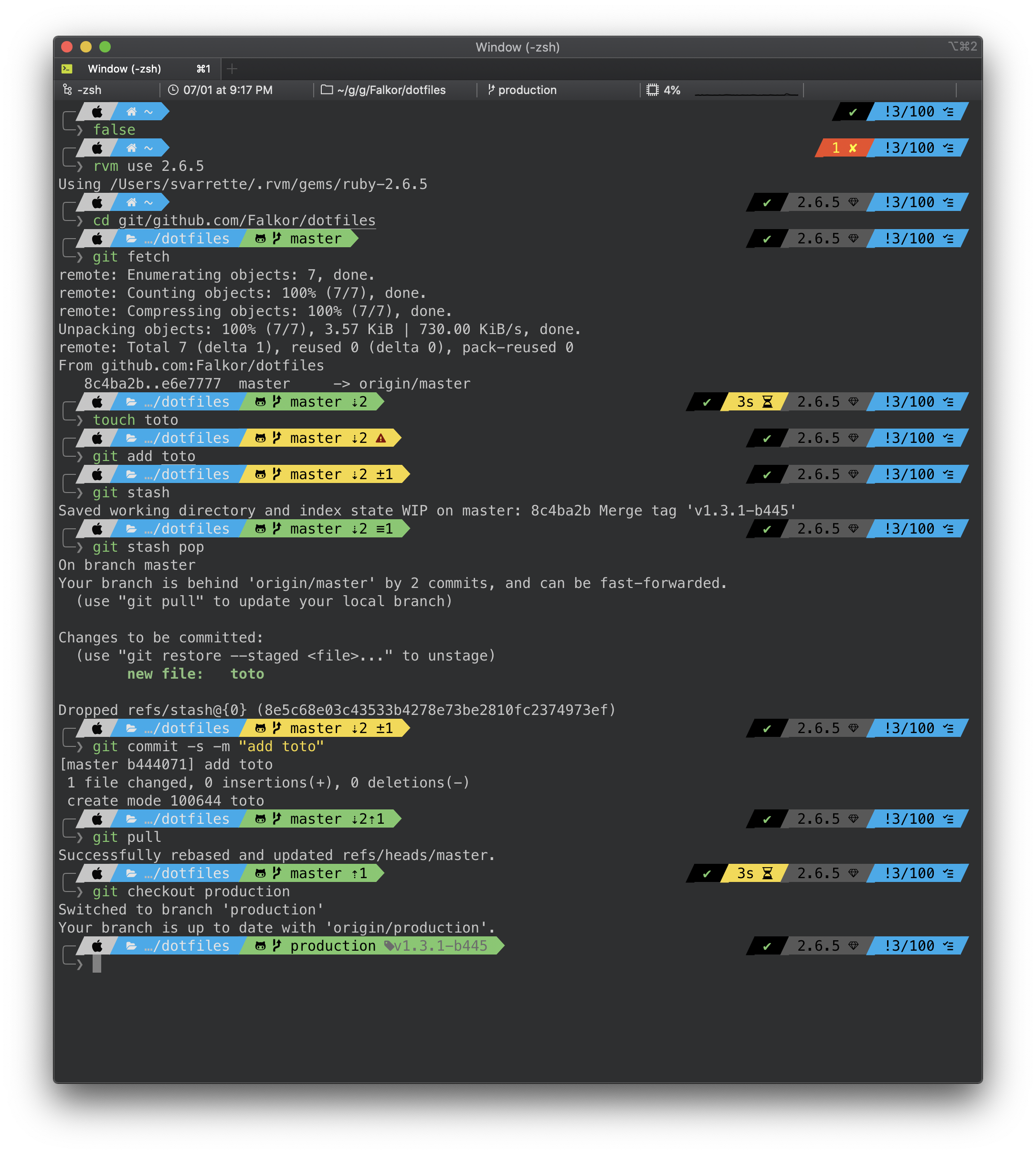
__Warning:__ Use these dotfiles at your own risk!
In the sequel, when providing a command, `$>` denotes a prompt and is not part of the commands.
## Pre-requisites
You should install the following elements to use the full functionality of
these config files:
* bash
* bash-completions
* zsh
* zsh-completions
* screen
* git
* subversion
* vim
* screen
On __Mac OS__, assuming you have installed [HomeBrew](http://brew.sh/) (you really should), you can use `brew/Brewfile.minimal` to install these dependencies as follows:
~~~bash
# Install brew bundle -- see https://github.com/Homebrew/homebrew-bundle
$> brew tap Homebrew/bundle
# Collect the Brewfile
$> curl -o /tmp/Brewfile https://raw.githubusercontent.com/Falkor/dotfiles/master/brew/Brewfile.minimal
# Install Falkor's dotfile dependencies
$> brew bundle --file=/tmp/Brewfile -v
~~~
On __Linux__:
~~~bash
# Debian / Ubuntu
$> sudo apt-get install git git-flow bash-completion screen curl subversion zsh fonts-font-awesome
~~~
## Falkor's dotfiles Installation
### All-in-one git-free install
Using `curl` (adapt the `--all` option to whatever you prefer -- see below table):
``` bash
$> curl -fsSL https://raw.githubusercontent.com/Falkor/dotfiles/master/install.sh | bash -s -- --all
```
### Using Git and the embedded Makefile
This repository is hosted on [Github](https://github.com/Falkor/dotfiles). You can clone the repository wherever you want.
Personally, I like to keep it in `~/git/github.com/Falkor/dotfiles`, with `~/.dotfiles.falkor.d` as a symlink. This behaviour will be reflected in the `install.sh` script _i.e._ if it is invoked from a directory that differs from `~/.dotfiles.falkor.d`, a symlink will be created toward the place where your cloned this repository.
Otherwise, to clone this repository directly into `~/.dotfiles.falkor.d/`, proceed as follows
$> git clone https://github.com/Falkor/dotfiles.git ~/.dotfiles.falkor.d
**`/!\ IMPORTANT`**: Once cloned, initiate your local copy of the repository by running:
$> cd ~/.dotfiles.falkor.d
$> make setup
This will initiate the [Git submodules of this repository](.gitmodules) and setup the [git flow](https://www.atlassian.com/git/tutorials/comparing-workflows/gitflow-workflow) layout for this repository.
Now to install all my dotfiles, run:
~~~bash
$> make install
~~~
### Using Git and the embedded `install.sh` script
The above `make install` command actually runs (see `.Makefile.after`):
~~~bash
$> ./install.sh --all # Equivalent of 'make install'
~~~
Note that __by default__ (_i.e._ without option), the `install.sh` script does nothing __except__ cloning the Falkor/dotfiles directory if it does not yet exists (in `~/.dotfiles.falkor.d` by default).
* if you __do not want to install everything__ but only a subpart, kindly refer to the below table to find the proper command-line argument to use. Ex:
```bash
$> ./install.sh --zsh --vim --git
```
* if you want to install everything in a row, use as suggested above the `--all` option
## Updating / Upgrading
Upgrading is normally as simple as:
$> make -C ~/.config/dotfiles.falkor.d update
OR, if you prefer a more atomic approach:
$> cd ~/.config/dotfiles.falkor.d
$> make update
Note that if you wish to __upgrade__ the [Git submodules](.gitmodules) to the latest version, you should run:
$> make upgrade
## Uninstalling / Removing Falkor's dotfile
You can use `install.sh --delete` to remove Falkor's dotfiles.
__`/!\ IMPORTANT`__: pay attention to use the options matching you installation package.
* if you install __all__ dotfiles, run:
```bash
$> ./install.sh --delete --all # OR make uninstall
```
* if you install __only__ a subpart of the dotfiles, adapt the command line option. Ex:
```bash
$> ./install.sh --delete --zsh --vim --git
```
## What's included and how to customize?
| Tools | Type | Installation | Documentation |
|--------------------------------------------------------------------------------|-----------------------|-------------------------|----------------------------------------------|
| [Bourne-Again shell (bash)](http://tiswww.case.edu/php/chet/bash/bashtop.html) | shell | `./install.sh --bash` | [`bash/README.md`](bash/README.md) |
| [zsh](http://www.zsh.org/) / [Oh-my-zsh](http://ohmyz.sh/) | shell | `./install.sh --zsh` | [`oh-my-zsh/README.md`](oh-my-zsh/README.md) |
| [VI iMproved (vim)](http://www.vim.org/) | editor | `./install.sh --vim` | [`vim/README.md`](vim/README.md) |
| [GNU Emacs](https://www.gnu.org/software/emacs/) | editor | `./install.sh --emacs` | `emacs/README.md` |
| [Git `--fast-version-control`](https://git-scm.com/) | VCS | `./install.sh --git` | [`git/README.md`](git/README.md) |
| [GNU screen](https://www.gnu.org/software/screen/) | terminal multiplexers | `./install.sh --screen` | [`screen/README.md`](screen/README.md) |
| | | | |
As mentioned above, if you want to install all dotfiles in one shot, just use
$> ./install.sh --all # OR 'make install'
## Issues / Feature request
You can submit bug / issues / feature request using the [`Falkor/dotfiles` Project Tracker](https://github.com/Falkor/dotfiles/issues)
## Developments / Contributing to the code
If you want to contribute to the code, you shall be aware of the way this repository is organized and developed.
These elements are detailed on `docs/contributing/`
## Licence
This project is released under the terms of the [GPL-3.0](LICENCE) licence.
[](http://www.gnu.org/licenses/gpl-3.0.html)
## Resources
You can find of course many other resources in terms dotfiles repositories.
I suggest you to take a look at the following places I inspired:
* [Your unofficial guide to dotfiles on GitHub](https://dotfiles.github.io/)
* My friend [H.Cartiaux's dotfiles](https://github.com/hcartiaux/dotfiles)
* [Holman's does dotfiles](https://github.com/holman/dotfiles), for his idea of bundling the [homebrew](http://brew.sh) configuration
* [Mathias’s dotfiles](https://github.com/mathiasbynens/dotfiles), for featuring `~/.osx` _i.e._ sensible hacker defaults for OS X;
* [Awesome dotfiles](https://github.com/webpro/awesome-dotfiles), a curated list of dotfiles resources. Inspired by the [awesome](https://github.com/sindresorhus/awesome) list thing.
* [Carlo's dotfiles](https://github.com/caarlos0/dotfiles)
================================================
FILE: VERSION
================================================
1.4.0-b458
================================================
FILE: Vagrantfile
================================================
# Vagrantfile API/syntax version. Don't touch unless you know what you're doing!
VAGRANTFILE_API_VERSION = "2"
Vagrant.configure(VAGRANTFILE_API_VERSION) do |config|
# (nearly) All below boxes were generated using [vagrant-vms](https://github.com/Falkor/vagrant-vms/)
{
:centos => 'centos/7',
:debian => 'debian/contrib-jessie64',
:ubuntu => 'ubuntu/trusty64'
}.each do |os,name|
boxname = os.to_s.downcase.gsub(/_/, '-')
# Only the Ubuntu box is booted by default
config.vm.define boxname, :autostart => (os =~ /ubuntu/), :primary => (os =~ /ubuntu/) do |local|
local.vm.box = name
local.vm.host_name = ENV['VAGRANT_HOSTNAME'] || boxname.concat(".vagrant.com")
end
end
end
================================================
FILE: atom/README.md
================================================
Generate the package list using:
apm list --installed --bare > package-list.txt
Import it with
apm install --packages-file ./package-list.txt
================================================
FILE: atom/package-list.txt
================================================
atomic-emacs@0.9.2
auto-indent@0.5.0
autocomplete-clang@0.10.0
build@0.67.0
build-cmake@0.8.3
build-tools@4.5.7
busy@0.7.0
clock@1.9.0
emacs-flow@0.1.2
git-plus@7.2.0
language-cmake@0.3.0
language-latex@1.0.0
language-lisp@0.2.0
latex@0.42.2
linter-clang@3.4.6
markdown-scroll-sync@2.1.2
open-recent@5.0.0
pdf-view@0.54.0
tree-view-git-status@1.3.0
================================================
FILE: bash/.bash_profile
================================================
# -*- mode:sh; -*-
#
# ~/.bash_profile
#
[[ -f ~/.bashrc ]] && . ~/.bashrc || true
[[ -s "$HOME/.rvm/scripts/rvm" ]] && source "$HOME/.rvm/scripts/rvm" # Load RVM into a shell session *as a function*
================================================
FILE: bash/.bashrc
================================================
#! /bin/bash
################################################################################
# .bashrc -- my personal Bourne-Again shell (aka bash) configuration
# see https://github.com/Falkor/dotfiles
#
# Copyright (c) 2010-2017 Sebastien Varrette <Sebastien.Varrette@uni.lu>
# https://varrette.gforge.uni.lu
# _ _
# | |__ __ _ ___| |__ _ __ ___
# | '_ \ / _` / __| '_ \| '__/ __|
# _ | |_) | (_| \__ \ | | | | | (__
# (_) |_.__/ \__,_|___/_| |_|_| \___|
#
################################################################################
# This file is NOT part of GNU bash
#
# This program is free software: you can redistribute it and/or modify it under
# the terms of the GNU General Public License as published by the Free Software
# Foundation, either version 3 of the License, or (at your option) any later
# version.
#
# This program is distributed in the hope that it will be useful, but WITHOUT
# ANY WARRANTY; without even the implied warranty of MERCHANTABILITY or FITNESS
# FOR A PARTICULAR PURPOSE. See the GNU General Public License for more
# details.
#
# You should have received a copy of the GNU General Public License along with
# this program. If not, see <http://www.gnu.org/licenses/>.
################################################################################
# Resources:
# - http://bitbucket.org/dmpayton/dotfiles/src/tip/.bashrc
# - https://github.com/rtomayko/dotfiles/blob/rtomayko/.bashrc
# If not running interactively, don't do anything
case $- in
*i*) ;;
*) return;;
esac
# Basic variables
: ${HOME=~}
: ${LOGNAME=$(id -un)}
: ${UNAME=$(uname)}
# See https://specifications.freedesktop.org/basedir-spec/latest/
: ${XDG_CONFIG_HOME=$HOME/.config}
: ${XDG_DATA_HOME=$HOME/.local/share}
: ${XDG_CACHE_HOME=$HOME/.cache}
export XDG_CONFIG_HOME XDG_DATA_HOME XDG_CACHE_HOME
# complete hostnames from this file
: ${HOSTFILE=~/.ssh/known_hosts}
# readline config
: ${INPUTRC=~/.inputrc}
# Get rid of mail notification
unset MAILCHECK
# Local configuration
BASH_CUSTOM_CONFIG_DIR=$XDG_CONFIG_HOME/bash/custom
COMMON_CONFIG_DIR=$XDG_CONFIG_HOME/shell
COMMON_CUSTOM_CONFIG_DIR=$COMMON_CONFIG_DIR/custom
# ----------------------------------------------------------------------
# SHELL OPTIONS
# ----------------------------------------------------------------------
# bring in system bashrc
test -r /etc/bashrc &&
. /etc/bashrc
# shell opts. see bash(1) for details
shopt -s cdspell >/dev/null 2>&1 # correct minor errors in the spelling
# of a directory in a cd command
shopt -s extglob >/dev/null 2>&1 # extended pattern matching
shopt -s hostcomplete >/dev/null 2>&1 # perform hostname completion
# on '@'
#shopt -s no_empty_cmd_completion >/dev/null 2>&1
shopt -u mailwarn >/dev/null 2>&1
# default umask
umask 0022
# ----------------------------------------------------------------------
# LS WITH COLORS
# ----------------------------------------------------------------------
#for *BSD/darwin
export CLICOLOR=1
# we always pass these to ls(1)
LS_COMMON="-hB"
ls --color=auto &> /dev/null && LS_COMMON="${LS_COMMON} --color=auto" || true
alias ls="command ls ${LS_COMMON}"
# ----------------------------------------------------------------------
# ALIASES
# ----------------------------------------------------------------------
# these use the ls aliases above
alias ll="ls -l"
alias la="ll -a"
alias l.="ls -d .*"
# Mandatory aliases to confirm destructive operations
alias cp='cp -iv'
alias mv='mv -iv'
alias rm='rm -i'
alias ..='cd ..'
# Color aliases
alias grep='grep --color=auto'
#alias fgrep='fgrep --color=auto'
#alias egrep='egrep --color=auto'
# ----------------------------------------------------------------------
# ENVIRONMENT CONFIGURATION
# ----------------------------------------------------------------------
# detect interactive shell
case "$-" in
*i*) INTERACTIVE=yes ;;
*) unset INTERACTIVE ;;
esac
# detect login shell
case "$0" in
-*) LOGIN=yes ;;
*) unset LOGIN ;;
esac
# enable en_US locale w/ UTF-8 encodings if not already configured
: ${LANG:="en_US.UTF-8"}
: ${LANGUAGE:="en"}
: ${LC_ALL:="en_US.UTF-8"}
export LANG LANGUAGE LC_ALL
# ----------------------------------------------------------------------
# PATH
# ----------------------------------------------------------------------
pathadd() {
if [ -d "$1" ] && ! echo $PATH | grep -E -q "(^|:)$1($|:)" ; then
[ "$2" = "after" ] && PATH="$PATH:${1%/}" || PATH="${1%/}:$PATH"
fi
}
pathrm() {
PATH="$(echo $PATH | sed -e "s;\(^\|:\)${1%/}\(:\|\$\);\1\2;g" -e 's;^:\|:$;;g' -e 's;::;:;g')"
}
# Complete default PATH eventually
for bindir in /usr/local/bin $HOME/bin; do
pathadd ${bindir}
done
pathadd $HOME/.rvm/bin after
manpathadd() {
if [ -d "$1" ] && ! echo $MANPATH | grep -E -q "(^|:)$1($|:)" ; then
[ "$2" = "after" ] && MANPATH="$MANPATH:${1%/}" || MANPATH="${1%/}:$MANPATH"
fi
}
# Complete default MANPATH eventually
# for mandir in /usr/local/share/man $HOME/share/man; do
# manpathadd ${mandir}
# done
PKG_CONFIG_PATH=$PKG_CONFIG_PATH:/usr/local/lib/pkgconfig
LD_LIBRARY_PATH=$LD_LIBRARY_PATH:/usr/local/lib
# ----------------------------------------------------------------------
# MACOS X / DARWIN SPECIFIC
# ----------------------------------------------------------------------
# if [ "${UNAME}" = "Darwin" ]; then
# test -x "/usr/libexec/java_home" &&
# export JAVE_HOME=$(/usr/libexec/java_home)
# fi
# ----------------------------------------------------------------------
# PAGER / EDITOR
# ----------------------------------------------------------------------
# Default editor
test -n "$(command -v vim)" && EDITOR=vim || EDITOR=nano
export EDITOR
# Default pager ('less' is so much better than 'more'...)
if test -n "$(command -v less)" ; then
#PAGER="less -FirSwX"
PAGER="less"
MANPAGER="$PAGER"
else
PAGER=more
MANPAGER="$PAGER"
fi
export PAGER MANPAGER
# ----------------------------------------------------------------------
# BASH COMPLETION
# ----------------------------------------------------------------------
# enable programmable completion features (you don't need to enable
# this, if it's already enabled in /etc/bash.bashrc and /etc/profile
# sources /etc/bash.bashrc).
if ! shopt -oq posix; then
test -n "$(command -v brew)" && BREW_BASH_COMPLETION="$(brew --prefix)/etc/bash_completion" || BREW_BASH_COMPLETION=""
for f in /usr/share/bash-completion/bash_completion \
/etc/bash_completion ${BREW_BASH_COMPLETION} \
/opt/local/etc/bash_completion
do
if [ -r "$f" ]; then
. $f
break
fi
done
fi
# ----------------------------------------------------------------------
# OAR Batch scheduler
# ----------------------------------------------------------------------
# Resources:
# - http://wiki-oar.imag.fr/index.php/Customization_tips
# - http://wiki-oar.imag.fr/index.php/Oarsh_and_bash_completion
# oarsh completion
function _oarsh_complete_()
{
local word=${COMP_WORDS[COMP_CWORD]}
local list
list=$(uniq "$OAR_NODEFILE" | tr '\n' ' ')
COMPREPLY=($(compgen -W "$list" -- "${word}"))
}
complete -F _oarsh_complete_ oarsh
# Job + Remaining time
__oar_ps1_remaining_time(){
if [ -n "$OAR_JOB_WALLTIME_SECONDS" -a -n "$OAR_NODE_FILE" -a -r "$OAR_NODE_FILE" ]; then
DATE_NOW=$(date +%s)
DATE_JOB_START=$(stat -c %Y "$OAR_NODE_FILE")
DATE_TMP=$OAR_JOB_WALLTIME_SECONDS
((DATE_TMP = (DATE_TMP - DATE_NOW + DATE_JOB_START) / 60))
echo -n "[OAR$OAR_JOB_ID->$DATE_TMP]"
fi
}
# OAR motd
test -n "$INTERACTIVE" && test -n "$OAR_NODE_FILE" && (
echo "[OAR] OAR_JOB_ID=$OAR_JOB_ID"
echo "[OAR] Your nodes are:"
sort "$OAR_NODE_FILE" | uniq -c | awk '{printf(" %s*%d\n",$2,$1)}END{printf("\n")}' | sed -e 's/,$//'
)
# ----------------------------------------------------------------------
# BASH HISTORY
# ----------------------------------------------------------------------
# Increase the history size
HISTSIZE=10000
HISTFILESIZE=20000
# Add date and time to the history
HISTTIMEFORMAT="[%d/%m/%Y %H:%M:%S] "
# ----------------------------------------------------------------------
# VERSION CONTROL SYSTEM - CVS, SVN and GIT
# ----------------------------------------------------------------------
# === CVS ===
export CVS_RSH='ssh'
# === SVN ===
export SVN_EDITOR=$EDITOR
# Some code from https://github.com/nojhan/liquidprompt
_LP_OPEN_ESC="\["
_LP_CLOSE_ESC="\]"
ti_sgr0="$( { tput sgr0 || tput me ; } 2>/dev/null )"
LP_COLOR_UP=${LP_COLOR_UP:-$GREEN}
LP_COLOR_CHANGES=${LP_COLOR_CHANGES:-$RED}
LP_COLOR_DIFF=${LP_COLOR_DIFF:-$PURPLE}
NO_COL="${_LP_OPEN_ESC}${ti_sgr0}${_LP_CLOSE_ESC}"
# Escape the given strings
# Must be used for all strings injected in PS1 that may comes from remote sources,
# like $PWD, VCS branch names...
_lp_escape() {
echo -nE "${1//\\/\\\\}"
}
# Get the branch name of the current directory
# For the first level of the repository, gives the repository name
_lp_svn_branch()
{
local root=
local url=
eval "$(LANG=C LC_ALL=C svn info 2>/dev/null | sed -n 's/^URL: \(.*\)/url="\1"/p;s/^Repository Root: \(.*\)/root="\1"/p' )"
[[ -z "${root-}" ]] && return
# Make url relative to root
url="${url:${#root}}"
if [[ "$url" == */trunk* ]]; then
echo -n trunk
elif [[ "$url" == */branches/?* ]]; then
url="${url##*/branches/}"
_lp_escape "${url%/*}"
elif [[ "$url" == */tags/?* ]]; then
url="${url##*/tags/}"
_lp_escape "${url%/*}"
else
_lp_escape "${root##*/}"
fi
}
# Set a color depending on the branch state:
# - green if the repository is clean
# (use $LP_SVN_STATUS_OPTIONS to define what that means with
# the --depth option of 'svn status')
# - red if there is changes to commit
# Note that, due to subversion way of managing changes,
# informations are only displayed for the CURRENT directory.
_lp_svn_branch_color()
{
(( LP_ENABLE_SVN )) || return
local branch
branch="$(_lp_svn_branch)"
if [[ -n "$branch" ]]; then
local changes
changes=$(( $(svn status | \grep -c -v "?") ))
if (( changes == 0 )); then
echo -nE "${LP_COLOR_UP}${branch}${NO_COL}"
else
echo -nE "${LP_COLOR_CHANGES}${branch}${NO_COL}(${LP_COLOR_DIFF}$changes${NO_COL})" # changes to commit
fi
fi
}
## display the current subversion revision (to be used later in the prompt)
__svn_ps1() {
(
local svnversion
svnversion=$(svnversion | sed -e "s/[:M]//g")
# Continue if $svnversion is numerical
let $svnversion
if [[ "$?" -eq "0" ]]
then
printf " (%s:%s)" "$(_lp_svn_branch_color)" "$(svnversion)"
fi
) 2>/dev/null
}
# === GIT ===
# render __git_ps1 even better so as to show activity in a git repository
#
# see https://github.com/git/git/blob/master/contrib/completion/git-prompt.sh for
# configuration info of the GIT_PS1* variables
#
export GIT_PS1_SHOWDIRTYSTATE=true
export GIT_PS1_SHOWSTASHSTATE=true
export GIT_PS1_SHOWUNTRACKEDFILES=true
#export GIT_PS1_SHOWUPSTREAM="auto"
export GIT_PS1_DESCRIBE_STYLE='branch'
#export GIT_PS1_SHOWCOLORHINTS=true
function_exists() {
declare -f -F $1 > /dev/null
return $?
}
# GIT bash completion and access to __git_ps1 is set in
if ! type __git_ps1 &>/dev/null
then
# Try to load separately the file git-prompt
for f in \
/Applications/Xcode.app/Contents/Developer/usr/share/git-core/git-prompt.sh \
/etc/bash-completion.d/git-prompt \
/usr/share/git/completion/git-prompt.sh \
/usr/lib/git-core/git-sh-prompt
do
if [ -r "$f" ]; then
. $f
break
fi
done
fi
# ----------------------------------------------------------------------
# PROMPT
# ----------------------------------------------------------------------
# Previous version:
#PS1='\[\e[36;1m\][\t]\[\e[0m\]:$?: \u@\[\e[4;36m\]\h\[\e[0m\] \[\e[34;1m\]\W\[\e[0m\]\[\e[0;32m\]$(__git_ps1 "(%s)")$(__svn_ps1)\[\e[0m\]> '
# Define some colors to use in the prompt
RESET_COLOR="\[\e[0m\]"
BOLD_COLOR="\[\e[1m\]"
# B&W
WHITE="\[\e[0;37m\]"
GRAY="\[\e[1;30m\]"
BLACK="\[\e[0;30m\]"
# RGB
RED="\[\e[0;31m\]"
GREEN="\[\e[0;32m\]"
BLUE="\[\e[34;1m\]"
# other
YELLOW="\[\e[0;33m\]"
LIGHT_CYAN="\[\e[36;1m\]"
CYAN_UNDERLINE="\[\e[4;36m\]"
# Configure user color and prompt type depending on whoami
if [ "$LOGNAME" = "root" ]; then
COLOR_USER="${RED}"
P="#"
else
COLOR_USER="${WHITE}"
P=""
fi
# Configure a set of useful variables for the prompt
if [[ "$(echo $UNAME | grep -c -i -e '^.*bsd$')" == "1" ]] ; then
DOMAIN=$(hostname | cut -d '.' -f 2)
else
DOMAIN=$(hostname -f | cut -d '.' -f 2)
fi
# get virtualization information
XENTYPE=""
if [ -f "/sys/hypervisor/uuid" ]; then
if [ "$(</sys/hypervisor/uuid)" == "00000000-0000-0000-0000-000000000000" ]; then
XENTYPE=",Dom0"
else
XENTYPE=",DomU"
fi
fi
# Test the PS1_EXTRA variable
if [ -z "${PS1_EXTRA}" -a -f "/proc/cmdline" ]; then
# Here PS1_EXTRA is not set and/or empty, check additionally if it has not
# been set via kernel comment
kernel_ps1_extra="$(grep PS1_EXTRA /proc/cmdline)"
if [ -n "${kernel_ps1_extra}" ]; then
PS1_EXTRA=$( sed -e "s/.*PS1_EXTRA=\"\?\([^ ^\t^\"]\+\)\"\?.*/\1/g" /proc/cmdline )
fi
fi
PS1_EXTRAINFO="${BOLD_COLOR}${DOMAIN}${XENTYPE}${RESET_COLOR}"
if [ -n "${PS1_EXTRA}" ]; then
PS1_EXTRAINFO="${PS1_EXTRAINFO},${YELLOW}${PS1_EXTRA}${RESET_COLOR}"
fi
# # Bash support for ZSH-like 'preexec' and 'precmd' functions.
# # See http://www.twistedmatrix.com/users/glyph/preexec.bash.txt
# test -r ~/.dotfiles.github.d/bash/preexec.bash &&
# . ~/.dotfiles.github.d/bash/preexec.bash
# This function is called from a subshell in $PS1, to provide the colorized
# exit status of the last run command.
# Exit status 130 is also considered as good as it corresponds to a CTRL-D
__colorized_exit_status() {
printf -- "\$(status=\$? ; if [[ \$status = 0 || \$status = 130 ]]; then \
echo -e '\[\e[01;32m\]'\$status; \
else \
echo -e '\[\e[01;31m\]'\$status; fi)"
}
# Simple (basic) prompt
__set_simple_prompt() {
unset PROMPT_COMMAND
PS1="[\u@\h] \w(${DOMAIN}) ${P}> "
}
# most compact version
__set_compact_prompt() {
unset PROMPT_COMMAND
PS1="${COLOR_USER}${P}${RESET_COLOR}> "
}
###########
# my prompt; the format is as follows:
#
# [hh:mm:ss]:$?: username@hostname(domain[,xentype][,extrainfo]) workingdir(svn/git status)$>
# `--------' ^ `------' `------' `--------'`--------------'
# cyan | root:red cyan light green
# | underline blue (absent if not relevant)
# exit code of
# the previous command
#
# The git/svn status part is quite interesting: if you are in a directory under
# version control, you have the following information in the prompt:
# - under GIT: current branch name, followed by a '*' if the repository has
# uncommitted changes, followed by a '+' if some elements were
# 'git add'ed but not commited.
# - under SVN: show (svn:XX[M]) where XX is the current revision number,
# followed by 'M' if the repository has uncommitted changes
#
# `domain` reflect the current domain of the machine that run the prompt
# (guessed from hostname -f)
# `xentype` is DOM0 or domU depending if the machine is a Xen dom0 or domU
# Finally, is the environment variable PS1_EXTRA is set (or passed to the
# kernel), then its content is displayed here.
#
# This prompt is perfect for terminal with black background, in my case the
# Vizor color set (see http://visor.binaryage.com/) or iTerm2
__set_my_prompt() {
PS1="$(__colorized_exit_status) ${LIGHT_CYAN}[\t]${RESET_COLOR} ${COLOR_USER}\u${RESET_COLOR}@${CYAN_UNDERLINE}\h${RESET_COLOR}(${PS1_EXTRAINFO}) ${BLUE}\W${RESET_COLOR}${GREEN}\$(__git_ps1 \" (%s)\")\$(__svn_ps1)${RESET_COLOR}${P}> "
}
# TODO: define the same for white background.
# --------------------------------------------------------------------
# SSH/GPG AGENT
# --------------------------------------------------------------------
# # ssh-agent initialization - using keychain
# #if [ ! -e "$SSH_AUTH_SOCK" ]; then
# # eval `ssh-agent` 1>/dev/null;
# #keychain --clear --noask ~/.ssh/id_dsa
# #. ~/.keychain/${HOSTNAME}-sh
# # gpg-agent initialization
# #if [ ! -e "$GPG_AGENT_INFO" ]; then
# # eval `gpg-agent --daemon > $HOME/.gpg-agent-info`;
# # source $HOME/.gpg-agent-info;
# #fi
######
# Remove duplicate entries from a PATH style value while retaining
# the original order. Use PATH if no <path> is given.
# Usage: puniq [<path>]
#
# Example:
# $ puniq /usr/bin:/usr/local/bin:/usr/bin
# /usr/bin:/usr/local/bin
###
puniq () {
echo "$1" |tr : '\n' |nl |sort -u -k 2,2 |sort -n |
cut -f 2- |tr '\n' : |sed -e 's/:$//' -e 's/^://'
}
# -------------------------------------------------------------------
# USER SHELL ENVIRONMENT
# -------------------------------------------------------------------
# Set the color prompt by default when interactive
if [ -n "$PS1" ]; then
__set_my_prompt
fi
export PS1
# MOTD
test -n "$INTERACTIVE" -a -n "$LOGIN" && {
uname -npsr
uptime
}
# Customizations
for f in \
~/.bash_aliases \
~/.bash_private
do
if [ -r "$f" ]; then
. $f
fi
done
#______________________________________________
# Load Eventually [custom] local configs either
# - common to all shells (from ~/.config/shell/[custom/]*.sh typically)
# - specific to bash (from ~/.config/bash/custom/*.sh typically)
for d in \
${COMMON_CONFIG_DIR} \
${COMMON_CUSTOM_CONFIG_DIR} \
${BASH_CUSTOM_CONFIG_DIR}
do
if [ -d "${d}" ]; then
for f in ${d}/*.sh; do
[[ -r "$f" ]] && source $f
done
for f in ${d}/*.bash; do
[[ -r "$f" ]] && source $f
done
fi
done
# Add RVM to PATH for scripting. Make sure this is the last PATH variable change.
if [ -d "$HOME/.rvm" ]; then
export PATH="$PATH:$HOME/.rvm/bin"
[[ -s "$HOME/.rvm/scripts/rvm" ]] && source "$HOME/.rvm/scripts/rvm"
[[ -r "${rvm_path}/scripts/completion" ]] && . ${rvm_path}/scripts/completion
fi
#______________________
# condense PATH entries
PATH="$(puniq "$PATH")"
MANPATH="$(puniq "$MANPATH")"
PKG_CONFIG_PATH="$(puniq "$PKG_CONFIG_PATH")"
LD_LIBRARY_PATH="$(puniq "$LD_LIBRARY_PATH")"
export PATH MANPATH PKG_CONFIG_PATH LD_LIBRARY_PATH
# I hate this ring
#set bell-style visible
================================================
FILE: bash/.inputrc
================================================
# -*- mode:sh; -*-
################################################################################
# .inputrc -- my personal Readline configuration
# see https://github.com/Falkor/dotfiles
#
# Copyright (c) 2010 Sebastien Varrette <Sebastien.Varrette@uni.lu>
# http://varrette.gforge.uni.lu
# _ _
# (_)_ __ _ __ _ _| |_ _ __ ___
# | | '_ \| '_ \| | | | __| '__/ __|
# _| | | | | |_) | |_| | |_| | | (__
# (_)_|_| |_| .__/ \__,_|\__|_| \___|
# |_|
################################################################################
# Resource
# - https://github.com/rtomayko/dotfiles/blob/rtomayko/.inputrc
# do not bell on tab-completion
set bell-style bell
# set expand-tilde off
# set input-meta off
# set convert-meta on
# set output-meta off
# set horizontal-scroll-mode off
# set history-preserve-point on
# set mark-directories on
# set mark-symlinked-directories on
# set match-hidden-files off
# # completion settings
# set page-completions off
# set completion-query-items 2000
# set completion-ignore-case off
# set show-all-if-ambiguous on
# set show-all-if-unmodified on
# set completion-prefix-display-length 10
# set print-completions-horizontally off
# mappings for Ctrl-up-arrow and Ctrl-down-arrow for word moving
## arrow up
#"\e[A":forward-word
## arrow down
#"\e[B":backward-word
# mappings for Ctrl-left-arrow and Ctrl-right-arrow for word moving
#"\e[1;5C": forward-word
#"\e[1;5D": backward-word
#"\e[5C": forward-word
#"\e[5D": backward-word
#"\e\e[C": forward-word
#"\e\e[D": backward-word
================================================
FILE: bash/README.md
================================================
# DEPRECATED!!! Falkor's Dotfiles -- Bourne-Again Shell (bash) configuration
**IMPORTANT**: consider these configurations as deprecated and obsolete. You should better switch to [oh-my-bash](https://github.com/ohmybash/oh-my-bash) as instructed [here](https://gitlab.com/svarrette-anssi/tutorial-git/-/blob/main/docs/TP/config.md?ref_type=heads#bash-oh-my-bash)
> [Oh-My-Bash](https://ohmybash.github.io/) is an open source, community-driven framework for managing your [BASH](https://www.gnu.org/software/bash/) configuration. It comes bundled with a ton of helpful functions, helpers, plugins, themes, and a few things that make you shout..."
See the available [themes](https://github.com/ohmybash/oh-my-bash/blob/master/themes/THEMES.md) to find your prefered one.
Below instuctions will setup the minimalist [`purity` theme](https://github.com/ohmybash/oh-my-bash/blob/master/themes/THEMES.md#purity)
```bash
# Preliminaries: install fonts and dependencies
sudo apt install curl fontconfig fonts-powerline fonts-font-awesome
# Install oh-my-bash: download installer, check it and run it
curl -fsSL --skip-existing -o /tmp/oh-my-bash-installer.sh \
https://raw.githubusercontent.com/ohmybash/oh-my-bash/master/tools/install.sh
less /tmp/oh-my-bash-installer.sh # review installer
bash /tmp/oh-my-bash-installer.sh # run it
# adapting theme
sed -i 's/OSH_THEME=\"font\"/OSH_THEME=\"purity\"/' ~/.bashrc
# Enjoy !
source ~/.bashrc
# cleanup
rm /tmp/oh-my-bash-installer.sh
```
## Old README content
## Screenshot
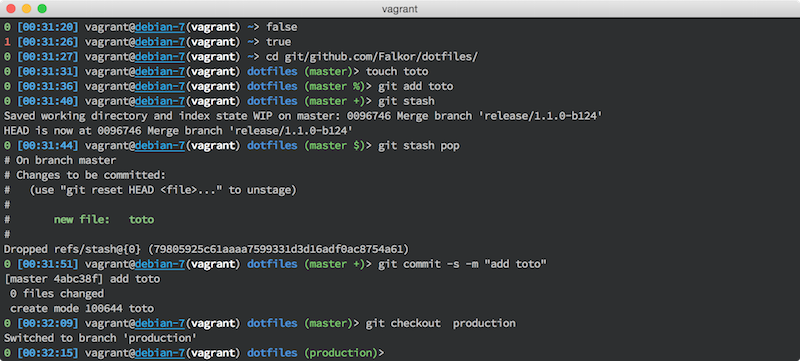
## Installation
You can use the `install.sh` script featured with the [Falkor's dotfile](https://github.com/Falkor/dotfile) repository.
``` bash
cd ~/.dotfiles.falkor.d
./install.sh --bash
```
This will setup the following files:
* `~/.bashrc`
* `~/.inputrc`
* `~/.bash_profile`
* `~/.bash_aliases`
## Uninstall
``` bash
cd ~/.dotfiles.falkor.d
./install.sh --delete --bash
```
## Customizations
Use the `~/.bash_private` as a place holder for your own customization. This file is loaded by the `.bashrc` file.
================================================
FILE: bash/custom/.gitignore
================================================
*.sh
================================================
FILE: bash/custom/README.md
================================================
Place here all your local (custom) settings as `*.sh` files.
They are sourced by Falkor's bashrc
================================================
FILE: bash/preexec.bash
================================================
#!/bin/bash
# preexec.bash -- Bash support for ZSH-like 'preexec' and 'precmd' functions.
# The 'preexec' function is executed before each interactive command is
# executed, with the interactive command as its argument. The 'precmd'
# function is executed before each prompt is displayed.
# To use, in order:
# 1. source this file
# 2. define 'preexec' and/or 'precmd' functions (AFTER sourcing this file),
# 3. as near as possible to the end of your shell setup, run 'preexec_install'
# to kick everything off.
# Note: this module requires 2 bash features which you must not otherwise be
# using: the "DEBUG" trap, and the "PROMPT_COMMAND" variable. preexec_install
# will override these and if you override one or the other this _will_ break.
# This is known to support bash3, as well as *mostly* support bash2.05b. It
# has been tested with the default shells on MacOS X 10.4 "Tiger", Ubuntu 5.10
# "Breezy Badger", Ubuntu 6.06 "Dapper Drake", and Ubuntu 6.10 "Edgy Eft".
# Copy screen-run variables from the remote host, if they're available.
if [[ "$SCREEN_RUN_HOST" == "" ]]
then
SCREEN_RUN_HOST="$LC_SCREEN_RUN_HOST"
SCREEN_RUN_USER="$LC_SCREEN_RUN_USER"
fi
# This variable describes whether we are currently in "interactive mode";
# i.e. whether this shell has just executed a prompt and is waiting for user
# input. It documents whether the current command invoked by the trace hook is
# run interactively by the user; it's set immediately after the prompt hook,
# and unset as soon as the trace hook is run.
preexec_interactive_mode=""
# Default do-nothing implementation of preexec.
function preexec () {
true
}
# Default do-nothing implementation of precmd.
function precmd () {
true
}
# This function is installed as the PROMPT_COMMAND; it is invoked before each
# interactive prompt display. It sets a variable to indicate that the prompt
# was just displayed, to allow the DEBUG trap, below, to know that the next
# command is likely interactive.
function preexec_invoke_cmd () {
precmd
preexec_interactive_mode="yes"
}
# This function is installed as the DEBUG trap. It is invoked before each
# interactive prompt display. Its purpose is to inspect the current
# environment to attempt to detect if the current command is being invoked
# interactively, and invoke 'preexec' if so.
function preexec_invoke_exec () {
if [[ -n "$COMP_LINE" ]]
then
# We're in the middle of a completer. This obviously can't be
# an interactively issued command.
return
fi
if [[ -z "$preexec_interactive_mode" ]]
then
# We're doing something related to displaying the prompt. Let the
# prompt set the title instead of me.
return
else
# If we're in a subshell, then the prompt won't be re-displayed to put
# us back into interactive mode, so let's not set the variable back.
# In other words, if you have a subshell like
# (sleep 1; sleep 2)
# You want to see the 'sleep 2' as a set_command_title as well.
if [[ 0 -eq "$BASH_SUBSHELL" ]]
then
preexec_interactive_mode=""
fi
fi
if [[ "preexec_invoke_cmd" == "$BASH_COMMAND" ]]
then
# Sadly, there's no cleaner way to detect two prompts being displayed
# one after another. This makes it important that PROMPT_COMMAND
# remain set _exactly_ as below in preexec_install. Let's switch back
# out of interactive mode and not trace any of the commands run in
# precmd.
# Given their buggy interaction between BASH_COMMAND and debug traps,
# versions of bash prior to 3.1 can't detect this at all.
preexec_interactive_mode=""
return
fi
# In more recent versions of bash, this could be set via the "BASH_COMMAND"
# variable, but using history here is better in some ways: for example, "ps
# auxf | less" will show up with both sides of the pipe if we use history,
# but only as "ps auxf" if not.
local this_command=`history 1 | sed -e "s/^[ ]*[0-9]*[ ]*//g"`;
# If none of the previous checks have earlied out of this function, then
# the command is in fact interactive and we should invoke the user's
# preexec hook with the running command as an argument.
preexec "$this_command"
}
# Execute this to set up preexec and precmd execution.
function preexec_install () {
# *BOTH* of these options need to be set for the DEBUG trap to be invoked
# in ( ) subshells. This smells like a bug in bash to me. The null stderr
# redirections are to quiet errors on bash2.05 (i.e. OSX's default shell)
# where the options can't be set, and it's impossible to inherit the trap
# into subshells.
set -o functrace > /dev/null 2>&1
shopt -s extdebug > /dev/null 2>&1
# Finally, install the actual traps.
PROMPT_COMMAND="${PROMPT_COMMAND};preexec_invoke_cmd"
trap 'preexec_invoke_exec' DEBUG
}
# Since this is the reason that 99% of everybody is going to bother with a
# pre-exec hook anyway, we'll include it in this module.
# Change the title of the xterm.
function preexec_xterm_title () {
local title="$1"
echo -ne "\033]0;$title\007" > /dev/stderr
}
function preexec_screen_title () {
local title="$1"
echo -ne "\033k$1\033\\" > /dev/stderr
}
# Abbreviate the "user@host" string as much as possible to preserve space in
# screen titles. Elide the host if the host is the same, elide the user if the
# user is the same.
function preexec_screen_user_at_host () {
local RESULT=""
if [[ "$SCREEN_RUN_HOST" == "$SCREEN_HOST" ]]
then
return
else
if [[ "$SCREEN_RUN_USER" == "$USER" ]]
then
echo -n "@${SCREEN_HOST}"
else
echo -n "${USER}@${SCREEN_HOST}"
fi
fi
}
function preexec_xterm_title_install () {
# These functions are defined here because they only make sense with the
# preexec_install below.
function precmd () {
preexec_xterm_title "${TERM} - ${USER}@${SCREEN_HOST} `dirs -0` $PROMPTCHAR"
if [[ "${TERM}" == screen ]]
then
preexec_screen_title "`preexec_screen_user_at_host`${PROMPTCHAR}"
fi
}
function preexec () {
# xterm seems to treat backslashes funny; they terminate the escape
# sequence or something. I'm not sure why, but if we don't escape them
# by doubling them (like so) then running an interactive command with a
# backslash in it will result in a messed-up terminal and half a
# terminal title echoed onto the command line.
thiscmd="$(echo "$1" | sed -e 's/\\/\\\\/g' | head -n 1)"
preexec_xterm_title "${TERM} - $thiscmd {`dirs -0`} (${USER}@${SCREEN_HOST})"
if [[ "${TERM}" == screen ]]
then
local cutit="$1"
local cmdtitle=`echo "$cutit" | cut -d " " -f 1`
if [[ "$cmdtitle" == "exec" ]]
then
local cmdtitle=`echo "$cutit" | cut -d " " -f 2`
fi
if [[ "$cmdtitle" == "screen" ]]
then
# Since stacked screens are quite common, it would be nice to
# just display them as '$$'.
local cmdtitle="${PROMPTCHAR}"
else
local cmdtitle=":$cmdtitle"
fi
preexec_screen_title "`preexec_screen_user_at_host`${PROMPTCHAR}$cmdtitle"
fi
}
preexec_install
}
================================================
FILE: bin/git-changelog
================================================
#!/usr/bin/env ruby
################################################################################
# git-changelog -- populate a ChangeLog fie from the commit messages
# see http://github.com/Falkor/dotfiles
#
# Copyright (c) 2010 Sebastien Varrette <Sebastien.Varrette@uni.lu>
# http://varrette.gforge.uni.lu
#
# _ _ _ _
# __ _(_) |_ ___| |__ __ _ _ __ __ _ ___| | ___ __ _
# / _` | | __|____ / __| '_ \ / _` | '_ \ / _` |/ _ \ |/ _ \ / _` |
# | (_| | | ||_____| (__| | | | (_| | | | | (_| | __/ | (_) | (_| |
# \__, |_|\__| \___|_| |_|\__,_|_| |_|\__, |\___|_|\___/ \__, |
# |___/ |___/ |___/
#
################################################################################
# This file is NOT part of GIT
#
# This program is free software: you can redistribute it and/or modify it under
# the terms of the GNU General Public License as published by the Free Software
# Foundation, either version 3 of the License, or (at your option) any later
# version.
#
# This program is distributed in the hope that it will be useful, but WITHOUT
# ANY WARRANTY; without even the implied warranty of MERCHANTABILITY or FITNESS
# FOR A PARTICULAR PURPOSE. See the GNU General Public License for more
# details.
#
# You should have received a copy of the GNU General Public License along with
# this program. If not, see <http://www.gnu.org/licenses/>.
################################################################################
# Courtesy from http://snipplr.com/view/6261/ruby-git-changelog/
cmd=`git log --pretty='format:%ci::%an <%ae>::%s'`
list = {}
list_order = []
cmd.each do |l|
date, author, subject = l.chomp.split("::")
date, time, zone = date.split(" ")
id = "#{date}\t#{author}"
if not list[id]
list[id] = []
list_order << {:id => id, :value => list[id]}
end
list[id] << subject
end
# list.each do |id, value|
list_order.each do |i|
id = i[:id]
value = i[:value]
puts "#{id}"
puts value.map { |e| "\t* #{e}" }.join("\n")
puts "\n"
end
================================================
FILE: bin/sshb
================================================
#!/bin/bash
################################################################################
# _ _ _ _____
# ___ ___| |__ | |__ (_)_ _|__ _ __ _ __ ___
# / __/ __| '_ \| '_ \ _____ | | | |/ _ \ '__| '_ ` _ \
# \__ \__ \ | | | |_) | |_____| | | | | __/ | | | | | | |
# |___/___/_| |_|_.__/ |_| |_|\___|_| |_| |_| |_|
# _ _
# __ _ __| | __| | ___ _ __
# / _` |/ _` |/ _` |/ _ \| '_ \
# | (_| | (_| | (_| | (_) | | | |
# \__,_|\__,_|\__,_|\___/|_| |_|
#
################################################################################
# SSH with host name and IP address in background (only in iTerm.app)
# All credits to [kpumuk](http://github.com/kpumuk/dotfiles.git)
# First, check to see if we have the correct terminal!
if [ "$(tty)" == 'not a tty' ] || [ "$TERM_PROGRAM" != "iTerm.app" ] ; then
/usr/bin/ssh "$@"
exit $?
fi
function __calculate_iterm_window_dimensions {
local size=( $(osascript -e "tell application \"iTerm\"
get bounds of window 1
end tell" | tr ',' ' ') )
local x1=${size[0]} y1=${size[1]} x2=${size[2]} y2=${size[3]}
# 15px - scrollbar width
local w=$(( $x2 - $x1 - 15 ))
# 44px - titlebar + tabs height
local h=$(( $y2 - $y1 - 44))
echo "${w}x${h}"
}
# Console dimensions
DIMENSIONS=$(__calculate_iterm_window_dimensions)
BG_COLOR="#000000" # Background color
FG_COLOR="#fffafa" # Foreground color
#FG_COLOR="#662020" # Foreground color
GRAVITY="NorthEast" # Text gravity (NorthWest, North, NorthEast,
# West, Center, East, SouthWest, South, SouthEast)
OFFSET1="20,10" # Text offset (host name)
OFFSET2="20,80" # Text offset (ip address)
FONT_SIZE="60" # Font size in points
FONT_STYLE="Normal" # Font style (Any, Italic, Normal, Oblique)
# Font path
#FONT="$HOME/bin/.bash/bash/resources/SimpleLife.ttf"
HOSTNAME=`echo $@ | sed -e "s/.*@//" -e "s/ .*//"`
output=`dscacheutil -q host -a name $HOSTNAME`
RESOLVED_HOSTNAME=`echo -e "$output"|grep '^name:'|awk '{print $2}'`
RESOLVED_IP=`echo -e "$output"|grep '^ip_address:'|awk '{print $2}'`
function set_bg {
local tty=$(tty)
osascript -e "
tell application \"iTerm\"
repeat with theTerminal in terminals
tell theTerminal
try
tell session id \"$tty\"
set background image path to \"$1\"
end tell
on error errmesg number errn
end try
end tell
end repeat
end tell"
}
on_exit () {
if [ ! -f /tmp/iTermBG.empty.png ]; then
convert -size "$DIMENSIONS" xc:"$BG_COLOR" "/tmp/iTermBG.empty.png"
fi
set_bg "/tmp/iTermBG.empty.png"
rm "/tmp/iTermBG.$$.png"
}
trap on_exit EXIT
# -font "$FONT"
convert \
-size "$DIMENSIONS" xc:"$BG_COLOR" -gravity "$GRAVITY" -fill "$FG_COLOR" \
-family "Georgia" -style "$FONT_STYLE" -pointsize "$FONT_SIZE" -antialias \
-draw "text $OFFSET1 '${RESOLVED_HOSTNAME:-$HOSTNAME}'" \
-pointsize 30 -draw "text $OFFSET2 '${RESOLVED_IP:-}'" \
"/tmp/iTermBG.$$.png" 2>/dev/null
set_bg "/tmp/iTermBG.$$.png"
/usr/bin/ssh "$@"
================================================
FILE: brew/Brewfile
================================================
# -*- mode: ruby -*-
# Minimal Brewfile
#
# Pre-configuration for brew sources
tap 'buo/cask-upgrade'
tap 'caskroom/cask'
tap 'caskroom/fonts'
tap 'homebrew/bundle'
tap 'homebrew/completions'
tap 'homebrew/core'
tap 'homebrew/dupes'
tap 'homebrew/services'
tap 'homebrew/versions'
tap 'railwaycat/emacsmacport'
# Couple of mandatory applications
brew 'autoconf'
brew 'autojump'
brew 'readline'
brew 'bash'
brew 'boost', args: ['with-mpi', 'without-single']
brew 'cmake'
brew 'coreutils'
brew 'ctags-exuberant'
brew 'chromaprint'
brew 'dsh'
brew 'figlet'
brew 'gdbm'
brew 'git', args: [ 'without-completions']
brew 'git-crypt'
brew 'git-extras'
brew 'git-flow-avh'
brew 'gnuplot', args: ['with-aquaterm', 'with-qt', 'with-pdflib-lite', 'with-cairo' ]
brew 'htop'
brew 'imapfilter'
brew 'imagemagick'
brew 'ipcalc'
brew 'jpegoptim'
brew 'libyaml'
brew 'lua'
brew 'mas'
brew 'mkdocs'
brew 'mr'
brew 'ninja'
brew 'nmap'
brew 'offlineimap'
brew 'optipng'
brew 'openssl'
brew 'perl'
brew 'pow'
brew 'qt'
brew 'sqlite'
brew 'packer'
brew 'pandoc'
brew 'parallel'
brew 'python'
brew 'homebrew/science/r' # R statistical
brew 'ruby'
brew 'stow'
brew 'subversion'
brew 'task'
brew 'timewarrior'
brew 'tree'
brew 'terminal-notifier'
brew 'tig'
brew 'vim'
brew 'watch'
brew 'wget'
# more recent rsync
brew 'homebrew/dupes/rsync'
# completions
brew 'bash-completion'
brew 'brew-cask-completion'
brew 'zsh-completions'
# Mac GUIs Apps
cask '1password'
cask 'alfred'
cask 'aquaterm'
cask 'atom'
cask 'calibre'
cask 'emacs-mac'
cask 'dropbox'
cask 'gpgtools'
cask 'google-chrome'
cask 'gpgtools'
cask 'mactex'
cask 'marked'
cask 'omnigraffle'
cask 'rowanj-gitx'
cask 'rstudio'
cask 'skim'
cask 'skype'
cask 'spamsieve'
cask 'the-unarchiver'
cask 'vagrant'
cask 'vagrant-manager'
cask 'virtualbox'
cask 'xquartz'
cask 'yujitach-menumeters'
# Special fonts
cask 'font-source-code-pro-for-powerline'
cask 'font-hack-nerd-font'
cask 'font-lato'
# Mac Store Apps
mas 'Numbers', id: 409203825
mas 'Keynote', id: 409183694
mas 'Slack', id: 803453959
mas 'Pages', id: 409201541
mas 'Tweetbot', id: 557168941
mas "Xcode", id: 497799835
================================================
FILE: brew/Brewfile.minimal
================================================
# -*- mode: ruby -*-
# Minimal Brewfile for Falkor's dotfile installation --
# see https://github.com/Falkor/dotfiles
# Pre-configuration for brew sources
tap "buo/cask-upgrade"
tap "d12frosted/emacs-plus"
tap "homebrew/bundle"
tap "homebrew/cask"
tap "homebrew/cask-fonts"
tap "homebrew/cask-versions"
tap "homebrew/core"
tap "homebrew/services"
tap "romkatv/powerlevel10k"
# Couple of mandatory applications
brew 'readline'
brew 'bash'
brew 'bash-completion'
brew 'coreutils'
brew 'curl'
brew 'git'
brew "git-extras"
brew "git-flow-avh"
brew 'mas'
brew "romkatv/powerlevel10k/powerlevel10k"
brew 'subversion'
brew 'terminal-notifier'
brew 'tig'
brew 'vim'
brew 'wget'
# completions
brew 'bash-completion'
brew 'brew-cask-completion'
brew 'zsh-completions'
# Mac GUIs Apps
cask 'atom'
brew "d12frosted/emacs-plus/emacs-plus@27", args: ["with-spacemacs-icon"]
cask "iterm2"
cask "sublime-text"
mas "Xcode", id: 497799835
# Special fonts
cask 'font-source-code-pro-for-powerline'
cask 'font-hack-nerd-font'
================================================
FILE: curl/.curlrc
================================================
# Reference: https://github.com/davidosomething/dotfiles
# https://github.com/drduh/macOS-Security-and-Privacy-Guide#curl
#user-agent = "Mozilla/5.0 (Windows NT 6.1; rv:45.0) Gecko/20100101 Firefox/45.0"
referer = ";auto"
connect-timeout = 10
progress-bar
max-time = 90
#verbose
show-error
remote-time
ipv4
================================================
FILE: direnv/.gitignore
================================================
allow
================================================
FILE: direnv/direnvrc
================================================
# -*- mode: sh; -*-
# Custom global configuration for [direnv](https://direnv.net/)
# i.e. override/complete the direnv-stdlib:
# https://github.com/direnv/direnv/blob/master/stdlib.sh
#
# Quick installation of this file:
# mkdir -p ~/.config/direnv
# cd ~/.config/direnv
# curl -o direnvrc https://raw.githubusercontent.com/Falkor/dotfiles/master/direnv/direnvrc
#
# Sample .envrc you can use for Python projects based on the
# layouts defined in this file:
# https://github.com/Falkor/dotfiles/blob/master/direnv/envrc
#
############################ Python ############################
# Workfow based on:
# - 'pyenv' to easily switch to a special version of python
# - 'pyenv-virtualenv' to manage python versions AND virtualenvs
#
# Typical .envrc for your python project using the below functions:
# if [ -f ".python-version" ]; then
# pyversion=$(head .python-version)
# else
# pyversion=2.7.16
# fi
# pvenv=$(basename $PWD)
#
# use python ${pyversion}
# layout virtualenv ${pyversion} ${pvenv}
# layout activate ${pvenv}
#
# Adapted from
# - https://github.com/direnv/direnv/wiki/Python#-pyenv and
# - https://github.com/direnv/direnv/wiki/Python#-virtualenvwrapper
# - https://github.com/direnv/direnv/wiki/Python#venv-stdlib-module
#
# Side note:
# It appeared required to reload the pyenv [virtualenv-]init as for
# It May be due to the fact that direnv is creating a new bash
# sub-process to load the stdlib, direnvrc and .envrc
###
# === Use a specific python version (with pyenv) ===
# Usage in .envrc:
# use python <version>
use_python() {
if has pyenv; then
local pyversion=$1
eval "$(pyenv init --path)"
eval "$(pyenv init -)"
pyenv local ${pyversion} || log_error "Could not find pyenv version '${pyversion}'. Consider running 'pyenv install ${pyversion}'"
fi
}
# === Support for Python >=3.3 venv ===
# See https://github.com/direnv/direnv/wiki/Python#venv-stdlib-module
# Python 3.3 and later provide built-in support for virtual environments via the venv module in the standard library.
# Usage in .envrc:
# export VIRTUAL_ENV_HOME=.venv # Default: ~/venv
# layout python-venv <name> # creates ${VIRTUAL_ENV_HOME}/<name> venv
realpath() {
[[ $1 = /* ]] && echo "$1" || echo "$PWD/${1#./}"
}
layout_python-venv() {
local pvenv=$1
VIRTUAL_ENV_HOME=${VIRTUAL_ENV_HOME:-~/venv}
VIRTUAL_ENV=${VIRTUAL_ENV:-${VIRTUAL_ENV_HOME}/${pvenv}}
unset PYTHONHOME
export VIRTUAL_ENV
if [[ ! -d $VIRTUAL_ENV ]]; then
log_status "no venv found; creating $VIRTUAL_ENV"
python3 -m venv "$VIRTUAL_ENV"
fi
PATH_add "${VIRTUAL_ENV}/bin"
}
# === Create a new virtualenv ===
# Usage in .envrc:
# layout virtualenv <version> <name>
layout_virtualenv() {
local pyversion=$1
local pvenv=$2
if has pyenv; then
pyenv local ${pyversion}
if [ -n "$(which pyenv-virtualenv)" ]; then
eval "$(pyenv virtualenv-init -)"
pyenv virtualenv --force --quiet ${pyversion} ${pvenv}
else
log_error "pyenv-virtualenv is not installed."
fi
elif has python3; then
# Use venv by default
layout_python-venv ${pvenv}
else
log_error "pyenv or python3 venv not found."
fi
}
# === Activate a virtualenv ===
# Note that pyenv-virtualenv uses 'python -m venv' if it is
# available (CPython 3.3 and newer) and 'virtualenv' otherwise
# Usage in .envrc:
# layout activate <name>
layout_activate() {
if has pyenv; then
local pyenvprefix=$(pyenv prefix)
local pyversion=$(pyenv version-name)
local pvenv="$1"
# Below initialization is necessary to recall ;(
pyenv activate ${pvenv}
else
source ${VIRTUAL_ENV}/bin/activate
fi
}
================================================
FILE: direnv/envrc
================================================
# -*- mode: sh; -*-
# (rootdir)/.envrc : local direnv configuration file
# Assumes the presence of '~/.config/direnv/direnvrc' from
# https://github.com/Falkor/dotfiles/blob/master/direnv/direnvrc
#
# Grab the latest version of this file from
# https://github.com/Falkor/dotfiles/blob/master/direnv/envrc
#
# Quick installation of this file for your project:
# cd /path/to/projectdir
# curl -o .envrc https://raw.githubusercontent.com/Falkor/dotfiles/master/direnv/envrc
# Default python version and virtualenv (basename of the root project directory)
[ -f ".python-version" ] && pyversion=$(head .python-version) || pyversion=3.7.4
[ -f ".python-virtualenv" ] && pvenv=$(head .python-virtualenv) || pvenv=$(basename $PWD)
use python ${pyversion}
# Create the virtualenv if not yet done
layout virtualenv ${pyversion} ${pvenv}
# activate it
layout activate ${pvenv}
================================================
FILE: direnv/init.sh
================================================
# Custom load for direnv
# See https://direnv.net/
if [ -n "$(which direnv 2>/dev/null)" ]; then
eval "$(direnv hook $(basename $SHELL))"
# export DIRENV_WARN_TIMEOUT=100s
# See https://github.com/direnv/direnv/wiki/Python#restoring-the-ps
show_virtual_env() {
if [[ -n "$VIRTUAL_ENV" && -n "$DIRENV_DIR" ]]; then
echo "($(basename $VIRTUAL_ENV))"
fi
}
if [[ -n ${ZSH_VERSION-} ]]; then
setopt PROMPT_SUBST
else
export -f show_virtual_env
fi
PS1='$(show_virtual_env) '$PS1
fi
================================================
FILE: docs/contributing/index.md
================================================
This project is released under the terms of the [GPL-3.0 Licence](LICENSE). So you are more than welcome to contribute to its development as follows:
1. [Fork](https://help.github.com/articles/fork-a-repo/) it.
2. Clone your _forked_ copy of this repository as follows (adapt accordingly):
$> mkdir -p ~/git/github.com/<YOUR_LOGIN>
$> cd ~/git/github.com/<YOUR_LOGIN>
$> git clone https://github.com/<YOUR_LOGIN>/dotfiles.git
3. **`/!\ IMPORTANT`**: Once cloned, initiate your local copy of the repository ([Git-flow](https://github.com/nvie/gitflow), Git [submodules](.gitmodules) etc.) by running:
$> cd dotfiles
$> make setup
4. Create your own feature branch
$> git checkout -b my-new-feature
5. Commit your changes (`git commit -am 'Added some feature'`)
6. Push to the branch (`git push origin my-new-feature`)
7. Create a new [Pull Request](https://help.github.com/articles/using-pull-requests/) to submit your changes to me.
This assumes that you have understood the [directory tree structure](layout.md) of this repository.
Finally, you shall be aware of the way the [semantic versioning](versioning.md) procedure of this Puppet module are handled.
================================================
FILE: docs/contributing/layout.md
================================================
This dotfile repository is organized as follows:
~~~bash
.
├── LICENSE # GPL v3 Licence
├── Makefile # GNU Make configuration
├── README.md # This file
├── VERSION # /!\ DO NOT EDIT. Current repository version
├── Vagrantfile # Pilot Vagrant to test this repository
├── bash/
│ ├── .bashrc # bash configuration
│ └── .inputrc # readline configuration
├── bin/ # some bin scripts
├── docs/ # [Read the Docs](readthedocs.org) main directory
├── emacs # [My emacs configuration](https://github.com/Falkor/emacs-config2/)
├── fonts/ # Exported fonts
├── git/ # My git configuration
├── install.sh # Installation script
├── mkdocs.yml # [Read the Docs](readthedocs.org) configuration
├── oh-my-zsh/
│ └── custom
│ ├── *.zsh # Some custom ZSH [completion] files
│ ├── plugins
│ │ ├── falkor
│ │ │ └── falkor.plugin.zsh # personal ZSH aliases / functions
│ │ └── zsh-completions # plugin to integrate zsh-completions to oh-my-zsh
│ └── private_aliases.zsh # NOT MEANT TO BE TRACKED
├── screen/ # GNU screen configuration
├── screenshots/ # screenshots to illustrate my configs
└── vim/ # Vim configuration
~~~
================================================
FILE: docs/contributing/setup.md
================================================
There is a number of pre-requisite programs / framework you shall install to be able to correctly contribute to this Puppet module.
### Git Branching Model
The Git branching model for this repository follows the guidelines of
[gitflow](http://nvie.com/posts/a-successful-git-branching-model/).
In particular, the central repository holds two main branches with an infinite lifetime:
* `production`: the *production-ready* branch
* `master`: the main branch where the latest developments interviene. This is the *default* branch you get when you clone the repository.
Thus you are more than encouraged to install the [git-flow](https://github.com/nvie/gitflow) extensions following the [installation procedures](https://github.com/nvie/gitflow/wiki/Installation) to take full advantage of the proposed operations. The associated [bash completion](https://github.com/bobthecow/git-flow-completion) might interest you also.
### Repository Setup
As mentioned in the [installation notes](/), to make your local copy of the repository ready to use the [git-flow](https://github.com/nvie/gitflow) workflow
$> make setup
This will also initiate the [Git submodules of this repository](.gitmodules).
================================================
FILE: docs/contributing/versioning.md
================================================
The operation consisting of releasing a new version of this repository is automated by a set of tasks within the root `Makefile`.
In this context, a version number have the following format:
<major>.<minor>.<patch>[-b<build>]
where:
* `< major >` corresponds to the major version number
* `< minor >` corresponds to the minor version number
* `< patch >` corresponds to the patching version number
* (eventually) `< build >` states the build number _i.e._ the total number of commits within the `master` branch.
Example: \`1.0.0-b28\`
The current version number is stored in the root file `VERSION`. __/!\ NEVER MAKE ANY MANUAL CHANGES TO THIS FILE__
For more information on the version, run:
$> make versioninfo
If a new version number such be bumped, you simply have to run:
$> make start_bump_{major,minor,patch}
This will start the release process for you using `git-flow`.
Once you have finished to commit your last changes, make the release effective by running:
$> make release
It will finish the release using `git-flow`, create the appropriate tag in the `production` branch and merge all things the way they should be.
================================================
FILE: docs/emacs/index.md
================================================
# Falkor's Dotfiles -- GNU Emacs configuration
## Screenshot
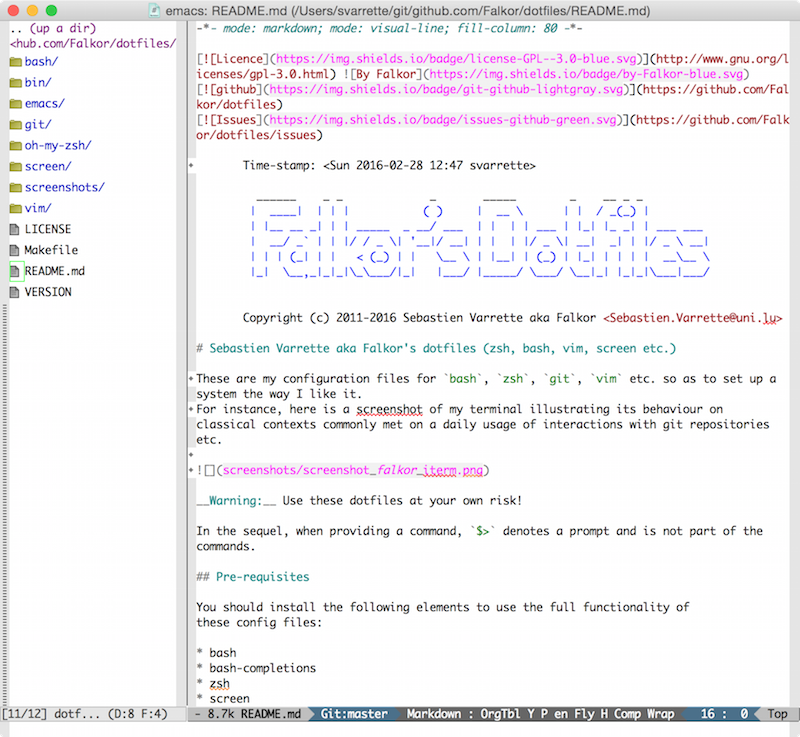
================================================
FILE: docs/index.md
================================================
-*- mode: markdown; mode: visual-line; -*-
# Falkor/dotfiles
[](http://www.gnu.org/licenses/gpl-3.0.html)  [](https://travis-ci.org/Falkor/dotfiles) [](https://github.com/Falkor/dotfiles) [](https://github.com/Falkor/dotfiles/issues)  [](https://readthedocs.org/projects/falkor-dotfiles/?badge=latest)
Copyright (c) 2011-2016 Sebastien Varrette aka Falkor <Sebastien.Varrette@uni.lu>
| [Project Page](https://github.com/Falkor/dotfiles) | [Documentation](http://falkor-dotfiles.readthedocs.org/en/latest/) | [Issues](https://github.com/Falkor/dotfiles/issues) |
-----------
The [`Falkor/dotfiles`](https://github.com/Falkor/dotfiles) repository holds my configuration files for `bash`, `zsh`, `git`, `vim` etc. so as to set up a system the way I like it.
This is the main page of the documentation for this repository, which is hosted and managed by [Read the Docs](http://falkor-dotfiles.readthedocs.org/en/latest/).
It proposes to detail the following elements:
* An [Overview](overview.md) of the project is proposed, with installation notes.
* How to [test these dotfiles with Vagrant](vagrant.md)
* How to [contribute](contributing/index.md) to these development. In particular, we detail:
- the [directory tree structure](contributing/layout.md)
- the steps to follow to [setup this repository](contributing/setup.md)
- information as regard the [semantic versioning](contributing/versioning.md) of this Puppet module.
- Apart form the directory layout, we will cover various configuration aspects (mainly [git-flow](https://github.com/nvie/gitflow))
* Details on the [Read the Docs](http://falkor-dotfiles.readthedocs.org/en/latest/) management.
================================================
FILE: docs/rtfd.md
================================================
The documentation for this project is handled by [Read the Docs](https://readthedocs.org/), a web service dedicated to documentation management for the open source community.
* [Reference documentation](https://docs.readthedocs.org/en/latest/)
By default, the [`Falkor/dotfiles`](https://github.com/Falkor/dotfiles) repository is bound to the [falkor-dotfiles](http://falkor-dotfiles.rtfd.org) project on Read the Docs (to avoid confusion with other `dotfiles` projects).
You might wish to generate locally the docs:
* Install [`mkdocs`](http://www.mkdocs.org/#installation)
* Preview your documentation from the project root by running `mkdocs serve` and visit with your favorite browser the URL `http://localhost:8000`
* build the full documentation locally (in the `site/` directory) by running `mkdocs build`.
================================================
FILE: docs/vagrant.md
================================================
-*- mode: markdown; mode: visual-line; -*-
# Falkor's dotfiles Tests with Vagrant
The best way to test these dotfiles in a non-intrusive way is to rely on [Vagrant](http://www.vagrantup.com/).
[Vagrant](http://vagrantup.com/) uses [Oracle's VirtualBox](http://www.virtualbox.org/) to build configurable, lightweight, and portable virtual machines dynamically.
* [Reference installation notes](http://docs.vagrantup.com/v2/installation/) -- assuming you have installed [Oracle's VirtualBox](http://www.virtualbox.org/)
* [installation notes on Mac OS](http://sourabhbajaj.com/mac-setup/Vagrant/README.html) using [Homebrew](http://brew.sh/) and [Cask](http://sourabhbajaj.com/mac-setup/Homebrew/Cask.html)
The `Vagrantfile` at the root of the repository pilot the provisioning of many vagrant boxes generated through the [vagrant-vms](https://github.com/falkor/vagrant-vms) repository and available on [Vagrant cloud](https://atlas.hashicorp.com/boxes/search?utf8=%E2%9C%93&sort=&provider=virtualbox&q=svarrette).
You can list the available vagrant box as follows:
$> vagrant status
Current machine states:
centos-7 not created (virtualbox)
debian-7 not created (virtualbox)
This environment represents multiple VMs. The VMs are all listed
above with their current state. For more information about a specific
VM, run `vagrant status NAME`.
As suggested, you can run a debian 7 machine for instance by issuing:
$> vagrant up debian-7
Then you can ssh into the machine afterwards:
$> vagrant ssh debian-7
Once within the box, feel free to try my dotfiles. You can install them by running:
$> /vagrant/install.sh # /vagrant mounts the root of the Falkor's dotfile repository
$> chsh -s $(which zsh) # Set zsh as the login shell
================================================
FILE: git/.gitconfig
================================================
# -*- mode: gitconfig; -*-
################################################################################
# .gitconfig -- my personal GIT configuration
# see http://github.com/Falkor/dotfiles
#
# Copyright (c) 2010 Sebastien Varrette <Sebastien.Varrette@uni.lu>
# http://varrette.gforge.uni.lu
#
# _ _ __ _
# __ _(_) |_ ___ ___ _ __ / _(_) __ _
# / _` | | __/ __/ _ \| '_ \| |_| |/ _` |
# | (_| | | || (_| (_) | | | | _| | (_| |
# (_)__, |_|\__\___\___/|_| |_|_| |_|\__, |
# |___/ |___/
#
################################################################################
# Resources:
# - http://stackoverflow.com/questions/267761/what-does-your-gitconfig-contain
# As introduced in Git >= 1.7.10 (see http://git-scm.com/docs/git-config#_includes)
[include]
# For username / credentials / private business etc.
path = config.local
[alias]
up = pull origin
pu = push origin
st = status
df = diff
ci = commit -s
w = whatchanged --abbrev-commit
ls = ls-files
gr = log --graph --pretty=format:'%C(auto)%h -%d %s %Cgreen(%cr) %C(bold blue)<%an>%Creset' --abbrev-commit
grd = log --graph --pretty=format:'%C(auto)%h -%d %s %Cgreen(%ci) %C(bold blue)<%an>%Creset' --abbrev-commit
# From http://progit.org/book/ch2-11.html
unadd = reset HEAD
unstage = reset HEAD --
last = log -1 HEAD
amend = commit --amend
# From http://j.shirley.im/tech/git-flow/
feature-start = flow feature start
feature-finish = ! git flow feature finish
# From https://github.com/tgamblin/dotfiles/blob/master/home/.gitconfig
br = branch --sort=-committerdate \
--format '%(HEAD) %(color:yellow)%(objectname:short)%(color:reset) %(if)%(HEAD)%(then)%(color:green)%(refname:short)%(color:reset)%(else)%(refname:short)%(end) - %(color:cyan)(%(committerdate:relative))%(color:reset)'
bv = branch --sort=-committerdate \
--format '%(HEAD) %(color:yellow)%(objectname:short)%(color:reset) %(if)%(HEAD)%(then)%(color:green)%(refname:short)%(color:reset)%(else)%(refname:short)%(end) - %(color:cyan)(%(committerdate:relative))%(color:reset)%(if)%(upstream)%(then) -> %(color:magenta)%(upstream:short) %(color:white)%(upstream:track)%(color:reset)%(end)'
#
# `git b` with no arguments shows branches ordered by commit date
# (most recent first)
#
# With arguments, it behaves like `git branch`
#
b = !"f() { \
if [ $# -ne 0 ]; then \
git branch \"$@\"; \
else \
git for-each-ref --sort=-committerdate refs/heads/ \
--format='%(HEAD) %(color:yellow)%(objectname:short)%(color:reset) %(if)%(HEAD)%(then)%(color:green)%(refname:short)%(color:reset)%(else)%(refname:short)%(end) - %(color:cyan)(%(committerdate:relative))%(color:reset)'; \
fi; \
}; f"
#
# Make tarball out of the current head. Tarball and the contained
# directory will be named by the date and current HEADs SHA.
#
tarball = !"f() { \
filename=\"$1\"; \
if [ \"x$filename\" = x ]; then \
name=\"$(basename $(git rev-parse --show-toplevel))\" && \
head=$(git log -1 --format=\"%h\" HEAD) && \
dstamp=$(git log -1 --format=\"%ci\" HEAD | awk '{print $1}') && \
filename=\"${name}-${dstamp}-${head}\"; \
fi; \
git archive --format=tar.gz --prefix=\"${filename}/\" HEAD -o ${filename}.tar.gz; \
}; f"
#
# Git Statistics
#
# - ghstats
# Show same statistics that GitHub's contributors page does:
# commits, insertions, & deletions, over the current branch.
#
# - lcontrib:
# Use `git blame` to sum up lines contributed by all users
# that are still in the current HEAD. This differs from
# ghstats becausae it shows only lines in the current
# snapshot, NOT insertions and deletions from all commits.
#
# - scontrib:
# Show raw #commits made by users in current branch.
#
# All of the above aliases can take paths as arguments, e.g., if
# your repo has a subdirectory called "lib", you could do:
#
# git ghstats lib
#
# You can provide relative or absolute paths. You can also exclude
# paths from the statistics using git pathspecs, e.g. if you
# wanted to exclude contributions made in a directory containing
# external dependencies:
#
# # In the repository root
# git ghstats . ":(exclude)lib/external"
#
# NOTE: You cannot currently use relative paths with exclude.
# ONLY do this one in the repository root.
#
scontrib = !"f() {\
printf '%7s %-30s %s\n' COMMITS NAME EMAIL && \
git log --branches --pretty=format:'%<(30)%aN %aE' HEAD -- $( \
for d in \"$@\"; do echo \"${GIT_PREFIX:-${d}}\"; done \
)| sort | uniq -c | sort -nr; \
}; f"
lcontrib = "!f() { \
for file in $( \
git ls-tree --name-only -r HEAD -- $( \
for d in \"$@\"; do echo \"${GIT_PREFIX:-${d}}\"; done \
) \
); do \
git blame -w --line-porcelain $file | \
perl -ne '\
if (/^[0-9a-f]{40} / .. /^filename /) { \
$author = $_ if (s/^author //); \
} else { \
print $author unless /^\\s*(\\#.*)?$/; \
}'; \
done | sort | uniq -c | sort -nr; \
}; f"
ghstats = "!f() { \
printf \"%-8s%-9s%-9s%-9s%s\\n\" '#' COMMITS INSERTED DELETED AUTHOR; \
git log --use-mailmap --shortstat HEAD -- $( \
for d in \"$@\"; do \
echo \"${GIT_PREFIX:-${d}}\"; \
done \
) | perl -e ' \
while (<>) { \
if (/^Author: (.*)$/) { \
$a = $1; \
$c{$a} = 0 unless defined $c{$a}; \
$i{$a}=0 unless defined $i{$a}; \
$d{$a}=0 unless defined $d{$a}; \
} \
if (/^ (\\d+) files? changed(?:, (\\d+) insertions?\\(\\+\\))?(?:, (\\d+) deletions?\\(\\-\\))?/) { \
$c{$a} += 1; \
$i{$a} += $2; \
$d{$a} += $3; \
} \
}; \
printf(\"%-9d%-9d%-9d%s\\n\", $c{$_}, $i{$_}, $d{$_}, $_) for (keys %i);' \
| sort -nr | nl -n ln -w 5; \
}; f"
closed = "!for br in $(git branch); do if git is-merged $br &>/dev/null; then echo $br; fi; done"
# get the github name of this repository by looking at all the github
# remotes and picking the most popular name there.
ghname = "!f() {\
git remote -v |\
perl -ne '\
if (s/.*github.com[:\\/]([^\\/]*)\\/([^.\\s]*).*/\\2/) { print; }'|\
sort |\
uniq |\
head -1;\
}; f"
[color]
diff = auto
status = auto
branch = auto
ui = auto
ui = true
[color "branch"]
current = yellow reverse
local = green
remote = red
[color "diff"]
meta = yellow bold
frag = magenta bold
Old = red bold
new = green bold
[color "status"]
added = green bold
changed = magenta
untracked = red
[core]
autocrlf = input
safecrlf = warn
# pager = less -FRSX
# Switch to Delta - https://github.com/dandavison/delta
pager = delta
editor = vim
mergeoptions = --no-edit
[interactive]
diffFilter = delta --color-only
[delta]
navigate = true # use n and N to move between diff sections
side-by-side = true
[pull]
#rebase = false
rebase = true
[push]
default = matching
[filter "lfs"]
clean = git-lfs clean -- %f
smudge = git-lfs smudge -- %f
process = git-lfs filter-process
required = true
[merge]
tool = meld
conflictstyle = diff3
[diff]
guitool = meld
colorMoved = default
================================================
FILE: git/.gitignore
================================================
*.local
================================================
FILE: git/README.md
================================================
# Falkor's Dotfiles -- some git configuration

[Git](https://git-scm.com/) is probably one of the most awesome productivity tool I use so far.
> [Git](https://git-scm.com/) is a free and open source distributed version control system designed to handle everything from small to very large projects with speed and efficiency.
If you want to know more bout git, you might wish to take a look at the slides I made as an [introduction to git](https://github.com/ULHPC/documents/blob/master/slides/ULHPC_School/2015/intro_git/intro_git.pdf) during the [UL HPC School](https://hpc.uni.lu/hpc-school/2015/06/index.html).
See also the [Git Cheat Sheet](https://training.github.com/kit/downloads/github-git-cheat-sheet.pdf) proposed on Github.
## Git installation
Installation of [Git](http://git-scm.com/) is relatively simple (actually it comes bundled with your system normally):
### Linux / Mac OS
```bash
$ apt install git git-flow # On Debian-like systems
$ yum install git gitflow # On CentOS-like systems
$ brew install git git-flow # On Mac OS, using [Homebrew](http://mxcl.github.com/homebrew/)
```
### Windows
Use [git-for-windows](https://git-for-windows.github.io/), which includes Git Bash/GUI and Shell Integration
* use PLINk from Putty
* install Git bash + command prompt
* select checkout windows / commit unix
## Git configuration
The way I organize my git configurations is as follows:
| File | Alternative | Visibility | Description |
|------------------------------|----------------------|------------|------------------------------------------------|
| `~/.config/git/config` | `~/.gitconfig` | Public | general aliases and core/colors configurations |
| `~/.config/git/config.local` | `~/.gitconfig.local` | Private | username / credentials / private business etc. |
Note that this hierarchy assume the availability of the `include.path` directive within Git which was introduced in __Git >= 1.7.10__ (see <http://git-scm.com/docs/git-config#_includes>)
A sample `config.local.example` is provided that you can inspire to create your own (not-tracked) `config.local` file.
## Installation for Falkor's Git configuration
You can use the `install.sh` script featured with the [Falkor's dotfile](https://github.com/Falkor/dotfile) repository.
``` bash
$ cd ~/.config/dotfiles.falkor.d
$ ./install.sh --git # OR ./install.sh --with-git
# Copy and adapt local configuration
$ cd ~/.config/git/
$ cp ~/.config/dotfiles.falkor.d/git/config.local.example config.local
$ vim ~/.config/git/config.local
# /!\ ADAPT name , email etc.
```
## Uninstall
``` bash
$ cd ~/.config/dotfiles.falkor.d
$ ./install.sh --delete --git
```
## Resources
Consider these resources to become more familiar (if not yet) with Git:
* [Simple Git Guide](http://rogerdudler.github.io/git-guide/)
* [Git book](http://book.git-scm.com/index.html)
* [Github:help](http://help.github.com/mac-set-up-git/)
* [Git reference](http://gitref.org/)
* [Git Cheat Sheet](https://training.github.com/kit/downloads/github-git-cheat-sheet.pdf) proposed on Github.
================================================
FILE: git/config.local.example
================================================
# ~/.config/git/config.local
# Local [private] Git configuration
[user]
name = "Firsname Lastname"
email = "firsname.lastname@domain.org"
# signingKey = <GPG KEY ID>
# signingKey = ~/.ssh/id_ed25519-sk
### In case you want to use your SSH key for commit signs
#[gpg]
# format = ssh
#[gpg "ssh"]
# allowedSignersFile = ~/.ssh/allowed_signers
### uncomment to automatically sign each commit/tag
# [commit]
# gpgsign = true
# [tag]
# gpgsign = true
# [init]
# defaultBranch = master
================================================
FILE: git/ignore
================================================
# Automatically created by GitHub for Mac
.DS_Store
.AppleDouble
.LSOverride
# Icon must end with two \r
Icon
# Thumbnails
._*
# Files that might appear in the root of a volume
.DocumentRevisions-V100
.fseventsd
.Spotlight-V100
.TemporaryItems
.Trashes
.VolumeIcon.icns
# Directories potentially created on remote AFP share
.AppleDB
.AppleDesktop
Network Trash Folder
Temporary Items
.apdisk
================================================
FILE: gnupg/4F156AD7-transition-statement.md.asc
================================================
-----BEGIN PGP SIGNED MESSAGE-----
Hash: SHA512
- -*- mode: markdown; mode; auto-fill; -*-
Time-stamp: <Sun 2017-03-05 21:59 svarrette>
I am transitioning my GPG keys from an old 1024-bit DSA key (`0xA403AC45DD01D5C0`)
to a new 4096-bit RSA key (`0x5D08BCDD4F156AD7`).
The old key will continue to be valid for a short period of time after the
posting of this message, but future signatures will be created from the new key
and I prefer all new correspondance to be encrypted with the new key.
This transition document is signed with both keys to certify the transition.
The **old** key was:
pub 1024D/0xA403AC45DD01D5C0 2006-05-19
Key fingerprint = E273 5952 5AB9 A7FA D786 2C15 A403 AC45 DD01 D5C0
The **new** key is:
pub 4096R/0x5D08BCDD4F156AD7 2017-03-01
Key fingerprint = 1A53 FD6E 09A4 4DBA 7A9F D72B 5D08 BCDD 4F15 6AD7
Note that the signing of this message may have been done by a **SUBKEY** of the
above key.
- --------------------------------------------------------------------------------
To fetch the new key from a public key server, you can use the following:
gpg --keyserver pgp.mit.edu --recv-key 5D08BCDD4F156AD7
* _If you already know my old key_, you can verify that the new key has been
signed by the old one using:
gpg --check-sigs 5D08BCDD4F156AD7
* _If you don’t know (yet) my old key_, or you want to be extra careful, you can
check the fingerprint against the one above:
gpg --fingerprint 5D08BCDD4F156AD7
You can verify the signatures on this message by downloading the plain
text file as linked and running:
gpg --verify <filename>
Finally, if you are satisfied that you have the right key, that the UIDs match
what you expect, and you are certain of my identity, I would appreciate it if
you would sign my new key:
gpg --sign-key 5D08BCDD4F156AD7
gpg --keyserver pgp.mit.edu --send-key 5D08BCDD4F156AD7
- --------------------------------------------------------------------------------
Please contact me via e-mail at <Sebastien.Varrette@uni.lu> if you have any
questions about this document or this transition.
Sebastien Varrette
-----BEGIN PGP SIGNATURE-----
iQIcBAEBCgAGBQJYvH+TAAoJECjhDmEWLJXUVDEP/3S1wocVFhwAcomJF5PdrKPU
QBXbsnxf7jfBOdGI5Ou4uKHLOdGORnxsHaU4ForPto5g1vAPEtP6dGXOLrWok1Dq
87KQKJJoncdnIitscYO3btY3zbOef+6it9cEOzEK8wR/jgBJ8JRiZSW/j1Q2eFiR
pGKkcWBMHthsW3VUZb3hih1HA71oxurmkF3Pky9Sr4EYVOtQjZM7HuHgiYHIRsq4
LtibsZe+vC6Jw8RULmeUBGf+CmfO2RfycBe0dAO07QbT7Su8wnC5Rxzg9sW07fjq
bNQaCXxz9cGRi9ikC9LALGSynTGiPoaGcLfXS6w6OaBzz/dkC+hoEyEw/o1jbQfk
rnHJ9w4DiefR9fbEU0/uhIqjejx+4MWRK1qkpYivSCd5e89glB4+fHwfuS+Mk8wz
RNH9n3wg4FWuqsM5W7zl6e4CjflkMiAbOKIiefNby8hGePj1BZB2eIXEnTjb2efa
jK2wWRe/613AlF5eeKqoJlQJJXIh+N1SkzJy/VjDZf3KVRGsL6f2YosLSAMl4RN1
ZAILPjuJ09HawQDqrEsI/X3tiXV/b+8bOs66zbLe/widTk/XeGCaLmetmZVjNTsG
d/ojJcmwwncnU9p8x3MjuQMT1oxdK7PEc3aQlTjzLANUQ0qFDSHtQYMPkCiKOSyo
4lu0PDRyH7r3krMQqbk3
=6JDX
-----END PGP SIGNATURE-----
================================================
FILE: gnupg/DD01D5C0-transition-statement.md.asc
================================================
-----BEGIN PGP SIGNED MESSAGE-----
Hash: SHA512
- -*- mode: markdown; mode; auto-fill; -*-
Time-stamp: <Sun 2017-03-05 21:59 svarrette>
I am transitioning my GPG keys from an old 1024-bit DSA key (`0xA403AC45DD01D5C0`)
to a new 4096-bit RSA key (`0x5D08BCDD4F156AD7`).
The old key will continue to be valid for a short period of time after the
posting of this message, but future signatures will be created from the new key
and I prefer all new correspondance to be encrypted with the new key.
This transition document is signed with both keys to certify the transition.
The **old** key was:
pub 1024D/0xA403AC45DD01D5C0 2006-05-19
Key fingerprint = E273 5952 5AB9 A7FA D786 2C15 A403 AC45 DD01 D5C0
The **new** key is:
pub 4096R/0x5D08BCDD4F156AD7 2017-03-01
Key fingerprint = 1A53 FD6E 09A4 4DBA 7A9F D72B 5D08 BCDD 4F15 6AD7
Note that the signing of this message may have been done by a **SUBKEY** of the
above key.
- --------------------------------------------------------------------------------
To fetch the new key from a public key server, you can use the following:
gpg --keyserver pgp.mit.edu --recv-key 5D08BCDD4F156AD7
* _If you already know my old key_, you can verify that the new key has been
signed by the old one using:
gpg --check-sigs 5D08BCDD4F156AD7
* _If you don’t know (yet) my old key_, or you want to be extra careful, you can
check the fingerprint against the one above:
gpg --fingerprint 5D08BCDD4F156AD7
You can verify the signatures on this message by downloading the plain
text file as linked and running:
gpg --verify <filename>
Finally, if you are satisfied that you have the right key, that the UIDs match
what you expect, and you are certain of my identity, I would appreciate it if
you would sign my new key:
gpg --sign-key 5D08BCDD4F156AD7
gpg --keyserver pgp.mit.edu --send-key 5D08BCDD4F156AD7
- --------------------------------------------------------------------------------
Please contact me via e-mail at <Sebastien.Varrette@uni.lu> if you have any
questions about this document or this transition.
Sebastien Varrette
-----BEGIN PGP SIGNATURE-----
iEYEAREKAAYFAli8ftYACgkQpAOsRd0B1cCriwCfXtx48Ei/Rp4LGB8Dot7EdnXB
20kAniG/ZpvwPf85ZQJ/Z0uqj9RhjECF
=9ND2
-----END PGP SIGNATURE-----
================================================
FILE: gnupg/README.md
================================================
# GPG: Gnu Privacy Guard
* Old resources, still usefull:
* [Tutorial](https://futureboy.us/pgp.html) + [personnal Tutorial](https://varrette.gforge.uni.lu/blog/2017/03/14/tutorial-gpg-gnu-privacy-guard/)
* [GPG Keypairs](https://stelfox.net/knowledge_base/linux/gpg_keypairs/)
* [Generating More Secure GPG Keys: A Step-by-Step Guide](https://spin.atomicobject.com/2013/11/24/secure-gpg-keys-guide/)
* [Guide to using YubiKey for GPG and SSH](https://github.com/drduh/YubiKey-Guide)
* [OpenPGP Best Practices](https://riseup.net/en/security/message-security/openpgp/best-practices)
* [GnuPG](https://www.gnupg.org/): implementation of the OpenPGP standard aka [RFC4880](http://www.ietf.org/rfc/rfc4880.txt)
- Hybrid encryption framework based on [Web of Trust](https://en.wikipedia.org/wiki/Web_of_trust)
- `Mail | Document | Git commit...` encryption / signature

[TOC]
## Installation
Apart from the below (preferred) solutions per OS, a cross-platform approach relies on Thunderbird and the [Enigmail](https://enigmail.wiki/) extension.
### Linux/BSD
* Install the `gnupg` package.
* You might also consider [GPGME -- GnuPG Made Easy]() -- [tutorial](http://www.nico.schottelius.org/docs/a-small-introduction-for-using-gpgme/)
### Mac OS X
* Install the [GPGTools Suite](https://gpgtools.org/)
- GPG for Apple Mail and GPG Keychain
- GPhttps://github.com/Falkor/dotfiles/blob/master/gnupg/gpg.confG Services and MacGPG
### Windows
[Gpg4win](http://www.gpg4win.org/) (GNU Privacy Guard for Windows) is the reference package implementation to use [GPG](https://www.gnupg.org/) under windows -- [tutorial](https://www.deepdotweb.com/2015/02/21/pgp-tutorial-for-windows-kleopatra-gpg4win/)
It includes the following programs:
* __GnuPG__, which forms the heart of Gpg4win - the actual encryption software.
* __Kleopatra__, the central certificate administration of Gpg4win, which ensures uniform user navigation for all cryptographic operations.
* __GNU Privacy Assistant (GPA)__, an alternative program for managing certificates, in addition to Kleopatra.
* __GnuPG for Outlook (GpgOL)__, an extension for Microsoft Outlook 2003 and 2007, which is used to sign and encrypt messages.
* __GPG Explorer eXtension (GpgEX)__, an extension for Windows Explorer which can be used to sign and encrypt files using the context menu.
* __Claws Mail__, a full e-mail program that offers very good support for GnuPG.
## Configuration
see `{gpg,dirmngr,gpg-agent}.conf` which are provided as [part of my personnal dotfiles](https://github.com/Falkor/dotfiles/tree/master/gnupg).
Enable them as follows:
```bash
cd ~/.gnupg
ln -s ../path/to/dotfile/repo/gnupg config.gnupg.d # convenient directory
ln -s config.gnupg.d/gpg.conf .
ln -s config.gnupg.d/dirmngr.conf .
ln -s config.gnupg.d/gpg-agent.conf .
```
#### Pinentry
You can configure your favorite pinentry program to prompt for your GPG passphrase/PIN
```bash
# Debian-like systems
$ sudo apt install pinentry-curses pinentry-qt pinentry-gtk2
$ sudo update-alternatives --config pinentry
There ahttps://github.com/Falkor/dotfiles/blob/master/gnupg/gpg.confre 5 choices for the alternative pinentry (providing /usr/bin/pinentry).
Selection Path Priority Status
------------------------------------------------------------
* 0 /usr/bin/pinentry-gnome3 90 auto mode
1 /usr/bin/pinentry-curses 50 manual mode
2 /usr/bin/pinentry-gnome3 90 manual mode
3 /usr/bin/pinentry-gtk-2 85 manual mode
4 /usr/bin/pinentry-qt 80 manual mode
5 /usr/bin/pinentry-tty 30 manual mode
Press <enter> to keep the current choice[*], or type selection number: 1
update-alternatives: using /usr/bin/pinentry-curses to provide /usr/bin/pinentry (pinentry) in manual mode
```
Note that when using `pinentry-{tty,ncurses}`, it may happen that you don't get access to the pinentry program. It's most likely a problem tied to the GPG_TTY environnement variable - ensure you set somewhere in your shell
```bash
export GPG_TTY=$(tty)
```
Alternatively, you can force your GPG agent to reset the tty used (in particular) by your pinentry program.
```bash
gpg-connect-agent "updatestartuptty" /bye >/dev/null
```
Note that managing the correct TTY across multiple tabs in your favorite shell (Guake etc.) can be cumbersome. So it's probably easier to rely on a pinentry GUI like **pinentry-gtk-2**.
## GPG Key Generation
Consider using the provided script [`scripts/generate-gpg-key`](https://github.com/Falkor/dotfiles/blob/master/gnupg/scripts/generate-gpg-key) which implements and automate the generation of GPG key pairs according to [recommended best practices](https://help.riseup.net/en/security/message-security/openpgp/best-practices).
```bash
$ ./scripts/generate-gpg-key -h # help
$ ./scripts/generate-gpg-key
# By default, operate in a temporary directory
Working directory: GNUPGHOME = /tmp/user/<uid>/tmp.c26KOD8LdO
=> generating batch file for the master key /tmp/user/<uid>/tmp.c26KOD8LdO/generate-master-key.batch
=> generating master key
gpg: keybox '/tmp/user/<uid>/tmp.c26KOD8LdO/pubring.kbx' created
gpg: === Generating your GPG key ===
gpg: -> Generating master key (for certification only)
gpg: /tmp/user/<uid>/tmp.c26KOD8LdO/trustdb.gpg: trustdb created
gpg: directory '/tmp/user/<uid>/tmp.c26KOD8LdO/openpgp-revocs.d' created
gpg: revocation certificate stored as '/tmp/user/<uid>/tmp.c26KOD8LdO/openpgp-revocs.d/C808C0230ED24EF393EDFCA6EC70200B9BF93DCB.rev'
gpg: done
=== Current GPG key status ===
gpg: checking the trustdb
gpg: marginals needed: 3 completes needed: 1 trust model: pgp
gpg: depth: 0 valid: 1 signed: 0 trust: 0-, 0q, 0n, 0m, 0f, 1u
/tmp/user/<uid>/tmp.c26KOD8LdO/pubring.kbx
-----------------------------------------
sec rsa4096/0x3156CC64BB58247D <date> [C]
6D1F481568A1D64F98BF228B3156CC64BB58247D
uid [ultimate] <name> <email>
=> collecting generated Key ID
Master Key ID for <email>: 6D1F481568A1D64F98BF228B3156CC64BB58247D
=> Generating subkey for 'sign' usage
=> Generating subkey for 'encrypt' usage
=> Generating subkey for 'auth' usage
=== Current GPG key status ===
/tmp/user/<uid>/tmp.c26KOD8LdO/pubring.kbx
-----------------------------------------
sec rsa4096/0x3156CC64BB58247D <date> [C]
6D1F481568A1D64F98BF228B3156CC64BB58247D
uid [ultimate] <name> <email>
ssb rsa4096/0x48D1E2129D0CCEC6 <date> [S] [expires: <date>]
ssb rsa4096/0xEE74576ED76B1148 <date> [E] [expires: <date>]
ssb rsa4096/0x68E5153F63FA7B79 <date> [A] [expires: <date>]
=> exports/backup your public key
=> exports/backup your **private** master key
=> exports/backup your **private** subkeys
=> revocation cerfificate for OpenPGP (master) key 6D1F481568A1D64F98BF228B3156CC64BB58247D:
/tmp/user/<uid>/tmp.c26KOD8LdO/openpgp-revocs.d/6D1F481568A1D64F98BF228B3156CC64BB58247D.rev
=> export GPG's trustDB to a text file
=> preparing for (optional) SSH support via the GPG subkey with 'A[uth]' usage
assumes you specify the key to use in sshcontrol file via its keygrip internal identifier
Current keygrips in use: (gpg -K --with-keygrip [...])
sec rsa4096/0x3156CC64BB58247D <date> [C]
6D1F481568A1D64F98BF228B3156CC64BB58247D
Keygrip = 6F165EAF3AF6A678A072841654E6702974A885B3
uid [ultimate] <name> <email>
ssb rsa4096/0x48D1E2129D0CCEC6 <date> [S] [expires: <date>]
Keygrip = CC34AFAD18486AD790CCA9A708D858057F022FD2
ssb rsa4096/0xEE74576ED76B1148 <date> [E] [expires: <date>]
Keygrip = CBE87BF5CB84AE288E4829BE66B286FBCDFEAEAE
ssb rsa4096/0x68E5153F63FA7B79 <date> [A] [expires: <date>]
Keygrip = 47A0554C7508280F10E277B40186257857DD6E03
selected keygrip (subkey with 'A' usage): '47A0554C7508280F10E277B40186257857DD6E03'
=> creating /tmp/user/<uid>/tmp.c26KOD8LdO/sshcontrol
/!\ WARNING: To get gpg-agent to handle requests from SSH, you still need to:
/!\ WARNING: - add 'enable-ssh-support' into ${GNUPGOME}/gpg-agent.conf
/!\ WARNING: - change the value of the SSH_AUTH_SOCK environment variable in your favorite shell configuration (.bashrc,.zshrc etc.)
/!\ WARNING: export SSH_AUTH_SOCK=$(gpgconf --list-dirs agent-ssh-socket)
/!\ WARNING: gpgconf --launch gpg-agent
/!\ WARNING: To cleanup the working directory (NOT done by default):
/!\ WARNING: rm -rf /tmp/user/<uid>/tmp.c26KOD8LdO
```
If you want to generate them in the persistent (expected) directory, use
```bash
$ export GNUPGHOME=$HOME/.gnupg # To place in your shell config
$ ./scripts/generate-gpg-key -d ~${GNUPGHOME}
```
### Customization: add a photo and/or other identities
Assuming you have a JPEG photo of you, you can attach it in your key with **addphoto**
> Note: photographs must be in a JPG format and should be as small (in byte size) as possible. A reasonable rule is to make a picture that is no larger than 240 pixels wide by 288 pixels high, and a size less than 10,000 bytes. Use a face shot like you would with a passport photograph.
```bash
# Collect the Master Key ID
$ gpg -K --keyid-format 0xlong
# vvvvvvvvvvvvvvvvvv
sec rsa4096/0x3156CC64BB58247D <date> [C] # <--- 0xlong version
6D1F481568A1D64F98BF228B3156CC64BB58247D # <--- exact version
uid [ultimate] <name> <email>
ssb rsa4096/0x48D1E2129D0CCEC6 <date> [S] [expires: <date>]
ssb rsa4096/0xEE74576ED76B1148 <date> [E] [expires: <date>]
ssb rsa4096/0x68E5153F63FA7B79 <date> [A] [expires: <date>]
# Fully automated version to collect KEYID
$ KEYID=$(gpg --keyid-format long --with-colons --fingerprint $(git config --get user.email) | awk '{print $1}')
# ... Edit the master key from its ID
$ gpg --edit-key ${KEYID} # Note: you may rely purely on the email attached to the key with
# gpg --edit-key $(git config --get user.email)
# [...]
gpg> addphoto
Pick an image to use for your photo ID. The image must be a JPEG file.
Remember that the image is stored within your public key. If you use a
very large picture, your key will become very large as well!
Keeping the image close to 240x288 is a good size to use.
Enter JPEG filename for photo ID: ~/path/to/picture.jpeg
# The photo will be displayed -- confirm it
Is this photo correct (y/N/q)? y
sec rsa4096/3156CC64BB58247D
created: <date> expires: never usage: C
trust: ultimate validity: ultimate
ssb rsa4096/48D1E2129D0CCEC6
created: <date> expires: <date> usage: S
ssb rsa4096/EE74576ED76B1148
created: <date> expires: <date> usage: E
ssb rsa4096/68E5153F63FA7B79
created: <date> expires: <date> usage: A
gpg> save
```
To add another identity with **adduid**:
```bash
# As above
$ gpg --edit-key ${KEYID} # Note: you may rely purely on the email attached to the key with
# gpg --edit-key $(git config --get user.email)
gpg> adduid
Real name: <name2>
Email address: <email2>
Comment:
You selected this USER-ID:
"<name2> <email2>"
Change (N)ame, (C)omment, (E)mail or (O)kay/(Q)uit? O
sec rsa4096/3156CC64BB58247D
created: <date> expires: never usage: C
trust: ultimate validity: ultimate
ssb rsa4096/48D1E2129D0CCEC6
created: <date> expires: <date> usage: S
ssb rsa4096/EE74576ED76B1148
created: <date> expires: <date> usage: E
ssb rsa4096/68E5153F63FA7B79
created: <date> expires: <date> usage: A
[ultimate] (1) <name> <email>
[ultimate] (2) [jpeg image of size 4617]
[ unknown] (3). <name> <email>
gpg> save
```
Now if you check your key:
```bash
$ gpg -K --keyid-format 0xlong
# vvvvvvvvvvvvvvvvvv
sec rsa4096/0x3156CC64BB58247D <date> [C] # <--- long version
6D1F481568A1D64F98BF228B3156CC64BB58247D # <--- exact version
uid [ultimate] <name> <email>
uid [ultimate] [jpeg image of size 4617]
uid [ultimate] <name2> <email2>
ssb rsa4096/0x48D1E2129D0CCEC6 <date> [S] [expires: <date>]
ssb rsa4096/0xEE74576ED76B1148 <date> [E] [expires: <date>]
ssb rsa4096/0x68E5153F63FA7B79 <date> [A] [expires: <date>]
```
### ~~Customization: enforce stronger cryptography preferences.~~
**/!\ UPDATE (2023) does not seem required any more. defaults seems ok**
By default, the encryption preferences specified in your public key are probably not as strong as they should be. Thus you should set stronger default security preferences (to use SHA512, AES256 and ZLIB by default) using the `setpref` command, *i.e.*:
```bash
# As above
$ gpg --edit-key ${KEYID} # Note: you may rely purely on the email attached to the key with
# gpg --edit-key $(git config --get user.email)
```
See also [Gist: GPG Cheat Sheet and best practices ](https://gist.github.com/MorganGeek/5e6b89d351d34dfbc576db610b0c02e8)
## Transfer your GPG key to [Multiple] Yubikeys
If you own security keys (such as yubikeys), it's time to transfer the generated keys to them!
See (the excellent) [Dr Duh Yubikey guide](https://github.com/drduh/YubiKey-Guide#configure-smartcard) for detailed instructions.
## Enable SSH access using a GPG key for authentication
Resources:
* [blog: How to enable SSH access using a GPG key for authentication](https://opensource.com/article/19/4/gpg-subkeys-ssh)
* [Gist: OpenPGP SSH access with Yubikey and GnuPG](https://gist.github.com/artizirk/d09ce3570021b0f65469cb450bee5e29)
### Setup (sshcontrol, gpg-agent etc.)
This assumes you have a dedicated GPG subkey with authenticate capability (which is the case from the above scripted generation)
```bash
$ gpg -K --keyid-format long --with-keygrip $(git config --get user.email)
sec rsa4096/0x3156CC64BB58247D <date> [C]
6D1F481568A1D64F98BF228B3156CC64BB58247D
Keygrip = 6F165EAF3AF6A678A072841654E6702974A885B3
uid [ultimate] <name> <email>
uid [ultimate] [jpeg image of size 4617]
uid [ultimate] <name2> <email2>
ssb rsa4096/0x48D1E2129D0CCEC6 <date> [S] [expires: <date>]
Keygrip = CC34AFAD18486AD790CCA9A708D858057F022FD2
ssb rsa4096/0xEE74576ED76B1148 <date> [E] [expires: <date>]
Keygrip = CBE87BF5CB84AE288E4829BE66B286FBCDFEAEAE
ssb rsa4096/0x68E5153F63FA7B79 <date> [A] [expires: <date>] # <-- Subkey we're interested to
Keygrip = 47A0554C7508280F10E277B40186257857DD6E03 # <-- Associated Keygrip to put into ~/.gnupg/sshcontrol
```
Normally the `sshcontrol` file was already populated. othewise create it as follows:
```bash
# /!\ ADAPT Keygrip accordingly - pay attention (again) to select your 'A' subkey
echo "<keygrip-subkey-A>" > ~/.gnupg/sshcontrol
```
* To get **gpg-agent** to handle requests from SSH, you need to enable support by adding the line `enable-ssh-support` in `~/.gnupg/gpg-agent.conf` (already done in the provided configuration)
* Then you need to tell SSH _how_ to access the **gpg-agent**. This is done by changing the value of the `SSH_AUTH_SOCK` environment variable.
Add the following lines in your favorite shell configuration (`.bashrc`,`.zshrc` etc.):
```bash
export GPG_TTY=$(tty)
export SSH_AUTH_SOCK="$(gpgconf --list-dirs agent-ssh-socket)"
gpgconf --launch gpg-agent
```
A more complete setup is provided in a dedicated script you can source in your favorite shell configuration (`.bashrc`,`.zshrc` etc.). In particular, you probably want to do the above only if `enable-ssh-support` is present in the `gpg-agent.conf` configuration file.
You can check that it works as follows:
```bash
# If GPG keys moved to Yubikey and Yubikey is absent
$ ssh-add -L # Lists public key of all identities currently represented by the agent.
The agent has no identities.
# Plug [one of] your Yubikey(s)
$ ssh-add -L
ssh-rsa <public-key>== cardno:<serial>
```
### Save public key for identity file configuration
So it's a good idea to extract the OpenPGP SSH public key which can be added (as "normal") in any server `~/.ssh/authorized_key` file.
```bash
# remove the trailing comment cardno serial
$ ssh-add -L | grep cardno | sed 's/\(cardno\):.*$/\1/' | tee ~/.ssh/id_rsa_openpgp_yubikey.pub
ssh-rsa <public-key>== cardno
# /!\ IMPORTANT: put the same access rights you would put on an SSH private key or some ssh-agent wrappers may fail
$ chmod 400 ~/.ssh/id_rsa_openpgp_yubikey.pub
```
As per [DrDuh Yubikey Guide on SSH](https://github.com/drduh/YubiKey-Guide#optional-save-public-key-for-identity-file-configuration):
> By default, SSH attempts to use all the identities available via the agent. That's why when using the `IdentityFile` option in an ssh config, you typically point to a private key path. For the YubiKey - indeed, in general for keys stored in an ssh agent - `IdentityFile` should point to the *public* key file and `ssh` will select the appropriate private key from those available via the ssh agent. with `IdentitiesOnly yes`, `ssh` will not automatically enumerate public keys loaded into `ssh-agent` or `gpg-agent`. This means `publickey` authentication will not proceed unless explicitly named by `ssh -i [identity_file]` or in `.ssh/config` on a per-host basis.
For instance with github:
```bash
Host github.com
IdentitiesOnly yes
IdentityFile ~/.ssh/id_rsa_openpgp_yubikey.pub
```
Check that it works (after uploading the public key in yoru profile, :
```bash
# Better have a 'journal -fax' running in parallel to detect TTY issue
$ ssh git@github.com
PTY allocation request failed on channel 0
Hi svarrette-anssi! You've successfully authenticated, but GitHub does not provide shell access.
Connection to github.com closed.
```
*Note* **if you are using multiple yubikeys** to store the same GPG indentity (see [`yubikeys.md`](../yubikeys.md#transfer-your-gpg-keys-to-your-first-yubikey) ), repeat the same test with each yubikey to ensure it works just fine -- **recall to invoke [`yubi-switch`](https://github.com/Falkor/dotfiles/blob/master/oh-my-zsh/custom/plugins/falkor/falkor.plugin.zsh#L366) prior to running the ssh command**.
## GPG CLI Usage
~~~bash
gpg --list-keys [pattern] # List available PGP key(s)
gpg --keyserver keys.openpgp.org --search-keys <pattern> # Search \& Import
gpg --keyserver keys.openpgp.org --recv-keys <ID> # Import
gpg --keyserver keys.openpgp.org --send-keys <ID> # Export to server
~~~
`/!\ IMPORTANT:` sending _encrypted_ mails to `user@domain.org` assumes that you **trust** his key, _i.e._ that you _sign_ (after careful check) this key (using GPG Keychain / GPA).
~~~bash
gpg [-K] --fingerprint <mail> # Get (with -K) / Check fingerprint
gpg --sign-key --ask-cert-level <ID> # Sign Key <ID> AFTER check
gpg --keyserver keys.openpgp.org --send-keys <ID> # Send back signed key
~~~
Now if you want to encrypt / decrypt / digitally sign files:
~~~bash
gpg --encrypt [-r <recipient>] <file> # => <file>.gpg
rm -f <file> # /!\ WARNING: encryption does not delete the input (clear-text) file
gpg --decrypt <file>.gpg # Decrypt PGP encrypted file
gpg --armor --detach-sign <file> # Generate signature file <file>.asc
~~~
## GPG Keychain / Keyring
* Linux / Mac OS: `~/.gnupg/`
* Windows: `C:\\Documents and Settings\<LOGIN>\Application Data\gnupg\`
More genrally, you can manage your secret data with a [system keyring](https://dev.to/setevoy/what-is-linux-keyring-gnome-keyring-secret-service-and-d-bus-4kgd), i.e. [Kwallet](https://utils.kde.org/projects/kwalletmanager/) or [`gnome-keyring`](https://wiki.gnome.org/Projects/GnomeKeyring) etc.
For instance, to install `gnome-keyring` (on Debian systems (even when relying on KDE Plasma as it's way better supported than Kwallet -- see [blog](https://www.jwillikers.com/gnome-keyring-in-kde-plasma))
```bash
$ sudo apt install gnome-keyring seahorse
# Autostart SSH and Secrets components of the GNOME keyring on login
cp /etc/xdg/autostart/{gnome-keyring-secrets.desktop,gnome-keyring-ssh.desktop} ~/.config/autostart/
sed -i '/^OnlyShowIn.*$/d' ~/.config/autostart/gnome-keyring-secrets.desktop
sed -i '/^OnlyShowIn.*$/d' ~/.config/autostart/gnome-keyring-ssh.desktop
```
## Using GPG within git
* Sign tags using your GPG key with the `-s` option
- add Signed-off-by line by the committer using `-s` : `git commit -s [...]`
- GPG sign commit with `-S`: `git commit -s -S [...]`
- tag sign: `git tag -s <name>`
* Assumes that you have configured git with your GPG signing key ID (typically into `~/.config/git/config.local`).
Example below -- see also [my personal configuration](https://github.com/Falkor/dotfiles/blob/master/git/config.local.example)
~~~ini
[user]
name = Firstname Lastname
email = firstname.lastname@domain.com
signingkey = 0x<GPG-Key-ID>
[commit]
gpgsign = true
[tag]
gpgsign = true
~~~
## (old notes) Using GPG within Keybase.io
* [Blog: GPG: Strong Keys, Rotation, and Keybase](https://sungo.wtf/2016/11/23/gpg-strong-keys-rotation-and-keybase.html)
* [Playing with Keybase.io](http://nishanttotla.com/blog/playing-with-keybase-io/)
* **Alternative to Keybase.io: [Keyoxide](https://keyoxide.org)**
* Both rely on GPG Notations which can be added to user ID(s) and can be used to create [OpenPGP identity proofs](https://keyoxide.org/guides/openpgp-proofs).
[Keybase.io](https://keybase.io) aims to make life with GPG easier. It does a really good job but it encourages a bad behavior in key management, _i.e._ by default, it creates and stores a private key on their server. We can never truly verify the condition of their server so a Keybase-hosted private key should always be considered untrustworthy.
So we will configure [Keybase.io](https://keybase.io) to just use our existing key
Install keybase:
~~~bash
$> {apt | dnf | brew cask} install keybase
~~~
You can then configure the completion files on your system:
* [Bash completion file](https://github.com/dtiersch/keybase-completion) -- see [Issue #147](https://github.com/keybase/keybase-issues/issues/147) in the Keybase Bugtracker
* [ZSH completion file](https://github.com/rbirnie/oh-my-zsh-keybase/blob/master/keybase/_keybase) -- see [Issue #519](https://github.com/keybase/keybase-issues/issues/519) in the Keybase Bugtracker
Now you can select your (local) gpg key and import the **public** key to Keybase.io (thus using the `--no-import` option).
~~~bash
keybase pgp select --no-import <keyID>
# Algo Key Id Created UserId
= ==== ====== ======= ======
1 4096R <keyid> <firstname> <lastname> <email> [...]
Choose a key: 1
▶ INFO Bundle unlocked: <keyID>
▶ INFO Generated new PGP key:
▶ INFO user: <uid>
▶ INFO 4096-bit RSA key, ID <keyID>, created <date>
▶ INFO Key <keyID> imported
~~~
**Adding Trust Using Public Account**
~~~bash
# prove that the twitter account @<login> really belongs to you
$ keybase prove twitter <login>
# repeat for github, your web site etc...
$ keybase prove github <login>
$ keybase prove web https://<url>
~~~
## (Old notes) Using GPG within Git-crypt
* [reference doc](https://www.agwa.name/projects/git-crypt/)
* [Github project](https://github.com/AGWA/git-crypt)
* [tutorial](http://www.starkandwayne.com/blog/secure-your-boshworkspace-with-git-crypt/)
### Installation
~~~bash
# OSX
brew install git-crypt
# Debian/Ubuntu
sudo apt-get install libssl-dev
cd /tmp && wget https://github.com/AGWA/git-crypt/archive/0.5.0.zip
unzip 0.5.0.zip && cd git-crypt-0.5.0/
make && sudo make install
~~~
### Initial Repository Setup
Configure/setup a repository to use `git-crypt` as follows:
```bash
$ git-crypt init
```
This will generate a symmetric key for encrypting your files (stored in `.git/git-crypt/keys/default`).
You need also to enable a git [pre-commit hook](https://git-scm.com/book/it/v2/Customizing-Git-Git-Hooks) to avoid accidentally adding unencrypted files -- see [issue #45](https://github.com/AGWA/git-crypt/issues/45).
Example of such a pre-commit hook, to be placed as `.git/hooks/pre-commit` (in executable mode), can be found on [this gist](https://gist.github.com/Falkor/848c82daa63710b6c132bb42029b30ef) -- [raw version](https://gist.github.com/Falkor/848c82daa63710b6c132bb42029b30ef/raw/605a40d778c521e8993a316fa2568ad384fd06ff/pre-commit.git-crypt.sh)
```bash
$ curl <url/to/raw/gist> -o .git/hooks/pre-commit
$ chmod +x .git/hooks/pre-commit
```
Now you can **share the repository with others (or with yourself) using GPG**:
```bash
$ git-crypt add-gpg-user <ID>
```
This will create a encrypted version of the symmetric key and stores it in `.git-crypt/keys/default/0/<FINGERPRINT>.gpg`.
Example:
~~~bash
# Add yourself i.e. sign the encryption key with my GPG key and store it into '.git-crypt/'
$> git-crypt add-gpg-user <your-keyID>
[master d91d341] Add 1 git-crypt collaborator
2 files changed, 3 insertions(+)
create mode 100644 .git-crypt/.gitattributes> p
create mode 100644 .git-crypt/keys/default/0/<your-exact-KeyID>.gpg
~~~
This encrypted key can be decrypted by running:
$> git-crypt unlock
You can add as many collaborators as you wish.
Note that since distributing keys can be cumbersome, the above mentioned [tutorial](http://www.starkandwayne.com/blog/secure-your-boshworkspace-with-git-crypt/) combines `git-crypt` with the [keybase.io](https://keybase.io/docs/command_line) service, which seems btw very promising however request some tests.
### Encrypted files configuration within `.gitattributes`
Specify files/wildcard patterns to encrypt by creating a [`.gitattributes`](https://git-scm.com/docs/gitattributes) file at the root of the repository through the following format:
```
<pattern> filter=git-crypt diff=git-crypt
```
Example:
~~~bash
#
# specify which files to encrypt using [git-crypt](https://www.agwa.name/projects/git-crypt/)
#
# Certificate private keys
*.key filter=git-crypt diff=git-crypt
# Host SSH private keys
*ssh_*_key filter=git-crypt diff=git-crypt
# runner config
*.toml filter=git-crypt diff=git-crypt
# Apache htaccess pasword protected
*.htpasswd filter=git-crypt diff=git-crypt
# specific apache vhost hosting LDAP binding credentials
servers/gaia/www/etc/httpd/sites-available/default-ssl filter=git-crypt diff=git-crypt
~~~
Remember to commit the `.gitattributes` file.
`/!\ IMPORTANT:` you should have **unlock** the repository before adding an encrypted file.
Assuming you plan to add a `*.key` file (thus expected to be encrypted), proceed as follows:
~~~bash
# Eventually unlock the repository
$ git-crypt unlock
$ echo 'secret' > secret.key
$ git add secret.key
$ git commit -s -m "add secret.key (encrypted) file" secret.key
~~~
Note that thanks to the pre-commit hook, in case you have forgotten to unlock the repository, the above commit command would fail as follows:
~~~bash
$ git commit -s -m "add secret.key (encrypted) file" secret.key
encrypted: secret.key *** WARNING: staged/committed version is NOT ENCRYPTED! ***
Warning: one or more files is marked for encryption via .gitattributes but
was staged and/or committed before the .gitattributes file was in effect.
Run 'git-crypt status' with the '-f' option to stage an encrypted version.
~~~
So assuming you did well, you can commit the file and check that the content is indeed encrypted:
~~~bash
$ git commit -s -m "add secret.key (encrypted) file" secret.key
[master 9ae570f] add secret.key (encrypted) file
1 file changed, 0 insertions(+), 0 deletions(-)
create mode 100644 secret.key
$ cat secret.key
secret
# Lock back the repository
$ git-crypt lock
$ cat secret.key
GITCRYPT�ἅ�)&f\���Lp�<%
~~~
`/!\ IMPORTANT`: the pre-commit hook is a nice safeguard but **remains local** to your personal copy of the repository.
In particular, it is **not shared** with you collaborator upon cloning operations. You'll typically need to integrate the setup of that hook through the `[m|r]ake setup` operation
## (Old notes) Using GPG for Password Management with `pass`
Another nice git-based approach that team nicely with GPG relies on the `pass` utility and a carefully crafted git repository
### Password repository layout
Passwords are meant to be stored into a git repository where each password is contained in a file, encrypted with GnuPG using public keys of all the allowed admins.
The structure of the passwords repository is thus typically as follows:
~~~bash
Password Store
├── admin_gnupg # GnuPG configuration directory for the password repository
│ ├── gpg.conf # admin group definition
│ ├── pubring # holds the administrator's public keys
│ └── reencrypt.sh # facility script to re-encrypt every password when admin group changes
├── extra
│ ├── ...
│ └── twitter
│ └── login.gpg # encrypted password to connect to twitter with login 'login'
└── [...]
~~~
When possible, passwords should be stored with the following structure:
<path/to/passwords-repo>/<category>/<target>/<login>.gpg
### Password management (the manual way)
To display a password, you just need to decrypt the GPG-encrypted password, typically as follows:
gpg -d extra/twitter/ULHPC.gpg
To add a new encrypted password, use:
GNUPGHOME=<path_to_passwords-repo>/admin_gnupg gpg -r admin -e -o extra/twitter/ULHPC.gpg
Then, don't forget to git add/commit/push your changes.
### Password management using the [`pass` utility](http://zx2c4.com/projects/password-store/)
_Pass_ is an utility to insert, display or copy to clipboard passwords stored
into git repository. It is not mandatory to use it, but it eases password management.
After installation (`brew install pass`), using pass requires two configuration steps:
* Set the `PASSWORD_STORE_DIR` environment variable, which contains the path of the password repository:
export PASSWORD_STORE_DIR=<path_to_passwords-repo>
* Set the GNUPGHOME environement variable to the admin_gnupg subdirectory:
export GNUPGHOME=$PASSWORD_STORE_DIR/admin_gnupg
Then the CLI usage is summarized below:
~~~bash
$ pass help # Pass usage
$ pass git pull # Fetch latest passwords
$ pass # List passwords
$ pass extra/twitter/login # Display a password
$ pass -c extra/twitter/login # Copy a password to clipboard
$ pass insert extra/twitter/toto # Insert a new password
$ pass git push # Push your changes
~~~
_Notes_: Git commit is done automatically by the `pass` utility.
If you need to add comments in addition to the password, use the `-m` option to insert extra lines.
### Extra `pass` Utilities / commodities
* Zsh/Bash completions: <http://git.zx2c4.com/password-store/tree/contrib>
* Env sourcing (in your .zshrc):
```bash
eval `/path/to/passwords-repo/.passrc`
```
* shell alias:
```pass
alias pass='eval `/path/to/passwords-repo/.passrc` && pass'
```
================================================
FILE: gnupg/dirmngr.conf
================================================
# Time-stamp: <Sun 2023-12-10 00:57 svarrette>
################################################################################
# ~/.gnupg/dirmngr.conf: GnuPG's network access daemon configuration
# _ _ __
# __| (_)_ __ _ __ ___ _ __ __ _ _ __ ___ ___ _ __ / _|
# / _` | | '__| '_ ` _ \| '_ \ / _` | '__/ __/ _ \| '_ \| |_
# | (_| | | | | | | | | | | | | (_| | | | (_| (_) | | | | _|
# \__,_|_|_| |_| |_| |_|_| |_|\__, |_|(_)___\___/|_| |_|_|
# |___/
# Adapted from https://github.com/bfrg/gpg-guide/blob/master/dirmngr.conf
# Since GnuPG 2.1 dirmngr takes care of OpenPGP keyservers.
################################################################################
# ┌───────────────────────────────────────────────────────────────────────────┐
# │ Key servers │
# └───────────────────────────────────────────────────────────────────────────┘
# Now managed by dirmngr
# See https://frank.sauerburger.io/2020/01/15/openpgp-keyservers.html
# Note: SKS peer mesh graphs: https://spider.pgpkeys.eu/graphs/
keyserver hkps://keys.openpgp.org
#keyserver hkps://keyserver.ubuntu.com:443
#keyserver hkps://hkps.pool.sks-keyservers.net
#keyserver hkps://pgp.ocf.berkeley.edu
# Proxy to use for keyservers
#keyserver-options http-proxy=http://127.0.0.1:8118
#keyserver-options http-proxy=socks5-hostname://127.0.0.1:9050
================================================
FILE: gnupg/gpg-agent.conf
================================================
# Time-stamp: <Sun 2023-12-10 10:02 svarrette>
####################################################################################
# ~/.gnupg/gpg-agent.conf - Secret key management for GnuPG configuration
# _ __
# __ _ _ __ __ _ __ _ __ _ ___ _ __ | |_ ___ ___ _ __ / _|
# / _` | '_ \ / _` |_____ / _` |/ _` |/ _ \ '_ \| __| / __/ _ \| '_ \| |_
# | (_| | |_) | (_| |_____| (_| | (_| | __/ | | | |_ | (_| (_) | | | | _|
# \__, | .__/ \__, | \__,_|\__, |\___|_| |_|\__(_)___\___/|_| |_|_|
# |___/|_| |___/ |___/
#
# Daemon to manage secret (private) keys independently from any protocol
# The agent is automatically started on demand by gpg, gpgconf, or gpg-connect-agent
# After changing the configuration, reload the agent with
# gpg-connect-agent reloadagent /bye
#
# In case you want to use the included SSH Agent, you may start the agent using:
# gpg-connect-agent /bye
#
# If you want to manually terminate the currently-running agent, you can safely
# do so with:
# gpgconf --kill gpg-agent
#
# Resources:
# - https://github.com/bfrg/gpg-guide/blob/master/gpg-agent.conf
# - https://github.com/drduh/config/blob/master/gpg-agent.conf
# Documentation:
# https://www.gnupg.org/documentation/manuals/gnupg/Agent-Options.html
####################################################################################
ttyname $GPG_TTY
default-cache-ttl 60
max-cache-ttl 120
# Select PIN entry program (qt, curses, gnome3,...)
# Debian/Ubuntu; select default program with
# sudo update-alternatives --config pinentry
# pinentry-program /usr/bin/pinentry-curses
# pinentry-program /usr/bin/pinentry-tty
# pinentry-program /usr/bin/pinentry-gtk-2
# pinentry-program /usr/bin/pinentry-x11
# pinentry-program /usr/bin/pinentry-qt
# pinentry-program /usr/local/bin/pinentry-curses
# pinentry-program /usr/local/bin/pinentry-mac
# pinentry-program /opt/homebrew/bin/pinentry-mac
# ┌───────────────────────────────────────────────────────────────────────────┐
# │ Use GnuPG agent for SSH keys (instead of ssh-agent) │
# └───────────────────────────────────────────────────────────────────────────┘
# See also https://gist.github.com/artizirk/d09ce3570021b0f65469cb450bee5e29
enable-ssh-support
# Time a SSH cache entry is valid
# default-cache-ttl-ssh 600
#
# Note: Make sure that gpg-agent is always started with login.
#
# This can be done by adding the following to ~/.bashrc or ~/.zshrc:
# # Start gpg-agent if not already running
# if ! pgrep -x -u "${USER}" gpg-agent &> /dev/null; then
# gpg-connect-agent /bye &> /dev/null
# fi
#
# Additionally add:
# # Set SSH to use gpg-agent (see 'man gpg-agent', section EXAMPLES)
# unset SSH_AGENT_PID
# if [ "${gnupg_SSH_AUTH_SOCK_by:-0}" -ne $$ ]; then
# # export SSH_AUTH_SOCK="/run/user/$UID/gnupg/S.gpg-agent.ssh"
# export SSH_AUTH_SOCK="$(gpgconf --list-dirs agent-ssh-socket)"
# fi
#
# # Set GPG TTY as stated in 'man gpg-agent'
# export GPG_TTY=$(tty)
#
# # Refresh gpg-agent tty in case user switches into an X session
# gpg-connect-agent updatestartuptty /bye > /dev/null
#
# For more details, see https://wiki.archlinux.org/title/GnuPG#SSH_agent
#
# The above code is provided in gpg-agent.sh you can source in your favorite
# shell config
================================================
FILE: gnupg/gpg.conf
================================================
# Time-stamp: <Sun 2023-12-10 01:02 svarrette>
################################################################################
# ~/.gnupg/gpg.conf
# ___ ____ ____ ____ ____ __ _
# / _ \ _ __ ___ _ __ | _ \ / ___| _ \ / ___|___ _ __ / _(_) __ _
# | | | | '_ \ / _ \ '_ \| |_) | | _| |_) | | | / _ \| '_ \| |_| |/ _` |
# | |_| | |_) | __/ | | | __/| |_| | __/ | |__| (_) | | | | _| | (_| |
# \___/| .__/ \___|_| |_|_| \____|_| \____\___/|_| |_|_| |_|\__, |
# |_| |___/
#
# Adapted from https://github.com/drduh/config/blob/master/gpg.conf
# Documentation:
# https://www.gnupg.org/documentation/manuals/gnupg/GPG-Configuration-Options.html
# https://www.gnupg.org/documentation/manuals/gnupg/GPG-Esoteric-Options.html
# 'gpg --version' to get capabilities
################################################################################
# ┌───────────────────────────────────────────────────────────────────────────┐
# │ Default key and recipient │
# └───────────────────────────────────────────────────────────────────────────┘
# Default/trusted key ID to use (helpful with throw-keyids)
# Only useful if you have more than one secret key in your keyring
#default-key 0x<keyID>
#trusted-key 0x<keyID>
# Group recipient keys (preferred ID last)
#group keygroup = 0xFF00000000000001 0xFF00000000000002 0xFF3E7D88647EBCDB
default-recipient-self
# ┌───────────────────────────────────────────────────────────────────────────┐
# │ Algorithms and ciphers │
# └───────────────────────────────────────────────────────────────────────────┘
# Use AES256, 192, or 128 as cipher
personal-cipher-preferences AES256 AES192 AES
# Use SHA512, 384, or 256 as digest
personal-digest-preferences SHA512 SHA384 SHA256
# Use ZLIB, BZIP2, ZIP, or no compression
personal-compress-preferences ZLIB BZIP2 ZIP Uncompressed
# Default preferences for new keys
default-preference-list SHA512 SHA384 SHA256 AES256 AES192 AES ZLIB BZIP2 ZIP Uncompressed
# SHA512 as digest to sign keys
cert-digest-algo SHA512
# SHA512 as digest for symmetric ops
s2k-digest-algo SHA512
# AES256 as cipher for symmetric ops
s2k-cipher-algo AES256
# Disable obsolete algo
disable-cipher-algo 3DES
#Deactivated, because there are a lot of SHA-1 based signatures out there and we still need to support them for a little while longer.
#weak-digest SHA1
# ┌───────────────────────────────────────────────────────────────────────────┐
# │ Behavior │
# └───────────────────────────────────────────────────────────────────────────┘
# UTF-8 support for compatibility
charset utf-8
# Show Unix timestamps
fixed-list-mode
# No comments in signature
no-comments
# No version in output
no-emit-version
# Disable banner
no-greeting
# Long hexidecimal key format
keyid-format 0xlong
# Display UID validity
list-options show-uid-validity
verify-options show-uid-validity
# Display all keys and their fingerprints
with-fingerprint
# Display key origins and updates
#with-key-origin
# Cross-certify subkeys are present and valid
require-cross-certification
# Disable caching of passphrase for symmetrical ops
no-symkey-cache
# Enable smartcard
use-agent
# Disable recipient key ID in messages
#throw-keyids
# Verbose output
#verbose
# Show expired subkeys
#list-options show-unusable-subkeys
# ┌───────────────────────────────────────────────────────────────────────────┐
# │ Key servers │
# └───────────────────────────────────────────────────────────────────────────┘
# Now managed by dirmngr -- see dirmngr.conf
# ┌───────────────────────────────────────────────────────────────────────────┐
# │ SSH support │
# └───────────────────────────────────────────────────────────────────────────┘
================================================
FILE: gnupg/scdaemon.conf
================================================
# Time-stamp: <Fri 2023-12-08 17:11 svarrette>
###################################################################################
# _ __
# ___ ___ __| | __ _ ___ _ __ ___ ___ _ __ ___ ___ _ __ / _|
# / __|/ __/ _` |/ _` |/ _ \ '_ ` _ \ / _ \| '_ \ / __/ _ \| '_ \| |_
# \__ \ (_| (_| | (_| | __/ | | | | | (_) | | | || (_| (_) | | | | _|
# |___/\___\__,_|\__,_|\___|_| |_| |_|\___/|_| |_(_)___\___/|_| |_|_|
#
###################################################################################
# Smartcard daemon for the GnuPG system
#
# Reminder: GnuPG Smart Card stack looks something like this
# Yubikey -> pcscd -> scdaemon -> gpg-agent -> gpg commandline tool and other clients
#
# After any changes in this file, it's probably a good idea to restart your gpg-agent:
# systemctl --user restart gpg-agent.service
###
# https://support.yubico.com/hc/en-us/articles/4819584884124-Resolving-GPG-s-CCID-conflicts
# logfile /tmp/scdaemon.log
# debug-all
# instruct scdaemon to use pcsc interface instead of the default direct connect mode.
disable-ccid
disable-application piv
pcsc-shared
pcsc-driver /usr/lib/x86_64-linux-gnu/libpcsclite.so.1
card-timeout 1
# Always try to use yubikey as the first reader
# even when other smart card readers are connected
# Name of the reader can be found using the pcsc_scan command
# If you have problems with gpg not recognizing the Yubikey
# then make sure that the string here matches exacly pcsc_scan
# command output. Also check journalctl -f for errors.
reader-port Yubico YubiKey
================================================
FILE: gnupg/scripts/generate-gpg-key
================================================
#! /bin/bash
# Time-stamp: <Sat 2023-12-09 13:17 svarrette>
############################################################################################
# ____ ____ ____ _ __ ____ _ _
# / ___| _ \ / ___| | |/ /___ _ _ / ___| ___ _ __ ___ _ __ __ _| |_(_) ___ _ __
# | | _| |_) | | _ | ' // _ \ | | | | | _ / _ \ '_ \ / _ \ '__/ _` | __| |/ _ \| '_ \ .
# | |_| | __/| |_| | | . \ __/ |_| | | |_| | __/ | | | __/ | | (_| | |_| | (_) | | | |
# \____|_| \____| |_|\_\___|\__, | \____|\___|_| |_|\___|_| \__,_|\__|_|\___/|_| |_|
# |___/
#
# copyright (c) S. Varrette
#
# Creates a new GPG keypair following recommended [ULHPC]/LAM best practices
#
# Usage: see generate-gpg-key -h
############################################################################################
# set -o errexit -o pipefail # FIXME breaks script at subkey_entry
# cosmetics
COLOR_BOLD="\033[1m"
COLOR_VIOLET="\033[0;35m"
COLOR_RESET="\033[0m"
# Local variables
# SCRIPTDIR="$(cd "$( dirname "${BASH_SOURCE[0]}" )" && pwd )"
#TOP_DIR="$( cd "$( dirname "${BASH_SOURCE[0]}" )" && git rev-parse --show-toplevel)"
CMD_PREFIX=
# OPTS=
GIT_AUTHOR_NAME="$(git config --get user.name)"
GIT_AUTHOR_EMAIL="$(git config --get user.email)"
# Default GPG algo
GPG_ALGO=rsa4096
################################################################################
info() { echo -e "${COLOR_BOLD}$*${COLOR_RESET}"; }
error() { echo -e "${COLOR_BOLD}*** ERROR *** $*${COLOR_RESET}"; }
warning() { echo -e "${COLOR_VIOLET}/!\\ WARNING:${COLOR_RESET} $*"; }
print_error_and_exit() { error "$*"; exit 1; }
usage() {
cat <<EOF
$(basename "$0"): create a new GPG key pair withing a temporary directory
following recommended [ULHPC]/LAM best practices, i.e.:
- A single master key used for certification only (i.e. generating subkeys) (no
expiration)
- A dedicated subkey per usage ('sign', encrypt' and 'auth') (1y expiration)
- revocation certificates
- An (armored) backup of all keys
In addition, to prepare for an eventual SSH usage via the GPG subkey with 'A'
usage, a sshcontrol file is setup (matching the appropriate Keygrip).
/!\\ IMPORTANT: These keys are generated in a batch (unattended) way and assumes
you have properly set your git configuration to extract your git user name and
email with the following commands:
git config --get user.{name,email}
So ensure this works on your machine.
At the end, you should get a GPG key pair with the following characteristics:
$ gpg -K \$(git config --get user.email) --keyid-format 0xlong
sec rsa4096/<KeyID> $(date +%F) [C] # Master key
<Long-KeyID>
uid [ultimate] <firstname> <name> <email>
ssb rsa4096/<subkey-S-ID> $(date +%F) [S] [expires: <date>]
ssb rsa4096/<subkey-E-ID> $(date +%F) [E] [expires: <date>]
ssb rsa4096/<subkey-A-ID> $(date +%F) [A] [expires: <date>]
USAGE
$(basename "$0") [-d /path/to/tmpdir]
OPTIONS:
-n --dry-run Dry run mode: (tries to) echo the commands to be run
-a --algo ALGO Set sub key algorithm (Ex: rsa4086, ed25519). Default: ${GPG_ALGO}.
See supported algorithms with 'gpg --with-colons --list-config curve'
-d --dir DIR Set working directory (Default: random temporary directory)
EXAMPLE
$(basename "$0")
$(basename "$0") -d ~/.gnupg
You're free afterwards to import the GPG keys to your Yubikeys following for
instance the following guide:
https://github.com/drduh/YubiKey-Guide
EOF
}
####
# ask to continue. exit 1 if the answer is no (actually starts with n|N*)
##
really_continue() {
echo -e -n "${COLOR_VIOLET}/!\\ WARNING:${COLOR_RESET} Are you sure you want to continue? [Y|n] "
read -r ans
case $ans in
n*|N*) exit 1;;
esac
}
print_current_gpg_key() {
info "=== Current GPG key status ==="
${CMD_PREFIX} gpg -K --keyid-format 0xlong
}
################################################################################
# Check for options
while [ $# -ge 1 ]; do
case $1 in
-h | --help) usage; exit 0;;
-n | --dry-run) CMD_PREFIX="echo";;
-a | --algo) shift; GPG_ALGO="$1";;
-d | --prefix | --*dir) shift; WORKDIR="$1";;
*) # OPTS="$*";
break;;
esac
shift
done
# Safeguards
[ -z "$(which gpg)" ] && print_error_and_exit "Unable to find gpg"
[ -z "${GIT_AUTHOR_NAME}" ] && print_error_and_exit "Unable to get GIT_AUTHOR_NAME variable (from git config --get user.name)"
[ -z "${GIT_AUTHOR_EMAIL}" ] && print_error_and_exit "Unable to get GIT_AUTHOR_EMAIL variable (from git config --get user.email)"
[ -z "${WORKDIR}" ] && GNUPGHOME="$(mktemp -d)" || GNUPGHOME="${WORKDIR}"
export GNUPGHOME
info "Working directory: GNUPGHOME = ${GNUPGHOME}"
### Generating Master key
MASTER_KEY_BATCH=${GNUPGHOME}/generate-master-key.batch
if [ ! -f "${MASTER_KEY_BATCH}" ]; then
info "=> generating batch file for the master key ${MASTER_KEY_BATCH}"
cat > "${MASTER_KEY_BATCH}" << EOF
%echo === Generating your GPG key ===
%echo -> Generating master key (for certification only)
Key-Type: RSA
Key-Length: 4096
# Key generated is a master key ("certificate")
Key-Usage: cert
# select a name and email address
Name-Real: ${GIT_AUTHOR_NAME}
Name-Email: ${GIT_AUTHOR_EMAIL}
# Do not set the key to expire
Expire-Date: 0
# Do a commit here, so that we can later print "done" :-)
%commit
%echo done
EOF
fi
if [ ! -f "${GNUPGHOME}/pubring.kbx" ]; then
info "=> generating master key"
${CMD_PREFIX} gpg --generate-key --batch "${MASTER_KEY_BATCH}"
fi
print_current_gpg_key
### Generatind dedicated subkeys (one per usage)
info "=> collecting generated Key ID"
KEYID=$(gpg --list-options show-only-fpr-mbox --list-secret-keys "${GIT_AUTHOR_EMAIL}" | awk '{print $1}' | head -n1)
# Alternative way:
# KEYID=$(gpg --keyid-format long --with-colons --fingerprint "${GIT_AUTHOR_EMAIL}" | grep pub | cut -d ':' -f 5 | head -n1)
[ -z "${KEYID}" ] && print_error_and_exit "No KeyID collected... exiting"
echo " Master Key ID for ${GIT_AUTHOR_EMAIL}: ${KEYID}"
for type in sign encrypt auth; do
subtype=${type:0:1}
# echo " - checking '${type}' subkey (ssb format: '${subtype}')"
subkey_entry="$(gpg --keyid-format long --with-colons -K "${GIT_AUTHOR_EMAIL}" | grep ssb | cut -d ':' -f 5,12 | grep -E ":${subtype}" | head -n1)"
if [ -z "${subkey_entry}" ]; then
info "=> Generating subkey for '${type}' usage"
${CMD_PREFIX} gpg --batch --quick-add-key "${KEYID}" "${GPG_ALGO}" "${type}" 1y
else
echo " ... found existing ${type} subkey (with ID: $(echo "${subkey_entry}" | cut -d':' -f1))"
fi
done
print_current_gpg_key
### Backup your GPG keys
GPG_EXPORT_DIR=${GNUPGHOME}/backup.d/${GIT_AUTHOR_EMAIL}
GPG_PUBLIC_KEY=${GPG_EXPORT_DIR}/$(whoami).asc
GPG_PRIVATE_KEY=${GPG_EXPORT_DIR}/private-key-$(whoami).asc
GPG_PRIVATE_SUBKEY=${GPG_EXPORT_DIR}/private-subkeys-$(whoami).asc
GPG_TRUSTDB=${GPG_EXPORT_DIR}/trustdb.txt
GPG_REVOKE=${GNUPGHOME}/openpgp-revocs.d/${KEYID}.rev
${CMD_PREFIX} mkdir -p ${GPG_EXPORT_DIR}
if [ ! -f "${GPG_PUBLIC_KEY}" ]; then
info "=> exports/backup your public key"
${CMD_PREFIX} gpg --armor --export ${KEYID} > ${GPG_PUBLIC_KEY}
fi
if [ ! -f "${GPG_PRIVATE_KEY}" ]; then
info "=> exports/backup your **private** master key"
${CMD_PREFIX} gpg --armor --export-secret-keys ${KEYID} > ${GPG_PRIVATE_KEY}
${CMD_PREFIX} chmod 400 ${GPG_PRIVATE_KEY}
fi
if [ ! -f "${GPG_PRIVATE_SUBKEY}" ]; then
info "=> exports/backup your **private** subkeys"
${CMD_PREFIX} gpg --armor --export-secret-subkeys ${KEYID} > ${GPG_PRIVATE_SUBKEY}
${CMD_PREFIX} chmod 400 ${GPG_PRIVATE_SUBKEY}
fi
if [ -f "${GPG_REVOKE}" ]; then
info "=> revocation cerfificate for OpenPGP (master) key ${KEYID}:"
echo " ${GPG_REVOKE}"
# else
# info "=> generating revocation certificate for Key ID ${KEYID}"
# ${CMD_PREFIX} gpg --output ${GPG_REVOKE} --gen-revoke ${KEYID}
# warning "Better keep the $(basename ${GPG_REVOKE}) certificate file stored (or printed)"
# warning "in a (secondary) place that allows retrieval in case the main backup fails."
fi
info "=> export GPG's trustDB to a text file"
${CMD_PREFIX} gpg --export-ownertrust > ${GPG_TRUSTDB}
### Prepare SSH usage via the GPG subkey with 'A' usage
GPG_KEYGRIP_SUBKEY_A=$(gpg -K --keyid-format long --with-keygrip ${GIT_AUTHOR_EMAIL} | grep -A1 '\[A\]' | grep Keygrip | sed 's/.*Keygrip\s*=\s*//')
GPG_SSHCONTROL=${GNUPGHOME}/sshcontrol
if [ ! -f "${GPG_SSHCONTROL}" ]; then
info "=> preparing for (optional) SSH support via the GPG subkey with 'A[uth]' usage"
echo " assumes you specify the key to use in sshcontrol file via its keygrip internal identifier"
echo " Current keygrips in use: (gpg -K --with-keygrip [...])"
${CMD_PREFIX} gpg -K --keyid-format long --with-keygrip ${GIT_AUTHOR_EMAIL}
info " selected keygrip (subkey with 'A' usage): '${GPG_KEYGRIP_SUBKEY_A}'"
info "=> creating ${GPG_SSHCONTROL}"
echo "${GPG_KEYGRIP_SUBKEY_A}" > ${GPG_SSHCONTROL}
warning "To get gpg-agent to handle requests from SSH, you still need to:"
warning "- add 'enable-ssh-support' into \${GNUPGOME}/gpg-agent.conf"
warning "- change the value of the SSH_AUTH_SOCK environment variable in your favorite shell configuration (.bashrc,.zshrc etc.)"
warning " export SSH_AUTH_SOCK=\$(gpgconf --list-dirs agent-ssh-socket)"
warning " gpgconf --launch gpg-agent"
fi
warning "To cleanup the working directory (NOT done by default):"
warning " rm -rf ${GNUPGHOME}"
#${CMD_PREFIX} rm -rf ${GNUPGHOME}/*
================================================
FILE: install.sh
================================================
#!/usr/bin/env bash
# Time-stamp: <Mon 2017-01-23 01:55 svarrette>
################################################################################
# _____ _ _ _ _ _ __ _ _
# | ___|_ _| | | _____ _ __( )___ __| | ___ | |_ / _(_) | ___ ___
# | |_ / _` | | |/ / _ \| '__|// __| / _` |/ _ \| __| |_| | |/ _ \/ __|
# | _| (_| | | < (_) | | \__ \ | (_| | (_) | |_| _| | | __/\__ \
# |_| \__,_|_|_|\_\___/|_| |___/ \__,_|\___/ \__|_| |_|_|\___||___/
#
################################################################################
# Installation script for Falkor aka S.Varrette's dotfiles within the homedir of the
# user running this script.
# Adapted from the install script set for [ULHPC/dotfiles](https://github.com/ULHPC/dotfiles)
#set -x # Debug
### Global variables
VERSION=0.1
COMMAND=$(basename "$0")
VERBOSE=""
DEBUG=""
SIMULATION=""
UPDATE=""
MODE=""
FORCE=""
### displayed colors
COLOR_GREEN="\033[0;32m"
COLOR_RED="\033[0;31m"
COLOR_YELLOW="\033[0;33m"
COLOR_VIOLET="\033[0;35m"
COLOR_BACK="\033[0m"
### Local variables
SCRIPTDIR="$( cd "$( dirname "${BASH_SOURCE[0]}" )" && pwd )"
DOTFILES_DIR=dotfiles.falkor.d
[ -n "${XDG_CONFIG_HOME}" ] && PREFIX="${XDG_CONFIG_HOME}" || PREFIX="$HOME/.config"
[ -n "${XDG_DATA_HOME}" ] && DATADIR="${XDG_DATA_HOME}" || DATADIR="$HOME/.local/share"
[ "$COMMAND" == 'bash' ] && COMMAND="${PREFIX}/${DOTFILES_DIR}/install.sh"
# List of available dotfiles -- now get by __set_falkor_dotfiles_available(<path>)
#AVAILABLE_DOTFILES=$(find ${SCRIPTDIR}/ -mindepth 1 -maxdepth 1 -type d \( ! -iname '.*' \) -exec basename {} \; | grep -Ev '(bin|docs|screenshots|tests)' | xargs echo rvm )
AVAILABLE_DOTFILES=
# GIT URLs
OH_MY_ZSH_REPO="https://github.com/robbyrussell/oh-my-zsh.git"
ZSH_THEME_POWERLEVEL9K_REPO="https://github.com/bhilburn/powerlevel9k.git"
ZSH_THEME_POWERLEVEL10K_REPO="https://github.com/romkatv/powerlevel10k.git"
# What to take care of (default is empty)
WITH_SHELL="" # Common shell stuff
WITH_BASH=""
WITH_ZSH=""
WITH_EMACS=""
WITH_VIM=""
WITH_GIT=""
WITH_SCREEN=""
WITH_BREW=""
WITH_CURL=""
WITH_RVM=""
WITH_DIRENV=""
# Default action
ACTION="install"
#######################
### print functions ###
#######################
######
# Print information in the following form: '[$2] $1' ($2=INFO if not submitted)
# usage: info text [title]
##
info() {
[ -z "$1" ] && print_error_and_exit "[${
gitextract_yqw0d9yy/
├── .Makefile.after
├── .falkor/
│ └── config
├── .gitignore
├── .gitmodules
├── .travis.yml
├── CODE_OF_CONDUCT.md
├── LICENSE
├── Makefile
├── README.md
├── VERSION
├── Vagrantfile
├── atom/
│ ├── README.md
│ └── package-list.txt
├── bash/
│ ├── .bash_profile
│ ├── .bashrc
│ ├── .inputrc
│ ├── README.md
│ ├── custom/
│ │ ├── .gitignore
│ │ └── README.md
│ └── preexec.bash
├── bin/
│ ├── git-changelog
│ └── sshb
├── brew/
│ ├── Brewfile
│ └── Brewfile.minimal
├── curl/
│ └── .curlrc
├── direnv/
│ ├── .gitignore
│ ├── direnvrc
│ ├── envrc
│ └── init.sh
├── docs/
│ ├── contributing/
│ │ ├── index.md
│ │ ├── layout.md
│ │ ├── setup.md
│ │ └── versioning.md
│ ├── emacs/
│ │ └── index.md
│ ├── index.md
│ ├── rtfd.md
│ └── vagrant.md
├── git/
│ ├── .gitconfig
│ ├── .gitignore
│ ├── README.md
│ ├── config.local.example
│ └── ignore
├── gnupg/
│ ├── 4F156AD7-transition-statement.md.asc
│ ├── DD01D5C0-transition-statement.md.asc
│ ├── README.md
│ ├── dirmngr.conf
│ ├── gpg-agent.conf
│ ├── gpg.conf
│ ├── scdaemon.conf
│ └── scripts/
│ └── generate-gpg-key
├── install.sh
├── mkdocs.yml
├── oh-my-zsh/
│ ├── .gitignore
│ ├── .p10k.zsh
│ ├── .zlogin
│ ├── .zprofile
│ ├── .zshenv
│ ├── .zshrc
│ ├── README.md
│ └── custom/
│ ├── .gitignore
│ ├── completions/
│ │ ├── _assh
│ │ ├── _devbox
│ │ ├── _gh
│ │ ├── _git-subtree
│ │ ├── _keybase
│ │ ├── _mkdocs
│ │ ├── _parallel
│ │ ├── _poetry
│ │ ├── _rvm
│ │ ├── _toolbox
│ │ └── _ykman
│ └── plugins/
│ ├── falkor/
│ │ └── falkor.plugin.zsh
│ └── zsh-completions.local/
│ └── zsh-completions.plugin.zsh
├── pyenv/
│ └── init.sh
├── screen/
│ ├── .screenrc
│ └── README.md
├── screenshots/
│ └── src/
│ └── .gitignore
├── shell/
│ ├── .gitignore
│ ├── available/
│ │ ├── asdf.sh
│ │ ├── assh.sh
│ │ ├── atom.sh
│ │ ├── autojump.sh
│ │ ├── beets.sh
│ │ ├── curl.sh
│ │ ├── direnv.sh
│ │ ├── easybuild.sh
│ │ ├── fzf.sh
│ │ ├── glab.sh
│ │ ├── go.sh
│ │ ├── gpg-agent.sh
│ │ ├── llvm.sh
│ │ ├── nix.sh
│ │ ├── nvm.sh
│ │ ├── pdk.sh
│ │ ├── pipx.sh
│ │ ├── pyenv.sh
│ │ ├── screen.sh
│ │ ├── spacemacs.sh
│ │ ├── taskwarrior.sh
│ │ ├── toolbox.sh
│ │ ├── uv.sh
│ │ ├── vagrant.sh
│ │ └── vim.sh
│ └── custom/
│ └── .gitignore
├── systemd/
│ └── user/
│ ├── rtags-rdm.service
│ └── rtags-rdm.socket
├── tests/
│ ├── 01-install_script.bats
│ ├── README.md
│ ├── setup_bats.sh
│ └── test_helper.bash
├── tmux/
│ ├── README.md
│ └── tmux.conf
└── vim/
├── .oldfr/
│ └── .vimrc
├── README.md
├── config/
│ ├── autocmd.vim
│ ├── general.vim
│ ├── init.vim
│ ├── keybindings.vim
│ ├── neobundle.vim
│ ├── plugins.vim
│ ├── theme.vim
│ └── vimrc
├── init.vim
└── old/
├── .vimrc
└── xdg.vim
Condensed preview — 125 files, each showing path, character count, and a content snippet. Download the .json file or copy for the full structured content (531K chars).
[
{
"path": ".Makefile.after",
"chars": 1122,
"preview": "# -*- mode: makefile; -*-\n####################################################################################\n# .Makefi"
},
{
"path": ".falkor/config",
"chars": 700,
"preview": "# config\n# /!\\ DO NOT EDIT THIS FILE: it has been automatically generated\n---\n:project:\n :name: Falkor's Dotfiles\n :ty"
},
{
"path": ".gitignore",
"chars": 10,
"preview": ".vagrant/\n"
},
{
"path": ".gitmodules",
"chars": 920,
"preview": "[submodule \".submodules/Makefiles\"]\n\tpath = .submodules/Makefiles\n\turl = https://github.com/Falkor/Makefiles.git\n\tbranch"
},
{
"path": ".travis.yml",
"chars": 846,
"preview": "language: bash\nsudo: false\ncache:\n - apt\nos:\n - linux\n# - osx\nbefore_script:\n - source ./tests/setup_bats.sh\naddons:"
},
{
"path": "CODE_OF_CONDUCT.md",
"chars": 3222,
"preview": "# Contributor Covenant Code of Conduct\n\n## Our Pledge\n\nIn the interest of fostering an open and welcoming environment, w"
},
{
"path": "LICENSE",
"chars": 32894,
"preview": "Copyright (C) 2016 Sebastien Varrette aka Falkor\n\nThis program is free software: you can redistribute it and/or modify\ni"
},
{
"path": "Makefile",
"chars": 17557,
"preview": "####################################################################################\n# Makefile (configuration file for "
},
{
"path": "README.md",
"chars": 8800,
"preview": "-*- mode: markdown; mode: visual-line; fill-column: 80 -*-\n\n[ configuration\n\n**IMPORTANT**: consider these configuratio"
},
{
"path": "bash/custom/.gitignore",
"chars": 5,
"preview": "*.sh\n"
},
{
"path": "bash/custom/README.md",
"chars": 98,
"preview": "Place here all your local (custom) settings as `*.sh` files.\nThey are sourced by Falkor's bashrc\n\n"
},
{
"path": "bash/preexec.bash",
"chars": 7527,
"preview": "#!/bin/bash\n\n# preexec.bash -- Bash support for ZSH-like 'preexec' and 'precmd' functions.\n\n# The 'preexec' function is "
},
{
"path": "bin/git-changelog",
"chars": 2180,
"preview": "#!/usr/bin/env ruby\n################################################################################\n# git-changelog --"
},
{
"path": "bin/sshb",
"chars": 3341,
"preview": "#!/bin/bash\n################################################################################\n# _ "
},
{
"path": "brew/Brewfile",
"chars": 2118,
"preview": "# -*- mode: ruby -*-\n# Minimal Brewfile\n#\n# Pre-configuration for brew sources\ntap 'buo/cask-upgrade'\ntap 'caskroom/cask"
},
{
"path": "brew/Brewfile.minimal",
"chars": 1014,
"preview": "# -*- mode: ruby -*-\n# Minimal Brewfile for Falkor's dotfile installation --\n# see https://github.com/Falkor/dotfiles\n\n#"
},
{
"path": "curl/.curlrc",
"chars": 309,
"preview": "# Reference: https://github.com/davidosomething/dotfiles\n\n# https://github.com/drduh/macOS-Security-and-Privacy-Guide#cu"
},
{
"path": "direnv/.gitignore",
"chars": 6,
"preview": "allow\n"
},
{
"path": "direnv/direnvrc",
"chars": 3842,
"preview": "# -*- mode: sh; -*-\n# Custom global configuration for [direnv](https://direnv.net/)\n# i.e. override/complete the direnv-"
},
{
"path": "direnv/envrc",
"chars": 891,
"preview": "# -*- mode: sh; -*-\n# (rootdir)/.envrc : local direnv configuration file\n# Assumes the presence of '~/.config/direnv/dir"
},
{
"path": "direnv/init.sh",
"chars": 559,
"preview": "# Custom load for direnv\n# See https://direnv.net/\n\nif [ -n \"$(which direnv 2>/dev/null)\" ]; then\n eval \"$(direnv hoo"
},
{
"path": "docs/contributing/index.md",
"chars": 1211,
"preview": "This project is released under the terms of the [GPL-3.0 Licence](LICENSE). So you are more than welcome to contribute t"
},
{
"path": "docs/contributing/layout.md",
"chars": 1298,
"preview": "\nThis dotfile repository is organized as follows:\n\n~~~bash\n.\n├── LICENSE # GPL v3 Licence\n├── Makefile # "
},
{
"path": "docs/contributing/setup.md",
"chars": 1204,
"preview": "There is a number of pre-requisite programs / framework you shall install to be able to correctly contribute to this Pup"
},
{
"path": "docs/contributing/versioning.md",
"chars": 1165,
"preview": "The operation consisting of releasing a new version of this repository is automated by a set of tasks within the root `M"
},
{
"path": "docs/emacs/index.md",
"chars": 165,
"preview": "# Falkor's Dotfiles -- GNU Emacs configuration\n\n## Screenshot\n\n, a web service dedicated to d"
},
{
"path": "docs/vagrant.md",
"chars": 1843,
"preview": "-*- mode: markdown; mode: visual-line; -*-\n\n# Falkor's dotfiles Tests with Vagrant\n\nThe best way to test these dotfiles "
},
{
"path": "git/.gitconfig",
"chars": 8080,
"preview": "# -*- mode: gitconfig; -*-\n################################################################################\n# .gitconfi"
},
{
"path": "git/.gitignore",
"chars": 8,
"preview": "*.local\n"
},
{
"path": "git/README.md",
"chars": 3205,
"preview": "# Falkor's Dotfiles -- some git configuration\n\n\n\n[Git](https://git-scm.com/) "
},
{
"path": "git/config.local.example",
"chars": 516,
"preview": "# ~/.config/git/config.local\n# Local [private] Git configuration\n\n[user]\n name = \"Firsname Lastname\"\n email = \"fir"
},
{
"path": "git/ignore",
"chars": 399,
"preview": "# Automatically created by GitHub for Mac\n\n.DS_Store\n.AppleDouble\n.LSOverride\n\n# Icon must end with two \\r\nIcon\r\r\n\n# Thu"
},
{
"path": "gnupg/4F156AD7-transition-statement.md.asc",
"chars": 2970,
"preview": "-----BEGIN PGP SIGNED MESSAGE-----\nHash: SHA512\n\n- -*- mode: markdown; mode; auto-fill; -*-\n\n Time-stamp: <Sun 2017"
},
{
"path": "gnupg/DD01D5C0-transition-statement.md.asc",
"chars": 2332,
"preview": "-----BEGIN PGP SIGNED MESSAGE-----\nHash: SHA512\n\n- -*- mode: markdown; mode; auto-fill; -*-\n\n Time-stamp: <Sun 2017"
},
{
"path": "gnupg/README.md",
"chars": 31229,
"preview": "# GPG: Gnu Privacy Guard\n\n* Old resources, still usefull: \n * [Tutorial](https://futureboy.us/pgp.html) + [personnal "
},
{
"path": "gnupg/dirmngr.conf",
"chars": 1522,
"preview": "# Time-stamp: <Sun 2023-12-10 00:57 svarrette>\n#########################################################################"
},
{
"path": "gnupg/gpg-agent.conf",
"chars": 3407,
"preview": "# Time-stamp: <Sun 2023-12-10 10:02 svarrette>\n#########################################################################"
},
{
"path": "gnupg/gpg.conf",
"chars": 4067,
"preview": "# Time-stamp: <Sun 2023-12-10 01:02 svarrette>\n#########################################################################"
},
{
"path": "gnupg/scdaemon.conf",
"chars": 1647,
"preview": "# Time-stamp: <Fri 2023-12-08 17:11 svarrette>\n#########################################################################"
},
{
"path": "gnupg/scripts/generate-gpg-key",
"chars": 9745,
"preview": "#! /bin/bash\n# Time-stamp: <Sat 2023-12-09 13:17 svarrette>\n############################################################"
},
{
"path": "install.sh",
"chars": 28555,
"preview": "#!/usr/bin/env bash\n# Time-stamp: <Mon 2017-01-23 01:55 svarrette>\n#####################################################"
},
{
"path": "mkdocs.yml",
"chars": 653,
"preview": "site_name: Falkor/dotfiles\npages:\n- Home: 'index.md'\n- Overview and Installation: 'overview.md'\n- Shells:\n - Bourne-Aga"
},
{
"path": "oh-my-zsh/.gitignore",
"chars": 54,
"preview": ".zcompdump*\n/custom.zshenv\n/custom.zshrc\n.zsh_history\n"
},
{
"path": "oh-my-zsh/.p10k.zsh",
"chars": 88938,
"preview": "# Generated by Powerlevel10k configuration wizard on 2020-12-23 at 12:00 CET.\n# Based on romkatv/powerlevel10k/config/p1"
},
{
"path": "oh-my-zsh/.zlogin",
"chars": 542,
"preview": "# -*- mode:sh; -*-\n###############################################################################\n# This file is load *"
},
{
"path": "oh-my-zsh/.zprofile",
"chars": 557,
"preview": "# -*- mode: sh -*-\n###############################################################################\n# This file is load *"
},
{
"path": "oh-my-zsh/.zshenv",
"chars": 3751,
"preview": "# -*- mode: sh; -*-\n###############################################################################\n# .zshenv -- My ZSH "
},
{
"path": "oh-my-zsh/.zshrc",
"chars": 5962,
"preview": "# Enable Powerlevel10k instant prompt. Should stay close to the top of ~/.config/zsh/.zshrc.\n# Initialization code that "
},
{
"path": "oh-my-zsh/README.md",
"chars": 6361,
"preview": "# Falkor's Dotfiles -- OhMyZSH Customization\n\n\n\n> [Oh-My-Zsh](http://ohmyz.sh) i"
},
{
"path": "oh-my-zsh/custom/.gitignore",
"chars": 7,
"preview": "/*.zsh\n"
},
{
"path": "oh-my-zsh/custom/completions/_assh",
"chars": 4848,
"preview": "#compdef assh\n###############################################################################\n# -*- mode:sh; -*-\n# Time-"
},
{
"path": "oh-my-zsh/custom/completions/_devbox",
"chars": 7748,
"preview": "#compdef devbox\ncompdef _devbox devbox\n\n# zsh completion for devbox -*- shell-script -*-\n\n"
},
{
"path": "oh-my-zsh/custom/completions/_gh",
"chars": 7604,
"preview": "#compdef gh\ncompdef _gh gh\n\n# zsh completion for gh -*- shell-script -*-\n\n__gh_debug()"
},
{
"path": "oh-my-zsh/custom/completions/_git-subtree",
"chars": 1829,
"preview": "#compdef git-subtree\n#description mange subtree paths\n\n__git_subtree() {\n\nlocal curcontext=$curcontext state line ret=1\n"
},
{
"path": "oh-my-zsh/custom/completions/_keybase",
"chars": 11324,
"preview": "#compdef keybase\n#autoload\n\n# keybase completion, based on cli help text\n# https://github.com/rbirnie/oh-my-zsh-keybase\n"
},
{
"path": "oh-my-zsh/custom/completions/_mkdocs",
"chars": 2847,
"preview": "#compdef mkdocs\n########################################################################################\n# -*- mode:sh; "
},
{
"path": "oh-my-zsh/custom/completions/_parallel",
"chars": 3022,
"preview": "#compdef parallel\n###############################################################################\n# -*- mode:sh; -*-\n# Z"
},
{
"path": "oh-my-zsh/custom/completions/_poetry",
"chars": 13615,
"preview": "#compdef poetry\n\n_poetry_82f996e0042b8327_complete()\n{\n local state com cur\n local -a opts\n local -a coms\n\n "
},
{
"path": "oh-my-zsh/custom/completions/_rvm",
"chars": 4191,
"preview": "#compdef rvm\n\n\\typeset curcontext state line cmds ret\n\ncurcontext=\"$curcontext\"\nret=1\n\n_arguments -C \\\n '(- 1 *)'{-v,--"
},
{
"path": "oh-my-zsh/custom/completions/_toolbox",
"chars": 7784,
"preview": "#compdef toolbox\ncompdef _toolbox toolbox\n\n# zsh completion for toolbox -*- shell-script -*"
},
{
"path": "oh-my-zsh/custom/completions/_ykman",
"chars": 1158,
"preview": "#compdef ykman\n\n_ykman_completion() {\n local -a completions\n local -a completions_with_descriptions\n local -a r"
},
{
"path": "oh-my-zsh/custom/plugins/falkor/falkor.plugin.zsh",
"chars": 12205,
"preview": "# -*- mode: sh; -*-\n#####################################################################################\n# Time-stamp: "
},
{
"path": "oh-my-zsh/custom/plugins/zsh-completions.local/zsh-completions.plugin.zsh",
"chars": 671,
"preview": "# -*- mode:sh; -*-\n###############################################################################\n# Include the zsh-com"
},
{
"path": "pyenv/init.sh",
"chars": 371,
"preview": "# Initialization of the pyenv and pyenv-virtualenv\n# - pyenv: https://github.com/pyenv/pyenv\n# - pyenv-virtualenv: https"
},
{
"path": "screen/.screenrc",
"chars": 1349,
"preview": "# -*- mode:sh; -*-\n###################################################################################\n# .screenrc -- co"
},
{
"path": "screen/README.md",
"chars": 4290,
"preview": "# Falkor's Dotfiles - GNU Screen configuration\n\n[GNU Screen](http://www.gnu.org/software/screen/) is a tool to manage p"
},
{
"path": "screenshots/src/.gitignore",
"chars": 7,
"preview": "*.tiff\n"
},
{
"path": "shell/.gitignore",
"chars": 6,
"preview": "/*.sh\n"
},
{
"path": "shell/available/asdf.sh",
"chars": 1475,
"preview": "# asdf - Multiple Runtime Version Manager\n# See https://asdf-vm.com/\n#\n# Installation in a (tentative) XDG compliant way"
},
{
"path": "shell/available/assh.sh",
"chars": 150,
"preview": "# Wrapper for Advanced-SSH\n# See https://github.com/moul/assh\n#\nif [ -x \"$(command -v assh 2>/dev/null)\" ]; then\n alias"
},
{
"path": "shell/available/atom.sh",
"chars": 113,
"preview": "# Settings for Atom\n\nif [ -x \"$(command -v atom 2>/dev/null)\" ]; then\n\texport ATOM_HOME=$XDG_CONFIG_HOME/atom\nfi\n"
},
{
"path": "shell/available/autojump.sh",
"chars": 550,
"preview": "# Autojump -- a faster way to navigate your filesystem\n# Use\n# j <pattern>\n#\n# To cd into the recent directory you"
},
{
"path": "shell/available/beets.sh",
"chars": 450,
"preview": "# Bash completion for Beets\n# See http://beets.readthedocs.io/en/latest/reference/cli.html#completion\n#\n# if [ -x \"$(co"
},
{
"path": "shell/available/curl.sh",
"chars": 296,
"preview": "# Customization for curl, assuming XDG Base Directory setup\n# See https://specifications.freedesktop.org/basedir-spec/la"
},
{
"path": "shell/available/direnv.sh",
"chars": 564,
"preview": "# Custom load for direnv\n# See https://direnv.net/\n\nif [ -x \"$(command -v direnv 2>/dev/null)\" ]; then\n eval \"$(diren"
},
{
"path": "shell/available/easybuild.sh",
"chars": 197,
"preview": "# http://easybuild.readthedocs.io/en/latest/Installation.html\n\nif [ -x \"$(command -v eb 2>/dev/null)\" ]; then\n\texport EA"
},
{
"path": "shell/available/fzf.sh",
"chars": 159,
"preview": "# Wrapper for fzf (Command-line fuzzy finder)\n# See https://github.com/junegunn/fzf\n#\nif [ -x \"$(command -v fzf 2>/dev/n"
},
{
"path": "shell/available/glab.sh",
"chars": 288,
"preview": "# gitlab CLI \n# see https://docs.gitlab.com/cli/\n\nif [ -x \"$(command -v glab 2>/dev/null)\" ]; then\n if [[ -n ${ZSH_VERS"
},
{
"path": "shell/available/go.sh",
"chars": 120,
"preview": "\nif [ -x \"$(command -v go 2>/dev/null)\" ]; then\n\texport GOPATH=${XDG_CACHE_HOME}/go\n\texport PATH=${GOPATH}/bin:$PATH\nfi\n"
},
{
"path": "shell/available/gpg-agent.sh",
"chars": 758,
"preview": "# gpg-agent - Secret key management for GnuPG configuration\n#\n# Daemon to manage secret (private) keys independently fro"
},
{
"path": "shell/available/llvm.sh",
"chars": 145,
"preview": "\n# Mac OS config\nif [ -x \"$(command -v brew 2>/dev/null)\" ]; then\n export LLVMPATH=$(brew --prefix llvm)\n export PATH="
},
{
"path": "shell/available/nix.sh",
"chars": 444,
"preview": "# Nix installer\n#\n\nif [ -e \"$HOME/.nix-profile/etc/profile.d/nix.sh\" ]; then\n . $HOME/.nix-profile/etc/profile.d/nix.sh"
},
{
"path": "shell/available/nvm.sh",
"chars": 567,
"preview": "# NVM: Node Version Manager\n# See https://github.com/nvm-sh/nvm\n\n\nif [ -x \"$(command -v nvm 2>/dev/null)\" ]; then\n\t\n\t[[ "
},
{
"path": "shell/available/pdk.sh",
"chars": 270,
"preview": "# https://puppet.com/docs/pdk/1.x/pdk_install.html\n\n# Add /opt/puppetlabs/pdk/bin to the path for sh compatible users\nPD"
},
{
"path": "shell/available/pipx.sh",
"chars": 287,
"preview": "# Wrapper for pipx\n# See https://github.com/pypa/pipx\n#\n\nif [ -x \"$(command -v pipx 2>/dev/null)\" ]; then\n # Add ~/.loc"
},
{
"path": "shell/available/pyenv.sh",
"chars": 316,
"preview": "# Initialization of the pyenv and pyenv-virtualenv\n# - pyenv: https://github.com/pyenv/pyenv\n# - pyenv-virtualenv: https"
},
{
"path": "shell/available/screen.sh",
"chars": 195,
"preview": "# Specific configuration for screen\n# See https://github.com/Falkor/dotfiles/tree/master/screen\n\nif [ -x \"$(command -v s"
},
{
"path": "shell/available/spacemacs.sh",
"chars": 283,
"preview": "# Spacemacs\n# inspired from https://practical.li/spacemacs/install-spacemacs/#clone-practicalli-spacemacs-configuration\n"
},
{
"path": "shell/available/taskwarrior.sh",
"chars": 223,
"preview": "# Specific configuration for TaskWarrior\n# See https://taskwarrior.org/docs/configuration.html\n\nif [ -x \"$(command -v ta"
},
{
"path": "shell/available/toolbox.sh",
"chars": 306,
"preview": "# Wrapper for toolbx\n# See https://containertoolbx.org/\n\nif [ -x \"$(command -v toolbox 2>/dev/null)\" ]; then\n if [[ -n "
},
{
"path": "shell/available/uv.sh",
"chars": 413,
"preview": "# Wrapper for uv, an extremely fast Python package and project manager, written in Rust\n# See https://docs.astral.sh/uv/"
},
{
"path": "shell/available/vagrant.sh",
"chars": 281,
"preview": "# Vagrant aliases\n# See also https://www.calebwoods.com/2015/05/05/vagrant-guest-commands/\n\nif [ -x \"$(command -v vagran"
},
{
"path": "shell/available/vim.sh",
"chars": 318,
"preview": "# XDG compliant setup for vim\n# Assuming you install your vim configuration under ~/.config/vim/vimrc as done\n# by defau"
},
{
"path": "shell/custom/.gitignore",
"chars": 5,
"preview": "*.sh\n"
},
{
"path": "systemd/user/rtags-rdm.service",
"chars": 357,
"preview": "# RTags Server Daemon\n# https://github.com/Andersbakken/rtags/wiki/Setup#integration-with-systemd-gnu-linux\n#\n[Unit]\nDes"
},
{
"path": "systemd/user/rtags-rdm.socket",
"chars": 294,
"preview": "# RTAgs Server Management\n# https://github.com/Andersbakken/rtags/wiki/Setup#integration-with-systemd-gnu-linux\n# See rt"
},
{
"path": "tests/01-install_script.bats",
"chars": 4585,
"preview": "#! /usr/bin/env bats\n################################################################################\n# 01-install_scrip"
},
{
"path": "tests/README.md",
"chars": 2345,
"preview": "-*- mode: markdown; mode: visual-line; fill-column: 80 -*-\n\n-------------------------------------\n# Automatic Tests of F"
},
{
"path": "tests/setup_bats.sh",
"chars": 1414,
"preview": "#! /bin/bash\n################################################################################\n# setup_bats.sh - Setup Ba"
},
{
"path": "tests/test_helper.bash",
"chars": 2525,
"preview": "#! /usr/bin/env bash\n################################################################################\n# test_helper.bash"
},
{
"path": "tmux/README.md",
"chars": 4252,
"preview": "# Tmux\n\n[Tmux](https://github.com/tmux/tmux/wiki/Getting-Started), a modern terminal multiplexer, alternative to GNU scr"
},
{
"path": "tmux/tmux.conf",
"chars": 2346,
"preview": "# Time-stamp: <Mon 2024-12-30 11:28 svarrette>\n#########################################################################"
},
{
"path": "vim/.oldfr/.vimrc",
"chars": 3499,
"preview": "\"\n\" .vimrc -- my personal VIM configuration\n\" see http://github.com/Falkor/dotfiles\n\"\n\" Copyright (c) 2010 "
},
{
"path": "vim/README.md",
"chars": 1512,
"preview": "# Falkor's Dotfiles -- vim configuration\n\n## Screenshot\n\n || exists('g:colors_name')\n\tfinish\nendif\n\nset t_Co=256\nset cursorline \" highligh"
},
{
"path": "vim/config/vimrc",
"chars": 4097,
"preview": "\" header {{{\n\"\n\" The MIT License (MIT)\n\"\n\" Copyright (c) 2010-2017 Sebastien Varrette\n\" Initial code Copyright (c) from "
},
{
"path": "vim/init.vim",
"chars": 798,
"preview": "\" -*- mode:vimrc; -*-\n\"===========================================================================\n\" .vimrc -- my perso"
},
{
"path": "vim/old/.vimrc",
"chars": 15910,
"preview": "\" -*- mode:vimrc; -*-\n\"===========================================================================\n\" .vimrc -- my perso"
},
{
"path": "vim/old/xdg.vim",
"chars": 1380,
"preview": "\" Sets up Vim to use directories specified by XDG environment variables as\n\" defined in the specification:\n\" https://spe"
}
]
About this extraction
This page contains the full source code of the Falkor/dotfiles GitHub repository, extracted and formatted as plain text for AI agents and large language models (LLMs). The extraction includes 125 files (490.0 KB), approximately 141.4k tokens. Use this with OpenClaw, Claude, ChatGPT, Cursor, Windsurf, or any other AI tool that accepts text input. You can copy the full output to your clipboard or download it as a .txt file.
Extracted by GitExtract — free GitHub repo to text converter for AI. Built by Nikandr Surkov.