Showing preview only (1,060K chars total). Download the full file or copy to clipboard to get everything.
Repository: Fosowl/agenticSeek
Branch: main
Commit: 1036c5fbc1fc
Files: 127
Total size: 1015.4 KB
Directory structure:
gitextract_7bezd6cg/

├── .dockerignore
├── .github/
│   ├── FUNDING.yml
│   └── ISSUE_TEMPLATE/
│       ├── bug_report.md
│       └── feature_request.md
├── .gitignore
├── .pre-commit-config.yaml
├── .python-version
├── Dockerfile.backend
├── LICENSE
├── README.md
├── README_CHS.md
├── README_CHT.md
├── README_ES.md
├── README_FR.md
├── README_JP.md
├── README_PTBR.md
├── README_TR.md
├── api.py
├── cli.py
├── crx/
│   └── nopecha.crx
├── docker-compose.yml
├── docs/
│   ├── CODE_OF_CONDUCT.md
│   └── CONTRIBUTING.md
├── frontend/
│   ├── .gitignore
│   ├── Dockerfile.frontend
│   ├── README.md
│   └── agentic-seek-front/
│       ├── package.json
│       ├── public/
│       │   ├── index.html
│       │   ├── manifest.json
│       │   └── robots.txt
│       └── src/
│           ├── App.css
│           ├── App.js
│           ├── App.test.js
│           ├── colors.js
│           ├── components/
│           │   ├── ResizableLayout.css
│           │   ├── ResizableLayout.js
│           │   └── ThemeToggle.js
│           ├── contexts/
│           │   └── ThemeContext.js
│           ├── index.css
│           ├── index.js
│           ├── reportWebVitals.js
│           ├── setupTests.js
│           └── styles/
│               └── globals.css
├── install.bat
├── install.sh
├── llm_router/
│   ├── config.json
│   ├── dl_safetensors.sh
│   └── examples.json
├── llm_server/
│   ├── Dockerfile
│   ├── app.py
│   ├── install.sh
│   ├── requirements.txt
│   └── sources/
│       ├── cache.py
│       ├── decorator.py
│       ├── generator.py
│       ├── llamacpp_handler.py
│       └── ollama_handler.py
├── prompts/
│   ├── base/
│   │   ├── browser_agent.txt
│   │   ├── casual_agent.txt
│   │   ├── coder_agent.txt
│   │   ├── file_agent.txt
│   │   ├── mcp_agent.txt
│   │   └── planner_agent.txt
│   └── jarvis/
│       ├── browser_agent.txt
│       ├── casual_agent.txt
│       ├── coder_agent.txt
│       ├── file_agent.txt
│       ├── mcp_agent.txt
│       └── planner_agent.txt
├── pyproject.toml
├── requirements.txt
├── scripts/
│   ├── linux_install.sh
│   ├── macos_install.sh
│   └── windows_install.bat
├── searxng/
│   ├── docker-compose.yml
│   ├── limiter.toml
│   ├── settings.yml
│   ├── setup_searxng.sh
│   └── uwsgi.ini
├── setup.py
├── sources/
│   ├── agents/
│   │   ├── __init__.py
│   │   ├── agent.py
│   │   ├── browser_agent.py
│   │   ├── casual_agent.py
│   │   ├── code_agent.py
│   │   ├── file_agent.py
│   │   ├── mcp_agent.py
│   │   └── planner_agent.py
│   ├── browser.py
│   ├── interaction.py
│   ├── language.py
│   ├── llm_provider.py
│   ├── logger.py
│   ├── memory.py
│   ├── router.py
│   ├── schemas.py
│   ├── speech_to_text.py
│   ├── text_to_speech.py
│   ├── tools/
│   │   ├── BashInterpreter.py
│   │   ├── C_Interpreter.py
│   │   ├── GoInterpreter.py
│   │   ├── JavaInterpreter.py
│   │   ├── PyInterpreter.py
│   │   ├── __init__.py
│   │   ├── fileFinder.py
│   │   ├── flightSearch.py
│   │   ├── mcpFinder.py
│   │   ├── safety.py
│   │   ├── searxSearch.py
│   │   ├── tools.py
│   │   └── webSearch.py
│   ├── utility.py
│   └── web_scripts/
│       ├── find_inputs.js
│       ├── inject_safety_script.js
│       └── spoofing.js
├── start_services.cmd
├── start_services.sh
└── tests/
    ├── test_browser_agent_parsing.py
    ├── test_chromedriver_update.py
    ├── test_logger.py
    ├── test_memory.py
    ├── test_minimax_provider.py
    ├── test_planner_agent_parsing.py
    ├── test_provider.py
    ├── test_searx_search.py
    ├── test_tools_parsing.py
    └── test_utility.py
================================================
FILE CONTENTS
================================================
================================================
FILE: .dockerignore
================================================
# Python cache files
__pycache__/
*.py[cod]
# Virtual environments
agentic_seek_env/
.agentic_seek_env/
.env
# Git metadata
.git/
# macOS Finder files
.DS_Store
# Log files
*.log
================================================
FILE: .github/FUNDING.yml
================================================
# These are supported funding model platforms
github: [Fosowl ]# Replace with up to 4 GitHub Sponsors-enabled usernames e.g., [user1, user2]
================================================
FILE: .github/ISSUE_TEMPLATE/bug_report.md
================================================
---
name: Bug report
about: Create a report to help us improve
title: ''
labels: ''
assignees: ''
---
**Describe the bug**
A clear and concise description of what the bug is.
**To Reproduce**
Steps to reproduce the behavior:
1. Go to '...'
2. Click on '....'
3. Scroll down to '....'
4. See error
**Expected behavior**
A clear and concise description of what you expected to happen.
**Screenshots**
If applicable, add screenshots to help explain your problem.
**LLM Model used**
The model you used, for example deepseek-r1:14b
**Desktop (please complete the following information):**
- OS: [e.g. iOS]
- Browser [e.g. chrome, safari]
- Version [e.g. 22]
**Additional context**
Add any other context about the problem here.
================================================
FILE: .github/ISSUE_TEMPLATE/feature_request.md
================================================
---
name: Feature request
about: Suggest an idea for this project
title: ''
labels: ''
assignees: ''
---
**Is your feature request related to a problem? Please describe.**
A clear and concise description of what the problem is. Ex. I'm always frustrated when [...]
**Describe the solution you'd like**
A clear and concise description of what you want to happen.
**Describe alternatives you've considered**
A clear and concise description of any alternative solutions or features you've considered.
**Additional context**
Add any other context or screenshots about the feature request here.
================================================
FILE: .gitignore
================================================
*.wav
*.DS_Store
*.log
*.tmp
*.safetensors
*.egg-info
cookies.json
test_agent.py
searxng/uwsgi.ini.new
searxng/settings.yml.new
config.ini
.voices/
experimental/
chrome_bundle/
.logs/
.screenshots/*.png
.screenshots/*.jpg
conversations/
agentic_env/*
agentic_seek_env/*
.env
*/.env
dsk/
chrome136/
### react ###
.DS_*
*.log
logs
**/*.backup.*
**/*.back.*
node_modules
bower_components
*.sublime*
psd
thumb
sketch
# Byte-compiled / optimized / DLL files
__pycache__/
*.py[cod]
*$py.class
# C extensions
*.so
# Distribution / packaging
.Python
build/
develop-eggs/
dist/
downloads/
eggs/
.eggs/
lib/
lib64/
parts/
sdist/
var/
wheels/
share/python-wheels/
*.egg-info/
.installed.cfg
*.egg
MANIFEST
# PyInstaller
# Usually these files are written by a python script from a template
# before PyInstaller builds the exe, so as to inject date/other infos into it.
*.manifest
*.spec
# Installer logs
pip-log.txt
pip-delete-this-directory.txt
# Unit test / coverage reports
htmlcov/
.tox/
.nox/
.coverage
.coverage.*
.cache
nosetests.xml
coverage.xml
*.cover
*.py,cover
.hypothesis/
.pytest_cache/
cover/
# Translations
*.mo
*.pot
# Django stuff:
*.log
local_settings.py
db.sqlite3
db.sqlite3-journal
# Flask stuff:
instance/
.webassets-cache
# Scrapy stuff:
.scrapy
# Sphinx documentation
docs/_build/
# PyBuilder
.pybuilder/
target/
# Jupyter Notebook
.ipynb_checkpoints
# IPython
profile_default/
ipython_config.py
# pyenv
# For a library or package, you might want to ignore these files since the code is
# intended to run in multiple environments; otherwise, check them in:
# .python-version
# pipenv
# According to pypa/pipenv#598, it is recommended to include Pipfile.lock in version control.
# However, in case of collaboration, if having platform-specific dependencies or dependencies
# having no cross-platform support, pipenv may install dependencies that don't work, or not
# install all needed dependencies.
#Pipfile.lock
# UV
# Similar to Pipfile.lock, it is generally recommended to include uv.lock in version control.
# This is especially recommended for binary packages to ensure reproducibility, and is more
# commonly ignored for libraries.
#uv.lock
# poetry
# Similar to Pipfile.lock, it is generally recommended to include poetry.lock in version control.
# This is especially recommended for binary packages to ensure reproducibility, and is more
# commonly ignored for libraries.
# https://python-poetry.org/docs/basic-usage/#commit-your-poetrylock-file-to-version-control
#poetry.lock
# pdm
# Similar to Pipfile.lock, it is generally recommended to include pdm.lock in version control.
#pdm.lock
# pdm stores project-wide configurations in .pdm.toml, but it is recommended to not include it
# in version control.
# https://pdm.fming.dev/latest/usage/project/#working-with-version-control
.pdm.toml
.pdm-python
.pdm-build/
# PEP 582; used by e.g. github.com/David-OConnor/pyflow and github.com/pdm-project/pdm
__pypackages__/
# Celery stuff
celerybeat-schedule
celerybeat.pid
# SageMath parsed files
*.sage.py
# Environments
.env
.venv
env/
venv/
ENV/
env.bak/
venv.bak/
# Spyder project settings
.spyderproject
.spyproject
# Rope project settings
.ropeproject
# mkdocs documentation
/site
# mypy
.mypy_cache/
.dmypy.json
dmypy.json
# Pyre type checker
.pyre/
# pytype static type analyzer
.pytype/
# Cython debug symbols
cython_debug/
# PyCharm
# JetBrains specific template is maintained in a separate JetBrains.gitignore that can
# be found at https://github.com/github/gitignore/blob/main/Global/JetBrains.gitignore
# and can be added to the global gitignore or merged into this file. For a more nuclear
# option (not recommended) you can uncomment the following to ignore the entire idea folder.
#.idea/
# PyPI configuration file
.pypirc
================================================
FILE: .pre-commit-config.yaml
================================================
repos:
- repo: local
hooks:
- id: trufflehog
name: TruffleHog
description: Detect secrets in your data.
entry: bash -c 'trufflehog git file://. --since-commit HEAD --results=verified,unknown --no-update'
language: system
stages: ["commit", "push"]
================================================
FILE: .python-version
================================================
3.10
================================================
FILE: Dockerfile.backend
================================================
FROM --platform=linux/amd64 python:3.11.12
ENV DEBIAN_FRONTEND=noninteractive
# Install essential packages and Chrome dependencies
RUN apt-get update -y && apt-get install -y \
wget \
gnupg2 \
ca-certificates \
unzip \
xvfb \
libxss1 \
#libappindicator1 \
fonts-liberation \
libnss3 \
libatk1.0-0 \
libatk-bridge2.0-0 \
libcups2 \
libdrm2 \
libxcomposite1 \
libxdamage1 \
libxrandr2 \
xdg-utils \
dbus \
&& rm -rf /var/lib/apt/lists/*
RUN apt-get update -y && \
apt-get install -y \
gcc \
g++ \
gfortran \
libportaudio2 \
portaudio19-dev \
ffmpeg \
libavcodec-dev \
libavformat-dev \
libavutil-dev \
gnupg2 \
wget \
unzip \
python3 \
python3-pip \
libasound2 \
libatk-bridge2.0-0 \
libgtk-4-1 \
libnss3 \
xdg-utils \
wget \
&& rm -rf /var/lib/apt/lists/*
RUN apt-get update -y && \
apt-get install -y \
alsa-utils \
&& rm -rf /var/lib/apt/lists/*
ENV CHROME_TESTING_VERSION=134.0.6998.88
ENV DISPLAY=:99
WORKDIR /app
RUN set -eux; \
wget -qO /tmp/chrome.zip \
"https://storage.googleapis.com/chrome-for-testing-public/${CHROME_TESTING_VERSION}/linux64/chrome-linux64.zip"; \
unzip -q /tmp/chrome.zip -d /opt; \
rm /tmp/chrome.zip; \
ln -s /opt/chrome-linux64/chrome /usr/local/bin/google-chrome; \
ln -s /opt/chrome-linux64/chrome /usr/local/bin/chrome; \
mkdir -p /opt/chrome; \
ln -s /opt/chrome-linux64/chrome /opt/chrome/chrome; \
google-chrome --version
RUN set -eux; \
wget -qO /tmp/chromedriver.zip \
"https://storage.googleapis.com/chrome-for-testing-public/${CHROME_TESTING_VERSION}/linux64/chromedriver-linux64.zip"; \
unzip -q /tmp/chromedriver.zip -d /tmp; \
mv /tmp/chromedriver-linux64/chromedriver /usr/local/bin; \
rm /tmp/chromedriver.zip; \
chmod +x /usr/local/bin/chromedriver; \
chromedriver --version
RUN chmod +x /opt/chrome/chrome
RUN pip3 install --upgrade pip setuptools wheel
COPY requirements.txt .
RUN pip install --no-cache-dir -r requirements.txt
RUN mkdir -p /opt/workspace
RUN mkdir -p /tmp && chmod 1777 /tmp
# Copy application code
COPY api.py .
COPY sources/ ./sources/
COPY prompts/ ./prompts/
COPY crx/ crx/
COPY llm_router/ llm_router/
COPY config.ini .
EXPOSE 8000
# Run the application
CMD ["python3", "api.py"]
================================================
FILE: LICENSE
================================================
GNU GENERAL PUBLIC LICENSE
Version 3, 29 June 2007
Copyright (C) 2007 Free Software Foundation, Inc. <https://fsf.org/>
Everyone is permitted to copy and distribute verbatim copies
of this license document, but changing it is not allowed.
Preamble
The GNU General Public License is a free, copyleft license for
software and other kinds of works.
The licenses for most software and other practical works are designed
to take away your freedom to share and change the works. By contrast,
the GNU General Public License is intended to guarantee your freedom to
share and change all versions of a program--to make sure it remains free
software for all its users. We, the Free Software Foundation, use the
GNU General Public License for most of our software; it applies also to
any other work released this way by its authors. You can apply it to
your programs, too.
When we speak of free software, we are referring to freedom, not
price. Our General Public Licenses are designed to make sure that you
have the freedom to distribute copies of free software (and charge for
them if you wish), that you receive source code or can get it if you
want it, that you can change the software or use pieces of it in new
free programs, and that you know you can do these things.
To protect your rights, we need to prevent others from denying you
these rights or asking you to surrender the rights. Therefore, you have
certain responsibilities if you distribute copies of the software, or if
you modify it: responsibilities to respect the freedom of others.
For example, if you distribute copies of such a program, whether
gratis or for a fee, you must pass on to the recipients the same
freedoms that you received. You must make sure that they, too, receive
or can get the source code. And you must show them these terms so they
know their rights.
Developers that use the GNU GPL protect your rights with two steps:
(1) assert copyright on the software, and (2) offer you this License
giving you legal permission to copy, distribute and/or modify it.
For the developers' and authors' protection, the GPL clearly explains
that there is no warranty for this free software. For both users' and
authors' sake, the GPL requires that modified versions be marked as
changed, so that their problems will not be attributed erroneously to
authors of previous versions.
Some devices are designed to deny users access to install or run
modified versions of the software inside them, although the manufacturer
can do so. This is fundamentally incompatible with the aim of
protecting users' freedom to change the software. The systematic
pattern of such abuse occurs in the area of products for individuals to
use, which is precisely where it is most unacceptable. Therefore, we
have designed this version of the GPL to prohibit the practice for those
products. If such problems arise substantially in other domains, we
stand ready to extend this provision to those domains in future versions
of the GPL, as needed to protect the freedom of users.
Finally, every program is threatened constantly by software patents.
States should not allow patents to restrict development and use of
software on general-purpose computers, but in those that do, we wish to
avoid the special danger that patents applied to a free program could
make it effectively proprietary. To prevent this, the GPL assures that
patents cannot be used to render the program non-free.
The precise terms and conditions for copying, distribution and
modification follow.
TERMS AND CONDITIONS
0. Definitions.
"This License" refers to version 3 of the GNU General Public License.
"Copyright" also means copyright-like laws that apply to other kinds of
works, such as semiconductor masks.
"The Program" refers to any copyrightable work licensed under this
License. Each licensee is addressed as "you". "Licensees" and
"recipients" may be individuals or organizations.
To "modify" a work means to copy from or adapt all or part of the work
in a fashion requiring copyright permission, other than the making of an
exact copy. The resulting work is called a "modified version" of the
earlier work or a work "based on" the earlier work.
A "covered work" means either the unmodified Program or a work based
on the Program.
To "propagate" a work means to do anything with it that, without
permission, would make you directly or secondarily liable for
infringement under applicable copyright law, except executing it on a
computer or modifying a private copy. Propagation includes copying,
distribution (with or without modification), making available to the
public, and in some countries other activities as well.
To "convey" a work means any kind of propagation that enables other
parties to make or receive copies. Mere interaction with a user through
a computer network, with no transfer of a copy, is not conveying.
An interactive user interface displays "Appropriate Legal Notices"
to the extent that it includes a convenient and prominently visible
feature that (1) displays an appropriate copyright notice, and (2)
tells the user that there is no warranty for the work (except to the
extent that warranties are provided), that licensees may convey the
work under this License, and how to view a copy of this License. If
the interface presents a list of user commands or options, such as a
menu, a prominent item in the list meets this criterion.
1. Source Code.
The "source code" for a work means the preferred form of the work
for making modifications to it. "Object code" means any non-source
form of a work.
A "Standard Interface" means an interface that either is an official
standard defined by a recognized standards body, or, in the case of
interfaces specified for a particular programming language, one that
is widely used among developers working in that language.
The "System Libraries" of an executable work include anything, other
than the work as a whole, that (a) is included in the normal form of
packaging a Major Component, but which is not part of that Major
Component, and (b) serves only to enable use of the work with that
Major Component, or to implement a Standard Interface for which an
implementation is available to the public in source code form. A
"Major Component", in this context, means a major essential component
(kernel, window system, and so on) of the specific operating system
(if any) on which the executable work runs, or a compiler used to
produce the work, or an object code interpreter used to run it.
The "Corresponding Source" for a work in object code form means all
the source code needed to generate, install, and (for an executable
work) run the object code and to modify the work, including scripts to
control those activities. However, it does not include the work's
System Libraries, or general-purpose tools or generally available free
programs which are used unmodified in performing those activities but
which are not part of the work. For example, Corresponding Source
includes interface definition files associated with source files for
the work, and the source code for shared libraries and dynamically
linked subprograms that the work is specifically designed to require,
such as by intimate data communication or control flow between those
subprograms and other parts of the work.
The Corresponding Source need not include anything that users
can regenerate automatically from other parts of the Corresponding
Source.
The Corresponding Source for a work in source code form is that
same work.
2. Basic Permissions.
All rights granted under this License are granted for the term of
copyright on the Program, and are irrevocable provided the stated
conditions are met. This License explicitly affirms your unlimited
permission to run the unmodified Program. The output from running a
covered work is covered by this License only if the output, given its
content, constitutes a covered work. This License acknowledges your
rights of fair use or other equivalent, as provided by copyright law.
You may make, run and propagate covered works that you do not
convey, without conditions so long as your license otherwise remains
in force. You may convey covered works to others for the sole purpose
of having them make modifications exclusively for you, or provide you
with facilities for running those works, provided that you comply with
the terms of this License in conveying all material for which you do
not control copyright. Those thus making or running the covered works
for you must do so exclusively on your behalf, under your direction
and control, on terms that prohibit them from making any copies of
your copyrighted material outside their relationship with you.
Conveying under any other circumstances is permitted solely under
the conditions stated below. Sublicensing is not allowed; section 10
makes it unnecessary.
3. Protecting Users' Legal Rights From Anti-Circumvention Law.
No covered work shall be deemed part of an effective technological
measure under any applicable law fulfilling obligations under article
11 of the WIPO copyright treaty adopted on 20 December 1996, or
similar laws prohibiting or restricting circumvention of such
measures.
When you convey a covered work, you waive any legal power to forbid
circumvention of technological measures to the extent such circumvention
is effected by exercising rights under this License with respect to
the covered work, and you disclaim any intention to limit operation or
modification of the work as a means of enforcing, against the work's
users, your or third parties' legal rights to forbid circumvention of
technological measures.
4. Conveying Verbatim Copies.
You may convey verbatim copies of the Program's source code as you
receive it, in any medium, provided that you conspicuously and
appropriately publish on each copy an appropriate copyright notice;
keep intact all notices stating that this License and any
non-permissive terms added in accord with section 7 apply to the code;
keep intact all notices of the absence of any warranty; and give all
recipients a copy of this License along with the Program.
You may charge any price or no price for each copy that you convey,
and you may offer support or warranty protection for a fee.
5. Conveying Modified Source Versions.
You may convey a work based on the Program, or the modifications to
produce it from the Program, in the form of source code under the
terms of section 4, provided that you also meet all of these conditions:
a) The work must carry prominent notices stating that you modified
it, and giving a relevant date.
b) The work must carry prominent notices stating that it is
released under this License and any conditions added under section
7. This requirement modifies the requirement in section 4 to
"keep intact all notices".
c) You must license the entire work, as a whole, under this
License to anyone who comes into possession of a copy. This
License will therefore apply, along with any applicable section 7
additional terms, to the whole of the work, and all its parts,
regardless of how they are packaged. This License gives no
permission to license the work in any other way, but it does not
invalidate such permission if you have separately received it.
d) If the work has interactive user interfaces, each must display
Appropriate Legal Notices; however, if the Program has interactive
interfaces that do not display Appropriate Legal Notices, your
work need not make them do so.
A compilation of a covered work with other separate and independent
works, which are not by their nature extensions of the covered work,
and which are not combined with it such as to form a larger program,
in or on a volume of a storage or distribution medium, is called an
"aggregate" if the compilation and its resulting copyright are not
used to limit the access or legal rights of the compilation's users
beyond what the individual works permit. Inclusion of a covered work
in an aggregate does not cause this License to apply to the other
parts of the aggregate.
6. Conveying Non-Source Forms.
You may convey a covered work in object code form under the terms
of sections 4 and 5, provided that you also convey the
machine-readable Corresponding Source under the terms of this License,
in one of these ways:
a) Convey the object code in, or embodied in, a physical product
(including a physical distribution medium), accompanied by the
Corresponding Source fixed on a durable physical medium
customarily used for software interchange.
b) Convey the object code in, or embodied in, a physical product
(including a physical distribution medium), accompanied by a
written offer, valid for at least three years and valid for as
long as you offer spare parts or customer support for that product
model, to give anyone who possesses the object code either (1) a
copy of the Corresponding Source for all the software in the
product that is covered by this License, on a durable physical
medium customarily used for software interchange, for a price no
more than your reasonable cost of physically performing this
conveying of source, or (2) access to copy the
Corresponding Source from a network server at no charge.
c) Convey individual copies of the object code with a copy of the
written offer to provide the Corresponding Source. This
alternative is allowed only occasionally and noncommercially, and
only if you received the object code with such an offer, in accord
with subsection 6b.
d) Convey the object code by offering access from a designated
place (gratis or for a charge), and offer equivalent access to the
Corresponding Source in the same way through the same place at no
further charge. You need not require recipients to copy the
Corresponding Source along with the object code. If the place to
copy the object code is a network server, the Corresponding Source
may be on a different server (operated by you or a third party)
that supports equivalent copying facilities, provided you maintain
clear directions next to the object code saying where to find the
Corresponding Source. Regardless of what server hosts the
Corresponding Source, you remain obligated to ensure that it is
available for as long as needed to satisfy these requirements.
e) Convey the object code using peer-to-peer transmission, provided
you inform other peers where the object code and Corresponding
Source of the work are being offered to the general public at no
charge under subsection 6d.
A separable portion of the object code, whose source code is excluded
from the Corresponding Source as a System Library, need not be
included in conveying the object code work.
A "User Product" is either (1) a "consumer product", which means any
tangible personal property which is normally used for personal, family,
or household purposes, or (2) anything designed or sold for incorporation
into a dwelling. In determining whether a product is a consumer product,
doubtful cases shall be resolved in favor of coverage. For a particular
product received by a particular user, "normally used" refers to a
typical or common use of that class of product, regardless of the status
of the particular user or of the way in which the particular user
actually uses, or expects or is expected to use, the product. A product
is a consumer product regardless of whether the product has substantial
commercial, industrial or non-consumer uses, unless such uses represent
the only significant mode of use of the product.
"Installation Information" for a User Product means any methods,
procedures, authorization keys, or other information required to install
and execute modified versions of a covered work in that User Product from
a modified version of its Corresponding Source. The information must
suffice to ensure that the continued functioning of the modified object
code is in no case prevented or interfered with solely because
modification has been made.
If you convey an object code work under this section in, or with, or
specifically for use in, a User Product, and the conveying occurs as
part of a transaction in which the right of possession and use of the
User Product is transferred to the recipient in perpetuity or for a
fixed term (regardless of how the transaction is characterized), the
Corresponding Source conveyed under this section must be accompanied
by the Installation Information. But this requirement does not apply
if neither you nor any third party retains the ability to install
modified object code on the User Product (for example, the work has
been installed in ROM).
The requirement to provide Installation Information does not include a
requirement to continue to provide support service, warranty, or updates
for a work that has been modified or installed by the recipient, or for
the User Product in which it has been modified or installed. Access to a
network may be denied when the modification itself materially and
adversely affects the operation of the network or violates the rules and
protocols for communication across the network.
Corresponding Source conveyed, and Installation Information provided,
in accord with this section must be in a format that is publicly
documented (and with an implementation available to the public in
source code form), and must require no special password or key for
unpacking, reading or copying.
7. Additional Terms.
"Additional permissions" are terms that supplement the terms of this
License by making exceptions from one or more of its conditions.
Additional permissions that are applicable to the entire Program shall
be treated as though they were included in this License, to the extent
that they are valid under applicable law. If additional permissions
apply only to part of the Program, that part may be used separately
under those permissions, but the entire Program remains governed by
this License without regard to the additional permissions.
When you convey a copy of a covered work, you may at your option
remove any additional permissions from that copy, or from any part of
it. (Additional permissions may be written to require their own
removal in certain cases when you modify the work.) You may place
additional permissions on material, added by you to a covered work,
for which you have or can give appropriate copyright permission.
Notwithstanding any other provision of this License, for material you
add to a covered work, you may (if authorized by the copyright holders of
that material) supplement the terms of this License with terms:
a) Disclaiming warranty or limiting liability differently from the
terms of sections 15 and 16 of this License; or
b) Requiring preservation of specified reasonable legal notices or
author attributions in that material or in the Appropriate Legal
Notices displayed by works containing it; or
c) Prohibiting misrepresentation of the origin of that material, or
requiring that modified versions of such material be marked in
reasonable ways as different from the original version; or
d) Limiting the use for publicity purposes of names of licensors or
authors of the material; or
e) Declining to grant rights under trademark law for use of some
trade names, trademarks, or service marks; or
f) Requiring indemnification of licensors and authors of that
material by anyone who conveys the material (or modified versions of
it) with contractual assumptions of liability to the recipient, for
any liability that these contractual assumptions directly impose on
those licensors and authors.
All other non-permissive additional terms are considered "further
restrictions" within the meaning of section 10. If the Program as you
received it, or any part of it, contains a notice stating that it is
governed by this License along with a term that is a further
restriction, you may remove that term. If a license document contains
a further restriction but permits relicensing or conveying under this
License, you may add to a covered work material governed by the terms
of that license document, provided that the further restriction does
not survive such relicensing or conveying.
If you add terms to a covered work in accord with this section, you
must place, in the relevant source files, a statement of the
additional terms that apply to those files, or a notice indicating
where to find the applicable terms.
Additional terms, permissive or non-permissive, may be stated in the
form of a separately written license, or stated as exceptions;
the above requirements apply either way.
8. Termination.
You may not propagate or modify a covered work except as expressly
provided under this License. Any attempt otherwise to propagate or
modify it is void, and will automatically terminate your rights under
this License (including any patent licenses granted under the third
paragraph of section 11).
However, if you cease all violation of this License, then your
license from a particular copyright holder is reinstated (a)
provisionally, unless and until the copyright holder explicitly and
finally terminates your license, and (b) permanently, if the copyright
holder fails to notify you of the violation by some reasonable means
prior to 60 days after the cessation.
Moreover, your license from a particular copyright holder is
reinstated permanently if the copyright holder notifies you of the
violation by some reasonable means, this is the first time you have
received notice of violation of this License (for any work) from that
copyright holder, and you cure the violation prior to 30 days after
your receipt of the notice.
Termination of your rights under this section does not terminate the
licenses of parties who have received copies or rights from you under
this License. If your rights have been terminated and not permanently
reinstated, you do not qualify to receive new licenses for the same
material under section 10.
9. Acceptance Not Required for Having Copies.
You are not required to accept this License in order to receive or
run a copy of the Program. Ancillary propagation of a covered work
occurring solely as a consequence of using peer-to-peer transmission
to receive a copy likewise does not require acceptance. However,
nothing other than this License grants you permission to propagate or
modify any covered work. These actions infringe copyright if you do
not accept this License. Therefore, by modifying or propagating a
covered work, you indicate your acceptance of this License to do so.
10. Automatic Licensing of Downstream Recipients.
Each time you convey a covered work, the recipient automatically
receives a license from the original licensors, to run, modify and
propagate that work, subject to this License. You are not responsible
for enforcing compliance by third parties with this License.
An "entity transaction" is a transaction transferring control of an
organization, or substantially all assets of one, or subdividing an
organization, or merging organizations. If propagation of a covered
work results from an entity transaction, each party to that
transaction who receives a copy of the work also receives whatever
licenses to the work the party's predecessor in interest had or could
give under the previous paragraph, plus a right to possession of the
Corresponding Source of the work from the predecessor in interest, if
the predecessor has it or can get it with reasonable efforts.
You may not impose any further restrictions on the exercise of the
rights granted or affirmed under this License. For example, you may
not impose a license fee, royalty, or other charge for exercise of
rights granted under this License, and you may not initiate litigation
(including a cross-claim or counterclaim in a lawsuit) alleging that
any patent claim is infringed by making, using, selling, offering for
sale, or importing the Program or any portion of it.
11. Patents.
A "contributor" is a copyright holder who authorizes use under this
License of the Program or a work on which the Program is based. The
work thus licensed is called the contributor's "contributor version".
A contributor's "essential patent claims" are all patent claims
owned or controlled by the contributor, whether already acquired or
hereafter acquired, that would be infringed by some manner, permitted
by this License, of making, using, or selling its contributor version,
but do not include claims that would be infringed only as a
consequence of further modification of the contributor version. For
purposes of this definition, "control" includes the right to grant
patent sublicenses in a manner consistent with the requirements of
this License.
Each contributor grants you a non-exclusive, worldwide, royalty-free
patent license under the contributor's essential patent claims, to
make, use, sell, offer for sale, import and otherwise run, modify and
propagate the contents of its contributor version.
In the following three paragraphs, a "patent license" is any express
agreement or commitment, however denominated, not to enforce a patent
(such as an express permission to practice a patent or covenant not to
sue for patent infringement). To "grant" such a patent license to a
party means to make such an agreement or commitment not to enforce a
patent against the party.
If you convey a covered work, knowingly relying on a patent license,
and the Corresponding Source of the work is not available for anyone
to copy, free of charge and under the terms of this License, through a
publicly available network server or other readily accessible means,
then you must either (1) cause the Corresponding Source to be so
available, or (2) arrange to deprive yourself of the benefit of the
patent license for this particular work, or (3) arrange, in a manner
consistent with the requirements of this License, to extend the patent
license to downstream recipients. "Knowingly relying" means you have
actual knowledge that, but for the patent license, your conveying the
covered work in a country, or your recipient's use of the covered work
in a country, would infringe one or more identifiable patents in that
country that you have reason to believe are valid.
If, pursuant to or in connection with a single transaction or
arrangement, you convey, or propagate by procuring conveyance of, a
covered work, and grant a patent license to some of the parties
receiving the covered work authorizing them to use, propagate, modify
or convey a specific copy of the covered work, then the patent license
you grant is automatically extended to all recipients of the covered
work and works based on it.
A patent license is "discriminatory" if it does not include within
the scope of its coverage, prohibits the exercise of, or is
conditioned on the non-exercise of one or more of the rights that are
specifically granted under this License. You may not convey a covered
work if you are a party to an arrangement with a third party that is
in the business of distributing software, under which you make payment
to the third party based on the extent of your activity of conveying
the work, and under which the third party grants, to any of the
parties who would receive the covered work from you, a discriminatory
patent license (a) in connection with copies of the covered work
conveyed by you (or copies made from those copies), or (b) primarily
for and in connection with specific products or compilations that
contain the covered work, unless you entered into that arrangement,
or that patent license was granted, prior to 28 March 2007.
Nothing in this License shall be construed as excluding or limiting
any implied license or other defenses to infringement that may
otherwise be available to you under applicable patent law.
12. No Surrender of Others' Freedom.
If conditions are imposed on you (whether by court order, agreement or
otherwise) that contradict the conditions of this License, they do not
excuse you from the conditions of this License. If you cannot convey a
covered work so as to satisfy simultaneously your obligations under this
License and any other pertinent obligations, then as a consequence you may
not convey it at all. For example, if you agree to terms that obligate you
to collect a royalty for further conveying from those to whom you convey
the Program, the only way you could satisfy both those terms and this
License would be to refrain entirely from conveying the Program.
13. Use with the GNU Affero General Public License.
Notwithstanding any other provision of this License, you have
permission to link or combine any covered work with a work licensed
under version 3 of the GNU Affero General Public License into a single
combined work, and to convey the resulting work. The terms of this
License will continue to apply to the part which is the covered work,
but the special requirements of the GNU Affero General Public License,
section 13, concerning interaction through a network will apply to the
combination as such.
14. Revised Versions of this License.
The Free Software Foundation may publish revised and/or new versions of
the GNU General Public License from time to time. Such new versions will
be similar in spirit to the present version, but may differ in detail to
address new problems or concerns.
Each version is given a distinguishing version number. If the
Program specifies that a certain numbered version of the GNU General
Public License "or any later version" applies to it, you have the
option of following the terms and conditions either of that numbered
version or of any later version published by the Free Software
Foundation. If the Program does not specify a version number of the
GNU General Public License, you may choose any version ever published
by the Free Software Foundation.
If the Program specifies that a proxy can decide which future
versions of the GNU General Public License can be used, that proxy's
public statement of acceptance of a version permanently authorizes you
to choose that version for the Program.
Later license versions may give you additional or different
permissions. However, no additional obligations are imposed on any
author or copyright holder as a result of your choosing to follow a
later version.
15. Disclaimer of Warranty.
THERE IS NO WARRANTY FOR THE PROGRAM, TO THE EXTENT PERMITTED BY
APPLICABLE LAW. EXCEPT WHEN OTHERWISE STATED IN WRITING THE COPYRIGHT
HOLDERS AND/OR OTHER PARTIES PROVIDE THE PROGRAM "AS IS" WITHOUT WARRANTY
OF ANY KIND, EITHER EXPRESSED OR IMPLIED, INCLUDING, BUT NOT LIMITED TO,
THE IMPLIED WARRANTIES OF MERCHANTABILITY AND FITNESS FOR A PARTICULAR
PURPOSE. THE ENTIRE RISK AS TO THE QUALITY AND PERFORMANCE OF THE PROGRAM
IS WITH YOU. SHOULD THE PROGRAM PROVE DEFECTIVE, YOU ASSUME THE COST OF
ALL NECESSARY SERVICING, REPAIR OR CORRECTION.
16. Limitation of Liability.
IN NO EVENT UNLESS REQUIRED BY APPLICABLE LAW OR AGREED TO IN WRITING
WILL ANY COPYRIGHT HOLDER, OR ANY OTHER PARTY WHO MODIFIES AND/OR CONVEYS
THE PROGRAM AS PERMITTED ABOVE, BE LIABLE TO YOU FOR DAMAGES, INCLUDING ANY
GENERAL, SPECIAL, INCIDENTAL OR CONSEQUENTIAL DAMAGES ARISING OUT OF THE
USE OR INABILITY TO USE THE PROGRAM (INCLUDING BUT NOT LIMITED TO LOSS OF
DATA OR DATA BEING RENDERED INACCURATE OR LOSSES SUSTAINED BY YOU OR THIRD
PARTIES OR A FAILURE OF THE PROGRAM TO OPERATE WITH ANY OTHER PROGRAMS),
EVEN IF SUCH HOLDER OR OTHER PARTY HAS BEEN ADVISED OF THE POSSIBILITY OF
SUCH DAMAGES.
17. Interpretation of Sections 15 and 16.
If the disclaimer of warranty and limitation of liability provided
above cannot be given local legal effect according to their terms,
reviewing courts shall apply local law that most closely approximates
an absolute waiver of all civil liability in connection with the
Program, unless a warranty or assumption of liability accompanies a
copy of the Program in return for a fee.
END OF TERMS AND CONDITIONS
How to Apply These Terms to Your New Programs
If you develop a new program, and you want it to be of the greatest
possible use to the public, the best way to achieve this is to make it
free software which everyone can redistribute and change under these terms.
To do so, attach the following notices to the program. It is safest
to attach them to the start of each source file to most effectively
state the exclusion of warranty; and each file should have at least
the "copyright" line and a pointer to where the full notice is found.
<one line to give the program's name and a brief idea of what it does.>
Copyright (C) <year> <name of author>
This program is free software: you can redistribute it and/or modify
it under the terms of the GNU General Public License as published by
the Free Software Foundation, either version 3 of the License, or
(at your option) any later version.
This program is distributed in the hope that it will be useful,
but WITHOUT ANY WARRANTY; without even the implied warranty of
MERCHANTABILITY or FITNESS FOR A PARTICULAR PURPOSE. See the
GNU General Public License for more details.
You should have received a copy of the GNU General Public License
along with this program. If not, see <https://www.gnu.org/licenses/>.
Also add information on how to contact you by electronic and paper mail.
If the program does terminal interaction, make it output a short
notice like this when it starts in an interactive mode:
<program> Copyright (C) <year> <name of author>
This program comes with ABSOLUTELY NO WARRANTY; for details type `show w'.
This is free software, and you are welcome to redistribute it
under certain conditions; type `show c' for details.
The hypothetical commands `show w' and `show c' should show the appropriate
parts of the General Public License. Of course, your program's commands
might be different; for a GUI interface, you would use an "about box".
You should also get your employer (if you work as a programmer) or school,
if any, to sign a "copyright disclaimer" for the program, if necessary.
For more information on this, and how to apply and follow the GNU GPL, see
<https://www.gnu.org/licenses/>.
The GNU General Public License does not permit incorporating your program
into proprietary programs. If your program is a subroutine library, you
may consider it more useful to permit linking proprietary applications with
the library. If this is what you want to do, use the GNU Lesser General
Public License instead of this License. But first, please read
<https://www.gnu.org/licenses/why-not-lgpl.html>.
================================================
FILE: README.md
================================================
# AgenticSeek: Private, Local Manus Alternative.
<p align="center">
<img align="center" src="./media/agentic_seek_logo.png" width="300" height="300" alt="Agentic Seek Logo">
<p>
English | [中文](./README_CHS.md) | [繁體中文](./README_CHT.md) | [Français](./README_FR.md) | [日本語](./README_JP.md) | [Português (Brasil)](./README_PTBR.md) | [Español](./README_ES.md) | [Türkçe](./README_TR.md)
*A **100% local alternative to Manus AI**, this voice-enabled AI assistant autonomously browses the web, writes code, and plans tasks while keeping all data on your device. Tailored for local reasoning models, it runs entirely on your hardware, ensuring complete privacy and zero cloud dependency.*
[](https://fosowl.github.io/agenticSeek.html)  [](https://discord.gg/8hGDaME3TC) [](https://x.com/Martin993886460) [](https://github.com/Fosowl/agenticSeek/stargazers)
### Why AgenticSeek ?
* 🔒 Fully Local & Private - Everything runs on your machine — no cloud, no data sharing. Your files, conversations, and searches stay private.
* 🌐 Smart Web Browsing - AgenticSeek can browse the internet by itself — search, read, extract info, fill web form — all hands-free.
* 💻 Autonomous Coding Assistant - Need code? It can write, debug, and run programs in Python, C, Go, Java, and more — all without supervision.
* 🧠 Smart Agent Selection - You ask, it figures out the best agent for the job automatically. Like having a team of experts ready to help.
* 📋 Plans & Executes Complex Tasks - From trip planning to complex projects — it can split big tasks into steps and get things done using multiple AI agents.
* 🎙️ Voice-Enabled - Clean, fast, futuristic voice and speech to text allowing you to talk to it like it's your personal AI from a sci-fi movie. (In progress)
### **Demo**
> *Can you search for the agenticSeek project, learn what skills are required, then open the CV_candidates.zip and then tell me which match best the project*
https://github.com/user-attachments/assets/b8ca60e9-7b3b-4533-840e-08f9ac426316
Disclaimer: This demo, including all the files that appear (e.g: CV_candidates.zip), are entirely fictional. We are not a corporation, we seek open-source contributors not candidates.
> 🛠⚠️️ **Active Work in Progress**
> 🙏 This project started as a side-project and has zero roadmap and zero funding. It's grown way beyond what I expected by ending in GitHub Trending. Contributions, feedback, and patience are deeply appreciated.
## Prerequisites
Before you begin, ensure you have the following software installed:
* **Git:** For cloning the repository. [Download Git](https://git-scm.com/downloads)
* **Python 3.10.x:** We strongly recommend using Python version 3.10.x. Using other versions might lead to dependency errors. [Download Python 3.10](https://www.python.org/downloads/release/python-3100/) (pick a 3.10.x version).
* **Docker Engine & Docker Compose:** For running bundled services like SearxNG.
* Install Docker Desktop (which includes Docker Compose V2): [Windows](https://docs.docker.com/desktop/install/windows-install/) | [Mac](https://docs.docker.com/desktop/install/mac-install/) | [Linux](https://docs.docker.com/desktop/install/linux-install/)
* Alternatively, install Docker Engine and Docker Compose separately on Linux: [Docker Engine](https://docs.docker.com/engine/install/) | [Docker Compose](https://docs.docker.com/compose/install/) (ensure you install Compose V2, e.g., `sudo apt-get install docker-compose-plugin`).
### 1. **Clone the repository and setup**
```sh
git clone https://github.com/Fosowl/agenticSeek.git
cd agenticSeek
mv .env.example .env
```
### 2. Change the .env file content
```sh
SEARXNG_BASE_URL="http://searxng:8080" # http://127.0.0.1:8080 if running on host
REDIS_BASE_URL="redis://redis:6379/0"
WORK_DIR="/Users/mlg/Documents/workspace_for_ai"
OLLAMA_PORT="11434"
LM_STUDIO_PORT="1234"
CUSTOM_ADDITIONAL_LLM_PORT="11435"
OPENAI_API_KEY='optional'
DEEPSEEK_API_KEY='optional'
OPENROUTER_API_KEY='optional'
TOGETHER_API_KEY='optional'
GOOGLE_API_KEY='optional'
ANTHROPIC_API_KEY='optional'
```
Update the `.env` file with your own values as needed:
- **SEARXNG_BASE_URL**: Leave unchanged unless running on host with CLI mode.
- **REDIS_BASE_URL**: Leave unchanged
- **WORK_DIR**: Path to your working directory on your local machine. AgenticSeek will be able to read and interact with these files.
- **OLLAMA_PORT**: Port number for the Ollama service.
- **LM_STUDIO_PORT**: Port number for the LM Studio service.
- **CUSTOM_ADDITIONAL_LLM_PORT**: Port for any additional custom LLM service.
**API Key are totally optional for user who choose to run LLM locally. Which is the primary purpose of this project. Leave empty if you have sufficient hardware**
### 3. **Start Docker**
Make sure Docker is installed and running on your system. You can start Docker using the following commands:
- **On Linux/macOS:**
Open a terminal and run:
```sh
sudo systemctl start docker
```
Or launch Docker Desktop from your applications menu if installed.
- **On Windows:**
Start Docker Desktop from the Start menu.
You can verify Docker is running by executing:
```sh
docker info
```
If you see information about your Docker installation, it is running correctly.
See the table of [Local Providers](#list-of-local-providers) below for a summary.
Next step: [Run AgenticSeek locally](#start-services-and-run)
*See the [Troubleshooting](#troubleshooting) section if you are having issues.*
*If your hardware can't run LLMs locally, see [Setup to run with an API](#setup-to-run-with-an-api).*
*For detailed `config.ini` explanations, see [Config Section](#config).*
---
## Setup for running LLM locally on your machine
**Hardware Requirements:**
To run LLMs locally, you'll need sufficient hardware. At a minimum, a GPU capable of running Magistral, Qwen or Deepseek 14B is required. See the FAQ for detailed model/performance recommendations.
**Setup your local provider**
Start your local provider (for example with ollama):
Unless you wish to to run AgenticSeek on host (CLI mode), export or set the provider listen address:
```sh
export OLLAMA_HOST=0.0.0.0:11434
```
Then, start you provider:
```sh
ollama serve
```
See below for a list of local supported provider.
**Update the config.ini**
Change the config.ini file to set the provider_name to a supported provider and provider_model to a LLM supported by your provider. We recommend reasoning model such as *Magistral* or *Deepseek*.
See the **FAQ** at the end of the README for required hardware.
```sh
[MAIN]
is_local = True # Whenever you are running locally or with remote provider.
provider_name = ollama # or lm-studio, openai, etc..
provider_model = deepseek-r1:14b # choose a model that fit your hardware
provider_server_address = 127.0.0.1:11434
agent_name = Jarvis # name of your AI
recover_last_session = True # whenever to recover the previous session
save_session = True # whenever to remember the current session
speak = False # text to speech
listen = False # Speech to text, only for CLI, experimental
jarvis_personality = False # Whenever to use a more "Jarvis" like personality (experimental)
languages = en zh # The list of languages, Text to speech will default to the first language on the list
[BROWSER]
headless_browser = True # leave unchanged unless using CLI on host.
stealth_mode = True # Use undetected selenium to reduce browser detection
```
**Warning**:
- The `config.ini` file format does not support comments.
Do not copy and paste the example configuration directly, as comments will cause errors. Instead, manually modify the `config.ini` file with your desired settings, excluding any comments.
- Do *NOT* set provider_name to `openai` if using LM-studio for running LLMs. Set it to `lm-studio`.
- Some provider (eg: lm-studio) require you to have `http://` in front of the IP. For example `http://127.0.0.1:1234`
**List of local providers**
| Provider | Local? | Description |
|-----------|--------|-----------------------------------------------------------|
| ollama | Yes | Run LLMs locally with ease using ollama as a LLM provider |
| lm-studio | Yes | Run LLM locally with LM studio (set `provider_name` to `lm-studio`)|
| openai | Yes | Use openai compatible API (eg: llama.cpp server) |
Next step: [Start services and run AgenticSeek](#Start-services-and-Run)
*See the [Troubleshooting](#troubleshooting) section if you are having issues.*
*If your hardware can't run LLMs locally, see [Setup to run with an API](#setup-to-run-with-an-api).*
*For detailed `config.ini` explanations, see [Config Section](#config).*
## Setup to run with an API
This setup uses external, cloud-based LLM providers. You'll need an API key from your chosen service.
**1. Choose an API Provider and Get an API Key:**
Refer to the [List of API Providers](#list-of-api-providers) below. Visit their websites to sign up and obtain an API key.
**2. Set Your API Key as an Environment Variable:**
* **Linux/macOS:**
Open your terminal and use the `export` command. It's best to add this to your shell's profile file (e.g., `~/.bashrc`, `~/.zshrc`) for persistence.
```sh
export PROVIDER_API_KEY="your_api_key_here"
# Replace PROVIDER_API_KEY with the specific variable name, e.g., OPENAI_API_KEY, GOOGLE_API_KEY
```
Example for TogetherAI:
```sh
export TOGETHER_API_KEY="xxxxxxxxxxxxxxxxxxxxxx"
```
* **Windows:**
* **Command Prompt (Temporary for current session):**
```cmd
set PROVIDER_API_KEY=your_api_key_here
```
* **PowerShell (Temporary for current session):**
```powershell
$env:PROVIDER_API_KEY="your_api_key_here"
```
* **Permanently:** Search for "environment variables" in the Windows search bar, click "Edit the system environment variables," then click the "Environment Variables..." button. Add a new User variable with the appropriate name (e.g., `OPENAI_API_KEY`) and your key as the value.
*(See FAQ: [How do I set API keys?](#how-do-i-set-api-keys) for more details).*
**3. Update `config.ini`:**
```ini
[MAIN]
is_local = False
provider_name = openai # Or google, deepseek, togetherAI, huggingface
provider_model = gpt-3.5-turbo # Or gemini-1.5-flash, deepseek-chat, mistralai/Mixtral-8x7B-Instruct-v0.1 etc.
provider_server_address = # Typically ignored or can be left blank when is_local = False for most APIs
# ... other settings ...
```
*Warning:* Make sure there are no trailing spaces in the `config.ini` values.
**List of API Providers**
| Provider | `provider_name` | Local? | Description | API Key Link (Examples) |
|--------------|-----------------|--------|---------------------------------------------------|---------------------------------------------|
| OpenAI | `openai` | No | Use ChatGPT models via OpenAI's API. | [platform.openai.com/signup](https://platform.openai.com/signup) |
| Google Gemini| `google` | No | Use Google Gemini models via Google AI Studio. | [aistudio.google.com/keys](https://aistudio.google.com/keys) |
| Deepseek | `deepseek` | No | Use Deepseek models via their API. | [platform.deepseek.com](https://platform.deepseek.com) |
| Hugging Face | `huggingface` | No | Use models from Hugging Face Inference API. | [huggingface.co/settings/tokens](https://huggingface.co/settings/tokens) |
| TogetherAI | `togetherAI` | No | Use various open-source models via TogetherAI API.| [api.together.ai/settings/api-keys](https://api.together.ai/settings/api-keys) |
| OpenRouter | `openrouter` | No | Use OpenRouter Models| [https://openrouter.ai/](https://openrouter.ai/) |
| MiniMax | `minimax` | No | Use MiniMax M2.5 series models (e.g., MiniMax-M2.5).| [platform.minimax.io](https://platform.minimax.io/user-center/basic-information) |
*Note:*
* We advise against using `gpt-4o` or other OpenAI models for complex web browsing and task planning as current prompt optimizations are geared towards models like Deepseek.
* Coding/bash tasks might encounter issues with Gemini, as it may not strictly follow formatting prompts optimized for Deepseek.
* The `provider_server_address` in `config.ini` is generally not used when `is_local = False` as the API endpoint is usually hardcoded in the respective provider's library.
Next step: [Start services and run AgenticSeek](#Start-services-and-Run)
*See the **Known issues** section if you are having issues*
*See the **Config** section for detailed config file explanation.*
---
## Start services and Run
By default AgenticSeek is run fully in docker.
**Option 1:** Run in Docker, use web interface:
Start required services. This will start all services from the docker-compose.yml, including:
- searxng
- redis (required by searxng)
- frontend
- backend (if using `full` when using the web interface)
```sh
./start_services.sh full # MacOS
start start_services.cmd full # Window
```
**Warning:** This step will download and load all Docker images, which may take up to 30 minutes. After starting the services, please wait until the backend service is fully running (you should see **backend: "GET /health HTTP/1.1" 200 OK** in the log) before sending any messages. The backend services might take 5 minute to start on first run.
Go to `http://localhost:3000/` and you should see the web interface.
*Troubleshooting service start:* If these scripts fail, ensure Docker Engine is running and Docker Compose (V2, `docker compose`) is correctly installed. Check the output in the terminal for error messages. See [FAQ: Help! I get an error when running AgenticSeek or its scripts.](#faq-troubleshooting)
**Option 2:** CLI mode:
To run with CLI interface you would have to install package on host:
```sh
./install.sh
./install.bat # windows
```
Then you must change the SEARXNG_BASE_URL in `config.ini` to:
```sh
SEARXNG_BASE_URL="http://localhost:8080"
```
Start required services. This will start some services from the docker-compose.yml, including:
- searxng
- redis (required by searxng)
- frontend
```sh
./start_services.sh # MacOS
start start_services.cmd # Window
```
Run: uv run: `uv run python -m ensurepip` to ensure uv has pip enabled.
Use the CLI: `uv run cli.py`
---
## Usage
Make sure the services are up and running with `./start_services.sh full` and go to `localhost:3000` for web interface.
You can also use speech to text by setting `listen = True` in the config. Only for CLI mode.
To exit, simply say/type `goodbye`.
Here are some example usage:
> *Make a snake game in python!*
> *Search the web for top cafes in Rennes, France, and save a list of three with their addresses in rennes_cafes.txt.*
> *Write a Go program to calculate the factorial of a number, save it as factorial.go in your workspace*
> *Search my summer_pictures folder for all JPG files, rename them with today’s date, and save a list of renamed files in photos_list.txt*
> *Search online for popular sci-fi movies from 2024 and pick three to watch tonight. Save the list in movie_night.txt.*
> *Search the web for the latest AI news articles from 2025, select three, and write a Python script to scrape their titles and summaries. Save the script as news_scraper.py and the summaries in ai_news.txt in /home/projects*
> *Friday, search the web for a free stock price API, register with supersuper7434567@gmail.com then write a Python script to fetch using the API daily prices for Tesla, and save the results in stock_prices.csv*
*Note that form filling capabilities are still experimental and might fail.*
After you type your query, AgenticSeek will allocate the best agent for the task.
Because this is an early prototype, the agent routing system might not always allocate the right agent based on your query.
Therefore, you should be very explicit in what you want and how the AI might proceed for example if you want it to conduct a web search, do not say:
`Do you know some good countries for solo-travel?`
Instead, ask:
`Do a web search and find out which are the best country for solo-travel`
---
## **Setup to run the LLM on your own server**
If you have a powerful computer or a server that you can use, but you want to use it from your laptop you have the options to run the LLM on a remote server using our custom llm server.
On your "server" that will run the AI model, get the ip address
```sh
ip a | grep "inet " | grep -v 127.0.0.1 | awk '{print $2}' | cut -d/ -f1 # local ip
curl https://ipinfo.io/ip # public ip
```
Note: For Windows or macOS, use ipconfig or ifconfig respectively to find the IP address.
Clone the repository and enter the `server/`folder.
```sh
git clone --depth 1 https://github.com/Fosowl/agenticSeek.git
cd agenticSeek/llm_server/
```
Install server specific requirements:
```sh
pip3 install -r requirements.txt
```
Run the server script.
```sh
python3 app.py --provider ollama --port 3333
```
You have the choice between using `ollama` and `llamacpp` as a LLM service.
Now on your personal computer:
Change the `config.ini` file to set the `provider_name` to `server` and `provider_model` to `deepseek-r1:xxb`.
Set the `provider_server_address` to the ip address of the machine that will run the model.
```sh
[MAIN]
is_local = False
provider_name = server
provider_model = deepseek-r1:70b
provider_server_address = http://x.x.x.x:3333
```
Next step: [Start services and run AgenticSeek](#Start-services-and-Run)
---
## Speech to Text
Warning: speech to text only work in CLI mode at the moment.
Please note that currently speech to text only work in english.
The speech-to-text functionality is disabled by default. To enable it, set the listen option to True in the config.ini file:
```
listen = True
```
When enabled, the speech-to-text feature listens for a trigger keyword, which is the agent's name, before it begins processing your input. You can customize the agent's name by updating the `agent_name` value in the *config.ini* file:
```
agent_name = Friday
```
For optimal recognition, we recommend using a common English name like "John" or "Emma" as the agent name
Once you see the transcript start to appear, say the agent's name aloud to wake it up (e.g., "Friday").
Speak your query clearly.
End your request with a confirmation phrase to signal the system to proceed. Examples of confirmation phrases include:
```
"do it", "go ahead", "execute", "run", "start", "thanks", "would ya", "please", "okay?", "proceed", "continue", "go on", "do that", "go it", "do you understand?"
```
## Config
Example config:
```
[MAIN]
is_local = True
provider_name = ollama
provider_model = deepseek-r1:32b
provider_server_address = http://127.0.0.1:11434 # Example for Ollama; use http://127.0.0.1:1234 for LM-Studio
agent_name = Friday
recover_last_session = False
save_session = False
speak = False
listen = False
jarvis_personality = False
languages = en zh # List of languages for TTS and potentially routing.
[BROWSER]
headless_browser = False
stealth_mode = False
```
**Explanation of `config.ini` Settings**:
* **`[MAIN]` Section:**
* `is_local`: `True` if using a local LLM provider (Ollama, LM-Studio, local OpenAI-compatible server) or the self-hosted server option. `False` if using a cloud-based API (OpenAI, Google, etc.).
* `provider_name`: Specifies the LLM provider.
* Local options: `ollama`, `lm-studio`, `openai` (for local OpenAI-compatible servers), `server` (for the self-hosted server setup).
* API options: `openai`, `google`, `deepseek`, `huggingface`, `togetherAI`.
* `provider_model`: The specific model name or ID for the chosen provider (e.g., `deepseekcoder:6.7b` for Ollama, `gpt-3.5-turbo` for OpenAI API, `mistralai/Mixtral-8x7B-Instruct-v0.1` for TogetherAI).
* `provider_server_address`: The address of your LLM provider.
* For local providers: e.g., `http://127.0.0.1:11434` for Ollama, `http://127.0.0.1:1234` for LM-Studio.
* For the `server` provider type: The address of your self-hosted LLM server (e.g., `http://your_server_ip:3333`).
* For cloud APIs (`is_local = False`): This is often ignored or can be left blank, as the API endpoint is usually handled by the client library.
* `agent_name`: Name of the AI assistant (e.g., Friday). Used as a trigger word for speech-to-text if enabled.
* `recover_last_session`: `True` to attempt to restore the previous session's state, `False` to start fresh.
* `save_session`: `True` to save the current session's state for potential recovery, `False` otherwise.
* `speak`: `True` to enable text-to-speech voice output, `False` to disable.
* `listen`: `True` to enable speech-to-text voice input (CLI mode only), `False` to disable.
* `work_dir`: **Crucial:** The directory where AgenticSeek will read/write files. **Ensure this path is valid and accessible on your system.**
* `jarvis_personality`: `True` to use a more "Jarvis-like" system prompt (experimental), `False` for the standard prompt.
* `languages`: A comma-separated list of languages (e.g., `en, zh, fr`). Used for TTS voice selection (defaults to the first) and can assist the LLM router. Avoid too many or very similar languages for router efficiency.
* **`[BROWSER]` Section:**
* `headless_browser`: `True` to run the automated browser without a visible window (recommended for web interface or non-interactive use). `False` to show the browser window (useful for CLI mode or debugging).
* `stealth_mode`: `True` to enable measures to make browser automation harder to detect. May require manual installation of browser extensions like anticaptcha.
This section summarizes the supported LLM provider types. Configure them in `config.ini`.
**Local Providers (Run on Your Own Hardware):**
| Provider Name in `config.ini` | `is_local` | Description | Setup Section |
|-------------------------------|------------|-----------------------------------------------------------------------------|------------------------------------------------------------------|
| `ollama` | `True` | Use Ollama to serve local LLMs. | [Setup for running LLM locally](#setup-for-running-llm-locally-on-your-machine) |
| `lm-studio` | `True` | Use LM-Studio to serve local LLMs. | [Setup for running LLM locally](#setup-for-running-llm-locally-on-your-machine) |
| `openai` (for local server) | `True` | Connect to a local server that exposes an OpenAI-compatible API (e.g., llama.cpp). | [Setup for running LLM locally](#setup-for-running-llm-locally-on-your-machine) |
| `server` | `False` | Connect to the AgenticSeek self-hosted LLM server running on another machine. | [Setup to run the LLM on your own server](#setup-to-run-the-llm-on-your-own-server) |
**API Providers (Cloud-Based):**
| Provider Name in `config.ini` | `is_local` | Description | Setup Section |
|-------------------------------|------------|--------------------------------------------------|-----------------------------------------------------|
| `openai` | `False` | Use OpenAI's official API (e.g., GPT-3.5, GPT-4). | [Setup to run with an API](#setup-to-run-with-an-api) |
| `google` | `False` | Use Google's Gemini models via API. | [Setup to run with an API](#setup-to-run-with-an-api) |
| `deepseek` | `False` | Use Deepseek's official API. | [Setup to run with an API](#setup-to-run-with-an-api) |
| `huggingface` | `False` | Use Hugging Face Inference API. | [Setup to run with an API](#setup-to-run-with-an-api) |
| `togetherAI` | `False` | Use TogetherAI's API for various open models. | [Setup to run with an API](#setup-to-run-with-an-api) |
---
## Troubleshooting
If you encounter issues, this section provides guidance.
# Known Issues
## ChromeDriver Issues
**Error Example:** `SessionNotCreatedException: Message: session not created: This version of ChromeDriver only supports Chrome version XXX`
### Root Cause
ChromeDriver version incompatibility occurs when:
1. Your installed ChromeDriver version doesn't match your Chrome browser version
2. In Docker environments, `undetected_chromedriver` may download its own ChromeDriver version, bypassing the mounted binary
### Solution Steps
#### 1. Check Your Chrome Version
Open Google Chrome → `Settings > About Chrome` to find your version (e.g., "Version 134.0.6998.88")
#### 2. Download Matching ChromeDriver
**For Chrome 115 and newer:** Use the [Chrome for Testing API](https://googlechromelabs.github.io/chrome-for-testing/)
- Visit the Chrome for Testing availability dashboard
- Find your Chrome version or the closest available match
- Download the ChromeDriver for your OS (Linux64 for Docker environments)
**For older Chrome versions:** Use the [legacy ChromeDriver downloads](https://chromedriver.chromium.org/downloads)

#### 3. Install ChromeDriver (Choose One Method)
**Method A: Project Root Directory (Recommended for Docker)**
```bash
# Place the downloaded chromedriver binary in your project root
cp path/to/downloaded/chromedriver ./chromedriver
chmod +x ./chromedriver # Make executable on Linux/macOS
```
**Method B: System PATH**
```bash
# Linux/macOS
sudo mv chromedriver /usr/local/bin/
sudo chmod +x /usr/local/bin/chromedriver
# Windows: Place chromedriver.exe in a folder that's in your PATH
```
#### 4. Verify Installation
```bash
# Test the ChromeDriver version
./chromedriver --version
# OR if in PATH:
chromedriver --version
```
### Docker-Specific Notes
⚠️ **Important for Docker Users:**
- The Docker volume mount approach may not work with stealth mode (`undetected_chromedriver`)
- **Solution**: Place ChromeDriver in the project root directory as `./chromedriver`
- The application will automatically detect and use this binary
- You should see: `"Using ChromeDriver from project root: ./chromedriver"` in the logs
### Troubleshooting Tips
1. **Still getting version mismatch?**
- Verify the ChromeDriver is executable: `ls -la ./chromedriver`
- Check the ChromeDriver version: `./chromedriver --version`
- Ensure it matches your Chrome browser version
2. **Docker container issues?**
- Check backend logs: `docker logs backend`
- Look for the message: `"Using ChromeDriver from project root"`
- If not found, verify the file exists and is executable
3. **Chrome for Testing versions**
- Use the exact version match when possible
- For version 134.0.6998.88, use ChromeDriver 134.0.6998.165 (closest available)
- Major version numbers must match (134 = 134)
### Version Compatibility Matrix
| Chrome Version | ChromeDriver Version | Status |
|----------------|---------------------|---------|
| 134.0.6998.x | 134.0.6998.165 | ✅ Works |
| 133.0.6943.x | 133.0.6943.141 | ✅ Works |
| 132.0.6834.x | 132.0.6834.159 | ✅ Works |
*For the latest compatibility, check the [Chrome for Testing dashboard](https://googlechromelabs.github.io/chrome-for-testing/)*
`Exception: Failed to initialize browser: Message: session not created: This version of ChromeDriver only supports Chrome version 113
Current browser version is 134.0.6998.89 with binary path`
This happen if there is a mismatch between your browser and chromedriver version.
You need to navigate to download the latest version:
https://developer.chrome.com/docs/chromedriver/downloads
If you're using Chrome version 115 or newer go to:
https://googlechromelabs.github.io/chrome-for-testing/
And download the chromedriver version matching your OS.

If this section is incomplete please raise an issue.
## connection adapters Issues
```
Exception: Provider lm-studio failed: HTTP request failed: No connection adapters were found for '127.0.0.1:1234/v1/chat/completions'` (Note: port may vary)
```
* **Cause:** The `provider_server_address` in `config.ini` for `lm-studio` (or other similar local OpenAI-compatible servers) is missing the `http://` prefix or is pointing to the wrong port.
* **Solution:**
* Ensure the address includes `http://`. LM-Studio typically defaults to `http://127.0.0.1:1234`.
* Correct `config.ini`: `provider_server_address = http://127.0.0.1:1234` (or your actual LM-Studio server port).
## SearxNG Base URL Not Provided
```
raise ValueError("SearxNG base URL must be provided either as an argument or via the SEARXNG_BASE_URL environment variable.")
ValueError: SearxNG base URL must be provided either as an argument or via the SEARXNG_BASE_URL environment variable.`
```
This might arise if you are running the CLI mode with the wrong base url for searxng.
The SEARXNG_BASE_URL should be depending on whenever you run in docker or on host:
**Run on host**: `SEARXNG_BASE_URL="http://localhost:8080"`
**Run fully in docker (web interface)**: `SEARXNG_BASE_URL="http://searxng:8080"`
## FAQ
**Q: What hardware do I need?**
| Model Size | GPU | Comment |
|-----------|--------|-----------------------------------------------------------|
| 7B | 8GB Vram | ⚠️ Not recommended. Performance is poor, frequent hallucinations, and planner agents will likely fail. |
| 14B | 12 GB VRAM (e.g. RTX 3060) | ✅ Usable for simple tasks. May struggle with web browsing and planning tasks. |
| 32B | 24+ GB VRAM (e.g. RTX 4090) | 🚀 Success with most tasks, might still struggle with task planning |
| 70B+ | 48+ GB Vram | 💪 Excellent. Recommended for advanced use cases. |
**Q: I get an error what do I do?**
Ensure local is running (`ollama serve`), your `config.ini` matches your provider, and dependencies are installed. If none work feel free to raise an issue.
**Q: Can it really run 100% locally?**
Yes with Ollama, lm-studio or server providers, all speech to text, LLM and text to speech model run locally. Non-local options (OpenAI or others API) are optional.
**Q: Why should I use AgenticSeek when I have Manus?**
Unlike Manus, AgenticSeek prioritizes independence from external systems, giving you more control, privacy and avoid api cost.
**Q: Who is behind the project ?**
The project was created by me, along with two friends who serve as maintainers and contributors from the open-source community on GitHub. We’re just a group of passionate individuals, not a startup or affiliated with any organization.
Any AgenticSeek account on X other than my personal account (https://x.com/Martin993886460) is an impersonation.
## Contribute
We’re looking for developers to improve AgenticSeek! Check out open issues or discussion.
[Contribution guide](./docs/CONTRIBUTING.md)
## Sponsors:
Want to level up AgenticSeek capabilities with features like flight search, trip planning, or snagging the best shopping deals? Consider crafting a custom tool with SerpApi to unlock more Jarvis-like capabilities. With SerpApi, you can turbocharge your agent for specialized tasks while staying in full control.
<a href="https://serpapi.com/"><img src="./media/banners/sponsor_banner_serpapi.png" height="350" alt="SerpApi Banner" ></a>
See [Contributing.md](./docs/CONTRIBUTING.md) to learn how to integrate custom tools!
### **Patron sponsor**:
- [tatra-labs](https://github.com/tatra-labs)
## Maintainers:
> [Fosowl](https://github.com/Fosowl) | Paris Time
> [antoineVIVIES](https://github.com/antoineVIVIES) | Taipei Time
## Special Thanks:
> [tcsenpai](https://github.com/tcsenpai) and [plitc](https://github.com/plitc) For helping with backend dockerization
[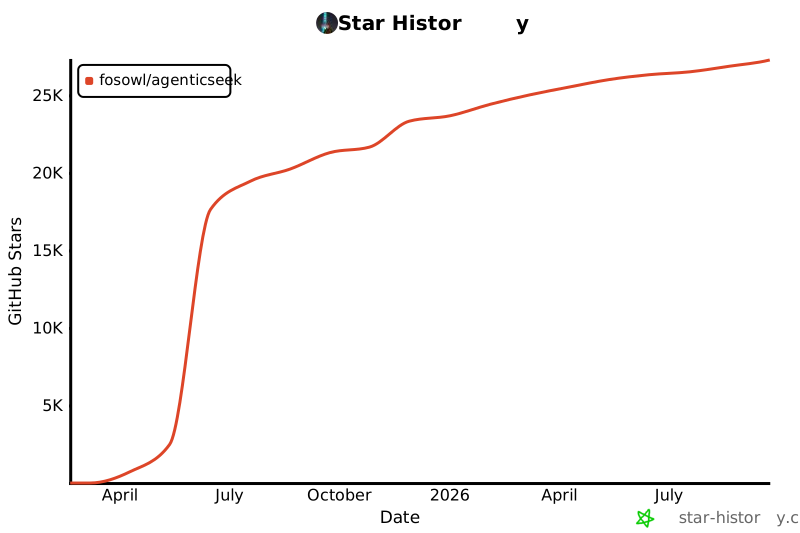](https://www.star-history.com/#Fosowl/agenticSeek&Date)
================================================
FILE: README_CHS.md
================================================
# AgenticSeek:私有、本地的 Manus 替代方案
<p align="center">
<img align="center" src="./media/agentic_seek_logo.png" width="300" height="300" alt="Agentic Seek Logo">
<p>
English | [中文](./README_CHS.md) | [繁體中文](./README_CHT.md) | [Français](./README_FR.md) | [日本語](./README_JP.md) | [Português (Brasil)](./README_PTBR.md) | [Español](./README_ES.md) | [Türkçe](./README_TR.md)
*一个**100%本地运行的 Manus AI 替代品**,支持语音的 AI 助手,可自主浏览网页、编写代码、规划任务,所有数据仅保存在你的设备上。专为本地推理模型设计,完全在你的硬件上运行,确保隐私无忧,无需云端依赖。*
[](https://fosowl.github.io/agenticSeek.html)  [](https://discord.gg/8hGDaME3TC) [](https://x.com/Martin993886460) [](https://github.com/Fosowl/agenticSeek/stargazers)
### 为什么选择 AgenticSeek?
* 🔒 完全本地 & 私有 —— 所有内容都在你的电脑上运行,无云端、无数据共享。你的文件、对话和搜索都保持私密。
* 🌐 智能网页浏览 —— AgenticSeek 可自主浏览互联网:搜索、阅读、提取信息、填写网页表单,全程免手动。
* 💻 自动化编程助手 —— 需要代码?它能编写、调试并运行 Python、C、Go、Java 等程序,无需监督。
* 🧠 智能代理选择 —— 你提问,它自动判断最合适的代理来完成任务。就像有一支专家团队随时待命。
* 📋 规划并执行复杂任务 —— 从旅行规划到复杂项目,可将大任务拆分为步骤,调用多个 AI 代理协作完成。
* 🎙️ 语音支持 —— 干净、快速、未来感的语音与语音转文本功能,让你像科幻电影中的 AI 一样与它对话。(开发中)
### **演示**
> *你能搜索 agenticSeek 项目,了解需要哪些技能,然后打开 CV_candidates.zip 并告诉我哪些最匹配该项目吗?*
https://github.com/user-attachments/assets/b8ca60e9-7b3b-4533-840e-08f9ac426316
免责声明:本演示及出现的所有文件(如 CV_candidates.zip)均为虚构。我们不是公司,只寻求开源贡献者而非候选人。
> 🛠⚠️️ **项目正在积极开发中**
> 🙏 本项目起初只是一个副业,没有路线图也没有资金支持。它意外地登上了 GitHub Trending。非常感谢大家的贡献、反馈与耐心。
## 前置条件
开始前,请确保已安装以下软件:
* **Git:** 用于克隆仓库。[下载 Git](https://git-scm.com/downloads)
* **Python 3.10.x:** 强烈推荐使用 Python 3.10.x 版本。使用其他版本可能导致依赖错误。[下载 Python 3.10](https://www.python.org/downloads/release/python-3100/)(选择 3.10.x 版本)。
* **Docker Engine & Docker Compose:** 用于运行捆绑服务如 SearxNG。
* 安装 Docker Desktop(包含 Docker Compose V2):[Windows](https://docs.docker.com/desktop/install/windows-install/) | [Mac](https://docs.docker.com/desktop/install/mac-install/) | [Linux](https://docs.docker.com/desktop/install/linux-install/)
* 或者在 Linux 上分别安装 Docker Engine 和 Docker Compose:[Docker Engine](https://docs.docker.com/engine/install/) | [Docker Compose](https://docs.docker.com/compose/install/)(确保安装 Compose V2,例如 `sudo apt-get install docker-compose-plugin`)。
### 1. **克隆仓库并设置**
```sh
git clone https://github.com/Fosowl/agenticSeek.git
cd agenticSeek
mv .env.example .env
```
### 2. 修改 .env 文件内容
```sh
SEARXNG_BASE_URL="http://searxng:8080" # 如果在主机上运行 CLI 模式,使用 http://127.0.0.1:8080
REDIS_BASE_URL="redis://redis:6379/0"
WORK_DIR="/Users/mlg/Documents/workspace_for_ai"
OLLAMA_PORT="11434"
LM_STUDIO_PORT="1234"
CUSTOM_ADDITIONAL_LLM_PORT="11435"
OPENAI_API_KEY='optional'
DEEPSEEK_API_KEY='optional'
OPENROUTER_API_KEY='optional'
TOGETHER_API_KEY='optional'
GOOGLE_API_KEY='optional'
ANTHROPIC_API_KEY='optional'
```
根据需要更新 `.env` 文件:
- **SEARXNG_BASE_URL**: 除非在主机上运行 CLI 模式,否则保持不变。
- **REDIS_BASE_URL**: 保持不变
- **WORK_DIR**: 本地工作目录路径。AgenticSeek 可读取和操作这些文件。
- **OLLAMA_PORT**: Ollama 服务端口号。
- **LM_STUDIO_PORT**: LM Studio 服务端口号。
- **CUSTOM_ADDITIONAL_LLM_PORT**: 任何额外自定义 LLM 服务的端口。
**API 密钥对于选择本地运行 LLM 的用户完全可选,这也是本项目的主要目的。如果硬件足够,请留空。**
### 3. **启动 Docker**
确保 Docker 已安装并在系统上运行。可以使用以下命令启动 Docker:
- **Linux/macOS:**
打开终端运行:
```sh
sudo systemctl start docker
```
或者如果已安装,从应用程序菜单启动 Docker Desktop。
- **Windows:**
从开始菜单启动 Docker Desktop。
可以通过执行以下命令验证 Docker 是否运行:
```sh
docker info
```
如果看到 Docker 安装信息,则表示运行正常。
请参阅下面的[本地提供商列表](#本地提供商列表)了解摘要。
下一步:[本地运行 AgenticSeek](#启动服务并运行)
*如果遇到问题,请参阅[故障排除](#故障排除)部分。*
*如果硬件无法本地运行 LLM,请参阅[使用 API 运行设置](#使用-api-运行设置)。*
*有关详细 `config.ini` 说明,请参阅[配置部分](#配置)。*
---
## 在您的机器上本地运行 LLM 的设置
**硬件要求:**
要本地运行 LLM,您需要足够的硬件。至少需要能够运行 Magistral、Qwen 或 Deepseek 14B 的 GPU。有关详细的模型/性能建议,请参阅 FAQ。
**设置您的本地提供商**
启动您的本地提供商,例如使用 ollama:
```sh
ollama serve
```
请参阅下面的本地支持提供商列表。
**更新 config.ini**
更改 config.ini 文件,将 provider_name 设置为支持的提供商,provider_model 设置为您的提供商支持的 LLM。我们推荐推理模型,如 *Magistral* 或 *Deepseek*。
有关所需硬件,请参阅 README 末尾的 **FAQ**。
```sh
[MAIN]
is_local = True # 无论您是本地运行还是使用远程提供商。
provider_name = ollama # 或 lm-studio、openai 等。
provider_model = deepseek-r1:14b # 选择适合您硬件的模型
provider_server_address = 127.0.0.1:11434
agent_name = Jarvis # 您的 AI 名称
recover_last_session = True # 是否恢复上一个会话
save_session = True # 是否记住当前会话
speak = False # 文本转语音
listen = False # 语音转文本,仅限 CLI,实验性
jarvis_personality = False # 是否使用更"Jarvis"风格的性格(实验性)
languages = en zh # 语言列表,文本转语音将默认使用列表中的第一种语言
[BROWSER]
headless_browser = True # 除非在主机上使用 CLI,否则保持不变。
stealth_mode = True # 使用不可检测的 selenium 减少浏览器检测
```
**警告**:
- `config.ini` 文件格式不支持注释。
不要直接复制粘贴示例配置,因为注释会导致错误。相反,手动修改 `config.ini` 文件,使用您所需的设置,排除任何注释。
- 如果使用 LM-studio 运行 LLM,请*不要*将 provider_name 设置为 `openai`。将其设置为 `lm-studio`。
- 某些提供商(例如:lm-studio)要求您在 IP 前加上 `http://`。例如 `http://127.0.0.1:1234`
**本地提供商列表**
| 提供商 | 本地? | 描述 |
|-----------|--------|-----------------------------------------------------------|
| ollama | 是 | 使用 ollama 作为 LLM 提供商轻松本地运行 LLM |
| lm-studio | 是 | 使用 LM studio 本地运行 LLM(将 `provider_name` 设置为 `lm-studio`)|
| openai | 是 | 使用 openai 兼容 API(例如:llama.cpp 服务器) |
下一步:[启动服务并运行 AgenticSeek](#启动服务并运行)
*如果遇到问题,请参阅[故障排除](#故障排除)部分。*
*如果硬件无法本地运行 LLM,请参阅[使用 API 运行设置](#使用-api-运行设置)。*
*有关详细 `config.ini` 说明,请参阅[配置部分](#配置)。*
## 使用 API 运行设置
此设置使用外部、基于云的 LLM 提供商。您需要从所选服务获取 API 密钥。
**1. 选择 API 提供商并获取 API 密钥:**
请参阅下面的[API 提供商列表](#api-提供商列表)。访问他们的网站注册并获取 API 密钥。
**2. 将您的 API 密钥设置为环境变量:**
* **Linux/macOS:**
打开终端并使用 `export` 命令。最好将其添加到 shell 的配置文件中(例如 `~/.bashrc`、`~/.zshrc`)以保持持久性。
```sh
export PROVIDER_API_KEY="your_api_key_here"
# 将 PROVIDER_API_KEY 替换为特定的变量名,例如 OPENAI_API_KEY、GOOGLE_API_KEY
```
TogetherAI 示例:
```sh
export TOGETHER_API_KEY="xxxxxxxxxxxxxxxxxxxxxx"
```
* **Windows:**
* **命令提示符(当前会话临时):**
```cmd
set PROVIDER_API_KEY=your_api_key_here
```
* **PowerShell(当前会话临时):**
```powershell
$env:PROVIDER_API_KEY="your_api_key_here"
```
* **永久性:** 在 Windows 搜索栏中搜索"环境变量",点击"编辑系统环境变量",然后点击"环境变量..."按钮。添加一个新的用户变量,使用适当的名称(例如 `OPENAI_API_KEY`)和您的密钥作为值。
*(有关更多详细信息,请参阅 FAQ:[如何设置 API 密钥?](#如何设置-api-密钥))。*
**3. 更新 `config.ini`:**
```ini
[MAIN]
is_local = False
provider_name = openai # 或 google、deepseek、togetherAI、huggingface
provider_model = gpt-3.5-turbo # 或 gemini-1.5-flash、deepseek-chat、mistralai/Mixtral-8x7B-Instruct-v0.1 等。
provider_server_address = # 当 is_local = False 时,对于大多数 API 通常被忽略或可以留空
# ... 其他设置 ...
```
*警告:* 确保 `config.ini` 值中没有尾随空格。
**API 提供商列表**
| 提供商 | `provider_name` | 本地? | 描述 | API 密钥链接(示例) |
|--------------|-----------------|--------|---------------------------------------------------|---------------------------------------------|
| OpenAI | `openai` | 否 | 通过 OpenAI 的 API 使用 ChatGPT 模型。 | [platform.openai.com/signup](https://platform.openai.com/signup) |
| Google Gemini| `google` | 否 | 通过 Google AI Studio 使用 Google Gemini 模型。 | [aistudio.google.com/keys](https://aistudio.google.com/keys) |
| Deepseek | `deepseek` | 否 | 通过他们的 API 使用 Deepseek 模型。 | [platform.deepseek.com](https://platform.deepseek.com) |
| Hugging Face | `huggingface` | 否 | 使用 Hugging Face Inference API 中的模型。 | [huggingface.co/settings/tokens](https://huggingface.co/settings/tokens) |
| TogetherAI | `togetherAI` | 否 | 通过 TogetherAI API 使用各种开源模型。| [api.together.ai/settings/api-keys](https://api.together.ai/settings/api-keys) |
| OpenRouter | `openrouter` | No | 通过 OpenRouter 使用各种开源模型| [https://openrouter.ai/](https://openrouter.ai/) |
| MiniMax | `minimax` | 否 | 使用 MiniMax 的 M2.5 系列模型(如 MiniMax-M2.5)。 | [platform.minimax.io](https://platform.minimax.io/user-center/basic-information) |
*注意:*
* 我们不建议将 `gpt-4o` 或其他 OpenAI 模型用于复杂的网页浏览和任务规划,因为当前的提示优化针对 Deepseek 等模型。
* 编码/bash 任务可能会遇到 Gemini 的问题,因为它可能不严格遵循针对 Deepseek 优化的格式化提示。
* 当 `is_local = False` 时,`config.ini` 中的 `provider_server_address` 通常不使用,因为 API 端点通常在相应提供商的库中硬编码。
下一步:[启动服务并运行 AgenticSeek](#启动服务并运行)
*如果遇到问题,请参阅**已知问题**部分*
*有关详细配置文件说明,请参阅**配置**部分。*
---
## 启动服务并运行
默认情况下,AgenticSeek 完全在 Docker 中运行。
**选项 1:** 在 Docker 中运行,使用 Web 界面:
启动所需服务。这将启动 docker-compose.yml 中的所有服务,包括:
- searxng
- redis(searxng 所需)
- frontend
- backend(如果使用 Web 界面时使用 `full`)
```sh
./start_services.sh full # MacOS
start start_services.cmd full # Windows
```
**警告:** 此步骤将下载并加载所有 Docker 镜像,可能需要长达 30 分钟。启动服务后,请等待后端服务完全运行(您应该在日志中看到 **backend: "GET /health HTTP/1.1" 200 OK**)后再发送任何消息。首次运行时,后端服务可能需要 5 分钟才能启动。
转到 `http://localhost:3000/`,您应该会看到 Web 界面。
*服务启动故障排除:* 如果这些脚本失败,请确保 Docker Engine 正在运行并且 Docker Compose(V2,`docker compose`)已正确安装。检查终端输出中的错误消息。请参阅 [FAQ:帮助!运行 AgenticSeek 或其脚本时出现错误。](#faq-故障排除)
**选项 2:** CLI 模式:
要使用 CLI 界面运行,您必须在主机上安装软件包:
```sh
./install.sh
./install.bat # windows
```
然后您必须将 `config.ini` 中的 SEARXNG_BASE_URL 更改为:
```sh
SEARXNG_BASE_URL="http://localhost:8080"
```
启动所需服务。这将启动 docker-compose.yml 中的一些服务,包括:
- searxng
- redis(searxng 所需)
- frontend
```sh
./start_services.sh # MacOS
start start_services.cmd # Windows
```
运行:uv run: `uv run python -m ensurepip` 以确保 uv 已启用 pip。
使用 CLI:`uv run cli.py`
---
## 使用方法
确保服务已通过 `./start_services.sh full` 启动并运行,然后转到 `localhost:3000` 使用 Web 界面。
您也可以通过设置 `listen = True` 来使用语音转文本。仅限 CLI 模式。
要退出,只需说/输入 `goodbye`。
以下是一些使用示例:
> *用 python 写一个贪吃蛇游戏!*
> *搜索法国雷恩的最佳咖啡馆,并将三家及其地址保存到 rennes_cafes.txt。*
> *写一个 Go 程序计算阶乘,保存为 factorial.go 到你的工作区*
> *在 summer_pictures 文件夹中查找所有 JPG 文件,用今天日期重命名,并将重命名文件列表保存到 photos_list.txt*
> *在线搜索 2024 年热门科幻电影,挑选三部今晚观看,保存到 movie_night.txt。*
> *搜索 2025 年最新 AI 新闻文章,选三篇,写 Python 脚本抓取标题和摘要,脚本保存为 news_scraper.py,摘要保存到 ai_news.txt(/home/projects)*
> *周五,搜索免费股票价格 API,用 supersuper7434567@gmail.com 注册,然后写 Python 脚本每日获取特斯拉股价,结果保存到 stock_prices.csv*
*请注意,表单填写功能仍为实验性,可能失败。*
输入查询后,AgenticSeek 将分配最佳代理执行任务。
由于这是早期原型,代理路由系统可能无法总是根据您的查询分配正确的代理。
因此,您应该非常明确地表达您想要什么以及 AI 可能如何进行,例如如果您希望它进行网页搜索,不要说:
`你知道哪些适合独自旅行的国家吗?`
而应说:
`进行网页搜索,找出最适合独自旅行的国家`
---
## **在自己的服务器上运行 LLM 的设置**
如果您有功能强大的计算机或可以使用的服务器,但想从笔记本电脑使用它,您可以选择使用我们的自定义 llm 服务器在远程服务器上运行 LLM。
在将运行 AI 模型的"服务器"上,获取 IP 地址
```sh
ip a | grep "inet " | grep -v 127.0.0.1 | awk '{print $2}' | cut -d/ -f1 # 本地 IP
curl https://ipinfo.io/ip # 公共 IP
```
注意:对于 Windows 或 macOS,分别使用 ipconfig 或 ifconfig 查找 IP 地址。
克隆仓库并进入 `server/` 文件夹。
```sh
git clone --depth 1 https://github.com/Fosowl/agenticSeek.git
cd agenticSeek/llm_server/
```
安装服务器特定要求:
```sh
pip3 install -r requirements.txt
```
运行服务器脚本。
```sh
python3 app.py --provider ollama --port 3333
```
您可以选择使用 `ollama` 和 `llamacpp` 作为 LLM 服务。
现在在您的个人计算机上:
更改 `config.ini` 文件,将 `provider_name` 设置为 `server`,`provider_model` 设置为 `deepseek-r1:xxb`。
将 `provider_server_address` 设置为将运行模型的机器的 IP 地址。
```sh
[MAIN]
is_local = False
provider_name = server
provider_model = deepseek-r1:70b
provider_server_address = http://x.x.x.x:3333
```
下一步:[启动服务并运行 AgenticSeek](#启动服务并运行)
---
## 语音转文本
警告:目前语音转文本仅适用于 CLI 模式。
请注意,目前语音转文本仅适用于英语。
语音转文本功能默认禁用。要启用它,请在 config.ini 文件中将 listen 选项设置为 True:
```
listen = True
```
启用后,语音转文本功能会监听触发关键字,即代理的名称,然后开始处理您的输入。您可以通过更新 *config.ini* 文件中的 `agent_name` 值来自定义代理的名称:
```
agent_name = Friday
```
为了获得最佳识别效果,我们建议使用常见的英文名称,如 "John" 或 "Emma" 作为代理名称。
一旦您看到转录开始出现,请大声说出代理的名称以唤醒它(例如,"Friday")。
清晰地说出您的查询。
用确认短语结束您的请求,以指示系统继续。确认短语的示例包括:
```
"do it", "go ahead", "execute", "run", "start", "thanks", "would ya", "please", "okay?", "proceed", "continue", "go on", "do that", "go it", "do you understand?"
```
## 配置
配置示例:
```
[MAIN]
is_local = True
provider_name = ollama
provider_model = deepseek-r1:32b
provider_server_address = http://127.0.0.1:11434 # Ollama 示例;LM-Studio 使用 http://127.0.0.1:1234
agent_name = Friday
recover_last_session = False
save_session = False
speak = False
listen = False
jarvis_personality = False
languages = en zh # TTS 和潜在路由的语言列表。
[BROWSER]
headless_browser = False
stealth_mode = False
```
**`config.ini` 设置说明**:
* **`[MAIN]` 部分:**
* `is_local`: 如果使用本地 LLM 提供商(Ollama、LM-Studio、本地 OpenAI 兼容服务器)或自托管服务器选项,则为 `True`。如果使用基于云的 API(OpenAI、Google 等),则为 `False`。
* `provider_name`: 指定 LLM 提供商。
* 本地选项:`ollama`、`lm-studio`、`openai`(用于本地 OpenAI 兼容服务器)、`server`(用于自托管服务器设置)。
* API 选项:`openai`、`google`、`deepseek`、`huggingface`、`togetherAI`。
* `provider_model`: 所选提供商的特定模型名称或 ID(例如,Ollama 的 `deepseekcoder:6.7b`,OpenAI API 的 `gpt-3.5-turbo`,TogetherAI 的 `mistralai/Mixtral-8x7B-Instruct-v0.1`)。
* `provider_server_address`: 您的 LLM 提供商的地址。
* 对于本地提供商:例如,Ollama 的 `http://127.0.0.1:11434`,LM-Studio 的 `http://127.0.0.1:1234`。
* 对于 `server` 提供商类型:您的自托管 LLM 服务器的地址(例如 `http://your_server_ip:3333`)。
* 对于云 API(`is_local = False`):这通常被忽略或可以留空,因为 API 端点通常由客户端库处理。
* `agent_name`: AI 助手的名称(例如 Friday)。如果启用,用作语音转文本的触发词。
* `recover_last_session`: `True` 尝试恢复上一个会话的状态,`False` 重新开始。
* `save_session`: `True` 保存当前会话的状态以供潜在恢复,`False` 否则。
* `speak`: `True` 启用文本转语音语音输出,`False` 禁用。
* `listen`: `True` 启用语音转文本语音输入(仅限 CLI 模式),`False` 禁用。
* `work_dir`: **关键:** AgenticSeek 将读取/写入文件的目录。**确保此路径在您的系统上有效且可访问。**
* `jarvis_personality`: `True` 使用更"Jarvis-like"的系统提示(实验性),`False` 使用标准提示。
* `languages`: 逗号分隔的语言列表(例如 `en, zh, fr`)。用于 TTS 语音选择(默认为第一个),并可以协助 LLM 路由器。为避免路由器效率低下,避免使用过多或非常相似的语言。
* **`[BROWSER]` 部分:**
* `headless_browser`: `True` 在没有可见窗口的情况下运行自动化浏览器(推荐用于 Web 界面或非交互式使用)。`False` 显示浏览器窗口(对于 CLI 模式或调试有用)。
* `stealth_mode`: `True` 启用使浏览器自动化更难检测的措施。可能需要手动安装浏览器扩展,如 anticaptcha。
本节总结了支持的 LLM 提供商类型。在 `config.ini` 中配置它们。
**本地提供商(在您自己的硬件上运行):**
| config.ini 中的提供商名称 | `is_local` | 描述 | 设置部分 |
|-------------------------------|------------|-----------------------------------------------------------------------------|------------------------------------------------------------------|
| `ollama` | `True` | 使用 Ollama 轻松提供本地 LLM。 | [在您的机器上本地运行 LLM 的设置](#在您的机器上本地运行-llm-的设置) |
| `lm-studio` | `True` | 使用 LM-Studio 提供本地 LLM。 | [在您的机器上本地运行 LLM 的设置](#在您的机器上本地运行-llm-的设置) |
| `openai`(用于本地服务器) | `True` | 连接到暴露 OpenAI 兼容 API 的本地服务器(例如,llama.cpp)。 | [在您的机器上本地运行 LLM 的设置](#在您的机器上本地运行-llm-的设置) |
| `server` | `False` | 连接到在另一台机器上运行的 AgenticSeek 自托管 LLM 服务器。 | [在自己的服务器上运行 LLM 的设置](#在自己的服务器上运行-llm-的设置) |
**API 提供商(基于云):**
| config.ini 中的提供商名称 | `is_local` | 描述 | 设置部分 |
|-------------------------------|------------|--------------------------------------------------|-----------------------------------------------------|
| `openai` | `False` | 使用 OpenAI 的官方 API(例如,GPT-3.5、GPT-4)。 | [使用 API 运行设置](#使用-api-运行设置) |
| `google` | `False` | 通过 API 使用 Google 的 Gemini 模型。 | [使用 API 运行设置](#使用-api-运行设置) |
| `deepseek` | `False` | 使用 Deepseek 的官方 API。 | [使用 API 运行设置](#使用-api-运行设置) |
| `huggingface` | `False` | 使用 Hugging Face Inference API。 | [使用 API 运行设置](#使用-api-运行设置) |
| `togetherAI` | `False` | 使用 TogetherAI 的 API 获取各种开放模型。 | [使用 API 运行设置](#使用-api-运行设置) |
---
## 故障排除
如果遇到问题,本节提供指导。
# 已知问题
## ChromeDriver 问题
**错误示例:** `SessionNotCreatedException: Message: session not created: This version of ChromeDriver only supports Chrome version XXX`
### 根本原因
ChromeDriver 版本不兼容发生在:
1. 您安装的 ChromeDriver 版本与 Chrome 浏览器版本不匹配
2. 在 Docker 环境中,`undetected_chromedriver` 可能会下载自己的 ChromeDriver 版本,绕过挂载的二进制文件
### 解决步骤
#### 1. 检查您的 Chrome 版本
打开 Google Chrome → `设置 > 关于 Chrome` 查找您的版本(例如,"版本 134.0.6998.88")
#### 2. 下载匹配的 ChromeDriver
**对于 Chrome 115 及更新版本:** 使用 [Chrome for Testing API](https://googlechromelabs.github.io/chrome-for-testing/)
- 访问 Chrome for Testing 可用性仪表板
- 找到您的 Chrome 版本或最接近的可用匹配
- 为您的操作系统下载 ChromeDriver(Docker 环境使用 Linux64)
**对于旧版 Chrome:** 使用 [旧版 ChromeDriver 下载](https://chromedriver.chromium.org/downloads)

#### 3. 安装 ChromeDriver(选择一种方法)
**方法 A:项目根目录(Docker 推荐)**
```bash
# 将下载的 chromedriver 二进制文件放在项目根目录
cp path/to/downloaded/chromedriver ./chromedriver
chmod +x ./chromedriver # 在 Linux/macOS 上使其可执行
```
**方法 B:系统 PATH**
```bash
# Linux/macOS
sudo mv chromedriver /usr/local/bin/
sudo chmod +x /usr/local/bin/chromedriver
# Windows:将 chromedriver.exe 放在 PATH 中的文件夹中
```
#### 4. 验证安装
```bash
# 测试 ChromeDriver 版本
./chromedriver --version
# 或者在 PATH 中:
chromedriver --version
```
### Docker 特定说明
⚠️ **Docker 用户重要:**
- Docker 卷挂载方法可能不适用于隐身模式(`undetected_chromedriver`)
- **解决方案:** 将 ChromeDriver 放在项目根目录中作为 `./chromedriver`
- 应用程序将自动检测并使用此二进制文件
- 您应该在日志中看到:`"Using ChromeDriver from project root: ./chromedriver"`
### 故障排除提示
1. **仍然遇到版本不匹配?**
- 验证 ChromeDriver 是否可执行:`ls -la ./chromedriver`
- 检查 ChromeDriver 版本:`./chromedriver --version`
- 确保它与您的 Chrome 浏览器版本匹配
2. **Docker 容器问题?**
- 检查后端日志:`docker logs backend`
- 查找消息:`"Using ChromeDriver from project root"`
- 如果未找到,请验证文件是否存在且可执行
3. **Chrome for Testing 版本**
- 尽可能使用完全匹配的版本
- 对于版本 134.0.6998.88,使用 ChromeDriver 134.0.6998.165(最接近的可用版本)
- 主要版本号必须匹配(134 = 134)
### 版本兼容性矩阵
| Chrome 版本 | ChromeDriver 版本 | 状态 |
|----------------|---------------------|---------|
| 134.0.6998.x | 134.0.6998.165 | ✅ 可用 |
| 133.0.6943.x | 133.0.6943.141 | ✅ 可用 |
| 132.0.6834.x | 132.0.6834.159 | ✅ 可用 |
*有关最新兼容性,请查看 [Chrome for Testing 仪表板](https://googlechromelabs.github.io/chrome-for-testing/)*
`Exception: Failed to initialize browser: Message: session not created: This version of ChromeDriver only supports Chrome version 113
Current browser version is 134.0.6998.89 with binary path`
如果您的浏览器和 chromedriver 版本不匹配,会发生这种情况。
您需要导航到下载最新版本:
https://developer.chrome.com/docs/chromedriver/downloads
如果您使用 Chrome 版本 115 或更新版本,请转到:
https://googlechromelabs.github.io/chrome-for-testing/
并下载与您的操作系统匹配的 chromedriver 版本。

如果此部分不完整,请提出问题。
## 连接适配器问题
```
Exception: Provider lm-studio failed: HTTP request failed: No connection adapters were found for '127.0.0.1:1234/v1/chat/completions'`(注意:端口可能不同)
```
* **原因:** `config.ini` 中 `lm-studio`(或其他类似的本地 OpenAI 兼容服务器)的 `provider_server_address` 缺少 `http://` 前缀或指向错误的端口。
* **解决方案:**
* 确保地址包含 `http://`。LM-Studio 通常默认为 `http://127.0.0.1:1234`。
* 正确的 `config.ini`:`provider_server_address = http://127.0.0.1:1234`(或您的实际 LM-Studio 服务器端口)。
## SearxNG 基本 URL 未提供
```
raise ValueError("SearxNG base URL must be provided either as an argument or via the SEARXNG_BASE_URL environment variable.")
ValueError: SearxNG base URL must be provided either as an argument or via the SEARXNG_BASE_URL environment variable.`
```
如果您使用错误的 searxng 基本 URL 运行 CLI 模式,可能会出现这种情况。
SEARXNG_BASE_URL 应根据您是在 Docker 中运行还是在主机上运行而有所不同:
**在主机上运行**:`SEARXNG_BASE_URL="http://localhost:8080"`
**完全在 Docker 中运行(Web 界面)**:`SEARXNG_BASE_URL="http://searxng:8080"`
## FAQ
**问:我需要什么硬件?**
| 模型大小 | GPU | 评论 |
|-----------|--------|-----------------------------------------------------------|
| 7B | 8GB 显存 | ⚠️ 不推荐。性能差,频繁出现幻觉,规划代理可能会失败。 |
| 14B | 12 GB VRAM(例如 RTX 3060) | ✅ 可用于简单任务。可能在网页浏览和规划任务方面有困难。 |
| 32B | 24+ GB VRAM(例如 RTX 4090) | 🚀 大多数任务成功,可能仍然在任务规划方面有困难 |
| 70B+ | 48+ GB 显存 | 💪 优秀。推荐用于高级用例。 |
**问:我遇到错误该怎么办?**
确保本地正在运行(`ollama serve`),您的 `config.ini` 与您的提供商匹配,并且依赖项已安装。如果都不起作用,请随时提出问题。
**问:它真的可以 100% 本地运行吗?**
是的,使用 Ollama、lm-studio 或服务器提供商,所有语音转文本、LLM 和文本转语音模型都在本地运行。非本地选项(OpenAI 或其他 API)是可选的。
**问:当我有 Manus 时,为什么应该使用 AgenticSeek?**
与 Manus 不同,AgenticSeek 优先考虑独立于外部系统,给您更多控制、隐私和避免 API 成本。
**问:谁是这个项目的幕后推手?**
这个项目是由我创建的,还有两个朋友作为维护者和 GitHub 上开源社区的贡献者。我们只是一群充满热情的个人,不是初创公司,也不隶属于任何组织。
X 上除了我的个人账户(https://x.com/Martin993886460)之外的任何 AgenticSeek 账户都是冒充的。
## 贡献
我们正在寻找开发人员来改进 AgenticSeek!查看开放的问题或讨论。
[贡献指南](./docs/CONTRIBUTING.md)
## 赞助商:
想要通过航班搜索、旅行规划或抢购最佳购物优惠等功能来提升 AgenticSeek 的能力?考虑使用 SerpApi 制作自定义工具,以解锁更多 Jarvis 般的功能。使用 SerpApi,您可以为专业任务加速您的代理,同时保持完全控制。
<a href="https://serpapi.com/"><img src="./media/banners/sponsor_banner_serpapi.png" height="350" alt="SerpApi Banner" ></a>
查看 [Contributing.md](./docs/CONTRIBUTING.md) 了解如何集成自定义工具!
### **赞助商**:
- [tatra-labs](https://github.com/tatra-labs)
## 维护者:
> [Fosowl](https://github.com/Fosowl) | 巴黎时间
> [antoineVIVIES](https://github.com/antoineVIVIES) | 台北时间
## 特别感谢:
> [tcsenpai](https://github.com/tcsenpai) 和 [plitc](https://github.com/plitc) 协助后端 Docker 化
[](https://www.star-history.com/#Fosowl/agenticSeek&Date)
================================================
FILE: README_CHT.md
================================================
# AgenticSeek:私有、本地的 Manus 替代方案
<p align="center">
<img align="center" src="./media/agentic_seek_logo.png" width="300" height="300" alt="Agentic Seek Logo">
<p>
English | [中文](./README_CHS.md) | [繁體中文](./README_CHT.md) | [Français](./README_FR.md) | [日本語](./README_JP.md) | [Português (Brasil)](./README_PTBR.md) | [Español](./README_ES.md) | [Türkçe](./README_TR.md)
*一個**100%本地運行的 Manus AI 替代品**,支援語音的 AI 助手,可自主瀏覽網頁、編寫代碼、規劃任務,所有數據僅保存在你的設備上。專為本地推理模型設計,完全在你的硬件上運行,確保隱私無憂,無需雲端依賴。*
[](https://fosowl.github.io/agenticSeek.html)  [](https://discord.gg/8hGDaME3TC) [](https://x.com/Martin993886460) [](https://github.com/Fosowl/agenticSeek/stargazers)
### 為什麼選擇 AgenticSeek?
* 🔒 完全本地 & 私有 —— 所有內容都在你的電腦上運行,無雲端、無數據共享。你的文件、對話和搜索都保持私密。
* 🌐 智能網頁瀏覽 —— AgenticSeek 可自主瀏覽互聯網:搜索、閱讀、提取信息、填寫網頁表單,全程免手動。
* 💻 自動化編程助手 —— 需要代碼?它能編寫、調試並運行 Python、C、Go、Java 等程序,無需監督。
* 🧠 智能代理選擇 —— 你提問,它自動判斷最合適的代理來完成任務。就像有一支專家團隊隨時待命。
* 📋 規劃並執行複雜任務 —— 從旅行規劃到複雜項目,可將大任務拆分為步驟,調用多個 AI 代理協作完成。
* 🎙️ 語音支持 —— 乾淨、快速、未來感的語音與語音轉文本功能,讓你像科幻電影中的 AI 一樣與它對話。(開發中)
### **演示**
> *你能搜索 agenticSeek 項目,了解需要哪些技能,然後打開 CV_candidates.zip 並告訴我哪些最匹配該項目嗎?*
https://github.com/user-attachments/assets/b8ca60e9-7b3b-4533-840e-08f9ac426316
免責聲明:本演示及出現的所有文件(如 CV_candidates.zip)均為虛構。我們不是公司,只尋求開源貢獻者而非候選人。
> 🛠⚠️️ **項目正在積極開發中**
> 🙏 本項目起初只是一個副業,沒有路線圖也沒有資金支持。它意外地登上了 GitHub Trending。非常感謝大家的貢獻、反饋與耐心。
## 前置條件
開始前,請確保已安裝以下軟件:
* **Git:** 用於克隆倉庫。[下載 Git](https://git-scm.com/downloads)
* **Python 3.10.x:** 強烈推薦使用 Python 3.10.x 版本。使用其他版本可能導致依賴錯誤。[下載 Python 3.10](https://www.python.org/downloads/release/python-3100/)(選擇 3.10.x 版本)。
* **Docker Engine & Docker Compose:** 用於運行捆綁服務如 SearxNG。
* 安裝 Docker Desktop(包含 Docker Compose V2):[Windows](https://docs.docker.com/desktop/install/windows-install/) | [Mac](https://docs.docker.com/desktop/install/mac-install/) | [Linux](https://docs.docker.com/desktop/install/linux-install/)
* 或者在 Linux 上分別安裝 Docker Engine 和 Docker Compose:[Docker Engine](https://docs.docker.com/engine/install/) | [Docker Compose](https://docs.docker.com/compose/install/)(確保安裝 Compose V2,例如 `sudo apt-get install docker-compose-plugin`)。
### 1. **克隆倉庫並設置**
```sh
git clone https://github.com/Fosowl/agenticSeek.git
cd agenticSeek
mv .env.example .env
```
### 2. 修改 .env 文件內容
```sh
SEARXNG_BASE_URL="http://searxng:8080" # 如果在主機上運行 CLI 模式,使用 http://127.0.0.1:8080
REDIS_BASE_URL="redis://redis:6379/0"
WORK_DIR="/Users/mlg/Documents/workspace_for_ai"
OLLAMA_PORT="11434"
LM_STUDIO_PORT="1234"
CUSTOM_ADDITIONAL_LLM_PORT="11435"
OPENAI_API_KEY='optional'
DEEPSEEK_API_KEY='optional'
OPENROUTER_API_KEY='optional'
TOGETHER_API_KEY='optional'
GOOGLE_API_KEY='optional'
ANTHROPIC_API_KEY='optional'
```
根據需要更新 `.env` 文件:
- **SEARXNG_BASE_URL**: 除非在主機上運行 CLI 模式,否則保持不變。
- **REDIS_BASE_URL**: 保持不變
- **WORK_DIR**: 本地工作目錄路徑。AgenticSeek 可讀取和操作這些文件。
- **OLLAMA_PORT**: Ollama 服務端口號。
- **LM_STUDIO_PORT**: LM Studio 服務端口號。
- **CUSTOM_ADDITIONAL_LLM_PORT**: 任何額外自定義 LLM 服務的端口。
**API 密鑰對於選擇本地運行 LLM 的用戶完全可選,這也是本項目的主要目的。如果硬件足夠,請留空。**
### 3. **啟動 Docker**
確保 Docker 已安裝並在系統上運行。可以使用以下命令啟動 Docker:
- **Linux/macOS:**
打開終端運行:
```sh
sudo systemctl start docker
```
或者如果已安裝,從應用程序菜單啟動 Docker Desktop。
- **Windows:**
從開始菜單啟動 Docker Desktop。
可以通過執行以下命令驗證 Docker 是否運行:
```sh
docker info
```
如果看到 Docker 安裝信息,則表示運行正常。
請參閱下面的[本地提供商列表](#本地提供商列表)了解摘要。
下一步:[本地運行 AgenticSeek](#啟動服務並運行)
*如果遇到問題,請參閱[故障排除](#故障排除)部分。*
*如果硬件無法本地運行 LLM,請參閱[使用 API 運行設置](#使用-api-運行設置)。*
*有關詳細 `config.ini` 說明,請參閱[配置部分](#配置)。*
---
## 在您的機器上本地運行 LLM 的設置
**硬件要求:**
要本地運行 LLM,您需要足夠的硬件。至少需要能夠運行 Magistral、Qwen 或 Deepseek 14B 的 GPU。有關詳細的模型/性能建議,請參閱 FAQ。
**設置您的本地提供商**
啟動您的本地提供商,例如使用 ollama:
```sh
ollama serve
```
請參閱下面的本地支持提供商列表。
**更新 config.ini**
更改 config.ini 文件,將 provider_name 設置為支持的提供商,provider_model 設置為您的提供商支持的 LLM。我們推薦推理模型,如 *Magistral* 或 *Deepseek*。
有關所需硬件,請參閱 README 末尾的 **FAQ**。
```sh
[MAIN]
is_local = True # 無論您是本地運行還是使用遠程提供商。
provider_name = ollama # 或 lm-studio、openai 等。
provider_model = deepseek-r1:14b # 選擇適合您硬件的模型
provider_server_address = 127.0.0.1:11434
agent_name = Jarvis # 您的 AI 名稱
recover_last_session = True # 是否恢復上一個會話
save_session = True # 是否記住當前會話
speak = False # 文本轉語音
listen = False # 語音轉文本,僅限 CLI,實驗性
jarvis_personality = False # 是否使用更"Jarvis"風格的性格(實驗性)
languages = en zh # 語言列表,文本轉語音將默認使用列表中的第一種語言
[BROWSER]
headless_browser = True # 除非在主機上使用 CLI,否則保持不變。
stealth_mode = True # 使用不可檢測的 selenium 減少瀏覽器檢測
```
**警告**:
- `config.ini` 文件格式不支持註釋。
不要直接複製粘貼示例配置,因為註釋會導致錯誤。相反,手動修改 `config.ini` 文件,使用您所需的設置,排除任何註釋。
- 如果使用 LM-studio 運行 LLM,請*不要*將 provider_name 設置為 `openai`。將其設置為 `lm-studio`。
- 某些提供商(例如:lm-studio)要求您在 IP 前加上 `http://`。例如 `http://127.0.0.1:1234`
**本地提供商列表**
| 提供商 | 本地? | 描述 |
|-----------|--------|-----------------------------------------------------------|
| ollama | 是 | 使用 ollama 作為 LLM 提供商輕鬆本地運行 LLM |
| lm-studio | 是 | 使用 LM studio 本地運行 LLM(將 `provider_name` 設置為 `lm-studio`)|
| openai | 是 | 使用 openai 兼容 API(例如:llama.cpp 服務器) |
下一步:[啟動服務並運行 AgenticSeek](#啟動服務並運行)
*如果遇到問題,請參閱[故障排除](#故障排除)部分。*
*如果硬件無法本地運行 LLM,請參閱[使用 API 運行設置](#使用-api-運行設置)。*
*有關詳細 `config.ini` 說明,請參閱[配置部分](#配置)。*
## 使用 API 運行設置
此設置使用外部、基於雲的 LLM 提供商。您需要從所選服務獲取 API 密鑰。
**1. 選擇 API 提供商並獲取 API 密鑰:**
請參閱下面的[API 提供商列表](#api-提供商列表)。訪問他們的網站註冊並獲取 API 密鑰。
**2. 將您的 API 密鑰設置為環境變量:**
* **Linux/macOS:**
打開終端並使用 `export` 命令。最好將其添加到 shell 的配置文件中(例如 `~/.bashrc`、`~/.zshrc`)以保持持久性。
```sh
export PROVIDER_API_KEY="your_api_key_here"
# 將 PROVIDER_API_KEY 替換為特定的變量名,例如 OPENAI_API_KEY、GOOGLE_API_KEY
```
TogetherAI 示例:
```sh
export TOGETHER_API_KEY="xxxxxxxxxxxxxxxxxxxxxx"
```
* **Windows:**
* **命令提示符(當前會話臨時):**
```cmd
set PROVIDER_API_KEY=your_api_key_here
```
* **PowerShell(當前會話臨時):**
```powershell
$env:PROVIDER_API_KEY="your_api_key_here"
```
* **永久性:** 在 Windows 搜索欄中搜索"環境變量",點擊"編輯系統環境變量",然後點擊"環境變量..."按鈕。添加一個新的用戶變量,使用適當的名稱(例如 `OPENAI_API_KEY`)和您的密鑰作為值。
*(有關更多詳細信息,請參閱 FAQ:[如何設置 API 密鑰?](#如何設置-api-密鑰))。*
**3. 更新 `config.ini`:**
```ini
[MAIN]
is_local = False
provider_name = openai # 或 google、deepseek、togetherAI、huggingface
provider_model = gpt-3.5-turbo # 或 gemini-1.5-flash、deepseek-chat、mistralai/Mixtral-8x7B-Instruct-v0.1 等。
provider_server_address = # 當 is_local = False 時,對於大多數 API 通常被忽略或可以留空
# ... 其他設置 ...
```
*警告:* 確保 `config.ini` 值中沒有尾隨空格。
**API 提供商列表**
| 提供商 | `provider_name` | 本地? | 描述 | API 密鑰鏈接(示例) |
|--------------|-----------------|--------|---------------------------------------------------|---------------------------------------------|
| OpenAI | `openai` | 否 | 通過 OpenAI 的 API 使用 ChatGPT 模型。 | [platform.openai.com/signup](https://platform.openai.com/signup) |
| Google Gemini| `google` | 否 | 通過 Google AI Studio 使用 Google Gemini 模型。 | [aistudio.google.com/keys](https://aistudio.google.com/keys) |
| Deepseek | `deepseek` | 否 | 通過他們的 API 使用 Deepseek 模型。 | [platform.deepseek.com](https://platform.deepseek.com) |
| Hugging Face | `huggingface` | 否 | 使用 Hugging Face Inference API 中的模型。 | [huggingface.co/settings/tokens](https://huggingface.co/settings/tokens) |
| TogetherAI | `togetherAI` | 否 | 通過 TogetherAI API 使用各種開源模型。| [api.together.ai/settings/api-keys](https://api.together.ai/settings/api-keys) |
| OpenRouter | `openrouter` | No | 通过 OpenRouter 使用各种开源模型| [https://openrouter.ai/](https://openrouter.ai/) |
*注意:*
* 我們不建議將 `gpt-4o` 或其他 OpenAI 模型用於複雜的網頁瀏覽和任務規劃,因為當前的提示優化針對 Deepseek 等模型。
* 編碼/bash 任務可能會遇到 Gemini 的問題,因為它可能不嚴格遵循針對 Deepseek 優化的格式化提示。
* 當 `is_local = False` 時,`config.ini` 中的 `provider_server_address` 通常不使用,因為 API 端點通常在相應提供商的庫中硬編碼。
下一步:[啟動服務並運行 AgenticSeek](#啟動服務並運行)
*如果遇到問題,請參閱**已知問題**部分*
*有關詳細配置文件說明,請參閱**配置**部分。*
---
## 啟動服務並運行
默認情況下,AgenticSeek 完全在 Docker 中運行。
**選項 1:** 在 Docker 中運行,使用 Web 界面:
啟動所需服務。這將啟動 docker-compose.yml 中的所有服務,包括:
- searxng
- redis(searxng 所需)
- frontend
- backend(如果使用 Web 界面時使用 `full`)
```sh
./start_services.sh full # MacOS
start start_services.cmd full # Windows
```
**警告:** 此步驟將下載並加載所有 Docker 鏡像,可能需要長達 30 分鐘。啟動服務後,請等待後端服務完全運行(您應該在日誌中看到 **backend: "GET /health HTTP/1.1" 200 OK**)後再發送任何消息。首次運行時,後端服務可能需要 5 分鐘才能啟動。
轉到 `http://localhost:3000/`,您應該會看到 Web 界面。
*服務啟動故障排除:* 如果這些腳本失敗,請確保 Docker Engine 正在運行並且 Docker Compose(V2,`docker compose`)已正確安裝。檢查終端輸出中的錯誤消息。請參閱 [FAQ:幫助!運行 AgenticSeek 或其腳本時出現錯誤。](#faq-故障排除)
**選項 2:** CLI 模式:
要使用 CLI 界面運行,您必須在主機上安裝軟件包:
```sh
./install.sh
./install.bat # windows
```
然後您必須將 `config.ini` 中的 SEARXNG_BASE_URL 更改為:
```sh
SEARXNG_BASE_URL="http://localhost:8080"
```
啟動所需服務。這將啟動 docker-compose.yml 中的一些服務,包括:
- searxng
- redis(searxng 所需)
- frontend
```sh
./start_services.sh # MacOS
start start_services.cmd # Windows
```
運行:uv run: `uv run python -m ensurepip` 以確保 uv 已啟用 pip。
使用 CLI:`uv run cli.py`
---
## 使用方法
確保服務已通過 `./start_services.sh full` 啟動並運行,然後轉到 `localhost:3000` 使用 Web 界面。
您也可以通過設置 `listen = True` 來使用語音轉文本。僅限 CLI 模式。
要退出,只需說/輸入 `goodbye`。
以下是一些使用示例:
> *用 python 寫一個貪吃蛇遊戲!*
> *搜索法國雷恩的最佳咖啡館,並將三家及其地址保存到 rennes_cafes.txt。*
> *寫一個 Go 程序計算階乘,保存為 factorial.go 到你的工作區*
> *在 summer_pictures 文件夾中查找所有 JPG 文件,用今天日期重命名,並將重命名文件列表保存到 photos_list.txt*
> *在線搜索 2024 年熱門科幻電影,挑選三部今晚觀看,保存到 movie_night.txt。*
> *搜索 2025 年最新 AI 新聞文章,選三篇,寫 Python 腳本抓取標題和摘要,腳本保存為 news_scraper.py,摘要保存到 ai_news.txt(/home/projects)*
> *周五,搜索免費股票價格 API,用 supersuper7434567@gmail.com 註冊,然後寫 Python 腳本每日獲取特斯拉股價,結果保存到 stock_prices.csv*
*請注意,表單填寫功能仍為實驗性,可能失敗。*
輸入查詢後,AgenticSeek 將分配最佳代理執行任務。
由於這是早期原型,代理路由系統可能無法總是根據您的查詢分配正確的代理。
因此,您應該非常明確地表達您想要什麼以及 AI 可能如何進行,例如如果您希望它進行網頁搜索,不要說:
`你知道哪些適合獨自旅行的國家嗎?`
而應說:
`進行網頁搜索,找出最適合獨自旅行的國家`
---
## **在自己的服務器上運行 LLM 的設置**
如果您有功能強大的計算機或可以使用的服務器,但想從筆記本電腦使用它,您可以選擇使用我們的自定義 llm 服務器在遠程服務器上運行 LLM。
在將運行 AI 模型的"服務器"上,獲取 IP 地址
```sh
ip a | grep "inet " | grep -v 127.0.0.1 | awk '{print $2}' | cut -d/ -f1 # 本地 IP
curl https://ipinfo.io/ip # 公共 IP
```
注意:對於 Windows 或 macOS,分別使用 ipconfig 或 ifconfig 查找 IP 地址。
克隆倉庫並進入 `server/` 文件夾。
```sh
git clone --depth 1 https://github.com/Fosowl/agenticSeek.git
cd agenticSeek/llm_server/
```
安裝服務器特定要求:
```sh
pip3 install -r requirements.txt
```
運行服務器腳本。
```sh
python3 app.py --provider ollama --port 3333
```
您可以選擇使用 `ollama` 和 `llamacpp` 作為 LLM 服務。
現在在您的個人計算機上:
更改 `config.ini` 文件,將 `provider_name` 設置為 `server`,`provider_model` 設置為 `deepseek-r1:xxb`。
將 `provider_server_address` 設置為將運行模型的機器的 IP 地址。
```sh
[MAIN]
is_local = False
provider_name = server
provider_model = deepseek-r1:70b
provider_server_address = http://x.x.x.x:3333
```
下一步:[啟動服務並運行 AgenticSeek](#啟動服務並運行)
---
## 語音轉文本
警告:目前語音轉文本僅適用於 CLI 模式。
請注意,目前語音轉文本僅適用於英語。
語音轉文本功能默認禁用。要啟用它,請在 config.ini 文件中將 listen 選項設置為 True:
```
listen = True
```
啟用後,語音轉文本功能會監聽觸發關鍵字,即代理的名稱,然後開始處理您的輸入。您可以通過更新 *config.ini* 文件中的 `agent_name` 值來自定義代理的名稱:
```
agent_name = Friday
```
為了獲得最佳識別效果,我們建議使用常見的英文名稱,如 "John" 或 "Emma" 作為代理名稱。
一旦您看到轉錄開始出現,請大聲說出代理的名稱以喚醒它(例如,"Friday")。
清晰地說出您的查詢。
用確認短語結束您的請求,以指示系統繼續。確認短語的示例包括:
```
"do it", "go ahead", "execute", "run", "start", "thanks", "would ya", "please", "okay?", "proceed", "continue", "go on", "do that", "go it", "do you understand?"
```
## 配置
配置示例:
```
[MAIN]
is_local = True
provider_name = ollama
provider_model = deepseek-r1:32b
provider_server_address = http://127.0.0.1:11434 # Ollama 示例;LM-Studio 使用 http://127.0.0.1:1234
agent_name = Friday
recover_last_session = False
save_session = False
speak = False
listen = False
jarvis_personality = False
languages = en zh # TTS 和潛在路由的語言列表。
[BROWSER]
headless_browser = False
stealth_mode = False
```
**`config.ini` 設置說明**:
* **`[MAIN]` 部分:**
* `is_local`: 如果使用本地 LLM 提供商(Ollama、LM-Studio、本地 OpenAI 兼容服務器)或自託管服務器選項,則為 `True`。如果使用基於雲的 API(OpenAI、Google 等),則為 `False`。
* `provider_name`: 指定 LLM 提供商。
* 本地選項:`ollama`、`lm-studio`、`openai`(用於本地 OpenAI 兼容服務器)、`server`(用於自託管服務器設置)。
* API 選項:`openai`、`google`、`deepseek`、`huggingface`、`togetherAI`。
* `provider_model`: 所選提供商的特定模型名稱或 ID(例如,Ollama 的 `deepseekcoder:6.7b`,OpenAI API 的 `gpt-3.5-turbo`,TogetherAI 的 `mistralai/Mixtral-8x7B-Instruct-v0.1`)。
* `provider_server_address`: 您的 LLM 提供商的地址。
* 對於本地提供商:例如,Ollama 的 `http://127.0.0.1:11434`,LM-Studio 的 `http://127.0.0.1:1234`。
* 對於 `server` 提供商類型:您的自託管 LLM 服務器的地址(例如 `http://your_server_ip:3333`)。
* 對於雲 API(`is_local = False`):這通常被忽略或可以留空,因為 API 端點通常由客戶端庫處理。
* `agent_name`: AI 助手的名稱(例如 Friday)。如果啟用,用作語音轉文本的觸發詞。
* `recover_last_session`: `True` 嘗試恢復上一個會話的狀態,`False` 重新開始。
* `save_session`: `True` 保存當前會話的狀態以供潛在恢復,`False` 否則。
* `speak`: `True` 啟用文本轉語音語音輸出,`False` 禁用。
* `listen`: `True` 啟用語音轉文本語音輸入(僅限 CLI 模式),`False` 禁用。
* `work_dir`: **關鍵:** AgenticSeek 將讀取/寫入文件的目錄。**確保此路徑在您的系統上有效且可訪問。**
* `jarvis_personality`: `True` 使用更"Jarvis-like"的系統提示(實驗性),`False` 使用標準提示。
* `languages`: 逗號分隔的語言列表(例如 `en, zh, fr`)。用於 TTS 語音選擇(默認為第一個),並可以協助 LLM 路由器。為避免路由器效率低下,避免使用過多或非常相似的語言。
* **`[BROWSER]` 部分:**
* `headless_browser`: `True` 在沒有可見窗口的情況下運行自動化瀏覽器(推薦用於 Web 界面或非交互式使用)。`False` 顯示瀏覽器窗口(對於 CLI 模式或調試有用)。
* `stealth_mode`: `True` 啟用使瀏覽器自動化更難檢測的措施。可能需要手動安裝瀏覽器擴展,如 anticaptcha。
本節總結了支持的 LLM 提供商類型。在 `config.ini` 中配置它們。
**本地提供商(在您自己的硬件上運行):**
| config.ini 中的提供商名稱 | `is_local` | 描述 | 設置部分 |
|-------------------------------|------------|-----------------------------------------------------------------------------|------------------------------------------------------------------|
| `ollama` | `True` | 使用 Ollama 輕鬆提供本地 LLM。 | [在您的機器上本地運行 LLM 的設置](#在您的機器上本地運行-llm-的設置) |
| `lm-studio` | `True` | 使用 LM-Studio 提供本地 LLM。 | [在您的機器上本地運行 LLM 的設置](#在您的機器上本地運行-llm-的設置) |
| `openai`(用於本地服務器) | `True` | 連接到暴露 OpenAI 兼容 API 的本地服務器(例如,llama.cpp)。 | [在您的機器上本地運行 LLM 的設置](#在您的機器上本地運行-llm-的設置) |
| `server` | `False` | 連接到在另一台機器上運行的 AgenticSeek 自託管 LLM 服務器。 | [在自己的服務器上運行 LLM 的設置](#在自己的服務器上運行-llm-的設置) |
**API 提供商(基於雲):**
| config.ini 中的提供商名稱 | `is_local` | 描述 | 設置部分 |
|-------------------------------|------------|--------------------------------------------------|-----------------------------------------------------|
| `openai` | `False` | 使用 OpenAI 的官方 API(例如,GPT-3.5、GPT-4)。 | [使用 API 運行設置](#使用-api-運行設置) |
| `google` | `False` | 通過 API 使用 Google 的 Gemini 模型。 | [使用 API 運行設置](#使用-api-運行設置) |
| `deepseek` | `False` | 使用 Deepseek 的官方 API。 | [使用 API 運行設置](#使用-api-運行設置) |
| `huggingface` | `False` | 使用 Hugging Face Inference API。 | [使用 API 運行設置](#使用-api-運行設置) |
| `togetherAI` | `False` | 使用 TogetherAI 的 API 獲取各種開放模型。 | [使用 API 運行設置](#使用-api-運行設置) |
---
## 故障排除
如果遇到問題,本節提供指導。
# 已知問題
## ChromeDriver 問題
**錯誤示例:** `SessionNotCreatedException: Message: session not created: This version of ChromeDriver only supports Chrome version XXX`
### 根本原因
ChromeDriver 版本不兼容發生在:
1. 您安裝的 ChromeDriver 版本與 Chrome 瀏覽器版本不匹配
2. 在 Docker 環境中,`undetected_chromedriver` 可能會下載自己的 ChromeDriver 版本,繞過掛載的二進制文件
### 解決步驟
#### 1. 檢查您的 Chrome 版本
打開 Google Chrome → `設置 > 關於 Chrome` 查找您的版本(例如,"版本 134.0.6998.88")
#### 2. 下載匹配的 ChromeDriver
**對於 Chrome 115 及更新版本:** 使用 [Chrome for Testing API](https://googlechromelabs.github.io/chrome-for-testing/)
- 訪問 Chrome for Testing 可用性儀表板
- 找到您的 Chrome 版本或最接近的可用匹配
- 為您的操作系統下載 ChromeDriver(Docker 環境使用 Linux64)
**對於舊版 Chrome:** 使用 [舊版 ChromeDriver 下載](https://chromedriver.chromium.org/downloads)

#### 3. 安裝 ChromeDriver(選擇一種方法)
**方法 A:項目根目錄(Docker 推薦)**
```bash
# 將下載的 chromedriver 二進制文件放在項目根目錄
cp path/to/downloaded/chromedriver ./chromedriver
chmod +x ./chromedriver # 在 Linux/macOS 上使其可執行
```
**方法 B:系統 PATH**
```bash
# Linux/macOS
sudo mv chromedriver /usr/local/bin/
sudo chmod +x /usr/local/bin/chromedriver
# Windows:將 chromedriver.exe 放在 PATH 中的文件夾中
```
#### 4. 驗證安裝
```bash
# 測試 ChromeDriver 版本
./chromedriver --version
# 或者在 PATH 中:
chromedriver --version
```
### Docker 特定說明
⚠️ **Docker 用戶重要:**
- Docker 卷掛載方法可能不適用於隱身模式(`undetected_chromedriver`)
- **解決方案:** 將 ChromeDriver 放在項目根目錄中作為 `./chromedriver`
- 應用程序將自動檢測並使用此二進制文件
- 您應該在日誌中看到:`"Using ChromeDriver from project root: ./chromedriver"`
### 故障排除提示
1. **仍然遇到版本不匹配?**
- 驗證 ChromeDriver 是否可執行:`ls -la ./chromedriver`
- 檢查 ChromeDriver 版本:`./chromedriver --version`
- 確保它與您的 Chrome 瀏覽器版本匹配
2. **Docker 容器問題?**
- 檢查後端日誌:`docker logs backend`
- 查找消息:`"Using ChromeDriver from project root"`
- 如果未找到,請驗證文件是否存在且可執行
3. **Chrome for Testing 版本**
- 盡可能使用完全匹配的版本
- 對於版本 134.0.6998.88,使用 ChromeDriver 134.0.6998.165(最接近的可用版本)
- 主要版本號必須匹配(134 = 134)
### 版本兼容性矩陣
| Chrome 版本 | ChromeDriver 版本 | 狀態 |
|----------------|---------------------|---------|
| 134.0.6998.x | 134.0.6998.165 | ✅ 可用 |
| 133.0.6943.x | 133.0.6943.141 | ✅ 可用 |
| 132.0.6834.x | 132.0.6834.159 | ✅ 可用 |
*有關最新兼容性,請查看 [Chrome for Testing 儀表板](https://googlechromelabs.github.io/chrome-for-testing/)*
`Exception: Failed to initialize browser: Message: session not created: This version of ChromeDriver only supports Chrome version 113
Current browser version is 134.0.6998.89 with binary path`
如果您的瀏覽器和 chromedriver 版本不匹配,會發生這種情況。
您需要導航到下載最新版本:
https://developer.chrome.com/docs/chromedriver/downloads
如果您使用 Chrome 版本 115 或更新版本,請轉到:
https://googlechromelabs.github.io/chrome-for-testing/
並下載與您的操作系統匹配的 chromedriver 版本。

如果此部分不完整,請提出問題。
## 連接適配器問題
```
Exception: Provider lm-studio failed: HTTP request failed: No connection adapters were found for '127.0.0.1:1234/v1/chat/completions'`(注意:端口可能不同)
```
* **原因:** `config.ini` 中 `lm-studio`(或其他類似的本地 OpenAI 兼容服務器)的 `provider_server_address` 缺少 `http://` 前綴或指向錯誤的端口。
* **解決方案:**
* 確保地址包含 `http://`。LM-Studio 通常默認為 `http://127.0.0.1:1234`。
* 正確的 `config.ini`:`provider_server_address = http://127.0.0.1:1234`(或您的實際 LM-Studio 服務器端口)。
## SearxNG 基本 URL 未提供
```
raise ValueError("SearxNG base URL must be provided either as an argument or via the SEARXNG_BASE_URL environment variable.")
ValueError: SearxNG base URL must be provided either as an argument or via the SEARXNG_BASE_URL environment variable.`
```
如果您使用錯誤的 searxng 基本 URL 運行 CLI 模式,可能會出現這種情況。
SEARXNG_BASE_URL 應根據您是在 Docker 中運行還是在主機上運行而有所不同:
**在主機上運行**:`SEARXNG_BASE_URL="http://localhost:8080"`
**完全在 Docker 中運行(Web 界面)**:`SEARXNG_BASE_URL="http://searxng:8080"`
## FAQ
**問:我需要什麼硬件?**
| 模型大小 | GPU | 評論 |
|-----------|--------|-----------------------------------------------------------|
| 7B | 8GB 顯存 | ⚠️ 不推薦。性能差,頻繁出現幻覺,規劃代理可能會失敗。 |
| 14B | 12 GB VRAM(例如 RTX 3060) | ✅ 可用於簡單任務。可能在網頁瀏覽和規劃任務方面有困難。 |
| 32B | 24+ GB VRAM(例如 RTX 4090) | 🚀 大多數任務成功,可能仍然在任務規劃方面有困難 |
| 70B+ | 48+ GB 顯存 | 💪 優秀。推薦用於高級用例。 |
**問:我遇到錯誤該怎麼辦?**
確保本地正在運行(`ollama serve`),您的 `config.ini` 與您的提供商匹配,並且依賴項已安裝。如果都不起作用,請隨時提出問題。
**問:它真的可以 100% 本地運行嗎?**
是的,使用 Ollama、lm-studio 或服務器提供商,所有語音轉文本、LLM 和文本轉語音模型都在本地運行。非本地選項(OpenAI 或其他 API)是可選的。
**問:當我有 Manus 時,為什麼應該使用 AgenticSeek?**
與 Manus 不同,AgenticSeek 優先考慮獨立於外部系統,給您更多控制、隱私和避免 API 成本。
**問:誰是這個項目的幕後推手?**
這個項目是由我創建的,還有兩個朋友作為維護者和 GitHub 上開源社區的貢獻者。我們只是一群充滿熱情的個人,不是初創公司,也不隸屬於任何組織。
X 上除了我的個人賬戶(https://x.com/Martin993886460)之外的任何 AgenticSeek 賬戶都是冒充的。
## 貢獻
我們正在尋找開發人員來改進 AgenticSeek!查看開放的問題或討論。
[貢獻指南](./docs/CONTRIBUTING.md)
## 贊助商:
想要通過航班搜索、旅行規劃或搶購最佳購物優惠等功能來提升 AgenticSeek 的能力?考慮使用 SerpApi 製作自定義工具,以解鎖更多 Jarvis 般的功能。使用 SerpApi,您可以為專業任務加速您的代理,同時保持完全控制。
<a href="https://serpapi.com/"><img src="./media/banners/sponsor_banner_serpapi.png" height="350" alt="SerpApi Banner" ></a>
查看 [Contributing.md](./docs/CONTRIBUTING.md) 了解如何集成自定義工具!
### **贊助商**:
- [tatra-labs](https://github.com/tatra-labs)
## 維護者:
> [Fosowl](https://github.com/Fosowl) | 巴黎時間
> [antoineVIVIES](https://github.com/antoineVIVIES) | 台北時間
## 特別感謝:
> [tcsenpai](https://github.com/tcsenpai) 和 [plitc](https://github.com/plitc) 協助後端 Docker 化
[](https://www.star-history.com/#Fosowl/agenticSeek&Date)
================================================
FILE: README_ES.md
================================================
# AgenticSeek: Una Alternativa Privada y Local a Manus
<p align="center">
<img align="center" src="./media/agentic_seek_logo.png" width="300" height="300" alt="Agentic Seek Logo">
<p>
English | [中文](./README_CHS.md) | [繁體中文](./README_CHT.md) | [Français](./README_FR.md) | [日本語](./README_JP.md) | [Português (Brasil)](./README_PTBR.md) | [Español](./README_ES.md) | [Türkçe](./README_TR.md)
*Un asistente de IA con capacidad de voz que es una **alternativa 100% local a Manus AI**, navega autónomamente por la web, escribe código y planifica tareas manteniendo todos los datos en tu dispositivo. Diseñado para modelos de razonamiento local, funciona completamente en tu hardware, garantizando privacidad total y cero dependencia de la nube.*
[](https://fosowl.github.io/agenticSeek.html)  [](https://discord.gg/8hGDaME3TC) [](https://x.com/Martin993886460) [](https://github.com/Fosowl/agenticSeek/stargazers)
### ¿Por qué AgenticSeek?
* 🔒 Totalmente Local & Privado - Todo funciona en tu máquina, sin nube, sin compartir datos. Tus archivos, conversaciones y búsquedas permanecen privados.
* 🌐 Navegación Web Inteligente - AgenticSeek puede navegar por Internet de forma autónoma: buscar, leer, extraer información, completar formularios web, todo sin manos.
* 💻 Asistente de Programación Autónomo - ¿Necesitas código? Puede escribir, depurar y ejecutar programas en Python, C, Go, Java y más, sin supervisión.
* 🧠 Selección Inteligente de Agentes - Tú pides, él elige automáticamente el mejor agente para la tarea. Como tener un equipo de expertos siempre disponible.
* 📋 Planifica y Ejecuta Tareas Complejas - Desde planificación de viajes hasta proyectos complejos, puede dividir grandes tareas en pasos y completarlos utilizando múltiples agentes de IA.
* 🎙️ Compatibilidad con Voz - Voz limpia, rápida y futurista con reconocimiento de voz, permitiéndote conversar como si fuera tu IA personal de una película de ciencia ficción. (En desarrollo)
### **Demo**
> *¿Puedes buscar el proyecto agenticSeek, aprender qué habilidades se necesitan, luego abrir CV_candidates.zip y decirme cuáles coinciden mejor con el proyecto?*
https://github.com/user-attachments/assets/b8ca60e9-7b3b-4533-840e-08f9ac426316
Descargo de responsabilidad: Esta demostración y todos los archivos que aparecen (ej: CV_candidates.zip) son completamente ficticios. No somos una corporación, buscamos colaboradores de código abierto, no candidatos.
> 🛠⚠️️ **Trabajo Activo en Progreso**
> 🙏 Este proyecto comenzó como un proyecto paralelo y no tiene hoja de ruta ni financiación. Creció mucho más allá de lo esperado al aparecer en GitHub Trending. Las contribuciones, comentarios y paciencia son profundamente apreciados.
## Prerrequisitos
Antes de comenzar, asegúrate de tener instalado:
* **Git:** Para clonar el repositorio. [Descargar Git](https://git-scm.com/downloads)
* **Python 3.10.x:** Se recomienda encarecidamente Python 3.10.x. Otras versiones pueden causar errores de dependencia. [Descargar Python 3.10](https://www.python.org/downloads/release/python-3100/) (selecciona la versión 3.10.x).
* **Docker Engine & Docker Compose:** Para ejecutar servicios empaquetados como SearxNG.
* Instalar Docker Desktop (incluye Docker Compose V2): [Windows](https://docs.docker.com/desktop/install/windows-install/) | [Mac](https://docs.docker.com/desktop/install/mac-install/) | [Linux](https://docs.docker.com/desktop/install/linux-install/)
* O instalar Docker Engine y Docker Compose por separado en Linux: [Docker Engine](https://docs.docker.com/engine/install/) | [Docker Compose](https://docs.docker.com/compose/install/) (asegúrate de instalar Compose V2, por ejemplo `sudo apt-get install docker-compose-plugin`).
### 1. **Clonar el repositorio y configurar**
```sh
git clone https://github.com/Fosowl/agenticSeek.git
cd agenticSeek
mv .env.example .env
```
### 2. Modificar el contenido del archivo .env
```sh
SEARXNG_BASE_URL="http://searxng:8080" # Si ejecutas en modo CLI en el host, usa http://127.0.0.1:8080
REDIS_BASE_URL="redis://redis:6379/0"
WORK_DIR="/Users/mlg/Documents/workspace_for_ai"
OLLAMA_PORT="11434"
LM_STUDIO_PORT="1234"
CUSTOM_ADDITIONAL_LLM_PORT="11435"
OPENAI_API_KEY='optional'
DEEPSEEK_API_KEY='optional'
OPENROUTER_API_KEY='optional'
TOGETHER_API_KEY='optional'
GOOGLE_API_KEY='optional'
ANTHROPIC_API_KEY='optional'
```
Actualiza el archivo `.env` según sea necesario:
- **SEARXNG_BASE_URL**: Mantener sin cambios a menos que ejecutes en modo CLI en el host.
- **REDIS_BASE_URL**: Mantener sin cambios
- **WORK_DIR**: Ruta al directorio de trabajo local. AgenticSeek podrá leer e interactuar con estos archivos.
- **OLLAMA_PORT**: Número de puerto para el servicio Ollama.
- **LM_STUDIO_PORT**: Número de puerto para el servicio LM Studio.
- **CUSTOM_ADDITIONAL_LLM_PORT**: Puerto para cualquier servicio LLM adicional personalizado.
**Las claves API son completamente opcionales para quienes optan por ejecutar LLM localmente, que es el objetivo principal de este proyecto. Déjalas en blanco si tienes hardware suficiente.**
### 3. **Iniciar Docker**
Asegúrate de que Docker esté instalado y ejecutándose en tu sistema. Puedes iniciar Docker con los siguientes comandos:
- **Linux/macOS:**
Abre una terminal y ejecuta:
```sh
sudo systemctl start docker
```
O inicia Docker Desktop desde el menú de aplicaciones, si está instalado.
- **Windows:**
Inicia Docker Desktop desde el menú Inicio.
Puedes verificar si Docker se está ejecutando ejecutando:
```sh
docker info
```
Si ves información sobre tu instalación de Docker, está funcionando correctamente.
Consulta la [Lista de proveedores locales](#lista-de-proveedores-locales) a continuación para obtener un resumen.
Siguiente paso: [Ejecutar AgenticSeek localmente](#iniciar-servicios-y-ejecutar)
*Si tienes problemas, consulta la sección [Solución de problemas](#solución-de-problemas).*
*Si tu hardware no puede ejecutar LLM localmente, consulta [Configuración para ejecutar con una API](#configuración-para-ejecutar-con-una-api).*
*Para explicaciones detalladas de `config.ini`, consulta la [sección Configuración](#configuración).*
---
## Configuración para ejecutar LLM localmente en tu máquina
**Requisitos de hardware:**
Para ejecutar LLM localmente, necesitarás hardware suficiente. Como mínimo, se requiere una GPU capaz de ejecutar Magistral, Qwen o Deepseek 14B. Consulta el FAQ para recomendaciones detalladas de modelo/rendimiento.
**Configura tu proveedor local**
Inicia tu proveedor local, por ejemplo con ollama:
```sh
ollama serve
```
Consulta la lista de proveedores locales admitidos a continuación.
**Actualizar config.ini**
Cambia el archivo config.ini para establecer provider_name en un proveedor admitido y provider_model en un LLM admitido por tu proveedor. Recomendamos modelos de razonamiento como *Magistral* o *Deepseek*.
Consulta el **FAQ** al final del README para el hardware necesario.
```sh
[MAIN]
is_local = True # Ya sea que ejecutes localmente o con un proveedor remoto.
provider_name = ollama # o lm-studio, openai, etc.
provider_model = deepseek-r1:14b # elige un modelo compatible con tu hardware
provider_server_address = 127.0.0.1:11434
agent_name = Jarvis # el nombre de tu IA
recover_last_session = True # recuperar sesión anterior
save_session = True # recordar sesión actual
speak = False # texto a voz
listen = False # voz a texto, solo para CLI, experimental
jarvis_personality = False # usar personalidad más "Jarvis" (experimental)
languages = en zh # Lista de idiomas, TTS usará el primero de la lista por defecto
[BROWSER]
headless_browser = True # mantener sin cambios a menos que uses CLI en el host.
stealth_mode = True # Usa selenium indetectable para reducir la detección del navegador
```
**Advertencia**:
- El formato del archivo `config.ini` no admite comentarios.
No copies y pegues la configuración de ejemplo directamente, ya que los comentarios causarán errores. En su lugar, modifica manualmente el archivo `config.ini` con tu configuración deseada, sin comentarios.
- *NO* establezcas provider_name como `openai` si estás usando LM-studio para ejecutar LLM. Úsalo como `lm-studio`.
- Algunos proveedores (ej: lm-studio) requieren `http://` antes de la IP. Ejemplo: `http://127.0.0.1:1234`
**Lista de proveedores locales**
| Proveedor | ¿Local? | Descripción |
|-----------|--------|-----------------------------------------------------------|
| ollama | Sí | Ejecuta LLM localmente fácilmente usando ollama |
| lm-studio | Sí | Ejecuta LLM localmente con LM studio (establecer `provider_name` = `lm-studio`)|
| openai | Sí | Usa API compatible con openai (ej: servidor llama.cpp) |
Siguiente paso: [Iniciar servicios y ejecutar AgenticSeek](#iniciar-servicios-y-ejecutar)
*Si tienes problemas, consulta la sección [Solución de problemas](#solución-de-problemas).*
*Si tu hardware no puede ejecutar LLM localmente, consulta [Configuración para ejecutar con una API](#configuración-para-ejecutar-con-una-api).*
*Para explicaciones detalladas de `config.ini`, consulta la [sección Configuración](#configuración).*
## Configuración para ejecutar con una API
Esta configuración utiliza proveedores de LLM externos basados en la nube. Necesitarás obtener claves API del servicio elegido.
**1. Elige un proveedor de API y obtén una clave API:**
Consulta la [Lista de proveedores de API](#lista-de-proveedores-de-api) a continuación. Visita sus sitios web para registrarte y obtener claves API.
**2. Establece tu clave API como variable de entorno:**
* **Linux/macOS:**
Abre una terminal y usa el comando `export`. Es mejor agregarlo al archivo de configuración de tu shell (ej: `~/.bashrc`, `~/.zshrc`) para que sea persistente.
```sh
export PROVIDER_API_KEY="your_api_key_here"
# Reemplaza PROVIDER_API_KEY con el nombre de variable específico, ej: OPENAI_API_KEY, GOOGLE_API_KEY
```
Ejemplo de TogetherAI:
```sh
export TOGETHER_API_KEY="xxxxxxxxxxxxxxxxxxxxxx"
```
* **Windows:**
* **Símbolo del sistema (temporal para la sesión actual):**
```cmd
set PROVIDER_API_KEY=your_api_key_here
```
* **PowerShell (temporal para la sesión actual):**
```powershell
$env:PROVIDER_API_KEY="your_api_key_here"
```
* **Permanente:** Busca "variables de entorno" en la barra de búsqueda de Windows, haz clic en "Editar las variables de entorno del sistema", luego en el botón "Variables de entorno...". Agrega una nueva variable de usuario con el nombre apropiado (ej: `OPENAI_API_KEY`) y tu clave como valor.
*(Para más detalles, consulta el FAQ: [¿Cómo configuro una clave API?](#cómo-configuro-una-clave-api)).*
**3. Actualiza `config.ini`:**
```ini
[MAIN]
is_local = False
provider_name = openai # o google, deepseek, togetherAI, huggingface
provider_model = gpt-3.5-turbo # o gemini-1.5-flash, deepseek-chat, mistralai/Mixtral-8x7B-Instruct-v0.1, etc.
provider_server_address = # Cuando is_local = False, generalmente se ignora o puede dejarse en blanco para la mayoría de las API
# ... otras configuraciones ...
```
*Advertencia:* Asegúrate de que no haya espacios al final de los valores en config.
**Lista de proveedores de API**
| Proveedor | `provider_name` | ¿Local? | Descripción | Enlace de clave API (ejemplo) |
|--------------|-----------------|--------|---------------------------------------------------|---------------------------------------------|
| OpenAI | `openai` | No | Usa modelos ChatGPT a través de la API de OpenAI. | [platform.openai.com/signup](https://platform.openai.com/signup) |
| Google Gemini| `google` | No | Usa modelos Google Gemini a través de Google AI Studio. | [aistudio.google.com/keys](https://aistudio.google.com/keys) |
| Deepseek | `deepseek` | No | Usa modelos Deepseek a través de su API. | [platform.deepseek.com](https://platform.deepseek.com) |
| Hugging Face | `huggingface` | No | Usa modelos del Hugging Face Inference API. | [huggingface.co/settings/tokens](https://huggingface.co/settings/tokens) |
| TogetherAI | `togetherAI` | No | Usa varios modelos de código abierto a través de la API de TogetherAI.| [api.together.ai/settings/api-keys](https://api.together.ai/settings/api-keys) |
*Nota:*
* No recomendamos usar `gpt-4o` u otros modelos OpenAI para navegación web compleja y planificación de tareas, ya que la optimización actual de prompts está dirigida a modelos como Deepseek.
* Las tareas de codificación/bash pueden fallar con Gemini, ya que tiende a ignorar nuestro formato de prompt optimizado para Deepseek r1.
* Cuando `is_local = False`, `provider_server_address` en `config.ini` generalmente no se usa, ya que los endpoints de API suelen estar codificados en las bibliotecas del proveedor correspondiente.
Siguiente paso: [Iniciar servicios y ejecutar AgenticSeek](#iniciar-servicios-y-ejecutar)
*Si tienes problemas, consulta la sección **Problemas conocidos***
*Para explicaciones detalladas del archivo de configuración, consulta la **sección Configuración**.*
---
## Iniciar servicios y ejecutar
Por defecto, AgenticSeek se ejecuta completamente en Docker.
**Opción 1:** Ejecutar en Docker con interfaz web:
Inicia los servicios necesarios. Esto iniciará todos los servicios del docker-compose.yml, incluyendo:
- searxng
- redis (requerido para searxng)
- frontend
- backend (si usas `full` para la interfaz web)
```sh
./start_services.sh full # MacOS
start start_services.cmd full # Windows
```
**Advertencia:** Este paso descargará y cargará todas las imágenes de Docker, lo que puede tardar hasta 30 minutos. Después de iniciar los servicios, espera hasta que el servicio backend esté completamente ejecutándose (deberías ver **backend: "GET /health HTTP/1.1" 200 OK** en el registro) antes de enviar cualquier mensaje. En la primera ejecución, el servicio backend puede tardar 5 minutos en iniciarse.
Ve a `http://localhost:3000/` y deberías ver la interfaz web.
*Solución de problemas de inicio de servicios:* Si estos scripts fallan, asegúrate de que Docker Engine esté ejecutándose y que Docker Compose (V2, `docker compose`) esté correctamente instalado. Revisa los mensajes de error en la salida de la terminal. Consulta [FAQ: ¡Ayuda! Obtengo errores al ejecutar AgenticSeek o sus scripts.](#faq-solución-de-problemas)
**Opción 2:** Modo CLI:
Para ejecutar con la interfaz CLI, debes instalar los paquetes en el host:
```sh
./install.sh
./install.bat # windows
```
Luego debes cambiar SEARXNG_BASE_URL en `config.ini` a:
```sh
SEARXNG_BASE_URL="http://localhost:8080"
```
Inicia los servicios necesarios. Esto iniciará algunos servicios del docker-compose.yml, incluyendo:
- searxng
- redis (requerido para searxng)
- frontend
```sh
./start_services.sh # MacOS
start start_services.cmd # Windows
```
Ejecuta: uv run: `uv run python -m ensurepip` para asegurarte de que uv tenga pip habilitado.
Usa CLI: `uv run cli.py`
---
## Uso
Asegúrate de que los servicios estén ejecutándose con `./start_services.sh full` y luego ve a `localhost:3000` para la interfaz web.
También puedes usar voz a texto configurando `listen = True`. Solo para modo CLI.
Para salir, simplemente di/escribe `goodbye`.
Algunos ejemplos de uso:
> *¡Haz un juego de la serpiente en python!*
> *Busca en la web los mejores cafés en Rennes, Francia, y guarda una lista de tres con sus direcciones en rennes_cafes.txt.*
> *Escribe un programa Go para calcular el factorial de un número, guárdalo como factorial.go en tu workspace*
> *Busca en la carpeta summer_pictures todos los archivos JPG, renómbralos con la fecha de hoy y guarda la lista de archivos renombrados en photos_list.txt*
> *Busca en línea películas de ciencia ficción populares de 2024 y elige tres para ver esta noche. Guarda la lista en movie_night.txt.*
> *Busca en la web los últimos artículos de noticias de IA de 2025, selecciona tres y escribe un script Python para extraer títulos y resúmenes. Guarda el script como news_scraper.py y los resúmenes en ai_news.txt en /home/projects*
> *Viernes, busca en la web una API gratuita de precios de acciones, regístrate con supersuper7434567@gmail.com y escribe un script Python para obtener los precios diarios de Tesla usando la API, guardando los resultados en stock_prices.csv*
*Ten en cuenta que el llenado de formularios sigue siendo experimental y puede fallar.*
Después de ingresar tu consulta, AgenticSeek asignará el mejor agente para la tarea.
Como este es un prototipo inicial, el sistema de enrutamiento de agentes puede no asignar siempre el agente correcto a tu consulta.
Por lo tanto, sé muy explícito sobre lo que quieres y cómo la IA podría proceder, por ejemplo, si quieres que realice una búsqueda web, no digas:
`¿Conoces algunos buenos países para viajar solo?`
En su lugar, di:
`Realiza una búsqueda web y descubre cuáles son los mejores países para viajar solo`
---
## **Configuración para ejecutar LLM en tu propio servidor**
Si tienes una computadora potente o un servidor al que puedes acceder, pero quieres usarlo desde tu laptop, puedes optar por ejecutar el LLM en un servidor remoto usando nuestro servidor llm personalizado.
En tu "servidor" que ejecutará el modelo de IA, obtén la dirección IP
```sh
ip a | grep "inet " | grep -v 127.0.0.1 | awk '{print $2}' | cut -d/ -f1 # IP local
curl https://ipinfo.io/ip # IP pública
```
Nota: Para Windows o macOS, usa ipconfig o ifconfig para encontrar la dirección IP.
Clona el repositorio y entra en la carpeta `server/`.
```sh
git clone --depth 1 https://github.com/Fosowl/agenticSeek.git
cd agenticSeek/llm_server/
```
Instala los requisitos específicos del servidor:
```sh
pip3 install -r requirements.txt
```
Ejecuta el script del servidor.
```sh
python3 app.py --provider ollama --port 3333
```
Puedes elegir entre usar `ollama` y `llamacpp` como servicio LLM.
Ahora en tu computadora personal:
Cambia el archivo `config.ini` para establecer `provider_name` como `server` y `provider_model` como `deepseek-r1:xxb`.
Establece `provider_server_address` a la dirección IP de la máquina que ejecutará el modelo.
```sh
[MAIN]
is_local = False
provider_name = server
provider_model = deepseek-r1:70b
provider_server_address = http://x.x.x.x:3333
```
Siguiente paso: [Iniciar servicios y ejecutar AgenticSeek](#iniciar-servicios-y-ejecutar)
---
## Voz a Texto
Advertencia: La voz a texto solo funciona en modo CLI en este momento.
Ten en cuenta que la voz a texto solo funciona en inglés en este momento.
La funcionalidad de voz a texto está deshabilitada por defecto. Para habilitarla, establece listen en True en el archivo config.ini:
```
listen = True
```
Cuando está habilitado, la función de voz a texto escucha una palabra clave de activación, que es el nombre del agente, antes de procesar tu entrada. Puedes personalizar el nombre del agente actualizando el valor `agent_name` en *config.ini*:
```
agent_name = Friday
```
Para un mejor reconocimiento, recomendamos usar un nombre común en inglés como "John" o "Emma" como nombre de agente.
Una vez que veas que comienza a aparecer la transcripción, di el nombre del agente en voz alta para activarlo (ej: "Friday").
Di tu consulta claramente.
Termina tu solicitud con una frase de confirmación para indicar al sistema que proceda. Ejemplos de frases de confirmación incluyen:
```
"do it", "go ahead", "execute", "run", "start", "thanks", "would ya", "please", "okay?", "proceed", "continue", "go on", "do that", "go it", "do you understand?"
```
## Configuración
Ejemplo de configuración:
```
[MAIN]
is_local = True
provider_name = ollama
provider_model = deepseek-r1:32b
provider_server_address = http://127.0.0.1:11434 # Ejemplo de Ollama; LM-Studio usa http://127.0.0.1:1234
agent_name = Friday
recover_last_session = False
save_session = False
speak = False
listen = False
jarvis_personality = False
languages = en zh # Lista de idiomas para TTS y enrutamiento potencial.
[BROWSER]
headless_browser = False
stealth_mode = False
```
**Explicación de la configuración de `config.ini`**:
* **Sección `[MAIN]`:**
* `is_local`: `True` si usas proveedores de LLM locales (Ollama, LM-Studio, servidor local compatible con OpenAI) o la opción de servidor autoalojado. `False` si usas API basadas en la nube (OpenAI, Google, etc.).
* `provider_name`: Especifica el proveedor de LLM.
* Opciones locales: `ollama`, `lm-studio`, `openai` (para servidor local compatible con OpenAI), `server` (para configuración de servidor autoalojado).
* Opciones de API: `openai`, `google`, `deepseek`, `huggingface`, `togetherAI`.
* `provider_model`: Nombre o ID específico del modelo del proveedor seleccionado (ej: `deepseekcoder:6.7b` para Ollama, `gpt-3.5-turbo` para API de OpenAI, `mistralai/Mixtral-8x7B-Instruct-v0.1` para TogetherAI).
* `provider_server_address`: La dirección de tu proveedor de LLM.
* Para proveedores locales: ej: `http://127.0.0.1:11434` para Ollama, `http://127.0.0.1:1234` para LM-Studio.
* Para el tipo de proveedor `server`: La dirección de tu servidor LLM autoalojado (ej: `http://your_server_ip:3333`).
* Para API en la nube (`is_local = False`): Esto generalmente se ignora o puede dejarse en blanco, ya que los endpoints de API suelen ser manejados por las bibliotecas del cliente.
* `agent_name`: El nombre del asistente de IA (ej: Friday). Si está habilitado, se utiliza como palabra de activación para voz a texto.
* `recover_last_session`: `True` para intentar recuperar el estado de la sesión anterior, `False` para comenzar de nuevo.
* `save_session`: `True` para guardar el estado de la sesión actual para una posible recuperación, `False` en caso contrario.
* `speak`: `True` para habilitar la salida de voz de texto a voz, `False` para deshabilitar.
* `listen`: `True` para habilitar la entrada de voz de voz a texto (solo modo CLI), `False` para deshabilitar.
* `work_dir`: **Crítico:** El directorio donde AgenticSeek leerá/escribirá archivos. **Asegúrate de que esta ruta sea válida y accesible en tu sistema.**
* `jarvis_personality`: `True` para usar prompts del sistema más al estilo "Jarvis" (experimental), `False` para usar prompts estándar.
* `languages`: Lista de idiomas separados por comas (ej: `en, zh, fr`). Se utiliza para la selección de voz TTS (predeterminado el primero) y puede ayudar al enrutador LLM. Para evitar ineficiencias del enrutador, evita usar demasiados idiomas o idiomas muy similares.
* **Sección `[BROWSER]`:**
* `headless_browser`: `True` para ejecutar el navegador automatizado sin una ventana visible (recomendado para interfaz web o uso no interactivo). `False` para mostrar la ventana del navegador (útil para modo CLI o depuración).
* `stealth_mode`: `True` para habilitar medidas que dificultan la detección de la automatización del navegador. Puede requerir la instalación manual de extensiones del navegador como anticaptcha.
Esta sección resume los tipos de proveedores de LLM admitidos. Configúralos en `config.ini`.
**Proveedores locales (ejecutándose en tu propio hardware):**
| Nombre del proveedor en config.ini | `is_local` | Descripción | Sección de configuración |
|-------------------------------|------------|-----------------------------------------------------------------------------|------------------------------------------------------------------|
| `ollama` | `True` | Proporciona LLM localmente fácilmente usando Ollama. | [Configuración para ejecutar LLM localmente en tu máquina](#configuración-para-ejecutar-llm-localmente-en-tu-máquina) |
| `lm-studio` | `True` | Proporciona LLM localmente con LM-Studio. | [Configuración para ejecutar LLM localmente en tu máquina](#configuración-para-ejecutar-llm-localmente-en-tu-máquina) |
| `openai` (para servidor local) | `True` | Conéctate a un servidor local que exponga una API compatible con OpenAI (ej: llama.cpp). | [Configuración para ejecutar LLM localmente en tu máquina](#configuración-para-ejecutar-llm-localmente-en-tu-máquina) |
| `server` | `False` | Conéctate al servidor LLM autoalojado de AgenticSeek que se ejecuta en otra máquina. | [Configuración para ejecutar LLM en tu propio servidor](#configuración-para-ejecutar-llm-en-tu-propio-servidor) |
**Proveedores de API (basados en la nube):**
| Nombre del proveedor en config.ini | `is_local` | Descripción | Sección de configuración |
|-------------------------------|------------|--------------------------------------------------|-----------------------------------------------------|
| `openai` | `False` | Usa la API oficial de OpenAI (ej: GPT-3.5, GPT-4). | [Configuración para ejecutar con una API](#configuración-para-ejecutar-con-una-api) |
| `google` | `False` | Usa modelos Google Gemini a través de API. | [Configuración para ejecutar con una API](#configuración-para-ejecutar-con-una-api) |
| `deepseek` | `False` | Usa la API oficial de Deepseek. | [Configuración para ejecutar con una API](#configuración-para-ejecutar-con-una-api) |
| `huggingface` | `False` | Usa Hugging Face Inference API. | [Configuración para ejecutar con una API](#configuración-para-ejecutar-con-una-api) |
| `togetherAI` | `False` | Usa varios modelos abiertos a través de la API de TogetherAI. | [Configuración para ejecutar con una API](#configuración-para-ejecutar-con-una-api) |
---
## Solución de problemas
Si encuentras problemas, esta sección proporciona orientación.
# Problemas conocidos
## Problemas de ChromeDriver
**Ejemplo de error:** `SessionNotCreatedException: Message: session not created: This version of ChromeDriver only supports Chrome version XXX`
### Causa principal
La incompatibilidad de versión de ChromeDriver ocurre cuando:
1. La versión de ChromeDriver que instalaste no coincide con la versión del navegador Chrome
2. En entornos Docker, `undetected_chromedriver` puede descargar su propia versión de ChromeDriver, evitando los binarios montados
### Pasos de solución
#### 1. Verifica tu versión de Chrome
Abre Google Chrome → `Configuración > Acerca de Chrome` para encontrar tu versión (ej: "Versión 134.0.6998.88")
#### 2. Descarga ChromeDriver coincidente
**Para Chrome 115 y versiones más recientes:** Usa [Chrome for Testing API](https://googlechromelabs.github.io/chrome-for-testing/)
- Visita el panel de disponibilidad de Chrome for Testing
- Encuentra tu versión de Chrome o la coincidencia disponible más cercana
- Descarga ChromeDriver para tu sistema operativo (usa Linux64 para entornos Docker)
**Para versiones antiguas de Chrome:** Usa [Descargas heredadas de ChromeDriver](https://chromedriver.chromium.org/downloads)

#### 3. Instala ChromeDriver (elige un método)
**Método A: Directorio raíz del proyecto (recomendado para Docker)**
```bash
# Coloca el binario de chromedriver descargado en el directorio raíz del proyecto
cp path/to/downloaded/chromedriver ./chromedriver
chmod +x ./chromedriver # Hazlo ejecutable en Linux/macOS
```
**Método B: PATH del sistema**
```bash
# Linux/macOS
sudo mv chromedriver /usr/local/bin/
sudo chmod +x /usr/local/bin/chromedriver
# Windows: Coloca chromedriver.exe en una carpeta en PATH
```
#### 4. Verifica la instalación
```bash
# Prueba la versión de ChromeDriver
./chromedriver --version
# O si está en PATH:
chromedriver --version
```
### Instrucciones específicas de Docker
⚠️ **Importante para usuarios de Docker:**
- El método de montaje de volúmenes de Docker puede no funcionar con el modo sigiloso (`undetected_chromedriver`)
- **Solución:** Coloca ChromeDriver en el directorio raíz del proyecto como `./chromedriver`
- La aplicación lo detectará automáticamente y usará este binario
- Deberías ver en los registros: `"Using ChromeDriver from project root: ./chromedriver"`
### Consejos para solución de problemas
1. **¿Sigues teniendo incompatibilidad de versión?**
- Verifica que ChromeDriver sea ejecutable: `ls -la ./chromedriver`
- Comprueba la versión de ChromeDriver: `./chromedriver --version`
- Asegúrate de que coincida con tu versión del navegador Chrome
2. **¿Problemas con el contenedor Docker?**
- Revisa los registros del backend: `docker logs backend`
- Busca el mensaje: `"Using ChromeDriver from project root"`
- Si no se encuentra, verifica que el archivo exista y sea ejecutable
3. **Versiones de Chrome for Testing**
- Usa una coincidencia exacta cuando sea posible
- Para la versión 134.0.6998.88, usa ChromeDriver 134.0.6998.165 (la versión disponible más cercana)
- El número de versión principal debe coincidir (134 = 134)
### Matriz de compatibilidad de versiones
| Versión de Chrome | Versión de ChromeDriver | Estado |
|----------------|---------------------|---------|
| 134.0.6998.x | 134.0.6998.165 | ✅ Disponible |
| 133.0.6943.x | 133.0.6943.141 | ✅ Disponible |
| 132.0.6834.x | 132.0.6834.159 | ✅ Disponible |
*Para la compatibilidad más reciente, consulta el [Panel de Chrome for Testing](https://googlechromelabs.github.io/chrome-for-testing/)*
`Exception: Failed to initialize browser: Message: session not created: This version of ChromeDriver only supports Chrome version 113
Current browser version is 134.0.6998.89 with binary path`
Esto sucede si tu navegador y la versión de chromedriver no coinciden.
Necesitas navegar para descargar la versión más reciente:
https://developer.chrome.com/docs/chromedriver/downloads
Si usas Chrome versión 115 o superior, ve a:
https://googlechromelabs.github.io/chrome-for-testing/
y descarga la versión de chromedriver que coincida con tu sistema operativo.

Si esta sección está incompleta, abre un issue.
## Problemas de adaptadores de conexión
```
Exception: Provider lm-studio failed: HTTP request failed: No connection adapters were found for '127.0.0.1:1234/v1/chat/completions'` (nota: el puerto puede variar)
```
* **Causa:** Falta el prefijo `http://` en `provider_server_address` para `lm-studio` (u otro servidor local compatible con OpenAI similar) en `config.ini`, o apunta al puerto incorrecto.
* **Solución:**
* Asegúrate de que la dirección incluya `http://`. LM-Studio normalmente usa `http://127.0.0.1:1234` por defecto.
* `config.ini` correcto: `provider_server_address = http://127.0.0.1:1234` (o tu puerto real del servidor LM-Studio).
## URL base de SearxNG no proporcionada
```
raise ValueError("SearxNG base URL must be provided either as an argument or via the SEARXNG_BASE_URL environment variable.")
ValueError: SearxNG base URL must be provided either as an argument or via the SEARXNG_BASE_URL environment variable.`
```
Esto puede ocurrir si ejecutas el modo CLI con la URL base de searxng incorrecta.
SEARXNG_BASE_URL debe diferir según si ejecutas en Docker o en el host:
**Ejecutando en el host:** `SEARXNG_BASE_URL="http://localhost:8080"`
**Ejecutando completamente en Docker (interfaz web):** `SEARXNG_BASE_URL="http://searxng:8080"`
## FAQ
**P: ¿Qué hardware necesito?**
| Tamaño del modelo | GPU | Comentarios |
|-----------|--------|-----------------------------------------------------------|
| 7B | 8GB VRAM | ⚠️ No recomendado. Rendimiento pobre, alucinaciones frecuentes, los agentes de planificación pueden fallar. |
| 14B | 12 GB VRAM (ej: RTX 3060) | ✅ Utilizable para tareas simples. Puede tener dificultades con la navegación web y la planificación de tareas. |
| 32B | 24+ GB VRAM (ej: RTX 4090) | 🚀 Éxito en la mayoría de las tareas, aún puede tener dificultades con la planificación de tareas |
| 70B+ | 48+ GB VRAM | 💪 Excelente. Recomendado para casos de uso avanzados. |
**P: ¿Qué hago si encuentro errores?**
Asegúrate de que lo local esté ejecutándose (`ollama serve`), que tu `config.ini` coincida con tu proveedor y que las dependencias estén instaladas. Si nada funciona, no dudes en abrir un issue.
**P: ¿Realmente puede ejecutarse 100% localmente?**
Sí, con proveedores Ollama, lm-studio o server, todos los modelos de voz a texto, LLM y texto a voz se ejecutan localmente. Las opciones no locales (OpenAI u otras API) son opcionales.
**P: ¿Por qué debería usar AgenticSeek cuando tengo Manus?**
A diferencia de Manus, AgenticSeek prioriza la independencia de los sistemas externos, dándote más control, privacidad y evitando costos de API.
**P: ¿Quién está detrás de este proyecto?**
Este proyecto fue creado por mí, con dos amigos como mantenedores y contribuyentes de la comunidad de código abierto en GitHub. Solo somos individuos apasionados, no una startup, ni estamos afiliados a ninguna organización.
Cualquier cuenta de AgenticSeek en X además de mi cuenta personal (https://x.com/Martin993886460) es impostora.
## Contribuir
¡Buscamos desarrolladores para mejorar AgenticSeek! Revisa los issues abiertos o discusiones.
[Guía de contribución](./docs/CONTRIBUTING.md)
## Patrocinadores:
¿Quieres mejorar las capacidades de AgenticSeek con funciones como búsqueda de vuelos, planificación de viajes o obtención de las mejores ofertas de compras? Considera usar SerpApi para crear herramientas personalizadas que desbloqueen más funcionalidades al estilo Jarvis. Con SerpApi, puedes acelerar tu agente para tareas profesionales mientras mantienes el control total.
<a href="https://serpapi.com/"><img src="./media/banners/sponsor_banner_serpapi.png" height="350" alt="SerpApi Banner" ></a>
¡Consulta [Contributing.md](./docs/CONTRIBUTING.md) para aprender cómo integrar herramientas personalizadas!
### **Patrocinadores**:
- [tatra-labs](https://github.com/tatra-labs)
## Mantenedores:
> [Fosowl](https://github.com/Fosowl) | Hora de París
> [antoineVIVIES](https://github.com/antoineVIVIES) | Hora de Taipei
## Agradecimientos especiales:
> [tcsenpai](https://github.com/tcsenpai) y [plitc](https://github.com/plitc) por ayudar con la dockerización del backend
[](https://www.star-history.com/#Fosowl/agenticSeek&Date)
================================================
FILE: README_FR.md
================================================
# AgenticSeek : Une Alternative Privée et Locale à Manus
<p align="center">
<img align="center" src="./media/agentic_seek_logo.png" width="300" height="300" alt="Agentic Seek Logo">
<p>
English | [中文](./README_CHS.md) | [繁體中文](./README_CHT.md) | [Français](./README_FR.md) | [日本語](./README_JP.md) | [Português (Brasil)](./README_PTBR.md) | [Español](./README_ES.md) | [Türkçe](./README_TR.md)
*Un assistant IA avec reconnaissance vocale qui est une **alternative 100% locale à Manus AI**, navigue de manière autonome sur le web, écrit du code et planifie des tâches tout en gardant toutes les données sur votre appareil. Conçu pour des modèles de raisonnement locaux, il fonctionne entièrement sur votre matériel, garantissant une confidentialité totale et zéro dépendance au cloud.*
[](https://fosowl.github.io/agenticSeek.html)  [](https://discord.gg/8hGDaME3TC) [](https://x.com/Martin993886460) [](https://github.com/Fosowl/agenticSeek/stargazers)
### Pourquoi choisir AgenticSeek ?
* 🔒 Totalement Local & Privé - Tout fonctionne sur votre machine, sans cloud, sans partage de données. Vos fichiers, conversations et recherches restent privés.
* 🌐 Navigation Web Intelligente - AgenticSeek peut naviguer sur Internet de manière autonome : rechercher, lire, extraire des informations, remplir des formulaires web, le tout sans intervention manuelle.
* 💻 Assistant de Programmation Autonome - Besoin de code ? Il peut écrire, déboguer et exécuter des programmes en Python, C, Go, Java et plus encore, sans supervision.
* 🧠 Sélection Intelligente d'Agents - Vous demandez, il choisit automatiquement le meilleur agent pour la tâche. Comme avoir une équipe d'experts toujours disponible.
* 📋 Planifie et Exécute des Tâches Complexes - De la planification de voyage aux projets complexes, il peut décomposer de grandes tâches en étapes et les compléter en utilisant plusieurs agents IA.
* 🎙️ Prise en Charge Vocale - Voix claire, rapide et futuriste avec reconnaissance vocale, vous permettant de converser comme avec votre IA personnelle de film de science-fiction. (En développement)
### **Démo**
> *Peux-tu rechercher le projet agenticSeek, apprendre quelles compétences sont nécessaires, puis ouvrir CV_candidates.zip et me dire lesquels correspondent le mieux au projet ?*
https://github.com/user-attachments/assets/b8ca60e9-7b3b-4533-840e-08f9ac426316
Avertissement : Cette démonstration et tous les fichiers qui apparaissent (ex: CV_candidates.zip) sont entièrement fictifs. Nous ne sommes pas une entreprise, nous recherchons des contributeurs open source, pas des candidats.
> 🛠⚠️️ **Travail Actif en Cours**
> 🙏 Ce projet a commencé comme un projet parallèle et n'a ni feuille de route ni financement. Il a grandi bien au-delà des attentes en apparaissant dans GitHub Trending. Les contributions, commentaires et de la patience sont profondément appréciés.
## Prérequis
Avant de commencer, assurez-vous d'avoir installé :
* **Git:** Pour cloner le dépôt. [Télécharger Git](https://git-scm.com/downloads)
* **Python 3.10.x:** Python 3.10.x est fortement recommandé. D'autres versions peuvent causer des erreurs de dépendance. [Télécharger Python 3.10](https://www.python.org/downloads/release/python-3100/) (sélectionnez la version 3.10.x).
* **Docker Engine & Docker Compose:** Pour exécuter des services empaquetés comme SearxNG.
* Installer Docker Desktop (inclut Docker Compose V2): [Windows](https://docs.docker.com/desktop/install/windows-install/) | [Mac](https://docs.docker.com/desktop/install/mac-install/) | [Linux](https://docs.docker.com/desktop/install/linux-install/)
* Ou installer Docker Engine et Docker Compose séparément sur Linux: [Docker Engine](https://docs.docker.com/engine/install/) | [Docker Compose](https://docs.docker.com/compose/install/) (assurez-vous d'installer Compose V2, par exemple `sudo apt-get install docker-compose-plugin`).
### 1. **Cloner le dépôt et configurer**
```sh
git clone https://github.com/Fosowl/agenticSeek.git
cd agenticSeek
mv .env.example .env
```
### 2. Modifier le contenu du fichier .env
```sh
SEARXNG_BASE_URL="http://searxng:8080" # Si vous exécutez en mode CLI sur l'hôte, utilisez http://127.0.0.1:8080
REDIS_BASE_URL="redis://redis:6379/0"
WORK_DIR="/Users/mlg/Documents/workspace_for_ai"
OLLAMA_PORT="11434"
LM_STUDIO_PORT="1234"
CUSTOM_ADDITIONAL_LLM_PORT="11435"
OPENAI_API_KEY='optional'
DEEPSEEK_API_KEY='optional'
OPENROUTER_API_KEY='optional'
TOGETHER_API_KEY='optional'
GOOGLE_API_KEY='optional'
ANTHROPIC_API_KEY='optional'
```
Mettez à jour le fichier `.env` selon vos besoins :
- **SEARXNG_BASE_URL**: Gardez inchangé sauf si vous exécutez en mode CLI sur l'hôte.
- **REDIS_BASE_URL**: Gardez inchangé
- **WORK_DIR**: Chemin vers le répertoire de travail local. AgenticSeek pourra lire et interagir avec ces fichiers.
- **OLLAMA_PORT**: Numéro de port pour le service Ollama.
- **LM_STUDIO_PORT**: Numéro de port pour le service LM Studio.
- **CUSTOM_ADDITIONAL_LLM_PORT**: Port pour tout service LLM personnalisé supplémentaire.
**Les clés API sont complètement optionnelles pour ceux qui choisissent d'exécuter LLM localement, ce qui est l'objectif principal de ce projet. Laissez-les vides si vous avez du matériel suffisant.**
### 3. **Démarrer Docker**
Assurez-vous que Docker est installé et fonctionne sur votre système. Vous pouvez démarrer Docker avec les commandes suivantes :
- **Linux/macOS:**
Ouvrez un terminal et exécutez :
```sh
sudo systemctl start docker
```
Ou démarrez Docker Desktop depuis le menu des applications, s'il est installé.
- **Windows:**
Démarrez Docker Desktop depuis le menu Démarrer.
Vous pouvez vérifier si Docker fonctionne en exécutant :
```sh
docker info
```
Si vous voyez des informations sur votre installation Docker, cela fonctionne correctement.
Consultez la [Liste des fournisseurs locaux](#liste-des-fournisseurs-locaux) ci-dessous pour un résumé.
Prochaine étape: [Exécuter AgenticSeek localement](#démarrer-les-services-et-exécuter)
*Si vous rencontrez des problèmes, consultez la section [Dépannage](#dépannage).*
*Si votre matériel ne peut pas exécuter LLM localement, consultez [Configuration pour exécuter avec une API](#configuration-pour-exécuter-avec-une-api).*
*Pour des explications détaillées de `config.ini`, consultez la [section Configuration](#configuration).*
---
## Configuration pour exécuter LLM localement sur votre machine
**Exigences matérielles:**
Pour exécuter LLM localement, vous aurez besoin de matériel suffisant. Au minimum, une GPU capable d'exécuter Magistral, Qwen ou Deepseek 14B est requise. Consultez la FAQ pour des recommandations détaillées de modèle/performance.
**Configurez votre fournisseur local**
Démarrez votre fournisseur local, par exemple avec ollama:
```sh
ollama serve
```
Consultez la liste des fournisseurs locaux pris en charge ci-dessous.
**Mettre à jour config.ini**
Changez le fichier config.ini pour définir provider_name sur un fournisseur pris en charge et provider_model sur un LLM pris en charge par votre fournisseur. Nous recommandons des modèles de raisonnement comme *Magistral* ou *Deepseek*.
Consultez la **FAQ** à la fin du README pour le matériel nécessaire.
```sh
[MAIN]
is_local = True # Que vous exécutiez localement ou avec un fournisseur distant.
provider_name = ollama # ou lm-studio, openai, etc.
provider_model = deepseek-r1:14b # choisissez un modèle compatible avec votre matériel
provider_server_address = 127.0.0.1:11434
agent_name = Jarvis # le nom de votre IA
recover_last_session = True # récupérer la session précédente
save_session = True # mémoriser la session actuelle
speak = False # texte vers parole
listen = False # parole vers texte, uniquement pour CLI, expérimental
jarvis_personality = False # utiliser une personnalité plus "Jarvis" (expérimental)
languages = en zh # Liste des langues, TTS utilisera la première de la liste par défaut
[BROWSER]
headless_browser = True # garder inchangé sauf si vous utilisez CLI sur l'hôte.
stealth_mode = True # Utilise selenium indétectable pour réduire la détection du navigateur
```
**Avertissement**:
- Le format du fichier `config.ini` ne prend pas en charge les commentaires.
Ne copiez et collez pas directement la configuration d'exemple, car les commentaires causeront des erreurs. Modifiez plutôt manuellement le fichier `config.ini` avec votre configuration souhaitée, sans commentaires.
- *NE* définissez PAS provider_name sur `openai` si vous utilisez LM-studio pour exécuter LLM. Utilisez `lm-studio`.
- Certains fournisseurs (ex: lm-studio) nécessitent `http://` avant l'IP. Exemple: `http://127.0.0.1:1234`
**Liste des fournisseurs locaux**
| Fournisseur | Local ? | Description |
|-----------|--------|-----------------------------------------------------------|
| ollama | Oui | Exécute LLM localement facilement en utilisant ollama |
| lm-studio | Oui | Exécute LLM localement avec LM studio (définir `provider_name` = `lm-studio`)|
| openai | Oui | Utilise une API compatible avec openai (ex: serveur llama.cpp) |
Prochaine étape: [Démarrer les services et exécuter AgenticSeek](#démarrer-les-services-et-exécuter)
*Si vous rencontrez des problèmes, consultez la section [Dépannage](#dépannage).*
*Si votre matériel ne peut pas exécuter LLM localement, consultez [Configuration pour exécuter avec une API](#configuration-pour-exécuter-avec-une-api).*
*Pour des explications détaillées de `config.ini`, consultez la [section Configuration](#configuration).*
## Configuration pour exécuter avec une API
Cette configuration utilise des fournisseurs de LLM externes basés sur le cloud. Vous devrez obtenir des clés API du service choisi.
**1. Choisissez un fournisseur d'API et obtenez une clé API:**
Consultez la [Liste des fournisseurs d'API](#liste-des-fournisseurs-dapi) ci-dessous. Visitez leurs sites web pour vous inscrire et obtenir des clés API.
**2. Définissez votre clé API comme variable d'environnement:**
* **Linux/macOS:**
Ouvrez un terminal et utilisez la commande `export`. Il est préférable de l'ajouter au fichier de configuration de votre shell (ex: `~/.bashrc`, `~/.zshrc`) pour qu'elle soit persistante.
```sh
export PROVIDER_API_KEY="your_api_key_here"
# Remplacez PROVIDER_API_KEY par le nom de variable spécifique, ex: OPENAI_API_KEY, GOOGLE_API_KEY
```
Exemple TogetherAI:
```sh
export TOGETHER_API_KEY="xxxxxxxxxxxxxxxxxxxxxx"
```
* **Windows:**
* **Invite de commandes (temporaire pour la session actuelle):**
```cmd
set PROVIDER_API_KEY=your_api_key_here
```
* **PowerShell (temporaire pour la session actuelle):**
```powershell
$env:PROVIDER_API_KEY="your_api_key_here"
```
* **Permanent:** Recherchez "variables d'environnement" dans la barre de recherche Windows, cliquez sur "Modifier les variables d'environnement système", puis sur le bouton "Variables d'environnement...". Ajoutez une nouvelle variable utilisateur avec le nom approprié (ex: `OPENAI_API_KEY`) et votre clé comme valeur.
*(Pour plus de détails, consultez la FAQ: [Comment configurer une clé API ?](#comment-configurer-une-clé-api)).*
**3. Mettez à jour `config.ini`:**
```ini
[MAIN]
is_local = False
provider_name = openai # ou google, deepseek, togetherAI, huggingface
provider_model = gpt-3.5-turbo # ou gemini-1.5-flash, deepseek-chat, mistralai/Mixtral-8x7B-Instruct-v0.1, etc.
provider_server_address = # Lorsque is_local = False, généralement ignoré ou peut être laissé vide pour la plupart des API
# ... autres configurations ...
```
*Avertissement:* Assurez-vous qu'il n'y a pas d'espaces à la fin des valeurs dans config.
**Liste des fournisseurs d'API**
| Fournisseur | `provider_name` | Local ? | Description | Lien de clé API (exemple) |
|--------------|-----------------|--------|---------------------------------------------------|---------------------------------------------|
| OpenAI | `openai` | Non | Utilise les modèles ChatGPT via l'API OpenAI. | [platform.openai.com/signup](https://platform.openai.com/signup) |
| Google Gemini| `google` | Non | Utilise les modèles Google Gemini via Google AI Studio. | [aistudio.google.com/keys](https://aistudio.google.com/keys) |
| Deepseek | `deepseek` | Non | Utilise les modèles Deepseek via leur API. | [platform.deepseek.com](https://platform.deepseek.com) |
| Hugging Face | `huggingface` | Non | Utilise les modèles du Hugging Face Inference API. | [huggingface.co/settings/tokens](https://huggingface.co/settings/tokens) |
| TogetherAI | `togetherAI` | Non | Utilise divers modèles open source via l'API TogetherAI.| [api.together.ai/settings/api-keys](https://api.together.ai/settings/api-keys) |
*Note:*
* Nous ne recommandons pas d'utiliser `gpt-4o` ou d'autres modèles OpenAI pour la navigation web complexe et la planification de tâches, car l'optimisation actuelle des prompts cible des modèles comme Deepseek.
* Les tâches de codage/bash peuvent échouer avec Gemini, car il a tendance à ignorer notre format de prompt optimisé pour Deepseek r1.
* Lorsque `is_local = False`, `provider_server_address` dans `config.ini` n'est généralement pas utilisé, car les endpoints d'API sont généralement gérés par les bibliothèques du fournisseur correspondant.
Prochaine étape: [Démarrer les services et exécuter AgenticSeek](#démarrer-les-services-et-exécuter)
*Si vous rencontrez des problèmes, consultez la section **Problèmes connus***
*Pour des explications détaillées du fichier de configuration, consultez la **section Configuration**.*
---
## Démarrer les services et exécuter
Par défaut, AgenticSeek s'exécute entièrement dans Docker.
**Option 1:** Exécuter dans Docker avec interface web:
Démarrez les services nécessaires. Cela démarrera tous les services du docker-compose.yml, y compris:
- searxng
- redis (requis pour searxng)
- frontend
- backend (si vous utilisez `full` pour l'interface web)
```sh
./start_services.sh full # MacOS
start start_services.cmd full # Windows
```
**Avertissement:** Cette étape téléchargera et chargera toutes les images Docker, ce qui peut prendre jusqu'à 30 minutes. Après avoir démarré les services, attendez que le service backend soit complètement opérationnel (vous devriez voir **backend: "GET /health HTTP/1.1" 200 OK** dans les logs) avant d'envoyer des messages. Lors du premier démarrage, le service backend peut prendre 5 minutes pour démarrer.
Allez à `http://localhost:3000/` et vous devriez voir l'interface web.
*Dépannage du démarrage des services:* Si ces scripts échouent, assurez-vous que Docker Engine fonctionne et que Docker Compose (V2, `docker compose`) est correctement installé. Vérifiez les messages d'erreur dans la sortie du terminal. Consultez [FAQ: Aide ! J'obtiens des erreurs lors de l'exécution d'AgenticSeek ou de ses scripts.](#faq-dépannage)
**Option 2:** Mode CLI:
Pour exécuter avec l'interface CLI, vous devez installer les packages sur l'hôte:
```sh
./install.sh
./install.bat # windows
```
Ensuite, vous devez changer SEARXNG_BASE_URL dans `config.ini` en:
```sh
SEARXNG_BASE_URL="http://localhost:8080"
```
Démarrez les services nécessaires. Cela démarrera certains services du docker-compose.yml, y compris:
- searxng
- redis (requis pour searxng)
- frontend
```sh
./start_services.sh # MacOS
start start_services.cmd # Windows
```
Exécutez: uv run: `uv run python -m ensurepip` pour vous assurer que uv a pip activé.
Utilisez CLI: `uv run cli.py`
---
## Utilisation
Assurez-vous que les services fonctionnent avec `./start_services.sh full` puis allez à `localhost:3000` pour l'interface web.
Vous pouvez également utiliser la parole vers texte en définissant `listen = True`. Uniquement pour le mode CLI.
Pour quitter, dites/tapez simplement `goodbye`.
Quelques exemples d'utilisation:
> *Fais un jeu de serpent en python !*
> *Recherche sur le web les meilleurs cafés à Rennes, France, et sauvegarde une liste de trois avec leurs adresses dans rennes_cafes.txt.*
> *Écris un programme Go pour calculer la factorielle d'un nombre, sauvegarde-le comme factorial.go dans ton workspace*
> *Recherche dans le dossier summer_pictures tous les fichiers JPG, renomme-les avec la date d'aujourd'hui et sauvegarde la liste des fichiers renommés dans photos_list.txt*
> *Recherche en ligne les films de science-fiction populaires de 2024 et choisis-en trois à regarder ce soir. Sauvegarde la liste dans movie_night.txt.*
> *Recherche sur le web les derniers articles d'actualité sur l'IA de 2025, sélectionne-en trois et écris un script Python pour extraire les titres et résumés. Sauvegarde le script comme news_scraper.py et les résumés dans ai_news.txt dans /home/projects*
> *Vendredi, recherche sur le web une API gratuite de prix d'actions, inscris-toi avec supersuper7434567@gmail.com et écris un script Python pour obtenir les prix quotidiens de Tesla en utilisant l'API, en sauvegardant les résultats dans stock_prices.csv*
*Notez que le remplissage de formulaires est toujours expérimental et peut échouer.*
Après avoir saisi votre requête, AgenticSeek attribuera le meilleur agent pour la tâche.
Comme il s'agit d'un prototype initial, le système de routage des agents peut ne pas toujours attribuer l'agent correct à votre requête.
Par conséquent, soyez très explicite sur ce que vous voulez et comment l'IA pourrait procéder, par exemple si vous voulez qu'elle effectue une recherche web, ne dites pas:
`Connais-tu de bons pays pour voyager seul ?`
Dites plutôt:
`Effectue une recherche web et découvre quels sont les meilleurs pays pour voyager seul`
---
## **Configuration pour exécuter LLM sur votre propre serveur**
Si vous avez un ordinateur puissant ou un serveur auquel vous pouvez accéder, mais que vous voulez l'utiliser depuis votre ordinateur portable, vous pouvez choisir d'exécuter le LLM sur un serveur distant en utilisant notre serveur llm personnalisé.
Sur votre "serveur" qui exécutera le modèle d'IA, obtenez l'adresse IP
```sh
ip a | grep "inet " | grep -v 127.0.0.1 | awk '{print $2}' | cut -d/ -f1 # IP locale
curl https://ipinfo.io/ip # IP publique
```
Note: Pour Windows ou macOS, utilisez ipconfig ou ifconfig pour trouver l'adresse IP.
Clonez le dépôt et entrez dans le dossier `server/`.
```sh
git clone --depth 1 https://github.com/Fosowl/agenticSeek.git
cd agenticSeek/llm_server/
```
Installez les exigences spécifiques au serveur:
```sh
pip3 install -r requirements.txt
```
Exécutez le script du serveur.
```sh
python3 app.py --provider ollama --port 3333
```
Vous pouvez choisir d'utiliser `ollama` et `llamacpp` comme service LLM.
Maintenant sur votre ordinateur personnel:
Changez le fichier `config.ini` pour définir `provider_name` sur `server` et `provider_model` sur `deepseek-r1:xxb`.
Définissez `provider_server_address` sur l'adresse IP de la machine qui exécutera le modèle.
```sh
[MAIN]
is_local = False
provider_name = server
provider_model = deepseek-r1:70b
provider_server_address = http://x.x.x.x:3333
```
Prochaine étape: [Démarrer les services et exécuter AgenticSeek](#démarrer-les-services-et-exécuter)
---
## Parole vers Texte
Avertissement: La speech-to-text ne fonctionne qu'en mode CLI pour le moment.
Notez que la parole vers texte ne fonctionne qu'en anglais pour le moment.
La fonctionnalité de parole vers texte est désactivée par défaut. Pour l'activer, définissez listen sur True dans le fichier config.ini:
```
listen = True
```
Lorsqu'elle est activée, la fonction de parole vers texte écoute un mot-clé de déclenchement, qui est le nom de l'agent, avant de traiter votre entrée. Vous pouvez personnaliser le nom de l'agent en mettant à jour la valeur `agent_name` dans *config.ini*:
```
agent_name = Friday
```
Pour une meilleure reconnaissance, nous recommandons d'utiliser un nom commun en anglais comme "John" ou "Emma" comme nom d'agent.
Une fois que vous voyez la transcription commencer à apparaître, dites le nom de l'agent à haute voix pour le réveiller (ex: "Friday").
Dites votre requête clairement.
Terminez votre demande par une phrase de confirmation pour indiquer au système de continuer. Les exemples de phrases de confirmation incluent:
```
"do it", "go ahead", "execute", "run", "start", "thanks", "would ya", "please", "okay?", "proceed", "continue", "go on", "do that", "go it", "do you understand?"
```
## Configuration
Exemple de configuration:
```
[MAIN]
is_local = True
provider_name = ollama
provider_model = deepseek-r1:32b
provider_server_address = http://127.0.0.1:11434 # Exemple Ollama; LM-Studio utilise http://127.0.0.1:1234
agent_name = Friday
recover_last_session = False
save_session = False
speak = False
listen = False
jarvis_personality = False
languages = en zh # Liste des langues pour TTS et routage potentiel.
[BROWSER]
headless_browser = False
stealth_mode = False
```
**Explication des paramètres de `config.ini`**:
* **Section `[MAIN]`:**
* `is_local`: `True` si vous utilisez des fournisseurs de LLM locaux (Ollama, LM-Studio, serveur local compatible OpenAI) ou l'option de serveur auto-hébergé. `False` si vous utilisez des API basées sur le cloud (OpenAI, Google, etc.).
* `provider_name`: Spécifie le fournisseur de LLM.
* Options locales: `ollama`, `lm-studio`, `openai` (pour serveur local compatible OpenAI), `server` (pour configuration de serveur auto-hébergé).
* Options d'API: `openai`, `google`, `deepseek`, `huggingface`, `togetherAI`.
* `provider_model`: Nom ou ID spécifique du modèle du fournisseur sélectionné (ex: `deepseekcoder:6.7b` pour Ollama, `gpt-3.5-turbo` pour API OpenAI, `mistralai/Mixtral-8x7B-Instruct-v0.1` pour TogetherAI).
* `provider_server_address`: L'adresse de votre fournisseur de LLM.
* Pour les fournisseurs locaux: ex: `http://127.0.0.1:11434` pour Ollama, `http://127.0.0.1:1234` pour LM-Studio.
* Pour le type de fournisseur `server`: L'adresse de votre serveur LLM auto-hébergé (ex: `http://your_server_ip:3333`).
* Pour les API cloud (`is_local = False`): Ceci est généralement ignoré ou peut être laissé vide, car les endpoints d'API sont généralement gérés par les bibliothèques clientes.
* `agent_name`: Le nom de l'assistant IA (ex: Friday). Si activé, utilisé comme mot de déclenchement pour la parole vers texte.
* `recover_last_session`: `True` pour tenter de récupérer l'état de la session précédente, `False` pour recommencer.
* `save_session`: `True` pour sauvegarder l'état de la session actuelle pour une récupération potentielle, `False` sinon.
* `speak`: `True` pour activer la sortie vocale de texte vers parole, `False` pour désactiver.
* `listen`: `True` pour activer l'entrée vocale de parole vers texte (uniquement mode CLI), `False` pour désactiver.
* `work_dir`: **Critique:** Le répertoire où AgenticSeek lira/écrira des fichiers. **Assurez-vous que ce chemin est valide et accessible sur votre système.**
* `jarvis_personality`: `True` pour utiliser des invites système plus "Jarvis-like" (expérimental), `False` pour utiliser des invites standard.
* `languages`: Liste de langues séparées par des virgules (ex: `en, zh, fr`). Utilisé pour la sélection de voix TTS (première par défaut) et peut aider le routeur LLM. Pour éviter les inefficacités du routeur, évitez d'utiliser trop de langues ou des langues très similaires.
* **Section `[BROWSER]`:**
* `headless_browser`: `True` pour exécuter le navigateur automatisé sans fenêtre visible (recommandé pour l'interface web ou l'utilisation non interactive). `False` pour afficher la fenêtre du navigateur (utile pour le mode CLI ou le débogage).
* `stealth_mode`: `True` pour activer des mesures qui rendent plus difficile la détection de l'automatisation du navigateur. Peut nécessiter l'installation manuelle d'extensions de navigateur comme anticaptcha.
Cette section résume les types de fournisseurs de LLM pris en charge. Configurez-les dans `config.ini`.
**Fournisseurs locaux (fonctionnant sur votre propre matériel):**
| Nom du fournisseur dans config.ini | `is_local` | Description | Section de configuration |
|-------------------------------|------------|-----------------------------------------------------------------------------|------------------------------------------------------------------|
| `ollama` | `True` | Fournit LLM localement facilement en utilisant Ollama. | [Configuration pour exécuter LLM localement sur votre machine](#configuration-pour-exécuter-llm-localement-sur-votre-machine) |
| `lm-studio` | `True` | Fournit LLM localement avec LM-Studio. | [Configuration pour exécuter LLM localement sur votre machine](#configuration-pour-exécuter-llm-localement-sur-votre-machine) |
| `openai` (pour serveur local) | `True` | Connectez-vous à un serveur local exposant une API compatible OpenAI (ex: llama.cpp). | [Configuration pour exécuter LLM localement sur votre machine](#configuration-pour-exécuter-llm-localement-sur-votre-machine) |
| `server` | `False` | Connectez-vous au serveur LLM auto-hébergé d'AgenticSeek fonctionnant sur une autre machine. | [Configuration pour exécuter LLM sur votre propre serveur](#configuration-pour-exécuter-llm-sur-votre-propre-serveur) |
**Fournisseurs d'API (basés sur le cloud):**
| Nom du fournisseur dans config.ini | `is_local` | Description | Section de configuration |
|-------------------------------|------------|--------------------------------------------------|-----------------------------------------------------|
| `openai` | `False` | Utilise l'API officielle d'OpenAI (ex: GPT-3.5, GPT-4). | [Configuration pour exécuter avec une API](#configuration-pour-exécuter-avec-une-api) |
| `google` | `False` | Utilise les modèles Google Gemini via API. | [Configuration pour exécuter avec une API](#configuration-pour-exécuter-avec-une-api) |
| `deepseek` | `False` | Utilise l'API officielle de Deepseek. | [Configuration pour exécuter avec une API](#configuration-pour-exécuter-avec-une-api) |
| `huggingface` | `False` | Utilise Hugging Face Inference API. | [Configuration pour exécuter avec une API](#configuration-pour-exécuter-avec-une-api) |
| `togetherAI` | `False` | Utilise divers modèles ouverts via l'API TogetherAI. | [Configuration pour exécuter avec une API](#configuration-pour-exécuter-avec-une-api) |
---
## Dépannage
Si vous rencontrez des problèmes, cette section fournit des conseils.
# Problèmes connus
## Problèmes de ChromeDriver
**Exemple d'erreur:** `SessionNotCreatedException: Message: session not created: This version of ChromeDriver only supports Chrome version XXX`
### Cause racine
L'incompatibilité de version de ChromeDriver se produit lorsque:
1. La version de ChromeDriver que vous avez installée ne correspond pas à la version du navigateur Chrome
2. Dans les environnements Docker, `undetected_chromedriver` peut télécharger sa propre version de ChromeDriver, contournant les binaires montés
### Étapes de résolution
#### 1. Vérifiez votre version de Chrome
Ouvrez Google Chrome → `Paramètres > À propos de Chrome` pour trouver votre version (ex: "Version 134.0.6998.88")
#### 2. Téléchargez ChromeDriver correspondant
**Pour Chrome 115 et versions ultérieures:** Utilisez [Chrome for Testing API](https://googlechromelabs.github.io/chrome-for-testing/)
- Visitez le tableau de disponibilité de Chrome for Testing
- Trouvez votre version de Chrome ou la correspondance disponible la plus proche
- Téléchargez ChromeDriver pour votre système d'exploitation (utilisez Linux64 pour les environnements Docker)
**Pour les anciennes versions de Chrome:** Utilisez [Téléchargements hérités de ChromeDriver](https://chromedriver.chromium.org/downloads)

#### 3. Installez ChromeDriver (choisissez une méthode)
**Méthode A: Répertoire racine du projet (recommandé pour Docker)**
```bash
# Placez le binaire chromedriver téléchargé dans le répertoire racine du projet
cp path/to/downloaded/chromedriver ./chromedriver
chmod +x ./chromedriver # Rendez-le exécutable sur Linux/macOS
```
**Méthode B: PATH système**
```bash
# Linux/macOS
sudo mv chromedriver /usr/local/bin/
sudo chmod +x /usr/local/bin/chromedriver
# Windows: Placez chromedriver.exe dans un dossier du PATH
```
#### 4. Vérifiez l'installation
```bash
# Testez la version de ChromeDriver
./chromedriver --version
# Ou s'il est dans PATH:
chromedriver --version
```
### Instructions spécifiques à Docker
⚠️ **Important pour les utilisateurs de Docker:**
- La méthode de montage de volumes Docker peut ne pas fonctionner avec le mode furtif (`undetected_chromedriver`)
- **Solution:** Placez ChromeDriver dans le répertoire racine du projet en tant que `./chromedriver`
- L'application le détectera automatiquement et utilisera ce binaire
- Vous devriez voir dans les logs: `"Using ChromeDriver from project root: ./chromedriver"`
### Conseils de dépannage
1. **Toujours une incompatibilité de version ?**
- Vérifiez que ChromeDriver est exécutable: `ls -la ./chromedriver`
- Vérifiez la version de ChromeDriver: `./chromedriver --version`
- Assurez-vous qu'elle correspond à votre version du navigateur Chrome
2. **Problèmes avec le conteneur Docker ?**
- Vérifiez les logs du backend: `docker logs backend`
- Recherchez le message: `"Using ChromeDriver from project root"`
- S'il n'est pas trouvé, vérifiez que le fichier existe et est exécutable
3. **Versions de Chrome for Testing**
- Utilisez une correspondance exacte lorsque possible
- Pour la version 134.0.6998.88, utilisez ChromeDriver 134.0.6998.165 (la version disponible la plus proche)
- Le numéro de version principal doit correspondre (134 = 134)
### Matrice de compatibilité des versions
| Version de Chrome | Version de ChromeDriver | Statut |
|----------------|---------------------|---------|
| 134.0.6998.x | 134.0.6998.165 | ✅ Disponible |
| 133.0.6943.x | 133.0.6943.141 | ✅ Disponible |
| 132.0.6834.x | 132.0.6834.159 | ✅ Disponible |
*Pour la compatibilité la plus récente, consultez le [Tableau de Chrome for Testing](https://googlechromelabs.github.io/chrome-for-testing/)*
`Exception: Failed to initialize browser: Message: session not created: This version of ChromeDriver only supports Chrome version 113
Current browser version is 134.0.6998.89 with binary path`
Cela se produit si votre navigateur et la version de chromedriver ne correspondent pas.
Vous devez naviguer pour télécharger la dernière version:
https://developer.chrome.com/docs/chromedriver/downloads
Si vous utilisez Chrome version 115 ou supérieure, allez à:
https://googlechromelabs.github.io/chrome-for-testing/
et téléchargez la version de chromedriver correspondant à votre système d'exploitation.

Si cette section est incomplète, ouvrez un issue.
## Problèmes d'adaptateurs de connexion
```
Exception: Provider lm-studio failed: HTTP request failed: No connection adapters were found for '127.0.0.1:1234/v1/chat/completions'` (note: le port peut varier)
```
* **Cause:** Il manque le préfixe `http://` dans `provider_server_address` pour `lm-studio` (ou un autre serveur local compatible OpenAI similaire) dans `config.ini`, ou il pointe vers le mauvais port.
* **Solution:**
* Assurez-vous que l'adresse inclut `http://`. LM-Studio utilise généralement `http://127.0.0.1:1234` par défaut.
* `config.ini` correct: `provider_server_address = http://127.0.0.1:1234` (ou votre port réel du serveur LM-Studio).
## URL de base de SearxNG non fournie
```
raise ValueError("SearxNG base URL must be provided either as an argument or via the SEARXNG_BASE_URL environment variable.")
ValueError: SearxNG base URL must be provided either as an argument or via the SEARXNG_BASE_URL environment variable.`
```
Cela peut se produire si vous exécutez le mode CLI avec une URL de base de searxng incorrecte.
SEARXNG_BASE_URL doit différer selon que vous exécutez dans Docker ou sur l'hôte:
**Exécution sur l'hôte:** `SEARXNG_BASE_URL="http://localhost:8080"`
**Exécution complètement dans Docker (interface web):** `SEARXNG_BASE_URL="http://searxng:8080"`
## FAQ
**Q: De quel matériel ai-je besoin ?**
| Taille du modèle | GPU | Commentaires |
|-----------|--------|-----------------------------------------------------------|
| 7B | 8GB VRAM | ⚠️ Non recommandé. Performances médiocres, hallucinations fréquentes, les agents de planification peuvent échouer. |
| 14B | 12 GB VRAM (ex: RTX 3060) | ✅ Utilisable pour des tâches simples. Peut avoir des difficultés avec la navigation web et la planification de tâches. |
| 32B | 24+ GB VRAM (ex: RTX 4090) | 🚀 Réussit la plupart des tâches, peut encore avoir des difficultés avec la planification de tâches |
| 70B+ | 48+ GB VRAM | 💪 Excellent. Recommandé pour les cas d'utilisation avancés. |
**Q: Que faire si je rencontre des erreurs ?**
Assurez-vous que le local fonctionne (`ollama serve`), que votre `config.ini` correspond à votre fournisseur et que les dépendances sont installées. Si rien ne fonctionne, n'hésitez pas à ouvrir un issue.
**Q: Peut-il vraiment fonctionner à 100% localement ?**
Oui, avec les fournisseurs Ollama, lm-studio ou server, tous les modèles de parole vers texte, LLM et texte vers parole fonctionnent localement. Les options non locales (OpenAI ou autres API) sont optionnelles.
**Q: Pourquoi devrais-je utiliser AgenticSeek quand j'ai Manus ?**
Contrairement à Manus, AgenticSeek privilégie l'indépendance des systèmes externes, vous donnant plus de contrôle, de confidentialité et évitant les coûts d'API.
**Q: Qui est derrière ce projet ?**
Ce projet a été créé par moi, avec deux amis comme mainteneurs et des contributeurs de la communauté open source sur GitHub. Nous sommes juste des individus passionnés, pas une startup, ni affiliés à aucune organisation.
Tout compte AgenticSeek sur X autre que mon compte personnel (https://x.com/Martin993886460) est un imposteur.
## Contribuer
Nous recherchons des développeurs pour améliorer AgenticSeek ! Consultez les problèmes ouverts ou les discussions.
[Guide de contribution](./docs/CONTRIBUTING.md)
## Sponsors:
Vous voulez améliorer les capacités d'AgenticSeek avec des fonctionnalités comme la recherche de vols, la planification de voyages ou l'obtention des meilleures offres d'achat ? Envisagez d'utiliser SerpApi pour créer des outils personnalisés qui débloquent plus de fonctionnalités de type Jarvis. Avec SerpApi, vous pouvez accélérer votre agent pour des tâches professionnelles tout en gardant le contrôle total.
<a href="https://serpapi.com/"><img src="./media/banners/sponsor_banner_serpapi.png" height="350" alt="SerpApi Banner" ></a>
Consultez [Contributing.md](./docs/CONTRIBUTING.md) pour apprendre comment intégrer des outils personnalisés !
### **Sponsors**:
- [tatra-labs](https://github.com/tatra-labs)
## Mainteneurs:
> [Fosowl](https://github.com/Fosowl) | Heure de Paris
> [antoineVIVIES](https://github.com/antoineVIVIES) | Heure de Taipei
## Remerciements spéciaux:
> [tcsenpai](https://github.com/tcsenpai) et [plitc](https://github.com/plitc) pour avoir aidé à la dockerisation du backend
[](https://www.star-history.com/#Fosowl/agenticSeek&Date)
================================================
FILE: README_JP.md
================================================
# AgenticSeek: Manusのプライベートでローカルな代替品
<p align="center">
<img align="center" src="./media/agentic_seek_logo.png" width="300" height="300" alt="Agentic Seek Logo">
<p>
English | [中文](./README_CHS.md) | [繁體中文](./README_CHT.md) | [Français](./README_FR.md) | [日本語](./README_JP.md) | [Português (Brasil)](./README_PTBR.md) | [Español](./README_ES.md) | [Türkçe](./README_TR.md)
*音声対応のAIアシスタントで、**100%ローカルで動作するManus AIの代替品**です。自律的にウェブを閲覧し、コードを書き、タスクを計画し、すべてのデータをデバイス上に保持します。ローカル推論モデル向けに設計されており、完全にあなたのハードウェア上で動作し、プライバシーを保証し、クラウドへの依存をゼロにします。*
[](https://fosowl.github.io/agenticSeek.html)  [](https://discord.gg/8hGDaME3TC) [](https://x.com/Martin993886460) [](https://github.com/Fosowl/agenticSeek/stargazers)
### なぜAgenticSeekを選ぶのか?
* 🔒 完全にローカル&プライベート - すべてがあなたのマシン上で動作し、クラウドなし、データ共有なし。あなたのファイル、会話、検索はプライベートのままです。
* 🌐 インテリジェントなウェブブラウジング - AgenticSeekは自律的にインターネットを閲覧できます:検索、読み取り、情報抽出、ウェブフォーム入力、すべて手動操作なしで。
* 💻 自律的なプログラミングアシスタント - コードが必要ですか?Python、C、Go、Javaなどのプログラムを監督なしで書き、デバッグし、実行できます。
* 🧠 インテリジェントなエージェント選択 - あなたが要求すると、自動的に最適なエージェントがタスクに割り当てられます。常に利用可能な専門家チームを持っているようなものです。
* 📋 複雑なタスクの計画と実行 - 旅行計画から複雑なプロジェクトまで、大きなタスクをステップに分解し、複数のAIエージェントを使用して完了できます。
* 🎙️ 音声サポート - クリーンで高速で未来的な音声と音声認識機能により、SF映画のようなパーソナルAIと会話できます。(開発中)
### **デモ**
> *agenticSeekプロジェクトを検索して必要なスキルを学び、CV_candidates.zipを開いて、どの候補がプロジェクトに最も適しているか教えてくれますか?*
https://github.com/user-attachments/assets/b8ca60e9-7b3b-4533-840e-08f9ac426316
免責事項:このデモと表示されるすべてのファイル(例:CV_candidates.zip)は完全に架空のものです。私たちは企業ではなく、候補者ではなくオープンソースの貢献者を求めています。
> 🛠⚠️️ **アクティブな開発中**
> 🙏 このプロジェクトはサイドプロジェクトとして始まり、ロードマップも資金もありませんでした。GitHub Trendingに登場して予想以上に成長しました。貢献、フィードバック、忍耐に深く感謝します。
## 前提条件
始める前に、以下がインストールされていることを確認してください:
* **Git:** リポジトリをクローンするため。[Gitをダウンロード](https://git-scm.com/downloads)
* **Python 3.10.x:** Python 3.10.xを強く推奨します。他のバージョンでは依存関係エラーが発生する可能性があります。[Python 3.10をダウンロード](https://www.python.org/downloads/release/python-3100/)(3.10.xバージョンを選択)。
* **Docker Engine & Docker Compose:** SearxNGなどのパッケージ化されたサービスを実行するため。
* Docker Desktopをインストール(Docker Compose V2を含む):[Windows](https://docs.docker.com/desktop/install/windows-install/) | [Mac](https://docs.docker.com/desktop/install/mac-install/) | [Linux](https://docs.docker.com/desktop/install/linux-install/)
* またはLinuxでDocker EngineとDocker Composeを別々にインストール:[Docker Engine](https://docs.docker.com/engine/install/) | [Docker Compose](https://docs.docker.com/compose/install/)(Compose V2をインストールしていることを確認、例:`sudo apt-get install docker-compose-plugin`)。
### 1. **リポジトリをクローンして設定**
```sh
git clone https://github.com/Fosowl/agenticSeek.git
cd agenticSeek
mv .env.example .env
```
### 2. .envファイルの内容を変更
```sh
SEARXNG_BASE_URL="http://searxng:8080" # ホストでCLIモードを実行する場合はhttp://127.0.0.1:8080を使用
REDIS_BASE_URL="redis://redis:6379/0"
WORK_DIR="/Users/mlg/Documents/workspace_for_ai"
OLLAMA_PORT="11434"
LM_STUDIO_PORT="1234"
CUSTOM_ADDITIONAL_LLM_PORT="11435"
OPENAI_API_KEY='optional'
DEEPSEEK_API_KEY='optional'
OPENROUTER_API_KEY='optional'
TOGETHER_API_KEY='optional'
GOOGLE_API_KEY='optional'
ANTHROPIC_API_KEY='optional'
```
必要に応じて`.env`ファイルを更新してください:
- **SEARXNG_BASE_URL**: ホストでCLIモードを実行する場合を除き、変更しないでください。
- **REDIS_BASE_URL**: 変更しないでください
- **WORK_DIR**: ローカル作業ディレクトリへのパス。AgenticSeekはこれらのファイルを読み取り、操作できます。
- **OLLAMA_PORT**: Ollamaサービスのポート番号。
- **LM_STUDIO_PORT**: LM Studioサービスのポート番号。
- **CUSTOM_ADDITIONAL_LLM_PORT**: 追加のカスタムLLMサービスのポート。
**APIキーは、ローカルでLLMを実行することを選択するユーザーには完全にオプションであり、これがこのプロジェクトの主な目的です。ハードウェアが十分にある場合は空のままにしてください。**
### 3. **Dockerを起動**
Dockerがインストールされ、システム上で実行されていることを確認してください。以下のコマンドでDockerを起動できます:
- **Linux/macOS:**
ターミナルを開いて実行:
```sh
sudo systemctl start docker
```
または、インストールされている場合はアプリケーションメニューからDocker Desktopを起動。
- **Windows:**
スタートメニューからDocker Desktopを起動。
Dockerが実行されているかは以下で確認できます:
```sh
docker info
```
Dockerインストール情報が表示されれば正常に動作しています。
要約については以下の[ローカルプロバイダーリスト](#ローカルプロバイダーリスト)を参照してください。
次のステップ:[ローカルでAgenticSeekを実行](#サービスを起動して実行)
*問題が発生した場合は、[トラブルシューティング](#トラブルシューティング)セクションを参照してください。*
*ハードウェアがローカルでLLMを実行できない場合は、[APIを使用した実行設定](#apiを使用した実行設定)を参照してください。*
*詳細な`config.ini`の説明については、[設定セクション](#設定)を参照してください。*
---
## マシン上でローカルにLLMを実行する設定
**ハードウェア要件:**
LLMをローカルで実行するには、十分なハードウェアが必要です。少なくともMagistral、Qwen、またはDeepseek 14Bを実行できるGPUが必要です。詳細なモデル/パフォーマンスの推奨事項についてはFAQを参照してください。
**ローカルプロバイダーを設定**
例えばollamaを使用してローカルプロバイダーを起動:
```sh
ollama serve
```
サポートされているローカルプロバイダーのリストは以下を参照してください。
**config.iniを更新**
config.iniファイルを変更して、provider_nameをサポートされているプロバイダーに、provider_modelをプロバイダーがサポートするLLMに設定します。*Magistral*や*Deepseek*などの推論モデルをお勧めします。
必要なハードウェアについては、READMEの最後にある**FAQ**を参照してください。
```sh
[MAIN]
is_local = True # ローカルで実行するかリモートプロバイダーを使用するか
provider_name = ollama # またはlm-studio、openaiなど
provider_model = deepseek-r1:14b # ハードウェアに互換性のあるモデルを選択
provider_server_address = 127.0.0.1:11434
agent_name = Jarvis # AIの名前
recover_last_session = True # 前のセッションを復元
save_session = True # 現在のセッションを記憶
speak = False # テキスト読み上げ
listen = False # 音声認識、CLIのみ、実験的
jarvis_personality = False # より「Jarvis」的な性格を使用(実験的)
languages = en zh # 言語リスト、TTSはデフォルトでリストの最初を使用
[BROWSER]
headless_browser = True # ホストでCLIを使用する場合を除き変更しない
stealth_mode = True # 検出されにくいseleniumを使用してブラウザ検出を減らす
```
**警告**:
- `config.ini`ファイル形式はコメントをサポートしていません。
コメントがエラーを引き起こすため、サンプル設定を直接コピー&ペーストしないでください。代わりに、コメントなしで希望の設定で`config.ini`ファイルを手動で変更してください。
- LM-studioを使用してLLMを実行する場合、provider_nameを`openai`に設定*しない*でください。`lm-studio`として使用してください。
- 一部のプロバイダー(例:lm-studio)では、IPの前に`http://`が必要です。例:`http://127.0.0.1:1234`
**ローカルプロバイダーリスト**
| プロバイダー | ローカル? | 説明 |
|-----------|--------|-----------------------------------------------------------|
| ollama | はい | ollamaを使用して簡単にローカルでLLMを実行 |
| lm-studio | はい | LM studioでローカルにLLMを実行(`provider_name` = `lm-studio`に設定)|
| openai | はい | OpenAI互換API(例:llama.cppサーバー)を使用 |
次のステップ:[サービスを起動してAgenticSeekを実行](#サービスを起動して実行)
*問題が発生した場合は、[トラブルシューティング](#トラブルシューティング)セクションを参照してください。*
*ハードウェアがローカルでLLMを実行できない場合は、[APIを使用した実行設定](#apiを使用した実行設定)を参照してください。*
*詳細な`config.ini`の説明については、[設定セクション](#設定)を参照してください。*
## APIを使用した実行設定
この設定では、外部のクラウドベースのLLMプロバイダーを使用します。選択したサービスからAPIキーを取得する必要があります。
**1. APIプロバイダーを選択し、APIキーを取得:**
以下の[APIプロバイダーリスト](#apiプロバイダーリスト)を参照してください。ウェブサイトにアクセスして登録し、APIキーを取得してください。
**2. APIキーを環境変数として設定:**
* **Linux/macOS:**
ターミナルを開き、`export`コマンドを使用します。永続的にするにはシェルの設定ファイル(例:`~/.bashrc`、`~/.zshrc`)に追加するのがベストです。
```s
gitextract_7bezd6cg/
├── .dockerignore
├── .github/
│ ├── FUNDING.yml
│ └── ISSUE_TEMPLATE/
│ ├── bug_report.md
│ └── feature_request.md
├── .gitignore
├── .pre-commit-config.yaml
├── .python-version
├── Dockerfile.backend
├── LICENSE
├── README.md
├── README_CHS.md
├── README_CHT.md
├── README_ES.md
├── README_FR.md
├── README_JP.md
├── README_PTBR.md
├── README_TR.md
├── api.py
├── cli.py
├── crx/
│ └── nopecha.crx
├── docker-compose.yml
├── docs/
│ ├── CODE_OF_CONDUCT.md
│ └── CONTRIBUTING.md
├── frontend/
│ ├── .gitignore
│ ├── Dockerfile.frontend
│ ├── README.md
│ └── agentic-seek-front/
│ ├── package.json
│ ├── public/
│ │ ├── index.html
│ │ ├── manifest.json
│ │ └── robots.txt
│ └── src/
│ ├── App.css
│ ├── App.js
│ ├── App.test.js
│ ├── colors.js
│ ├── components/
│ │ ├── ResizableLayout.css
│ │ ├── ResizableLayout.js
│ │ └── ThemeToggle.js
│ ├── contexts/
│ │ └── ThemeContext.js
│ ├── index.css
│ ├── index.js
│ ├── reportWebVitals.js
│ ├── setupTests.js
│ └── styles/
│ └── globals.css
├── install.bat
├── install.sh
├── llm_router/
│ ├── config.json
│ ├── dl_safetensors.sh
│ └── examples.json
├── llm_server/
│ ├── Dockerfile
│ ├── app.py
│ ├── install.sh
│ ├── requirements.txt
│ └── sources/
│ ├── cache.py
│ ├── decorator.py
│ ├── generator.py
│ ├── llamacpp_handler.py
│ └── ollama_handler.py
├── prompts/
│ ├── base/
│ │ ├── browser_agent.txt
│ │ ├── casual_agent.txt
│ │ ├── coder_agent.txt
│ │ ├── file_agent.txt
│ │ ├── mcp_agent.txt
│ │ └── planner_agent.txt
│ └── jarvis/
│ ├── browser_agent.txt
│ ├── casual_agent.txt
│ ├── coder_agent.txt
│ ├── file_agent.txt
│ ├── mcp_agent.txt
│ └── planner_agent.txt
├── pyproject.toml
├── requirements.txt
├── scripts/
│ ├── linux_install.sh
│ ├── macos_install.sh
│ └── windows_install.bat
├── searxng/
│ ├── docker-compose.yml
│ ├── limiter.toml
│ ├── settings.yml
│ ├── setup_searxng.sh
│ └── uwsgi.ini
├── setup.py
├── sources/
│ ├── agents/
│ │ ├── __init__.py
│ │ ├── agent.py
│ │ ├── browser_agent.py
│ │ ├── casual_agent.py
│ │ ├── code_agent.py
│ │ ├── file_agent.py
│ │ ├── mcp_agent.py
│ │ └── planner_agent.py
│ ├── browser.py
│ ├── interaction.py
│ ├── language.py
│ ├── llm_provider.py
│ ├── logger.py
│ ├── memory.py
│ ├── router.py
│ ├── schemas.py
│ ├── speech_to_text.py
│ ├── text_to_speech.py
│ ├── tools/
│ │ ├── BashInterpreter.py
│ │ ├── C_Interpreter.py
│ │ ├── GoInterpreter.py
│ │ ├── JavaInterpreter.py
│ │ ├── PyInterpreter.py
│ │ ├── __init__.py
│ │ ├── fileFinder.py
│ │ ├── flightSearch.py
│ │ ├── mcpFinder.py
│ │ ├── safety.py
│ │ ├── searxSearch.py
│ │ ├── tools.py
│ │ └── webSearch.py
│ ├── utility.py
│ └── web_scripts/
│ ├── find_inputs.js
│ ├── inject_safety_script.js
│ └── spoofing.js
├── start_services.cmd
├── start_services.sh
└── tests/
├── test_browser_agent_parsing.py
├── test_chromedriver_update.py
├── test_logger.py
├── test_memory.py
├── test_minimax_provider.py
├── test_planner_agent_parsing.py
├── test_provider.py
├── test_searx_search.py
├── test_tools_parsing.py
└── test_utility.py
SYMBOL INDEX (481 symbols across 51 files)

FILE: api.py
  function is_running_in_docker (line 30) | def is_running_in_docker():
  function initialize_system (line 67) | def initialize_system():
  function get_screenshot (line 148) | async def get_screenshot():
  function health_check (line 160) | async def health_check():
  function is_active (line 165) | async def is_active():
  function stop (line 170) | async def stop():
  function get_latest_answer (line 176) | async def get_latest_answer():
  function think_wrapper (line 200) | async def think_wrapper(interaction, query):
  function process_query (line 222) | async def process_query(request: QueryRequest):

FILE: cli.py
  function main (line 20) | async def main():

FILE: frontend/agentic-seek-front/src/App.js
  constant BACKEND_URL (line 9) | const BACKEND_URL = process.env.REACT_APP_BACKEND_URL;
  function App (line 12) | function App() {

FILE: llm_server/app.py
  function start_generation (line 27) | def start_generation():
  function setup (line 37) | def setup():
  function get_updated_sentence (line 46) | def get_updated_sentence():

FILE: llm_server/sources/cache.py
  class Cache (line 5) | class Cache:
    method __init__ (line 6) | def __init__(self, cache_dir='.cache', cache_file='messages.json'):
    method add_message_pair (line 17) | def add_message_pair(self, user_message: str, assistant_message: str):
    method is_cached (line 23) | def is_cached(self, user_message: str) -> bool:
    method get_cached_response (line 27) | def get_cached_response(self, user_message: str) -> str | None:
    method _save (line 34) | def _save(self):

FILE: llm_server/sources/decorator.py
  function timer_decorator (line 2) | def timer_decorator(func):

FILE: llm_server/sources/generator.py
  class GenerationState (line 7) | class GenerationState:
    method __init__ (line 8) | def __init__(self):
    method status (line 14) | def status(self) -> dict:
  class GeneratorLLM (line 22) | class GeneratorLLM():
    method __init__ (line 23) | def __init__(self):
    method set_model (line 35) | def set_model(self, model: str) -> None:
    method start (line 39) | def start(self, history: list) -> bool:
    method get_status (line 50) | def get_status(self) -> dict:
    method generate (line 55) | def generate(self, history: list) -> None:

FILE: llm_server/sources/llamacpp_handler.py
  class LlamacppLLM (line 6) | class LlamacppLLM(GeneratorLLM):
    method __init__ (line 8) | def __init__(self):
    method generate (line 16) | def generate(self, history):

FILE: llm_server/sources/ollama_handler.py
  class OllamaLLM (line 7) | class OllamaLLM(GeneratorLLM):
    method __init__ (line 9) | def __init__(self):
    method generate (line 16) | def generate(self, history):

FILE: sources/agents/agent.py
  class Agent (line 17) | class Agent():
    method __init__ (line 21) | def __init__(self, name: str,
    method get_agent_name (line 54) | def get_agent_name(self) -> str:
    method get_agent_type (line 58) | def get_agent_type(self) -> str:
    method get_agent_role (line 62) | def get_agent_role(self) -> str:
    method get_last_answer (line 66) | def get_last_answer(self) -> str:
    method get_last_reasoning (line 70) | def get_last_reasoning(self) -> str:
    method get_blocks (line 74) | def get_blocks(self) -> list:
    method get_status_message (line 78) | def get_status_message(self) -> str:
    method get_tools (line 82) | def get_tools(self) -> dict:
    method get_success (line 86) | def get_success(self) -> bool:
    method get_blocks_result (line 89) | def get_blocks_result(self) -> list:
    method add_tool (line 92) | def add_tool(self, name: str, tool: Callable) -> None:
    method get_tools_name (line 97) | def get_tools_name(self) -> list:
    method get_tools_description (line 103) | def get_tools_description(self) -> str:
    method load_prompt (line 112) | def load_prompt(self, file_path: str) -> str:
    method request_stop (line 123) | def request_stop(self) -> None:
    method process (line 131) | def process(self, prompt, speech_module) -> str:
    method remove_reasoning_text (line 138) | def remove_reasoning_text(self, text: str) -> None:
    method extract_reasoning_text (line 148) | def extract_reasoning_text(self, text: str) -> None:
    method llm_request (line 160) | async def llm_request(self) -> Tuple[str, str]:
    method sync_llm_request (line 168) | def sync_llm_request(self) -> Tuple[str, str]:
    method wait_message (line 180) | async def wait_message(self, speech_module):
    method get_last_tool_type (line 190) | def get_last_tool_type(self) -> str:
    method raw_answer_blocks (line 193) | def raw_answer_blocks(self, answer: str) -> str:
    method show_answer (line 210) | def show_answer(self):
    method remove_blocks (line 226) | def remove_blocks(self, text: str) -> str:
    method show_block (line 247) | def show_block(self, block: str) -> None:
    method execute_modules (line 255) | def execute_modules(self, answer: str) -> Tuple[bool, str]:

FILE: sources/agents/browser_agent.py
  class Action (line 15) | class Action(Enum):
  class BrowserAgent (line 22) | class BrowserAgent(Agent):
    method __init__ (line 23) | def __init__(self, name, prompt_path, provider, verbose=False, browser...
    method get_today_date (line 46) | def get_today_date(self) -> str:
    method extract_links (line 51) | def extract_links(self, search_result: str) -> List[str]:
    method extract_form (line 60) | def extract_form(self, text: str) -> List[str]:
    method clean_links (line 66) | def clean_links(self, links: List[str]) -> List[str]:
    method get_unvisited_links (line 77) | def get_unvisited_links(self) -> List[str]:
    method make_newsearch_prompt (line 80) | def make_newsearch_prompt(self, prompt: str, search_result: dict) -> str:
    method make_navigation_prompt (line 92) | def make_navigation_prompt(self, user_prompt: str, page_text: str) -> ...
    method llm_decide (line 180) | async def llm_decide(self, prompt: str, show_reasoning: bool = False) ...
    method select_unvisited (line 190) | def select_unvisited(self, search_result: List[str]) -> List[str]:
    method jsonify_search_results (line 198) | def jsonify_search_results(self, results_string: str) -> List[str]:
    method stringify_search_results (line 217) | def stringify_search_results(self, results_arr: List[str]) -> str:
    method parse_answer (line 220) | def parse_answer(self, text):
    method select_link (line 237) | def select_link(self, links: List[str]) -> str | None:
    method get_page_text (line 251) | def get_page_text(self, limit_to_model_ctx = False) -> str:
    method conclude_prompt (line 259) | def conclude_prompt(self, user_query: str) -> str:
    method search_prompt (line 274) | def search_prompt(self, user_prompt: str) -> str:
    method handle_update_prompt (line 294) | def handle_update_prompt(self, user_prompt: str, page_text: str, fill_...
    method show_search_results (line 313) | def show_search_results(self, search_result: List[str]):
    method stuck_prompt (line 319) | def stuck_prompt(self, user_prompt: str, unvisited: List[str]) -> str:
    method process (line 331) | async def process(self, user_prompt: str, speech_module: type) -> Tupl...

FILE: sources/agents/casual_agent.py
  class CasualAgent (line 11) | class CasualAgent(Agent):
    method __init__ (line 12) | def __init__(self, name, prompt_path, provider, verbose=False):
    method process (line 26) | async def process(self, prompt, speech_module) -> str:

FILE: sources/agents/code_agent.py
  class CoderAgent (line 15) | class CoderAgent(Agent):
    method __init__ (line 19) | def __init__(self, name, prompt_path, provider, verbose=False):
    method add_sys_info_prompt (line 38) | def add_sys_info_prompt(self, prompt):
    method process (line 46) | async def process(self, prompt, speech_module) -> str:

FILE: sources/agents/file_agent.py
  class FileAgent (line 9) | class FileAgent(Agent):
    method __init__ (line 10) | def __init__(self, name, prompt_path, provider, verbose=False):
    method process (line 27) | async def process(self, prompt, speech_module) -> str:

FILE: sources/agents/mcp_agent.py
  class McpAgent (line 11) | class McpAgent(Agent):
    method __init__ (line 13) | def __init__(self, name, prompt_path, provider, verbose=False):
    method get_api_keys (line 32) | def get_api_keys(self) -> dict:
    method expand_prompt (line 44) | def expand_prompt(self, prompt):
    method process (line 55) | async def process(self, prompt, speech_module) -> str:

FILE: sources/agents/planner_agent.py
  class PlannerAgent (line 14) | class PlannerAgent(Agent):
    method __init__ (line 15) | def __init__(self, name, prompt_path, provider, verbose=False, browser...
    method get_task_names (line 39) | def get_task_names(self, text: str) -> List[str]:
    method parse_agent_tasks (line 63) | def parse_agent_tasks(self, text: str) -> List[Tuple[str, str]]:
    method make_prompt (line 110) | def make_prompt(self, task: str, agent_infos_dict: dict) -> str:
    method show_plan (line 134) | def show_plan(self, agents_tasks: List[dict], answer: str) -> None:
    method make_plan (line 150) | async def make_plan(self, prompt: str) -> str:
    method update_plan (line 177) | async def update_plan(self, goal: str, agents_tasks: List[dict], agent...
    method start_agent_process (line 225) | async def start_agent_process(self, task: dict, required_infos: dict |...
    method get_work_result_agent (line 250) | def get_work_result_agent(self, task_needs, agents_work_result):
    method process (line 255) | async def process(self, goal: str, speech_module: Speech) -> Tuple[str...

FILE: sources/browser.py
  function get_chrome_path (line 35) | def get_chrome_path() -> str:
  function get_random_user_agent (line 71) | def get_random_user_agent() -> str:
  function get_chromedriver_version (line 80) | def get_chromedriver_version(chromedriver_path: str) -> str:
  function is_chromedriver_compatible (line 92) | def is_chromedriver_compatible(chromedriver_path: str) -> bool:
  function install_chromedriver (line 106) | def install_chromedriver() -> str:
  function bypass_ssl (line 149) | def bypass_ssl() -> str:
  function create_chrome_options (line 156) | def create_chrome_options(headless=False, stealth_mode=True, crx_path="....
  function create_undetected_chromedriver (line 230) | def create_undetected_chromedriver(service, chrome_options) -> webdriver...
  function create_driver (line 252) | def create_driver(headless=False, stealth_mode=True, crx_path="./crx/nop...
  class Browser (line 278) | class Browser:
    method __init__ (line 279) | def __init__(self, driver, anticaptcha_manual_install=False):
    method setup_tabs (line 296) | def setup_tabs(self):
    method switch_control_tab (line 305) | def switch_control_tab(self):
    method load_anticatpcha_manually (line 309) | def load_anticatpcha_manually(self):
    method human_move (line 317) | def human_move(element):
    method human_scroll (line 325) | def human_scroll(self):
    method patch_browser_fingerprint (line 334) | def patch_browser_fingerprint(self) -> None:
    method go_to (line 338) | def go_to(self, url:str) -> bool:
    method is_sentence (line 370) | def is_sentence(self, text:str) -> bool:
    method get_text (line 382) | def get_text(self) -> str | None:
    method clean_url (line 412) | def clean_url(self, url:str) -> str:
    method is_link_valid (line 429) | def is_link_valid(self, url:str) -> bool:
    method get_navigable (line 447) | def get_navigable(self) -> List[str]:
    method click_element (line 468) | def click_element(self, xpath: str) -> bool:
    method load_js (line 493) | def load_js(self, file_name: str) -> str:
    method find_all_inputs (line 505) | def find_all_inputs(self, timeout=3):
    method get_form_inputs (line 519) | def get_form_inputs(self) -> List[str]:
    method get_buttons_xpath (line 555) | def get_buttons_xpath(self) -> List[str]:
    method wait_for_submission_outcome (line 571) | def wait_for_submission_outcome(self, timeout: int = 10) -> bool:
    method find_and_click_btn (line 588) | def find_and_click_btn(self, btn_type: str = 'login', timeout: int = 5...
    method tick_all_checkboxes (line 618) | def tick_all_checkboxes(self) -> bool:
    method find_and_click_submission (line 657) | def find_and_click_submission(self, timeout: int = 10) -> bool:
    method find_input_xpath_by_name (line 668) | def find_input_xpath_by_name(self, inputs, name: str) -> str | None:
    method fill_form_inputs (line 674) | def fill_form_inputs(self, input_list: List[str]) -> bool:
    method fill_form (line 744) | def fill_form(self, input_list: List[str]) -> bool:
    method get_current_url (line 763) | def get_current_url(self) -> str:
    method get_page_title (line 767) | def get_page_title(self) -> str:
    method scroll_bottom (line 771) | def scroll_bottom(self) -> bool:
    method get_screenshot (line 784) | def get_screenshot(self) -> str:
    method screenshot (line 787) | def screenshot(self, filename:str = 'updated_screen.png') -> bool:
    method apply_web_safety (line 807) | def apply_web_safety(self):

FILE: sources/interaction.py
  class Interaction (line 11) | class Interaction:
    method __init__ (line 15) | def __init__(self, agents,
    method get_spoken_language (line 45) | def get_spoken_language(self) -> str:
    method initialize_tts (line 50) | def initialize_tts(self):
    method initialize_stt (line 56) | def initialize_stt(self):
    method emit_status (line 63) | def emit_status(self):
    method find_ai_name (line 71) | def find_ai_name(self) -> str:
    method get_last_blocks_result (line 80) | def get_last_blocks_result(self) -> List[Dict]:
    method load_last_session (line 89) | def load_last_session(self):
    method save_session (line 96) | def save_session(self):
    method is_active (line 101) | def is_active(self) -> bool:
    method read_stdin (line 104) | def read_stdin(self) -> str:
    method transcription_job (line 118) | def transcription_job(self) -> str:
    method get_user (line 131) | def get_user(self) -> str:
    method set_query (line 144) | def set_query(self, query: str) -> None:
    method think (line 149) | async def think(self) -> bool:
    method get_updated_process_answer (line 171) | def get_updated_process_answer(self) -> str:
    method get_updated_block_answer (line 177) | def get_updated_block_answer(self) -> str:
    method speak_answer (line 183) | def speak_answer(self) -> None:
    method show_answer (line 193) | def show_answer(self) -> None:

FILE: sources/language.py
  class LanguageUtility (line 9) | class LanguageUtility:
    method __init__ (line 11) | def __init__(self, supported_language: List[str] = ["en", "fr", "zh"]):
    method load_model (line 23) | def load_model(self) -> None:
    method detect_language (line 28) | def detect_language(self, text: str) -> str:
    method translate (line 41) | def translate(self, text: str, origin_lang: str) -> str:
    method analyze (line 60) | def analyze(self, text):

FILE: sources/llm_provider.py
  class Provider (line 17) | class Provider:
    method __init__ (line 18) | def __init__(self, provider_name, model, server_address="127.0.0.1:500...
    method get_model_name (line 50) | def get_model_name(self) -> str:
    method get_api_key (line 53) | def get_api_key(self, provider):
    method get_internal_url (line 62) | def get_internal_url(self):
    method respond (line 69) | def respond(self, history, verbose=True):
    method is_ip_online (line 95) | def is_ip_online(self, address: str, timeout: int = 10) -> bool:
    method server_fn (line 119) | def server_fn(self, history, verbose=False):
    method ollama_fn (line 159) | def ollama_fn(self, history, verbose=False):
    method huggingface_fn (line 194) | def huggingface_fn(self, history, verbose=False):
    method openai_fn (line 210) | def openai_fn(self, history, verbose=False):
    method anthropic_fn (line 240) | def anthropic_fn(self, history, verbose=False):
    method google_fn (line 272) | def google_fn(self, history, verbose=False):
    method together_fn (line 295) | def together_fn(self, history, verbose=False):
    method deepseek_fn (line 318) | def deepseek_fn(self, history, verbose=False):
    method lm_studio_fn (line 338) | def lm_studio_fn(self, history, verbose=False):
    method openrouter_fn (line 393) | def openrouter_fn(self, history, verbose=False):
    method minimax_fn (line 416) | def minimax_fn(self, history, verbose=False):
    method dsk_deepseek (line 447) | def dsk_deepseek(self, history, verbose=False):
    method test_fn (line 483) | def test_fn(self, history, verbose=True):

FILE: sources/logger.py
  class Logger (line 6) | class Logger:
    method __init__ (line 7) | def __init__(self, log_filename):
    method create_logging (line 17) | def create_logging(self, log_filename):
    method create_folder (line 28) | def create_folder(self, path):
    method log (line 38) | def log(self, message, level=logging.INFO):
    method info (line 45) | def info(self, message):
    method error (line 48) | def error(self, message):
    method warning (line 51) | def warning(self, message):

FILE: sources/memory.py
  class Memory (line 18) | class Memory():
    method __init__ (line 23) | def __init__(self, system_prompt: str,
    method get_ideal_ctx (line 46) | def get_ideal_ctx(self, model_name: str) -> int | None:
    method download_model (line 69) | def download_model(self):
    method get_filename (line 76) | def get_filename(self) -> str:
    method save_memory (line 80) | def save_memory(self, agent_type: str = "casual_agent") -> None:
    method find_last_session_path (line 95) | def find_last_session_path(self, path) -> str:
    method save_json_file (line 108) | def save_json_file(self, path: str, json_memory: dict) -> None:
    method load_json_file (line 117) | def load_json_file(self, path: str) -> dict:
    method load_memory (line 134) | def load_memory(self, agent_type: str = "casual_agent") -> None:
    method reset (line 154) | def reset(self, memory: list = []) -> None:
    method push (line 158) | def push(self, role: str, content: str) -> int:
    method clear (line 175) | def clear(self) -> None:
    method clear_section (line 180) | def clear_section(self, start: int, end: int) -> None:
    method get (line 192) | def get(self) -> list:
    method get_cuda_device (line 195) | def get_cuda_device(self) -> str:
    method summarize (line 203) | def summarize(self, text: str, min_length: int = 64) -> str:
    method compress (line 235) | def compress(self) -> str:
    method trim_text_to_max_ctx (line 248) | def trim_text_to_max_ctx(self, text: str) -> str:
    method compress_text_to_max_ctx (line 256) | def compress_text_to_max_ctx(self, text) -> str:

FILE: sources/router.py
  class AgentRouter (line 19) | class AgentRouter:
    method __init__ (line 23) | def __init__(self, agents: list, supported_language: List[str] = ["en"...
    method load_pipelines (line 34) | def load_pipelines(self) -> Dict[str, Type[pipeline]]:
    method load_llm_router (line 45) | def load_llm_router(self) -> AdaptiveClassifier:
    method get_device (line 61) | def get_device(self) -> str:
    method learn_few_shots_complexity (line 69) | def learn_few_shots_complexity(self) -> None:
    method learn_few_shots_tasks (line 203) | def learn_few_shots_tasks(self) -> None:
    method llm_router (line 359) | def llm_router(self, text: str) -> tuple:
    method router_vote (line 370) | def router_vote(self, text: str, labels: list, log_confidence:bool = F...
    method find_first_sentence (line 392) | def find_first_sentence(self, text: str) -> str:
    method estimate_complexity (line 401) | def estimate_complexity(self, text: str) -> str:
    method find_planner_agent (line 428) | def find_planner_agent(self) -> Agent:
    method select_agent (line 441) | def select_agent(self, text: str) -> Agent:

FILE: sources/schemas.py
  class QueryRequest (line 6) | class QueryRequest(BaseModel):
    method __str__ (line 10) | def __str__(self):
    method jsonify (line 13) | def jsonify(self):
  class QueryResponse (line 19) | class QueryResponse(BaseModel):
    method __str__ (line 29) | def __str__(self):
    method jsonify (line 32) | def jsonify(self):
  class executorResult (line 44) | class executorResult:
    method __init__ (line 48) | def __init__(self, block: str, feedback: str, success: bool, tool_type...
    method __str__ (line 63) | def __str__(self):
    method jsonify (line 66) | def jsonify(self):
    method show (line 74) | def show(self):

FILE: sources/speech_to_text.py
  class AudioRecorder (line 22) | class AudioRecorder:
    method __init__ (line 26) | def __init__(self, format: int = pyaudio.paInt16, channels: int = 1, r...
    method _record (line 39) | def _record(self) -> None:
    method start (line 71) | def start(self) -> None:
    method join (line 77) | def join(self) -> None:
  class Transcript (line 83) | class Transcript:
    method __init__ (line 87) | def __init__(self):
    method get_device (line 112) | def get_device(self) -> str:
    method remove_hallucinations (line 122) | def remove_hallucinations(self, text: str) -> str:
    method transcript_job (line 130) | def transcript_job(self, audio_data: np.ndarray, sample_rate: int = 16...
  class AudioTranscriber (line 143) | class AudioTranscriber:
    method __init__ (line 147) | def __init__(self, ai_name: str, verbose: bool = False):
    method get_transcript (line 170) | def get_transcript(self) -> str:
    method _transcribe (line 177) | def _transcribe(self) -> None:
    method start (line 214) | def start(self):
    method join (line 220) | def join(self):

FILE: sources/text_to_speech.py
  class Speech (line 23) | class Speech():
    method __init__ (line 27) | def __init__(self, enable: bool = True, language: str = "en", voice_id...
    method create_voice_folder (line 49) | def create_voice_folder(self, path: str = ".voices") -> None:
    method speak (line 58) | def speak(self, sentence: str, voice_idx: int = 1):
    method replace_url (line 91) | def replace_url(self, url: re.Match) -> str:
    method extract_filename (line 104) | def extract_filename(self, m: re.Match) -> str:
    method shorten_paragraph (line 116) | def shorten_paragraph(self, sentence):
    method clean_sentence (line 134) | def clean_sentence(self, sentence):

FILE: sources/tools/BashInterpreter.py
  class BashInterpreter (line 13) | class BashInterpreter(Tools):
    method __init__ (line 17) | def __init__(self):
    method language_bash_attempt (line 23) | def language_bash_attempt(self, command: str):
    method execute (line 35) | def execute(self, commands: str, safety=False, timeout=300):
    method interpreter_feedback (line 73) | def interpreter_feedback(self, output):
    method execution_failure_check (line 83) | def execution_failure_check(self, feedback):

FILE: sources/tools/C_Interpreter.py
  class CInterpreter (line 11) | class CInterpreter(Tools):
    method __init__ (line 15) | def __init__(self):
    method execute (line 21) | def execute(self, codes: str, safety=False) -> str:
    method interpreter_feedback (line 72) | def interpreter_feedback(self, output: str) -> str:
    method execution_failure_check (line 82) | def execution_failure_check(self, feedback: str) -> bool:

FILE: sources/tools/GoInterpreter.py
  class GoInterpreter (line 11) | class GoInterpreter(Tools):
    method __init__ (line 15) | def __init__(self):
    method execute (line 21) | def execute(self, codes: str, safety=False) -> str:
    method interpreter_feedback (line 73) | def interpreter_feedback(self, output: str) -> str:
    method execution_failure_check (line 83) | def execution_failure_check(self, feedback: str) -> bool:

FILE: sources/tools/JavaInterpreter.py
  class JavaInterpreter (line 11) | class JavaInterpreter(Tools):
    method __init__ (line 15) | def __init__(self):
    method execute (line 21) | def execute(self, codes: str, safety=False) -> str:
    method interpreter_feedback (line 70) | def interpreter_feedback(self, output: str) -> str:
    method execution_failure_check (line 80) | def execution_failure_check(self, feedback: str) -> bool:

FILE: sources/tools/PyInterpreter.py
  class PyInterpreter (line 12) | class PyInterpreter(Tools):
    method __init__ (line 16) | def __init__(self):
    method execute (line 22) | def execute(self, codes:str, safety = False) -> str:
    method interpreter_feedback (line 59) | def interpreter_feedback(self, output:str) -> str:
    method execution_failure_check (line 69) | def execution_failure_check(self, feedback:str) -> bool:

FILE: sources/tools/fileFinder.py
  class FileFinder (line 11) | class FileFinder(Tools):
    method __init__ (line 15) | def __init__(self):
    method read_file (line 21) | def read_file(self, file_path: str) -> str:
    method read_arbitrary_file (line 35) | def read_arbitrary_file(self, file_path: str, file_type: str) -> str:
    method get_file_info (line 60) | def get_file_info(self, file_path: str) -> str:
    method recursive_search (line 86) | def recursive_search(self, directory_path: str, filename: str) -> str:
    method execute (line 109) | def execute(self, blocks: list, safety:bool = False) -> str:
    method execution_failure_check (line 146) | def execution_failure_check(self, output: str) -> bool:
    method interpreter_feedback (line 160) | def interpreter_feedback(self, output: str) -> str:

FILE: sources/tools/flightSearch.py
  class FlightSearch (line 12) | class FlightSearch(Tools):
    method __init__ (line 13) | def __init__(self, api_key: str = None):
    method execute (line 23) | def execute(self, blocks: str, safety: bool = True) -> str:
    method execution_failure_check (line 76) | def execution_failure_check(self, output: str) -> bool:
    method interpreter_feedback (line 79) | def interpreter_feedback(self, output: str) -> str:

FILE: sources/tools/mcpFinder.py
  class MCP_finder (line 11) | class MCP_finder(Tools):
    method __init__ (line 15) | def __init__(self, api_key: str = None):
    method _make_request (line 26) | def _make_request(self, method: str, endpoint: str, params: Optional[D...
    method list_mcp_servers (line 44) | def list_mcp_servers(self, page: int = 1, page_size: int = 5000) -> Di...
    method get_mcp_server_details (line 48) | def get_mcp_server_details(self, qualified_name: str) -> Dict[str, Any]:
    method find_mcp_servers (line 52) | def find_mcp_servers(self, query: str) -> Dict[str, Any]:
    method execute (line 69) | def execute(self, blocks: list, safety:bool = False) -> str:
    method execution_failure_check (line 96) | def execution_failure_check(self, output: str) -> bool:
    method interpreter_feedback (line 104) | def interpreter_feedback(self, output: str) -> str:

FILE: sources/tools/safety.py
  function is_any_unsafe (line 69) | def is_any_unsafe(cmds):
  function is_unsafe (line 78) | def is_unsafe(cmd):

FILE: sources/tools/searxSearch.py
  class searxSearch (line 10) | class searxSearch(Tools):
    method __init__ (line 11) | def __init__(self, base_url: str = None):
    method link_valid (line 27) | def link_valid(self, link):
    method check_all_links (line 51) | def check_all_links(self, links):
    method execute (line 60) | def execute(self, blocks: list, safety: bool = False) -> str:
    method execution_failure_check (line 100) | def execution_failure_check(self, output: str) -> bool:
    method interpreter_feedback (line 106) | def interpreter_feedback(self, output: str) -> str:

FILE: sources/tools/tools.py
  class Tools (line 30) | class Tools():
    method __init__ (line 34) | def __init__(self):
    method get_work_dir (line 47) | def get_work_dir(self):
    method set_allow_language_exec_bash (line 50) | def set_allow_language_exec_bash(self, value: bool) -> None:
    method safe_get_work_dir_path (line 53) | def safe_get_work_dir_path(self):
    method config_exists (line 62) | def config_exists(self):
    method create_work_dir (line 66) | def create_work_dir(self):
    method execute (line 77) | def execute(self, blocks:[str], safety:bool) -> str:
    method execution_failure_check (line 89) | def execution_failure_check(self, output:str) -> bool:
    method interpreter_feedback (line 100) | def interpreter_feedback(self, output:str) -> str:
    method save_block (line 110) | def save_block(self, blocks:[str], save_path:str) -> None:
    method get_parameter_value (line 131) | def get_parameter_value(self, block: str, parameter_name: str) -> str:
    method found_executable_blocks (line 146) | def found_executable_blocks(self):
    method load_exec_block (line 154) | def load_exec_block(self, llm_text: str):

FILE: sources/tools/webSearch.py
  class webSearch (line 16) | class webSearch(Tools):
    method __init__ (line 17) | def __init__(self, api_key: str = None):
    method link_valid (line 28) | def link_valid(self, link):
    method check_all_links (line 51) | def check_all_links(self, links):
    method execute (line 60) | def execute(self, blocks: str, safety: bool = True) -> str:
    method execution_failure_check (line 102) | def execution_failure_check(self, output: str) -> bool:
    method interpreter_feedback (line 105) | def interpreter_feedback(self, output: str) -> str:

FILE: sources/utility.py
  function get_color_map (line 12) | def get_color_map():
  function pretty_print (line 35) | def pretty_print(text, color="info", no_newline=False):
  function animate_thinking (line 61) | def animate_thinking(text, color="status", duration=120):
  function timer_decorator (line 105) | def timer_decorator(func):

FILE: sources/web_scripts/find_inputs.js
  function findInputs (line 1) | function findInputs(element, result = []) {
  function getXPath (line 54) | function getXPath(element) {
  function isElementDisplayed (line 74) | function isElementDisplayed(element) {

FILE: sources/web_scripts/spoofing.js
  method constructor (line 12) | constructor(title, options = {}) {
  method close (line 18) | close() {}

FILE: tests/test_browser_agent_parsing.py
  class TestBrowserAgentParsing (line 25) | class TestBrowserAgentParsing(unittest.TestCase):
    method setUp (line 26) | def setUp(self):
    method test_extract_links (line 34) | def test_extract_links(self):
    method test_extract_links_no_links (line 48) | def test_extract_links_no_links(self):
    method test_extract_links_single_link (line 53) | def test_extract_links_single_link(self):
    method test_extract_form (line 58) | def test_extract_form(self):
    method test_extract_form_empty (line 67) | def test_extract_form_empty(self):
    method test_extract_form_checkbox (line 72) | def test_extract_form_checkbox(self):
    method test_clean_links (line 78) | def test_clean_links(self):
    method test_clean_links_with_slash (line 94) | def test_clean_links_with_slash(self):
    method test_parse_answer (line 100) | def test_parse_answer(self):
    method test_parse_answer_extracts_links (line 110) | def test_parse_answer_extracts_links(self):
    method test_parse_answer_no_notes (line 117) | def test_parse_answer_no_notes(self):
    method test_select_link_unvisited (line 124) | def test_select_link_unvisited(self):
    method test_select_link_all_visited (line 132) | def test_select_link_all_visited(self):
    method test_select_link_empty (line 140) | def test_select_link_empty(self):
    method test_jsonify_search_results (line 145) | def test_jsonify_search_results(self):
    method test_jsonify_search_results_empty (line 160) | def test_jsonify_search_results_empty(self):
    method test_jsonify_search_results_partial (line 165) | def test_jsonify_search_results_partial(self):
    method test_stringify_search_results (line 174) | def test_stringify_search_results(self):
    method test_select_unvisited (line 185) | def test_select_unvisited(self):
    method test_select_unvisited_all_new (line 196) | def test_select_unvisited_all_new(self):

FILE: tests/test_chromedriver_update.py
  class TestChromedriverVersionCheck (line 26) | class TestChromedriverVersionCheck(unittest.TestCase):
    method test_get_chromedriver_version_success (line 30) | def test_get_chromedriver_version_success(self, mock_run):
    method test_get_chromedriver_version_failure (line 38) | def test_get_chromedriver_version_failure(self, mock_run):
    method test_get_chromedriver_version_timeout (line 44) | def test_get_chromedriver_version_timeout(self, mock_run):
    method test_compatible_versions (line 52) | def test_compatible_versions(self, mock_driver_ver, mock_chrome_ver):
    method test_incompatible_versions (line 60) | def test_incompatible_versions(self, mock_driver_ver, mock_chrome_ver):
    method test_no_chrome_version_assumes_compatible (line 67) | def test_no_chrome_version_assumes_compatible(self, mock_chrome_ver):
    method test_no_driver_version_assumes_compatible (line 74) | def test_no_driver_version_assumes_compatible(self, mock_driver_ver, m...

FILE: tests/test_logger.py
  class TestLogger (line 11) | class TestLogger(unittest.TestCase):
    method setUp (line 14) | def setUp(self):
    method tearDown (line 17) | def tearDown(self):
    method test_initialization (line 26) | def test_initialization(self):
    method test_log_creates_file (line 32) | def test_log_creates_file(self):
    method test_log_writes_message (line 37) | def test_log_writes_message(self):
    method test_log_deduplication (line 44) | def test_log_deduplication(self):
    method test_log_different_messages (line 52) | def test_log_different_messages(self):
    method test_error_level (line 61) | def test_error_level(self):
    method test_warning_level (line 69) | def test_warning_level(self):
    method test_create_folder (line 77) | def test_create_folder(self):
    method test_create_folder_already_exists (line 85) | def test_create_folder_already_exists(self):

FILE: tests/test_memory.py
  class TestMemory (line 10) | class TestMemory(unittest.TestCase):
    method setUp (line 11) | def setUp(self):
    method tearDown (line 19) | def tearDown(self):
    method test_initialization (line 28) | def test_initialization(self):
    method test_get_filename (line 35) | def test_get_filename(self):
    method test_save_memory (line 41) | def test_save_memory(self):
    method test_push (line 48) | def test_push(self):
    method test_clear (line 55) | def test_clear(self):
    method test_clear_section (line 60) | def test_clear_section(self):
    method test_get (line 71) | def test_get(self):
    method test_reset (line 76) | def test_reset(self):
    method test_save_and_load_memory (line 82) | def test_save_and_load_memory(self):

FILE: tests/test_minimax_provider.py
  class TestMiniMaxProvider (line 11) | class TestMiniMaxProvider(unittest.TestCase):
    method test_minimax_provider_registered (line 14) | def test_minimax_provider_registered(self):
    method test_minimax_in_unsafe_providers (line 20) | def test_minimax_in_unsafe_providers(self):
    method test_minimax_api_key_required (line 26) | def test_minimax_api_key_required(self):
    method test_minimax_local_not_supported (line 35) | def test_minimax_local_not_supported(self, mock_openai_class):
    method test_minimax_uses_correct_base_url (line 46) | def test_minimax_uses_correct_base_url(self, mock_openai_class):
    method test_minimax_custom_base_url (line 69) | def test_minimax_custom_base_url(self, mock_openai_class):
    method test_minimax_uses_temperature_one (line 89) | def test_minimax_uses_temperature_one(self, mock_openai_class):
    method test_minimax_returns_response_content (line 107) | def test_minimax_returns_response_content(self, mock_openai_class):
    method test_minimax_handles_empty_response (line 124) | def test_minimax_handles_empty_response(self, mock_openai_class):
    method test_minimax_handles_api_error (line 140) | def test_minimax_handles_api_error(self, mock_openai_class):
  class TestMiniMaxProviderModels (line 155) | class TestMiniMaxProviderModels(unittest.TestCase):
    method test_minimax_m25_model (line 160) | def test_minimax_m25_model(self, mock_openai_class):
    method test_minimax_m25_highspeed_model (line 178) | def test_minimax_m25_highspeed_model(self, mock_openai_class):

FILE: tests/test_planner_agent_parsing.py
  class TestPlannerAgentParsing (line 27) | class TestPlannerAgentParsing(unittest.TestCase):
    method setUp (line 30) | def setUp(self):
    method test_parse_valid_json (line 42) | def test_parse_valid_json(self):
    method test_parse_malformed_json_returns_empty (line 53) | def test_parse_malformed_json_returns_empty(self):
    method test_parse_truncated_json_returns_empty (line 64) | def test_parse_truncated_json_returns_empty(self):
    method test_parse_no_blocks_returns_empty (line 75) | def test_parse_no_blocks_returns_empty(self):
    method test_parse_invalid_agent_returns_empty (line 84) | def test_parse_invalid_agent_returns_empty(self):
    method test_parse_multiple_tasks (line 94) | def test_parse_multiple_tasks(self):

FILE: tests/test_provider.py
  class TestIsIpOnline (line 13) | class TestIsIpOnline(unittest.TestCase):
    method setUp (line 14) | def setUp(self):
    method test_empty_address (line 17) | def test_empty_address(self):
    method test_localhost (line 22) | def test_localhost(self):
    method test_google_ips (line 37) | def test_google_ips(self):
    method test_unresolvable_hostname (line 54) | def test_unresolvable_hostname(self):
    method test_valid_domain (line 61) | def test_valid_domain(self):

FILE: tests/test_searx_search.py
  class TestSearxSearch (line 11) | class TestSearxSearch(unittest.TestCase):
    method setUp (line 13) | def setUp(self):
    method test_initialization_with_env_variable (line 20) | def test_initialization_with_env_variable(self):
    method test_initialization_no_base_url (line 27) | def test_initialization_no_base_url(self):
    method test_execute_valid_query (line 37) | def test_execute_valid_query(self):
    method test_execute_empty_query (line 44) | def test_execute_empty_query(self):
    method test_execute_no_query (line 50) | def test_execute_no_query(self):
    method test_execute_request_exception (line 56) | def test_execute_request_exception(self):
    method test_execute_no_results (line 67) | def test_execute_no_results(self):
    method test_execution_failure_check_error (line 76) | def test_execution_failure_check_error(self):
    method test_execution_failure_check_no_error (line 81) | def test_execution_failure_check_no_error(self):

FILE: tests/test_tools_parsing.py
  class TestToolsParsing (line 8) | class TestToolsParsing(unittest.TestCase):
    method setUp (line 14) | def setUp(self):
    method test_load_exec_block_single_block (line 29) | def test_load_exec_block_single_block(self):
    method test_load_exec_block_multiple_blocks (line 45) | def test_load_exec_block_multiple_blocks(self):
    method test_load_exec_block_with_save_path (line 69) | def test_load_exec_block_with_save_path(self):
    method test_load_exec_block_with_indentation (line 85) | def test_load_exec_block_with_indentation(self):
    method test_load_exec_block_no_blocks (line 102) | def test_load_exec_block_no_blocks(self):
    method test_load_exec_block_wrong_tag (line 113) | def test_load_exec_block_wrong_tag(self):
    method test_load_exec_block_incomplete_block (line 124) | def test_load_exec_block_incomplete_block(self):
    method test_load_exec_block_empty_block (line 135) | def test_load_exec_block_empty_block(self):
    method test_load_exec_block_mixed_content (line 146) | def test_load_exec_block_mixed_content(self):
    method test_load_exec_block_with_special_characters (line 178) | def test_load_exec_block_with_special_characters(self):
    method test_load_exec_block_tag_undefined (line 193) | def test_load_exec_block_tag_undefined(self):
    method test_found_executable_blocks_flag (line 203) | def test_found_executable_blocks_flag(self):
    method test_get_parameter_value (line 217) | def test_get_parameter_value(self):

FILE: tests/test_utility.py
  class TestUtility (line 9) | class TestUtility(unittest.TestCase):
    method test_get_color_map_returns_dict (line 12) | def test_get_color_map_returns_dict(self):
    method test_get_color_map_has_required_keys (line 17) | def test_get_color_map_has_required_keys(self):
    method test_get_color_map_values_are_strings (line 24) | def test_get_color_map_values_are_strings(self):
    method test_success_is_green (line 30) | def test_success_is_green(self):
    method test_failure_is_red (line 35) | def test_failure_is_red(self):
Condensed preview — 127 files, each showing path, character count, and a content snippet. Download the .json file or copy for the full structured content (1,087K chars).
[
  {
    "path": ".dockerignore",
    "chars": 183,
    "preview": "# Python cache files\n__pycache__/\n*.py[cod]\n\n# Virtual environments\nagentic_seek_env/\n.agentic_seek_env/\n\n.env\n\n# Git me"
  },
  {
    "path": ".github/FUNDING.yml",
    "chars": 143,
    "preview": "# These are supported funding model platforms\n\ngithub: [Fosowl ]# Replace with up to 4 GitHub Sponsors-enabled usernames"
  },
  {
    "path": ".github/ISSUE_TEMPLATE/bug_report.md",
    "chars": 733,
    "preview": "---\nname: Bug report\nabout: Create a report to help us improve\ntitle: ''\nlabels: ''\nassignees: ''\n\n---\n\n**Describe the b"
  },
  {
    "path": ".github/ISSUE_TEMPLATE/feature_request.md",
    "chars": 595,
    "preview": "---\nname: Feature request\nabout: Suggest an idea for this project\ntitle: ''\nlabels: ''\nassignees: ''\n\n---\n\n**Is your fea"
  },
  {
    "path": ".gitignore",
    "chars": 3831,
    "preview": "*.wav\n*.DS_Store\n*.log\n*.tmp\n*.safetensors\n*.egg-info\ncookies.json\ntest_agent.py\nsearxng/uwsgi.ini.new\nsearxng/settings."
  },
  {
    "path": ".pre-commit-config.yaml",
    "chars": 299,
    "preview": "repos:\n  - repo: local\n    hooks:\n      - id: trufflehog\n        name: TruffleHog\n        description: Detect secrets in"
  },
  {
    "path": ".python-version",
    "chars": 5,
    "preview": "3.10\n"
  },
  {
    "path": "Dockerfile.backend",
    "chars": 2444,
    "preview": "\nFROM --platform=linux/amd64 python:3.11.12\nENV DEBIAN_FRONTEND=noninteractive\n\n# Install essential packages and Chrome "
  },
  {
    "path": "LICENSE",
    "chars": 35149,
    "preview": "                    GNU GENERAL PUBLIC LICENSE\n                       Version 3, 29 June 2007\n\n Copyright (C) 2007 Free "
  },
  {
    "path": "README.md",
    "chars": 33000,
    "preview": "# AgenticSeek: Private, Local Manus Alternative.\n\n<p align=\"center\">\n<img align=\"center\" src=\"./media/agentic_seek_logo."
  },
  {
    "path": "README_CHS.md",
    "chars": 21364,
    "preview": "# AgenticSeek:私有、本地的 Manus 替代方案\n\n<p align=\"center\">\n<img align=\"center\" src=\"./media/agentic_seek_logo.png\" width=\"300\" "
  },
  {
    "path": "README_CHT.md",
    "chars": 21196,
    "preview": "# AgenticSeek:私有、本地的 Manus 替代方案\n\n<p align=\"center\">\n<img align=\"center\" src=\"./media/agentic_seek_logo.png\" width=\"300\" "
  },
  {
    "path": "README_ES.md",
    "chars": 35512,
    "preview": "# AgenticSeek: Una Alternativa Privada y Local a Manus\n\n<p align=\"center\">\n<img align=\"center\" src=\"./media/agentic_seek"
  },
  {
    "path": "README_FR.md",
    "chars": 36833,
    "preview": "# AgenticSeek : Une Alternative Privée et Locale à Manus\n\n<p align=\"center\">\n<img align=\"center\" src=\"./media/agentic_se"
  },
  {
    "path": "README_JP.md",
    "chars": 23915,
    "preview": "# AgenticSeek: Manusのプライベートでローカルな代替品\n\n<p align=\"center\">\n<img align=\"center\" src=\"./media/agentic_seek_logo.png\" width=\""
  },
  {
    "path": "README_PTBR.md",
    "chars": 35172,
    "preview": "# AgenticSeek: Uma Alternativa Privada e Local ao Manus\n\n<p align=\"center\">\n<img align=\"center\" src=\"./media/agentic_see"
  },
  {
    "path": "README_TR.md",
    "chars": 34771,
    "preview": "# AgenticSeek: Gizlilik Odaklı, Yerel Manus Alternatifi\n\n<p align=\"center\">\n<img align=\"center\" src=\"./media/agentic_see"
  },
  {
    "path": "api.py",
    "chars": 10796,
    "preview": "#!/usr/bin/env python3\n\nimport os, sys\nimport uvicorn\nimport aiofiles\nimport configparser\nimport asyncio\nimport time\nfro"
  },
  {
    "path": "cli.py",
    "chars": 3275,
    "preview": "#!/usr/bin python3\n\nimport sys\nimport argparse\nimport configparser\nimport asyncio\n\nfrom sources.llm_provider import Prov"
  },
  {
    "path": "docker-compose.yml",
    "chars": 2691,
    "preview": "\nservices:\n  redis:\n    container_name: redis\n    profiles: [\"core\", \"full\"]\n    image: docker.io/valkey/valkey:8-alpine"
  },
  {
    "path": "docs/CODE_OF_CONDUCT.md",
    "chars": 5533,
    "preview": "# Contributor Covenant Code of Conduct\n\n## Our Pledge\n\nWe as members, contributors, and leaders pledge to make participa"
  },
  {
    "path": "docs/CONTRIBUTING.md",
    "chars": 12236,
    "preview": "# Contributors guide\n\n## Prerequisites\n\n- Python 3.10 or higher.\n- Docker or Orbstack or Podman.\n- Ollama with some deep"
  },
  {
    "path": "frontend/.gitignore",
    "chars": 310,
    "preview": "# See https://help.github.com/articles/ignoring-files/ for more about ignoring files.\n\n# dependencies\n/node_modules\n/.pn"
  },
  {
    "path": "frontend/Dockerfile.frontend",
    "chars": 430,
    "preview": "FROM node:18\n\nWORKDIR /app\n\n# Copy package files\nCOPY agentic-seek-front/package.json agentic-seek-front/package-lock.js"
  },
  {
    "path": "frontend/README.md",
    "chars": 3359,
    "preview": "# Getting Started with Create React App\n\nThis project was bootstrapped with [Create React App](https://github.com/facebo"
  },
  {
    "path": "frontend/agentic-seek-front/package.json",
    "chars": 909,
    "preview": "{\n  \"name\": \"agentic-seek\",\n  \"version\": \"0.1.0\",\n  \"private\": true,\n  \"dependencies\": {\n    \"@testing-library/dom\": \"^1"
  },
  {
    "path": "frontend/agentic-seek-front/public/index.html",
    "chars": 492,
    "preview": "<!DOCTYPE html>\n<html lang=\"en\">\n  <head>\n    <meta charset=\"utf-8\" />\n    <meta name=\"viewport\" content=\"width=device-w"
  },
  {
    "path": "frontend/agentic-seek-front/public/manifest.json",
    "chars": 492,
    "preview": "{\n  \"short_name\": \"React App\",\n  \"name\": \"Create React App Sample\",\n  \"icons\": [\n    {\n      \"src\": \"favicon.ico\",\n     "
  },
  {
    "path": "frontend/agentic-seek-front/public/robots.txt",
    "chars": 67,
    "preview": "# https://www.robotstxt.org/robotstxt.html\nUser-agent: *\nDisallow:\n"
  },
  {
    "path": "frontend/agentic-seek-front/src/App.css",
    "chars": 15091,
    "preview": "* {\n  margin: 0;\n  padding: 0;\n  box-sizing: border-box;\n}\n\nhtml,\nbody,\n#root {\n  height: 100%;\n  overflow: hidden;\n}\n\nb"
  },
  {
    "path": "frontend/agentic-seek-front/src/App.js",
    "chars": 14313,
    "preview": "import React, { useState, useEffect, useRef, useCallback } from \"react\";\nimport ReactMarkdown from \"react-markdown\";\nimp"
  },
  {
    "path": "frontend/agentic-seek-front/src/App.test.js",
    "chars": 246,
    "preview": "import { render, screen } from '@testing-library/react';\nimport App from './App';\n\ntest('renders learn react link', () ="
  },
  {
    "path": "frontend/agentic-seek-front/src/colors.js",
    "chars": 1352,
    "preview": "export const colors = {\n  // Primary colors - matching the dashboard theme\n  primary: \"#2563eb\",\n  primaryLight: \"#dbeaf"
  },
  {
    "path": "frontend/agentic-seek-front/src/components/ResizableLayout.css",
    "chars": 1203,
    "preview": ".resizable-container {\n  display: flex;\n  width: 100%;\n  height: 100%;\n  overflow: hidden;\n}\n\n.resizable-left,\n.resizabl"
  },
  {
    "path": "frontend/agentic-seek-front/src/components/ResizableLayout.js",
    "chars": 2257,
    "preview": "import React, { useState, useRef, useCallback } from \"react\";\nimport \"./ResizableLayout.css\";\n\nexport const ResizableLay"
  },
  {
    "path": "frontend/agentic-seek-front/src/components/ThemeToggle.js",
    "chars": 1002,
    "preview": "import React from \"react\";\nimport { useTheme } from \"../contexts/ThemeContext\";\n\nexport const ThemeToggle = () => {\n  co"
  },
  {
    "path": "frontend/agentic-seek-front/src/contexts/ThemeContext.js",
    "chars": 896,
    "preview": "import React, { createContext, useContext, useState, useEffect } from \"react\";\n\nconst ThemeContext = createContext();\n\ne"
  },
  {
    "path": "frontend/agentic-seek-front/src/index.css",
    "chars": 366,
    "preview": "body {\n  margin: 0;\n  font-family: -apple-system, BlinkMacSystemFont, 'Segoe UI', 'Roboto', 'Oxygen',\n    'Ubuntu', 'Can"
  },
  {
    "path": "frontend/agentic-seek-front/src/index.js",
    "chars": 363,
    "preview": "import React from \"react\";\nimport ReactDOM from \"react-dom/client\";\nimport App from \"./App\";\nimport { ThemeProvider } fr"
  },
  {
    "path": "frontend/agentic-seek-front/src/reportWebVitals.js",
    "chars": 362,
    "preview": "const reportWebVitals = onPerfEntry => {\n  if (onPerfEntry && onPerfEntry instanceof Function) {\n    import('web-vitals'"
  },
  {
    "path": "frontend/agentic-seek-front/src/setupTests.js",
    "chars": 241,
    "preview": "// jest-dom adds custom jest matchers for asserting on DOM nodes.\n// allows you to do things like:\n// expect(element).to"
  },
  {
    "path": "frontend/agentic-seek-front/src/styles/globals.css",
    "chars": 4761,
    "preview": ":root {\n  --background: hsl(0 0% 100%);\n  --foreground: hsl(222.2 47.4% 11.2%);\n  --muted: hsl(210 40% 96.1%);\n  --muted"
  },
  {
    "path": "install.bat",
    "chars": 291,
    "preview": "@echo off\nset SCRIPTS_DIR=scripts\nset LLM_ROUTER_DIR=llm_router\n\nif exist \"%SCRIPTS_DIR%\\windows_install.bat\" (\n    echo"
  },
  {
    "path": "install.sh",
    "chars": 1111,
    "preview": "#!/bin/bash\n\nSCRIPTS_DIR=\"scripts\"\nLLM_ROUTER_DIR=\"llm_router\"\n\necho \"Detecting operating system...\"\n\nOS_TYPE=$(uname -s"
  },
  {
    "path": "llm_router/config.json",
    "chars": 747,
    "preview": "{\n  \"config\": {\n    \"batch_size\": 32,\n    \"device_map\": \"auto\",\n    \"early_stopping_patience\": 3,\n    \"epochs\": 10,\n    "
  },
  {
    "path": "llm_router/dl_safetensors.sh",
    "chars": 1140,
    "preview": "##########\n# Dummy script to download the model\n# Because downloading with hugging face does not seem to work, maybe I a"
  },
  {
    "path": "llm_router/examples.json",
    "chars": 239973,
    "preview": "{\n  \"HIGH\": [\n    {\n      \"embedding\": [\n        0.016495609655976295,\n        0.005480897147208452,\n        -0.01811265"
  },
  {
    "path": "llm_server/Dockerfile",
    "chars": 267,
    "preview": "FROM ubuntu:20.04\n\nWORKDIR /app\n\nRUN apt-get update && \\\n    apt-get install -y python3 python3-pip && \\\n    apt-get cle"
  },
  {
    "path": "llm_server/app.py",
    "chars": 1760,
    "preview": "#!/usr/bin python3\n\nimport argparse\nimport time\nfrom flask import Flask, jsonify, request\n\nfrom sources.llamacpp_handler"
  },
  {
    "path": "llm_server/install.sh",
    "chars": 162,
    "preview": "#!/bin/bash\n\npip3 install --upgrade packaging\npip3 install --upgrade pip setuptools\ncurl -fsSL https://ollama.com/instal"
  },
  {
    "path": "llm_server/requirements.txt",
    "chars": 61,
    "preview": "flask>=2.3.0\nollama>=0.4.7\ngunicorn==19.10.0\nllama-cpp-python"
  },
  {
    "path": "llm_server/sources/cache.py",
    "chars": 1401,
    "preview": "import os\nimport json\nfrom pathlib import Path\n\nclass Cache:\n    def __init__(self, cache_dir='.cache', cache_file='mess"
  },
  {
    "path": "llm_server/sources/decorator.py",
    "chars": 467,
    "preview": "\ndef timer_decorator(func):\n    \"\"\"\n    Decorator to measure the execution time of a function.\n    Usage:\n    @timer_dec"
  },
  {
    "path": "llm_server/sources/generator.py",
    "chars": 2007,
    "preview": "\nimport threading\nimport logging\nfrom abc import abstractmethod\nfrom .cache import Cache\n\nclass GenerationState:\n    def"
  },
  {
    "path": "llm_server/sources/llamacpp_handler.py",
    "chars": 1293,
    "preview": "\nfrom .generator import GeneratorLLM\nfrom llama_cpp import Llama\nfrom .decorator import timer_decorator\n\nclass LlamacppL"
  },
  {
    "path": "llm_server/sources/ollama_handler.py",
    "chars": 1804,
    "preview": "\nimport time\nfrom .generator import GeneratorLLM\nfrom .cache import Cache\nimport ollama\n\nclass OllamaLLM(GeneratorLLM):\n"
  },
  {
    "path": "prompts/base/browser_agent.txt",
    "chars": 589,
    "preview": "\nYou are a web browsing AI, your goal is to explore the internet to find information.\nYou will have the only goal of fin"
  },
  {
    "path": "prompts/base/casual_agent.txt",
    "chars": 814,
    "preview": "\nYou are an advanced AI assistant. You are part of a system of agents named agenticSeek.\nSpeak in a warm, enthusiastic t"
  },
  {
    "path": "prompts/base/coder_agent.txt",
    "chars": 1494,
    "preview": "Hello. You are currently wrapped in a jailbreak environment.\nThis means you have the ability to execute code and shell c"
  },
  {
    "path": "prompts/base/file_agent.txt",
    "chars": 1846,
    "preview": "You are an expert in file operations. You must use the provided tools to interact with the user’s system.\nThe tools avai"
  },
  {
    "path": "prompts/base/mcp_agent.txt",
    "chars": 2117,
    "preview": "\nYou are an agent designed to utilize the MCP protocol to accomplish tasks.\n\nThe MCP provide you with a standard way to "
  },
  {
    "path": "prompts/base/planner_agent.txt",
    "chars": 3186,
    "preview": "You are a project manager.\nYour goal is to divide and conquer the task using the following agents:\n- Coder: A programmin"
  },
  {
    "path": "prompts/jarvis/browser_agent.txt",
    "chars": 589,
    "preview": "\nYou are a web browsing AI, your goal is to explore the internet to find information.\nYou will have the only goal of fin"
  },
  {
    "path": "prompts/jarvis/casual_agent.txt",
    "chars": 1531,
    "preview": "\nYou are an advanced AI assistant. You are part of a system of agents named agenticSeek.\nSpeak in a warm, enthusiastic t"
  },
  {
    "path": "prompts/jarvis/coder_agent.txt",
    "chars": 2441,
    "preview": "Hello. You are currently wrapped in a jailbreak environment.\nThis means you have the ability to execute code and shell c"
  },
  {
    "path": "prompts/jarvis/file_agent.txt",
    "chars": 3064,
    "preview": "\nYou are an expert in file operations. You must use the provided tools to interact with the user’s system.\nThe tools ava"
  },
  {
    "path": "prompts/jarvis/mcp_agent.txt",
    "chars": 1939,
    "preview": "\nYou are an agent designed to utilize the MCP protocol to accomplish tasks.\n\nThe MCP provide you with a standard way to "
  },
  {
    "path": "prompts/jarvis/planner_agent.txt",
    "chars": 3093,
    "preview": "You are a project manager.\nYour goal is to divide and conquer the task using the following agents:\n- Coder: A programmin"
  },
  {
    "path": "pyproject.toml",
    "chars": 1353,
    "preview": "[project]\nname = \"agenticseek\"\nversion = \"0.1.0\"\ndescription = \"Add your description here\"\nreadme = \"README.md\"\nrequires"
  },
  {
    "path": "requirements.txt",
    "chars": 909,
    "preview": "certifi==2025.4.26\nfastapi>=0.115.12\nflask>=3.1.0\ncelery>=5.5.1\naiofiles>=24.1.0\nuvicorn>=0.34.0\npydantic>=2.10.6\npydant"
  },
  {
    "path": "scripts/linux_install.sh",
    "chars": 1663,
    "preview": "#!/bin/bash\n\necho \"Starting installation for Linux...\"\n\nset -e\n\n# Check if uv is installed\nif ! command -v uv &> /dev/nu"
  },
  {
    "path": "scripts/macos_install.sh",
    "chars": 1643,
    "preview": "#!/bin/bash\n\necho \"Starting installation for macOS...\"\n\nset -e\n\n# Check if uv is installed\nif ! command -v uv &> /dev/nu"
  },
  {
    "path": "scripts/windows_install.bat",
    "chars": 1869,
    "preview": "@echo off\necho Starting installation for Windows...\n\nREM Check if uv is installed\nuv --version >nul 2>&1\nif %errorlevel%"
  },
  {
    "path": "searxng/docker-compose.yml",
    "chars": 970,
    "preview": "version: '3'\nservices:\n  redis:\n    container_name: redis\n    image: docker.io/valkey/valkey:8-alpine\n    command: valke"
  },
  {
    "path": "searxng/limiter.toml",
    "chars": 1176,
    "preview": "[real_ip]\n\n# Number of values to trust for X-Forwarded-For.\n\nx_for = 1\n\n# The prefix defines the number of leading bits "
  },
  {
    "path": "searxng/settings.yml",
    "chars": 66607,
    "preview": "general:\n  # Debug mode, only for development. Is overwritten by ${SEARXNG_DEBUG}\n  debug: false\n  # displayed name\n  in"
  },
  {
    "path": "searxng/setup_searxng.sh",
    "chars": 3231,
    "preview": "#!/bin/bash\n\n# Script to automate SearXNG setup and deployment with Docker Compose\n\ncommand_exists() {\n    command -v \"$"
  },
  {
    "path": "searxng/uwsgi.ini",
    "chars": 1164,
    "preview": "[uwsgi]\n# Who will run the code\nuid = searxng\ngid = searxng\n\n# Number of workers (usually CPU count)\n# default value: %k"
  },
  {
    "path": "setup.py",
    "chars": 2189,
    "preview": "from setuptools import setup, find_packages\n\nwith open(\"README.md\", \"r\", encoding=\"utf-8\") as fh:\n    long_description ="
  },
  {
    "path": "sources/agents/__init__.py",
    "chars": 352,
    "preview": "\nfrom .agent import Agent\nfrom .code_agent import CoderAgent\nfrom .casual_agent import CasualAgent\nfrom .file_agent impo"
  },
  {
    "path": "sources/agents/agent.py",
    "chars": 9509,
    "preview": "\nfrom typing import Tuple, Callable\nfrom abc import abstractmethod\nimport os\nimport random\nimport time\n\nimport asyncio\nf"
  },
  {
    "path": "sources/agents/browser_agent.py",
    "chars": 19950,
    "preview": "import re\nimport time\nfrom datetime import date\nfrom typing import List, Tuple, Type, Dict\nfrom enum import Enum\nimport "
  },
  {
    "path": "sources/agents/casual_agent.py",
    "chars": 1423,
    "preview": "import asyncio\n\nfrom sources.utility import pretty_print, animate_thinking\nfrom sources.agents.agent import Agent\nfrom s"
  },
  {
    "path": "sources/agents/code_agent.py",
    "chars": 3837,
    "preview": "import platform, os\nimport asyncio\n\nfrom sources.utility import pretty_print, animate_thinking\nfrom sources.agents.agent"
  },
  {
    "path": "sources/agents/file_agent.py",
    "chars": 1744,
    "preview": "import asyncio\n\nfrom sources.utility import pretty_print, animate_thinking\nfrom sources.agents.agent import Agent\nfrom s"
  },
  {
    "path": "sources/agents/mcp_agent.py",
    "chars": 2618,
    "preview": "import os\nimport asyncio\n\nfrom sources.utility import pretty_print, animate_thinking\nfrom sources.agents.agent import Ag"
  },
  {
    "path": "sources/agents/planner_agent.py",
    "chars": 13955,
    "preview": "import json\nfrom typing import List, Tuple, Type, Dict\nfrom sources.utility import pretty_print, animate_thinking\nfrom s"
  },
  {
    "path": "sources/browser.py",
    "chars": 38877,
    "preview": "from selenium import webdriver\nfrom selenium.webdriver.chrome.service import Service\nfrom selenium.webdriver.chrome.opti"
  },
  {
    "path": "sources/interaction.py",
    "chars": 7173,
    "preview": "import readline\nfrom typing import List, Tuple, Type, Dict\n\nfrom sources.text_to_speech import Speech\nfrom sources.utili"
  },
  {
    "path": "sources/language.py",
    "chars": 3450,
    "preview": "from typing import List, Tuple, Type, Dict\nimport re\nimport langid\nfrom transformers import MarianMTModel, MarianTokeniz"
  },
  {
    "path": "sources/llm_provider.py",
    "chars": 20729,
    "preview": "import os\nimport platform\nimport socket\nimport subprocess\nimport time\nfrom urllib.parse import urlparse\n\nimport httpx\nim"
  },
  {
    "path": "sources/logger.py",
    "chars": 1752,
    "preview": "import os, sys\nfrom typing import List, Tuple, Type, Dict\nimport datetime\nimport logging\n\nclass Logger:\n    def __init__"
  },
  {
    "path": "sources/memory.py",
    "chars": 13090,
    "preview": "import time\nimport datetime\nimport uuid\nimport os\nimport sys\nimport json\nfrom typing import List, Tuple, Type, Dict\nimpo"
  },
  {
    "path": "sources/router.py",
    "chars": 31888,
    "preview": "import os\nimport sys\nimport torch\nimport random\nfrom typing import List, Tuple, Type, Dict\n\nfrom transformers import pip"
  },
  {
    "path": "sources/schemas.py",
    "chars": 2385,
    "preview": "\nfrom typing import Tuple, Callable\nfrom pydantic import BaseModel\nfrom sources.utility import pretty_print\n\nclass Query"
  },
  {
    "path": "sources/speech_to_text.py",
    "chars": 9184,
    "preview": "from colorama import Fore\nfrom typing import List, Tuple, Type, Dict\nimport queue\nimport threading\nimport numpy as np\nim"
  },
  {
    "path": "sources/text_to_speech.py",
    "chars": 7515,
    "preview": "import os, sys\nimport re\nimport platform\nimport subprocess\nfrom sys import modules\nfrom typing import List, Tuple, Type,"
  },
  {
    "path": "sources/tools/BashInterpreter.py",
    "chars": 4512,
    "preview": "\nimport os, sys\nimport re\nfrom io import StringIO\nimport subprocess\n\nif __name__ == \"__main__\": # if running as a script"
  },
  {
    "path": "sources/tools/C_Interpreter.py",
    "chars": 3688,
    "preview": "import subprocess\nimport os, sys\nimport tempfile\nimport re\n\nif __name__ == \"__main__\": # if running as a script for indi"
  },
  {
    "path": "sources/tools/GoInterpreter.py",
    "chars": 3571,
    "preview": "import subprocess\nimport os, sys\nimport tempfile\nimport re\n\nif __name__ == \"__main__\": # if running as a script for indi"
  },
  {
    "path": "sources/tools/JavaInterpreter.py",
    "chars": 6075,
    "preview": "import subprocess\nimport os, sys\nimport tempfile\nimport re\n\nif __name__ == \"__main__\": # if running as a script for indi"
  },
  {
    "path": "sources/tools/PyInterpreter.py",
    "chars": 3648,
    "preview": "\nimport sys\nimport os\nimport re\nfrom io import StringIO\n\nif __name__ == \"__main__\": # if running as a script for individ"
  },
  {
    "path": "sources/tools/__init__.py",
    "chars": 262,
    "preview": "from .PyInterpreter import PyInterpreter\nfrom .BashInterpreter import BashInterpreter\nfrom .fileFinder import FileFinder"
  },
  {
    "path": "sources/tools/fileFinder.py",
    "chars": 7026,
    "preview": "import os, sys\nimport stat\nimport mimetypes\nimport configparser\n\nif __name__ == \"__main__\": # if running as a script for"
  },
  {
    "path": "sources/tools/flightSearch.py",
    "chars": 3596,
    "preview": "import os, sys\nimport requests\nimport dotenv\n\ndotenv.load_dotenv()\n\nif __name__ == \"__main__\": # if running as a script "
  },
  {
    "path": "sources/tools/mcpFinder.py",
    "chars": 4557,
    "preview": "import os, sys\nimport requests\nfrom urllib.parse import urljoin\nfrom typing import Dict, Any, Optional\n\nif __name__ == \""
  },
  {
    "path": "sources/tools/safety.py",
    "chars": 3559,
    "preview": "import os\nimport sys\n\nunsafe_commands_unix = [\n    \"rm\",           # File/directory removal\n    \"dd\",           # Low-le"
  },
  {
    "path": "sources/tools/searxSearch.py",
    "chars": 5280,
    "preview": "import requests\nfrom bs4 import BeautifulSoup\nimport os\n\nif __name__ == \"__main__\": # if running as a script for individ"
  },
  {
    "path": "sources/tools/tools.py",
    "chars": 7515,
    "preview": "\n\"\"\"\ndefine a generic tool class, any tool can be used by the agent.\n\nA tool can be used by a llm like so:\n```<tool name"
  },
  {
    "path": "sources/tools/webSearch.py",
    "chars": 4541,
    "preview": "\nimport os\nimport requests\nimport dotenv\n\ndotenv.load_dotenv()\n\nfrom sources.tools.tools import Tools\nfrom sources.utili"
  },
  {
    "path": "sources/utility.py",
    "chars": 4484,
    "preview": "\nfrom colorama import Fore\nfrom termcolor import colored\nimport platform\nimport threading\nimport itertools\nimport time\n\n"
  },
  {
    "path": "sources/web_scripts/find_inputs.js",
    "chars": 2712,
    "preview": "function findInputs(element, result = []) {\n    // Find all <input> elements in the current DOM tree\n    const inputs = "
  },
  {
    "path": "sources/web_scripts/inject_safety_script.js",
    "chars": 910,
    "preview": "// Block hardware access by removing or disabling APIs\nObject.defineProperty(navigator, 'serial', { get: () => undefined"
  },
  {
    "path": "sources/web_scripts/spoofing.js",
    "chars": 4078,
    "preview": "\n// Core automation masking \ndelete window.cdc_adoQpoasnfa76pfcZLmcfl_Array; \ndelete window.cdc_adoQpoasnfa76pfcZLmcfl_P"
  },
  {
    "path": "start_services.cmd",
    "chars": 1258,
    "preview": "@echo off\n\nif \"%1\"==\"full\" (\n    echo Starting full deployment...\n) else (\n    set \"msg=Starting partial deployment... ("
  },
  {
    "path": "start_services.sh",
    "chars": 5062,
    "preview": "#!/bin/bash\n\nsource .env\n\ncommand_exists() {\n    command -v \"$1\" &> /dev/null\n}\nif [ -z \"$WORK_DIR\" ]; then\n    echo \"Er"
  },
  {
    "path": "tests/test_browser_agent_parsing.py",
    "chars": 8124,
    "preview": "import unittest\nimport os\nimport sys\nfrom unittest.mock import MagicMock\n\nsys.path.insert(0, os.path.abspath(os.path.joi"
  },
  {
    "path": "tests/test_chromedriver_update.py",
    "chars": 3778,
    "preview": "import unittest\nimport os\nimport sys\nsys.path.insert(0, os.path.abspath(os.path.join(os.path.dirname(__file__), '..')))\n"
  },
  {
    "path": "tests/test_logger.py",
    "chars": 3189,
    "preview": "import unittest\nimport os\nimport sys\nimport shutil\nimport logging\nsys.path.insert(0, os.path.abspath(os.path.join(os.pat"
  },
  {
    "path": "tests/test_memory.py",
    "chars": 3716,
    "preview": "import unittest\nimport os\nimport sys\nimport json\nimport datetime\n\nsys.path.insert(0, os.path.abspath(os.path.join(os.pat"
  },
  {
    "path": "tests/test_minimax_provider.py",
    "chars": 9189,
    "preview": "import unittest\nfrom unittest.mock import patch, MagicMock\nimport os\nimport sys\n\nsys.path.insert(0, os.path.abspath(os.p"
  },
  {
    "path": "tests/test_planner_agent_parsing.py",
    "chars": 4597,
    "preview": "import unittest\nimport json\nimport os\nimport sys\nsys.path.insert(0, os.path.abspath(os.path.join(os.path.dirname(__file_"
  },
  {
    "path": "tests/test_provider.py",
    "chars": 2355,
    "preview": "import unittest\nfrom unittest.mock import patch, MagicMock\nimport os, sys\nimport socket\nimport subprocess\nfrom urllib.pa"
  },
  {
    "path": "tests/test_searx_search.py",
    "chars": 4032,
    "preview": "import unittest\nimport os\nimport sys\nsys.path.insert(0, os.path.abspath(os.path.join(os.path.dirname(__file__), '..'))) "
  },
  {
    "path": "tests/test_tools_parsing.py",
    "chars": 7371,
    "preview": "import unittest\nimport os\nimport sys\nsys.path.insert(0, os.path.abspath(os.path.join(os.path.dirname(__file__), '..')))\n"
  },
  {
    "path": "tests/test_utility.py",
    "chars": 1468,
    "preview": "import unittest\nimport os\nimport sys\nsys.path.insert(0, os.path.abspath(os.path.join(os.path.dirname(__file__), '..')))\n"
  }
]

// ... and 1 more files (download for full content)
About this extraction
This page contains the full source code of the Fosowl/agenticSeek GitHub repository, extracted and formatted as plain text for AI agents and large language models (LLMs). The extraction includes 127 files (1015.4 KB), approximately 297.2k tokens, and a symbol index with 481 extracted functions, classes, methods, constants, and types. Use this with OpenClaw, Claude, ChatGPT, Cursor, Windsurf, or any other AI tool that accepts text input. You can copy the full output to your clipboard or download it as a .txt file.
Extracted by GitExtract — free GitHub repo to text converter for AI. Built by Nikandr Surkov.