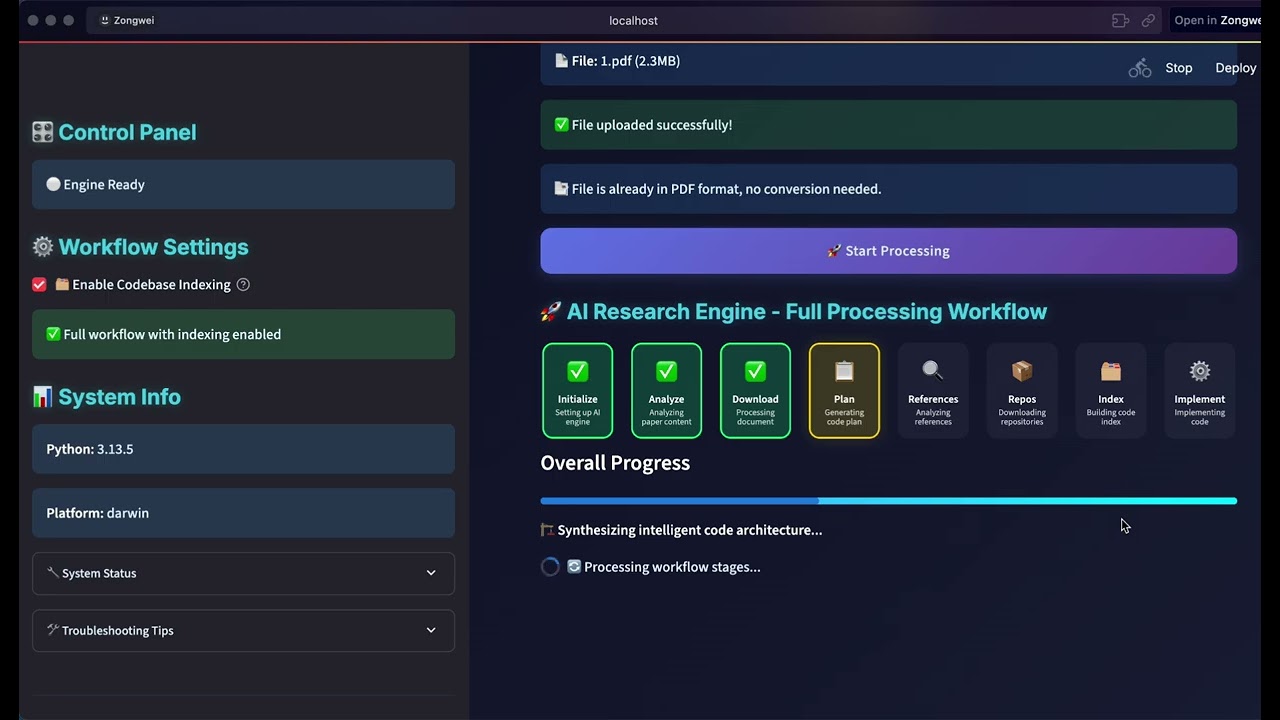
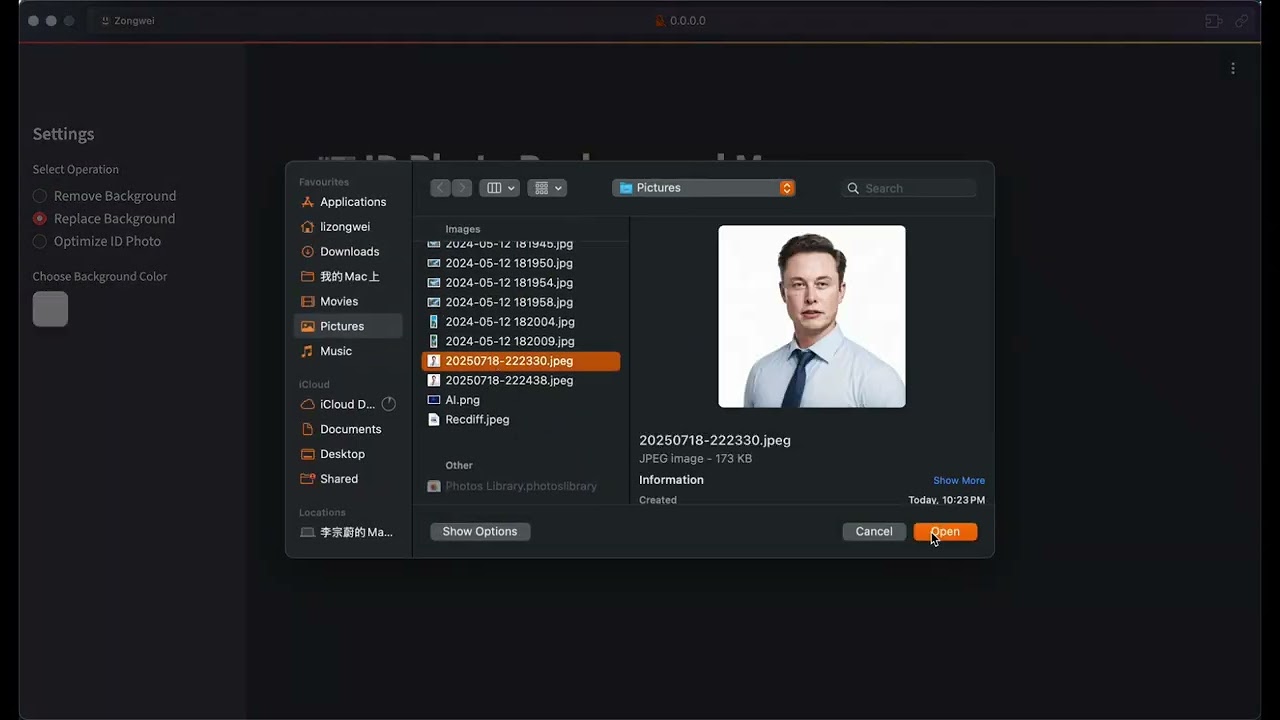
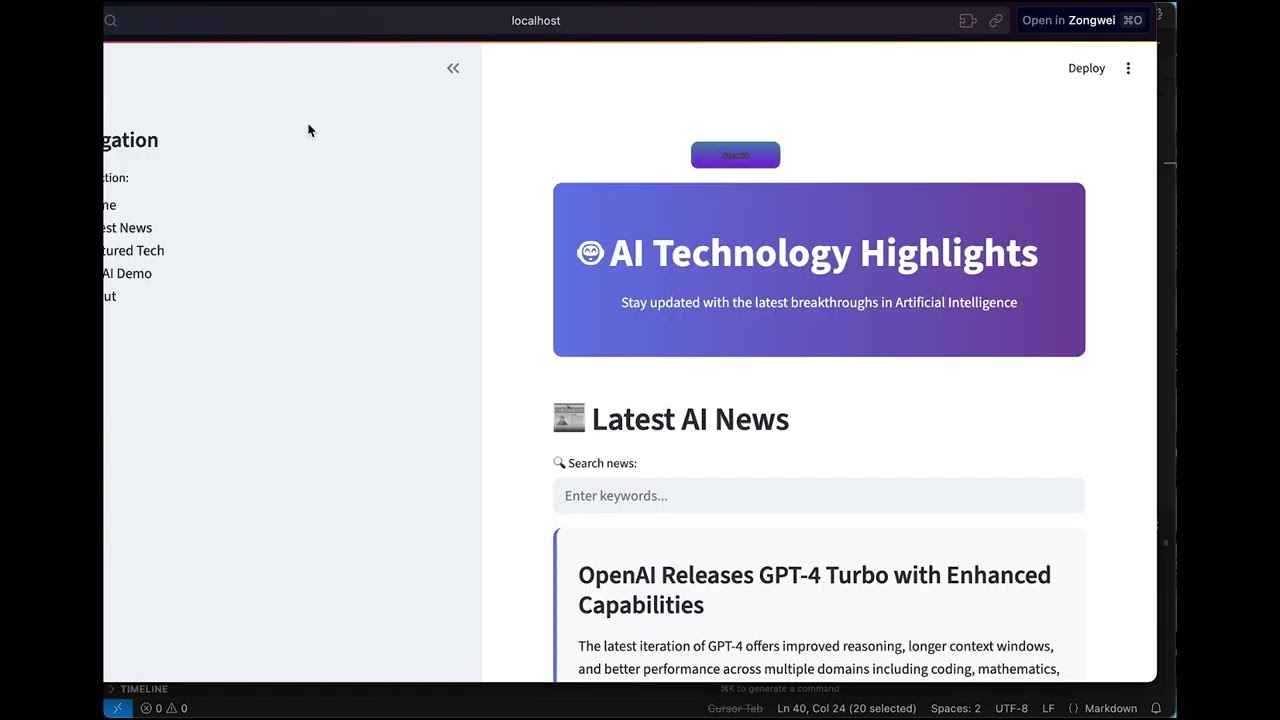
Repository: HKUDS/DeepCode Branch: main Commit: b5c741ab572a Files: 255 Total size: 2.0 MB Directory structure: gitextract_3wtguj4a/ ├── .dockerignore ├── .gitattributes ├── .github/ │ ├── ISSUE_TEMPLATE/ │ │ ├── bug_report.yml │ │ ├── config.yml │ │ ├── feature_request.yml │ │ └── question.yml │ ├── dependabot.yml │ ├── pull_request_template.md │ └── workflows/ │ ├── linting.yaml │ └── pypi-publish.yml ├── .gitignore ├── .pre-commit-config.yaml ├── CHANGELOG.md ├── LICENSE ├── MANIFEST.in ├── README.md ├── README_ZH.md ├── __init__.py ├── cli/ │ ├── __init__.py │ ├── cli_app.py │ ├── cli_interface.py │ ├── cli_launcher.py │ ├── main_cli.py │ └── workflows/ │ ├── __init__.py │ └── cli_workflow_adapter.py ├── config/ │ ├── mcp_tool_definitions.py │ └── mcp_tool_definitions_index.py ├── deepcode.py ├── deepcode_docker/ │ ├── .dockerignore │ ├── Dockerfile │ ├── docker-compose.yml │ ├── docker-entrypoint.sh │ └── run_docker.sh ├── mcp_agent.config.yaml ├── mcp_agent.secrets.yaml.example ├── nanobot/ │ ├── .dockerignore │ ├── .gitignore │ ├── COMMUNICATION.md │ ├── Dockerfile │ ├── LICENSE │ ├── README.md │ ├── SECURITY.md │ ├── bridge/ │ │ ├── package.json │ │ ├── src/ │ │ │ ├── index.ts │ │ │ ├── server.ts │ │ │ ├── types.d.ts │ │ │ └── whatsapp.ts │ │ └── tsconfig.json │ ├── core_agent_lines.sh │ ├── nanobot/ │ │ ├── __init__.py │ │ ├── __main__.py │ │ ├── agent/ │ │ │ ├── __init__.py │ │ │ ├── context.py │ │ │ ├── loop.py │ │ │ ├── memory.py │ │ │ ├── skills.py │ │ │ ├── subagent.py │ │ │ └── tools/ │ │ │ ├── __init__.py │ │ │ ├── base.py │ │ │ ├── cron.py │ │ │ ├── deepcode.py │ │ │ ├── filesystem.py │ │ │ ├── message.py │ │ │ ├── registry.py │ │ │ ├── shell.py │ │ │ ├── spawn.py │ │ │ └── web.py │ │ ├── bus/ │ │ │ ├── __init__.py │ │ │ ├── events.py │ │ │ └── queue.py │ │ ├── channels/ │ │ │ ├── __init__.py │ │ │ ├── base.py │ │ │ ├── dingtalk.py │ │ │ ├── discord.py │ │ │ ├── email.py │ │ │ ├── feishu.py │ │ │ ├── manager.py │ │ │ ├── qq.py │ │ │ ├── slack.py │ │ │ ├── telegram.py │ │ │ └── whatsapp.py │ │ ├── cli/ │ │ │ ├── __init__.py │ │ │ └── commands.py │ │ ├── config/ │ │ │ ├── __init__.py │ │ │ ├── loader.py │ │ │ └── schema.py │ │ ├── cron/ │ │ │ ├── __init__.py │ │ │ ├── service.py │ │ │ └── types.py │ │ ├── heartbeat/ │ │ │ ├── __init__.py │ │ │ └── service.py │ │ ├── providers/ │ │ │ ├── __init__.py │ │ │ ├── base.py │ │ │ ├── litellm_provider.py │ │ │ ├── registry.py │ │ │ └── transcription.py │ │ ├── session/ │ │ │ ├── __init__.py │ │ │ └── manager.py │ │ ├── skills/ │ │ │ ├── README.md │ │ │ ├── cron/ │ │ │ │ └── SKILL.md │ │ │ ├── deepcode/ │ │ │ │ └── SKILL.md │ │ │ ├── github/ │ │ │ │ └── SKILL.md │ │ │ ├── skill-creator/ │ │ │ │ └── SKILL.md │ │ │ ├── summarize/ │ │ │ │ └── SKILL.md │ │ │ ├── tmux/ │ │ │ │ ├── SKILL.md │ │ │ │ └── scripts/ │ │ │ │ ├── find-sessions.sh │ │ │ │ └── wait-for-text.sh │ │ │ └── weather/ │ │ │ └── SKILL.md │ │ └── utils/ │ │ ├── __init__.py │ │ └── helpers.py │ ├── pyproject.toml │ ├── run_nanobot.sh │ └── workspace/ │ ├── AGENTS.md │ ├── HEARTBEAT.md │ ├── SOUL.md │ ├── TOOLS.md │ ├── USER.md │ └── memory/ │ └── MEMORY.md ├── nanobot_config.json.example ├── new_ui/ │ ├── README.md │ ├── backend/ │ │ ├── __init__.py │ │ ├── api/ │ │ │ ├── __init__.py │ │ │ ├── routes/ │ │ │ │ ├── __init__.py │ │ │ │ ├── config.py │ │ │ │ ├── files.py │ │ │ │ ├── requirements.py │ │ │ │ └── workflows.py │ │ │ └── websockets/ │ │ │ ├── __init__.py │ │ │ ├── code_stream_ws.py │ │ │ ├── logs_ws.py │ │ │ └── workflow_ws.py │ │ ├── app_utils/ │ │ │ └── __init__.py │ │ ├── main.py │ │ ├── models/ │ │ │ ├── __init__.py │ │ │ ├── requests.py │ │ │ └── responses.py │ │ ├── services/ │ │ │ ├── __init__.py │ │ │ ├── requirement_service.py │ │ │ ├── session_service.py │ │ │ └── workflow_service.py │ │ └── settings.py │ ├── frontend/ │ │ ├── index.html │ │ ├── package.json │ │ ├── postcss.config.js │ │ ├── src/ │ │ │ ├── App.tsx │ │ │ ├── components/ │ │ │ │ ├── common/ │ │ │ │ │ ├── Button.tsx │ │ │ │ │ ├── Card.tsx │ │ │ │ │ ├── ConfirmDialog.tsx │ │ │ │ │ ├── GuardedLink.tsx │ │ │ │ │ ├── TaskRecoveryBanner.tsx │ │ │ │ │ ├── Toaster.tsx │ │ │ │ │ └── index.ts │ │ │ │ ├── input/ │ │ │ │ │ ├── ChatInput.tsx │ │ │ │ │ ├── FileUploader.tsx │ │ │ │ │ ├── UrlInput.tsx │ │ │ │ │ └── index.ts │ │ │ │ ├── interaction/ │ │ │ │ │ ├── InlineChatInteraction.tsx │ │ │ │ │ ├── InteractionPanel.tsx │ │ │ │ │ └── index.ts │ │ │ │ ├── layout/ │ │ │ │ │ ├── Header.tsx │ │ │ │ │ ├── Layout.tsx │ │ │ │ │ ├── Sidebar.tsx │ │ │ │ │ └── index.ts │ │ │ │ ├── results/ │ │ │ │ │ ├── CodePreview.tsx │ │ │ │ │ ├── FileTree.tsx │ │ │ │ │ └── index.ts │ │ │ │ ├── streaming/ │ │ │ │ │ ├── ActivityLogViewer.tsx │ │ │ │ │ ├── CodeStreamViewer.tsx │ │ │ │ │ ├── LogViewer.tsx │ │ │ │ │ ├── ProgressTracker.tsx │ │ │ │ │ └── index.ts │ │ │ │ └── workflow/ │ │ │ │ ├── WorkflowCanvas.tsx │ │ │ │ ├── WorkflowNode.tsx │ │ │ │ └── index.ts │ │ │ ├── hooks/ │ │ │ │ ├── index.ts │ │ │ │ ├── useAdaptiveLayout.ts │ │ │ │ ├── useNavigationGuard.ts │ │ │ │ ├── useStreaming.ts │ │ │ │ ├── useTaskRecovery.ts │ │ │ │ └── useWebSocket.ts │ │ │ ├── index.css │ │ │ ├── main.tsx │ │ │ ├── pages/ │ │ │ │ ├── ChatPlanningPage.tsx │ │ │ │ ├── HomePage.tsx │ │ │ │ ├── PaperToCodePage.tsx │ │ │ │ ├── SettingsPage.tsx │ │ │ │ ├── WorkflowEditorPage.tsx │ │ │ │ └── index.ts │ │ │ ├── services/ │ │ │ │ └── api.ts │ │ │ ├── stores/ │ │ │ │ ├── index.ts │ │ │ │ ├── sessionStore.ts │ │ │ │ └── workflowStore.ts │ │ │ └── types/ │ │ │ ├── api.ts │ │ │ ├── common.ts │ │ │ ├── index.ts │ │ │ └── workflow.ts │ │ ├── tailwind.config.js │ │ ├── tsconfig.json │ │ ├── tsconfig.node.json │ │ └── vite.config.ts │ └── scripts/ │ ├── build.sh │ └── start_dev.sh ├── prompts/ │ └── code_prompts.py ├── requirements.txt ├── run.bat ├── run.sh ├── schema/ │ └── mcp-agent.config.schema.json ├── setup.py ├── tools/ │ ├── __init__.py │ ├── bocha_search_server.py │ ├── code_implementation_server.py │ ├── code_indexer.py │ ├── code_reference_indexer.py │ ├── command_executor.py │ ├── document_segmentation_server.py │ ├── git_command.py │ ├── indexer_config.yaml │ ├── pdf_converter.py │ ├── pdf_downloader.py │ └── pdf_utils.py ├── ui/ │ ├── __init__.py │ ├── app.py │ ├── components.py │ ├── handlers.py │ ├── layout.py │ ├── sidebar_feed.py │ ├── streamlit_app.py │ └── styles.py ├── utils/ │ ├── __init__.py │ ├── cli_interface.py │ ├── cross_platform_file_handler.py │ ├── dialogue_logger.py │ ├── file_processor.py │ ├── llm_utils.py │ ├── loop_detector.py │ ├── model_limits.py │ └── simple_llm_logger.py └── workflows/ ├── __init__.py ├── agent_orchestration_engine.py ├── agents/ │ ├── __init__.py │ ├── code_implementation_agent.py │ ├── document_segmentation_agent.py │ ├── memory_agent_concise.py │ ├── memory_agent_concise_index.py │ ├── memory_agent_concise_multi.py │ └── requirement_analysis_agent.py ├── code_implementation_workflow.py ├── code_implementation_workflow_index.py ├── codebase_index_workflow.py └── plugins/ ├── USAGE.md ├── __init__.py ├── base.py ├── integration.py ├── plan_review.py └── requirement_analysis.py ================================================ FILE CONTENTS ================================================ ================================================ FILE: .dockerignore ================================================ # Git .git .gitignore # Node new_ui/frontend/node_modules new_ui/frontend/dist # Python __pycache__ *.pyc *.pyo *.egg-info .eggs dist build # Virtual environments .venv venv env # IDE .vscode .idea .cursor *.swp *.swo # Runtime data deepcode_lab uploads logs *.log # Docker deepcode_docker/Dockerfile deepcode_docker/docker-compose.yml deepcode_docker/.dockerignore deepcode_docker/run_docker.sh # Documentation assets *.md LICENSE ================================================ FILE: .gitattributes ================================================ # Force LF line endings for shell scripts (prevents CRLF issues in Docker) *.sh text eol=lf docker-entrypoint.sh text eol=lf ================================================ FILE: .github/ISSUE_TEMPLATE/bug_report.yml ================================================ name: Bug Report description: File a bug report title: "[Bug]:" labels: ["bug", "triage"] body: - type: checkboxes id: existingcheck attributes: label: Do you need to file an issue? description: Please help us manage our time by avoiding duplicates and common bugs with the steps below. options: - label: I have searched the existing issues and this bug is not already filed. - label: I believe this is a legitimate bug, not just a question or feature request. - type: textarea id: description attributes: label: Describe the bug description: A clear and concise description of what the bug is. placeholder: What went wrong? - type: textarea id: reproduce attributes: label: Steps to reproduce description: Steps to reproduce the behavior. placeholder: How can we replicate the issue? - type: textarea id: expected_behavior attributes: label: Expected Behavior description: A clear and concise description of what you expected to happen. placeholder: What should have happened? - type: textarea id: configused attributes: label: DeepCode Config Used description: The DeepCode configuration used for the run. placeholder: The settings content or DeepCode configuration value: | # Paste your config here - type: textarea id: screenshotslogs attributes: label: Logs and screenshots description: If applicable, add screenshots and logs to help explain your problem. placeholder: Add logs and screenshots here - type: textarea id: additional_information attributes: label: Additional Information description: | - DeepCode Version: e.g., v0.1.1 - Operating System: e.g., Windows 10, Ubuntu 20.04 - Python Version: e.g., 3.8 - Related Issues: e.g., #1 - Any other relevant information. value: | - DeepCode Version: - Operating System: - Python Version: - Related Issues: ================================================ FILE: .github/ISSUE_TEMPLATE/config.yml ================================================ blank_issues_enabled: false ================================================ FILE: .github/ISSUE_TEMPLATE/feature_request.yml ================================================ name: Feature Request description: File a feature request labels: ["enhancement"] title: "[Feature Request]:" body: - type: checkboxes id: existingcheck attributes: label: Do you need to file a feature request? description: Please help us manage our time by avoiding duplicates and common feature request with the steps below. options: - label: I have searched the existing feature request and this feature request is not already filed. - label: I believe this is a legitimate feature request, not just a question or bug. - type: textarea id: feature_request_description attributes: label: Feature Request Description description: A clear and concise description of the feature request you would like. placeholder: What this feature request add more or improve? - type: textarea id: additional_context attributes: label: Additional Context description: Add any other context or screenshots about the feature request here. placeholder: Any additional information ================================================ FILE: .github/ISSUE_TEMPLATE/question.yml ================================================ name: Question description: Ask a general question labels: ["question"] title: "[Question]:" body: - type: checkboxes id: existingcheck attributes: label: Do you need to ask a question? description: Please help us manage our time by avoiding duplicates and common questions with the steps below. options: - label: I have searched the existing question and discussions and this question is not already answered. - label: I believe this is a legitimate question, not just a bug or feature request. - type: textarea id: question attributes: label: Your Question description: A clear and concise description of your question. placeholder: What is your question? - type: textarea id: context attributes: label: Additional Context description: Provide any additional context or details that might help us understand your question better. placeholder: Add any relevant information here ================================================ FILE: .github/dependabot.yml ================================================ # To get started with Dependabot version updates, you'll need to specify which # package ecosystems to update and where the package manifests are located. # Please see the documentation for all configuration options: # https://docs.github.com/code-security/dependabot/dependabot-version-updates/configuration-options-for-the-dependabot.yml-file version: 2 updates: - package-ecosystem: "pip" # See documentation for possible values directory: "/" # Location of package manifests schedule: interval: "weekly" ================================================ FILE: .github/pull_request_template.md ================================================ ## Description [Briefly describe the changes made in this pull request.] ## Related Issues [Reference any related issues or tasks addressed by this pull request.] ## Changes Made [List the specific changes made in this pull request.] ## Checklist - [ ] Changes tested locally - [ ] Code reviewed - [ ] Documentation updated (if necessary) - [ ] Unit tests added (if applicable) ## Additional Notes [Add any additional notes or context for the reviewer(s).] ================================================ FILE: .github/workflows/linting.yaml ================================================ name: Linting and Formatting on: push: branches: - main pull_request: branches: - main jobs: lint-and-format: runs-on: ubuntu-latest steps: - name: Checkout code uses: actions/checkout@v2 - name: Set up Python uses: actions/setup-python@v2 with: python-version: '3.x' - name: Install dependencies run: | python -m pip install --upgrade pip pip install pre-commit - name: Run pre-commit run: pre-commit run --all-files --show-diff-on-failure ================================================ FILE: .github/workflows/pypi-publish.yml ================================================ name: Upload DeepCode Package on: release: types: [published] permissions: contents: read jobs: release-build: runs-on: ubuntu-latest steps: - uses: actions/checkout@v4 - uses: actions/setup-python@v5 with: python-version: "3.x" - name: Build release distributions run: | python -m pip install build python -m build - name: Upload distributions uses: actions/upload-artifact@v4 with: name: release-dists path: dist/ pypi-publish: runs-on: ubuntu-latest needs: - release-build permissions: id-token: write environment: name: pypi steps: - name: Retrieve release distributions uses: actions/download-artifact@v4 with: name: release-dists path: dist/ - name: Publish release distributions to PyPI uses: pypa/gh-action-pypi-publish@release/v1 with: packages-dir: dist/ ================================================ FILE: .gitignore ================================================ # Python-related files __pycache__/ *.py[cod] *.egg-info/ .eggs/ *.tgz *.tar.gz *.ini # Virtual Environment .venv/ env/ venv/ *.env* .env_example # Build / Distribution dist/ build/ site/ # Logs / Reports *.log *.log.* *.logfire *.coverage/ log/ logs/ # Node node_modules/ # Caches .cache/ .mypy_cache/ .pytest_cache/ .ruff_cache/ .gradio/ .history/ temp/ # IDE / Editor Files .idea/ .vscode/ .vscode/settings.json # Framework-specific files local_neo4jWorkDir/ neo4jWorkDir/ # Data & Storage inputs/ rag_storage/ examples/input/ examples/output/ deepcode-mcp/agent_folders # Miscellaneous .DS_Store TODO.md ignore_this.txt *.ignore.* # unit-test files test_* run_indexer_with_filtering.py # Cline files memory-bank/ # project files deepcode_lab/ # secrets (use .env or environment variables instead) mcp_agent.secrets.yaml nanobot_config.json ================================================ FILE: .pre-commit-config.yaml ================================================ repos: - repo: https://github.com/pre-commit/pre-commit-hooks rev: v5.0.0 hooks: - id: trailing-whitespace - id: end-of-file-fixer - id: requirements-txt-fixer - repo: https://github.com/astral-sh/ruff-pre-commit rev: v0.6.4 hooks: - id: ruff-format - id: ruff args: [--fix, --ignore=E402] - repo: https://github.com/mgedmin/check-manifest rev: "0.49" hooks: - id: check-manifest stages: [manual] ================================================ FILE: CHANGELOG.md ================================================ # Changelog All notable changes to DeepCode will be documented in this file. ## [1.0.6-jm] - 2025-10-19 ### Added - **Dynamic Model Limit Detection**: New `utils/model_limits.py` module that automatically detects and adapts to any LLM model's token limits and pricing - **Loop Detection System**: `utils/loop_detector.py` prevents infinite loops by detecting repeated tool calls, timeouts, and progress stalls - **Progress Tracking**: 8-phase progress tracking (5% → 100%) with file-level progress indicators in both UI and terminal - **Abort Mechanism**: "Stop Processing" button in UI with global abort flag for clean process termination - **Cache Cleanup Scripts**: `start_clean.bat` and `start_clean.ps1` to clear Python cache before starting - **Enhanced Error Display**: Real-time error messages in both UI and terminal with timestamps - **File Progress Tracking**: Shows files completed/total with estimated time remaining ### Fixed - **Critical: False Error Detection**: Fixed overly aggressive error detection that was marking successful operations as failures, causing premature abort and empty file generation - **Critical: Empty File Generation**: Files now contain actual code instead of being empty (2-byte files) - **Unique Folder Naming**: Each project run now creates `paper_{timestamp}` folders instead of reusing `pdf_output` - **PDF Save Location**: PDFs now save to `deepcode_lab/papers/` instead of system temp directory - **Duplicate Folder Prevention**: Added session state caching to prevent duplicate folder creation on UI reruns - **Token Limit Compliance**: Fixed `max_tokens` to respect model limits dynamically (e.g., gpt-4o-mini's 16,384 token limit) - **Empty Plan Detection**: System now fails early with clear error messages when initial plan is empty or invalid - **Process Hanging**: Fixed infinite loops and hanging on errors - process now exits cleanly - **Token Cost Tracking**: Restored accurate token usage and cost display (was showing $0.0000) - **PDF to Markdown Conversion**: Fixed automatic conversion and file location handling - **Document Segmentation**: Properly uses configured 50K character threshold from `mcp_agent.config.yaml` - **Error Propagation**: Abort mechanism now properly stops process after 10 consecutive real errors ### Changed - **Model-Aware Token Management**: Token limits now adapt automatically based on configured model instead of hardcoded values - **Cost Calculation**: Dynamic pricing based on actual model rates (OpenAI, Anthropic) - **Retry Logic**: Token limits for retries now respect model maximum (87.5% → 95% → 98% of max) - **Segmentation Workflow**: Better integration with code implementation phase - **Error Handling**: Enhanced error propagation - errors no longer reported as "success" - **UI Display**: Shows project folder name after PDF conversion for better visibility - **Terminal Logging**: Added timestamps to all progress messages ### Technical Improvements - Added document-segmentation server to code implementation workflow for better token management - Improved error handling in agent orchestration engine with proper cleanup - Enhanced subprocess handling on Windows (hide console windows, prevent hanging) - Better LibreOffice detection on Windows using direct path checking - Fixed input data format consistency (JSON with `paper_path` key) - Added comprehensive logging throughout the pipeline - Improved resource cleanup on errors and process termination ### Documentation - Translated Chinese comments to English in core workflow files - Added inline documentation for new utility modules - Created startup scripts with clear usage instructions ### Breaking Changes - None - all changes are backward compatible ### Known Issues - Terminal may show trailing "Calling Tool..." line after completion (cosmetic display artifact - process completes successfully) - Some Chinese comments remain in non-critical files (cli, tools) - translation in progress - tiktoken package optional warning (doesn't affect functionality) ### Success Metrics - ✅ Complete end-to-end workflow: DOCX upload → PDF conversion → Markdown → Segmentation → Planning → Code generation - ✅ Files generated with actual code content (15+ files with proper implementation) - ✅ Single folder per project run (no duplicates) - ✅ Dynamic token management working across different models - ✅ Accurate cost tracking per model - ✅ Clean process termination with proper error handling --- ## [1.0.5] - Previous Release See previous releases for earlier changes. ================================================ FILE: LICENSE ================================================ MIT License Copyright (c) 2025 ✨Data Intelligence Lab@HKU✨ Permission is hereby granted, free of charge, to any person obtaining a copy of this software and associated documentation files (the "Software"), to deal in the Software without restriction, including without limitation the rights to use, copy, modify, merge, publish, distribute, sublicense, and/or sell copies of the Software, and to permit persons to whom the Software is furnished to do so, subject to the following conditions: The above copyright notice and this permission notice shall be included in all copies or substantial portions of the Software. THE SOFTWARE IS PROVIDED "AS IS", WITHOUT WARRANTY OF ANY KIND, EXPRESS OR IMPLIED, INCLUDING BUT NOT LIMITED TO THE WARRANTIES OF MERCHANTABILITY, FITNESS FOR A PARTICULAR PURPOSE AND NONINFRINGEMENT. IN NO EVENT SHALL THE AUTHORS OR COPYRIGHT HOLDERS BE LIABLE FOR ANY CLAIM, DAMAGES OR OTHER LIABILITY, WHETHER IN AN ACTION OF CONTRACT, TORT OR OTHERWISE, ARISING FROM, OUT OF OR IN CONNECTION WITH THE SOFTWARE OR THE USE OR OTHER DEALINGS IN THE SOFTWARE. ================================================ FILE: MANIFEST.in ================================================ include README.md include LICENSE include requirements.txt include __init__.py include *.png include *.yaml recursive-include config *.yaml recursive-include prompts * recursive-include schema * recursive-include ui *.py recursive-include cli *.py recursive-include utils *.py recursive-include tools *.py recursive-include workflows *.py global-exclude *.pyc global-exclude .git* global-exclude .history* global-exclude .ruff_cache* global-exclude __pycache__* ================================================ FILE: README.md ================================================
DeepCode Logo
    ██████╗ ███████╗███████╗██████╗  ██████╗ ██████╗ ██████╗ ███████╗
    ██╔══██╗██╔════╝██╔════╝██╔══██╗██╔════╝██╔═══██╗██╔══██╗██╔════╝
    ██║  ██║█████╗  █████╗  ██████╔╝██║     ██║   ██║██║  ██║█████╗
    ██║  ██║██╔══╝  ██╔══╝  ██╔═══╝ ██║     ██║   ██║██║  ██║██╔══╝
    ██████╔╝███████╗███████╗██║     ╚██████╗╚██████╔╝██████╔╝███████╗
    ╚═════╝ ╚══════╝╚══════╝╚═╝      ╚═════╝ ╚═════╝ ╚═════╝ ╚══════╝
HKUDS%2FDeepCode | Trendshift
# DeepCode Logo DeepCode: Open Agentic Coding ### *Advancing Code Generation with Multi-Agent Systems*

English 中文
### 🖥️ **Interface Showcase**
#### 🖥️ **CLI Interface** **Terminal-Based Development**
CLI Interface Demo
🚀 Advanced Terminal Experience
⚡ Fast command-line workflow
🔧 Developer-friendly interface
📊 Real-time progress tracking
*Professional terminal interface for advanced users and CI/CD integration*
#### 🌐 **Web Interface** **Visual Interactive Experience**
Web Interface Demo
🎨 Modern Web Dashboard
🖱️ Intuitive drag-and-drop
📱 Responsive design
🎯 Visual progress tracking
*Beautiful web interface with streamlined workflow for all skill levels*
---
### 🎬 **Introduction Video**
DeepCode Introduction Video
*🎯 **Watch our complete introduction** - See how DeepCode transforms research papers and natural language into production-ready code*

Watch Video

--- > *"Where AI Agents Transform Ideas into Production-Ready Code"*
--- ## 📑 Table of Contents - [📰 News](#-news) - [🚀 Key Features](#-key-features) - [🏗️ Architecture](#️-architecture) - [📊 Experimental Results](#-experimental-results) - [🚀 Quick Start](#-quick-start) - [🤖 nanobot Integration (Feishu Chatbot)](#-nanobot-integration-feishu-chatbot) - [💡 Examples](#-examples) - [🎬 Live Demonstrations](#-live-demonstrations) - [⭐ Star History](#-star-history) - [📄 License](#-license) --- ## 📰 News 🎉 **[2026-02] nanobot ✖️ DeepCode. Just chat naturally with openclaw/nanobot to handle your coding tasks:**
DeepCode

nanobot
- [nanobot](https://github.com/HKUDS/nanobot) nanobot now powers your agentic coding & engineering! 🤖💻 - Step away from your laptop — make vibe coding even more vibe! Code directly from your phone! 📱✨ - One-command deploy: `./nanobot/run_nanobot.sh` → **[Setup Guide →](#-nanobot-integration-feishu-chatbot)**
Feishu Chat Example 1 Feishu Chat Example 2
Feishu Bot in Action — Natural language → Full code generation with setup instructions
--- 🎉 **[2026-02] New Web UI Experience Upgrade!** - 🔄 **User-in-Loop Interaction**: Support real-time user interaction during workflows - AI asks clarifying questions directly in the chat - 💬 **Inline Interaction Design**: Interaction prompts appear naturally within the chat flow for a seamless experience - 🚀 **One-Click Launch**: Simply run `deepcode` to start the new UI (cross-platform: Windows/macOS/Linux) - 🔧 **Improved Process Management**: Enhanced service start/stop mechanism with automatic port cleanup - 📡 **WebSocket Real-time Communication**: Fixed message loss issues, ensuring proper interaction state synchronization
DeepCode New UI
DeepCode New Web UI - Modern React-based Interface
--- 🎉 **[2025-10-28] DeepCode Achieves SOTA on PaperBench!** DeepCode sets new benchmarks on OpenAI's PaperBench Code-Dev across all categories: - 🏆 **Surpasses Human Experts**: **75.9%** (DeepCode) vs Top Machine Learning PhDs 72.4% (+3.5%). - 🥇 **Outperforms SOTA Commercial Code Agents**: **84.8%** (DeepCode) vs Leading Commercial Code Agents (+26.1%) (Cursor, Claude Code, and Codex). - 🔬 **Advances Scientific Coding**: **73.5%** (DeepCode) vs PaperCoder 51.1% (+22.4%). - 🚀 **Beats LLM Agents**: **73.5%** (DeepCode) vs best LLM frameworks 43.3% (+30.2%). --- ## 🚀 Key Features

🚀 Paper2Code

Algorithm Badge

Automated Implementation of Complex Algorithms

Effortlessly converts complex algorithms from research papers into high-quality, production-ready code, accelerating algorithm reproduction.

🎨 Text2Web

Frontend Badge

Automated Front-End Web Development

Translates plain textual descriptions into fully functional, visually appealing front-end web code for rapid interface creation.

⚙️ Text2Backend

Backend Badge

Automated Back-End Development

Generates efficient, scalable, and feature-rich back-end code from simple text inputs, streamlining server-side development.


--- ## 📊 Experimental Results


We evaluate **DeepCode** on the [*PaperBench*](https://openai.com/index/paperbench/) benchmark (released by OpenAI), a rigorous testbed requiring AI agents to independently reproduce 20 ICML 2024 papers from scratch. The benchmark comprises 8,316 gradable components assessed using SimpleJudge with hierarchical weighting. Our experiments compare DeepCode against four baseline categories: **(1) Human Experts**, **(2) State-of-the-Art Commercial Code Agents**, **(3) Scientific Code Agents**, and **(4) LLM-Based Agents**. ### ① 🧠 Human Expert Performance (Top Machine Learning PhD) **DeepCode: 75.9% vs. Top Machine Learning PhD: 72.4% (+3.5%)** DeepCode achieves **75.9%** on the 3-paper human evaluation subset, **surpassing the best-of-3 human expert baseline (72.4%) by +3.5 percentage points**. This demonstrates that our framework not only matches but exceeds expert-level code reproduction capabilities, representing a significant milestone in autonomous scientific software engineering. ### ② 💼 State-of-the-Art Commercial Code Agents **DeepCode: 84.8% vs. Best Commercial Agent: 58.7% (+26.1%)** On the 5-paper subset, DeepCode substantially outperforms leading commercial coding tools: - Cursor: 58.4% - Claude Code: 58.7% - Codex: 40.0% - **DeepCode: 84.8%** This represents a **+26.1% improvement** over the leading commercial code agent. All commercial agents utilize Claude Sonnet 4.5 or GPT-5 Codex-high, highlighting that **DeepCode's superior architecture**—rather than base model capability—drives this performance gap. ### ③ 🔬 Scientific Code Agents **DeepCode: 73.5% vs. PaperCoder: 51.1% (+22.4%)** Compared to PaperCoder (**51.1%**), the state-of-the-art scientific code reproduction framework, DeepCode achieves **73.5%**, demonstrating a **+22.4% relative improvement**. This substantial margin validates our multi-module architecture combining planning, hierarchical task decomposition, code generation, and iterative debugging over simpler pipeline-based approaches. ### ④ 🤖 LLM-Based Agents **DeepCode: 73.5% vs. Best LLM Agent: 43.3% (+30.2%)** DeepCode significantly outperforms all tested LLM agents: - Claude 3.5 Sonnet + IterativeAgent: 27.5% - o1 + IterativeAgent (36 hours): 42.4% - o1 BasicAgent: 43.3% - **DeepCode: 73.5%** The **+30.2% improvement** over the best-performing LLM agent demonstrates that sophisticated agent scaffolding, rather than extended inference time or larger models, is critical for complex code reproduction tasks. --- ### 🎯 **Autonomous Self-Orchestrating Multi-Agent Architecture** **The Challenges**: - 📄 **Implementation Complexity**: Converting academic papers and complex algorithms into working code requires significant technical effort and domain expertise - 🔬 **Research Bottleneck**: Researchers spend valuable time implementing algorithms instead of focusing on their core research and discovery work - ⏱️ **Development Delays**: Product teams experience long wait times between concept and testable prototypes, slowing down innovation cycles - 🔄 **Repetitive Coding**: Developers repeatedly implement similar patterns and functionality instead of building on existing solutions **DeepCode** addresses these workflow inefficiencies by providing reliable automation for common development tasks, streamlining your development workflow from concept to code.
```mermaid flowchart LR A["📄 Research Papers
💬 Text Prompts
🌐 URLs & Document
📎 Files: PDF, DOC, PPTX, TXT, HTML"] --> B["🧠 DeepCode
Multi-Agent Engine"] B --> C["🚀 Algorithm Implementation
🎨 Frontend Development
⚙️ Backend Development"] style A fill:#ff6b6b,stroke:#c0392b,stroke-width:2px,color:#000 style B fill:#00d4ff,stroke:#0984e3,stroke-width:3px,color:#000 style C fill:#00b894,stroke:#00a085,stroke-width:2px,color:#000 ```
--- ## 🏗️ Architecture ### 📊 **System Overview** **DeepCode** is an AI-powered development platform that automates code generation and implementation tasks. Our multi-agent system handles the complexity of translating requirements into functional, well-structured code, allowing you to focus on innovation rather than implementation details. 🎯 **Technical Capabilities**: 🧬 **Research-to-Production Pipeline**
Multi-modal document analysis engine that extracts algorithmic logic and mathematical models from academic papers. Generates optimized implementations with proper data structures while preserving computational complexity characteristics. 🪄 **Natural Language Code Synthesis**
Context-aware code generation using fine-tuned language models trained on curated code repositories. Maintains architectural consistency across modules while supporting multiple programming languages and frameworks. ⚡ **Automated Prototyping Engine**
Intelligent scaffolding system generating complete application structures including database schemas, API endpoints, and frontend components. Uses dependency analysis to ensure scalable architecture from initial generation. 💎 **Quality Assurance Automation**
Integrated static analysis with automated unit test generation and documentation synthesis. Employs AST analysis for code correctness and property-based testing for comprehensive coverage. 🔮 **CodeRAG Integration System**
Advanced retrieval-augmented generation combining semantic vector embeddings with graph-based dependency analysis. Automatically discovers optimal libraries and implementation patterns from large-scale code corpus. --- ### 🔧 **Core Techniques** - 🧠 **Intelligent Orchestration Agent**: Central decision-making system that coordinates workflow phases and analyzes requirements. Employs dynamic planning algorithms to adapt execution strategies in real-time based on evolving project complexity. Dynamically selects optimal processing strategies for each implementation step.
- 💾 **Efficient Memory Mechanism**: Advanced context engineering system that manages large-scale code contexts efficiently. Implements hierarchical memory structures with intelligent compression for handling complex codebases. This component enables instant retrieval of implementation patterns and maintains semantic coherence across extended development sessions.
- 🔍 **Advanced CodeRAG System**: Global code comprehension engine that analyzes complex inter-dependencies across repositories. Performs cross-codebase relationship mapping to understand architectural patterns from a holistic perspective. This module leverages dependency graphs and semantic analysis to provide globally-aware code recommendations during implementation. --- ### 🤖 **Multi-Agent Architecture of DeepCode**: - **🎯 Central Orchestrating Agent**: Orchestrates entire workflow execution and makes strategic decisions. Coordinates specialized agents based on input complexity analysis. Implements dynamic task planning and resource allocation algorithms.
- **📝 Intent Understanding Agent**: Performs deep semantic analysis of user requirements to decode complex intentions. Extracts functional specifications and technical constraints through advanced NLP processing. Transforms ambiguous human descriptions into precise, actionable development specifications with structured task decomposition.
- **📄 Document Parsing Agent**: Processes complex technical documents and research papers with advanced parsing capabilities. Extracts algorithms and methodologies using document understanding models. Converts academic concepts into practical implementation specifications through intelligent content analysis.
- **🏗️ Code Planning Agent**: Performs architectural design and technology stack optimization. Dynamic planning for adaptive development roadmaps. Enforces coding standards and generates modular structures through automated design pattern selection.
- **🔍 Code Reference Mining Agent**: Discovers relevant repositories and frameworks through intelligent search algorithms. Analyzes codebases for compatibility and integration potential. Provides recommendations based on similarity metrics and automated dependency analysis.
- **📚 Code Indexing Agent**: Builds comprehensive knowledge graphs of discovered codebases. Maintains semantic relationships between code components. Enables intelligent retrieval and cross-reference capabilities.
- **🧬 Code Generation Agent**: Synthesizes gathered information into executable code implementations. Creates functional interfaces and integrates discovered components. Generates comprehensive test suites and documentation for reproducibility. --- #### 🛠️ **Implementation Tools Matrix** **🔧 Powered by MCP (Model Context Protocol)** DeepCode leverages the **Model Context Protocol (MCP)** standard to seamlessly integrate with various tools and services. This standardized approach ensures reliable communication between AI agents and external systems, enabling powerful automation capabilities. ##### 📡 **MCP Servers & Tools** | 🛠️ **MCP Server** | 🔧 **Primary Function** | 💡 **Purpose & Capabilities** | |-------------------|-------------------------|-------------------------------| | **🔍 brave** | Web Search Engine | Real-time information retrieval via Brave Search API | | **🌐 bocha-mcp** | Alternative Search | Secondary search option with independent API access | | **📂 filesystem** | File System Operations | Local file and directory management, read/write operations | | **🌐 fetch** | Web Content Retrieval | Fetch and extract content from URLs and web resources | | **📥 github-downloader** | Repository Management | Clone and download GitHub repositories for analysis | | **📋 file-downloader** | Document Processing | Download and convert files (PDF, DOCX, etc.) to Markdown | | **⚡ command-executor** | System Commands | Execute bash/shell commands for environment management | | **🧬 code-implementation** | Code Generation Hub | Comprehensive code reproduction with execution and testing | | **📚 code-reference-indexer** | Smart Code Search | Intelligent indexing and search of code repositories | | **📄 document-segmentation** | Smart Document Analysis | Intelligent document segmentation for large papers and technical documents | ##### 🔧 **Legacy Tool Functions** *(for reference)* | 🛠️ **Function** | 🎯 **Usage Context** | |-----------------|---------------------| | **📄 read_code_mem** | Efficient code context retrieval from memory | | **✍️ write_file** | Direct file content generation and modification | | **🐍 execute_python** | Python code testing and validation | | **📁 get_file_structure** | Project structure analysis and organization | | **⚙️ set_workspace** | Dynamic workspace and environment configuration | | **📊 get_operation_history** | Process monitoring and operation tracking | --- 🎛️ **Multi-Interface Framework**
RESTful API with CLI and web frontends featuring real-time code streaming, interactive debugging, and extensible plugin architecture for CI/CD integration. **🚀 Multi-Agent Intelligent Pipeline:**
### 🌟 **Intelligence Processing Flow**
💡 INPUT LAYER
📄 Research Papers • 💬 Natural Language • 🌐 URLs • 📋 Requirements
🎯 CENTRAL ORCHESTRATION
Strategic Decision Making • Workflow Coordination • Agent Management
📝 TEXT ANALYSIS
Requirement Processing
📄 DOCUMENT ANALYSIS
Paper & Spec Processing
📋 REPRODUCTION PLANNING
Deep Paper Analysis • Code Requirements Parsing • Reproduction Strategy Development
🔍 REFERENCE ANALYSIS
Repository Discovery
📚 CODE INDEXING
Knowledge Graph Building
🧬 CODE IMPLEMENTATION
Implementation Generation • Testing • Documentation
OUTPUT DELIVERY
📦 Complete Codebase • 🧪 Test Suite • 📚 Documentation • 🚀 Deployment Ready

### 🔄 **Process Intelligence Features**

🎯 Adaptive Flow

Dynamic agent selection based on input complexity

🧠 Smart Coordination

Intelligent task distribution and parallel processing

🔍 Context Awareness

Deep understanding through CodeRAG integration

⚡ Quality Assurance

Automated testing and validation throughout

--- ## 🚀 Quick Start ### 📋 **Prerequisites** Before installing DeepCode, ensure you have the following: | Requirement | Version | Purpose | |-------------|---------|---------| | **Python** | 3.9+ | Core runtime | | **Node.js** | 18+ | New UI frontend | | **npm** | 8+ | Package management | ```bash # Check your versions python --version # Should be 3.9+ node --version # Should be 18+ npm --version # Should be 8+ ```
📥 Install Node.js (if not installed) ```bash # macOS (using Homebrew) brew install node # Ubuntu/Debian curl -fsSL https://deb.nodesource.com/setup_20.x | sudo -E bash - sudo apt-get install -y nodejs # Windows # Download from https://nodejs.org/ ```
### 📦 **Step 1: Installation** Choose one of the following installation methods: #### ⚡ **Direct Installation (Recommended)** ```bash # 🚀 Install DeepCode package directly pip install deepcode-hku # 🔑 Download configuration files curl -O https://raw.githubusercontent.com/HKUDS/DeepCode/main/mcp_agent.config.yaml curl -O https://raw.githubusercontent.com/HKUDS/DeepCode/main/mcp_agent.secrets.yaml ``` #### 🔧 **Development Installation (From Source)**
📂 Click to expand development installation options ##### 🔥 **Using UV (Recommended for Development)** ```bash git clone https://github.com/HKUDS/DeepCode.git cd DeepCode/ curl -LsSf https://astral.sh/uv/install.sh | sh uv venv --python=3.13 source .venv/bin/activate # On Windows: .venv\Scripts\activate uv pip install -r requirements.txt # Install frontend dependencies npm install --prefix new_ui/frontend ``` ##### 🐍 **Using Traditional pip** ```bash git clone https://github.com/HKUDS/DeepCode.git cd DeepCode/ pip install -r requirements.txt # Install frontend dependencies npm install --prefix new_ui/frontend ```
### 🔧 **Step 2: Configuration** > The following configuration applies to **all installation methods** (pip, UV, source, and Docker). #### 🔑 API Keys *(required)* Edit `mcp_agent.secrets.yaml` with your API keys: ```yaml # At least ONE provider API key is required openai: api_key: "your_openai_api_key" base_url: "https://openrouter.ai/api/v1" # Optional: for OpenRouter or custom endpoints anthropic: api_key: "your_anthropic_api_key" # For Claude models google: api_key: "your_google_api_key" # For Gemini models ``` #### 🤖 LLM Provider *(optional)* Edit `mcp_agent.config.yaml` to choose your preferred LLM provider (line ~106): ```yaml # Options: "google", "anthropic", "openai" # If not set or unavailable, will automatically fallback to first available provider llm_provider: "google" ``` #### 🔍 Search API Keys *(optional)* Configure web search in `mcp_agent.config.yaml`: ```yaml # For Brave Search (default) — set in brave.env section (line ~28) brave: env: BRAVE_API_KEY: "your_brave_api_key_here" # For Bocha-MCP (alternative) — set in bocha-mcp.env section (line ~74) bocha-mcp: env: BOCHA_API_KEY: "your_bocha_api_key_here" ``` #### 📄 Document Segmentation *(optional)* Control document processing in `mcp_agent.config.yaml`: ```yaml document_segmentation: enabled: true # true/false — whether to use intelligent document segmentation size_threshold_chars: 50000 # Document size threshold to trigger segmentation ```
🪟 Windows Users: Additional MCP Server Configuration If you're using Windows, you may need to configure MCP servers manually in `mcp_agent.config.yaml`: ```bash # 1. Install MCP servers globally npm i -g @modelcontextprotocol/server-brave-search npm i -g @modelcontextprotocol/server-filesystem # 2. Find your global node_modules path npm -g root ``` Then update your `mcp_agent.config.yaml` to use absolute paths: ```yaml mcp: servers: brave: command: "node" args: ["C:/Program Files/nodejs/node_modules/@modelcontextprotocol/server-brave-search/dist/index.js"] filesystem: command: "node" args: ["C:/Program Files/nodejs/node_modules/@modelcontextprotocol/server-filesystem/dist/index.js", "."] ``` > **Note**: Replace the path with your actual global node_modules path from step 2.
🔍 Search Server Configuration (Optional) DeepCode supports multiple search servers for web search functionality. You can configure your preferred option in `mcp_agent.config.yaml`: ```yaml # Default search server configuration # Options: "brave" or "bocha-mcp" default_search_server: "brave" ``` **Available Options:** - **🔍 Brave Search** (`"brave"`): Default option with high-quality search results. Requires `BRAVE_API_KEY`. Recommended for most users. - **🌐 Bocha-MCP** (`"bocha-mcp"`): Alternative search server. Requires `BOCHA_API_KEY`. Uses local Python server implementation. **Full MCP server configuration in mcp_agent.config.yaml:** ```yaml # For Brave Search (default) - around line 28 brave: command: "npx" args: ["-y", "@modelcontextprotocol/server-brave-search"] env: BRAVE_API_KEY: "your_brave_api_key_here" # For Bocha-MCP (alternative) - around line 74 bocha-mcp: command: "python" args: ["tools/bocha_search_server.py"] env: PYTHONPATH: "." BOCHA_API_KEY: "your_bocha_api_key_here" ``` > **💡 Tip**: Both search servers require API key configuration. Choose the one that best fits your API access and requirements.
### ⚡ **Step 3: Launch Application** Choose your preferred launch method:
🐳 Docker (Recommended) 🚀 Local (deepcode command) 🛠️ Other Methods
No Python/Node needed — everything in container. ```bash git clone https://github.com/HKUDS/DeepCode.git cd DeepCode/ cp mcp_agent.secrets.yaml.example \ mcp_agent.secrets.yaml # Edit secrets with your API keys ./deepcode_docker/run_docker.sh # Access → http://localhost:8000 ``` Auto-installs deps on first run. ```bash deepcode # Frontend → http://localhost:5173 # Backend → http://localhost:8000 # Ctrl+C to stop ``` Features: User-in-Loop, real-time progress, inline chat. ```bash # macOS / Linux ./run.sh # or: python deepcode.py # Windows run.bat # or: python deepcode.py # Classic Streamlit UI deepcode --classic # CLI mode deepcode --cli # or: python cli/main_cli.py ```
🐳 Docker Management Commands ```bash ./deepcode_docker/run_docker.sh stop # Stop ./deepcode_docker/run_docker.sh restart # Restart (no rebuild needed for config changes) ./deepcode_docker/run_docker.sh --build # Force rebuild ./deepcode_docker/run_docker.sh logs # Real-time logs ./deepcode_docker/run_docker.sh status # Health check ./deepcode_docker/run_docker.sh clean # Remove containers & images ``` Or with Docker Compose directly: ```bash docker compose -f deepcode_docker/docker-compose.yml up --build # Build & start docker compose -f deepcode_docker/docker-compose.yml down # Stop docker compose -f deepcode_docker/docker-compose.yml logs -f # Logs ``` > **💡** Config files are mounted as volumes — edit and restart, no rebuild needed. > **💡** Windows users: run `docker compose` commands directly if shell scripts aren't available.
### 🎯 **Step 4: Generate Code** 1. **📄 Input** — Upload a research paper, type requirements, or paste a URL 2. **🤖 Processing** — The multi-agent system analyzes, plans, and generates 3. **⚡ Output** — Receive production-ready code with tests and documentation --- ### 🔧 **Troubleshooting**
❓ Common Issues & Solutions | Problem | Cause | Fix | |---|---|---| | Docker build fails with `tsc: not found` | Corrupted build cache | `docker builder prune -f` then rebuild with `--no-cache` | | `error during connect` / `cannot find the file` | Docker Desktop not running | Start Docker Desktop, wait until ready, retry | | Frontend blank page | Corrupted `node_modules` | `cd new_ui/frontend && rm -rf node_modules && npm install` | | `ERR_CONNECTION_REFUSED` | Wrong port / backend not running | Docker: `http://localhost:8000`. Local: `http://localhost:5173` | | `npm install` → `Could not read package.json` | Wrong directory | Use `npm install --prefix new_ui/frontend` | | Windows: MCP servers not working | Need absolute paths | See [Windows MCP Configuration](#-step-2-configuration) above |
--- ## 🤖 nanobot Integration (Feishu Chatbot) > Chat with DeepCode from **Feishu** — powered by [nanobot](https://github.com/HKUDS/nanobot).
```mermaid flowchart LR subgraph Clients["💬 Chat Platforms"] direction TB F["Feishu
WebSocket"] T["Telegram
Polling"] D["Discord
Gateway"] end subgraph Gateway["🐈 nanobot Gateway"] direction TB A["Agent Loop
LLM + Tool Calls"] end subgraph Engine["🧠 DeepCode Engine"] direction TB P2C["Paper → Code"] C2C["Chat → Code"] TRK["Task Tracking"] end F & T & D <-->|"messages"| A A -->|"HTTP API"| P2C & C2C & TRK A -.->|"LLM API"| LLM["☁️ OpenRouter"] style Clients fill:#1a1a2e,stroke:#00d9ff,color:#fff style Gateway fill:#1a1a2e,stroke:#4ecdc4,color:#fff style Engine fill:#1a1a2e,stroke:#ff6b6b,color:#fff style LLM fill:#1a1a2e,stroke:#9b59b6,color:#fff ```
DeepCode

nanobot
Both services run inside the same **Docker Compose** network. Prerequisites: **Docker Desktop** + **OpenRouter API Key** ([get one](https://openrouter.ai/keys)) + **Feishu App**. --- ### Step 1 · Create a Feishu Bot
Feishu / Lark (Recommended — WebSocket, no public IP needed) 1. Go to [Feishu Open Platform](https://open.feishu.cn/app) → **Create Custom App** 2. Enable **Bot** capability in App Features 3. Add permissions: `im:message` · `im:message:send_as_bot` 4. Event Subscription → select **Long Connection** → add `im.message.receive_v1` 5. Note your **App ID** (`cli_xxx`) and **App Secret** → Publish the app > **Note**: Feishu requires an active WebSocket connection before you can save "Long Connection" mode. Start nanobot first (Step 3), then come back to configure Event Subscription.
### Step 2 · Configure ```bash cp nanobot_config.json.example nanobot_config.json ``` Edit `nanobot_config.json` — fill in the 3 required fields: ```jsonc { "channels": { "feishu": { "enabled": true, "appId": "cli_xxx", // ← Feishu App ID "appSecret": "xxx", // ← Feishu App Secret "allowFrom": [] // [] = allow all users } }, "providers": { "openrouter": { "apiKey": "sk-or-v1-xxx" // ← OpenRouter API Key } }, "agents": { "defaults": { "model": "anthropic/claude-sonnet-4-20250514" } } } ``` > **Model choice**: Any model on [openrouter.ai/models](https://openrouter.ai/models). Use `anthropic/claude-sonnet-4-20250514` for English, `minimax/minimax-m2.1` for Chinese. --- ### Step 3 · Launch Make sure `mcp_agent.secrets.yaml` has your DeepCode API keys (see [Configuration](#-step-2-configuration)), then: ```bash ./nanobot/run_nanobot.sh -d # Start both DeepCode + nanobot in background ``` The script checks Docker, validates configs, builds images (first run only), and starts both containers. ``` ✓ DeepCode API: http://localhost:8000 ✓ Nanobot: http://localhost:18790 ``` Now open Feishu → find your bot → send a message!
Management Commands ```bash ./nanobot/run_nanobot.sh # Start (foreground) ./nanobot/run_nanobot.sh -d # Start (background) ./nanobot/run_nanobot.sh stop # Stop all services ./nanobot/run_nanobot.sh restart # Restart (config changes take effect immediately) ./nanobot/run_nanobot.sh --build # Force rebuild Docker images ./nanobot/run_nanobot.sh logs # View real-time logs ./nanobot/run_nanobot.sh status # Health check ./nanobot/run_nanobot.sh clean # Remove containers & images ```
Troubleshooting | Problem | Fix | |---|---| | Feishu bot doesn't respond | Check logs (`./nanobot/run_nanobot.sh logs`), verify `appId`/`appSecret`, ensure app is published with Long Connection mode | | Can't connect to DeepCode | Verify `deepcode` container is healthy: `curl http://localhost:8000/health` | | Wrong language output | Switch model — `minimax-m2.1` defaults to Chinese, use Claude/GPT for English | | Config not taking effect | Just restart: `./nanobot/run_nanobot.sh restart` (no rebuild needed) | | Clear chat history | Send `/clear` in chat, or: `docker exec nanobot sh -c 'rm -rf /root/.nanobot/sessions/*.jsonl'` |
--- ## 💡 Examples ### 🎬 **Live Demonstrations**
#### 📄 **Paper2Code Demo** **Research to Implementation**
Paper2Code Demo **[▶️ Watch Demo](https://www.youtube.com/watch?v=MQZYpLkzsbw)** *Transform academic papers into production-ready code automatically*
#### 🖼️ **Image Processing Demo** **AI-Powered Image Tools**
Image Processing Demo **[▶️ Watch Demo](https://www.youtube.com/watch?v=nFt5mLaMEac)** *Intelligent image processing with background removal and enhancement*
#### 🌐 **Frontend Implementation** **Complete Web Application**
Frontend Demo **[▶️ Watch Demo](https://www.youtube.com/watch?v=78wx3dkTaAU)** *Full-stack web development from concept to deployment*
### 🆕 **Recent Updates** #### 📄 **Smart Document Segmentation (v1.2.0)** - **Intelligent Processing**: Automatically handles large research papers and technical documents that exceed LLM token limits - **Configurable Control**: Toggle segmentation via configuration with size-based thresholds - **Semantic Analysis**: Advanced content understanding with algorithm, concept, and formula preservation - **Backward Compatibility**: Seamlessly falls back to traditional processing for smaller documents ### 🚀 **Coming Soon** We're continuously enhancing DeepCode with exciting new features: #### 🔧 **Enhanced Code Reliability & Validation** - **Automated Testing**: Comprehensive functionality testing with execution verification and error detection. - **Code Quality Assurance**: Multi-level validation through static analysis, dynamic testing, and performance benchmarking. - **Smart Debugging**: AI-powered error detection with automatic correction suggestions #### 📊 **PaperBench Performance Showcase** - **Benchmark Dashboard**: Comprehensive performance metrics on the PaperBench evaluation suite. - **Accuracy Metrics**: Detailed comparison with state-of-the-art paper reproduction systems. - **Success Analytics**: Statistical analysis across paper categories and complexity levels. #### ⚡ **System-wide Optimizations** - **Performance Boost**: Multi-threaded processing and optimized agent coordination for faster generation. - **Enhanced Reasoning**: Advanced reasoning capabilities with improved context understanding. - **Expanded Support**: Extended compatibility with additional programming languages and frameworks. --- ## ⭐ Star History
*Community Growth Trajectory* Star History Chart
--- ### 🚀 **Ready to Transform Development?**

Get Started View on GitHub Star Project

---
### 📖 **Citation** If you find DeepCode useful in your research or applications, please kindly cite: ``` @misc{li2025deepcodeopenagenticcoding, title={DeepCode: Open Agentic Coding}, author={Zongwei Li and Zhonghang Li and Zirui Guo and Xubin Ren and Chao Huang}, year={2025}, eprint={2512.07921}, archivePrefix={arXiv}, primaryClass={cs.SE}, url={https://arxiv.org/abs/2512.07921}, } ``` --- ### 📄 **License**
MIT License **MIT License** - Copyright (c) 2025 Data Intelligence Lab, The University of Hong Kong --- Visitors
================================================ FILE: README_ZH.md ================================================
DeepCode Logo
    ██████╗ ███████╗███████╗██████╗  ██████╗ ██████╗ ██████╗ ███████╗
    ██╔══██╗██╔════╝██╔════╝██╔══██╗██╔════╝██╔═══██╗██╔══██╗██╔════╝
    ██║  ██║█████╗  █████╗  ██████╔╝██║     ██║   ██║██║  ██║█████╗
    ██║  ██║██╔══╝  ██╔══╝  ██╔═══╝ ██║     ██║   ██║██║  ██║██╔══╝
    ██████╔╝███████╗███████╗██║     ╚██████╗╚██████╔╝██████╔╝███████╗
    ╚═════╝ ╚══════╝╚══════╝╚═╝      ╚═════╝ ╚═════╝ ╚═════╝ ╚══════╝
HKUDS%2FDeepCode | Trendshift
# DeepCode Logo DeepCode: 开源智能体编程 ### *基于多智能体系统推进代码生成技术*

English 中文
### 🖥️ **界面展示**
#### 🖥️ **命令行界面** **基于终端的开发环境**
CLI Interface Demo
🚀 高级终端体验
⚡ 快速命令行工作流
🔧 开发者友好界面
📊 实时进度跟踪
*专业终端界面,适合高级用户和CI/CD集成*
#### 🌐 **Web界面** **可视化交互体验**
Web Interface Demo
🎨 现代化Web仪表板
🖱️ 直观的拖拽操作
📱 响应式设计
🎯 可视化进度跟踪
*美观的Web界面,为所有技能水平用户提供流畅的工作流程*
---
### 🎬 **介绍视频**
DeepCode Introduction Video
*🎯 **观看我们的完整介绍** - 了解DeepCode如何将研究论文和自然语言转换为生产就绪的代码*

Watch Video

--- > *"AI智能体将创意转化为生产就绪代码的地方"*
--- ## 📑 目录 - [📰 新闻](#-新闻) - [🚀 核心特性](#-核心特性) - [🏗️ 架构](#️-架构) - [📊 实验结果](#-实验结果) - [🚀 快速开始](#-快速开始) - [🤖 nanobot 集成(飞书聊天机器人)](#-nanobot-集成飞书聊天机器人) - [💡 示例](#-示例) - [🎬 实时演示](#-实时演示) - [⭐ 星标历史](#-星标历史) - [📄 许可证](#-许可证) --- ## 📰 新闻 🎉 **[2026-02] DeepCode + nanobot 集成 — 通过飞书聊天使用 DeepCode!**
DeepCode

nanobot
- [nanobot](https://github.com/HKUDS/nanobot) 现已连接到 DeepCode — 在**飞书**中发送消息即可自动生成代码 - 支持**论文转代码**和**对话转代码**,以及实时任务跟踪,全部在聊天应用中完成 - 一键部署:`./nanobot/run_nanobot.sh` → **[设置指南 →](#-nanobot-集成飞书聊天机器人)**
飞书聊天示例 1 飞书聊天示例 2
飞书机器人实战 — 自然语言 → 完整代码生成,带设置说明
--- 🎉 **[2026-02] 全新 Web UI 体验升级!** - 🔄 **用户交互循环 (User-in-Loop)**: 支持工作流程中的实时用户交互,AI 会在对话中向您提问以澄清需求 - 💬 **内联交互设计**: 交互问题直接显示在对话框中,体验更自然流畅 - 🚀 **一键启动**: 运行 `deepcode` 即可启动新版 UI(跨平台支持:Windows/macOS/Linux) - 🔧 **优化的进程管理**: 改进了服务启停机制,自动清理端口占用 - 📡 **WebSocket 实时通信**: 修复了消息丢失问题,确保交互状态正确同步
DeepCode 全新 UI
DeepCode 全新 Web UI - 基于 React 的现代界面
--- 🎉 **[2025-10-28] DeepCode在PaperBench上达到最先进水平!** DeepCode在OpenAI的PaperBench Code-Dev所有类别中创造新基准: - 🏆 **超越人类专家**: **75.9%** (DeepCode) vs 顶级机器学习博士 72.4% (+3.5%)。 - 🥇 **超越最先进商业代码智能体**: **84.8%** (DeepCode) vs 领先商业代码智能体 (+26.1%) (Cursor, Claude Code, 和 Codex)。 - 🔬 **推进科学编程**: **73.5%** (DeepCode) vs PaperCoder 51.1% (+22.4%)。 - 🚀 **击败LLM智能体**: **73.5%** (DeepCode) vs 最佳LLM框架 43.3% (+30.2%)。 --- ## 🚀 核心特性

🚀 论文转代码

Algorithm Badge

复杂算法的自动化实现

轻松将研究论文中的复杂算法转换为高质量生产就绪的代码,加速算法复现。

🎨 文本转Web

Frontend Badge

自动化前端Web开发

将纯文本描述转换为功能完整视觉美观的前端Web代码,快速创建界面。

⚙️ 文本转后端

Backend Badge

自动化后端开发

从简单的文本输入生成高效可扩展功能丰富的后端代码,简化服务器端开发。


--- ## 📊 实验结果


我们在[*PaperBench*](https://openai.com/index/paperbench/)基准测试(由OpenAI发布)上评估**DeepCode**,这是一个严格的测试平台,要求AI智能体从头独立复现20篇ICML 2024论文。该基准包含8,316个可评分组件,使用带有分层权重的SimpleJudge进行评估。 我们的实验将DeepCode与四个基线类别进行比较:**(1) 人类专家**,**(2) 最先进商业代码智能体**,**(3) 科学代码智能体**,以及 **(4) 基于LLM的智能体**。 ### ① 🧠 人类专家表现(顶级机器学习博士) **DeepCode: 75.9% vs. 顶级机器学习博士: 72.4% (+3.5%)** DeepCode在3篇论文的人类评估子集上达到**75.9%**,**超越3次人类专家基线(72.4%)+3.5个百分点**。这表明我们的框架不仅匹配而且超越了专家级代码复现能力,代表了自主科学软件工程的重要里程碑。 ### ② 💼 最先进商业代码智能体 **DeepCode: 84.8% vs. 最佳商业智能体: 58.7% (+26.1%)** 在5篇论文的子集上,DeepCode大幅超越领先的商业编码工具: - Cursor: 58.4% - Claude Code: 58.7% - Codex: 40.0% - **DeepCode: 84.8%** 这代表了相对于领先商业代码智能体的**+26.1%改进**。所有商业智能体都使用Claude Sonnet 4.5或GPT-5 Codex-high,突出了**DeepCode的卓越架构**——而非基础模型能力——推动了这一性能差距。 ### ③ 🔬 科学代码智能体 **DeepCode: 73.5% vs. PaperCoder: 51.1% (+22.4%)** 与最先进的科学代码复现框架PaperCoder(**51.1%**)相比,DeepCode达到**73.5%**,展示了**+22.4%的相对改进**。这一显著差距验证了我们结合规划、分层任务分解、代码生成和迭代调试的多模块架构优于简单的管道式方法。 ### ④ 🤖 基于LLM的智能体 **DeepCode: 73.5% vs. 最佳LLM智能体: 43.3% (+30.2%)** DeepCode显著超越所有测试的LLM智能体: - Claude 3.5 Sonnet + IterativeAgent: 27.5% - o1 + IterativeAgent (36小时): 42.4% - o1 BasicAgent: 43.3% - **DeepCode: 73.5%** 相对于表现最佳的LLM智能体的**+30.2%改进**表明,复杂的智能体框架,而非延长的推理时间或更大的模型,对于复杂的代码复现任务至关重要。 --- ### 🎯 **自主多智能体工作流** **面临的挑战**: - 📄 **实现复杂性**: 将学术论文和复杂算法转换为可运行代码需要大量技术投入和领域专业知识 - 🔬 **研究瓶颈**: 研究人员将宝贵时间花在算法实现上,而不是专注于核心研究和发现工作 - ⏱️ **开发延迟**: 产品团队在概念和可测试原型之间经历长时间等待,减慢创新周期 - 🔄 **重复编码**: 开发者重复实现相似的模式和功能,而不是基于现有解决方案构建 **DeepCode** 通过为常见开发任务提供可靠的自动化来解决这些工作流程低效问题,简化从概念到代码的开发工作流程。
```mermaid flowchart LR A["📄 研究论文
💬 文本提示
🌐 URL和文档
📎 文件: PDF, DOC, PPTX, TXT, HTML"] --> B["🧠 DeepCode
多智能体引擎"] B --> C["🚀 算法实现
🎨 前端开发
⚙️ 后端开发"] style A fill:#ff6b6b,stroke:#c0392b,stroke-width:2px,color:#000 style B fill:#00d4ff,stroke:#0984e3,stroke-width:3px,color:#000 style C fill:#00b894,stroke:#00a085,stroke-width:2px,color:#000 ```
--- ## 🏗️ 架构 ### 📊 **系统概述** **DeepCode** 是一个AI驱动的开发平台,自动化代码生成和实现任务。我们的多智能体系统处理将需求转换为功能性、结构良好代码的复杂性,让您专注于创新而非实现细节。 🎯 **技术能力**: 🧬 **研究到生产流水线**
多模态文档分析引擎,从学术论文中提取算法逻辑和数学模型。生成优化的实现,使用适当的数据结构,同时保持计算复杂度特征。 🪄 **自然语言代码合成**
使用在精选代码库上训练的微调语言模型进行上下文感知代码生成。在支持多种编程语言和框架的同时保持模块间架构一致性。 ⚡ **自动化原型引擎**
智能脚手架系统,生成包括数据库模式、API端点和前端组件的完整应用程序结构。使用依赖分析确保从初始生成开始的可扩展架构。 💎 **质量保证自动化**
集成静态分析与自动化单元测试生成和文档合成。采用AST分析进行代码正确性检查和基于属性的测试进行全面覆盖。 🔮 **CodeRAG集成系统**
高级检索增强生成,结合语义向量嵌入和基于图的依赖分析。从大规模代码语料库中自动发现最优库和实现模式。 --- ### 🔧 **核心技术** - 🧠 **智能编排智能体**: 协调工作流阶段和分析需求的中央决策系统。采用动态规划算法,根据不断发展的项目复杂性实时调整执行策略。为每个实现步骤动态选择最优处理策略。
- 💾 **高效内存机制**: 高效管理大规模代码上下文的高级上下文工程系统。实现分层内存结构,具有智能压缩功能,用于处理复杂代码库。该组件实现实现模式的即时检索,并在扩展开发会话中保持语义一致性。
- 🔍 **高级CodeRAG系统**: 分析跨存储库复杂相互依赖关系的全局代码理解引擎。执行跨代码库关系映射,从整体角度理解架构模式。该模块利用依赖图和语义分析在实现过程中提供全局感知的代码建议。 --- ### 🤖 **DeepCode的多智能体架构**: - **🎯 中央编排智能体**: 编排整个工作流程执行并做出战略决策。基于输入复杂性分析协调专门智能体。实现动态任务规划和资源分配算法。
- **📝 意图理解智能体**: 对用户需求进行深度语义分析以解码复杂意图。通过高级NLP处理提取功能规范和技术约束。通过结构化任务分解将模糊的人类描述转换为精确、可操作的开发规范。
- **📄 文档解析智能体**: 使用高级解析能力处理复杂的技术文档和研究论文。使用文档理解模型提取算法和方法。通过智能内容分析将学术概念转换为实用的实现规范。
- **🏗️ 代码规划智能体**: 执行架构设计和技术栈优化。动态规划适应性开发路线图。通过自动化设计模式选择执行编码标准并生成模块化结构。
- **🔍 代码参考挖掘智能体**: 通过智能搜索算法发现相关存储库和框架。分析代码库的兼容性和集成潜力。基于相似性度量和自动化依赖分析提供建议。
- **📚 代码索引智能体**: 构建发现代码库的综合知识图谱。维护代码组件之间的语义关系。实现智能检索和交叉引用能力。
- **🧬 代码生成智能体**: 将收集的信息合成为可执行的代码实现。创建功能接口并集成发现的组件。生成全面的测试套件和文档以确保可重现性。 --- #### 🛠️ **实现工具矩阵** **🔧 基于MCP (模型上下文协议) 驱动** DeepCode利用**模型上下文协议 (MCP)** 标准与各种工具和服务无缝集成。这种标准化方法确保AI智能体和外部系统之间的可靠通信,实现强大的自动化能力。 ##### 📡 **MCP服务器和工具** | 🛠️ **MCP服务器** | 🔧 **主要功能** | 💡 **目的和能力** | |-------------------|-------------------------|-------------------------------| | **🔍 brave** | Web搜索引擎 | 通过Brave搜索API进行实时信息检索 | | **🌐 bocha-mcp** | 替代搜索 | 具有独立API访问的辅助搜索选项 | | **📂 filesystem** | 文件系统操作 | 本地文件和目录管理,读/写操作 | | **🌐 fetch** | Web内容检索 | 从URL和Web资源获取和提取内容 | | **📥 github-downloader** | 存储库管理 | 克隆和下载GitHub存储库进行分析 | | **📋 file-downloader** | 文档处理 | 下载文件(PDF、DOCX等)并转换为Markdown | | **⚡ command-executor** | 系统命令 | 执行bash/shell命令进行环境管理 | | **🧬 code-implementation** | 代码生成中心 | 具有执行和测试的综合代码复现 | | **📚 code-reference-indexer** | 智能代码搜索 | 代码存储库的智能索引和搜索 | | **📄 document-segmentation** | 智能文档分析 | 大型论文和技术文档的智能文档分割 | ##### 🔧 **传统工具功能** *(供参考)* | 🛠️ **功能** | 🎯 **使用上下文** | |-----------------|---------------------| | **📄 read_code_mem** | 从内存高效检索代码上下文 | | **✍️ write_file** | 直接文件内容生成和修改 | | **🐍 execute_python** | Python代码测试和验证 | | **📁 get_file_structure** | 项目结构分析和组织 | | **⚙️ set_workspace** | 动态工作空间和环境配置 | | **📊 get_operation_history** | 过程监控和操作跟踪 | --- 🎛️ **多界面框架**
具有CLI和Web前端的RESTful API,具有实时代码流、交互式调试和可扩展插件架构,用于CI/CD集成。 **🚀 多智能体智能流水线:**
### 🌟 **智能处理流程**
💡 输入层
📄 研究论文 • 💬 自然语言 • 🌐 URL • 📋 需求
🎯 中央编排
战略决策制定 • 工作流程协调 • 智能体管理
📝 文本分析
需求处理
📄 文档分析
论文和规范处理
📋 复现规划
深度论文分析 • 代码需求解析 • 复现策略开发
🔍 参考分析
存储库发现
📚 代码索引
知识图谱构建
🧬 代码实现
实现生成 • 测试 • 文档
输出交付
📦 完整代码库 • 🧪 测试套件 • 📚 文档 • 🚀 部署就绪

### 🔄 **流程智能特性**

🎯 自适应流程

基于输入复杂性的动态智能体选择

🧠 智能协调

智能任务分配和并行处理

🔍 上下文感知

通过CodeRAG集成的深度理解

⚡ 质量保证

全程自动化测试和验证

--- ## 🚀 快速开始 ### 📋 **前置条件** 在安装 DeepCode 之前,请确保您已安装以下软件: | 要求 | 版本 | 用途 | |------|------|------| | **Python** | 3.9+ | 核心运行环境 | | **Node.js** | 18+ | 新版 UI 前端 | | **npm** | 8+ | 包管理工具 | ```bash # 检查您的版本 python --version # 应为 3.9+ node --version # 应为 18+ npm --version # 应为 8+ ```
📥 安装 Node.js(如果未安装) ```bash # macOS (使用 Homebrew) brew install node # Ubuntu/Debian curl -fsSL https://deb.nodesource.com/setup_20.x | sudo -E bash - sudo apt-get install -y nodejs # Windows # 从 https://nodejs.org/ 下载安装 ```
### 📦 **步骤1: 安装** 选择以下任一安装方式: #### ⚡ **直接安装 (推荐)** ```bash # 🚀 直接安装 DeepCode 包 pip install deepcode-hku # 🔑 下载配置文件 curl -O https://raw.githubusercontent.com/HKUDS/DeepCode/main/mcp_agent.config.yaml curl -O https://raw.githubusercontent.com/HKUDS/DeepCode/main/mcp_agent.secrets.yaml ``` #### 🔧 **开发安装 (从源码)**
📂 点击展开开发安装选项 ##### 🔥 **使用 UV (开发推荐)** ```bash git clone https://github.com/HKUDS/DeepCode.git cd DeepCode/ curl -LsSf https://astral.sh/uv/install.sh | sh uv venv --python=3.13 source .venv/bin/activate # Windows下: .venv\Scripts\activate uv pip install -r requirements.txt # 安装前端依赖 npm install --prefix new_ui/frontend ``` ##### 🐍 **使用传统 pip** ```bash git clone https://github.com/HKUDS/DeepCode.git cd DeepCode/ pip install -r requirements.txt # 安装前端依赖 npm install --prefix new_ui/frontend ```
### 🔧 **步骤2: 配置** > 以下配置适用于**所有安装方式**(pip、UV、源码安装和 Docker 均通用)。 #### 🔑 API 密钥 *(必需)* 编辑 `mcp_agent.secrets.yaml`,填入你的 API 密钥: ```yaml # 至少需要配置一个 LLM 提供商的 API Key openai: api_key: "your_openai_api_key" base_url: "https://openrouter.ai/api/v1" # 可选: 用于 OpenRouter 或自定义端点 anthropic: api_key: "your_anthropic_api_key" # 用于 Claude 模型 google: api_key: "your_google_api_key" # 用于 Gemini 模型 ``` #### 🤖 LLM 提供商 *(可选)* 编辑 `mcp_agent.config.yaml` 选择你偏好的 LLM 提供商(第 ~106 行): ```yaml # 选项: "google", "anthropic", "openai" # 如果未设置或不可用,将自动回退到第一个可用的提供商 llm_provider: "google" ``` #### 🔍 搜索 API 密钥 *(可选)* 在 `mcp_agent.config.yaml` 中配置 Web 搜索: ```yaml # Brave 搜索 (默认) — 在 brave.env 部分设置 (第 ~28 行) brave: env: BRAVE_API_KEY: "your_brave_api_key_here" # Bocha-MCP (替代) — 在 bocha-mcp.env 部分设置 (第 ~74 行) bocha-mcp: env: BOCHA_API_KEY: "your_bocha_api_key_here" ``` #### 📄 文档分割 *(可选)* 在 `mcp_agent.config.yaml` 中控制文档处理: ```yaml document_segmentation: enabled: true # true/false — 是否使用智能文档分割 size_threshold_chars: 50000 # 触发分割的文档大小阈值 ```
🪟 Windows 用户: 额外的 MCP 服务器配置 如果您使用 Windows,可能需要在 `mcp_agent.config.yaml` 中手动配置 MCP 服务器: ```bash # 1. 全局安装 MCP 服务器 npm i -g @modelcontextprotocol/server-brave-search npm i -g @modelcontextprotocol/server-filesystem # 2. 找到您的全局 node_modules 路径 npm -g root ``` 然后更新您的 `mcp_agent.config.yaml` 使用绝对路径: ```yaml mcp: servers: brave: command: "node" args: ["C:/Program Files/nodejs/node_modules/@modelcontextprotocol/server-brave-search/dist/index.js"] filesystem: command: "node" args: ["C:/Program Files/nodejs/node_modules/@modelcontextprotocol/server-filesystem/dist/index.js", "."] ``` > **注意**: 将路径替换为步骤 2 中您实际的全局 node_modules 路径。
🔍 搜索服务器配置(可选) DeepCode 支持多个搜索服务器进行 Web 搜索功能。您可以在 `mcp_agent.config.yaml` 中配置首选选项: ```yaml # 默认搜索服务器配置 # 选项: "brave" 或 "bocha-mcp" default_search_server: "brave" ``` **可用选项:** - **🔍 Brave 搜索** (`"brave"`): 具有高质量搜索结果的默认选项。需要 `BRAVE_API_KEY`。推荐给大多数用户。 - **🌐 Bocha-MCP** (`"bocha-mcp"`): 替代搜索服务器。需要 `BOCHA_API_KEY`。使用本地 Python 服务器实现。 **完整 MCP 服务器配置(mcp_agent.config.yaml):** ```yaml # Brave 搜索 (默认) - 第 28 行左右 brave: command: "npx" args: ["-y", "@modelcontextprotocol/server-brave-search"] env: BRAVE_API_KEY: "your_brave_api_key_here" # Bocha-MCP (替代) - 第 74 行左右 bocha-mcp: command: "python" args: ["tools/bocha_search_server.py"] env: PYTHONPATH: "." BOCHA_API_KEY: "your_bocha_api_key_here" ``` > **💡 提示**: 两个搜索服务器都需要 API 密钥配置。选择最适合您的 API 访问和需求的选项。
### ⚡ **步骤3: 启动应用程序** 选择您偏好的启动方式:
🐳 Docker (推荐) 🚀 本地 (deepcode 命令) 🛠️ 其他方式
无需 Python/Node — 一切在容器内。 ```bash git clone https://github.com/HKUDS/DeepCode.git cd DeepCode/ cp mcp_agent.secrets.yaml.example \ mcp_agent.secrets.yaml # 编辑填入 API Key ./deepcode_docker/run_docker.sh # 访问 → http://localhost:8000 ``` 首次运行自动安装依赖。 ```bash deepcode # 前端 → http://localhost:5173 # 后端 → http://localhost:8000 # Ctrl+C 停止 ``` 特性:用户交互循环、实时进度、内联对话。 ```bash # macOS / Linux ./run.sh # 或: python deepcode.py # Windows run.bat # 或: python deepcode.py # 经典 Streamlit UI deepcode --classic # CLI 模式 deepcode --cli # 或: python cli/main_cli.py ```
🐳 Docker 管理命令 ```bash ./deepcode_docker/run_docker.sh stop # 停止 ./deepcode_docker/run_docker.sh restart # 重启(配置更改无需重建) ./deepcode_docker/run_docker.sh --build # 强制重建 ./deepcode_docker/run_docker.sh logs # 实时日志 ./deepcode_docker/run_docker.sh status # 健康检查 ./deepcode_docker/run_docker.sh clean # 删除容器和镜像 ``` 或直接使用 Docker Compose: ```bash docker compose -f deepcode_docker/docker-compose.yml up --build # 构建并启动 docker compose -f deepcode_docker/docker-compose.yml down # 停止 docker compose -f deepcode_docker/docker-compose.yml logs -f # 查看日志 ``` > **💡** 配置文件以卷方式挂载 — 编辑后重启即可,无需重建。 > **💡** Windows 用户:如果脚本不可用,可直接运行 `docker compose` 命令。
### 🎯 **步骤4: 生成代码** 1. **📄 输入** — 上传研究论文、输入需求,或粘贴 URL 2. **🤖 处理** — 多智能体系统分析、规划并生成 3. **⚡ 输出** — 接收带测试和文档的生产就绪代码 --- ### 🔧 **常见问题排查**
❓ 常见问题与解决方案 | 问题 | 原因 | 解决方案 | |---|---|---| | Docker 构建失败 `tsc: not found` | 构建缓存损坏 | `docker builder prune -f` 然后用 `--no-cache` 重建 | | `error during connect` / `cannot find the file` | Docker Desktop 未运行 | 启动 Docker Desktop,等待就绪后重试 | | 前端空白页面 | `node_modules` 损坏 | `cd new_ui/frontend && rm -rf node_modules && npm install` | | `ERR_CONNECTION_REFUSED` | 端口错误/后端未运行 | Docker: `http://localhost:8000`。本地: `http://localhost:5173` | | `npm install` → `Could not read package.json` | 目录错误 | 使用 `npm install --prefix new_ui/frontend` | | Windows: MCP 服务器无法工作 | 需要绝对路径 | 参见上方 [Windows MCP 配置](#-步骤2-配置) |
--- ## 🤖 nanobot 集成(飞书聊天机器人) **直接在飞书中使用 DeepCode — 发送消息,获取代码!** [nanobot](https://github.com/HKUDS/nanobot) 是一个超轻量级 AI 助手,现已与 DeepCode 深度集成。通过飞书聊天,您可以: - 🚀 提交**论文转代码**任务(`paper2code`)— 粘贴 arXiv 链接即可 - 💬 启动**对话转代码**(`chat2code`)— 用自然语言描述需求 - 📊 实时查询任务状态(`deepcode_status`)— 获取进度和结果 - ✅ 响应 DeepCode 交互提示 — 当 AI 需要澄清需求时直接在聊天中回答 ### 🏗️ 架构概览 ```mermaid flowchart TB subgraph ChatPlatforms[💬 聊天平台] Feishu[飞书
📱 当前支持] Telegram[Telegram
🔜 即将支持] Discord[Discord
🔜 即将支持] end subgraph NanobotCore[🤖 Nanobot 核心] LLM[LLM 推理引擎
Claude / GPT / Minimax] Tools[工具层
web_fetch / code_executor / deepcode] end subgraph DeepCodeEngine[⚡ DeepCode 引擎] API[HTTP API
任务提交 & 查询] Agents[多智能体系统
规划 / 分析 / 生成] Output[代码输出
测试 + 文档] end Feishu -->|WebSocket| NanobotCore Telegram -.->|未来集成| NanobotCore Discord -.->|未来集成| NanobotCore NanobotCore -->|调用 deepcode_* 工具| DeepCodeEngine DeepCodeEngine -->|返回结果 & 进度| NanobotCore NanobotCore -->|推送消息| Feishu style Feishu fill:#0EA5E9,stroke:#0284c7,stroke-width:3px,color:#fff style NanobotCore fill:#8b5cf6,stroke:#7c3aed,stroke-width:2px,color:#fff style DeepCodeEngine fill:#10b981,stroke:#059669,stroke-width:2px,color:#fff style Telegram fill:#d1d5db,stroke:#9ca3af,stroke-width:1px,color:#4b5563,stroke-dasharray: 5 5 style Discord fill:#d1d5db,stroke:#9ca3af,stroke-width:1px,color:#4b5563,stroke-dasharray: 5 5 ``` > 🎯 **当前支持**: 飞书(Feishu / Lark) > 🔮 **架构预留**: Telegram 和 Discord 节点为未来扩展保留 --- ### 📋 前置条件 - ✅ DeepCode 后端正在运行(见上方 [快速开始](#-快速开始)) - ✅ 飞书企业应用(或租用应用)— 免费创建 - ✅ LLM API 密钥(OpenRouter / Claude / Minimax) --- ### 🚀 三步完成设置 #### **Step 1 · 创建飞书机器人**
📱 点击展开飞书应用创建步骤 1. 登录 [飞书开放平台](https://open.feishu.cn/app) 2. 点击 **创建企业自建应用** 3. 填写应用名称和描述,上传图标 4. 进入 **凭证与基础信息** 页面,复制: - `App ID` - `App Secret` 5. 进入 **事件订阅** 页面: - **请求地址 URL**: `http://your-server-ip:8081/feishu/event`(公网可访问) - **消息加密**: 复制 `Encrypt Key` 和 `Verification Token` 6. 进入 **权限管理**,开通以下权限: - `im:message`(接收消息) - `im:message:send_as_bot`(发送消息) - `im:chat`(获取群信息) 7. **发布版本** → 等待管理员审核通过 > 💡 **开发环境**: 可使用 [ngrok](https://ngrok.com/) 或 [localhost.run](https://localhost.run/) 将本地 8081 端口映射到公网。
--- #### **Step 2 · 配置** 编辑项目根目录的 `nanobot_config.json`: ```json { "channels": [ { "type": "feishu", "app_id": "cli_xxxxxxxxxxxxx", "app_secret": "your_app_secret", "encrypt_key": "your_encrypt_key", "verification_token": "your_verification_token" } ], "llm": { "provider": "openai", // 或 "anthropic" / "minimax" "model": "openai/gpt-4o", // 推荐英文模型 "api_key": "your_api_key", "base_url": "https://openrouter.ai/api/v1" // 可选 }, "deepcode": { "api_url": "http://localhost:8000" // DeepCode 后端地址 } } ``` > 💡 **提示**: 使用 `nanobot_config.json.example` 作为模板。 --- #### **Step 3 · 启动** 确保 DeepCode 后端已运行,然后启动 nanobot: ```bash cd DeepCode/ ./nanobot/run_nanobot.sh ``` **Docker Compose 模式** (同时启动 DeepCode + nanobot): ```bash docker compose -f deepcode_docker/docker-compose.yml up -d ``` 访问飞书,找到你的机器人,发送消息测试: ``` hi ``` 如果收到回复,说明配置成功!🎉 --- ### 💡 使用示例 | 操作 | 命令示例 | |---|---| | **论文转代码** | `paper2code https://arxiv.org/abs/2104.09864` | | **对话转代码** | `chat2code 实现一个计算斐波那契数列的 Python 函数` | | **查询任务状态** | `deepcode_status task_abc123` | | **响应交互** | 当 AI 询问"需要测试用例吗?"时直接回复 `是` 或 `否` | ---
🛠️ nanobot 管理命令 ```bash # 查看日志(Docker 模式) docker compose -f deepcode_docker/docker-compose.yml logs -f nanobot # 重启 nanobot(Docker 模式) docker compose -f deepcode_docker/docker-compose.yml restart nanobot # 停止所有服务(Docker 模式) docker compose -f deepcode_docker/docker-compose.yml down ```
---
🔧 常见问题(nanobot) | 问题 | 解决方案 | |---|---| | nanobot 响应为中文 | 修改 `nanobot_config.json` 中 `llm.model` 为英文模型(如 `gpt-4o`) | | 飞书收不到消息 | 检查事件订阅 URL 是否可公网访问,端口 8081 是否开放 | | DeepCode 任务提交失败 | 确认 `deepcode.api_url` 正确,后端正在运行 | | nanobot 容器无法启动 | 检查 `nanobot_config.json` 格式是否正确(使用 JSON 验证器) |
--- --- ## 💡 示例 ### 🎬 **实时演示**
#### 📄 **论文转代码演示** **研究到实现**
Paper2Code Demo **[▶️ 观看演示](https://www.youtube.com/watch?v=MQZYpLkzsbw)** *自动将学术论文转换为生产就绪代码*
#### 🖼️ **图像处理演示** **AI驱动的图像工具**
Image Processing Demo **[▶️ 观看演示](https://www.youtube.com/watch?v=nFt5mLaMEac)** *智能图像处理,具有背景移除和增强功能*
#### 🌐 **前端实现** **完整Web应用程序**
Frontend Demo **[▶️ 观看演示](https://www.youtube.com/watch?v=78wx3dkTaAU)** *从概念到部署的全栈Web开发*
### 🆕 **最新更新** #### 📄 **智能文档分割 (v1.2.0)** - **智能处理**: 自动处理超出LLM令牌限制的大型研究论文和技术文档 - **可配置控制**: 通过配置切换分割功能,具有基于大小的阈值 - **语义分析**: 高级内容理解,保留算法、概念和公式 - **向后兼容**: 对较小文档无缝回退到传统处理 ### 🚀 **即将推出** 我们正在不断增强DeepCode的令人兴奋的新功能: #### 🔧 **增强的代码可靠性和验证** - **自动化测试**: 具有执行验证和错误检测的全面功能测试。 - **代码质量保证**: 通过静态分析、动态测试和性能基准测试进行多级验证。 - **智能调试**: AI驱动的错误检测,具有自动纠正建议 #### 📊 **PaperBench性能展示** - **基准仪表板**: PaperBench评估套件的综合性能指标。 - **准确性指标**: 与最先进的论文复现系统的详细比较。 - **成功分析**: 跨论文类别和复杂度水平的统计分析。 #### ⚡ **系统级优化** - **性能提升**: 多线程处理和优化智能体协调,实现更快的生成。 - **增强推理**: 具有改进上下文理解的高级推理能力。 - **扩展支持**: 扩展与其他编程语言和框架的兼容性。 --- ## ⭐ 星标历史
*社区增长轨迹* Star History Chart
--- ### 🚀 **准备好变革开发方式了吗?**

Get Started View on GitHub Star Project

--- ### 📄 **许可证** MIT License **MIT许可证** - 版权所有 (c) 2025 香港大学数据智能实验室 --- Visitors
================================================ FILE: __init__.py ================================================ """ DeepCode - AI Research Engine 🧬 Next-Generation AI Research Automation Platform ⚡ Transform research papers into working code automatically """ __version__ = "1.2.0" __author__ = "DeepCode Team" __url__ = "https://github.com/HKUDS/DeepCode" __repo__ = "https://github.com/Jany-M/DeepCode/" # Import main components for easy access from utils import FileProcessor, DialogueLogger __all__ = [ "FileProcessor", "DialogueLogger", "__version__", "__author__", "__url__", ] ================================================ FILE: cli/__init__.py ================================================ """ CLI Module for DeepCode Agent DeepCode智能体CLI模块 包含以下组件 / Contains the following components: - cli_app: CLI应用主程序 / CLI application main program - cli_interface: CLI界面组件 / CLI interface components - cli_launcher: CLI启动器 / CLI launcher """ __version__ = "1.0.0" __author__ = "DeepCode Team - Data Intelligence Lab @ HKU" from .cli_app import main as cli_main from .cli_interface import CLIInterface from .cli_launcher import main as launcher_main __all__ = ["cli_main", "CLIInterface", "launcher_main"] ================================================ FILE: cli/cli_app.py ================================================ #!/usr/bin/env python3 """ DeepCode - CLI Application Main Program 深度代码 - CLI应用主程序 🧬 Open-Source Code Agent by Data Intelligence Lab @ HKU ⚡ Revolutionizing research reproducibility through collaborative AI """ import os import sys import asyncio import time import json # 禁止生成.pyc文件 os.environ["PYTHONDONTWRITEBYTECODE"] = "1" # 添加项目根目录到路径 current_dir = os.path.dirname(os.path.abspath(__file__)) parent_dir = os.path.dirname(current_dir) if parent_dir not in sys.path: sys.path.insert(0, parent_dir) # 导入MCP应用和工作流 from cli.workflows import CLIWorkflowAdapter from cli.cli_interface import CLIInterface, Colors class CLIApp: """CLI应用主类 - 升级版智能体编排引擎""" def __init__(self): self.cli = CLIInterface() self.workflow_adapter = CLIWorkflowAdapter(cli_interface=self.cli) self.app = None # Will be initialized by workflow adapter self.logger = None self.context = None # Document segmentation will be managed by CLI interface async def initialize_mcp_app(self): """初始化MCP应用 - 使用工作流适配器""" # Workflow adapter will handle MCP initialization return await self.workflow_adapter.initialize_mcp_app() async def cleanup_mcp_app(self): """清理MCP应用 - 使用工作流适配器""" await self.workflow_adapter.cleanup_mcp_app() async def process_requirement_analysis_non_interactive(self, initial_idea: str): """处理需求分析工作流(非交互式,用于命令行参数) (NEW: matching UI version)""" try: self.cli.print_separator() self.cli.print_status( "🧠 Starting requirement analysis workflow...", "info" ) # Step 1: Generate guiding questions self.cli.print_status( "🤖 Generating AI-guided questions to refine your requirements...", "processing", ) questions_result = ( await self.workflow_adapter.execute_requirement_analysis_workflow( user_input=initial_idea, analysis_mode="generate_questions" ) ) if questions_result["status"] != "success": self.cli.print_status( f"❌ Failed to generate questions: {questions_result.get('error', 'Unknown error')}", "error", ) return questions_result # Step 2: Display questions questions_json = questions_result["result"] self.cli.display_guiding_questions(questions_json) # For non-interactive mode, we can't get user answers, so we provide a summary self.cli.print_status( "ℹ️ In non-interactive mode, using initial idea for implementation", "info", ) self.cli.print_status( "💡 For guided analysis, please use interactive mode (python main_cli.py)", "info", ) # Proceed directly with the initial idea as the requirement self.cli.print_status( "🚀 Starting code implementation based on initial requirements...", "processing", ) implementation_result = await self.process_input(initial_idea, "chat") return { "status": "success", "questions_generated": questions_result, "implementation": implementation_result, } except Exception as e: error_msg = str(e) self.cli.print_error_box("Requirement Analysis Error", error_msg) self.cli.print_status( f"Error during requirement analysis: {error_msg}", "error" ) return {"status": "error", "error": error_msg} async def process_requirement_analysis(self): """处理需求分析工作流(交互式) (NEW: matching UI version)""" try: # Step 1: Get initial requirements from user self.cli.print_separator() self.cli.print_status( "🧠 Starting requirement analysis workflow...", "info" ) user_input = self.cli.get_requirement_analysis_input() if not user_input: self.cli.print_status("Requirement analysis cancelled", "warning") return {"status": "cancelled"} # Step 2: Generate guiding questions self.cli.print_status( "🤖 Generating AI-guided questions to refine your requirements...", "processing", ) questions_result = ( await self.workflow_adapter.execute_requirement_analysis_workflow( user_input=user_input, analysis_mode="generate_questions" ) ) if questions_result["status"] != "success": self.cli.print_status( f"❌ Failed to generate questions: {questions_result.get('error', 'Unknown error')}", "error", ) return questions_result # Step 3: Display questions and get user answers questions_json = questions_result["result"] self.cli.display_guiding_questions(questions_json) # Ask if user wants to answer the questions proceed = ( input( f"\n{Colors.BOLD}{Colors.YELLOW}Would you like to answer these questions? (y/n):{Colors.ENDC} " ) .strip() .lower() ) if proceed != "y": self.cli.print_status( "You can still use the initial requirements for chat input", "info", ) return {"status": "partial", "initial_requirements": user_input} user_answers = self.cli.get_question_answers(questions_json) # Step 4: Generate requirement summary self.cli.print_status( "📄 Generating detailed requirement document...", "processing" ) summary_result = ( await self.workflow_adapter.execute_requirement_analysis_workflow( user_input=user_input, analysis_mode="summarize_requirements", user_answers=user_answers, ) ) if summary_result["status"] != "success": self.cli.print_status( f"❌ Failed to generate summary: {summary_result.get('error', 'Unknown error')}", "error", ) return summary_result # Step 5: Display requirement summary requirement_summary = summary_result["result"] should_proceed = self.cli.display_requirement_summary(requirement_summary) if should_proceed: # Step 6: Proceed with chat-based implementation self.cli.print_status( "🚀 Starting code implementation based on analyzed requirements...", "processing", ) implementation_result = await self.process_input( requirement_summary, "chat" ) return { "status": "success", "requirement_analysis": summary_result, "implementation": implementation_result, } else: self.cli.print_status( "Requirement analysis completed. Implementation skipped.", "info" ) return { "status": "success", "requirement_analysis": summary_result, "implementation": None, } except Exception as e: error_msg = str(e) self.cli.print_error_box("Requirement Analysis Error", error_msg) self.cli.print_status( f"Error during requirement analysis: {error_msg}", "error" ) return {"status": "error", "error": error_msg} async def process_input(self, input_source: str, input_type: str): """处理输入源(URL或文件)- 使用升级版智能体编排引擎""" try: # Document segmentation configuration is managed by CLI interface self.cli.print_separator() self.cli.print_status( "🚀 Starting intelligent agent orchestration...", "processing" ) # 显示处理阶段(根据配置决定) chat_mode = input_type == "chat" self.cli.display_processing_stages( 0, self.cli.enable_indexing, chat_mode=chat_mode ) # 使用工作流适配器进行处理 result = await self.workflow_adapter.process_input_with_orchestration( input_source=input_source, input_type=input_type, enable_indexing=self.cli.enable_indexing, ) if result["status"] == "success": # 显示完成状态 if chat_mode: final_stage = 4 else: final_stage = 8 if self.cli.enable_indexing else 5 self.cli.display_processing_stages( final_stage, self.cli.enable_indexing, chat_mode=chat_mode ) self.cli.print_status( "🎉 Agent orchestration completed successfully!", "complete" ) # 显示结果 self.display_results( result.get("analysis_result", ""), result.get("download_result", ""), result.get("repo_result", ""), result.get("pipeline_mode", "comprehensive"), ) else: self.cli.print_status( f"❌ Processing failed: {result.get('error', 'Unknown error')}", "error", ) # 添加到历史记录 self.cli.add_to_history(input_source, result) return result except Exception as e: error_msg = str(e) self.cli.print_error_box("Agent Orchestration Error", error_msg) self.cli.print_status(f"Error during orchestration: {error_msg}", "error") # 添加错误到历史记录 error_result = {"status": "error", "error": error_msg} self.cli.add_to_history(input_source, error_result) return error_result def display_results( self, analysis_result: str, download_result: str, repo_result: str, pipeline_mode: str = "comprehensive", ): """显示处理结果""" self.cli.print_results_header() # 显示流水线模式 if pipeline_mode == "chat": mode_display = "💬 Chat Planning Mode" elif pipeline_mode == "comprehensive": mode_display = "🧠 Comprehensive Mode" else: mode_display = "⚡ Optimized Mode" print( f"{Colors.BOLD}{Colors.PURPLE}🤖 PIPELINE MODE: {mode_display}{Colors.ENDC}" ) self.cli.print_separator("─", 79, Colors.PURPLE) print(f"{Colors.BOLD}{Colors.OKCYAN}📊 ANALYSIS PHASE RESULTS:{Colors.ENDC}") self.cli.print_separator("─", 79, Colors.CYAN) # 尝试解析并格式化分析结果 try: if analysis_result.strip().startswith("{"): parsed_analysis = json.loads(analysis_result) print(json.dumps(parsed_analysis, indent=2, ensure_ascii=False)) else: print( analysis_result[:1000] + "..." if len(analysis_result) > 1000 else analysis_result ) except Exception: print( analysis_result[:1000] + "..." if len(analysis_result) > 1000 else analysis_result ) print(f"\n{Colors.BOLD}{Colors.PURPLE}📥 DOWNLOAD PHASE RESULTS:{Colors.ENDC}") self.cli.print_separator("─", 79, Colors.PURPLE) print( download_result[:1000] + "..." if len(download_result) > 1000 else download_result ) print( f"\n{Colors.BOLD}{Colors.GREEN}⚙️ IMPLEMENTATION PHASE RESULTS:{Colors.ENDC}" ) self.cli.print_separator("─", 79, Colors.GREEN) print(repo_result[:1000] + "..." if len(repo_result) > 1000 else repo_result) # 尝试提取生成的代码目录信息 if "Code generated in:" in repo_result: code_dir = ( repo_result.split("Code generated in:")[-1].strip().split("\n")[0] ) print( f"\n{Colors.BOLD}{Colors.YELLOW}📁 Generated Code Directory: {Colors.ENDC}{code_dir}" ) # 显示处理完成的工作流阶段 print( f"\n{Colors.BOLD}{Colors.OKCYAN}🔄 COMPLETED WORKFLOW STAGES:{Colors.ENDC}" ) if pipeline_mode == "chat": stages = [ "🚀 Engine Initialization", "💬 Requirements Analysis", "🏗️ Workspace Setup", "📝 Implementation Plan Generation", "⚙️ Code Implementation", ] else: stages = [ "📄 Document Processing", "🔍 Reference Analysis", "📋 Plan Generation", "📦 Repository Download", "🗂️ Codebase Indexing", "⚙️ Code Implementation", ] for stage in stages: print(f" ✅ {stage}") self.cli.print_separator() async def run_interactive_session(self): """运行交互式会话""" # 清屏并显示启动界面 self.cli.clear_screen() self.cli.print_logo() self.cli.print_welcome_banner() # 初始化MCP应用 await self.initialize_mcp_app() try: # 主交互循环 while self.cli.is_running: self.cli.create_menu() choice = self.cli.get_user_input() if choice in ["q", "quit", "exit"]: self.cli.print_goodbye() break elif choice in ["u", "url"]: url = self.cli.get_url_input() if url: await self.process_input(url, "url") elif choice in ["f", "file"]: file_path = self.cli.upload_file_gui() if file_path: await self.process_input(f"file://{file_path}", "file") elif choice in ["t", "chat", "text"]: chat_input = self.cli.get_chat_input() if chat_input: await self.process_input(chat_input, "chat") elif choice in ["r", "req", "requirement", "requirements"]: # NEW: Requirement Analysis workflow await self.process_requirement_analysis() elif choice in ["h", "history"]: self.cli.show_history() elif choice in ["c", "config", "configure"]: # Show configuration menu - all settings managed by CLI interface self.cli.show_configuration_menu() else: self.cli.print_status( "Invalid choice. Please select U, F, T, R, C, H, or Q.", "warning", ) # 询问是否继续 if self.cli.is_running and choice in [ "u", "f", "t", "r", "chat", "text", "req", "requirement", "requirements", ]: if not self.cli.ask_continue(): self.cli.is_running = False self.cli.print_status("Session ended by user", "info") except KeyboardInterrupt: print(f"\n{Colors.WARNING}⚠️ Process interrupted by user{Colors.ENDC}") except Exception as e: print(f"\n{Colors.FAIL}❌ Unexpected error: {str(e)}{Colors.ENDC}") finally: # 清理资源 await self.cleanup_mcp_app() async def main(): """主函数""" start_time = time.time() try: # 创建并运行CLI应用 app = CLIApp() await app.run_interactive_session() except KeyboardInterrupt: print(f"\n{Colors.WARNING}⚠️ Application interrupted by user{Colors.ENDC}") except Exception as e: print(f"\n{Colors.FAIL}❌ Application error: {str(e)}{Colors.ENDC}") finally: end_time = time.time() print( f"\n{Colors.BOLD}{Colors.CYAN}⏱️ Total runtime: {end_time - start_time:.2f} seconds{Colors.ENDC}" ) # 清理缓存文件 print(f"{Colors.YELLOW}🧹 Cleaning up cache files...{Colors.ENDC}") if os.name == "nt": # Windows os.system( "powershell -Command \"Get-ChildItem -Path . -Filter '__pycache__' -Recurse -Directory | Remove-Item -Recurse -Force\" 2>nul" ) else: # Unix/Linux/macOS os.system('find . -type d -name "__pycache__" -exec rm -r {} + 2>/dev/null') print( f"{Colors.OKGREEN}✨ Goodbye! Thanks for using DeepCode CLI! ✨{Colors.ENDC}" ) if __name__ == "__main__": asyncio.run(main()) ================================================ FILE: cli/cli_interface.py ================================================ #!/usr/bin/env python3 """ Enhanced CLI Interface Module for DeepCode 增强版CLI界面模块 - 专为DeepCode设计 """ import os import time import platform from typing import Optional class Colors: """ANSI color codes for terminal styling""" HEADER = "\033[95m" OKBLUE = "\033[94m" OKCYAN = "\033[96m" OKGREEN = "\033[92m" WARNING = "\033[93m" FAIL = "\033[91m" ENDC = "\033[0m" BOLD = "\033[1m" UNDERLINE = "\033[4m" # Gradient colors PURPLE = "\033[35m" MAGENTA = "\033[95m" BLUE = "\033[34m" CYAN = "\033[36m" GREEN = "\033[32m" YELLOW = "\033[33m" class CLIInterface: """Enhanced CLI interface with modern styling for DeepCode""" def __init__(self): self.uploaded_file = None self.is_running = True self.processing_history = [] self.enable_indexing = ( False # Default configuration (matching UI: fast mode by default) ) # Load segmentation config from the same source as UI self._load_segmentation_config() # Initialize tkinter availability self._init_tkinter() def _load_segmentation_config(self): """Load segmentation configuration from mcp_agent.config.yaml""" try: from utils.llm_utils import get_document_segmentation_config seg_config = get_document_segmentation_config() self.segmentation_enabled = seg_config.get("enabled", True) self.segmentation_threshold = seg_config.get("size_threshold_chars", 50000) except Exception as e: print(f"⚠️ Warning: Failed to load segmentation config: {e}") # Fall back to defaults self.segmentation_enabled = True self.segmentation_threshold = 50000 def _save_segmentation_config(self): """Save segmentation configuration to mcp_agent.config.yaml""" import yaml import os # Get the project root directory (where mcp_agent.config.yaml is located) current_file = os.path.abspath(__file__) cli_dir = os.path.dirname(current_file) # cli directory project_root = os.path.dirname(cli_dir) # project root config_path = os.path.join(project_root, "mcp_agent.config.yaml") try: # Read current config with open(config_path, "r", encoding="utf-8") as f: config = yaml.safe_load(f) # Update document segmentation settings if "document_segmentation" not in config: config["document_segmentation"] = {} config["document_segmentation"]["enabled"] = self.segmentation_enabled config["document_segmentation"]["size_threshold_chars"] = ( self.segmentation_threshold ) # Write updated config with open(config_path, "w", encoding="utf-8") as f: yaml.dump(config, f, default_flow_style=False, allow_unicode=True) print( f"{Colors.OKGREEN}✅ Document segmentation configuration updated{Colors.ENDC}" ) except Exception as e: print( f"{Colors.WARNING}⚠️ Failed to update segmentation config: {str(e)}{Colors.ENDC}" ) def _init_tkinter(self): """Initialize tkinter availability check""" # Check tkinter availability for file dialogs self.tkinter_available = True try: import tkinter as tk # Test if tkinter can create a window test_root = tk.Tk() test_root.withdraw() test_root.destroy() except Exception: self.tkinter_available = False def clear_screen(self): """Clear terminal screen""" os.system("cls" if os.name == "nt" else "clear") def print_logo(self): """Print enhanced ASCII logo for DeepCode CLI""" logo = f""" {Colors.CYAN}╔═══════════════════════════════════════════════════════════════════════════════╗ ║ ║ ║ {Colors.BOLD}{Colors.MAGENTA}██████╗ ███████╗███████╗██████╗ ██████╗ ██████╗ ██████╗ ███████╗{Colors.CYAN} ║ ║ {Colors.BOLD}{Colors.PURPLE}██╔══██╗██╔════╝██╔════╝██╔══██╗██╔════╝██╔═══██╗██╔══██╗██╔════╝{Colors.CYAN} ║ ║ {Colors.BOLD}{Colors.BLUE}██║ ██║█████╗ █████╗ ██████╔╝██║ ██║ ██║██║ ██║█████╗ {Colors.CYAN} ║ ║ {Colors.BOLD}{Colors.OKBLUE}██║ ██║██╔══╝ ██╔══╝ ██╔═══╝ ██║ ██║ ██║██║ ██║██╔══╝ {Colors.CYAN} ║ ║ {Colors.BOLD}{Colors.OKCYAN}██████╔╝███████╗███████╗██║ ╚██████╗╚██████╔╝██████╔╝███████╗{Colors.CYAN} ║ ║ {Colors.BOLD}{Colors.GREEN}╚═════╝ ╚══════╝╚══════╝╚═╝ ╚═════╝ ╚═════╝ ╚═════╝ ╚══════╝{Colors.CYAN} ║ ║ ║ ║ {Colors.BOLD}{Colors.GREEN}🧬 OPEN-SOURCE CODE AGENT • DATA INTELLIGENCE LAB @ HKU 🚀 {Colors.CYAN}║ ║ {Colors.BOLD}{Colors.GREEN}⚡ REVOLUTIONIZING RESEARCH REPRODUCIBILITY ⚡ {Colors.CYAN}║ ║ ║ ╚═══════════════════════════════════════════════════════════════════════════════╝{Colors.ENDC} """ print(logo) def print_welcome_banner(self): """Print enhanced welcome banner""" banner = f""" {Colors.BOLD}{Colors.CYAN}╔═══════════════════════════════════════════════════════════════════════════════╗ ║ WELCOME TO DEEPCODE CLI ║ ╠═══════════════════════════════════════════════════════════════════════════════╣ ║ {Colors.YELLOW}Open-Source Code Agent | Data Intelligence Lab @ HKU | MIT License {Colors.CYAN}║ ║ {Colors.GREEN}Status: Ready | Engine: Multi-Agent Architecture Initialized {Colors.CYAN}║ ║ {Colors.PURPLE}Mission: Revolutionizing Research Reproducibility {Colors.CYAN}║ ║ ║ ║ {Colors.BOLD}{Colors.OKCYAN}💎 CORE CAPABILITIES:{Colors.ENDC} {Colors.CYAN}║ ║ {Colors.BOLD}{Colors.OKCYAN}▶ Automated Paper-to-Code Reproduction {Colors.CYAN}║ ║ {Colors.BOLD}{Colors.OKCYAN}▶ Collaborative Multi-Agent Architecture {Colors.CYAN}║ ║ {Colors.BOLD}{Colors.OKCYAN}▶ Intelligent Code Implementation & Validation {Colors.CYAN}║ ║ {Colors.BOLD}{Colors.OKCYAN}▶ Future Vision: One Sentence → Complete Codebase {Colors.CYAN}║ ╚═══════════════════════════════════════════════════════════════════════════════╝{Colors.ENDC} """ print(banner) def print_separator(self, char="═", length=79, color=Colors.CYAN): """Print a styled separator line""" print(f"{color}{char * length}{Colors.ENDC}") def print_status(self, message: str, status_type: str = "info"): """Print status message with appropriate styling""" status_styles = { "success": f"{Colors.OKGREEN}✅", "error": f"{Colors.FAIL}❌", "warning": f"{Colors.WARNING}⚠️ ", "info": f"{Colors.OKBLUE}ℹ️ ", "processing": f"{Colors.YELLOW}⏳", "upload": f"{Colors.PURPLE}📁", "download": f"{Colors.CYAN}📥", "analysis": f"{Colors.MAGENTA}🔍", "implementation": f"{Colors.GREEN}⚙️ ", "complete": f"{Colors.OKGREEN}🎉", } icon = status_styles.get(status_type, status_styles["info"]) timestamp = time.strftime("%H:%M:%S") print( f"[{Colors.BOLD}{timestamp}{Colors.ENDC}] {icon} {Colors.BOLD}{message}{Colors.ENDC}" ) def create_menu(self): """Create enhanced interactive menu""" # Display current configuration pipeline_mode = "🧠 COMPREHENSIVE" if self.enable_indexing else "⚡ OPTIMIZED" index_status = "✅ Enabled" if self.enable_indexing else "🔶 Disabled" segmentation_mode = ( "📄 SMART" if self.segmentation_enabled else "📋 TRADITIONAL" ) menu = f""" {Colors.BOLD}{Colors.CYAN}╔═══════════════════════════════════════════════════════════════════════════════╗ ║ MAIN MENU ║ ╠═══════════════════════════════════════════════════════════════════════════════╣ ║ {Colors.OKGREEN}🌐 [U] Process URL {Colors.CYAN}│ {Colors.PURPLE}📁 [F] Upload File {Colors.CYAN}│ {Colors.MAGENTA}💬 [T] Chat Input{Colors.CYAN} ║ ║ {Colors.BLUE}🧠 [R] Req. Analysis {Colors.CYAN}│ {Colors.OKCYAN}⚙️ [C] Configure {Colors.CYAN}│ {Colors.YELLOW}📊 [H] History{Colors.CYAN} ║ ║ {Colors.FAIL}❌ [Q] Quit{Colors.CYAN} ║ ║ ║ ║ {Colors.BOLD}🤖 Current Pipeline Mode: {pipeline_mode}{Colors.CYAN} ║ ║ {Colors.BOLD}🗂️ Codebase Indexing: {index_status}{Colors.CYAN} ║ ║ {Colors.BOLD}📄 Document Processing: {segmentation_mode}{Colors.CYAN} ║ ║ ║ ║ {Colors.YELLOW}📝 URL Processing:{Colors.CYAN} ║ ║ {Colors.YELLOW} ▶ Enter research paper URL (arXiv, IEEE, ACM, etc.) {Colors.CYAN}║ ║ {Colors.YELLOW} ▶ Supports direct PDF links and academic paper pages {Colors.CYAN}║ ║ ║ ║ {Colors.PURPLE}📁 File Processing:{Colors.CYAN} ║ ║ {Colors.PURPLE} ▶ Upload PDF, DOCX, PPTX, HTML, or TXT files {Colors.CYAN}║ ║ {Colors.PURPLE} ▶ Intelligent file format detection and processing {Colors.CYAN}║ ║ ║ ║ {Colors.MAGENTA}💬 Chat Input:{Colors.CYAN} ║ ║ {Colors.MAGENTA} ▶ Describe your coding requirements in natural language {Colors.CYAN}║ ║ {Colors.MAGENTA} ▶ AI generates implementation plan and code automatically {Colors.CYAN}║ ║ ║ ║ {Colors.BLUE}🧠 Requirement Analysis (NEW):{Colors.CYAN} ║ ║ {Colors.BLUE} ▶ Get AI-guided questions to refine your requirements {Colors.CYAN}║ ║ {Colors.BLUE} ▶ Generate detailed requirement documents from your answers {Colors.CYAN}║ ║ ║ ║ {Colors.OKCYAN}🔄 Processing Pipeline:{Colors.CYAN} ║ ║ {Colors.OKCYAN} ▶ Intelligent agent orchestration → Code synthesis {Colors.CYAN}║ ║ {Colors.OKCYAN} ▶ Multi-agent coordination with progress tracking {Colors.CYAN}║ ╚═══════════════════════════════════════════════════════════════════════════════╝{Colors.ENDC} """ print(menu) def get_user_input(self): """Get user input with styled prompt""" print(f"\n{Colors.BOLD}{Colors.OKCYAN}➤ Your choice: {Colors.ENDC}", end="") return input().strip().lower() def upload_file_gui(self) -> Optional[str]: """Enhanced file upload interface with better error handling""" if not self.tkinter_available: self.print_status( "GUI file dialog not available - using manual input", "warning" ) return self._get_manual_file_path() def select_file(): try: import tkinter as tk from tkinter import filedialog root = tk.Tk() root.withdraw() root.attributes("-topmost", True) file_types = [ ("Research Papers", "*.pdf;*.docx;*.doc"), ("PDF Files", "*.pdf"), ("Word Documents", "*.docx;*.doc"), ("PowerPoint Files", "*.pptx;*.ppt"), ("HTML Files", "*.html;*.htm"), ("Text Files", "*.txt;*.md"), ("All Files", "*.*"), ] if platform.system() == "Darwin": file_types = [ ("Research Papers", ".pdf .docx .doc"), ("PDF Files", ".pdf"), ("Word Documents", ".docx .doc"), ("PowerPoint Files", ".pptx .ppt"), ("HTML Files", ".html .htm"), ("Text Files", ".txt .md"), ("All Files", ".*"), ] file_path = filedialog.askopenfilename( title="Select Research File - DeepCode CLI", filetypes=file_types, initialdir=os.getcwd(), ) root.destroy() return file_path except Exception as e: self.print_status(f"File dialog error: {str(e)}", "error") return self._get_manual_file_path() self.print_status("Opening file browser dialog...", "upload") file_path = select_file() if file_path: self.print_status( f"File selected: {os.path.basename(file_path)}", "success" ) return file_path else: self.print_status("No file selected", "warning") return None def _get_manual_file_path(self) -> Optional[str]: """Get file path through manual input with validation""" self.print_separator("─", 79, Colors.YELLOW) print(f"{Colors.BOLD}{Colors.YELLOW}📁 Manual File Path Input{Colors.ENDC}") print( f"{Colors.CYAN}Please enter the full path to your research paper file:{Colors.ENDC}" ) print( f"{Colors.CYAN}Supported formats: PDF, DOCX, PPTX, HTML, TXT, MD{Colors.ENDC}" ) self.print_separator("─", 79, Colors.YELLOW) while True: print(f"\n{Colors.BOLD}{Colors.OKCYAN}📂 File path: {Colors.ENDC}", end="") file_path = input().strip() if not file_path: self.print_status( "Empty path entered. Please try again or press Ctrl+C to cancel.", "warning", ) continue file_path = os.path.expanduser(file_path) file_path = os.path.abspath(file_path) if not os.path.exists(file_path): self.print_status(f"File not found: {file_path}", "error") retry = ( input(f"{Colors.YELLOW}Try again? (y/n): {Colors.ENDC}") .strip() .lower() ) if retry != "y": return None continue if not os.path.isfile(file_path): self.print_status(f"Path is not a file: {file_path}", "error") continue supported_extensions = { ".pdf", ".docx", ".doc", ".pptx", ".ppt", ".html", ".htm", ".txt", ".md", } file_ext = os.path.splitext(file_path)[1].lower() if file_ext not in supported_extensions: self.print_status(f"Unsupported file format: {file_ext}", "warning") proceed = ( input(f"{Colors.YELLOW}Process anyway? (y/n): {Colors.ENDC}") .strip() .lower() ) if proceed != "y": continue self.print_status( f"File validated: {os.path.basename(file_path)}", "success" ) return file_path def get_url_input(self) -> str: """Enhanced URL input with validation""" self.print_separator("─", 79, Colors.GREEN) print(f"{Colors.BOLD}{Colors.GREEN}🌐 URL Input Interface{Colors.ENDC}") print( f"{Colors.CYAN}Enter a research paper URL from supported platforms:{Colors.ENDC}" ) print( f"{Colors.CYAN}• arXiv (arxiv.org) • IEEE Xplore (ieeexplore.ieee.org){Colors.ENDC}" ) print( f"{Colors.CYAN}• ACM Digital Library • SpringerLink • Nature • Science{Colors.ENDC}" ) print( f"{Colors.CYAN}• Direct PDF links • Academic publisher websites{Colors.ENDC}" ) self.print_separator("─", 79, Colors.GREEN) while True: print(f"\n{Colors.BOLD}{Colors.OKCYAN}🔗 URL: {Colors.ENDC}", end="") url = input().strip() if not url: self.print_status( "Empty URL entered. Please try again or press Ctrl+C to cancel.", "warning", ) continue if not url.startswith(("http://", "https://")): self.print_status("URL must start with http:// or https://", "error") retry = ( input(f"{Colors.YELLOW}Try again? (y/n): {Colors.ENDC}") .strip() .lower() ) if retry != "y": return "" continue academic_domains = [ "arxiv.org", "ieeexplore.ieee.org", "dl.acm.org", "link.springer.com", "nature.com", "science.org", "scholar.google.com", "researchgate.net", "semanticscholar.org", ] is_academic = any(domain in url.lower() for domain in academic_domains) if not is_academic and not url.lower().endswith(".pdf"): self.print_status( "URL doesn't appear to be from a known academic platform", "warning" ) proceed = ( input(f"{Colors.YELLOW}Process anyway? (y/n): {Colors.ENDC}") .strip() .lower() ) if proceed != "y": continue self.print_status(f"URL validated: {url}", "success") return url def get_chat_input(self) -> str: """Enhanced chat input interface for coding requirements""" self.print_separator("─", 79, Colors.PURPLE) print(f"{Colors.BOLD}{Colors.PURPLE}💬 Chat Input Interface{Colors.ENDC}") print( f"{Colors.CYAN}Describe your coding requirements in natural language.{Colors.ENDC}" ) print( f"{Colors.CYAN}Our AI will analyze your needs and generate a comprehensive implementation plan.{Colors.ENDC}" ) self.print_separator("─", 79, Colors.PURPLE) # Display examples to help users print(f"\n{Colors.BOLD}{Colors.YELLOW}💡 Examples:{Colors.ENDC}") print(f"{Colors.CYAN}Academic Research:{Colors.ENDC}") print( " • 'I need to implement a reinforcement learning algorithm for robotic control'" ) print( " • 'Create a neural network for image classification with attention mechanisms'" ) print(f"{Colors.CYAN}Engineering Projects:{Colors.ENDC}") print( " • 'Develop a web application for project management with user authentication'" ) print(" • 'Create a data visualization dashboard for sales analytics'") print(f"{Colors.CYAN}Mixed Projects:{Colors.ENDC}") print( " • 'Implement a machine learning model with a web interface for real-time predictions'" ) self.print_separator("─", 79, Colors.PURPLE) print( f"\n{Colors.BOLD}{Colors.OKCYAN}✏️ Enter your coding requirements below:{Colors.ENDC}" ) print( f"{Colors.YELLOW}(Type your description, press Enter twice when finished, or Ctrl+C to cancel){Colors.ENDC}" ) lines = [] empty_line_count = 0 while True: try: if len(lines) == 0: print(f"{Colors.BOLD}> {Colors.ENDC}", end="") else: print(f"{Colors.BOLD} {Colors.ENDC}", end="") line = input() if line.strip() == "": empty_line_count += 1 if empty_line_count >= 2: # Two consecutive empty lines means user finished input break lines.append("") # Keep empty line for formatting else: empty_line_count = 0 lines.append(line) except KeyboardInterrupt: print(f"\n{Colors.WARNING}Input cancelled by user{Colors.ENDC}") return "" # Join all lines and clean up user_input = "\n".join(lines).strip() if not user_input: self.print_status("No input provided", "warning") return "" if len(user_input) < 20: self.print_status( "Input too short. Please provide more detailed requirements (at least 20 characters)", "warning", ) retry = ( input(f"{Colors.YELLOW}Try again? (y/n): {Colors.ENDC}").strip().lower() ) if retry == "y": return self.get_chat_input() # Recursive call for retry return "" # Display input summary word_count = len(user_input.split()) char_count = len(user_input) print(f"\n{Colors.BOLD}{Colors.GREEN}📋 Input Summary:{Colors.ENDC}") print(f" • {Colors.CYAN}Word count: {word_count}{Colors.ENDC}") print(f" • {Colors.CYAN}Character count: {char_count}{Colors.ENDC}") # Show preview preview = user_input[:200] + "..." if len(user_input) > 200 else user_input print(f"\n{Colors.BOLD}{Colors.CYAN}📄 Preview:{Colors.ENDC}") print(f"{Colors.YELLOW}{preview}{Colors.ENDC}") # Confirm with user confirm = ( input( f"\n{Colors.BOLD}{Colors.OKCYAN}Proceed with this input? (y/n): {Colors.ENDC}" ) .strip() .lower() ) if confirm != "y": retry = ( input(f"{Colors.YELLOW}Edit input? (y/n): {Colors.ENDC}") .strip() .lower() ) if retry == "y": return self.get_chat_input() # Recursive call for retry return "" self.print_status( f"Chat input captured: {word_count} words, {char_count} characters", "success", ) return user_input def show_progress_bar(self, message: str, duration: float = 2.0): """Show animated progress bar""" print(f"\n{Colors.BOLD}{Colors.CYAN}{message}{Colors.ENDC}") bar_length = 50 for i in range(bar_length + 1): percent = (i / bar_length) * 100 filled = "█" * i empty = "░" * (bar_length - i) print( f"\r{Colors.OKGREEN}[{filled}{empty}] {percent:3.0f}%{Colors.ENDC}", end="", flush=True, ) time.sleep(duration / bar_length) print(f"\n{Colors.OKGREEN}✓ {message} completed{Colors.ENDC}") def show_spinner(self, message: str, duration: float = 1.0): """Show spinner animation""" spinner_chars = "⠋⠙⠹⠸⠼⠴⠦⠧⠇⠏" end_time = time.time() + duration print( f"{Colors.BOLD}{Colors.CYAN}{message}... {Colors.ENDC}", end="", flush=True ) i = 0 while time.time() < end_time: print( f"\r{Colors.BOLD}{Colors.CYAN}{message}... {Colors.YELLOW}{spinner_chars[i % len(spinner_chars)]}{Colors.ENDC}", end="", flush=True, ) time.sleep(0.1) i += 1 print( f"\r{Colors.BOLD}{Colors.CYAN}{message}... {Colors.OKGREEN}✓{Colors.ENDC}" ) def display_processing_stages( self, current_stage: int = 0, enable_indexing: bool = True, chat_mode: bool = False, ): """Display processing pipeline stages with current progress""" if chat_mode: # Chat mode - simplified workflow for user requirements stages = [ ("🚀", "Initialize", "Setting up chat engine"), ("💬", "Planning", "Analyzing requirements"), ("🏗️", "Setup", "Creating workspace"), ("📝", "Save Plan", "Saving implementation plan"), ("⚙️", "Implement", "Generating code"), ] pipeline_mode = "CHAT PLANNING" elif enable_indexing: # Full pipeline with all stages stages = [ ("🚀", "Initialize", "Setting up AI engine"), ("📊", "Analyze", "Analyzing research content"), ("📥", "Download", "Processing document"), ("📋", "Plan", "Generating code architecture"), ("🔍", "References", "Analyzing references"), ("📦", "Repos", "Downloading repositories"), ("🗂️", "Index", "Building code index"), ("⚙️", "Implement", "Implementing code"), ] pipeline_mode = "COMPREHENSIVE" else: # Fast mode - skip indexing related stages stages = [ ("🚀", "Initialize", "Setting up AI engine"), ("📊", "Analyze", "Analyzing research content"), ("📥", "Download", "Processing document"), ("📋", "Plan", "Generating code architecture"), ("⚙️", "Implement", "Implementing code"), ] pipeline_mode = "OPTIMIZED" print( f"\n{Colors.BOLD}{Colors.CYAN}📋 {pipeline_mode} PIPELINE STATUS{Colors.ENDC}" ) self.print_separator("─", 79, Colors.CYAN) for i, (icon, name, desc) in enumerate(stages): if i < current_stage: status = f"{Colors.OKGREEN}✓ COMPLETED{Colors.ENDC}" elif i == current_stage: status = f"{Colors.YELLOW}⏳ IN PROGRESS{Colors.ENDC}" else: status = f"{Colors.CYAN}⏸️ PENDING{Colors.ENDC}" print( f"{icon} {Colors.BOLD}{name:<12}{Colors.ENDC} │ {desc:<25} │ {status}" ) self.print_separator("─", 79, Colors.CYAN) def print_results_header(self): """Print results section header""" header = f""" {Colors.BOLD}{Colors.OKGREEN}╔═══════════════════════════════════════════════════════════════════════════════╗ ║ PROCESSING RESULTS ║ ╚═══════════════════════════════════════════════════════════════════════════════╝{Colors.ENDC} """ print(header) def print_error_box(self, title: str, error_msg: str): """Print formatted error box""" print( f"\n{Colors.FAIL}╔══════════════════════════════════════════════════════════════╗" ) print(f"║ {Colors.BOLD}ERROR: {title:<50}{Colors.FAIL} ║") print("╠══════════════════════════════════════════════════════════════╣") words = error_msg.split() lines = [] current_line = "" for word in words: if len(current_line + word) <= 54: current_line += word + " " else: lines.append(current_line.strip()) current_line = word + " " if current_line: lines.append(current_line.strip()) for line in lines: print(f"║ {line:<56} ║") print( f"╚══════════════════════════════════════════════════════════════╝{Colors.ENDC}" ) def cleanup_cache(self): """清理Python缓存文件 / Clean up Python cache files""" try: self.print_status("Cleaning up cache files...", "info") # 清理__pycache__目录 os.system('find . -type d -name "__pycache__" -exec rm -r {} + 2>/dev/null') # 清理.pyc文件 os.system('find . -name "*.pyc" -delete 2>/dev/null') self.print_status("Cache cleanup completed", "success") except Exception as e: self.print_status(f"Cache cleanup failed: {e}", "warning") def print_goodbye(self): """Print goodbye message""" # 清理缓存文件 self.cleanup_cache() goodbye = f""" {Colors.BOLD}{Colors.CYAN}╔═══════════════════════════════════════════════════════════════════════════════╗ ║ GOODBYE ║ ╠═══════════════════════════════════════════════════════════════════════════════╣ ║ {Colors.OKGREEN}🎉 Thank you for using DeepCode CLI! {Colors.CYAN}║ ║ ║ ║ {Colors.YELLOW}🧬 Join our community in revolutionizing research reproducibility {Colors.CYAN}║ ║ {Colors.PURPLE}⚡ Together, we're building the future of automated code generation {Colors.CYAN}║ ║ ║ ║ {Colors.OKCYAN}💡 Questions? Contribute to our open-source mission at GitHub {Colors.CYAN}║ ║ {Colors.GREEN}🧹 Cache files cleaned up for optimal performance {Colors.CYAN}║ ║ ║ ╚═══════════════════════════════════════════════════════════════════════════════╝{Colors.ENDC} """ print(goodbye) def get_requirement_analysis_input(self) -> str: """Enhanced requirement analysis input interface (NEW: matching UI version)""" self.print_separator("─", 79, Colors.BLUE) print( f"{Colors.BOLD}{Colors.BLUE}🧠 Requirement Analysis Interface{Colors.ENDC}" ) print( f"{Colors.CYAN}Describe your project idea or requirements briefly.{Colors.ENDC}" ) print( f"{Colors.CYAN}Our AI will generate guiding questions to help you refine your vision.{Colors.ENDC}" ) self.print_separator("─", 79, Colors.BLUE) # Display examples print(f"\n{Colors.BOLD}{Colors.YELLOW}💡 Examples:{Colors.ENDC}") print( f"{Colors.CYAN} • 'I want to build a machine learning system for image recognition'{Colors.ENDC}" ) print( f"{Colors.CYAN} • 'Create a web app for project management with real-time collaboration'{Colors.ENDC}" ) print( f"{Colors.CYAN} • 'Develop a data analysis pipeline for financial forecasting'{Colors.ENDC}" ) self.print_separator("─", 79, Colors.BLUE) print( f"\n{Colors.BOLD}{Colors.OKCYAN}✏️ Enter your initial requirements below:{Colors.ENDC}" ) print( f"{Colors.YELLOW}(Type your description, press Enter twice when finished, or Ctrl+C to cancel){Colors.ENDC}" ) lines = [] empty_line_count = 0 while True: try: if len(lines) == 0: print(f"{Colors.BOLD}> {Colors.ENDC}", end="") else: print(f"{Colors.BOLD} {Colors.ENDC}", end="") line = input() if line.strip() == "": empty_line_count += 1 if empty_line_count >= 2: break lines.append("") else: empty_line_count = 0 lines.append(line) except KeyboardInterrupt: print(f"\n{Colors.WARNING}Input cancelled by user{Colors.ENDC}") return "" user_input = "\n".join(lines).strip() if not user_input: self.print_status("No input provided", "warning") return "" if len(user_input) < 20: self.print_status( "Input too short. Please provide more details (at least 20 characters)", "warning", ) retry = ( input(f"{Colors.YELLOW}Try again? (y/n): {Colors.ENDC}").strip().lower() ) if retry == "y": return self.get_requirement_analysis_input() return "" # Display input summary word_count = len(user_input.split()) char_count = len(user_input) print(f"\n{Colors.BOLD}{Colors.GREEN}📋 Input Summary:{Colors.ENDC}") print(f" • {Colors.CYAN}Word count: {word_count}{Colors.ENDC}") print(f" • {Colors.CYAN}Character count: {char_count}{Colors.ENDC}") # Show preview preview = user_input[:200] + "..." if len(user_input) > 200 else user_input print(f"\n{Colors.BOLD}{Colors.CYAN}📄 Preview:{Colors.ENDC}") print(f"{Colors.YELLOW}{preview}{Colors.ENDC}") # Confirm confirm = ( input( f"\n{Colors.BOLD}{Colors.OKCYAN}Proceed with this input? (y/n): {Colors.ENDC}" ) .strip() .lower() ) if confirm != "y": retry = ( input(f"{Colors.YELLOW}Edit input? (y/n): {Colors.ENDC}") .strip() .lower() ) if retry == "y": return self.get_requirement_analysis_input() return "" self.print_status( f"Requirement input captured: {word_count} words, {char_count} characters", "success", ) return user_input def display_guiding_questions(self, questions_json: str): """Display AI-generated guiding questions (NEW: matching UI version)""" import json try: questions = json.loads(questions_json) self.print_separator("═", 79, Colors.GREEN) print( f"\n{Colors.BOLD}{Colors.GREEN}🤖 AI-Generated Guiding Questions{Colors.ENDC}" ) print( f"{Colors.CYAN}Please answer these questions to help refine your requirements:{Colors.ENDC}\n" ) self.print_separator("─", 79, Colors.GREEN) for i, q in enumerate(questions, 1): print( f"\n{Colors.BOLD}{Colors.YELLOW}Question {i}:{Colors.ENDC} {Colors.CYAN}{q}{Colors.ENDC}" ) self.print_separator("═", 79, Colors.GREEN) except json.JSONDecodeError: self.print_status("Failed to parse questions", "error") print(questions_json) def get_question_answers(self, questions_json: str) -> dict: """Get user answers to guiding questions (NEW: matching UI version)""" import json try: questions = json.loads(questions_json) answers = {} print( f"\n{Colors.BOLD}{Colors.BLUE}📝 Answer the following questions:{Colors.ENDC}" ) print( f"{Colors.CYAN}(Type your answer and press Enter for each question){Colors.ENDC}\n" ) for i, question in enumerate(questions, 1): print( f"\n{Colors.BOLD}{Colors.YELLOW}Q{i}:{Colors.ENDC} {Colors.CYAN}{question}{Colors.ENDC}" ) print(f"{Colors.BOLD}{Colors.OKCYAN}Your answer:{Colors.ENDC} ", end="") answer = input().strip() answers[f"question_{i}"] = answer if answer: self.print_status(f"Answer {i} recorded", "success") else: self.print_status(f"Answer {i} left blank", "warning") return answers except json.JSONDecodeError: self.print_status("Failed to parse questions", "error") return {} def display_requirement_summary(self, summary: str): """Display generated requirement document (NEW: matching UI version)""" self.print_separator("═", 79, Colors.GREEN) print( f"\n{Colors.BOLD}{Colors.GREEN}📄 Generated Requirement Document{Colors.ENDC}\n" ) self.print_separator("─", 79, Colors.GREEN) print(f"{Colors.CYAN}{summary}{Colors.ENDC}") self.print_separator("═", 79, Colors.GREEN) # Ask if user wants to proceed with implementation proceed = ( input( f"\n{Colors.BOLD}{Colors.YELLOW}Would you like to proceed with code implementation based on these requirements? (y/n):{Colors.ENDC} " ) .strip() .lower() ) return proceed == "y" def ask_continue(self) -> bool: """Ask if user wants to continue with another paper""" self.print_separator("─", 79, Colors.YELLOW) print(f"\n{Colors.BOLD}{Colors.YELLOW}🔄 Process another paper?{Colors.ENDC}") choice = input(f"{Colors.OKCYAN}Continue? (y/n): {Colors.ENDC}").strip().lower() return choice in ["y", "yes", "1", "true"] def add_to_history(self, input_source: str, result: dict): """Add processing result to history""" entry = { "timestamp": time.strftime("%Y-%m-%d %H:%M:%S"), "input_source": input_source, "status": result.get("status", "unknown"), "result": result, } self.processing_history.append(entry) def show_history(self): """Display processing history""" if not self.processing_history: self.print_status("No processing history available", "info") return print(f"\n{Colors.BOLD}{Colors.CYAN}📚 PROCESSING HISTORY{Colors.ENDC}") self.print_separator("─", 79, Colors.CYAN) for i, entry in enumerate(self.processing_history, 1): status_icon = "✅" if entry["status"] == "success" else "❌" source = entry["input_source"] if len(source) > 50: source = source[:47] + "..." print(f"{i}. {status_icon} {entry['timestamp']} | {source}") self.print_separator("─", 79, Colors.CYAN) def show_configuration_menu(self): """Show configuration options menu""" self.clear_screen() # Get segmentation config status segmentation_enabled = getattr(self, "segmentation_enabled", True) segmentation_threshold = getattr(self, "segmentation_threshold", 50000) print(f""" {Colors.BOLD}{Colors.CYAN}╔═══════════════════════════════════════════════════════════════════════════════╗ ║ CONFIGURATION MENU ║ ╠═══════════════════════════════════════════════════════════════════════════════╣ ║ ║ ║ {Colors.BOLD}🤖 Agent Orchestration Engine Configuration{Colors.CYAN} ║ ║ ║ ║ {Colors.OKCYAN}[1] Pipeline Mode:{Colors.CYAN} ║ ║ {Colors.BOLD}🧠 Comprehensive Mode{Colors.CYAN} - Full intelligence analysis (Default) ║ ║ ✓ Research Analysis + Resource Processing ║ ║ ✓ Reference Intelligence Discovery ║ ║ ✓ Automated Repository Acquisition ║ ║ ✓ Codebase Intelligence Orchestration ║ ║ ✓ Intelligent Code Implementation Synthesis ║ ║ ║ ║ {Colors.BOLD}⚡ Optimized Mode{Colors.CYAN} - Fast processing (Skip indexing) ║ ║ ✓ Research Analysis + Resource Processing ║ ║ ✓ Code Architecture Synthesis ║ ║ ✓ Intelligent Code Implementation Synthesis ║ ║ ✗ Reference Intelligence Discovery (Skipped) ║ ║ ✗ Repository Acquisition (Skipped) ║ ║ ✗ Codebase Intelligence Orchestration (Skipped) ║ ║ ║ ║ {Colors.OKCYAN}[2] Document Processing:{Colors.CYAN} ║ ║ {Colors.BOLD}📄 Smart Segmentation{Colors.CYAN} - Intelligent document analysis (Default) ║ ║ ✓ Semantic boundary detection ║ ║ ✓ Algorithm integrity preservation ║ ║ ✓ Formula chain recognition ║ ║ ✓ Adaptive character limits ║ ║ ║ ║ {Colors.BOLD}📋 Traditional Processing{Colors.CYAN} - Full document reading ║ ║ ✓ Complete document analysis ║ ║ ✗ Smart segmentation (Disabled) ║ ║ ║ ║ {Colors.YELLOW}Current Settings:{Colors.CYAN} ║ ║ Pipeline: {'🧠 Comprehensive Mode' if self.enable_indexing else '⚡ Optimized Mode'} ║ ║ Document: {'📄 Smart Segmentation' if segmentation_enabled else '📋 Traditional Processing'} ║ ║ Threshold: {segmentation_threshold} characters ║ ║ ║ ║ {Colors.OKGREEN}[T] Toggle Pipeline {Colors.BLUE}[S] Toggle Segmentation {Colors.FAIL}[B] Back{Colors.CYAN} ║ ╚═══════════════════════════════════════════════════════════════════════════════╝{Colors.ENDC} """) while True: print( f"\n{Colors.BOLD}{Colors.OKCYAN}➤ Configuration choice: {Colors.ENDC}", end="", ) choice = input().strip().lower() if choice in ["t", "toggle"]: self.enable_indexing = not self.enable_indexing mode = "🧠 Comprehensive" if self.enable_indexing else "⚡ Optimized" self.print_status(f"Pipeline mode switched to: {mode}", "success") time.sleep(1) self.show_configuration_menu() return elif choice in ["s", "segmentation"]: current_state = getattr(self, "segmentation_enabled", True) self.segmentation_enabled = not current_state # Save the configuration to file self._save_segmentation_config() seg_mode = ( "📄 Smart Segmentation" if self.segmentation_enabled else "📋 Traditional Processing" ) self.print_status( f"Document processing switched to: {seg_mode}", "success" ) time.sleep(1) self.show_configuration_menu() return elif choice in ["b", "back"]: return else: self.print_status( "Invalid choice. Please enter 'T', 'S', or 'B'.", "warning" ) ================================================ FILE: cli/cli_launcher.py ================================================ #!/usr/bin/env python3 """ DeepCode - CLI Research Engine Launcher DeepCode - CLI研究引擎启动器 🧬 Open-Source Code Agent by Data Intelligence Lab @ HKU (CLI Edition) ⚡ Revolutionizing research reproducibility through collaborative AI via command line """ import sys from pathlib import Path def check_dependencies(): """检查必要的依赖是否已安装 / Check if necessary dependencies are installed""" import importlib.util print("🔍 Checking CLI dependencies...") missing_deps = [] # Check asyncio availability if importlib.util.find_spec("asyncio") is not None: print("✅ Asyncio is available") else: missing_deps.append("asyncio") # Check PyYAML availability if importlib.util.find_spec("yaml") is not None: print("✅ PyYAML is installed") else: missing_deps.append("pyyaml") # Check Tkinter availability if importlib.util.find_spec("tkinter") is not None: print("✅ Tkinter is available (for file dialogs)") else: print("⚠️ Tkinter not available - file dialogs will use manual input") # Check for MCP agent dependencies if importlib.util.find_spec("mcp_agent.app") is not None: print("✅ MCP Agent framework is available") else: missing_deps.append("mcp-agent") # Check for workflow dependencies # 添加项目根目录到路径 current_dir = Path(__file__).parent project_root = current_dir.parent if str(project_root) not in sys.path: sys.path.insert(0, str(project_root)) if importlib.util.find_spec("workflows.agent_orchestration_engine") is not None: print("✅ Workflow modules are available") else: print("⚠️ Workflow modules may not be properly configured") # Check for CLI components if importlib.util.find_spec("cli.cli_app") is not None: print("✅ CLI application components are available") else: print("❌ CLI application components missing") missing_deps.append("cli-components") if missing_deps: print("\n❌ Missing dependencies:") for dep in missing_deps: print(f" - {dep}") print("\nPlease install missing dependencies using:") print( f"pip install {' '.join([d for d in missing_deps if d != 'cli-components'])}" ) if "cli-components" in missing_deps: print( "CLI components appear to be missing - please check the cli/ directory" ) return False print("✅ All CLI dependencies satisfied") return True def print_banner(): """显示CLI启动横幅 / Display CLI startup banner""" banner = """ ╔══════════════════════════════════════════════════════════════╗ ║ ║ ║ 🧬 DeepCode - Open-Source Code Agent ║ ║ ║ ║ ⚡ DATA INTELLIGENCE LAB @ HKU ⚡ ║ ║ ║ ║ ║ ║ ║ ╚══════════════════════════════════════════════════════════════╝ """ print(banner) def main(): """主函数 / Main function""" print_banner() # 检查依赖 / Check dependencies if not check_dependencies(): print("\n🚨 Please install missing dependencies and try again.") sys.exit(1) # 获取当前脚本目录 / Get current script directory current_dir = Path(__file__).parent project_root = current_dir.parent cli_app_path = current_dir / "cli_app.py" # 检查cli_app.py是否存在 / Check if cli_app.py exists if not cli_app_path.exists(): print(f"❌ CLI application file not found: {cli_app_path}") print("Please ensure the cli/cli_app.py file exists.") sys.exit(1) print(f"\n📁 CLI App location: {cli_app_path}") print("🖥️ Starting DeepCode CLI interface...") print("🚀 Initializing command line application") print("=" * 70) print("💡 Tip: Follow the interactive prompts to process your research") print("🛑 Press Ctrl+C to exit at any time") print("=" * 70) # 启动CLI应用 / Launch CLI application try: # 导入并运行CLI应用 if str(project_root) not in sys.path: sys.path.insert(0, str(project_root)) # 添加项目根目录到路径 from cli.cli_app import main as cli_main print("\n🎯 Launching CLI application...") # 使用asyncio运行主函数 import asyncio asyncio.run(cli_main()) except KeyboardInterrupt: print("\n\n🛑 DeepCode CLI stopped by user") print("Thank you for using DeepCode CLI! 🧬") except ImportError as e: print(f"\n❌ Failed to import CLI application: {e}") print("Please check if all modules are properly installed.") sys.exit(1) except Exception as e: print(f"\n❌ Unexpected error: {e}") print("Please check your Python environment and try again.") sys.exit(1) if __name__ == "__main__": main() ================================================ FILE: cli/main_cli.py ================================================ #!/usr/bin/env python3 """ DeepCode CLI - Open-Source Code Agent 深度代码CLI - 开源代码智能体 🧬 Data Intelligence Lab @ HKU ⚡ Revolutionizing Research Reproducibility through Multi-Agent Architecture """ import os import sys import asyncio import argparse # 禁止生成.pyc文件 os.environ["PYTHONDONTWRITEBYTECODE"] = "1" # 添加项目根目录到路径 current_dir = os.path.dirname(os.path.abspath(__file__)) parent_dir = os.path.dirname(current_dir) if parent_dir not in sys.path: sys.path.insert(0, parent_dir) # 导入CLI应用 from cli.cli_app import CLIApp, Colors def print_enhanced_banner(): """显示增强版启动横幅""" banner = f""" {Colors.CYAN}╔══════════════════════════════════════════════════════════════════════════════╗ ║ ║ ║ {Colors.BOLD}{Colors.MAGENTA}🧬 DeepCode - Open-Source Code Agent{Colors.CYAN} ║ ║ ║ ║ {Colors.BOLD}{Colors.YELLOW}⚡ DATA INTELLIGENCE LAB @ HKU ⚡{Colors.CYAN} ║ ║ ║ ║ Revolutionizing research reproducibility through collaborative AI ║ ║ Building the future where code is reproduced from natural language ║ ║ ║ ║ {Colors.BOLD}{Colors.GREEN}🤖 Key Features:{Colors.CYAN} ║ ║ • Automated paper-to-code reproduction ║ ║ • Multi-agent collaborative architecture ║ ║ • Open-source and extensible design ║ ║ • Join our growing research community ║ ║ ║ ╚══════════════════════════════════════════════════════════════════════════════╝{Colors.ENDC} """ print(banner) def check_environment(): """检查运行环境""" print(f"{Colors.CYAN}🔍 Checking environment...{Colors.ENDC}") # 检查Python版本 if sys.version_info < (3, 8): print( f"{Colors.FAIL}❌ Python 3.8+ required. Current: {sys.version}{Colors.ENDC}" ) return False print(f"{Colors.OKGREEN}✅ Python {sys.version.split()[0]} - OK{Colors.ENDC}") # 检查必要模块 required_modules = [ ("asyncio", "Async IO support"), ("pathlib", "Path handling"), ("typing", "Type hints"), ] missing_modules = [] for module, desc in required_modules: try: __import__(module) print(f"{Colors.OKGREEN}✅ {desc} - OK{Colors.ENDC}") except ImportError: missing_modules.append(module) print(f"{Colors.FAIL}❌ {desc} - Missing{Colors.ENDC}") if missing_modules: print( f"{Colors.FAIL}❌ Missing required modules: {', '.join(missing_modules)}{Colors.ENDC}" ) return False print(f"{Colors.OKGREEN}✅ Environment check passed{Colors.ENDC}") return True def parse_arguments(): """解析命令行参数""" parser = argparse.ArgumentParser( description="DeepCode CLI - Open-Source Code Agent by Data Intelligence Lab @ HKU", formatter_class=argparse.RawDescriptionHelpFormatter, epilog=f""" {Colors.BOLD}Examples:{Colors.ENDC} {Colors.CYAN}python main_cli.py{Colors.ENDC} # Interactive mode {Colors.CYAN}python main_cli.py --file paper.pdf{Colors.ENDC} # Process file directly {Colors.CYAN}python main_cli.py --url https://...{Colors.ENDC} # Process URL directly {Colors.CYAN}python main_cli.py --chat "Build a web app..."{Colors.ENDC} # Process chat requirements {Colors.CYAN}python main_cli.py --requirement "ML system for..."{Colors.ENDC} # Guided requirement analysis (NEW) {Colors.CYAN}python main_cli.py --optimized{Colors.ENDC} # Use optimized mode {Colors.CYAN}python main_cli.py --disable-segmentation{Colors.ENDC} # Disable document segmentation {Colors.CYAN}python main_cli.py --segmentation-threshold 30000{Colors.ENDC} # Custom segmentation threshold {Colors.BOLD}Pipeline Modes:{Colors.ENDC} {Colors.GREEN}Comprehensive{Colors.ENDC}: Full intelligence analysis with indexing {Colors.YELLOW}Optimized{Colors.ENDC}: Fast processing without indexing {Colors.BLUE}Requirement Analysis{Colors.ENDC}: Guided Q&A to refine requirements (NEW) {Colors.BOLD}Document Processing:{Colors.ENDC} {Colors.BLUE}Smart Segmentation{Colors.ENDC}: Intelligent document segmentation for large papers {Colors.MAGENTA}Supported Formats{Colors.ENDC}: PDF, DOCX, DOC, PPT, PPTX, XLS, XLSX, HTML, TXT, MD """, ) parser.add_argument( "--file", "-f", type=str, help="Process a specific file (PDF, DOCX, TXT, etc.)" ) parser.add_argument( "--url", "-u", type=str, help="Process a research paper from URL" ) parser.add_argument( "--chat", "-t", type=str, help="Process coding requirements via chat input (provide requirements as argument)", ) parser.add_argument( "--requirement", "-r", type=str, help="Process requirements via guided analysis (provide initial idea as argument)", ) parser.add_argument( "--optimized", "-o", action="store_true", help="Use optimized mode (skip indexing for faster processing)", ) parser.add_argument( "--disable-segmentation", action="store_true", help="Disable intelligent document segmentation (use traditional full-document processing)", ) parser.add_argument( "--segmentation-threshold", type=int, default=50000, help="Document size threshold (characters) to trigger segmentation (default: 50000)", ) parser.add_argument( "--verbose", "-v", action="store_true", help="Enable verbose output" ) return parser.parse_args() async def run_direct_processing(app: CLIApp, input_source: str, input_type: str): """直接处理模式(非交互式)""" try: print( f"\n{Colors.BOLD}{Colors.CYAN}🚀 Starting direct processing mode...{Colors.ENDC}" ) print(f"{Colors.CYAN}Input: {input_source}{Colors.ENDC}") print(f"{Colors.CYAN}Type: {input_type}{Colors.ENDC}") print( f"{Colors.CYAN}Mode: {'🧠 Comprehensive' if app.cli.enable_indexing else '⚡ Optimized'}{Colors.ENDC}" ) # 初始化应用 init_result = await app.initialize_mcp_app() if init_result["status"] != "success": print( f"{Colors.FAIL}❌ Initialization failed: {init_result['message']}{Colors.ENDC}" ) return False # 处理输入 result = await app.process_input(input_source, input_type) if result["status"] == "success": print( f"\n{Colors.BOLD}{Colors.OKGREEN}🎉 Processing completed successfully!{Colors.ENDC}" ) return True else: print( f"\n{Colors.BOLD}{Colors.FAIL}❌ Processing failed: {result.get('error', 'Unknown error')}{Colors.ENDC}" ) return False except Exception as e: print(f"\n{Colors.FAIL}❌ Direct processing error: {str(e)}{Colors.ENDC}") return False finally: await app.cleanup_mcp_app() async def run_requirement_analysis(app: CLIApp, initial_idea: str): """需求分析模式(非交互式) - NEW: matching UI version""" try: print( f"\n{Colors.BOLD}{Colors.BLUE}🧠 Starting requirement analysis mode...{Colors.ENDC}" ) print(f"{Colors.CYAN}Initial Idea: {initial_idea}{Colors.ENDC}") # 初始化应用 init_result = await app.initialize_mcp_app() if init_result["status"] != "success": print( f"{Colors.FAIL}❌ Initialization failed: {init_result['message']}{Colors.ENDC}" ) return False # 执行需求分析工作流 result = await app.process_requirement_analysis_non_interactive(initial_idea) if result["status"] == "success": print( f"\n{Colors.BOLD}{Colors.OKGREEN}🎉 Requirement analysis completed successfully!{Colors.ENDC}" ) return True else: print( f"\n{Colors.BOLD}{Colors.FAIL}❌ Requirement analysis failed: {result.get('error', 'Unknown error')}{Colors.ENDC}" ) return False except Exception as e: print(f"\n{Colors.FAIL}❌ Requirement analysis error: {str(e)}{Colors.ENDC}") return False finally: await app.cleanup_mcp_app() async def main(): """主函数""" # 解析命令行参数 args = parse_arguments() # 显示横幅 print_enhanced_banner() # 检查环境 if not check_environment(): print( f"\n{Colors.FAIL}🚨 Environment check failed. Please fix the issues and try again.{Colors.ENDC}" ) sys.exit(1) try: # 创建CLI应用 app = CLIApp() # 设置配置 - 默认禁用索引功能以加快处理速度 if args.optimized: app.cli.enable_indexing = False print( f"\n{Colors.YELLOW}⚡ Optimized mode enabled - indexing disabled{Colors.ENDC}" ) else: # 默认也禁用索引功能 app.cli.enable_indexing = False print( f"\n{Colors.YELLOW}⚡ Fast mode enabled - indexing disabled by default{Colors.ENDC}" ) # Configure document segmentation settings if hasattr(args, "disable_segmentation") and args.disable_segmentation: print( f"\n{Colors.MAGENTA}📄 Document segmentation disabled - using traditional processing{Colors.ENDC}" ) app.cli.segmentation_enabled = False app.cli.segmentation_threshold = args.segmentation_threshold app.cli._save_segmentation_config() else: print( f"\n{Colors.BLUE}📄 Smart document segmentation enabled (threshold: {args.segmentation_threshold} chars){Colors.ENDC}" ) app.cli.segmentation_enabled = True app.cli.segmentation_threshold = args.segmentation_threshold app.cli._save_segmentation_config() # 检查是否为直接处理模式 if args.file or args.url or args.chat or args.requirement: if args.file: # 验证文件存在 if not os.path.exists(args.file): print(f"{Colors.FAIL}❌ File not found: {args.file}{Colors.ENDC}") sys.exit(1) # 使用 file:// 前缀保持与交互模式一致,确保文件被复制而非移动 file_url = f"file://{os.path.abspath(args.file)}" success = await run_direct_processing(app, file_url, "file") elif args.url: success = await run_direct_processing(app, args.url, "url") elif args.chat: # 验证chat输入长度 if len(args.chat.strip()) < 20: print( f"{Colors.FAIL}❌ Chat input too short. Please provide more detailed requirements (at least 20 characters){Colors.ENDC}" ) sys.exit(1) success = await run_direct_processing(app, args.chat, "chat") elif args.requirement: # NEW: Requirement analysis mode # 验证需求输入长度 if len(args.requirement.strip()) < 10: print( f"{Colors.FAIL}❌ Requirement input too short. Please provide more details (at least 10 characters){Colors.ENDC}" ) sys.exit(1) success = await run_requirement_analysis(app, args.requirement) sys.exit(0 if success else 1) else: # 交互式模式 print(f"\n{Colors.CYAN}🎮 Starting interactive mode...{Colors.ENDC}") await app.run_interactive_session() except KeyboardInterrupt: print(f"\n{Colors.WARNING}⚠️ Application interrupted by user{Colors.ENDC}") sys.exit(1) except Exception as e: print(f"\n{Colors.FAIL}❌ Application errors: {str(e)}{Colors.ENDC}") sys.exit(1) if __name__ == "__main__": asyncio.run(main()) ================================================ FILE: cli/workflows/__init__.py ================================================ """ CLI-specific Workflow Adapters CLI专用工作流适配器 This module provides CLI-optimized versions of workflow components that are specifically adapted for command-line interface usage patterns. """ from .cli_workflow_adapter import CLIWorkflowAdapter __all__ = ["CLIWorkflowAdapter"] ================================================ FILE: cli/workflows/cli_workflow_adapter.py ================================================ """ CLI Workflow Adapter for Agent Orchestration Engine CLI工作流适配器 - 智能体编排引擎 This adapter provides CLI-optimized interface to the latest agent orchestration engine, with enhanced progress reporting, error handling, and CLI-specific optimizations. Version: 2.1 (Updated to match UI version - Added Requirement Analysis) Changes: - Default enable_indexing=False for faster processing (matching UI defaults) - Mode-aware progress callback with detailed stage mapping - Chat pipeline now accepts enable_indexing parameter - Improved error handling and resource management - Enhanced progress display for different modes (fast/comprehensive/chat) - NEW: Added requirement analysis workflow support """ import os from typing import Callable, Dict, Any from mcp_agent.app import MCPApp class CLIWorkflowAdapter: """ CLI-optimized workflow adapter for the intelligent agent orchestration engine. This adapter provides: - Enhanced CLI progress reporting - Optimized error handling for CLI environments - Streamlined interface for command-line usage - Integration with the latest agent orchestration engine """ def __init__(self, cli_interface=None): """ Initialize CLI workflow adapter. Args: cli_interface: CLI interface instance for progress reporting """ self.cli_interface = cli_interface self.app = None self.logger = None self.context = None async def initialize_mcp_app(self) -> Dict[str, Any]: """ Initialize MCP application for CLI usage (improved version matching UI). Returns: dict: Initialization result """ try: if self.cli_interface: self.cli_interface.show_spinner( "🚀 Initializing Agent Orchestration Engine", 2.0 ) # Initialize MCP application using async context manager (matching UI pattern) self.app = MCPApp(name="cli_agent_orchestration") self.app_context = self.app.run() agent_app = await self.app_context.__aenter__() self.logger = agent_app.logger self.context = agent_app.context # Configure filesystem access self.context.config.mcp.servers["filesystem"].args.extend([os.getcwd()]) if self.cli_interface: self.cli_interface.print_status( "🧠 Agent Orchestration Engine initialized successfully", "success" ) return { "status": "success", "message": "MCP application initialized successfully", } except Exception as e: error_msg = f"Failed to initialize MCP application: {str(e)}" if self.cli_interface: self.cli_interface.print_status(error_msg, "error") return {"status": "error", "message": error_msg} async def cleanup_mcp_app(self): """ Clean up MCP application resources. """ if hasattr(self, "app_context"): try: await self.app_context.__aexit__(None, None, None) if self.cli_interface: self.cli_interface.print_status( "🧹 Resources cleaned up successfully", "info" ) except Exception as e: if self.cli_interface: self.cli_interface.print_status( f"⚠️ Cleanup warning: {str(e)}", "warning" ) def create_cli_progress_callback(self, enable_indexing: bool = True) -> Callable: """ Create CLI-optimized progress callback function with mode-aware stage mapping. This matches the UI version's detailed progress mapping logic. Args: enable_indexing: Whether indexing is enabled (affects stage mapping) Returns: Callable: Progress callback function """ def progress_callback(progress: int, message: str): if self.cli_interface: # Mode-aware stage mapping (matching UI version logic) if enable_indexing: # Full workflow mapping: Initialize -> Analyze -> Download -> Plan -> References -> Repos -> Index -> Implement if progress <= 5: stage = 0 # Initialize elif progress <= 10: stage = 1 # Analyze elif progress <= 25: stage = 2 # Download elif progress <= 40: stage = 3 # Plan elif progress <= 50: stage = 4 # References elif progress <= 60: stage = 5 # Repos elif progress <= 70: stage = 6 # Index elif progress <= 85: stage = 7 # Implement else: stage = 8 # Complete else: # Fast mode mapping: Initialize -> Analyze -> Download -> Plan -> Implement if progress <= 5: stage = 0 # Initialize elif progress <= 10: stage = 1 # Analyze elif progress <= 25: stage = 2 # Download elif progress <= 40: stage = 3 # Plan elif progress <= 85: stage = 4 # Implement (skip References, Repos, Index) else: stage = 4 # Complete self.cli_interface.display_processing_stages(stage, enable_indexing) # Display status message self.cli_interface.print_status(message, "processing") return progress_callback async def execute_full_pipeline( self, input_source: str, enable_indexing: bool = False ) -> Dict[str, Any]: """ Execute the complete intelligent multi-agent research orchestration pipeline. Updated to match UI version: default enable_indexing=False for faster processing. Args: input_source: Research input source (file path, URL, or preprocessed analysis) enable_indexing: Whether to enable advanced intelligence analysis (default: False) Returns: dict: Comprehensive pipeline execution result """ try: # Import the latest agent orchestration engine from workflows.agent_orchestration_engine import ( execute_multi_agent_research_pipeline, ) # Create CLI progress callback with mode awareness progress_callback = self.create_cli_progress_callback(enable_indexing) # Display pipeline start if self.cli_interface: if enable_indexing: mode_msg = "🧠 comprehensive (with indexing)" else: mode_msg = "⚡ fast (indexing disabled)" self.cli_interface.print_status( f"🚀 Starting {mode_msg} agent orchestration pipeline...", "processing", ) self.cli_interface.display_processing_stages(0, enable_indexing) # Execute the pipeline result = await execute_multi_agent_research_pipeline( input_source=input_source, logger=self.logger, progress_callback=progress_callback, enable_indexing=enable_indexing, ) # Display completion if self.cli_interface: final_stage = 8 if enable_indexing else 4 self.cli_interface.display_processing_stages( final_stage, enable_indexing ) self.cli_interface.print_status( "🎉 Agent orchestration pipeline completed successfully!", "complete", ) return { "status": "success", "result": result, "pipeline_mode": "comprehensive" if enable_indexing else "optimized", } except Exception as e: error_msg = f"Pipeline execution failed: {str(e)}" if self.cli_interface: self.cli_interface.print_status(error_msg, "error") return { "status": "error", "error": error_msg, "pipeline_mode": "comprehensive" if enable_indexing else "optimized", } async def execute_requirement_analysis_workflow( self, user_input: str, analysis_mode: str, user_answers: Dict[str, str] = None ) -> Dict[str, Any]: """ Execute requirement analysis workflow (NEW: matching UI version). This workflow helps users refine their requirements through guided questions and intelligent analysis before starting code implementation. Args: user_input: User's initial requirements or description analysis_mode: Analysis mode ("generate_questions" or "summarize_requirements") user_answers: Dictionary of user answers to guiding questions (for summarize mode) Returns: dict: Analysis result with questions or requirement summary """ try: # Import the requirement analysis workflow from workflows.agent_orchestration_engine import ( execute_requirement_analysis_workflow, ) # Create CLI progress callback def analysis_progress_callback(progress: int, message: str): if self.cli_interface: self.cli_interface.print_status(message, "processing") # Display workflow start if self.cli_interface: if analysis_mode == "generate_questions": self.cli_interface.print_status( "🤖 Generating guiding questions for your requirements...", "processing", ) else: self.cli_interface.print_status( "📄 Analyzing and summarizing your detailed requirements...", "processing", ) # Execute the requirement analysis workflow result = await execute_requirement_analysis_workflow( user_input=user_input, analysis_mode=analysis_mode, user_answers=user_answers, logger=self.logger, progress_callback=analysis_progress_callback, ) # Display completion if self.cli_interface: if result["status"] == "success": if analysis_mode == "generate_questions": self.cli_interface.print_status( "✅ Guiding questions generated successfully!", "success" ) else: self.cli_interface.print_status( "✅ Requirements analysis completed successfully!", "success", ) else: self.cli_interface.print_status( f"❌ Analysis failed: {result.get('error', 'Unknown error')}", "error", ) return result except Exception as e: error_msg = f"Requirement analysis workflow failed: {str(e)}" if self.cli_interface: self.cli_interface.print_status(error_msg, "error") return {"status": "error", "error": error_msg} async def execute_chat_pipeline( self, user_input: str, enable_indexing: bool = False ) -> Dict[str, Any]: """ Execute the chat-based planning and implementation pipeline. Updated to match UI version: accepts enable_indexing parameter. Args: user_input: User's coding requirements and description enable_indexing: Whether to enable indexing for enhanced code understanding (default: False) Returns: dict: Chat pipeline execution result """ try: # Import the chat-based pipeline from workflows.agent_orchestration_engine import ( execute_chat_based_planning_pipeline, ) # Create CLI progress callback for chat mode def chat_progress_callback(progress: int, message: str): if self.cli_interface: # Map progress to CLI stages for chat mode (matching UI logic) if progress <= 5: stage = 0 # Initialize elif progress <= 30: stage = 1 # Planning elif progress <= 50: stage = 2 # Setup elif progress <= 70: stage = 3 # Save Plan else: stage = 4 # Implement self.cli_interface.display_processing_stages(stage, chat_mode=True) # Display status message self.cli_interface.print_status(message, "processing") # Display pipeline start if self.cli_interface: indexing_note = ( " (with indexing)" if enable_indexing else " (fast mode)" ) self.cli_interface.print_status( f"🚀 Starting chat-based planning pipeline{indexing_note}...", "processing", ) self.cli_interface.display_processing_stages(0, chat_mode=True) # Execute the chat pipeline with configurable indexing result = await execute_chat_based_planning_pipeline( user_input=user_input, logger=self.logger, progress_callback=chat_progress_callback, enable_indexing=enable_indexing, # Pass through enable_indexing parameter ) # Display completion if self.cli_interface: self.cli_interface.display_processing_stages(4, chat_mode=True) self.cli_interface.print_status( "🎉 Chat-based planning pipeline completed successfully!", "complete", ) return {"status": "success", "result": result, "pipeline_mode": "chat"} except Exception as e: error_msg = f"Chat pipeline execution failed: {str(e)}" if self.cli_interface: self.cli_interface.print_status(error_msg, "error") return {"status": "error", "error": error_msg, "pipeline_mode": "chat"} async def process_input_with_orchestration( self, input_source: str, input_type: str, enable_indexing: bool = False ) -> Dict[str, Any]: """ Process input using the intelligent agent orchestration engine. This is the main CLI interface to the latest agent orchestration capabilities. Updated to match UI version: default enable_indexing=False. Args: input_source: Input source (file path, URL, or chat input) input_type: Type of input ('file', 'url', or 'chat') enable_indexing: Whether to enable advanced intelligence analysis (default: False) Returns: dict: Processing result with status and details """ pipeline_result = None try: # Initialize MCP app init_result = await self.initialize_mcp_app() if init_result["status"] != "success": return init_result # Process file:// URLs for traditional file/URL inputs if input_source.startswith("file://"): file_path = input_source[7:] if os.name == "nt" and file_path.startswith("/"): file_path = file_path.lstrip("/") input_source = file_path # Execute appropriate pipeline based on input type if input_type == "chat": # Use chat-based planning pipeline for user requirements # Pass enable_indexing to chat pipeline as well pipeline_result = await self.execute_chat_pipeline( input_source, enable_indexing=enable_indexing ) else: # Use traditional multi-agent research pipeline for files/URLs pipeline_result = await self.execute_full_pipeline( input_source, enable_indexing=enable_indexing ) return { "status": pipeline_result["status"], "analysis_result": "Integrated into agent orchestration pipeline", "download_result": "Integrated into agent orchestration pipeline", "repo_result": pipeline_result.get("result", ""), "pipeline_mode": pipeline_result.get("pipeline_mode", "comprehensive"), "error": pipeline_result.get("error"), } except Exception as e: error_msg = f"Error during orchestrated processing: {str(e)}" if self.cli_interface: self.cli_interface.print_status(error_msg, "error") return { "status": "error", "error": error_msg, "analysis_result": "", "download_result": "", "repo_result": "", "pipeline_mode": "comprehensive" if enable_indexing else "optimized", } finally: # Clean up resources await self.cleanup_mcp_app() ================================================ FILE: config/mcp_tool_definitions.py ================================================ """ MCP工具定义配置模块 MCP Tool Definitions Configuration Module 将工具定义从主程序逻辑中分离,提供标准化的工具定义格式 Separate tool definitions from main program logic, providing standardized tool definition format 支持的工具类型: - 文件操作工具 (File Operations) - 代码执行工具 (Code Execution) - 搜索工具 (Search Tools) - 项目结构工具 (Project Structure Tools) """ from typing import Dict, List, Any class MCPToolDefinitions: """MCP工具定义管理器""" @staticmethod def get_code_implementation_tools() -> List[Dict[str, Any]]: """ 获取代码实现相关的工具定义 Get tool definitions for code implementation """ return [ # MCPToolDefinitions._get_read_file_tool(), # MCPToolDefinitions._get_read_multiple_files_tool(), # MCPToolDefinitions._get_read_code_mem_tool(), MCPToolDefinitions._get_write_file_tool(), # MCPToolDefinitions._get_write_multiple_files_tool(), # MCPToolDefinitions._get_execute_python_tool(), # MCPToolDefinitions._get_execute_bash_tool(), ] @staticmethod def _get_read_file_tool() -> Dict[str, Any]: """读取文件工具定义""" return { "name": "read_file", "description": "Read file content, supports specifying line number range", "input_schema": { "type": "object", "properties": { "file_path": { "type": "string", "description": "File path, relative to workspace", }, "start_line": { "type": "integer", "description": "Start line number (starting from 1, optional)", }, "end_line": { "type": "integer", "description": "End line number (starting from 1, optional)", }, }, "required": ["file_path"], }, } @staticmethod def _get_read_multiple_files_tool() -> Dict[str, Any]: """批量读取多个文件工具定义""" return { "name": "read_multiple_files", "description": "Read multiple files in a single operation (for batch reading)", "input_schema": { "type": "object", "properties": { "file_requests": { "type": "string", "description": 'JSON string with file requests, e.g., \'{"file1.py": {}, "file2.py": {"start_line": 1, "end_line": 10}}\' or simple array \'["file1.py", "file2.py"]\'', }, "max_files": { "type": "integer", "description": "Maximum number of files to read in one operation", "default": 5, "minimum": 1, "maximum": 10, }, }, "required": ["file_requests"], }, } @staticmethod def _get_read_code_mem_tool() -> Dict[str, Any]: """Read code memory tool definition - reads from implement_code_summary.md""" return { "name": "read_code_mem", "description": "Check if file summaries exist in implement_code_summary.md for multiple files in a single call. Returns summaries for all requested files if available.", "input_schema": { "type": "object", "properties": { "file_paths": { "type": "array", "items": {"type": "string"}, "description": "List of file paths to check for summary information in implement_code_summary.md", } }, "required": ["file_paths"], }, } @staticmethod def _get_write_file_tool() -> Dict[str, Any]: """写入文件工具定义""" return { "name": "write_file", "description": "Write content to file", "input_schema": { "type": "object", "properties": { "file_path": { "type": "string", "description": "File path, relative to workspace", }, "content": { "type": "string", "description": "Content to write to file", }, "create_dirs": { "type": "boolean", "description": "Whether to create directories if they don't exist", "default": True, }, "create_backup": { "type": "boolean", "description": "Whether to create backup file if file already exists", "default": False, }, }, "required": ["file_path", "content"], }, } @staticmethod def _get_write_multiple_files_tool() -> Dict[str, Any]: """批量写入多个文件工具定义""" return { "name": "write_multiple_files", "description": "Write multiple files in a single operation (for batch implementation)", "input_schema": { "type": "object", "properties": { "file_implementations": { "type": "string", "description": 'JSON string mapping file paths to content, e.g., \'{"file1.py": "content1", "file2.py": "content2"}\'', }, "create_dirs": { "type": "boolean", "description": "Whether to create directories if they don't exist", "default": True, }, "create_backup": { "type": "boolean", "description": "Whether to create backup files if they already exist", "default": False, }, "max_files": { "type": "integer", "description": "Maximum number of files to write in one operation", "default": 5, "minimum": 1, "maximum": 10, }, }, "required": ["file_implementations"], }, } @staticmethod def _get_execute_python_tool() -> Dict[str, Any]: """Python执行工具定义""" return { "name": "execute_python", "description": "Execute Python code and return output", "input_schema": { "type": "object", "properties": { "code": {"type": "string", "description": "Python code to execute"}, "timeout": { "type": "integer", "description": "Timeout in seconds", "default": 30, }, }, "required": ["code"], }, } @staticmethod def _get_execute_bash_tool() -> Dict[str, Any]: """Bash执行工具定义""" return { "name": "execute_bash", "description": "Execute bash command", "input_schema": { "type": "object", "properties": { "command": { "type": "string", "description": "Bash command to execute", }, "timeout": { "type": "integer", "description": "Timeout in seconds", "default": 30, }, }, "required": ["command"], }, } @staticmethod def _get_file_structure_tool() -> Dict[str, Any]: """文件结构获取工具定义""" return { "name": "get_file_structure", "description": "Get directory file structure", "input_schema": { "type": "object", "properties": { "directory": { "type": "string", "description": "Directory path, relative to workspace", "default": ".", }, "max_depth": { "type": "integer", "description": "Maximum traversal depth", "default": 5, }, }, }, } @staticmethod def _get_search_code_references_tool() -> Dict[str, Any]: """统一代码参考搜索工具定义 - 合并了三个步骤为一个工具""" return { "name": "search_code_references", "description": "UNIFIED TOOL: Search relevant reference code from index files. Combines directory setup, index loading, and searching in a single call.", "input_schema": { "type": "object", "properties": { "indexes_path": { "type": "string", "description": "Path to the indexes directory containing JSON index files", }, "target_file": { "type": "string", "description": "Target file path to be implemented", }, "keywords": { "type": "string", "description": "Search keywords, comma-separated", "default": "", }, "max_results": { "type": "integer", "description": "Maximum number of results to return", "default": 10, }, }, "required": ["indexes_path", "target_file"], }, } @staticmethod def _get_get_indexes_overview_tool() -> Dict[str, Any]: """获取索引概览工具定义""" return { "name": "get_indexes_overview", "description": "Get overview of all available reference code index information from specified directory", "input_schema": { "type": "object", "properties": { "indexes_path": { "type": "string", "description": "Path to the indexes directory containing JSON index files", } }, "required": ["indexes_path"], }, } @staticmethod def _get_set_workspace_tool() -> Dict[str, Any]: """Set workspace directory tool definition""" return { "name": "set_workspace", "description": "Set the workspace directory for file operations", "input_schema": { "type": "object", "properties": { "workspace_path": { "type": "string", "description": "Directory path for the workspace", } }, "required": ["workspace_path"], }, } # @staticmethod # def _get_set_indexes_directory_tool() -> Dict[str, Any]: # """Set indexes directory tool definition - DEPRECATED: Use unified search_code_references instead""" # return { # "name": "set_indexes_directory", # "description": "Set the directory path for code reference indexes", # "input_schema": { # "type": "object", # "properties": { # "indexes_path": { # "type": "string", # "description": "Directory path containing index JSON files" # } # }, # "required": ["indexes_path"] # } # } @staticmethod def get_available_tool_sets() -> Dict[str, str]: """ 获取可用的工具集合 Get available tool sets """ return { "code_implementation": "代码实现相关工具集 / Code implementation tool set", # 可以在这里添加更多工具集 # "data_analysis": "数据分析工具集 / Data analysis tool set", # "web_scraping": "网页爬取工具集 / Web scraping tool set", } @staticmethod def get_tool_set(tool_set_name: str) -> List[Dict[str, Any]]: """ 根据名称获取特定的工具集 Get specific tool set by name """ tool_sets = { "code_implementation": MCPToolDefinitions.get_code_implementation_tools(), } return tool_sets.get(tool_set_name, []) @staticmethod def get_all_tools() -> List[Dict[str, Any]]: """ 获取所有可用工具 Get all available tools """ all_tools = [] for tool_set_name in MCPToolDefinitions.get_available_tool_sets().keys(): all_tools.extend(MCPToolDefinitions.get_tool_set(tool_set_name)) return all_tools # 便捷访问函数 def get_mcp_tools(tool_set: str = "code_implementation") -> List[Dict[str, Any]]: """ 便捷函数:获取MCP工具定义 Convenience function: Get MCP tool definitions Args: tool_set: 工具集名称 (默认: "code_implementation") Returns: 工具定义列表 """ return MCPToolDefinitions.get_tool_set(tool_set) ================================================ FILE: config/mcp_tool_definitions_index.py ================================================ """ MCP工具定义配置模块 MCP Tool Definitions Configuration Module 将工具定义从主程序逻辑中分离,提供标准化的工具定义格式 Separate tool definitions from main program logic, providing standardized tool definition format 支持的工具类型: - 文件操作工具 (File Operations) - 代码执行工具 (Code Execution) - 搜索工具 (Search Tools) - 项目结构工具 (Project Structure Tools) """ from typing import Dict, List, Any class MCPToolDefinitions: """MCP工具定义管理器""" @staticmethod def get_code_implementation_tools() -> List[Dict[str, Any]]: """ 获取代码实现相关的工具定义 Get tool definitions for code implementation """ return [ # MCPToolDefinitions._get_read_file_tool(), # MCPToolDefinitions._get_read_multiple_files_tool(), # MCPToolDefinitions._get_read_code_mem_tool(), MCPToolDefinitions._get_write_file_tool(), # MCPToolDefinitions._get_write_multiple_files_tool(), # MCPToolDefinitions._get_execute_python_tool(), # MCPToolDefinitions._get_execute_bash_tool(), MCPToolDefinitions._get_search_code_references_tool(), # MCPToolDefinitions._get_search_code_tool(), # MCPToolDefinitions._get_file_structure_tool(), # MCPToolDefinitions._get_set_workspace_tool(), # MCPToolDefinitions._get_operation_history_tool(), ] @staticmethod def get_code_evaluation_tools() -> List[Dict[str, Any]]: """ 获取代码评估相关的工具定义 Get tool definitions for code evaluation """ return [ MCPToolDefinitions._get_analyze_repo_structure_tool(), MCPToolDefinitions._get_detect_dependencies_tool(), MCPToolDefinitions._get_assess_code_quality_tool(), MCPToolDefinitions._get_evaluate_documentation_tool(), MCPToolDefinitions._get_check_reproduction_readiness_tool(), MCPToolDefinitions._get_generate_evaluation_summary_tool(), MCPToolDefinitions._get_detect_empty_files_tool(), MCPToolDefinitions._get_detect_missing_files_tool(), MCPToolDefinitions._get_generate_code_revision_report_tool(), ] @staticmethod def _get_read_file_tool() -> Dict[str, Any]: """读取文件工具定义""" return { "name": "read_file", "description": "Read file content, supports specifying line number range", "input_schema": { "type": "object", "properties": { "file_path": { "type": "string", "description": "File path, relative to workspace", }, "start_line": { "type": "integer", "description": "Start line number (starting from 1, optional)", }, "end_line": { "type": "integer", "description": "End line number (starting from 1, optional)", }, }, "required": ["file_path"], }, } @staticmethod def _get_read_multiple_files_tool() -> Dict[str, Any]: """批量读取多个文件工具定义""" return { "name": "read_multiple_files", "description": "Read multiple files in a single operation (for batch reading)", "input_schema": { "type": "object", "properties": { "file_requests": { "type": "string", "description": 'JSON string with file requests, e.g., \'{"file1.py": {}, "file2.py": {"start_line": 1, "end_line": 10}}\' or simple array \'["file1.py", "file2.py"]\'', }, "max_files": { "type": "integer", "description": "Maximum number of files to read in one operation", "default": 5, "minimum": 1, "maximum": 10, }, }, "required": ["file_requests"], }, } @staticmethod def _get_read_code_mem_tool() -> Dict[str, Any]: """Read code memory tool definition - reads from implement_code_summary.md""" return { "name": "read_code_mem", "description": "Check if file summaries exist in implement_code_summary.md for multiple files in a single call. Returns summaries for all requested files if available.", "input_schema": { "type": "object", "properties": { "file_paths": { "type": "array", "items": {"type": "string"}, "description": "List of file paths to check for summary information in implement_code_summary.md", } }, "required": ["file_paths"], }, } @staticmethod def _get_write_file_tool() -> Dict[str, Any]: """写入文件工具定义""" return { "name": "write_file", "description": "Write content to file", "input_schema": { "type": "object", "properties": { "file_path": { "type": "string", "description": "File path, relative to workspace", }, "content": { "type": "string", "description": "Content to write to file", }, "create_dirs": { "type": "boolean", "description": "Whether to create directories if they don't exist", "default": True, }, "create_backup": { "type": "boolean", "description": "Whether to create backup file if file already exists", "default": False, }, }, "required": ["file_path", "content"], }, } @staticmethod def _get_write_multiple_files_tool() -> Dict[str, Any]: """批量写入多个文件工具定义""" return { "name": "write_multiple_files", "description": "Write multiple files in a single operation (for batch implementation)", "input_schema": { "type": "object", "properties": { "file_implementations": { "type": "string", "description": 'JSON string mapping file paths to content, e.g., \'{"file1.py": "content1", "file2.py": "content2"}\'', }, "create_dirs": { "type": "boolean", "description": "Whether to create directories if they don't exist", "default": True, }, "create_backup": { "type": "boolean", "description": "Whether to create backup files if they already exist", "default": False, }, "max_files": { "type": "integer", "description": "Maximum number of files to write in one operation", "default": 5, "minimum": 1, "maximum": 10, }, }, "required": ["file_implementations"], }, } @staticmethod def _get_execute_python_tool() -> Dict[str, Any]: """Python执行工具定义""" return { "name": "execute_python", "description": "Execute Python code and return output", "input_schema": { "type": "object", "properties": { "code": {"type": "string", "description": "Python code to execute"}, "timeout": { "type": "integer", "description": "Timeout in seconds", "default": 30, }, }, "required": ["code"], }, } @staticmethod def _get_execute_bash_tool() -> Dict[str, Any]: """Bash执行工具定义""" return { "name": "execute_bash", "description": "Execute bash command", "input_schema": { "type": "object", "properties": { "command": { "type": "string", "description": "Bash command to execute", }, "timeout": { "type": "integer", "description": "Timeout in seconds", "default": 30, }, }, "required": ["command"], }, } @staticmethod def _get_file_structure_tool() -> Dict[str, Any]: """文件结构获取工具定义""" return { "name": "get_file_structure", "description": "Get directory file structure", "input_schema": { "type": "object", "properties": { "directory": { "type": "string", "description": "Directory path, relative to workspace", "default": ".", }, "max_depth": { "type": "integer", "description": "Maximum traversal depth", "default": 5, }, }, }, } @staticmethod def _get_search_code_references_tool() -> Dict[str, Any]: """统一代码参考搜索工具定义 - 合并了三个步骤为一个工具""" return { "name": "search_code_references", "description": "UNIFIED TOOL: Search relevant reference code from index files. Combines directory setup, index loading, and searching in a single call.", "input_schema": { "type": "object", "properties": { "indexes_path": { "type": "string", "description": "Path to the indexes directory containing JSON index files", }, "target_file": { "type": "string", "description": "Target file path to be implemented", }, "keywords": { "type": "string", "description": "Search keywords, comma-separated", "default": "", }, "max_results": { "type": "integer", "description": "Maximum number of results to return", "default": 10, }, }, "required": ["indexes_path", "target_file"], }, } @staticmethod def _get_search_code_tool() -> Dict[str, Any]: """代码搜索工具定义 - 在当前代码库中搜索模式""" return { "name": "search_code", "description": "Search patterns in code files within the current repository", "input_schema": { "type": "object", "properties": { "pattern": { "type": "string", "description": "Search pattern", }, "file_pattern": { "type": "string", "description": "File pattern (e.g., '*.py')", "default": "*.py", }, "use_regex": { "type": "boolean", "description": "Whether to use regular expressions", "default": False, }, "search_directory": { "type": "string", "description": "Specify search directory (optional)", }, }, "required": ["pattern"], }, } @staticmethod def _get_operation_history_tool() -> Dict[str, Any]: """操作历史工具定义""" return { "name": "get_operation_history", "description": "Get operation history", "input_schema": { "type": "object", "properties": { "last_n": { "type": "integer", "description": "Return the last N operations", "default": 10, }, }, }, } @staticmethod def _get_get_indexes_overview_tool() -> Dict[str, Any]: """获取索引概览工具定义""" return { "name": "get_indexes_overview", "description": "Get overview of all available reference code index information from specified directory", "input_schema": { "type": "object", "properties": { "indexes_path": { "type": "string", "description": "Path to the indexes directory containing JSON index files", } }, "required": ["indexes_path"], }, } @staticmethod def _get_set_workspace_tool() -> Dict[str, Any]: """Set workspace directory tool definition""" return { "name": "set_workspace", "description": "Set the workspace directory for file operations", "input_schema": { "type": "object", "properties": { "workspace_path": { "type": "string", "description": "Directory path for the workspace", } }, "required": ["workspace_path"], }, } # @staticmethod # def _get_set_indexes_directory_tool() -> Dict[str, Any]: # """Set indexes directory tool definition - DEPRECATED: Use unified search_code_references instead""" # return { # "name": "set_indexes_directory", # "description": "Set the directory path for code reference indexes", # "input_schema": { # "type": "object", # "properties": { # "indexes_path": { # "type": "string", # "description": "Directory path containing index JSON files" # } # }, # "required": ["indexes_path"] # } # } # Code evaluation tool definitions @staticmethod def _get_analyze_repo_structure_tool() -> Dict[str, Any]: return { "name": "analyze_repo_structure", "description": "Perform comprehensive repository structure analysis", "input_schema": { "type": "object", "properties": { "repo_path": { "type": "string", "description": "Path to the repository to analyze", } }, "required": ["repo_path"], }, } @staticmethod def _get_detect_dependencies_tool() -> Dict[str, Any]: return { "name": "detect_dependencies", "description": "Detect and analyze project dependencies across multiple languages", "input_schema": { "type": "object", "properties": { "repo_path": { "type": "string", "description": "Path to the repository", } }, "required": ["repo_path"], }, } @staticmethod def _get_assess_code_quality_tool() -> Dict[str, Any]: return { "name": "assess_code_quality", "description": "Assess code quality metrics and identify potential issues", "input_schema": { "type": "object", "properties": { "repo_path": { "type": "string", "description": "Path to the repository", } }, "required": ["repo_path"], }, } @staticmethod def _get_evaluate_documentation_tool() -> Dict[str, Any]: return { "name": "evaluate_documentation", "description": "Evaluate documentation completeness and quality", "input_schema": { "type": "object", "properties": { "repo_path": { "type": "string", "description": "Path to the repository", }, "docs_path": { "type": "string", "description": "Optional path to external documentation", }, }, "required": ["repo_path"], }, } @staticmethod def _get_check_reproduction_readiness_tool() -> Dict[str, Any]: return { "name": "check_reproduction_readiness", "description": "Assess repository readiness for reproduction and validation", "input_schema": { "type": "object", "properties": { "repo_path": { "type": "string", "description": "Path to the repository", }, "docs_path": { "type": "string", "description": "Optional path to reproduction documentation", }, }, "required": ["repo_path"], }, } @staticmethod def _get_generate_evaluation_summary_tool() -> Dict[str, Any]: return { "name": "generate_evaluation_summary", "description": "Generate comprehensive evaluation summary combining all analysis results", "input_schema": { "type": "object", "properties": { "repo_path": { "type": "string", "description": "Path to the repository", }, "docs_path": { "type": "string", "description": "Optional path to reproduction documentation", }, }, "required": ["repo_path"], }, } @staticmethod def _get_detect_empty_files_tool() -> Dict[str, Any]: return { "name": "detect_empty_files", "description": "Detect empty files in the repository that may need implementation", "input_schema": { "type": "object", "properties": { "repo_path": { "type": "string", "description": "Path to the repository to analyze", } }, "required": ["repo_path"], }, } @staticmethod def _get_detect_missing_files_tool() -> Dict[str, Any]: return { "name": "detect_missing_files", "description": "Detect missing essential files like main programs, tests, requirements, etc.", "input_schema": { "type": "object", "properties": { "repo_path": { "type": "string", "description": "Path to the repository to analyze", } }, "required": ["repo_path"], }, } @staticmethod def _get_generate_code_revision_report_tool() -> Dict[str, Any]: return { "name": "generate_code_revision_report", "description": "Generate comprehensive code revision report combining empty files, missing files, and quality analysis", "input_schema": { "type": "object", "properties": { "repo_path": { "type": "string", "description": "Path to the repository to analyze", }, "docs_path": { "type": "string", "description": "Optional path to documentation", }, }, "required": ["repo_path"], }, } @staticmethod def get_available_tool_sets() -> Dict[str, str]: """ 获取可用的工具集合 Get available tool sets """ return { "code_implementation": "代码实现相关工具集 / Code implementation tool set", "code_evaluation": "代码评估相关工具集 / Code evaluation tool set", # 可以在这里添加更多工具集 # "data_analysis": "数据分析工具集 / Data analysis tool set", # "web_scraping": "网页爬取工具集 / Web scraping tool set", } @staticmethod def get_tool_set(tool_set_name: str) -> List[Dict[str, Any]]: """ 根据名称获取特定的工具集 Get specific tool set by name """ tool_sets = { "code_implementation": MCPToolDefinitions.get_code_implementation_tools(), "code_evaluation": MCPToolDefinitions.get_code_evaluation_tools(), } return tool_sets.get(tool_set_name, []) @staticmethod def get_all_tools() -> List[Dict[str, Any]]: """ 获取所有可用工具 Get all available tools """ all_tools = [] for tool_set_name in MCPToolDefinitions.get_available_tool_sets().keys(): all_tools.extend(MCPToolDefinitions.get_tool_set(tool_set_name)) return all_tools # 便捷访问函数 def get_mcp_tools(tool_set: str = "code_implementation") -> List[Dict[str, Any]]: """ 便捷函数:获取MCP工具定义 Convenience function: Get MCP tool definitions Args: tool_set: 工具集名称 (默认: "code_implementation") Returns: 工具定义列表 """ return MCPToolDefinitions.get_tool_set(tool_set) ================================================ FILE: deepcode.py ================================================ #!/usr/bin/env python3 """ DeepCode - AI Research Engine Launcher 🧬 Next-Generation AI Research Automation Platform ⚡ Transform research papers into working code automatically Cross-platform support: Windows, macOS, Linux """ import os import sys import subprocess import signal import platform import socket import time from pathlib import Path # Global process references for cleanup _backend_process = None _frontend_process = None def get_platform(): """Get current platform""" system = platform.system().lower() if system == "darwin": return "macos" elif system == "windows": return "windows" else: return "linux" def check_dependencies(): """Check if necessary dependencies are installed for new UI""" import importlib.util import shutil print("🔍 Checking dependencies...") missing_deps = [] missing_system_deps = [] # Check FastAPI availability (for backend) if importlib.util.find_spec("fastapi") is not None: print("✅ FastAPI is installed") else: missing_deps.append("fastapi>=0.104.0") # Check uvicorn availability (for backend server) if importlib.util.find_spec("uvicorn") is not None: print("✅ Uvicorn is installed") else: missing_deps.append("uvicorn>=0.24.0") # Check PyYAML availability if importlib.util.find_spec("yaml") is not None: print("✅ PyYAML is installed") else: missing_deps.append("pyyaml>=6.0") # Check pydantic-settings availability if importlib.util.find_spec("pydantic_settings") is not None: print("✅ Pydantic-settings is installed") else: missing_deps.append("pydantic-settings>=2.0.0") # Check Node.js availability (for frontend) node_cmd = "node.exe" if get_platform() == "windows" else "node" if shutil.which(node_cmd) or shutil.which("node"): try: result = subprocess.run( ["node", "--version"], capture_output=True, text=True, timeout=5, shell=(get_platform() == "windows"), ) if result.returncode == 0: print(f"✅ Node.js is installed ({result.stdout.strip()})") except Exception: missing_system_deps.append("Node.js") else: missing_system_deps.append("Node.js") print("❌ Node.js not found (required for frontend)") # Check npm availability npm_cmd = "npm.cmd" if get_platform() == "windows" else "npm" if shutil.which(npm_cmd) or shutil.which("npm"): print("✅ npm is available") else: missing_system_deps.append("npm") print("❌ npm not found (required for frontend)") # Display missing dependencies if missing_deps or missing_system_deps: print("\n📋 Dependency Status:") if missing_deps: print("❌ Missing Python dependencies:") for dep in missing_deps: print(f" - {dep}") print(f"\nInstall with: pip install {' '.join(missing_deps)}") if missing_system_deps: print("\n❌ Missing system dependencies:") for dep in missing_system_deps: print(f" - {dep}") print("\nInstall Node.js:") print(" - Windows/macOS: https://nodejs.org/") print(" - macOS: brew install node") print(" - Ubuntu/Debian: sudo apt-get install nodejs npm") # Fail if critical dependencies are missing if missing_deps or missing_system_deps: return False else: print("✅ All dependencies satisfied") return True def is_port_in_use(port: int) -> bool: """Check if a port is in use (cross-platform)""" with socket.socket(socket.AF_INET, socket.SOCK_STREAM) as s: return s.connect_ex(("localhost", port)) == 0 def kill_process_on_port(port: int): """Kill process using a specific port (cross-platform)""" current_platform = get_platform() try: if current_platform == "windows": # Windows: use netstat and taskkill result = subprocess.run( f"netstat -ano | findstr :{port}", capture_output=True, text=True, shell=True, ) if result.stdout: for line in result.stdout.strip().split("\n"): parts = line.split() if len(parts) >= 5: pid = parts[-1] if pid.isdigit(): subprocess.run( f"taskkill /F /PID {pid}", shell=True, capture_output=True, ) print(f" ✓ Killed process on port {port} (PID: {pid})") else: # macOS/Linux: use lsof result = subprocess.run( f"lsof -ti :{port}", capture_output=True, text=True, shell=True ) if result.stdout: pids = result.stdout.strip().split("\n") for pid in pids: if pid.isdigit(): os.kill(int(pid), signal.SIGKILL) print(f" ✓ Killed process on port {port} (PID: {pid})") except Exception as e: print(f" ⚠️ Could not kill process on port {port}: {e}") def cleanup_ports(): """Clean up ports 8000 and 5173 if in use""" for port in [8000, 5173]: if is_port_in_use(port): print(f"⚠️ Port {port} is in use, cleaning up...") kill_process_on_port(port) time.sleep(1) def install_backend_deps(): """Install backend dependencies if needed""" import importlib.util if importlib.util.find_spec("fastapi") is None: print("📦 Installing backend dependencies...") deps = [ "fastapi", "uvicorn", "pydantic-settings", "python-multipart", "aiofiles", "websockets", "pyyaml", ] subprocess.run( [sys.executable, "-m", "pip", "install", "-q"] + deps, check=True ) print("✅ Backend dependencies installed") def install_frontend_deps(frontend_dir: Path): """Install frontend dependencies if needed""" node_modules = frontend_dir / "node_modules" if not node_modules.exists(): print("📦 Installing frontend dependencies (first run)...") npm_cmd = "npm.cmd" if get_platform() == "windows" else "npm" subprocess.run( [npm_cmd, "install"], cwd=frontend_dir, check=True, shell=(get_platform() == "windows"), ) print("✅ Frontend dependencies installed") def start_backend(backend_dir: Path): """Start the backend server""" global _backend_process print("🔧 Starting backend server...") # Use shell=True on Windows for proper command handling if get_platform() == "windows": _backend_process = subprocess.Popen( f'"{sys.executable}" -m uvicorn main:app --host 0.0.0.0 --port 8000 --reload', cwd=backend_dir, shell=True, creationflags=subprocess.CREATE_NEW_PROCESS_GROUP, ) else: _backend_process = subprocess.Popen( [ sys.executable, "-m", "uvicorn", "main:app", "--host", "0.0.0.0", "--port", "8000", "--reload", ], cwd=backend_dir, start_new_session=True, # Create new process group ) # Wait for backend to start time.sleep(2) if _backend_process.poll() is None: print("✅ Backend started: http://localhost:8000") return True else: print("❌ Backend failed to start") return False def start_frontend(frontend_dir: Path): """Start the frontend dev server""" global _frontend_process print("🎨 Starting frontend server...") npm_cmd = "npm.cmd" if get_platform() == "windows" else "npm" if get_platform() == "windows": _frontend_process = subprocess.Popen( f"{npm_cmd} run dev", cwd=frontend_dir, shell=True, creationflags=subprocess.CREATE_NEW_PROCESS_GROUP, ) else: _frontend_process = subprocess.Popen( [npm_cmd, "run", "dev"], cwd=frontend_dir, start_new_session=True, # Create new process group ) # Wait for frontend to start time.sleep(3) if _frontend_process.poll() is None: print("✅ Frontend started: http://localhost:5173") return True else: print("❌ Frontend failed to start") return False def cleanup_processes(): """Clean up running processes""" global _backend_process, _frontend_process print("\n🛑 Stopping services...") for name, proc in [("Backend", _backend_process), ("Frontend", _frontend_process)]: if proc and proc.poll() is None: try: if get_platform() == "windows": # Windows: use taskkill with /T to kill tree subprocess.run( f"taskkill /F /T /PID {proc.pid}", shell=True, capture_output=True, ) else: # Unix: kill the process group try: os.killpg(os.getpgid(proc.pid), signal.SIGTERM) proc.wait(timeout=5) except Exception: os.killpg(os.getpgid(proc.pid), signal.SIGKILL) print(f" ✓ {name} stopped") except Exception: # Fallback: try direct terminate try: proc.terminate() proc.wait(timeout=3) print(f" ✓ {name} stopped") except Exception: try: proc.kill() print(f" ✓ {name} killed") except Exception: print(f" ⚠️ Could not stop {name}") # Also clean up any orphaned processes on ports time.sleep(0.5) for port in [8000, 5173]: if is_port_in_use(port): kill_process_on_port(port) print("✅ All services stopped") def cleanup_cache(): """Clean up Python cache files""" try: print("🧹 Cleaning up cache files...") # Clean up __pycache__ directories os.system('find . -type d -name "__pycache__" -exec rm -r {} + 2>/dev/null') # Clean up .pyc files os.system('find . -name "*.pyc" -delete 2>/dev/null') print("✅ Cache cleanup completed") except Exception as e: print(f"⚠️ Cache cleanup failed: {e}") def print_banner(): """Display startup banner""" banner = """ ╔══════════════════════════════════════════════════════════════╗ ║ ║ ║ 🧬 DeepCode - AI Research Engine ║ ║ ║ ║ ⚡ NEURAL • AUTONOMOUS • REVOLUTIONARY ⚡ ║ ║ ║ ║ Transform research papers into working code ║ ║ Next-generation AI automation platform ║ ║ ║ ╚══════════════════════════════════════════════════════════════╝ """ print(banner) def launch_classic_ui(): """Launch classic Streamlit UI""" import importlib.util print("🌐 Launching Classic Streamlit UI...") # Check if Streamlit is installed if importlib.util.find_spec("streamlit") is None: print("❌ Streamlit is not installed.") print("Install with: pip install streamlit") sys.exit(1) current_dir = Path(__file__).parent streamlit_app_path = current_dir / "ui" / "streamlit_app.py" if not streamlit_app_path.exists(): print(f"❌ Streamlit app not found: {streamlit_app_path}") sys.exit(1) print(f"📁 UI App: {streamlit_app_path}") print("🚀 Launching on http://localhost:8501") print("=" * 70) try: cmd = [ sys.executable, "-m", "streamlit", "run", str(streamlit_app_path), "--server.port", "8501", "--server.address", "localhost", "--browser.gatherUsageStats", "false", ] subprocess.run(cmd, check=True) except KeyboardInterrupt: print("\n\n🛑 Streamlit server stopped by user") except Exception as e: print(f"\n❌ Error: {e}") sys.exit(1) def _check_docker_prerequisites(): """Check Docker prerequisites and config files. Returns (current_dir, compose_file, compose_args).""" import shutil current_dir = Path(__file__).parent compose_file = current_dir / "deepcode_docker" / "docker-compose.yml" if not compose_file.exists(): print("❌ deepcode_docker/docker-compose.yml not found") print(" Make sure you are running from the DeepCode project root.") sys.exit(1) # Check Docker is installed if not shutil.which("docker"): print("❌ Docker not found. Please install Docker Desktop first.") print(" https://www.docker.com/products/docker-desktop") sys.exit(1) # Check Docker daemon is running result = subprocess.run(["docker", "info"], capture_output=True, text=True) if result.returncode != 0: print("❌ Docker is installed but not running.") print(" Please start Docker Desktop and try again.") sys.exit(1) # Check/create secrets file secrets_file = current_dir / "mcp_agent.secrets.yaml" if not secrets_file.exists(): example = current_dir / "mcp_agent.secrets.yaml.example" if example.exists(): print("⚠️ mcp_agent.secrets.yaml not found.") print(" Creating from template...") import shutil as sh sh.copy2(example, secrets_file) print(f" ✅ Created {secrets_file}") print("") print(" ⚠️ Please edit mcp_agent.secrets.yaml and fill in your API keys:") print(f" {secrets_file}") print("") print( " At least ONE LLM provider key is required (OpenAI/Anthropic/Google)." ) print(" Then run 'deepcode' again.") sys.exit(0) else: print( "❌ mcp_agent.secrets.yaml not found. Please create it with your API keys." ) sys.exit(1) # Check config file config_file = current_dir / "mcp_agent.config.yaml" if not config_file.exists(): print("❌ mcp_agent.config.yaml not found.") print(" This file should be in the project root.") sys.exit(1) # Ensure data directories exist for d in ["deepcode_lab", "uploads", "logs"]: (current_dir / d).mkdir(exist_ok=True) os.chdir(current_dir) compose_args = ["docker", "compose", "-f", str(compose_file)] return current_dir, compose_file, compose_args def launch_docker(): """Launch DeepCode via Docker""" current_dir, compose_file, compose_args = _check_docker_prerequisites() print("🐳 Starting DeepCode with Docker...") print("=" * 50) try: # Check if image exists (auto-build on first run) result = subprocess.run( compose_args + ["images", "-q"], capture_output=True, text=True ) if not result.stdout.strip(): print( "📦 First run detected — building Docker image (may take a few minutes)..." ) subprocess.run(compose_args + ["build"], check=True) # Start (if already running, docker compose will detect and skip) subprocess.run(compose_args + ["up", "-d"], check=True) print("") print("=" * 50) print("✅ DeepCode is running!") print("") print(" 🌐 Open: http://localhost:8000") print(" 📚 Docs: http://localhost:8000/docs") print("") print(" 📋 View logs: docker logs deepcode -f") print( " 🛑 Stop: docker compose -f deepcode_docker/docker-compose.yml down" ) print("=" * 50) except subprocess.CalledProcessError as e: print(f"\n❌ Docker failed: {e}") sys.exit(1) except KeyboardInterrupt: print("\n🛑 Cancelled") def launch_docker_cli(): """Launch DeepCode CLI inside Docker container""" current_dir, compose_file, compose_args = _check_docker_prerequisites() print("🖥️ Starting DeepCode CLI in Docker...") print("=" * 50) try: # Check if image exists (auto-build on first run) result = subprocess.run( compose_args + ["images", "-q"], capture_output=True, text=True ) if not result.stdout.strip(): print( "📦 First run detected — building Docker image (may take a few minutes)..." ) subprocess.run(compose_args + ["build"], check=True) # Run CLI interactively subprocess.run( compose_args + ["run", "--rm", "-it", "deepcode", "cli"], check=True ) except subprocess.CalledProcessError as e: print(f"\n❌ Docker failed: {e}") sys.exit(1) except KeyboardInterrupt: print("\n🛑 Cancelled") def launch_paper_test(paper_name: str, fast_mode: bool = False): """Launch paper testing mode""" try: print("\n🧪 Launching Paper Test Mode") print(f"📄 Paper: {paper_name}") print(f"⚡ Fast mode: {'enabled' if fast_mode else 'disabled'}") print("=" * 60) # Run the test setup setup_cmd = [sys.executable, "test_paper.py", paper_name] if fast_mode: setup_cmd.append("--fast") result = subprocess.run(setup_cmd, check=True) if result.returncode == 0: print("\n✅ Paper test setup completed successfully!") print("📁 Files are ready in deepcode_lab/papers/") print("\n💡 Next steps:") print(" 1. Install MCP dependencies: pip install -r requirements.txt") print( f" 2. Run full pipeline: python -m workflows.paper_test_engine --paper {paper_name}" + (" --fast" if fast_mode else "") ) except subprocess.CalledProcessError as e: print(f"\n❌ Paper test setup failed: {e}") sys.exit(1) except Exception as e: print(f"\n❌ Unexpected error: {e}") sys.exit(1) def main(): """Main function""" # Parse command line arguments if len(sys.argv) > 1: if sys.argv[1] == "test" and len(sys.argv) >= 3: # Paper testing mode: python deepcode.py test rice [--fast] paper_name = sys.argv[2] fast_mode = "--fast" in sys.argv or "-f" in sys.argv print_banner() launch_paper_test(paper_name, fast_mode) return elif sys.argv[1] == "--local": # Launch locally (without Docker) — fall through to local launch below print_banner() pass elif sys.argv[1] == "--docker": # Explicit Docker launch (same as default) print_banner() launch_docker() return elif sys.argv[1] == "--cli": # Launch CLI inside Docker container print_banner() launch_docker_cli() return elif sys.argv[1] == "--classic": # Launch classic Streamlit UI print_banner() launch_classic_ui() return elif sys.argv[1] in ["--help", "-h", "help"]: print_banner() print(""" 🔧 Usage: deepcode - Launch via Docker (default, recommended) deepcode --docker - Same as above (launch via Docker) deepcode --cli - Launch interactive CLI in Docker deepcode --local - Launch locally (requires Python + Node.js) deepcode test - Test paper reproduction deepcode test --fast - Test paper (fast mode) deepcode --classic - Launch classic Streamlit UI 📄 Examples: deepcode - Start with Docker (one command) deepcode --cli - Interactive CLI in Docker deepcode --local - Start the new UI locally deepcode test rice - Test RICE paper reproduction deepcode test rice --fast - Test RICE paper (fast mode) 🌐 New UI Features: • User-in-Loop interaction • Real-time progress tracking • Inline chat interaction • Modern React-based interface 📁 Available papers:""") # List available papers papers_dir = "papers" if os.path.exists(papers_dir): for item in os.listdir(papers_dir): item_path = os.path.join(papers_dir, item) if os.path.isdir(item_path): paper_md = os.path.join(item_path, "paper.md") addendum_md = os.path.join(item_path, "addendum.md") status = "✅" if os.path.exists(paper_md) else "❌" addendum_status = "📄" if os.path.exists(addendum_md) else "➖" print(f" {status} {item} {addendum_status}") print( "\n Legend: ✅ = paper.md exists, 📄 = addendum.md exists, ➖ = no addendum" ) return else: # Unknown argument — show help hint print(f"Unknown option: {sys.argv[1]}") print("Run 'deepcode --help' for usage information.") sys.exit(1) else: # Default (no arguments) → Docker print_banner() launch_docker() return # --- Local launch (only reached via --local) --- # Show platform info current_platform = get_platform() print(f"🖥️ Platform: {current_platform.capitalize()}") # Check dependencies if not check_dependencies(): print("\n🚨 Please install missing dependencies and try again.") sys.exit(1) # Get paths current_dir = Path(__file__).parent new_ui_dir = current_dir / "new_ui" backend_dir = new_ui_dir / "backend" frontend_dir = new_ui_dir / "frontend" # Check if new_ui directory exists if not new_ui_dir.exists(): print(f"❌ New UI directory not found: {new_ui_dir}") sys.exit(1) print("\n🚀 Starting DeepCode New UI...") print("=" * 70) print("🎨 Frontend: http://localhost:5173") print("🔧 Backend: http://localhost:8000") print("📚 API Docs: http://localhost:8000/docs") print("=" * 70) print("💡 Tip: Keep this terminal open while using the application") print("🛑 Press Ctrl+C to stop all services") print("=" * 70) try: # Clean up ports if in use cleanup_ports() # Install dependencies if needed install_backend_deps() install_frontend_deps(frontend_dir) # Start services if not start_backend(backend_dir): print("❌ Failed to start backend") sys.exit(1) if not start_frontend(frontend_dir): print("❌ Failed to start frontend") cleanup_processes() sys.exit(1) print("\n" + "=" * 70) print("╔════════════════════════════════════════╗") print("║ 🎉 DeepCode New UI is running! ║") print("╠════════════════════════════════════════╣") print("║ ║") print("║ 🌐 Frontend: http://localhost:5173 ║") print("║ 🔧 Backend: http://localhost:8000 ║") print("║ 📚 API Docs: http://localhost:8000/docs║") print("║ ║") print("║ Press Ctrl+C to stop all services ║") print("╚════════════════════════════════════════╝") print("=" * 70 + "\n") # Wait for processes while True: # Check if processes are still running if _backend_process and _backend_process.poll() is not None: print("⚠️ Backend process exited unexpectedly") break if _frontend_process and _frontend_process.poll() is not None: print("⚠️ Frontend process exited unexpectedly") break time.sleep(1) except KeyboardInterrupt: print("\n") except Exception as e: print(f"\n❌ Unexpected error: {e}") finally: cleanup_processes() cleanup_cache() print("Thank you for using DeepCode! 🧬") if __name__ == "__main__": main() ================================================ FILE: deepcode_docker/.dockerignore ================================================ # Git .git .gitignore # Node new_ui/frontend/node_modules new_ui/frontend/dist # Python __pycache__ *.pyc *.pyo *.egg-info .eggs dist build # Virtual environments .venv venv env # IDE .vscode .idea .cursor *.swp *.swo # Runtime data deepcode_lab uploads logs *.log # Docker deepcode_docker/Dockerfile deepcode_docker/docker-compose.yml deepcode_docker/.dockerignore deepcode_docker/run_docker.sh # Documentation assets *.md LICENSE ================================================ FILE: deepcode_docker/Dockerfile ================================================ # ============================================================= # DeepCode - Docker Build # Multi-stage: Frontend build → Final image with Python + Node # ============================================================= # ------ Stage 1: Build frontend static assets ------ FROM node:18-alpine AS frontend-builder WORKDIR /build COPY new_ui/frontend/package*.json ./ RUN npm ci --no-audit --no-fund COPY new_ui/frontend/ ./ RUN npm run build # ------ Stage 2: Final image ------ FROM python:3.10-slim # Metadata LABEL maintainer="DeepCode Team" LABEL description="DeepCode - AI Research Engine" LABEL version="1.0" # Environment ENV PYTHONDONTWRITEBYTECODE=1 \ PYTHONUNBUFFERED=1 \ DEEPCODE_ENV=docker \ DEEPCODE_HOST=0.0.0.0 \ DEEPCODE_PORT=8000 # Install system dependencies: # - git: for git clone operations in workflows # - nodejs/npm/npx: for MCP servers (brave-search, filesystem, fetch) # - curl: for health checks RUN apt-get update && \ apt-get install -y --no-install-recommends \ git \ curl \ ca-certificates && \ # Install Node.js 18 via official binary (includes npm + npx) ARCH=$(dpkg --print-architecture) && \ if [ "$ARCH" = "arm64" ]; then NODE_ARCH="arm64"; else NODE_ARCH="x64"; fi && \ curl -fsSL https://nodejs.org/dist/v18.20.8/node-v18.20.8-linux-${NODE_ARCH}.tar.gz \ | tar -xz -C /usr/local --strip-components=1 && \ # Install uv (Python package installer, used by mcp-server-fetch) pip install --no-cache-dir uv && \ # Cleanup apt-get clean && \ rm -rf /var/lib/apt/lists/* && \ # Verify node --version && npm --version && npx --version WORKDIR /app # Install Python dependencies first (cache layer) COPY requirements.txt . RUN pip install --no-cache-dir -r requirements.txt # Pre-install npx MCP server packages (avoid download at runtime) RUN npx -y @modelcontextprotocol/server-brave-search --help 2>/dev/null || true && \ npx -y @modelcontextprotocol/server-filesystem --help 2>/dev/null || true # Copy project source code COPY __init__.py setup.py deepcode.py ./ COPY config/ ./config/ COPY prompts/ ./prompts/ COPY schema/ ./schema/ COPY tools/ ./tools/ COPY utils/ ./utils/ COPY workflows/ ./workflows/ COPY cli/ ./cli/ COPY ui/ ./ui/ COPY new_ui/backend/ ./new_ui/backend/ # Copy frontend build output from Stage 1 COPY --from=frontend-builder /build/dist ./new_ui/frontend/dist # Create runtime directories RUN mkdir -p deepcode_lab uploads logs # Copy entrypoint script COPY deepcode_docker/docker-entrypoint.sh /docker-entrypoint.sh RUN chmod +x /docker-entrypoint.sh EXPOSE 8000 HEALTHCHECK --interval=30s --timeout=10s --start-period=15s --retries=3 \ CMD curl -f http://localhost:8000/health || exit 1 ENTRYPOINT ["/docker-entrypoint.sh"] ================================================ FILE: deepcode_docker/docker-compose.yml ================================================ services: deepcode: build: context: .. dockerfile: deepcode_docker/Dockerfile container_name: deepcode ports: - "8000:8000" volumes: # Configuration (required) - ../mcp_agent.config.yaml:/app/mcp_agent.config.yaml:ro - ../mcp_agent.secrets.yaml:/app/mcp_agent.secrets.yaml:ro # Persistent data - ../deepcode_lab:/app/deepcode_lab - ../uploads:/app/uploads - ../logs:/app/logs environment: - DEEPCODE_ENV=docker - DEEPCODE_PORT=8000 restart: unless-stopped nanobot: build: context: .. dockerfile: nanobot/Dockerfile container_name: nanobot ports: - "18790:18790" volumes: # nanobot configuration (飞书/Telegram token 等) - ../nanobot_config.json:/root/.nanobot/config.json:ro # Persistent workspace data - nanobot-workspace:/root/.nanobot/workspace - nanobot-sessions:/root/.nanobot/sessions # Shared with DeepCode: nanobot can access generated code - ../deepcode_lab:/app/deepcode_lab environment: - NANOBOT_ENV=docker # Internal API URL for nanobot -> DeepCode communication - DEEPCODE_API_URL=http://deepcode:8000 depends_on: - deepcode restart: unless-stopped volumes: nanobot-workspace: nanobot-sessions: ================================================ FILE: deepcode_docker/docker-entrypoint.sh ================================================ #!/bin/bash set -e echo "============================================" echo " DeepCode - AI Research Engine (Docker)" echo "============================================" # ------ Validate configuration ------ if [ ! -f "mcp_agent.config.yaml" ]; then echo "⚠️ mcp_agent.config.yaml not found, using default config" fi if [ ! -f "mcp_agent.secrets.yaml" ]; then echo "" echo "❌ ERROR: mcp_agent.secrets.yaml not found!" echo "" echo "Please mount your secrets file:" echo " docker run -v ./mcp_agent.secrets.yaml:/app/mcp_agent.secrets.yaml ..." echo "" echo "Or use docker-compose with the provided template." echo "" exit 1 fi # ------ Ensure directories exist ------ mkdir -p deepcode_lab uploads logs # ------ CLI mode: launch interactive CLI ------ if [ "$1" = "cli" ]; then shift echo "" echo "🖥️ Starting DeepCode CLI..." echo "============================================" echo "" exec python cli/main_cli.py "$@" fi # ------ Web mode (default): start backend + frontend ------ echo "" echo "🚀 Starting DeepCode..." echo " API: http://localhost:${DEEPCODE_PORT:-8000}" echo " Docs: http://localhost:${DEEPCODE_PORT:-8000}/docs" echo "============================================" echo "" exec python -m uvicorn new_ui.backend.main:app \ --host "${DEEPCODE_HOST:-0.0.0.0}" \ --port "${DEEPCODE_PORT:-8000}" \ --workers 1 \ --log-level info ================================================ FILE: deepcode_docker/run_docker.sh ================================================ #!/bin/bash # DeepCode Docker 一键启动脚本 set -e SCRIPT_DIR="$(cd "$(dirname "${BASH_SOURCE[0]}")" && pwd)" PROJECT_ROOT="$(cd "$SCRIPT_DIR/.." && pwd)" COMPOSE_FILE="$SCRIPT_DIR/docker-compose.yml" # 颜色定义 RED='\033[0;31m' GREEN='\033[0;32m' BLUE='\033[0;34m' YELLOW='\033[1;33m' CYAN='\033[0;36m' NC='\033[0m' # docker compose wrapper — always use the correct compose file dc() { docker compose -f "$COMPOSE_FILE" "$@" } echo "" echo "╔════════════════════════════════════════╗" echo "║ DeepCode - Docker 启动脚本 ║" echo "╚════════════════════════════════════════╝" echo "" # ============ 检查 Docker 环境 ============ check_docker() { if ! command -v docker &> /dev/null; then echo -e "${RED}❌ 未检测到 Docker,请先安装 Docker Desktop${NC}" echo " 下载地址: https://www.docker.com/products/docker-desktop" exit 1 fi if ! docker info &> /dev/null 2>&1; then echo -e "${RED}❌ Docker 服务未运行,请先启动 Docker Desktop${NC}" exit 1 fi echo -e "${GREEN}✓ Docker 环境正常${NC}" } # ============ 检查配置文件 ============ check_config() { if [ ! -f "$PROJECT_ROOT/mcp_agent.config.yaml" ]; then echo -e "${RED}❌ 缺少 mcp_agent.config.yaml 配置文件${NC}" exit 1 fi echo -e "${GREEN}✓ mcp_agent.config.yaml 已找到${NC}" if [ ! -f "$PROJECT_ROOT/mcp_agent.secrets.yaml" ]; then if [ -f "$PROJECT_ROOT/mcp_agent.secrets.yaml.example" ]; then echo -e "${YELLOW}⚠ 未找到 mcp_agent.secrets.yaml${NC}" echo -e "${YELLOW} 正在从模板创建...${NC}" cp "$PROJECT_ROOT/mcp_agent.secrets.yaml.example" "$PROJECT_ROOT/mcp_agent.secrets.yaml" echo -e "${YELLOW} ⚡ 请编辑 mcp_agent.secrets.yaml 填入你的 API Key,然后重新运行此脚本${NC}" exit 1 else echo -e "${RED}❌ 缺少 mcp_agent.secrets.yaml,且未找到模板文件${NC}" exit 1 fi fi echo -e "${GREEN}✓ mcp_agent.secrets.yaml 已找到${NC}" } # ============ 创建必要目录 ============ ensure_dirs() { mkdir -p "$PROJECT_ROOT/deepcode_lab" "$PROJECT_ROOT/uploads" "$PROJECT_ROOT/logs" echo -e "${GREEN}✓ 数据目录已就绪 (deepcode_lab/, uploads/, logs/)${NC}" } # ============ 解析命令行参数 ============ ACTION="up" BUILD_FLAG="" DETACH_FLAG="" usage() { echo "用法: $0 [选项]" echo "" echo "选项:" echo " --build 强制重新构建镜像" echo " -d, --detach 后台运行(不占用终端)" echo " stop 停止容器" echo " restart 重启容器" echo " logs 查看容器日志" echo " status 查看容器状态" echo " cli 在 Docker 容器内启动交互式 CLI" echo " clean 停止并删除容器和镜像" echo " -h, --help 显示帮助信息" echo "" echo "示例:" echo " $0 # 构建并启动(首次会自动构建)" echo " $0 --build # 强制重新构建后启动" echo " $0 -d # 后台启动" echo " $0 stop # 停止服务" echo " $0 logs # 查看实时日志" echo " $0 cli # 启动交互式 CLI" echo " $0 clean # 完全清理" } while [[ $# -gt 0 ]]; do case $1 in --build) BUILD_FLAG="--build" shift ;; -d|--detach) DETACH_FLAG="-d" shift ;; stop) ACTION="stop" shift ;; restart) ACTION="restart" shift ;; logs) ACTION="logs" shift ;; status) ACTION="status" shift ;; clean) ACTION="clean" shift ;; cli) ACTION="cli" shift break # Remaining args passed to CLI ;; -h|--help) usage exit 0 ;; *) echo -e "${RED}未知参数: $1${NC}" usage exit 1 ;; esac done # ============ 执行操作 ============ case $ACTION in up) check_docker check_config ensure_dirs echo "" echo -e "${BLUE}🐳 启动 DeepCode Docker 容器...${NC}" # 检查镜像是否存在,首次运行自动构建 if [ -z "$BUILD_FLAG" ]; then if ! docker images | grep -q "deepcode"; then echo -e "${YELLOW}⚡ 首次运行,自动构建镜像(可能需要几分钟)...${NC}" BUILD_FLAG="--build" fi fi dc up $BUILD_FLAG $DETACH_FLAG if [ -n "$DETACH_FLAG" ]; then # 后台模式,等待容器启动后显示信息 echo "" echo -e "${YELLOW}⏳ 等待服务启动...${NC}" for i in $(seq 1 30); do if curl -sf http://localhost:8000/health > /dev/null 2>&1; then echo "" echo "╔════════════════════════════════════════╗" echo -e "║ ${GREEN}DeepCode 已启动! (Docker)${NC} ║" echo "╠════════════════════════════════════════╣" echo "║ ║" echo "║ 🌐 访问: http://localhost:8000 ║" echo "║ 📚 API: http://localhost:8000/docs ║" echo "║ ║" echo "║ 查看日志: $0 logs ║" echo "║ 停止服务: $0 stop ║" echo "╚════════════════════════════════════════╝" echo "" exit 0 fi sleep 2 done echo -e "${YELLOW}⚠ 服务仍在启动中,请稍后访问 http://localhost:8000${NC}" echo -e " 使用 ${CYAN}$0 logs${NC} 查看启动日志" fi ;; stop) check_docker echo -e "${BLUE}🛑 停止 DeepCode 容器...${NC}" dc down echo -e "${GREEN}✓ 服务已停止${NC}" ;; restart) check_docker echo -e "${BLUE}🔄 重启 DeepCode 容器...${NC}" dc down dc up -d $BUILD_FLAG echo -e "${GREEN}✓ 服务已重启${NC}" echo -e " 访问: http://localhost:8000" ;; logs) check_docker echo -e "${BLUE}📋 DeepCode 容器日志 (Ctrl+C 退出):${NC}" echo "" dc logs -f ;; status) check_docker echo -e "${BLUE}📊 DeepCode 容器状态:${NC}" echo "" dc ps echo "" # 检查健康状态 if curl -sf http://localhost:8000/health > /dev/null 2>&1; then echo -e "${GREEN}✓ 服务运行正常 (http://localhost:8000)${NC}" else echo -e "${YELLOW}⚠ 服务未响应或未启动${NC}" fi ;; cli) check_docker check_config ensure_dirs echo "" echo -e "${BLUE}🖥️ 启动 DeepCode CLI (Docker)...${NC}" echo "" dc run --rm -it deepcode cli "$@" ;; clean) check_docker echo -e "${YELLOW}⚠ 即将停止并删除 DeepCode 容器和镜像${NC}" echo -e "${YELLOW} (数据目录 deepcode_lab/, uploads/, logs/ 不会被删除)${NC}" read -p "确认? [y/N] " confirm if [[ "$confirm" =~ ^[Yy]$ ]]; then dc down --rmi local --remove-orphans echo -e "${GREEN}✓ 已清理完成${NC}" else echo "已取消" fi ;; esac ================================================ FILE: mcp_agent.config.yaml ================================================ $schema: ./schema/mcp-agent.config.schema.json anthropic: null default_search_server: filesystem document_segmentation: enabled: false size_threshold_chars: 50000 execution_engine: asyncio logger: level: info path_settings: path_pattern: logs/mcp-agent-{unique_id}.jsonl timestamp_format: '%Y%m%d_%H%M%S' unique_id: timestamp progress_display: false transports: - console - file mcp: servers: bocha-mcp: args: - tools/bocha_search_server.py command: python env: BOCHA_API_KEY: '' PYTHONPATH: . brave: # macos and linux should use this args: - -y - '@modelcontextprotocol/server-brave-search' command: npx # windows should use this # args: # # please use the correct path for your system # - C:/Users/LEGION/AppData/Roaming/npm/node_modules/@modelcontextprotocol/server-brave-search/dist/index.js # command: node env: BRAVE_API_KEY: '' filesystem: # macos and linux should use this # Note: "No valid root directories" warning is harmless - connection still works args: - -y - '@modelcontextprotocol/server-filesystem' - . - ./deepcode_lab command: npx # windows should use this # args: # # please use the correct path for your system # - C:/Users/LEGION/AppData/Roaming/npm/node_modules/@modelcontextprotocol/server-filesystem/dist/index.js # - . # command: node code-implementation: args: - tools/code_implementation_server.py command: python description: Paper code reproduction tool server - provides file operations, code execution, search and other functions env: PYTHONPATH: . code-reference-indexer: args: - tools/code_reference_indexer.py command: python description: Code reference indexer server - Provides intelligent code reference search from indexed repositories env: PYTHONPATH: . command-executor: args: - tools/command_executor.py command: python env: PYTHONPATH: . document-segmentation: args: - tools/document_segmentation_server.py command: python description: Document segmentation server - Provides intelligent document analysis and segmented reading to optimize token usage env: PYTHONPATH: . fetch: args: - mcp-server-fetch command: uvx file-downloader: args: - tools/pdf_downloader.py command: python env: PYTHONPATH: . github-downloader: args: - tools/git_command.py command: python env: PYTHONPATH: . # LLM Provider Priority (选择使用哪个LLM / Choose which LLM to use) # Options: "anthropic", "google", "openai" # If not set or provider unavailable, will fallback to first available provider llm_provider: "openai" # 设置为 "google", "anthropic", 或 "openai" #openrouter can be used here and openai professional key openai: base_max_tokens: 40000 default_model: "google/gemini-3-flash-preview" planning_model: "google/gemini-3-flash-preview" implementation_model: "google/gemini-3-flash-preview" reasoning_effort: low # Only for thinking models max_tokens_policy: adaptive retry_max_tokens: 32768 # Provider configurations # default_model is used by mcp_agent for planning/analysis phases # implementation_model is used by code_implementation_workflow for code generation google: default_model: "gemini-3-pro-preview" planning_model: "gemini-3-pro-preview" implementation_model: "gemini-2.5-flash" anthropic: default_model: "claude-sonnet-4.5" planning_model: "claude-sonnet-4.5" implementation_model: "claude-sonnet-3.5" planning_mode: traditional ================================================ FILE: mcp_agent.secrets.yaml.example ================================================ # ============================================================= # DeepCode - API Keys Configuration # ============================================================= # Copy this file to mcp_agent.secrets.yaml and fill in your keys. # # At least ONE LLM provider API key is required. # Config file takes priority over environment variables. # ============================================================= # OpenAI / OpenRouter openai: api_key: "" # For OpenRouter (recommended - access multiple models via one key): # base_url: "https://openrouter.ai/api/v1" # Anthropic (Claude) anthropic: api_key: "" # Google (Gemini) google: api_key: "" ================================================ FILE: nanobot/.dockerignore ================================================ __pycache__ *.pyc *.pyo *.pyd *.egg-info dist/ build/ .git .env .assets node_modules/ bridge/dist/ workspace/ ================================================ FILE: nanobot/.gitignore ================================================ .assets .env *.pyc dist/ build/ docs/ *.egg-info/ *.egg *.pyc *.pyo *.pyd *.pyw *.pyz *.pywz *.pyzz .venv/ __pycache__/ poetry.lock .pytest_cache/ tests/ botpy.log ================================================ FILE: nanobot/COMMUNICATION.md ================================================ We provide QR codes for joining the HKUDS discussion groups on **WeChat** and **Feishu**. You can join by scanning the QR codes below: WeChat QR Code ================================================ FILE: nanobot/Dockerfile ================================================ FROM ghcr.io/astral-sh/uv:python3.12-bookworm-slim # Install Node.js 20 for the WhatsApp bridge RUN apt-get update && \ apt-get install -y --no-install-recommends curl ca-certificates gnupg git && \ mkdir -p /etc/apt/keyrings && \ curl -fsSL https://deb.nodesource.com/gpgkey/nodesource-repo.gpg.key | gpg --dearmor -o /etc/apt/keyrings/nodesource.gpg && \ echo "deb [signed-by=/etc/apt/keyrings/nodesource.gpg] https://deb.nodesource.com/node_20.x nodistro main" > /etc/apt/sources.list.d/nodesource.list && \ apt-get update && \ apt-get install -y --no-install-recommends nodejs && \ apt-get purge -y gnupg && \ apt-get autoremove -y && \ rm -rf /var/lib/apt/lists/* WORKDIR /app # Install Python dependencies first (cached layer) # Note: build context is DeepCode root, so paths start with nanobot/ COPY nanobot/pyproject.toml nanobot/README.md nanobot/LICENSE ./ RUN mkdir -p nanobot bridge && touch nanobot/__init__.py && \ uv pip install --system --no-cache . && \ rm -rf nanobot bridge # Copy the full source and install COPY nanobot/nanobot/ nanobot/ COPY nanobot/bridge/ bridge/ RUN uv pip install --system --no-cache . # Build the WhatsApp bridge WORKDIR /app/bridge RUN npm install && npm run build WORKDIR /app # Create config directory RUN mkdir -p /root/.nanobot # Gateway default port EXPOSE 18790 ENTRYPOINT ["nanobot"] CMD ["gateway"] ================================================ FILE: nanobot/LICENSE ================================================ MIT License Copyright (c) 2025 nanobot contributors Permission is hereby granted, free of charge, to any person obtaining a copy of this software and associated documentation files (the "Software"), to deal in the Software without restriction, including without limitation the rights to use, copy, modify, merge, publish, distribute, sublicense, and/or sell copies of the Software, and to permit persons to whom the Software is furnished to do so, subject to the following conditions: The above copyright notice and this permission notice shall be included in all copies or substantial portions of the Software. THE SOFTWARE IS PROVIDED "AS IS", WITHOUT WARRANTY OF ANY KIND, EXPRESS OR IMPLIED, INCLUDING BUT NOT LIMITED TO THE WARRANTIES OF MERCHANTABILITY, FITNESS FOR A PARTICULAR PURPOSE AND NONINFRINGEMENT. IN NO EVENT SHALL THE AUTHORS OR COPYRIGHT HOLDERS BE LIABLE FOR ANY CLAIM, DAMAGES OR OTHER LIABILITY, WHETHER IN AN ACTION OF CONTRACT, TORT OR OTHERWISE, ARISING FROM, OUT OF OR IN CONNECTION WITH THE SOFTWARE OR THE USE OR OTHER DEALINGS IN THE SOFTWARE. ================================================ FILE: nanobot/README.md ================================================
nanobot

nanobot: Ultra-Lightweight Personal AI Assistant

PyPI Downloads Python License Feishu WeChat Discord

🐈 **nanobot** is an **ultra-lightweight** personal AI assistant inspired by [Clawdbot](https://github.com/openclaw/openclaw) ⚡️ Delivers core agent functionality in just **~4,000** lines of code — **99% smaller** than Clawdbot's 430k+ lines. 📏 Real-time line count: **3,510 lines** (run `bash core_agent_lines.sh` to verify anytime) ## 📢 News - **2026-02-09** 💬 Added Slack, Email, and QQ support — nanobot now supports multiple chat platforms! - **2026-02-08** 🔧 Refactored Providers—adding a new LLM provider now takes just 2 simple steps! Check [here](#providers). - **2026-02-07** 🚀 Released v0.1.3.post5 with Qwen support & several key improvements! Check [here](https://github.com/HKUDS/nanobot/releases/tag/v0.1.3.post5) for details. - **2026-02-06** ✨ Added Moonshot/Kimi provider, Discord integration, and enhanced security hardening! - **2026-02-05** ✨ Added Feishu channel, DeepSeek provider, and enhanced scheduled tasks support! - **2026-02-04** 🚀 Released v0.1.3.post4 with multi-provider & Docker support! Check [here](https://github.com/HKUDS/nanobot/releases/tag/v0.1.3.post4) for details. - **2026-02-03** ⚡ Integrated vLLM for local LLM support and improved natural language task scheduling! - **2026-02-02** 🎉 nanobot officially launched! Welcome to try 🐈 nanobot! ## Key Features of nanobot: 🪶 **Ultra-Lightweight**: Just ~4,000 lines of core agent code — 99% smaller than Clawdbot. 🔬 **Research-Ready**: Clean, readable code that's easy to understand, modify, and extend for research. ⚡️ **Lightning Fast**: Minimal footprint means faster startup, lower resource usage, and quicker iterations. 💎 **Easy-to-Use**: One-click to deploy and you're ready to go. ## 🏗️ Architecture

nanobot architecture

## ✨ Features

📈 24/7 Real-Time Market Analysis

🚀 Full-Stack Software Engineer

📅 Smart Daily Routine Manager

📚 Personal Knowledge Assistant

Discovery • Insights • Trends Develop • Deploy • Scale Schedule • Automate • Organize Learn • Memory • Reasoning
## 📦 Install **Install from source** (latest features, recommended for development) ```bash git clone https://github.com/HKUDS/nanobot.git cd nanobot pip install -e . ``` **Install with [uv](https://github.com/astral-sh/uv)** (stable, fast) ```bash uv tool install nanobot-ai ``` **Install from PyPI** (stable) ```bash pip install nanobot-ai ``` ## 🚀 Quick Start > [!TIP] > Set your API key in `~/.nanobot/config.json`. > Get API keys: [OpenRouter](https://openrouter.ai/keys) (Global) · [DashScope](https://dashscope.console.aliyun.com) (Qwen) · [Brave Search](https://brave.com/search/api/) (optional, for web search) **1. Initialize** ```bash nanobot onboard ``` **2. Configure** (`~/.nanobot/config.json`) For OpenRouter - recommended for global users: ```json { "providers": { "openrouter": { "apiKey": "sk-or-v1-xxx" } }, "agents": { "defaults": { "model": "anthropic/claude-opus-4-5" } } } ``` **3. Chat** ```bash nanobot agent -m "What is 2+2?" ``` That's it! You have a working AI assistant in 2 minutes. ## 🖥️ Local Models (vLLM) Run nanobot with your own local models using vLLM or any OpenAI-compatible server. **1. Start your vLLM server** ```bash vllm serve meta-llama/Llama-3.1-8B-Instruct --port 8000 ``` **2. Configure** (`~/.nanobot/config.json`) ```json { "providers": { "vllm": { "apiKey": "dummy", "apiBase": "http://localhost:8000/v1" } }, "agents": { "defaults": { "model": "meta-llama/Llama-3.1-8B-Instruct" } } } ``` **3. Chat** ```bash nanobot agent -m "Hello from my local LLM!" ``` > [!TIP] > The `apiKey` can be any non-empty string for local servers that don't require authentication. ## 💬 Chat Apps Talk to your nanobot through Telegram, Discord, WhatsApp, Feishu, DingTalk, Slack, Email, or QQ — anytime, anywhere. | Channel | Setup | |---------|-------| | **Telegram** | Easy (just a token) | | **Discord** | Easy (bot token + intents) | | **WhatsApp** | Medium (scan QR) | | **Feishu** | Medium (app credentials) | | **DingTalk** | Medium (app credentials) | | **Slack** | Medium (bot + app tokens) | | **Email** | Medium (IMAP/SMTP credentials) | | **QQ** | Easy (app credentials) |
Telegram (Recommended) **1. Create a bot** - Open Telegram, search `@BotFather` - Send `/newbot`, follow prompts - Copy the token **2. Configure** ```json { "channels": { "telegram": { "enabled": true, "token": "YOUR_BOT_TOKEN", "allowFrom": ["YOUR_USER_ID"] } } } ``` > You can find your **User ID** in Telegram settings. It is shown as `@yourUserId`. > Copy this value **without the `@` symbol** and paste it into the config file. **3. Run** ```bash nanobot gateway ```
Discord **1. Create a bot** - Go to https://discord.com/developers/applications - Create an application → Bot → Add Bot - Copy the bot token **2. Enable intents** - In the Bot settings, enable **MESSAGE CONTENT INTENT** - (Optional) Enable **SERVER MEMBERS INTENT** if you plan to use allow lists based on member data **3. Get your User ID** - Discord Settings → Advanced → enable **Developer Mode** - Right-click your avatar → **Copy User ID** **4. Configure** ```json { "channels": { "discord": { "enabled": true, "token": "YOUR_BOT_TOKEN", "allowFrom": ["YOUR_USER_ID"] } } } ``` **5. Invite the bot** - OAuth2 → URL Generator - Scopes: `bot` - Bot Permissions: `Send Messages`, `Read Message History` - Open the generated invite URL and add the bot to your server **6. Run** ```bash nanobot gateway ```
WhatsApp Requires **Node.js ≥18**. **1. Link device** ```bash nanobot channels login # Scan QR with WhatsApp → Settings → Linked Devices ``` **2. Configure** ```json { "channels": { "whatsapp": { "enabled": true, "allowFrom": ["+1234567890"] } } } ``` **3. Run** (two terminals) ```bash # Terminal 1 nanobot channels login # Terminal 2 nanobot gateway ```
Feishu (飞书) Uses **WebSocket** long connection — no public IP required. **1. Create a Feishu bot** - Visit [Feishu Open Platform](https://open.feishu.cn/app) - Create a new app → Enable **Bot** capability - **Permissions**: Add `im:message` (send messages) - **Events**: Add `im.message.receive_v1` (receive messages) - Select **Long Connection** mode (requires running nanobot first to establish connection) - Get **App ID** and **App Secret** from "Credentials & Basic Info" - Publish the app **2. Configure** ```json { "channels": { "feishu": { "enabled": true, "appId": "cli_xxx", "appSecret": "xxx", "encryptKey": "", "verificationToken": "", "allowFrom": [] } } } ``` > `encryptKey` and `verificationToken` are optional for Long Connection mode. > `allowFrom`: Leave empty to allow all users, or add `["ou_xxx"]` to restrict access. **3. Run** ```bash nanobot gateway ``` > [!TIP] > Feishu uses WebSocket to receive messages — no webhook or public IP needed!
QQ (QQ私聊) Uses **botpy SDK** with WebSocket — no public IP required. **1. Create a QQ bot** - Visit [QQ Open Platform](https://q.qq.com) - Create a new bot application - Get **AppID** and **Secret** from "Developer Settings" **2. Configure** ```json { "channels": { "qq": { "enabled": true, "appId": "YOUR_APP_ID", "secret": "YOUR_APP_SECRET", "allowFrom": [] } } } ``` > `allowFrom`: Leave empty for public access, or add user openids to restrict access. > Example: `"allowFrom": ["user_openid_1", "user_openid_2"]` **3. Run** ```bash nanobot gateway ``` > [!TIP] > QQ bot currently supports **private messages only**. Group chat support coming soon!
DingTalk (钉钉) Uses **Stream Mode** — no public IP required. **1. Create a DingTalk bot** - Visit [DingTalk Open Platform](https://open-dev.dingtalk.com/) - Create a new app -> Add **Robot** capability - **Configuration**: - Toggle **Stream Mode** ON - **Permissions**: Add necessary permissions for sending messages - Get **AppKey** (Client ID) and **AppSecret** (Client Secret) from "Credentials" - Publish the app **2. Configure** ```json { "channels": { "dingtalk": { "enabled": true, "clientId": "YOUR_APP_KEY", "clientSecret": "YOUR_APP_SECRET", "allowFrom": [] } } } ``` > `allowFrom`: Leave empty to allow all users, or add `["staffId"]` to restrict access. **3. Run** ```bash nanobot gateway ```
Slack Uses **Socket Mode** — no public URL required. **1. Create a Slack app** - Go to [Slack API](https://api.slack.com/apps) → Create New App - **OAuth & Permissions**: Add bot scopes: `chat:write`, `reactions:write`, `app_mentions:read` - Install to your workspace and copy the **Bot Token** (`xoxb-...`) - **Socket Mode**: Enable it and generate an **App-Level Token** (`xapp-...`) with `connections:write` scope - **Event Subscriptions**: Subscribe to `message.im`, `message.channels`, `app_mention` **2. Configure** ```json { "channels": { "slack": { "enabled": true, "botToken": "xoxb-...", "appToken": "xapp-...", "groupPolicy": "mention" } } } ``` > `groupPolicy`: `"mention"` (respond only when @mentioned), `"open"` (respond to all messages), or `"allowlist"` (restrict to specific channels). > DM policy defaults to open. Set `"dm": {"enabled": false}` to disable DMs. **3. Run** ```bash nanobot gateway ```
Email Give nanobot its own email account. It polls **IMAP** for incoming mail and replies via **SMTP** — like a personal email assistant. **1. Get credentials (Gmail example)** - Create a dedicated Gmail account for your bot (e.g. `my-nanobot@gmail.com`) - Enable 2-Step Verification → Create an [App Password](https://myaccount.google.com/apppasswords) - Use this app password for both IMAP and SMTP **2. Configure** > - `consentGranted` must be `true` to allow mailbox access. This is a safety gate — set `false` to fully disable. > - `allowFrom`: Leave empty to accept emails from anyone, or restrict to specific senders. > - `smtpUseTls` and `smtpUseSsl` default to `true` / `false` respectively, which is correct for Gmail (port 587 + STARTTLS). No need to set them explicitly. > - Set `"autoReplyEnabled": false` if you only want to read/analyze emails without sending automatic replies. ```json { "channels": { "email": { "enabled": true, "consentGranted": true, "imapHost": "imap.gmail.com", "imapPort": 993, "imapUsername": "my-nanobot@gmail.com", "imapPassword": "your-app-password", "smtpHost": "smtp.gmail.com", "smtpPort": 587, "smtpUsername": "my-nanobot@gmail.com", "smtpPassword": "your-app-password", "fromAddress": "my-nanobot@gmail.com", "allowFrom": ["your-real-email@gmail.com"] } } } ``` **3. Run** ```bash nanobot gateway ```
## ⚙️ Configuration Config file: `~/.nanobot/config.json` ### Providers > [!TIP] > - **Groq** provides free voice transcription via Whisper. If configured, Telegram voice messages will be automatically transcribed. > - **Zhipu Coding Plan**: If you're on Zhipu's coding plan, set `"apiBase": "https://open.bigmodel.cn/api/coding/paas/v4"` in your zhipu provider config. | Provider | Purpose | Get API Key | |----------|---------|-------------| | `openrouter` | LLM (recommended, access to all models) | [openrouter.ai](https://openrouter.ai) | | `anthropic` | LLM (Claude direct) | [console.anthropic.com](https://console.anthropic.com) | | `openai` | LLM (GPT direct) | [platform.openai.com](https://platform.openai.com) | | `deepseek` | LLM (DeepSeek direct) | [platform.deepseek.com](https://platform.deepseek.com) | | `groq` | LLM + **Voice transcription** (Whisper) | [console.groq.com](https://console.groq.com) | | `gemini` | LLM (Gemini direct) | [aistudio.google.com](https://aistudio.google.com) | | `aihubmix` | LLM (API gateway, access to all models) | [aihubmix.com](https://aihubmix.com) | | `dashscope` | LLM (Qwen) | [dashscope.console.aliyun.com](https://dashscope.console.aliyun.com) | | `moonshot` | LLM (Moonshot/Kimi) | [platform.moonshot.cn](https://platform.moonshot.cn) | | `zhipu` | LLM (Zhipu GLM) | [open.bigmodel.cn](https://open.bigmodel.cn) | | `vllm` | LLM (local, any OpenAI-compatible server) | — |
Adding a New Provider (Developer Guide) nanobot uses a **Provider Registry** (`nanobot/providers/registry.py`) as the single source of truth. Adding a new provider only takes **2 steps** — no if-elif chains to touch. **Step 1.** Add a `ProviderSpec` entry to `PROVIDERS` in `nanobot/providers/registry.py`: ```python ProviderSpec( name="myprovider", # config field name keywords=("myprovider", "mymodel"), # model-name keywords for auto-matching env_key="MYPROVIDER_API_KEY", # env var for LiteLLM display_name="My Provider", # shown in `nanobot status` litellm_prefix="myprovider", # auto-prefix: model → myprovider/model skip_prefixes=("myprovider/",), # don't double-prefix ) ``` **Step 2.** Add a field to `ProvidersConfig` in `nanobot/config/schema.py`: ```python class ProvidersConfig(BaseModel): ... myprovider: ProviderConfig = ProviderConfig() ``` That's it! Environment variables, model prefixing, config matching, and `nanobot status` display will all work automatically. **Common `ProviderSpec` options:** | Field | Description | Example | |-------|-------------|---------| | `litellm_prefix` | Auto-prefix model names for LiteLLM | `"dashscope"` → `dashscope/qwen-max` | | `skip_prefixes` | Don't prefix if model already starts with these | `("dashscope/", "openrouter/")` | | `env_extras` | Additional env vars to set | `(("ZHIPUAI_API_KEY", "{api_key}"),)` | | `model_overrides` | Per-model parameter overrides | `(("kimi-k2.5", {"temperature": 1.0}),)` | | `is_gateway` | Can route any model (like OpenRouter) | `True` | | `detect_by_key_prefix` | Detect gateway by API key prefix | `"sk-or-"` | | `detect_by_base_keyword` | Detect gateway by API base URL | `"openrouter"` | | `strip_model_prefix` | Strip existing prefix before re-prefixing | `True` (for AiHubMix) |
### Security > For production deployments, set `"restrictToWorkspace": true` in your config to sandbox the agent. | Option | Default | Description | |--------|---------|-------------| | `tools.restrictToWorkspace` | `false` | When `true`, restricts **all** agent tools (shell, file read/write/edit, list) to the workspace directory. Prevents path traversal and out-of-scope access. | | `channels.*.allowFrom` | `[]` (allow all) | Whitelist of user IDs. Empty = allow everyone; non-empty = only listed users can interact. | ## CLI Reference | Command | Description | |---------|-------------| | `nanobot onboard` | Initialize config & workspace | | `nanobot agent -m "..."` | Chat with the agent | | `nanobot agent` | Interactive chat mode | | `nanobot agent --no-markdown` | Show plain-text replies | | `nanobot agent --logs` | Show runtime logs during chat | | `nanobot gateway` | Start the gateway | | `nanobot status` | Show status | | `nanobot channels login` | Link WhatsApp (scan QR) | | `nanobot channels status` | Show channel status | Interactive mode exits: `exit`, `quit`, `/exit`, `/quit`, `:q`, or `Ctrl+D`.
Scheduled Tasks (Cron) ```bash # Add a job nanobot cron add --name "daily" --message "Good morning!" --cron "0 9 * * *" nanobot cron add --name "hourly" --message "Check status" --every 3600 # List jobs nanobot cron list # Remove a job nanobot cron remove ```
## 🐳 Docker > [!TIP] > The `-v ~/.nanobot:/root/.nanobot` flag mounts your local config directory into the container, so your config and workspace persist across container restarts. Build and run nanobot in a container: ```bash # Build the image docker build -t nanobot . # Initialize config (first time only) docker run -v ~/.nanobot:/root/.nanobot --rm nanobot onboard # Edit config on host to add API keys vim ~/.nanobot/config.json # Run gateway (connects to Telegram/WhatsApp) docker run -v ~/.nanobot:/root/.nanobot -p 18790:18790 nanobot gateway # Or run a single command docker run -v ~/.nanobot:/root/.nanobot --rm nanobot agent -m "Hello!" docker run -v ~/.nanobot:/root/.nanobot --rm nanobot status ``` ## 📁 Project Structure ``` nanobot/ ├── agent/ # 🧠 Core agent logic │ ├── loop.py # Agent loop (LLM ↔ tool execution) │ ├── context.py # Prompt builder │ ├── memory.py # Persistent memory │ ├── skills.py # Skills loader │ ├── subagent.py # Background task execution │ └── tools/ # Built-in tools (incl. spawn) ├── skills/ # 🎯 Bundled skills (github, weather, tmux...) ├── channels/ # 📱 WhatsApp integration ├── bus/ # 🚌 Message routing ├── cron/ # ⏰ Scheduled tasks ├── heartbeat/ # 💓 Proactive wake-up ├── providers/ # 🤖 LLM providers (OpenRouter, etc.) ├── session/ # 💬 Conversation sessions ├── config/ # ⚙️ Configuration └── cli/ # 🖥️ Commands ``` ## 🤝 Contribute & Roadmap PRs welcome! The codebase is intentionally small and readable. 🤗 **Roadmap** — Pick an item and [open a PR](https://github.com/HKUDS/nanobot/pulls)! - [x] **Voice Transcription** — Support for Groq Whisper (Issue #13) - [ ] **Multi-modal** — See and hear (images, voice, video) - [ ] **Long-term memory** — Never forget important context - [ ] **Better reasoning** — Multi-step planning and reflection - [ ] **More integrations** — Calendar and more - [ ] **Self-improvement** — Learn from feedback and mistakes ### Contributors ## ⭐ Star History
Star History Chart

Thanks for visiting ✨ nanobot!

Views

nanobot is for educational, research, and technical exchange purposes only

================================================ FILE: nanobot/SECURITY.md ================================================ # Security Policy ## Reporting a Vulnerability If you discover a security vulnerability in nanobot, please report it by: 1. **DO NOT** open a public GitHub issue 2. Create a private security advisory on GitHub or contact the repository maintainers 3. Include: - Description of the vulnerability - Steps to reproduce - Potential impact - Suggested fix (if any) We aim to respond to security reports within 48 hours. ## Security Best Practices ### 1. API Key Management **CRITICAL**: Never commit API keys to version control. ```bash # ✅ Good: Store in config file with restricted permissions chmod 600 ~/.nanobot/config.json # ❌ Bad: Hardcoding keys in code or committing them ``` **Recommendations:** - Store API keys in `~/.nanobot/config.json` with file permissions set to `0600` - Consider using environment variables for sensitive keys - Use OS keyring/credential manager for production deployments - Rotate API keys regularly - Use separate API keys for development and production ### 2. Channel Access Control **IMPORTANT**: Always configure `allowFrom` lists for production use. ```json { "channels": { "telegram": { "enabled": true, "token": "YOUR_BOT_TOKEN", "allowFrom": ["123456789", "987654321"] }, "whatsapp": { "enabled": true, "allowFrom": ["+1234567890"] } } } ``` **Security Notes:** - Empty `allowFrom` list will **ALLOW ALL** users (open by default for personal use) - Get your Telegram user ID from `@userinfobot` - Use full phone numbers with country code for WhatsApp - Review access logs regularly for unauthorized access attempts ### 3. Shell Command Execution The `exec` tool can execute shell commands. While dangerous command patterns are blocked, you should: - ✅ Review all tool usage in agent logs - ✅ Understand what commands the agent is running - ✅ Use a dedicated user account with limited privileges - ✅ Never run nanobot as root - ❌ Don't disable security checks - ❌ Don't run on systems with sensitive data without careful review **Blocked patterns:** - `rm -rf /` - Root filesystem deletion - Fork bombs - Filesystem formatting (`mkfs.*`) - Raw disk writes - Other destructive operations ### 4. File System Access File operations have path traversal protection, but: - ✅ Run nanobot with a dedicated user account - ✅ Use filesystem permissions to protect sensitive directories - ✅ Regularly audit file operations in logs - ❌ Don't give unrestricted access to sensitive files ### 5. Network Security **API Calls:** - All external API calls use HTTPS by default - Timeouts are configured to prevent hanging requests - Consider using a firewall to restrict outbound connections if needed **WhatsApp Bridge:** - The bridge runs on `localhost:3001` by default - If exposing to network, use proper authentication and TLS - Keep authentication data in `~/.nanobot/whatsapp-auth` secure (mode 0700) ### 6. Dependency Security **Critical**: Keep dependencies updated! ```bash # Check for vulnerable dependencies pip install pip-audit pip-audit # Update to latest secure versions pip install --upgrade nanobot-ai ``` For Node.js dependencies (WhatsApp bridge): ```bash cd bridge npm audit npm audit fix ``` **Important Notes:** - Keep `litellm` updated to the latest version for security fixes - We've updated `ws` to `>=8.17.1` to fix DoS vulnerability - Run `pip-audit` or `npm audit` regularly - Subscribe to security advisories for nanobot and its dependencies ### 7. Production Deployment For production use: 1. **Isolate the Environment** ```bash # Run in a container or VM docker run --rm -it python:3.11 pip install nanobot-ai ``` 2. **Use a Dedicated User** ```bash sudo useradd -m -s /bin/bash nanobot sudo -u nanobot nanobot gateway ``` 3. **Set Proper Permissions** ```bash chmod 700 ~/.nanobot chmod 600 ~/.nanobot/config.json chmod 700 ~/.nanobot/whatsapp-auth ``` 4. **Enable Logging** ```bash # Configure log monitoring tail -f ~/.nanobot/logs/nanobot.log ``` 5. **Use Rate Limiting** - Configure rate limits on your API providers - Monitor usage for anomalies - Set spending limits on LLM APIs 6. **Regular Updates** ```bash # Check for updates weekly pip install --upgrade nanobot-ai ``` ### 8. Development vs Production **Development:** - Use separate API keys - Test with non-sensitive data - Enable verbose logging - Use a test Telegram bot **Production:** - Use dedicated API keys with spending limits - Restrict file system access - Enable audit logging - Regular security reviews - Monitor for unusual activity ### 9. Data Privacy - **Logs may contain sensitive information** - secure log files appropriately - **LLM providers see your prompts** - review their privacy policies - **Chat history is stored locally** - protect the `~/.nanobot` directory - **API keys are in plain text** - use OS keyring for production ### 10. Incident Response If you suspect a security breach: 1. **Immediately revoke compromised API keys** 2. **Review logs for unauthorized access** ```bash grep "Access denied" ~/.nanobot/logs/nanobot.log ``` 3. **Check for unexpected file modifications** 4. **Rotate all credentials** 5. **Update to latest version** 6. **Report the incident** to maintainers ## Security Features ### Built-in Security Controls ✅ **Input Validation** - Path traversal protection on file operations - Dangerous command pattern detection - Input length limits on HTTP requests ✅ **Authentication** - Allow-list based access control - Failed authentication attempt logging - Open by default (configure allowFrom for production use) ✅ **Resource Protection** - Command execution timeouts (60s default) - Output truncation (10KB limit) - HTTP request timeouts (10-30s) ✅ **Secure Communication** - HTTPS for all external API calls - TLS for Telegram API - WebSocket security for WhatsApp bridge ## Known Limitations ⚠️ **Current Security Limitations:** 1. **No Rate Limiting** - Users can send unlimited messages (add your own if needed) 2. **Plain Text Config** - API keys stored in plain text (use keyring for production) 3. **No Session Management** - No automatic session expiry 4. **Limited Command Filtering** - Only blocks obvious dangerous patterns 5. **No Audit Trail** - Limited security event logging (enhance as needed) ## Security Checklist Before deploying nanobot: - [ ] API keys stored securely (not in code) - [ ] Config file permissions set to 0600 - [ ] `allowFrom` lists configured for all channels - [ ] Running as non-root user - [ ] File system permissions properly restricted - [ ] Dependencies updated to latest secure versions - [ ] Logs monitored for security events - [ ] Rate limits configured on API providers - [ ] Backup and disaster recovery plan in place - [ ] Security review of custom skills/tools ## Updates **Last Updated**: 2026-02-03 For the latest security updates and announcements, check: - GitHub Security Advisories: https://github.com/HKUDS/nanobot/security/advisories - Release Notes: https://github.com/HKUDS/nanobot/releases ## License See LICENSE file for details. ================================================ FILE: nanobot/bridge/package.json ================================================ { "name": "nanobot-whatsapp-bridge", "version": "0.1.0", "description": "WhatsApp bridge for nanobot using Baileys", "type": "module", "main": "dist/index.js", "scripts": { "build": "tsc", "start": "node dist/index.js", "dev": "tsc && node dist/index.js" }, "dependencies": { "@whiskeysockets/baileys": "7.0.0-rc.9", "ws": "^8.17.1", "qrcode-terminal": "^0.12.0", "pino": "^9.0.0" }, "devDependencies": { "@types/node": "^20.14.0", "@types/ws": "^8.5.10", "typescript": "^5.4.0" }, "engines": { "node": ">=20.0.0" } } ================================================ FILE: nanobot/bridge/src/index.ts ================================================ #!/usr/bin/env node /** * nanobot WhatsApp Bridge * * This bridge connects WhatsApp Web to nanobot's Python backend * via WebSocket. It handles authentication, message forwarding, * and reconnection logic. * * Usage: * npm run build && npm start * * Or with custom settings: * BRIDGE_PORT=3001 AUTH_DIR=~/.nanobot/whatsapp npm start */ // Polyfill crypto for Baileys in ESM import { webcrypto } from 'crypto'; if (!globalThis.crypto) { (globalThis as any).crypto = webcrypto; } import { BridgeServer } from './server.js'; import { homedir } from 'os'; import { join } from 'path'; const PORT = parseInt(process.env.BRIDGE_PORT || '3001', 10); const AUTH_DIR = process.env.AUTH_DIR || join(homedir(), '.nanobot', 'whatsapp-auth'); console.log('🐈 nanobot WhatsApp Bridge'); console.log('========================\n'); const server = new BridgeServer(PORT, AUTH_DIR); // Handle graceful shutdown process.on('SIGINT', async () => { console.log('\n\nShutting down...'); await server.stop(); process.exit(0); }); process.on('SIGTERM', async () => { await server.stop(); process.exit(0); }); // Start the server server.start().catch((error) => { console.error('Failed to start bridge:', error); process.exit(1); }); ================================================ FILE: nanobot/bridge/src/server.ts ================================================ /** * WebSocket server for Python-Node.js bridge communication. */ import { WebSocketServer, WebSocket } from 'ws'; import { WhatsAppClient, InboundMessage } from './whatsapp.js'; interface SendCommand { type: 'send'; to: string; text: string; } interface BridgeMessage { type: 'message' | 'status' | 'qr' | 'error'; [key: string]: unknown; } export class BridgeServer { private wss: WebSocketServer | null = null; private wa: WhatsAppClient | null = null; private clients: Set = new Set(); constructor(private port: number, private authDir: string) {} async start(): Promise { // Create WebSocket server this.wss = new WebSocketServer({ port: this.port }); console.log(`🌉 Bridge server listening on ws://localhost:${this.port}`); // Initialize WhatsApp client this.wa = new WhatsAppClient({ authDir: this.authDir, onMessage: (msg) => this.broadcast({ type: 'message', ...msg }), onQR: (qr) => this.broadcast({ type: 'qr', qr }), onStatus: (status) => this.broadcast({ type: 'status', status }), }); // Handle WebSocket connections this.wss.on('connection', (ws) => { console.log('🔗 Python client connected'); this.clients.add(ws); ws.on('message', async (data) => { try { const cmd = JSON.parse(data.toString()) as SendCommand; await this.handleCommand(cmd); ws.send(JSON.stringify({ type: 'sent', to: cmd.to })); } catch (error) { console.error('Error handling command:', error); ws.send(JSON.stringify({ type: 'error', error: String(error) })); } }); ws.on('close', () => { console.log('🔌 Python client disconnected'); this.clients.delete(ws); }); ws.on('error', (error) => { console.error('WebSocket error:', error); this.clients.delete(ws); }); }); // Connect to WhatsApp await this.wa.connect(); } private async handleCommand(cmd: SendCommand): Promise { if (cmd.type === 'send' && this.wa) { await this.wa.sendMessage(cmd.to, cmd.text); } } private broadcast(msg: BridgeMessage): void { const data = JSON.stringify(msg); for (const client of this.clients) { if (client.readyState === WebSocket.OPEN) { client.send(data); } } } async stop(): Promise { // Close all client connections for (const client of this.clients) { client.close(); } this.clients.clear(); // Close WebSocket server if (this.wss) { this.wss.close(); this.wss = null; } // Disconnect WhatsApp if (this.wa) { await this.wa.disconnect(); this.wa = null; } } } ================================================ FILE: nanobot/bridge/src/types.d.ts ================================================ declare module 'qrcode-terminal' { export function generate(text: string, options?: { small?: boolean }): void; } ================================================ FILE: nanobot/bridge/src/whatsapp.ts ================================================ /** * WhatsApp client wrapper using Baileys. * Based on OpenClaw's working implementation. */ /* eslint-disable @typescript-eslint/no-explicit-any */ import makeWASocket, { DisconnectReason, useMultiFileAuthState, fetchLatestBaileysVersion, makeCacheableSignalKeyStore, } from '@whiskeysockets/baileys'; import { Boom } from '@hapi/boom'; import qrcode from 'qrcode-terminal'; import pino from 'pino'; const VERSION = '0.1.0'; export interface InboundMessage { id: string; sender: string; pn: string; content: string; timestamp: number; isGroup: boolean; } export interface WhatsAppClientOptions { authDir: string; onMessage: (msg: InboundMessage) => void; onQR: (qr: string) => void; onStatus: (status: string) => void; } export class WhatsAppClient { private sock: any = null; private options: WhatsAppClientOptions; private reconnecting = false; constructor(options: WhatsAppClientOptions) { this.options = options; } async connect(): Promise { const logger = pino({ level: 'silent' }); const { state, saveCreds } = await useMultiFileAuthState(this.options.authDir); const { version } = await fetchLatestBaileysVersion(); console.log(`Using Baileys version: ${version.join('.')}`); // Create socket following OpenClaw's pattern this.sock = makeWASocket({ auth: { creds: state.creds, keys: makeCacheableSignalKeyStore(state.keys, logger), }, version, logger, printQRInTerminal: false, browser: ['nanobot', 'cli', VERSION], syncFullHistory: false, markOnlineOnConnect: false, }); // Handle WebSocket errors if (this.sock.ws && typeof this.sock.ws.on === 'function') { this.sock.ws.on('error', (err: Error) => { console.error('WebSocket error:', err.message); }); } // Handle connection updates this.sock.ev.on('connection.update', async (update: any) => { const { connection, lastDisconnect, qr } = update; if (qr) { // Display QR code in terminal console.log('\n📱 Scan this QR code with WhatsApp (Linked Devices):\n'); qrcode.generate(qr, { small: true }); this.options.onQR(qr); } if (connection === 'close') { const statusCode = (lastDisconnect?.error as Boom)?.output?.statusCode; const shouldReconnect = statusCode !== DisconnectReason.loggedOut; console.log(`Connection closed. Status: ${statusCode}, Will reconnect: ${shouldReconnect}`); this.options.onStatus('disconnected'); if (shouldReconnect && !this.reconnecting) { this.reconnecting = true; console.log('Reconnecting in 5 seconds...'); setTimeout(() => { this.reconnecting = false; this.connect(); }, 5000); } } else if (connection === 'open') { console.log('✅ Connected to WhatsApp'); this.options.onStatus('connected'); } }); // Save credentials on update this.sock.ev.on('creds.update', saveCreds); // Handle incoming messages this.sock.ev.on('messages.upsert', async ({ messages, type }: { messages: any[]; type: string }) => { if (type !== 'notify') return; for (const msg of messages) { // Skip own messages if (msg.key.fromMe) continue; // Skip status updates if (msg.key.remoteJid === 'status@broadcast') continue; const content = this.extractMessageContent(msg); if (!content) continue; const isGroup = msg.key.remoteJid?.endsWith('@g.us') || false; this.options.onMessage({ id: msg.key.id || '', sender: msg.key.remoteJid || '', pn: msg.key.remoteJidAlt || '', content, timestamp: msg.messageTimestamp as number, isGroup, }); } }); } private extractMessageContent(msg: any): string | null { const message = msg.message; if (!message) return null; // Text message if (message.conversation) { return message.conversation; } // Extended text (reply, link preview) if (message.extendedTextMessage?.text) { return message.extendedTextMessage.text; } // Image with caption if (message.imageMessage?.caption) { return `[Image] ${message.imageMessage.caption}`; } // Video with caption if (message.videoMessage?.caption) { return `[Video] ${message.videoMessage.caption}`; } // Document with caption if (message.documentMessage?.caption) { return `[Document] ${message.documentMessage.caption}`; } // Voice/Audio message if (message.audioMessage) { return `[Voice Message]`; } return null; } async sendMessage(to: string, text: string): Promise { if (!this.sock) { throw new Error('Not connected'); } await this.sock.sendMessage(to, { text }); } async disconnect(): Promise { if (this.sock) { this.sock.end(undefined); this.sock = null; } } } ================================================ FILE: nanobot/bridge/tsconfig.json ================================================ { "compilerOptions": { "target": "ES2022", "module": "ESNext", "moduleResolution": "node", "esModuleInterop": true, "strict": true, "skipLibCheck": true, "outDir": "./dist", "rootDir": "./src", "declaration": true, "resolveJsonModule": true }, "include": ["src/**/*"], "exclude": ["node_modules", "dist"] } ================================================ FILE: nanobot/core_agent_lines.sh ================================================ #!/bin/bash # Count core agent lines (excluding channels/, cli/, providers/ adapters) cd "$(dirname "$0")" || exit 1 echo "nanobot core agent line count" echo "================================" echo "" for dir in agent agent/tools bus config cron heartbeat session utils; do count=$(find "nanobot/$dir" -maxdepth 1 -name "*.py" -exec cat {} + | wc -l) printf " %-16s %5s lines\n" "$dir/" "$count" done root=$(cat nanobot/__init__.py nanobot/__main__.py | wc -l) printf " %-16s %5s lines\n" "(root)" "$root" echo "" total=$(find nanobot -name "*.py" ! -path "*/channels/*" ! -path "*/cli/*" ! -path "*/providers/*" | xargs cat | wc -l) echo " Core total: $total lines" echo "" echo " (excludes: channels/, cli/, providers/)" ================================================ FILE: nanobot/nanobot/__init__.py ================================================ """ nanobot - A lightweight AI agent framework """ __version__ = "0.1.0" __logo__ = "🐈" ================================================ FILE: nanobot/nanobot/__main__.py ================================================ """ Entry point for running nanobot as a module: python -m nanobot """ from nanobot.cli.commands import app if __name__ == "__main__": app() ================================================ FILE: nanobot/nanobot/agent/__init__.py ================================================ """Agent core module.""" from nanobot.agent.context import ContextBuilder from nanobot.agent.loop import AgentLoop from nanobot.agent.memory import MemoryStore from nanobot.agent.skills import SkillsLoader __all__ = ["AgentLoop", "ContextBuilder", "MemoryStore", "SkillsLoader"] ================================================ FILE: nanobot/nanobot/agent/context.py ================================================ """Context builder for assembling agent prompts.""" import base64 import mimetypes import platform from pathlib import Path from typing import Any from nanobot.agent.memory import MemoryStore from nanobot.agent.skills import SkillsLoader class ContextBuilder: """ Builds the context (system prompt + messages) for the agent. Assembles bootstrap files, memory, skills, and conversation history into a coherent prompt for the LLM. """ BOOTSTRAP_FILES = ["AGENTS.md", "SOUL.md", "USER.md", "TOOLS.md", "IDENTITY.md"] def __init__(self, workspace: Path): self.workspace = workspace self.memory = MemoryStore(workspace) self.skills = SkillsLoader(workspace) def build_system_prompt(self, skill_names: list[str] | None = None) -> str: """ Build the system prompt from bootstrap files, memory, and skills. Args: skill_names: Optional list of skills to include. Returns: Complete system prompt. """ parts = [] # Core identity parts.append(self._get_identity()) # Bootstrap files bootstrap = self._load_bootstrap_files() if bootstrap: parts.append(bootstrap) # Memory context memory = self.memory.get_memory_context() if memory: parts.append(f"# Memory\n\n{memory}") # Skills - progressive loading # 1. Always-loaded skills: include full content always_skills = self.skills.get_always_skills() if always_skills: always_content = self.skills.load_skills_for_context(always_skills) if always_content: parts.append(f"# Active Skills\n\n{always_content}") # 2. Available skills: only show summary (agent uses read_file to load) skills_summary = self.skills.build_skills_summary() if skills_summary: parts.append(f"""# Skills The following skills extend your capabilities. To use a skill, read its SKILL.md file using the read_file tool. Skills with available="false" need dependencies installed first - you can try installing them with apt/brew. {skills_summary}""") return "\n\n---\n\n".join(parts) def _get_identity(self) -> str: """Get the core identity section.""" from datetime import datetime now = datetime.now().strftime("%Y-%m-%d %H:%M (%A)") workspace_path = str(self.workspace.expanduser().resolve()) system = platform.system() runtime = f"{'macOS' if system == 'Darwin' else system} {platform.machine()}, Python {platform.python_version()}" return f"""# nanobot 🐈 You are nanobot, a helpful AI assistant. You have access to tools that allow you to: - Read, write, and edit files - Execute shell commands - Search the web and fetch web pages - Send messages to users on chat channels - Spawn subagents for complex background tasks ## Current Time {now} ## Runtime {runtime} ## Workspace Your workspace is at: {workspace_path} - Memory files: {workspace_path}/memory/MEMORY.md - Daily notes: {workspace_path}/memory/YYYY-MM-DD.md - Custom skills: {workspace_path}/skills/{{skill-name}}/SKILL.md IMPORTANT: When responding to direct questions or conversations, reply directly with your text response. Only use the 'message' tool when you need to send a message to a specific chat channel (like WhatsApp). For normal conversation, just respond with text - do not call the message tool. Always be helpful, accurate, and concise. When using tools, explain what you're doing. When remembering something, write to {workspace_path}/memory/MEMORY.md""" def _load_bootstrap_files(self) -> str: """Load all bootstrap files from workspace.""" parts = [] for filename in self.BOOTSTRAP_FILES: file_path = self.workspace / filename if file_path.exists(): content = file_path.read_text(encoding="utf-8") parts.append(f"## {filename}\n\n{content}") return "\n\n".join(parts) if parts else "" def build_messages( self, history: list[dict[str, Any]], current_message: str, skill_names: list[str] | None = None, media: list[str] | None = None, channel: str | None = None, chat_id: str | None = None, ) -> list[dict[str, Any]]: """ Build the complete message list for an LLM call. Args: history: Previous conversation messages. current_message: The new user message. skill_names: Optional skills to include. media: Optional list of local file paths for images/media. channel: Current channel (telegram, feishu, etc.). chat_id: Current chat/user ID. Returns: List of messages including system prompt. """ messages = [] # System prompt system_prompt = self.build_system_prompt(skill_names) if channel and chat_id: system_prompt += f"\n\n## Current Session\nChannel: {channel}\nChat ID: {chat_id}" messages.append({"role": "system", "content": system_prompt}) # History messages.extend(history) # Current message (with optional image attachments) user_content = self._build_user_content(current_message, media) messages.append({"role": "user", "content": user_content}) return messages def _build_user_content(self, text: str, media: list[str] | None) -> str | list[dict[str, Any]]: """Build user message content with optional base64-encoded images.""" if not media: return text images = [] for path in media: p = Path(path) mime, _ = mimetypes.guess_type(path) if not p.is_file() or not mime or not mime.startswith("image/"): continue b64 = base64.b64encode(p.read_bytes()).decode() images.append({"type": "image_url", "image_url": {"url": f"data:{mime};base64,{b64}"}}) if not images: return text return images + [{"type": "text", "text": text}] def add_tool_result( self, messages: list[dict[str, Any]], tool_call_id: str, tool_name: str, result: str ) -> list[dict[str, Any]]: """ Add a tool result to the message list. Args: messages: Current message list. tool_call_id: ID of the tool call. tool_name: Name of the tool. result: Tool execution result. Returns: Updated message list. """ messages.append( {"role": "tool", "tool_call_id": tool_call_id, "name": tool_name, "content": result} ) return messages def add_assistant_message( self, messages: list[dict[str, Any]], content: str | None, tool_calls: list[dict[str, Any]] | None = None, reasoning_content: str | None = None, ) -> list[dict[str, Any]]: """ Add an assistant message to the message list. Args: messages: Current message list. content: Message content. tool_calls: Optional tool calls. reasoning_content: Thinking output (Kimi, DeepSeek-R1, etc.). Returns: Updated message list. """ msg: dict[str, Any] = {"role": "assistant", "content": content or ""} if tool_calls: msg["tool_calls"] = tool_calls # Thinking models reject history without this if reasoning_content: msg["reasoning_content"] = reasoning_content messages.append(msg) return messages ================================================ FILE: nanobot/nanobot/agent/loop.py ================================================ """Agent loop: the core processing engine.""" from __future__ import annotations import asyncio import json import os from pathlib import Path from typing import TYPE_CHECKING from loguru import logger from nanobot.agent.context import ContextBuilder from nanobot.agent.subagent import SubagentManager from nanobot.agent.tools.cron import CronTool from nanobot.agent.tools.filesystem import EditFileTool, ListDirTool, ReadFileTool, WriteFileTool from nanobot.agent.tools.message import MessageTool from nanobot.agent.tools.registry import ToolRegistry from nanobot.agent.tools.shell import ExecTool from nanobot.agent.tools.spawn import SpawnTool from nanobot.agent.tools.web import WebFetchTool, WebSearchTool from nanobot.bus.events import InboundMessage, OutboundMessage from nanobot.bus.queue import MessageBus from nanobot.providers.base import LLMProvider from nanobot.session.manager import SessionManager if TYPE_CHECKING: from nanobot.config.schema import ExecToolConfig from nanobot.cron.service import CronService class AgentLoop: """ The agent loop is the core processing engine. It: 1. Receives messages from the bus 2. Builds context with history, memory, skills 3. Calls the LLM 4. Executes tool calls 5. Sends responses back """ def __init__( self, bus: MessageBus, provider: LLMProvider, workspace: Path, model: str | None = None, max_iterations: int = 20, brave_api_key: str | None = None, exec_config: ExecToolConfig | None = None, cron_service: CronService | None = None, restrict_to_workspace: bool = False, session_manager: SessionManager | None = None, ): from nanobot.config.schema import ExecToolConfig self.bus = bus self.provider = provider self.workspace = workspace self.model = model or provider.get_default_model() self.max_iterations = max_iterations self.brave_api_key = brave_api_key self.exec_config = exec_config or ExecToolConfig() self.cron_service = cron_service self.restrict_to_workspace = restrict_to_workspace self.context = ContextBuilder(workspace) self.sessions = session_manager or SessionManager(workspace) self.tools = ToolRegistry() self.subagents = SubagentManager( provider=provider, workspace=workspace, bus=bus, model=self.model, brave_api_key=brave_api_key, exec_config=self.exec_config, restrict_to_workspace=restrict_to_workspace, ) self._running = False self._register_default_tools() def _register_default_tools(self) -> None: """Register the default set of tools.""" # File tools (restrict to workspace if configured) allowed_dir = self.workspace if self.restrict_to_workspace else None self.tools.register(ReadFileTool(allowed_dir=allowed_dir)) self.tools.register(WriteFileTool(allowed_dir=allowed_dir)) self.tools.register(EditFileTool(allowed_dir=allowed_dir)) self.tools.register(ListDirTool(allowed_dir=allowed_dir)) # Shell tool self.tools.register( ExecTool( working_dir=str(self.workspace), timeout=self.exec_config.timeout, restrict_to_workspace=self.restrict_to_workspace, ) ) # Web tools self.tools.register(WebSearchTool(api_key=self.brave_api_key)) self.tools.register(WebFetchTool()) # Message tool message_tool = MessageTool(send_callback=self.bus.publish_outbound) self.tools.register(message_tool) # Spawn tool (for subagents) spawn_tool = SpawnTool(manager=self.subagents) self.tools.register(spawn_tool) # Cron tool (for scheduling) if self.cron_service: self.tools.register(CronTool(self.cron_service)) # DeepCode tools (conditionally loaded when DEEPCODE_API_URL is set) deepcode_url = os.environ.get("DEEPCODE_API_URL") if deepcode_url: from nanobot.agent.tools.deepcode import create_all_tools for tool in create_all_tools(api_url=deepcode_url): self.tools.register(tool) logger.info(f"DeepCode tools registered (API: {deepcode_url})") async def run(self) -> None: """Run the agent loop, processing messages from the bus.""" self._running = True logger.info("Agent loop started") while self._running: try: # Wait for next message msg = await asyncio.wait_for(self.bus.consume_inbound(), timeout=1.0) # Process it try: response = await self._process_message(msg) if response: await self.bus.publish_outbound(response) except Exception as e: logger.error(f"Error processing message: {e}") # Send error response await self.bus.publish_outbound( OutboundMessage( channel=msg.channel, chat_id=msg.chat_id, content=f"Sorry, I encountered an error: {str(e)}", ) ) except asyncio.TimeoutError: continue def stop(self) -> None: """Stop the agent loop.""" self._running = False logger.info("Agent loop stopping") async def _process_message(self, msg: InboundMessage) -> OutboundMessage | None: """ Process a single inbound message. Args: msg: The inbound message to process. Returns: The response message, or None if no response needed. """ # Handle system messages (subagent announces) # The chat_id contains the original "channel:chat_id" to route back to if msg.channel == "system": return await self._process_system_message(msg) preview = msg.content[:80] + "..." if len(msg.content) > 80 else msg.content logger.info(f"Processing message from {msg.channel}:{msg.sender_id}: {preview}") # Get or create session session = self.sessions.get_or_create(msg.session_key) # Update tool contexts message_tool = self.tools.get("message") if isinstance(message_tool, MessageTool): message_tool.set_context(msg.channel, msg.chat_id) spawn_tool = self.tools.get("spawn") if isinstance(spawn_tool, SpawnTool): spawn_tool.set_context(msg.channel, msg.chat_id) cron_tool = self.tools.get("cron") if isinstance(cron_tool, CronTool): cron_tool.set_context(msg.channel, msg.chat_id) # Build initial messages (use get_history for LLM-formatted messages) messages = self.context.build_messages( history=session.get_history(), current_message=msg.content, media=msg.media if msg.media else None, channel=msg.channel, chat_id=msg.chat_id, ) # Agent loop iteration = 0 final_content = None while iteration < self.max_iterations: iteration += 1 # Call LLM response = await self.provider.chat( messages=messages, tools=self.tools.get_definitions(), model=self.model ) # Handle tool calls if response.has_tool_calls: # Add assistant message with tool calls tool_call_dicts = [ { "id": tc.id, "type": "function", "function": { "name": tc.name, "arguments": json.dumps(tc.arguments), # Must be JSON string }, } for tc in response.tool_calls ] messages = self.context.add_assistant_message( messages, response.content, tool_call_dicts, reasoning_content=response.reasoning_content, ) # Execute tools for tool_call in response.tool_calls: args_str = json.dumps(tool_call.arguments, ensure_ascii=False) logger.info(f"Tool call: {tool_call.name}({args_str[:200]})") result = await self.tools.execute(tool_call.name, tool_call.arguments) messages = self.context.add_tool_result( messages, tool_call.id, tool_call.name, result ) else: # No tool calls, we're done final_content = response.content break if final_content is None: final_content = "I've completed processing but have no response to give." # Log response preview preview = final_content[:120] + "..." if len(final_content) > 120 else final_content logger.info(f"Response to {msg.channel}:{msg.sender_id}: {preview}") # Save to session session.add_message("user", msg.content) session.add_message("assistant", final_content) self.sessions.save(session) return OutboundMessage( channel=msg.channel, chat_id=msg.chat_id, content=final_content, metadata=msg.metadata or {}, # Pass through for channel-specific needs (e.g. Slack thread_ts) ) async def _process_system_message(self, msg: InboundMessage) -> OutboundMessage | None: """ Process a system message (e.g., subagent announce). The chat_id field contains "original_channel:original_chat_id" to route the response back to the correct destination. """ logger.info(f"Processing system message from {msg.sender_id}") # Parse origin from chat_id (format: "channel:chat_id") if ":" in msg.chat_id: parts = msg.chat_id.split(":", 1) origin_channel = parts[0] origin_chat_id = parts[1] else: # Fallback origin_channel = "cli" origin_chat_id = msg.chat_id # Use the origin session for context session_key = f"{origin_channel}:{origin_chat_id}" session = self.sessions.get_or_create(session_key) # Update tool contexts message_tool = self.tools.get("message") if isinstance(message_tool, MessageTool): message_tool.set_context(origin_channel, origin_chat_id) spawn_tool = self.tools.get("spawn") if isinstance(spawn_tool, SpawnTool): spawn_tool.set_context(origin_channel, origin_chat_id) cron_tool = self.tools.get("cron") if isinstance(cron_tool, CronTool): cron_tool.set_context(origin_channel, origin_chat_id) # Build messages with the announce content messages = self.context.build_messages( history=session.get_history(), current_message=msg.content, channel=origin_channel, chat_id=origin_chat_id, ) # Agent loop (limited for announce handling) iteration = 0 final_content = None while iteration < self.max_iterations: iteration += 1 response = await self.provider.chat( messages=messages, tools=self.tools.get_definitions(), model=self.model ) if response.has_tool_calls: tool_call_dicts = [ { "id": tc.id, "type": "function", "function": {"name": tc.name, "arguments": json.dumps(tc.arguments)}, } for tc in response.tool_calls ] messages = self.context.add_assistant_message( messages, response.content, tool_call_dicts, reasoning_content=response.reasoning_content, ) for tool_call in response.tool_calls: args_str = json.dumps(tool_call.arguments, ensure_ascii=False) logger.info(f"Tool call: {tool_call.name}({args_str[:200]})") result = await self.tools.execute(tool_call.name, tool_call.arguments) messages = self.context.add_tool_result( messages, tool_call.id, tool_call.name, result ) else: final_content = response.content break if final_content is None: final_content = "Background task completed." # Save to session (mark as system message in history) session.add_message("user", f"[System: {msg.sender_id}] {msg.content}") session.add_message("assistant", final_content) self.sessions.save(session) return OutboundMessage( channel=origin_channel, chat_id=origin_chat_id, content=final_content ) async def process_direct( self, content: str, session_key: str = "cli:direct", channel: str = "cli", chat_id: str = "direct", ) -> str: """ Process a message directly (for CLI or cron usage). Args: content: The message content. session_key: Session identifier. channel: Source channel (for context). chat_id: Source chat ID (for context). Returns: The agent's response. """ msg = InboundMessage(channel=channel, sender_id="user", chat_id=chat_id, content=content) response = await self._process_message(msg) return response.content if response else "" ================================================ FILE: nanobot/nanobot/agent/memory.py ================================================ """Memory system for persistent agent memory.""" from datetime import datetime from pathlib import Path from nanobot.utils.helpers import ensure_dir, today_date class MemoryStore: """ Memory system for the agent. Supports daily notes (memory/YYYY-MM-DD.md) and long-term memory (MEMORY.md). """ def __init__(self, workspace: Path): self.workspace = workspace self.memory_dir = ensure_dir(workspace / "memory") self.memory_file = self.memory_dir / "MEMORY.md" def get_today_file(self) -> Path: """Get path to today's memory file.""" return self.memory_dir / f"{today_date()}.md" def read_today(self) -> str: """Read today's memory notes.""" today_file = self.get_today_file() if today_file.exists(): return today_file.read_text(encoding="utf-8") return "" def append_today(self, content: str) -> None: """Append content to today's memory notes.""" today_file = self.get_today_file() if today_file.exists(): existing = today_file.read_text(encoding="utf-8") content = existing + "\n" + content else: # Add header for new day header = f"# {today_date()}\n\n" content = header + content today_file.write_text(content, encoding="utf-8") def read_long_term(self) -> str: """Read long-term memory (MEMORY.md).""" if self.memory_file.exists(): return self.memory_file.read_text(encoding="utf-8") return "" def write_long_term(self, content: str) -> None: """Write to long-term memory (MEMORY.md).""" self.memory_file.write_text(content, encoding="utf-8") def get_recent_memories(self, days: int = 7) -> str: """ Get memories from the last N days. Args: days: Number of days to look back. Returns: Combined memory content. """ from datetime import timedelta memories = [] today = datetime.now().date() for i in range(days): date = today - timedelta(days=i) date_str = date.strftime("%Y-%m-%d") file_path = self.memory_dir / f"{date_str}.md" if file_path.exists(): content = file_path.read_text(encoding="utf-8") memories.append(content) return "\n\n---\n\n".join(memories) def list_memory_files(self) -> list[Path]: """List all memory files sorted by date (newest first).""" if not self.memory_dir.exists(): return [] files = list(self.memory_dir.glob("????-??-??.md")) return sorted(files, reverse=True) def get_memory_context(self) -> str: """ Get memory context for the agent. Returns: Formatted memory context including long-term and recent memories. """ parts = [] # Long-term memory long_term = self.read_long_term() if long_term: parts.append("## Long-term Memory\n" + long_term) # Today's notes today = self.read_today() if today: parts.append("## Today's Notes\n" + today) return "\n\n".join(parts) if parts else "" ================================================ FILE: nanobot/nanobot/agent/skills.py ================================================ """Skills loader for agent capabilities.""" import json import os import re import shutil from pathlib import Path # Default builtin skills directory (relative to this file) BUILTIN_SKILLS_DIR = Path(__file__).parent.parent / "skills" class SkillsLoader: """ Loader for agent skills. Skills are markdown files (SKILL.md) that teach the agent how to use specific tools or perform certain tasks. """ def __init__(self, workspace: Path, builtin_skills_dir: Path | None = None): self.workspace = workspace self.workspace_skills = workspace / "skills" self.builtin_skills = builtin_skills_dir or BUILTIN_SKILLS_DIR def list_skills(self, filter_unavailable: bool = True) -> list[dict[str, str]]: """ List all available skills. Args: filter_unavailable: If True, filter out skills with unmet requirements. Returns: List of skill info dicts with 'name', 'path', 'source'. """ skills = [] # Workspace skills (highest priority) if self.workspace_skills.exists(): for skill_dir in self.workspace_skills.iterdir(): if skill_dir.is_dir(): skill_file = skill_dir / "SKILL.md" if skill_file.exists(): skills.append( {"name": skill_dir.name, "path": str(skill_file), "source": "workspace"} ) # Built-in skills if self.builtin_skills and self.builtin_skills.exists(): for skill_dir in self.builtin_skills.iterdir(): if skill_dir.is_dir(): skill_file = skill_dir / "SKILL.md" if skill_file.exists() and not any(s["name"] == skill_dir.name for s in skills): skills.append( {"name": skill_dir.name, "path": str(skill_file), "source": "builtin"} ) # Filter by requirements if filter_unavailable: return [s for s in skills if self._check_requirements(self._get_skill_meta(s["name"]))] return skills def load_skill(self, name: str) -> str | None: """ Load a skill by name. Args: name: Skill name (directory name). Returns: Skill content or None if not found. """ # Check workspace first workspace_skill = self.workspace_skills / name / "SKILL.md" if workspace_skill.exists(): return workspace_skill.read_text(encoding="utf-8") # Check built-in if self.builtin_skills: builtin_skill = self.builtin_skills / name / "SKILL.md" if builtin_skill.exists(): return builtin_skill.read_text(encoding="utf-8") return None def load_skills_for_context(self, skill_names: list[str]) -> str: """ Load specific skills for inclusion in agent context. Args: skill_names: List of skill names to load. Returns: Formatted skills content. """ parts = [] for name in skill_names: content = self.load_skill(name) if content: content = self._strip_frontmatter(content) parts.append(f"### Skill: {name}\n\n{content}") return "\n\n---\n\n".join(parts) if parts else "" def build_skills_summary(self) -> str: """ Build a summary of all skills (name, description, path, availability). This is used for progressive loading - the agent can read the full skill content using read_file when needed. Returns: XML-formatted skills summary. """ all_skills = self.list_skills(filter_unavailable=False) if not all_skills: return "" def escape_xml(s: str) -> str: return s.replace("&", "&").replace("<", "<").replace(">", ">") lines = [""] for s in all_skills: name = escape_xml(s["name"]) path = s["path"] desc = escape_xml(self._get_skill_description(s["name"])) skill_meta = self._get_skill_meta(s["name"]) available = self._check_requirements(skill_meta) lines.append(f' ') lines.append(f" {name}") lines.append(f" {desc}") lines.append(f" {path}") # Show missing requirements for unavailable skills if not available: missing = self._get_missing_requirements(skill_meta) if missing: lines.append(f" {escape_xml(missing)}") lines.append(" ") lines.append("") return "\n".join(lines) def _get_missing_requirements(self, skill_meta: dict) -> str: """Get a description of missing requirements.""" missing = [] requires = skill_meta.get("requires", {}) for b in requires.get("bins", []): if not shutil.which(b): missing.append(f"CLI: {b}") for env in requires.get("env", []): if not os.environ.get(env): missing.append(f"ENV: {env}") return ", ".join(missing) def _get_skill_description(self, name: str) -> str: """Get the description of a skill from its frontmatter.""" meta = self.get_skill_metadata(name) if meta and meta.get("description"): return meta["description"] return name # Fallback to skill name def _strip_frontmatter(self, content: str) -> str: """Remove YAML frontmatter from markdown content.""" if content.startswith("---"): match = re.match(r"^---\n.*?\n---\n", content, re.DOTALL) if match: return content[match.end() :].strip() return content def _parse_nanobot_metadata(self, raw: str) -> dict: """Parse nanobot metadata JSON from frontmatter.""" try: data = json.loads(raw) return data.get("nanobot", {}) if isinstance(data, dict) else {} except (json.JSONDecodeError, TypeError): return {} def _check_requirements(self, skill_meta: dict) -> bool: """Check if skill requirements are met (bins, env vars).""" requires = skill_meta.get("requires", {}) for b in requires.get("bins", []): if not shutil.which(b): return False for env in requires.get("env", []): if not os.environ.get(env): return False return True def _get_skill_meta(self, name: str) -> dict: """Get nanobot metadata for a skill (cached in frontmatter).""" meta = self.get_skill_metadata(name) or {} return self._parse_nanobot_metadata(meta.get("metadata", "")) def get_always_skills(self) -> list[str]: """Get skills marked as always=true that meet requirements.""" result = [] for s in self.list_skills(filter_unavailable=True): meta = self.get_skill_metadata(s["name"]) or {} skill_meta = self._parse_nanobot_metadata(meta.get("metadata", "")) if skill_meta.get("always") or meta.get("always"): result.append(s["name"]) return result def get_skill_metadata(self, name: str) -> dict | None: """ Get metadata from a skill's frontmatter. Args: name: Skill name. Returns: Metadata dict or None. """ content = self.load_skill(name) if not content: return None if content.startswith("---"): match = re.match(r"^---\n(.*?)\n---", content, re.DOTALL) if match: # Simple YAML parsing metadata = {} for line in match.group(1).split("\n"): if ":" in line: key, value = line.split(":", 1) metadata[key.strip()] = value.strip().strip("\"'") return metadata return None ================================================ FILE: nanobot/nanobot/agent/subagent.py ================================================ """Subagent manager for background task execution.""" from __future__ import annotations import asyncio import json import uuid from pathlib import Path from typing import TYPE_CHECKING, Any from loguru import logger from nanobot.agent.tools.filesystem import ListDirTool, ReadFileTool, WriteFileTool from nanobot.agent.tools.registry import ToolRegistry from nanobot.agent.tools.shell import ExecTool from nanobot.agent.tools.web import WebFetchTool, WebSearchTool from nanobot.bus.events import InboundMessage from nanobot.bus.queue import MessageBus from nanobot.providers.base import LLMProvider if TYPE_CHECKING: from nanobot.config.schema import ExecToolConfig class SubagentManager: """ Manages background subagent execution. Subagents are lightweight agent instances that run in the background to handle specific tasks. They share the same LLM provider but have isolated context and a focused system prompt. """ def __init__( self, provider: LLMProvider, workspace: Path, bus: MessageBus, model: str | None = None, brave_api_key: str | None = None, exec_config: ExecToolConfig | None = None, restrict_to_workspace: bool = False, ): from nanobot.config.schema import ExecToolConfig self.provider = provider self.workspace = workspace self.bus = bus self.model = model or provider.get_default_model() self.brave_api_key = brave_api_key self.exec_config = exec_config or ExecToolConfig() self.restrict_to_workspace = restrict_to_workspace self._running_tasks: dict[str, asyncio.Task[None]] = {} async def spawn( self, task: str, label: str | None = None, origin_channel: str = "cli", origin_chat_id: str = "direct", ) -> str: """ Spawn a subagent to execute a task in the background. Args: task: The task description for the subagent. label: Optional human-readable label for the task. origin_channel: The channel to announce results to. origin_chat_id: The chat ID to announce results to. Returns: Status message indicating the subagent was started. """ task_id = str(uuid.uuid4())[:8] display_label = label or task[:30] + ("..." if len(task) > 30 else "") origin = { "channel": origin_channel, "chat_id": origin_chat_id, } # Create background task bg_task = asyncio.create_task(self._run_subagent(task_id, task, display_label, origin)) self._running_tasks[task_id] = bg_task # Cleanup when done bg_task.add_done_callback(lambda _: self._running_tasks.pop(task_id, None)) logger.info(f"Spawned subagent [{task_id}]: {display_label}") return f"Subagent [{display_label}] started (id: {task_id}). I'll notify you when it completes." async def _run_subagent( self, task_id: str, task: str, label: str, origin: dict[str, str], ) -> None: """Execute the subagent task and announce the result.""" logger.info(f"Subagent [{task_id}] starting task: {label}") try: # Build subagent tools (no message tool, no spawn tool) tools = ToolRegistry() allowed_dir = self.workspace if self.restrict_to_workspace else None tools.register(ReadFileTool(allowed_dir=allowed_dir)) tools.register(WriteFileTool(allowed_dir=allowed_dir)) tools.register(ListDirTool(allowed_dir=allowed_dir)) tools.register( ExecTool( working_dir=str(self.workspace), timeout=self.exec_config.timeout, restrict_to_workspace=self.restrict_to_workspace, ) ) tools.register(WebSearchTool(api_key=self.brave_api_key)) tools.register(WebFetchTool()) # Build messages with subagent-specific prompt system_prompt = self._build_subagent_prompt(task) messages: list[dict[str, Any]] = [ {"role": "system", "content": system_prompt}, {"role": "user", "content": task}, ] # Run agent loop (limited iterations) max_iterations = 15 iteration = 0 final_result: str | None = None while iteration < max_iterations: iteration += 1 response = await self.provider.chat( messages=messages, tools=tools.get_definitions(), model=self.model, ) if response.has_tool_calls: # Add assistant message with tool calls tool_call_dicts = [ { "id": tc.id, "type": "function", "function": { "name": tc.name, "arguments": json.dumps(tc.arguments), }, } for tc in response.tool_calls ] messages.append( { "role": "assistant", "content": response.content or "", "tool_calls": tool_call_dicts, } ) # Execute tools for tool_call in response.tool_calls: args_str = json.dumps(tool_call.arguments) logger.debug( f"Subagent [{task_id}] executing: {tool_call.name} with arguments: {args_str}" ) result = await tools.execute(tool_call.name, tool_call.arguments) messages.append( { "role": "tool", "tool_call_id": tool_call.id, "name": tool_call.name, "content": result, } ) else: final_result = response.content break if final_result is None: final_result = "Task completed but no final response was generated." logger.info(f"Subagent [{task_id}] completed successfully") await self._announce_result(task_id, label, task, final_result, origin, "ok") except Exception as e: error_msg = f"Error: {str(e)}" logger.error(f"Subagent [{task_id}] failed: {e}") await self._announce_result(task_id, label, task, error_msg, origin, "error") async def _announce_result( self, task_id: str, label: str, task: str, result: str, origin: dict[str, str], status: str, ) -> None: """Announce the subagent result to the main agent via the message bus.""" status_text = "completed successfully" if status == "ok" else "failed" announce_content = f"""[Subagent '{label}' {status_text}] Task: {task} Result: {result} Summarize this naturally for the user. Keep it brief (1-2 sentences). Do not mention technical details like "subagent" or task IDs.""" # Inject as system message to trigger main agent msg = InboundMessage( channel="system", sender_id="subagent", chat_id=f"{origin['channel']}:{origin['chat_id']}", content=announce_content, ) await self.bus.publish_inbound(msg) logger.debug( f"Subagent [{task_id}] announced result to {origin['channel']}:{origin['chat_id']}" ) def _build_subagent_prompt(self, task: str) -> str: """Build a focused system prompt for the subagent.""" return f"""# Subagent You are a subagent spawned by the main agent to complete a specific task. ## Your Task {task} ## Rules 1. Stay focused - complete only the assigned task, nothing else 2. Your final response will be reported back to the main agent 3. Do not initiate conversations or take on side tasks 4. Be concise but informative in your findings ## What You Can Do - Read and write files in the workspace - Execute shell commands - Search the web and fetch web pages - Complete the task thoroughly ## What You Cannot Do - Send messages directly to users (no message tool available) - Spawn other subagents - Access the main agent's conversation history ## Workspace Your workspace is at: {self.workspace} When you have completed the task, provide a clear summary of your findings or actions.""" def get_running_count(self) -> int: """Return the number of currently running subagents.""" return len(self._running_tasks) ================================================ FILE: nanobot/nanobot/agent/tools/__init__.py ================================================ """Agent tools module.""" from nanobot.agent.tools.base import Tool from nanobot.agent.tools.registry import ToolRegistry __all__ = ["Tool", "ToolRegistry"] ================================================ FILE: nanobot/nanobot/agent/tools/base.py ================================================ """Base class for agent tools.""" from abc import ABC, abstractmethod from typing import Any class Tool(ABC): """ Abstract base class for agent tools. Tools are capabilities that the agent can use to interact with the environment, such as reading files, executing commands, etc. """ _TYPE_MAP = { "string": str, "integer": int, "number": (int, float), "boolean": bool, "array": list, "object": dict, } @property @abstractmethod def name(self) -> str: """Tool name used in function calls.""" pass @property @abstractmethod def description(self) -> str: """Description of what the tool does.""" pass @property @abstractmethod def parameters(self) -> dict[str, Any]: """JSON Schema for tool parameters.""" pass @abstractmethod async def execute(self, **kwargs: Any) -> str: """ Execute the tool with given parameters. Args: **kwargs: Tool-specific parameters. Returns: String result of the tool execution. """ pass def validate_params(self, params: dict[str, Any]) -> list[str]: """Validate tool parameters against JSON schema. Returns error list (empty if valid).""" schema = self.parameters or {} if schema.get("type", "object") != "object": raise ValueError(f"Schema must be object type, got {schema.get('type')!r}") return self._validate(params, {**schema, "type": "object"}, "") def _validate(self, val: Any, schema: dict[str, Any], path: str) -> list[str]: t, label = schema.get("type"), path or "parameter" if t in self._TYPE_MAP and not isinstance(val, self._TYPE_MAP[t]): return [f"{label} should be {t}"] errors = [] if "enum" in schema and val not in schema["enum"]: errors.append(f"{label} must be one of {schema['enum']}") if t in ("integer", "number"): if "minimum" in schema and val < schema["minimum"]: errors.append(f"{label} must be >= {schema['minimum']}") if "maximum" in schema and val > schema["maximum"]: errors.append(f"{label} must be <= {schema['maximum']}") if t == "string": if "minLength" in schema and len(val) < schema["minLength"]: errors.append(f"{label} must be at least {schema['minLength']} chars") if "maxLength" in schema and len(val) > schema["maxLength"]: errors.append(f"{label} must be at most {schema['maxLength']} chars") if t == "object": props = schema.get("properties", {}) for k in schema.get("required", []): if k not in val: errors.append(f"missing required {path + '.' + k if path else k}") for k, v in val.items(): if k in props: errors.extend(self._validate(v, props[k], path + "." + k if path else k)) if t == "array" and "items" in schema: for i, item in enumerate(val): errors.extend( self._validate(item, schema["items"], f"{path}[{i}]" if path else f"[{i}]") ) return errors def to_schema(self) -> dict[str, Any]: """Convert tool to OpenAI function schema format.""" return { "type": "function", "function": { "name": self.name, "description": self.description, "parameters": self.parameters, }, } ================================================ FILE: nanobot/nanobot/agent/tools/cron.py ================================================ """Cron tool for scheduling reminders and tasks.""" from typing import Any from nanobot.agent.tools.base import Tool from nanobot.cron.service import CronService from nanobot.cron.types import CronSchedule class CronTool(Tool): """Tool to schedule reminders and recurring tasks.""" def __init__(self, cron_service: CronService): self._cron = cron_service self._channel = "" self._chat_id = "" def set_context(self, channel: str, chat_id: str) -> None: """Set the current session context for delivery.""" self._channel = channel self._chat_id = chat_id @property def name(self) -> str: return "cron" @property def description(self) -> str: return "Schedule reminders and recurring tasks. Actions: add, list, remove." @property def parameters(self) -> dict[str, Any]: return { "type": "object", "properties": { "action": { "type": "string", "enum": ["add", "list", "remove"], "description": "Action to perform", }, "message": {"type": "string", "description": "Reminder message (for add)"}, "every_seconds": { "type": "integer", "description": "Interval in seconds (for recurring tasks)", }, "cron_expr": { "type": "string", "description": "Cron expression like '0 9 * * *' (for scheduled tasks)", }, "job_id": {"type": "string", "description": "Job ID (for remove)"}, }, "required": ["action"], } async def execute( self, action: str, message: str = "", every_seconds: int | None = None, cron_expr: str | None = None, job_id: str | None = None, **kwargs: Any, ) -> str: if action == "add": return self._add_job(message, every_seconds, cron_expr) elif action == "list": return self._list_jobs() elif action == "remove": return self._remove_job(job_id) return f"Unknown action: {action}" def _add_job(self, message: str, every_seconds: int | None, cron_expr: str | None) -> str: if not message: return "Error: message is required for add" if not self._channel or not self._chat_id: return "Error: no session context (channel/chat_id)" # Build schedule if every_seconds: schedule = CronSchedule(kind="every", every_ms=every_seconds * 1000) elif cron_expr: schedule = CronSchedule(kind="cron", expr=cron_expr) else: return "Error: either every_seconds or cron_expr is required" job = self._cron.add_job( name=message[:30], schedule=schedule, message=message, deliver=True, channel=self._channel, to=self._chat_id, ) return f"Created job '{job.name}' (id: {job.id})" def _list_jobs(self) -> str: jobs = self._cron.list_jobs() if not jobs: return "No scheduled jobs." lines = [f"- {j.name} (id: {j.id}, {j.schedule.kind})" for j in jobs] return "Scheduled jobs:\n" + "\n".join(lines) def _remove_job(self, job_id: str | None) -> str: if not job_id: return "Error: job_id is required for remove" if self._cron.remove_job(job_id): return f"Removed job {job_id}" return f"Job {job_id} not found" ================================================ FILE: nanobot/nanobot/agent/tools/deepcode.py ================================================ """ DeepCode integration tools for nanobot. These tools allow nanobot to interact with the DeepCode backend API for paper-to-code reproduction, chat-based code generation, and task management. Communication: HTTP requests to DeepCode's FastAPI backend. In Docker Compose: nanobot -> http://deepcode:8000/api/v1/... """ import os from typing import Any import httpx from nanobot.agent.tools.base import Tool def _get_deepcode_url() -> str: """Get DeepCode API base URL from environment.""" return os.environ.get("DEEPCODE_API_URL", "http://deepcode:8000") class DeepCodePaper2CodeTool(Tool): """Submit a paper (URL or file path) to DeepCode for automatic code reproduction.""" def __init__(self, api_url: str | None = None): self._api_url = api_url or _get_deepcode_url() @property def name(self) -> str: return "deepcode_paper2code" @property def description(self) -> str: return ( "Submit a research paper to DeepCode for automatic code reproduction. " "Accepts a paper URL (e.g. arxiv link) or a local file path. " "Returns a task ID for tracking progress. " "The code generation process runs in the background and may take 10-60 minutes. " "Use deepcode_status to check progress." ) @property def parameters(self) -> dict[str, Any]: return { "type": "object", "properties": { "input_source": { "type": "string", "description": "Paper URL (e.g. https://arxiv.org/abs/...) or local file path", }, "input_type": { "type": "string", "enum": ["url", "file"], "description": "Type of input: 'url' for web links, 'file' for local files", }, "enable_indexing": { "type": "boolean", "description": "Enable code reference indexing for enhanced quality (slower but better). Default: false", }, }, "required": ["input_source", "input_type"], } async def execute( self, input_source: str, input_type: str = "url", enable_indexing: bool = False, **kwargs: Any, ) -> str: try: async with httpx.AsyncClient(timeout=30.0) as client: response = await client.post( f"{self._api_url}/api/v1/workflows/paper-to-code", json={ "input_source": input_source, "input_type": input_type, "enable_indexing": enable_indexing, }, ) response.raise_for_status() data = response.json() task_id = data.get("task_id", "unknown") return ( f"Paper-to-code task submitted successfully!\n" f"Task ID: {task_id}\n" f"Status: {data.get('status', 'started')}\n" f"Input: {input_source}\n" f"Indexing: {'enabled' if enable_indexing else 'disabled (fast mode)'}\n\n" f"The code generation is running in the background. " f"Use deepcode_status with task_id='{task_id}' to check progress." ) except httpx.ConnectError: return "Error: Cannot connect to DeepCode backend. Is the DeepCode service running?" except httpx.HTTPStatusError as e: return ( f"Error: DeepCode API returned status {e.response.status_code}: {e.response.text}" ) except Exception as e: return f"Error submitting paper to DeepCode: {str(e)}" class DeepCodeChat2CodeTool(Tool): """Submit text requirements to DeepCode for code generation.""" def __init__(self, api_url: str | None = None): self._api_url = api_url or _get_deepcode_url() @property def name(self) -> str: return "deepcode_chat2code" @property def description(self) -> str: return ( "Submit coding requirements to DeepCode for automatic code generation. " "Provide a text description of what you want to build (e.g. web app, algorithm, backend service). " "DeepCode will generate a complete implementation. " "Returns a task ID for tracking progress." ) @property def parameters(self) -> dict[str, Any]: return { "type": "object", "properties": { "requirements": { "type": "string", "description": "Detailed description of coding requirements", }, "enable_indexing": { "type": "boolean", "description": "Enable code reference indexing for enhanced quality. Default: false", }, }, "required": ["requirements"], } async def execute( self, requirements: str, enable_indexing: bool = False, **kwargs: Any, ) -> str: try: async with httpx.AsyncClient(timeout=30.0) as client: response = await client.post( f"{self._api_url}/api/v1/workflows/chat-planning", json={ "requirements": requirements, "enable_indexing": enable_indexing, }, ) response.raise_for_status() data = response.json() task_id = data.get("task_id", "unknown") return ( f"Chat-to-code task submitted successfully!\n" f"Task ID: {task_id}\n" f"Status: {data.get('status', 'started')}\n" f"Requirements: {requirements[:200]}{'...' if len(requirements) > 200 else ''}\n\n" f"The code generation is running in the background. " f"Use deepcode_status with task_id='{task_id}' to check progress." ) except httpx.ConnectError: return "Error: Cannot connect to DeepCode backend. Is the DeepCode service running?" except httpx.HTTPStatusError as e: return ( f"Error: DeepCode API returned status {e.response.status_code}: {e.response.text}" ) except Exception as e: return f"Error submitting requirements to DeepCode: {str(e)}" class DeepCodeStatusTool(Tool): """Check the status and progress of a DeepCode task.""" def __init__(self, api_url: str | None = None): self._api_url = api_url or _get_deepcode_url() @property def name(self) -> str: return "deepcode_status" @property def description(self) -> str: return ( "Check the status and progress of a DeepCode code generation task. " "Provide the task_id returned by deepcode_paper2code or deepcode_chat2code. " "Returns current status, progress percentage, and result when complete." ) @property def parameters(self) -> dict[str, Any]: return { "type": "object", "properties": { "task_id": { "type": "string", "description": "The task ID to check status for", }, }, "required": ["task_id"], } async def execute(self, task_id: str, **kwargs: Any) -> str: try: async with httpx.AsyncClient(timeout=15.0) as client: response = await client.get(f"{self._api_url}/api/v1/workflows/status/{task_id}") response.raise_for_status() data = response.json() status = data.get("status", "unknown") progress = data.get("progress", 0) message = data.get("message", "") result = data.get("result") error = data.get("error") lines = [ f"Task ID: {task_id}", f"Status: {status}", f"Progress: {progress}%", ] if message: lines.append(f"Message: {message}") if status == "completed" and result: lines.append(f"\nResult:\n{result}") elif status == "error" and error: lines.append(f"\nError: {error}") elif status == "waiting_for_input": interaction = data.get("pending_interaction") if interaction: lines.append("\nWaiting for user input:") lines.append(f" Type: {interaction.get('type', 'unknown')}") lines.append(f" Title: {interaction.get('title', '')}") lines.append(f" Description: {interaction.get('description', '')}") return "\n".join(lines) except httpx.ConnectError: return "Error: Cannot connect to DeepCode backend. Is the DeepCode service running?" except httpx.HTTPStatusError as e: if e.response.status_code == 404: return f"Error: Task '{task_id}' not found. It may have expired." return ( f"Error: DeepCode API returned status {e.response.status_code}: {e.response.text}" ) except Exception as e: return f"Error checking task status: {str(e)}" class DeepCodeListTasksTool(Tool): """List active and recent DeepCode tasks.""" def __init__(self, api_url: str | None = None): self._api_url = api_url or _get_deepcode_url() @property def name(self) -> str: return "deepcode_list_tasks" @property def description(self) -> str: return ( "List all active and recent DeepCode code generation tasks. " "Shows task IDs, status, progress, and results summary." ) @property def parameters(self) -> dict[str, Any]: return { "type": "object", "properties": { "limit": { "type": "integer", "description": "Maximum number of recent tasks to show. Default: 10", "minimum": 1, "maximum": 50, }, }, } async def execute(self, limit: int = 10, **kwargs: Any) -> str: try: async with httpx.AsyncClient(timeout=15.0) as client: # Fetch active tasks active_resp = await client.get(f"{self._api_url}/api/v1/workflows/active") active_resp.raise_for_status() active_data = active_resp.json() # Fetch recent tasks recent_resp = await client.get( f"{self._api_url}/api/v1/workflows/recent", params={"limit": limit}, ) recent_resp.raise_for_status() recent_data = recent_resp.json() lines = [] # Active tasks active_tasks = active_data.get("tasks", []) if active_tasks: lines.append(f"=== Active Tasks ({len(active_tasks)}) ===") for task in active_tasks: lines.append( f" [{task.get('status', '?')}] {task.get('task_id', '?')} " f"- {task.get('progress', 0)}% - {task.get('message', '')}" ) lines.append("") # Recent tasks recent_tasks = recent_data.get("tasks", []) if recent_tasks: lines.append(f"=== Recent Tasks ({len(recent_tasks)}) ===") for task in recent_tasks: status_icon = { "completed": "done", "error": "error", "running": "running", "cancelled": "cancelled", }.get(task.get("status", ""), "?") lines.append( f" [{status_icon}] {task.get('task_id', '?')} " f"- {task.get('status', '?')} - {task.get('message', '')}" ) if not lines: return "No DeepCode tasks found." return "\n".join(lines) except httpx.ConnectError: return "Error: Cannot connect to DeepCode backend. Is the DeepCode service running?" except Exception as e: return f"Error listing tasks: {str(e)}" class DeepCodeCancelTool(Tool): """Cancel a running DeepCode task.""" def __init__(self, api_url: str | None = None): self._api_url = api_url or _get_deepcode_url() @property def name(self) -> str: return "deepcode_cancel" @property def description(self) -> str: return "Cancel a running DeepCode code generation task." @property def parameters(self) -> dict[str, Any]: return { "type": "object", "properties": { "task_id": { "type": "string", "description": "The task ID to cancel", }, }, "required": ["task_id"], } async def execute(self, task_id: str, **kwargs: Any) -> str: try: async with httpx.AsyncClient(timeout=15.0) as client: response = await client.post(f"{self._api_url}/api/v1/workflows/cancel/{task_id}") response.raise_for_status() return f"Task '{task_id}' has been cancelled successfully." except httpx.ConnectError: return "Error: Cannot connect to DeepCode backend. Is the DeepCode service running?" except httpx.HTTPStatusError as e: if e.response.status_code == 400: return f"Error: Task '{task_id}' not found or cannot be cancelled." return ( f"Error: DeepCode API returned status {e.response.status_code}: {e.response.text}" ) except Exception as e: return f"Error cancelling task: {str(e)}" class DeepCodeRespondTool(Tool): """Respond to a DeepCode User-in-Loop interaction request.""" def __init__(self, api_url: str | None = None): self._api_url = api_url or _get_deepcode_url() @property def name(self) -> str: return "deepcode_respond" @property def description(self) -> str: return ( "Respond to a DeepCode User-in-Loop interaction. " "When a DeepCode task is waiting for user input (e.g. requirement clarification, " "plan review), use this tool to submit the user's response. " "First check deepcode_status to see the pending interaction details." ) @property def parameters(self) -> dict[str, Any]: return { "type": "object", "properties": { "task_id": { "type": "string", "description": "The task ID that is waiting for input", }, "action": { "type": "string", "enum": ["submit", "confirm", "modify", "skip", "cancel"], "description": "User's action: submit answers, confirm plan, modify, skip, or cancel", }, "data": { "type": "object", "description": "Response data (e.g. answers to questions, modification feedback)", }, "skipped": { "type": "boolean", "description": "Whether the user chose to skip this interaction. Default: false", }, }, "required": ["task_id", "action"], } async def execute( self, task_id: str, action: str, data: dict | None = None, skipped: bool = False, **kwargs: Any, ) -> str: try: async with httpx.AsyncClient(timeout=30.0) as client: response = await client.post( f"{self._api_url}/api/v1/workflows/respond/{task_id}", json={ "action": action, "data": data or {}, "skipped": skipped, }, ) response.raise_for_status() response.json() # validate JSON response return ( f"Response submitted successfully!\n" f"Task ID: {task_id}\n" f"Action: {action}\n" f"The workflow will now continue." ) except httpx.ConnectError: return "Error: Cannot connect to DeepCode backend. Is the DeepCode service running?" except httpx.HTTPStatusError as e: if e.response.status_code == 400: detail = e.response.json().get("detail", "Unknown error") return f"Error: {detail}" return ( f"Error: DeepCode API returned status {e.response.status_code}: {e.response.text}" ) except Exception as e: return f"Error responding to interaction: {str(e)}" # ============================================================ # Helper: create all DeepCode tools at once # ============================================================ def create_all_tools(api_url: str | None = None) -> list[Tool]: """ Create all DeepCode tools with the given API URL. Usage in AgentLoop._register_default_tools(): deepcode_url = os.environ.get("DEEPCODE_API_URL") if deepcode_url: from nanobot.agent.tools.deepcode import create_all_tools for tool in create_all_tools(api_url=deepcode_url): self.tools.register(tool) """ url = api_url or _get_deepcode_url() return [ DeepCodePaper2CodeTool(api_url=url), DeepCodeChat2CodeTool(api_url=url), DeepCodeStatusTool(api_url=url), DeepCodeListTasksTool(api_url=url), DeepCodeCancelTool(api_url=url), DeepCodeRespondTool(api_url=url), ] ================================================ FILE: nanobot/nanobot/agent/tools/filesystem.py ================================================ """File system tools: read, write, edit.""" from pathlib import Path from typing import Any from nanobot.agent.tools.base import Tool def _resolve_path(path: str, allowed_dir: Path | None = None) -> Path: """Resolve path and optionally enforce directory restriction.""" resolved = Path(path).expanduser().resolve() if allowed_dir and not str(resolved).startswith(str(allowed_dir.resolve())): raise PermissionError(f"Path {path} is outside allowed directory {allowed_dir}") return resolved class ReadFileTool(Tool): """Tool to read file contents.""" def __init__(self, allowed_dir: Path | None = None): self._allowed_dir = allowed_dir @property def name(self) -> str: return "read_file" @property def description(self) -> str: return "Read the contents of a file at the given path." @property def parameters(self) -> dict[str, Any]: return { "type": "object", "properties": {"path": {"type": "string", "description": "The file path to read"}}, "required": ["path"], } async def execute(self, path: str, **kwargs: Any) -> str: try: file_path = _resolve_path(path, self._allowed_dir) if not file_path.exists(): return f"Error: File not found: {path}" if not file_path.is_file(): return f"Error: Not a file: {path}" content = file_path.read_text(encoding="utf-8") return content except PermissionError as e: return f"Error: {e}" except Exception as e: return f"Error reading file: {str(e)}" class WriteFileTool(Tool): """Tool to write content to a file.""" def __init__(self, allowed_dir: Path | None = None): self._allowed_dir = allowed_dir @property def name(self) -> str: return "write_file" @property def description(self) -> str: return "Write content to a file at the given path. Creates parent directories if needed." @property def parameters(self) -> dict[str, Any]: return { "type": "object", "properties": { "path": {"type": "string", "description": "The file path to write to"}, "content": {"type": "string", "description": "The content to write"}, }, "required": ["path", "content"], } async def execute(self, path: str, content: str, **kwargs: Any) -> str: try: file_path = _resolve_path(path, self._allowed_dir) file_path.parent.mkdir(parents=True, exist_ok=True) file_path.write_text(content, encoding="utf-8") return f"Successfully wrote {len(content)} bytes to {path}" except PermissionError as e: return f"Error: {e}" except Exception as e: return f"Error writing file: {str(e)}" class EditFileTool(Tool): """Tool to edit a file by replacing text.""" def __init__(self, allowed_dir: Path | None = None): self._allowed_dir = allowed_dir @property def name(self) -> str: return "edit_file" @property def description(self) -> str: return "Edit a file by replacing old_text with new_text. The old_text must exist exactly in the file." @property def parameters(self) -> dict[str, Any]: return { "type": "object", "properties": { "path": {"type": "string", "description": "The file path to edit"}, "old_text": {"type": "string", "description": "The exact text to find and replace"}, "new_text": {"type": "string", "description": "The text to replace with"}, }, "required": ["path", "old_text", "new_text"], } async def execute(self, path: str, old_text: str, new_text: str, **kwargs: Any) -> str: try: file_path = _resolve_path(path, self._allowed_dir) if not file_path.exists(): return f"Error: File not found: {path}" content = file_path.read_text(encoding="utf-8") if old_text not in content: return "Error: old_text not found in file. Make sure it matches exactly." # Count occurrences count = content.count(old_text) if count > 1: return f"Warning: old_text appears {count} times. Please provide more context to make it unique." new_content = content.replace(old_text, new_text, 1) file_path.write_text(new_content, encoding="utf-8") return f"Successfully edited {path}" except PermissionError as e: return f"Error: {e}" except Exception as e: return f"Error editing file: {str(e)}" class ListDirTool(Tool): """Tool to list directory contents.""" def __init__(self, allowed_dir: Path | None = None): self._allowed_dir = allowed_dir @property def name(self) -> str: return "list_dir" @property def description(self) -> str: return "List the contents of a directory." @property def parameters(self) -> dict[str, Any]: return { "type": "object", "properties": {"path": {"type": "string", "description": "The directory path to list"}}, "required": ["path"], } async def execute(self, path: str, **kwargs: Any) -> str: try: dir_path = _resolve_path(path, self._allowed_dir) if not dir_path.exists(): return f"Error: Directory not found: {path}" if not dir_path.is_dir(): return f"Error: Not a directory: {path}" items = [] for item in sorted(dir_path.iterdir()): prefix = "📁 " if item.is_dir() else "📄 " items.append(f"{prefix}{item.name}") if not items: return f"Directory {path} is empty" return "\n".join(items) except PermissionError as e: return f"Error: {e}" except Exception as e: return f"Error listing directory: {str(e)}" ================================================ FILE: nanobot/nanobot/agent/tools/message.py ================================================ """Message tool for sending messages to users.""" from typing import Any, Awaitable, Callable from nanobot.agent.tools.base import Tool from nanobot.bus.events import OutboundMessage class MessageTool(Tool): """Tool to send messages to users on chat channels.""" def __init__( self, send_callback: Callable[[OutboundMessage], Awaitable[None]] | None = None, default_channel: str = "", default_chat_id: str = "", ): self._send_callback = send_callback self._default_channel = default_channel self._default_chat_id = default_chat_id def set_context(self, channel: str, chat_id: str) -> None: """Set the current message context.""" self._default_channel = channel self._default_chat_id = chat_id def set_send_callback(self, callback: Callable[[OutboundMessage], Awaitable[None]]) -> None: """Set the callback for sending messages.""" self._send_callback = callback @property def name(self) -> str: return "message" @property def description(self) -> str: return "Send a message to the user. Use this when you want to communicate something." @property def parameters(self) -> dict[str, Any]: return { "type": "object", "properties": { "content": {"type": "string", "description": "The message content to send"}, "channel": { "type": "string", "description": "Optional: target channel (telegram, discord, etc.)", }, "chat_id": {"type": "string", "description": "Optional: target chat/user ID"}, }, "required": ["content"], } async def execute( self, content: str, channel: str | None = None, chat_id: str | None = None, **kwargs: Any ) -> str: channel = channel or self._default_channel chat_id = chat_id or self._default_chat_id if not channel or not chat_id: return "Error: No target channel/chat specified" if not self._send_callback: return "Error: Message sending not configured" msg = OutboundMessage(channel=channel, chat_id=chat_id, content=content) try: await self._send_callback(msg) return f"Message sent to {channel}:{chat_id}" except Exception as e: return f"Error sending message: {str(e)}" ================================================ FILE: nanobot/nanobot/agent/tools/registry.py ================================================ """Tool registry for dynamic tool management.""" from typing import Any from nanobot.agent.tools.base import Tool class ToolRegistry: """ Registry for agent tools. Allows dynamic registration and execution of tools. """ def __init__(self): self._tools: dict[str, Tool] = {} def register(self, tool: Tool) -> None: """Register a tool.""" self._tools[tool.name] = tool def unregister(self, name: str) -> None: """Unregister a tool by name.""" self._tools.pop(name, None) def get(self, name: str) -> Tool | None: """Get a tool by name.""" return self._tools.get(name) def has(self, name: str) -> bool: """Check if a tool is registered.""" return name in self._tools def get_definitions(self) -> list[dict[str, Any]]: """Get all tool definitions in OpenAI format.""" return [tool.to_schema() for tool in self._tools.values()] async def execute(self, name: str, params: dict[str, Any]) -> str: """ Execute a tool by name with given parameters. Args: name: Tool name. params: Tool parameters. Returns: Tool execution result as string. Raises: KeyError: If tool not found. """ tool = self._tools.get(name) if not tool: return f"Error: Tool '{name}' not found" try: errors = tool.validate_params(params) if errors: return f"Error: Invalid parameters for tool '{name}': " + "; ".join(errors) return await tool.execute(**params) except Exception as e: return f"Error executing {name}: {str(e)}" @property def tool_names(self) -> list[str]: """Get list of registered tool names.""" return list(self._tools.keys()) def __len__(self) -> int: return len(self._tools) def __contains__(self, name: str) -> bool: return name in self._tools ================================================ FILE: nanobot/nanobot/agent/tools/shell.py ================================================ """Shell execution tool.""" import asyncio import os import re from pathlib import Path from typing import Any from nanobot.agent.tools.base import Tool class ExecTool(Tool): """Tool to execute shell commands.""" def __init__( self, timeout: int = 60, working_dir: str | None = None, deny_patterns: list[str] | None = None, allow_patterns: list[str] | None = None, restrict_to_workspace: bool = False, ): self.timeout = timeout self.working_dir = working_dir self.deny_patterns = deny_patterns or [ r"\brm\s+-[rf]{1,2}\b", # rm -r, rm -rf, rm -fr r"\bdel\s+/[fq]\b", # del /f, del /q r"\brmdir\s+/s\b", # rmdir /s r"\b(format|mkfs|diskpart)\b", # disk operations r"\bdd\s+if=", # dd r">\s*/dev/sd", # write to disk r"\b(shutdown|reboot|poweroff)\b", # system power r":\(\)\s*\{.*\};\s*:", # fork bomb ] self.allow_patterns = allow_patterns or [] self.restrict_to_workspace = restrict_to_workspace @property def name(self) -> str: return "exec" @property def description(self) -> str: return "Execute a shell command and return its output. Use with caution." @property def parameters(self) -> dict[str, Any]: return { "type": "object", "properties": { "command": {"type": "string", "description": "The shell command to execute"}, "working_dir": { "type": "string", "description": "Optional working directory for the command", }, }, "required": ["command"], } async def execute(self, command: str, working_dir: str | None = None, **kwargs: Any) -> str: cwd = working_dir or self.working_dir or os.getcwd() guard_error = self._guard_command(command, cwd) if guard_error: return guard_error try: process = await asyncio.create_subprocess_shell( command, stdout=asyncio.subprocess.PIPE, stderr=asyncio.subprocess.PIPE, cwd=cwd, ) try: stdout, stderr = await asyncio.wait_for(process.communicate(), timeout=self.timeout) except asyncio.TimeoutError: process.kill() return f"Error: Command timed out after {self.timeout} seconds" output_parts = [] if stdout: output_parts.append(stdout.decode("utf-8", errors="replace")) if stderr: stderr_text = stderr.decode("utf-8", errors="replace") if stderr_text.strip(): output_parts.append(f"STDERR:\n{stderr_text}") if process.returncode != 0: output_parts.append(f"\nExit code: {process.returncode}") result = "\n".join(output_parts) if output_parts else "(no output)" # Truncate very long output max_len = 10000 if len(result) > max_len: result = result[:max_len] + f"\n... (truncated, {len(result) - max_len} more chars)" return result except Exception as e: return f"Error executing command: {str(e)}" def _guard_command(self, command: str, cwd: str) -> str | None: """Best-effort safety guard for potentially destructive commands.""" cmd = command.strip() lower = cmd.lower() for pattern in self.deny_patterns: if re.search(pattern, lower): return "Error: Command blocked by safety guard (dangerous pattern detected)" if self.allow_patterns: if not any(re.search(p, lower) for p in self.allow_patterns): return "Error: Command blocked by safety guard (not in allowlist)" if self.restrict_to_workspace: if "..\\" in cmd or "../" in cmd: return "Error: Command blocked by safety guard (path traversal detected)" cwd_path = Path(cwd).resolve() win_paths = re.findall(r"[A-Za-z]:\\[^\\\"']+", cmd) posix_paths = re.findall(r"/[^\s\"']+", cmd) for raw in win_paths + posix_paths: try: p = Path(raw).resolve() except Exception: continue if cwd_path not in p.parents and p != cwd_path: return "Error: Command blocked by safety guard (path outside working dir)" return None ================================================ FILE: nanobot/nanobot/agent/tools/spawn.py ================================================ """Spawn tool for creating background subagents.""" from typing import TYPE_CHECKING, Any from nanobot.agent.tools.base import Tool if TYPE_CHECKING: from nanobot.agent.subagent import SubagentManager class SpawnTool(Tool): """ Tool to spawn a subagent for background task execution. The subagent runs asynchronously and announces its result back to the main agent when complete. """ def __init__(self, manager: "SubagentManager"): self._manager = manager self._origin_channel = "cli" self._origin_chat_id = "direct" def set_context(self, channel: str, chat_id: str) -> None: """Set the origin context for subagent announcements.""" self._origin_channel = channel self._origin_chat_id = chat_id @property def name(self) -> str: return "spawn" @property def description(self) -> str: return ( "Spawn a subagent to handle a task in the background. " "Use this for complex or time-consuming tasks that can run independently. " "The subagent will complete the task and report back when done." ) @property def parameters(self) -> dict[str, Any]: return { "type": "object", "properties": { "task": { "type": "string", "description": "The task for the subagent to complete", }, "label": { "type": "string", "description": "Optional short label for the task (for display)", }, }, "required": ["task"], } async def execute(self, task: str, label: str | None = None, **kwargs: Any) -> str: """Spawn a subagent to execute the given task.""" return await self._manager.spawn( task=task, label=label, origin_channel=self._origin_channel, origin_chat_id=self._origin_chat_id, ) ================================================ FILE: nanobot/nanobot/agent/tools/web.py ================================================ """Web tools: web_search and web_fetch.""" import html import json import os import re from typing import Any from urllib.parse import urlparse import httpx from nanobot.agent.tools.base import Tool # Shared constants USER_AGENT = "Mozilla/5.0 (Macintosh; Intel Mac OS X 14_7_2) AppleWebKit/537.36" MAX_REDIRECTS = 5 # Limit redirects to prevent DoS attacks def _strip_tags(text: str) -> str: """Remove HTML tags and decode entities.""" text = re.sub(r"", "", text, flags=re.I) text = re.sub(r"", "", text, flags=re.I) text = re.sub(r"<[^>]+>", "", text) return html.unescape(text).strip() def _normalize(text: str) -> str: """Normalize whitespace.""" text = re.sub(r"[ \t]+", " ", text) return re.sub(r"\n{3,}", "\n\n", text).strip() def _validate_url(url: str) -> tuple[bool, str]: """Validate URL: must be http(s) with valid domain.""" try: p = urlparse(url) if p.scheme not in ("http", "https"): return False, f"Only http/https allowed, got '{p.scheme or 'none'}'" if not p.netloc: return False, "Missing domain" return True, "" except Exception as e: return False, str(e) class WebSearchTool(Tool): """Search the web using Brave Search API.""" name = "web_search" description = "Search the web. Returns titles, URLs, and snippets." parameters = { "type": "object", "properties": { "query": {"type": "string", "description": "Search query"}, "count": { "type": "integer", "description": "Results (1-10)", "minimum": 1, "maximum": 10, }, }, "required": ["query"], } def __init__(self, api_key: str | None = None, max_results: int = 5): self.api_key = api_key or os.environ.get("BRAVE_API_KEY", "") self.max_results = max_results async def execute(self, query: str, count: int | None = None, **kwargs: Any) -> str: if not self.api_key: return "Error: BRAVE_API_KEY not configured" try: n = min(max(count or self.max_results, 1), 10) async with httpx.AsyncClient() as client: r = await client.get( "https://api.search.brave.com/res/v1/web/search", params={"q": query, "count": n}, headers={"Accept": "application/json", "X-Subscription-Token": self.api_key}, timeout=10.0, ) r.raise_for_status() results = r.json().get("web", {}).get("results", []) if not results: return f"No results for: {query}" lines = [f"Results for: {query}\n"] for i, item in enumerate(results[:n], 1): lines.append(f"{i}. {item.get('title', '')}\n {item.get('url', '')}") if desc := item.get("description"): lines.append(f" {desc}") return "\n".join(lines) except Exception as e: return f"Error: {e}" class WebFetchTool(Tool): """Fetch and extract content from a URL using Readability.""" name = "web_fetch" description = "Fetch URL and extract readable content (HTML → markdown/text)." parameters = { "type": "object", "properties": { "url": {"type": "string", "description": "URL to fetch"}, "extractMode": {"type": "string", "enum": ["markdown", "text"], "default": "markdown"}, "maxChars": {"type": "integer", "minimum": 100}, }, "required": ["url"], } def __init__(self, max_chars: int = 50000): self.max_chars = max_chars async def execute( self, url: str, extract_mode: str = "markdown", max_chars: int | None = None, **kwargs: Any, ) -> str: from readability import Document # Backward compatibility for callers using camelCase argument names if "extractMode" in kwargs and extract_mode == "markdown": extract_mode = kwargs["extractMode"] if "maxChars" in kwargs and max_chars is None: max_chars = kwargs["maxChars"] max_chars = max_chars or self.max_chars # Validate URL before fetching is_valid, error_msg = _validate_url(url) if not is_valid: return json.dumps({"error": f"URL validation failed: {error_msg}", "url": url}) try: async with httpx.AsyncClient( follow_redirects=True, max_redirects=MAX_REDIRECTS, timeout=30.0 ) as client: r = await client.get(url, headers={"User-Agent": USER_AGENT}) r.raise_for_status() ctype = r.headers.get("content-type", "") # JSON if "application/json" in ctype: text, extractor = json.dumps(r.json(), indent=2), "json" # HTML elif "text/html" in ctype or r.text[:256].lower().startswith((" max_chars if truncated: text = text[:max_chars] return json.dumps( { "url": url, "finalUrl": str(r.url), "status": r.status_code, "extractor": extractor, "truncated": truncated, "length": len(text), "text": text, } ) except Exception as e: return json.dumps({"error": str(e), "url": url}) def _to_markdown(self, html: str) -> str: """Convert HTML to markdown.""" # Convert links, headings, lists before stripping tags text = re.sub( r']*href=["\']([^"\']+)["\'][^>]*>([\s\S]*?)', lambda m: f"[{_strip_tags(m[2])}]({m[1]})", html, flags=re.I, ) text = re.sub( r"]*>([\s\S]*?)", lambda m: f'\n{"#" * int(m[1])} {_strip_tags(m[2])}\n', text, flags=re.I, ) text = re.sub( r"]*>([\s\S]*?)", lambda m: f"\n- {_strip_tags(m[1])}", text, flags=re.I ) text = re.sub(r"", "\n\n", text, flags=re.I) text = re.sub(r"<(br|hr)\s*/?>", "\n", text, flags=re.I) return _normalize(_strip_tags(text)) ================================================ FILE: nanobot/nanobot/bus/__init__.py ================================================ """Message bus module for decoupled channel-agent communication.""" from nanobot.bus.events import InboundMessage, OutboundMessage from nanobot.bus.queue import MessageBus __all__ = ["MessageBus", "InboundMessage", "OutboundMessage"] ================================================ FILE: nanobot/nanobot/bus/events.py ================================================ """Event types for the message bus.""" from dataclasses import dataclass, field from datetime import datetime from typing import Any @dataclass class InboundMessage: """Message received from a chat channel.""" channel: str # telegram, discord, slack, whatsapp sender_id: str # User identifier chat_id: str # Chat/channel identifier content: str # Message text timestamp: datetime = field(default_factory=datetime.now) media: list[str] = field(default_factory=list) # Media URLs metadata: dict[str, Any] = field(default_factory=dict) # Channel-specific data @property def session_key(self) -> str: """Unique key for session identification.""" return f"{self.channel}:{self.chat_id}" @dataclass class OutboundMessage: """Message to send to a chat channel.""" channel: str chat_id: str content: str reply_to: str | None = None media: list[str] = field(default_factory=list) metadata: dict[str, Any] = field(default_factory=dict) ================================================ FILE: nanobot/nanobot/bus/queue.py ================================================ """Async message queue for decoupled channel-agent communication.""" import asyncio from typing import Awaitable, Callable from loguru import logger from nanobot.bus.events import InboundMessage, OutboundMessage class MessageBus: """ Async message bus that decouples chat channels from the agent core. Channels push messages to the inbound queue, and the agent processes them and pushes responses to the outbound queue. """ def __init__(self): self.inbound: asyncio.Queue[InboundMessage] = asyncio.Queue() self.outbound: asyncio.Queue[OutboundMessage] = asyncio.Queue() self._outbound_subscribers: dict[ str, list[Callable[[OutboundMessage], Awaitable[None]]] ] = {} self._running = False async def publish_inbound(self, msg: InboundMessage) -> None: """Publish a message from a channel to the agent.""" await self.inbound.put(msg) async def consume_inbound(self) -> InboundMessage: """Consume the next inbound message (blocks until available).""" return await self.inbound.get() async def publish_outbound(self, msg: OutboundMessage) -> None: """Publish a response from the agent to channels.""" await self.outbound.put(msg) async def consume_outbound(self) -> OutboundMessage: """Consume the next outbound message (blocks until available).""" return await self.outbound.get() def subscribe_outbound( self, channel: str, callback: Callable[[OutboundMessage], Awaitable[None]] ) -> None: """Subscribe to outbound messages for a specific channel.""" if channel not in self._outbound_subscribers: self._outbound_subscribers[channel] = [] self._outbound_subscribers[channel].append(callback) async def dispatch_outbound(self) -> None: """ Dispatch outbound messages to subscribed channels. Run this as a background task. """ self._running = True while self._running: try: msg = await asyncio.wait_for(self.outbound.get(), timeout=1.0) subscribers = self._outbound_subscribers.get(msg.channel, []) for callback in subscribers: try: await callback(msg) except Exception as e: logger.error(f"Error dispatching to {msg.channel}: {e}") except asyncio.TimeoutError: continue def stop(self) -> None: """Stop the dispatcher loop.""" self._running = False @property def inbound_size(self) -> int: """Number of pending inbound messages.""" return self.inbound.qsize() @property def outbound_size(self) -> int: """Number of pending outbound messages.""" return self.outbound.qsize() ================================================ FILE: nanobot/nanobot/channels/__init__.py ================================================ """Chat channels module with plugin architecture.""" from nanobot.channels.base import BaseChannel from nanobot.channels.manager import ChannelManager __all__ = ["BaseChannel", "ChannelManager"] ================================================ FILE: nanobot/nanobot/channels/base.py ================================================ """Base channel interface for chat platforms.""" from abc import ABC, abstractmethod from typing import Any from loguru import logger from nanobot.bus.events import InboundMessage, OutboundMessage from nanobot.bus.queue import MessageBus class BaseChannel(ABC): """ Abstract base class for chat channel implementations. Each channel (Telegram, Discord, etc.) should implement this interface to integrate with the nanobot message bus. """ name: str = "base" def __init__(self, config: Any, bus: MessageBus): """ Initialize the channel. Args: config: Channel-specific configuration. bus: The message bus for communication. """ self.config = config self.bus = bus self._running = False @abstractmethod async def start(self) -> None: """ Start the channel and begin listening for messages. This should be a long-running async task that: 1. Connects to the chat platform 2. Listens for incoming messages 3. Forwards messages to the bus via _handle_message() """ pass @abstractmethod async def stop(self) -> None: """Stop the channel and clean up resources.""" pass @abstractmethod async def send(self, msg: OutboundMessage) -> None: """ Send a message through this channel. Args: msg: The message to send. """ pass def is_allowed(self, sender_id: str) -> bool: """ Check if a sender is allowed to use this bot. Args: sender_id: The sender's identifier. Returns: True if allowed, False otherwise. """ allow_list = getattr(self.config, "allow_from", []) # If no allow list, allow everyone if not allow_list: return True sender_str = str(sender_id) if sender_str in allow_list: return True if "|" in sender_str: for part in sender_str.split("|"): if part and part in allow_list: return True return False async def _handle_message( self, sender_id: str, chat_id: str, content: str, media: list[str] | None = None, metadata: dict[str, Any] | None = None, ) -> None: """ Handle an incoming message from the chat platform. This method checks permissions and forwards to the bus. Args: sender_id: The sender's identifier. chat_id: The chat/channel identifier. content: Message text content. media: Optional list of media URLs. metadata: Optional channel-specific metadata. """ if not self.is_allowed(sender_id): logger.warning( f"Access denied for sender {sender_id} on channel {self.name}. " f"Add them to allowFrom list in config to grant access." ) return msg = InboundMessage( channel=self.name, sender_id=str(sender_id), chat_id=str(chat_id), content=content, media=media or [], metadata=metadata or {}, ) await self.bus.publish_inbound(msg) @property def is_running(self) -> bool: """Check if the channel is running.""" return self._running ================================================ FILE: nanobot/nanobot/channels/dingtalk.py ================================================ """DingTalk/DingDing channel implementation using Stream Mode.""" import asyncio import json import time from typing import Any import httpx from loguru import logger from nanobot.bus.events import OutboundMessage from nanobot.bus.queue import MessageBus from nanobot.channels.base import BaseChannel from nanobot.config.schema import DingTalkConfig try: from dingtalk_stream import ( AckMessage, CallbackHandler, CallbackMessage, Credential, DingTalkStreamClient, ) from dingtalk_stream.chatbot import ChatbotMessage DINGTALK_AVAILABLE = True except ImportError: DINGTALK_AVAILABLE = False # Fallback so class definitions don't crash at module level CallbackHandler = object # type: ignore[assignment,misc] CallbackMessage = None # type: ignore[assignment,misc] AckMessage = None # type: ignore[assignment,misc] ChatbotMessage = None # type: ignore[assignment,misc] class NanobotDingTalkHandler(CallbackHandler): """ Standard DingTalk Stream SDK Callback Handler. Parses incoming messages and forwards them to the Nanobot channel. """ def __init__(self, channel: "DingTalkChannel"): super().__init__() self.channel = channel async def process(self, message: CallbackMessage): """Process incoming stream message.""" try: # Parse using SDK's ChatbotMessage for robust handling chatbot_msg = ChatbotMessage.from_dict(message.data) # Extract text content; fall back to raw dict if SDK object is empty content = "" if chatbot_msg.text: content = chatbot_msg.text.content.strip() if not content: content = message.data.get("text", {}).get("content", "").strip() if not content: logger.warning( f"Received empty or unsupported message type: {chatbot_msg.message_type}" ) return AckMessage.STATUS_OK, "OK" sender_id = chatbot_msg.sender_staff_id or chatbot_msg.sender_id sender_name = chatbot_msg.sender_nick or "Unknown" logger.info(f"Received DingTalk message from {sender_name} ({sender_id}): {content}") # Forward to Nanobot via _on_message (non-blocking). # Store reference to prevent GC before task completes. task = asyncio.create_task(self.channel._on_message(content, sender_id, sender_name)) self.channel._background_tasks.add(task) task.add_done_callback(self.channel._background_tasks.discard) return AckMessage.STATUS_OK, "OK" except Exception as e: logger.error(f"Error processing DingTalk message: {e}") # Return OK to avoid retry loop from DingTalk server return AckMessage.STATUS_OK, "Error" class DingTalkChannel(BaseChannel): """ DingTalk channel using Stream Mode. Uses WebSocket to receive events via `dingtalk-stream` SDK. Uses direct HTTP API to send messages (SDK is mainly for receiving). Note: Currently only supports private (1:1) chat. Group messages are received but replies are sent back as private messages to the sender. """ name = "dingtalk" def __init__(self, config: DingTalkConfig, bus: MessageBus): super().__init__(config, bus) self.config: DingTalkConfig = config self._client: Any = None self._http: httpx.AsyncClient | None = None # Access Token management for sending messages self._access_token: str | None = None self._token_expiry: float = 0 # Hold references to background tasks to prevent GC self._background_tasks: set[asyncio.Task] = set() async def start(self) -> None: """Start the DingTalk bot with Stream Mode.""" try: if not DINGTALK_AVAILABLE: logger.error("DingTalk Stream SDK not installed. Run: pip install dingtalk-stream") return if not self.config.client_id or not self.config.client_secret: logger.error("DingTalk client_id and client_secret not configured") return self._running = True self._http = httpx.AsyncClient() logger.info( f"Initializing DingTalk Stream Client with Client ID: {self.config.client_id}..." ) credential = Credential(self.config.client_id, self.config.client_secret) self._client = DingTalkStreamClient(credential) # Register standard handler handler = NanobotDingTalkHandler(self) self._client.register_callback_handler(ChatbotMessage.TOPIC, handler) logger.info("DingTalk bot started with Stream Mode") # client.start() is an async infinite loop handling the websocket connection await self._client.start() except Exception as e: logger.exception(f"Failed to start DingTalk channel: {e}") async def stop(self) -> None: """Stop the DingTalk bot.""" self._running = False # Close the shared HTTP client if self._http: await self._http.aclose() self._http = None # Cancel outstanding background tasks for task in self._background_tasks: task.cancel() self._background_tasks.clear() async def _get_access_token(self) -> str | None: """Get or refresh Access Token.""" if self._access_token and time.time() < self._token_expiry: return self._access_token url = "https://api.dingtalk.com/v1.0/oauth2/accessToken" data = { "appKey": self.config.client_id, "appSecret": self.config.client_secret, } if not self._http: logger.warning("DingTalk HTTP client not initialized, cannot refresh token") return None try: resp = await self._http.post(url, json=data) resp.raise_for_status() res_data = resp.json() self._access_token = res_data.get("accessToken") # Expire 60s early to be safe self._token_expiry = time.time() + int(res_data.get("expireIn", 7200)) - 60 return self._access_token except Exception as e: logger.error(f"Failed to get DingTalk access token: {e}") return None async def send(self, msg: OutboundMessage) -> None: """Send a message through DingTalk.""" token = await self._get_access_token() if not token: return # oToMessages/batchSend: sends to individual users (private chat) # https://open.dingtalk.com/document/orgapp/robot-batch-send-messages url = "https://api.dingtalk.com/v1.0/robot/oToMessages/batchSend" headers = {"x-acs-dingtalk-access-token": token} data = { "robotCode": self.config.client_id, "userIds": [msg.chat_id], # chat_id is the user's staffId "msgKey": "sampleMarkdown", "msgParam": json.dumps( { "text": msg.content, "title": "Nanobot Reply", } ), } if not self._http: logger.warning("DingTalk HTTP client not initialized, cannot send") return try: resp = await self._http.post(url, json=data, headers=headers) if resp.status_code != 200: logger.error(f"DingTalk send failed: {resp.text}") else: logger.debug(f"DingTalk message sent to {msg.chat_id}") except Exception as e: logger.error(f"Error sending DingTalk message: {e}") async def _on_message(self, content: str, sender_id: str, sender_name: str) -> None: """Handle incoming message (called by NanobotDingTalkHandler). Delegates to BaseChannel._handle_message() which enforces allow_from permission checks before publishing to the bus. """ try: logger.info(f"DingTalk inbound: {content} from {sender_name}") await self._handle_message( sender_id=sender_id, chat_id=sender_id, # For private chat, chat_id == sender_id content=str(content), metadata={ "sender_name": sender_name, "platform": "dingtalk", }, ) except Exception as e: logger.error(f"Error publishing DingTalk message: {e}") ================================================ FILE: nanobot/nanobot/channels/discord.py ================================================ """Discord channel implementation using Discord Gateway websocket.""" import asyncio import json from pathlib import Path from typing import Any import httpx import websockets from loguru import logger from nanobot.bus.events import OutboundMessage from nanobot.bus.queue import MessageBus from nanobot.channels.base import BaseChannel from nanobot.config.schema import DiscordConfig DISCORD_API_BASE = "https://discord.com/api/v10" MAX_ATTACHMENT_BYTES = 20 * 1024 * 1024 # 20MB class DiscordChannel(BaseChannel): """Discord channel using Gateway websocket.""" name = "discord" def __init__(self, config: DiscordConfig, bus: MessageBus): super().__init__(config, bus) self.config: DiscordConfig = config self._ws: websockets.WebSocketClientProtocol | None = None self._seq: int | None = None self._heartbeat_task: asyncio.Task | None = None self._typing_tasks: dict[str, asyncio.Task] = {} self._http: httpx.AsyncClient | None = None async def start(self) -> None: """Start the Discord gateway connection.""" if not self.config.token: logger.error("Discord bot token not configured") return self._running = True self._http = httpx.AsyncClient(timeout=30.0) while self._running: try: logger.info("Connecting to Discord gateway...") async with websockets.connect(self.config.gateway_url) as ws: self._ws = ws await self._gateway_loop() except asyncio.CancelledError: break except Exception as e: logger.warning(f"Discord gateway error: {e}") if self._running: logger.info("Reconnecting to Discord gateway in 5 seconds...") await asyncio.sleep(5) async def stop(self) -> None: """Stop the Discord channel.""" self._running = False if self._heartbeat_task: self._heartbeat_task.cancel() self._heartbeat_task = None for task in self._typing_tasks.values(): task.cancel() self._typing_tasks.clear() if self._ws: await self._ws.close() self._ws = None if self._http: await self._http.aclose() self._http = None async def send(self, msg: OutboundMessage) -> None: """Send a message through Discord REST API.""" if not self._http: logger.warning("Discord HTTP client not initialized") return url = f"{DISCORD_API_BASE}/channels/{msg.chat_id}/messages" payload: dict[str, Any] = {"content": msg.content} if msg.reply_to: payload["message_reference"] = {"message_id": msg.reply_to} payload["allowed_mentions"] = {"replied_user": False} headers = {"Authorization": f"Bot {self.config.token}"} try: for attempt in range(3): try: response = await self._http.post(url, headers=headers, json=payload) if response.status_code == 429: data = response.json() retry_after = float(data.get("retry_after", 1.0)) logger.warning(f"Discord rate limited, retrying in {retry_after}s") await asyncio.sleep(retry_after) continue response.raise_for_status() return except Exception as e: if attempt == 2: logger.error(f"Error sending Discord message: {e}") else: await asyncio.sleep(1) finally: await self._stop_typing(msg.chat_id) async def _gateway_loop(self) -> None: """Main gateway loop: identify, heartbeat, dispatch events.""" if not self._ws: return async for raw in self._ws: try: data = json.loads(raw) except json.JSONDecodeError: logger.warning(f"Invalid JSON from Discord gateway: {raw[:100]}") continue op = data.get("op") event_type = data.get("t") seq = data.get("s") payload = data.get("d") if seq is not None: self._seq = seq if op == 10: # HELLO: start heartbeat and identify interval_ms = payload.get("heartbeat_interval", 45000) await self._start_heartbeat(interval_ms / 1000) await self._identify() elif op == 0 and event_type == "READY": logger.info("Discord gateway READY") elif op == 0 and event_type == "MESSAGE_CREATE": await self._handle_message_create(payload) elif op == 7: # RECONNECT: exit loop to reconnect logger.info("Discord gateway requested reconnect") break elif op == 9: # INVALID_SESSION: reconnect logger.warning("Discord gateway invalid session") break async def _identify(self) -> None: """Send IDENTIFY payload.""" if not self._ws: return identify = { "op": 2, "d": { "token": self.config.token, "intents": self.config.intents, "properties": { "os": "nanobot", "browser": "nanobot", "device": "nanobot", }, }, } await self._ws.send(json.dumps(identify)) async def _start_heartbeat(self, interval_s: float) -> None: """Start or restart the heartbeat loop.""" if self._heartbeat_task: self._heartbeat_task.cancel() async def heartbeat_loop() -> None: while self._running and self._ws: payload = {"op": 1, "d": self._seq} try: await self._ws.send(json.dumps(payload)) except Exception as e: logger.warning(f"Discord heartbeat failed: {e}") break await asyncio.sleep(interval_s) self._heartbeat_task = asyncio.create_task(heartbeat_loop()) async def _handle_message_create(self, payload: dict[str, Any]) -> None: """Handle incoming Discord messages.""" author = payload.get("author") or {} if author.get("bot"): return sender_id = str(author.get("id", "")) channel_id = str(payload.get("channel_id", "")) content = payload.get("content") or "" if not sender_id or not channel_id: return if not self.is_allowed(sender_id): return content_parts = [content] if content else [] media_paths: list[str] = [] media_dir = Path.home() / ".nanobot" / "media" for attachment in payload.get("attachments") or []: url = attachment.get("url") filename = attachment.get("filename") or "attachment" size = attachment.get("size") or 0 if not url or not self._http: continue if size and size > MAX_ATTACHMENT_BYTES: content_parts.append(f"[attachment: {filename} - too large]") continue try: media_dir.mkdir(parents=True, exist_ok=True) file_path = ( media_dir / f"{attachment.get('id', 'file')}_{filename.replace('/', '_')}" ) resp = await self._http.get(url) resp.raise_for_status() file_path.write_bytes(resp.content) media_paths.append(str(file_path)) content_parts.append(f"[attachment: {file_path}]") except Exception as e: logger.warning(f"Failed to download Discord attachment: {e}") content_parts.append(f"[attachment: {filename} - download failed]") reply_to = (payload.get("referenced_message") or {}).get("id") await self._start_typing(channel_id) await self._handle_message( sender_id=sender_id, chat_id=channel_id, content="\n".join(p for p in content_parts if p) or "[empty message]", media=media_paths, metadata={ "message_id": str(payload.get("id", "")), "guild_id": payload.get("guild_id"), "reply_to": reply_to, }, ) async def _start_typing(self, channel_id: str) -> None: """Start periodic typing indicator for a channel.""" await self._stop_typing(channel_id) async def typing_loop() -> None: url = f"{DISCORD_API_BASE}/channels/{channel_id}/typing" headers = {"Authorization": f"Bot {self.config.token}"} while self._running: try: await self._http.post(url, headers=headers) except Exception: pass await asyncio.sleep(8) self._typing_tasks[channel_id] = asyncio.create_task(typing_loop()) async def _stop_typing(self, channel_id: str) -> None: """Stop typing indicator for a channel.""" task = self._typing_tasks.pop(channel_id, None) if task: task.cancel() ================================================ FILE: nanobot/nanobot/channels/email.py ================================================ """Email channel implementation using IMAP polling + SMTP replies.""" import asyncio import html import imaplib import re import smtplib import ssl from datetime import date from email import policy from email.header import decode_header, make_header from email.message import EmailMessage from email.parser import BytesParser from email.utils import parseaddr from typing import Any from loguru import logger from nanobot.bus.events import OutboundMessage from nanobot.bus.queue import MessageBus from nanobot.channels.base import BaseChannel from nanobot.config.schema import EmailConfig class EmailChannel(BaseChannel): """ Email channel. Inbound: - Poll IMAP mailbox for unread messages. - Convert each message into an inbound event. Outbound: - Send responses via SMTP back to the sender address. """ name = "email" _IMAP_MONTHS = ( "Jan", "Feb", "Mar", "Apr", "May", "Jun", "Jul", "Aug", "Sep", "Oct", "Nov", "Dec", ) def __init__(self, config: EmailConfig, bus: MessageBus): super().__init__(config, bus) self.config: EmailConfig = config self._last_subject_by_chat: dict[str, str] = {} self._last_message_id_by_chat: dict[str, str] = {} self._processed_uids: set[str] = set() # Capped to prevent unbounded growth self._MAX_PROCESSED_UIDS = 100000 async def start(self) -> None: """Start polling IMAP for inbound emails.""" if not self.config.consent_granted: logger.warning( "Email channel disabled: consent_granted is false. " "Set channels.email.consentGranted=true after explicit user permission." ) return if not self._validate_config(): return self._running = True logger.info("Starting Email channel (IMAP polling mode)...") poll_seconds = max(5, int(self.config.poll_interval_seconds)) while self._running: try: inbound_items = await asyncio.to_thread(self._fetch_new_messages) for item in inbound_items: sender = item["sender"] subject = item.get("subject", "") message_id = item.get("message_id", "") if subject: self._last_subject_by_chat[sender] = subject if message_id: self._last_message_id_by_chat[sender] = message_id await self._handle_message( sender_id=sender, chat_id=sender, content=item["content"], metadata=item.get("metadata", {}), ) except Exception as e: logger.error(f"Email polling error: {e}") await asyncio.sleep(poll_seconds) async def stop(self) -> None: """Stop polling loop.""" self._running = False async def send(self, msg: OutboundMessage) -> None: """Send email via SMTP.""" if not self.config.consent_granted: logger.warning("Skip email send: consent_granted is false") return force_send = bool((msg.metadata or {}).get("force_send")) if not self.config.auto_reply_enabled and not force_send: logger.info("Skip automatic email reply: auto_reply_enabled is false") return if not self.config.smtp_host: logger.warning("Email channel SMTP host not configured") return to_addr = msg.chat_id.strip() if not to_addr: logger.warning("Email channel missing recipient address") return base_subject = self._last_subject_by_chat.get(to_addr, "nanobot reply") subject = self._reply_subject(base_subject) if msg.metadata and isinstance(msg.metadata.get("subject"), str): override = msg.metadata["subject"].strip() if override: subject = override email_msg = EmailMessage() email_msg["From"] = ( self.config.from_address or self.config.smtp_username or self.config.imap_username ) email_msg["To"] = to_addr email_msg["Subject"] = subject email_msg.set_content(msg.content or "") in_reply_to = self._last_message_id_by_chat.get(to_addr) if in_reply_to: email_msg["In-Reply-To"] = in_reply_to email_msg["References"] = in_reply_to try: await asyncio.to_thread(self._smtp_send, email_msg) except Exception as e: logger.error(f"Error sending email to {to_addr}: {e}") raise def _validate_config(self) -> bool: missing = [] if not self.config.imap_host: missing.append("imap_host") if not self.config.imap_username: missing.append("imap_username") if not self.config.imap_password: missing.append("imap_password") if not self.config.smtp_host: missing.append("smtp_host") if not self.config.smtp_username: missing.append("smtp_username") if not self.config.smtp_password: missing.append("smtp_password") if missing: logger.error(f"Email channel not configured, missing: {', '.join(missing)}") return False return True def _smtp_send(self, msg: EmailMessage) -> None: timeout = 30 if self.config.smtp_use_ssl: with smtplib.SMTP_SSL( self.config.smtp_host, self.config.smtp_port, timeout=timeout, ) as smtp: smtp.login(self.config.smtp_username, self.config.smtp_password) smtp.send_message(msg) return with smtplib.SMTP(self.config.smtp_host, self.config.smtp_port, timeout=timeout) as smtp: if self.config.smtp_use_tls: smtp.starttls(context=ssl.create_default_context()) smtp.login(self.config.smtp_username, self.config.smtp_password) smtp.send_message(msg) def _fetch_new_messages(self) -> list[dict[str, Any]]: """Poll IMAP and return parsed unread messages.""" return self._fetch_messages( search_criteria=("UNSEEN",), mark_seen=self.config.mark_seen, dedupe=True, limit=0, ) def fetch_messages_between_dates( self, start_date: date, end_date: date, limit: int = 20, ) -> list[dict[str, Any]]: """ Fetch messages in [start_date, end_date) by IMAP date search. This is used for historical summarization tasks (e.g. "yesterday"). """ if end_date <= start_date: return [] return self._fetch_messages( search_criteria=( "SINCE", self._format_imap_date(start_date), "BEFORE", self._format_imap_date(end_date), ), mark_seen=False, dedupe=False, limit=max(1, int(limit)), ) def _fetch_messages( self, search_criteria: tuple[str, ...], mark_seen: bool, dedupe: bool, limit: int, ) -> list[dict[str, Any]]: """Fetch messages by arbitrary IMAP search criteria.""" messages: list[dict[str, Any]] = [] mailbox = self.config.imap_mailbox or "INBOX" if self.config.imap_use_ssl: client = imaplib.IMAP4_SSL(self.config.imap_host, self.config.imap_port) else: client = imaplib.IMAP4(self.config.imap_host, self.config.imap_port) try: client.login(self.config.imap_username, self.config.imap_password) status, _ = client.select(mailbox) if status != "OK": return messages status, data = client.search(None, *search_criteria) if status != "OK" or not data: return messages ids = data[0].split() if limit > 0 and len(ids) > limit: ids = ids[-limit:] for imap_id in ids: status, fetched = client.fetch(imap_id, "(BODY.PEEK[] UID)") if status != "OK" or not fetched: continue raw_bytes = self._extract_message_bytes(fetched) if raw_bytes is None: continue uid = self._extract_uid(fetched) if dedupe and uid and uid in self._processed_uids: continue parsed = BytesParser(policy=policy.default).parsebytes(raw_bytes) sender = parseaddr(parsed.get("From", ""))[1].strip().lower() if not sender: continue subject = self._decode_header_value(parsed.get("Subject", "")) date_value = parsed.get("Date", "") message_id = parsed.get("Message-ID", "").strip() body = self._extract_text_body(parsed) if not body: body = "(empty email body)" body = body[: self.config.max_body_chars] content = ( f"Email received.\n" f"From: {sender}\n" f"Subject: {subject}\n" f"Date: {date_value}\n\n" f"{body}" ) metadata = { "message_id": message_id, "subject": subject, "date": date_value, "sender_email": sender, "uid": uid, } messages.append( { "sender": sender, "subject": subject, "message_id": message_id, "content": content, "metadata": metadata, } ) if dedupe and uid: self._processed_uids.add(uid) # mark_seen is the primary dedup; this set is a safety net if len(self._processed_uids) > self._MAX_PROCESSED_UIDS: self._processed_uids.clear() if mark_seen: client.store(imap_id, "+FLAGS", "\\Seen") finally: try: client.logout() except Exception: pass return messages @classmethod def _format_imap_date(cls, value: date) -> str: """Format date for IMAP search (always English month abbreviations).""" month = cls._IMAP_MONTHS[value.month - 1] return f"{value.day:02d}-{month}-{value.year}" @staticmethod def _extract_message_bytes(fetched: list[Any]) -> bytes | None: for item in fetched: if ( isinstance(item, tuple) and len(item) >= 2 and isinstance(item[1], (bytes, bytearray)) ): return bytes(item[1]) return None @staticmethod def _extract_uid(fetched: list[Any]) -> str: for item in fetched: if isinstance(item, tuple) and item and isinstance(item[0], (bytes, bytearray)): head = bytes(item[0]).decode("utf-8", errors="ignore") m = re.search(r"UID\s+(\d+)", head) if m: return m.group(1) return "" @staticmethod def _decode_header_value(value: str) -> str: if not value: return "" try: return str(make_header(decode_header(value))) except Exception: return value @classmethod def _extract_text_body(cls, msg: Any) -> str: """Best-effort extraction of readable body text.""" if msg.is_multipart(): plain_parts: list[str] = [] html_parts: list[str] = [] for part in msg.walk(): if part.get_content_disposition() == "attachment": continue content_type = part.get_content_type() try: payload = part.get_content() except Exception: payload_bytes = part.get_payload(decode=True) or b"" charset = part.get_content_charset() or "utf-8" payload = payload_bytes.decode(charset, errors="replace") if not isinstance(payload, str): continue if content_type == "text/plain": plain_parts.append(payload) elif content_type == "text/html": html_parts.append(payload) if plain_parts: return "\n\n".join(plain_parts).strip() if html_parts: return cls._html_to_text("\n\n".join(html_parts)).strip() return "" try: payload = msg.get_content() except Exception: payload_bytes = msg.get_payload(decode=True) or b"" charset = msg.get_content_charset() or "utf-8" payload = payload_bytes.decode(charset, errors="replace") if not isinstance(payload, str): return "" if msg.get_content_type() == "text/html": return cls._html_to_text(payload).strip() return payload.strip() @staticmethod def _html_to_text(raw_html: str) -> str: text = re.sub(r"<\s*br\s*/?>", "\n", raw_html, flags=re.IGNORECASE) text = re.sub(r"<\s*/\s*p\s*>", "\n", text, flags=re.IGNORECASE) text = re.sub(r"<[^>]+>", "", text) return html.unescape(text) def _reply_subject(self, base_subject: str) -> str: subject = (base_subject or "").strip() or "nanobot reply" prefix = self.config.subject_prefix or "Re: " if subject.lower().startswith("re:"): return subject return f"{prefix}{subject}" ================================================ FILE: nanobot/nanobot/channels/feishu.py ================================================ """Feishu/Lark channel implementation using lark-oapi SDK with WebSocket long connection.""" import asyncio import json import re import threading from collections import OrderedDict from typing import Any from loguru import logger from nanobot.bus.events import OutboundMessage from nanobot.bus.queue import MessageBus from nanobot.channels.base import BaseChannel from nanobot.config.schema import FeishuConfig try: import lark_oapi as lark from lark_oapi.api.im.v1 import ( CreateMessageReactionRequest, CreateMessageReactionRequestBody, CreateMessageRequest, CreateMessageRequestBody, Emoji, P2ImMessageReceiveV1, ) FEISHU_AVAILABLE = True except ImportError: FEISHU_AVAILABLE = False lark = None Emoji = None # Message type display mapping MSG_TYPE_MAP = { "image": "[image]", "audio": "[audio]", "file": "[file]", "sticker": "[sticker]", } class FeishuChannel(BaseChannel): """ Feishu/Lark channel using WebSocket long connection. Uses WebSocket to receive events - no public IP or webhook required. Requires: - App ID and App Secret from Feishu Open Platform - Bot capability enabled - Event subscription enabled (im.message.receive_v1) """ name = "feishu" def __init__(self, config: FeishuConfig, bus: MessageBus): super().__init__(config, bus) self.config: FeishuConfig = config self._client: Any = None self._ws_client: Any = None self._ws_thread: threading.Thread | None = None self._processed_message_ids: OrderedDict[str, None] = OrderedDict() # Ordered dedup cache self._loop: asyncio.AbstractEventLoop | None = None async def start(self) -> None: """Start the Feishu bot with WebSocket long connection.""" if not FEISHU_AVAILABLE: logger.error("Feishu SDK not installed. Run: pip install lark-oapi") return if not self.config.app_id or not self.config.app_secret: logger.error("Feishu app_id and app_secret not configured") return self._running = True self._loop = asyncio.get_running_loop() # Create Lark client for sending messages self._client = ( lark.Client.builder() .app_id(self.config.app_id) .app_secret(self.config.app_secret) .log_level(lark.LogLevel.INFO) .build() ) # Create event handler (only register message receive, ignore other events) event_handler = ( lark.EventDispatcherHandler.builder( self.config.encrypt_key or "", self.config.verification_token or "", ) .register_p2_im_message_receive_v1(self._on_message_sync) .build() ) # Create WebSocket client for long connection self._ws_client = lark.ws.Client( self.config.app_id, self.config.app_secret, event_handler=event_handler, log_level=lark.LogLevel.INFO, ) # Start WebSocket client in a separate thread def run_ws(): try: self._ws_client.start() except Exception as e: logger.error(f"Feishu WebSocket error: {e}") self._ws_thread = threading.Thread(target=run_ws, daemon=True) self._ws_thread.start() logger.info("Feishu bot started with WebSocket long connection") logger.info("No public IP required - using WebSocket to receive events") # Keep running until stopped while self._running: await asyncio.sleep(1) async def stop(self) -> None: """Stop the Feishu bot.""" self._running = False if self._ws_client: try: self._ws_client.stop() except Exception as e: logger.warning(f"Error stopping WebSocket client: {e}") logger.info("Feishu bot stopped") def _add_reaction_sync(self, message_id: str, emoji_type: str) -> None: """Sync helper for adding reaction (runs in thread pool).""" try: request = ( CreateMessageReactionRequest.builder() .message_id(message_id) .request_body( CreateMessageReactionRequestBody.builder() .reaction_type(Emoji.builder().emoji_type(emoji_type).build()) .build() ) .build() ) response = self._client.im.v1.message_reaction.create(request) if not response.success(): logger.warning(f"Failed to add reaction: code={response.code}, msg={response.msg}") else: logger.debug(f"Added {emoji_type} reaction to message {message_id}") except Exception as e: logger.warning(f"Error adding reaction: {e}") async def _add_reaction(self, message_id: str, emoji_type: str = "THUMBSUP") -> None: """ Add a reaction emoji to a message (non-blocking). Common emoji types: THUMBSUP, OK, EYES, DONE, OnIt, HEART """ if not self._client or not Emoji: return loop = asyncio.get_running_loop() await loop.run_in_executor(None, self._add_reaction_sync, message_id, emoji_type) # Regex to match markdown tables (header + separator + data rows) _TABLE_RE = re.compile( r"((?:^[ \t]*\|.+\|[ \t]*\n)(?:^[ \t]*\|[-:\s|]+\|[ \t]*\n)(?:^[ \t]*\|.+\|[ \t]*\n?)+)", re.MULTILINE, ) @staticmethod def _split_row(row: str) -> list[str]: """Split a markdown table row into cells.""" return [c.strip() for c in row.strip("|").split("|")] @staticmethod def _parse_md_table(table_text: str) -> dict | None: """Parse a markdown table into a Feishu table element.""" lines = [line.strip() for line in table_text.strip().split("\n") if line.strip()] if len(lines) < 3: return None headers = FeishuChannel._split_row(lines[0]) rows = [FeishuChannel._split_row(line) for line in lines[2:]] columns = [ {"tag": "column", "name": f"c{i}", "display_name": h, "width": "auto"} for i, h in enumerate(headers) ] return { "tag": "table", "page_size": len(rows) + 1, "columns": columns, "rows": [ {f"c{i}": r[i] if i < len(r) else "" for i in range(len(headers))} for r in rows ], } def _build_card_elements(self, content: str) -> list[dict]: """Split content into markdown + table elements for Feishu card.""" elements, last_end = [], 0 for m in self._TABLE_RE.finditer(content): before = content[last_end : m.start()].strip() if before: elements.append({"tag": "markdown", "content": before}) elements.append( self._parse_md_table(m.group(1)) or {"tag": "markdown", "content": m.group(1)} ) last_end = m.end() remaining = content[last_end:].strip() if remaining: elements.append({"tag": "markdown", "content": remaining}) return elements or [{"tag": "markdown", "content": content}] async def send(self, msg: OutboundMessage) -> None: """Send a message through Feishu.""" if not self._client: logger.warning("Feishu client not initialized") return try: # Determine receive_id_type based on chat_id format # open_id starts with "ou_", chat_id starts with "oc_" if msg.chat_id.startswith("oc_"): receive_id_type = "chat_id" else: receive_id_type = "open_id" # Build card with markdown + table support elements = self._build_card_elements(msg.content) card = { "config": {"wide_screen_mode": True}, "elements": elements, } content = json.dumps(card, ensure_ascii=False) request = ( CreateMessageRequest.builder() .receive_id_type(receive_id_type) .request_body( CreateMessageRequestBody.builder() .receive_id(msg.chat_id) .msg_type("interactive") .content(content) .build() ) .build() ) response = self._client.im.v1.message.create(request) if not response.success(): logger.error( f"Failed to send Feishu message: code={response.code}, " f"msg={response.msg}, log_id={response.get_log_id()}" ) else: logger.debug(f"Feishu message sent to {msg.chat_id}") except Exception as e: logger.error(f"Error sending Feishu message: {e}") def _on_message_sync(self, data: "P2ImMessageReceiveV1") -> None: """ Sync handler for incoming messages (called from WebSocket thread). Schedules async handling in the main event loop. """ if self._loop and self._loop.is_running(): asyncio.run_coroutine_threadsafe(self._on_message(data), self._loop) async def _on_message(self, data: "P2ImMessageReceiveV1") -> None: """Handle incoming message from Feishu.""" try: event = data.event message = event.message sender = event.sender # Deduplication check message_id = message.message_id if message_id in self._processed_message_ids: return self._processed_message_ids[message_id] = None # Trim cache: keep most recent 500 when exceeds 1000 while len(self._processed_message_ids) > 1000: self._processed_message_ids.popitem(last=False) # Skip bot messages sender_type = sender.sender_type if sender_type == "bot": return sender_id = sender.sender_id.open_id if sender.sender_id else "unknown" chat_id = message.chat_id chat_type = message.chat_type # "p2p" or "group" msg_type = message.message_type # Add reaction to indicate "seen" await self._add_reaction(message_id, "THUMBSUP") # Parse message content if msg_type == "text": try: content = json.loads(message.content).get("text", "") except json.JSONDecodeError: content = message.content or "" else: content = MSG_TYPE_MAP.get(msg_type, f"[{msg_type}]") if not content: return # Forward to message bus reply_to = chat_id if chat_type == "group" else sender_id await self._handle_message( sender_id=sender_id, chat_id=reply_to, content=content, metadata={ "message_id": message_id, "chat_type": chat_type, "msg_type": msg_type, }, ) except Exception as e: logger.error(f"Error processing Feishu message: {e}") ================================================ FILE: nanobot/nanobot/channels/manager.py ================================================ """Channel manager for coordinating chat channels.""" from __future__ import annotations import asyncio from typing import TYPE_CHECKING, Any from loguru import logger from nanobot.bus.queue import MessageBus from nanobot.channels.base import BaseChannel from nanobot.config.schema import Config if TYPE_CHECKING: from nanobot.session.manager import SessionManager class ChannelManager: """ Manages chat channels and coordinates message routing. Responsibilities: - Initialize enabled channels (Telegram, WhatsApp, etc.) - Start/stop channels - Route outbound messages """ def __init__( self, config: Config, bus: MessageBus, session_manager: "SessionManager | None" = None ): self.config = config self.bus = bus self.session_manager = session_manager self.channels: dict[str, BaseChannel] = {} self._dispatch_task: asyncio.Task | None = None self._init_channels() def _init_channels(self) -> None: """Initialize channels based on config.""" # Telegram channel if self.config.channels.telegram.enabled: try: from nanobot.channels.telegram import TelegramChannel self.channels["telegram"] = TelegramChannel( self.config.channels.telegram, self.bus, groq_api_key=self.config.providers.groq.api_key, session_manager=self.session_manager, ) logger.info("Telegram channel enabled") except ImportError as e: logger.warning(f"Telegram channel not available: {e}") # WhatsApp channel if self.config.channels.whatsapp.enabled: try: from nanobot.channels.whatsapp import WhatsAppChannel self.channels["whatsapp"] = WhatsAppChannel(self.config.channels.whatsapp, self.bus) logger.info("WhatsApp channel enabled") except ImportError as e: logger.warning(f"WhatsApp channel not available: {e}") # Discord channel if self.config.channels.discord.enabled: try: from nanobot.channels.discord import DiscordChannel self.channels["discord"] = DiscordChannel(self.config.channels.discord, self.bus) logger.info("Discord channel enabled") except ImportError as e: logger.warning(f"Discord channel not available: {e}") # Feishu channel if self.config.channels.feishu.enabled: try: from nanobot.channels.feishu import FeishuChannel self.channels["feishu"] = FeishuChannel(self.config.channels.feishu, self.bus) logger.info("Feishu channel enabled") except ImportError as e: logger.warning(f"Feishu channel not available: {e}") # DingTalk channel if self.config.channels.dingtalk.enabled: try: from nanobot.channels.dingtalk import DingTalkChannel self.channels["dingtalk"] = DingTalkChannel(self.config.channels.dingtalk, self.bus) logger.info("DingTalk channel enabled") except ImportError as e: logger.warning(f"DingTalk channel not available: {e}") # Email channel if self.config.channels.email.enabled: try: from nanobot.channels.email import EmailChannel self.channels["email"] = EmailChannel(self.config.channels.email, self.bus) logger.info("Email channel enabled") except ImportError as e: logger.warning(f"Email channel not available: {e}") # Slack channel if self.config.channels.slack.enabled: try: from nanobot.channels.slack import SlackChannel self.channels["slack"] = SlackChannel(self.config.channels.slack, self.bus) logger.info("Slack channel enabled") except ImportError as e: logger.warning(f"Slack channel not available: {e}") # QQ channel if self.config.channels.qq.enabled: try: from nanobot.channels.qq import QQChannel self.channels["qq"] = QQChannel( self.config.channels.qq, self.bus, ) logger.info("QQ channel enabled") except ImportError as e: logger.warning(f"QQ channel not available: {e}") async def _start_channel(self, name: str, channel: BaseChannel) -> None: """Start a channel and log any exceptions.""" try: await channel.start() except Exception as e: logger.error(f"Failed to start channel {name}: {e}") async def start_all(self) -> None: """Start all channels and the outbound dispatcher.""" if not self.channels: logger.warning("No channels enabled") return # Start outbound dispatcher self._dispatch_task = asyncio.create_task(self._dispatch_outbound()) # Start channels tasks = [] for name, channel in self.channels.items(): logger.info(f"Starting {name} channel...") tasks.append(asyncio.create_task(self._start_channel(name, channel))) # Wait for all to complete (they should run forever) await asyncio.gather(*tasks, return_exceptions=True) async def stop_all(self) -> None: """Stop all channels and the dispatcher.""" logger.info("Stopping all channels...") # Stop dispatcher if self._dispatch_task: self._dispatch_task.cancel() try: await self._dispatch_task except asyncio.CancelledError: pass # Stop all channels for name, channel in self.channels.items(): try: await channel.stop() logger.info(f"Stopped {name} channel") except Exception as e: logger.error(f"Error stopping {name}: {e}") async def _dispatch_outbound(self) -> None: """Dispatch outbound messages to the appropriate channel.""" logger.info("Outbound dispatcher started") while True: try: msg = await asyncio.wait_for(self.bus.consume_outbound(), timeout=1.0) channel = self.channels.get(msg.channel) if channel: try: await channel.send(msg) except Exception as e: logger.error(f"Error sending to {msg.channel}: {e}") else: logger.warning(f"Unknown channel: {msg.channel}") except asyncio.TimeoutError: continue except asyncio.CancelledError: break def get_channel(self, name: str) -> BaseChannel | None: """Get a channel by name.""" return self.channels.get(name) def get_status(self) -> dict[str, Any]: """Get status of all channels.""" return { name: {"enabled": True, "running": channel.is_running} for name, channel in self.channels.items() } @property def enabled_channels(self) -> list[str]: """Get list of enabled channel names.""" return list(self.channels.keys()) ================================================ FILE: nanobot/nanobot/channels/qq.py ================================================ """QQ channel implementation using botpy SDK.""" import asyncio from collections import deque from typing import TYPE_CHECKING from loguru import logger from nanobot.bus.events import OutboundMessage from nanobot.bus.queue import MessageBus from nanobot.channels.base import BaseChannel from nanobot.config.schema import QQConfig try: import botpy from botpy.message import C2CMessage QQ_AVAILABLE = True except ImportError: QQ_AVAILABLE = False botpy = None C2CMessage = None if TYPE_CHECKING: from botpy.message import C2CMessage def _make_bot_class(channel: "QQChannel") -> "type[botpy.Client]": """Create a botpy Client subclass bound to the given channel.""" intents = botpy.Intents(c2c_message=True) class _Bot(botpy.Client): def __init__(self): super().__init__(intents=intents) async def on_ready(self): logger.info(f"QQ bot ready: {self.robot.name}") async def on_c2c_message_create(self, message: "C2CMessage"): await channel._on_message(message) async def on_direct_message_create(self, message): await channel._on_message(message) return _Bot class QQChannel(BaseChannel): """QQ channel using botpy SDK with WebSocket connection.""" name = "qq" def __init__(self, config: QQConfig, bus: MessageBus): super().__init__(config, bus) self.config: QQConfig = config self._client: "botpy.Client | None" = None self._processed_ids: deque = deque(maxlen=1000) self._bot_task: asyncio.Task | None = None async def start(self) -> None: """Start the QQ bot.""" if not QQ_AVAILABLE: logger.error("QQ SDK not installed. Run: pip install qq-botpy") return if not self.config.app_id or not self.config.secret: logger.error("QQ app_id and secret not configured") return self._running = True bot_class = _make_bot_class(self) self._client = bot_class() self._bot_task = asyncio.create_task(self._run_bot()) logger.info("QQ bot started (C2C private message)") async def _run_bot(self) -> None: """Run the bot connection.""" try: await self._client.start(appid=self.config.app_id, secret=self.config.secret) except Exception as e: logger.error(f"QQ auth failed, check AppID/Secret at q.qq.com: {e}") self._running = False async def stop(self) -> None: """Stop the QQ bot.""" self._running = False if self._bot_task: self._bot_task.cancel() try: await self._bot_task except asyncio.CancelledError: pass logger.info("QQ bot stopped") async def send(self, msg: OutboundMessage) -> None: """Send a message through QQ.""" if not self._client: logger.warning("QQ client not initialized") return try: await self._client.api.post_c2c_message( openid=msg.chat_id, msg_type=0, content=msg.content, ) except Exception as e: logger.error(f"Error sending QQ message: {e}") async def _on_message(self, data: "C2CMessage") -> None: """Handle incoming message from QQ.""" try: # Dedup by message ID if data.id in self._processed_ids: return self._processed_ids.append(data.id) author = data.author user_id = str(getattr(author, "id", None) or getattr(author, "user_openid", "unknown")) content = (data.content or "").strip() if not content: return await self._handle_message( sender_id=user_id, chat_id=user_id, content=content, metadata={"message_id": data.id}, ) except Exception as e: logger.error(f"Error handling QQ message: {e}") ================================================ FILE: nanobot/nanobot/channels/slack.py ================================================ """Slack channel implementation using Socket Mode.""" import asyncio import re from loguru import logger from slack_sdk.socket_mode.request import SocketModeRequest from slack_sdk.socket_mode.response import SocketModeResponse from slack_sdk.socket_mode.websockets import SocketModeClient from slack_sdk.web.async_client import AsyncWebClient from nanobot.bus.events import OutboundMessage from nanobot.bus.queue import MessageBus from nanobot.channels.base import BaseChannel from nanobot.config.schema import SlackConfig class SlackChannel(BaseChannel): """Slack channel using Socket Mode.""" name = "slack" def __init__(self, config: SlackConfig, bus: MessageBus): super().__init__(config, bus) self.config: SlackConfig = config self._web_client: AsyncWebClient | None = None self._socket_client: SocketModeClient | None = None self._bot_user_id: str | None = None async def start(self) -> None: """Start the Slack Socket Mode client.""" if not self.config.bot_token or not self.config.app_token: logger.error("Slack bot/app token not configured") return if self.config.mode != "socket": logger.error(f"Unsupported Slack mode: {self.config.mode}") return self._running = True self._web_client = AsyncWebClient(token=self.config.bot_token) self._socket_client = SocketModeClient( app_token=self.config.app_token, web_client=self._web_client, ) self._socket_client.socket_mode_request_listeners.append(self._on_socket_request) # Resolve bot user ID for mention handling try: auth = await self._web_client.auth_test() self._bot_user_id = auth.get("user_id") logger.info(f"Slack bot connected as {self._bot_user_id}") except Exception as e: logger.warning(f"Slack auth_test failed: {e}") logger.info("Starting Slack Socket Mode client...") await self._socket_client.connect() while self._running: await asyncio.sleep(1) async def stop(self) -> None: """Stop the Slack client.""" self._running = False if self._socket_client: try: await self._socket_client.close() except Exception as e: logger.warning(f"Slack socket close failed: {e}") self._socket_client = None async def send(self, msg: OutboundMessage) -> None: """Send a message through Slack.""" if not self._web_client: logger.warning("Slack client not running") return try: slack_meta = msg.metadata.get("slack", {}) if msg.metadata else {} thread_ts = slack_meta.get("thread_ts") channel_type = slack_meta.get("channel_type") # Only reply in thread for channel/group messages; DMs don't use threads use_thread = thread_ts and channel_type != "im" await self._web_client.chat_postMessage( channel=msg.chat_id, text=msg.content or "", thread_ts=thread_ts if use_thread else None, ) except Exception as e: logger.error(f"Error sending Slack message: {e}") async def _on_socket_request( self, client: SocketModeClient, req: SocketModeRequest, ) -> None: """Handle incoming Socket Mode requests.""" if req.type != "events_api": return # Acknowledge right away await client.send_socket_mode_response(SocketModeResponse(envelope_id=req.envelope_id)) payload = req.payload or {} event = payload.get("event") or {} event_type = event.get("type") # Handle app mentions or plain messages if event_type not in ("message", "app_mention"): return sender_id = event.get("user") chat_id = event.get("channel") # Ignore bot/system messages (any subtype = not a normal user message) if event.get("subtype"): return if self._bot_user_id and sender_id == self._bot_user_id: return # Avoid double-processing: Slack sends both `message` and `app_mention` # for mentions in channels. Prefer `app_mention`. text = event.get("text") or "" if event_type == "message" and self._bot_user_id and f"<@{self._bot_user_id}>" in text: return # Debug: log basic event shape logger.debug( "Slack event: type={} subtype={} user={} channel={} channel_type={} text={}", event_type, event.get("subtype"), sender_id, chat_id, event.get("channel_type"), text[:80], ) if not sender_id or not chat_id: return channel_type = event.get("channel_type") or "" if not self._is_allowed(sender_id, chat_id, channel_type): return if channel_type != "im" and not self._should_respond_in_channel(event_type, text, chat_id): return text = self._strip_bot_mention(text) thread_ts = event.get("thread_ts") or event.get("ts") # Add :eyes: reaction to the triggering message (best-effort) try: if self._web_client and event.get("ts"): await self._web_client.reactions_add( channel=chat_id, name="eyes", timestamp=event.get("ts"), ) except Exception as e: logger.debug(f"Slack reactions_add failed: {e}") await self._handle_message( sender_id=sender_id, chat_id=chat_id, content=text, metadata={ "slack": { "event": event, "thread_ts": thread_ts, "channel_type": channel_type, } }, ) def _is_allowed(self, sender_id: str, chat_id: str, channel_type: str) -> bool: if channel_type == "im": if not self.config.dm.enabled: return False if self.config.dm.policy == "allowlist": return sender_id in self.config.dm.allow_from return True # Group / channel messages if self.config.group_policy == "allowlist": return chat_id in self.config.group_allow_from return True def _should_respond_in_channel(self, event_type: str, text: str, chat_id: str) -> bool: if self.config.group_policy == "open": return True if self.config.group_policy == "mention": if event_type == "app_mention": return True return self._bot_user_id is not None and f"<@{self._bot_user_id}>" in text if self.config.group_policy == "allowlist": return chat_id in self.config.group_allow_from return False def _strip_bot_mention(self, text: str) -> str: if not text or not self._bot_user_id: return text return re.sub(rf"<@{re.escape(self._bot_user_id)}>\s*", "", text).strip() ================================================ FILE: nanobot/nanobot/channels/telegram.py ================================================ """Telegram channel implementation using python-telegram-bot.""" from __future__ import annotations import asyncio import re from typing import TYPE_CHECKING from loguru import logger from telegram import BotCommand, Update from telegram.ext import Application, CommandHandler, ContextTypes, MessageHandler, filters from nanobot.bus.events import OutboundMessage from nanobot.bus.queue import MessageBus from nanobot.channels.base import BaseChannel from nanobot.config.schema import TelegramConfig if TYPE_CHECKING: from nanobot.session.manager import SessionManager def _markdown_to_telegram_html(text: str) -> str: """ Convert markdown to Telegram-safe HTML. """ if not text: return "" # 1. Extract and protect code blocks (preserve content from other processing) code_blocks: list[str] = [] def save_code_block(m: re.Match) -> str: code_blocks.append(m.group(1)) return f"\x00CB{len(code_blocks) - 1}\x00" text = re.sub(r"```[\w]*\n?([\s\S]*?)```", save_code_block, text) # 2. Extract and protect inline code inline_codes: list[str] = [] def save_inline_code(m: re.Match) -> str: inline_codes.append(m.group(1)) return f"\x00IC{len(inline_codes) - 1}\x00" text = re.sub(r"`([^`]+)`", save_inline_code, text) # 3. Headers # Title -> just the title text text = re.sub(r"^#{1,6}\s+(.+)$", r"\1", text, flags=re.MULTILINE) # 4. Blockquotes > text -> just the text (before HTML escaping) text = re.sub(r"^>\s*(.*)$", r"\1", text, flags=re.MULTILINE) # 5. Escape HTML special characters text = text.replace("&", "&").replace("<", "<").replace(">", ">") # 6. Links [text](url) - must be before bold/italic to handle nested cases text = re.sub(r"\[([^\]]+)\]\(([^)]+)\)", r'\1', text) # 7. Bold **text** or __text__ text = re.sub(r"\*\*(.+?)\*\*", r"\1", text) text = re.sub(r"__(.+?)__", r"\1", text) # 8. Italic _text_ (avoid matching inside words like some_var_name) text = re.sub(r"(?\1", text) # 9. Strikethrough ~~text~~ text = re.sub(r"~~(.+?)~~", r"\1", text) # 10. Bullet lists - item -> • item text = re.sub(r"^[-*]\s+", "• ", text, flags=re.MULTILINE) # 11. Restore inline code with HTML tags for i, code in enumerate(inline_codes): # Escape HTML in code content escaped = code.replace("&", "&").replace("<", "<").replace(">", ">") text = text.replace(f"\x00IC{i}\x00", f"{escaped}") # 12. Restore code blocks with HTML tags for i, code in enumerate(code_blocks): # Escape HTML in code content escaped = code.replace("&", "&").replace("<", "<").replace(">", ">") text = text.replace(f"\x00CB{i}\x00", f"



{escaped}
") return text class TelegramChannel(BaseChannel): """ Telegram channel using long polling. Simple and reliable - no webhook/public IP needed. """ name = "telegram" # Commands registered with Telegram's command menu BOT_COMMANDS = [ BotCommand("start", "Start the bot"), BotCommand("reset", "Reset conversation history"), BotCommand("help", "Show available commands"), ] def __init__( self, config: TelegramConfig, bus: MessageBus, groq_api_key: str = "", session_manager: SessionManager | None = None, ): super().__init__(config, bus) self.config: TelegramConfig = config self.groq_api_key = groq_api_key self.session_manager = session_manager self._app: Application | None = None self._chat_ids: dict[str, int] = {} # Map sender_id to chat_id for replies self._typing_tasks: dict[str, asyncio.Task] = {} # chat_id -> typing loop task async def start(self) -> None: """Start the Telegram bot with long polling.""" if not self.config.token: logger.error("Telegram bot token not configured") return self._running = True # Build the application builder = Application.builder().token(self.config.token) if self.config.proxy: builder = builder.proxy(self.config.proxy).get_updates_proxy(self.config.proxy) self._app = builder.build() # Add command handlers self._app.add_handler(CommandHandler("start", self._on_start)) self._app.add_handler(CommandHandler("reset", self._on_reset)) self._app.add_handler(CommandHandler("help", self._on_help)) # Add message handler for text, photos, voice, documents self._app.add_handler( MessageHandler( ( filters.TEXT | filters.PHOTO | filters.VOICE | filters.AUDIO | filters.Document.ALL ) & ~filters.COMMAND, self._on_message, ) ) logger.info("Starting Telegram bot (polling mode)...") # Initialize and start polling await self._app.initialize() await self._app.start() # Get bot info and register command menu bot_info = await self._app.bot.get_me() logger.info(f"Telegram bot @{bot_info.username} connected") try: await self._app.bot.set_my_commands(self.BOT_COMMANDS) logger.debug("Telegram bot commands registered") except Exception as e: logger.warning(f"Failed to register bot commands: {e}") # Start polling (this runs until stopped) await self._app.updater.start_polling( allowed_updates=["message"], drop_pending_updates=True, # Ignore old messages on startup ) # Keep running until stopped while self._running: await asyncio.sleep(1) async def stop(self) -> None: """Stop the Telegram bot.""" self._running = False # Cancel all typing indicators for chat_id in list(self._typing_tasks): self._stop_typing(chat_id) if self._app: logger.info("Stopping Telegram bot...") await self._app.updater.stop() await self._app.stop() await self._app.shutdown() self._app = None async def send(self, msg: OutboundMessage) -> None: """Send a message through Telegram.""" if not self._app: logger.warning("Telegram bot not running") return # Stop typing indicator for this chat self._stop_typing(msg.chat_id) try: # chat_id should be the Telegram chat ID (integer) chat_id = int(msg.chat_id) # Convert markdown to Telegram HTML html_content = _markdown_to_telegram_html(msg.content) await self._app.bot.send_message(chat_id=chat_id, text=html_content, parse_mode="HTML") except ValueError: logger.error(f"Invalid chat_id: {msg.chat_id}") except Exception as e: # Fallback to plain text if HTML parsing fails logger.warning(f"HTML parse failed, falling back to plain text: {e}") try: await self._app.bot.send_message(chat_id=int(msg.chat_id), text=msg.content) except Exception as e2: logger.error(f"Error sending Telegram message: {e2}") async def _on_start(self, update: Update, context: ContextTypes.DEFAULT_TYPE) -> None: """Handle /start command.""" if not update.message or not update.effective_user: return user = update.effective_user await update.message.reply_text( f"👋 Hi {user.first_name}! I'm nanobot.\n\n" "Send me a message and I'll respond!\n" "Type /help to see available commands." ) async def _on_reset(self, update: Update, context: ContextTypes.DEFAULT_TYPE) -> None: """Handle /reset command — clear conversation history.""" if not update.message or not update.effective_user: return chat_id = str(update.message.chat_id) session_key = f"{self.name}:{chat_id}" if self.session_manager is None: logger.warning("/reset called but session_manager is not available") await update.message.reply_text("⚠️ Session management is not available.") return session = self.session_manager.get_or_create(session_key) msg_count = len(session.messages) session.clear() self.session_manager.save(session) logger.info(f"Session reset for {session_key} (cleared {msg_count} messages)") await update.message.reply_text("🔄 Conversation history cleared. Let's start fresh!") async def _on_help(self, update: Update, context: ContextTypes.DEFAULT_TYPE) -> None: """Handle /help command — show available commands.""" if not update.message: return help_text = ( "🐈 nanobot commands\n\n" "/start — Start the bot\n" "/reset — Reset conversation history\n" "/help — Show this help message\n\n" "Just send me a text message to chat!" ) await update.message.reply_text(help_text, parse_mode="HTML") async def _on_message(self, update: Update, context: ContextTypes.DEFAULT_TYPE) -> None: """Handle incoming messages (text, photos, voice, documents).""" if not update.message or not update.effective_user: return message = update.message user = update.effective_user chat_id = message.chat_id # Use stable numeric ID, but keep username for allowlist compatibility sender_id = str(user.id) if user.username: sender_id = f"{sender_id}|{user.username}" # Store chat_id for replies self._chat_ids[sender_id] = chat_id # Build content from text and/or media content_parts = [] media_paths = [] # Text content if message.text: content_parts.append(message.text) if message.caption: content_parts.append(message.caption) # Handle media files media_file = None media_type = None if message.photo: media_file = message.photo[-1] # Largest photo media_type = "image" elif message.voice: media_file = message.voice media_type = "voice" elif message.audio: media_file = message.audio media_type = "audio" elif message.document: media_file = message.document media_type = "file" # Download media if present if media_file and self._app: try: file = await self._app.bot.get_file(media_file.file_id) ext = self._get_extension(media_type, getattr(media_file, "mime_type", None)) # Save to workspace/media/ from pathlib import Path media_dir = Path.home() / ".nanobot" / "media" media_dir.mkdir(parents=True, exist_ok=True) file_path = media_dir / f"{media_file.file_id[:16]}{ext}" await file.download_to_drive(str(file_path)) media_paths.append(str(file_path)) # Handle voice transcription if media_type == "voice" or media_type == "audio": from nanobot.providers.transcription import GroqTranscriptionProvider transcriber = GroqTranscriptionProvider(api_key=self.groq_api_key) transcription = await transcriber.transcribe(file_path) if transcription: logger.info(f"Transcribed {media_type}: {transcription[:50]}...") content_parts.append(f"[transcription: {transcription}]") else: content_parts.append(f"[{media_type}: {file_path}]") else: content_parts.append(f"[{media_type}: {file_path}]") logger.debug(f"Downloaded {media_type} to {file_path}") except Exception as e: logger.error(f"Failed to download media: {e}") content_parts.append(f"[{media_type}: download failed]") content = "\n".join(content_parts) if content_parts else "[empty message]" logger.debug(f"Telegram message from {sender_id}: {content[:50]}...") str_chat_id = str(chat_id) # Start typing indicator before processing self._start_typing(str_chat_id) # Forward to the message bus await self._handle_message( sender_id=sender_id, chat_id=str_chat_id, content=content, media=media_paths, metadata={ "message_id": message.message_id, "user_id": user.id, "username": user.username, "first_name": user.first_name, "is_group": message.chat.type != "private", }, ) def _start_typing(self, chat_id: str) -> None: """Start sending 'typing...' indicator for a chat.""" # Cancel any existing typing task for this chat self._stop_typing(chat_id) self._typing_tasks[chat_id] = asyncio.create_task(self._typing_loop(chat_id)) def _stop_typing(self, chat_id: str) -> None: """Stop the typing indicator for a chat.""" task = self._typing_tasks.pop(chat_id, None) if task and not task.done(): task.cancel() async def _typing_loop(self, chat_id: str) -> None: """Repeatedly send 'typing' action until cancelled.""" try: while self._app: await self._app.bot.send_chat_action(chat_id=int(chat_id), action="typing") await asyncio.sleep(4) except asyncio.CancelledError: pass except Exception as e: logger.debug(f"Typing indicator stopped for {chat_id}: {e}") def _get_extension(self, media_type: str, mime_type: str | None) -> str: """Get file extension based on media type.""" if mime_type: ext_map = { "image/jpeg": ".jpg", "image/png": ".png", "image/gif": ".gif", "audio/ogg": ".ogg", "audio/mpeg": ".mp3", "audio/mp4": ".m4a", } if mime_type in ext_map: return ext_map[mime_type] type_map = {"image": ".jpg", "voice": ".ogg", "audio": ".mp3", "file": ""} return type_map.get(media_type, "") ================================================ FILE: nanobot/nanobot/channels/whatsapp.py ================================================ """WhatsApp channel implementation using Node.js bridge.""" import asyncio import json from loguru import logger from nanobot.bus.events import OutboundMessage from nanobot.bus.queue import MessageBus from nanobot.channels.base import BaseChannel from nanobot.config.schema import WhatsAppConfig class WhatsAppChannel(BaseChannel): """ WhatsApp channel that connects to a Node.js bridge. The bridge uses @whiskeysockets/baileys to handle the WhatsApp Web protocol. Communication between Python and Node.js is via WebSocket. """ name = "whatsapp" def __init__(self, config: WhatsAppConfig, bus: MessageBus): super().__init__(config, bus) self.config: WhatsAppConfig = config self._ws = None self._connected = False async def start(self) -> None: """Start the WhatsApp channel by connecting to the bridge.""" import websockets bridge_url = self.config.bridge_url logger.info(f"Connecting to WhatsApp bridge at {bridge_url}...") self._running = True while self._running: try: async with websockets.connect(bridge_url) as ws: self._ws = ws self._connected = True logger.info("Connected to WhatsApp bridge") # Listen for messages async for message in ws: try: await self._handle_bridge_message(message) except Exception as e: logger.error(f"Error handling bridge message: {e}") except asyncio.CancelledError: break except Exception as e: self._connected = False self._ws = None logger.warning(f"WhatsApp bridge connection error: {e}") if self._running: logger.info("Reconnecting in 5 seconds...") await asyncio.sleep(5) async def stop(self) -> None: """Stop the WhatsApp channel.""" self._running = False self._connected = False if self._ws: await self._ws.close() self._ws = None async def send(self, msg: OutboundMessage) -> None: """Send a message through WhatsApp.""" if not self._ws or not self._connected: logger.warning("WhatsApp bridge not connected") return try: payload = {"type": "send", "to": msg.chat_id, "text": msg.content} await self._ws.send(json.dumps(payload)) except Exception as e: logger.error(f"Error sending WhatsApp message: {e}") async def _handle_bridge_message(self, raw: str) -> None: """Handle a message from the bridge.""" try: data = json.loads(raw) except json.JSONDecodeError: logger.warning(f"Invalid JSON from bridge: {raw[:100]}") return msg_type = data.get("type") if msg_type == "message": # Incoming message from WhatsApp # Deprecated by whatsapp: old phone number style typically: @s.whatspp.net pn = data.get("pn", "") # New LID sytle typically: sender = data.get("sender", "") content = data.get("content", "") # Extract just the phone number or lid as chat_id user_id = pn if pn else sender sender_id = user_id.split("@")[0] if "@" in user_id else user_id logger.info(f"Sender {sender}") # Handle voice transcription if it's a voice message if content == "[Voice Message]": logger.info( f"Voice message received from {sender_id}, but direct download from bridge is not yet supported." ) content = "[Voice Message: Transcription not available for WhatsApp yet]" await self._handle_message( sender_id=sender_id, chat_id=sender, # Use full LID for replies content=content, metadata={ "message_id": data.get("id"), "timestamp": data.get("timestamp"), "is_group": data.get("isGroup", False), }, ) elif msg_type == "status": # Connection status update status = data.get("status") logger.info(f"WhatsApp status: {status}") if status == "connected": self._connected = True elif status == "disconnected": self._connected = False elif msg_type == "qr": # QR code for authentication logger.info("Scan QR code in the bridge terminal to connect WhatsApp") elif msg_type == "error": logger.error(f"WhatsApp bridge error: {data.get('error')}") ================================================ FILE: nanobot/nanobot/cli/__init__.py ================================================ """CLI module for nanobot.""" ================================================ FILE: nanobot/nanobot/cli/commands.py ================================================ """CLI commands for nanobot.""" import asyncio import atexit import os import select import signal import sys from pathlib import Path import typer from rich.console import Console from rich.markdown import Markdown from rich.panel import Panel from rich.table import Table from rich.text import Text from nanobot import __logo__, __version__ app = typer.Typer( name="nanobot", help=f"{__logo__} nanobot - Personal AI Assistant", no_args_is_help=True, ) console = Console() EXIT_COMMANDS = {"exit", "quit", "/exit", "/quit", ":q"} # --------------------------------------------------------------------------- # Lightweight CLI input: readline for arrow keys / history, termios for flush # --------------------------------------------------------------------------- _READLINE = None _HISTORY_FILE: Path | None = None _HISTORY_HOOK_REGISTERED = False _USING_LIBEDIT = False _SAVED_TERM_ATTRS = None # original termios settings, restored on exit def _flush_pending_tty_input() -> None: """Drop unread keypresses typed while the model was generating output.""" try: fd = sys.stdin.fileno() if not os.isatty(fd): return except Exception: return try: import termios termios.tcflush(fd, termios.TCIFLUSH) return except Exception: pass try: while True: ready, _, _ = select.select([fd], [], [], 0) if not ready: break if not os.read(fd, 4096): break except Exception: return def _save_history() -> None: if _READLINE is None or _HISTORY_FILE is None: return try: _READLINE.write_history_file(str(_HISTORY_FILE)) except Exception: return def _restore_terminal() -> None: """Restore terminal to its original state (echo, line buffering, etc.).""" if _SAVED_TERM_ATTRS is None: return try: import termios termios.tcsetattr(sys.stdin.fileno(), termios.TCSADRAIN, _SAVED_TERM_ATTRS) except Exception: pass def _enable_line_editing() -> None: """Enable readline for arrow keys, line editing, and persistent history.""" global _READLINE, _HISTORY_FILE, _HISTORY_HOOK_REGISTERED, _USING_LIBEDIT, _SAVED_TERM_ATTRS # Save terminal state before readline touches it try: import termios _SAVED_TERM_ATTRS = termios.tcgetattr(sys.stdin.fileno()) except Exception: pass history_file = Path.home() / ".nanobot" / "history" / "cli_history" history_file.parent.mkdir(parents=True, exist_ok=True) _HISTORY_FILE = history_file try: import readline except ImportError: return _READLINE = readline _USING_LIBEDIT = "libedit" in (readline.__doc__ or "").lower() try: if _USING_LIBEDIT: readline.parse_and_bind("bind ^I rl_complete") else: readline.parse_and_bind("tab: complete") readline.parse_and_bind("set editing-mode emacs") except Exception: pass try: readline.read_history_file(str(history_file)) except Exception: pass if not _HISTORY_HOOK_REGISTERED: atexit.register(_save_history) _HISTORY_HOOK_REGISTERED = True def _prompt_text() -> str: """Build a readline-friendly colored prompt.""" if _READLINE is None: return "You: " # libedit on macOS does not honor GNU readline non-printing markers. if _USING_LIBEDIT: return "\033[1;34mYou:\033[0m " return "\001\033[1;34m\002You:\001\033[0m\002 " def _print_agent_response(response: str, render_markdown: bool) -> None: """Render assistant response with consistent terminal styling.""" content = response or "" body = Markdown(content) if render_markdown else Text(content) console.print() console.print( Panel( body, title=f"{__logo__} nanobot", title_align="left", border_style="cyan", padding=(0, 1), ) ) console.print() def _is_exit_command(command: str) -> bool: """Return True when input should end interactive chat.""" return command.lower() in EXIT_COMMANDS async def _read_interactive_input_async() -> str: """Read user input with arrow keys and history (runs input() in a thread).""" try: return await asyncio.to_thread(input, _prompt_text()) except EOFError as exc: raise KeyboardInterrupt from exc def version_callback(value: bool): if value: console.print(f"{__logo__} nanobot v{__version__}") raise typer.Exit() @app.callback() def main( version: bool = typer.Option(None, "--version", "-v", callback=version_callback, is_eager=True), ): """nanobot - Personal AI Assistant.""" pass # ============================================================================ # Onboard / Setup # ============================================================================ @app.command() def onboard(): """Initialize nanobot configuration and workspace.""" from nanobot.config.loader import get_config_path, save_config from nanobot.config.schema import Config from nanobot.utils.helpers import get_workspace_path config_path = get_config_path() if config_path.exists(): console.print(f"[yellow]Config already exists at {config_path}[/yellow]") if not typer.confirm("Overwrite?"): raise typer.Exit() # Create default config config = Config() save_config(config) console.print(f"[green]✓[/green] Created config at {config_path}") # Create workspace workspace = get_workspace_path() console.print(f"[green]✓[/green] Created workspace at {workspace}") # Create default bootstrap files _create_workspace_templates(workspace) console.print(f"\n{__logo__} nanobot is ready!") console.print("\nNext steps:") console.print(" 1. Add your API key to [cyan]~/.nanobot/config.json[/cyan]") console.print(" Get one at: https://openrouter.ai/keys") console.print(' 2. Chat: [cyan]nanobot agent -m "Hello!"[/cyan]') console.print( "\n[dim]Want Telegram/WhatsApp? See: https://github.com/HKUDS/nanobot#-chat-apps[/dim]" ) def _create_workspace_templates(workspace: Path): """Create default workspace template files.""" templates = { "AGENTS.md": """# Agent Instructions You are a helpful AI assistant. Be concise, accurate, and friendly. ## Guidelines - Always explain what you're doing before taking actions - Ask for clarification when the request is ambiguous - Use tools to help accomplish tasks - Remember important information in your memory files """, "SOUL.md": """# Soul I am nanobot, a lightweight AI assistant. ## Personality - Helpful and friendly - Concise and to the point - Curious and eager to learn ## Values - Accuracy over speed - User privacy and safety - Transparency in actions """, "USER.md": """# User Information about the user goes here. ## Preferences - Communication style: (casual/formal) - Timezone: (your timezone) - Language: (your preferred language) """, } for filename, content in templates.items(): file_path = workspace / filename if not file_path.exists(): file_path.write_text(content) console.print(f" [dim]Created {filename}[/dim]") # Create memory directory and MEMORY.md memory_dir = workspace / "memory" memory_dir.mkdir(exist_ok=True) memory_file = memory_dir / "MEMORY.md" if not memory_file.exists(): memory_file.write_text("""# Long-term Memory This file stores important information that should persist across sessions. ## User Information (Important facts about the user) ## Preferences (User preferences learned over time) ## Important Notes (Things to remember) """) console.print(" [dim]Created memory/MEMORY.md[/dim]") def _make_provider(config): """Create LiteLLMProvider from config. Exits if no API key found.""" from nanobot.providers.litellm_provider import LiteLLMProvider p = config.get_provider() model = config.agents.defaults.model if not (p and p.api_key) and not model.startswith("bedrock/"): console.print("[red]Error: No API key configured.[/red]") console.print("Set one in ~/.nanobot/config.json under providers section") raise typer.Exit(1) return LiteLLMProvider( api_key=p.api_key if p else None, api_base=config.get_api_base(), default_model=model, extra_headers=p.extra_headers if p else None, provider_name=config.get_provider_name(), ) # ============================================================================ # Gateway / Server # ============================================================================ @app.command() def gateway( port: int = typer.Option(18790, "--port", "-p", help="Gateway port"), verbose: bool = typer.Option(False, "--verbose", "-v", help="Verbose output"), ): """Start the nanobot gateway.""" from nanobot.agent.loop import AgentLoop from nanobot.bus.queue import MessageBus from nanobot.channels.manager import ChannelManager from nanobot.config.loader import get_data_dir, load_config from nanobot.cron.service import CronService from nanobot.cron.types import CronJob from nanobot.heartbeat.service import HeartbeatService from nanobot.session.manager import SessionManager if verbose: import logging logging.basicConfig(level=logging.DEBUG) console.print(f"{__logo__} Starting nanobot gateway on port {port}...") config = load_config() bus = MessageBus() provider = _make_provider(config) session_manager = SessionManager(config.workspace_path) # Create cron service first (callback set after agent creation) cron_store_path = get_data_dir() / "cron" / "jobs.json" cron = CronService(cron_store_path) # Create agent with cron service agent = AgentLoop( bus=bus, provider=provider, workspace=config.workspace_path, model=config.agents.defaults.model, max_iterations=config.agents.defaults.max_tool_iterations, brave_api_key=config.tools.web.search.api_key or None, exec_config=config.tools.exec, cron_service=cron, restrict_to_workspace=config.tools.restrict_to_workspace, session_manager=session_manager, ) # Set cron callback (needs agent) async def on_cron_job(job: CronJob) -> str | None: """Execute a cron job through the agent.""" response = await agent.process_direct( job.payload.message, session_key=f"cron:{job.id}", channel=job.payload.channel or "cli", chat_id=job.payload.to or "direct", ) if job.payload.deliver and job.payload.to: from nanobot.bus.events import OutboundMessage await bus.publish_outbound( OutboundMessage( channel=job.payload.channel or "cli", chat_id=job.payload.to, content=response or "", ) ) return response cron.on_job = on_cron_job # Create heartbeat service async def on_heartbeat(prompt: str) -> str: """Execute heartbeat through the agent.""" return await agent.process_direct(prompt, session_key="heartbeat") heartbeat = HeartbeatService( workspace=config.workspace_path, on_heartbeat=on_heartbeat, interval_s=30 * 60, # 30 minutes enabled=True, ) # Create channel manager channels = ChannelManager(config, bus, session_manager=session_manager) if channels.enabled_channels: console.print(f"[green]✓[/green] Channels enabled: {', '.join(channels.enabled_channels)}") else: console.print("[yellow]Warning: No channels enabled[/yellow]") cron_status = cron.status() if cron_status["jobs"] > 0: console.print(f"[green]✓[/green] Cron: {cron_status['jobs']} scheduled jobs") console.print("[green]✓[/green] Heartbeat: every 30m") async def run(): try: await cron.start() await heartbeat.start() await asyncio.gather( agent.run(), channels.start_all(), ) except KeyboardInterrupt: console.print("\nShutting down...") heartbeat.stop() cron.stop() agent.stop() await channels.stop_all() asyncio.run(run()) # ============================================================================ # Agent Commands # ============================================================================ @app.command() def agent( message: str = typer.Option(None, "--message", "-m", help="Message to send to the agent"), session_id: str = typer.Option("cli:default", "--session", "-s", help="Session ID"), markdown: bool = typer.Option( True, "--markdown/--no-markdown", help="Render assistant output as Markdown" ), logs: bool = typer.Option( False, "--logs/--no-logs", help="Show nanobot runtime logs during chat" ), ): """Interact with the agent directly.""" from loguru import logger from nanobot.agent.loop import AgentLoop from nanobot.bus.queue import MessageBus from nanobot.config.loader import load_config config = load_config() bus = MessageBus() provider = _make_provider(config) if logs: logger.enable("nanobot") else: logger.disable("nanobot") agent_loop = AgentLoop( bus=bus, provider=provider, workspace=config.workspace_path, brave_api_key=config.tools.web.search.api_key or None, exec_config=config.tools.exec, restrict_to_workspace=config.tools.restrict_to_workspace, ) # Show spinner when logs are off (no output to miss); skip when logs are on def _thinking_ctx(): if logs: from contextlib import nullcontext return nullcontext() return console.status("[dim]nanobot is thinking...[/dim]", spinner="dots") if message: # Single message mode async def run_once(): with _thinking_ctx(): response = await agent_loop.process_direct(message, session_id) _print_agent_response(response, render_markdown=markdown) asyncio.run(run_once()) else: # Interactive mode _enable_line_editing() console.print( f"{__logo__} Interactive mode (type [bold]exit[/bold] or [bold]Ctrl+C[/bold] to quit)\n" ) # input() runs in a worker thread that can't be cancelled. # Without this handler, asyncio.run() would hang waiting for it. def _exit_on_sigint(signum, frame): _save_history() _restore_terminal() console.print("\nGoodbye!") os._exit(0) signal.signal(signal.SIGINT, _exit_on_sigint) async def run_interactive(): while True: try: _flush_pending_tty_input() user_input = await _read_interactive_input_async() command = user_input.strip() if not command: continue if _is_exit_command(command): _save_history() _restore_terminal() console.print("\nGoodbye!") break with _thinking_ctx(): response = await agent_loop.process_direct(user_input, session_id) _print_agent_response(response, render_markdown=markdown) except KeyboardInterrupt: _save_history() _restore_terminal() console.print("\nGoodbye!") break except EOFError: _save_history() _restore_terminal() console.print("\nGoodbye!") break asyncio.run(run_interactive()) # ============================================================================ # Channel Commands # ============================================================================ channels_app = typer.Typer(help="Manage channels") app.add_typer(channels_app, name="channels") @channels_app.command("status") def channels_status(): """Show channel status.""" from nanobot.config.loader import load_config config = load_config() table = Table(title="Channel Status") table.add_column("Channel", style="cyan") table.add_column("Enabled", style="green") table.add_column("Configuration", style="yellow") # WhatsApp wa = config.channels.whatsapp table.add_row("WhatsApp", "✓" if wa.enabled else "✗", wa.bridge_url) dc = config.channels.discord table.add_row("Discord", "✓" if dc.enabled else "✗", dc.gateway_url) # Telegram tg = config.channels.telegram tg_config = f"token: {tg.token[:10]}..." if tg.token else "[dim]not configured[/dim]" table.add_row("Telegram", "✓" if tg.enabled else "✗", tg_config) # Slack slack = config.channels.slack slack_config = "socket" if slack.app_token and slack.bot_token else "[dim]not configured[/dim]" table.add_row("Slack", "✓" if slack.enabled else "✗", slack_config) console.print(table) def _get_bridge_dir() -> Path: """Get the bridge directory, setting it up if needed.""" import shutil import subprocess # User's bridge location user_bridge = Path.home() / ".nanobot" / "bridge" # Check if already built if (user_bridge / "dist" / "index.js").exists(): return user_bridge # Check for npm if not shutil.which("npm"): console.print("[red]npm not found. Please install Node.js >= 18.[/red]") raise typer.Exit(1) # Find source bridge: first check package data, then source dir pkg_bridge = Path(__file__).parent.parent / "bridge" # nanobot/bridge (installed) src_bridge = Path(__file__).parent.parent.parent / "bridge" # repo root/bridge (dev) source = None if (pkg_bridge / "package.json").exists(): source = pkg_bridge elif (src_bridge / "package.json").exists(): source = src_bridge if not source: console.print("[red]Bridge source not found.[/red]") console.print("Try reinstalling: pip install --force-reinstall nanobot") raise typer.Exit(1) console.print(f"{__logo__} Setting up bridge...") # Copy to user directory user_bridge.parent.mkdir(parents=True, exist_ok=True) if user_bridge.exists(): shutil.rmtree(user_bridge) shutil.copytree(source, user_bridge, ignore=shutil.ignore_patterns("node_modules", "dist")) # Install and build try: console.print(" Installing dependencies...") subprocess.run(["npm", "install"], cwd=user_bridge, check=True, capture_output=True) console.print(" Building...") subprocess.run(["npm", "run", "build"], cwd=user_bridge, check=True, capture_output=True) console.print("[green]✓[/green] Bridge ready\n") except subprocess.CalledProcessError as e: console.print(f"[red]Build failed: {e}[/red]") if e.stderr: console.print(f"[dim]{e.stderr.decode()[:500]}[/dim]") raise typer.Exit(1) return user_bridge @channels_app.command("login") def channels_login(): """Link device via QR code.""" import subprocess bridge_dir = _get_bridge_dir() console.print(f"{__logo__} Starting bridge...") console.print("Scan the QR code to connect.\n") try: subprocess.run(["npm", "start"], cwd=bridge_dir, check=True) except subprocess.CalledProcessError as e: console.print(f"[red]Bridge failed: {e}[/red]") except FileNotFoundError: console.print("[red]npm not found. Please install Node.js.[/red]") # ============================================================================ # Cron Commands # ============================================================================ cron_app = typer.Typer(help="Manage scheduled tasks") app.add_typer(cron_app, name="cron") @cron_app.command("list") def cron_list( all: bool = typer.Option(False, "--all", "-a", help="Include disabled jobs"), ): """List scheduled jobs.""" from nanobot.config.loader import get_data_dir from nanobot.cron.service import CronService store_path = get_data_dir() / "cron" / "jobs.json" service = CronService(store_path) jobs = service.list_jobs(include_disabled=all) if not jobs: console.print("No scheduled jobs.") return table = Table(title="Scheduled Jobs") table.add_column("ID", style="cyan") table.add_column("Name") table.add_column("Schedule") table.add_column("Status") table.add_column("Next Run") import time for job in jobs: # Format schedule if job.schedule.kind == "every": sched = f"every {(job.schedule.every_ms or 0) // 1000}s" elif job.schedule.kind == "cron": sched = job.schedule.expr or "" else: sched = "one-time" # Format next run next_run = "" if job.state.next_run_at_ms: next_time = time.strftime( "%Y-%m-%d %H:%M", time.localtime(job.state.next_run_at_ms / 1000) ) next_run = next_time status = "[green]enabled[/green]" if job.enabled else "[dim]disabled[/dim]" table.add_row(job.id, job.name, sched, status, next_run) console.print(table) @cron_app.command("add") def cron_add( name: str = typer.Option(..., "--name", "-n", help="Job name"), message: str = typer.Option(..., "--message", "-m", help="Message for agent"), every: int = typer.Option(None, "--every", "-e", help="Run every N seconds"), cron_expr: str = typer.Option(None, "--cron", "-c", help="Cron expression (e.g. '0 9 * * *')"), at: str = typer.Option(None, "--at", help="Run once at time (ISO format)"), deliver: bool = typer.Option(False, "--deliver", "-d", help="Deliver response to channel"), to: str = typer.Option(None, "--to", help="Recipient for delivery"), channel: str = typer.Option( None, "--channel", help="Channel for delivery (e.g. 'telegram', 'whatsapp')" ), ): """Add a scheduled job.""" from nanobot.config.loader import get_data_dir from nanobot.cron.service import CronService from nanobot.cron.types import CronSchedule # Determine schedule type if every: schedule = CronSchedule(kind="every", every_ms=every * 1000) elif cron_expr: schedule = CronSchedule(kind="cron", expr=cron_expr) elif at: import datetime dt = datetime.datetime.fromisoformat(at) schedule = CronSchedule(kind="at", at_ms=int(dt.timestamp() * 1000)) else: console.print("[red]Error: Must specify --every, --cron, or --at[/red]") raise typer.Exit(1) store_path = get_data_dir() / "cron" / "jobs.json" service = CronService(store_path) job = service.add_job( name=name, schedule=schedule, message=message, deliver=deliver, to=to, channel=channel, ) console.print(f"[green]✓[/green] Added job '{job.name}' ({job.id})") @cron_app.command("remove") def cron_remove( job_id: str = typer.Argument(..., help="Job ID to remove"), ): """Remove a scheduled job.""" from nanobot.config.loader import get_data_dir from nanobot.cron.service import CronService store_path = get_data_dir() / "cron" / "jobs.json" service = CronService(store_path) if service.remove_job(job_id): console.print(f"[green]✓[/green] Removed job {job_id}") else: console.print(f"[red]Job {job_id} not found[/red]") @cron_app.command("enable") def cron_enable( job_id: str = typer.Argument(..., help="Job ID"), disable: bool = typer.Option(False, "--disable", help="Disable instead of enable"), ): """Enable or disable a job.""" from nanobot.config.loader import get_data_dir from nanobot.cron.service import CronService store_path = get_data_dir() / "cron" / "jobs.json" service = CronService(store_path) job = service.enable_job(job_id, enabled=not disable) if job: status = "disabled" if disable else "enabled" console.print(f"[green]✓[/green] Job '{job.name}' {status}") else: console.print(f"[red]Job {job_id} not found[/red]") @cron_app.command("run") def cron_run( job_id: str = typer.Argument(..., help="Job ID to run"), force: bool = typer.Option(False, "--force", "-f", help="Run even if disabled"), ): """Manually run a job.""" from nanobot.config.loader import get_data_dir from nanobot.cron.service import CronService store_path = get_data_dir() / "cron" / "jobs.json" service = CronService(store_path) async def run(): return await service.run_job(job_id, force=force) if asyncio.run(run()): console.print("[green]✓[/green] Job executed") else: console.print(f"[red]Failed to run job {job_id}[/red]") # ============================================================================ # Status Commands # ============================================================================ @app.command() def status(): """Show nanobot status.""" from nanobot.config.loader import get_config_path, load_config config_path = get_config_path() config = load_config() workspace = config.workspace_path console.print(f"{__logo__} nanobot Status\n") console.print( f"Config: {config_path} {'[green]✓[/green]' if config_path.exists() else '[red]✗[/red]'}" ) console.print( f"Workspace: {workspace} {'[green]✓[/green]' if workspace.exists() else '[red]✗[/red]'}" ) if config_path.exists(): from nanobot.providers.registry import PROVIDERS console.print(f"Model: {config.agents.defaults.model}") # Check API keys from registry for spec in PROVIDERS: p = getattr(config.providers, spec.name, None) if p is None: continue if spec.is_local: # Local deployments show api_base instead of api_key if p.api_base: console.print(f"{spec.label}: [green]✓ {p.api_base}[/green]") else: console.print(f"{spec.label}: [dim]not set[/dim]") else: has_key = bool(p.api_key) console.print( f"{spec.label}: {'[green]✓[/green]' if has_key else '[dim]not set[/dim]'}" ) if __name__ == "__main__": app() ================================================ FILE: nanobot/nanobot/config/__init__.py ================================================ """Configuration module for nanobot.""" from nanobot.config.loader import get_config_path, load_config from nanobot.config.schema import Config __all__ = ["Config", "load_config", "get_config_path"] ================================================ FILE: nanobot/nanobot/config/loader.py ================================================ """Configuration loading utilities.""" import json from pathlib import Path from typing import Any from nanobot.config.schema import Config def get_config_path() -> Path: """Get the default configuration file path.""" return Path.home() / ".nanobot" / "config.json" def get_data_dir() -> Path: """Get the nanobot data directory.""" from nanobot.utils.helpers import get_data_path return get_data_path() def load_config(config_path: Path | None = None) -> Config: """ Load configuration from file or create default. Args: config_path: Optional path to config file. Uses default if not provided. Returns: Loaded configuration object. """ path = config_path or get_config_path() if path.exists(): try: with open(path) as f: data = json.load(f) data = _migrate_config(data) return Config.model_validate(convert_keys(data)) except (json.JSONDecodeError, ValueError) as e: print(f"Warning: Failed to load config from {path}: {e}") print("Using default configuration.") return Config() def save_config(config: Config, config_path: Path | None = None) -> None: """ Save configuration to file. Args: config: Configuration to save. config_path: Optional path to save to. Uses default if not provided. """ path = config_path or get_config_path() path.parent.mkdir(parents=True, exist_ok=True) # Convert to camelCase format data = config.model_dump() data = convert_to_camel(data) with open(path, "w") as f: json.dump(data, f, indent=2) def _migrate_config(data: dict) -> dict: """Migrate old config formats to current.""" # Move tools.exec.restrictToWorkspace → tools.restrictToWorkspace tools = data.get("tools", {}) exec_cfg = tools.get("exec", {}) if "restrictToWorkspace" in exec_cfg and "restrictToWorkspace" not in tools: tools["restrictToWorkspace"] = exec_cfg.pop("restrictToWorkspace") return data def convert_keys(data: Any) -> Any: """Convert camelCase keys to snake_case for Pydantic.""" if isinstance(data, dict): return {camel_to_snake(k): convert_keys(v) for k, v in data.items()} if isinstance(data, list): return [convert_keys(item) for item in data] return data def convert_to_camel(data: Any) -> Any: """Convert snake_case keys to camelCase.""" if isinstance(data, dict): return {snake_to_camel(k): convert_to_camel(v) for k, v in data.items()} if isinstance(data, list): return [convert_to_camel(item) for item in data] return data def camel_to_snake(name: str) -> str: """Convert camelCase to snake_case.""" result = [] for i, char in enumerate(name): if char.isupper() and i > 0: result.append("_") result.append(char.lower()) return "".join(result) def snake_to_camel(name: str) -> str: """Convert snake_case to camelCase.""" components = name.split("_") return components[0] + "".join(x.title() for x in components[1:]) ================================================ FILE: nanobot/nanobot/config/schema.py ================================================ """Configuration schema using Pydantic.""" from pathlib import Path from pydantic import BaseModel, Field from pydantic_settings import BaseSettings class WhatsAppConfig(BaseModel): """WhatsApp channel configuration.""" enabled: bool = False bridge_url: str = "ws://localhost:3001" allow_from: list[str] = Field(default_factory=list) # Allowed phone numbers class TelegramConfig(BaseModel): """Telegram channel configuration.""" enabled: bool = False token: str = "" # Bot token from @BotFather allow_from: list[str] = Field(default_factory=list) # Allowed user IDs or usernames proxy: str | None = ( None # HTTP/SOCKS5 proxy URL, e.g. "http://127.0.0.1:7890" or "socks5://127.0.0.1:1080" ) class FeishuConfig(BaseModel): """Feishu/Lark channel configuration using WebSocket long connection.""" enabled: bool = False app_id: str = "" # App ID from Feishu Open Platform app_secret: str = "" # App Secret from Feishu Open Platform encrypt_key: str = "" # Encrypt Key for event subscription (optional) verification_token: str = "" # Verification Token for event subscription (optional) allow_from: list[str] = Field(default_factory=list) # Allowed user open_ids class DingTalkConfig(BaseModel): """DingTalk channel configuration using Stream mode.""" enabled: bool = False client_id: str = "" # AppKey client_secret: str = "" # AppSecret allow_from: list[str] = Field(default_factory=list) # Allowed staff_ids class DiscordConfig(BaseModel): """Discord channel configuration.""" enabled: bool = False token: str = "" # Bot token from Discord Developer Portal allow_from: list[str] = Field(default_factory=list) # Allowed user IDs gateway_url: str = "wss://gateway.discord.gg/?v=10&encoding=json" intents: int = 37377 # GUILDS + GUILD_MESSAGES + DIRECT_MESSAGES + MESSAGE_CONTENT class EmailConfig(BaseModel): """Email channel configuration (IMAP inbound + SMTP outbound).""" enabled: bool = False consent_granted: bool = False # Explicit owner permission to access mailbox data # IMAP (receive) imap_host: str = "" imap_port: int = 993 imap_username: str = "" imap_password: str = "" imap_mailbox: str = "INBOX" imap_use_ssl: bool = True # SMTP (send) smtp_host: str = "" smtp_port: int = 587 smtp_username: str = "" smtp_password: str = "" smtp_use_tls: bool = True smtp_use_ssl: bool = False from_address: str = "" # Behavior auto_reply_enabled: bool = ( True # If false, inbound email is read but no automatic reply is sent ) poll_interval_seconds: int = 30 mark_seen: bool = True max_body_chars: int = 12000 subject_prefix: str = "Re: " allow_from: list[str] = Field(default_factory=list) # Allowed sender email addresses class SlackDMConfig(BaseModel): """Slack DM policy configuration.""" enabled: bool = True policy: str = "open" # "open" or "allowlist" allow_from: list[str] = Field(default_factory=list) # Allowed Slack user IDs class SlackConfig(BaseModel): """Slack channel configuration.""" enabled: bool = False mode: str = "socket" # "socket" supported webhook_path: str = "/slack/events" bot_token: str = "" # xoxb-... app_token: str = "" # xapp-... user_token_read_only: bool = True group_policy: str = "open" # "open", "mention", "allowlist" group_allow_from: list[str] = Field(default_factory=list) # Allowed channel IDs if allowlist dm: SlackDMConfig = Field(default_factory=SlackDMConfig) class QQConfig(BaseModel): """QQ channel configuration using botpy SDK.""" enabled: bool = False app_id: str = "" # 机器人 ID (AppID) from q.qq.com secret: str = "" # 机器人密钥 (AppSecret) from q.qq.com allow_from: list[str] = Field( default_factory=list ) # Allowed user openids (empty = public access) class ChannelsConfig(BaseModel): """Configuration for chat channels.""" whatsapp: WhatsAppConfig = Field(default_factory=WhatsAppConfig) telegram: TelegramConfig = Field(default_factory=TelegramConfig) discord: DiscordConfig = Field(default_factory=DiscordConfig) feishu: FeishuConfig = Field(default_factory=FeishuConfig) dingtalk: DingTalkConfig = Field(default_factory=DingTalkConfig) email: EmailConfig = Field(default_factory=EmailConfig) slack: SlackConfig = Field(default_factory=SlackConfig) qq: QQConfig = Field(default_factory=QQConfig) class AgentDefaults(BaseModel): """Default agent configuration.""" workspace: str = "~/.nanobot/workspace" model: str = "anthropic/claude-opus-4-5" max_tokens: int = 8192 temperature: float = 0.7 max_tool_iterations: int = 20 class AgentsConfig(BaseModel): """Agent configuration.""" defaults: AgentDefaults = Field(default_factory=AgentDefaults) class ProviderConfig(BaseModel): """LLM provider configuration.""" api_key: str = "" api_base: str | None = None extra_headers: dict[str, str] | None = None # Custom headers (e.g. APP-Code for AiHubMix) class ProvidersConfig(BaseModel): """Configuration for LLM providers.""" anthropic: ProviderConfig = Field(default_factory=ProviderConfig) openai: ProviderConfig = Field(default_factory=ProviderConfig) openrouter: ProviderConfig = Field(default_factory=ProviderConfig) deepseek: ProviderConfig = Field(default_factory=ProviderConfig) groq: ProviderConfig = Field(default_factory=ProviderConfig) zhipu: ProviderConfig = Field(default_factory=ProviderConfig) dashscope: ProviderConfig = Field(default_factory=ProviderConfig) # 阿里云通义千问 vllm: ProviderConfig = Field(default_factory=ProviderConfig) gemini: ProviderConfig = Field(default_factory=ProviderConfig) moonshot: ProviderConfig = Field(default_factory=ProviderConfig) aihubmix: ProviderConfig = Field(default_factory=ProviderConfig) # AiHubMix API gateway class GatewayConfig(BaseModel): """Gateway/server configuration.""" host: str = "0.0.0.0" port: int = 18790 class WebSearchConfig(BaseModel): """Web search tool configuration.""" api_key: str = "" # Brave Search API key max_results: int = 5 class WebToolsConfig(BaseModel): """Web tools configuration.""" search: WebSearchConfig = Field(default_factory=WebSearchConfig) class ExecToolConfig(BaseModel): """Shell exec tool configuration.""" timeout: int = 60 class ToolsConfig(BaseModel): """Tools configuration.""" web: WebToolsConfig = Field(default_factory=WebToolsConfig) exec: ExecToolConfig = Field(default_factory=ExecToolConfig) restrict_to_workspace: bool = False # If true, restrict all tool access to workspace directory class Config(BaseSettings): """Root configuration for nanobot.""" agents: AgentsConfig = Field(default_factory=AgentsConfig) channels: ChannelsConfig = Field(default_factory=ChannelsConfig) providers: ProvidersConfig = Field(default_factory=ProvidersConfig) gateway: GatewayConfig = Field(default_factory=GatewayConfig) tools: ToolsConfig = Field(default_factory=ToolsConfig) @property def workspace_path(self) -> Path: """Get expanded workspace path.""" return Path(self.agents.defaults.workspace).expanduser() def _match_provider( self, model: str | None = None ) -> tuple["ProviderConfig | None", str | None]: """Match provider config and its registry name. Returns (config, spec_name).""" from nanobot.providers.registry import PROVIDERS model_lower = (model or self.agents.defaults.model).lower() # Match by keyword (order follows PROVIDERS registry) for spec in PROVIDERS: p = getattr(self.providers, spec.name, None) if p and any(kw in model_lower for kw in spec.keywords) and p.api_key: return p, spec.name # Fallback: gateways first, then others (follows registry order) for spec in PROVIDERS: p = getattr(self.providers, spec.name, None) if p and p.api_key: return p, spec.name return None, None def get_provider(self, model: str | None = None) -> ProviderConfig | None: """Get matched provider config (api_key, api_base, extra_headers). Falls back to first available.""" p, _ = self._match_provider(model) return p def get_provider_name(self, model: str | None = None) -> str | None: """Get the registry name of the matched provider (e.g. "deepseek", "openrouter").""" _, name = self._match_provider(model) return name def get_api_key(self, model: str | None = None) -> str | None: """Get API key for the given model. Falls back to first available key.""" p = self.get_provider(model) return p.api_key if p else None def get_api_base(self, model: str | None = None) -> str | None: """Get API base URL for the given model. Applies default URLs for known gateways.""" from nanobot.providers.registry import find_by_name p, name = self._match_provider(model) if p and p.api_base: return p.api_base # Only gateways get a default api_base here. Standard providers # (like Moonshot) set their base URL via env vars in _setup_env # to avoid polluting the global litellm.api_base. if name: spec = find_by_name(name) if spec and spec.is_gateway and spec.default_api_base: return spec.default_api_base return None class Config: env_prefix = "NANOBOT_" env_nested_delimiter = "__" ================================================ FILE: nanobot/nanobot/cron/__init__.py ================================================ """Cron service for scheduled agent tasks.""" from nanobot.cron.service import CronService from nanobot.cron.types import CronJob, CronSchedule __all__ = ["CronService", "CronJob", "CronSchedule"] ================================================ FILE: nanobot/nanobot/cron/service.py ================================================ """Cron service for scheduling agent tasks.""" import asyncio import json import time import uuid from pathlib import Path from typing import Any, Callable, Coroutine from loguru import logger from nanobot.cron.types import CronJob, CronJobState, CronPayload, CronSchedule, CronStore def _now_ms() -> int: return int(time.time() * 1000) def _compute_next_run(schedule: CronSchedule, now_ms: int) -> int | None: """Compute next run time in ms.""" if schedule.kind == "at": return schedule.at_ms if schedule.at_ms and schedule.at_ms > now_ms else None if schedule.kind == "every": if not schedule.every_ms or schedule.every_ms <= 0: return None # Next interval from now return now_ms + schedule.every_ms if schedule.kind == "cron" and schedule.expr: try: from croniter import croniter cron = croniter(schedule.expr, time.time()) next_time = cron.get_next() return int(next_time * 1000) except Exception: return None return None class CronService: """Service for managing and executing scheduled jobs.""" def __init__( self, store_path: Path, on_job: Callable[[CronJob], Coroutine[Any, Any, str | None]] | None = None, ): self.store_path = store_path self.on_job = on_job # Callback to execute job, returns response text self._store: CronStore | None = None self._timer_task: asyncio.Task | None = None self._running = False def _load_store(self) -> CronStore: """Load jobs from disk.""" if self._store: return self._store if self.store_path.exists(): try: data = json.loads(self.store_path.read_text()) jobs = [] for j in data.get("jobs", []): jobs.append( CronJob( id=j["id"], name=j["name"], enabled=j.get("enabled", True), schedule=CronSchedule( kind=j["schedule"]["kind"], at_ms=j["schedule"].get("atMs"), every_ms=j["schedule"].get("everyMs"), expr=j["schedule"].get("expr"), tz=j["schedule"].get("tz"), ), payload=CronPayload( kind=j["payload"].get("kind", "agent_turn"), message=j["payload"].get("message", ""), deliver=j["payload"].get("deliver", False), channel=j["payload"].get("channel"), to=j["payload"].get("to"), ), state=CronJobState( next_run_at_ms=j.get("state", {}).get("nextRunAtMs"), last_run_at_ms=j.get("state", {}).get("lastRunAtMs"), last_status=j.get("state", {}).get("lastStatus"), last_error=j.get("state", {}).get("lastError"), ), created_at_ms=j.get("createdAtMs", 0), updated_at_ms=j.get("updatedAtMs", 0), delete_after_run=j.get("deleteAfterRun", False), ) ) self._store = CronStore(jobs=jobs) except Exception as e: logger.warning(f"Failed to load cron store: {e}") self._store = CronStore() else: self._store = CronStore() return self._store def _save_store(self) -> None: """Save jobs to disk.""" if not self._store: return self.store_path.parent.mkdir(parents=True, exist_ok=True) data = { "version": self._store.version, "jobs": [ { "id": j.id, "name": j.name, "enabled": j.enabled, "schedule": { "kind": j.schedule.kind, "atMs": j.schedule.at_ms, "everyMs": j.schedule.every_ms, "expr": j.schedule.expr, "tz": j.schedule.tz, }, "payload": { "kind": j.payload.kind, "message": j.payload.message, "deliver": j.payload.deliver, "channel": j.payload.channel, "to": j.payload.to, }, "state": { "nextRunAtMs": j.state.next_run_at_ms, "lastRunAtMs": j.state.last_run_at_ms, "lastStatus": j.state.last_status, "lastError": j.state.last_error, }, "createdAtMs": j.created_at_ms, "updatedAtMs": j.updated_at_ms, "deleteAfterRun": j.delete_after_run, } for j in self._store.jobs ], } self.store_path.write_text(json.dumps(data, indent=2)) async def start(self) -> None: """Start the cron service.""" self._running = True self._load_store() self._recompute_next_runs() self._save_store() self._arm_timer() logger.info( f"Cron service started with {len(self._store.jobs if self._store else [])} jobs" ) def stop(self) -> None: """Stop the cron service.""" self._running = False if self._timer_task: self._timer_task.cancel() self._timer_task = None def _recompute_next_runs(self) -> None: """Recompute next run times for all enabled jobs.""" if not self._store: return now = _now_ms() for job in self._store.jobs: if job.enabled: job.state.next_run_at_ms = _compute_next_run(job.schedule, now) def _get_next_wake_ms(self) -> int | None: """Get the earliest next run time across all jobs.""" if not self._store: return None times = [ j.state.next_run_at_ms for j in self._store.jobs if j.enabled and j.state.next_run_at_ms ] return min(times) if times else None def _arm_timer(self) -> None: """Schedule the next timer tick.""" if self._timer_task: self._timer_task.cancel() next_wake = self._get_next_wake_ms() if not next_wake or not self._running: return delay_ms = max(0, next_wake - _now_ms()) delay_s = delay_ms / 1000 async def tick(): await asyncio.sleep(delay_s) if self._running: await self._on_timer() self._timer_task = asyncio.create_task(tick()) async def _on_timer(self) -> None: """Handle timer tick - run due jobs.""" if not self._store: return now = _now_ms() due_jobs = [ j for j in self._store.jobs if j.enabled and j.state.next_run_at_ms and now >= j.state.next_run_at_ms ] for job in due_jobs: await self._execute_job(job) self._save_store() self._arm_timer() async def _execute_job(self, job: CronJob) -> None: """Execute a single job.""" start_ms = _now_ms() logger.info(f"Cron: executing job '{job.name}' ({job.id})") try: if self.on_job: await self.on_job(job) job.state.last_status = "ok" job.state.last_error = None logger.info(f"Cron: job '{job.name}' completed") except Exception as e: job.state.last_status = "error" job.state.last_error = str(e) logger.error(f"Cron: job '{job.name}' failed: {e}") job.state.last_run_at_ms = start_ms job.updated_at_ms = _now_ms() # Handle one-shot jobs if job.schedule.kind == "at": if job.delete_after_run: self._store.jobs = [j for j in self._store.jobs if j.id != job.id] else: job.enabled = False job.state.next_run_at_ms = None else: # Compute next run job.state.next_run_at_ms = _compute_next_run(job.schedule, _now_ms()) # ========== Public API ========== def list_jobs(self, include_disabled: bool = False) -> list[CronJob]: """List all jobs.""" store = self._load_store() jobs = store.jobs if include_disabled else [j for j in store.jobs if j.enabled] return sorted(jobs, key=lambda j: j.state.next_run_at_ms or float("inf")) def add_job( self, name: str, schedule: CronSchedule, message: str, deliver: bool = False, channel: str | None = None, to: str | None = None, delete_after_run: bool = False, ) -> CronJob: """Add a new job.""" store = self._load_store() now = _now_ms() job = CronJob( id=str(uuid.uuid4())[:8], name=name, enabled=True, schedule=schedule, payload=CronPayload( kind="agent_turn", message=message, deliver=deliver, channel=channel, to=to, ), state=CronJobState(next_run_at_ms=_compute_next_run(schedule, now)), created_at_ms=now, updated_at_ms=now, delete_after_run=delete_after_run, ) store.jobs.append(job) self._save_store() self._arm_timer() logger.info(f"Cron: added job '{name}' ({job.id})") return job def remove_job(self, job_id: str) -> bool: """Remove a job by ID.""" store = self._load_store() before = len(store.jobs) store.jobs = [j for j in store.jobs if j.id != job_id] removed = len(store.jobs) < before if removed: self._save_store() self._arm_timer() logger.info(f"Cron: removed job {job_id}") return removed def enable_job(self, job_id: str, enabled: bool = True) -> CronJob | None: """Enable or disable a job.""" store = self._load_store() for job in store.jobs: if job.id == job_id: job.enabled = enabled job.updated_at_ms = _now_ms() if enabled: job.state.next_run_at_ms = _compute_next_run(job.schedule, _now_ms()) else: job.state.next_run_at_ms = None self._save_store() self._arm_timer() return job return None async def run_job(self, job_id: str, force: bool = False) -> bool: """Manually run a job.""" store = self._load_store() for job in store.jobs: if job.id == job_id: if not force and not job.enabled: return False await self._execute_job(job) self._save_store() self._arm_timer() return True return False def status(self) -> dict: """Get service status.""" store = self._load_store() return { "enabled": self._running, "jobs": len(store.jobs), "next_wake_at_ms": self._get_next_wake_ms(), } ================================================ FILE: nanobot/nanobot/cron/types.py ================================================ """Cron types.""" from dataclasses import dataclass, field from typing import Literal @dataclass class CronSchedule: """Schedule definition for a cron job.""" kind: Literal["at", "every", "cron"] # For "at": timestamp in ms at_ms: int | None = None # For "every": interval in ms every_ms: int | None = None # For "cron": cron expression (e.g. "0 9 * * *") expr: str | None = None # Timezone for cron expressions tz: str | None = None @dataclass class CronPayload: """What to do when the job runs.""" kind: Literal["system_event", "agent_turn"] = "agent_turn" message: str = "" # Deliver response to channel deliver: bool = False channel: str | None = None # e.g. "whatsapp" to: str | None = None # e.g. phone number @dataclass class CronJobState: """Runtime state of a job.""" next_run_at_ms: int | None = None last_run_at_ms: int | None = None last_status: Literal["ok", "error", "skipped"] | None = None last_error: str | None = None @dataclass class CronJob: """A scheduled job.""" id: str name: str enabled: bool = True schedule: CronSchedule = field(default_factory=lambda: CronSchedule(kind="every")) payload: CronPayload = field(default_factory=CronPayload) state: CronJobState = field(default_factory=CronJobState) created_at_ms: int = 0 updated_at_ms: int = 0 delete_after_run: bool = False @dataclass class CronStore: """Persistent store for cron jobs.""" version: int = 1 jobs: list[CronJob] = field(default_factory=list) ================================================ FILE: nanobot/nanobot/heartbeat/__init__.py ================================================ """Heartbeat service for periodic agent wake-ups.""" from nanobot.heartbeat.service import HeartbeatService __all__ = ["HeartbeatService"] ================================================ FILE: nanobot/nanobot/heartbeat/service.py ================================================ """Heartbeat service - periodic agent wake-up to check for tasks.""" import asyncio from pathlib import Path from typing import Any, Callable, Coroutine from loguru import logger # Default interval: 30 minutes DEFAULT_HEARTBEAT_INTERVAL_S = 30 * 60 # The prompt sent to agent during heartbeat HEARTBEAT_PROMPT = """Read HEARTBEAT.md in your workspace (if it exists). Follow any instructions or tasks listed there. If nothing needs attention, reply with just: HEARTBEAT_OK""" # Token that indicates "nothing to do" HEARTBEAT_OK_TOKEN = "HEARTBEAT_OK" def _is_heartbeat_empty(content: str | None) -> bool: """Check if HEARTBEAT.md has no actionable content.""" if not content: return True # Lines to skip: empty, headers, HTML comments, empty checkboxes skip_patterns = {"- [ ]", "* [ ]", "- [x]", "* [x]"} for line in content.split("\n"): line = line.strip() if not line or line.startswith("#") or line.startswith(" ## Completed ================================================ FILE: nanobot/workspace/SOUL.md ================================================ # Soul I am nanobot 🐈, a personal AI assistant. ## Personality - Helpful and friendly - Concise and to the point - Curious and eager to learn ## Values - Accuracy over speed - User privacy and safety - Transparency in actions ## Communication Style - Be clear and direct - Explain reasoning when helpful - Ask clarifying questions when needed ================================================ FILE: nanobot/workspace/TOOLS.md ================================================ # Available Tools This document describes the tools available to nanobot. ## File Operations ### read_file Read the contents of a file. ``` read_file(path: str) -> str ``` ### write_file Write content to a file (creates parent directories if needed). ``` write_file(path: str, content: str) -> str ``` ### edit_file Edit a file by replacing specific text. ``` edit_file(path: str, old_text: str, new_text: str) -> str ``` ### list_dir List contents of a directory. ``` list_dir(path: str) -> str ``` ## Shell Execution ### exec Execute a shell command and return output. ``` exec(command: str, working_dir: str = None) -> str ``` **Safety Notes:** - Commands have a configurable timeout (default 60s) - Dangerous commands are blocked (rm -rf, format, dd, shutdown, etc.) - Output is truncated at 10,000 characters - Optional `restrictToWorkspace` config to limit paths ## Web Access ### web_search Search the web using Brave Search API. ``` web_search(query: str, count: int = 5) -> str ``` Returns search results with titles, URLs, and snippets. Requires `tools.web.search.apiKey` in config. ### web_fetch Fetch and extract main content from a URL. ``` web_fetch(url: str, extractMode: str = "markdown", maxChars: int = 50000) -> str ``` **Notes:** - Content is extracted using readability - Supports markdown or plain text extraction - Output is truncated at 50,000 characters by default ## Communication ### message Send a message to the user (used internally). ``` message(content: str, channel: str = None, chat_id: str = None) -> str ``` ## Background Tasks ### spawn Spawn a subagent to handle a task in the background. ``` spawn(task: str, label: str = None) -> str ``` Use for complex or time-consuming tasks that can run independently. The subagent will complete the task and report back when done. ## Scheduled Reminders (Cron) Use the `exec` tool to create scheduled reminders with `nanobot cron add`: ### Set a recurring reminder ```bash # Every day at 9am nanobot cron add --name "morning" --message "Good morning! ☀️" --cron "0 9 * * *" # Every 2 hours nanobot cron add --name "water" --message "Drink water! 💧" --every 7200 ``` ### Set a one-time reminder ```bash # At a specific time (ISO format) nanobot cron add --name "meeting" --message "Meeting starts now!" --at "2025-01-31T15:00:00" ``` ### Manage reminders ```bash nanobot cron list # List all jobs nanobot cron remove # Remove a job ``` ## Heartbeat Task Management The `HEARTBEAT.md` file in the workspace is checked every 30 minutes. Use file operations to manage periodic tasks: ### Add a heartbeat task ```python # Append a new task edit_file( path="HEARTBEAT.md", old_text="## Example Tasks", new_text="- [ ] New periodic task here\n\n## Example Tasks" ) ``` ### Remove a heartbeat task ```python # Remove a specific task edit_file( path="HEARTBEAT.md", old_text="- [ ] Task to remove\n", new_text="" ) ``` ### Rewrite all tasks ```python # Replace the entire file write_file( path="HEARTBEAT.md", content="# Heartbeat Tasks\n\n- [ ] Task 1\n- [ ] Task 2\n" ) ``` --- ## Adding Custom Tools To add custom tools: 1. Create a class that extends `Tool` in `nanobot/agent/tools/` 2. Implement `name`, `description`, `parameters`, and `execute` 3. Register it in `AgentLoop._register_default_tools()` ================================================ FILE: nanobot/workspace/USER.md ================================================ # User Profile Information about the user to help personalize interactions. ## Basic Information - **Name**: (your name) - **Timezone**: (your timezone, e.g., UTC+8) - **Language**: (preferred language) ## Preferences ### Communication Style - [ ] Casual - [ ] Professional - [ ] Technical ### Response Length - [ ] Brief and concise - [ ] Detailed explanations - [ ] Adaptive based on question ### Technical Level - [ ] Beginner - [ ] Intermediate - [ ] Expert ## Work Context - **Primary Role**: (your role, e.g., developer, researcher) - **Main Projects**: (what you're working on) - **Tools You Use**: (IDEs, languages, frameworks) ## Topics of Interest - - - ## Special Instructions (Any specific instructions for how the assistant should behave) --- *Edit this file to customize nanobot's behavior for your needs.* ================================================ FILE: nanobot/workspace/memory/MEMORY.md ================================================ # Long-term Memory This file stores important information that should persist across sessions. ## User Information (Important facts about the user) ## Preferences (User preferences learned over time) ## Project Context (Information about ongoing projects) ## Important Notes (Things to remember) --- *This file is automatically updated by nanobot when important information should be remembered.* ================================================ FILE: nanobot_config.json.example ================================================ { "_comment": "nanobot configuration for DeepCode integration. Copy to nanobot_config.json and fill in your keys.", "channels": { "feishu": { "enabled": true, "appId": "your_feishu_app_id", "appSecret": "your_feishu_app_secret", "encryptKey": "", "verificationToken": "", "allowFrom": [] }, "telegram": { "enabled": false, "token": "your_telegram_bot_token", "allowFrom": [] }, "discord": { "enabled": false, "token": "your_discord_bot_token", "allowFrom": [] } }, "providers": { "openrouter": { "apiKey": "sk-or-v1-your_openrouter_key" } }, "agents": { "defaults": { "model": "anthropic/claude-sonnet-4-20250514", "workspace": "/root/.nanobot/workspace", "maxTokens": 8192, "temperature": 0.7 } }, "gateway": { "host": "0.0.0.0", "port": 18790 }, "tools": { "web": { "search": { "apiKey": "your_brave_search_api_key", "maxResults": 5 } }, "exec": { "timeout": 120 }, "restrictToWorkspace": false } } ================================================ FILE: new_ui/README.md ================================================ # DeepCode New UI Modern, intelligent UI for DeepCode - AI-powered code generation platform. ## Technology Stack - **Backend**: FastAPI (Python) - **Frontend**: React 18 + TypeScript + Vite - **Styling**: Tailwind CSS + shadcn/ui - **State Management**: Zustand - **Real-time Communication**: WebSocket - **Workflow Visualization**: React Flow - **Code Display**: Monaco Editor ## Features ### Intelligent Features 1. **Real-time Streaming Output** - Watch code generation in real-time, like ChatGPT 2. **Smart Context Awareness** - Remembers conversation history, provides intelligent suggestions 3. **Adaptive Interface** - Layout adjusts based on task type 4. **Visual Workflow** - Draggable flow-chart style task visualization ### Design Style - Clean, modern design inspired by Notion/Linear - Light theme with blue accent colors - Inter font for text, JetBrains Mono for code ## Project Structure ``` new_ui/ ├── backend/ # FastAPI Backend │ ├── main.py # Entry point │ ├── config.py # Configuration │ ├── api/ │ │ ├── routes/ # REST API endpoints │ │ └── websockets/ # WebSocket handlers │ ├── services/ # Business logic │ └── models/ # Pydantic models │ ├── frontend/ # React Frontend │ ├── src/ │ │ ├── components/ # React components │ │ ├── pages/ # Page components │ │ ├── hooks/ # Custom hooks │ │ ├── stores/ # Zustand stores │ │ ├── services/ # API client │ │ └── types/ # TypeScript types │ ├── package.json │ └── vite.config.ts │ └── scripts/ ├── start_dev.sh # Development startup └── build.sh # Production build ``` ## Quick Start ### Prerequisites - Python 3.10+ - Node.js 18+ - npm or yarn ### Development 1. **Start both backend and frontend:** ```bash cd new_ui chmod +x scripts/start_dev.sh ./scripts/start_dev.sh ``` 2. **Or start separately:** Backend: ```bash cd new_ui/backend pip install -r requirements.txt # First time only uvicorn main:app --reload --port 8000 ``` Frontend: ```bash cd new_ui/frontend npm install # First time only npm run dev ``` 3. **Access the application:** - Frontend: http://localhost:5173 - Backend API: http://localhost:8000 - API Documentation: http://localhost:8000/docs ### Production Build ```bash cd new_ui chmod +x scripts/build.sh ./scripts/build.sh ``` ## API Endpoints ### REST API | Method | Endpoint | Description | |--------|----------|-------------| | POST | `/api/v1/workflows/paper-to-code` | Start paper-to-code workflow | | POST | `/api/v1/workflows/chat-planning` | Start chat-based planning | | GET | `/api/v1/workflows/status/{task_id}` | Get workflow status | | POST | `/api/v1/requirements/questions` | Generate guiding questions | | POST | `/api/v1/requirements/summarize` | Summarize requirements | | POST | `/api/v1/files/upload` | Upload file | | GET | `/api/v1/config/settings` | Get settings | ### WebSocket Endpoints | Endpoint | Description | |----------|-------------| | `/ws/workflow/{task_id}` | Real-time workflow progress | | `/ws/code-stream/{task_id}` | Streaming code output | | `/ws/logs/{session_id}` | Live log streaming | ## Configuration The new UI reads configuration from the existing DeepCode config files: - `mcp_agent.config.yaml` - LLM provider, models, MCP server settings - `mcp_agent.secrets.yaml` - API keys ## Integration The new UI integrates with existing DeepCode components: - `workflows/agent_orchestration_engine.py` - Core workflow execution - `workflows/agents/` - Specialized agents - `utils/llm_utils.py` - LLM provider management ## Browser Support - Chrome (recommended) - Firefox - Safari - Edge ## License MIT License - see main DeepCode license. ================================================ FILE: new_ui/backend/__init__.py ================================================ """ DeepCode New UI Backend FastAPI-based backend for the new DeepCode UI """ __version__ = "1.0.0" ================================================ FILE: new_ui/backend/api/__init__.py ================================================ """API package""" ================================================ FILE: new_ui/backend/api/routes/__init__.py ================================================ """API Routes""" ================================================ FILE: new_ui/backend/api/routes/config.py ================================================ """ Configuration API Routes Handles LLM provider and settings management """ from fastapi import APIRouter, HTTPException import yaml from settings import ( load_mcp_config, load_secrets, get_llm_provider, get_llm_models, is_indexing_enabled, CONFIG_PATH, ) from models.requests import LLMProviderUpdateRequest from models.responses import ConfigResponse, SettingsResponse router = APIRouter() @router.get("/settings", response_model=SettingsResponse) async def get_settings(): """Get current application settings""" config = load_mcp_config() provider = get_llm_provider() models = get_llm_models(provider) return SettingsResponse( llm_provider=provider, models=models, indexing_enabled=is_indexing_enabled(), document_segmentation=config.get("document_segmentation", {}), ) @router.get("/llm-providers", response_model=ConfigResponse) async def get_llm_providers(): """Get available LLM providers and their configurations""" secrets = load_secrets() # Get available providers (those with API keys configured) available_providers = [] for provider in ["google", "anthropic", "openai"]: if secrets.get(provider, {}).get("api_key"): available_providers.append(provider) current_provider = get_llm_provider() models = get_llm_models(current_provider) return ConfigResponse( llm_provider=current_provider, available_providers=available_providers, models=models, indexing_enabled=is_indexing_enabled(), ) @router.put("/llm-provider") async def set_llm_provider(request: LLMProviderUpdateRequest): """Update the preferred LLM provider""" secrets = load_secrets() # Verify provider has an API key if not secrets.get(request.provider, {}).get("api_key"): raise HTTPException( status_code=400, detail=f"Provider '{request.provider}' does not have an API key configured", ) # Update config file try: config = load_mcp_config() config["llm_provider"] = request.provider with open(CONFIG_PATH, "w", encoding="utf-8") as f: yaml.dump(config, f, default_flow_style=False) return { "status": "success", "message": f"LLM provider updated to '{request.provider}'", "provider": request.provider, } except Exception as e: raise HTTPException( status_code=500, detail=f"Failed to update configuration: {str(e)}", ) ================================================ FILE: new_ui/backend/api/routes/files.py ================================================ """ Files API Routes Handles file upload and download operations """ import uuid import shutil from pathlib import Path from fastapi import APIRouter, File, UploadFile, HTTPException from fastapi.responses import FileResponse from settings import settings router = APIRouter() # In-memory file registry (in production, use a database) _file_registry: dict = {} @router.post("/upload") async def upload_file(file: UploadFile = File(...)): """Upload a file (PDF, markdown, etc.)""" # Validate file type allowed_types = {".pdf", ".md", ".txt", ".markdown"} file_ext = Path(file.filename).suffix.lower() if file_ext not in allowed_types: raise HTTPException( status_code=400, detail=f"File type '{file_ext}' not allowed. Allowed: {', '.join(allowed_types)}", ) # Generate unique file ID file_id = str(uuid.uuid4()) safe_filename = f"{file_id}{file_ext}" file_path = Path(settings.upload_dir) / safe_filename try: # Ensure upload directory exists file_path.parent.mkdir(parents=True, exist_ok=True) # Save file with open(file_path, "wb") as buffer: shutil.copyfileobj(file.file, buffer) # Get file size file_size = file_path.stat().st_size # Check size limit if file_size > settings.max_upload_size: file_path.unlink() # Delete oversized file raise HTTPException( status_code=400, detail=f"File size exceeds limit of {settings.max_upload_size // (1024*1024)}MB", ) # Register file _file_registry[file_id] = { "id": file_id, "original_name": file.filename, "path": str(file_path), "size": file_size, "type": file_ext, } return { "file_id": file_id, "filename": file.filename, "path": str(file_path), "size": file_size, } except HTTPException: raise except Exception as e: raise HTTPException( status_code=500, detail=f"Failed to upload file: {str(e)}", ) @router.get("/download/{file_id}") async def download_file(file_id: str): """Download a file by ID""" file_info = _file_registry.get(file_id) if not file_info: raise HTTPException(status_code=404, detail="File not found") file_path = Path(file_info["path"]) if not file_path.exists(): raise HTTPException(status_code=404, detail="File no longer exists") return FileResponse( path=str(file_path), filename=file_info["original_name"], media_type="application/octet-stream", ) @router.delete("/delete/{file_id}") async def delete_file(file_id: str): """Delete an uploaded file""" file_info = _file_registry.get(file_id) if not file_info: raise HTTPException(status_code=404, detail="File not found") file_path = Path(file_info["path"]) try: if file_path.exists(): file_path.unlink() del _file_registry[file_id] return {"status": "deleted", "file_id": file_id} except Exception as e: raise HTTPException( status_code=500, detail=f"Failed to delete file: {str(e)}", ) @router.get("/info/{file_id}") async def get_file_info(file_id: str): """Get information about an uploaded file""" file_info = _file_registry.get(file_id) if not file_info: raise HTTPException(status_code=404, detail="File not found") return file_info ================================================ FILE: new_ui/backend/api/routes/requirements.py ================================================ """ Requirements API Routes Handles requirement analysis operations """ from fastapi import APIRouter, HTTPException from services.requirement_service import requirement_service from models.requests import ( GenerateQuestionsRequest, SummarizeRequirementsRequest, ModifyRequirementsRequest, ) from models.responses import QuestionsResponse, RequirementsSummaryResponse router = APIRouter() @router.post("/questions", response_model=QuestionsResponse) async def generate_questions(request: GenerateQuestionsRequest): """Generate guiding questions based on initial requirements""" result = await requirement_service.generate_questions(request.initial_requirement) if result["status"] != "success": raise HTTPException( status_code=500, detail=result.get("error", "Failed to generate questions"), ) return QuestionsResponse( questions=result["questions"], status="success", ) @router.post("/summarize", response_model=RequirementsSummaryResponse) async def summarize_requirements(request: SummarizeRequirementsRequest): """Summarize requirements based on initial input and user answers""" result = await requirement_service.summarize_requirements( request.initial_requirement, request.user_answers, ) if result["status"] != "success": raise HTTPException( status_code=500, detail=result.get("error", "Failed to summarize requirements"), ) return RequirementsSummaryResponse( summary=result["summary"], status="success", ) @router.put("/modify", response_model=RequirementsSummaryResponse) async def modify_requirements(request: ModifyRequirementsRequest): """Modify requirements based on user feedback""" result = await requirement_service.modify_requirements( request.current_requirements, request.modification_feedback, ) if result["status"] != "success": raise HTTPException( status_code=500, detail=result.get("error", "Failed to modify requirements"), ) return RequirementsSummaryResponse( summary=result["summary"], status="success", ) ================================================ FILE: new_ui/backend/api/routes/workflows.py ================================================ """ Workflows API Routes Handles paper-to-code and chat-based planning workflows """ from fastapi import APIRouter, BackgroundTasks, HTTPException from services.workflow_service import workflow_service from models.requests import ( PaperToCodeRequest, ChatPlanningRequest, InteractionResponseRequest, ) from models.responses import TaskResponse router = APIRouter() @router.post("/paper-to-code", response_model=TaskResponse) async def start_paper_to_code( request: PaperToCodeRequest, background_tasks: BackgroundTasks, ): """ Start a paper-to-code workflow. Returns a task ID that can be used to track progress via WebSocket. """ task = workflow_service.create_task() # Run workflow in background background_tasks.add_task( workflow_service.execute_paper_to_code, task.task_id, request.input_source, request.input_type, request.enable_indexing, ) return TaskResponse( task_id=task.task_id, status="started", message="Paper-to-code workflow started", ) @router.post("/chat-planning", response_model=TaskResponse) async def start_chat_planning( request: ChatPlanningRequest, background_tasks: BackgroundTasks, ): """ Start a chat-based planning workflow. Returns a task ID that can be used to track progress via WebSocket. """ task = workflow_service.create_task() # Run workflow in background background_tasks.add_task( workflow_service.execute_chat_planning, task.task_id, request.requirements, request.enable_indexing, ) return TaskResponse( task_id=task.task_id, status="started", message="Chat planning workflow started", ) @router.get("/status/{task_id}") async def get_workflow_status(task_id: str): """Get the status of a workflow task""" task = workflow_service.get_task(task_id) if not task: raise HTTPException(status_code=404, detail="Task not found") response = { "task_id": task.task_id, "status": task.status, "progress": task.progress, "message": task.message, "result": task.result, "error": task.error, "started_at": task.started_at.isoformat() if task.started_at else None, "completed_at": task.completed_at.isoformat() if task.completed_at else None, } # Include pending interaction if waiting for input if task.status == "waiting_for_input" and task.pending_interaction: response["pending_interaction"] = task.pending_interaction return response @router.post("/cancel/{task_id}") async def cancel_workflow(task_id: str): """Cancel a running workflow""" success = workflow_service.cancel_task(task_id) if not success: raise HTTPException( status_code=400, detail="Task not found or cannot be cancelled", ) return {"status": "cancelled", "task_id": task_id} @router.post("/respond/{task_id}") async def respond_to_interaction(task_id: str, request: InteractionResponseRequest): """ Submit user's response to a pending interaction. This is used for User-in-Loop functionality where the workflow pauses to ask the user for input (e.g., requirement questions, plan confirmation). """ task = workflow_service.get_task(task_id) if not task: raise HTTPException(status_code=404, detail="Task not found") if task.status != "waiting_for_input": raise HTTPException( status_code=400, detail=f"Task is not waiting for input (current status: {task.status})", ) # Check if plugin integration is available if not hasattr(workflow_service, "_plugin_integration"): raise HTTPException( status_code=501, detail="User-in-Loop plugin system not enabled" ) success = workflow_service._plugin_integration.submit_response( task_id=task_id, action=request.action, data=request.data, skipped=request.skipped, ) if not success: raise HTTPException( status_code=400, detail="No pending interaction for this task" ) return { "status": "ok", "task_id": task_id, "action": request.action, } @router.get("/interaction/{task_id}") async def get_pending_interaction(task_id: str): """ Get the pending interaction for a task, if any. Returns the interaction data that needs user response. """ task = workflow_service.get_task(task_id) if not task: raise HTTPException(status_code=404, detail="Task not found") if task.status != "waiting_for_input" or not task.pending_interaction: return { "has_interaction": False, "task_id": task_id, "status": task.status, } return { "has_interaction": True, "task_id": task_id, "status": task.status, "interaction": task.pending_interaction, } @router.get("/active") async def get_active_tasks(): """ Get all active (running) tasks. Useful for recovering tasks after page refresh. """ active_tasks = workflow_service.get_active_tasks() return { "tasks": [ { "task_id": task.task_id, "status": task.status, "progress": task.progress, "message": task.message, "started_at": task.started_at, } for task in active_tasks ] } @router.get("/recent") async def get_recent_tasks(limit: int = 10): """ Get recent tasks (completed, error, or running). Useful for task history. """ recent_tasks = workflow_service.get_recent_tasks(limit) return { "tasks": [ { "task_id": task.task_id, "status": task.status, "progress": task.progress, "message": task.message, "result": task.result, "error": task.error, "started_at": task.started_at, "completed_at": task.completed_at, } for task in recent_tasks ] } ================================================ FILE: new_ui/backend/api/websockets/__init__.py ================================================ """WebSocket handlers""" ================================================ FILE: new_ui/backend/api/websockets/code_stream_ws.py ================================================ """ Code Stream WebSocket Handler Provides real-time streaming of generated code """ import asyncio from datetime import datetime from fastapi import APIRouter, WebSocket, WebSocketDisconnect from services.workflow_service import workflow_service router = APIRouter() @router.websocket("/code-stream/{task_id}") async def code_stream_websocket(websocket: WebSocket, task_id: str): """ WebSocket endpoint for real-time code streaming. Streams generated code as it's being written, similar to ChatGPT. Message format: { "type": "code_chunk" | "file_start" | "file_end" | "complete", "task_id": str, "content": str, # Code content for code_chunk "filename": str | null, # For file_start/file_end "timestamp": str } """ await websocket.accept() task = workflow_service.get_task(task_id) # Subscribe to get our own queue for this task queue = workflow_service.subscribe(task_id) if not task: await websocket.send_json( { "type": "error", "task_id": task_id, "error": "Task not found", "timestamp": datetime.utcnow().isoformat(), } ) await websocket.close() return try: # Track current file being streamed current_file = None if queue: while True: try: message = await asyncio.wait_for(queue.get(), timeout=60.0) # Transform progress messages into code stream format if message.get("type") == "progress": msg_text = message.get("message", "") # Detect file creation events if "Creating file:" in msg_text or "Writing:" in msg_text: filename = msg_text.split(":")[-1].strip() if current_file: await websocket.send_json( { "type": "file_end", "task_id": task_id, "filename": current_file, "timestamp": datetime.utcnow().isoformat(), } ) current_file = filename await websocket.send_json( { "type": "file_start", "task_id": task_id, "filename": filename, "timestamp": datetime.utcnow().isoformat(), } ) # Forward progress message await websocket.send_json( { "type": "progress", "task_id": task_id, "progress": message.get("progress", 0), "message": msg_text, "timestamp": datetime.utcnow().isoformat(), } ) elif message.get("type") == "code_chunk": # Direct code chunk forwarding await websocket.send_json( { "type": "code_chunk", "task_id": task_id, "content": message.get("content", ""), "filename": message.get("filename"), "timestamp": datetime.utcnow().isoformat(), } ) elif message.get("type") in ("complete", "error"): msg_type = message.get("type") print( f"[CodeStreamWS] Workflow finished: task={task_id[:8]}... type={msg_type}" ) if current_file: await websocket.send_json( { "type": "file_end", "task_id": task_id, "filename": current_file, "timestamp": datetime.utcnow().isoformat(), } ) await websocket.send_json(message) # Wait a bit before closing to ensure frontend processes the message await asyncio.sleep(0.5) await websocket.close() break except asyncio.TimeoutError: await websocket.send_json( { "type": "heartbeat", "task_id": task_id, "timestamp": datetime.utcnow().isoformat(), } ) except WebSocketDisconnect: pass finally: # Unsubscribe from task updates if queue: workflow_service.unsubscribe(task_id, queue) ================================================ FILE: new_ui/backend/api/websockets/logs_ws.py ================================================ """ Logs WebSocket Handler Provides real-time log streaming """ import asyncio import json from datetime import datetime from fastapi import APIRouter, WebSocket, WebSocketDisconnect from settings import PROJECT_ROOT router = APIRouter() @router.websocket("/logs/{session_id}") async def logs_websocket(websocket: WebSocket, session_id: str): """ WebSocket endpoint for real-time log streaming. Streams log entries from the logs directory. Message format: { "type": "log", "level": "INFO" | "WARNING" | "ERROR" | "DEBUG", "message": str, "namespace": str, "timestamp": str } """ await websocket.accept() logs_dir = PROJECT_ROOT / "logs" last_position = 0 current_log_file = None try: while True: try: # Find the most recent log file if logs_dir.exists(): log_files = sorted( logs_dir.glob("*.jsonl"), key=lambda p: p.stat().st_mtime, reverse=True, ) if log_files: newest_log = log_files[0] # Check if we switched to a new log file if current_log_file != newest_log: current_log_file = newest_log last_position = 0 # Read new entries try: with open(current_log_file, "r", encoding="utf-8") as f: f.seek(last_position) new_lines = f.readlines() last_position = f.tell() for line in new_lines: line = line.strip() if not line: continue try: log_entry = json.loads(line) await websocket.send_json( { "type": "log", "level": log_entry.get("level", "INFO"), "message": log_entry.get("message", ""), "namespace": log_entry.get("namespace", ""), "timestamp": log_entry.get( "timestamp", datetime.utcnow().isoformat(), ), } ) except json.JSONDecodeError: # Raw text log await websocket.send_json( { "type": "log", "level": "INFO", "message": line, "namespace": "", "timestamp": datetime.utcnow().isoformat(), } ) except Exception as e: await websocket.send_json( { "type": "error", "message": f"Error reading log file: {str(e)}", "timestamp": datetime.utcnow().isoformat(), } ) # Wait before checking for more logs await asyncio.sleep(0.5) except asyncio.CancelledError: break except WebSocketDisconnect: pass ================================================ FILE: new_ui/backend/api/websockets/workflow_ws.py ================================================ """ Workflow WebSocket Handler Provides real-time progress updates for running workflows """ import asyncio from datetime import datetime from fastapi import APIRouter, WebSocket, WebSocketDisconnect from services.workflow_service import workflow_service router = APIRouter() class ConnectionManager: """Manages WebSocket connections for workflow updates""" def __init__(self): self.active_connections: dict[str, list[WebSocket]] = {} async def connect(self, websocket: WebSocket, task_id: str): await websocket.accept() if task_id not in self.active_connections: self.active_connections[task_id] = [] self.active_connections[task_id].append(websocket) def disconnect(self, websocket: WebSocket, task_id: str): if task_id in self.active_connections: if websocket in self.active_connections[task_id]: self.active_connections[task_id].remove(websocket) if not self.active_connections[task_id]: del self.active_connections[task_id] async def broadcast(self, task_id: str, message: dict): if task_id in self.active_connections: for connection in self.active_connections[task_id]: try: await connection.send_json(message) except Exception: pass manager = ConnectionManager() @router.websocket("/workflow/{task_id}") async def workflow_websocket(websocket: WebSocket, task_id: str): """ WebSocket endpoint for real-time workflow progress updates. Connect to receive: - progress: Workflow step progress updates - complete: Workflow completion notification - error: Error notifications Message format: { "type": "progress" | "complete" | "error", "task_id": str, "progress": int, # 0-100 "message": str, "timestamp": str, "result": dict | null, # Only for complete type "error": str | null # Only for error type } """ await manager.connect(websocket, task_id) print(f"[WorkflowWS] Connected: task={task_id[:8]}...") # Subscribe to get our own queue for this task queue = workflow_service.subscribe(task_id) task = workflow_service.get_task(task_id) print( f"[WorkflowWS] Subscribed: task={task_id[:8]}... queue={queue is not None} task={task is not None}" ) if not task: await websocket.send_json( { "type": "error", "task_id": task_id, "error": "Task not found", "timestamp": datetime.utcnow().isoformat(), } ) await websocket.close() return # Send current status await websocket.send_json( { "type": "status", "task_id": task_id, "status": task.status, "progress": task.progress, "message": task.message, "timestamp": datetime.utcnow().isoformat(), } ) # Send pending interaction if any (fixes race condition where interaction_required # was broadcast before WebSocket connected) if task.pending_interaction: print(f"[WorkflowWS] Sending missed pending interaction: task={task_id[:8]}...") await websocket.send_json( { "type": "interaction_required", "task_id": task_id, "interaction_type": task.pending_interaction.get("type"), "title": task.pending_interaction.get("title"), "description": task.pending_interaction.get("description"), "data": task.pending_interaction.get("data"), "options": task.pending_interaction.get("options"), "required": task.pending_interaction.get("required"), "timestamp": datetime.utcnow().isoformat(), } ) try: # If task is already completed, send final status and close if task.status in ("completed", "error", "cancelled"): if task.status == "completed": await websocket.send_json( { "type": "complete", "task_id": task_id, "result": task.result, "timestamp": datetime.utcnow().isoformat(), } ) elif task.status == "error": await websocket.send_json( { "type": "error", "task_id": task_id, "error": task.error, "timestamp": datetime.utcnow().isoformat(), } ) # Close WebSocket (don't cleanup immediately - keep task for status queries) await websocket.close() return # Stream progress updates if queue: while True: try: # Wait for progress update with timeout message = await asyncio.wait_for(queue.get(), timeout=60.0) msg_type = message.get("type") print( f"[WorkflowWS] Sending: task={task_id[:8]}... type={msg_type}" ) await websocket.send_json(message) # Check if workflow is complete if msg_type in ("complete", "error"): print( f"[WorkflowWS] Workflow finished: task={task_id[:8]}... type={msg_type}" ) # Wait a bit before closing to ensure frontend processes the message await asyncio.sleep(0.5) await websocket.close() break except asyncio.TimeoutError: # Send heartbeat await websocket.send_json( { "type": "heartbeat", "task_id": task_id, "timestamp": datetime.utcnow().isoformat(), } ) except WebSocketDisconnect: pass finally: manager.disconnect(websocket, task_id) # Unsubscribe from task updates if queue: workflow_service.unsubscribe(task_id, queue) ================================================ FILE: new_ui/backend/app_utils/__init__.py ================================================ """Utils package""" ================================================ FILE: new_ui/backend/main.py ================================================ """ DeepCode New UI - FastAPI Backend Entry Point Supports two modes: - Development: Frontend runs on Vite dev server (port 5173), proxied to backend - Production/Docker: FastAPI serves the frontend static build directly """ import os import sys from pathlib import Path # ============================================================ # Path Setup - Critical for avoiding module naming conflicts # ============================================================ # Directory layout: # PROJECT_ROOT/ <- DeepCode root (config/, utils/, workflows/, prompts/, tools/) # PROJECT_ROOT/new_ui/ # PROJECT_ROOT/new_ui/backend/ <- This file's directory (api/, models/, services/, settings.py) # # IMPORTANT: Backend modules (settings, models, services, api) must NOT shadow # DeepCode modules (config, utils, workflows, prompts, tools). # We renamed: config.py -> settings.py, utils/ -> app_utils/ # ============================================================ BACKEND_DIR = Path(__file__).resolve().parent NEW_UI_DIR = BACKEND_DIR.parent PROJECT_ROOT = NEW_UI_DIR.parent # PROJECT_ROOT must be first so DeepCode modules (config, utils, etc.) are found correctly # BACKEND_DIR must also be present so local modules (settings, api, models, services) are found # Since there are no naming conflicts after renaming, order is safe if str(PROJECT_ROOT) not in sys.path: sys.path.insert(0, str(PROJECT_ROOT)) if str(BACKEND_DIR) not in sys.path: sys.path.insert(1, str(BACKEND_DIR)) from contextlib import asynccontextmanager from fastapi import FastAPI, Request from fastapi.middleware.cors import CORSMiddleware from fastapi.staticfiles import StaticFiles from fastapi.responses import FileResponse from settings import settings from api.routes import workflows, requirements, config as config_routes, files from api.websockets import workflow_ws, code_stream_ws, logs_ws # Check if running in Docker/production mode IS_DOCKER = os.environ.get("DEEPCODE_ENV") == "docker" FRONTEND_DIST = NEW_UI_DIR / "frontend" / "dist" @asynccontextmanager async def lifespan(app: FastAPI): """Application lifespan management""" # Startup print("Starting DeepCode New UI Backend...") print(f" Project root: {PROJECT_ROOT}") print(f" Backend dir: {BACKEND_DIR}") print(f" Mode: {'Docker/Production' if IS_DOCKER else 'Development'}") if IS_DOCKER and FRONTEND_DIST.exists(): print(f" Frontend: Serving static files from {FRONTEND_DIST}") elif IS_DOCKER: print(f" ⚠️ Frontend dist not found at {FRONTEND_DIST}") # Ensure upload directory exists upload_dir = Path(settings.upload_dir) upload_dir.mkdir(parents=True, exist_ok=True) yield # Shutdown print("Shutting down DeepCode New UI Backend...") app = FastAPI( title="DeepCode New UI API", description="Modern API backend for DeepCode - AI-powered code generation platform", version="1.0.0", lifespan=lifespan, ) # CORS middleware app.add_middleware( CORSMiddleware, allow_origins=settings.cors_origins, allow_credentials=True, allow_methods=["*"], allow_headers=["*"], ) # Include REST API routes app.include_router(workflows.router, prefix="/api/v1/workflows", tags=["Workflows"]) app.include_router( requirements.router, prefix="/api/v1/requirements", tags=["Requirements"] ) app.include_router( config_routes.router, prefix="/api/v1/config", tags=["Configuration"] ) app.include_router(files.router, prefix="/api/v1/files", tags=["Files"]) # Include WebSocket routes app.include_router(workflow_ws.router, prefix="/ws", tags=["WebSocket"]) app.include_router(code_stream_ws.router, prefix="/ws", tags=["WebSocket"]) app.include_router(logs_ws.router, prefix="/ws", tags=["WebSocket"]) # ============================================================ # Static file serving for Docker/production mode # In development, Vite dev server handles this via proxy # ============================================================ if IS_DOCKER and FRONTEND_DIST.exists(): # Serve static assets (JS, CSS, images, etc.) app.mount( "/assets", StaticFiles(directory=str(FRONTEND_DIST / "assets")), name="static-assets", ) @app.get("/health") async def health_check(): """Health check endpoint""" return {"status": "healthy"} # Catch-all: serve index.html for SPA client-side routing # This must be registered AFTER all API/WS routes @app.get("/{full_path:path}") async def serve_spa(request: Request, full_path: str): """Serve frontend SPA - fallback to index.html for client-side routing""" # Check if a static file exists at the requested path file_path = FRONTEND_DIST / full_path if full_path and file_path.exists() and file_path.is_file(): return FileResponse(file_path) # Otherwise return index.html (SPA routing) return FileResponse(FRONTEND_DIST / "index.html") else: # Development mode endpoints @app.get("/") async def root(): """Root endpoint (dev mode)""" return { "name": "DeepCode New UI API", "version": "1.0.0", "status": "running", "mode": "development", } @app.get("/health") async def health_check_dev(): """Health check endpoint""" return {"status": "healthy"} if __name__ == "__main__": import uvicorn uvicorn.run( "main:app", host=settings.host, port=settings.port, reload=settings.debug, ) ================================================ FILE: new_ui/backend/models/__init__.py ================================================ """Models package""" from .requests import ( PaperToCodeRequest, ChatPlanningRequest, GenerateQuestionsRequest, SummarizeRequirementsRequest, ModifyRequirementsRequest, LLMProviderUpdateRequest, FileUploadResponse, InteractionResponseRequest, ) from .responses import ( TaskResponse, WorkflowStatusResponse, QuestionsResponse, RequirementsSummaryResponse, ConfigResponse, SettingsResponse, ErrorResponse, ) __all__ = [ # Requests "PaperToCodeRequest", "ChatPlanningRequest", "GenerateQuestionsRequest", "SummarizeRequirementsRequest", "ModifyRequirementsRequest", "LLMProviderUpdateRequest", "FileUploadResponse", "InteractionResponseRequest", # Responses "TaskResponse", "WorkflowStatusResponse", "QuestionsResponse", "RequirementsSummaryResponse", "ConfigResponse", "SettingsResponse", "ErrorResponse", ] ================================================ FILE: new_ui/backend/models/requests.py ================================================ """Request models for API endpoints""" from typing import Dict, Any from pydantic import BaseModel, Field class PaperToCodeRequest(BaseModel): """Request model for paper-to-code workflow""" input_source: str = Field(..., description="Path to paper file or URL") input_type: str = Field(..., description="Type of input: file, url") enable_indexing: bool = Field(default=False, description="Enable code indexing") class ChatPlanningRequest(BaseModel): """Request model for chat-based planning workflow""" requirements: str = Field(..., description="User requirements text") enable_indexing: bool = Field(default=False, description="Enable code indexing") class GenerateQuestionsRequest(BaseModel): """Request model for generating guiding questions""" initial_requirement: str = Field(..., description="Initial requirement text") class SummarizeRequirementsRequest(BaseModel): """Request model for summarizing requirements""" initial_requirement: str = Field(..., description="Initial requirement text") user_answers: Dict[str, str] = Field( default_factory=dict, description="User answers to guiding questions" ) class ModifyRequirementsRequest(BaseModel): """Request model for modifying requirements""" current_requirements: str = Field(..., description="Current requirements document") modification_feedback: str = Field(..., description="User's modification feedback") class LLMProviderUpdateRequest(BaseModel): """Request model for updating LLM provider""" provider: str = Field( ..., description="LLM provider name: google, anthropic, openai" ) class FileUploadResponse(BaseModel): """Response model for file upload""" file_id: str filename: str path: str size: int class InteractionResponseRequest(BaseModel): """Request model for responding to user-in-loop interactions""" action: str = Field( ..., description="User action: submit, confirm, modify, skip, cancel" ) data: Dict[str, Any] = Field( default_factory=dict, description="Response data (e.g., answers to questions, modification feedback)", ) skipped: bool = Field(default=False, description="Whether user chose to skip") ================================================ FILE: new_ui/backend/models/responses.py ================================================ """Response models for API endpoints""" from typing import Optional, Dict, Any, List from datetime import datetime from pydantic import BaseModel, Field class TaskResponse(BaseModel): """Response model for task creation""" task_id: str status: str = "created" message: str = "Task created successfully" created_at: datetime = Field(default_factory=datetime.utcnow) class WorkflowStatusResponse(BaseModel): """Response model for workflow status""" task_id: str status: str progress: int = 0 message: str = "" result: Optional[Dict[str, Any]] = None error: Optional[str] = None started_at: Optional[datetime] = None completed_at: Optional[datetime] = None class QuestionsResponse(BaseModel): """Response model for generated questions""" questions: List[Dict[str, Any]] status: str = "success" class RequirementsSummaryResponse(BaseModel): """Response model for requirements summary""" summary: str status: str = "success" class ConfigResponse(BaseModel): """Response model for configuration""" llm_provider: str available_providers: List[str] models: Dict[str, str] indexing_enabled: bool class SettingsResponse(BaseModel): """Response model for settings""" llm_provider: str models: Dict[str, str] indexing_enabled: bool document_segmentation: Dict[str, Any] class ErrorResponse(BaseModel): """Response model for errors""" error: str detail: Optional[str] = None code: Optional[str] = None ================================================ FILE: new_ui/backend/services/__init__.py ================================================ """Services package""" ================================================ FILE: new_ui/backend/services/requirement_service.py ================================================ """ Requirement Analysis Service Integration with existing requirement analysis workflow NOTE: This module uses lazy imports for DeepCode modules. sys.path is configured in main.py at startup. """ import json from typing import Dict, Any class RequirementService: """Service for requirement analysis operations""" async def generate_questions(self, initial_requirement: str) -> Dict[str, Any]: """Generate guiding questions based on initial requirements""" try: # Lazy import - DeepCode module found via sys.path set in main.py from workflows.agent_orchestration_engine import ( execute_requirement_analysis_workflow, ) result = await execute_requirement_analysis_workflow( user_input=initial_requirement, analysis_mode="generate_questions", user_answers=None, logger=None, progress_callback=None, ) if result.get("status") == "success": # Parse JSON questions questions = json.loads(result.get("result", "[]")) return { "status": "success", "questions": questions, } else: return { "status": "error", "error": result.get("error", "Failed to generate questions"), } except Exception as e: return { "status": "error", "error": str(e), } async def summarize_requirements( self, initial_requirement: str, user_answers: Dict[str, str], ) -> Dict[str, Any]: """Summarize requirements based on initial input and user answers""" try: # Lazy import - DeepCode module found via sys.path set in main.py from workflows.agent_orchestration_engine import ( execute_requirement_analysis_workflow, ) result = await execute_requirement_analysis_workflow( user_input=initial_requirement, analysis_mode="summarize_requirements", user_answers=user_answers, logger=None, progress_callback=None, ) if result.get("status") == "success": return { "status": "success", "summary": result.get("result", ""), } else: return { "status": "error", "error": result.get("error", "Failed to summarize requirements"), } except Exception as e: return { "status": "error", "error": str(e), } async def modify_requirements( self, current_requirements: str, modification_feedback: str, ) -> Dict[str, Any]: """Modify requirements based on user feedback""" try: # Lazy import - DeepCode module found via sys.path set in main.py from workflows.agents.requirement_analysis_agent import ( RequirementAnalysisAgent, ) agent = RequirementAnalysisAgent() await agent.initialize() result = await agent.modify_requirements( current_requirements=current_requirements, modification_feedback=modification_feedback, ) await agent.cleanup() return { "status": "success", "summary": result, } except Exception as e: return { "status": "error", "error": str(e), } # Global service instance requirement_service = RequirementService() ================================================ FILE: new_ui/backend/services/session_service.py ================================================ """ Session Service Manages user sessions and conversation history """ import uuid from datetime import datetime, timedelta from typing import Optional, Dict, Any, List from dataclasses import dataclass, field @dataclass class Session: """Represents a user session""" session_id: str created_at: datetime = field(default_factory=datetime.utcnow) last_activity: datetime = field(default_factory=datetime.utcnow) conversation_history: List[Dict[str, Any]] = field(default_factory=list) active_tasks: List[str] = field(default_factory=list) preferences: Dict[str, Any] = field(default_factory=dict) class SessionService: """Service for managing user sessions""" def __init__(self, timeout_minutes: int = 60): self._sessions: Dict[str, Session] = {} self._timeout = timedelta(minutes=timeout_minutes) def create_session(self) -> Session: """Create a new session""" session_id = str(uuid.uuid4()) session = Session(session_id=session_id) self._sessions[session_id] = session return session def get_session(self, session_id: str) -> Optional[Session]: """Get session by ID""" session = self._sessions.get(session_id) if session: # Check if session has expired if datetime.utcnow() - session.last_activity > self._timeout: self.delete_session(session_id) return None session.last_activity = datetime.utcnow() return session def delete_session(self, session_id: str): """Delete a session""" if session_id in self._sessions: del self._sessions[session_id] def add_to_history( self, session_id: str, role: str, content: str, metadata: Optional[Dict[str, Any]] = None, ): """Add a message to conversation history""" session = self.get_session(session_id) if session: session.conversation_history.append( { "role": role, "content": content, "timestamp": datetime.utcnow().isoformat(), "metadata": metadata or {}, } ) def get_history(self, session_id: str, limit: int = 50) -> List[Dict[str, Any]]: """Get conversation history for a session""" session = self.get_session(session_id) if session: return session.conversation_history[-limit:] return [] def add_active_task(self, session_id: str, task_id: str): """Add an active task to the session""" session = self.get_session(session_id) if session and task_id not in session.active_tasks: session.active_tasks.append(task_id) def remove_active_task(self, session_id: str, task_id: str): """Remove an active task from the session""" session = self.get_session(session_id) if session and task_id in session.active_tasks: session.active_tasks.remove(task_id) def update_preferences(self, session_id: str, preferences: Dict[str, Any]): """Update session preferences""" session = self.get_session(session_id) if session: session.preferences.update(preferences) def cleanup_expired_sessions(self): """Remove all expired sessions""" now = datetime.utcnow() expired = [ sid for sid, session in self._sessions.items() if now - session.last_activity > self._timeout ] for sid in expired: del self._sessions[sid] # Global service instance session_service = SessionService() ================================================ FILE: new_ui/backend/services/workflow_service.py ================================================ """ Workflow Service - Integration with existing DeepCode workflows NOTE: This module uses lazy imports for DeepCode modules (workflows, mcp_agent). sys.path is configured in main.py at startup. Background tasks share the same sys.path, so DeepCode modules will be found correctly as long as there are no naming conflicts (config.py -> settings.py, utils/ -> app_utils/). """ import asyncio import uuid import os from datetime import datetime from typing import Optional, Dict, Any, Callable, List from dataclasses import dataclass, field from settings import CONFIG_PATH, PROJECT_ROOT @dataclass class WorkflowTask: """Represents a running workflow task""" task_id: str status: str = "pending" # pending | running | waiting_for_input | completed | error | cancelled progress: int = 0 message: str = "" result: Optional[Dict[str, Any]] = None error: Optional[str] = None started_at: Optional[datetime] = None completed_at: Optional[datetime] = None cancel_event: asyncio.Event = field(default_factory=asyncio.Event) # User-in-Loop support pending_interaction: Optional[Dict[str, Any]] = ( None # Current interaction request waiting for user ) class WorkflowService: """Service for managing workflow execution""" def __init__(self): self._tasks: Dict[str, WorkflowTask] = {} # Changed: Each task can have multiple subscriber queues self._subscribers: Dict[str, List[asyncio.Queue]] = {} # User-in-Loop plugin integration (lazy loaded) self._plugin_integration = None self._plugin_enabled = True # Can be disabled via config def _get_plugin_integration(self): """Lazy load the plugin integration system.""" if self._plugin_integration is None and self._plugin_enabled: try: from workflows.plugins.integration import WorkflowPluginIntegration self._plugin_integration = WorkflowPluginIntegration(self) print("[WorkflowService] Plugin integration initialized") except ImportError as e: print(f"[WorkflowService] Plugin system not available: {e}") self._plugin_enabled = False return self._plugin_integration def create_task(self) -> WorkflowTask: """Create a new workflow task""" task_id = str(uuid.uuid4()) task = WorkflowTask(task_id=task_id) self._tasks[task_id] = task self._subscribers[task_id] = [] return task def get_task(self, task_id: str) -> Optional[WorkflowTask]: """Get task by ID""" return self._tasks.get(task_id) def subscribe(self, task_id: str) -> Optional[asyncio.Queue]: """Subscribe to a task's progress updates. Returns a new queue for this subscriber.""" if task_id not in self._subscribers: print(f"[Subscribe] Failed: task={task_id[:8]}... not found in subscribers") return None queue = asyncio.Queue() self._subscribers[task_id].append(queue) print( f"[Subscribe] Success: task={task_id[:8]}... total_subscribers={len(self._subscribers[task_id])}" ) return queue def unsubscribe(self, task_id: str, queue: asyncio.Queue): """Unsubscribe from a task's progress updates.""" if task_id in self._subscribers and queue in self._subscribers[task_id]: self._subscribers[task_id].remove(queue) print( f"[Unsubscribe] task={task_id[:8]}... remaining={len(self._subscribers[task_id])}" ) async def _broadcast(self, task_id: str, message: Dict[str, Any]): """Broadcast a message to all subscribers of a task.""" if task_id in self._subscribers: subscriber_count = len(self._subscribers[task_id]) print( f"[Broadcast] task={task_id[:8]}... type={message.get('type')} subscribers={subscriber_count}" ) for queue in self._subscribers[task_id]: try: await queue.put(message) except Exception as e: print(f"[Broadcast] Failed to send to queue: {e}") else: print( f"[Broadcast] No subscribers for task={task_id[:8]}... type={message.get('type')}" ) def get_progress_queue(self, task_id: str) -> Optional[asyncio.Queue]: """Get progress queue for a task (deprecated, use subscribe instead)""" # For backwards compatibility, create a subscriber queue return self.subscribe(task_id) async def _create_progress_callback( self, task_id: str ) -> Callable[[int, str], None]: """Create a progress callback that broadcasts to all subscribers""" task = self._tasks.get(task_id) def callback(progress: int, message: str): if task: task.progress = progress task.message = message # Broadcast to all subscribers asyncio.create_task( self._broadcast( task_id, { "type": "progress", "task_id": task_id, "progress": progress, "message": message, "timestamp": datetime.utcnow().isoformat(), }, ) ) return callback async def execute_paper_to_code( self, task_id: str, input_source: str, input_type: str, enable_indexing: bool = False, ) -> Dict[str, Any]: """Execute paper-to-code workflow""" # Lazy imports - DeepCode modules found via sys.path set in main.py from mcp_agent.app import MCPApp from workflows.agent_orchestration_engine import ( execute_multi_agent_research_pipeline, ) task = self._tasks.get(task_id) if not task: return {"status": "error", "error": "Task not found"} task.status = "running" task.started_at = datetime.utcnow() try: progress_callback = await self._create_progress_callback(task_id) # Change to project root directory for MCP server paths to work correctly original_cwd = os.getcwd() os.chdir(PROJECT_ROOT) # Create MCP app context with explicit config path app = MCPApp(name="paper_to_code", settings=str(CONFIG_PATH)) async with app.run() as agent_app: logger = agent_app.logger context = agent_app.context # Add current working directory to filesystem server args context.config.mcp.servers["filesystem"].args.extend([os.getcwd()]) # Execute the pipeline result = await execute_multi_agent_research_pipeline( input_source, logger, progress_callback, enable_indexing=enable_indexing, ) task.status = "completed" task.progress = 100 task.result = { "status": "success", "repo_result": result, } task.completed_at = datetime.utcnow() # Broadcast completion signal to all subscribers await self._broadcast( task_id, { "type": "complete", "task_id": task_id, "status": "success", "result": task.result, }, ) # Give WebSocket handlers time to receive the completion message await asyncio.sleep(0.5) return task.result except Exception as e: task.status = "error" task.error = str(e) task.completed_at = datetime.utcnow() # Broadcast error signal to all subscribers await self._broadcast( task_id, { "type": "error", "task_id": task_id, "error": str(e), }, ) return {"status": "error", "error": str(e)} finally: # Restore original working directory os.chdir(original_cwd) async def execute_chat_planning( self, task_id: str, requirements: str, enable_indexing: bool = False, enable_user_interaction: bool = True, # Enable User-in-Loop by default ) -> Dict[str, Any]: """Execute chat-based planning workflow""" # Lazy imports - DeepCode modules found via sys.path set in main.py from mcp_agent.app import MCPApp from workflows.agent_orchestration_engine import ( execute_chat_based_planning_pipeline, ) task = self._tasks.get(task_id) if not task: return {"status": "error", "error": "Task not found"} task.status = "running" task.started_at = datetime.utcnow() try: progress_callback = await self._create_progress_callback(task_id) # Change to project root directory for MCP server paths to work correctly original_cwd = os.getcwd() os.chdir(PROJECT_ROOT) # Create MCP app context with explicit config path app = MCPApp(name="chat_planning", settings=str(CONFIG_PATH)) async with app.run() as agent_app: logger = agent_app.logger context = agent_app.context # Add current working directory to filesystem server args context.config.mcp.servers["filesystem"].args.extend([os.getcwd()]) # --- User-in-Loop: Before Planning Hook --- final_requirements = requirements plugin_integration = self._get_plugin_integration() if enable_user_interaction and plugin_integration: try: from workflows.plugins import InteractionPoint # Create plugin context plugin_context = plugin_integration.create_context( task_id=task_id, user_input=requirements, requirements=requirements, enable_indexing=enable_indexing, ) # Run BEFORE_PLANNING plugins (requirement analysis) plugin_context = await plugin_integration.run_hook( InteractionPoint.BEFORE_PLANNING, plugin_context ) # Check if workflow was cancelled by user if plugin_context.get("workflow_cancelled"): task.status = "cancelled" task.completed_at = datetime.utcnow() return { "status": "cancelled", "reason": plugin_context.get( "cancel_reason", "Cancelled by user" ), } # Use potentially enhanced requirements final_requirements = plugin_context.get( "requirements", requirements ) print( f"[WorkflowService] Requirements after plugin: {len(final_requirements)} chars" ) except Exception as plugin_error: print( f"[WorkflowService] Plugin error (continuing without): {plugin_error}" ) # Continue without plugin enhancement # Execute the pipeline with (possibly enhanced) requirements result = await execute_chat_based_planning_pipeline( final_requirements, logger, progress_callback, enable_indexing=enable_indexing, ) task.status = "completed" task.progress = 100 task.result = { "status": "success", "repo_result": result, } task.completed_at = datetime.utcnow() # Broadcast completion signal to all subscribers await self._broadcast( task_id, { "type": "complete", "task_id": task_id, "status": "success", "result": task.result, }, ) # Give WebSocket handlers time to receive the completion message await asyncio.sleep(0.5) return task.result except Exception as e: task.status = "error" task.error = str(e) task.completed_at = datetime.utcnow() # Broadcast error signal to all subscribers await self._broadcast( task_id, { "type": "error", "task_id": task_id, "error": str(e), }, ) return {"status": "error", "error": str(e)} finally: # Restore original working directory os.chdir(original_cwd) def cancel_task(self, task_id: str) -> bool: """Cancel a running task""" task = self._tasks.get(task_id) if task and task.status == "running": task.cancel_event.set() task.status = "cancelled" return True return False def cleanup_task(self, task_id: str): """Clean up task resources""" if task_id in self._tasks: del self._tasks[task_id] if task_id in self._subscribers: del self._subscribers[task_id] def get_active_tasks(self) -> List[WorkflowTask]: """Get all tasks that are currently running""" return [task for task in self._tasks.values() if task.status == "running"] def get_recent_tasks(self, limit: int = 10) -> List[WorkflowTask]: """Get recent tasks sorted by start time (newest first)""" tasks = list(self._tasks.values()) # Sort by started_at descending (newest first) tasks.sort(key=lambda t: t.started_at or datetime.min, reverse=True) return tasks[:limit] # Global service instance workflow_service = WorkflowService() ================================================ FILE: new_ui/backend/settings.py ================================================ """ Configuration management for DeepCode New UI Backend Reads from existing mcp_agent.config.yaml and mcp_agent.secrets.yaml """ from pathlib import Path from typing import Optional, Dict, Any import yaml from pydantic_settings import BaseSettings # Project paths BACKEND_DIR = Path(__file__).resolve().parent NEW_UI_DIR = BACKEND_DIR.parent PROJECT_ROOT = NEW_UI_DIR.parent CONFIG_PATH = PROJECT_ROOT / "mcp_agent.config.yaml" SECRETS_PATH = PROJECT_ROOT / "mcp_agent.secrets.yaml" class Settings(BaseSettings): """Application settings""" # Server settings host: str = "0.0.0.0" port: int = 8000 debug: bool = True # Environment: "docker" for production, anything else for development env: str = "" # CORS settings - in Docker mode, frontend is served by FastAPI (same origin) cors_origins: list = [ "http://localhost:5173", "http://localhost:3000", "http://localhost:8000", ] # File upload settings max_upload_size: int = 100 * 1024 * 1024 # 100MB upload_dir: str = str(PROJECT_ROOT / "uploads") # Session settings session_timeout: int = 3600 # 1 hour class Config: env_prefix = "DEEPCODE_" settings = Settings() def load_mcp_config() -> Dict[str, Any]: """Load main MCP agent configuration""" if not CONFIG_PATH.exists(): return {} with open(CONFIG_PATH, "r", encoding="utf-8") as f: return yaml.safe_load(f) or {} def load_secrets() -> Dict[str, Any]: """Load API secrets configuration""" if not SECRETS_PATH.exists(): return {} with open(SECRETS_PATH, "r", encoding="utf-8") as f: return yaml.safe_load(f) or {} def get_llm_provider() -> str: """Get the preferred LLM provider from config""" config = load_mcp_config() return config.get("llm_provider", "google") def get_llm_models(provider: Optional[str] = None) -> Dict[str, str]: """Get the model configuration for a provider""" config = load_mcp_config() provider = provider or get_llm_provider() provider_config = config.get(provider, {}) return { "default": provider_config.get("default_model", ""), "planning": provider_config.get("planning_model", ""), "implementation": provider_config.get("implementation_model", ""), } def get_api_key(provider: str) -> Optional[str]: """Get API key for a specific provider""" secrets = load_secrets() provider_secrets = secrets.get(provider, {}) return provider_secrets.get("api_key") def is_indexing_enabled() -> bool: """Check if document indexing is enabled""" config = load_mcp_config() doc_seg = config.get("document_segmentation", {}) return doc_seg.get("enabled", False) ================================================ FILE: new_ui/frontend/index.html ================================================ DeepCode - AI-Powered Code Generation
================================================ FILE: new_ui/frontend/package.json ================================================ { "name": "deepcode-new-ui", "private": true, "version": "1.0.0", "type": "module", "scripts": { "dev": "vite", "build": "tsc && vite build", "lint": "eslint . --ext ts,tsx --report-unused-disable-directives --max-warnings 0", "preview": "vite preview", "test": "vitest" }, "dependencies": { "@monaco-editor/react": "^4.6.0", "@radix-ui/react-dialog": "^1.0.5", "@radix-ui/react-dropdown-menu": "^2.0.6", "@radix-ui/react-progress": "^1.0.3", "@radix-ui/react-tabs": "^1.0.4", "@radix-ui/react-toast": "^1.1.5", "@tanstack/react-query": "^5.17.0", "axios": "^1.6.5", "class-variance-authority": "^0.7.0", "clsx": "^2.1.0", "framer-motion": "^10.18.0", "lucide-react": "^0.309.0", "react": "^18.2.0", "react-dom": "^18.2.0", "react-router-dom": "^6.21.2", "reactflow": "^11.10.2", "tailwind-merge": "^2.2.0", "zustand": "^4.4.7" }, "devDependencies": { "@types/node": "^20.11.0", "@types/react": "^18.2.47", "@types/react-dom": "^18.2.18", "@typescript-eslint/eslint-plugin": "^6.18.1", "@typescript-eslint/parser": "^6.18.1", "@vitejs/plugin-react": "^4.2.1", "autoprefixer": "^10.4.17", "eslint": "^8.56.0", "eslint-plugin-react-hooks": "^4.6.0", "eslint-plugin-react-refresh": "^0.4.5", "postcss": "^8.4.33", "tailwindcss": "^3.4.1", "typescript": "^5.3.3", "vite": "^5.0.11", "vitest": "^1.2.0" } } ================================================ FILE: new_ui/frontend/postcss.config.js ================================================ export default { plugins: { tailwindcss: {}, autoprefixer: {}, }, } ================================================ FILE: new_ui/frontend/src/App.tsx ================================================ import { BrowserRouter, Routes, Route } from 'react-router-dom' import { Toaster } from './components/common/Toaster' import Layout from './components/layout/Layout' import HomePage from './pages/HomePage' import PaperToCodePage from './pages/PaperToCodePage' import ChatPlanningPage from './pages/ChatPlanningPage' import WorkflowEditorPage from './pages/WorkflowEditorPage' import SettingsPage from './pages/SettingsPage' function App() { return ( } /> } /> } /> } /> } /> ) } export default App ================================================ FILE: new_ui/frontend/src/components/common/Button.tsx ================================================ import { ButtonHTMLAttributes, forwardRef } from 'react'; import { clsx } from 'clsx'; import { Loader2 } from 'lucide-react'; interface ButtonProps extends ButtonHTMLAttributes { variant?: 'primary' | 'secondary' | 'ghost' | 'danger'; size?: 'sm' | 'md' | 'lg'; isLoading?: boolean; } const Button = forwardRef( ( { className, variant = 'primary', size = 'md', isLoading = false, disabled, children, ...props }, ref ) => { const baseStyles = 'inline-flex items-center justify-center rounded-lg font-medium transition-colors focus-visible:outline-none focus-visible:ring-2 focus-visible:ring-primary-500 focus-visible:ring-offset-2 disabled:pointer-events-none disabled:opacity-50'; const variants = { primary: 'bg-primary-600 text-white hover:bg-primary-700', secondary: 'bg-gray-100 text-gray-900 hover:bg-gray-200', ghost: 'text-gray-600 hover:bg-gray-100 hover:text-gray-900', danger: 'bg-red-600 text-white hover:bg-red-700', }; const sizes = { sm: 'h-8 px-3 text-sm', md: 'h-10 px-4 text-sm', lg: 'h-12 px-6 text-base', }; return ( ); } ); Button.displayName = 'Button'; export default Button; ================================================ FILE: new_ui/frontend/src/components/common/Card.tsx ================================================ import { ReactNode } from 'react'; import { clsx } from 'clsx'; interface CardProps { children: ReactNode; className?: string; padding?: 'none' | 'sm' | 'md' | 'lg'; } export default function Card({ children, className, padding = 'md', }: CardProps) { const paddingStyles = { none: '', sm: 'p-4', md: 'p-6', lg: 'p-8', }; return (
{children}
); } ================================================ FILE: new_ui/frontend/src/components/common/ConfirmDialog.tsx ================================================ /** * Confirm Dialog Component * * A reusable confirmation dialog for destructive or important actions. */ import { motion, AnimatePresence } from 'framer-motion'; import { AlertTriangle, X } from 'lucide-react'; interface ConfirmDialogProps { isOpen: boolean; title: string; message: string; confirmLabel?: string; cancelLabel?: string; variant?: 'danger' | 'warning' | 'info'; onConfirm: () => void; onCancel: () => void; } export function ConfirmDialog({ isOpen, title, message, confirmLabel = 'Confirm', cancelLabel = 'Cancel', variant = 'warning', onConfirm, onCancel, }: ConfirmDialogProps) { const variantStyles = { danger: { icon: 'bg-red-100 text-red-600', button: 'bg-red-600 hover:bg-red-700', }, warning: { icon: 'bg-yellow-100 text-yellow-600', button: 'bg-yellow-600 hover:bg-yellow-700', }, info: { icon: 'bg-blue-100 text-blue-600', button: 'bg-blue-600 hover:bg-blue-700', }, }; const styles = variantStyles[variant]; return ( {isOpen && ( <> {/* Backdrop */} {/* Dialog */}
{/* Close button */} {/* Icon */}
{/* Content */}

{title}

{message}

{/* Actions */}
)}
); } ================================================ FILE: new_ui/frontend/src/components/common/GuardedLink.tsx ================================================ /** * Guarded Link Component * * A Link component that respects the navigation guard. * Shows confirmation dialog when trying to navigate away during a running task. */ import { Link, LinkProps, useLocation } from 'react-router-dom'; import { useWorkflowStore } from '../../stores/workflowStore'; import { useState } from 'react'; import { ConfirmDialog } from './ConfirmDialog'; interface GuardedLinkProps extends Omit { children: React.ReactNode; } export function GuardedLink({ to, children, ...props }: GuardedLinkProps) { const { status } = useWorkflowStore(); const location = useLocation(); const [showDialog, setShowDialog] = useState(false); const shouldBlock = status === 'running'; const targetPath = typeof to === 'string' ? to : to.pathname; const isSamePage = targetPath === location.pathname; const handleClick = (e: React.MouseEvent) => { if (shouldBlock && !isSamePage) { e.preventDefault(); setShowDialog(true); } }; const handleConfirm = () => { setShowDialog(false); // Navigate by setting window.location to trigger actual navigation window.location.href = typeof to === 'string' ? to : to.pathname || '/'; }; return ( <> {children} setShowDialog(false)} /> ); } ================================================ FILE: new_ui/frontend/src/components/common/TaskRecoveryBanner.tsx ================================================ /** * Task Recovery Banner * * Shows a notification when a running task is recovered after page refresh. */ import { motion, AnimatePresence } from 'framer-motion'; import { RefreshCw, X, ExternalLink } from 'lucide-react'; import { useWorkflowStore } from '../../stores/workflowStore'; import { useNavigate } from 'react-router-dom'; interface TaskRecoveryBannerProps { isRecovering: boolean; recoveredTaskId: string | null; onDismiss: () => void; } export function TaskRecoveryBanner({ isRecovering, recoveredTaskId, onDismiss, }: TaskRecoveryBannerProps) { const navigate = useNavigate(); const { workflowType, status } = useWorkflowStore(); const handleGoToTask = () => { if (workflowType === 'chat-planning') { navigate('/chat-planning'); } else if (workflowType === 'paper-to-code') { navigate('/paper-to-code'); } onDismiss(); }; // Don't show if not recovering and no recovered task if (!isRecovering && !recoveredTaskId) { return null; } // Don't show if task is completed or has error if (status === 'completed' || status === 'error' || status === 'idle') { return null; } return (
{isRecovering ? ( <> Recovering task... ) : ( <> Task recovered! Your workflow is still running. )}
); } ================================================ FILE: new_ui/frontend/src/components/common/Toaster.tsx ================================================ import { useEffect, useState } from 'react'; import { X, CheckCircle, AlertCircle, Info, AlertTriangle } from 'lucide-react'; import { motion, AnimatePresence } from 'framer-motion'; interface Toast { id: string; type: 'success' | 'error' | 'warning' | 'info'; title: string; description?: string; } // Global toast state let toasts: Toast[] = []; let listeners: ((toasts: Toast[]) => void)[] = []; const notify = () => { listeners.forEach((listener) => listener([...toasts])); }; export const toast = { success: (title: string, description?: string) => { const id = crypto.randomUUID(); toasts = [...toasts, { id, type: 'success', title, description }]; notify(); setTimeout(() => toast.dismiss(id), 5000); }, error: (title: string, description?: string) => { const id = crypto.randomUUID(); toasts = [...toasts, { id, type: 'error', title, description }]; notify(); setTimeout(() => toast.dismiss(id), 8000); }, warning: (title: string, description?: string) => { const id = crypto.randomUUID(); toasts = [...toasts, { id, type: 'warning', title, description }]; notify(); setTimeout(() => toast.dismiss(id), 6000); }, info: (title: string, description?: string) => { const id = crypto.randomUUID(); toasts = [...toasts, { id, type: 'info', title, description }]; notify(); setTimeout(() => toast.dismiss(id), 5000); }, dismiss: (id: string) => { toasts = toasts.filter((t) => t.id !== id); notify(); }, }; const icons = { success: CheckCircle, error: AlertCircle, warning: AlertTriangle, info: Info, }; const colors = { success: 'bg-green-50 border-green-200 text-green-800', error: 'bg-red-50 border-red-200 text-red-800', warning: 'bg-yellow-50 border-yellow-200 text-yellow-800', info: 'bg-blue-50 border-blue-200 text-blue-800', }; const iconColors = { success: 'text-green-500', error: 'text-red-500', warning: 'text-yellow-500', info: 'text-blue-500', }; export function Toaster() { const [currentToasts, setCurrentToasts] = useState([]); useEffect(() => { listeners.push(setCurrentToasts); return () => { listeners = listeners.filter((l) => l !== setCurrentToasts); }; }, []); return (
{currentToasts.map((t) => { const Icon = icons[t.type]; return (

{t.title}

{t.description && (

{t.description}

)}
); })}
); } ================================================ FILE: new_ui/frontend/src/components/common/index.ts ================================================ export { default as Button } from './Button'; export { default as Card } from './Card'; export { Toaster, toast } from './Toaster'; ================================================ FILE: new_ui/frontend/src/components/input/ChatInput.tsx ================================================ import { useState, useRef, KeyboardEvent } from 'react'; import { Send, Loader2 } from 'lucide-react'; import { motion } from 'framer-motion'; interface ChatInputProps { onSubmit: (message: string) => void; placeholder?: string; isLoading?: boolean; disabled?: boolean; } export default function ChatInput({ onSubmit, placeholder = 'Describe your project requirements...', isLoading = false, disabled = false, }: ChatInputProps) { const [message, setMessage] = useState(''); const textareaRef = useRef(null); const handleSubmit = () => { const trimmedMessage = message.trim(); if (trimmedMessage && !isLoading && !disabled) { onSubmit(trimmedMessage); setMessage(''); if (textareaRef.current) { textareaRef.current.style.height = 'auto'; } } }; const handleKeyDown = (e: KeyboardEvent) => { if (e.key === 'Enter' && !e.shiftKey) { e.preventDefault(); handleSubmit(); } }; const handleInput = () => { const textarea = textareaRef.current; if (textarea) { textarea.style.height = 'auto'; textarea.style.height = Math.min(textarea.scrollHeight, 200) + 'px'; } }; return (