Repository: HKUDS/LightRAG
Branch: main
Commit: 3131c0e90514
Files: 378
Total size: 6.2 MB
Directory structure:
gitextract_rq0j1lje/
├── .clinerules/
│ └── 01-basic.md
├── .dockerignore
├── .gitattributes
├── .github/
│ ├── ISSUE_TEMPLATE/
│ │ ├── bug_report.yml
│ │ ├── config.yml
│ │ ├── feature_request.yml
│ │ └── question.yml
│ ├── dependabot.yml
│ ├── pull_request_template.md
│ └── workflows/
│ ├── claude.yml
│ ├── copilot-setup-steps.yml
│ ├── docker-build-lite.yml
│ ├── docker-build-manual.yml
│ ├── docker-publish.yml
│ ├── linting.yaml
│ ├── pypi-publish.yml
│ ├── stale.yaml
│ └── tests.yml
├── .gitignore
├── .pre-commit-config.yaml
├── AGENTS.md
├── Dockerfile
├── Dockerfile.lite
├── LICENSE
├── MANIFEST.in
├── Makefile
├── README-zh.md
├── README.md
├── SECURITY.md
├── config.ini.example
├── docker-build-push.sh
├── docker-compose-full.yml
├── docker-compose.yml
├── docs/
│ ├── Algorithm.md
│ ├── DockerDeployment.md
│ ├── FrontendBuildGuide.md
│ ├── InteractiveSetup.md
│ ├── LightRAG_concurrent_explain.md
│ ├── MilvusConfigurationGuide.md
│ ├── OfflineDeployment.md
│ └── UV_LOCK_GUIDE.md
├── env.example
├── examples/
│ ├── generate_query.py
│ ├── graph_visual_with_html.py
│ ├── graph_visual_with_neo4j.py
│ ├── graph_visual_with_opensearch.py
│ ├── insert_custom_kg.py
│ ├── lightrag_azure_openai_demo.py
│ ├── lightrag_gemini_demo.py
│ ├── lightrag_gemini_postgres_demo.py
│ ├── lightrag_gemini_workspace_demo.py
│ ├── lightrag_ollama_demo.py
│ ├── lightrag_openai_compatible_demo.py
│ ├── lightrag_openai_demo.py
│ ├── lightrag_openai_mongodb_graph_demo.py
│ ├── lightrag_openai_opensearch_graph_demo.py
│ ├── lightrag_vllm_demo.py
│ ├── milvus_kwargs_configuration_demo.py
│ ├── modalprocessors_example.py
│ ├── opensearch_storage_demo.py
│ ├── raganything_example.py
│ ├── rerank_example.py
│ └── unofficial-sample/
│ ├── copy_llm_cache_to_another_storage.py
│ ├── lightrag_bedrock_demo.py
│ ├── lightrag_cloudflare_demo.py
│ ├── lightrag_hf_demo.py
│ ├── lightrag_llamaindex_direct_demo.py
│ ├── lightrag_llamaindex_litellm_demo.py
│ ├── lightrag_llamaindex_litellm_opik_demo.py
│ ├── lightrag_lmdeploy_demo.py
│ ├── lightrag_nvidia_demo.py
│ └── lightrag_openai_neo4j_milvus_redis_demo.py
├── k8s-deploy/
│ ├── README-zh.md
│ ├── README.md
│ ├── databases/
│ │ ├── 00-config.sh
│ │ ├── 01-prepare.sh
│ │ ├── 02-install-database.sh
│ │ ├── 03-uninstall-database.sh
│ │ ├── 04-cleanup.sh
│ │ ├── README.md
│ │ ├── elasticsearch/
│ │ │ └── values.yaml
│ │ ├── install-kubeblocks.sh
│ │ ├── mongodb/
│ │ │ └── values.yaml
│ │ ├── neo4j/
│ │ │ └── values.yaml
│ │ ├── postgresql/
│ │ │ └── values.yaml
│ │ ├── qdrant/
│ │ │ └── values.yaml
│ │ ├── redis/
│ │ │ └── values.yaml
│ │ ├── scripts/
│ │ │ └── common.sh
│ │ └── uninstall-kubeblocks.sh
│ ├── install_lightrag.sh
│ ├── install_lightrag_dev.sh
│ ├── lightrag/
│ │ ├── .helmignore
│ │ ├── Chart.yaml
│ │ ├── templates/
│ │ │ ├── NOTES.txt
│ │ │ ├── _helpers.tpl
│ │ │ ├── deployment.yaml
│ │ │ ├── pvc.yaml
│ │ │ ├── secret.yaml
│ │ │ └── service.yaml
│ │ └── values.yaml
│ ├── uninstall_lightrag.sh
│ └── uninstall_lightrag_dev.sh
├── lightrag/
│ ├── __init__.py
│ ├── api/
│ │ ├── .gitignore
│ │ ├── README-zh.md
│ │ ├── README.md
│ │ ├── __init__.py
│ │ ├── auth.py
│ │ ├── config.py
│ │ ├── gunicorn_config.py
│ │ ├── lightrag_server.py
│ │ ├── routers/
│ │ │ ├── __init__.py
│ │ │ ├── document_routes.py
│ │ │ ├── graph_routes.py
│ │ │ ├── ollama_api.py
│ │ │ └── query_routes.py
│ │ ├── run_with_gunicorn.py
│ │ ├── runtime_validation.py
│ │ ├── static/
│ │ │ └── swagger-ui/
│ │ │ ├── swagger-ui-bundle.js
│ │ │ └── swagger-ui.css
│ │ └── utils_api.py
│ ├── base.py
│ ├── constants.py
│ ├── evaluation/
│ │ ├── README_EVALUASTION_RAGAS.md
│ │ ├── __init__.py
│ │ ├── eval_rag_quality.py
│ │ ├── sample_dataset.json
│ │ └── sample_documents/
│ │ ├── 01_lightrag_overview.md
│ │ ├── 02_rag_architecture.md
│ │ ├── 03_lightrag_improvements.md
│ │ ├── 04_supported_databases.md
│ │ ├── 05_evaluation_and_deployment.md
│ │ └── README.md
│ ├── exceptions.py
│ ├── kg/
│ │ ├── __init__.py
│ │ ├── deprecated/
│ │ │ └── chroma_impl.py
│ │ ├── faiss_impl.py
│ │ ├── json_doc_status_impl.py
│ │ ├── json_kv_impl.py
│ │ ├── memgraph_impl.py
│ │ ├── milvus_impl.py
│ │ ├── mongo_impl.py
│ │ ├── nano_vector_db_impl.py
│ │ ├── neo4j_impl.py
│ │ ├── networkx_impl.py
│ │ ├── opensearch_impl.py
│ │ ├── postgres_impl.py
│ │ ├── qdrant_impl.py
│ │ ├── redis_impl.py
│ │ └── shared_storage.py
│ ├── lightrag.py
│ ├── llm/
│ │ ├── __init__.py
│ │ ├── anthropic.py
│ │ ├── azure_openai.py
│ │ ├── bedrock.py
│ │ ├── binding_options.py
│ │ ├── deprecated/
│ │ │ └── siliconcloud.py
│ │ ├── gemini.py
│ │ ├── hf.py
│ │ ├── jina.py
│ │ ├── llama_index_impl.py
│ │ ├── lmdeploy.py
│ │ ├── lollms.py
│ │ ├── nvidia_openai.py
│ │ ├── ollama.py
│ │ ├── openai.py
│ │ └── zhipu.py
│ ├── namespace.py
│ ├── operate.py
│ ├── prompt.py
│ ├── rerank.py
│ ├── tools/
│ │ ├── README_CLEAN_LLM_QUERY_CACHE.md
│ │ ├── README_MIGRATE_LLM_CACHE.md
│ │ ├── __init__.py
│ │ ├── check_initialization.py
│ │ ├── clean_llm_query_cache.py
│ │ ├── download_cache.py
│ │ ├── lightrag_visualizer/
│ │ │ ├── README-zh.md
│ │ │ ├── README.md
│ │ │ ├── __init__.py
│ │ │ ├── assets/
│ │ │ │ ├── LICENSE - Geist.txt
│ │ │ │ ├── LICENSE - SmileySans.txt
│ │ │ │ └── place_font_here
│ │ │ ├── graph_visualizer.py
│ │ │ └── requirements.txt
│ │ ├── migrate_llm_cache.py
│ │ └── prepare_qdrant_legacy_data.py
│ ├── types.py
│ ├── utils.py
│ └── utils_graph.py
├── lightrag.service.example
├── lightrag_webui/
│ ├── .gitignore
│ ├── .prettierrc.json
│ ├── README.md
│ ├── components.json
│ ├── env.development.smaple
│ ├── env.local.sample
│ ├── eslint.config.js
│ ├── index.html
│ ├── package.json
│ ├── src/
│ │ ├── App.tsx
│ │ ├── AppRouter.tsx
│ │ ├── api/
│ │ │ └── lightrag.ts
│ │ ├── components/
│ │ │ ├── ApiKeyAlert.tsx
│ │ │ ├── AppSettings.tsx
│ │ │ ├── LanguageToggle.tsx
│ │ │ ├── Root.tsx
│ │ │ ├── ThemeProvider.tsx
│ │ │ ├── ThemeToggle.tsx
│ │ │ ├── documents/
│ │ │ │ ├── ClearDocumentsDialog.tsx
│ │ │ │ ├── DeleteDocumentsDialog.tsx
│ │ │ │ ├── PipelineStatusDialog.tsx
│ │ │ │ └── UploadDocumentsDialog.tsx
│ │ │ ├── graph/
│ │ │ │ ├── EditablePropertyRow.tsx
│ │ │ │ ├── FocusOnNode.tsx
│ │ │ │ ├── FullScreenControl.tsx
│ │ │ │ ├── GraphControl.tsx
│ │ │ │ ├── GraphLabels.tsx
│ │ │ │ ├── GraphSearch.tsx
│ │ │ │ ├── LayoutsControl.tsx
│ │ │ │ ├── Legend.tsx
│ │ │ │ ├── LegendButton.tsx
│ │ │ │ ├── MergeDialog.tsx
│ │ │ │ ├── PropertiesView.tsx
│ │ │ │ ├── PropertyEditDialog.tsx
│ │ │ │ ├── PropertyRowComponents.tsx
│ │ │ │ ├── Settings.tsx
│ │ │ │ ├── SettingsDisplay.tsx
│ │ │ │ └── ZoomControl.tsx
│ │ │ ├── retrieval/
│ │ │ │ ├── ChatMessage.tsx
│ │ │ │ └── QuerySettings.tsx
│ │ │ ├── status/
│ │ │ │ ├── StatusCard.tsx
│ │ │ │ ├── StatusDialog.tsx
│ │ │ │ └── StatusIndicator.tsx
│ │ │ └── ui/
│ │ │ ├── Alert.tsx
│ │ │ ├── AlertDialog.tsx
│ │ │ ├── AsyncSearch.tsx
│ │ │ ├── AsyncSelect.tsx
│ │ │ ├── Badge.tsx
│ │ │ ├── Button.tsx
│ │ │ ├── Card.tsx
│ │ │ ├── Checkbox.tsx
│ │ │ ├── Command.tsx
│ │ │ ├── DataTable.tsx
│ │ │ ├── Dialog.tsx
│ │ │ ├── EmptyCard.tsx
│ │ │ ├── FileUploader.tsx
│ │ │ ├── Input.tsx
│ │ │ ├── NumberInput.tsx
│ │ │ ├── PaginationControls.tsx
│ │ │ ├── Popover.tsx
│ │ │ ├── Progress.tsx
│ │ │ ├── ScrollArea.tsx
│ │ │ ├── Select.tsx
│ │ │ ├── Separator.tsx
│ │ │ ├── TabContent.tsx
│ │ │ ├── Table.tsx
│ │ │ ├── Tabs.tsx
│ │ │ ├── Text.tsx
│ │ │ ├── Textarea.tsx
│ │ │ ├── Tooltip.tsx
│ │ │ └── UserPromptInputWithHistory.tsx
│ │ ├── contexts/
│ │ │ ├── TabVisibilityProvider.tsx
│ │ │ ├── context.ts
│ │ │ ├── types.ts
│ │ │ └── useTabVisibility.ts
│ │ ├── features/
│ │ │ ├── ApiSite.tsx
│ │ │ ├── DocumentManager.tsx
│ │ │ ├── GraphViewer.tsx
│ │ │ ├── LoginPage.tsx
│ │ │ ├── RetrievalTesting.tsx
│ │ │ └── SiteHeader.tsx
│ │ ├── hooks/
│ │ │ ├── useDebounce.tsx
│ │ │ ├── useLightragGraph.tsx
│ │ │ ├── useRandomGraph.tsx
│ │ │ └── useTheme.tsx
│ │ ├── i18n.ts
│ │ ├── index.css
│ │ ├── lib/
│ │ │ ├── constants.ts
│ │ │ ├── extensions.ts
│ │ │ └── utils.ts
│ │ ├── locales/
│ │ │ ├── ar.json
│ │ │ ├── de.json
│ │ │ ├── en.json
│ │ │ ├── fr.json
│ │ │ ├── ja.json
│ │ │ ├── ko.json
│ │ │ ├── ru.json
│ │ │ ├── uk.json
│ │ │ ├── vi.json
│ │ │ ├── zh.json
│ │ │ └── zh_TW.json
│ │ ├── main.tsx
│ │ ├── services/
│ │ │ └── navigation.ts
│ │ ├── stores/
│ │ │ ├── graph.ts
│ │ │ ├── settings.ts
│ │ │ └── state.ts
│ │ ├── types/
│ │ │ └── katex.d.ts
│ │ ├── utils/
│ │ │ ├── SearchHistoryManager.ts
│ │ │ ├── clipboard.ts
│ │ │ ├── graphColor.ts
│ │ │ └── remarkFootnotes.ts
│ │ └── vite-env.d.ts
│ ├── tailwind.config.js
│ ├── tsconfig.json
│ └── vite.config.ts
├── pyproject.toml
├── reproduce/
│ ├── Step_0.py
│ ├── Step_1.py
│ ├── Step_1_openai_compatible.py
│ ├── Step_2.py
│ ├── Step_3.py
│ ├── Step_3_openai_compatible.py
│ └── batch_eval.py
├── requirements-offline-llm.txt
├── requirements-offline-storage.txt
├── requirements-offline.txt
├── scripts/
│ ├── setup/
│ │ ├── lib/
│ │ │ ├── file_ops.sh
│ │ │ ├── presets.sh
│ │ │ ├── prompts.sh
│ │ │ ├── storage_requirements.sh
│ │ │ └── validation.sh
│ │ ├── setup.sh
│ │ └── templates/
│ │ ├── memgraph.yml
│ │ ├── milvus-gpu.yml
│ │ ├── milvus.yml
│ │ ├── mongodb.yml
│ │ ├── neo4j.yml
│ │ ├── opensearch.yml
│ │ ├── postgres.yml
│ │ ├── qdrant-gpu.yml
│ │ ├── qdrant.yml
│ │ ├── redis.conf.template
│ │ ├── redis.yml
│ │ ├── vllm-embed-gpu.yml
│ │ ├── vllm-embed.yml
│ │ ├── vllm-rerank-gpu.yml
│ │ └── vllm-rerank.yml
│ └── test.sh
├── setup.py
└── tests/
├── README_WORKSPACE_ISOLATION_TESTS.md
├── conftest.py
├── test_aquery_data_endpoint.py
├── test_batch_embeddings.py
├── test_chunking.py
├── test_curl_aquery_data.sh
├── test_description_api_validation.py
├── test_dimension_mismatch.py
├── test_doc_status_chunk_preservation.py
├── test_document_file_path_normalization.py
├── test_extract_entities.py
├── test_faiss_meta_inconsistency.py
├── test_graph_storage.py
├── test_interactive_setup_outputs.py
├── test_lightrag_ollama_chat.py
├── test_llm_cache_tools_opensearch.py
├── test_milvus_index_config.py
├── test_milvus_index_creation.py
├── test_milvus_kwargs_bridge.py
├── test_neo4j_fulltext_index.py
├── test_no_model_suffix_safety.py
├── test_opensearch_storage.py
├── test_overlap_validation.py
├── test_postgres_index_name.py
├── test_postgres_migration.py
├── test_postgres_retry_integration.py
├── test_postgres_upsert.py
├── test_qdrant_migration.py
├── test_qdrant_upsert_batching.py
├── test_rerank_chunking.py
├── test_runtime_target_validation.py
├── test_token_auto_renewal.py
├── test_unified_lock_safety.py
├── test_workspace_isolation.py
├── test_workspace_migration_isolation.py
├── test_workspace_sanitization.py
├── test_write_json_optimization.py
└── test_zhipu_llm.py
================================================
FILE CONTENTS
================================================
================================================
FILE: .clinerules/01-basic.md
================================================
# LightRAG Project Intelligence (.clinerules)
## Project Overview
LightRAG is a mature, production-ready Retrieval-Augmented Generation (RAG) system with comprehensive knowledge graph capabilities. The system has evolved from experimental to production-ready status with extensive functionality across all major components.
## Current System State (August 15, 2025)
- **Status**: Production Ready - Stable and Mature
- **Configuration**: Gemini 2.5 Flash + BAAI/bge-m3 embeddings via custom endpoints
- **Storage**: Default in-memory with file persistence (JsonKVStorage, NetworkXStorage, NanoVectorDBStorage)
- **Language**: Chinese for summaries
- **Workspace**: `space1` for data isolation
- **Authentication**: JWT-based with admin/user accounts
## Critical Implementation Patterns
### 1. Embedding Format Compatibility (CRITICAL)
**Pattern**: Always handle both base64 and raw array embedding formats
**Location**: `lightrag/llm/openai.py` - `openai_embed` function
**Issue**: Custom OpenAI-compatible endpoints return embeddings as raw arrays, not base64 strings
**Solution**:
```python
np.array(dp.embedding, dtype=np.float32) if isinstance(dp.embedding, list)
else np.frombuffer(base64.b64decode(dp.embedding), dtype=np.float32)
```
**Impact**: Document processing fails completely without this dual format support
### 2. Async Pattern Consistency (CRITICAL)
**Pattern**: Always await coroutines before calling methods on the result
**Common Error**: `coroutine.method()` instead of `(await coroutine).method()`
**Locations**: MongoDB implementations, Neo4j operations
**Example**: `await self._data.list_indexes()` then `await cursor.to_list()`
### 3. Storage Layer Data Compatibility (CRITICAL)
**Pattern**: Always filter deprecated/incompatible fields during deserialization
**Common Fields to Remove**: `content`, `_id` (MongoDB), database-specific fields
**Implementation**: `data.pop('field_name', None)` before creating dataclass objects
**Locations**: All storage implementations (JSON, Redis, MongoDB, PostgreSQL)
### 4. Lock Key Generation (CRITICAL)
**Pattern**: Always sort relationship pairs for consistent lock keys
**Implementation**: `sorted_key_parts = sorted([src, tgt])` then `f"{sorted_key_parts[0]}-{sorted_key_parts[1]}"`
**Impact**: Prevents deadlocks in concurrent relationship processing
### 5. Event Loop Management (CRITICAL)
**Pattern**: Handle event loop mismatches during shutdown gracefully
**Implementation**: Timeout + specific RuntimeError handling for "attached to a different loop"
**Location**: Neo4j storage finalization
**Impact**: Prevents application shutdown failures
### 6. Async Generator Lock Management (CRITICAL)
**Pattern**: Never hold locks across async generator yields - create snapshots instead
**Issue**: Holding locks while yielding causes deadlock when consumers need the same lock
**Location**: `lightrag/tools/migrate_llm_cache.py` - `stream_default_caches_json`
**Solution**: Create snapshot of data while holding lock, release lock, then iterate over snapshot
```python
# WRONG - Deadlock prone:
async with storage._storage_lock:
for key, value in storage._data.items():
batch[key] = value
if len(batch) >= batch_size:
yield batch # Lock still held!
# CORRECT - Snapshot approach:
async with storage._storage_lock:
matching_items = [(k, v) for k, v in storage._data.items() if condition]
# Lock released here
for key, value in matching_items:
batch[key] = value
if len(batch) >= batch_size:
yield batch # No lock held
```
**Impact**: Prevents deadlocks in Json→Json migrations and similar scenarios where source/target share locks
**Applicable To**: Any async generator that needs to access shared resources while yielding
## Architecture Patterns
### 1. Dependency Injection
**Pattern**: Pass configuration through object constructors, not direct imports
**Example**: OllamaAPI receives configuration through LightRAG object
**Benefit**: Better testability and modularity
### 2. Memory Bank Documentation
**Pattern**: Maintain comprehensive memory bank for development continuity
**Structure**: Core files (projectbrief.md, activeContext.md, progress.md, etc.)
**Purpose**: Essential for context preservation across development sessions
### 3. Configuration Management
**Pattern**: Centralize defaults in constants.py, use environment variables for runtime config
**Implementation**: Default values in constants, override via .env file
**Benefit**: Consistent configuration across components
## Development Workflow Patterns
### 1. Frontend Development (CRITICAL)
**Package Manager**: **ALWAYS USE BUN** - Never use npm or yarn unless Bun is unavailable
**Commands**:
- `bun install` - Install dependencies
- `bun run dev` - Start development server
- `bun run build` - Build for production
- `bun run lint` - Run linting
- `bun test` - Run tests
- `bun run preview` - Preview production build
**Pattern**: All frontend operations must use Bun commands
**Fallback**: Only use npm/yarn if Bun installation fails
**Testing**: Use `bun test` for all frontend testing
### 2. Bug Fix Approach
1. **Identify root cause** - Don't just fix symptoms
2. **Implement robust solution** - Handle edge cases and format variations
3. **Maintain backward compatibility** - Preserve existing functionality
4. **Add comprehensive error handling** - Graceful degradation
5. **Document the fix** - Update memory bank with technical details
### 3. Feature Implementation
1. **Follow existing patterns** - Maintain architectural consistency
2. **Use dependency injection** - Avoid direct imports between modules
3. **Implement comprehensive error handling** - Handle all failure modes
4. **Add proper logging** - Debug and warning messages
5. **Update documentation** - Memory bank and code comments
6. **Comment Language** - Use English for comments and documentation
### 4. Performance Optimization
1. **Profile before optimizing** - Identify actual bottlenecks
2. **Maintain algorithmic correctness** - Don't sacrifice functionality for speed
3. **Use appropriate data structures** - Match structure to access patterns
4. **Implement caching strategically** - Cache expensive operations
5. **Monitor memory usage** - Prevent memory leaks
### 5. Testing Workflow (CRITICAL)
**Pattern**: All tests must use pytest markers for proper CI/CD execution
**Test Categories**:
- **Offline Tests**: Use `@pytest.mark.offline` - No external dependencies (runs in CI)
- **Integration Tests**: Use `@pytest.mark.integration` - Requires databases/APIs (skipped by default)
**Commands**:
- `pytest tests/ -m offline -v` - CI default (~3 seconds for 21 tests)
- `pytest tests/ --run-integration -v` - Full test suite (all 46 tests)
**Best Practices**:
1. **Prefer offline tests** - Use mocks for LLM, embeddings, databases
2. **Mock external dependencies** - AsyncMock for async functions
3. **Test isolation** - Each test should be independent
4. **Documentation** - Add docstrings explaining purpose and scope
**Configuration**:
- `tests/pytest.ini` - Marker definitions and test discovery
- `tests/conftest.py` - Fixtures and custom options
- `.github/workflows/tests.yml` - CI/CD workflow (Python 3.10/3.11/3.12)
**Documentation**: See `memory-bank/testing-guidelines.md` for complete testing guidelines
**Impact**: Ensures all tests run reliably in CI without external services while maintaining comprehensive integration test coverage for local development
## Technology Stack Intelligence
### 1. LLM Integration
- **Primary**: Gemini 2.5 Flash via custom endpoint
- **Embedding**: BAAI/bge-m3 via custom endpoint
- **Reranking**: BAAI/bge-reranker-v2-m3
- **Pattern**: Always handle multiple provider formats
### 2. Storage Backends
- **Default**: In-memory with file persistence
- **Production Options**: PostgreSQL, MongoDB, Redis, Neo4j
- **Pattern**: Abstract storage interface with multiple implementations
### 3. API Architecture
- **Framework**: FastAPI with Gunicorn for production
- **Authentication**: JWT-based with role support
- **Compatibility**: Ollama-compatible endpoints for easy integration
### 4. Frontend
- **Framework**: React with TypeScript
- **Package Manager**: **BUN (REQUIRED)** - Always use Bun for all frontend operations
- **Build Tool**: Vite with Bun runtime
- **Visualization**: Sigma.js for graph rendering
- **State Management**: React hooks with context
- **Internationalization**: i18next for multi-language support
## Common Pitfalls and Solutions
### 1. Embedding Format Issues
**Pitfall**: Assuming all endpoints return base64-encoded embeddings
**Solution**: Always check format and handle both base64 and raw arrays
### 2. Async/Await Patterns
**Pitfall**: Calling methods on coroutines instead of awaited results
**Solution**: Always await coroutines before accessing their methods
### 3. Data Model Evolution
**Pitfall**: Breaking changes when removing fields from dataclasses
**Solution**: Filter deprecated fields during deserialization, don't break storage
### 4. Concurrency Issues
**Pitfall**: Inconsistent lock key generation causing deadlocks
**Solution**: Always sort keys for deterministic lock ordering
### 5. Event Loop Management
**Pitfall**: Event loop mismatches during shutdown
**Solution**: Implement timeout and specific error handling for loop issues
## Performance Considerations
### 1. Query Context Building
- **Algorithm**: Linear gradient weighted polling for fair resource allocation
- **Optimization**: Round-robin merging to eliminate mode bias
- **Pattern**: Smart chunk selection based on cross-entity occurrence
### 2. Graph Operations
- **Optimization**: Batch operations where possible
- **Pattern**: Use appropriate indexing for large datasets
- **Consideration**: Memory usage with large graphs
### 3. LLM Request Management
- **Pattern**: Priority-based queue for request ordering
- **Optimization**: Connection pooling and retry mechanisms
- **Consideration**: Rate limiting and cost management
## Security Patterns
### 1. Authentication
- **Implementation**: JWT tokens with role-based access
- **Pattern**: Stateless authentication with configurable expiration
- **Security**: Proper token validation and refresh mechanisms
### 2. API Security
- **Pattern**: Input validation and sanitization
- **Implementation**: FastAPI dependency injection for auth
- **Consideration**: Rate limiting and abuse prevention
## Maintenance Guidelines
### 1. Memory Bank Updates
- **Trigger**: After significant changes or bug fixes
- **Pattern**: Update activeContext.md and progress.md
- **Purpose**: Maintain development continuity
### 2. Configuration Management
- **Pattern**: Environment-based configuration with sensible defaults
- **Implementation**: .env files with example templates
- **Consideration**: Security for production deployments
### 3. Error Handling
- **Pattern**: Comprehensive logging with appropriate levels
- **Implementation**: Graceful degradation where possible
- **Consideration**: User-friendly error messages
## Project Evolution Notes
The project has evolved from experimental to production-ready status. Key milestones:
- **Early 2025**: Basic RAG implementation
- **Mid 2025**: Multiple storage backends and LLM providers
- **July 2025**: Major query optimization and algorithm improvements
- **August 2025**: Production-ready stable state
The system now supports enterprise-level deployments with comprehensive functionality across all components.
================================================
FILE: .dockerignore
================================================
# Python-related files and directories
__pycache__
.cache
# Virtual environment directories
*.venv
# Env
env/
*.env*
.env_example
# Distribution / build files
site
dist/
build/
.eggs/
*.egg-info/
*.tgz
*.tar.gz
# Exclude siles and folders
*.yml
.dockerignore
Dockerfile
Makefile
# Exclude other projects
/tests
/scripts
/data
/dickens
/reproduce
/output_complete
/rag_storage
/inputs
# Python version manager file
.python-version
# Reports
*.coverage/
*.log
log/
*.logfire
# Cache
.cache/
.mypy_cache
.pytest_cache
.ruff_cache
.gradio
.logfire
temp/
# MacOS-related files
.DS_Store
# VS Code settings (local configuration files)
.vscode
# file
TODO.md
# Exclude Git-related files
.git
.github
.gitignore
.pre-commit-config.yaml
================================================
FILE: .gitattributes
================================================
lightrag/api/webui/** binary
lightrag/api/webui/** linguist-generated
================================================
FILE: .github/ISSUE_TEMPLATE/bug_report.yml
================================================
name: Bug Report
description: File a bug report
title: "[Bug]:"
labels: ["bug", "triage"]
body:
- type: checkboxes
id: existingcheck
attributes:
label: Do you need to file an issue?
description: Please help us manage our time by avoiding duplicates and common bugs with the steps below.
options:
- label: I have searched the existing issues and this bug is not already filed.
- label: I believe this is a legitimate bug, not just a question or feature request.
- type: textarea
id: description
attributes:
label: Describe the bug
description: A clear and concise description of what the bug is.
placeholder: What went wrong?
- type: textarea
id: reproduce
attributes:
label: Steps to reproduce
description: Steps to reproduce the behavior.
placeholder: How can we replicate the issue?
- type: textarea
id: expected_behavior
attributes:
label: Expected Behavior
description: A clear and concise description of what you expected to happen.
placeholder: What should have happened?
- type: textarea
id: configused
attributes:
label: LightRAG Config Used
description: The LightRAG configuration used for the run.
placeholder: The settings content or LightRAG configuration
value: |
# Paste your config here
- type: textarea
id: screenshotslogs
attributes:
label: Logs and screenshots
description: If applicable, add screenshots and logs to help explain your problem.
placeholder: Add logs and screenshots here
- type: textarea
id: additional_information
attributes:
label: Additional Information
description: |
- LightRAG Version: e.g., v0.1.1
- Operating System: e.g., Windows 10, Ubuntu 20.04
- Python Version: e.g., 3.8
- Related Issues: e.g., #1
- Any other relevant information.
value: |
- LightRAG Version:
- Operating System:
- Python Version:
- Related Issues:
================================================
FILE: .github/ISSUE_TEMPLATE/config.yml
================================================
blank_issues_enabled: false
================================================
FILE: .github/ISSUE_TEMPLATE/feature_request.yml
================================================
name: Feature Request
description: File a feature request
labels: ["enhancement"]
title: "[Feature Request]:"
body:
- type: checkboxes
id: existingcheck
attributes:
label: Do you need to file a feature request?
description: Please help us manage our time by avoiding duplicates and common feature request with the steps below.
options:
- label: I have searched the existing feature request and this feature request is not already filed.
- label: I believe this is a legitimate feature request, not just a question or bug.
- type: textarea
id: feature_request_description
attributes:
label: Feature Request Description
description: A clear and concise description of the feature request you would like.
placeholder: What this feature request add more or improve?
- type: textarea
id: additional_context
attributes:
label: Additional Context
description: Add any other context or screenshots about the feature request here.
placeholder: Any additional information
================================================
FILE: .github/ISSUE_TEMPLATE/question.yml
================================================
name: Question
description: Ask a general question
labels: ["question"]
title: "[Question]:"
body:
- type: checkboxes
id: existingcheck
attributes:
label: Do you need to ask a question?
description: Please help us manage our time by avoiding duplicates and common questions with the steps below.
options:
- label: I have searched the existing question and discussions and this question is not already answered.
- label: I believe this is a legitimate question, not just a bug or feature request.
- type: textarea
id: question
attributes:
label: Your Question
description: A clear and concise description of your question.
placeholder: What is your question?
- type: textarea
id: context
attributes:
label: Additional Context
description: Provide any additional context or details that might help us understand your question better.
placeholder: Add any relevant information here
================================================
FILE: .github/dependabot.yml
================================================
# Keep GitHub Actions up to date with GitHub's Dependabot...
# https://docs.github.com/en/code-security/dependabot/working-with-dependabot/keeping-your-actions-up-to-date-with-dependabot
# https://docs.github.com/en/code-security/dependabot/dependabot-version-updates/configuration-options-for-the-dependabot.yml-file#package-ecosystem
version: 2
updates:
# ============================================================
# GitHub Actions
# PR Strategy:
# - All updates (major/minor/patch): Grouped into a single PR
# ============================================================
- package-ecosystem: github-actions
directory: /
groups:
github-actions:
patterns:
- "*" # Group all Actions updates into a single larger pull request
schedule:
interval: weekly
day: monday
time: "02:00"
timezone: "Asia/Shanghai"
labels:
- "dependencies"
- "github-actions"
open-pull-requests-limit: 2
# ============================================================
# Python (pip) Dependencies
# PR Strategy:
# - Major updates: Individual PR per package (except numpy which is ignored)
# - Minor updates: Grouped by category (llm-providers, storage, etc.)
# - Patch updates: Grouped by category
# ============================================================
- package-ecosystem: "pip"
directory: "/"
schedule:
interval: "weekly"
day: "wednesday"
time: "02:00"
timezone: "Asia/Shanghai"
cooldown:
default-days: 5
semver-major-days: 30
semver-minor-days: 7
semver-patch-days: 3
groups:
# Core dependencies - LLM providers and embeddings
llm-providers:
patterns:
- "openai"
- "anthropic"
- "google-*"
- "boto3"
- "botocore"
- "ollama"
update-types:
- "minor"
- "patch"
# Storage backends
storage:
patterns:
- "neo4j"
- "pymongo"
- "redis"
- "psycopg*"
- "asyncpg"
- "milvus*"
- "qdrant*"
update-types:
- "minor"
- "patch"
# Data processing and ML
data-processing:
patterns:
- "numpy"
- "scipy"
- "pandas"
- "tiktoken"
- "transformers"
- "torch*"
update-types:
- "minor"
- "patch"
# Web framework and API
web-framework:
patterns:
- "fastapi"
- "uvicorn"
- "gunicorn"
- "starlette"
- "pydantic*"
update-types:
- "minor"
- "patch"
# Development and testing tools
dev-tools:
patterns:
- "pytest*"
- "ruff"
- "pre-commit"
- "black"
- "mypy"
update-types:
- "minor"
- "patch"
# Minor and patch updates for everything else
python-minor-patch:
patterns:
- "*"
update-types:
- "minor"
- "patch"
ignore:
- dependency-name: "numpy"
update-types:
- "version-update:semver-major"
labels:
- "dependencies"
- "python"
open-pull-requests-limit: 5
# ============================================================
# Frontend (bun) Dependencies
# PR Strategy:
# - Major updates: Individual PR per package
# - Minor updates: Grouped by category (react, ui-components, etc.)
# - Patch updates: Grouped by category
# ============================================================
- package-ecosystem: "bun"
directory: "/lightrag_webui"
schedule:
interval: "weekly"
day: "friday"
time: "02:00"
timezone: "Asia/Shanghai"
cooldown:
default-days: 5
semver-major-days: 30
semver-minor-days: 7
semver-patch-days: 3
groups:
# React ecosystem
react:
patterns:
- "react"
- "react-dom"
- "react-router*"
- "@types/react*"
update-types:
- "minor"
- "patch"
# UI components and styling
ui-components:
patterns:
- "@radix-ui/*"
- "tailwind*"
- "@tailwindcss/*"
- "lucide-react"
- "class-variance-authority"
- "clsx"
update-types:
- "minor"
- "patch"
# Graph visualization
graph-viz:
patterns:
- "sigma"
- "@sigma/*"
- "graphology*"
update-types:
- "minor"
- "patch"
# Build tools and dev dependencies
build-tools:
patterns:
- "vite"
- "@vitejs/*"
- "typescript"
- "eslint*"
- "@eslint/*"
- "typescript-eslint"
- "prettier"
- "prettier-*"
- "@types/bun"
update-types:
- "minor"
- "patch"
# Content rendering libraries (math, diagrams, etc.)
content-rendering:
patterns:
- "katex"
- "mermaid"
update-types:
- "minor"
- "patch"
# All other minor and patch updates
frontend-minor-patch:
patterns:
- "*"
update-types:
- "minor"
- "patch"
labels:
- "dependencies"
- "frontend"
open-pull-requests-limit: 5
================================================
FILE: .github/pull_request_template.md
================================================
## Description
[Briefly describe the changes made in this pull request.]
## Related Issues
[Reference any related issues or tasks addressed by this pull request.]
## Changes Made
[List the specific changes made in this pull request.]
## Checklist
- [ ] Changes tested locally
- [ ] Code reviewed
- [ ] Documentation updated (if necessary)
- [ ] Unit tests added (if applicable)
## Additional Notes
[Add any additional notes or context for the reviewer(s).]
================================================
FILE: .github/workflows/claude.yml
================================================
name: Claude Code
on:
issue_comment:
types: [created]
pull_request_review_comment:
types: [created]
issues:
types: [opened, assigned]
pull_request_review:
types: [submitted]
jobs:
claude:
if: |
(
(github.event_name == 'issue_comment' && contains(github.event.comment.body, '@claude')) ||
(github.event_name == 'pull_request_review_comment' && contains(github.event.comment.body, '@claude')) ||
(github.event_name == 'pull_request_review' && contains(github.event.review.body, '@claude')) ||
(github.event_name == 'issues' && (contains(github.event.issue.body, '@claude') || contains(github.event.issue.title, '@claude')))
) && (
github.event.comment.author_association == 'OWNER' ||
github.event.comment.author_association == 'MEMBER' ||
github.event.comment.author_association == 'COLLABORATOR' ||
github.event.review.author_association == 'OWNER' ||
github.event.review.author_association == 'MEMBER' ||
github.event.review.author_association == 'COLLABORATOR' ||
github.event.issue.author_association == 'OWNER' ||
github.event.issue.author_association == 'MEMBER' ||
github.event.issue.author_association == 'COLLABORATOR'
)
runs-on: ubuntu-latest
permissions:
contents: write
pull-requests: write
issues: write
id-token: write
actions: read # Required for Claude to read CI results on PRs
steps:
- name: Get PR details for checkout
if: github.event.issue.pull_request || github.event_name == 'pull_request_review_comment' || github.event_name == 'pull_request_review'
id: pr_details
env:
GH_TOKEN: ${{ github.token }}
run: |
# Get PR number from the event
if [ "${{ github.event_name }}" == "issue_comment" ]; then
PR_NUMBER=${{ github.event.issue.number }}
elif [ "${{ github.event_name }}" == "pull_request_review_comment" ]; then
PR_NUMBER=${{ github.event.pull_request.number }}
elif [ "${{ github.event_name }}" == "pull_request_review" ]; then
PR_NUMBER=${{ github.event.pull_request.number }}
fi
if [ -n "$PR_NUMBER" ]; then
echo "Fetching PR #$PR_NUMBER details"
PR_DATA=$(gh pr view $PR_NUMBER -R ${{ github.repository }} --json headRefName,headRepository,headRepositoryOwner)
HEAD_REF=$(echo "$PR_DATA" | jq -r '.headRefName')
HEAD_REPO=$(echo "$PR_DATA" | jq -r '.headRepository.name')
HEAD_OWNER=$(echo "$PR_DATA" | jq -r '.headRepositoryOwner.login')
echo "pr_number=$PR_NUMBER" >> $GITHUB_OUTPUT
echo "head_ref=$HEAD_REF" >> $GITHUB_OUTPUT
echo "head_repo=$HEAD_REPO" >> $GITHUB_OUTPUT
echo "head_owner=$HEAD_OWNER" >> $GITHUB_OUTPUT
echo "repository=$HEAD_OWNER/$HEAD_REPO" >> $GITHUB_OUTPUT
fi
- name: Checkout repository
uses: actions/checkout@v6
with:
repository: ${{ steps.pr_details.outputs.repository || github.repository }}
ref: ${{ steps.pr_details.outputs.head_ref || github.ref }}
fetch-depth: 0
- name: Run Claude Code
id: claude
uses: anthropics/claude-code-action@v1
with:
claude_code_oauth_token: ${{ secrets.CLAUDE_CODE_OAUTH_TOKEN }}
# This is an optional setting that allows Claude to read CI results on PRs
additional_permissions: |
actions: read
# Optional: Give a custom prompt to Claude. If this is not specified, Claude will perform the instructions specified in the comment that tagged it.
# prompt: 'Update the pull request description to include a summary of changes.'
# Optional: Add claude_args to customize behavior and configuration
# See https://github.com/anthropics/claude-code-action/blob/main/docs/usage.md
# or https://code.claude.com/docs/en/cli-reference for available options
# claude_args: '--allowed-tools Bash(gh pr:*)'
================================================
FILE: .github/workflows/copilot-setup-steps.yml
================================================
name: "Copilot Setup Steps"
# Automatically run the setup steps when they are changed to allow for easy validation, and
# allow manual testing through the repository's "Actions" tab
on:
workflow_dispatch:
push:
paths:
- .github/workflows/copilot-setup-steps.yml
pull_request:
paths:
- .github/workflows/copilot-setup-steps.yml
jobs:
# The job MUST be called `copilot-setup-steps` or it will not be picked up by Copilot.
copilot-setup-steps:
runs-on: ubuntu-latest
# Timeout after 30 minutes (maximum is 59)
timeout-minutes: 30
# You can define any steps you want, and they will run before the agent starts.
# If you do not check out your code, Copilot will do this for you.
steps:
- name: Checkout code
uses: actions/checkout@v6
- name: Set up Python 3.11
uses: actions/setup-python@v6
with:
python-version: '3.11'
- name: Cache pip packages
uses: actions/cache@v5
with:
path: ~/.cache/pip
key: ${{ runner.os }}-pip-copilot-${{ hashFiles('**/pyproject.toml') }}
restore-keys: |
${{ runner.os }}-pip-copilot-
${{ runner.os }}-pip-
- name: Install Python dependencies
run: |
python -m pip install --upgrade pip
pip install -e ".[api]"
pip install pytest pytest-asyncio httpx
- name: Create minimal frontend stub for Copilot agent
run: |
mkdir -p lightrag/api/webui
echo 'LightRAG - Copilot Agent Copilot Agent Mode ' > lightrag/api/webui/index.html
echo "Created minimal frontend stub for Copilot agent environment"
- name: Verify installation
run: |
python --version
pip list | grep lightrag
lightrag-server --help || echo "Note: Server requires .env configuration to run"
================================================
FILE: .github/workflows/docker-build-lite.yml
================================================
name: Build Lite Docker Image
on:
workflow_dispatch:
inputs:
_notes_:
description: '⚠️ Create lite Docker images only after non-trivial version releases.'
required: false
type: boolean
default: false
permissions:
contents: read
packages: write
jobs:
build-and-push-lite:
runs-on: ubuntu-latest
steps:
- name: Checkout code
uses: actions/checkout@v6
with:
fetch-depth: 0
- name: Get latest tag
id: get_tag
run: |
LATEST_TAG=$(git describe --tags --abbrev=0 2>/dev/null || echo "")
if [ -z "$LATEST_TAG" ]; then
LATEST_TAG="sha-$(git rev-parse --short HEAD)"
echo "No tags found, using commit SHA: $LATEST_TAG"
else
echo "Latest tag found: $LATEST_TAG"
fi
echo "tag=$LATEST_TAG" >> $GITHUB_OUTPUT
- name: Prepare lite tag
id: lite_tag
run: |
LITE_TAG="${{ steps.get_tag.outputs.tag }}-lite"
echo "Lite image tag: $LITE_TAG"
echo "lite_tag=$LITE_TAG" >> $GITHUB_OUTPUT
- name: Update version in __init__.py
run: |
sed -i "s/__version__ = \".*\"/__version__ = \"${{ steps.get_tag.outputs.tag }}\"/" lightrag/__init__.py
cat lightrag/__init__.py | grep __version__
- name: Set up Docker Buildx
uses: docker/setup-buildx-action@v4
- name: Login to GitHub Container Registry
uses: docker/login-action@v4
with:
registry: ghcr.io
username: ${{ github.actor }}
password: ${{ secrets.GITHUB_TOKEN }}
- name: Extract metadata for Docker
id: meta
uses: docker/metadata-action@v6
with:
images: ghcr.io/${{ github.repository }}
tags: |
type=raw,value=${{ steps.lite_tag.outputs.lite_tag }}
type=raw,value=lite
- name: Build and push lite Docker image
uses: docker/build-push-action@v7
with:
context: .
file: ./Dockerfile.lite
platforms: linux/amd64,linux/arm64
push: true
tags: ${{ steps.meta.outputs.tags }}
labels: ${{ steps.meta.outputs.labels }}
cache-from: type=gha
cache-to: type=gha,mode=min
- name: Output image details
run: |
echo "Lite Docker image built and pushed successfully!"
echo "Image tag: ghcr.io/${{ github.repository }}:${{ steps.lite_tag.outputs.lite_tag }}"
echo "Base Git tag used: ${{ steps.get_tag.outputs.tag }}"
================================================
FILE: .github/workflows/docker-build-manual.yml
================================================
name: Build Test Docker Image manually
on:
workflow_dispatch:
inputs:
_notes_:
description: '⚠️ Please create a new git tag before building the docker image.'
required: false
type: boolean
default: false
permissions:
contents: read
packages: write
jobs:
build-and-push:
runs-on: ubuntu-latest
steps:
- name: Checkout code
uses: actions/checkout@v6
with:
fetch-depth: 0 # Fetch all history for tags
- name: Get latest tag
id: get_tag
run: |
# Get the latest tag, fallback to commit SHA if no tags exist
LATEST_TAG=$(git describe --tags --abbrev=0 2>/dev/null || echo "")
if [ -z "$LATEST_TAG" ]; then
LATEST_TAG="sha-$(git rev-parse --short HEAD)"
echo "No tags found, using commit SHA: $LATEST_TAG"
else
echo "Latest tag found: $LATEST_TAG"
fi
echo "tag=$LATEST_TAG" >> $GITHUB_OUTPUT
echo "image_tag=$LATEST_TAG" >> $GITHUB_OUTPUT
- name: Update version in __init__.py
run: |
sed -i "s/__version__ = \".*\"/__version__ = \"${{ steps.get_tag.outputs.tag }}\"/" lightrag/__init__.py
echo "Updated __init__.py with version ${{ steps.get_tag.outputs.tag }}"
cat lightrag/__init__.py | grep __version__
- name: Set up Docker Buildx
uses: docker/setup-buildx-action@v4
- name: Login to GitHub Container Registry
uses: docker/login-action@v4
with:
registry: ghcr.io
username: ${{ github.actor }}
password: ${{ secrets.GITHUB_TOKEN }}
- name: Extract metadata for Docker
id: meta
uses: docker/metadata-action@v6
with:
images: ghcr.io/${{ github.repository }}
tags: |
type=raw,value=${{ steps.get_tag.outputs.tag }}
- name: Build and push Docker image
uses: docker/build-push-action@v7
with:
context: .
file: ./Dockerfile
platforms: linux/amd64,linux/arm64
push: true
tags: ${{ steps.meta.outputs.tags }}
labels: ${{ steps.meta.outputs.labels }}
cache-from: type=gha
cache-to: type=gha,mode=max
- name: Output image details
run: |
echo "Docker image built and pushed successfully!"
echo "Image tags:"
echo " - ghcr.io/${{ github.repository }}:${{ steps.get_tag.outputs.tag }}"
echo "Latest Git tag used: ${{ steps.get_tag.outputs.tag }}"
================================================
FILE: .github/workflows/docker-publish.yml
================================================
name: Build Latest Docker Image on Release
on:
release:
types: [published]
workflow_dispatch:
permissions:
contents: read
packages: write
jobs:
build-and-push:
runs-on: ubuntu-latest
steps:
- name: Checkout code
uses: actions/checkout@v6
with:
fetch-depth: 0 # Fetch all history for tags
- name: Set up Docker Buildx
uses: docker/setup-buildx-action@v4
- name: Login to GitHub Container Registry
uses: docker/login-action@v4
with:
registry: ghcr.io
username: ${{ github.actor }}
password: ${{ secrets.GITHUB_TOKEN }}
- name: Get latest tag
id: get_tag
run: |
TAG=$(git describe --tags --abbrev=0)
echo "Found tag: $TAG"
echo "tag=$TAG" >> $GITHUB_OUTPUT
- name: Check if pre-release
id: check_prerelease
run: |
TAG="${{ steps.get_tag.outputs.tag }}"
if [[ "$TAG" == *"rc"* ]] || [[ "$TAG" == *"dev"* ]]; then
echo "is_prerelease=true" >> $GITHUB_OUTPUT
echo "This is a pre-release version: $TAG"
else
echo "is_prerelease=false" >> $GITHUB_OUTPUT
echo "This is a stable release: $TAG"
fi
- name: Update version in __init__.py
run: |
sed -i "s/__version__ = \".*\"/__version__ = \"${{ steps.get_tag.outputs.tag }}\"/" lightrag/__init__.py
echo "Updated __init__.py with version ${{ steps.get_tag.outputs.tag }}"
cat lightrag/__init__.py | grep __version__
- name: Extract metadata for Docker
id: meta
uses: docker/metadata-action@v6
with:
images: ghcr.io/${{ github.repository }}
tags: |
type=raw,value=${{ steps.get_tag.outputs.tag }}
type=raw,value=latest,enable=${{ steps.check_prerelease.outputs.is_prerelease == 'false' }}
- name: Build and push Docker image
uses: docker/build-push-action@v7
with:
context: .
file: ./Dockerfile
platforms: linux/amd64,linux/arm64
push: true
tags: ${{ steps.meta.outputs.tags }}
labels: ${{ steps.meta.outputs.labels }}
cache-from: type=gha
cache-to: type=gha,mode=max
================================================
FILE: .github/workflows/linting.yaml
================================================
name: Linting and Formatting
on:
push:
branches:
- main
pull_request:
branches:
- main
jobs:
lint-and-format:
name: Linting and Formatting
runs-on: ubuntu-latest
steps:
- name: Checkout code
uses: actions/checkout@v6
- name: Set up Python
uses: actions/setup-python@v6
with:
python-version: '3.x'
- name: Install dependencies
run: |
python -m pip install --upgrade pip
pip install pre-commit
- name: Run pre-commit
run: pre-commit run --all-files --show-diff-on-failure
================================================
FILE: .github/workflows/pypi-publish.yml
================================================
name: Upload LightRAG-hku Package
on:
release:
types: [published]
workflow_dispatch:
permissions:
contents: read
jobs:
release-build:
runs-on: ubuntu-latest
steps:
- uses: actions/checkout@v6
with:
fetch-depth: 0 # Fetch all history for tags
# Build frontend WebUI
- name: Setup Bun
uses: oven-sh/setup-bun@v2
with:
bun-version: latest
- name: Build Frontend WebUI
run: |
cd lightrag_webui
bun install --frozen-lockfile
bun run build
cd ..
- name: Verify Frontend Build
run: |
if [ ! -f "lightrag/api/webui/index.html" ]; then
echo "❌ Error: Frontend build failed - index.html not found"
exit 1
fi
echo "✅ Frontend build verified"
echo "Frontend files:"
ls -lh lightrag/api/webui/ | head -10
- uses: actions/setup-python@v6
with:
python-version: "3.x"
- name: Get version from tag
id: get_version
run: |
TAG=$(git describe --tags --abbrev=0)
echo "Found tag: $TAG"
echo "Extracted version: $TAG"
echo "version=$TAG" >> $GITHUB_OUTPUT
- name: Update version in __init__.py
run: |
sed -i "s/__version__ = \".*\"/__version__ = \"${{ steps.get_version.outputs.version }}\"/" lightrag/__init__.py
echo "Updated __init__.py with version ${{ steps.get_version.outputs.version }}"
cat lightrag/__init__.py | grep __version__
- name: Build release distributions
run: |
python -m pip install build
python -m build
- name: Upload distributions
uses: actions/upload-artifact@v7
with:
name: release-dists
path: dist/
pypi-publish:
runs-on: ubuntu-latest
needs:
- release-build
permissions:
id-token: write
environment:
name: pypi
steps:
- name: Retrieve release distributions
uses: actions/download-artifact@v8
with:
name: release-dists
path: dist/
- name: Publish release distributions to PyPI
uses: pypa/gh-action-pypi-publish@release/v1
with:
packages-dir: dist/
================================================
FILE: .github/workflows/stale.yaml
================================================
# .github/workflows/stale.yml
name: Mark stale issues and pull requests
on:
schedule:
- cron: '30 22 * * *' # run at 22:30+08 every day
permissions:
issues: write
pull-requests: write
jobs:
stale:
runs-on: ubuntu-latest
steps:
- uses: actions/stale@v10
with:
days-before-stale: 90 # 90 days
days-before-close: 7 # 7 days after marked as stale
stale-issue-message: 'This issue has been automatically marked as stale because it has not had recent activity. It will be closed if no further activity occurs. Thank you for your contributions.'
close-issue-message: 'This issue has been automatically closed because it has not had recent activity. Please open a new issue if you still have this problem.'
stale-pr-message: 'This pull request has been automatically marked as stale because it has not had recent activity. It will be closed if no further activity occurs.'
close-pr-message: 'This pull request has been automatically closed because it has not had recent activity.'
# If there are specific labels, exempt them from being marked as stale, for example:
exempt-issue-labels: 'enhancement,tracked'
# exempt-pr-labels: 'bug,enhancement,help wanted'
repo-token: ${{ secrets.GITHUB_TOKEN }} # token provided by GitHub
================================================
FILE: .github/workflows/tests.yml
================================================
name: Offline Unit Tests
on:
push:
branches: [ main, dev ]
pull_request:
branches: [ main, dev ]
jobs:
offline-tests:
name: Offline Tests
runs-on: ubuntu-latest
strategy:
matrix:
python-version: ['3.12', '3.14']
steps:
- uses: actions/checkout@v6
- name: Set up Python ${{ matrix.python-version }}
uses: actions/setup-python@v6
with:
python-version: ${{ matrix.python-version }}
- name: Cache pip packages
uses: actions/cache@v5
with:
path: ~/.cache/pip
key: ${{ runner.os }}-pip-${{ hashFiles('**/requirements*.txt', '**/pyproject.toml') }}
restore-keys: |
${{ runner.os }}-pip-
- name: Install dependencies
run: |
python -m pip install --upgrade pip
pip install -e ".[api]"
pip install pytest pytest-asyncio
- name: Run offline tests
run: |
# Run only tests marked as 'offline' (no external dependencies)
# Integration tests requiring databases/APIs are skipped by default
pytest tests/ -m offline -v --tb=short
- name: Upload test results
if: always()
uses: actions/upload-artifact@v7
with:
name: test-results-py${{ matrix.python-version }}
path: |
.pytest_cache/
test-results.xml
retention-days: 7
================================================
FILE: .gitignore
================================================
# Python-related files
__pycache__/
*.py[cod]
*.egg-info/
.eggs/
*.tgz
*.tar.gz
*.ini
# Virtual Environment
.venv/
venv/
# Enviroment Variable Files
.env
.env.backup.*
# Generated Docker Compose files (output of setup wizard)
docker-compose.*.yml
# Build / Distribution
dist/
build/
site/
# Logs / Reports
*.log
*.log.*
*.logfire
*.coverage/
log/
# Caches
.cache/
.mypy_cache/
.pytest_cache/
.ruff_cache/
.gradio/
.history/
temp/
# IDE / Editor Files
.idea/
.vscode/
.vscode/settings.json
# Framework-specific files
local_neo4jWorkDir/
neo4jWorkDir/
# Data & Storage
inputs/
output/
rag_storage/
data/
# Evaluation results
lightrag/evaluation/results/
# Miscellaneous
.DS_Store
TODO.md
ignore_this.txt
*.ignore.*
# Project-specific files
/dickens*/
/book.txt
download_models_hf.py
# Frontend build output (built during PyPI release)
/lightrag/api/webui/
# temporary test files in project root
/test_*
# Cline files
memory-bank
.claude/CLAUDE.md
.claude/
# Claude Code
CLAUDE.md
================================================
FILE: .pre-commit-config.yaml
================================================
repos:
- repo: https://github.com/pre-commit/pre-commit-hooks
rev: v5.0.0
hooks:
- id: trailing-whitespace
exclude: ^lightrag/api/webui/
- id: end-of-file-fixer
exclude: ^lightrag/api/webui/
- id: requirements-txt-fixer
exclude: ^lightrag/api/webui/
- repo: https://github.com/astral-sh/ruff-pre-commit
rev: v0.6.4
hooks:
- id: ruff-format
exclude: ^lightrag/api/webui/
- id: ruff
args: [--fix, --ignore=E402]
exclude: ^lightrag/api/webui/
- repo: https://github.com/mgedmin/check-manifest
rev: "0.49"
hooks:
- id: check-manifest
stages: [manual]
exclude: ^lightrag/api/webui/
================================================
FILE: AGENTS.md
================================================
# Repository Guidelines
LightRAG is an advanced Retrieval-Augmented Generation (RAG) framework designed to enhance information retrieval and generation through graph-based knowledge representation.
## Project Structure & Module Organization
- `lightrag/`: Core Python package with orchestrators (`lightrag/lightrag.py`), storage adapters in `kg/`, LLM bindings in `llm/`, and helpers such as `operate.py` and `utils_*.py`.
- `lightrag-api/`: FastAPI service (`lightrag_server.py`) with routers under `routers/` and Gunicorn launcher `run_with_gunicorn.py`.
- `lightrag_webui/`: React 19 + TypeScript client driven by Bun + Vite; UI components live in `src/`.
- `scripts/setup/`: Interactive environment setup wizard. `setup.sh` orchestrates staged `--base` / `--storage` / `--server` / validation flows, `lib/` holds prompt/validation/file helpers, and `templates/*.yml` contains compose fragments for bundled services.
- Tests live in `tests/` and root-level `test_*.py`. Working datasets stay in `inputs/`, `rag_storage/`, `temp/`; deployment collateral lives in `docs/`, `k8s-deploy/`, and `docker-compose.yml`.
- `Makefile`: Canonical entry point for the setup wizard and local developer shortcuts; prefer documented targets over invoking ad hoc shell snippets.
## Build, Test, and Development Commands
- `python -m venv .venv && source .venv/bin/activate`: set up the Python runtime.
- `pip install -e .` / `pip install -e .[api]`: install the package and API extras in editable mode.
- `make env-base`: first-run interactive setup for LLM, embedding, and reranker configuration; writes `.env` and may generate `docker-compose.final.yml`.
- `make env-storage`, `make env-server`: optional follow-up wizard stages for storage backends and server/security/SSL settings; both reuse the existing `.env`.
- `make env-validate`, `make env-security-check`, `make env-backup`: validate, audit, or back up the current `.env` via the setup wizard.
- `lightrag-server` or `uvicorn lightrag.api.lightrag_server:app --reload`: start the API locally; ensure `.env` is present.
- `python -m pytest tests` (offline markers apply by default) or `python -m pytest tests --run-integration` / `python test_graph_storage.py`: run the full suite, opt into integration coverage, or target an individual script.
- `ruff check .`: lint Python sources before committing.
- `bun install`, `bun run dev`, `bun run build`, `bun test`: manage the web UI workflow (Bun is mandatory).
## Coding Style & Naming Conventions
- Backend code follow PEP 8 with four-space indentation, annotate functions, and reach for dataclasses when modelling state.
- Use `lightrag.utils.logger` instead of `print`; respect logger configuration flags.
- Extend storage or pipeline abstractions via `lightrag.base` and keep reusable helpers in the existing `utils_*.py`.
- Python modules remain lowercase with underscores; React components use `PascalCase.tsx` and hooks-first patterns.
- Front-end code should remain in TypeScript with two-space indentation, rely on functional React components with hooks, and follow Tailwind utility style.
## Testing Guidelines
- Keep pytest additions close to the code you touch (`tests/` mirrors feature folders and there are root-level `test_*.py` helpers); functions must start with `test_`.
- Follow `tests/pytest.ini`: markers include `offline`, `integration`, `requires_db`, and `requires_api`, and the suite runs with `-m "not integration"` by default—pass `--run-integration` (or set `LIGHTRAG_RUN_INTEGRATION=true`) when external services are available.
- Use the custom CLI toggles from `tests/conftest.py`: `--keep-artifacts`/`LIGHTRAG_KEEP_ARTIFACTS=true`, `--stress-test`/`LIGHTRAG_STRESS_TEST=true`, and `--test-workers N`/`LIGHTRAG_TEST_WORKERS` to dial up workloads or preserve temp files during investigations.
- Export other required `LIGHTRAG_*` environment variables before running integration or storage tests so adapters can reach configured backends.
- For UI updates, pair changes with Vitest specs and run `bun test`.
## Commit & Pull Request Guidelines
- Use concise, imperative commit subjects (e.g., `Fix lock key normalization`) and add body context only when necessary.
- PRs should include a summary, operational impact, linked issues, and screenshots or API samples for user-facing work.
- Verify `ruff check .`, `python -m pytest`, and affected Bun commands succeed before requesting review; note the runs in the PR text.
- This repo is a fork of `HKUDS/LightRAG`. Always target **`HKUDS/LightRAG:main`** (upstream) when creating PRs, not the fork's own main.
## Security & Configuration Tips
- Copy `.env.example` and `config.ini.example`; never commit secrets or real connection strings.
- Configure storage backends through `LIGHTRAG_*` variables and validate them with `docker-compose` services when needed.
- Treat `lightrag.log*` as local artefacts; purge sensitive information before sharing logs or outputs.
## Automation & Agent Workflow
- Use repo-relative `workdir` arguments for every shell command and prefer `rg`/`rg --files` for searches since they are faster under the CLI harness.
- Default edits to ASCII, rely on `apply_patch` for single-file changes, and only add concise comments that aid comprehension of complex logic.
- Honor existing local modifications; never revert or discard user changes (especially via `git reset --hard`) unless explicitly asked.
- Follow the planning tool guidance: skip it for trivial fixes, but provide multi-step plans for non-trivial work and keep the plan updated as steps progress.
- Validate changes by running the relevant `ruff`/`pytest`/`bun test` commands whenever feasible, and describe any unrun checks with follow-up guidance.
- For Codex and other fresh-shell automation, prefer `./scripts/test.sh` instead of bare `pytest`; the script falls back through `PYTHON`, the active virtualenv, `uv`, `.venv`, and `venv` before trying `python` or `python3`.
- For setup workflow changes, prefer `make env-*` targets over calling `scripts/setup/setup.sh` directly; the `Makefile` resolves a Bash 4+ interpreter for macOS/Linux compatibility.
- When editing setup logic, keep `.env` host-usable and treat `docker-compose.final.yml` as generated output assembled from `scripts/setup/templates/*.yml`; compose-only overrides belong in the wizard-managed compose layer rather than being persisted back into `.env`.
================================================
FILE: Dockerfile
================================================
# syntax=docker/dockerfile:1
# Frontend build stage
# Build frontend assets on the native build platform to avoid
# cross-architecture emulation issues during multi-platform builds.
FROM --platform=$BUILDPLATFORM oven/bun:1 AS frontend-builder
WORKDIR /app
# Copy frontend source code
COPY lightrag_webui/ ./lightrag_webui/
# Build frontend assets for inclusion in the API package
RUN --mount=type=cache,target=/root/.bun/install/cache \
cd lightrag_webui \
&& bun install --frozen-lockfile \
&& bun run build
# Python build stage - using uv for faster package installation
FROM ghcr.io/astral-sh/uv:python3.12-bookworm-slim AS builder
ENV DEBIAN_FRONTEND=noninteractive
ENV UV_SYSTEM_PYTHON=1
ENV UV_COMPILE_BYTECODE=1
WORKDIR /app
# Install system deps (Rust is required by some wheels)
RUN apt-get update \
&& apt-get install -y --no-install-recommends \
curl \
build-essential \
pkg-config \
&& rm -rf /var/lib/apt/lists/* \
&& curl --proto '=https' --tlsv1.2 -sSf https://sh.rustup.rs | sh -s -- -y
ENV PATH="/root/.cargo/bin:/root/.local/bin:${PATH}"
# Ensure shared data directory exists for uv caches
RUN mkdir -p /root/.local/share/uv
# Copy project metadata and sources
COPY pyproject.toml .
COPY setup.py .
COPY uv.lock .
# Install base, API, and offline extras without the project to improve caching
RUN --mount=type=cache,target=/root/.local/share/uv \
uv sync --frozen --no-dev --extra api --extra offline --no-install-project --no-editable
# Copy project sources after dependency layer
COPY lightrag/ ./lightrag/
# Include pre-built frontend assets from the previous stage
COPY --from=frontend-builder /app/lightrag/api/webui ./lightrag/api/webui
# Sync project in non-editable mode and ensure pip is available for runtime installs
RUN --mount=type=cache,target=/root/.local/share/uv \
uv sync --frozen --no-dev --extra api --extra offline --no-editable \
&& /app/.venv/bin/python -m ensurepip --upgrade
# Prepare offline cache directory and pre-populate tiktoken data
# Use uv run to execute commands from the virtual environment
RUN mkdir -p /app/data/tiktoken \
&& uv run lightrag-download-cache --cache-dir /app/data/tiktoken || status=$?; \
if [ -n "${status:-}" ] && [ "$status" -ne 0 ] && [ "$status" -ne 2 ]; then exit "$status"; fi
# Final stage
FROM python:3.12-slim
WORKDIR /app
# Install uv for package management
COPY --from=ghcr.io/astral-sh/uv:latest /uv /usr/local/bin/uv
ENV UV_SYSTEM_PYTHON=1
# Copy installed packages and application code
COPY --from=builder /root/.local /root/.local
COPY --from=builder /app/.venv /app/.venv
COPY --from=builder /app/lightrag ./lightrag
COPY pyproject.toml .
COPY setup.py .
COPY uv.lock .
# Ensure the installed scripts are on PATH
ENV PATH=/app/.venv/bin:/root/.local/bin:$PATH
# Install dependencies with uv sync (uses locked versions from uv.lock)
# And ensure pip is available for runtime installs
RUN --mount=type=cache,target=/root/.local/share/uv \
uv sync --frozen --no-dev --extra api --extra offline --no-editable \
&& /app/.venv/bin/python -m ensurepip --upgrade
# Create persistent data directories AFTER package installation
RUN mkdir -p /app/data/rag_storage /app/data/inputs /app/data/tiktoken
# Copy offline cache into the newly created directory
COPY --from=builder /app/data/tiktoken /app/data/tiktoken
# Point to the prepared cache
ENV TIKTOKEN_CACHE_DIR=/app/data/tiktoken
ENV WORKING_DIR=/app/data/rag_storage
ENV INPUT_DIR=/app/data/inputs
# Expose API port
EXPOSE 9621
ENTRYPOINT ["python", "-m", "lightrag.api.lightrag_server"]
================================================
FILE: Dockerfile.lite
================================================
# syntax=docker/dockerfile:1
# Frontend build stage
# Build frontend assets on the native build platform to avoid
# cross-architecture emulation issues during multi-platform builds.
FROM --platform=$BUILDPLATFORM oven/bun:1 AS frontend-builder
WORKDIR /app
# Copy frontend source code
COPY lightrag_webui/ ./lightrag_webui/
# Build frontend assets for inclusion in the API package
RUN --mount=type=cache,target=/root/.bun/install/cache \
cd lightrag_webui \
&& bun install --frozen-lockfile \
&& bun run build
# Python build stage - using uv for package installation
FROM ghcr.io/astral-sh/uv:python3.12-bookworm-slim AS builder
ENV DEBIAN_FRONTEND=noninteractive
ENV UV_SYSTEM_PYTHON=1
ENV UV_COMPILE_BYTECODE=1
WORKDIR /app
# Install system dependencies required by some wheels
RUN apt-get update \
&& apt-get install -y --no-install-recommends \
curl \
build-essential \
pkg-config \
&& rm -rf /var/lib/apt/lists/* \
&& curl --proto '=https' --tlsv1.2 -sSf https://sh.rustup.rs | sh -s -- -y
ENV PATH="/root/.cargo/bin:/root/.local/bin:${PATH}"
# Ensure shared data directory exists for uv caches
RUN mkdir -p /root/.local/share/uv
# Copy project metadata and sources
COPY pyproject.toml .
COPY setup.py .
COPY uv.lock .
# Install project dependencies (base + API extras) without the project to improve caching
RUN --mount=type=cache,target=/root/.local/share/uv \
uv sync --frozen --no-dev --extra api --no-install-project --no-editable
# Copy project sources after dependency layer
COPY lightrag/ ./lightrag/
# Include pre-built frontend assets from the previous stage
COPY --from=frontend-builder /app/lightrag/api/webui ./lightrag/api/webui
# Sync project in non-editable mode and ensure pip is available for runtime installs
RUN --mount=type=cache,target=/root/.local/share/uv \
uv sync --frozen --no-dev --extra api --no-editable \
&& /app/.venv/bin/python -m ensurepip --upgrade
# Prepare tiktoken cache directory and pre-populate tokenizer data
# Ignore exit code 2 which indicates assets already cached
RUN mkdir -p /app/data/tiktoken \
&& uv run lightrag-download-cache --cache-dir /app/data/tiktoken || status=$?; \
if [ -n "${status:-}" ] && [ "$status" -ne 0 ] && [ "$status" -ne 2 ]; then exit "$status"; fi
# Final stage
FROM python:3.12-slim
WORKDIR /app
# Install uv for package management
COPY --from=ghcr.io/astral-sh/uv:latest /uv /usr/local/bin/uv
ENV UV_SYSTEM_PYTHON=1
# Copy installed packages and application code
COPY --from=builder /root/.local /root/.local
COPY --from=builder /app/.venv /app/.venv
COPY --from=builder /app/lightrag ./lightrag
COPY pyproject.toml .
COPY setup.py .
COPY uv.lock .
# Ensure the installed scripts are on PATH
ENV PATH=/app/.venv/bin:/root/.local/bin:$PATH
# Sync dependencies inside the final image using uv
# And ensure pip is available for runtime installs
RUN --mount=type=cache,target=/root/.local/share/uv \
uv sync --frozen --no-dev --extra api --no-editable \
&& /app/.venv/bin/python -m ensurepip --upgrade
# Create persistent data directories
RUN mkdir -p /app/data/rag_storage /app/data/inputs /app/data/tiktoken
# Copy cached tokenizer assets prepared in the builder stage
COPY --from=builder /app/data/tiktoken /app/data/tiktoken
# Docker data directories
ENV TIKTOKEN_CACHE_DIR=/app/data/tiktoken
ENV WORKING_DIR=/app/data/rag_storage
ENV INPUT_DIR=/app/data/inputs
# Expose API port
EXPOSE 9621
# Set entrypoint
ENTRYPOINT ["python", "-m", "lightrag.api.lightrag_server"]
================================================
FILE: LICENSE
================================================
MIT License
Copyright (c) 2025 LightRAG Team
Permission is hereby granted, free of charge, to any person obtaining a copy
of this software and associated documentation files (the "Software"), to deal
in the Software without restriction, including without limitation the rights
to use, copy, modify, merge, publish, distribute, sublicense, and/or sell
copies of the Software, and to permit persons to whom the Software is
furnished to do so, subject to the following conditions:
The above copyright notice and this permission notice shall be included in all
copies or substantial portions of the Software.
THE SOFTWARE IS PROVIDED "AS IS", WITHOUT WARRANTY OF ANY KIND, EXPRESS OR
IMPLIED, INCLUDING BUT NOT LIMITED TO THE WARRANTIES OF MERCHANTABILITY,
FITNESS FOR A PARTICULAR PURPOSE AND NONINFRINGEMENT. IN NO EVENT SHALL THE
AUTHORS OR COPYRIGHT HOLDERS BE LIABLE FOR ANY CLAIM, DAMAGES OR OTHER
LIABILITY, WHETHER IN AN ACTION OF CONTRACT, TORT OR OTHERWISE, ARISING FROM,
OUT OF OR IN CONNECTION WITH THE SOFTWARE OR THE USE OR OTHER DEALINGS IN THE
SOFTWARE.
================================================
FILE: MANIFEST.in
================================================
include requirements.txt
include lightrag/api/requirements.txt
recursive-include lightrag/api/webui *
recursive-include lightrag/api/static *
================================================
FILE: Makefile
================================================
SHELL := /bin/bash
SETUP_SCRIPT := scripts/setup/setup.sh
SETUP_BASH ?= $(or $(firstword $(wildcard /opt/homebrew/bin/bash /usr/local/bin/bash /opt/local/bin/bash)),$(shell command -v bash 2>/dev/null),bash)
SETUP_OPTS ?=
COLOR_RESET := \033[0m
COLOR_BOLD := \033[1m
COLOR_BLUE := \033[34m
COLOR_GREEN := \033[32m
COLOR_YELLOW := \033[33m
ifeq ($(NO_COLOR),1)
COLOR_RESET :=
COLOR_BOLD :=
COLOR_BLUE :=
COLOR_GREEN :=
COLOR_YELLOW :=
endif
.PHONY: help configure env-base env-storage env-server env-validate env-backup env-security-check env-base-rewrite env-storage-rewrite env base storage server validate backup security security-check base-rewrite storage-rewrite
help:
@printf "$(COLOR_BOLD)Interactive setup targets$(COLOR_RESET)\n"
@printf " $(COLOR_GREEN)make env-base$(COLOR_RESET) Configure LLM, embedding, and reranker (run first)\n"
@printf " $(COLOR_GREEN)make env-storage$(COLOR_RESET) Configure storage backends and databases\n"
@printf " $(COLOR_GREEN)make env-server$(COLOR_RESET) Configure server, security, and SSL\n"
@printf " $(COLOR_GREEN)make env-validate$(COLOR_RESET) Validate existing .env\n"
@printf " $(COLOR_GREEN)make env-security-check$(COLOR_RESET) Audit existing .env for security risks\n"
@printf " $(COLOR_GREEN)make env-backup$(COLOR_RESET) Backup current .env\n"
@printf " $(COLOR_GREEN)make env-base-rewrite$(COLOR_RESET) Force-regenerate wizard-managed compose services during base setup\n"
@printf " $(COLOR_GREEN)make env-storage-rewrite$(COLOR_RESET) Force-regenerate wizard-managed compose services during storage setup\n"
@printf " $(COLOR_GREEN)make base$(COLOR_RESET) Short form of make env-base (all env prefix can be stripped)\n"
@printf "\n"
@printf "$(COLOR_BOLD)Typical workflow$(COLOR_RESET)\n"
@printf " 1. make env-base # set LLM/embedding/reranker\n"
@printf " 2. make env-storage # set storage backends (optional)\n"
@printf " 3. make env-server # set port/security/SSL (optional)\n\n"
@printf "$(COLOR_BOLD)Examples$(COLOR_RESET)\n"
@printf " make env-base\n"
@printf " make env-storage SETUP_OPTS=--debug\n"
@printf " make env-server\n\n"
@printf " make env-storage-rewrite\n\n"
@printf " make env-security-check\n\n"
@printf "$(COLOR_BOLD)Compose Output$(COLOR_RESET)\n"
@printf " Bundled service images are defined in scripts/setup/templates/*.yml.\n"
@printf " Compose file output: docker-compose.final.yml\n"
env-base env base configure:
@$(SETUP_BASH) $(SETUP_SCRIPT) --base $(SETUP_OPTS)
env-storage storage:
@$(SETUP_BASH) $(SETUP_SCRIPT) --storage $(SETUP_OPTS)
env-base-rewrite base-rewrite:
@$(SETUP_BASH) $(SETUP_SCRIPT) --base --rewrite-compose $(SETUP_OPTS)
env-storage-rewrite storage-rewrite:
@$(SETUP_BASH) $(SETUP_SCRIPT) --storage --rewrite-compose $(SETUP_OPTS)
env-server server:
@$(SETUP_BASH) $(SETUP_SCRIPT) --server $(SETUP_OPTS)
env-validate validate:
@$(SETUP_BASH) $(SETUP_SCRIPT) --validate $(SETUP_OPTS)
env-security-check security security-check:
@$(SETUP_BASH) $(SETUP_SCRIPT) --security-check $(SETUP_OPTS)
env-backup backup:
@$(SETUP_BASH) $(SETUP_SCRIPT) --backup $(SETUP_OPTS)
================================================
FILE: README-zh.md
================================================
# 🚀 LightRAG: 简单且快速的检索增强生成(RAG)框架
---
---
## 🎉 新闻
- [2025.11]🎯[新功能]: 集成了 **RAGAS 评估**和 **Langfuse 追踪**。更新了 API 以在查询结果中返回召回上下文,支持上下文精度指标。
- [2025.10]🎯[可扩展性增强]: 消除了处理瓶颈,以高效支持**大规模数据集**。
- [2025.09]🎯[新功能]: 显著提升了 Qwen3-30B-A3B 等**开源 LLM** 的知识图谱提取准确性。
- [2025.08]🎯[新功能]: 现已支持 **Reranker**,显著提升混合查询性能(已设为默认查询模式)。
- [2025.08]🎯[新功能]: 添加了**文档删除**功能,并支持自动重新生成知识图谱,以确保最佳查询性能。
- [2025.06]🎯[新发布]: 我们的团队发布了 [RAG-Anything](https://github.com/HKUDS/RAG-Anything) —— 一个用于无缝处理文本、图像、表格和方程式的**全功能多模态 RAG** 系统。
- [2025.06]🎯[新功能]: LightRAG 现已集成 [RAG-Anything](https://github.com/HKUDS/RAG-Anything),支持全面的多模态数据处理,实现对 PDF、图像、Office 文档、表格和公式等多种格式的无缝文档解析和 RAG 能力。详见[多模态文档处理部分](https://github.com/HKUDS/LightRAG/?tab=readme-ov-file#multimodal-document-processing-rag-anything-integration)。
- [2025.03]🎯[新功能]: LightRAG 现已支持引用功能,实现了准确的源归因和增强的文档可追溯性。
- [2025.02]🎯[新功能]: 现在您可以使用 MongoDB 作为一体化存储解决方案,实现统一的数据管理。
- [2025.02]🎯[新发布]: 我们的团队发布了 [VideoRAG](https://github.com/HKUDS/VideoRAG) —— 一个用于理解超长上下文视频的 RAG 系统。
- [2025.01]🎯[新发布]: 我们的团队发布了 [MiniRAG](https://github.com/HKUDS/MiniRAG),使用小型模型简化 RAG。
- [2025.01]🎯现在您可以使用 PostgreSQL 作为一体化存储解决方案进行数据管理。
- [2024.11]🎯[新资源]: LightRAG 的综合指南现已在 [LearnOpenCV](https://learnopencv.com/lightrag) 上发布 —— 探索深入的教程和最佳实践。非常感谢博客作者的杰出贡献!
- [2024.11]🎯[新功能]: 推出 LightRAG WebUI —— 一个允许您通过直观的 Web 界面插入、查询和可视化 LightRAG 知识的仪表板。
- [2024.11]🎯[新功能]: 现在您可以[使用 Neo4J 进行存储](https://github.com/HKUDS/LightRAG?tab=readme-ov-file#using-neo4j-for-storage) —— 开启图数据库支持。
- [2024.10]🎯[新功能]: 我们添加了 [LightRAG 介绍视频](https://youtu.be/oageL-1I0GE) 的链接 —— 演示 LightRAG 的各项功能。感谢作者的杰出贡献!
- [2024.10]🎯[新频道]: 我们创建了一个 [Discord 频道](https://discord.gg/yF2MmDJyGJ)!💬 欢迎加入我们的社区进行分享、讨论和协作! 🎉🎉
- [2024.10]🎯[新功能]: LightRAG 现在支持 [Ollama 模型](https://github.com/HKUDS/LightRAG?tab=readme-ov-file#quick-start)!
算法流程图
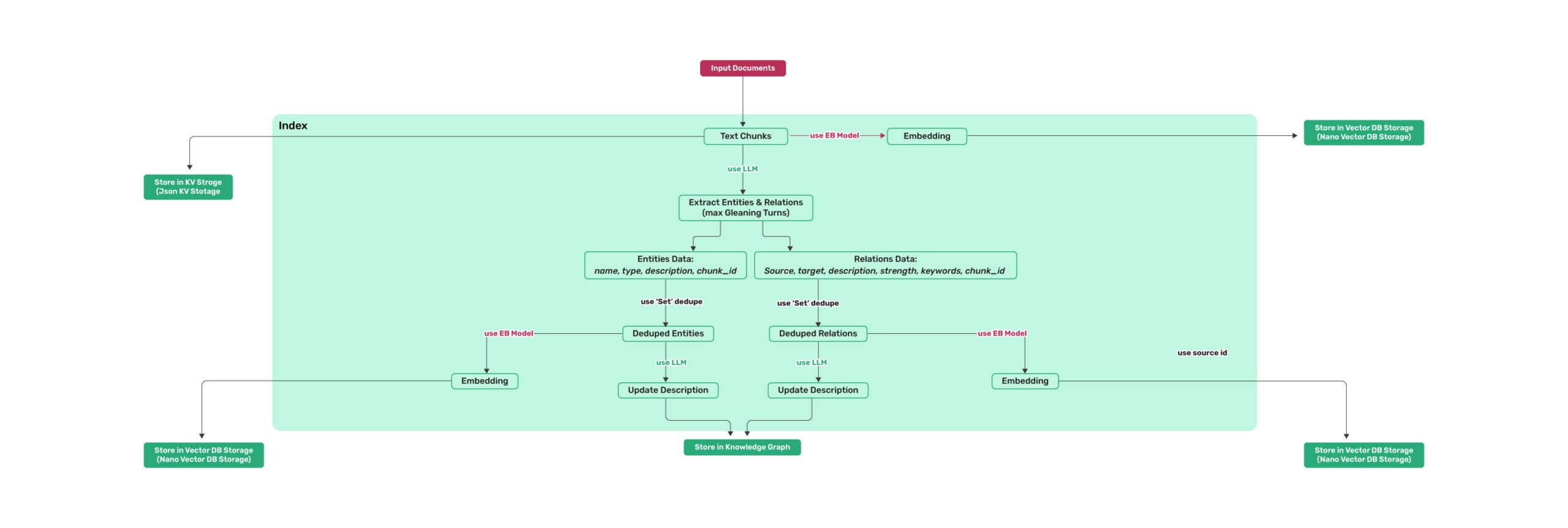
*图1:LightRAG索引流程图 - 图片来源:[Source](https://learnopencv.com/lightrag/)*
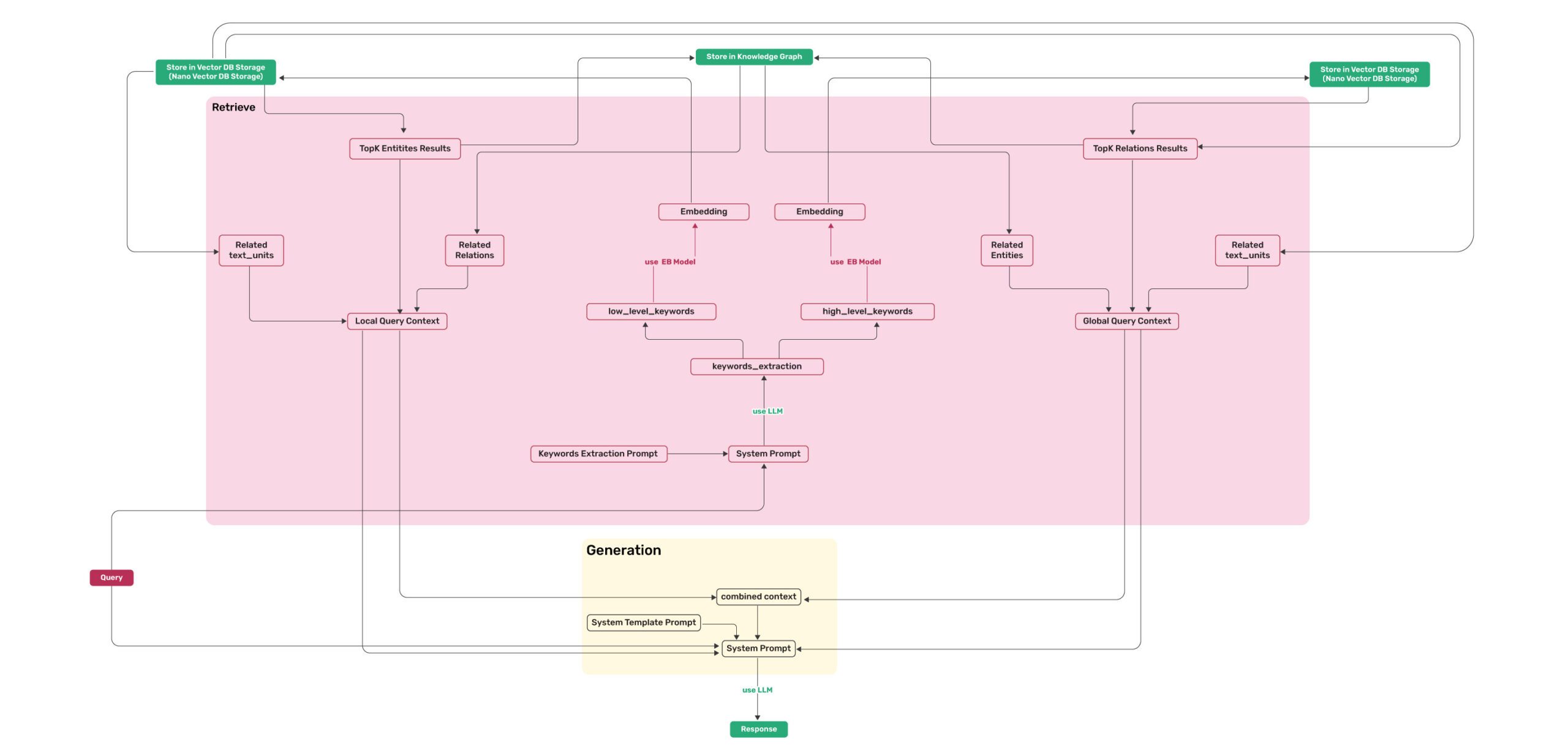
*图2:LightRAG检索和查询流程图 - 图片来源:[Source](https://learnopencv.com/lightrag/)*
## 安装
> **💡 使用 uv 进行包管理**: 本项目使用 [uv](https://docs.astral.sh/uv/) 进行快速可靠的 Python 包管理。
> 首先安装 uv: `curl -LsSf https://astral.sh/uv/install.sh | sh` (Unix/macOS) 或 `powershell -c "irm https://astral.sh/uv/install.ps1 | iex"` (Windows)
>
> **注意**:如果您愿意,也可以使用 pip,但为了获得更好的性能 and 更可靠的依赖管理,建议使用 uv。
>
> **📦 离线部署**: 对于离线或隔离环境,请参阅[离线部署指南](./docs/OfflineDeployment.md),了解预安装所有依赖项和缓存文件的说明。
### 安装LightRAG服务器
LightRAG服务器旨在提供Web UI和API支持。Web UI便于文档索引、知识图谱探索和简单的RAG查询界面。LightRAG服务器还提供兼容Ollama的接口,旨在将LightRAG模拟为Ollama聊天模型。这使得AI聊天机器人(如Open WebUI)可以轻松访问LightRAG。
* 从PyPI安装
```bash
### 使用 uv 安装 LightRAG 服务器(作为工具,推荐)
uv tool install "lightrag-hku[api]"
### 或使用 pip
# python -m venv .venv
# source .venv/bin/activate # Windows: .venv\Scripts\activate
# pip install "lightrag-hku[api]"
### 构建前端代码
cd lightrag_webui
bun install --frozen-lockfile
bun run build
cd ..
# 配置 env 文件
# 从 GitHub 仓库的根目录上下载 env.example 文件
# 或从本地检出的源代码中获取 env.example 文件
cp env.example .env # 使用你的LLM和Embedding模型访问参数更新.env文件
# 启动API-WebUI服务
lightrag-server
```
* 从源代码安装
```bash
git clone https://github.com/HKUDS/LightRAG.git
cd LightRAG
# 使用 uv (推荐)
# 注意: uv sync 会自动在 .venv/ 目录创建虚拟环境
uv sync --extra api
source .venv/bin/activate # 激活虚拟环境 (Linux/macOS)
# Windows 系统: .venv\Scripts\activate
### 或使用 pip 和虚拟环境
# python -m venv .venv
# source .venv/bin/activate # Windows: .venv\Scripts\activate
# pip install -e ".[api]"
# 构建前端代码
cd lightrag_webui
bun install --frozen-lockfile
bun run build
cd ..
# 配置 env 文件
cp env.example .env # 使用你的LLM和Embedding模型访问参数更新.env文件
# 启动API-WebUI服务
lightrag-server
```
* 使用 Docker Compose 启动 LightRAG 服务器
```bash
git clone https://github.com/HKUDS/LightRAG.git
cd LightRAG
cp env.example .env # 使用你的LLM和Embedding模型访问参数更新.env文件
# modify LLM and Embedding settings in .env
docker compose up
```
> 在此获取LightRAG docker镜像历史版本: [LightRAG Docker Images]( https://github.com/HKUDS/LightRAG/pkgs/container/lightrag)
### 使用 Setup 工具创建 .env 文件
除了手动编辑 `env.example` 之外,您还可以使用交互式向导生成配置好的 `.env`,并在需要时生成 `docker-compose.final.yml`:
```bash
make env-base # 必跑第一步:配置 LLM、Embedding、Reranker
make env-storage # 可选:配置存储后端和数据库服务
make env-server # 可选:配置服务端口、鉴权和 SSL
make env-base-rewrite # 可选:强制重建向导托管的 compose 服务块
make env-storage-rewrite # 可选:强制重建向导托管的 compose 服务块
make env-security-check # 可选:审计当前 .env 中的安全风险
```
每个目标的详细说明请参阅 [docs/InteractiveSetup.md](./docs/InteractiveSetup.md)。
这些 setup 向导只负责更新配置;如需在部署前审计当前 `.env` 的安全风险,请额外运行
`make env-security-check`。
默认情况下,重新运行 setup 会保留未变化的向导托管 compose 服务块;只有在需要按模板强制重建这些托管块时,才使用
`*-rewrite` 目标。
### 安装LightRAG Core
* 从源代码安装(推荐)
```bash
cd LightRAG
# 注意: uv sync 会自动在 .venv/ 目录创建虚拟环境
uv sync
source .venv/bin/activate # 激活虚拟环境 (Linux/macOS)
# Windows 系统: .venv\Scripts\activate
# 或: pip install -e .
```
* 从PyPI安装
```bash
uv pip install lightrag-hku
# 或: pip install lightrag-hku
```
## 快速开始
### LightRAG的LLM及配套技术栈要求
LightRAG对大型语言模型(LLM)的能力要求远高于传统RAG,因为它需要LLM执行文档中的实体关系抽取任务。配置合适的Embedding和Reranker模型对提高查询表现也至关重要。
- **LLM选型**:
- 推荐选用参数量至少为32B的LLM。
- 上下文长度至少为32KB,推荐达到64KB。
- 在文档索引阶段不建议选择推理模型。
- 在查询阶段建议选择比索引阶段能力更强的模型,以达到更高的查询效果。
- **Embedding模型**:
- 高性能的Embedding模型对RAG至关重要。
- 推荐使用主流的多语言Embedding模型,例如:BAAI/bge-m3 和 text-embedding-3-large。
- **重要提示**:在文档索引前必须确定使用的Embedding模型,且在文档查询阶段必须沿用与索引阶段相同的模型。有些存储(例如PostgreSQL)在首次建立数表的时候需要确定向量维度,因此更换Embedding模型后需要删除向量相关库表,以便让LightRAG重建新的库表。
- **Reranker模型配置**:
- 配置Reranker模型能够显著提升LightRAG的检索效果。
- 启用Reranker模型后,推荐将“mix模式”设为默认查询模式。
- 推荐选用主流的Reranker模型,例如:BAAI/bge-reranker-v2-m3 或 Jina 等服务商提供的模型。
### 使用LightRAG服务器
**有关LightRAG服务器的更多信息,请参阅[LightRAG服务器](./lightrag/api/README.md)。**
### 使用LightRAG Core
LightRAG核心功能的示例代码请参见`examples`目录。您还可参照[视频](https://www.youtube.com/watch?v=g21royNJ4fw)视频完成环境配置。若已持有OpenAI API密钥,可以通过以下命令运行演示代码:
```bash
### you should run the demo code with project folder
cd LightRAG
### provide your API-KEY for OpenAI
export OPENAI_API_KEY="sk-...your_opeai_key..."
### download the demo document of "A Christmas Carol" by Charles Dickens
curl https://raw.githubusercontent.com/gusye1234/nano-graphrag/main/tests/mock_data.txt > ./book.txt
### run the demo code
python examples/lightrag_openai_demo.py
```
如需流式响应示例的实现代码,请参阅 `examples/lightrag_openai_compatible_demo.py`。运行前,请确保根据需求修改示例代码中的LLM及嵌入模型配置。
**注意1**:在运行demo程序的时候需要注意,不同的测试程序可能使用的是不同的embedding模型,更换不同的embeding模型的时候需要把清空数据目录(`./dickens`),否则层序执行会出错。如果你想保留LLM缓存,可以在清除数据目录时保留`kv_store_llm_response_cache.json`文件。
**注意2**:官方支持的示例代码仅为 `lightrag_openai_demo.py` 和 `lightrag_openai_compatible_demo.py` 两个文件。其他示例文件均为社区贡献内容,尚未经过完整测试与优化。
## 使用LightRAG Core进行编程
> ⚠️ **如果您希望将LightRAG集成到您的项目中,建议您使用LightRAG Server提供的REST API**。LightRAG Core通常用于嵌入式应用,或供希望进行研究与评估的学者使用。
### ⚠️ 重要:初始化要求
LightRAG 在使用前需要显式初始化。 创建 LightRAG 实例后,您必须调用 await rag.initialize_storages(),否则将出现错误。
### 一个简单程序
以下Python代码片段演示了如何初始化LightRAG、插入文本并进行查询:
```python
import os
import asyncio
from lightrag import LightRAG, QueryParam
from lightrag.llm.openai import gpt_4o_mini_complete, gpt_4o_complete, openai_embed
from lightrag.utils import setup_logger
setup_logger("lightrag", level="INFO")
WORKING_DIR = "./rag_storage"
if not os.path.exists(WORKING_DIR):
os.mkdir(WORKING_DIR)
async def initialize_rag():
rag = LightRAG(
working_dir=WORKING_DIR,
embedding_func=openai_embed,
llm_model_func=gpt_4o_mini_complete,
)
# IMPORTANT: Both initialization calls are required!
await rag.initialize_storages() # Initialize storage backends
return rag
async def main():
try:
# 初始化RAG实例
rag = await initialize_rag()
await rag.ainsert("Your text")
# 执行混合检索
mode = "hybrid"
print(
await rag.aquery(
"What are the top themes in this story?",
param=QueryParam(mode=mode)
)
)
except Exception as e:
print(f"发生错误: {e}")
finally:
if rag:
await rag.finalize_storages()
if __name__ == "__main__":
asyncio.run(main())
```
重要说明:
- 运行脚本前请先导出你的OPENAI_API_KEY环境变量。
- 该程序使用LightRAG的默认存储设置,所有数据将持久化在WORKING_DIR/rag_storage目录下。
- 该示例仅展示了初始化LightRAG对象的最简单方式:注入embedding和LLM函数,并在创建LightRAG对象后初始化存储和管道状态。
### LightRAG初始化参数
以下是完整的LightRAG对象初始化参数清单:
参数
| **参数** | **类型** | **说明** | **默认值** |
| -------------- | ---------- | ----------------- | ------------- |
| **working_dir** | `str` | 存储缓存的目录 | `lightrag_cache+timestamp` |
| **workspace** | str | 用于不同 LightRAG 实例之间数据隔离的工作区名称 | |
| **kv_storage** | `str` | Storage type for documents and text chunks. Supported types: `JsonKVStorage`,`PGKVStorage`,`RedisKVStorage`,`MongoKVStorage`,`OpenSearchKVStorage` | `JsonKVStorage` |
| **vector_storage** | `str` | Storage type for embedding vectors. Supported types: `NanoVectorDBStorage`,`PGVectorStorage`,`MilvusVectorDBStorage`,`ChromaVectorDBStorage`,`FaissVectorDBStorage`,`MongoVectorDBStorage`,`QdrantVectorDBStorage`,`OpenSearchVectorDBStorage` | `NanoVectorDBStorage` |
| **graph_storage** | `str` | Storage type for graph edges and nodes. Supported types: `NetworkXStorage`,`Neo4JStorage`,`PGGraphStorage`,`AGEStorage`,`OpenSearchGraphStorage` | `NetworkXStorage` |
| **doc_status_storage** | `str` | Storage type for documents process status. Supported types: `JsonDocStatusStorage`,`PGDocStatusStorage`,`MongoDocStatusStorage`,`OpenSearchDocStatusStorage` | `JsonDocStatusStorage` |
| **chunk_token_size** | `int` | 拆分文档时每个块的最大令牌大小 | `1200` |
| **chunk_overlap_token_size** | `int` | 拆分文档时两个块之间的重叠令牌大小 | `100` |
| **tokenizer** | `Tokenizer` | 用于将文本转换为 tokens(数字)以及使用遵循 TokenizerInterface 协议的 .encode() 和 .decode() 函数将 tokens 转换回文本的函数。 如果您不指定,它将使用默认的 Tiktoken tokenizer。 | `TiktokenTokenizer` |
| **tiktoken_model_name** | `str` | 如果您使用的是默认的 Tiktoken tokenizer,那么这是要使用的特定 Tiktoken 模型的名称。如果您提供自己的 tokenizer,则忽略此设置。 | `gpt-4o-mini` |
| **entity_extract_max_gleaning** | `int` | 实体提取过程中的循环次数,附加历史消息 | `1` |
| **node_embedding_algorithm** | `str` | 节点嵌入算法(当前未使用) | `node2vec` |
| **node2vec_params** | `dict` | 节点嵌入的参数 | `{"dimensions": 1536,"num_walks": 10,"walk_length": 40,"window_size": 2,"iterations": 3,"random_seed": 3,}` |
| **embedding_func** | `EmbeddingFunc` | 从文本生成嵌入向量的函数 | `openai_embed` |
| **embedding_batch_num** | `int` | 嵌入过程的最大批量大小(每批发送多个文本) | `32` |
| **embedding_func_max_async** | `int` | 最大并发异步嵌入进程数 | `16` |
| **llm_model_func** | `callable` | LLM生成的函数 | `gpt_4o_mini_complete` |
| **llm_model_name** | `str` | 用于生成的LLM模型名称 | `meta-llama/Llama-3.2-1B-Instruct` |
| **summary_context_size** | `int` | 合并实体关系摘要时送给LLM的最大令牌数 | `10000`(由环境变量 SUMMARY_MAX_CONTEXT 设置) |
| **summary_max_tokens** | `int` | 合并实体关系描述的最大令牌数长度 | `500`(由环境变量 SUMMARY_MAX_TOKENS 设置) |
| **llm_model_max_async** | `int` | 最大并发异步LLM进程数 | `4`(默认值由环境变量MAX_ASYNC更改) |
| **llm_model_kwargs** | `dict` | LLM生成的附加参数 | |
| **vector_db_storage_cls_kwargs** | `dict` | 向量数据库的附加参数,如设置节点和关系检索的阈值 | cosine_better_than_threshold: 0.2(默认值由环境变量COSINE_THRESHOLD更改) |
| **enable_llm_cache** | `bool` | 如果为`TRUE`,将LLM结果存储在缓存中;重复的提示返回缓存的响应 | `TRUE` |
| **enable_llm_cache_for_entity_extract** | `bool` | 如果为`TRUE`,将实体提取的LLM结果存储在缓存中;适合初学者调试应用程序 | `TRUE` |
| **addon_params** | `dict` | 附加参数,例如`{"language": "Simplified Chinese", "entity_types": ["organization", "person", "location", "event"]}`:设置示例限制、输出语言和文档处理的批量大小 | language: English` |
| **embedding_cache_config** | `dict` | 问答缓存的配置。包含三个参数:`enabled`:布尔值,启用/禁用缓存查找功能。启用时,系统将在生成新答案之前检查缓存的响应。`similarity_threshold`:浮点值(0-1),相似度阈值。当新问题与缓存问题的相似度超过此阈值时,将直接返回缓存的答案而不调用LLM。`use_llm_check`:布尔值,启用/禁用LLM相似度验证。启用时,在返回缓存答案之前,将使用LLM作为二次检查来验证问题之间的相似度。 | 默认:`{"enabled": False, "similarity_threshold": 0.95, "use_llm_check": False}` |
### 查询参数
使用QueryParam控制你的查询行为:
```python
class QueryParam:
"""Configuration parameters for query execution in LightRAG."""
mode: Literal["local", "global", "hybrid", "naive", "mix", "bypass"] = "global"
"""Specifies the retrieval mode:
- "local": Focuses on context-dependent information.
- "global": Utilizes global knowledge.
- "hybrid": Combines local and global retrieval methods.
- "naive": Performs a basic search without advanced techniques.
- "mix": Integrates knowledge graph and vector retrieval.
"""
only_need_context: bool = False
"""If True, only returns the retrieved context without generating a response."""
only_need_prompt: bool = False
"""If True, only returns the generated prompt without producing a response."""
response_type: str = "Multiple Paragraphs"
"""Defines the response format. Examples: 'Multiple Paragraphs', 'Single Paragraph', 'Bullet Points'."""
stream: bool = False
"""If True, enables streaming output for real-time responses."""
top_k: int = int(os.getenv("TOP_K", "60"))
"""Number of top items to retrieve. Represents entities in 'local' mode and relationships in 'global' mode."""
chunk_top_k: int = int(os.getenv("CHUNK_TOP_K", "20"))
"""Number of text chunks to retrieve initially from vector search and keep after reranking.
If None, defaults to top_k value.
"""
max_entity_tokens: int = int(os.getenv("MAX_ENTITY_TOKENS", "6000"))
"""Maximum number of tokens allocated for entity context in unified token control system."""
max_relation_tokens: int = int(os.getenv("MAX_RELATION_TOKENS", "8000"))
"""Maximum number of tokens allocated for relationship context in unified token control system."""
max_total_tokens: int = int(os.getenv("MAX_TOTAL_TOKENS", "30000"))
"""Maximum total tokens budget for the entire query context (entities + relations + chunks + system prompt)."""
# History messages are only sent to LLM for context, not used for retrieval
conversation_history: list[dict[str, str]] = field(default_factory=list)
"""Stores past conversation history to maintain context.
Format: [{"role": "user/assistant", "content": "message"}].
"""
# Deprecated (ids filter lead to potential hallucination effects)
ids: list[str] | None = None
"""List of ids to filter the results."""
model_func: Callable[..., object] | None = None
"""Optional override for the LLM model function to use for this specific query.
If provided, this will be used instead of the global model function.
This allows using different models for different query modes.
"""
user_prompt: str | None = None
"""User-provided prompt for the query.
Addition instructions for LLM. If provided, this will be inject into the prompt template.
It's purpose is the let user customize the way LLM generate the response.
"""
enable_rerank: bool = True
"""Enable reranking for retrieved text chunks. If True but no rerank model is configured, a warning will be issued.
Default is True to enable reranking when rerank model is available.
"""
```
> top_k的默认值可以通过环境变量TOP_K更改。
### LLM and Embedding注入
LightRAG 需要利用LLM和Embeding模型来完成文档索引和知识库查询工作。在初始化LightRAG的时候需要把阶段,需要把LLM和Embedding的操作函数注入到对象中:
使用类OpenAI的API
* LightRAG还支持类OpenAI的聊天/嵌入API:
```python
import os
import numpy as np
from lightrag.utils import wrap_embedding_func_with_attrs
from lightrag.llm.openai import openai_complete_if_cache, openai_embed
async def llm_model_func(
prompt, system_prompt=None, history_messages=[], keyword_extraction=False, **kwargs
) -> str:
return await openai_complete_if_cache(
"solar-mini",
prompt,
system_prompt=system_prompt,
history_messages=history_messages,
api_key=os.getenv("UPSTAGE_API_KEY"),
base_url="https://api.upstage.ai/v1/solar",
**kwargs
)
@wrap_embedding_func_with_attrs(embedding_dim=4096, max_token_size=8192, model_name="solar-embedding-1-large-query")
async def embedding_func(texts: list[str]) -> np.ndarray:
return await openai_embed.func(
texts,
model="solar-embedding-1-large-query",
api_key=os.getenv("UPSTAGE_API_KEY"),
base_url="https://api.upstage.ai/v1/solar"
)
async def initialize_rag():
rag = LightRAG(
working_dir=WORKING_DIR,
llm_model_func=llm_model_func,
embedding_func=embedding_func # 直接传入装饰后的函数
)
await rag.initialize_storages()
return rag
```
> **关于嵌入函数封装的重要说明:**
>
> `EmbeddingFunc` 不能嵌套封装。已经被 `@wrap_embedding_func_with_attrs` 装饰过的嵌入函数(如 `openai_embed`、`ollama_embed` 等)不能再次使用 `EmbeddingFunc()` 封装。这就是为什么在创建自定义嵌入函数时,我们调用 `xxx_embed.func`(底层未封装的函数)而不是直接调用 `xxx_embed`。
使用 Hugging Face 模型
* 如果您想使用 Hugging Face 模型,只需要按如下方式设置 LightRAG:
参见 `lightrag_hf_demo.py`
```python
from functools import partial
from transformers import AutoTokenizer, AutoModel
# Pre-load tokenizer and model
tokenizer = AutoTokenizer.from_pretrained("sentence-transformers/all-MiniLM-L6-v2")
embed_model = AutoModel.from_pretrained("sentence-transformers/all-MiniLM-L6-v2")
# 使用 Hugging Face 模型初始化 LightRAG
rag = LightRAG(
working_dir=WORKING_DIR,
llm_model_func=hf_model_complete, # 使用 Hugging Face 模型进行文本生成
llm_model_name='meta-llama/Llama-3.1-8B-Instruct', # Hugging Face 的模型名称
# 使用 Hugging Face 嵌入函数
embedding_func=EmbeddingFunc(
embedding_dim=384,
max_token_size=2048,
model_name="sentence-transformers/all-MiniLM-L6-v2",
func=partial(
hf_embed.func, # 使用 .func 访问底层未封装的函数
tokenizer=tokenizer,
embed_model=embed_model
)
),
)
```
使用Ollama模型
**综述**
如果您想使用Ollama模型,您需要拉取计划使用的模型和嵌入模型,例如`nomic-embed-text`。
然后您只需要按如下方式设置LightRAG:
```python
import numpy as np
from lightrag.utils import wrap_embedding_func_with_attrs
from lightrag.llm.ollama import ollama_model_complete, ollama_embed
@wrap_embedding_func_with_attrs(embedding_dim=768, max_token_size=8192, model_name="nomic-embed-text")
async def embedding_func(texts: list[str]) -> np.ndarray:
return await ollama_embed.func(texts, embed_model="nomic-embed-text")
# Initialize LightRAG with Ollama model
rag = LightRAG(
working_dir=WORKING_DIR,
llm_model_func=ollama_model_complete, # Use Ollama model for text generation
llm_model_name='your_model_name', # Your model name
embedding_func=embedding_func, # Pass the decorated function directly
)
```
* **增加上下文大小**
为了使 LightRAG 正常工作,上下文大小至少需要 32k tokens。默认情况下,Ollama 模型的上下文大小为 8k。您可以通过以下两种方式之一来实现:
* **在 Modelfile 中增加 `num_ctx` 参数**
1. 拉取模型:
```bash
ollama pull qwen2
```
2. 显示模型文件:
```bash
ollama show --modelfile qwen2 > Modelfile
```
3. 编辑 Modelfile,添加以下行:
```bash
PARAMETER num_ctx 32768
```
4. 创建修改后的模型:
```bash
ollama create -f Modelfile qwen2m
```
* **通过 Ollama API 设置 `num_ctx`**
您可以使用 `llm_model_kwargs` 参数来配置 Ollama:
```python
import numpy as np
from lightrag.utils import wrap_embedding_func_with_attrs
from lightrag.llm.ollama import ollama_model_complete, ollama_embed
@wrap_embedding_func_with_attrs(embedding_dim=768, max_token_size=8192, model_name="nomic-embed-text")
async def embedding_func(texts: list[str]) -> np.ndarray:
return await ollama_embed.func(texts, embed_model="nomic-embed-text")
rag = LightRAG(
working_dir=WORKING_DIR,
llm_model_func=ollama_model_complete, # 使用 Ollama 模型进行文本生成
llm_model_name='your_model_name', # 您的模型名称
llm_model_kwargs={"options": {"num_ctx": 32768}},
embedding_func=embedding_func, # 直接传入装饰后的函数
)
```
> **关于嵌入函数封装的重要说明:**
>
> `EmbeddingFunc` 不能嵌套封装。已经被 `@wrap_embedding_func_with_attrs` 装饰过的嵌入函数(如 `openai_embed`、`ollama_embed` 等)不能再次使用 `EmbeddingFunc()` 封装。这就是为什么在创建自定义嵌入函数时,我们调用 `xxx_embed.func`(底层未封装的函数)而不是直接调用 `xxx_embed`。
* **低显存 GPU**
如果要在低显存 GPU 上运行此实验,您应该选择较小的模型并调整上下文窗口(增加上下文会增加内存消耗)。例如,在一块改装的 6GB 显存的挖矿 GPU 上运行此 Ollama 示例,需要在使用 `gemma2:2b` 时将上下文大小设置为 26k。它能够在 `book.txt` 中找到 197 个实体和 19 个关系。
LlamaIndex
LightRAG 支持与 LlamaIndex 集成(`llm/llama_index_impl.py`):
- 通过 LlamaIndex 与 OpenAI 和其他提供商集成
- 详细设置请参阅 [LlamaIndex 文档](https://developers.llamaindex.ai/python/framework/) 或 [示例](examples/unofficial-sample/)
**示例用法**
```python
# 使用 LlamaIndex 直接访问 OpenAI
import asyncio
from lightrag import LightRAG
from lightrag.llm.llama_index_impl import llama_index_complete_if_cache, llama_index_embed
from llama_index.embeddings.openai import OpenAIEmbedding
from llama_index.llms.openai import OpenAI
from lightrag.utils import setup_logger
# 为 LightRAG 设置日志处理器
setup_logger("lightrag", level="INFO")
async def initialize_rag():
rag = LightRAG(
working_dir="your/path",
llm_model_func=llama_index_complete_if_cache, # 与 LlamaIndex 兼容的补全函数
embedding_func=EmbeddingFunc( # 与 LlamaIndex 兼容的嵌入函数
embedding_dim=1536,
max_token_size=2048,
model_name=embed_model,
func=partial(llama_index_embed.func, embed_model=embed_model) # 使用 .func 访问未封装的原始函数
),
)
await rag.initialize_storages()
return rag
def main():
# 初始化 RAG 实例
rag = asyncio.run(initialize_rag())
with open("./book.txt", "r", encoding="utf-8") as f:
rag.insert(f.read())
# 执行朴素搜索
print(
rag.query("What are the top themes in this story?", param=QueryParam(mode="naive"))
)
# 执行本地搜索
print(
rag.query("What are the top themes in this story?", param=QueryParam(mode="local"))
)
# 执行全局搜索
print(
rag.query("What are the top themes in this story?", param=QueryParam(mode="global"))
)
# 执行混合搜索
print(
rag.query("What are the top themes in this story?", param=QueryParam(mode="hybrid"))
)
if __name__ == "__main__":
main()
```
**详细文档和示例请参阅:**
- [LlamaIndex 文档](https://developers.llamaindex.ai/python/framework/)
- [直接使用 OpenAI 示例](examples/unofficial-sample/lightrag_llamaindex_direct_demo.py)
- [LiteLLM 代理示例](examples/unofficial-sample/lightrag_llamaindex_litellm_demo.py)
- [LiteLLM 代理与 Opik 集成示例](examples/unofficial-sample/lightrag_llamaindex_litellm_opik_demo.py)
使用 Azure OpenAI 模型
如果您想使用 Azure OpenAI 模型,您只需要按如下方式设置 LightRAG:
```python
import os
import numpy as np
from lightrag.utils import wrap_embedding_func_with_attrs
from lightrag.llm.azure_openai import azure_openai_complete_if_cache, azure_openai_embed
# 配置生成模型
async def llm_model_func(
prompt, system_prompt=None, history_messages=[], keyword_extraction=False, **kwargs
) -> str:
return await azure_openai_complete_if_cache(
prompt,
system_prompt=system_prompt,
history_messages=history_messages,
api_key=os.getenv("AZURE_OPENAI_API_KEY"),
azure_endpoint=os.getenv("AZURE_OPENAI_ENDPOINT"),
api_version=os.getenv("AZURE_OPENAI_API_VERSION"),
deployment_name=os.getenv("AZURE_OPENAI_DEPLOYMENT_NAME"),
**kwargs
)
# 配置嵌入模型
@wrap_embedding_func_with_attrs(
embedding_dim=1536,
max_token_size=8192,
model_name=os.getenv("AZURE_OPENAI_EMBEDDING_MODEL")
)
async def embedding_func(texts: list[str]) -> np.ndarray:
return await azure_openai_embed.func(
texts,
api_key=os.getenv("AZURE_OPENAI_API_KEY"),
azure_endpoint=os.getenv("AZURE_OPENAI_ENDPOINT"),
api_version=os.getenv("AZURE_OPENAI_API_VERSION"),
deployment_name=os.getenv("AZURE_OPENAI_EMBEDDING_DEPLOYMENT_NAME")
)
rag = LightRAG(
working_dir=WORKING_DIR,
llm_model_func=llm_model_func,
embedding_func=embedding_func
)
```
使用 Google Gemini 模型
如果您想使用 Google Gemini 模型,您只需要按如下方式设置 LightRAG:
```python
import os
import numpy as np
from lightrag.utils import wrap_embedding_func_with_attrs
from lightrag.llm.gemini import gemini_complete, gemini_embed
# 配置生成模型
async def llm_model_func(
prompt, system_prompt=None, history_messages=[], keyword_extraction=False, **kwargs
) -> str:
return await gemini_complete(
prompt,
system_prompt=system_prompt,
history_messages=history_messages,
api_key=os.getenv("GEMINI_API_KEY"),
model="gemini-1.5-flash",
**kwargs
)
# 配置嵌入模型
@wrap_embedding_func_with_attrs(
embedding_dim=768,
max_token_size=2048,
model_name="models/text-embedding-004"
)
async def embedding_func(texts: list[str]) -> np.ndarray:
return await gemini_embed.func(
texts,
api_key=os.getenv("GEMINI_API_KEY"),
model="models/text-embedding-004"
)
rag = LightRAG(
working_dir=WORKING_DIR,
llm_model_func=llm_model_func,
llm_model_name="gemini-2.0-flash",
embedding_func=embedding_func
)
```
### Rerank 函数注入
为了提升检索质量,可以基于更有效的相关性评分模型对文档进行重新排序。`rerank.py` 文件提供了三个 Reranker 服务商的驱动函数:
* **Cohere / vLLM**: `cohere_rerank`
* **Jina AI**: `jina_rerank`
* **阿里云**: `ali_rerank`
您可以将其中一个函数注入到 LightRAG 对象的 `rerank_model_func` 属性中。这将使 LightRAG 的查询函数能够使用注入的函数对检索到的文本块进行重新排序。详细用法请参考 `examples/rerank_example.py` 文件。
### User Prompt 与 Query 的区别
使用 LightRAG 进行内容查询时,应避免将搜索过程与不相关的输出处理混合在一起,因为这会显著影响查询效果。QueryParam 中的 `user_prompt` 参数专门用于解决此问题 - 它不参与 RAG 检索阶段,而是在查询完成后指导 LLM 如何处理检索到的结果。使用方法如下:
```python
# 创建查询参数
query_param = QueryParam(
mode = "hybrid", # 其他模式:local, global, hybrid, mix, naive
user_prompt = "对于图表,使用 mermaid 格式,节点名称使用英文或拼音,显示标签使用中文",
)
# 查询并处理
response_default = rag.query(
"请为斯克鲁奇绘制人物关系图",
param=query_param
)
print(response_default)
```
### 插入
基本插入
```python
# 基本插入
rag.insert("文本")
```
批量插入
```python
# 基本批量插入:一次插入多个文本
rag.insert(["文本1", "文本2",...])
# 自定义批量大小配置的批量插入
rag = LightRAG(
...
working_dir=WORKING_DIR,
max_parallel_insert = 4
)
rag.insert(["文本1", "文本2", "文本3", ...]) # 文档将以每批 4 个的方式处理
```
`max_parallel_insert` 参数决定了文档索引管道中并发处理的文档数量。如果未指定,默认值为 **2**。我们建议将此设置保持在 **10 以下**,因为性能瓶颈通常在于大语言模型(LLM)的处理能力。
带 ID 插入
如果您想为文档提供自定义 ID,文档数量和 ID 数量必须相同。
```python
# 插入单个文本,并为其提供 ID
rag.insert("文本1", ids=["文本1的ID"])
# 插入多个文本,并为它们提供 ID
rag.insert(["文本1", "文本2",...], ids=["文本1的ID", "文本2的ID"])
```
使用管道插入
多文件类型支持插入
引用功能
### 存储方案
LightRAG 使用 4 种类型的存储来满足不同用途:
* KV_STORAGE:LLM 响应缓存、文本块、文档信息
* VECTOR_STORAGE:实体向量、关系向量、文本块向量
* GRAPH_STORAGE:实体关系图
* DOC_STATUS_STORAGE:文档索引状态
每种存储类型都有多种实现:
* KV_STORAGE 支持的实现:
```
JsonKVStorage JsonFile(默认)
PGKVStorage Postgres
RedisKVStorage Redis
MongoKVStorage MongoDB
OpenSearchKVStorage OpenSearch
```
* GRAPH_STORAGE 支持的实现:
```
NetworkXStorage NetworkX(默认)
Neo4JStorage Neo4J
PGGraphStorage PostgreSQL with AGE 插件
MemgraphStorage Memgraph
OpenSearchGraphStorage OpenSearch
```
> 测试表明,Neo4J 在生产环境中的性能优于带有 AGE 插件的 PostgreSQL。
* VECTOR_STORAGE 支持的实现:
```
NanoVectorDBStorage NanoVector(默认)
PGVectorStorage Postgres
MilvusVectorDBStorage Milvus
FaissVectorDBStorage Faiss
QdrantVectorDBStorage Qdrant
MongoVectorDBStorage MongoDB
OpenSearchVectorDBStorage OpenSearch
```
* DOC_STATUS_STORAGE 支持的实现:
```
JsonDocStatusStorage JsonFile(默认)
PGDocStatusStorage Postgres
MongoDocStatusStorage MongoDB
OpenSearchDocStatusStorage OpenSearch
```
各存储类型的示例连接配置可在仓库中的 `env.example` 文件里找到。连接字符串中的数据库实例需要您预先在数据库服务器上创建。LightRAG 仅负责在数据库实例中创建表,不负责创建数据库实例本身。如果使用 Redis 作为存储,请记住配置 Redis 的自动数据持久化规则,否则 Redis 服务重启后数据将会丢失。如果使用 PostgreSQL,建议使用 16.6 或更高版本。
使用 Neo4J 存储
* 对于生产级场景,您很可能需要使用企业级解决方案
* 用于知识图谱存储。推荐在 Docker 中运行 Neo4J 进行无缝本地测试。
* 参见:https://hub.docker.com/_/neo4j
```python
export NEO4J_URI="neo4j://localhost:7687"
export NEO4J_USERNAME="neo4j"
export NEO4J_PASSWORD="password"
export NEO4J_DATABASE="neo4j" #<----------- 使用 neo4j 社区版 docker 镜像时数据库实例必须为neo4j
# 为 LightRAG 设置日志
setup_logger("lightrag", level="INFO")
# 启动项目时,请确保通过指定 graph_storage="Neo4JStorage" 来覆盖默认的 KG: NetworkX。
# 使用 Neo4J 实现初始化 LightRAG。
async def initialize_rag():
rag = LightRAG(
working_dir=WORKING_DIR,
llm_model_func=gpt_4o_mini_complete, # 使用 gpt_4o_mini_complete LLM 模型
graph_storage="Neo4JStorage", #<-----------覆盖 KG 默认值
)
# 初始化数据库连接
await rag.initialize_storages()
# 初始化文档处理的管道状态
return rag
```
参见 test_neo4j.py 获取可运行的示例。
使用 PostgreSQL 存储
对于生产级场景,您很可能需要使用企业级解决方案。PostgreSQL 可以为您提供一站式解决方案,作为 KV 存储、VectorDB(pgvector)和 GraphDB(apache AGE)。支持 PostgreSQL 16.6 或更高版本。
* PostgreSQL 很轻量,包含所有必要插件的完整二进制发行版可以压缩到 40MB:参考 [Windows Release](https://github.com/ShanGor/apache-age-windows/releases/tag/PG17%2Fv1.5.0-rc0),Linux/Mac 也很容易安装。
* 如果您喜欢 docker,建议初学者使用此镜像以避免出现问题(默认用户密码:rag/rag):https://hub.docker.com/r/gzdaniel/postgres-for-rag
* 如何开始?参考:[examples/lightrag_gemini_postgres_demo.py](https://github.com/HKUDS/LightRAG/blob/main/examples/lightrag_gemini_postgres_demo.py)
* 对于高性能图数据库需求,推荐使用 Neo4j,因为 Apache AGE 的性能不够理想。
使用 Faiss 存储
在使用 Faiss 向量数据库之前,您必须手动安装 `faiss-cpu` 或 `faiss-gpu`。
- 安装所需依赖:
```
pip install faiss-cpu
```
如果您有 GPU 支持,也可以安装 `faiss-gpu`。
- 这里我们使用 `sentence-transformers`,但您也可以使用 `3072` 维度的 `OpenAIEmbedding` 模型。
```python
async def embedding_func(texts: list[str]) -> np.ndarray:
model = SentenceTransformer('all-MiniLM-L6-v2')
embeddings = model.encode(texts, convert_to_numpy=True)
return embeddings
# 使用 LLM 模型函数和嵌入函数初始化 LightRAG
rag = LightRAG(
working_dir=WORKING_DIR,
llm_model_func=llm_model_func,
embedding_func=EmbeddingFunc(
embedding_dim=384,
max_token_size=2048,
model_name="all-MiniLM-L6-v2",
func=embedding_func,
),
vector_storage="FaissVectorDBStorage",
vector_db_storage_cls_kwargs={
"cosine_better_than_threshold": 0.3 # 您期望的阈值
}
)
```
使用 Memgraph 存储
* Memgraph 是一个高性能的内存图数据库,兼容 Neo4j Bolt 协议。
* 您可以使用 Docker 在本地运行 Memgraph 进行简单测试:
* 参见:https://memgraph.com/download
```python
export MEMGRAPH_URI="bolt://localhost:7687"
# 为 LightRAG 设置日志
setup_logger("lightrag", level="INFO")
# 启动项目时,通过指定 kg="MemgraphStorage" 来覆盖默认的 KG: NetworkX。
# 注意:默认设置使用 NetworkX
# 使用 Memgraph 实现初始化 LightRAG。
async def initialize_rag():
rag = LightRAG(
working_dir=WORKING_DIR,
llm_model_func=gpt_4o_mini_complete, # 使用 gpt_4o_mini_complete LLM 模型
graph_storage="MemgraphStorage", #<-----------覆盖 KG 默认值
)
# 初始化数据库连接
await rag.initialize_storages()
# 初始化文档处理的管道状态
return rag
```
使用 Milvus 作为向量存储
Milvus 是一个高性能、可扩展的向量数据库,适用于生产环境的向量存储。LightRAG 提供了三种配置 Milvus 的方式,并支持可配置的索引类型,以优化性能和内存使用。
### 支持的索引类型
- `AUTOINDEX`(默认):Milvus 自动选择最佳索引
- `HNSW`:层次可导航小世界图,适用于高召回率
- `HNSW_SQ`:使用标量量化技术的 HNSW,可节省内存(需 Milvus 2.6.8+)
- `HNSW_PQ`、`HNSW_PRQ`:使用乘积量化/残差乘积量化技术的 HNSW
- `IVF_FLAT`、`IVF_SQ8`、`IVF_PQ`:倒排文件族索引
- `DISKANN`:基于磁盘的近似最近邻索引
- `SCANN`:可扩展的最近邻索引
### 支持的度量类型
`COSINE` (默认), `L2`, `IP`
---
### 配置方法1 — 环境变量 (`.env` file)
适用于: **LightRAG Server 部署和 Docker/k8s 设置**.
```bash
# Connection
MILVUS_URI=http://localhost:19530
MILVUS_DB_NAME=lightrag
# MILVUS_USER=root
# MILVUS_PASSWORD=your_password
# MILVUS_TOKEN=your_token
# Storage selection
LIGHTRAG_VECTOR_STORAGE=MilvusVectorDBStorage
# Index configuration (all optional — sensible defaults apply)
MILVUS_INDEX_TYPE=HNSW # Default: AUTOINDEX
MILVUS_METRIC_TYPE=COSINE # Default: COSINE
MILVUS_HNSW_M=16 # Default: 16, range [2-2048]
MILVUS_HNSW_EF_CONSTRUCTION=360 # Default: 360
MILVUS_HNSW_EF=200 # Default: 200
# HNSW_SQ options (requires Milvus 2.6.8+)
# MILVUS_INDEX_TYPE=HNSW_SQ
# MILVUS_HNSW_SQ_TYPE=SQ8 # SQ4U, SQ6, SQ8, BF16, FP16
# MILVUS_HNSW_SQ_REFINE=false # Enable refinement
# MILVUS_HNSW_SQ_REFINE_TYPE=FP32 # Refinement precision
# MILVUS_HNSW_SQ_REFINE_K=10 # Refinement expansion factor
# IVF options
# MILVUS_IVF_NLIST=1024
# MILVUS_IVF_NPROBE=16
```
然后再Python代码中:
```python
from lightrag import LightRAG
async def initialize_rag():
rag = LightRAG(
working_dir="./rag_storage",
llm_model_func=...,
embedding_func=...,
vector_storage="MilvusVectorDBStorage",
)
await rag.initialize_storages()
return rag
```
### 配置方案2 — `vector_db_storage_cls_kwargs` (Python SDK)
适用于: **Python SDK / framework integration** (使用代码进行配置)
```python
from lightrag import LightRAG
async def initialize_rag():
rag = LightRAG(
working_dir="./rag_storage",
llm_model_func=...,
embedding_func=...,
vector_storage="MilvusVectorDBStorage",
vector_db_storage_cls_kwargs={
"milvus_uri": "http://localhost:19530",
"milvus_db_name": "lightrag",
"index_type": "HNSW",
"metric_type": "COSINE",
"hnsw_m": 16,
"hnsw_ef_construction": 360,
"hnsw_ef": 200,
"cosine_better_than_threshold": 0.2,
},
)
await rag.initialize_storages()
return rag
```
### 配置方案3 — `config.ini` (遗留方案)
仅适用于连接参数配资;索引方式配资依然需要使用环境变量或kwargs.
```ini
[milvus]
uri = http://localhost:19530
db_name = lightrag
# user = root
# password = your_password
# token = your_token
```
### 配置优先级
| 配置 | 1st (highest) | 2nd | 3rd (lowest) |
|---|---|---|---|
| 连接方式 (`uri`, …) | `vector_db_storage_cls_kwargs` | Environment variables | `config.ini` |
| 索引方法 (`index_type`, …) | `vector_db_storage_cls_kwargs` | Environment variables | defaults |
### HNSW_SQ 压缩的权衡
| SQ Type | Compression | Precision | Notes |
|---|---|---|---|
| `SQ4U` | ~8× | Lower | Best memory savings |
| `SQ6` | ~5.3× | Balanced | Good trade-off |
| `SQ8` | ~4× | Good | **Recommended** |
| `BF16` / `FP16` | ~2× | High | Near-lossless |
**版本要求:**
- HNSW_SQ 缩影方式要求 **Milvus 2.6.8 或更高版本**
- LightRAG 将自动检查服务的版本并在不符合要求的时候抛出错误
- 其它缩影方式要求Milvus 2.0+
**向后兼容性:**
- 现有数据集合不受影响;索引配置仅适用于新创建的集合
- 有关完整的配置选项,请参阅 env.example 和 docs/MilvusConfigurationGuide.md。
完整的配资选项请参考 `env.example` 和 `docs/MilvusConfigurationGuide.md`.
使用 MongoDB 存储
MongoDB 为 LightRAG 提供了一站式存储解决方案。MongoDB 提供原生的 KV 存储和向量存储。LightRAG 使用 MongoDB 集合来实现简单的图存储。`MongoVectorDBStorage` 需要目标 MongoDB 部署具备 Atlas Search / Vector Search 能力,例如 MongoDB Atlas 或 Atlas local。交互式 setup 向导内置的本地 Docker MongoDB 服务是 MongoDB Community Edition,因此它可以用于 KV / 图 / 文档状态存储,但不能作为 `MongoVectorDBStorage` 的后端。
使用 Redis 存储
LightRAG 支持使用 Redis 作为 KV 存储。使用 Redis 存储时,需要注意持久化配置和内存使用配置。以下是推荐的 Redis 配置:
```
save 900 1
save 300 10
save 60 1000
stop-writes-on-bgsave-error yes
maxmemory 4gb
maxmemory-policy noeviction
maxclients 500
```
当交互式 setup 管理本地 Redis 容器时,它会在 `./data/config/redis.conf` 生成一个可直接修改的配置文件,并将其挂载到容器内。后续重新运行 setup 时会保留该文件,避免覆盖用户的手工调整。
使用 OpenSearch 存储
OpenSearch 为 LightRAG 的全部四种存储类型(KV、向量、图、文档状态)提供了统一的存储解决方案。它提供原生 k-NN 向量搜索、全文搜索和水平扩展能力,且无云服务限制。
* **环境要求**:OpenSearch 3.x 或更高版本,需启用 k-NN 插件。
使用 Docker 安装 (不含插件):
```bash
docker run -d -p 9200:9200 -e "discovery.type=single-node" \
-e "OPENSEARCH_INITIAL_ADMIN_PASSWORD=" \
opensearchproject/opensearch:latest
```
使用 Docker Compose 安装 (推荐,含插件):
```bash
curl -O https://raw.githubusercontent.com/opensearch-project/opensearch-build/main/docker/release/dockercomposefiles/docker-compose-3.x.yml
# 启动 OpenSearch 集群
OPENSEARCH_INITIAL_ADMIN_PASSWORD= docker-compose -f docker-compose-3.x.yml up -d
```
* **配置**:设置环境变量(完整列表请参见 `env.example`):
```bash
export OPENSEARCH_HOSTS=localhost:9200
export OPENSEARCH_USER=admin
export OPENSEARCH_PASSWORD=
export OPENSEARCH_USE_SSL=true
export OPENSEARCH_VERIFY_CERTS=false
```
* **使用方式**:
```python
rag = LightRAG(
working_dir=WORKING_DIR,
llm_model_func=your_llm_func,
embedding_func=your_embed_func,
kv_storage="OpenSearchKVStorage",
doc_status_storage="OpenSearchDocStatusStorage",
graph_storage="OpenSearchGraphStorage",
vector_storage="OpenSearchVectorDBStorage",
)
```
* **图遍历**:当 OpenSearch SQL 插件支持 PPL 时,图查询会使用 `graphlookup` 命令进行服务端 BFS 遍历以获得最佳性能。否则,将回退到客户端批量 BFS。此功能在启动时自动检测,也可通过 `OPENSEARCH_USE_PPL_GRAPHLOOKUP=true|false` 强制设置。
* **集成测试**:针对实际运行的 OpenSearch 集群进行集成测试:
1. 使用 Docker Compose 启动 OpenSearch(下载 [`docker-compose-3.x.yml`](https://raw.githubusercontent.com/opensearch-project/opensearch-build/main/docker/release/dockercomposefiles/docker-compose-3.x.yml)):
```bash
OPENSEARCH_INITIAL_ADMIN_PASSWORD= docker-compose -f docker-compose-3.x.yml up -d
```
2. 验证集群是否正常运行:
```bash
curl -sk -u admin: https://localhost:9200
curl -sk -u admin: https://localhost:9200/_cat/plugins?v
```
3. 运行单元测试(无需 OpenSearch 实例,使用 mock):
```bash
python -m pytest tests/test_opensearch_storage.py -v
```
4. 使用实际集群以OpenSearch作为存储的演示:
```bash
export OPENSEARCH_HOSTS=localhost:9200
export OPENSEARCH_USER=admin
export OPENSEARCH_PASSWORD=
export OPENSEARCH_USE_SSL=true
export OPENSEARCH_VERIFY_CERTS=false
python examples/opensearch_storage_demo.py
```
5. 运行完整的 OpenAI + OpenSearch 示例(需要 `OPENAI_API_KEY`):
```bash
export OPENAI_API_KEY=your-api-key
python examples/lightrag_openai_opensearch_graph_demo.py
```
6. 通过 LightRAG WebUI 或独立 HTML 文件可视化知识图谱:
启动 LightRAG 服务器之前,需要[构建前端组建](https://github.com/HKUDS/LightRAG/blob/main/lightrag/api/README.md).
```bash
# 带上 OpenSearch 存储的配置,启动 LightRAG 服务器
LIGHTRAG_KV_STORAGE=OpenSearchKVStorage \
LIGHTRAG_DOC_STATUS_STORAGE=OpenSearchDocStatusStorage \
LIGHTRAG_GRAPH_STORAGE=OpenSearchGraphStorage \
LIGHTRAG_VECTOR_STORAGE=OpenSearchVectorDBStorage \
LLM_BINDING=openai \
EMBEDDING_BINDING=openai \
EMBEDDING_MODEL=text-embedding-3-large \
EMBEDDING_DIM=3072 \
OPENAI_API_KEY=your-api-key \
lightrag-server
# 执行该脚本读取 OpenSearch 存储的数据,生成知识图谱
python examples/graph_visual_with_opensearch.py
# 打开 http://localhost:9621/webui/ -> 知识图谱标签
# 或执行该脚本生成独立 HTML 文件
python examples/graph_visual_with_opensearch.py --html
```
### LightRAG 实例之间的数据隔离
`workspace` 参数确保不同 LightRAG 实例之间的数据隔离。一旦初始化,`workspace` 是不可变的,无法更改。以下是不同类型存储实现工作区的方式:
- **对于基于本地文件的数据库,通过工作区子目录实现数据隔离**:`JsonKVStorage`、`JsonDocStatusStorage`、`NetworkXStorage`、`NanoVectorDBStorage`、`FaissVectorDBStorage`。
- **对于以集合方式存储数据的数据库,通过在集合名称前添加工作区前缀来实现**:`RedisKVStorage`、`RedisDocStatusStorage`、`MilvusVectorDBStorage`、`MongoKVStorage`、`MongoDocStatusStorage`、`MongoVectorDBStorage`、`MongoGraphStorage`、`PGGraphStorage`。
- **对于 Qdrant 向量数据库,通过基于 payload 的分区实现数据隔离(Qdrant 推荐的多租户方法)**:`QdrantVectorDBStorage` 使用带有 payload 过滤的共享集合,实现无限的工作区可扩展性。
- **对于关系型数据库,通过在表中添加 `workspace` 字段实现逻辑数据分离**:`PGKVStorage`、`PGVectorStorage`、`PGDocStatusStorage`。
- **对于 Neo4j 图数据库,通过标签实现逻辑数据隔离**:`Neo4JStorage`
- **对于 OpenSearch,通过索引名称前缀实现数据隔离**:`OpenSearchKVStorage`、`OpenSearchDocStatusStorage`、`OpenSearchGraphStorage`、`OpenSearchVectorDBStorage`
为了保持与旧数据的兼容性,当未配置工作区时,PostgreSQL 非图存储的默认工作区为 `default`,PostgreSQL AGE 图存储的默认工作区为 null,Neo4j 图存储的默认工作区为 `base`。对于所有外部存储,系统提供专用的工作区环境变量来覆盖通用的 `WORKSPACE` 环境变量配置。这些存储特定的工作区环境变量包括:`REDIS_WORKSPACE`、`MILVUS_WORKSPACE`、`QDRANT_WORKSPACE`、`MONGODB_WORKSPACE`、`POSTGRES_WORKSPACE`、`NEO4J_WORKSPACE`、`OPENSEARCH_WORKSPACE`。
**使用示例:**
有关在单个应用程序中管理多个隔离知识库(例如,将"书籍"内容与"人力资源政策"分开)的实际演示,请参阅 [Workspace Demo](examples/lightrag_gemini_workspace_demo.py)。
### AGENTS.md -- 指导编码代理
AGENTS.md 是一种简单、开放的格式,用于指导编码代理(https://agents.md/)。它是一个专门的、可预测的地方,用于提供上下文和指令,帮助 AI 编码代理在 LightRAG 项目上工作。不同的 AI 编码器不应单独维护各自的指导文件。如果任何 AI 编码器无法自动识别 AGENTS.md,可以使用符号链接作为解决方案。建立符号链接后,可以通过配置本地的 `.gitignore_global` 来防止它们被提交到 Git 仓库。
## 编辑实体和关系
LightRAG 现在支持全面的知识图谱管理功能,允许您在知识图谱中创建、编辑和删除实体和关系。
创建实体和关系
```python
# 创建新实体
entity = rag.create_entity("Google", {
"description": "Google 是一家专注于互联网相关服务和产品的跨国科技公司。",
"entity_type": "company"
})
# 创建另一个实体
product = rag.create_entity("Gmail", {
"description": "Gmail 是 Google 开发的电子邮件服务。",
"entity_type": "product"
})
# 创建实体之间的关系
relation = rag.create_relation("Google", "Gmail", {
"description": "Google 开发和运营 Gmail。",
"keywords": "develops operates service",
"weight": 2.0
})
```
手动修改实体与关系
```python
# Edit an existing entity
updated_entity = rag.edit_entity("Google", {
"description": "Google is a subsidiary of Alphabet Inc., founded in 1998.",
"entity_type": "tech_company"
})
# Rename an entity (with all its relationships properly migrated)
renamed_entity = rag.edit_entity("Gmail", {
"entity_name": "Google Mail",
"description": "Google Mail (formerly Gmail) is an email service."
})
# Edit a relation between entities
updated_relation = rag.edit_relation("Google", "Google Mail", {
"description": "Google created and maintains Google Mail service.",
"keywords": "creates maintains email service",
"weight": 3.0
})
```
所有操作均提供同步和异步两个版本。异步版本带有 "a" 前缀(例如:`acreate_entity`、`aedit_relation`)。
插入自定义知识图谱
```python
custom_kg = {
"chunks": [
{
"content": "Alice and Bob are collaborating on quantum computing research.",
"source_id": "doc-1",
"file_path": "test_file",
}
],
"entities": [
{
"entity_name": "Alice",
"entity_type": "person",
"description": "Alice is a researcher specializing in quantum physics.",
"source_id": "doc-1",
"file_path": "test_file"
},
{
"entity_name": "Bob",
"entity_type": "person",
"description": "Bob is a mathematician.",
"source_id": "doc-1",
"file_path": "test_file"
},
{
"entity_name": "Quantum Computing",
"entity_type": "technology",
"description": "Quantum computing utilizes quantum mechanical phenomena for computation.",
"source_id": "doc-1",
"file_path": "test_file"
}
],
"relationships": [
{
"src_id": "Alice",
"tgt_id": "Bob",
"description": "Alice and Bob are research partners.",
"keywords": "collaboration research",
"weight": 1.0,
"source_id": "doc-1",
"file_path": "test_file"
},
{
"src_id": "Alice",
"tgt_id": "Quantum Computing",
"description": "Alice conducts research on quantum computing.",
"keywords": "research expertise",
"weight": 1.0,
"source_id": "doc-1",
"file_path": "test_file"
},
{
"src_id": "Bob",
"tgt_id": "Quantum Computing",
"description": "Bob researches quantum computing.",
"keywords": "research application",
"weight": 1.0,
"source_id": "doc-1",
"file_path": "test_file"
}
]
}
rag.insert_custom_kg(custom_kg)
```
其它实体与关系操作
- **create_entity**:创建具有指定属性的新实体
- **edit_entity**:更新现有实体的属性或重命名它
- **create_relation**:在现有实体之间创建新关系
- **edit_relation**:更新现有关系的属性
这些操作在图数据库和向量数据库组件之间保持数据一致性,确保您的知识图谱保持连贯。
## 删除功能
LightRAG 提供了全面的删除能力,允许您删除文档、实体和关系。
删除实体
您可以通过实体名称删除实体及其所有关联关系:
```python
# 删除实体及其所有关系(同步版本)
rag.delete_by_entity("Google")
# 异步版本
await rag.adelete_by_entity("Google")
```
删除实体时:
- 从知识图谱中移除该实体节点
- 删除所有关联的关系
- 从向量数据库中移除相关的嵌入向量
- 保持知识图谱的完整性
删除关系
您可以删除两个特定实体之间的关系:
```python
# 删除两个实体之间的关系(同步版本)
rag.delete_by_relation("Google", "Gmail")
# 异步版本
await rag.adelete_by_relation("Google", "Gmail")
```
删除关系时:
- 移除指定的关系边
- 从向量数据库中删除该关系的嵌入向量
- 保留实体节点及其它关系
通过文档 ID 删除
您可以通过文档 ID 删除整个文档及其所有相关的知识:
```python
# 通过文档 ID 删除(异步版本)
await rag.adelete_by_doc_id("doc-12345")
```
通过文档 ID 删除时的优化处理:
- **智能清理**:自动识别并删除仅属于该文档的实体和关系
- **保留共享知识**:如果实体或关系在其他文档中也存在,则会保留并重新构建其描述
- **缓存优化**:清理相关的 LLM 缓存以减少存储开销
- **增量重建**:从剩余文档中重新构建受影响的实体和关系描述
删除过程包括:
1. 删除与该文档相关的所有文本块
2. 识别并删除仅属于该文档的实体和关系
3. 重新构建在其他文档中仍存在的实体和关系
4. 更新所有相关的向量索引
5. 清理文档状态记录
注意:由于涉及复杂的知识图谱重构过程,通过文档 ID 删除是一个异步操作。
**重要提醒:**
1. **不可逆操作**:所有删除操作都是不可逆的,请谨慎使用
2. **性能考虑**:删除大量数据可能需要一些时间,特别是通过文档 ID 删除
3. **数据一致性**:删除操作会自动维护知识图谱与向量数据库之间的一致性
4. **备份建议**:在执行重要删除操作前,请考虑备份数据
**批量删除建议:**
- 对于批量删除操作,建议使用异步方法以获得更好的性能
- 对于大规模删除,建议分批处理以避免系统负载过高
## 实体合并
合并实体及其关系
LightRAG 现在支持将多个实体合并为单个实体,并自动处理所有关系:
```python
# 基础实体合并
rag.merge_entities(
source_entities=["Artificial Intelligence", "AI", "Machine Intelligence"],
target_entity="AI Technology"
)
```
使用自定义合并策略:
```python
# 为不同字段定义自定义合并策略
rag.merge_entities(
source_entities=["John Smith", "Dr. Smith", "J. Smith"],
target_entity="John Smith",
merge_strategy={
"description": "concatenate", # 合并所有描述
"entity_type": "keep_first", # 保留第一个实体的类型
"source_id": "join_unique" # 合并所有唯一的源 ID
}
)
```
使用自定义目标实体数据:
```python
# 为合并后的实体指定精确值
rag.merge_entities(
source_entities=["New York", "NYC", "Big Apple"],
target_entity="New York City",
target_entity_data={
"entity_type": "LOCATION",
"description": "New York City is the most populous city in the United States.",
}
)
```
结合上述两种方式的高级用法:
```python
# 合并公司实体,同时使用策略和自定义数据
rag.merge_entities(
source_entities=["Microsoft Corp", "Microsoft Corporation", "MSFT"],
target_entity="Microsoft",
merge_strategy={
"description": "concatenate", # 合并所有描述
"source_id": "join_unique" # 合并源 ID
},
target_entity_data={
"entity_type": "ORGANIZATION",
}
)
```
合并实体时:
* 所有来自源实体的关系都会重定向到目标实体
* 重复的关系会被智能合并
* 防止出现自我指向的关系(自环)
* 合并完成后源实体会被移除
* 关系权重和属性会被保留
## 多模态文档处理(RAG-Anything 集成)
LightRAG 现已与 [RAG-Anything](https://github.com/HKUDS/RAG-Anything) 无缝集成,这是一个专门为 LightRAG 构建的**全能多模态文档处理 RAG 系统**。RAG-Anything 能够实现先进的解析和检索增强生成(RAG)能力,允许您无缝处理多模态文档,并从各种文档格式中提取结构化内容——包括文本、图像、表格和公式——以集成到您的 RAG 流程中。
**核心特性:**
- **端到端多模态流程**:从文档摄取解析到智能多模态问答的完整工作流程
- **通用文档支持**:无缝处理 PDF、Office 文档(DOC/DOCX/PPT/PPTX/XLS/XLSX)、图像及多种文件格式
- **专业内容分析**:针对图像、表格、数学公式及异构内容类型的专用处理器
- **多模态知识图谱**:自动实体提取和跨模态关系发现,增强理解力
- **混合智能检索**:跨越文本和多模态内容的高级搜索能力,具备上下文理解
**快速开始:**
1. 安装 RAG-Anything:
```bash
pip install raganything
```
2. 处理多模态文档:
RAGAnything 使用示例
```python
import asyncio
from raganything import RAGAnything
from lightrag import LightRAG
from lightrag.llm.openai import openai_complete_if_cache, openai_embed
from lightrag.utils import EmbeddingFunc
import os
async def load_existing_lightrag():
# 首先,创建或加载一个现有的 LightRAG 实例
lightrag_working_dir = "./existing_lightrag_storage"
# 检查先前的 LightRAG 实例是否存在
if os.path.exists(lightrag_working_dir) and os.listdir(lightrag_working_dir):
print("✅ Found existing LightRAG instance, loading...")
else:
print("❌ No existing LightRAG instance found, will create new one")
from functools import partial
# 使用您的配置创建/加载 LightRAG 实例
lightrag_instance = LightRAG(
working_dir=lightrag_working_dir,
llm_model_func=lambda prompt, system_prompt=None, history_messages=[], **kwargs: openai_complete_if_cache(
"gpt-4o-mini",
prompt,
system_prompt=system_prompt,
history_messages=history_messages,
api_key="your-api-key",
**kwargs,
),
embedding_func=EmbeddingFunc(
embedding_dim=3072,
max_token_size=8192,
model="text-embedding-3-large",
func=partial(
openai_embed.func, # 使用 .func 访问未封装的原始函数
model="text-embedding-3-large",
api_key=api_key,
base_url=base_url,
),
)
)
# 初始化存储(这将加载现有数据,如果有的话)
await lightrag_instance.initialize_storages()
# 现在使用现有的 LightRAG 实例初始化 RAGAnything
rag = RAGAnything(
lightrag=lightrag_instance, # 传入现有的 LightRAG 实例
# 仅在多模态处理时需要视觉模型
vision_model_func=lambda prompt, system_prompt=None, history_messages=[], image_data=None, **kwargs: openai_complete_if_cache(
"gpt-4o",
"",
system_prompt=None,
history_messages=[],
messages=[
{"role": "system", "content": system_prompt} if system_prompt else None,
{"role": "user", "content": [
{"type": "text", "text": prompt},
{"type": "image_url", "image_url": {"url": f"data:image/jpeg;base64,{image_data}"}}
]} if image_data else {"role": "user", "content": prompt}
],
api_key="your-api-key",
**kwargs,
) if image_data else openai_complete_if_cache(
"gpt-4o-mini",
prompt,
system_prompt=system_prompt,
history_messages=history_messages,
api_key="your-api-key",
**kwargs,
)
# 注意:working_dir, llm_model_func, embedding_func 等都继承自 lightrag_instance
)
# 查询现有的知识库
result = await rag.query_with_multimodal(
"What data has been processed in this LightRAG instance?",
mode="hybrid"
)
print("Query result:", result)
# 向现有的 LightRAG 实例添加新的多模态文档
await rag.process_document_complete(
file_path="path/to/new/multimodal_document.pdf",
output_dir="./output"
)
if __name__ == "__main__":
asyncio.run(load_existing_lightrag())
```
有关详细文档和高级用法,请参考 [RAG-Anything 仓库](https://github.com/HKUDS/RAG-Anything)。
## Token 使用量跟踪
概览与用法
LightRAG 提供了一个 TokenTracker 工具,用于监控和管理大语言模型的 token 消耗情况。此功能对于控制 API 成本和优化性能非常有用。
### 用法
```python
from lightrag.utils import TokenTracker
# 创建 TokenTracker 实例
token_tracker = TokenTracker()
# 方法 1:使用上下文管理器(推荐)
# 适用于需要自动跟踪 token 使用量的场景
with token_tracker:
result1 = await llm_model_func("your question 1")
result2 = await llm_model_func("your question 2")
# 方法 2:手动添加 token 使用记录
# 适用于需要更精细控制 token 统计的场景
token_tracker.reset()
rag.insert()
rag.query("your question 1", param=QueryParam(mode="naive"))
rag.query("your question 2", param=QueryParam(mode="mix"))
# 显示总 token 使用量(包括插入和查询操作)
print("Token usage:", token_tracker.get_usage())
```
### 使用技巧
- 在长会话或批量操作中使用上下文管理器,自动跟踪所有 token 消耗
- 对于需要分段统计的场景,使用手动模式并在适当时候调用 reset()
- 定期检查 token 使用量有助于及早发现异常消耗
- 在开发和测试过程中积极使用此功能,以优化生产成本
### 实践案例
您可以参考以下示例来实施 token 跟踪:
- `examples/lightrag_gemini_track_token_demo.py`:使用 Google Gemini 模型的 token 跟踪示例
- `examples/lightrag_siliconcloud_track_token_demo.py`:使用 SiliconCloud 模型的 token 跟踪示例
这些示例展示了如何在不同模型和场景下有效地使用 TokenTracker 功能。
## 数据导出功能
### 概览
LightRAG 允许您以各种格式导出知识图谱数据,用于分析、共享和备份。系统支持导出实体、关系及关系数据。
### 导出函数
基础用法
```python
# 基础 CSV 导出(默认格式)
rag.export_data("knowledge_graph.csv")
# 指定任意格式
rag.export_data("output.xlsx", file_format="excel")
```
支持的不同文件格式
```python
# 以 CSV 格式导出数据
rag.export_data("graph_data.csv", file_format="csv")
# 导出到 Excel 工作表
rag.export_data("graph_data.xlsx", file_format="excel")
# 以 markdown 格式导出数据
rag.export_data("graph_data.md", file_format="md")
# 导出为纯文本
rag.export_data("graph_data.txt", file_format="txt")
```
附加选项
在导出中包含向量嵌入(可选):
```python
rag.export_data("complete_data.csv", include_vector_data=True)
```
### 导出中包含的数据
所有导出均包含:
* 实体信息(名称、ID、元数据)
* 关系数据(实体间的连接)
* 来自向量数据库的关系信息
## 缓存
清除缓存
您可以使用 `aclear_cache()` 清空当前配置的 LLM 响应缓存存储。该 API 会清除 `llm_response_cache` 中的全部缓存项,不支持按模式或缓存类型进行选择性清理。
```python
# 清除所有缓存
await rag.aclear_cache()
# 同步版本
rag.clear_cache()
```
如果需要按类型管理查询相关缓存,可以使用 `lightrag.tools.clean_llm_query_cache` 工具,并参考说明文档 [lightrag/tools/README_CLEAN_LLM_QUERY_CACHE.md](./lightrag/tools/README_CLEAN_LLM_QUERY_CACHE.md)。该工具可管理 `mix`、`hybrid`、`local` 和 `global` 模式下的查询缓存与关键词缓存;它不会清理 `default:extract:*` 和 `default:summary:*` 这类提取缓存。
## 故障排除
### 常见初始化错误
如果您在使用 LightRAG 时遇到以下错误:
1. **`AttributeError: __aenter__`**
- **原因**:存储后端未初始化
- **解决方案**:在创建 LightRAG 实例后调用 `await rag.initialize_storages()`
2. **`KeyError: 'history_messages'`**
- **原因**:流水线状态未初始化
- **解决方案**:在创建 LightRAG 实例后调用 `await rag.initialize_storages()`
3. **两个错误相继出现**
- **原因**:两个初始化方法都未被调用
- **解决方案**:始终遵循以下模式:
```python
rag = LightRAG(...)
await rag.initialize_storages()
```
### 模型切换问题
在不同的嵌入模型(embedding models)之间切换时,您必须清空数据目录以避免错误。如果您希望保留 LLM 缓存,唯一可以保留的文件是 `kv_store_llm_response_cache.json`。
## LightRAG API
LightRAG 服务器旨在提供 Web UI 和 API 支持。**有关 LightRAG 服务器的更多信息,请参考 [LightRAG Server](./lightrag/api/README.md)。**
## 图谱可视化
LightRAG 服务器提供了全面的知识图谱可视化功能。它支持各种重力布局、节点查询、子图过滤等。**有关 LightRAG 服务器的更多信息,请参考 [LightRAG Server](./lightrag/api/README.md)。**

## Langfuse 可观测性集成
Langfuse 提供了一个可以直接替换 OpenAI 客户端的方案,自动跟踪所有 LLM 交互,使开发者能够在不更改代码的情况下监控、调试和优化其 RAG 系统。
### 安装可观测性选项
```bash
pip install lightrag-hku
pip install lightrag-hku[observability]
# 或从源代码安装并启用调试模式
pip install -e .
pip install -e ".[observability]"
```
### 配置 Langfuse 环境变量
修改 .env 文件:
```bash
## Langfuse Observability (Optional)
# LLM observability and tracing platform
# Install with: pip install lightrag-hku[observability]
# Sign up at: https://cloud.langfuse.com or self-host
LANGFUSE_SECRET_KEY=""
LANGFUSE_PUBLIC_KEY=""
LANGFUSE_HOST="https://cloud.langfuse.com" # 或您的自托管实例
LANGFUSE_ENABLE_TRACE=true
```
### Langfuse 用法
安装并配置完成后,Langfuse 会自动追踪所有 OpenAI LLM 调用。Langfuse 仪表板功能包括:
- **追踪(Tracing)**:查看完整的 LLM 调用链
- **分析(Analytics)**:Token 使用情况、延迟、成本指标
- **调试(Debugging)**:检查提示词和响应
- **评估(Evaluation)**:比较模型输出
- **监控(Monitoring)**:实时告警
### 重要通知
**注意**:LightRAG 目前仅将 OpenAI 兼容的 API 调用与 Langfuse 集成。Ollama、Azure 和 AWS Bedrock 等 API 尚不支持 Langfuse 可观测性。
## 基于 RAGAS 的评估
**RAGAS** (Retrieval Augmented Generation Assessment) 是一个使用 LLM 对 RAG 系统进行无参考评估的框架。项目中包含一个基于 RAGAS 的评估脚本。有关详细信息,请参考 [基于 RAGAS 的评估框架](lightrag/evaluation/README_EVALUASTION_RAGAS.md)。
## 评估
### 数据集
LightRAG 中使用的数据集可以从 [TommyChien/UltraDomain](https://huggingface.co/datasets/TommyChien/UltraDomain) 下载。
### 生成查询
LightRAG 使用以下提示(prompt)生成高层级查询,相应代码位于 `examples/generate_query.py`。
提示词
```python
Given the following description of a dataset:
{description}
Please identify 5 potential users who would engage with this dataset. For each user, list 5 tasks they would perform with this dataset. Then, for each (user, task) combination, generate 5 questions that require a high-level understanding of the entire dataset.
Output the results in the following structure:
- User 1: [user description]
- Task 1: [task description]
- Question 1:
- Question 2:
- Question 3:
- Question 4:
- Question 5:
- Task 2: [task description]
...
- Task 5: [task description]
- User 2: [user description]
...
- User 5: [user description]
...
```
### 批量评估
为了在处理高层级查询时评估两个 RAG 系统的性能,LightRAG 使用以下提示词,具体代码见 `reproduce/batch_eval.py`。
提示词
```python
---Role---
You are an expert tasked with evaluating two answers to the same question based on three criteria: **Comprehensiveness**, **Diversity**, and **Empowerment**.
---Goal---
You will evaluate two answers to the same question based on three criteria: **Comprehensiveness**, **Diversity**, and **Empowerment**.
- **Comprehensiveness**: How much detail does the answer provide to cover all aspects and details of the question?
- **Diversity**: How varied and rich is the answer in providing different perspectives and insights on the question?
- **Empowerment**: How well does the answer help the reader understand and make informed judgments about the topic?
For each criterion, choose the better answer (either Answer 1 or Answer 2) and explain why. Then, select an overall winner based on these three categories.
Here is the question:
{query}
Here are the two answers:
**Answer 1:**
{answer1}
**Answer 2:**
{answer2}
Evaluate both answers using the three criteria listed above and provide detailed explanations for each criterion.
Output your evaluation in the following JSON format:
{{
"Comprehensiveness": {{
"Winner": "[Answer 1 or Answer 2]",
"Explanation": "[Provide explanation here]"
}},
"Empowerment": {{
"Winner": "[Answer 1 or Answer 2]",
"Explanation": "[Provide explanation here]"
}},
"Overall Winner": {{
"Winner": "[Answer 1 or Answer 2]",
"Explanation": "[Summarize why this answer is the overall winner based on the three criteria]"
}}
}}
```
### 总体性能表
||**农业**||**计算机科学**||**法律**||**混合**||
|----------------------|---------------|------------|------|------------|---------|------------|-------|------------|
||NaiveRAG|**LightRAG**|NaiveRAG|**LightRAG**|NaiveRAG|**LightRAG**|NaiveRAG|**LightRAG**|
|**全面性**|32.4%|**67.6%**|38.4%|**61.6%**|16.4%|**83.6%**|38.8%|**61.2%**|
|**多样性**|23.6%|**76.4%**|38.0%|**62.0%**|13.6%|**86.4%**|32.4%|**67.6%**|
|**赋能性**|32.4%|**67.6%**|38.8%|**61.2%**|16.4%|**83.6%**|42.8%|**57.2%**|
|**总体**|32.4%|**67.6%**|38.8%|**61.2%**|15.2%|**84.8%**|40.0%|**60.0%**|
||RQ-RAG|**LightRAG**|RQ-RAG|**LightRAG**|RQ-RAG|**LightRAG**|RQ-RAG|**LightRAG**|
|**全面性**|31.6%|**68.4%**|38.8%|**61.2%**|15.2%|**84.8%**|39.2%|**60.8%**|
|**多样性**|29.2%|**70.8%**|39.2%|**60.8%**|11.6%|**88.4%**|30.8%|**69.2%**|
|**赋能性**|31.6%|**68.4%**|36.4%|**63.6%**|15.2%|**84.8%**|42.4%|**57.6%**|
|**总体**|32.4%|**67.6%**|38.0%|**62.0%**|14.4%|**85.6%**|40.0%|**60.0%**|
||HyDE|**LightRAG**|HyDE|**LightRAG**|HyDE|**LightRAG**|HyDE|**LightRAG**|
|**全面性**|26.0%|**74.0%**|41.6%|**58.4%**|26.8%|**73.2%**|40.4%|**59.6%**|
|**多样性**|24.0%|**76.0%**|38.8%|**61.2%**|20.0%|**80.0%**|32.4%|**67.6%**|
|**赋能性**|25.2%|**74.8%**|40.8%|**59.2%**|26.0%|**74.0%**|46.0%|**54.0%**|
|**总体**|24.8%|**75.2%**|41.6%|**58.4%**|26.4%|**73.6%**|42.4%|**57.6%**|
||GraphRAG|**LightRAG**|GraphRAG|**LightRAG**|GraphRAG|**LightRAG**|GraphRAG|**LightRAG**|
|**全面性**|45.6%|**54.4%**|48.4%|**51.6%**|48.4%|**51.6%**|**50.4%**|49.6%|
|**多样性**|22.8%|**77.2%**|40.8%|**59.2%**|26.4%|**73.6%**|36.0%|**64.0%**|
|**赋能性**|41.2%|**58.8%**|45.2%|**54.8%**|43.6%|**56.4%**|**50.8%**|49.2%|
|**总体**|45.2%|**54.8%**|48.0%|**52.0%**|47.2%|**52.8%**|**50.4%**|49.6%|
## 复现
所有代码均可在 `./reproduce` 目录中找到。
### Step-0 提取唯一上下文
首先,我们需要提取数据集中的唯一上下文(unique contexts)。
代码
```python
def extract_unique_contexts(input_directory, output_directory):
os.makedirs(output_directory, exist_ok=True)
jsonl_files = glob.glob(os.path.join(input_directory, '*.jsonl'))
print(f"Found {len(jsonl_files)} JSONL files.")
for file_path in jsonl_files:
filename = os.path.basename(file_path)
name, ext = os.path.splitext(filename)
output_filename = f"{name}_unique_contexts.json"
output_path = os.path.join(output_directory, output_filename)
unique_contexts_dict = {}
print(f"Processing file: {filename}")
try:
with open(file_path, 'r', encoding='utf-8') as infile:
for line_number, line in enumerate(infile, start=1):
line = line.strip()
if not line:
continue
try:
json_obj = json.loads(line)
context = json_obj.get('context')
if context and context not in unique_contexts_dict:
unique_contexts_dict[context] = None
except json.JSONDecodeError as e:
print(f"JSON decoding error in file {filename} at line {line_number}: {e}")
except FileNotFoundError:
print(f"File not found: {filename}")
continue
except Exception as e:
print(f"An error occurred while processing file {filename}: {e}")
continue
unique_contexts_list = list(unique_contexts_dict.keys())
print(f"There are {len(unique_contexts_list)} unique `context` entries in the file {filename}.")
try:
with open(output_path, 'w', encoding='utf-8') as outfile:
json.dump(unique_contexts_list, outfile, ensure_ascii=False, indent=4)
print(f"Unique `context` entries have been saved to: {output_filename}")
except Exception as e:
print(f"An error occurred while saving to the file {output_filename}: {e}")
print("All files have been processed.")
```
### Step-1 插入上下文
我们将提取出的上下文插入到 LightRAG 系统中。
代码
```python
def insert_text(rag, file_path):
with open(file_path, mode='r') as f:
unique_contexts = json.load(f)
retries = 0
max_retries = 3
while retries < max_retries:
try:
rag.insert(unique_contexts)
break
except Exception as e:
retries += 1
print(f"Insertion failed, retrying ({retries}/{max_retries}), error: {e}")
time.sleep(10)
if retries == max_retries:
print("Insertion failed after exceeding the maximum number of retries")
```
### Step-2 生成查询
我们从数据集每个上下文的前半部分和后半部分提取 token,然后将它们组合作为数据集描述来生成查询。
代码
```python
tokenizer = GPT2Tokenizer.from_pretrained('gpt2')
def get_summary(context, tot_tokens=2000):
tokens = tokenizer.tokenize(context)
half_tokens = tot_tokens // 2
start_tokens = tokens[1000:1000 + half_tokens]
end_tokens = tokens[-(1000 + half_tokens):1000]
summary_tokens = start_tokens + end_tokens
summary = tokenizer.convert_tokens_to_string(summary_tokens)
return summary
```
### Step-3 查询
对于 Step-2 中生成的查询,我们将提取它们并对 LightRAG 进行查询。
代码
```python
def extract_queries(file_path):
with open(file_path, 'r') as f:
data = f.read()
data = data.replace('**', '')
queries = re.findall(r'- Question \d+: (.+)', data)
return queries
```
## 🔗 相关项目
*生态与扩展*
---
## ⭐ Star 历史
## 🤝 贡献
我们感谢所有贡献者做出的宝贵贡献。
---
## 📖 引用
```python
@article{guo2024lightrag,
title={LightRAG: Simple and Fast Retrieval-Augmented Generation},
author={Zirui Guo and Lianghao Xia and Yanhua Yu and Tu Ao and Chao Huang},
year={2024},
eprint={2410.05779},
archivePrefix={arXiv},
primaryClass={cs.IR}
}
```
---
================================================
FILE: README.md
================================================
# 🚀 LightRAG: Simple and Fast Retrieval-Augmented Generation
---
---
## 🎉 News
- [2025.11]🎯[New Feature]: Integrated **RAGAS for Evaluation** and **Langfuse for Tracing**. Updated the API to return retrieved contexts alongside query results to support context precision metrics.
- [2025.10]🎯[Scalability Enhancement]: Eliminated processing bottlenecks to support **Large-Scale Datasets Efficiently**.
- [2025.09]🎯[New Feature] Enhances knowledge graph extraction accuracy for **Open-Sourced LLMs** such as Qwen3-30B-A3B.
- [2025.08]🎯[New Feature] **Reranker** is now supported, significantly boosting performance for mixed queries (set as default query mode).
- [2025.08]🎯[New Feature] Added **Document Deletion** with automatic KG regeneration to ensure optimal query performance.
- [2025.06]🎯[New Release] Our team has released [RAG-Anything](https://github.com/HKUDS/RAG-Anything) — an **All-in-One Multimodal RAG** system for seamless processing of text, images, tables, and equations.
- [2025.06]🎯[New Feature] LightRAG now supports comprehensive multimodal data handling through [RAG-Anything](https://github.com/HKUDS/RAG-Anything) integration, enabling seamless document parsing and RAG capabilities across diverse formats including PDFs, images, Office documents, tables, and formulas. Please refer to the new [multimodal section](https://github.com/HKUDS/LightRAG/?tab=readme-ov-file#multimodal-document-processing-rag-anything-integration) for details.
- [2025.03]🎯[New Feature] LightRAG now supports citation functionality, enabling proper source attribution and enhanced document traceability.
- [2025.02]🎯[New Feature] You can now use MongoDB as an all-in-one storage solution for unified data management.
- [2025.02]🎯[New Release] Our team has released [VideoRAG](https://github.com/HKUDS/VideoRAG)-a RAG system for understanding extremely long-context videos
- [2025.01]🎯[New Release] Our team has released [MiniRAG](https://github.com/HKUDS/MiniRAG) making RAG simpler with small models.
- [2025.01]🎯You can now use PostgreSQL as an all-in-one storage solution for data management.
- [2024.11]🎯[New Resource] A comprehensive guide to LightRAG is now available on [LearnOpenCV](https://learnopencv.com/lightrag). — explore in-depth tutorials and best practices. Many thanks to the blog author for this excellent contribution!
- [2024.11]🎯[New Feature] Introducing the LightRAG WebUI — an interface that allows you to insert, query, and visualize LightRAG knowledge through an intuitive web-based dashboard.
- [2024.11]🎯[New Feature] You can now [use Neo4J for Storage](https://github.com/HKUDS/LightRAG?tab=readme-ov-file#using-neo4j-for-storage)-enabling graph database support.
- [2024.10]🎯[New Feature] We've added a link to a [LightRAG Introduction Video](https://youtu.be/oageL-1I0GE). — a walkthrough of LightRAG's capabilities. Thanks to the author for this excellent contribution!
- [2024.10]🎯[New Channel] We have created a [Discord channel](https://discord.gg/yF2MmDJyGJ)!💬 Welcome to join our community for sharing, discussions, and collaboration! 🎉🎉
- [2024.10]🎯[New Feature] LightRAG now supports [Ollama models](https://github.com/HKUDS/LightRAG?tab=readme-ov-file#quick-start)!
Algorithm Flowchart

*Figure 1: LightRAG Indexing Flowchart - Img Caption : [Source](https://learnopencv.com/lightrag/)*

*Figure 2: LightRAG Retrieval and Querying Flowchart - Img Caption : [Source](https://learnopencv.com/lightrag/)*
## Installation
> **💡 Using uv for Package Management**: This project uses [uv](https://docs.astral.sh/uv/) for fast and reliable Python package management.
> Install uv first: `curl -LsSf https://astral.sh/uv/install.sh | sh` (Unix/macOS) or `powershell -c "irm https://astral.sh/uv/install.ps1 | iex"` (Windows)
>
> **Note**: You can also use pip if you prefer, but uv is recommended for better performance and more reliable dependency management.
>
> **📦 Offline Deployment**: For offline or air-gapped environments, see the [Offline Deployment Guide](./docs/OfflineDeployment.md) for instructions on pre-installing all dependencies and cache files.
### Install LightRAG Server
The LightRAG Server is designed to provide Web UI and API support. The Web UI facilitates document indexing, knowledge graph exploration, and a simple RAG query interface. LightRAG Server also provide an Ollama compatible interfaces, aiming to emulate LightRAG as an Ollama chat model. This allows AI chat bot, such as Open WebUI, to access LightRAG easily.
* Install from PyPI
```bash
### Install LightRAG Server as tool using uv (recommended)
uv tool install "lightrag-hku[api]"
### Or using pip
# python -m venv .venv
# source .venv/bin/activate # Windows: .venv\Scripts\activate
# pip install "lightrag-hku[api]"
### Build front-end artifacts
cd lightrag_webui
bun install --frozen-lockfile
bun run build
cd ..
# Setup env file
# Obtain the env.example file by downloading it from the GitHub repository root
# or by copying it from a local source checkout.
cp env.example .env # Update the .env with your LLM and embedding configurations
# Launch the server
lightrag-server
```
* Installation from Source
```bash
git clone https://github.com/HKUDS/LightRAG.git
cd LightRAG
# Using uv (recommended)
# Note: uv sync automatically creates a virtual environment in .venv/
uv sync --extra api
source .venv/bin/activate # Activate the virtual environment (Linux/macOS)
# Or on Windows: .venv\Scripts\activate
### Or using pip with virtual environment
# python -m venv .venv
# source .venv/bin/activate # Windows: .venv\Scripts\activate
# pip install -e ".[api]"
# Build front-end artifacts
cd lightrag_webui
bun install --frozen-lockfile
bun run build
cd ..
# setup env file
cp env.example .env # Update the .env with your LLM and embedding configurations
# Launch API-WebUI server
lightrag-server
```
* Launching the LightRAG Server with Docker Compose
```bash
git clone https://github.com/HKUDS/LightRAG.git
cd LightRAG
cp env.example .env # Update the .env with your LLM and embedding configurations
# modify LLM and Embedding settings in .env
docker compose up
```
> Historical versions of LightRAG docker images can be found here: [LightRAG Docker Images]( https://github.com/HKUDS/LightRAG/pkgs/container/lightrag)
### Create .env File With Setup Tool
Instead of editing `env.example` by hand, use the interactive setup wizard to generate a configured `.env` and, when needed, `docker-compose.final.yml`:
```bash
make env-base # Required first step: LLM, embedding, reranker
make env-storage # Optional: storage backends and database services
make env-server # Optional: server port, auth, and SSL
make env-base-rewrite # Optional: force-regenerate wizard-managed compose services
make env-storage-rewrite # Optional: force-regenerate wizard-managed compose services
make env-security-check # Optional: audit the current .env for security risks
```
For full description of every target see [docs/InteractiveSetup.md](./docs/InteractiveSetup.md).
The setup wizards update configuration only; run `make env-security-check` separately to audit the
current `.env` for security risks before deployment.
By default, rerunning the setup preserves unchanged wizard-managed compose service blocks; use a
`*-rewrite` target only when you need to rebuild those managed blocks from the bundled templates.
### Install LightRAG Core
* Install from source (Recommended)
```bash
cd LightRAG
# Note: uv sync automatically creates a virtual environment in .venv/
uv sync
source .venv/bin/activate # Activate the virtual environment (Linux/macOS)
# Or on Windows: .venv\Scripts\activate
# Or: pip install -e .
```
* Install from PyPI
```bash
uv pip install lightrag-hku
# Or: pip install lightrag-hku
```
## Quick Start
### LLM and Technology Stack Requirements for LightRAG
LightRAG's demands on the capabilities of Large Language Models (LLMs) are significantly higher than those of traditional RAG, as it requires the LLM to perform entity-relationship extraction tasks from documents. Configuring appropriate Embedding and Reranker models is also crucial for improving query performance.
- **LLM Selection**:
- It is recommended to use an LLM with at least 32 billion parameters.
- The context length should be at least 32KB, with 64KB being recommended.
- It is not recommended to choose reasoning models during the document indexing stage.
- During the query stage, it is recommended to choose models with stronger capabilities than those used in the indexing stage to achieve better query results.
- **Embedding Model**:
- A high-performance Embedding model is essential for RAG.
- We recommend using mainstream multilingual Embedding models, such as: `BAAI/bge-m3` and `text-embedding-3-large`.
- **Important Note**: The Embedding model must be determined before document indexing, and the same model must be used during the document query phase. For certain storage solutions (e.g., PostgreSQL), the vector dimension must be defined upon initial table creation. Therefore, when changing embedding models, it is necessary to delete the existing vector-related tables and allow LightRAG to recreate them with the new dimensions.
- **Reranker Model Configuration**:
- Configuring a Reranker model can significantly enhance LightRAG's retrieval performance.
- When a Reranker model is enabled, it is recommended to set the "mix mode" as the default query mode.
- We recommend using mainstream Reranker models, such as: `BAAI/bge-reranker-v2-m3` or models provided by services like Jina.
### Quick Start for LightRAG Server
* For more information about LightRAG Server, please refer to [LightRAG Server](./lightrag/api/README.md).
### Quick Start for LightRAG core
To get started with LightRAG core, refer to the sample codes available in the `examples` folder. Additionally, a [video demo](https://www.youtube.com/watch?v=g21royNJ4fw) demonstration is provided to guide you through the local setup process. If you already possess an OpenAI API key, you can run the demo right away:
```bash
### you should run the demo code with project folder
cd LightRAG
### provide your API-KEY for OpenAI
export OPENAI_API_KEY="sk-...your_opeai_key..."
### download the demo document of "A Christmas Carol" by Charles Dickens
curl https://raw.githubusercontent.com/gusye1234/nano-graphrag/main/tests/mock_data.txt > ./book.txt
### run the demo code
python examples/lightrag_openai_demo.py
```
For a streaming response implementation example, please see `examples/lightrag_openai_compatible_demo.py`. Prior to execution, ensure you modify the sample code's LLM and embedding configurations accordingly.
**Note 1**: When running the demo program, please be aware that different test scripts may use different embedding models. If you switch to a different embedding model, you must clear the data directory (`./dickens`); otherwise, the program may encounter errors. If you wish to retain the LLM cache, you can preserve the `kv_store_llm_response_cache.json` file while clearing the data directory.
**Note 2**: Only `lightrag_openai_demo.py` and `lightrag_openai_compatible_demo.py` are officially supported sample codes. Other sample files are community contributions that haven't undergone full testing and optimization.
## Programming with LightRAG Core
> ⚠️ **If you would like to integrate LightRAG into your project, we recommend utilizing the REST API provided by the LightRAG Server**. LightRAG Core is typically intended for embedded applications or for researchers who wish to conduct studies and evaluations.
### ⚠️ Important: Initialization Requirements
**LightRAG requires explicit initialization before use.** You must call `await rag.initialize_storages()` after creating a LightRAG instance, otherwise you will encounter errors.
### A Simple Program
Use the below Python snippet to initialize LightRAG, insert text to it, and perform queries:
```python
import os
import asyncio
from lightrag import LightRAG, QueryParam
from lightrag.llm.openai import gpt_4o_mini_complete, gpt_4o_complete, openai_embed
from lightrag.utils import setup_logger
setup_logger("lightrag", level="INFO")
WORKING_DIR = "./rag_storage"
if not os.path.exists(WORKING_DIR):
os.mkdir(WORKING_DIR)
async def initialize_rag():
rag = LightRAG(
working_dir=WORKING_DIR,
embedding_func=openai_embed,
llm_model_func=gpt_4o_mini_complete,
)
# IMPORTANT: Both initialization calls are required!
await rag.initialize_storages() # Initialize storage backends
return rag
async def main():
try:
# Initialize RAG instance
rag = await initialize_rag()
await rag.ainsert("Your text")
# Perform hybrid search
mode = "hybrid"
print(
await rag.aquery(
"What are the top themes in this story?",
param=QueryParam(mode=mode)
)
)
except Exception as e:
print(f"An error occurred: {e}")
finally:
if rag:
await rag.finalize_storages()
if __name__ == "__main__":
asyncio.run(main())
```
Important notes for the above snippet:
- Export your OPENAI_API_KEY environment variable before running the script.
- This program uses the default storage settings for LightRAG, so all data will be persisted to WORKING_DIR/rag_storage.
- This program demonstrates only the simplest way to initialize a LightRAG object: Injecting the embedding and LLM functions, and initializing storage and pipeline status after creating the LightRAG object.
### LightRAG init parameters
A full list of LightRAG init parameters:
Parameters
| **Parameter** | **Type** | **Explanation** | **Default** |
| -------------- | ---------- | ----------------- | ------------- |
| **working_dir** | `str` | Directory where the cache will be stored | `lightrag_cache+timestamp` |
| **workspace** | str | Workspace name for data isolation between different LightRAG Instances | |
| **kv_storage** | `str` | Storage type for documents and text chunks. Supported types: `JsonKVStorage`,`PGKVStorage`,`RedisKVStorage`,`MongoKVStorage`,`OpenSearchKVStorage` | `JsonKVStorage` |
| **vector_storage** | `str` | Storage type for embedding vectors. Supported types: `NanoVectorDBStorage`,`PGVectorStorage`,`MilvusVectorDBStorage`,`ChromaVectorDBStorage`,`FaissVectorDBStorage`,`MongoVectorDBStorage`,`QdrantVectorDBStorage`,`OpenSearchVectorDBStorage` | `NanoVectorDBStorage` |
| **graph_storage** | `str` | Storage type for graph edges and nodes. Supported types: `NetworkXStorage`,`Neo4JStorage`,`PGGraphStorage`,`AGEStorage`,`OpenSearchGraphStorage` | `NetworkXStorage` |
| **doc_status_storage** | `str` | Storage type for documents process status. Supported types: `JsonDocStatusStorage`,`PGDocStatusStorage`,`MongoDocStatusStorage`,`OpenSearchDocStatusStorage` | `JsonDocStatusStorage` |
| **chunk_token_size** | `int` | Maximum token size per chunk when splitting documents | `1200` |
| **chunk_overlap_token_size** | `int` | Overlap token size between two chunks when splitting documents | `100` |
| **tokenizer** | `Tokenizer` | The function used to convert text into tokens (numbers) and back using .encode() and .decode() functions following `TokenizerInterface` protocol. If you don't specify one, it will use the default Tiktoken tokenizer. | `TiktokenTokenizer` |
| **tiktoken_model_name** | `str` | If you're using the default Tiktoken tokenizer, this is the name of the specific Tiktoken model to use. This setting is ignored if you provide your own tokenizer. | `gpt-4o-mini` |
| **entity_extract_max_gleaning** | `int` | Number of loops in the entity extraction process, appending history messages | `1` |
| **node_embedding_algorithm** | `str` | Algorithm for node embedding (currently not used) | `node2vec` |
| **node2vec_params** | `dict` | Parameters for node embedding | `{"dimensions": 1536,"num_walks": 10,"walk_length": 40,"window_size": 2,"iterations": 3,"random_seed": 3,}` |
| **embedding_func** | `EmbeddingFunc` | Function to generate embedding vectors from text | `openai_embed` |
| **embedding_batch_num** | `int` | Maximum batch size for embedding processes (multiple texts sent per batch) | `32` |
| **embedding_func_max_async** | `int` | Maximum number of concurrent asynchronous embedding processes | `16` |
| **llm_model_func** | `callable` | Function for LLM generation | `gpt_4o_mini_complete` |
| **llm_model_name** | `str` | LLM model name for generation | `meta-llama/Llama-3.2-1B-Instruct` |
| **summary_context_size** | `int` | Maximum tokens send to LLM to generate summaries for entity relation merging | `10000`(configured by env var SUMMARY_CONTEXT_SIZE) |
| **summary_max_tokens** | `int` | Maximum token size for entity/relation description | `500`(configured by env var SUMMARY_MAX_TOKENS) |
| **llm_model_max_async** | `int` | Maximum number of concurrent asynchronous LLM processes | `4`(default value changed by env var MAX_ASYNC) |
| **llm_model_kwargs** | `dict` | Additional parameters for LLM generation | |
| **vector_db_storage_cls_kwargs** | `dict` | Additional parameters for vector database, like setting the threshold for nodes and relations retrieval | cosine_better_than_threshold: 0.2(default value changed by env var COSINE_THRESHOLD) |
| **enable_llm_cache** | `bool` | If `TRUE`, stores LLM results in cache; repeated prompts return cached responses | `TRUE` |
| **enable_llm_cache_for_entity_extract** | `bool` | If `TRUE`, stores LLM results in cache for entity extraction; Good for beginners to debug your application | `TRUE` |
| **addon_params** | `dict` | Additional parameters, e.g., `{"language": "Simplified Chinese", "entity_types": ["organization", "person", "location", "event"]}`: sets example limit, entity/relation extraction output language | language: English` |
| **embedding_cache_config** | `dict` | Configuration for question-answer caching. Contains three parameters: `enabled`: Boolean value to enable/disable cache lookup functionality. When enabled, the system will check cached responses before generating new answers. `similarity_threshold`: Float value (0-1), similarity threshold. When a new question's similarity with a cached question exceeds this threshold, the cached answer will be returned directly without calling the LLM. `use_llm_check`: Boolean value to enable/disable LLM similarity verification. When enabled, LLM will be used as a secondary check to verify the similarity between questions before returning cached answers. | Default: `{"enabled": False, "similarity_threshold": 0.95, "use_llm_check": False}` |
### Query Param
Use QueryParam to control the behavior your query:
```python
class QueryParam:
"""Configuration parameters for query execution in LightRAG."""
mode: Literal["local", "global", "hybrid", "naive", "mix", "bypass"] = "global"
"""Specifies the retrieval mode:
- "local": Focuses on context-dependent information.
- "global": Utilizes global knowledge.
- "hybrid": Combines local and global retrieval methods.
- "naive": Performs a basic search without advanced techniques.
- "mix": Integrates knowledge graph and vector retrieval.
"""
only_need_context: bool = False
"""If True, only returns the retrieved context without generating a response."""
only_need_prompt: bool = False
"""If True, only returns the generated prompt without producing a response."""
response_type: str = "Multiple Paragraphs"
"""Defines the response format. Examples: 'Multiple Paragraphs', 'Single Paragraph', 'Bullet Points'."""
stream: bool = False
"""If True, enables streaming output for real-time responses."""
top_k: int = int(os.getenv("TOP_K", "60"))
"""Number of top items to retrieve. Represents entities in 'local' mode and relationships in 'global' mode."""
chunk_top_k: int = int(os.getenv("CHUNK_TOP_K", "20"))
"""Number of text chunks to retrieve initially from vector search and keep after reranking.
If None, defaults to top_k value.
"""
max_entity_tokens: int = int(os.getenv("MAX_ENTITY_TOKENS", "6000"))
"""Maximum number of tokens allocated for entity context in unified token control system."""
max_relation_tokens: int = int(os.getenv("MAX_RELATION_TOKENS", "8000"))
"""Maximum number of tokens allocated for relationship context in unified token control system."""
max_total_tokens: int = int(os.getenv("MAX_TOTAL_TOKENS", "30000"))
"""Maximum total tokens budget for the entire query context (entities + relations + chunks + system prompt)."""
# History messages are only sent to LLM for context, not used for retrieval
conversation_history: list[dict[str, str]] = field(default_factory=list)
"""Stores past conversation history to maintain context.
Format: [{"role": "user/assistant", "content": "message"}].
"""
# Deprecated (ids filter lead to potential hallucination effects)
ids: list[str] | None = None
"""List of ids to filter the results."""
model_func: Callable[..., object] | None = None
"""Optional override for the LLM model function to use for this specific query.
If provided, this will be used instead of the global model function.
This allows using different models for different query modes.
"""
user_prompt: str | None = None
"""User-provided prompt for the query.
Addition instructions for LLM. If provided, this will be inject into the prompt template.
It's purpose is the let user customize the way LLM generate the response.
"""
enable_rerank: bool = True
"""Enable reranking for retrieved text chunks. If True but no rerank model is configured, a warning will be issued.
Default is True to enable reranking when rerank model is available.
"""
```
> default value of Top_k can be change by environment variables TOP_K.
### LLM and Embedding Injection
LightRAG requires the utilization of LLM and Embedding models to accomplish document indexing and querying tasks. During the initialization phase, it is necessary to inject the invocation methods of the relevant models into LightRAG:
Using Open AI-like APIs
* LightRAG also supports Open AI-like chat/embeddings APIs:
```python
import os
import numpy as np
from lightrag.utils import wrap_embedding_func_with_attrs
from lightrag.llm.openai import openai_complete_if_cache, openai_embed
async def llm_model_func(
prompt, system_prompt=None, history_messages=[], keyword_extraction=False, **kwargs
) -> str:
return await openai_complete_if_cache(
"solar-mini",
prompt,
system_prompt=system_prompt,
history_messages=history_messages,
api_key=os.getenv("UPSTAGE_API_KEY"),
base_url="https://api.upstage.ai/v1/solar",
**kwargs
)
@wrap_embedding_func_with_attrs(embedding_dim=4096, max_token_size=8192, model_name="solar-embedding-1-large-query")
async def embedding_func(texts: list[str]) -> np.ndarray:
return await openai_embed.func(
texts,
model="solar-embedding-1-large-query",
api_key=os.getenv("UPSTAGE_API_KEY"),
base_url="https://api.upstage.ai/v1/solar"
)
async def initialize_rag():
rag = LightRAG(
working_dir=WORKING_DIR,
llm_model_func=llm_model_func,
embedding_func=embedding_func # Pass the decorated function directly
)
await rag.initialize_storages()
return rag
```
> **Important Note on Embedding Function Wrapping:**
>
> `EmbeddingFunc` cannot be nested. Functions that have been decorated with `@wrap_embedding_func_with_attrs` (such as `openai_embed`, `ollama_embed`, etc.) cannot be wrapped again using `EmbeddingFunc()`. This is why we call `xxx_embed.func` (the underlying unwrapped function) instead of `xxx_embed` directly when creating custom embedding functions.
Using Hugging Face Models
* If you want to use Hugging Face models, you only need to set LightRAG as follows:
See `lightrag_hf_demo.py`
```python
from functools import partial
from transformers import AutoTokenizer, AutoModel
# Pre-load tokenizer and model
tokenizer = AutoTokenizer.from_pretrained("sentence-transformers/all-MiniLM-L6-v2")
embed_model = AutoModel.from_pretrained("sentence-transformers/all-MiniLM-L6-v2")
# Initialize LightRAG with Hugging Face model
rag = LightRAG(
working_dir=WORKING_DIR,
llm_model_func=hf_model_complete, # Use Hugging Face model for text generation
llm_model_name='meta-llama/Llama-3.1-8B-Instruct', # Model name from Hugging Face
# Use Hugging Face embedding function
embedding_func=EmbeddingFunc(
embedding_dim=384,
max_token_size=2048,
model_name="sentence-transformers/all-MiniLM-L6-v2",
func=partial(
hf_embed.func, # Use .func to access the unwrapped function
tokenizer=tokenizer,
embed_model=embed_model
)
),
)
```
Using Ollama Models
**Overview**
If you want to use Ollama models, you need to pull model you plan to use and embedding model, for example `nomic-embed-text`.
Then you only need to set LightRAG as follows:
```python
import numpy as np
from lightrag.utils import wrap_embedding_func_with_attrs
from lightrag.llm.ollama import ollama_model_complete, ollama_embed
@wrap_embedding_func_with_attrs(embedding_dim=768, max_token_size=8192, model_name="nomic-embed-text")
async def embedding_func(texts: list[str]) -> np.ndarray:
return await ollama_embed.func(texts, embed_model="nomic-embed-text")
# Initialize LightRAG with Ollama model
rag = LightRAG(
working_dir=WORKING_DIR,
llm_model_func=ollama_model_complete, # Use Ollama model for text generation
llm_model_name='your_model_name', # Your model name
embedding_func=embedding_func, # Pass the decorated function directly
)
```
* **Increasing context size**
In order for LightRAG to work context should be at least 32k tokens. By default Ollama models have context size of 8k. You can achieve this using one of two ways:
* **Increasing the `num_ctx` parameter in Modelfile**
1. Pull the model:
```bash
ollama pull qwen2
```
2. Display the model file:
```bash
ollama show --modelfile qwen2 > Modelfile
```
3. Edit the Modelfile by adding the following line:
```bash
PARAMETER num_ctx 32768
```
4. Create the modified model:
```bash
ollama create -f Modelfile qwen2m
```
* **Setup `num_ctx` via Ollama API**
Tiy can use `llm_model_kwargs` param to configure ollama:
```python
import numpy as np
from lightrag.utils import wrap_embedding_func_with_attrs
from lightrag.llm.ollama import ollama_model_complete, ollama_embed
@wrap_embedding_func_with_attrs(embedding_dim=768, max_token_size=8192, model_name="nomic-embed-text")
async def embedding_func(texts: list[str]) -> np.ndarray:
return await ollama_embed.func(texts, embed_model="nomic-embed-text")
rag = LightRAG(
working_dir=WORKING_DIR,
llm_model_func=ollama_model_complete, # Use Ollama model for text generation
llm_model_name='your_model_name', # Your model name
llm_model_kwargs={"options": {"num_ctx": 32768}},
embedding_func=embedding_func, # Pass the decorated function directly
)
```
> **Important Note on Embedding Function Wrapping:**
>
> `EmbeddingFunc` cannot be nested. Functions that have been decorated with `@wrap_embedding_func_with_attrs` (such as `openai_embed`, `ollama_embed`, etc.) cannot be wrapped again using `EmbeddingFunc()`. This is why we call `xxx_embed.func` (the underlying unwrapped function) instead of `xxx_embed` directly when creating custom embedding functions.
* **Low RAM GPUs**
In order to run this experiment on low RAM GPU you should select small model and tune context window (increasing context increase memory consumption). For example, running this ollama example on repurposed mining GPU with 6Gb of RAM required to set context size to 26k while using `gemma2:2b`. It was able to find 197 entities and 19 relations on `book.txt`.
LlamaIndex
LightRAG supports integration with LlamaIndex (`llm/llama_index_impl.py`):
- Integrates with OpenAI and other providers through LlamaIndex
- See [LlamaIndex Documentation](https://developers.llamaindex.ai/python/framework/) for detailed setup or the [examples](examples/unofficial-sample/)
**Example Usage**
```python
# Using LlamaIndex with direct OpenAI access
import asyncio
from lightrag import LightRAG
from lightrag.llm.llama_index_impl import llama_index_complete_if_cache, llama_index_embed
from llama_index.embeddings.openai import OpenAIEmbedding
from llama_index.llms.openai import OpenAI
from lightrag.utils import setup_logger
# Setup log handler for LightRAG
setup_logger("lightrag", level="INFO")
async def initialize_rag():
rag = LightRAG(
working_dir="your/path",
llm_model_func=llama_index_complete_if_cache, # LlamaIndex-compatible completion function
embedding_func=EmbeddingFunc( # LlamaIndex-compatible embedding function
embedding_dim=1536,
max_token_size=2048,
model_name=embed_model,
func=partial(llama_index_embed.func, embed_model=embed_model) # Use .func to access the unwrapped function
),
)
await rag.initialize_storages()
return rag
def main():
# Initialize RAG instance
rag = asyncio.run(initialize_rag())
with open("./book.txt", "r", encoding="utf-8") as f:
rag.insert(f.read())
# Perform naive search
print(
rag.query("What are the top themes in this story?", param=QueryParam(mode="naive"))
)
# Perform local search
print(
rag.query("What are the top themes in this story?", param=QueryParam(mode="local"))
)
# Perform global search
print(
rag.query("What are the top themes in this story?", param=QueryParam(mode="global"))
)
# Perform hybrid search
print(
rag.query("What are the top themes in this story?", param=QueryParam(mode="hybrid"))
)
if __name__ == "__main__":
main()
```
**For detailed documentation and examples, see:**
- [LlamaIndex Documentation](https://developers.llamaindex.ai/python/framework/)
- [Direct OpenAI Example](examples/unofficial-sample/lightrag_llamaindex_direct_demo.py)
- [LiteLLM Proxy Example](examples/unofficial-sample/lightrag_llamaindex_litellm_demo.py)
- [LiteLLM Proxy with Opik Example](examples/unofficial-sample/lightrag_llamaindex_litellm_opik_demo.py)
Using Azure OpenAI Models
If you want to use Azure OpenAI models, you only need to set up LightRAG as follows:
```python
import os
import numpy as np
from lightrag.utils import wrap_embedding_func_with_attrs
from lightrag.llm.azure_openai import azure_openai_complete_if_cache, azure_openai_embed
# Configure the generation model
async def llm_model_func(
prompt, system_prompt=None, history_messages=[], keyword_extraction=False, **kwargs
) -> str:
return await azure_openai_complete_if_cache(
prompt,
system_prompt=system_prompt,
history_messages=history_messages,
api_key=os.getenv("AZURE_OPENAI_API_KEY"),
azure_endpoint=os.getenv("AZURE_OPENAI_ENDPOINT"),
api_version=os.getenv("AZURE_OPENAI_API_VERSION"),
deployment_name=os.getenv("AZURE_OPENAI_DEPLOYMENT_NAME"),
**kwargs
)
# Configure the embedding model
@wrap_embedding_func_with_attrs(
embedding_dim=1536,
max_token_size=8192,
model_name=os.getenv("AZURE_OPENAI_EMBEDDING_MODEL")
)
async def embedding_func(texts: list[str]) -> np.ndarray:
return await azure_openai_embed.func(
texts,
api_key=os.getenv("AZURE_OPENAI_API_KEY"),
azure_endpoint=os.getenv("AZURE_OPENAI_ENDPOINT"),
api_version=os.getenv("AZURE_OPENAI_API_VERSION"),
deployment_name=os.getenv("AZURE_OPENAI_EMBEDDING_DEPLOYMENT_NAME")
)
rag = LightRAG(
working_dir=WORKING_DIR,
llm_model_func=llm_model_func,
embedding_func=embedding_func
)
```
Using Google Gemini Models
If you want to use Google Gemini models, you only need to set up LightRAG as follows:
```python
import os
import numpy as np
from lightrag.utils import wrap_embedding_func_with_attrs
from lightrag.llm.gemini import gemini_model_complete, gemini_embed
# Configure the generation model
async def llm_model_func(
prompt, system_prompt=None, history_messages=[], keyword_extraction=False, **kwargs
) -> str:
return await gemini_model_complete(
prompt,
system_prompt=system_prompt,
history_messages=history_messages,
api_key=os.getenv("GEMINI_API_KEY"),
model_name="gemini-2.0-flash",
**kwargs
)
# Configure the embedding model
@wrap_embedding_func_with_attrs(
embedding_dim=768,
max_token_size=2048,
model_name="models/text-embedding-004"
)
async def embedding_func(texts: list[str]) -> np.ndarray:
return await gemini_embed.func(
texts,
api_key=os.getenv("GEMINI_API_KEY"),
model="models/text-embedding-004"
)
rag = LightRAG(
working_dir=WORKING_DIR,
llm_model_func=llm_model_func,
llm_model_name="gemini-2.0-flash",
embedding_func=embedding_func
)
```
### Rerank Function Injection
To enhance retrieval quality, documents can be re-ranked based on a more effective relevance scoring model. The `rerank.py` file provides three Reranker provider driver functions:
* **Cohere / vLLM**: `cohere_rerank`
* **Jina AI**: `jina_rerank`
* **Aliyun**: `ali_rerank`
You can inject one of these functions into the `rerank_model_func` attribute of the LightRAG object. This will enable LightRAG's query function to re-order retrieved text blocks using the injected function. For detailed usage, please refer to the `examples/rerank_example.py` file.
### User Prompt vs. Query
When using LightRAG for content queries, avoid combining the search process with unrelated output processing, as this significantly impacts query effectiveness. The `user_prompt` parameter in Query Param is specifically designed to address this issue — it does not participate in the RAG retrieval phase, but rather guides the LLM on how to process the retrieved results after the query is completed. Here's how to use it:
```python
# Create query parameters
query_param = QueryParam(
mode = "hybrid", # Other modes:local, global, hybrid, mix, naive
user_prompt = "For diagrams, use mermaid format with English/Pinyin node names and Chinese display labels",
)
# Query and process
response_default = rag.query(
"Please draw a character relationship diagram for Scrooge",
param=query_param
)
print(response_default)
```
### Insert
Basic Insert
```python
# Basic Insert
rag.insert("Text")
```
Batch Insert
```python
# Basic Batch Insert: Insert multiple texts at once
rag.insert(["TEXT1", "TEXT2",...])
# Batch Insert with custom batch size configuration
rag = LightRAG(
...
working_dir=WORKING_DIR,
max_parallel_insert = 4
)
rag.insert(["TEXT1", "TEXT2", "TEXT3", ...]) # Documents will be processed in batches of 4
```
The `max_parallel_insert` parameter determines the number of documents processed concurrently in the document indexing pipeline. If unspecified, the default value is **2**. We recommend keeping this setting **below 10**, as the performance bottleneck typically lies with the LLM (Large Language Model) processing.
Insert with ID
If you want to provide your own IDs for your documents, number of documents and number of IDs must be the same.
```python
# Insert single text, and provide ID for it
rag.insert("TEXT1", ids=["ID_FOR_TEXT1"])
# Insert multiple texts, and provide IDs for them
rag.insert(["TEXT1", "TEXT2",...], ids=["ID_FOR_TEXT1", "ID_FOR_TEXT2"])
```
Insert using Pipeline
Insert Multi-file Type Support
Citation Functionality
### Storage
LightRAG uses 4 types of storage for different purposes:
* KV_STORAGE: llm response cache, text chunks, document information
* VECTOR_STORAGE: entities vectors, relation vectors, chunks vectors
* GRAPH_STORAGE: entity relation graph
* DOC_STATUS_STORAGE: document indexing status
Each storage type has several implementations:
* KV_STORAGE supported implementations:
```
JsonKVStorage JsonFile (default)
PGKVStorage Postgres
RedisKVStorage Redis
MongoKVStorage MongoDB
OpenSearchKVStorage OpenSearch
```
* GRAPH_STORAGE supported implementations:
```
NetworkXStorage NetworkX (default)
Neo4JStorage Neo4J
PGGraphStorage PostgreSQL with AGE plugin
MemgraphStorage Memgraph
OpenSearchGraphStorage OpenSearch
```
> Testing has shown that Neo4J delivers superior performance in production environments compared to PostgreSQL with AGE plugin.
* VECTOR_STORAGE supported implementations:
```
NanoVectorDBStorage NanoVector (default)
PGVectorStorage Postgres
MilvusVectorDBStorage Milvus
FaissVectorDBStorage Faiss
QdrantVectorDBStorage Qdrant
MongoVectorDBStorage MongoDB
OpenSearchVectorDBStorage OpenSearch
```
* DOC_STATUS_STORAGE: supported implementations:
```
JsonDocStatusStorage JsonFile (default)
PGDocStatusStorage Postgres
MongoDocStatusStorage MongoDB
OpenSearchDocStatusStorage OpenSearch
```
Example connection configurations for each storage type can be found in the repository's `env.example` file. The database instance in the connection string needs to be created by you on the database server beforehand. LightRAG is only responsible for creating tables within the database instance, not for creating the database instance itself. If using Redis as storage, remember to configure automatic data persistence rules for Redis, otherwise data will be lost after the Redis service restarts. If using PostgreSQL, it is recommended to use version 16.6 or above.
Using Neo4J Storage
* For production level scenarios you will most likely want to leverage an enterprise solution
* for KG storage. Running Neo4J in Docker is recommended for seamless local testing.
* See: https://hub.docker.com/_/neo4j
```python
export NEO4J_URI="neo4j://localhost:7687"
export NEO4J_USERNAME="neo4j"
export NEO4J_PASSWORD="password"
export NEO4J_DATABASE="neo4j" #<----------- If you are using community edition neo4j docker image.
# Setup logger for LightRAG
setup_logger("lightrag", level="INFO")
# When you launch the project be sure to override the default KG by specifying graph_storage="Neo4JStorage".
# Initialize LightRAG with Neo4J implementation.
async def initialize_rag():
rag = LightRAG(
working_dir=WORKING_DIR,
llm_model_func=gpt_4o_mini_complete, # Use gpt_4o_mini_complete LLM model
graph_storage="Neo4JStorage", #<-----------override KG default
)
# Initialize database connections
await rag.initialize_storages()
# Initialize pipeline status for document processing
return rag
```
see test_neo4j.py for a working example.
Using PostgreSQL Storage
For production level scenarios you will most likely want to leverage an enterprise solution. PostgreSQL can provide a one-stop solution for you as KV store, VectorDB (pgvector) and GraphDB (apache AGE). PostgreSQL version 16.6 or higher is supported.
* PostgreSQL is lightweight,the whole binary distribution including all necessary plugins can be zipped to 40MB: Ref to [Windows Release](https://github.com/ShanGor/apache-age-windows/releases/tag/PG17%2Fv1.5.0-rc0) as it is easy to install for Linux/Mac.
* If you prefer docker, please start with this image if you are a beginner to avoid hiccups (Default user password:rag/rag): https://hub.docker.com/r/gzdaniel/postgres-for-rag
* How to start? Ref to: [examples/lightrag_gemini_postgres_demo.py](https://github.com/HKUDS/LightRAG/blob/main/examples/lightrag_gemini_postgres_demo.py)
* For high-performance graph database requirements, Neo4j is recommended as Apache AGE's performance is not as competitive.
Using Faiss Storage
Before using Faiss vector database, you must manually install `faiss-cpu` or `faiss-gpu`.
- Install the required dependencies:
```
pip install faiss-cpu
```
You can also install `faiss-gpu` if you have GPU support.
- Here we are using `sentence-transformers` but you can also use `OpenAIEmbedding` model with `3072` dimensions.
```python
async def embedding_func(texts: list[str]) -> np.ndarray:
model = SentenceTransformer('all-MiniLM-L6-v2')
embeddings = model.encode(texts, convert_to_numpy=True)
return embeddings
# Initialize LightRAG with the LLM model function and embedding function
rag = LightRAG(
working_dir=WORKING_DIR,
llm_model_func=llm_model_func,
embedding_func=EmbeddingFunc(
embedding_dim=384,
max_token_size=2048,
model_name="all-MiniLM-L6-v2",
func=embedding_func,
),
vector_storage="FaissVectorDBStorage",
vector_db_storage_cls_kwargs={
"cosine_better_than_threshold": 0.3 # Your desired threshold
}
)
```
Using Memgraph for Storage
* Memgraph is a high-performance, in-memory graph database compatible with the Neo4j Bolt protocol.
* You can run Memgraph locally using Docker for easy testing:
* See: https://memgraph.com/download
```python
export MEMGRAPH_URI="bolt://localhost:7687"
# Setup logger for LightRAG
setup_logger("lightrag", level="INFO")
# When you launch the project, override the default KG: NetworkX
# by specifying kg="MemgraphStorage".
# Note: Default settings use NetworkX
# Initialize LightRAG with Memgraph implementation.
async def initialize_rag():
rag = LightRAG(
working_dir=WORKING_DIR,
llm_model_func=gpt_4o_mini_complete, # Use gpt_4o_mini_complete LLM model
graph_storage="MemgraphStorage", #<-----------override KG default
)
# Initialize database connections
await rag.initialize_storages()
# Initialize pipeline status for document processing
return rag
```
Using Milvus for Vector Storage
Milvus is a high-performance, scalable vector database for production-level vector storage. LightRAG provides three ways to configure Milvus, plus support for configurable index types to optimize performance and memory usage.
### Supported Index Types
- `AUTOINDEX` (default): Milvus automatically selects the best index
- `HNSW`: Hierarchical Navigable Small World graph for high recall
- `HNSW_SQ`: HNSW with scalar quantization for memory savings (requires Milvus 2.6.8+)
- `HNSW_PQ`, `HNSW_PRQ`: HNSW with product / product-residual quantization
- `IVF_FLAT`, `IVF_SQ8`, `IVF_PQ`: Inverted-file family indexes
- `DISKANN`: Disk-based approximate nearest neighbor
- `SCANN`: Scalable nearest neighbor
### Supported Metric Types
`COSINE` (default), `L2`, `IP`
---
### Config Approach 1 — Environment Variables (`.env` file)
Best for: **LightRAG Server deployments and Docker/k8s setups**.
```bash
# Connection
MILVUS_URI=http://localhost:19530
MILVUS_DB_NAME=lightrag
# MILVUS_USER=root
# MILVUS_PASSWORD=your_password
# MILVUS_TOKEN=your_token
# Storage selection
LIGHTRAG_VECTOR_STORAGE=MilvusVectorDBStorage
# Index configuration (all optional — sensible defaults apply)
MILVUS_INDEX_TYPE=HNSW # Default: AUTOINDEX
MILVUS_METRIC_TYPE=COSINE # Default: COSINE
MILVUS_HNSW_M=16 # Default: 16, range [2-2048]
MILVUS_HNSW_EF_CONSTRUCTION=360 # Default: 360
MILVUS_HNSW_EF=200 # Default: 200
# HNSW_SQ options (requires Milvus 2.6.8+)
# MILVUS_INDEX_TYPE=HNSW_SQ
# MILVUS_HNSW_SQ_TYPE=SQ8 # SQ4U, SQ6, SQ8, BF16, FP16
# MILVUS_HNSW_SQ_REFINE=false # Enable refinement
# MILVUS_HNSW_SQ_REFINE_TYPE=FP32 # Refinement precision
# MILVUS_HNSW_SQ_REFINE_K=10 # Refinement expansion factor
# IVF options
# MILVUS_IVF_NLIST=1024
# MILVUS_IVF_NPROBE=16
```
Then in Python code:
```python
from lightrag import LightRAG
async def initialize_rag():
rag = LightRAG(
working_dir="./rag_storage",
llm_model_func=...,
embedding_func=...,
vector_storage="MilvusVectorDBStorage",
)
await rag.initialize_storages()
return rag
```
### Config Approach 2 — `vector_db_storage_cls_kwargs` (Python SDK)
Best for: **Python SDK / framework integration** where you want all config in code.
```python
from lightrag import LightRAG
async def initialize_rag():
rag = LightRAG(
working_dir="./rag_storage",
llm_model_func=...,
embedding_func=...,
vector_storage="MilvusVectorDBStorage",
vector_db_storage_cls_kwargs={
"milvus_uri": "http://localhost:19530",
"milvus_db_name": "lightrag",
"index_type": "HNSW",
"metric_type": "COSINE",
"hnsw_m": 16,
"hnsw_ef_construction": 360,
"hnsw_ef": 200,
"cosine_better_than_threshold": 0.2,
},
)
await rag.initialize_storages()
return rag
```
### Config Approach 3 — `config.ini` (legacy)
Connection parameters only; index settings use env vars or kwargs.
```ini
[milvus]
uri = http://localhost:19530
db_name = lightrag
# user = root
# password = your_password
# token = your_token
```
### Configuration Priority
| Setting | 1st (highest) | 2nd | 3rd (lowest) |
|---|---|---|---|
| Connection (`uri`, …) | `vector_db_storage_cls_kwargs` | Environment variables | `config.ini` |
| Index (`index_type`, …) | `vector_db_storage_cls_kwargs` | Environment variables | defaults |
### HNSW_SQ Compression Trade-offs
| SQ Type | Compression | Precision | Notes |
|---|---|---|---|
| `SQ4U` | ~8× | Lower | Best memory savings |
| `SQ6` | ~5.3× | Balanced | Good trade-off |
| `SQ8` | ~4× | Good | **Recommended** |
| `BF16` / `FP16` | ~2× | High | Near-lossless |
**Version Requirements:**
- HNSW_SQ index type requires **Milvus 2.6.8 or higher**
- LightRAG will automatically validate the server version and raise an error if requirements are not met
- Other index types work with Milvus 2.0+
**Backward Compatibility:**
- If no index configuration is provided, LightRAG uses AUTOINDEX (Milvus default behavior)
- Existing collections are not affected; index configuration only applies to newly created collections
For complete configuration options, see `env.example` and `docs/MilvusConfigurationGuide.md`.
Using MongoDB Storage
MongoDB provides a one-stop storage solution for LightRAG. MongoDB offers native KV storage and vector storage. LightRAG uses MongoDB collections to implement a simple graph storage. `MongoVectorDBStorage` requires a MongoDB deployment with Atlas Search / Vector Search support, such as MongoDB Atlas or Atlas local. The setup wizard's bundled local Docker MongoDB service is MongoDB Community Edition, so it can be used for KV/graph/doc-status storage but not for `MongoVectorDBStorage`.
Using Redis Storage
LightRAG supports using Redis as KV storage. When using Redis storage, attention should be paid to persistence configuration and memory usage configuration. The following is the recommended Redis configuration:
```
save 900 1
save 300 10
save 60 1000
stop-writes-on-bgsave-error yes
maxmemory 4gb
maxmemory-policy noeviction
maxclients 500
```
When the interactive setup manages a local Redis container, it stages a user-editable config at `./data/config/redis.conf` and mounts it into the container. Setup preserves that file on reruns so local Redis tuning can be adjusted without losing manual edits.
Using OpenSearch Storage
OpenSearch provides a unified storage solution for all four LightRAG storage types (KV, Vector, Graph, DocStatus). It offers native k-NN vector search, full-text search, and horizontal scalability — all without cloud-only restrictions.
* **Requirements**: OpenSearch 3.x or higher with k-NN plugin enabled.
Install with Docker (without plugins):
```bash
docker run -d -p 9200:9200 -e "discovery.type=single-node" \
-e "OPENSEARCH_INITIAL_ADMIN_PASSWORD=" \
opensearchproject/opensearch:latest
```
Install with Docker Compose (Recommended, with plugins):
```bash
curl -O https://raw.githubusercontent.com/opensearch-project/opensearch-build/main/docker/release/dockercomposefiles/docker-compose-3.x.yml
# Launch OpenSearch cluster
OPENSEARCH_INITIAL_ADMIN_PASSWORD= docker-compose -f docker-compose-3.x.yml up -d
```
* **Configuration**: Set environment variables (see `env.example` for full list):
```bash
export OPENSEARCH_HOSTS=localhost:9200
export OPENSEARCH_USER=admin
export OPENSEARCH_PASSWORD=
export OPENSEARCH_USE_SSL=true
export OPENSEARCH_VERIFY_CERTS=false
```
* **Usage**:
```python
rag = LightRAG(
working_dir=WORKING_DIR,
llm_model_func=your_llm_func,
embedding_func=your_embed_func,
kv_storage="OpenSearchKVStorage",
doc_status_storage="OpenSearchDocStatusStorage",
graph_storage="OpenSearchGraphStorage",
vector_storage="OpenSearchVectorDBStorage",
)
```
* **Graph Traversal**: When the OpenSearch SQL plugin with PPL support is available, graph queries use server-side BFS via the `graphlookup` command for optimal performance. Otherwise, it falls back to client-side batched BFS. This is auto-detected at startup, or can be forced via `OPENSEARCH_USE_PPL_GRAPHLOOKUP=true|false`.
* **Integration Testing**: To run integration tests against a live OpenSearch cluster:
1. Start OpenSearch using Docker Compose (download [`docker-compose-3.x.yml`](https://raw.githubusercontent.com/opensearch-project/opensearch-build/main/docker/release/dockercomposefiles/docker-compose-3.x.yml)):
```bash
OPENSEARCH_INITIAL_ADMIN_PASSWORD= docker-compose -f docker-compose-3.x.yml up -d
```
2. Verify the cluster is running:
```bash
curl -sk -u admin: https://localhost:9200
curl -sk -u admin: https://localhost:9200/_cat/plugins?v
```
3. Run the unit tests (no OpenSearch required — uses mocks):
```bash
python -m pytest tests/test_opensearch_storage.py -v
```
4. Run the OpenSearch storage demo against the live cluster:
```bash
export OPENSEARCH_HOSTS=localhost:9200
export OPENSEARCH_USER=admin
export OPENSEARCH_PASSWORD=
export OPENSEARCH_USE_SSL=true
export OPENSEARCH_VERIFY_CERTS=false
python examples/opensearch_storage_demo.py
```
5. Run the full OpenAI + OpenSearch demo (requires `OPENAI_API_KEY`):
```bash
export OPENAI_API_KEY=your-api-key
python examples/lightrag_openai_opensearch_graph_demo.py
```
6. Visualize the knowledge graph via LightRAG WebUI or standalone HTML:
Requires [building front-end artifacts](https://github.com/HKUDS/LightRAG/blob/main/lightrag/api/README.md) before starting LightRAG Server.
```bash
# Starting lightrag-server with OpenSearch Storage
LIGHTRAG_KV_STORAGE=OpenSearchKVStorage \
LIGHTRAG_DOC_STATUS_STORAGE=OpenSearchDocStatusStorage \
LIGHTRAG_GRAPH_STORAGE=OpenSearchGraphStorage \
LIGHTRAG_VECTOR_STORAGE=OpenSearchVectorDBStorage \
LLM_BINDING=openai \
EMBEDDING_BINDING=openai \
EMBEDDING_MODEL=text-embedding-3-large \
EMBEDDING_DIM=3072 \
OPENAI_API_KEY=your-api-key \
lightrag-server
# Display the knowledge graph via LightRAG WebUI
python examples/graph_visual_with_opensearch.py
# Open http://localhost:9621/webui/ -> Knowledge Graph
# Or generate standalone HTML file
python examples/graph_visual_with_opensearch.py --html
```
### Data Isolation Between LightRAG Instances
The `workspace` parameter ensures data isolation between different LightRAG instances. Once initialized, the `workspace` is immutable and cannot be changed. Here is how workspaces are implemented for different types of storage:
- **For local file-based databases, data isolation is achieved through workspace subdirectories:** `JsonKVStorage`, `JsonDocStatusStorage`, `NetworkXStorage`, `NanoVectorDBStorage`, `FaissVectorDBStorage`.
- **For databases that store data in collections, it's done by adding a workspace prefix to the collection name:** `RedisKVStorage`, `RedisDocStatusStorage`, `MilvusVectorDBStorage`, `MongoKVStorage`, `MongoDocStatusStorage`, `MongoVectorDBStorage`, `MongoGraphStorage`, `PGGraphStorage`.
- **For Qdrant vector database, data isolation is achieved through payload-based partitioning (Qdrant's recommended multitenancy approach):** `QdrantVectorDBStorage` uses shared collections with payload filtering for unlimited workspace scalability.
- **For relational databases, data isolation is achieved by adding a `workspace` field to the tables for logical data separation:** `PGKVStorage`, `PGVectorStorage`, `PGDocStatusStorage`.
- **For the Neo4j graph database, logical data isolation is achieved through labels:** `Neo4JStorage`
- **For OpenSearch, data isolation is achieved through index name prefixes:** `OpenSearchKVStorage`, `OpenSearchDocStatusStorage`, `OpenSearchGraphStorage`, `OpenSearchVectorDBStorage`
To maintain compatibility with legacy data, the default workspace for PostgreSQL non-graph storage is `default` and, for PostgreSQL AGE graph storage is null, for Neo4j graph storage is `base` when no workspace is configured. For all external storages, the system provides dedicated workspace environment variables to override the common `WORKSPACE` environment variable configuration. These storage-specific workspace environment variables are: `REDIS_WORKSPACE`, `MILVUS_WORKSPACE`, `QDRANT_WORKSPACE`, `MONGODB_WORKSPACE`, `POSTGRES_WORKSPACE`, `NEO4J_WORKSPACE`, `OPENSEARCH_WORKSPACE`.
**Usage Example:**
For a practical demonstration of managing multiple isolated knowledge bases (e.g., separating "Book" content from "HR Policies") within a single application, refer to the [Workspace Demo](examples/lightrag_gemini_workspace_demo.py).
### AGENTS.md -- Guiding Coding Agents
AGENTS.md is a simple, open format for guiding coding agents (https://agents.md/). It is a dedicated, predictable place to provide the context and instructions to help AI coding agents work on LightRAG project. Different AI coders should not maintain separate guidance files individually. If any AI coder cannot automatically recognize AGENTS.md, symbolic links can be used as a solution. After establishing symbolic links, you can prevent them from being committed to the Git repository by configuring your local `.gitignore_global`.
## Edit Entities and Relations
LightRAG now supports comprehensive knowledge graph management capabilities, allowing you to create, edit, and delete entities and relationships within your knowledge graph.
Create Entities and Relations
```python
# Create new entity
entity = rag.create_entity("Google", {
"description": "Google is a multinational technology company specializing in internet-related services and products.",
"entity_type": "company"
})
# Create another entity
product = rag.create_entity("Gmail", {
"description": "Gmail is an email service developed by Google.",
"entity_type": "product"
})
# Create relation between entities
relation = rag.create_relation("Google", "Gmail", {
"description": "Google develops and operates Gmail.",
"keywords": "develops operates service",
"weight": 2.0
})
```
Edit Entities and Relations
```python
# Edit an existing entity
updated_entity = rag.edit_entity("Google", {
"description": "Google is a subsidiary of Alphabet Inc., founded in 1998.",
"entity_type": "tech_company"
})
# Rename an entity (with all its relationships properly migrated)
renamed_entity = rag.edit_entity("Gmail", {
"entity_name": "Google Mail",
"description": "Google Mail (formerly Gmail) is an email service."
})
# Edit a relation between entities
updated_relation = rag.edit_relation("Google", "Google Mail", {
"description": "Google created and maintains Google Mail service.",
"keywords": "creates maintains email service",
"weight": 3.0
})
```
All operations are available in both synchronous and asynchronous versions. The asynchronous versions have the prefix "a" (e.g., `acreate_entity`, `aedit_relation`).
Insert Custom KG
```python
custom_kg = {
"chunks": [
{
"content": "Alice and Bob are collaborating on quantum computing research.",
"source_id": "doc-1",
"file_path": "test_file",
}
],
"entities": [
{
"entity_name": "Alice",
"entity_type": "person",
"description": "Alice is a researcher specializing in quantum physics.",
"source_id": "doc-1",
"file_path": "test_file"
},
{
"entity_name": "Bob",
"entity_type": "person",
"description": "Bob is a mathematician.",
"source_id": "doc-1",
"file_path": "test_file"
},
{
"entity_name": "Quantum Computing",
"entity_type": "technology",
"description": "Quantum computing utilizes quantum mechanical phenomena for computation.",
"source_id": "doc-1",
"file_path": "test_file"
}
],
"relationships": [
{
"src_id": "Alice",
"tgt_id": "Bob",
"description": "Alice and Bob are research partners.",
"keywords": "collaboration research",
"weight": 1.0,
"source_id": "doc-1",
"file_path": "test_file"
},
{
"src_id": "Alice",
"tgt_id": "Quantum Computing",
"description": "Alice conducts research on quantum computing.",
"keywords": "research expertise",
"weight": 1.0,
"source_id": "doc-1",
"file_path": "test_file"
},
{
"src_id": "Bob",
"tgt_id": "Quantum Computing",
"description": "Bob researches quantum computing.",
"keywords": "research application",
"weight": 1.0,
"source_id": "doc-1",
"file_path": "test_file"
}
]
}
rag.insert_custom_kg(custom_kg)
```
Other Entity and Relation Operations
- **create_entity**: Creates a new entity with specified attributes
- **edit_entity**: Updates an existing entity's attributes or renames it
- **create_relation**: Creates a new relation between existing entities
- **edit_relation**: Updates an existing relation's attributes
These operations maintain data consistency across both the graph database and vector database components, ensuring your knowledge graph remains coherent.
## Delete Functions
LightRAG provides comprehensive deletion capabilities, allowing you to delete documents, entities, and relationships.
Delete Entities
You can delete entities by their name along with all associated relationships:
```python
# Delete entity and all its relationships (synchronous version)
rag.delete_by_entity("Google")
# Asynchronous version
await rag.adelete_by_entity("Google")
```
When deleting an entity:
- Removes the entity node from the knowledge graph
- Deletes all associated relationships
- Removes related embedding vectors from the vector database
- Maintains knowledge graph integrity
Delete Relations
You can delete relationships between two specific entities:
```python
# Delete relationship between two entities (synchronous version)
rag.delete_by_relation("Google", "Gmail")
# Asynchronous version
await rag.adelete_by_relation("Google", "Gmail")
```
When deleting a relationship:
- Removes the specified relationship edge
- Deletes the relationship's embedding vector from the vector database
- Preserves both entity nodes and their other relationships
Delete by Document ID
You can delete an entire document and all its related knowledge through document ID:
```python
# Delete by document ID (asynchronous version)
await rag.adelete_by_doc_id("doc-12345")
```
Optimized processing when deleting by document ID:
- **Smart Cleanup**: Automatically identifies and removes entities and relationships that belong only to this document
- **Preserve Shared Knowledge**: If entities or relationships exist in other documents, they are preserved and their descriptions are rebuilt
- **Cache Optimization**: Clears related LLM cache to reduce storage overhead
- **Incremental Rebuilding**: Reconstructs affected entity and relationship descriptions from remaining documents
The deletion process includes:
1. Delete all text chunks related to the document
2. Identify and delete entities and relationships that belong only to this document
3. Rebuild entities and relationships that still exist in other documents
4. Update all related vector indexes
5. Clean up document status records
Note: Deletion by document ID is an asynchronous operation as it involves complex knowledge graph reconstruction processes.
**Important Reminders:**
1. **Irreversible Operations**: All deletion operations are irreversible, please use with caution
2. **Performance Considerations**: Deleting large amounts of data may take some time, especially deletion by document ID
3. **Data Consistency**: Deletion operations automatically maintain consistency between the knowledge graph and vector database
4. **Backup Recommendations**: Consider backing up data before performing important deletion operations
**Batch Deletion Recommendations:**
- For batch deletion operations, consider using asynchronous methods for better performance
- For large-scale deletions, consider processing in batches to avoid excessive system load
## Entity Merging
Merge Entities and Their Relationships
LightRAG now supports merging multiple entities into a single entity, automatically handling all relationships:
```python
# Basic entity merging
rag.merge_entities(
source_entities=["Artificial Intelligence", "AI", "Machine Intelligence"],
target_entity="AI Technology"
)
```
With custom merge strategy:
```python
# Define custom merge strategy for different fields
rag.merge_entities(
source_entities=["John Smith", "Dr. Smith", "J. Smith"],
target_entity="John Smith",
merge_strategy={
"description": "concatenate", # Combine all descriptions
"entity_type": "keep_first", # Keep the entity type from the first entity
"source_id": "join_unique" # Combine all unique source IDs
}
)
```
With custom target entity data:
```python
# Specify exact values for the merged entity
rag.merge_entities(
source_entities=["New York", "NYC", "Big Apple"],
target_entity="New York City",
target_entity_data={
"entity_type": "LOCATION",
"description": "New York City is the most populous city in the United States.",
}
)
```
Advanced usage combining both approaches:
```python
# Merge company entities with both strategy and custom data
rag.merge_entities(
source_entities=["Microsoft Corp", "Microsoft Corporation", "MSFT"],
target_entity="Microsoft",
merge_strategy={
"description": "concatenate", # Combine all descriptions
"source_id": "join_unique" # Combine source IDs
},
target_entity_data={
"entity_type": "ORGANIZATION",
}
)
```
When merging entities:
* All relationships from source entities are redirected to the target entity
* Duplicate relationships are intelligently merged
* Self-relationships (loops) are prevented
* Source entities are removed after merging
* Relationship weights and attributes are preserved
## Multimodal Document Processing (RAG-Anything Integration)
LightRAG now seamlessly integrates with [RAG-Anything](https://github.com/HKUDS/RAG-Anything), a comprehensive **All-in-One Multimodal Document Processing RAG system** built specifically for LightRAG. RAG-Anything enables advanced parsing and retrieval-augmented generation (RAG) capabilities, allowing you to handle multimodal documents seamlessly and extract structured content—including text, images, tables, and formulas—from various document formats for integration into your RAG pipeline.
**Key Features:**
- **End-to-End Multimodal Pipeline**: Complete workflow from document ingestion and parsing to intelligent multimodal query answering
- **Universal Document Support**: Seamless processing of PDFs, Office documents (DOC/DOCX/PPT/PPTX/XLS/XLSX), images, and diverse file formats
- **Specialized Content Analysis**: Dedicated processors for images, tables, mathematical equations, and heterogeneous content types
- **Multimodal Knowledge Graph**: Automatic entity extraction and cross-modal relationship discovery for enhanced understanding
- **Hybrid Intelligent Retrieval**: Advanced search capabilities spanning textual and multimodal content with contextual understanding
**Quick Start:**
1. Install RAG-Anything:
```bash
pip install raganything
```
2. Process multimodal documents:
RAGAnything Usage Example
```python
import asyncio
from raganything import RAGAnything
from lightrag import LightRAG
from lightrag.llm.openai import openai_complete_if_cache, openai_embed
from lightrag.utils import EmbeddingFunc
import os
async def load_existing_lightrag():
# First, create or load an existing LightRAG instance
lightrag_working_dir = "./existing_lightrag_storage"
# Check if previous LightRAG instance exists
if os.path.exists(lightrag_working_dir) and os.listdir(lightrag_working_dir):
print("✅ Found existing LightRAG instance, loading...")
else:
print("❌ No existing LightRAG instance found, will create new one")
from functools import partial
# Create/Load LightRAG instance with your configurations
lightrag_instance = LightRAG(
working_dir=lightrag_working_dir,
llm_model_func=lambda prompt, system_prompt=None, history_messages=[], **kwargs: openai_complete_if_cache(
"gpt-4o-mini",
prompt,
system_prompt=system_prompt,
history_messages=history_messages,
api_key="your-api-key",
**kwargs,
),
embedding_func=EmbeddingFunc(
embedding_dim=3072,
max_token_size=8192,
model="text-embedding-3-large",
func=partial(
openai_embed.func, # Use .func to access the unwrapped function
model="text-embedding-3-large",
api_key=api_key,
base_url=base_url,
),
)
)
# Initialize storage (this will load existing data if available)
await lightrag_instance.initialize_storages()
# Now initialize RAGAnything with the existing LightRAG instance
rag = RAGAnything(
lightrag=lightrag_instance, # Pass the existing LightRAG instance
# Only need vision model for multimodal processing
vision_model_func=lambda prompt, system_prompt=None, history_messages=[], image_data=None, **kwargs: openai_complete_if_cache(
"gpt-4o",
"",
system_prompt=None,
history_messages=[],
messages=[
{"role": "system", "content": system_prompt} if system_prompt else None,
{"role": "user", "content": [
{"type": "text", "text": prompt},
{"type": "image_url", "image_url": {"url": f"data:image/jpeg;base64,{image_data}"}}
]} if image_data else {"role": "user", "content": prompt}
],
api_key="your-api-key",
**kwargs,
) if image_data else openai_complete_if_cache(
"gpt-4o-mini",
prompt,
system_prompt=system_prompt,
history_messages=history_messages,
api_key="your-api-key",
**kwargs,
)
# Note: working_dir, llm_model_func, embedding_func, etc. are inherited from lightrag_instance
)
# Query the existing knowledge base
result = await rag.query_with_multimodal(
"What data has been processed in this LightRAG instance?",
mode="hybrid"
)
print("Query result:", result)
# Add new multimodal documents to the existing LightRAG instance
await rag.process_document_complete(
file_path="path/to/new/multimodal_document.pdf",
output_dir="./output"
)
if __name__ == "__main__":
asyncio.run(load_existing_lightrag())
```
For detailed documentation and advanced usage, please refer to the [RAG-Anything repository](https://github.com/HKUDS/RAG-Anything).
## Token Usage Tracking
Overview and Usage
LightRAG provides a TokenTracker tool to monitor and manage token consumption by large language models. This feature is particularly useful for controlling API costs and optimizing performance.
### Usage
```python
from lightrag.utils import TokenTracker
# Create TokenTracker instance
token_tracker = TokenTracker()
# Method 1: Using context manager (Recommended)
# Suitable for scenarios requiring automatic token usage tracking
with token_tracker:
result1 = await llm_model_func("your question 1")
result2 = await llm_model_func("your question 2")
# Method 2: Manually adding token usage records
# Suitable for scenarios requiring more granular control over token statistics
token_tracker.reset()
rag.insert()
rag.query("your question 1", param=QueryParam(mode="naive"))
rag.query("your question 2", param=QueryParam(mode="mix"))
# Display total token usage (including insert and query operations)
print("Token usage:", token_tracker.get_usage())
```
### Usage Tips
- Use context managers for long sessions or batch operations to automatically track all token consumption
- For scenarios requiring segmented statistics, use manual mode and call reset() when appropriate
- Regular checking of token usage helps detect abnormal consumption early
- Actively use this feature during development and testing to optimize production costs
### Practical Examples
You can refer to these examples for implementing token tracking:
- `examples/lightrag_gemini_track_token_demo.py`: Token tracking example using Google Gemini model
- `examples/lightrag_siliconcloud_track_token_demo.py`: Token tracking example using SiliconCloud model
These examples demonstrate how to effectively use the TokenTracker feature with different models and scenarios.
## Data Export Functions
### Overview
LightRAG allows you to export your knowledge graph data in various formats for analysis, sharing, and backup purposes. The system supports exporting entities, relations, and relationship data.
### Export Functions
Basic Usage
```python
# Basic CSV export (default format)
rag.export_data("knowledge_graph.csv")
# Specify any format
rag.export_data("output.xlsx", file_format="excel")
```
Different File Formats supported
```python
#Export data in CSV format
rag.export_data("graph_data.csv", file_format="csv")
# Export data in Excel sheet
rag.export_data("graph_data.xlsx", file_format="excel")
# Export data in markdown format
rag.export_data("graph_data.md", file_format="md")
# Export data in Text
rag.export_data("graph_data.txt", file_format="txt")
```
Additional Options
Include vector embeddings in the export (optional):
```python
rag.export_data("complete_data.csv", include_vector_data=True)
```
### Data Included in Export
All exports include:
* Entity information (names, IDs, metadata)
* Relation data (connections between entities)
* Relationship information from vector database
## Cache
Clear Cache
You can clear the configured LLM response cache storage with `aclear_cache()`. This API clears all cached entries in `llm_response_cache` and does not support selective cleanup by mode or cache type.
```python
# Clear all cache
await rag.aclear_cache()
# Synchronous version
rag.clear_cache()
```
For selective cleanup of query-related caches, use the `lightrag.tools.clean_llm_query_cache` tool and see the guide in [lightrag/tools/README_CLEAN_LLM_QUERY_CACHE.md](./lightrag/tools/README_CLEAN_LLM_QUERY_CACHE.md). It manages query caches and keywords caches for `mix`, `hybrid`, `local`, and `global` modes. It does not clean extraction caches such as `default:extract:*` and `default:summary:*`.
## Troubleshooting
### Common Initialization Errors
If you encounter these errors when using LightRAG:
1. **`AttributeError: __aenter__`**
- **Cause**: Storage backends not initialized
- **Solution**: Call `await rag.initialize_storages()` after creating the LightRAG instance
2. **`KeyError: 'history_messages'`**
- **Cause**: Pipeline status not initialized
- **Solution**: Call `await rag.initialize_storages()` after creating the LightRAG instance
3. **Both errors in sequence**
- **Cause**: Neither initialization method was called
- **Solution**: Always follow this pattern:
```python
rag = LightRAG(...)
await rag.initialize_storages()
```
### Model Switching Issues
When switching between different embedding models, you must clear the data directory to avoid errors. The only file you may want to preserve is `kv_store_llm_response_cache.json` if you wish to retain the LLM cache.
## LightRAG API
The LightRAG Server is designed to provide Web UI and API support. **For more information about LightRAG Server, please refer to [LightRAG Server](./lightrag/api/README.md).**
## Graph Visualization
The LightRAG Server offers a comprehensive knowledge graph visualization feature. It supports various gravity layouts, node queries, subgraph filtering, and more. **For more information about LightRAG Server, please refer to [LightRAG Server](./lightrag/api/README.md).**

## Langfuse observability integration
Langfuse provides a drop-in replacement for the OpenAI client that automatically tracks all LLM interactions, enabling developers to monitor, debug, and optimize their RAG systems without code changes.
### Installation with Langfuse option
```
pip install lightrag-hku
pip install lightrag-hku[observability]
# Or install from source code with debug mode enabled
pip install -e .
pip install -e ".[observability]"
```
### Config Langfuse env vars
modify .env file:
```
## Langfuse Observability (Optional)
# LLM observability and tracing platform
# Install with: pip install lightrag-hku[observability]
# Sign up at: https://cloud.langfuse.com or self-host
LANGFUSE_SECRET_KEY=""
LANGFUSE_PUBLIC_KEY=""
LANGFUSE_HOST="https://cloud.langfuse.com" # or your self-hosted instance
LANGFUSE_ENABLE_TRACE=true
```
### Langfuse Usage
Once installed and configured, Langfuse automatically traces all OpenAI LLM calls. Langfuse dashboard features include:
- **Tracing**: View complete LLM call chains
- **Analytics**: Token usage, latency, cost metrics
- **Debugging**: Inspect prompts and responses
- **Evaluation**: Compare model outputs
- **Monitoring**: Real-time alerting
### Important Notice
**Note**: LightRAG currently only integrates OpenAI-compatible API calls with Langfuse. APIs such as Ollama, Azure, and AWS Bedrock are not yet supported for Langfuse observability.
## RAGAS-based Evaluation
**RAGAS** (Retrieval Augmented Generation Assessment) is a framework for reference-free evaluation of RAG systems using LLMs. There is an evaluation script based on RAGAS. For detailed information, please refer to [RAGAS-based Evaluation Framework](lightrag/evaluation/README_EVALUASTION_RAGAS.md).
## Evaluation
### Dataset
The dataset used in LightRAG can be downloaded from [TommyChien/UltraDomain](https://huggingface.co/datasets/TommyChien/UltraDomain).
### Generate Query
LightRAG uses the following prompt to generate high-level queries, with the corresponding code in `examples/generate_query.py`.
Prompt
```python
Given the following description of a dataset:
{description}
Please identify 5 potential users who would engage with this dataset. For each user, list 5 tasks they would perform with this dataset. Then, for each (user, task) combination, generate 5 questions that require a high-level understanding of the entire dataset.
Output the results in the following structure:
- User 1: [user description]
- Task 1: [task description]
- Question 1:
- Question 2:
- Question 3:
- Question 4:
- Question 5:
- Task 2: [task description]
...
- Task 5: [task description]
- User 2: [user description]
...
- User 5: [user description]
...
```
### Batch Eval
To evaluate the performance of two RAG systems on high-level queries, LightRAG uses the following prompt, with the specific code available in `reproduce/batch_eval.py`.
Prompt
```python
---Role---
You are an expert tasked with evaluating two answers to the same question based on three criteria: **Comprehensiveness**, **Diversity**, and **Empowerment**.
---Goal---
You will evaluate two answers to the same question based on three criteria: **Comprehensiveness**, **Diversity**, and **Empowerment**.
- **Comprehensiveness**: How much detail does the answer provide to cover all aspects and details of the question?
- **Diversity**: How varied and rich is the answer in providing different perspectives and insights on the question?
- **Empowerment**: How well does the answer help the reader understand and make informed judgments about the topic?
For each criterion, choose the better answer (either Answer 1 or Answer 2) and explain why. Then, select an overall winner based on these three categories.
Here is the question:
{query}
Here are the two answers:
**Answer 1:**
{answer1}
**Answer 2:**
{answer2}
Evaluate both answers using the three criteria listed above and provide detailed explanations for each criterion.
Output your evaluation in the following JSON format:
{{
"Comprehensiveness": {{
"Winner": "[Answer 1 or Answer 2]",
"Explanation": "[Provide explanation here]"
}},
"Empowerment": {{
"Winner": "[Answer 1 or Answer 2]",
"Explanation": "[Provide explanation here]"
}},
"Overall Winner": {{
"Winner": "[Answer 1 or Answer 2]",
"Explanation": "[Summarize why this answer is the overall winner based on the three criteria]"
}}
}}
```
### Overall Performance Table
||**Agriculture**||**CS**||**Legal**||**Mix**||
|----------------------|---------------|------------|------|------------|---------|------------|-------|------------|
||NaiveRAG|**LightRAG**|NaiveRAG|**LightRAG**|NaiveRAG|**LightRAG**|NaiveRAG|**LightRAG**|
|**Comprehensiveness**|32.4%|**67.6%**|38.4%|**61.6%**|16.4%|**83.6%**|38.8%|**61.2%**|
|**Diversity**|23.6%|**76.4%**|38.0%|**62.0%**|13.6%|**86.4%**|32.4%|**67.6%**|
|**Empowerment**|32.4%|**67.6%**|38.8%|**61.2%**|16.4%|**83.6%**|42.8%|**57.2%**|
|**Overall**|32.4%|**67.6%**|38.8%|**61.2%**|15.2%|**84.8%**|40.0%|**60.0%**|
||RQ-RAG|**LightRAG**|RQ-RAG|**LightRAG**|RQ-RAG|**LightRAG**|RQ-RAG|**LightRAG**|
|**Comprehensiveness**|31.6%|**68.4%**|38.8%|**61.2%**|15.2%|**84.8%**|39.2%|**60.8%**|
|**Diversity**|29.2%|**70.8%**|39.2%|**60.8%**|11.6%|**88.4%**|30.8%|**69.2%**|
|**Empowerment**|31.6%|**68.4%**|36.4%|**63.6%**|15.2%|**84.8%**|42.4%|**57.6%**|
|**Overall**|32.4%|**67.6%**|38.0%|**62.0%**|14.4%|**85.6%**|40.0%|**60.0%**|
||HyDE|**LightRAG**|HyDE|**LightRAG**|HyDE|**LightRAG**|HyDE|**LightRAG**|
|**Comprehensiveness**|26.0%|**74.0%**|41.6%|**58.4%**|26.8%|**73.2%**|40.4%|**59.6%**|
|**Diversity**|24.0%|**76.0%**|38.8%|**61.2%**|20.0%|**80.0%**|32.4%|**67.6%**|
|**Empowerment**|25.2%|**74.8%**|40.8%|**59.2%**|26.0%|**74.0%**|46.0%|**54.0%**|
|**Overall**|24.8%|**75.2%**|41.6%|**58.4%**|26.4%|**73.6%**|42.4%|**57.6%**|
||GraphRAG|**LightRAG**|GraphRAG|**LightRAG**|GraphRAG|**LightRAG**|GraphRAG|**LightRAG**|
|**Comprehensiveness**|45.6%|**54.4%**|48.4%|**51.6%**|48.4%|**51.6%**|**50.4%**|49.6%|
|**Diversity**|22.8%|**77.2%**|40.8%|**59.2%**|26.4%|**73.6%**|36.0%|**64.0%**|
|**Empowerment**|41.2%|**58.8%**|45.2%|**54.8%**|43.6%|**56.4%**|**50.8%**|49.2%|
|**Overall**|45.2%|**54.8%**|48.0%|**52.0%**|47.2%|**52.8%**|**50.4%**|49.6%|
## Reproduce
All the code can be found in the `./reproduce` directory.
### Step-0 Extract Unique Contexts
First, we need to extract unique contexts in the datasets.
Code
```python
def extract_unique_contexts(input_directory, output_directory):
os.makedirs(output_directory, exist_ok=True)
jsonl_files = glob.glob(os.path.join(input_directory, '*.jsonl'))
print(f"Found {len(jsonl_files)} JSONL files.")
for file_path in jsonl_files:
filename = os.path.basename(file_path)
name, ext = os.path.splitext(filename)
output_filename = f"{name}_unique_contexts.json"
output_path = os.path.join(output_directory, output_filename)
unique_contexts_dict = {}
print(f"Processing file: {filename}")
try:
with open(file_path, 'r', encoding='utf-8') as infile:
for line_number, line in enumerate(infile, start=1):
line = line.strip()
if not line:
continue
try:
json_obj = json.loads(line)
context = json_obj.get('context')
if context and context not in unique_contexts_dict:
unique_contexts_dict[context] = None
except json.JSONDecodeError as e:
print(f"JSON decoding error in file {filename} at line {line_number}: {e}")
except FileNotFoundError:
print(f"File not found: {filename}")
continue
except Exception as e:
print(f"An error occurred while processing file {filename}: {e}")
continue
unique_contexts_list = list(unique_contexts_dict.keys())
print(f"There are {len(unique_contexts_list)} unique `context` entries in the file {filename}.")
try:
with open(output_path, 'w', encoding='utf-8') as outfile:
json.dump(unique_contexts_list, outfile, ensure_ascii=False, indent=4)
print(f"Unique `context` entries have been saved to: {output_filename}")
except Exception as e:
print(f"An error occurred while saving to the file {output_filename}: {e}")
print("All files have been processed.")
```
### Step-1 Insert Contexts
For the extracted contexts, we insert them into the LightRAG system.
Code
```python
def insert_text(rag, file_path):
with open(file_path, mode='r') as f:
unique_contexts = json.load(f)
retries = 0
max_retries = 3
while retries < max_retries:
try:
rag.insert(unique_contexts)
break
except Exception as e:
retries += 1
print(f"Insertion failed, retrying ({retries}/{max_retries}), error: {e}")
time.sleep(10)
if retries == max_retries:
print("Insertion failed after exceeding the maximum number of retries")
```
### Step-2 Generate Queries
We extract tokens from the first and the second half of each context in the dataset, then combine them as dataset descriptions to generate queries.
Code
```python
tokenizer = GPT2Tokenizer.from_pretrained('gpt2')
def get_summary(context, tot_tokens=2000):
tokens = tokenizer.tokenize(context)
half_tokens = tot_tokens // 2
start_tokens = tokens[1000:1000 + half_tokens]
end_tokens = tokens[-(1000 + half_tokens):1000]
summary_tokens = start_tokens + end_tokens
summary = tokenizer.convert_tokens_to_string(summary_tokens)
return summary
```
### Step-3 Query
For the queries generated in Step-2, we will extract them and query LightRAG.
Code
```python
def extract_queries(file_path):
with open(file_path, 'r') as f:
data = f.read()
data = data.replace('**', '')
queries = re.findall(r'- Question \d+: (.+)', data)
return queries
```
## 🔗 Related Projects
*Ecosystem & Extensions*
---
## ⭐ Star History
## 🤝 Contribution
We thank all our contributors for their valuable contributions.
---
## 📖 Citation
```python
@article{guo2024lightrag,
title={LightRAG: Simple and Fast Retrieval-Augmented Generation},
author={Zirui Guo and Lianghao Xia and Yanhua Yu and Tu Ao and Chao Huang},
year={2024},
eprint={2410.05779},
archivePrefix={arXiv},
primaryClass={cs.IR}
}
```
---
⭐
Thank you for visiting LightRAG!
⭐
================================================
FILE: SECURITY.md
================================================
# Reporting Security Issues
The LightRAG team and community take security bugs seriously. We appreciate your efforts to responsibly disclose your findings, and will make every effort to acknowledge your contributions.
To report a security issue, please use the GitHub Security Advisory: [Report a Vulnerability](https://github.com/HKUDS/LightRAG/security/advisories/new)
The LightRAG team will send a response indicating the next steps in handling your report. After the initial reply to your report, the security team will keep you informed of the progress towards a fix and full announcement, and may ask for additional information or guidance.
Report security bugs in third-party modules to the person or team maintaining the module.
### Supported Versions
The following versions currently being supported with security updates.
| Version | Supported |
| ------- | ------------------ |
| 1.2.x | :x: |
| 1.3.x | :white_check_mark: |
================================================
FILE: config.ini.example
================================================
[neo4j]
uri = neo4j+s://xxxxxxxx.databases.neo4j.io
username = neo4j
password = your-password
connection_pool_size = 100
connection_timeout = 30.0
connection_acquisition_timeout = 30.0
max_transaction_retry_time = 30.0
max_connection_lifetime = 300.0
liveness_check_timeout = 30.0
keep_alive = true
[mongodb]
uri = mongodb+srv://name:password@your-cluster-address
database = lightrag
[redis]
uri=redis://localhost:6379/1
[qdrant]
uri = http://localhost:16333
[postgres]
host = localhost
port = 5432
user = your_username
password = your_password
database = your_database
# workspace = default
max_connections = 12
vector_index_type = HNSW # HNSW, IVFFLAT or VCHORDRQ
hnsw_m = 16
hnsw_ef = 64
ivfflat_lists = 100
vchordrq_build_options =
vchordrq_probes =
vchordrq_epsilon = 1.9
[memgraph]
uri = bolt://localhost:7687
[milvus]
uri = http://localhost:19530
db_name = lightrag
# user = root
# password = your_password
# token = your_token
================================================
FILE: docker-build-push.sh
================================================
#!/bin/bash
set -e
# Configuration
IMAGE_NAME="ghcr.io/hkuds/lightrag"
DOCKERFILE="Dockerfile"
TAG="latest"
# Get version from git tags
VERSION=$(git describe --tags --abbrev=0 2>/dev/null || echo "dev")
echo "=================================="
echo " Multi-Architecture Docker Build"
echo "=================================="
echo "Image: ${IMAGE_NAME}:${TAG}"
echo "Version: ${VERSION}"
echo "Platforms: linux/amd64, linux/arm64"
echo "=================================="
echo ""
# Check Docker login status (skip if CR_PAT is set for CI/CD)
if [ -z "$CR_PAT" ]; then
if ! docker info 2>/dev/null | grep -q "Username"; then
echo "⚠️ Warning: Not logged in to Docker registry"
echo "Please login first: docker login ghcr.io"
echo "Or set CR_PAT environment variable for automated login"
echo ""
read -p "Continue anyway? (y/n) " -n 1 -r
echo
if [[ ! $REPLY =~ ^[Yy]$ ]]; then
exit 1
fi
fi
else
echo "Using CR_PAT environment variable for authentication"
fi
# Check if buildx builder exists, create if not
if ! docker buildx ls | grep -q "desktop-linux"; then
echo "Creating buildx builder..."
docker buildx create --name desktop-linux --use
docker buildx inspect --bootstrap
else
echo "Using existing buildx builder: desktop-linux"
docker buildx use desktop-linux
fi
echo ""
echo "Building and pushing multi-architecture image..."
echo ""
# Build and push
docker buildx build \
--platform linux/amd64,linux/arm64 \
--file ${DOCKERFILE} \
--tag ${IMAGE_NAME}:${TAG} \
--tag ${IMAGE_NAME}:${VERSION} \
--push \
.
echo ""
echo "✓ Build and push complete!"
echo ""
echo "Images pushed:"
echo " - ${IMAGE_NAME}:${TAG}"
echo " - ${IMAGE_NAME}:${VERSION}"
echo ""
echo "Verifying multi-architecture manifest..."
echo ""
# Verify
docker buildx imagetools inspect ${IMAGE_NAME}:${TAG}
echo ""
echo "✓ Verification complete!"
echo ""
echo "Pull with: docker pull ${IMAGE_NAME}:${TAG}"
================================================
FILE: docker-compose-full.yml
================================================
# Full Docker Compose Deployment Sample Generated by Setup Wizard: `make base` and `make storage`
# This Sample File requires NVIDIA GPU for Milvus and VLLM services.
# You can customize your setup using the Setup Wizard; for detailed instructions, please refer to docs/InteractiveSetup.md
services:
lightrag:
image: ghcr.io/hkuds/lightrag:latest
build:
context: .
dockerfile: Dockerfile
tags:
- ghcr.io/hkuds/lightrag:latest
ports:
- "${HOST:-0.0.0.0}:${PORT:-9621}:9621"
volumes:
- ./data/rag_storage:/app/data/rag_storage
- ./data/inputs:/app/data/inputs
- ./config.ini:/app/config.ini
- ./.env:/app/.env
deploy:
restart_policy:
condition: on-failure
max_attempts: 10
extra_hosts:
- "host.docker.internal:host-gateway"
environment:
MILVUS_URI: "http://milvus:19530"
NEO4J_URI: "neo4j://neo4j:7687"
POSTGRES_HOST: "postgres"
POSTGRES_PORT: "5432"
EMBEDDING_BINDING_HOST: "http://vllm-embed:8001/v1"
RERANK_BINDING_HOST: "http://vllm-rerank:8000/rerank"
WORKING_DIR: "/app/data/rag_storage"
INPUT_DIR: "/app/data/inputs"
MEMGRAPH_URI: "bolt://host.docker.internal:7687"
HOST: "0.0.0.0"
PORT: "9621"
depends_on:
vllm-embed:
condition: service_healthy
vllm-rerank:
condition: service_healthy
postgres:
condition: service_healthy
neo4j:
condition: service_healthy
milvus:
condition: service_healthy
milvus:
image: milvusdb/milvus:v2.6.11-gpu
command: ["milvus", "run", "standalone"]
security_opt:
- seccomp:unconfined
environment:
ETCD_ENDPOINTS: milvus-etcd:2379
MINIO_ADDRESS: milvus-minio:9000
MINIO_ACCESS_KEY_ID: "${MINIO_ACCESS_KEY_ID:?missing}"
MINIO_SECRET_ACCESS_KEY: "${MINIO_SECRET_ACCESS_KEY:?missing}"
# ports:
# - "19530:19530"
# - "9091:9091"
volumes:
- milvus_data:/var/lib/milvus
deploy:
resources:
reservations:
devices:
- driver: nvidia
capabilities: ["gpu"]
healthcheck:
test:
- CMD-SHELL
- 'PORT_HEX="$(printf ''%04X'' 19530)"; cat /proc/net/tcp /proc/net/tcp6 2>/dev/null | grep -q ":$${PORT_HEX} "'
interval: 10s
timeout: 3s
retries: 120
start_period: 10s
depends_on:
milvus-etcd:
condition: service_healthy
milvus-minio:
condition: service_healthy
restart: unless-stopped
milvus-etcd:
image: quay.io/coreos/etcd:v3.5.25
environment:
ETCD_AUTO_COMPACTION_MODE: revision
ETCD_AUTO_COMPACTION_RETENTION: "1000"
ETCD_QUOTA_BACKEND_BYTES: "4294967296"
ETCD_SNAPSHOT_COUNT: "50000"
volumes:
- milvus-etcd_data:/etcd
command: >
etcd
-advertise-client-urls=http://0.0.0.0:2379
-listen-client-urls=http://0.0.0.0:2379
-data-dir /etcd
healthcheck:
test: ["CMD", "etcdctl", "endpoint", "health"]
interval: 20s
timeout: 20s
retries: 3
restart: unless-stopped
milvus-minio:
image: minio/minio:RELEASE.2025-09-07T16-13-09Z
environment:
MINIO_ROOT_USER: "${MINIO_ACCESS_KEY_ID:?missing}"
MINIO_ROOT_PASSWORD: "${MINIO_SECRET_ACCESS_KEY:?missing}"
volumes:
- milvus-minio_data:/minio_data
command: minio server /minio_data --console-address ":9001"
healthcheck:
test: ["CMD", "curl", "-f", "http://localhost:9000/minio/health/live"]
interval: 30s
timeout: 20s
retries: 3
restart: unless-stopped
neo4j:
image: neo4j:5-community
# ports:
# - "7474:7474"
# - "${NEO4J_BOLT_PORT:-7687}:7687"
volumes:
- neo4j_data:/data
healthcheck:
test:
- CMD-SHELL
- 'PORT_HEX="$(printf ''%04X'' 7687)"; cat /proc/net/tcp /proc/net/tcp6 2>/dev/null | grep -q ":$${PORT_HEX} "'
interval: 10s
timeout: 3s
retries: 120
start_period: 10s
restart: unless-stopped
environment:
NEO4J_AUTH: ${NEO4J_USERNAME:?missing}/${NEO4J_PASSWORD:?missing}
NEO4J_dbms_default__database: "neo4j"
postgres:
image: gzdaniel/postgres-for-rag:16.6
command: ["sh", "-c", "service postgresql start && sleep infinity"]
# ports:
# - "5432:5432"
volumes:
- postgres_data:/var/lib/postgresql
healthcheck:
test:
- CMD-SHELL
- 'PORT_HEX="$(printf ''%04X'' 5432)"; cat /proc/net/tcp /proc/net/tcp6 2>/dev/null | grep -q ":$${PORT_HEX} "'
interval: 5s
timeout: 3s
retries: 120
start_period: 10s
restart: unless-stopped
environment:
# The custom image featuring pre-installed AGE and pgvector extensions, including a pre-configured administrator account
POSTGRES_USER: "rag"
POSTGRES_PASSWORD: "rag"
POSTGRES_DB: "rag"
vllm-embed:
image: vllm/vllm-openai:latest
runtime: nvidia
command: >
--model ${VLLM_EMBED_MODEL:-BAAI/bge-m3}
--port ${VLLM_EMBED_PORT:-8001}
--dtype float16
--api-key ${VLLM_EMBED_API_KEY}
${VLLM_EMBED_EXTRA_ARGS:-}
environment:
NVIDIA_VISIBLE_DEVICES: ${NVIDIA_VISIBLE_DEVICES:-all}
NVIDIA_DRIVER_CAPABILITIES: ${NVIDIA_DRIVER_CAPABILITIES:-compute,utility}
ports:
- "${VLLM_EMBED_PORT:-8001}:${VLLM_EMBED_PORT:-8001}"
volumes:
- vllm_embed_cache:/root/.cache/huggingface
ipc: host
healthcheck:
test:
- CMD-SHELL
- 'PORT_HEX="$(printf ''%04X'' ${VLLM_EMBED_PORT:-8001})"; cat /proc/net/tcp /proc/net/tcp6 2>/dev/null | grep -q ":$${PORT_HEX} "'
interval: 5s
timeout: 3s
retries: 120
start_period: 10s
deploy:
resources:
reservations:
devices:
- driver: nvidia
count: all
capabilities: [gpu]
restart: unless-stopped
vllm-rerank:
image: vllm/vllm-openai:latest
runtime: nvidia
command: >
--model ${VLLM_RERANK_MODEL:-BAAI/bge-reranker-v2-m3}
--port ${VLLM_RERANK_PORT:-8000}
--dtype float16
--api-key ${VLLM_RERANK_API_KEY}
${VLLM_RERANK_EXTRA_ARGS:-}
environment:
NVIDIA_VISIBLE_DEVICES: ${NVIDIA_VISIBLE_DEVICES:-all}
NVIDIA_DRIVER_CAPABILITIES: ${NVIDIA_DRIVER_CAPABILITIES:-compute,utility}
ports:
- "${VLLM_RERANK_PORT:-8000}:${VLLM_RERANK_PORT:-8000}"
volumes:
- vllm_rerank_cache:/root/.cache/huggingface
ipc: host
healthcheck:
test:
- CMD-SHELL
- 'PORT_HEX="$(printf ''%04X'' ${VLLM_RERANK_PORT:-8000})"; cat /proc/net/tcp /proc/net/tcp6 2>/dev/null | grep -q ":$${PORT_HEX} "'
interval: 5s
timeout: 3s
retries: 120
start_period: 10s
deploy:
resources:
reservations:
devices:
- driver: nvidia
count: all
capabilities: [gpu]
restart: unless-stopped
volumes:
milvus_data:
milvus-etcd_data:
milvus-minio_data:
neo4j_data:
postgres_data:
vllm_embed_cache:
vllm_rerank_cache:
================================================
FILE: docker-compose.yml
================================================
services:
lightrag:
image: ghcr.io/hkuds/lightrag:latest
build:
context: .
dockerfile: Dockerfile
tags:
- ghcr.io/hkuds/lightrag:latest
ports:
- "${HOST:-0.0.0.0}:${PORT:-9621}:9621"
volumes:
- ./data/rag_storage:/app/data/rag_storage
- ./data/inputs:/app/data/inputs
- ./config.ini:/app/config.ini
- ./.env:/app/.env
deploy:
restart_policy:
condition: on-failure
max_attempts: 10
extra_hosts:
- "host.docker.internal:host-gateway"
environment:
WORKING_DIR: "/app/data/rag_storage"
INPUT_DIR: "/app/data/inputs"
HOST: "0.0.0.0"
PORT: "9621"
================================================
FILE: docs/Algorithm.md
================================================

*Figure 1: LightRAG Indexing Flowchart - Img Caption : [Source](https://learnopencv.com/lightrag/)*

*Figure 2: LightRAG Retrieval and Querying Flowchart - Img Caption : [Source](https://learnopencv.com/lightrag/)*
================================================
FILE: docs/DockerDeployment.md
================================================
# LightRAG Docker Deployment
A lightweight Knowledge Graph Retrieval-Augmented Generation system with multiple LLM backend support.
## 🚀 Preparation
### Clone the repository:
```bash
# Linux/MacOS
git clone https://github.com/HKUDS/LightRAG.git
cd LightRAG
```
```powershell
# Windows PowerShell
git clone https://github.com/HKUDS/LightRAG.git
cd LightRAG
```
### Configure your environment:
```bash
# Linux/MacOS
cp .env.example .env
# Edit .env with your preferred configuration
```
```powershell
# Windows PowerShell
Copy-Item .env.example .env
# Edit .env with your preferred configuration
```
LightRAG can be configured using environment variables in the `.env` file:
**Server Configuration**
- `HOST`: Server host (default: 0.0.0.0)
- `PORT`: Server port (default: 9621)
**LLM Configuration**
- `LLM_BINDING`: LLM backend to use (lollms/ollama/openai)
- `LLM_BINDING_HOST`: LLM server host URL
- `LLM_MODEL`: Model name to use
**Embedding Configuration**
- `EMBEDDING_BINDING`: Embedding backend (lollms/ollama/openai)
- `EMBEDDING_BINDING_HOST`: Embedding server host URL
- `EMBEDDING_MODEL`: Embedding model name
**RAG Configuration**
- `MAX_ASYNC`: Maximum async operations
- `MAX_TOKENS`: Maximum token size
- `EMBEDDING_DIM`: Embedding dimensions
## 🐳 Docker Deployment
Docker instructions work the same on all platforms with Docker Desktop installed.
### Build Optimization
The Dockerfile uses BuildKit cache mounts to significantly improve build performance:
- **Automatic cache management**: BuildKit is automatically enabled via `# syntax=docker/dockerfile:1` directive
- **Faster rebuilds**: Only downloads changed dependencies when `uv.lock` or `bun.lock` files are modified
- **Efficient package caching**: UV and Bun package downloads are cached across builds
- **No manual configuration needed**: Works out of the box in Docker Compose and GitHub Actions
### Start LightRAG server:
```bash
docker compose up -d
```
If you used the interactive setup, start the generated stack with:
```bash
docker compose -f docker-compose.final.yml up -d
```
The interactive setup keeps `.env` host-usable. Container-only hostnames such as `postgres` or `host.docker.internal`, along with staged SSL paths under `/app/data/certs/`, are injected into the generated `docker-compose.final.yml` for the `lightrag` service instead of being persisted back into `.env`.
On reruns, unchanged wizard-managed service blocks in `docker-compose.final.yml` are preserved by
default. To repair or fully regenerate those managed blocks from the bundled templates, rerun the
matching setup target with `make env-base-rewrite` or `make env-storage-rewrite`.
If the generated stack includes local Milvus, compose resolves `MINIO_ACCESS_KEY_ID` and
`MINIO_SECRET_ACCESS_KEY` at startup from the repo `.env` or exported shell environment. The
generated compose file does not snapshot those values, and `docker compose` exits immediately if
either variable is missing.
Before exposing the generated stack beyond localhost, run:
```bash
make env-security-check
```
That command audits the current `.env` for missing authentication, unsafe whitelist settings, weak
JWT secrets, and other setup-level security risks without rewriting any files.
LightRAG Server uses the following paths for data storage:
```
data/
├── rag_storage/ # RAG data persistence
└── inputs/ # Input documents
```
### Optional: local vLLM embedding and reranker
To run embedding and/or reranking locally with vLLM, run `make env-base` and answer `yes` when prompted to run the embedding model and rerank service locally via Docker.
That configures the embedding service to use `BAAI/bge-m3` on port 8001 with a local vLLM server, and can also add a `vllm-rerank` service on port 8000.
Alternatively, rerun `make env-base` later and enable only the rerank Docker prompt to add the `vllm-rerank` service automatically.
vLLM provides a `v1/rerank` endpoint that works with the `cohere` binding.
Example `docker-compose.override.yml` for GPU hosts (embedding + reranker):
```yaml
services:
vllm-embed:
image: vllm/vllm-openai:latest
runtime: nvidia
command: >
--model BAAI/bge-m3
--port 8001
--dtype float16
ports:
- "8001:8001"
volumes:
- ./data/hf-cache:/root/.cache/huggingface
ipc: host
deploy:
resources:
reservations:
devices:
- driver: nvidia
count: all
capabilities: [gpu]
vllm-rerank:
image: vllm/vllm-openai:latest
runtime: nvidia
command: >
--model BAAI/bge-reranker-v2-m3
--port 8000
--dtype float16
ports:
- "8000:8000"
volumes:
- ./data/hf-cache:/root/.cache/huggingface
ipc: host
deploy:
resources:
reservations:
devices:
- driver: nvidia
count: all
capabilities: [gpu]
```
For CPU-only hosts, use the official CPU image instead:
```yaml
services:
vllm-embed:
image: vllm/vllm-openai-cpu:latest
command: >
--model BAAI/bge-m3
--port 8001
--dtype float32
ports:
- "8001:8001"
volumes:
- ./data/hf-cache:/root/.cache/huggingface
vllm-rerank:
image: vllm/vllm-openai-cpu:latest
command: >
--model BAAI/bge-reranker-v2-m3
--port 8000
--dtype float32
ports:
- "8000:8000"
volumes:
- ./data/hf-cache:/root/.cache/huggingface
```
Add the embedding and rerank config to `.env`:
```bash
EMBEDDING_BINDING=openai
EMBEDDING_MODEL=BAAI/bge-m3
EMBEDDING_DIM=1024
EMBEDDING_BINDING_HOST=http://localhost:8001/v1
EMBEDDING_BINDING_API_KEY=local-key
VLLM_EMBED_DEVICE=cpu
RERANK_BINDING=cohere
RERANK_MODEL=BAAI/bge-reranker-v2-m3
RERANK_BINDING_HOST=http://localhost:8000/rerank
RERANK_BINDING_API_KEY=local-key
VLLM_RERANK_DEVICE=cpu
```
If LightRAG runs in Docker while vLLM runs on the host, the generated compose file rewrites those endpoints to:
```bash
EMBEDDING_BINDING_HOST=http://host.docker.internal:8001/v1
RERANK_BINDING_HOST=http://host.docker.internal:8000/rerank
```
For GPU, set:
```bash
VLLM_EMBED_DEVICE=cuda
VLLM_RERANK_DEVICE=cuda
```
Ensure the NVIDIA Container Toolkit is installed and the host has CUDA drivers available.
The setup wizard uses the CPU image by default for `cpu` device and the GPU image for `cuda` device.
When rerunning `make env-base`, an existing `VLLM_EMBED_DEVICE` / `VLLM_RERANK_DEVICE` value is
preserved instead of being overwritten by a fresh GPU auto-detection result.
Those templates already pin the matching vLLM `--dtype` (`float32` on CPU, `float16` on CUDA), so no separate `VLLM_*_DTYPE` environment variables are needed.
### SSL certificates
The setup wizard stages TLS certificate files under `./data/certs/` before generating the compose file.
This keeps generated host mounts under the same `./data` root used by the default Docker deployment.
### PostgreSQL image
The interactive setup defaults PostgreSQL to `gzdaniel/postgres-for-rag:16.6`.
That image bundles both Apache AGE and pgvector so the generated stack works with `PGGraphStorage` and `PGVectorStorage` without extra extension setup.
### Updates
To update the Docker container:
```bash
docker compose pull
docker compose down
docker compose up
```
### Offline deployment
Software packages requiring `transformers`, `torch`, or `cuda` will is not preinstalled in the dokcer images. Consequently, document extraction tools such as Docling, as well as local LLM models like Hugging Face and LMDeploy, can not be used in an off line enviroment. These high-compute-resource-demanding services should not be integrated into LightRAG. Docling will be decoupled and deployed as a standalone service.
## 📦 Build Docker Images
### For local development and testing
```bash
# Build and run with Docker Compose (BuildKit automatically enabled)
docker compose up --build
# Or explicitly enable BuildKit if needed
DOCKER_BUILDKIT=1 docker compose up --build
```
**Note**: BuildKit is automatically enabled by the `# syntax=docker/dockerfile:1` directive in the Dockerfile, ensuring optimal caching performance.
### For production release
**multi-architecture build and push**:
```bash
# Use the provided build script
./docker-build-push.sh
```
**The build script will**:
- Check Docker registry login status
- Create/use buildx builder automatically
- Build for both AMD64 and ARM64 architectures
- Push to GitHub Container Registry (ghcr.io)
- Verify the multi-architecture manifest
**Prerequisites**:
Before building multi-architecture images, ensure you have:
- Docker 20.10+ with Buildx support
- Sufficient disk space (20GB+ recommended for offline image)
- Registry access credentials (if pushing images)
================================================
FILE: docs/FrontendBuildGuide.md
================================================
# Frontend Build Guide
## Overview
The LightRAG project includes a React-based WebUI frontend. This guide explains how frontend building works in different scenarios.
## Key Principle
- **Git Repository**: Frontend build results are **NOT** included (kept clean)
- **PyPI Package**: Frontend build results **ARE** included (ready to use)
- **Build Tool**: **Bun** is recommended, but **Node.js/npm** is fully supported as a fallback
## Installation Scenarios
### 1. End Users (From PyPI) ✨
**Command:**
```bash
pip install lightrag-hku[api]
```
**What happens:**
- Frontend is already built and included in the package
- No additional steps needed
- Web interface works immediately
---
### 2. Development Mode (Recommended for Contributors) 🔧
**Command:**
```bash
# Clone the repository
git clone https://github.com/HKUDS/LightRAG.git
cd LightRAG
# Install in editable mode (no frontend build required yet)
pip install -e ".[api]"
# Build frontend when needed (can be done anytime)
cd lightrag_webui
bun install --frozen-lockfile
bun run build
cd ..
```
**Advantages:**
- Install first, build later (flexible workflow)
- Changes take effect immediately (symlink mode)
- Frontend can be rebuilt anytime without reinstalling
**How it works:**
- Creates symlinks to source directory
- Frontend build output goes to `lightrag/api/webui/`
- Changes are immediately visible in installed package
---
### 3. Normal Installation (Testing Package Build) 📦
**Command:**
```bash
# Clone the repository
git clone https://github.com/HKUDS/LightRAG.git
cd LightRAG
# ⚠️ MUST build frontend FIRST
cd lightrag_webui
bun install --frozen-lockfile
bun run build
cd ..
# Now install
pip install ".[api]"
```
**What happens:**
- Frontend files are **copied** to site-packages
- Post-build modifications won't affect installed package
- Requires rebuild + reinstall to update
**When to use:**
- Testing complete installation process
- Verifying package configuration
- Simulating PyPI user experience
---
### 4. Creating Distribution Package 🚀
**Command:**
```bash
# Build frontend first
cd lightrag_webui
bun install --frozen-lockfile --production
bun run build
cd ..
# Create distribution packages
python -m build
# Output: dist/lightrag_hku-*.whl and dist/lightrag_hku-*.tar.gz
```
**What happens:**
- `setup.py` checks if frontend is built
- If missing, installation fails with helpful error message
- Generated package includes all frontend files
---
## GitHub Actions (Automated Release)
When creating a release on GitHub:
1. **Automatically builds frontend** using Bun
2. **Verifies** build completed successfully
3. **Creates Python package** with frontend included
4. **Publishes to PyPI** using existing trusted publisher setup
**No manual intervention required!**
---
## Quick Reference
| Scenario | Command | Frontend Required | Can Build After |
|----------|---------|-------------------|-----------------|
| From PyPI | `pip install lightrag-hku[api]` | Included | No (already installed) |
| Development | `pip install -e ".[api]"` | No | ✅ Yes (anytime) |
| Normal Install | `pip install ".[api]"` | ✅ Yes (before) | No (must reinstall) |
| Create Package | `python -m build` | ✅ Yes (before) | N/A |
---
## Bun Installation
If you don't have Bun installed:
```bash
# macOS/Linux
curl -fsSL https://bun.sh/install | bash
# Windows
powershell -c "irm bun.sh/install.ps1 | iex"
```
Official documentation: https://bun.sh
---
## File Structure
```
LightRAG/
├── lightrag_webui/ # Frontend source code
│ ├── src/ # React components
│ ├── package.json # Dependencies
│ └── vite.config.ts # Build configuration
│ └── outDir: ../lightrag/api/webui # Build output
│
├── lightrag/
│ └── api/
│ └── webui/ # Frontend build output (gitignored)
│ ├── index.html # Built files (after running bun run build)
│ └── assets/ # Built assets
│
├── setup.py # Build checks
├── pyproject.toml # Package configuration
└── .gitignore # Excludes lightrag/api/webui/* (except .gitkeep)
```
---
## Troubleshooting
### Q: I installed in development mode but the web interface doesn't work
**A:** Build the frontend:
```bash
cd lightrag_webui && bun run build
```
### Q: I built the frontend but it's not in my installed package
**A:** You probably used `pip install .` after building. Either:
- Use `pip install -e ".[api]"` for development
- Or reinstall: `pip uninstall lightrag-hku && pip install ".[api]"`
### Q: Where are the built frontend files?
**A:** In `lightrag/api/webui/` after running `bun run build`
### Q: Can I use npm or yarn instead of Bun?
**A:** Yes. The build scripts (`dev`, `build`, `preview`, `lint`) are runtime-agnostic and work with both Bun and Node.js/npm:
```bash
npm install
npm run build
```
Bun is recommended for speed, but npm is fully supported. Tests (`bun test`) still require Bun.
### Q: Build fails with `Cannot find package '@/lib'`
**A:** This was caused by `vite.config.ts` using a TypeScript path alias (`@/`) that only Bun could resolve at config load time. Update to the latest version where this is fixed with a relative import.
---
## Summary
✅ **PyPI users**: No action needed, frontend included
✅ **Developers**: Use `pip install -e ".[api]"`, build frontend when needed
✅ **CI/CD**: Automatic build in GitHub Actions
✅ **Git**: Frontend build output never committed
For questions or issues, please open a GitHub issue.
================================================
FILE: docs/InteractiveSetup.md
================================================
# Interactive Setup Guide
Use the interactive setup wizard when you want LightRAG to guide you through the configuration instead of editing `.env` by hand.
The wizard is exposed through `make` targets:
- `make env-base`
- `make env-storage`
- `make env-server`
- `make env-validate`
- `make env-security-check`
- `make env-backup`
- `make env-base-rewrite`
- `make env-storage-rewrite`
You do not need to call the underlying shell script directly.
## What This Wizard Is For
The setup wizard helps you configure LightRAG in three parts:
- `env-base` sets up the LLM, embedding model, and optional reranker.
- `env-storage` adds or changes storage backends such as PostgreSQL, Neo4j, Redis, Milvus, Qdrant, MongoDB, or Memgraph.
- `env-server` sets server host and port, WebUI labels, authentication, API keys, and SSL.
You can rerun each step later. The wizard loads your existing `.env` and shows current values as defaults, so you only need to change what is different.
## Before You Start
- Run commands from the repository root.
- The `make env-*` targets automatically choose a compatible Bash 4+ interpreter.
- Use the documented `make env-*` targets rather than invoking the setup script yourself.
- `make env-base` is the normal starting point because it creates the initial `.env`.
- `make env-storage` and `make env-server` require an existing `.env`.
- If you choose any wizard-managed Docker service, the wizard also prepares LightRAG for the Docker startup path.
## Choose Your Setup Path
Use this quick guide to decide what to run:
- I want the fastest first run with remote model providers: `make env-base`
- I want embedding or reranking to run locally in Docker: `make env-base`
- I already configured models and now want databases: `make env-storage`
- I already configured models and now want auth, API keys, or SSL: `make env-server`
- I want to check whether my current setup is valid: `make env-validate`
- I want to audit my current setup before exposing it: `make env-security-check`
- I want a standalone backup without changing configuration: `make env-backup`
- I need to repair the generated compose services from the bundled templates: `make env-base-rewrite` or `make env-storage-rewrite`
## Scenario 1: First-Time Local Setup
Use this when you want LightRAG running with the least amount of setup and you already have remote model endpoints or API keys.
**Command**
```bash
make env-base
```
**What the wizard asks**
- LLM provider, model, endpoint, and API key
- Whether the embedding model should run locally via Docker
- If embedding stays remote: embedding provider, model, dimension, endpoint, and API key
- Whether reranking should be enabled
- If reranking is enabled: whether the rerank service should run locally via Docker
- If reranking stays remote: rerank provider, model, endpoint, and API key
**What gets written**
- `.env`
- `docker-compose.final.yml` only if you enabled wizard-managed Docker services
**What to do next**
- If you did not enable wizard-managed Docker services:
```bash
lightrag-server
```
- If you enabled wizard-managed Docker services:
```bash
docker compose -f docker-compose.final.yml up -d
```
## Scenario 2: Local Setup With Docker-Hosted Embedding or Rerank
Use this when you want LightRAG to run local inference services for embedding and/or reranking through Docker.
**Command**
```bash
make env-base
```
**Recommended answers**
- Answer `yes` to `Run embedding model locally via Docker (vLLM)?` if you want local embeddings
- Answer `yes` to `Enable reranking?` and then `yes` to `Run rerank service locally via Docker?` if you want local reranking
**What the wizard asks after you enable local services**
- Embedding model name for local vLLM
- Rerank model name for local vLLM
- Remote LLM details if your main LLM is still external
**What gets written**
- `.env`
- `docker-compose.final.yml` with the selected local services
**What to do next**
```bash
docker compose -f docker-compose.final.yml up -d
```
This starts the generated Docker-based LightRAG stack together with the selected local services.
## Scenario 3: Add Storage After The Base Setup
Use this when you already have `.env` from `make env-base` and now want to switch from default local-file storage to database-backed storage.
**Command**
```bash
make env-storage
```
**Prerequisite**
- `.env` must already exist
**What the wizard asks**
- KV storage backend
- Vector storage backend
- Graph storage backend
- Doc-status storage backend
- For each required database, whether it should run locally via Docker
- For each required database, the needed connection details such as host, URI, port, user, password, database name, or device type
**Important rule**
- If you choose `MongoVectorDBStorage` for vector storage, the wizard does not offer the bundled local Docker MongoDB service. You must provide a MongoDB deployment that supports Atlas Search / Vector Search.
**What gets written**
- `.env`
- `docker-compose.final.yml` if you selected wizard-managed storage services
**What to do next**
- If you selected Docker-managed storage services:
```bash
docker compose -f docker-compose.final.yml up -d
```
- If you pointed LightRAG at external databases, make sure those services are reachable before starting LightRAG.
## Scenario 4: Harden A Deployment With Auth And SSL
Use this when you already have `.env` and need to prepare the server for shared or external use.
**Commands**
```bash
make env-server
make env-security-check
```
**Prerequisite**
- `.env` must already exist
**What `env-server` asks**
- Server host and port
- WebUI title and description
- Summary language
- Whether to configure authentication and API key settings
- Auth accounts, JWT secret, token lifetime, API key, and whitelist paths
- Whether to enable SSL/TLS
- SSL certificate file path and SSL key file path
**What gets written**
- `.env`
- `docker-compose.final.yml` may be updated if your current setup already uses wizard-managed Docker services
**What to do next**
- Run `make env-security-check`
- If the stack uses Docker, recreate the LightRAG service with your compose file
- If the stack runs on the host, restart `lightrag-server`
For broader deployment guidance, see [DockerDeployment.md](/Users/ydh/mycode/ai/paper-RAG/docs/DockerDeployment.md).
## Validate, Audit, And Backup
These commands do not walk you through a full setup flow, but they are part of normal operations.
### Validate The Current Configuration
```bash
make env-validate
```
Use this when you want to confirm that the current `.env` is internally consistent. It reports problems such as missing required values, malformed auth settings, invalid URIs, invalid ports, or missing SSL files.
### Audit Security Before Exposure
```bash
make env-security-check
```
Use this before exposing LightRAG beyond localhost. It reports risky setups such as missing authentication, weak or missing JWT secrets, unsafe whitelist settings, or unresolved sensitive placeholders.
### Create A Standalone Backup
```bash
make env-backup
```
Use this when you want a manual backup without running any setup flow.
## Outputs And What They Mean
### `.env`
The wizard writes `.env` in the repository root. This file becomes the current runtime configuration produced by the latest wizard run.
In practice, this means:
- rerunning the wizard updates `.env`
- existing values are reused as defaults on later runs
- you should treat `.env` as the active configuration for the workflow you most recently configured
- before `env-base`, `env-storage`, or `env-server` writes `.env`, the wizard automatically creates a timestamped backup of the existing file when one is present
### `docker-compose.final.yml`
The wizard creates or updates `docker-compose.final.yml` only when you choose wizard-managed Docker services or when an existing wizard-generated compose setup needs to stay aligned with new server settings.
When one of the setup flows is about to replace or remove an existing generated compose file, it automatically creates a timestamped backup first.
Use this file when starting the generated Docker stack:
```bash
docker compose -f docker-compose.final.yml up -d
```
The base `docker-compose.yml` remains the general project compose file. The generated `docker-compose.final.yml` is the wizard-managed output.
## Troubleshooting And Advanced Notes
- If `make env-storage` or `make env-server` says `.env` is missing, run `make env-base` first.
- You do not need to run `make env-backup` before rerunning `env-base`, `env-storage`, or `env-server`; those flows already back up the existing `.env`, and they also back up the generated compose file before changing it.
- If you need to fully rebuild wizard-managed compose services from the current bundled templates, use `make env-base-rewrite` or `make env-storage-rewrite`.
- If you switch between host-oriented and Docker-oriented workflows, rerun the relevant setup step instead of trying to manually merge old settings.
- If the generated stack includes local Milvus, make sure `MINIO_ACCESS_KEY_ID` and `MINIO_SECRET_ACCESS_KEY` are available before running `docker compose -f docker-compose.final.yml up -d`.
- For Docker deployment details beyond the interactive wizard, see [DockerDeployment.md](/Users/ydh/mycode/ai/paper-RAG/docs/DockerDeployment.md).
## Typical Command Sequences
### Remote models, local server
```bash
make env-base
lightrag-server
```
### Remote LLM, local embedding and rerank in Docker
```bash
make env-base
docker compose -f docker-compose.final.yml up -d
```
### Add storage after the base setup
```bash
make env-base
make env-storage
docker compose -f docker-compose.final.yml up -d
```
### Add security and SSL before exposure
```bash
make env-base
make env-storage
make env-server
make env-security-check
docker compose -f docker-compose.final.yml up -d
```
================================================
FILE: docs/LightRAG_concurrent_explain.md
================================================
## LightRAG Multi-Document Processing: Concurrent Control Strategy
LightRAG employs a multi-layered concurrent control strategy when processing multiple documents. This article provides an in-depth analysis of the concurrent control mechanisms at document level, chunk level, and LLM request level, helping you understand why specific concurrent behaviors occur.
### 1. Document-Level Concurrent Control
**Control Parameter**: `max_parallel_insert`
This parameter controls the number of documents processed simultaneously. The purpose is to prevent excessive parallelism from overwhelming system resources, which could lead to extended processing times for individual files. Document-level concurrency is governed by the `max_parallel_insert` attribute within LightRAG, which defaults to 2 and is configurable via the `MAX_PARALLEL_INSERT` environment variable. `max_parallel_insert` is recommended to be set between 2 and 10, typically `llm_model_max_async/3`. Setting this value too high can increase the likelihood of naming conflicts among entities and relationships across different documents during the merge phase, thereby reducing its overall efficiency.
### 2. Chunk-Level Concurrent Control
**Control Parameter**: `llm_model_max_async`
This parameter controls the number of chunks processed simultaneously in the extraction stage within a document. The purpose is to prevent a high volume of concurrent requests from monopolizing LLM processing resources, which would impede the efficient parallel processing of multiple files. Chunk-Level Concurrent Control is governed by the `llm_model_max_async` attribute within LightRAG, which defaults to 4 and is configurable via the `MAX_ASYNC` environment variable. The purpose of this parameter is to fully leverage the LLM's concurrency capabilities when processing individual documents.
In the `extract_entities` function, **each document independently creates** its own chunk semaphore. Since each document independently creates chunk semaphores, the theoretical chunk concurrency of the system is:
$$
ChunkConcurrency = Max Parallel Insert × LLM Model Max Async
$$
For example:
- `max_parallel_insert = 2` (process 2 documents simultaneously)
- `llm_model_max_async = 4` (maximum 4 chunk concurrency per document)
- Theoretical chunk-level concurrent: 2 × 4 = 8
### 3. Graph-Level Concurrent Control
**Control Parameter**: `llm_model_max_async * 2`
This parameter controls the number of entities and relations processed simultaneously in the merging stage within a document. The purpose is to prevent a high volume of concurrent requests from monopolizing LLM processing resources, which would impede the efficient parallel processing of multiple files. Graph-level concurrency is governed by the `llm_model_max_async` attribute within LightRAG, which defaults to 4 and is configurable via the `MAX_ASYNC` environment variable. Graph-level parallelism control parameters are equally applicable to managing parallelism during the entity relationship reconstruction phase after document deletion.
Given that the entity relationship merging phase doesn't necessitate LLM interaction for every operation, its parallelism is set at double the LLM's parallelism. This optimizes machine utilization while concurrently preventing excessive queuing resource contention for the LLM.
### 4. LLM-Level Concurrent Control
**Control Parameter**: `llm_model_max_async`
This parameter governs the **concurrent volume** of LLM requests dispatched by the entire LightRAG system, encompassing the document extraction stage, merging stage, and user query handling.
LLM request prioritization is managed via a global priority queue, which **systematically prioritizes user queries** over merging-related requests, and merging-related requests over extraction-related requests. This strategic prioritization **minimizes user query latency**.
LLM-level concurrency is governed by the `llm_model_max_async` attribute within LightRAG, which defaults to 4 and is configurable via the `MAX_ASYNC` environment variable.
### 5. Complete Concurrent Hierarchy Diagram
```mermaid
graph TD
classDef doc fill:#e6f3ff,stroke:#5b9bd5,stroke-width:2px;
classDef chunk fill:#fbe5d6,stroke:#ed7d31,stroke-width:1px;
classDef merge fill:#e2f0d9,stroke:#70ad47,stroke-width:2px;
A["Multiple Documents` | ✅ Yes | Add a dependency |
| `uv remove ` | ✅ Yes | Remove a dependency |
| `uv sync` | ⚠️ Maybe | Local development; can regenerate the lock |
| `uv sync --frozen` | ❌ No | CI/CD, Docker, reproducible builds |
Remember: `uv.lock` only changes when you run a command that tells it to. Keep it in sync with your project and commit it whenever it changes.
================================================
FILE: env.example
================================================
### All configurable environment variable must show up in this sample file in active or comment out status
### Setup tool `make env-*` uses this file to generate final .env file
### Lines starting with `# #` represent repeated environment variables;
### These are placeholders and setup tool should not be substituted with actual values in this lines.
### Wizard metadata: describes which runtime this generated .env currently targets.
### Target environment of this env file: host/compose (compose is for Dokcer or Kubernetes)
# LIGHTRAG_RUNTIME_TARGET=host
###########################
### Server Configuration
###########################
HOST=0.0.0.0
PORT=9621
WEBUI_TITLE='My Graph KB'
WEBUI_DESCRIPTION="Simple and Fast Graph Based RAG System"
# WORKERS=2
### gunicorn worker timeout(as default LLM request timeout if LLM_TIMEOUT is not set)
# TIMEOUT=150
# CORS_ORIGINS=http://localhost:3000,http://localhost:8080
### Optional SSL Configuration
### Docker note: generated compose files mount staged certs at /app/data/certs/ inside the container
# SSL=true
# SSL_CERTFILE=/path/to/cert.pem
# SSL_KEYFILE=/path/to/key.pem
### Directory Configuration (defaults to current working directory)
### Default value is ./inputs and ./rag_storage
# INPUT_DIR=
# WORKING_DIR=
### Tiktoken cache directory (Store cached files in this folder for offline deployment)
# TIKTOKEN_CACHE_DIR=/app/data/tiktoken
### Ollama Emulating Model and Tag
# OLLAMA_EMULATING_MODEL_NAME=lightrag
OLLAMA_EMULATING_MODEL_TAG=latest
### Max nodes for graph retrieval (Ensure WebUI local settings are also updated, which is limited to this value)
# MAX_GRAPH_NODES=1000
### Logging level
# LOG_LEVEL=INFO
# VERBOSE=False
# LOG_MAX_BYTES=10485760
# LOG_BACKUP_COUNT=5
### Logfile location (defaults to current working directory)
# LOG_DIR=/path/to/log/directory
#####################################
### Login and API-Key Configuration
#####################################
# AUTH_ACCOUNTS='admin:admin123,user1:pass456'
# TOKEN_SECRET=Your-Key-For-LightRAG-API-Server
# JWT_ALGORITHM=HS256
# TOKEN_EXPIRE_HOURS=48
# GUEST_TOKEN_EXPIRE_HOURS=24
### Token Auto-Renewal Configuration (Sliding Window Expiration)
### Enable automatic token renewal to prevent active users from being logged out
### When enabled, tokens will be automatically renewed when remaining time < threshold
# TOKEN_AUTO_RENEW=true
### Token renewal threshold (0.0 - 1.0)
### Renew token when remaining time < (total time * threshold)
### Default: 0.5 (renew when 50% time remaining)
### Examples:
### 0.5 = renew when 24h token has 12h left
### 0.25 = renew when 24h token has 6h left
# TOKEN_RENEW_THRESHOLD=0.5
### Note: Token renewal is automatically skipped for certain endpoints:
### - /health: Health check endpoint (no authentication required)
### - /documents/paginated: Frequently polled by client (5-30s interval)
### - /documents/pipeline_status: Very frequently polled by client (2s interval)
### - Rate limit: Minimum 60 seconds between renewals for same user
### API-Key to access LightRAG Server API
### Use this key in HTTP requests with the 'X-API-Key' header
### Example: curl -H "X-API-Key: your-secure-api-key-here" http://localhost:9621/query
# LIGHTRAG_API_KEY=your-secure-api-key-here
# WHITELIST_PATHS=/health,/api/*
######################################################################################
### Query Configuration
###
### How to control the context length sent to LLM:
### MAX_ENTITY_TOKENS + MAX_RELATION_TOKENS < MAX_TOTAL_TOKENS
### Chunk_Tokens = MAX_TOTAL_TOKENS - Actual_Entity_Tokens - Actual_Relation_Tokens
######################################################################################
# LLM response cache for query (Not valid for streaming response)
# ENABLE_LLM_CACHE=true
# COSINE_THRESHOLD=0.2
### Number of entities or relations retrieved from KG
# TOP_K=40
### Maximum number or chunks for naive vector search
# CHUNK_TOP_K=20
### control the actual entities send to LLM
# MAX_ENTITY_TOKENS=6000
### control the actual relations send to LLM
# MAX_RELATION_TOKENS=8000
### control the maximum tokens send to LLM (include entities, relations and chunks)
# MAX_TOTAL_TOKENS=30000
### chunk selection strategies
### VECTOR: Pick KG chunks by vector similarity, delivered chunks to the LLM aligning more closely with naive retrieval
### WEIGHT: Pick KG chunks by entity and chunk weight, delivered more solely KG related chunks to the LLM
### If reranking is enabled, the impact of chunk selection strategies will be diminished.
# KG_CHUNK_PICK_METHOD=VECTOR
### maximum number of related chunks per source entity or relation
### The chunk picker uses this value to determine the total number of chunks selected from KG(knowledge graph)
### Higher values increase re-ranking time
# RELATED_CHUNK_NUMBER=5
#########################################################
### Reranking configuration
### RERANK_BINDING type: null, cohere, jina, aliyun
### For rerank model deployed by vLLM use cohere binding
### If LightRAG deployed in Docker:
### uses host.docker.internal instead of localhost in RERANK_BINDING_HOST
#########################################################
RERANK_BINDING=null
# RERANK_MODEL=BAAI/bge-reranker-v2-m3
# RERANK_BINDING_HOST=http://localhost:8000/rerank
# RERANK_BINDING_API_KEY=your_rerank_api_key_here
### rerank score chunk filter(set to 0.0 to keep all chunks, 0.6 or above if LLM is not strong enough)
# MIN_RERANK_SCORE=0.0
### Enable rerank by default in query params when RERANK_BINDING is not null
# RERANK_BY_DEFAULT=True
### Cohere AI
# # RERANK_MODEL=rerank-v3.5
# # RERANK_BINDING_HOST=https://api.cohere.com/v2/rerank
# # RERANK_BINDING_API_KEY=your_rerank_api_key_here
### Cohere rerank chunking configuration (useful for models with token limits like ColBERT)
# RERANK_ENABLE_CHUNKING=true
# RERANK_MAX_TOKENS_PER_DOC=480
### Aliyun Dashscope
# # RERANK_MODEL=gte-rerank-v2
# # RERANK_BINDING_HOST=https://dashscope.aliyuncs.com/api/v1/services/rerank/text-rerank/text-rerank
# # RERANK_BINDING_API_KEY=your_rerank_api_key_here
### Jina AI
# # RERANK_MODEL=jina-reranker-v2-base-multilingual
# # RERANK_BINDING_HOST=https://api.jina.ai/v1/rerank
# # RERANK_BINDING_API_KEY=your_rerank_api_key_here
### For local deployment Embedding and Reranker with vLLM (OpenAI-compatible API)
### Wizard metadata used to preserve the chosen deployment provider across setup reruns
# LIGHTRAG_SETUP_EMBEDDING_PROVIDER=vllm
# LIGHTRAG_SETUP_RERANK_PROVIDER=vllm
# VLLM_EMBED_MODEL=BAAI/bge-m3
# VLLM_EMBED_PORT=8001
# VLLM_EMBED_DEVICE=cpu
### VLLM_EMBED_API_KEY is passed as --api-key to vLLM; synced to EMBEDDING_BINDING_API_KEY; auto-generated if blank
# VLLM_EMBED_API_KEY=
# VLLM_EMBED_EXTRA_ARGS=
# VLLM_RERANK_MODEL=BAAI/bge-reranker-v2-m3
# VLLM_RERANK_PORT=8000
# VLLM_RERANK_DEVICE=cuda
### VLLM_RERANK_API_KEY is passed as --api-key to vLLM; synced to RERANK_BINDING_API_KEY; auto-generated if blank
# VLLM_RERANK_API_KEY=
### Use float16 for GPU mode. CPU mode uses the official vLLM CPU image.
# VLLM_USE_CPU=1
### Set to 1 for CPU mode, unset for GPU mode
# CUDA_VISIBLE_DEVICES=-1
### Set to -1 to disable CUDA (CPU mode), or specific GPU IDs for GPU mode
# NVIDIA_VISIBLE_DEVICES=0
### Optional Docker runtime equivalent; generated GPU compose honors either variable.
# VLLM_RERANK_EXTRA_ARGS=
########################################
### Document processing configuration
########################################
ENABLE_LLM_CACHE_FOR_EXTRACT=true
### Document processing output language: English, Chinese, French, German ...
SUMMARY_LANGUAGE=English
### File upload size limit (in bytes)
### Default: 104857600 (100MB)
### Set to 0 or None for unlimited upload size
### Examples:
### 52428800 = 50MB
### 104857600 = 100MB (default)
### 209715200 = 200MB
### Note: If using Nginx as reverse proxy, also configure client_max_body_size
# MAX_UPLOAD_SIZE=104857600
### Entity types that the LLM will attempt to recognize
# ENTITY_TYPES='["Person", "Creature", "Organization", "Location", "Event", "Concept", "Method", "Content", "Data", "Artifact", "NaturalObject"]'
### Chunk size for document splitting, 500~1500 is recommended
# CHUNK_SIZE=1200
# CHUNK_OVERLAP_SIZE=100
### Number of summary segments or tokens to trigger LLM summary on entity/relation merge (at least 3 is recommended)
# FORCE_LLM_SUMMARY_ON_MERGE=8
### Max description token size to trigger LLM summary
# SUMMARY_MAX_TOKENS = 1200
### Recommended LLM summary output length in tokens
# SUMMARY_LENGTH_RECOMMENDED=600
### Maximum context size sent to LLM for description summary
# SUMMARY_CONTEXT_SIZE=12000
### Maximum token size allowed for entity extraction input context
# MAX_EXTRACT_INPUT_TOKENS=20480
### control the maximum chunk_ids stored in vector and graph db
# MAX_SOURCE_IDS_PER_ENTITY=300
# MAX_SOURCE_IDS_PER_RELATION=300
### control chunk_ids limitation method: FIFO, KEEP
### FIFO: First in first out
### KEEP: Keep oldest (less merge action and faster)
# SOURCE_IDS_LIMIT_METHOD=FIFO
# Maximum number of file paths stored in entity/relation file_path field (For displayed only, does not affect query performance)
# MAX_FILE_PATHS=100
### PDF decryption password for protected PDF files
# PDF_DECRYPT_PASSWORD=your_pdf_password_here
###############################
### Concurrency Configuration
###############################
### Max concurrency requests of LLM (for both query and document processing)
MAX_ASYNC=4
### Number of parallel processing documents(between 2~10, MAX_ASYNC/3 is recommended)
MAX_PARALLEL_INSERT=2
### Max concurrency requests for Embedding
# EMBEDDING_FUNC_MAX_ASYNC=8
### Num of chunks send to Embedding in single request
# EMBEDDING_BATCH_NUM=10
###########################################################################
### LLM Configuration
### LLM_BINDING type: openai, ollama, lollms, azure_openai, aws_bedrock, gemini
### LLM_BINDING_HOST: Service endpoint (left empty if using default endpoint provided by openai or gemini SDK)
### LLM_BINDING_API_KEY: api key
### If LightRAG deployed in Docker:
### uses host.docker.internal instead of localhost in LLM_BINDING_HOST
###########################################################################
### LLM request timeout setting for all llm (0 means no timeout for Ollma)
# LLM_TIMEOUT=180
LLM_BINDING=openai
LLM_BINDING_HOST=https://api.openai.com/v1
LLM_BINDING_API_KEY=your_api_key
LLM_MODEL=gpt-5-mini
### use the following command to see all support options for OpenAI, azure_openai or OpenRouter
### lightrag-server --llm-binding openai --help
### OpenAI Specific Parameters
# OPENAI_LLM_REASONING_EFFORT=minimal
### OpenRouter Specific Parameters
# OPENAI_LLM_EXTRA_BODY='{"reasoning": {"enabled": false}}'
### Qwen3 Specific Parameters deploy by vLLM
# OPENAI_LLM_EXTRA_BODY='{"chat_template_kwargs": {"enable_thinking": false}}'
### OpenAI Compatible API Specific Parameters
### Increased temperature values may mitigate infinite inference loops in certain LLM, such as Qwen3-30B.
# OPENAI_LLM_TEMPERATURE=0.9
### Set the max_tokens to mitigate endless output of some LLM (less than LLM_TIMEOUT * llm_output_tokens/second, i.e. 9000 = 180s * 50 tokens/s)
### Typically, max_tokens does not include prompt content
### For vLLM/SGLang deployed models, or most of OpenAI compatible API provider
# OPENAI_LLM_MAX_TOKENS=9000
### For OpenAI o1-mini or newer modles utilizes max_completion_tokens instead of max_tokens
# OPENAI_LLM_MAX_COMPLETION_TOKENS=9000
### Azure OpenAI example
### Use deployment name as model name or set AZURE_OPENAI_DEPLOYMENT instead
# AZURE_OPENAI_API_VERSION=2024-08-01-preview
# # LLM_BINDING=azure_openai
# # LLM_BINDING_HOST=https://xxxx.openai.azure.com/
# # LLM_BINDING_API_KEY=your_api_key
# # LLM_MODEL=my-gpt-mini-deployment
### Openrouter example
# # LLM_BINDING=openai
# # LLM_BINDING_HOST=https://openrouter.ai/api/v1
# # LLM_BINDING_API_KEY=your_api_key
# # LLM_MODEL=google/gemini-2.5-flash
### Google Gemini example (AI Studio)
# # LLM_BINDING=gemini
# # LLM_BINDING_API_KEY=your_gemini_api_key
# # LLM_BINDING_HOST=https://generativelanguage.googleapis.com
# # LLM_MODEL=gemini-flash-latest
### use the following command to see all support options for OpenAI, azure_openai or OpenRouter
### lightrag-server --llm-binding gemini --help
### Gemini Specific Parameters
# GEMINI_LLM_MAX_OUTPUT_TOKENS=9000
# GEMINI_LLM_TEMPERATURE=0.7
### Enable or disable thinking
# GEMINI_LLM_THINKING_CONFIG='{"thinking_budget": -1, "include_thoughts": true}'
# # GEMINI_LLM_THINKING_CONFIG='{"thinking_budget": 0, "include_thoughts": false}'
### Google Vertex AI example
### Vertex AI use GOOGLE_APPLICATION_CREDENTIALS instead of API-KEY for authentication
### LLM_BINDING_HOST=DEFAULT_GEMINI_ENDPOINT means select endpoit based on project and location automatically
# # LLM_BINDING=gemini
# # LM_BINDING_HOST=https://aiplatform.googleapis.com
### or use DEFAULT_GEMINI_ENDPOINT to select endpoint based on project and location automatically
# # LLM_BINDING_HOST=DEFAULT_GEMINI_ENDPOINT
# # LLM_MODEL=gemini-2.5-flash
# GOOGLE_GENAI_USE_VERTEXAI=true
# GOOGLE_CLOUD_PROJECT='your-project-id'
# GOOGLE_CLOUD_LOCATION='us-central1'
# GOOGLE_APPLICATION_CREDENTIALS='/Users/xxxxx/your-service-account-credentials-file.json'
### Ollama example
# # LLM_BINDING=ollama
# # LLM_BINDING_HOST=http://localhost:11434
# # LLM_MODEL=qwen3.5:9b
### use the following command to see all support options for Ollama LLM
### lightrag-server --llm-binding ollama --help
### Ollama Server Specific Parameters
### OLLAMA_LLM_NUM_CTX must be provided, and should at least larger than MAX_TOTAL_TOKENS + 2000
OLLAMA_LLM_NUM_CTX=32768
### Set the max_output_tokens to mitigate endless output of some LLM (less than LLM_TIMEOUT * llm_output_tokens/second, i.e. 9000 = 180s * 50 tokens/s)
# OLLAMA_LLM_NUM_PREDICT=9000
# OLLAMA_LLM_TEMPERATURE=0.85
### Stop sequences for Ollama LLM
# OLLAMA_LLM_STOP='["", "<|EOT|>"]'
### Bedrock Specific Parameters
### Bedrock uses AWS credentials from the environment / AWS credential chain.
### It does not use LLM_BINDING_API_KEY.
# # LLM_BINDING=aws_bedrock
# # LLM_MODEL=anthropic.claude-3-5-sonnet-20241022-v2:0
# AWS_ACCESS_KEY_ID=your_aws_access_key_id
# AWS_SECRET_ACCESS_KEY=your_aws_secret_access_key
# AWS_SESSION_TOKEN=your_optional_aws_session_token
# AWS_REGION=us-east-1
# BEDROCK_LLM_TEMPERATURE=1.0
#######################################################################################
### Embedding Configuration (Should not be changed after the first file processed)
### EMBEDDING_BINDING: ollama, openai, azure_openai, jina, lollms, aws_bedrock
### EMBEDDING_BINDING_HOST: Service endpoint (left empty if using default endpoint provided by openai or gemini SDK)
### EMBEDDING_BINDING_API_KEY: api key
### If LightRAG deployed in Docker:
### uses host.docker.internal instead of localhost in EMBEDDING_BINDING_HOST
### Control whether to send embedding_dim parameter to embedding API
### For OpenAI: Set EMBEDDING_SEND_DIM=true to enable dynamic dimension adjustment
### For OpenAI: Set EMBEDDING_SEND_DIM=false (default) to disable sending dimension parameter
### For Gemini: Allways set EMBEDDING_SEND_DIM=true
#######################################################################################
# EMBEDDING_TIMEOUT=30
### OpenAI compatible embedding
EMBEDDING_BINDING=openai
EMBEDDING_BINDING_HOST=https://api.openai.com/v1
EMBEDDING_BINDING_API_KEY=your_api_key
EMBEDDING_MODEL=text-embedding-3-large
EMBEDDING_DIM=3072
EMBEDDING_TOKEN_LIMIT=8192
EMBEDDING_SEND_DIM=false
### Optional for Azure Embedding
### Use deployment name as model name or set AZURE_EMBEDDING_DEPLOYMENT instead
# # EMBEDDING_BINDING=azure_openai
# # EMBEDDING_BINDING_HOST=https://xxxx.openai.azure.com/
# # EMBEDDING_API_KEY=your_api_key
# # EMBEDDING_MODEL==my-text-embedding-3-large-deployment
# # EMBEDDING_DIM=3072
# AZURE_EMBEDDING_API_VERSION=2024-08-01-preview
### Gemini embedding
# # EMBEDDING_BINDING=gemini
# # EMBEDDING_MODEL=gemini-embedding-001
# # EMBEDDING_DIM=1536
# # EMBEDDING_TOKEN_LIMIT=2048
# # EMBEDDING_BINDING_HOST=https://generativelanguage.googleapis.com
# # EMBEDDING_BINDING_API_KEY=your_api_key
### Gemini embedding requires sending dimension to server
# # EMBEDDING_SEND_DIM=true
### Ollama embedding
# # EMBEDDING_BINDING=ollama
# # EMBEDDING_BINDING_HOST=http://localhost:11434
# # EMBEDDING_BINDING_API_KEY=your_api_key
# # EMBEDDING_MODEL=qwen3-embedding:4b
# # EMBEDDING_DIM=2560
### Optional for Ollama embedding
OLLAMA_EMBEDDING_NUM_CTX=8192
### use the following command to see all support options for Ollama embedding
### lightrag-server --embedding-binding ollama --help
### Bedrock embedding
### Bedrock uses AWS credentials from the environment / AWS credential chain.
### It does not use EMBEDDING_BINDING_API_KEY.
# # EMBEDDING_BINDING=aws_bedrock
# # EMBEDDING_MODEL=amazon.titan-embed-text-v2:0
# # EMBEDDING_DIM=1024
# AWS_ACCESS_KEY_ID=your_aws_access_key_id
# AWS_SECRET_ACCESS_KEY=your_aws_secret_access_key
# AWS_SESSION_TOKEN=your_optional_aws_session_token
# AWS_REGION=us-east-1
### Jina AI Embedding
# # EMBEDDING_BINDING=jina
# # EMBEDDING_BINDING_HOST=https://api.jina.ai/v1/embeddings
# # EMBEDDING_MODEL=jina-embeddings-v4
# # EMBEDDING_DIM=2048
# # EMBEDDING_BINDING_API_KEY=your_api_key
####################################################################
### WORKSPACE sets workspace name for all storage types
### for the purpose of isolating data from LightRAG instances.
### Valid workspace name constraints: a-z, A-Z, 0-9, and _
####################################################################
# WORKSPACE=
############################
### Data storage selection
############################
### Default storage (Recommended for small scale deployment)
# LIGHTRAG_KV_STORAGE=JsonKVStorage
# LIGHTRAG_DOC_STATUS_STORAGE=JsonDocStatusStorage
# LIGHTRAG_GRAPH_STORAGE=NetworkXStorage
# LIGHTRAG_VECTOR_STORAGE=NanoVectorDBStorage
### Wizard metadata used to preserve env-storage Docker deployment defaults across setup reruns
# LIGHTRAG_SETUP_POSTGRES_DEPLOYMENT=docker
# LIGHTRAG_SETUP_NEO4J_DEPLOYMENT=docker
# LIGHTRAG_SETUP_MONGODB_DEPLOYMENT=docker
# LIGHTRAG_SETUP_MONGODB_DEPLOYMENT=atlas-capable
# LIGHTRAG_SETUP_REDIS_DEPLOYMENT=docker
# LIGHTRAG_SETUP_MILVUS_DEPLOYMENT=docker
# LIGHTRAG_SETUP_QDRANT_DEPLOYMENT=docker
# LIGHTRAG_SETUP_MEMGRAPH_DEPLOYMENT=docker
# LIGHTRAG_SETUP_OPENSEARCH_DEPLOYMENT=docker
### Redis Storage (Recommended for production deployment)
# # LIGHTRAG_KV_STORAGE=RedisKVStorage
# # LIGHTRAG_DOC_STATUS_STORAGE=RedisDocStatusStorage
### Vector Storage (Recommended for production deployment)
# # LIGHTRAG_VECTOR_STORAGE=MilvusVectorDBStorage
# # LIGHTRAG_VECTOR_STORAGE=QdrantVectorDBStorage
# # LIGHTRAG_VECTOR_STORAGE=FaissVectorDBStorage
### Graph Storage (Recommended for production deployment)
# # LIGHTRAG_GRAPH_STORAGE=Neo4JStorage
# # LIGHTRAG_GRAPH_STORAGE=MemgraphStorage
### Select OpenSearch for all storages
# # LIGHTRAG_KV_STORAGE=OpenSearchKVStorage
# # LIGHTRAG_DOC_STATUS_STORAGE=OpenSearchDocStatusStorage
# # LIGHTRAG_GRAPH_STORAGE=OpenSearchGraphStorage
# # LIGHTRAG_VECTOR_STORAGE=OpenSearchVectorDBStorage
### Select PostgreSQL for all storages
# # LIGHTRAG_KV_STORAGE=PGKVStorage
# # LIGHTRAG_DOC_STATUS_STORAGE=PGDocStatusStorage
# # LIGHTRAG_GRAPH_STORAGE=PGGraphStorage
# # LIGHTRAG_VECTOR_STORAGE=PGVectorStorage
### Select MongoDB for all storage (Vector storage requires an Atlas-capable deployment)
# # LIGHTRAG_KV_STORAGE=MongoKVStorage
# # LIGHTRAG_DOC_STATUS_STORAGE=MongoDocStatusStorage
# # LIGHTRAG_GRAPH_STORAGE=MongoGraphStorage
# # LIGHTRAG_VECTOR_STORAGE=MongoVectorDBStorage
### PostgreSQL Configuration
POSTGRES_HOST=localhost
POSTGRES_PORT=5432
POSTGRES_USER=your_username
POSTGRES_PASSWORD='your_password'
POSTGRES_DATABASE=rag
POSTGRES_MAX_CONNECTIONS=12
### DB specific workspace should not be set, keep for compatible only
# POSTGRES_WORKSPACE=forced_workspace_name
### PostgreSQL Vector Storage Configuration
### Enable/disable vector features (default: true for backward compatibility)
### Set to false to disable pgvector extension and vector operations when using PostgreSQL
### only for KV/Graph/DocStatus storage with a different vector backend (e.g., Milvus, Qdrant)
POSTGRES_ENABLE_VECTOR=true
### Vector storage type: HNSW, IVFFlat, VCHORDRQ
POSTGRES_VECTOR_INDEX_TYPE=HNSW
POSTGRES_HNSW_M=16
POSTGRES_HNSW_EF=200
POSTGRES_IVFFLAT_LISTS=100
POSTGRES_VCHORDRQ_BUILD_OPTIONS=
POSTGRES_VCHORDRQ_PROBES=
POSTGRES_VCHORDRQ_EPSILON=1.9
### PostgreSQL Connection Retry Configuration (Network Robustness)
### NEW DEFAULTS (v1.4.10+): Optimized for HA deployments with ~30s switchover time
### These defaults provide out-of-the-box support for PostgreSQL High Availability setups
###
### Number of retry attempts (1-100, default: 10)
### - Default 10 attempts allows ~225s total retry time (sufficient for most HA scenarios)
### - For extreme cases: increase up to 20-50
### Initial retry backoff in seconds (0.1-300.0, default: 3.0)
### - Default 3.0s provides reasonable initial delay for switchover detection
### - For faster recovery: decrease to 1.0-2.0
### Maximum retry backoff in seconds (must be >= backoff, max: 600.0, default: 30.0)
### - Default 30.0s matches typical switchover completion time
### - For longer switchovers: increase to 60-90
### Connection pool close timeout in seconds (1.0-30.0, default: 5.0)
# POSTGRES_CONNECTION_RETRIES=10
# POSTGRES_CONNECTION_RETRY_BACKOFF=3.0
# POSTGRES_CONNECTION_RETRY_BACKOFF_MAX=30.0
# POSTGRES_POOL_CLOSE_TIMEOUT=5.0
### PostgreSQL SSL Configuration (Optional)
# POSTGRES_SSL_MODE=require
# POSTGRES_SSL_CERT=/path/to/client-cert.pem
# POSTGRES_SSL_KEY=/path/to/client-key.pem
# POSTGRES_SSL_ROOT_CERT=/path/to/ca-cert.pem
# POSTGRES_SSL_CRL=/path/to/crl.pem
### PostgreSQL Server Settings (for Supabase Supavisor)
# Use this to pass extra options to the PostgreSQL connection string.
# For Supabase, you might need to set it like this:
# POSTGRES_SERVER_SETTINGS="options=reference%3D[project-ref]"
# Default is 100 set to 0 to disable
# POSTGRES_STATEMENT_CACHE_SIZE=100
### Neo4j Configuration
NEO4J_URI=neo4j+s://xxxxxxxx.databases.neo4j.io
NEO4J_USERNAME=neo4j
NEO4J_PASSWORD='your_password'
NEO4J_DATABASE=neo4j
NEO4J_MAX_CONNECTION_POOL_SIZE=100
NEO4J_CONNECTION_TIMEOUT=30
NEO4J_CONNECTION_ACQUISITION_TIMEOUT=30
NEO4J_MAX_TRANSACTION_RETRY_TIME=30
NEO4J_MAX_CONNECTION_LIFETIME=300
NEO4J_LIVENESS_CHECK_TIMEOUT=30
NEO4J_KEEP_ALIVE=true
### DB specific workspace should not be set, keep for compatible only
# NEO4J_WORKSPACE=forced_workspace_name
### MongoDB Configuration
# For MongoVectorDBStorage, MONGO_URI must point to a MongoDB endpoint with
# Atlas Search / Vector Search support, such as MongoDB Atlas or Atlas local.
MONGO_URI=mongodb://localhost:27017/
MONGO_DATABASE=LightRAG
### DB specific workspace should not be set, keep for compatible only
# MONGODB_WORKSPACE=forced_workspace_name
# Community/local Docker MongoDB example for KV, graph, or doc-status storage only:
# MONGO_URI=mongodb://localhost:27017/
### OpenSearch Configuration
### OpenSearch can be used for all storage types: KV, Vector, Graph, DocStatus
# # LIGHTRAG_KV_STORAGE=OpenSearchKVStorage
# # LIGHTRAG_DOC_STATUS_STORAGE=OpenSearchDocStatusStorage
# # LIGHTRAG_GRAPH_STORAGE=OpenSearchGraphStorage
# # LIGHTRAG_VECTOR_STORAGE=OpenSearchVectorDBStorage
### Connection settings (comma-separated host:port entries; do not include http:// or https://)
### This setup wizard supports authenticated OpenSearch clusters only.
### OPENSEARCH_USE_SSL controls whether those hosts are reached over TLS.
OPENSEARCH_HOSTS=localhost:9200
OPENSEARCH_USER=admin
OPENSEARCH_PASSWORD=LightRAG2026_!@
OPENSEARCH_USE_SSL=true
OPENSEARCH_VERIFY_CERTS=false
# OPENSEARCH_TIMEOUT=30
# OPENSEARCH_MAX_RETRIES=3
### k-NN Settings for Vector Storage (HNSW algorithm)
# OPENSEARCH_KNN_EF_CONSTRUCTION=200
# OPENSEARCH_KNN_M=16
# OPENSEARCH_KNN_EF_SEARCH=100
### PPL graphlookup for server-side graph traversal (auto-detected if not set)
# OPENSEARCH_USE_PPL_GRAPHLOOKUP=true
### DB specific workspace should not be set, keep for compatible only
# OPENSEARCH_WORKSPACE=forced_workspace_name
### Milvus Configuration
MILVUS_URI=http://localhost:19530
MILVUS_DB_NAME=lightrag
# MILVUS_DEVICE=cpu
# MILVUS_USER=root
# MILVUS_PASSWORD=your_password
# MILVUS_TOKEN=your_token
# Required for the bundled Docker Milvus stack; may come from .env or exported shell variables.
# MINIO_ACCESS_KEY_ID=minioadmin
# MINIO_SECRET_ACCESS_KEY=minioadmin
### DB specific workspace should not be set, keep for compatible only
# MILVUS_WORKSPACE=forced_workspace_name
### Milvus Vector Index Configuration
### Index type: AUTOINDEX (default), HNSW, HNSW_SQ, HNSW_PQ, IVF_FLAT, IVF_SQ8, DISKANN
# MILVUS_INDEX_TYPE=AUTOINDEX
### Metric type: COSINE (default), L2, IP
# MILVUS_METRIC_TYPE=COSINE
### HNSW / HNSW_SQ / HNSW_PQ Parameters (aligned with Milvus 2.4+ defaults)
### M: Maximum number of connections per node [2-2048], default 16
# MILVUS_HNSW_M=16
### efConstruction: Size of dynamic candidate list during build [8-512], default 360
# MILVUS_HNSW_EF_CONSTRUCTION=360
### ef: Size of dynamic candidate list during search, default 200
# MILVUS_HNSW_EF=200
### HNSW_SQ Specific Parameters (requires Milvus 2.6.8+)
### sq_type: Scalar quantization type - SQ4U, SQ6, SQ8 (default), BF16, FP16
# MILVUS_HNSW_SQ_TYPE=SQ8
### refine: Enable refinement step for higher precision, default false
# MILVUS_HNSW_SQ_REFINE=false
### refine_type: Refinement precision (must be higher than sq_type) - SQ6, SQ8, BF16, FP16, FP32
# MILVUS_HNSW_SQ_REFINE_TYPE=FP32
### refine_k: Refinement expansion factor, default 10
# MILVUS_HNSW_SQ_REFINE_K=10
### IVF_FLAT / IVF_SQ8 Parameters
### nlist: Number of cluster units [1-65536], recommended sqrt(n) for n>1M, default 1024
# MILVUS_IVF_NLIST=1024
### nprobe: Number of units to query [1-nlist], default 16
# MILVUS_IVF_NPROBE=16
### Qdrant
QDRANT_URL=http://localhost:6333
# QDRANT_DEVICE=cpu
# QDRANT_API_KEY=your-api-key
### Qdrant upsert batching (enabled by default)
### Split large upserts by estimated JSON payload size and point count
### Default 16MB keeps safe headroom below common 32MB gateway/request limits
# QDRANT_UPSERT_MAX_PAYLOAD_BYTES=16777216
# QDRANT_UPSERT_MAX_POINTS_PER_BATCH=128
### DB specific workspace should not be set, keep for compatible only
# QDRANT_WORKSPACE=forced_workspace_name
### Redis
REDIS_URI=redis://localhost:6379
REDIS_SOCKET_TIMEOUT=30
REDIS_CONNECT_TIMEOUT=10
REDIS_MAX_CONNECTIONS=100
REDIS_RETRY_ATTEMPTS=3
### DB specific workspace should not be set, keep for compatible only
# REDIS_WORKSPACE=forced_workspace_name
### Memgraph Configuration
MEMGRAPH_URI=bolt://localhost:7687
MEMGRAPH_USERNAME=
MEMGRAPH_PASSWORD=
MEMGRAPH_DATABASE=memgraph
### DB specific workspace should not be set, keep for compatible only
# MEMGRAPH_WORKSPACE=forced_workspace_name
###########################################################
### Langfuse Observability Configuration
### Only works with LLM provided by OpenAI compatible API
### Install with: pip install lightrag-hku[observability]
### Sign up at: https://cloud.langfuse.com or self-host
###########################################################
# LANGFUSE_SECRET_KEY=""
# LANGFUSE_PUBLIC_KEY=""
# LANGFUSE_HOST="https://cloud.langfuse.com"
# LANGFUSE_ENABLE_TRACE=true
############################
### Evaluation Configuration
############################
### RAGAS evaluation models (used for RAG quality assessment)
### ⚠️ IMPORTANT: Both LLM and Embedding endpoints MUST be OpenAI-compatible
### Default uses OpenAI models for evaluation
### LLM Configuration for Evaluation
# EVAL_LLM_MODEL=gpt-4o-mini
### API key for LLM evaluation (fallback to OPENAI_API_KEY if not set)
# EVAL_LLM_BINDING_API_KEY=your_api_key
### Custom OpenAI-compatible endpoint for LLM evaluation (optional)
# EVAL_LLM_BINDING_HOST=https://api.openai.com/v1
### Embedding Configuration for Evaluation
# EVAL_EMBEDDING_MODEL=text-embedding-3-large
### API key for embeddings (fallback: EVAL_LLM_BINDING_API_KEY -> OPENAI_API_KEY)
# EVAL_EMBEDDING_BINDING_API_KEY=your_embedding_api_key
### Custom OpenAI-compatible endpoint for embeddings (fallback: EVAL_LLM_BINDING_HOST)
# EVAL_EMBEDDING_BINDING_HOST=https://api.openai.com/v1
### Performance Tuning
### Number of concurrent test case evaluations
### Lower values reduce API rate limit issues but increase evaluation time
# EVAL_MAX_CONCURRENT=2
### TOP_K query parameter of LightRAG (default: 10)
### Number of entities or relations retrieved from KG
# EVAL_QUERY_TOP_K=10
### LLM request retry and timeout settings for evaluation
# EVAL_LLM_MAX_RETRIES=5
# EVAL_LLM_TIMEOUT=180
================================================
FILE: examples/generate_query.py
================================================
from openai import OpenAI
# os.environ["OPENAI_API_KEY"] = ""
def openai_complete_if_cache(
model="gpt-4o-mini", prompt=None, system_prompt=None, history_messages=[], **kwargs
) -> str:
openai_client = OpenAI()
messages = []
if system_prompt:
messages.append({"role": "system", "content": system_prompt})
messages.extend(history_messages)
messages.append({"role": "user", "content": prompt})
response = openai_client.chat.completions.create(
model=model, messages=messages, **kwargs
)
return response.choices[0].message.content
if __name__ == "__main__":
description = ""
prompt = f"""
Given the following description of a dataset:
{description}
Please identify 5 potential users who would engage with this dataset. For each user, list 5 tasks they would perform with this dataset. Then, for each (user, task) combination, generate 5 questions that require a high-level understanding of the entire dataset.
Output the results in the following structure:
- User 1: [user description]
- Task 1: [task description]
- Question 1:
- Question 2:
- Question 3:
- Question 4:
- Question 5:
- Task 2: [task description]
...
- Task 5: [task description]
- User 2: [user description]
...
- User 5: [user description]
...
"""
result = openai_complete_if_cache(model="gpt-4o-mini", prompt=prompt)
file_path = "./queries.txt"
with open(file_path, "w") as file:
file.write(result)
print(f"Queries written to {file_path}")
================================================
FILE: examples/graph_visual_with_html.py
================================================
import pipmaster as pm
if not pm.is_installed("pyvis"):
pm.install("pyvis")
if not pm.is_installed("networkx"):
pm.install("networkx")
import networkx as nx
from pyvis.network import Network
import random
# Load the GraphML file
G = nx.read_graphml("./dickens/graph_chunk_entity_relation.graphml")
# Create a Pyvis network
net = Network(height="100vh", notebook=True)
# Convert NetworkX graph to Pyvis network
net.from_nx(G)
# Add colors and title to nodes
for node in net.nodes:
node["color"] = "#{:06x}".format(random.randint(0, 0xFFFFFF))
if "description" in node:
node["title"] = node["description"]
# Add title to edges
for edge in net.edges:
if "description" in edge:
edge["title"] = edge["description"]
# Save and display the network
net.show("knowledge_graph.html")
================================================
FILE: examples/graph_visual_with_neo4j.py
================================================
import os
import json
import xml.etree.ElementTree as ET
from neo4j import GraphDatabase
# Constants
WORKING_DIR = "./dickens"
BATCH_SIZE_NODES = 500
BATCH_SIZE_EDGES = 100
# Neo4j connection credentials
NEO4J_URI = "bolt://localhost:7687"
NEO4J_USERNAME = "neo4j"
NEO4J_PASSWORD = "your_password"
def xml_to_json(xml_file):
try:
tree = ET.parse(xml_file)
root = tree.getroot()
# Print the root element's tag and attributes to confirm the file has been correctly loaded
print(f"Root element: {root.tag}")
print(f"Root attributes: {root.attrib}")
data = {"nodes": [], "edges": []}
# Use namespace
namespace = {"": "http://graphml.graphdrawing.org/xmlns"}
for node in root.findall(".//node", namespace):
node_data = {
"id": node.get("id").strip('"'),
"entity_type": node.find("./data[@key='d1']", namespace).text.strip('"')
if node.find("./data[@key='d1']", namespace) is not None
else "",
"description": node.find("./data[@key='d2']", namespace).text
if node.find("./data[@key='d2']", namespace) is not None
else "",
"source_id": node.find("./data[@key='d3']", namespace).text
if node.find("./data[@key='d3']", namespace) is not None
else "",
}
data["nodes"].append(node_data)
for edge in root.findall(".//edge", namespace):
edge_data = {
"source": edge.get("source").strip('"'),
"target": edge.get("target").strip('"'),
"weight": float(edge.find("./data[@key='d5']", namespace).text)
if edge.find("./data[@key='d5']", namespace) is not None
else 0.0,
"description": edge.find("./data[@key='d6']", namespace).text
if edge.find("./data[@key='d6']", namespace) is not None
else "",
"keywords": edge.find("./data[@key='d9']", namespace).text
if edge.find("./data[@key='d9']", namespace) is not None
else "",
"source_id": edge.find("./data[@key='d8']", namespace).text
if edge.find("./data[@key='d8']", namespace) is not None
else "",
}
data["edges"].append(edge_data)
# Print the number of nodes and edges found
print(f"Found {len(data['nodes'])} nodes and {len(data['edges'])} edges")
return data
except ET.ParseError as e:
print(f"Error parsing XML file: {e}")
return None
except Exception as e:
print(f"An error occurred: {e}")
return None
def convert_xml_to_json(xml_path, output_path):
"""Converts XML file to JSON and saves the output."""
if not os.path.exists(xml_path):
print(f"Error: File not found - {xml_path}")
return None
json_data = xml_to_json(xml_path)
if json_data:
with open(output_path, "w", encoding="utf-8") as f:
json.dump(json_data, f, ensure_ascii=False, indent=2)
print(f"JSON file created: {output_path}")
return json_data
else:
print("Failed to create JSON data")
return None
def process_in_batches(tx, query, data, batch_size):
"""Process data in batches and execute the given query."""
for i in range(0, len(data), batch_size):
batch = data[i : i + batch_size]
tx.run(query, {"nodes": batch} if "nodes" in query else {"edges": batch})
def main():
# Paths
xml_file = os.path.join(WORKING_DIR, "graph_chunk_entity_relation.graphml")
json_file = os.path.join(WORKING_DIR, "graph_data.json")
# Convert XML to JSON
json_data = convert_xml_to_json(xml_file, json_file)
if json_data is None:
return
# Load nodes and edges
nodes = json_data.get("nodes", [])
edges = json_data.get("edges", [])
# Neo4j queries
create_nodes_query = """
UNWIND $nodes AS node
MERGE (e:Entity {id: node.id})
SET e.entity_type = node.entity_type,
e.description = node.description,
e.source_id = node.source_id,
e.displayName = node.id
REMOVE e:Entity
WITH e, node
CALL apoc.create.addLabels(e, [node.id]) YIELD node AS labeledNode
RETURN count(*)
"""
create_edges_query = """
UNWIND $edges AS edge
MATCH (source {id: edge.source})
MATCH (target {id: edge.target})
WITH source, target, edge,
CASE
WHEN edge.keywords CONTAINS 'lead' THEN 'lead'
WHEN edge.keywords CONTAINS 'participate' THEN 'participate'
WHEN edge.keywords CONTAINS 'uses' THEN 'uses'
WHEN edge.keywords CONTAINS 'located' THEN 'located'
WHEN edge.keywords CONTAINS 'occurs' THEN 'occurs'
ELSE REPLACE(SPLIT(edge.keywords, ',')[0], '\"', '')
END AS relType
CALL apoc.create.relationship(source, relType, {
weight: edge.weight,
description: edge.description,
keywords: edge.keywords,
source_id: edge.source_id
}, target) YIELD rel
RETURN count(*)
"""
set_displayname_and_labels_query = """
MATCH (n)
SET n.displayName = n.id
WITH n
CALL apoc.create.setLabels(n, [n.entity_type]) YIELD node
RETURN count(*)
"""
# Create a Neo4j driver
driver = GraphDatabase.driver(NEO4J_URI, auth=(NEO4J_USERNAME, NEO4J_PASSWORD))
try:
# Execute queries in batches
with driver.session() as session:
# Insert nodes in batches
session.execute_write(
process_in_batches, create_nodes_query, nodes, BATCH_SIZE_NODES
)
# Insert edges in batches
session.execute_write(
process_in_batches, create_edges_query, edges, BATCH_SIZE_EDGES
)
# Set displayName and labels
session.run(set_displayname_and_labels_query)
except Exception as e:
print(f"Error occurred: {e}")
finally:
driver.close()
if __name__ == "__main__":
main()
================================================
FILE: examples/graph_visual_with_opensearch.py
================================================
"""
Knowledge Graph Visualization with OpenSearch + LightRAG WebUI
This script demonstrates two ways to visualize the knowledge graph
stored in OpenSearch:
1. **WebUI (recommended)**: Opens the LightRAG WebUI in your browser
for interactive graph exploration with search, filtering, and
force-directed layout.
2. **Standalone HTML**: Fetches graph data from the LightRAG Server API
and generates an interactive HTML file using Pyvis, similar to
graph_visual_with_html.py but reading from OpenSearch instead of
a local .graphml file.
Prerequisites:
1. LightRAG Server running with OpenSearch storage:
lightrag-server --host 0.0.0.0 --port 9621
2. Documents already indexed (e.g., via the WebUI or API)
Usage:
# Open WebUI for interactive exploration
python examples/graph_visual_with_opensearch.py
# Generate standalone HTML file
python examples/graph_visual_with_opensearch.py --html
# Custom server URL and output file
python examples/graph_visual_with_opensearch.py --html --server http://localhost:9621 --output my_graph.html
"""
import argparse
import os
import sys
import webbrowser
import pipmaster as pm
if not pm.is_installed("requests"):
pm.install("requests")
if not pm.is_installed("pyvis"):
pm.install("pyvis")
import requests
from pyvis.network import Network
def fetch_graph(server_url: str, label: str = "*", max_nodes: int = 300) -> dict:
"""Fetch knowledge graph data from LightRAG Server API."""
url = f"{server_url}/graphs"
params = {"label": label, "max_nodes": max_nodes}
resp = requests.get(url, params=params, timeout=30)
resp.raise_for_status()
return resp.json()
def generate_html(graph_data: dict, output_file: str) -> str:
"""Generate an interactive HTML visualization from graph data."""
nodes = graph_data.get("nodes", [])
edges = graph_data.get("edges", [])
if not nodes:
print("No nodes found in the graph. Index some documents first.")
sys.exit(1)
print(f"Building visualization: {len(nodes)} nodes, {len(edges)} edges")
net = Network(height="100vh", notebook=False, cdn_resources="in_line")
# Add nodes with colors based on entity type
import hashlib
for node in nodes:
node_id = node.get("id", "")
props = node.get("properties", {})
entity_type = props.get("entity_type", "unknown")
description = props.get("description", "")
# Deterministic color from entity type
color_hash = int(hashlib.md5(entity_type.encode()).hexdigest()[:6], 16)
color = f"#{color_hash:06x}"
net.add_node(
node_id,
label=node_id,
title=f"[{entity_type}] {description[:200]}"
if description
else entity_type,
color=color,
)
# Add edges
for edge in edges:
source = edge.get("source", "")
target = edge.get("target", "")
props = edge.get("properties", {})
rel_type = edge.get("type", "")
description = props.get("description", "")
net.add_edge(
source,
target,
title=f"[{rel_type}] {description[:200]}" if description else rel_type,
label=rel_type,
)
net.save_graph(output_file)
print(f"Graph saved to {output_file}")
return output_file
def main():
parser = argparse.ArgumentParser(
description="Visualize LightRAG knowledge graph from OpenSearch"
)
parser.add_argument(
"--html",
action="store_true",
help="Generate standalone HTML file instead of opening WebUI",
)
parser.add_argument(
"--server",
default="http://localhost:9621",
help="LightRAG Server URL (default: http://localhost:9621)",
)
parser.add_argument(
"--output",
default="knowledge_graph_opensearch.html",
help="Output HTML file (default: knowledge_graph_opensearch.html)",
)
parser.add_argument(
"--label",
default="*",
help="Starting node label, or '*' for all nodes (default: *)",
)
parser.add_argument(
"--max-nodes",
type=int,
default=300,
help="Maximum nodes to fetch (default: 300)",
)
args = parser.parse_args()
# Verify server is running
try:
requests.get(f"{args.server}/health", timeout=5)
except requests.ConnectionError:
print(f"Error: Cannot connect to LightRAG Server at {args.server}")
print("Start the server first: lightrag-server --host 0.0.0.0 --port 9621")
sys.exit(1)
if args.html:
# Generate standalone HTML
graph_data = fetch_graph(args.server, args.label, args.max_nodes)
output = generate_html(graph_data, args.output)
webbrowser.open(f"file://{os.path.abspath(output)}")
else:
# Open WebUI graph explorer
url = f"{args.server}/#/graph"
print(f"Opening LightRAG WebUI graph explorer: {url}")
webbrowser.open(url)
if __name__ == "__main__":
main()
================================================
FILE: examples/insert_custom_kg.py
================================================
import os
from lightrag import LightRAG
from lightrag.llm.openai import gpt_4o_mini_complete
#########
# Uncomment the below two lines if running in a jupyter notebook to handle the async nature of rag.insert()
# import nest_asyncio
# nest_asyncio.apply()
#########
WORKING_DIR = "./custom_kg"
if not os.path.exists(WORKING_DIR):
os.mkdir(WORKING_DIR)
rag = LightRAG(
working_dir=WORKING_DIR,
llm_model_func=gpt_4o_mini_complete, # Use gpt_4o_mini_complete LLM model
# llm_model_func=gpt_4o_complete # Optionally, use a stronger model
)
custom_kg = {
"entities": [
{
"entity_name": "CompanyA",
"entity_type": "Organization",
"description": "A major technology company",
"source_id": "Source1",
},
{
"entity_name": "ProductX",
"entity_type": "Product",
"description": "A popular product developed by CompanyA",
"source_id": "Source1",
},
{
"entity_name": "PersonA",
"entity_type": "Person",
"description": "A renowned researcher in AI",
"source_id": "Source2",
},
{
"entity_name": "UniversityB",
"entity_type": "Organization",
"description": "A leading university specializing in technology and sciences",
"source_id": "Source2",
},
{
"entity_name": "CityC",
"entity_type": "Location",
"description": "A large metropolitan city known for its culture and economy",
"source_id": "Source3",
},
{
"entity_name": "EventY",
"entity_type": "Event",
"description": "An annual technology conference held in CityC",
"source_id": "Source3",
},
],
"relationships": [
{
"src_id": "CompanyA",
"tgt_id": "ProductX",
"description": "CompanyA develops ProductX",
"keywords": "develop, produce",
"weight": 1.0,
"source_id": "Source1",
},
{
"src_id": "PersonA",
"tgt_id": "UniversityB",
"description": "PersonA works at UniversityB",
"keywords": "employment, affiliation",
"weight": 0.9,
"source_id": "Source2",
},
{
"src_id": "CityC",
"tgt_id": "EventY",
"description": "EventY is hosted in CityC",
"keywords": "host, location",
"weight": 0.8,
"source_id": "Source3",
},
],
"chunks": [
{
"content": "ProductX, developed by CompanyA, has revolutionized the market with its cutting-edge features.",
"source_id": "Source1",
"source_chunk_index": 0,
},
{
"content": "One outstanding feature of ProductX is its advanced AI capabilities.",
"source_id": "Source1",
"chunk_order_index": 1,
},
{
"content": "PersonA is a prominent researcher at UniversityB, focusing on artificial intelligence and machine learning.",
"source_id": "Source2",
"source_chunk_index": 0,
},
{
"content": "EventY, held in CityC, attracts technology enthusiasts and companies from around the globe.",
"source_id": "Source3",
"source_chunk_index": 0,
},
{
"content": "None",
"source_id": "UNKNOWN",
"source_chunk_index": 0,
},
],
}
rag.insert_custom_kg(custom_kg)
================================================
FILE: examples/lightrag_azure_openai_demo.py
================================================
import os
import asyncio
from lightrag import LightRAG, QueryParam
from lightrag.utils import EmbeddingFunc
import numpy as np
from dotenv import load_dotenv
import logging
from openai import AzureOpenAI
logging.basicConfig(level=logging.INFO)
load_dotenv()
AZURE_OPENAI_API_VERSION = os.getenv("AZURE_OPENAI_API_VERSION")
AZURE_OPENAI_DEPLOYMENT = os.getenv("AZURE_OPENAI_DEPLOYMENT")
AZURE_OPENAI_API_KEY = os.getenv("AZURE_OPENAI_API_KEY")
AZURE_OPENAI_ENDPOINT = os.getenv("AZURE_OPENAI_ENDPOINT")
AZURE_EMBEDDING_DEPLOYMENT = os.getenv("AZURE_EMBEDDING_DEPLOYMENT")
AZURE_EMBEDDING_API_VERSION = os.getenv("AZURE_EMBEDDING_API_VERSION")
WORKING_DIR = "./dickens"
if os.path.exists(WORKING_DIR):
import shutil
shutil.rmtree(WORKING_DIR)
os.mkdir(WORKING_DIR)
async def llm_model_func(
prompt, system_prompt=None, history_messages=[], keyword_extraction=False, **kwargs
) -> str:
client = AzureOpenAI(
api_key=AZURE_OPENAI_API_KEY,
api_version=AZURE_OPENAI_API_VERSION,
azure_endpoint=AZURE_OPENAI_ENDPOINT,
)
messages = []
if system_prompt:
messages.append({"role": "system", "content": system_prompt})
if history_messages:
messages.extend(history_messages)
messages.append({"role": "user", "content": prompt})
chat_completion = client.chat.completions.create(
model=AZURE_OPENAI_DEPLOYMENT, # model = "deployment_name".
messages=messages,
temperature=kwargs.get("temperature", 0),
top_p=kwargs.get("top_p", 1),
n=kwargs.get("n", 1),
)
return chat_completion.choices[0].message.content
async def embedding_func(texts: list[str]) -> np.ndarray:
client = AzureOpenAI(
api_key=AZURE_OPENAI_API_KEY,
api_version=AZURE_EMBEDDING_API_VERSION,
azure_endpoint=AZURE_OPENAI_ENDPOINT,
)
embedding = client.embeddings.create(model=AZURE_EMBEDDING_DEPLOYMENT, input=texts)
embeddings = [item.embedding for item in embedding.data]
return np.array(embeddings)
async def test_funcs():
result = await llm_model_func("How are you?")
print("Resposta do llm_model_func: ", result)
result = await embedding_func(["How are you?"])
print("Resultado do embedding_func: ", result.shape)
print("Dimensão da embedding: ", result.shape[1])
asyncio.run(test_funcs())
embedding_dimension = 3072
async def initialize_rag():
rag = LightRAG(
working_dir=WORKING_DIR,
llm_model_func=llm_model_func,
embedding_func=EmbeddingFunc(
embedding_dim=embedding_dimension,
max_token_size=8192,
func=embedding_func,
),
)
await rag.initialize_storages() # Auto-initializes pipeline_status
return rag
def main():
rag = asyncio.run(initialize_rag())
book1 = open("./book_1.txt", encoding="utf-8")
book2 = open("./book_2.txt", encoding="utf-8")
rag.insert([book1.read(), book2.read()])
query_text = "What are the main themes?"
print("Result (Naive):")
print(rag.query(query_text, param=QueryParam(mode="naive")))
print("\nResult (Local):")
print(rag.query(query_text, param=QueryParam(mode="local")))
print("\nResult (Global):")
print(rag.query(query_text, param=QueryParam(mode="global")))
print("\nResult (Hybrid):")
print(rag.query(query_text, param=QueryParam(mode="hybrid")))
if __name__ == "__main__":
main()
================================================
FILE: examples/lightrag_gemini_demo.py
================================================
"""
LightRAG Demo with Google Gemini Models
This example demonstrates how to use LightRAG with Google's Gemini 2.0 Flash model
for text generation and the text-embedding-004 model for embeddings.
Prerequisites:
1. Set GEMINI_API_KEY environment variable:
export GEMINI_API_KEY='your-actual-api-key'
2. Prepare a text file named 'book.txt' in the current directory
(or modify BOOK_FILE constant to point to your text file)
Usage:
python examples/lightrag_gemini_demo.py
"""
import os
import asyncio
import nest_asyncio
import numpy as np
from lightrag import LightRAG, QueryParam
from lightrag.llm.gemini import gemini_model_complete, gemini_embed
from lightrag.utils import wrap_embedding_func_with_attrs
nest_asyncio.apply()
WORKING_DIR = "./rag_storage"
BOOK_FILE = "./book.txt"
# Validate API key
GEMINI_API_KEY = os.environ.get("GEMINI_API_KEY")
if not GEMINI_API_KEY:
raise ValueError(
"GEMINI_API_KEY environment variable is not set. "
"Please set it with: export GEMINI_API_KEY='your-api-key'"
)
if not os.path.exists(WORKING_DIR):
os.mkdir(WORKING_DIR)
# --------------------------------------------------
# LLM function
# --------------------------------------------------
async def llm_model_func(prompt, system_prompt=None, history_messages=[], **kwargs):
return await gemini_model_complete(
prompt,
system_prompt=system_prompt,
history_messages=history_messages,
api_key=GEMINI_API_KEY,
model_name="gemini-2.0-flash",
**kwargs,
)
# --------------------------------------------------
# Embedding function
# --------------------------------------------------
@wrap_embedding_func_with_attrs(
embedding_dim=768,
send_dimensions=True,
max_token_size=2048,
model_name="models/text-embedding-004",
)
async def embedding_func(texts: list[str]) -> np.ndarray:
return await gemini_embed.func(
texts, api_key=GEMINI_API_KEY, model="models/text-embedding-004"
)
# --------------------------------------------------
# Initialize RAG
# --------------------------------------------------
async def initialize_rag():
rag = LightRAG(
working_dir=WORKING_DIR,
llm_model_func=llm_model_func,
embedding_func=embedding_func,
llm_model_name="gemini-2.0-flash",
)
# 🔑 REQUIRED
await rag.initialize_storages()
return rag
# --------------------------------------------------
# Main
# --------------------------------------------------
def main():
# Validate book file exists
if not os.path.exists(BOOK_FILE):
raise FileNotFoundError(
f"'{BOOK_FILE}' not found. "
"Please provide a text file to index in the current directory."
)
rag = asyncio.run(initialize_rag())
# Insert text
with open(BOOK_FILE, "r", encoding="utf-8") as f:
rag.insert(f.read())
query = "What are the top themes?"
print("\nNaive Search:")
print(rag.query(query, param=QueryParam(mode="naive")))
print("\nLocal Search:")
print(rag.query(query, param=QueryParam(mode="local")))
print("\nGlobal Search:")
print(rag.query(query, param=QueryParam(mode="global")))
print("\nHybrid Search:")
print(rag.query(query, param=QueryParam(mode="hybrid")))
if __name__ == "__main__":
main()
================================================
FILE: examples/lightrag_gemini_postgres_demo.py
================================================
"""
LightRAG Demo with PostgreSQL + Google Gemini
This example demonstrates how to use LightRAG with:
- Google Gemini (LLM + Embeddings)
- PostgreSQL-backed storages for:
- Vector storage
- Graph storage
- KV storage
- Document status storage
Prerequisites:
1. PostgreSQL database running and accessible
2. Required tables will be auto-created by LightRAG
3. Set environment variables (example .env):
POSTGRES_HOST=localhost
POSTGRES_PORT=5432
POSTGRES_USER=admin
POSTGRES_PASSWORD=admin
POSTGRES_DATABASE=ai
LIGHTRAG_KV_STORAGE=PGKVStorage
LIGHTRAG_DOC_STATUS_STORAGE=PGDocStatusStorage
LIGHTRAG_GRAPH_STORAGE=PGGraphStorage
LIGHTRAG_VECTOR_STORAGE=PGVectorStorage
GEMINI_API_KEY=your-api-key
4. Prepare a text file to index (default: Data/book-small.txt)
Usage:
python examples/lightrag_postgres_demo.py
"""
import os
import asyncio
import numpy as np
from lightrag import LightRAG, QueryParam
from lightrag.llm.gemini import gemini_model_complete, gemini_embed
from lightrag.utils import setup_logger, wrap_embedding_func_with_attrs
# --------------------------------------------------
# Logger
# --------------------------------------------------
setup_logger("lightrag", level="INFO")
# --------------------------------------------------
# Config
# --------------------------------------------------
WORKING_DIR = "./rag_storage"
BOOK_FILE = "Data/book.txt"
if not os.path.exists(WORKING_DIR):
os.mkdir(WORKING_DIR)
GEMINI_API_KEY = os.getenv("GEMINI_API_KEY")
if not GEMINI_API_KEY:
raise ValueError("GEMINI_API_KEY environment variable is not set")
# --------------------------------------------------
# LLM function (Gemini)
# --------------------------------------------------
async def llm_model_func(
prompt,
system_prompt=None,
history_messages=[],
keyword_extraction=False,
**kwargs,
) -> str:
return await gemini_model_complete(
prompt,
system_prompt=system_prompt,
history_messages=history_messages,
api_key=GEMINI_API_KEY,
model_name="gemini-2.0-flash",
**kwargs,
)
# --------------------------------------------------
# Embedding function (Gemini)
# --------------------------------------------------
@wrap_embedding_func_with_attrs(
embedding_dim=768,
max_token_size=2048,
model_name="models/text-embedding-004",
)
async def embedding_func(texts: list[str]) -> np.ndarray:
return await gemini_embed.func(
texts,
api_key=GEMINI_API_KEY,
model="models/text-embedding-004",
)
# --------------------------------------------------
# Initialize RAG with PostgreSQL storages
# --------------------------------------------------
async def initialize_rag() -> LightRAG:
rag = LightRAG(
working_dir=WORKING_DIR,
llm_model_name="gemini-2.0-flash",
llm_model_func=llm_model_func,
embedding_func=embedding_func,
# Performance tuning
embedding_func_max_async=4,
embedding_batch_num=8,
llm_model_max_async=2,
# Chunking
chunk_token_size=1200,
chunk_overlap_token_size=100,
# PostgreSQL-backed storages
graph_storage="PGGraphStorage",
vector_storage="PGVectorStorage",
doc_status_storage="PGDocStatusStorage",
kv_storage="PGKVStorage",
)
# REQUIRED: initialize all storage backends
await rag.initialize_storages()
return rag
# --------------------------------------------------
# Main
# --------------------------------------------------
async def main():
rag = None
try:
print("Initializing LightRAG with PostgreSQL + Gemini...")
rag = await initialize_rag()
if not os.path.exists(BOOK_FILE):
raise FileNotFoundError(
f"'{BOOK_FILE}' not found. Please provide a text file to index."
)
print(f"\nReading document: {BOOK_FILE}")
with open(BOOK_FILE, "r", encoding="utf-8") as f:
content = f.read()
print(f"Loaded document ({len(content)} characters)")
print("\nInserting document into LightRAG (this may take some time)...")
await rag.ainsert(content)
print("Document indexed successfully!")
print("\n" + "=" * 60)
print("Running sample queries")
print("=" * 60)
query = "What are the top themes in this document?"
for mode in ["naive", "local", "global", "hybrid"]:
print(f"\n[{mode.upper()} MODE]")
result = await rag.aquery(query, param=QueryParam(mode=mode))
print(result[:400] + "..." if len(result) > 400 else result)
print("\nRAG system is ready for use!")
except Exception as e:
print("An error occurred:", e)
import traceback
traceback.print_exc()
finally:
if rag is not None:
await rag.finalize_storages()
if __name__ == "__main__":
asyncio.run(main())
================================================
FILE: examples/lightrag_gemini_workspace_demo.py
================================================
"""
LightRAG Data Isolation Demo: Workspace Management
This example demonstrates how to maintain multiple isolated knowledge bases
within a single application using LightRAG's 'workspace' feature.
Key Concepts:
- Workspace Isolation: Each RAG instance is assigned a unique workspace name,
which ensures that Knowledge Graphs, Vector Databases, and Chunks are
stored in separate, non-conflicting directories.
- Independent Configuration: Different workspaces can utilize different
ENTITY_TYPES and document sets simultaneously.
Prerequisites:
1. Set the following environment variables:
- GEMINI_API_KEY: Your Google Gemini API key.
- ENTITY_TYPES: A JSON string of entity categories (e.g., '["Person", "Organization"]').
2. Ensure your data directory contains:
- Data/book-small.txt
- Data/HR_policies.txt
Usage:
python lightrag_workspace_demo.py
"""
import os
import asyncio
import json
import numpy as np
from lightrag import LightRAG, QueryParam
from lightrag.llm.gemini import gemini_model_complete, gemini_embed
from lightrag.utils import wrap_embedding_func_with_attrs
from lightrag.constants import DEFAULT_ENTITY_TYPES
async def llm_model_func(
prompt, system_prompt=None, history_messages=[], keyword_extraction=False, **kwargs
) -> str:
"""Wrapper for Gemini LLM completion."""
return await gemini_model_complete(
prompt,
system_prompt=system_prompt,
history_messages=history_messages,
api_key=os.getenv("GEMINI_API_KEY"),
model_name="gemini-2.0-flash-exp",
**kwargs,
)
@wrap_embedding_func_with_attrs(
embedding_dim=768, max_token_size=2048, model_name="models/text-embedding-004"
)
async def embedding_func(texts: list[str]) -> np.ndarray:
"""Wrapper for Gemini embedding model."""
return await gemini_embed.func(
texts, api_key=os.getenv("GEMINI_API_KEY"), model="models/text-embedding-004"
)
async def initialize_rag(
workspace: str = "default_workspace",
entities=None,
) -> LightRAG:
"""
Initializes a LightRAG instance with data isolation.
- entities (if provided) overrides everything
- else ENTITY_TYPES env var is used
- else DEFAULT_ENTITY_TYPES is used
"""
if entities is not None:
entity_types = entities
else:
env_entities = os.getenv("ENTITY_TYPES")
if env_entities:
entity_types = json.loads(env_entities)
else:
entity_types = DEFAULT_ENTITY_TYPES
rag = LightRAG(
workspace=workspace,
llm_model_name="gemini-2.0-flash",
llm_model_func=llm_model_func,
embedding_func=embedding_func,
embedding_func_max_async=4,
embedding_batch_num=8,
llm_model_max_async=2,
addon_params={"entity_types": entity_types},
)
await rag.initialize_storages()
return rag
async def main():
rag_1 = None
rag_2 = None
try:
# 1. Initialize Isolated Workspaces
# Instance 1: Dedicated to literary analysis
# Instance 2: Dedicated to corporate HR documentation
print("Initializing isolated LightRAG workspaces...")
rag_1 = await initialize_rag("rag_workspace_book")
rag_2 = await initialize_rag("rag_workspace_hr")
# 2. Populate Workspace 1 (Literature)
book_path = "Data/book-small.txt"
if os.path.exists(book_path):
with open(book_path, "r", encoding="utf-8") as f:
print(f"Indexing {book_path} into Literature Workspace...")
await rag_1.ainsert(f.read())
# 3. Populate Workspace 2 (Corporate)
hr_path = "Data/HR_policies.txt"
if os.path.exists(hr_path):
with open(hr_path, "r", encoding="utf-8") as f:
print(f"Indexing {hr_path} into HR Workspace...")
await rag_2.ainsert(f.read())
# 4. Context-Specific Querying
print("\n--- Querying Literature Workspace ---")
res1 = await rag_1.aquery(
"What is the main theme?",
param=QueryParam(mode="hybrid", stream=False),
)
print(f"Book Analysis: {res1[:200]}...")
print("\n--- Querying HR Workspace ---")
res2 = await rag_2.aquery(
"What is the leave policy?", param=QueryParam(mode="hybrid")
)
print(f"HR Response: {res2[:200]}...")
except Exception as e:
print(f"An error occurred: {e}")
finally:
# Finalize storage to safely close DB connections and write buffers
if rag_1:
await rag_1.finalize_storages()
if rag_2:
await rag_2.finalize_storages()
if __name__ == "__main__":
asyncio.run(main())
================================================
FILE: examples/lightrag_ollama_demo.py
================================================
import asyncio
import os
import inspect
import logging
import logging.config
from functools import partial
from lightrag import LightRAG, QueryParam
from lightrag.llm.ollama import ollama_model_complete, ollama_embed
from lightrag.utils import EmbeddingFunc, logger, set_verbose_debug
from dotenv import load_dotenv
load_dotenv(dotenv_path=".env", override=False)
WORKING_DIR = "./dickens"
def configure_logging():
"""Configure logging for the application"""
# Reset any existing handlers to ensure clean configuration
for logger_name in ["uvicorn", "uvicorn.access", "uvicorn.error", "lightrag"]:
logger_instance = logging.getLogger(logger_name)
logger_instance.handlers = []
logger_instance.filters = []
# Get log directory path from environment variable or use current directory
log_dir = os.getenv("LOG_DIR", os.getcwd())
log_file_path = os.path.abspath(os.path.join(log_dir, "lightrag_ollama_demo.log"))
print(f"\nLightRAG compatible demo log file: {log_file_path}\n")
os.makedirs(os.path.dirname(log_file_path), exist_ok=True)
# Get log file max size and backup count from environment variables
log_max_bytes = int(os.getenv("LOG_MAX_BYTES", 10485760)) # Default 10MB
log_backup_count = int(os.getenv("LOG_BACKUP_COUNT", 5)) # Default 5 backups
logging.config.dictConfig(
{
"version": 1,
"disable_existing_loggers": False,
"formatters": {
"default": {
"format": "%(levelname)s: %(message)s",
},
"detailed": {
"format": "%(asctime)s - %(name)s - %(levelname)s - %(message)s",
},
},
"handlers": {
"console": {
"formatter": "default",
"class": "logging.StreamHandler",
"stream": "ext://sys.stderr",
},
"file": {
"formatter": "detailed",
"class": "logging.handlers.RotatingFileHandler",
"filename": log_file_path,
"maxBytes": log_max_bytes,
"backupCount": log_backup_count,
"encoding": "utf-8",
},
},
"loggers": {
"lightrag": {
"handlers": ["console", "file"],
"level": "INFO",
"propagate": False,
},
},
}
)
# Set the logger level to INFO
logger.setLevel(logging.INFO)
# Enable verbose debug if needed
set_verbose_debug(os.getenv("VERBOSE_DEBUG", "false").lower() == "true")
if not os.path.exists(WORKING_DIR):
os.mkdir(WORKING_DIR)
async def initialize_rag():
rag = LightRAG(
working_dir=WORKING_DIR,
llm_model_func=ollama_model_complete,
llm_model_name=os.getenv("LLM_MODEL", "qwen2.5-coder:7b"),
summary_max_tokens=8192,
llm_model_kwargs={
"host": os.getenv("LLM_BINDING_HOST", "http://localhost:11434"),
"options": {"num_ctx": 8192},
"timeout": int(os.getenv("TIMEOUT", "300")),
},
# Note: ollama_embed is decorated with @wrap_embedding_func_with_attrs,
# which wraps it in an EmbeddingFunc. Using .func accesses the original
# unwrapped function to avoid double wrapping when we create our own
# EmbeddingFunc with custom configuration (embedding_dim, max_token_size).
embedding_func=EmbeddingFunc(
embedding_dim=int(os.getenv("EMBEDDING_DIM", "1024")),
max_token_size=int(os.getenv("MAX_EMBED_TOKENS", "8192")),
func=partial(
ollama_embed.func, # Access the unwrapped function to avoid double EmbeddingFunc wrapping
embed_model=os.getenv("EMBEDDING_MODEL", "bge-m3:latest"),
host=os.getenv("EMBEDDING_BINDING_HOST", "http://localhost:11434"),
),
),
)
await rag.initialize_storages() # Auto-initializes pipeline_status
return rag
async def print_stream(stream):
async for chunk in stream:
print(chunk, end="", flush=True)
async def main():
try:
# Clear old data files
files_to_delete = [
"graph_chunk_entity_relation.graphml",
"kv_store_doc_status.json",
"kv_store_full_docs.json",
"kv_store_text_chunks.json",
"vdb_chunks.json",
"vdb_entities.json",
"vdb_relationships.json",
]
for file in files_to_delete:
file_path = os.path.join(WORKING_DIR, file)
if os.path.exists(file_path):
os.remove(file_path)
print(f"Deleting old file:: {file_path}")
# Initialize RAG instance
rag = await initialize_rag()
# Test embedding function
test_text = ["This is a test string for embedding."]
embedding = await rag.embedding_func(test_text)
embedding_dim = embedding.shape[1]
print("\n=======================")
print("Test embedding function")
print("========================")
print(f"Test dict: {test_text}")
print(f"Detected embedding dimension: {embedding_dim}\n\n")
with open("./book.txt", "r", encoding="utf-8") as f:
await rag.ainsert(f.read())
# Perform naive search
print("\n=====================")
print("Query mode: naive")
print("=====================")
resp = await rag.aquery(
"What are the top themes in this story?",
param=QueryParam(mode="naive", stream=True),
)
if inspect.isasyncgen(resp):
await print_stream(resp)
else:
print(resp)
# Perform local search
print("\n=====================")
print("Query mode: local")
print("=====================")
resp = await rag.aquery(
"What are the top themes in this story?",
param=QueryParam(mode="local", stream=True),
)
if inspect.isasyncgen(resp):
await print_stream(resp)
else:
print(resp)
# Perform global search
print("\n=====================")
print("Query mode: global")
print("=====================")
resp = await rag.aquery(
"What are the top themes in this story?",
param=QueryParam(mode="global", stream=True),
)
if inspect.isasyncgen(resp):
await print_stream(resp)
else:
print(resp)
# Perform hybrid search
print("\n=====================")
print("Query mode: hybrid")
print("=====================")
resp = await rag.aquery(
"What are the top themes in this story?",
param=QueryParam(mode="hybrid", stream=True),
)
if inspect.isasyncgen(resp):
await print_stream(resp)
else:
print(resp)
except Exception as e:
print(f"An error occurred: {e}")
finally:
if rag:
await rag.llm_response_cache.index_done_callback()
await rag.finalize_storages()
if __name__ == "__main__":
# Configure logging before running the main function
configure_logging()
asyncio.run(main())
print("\nDone!")
================================================
FILE: examples/lightrag_openai_compatible_demo.py
================================================
import os
import asyncio
import inspect
import logging
import logging.config
from functools import partial
from lightrag import LightRAG, QueryParam
from lightrag.llm.openai import openai_complete_if_cache
from lightrag.llm.ollama import ollama_embed
from lightrag.utils import EmbeddingFunc, logger, set_verbose_debug
from dotenv import load_dotenv
load_dotenv(dotenv_path=".env", override=False)
WORKING_DIR = "./dickens"
def configure_logging():
"""Configure logging for the application"""
# Reset any existing handlers to ensure clean configuration
for logger_name in ["uvicorn", "uvicorn.access", "uvicorn.error", "lightrag"]:
logger_instance = logging.getLogger(logger_name)
logger_instance.handlers = []
logger_instance.filters = []
# Get log directory path from environment variable or use current directory
log_dir = os.getenv("LOG_DIR", os.getcwd())
log_file_path = os.path.abspath(
os.path.join(log_dir, "lightrag_compatible_demo.log")
)
print(f"\nLightRAG compatible demo log file: {log_file_path}\n")
os.makedirs(os.path.dirname(log_dir), exist_ok=True)
# Get log file max size and backup count from environment variables
log_max_bytes = int(os.getenv("LOG_MAX_BYTES", 10485760)) # Default 10MB
log_backup_count = int(os.getenv("LOG_BACKUP_COUNT", 5)) # Default 5 backups
logging.config.dictConfig(
{
"version": 1,
"disable_existing_loggers": False,
"formatters": {
"default": {
"format": "%(levelname)s: %(message)s",
},
"detailed": {
"format": "%(asctime)s - %(name)s - %(levelname)s - %(message)s",
},
},
"handlers": {
"console": {
"formatter": "default",
"class": "logging.StreamHandler",
"stream": "ext://sys.stderr",
},
"file": {
"formatter": "detailed",
"class": "logging.handlers.RotatingFileHandler",
"filename": log_file_path,
"maxBytes": log_max_bytes,
"backupCount": log_backup_count,
"encoding": "utf-8",
},
},
"loggers": {
"lightrag": {
"handlers": ["console", "file"],
"level": "INFO",
"propagate": False,
},
},
}
)
# Set the logger level to INFO
logger.setLevel(logging.INFO)
# Enable verbose debug if needed
set_verbose_debug(os.getenv("VERBOSE_DEBUG", "false").lower() == "true")
if not os.path.exists(WORKING_DIR):
os.mkdir(WORKING_DIR)
async def llm_model_func(
prompt, system_prompt=None, history_messages=[], keyword_extraction=False, **kwargs
) -> str:
return await openai_complete_if_cache(
os.getenv("LLM_MODEL", "deepseek-chat"),
prompt,
system_prompt=system_prompt,
history_messages=history_messages,
api_key=os.getenv("LLM_BINDING_API_KEY") or os.getenv("OPENAI_API_KEY"),
base_url=os.getenv("LLM_BINDING_HOST", "https://api.deepseek.com"),
**kwargs,
)
async def print_stream(stream):
async for chunk in stream:
if chunk:
print(chunk, end="", flush=True)
async def initialize_rag():
rag = LightRAG(
working_dir=WORKING_DIR,
llm_model_func=llm_model_func,
# Note: ollama_embed is decorated with @wrap_embedding_func_with_attrs,
# which wraps it in an EmbeddingFunc. Using .func accesses the original
# unwrapped function to avoid double wrapping when we create our own
# EmbeddingFunc with custom configuration (embedding_dim, max_token_size).
embedding_func=EmbeddingFunc(
embedding_dim=int(os.getenv("EMBEDDING_DIM", "1024")),
max_token_size=int(os.getenv("MAX_EMBED_TOKENS", "8192")),
func=partial(
ollama_embed.func, # Access the unwrapped function to avoid double EmbeddingFunc wrapping
embed_model=os.getenv("EMBEDDING_MODEL", "bge-m3:latest"),
host=os.getenv("EMBEDDING_BINDING_HOST", "http://localhost:11434"),
),
),
)
await rag.initialize_storages() # Auto-initializes pipeline_status
return rag
async def main():
try:
# Clear old data files
files_to_delete = [
"graph_chunk_entity_relation.graphml",
"kv_store_doc_status.json",
"kv_store_full_docs.json",
"kv_store_text_chunks.json",
"vdb_chunks.json",
"vdb_entities.json",
"vdb_relationships.json",
]
for file in files_to_delete:
file_path = os.path.join(WORKING_DIR, file)
if os.path.exists(file_path):
os.remove(file_path)
print(f"Deleting old file:: {file_path}")
# Initialize RAG instance
rag = await initialize_rag()
# Test embedding function
test_text = ["This is a test string for embedding."]
embedding = await rag.embedding_func(test_text)
embedding_dim = embedding.shape[1]
print("\n=======================")
print("Test embedding function")
print("========================")
print(f"Test dict: {test_text}")
print(f"Detected embedding dimension: {embedding_dim}\n\n")
with open("./book.txt", "r", encoding="utf-8") as f:
await rag.ainsert(f.read())
# Perform naive search
print("\n=====================")
print("Query mode: naive")
print("=====================")
resp = await rag.aquery(
"What are the top themes in this story?",
param=QueryParam(mode="naive", stream=True),
)
if inspect.isasyncgen(resp):
await print_stream(resp)
else:
print(resp)
# Perform local search
print("\n=====================")
print("Query mode: local")
print("=====================")
resp = await rag.aquery(
"What are the top themes in this story?",
param=QueryParam(mode="local", stream=True),
)
if inspect.isasyncgen(resp):
await print_stream(resp)
else:
print(resp)
# Perform global search
print("\n=====================")
print("Query mode: global")
print("=====================")
resp = await rag.aquery(
"What are the top themes in this story?",
param=QueryParam(mode="global", stream=True),
)
if inspect.isasyncgen(resp):
await print_stream(resp)
else:
print(resp)
# Perform hybrid search
print("\n=====================")
print("Query mode: hybrid")
print("=====================")
resp = await rag.aquery(
"What are the top themes in this story?",
param=QueryParam(mode="hybrid", stream=True),
)
if inspect.isasyncgen(resp):
await print_stream(resp)
else:
print(resp)
except Exception as e:
print(f"An error occurred: {e}")
finally:
if rag:
await rag.finalize_storages()
if __name__ == "__main__":
# Configure logging before running the main function
configure_logging()
asyncio.run(main())
print("\nDone!")
================================================
FILE: examples/lightrag_openai_demo.py
================================================
import os
import asyncio
import logging
import logging.config
from lightrag import LightRAG, QueryParam
from lightrag.llm.openai import gpt_4o_mini_complete, openai_embed
from lightrag.utils import logger, set_verbose_debug
WORKING_DIR = "./dickens"
def configure_logging():
"""Configure logging for the application"""
# Reset any existing handlers to ensure clean configuration
for logger_name in ["uvicorn", "uvicorn.access", "uvicorn.error", "lightrag"]:
logger_instance = logging.getLogger(logger_name)
logger_instance.handlers = []
logger_instance.filters = []
# Get log directory path from environment variable or use current directory
log_dir = os.getenv("LOG_DIR", os.getcwd())
log_file_path = os.path.abspath(os.path.join(log_dir, "lightrag_demo.log"))
print(f"\nLightRAG demo log file: {log_file_path}\n")
os.makedirs(os.path.dirname(log_dir), exist_ok=True)
# Get log file max size and backup count from environment variables
log_max_bytes = int(os.getenv("LOG_MAX_BYTES", 10485760)) # Default 10MB
log_backup_count = int(os.getenv("LOG_BACKUP_COUNT", 5)) # Default 5 backups
logging.config.dictConfig(
{
"version": 1,
"disable_existing_loggers": False,
"formatters": {
"default": {
"format": "%(levelname)s: %(message)s",
},
"detailed": {
"format": "%(asctime)s - %(name)s - %(levelname)s - %(message)s",
},
},
"handlers": {
"console": {
"formatter": "default",
"class": "logging.StreamHandler",
"stream": "ext://sys.stderr",
},
"file": {
"formatter": "detailed",
"class": "logging.handlers.RotatingFileHandler",
"filename": log_file_path,
"maxBytes": log_max_bytes,
"backupCount": log_backup_count,
"encoding": "utf-8",
},
},
"loggers": {
"lightrag": {
"handlers": ["console", "file"],
"level": "INFO",
"propagate": False,
},
},
}
)
# Set the logger level to INFO
logger.setLevel(logging.INFO)
# Enable verbose debug if needed
set_verbose_debug(os.getenv("VERBOSE_DEBUG", "false").lower() == "true")
if not os.path.exists(WORKING_DIR):
os.mkdir(WORKING_DIR)
async def initialize_rag():
rag = LightRAG(
working_dir=WORKING_DIR,
embedding_func=openai_embed,
llm_model_func=gpt_4o_mini_complete,
)
await rag.initialize_storages() # Auto-initializes pipeline_status
return rag
async def main():
# Check if OPENAI_API_KEY environment variable exists
if not os.getenv("OPENAI_API_KEY"):
print(
"Error: OPENAI_API_KEY environment variable is not set. Please set this variable before running the program."
)
print("You can set the environment variable by running:")
print(" export OPENAI_API_KEY='your-openai-api-key'")
return # Exit the async function
try:
# Clear old data files
files_to_delete = [
"graph_chunk_entity_relation.graphml",
"kv_store_doc_status.json",
"kv_store_full_docs.json",
"kv_store_text_chunks.json",
"vdb_chunks.json",
"vdb_entities.json",
"vdb_relationships.json",
]
for file in files_to_delete:
file_path = os.path.join(WORKING_DIR, file)
if os.path.exists(file_path):
os.remove(file_path)
print(f"Deleting old file:: {file_path}")
# Initialize RAG instance
rag = await initialize_rag()
# Test embedding function
test_text = ["This is a test string for embedding."]
embedding = await rag.embedding_func(test_text)
embedding_dim = embedding.shape[1]
print("\n=======================")
print("Test embedding function")
print("========================")
print(f"Test dict: {test_text}")
print(f"Detected embedding dimension: {embedding_dim}\n\n")
with open("./book.txt", "r", encoding="utf-8") as f:
await rag.ainsert(f.read())
# Perform naive search
print("\n=====================")
print("Query mode: naive")
print("=====================")
print(
await rag.aquery(
"What are the top themes in this story?", param=QueryParam(mode="naive")
)
)
# Perform local search
print("\n=====================")
print("Query mode: local")
print("=====================")
print(
await rag.aquery(
"What are the top themes in this story?", param=QueryParam(mode="local")
)
)
# Perform global search
print("\n=====================")
print("Query mode: global")
print("=====================")
print(
await rag.aquery(
"What are the top themes in this story?",
param=QueryParam(mode="global"),
)
)
# Perform hybrid search
print("\n=====================")
print("Query mode: hybrid")
print("=====================")
print(
await rag.aquery(
"What are the top themes in this story?",
param=QueryParam(mode="hybrid"),
)
)
except Exception as e:
print(f"An error occurred: {e}")
finally:
if rag:
await rag.finalize_storages()
if __name__ == "__main__":
# Configure logging before running the main function
configure_logging()
asyncio.run(main())
print("\nDone!")
================================================
FILE: examples/lightrag_openai_mongodb_graph_demo.py
================================================
import os
import asyncio
from lightrag import LightRAG, QueryParam
from lightrag.llm.openai import gpt_4o_mini_complete, openai_embed
from lightrag.utils import EmbeddingFunc
import numpy as np
#########
# Uncomment the below two lines if running in a jupyter notebook to handle the async nature of rag.insert()
# import nest_asyncio
# nest_asyncio.apply()
#########
WORKING_DIR = "./mongodb_test_dir"
if not os.path.exists(WORKING_DIR):
os.mkdir(WORKING_DIR)
os.environ["OPENAI_API_KEY"] = "sk-"
os.environ["MONGO_URI"] = "mongodb://0.0.0.0:27017/?directConnection=true"
os.environ["MONGO_DATABASE"] = "LightRAG"
os.environ["MONGO_KG_COLLECTION"] = "MDB_KG"
# Embedding Configuration and Functions
EMBEDDING_MODEL = os.environ.get("EMBEDDING_MODEL", "text-embedding-3-large")
EMBEDDING_MAX_TOKEN_SIZE = int(os.environ.get("EMBEDDING_MAX_TOKEN_SIZE", 8192))
async def embedding_func(texts: list[str]) -> np.ndarray:
# Note: openai_embed is decorated with @wrap_embedding_func_with_attrs,
# which wraps it in an EmbeddingFunc. Using .func accesses the original
# unwrapped function to avoid double wrapping when we create our own
# EmbeddingFunc with custom configuration in create_embedding_function_instance().
return await openai_embed.func(
texts,
model=EMBEDDING_MODEL,
)
async def get_embedding_dimension():
test_text = ["This is a test sentence."]
embedding = await embedding_func(test_text)
return embedding.shape[1]
async def create_embedding_function_instance():
# Get embedding dimension
embedding_dimension = await get_embedding_dimension()
# Create embedding function instance
return EmbeddingFunc(
embedding_dim=embedding_dimension,
max_token_size=EMBEDDING_MAX_TOKEN_SIZE,
func=embedding_func,
)
async def initialize_rag():
embedding_func_instance = await create_embedding_function_instance()
rag = LightRAG(
working_dir=WORKING_DIR,
llm_model_func=gpt_4o_mini_complete,
embedding_func=embedding_func_instance,
graph_storage="MongoGraphStorage",
log_level="DEBUG",
)
await rag.initialize_storages() # Auto-initializes pipeline_status
return rag
def main():
# Initialize RAG instance
rag = asyncio.run(initialize_rag())
with open("./book.txt", "r", encoding="utf-8") as f:
rag.insert(f.read())
# Perform naive search
print(
rag.query(
"What are the top themes in this story?", param=QueryParam(mode="naive")
)
)
# Perform local search
print(
rag.query(
"What are the top themes in this story?", param=QueryParam(mode="local")
)
)
# Perform global search
print(
rag.query(
"What are the top themes in this story?", param=QueryParam(mode="global")
)
)
# Perform hybrid search
print(
rag.query(
"What are the top themes in this story?", param=QueryParam(mode="hybrid")
)
)
if __name__ == "__main__":
main()
================================================
FILE: examples/lightrag_openai_opensearch_graph_demo.py
================================================
"""
LightRAG Demo with OpenSearch + OpenAI
This example demonstrates how to use LightRAG with:
- OpenAI (LLM + Embeddings)
- OpenSearch-backed storages for:
- KV storage
- Vector storage (k-NN)
- Graph storage (dual-index nodes + edges)
- Document status storage
Prerequisites:
1. OpenSearch cluster running and accessible (3.x or higher with k-NN plugin)
2. Required indices will be auto-created by LightRAG
3. Set environment variables (example .env):
OPENSEARCH_HOSTS=localhost:9200
OPENSEARCH_USER=admin
OPENSEARCH_PASSWORD=your-password
OPENSEARCH_USE_SSL=false
OPENSEARCH_VERIFY_CERTS=false
OPENAI_API_KEY=your-api-key
4. Prepare a text file to index (default: ./book.txt)
Usage:
python examples/lightrag_openai_opensearch_graph_demo.py
"""
import os
import asyncio
import numpy as np
from lightrag import LightRAG, QueryParam
from lightrag.llm.openai import gpt_4o_mini_complete, openai_embed
from lightrag.utils import setup_logger, EmbeddingFunc
# --------------------------------------------------
# Logger
# --------------------------------------------------
setup_logger("lightrag", level="INFO")
# --------------------------------------------------
# Config
# --------------------------------------------------
WORKING_DIR = "./opensearch_rag_storage"
BOOK_FILE = "./book.txt"
if not os.path.exists(WORKING_DIR):
os.mkdir(WORKING_DIR)
# Replace with your API key, or set via environment variable
if not os.getenv("OPENAI_API_KEY"):
os.environ["OPENAI_API_KEY"] = "sk-"
EMBEDDING_MODEL = os.environ.get("EMBEDDING_MODEL", "text-embedding-3-large")
EMBEDDING_MAX_TOKEN_SIZE = int(os.environ.get("EMBEDDING_MAX_TOKEN_SIZE", 8192))
# --------------------------------------------------
# Embedding function (OpenAI)
# --------------------------------------------------
async def embedding_func(texts: list[str]) -> np.ndarray:
return await openai_embed.func(
texts,
model=EMBEDDING_MODEL,
)
async def get_embedding_dimension():
test_text = ["This is a test sentence."]
embedding = await embedding_func(test_text)
return embedding.shape[1]
async def create_embedding_function_instance():
embedding_dimension = await get_embedding_dimension()
return EmbeddingFunc(
embedding_dim=embedding_dimension,
max_token_size=EMBEDDING_MAX_TOKEN_SIZE,
func=embedding_func,
)
# --------------------------------------------------
# Initialize RAG with OpenSearch storages
# --------------------------------------------------
async def initialize_rag() -> LightRAG:
embedding_func_instance = await create_embedding_function_instance()
rag = LightRAG(
working_dir=WORKING_DIR,
llm_model_func=gpt_4o_mini_complete,
embedding_func=embedding_func_instance,
# OpenSearch-backed storages
kv_storage="OpenSearchKVStorage",
doc_status_storage="OpenSearchDocStatusStorage",
graph_storage="OpenSearchGraphStorage",
vector_storage="OpenSearchVectorDBStorage",
)
# REQUIRED: initialize all storage backends
await rag.initialize_storages()
# Clean previous data so the example is re-runnable
# (LLM response cache is preserved for faster reruns)
for storage in [
rag.full_docs,
rag.text_chunks,
rag.full_entities,
rag.full_relations,
rag.entity_chunks,
rag.relation_chunks,
rag.entities_vdb,
rag.relationships_vdb,
rag.chunks_vdb,
rag.chunk_entity_relation_graph,
rag.doc_status,
]:
await storage.drop()
print("Cleared previous data.")
return rag
# --------------------------------------------------
# Main
# --------------------------------------------------
async def main():
rag = None
try:
print("Initializing LightRAG with OpenSearch + OpenAI...")
rag = await initialize_rag()
if not os.path.exists(BOOK_FILE):
raise FileNotFoundError(
f"'{BOOK_FILE}' not found. Please provide a text file to index."
)
print(f"\nReading document: {BOOK_FILE}")
with open(BOOK_FILE, "r", encoding="utf-8") as f:
content = f.read()
print(f"Loaded document ({len(content)} characters)")
print("\nInserting document into LightRAG (this may take some time)...")
await rag.ainsert(content)
print("Document indexed successfully!")
print("\n" + "=" * 60)
print("Running sample queries")
print("=" * 60)
query = "What are the top themes in this document?"
for mode in ["naive", "local", "global", "hybrid"]:
print(f"\n[{mode.upper()} MODE]")
result = await rag.aquery(query, param=QueryParam(mode=mode))
print(result)
print("\nRAG system is ready for use!")
except Exception as e:
print("An error occurred:", e)
import traceback
traceback.print_exc()
finally:
if rag is not None:
await rag.finalize_storages()
if __name__ == "__main__":
asyncio.run(main())
================================================
FILE: examples/lightrag_vllm_demo.py
================================================
"""
LightRAG Demo with vLLM (LLM, Embeddings, and Reranker)
This example demonstrates how to use LightRAG with:
- vLLM-served LLM (OpenAI-compatible API)
- vLLM-served embedding model
- Jina-compatible reranker (also vLLM-served)
Prerequisites:
1. Create a .env file or export environment variables:
- LLM_MODEL
- LLM_BINDING_HOST
- LLM_BINDING_API_KEY
- EMBEDDING_MODEL
- EMBEDDING_BINDING_HOST
- EMBEDDING_BINDING_API_KEY
- EMBEDDING_DIM
- EMBEDDING_TOKEN_LIMIT
- RERANK_MODEL
- RERANK_BINDING_HOST
- RERANK_BINDING_API_KEY
2. Prepare a text file to index (default: Data/book-small.txt)
3. Configure storage backends via environment variables or modify
the storage parameters in initialize_rag() below.
Usage:
python examples/lightrag_vllm_demo.py
"""
import os
import asyncio
from functools import partial
from dotenv import load_dotenv
from lightrag import LightRAG, QueryParam
from lightrag.llm.openai import openai_complete_if_cache, openai_embed
from lightrag.utils import EmbeddingFunc
from lightrag.rerank import jina_rerank
load_dotenv()
# --------------------------------------------------
# Constants
# --------------------------------------------------
WORKING_DIR = "./LightRAG_Data"
BOOK_FILE = "Data/book-small.txt"
# --------------------------------------------------
# LLM function (vLLM, OpenAI-compatible)
# --------------------------------------------------
async def llm_model_func(
prompt, system_prompt=None, history_messages=[], **kwargs
) -> str:
return await openai_complete_if_cache(
model=os.getenv("LLM_MODEL", "Qwen/Qwen3-14B-AWQ"),
prompt=prompt,
system_prompt=system_prompt,
history_messages=history_messages,
base_url=os.getenv("LLM_BINDING_HOST", "http://0.0.0.0:4646/v1"),
api_key=os.getenv("LLM_BINDING_API_KEY", "not_needed"),
timeout=600,
**kwargs,
)
# --------------------------------------------------
# Embedding function (vLLM)
# --------------------------------------------------
vLLM_emb_func = EmbeddingFunc(
model_name=os.getenv("EMBEDDING_MODEL", "Qwen/Qwen3-Embedding-0.6B"),
send_dimensions=False,
embedding_dim=int(os.getenv("EMBEDDING_DIM", 1024)),
max_token_size=int(os.getenv("EMBEDDING_TOKEN_LIMIT", 4096)),
func=partial(
openai_embed.func,
model=os.getenv("EMBEDDING_MODEL", "Qwen/Qwen3-Embedding-0.6B"),
base_url=os.getenv(
"EMBEDDING_BINDING_HOST",
"http://0.0.0.0:1234/v1",
),
api_key=os.getenv("EMBEDDING_BINDING_API_KEY", "not_needed"),
),
)
# --------------------------------------------------
# Reranker (Jina-compatible, vLLM-served)
# --------------------------------------------------
jina_rerank_model_func = partial(
jina_rerank,
model=os.getenv("RERANK_MODEL", "Qwen/Qwen3-Reranker-0.6B"),
api_key=os.getenv("RERANK_BINDING_API_KEY"),
base_url=os.getenv(
"RERANK_BINDING_HOST",
"http://0.0.0.0:3535/v1/rerank",
),
)
# --------------------------------------------------
# Initialize RAG
# --------------------------------------------------
async def initialize_rag():
rag = LightRAG(
working_dir=WORKING_DIR,
llm_model_func=llm_model_func,
embedding_func=vLLM_emb_func,
rerank_model_func=jina_rerank_model_func,
# Storage backends (configurable via environment or modify here)
kv_storage=os.getenv("KV_STORAGE", "PGKVStorage"),
doc_status_storage=os.getenv("DOC_STATUS_STORAGE", "PGDocStatusStorage"),
vector_storage=os.getenv("VECTOR_STORAGE", "PGVectorStorage"),
graph_storage=os.getenv("GRAPH_STORAGE", "Neo4JStorage"),
)
await rag.initialize_storages()
return rag
# --------------------------------------------------
# Main
# --------------------------------------------------
async def main():
rag = None
try:
# Validate book file exists
if not os.path.exists(BOOK_FILE):
raise FileNotFoundError(
f"'{BOOK_FILE}' not found. Please provide a text file to index."
)
rag = await initialize_rag()
# --------------------------------------------------
# Data Ingestion
# --------------------------------------------------
print(f"Indexing {BOOK_FILE}...")
with open(BOOK_FILE, "r", encoding="utf-8") as f:
await rag.ainsert(f.read())
print("Indexing complete.")
# --------------------------------------------------
# Query
# --------------------------------------------------
query = (
"What are the main themes of the book, and how do the key characters "
"evolve throughout the story?"
)
print("\nHybrid Search with Reranking:")
result = await rag.aquery(
query,
param=QueryParam(
mode="hybrid",
stream=False,
enable_rerank=True,
),
)
print("\nResult:\n", result)
except Exception as e:
print(f"An error occurred: {e}")
finally:
if rag:
await rag.finalize_storages()
if __name__ == "__main__":
asyncio.run(main())
print("\nDone!")
================================================
FILE: examples/milvus_kwargs_configuration_demo.py
================================================
"""
Example: Configuring Milvus Index Parameters via vector_db_storage_cls_kwargs
This example demonstrates how to configure Milvus indexing parameters through
vector_db_storage_cls_kwargs, which is the recommended approach when using
frameworks that build on top of LightRAG (like RAGAnything).
This approach allows configuration to be passed through framework layers without
requiring environment variable changes or direct code modifications.
"""
import os
import asyncio
from lightrag import LightRAG, QueryParam
from lightrag.llm.openai import openai_complete_if_cache, openai_embed
async def main():
# Configure Milvus connection
os.environ["MILVUS_URI"] = "http://localhost:19530"
# os.environ["MILVUS_USER"] = "root"
# os.environ["MILVUS_PASSWORD"] = "your_password"
# os.environ["MILVUS_DB_NAME"] = "lightrag"
# Initialize LightRAG with Milvus index configuration via vector_db_storage_cls_kwargs
# This is the recommended approach for framework integration (e.g., RAGAnything)
rag = LightRAG(
working_dir="./demo_index",
llm_model_func=openai_complete_if_cache,
embedding_func=openai_embed,
# Specify Milvus as the vector storage backend
vector_storage="MilvusVectorDBStorage",
# Configure Milvus indexing parameters via vector_db_storage_cls_kwargs
# These parameters are extracted and passed to MilvusIndexConfig
vector_db_storage_cls_kwargs={
# Required parameter for all vector storage backends
"cosine_better_than_threshold": 0.2,
# Milvus index configuration parameters
# All of these can be configured via vector_db_storage_cls_kwargs
# Index type (AUTOINDEX, HNSW, HNSW_SQ, IVF_FLAT, etc.)
"index_type": "HNSW",
# Distance metric (COSINE, L2, IP)
"metric_type": "COSINE",
# HNSW parameters
"hnsw_m": 32, # Number of connections per layer (2-2048)
"hnsw_ef_construction": 256, # Size of dynamic candidate list during construction
"hnsw_ef": 150, # Size of dynamic candidate list during search
# IVF parameters (used when index_type is IVF_FLAT, IVF_SQ8, IVF_PQ)
# "ivf_nlist": 2048, # Number of cluster units
# "ivf_nprobe": 32, # Number of units to query
# HNSW_SQ parameters (requires Milvus 2.6.8+)
# "sq_type": "SQ8", # Quantization type (SQ4U, SQ6, SQ8, BF16, FP16)
# "sq_refine": True, # Enable refinement
# "sq_refine_type": "FP32", # Refinement type
# "sq_refine_k": 20, # Number of candidates to refine
},
)
# Initialize storage backends
await rag.initialize_storages()
print(
"✅ LightRAG initialized with Milvus index configuration via vector_db_storage_cls_kwargs"
)
print(
f" Index Type: {rag.vector_db_storages['entities'].index_config.index_type}"
)
print(
f" Metric Type: {rag.vector_db_storages['entities'].index_config.metric_type}"
)
print(f" HNSW M: {rag.vector_db_storages['entities'].index_config.hnsw_m}")
print(
f" HNSW EF Construction: {rag.vector_db_storages['entities'].index_config.hnsw_ef_construction}"
)
print(f" HNSW EF: {rag.vector_db_storages['entities'].index_config.hnsw_ef}")
# Example: Insert some text
sample_text = """
LightRAG is a Retrieval-Augmented Generation framework that uses graph-based
knowledge representation for enhanced information retrieval. It supports multiple
vector storage backends including Milvus, which offers advanced indexing options
for optimal performance.
"""
await rag.ainsert(sample_text)
print("\n✅ Sample text inserted")
# Example: Query with different modes
result = await rag.aquery("What is LightRAG?", param=QueryParam(mode="hybrid"))
print(f"\n✅ Query result: {result[:200]}...")
# Cleanup
await rag.finalize_storages()
if __name__ == "__main__":
print("=" * 80)
print("Milvus Configuration via vector_db_storage_cls_kwargs Example")
print("=" * 80)
print()
print("This example shows how to configure Milvus indexing parameters through")
print("vector_db_storage_cls_kwargs, which is ideal for framework integration.")
print()
print("Key Benefits:")
print(" • No environment variable changes required")
print(" • Configuration can be passed through framework layers")
print(" • Perfect for RAGAnything and similar frameworks")
print(" • All 11 index parameters are supported")
print()
print("=" * 80)
print()
asyncio.run(main())
================================================
FILE: examples/modalprocessors_example.py
================================================
"""
Example of directly using modal processors
This example demonstrates how to use LightRAG's modal processors directly without going through MinerU.
"""
import asyncio
import argparse
from lightrag.llm.openai import openai_complete_if_cache, openai_embed
from lightrag import LightRAG
from lightrag.utils import EmbeddingFunc
from raganything.modalprocessors import (
ImageModalProcessor,
TableModalProcessor,
EquationModalProcessor,
)
WORKING_DIR = "./rag_storage"
def get_llm_model_func(api_key: str, base_url: str = None):
return lambda prompt, system_prompt=None, history_messages=[], **kwargs: (
openai_complete_if_cache(
"gpt-4o-mini",
prompt,
system_prompt=system_prompt,
history_messages=history_messages,
api_key=api_key,
base_url=base_url,
**kwargs,
)
)
def get_vision_model_func(api_key: str, base_url: str = None):
return (
lambda prompt,
system_prompt=None,
history_messages=[],
image_data=None,
**kwargs: (
openai_complete_if_cache(
"gpt-4o",
"",
system_prompt=None,
history_messages=[],
messages=[
{"role": "system", "content": system_prompt}
if system_prompt
else None,
{
"role": "user",
"content": [
{"type": "text", "text": prompt},
{
"type": "image_url",
"image_url": {
"url": f"data:image/jpeg;base64,{image_data}"
},
},
],
}
if image_data
else {"role": "user", "content": prompt},
],
api_key=api_key,
base_url=base_url,
**kwargs,
)
if image_data
else openai_complete_if_cache(
"gpt-4o-mini",
prompt,
system_prompt=system_prompt,
history_messages=history_messages,
api_key=api_key,
base_url=base_url,
**kwargs,
)
)
)
async def process_image_example(lightrag: LightRAG, vision_model_func):
"""Example of processing an image"""
# Create image processor
image_processor = ImageModalProcessor(
lightrag=lightrag, modal_caption_func=vision_model_func
)
# Prepare image content
image_content = {
"img_path": "image.jpg",
"img_caption": ["Example image caption"],
"img_footnote": ["Example image footnote"],
}
# Process image
description, entity_info = await image_processor.process_multimodal_content(
modal_content=image_content,
content_type="image",
file_path="image_example.jpg",
entity_name="Example Image",
)
print("Image Processing Results:")
print(f"Description: {description}")
print(f"Entity Info: {entity_info}")
async def process_table_example(lightrag: LightRAG, llm_model_func):
"""Example of processing a table"""
# Create table processor
table_processor = TableModalProcessor(
lightrag=lightrag, modal_caption_func=llm_model_func
)
# Prepare table content
table_content = {
"table_body": """
| Name | Age | Occupation |
|------|-----|------------|
| John | 25 | Engineer |
| Mary | 30 | Designer |
""",
"table_caption": ["Employee Information Table"],
"table_footnote": ["Data updated as of 2024"],
}
# Process table
description, entity_info = await table_processor.process_multimodal_content(
modal_content=table_content,
content_type="table",
file_path="table_example.md",
entity_name="Employee Table",
)
print("\nTable Processing Results:")
print(f"Description: {description}")
print(f"Entity Info: {entity_info}")
async def process_equation_example(lightrag: LightRAG, llm_model_func):
"""Example of processing a mathematical equation"""
# Create equation processor
equation_processor = EquationModalProcessor(
lightrag=lightrag, modal_caption_func=llm_model_func
)
# Prepare equation content
equation_content = {"text": "E = mc^2", "text_format": "LaTeX"}
# Process equation
description, entity_info = await equation_processor.process_multimodal_content(
modal_content=equation_content,
content_type="equation",
file_path="equation_example.txt",
entity_name="Mass-Energy Equivalence",
)
print("\nEquation Processing Results:")
print(f"Description: {description}")
print(f"Entity Info: {entity_info}")
async def initialize_rag(api_key: str, base_url: str = None):
rag = LightRAG(
working_dir=WORKING_DIR,
embedding_func=EmbeddingFunc(
embedding_dim=3072,
max_token_size=8192,
func=lambda texts: openai_embed(
texts,
model="text-embedding-3-large",
api_key=api_key,
base_url=base_url,
),
),
llm_model_func=lambda prompt,
system_prompt=None,
history_messages=[],
**kwargs: (
openai_complete_if_cache(
"gpt-4o-mini",
prompt,
system_prompt=system_prompt,
history_messages=history_messages,
api_key=api_key,
base_url=base_url,
**kwargs,
)
),
)
await rag.initialize_storages() # Auto-initializes pipeline_status
return rag
def main():
"""Main function to run the example"""
parser = argparse.ArgumentParser(description="Modal Processors Example")
parser.add_argument("--api-key", required=True, help="OpenAI API key")
parser.add_argument("--base-url", help="Optional base URL for API")
parser.add_argument(
"--working-dir", "-w", default=WORKING_DIR, help="Working directory path"
)
args = parser.parse_args()
# Run examples
asyncio.run(main_async(args.api_key, args.base_url))
async def main_async(api_key: str, base_url: str = None):
# Initialize LightRAG
lightrag = await initialize_rag(api_key, base_url)
# Get model functions
llm_model_func = get_llm_model_func(api_key, base_url)
vision_model_func = get_vision_model_func(api_key, base_url)
# Run examples
await process_image_example(lightrag, vision_model_func)
await process_table_example(lightrag, llm_model_func)
await process_equation_example(lightrag, llm_model_func)
if __name__ == "__main__":
main()
================================================
FILE: examples/opensearch_storage_demo.py
================================================
"""
Integration test for OpenSearch Storage in LightRAG.
Tests all 4 storage types against a live OpenSearch cluster:
- KV Storage: CRUD, filter_keys
- DocStatus Storage: CRUD, pagination (PIT + search_after), status counts
- Graph Storage: nodes, edges, BFS traversal, search_labels
- Vector Storage: k-NN upsert, query, get/delete
Prerequisites:
OpenSearch cluster running with k-NN plugin enabled.
Set env vars: OPENSEARCH_HOSTS, OPENSEARCH_USER, OPENSEARCH_PASSWORD,
OPENSEARCH_USE_SSL, OPENSEARCH_VERIFY_CERTS
Usage:
OPENSEARCH_HOSTS=localhost:9200 OPENSEARCH_USER=admin \
OPENSEARCH_PASSWORD= OPENSEARCH_USE_SSL=true \
OPENSEARCH_VERIFY_CERTS=false python examples/opensearch_storage_demo.py
"""
import asyncio
import numpy as np
from lightrag.kg.opensearch_impl import (
OpenSearchKVStorage,
OpenSearchDocStatusStorage,
OpenSearchGraphStorage,
OpenSearchVectorDBStorage,
ClientManager,
)
from lightrag.kg.shared_storage import initialize_share_data
from lightrag.base import DocStatus
class MockEmbeddingFunc:
"""Mock embedding function for testing."""
def __init__(self, dim=128):
self.embedding_dim = dim
self.max_token_size = 512
self.model_name = "mock-embedding"
async def __call__(self, texts, **kwargs):
return np.random.rand(len(texts), self.embedding_dim).astype(np.float32)
CONFIG = {
"embedding_batch_num": 10,
"max_graph_nodes": 1000,
"vector_db_storage_cls_kwargs": {"cosine_better_than_threshold": 0.2},
}
EMBED = MockEmbeddingFunc()
PASSED = 0
FAILED = 0
def check(condition, msg):
global PASSED, FAILED
if condition:
print(f" ✓ {msg}")
PASSED += 1
else:
print(f" ✗ {msg}")
FAILED += 1
async def test_connection_manager():
print("\n=== Connection Manager ===")
client1 = await ClientManager.get_client()
client2 = await ClientManager.get_client()
check(client1 is client2, "Singleton pattern (same instance)")
await ClientManager.release_client(client1)
await ClientManager.release_client(client2)
check(True, "Released clients")
async def test_kv_storage():
print("\n=== KV Storage ===")
s = OpenSearchKVStorage(
namespace="integ_kv",
global_config=CONFIG,
embedding_func=EMBED,
workspace="integ",
)
await s.initialize()
try:
await s.upsert({"k1": {"content": "hello"}, "k2": {"content": "world"}})
await s.index_done_callback()
doc = await s.get_by_id("k1")
check(doc is not None and doc.get("content") == "hello", "get_by_id")
docs = await s.get_by_ids(["k1", "k2", "missing"])
check(docs[0] is not None and docs[2] is None, "get_by_ids preserves order")
missing = await s.filter_keys({"k1", "k99"})
check(missing == {"k99"}, f"filter_keys: {missing}")
check(not await s.is_empty(), "is_empty=False")
await s.delete(["k2"])
await s.index_done_callback()
check(await s.get_by_id("k2") is None, "delete + verify")
finally:
await s.drop()
await s.finalize()
async def test_doc_status_storage():
print("\n=== DocStatus Storage ===")
s = OpenSearchDocStatusStorage(
namespace="integ_ds",
global_config=CONFIG,
embedding_func=EMBED,
workspace="integ",
)
await s.initialize()
try:
# Insert docs
await s.upsert(
{
f"d{i}": {
"status": "processed" if i % 2 == 0 else "pending",
"file_path": f"/file{i}.txt",
"content_summary": f"summary {i}",
"content_length": i * 10,
"chunks_count": i,
"created_at": 1000 + i,
"updated_at": 2000 + i,
}
for i in range(20)
}
)
await s.index_done_callback()
# Status counts
counts = await s.get_all_status_counts()
check(counts.get("all") == 20, f"all_status_counts: {counts}")
check(
counts.get("processed") == 10, f"processed count: {counts.get('processed')}"
)
# get_docs_by_status (uses PIT + search_after)
processed = await s.get_docs_by_status(DocStatus.PROCESSED)
check(len(processed) == 10, f"get_docs_by_status(processed): {len(processed)}")
# get_docs_by_track_id (uses PIT + search_after)
await s.upsert(
{
"tracked1": {
"status": "processed",
"file_path": "/t.txt",
"content_summary": "s",
"content_length": 1,
"chunks_count": 1,
"created_at": 100,
"updated_at": 200,
"track_id": "batch-42",
}
}
)
await s.index_done_callback()
tracked = await s.get_docs_by_track_id("batch-42")
check(len(tracked) == 1, f"get_docs_by_track_id: {len(tracked)}")
# Paginated (uses PIT + search_after)
page1, total = await s.get_docs_paginated(page=1, page_size=10)
check(total == 21, f"paginated total: {total}")
check(len(page1) == 10, f"page1 size: {len(page1)}")
page2, _ = await s.get_docs_paginated(page=2, page_size=10)
check(len(page2) == 10, f"page2 size: {len(page2)}")
page3, _ = await s.get_docs_paginated(page=3, page_size=10)
check(len(page3) == 1, f"page3 size: {len(page3)}")
# With status filter
filtered, ftotal = await s.get_docs_paginated(
status_filter=DocStatus.PENDING, page=1, page_size=50
)
check(ftotal == 10, f"filtered total: {ftotal}")
# get_doc_by_file_path
doc = await s.get_doc_by_file_path("/file0.txt")
check(doc is not None and doc["_id"] == "d0", "get_doc_by_file_path")
finally:
await s.drop()
await s.finalize()
async def test_graph_storage():
print("\n=== Graph Storage ===")
s = OpenSearchGraphStorage(
namespace="integ_graph",
global_config=CONFIG,
embedding_func=EMBED,
workspace="integ",
)
await s.initialize()
try:
# Upsert nodes and edges
await s.upsert_node(
"Alice", {"entity_type": "person", "description": "A researcher"}
)
await s.upsert_node(
"Bob", {"entity_type": "person", "description": "A developer"}
)
await s.upsert_node(
"Quantum", {"entity_type": "topic", "description": "Quantum computing"}
)
await s.upsert_edge(
"Alice",
"Bob",
{"relationship": "knows", "weight": "1.0", "keywords": "collab"},
)
await s.upsert_edge(
"Alice",
"Quantum",
{"relationship": "researches", "weight": "2.0", "keywords": "research"},
)
await s.upsert_edge(
"Bob",
"Quantum",
{"relationship": "studies", "weight": "0.5", "keywords": "learning"},
)
await s.index_done_callback()
check(await s.has_node("Alice"), "has_node(Alice)")
check(not await s.has_node("Nobody"), "has_node(Nobody)=False")
check(await s.has_edge("Alice", "Bob"), "has_edge(Alice,Bob)")
node = await s.get_node("Alice")
check(node is not None and node.get("entity_type") == "person", "get_node")
check(node.get("entity_id") == "Alice", "entity_id field present")
check(
await s.node_degree("Alice") == 2,
f"node_degree(Alice)={await s.node_degree('Alice')}",
)
edges = await s.get_node_edges("Alice")
check(len(edges) == 2, f"get_node_edges: {len(edges)}")
# Batch ops
batch = await s.get_nodes_batch(["Alice", "Bob", "Missing"])
check("Alice" in batch and "Missing" not in batch, "get_nodes_batch")
degrees = await s.node_degrees_batch(["Alice", "Bob", "Quantum"])
check(degrees.get("Alice") == 2, f"node_degrees_batch: {degrees}")
# Knowledge graph (BFS)
kg = await s.get_knowledge_graph("Alice", max_depth=2)
check(len(kg.nodes) == 3, f"BFS nodes: {len(kg.nodes)}")
check(len(kg.edges) == 3, f"BFS edges: {len(kg.edges)}")
# get_all_labels (uses PIT)
labels = await s.get_all_labels()
check("Alice" in labels and "Bob" in labels, f"get_all_labels: {labels}")
# get_all_nodes (uses PIT)
all_nodes = await s.get_all_nodes()
check(len(all_nodes) == 3, f"get_all_nodes: {len(all_nodes)}")
# get_all_edges (uses PIT)
all_edges = await s.get_all_edges()
check(len(all_edges) == 3, f"get_all_edges: {len(all_edges)}")
# search_labels
found = await s.search_labels("ali", limit=10)
check("Alice" in found, f"search_labels('ali'): {found}")
# popular_labels
popular = await s.get_popular_labels(limit=10)
check(len(popular) > 0, f"get_popular_labels: {popular}")
# Delete node (cascading)
await s.delete_node("Bob")
await s.index_done_callback()
check(not await s.has_node("Bob"), "delete_node cascade")
check(not await s.has_edge("Alice", "Bob"), "edges removed after delete_node")
print(f" (PPL graphlookup: {s._ppl_graphlookup_available})")
finally:
await s.drop()
await s.finalize()
async def test_vector_storage():
print("\n=== Vector Storage ===")
s = OpenSearchVectorDBStorage(
namespace="integ_vec",
global_config=CONFIG,
embedding_func=EMBED,
workspace="integ",
meta_fields={"content", "entity_name"},
)
await s.initialize()
try:
await s.upsert(
{
"v1": {"content": "apple fruit"},
"v2": {"content": "banana fruit"},
"v3": {"content": "quantum physics"},
}
)
await s.index_done_callback()
results = await s.query("apple", top_k=3)
check(len(results) > 0, f"query returned {len(results)} results")
check(all("distance" in r for r in results), "results have distance")
doc = await s.get_by_id("v1")
check(doc is not None and doc["id"] == "v1", "get_by_id")
docs = await s.get_by_ids(["v1", "v2", "missing"])
check(docs[0] is not None and docs[2] is None, "get_by_ids")
vecs = await s.get_vectors_by_ids(["v1"])
check("v1" in vecs and len(vecs["v1"]) == 128, "get_vectors_by_ids")
await s.delete(["v3"])
await s.index_done_callback()
check(await s.get_by_id("v3") is None, "delete + verify")
finally:
await s.drop()
await s.finalize()
async def main():
print("=" * 60)
print("OpenSearch Storage Integration Tests")
print("=" * 60)
initialize_share_data(workers=1)
try:
await test_connection_manager()
await test_kv_storage()
await test_doc_status_storage()
await test_graph_storage()
await test_vector_storage()
except Exception as e:
print(f"\n✗ Fatal error: {e}")
import traceback
traceback.print_exc()
print(f"\n{'=' * 60}")
print(f"Results: {PASSED} passed, {FAILED} failed")
print(f"{'=' * 60}")
if FAILED > 0:
exit(1)
if __name__ == "__main__":
asyncio.run(main())
================================================
FILE: examples/raganything_example.py
================================================
#!/usr/bin/env python
"""
Example script demonstrating the integration of MinerU parser with RAGAnything
This example shows how to:
1. Process parsed documents with RAGAnything
2. Perform multimodal queries on the processed documents
3. Handle different types of content (text, images, tables)
"""
import os
import argparse
import asyncio
import logging
import logging.config
from pathlib import Path
# Add project root directory to Python path
import sys
sys.path.append(str(Path(__file__).parent.parent))
from lightrag.llm.openai import openai_complete_if_cache, openai_embed
from lightrag.utils import EmbeddingFunc, logger, set_verbose_debug
from raganything import RAGAnything, RAGAnythingConfig
def configure_logging():
"""Configure logging for the application"""
# Get log directory path from environment variable or use current directory
log_dir = os.getenv("LOG_DIR", os.getcwd())
log_file_path = os.path.abspath(os.path.join(log_dir, "raganything_example.log"))
print(f"\nRAGAnything example log file: {log_file_path}\n")
os.makedirs(os.path.dirname(log_dir), exist_ok=True)
# Get log file max size and backup count from environment variables
log_max_bytes = int(os.getenv("LOG_MAX_BYTES", 10485760)) # Default 10MB
log_backup_count = int(os.getenv("LOG_BACKUP_COUNT", 5)) # Default 5 backups
logging.config.dictConfig(
{
"version": 1,
"disable_existing_loggers": False,
"formatters": {
"default": {
"format": "%(levelname)s: %(message)s",
},
"detailed": {
"format": "%(asctime)s - %(name)s - %(levelname)s - %(message)s",
},
},
"handlers": {
"console": {
"formatter": "default",
"class": "logging.StreamHandler",
"stream": "ext://sys.stderr",
},
"file": {
"formatter": "detailed",
"class": "logging.handlers.RotatingFileHandler",
"filename": log_file_path,
"maxBytes": log_max_bytes,
"backupCount": log_backup_count,
"encoding": "utf-8",
},
},
"loggers": {
"lightrag": {
"handlers": ["console", "file"],
"level": "INFO",
"propagate": False,
},
},
}
)
# Set the logger level to INFO
logger.setLevel(logging.INFO)
# Enable verbose debug if needed
set_verbose_debug(os.getenv("VERBOSE", "false").lower() == "true")
async def process_with_rag(
file_path: str,
output_dir: str,
api_key: str,
base_url: str = None,
working_dir: str = None,
):
"""
Process document with RAGAnything
Args:
file_path: Path to the document
output_dir: Output directory for RAG results
api_key: OpenAI API key
base_url: Optional base URL for API
working_dir: Working directory for RAG storage
"""
try:
# Create RAGAnything configuration
config = RAGAnythingConfig(
working_dir=working_dir or "./rag_storage",
mineru_parse_method="auto",
enable_image_processing=True,
enable_table_processing=True,
enable_equation_processing=True,
)
# Define LLM model function
def llm_model_func(prompt, system_prompt=None, history_messages=[], **kwargs):
return openai_complete_if_cache(
"gpt-4o-mini",
prompt,
system_prompt=system_prompt,
history_messages=history_messages,
api_key=api_key,
base_url=base_url,
**kwargs,
)
# Define vision model function for image processing
def vision_model_func(
prompt, system_prompt=None, history_messages=[], image_data=None, **kwargs
):
if image_data:
return openai_complete_if_cache(
"gpt-4o",
"",
system_prompt=None,
history_messages=[],
messages=[
{"role": "system", "content": system_prompt}
if system_prompt
else None,
{
"role": "user",
"content": [
{"type": "text", "text": prompt},
{
"type": "image_url",
"image_url": {
"url": f"data:image/jpeg;base64,{image_data}"
},
},
],
}
if image_data
else {"role": "user", "content": prompt},
],
api_key=api_key,
base_url=base_url,
**kwargs,
)
else:
return llm_model_func(prompt, system_prompt, history_messages, **kwargs)
# Define embedding function
embedding_func = EmbeddingFunc(
embedding_dim=3072,
max_token_size=8192,
func=lambda texts: openai_embed(
texts,
model="text-embedding-3-large",
api_key=api_key,
base_url=base_url,
),
)
# Initialize RAGAnything with new dataclass structure
rag = RAGAnything(
config=config,
llm_model_func=llm_model_func,
vision_model_func=vision_model_func,
embedding_func=embedding_func,
)
# Process document
await rag.process_document_complete(
file_path=file_path, output_dir=output_dir, parse_method="auto"
)
# Example queries - demonstrating different query approaches
logger.info("\nQuerying processed document:")
# 1. Pure text queries using aquery()
text_queries = [
"What is the main content of the document?",
"What are the key topics discussed?",
]
for query in text_queries:
logger.info(f"\n[Text Query]: {query}")
result = await rag.aquery(query, mode="hybrid")
logger.info(f"Answer: {result}")
# 2. Multimodal query with specific multimodal content using aquery_with_multimodal()
logger.info(
"\n[Multimodal Query]: Analyzing performance data in context of document"
)
multimodal_result = await rag.aquery_with_multimodal(
"Compare this performance data with any similar results mentioned in the document",
multimodal_content=[
{
"type": "table",
"table_data": """Method,Accuracy,Processing_Time
RAGAnything,95.2%,120ms
Traditional_RAG,87.3%,180ms
Baseline,82.1%,200ms""",
"table_caption": "Performance comparison results",
}
],
mode="hybrid",
)
logger.info(f"Answer: {multimodal_result}")
# 3. Another multimodal query with equation content
logger.info("\n[Multimodal Query]: Mathematical formula analysis")
equation_result = await rag.aquery_with_multimodal(
"Explain this formula and relate it to any mathematical concepts in the document",
multimodal_content=[
{
"type": "equation",
"latex": "F1 = 2 \\cdot \\frac{precision \\cdot recall}{precision + recall}",
"equation_caption": "F1-score calculation formula",
}
],
mode="hybrid",
)
logger.info(f"Answer: {equation_result}")
except Exception as e:
logger.error(f"Error processing with RAG: {str(e)}")
import traceback
logger.error(traceback.format_exc())
def main():
"""Main function to run the example"""
parser = argparse.ArgumentParser(description="MinerU RAG Example")
parser.add_argument("file_path", help="Path to the document to process")
parser.add_argument(
"--working_dir", "-w", default="./rag_storage", help="Working directory path"
)
parser.add_argument(
"--output", "-o", default="./output", help="Output directory path"
)
parser.add_argument(
"--api-key",
default=os.getenv("OPENAI_API_KEY"),
help="OpenAI API key (defaults to OPENAI_API_KEY env var)",
)
parser.add_argument("--base-url", help="Optional base URL for API")
args = parser.parse_args()
# Check if API key is provided
if not args.api_key:
logger.error("Error: OpenAI API key is required")
logger.error("Set OPENAI_API_KEY environment variable or use --api-key option")
return
# Create output directory if specified
if args.output:
os.makedirs(args.output, exist_ok=True)
# Process with RAG
asyncio.run(
process_with_rag(
args.file_path, args.output, args.api_key, args.base_url, args.working_dir
)
)
if __name__ == "__main__":
# Configure logging first
configure_logging()
print("RAGAnything Example")
print("=" * 30)
print("Processing document with multimodal RAG pipeline")
print("=" * 30)
main()
================================================
FILE: examples/rerank_example.py
================================================
"""
LightRAG Rerank Integration Example
This example demonstrates how to use rerank functionality with LightRAG
to improve retrieval quality across different query modes.
Configuration Required:
1. Set your OpenAI LLM API key and base URL with env vars
LLM_MODEL
LLM_BINDING_HOST
LLM_BINDING_API_KEY
2. Set your OpenAI embedding API key and base URL with env vars:
EMBEDDING_MODEL
EMBEDDING_DIM
EMBEDDING_BINDING_HOST
EMBEDDING_BINDING_API_KEY
3. Set your vLLM deployed AI rerank model setting with env vars:
RERANK_BINDING=cohere
RERANK_MODEL (e.g., answerai-colbert-small-v1 or rerank-v3.5)
RERANK_BINDING_HOST (e.g., https://api.cohere.com/v2/rerank or LiteLLM proxy)
RERANK_BINDING_API_KEY
RERANK_ENABLE_CHUNKING=true (optional, for models with token limits)
RERANK_MAX_TOKENS_PER_DOC=480 (optional, default 4096)
Note: Rerank is controlled per query via the 'enable_rerank' parameter (default: True)
"""
import asyncio
import os
import numpy as np
from lightrag import LightRAG, QueryParam
from lightrag.llm.openai import openai_complete_if_cache, openai_embed
from lightrag.utils import EmbeddingFunc, setup_logger
from functools import partial
from lightrag.rerank import cohere_rerank
# Set up your working directory
WORKING_DIR = "./test_rerank"
setup_logger("test_rerank")
if not os.path.exists(WORKING_DIR):
os.mkdir(WORKING_DIR)
async def llm_model_func(
prompt, system_prompt=None, history_messages=[], **kwargs
) -> str:
return await openai_complete_if_cache(
os.getenv("LLM_MODEL"),
prompt,
system_prompt=system_prompt,
history_messages=history_messages,
api_key=os.getenv("LLM_BINDING_API_KEY"),
base_url=os.getenv("LLM_BINDING_HOST"),
**kwargs,
)
async def embedding_func(texts: list[str]) -> np.ndarray:
return await openai_embed(
texts,
model=os.getenv("EMBEDDING_MODEL"),
api_key=os.getenv("EMBEDDING_BINDING_API_KEY"),
base_url=os.getenv("EMBEDDING_BINDING_HOST"),
)
rerank_model_func = partial(
cohere_rerank,
model=os.getenv("RERANK_MODEL", "rerank-v3.5"),
api_key=os.getenv("RERANK_BINDING_API_KEY"),
base_url=os.getenv("RERANK_BINDING_HOST", "https://api.cohere.com/v2/rerank"),
enable_chunking=os.getenv("RERANK_ENABLE_CHUNKING", "false").lower() == "true",
max_tokens_per_doc=int(os.getenv("RERANK_MAX_TOKENS_PER_DOC", "4096")),
)
async def create_rag_with_rerank():
"""Create LightRAG instance with rerank configuration"""
# Get embedding dimension
test_embedding = await embedding_func(["test"])
embedding_dim = test_embedding.shape[1]
print(f"Detected embedding dimension: {embedding_dim}")
# Method 1: Using custom rerank function
rag = LightRAG(
working_dir=WORKING_DIR,
llm_model_func=llm_model_func,
embedding_func=EmbeddingFunc(
embedding_dim=embedding_dim,
max_token_size=8192,
func=embedding_func,
),
# Rerank Configuration - provide the rerank function
rerank_model_func=rerank_model_func,
)
await rag.initialize_storages() # Auto-initializes pipeline_status
return rag
async def test_rerank_with_different_settings():
"""
Test rerank functionality with different enable_rerank settings
"""
print("\n\n🚀 Setting up LightRAG with Rerank functionality...")
rag = await create_rag_with_rerank()
# Insert sample documents
sample_docs = [
"Reranking improves retrieval quality by re-ordering documents based on relevance.",
"LightRAG is a powerful retrieval-augmented generation system with multiple query modes.",
"Vector databases enable efficient similarity search in high-dimensional embedding spaces.",
"Natural language processing has evolved with large language models and transformers.",
"Machine learning algorithms can learn patterns from data without explicit programming.",
]
print("📄 Inserting sample documents...")
await rag.ainsert(sample_docs)
query = "How does reranking improve retrieval quality?"
print(f"\n🔍 Testing query: '{query}'")
print("=" * 80)
# Test with rerank enabled (default)
print("\n📊 Testing with enable_rerank=True (default):")
result_with_rerank = await rag.aquery(
query,
param=QueryParam(
mode="naive",
top_k=10,
chunk_top_k=5,
enable_rerank=True, # Explicitly enable rerank
),
)
print(f" Result length: {len(result_with_rerank)} characters")
print(f" Preview: {result_with_rerank[:100]}...")
# Test with rerank disabled
print("\n📊 Testing with enable_rerank=False:")
result_without_rerank = await rag.aquery(
query,
param=QueryParam(
mode="naive",
top_k=10,
chunk_top_k=5,
enable_rerank=False, # Disable rerank
),
)
print(f" Result length: {len(result_without_rerank)} characters")
print(f" Preview: {result_without_rerank[:100]}...")
# Test with default settings (enable_rerank defaults to True)
print("\n📊 Testing with default settings (enable_rerank defaults to True):")
result_default = await rag.aquery(
query, param=QueryParam(mode="naive", top_k=10, chunk_top_k=5)
)
print(f" Result length: {len(result_default)} characters")
print(f" Preview: {result_default[:100]}...")
async def test_direct_rerank():
"""Test rerank function directly"""
print("\n🔧 Direct Rerank API Test")
print("=" * 40)
documents = [
"Vector search finds semantically similar documents",
"LightRAG supports advanced reranking capabilities",
"Reranking significantly improves retrieval quality",
"Natural language processing with modern transformers",
"The quick brown fox jumps over the lazy dog",
]
query = "rerank improve quality"
print(f"Query: '{query}'")
print(f"Documents: {len(documents)}")
try:
reranked_results = await rerank_model_func(
query=query,
documents=documents,
top_n=4,
)
print("\n✅ Rerank Results:")
i = 0
for result in reranked_results:
index = result["index"]
score = result["relevance_score"]
content = documents[index]
print(f" {index}. Score: {score:.4f} | {content}...")
i += 1
except Exception as e:
print(f"❌ Rerank failed: {e}")
async def main():
"""Main example function"""
print("🎯 LightRAG Rerank Integration Example")
print("=" * 60)
try:
# Test direct rerank
await test_direct_rerank()
# Test rerank with different enable_rerank settings
await test_rerank_with_different_settings()
print("\n✅ Example completed successfully!")
print("\n💡 Key Points:")
print(" ✓ Rerank is now controlled per query via 'enable_rerank' parameter")
print(" ✓ Default value for enable_rerank is True")
print(" ✓ Rerank function is configured at LightRAG initialization")
print(" ✓ Per-query enable_rerank setting overrides default behavior")
print(
" ✓ If enable_rerank=True but no rerank model is configured, a warning is issued"
)
print(" ✓ Monitor API usage and costs when using rerank services")
except Exception as e:
print(f"\n❌ Example failed: {e}")
import traceback
traceback.print_exc()
if __name__ == "__main__":
asyncio.run(main())
================================================
FILE: examples/unofficial-sample/copy_llm_cache_to_another_storage.py
================================================
"""
Sometimes you need to switch a storage solution, but you want to save LLM token and time.
This handy script helps you to copy the LLM caches from one storage solution to another.
(Not all the storage impl are supported)
"""
import asyncio
import logging
import os
from dotenv import load_dotenv
from lightrag.kg.postgres_impl import PostgreSQLDB, PGKVStorage
from lightrag.kg.json_kv_impl import JsonKVStorage
from lightrag.namespace import NameSpace
load_dotenv()
ROOT_DIR = os.environ.get("ROOT_DIR")
WORKING_DIR = f"{ROOT_DIR}/dickens"
logging.basicConfig(format="%(levelname)s:%(message)s", level=logging.INFO)
if not os.path.exists(WORKING_DIR):
os.mkdir(WORKING_DIR)
# AGE
os.environ["AGE_GRAPH_NAME"] = "chinese"
postgres_db = PostgreSQLDB(
config={
"host": "localhost",
"port": 15432,
"user": "rag",
"password": "rag",
"database": "r2",
}
)
async def copy_from_postgres_to_json():
await postgres_db.initdb()
from_llm_response_cache = PGKVStorage(
namespace=NameSpace.KV_STORE_LLM_RESPONSE_CACHE,
global_config={"embedding_batch_num": 6},
embedding_func=None,
db=postgres_db,
)
to_llm_response_cache = JsonKVStorage(
namespace=NameSpace.KV_STORE_LLM_RESPONSE_CACHE,
global_config={"working_dir": WORKING_DIR},
embedding_func=None,
)
# Get all cache data using the new flattened structure
all_data = await from_llm_response_cache.get_all()
# Convert flattened data to hierarchical structure for JsonKVStorage
kv = {}
for flattened_key, cache_entry in all_data.items():
# Parse flattened key: {mode}:{cache_type}:{hash}
parts = flattened_key.split(":", 2)
if len(parts) == 3:
mode, cache_type, hash_value = parts
if mode not in kv:
kv[mode] = {}
kv[mode][hash_value] = cache_entry
print(f"Copying {flattened_key} -> {mode}[{hash_value}]")
else:
print(f"Skipping invalid key format: {flattened_key}")
await to_llm_response_cache.upsert(kv)
await to_llm_response_cache.index_done_callback()
print("Mission accomplished!")
async def copy_from_json_to_postgres():
await postgres_db.initdb()
from_llm_response_cache = JsonKVStorage(
namespace=NameSpace.KV_STORE_LLM_RESPONSE_CACHE,
global_config={"working_dir": WORKING_DIR},
embedding_func=None,
)
to_llm_response_cache = PGKVStorage(
namespace=NameSpace.KV_STORE_LLM_RESPONSE_CACHE,
global_config={"embedding_batch_num": 6},
embedding_func=None,
db=postgres_db,
)
# Get all cache data from JsonKVStorage (hierarchical structure)
all_data = await from_llm_response_cache.get_all()
# Convert hierarchical data to flattened structure for PGKVStorage
flattened_data = {}
for mode, mode_data in all_data.items():
print(f"Processing mode: {mode}")
for hash_value, cache_entry in mode_data.items():
# Determine cache_type from cache entry or use default
cache_type = cache_entry.get("cache_type", "extract")
# Create flattened key: {mode}:{cache_type}:{hash}
flattened_key = f"{mode}:{cache_type}:{hash_value}"
flattened_data[flattened_key] = cache_entry
print(f"\tConverting {mode}[{hash_value}] -> {flattened_key}")
# Upsert the flattened data
await to_llm_response_cache.upsert(flattened_data)
print("Mission accomplished!")
if __name__ == "__main__":
asyncio.run(copy_from_json_to_postgres())
================================================
FILE: examples/unofficial-sample/lightrag_bedrock_demo.py
================================================
"""
LightRAG meets Amazon Bedrock ⛰️
"""
import os
import logging
from lightrag import LightRAG, QueryParam
from lightrag.llm.bedrock import bedrock_complete, bedrock_embed
from lightrag.utils import EmbeddingFunc
import asyncio
import nest_asyncio
nest_asyncio.apply()
logging.getLogger("aiobotocore").setLevel(logging.WARNING)
WORKING_DIR = "./dickens"
if not os.path.exists(WORKING_DIR):
os.mkdir(WORKING_DIR)
async def initialize_rag():
rag = LightRAG(
working_dir=WORKING_DIR,
llm_model_func=bedrock_complete,
llm_model_name="Anthropic Claude 3 Haiku // Amazon Bedrock",
embedding_func=EmbeddingFunc(
embedding_dim=1024, max_token_size=8192, func=bedrock_embed
),
)
await rag.initialize_storages() # Auto-initializes pipeline_status
return rag
def main():
rag = asyncio.run(initialize_rag())
with open("./book.txt", "r", encoding="utf-8") as f:
rag.insert(f.read())
for mode in ["naive", "local", "global", "hybrid"]:
print("\n+-" + "-" * len(mode) + "-+")
print(f"| {mode.capitalize()} |")
print("+-" + "-" * len(mode) + "-+\n")
print(
rag.query(
"What are the top themes in this story?", param=QueryParam(mode=mode)
)
)
if __name__ == "__main__":
main()
================================================
FILE: examples/unofficial-sample/lightrag_cloudflare_demo.py
================================================
import asyncio
import os
import inspect
import logging
import logging.config
from lightrag import LightRAG, QueryParam
from lightrag.utils import EmbeddingFunc, logger, set_verbose_debug
import requests
import numpy as np
from dotenv import load_dotenv
"""This code is a modified version of lightrag_openai_demo.py"""
# ideally, as always, env!
load_dotenv(dotenv_path=".env", override=False)
""" ----========= IMPORTANT CHANGE THIS! =========---- """
cloudflare_api_key = "YOUR_API_KEY"
account_id = "YOUR_ACCOUNT ID" # This is unique to your Cloudflare account
# Authomatically changes
api_base_url = f"https://api.cloudflare.com/client/v4/accounts/{account_id}/ai/run/"
# choose an embedding model
EMBEDDING_MODEL = "@cf/baai/bge-m3"
# choose a generative model
LLM_MODEL = "@cf/meta/llama-3.2-3b-instruct"
WORKING_DIR = "../dickens" # you can change output as desired
# Cloudflare init
class CloudflareWorker:
def __init__(
self,
cloudflare_api_key: str,
api_base_url: str,
llm_model_name: str,
embedding_model_name: str,
max_tokens: int = 4080,
max_response_tokens: int = 4080,
):
self.cloudflare_api_key = cloudflare_api_key
self.api_base_url = api_base_url
self.llm_model_name = llm_model_name
self.embedding_model_name = embedding_model_name
self.max_tokens = max_tokens
self.max_response_tokens = max_response_tokens
async def _send_request(self, model_name: str, input_: dict, debug_log: str):
headers = {"Authorization": f"Bearer {self.cloudflare_api_key}"}
print(f"""
data sent to Cloudflare
~~~~~~~~~~~
{debug_log}
""")
try:
response_raw = requests.post(
f"{self.api_base_url}{model_name}", headers=headers, json=input_
).json()
print(f"""
Cloudflare worker responded with:
~~~~~~~~~~~
{str(response_raw)}
""")
result = response_raw.get("result", {})
if "data" in result: # Embedding case
return np.array(result["data"])
if "response" in result: # LLM response
return result["response"]
raise ValueError("Unexpected Cloudflare response format")
except Exception as e:
print(f"""
Cloudflare API returned:
~~~~~~~~~
Error: {e}
""")
input("Press Enter to continue...")
return None
async def query(self, prompt, system_prompt: str = "", **kwargs) -> str:
# since no caching is used and we don't want to mess with everything lightrag, pop the kwarg it is
kwargs.pop("hashing_kv", None)
message = [
{"role": "system", "content": system_prompt},
{"role": "user", "content": prompt},
]
input_ = {
"messages": message,
"max_tokens": self.max_tokens,
"response_token_limit": self.max_response_tokens,
}
return await self._send_request(
self.llm_model_name,
input_,
debug_log=f"\n- model used {self.llm_model_name}\n- system prompt: {system_prompt}\n- query: {prompt}",
)
async def embedding_chunk(self, texts: list[str]) -> np.ndarray:
print(f"""
TEXT inputted
~~~~~
{texts}
""")
input_ = {
"text": texts,
"max_tokens": self.max_tokens,
"response_token_limit": self.max_response_tokens,
}
return await self._send_request(
self.embedding_model_name,
input_,
debug_log=f"\n-llm model name {self.embedding_model_name}\n- texts: {texts}",
)
def configure_logging():
"""Configure logging for the application"""
# Reset any existing handlers to ensure clean configuration
for logger_name in ["uvicorn", "uvicorn.access", "uvicorn.error", "lightrag"]:
logger_instance = logging.getLogger(logger_name)
logger_instance.handlers = []
logger_instance.filters = []
# Get log directory path from environment variable or use current directory
log_dir = os.getenv("LOG_DIR", os.getcwd())
log_file_path = os.path.abspath(
os.path.join(log_dir, "lightrag_cloudflare_worker_demo.log")
)
print(f"\nLightRAG compatible demo log file: {log_file_path}\n")
os.makedirs(os.path.dirname(log_file_path), exist_ok=True)
# Get log file max size and backup count from environment variables
log_max_bytes = int(os.getenv("LOG_MAX_BYTES", 10485760)) # Default 10MB
log_backup_count = int(os.getenv("LOG_BACKUP_COUNT", 5)) # Default 5 backups
logging.config.dictConfig(
{
"version": 1,
"disable_existing_loggers": False,
"formatters": {
"default": {
"format": "%(levelname)s: %(message)s",
},
"detailed": {
"format": "%(asctime)s - %(name)s - %(levelname)s - %(message)s",
},
},
"handlers": {
"console": {
"formatter": "default",
"class": "logging.StreamHandler",
"stream": "ext://sys.stderr",
},
"file": {
"formatter": "detailed",
"class": "logging.handlers.RotatingFileHandler",
"filename": log_file_path,
"maxBytes": log_max_bytes,
"backupCount": log_backup_count,
"encoding": "utf-8",
},
},
"loggers": {
"lightrag": {
"handlers": ["console", "file"],
"level": "INFO",
"propagate": False,
},
},
}
)
# Set the logger level to INFO
logger.setLevel(logging.INFO)
# Enable verbose debug if needed
set_verbose_debug(os.getenv("VERBOSE_DEBUG", "false").lower() == "true")
if not os.path.exists(WORKING_DIR):
os.mkdir(WORKING_DIR)
async def initialize_rag():
cloudflare_worker = CloudflareWorker(
cloudflare_api_key=cloudflare_api_key,
api_base_url=api_base_url,
embedding_model_name=EMBEDDING_MODEL,
llm_model_name=LLM_MODEL,
)
rag = LightRAG(
working_dir=WORKING_DIR,
max_parallel_insert=2,
llm_model_func=cloudflare_worker.query,
llm_model_name=os.getenv("LLM_MODEL", LLM_MODEL),
summary_max_tokens=4080,
embedding_func=EmbeddingFunc(
embedding_dim=int(os.getenv("EMBEDDING_DIM", "1024")),
max_token_size=int(os.getenv("MAX_EMBED_TOKENS", "2048")),
func=lambda texts: cloudflare_worker.embedding_chunk(
texts,
),
),
)
await rag.initialize_storages() # Auto-initializes pipeline_status
return rag
async def print_stream(stream):
async for chunk in stream:
print(chunk, end="", flush=True)
async def main():
try:
# Clear old data files
files_to_delete = [
"graph_chunk_entity_relation.graphml",
"kv_store_doc_status.json",
"kv_store_full_docs.json",
"kv_store_text_chunks.json",
"vdb_chunks.json",
"vdb_entities.json",
"vdb_relationships.json",
]
for file in files_to_delete:
file_path = os.path.join(WORKING_DIR, file)
if os.path.exists(file_path):
os.remove(file_path)
print(f"Deleting old file:: {file_path}")
# Initialize RAG instance
rag = await initialize_rag()
# Test embedding function
test_text = ["This is a test string for embedding."]
embedding = await rag.embedding_func(test_text)
embedding_dim = embedding.shape[1]
print("\n=======================")
print("Test embedding function")
print("========================")
print(f"Test dict: {test_text}")
print(f"Detected embedding dimension: {embedding_dim}\n\n")
# Locate the location of what is needed to be added to the knowledge
# Can add several simultaneously by modifying code
with open("./book.txt", "r", encoding="utf-8") as f:
await rag.ainsert(f.read())
# Perform naive search
print("\n=====================")
print("Query mode: naive")
print("=====================")
resp = await rag.aquery(
"What are the top themes in this story?",
param=QueryParam(mode="naive", stream=True),
)
if inspect.isasyncgen(resp):
await print_stream(resp)
else:
print(resp)
# Perform local search
print("\n=====================")
print("Query mode: local")
print("=====================")
resp = await rag.aquery(
"What are the top themes in this story?",
param=QueryParam(mode="local", stream=True),
)
if inspect.isasyncgen(resp):
await print_stream(resp)
else:
print(resp)
# Perform global search
print("\n=====================")
print("Query mode: global")
print("=====================")
resp = await rag.aquery(
"What are the top themes in this story?",
param=QueryParam(mode="global", stream=True),
)
if inspect.isasyncgen(resp):
await print_stream(resp)
else:
print(resp)
# Perform hybrid search
print("\n=====================")
print("Query mode: hybrid")
print("=====================")
resp = await rag.aquery(
"What are the top themes in this story?",
param=QueryParam(mode="hybrid", stream=True),
)
if inspect.isasyncgen(resp):
await print_stream(resp)
else:
print(resp)
""" FOR TESTING (if you want to test straight away, after building. Uncomment this part"""
"""
print("\n" + "=" * 60)
print("AI ASSISTANT READY!")
print("Ask questions about (your uploaded) regulations")
print("Type 'quit' to exit")
print("=" * 60)
while True:
question = input("\n🔥 Your question: ")
if question.lower() in ['quit', 'exit', 'bye']:
break
print("\nThinking...")
response = await rag.aquery(question, param=QueryParam(mode="hybrid"))
print(f"\nAnswer: {response}")
"""
except Exception as e:
print(f"An error occurred: {e}")
finally:
if rag:
await rag.llm_response_cache.index_done_callback()
await rag.finalize_storages()
if __name__ == "__main__":
# Configure logging before running the main function
configure_logging()
asyncio.run(main())
print("\nDone!")
================================================
FILE: examples/unofficial-sample/lightrag_hf_demo.py
================================================
import os
from lightrag import LightRAG, QueryParam
from lightrag.llm.hf import hf_model_complete, hf_embed
from lightrag.utils import EmbeddingFunc
from transformers import AutoModel, AutoTokenizer
import asyncio
import nest_asyncio
nest_asyncio.apply()
WORKING_DIR = "./dickens"
if not os.path.exists(WORKING_DIR):
os.mkdir(WORKING_DIR)
async def initialize_rag():
rag = LightRAG(
working_dir=WORKING_DIR,
llm_model_func=hf_model_complete,
llm_model_name="meta-llama/Llama-3.1-8B-Instruct",
embedding_func=EmbeddingFunc(
embedding_dim=384,
max_token_size=5000,
func=lambda texts: hf_embed(
texts,
tokenizer=AutoTokenizer.from_pretrained(
"sentence-transformers/all-MiniLM-L6-v2"
),
embed_model=AutoModel.from_pretrained(
"sentence-transformers/all-MiniLM-L6-v2"
),
),
),
)
await rag.initialize_storages() # Auto-initializes pipeline_status
return rag
def main():
rag = asyncio.run(initialize_rag())
with open("./book.txt", "r", encoding="utf-8") as f:
rag.insert(f.read())
# Perform naive search
print(
rag.query(
"What are the top themes in this story?", param=QueryParam(mode="naive")
)
)
# Perform local search
print(
rag.query(
"What are the top themes in this story?", param=QueryParam(mode="local")
)
)
# Perform global search
print(
rag.query(
"What are the top themes in this story?", param=QueryParam(mode="global")
)
)
# Perform hybrid search
print(
rag.query(
"What are the top themes in this story?", param=QueryParam(mode="hybrid")
)
)
if __name__ == "__main__":
main()
================================================
FILE: examples/unofficial-sample/lightrag_llamaindex_direct_demo.py
================================================
import os
from lightrag import LightRAG, QueryParam
from lightrag.llm.llama_index_impl import (
llama_index_complete_if_cache,
llama_index_embed,
)
from lightrag.utils import EmbeddingFunc
from llama_index.llms.openai import OpenAI
from llama_index.embeddings.openai import OpenAIEmbedding
import asyncio
import nest_asyncio
nest_asyncio.apply()
# Configure working directory
WORKING_DIR = "./index_default"
print(f"WORKING_DIR: {WORKING_DIR}")
# Model configuration
LLM_MODEL = os.environ.get("LLM_MODEL", "gpt-4")
print(f"LLM_MODEL: {LLM_MODEL}")
EMBEDDING_MODEL = os.environ.get("EMBEDDING_MODEL", "text-embedding-3-large")
print(f"EMBEDDING_MODEL: {EMBEDDING_MODEL}")
EMBEDDING_MAX_TOKEN_SIZE = int(os.environ.get("EMBEDDING_MAX_TOKEN_SIZE", 8192))
print(f"EMBEDDING_MAX_TOKEN_SIZE: {EMBEDDING_MAX_TOKEN_SIZE}")
# OpenAI configuration
OPENAI_API_KEY = os.environ.get("OPENAI_API_KEY", "your-api-key-here")
if not os.path.exists(WORKING_DIR):
print(f"Creating working directory: {WORKING_DIR}")
os.mkdir(WORKING_DIR)
# Initialize LLM function
async def llm_model_func(prompt, system_prompt=None, history_messages=[], **kwargs):
try:
# Initialize OpenAI if not in kwargs
if "llm_instance" not in kwargs:
llm_instance = OpenAI(
model=LLM_MODEL,
api_key=OPENAI_API_KEY,
temperature=0.7,
)
kwargs["llm_instance"] = llm_instance
response = await llama_index_complete_if_cache(
kwargs["llm_instance"],
prompt,
system_prompt=system_prompt,
history_messages=history_messages,
**kwargs,
)
return response
except Exception as e:
print(f"LLM request failed: {str(e)}")
raise
# Initialize embedding function
async def embedding_func(texts):
try:
embed_model = OpenAIEmbedding(
model=EMBEDDING_MODEL,
api_key=OPENAI_API_KEY,
)
return await llama_index_embed(texts, embed_model=embed_model)
except Exception as e:
print(f"Embedding failed: {str(e)}")
raise
# Get embedding dimension
async def get_embedding_dim():
test_text = ["This is a test sentence."]
embedding = await embedding_func(test_text)
embedding_dim = embedding.shape[1]
print(f"embedding_dim={embedding_dim}")
return embedding_dim
async def initialize_rag():
embedding_dimension = await get_embedding_dim()
rag = LightRAG(
working_dir=WORKING_DIR,
llm_model_func=llm_model_func,
embedding_func=EmbeddingFunc(
embedding_dim=embedding_dimension,
max_token_size=EMBEDDING_MAX_TOKEN_SIZE,
func=embedding_func,
),
)
await rag.initialize_storages() # Auto-initializes pipeline_status
return rag
def main():
# Initialize RAG instance
rag = asyncio.run(initialize_rag())
# Insert example text
with open("./book.txt", "r", encoding="utf-8") as f:
rag.insert(f.read())
# Test different query modes
print("\nNaive Search:")
print(
rag.query(
"What are the top themes in this story?", param=QueryParam(mode="naive")
)
)
print("\nLocal Search:")
print(
rag.query(
"What are the top themes in this story?", param=QueryParam(mode="local")
)
)
print("\nGlobal Search:")
print(
rag.query(
"What are the top themes in this story?", param=QueryParam(mode="global")
)
)
print("\nHybrid Search:")
print(
rag.query(
"What are the top themes in this story?", param=QueryParam(mode="hybrid")
)
)
if __name__ == "__main__":
main()
================================================
FILE: examples/unofficial-sample/lightrag_llamaindex_litellm_demo.py
================================================
import os
from lightrag import LightRAG, QueryParam
from lightrag.llm.llama_index_impl import (
llama_index_complete_if_cache,
llama_index_embed,
)
from lightrag.utils import EmbeddingFunc
from llama_index.llms.litellm import LiteLLM
from llama_index.embeddings.litellm import LiteLLMEmbedding
import asyncio
import nest_asyncio
nest_asyncio.apply()
# Configure working directory
WORKING_DIR = "./index_default"
print(f"WORKING_DIR: {WORKING_DIR}")
# Model configuration
LLM_MODEL = os.environ.get("LLM_MODEL", "gpt-4")
print(f"LLM_MODEL: {LLM_MODEL}")
EMBEDDING_MODEL = os.environ.get("EMBEDDING_MODEL", "text-embedding-3-large")
print(f"EMBEDDING_MODEL: {EMBEDDING_MODEL}")
EMBEDDING_MAX_TOKEN_SIZE = int(os.environ.get("EMBEDDING_MAX_TOKEN_SIZE", 8192))
print(f"EMBEDDING_MAX_TOKEN_SIZE: {EMBEDDING_MAX_TOKEN_SIZE}")
# LiteLLM configuration
LITELLM_URL = os.environ.get("LITELLM_URL", "http://localhost:4000")
print(f"LITELLM_URL: {LITELLM_URL}")
LITELLM_KEY = os.environ.get("LITELLM_KEY", "sk-1234")
if not os.path.exists(WORKING_DIR):
os.mkdir(WORKING_DIR)
# Initialize LLM function
async def llm_model_func(prompt, system_prompt=None, history_messages=[], **kwargs):
try:
# Initialize LiteLLM if not in kwargs
if "llm_instance" not in kwargs:
llm_instance = LiteLLM(
model=f"openai/{LLM_MODEL}", # Format: "provider/model_name"
api_base=LITELLM_URL,
api_key=LITELLM_KEY,
temperature=0.7,
)
kwargs["llm_instance"] = llm_instance
response = await llama_index_complete_if_cache(
kwargs["llm_instance"],
prompt,
system_prompt=system_prompt,
history_messages=history_messages,
)
return response
except Exception as e:
print(f"LLM request failed: {str(e)}")
raise
# Initialize embedding function
async def embedding_func(texts):
try:
embed_model = LiteLLMEmbedding(
model_name=f"openai/{EMBEDDING_MODEL}",
api_base=LITELLM_URL,
api_key=LITELLM_KEY,
)
return await llama_index_embed(texts, embed_model=embed_model)
except Exception as e:
print(f"Embedding failed: {str(e)}")
raise
# Get embedding dimension
async def get_embedding_dim():
test_text = ["This is a test sentence."]
embedding = await embedding_func(test_text)
embedding_dim = embedding.shape[1]
print(f"embedding_dim={embedding_dim}")
return embedding_dim
async def initialize_rag():
embedding_dimension = await get_embedding_dim()
rag = LightRAG(
working_dir=WORKING_DIR,
llm_model_func=llm_model_func,
embedding_func=EmbeddingFunc(
embedding_dim=embedding_dimension,
max_token_size=EMBEDDING_MAX_TOKEN_SIZE,
func=embedding_func,
),
)
await rag.initialize_storages() # Auto-initializes pipeline_status
return rag
def main():
# Initialize RAG instance
rag = asyncio.run(initialize_rag())
# Insert example text
with open("./book.txt", "r", encoding="utf-8") as f:
rag.insert(f.read())
# Test different query modes
print("\nNaive Search:")
print(
rag.query(
"What are the top themes in this story?", param=QueryParam(mode="naive")
)
)
print("\nLocal Search:")
print(
rag.query(
"What are the top themes in this story?", param=QueryParam(mode="local")
)
)
print("\nGlobal Search:")
print(
rag.query(
"What are the top themes in this story?", param=QueryParam(mode="global")
)
)
print("\nHybrid Search:")
print(
rag.query(
"What are the top themes in this story?", param=QueryParam(mode="hybrid")
)
)
if __name__ == "__main__":
main()
================================================
FILE: examples/unofficial-sample/lightrag_llamaindex_litellm_opik_demo.py
================================================
import os
from lightrag import LightRAG, QueryParam
from lightrag.llm.llama_index_impl import (
llama_index_complete_if_cache,
llama_index_embed,
)
from lightrag.utils import EmbeddingFunc
from llama_index.llms.litellm import LiteLLM
from llama_index.embeddings.litellm import LiteLLMEmbedding
import asyncio
import nest_asyncio
nest_asyncio.apply()
# Configure working directory
WORKING_DIR = "./index_default"
print(f"WORKING_DIR: {WORKING_DIR}")
# Model configuration
LLM_MODEL = os.environ.get("LLM_MODEL", "gemma-3-4b")
print(f"LLM_MODEL: {LLM_MODEL}")
EMBEDDING_MODEL = os.environ.get("EMBEDDING_MODEL", "arctic-embed")
print(f"EMBEDDING_MODEL: {EMBEDDING_MODEL}")
EMBEDDING_MAX_TOKEN_SIZE = int(os.environ.get("EMBEDDING_MAX_TOKEN_SIZE", 8192))
print(f"EMBEDDING_MAX_TOKEN_SIZE: {EMBEDDING_MAX_TOKEN_SIZE}")
# LiteLLM configuration
LITELLM_URL = os.environ.get("LITELLM_URL", "http://localhost:4000")
print(f"LITELLM_URL: {LITELLM_URL}")
LITELLM_KEY = os.environ.get("LITELLM_KEY", "sk-4JdvGFKqSA3S0k_5p0xufw")
if not os.path.exists(WORKING_DIR):
os.mkdir(WORKING_DIR)
# Initialize LLM function
async def llm_model_func(prompt, system_prompt=None, history_messages=[], **kwargs):
try:
# Initialize LiteLLM if not in kwargs
if "llm_instance" not in kwargs:
llm_instance = LiteLLM(
model=f"openai/{LLM_MODEL}", # Format: "provider/model_name"
api_base=LITELLM_URL,
api_key=LITELLM_KEY,
temperature=0.7,
)
kwargs["llm_instance"] = llm_instance
chat_kwargs = {}
chat_kwargs["litellm_params"] = {
"metadata": {
"opik": {
"project_name": "lightrag_llamaindex_litellm_opik_demo",
"tags": ["lightrag", "litellm"],
}
}
}
response = await llama_index_complete_if_cache(
kwargs["llm_instance"],
prompt,
system_prompt=system_prompt,
history_messages=history_messages,
chat_kwargs=chat_kwargs,
)
return response
except Exception as e:
print(f"LLM request failed: {str(e)}")
raise
# Initialize embedding function
async def embedding_func(texts):
try:
embed_model = LiteLLMEmbedding(
model_name=f"openai/{EMBEDDING_MODEL}",
api_base=LITELLM_URL,
api_key=LITELLM_KEY,
)
return await llama_index_embed(texts, embed_model=embed_model)
except Exception as e:
print(f"Embedding failed: {str(e)}")
raise
# Get embedding dimension
async def get_embedding_dim():
test_text = ["This is a test sentence."]
embedding = await embedding_func(test_text)
embedding_dim = embedding.shape[1]
print(f"embedding_dim={embedding_dim}")
return embedding_dim
async def initialize_rag():
embedding_dimension = await get_embedding_dim()
rag = LightRAG(
working_dir=WORKING_DIR,
llm_model_func=llm_model_func,
embedding_func=EmbeddingFunc(
embedding_dim=embedding_dimension,
max_token_size=EMBEDDING_MAX_TOKEN_SIZE,
func=embedding_func,
),
)
await rag.initialize_storages() # Auto-initializes pipeline_status
return rag
def main():
# Initialize RAG instance
rag = asyncio.run(initialize_rag())
# Insert example text
with open("./book.txt", "r", encoding="utf-8") as f:
rag.insert(f.read())
# Test different query modes
print("\nNaive Search:")
print(
rag.query(
"What are the top themes in this story?", param=QueryParam(mode="naive")
)
)
print("\nLocal Search:")
print(
rag.query(
"What are the top themes in this story?", param=QueryParam(mode="local")
)
)
print("\nGlobal Search:")
print(
rag.query(
"What are the top themes in this story?", param=QueryParam(mode="global")
)
)
print("\nHybrid Search:")
print(
rag.query(
"What are the top themes in this story?", param=QueryParam(mode="hybrid")
)
)
if __name__ == "__main__":
main()
================================================
FILE: examples/unofficial-sample/lightrag_lmdeploy_demo.py
================================================
import os
from lightrag import LightRAG, QueryParam
from lightrag.llm.lmdeploy import lmdeploy_model_if_cache
from lightrag.llm.hf import hf_embed
from lightrag.utils import EmbeddingFunc
from transformers import AutoModel, AutoTokenizer
import asyncio
import nest_asyncio
nest_asyncio.apply()
WORKING_DIR = "./dickens"
if not os.path.exists(WORKING_DIR):
os.mkdir(WORKING_DIR)
async def lmdeploy_model_complete(
prompt=None,
system_prompt=None,
history_messages=[],
keyword_extraction=False,
**kwargs,
) -> str:
model_name = kwargs["hashing_kv"].global_config["llm_model_name"]
return await lmdeploy_model_if_cache(
model_name,
prompt,
system_prompt=system_prompt,
history_messages=history_messages,
## please specify chat_template if your local path does not follow original HF file name,
## or model_name is a pytorch model on huggingface.co,
## you can refer to https://github.com/InternLM/lmdeploy/blob/main/lmdeploy/model.py
## for a list of chat_template available in lmdeploy.
chat_template="llama3",
# model_format ='awq', # if you are using awq quantization model.
# quant_policy=8, # if you want to use online kv cache, 4=kv int4, 8=kv int8.
**kwargs,
)
async def initialize_rag():
rag = LightRAG(
working_dir=WORKING_DIR,
llm_model_func=lmdeploy_model_complete,
llm_model_name="meta-llama/Llama-3.1-8B-Instruct", # please use definite path for local model
embedding_func=EmbeddingFunc(
embedding_dim=384,
max_token_size=5000,
func=lambda texts: hf_embed(
texts,
tokenizer=AutoTokenizer.from_pretrained(
"sentence-transformers/all-MiniLM-L6-v2"
),
embed_model=AutoModel.from_pretrained(
"sentence-transformers/all-MiniLM-L6-v2"
),
),
),
)
await rag.initialize_storages() # Auto-initializes pipeline_status
return rag
def main():
# Initialize RAG instance
rag = asyncio.run(initialize_rag())
# Insert example text
with open("./book.txt", "r", encoding="utf-8") as f:
rag.insert(f.read())
# Test different query modes
print("\nNaive Search:")
print(
rag.query(
"What are the top themes in this story?", param=QueryParam(mode="naive")
)
)
print("\nLocal Search:")
print(
rag.query(
"What are the top themes in this story?", param=QueryParam(mode="local")
)
)
print("\nGlobal Search:")
print(
rag.query(
"What are the top themes in this story?", param=QueryParam(mode="global")
)
)
print("\nHybrid Search:")
print(
rag.query(
"What are the top themes in this story?", param=QueryParam(mode="hybrid")
)
)
if __name__ == "__main__":
main()
================================================
FILE: examples/unofficial-sample/lightrag_nvidia_demo.py
================================================
import os
import asyncio
import nest_asyncio
from lightrag import LightRAG, QueryParam
from lightrag.llm import (
openai_complete_if_cache,
nvidia_openai_embed,
)
from lightrag.utils import EmbeddingFunc
import numpy as np
# for custom llm_model_func
from lightrag.utils import locate_json_string_body_from_string
nest_asyncio.apply()
WORKING_DIR = "./dickens"
if not os.path.exists(WORKING_DIR):
os.mkdir(WORKING_DIR)
# some method to use your API key (choose one)
# NVIDIA_OPENAI_API_KEY = os.getenv("NVIDIA_OPENAI_API_KEY")
NVIDIA_OPENAI_API_KEY = "nvapi-xxxx" # your api key
# using pre-defined function for nvidia LLM API. OpenAI compatible
# llm_model_func = nvidia_openai_complete
# If you trying to make custom llm_model_func to use llm model on NVIDIA API like other example:
async def llm_model_func(
prompt, system_prompt=None, history_messages=[], keyword_extraction=False, **kwargs
) -> str:
result = await openai_complete_if_cache(
"nvidia/llama-3.1-nemotron-70b-instruct",
prompt,
system_prompt=system_prompt,
history_messages=history_messages,
api_key=NVIDIA_OPENAI_API_KEY,
base_url="https://integrate.api.nvidia.com/v1",
**kwargs,
)
if keyword_extraction:
return locate_json_string_body_from_string(result)
return result
# custom embedding
nvidia_embed_model = "nvidia/nv-embedqa-e5-v5"
async def indexing_embedding_func(texts: list[str]) -> np.ndarray:
return await nvidia_openai_embed(
texts,
model=nvidia_embed_model, # maximum 512 token
# model="nvidia/llama-3.2-nv-embedqa-1b-v1",
api_key=NVIDIA_OPENAI_API_KEY,
base_url="https://integrate.api.nvidia.com/v1",
input_type="passage",
trunc="END", # handling on server side if input token is longer than maximum token
encode="float",
)
async def query_embedding_func(texts: list[str]) -> np.ndarray:
return await nvidia_openai_embed(
texts,
model=nvidia_embed_model, # maximum 512 token
# model="nvidia/llama-3.2-nv-embedqa-1b-v1",
api_key=NVIDIA_OPENAI_API_KEY,
base_url="https://integrate.api.nvidia.com/v1",
input_type="query",
trunc="END", # handling on server side if input token is longer than maximum token
encode="float",
)
# dimension are same
async def get_embedding_dim():
test_text = ["This is a test sentence."]
embedding = await indexing_embedding_func(test_text)
embedding_dim = embedding.shape[1]
return embedding_dim
# function test
async def test_funcs():
result = await llm_model_func("How are you?")
print("llm_model_func: ", result)
result = await indexing_embedding_func(["How are you?"])
print("embedding_func: ", result)
# asyncio.run(test_funcs())
async def initialize_rag():
embedding_dimension = await get_embedding_dim()
print(f"Detected embedding dimension: {embedding_dimension}")
# lightRAG class during indexing
rag = LightRAG(
working_dir=WORKING_DIR,
llm_model_func=llm_model_func,
# llm_model_name="meta/llama3-70b-instruct", #un comment if
embedding_func=EmbeddingFunc(
embedding_dim=embedding_dimension,
max_token_size=512, # maximum token size, somehow it's still exceed maximum number of token
# so truncate (trunc) parameter on embedding_func will handle it and try to examine the tokenizer used in LightRAG
# so you can adjust to be able to fit the NVIDIA model (future work)
func=indexing_embedding_func,
),
)
await rag.initialize_storages() # Auto-initializes pipeline_status
return rag
async def main():
try:
# Initialize RAG instance
rag = await initialize_rag()
# reading file
with open("./book.txt", "r", encoding="utf-8") as f:
await rag.ainsert(f.read())
# Perform naive search
print("==============Naive===============")
print(
await rag.aquery(
"What are the top themes in this story?", param=QueryParam(mode="naive")
)
)
# Perform local search
print("==============local===============")
print(
await rag.aquery(
"What are the top themes in this story?", param=QueryParam(mode="local")
)
)
# Perform global search
print("==============global===============")
print(
await rag.aquery(
"What are the top themes in this story?",
param=QueryParam(mode="global"),
)
)
# Perform hybrid search
print("==============hybrid===============")
print(
await rag.aquery(
"What are the top themes in this story?",
param=QueryParam(mode="hybrid"),
)
)
except Exception as e:
print(f"An error occurred: {e}")
if __name__ == "__main__":
asyncio.run(main())
================================================
FILE: examples/unofficial-sample/lightrag_openai_neo4j_milvus_redis_demo.py
================================================
import os
import asyncio
from lightrag import LightRAG, QueryParam
from lightrag.llm.ollama import ollama_embed, openai_complete_if_cache
from lightrag.utils import EmbeddingFunc
# WorkingDir
ROOT_DIR = os.path.dirname(os.path.abspath(__file__))
WORKING_DIR = os.path.join(ROOT_DIR, "myKG")
if not os.path.exists(WORKING_DIR):
os.mkdir(WORKING_DIR)
print(f"WorkingDir: {WORKING_DIR}")
# redis
os.environ["REDIS_URI"] = "redis://localhost:6379"
# neo4j
BATCH_SIZE_NODES = 500
BATCH_SIZE_EDGES = 100
os.environ["NEO4J_URI"] = "neo4j://localhost:7687"
os.environ["NEO4J_USERNAME"] = "neo4j"
os.environ["NEO4J_PASSWORD"] = "12345678"
# milvus
os.environ["MILVUS_URI"] = "http://localhost:19530"
os.environ["MILVUS_USER"] = "root"
os.environ["MILVUS_PASSWORD"] = "Milvus"
os.environ["MILVUS_DB_NAME"] = "lightrag"
async def llm_model_func(
prompt, system_prompt=None, history_messages=[], keyword_extraction=False, **kwargs
) -> str:
return await openai_complete_if_cache(
"deepseek-chat",
prompt,
system_prompt=system_prompt,
history_messages=history_messages,
api_key="",
base_url="",
**kwargs,
)
embedding_func = EmbeddingFunc(
embedding_dim=768,
max_token_size=512,
func=lambda texts: ollama_embed(
texts, embed_model="shaw/dmeta-embedding-zh", host="http://117.50.173.35:11434"
),
)
async def initialize_rag():
rag = LightRAG(
working_dir=WORKING_DIR,
llm_model_func=llm_model_func,
summary_max_tokens=10000,
embedding_func=embedding_func,
chunk_token_size=512,
chunk_overlap_token_size=256,
kv_storage="RedisKVStorage",
graph_storage="Neo4JStorage",
vector_storage="MilvusVectorDBStorage",
doc_status_storage="RedisKVStorage",
)
await rag.initialize_storages() # Auto-initializes pipeline_status
return rag
def main():
# Initialize RAG instance
rag = asyncio.run(initialize_rag())
with open("./book.txt", "r", encoding="utf-8") as f:
rag.insert(f.read())
# Perform naive search
print(
rag.query(
"What are the top themes in this story?", param=QueryParam(mode="naive")
)
)
# Perform local search
print(
rag.query(
"What are the top themes in this story?", param=QueryParam(mode="local")
)
)
# Perform global search
print(
rag.query(
"What are the top themes in this story?", param=QueryParam(mode="global")
)
)
# Perform hybrid search
print(
rag.query(
"What are the top themes in this story?", param=QueryParam(mode="hybrid")
)
)
if __name__ == "__main__":
main()
================================================
FILE: k8s-deploy/README-zh.md
================================================
# LightRAG Helm Chart
这是用于在Kubernetes集群上部署LightRAG服务的Helm chart。
LightRAG有两种推荐的部署方法:
1. **轻量级部署**:使用内置轻量级存储,适合测试和小规模使用
2. **生产环境部署**:使用外部数据库(如PostgreSQL和Neo4J),适合生产环境和大规模使用
> 如果您想要部署过程的视频演示,可以查看[bilibili](https://www.bilibili.com/video/BV1bUJazBEq2/)上的视频教程,对于喜欢视觉指导的用户可能会有所帮助。
## 前提条件
确保安装和配置了以下工具:
* **Kubernetes集群**
* 需要一个运行中的Kubernetes集群。
* 对于本地开发或演示,可以使用[Minikube](https://minikube.sigs.k8s.io/docs/start/)(需要≥2个CPU,≥4GB内存,以及Docker/VM驱动支持)。
* 任何标准的云端或本地Kubernetes集群(EKS、GKE、AKS等)也可以使用。
* **kubectl**
* Kubernetes命令行工具,用于管理集群。
* 按照官方指南安装:[安装和设置kubectl](https://kubernetes.io/docs/tasks/tools/#kubectl)。
* **Helm**(v3.x+)
* Kubernetes包管理器,用于安装LightRAG。
* 通过官方指南安装:[安装Helm](https://helm.sh/docs/intro/install/)。
## 轻量级部署(无需外部数据库)
这种部署选项使用内置的轻量级存储组件,非常适合测试、演示或小规模使用场景。无需外部数据库配置。
您可以使用提供的便捷脚本或直接使用Helm命令部署LightRAG。两种方法都配置了`lightrag/values.yaml`文件中定义的相同环境变量。
### 使用便捷脚本(推荐):
```bash
export OPENAI_API_BASE=<您的OPENAI_API_BASE>
export OPENAI_API_KEY=<您的OPENAI_API_KEY>
bash ./install_lightrag_dev.sh
```
### 或直接使用Helm:
```bash
# 您可以覆盖任何想要的环境参数
helm upgrade --install lightrag ./lightrag \
--namespace rag \
--set-string env.LIGHTRAG_KV_STORAGE=JsonKVStorage \
--set-string env.LIGHTRAG_VECTOR_STORAGE=NanoVectorDBStorage \
--set-string env.LIGHTRAG_GRAPH_STORAGE=NetworkXStorage \
--set-string env.LIGHTRAG_DOC_STATUS_STORAGE=JsonDocStatusStorage \
--set-string env.LLM_BINDING=openai \
--set-string env.LLM_MODEL=gpt-4o-mini \
--set-string env.LLM_BINDING_HOST=$OPENAI_API_BASE \
--set-string env.LLM_BINDING_API_KEY=$OPENAI_API_KEY \
--set-string env.EMBEDDING_BINDING=openai \
--set-string env.EMBEDDING_MODEL=text-embedding-ada-002 \
--set-string env.EMBEDDING_DIM=1536 \
--set-string env.EMBEDDING_BINDING_API_KEY=$OPENAI_API_KEY
```
### 访问应用程序:
```bash
# 1. 在终端中运行此端口转发命令:
kubectl --namespace rag port-forward svc/lightrag-dev 9621:9621
# 2. 当命令运行时,打开浏览器并导航到:
# http://localhost:9621
```
## 生产环境部署(使用外部数据库)
### 1. 安装数据库
> 如果您已经准备好了数据库,可以跳过此步骤。详细信息可以在:[README.md](databases%2FREADME.md)中找到。
我们推荐使用KubeBlocks进行数据库部署。KubeBlocks是一个云原生数据库操作符,可以轻松地在Kubernetes上以生产规模运行任何数据库。
首先,安装KubeBlocks和KubeBlocks-Addons(如已安装可跳过):
```bash
bash ./databases/01-prepare.sh
```
然后安装所需的数据库。默认情况下,这将安装PostgreSQL和Neo4J,但您可以修改[00-config.sh](databases%2F00-config.sh)以根据需要选择不同的数据库:
```bash
bash ./databases/02-install-database.sh
```
验证集群是否正在运行:
```bash
kubectl get clusters -n rag
# 预期输出:
# NAME CLUSTER-DEFINITION TERMINATION-POLICY STATUS AGE
# neo4j-cluster Delete Running 39s
# pg-cluster postgresql Delete Running 42s
kubectl get po -n rag
# 预期输出:
# NAME READY STATUS RESTARTS AGE
# neo4j-cluster-neo4j-0 1/1 Running 0 58s
# pg-cluster-postgresql-0 4/4 Running 0 59s
# pg-cluster-postgresql-1 4/4 Running 0 59s
```
### 2. 安装LightRAG
LightRAG及其数据库部署在同一Kubernetes集群中,使配置变得简单。
安装脚本会自动从KubeBlocks获取所有数据库连接信息,无需手动设置数据库凭证:
```bash
export OPENAI_API_BASE=<您的OPENAI_API_BASE>
export OPENAI_API_KEY=<您的OPENAI_API_KEY>
bash ./install_lightrag.sh
```
### 访问应用程序:
```bash
# 1. 在终端中运行此端口转发命令:
kubectl --namespace rag port-forward svc/lightrag 9621:9621
# 2. 当命令运行时,打开浏览器并导航到:
# http://localhost:9621
```
## 配置
### 修改资源配置
您可以通过修改`values.yaml`文件来配置LightRAG的资源使用:
```yaml
replicaCount: 1 # 副本数量,可根据需要增加
resources:
limits:
cpu: 1000m # CPU限制,可根据需要调整
memory: 2Gi # 内存限制,可根据需要调整
requests:
cpu: 500m # CPU请求,可根据需要调整
memory: 1Gi # 内存请求,可根据需要调整
```
### 修改持久存储
```yaml
persistence:
enabled: true
ragStorage:
size: 10Gi # RAG存储大小,可根据需要调整
inputs:
size: 5Gi # 输入数据存储大小,可根据需要调整
```
### 配置环境变量
`values.yaml`文件中的`env`部分包含LightRAG的所有环境配置,类似于`.env`文件。当使用helm upgrade或helm install命令时,可以使用--set标志覆盖这些变量。
```yaml
env:
HOST: 0.0.0.0
PORT: 9621
WEBUI_TITLE: Graph RAG Engine
WEBUI_DESCRIPTION: Simple and Fast Graph Based RAG System
# LLM配置
LLM_BINDING: openai # LLM服务提供商
LLM_MODEL: gpt-4o-mini # LLM模型
LLM_BINDING_HOST: # API基础URL(可选)
LLM_BINDING_API_KEY: # API密钥
# 嵌入配置
EMBEDDING_BINDING: openai # 嵌入服务提供商
EMBEDDING_MODEL: text-embedding-ada-002 # 嵌入模型
EMBEDDING_DIM: 1536 # 嵌入维度
EMBEDDING_BINDING_API_KEY: # API密钥
# 存储配置
LIGHTRAG_KV_STORAGE: PGKVStorage # 键值存储类型
LIGHTRAG_VECTOR_STORAGE: PGVectorStorage # 向量存储类型
LIGHTRAG_GRAPH_STORAGE: Neo4JStorage # 图存储类型
LIGHTRAG_DOC_STATUS_STORAGE: PGDocStatusStorage # 文档状态存储类型
```
## 注意事项
- 在部署前确保设置了所有必要的环境变量(API密钥和数据库密码)
- 出于安全原因,建议使用环境变量传递敏感信息,而不是直接写入脚本或values文件
- 轻量级部署适合测试和小规模使用,但数据持久性和性能可能有限
- 生产环境部署(PostgreSQL + Neo4J)推荐用于生产环境和大规模使用
- 有关更多自定义配置,请参考LightRAG官方文档
================================================
FILE: k8s-deploy/README.md
================================================
# LightRAG Helm Chart
This is the Helm chart for LightRAG, used to deploy LightRAG services on a Kubernetes cluster.
There are two recommended deployment methods for LightRAG:
1. **Lightweight Deployment**: Using built-in lightweight storage, suitable for testing and small-scale usage
2. **Production Deployment**: Using external databases (such as PostgreSQL and Neo4J), suitable for production environments and large-scale usage
> If you'd like a video walkthrough of the deployment process, feel free to check out this optional [video tutorial](https://youtu.be/JW1z7fzeKTw?si=vPzukqqwmdzq9Q4q) on YouTube. It might help clarify some steps for those who prefer visual guidance.
## Prerequisites
Make sure the following tools are installed and configured:
* **Kubernetes cluster**
* A running Kubernetes cluster is required.
* For local development or demos you can use [Minikube](https://minikube.sigs.k8s.io/docs/start/) (needs ≥ 2 CPUs, ≥ 4 GB RAM, and Docker/VM-driver support).
* Any standard cloud or on-premises Kubernetes cluster (EKS, GKE, AKS, etc.) also works.
* **kubectl**
* The Kubernetes command-line tool for managing your cluster.
* Follow the official guide: [Install and Set Up kubectl](https://kubernetes.io/docs/tasks/tools/#kubectl).
* **Helm** (v3.x+)
* Kubernetes package manager used to install LightRAG.
* Install it via the official instructions: [Installing Helm](https://helm.sh/docs/intro/install/).
## Lightweight Deployment (No External Databases Required)
This deployment option uses built-in lightweight storage components that are perfect for testing, demos, or small-scale usage scenarios. No external database configuration is required.
You can deploy LightRAG using either the provided convenience script or direct Helm commands. Both methods configure the same environment variables defined in the `lightrag/values.yaml` file.
### Using the convenience script (recommended):
```bash
export OPENAI_API_BASE=
export OPENAI_API_KEY=
bash ./install_lightrag_dev.sh
```
### Or using Helm directly:
```bash
# You can override any env param you want
helm upgrade --install lightrag ./lightrag \
--namespace rag \
--set-string env.LIGHTRAG_KV_STORAGE=JsonKVStorage \
--set-string env.LIGHTRAG_VECTOR_STORAGE=NanoVectorDBStorage \
--set-string env.LIGHTRAG_GRAPH_STORAGE=NetworkXStorage \
--set-string env.LIGHTRAG_DOC_STATUS_STORAGE=JsonDocStatusStorage \
--set-string env.LLM_BINDING=openai \
--set-string env.LLM_MODEL=gpt-4o-mini \
--set-string env.LLM_BINDING_HOST=$OPENAI_API_BASE \
--set-string env.LLM_BINDING_API_KEY=$OPENAI_API_KEY \
--set-string env.EMBEDDING_BINDING=openai \
--set-string env.EMBEDDING_MODEL=text-embedding-ada-002 \
--set-string env.EMBEDDING_DIM=1536 \
--set-string env.EMBEDDING_BINDING_API_KEY=$OPENAI_API_KEY
```
### Accessing the application:
```bash
# 1. Run this port-forward command in your terminal:
kubectl --namespace rag port-forward svc/lightrag-dev 9621:9621
# 2. While the command is running, open your browser and navigate to:
# http://localhost:9621
```
## Production Deployment (Using External Databases)
### 1. Install Databases
> You can skip this step if you've already prepared databases. Detailed information can be found in: [README.md](databases%2FREADME.md).
We recommend KubeBlocks for database deployment. KubeBlocks is a cloud-native database operator that makes it easy to run any database on Kubernetes at production scale.
First, install KubeBlocks and KubeBlocks-Addons (skip if already installed):
```bash
bash ./databases/01-prepare.sh
```
Then install the required databases. By default, this will install PostgreSQL and Neo4J, but you can modify [00-config.sh](databases%2F00-config.sh) to select different databases based on your needs:
```bash
bash ./databases/02-install-database.sh
```
Verify that the clusters are up and running:
```bash
kubectl get clusters -n rag
# Expected output:
# NAME CLUSTER-DEFINITION TERMINATION-POLICY STATUS AGE
# neo4j-cluster Delete Running 39s
# pg-cluster postgresql Delete Running 42s
kubectl get po -n rag
# Expected output:
# NAME READY STATUS RESTARTS AGE
# neo4j-cluster-neo4j-0 1/1 Running 0 58s
# pg-cluster-postgresql-0 4/4 Running 0 59s
# pg-cluster-postgresql-1 4/4 Running 0 59s
```
### 2. Install LightRAG
LightRAG and its databases are deployed within the same Kubernetes cluster, making configuration straightforward.
The installation script automatically retrieves all database connection information from KubeBlocks, eliminating the need to manually set database credentials:
```bash
export OPENAI_API_BASE=
export OPENAI_API_KEY=
bash ./install_lightrag.sh
```
### Accessing the application:
```bash
# 1. Run this port-forward command in your terminal:
kubectl --namespace rag port-forward svc/lightrag 9621:9621
# 2. While the command is running, open your browser and navigate to:
# http://localhost:9621
```
## Configuration
### Modifying Resource Configuration
You can configure LightRAG's resource usage by modifying the `values.yaml` file:
```yaml
replicaCount: 1 # Number of replicas, can be increased as needed
resources:
limits:
cpu: 1000m # CPU limit, can be adjusted as needed
memory: 2Gi # Memory limit, can be adjusted as needed
requests:
cpu: 500m # CPU request, can be adjusted as needed
memory: 1Gi # Memory request, can be adjusted as needed
```
### Modifying Persistent Storage
```yaml
persistence:
enabled: true
ragStorage:
size: 10Gi # RAG storage size, can be adjusted as needed
inputs:
size: 5Gi # Input data storage size, can be adjusted as needed
```
### Configuring Environment Variables
The `env` section in the `values.yaml` file contains all environment configurations for LightRAG, similar to a `.env` file. When using helm upgrade or helm install commands, you can override these with the --set flag.
```yaml
env:
HOST: 0.0.0.0
PORT: 9621
WEBUI_TITLE: Graph RAG Engine
WEBUI_DESCRIPTION: Simple and Fast Graph Based RAG System
# LLM Configuration
LLM_BINDING: openai # LLM service provider
LLM_MODEL: gpt-4o-mini # LLM model
LLM_BINDING_HOST: # API base URL (optional)
LLM_BINDING_API_KEY: # API key
# Embedding Configuration
EMBEDDING_BINDING: openai # Embedding service provider
EMBEDDING_MODEL: text-embedding-ada-002 # Embedding model
EMBEDDING_DIM: 1536 # Embedding dimension
EMBEDDING_BINDING_API_KEY: # API key
# Storage Configuration
LIGHTRAG_KV_STORAGE: PGKVStorage # Key-value storage type
LIGHTRAG_VECTOR_STORAGE: PGVectorStorage # Vector storage type
LIGHTRAG_GRAPH_STORAGE: Neo4JStorage # Graph storage type
LIGHTRAG_DOC_STATUS_STORAGE: PGDocStatusStorage # Document status storage type
```
## Notes
- Ensure all necessary environment variables (API keys and database passwords) are set before deployment
- For security reasons, it's recommended to pass sensitive information using environment variables rather than writing them directly in scripts or values files
- Lightweight deployment is suitable for testing and small-scale usage, but data persistence and performance may be limited
- Production deployment (PostgreSQL + Neo4J) is recommended for production environments and large-scale usage
- For more customized configurations, please refer to the official LightRAG documentation
================================================
FILE: k8s-deploy/databases/00-config.sh
================================================
#!/bin/bash
# Get the directory where this script is located
DATABASE_SCRIPT_DIR="$( cd "$( dirname "${BASH_SOURCE[0]}" )" &> /dev/null && pwd )"
source "$DATABASE_SCRIPT_DIR/scripts/common.sh"
# Namespace configuration
NAMESPACE="rag"
# version
KB_VERSION="1.0.0-beta.48"
ADDON_CLUSTER_CHART_VERSION="1.0.0-alpha.0"
# Helm repository
HELM_REPO="https://apecloud.github.io/helm-charts"
# Set to true to enable the database, false to disable
ENABLE_POSTGRESQL=true
ENABLE_REDIS=false
ENABLE_QDRANT=false
ENABLE_NEO4J=true
ENABLE_ELASTICSEARCH=false
ENABLE_MONGODB=false
================================================
FILE: k8s-deploy/databases/01-prepare.sh
================================================
#!/bin/bash
# Get the directory where this script is located
DATABASE_SCRIPT_DIR="$( cd "$( dirname "${BASH_SOURCE[0]}" )" &> /dev/null && pwd )"
# Load configuration file
source "$DATABASE_SCRIPT_DIR/00-config.sh"
check_dependencies
# Check if KubeBlocks is already installed, install it if it is not.
source "$DATABASE_SCRIPT_DIR/install-kubeblocks.sh"
# Create namespaces
print "Creating namespaces..."
kubectl create namespace $NAMESPACE 2>/dev/null || true
# Install database addons
print "Installing KubeBlocks database addons..."
# Add and update Helm repository
print "Adding and updating KubeBlocks Helm repository..."
helm repo add kubeblocks $HELM_REPO
helm repo update
# Install database addons based on configuration
[ "$ENABLE_POSTGRESQL" = true ] && print "Installing PostgreSQL addon..." && helm upgrade --install kb-addon-postgresql kubeblocks/postgresql --namespace kb-system --version $ADDON_CLUSTER_CHART_VERSION
[ "$ENABLE_REDIS" = true ] && print "Installing Redis addon..." && helm upgrade --install kb-addon-redis kubeblocks/redis --namespace kb-system --version $ADDON_CLUSTER_CHART_VERSION
[ "$ENABLE_ELASTICSEARCH" = true ] && print "Installing Elasticsearch addon..." && helm upgrade --install kb-addon-elasticsearch kubeblocks/elasticsearch --namespace kb-system --version $ADDON_CLUSTER_CHART_VERSION
[ "$ENABLE_QDRANT" = true ] && print "Installing Qdrant addon..." && helm upgrade --install kb-addon-qdrant kubeblocks/qdrant --namespace kb-system --version $ADDON_CLUSTER_CHART_VERSION
[ "$ENABLE_MONGODB" = true ] && print "Installing MongoDB addon..." && helm upgrade --install kb-addon-mongodb kubeblocks/mongodb --namespace kb-system --version $ADDON_CLUSTER_CHART_VERSION
[ "$ENABLE_NEO4J" = true ] && print "Installing Neo4j addon..." && helm upgrade --install kb-addon-neo4j kubeblocks/neo4j --namespace kb-system --version $ADDON_CLUSTER_CHART_VERSION
print_success "KubeBlocks database addons installation completed!"
print "Now you can run 02-install-database.sh to install database clusters"
================================================
FILE: k8s-deploy/databases/02-install-database.sh
================================================
#!/bin/bash
# Get the directory where this script is located
DATABASE_SCRIPT_DIR="$( cd "$( dirname "${BASH_SOURCE[0]}" )" &> /dev/null && pwd )"
# Load configuration file
source "$DATABASE_SCRIPT_DIR/00-config.sh"
print "Installing database clusters..."
# Install database clusters based on configuration
[ "$ENABLE_POSTGRESQL" = true ] && print "Installing PostgreSQL cluster..." && helm upgrade --install pg-cluster kubeblocks/postgresql-cluster -f "$DATABASE_SCRIPT_DIR/postgresql/values.yaml" --namespace $NAMESPACE --version $ADDON_CLUSTER_CHART_VERSION
[ "$ENABLE_REDIS" = true ] && print "Installing Redis cluster..." && helm upgrade --install redis-cluster kubeblocks/redis-cluster -f "$DATABASE_SCRIPT_DIR/redis/values.yaml" --namespace $NAMESPACE --version $ADDON_CLUSTER_CHART_VERSION
[ "$ENABLE_ELASTICSEARCH" = true ] && print "Installing Elasticsearch cluster..." && helm upgrade --install es-cluster kubeblocks/elasticsearch-cluster -f "$DATABASE_SCRIPT_DIR/elasticsearch/values.yaml" --namespace $NAMESPACE --version $ADDON_CLUSTER_CHART_VERSION
[ "$ENABLE_QDRANT" = true ] && print "Installing Qdrant cluster..." && helm upgrade --install qdrant-cluster kubeblocks/qdrant-cluster -f "$DATABASE_SCRIPT_DIR/qdrant/values.yaml" --namespace $NAMESPACE --version $ADDON_CLUSTER_CHART_VERSION
[ "$ENABLE_MONGODB" = true ] && print "Installing MongoDB cluster..." && helm upgrade --install mongodb-cluster kubeblocks/mongodb-cluster -f "$DATABASE_SCRIPT_DIR/mongodb/values.yaml" --namespace $NAMESPACE --version $ADDON_CLUSTER_CHART_VERSION
[ "$ENABLE_NEO4J" = true ] && print "Installing Neo4j cluster..." && helm upgrade --install neo4j-cluster kubeblocks/neo4j-cluster -f "$DATABASE_SCRIPT_DIR/neo4j/values.yaml" --namespace $NAMESPACE --version $ADDON_CLUSTER_CHART_VERSION
# Wait for databases to be ready
print "Waiting for databases to be ready..."
TIMEOUT=600 # Set timeout to 10 minutes
START_TIME=$(date +%s)
while true; do
CURRENT_TIME=$(date +%s)
ELAPSED=$((CURRENT_TIME - START_TIME))
if [ $ELAPSED -gt $TIMEOUT ]; then
print_error "Timeout waiting for databases to be ready. Please check database status manually and try again"
exit 1
fi
# Build wait conditions for enabled databases
WAIT_CONDITIONS=()
[ "$ENABLE_POSTGRESQL" = true ] && WAIT_CONDITIONS+=("kubectl wait --for=condition=ready pods -l app.kubernetes.io/instance=pg-cluster -n $NAMESPACE --timeout=10s")
[ "$ENABLE_REDIS" = true ] && WAIT_CONDITIONS+=("kubectl wait --for=condition=ready pods -l app.kubernetes.io/instance=redis-cluster -n $NAMESPACE --timeout=10s")
[ "$ENABLE_ELASTICSEARCH" = true ] && WAIT_CONDITIONS+=("kubectl wait --for=condition=ready pods -l app.kubernetes.io/instance=es-cluster -n $NAMESPACE --timeout=10s")
[ "$ENABLE_QDRANT" = true ] && WAIT_CONDITIONS+=("kubectl wait --for=condition=ready pods -l app.kubernetes.io/instance=qdrant-cluster -n $NAMESPACE --timeout=10s")
[ "$ENABLE_MONGODB" = true ] && WAIT_CONDITIONS+=("kubectl wait --for=condition=ready pods -l app.kubernetes.io/instance=mongodb-cluster -n $NAMESPACE --timeout=10s")
[ "$ENABLE_NEO4J" = true ] && WAIT_CONDITIONS+=("kubectl wait --for=condition=ready pods -l app.kubernetes.io/instance=neo4j-cluster -n $NAMESPACE --timeout=10s")
# Check if all enabled databases are ready
ALL_READY=true
for CONDITION in "${WAIT_CONDITIONS[@]}"; do
if ! eval "$CONDITION &> /dev/null"; then
ALL_READY=false
break
fi
done
if [ "$ALL_READY" = true ]; then
print "All database pods are ready, continuing with deployment..."
break
fi
print "Waiting for database pods to be ready (${ELAPSED}s elapsed)..."
sleep 10
done
print_success "Database clusters installation completed!"
print "Use the following command to check the status of installed clusters:"
print "kubectl get clusters -n $NAMESPACE"
================================================
FILE: k8s-deploy/databases/03-uninstall-database.sh
================================================
#!/bin/bash
# Get the directory where this script is located
DATABASE_SCRIPT_DIR="$( cd "$( dirname "${BASH_SOURCE[0]}" )" &> /dev/null && pwd )"
# Load configuration file
source "$DATABASE_SCRIPT_DIR/00-config.sh"
print "Uninstalling database clusters..."
# Uninstall database clusters based on configuration
[ "$ENABLE_POSTGRESQL" = true ] && print "Uninstalling PostgreSQL cluster..." && helm uninstall pg-cluster --namespace $NAMESPACE 2>/dev/null || true
[ "$ENABLE_REDIS" = true ] && print "Uninstalling Redis cluster..." && helm uninstall redis-cluster --namespace $NAMESPACE 2>/dev/null || true
[ "$ENABLE_ELASTICSEARCH" = true ] && print "Uninstalling Elasticsearch cluster..." && helm uninstall es-cluster --namespace $NAMESPACE 2>/dev/null || true
[ "$ENABLE_QDRANT" = true ] && print "Uninstalling Qdrant cluster..." && helm uninstall qdrant-cluster --namespace $NAMESPACE 2>/dev/null || true
[ "$ENABLE_MONGODB" = true ] && print "Uninstalling MongoDB cluster..." && helm uninstall mongodb-cluster --namespace $NAMESPACE 2>/dev/null || true
[ "$ENABLE_NEO4J" = true ] && print "Uninstalling Neo4j cluster..." && helm uninstall neo4j-cluster --namespace $NAMESPACE 2>/dev/null || true
print_success "Database clusters uninstalled"
print "To uninstall database addons and KubeBlocks, run 04-cleanup.sh"
================================================
FILE: k8s-deploy/databases/04-cleanup.sh
================================================
#!/bin/bash
# Get the directory where this script is located
DATABASE_SCRIPT_DIR="$( cd "$( dirname "${BASH_SOURCE[0]}" )" &> /dev/null && pwd )"
# Load configuration file
source "$DATABASE_SCRIPT_DIR/00-config.sh"
print "Uninstalling KubeBlocks database addons..."
# Uninstall database addons based on configuration
[ "$ENABLE_POSTGRESQL" = true ] && print "Uninstalling PostgreSQL addon..." && helm uninstall kb-addon-postgresql --namespace kb-system 2>/dev/null || true
[ "$ENABLE_REDIS" = true ] && print "Uninstalling Redis addon..." && helm uninstall kb-addon-redis --namespace kb-system 2>/dev/null || true
[ "$ENABLE_ELASTICSEARCH" = true ] && print "Uninstalling Elasticsearch addon..." && helm uninstall kb-addon-elasticsearch --namespace kb-system 2>/dev/null || true
[ "$ENABLE_QDRANT" = true ] && print "Uninstalling Qdrant addon..." && helm uninstall kb-addon-qdrant --namespace kb-system 2>/dev/null || true
[ "$ENABLE_MONGODB" = true ] && print "Uninstalling MongoDB addon..." && helm uninstall kb-addon-mongodb --namespace kb-system 2>/dev/null || true
[ "$ENABLE_NEO4J" = true ] && print "Uninstalling Neo4j addon..." && helm uninstall kb-addon-neo4j --namespace kb-system 2>/dev/null || true
print_success "Database addons uninstallation completed!"
source "$DATABASE_SCRIPT_DIR/uninstall-kubeblocks.sh"
kubectl delete namespace $NAMESPACE
kubectl delete namespace kb-system
print_success "KubeBlocks uninstallation completed!"
================================================
FILE: k8s-deploy/databases/README.md
================================================
# Using KubeBlocks to Deploy and Manage Databases
Learn how to quickly deploy and manage various databases in a Kubernetes (K8s) environment through KubeBlocks.
## Introduction to KubeBlocks
KubeBlocks is a production-ready, open-source toolkit that runs any database--SQL, NoSQL, vector, or document--on Kubernetes.
It scales smoothly from quick dev tests to full production clusters, making it a solid choice for RAG workloads like FastGPT that need several data stores working together.
## Prerequisites
Make sure the following tools are installed and configured:
* **Kubernetes cluster**
* A running Kubernetes cluster is required.
* For local development or demos you can use [Minikube](https://minikube.sigs.k8s.io/docs/start/) (needs ≥ 2 CPUs, ≥ 4 GB RAM, and Docker/VM-driver support).
* Any standard cloud or on-premises Kubernetes cluster (EKS, GKE, AKS, etc.) also works.
* **kubectl**
* The Kubernetes command-line interface.
* Follow the official guide: [Install and Set Up kubectl](https://kubernetes.io/docs/tasks/tools/#kubectl).
* **Helm** (v3.x+)
* Kubernetes package manager used by the scripts below.
* Install it via the official instructions: [Installing Helm](https://helm.sh/docs/intro/install/).
## Installing
1. **Configure the databases you want**
Edit `00-config.sh` file. Based on your requirements, set the variable to `true` for the databases you want to install.
For example, to install PostgreSQL and Neo4j:
```bash
ENABLE_POSTGRESQL=true
ENABLE_REDIS=false
ENABLE_ELASTICSEARCH=false
ENABLE_QDRANT=false
ENABLE_MONGODB=false
ENABLE_NEO4J=true
```
2. **Prepare the environment and install KubeBlocks add-ons**
```bash
bash ./01-prepare.sh
```
*What the script does*
`01-prepare.sh` performs basic pre-checks (Helm, kubectl, cluster reachability), adds the KubeBlocks Helm repo, and installs any core CRDs or controllers that KubeBlocks itself needs. It also installs the addons for every database you enabled in `00-config.sh`, but **does not** create the actual database clusters yet.
3. **(Optional) Modify database settings**
Before deployment you can edit the `values.yaml` file inside each `/` directory to change `version`, `replicas`, `CPU`, `memory`, `storage size`, etc.
4. **Install the database clusters**
```bash
bash ./02-install-database.sh
```
*What the script does*
`02-install-database.sh` **actually deploys the chosen databases to Kubernetes**.
When the script completes, confirm that the clusters are up. It may take a few minutes for all the clusters to become ready,
especially if this is the first time running the script as Kubernetes needs to pull container images from registries.
You can monitor the progress using the following commands:
```bash
kubectl get clusters -n rag
NAME CLUSTER-DEFINITION TERMINATION-POLICY STATUS AGE
es-cluster Delete Running 11m
mongodb-cluster mongodb Delete Running 11m
pg-cluster postgresql Delete Running 11m
qdrant-cluster qdrant Delete Running 11m
redis-cluster redis Delete Running 11m
```
You can see all the Database `Pods` created by KubeBlocks.
Initially, you might see pods in `ContainerCreating` or `Pending` status - this is normal while images are being pulled and containers are starting up.
Wait until all pods show `Running` status:
```bash
kubectl get po -n rag
NAME READY STATUS RESTARTS AGE
es-cluster-mdit-0 2/2 Running 0 11m
mongodb-cluster-mongodb-0 2/2 Running 0 11m
pg-cluster-postgresql-0 4/4 Running 0 11m
pg-cluster-postgresql-1 4/4 Running 0 11m
qdrant-cluster-qdrant-0 2/2 Running 0 11m
redis-cluster-redis-0 2/2 Running 0 11m
```
You can also check the detailed status of a specific pod if it's taking longer than expected:
```bash
kubectl describe pod -n rag
```
## Connect to Databases
To connect to your databases, follow these steps to identify available accounts, retrieve credentials, and establish connections:
### 1. List Available Database Clusters
First, view the database clusters running in your namespace:
```bash
kubectl get cluster -n rag
```
### 2. Retrieve Authentication Credentials
For PostgreSQL, retrieve the username and password from Kubernetes secrets:
```bash
# Get PostgreSQL username
kubectl get secrets -n rag pg-cluster-postgresql-account-postgres -o jsonpath='{.data.username}' | base64 -d
# Get PostgreSQL password
kubectl get secrets -n rag pg-cluster-postgresql-account-postgres -o jsonpath='{.data.password}' | base64 -d
```
If you have trouble finding the correct secret name, list all secrets:
```bash
kubectl get secrets -n rag
```
### 3. Port Forward to Local Machine
Use port forwarding to access PostgreSQL from your local machine:
```bash
# Forward PostgreSQL port (5432) to your local machine
# You can see all services with: kubectl get svc -n rag
kubectl port-forward -n rag svc/pg-cluster-postgresql-postgresql 5432:5432
```
### 4. Connect Using Database Client
Now you can connect using your preferred PostgreSQL client with the retrieved credentials:
```bash
# Example: connecting with psql
export PGUSER=$(kubectl get secrets -n rag pg-cluster-postgresql-account-postgres -o jsonpath='{.data.username}' | base64 -d)
export PGPASSWORD=$(kubectl get secrets -n rag pg-cluster-postgresql-account-postgres -o jsonpath='{.data.password}' | base64 -d)
psql -h localhost -p 5432 -U $PGUSER
```
Keep the port-forwarding terminal running while you're connecting to the database.
## Uninstalling
1. **Remove the database clusters**
```bash
bash ./03-uninstall-database.sh
```
The script deletes the database clusters that were enabled in `00-config.sh`.
2. **Clean up KubeBlocks add-ons**
```bash
bash ./04-cleanup.sh
```
This removes the addons installed by `01-prepare.sh`.
## Reference
* [Kubeblocks Documentation](https://kubeblocks.io/docs/preview/user_docs/overview/introduction)
================================================
FILE: k8s-deploy/databases/elasticsearch/values.yaml
================================================
## description: The version of ElasticSearch.
## default: 8.8.2
version: "8.8.2"
## description: Mode for ElasticSearch
## default: multi-node
## one of: [single-node, multi-node]
mode: single-node
## description: The number of replicas, for single-node mode, the replicas is 1, for multi-node mode, the default replicas is 3.
## default: 1
## minimum: 1
## maximum: 5
replicas: 1
## description: CPU cores.
## default: 1
## minimum: 0.5
## maximum: 64
cpu: 1
## description: Memory, the unit is Gi.
## default: 2
## minimum: 1
## maximum: 1000
memory: 2
## description: Storage size, the unit is Gi.
## default: 20
## minimum: 1
## maximum: 10000
storage: 5
extra:
terminationPolicy: Delete
disableExporter: true
================================================
FILE: k8s-deploy/databases/install-kubeblocks.sh
================================================
#!/bin/bash
# Get the directory where this script is located
DATABASE_SCRIPT_DIR="$( cd "$( dirname "${BASH_SOURCE[0]}" )" &> /dev/null && pwd )"
# Load configuration file
source "$DATABASE_SCRIPT_DIR/00-config.sh"
# Check dependencies
check_dependencies
# Function for installing KubeBlocks
install_kubeblocks() {
print "Ready to install KubeBlocks."
# Install CSI Snapshotter CRDs
kubectl create -f https://raw.githubusercontent.com/kubernetes-csi/external-snapshotter/v8.2.0/client/config/crd/snapshot.storage.k8s.io_volumesnapshotclasses.yaml
kubectl create -f https://raw.githubusercontent.com/kubernetes-csi/external-snapshotter/v8.2.0/client/config/crd/snapshot.storage.k8s.io_volumesnapshots.yaml
kubectl create -f https://raw.githubusercontent.com/kubernetes-csi/external-snapshotter/v8.2.0/client/config/crd/snapshot.storage.k8s.io_volumesnapshotcontents.yaml
# Add and update Piraeus repository
helm repo add piraeus-charts https://piraeus.io/helm-charts/
helm repo update
# Install snapshot controller
helm install snapshot-controller piraeus-charts/snapshot-controller -n kb-system --create-namespace
kubectl wait --for=condition=ready pods -l app.kubernetes.io/name=snapshot-controller -n kb-system --timeout=60s
print_success "snapshot-controller installation complete!"
# Install KubeBlocks CRDs
kubectl create -f https://github.com/apecloud/kubeblocks/releases/download/v${KB_VERSION}/kubeblocks_crds.yaml
# Add and update KubeBlocks repository
helm repo add kubeblocks $HELM_REPO
helm repo update
# Install KubeBlocks
helm install kubeblocks kubeblocks/kubeblocks --namespace kb-system --create-namespace --version=${KB_VERSION}
# Verify installation
print "Waiting for KubeBlocks to be ready..."
kubectl wait --for=condition=ready pods -l app.kubernetes.io/instance=kubeblocks -n kb-system --timeout=120s
print_success "KubeBlocks installation complete!"
}
# Check if KubeBlocks is already installed
print "Checking if KubeBlocks is already installed in kb-system namespace..."
if kubectl get namespace kb-system &>/dev/null && kubectl get deployment kubeblocks -n kb-system &>/dev/null; then
print_success "KubeBlocks is already installed in kb-system namespace."
else
# Call the function to install KubeBlocks
install_kubeblocks
fi
================================================
FILE: k8s-deploy/databases/mongodb/values.yaml
================================================
## description: Cluster version.
## default: 6.0.16
## one of: [8.0.8, 8.0.6, 8.0.4, 7.0.19, 7.0.16, 7.0.12, 6.0.22, 6.0.20, 6.0.16, 5.0.30, 5.0.28, 4.4.29, 4.2.24, 4.0.28]
version: 6.0.16
## description: Cluster topology mode.
## default: standalone
## one of: [standalone, replicaset]
mode: standalone
## description: CPU cores.
## default: 0.5
## minimum: 0.5
## maximum: 64
cpu: 1
## description: Memory, the unit is Gi.
## default: 0.5
## minimum: 0.5
## maximum: 1000
memory: 1
## description: Storage size, the unit is Gi.
## default: 20
## minimum: 1
## maximum: 10000
storage: 20
## default: enabled
## one of: [enabled, disabled]
hostnetwork: "disabled"
extra:
terminationPolicy: Delete
================================================
FILE: k8s-deploy/databases/neo4j/values.yaml
================================================
# Version
# description: Cluster version.
# default: 5.26.5
# one of: [5.26.5, 4.4.42]
version: 5.26.5
# Mode
# description: Cluster topology mode.
# default: singlealone
# one of: [singlealone]
mode: singlealone
# CPU
# description: CPU cores.
# default: 2
# minimum: 2
# maximum: 64
cpu: 2
# Memory(Gi)
# description: Memory, the unit is Gi.
# default: 2
# minimum: 2
# maximum: 1000
memory: 4
# Storage(Gi)
# description: Storage size, the unit is Gi.
# default: 20
# minimum: 1
# maximum: 10000
storage: 20
# Replicas
# description: The number of replicas, for standalone mode, the replicas is 1, for replicaset mode, the default replicas is 3.
# default: 1
# minimum: 1
# maximum: 5
replicas: 1
# Storage Class Name
# description: Storage class name of the data volume
storageClassName: ""
extra:
terminationPolicy: Delete
================================================
FILE: k8s-deploy/databases/postgresql/values.yaml
================================================
## description: service version.
## default: 15.7.0
version: 16.4.0
## mode postgresql cluster topology mode replication
mode: replication
## description: The number of replicas, for standalone mode, the replicas is 1, for replication mode, the default replicas is 2.
## default: 1
## minimum: 1
## maximum: 5
replicas: 2
## description: CPU cores.
## default: 0.5
## minimum: 0.5
## maximum: 64
cpu: 1
## description: Memory, the unit is Gi.
## default: 0.5
## minimum: 0.5
## maximum: 1000
memory: 1
## description: Storage size, the unit is Gi.
## default: 20
## minimum: 1
## maximum: 10000
storage: 5
## terminationPolicy define Cluster termination policy. One of DoNotTerminate, Delete, WipeOut.
terminationPolicy: Delete
================================================
FILE: k8s-deploy/databases/qdrant/values.yaml
================================================
## description: The version of Qdrant.
## default: 1.10.0
version: 1.10.0
## description: The number of replicas.
## default: 1
## minimum: 1
## maximum: 16
replicas: 1
## description: CPU cores.
## default: 1
## minimum: 0.5
## maximum: 64
cpu: 1
## description: Memory, the unit is Gi.
## default: 2
## minimum: 0.5
## maximum: 1000
memory: 1
## description: Storage size, the unit is Gi.
## default: 20
## minimum: 1
## maximum: 10000
storage: 20
## customized default values to override kblib chart's values
extra:
terminationPolicy: Delete
================================================
FILE: k8s-deploy/databases/redis/values.yaml
================================================
## description: Cluster version.
## default: 7.2.7
version: 7.2.7
## description: Cluster topology mode.
## default: replication
## one of: [standalone, replication, cluster, replication-twemproxy]
mode: standalone
## description: The number of replicas, for standalone mode, the replicas is 1, for replication mode, the default replicas is 2.
## default: 1
## minimum: 1
## maximum: 5
replicas: 1
## description: CPU cores.
## default: 0.5
## minimum: 0.5
## maximum: 64
cpu: 0.5
## description: Memory, the unit is Gi.
## default: 0.5
## minimum: 0.5
## maximum: 1000
memory: 1
## description: Storage size, the unit is Gi.
## default: 20
## minimum: 1
## maximum: 10000
storage: 20
extra:
disableExporter: true
================================================
FILE: k8s-deploy/databases/scripts/common.sh
================================================
#!/bin/bash
print_title() {
echo "============================================"
echo "$1"
echo "============================================"
}
print_success() {
echo "✅ $1"
}
print_error() {
echo "❌ $1"
}
print_warning() {
echo "⚠️ $1"
}
print_info() {
echo "🔹 $1"
}
print() {
echo "$1"
}
# Check dependencies
check_dependencies(){
print "Checking dependencies..."
command -v kubectl >/dev/null 2>&1 || { print "Error: kubectl command not found"; exit 1; }
command -v helm >/dev/null 2>&1 || { print "Error: helm command not found"; exit 1; }
# Check if Kubernetes is available
print "Checking if Kubernetes is available..."
kubectl cluster-info &>/dev/null
if [ $? -ne 0 ]; then
print "Error: Kubernetes cluster is not accessible. Please ensure you have proper access to a Kubernetes cluster."
exit 1
fi
print_success "Kubernetes cluster is accessible."
}
================================================
FILE: k8s-deploy/databases/uninstall-kubeblocks.sh
================================================
#!/bin/bash
# Get the directory where this script is located
DATABASE_SCRIPT_DIR="$( cd "$( dirname "${BASH_SOURCE[0]}" )" &> /dev/null && pwd )"
# Load configuration file
source "$DATABASE_SCRIPT_DIR/00-config.sh"
# Check dependencies
print "Checking dependencies..."
command -v kubectl >/dev/null 2>&1 || { print "Error: kubectl command not found"; exit 1; }
command -v helm >/dev/null 2>&1 || { print "Error: helm command not found"; exit 1; }
print "Checking if Kubernetes is available..."
if ! kubectl cluster-info &>/dev/null; then
print "Error: Kubernetes cluster is not accessible. Please ensure you have proper access to a Kubernetes cluster."
exit 1
fi
print "Checking if KubeBlocks is installed in kb-system namespace..."
if ! kubectl get namespace kb-system &>/dev/null; then
print "KubeBlocks is not installed in kb-system namespace."
exit 0
fi
# Function for uninstalling KubeBlocks
uninstall_kubeblocks() {
print "Uninstalling KubeBlocks..."
# Uninstall KubeBlocks Helm chart
helm uninstall kubeblocks -n kb-system
# Uninstall snapshot controller
helm uninstall snapshot-controller -n kb-system
# Delete KubeBlocks CRDs
kubectl delete -f https://github.com/apecloud/kubeblocks/releases/download/v${KB_VERSION}/kubeblocks_crds.yaml --ignore-not-found=true
# Delete CSI Snapshotter CRDs
kubectl delete -f https://raw.githubusercontent.com/kubernetes-csi/external-snapshotter/v8.2.0/client/config/crd/snapshot.storage.k8s.io_volumesnapshotclasses.yaml --ignore-not-found=true
kubectl delete -f https://raw.githubusercontent.com/kubernetes-csi/external-snapshotter/v8.2.0/client/config/crd/snapshot.storage.k8s.io_volumesnapshots.yaml --ignore-not-found=true
kubectl delete -f https://raw.githubusercontent.com/kubernetes-csi/external-snapshotter/v8.2.0/client/config/crd/snapshot.storage.k8s.io_volumesnapshotcontents.yaml --ignore-not-found=true
# Delete the kb-system namespace
print "Waiting for resources to be removed..."
kubectl delete namespace kb-system --timeout=180s
print "KubeBlocks has been successfully uninstalled!"
}
# Call the function to uninstall KubeBlocks
uninstall_kubeblocks
================================================
FILE: k8s-deploy/install_lightrag.sh
================================================
#!/bin/bash
NAMESPACE=rag
SCRIPT_DIR="$( cd "$( dirname "${BASH_SOURCE[0]}" )" &> /dev/null && pwd )"
if [ -z "$OPENAI_API_KEY" ]; then
echo "OPENAI_API_KEY environment variable is not set"
read -s -p "Enter your OpenAI API key: " OPENAI_API_KEY
if [ -z "$OPENAI_API_KEY" ]; then
echo "Error: OPENAI_API_KEY must be provided"
exit 1
fi
export OPENAI_API_KEY=$OPENAI_API_KEY
fi
if [ -z "$OPENAI_API_BASE" ]; then
echo "OPENAI_API_BASE environment variable is not set, will use default value"
read -p "Enter OpenAI API base URL (press Enter to skip if not needed): " OPENAI_API_BASE
export OPENAI_API_BASE=$OPENAI_API_BASE
fi
# Install KubeBlocks (if not already installed)
bash "$SCRIPT_DIR/databases/01-prepare.sh"
# Install database clusters
bash "$SCRIPT_DIR/databases/02-install-database.sh"
# Create vector extension in PostgreSQL if enabled
print "Waiting for PostgreSQL pods to be ready..."
if kubectl wait --for=condition=ready pods -l kubeblocks.io/role=primary,app.kubernetes.io/instance=pg-cluster -n $NAMESPACE --timeout=300s; then
print "Creating vector extension in PostgreSQL..."
kubectl exec -it $(kubectl get pods -l kubeblocks.io/role=primary,app.kubernetes.io/instance=pg-cluster -n $NAMESPACE -o name) -n $NAMESPACE -- psql -c "CREATE EXTENSION vector;"
print_success "Vector extension created successfully."
else
print "Warning: PostgreSQL pods not ready within timeout. Vector extension not created."
fi
# Get database passwords from Kubernetes secrets
echo "Retrieving database credentials from Kubernetes secrets..."
POSTGRES_PASSWORD=$(kubectl get secrets -n rag pg-cluster-postgresql-account-postgres -o jsonpath='{.data.password}' | base64 -d)
if [ -z "$POSTGRES_PASSWORD" ]; then
echo "Error: Could not retrieve PostgreSQL password. Make sure PostgreSQL is deployed and the secret exists."
exit 1
fi
export POSTGRES_PASSWORD=$POSTGRES_PASSWORD
NEO4J_PASSWORD=$(kubectl get secrets -n rag neo4j-cluster-neo4j-account-neo4j -o jsonpath='{.data.password}' | base64 -d)
if [ -z "$NEO4J_PASSWORD" ]; then
echo "Error: Could not retrieve Neo4J password. Make sure Neo4J is deployed and the secret exists."
exit 1
fi
export NEO4J_PASSWORD=$NEO4J_PASSWORD
#REDIS_PASSWORD=$(kubectl get secrets -n rag redis-cluster-redis-account-default -o jsonpath='{.data.password}' | base64 -d)
#if [ -z "$REDIS_PASSWORD" ]; then
# echo "Error: Could not retrieve Redis password. Make sure Redis is deployed and the secret exists."
# exit 1
#fi
#export REDIS_PASSWORD=$REDIS_PASSWORD
echo "Deploying production LightRAG (using external databases)..."
if ! kubectl get namespace rag &> /dev/null; then
echo "creating namespace 'rag'..."
kubectl create namespace rag
fi
helm upgrade --install lightrag $SCRIPT_DIR/lightrag \
--namespace $NAMESPACE \
--set-string env.POSTGRES_PASSWORD=$POSTGRES_PASSWORD \
--set-string env.NEO4J_PASSWORD=$NEO4J_PASSWORD \
--set-string env.LLM_BINDING=openai \
--set-string env.LLM_MODEL=gpt-4o-mini \
--set-string env.LLM_BINDING_HOST=$OPENAI_API_BASE \
--set-string env.LLM_BINDING_API_KEY=$OPENAI_API_KEY \
--set-string env.EMBEDDING_BINDING=openai \
--set-string env.EMBEDDING_MODEL=text-embedding-ada-002 \
--set-string env.EMBEDDING_DIM=1536 \
--set-string env.EMBEDDING_BINDING_API_KEY=$OPENAI_API_KEY
# --set-string env.REDIS_URI="redis://default:${REDIS_PASSWORD}@redis-cluster-redis-redis:6379"
# Wait for LightRAG pod to be ready
echo ""
echo "Waiting for lightrag pod to be ready..."
kubectl wait --for=condition=ready pod -l app.kubernetes.io/instance=lightrag --timeout=300s -n rag
echo "lightrag pod is ready"
echo ""
echo "Running Port-Forward:"
echo " kubectl --namespace rag port-forward svc/lightrag 9621:9621"
echo "==========================================="
echo ""
echo "✅ You can visit LightRAG at: http://localhost:9621"
echo ""
kubectl --namespace rag port-forward svc/lightrag 9621:9621
================================================
FILE: k8s-deploy/install_lightrag_dev.sh
================================================
#!/bin/bash
NAMESPACE=rag
SCRIPT_DIR="$( cd "$( dirname "${BASH_SOURCE[0]}" )" &> /dev/null && pwd )"
check_dependencies(){
echo "Checking dependencies..."
command -v kubectl >/dev/null 2>&1 || { echo "Error: kubectl command not found"; exit 1; }
command -v helm >/dev/null 2>&1 || { echo "Error: helm command not found"; exit 1; }
# Check if Kubernetes is available
echo "Checking if Kubernetes is available..."
kubectl cluster-info &>/dev/null
if [ $? -ne 0 ]; then
echo "Error: Kubernetes cluster is not accessible. Please ensure you have proper access to a Kubernetes cluster."
exit 1
fi
echo "Kubernetes cluster is accessible."
}
check_dependencies
if [ -z "$OPENAI_API_KEY" ]; then
echo "OPENAI_API_KEY environment variable is not set"
read -s -p "Enter your OpenAI API key: " OPENAI_API_KEY
if [ -z "$OPENAI_API_KEY" ]; then
echo "Error: OPENAI_API_KEY must be provided"
exit 1
fi
export OPENAI_API_KEY=$OPENAI_API_KEY
fi
if [ -z "$OPENAI_API_BASE" ]; then
echo "OPENAI_API_BASE environment variable is not set, will use default value"
read -p "Enter OpenAI API base URL (press Enter to skip if not needed): " OPENAI_API_BASE
export OPENAI_API_BASE=$OPENAI_API_BASE
fi
required_env_vars=("OPENAI_API_BASE" "OPENAI_API_KEY")
for var in "${required_env_vars[@]}"; do
if [ -z "${!var}" ]; then
echo "Error: $var environment variable is not set"
exit 1
fi
done
if ! kubectl get namespace rag &> /dev/null; then
echo "creating namespace 'rag'..."
kubectl create namespace rag
fi
helm upgrade --install lightrag-dev $SCRIPT_DIR/lightrag \
--namespace rag \
--set-string env.LIGHTRAG_KV_STORAGE=JsonKVStorage \
--set-string env.LIGHTRAG_VECTOR_STORAGE=NanoVectorDBStorage \
--set-string env.LIGHTRAG_GRAPH_STORAGE=NetworkXStorage \
--set-string env.LIGHTRAG_DOC_STATUS_STORAGE=JsonDocStatusStorage \
--set-string env.LLM_BINDING=openai \
--set-string env.LLM_MODEL=gpt-4o-mini \
--set-string env.LLM_BINDING_HOST=$OPENAI_API_BASE \
--set-string env.LLM_BINDING_API_KEY=$OPENAI_API_KEY \
--set-string env.EMBEDDING_BINDING=openai \
--set-string env.EMBEDDING_MODEL=text-embedding-ada-002 \
--set-string env.EMBEDDING_DIM=1536 \
--set-string env.EMBEDDING_BINDING_API_KEY=$OPENAI_API_KEY
# Wait for LightRAG pod to be ready
echo ""
echo "Waiting for lightrag-dev pod to be ready..."
kubectl wait --for=condition=ready pod -l app.kubernetes.io/instance=lightrag-dev --timeout=300s -n rag
echo "lightrag-dev pod is ready"
echo ""
echo "Running Port-Forward:"
echo " kubectl --namespace rag port-forward svc/lightrag-dev 9621:9621"
echo "==========================================="
echo ""
echo "✅ You can visit LightRAG at: http://localhost:9621"
echo ""
kubectl --namespace rag port-forward svc/lightrag-dev 9621:9621
================================================
FILE: k8s-deploy/lightrag/.helmignore
================================================
# Patterns to ignore when building packages.
# This supports shell glob matching, relative path matching, and
# negation (prefixed with !). Only one pattern per line.
.DS_Store
# Common VCS dirs
.git/
.gitignore
.bzr/
.bzrignore
.hg/
.hgignore
.svn/
# Common backup files
*.swp
*.bak
*.tmp
*.orig
*~
# Various IDEs
.project
.idea/
*.tmproj
.vscode/
================================================
FILE: k8s-deploy/lightrag/Chart.yaml
================================================
apiVersion: v2
name: lightrag
description: A Helm chart for LightRAG, an efficient and lightweight RAG system
type: application
version: 0.1.1
appVersion: "1.0.0"
maintainers:
- name: LightRAG Team
- name: earayu
email: earayu@gmail.com
================================================
FILE: k8s-deploy/lightrag/templates/NOTES.txt
================================================
===========================================
LightRAG has been successfully deployed!
===========================================
View application logs:
kubectl logs -f --namespace {{ .Release.Namespace }} deploy/{{ include "lightrag.fullname" . }}
===========================================
Access the application:
{{- if contains "NodePort" .Values.service.type }}
Run these commands to get access information:
-----------------------------------------
export NODE_PORT=$(kubectl get --namespace {{ .Release.Namespace }} -o jsonpath="{.spec.ports[0].nodePort}" services {{ include "lightrag.fullname" . }})
export NODE_IP=$(kubectl get nodes --namespace {{ .Release.Namespace }} -o jsonpath="{.items[0].status.addresses[0].address}")
echo "LightRAG is accessible at: http://$NODE_IP:$NODE_PORT"
-----------------------------------------
{{- else if contains "LoadBalancer" .Values.service.type }}
Run these commands to get access information (external IP may take a minute to assign):
-----------------------------------------
export SERVICE_IP=$(kubectl get svc --namespace {{ .Release.Namespace }} {{ include "lightrag.fullname" . }} --template "{{ "{{ range (index .status.loadBalancer.ingress 0) }}{{ . }}{{ end }}" }}")
echo "LightRAG is accessible at: http://$SERVICE_IP:{{ .Values.service.port }}"
-----------------------------------------
If SERVICE_IP is empty, retry the command or check service status with:
kubectl get svc --namespace {{ .Release.Namespace }} {{ include "lightrag.fullname" . }}
{{- else if contains "ClusterIP" .Values.service.type }}
For development environments, to access LightRAG from your local machine:
1. Run this port-forward command in your terminal:
kubectl --namespace {{ .Release.Namespace }} port-forward svc/{{ include "lightrag.fullname" . }} {{ .Values.service.port }}:{{ .Values.env.PORT }}
2. While the command is running, open your browser and navigate to:
http://localhost:{{ .Values.service.port }}
Note: To stop port-forwarding, press Ctrl+C in the terminal.
{{- end }}
===========================================
================================================
FILE: k8s-deploy/lightrag/templates/_helpers.tpl
================================================
{{/*
Application name
*/}}
{{- define "lightrag.name" -}}
{{- default .Chart.Name .Values.nameOverride | trunc 63 | trimSuffix "-" }}
{{- end }}
{{/*
Full application name
*/}}
{{- define "lightrag.fullname" -}}
{{- default .Release.Name .Values.fullnameOverride | trunc 63 | trimSuffix "-" }}
{{- end }}
{{/*
Common labels
*/}}
{{- define "lightrag.labels" -}}
app.kubernetes.io/name: {{ include "lightrag.name" . }}
app.kubernetes.io/instance: {{ .Release.Name }}
app.kubernetes.io/managed-by: {{ .Release.Service }}
{{- end }}
{{/*
Selector labels
*/}}
{{- define "lightrag.selectorLabels" -}}
app.kubernetes.io/name: {{ include "lightrag.name" . }}
app.kubernetes.io/instance: {{ .Release.Name }}
{{- end }}
{{/*
.env file content
*/}}
{{- define "lightrag.envContent" -}}
{{- $first := true -}}
{{- range $key, $val := .Values.env -}}
{{- if not $first -}}{{- "\n" -}}{{- end -}}
{{- $first = false -}}
{{ $key }}={{ $val }}
{{- end -}}
{{- end -}}
================================================
FILE: k8s-deploy/lightrag/templates/deployment.yaml
================================================
apiVersion: apps/v1
kind: Deployment
metadata:
name: {{ include "lightrag.fullname" . }}
labels:
{{- include "lightrag.labels" . | nindent 4 }}
spec:
replicas: {{ .Values.replicaCount }}
selector:
matchLabels:
{{- include "lightrag.selectorLabels" . | nindent 6 }}
template:
metadata:
annotations:
checksum/config: {{ include "lightrag.envContent" . | sha256sum }}
labels:
{{- include "lightrag.selectorLabels" . | nindent 8 }}
spec:
containers:
- name: {{ .Chart.Name }}
image: "{{ .Values.image.repository }}:{{ .Values.image.tag | default .Chart.AppVersion }}"
imagePullPolicy: IfNotPresent
ports:
- name: http
containerPort: {{ .Values.env.PORT }}
protocol: TCP
readinessProbe:
httpGet:
path: /health
port: http
initialDelaySeconds: 10
periodSeconds: 5
timeoutSeconds: 2
successThreshold: 1
failureThreshold: 3
resources:
{{- toYaml .Values.resources | nindent 12 }}
volumeMounts:
- name: rag-storage
mountPath: /app/data/rag_storage
- name: inputs
mountPath: /app/data/inputs
- name: env-file
mountPath: /app/.env
subPath: .env
{{- $envFrom := default (dict) .Values.envFrom }}
{{- $envFromEntries := list }}
{{- range (default (list) (index $envFrom "secrets")) }}
{{- $envFromEntries = append $envFromEntries (dict "secretRef" (dict "name" .name)) }}
{{- end }}
{{- range (default (list) (index $envFrom "configmaps")) }}
{{- $envFromEntries = append $envFromEntries (dict "configMapRef" (dict "name" .name)) }}
{{- end }}
{{- if gt (len $envFromEntries) 0 }}
envFrom:
{{- toYaml $envFromEntries | nindent 12 }}
{{- end }}
{{- with .Values.image.imagePullSecrets }}
imagePullSecrets:
{{- toYaml . | nindent 8 }}
{{- end }}
volumes:
- name: env-file
secret:
secretName: {{ include "lightrag.fullname" . }}-env
{{- if .Values.persistence.enabled }}
- name: rag-storage
persistentVolumeClaim:
claimName: {{ include "lightrag.fullname" . }}-rag-storage
- name: inputs
persistentVolumeClaim:
claimName: {{ include "lightrag.fullname" . }}-inputs
{{- else }}
- name: rag-storage
emptyDir: {}
- name: inputs
emptyDir: {}
{{- end }}
strategy:
{{- toYaml .Values.updateStrategy | nindent 4 }}
================================================
FILE: k8s-deploy/lightrag/templates/pvc.yaml
================================================
{{- if .Values.persistence.enabled }}
---
apiVersion: v1
kind: PersistentVolumeClaim
metadata:
name: {{ include "lightrag.fullname" . }}-rag-storage
labels:
{{- include "lightrag.labels" . | nindent 4 }}
spec:
accessModes:
- ReadWriteOnce
resources:
requests:
storage: {{ .Values.persistence.ragStorage.size }}
---
apiVersion: v1
kind: PersistentVolumeClaim
metadata:
name: {{ include "lightrag.fullname" . }}-inputs
labels:
{{- include "lightrag.labels" . | nindent 4 }}
spec:
accessModes:
- ReadWriteOnce
resources:
requests:
storage: {{ .Values.persistence.inputs.size }}
{{- end }}
================================================
FILE: k8s-deploy/lightrag/templates/secret.yaml
================================================
apiVersion: v1
kind: Secret
metadata:
name: {{ include "lightrag.fullname" . }}-env
labels:
{{- include "lightrag.labels" . | nindent 4 }}
type: Opaque
stringData:
.env: |-
{{- include "lightrag.envContent" . | nindent 4 }}
================================================
FILE: k8s-deploy/lightrag/templates/service.yaml
================================================
apiVersion: v1
kind: Service
metadata:
name: {{ include "lightrag.fullname" . }}
labels:
{{- include "lightrag.labels" . | nindent 4 }}
spec:
type: {{ .Values.service.type }}
ports:
- port: {{ .Values.service.port }}
targetPort: {{ .Values.env.PORT }}
protocol: TCP
name: http
selector:
{{- include "lightrag.selectorLabels" . | nindent 4 }}
================================================
FILE: k8s-deploy/lightrag/values.yaml
================================================
replicaCount: 1
image:
repository: ghcr.io/hkuds/lightrag
tag: latest
# Optionally specify imagePullSecrets if your image is in a private registry
# example:
# imagePullSecrets:
# - name: my-registry-secret
imagePullSecrets: []
# Specify a deployment strategy
# example:
# updateStrategy:
# type: RollingUpdate
# rollingUpdate:
# maxUnavailable: 25%
# maxSurge: 25%
# Default for now should be Recreate as any RollingUpdate will cause issues with
# multiple instances trying to access the same persistent storage if not using RWX volumes.
updateStrategy:
type: Recreate
service:
type: ClusterIP
port: 9621
resources:
limits:
cpu: 1000m
memory: 2Gi
requests:
cpu: 500m
memory: 1Gi
persistence:
enabled: true
ragStorage:
size: 10Gi
inputs:
size: 5Gi
# Allow specifying additional environment variables from ConfigMaps or Secrets created outside of this chart
envFrom:
configmaps: []
# - name: my-shiny-configmap-1
secrets: []
# - name: my-shiny-secret-1
env:
HOST: 0.0.0.0
PORT: 9621
WEBUI_TITLE: Graph RAG Engine
WEBUI_DESCRIPTION: Simple and Fast Graph Based RAG System
LLM_BINDING: openai
LLM_MODEL: gpt-4o-mini
LLM_BINDING_HOST:
LLM_BINDING_API_KEY:
EMBEDDING_BINDING: openai
EMBEDDING_MODEL: text-embedding-ada-002
EMBEDDING_DIM: 1536
EMBEDDING_BINDING_API_KEY:
LIGHTRAG_KV_STORAGE: PGKVStorage
LIGHTRAG_VECTOR_STORAGE: PGVectorStorage
# LIGHTRAG_KV_STORAGE: RedisKVStorage
# LIGHTRAG_VECTOR_STORAGE: QdrantVectorDBStorage
LIGHTRAG_GRAPH_STORAGE: Neo4JStorage
LIGHTRAG_DOC_STATUS_STORAGE: PGDocStatusStorage
# Replace with your POSTGRES credentials
POSTGRES_HOST: pg-cluster-postgresql-postgresql
POSTGRES_PORT: 5432
POSTGRES_USER: postgres
POSTGRES_PASSWORD:
POSTGRES_DATABASE: postgres
POSTGRES_WORKSPACE: default
# Replace with your NEO4J credentials
NEO4J_URI: neo4j://neo4j-cluster-neo4j:7687
NEO4J_USERNAME: neo4j
NEO4J_PASSWORD:
# Replace with your Qdrant credentials
QDRANT_URL: http://qdrant-cluster-qdrant-qdrant:6333
# REDIS_URI: redis://default:${REDIS_PASSWORD}@redis-cluster-redis-redis:6379
================================================
FILE: k8s-deploy/uninstall_lightrag.sh
================================================
#!/bin/bash
NAMESPACE=rag
helm uninstall lightrag --namespace $NAMESPACE
================================================
FILE: k8s-deploy/uninstall_lightrag_dev.sh
================================================
#!/bin/bash
NAMESPACE=rag
helm uninstall lightrag-dev --namespace $NAMESPACE
================================================
FILE: lightrag/__init__.py
================================================
from .lightrag import LightRAG as LightRAG, QueryParam as QueryParam
__version__ = "1.4.11"
__author__ = "Zirui Guo"
__url__ = "https://github.com/HKUDS/LightRAG"
================================================
FILE: lightrag/api/.gitignore
================================================
inputs
rag_storage
================================================
FILE: lightrag/api/README-zh.md
================================================
# LightRAG 服务器和 WebUI
LightRAG 服务器旨在提供 Web 界面和 API 支持。Web 界面便于文档索引、知识图谱探索和简单的 RAG 查询界面。LightRAG 服务器还提供了与 Ollama 兼容的接口,旨在将 LightRAG 模拟为 Ollama 聊天模型。这使得 AI 聊天机器人(如 Open WebUI)可以轻松访问 LightRAG。


## 入门指南
### 安装
* 从 PyPI 安装
```bash
### 使用 uv 安装 LightRAG 服务器(作为工具,推荐)
uv tool install "lightrag-hku[api]"
### 或使用 pip
# python -m venv .venv
# source .venv/bin/activate # Windows: .venv\Scripts\activate
# pip install "lightrag-hku[api]"
```
* 从源代码安装
```bash
# 克隆仓库
git clone https://github.com/HKUDS/lightrag.git
# 进入仓库目录
cd lightrag
# 使用 uv (推荐)
# 注意: uv sync 会自动在 .venv/ 目录创建虚拟环境
uv sync --extra api
source .venv/bin/activate # 激活虚拟环境 (Linux/macOS)
# Windows 系统: .venv\Scripts\activate
# 或使用 pip 与虚拟环境
# python -m venv .venv
# source .venv/bin/activate # Windows: .venv\Scripts\activate
# pip install -e ".[api]"
# 构建前端代码
cd lightrag_webui
bun install --frozen-lockfile
bun run build
cd ..
```
### 启动 LightRAG 服务器前的准备
LightRAG 需要同时集成 LLM(大型语言模型)和嵌入模型以有效执行文档索引和查询操作。在首次部署 LightRAG 服务器之前,必须配置 LLM 和嵌入模型的设置。LightRAG 支持绑定到各种 LLM/嵌入后端:
* ollama
* lollms
* openai 或 openai 兼容
* azure_openai
* aws_bedrock
* gemini
建议使用环境变量来配置 LightRAG 服务器。项目根目录中有一个名为 `env.example` 的示例环境变量文件。请将此文件复制到启动目录并重命名为 `.env`。之后,您可以在 `.env` 文件中修改与 LLM 和嵌入模型相关的参数。需要注意的是,LightRAG 服务器每次启动时都会将 `.env` 中的环境变量加载到系统环境变量中。**LightRAG 服务器会优先使用系统环境变量中的设置**。
> 由于安装了 Python 扩展的 VS Code 可能会在集成终端中自动加载 .env 文件,请在每次修改 .env 文件后打开新的终端会话。
以下是 LLM 和嵌入模型的一些常见设置示例:
* OpenAI LLM + Ollama 嵌入
```
LLM_BINDING=openai
LLM_MODEL=gpt-4o
LLM_BINDING_HOST=https://api.openai.com/v1
LLM_BINDING_API_KEY=your_api_key
EMBEDDING_BINDING=ollama
EMBEDDING_BINDING_HOST=http://localhost:11434
EMBEDDING_MODEL=bge-m3:latest
EMBEDDING_DIM=1024
# EMBEDDING_BINDING_API_KEY=your_api_key
```
> 如果改为使用 Google Gemini, 设置 `LLM_BINDING=gemini`, 选择模型 `LLM_MODEL=gemini-flash-latest`, 并设置访问密钥 `LLM_BINDING_API_KEY` (或 `GEMINI_API_KEY`).
* Ollama LLM + Ollama 嵌入
```
LLM_BINDING=ollama
LLM_MODEL=mistral-nemo:latest
LLM_BINDING_HOST=http://localhost:11434
# LLM_BINDING_API_KEY=your_api_key
### Ollama 服务器上下文 token 数(必须大于 MAX_TOTAL_TOKENS+2000)
OLLAMA_LLM_NUM_CTX=8192
EMBEDDING_BINDING=ollama
EMBEDDING_BINDING_HOST=http://localhost:11434
EMBEDDING_MODEL=bge-m3:latest
EMBEDDING_DIM=1024
# EMBEDDING_BINDING_API_KEY=your_api_key
```
> **重要提示**:在文档索引前必须确定使用的Embedding模型,且在文档查询阶段必须沿用与索引阶段相同的模型。有些存储(例如PostgreSQL)在首次建立数表的时候需要确定向量维度,因此更换Embedding模型后需要删除向量相关库表,以便让LightRAG重建新的库表。
### 使用 Setup 工具创建 .env 文件
除了手动编辑 `env.example` 之外,您还可以使用交互式向导生成配置好的 `.env`,并在需要时生成 `docker-compose.final.yml`:
```bash
make env-base # 必跑第一步:配置 LLM、Embedding、Reranker
make env-storage # 可选:配置存储后端和数据库服务
make env-server # 可选:配置服务端口、鉴权和 SSL
make env-security-check # 可选:审计当前 .env 中的安全风险
```
每个目标的详细说明请参阅 [docs/InteractiveSetup.md](../../docs/InteractiveSetup.md)。
这些 setup 向导只负责更新配置;如需在部署前审计当前 `.env` 的安全风险,请额外运行
`make env-security-check`。
### 启动 LightRAG 服务器
LightRAG 服务器支持两种运行模式:
* 简单高效的 Uvicorn 模式
```
lightrag-server
```
* 多进程 Gunicorn + Uvicorn 模式(生产模式,不支持 Windows 环境)
```
lightrag-gunicorn --workers 4
```
启动LightRAG的时候,当前工作目录必须含有`.env`配置文件。**要求将.env文件置于启动目录中是经过特意设计的**。 这样做的目的是支持用户同时启动多个LightRAG实例,并为不同实例配置不同的.env文件。**修改.env文件后,您需要重新打开终端以使新设置生效**。 这是因为每次启动时,LightRAG Server会将.env文件中的环境变量加载至系统环境变量,且系统环境变量的设置具有更高优先级。
启动时可以通过命令行参数覆盖`.env`文件中的配置。常用的命令行参数包括:
- `--host`:服务器监听地址(默认:0.0.0.0)
- `--port`:服务器监听端口(默认:9621)
- `--timeout`:LLM 请求超时时间(默认:150 秒)
- `--log-level`:日志级别(默认:INFO)
- `--working-dir`:数据库持久化目录(默认:./rag_storage)
- `--input-dir`:上传文件存放目录(默认:./inputs)
- `--workspace`: 工作空间名称,用于逻辑上隔离多个LightRAG实例之间的数据(默认:空)
### 使用 Docker 启动 LightRAG 服务器
使用 Docker Compose 是部署和运行 LightRAG Server 最便捷的方式。
- 创建一个项目目录。
- 将 LightRAG 仓库中的 `docker-compose.yml` 文件复制到您的项目目录中。
- 准备 `.env` 文件:复制示例文件 [`env.example`](https://ai.znipower.com:5013/c/env.example) 创建自定义的 `.env` 文件,并根据您的具体需求配置 LLM 和嵌入参数。
- 通过以下命令启动 LightRAG 服务器:
```shell
docker compose up
# 如果希望启动后让程序退到后台运行,需要在命令的最后添加 -d 参数
```
> 可以通过以下链接获取官方的docker compose文件:[docker-compose.yml]( https://raw.githubusercontent.com/HKUDS/LightRAG/refs/heads/main/docker-compose.yml) 。如需获取LightRAG的历史版本镜像,可以访问以下链接: [LightRAG Docker Images]( https://github.com/HKUDS/LightRAG/pkgs/container/lightrag). 如需获取更多关于docker部署的信息,请参阅 [DockerDeployment.md](./../../docs/DockerDeployment.md).
### Nginx 反向代理配置
在 LightRAG 服务器前使用 Nginx 作为反向代理时,需要为 `/documents/upload` 端点配置 `client_max_body_size` 以处理大文件上传。如果不进行此配置,Nginx 将拒绝大于 1MB(默认限制)的文件,并在请求到达 LightRAG 之前返回 `413 Request Entity Too Large` 错误。
**推荐配置:**
```nginx
server {
listen 80;
server_name your-domain.com;
# 全局默认:8MB 用于 LLM 长上下文查询
client_max_body_size 8M;
# 上传端点:100MB 用于大文件上传
location /documents/upload {
client_max_body_size 100M;
proxy_pass http://localhost:9621;
proxy_set_header Host $host;
proxy_set_header X-Real-IP $remote_addr;
proxy_set_header X-Forwarded-For $proxy_add_x_forwarded_for;
proxy_set_header X-Forwarded-Proto $scheme;
# 大文件上传需要更长超时时间
proxy_read_timeout 300s;
proxy_send_timeout 300s;
}
# 流式端点:LLM 响应流式传输
location ~ ^/(query/stream|api/chat|api/generate) {
gzip off; # 禁用流式响应的压缩
proxy_pass http://localhost:9621;
proxy_set_header Host $host;
proxy_set_header X-Real-IP $remote_addr;
proxy_set_header X-Forwarded-For $proxy_add_x_forwarded_for;
proxy_set_header X-Forwarded-Proto $scheme;
# LLM 生成需要较长超时
proxy_read_timeout 300s;
}
# 其他端点
location / {
proxy_pass http://localhost:9621;
proxy_set_header Host $host;
proxy_set_header X-Real-IP $remote_addr;
proxy_set_header X-Forwarded-For $proxy_add_x_forwarded_for;
proxy_set_header X-Forwarded-Proto $scheme;
}
}
```
**关键要点:**
1. **全局限制(8MB)**:足以处理具有长对话历史和上下文的 LLM 查询(128K tokens ≈ 512KB + JSON 开销)。
2. **上传端点(100MB)**:必须匹配或超过 `.env` 文件中的 `MAX_UPLOAD_SIZE`。默认 `MAX_UPLOAD_SIZE` 为 100MB。
3. **流式端点**:为流式端点禁用 gzip 压缩(`gzip off`)以确保实时响应传输。LightRAG 自动设置 `X-Accel-Buffering: no` 头以禁用响应缓冲。
4. **超时设置**:大文件上传和 LLM 生成需要更长的超时时间;相应调整 `proxy_read_timeout` 和 `proxy_send_timeout`。
5. **大小验证层**:
- Nginx 首先验证 `Content-Length` 头
- LightRAG 在上传过程中执行流式验证
- 在两层设置适当的限制可确保更好的错误消息和安全性
### 离线部署
官方的 LightRAG Docker 镜像完全兼容离线或隔离网络环境。如需搭建自己的离线部署环境,请参考 [离线部署指南](./../../docs/OfflineDeployment.md)。
### 启动多个LightRAG实例
有两种方式可以启动多个LightRAG实例。第一种方式是为每个实例配置一个完全独立的工作环境。此时需要为每个实例创建一个独立的工作目录,然后在这个工作目录上放置一个当前实例专用的`.env`配置文件。不同实例的配置文件中的服务器监听端口不能重复,然后在工作目录上执行 lightrag-server 启动服务即可。
第二种方式是所有实例共享一套相同的`.env`配置文件,然后通过命令行参数来为每个实例指定不同的服务器监听端口和工作空间。你可以在同一个工作目录中通过不同的命令行参数启动多个LightRAG实例。例如:
```
# 启动实例1
lightrag-server --port 9621 --workspace space1
# 启动实例2
lightrag-server --port 9622 --workspace space2
```
工作空间的作用是实现不同实例之间的数据隔离。因此不同实例之间的`workspace`参数必须不同,否则会导致数据混乱,数据将会被破坏。
通过 Docker Compose 启动多个 LightRAG 实例时,只需在 `docker-compose.yml` 中为每个容器指定不同的 `WORKSPACE` 和 `PORT` 环境变量即可。即使所有实例共享同一个 `.env` 文件,Compose 中定义的容器环境变量也会优先覆盖 `.env` 文件中的同名设置,从而确保每个实例拥有独立的配置。
### LightRAG实例间的数据隔离
每个实例配置一个独立的工作目录和专用`.env`配置文件通常能够保证内存数据库中的本地持久化文件保存在各自的工作目录,实现数据的相互隔离。LightRAG默认存储全部都是内存数据库,通过这种方式进行数据隔离是没有问题的。但是如果使用的是外部数据库,如果不同实例访问的是同一个数据库实例,就需要通过配置工作空间来实现数据隔离,否则不同实例的数据将会出现冲突并被破坏。
命令行的 workspace 参数和`.env`文件中的环境变量`WORKSPACE` 都可以用于指定当前实例的工作空间名字,命令行参数的优先级别更高。下面是不同类型的存储实现工作空间的方式:
- **对于本地基于文件的数据库,数据隔离通过工作空间子目录实现:** JsonKVStorage, JsonDocStatusStorage, NetworkXStorage, NanoVectorDBStorage, FaissVectorDBStorage。
- **对于将数据存储在集合(collection)中的数据库,通过在集合名称前添加工作空间前缀来实现:** RedisKVStorage, RedisDocStatusStorage, MilvusVectorDBStorage, QdrantVectorDBStorage, MongoKVStorage, MongoDocStatusStorage, MongoVectorDBStorage, MongoGraphStorage, PGGraphStorage。
- **对于关系型数据库,数据隔离通过向表中添加 `workspace` 字段进行数据的逻辑隔离:** PGKVStorage, PGVectorStorage, PGDocStatusStorage。
* **对于Neo4j图数据库,通过label来实现数据的逻辑隔离**:Neo4JStorage
* **对于OpenSearch,通过索引名称前缀实现数据隔离**:OpenSearchKVStorage、OpenSearchDocStatusStorage、OpenSearchGraphStorage、OpenSearchVectorDBStorage
为了保持对遗留数据的兼容,在未配置工作空间时PostgreSQL的默认工作空间为`default`,Neo4j的默认工作空间为`base`。对于所有的外部存储,系统都提供了专用的工作空间环境变量,用于覆盖公共的 `WORKSPACE`环境变量配置。这些适用于指定存储类型的工作空间环境变量为:`REDIS_WORKSPACE`, `MILVUS_WORKSPACE`, `QDRANT_WORKSPACE`, `MONGODB_WORKSPACE`, `POSTGRES_WORKSPACE`, `NEO4J_WORKSPACE`, `OPENSEARCH_WORKSPACE`。
### Gunicorn + Uvicorn 的多工作进程
LightRAG 服务器可以在 `Gunicorn + Uvicorn` 预加载模式下运行。Gunicorn 的多工作进程(多进程)功能可以防止文档索引任务阻塞 RAG 查询。使用 CPU 密集型文档提取工具(如 docling)在纯 Uvicorn 模式下可能会导致整个系统被阻塞。
虽然 LightRAG 服务器使用一个工作进程来处理文档索引流程,但通过 Uvicorn 的异步任务支持,可以并行处理多个文件。文档索引速度的瓶颈主要在于 LLM。如果您的 LLM 支持高并发,您可以通过增加 LLM 的并发级别来加速文档索引。以下是几个与并发处理相关的环境变量及其默认值:
```
### 工作进程数,数字不大于 (2 x 核心数) + 1
WORKERS=2
### 一批中并行处理的文件数
MAX_PARALLEL_INSERT=2
# LLM 的最大并发请求数
MAX_ASYNC=4
```
### 将 Lightrag 安装为 Linux 服务
从示例文件 `lightrag.service.example` 创建您的服务文件 `lightrag.service`。修改服务文件中的服务启动定义:
```text
# Set Enviroment to your Python virtual enviroment
Environment="PATH=/home/netman/lightrag-xyj/venv/bin"
WorkingDirectory=/home/netman/lightrag-xyj
# ExecStart=/home/netman/lightrag-xyj/venv/bin/lightrag-server
ExecStart=/home/netman/lightrag-xyj/venv/bin/lightrag-gunicorn
```
> ExecStart命令必须是 lightrag-gunicorn 或 lightrag-server 中的一个,不能使用其它脚本包裹它们。因为停止服务必须要求主进程必须是这两个进程。
安装 LightRAG 服务。如果您的系统是 Ubuntu,以下命令将生效:
```shell
sudo cp lightrag.service /etc/systemd/system/
sudo systemctl daemon-reload
sudo systemctl start lightrag.service
sudo systemctl status lightrag.service
sudo systemctl enable lightrag.service
```
## Ollama 模拟
我们为 LightRAG 提供了 Ollama 兼容接口,旨在将 LightRAG 模拟为 Ollama 聊天模型。这使得支持 Ollama 的 AI 聊天前端(如 Open WebUI)可以轻松访问 LightRAG。
### 将 Open WebUI 连接到 LightRAG
启动 lightrag-server 后,您可以在 Open WebUI 管理面板中添加 Ollama 类型的连接。然后,一个名为 `lightrag:latest` 的模型将出现在 Open WebUI 的模型管理界面中。用户随后可以通过聊天界面向 LightRAG 发送查询。对于这种用例,最好将 LightRAG 安装为服务。
Open WebUI 使用 LLM 来执行会话标题和会话关键词生成任务。因此,Ollama 聊天补全 API 会检测并将 OpenWebUI 会话相关请求直接转发给底层 LLM。Open WebUI 的截图:

### 在聊天中选择查询模式
如果您从 LightRAG 的 Ollama 接口发送消息(查询),默认查询模式是 `hybrid`。您可以通过发送带有查询前缀的消息来选择查询模式。
查询字符串中的查询前缀可以决定使用哪种 LightRAG 查询模式来生成响应。支持的前缀包括:
```
/local
/global
/hybrid
/naive
/mix
/bypass
/context
/localcontext
/globalcontext
/hybridcontext
/naivecontext
/mixcontext
```
例如,聊天消息 "/mix 唐僧有几个徒弟" 将触发 LightRAG 的混合模式查询。没有查询前缀的聊天消息默认会触发混合模式查询。
"/bypass" 不是 LightRAG 查询模式,它会告诉 API 服务器将查询连同聊天历史直接传递给底层 LLM。因此用户可以使用 LLM 基于聊天历史回答问题。如果您使用 Open WebUI 作为前端,您可以直接切换到普通 LLM 模型,而不是使用 /bypass 前缀。
"/context" 也不是 LightRAG 查询模式,它会告诉 LightRAG 只返回为 LLM 准备的上下文信息。您可以检查上下文是否符合您的需求,或者自行处理上下文。
### 在聊天中添加用户提示词
使用LightRAG进行内容查询时,应避免将搜索过程与无关的输出处理相结合,这会显著影响查询效果。用户提示(user prompt)正是为解决这一问题而设计 -- 它不参与RAG检索阶段,而是在查询完成后指导大语言模型(LLM)如何处理检索结果。我们可以在查询前缀末尾添加方括号,从而向LLM传递用户提示词:
```
/[使用mermaid格式画图] 请画出 Scrooge 的人物关系图谱
/mix[使用mermaid格式画图] 请画出 Scrooge 的人物关系图谱
```
## API 密钥和认证
默认情况下,LightRAG 服务器可以在没有任何认证的情况下访问。我们可以使用 API 密钥或账户凭证配置服务器以确保其安全。
* API 密钥
```
LIGHTRAG_API_KEY=your-secure-api-key-here
WHITELIST_PATHS=/health,/api/*
```
> 健康检查和 Ollama 模拟端点默认不进行 API 密钥检查。为了安全原因,如果不需要提供Ollama服务,应该把`/api/*`从WHITELIST_PATHS中移除。
API Key使用的请求头是 `X-API-Key` 。以下是使用API访问LightRAG Server的一个例子:
```
curl -X 'POST' \
'http://localhost:9621/documents/scan' \
-H 'accept: application/json' \
-H 'X-API-Key: your-secure-api-key-here-123' \
-d ''
```
* 账户凭证(Web 界面需要登录后才能访问)
LightRAG API 服务器使用基于 HS256 算法的 JWT 认证。要启用安全访问控制,需要以下环境变量:
```bash
# JWT 认证
AUTH_ACCOUNTS='admin:admin123,user1:pass456'
TOKEN_SECRET='your-key'
TOKEN_EXPIRE_HOURS=4
```
> 目前仅支持配置一个管理员账户和密码。尚未开发和实现完整的账户系统。
如果未配置账户凭证,Web 界面将以访客身份访问系统。因此,即使仅配置了 API 密钥,所有 API 仍然可以通过访客账户访问,这仍然不安全。因此,要保护 API,需要同时配置这两种认证方法。
## Azure OpenAI 后端配置
可以使用以下 Azure CLI 命令创建 Azure OpenAI API(您需要先从 [https://docs.microsoft.com/en-us/cli/azure/install-azure-cli](https://docs.microsoft.com/en-us/cli/azure/install-azure-cli) 安装 Azure CLI):
```bash
# 根据需要更改资源组名称、位置和 OpenAI 资源名称
RESOURCE_GROUP_NAME=LightRAG
LOCATION=swedencentral
RESOURCE_NAME=LightRAG-OpenAI
az login
az group create --name $RESOURCE_GROUP_NAME --location $LOCATION
az cognitiveservices account create --name $RESOURCE_NAME --resource-group $RESOURCE_GROUP_NAME --kind OpenAI --sku S0 --location swedencentral
az cognitiveservices account deployment create --resource-group $RESOURCE_GROUP_NAME --model-format OpenAI --name $RESOURCE_NAME --deployment-name gpt-4o --model-name gpt-4o --model-version "2024-08-06" --sku-capacity 100 --sku-name "Standard"
az cognitiveservices account deployment create --resource-group $RESOURCE_GROUP_NAME --model-format OpenAI --name $RESOURCE_NAME --deployment-name text-embedding-3-large --model-name text-embedding-3-large --model-version "1" --sku-capacity 80 --sku-name "Standard"
az cognitiveservices account show --name $RESOURCE_NAME --resource-group $RESOURCE_GROUP_NAME --query "properties.endpoint"
az cognitiveservices account keys list --name $RESOURCE_NAME -g $RESOURCE_GROUP_NAME
```
最后一个命令的输出将提供 OpenAI API 的端点和密钥。您可以使用这些值在 `.env` 文件中设置环境变量。
```
# .env 中的 Azure OpenAI 配置
LLM_BINDING=azure_openai
LLM_BINDING_HOST=your-azure-endpoint
LLM_MODEL=your-model-deployment-name
LLM_BINDING_API_KEY=your-azure-api-key
### API Version可选,默认为最新版本
AZURE_OPENAI_API_VERSION=2024-08-01-preview
### 如果使用 Azure OpenAI 进行嵌入
EMBEDDING_BINDING=azure_openai
EMBEDDING_MODEL=your-embedding-deployment-name
```
## LightRAG 服务器详细配置
API 服务器可以通过三种方式配置(优先级从高到低):
* 命令行参数
* 环境变量或 .env 文件
* Config.ini(仅用于存储配置)
大多数配置都有默认设置,详细信息请查看示例文件:`.env.example`。数据存储配置也可以通过 config.ini 设置。为方便起见,提供了示例文件 `config.ini.example`。
### 支持的 LLM 和嵌入后端
LightRAG 支持绑定到各种 LLM/嵌入后端:
* ollama
* openai (含openai 兼容)
* azure_openai
* lollms
* aws_bedrock
使用环境变量 `LLM_BINDING` 或 CLI 参数 `--llm-binding` 选择 LLM 后端类型。使用环境变量 `EMBEDDING_BINDING` 或 CLI 参数 `--embedding-binding` 选择嵌入后端类型。
LLM和Embedding配置例子请查看项目根目录的 env.example 文件。OpenAI和Ollama兼容LLM接口的支持的完整配置选型可以通过一下命令查看:
```
lightrag-server --llm-binding openai --help
lightrag-server --llm-binding ollama --help
lightrag-server --embedding-binding ollama --help
```
> 请使用openai兼容方式访问OpenRouter、vLLM或SLang部署的LLM。可以通过 `OPENAI_LLM_EXTRA_BODY` 环境变量给OpenRouter、vLLM或SGLang推理框架传递额外的参数,实现推理模式的关闭或者其它个性化控制。
设置 `max_tokens` 参数旨在**防止在实体关系提取阶段出现LLM 响应输出过长或无休止的循环输出的问题**。设置 `max_tokens` 参数的目的是在超时发生之前截断 LLM 输出,从而防止文档提取失败。这解决了某些包含大量实体和关系的文本块(例如表格或引文)可能导致 LLM 产生过长甚至无限循环输出的问题。此设置对于本地部署的小参数模型尤为重要。`max_tokens` 值可以通过以下公式计算:
```
# For vLLM/SGLang doployed models, or most of OpenAI compatible API provider
OPENAI_LLM_MAX_TOKENS=9000
# For Ollama Deployed Modeles
OLLAMA_LLM_NUM_PREDICT=9000
# For OpenAI o1-mini or newer modles
OPENAI_LLM_MAX_COMPLETION_TOKENS=9000
```
### 实体提取配置
* ENABLE_LLM_CACHE_FOR_EXTRACT:为实体提取启用 LLM 缓存(默认:true)
在测试环境中将 `ENABLE_LLM_CACHE_FOR_EXTRACT` 设置为 true 以减少 LLM 调用成本是很常见的做法。
### 支持的存储类型
LightRAG 使用 4 种类型的存储用于不同目的:
* KV_STORAGE:llm 响应缓存、文本块、文档信息
* VECTOR_STORAGE:实体向量、关系向量、块向量
* GRAPH_STORAGE:实体关系图
* DOC_STATUS_STORAGE:文档索引状态
每种存储类型都有多种存储实现方式。LightRAG Server默认的存储实现为内存数据库,数据通过文件持久化保存到WORKING_DIR目录。LightRAG还支持PostgreSQL、MongoDB、FAISS、Milvus、Qdrant、Neo4j、Memgraph和Redis等存储实现方式。详细的存储支持方式请参考根目录下的`README.md`文件中关于存储的相关内容。
**Milvus 索引配置:** LightRAG 现在可通过环境变量支持对 Milvus 向量存储的可配置索引类型(AUTOINDEX、HNSW、HNSW_SQ、IVF_FLAT 等)。HNSW_SQ 需要 Milvus 2.6.8 或更高版本,并能显著节省内存。有关完整的配置选项,请参阅主 README.md 文件中的“使用 Milvus 进行向量存储”部分。
您可以通过环境变量选择存储实现。例如,在首次启动 API 服务器之前,您可以将以下环境变量设置为特定的存储实现名称:
```
LIGHTRAG_KV_STORAGE=PGKVStorage
LIGHTRAG_VECTOR_STORAGE=PGVectorStorage
LIGHTRAG_GRAPH_STORAGE=PGGraphStorage
LIGHTRAG_DOC_STATUS_STORAGE=PGDocStatusStorage
```
在向 LightRAG 添加文档后,您不能更改存储实现选择。目前尚不支持从一个存储实现迁移到另一个存储实现。更多配置信息请阅读示例 `env.exampl`e文件。
### 在不同存储类型之间迁移LLM缓存
当LightRAG更换存储实现方式的时候,可以LLM缓存从就的存储迁移到新的存储。先以后在新的存储上重新上传文件时,将利用利用原有存储的LLM缓存大幅度加快文件处理的速度。LLM缓存迁移工具的使用方法请参考[README_MIGRATE_LLM_CACHE.md](../tools/README_MIGRATE_LLM_CACHE.md)
### LightRag API 服务器命令行选项
| 参数 | 默认值 | 描述 |
|-----------|---------|-------------|
| --host | 0.0.0.0 | 服务器主机 |
| --port | 9621 | 服务器端口 |
| --working-dir | ./rag_storage | RAG 存储的工作目录 |
| --input-dir | ./inputs | 包含输入文档的目录 |
| --max-async | 4 | 最大异步操作数 |
| --log-level | INFO | 日志级别(DEBUG、INFO、WARNING、ERROR、CRITICAL) |
| --verbose | - | 详细调试输出(True、False) |
| --key | None | 用于认证的 API 密钥。保护 lightrag 服务器免受未授权访问 |
| --ssl | False | 启用 HTTPS |
| --ssl-certfile | None | SSL 证书文件路径(如果启用 --ssl 则必需) |
| --ssl-keyfile | None | SSL 私钥文件路径(如果启用 --ssl 则必需) |
| --llm-binding | ollama | LLM 绑定类型(lollms、ollama、openai、openai-ollama、azure_openai、aws_bedrock) |
| --embedding-binding | ollama | 嵌入绑定类型(lollms、ollama、openai、azure_openai、aws_bedrock) |
### Reranking 配置
Reranking 查询召回的块可以显著提高检索质量,它通过基于优化的相关性评分模型对文档重新排序。LightRAG 目前支持以下 rerank 提供商:
- **Cohere / vLLM**:提供与 Cohere AI 的 `v2/rerank` 端点的完整 API 集成。由于 vLLM 提供了与 Cohere 兼容的 reranker API,因此也支持所有通过 vLLM 部署的 reranker 模型。
- **Jina AI**:提供与所有 Jina rerank 模型的完全实现兼容性。
- **阿里云**:具有旨在支持阿里云 rerank API 格式的自定义实现。
Rerank 提供商通过 `.env` 文件进行配置。以下是使用 vLLM 本地部署的 rerank 模型的示例配置:
```
RERANK_BINDING=cohere
RERANK_MODEL=BAAI/bge-reranker-v2-m3
RERANK_BINDING_HOST=http://localhost:8000/rerank
RERANK_BINDING_API_KEY=your_rerank_api_key_here
```
以下是使用阿里云提供的 Reranker 服务的示例配置:
```
RERANK_BINDING=aliyun
RERANK_MODEL=gte-rerank-v2
RERANK_BINDING_HOST=https://dashscope.aliyuncs.com/api/v1/services/rerank/text-rerank/text-rerank
RERANK_BINDING_API_KEY=your_rerank_api_key_here
```
有关完整的 reranker 配置示例,请参阅 `env.example` 文件。
### 启用 Reranking
可以按查询启用或禁用 Reranking。
`/query` 和 `/query/stream` API 端点包含一个 `enable_rerank` 参数,默认设置为 `true`,用于控制当前查询是否激活 reranking。要将 `enable_rerank` 参数的默认值更改为 `false`,请设置以下环境变量:
```
RERANK_BY_DEFAULT=False
```
### 在参考文件中包含文本块内容
默认情况下 `/query` and `/query/stream` 端点在返回引用内容仅包括 `reference_id` 和 `file_path`. 为了评估、调试或引用的需要,你可以要求在返回的引用内容包括实际检索到的文本块内容.
参数 `include_chunk_content` (默认值: `false`) 将控制返回的引用内容总是否包含召回文本块中的原文内容。这对于一下情形是非常有用的:
- **RAG 评估**: 类似 RAGAS 这一类评估系统的工作需要获取到召回的原文才能工作
- **Debugging**: 检查和验证用于生成答案到底使用了哪些原文
- **Citation Display**: 向用户展现回答应用了哪些原文
- **Transparency**: 为RAG检索提供一个可以观察的过程
**重要**: `content` 字段是一个**字符串数组**,其中每个字符串代表来自同一文件的分块(chunk)。由于单个文件可能对应多个分块,因此内容以列表形式返回,以保留分块边界。
**API请求示例:**
```json
{
"query": "What is LightRAG?",
"mode": "mix",
"include_references": true,
"include_chunk_content": true
}
```
**响应示例(含文本块内容):**
```json
{
"response": "LightRAG is a graph-based RAG system...",
"references": [
{
"reference_id": "1",
"file_path": "/documents/intro.md",
"content": [
"LightRAG is a retrieval-augmented generation system that combines knowledge graphs with vector similarity search...",
"The system uses a dual-indexing approach with both vector embeddings and graph structures for enhanced retrieval..."
]
},
{
"reference_id": "2",
"file_path": "/documents/features.md",
"content": [
"The system provides multiple query modes including local, global, hybrid, and mix modes..."
]
}
]
}
```
**说明**:
- 此参数仅用于配合 `include_references=true` 参数工作. 如果没有包含引用参数,`include_chunk_content=true` 设置是不会生效的.
- **破坏性变化**: 之前版本返回的 `content` 是一个链接在一起的字符串。现在返回的是一个字符串数组,每个字符串代表一个分块的内容。这是为了保留分块边界,避免在合并时丢失信息。如果需要将所有分块合并为一个字符串,可使用 `"\n\n".join(content)` 等方法。
### .env 文件示例
```bash
### Server Configuration
# HOST=0.0.0.0
PORT=9621
WORKERS=2
### Settings for document indexing
ENABLE_LLM_CACHE_FOR_EXTRACT=true
SUMMARY_LANGUAGE=Chinese
MAX_PARALLEL_INSERT=2
### LLM Configuration (Use valid host. For local services installed with docker, you can use host.docker.internal)
TIMEOUT=150
MAX_ASYNC=4
LLM_BINDING=openai
LLM_MODEL=gpt-4o-mini
LLM_BINDING_HOST=https://api.openai.com/v1
LLM_BINDING_API_KEY=your-api-key
### Embedding Configuration (Use valid host. For local services installed with docker, you can use host.docker.internal)
# see also env.ollama-binding-options.example for fine tuning ollama
EMBEDDING_MODEL=bge-m3:latest
EMBEDDING_DIM=1024
EMBEDDING_BINDING=ollama
EMBEDDING_BINDING_HOST=http://localhost:11434
### For JWT Auth
# AUTH_ACCOUNTS='admin:admin123,user1:pass456'
# TOKEN_SECRET=your-key-for-LightRAG-API-Server-xxx
# TOKEN_EXPIRE_HOURS=48
# LIGHTRAG_API_KEY=your-secure-api-key-here-123
# WHITELIST_PATHS=/api/*
# WHITELIST_PATHS=/health,/api/*
```
## 文档和块处理逻辑说明
LightRAG 中的文档处理流程有些复杂,分为两个主要阶段:提取阶段(实体和关系提取)和合并阶段(实体和关系合并)。有两个关键参数控制流程并发性:并行处理的最大文件数(`MAX_PARALLEL_INSERT`)和最大并发 LLM 请求数(`MAX_ASYNC`)。工作流程描述如下:
1. `MAX_ASYNC` 限制系统中并发 LLM 请求的总数,包括查询、提取和合并的请求。LLM 请求具有不同的优先级:查询操作优先级最高,其次是合并,然后是提取。
2. `MAX_PARALLEL_INSERT` 控制提取阶段并行处理的文件数量。`MAX_PARALLEL_INSERT`建议设置为2~10之间,通常设置为 `MAX_ASYNC/3`,设置太大会导致合并阶段不同文档之间实体和关系重名的机会增大,降低合并阶段的效率。
3. 在单个文件中,来自不同文本块的实体和关系提取是并发处理的,并发度由 `MAX_ASYNC` 设置。只有在处理完 `MAX_ASYNC` 个文本块后,系统才会继续处理同一文件中的下一批文本块。
4. 当一个文件完成实体和关系提后,将进入实体和关系合并阶段。这一阶段也会并发处理多个实体和关系,其并发度同样是由 `MAX_ASYNC` 控制。
5. 合并阶段的 LLM 请求的优先级别高于提取阶段,目的是让进入合并阶段的文件尽快完成处理,并让处理结果尽快更新到向量数据库中。
6. 为防止竞争条件,合并阶段会避免并发处理同一个实体或关系,当多个文件中都涉及同一个实体或关系需要合并的时候他们会串行执行。
7. 每个文件在流程中被视为一个原子处理单元。只有当其所有文本块都完成提取和合并后,文件才会被标记为成功处理。如果在处理过程中发生任何错误,整个文件将被标记为失败,并且必须重新处理。
8. 当由于错误而重新处理文件时,由于 LLM 缓存,先前处理的文本块可以快速跳过。尽管 LLM 缓存在合并阶段也会被利用,但合并顺序的不一致可能会限制其在此阶段的有效性。
9. 如果在提取过程中发生错误,系统不会保留任何中间结果。如果在合并过程中发生错误,已合并的实体和关系可能会被保留;当重新处理同一文件时,重新提取的实体和关系将与现有实体和关系合并,而不会影响查询结果。
10. 在合并阶段结束时,所有实体和关系数据都会在向量数据库中更新。如果此时发生错误,某些更新可能会被保留。但是,下一次处理尝试将覆盖先前结果,确保成功重新处理的文件不会影响未来查询结果的完整性。
大型文件应分割成较小的片段以启用增量处理。可以通过在 Web UI 上按“扫描”按钮来启动失败文件的重新处理。
## API 端点
所有服务器(LoLLMs、Ollama、OpenAI 和 Azure OpenAI)都为 RAG 功能提供相同的 REST API 端点。当 API 服务器运行时,访问:
- Swagger UI:http://localhost:9621/docs
- ReDoc:http://localhost:9621/redoc
您可以使用提供的 curl 命令或通过 Swagger UI 界面测试 API 端点。确保:
1. 启动适当的后端服务(LoLLMs、Ollama 或 OpenAI)
2. 启动 RAG 服务器
3. 使用文档管理端点上传一些文档
4. 使用查询端点查询系统
5. 如果在输入目录中放入新文件,触发文档扫描
## 异步文档索引与进度跟踪
LightRAG采用异步文档索引机制,便于前端监控和查询文档处理进度。用户通过指定端点上传文件或插入文本时,系统将返回唯一的跟踪ID,以便实时监控处理进度。
**支持生成跟踪ID的API端点:**
* `/documents/upload`
* `/documents/text`
* `/documents/texts`
**文档处理状态查询端点:**
* `/track_status/{track_id}`
该端点提供全面的状态信息,包括:
* 文档处理状态(待处理/处理中/已处理/失败)
* 内容摘要和元数据
* 处理失败时的错误信息
* 创建和更新时间戳
================================================
FILE: lightrag/api/README.md
================================================
# LightRAG Server and WebUI
The LightRAG Server is designed to provide a Web UI and API support. The Web UI facilitates document indexing, knowledge graph exploration, and a simple RAG query interface. LightRAG Server also provides an Ollama-compatible interface, aiming to emulate LightRAG as an Ollama chat model. This allows AI chat bots, such as Open WebUI, to access LightRAG easily.


## Getting Started
### Installation
* Install from PyPI
```bash
### Install LightRAG Server as tool using uv (recommended)
uv tool install "lightrag-hku[api]"
### Or using pip
# python -m venv .venv
# source .venv/bin/activate # Windows: .venv\Scripts\activate
# pip install "lightrag-hku[api]"
```
* Installation from Source
```bash
# Clone the repository
git clone https://github.com/HKUDS/lightrag.git
# Change to the repository directory
cd lightrag
# Using uv (recommended)
# Note: uv sync automatically creates a virtual environment in .venv/
uv sync --extra api
source .venv/bin/activate # Activate the virtual environment (Linux/macOS)
# Or on Windows: .venv\Scripts\activate
# Or using pip with virtual environment
# python -m venv .venv
# source .venv/bin/activate # Windows: .venv\Scripts\activate
# pip install -e ".[api]"
# Build front-end artifacts
cd lightrag_webui
bun install --frozen-lockfile
bun run build
cd ..
```
### Before Starting LightRAG Server
LightRAG necessitates the integration of both an LLM (Large Language Model) and an Embedding Model to effectively execute document indexing and querying operations. Prior to the initial deployment of the LightRAG server, it is essential to configure the settings for both the LLM and the Embedding Model. LightRAG supports binding to various LLM/Embedding backends:
* ollama
* lollms
* openai or openai compatible
* azure_openai
* aws_bedrock
* gemini
It is recommended to use environment variables to configure the LightRAG Server. There is an example environment variable file named `env.example` in the root directory of the project. Please copy this file to the startup directory and rename it to `.env`. After that, you can modify the parameters related to the LLM and Embedding models in the `.env` file. It is important to note that the LightRAG Server will load the environment variables from `.env` into the system environment variables each time it starts. **LightRAG Server will prioritize the settings in the system environment variables to .env file**.
> Since VS Code with the Python extension may automatically load the .env file in the integrated terminal, please open a new terminal session after each modification to the .env file.
Here are some examples of common settings for LLM and Embedding models:
* OpenAI LLM + Ollama Embedding:
```
LLM_BINDING=openai
LLM_MODEL=gpt-4o
LLM_BINDING_HOST=https://api.openai.com/v1
LLM_BINDING_API_KEY=your_api_key
EMBEDDING_BINDING=ollama
EMBEDDING_BINDING_HOST=http://localhost:11434
EMBEDDING_MODEL=bge-m3:latest
EMBEDDING_DIM=1024
# EMBEDDING_BINDING_API_KEY=your_api_key
```
> When targeting Google Gemini, set `LLM_BINDING=gemini`, choose a model such as `LLM_MODEL=gemini-flash-latest`, and provide your Gemini key via `LLM_BINDING_API_KEY` (or `GEMINI_API_KEY`).
* Ollama LLM + Ollama Embedding:
```
LLM_BINDING=ollama
LLM_MODEL=mistral-nemo:latest
LLM_BINDING_HOST=http://localhost:11434
# LLM_BINDING_API_KEY=your_api_key
### Ollama Server context length (Must be larger than MAX_TOTAL_TOKENS+2000)
OLLAMA_LLM_NUM_CTX=16384
EMBEDDING_BINDING=ollama
EMBEDDING_BINDING_HOST=http://localhost:11434
EMBEDDING_MODEL=bge-m3:latest
EMBEDDING_DIM=1024
# EMBEDDING_BINDING_API_KEY=your_api_key
```
> **Important Note**: The Embedding model must be determined before document indexing, and the same model must be used during the document query phase. For certain storage solutions (e.g., PostgreSQL), the vector dimension must be defined upon initial table creation. Therefore, when changing embedding models, it is necessary to delete the existing vector-related tables and allow LightRAG to recreate them with the new dimensions.
### Create .env File With Setup Tool
Instead of editing `env.example` by hand, you can use the interactive setup wizard to generate a configured `.env` and, when needed, `docker-compose.final.yml`:
```bash
make env-base # Required first step: LLM, embedding, reranker
make env-storage # Optional: storage backends and database services
make env-server # Optional: server port, auth, and SSL
make env-security-check # Optional: audit the current .env for security risks
```
For a full description of every target and what each flow does, see
[docs/InteractiveSetup.md](../../docs/InteractiveSetup.md).
The setup wizards update configuration only; run `make env-security-check` separately to audit the
current `.env` for security risks before deployment.
### Starting LightRAG Server
The LightRAG Server supports two operational modes:
* The simple and efficient Uvicorn mode:
```
lightrag-server
```
* The multiprocess Gunicorn + Uvicorn mode (production mode, not supported on Windows environments):
```
lightrag-gunicorn --workers 4
```
When starting LightRAG, the current working directory must contain the `.env` configuration file. **It is intentionally designed that the `.env` file must be placed in the startup directory**. The purpose of this is to allow users to launch multiple LightRAG instances simultaneously and configure different `.env` files for different instances. **After modifying the `.env` file, you need to reopen the terminal for the new settings to take effect.** This is because each time LightRAG Server starts, it loads the environment variables from the `.env` file into the system environment variables, and system environment variables have higher precedence.
During startup, configurations in the `.env` file can be overridden by command-line parameters. Common command-line parameters include:
- `--host`: Server listening address (default: 0.0.0.0)
- `--port`: Server listening port (default: 9621)
- `--timeout`: LLM request timeout (default: 150 seconds)
- `--log-level`: Log level (default: INFO)
- `--working-dir`: Database persistence directory (default: ./rag_storage)
- `--input-dir`: Directory for uploaded files (default: ./inputs)
- `--workspace`: Workspace name, used to logically isolate data between multiple LightRAG instances (default: empty)
### Launching LightRAG Server with Docker
Using Docker Compose is the most convenient way to deploy and run the LightRAG Server.
- Create a project directory.
- Copy the `docker-compose.yml` file from the LightRAG repository into your project directory.
- Prepare the `.env` file: Duplicate the sample file [`env.example`](https://ai.znipower.com:5013/c/env.example)to create a customized `.env` file, and configure the LLM and embedding parameters according to your specific requirements.
- Start the LightRAG Server with the following command:
```shell
docker compose up
# If you want the program to run in the background after startup, add the -d parameter at the end of the command.
```
You can get the official docker compose file from here: [docker-compose.yml](https://raw.githubusercontent.com/HKUDS/LightRAG/refs/heads/main/docker-compose.yml). For historical versions of LightRAG docker images, visit this link: [LightRAG Docker Images](https://github.com/HKUDS/LightRAG/pkgs/container/lightrag). For more details about docker deployment, please refer to [DockerDeployment.md](./../../docs/DockerDeployment.md).
### Nginx Reverse Proxy Configuration
When using Nginx as a reverse proxy in front of LightRAG Server, you need to configure `client_max_body_size` for the `/documents/upload` endpoint to handle large file uploads. Without this configuration, Nginx will reject files larger than 1MB (the default limit) with a `413 Request Entity Too Large` error before the request reaches LightRAG.
**Recommended Configuration:**
```nginx
server {
listen 80;
server_name your-domain.com;
# Global default: 8MB for LLM queries with long context
client_max_body_size 8M;
# Upload endpoint: 100MB for large file uploads
location /documents/upload {
client_max_body_size 100M;
proxy_pass http://localhost:9621;
proxy_set_header Host $host;
proxy_set_header X-Real-IP $remote_addr;
proxy_set_header X-Forwarded-For $proxy_add_x_forwarded_for;
proxy_set_header X-Forwarded-Proto $scheme;
# Increase timeouts for large file uploads
proxy_read_timeout 300s;
proxy_send_timeout 300s;
}
# Streaming endpoints: LLM response streaming
location ~ ^/(query/stream|api/chat|api/generate) {
gzip off; # Disable compression for streaming responses
proxy_pass http://localhost:9621;
proxy_set_header Host $host;
proxy_set_header X-Real-IP $remote_addr;
proxy_set_header X-Forwarded-For $proxy_add_x_forwarded_for;
proxy_set_header X-Forwarded-Proto $scheme;
# Long timeout for LLM generation
proxy_read_timeout 300s;
}
# Other endpoints
location / {
proxy_pass http://localhost:9621;
proxy_set_header Host $host;
proxy_set_header X-Real-IP $remote_addr;
proxy_set_header X-Forwarded-For $proxy_add_x_forwarded_for;
proxy_set_header X-Forwarded-Proto $scheme;
}
}
```
**Key Points:**
1. **Global Limit (8MB)**: Sufficient for LLM queries with long conversation history and context (128K tokens ≈ 512KB + JSON overhead).
2. **Upload Endpoint (100MB)**: Must match or exceed `MAX_UPLOAD_SIZE` in your `.env` file. The default `MAX_UPLOAD_SIZE` is 100MB.
3. **Streaming Endpoints**: Disable gzip compression (`gzip off`) for streaming endpoints to ensure real-time response delivery. LightRAG automatically sets `X-Accel-Buffering: no` header to disable response buffering.
4. **Timeout Settings**: Large file uploads and LLM generation require longer timeouts; adjust `proxy_read_timeout` and `proxy_send_timeout` accordingly.
5. **Size Validation Layers**:
- Nginx validates the `Content-Length` header first
- LightRAG performs streaming validation during upload
- Setting appropriate limits at both layers ensures better error messages and security
### Offline Deployment
Official LightRAG Docker images are fully compatible with offline or air-gapped environments. If you want to build up you own offline enviroment, please refer to [Offline Deployment Guide](./../../docs/OfflineDeployment.md).
### Starting Multiple LightRAG Instances
There are two ways to start multiple LightRAG instances. The first way is to configure a completely independent working environment for each instance. This requires creating a separate working directory for each instance and placing a dedicated `.env` configuration file in that directory. The server listening ports in the configuration files of different instances cannot be the same. Then, you can start the service by running `lightrag-server` in the working directory.
The second way is for all instances to share the same set of `.env` configuration files, and then use command-line arguments to specify different server listening ports and workspaces for each instance. You can start multiple LightRAG instances in the same working directory with different command-line arguments. For example:
```
# Start instance 1
lightrag-server --port 9621 --workspace space1
# Start instance 2
lightrag-server --port 9622 --workspace space2
```
The purpose of a workspace is to achieve data isolation between different instances. Therefore, the `workspace` parameter must be different for different instances; otherwise, it will lead to data confusion and corruption.
When launching multiple LightRAG instances via Docker Compose, simply specify unique `WORKSPACE` and `PORT` environment variables for each container within your `docker-compose.yml`. Even if all instances share a common `.env` file, the container-specific environment variables defined in Compose will take precedence, ensuring independent configurations for each instance.
### Data Isolation Between LightRAG Instances
Configuring an independent working directory and a dedicated `.env` configuration file for each instance can generally ensure that locally persisted files in the in-memory database are saved in their respective working directories, achieving data isolation. By default, LightRAG uses all in-memory databases, and this method of data isolation is sufficient. However, if you are using an external database, and different instances access the same database instance, you need to use workspaces to achieve data isolation; otherwise, the data of different instances will conflict and be destroyed.
The command-line `workspace` argument and the `WORKSPACE` environment variable in the `.env` file can both be used to specify the workspace name for the current instance, with the command-line argument having higher priority. Here is how workspaces are implemented for different types of storage:
- **For local file-based databases, data isolation is achieved through workspace subdirectories:** `JsonKVStorage`, `JsonDocStatusStorage`, `NetworkXStorage`, `NanoVectorDBStorage`, `FaissVectorDBStorage`.
- **For databases that store data in collections, it's done by adding a workspace prefix to the collection name:** `RedisKVStorage`, `RedisDocStatusStorage`, `MilvusVectorDBStorage`, `MongoKVStorage`, `MongoDocStatusStorage`, `MongoVectorDBStorage`, `MongoGraphStorage`, `PGGraphStorage`.
- **For Qdrant vector database, data isolation is achieved through payload-based partitioning (Qdrant's recommended multitenancy approach):** `QdrantVectorDBStorage` uses shared collections with payload filtering for unlimited workspace scalability.
- **For relational databases, data isolation is achieved by adding a `workspace` field to the tables for logical data separation:** `PGKVStorage`, `PGVectorStorage`, `PGDocStatusStorage`.
- **For graph databases, logical data isolation is achieved through labels:** `Neo4JStorage`, `MemgraphStorage`
- **For OpenSearch, data isolation is achieved through index name prefixes:** `OpenSearchKVStorage`, `OpenSearchDocStatusStorage`, `OpenSearchGraphStorage`, `OpenSearchVectorDBStorage`
To maintain compatibility with legacy data, the default workspace for PostgreSQL is `default` and for Neo4j is `base` when no workspace is configured. For all external storages, the system provides dedicated workspace environment variables to override the common `WORKSPACE` environment variable configuration. These storage-specific workspace environment variables are: `REDIS_WORKSPACE`, `MILVUS_WORKSPACE`, `QDRANT_WORKSPACE`, `MONGODB_WORKSPACE`, `POSTGRES_WORKSPACE`, `NEO4J_WORKSPACE`, `MEMGRAPH_WORKSPACE`, `OPENSEARCH_WORKSPACE`.
### Multiple workers for Gunicorn + Uvicorn
The LightRAG Server can operate in the `Gunicorn + Uvicorn` preload mode. Gunicorn's multiple worker (multiprocess) capability prevents document indexing tasks from blocking RAG queries. Using CPU-exhaustive document extraction tools, such as docling, can lead to the entire system being blocked in pure Uvicorn mode.
Though LightRAG Server uses one worker to process the document indexing pipeline, with the async task support of Uvicorn, multiple files can be processed in parallel. The bottleneck of document indexing speed mainly lies with the LLM. If your LLM supports high concurrency, you can accelerate document indexing by increasing the concurrency level of the LLM. Below are several environment variables related to concurrent processing, along with their default values:
```
### Number of worker processes, not greater than (2 x number_of_cores) + 1
WORKERS=2
### Number of parallel files to process in one batch
MAX_PARALLEL_INSERT=2
### Max concurrent requests to the LLM
MAX_ASYNC=4
```
### Install LightRAG as a Linux Service
Create your service file `lightrag.service` from the sample file: `lightrag.service.example`. Modify the start options the service file:
```text
# Set Enviroment to your Python virtual enviroment
Environment="PATH=/home/netman/lightrag-xyj/venv/bin"
WorkingDirectory=/home/netman/lightrag-xyj
# ExecStart=/home/netman/lightrag-xyj/venv/bin/lightrag-server
ExecStart=/home/netman/lightrag-xyj/venv/bin/lightrag-gunicorn
```
> The ExecStart command must be either `lightrag-gunicorn` or `lightrag-server`; no wrapper scripts are allowed. This is because service termination requires the main process to be one of these two executables.
Install LightRAG service. If your system is Ubuntu, the following commands will work:
```shell
sudo cp lightrag.service /etc/systemd/system/
sudo systemctl daemon-reload
sudo systemctl start lightrag.service
sudo systemctl status lightrag.service
sudo systemctl enable lightrag.service
```
## Ollama Emulation
We provide Ollama-compatible interfaces for LightRAG, aiming to emulate LightRAG as an Ollama chat model. This allows AI chat frontends supporting Ollama, such as Open WebUI, to access LightRAG easily.
### Connect Open WebUI to LightRAG
After starting the lightrag-server, you can add an Ollama-type connection in the Open WebUI admin panel. And then a model named `lightrag:latest` will appear in Open WebUI's model management interface. Users can then send queries to LightRAG through the chat interface. You should install LightRAG as a service for this use case.
Open WebUI uses an LLM to do the session title and session keyword generation task. So the Ollama chat completion API detects and forwards OpenWebUI session-related requests directly to the underlying LLM. Screenshot from Open WebUI:

### Choose Query mode in chat
The default query mode is `hybrid` if you send a message (query) from the Ollama interface of LightRAG. You can select query mode by sending a message with a query prefix.
A query prefix in the query string can determine which LightRAG query mode is used to generate the response for the query. The supported prefixes include:
```
/local
/global
/hybrid
/naive
/mix
/bypass
/context
/localcontext
/globalcontext
/hybridcontext
/naivecontext
/mixcontext
```
For example, the chat message `/mix What's LightRAG?` will trigger a mix mode query for LightRAG. A chat message without a query prefix will trigger a hybrid mode query by default.
`/bypass` is not a LightRAG query mode; it will tell the API Server to pass the query directly to the underlying LLM, including the chat history. So the user can use the LLM to answer questions based on the chat history. If you are using Open WebUI as a front end, you can just switch the model to a normal LLM instead of using the `/bypass` prefix.
`/context` is also not a LightRAG query mode; it will tell LightRAG to return only the context information prepared for the LLM. You can check the context if it's what you want, or process the context by yourself.
### Add user prompt in chat
When using LightRAG for content queries, avoid combining the search process with unrelated output processing, as this significantly impacts query effectiveness. User prompt is specifically designed to address this issue — it does not participate in the RAG retrieval phase, but rather guides the LLM on how to process the retrieved results after the query is completed. We can append square brackets to the query prefix to provide the LLM with the user prompt:
```
/[Use mermaid format for diagrams] Please draw a character relationship diagram for Scrooge
/mix[Use mermaid format for diagrams] Please draw a character relationship diagram for Scrooge
```
## API Key and Authentication
By default, the LightRAG Server can be accessed without any authentication. We can configure the server with an API Key or account credentials to secure it.
* API Key:
```
LIGHTRAG_API_KEY=your-secure-api-key-here
WHITELIST_PATHS=/health,/api/*
```
> Health check and Ollama emulation endpoints are excluded from API Key check by default. For security reasons, remove `/api/*` from `WHITELIST_PATHS` if the Ollama service is not required.
The API key is passed using the request header `X-API-Key`. Below is an example of accessing the LightRAG Server via API:
```
curl -X 'POST' \
'http://localhost:9621/documents/scan' \
-H 'accept: application/json' \
-H 'X-API-Key: your-secure-api-key-here-123' \
-d ''
```
* Account credentials (the Web UI requires login before access can be granted):
LightRAG API Server implements JWT-based authentication using the HS256 algorithm. To enable secure access control, the following environment variables are required:
```bash
# For jwt auth
AUTH_ACCOUNTS='admin:admin123,user1:pass456'
TOKEN_SECRET='your-key'
TOKEN_EXPIRE_HOURS=4
```
> Currently, only the configuration of an administrator account and password is supported. A comprehensive account system is yet to be developed and implemented.
If Account credentials are not configured, the Web UI will access the system as a Guest. Therefore, even if only an API Key is configured, all APIs can still be accessed through the Guest account, which remains insecure. Hence, to safeguard the API, it is necessary to configure both authentication methods simultaneously.
## For Azure OpenAI Backend
Azure OpenAI API can be created using the following commands in Azure CLI (you need to install Azure CLI first from [https://docs.microsoft.com/en-us/cli/azure/install-azure-cli](https://docs.microsoft.com/en-us/cli/azure/install-azure-cli)):
```bash
# Change the resource group name, location, and OpenAI resource name as needed
RESOURCE_GROUP_NAME=LightRAG
LOCATION=swedencentral
RESOURCE_NAME=LightRAG-OpenAI
az login
az group create --name $RESOURCE_GROUP_NAME --location $LOCATION
az cognitiveservices account create --name $RESOURCE_NAME --resource-group $RESOURCE_GROUP_NAME --kind OpenAI --sku S0 --location swedencentral
az cognitiveservices account deployment create --resource-group $RESOURCE_GROUP_NAME --model-format OpenAI --name $RESOURCE_NAME --deployment-name gpt-4o --model-name gpt-4o --model-version "2024-08-06" --sku-capacity 100 --sku-name "Standard"
az cognitiveservices account deployment create --resource-group $RESOURCE_GROUP_NAME --model-format OpenAI --name $RESOURCE_NAME --deployment-name text-embedding-3-large --model-name text-embedding-3-large --model-version "1" --sku-capacity 80 --sku-name "Standard"
az cognitiveservices account show --name $RESOURCE_NAME --resource-group $RESOURCE_GROUP_NAME --query "properties.endpoint"
az cognitiveservices account keys list --name $RESOURCE_NAME -g $RESOURCE_GROUP_NAME
```
The output of the last command will give you the endpoint and the key for the OpenAI API. You can use these values to set the environment variables in the `.env` file.
```
# Azure OpenAI Configuration in .env:
LLM_BINDING=azure_openai
LLM_BINDING_HOST=your-azure-endpoint
LLM_MODEL=your-model-deployment-name
LLM_BINDING_API_KEY=your-azure-api-key
### API version is optional, defaults to latest version
AZURE_OPENAI_API_VERSION=2024-08-01-preview
### If using Azure OpenAI for embeddings
EMBEDDING_BINDING=azure_openai
EMBEDDING_MODEL=your-embedding-deployment-name
```
## LightRAG Server Configuration in Detail
The API Server can be configured in three ways (highest priority first):
* Command line arguments
* Environment variables or .env file
* Config.ini (Only for storage configuration)
Most of the configurations come with default settings; check out the details in the sample file: `.env.example`. Data storage configuration can also be set by config.ini. A sample file `config.ini.example` is provided for your convenience.
### LLM and Embedding Backend Supported
LightRAG supports binding to various LLM/Embedding backends:
* ollama
* openai (including openai compatible)
* azure_openai
* lollms
* aws_bedrock
Use environment variables `LLM_BINDING` or CLI argument `--llm-binding` to select the LLM backend type. Use environment variables `EMBEDDING_BINDING` or CLI argument `--embedding-binding` to select the Embedding backend type.
For LLM and embedding configuration examples, please refer to the `env.example` file in the project's root directory. To view the complete list of configurable options for OpenAI and Ollama-compatible LLM interfaces, use the following commands:
```
lightrag-server --llm-binding openai --help
lightrag-server --llm-binding ollama --help
lightrag-server --embedding-binding ollama --help
```
> Please use OpenAI-compatible method to access LLMs deployed by OpenRouter or vLLM/SGLang. You can pass additional parameters to OpenRouter or vLLM/SGLang through the `OPENAI_LLM_EXTRA_BODY` environment variable to disable reasoning mode or achieve other personalized controls.
Set the max_tokens to **prevent excessively long or endless output loop** during the entity relationship extraction phase for Large Language Model (LLM) responses. The purpose of setting max_tokens parameter is to truncate LLM output before timeouts occur, thereby preventing document extraction failures. This addresses issues where certain text blocks (e.g., tables or citations) containing numerous entities and relationships can lead to overly long or even endless loop outputs from LLMs. This setting is particularly crucial for locally deployed, smaller-parameter models. Max tokens value can be calculated by this formula: `LLM_TIMEOUT * llm_output_tokens/second` (i.e. `180s * 50 tokens/s = 9000`)
```
# For vLLM/SGLang doployed models, or most of OpenAI compatible API provider
OPENAI_LLM_MAX_TOKENS=9000
# For Ollama Deployed Modeles
OLLAMA_LLM_NUM_PREDICT=9000
# For OpenAI o1-mini or newer modles
OPENAI_LLM_MAX_COMPLETION_TOKENS=9000
```
### Entity Extraction Configuration
* ENABLE_LLM_CACHE_FOR_EXTRACT: Enable LLM cache for entity extraction (default: true)
It's very common to set `ENABLE_LLM_CACHE_FOR_EXTRACT` to true for a test environment to reduce the cost of LLM calls.
### Storage Types Supported
LightRAG uses 4 types of storage for different purposes:
* KV_STORAGE: llm response cache, text chunks, document information
* VECTOR_STORAGE: entities vectors, relation vectors, chunks vectors
* GRAPH_STORAGE: entity relation graph
* DOC_STATUS_STORAGE: document indexing status
LightRAG Server offers various storage implementations, with the default being an in-memory database that persists data to the WORKING_DIR directory. Additionally, LightRAG supports a wide range of storage solutions including PostgreSQL, MongoDB, FAISS, Milvus, Qdrant, Neo4j, Memgraph, and Redis. For detailed information on supported storage options, please refer to the storage section in the README.md file located in the root directory.
**Milvus Index Configuration:** LightRAG now supports configurable index types for Milvus vector storage (AUTOINDEX, HNSW, HNSW_SQ, IVF_FLAT, etc.) through environment variables. HNSW_SQ requires Milvus 2.6.8+ and provides significant memory savings. See the "Using Milvus for Vector Storage" section in the main README.md for complete configuration options.
You can select the storage implementation by configuring environment variables. For instance, prior to the initial launch of the API server, you can set the following environment variable to specify your desired storage implementation:
```
LIGHTRAG_KV_STORAGE=PGKVStorage
LIGHTRAG_VECTOR_STORAGE=PGVectorStorage
LIGHTRAG_GRAPH_STORAGE=PGGraphStorage
LIGHTRAG_DOC_STATUS_STORAGE=PGDocStatusStorage
```
You cannot change storage implementation selection after adding documents to LightRAG. Data migration from one storage implementation to another is not supported yet. For further information, please read the sample env file or config.ini file.
### LLM Cache Migration Between Storage Types
When switching the storage implementation in LightRAG, the LLM cache can be migrated from the existing storage to the new one. Subsequently, when re-uploading files to the new storage, the pre-existing LLM cache will significantly accelerate file processing. For detailed instructions on using the LLM cache migration tool, please refer to[README_MIGRATE_LLM_CACHE.md](../tools/README_MIGRATE_LLM_CACHE.md)
### LightRAG API Server Command Line Options
| Parameter | Default | Description |
| --------------------- | ------------- | ------------------------------------------------------------------------------------------------------------------------------- |
| --host | 0.0.0.0 | Server host |
| --port | 9621 | Server port |
| --working-dir | ./rag_storage | Working directory for RAG storage |
| --input-dir | ./inputs | Directory containing input documents |
| --max-async | 4 | Maximum number of async operations |
| --log-level | INFO | Logging level (DEBUG, INFO, WARNING, ERROR, CRITICAL) |
| --verbose | - | Verbose debug output (True, False) |
| --key | None | API key for authentication. Protects the LightRAG server against unauthorized access |
| --ssl | False | Enable HTTPS |
| --ssl-certfile | None | Path to SSL certificate file (required if --ssl is enabled) |
| --ssl-keyfile | None | Path to SSL private key file (required if --ssl is enabled) |
| --llm-binding | ollama | LLM binding type (lollms, ollama, openai, openai-ollama, azure_openai, aws_bedrock) |
| --embedding-binding | ollama | Embedding binding type (lollms, ollama, openai, azure_openai, aws_bedrock) |
### Reranking Configuration
Reranking query-recalled chunks can significantly enhance retrieval quality by re-ordering documents based on an optimized relevance scoring model. LightRAG currently supports the following rerank providers:
- **Cohere / vLLM**: Offers full API integration with Cohere AI's `v2/rerank` endpoint. As vLLM provides a Cohere-compatible reranker API, all reranker models deployed via vLLM are also supported.
- **Jina AI**: Provides complete implementation compatibility with all Jina rerank models.
- **Aliyun**: Features a custom implementation designed to support Aliyun's rerank API format.
The rerank provider is configured via the `.env` file. Below is an example configuration for a rerank model deployed locally using vLLM:
```
RERANK_BINDING=cohere
RERANK_MODEL=BAAI/bge-reranker-v2-m3
RERANK_BINDING_HOST=http://localhost:8000/rerank
RERANK_BINDING_API_KEY=your_rerank_api_key_here
```
Here is an example configuration for utilizing the Reranker service provided by Aliyun:
```
RERANK_BINDING=aliyun
RERANK_MODEL=gte-rerank-v2
RERANK_BINDING_HOST=https://dashscope.aliyuncs.com/api/v1/services/rerank/text-rerank/text-rerank
RERANK_BINDING_API_KEY=your_rerank_api_key_here
```
For comprehensive reranker configuration examples, please refer to the `env.example` file.
### Enable Reranking
Reranking can be enabled or disabled on a per-query basis.
The `/query` and `/query/stream` API endpoints include an `enable_rerank` parameter, which is set to `true` by default, controlling whether reranking is active for the current query. To change the default value of the `enable_rerank` parameter to `false`, set the following environment variable:
```
RERANK_BY_DEFAULT=False
```
### Include Chunk Content in References
By default, the `/query` and `/query/stream` endpoints return references with only `reference_id` and `file_path`. For evaluation, debugging, or citation purposes, you can request the actual retrieved chunk content to be included in references.
The `include_chunk_content` parameter (default: `false`) controls whether the actual text content of retrieved chunks is included in the response references. This is particularly useful for:
- **RAG Evaluation**: Testing systems like RAGAS that need access to retrieved contexts
- **Debugging**: Verifying what content was actually used to generate the answer
- **Citation Display**: Showing users the exact text passages that support the response
- **Transparency**: Providing full visibility into the RAG retrieval process
**Important**: The `content` field is an **array of strings**, where each string represents a chunk from the same file. A single file may correspond to multiple chunks, so the content is returned as a list to preserve chunk boundaries.
**Example API Request:**
```json
{
"query": "What is LightRAG?",
"mode": "mix",
"include_references": true,
"include_chunk_content": true
}
```
**Example Response (with chunk content):**
```json
{
"response": "LightRAG is a graph-based RAG system...",
"references": [
{
"reference_id": "1",
"file_path": "/documents/intro.md",
"content": [
"LightRAG is a retrieval-augmented generation system that combines knowledge graphs with vector similarity search...",
"The system uses a dual-indexing approach with both vector embeddings and graph structures for enhanced retrieval..."
]
},
{
"reference_id": "2",
"file_path": "/documents/features.md",
"content": [
"The system provides multiple query modes including local, global, hybrid, and mix modes..."
]
}
]
}
```
**Notes**:
- This parameter only works when `include_references=true`. Setting `include_chunk_content=true` without including references has no effect.
- **Breaking Change**: Prior versions returned `content` as a single concatenated string. Now it returns an array of strings to preserve individual chunk boundaries. If you need a single string, join the array elements with your preferred separator (e.g., `"\n\n".join(content)`).
### .env Examples
```bash
### Server Configuration
# HOST=0.0.0.0
PORT=9621
WORKERS=2
### Settings for document indexing
ENABLE_LLM_CACHE_FOR_EXTRACT=true
SUMMARY_LANGUAGE=Chinese
MAX_PARALLEL_INSERT=2
### LLM Configuration (Use valid host. For local services installed with docker, you can use host.docker.internal)
TIMEOUT=150
MAX_ASYNC=4
LLM_BINDING=openai
LLM_MODEL=gpt-4o-mini
LLM_BINDING_HOST=https://api.openai.com/v1
LLM_BINDING_API_KEY=your-api-key
### Embedding Configuration (Use valid host. For local services installed with docker, you can use host.docker.internal)
# see also env.ollama-binding-options.example for fine tuning ollama
EMBEDDING_MODEL=bge-m3:latest
EMBEDDING_DIM=1024
EMBEDDING_BINDING=ollama
EMBEDDING_BINDING_HOST=http://localhost:11434
### For JWT Auth
# AUTH_ACCOUNTS='admin:admin123,user1:pass456'
# TOKEN_SECRET=your-key-for-LightRAG-API-Server-xxx
# TOKEN_EXPIRE_HOURS=48
# LIGHTRAG_API_KEY=your-secure-api-key-here-123
# WHITELIST_PATHS=/api/*
# WHITELIST_PATHS=/health,/api/*
```
## Document and Chunk Processing
The document processing pipeline in LightRAG is somewhat complex and is divided into two primary stages: the Extraction stage (entity and relationship extraction) and the Merging stage (entity and relationship merging). There are two key parameters that control pipeline concurrency: the maximum number of files processed in parallel (MAX_PARALLEL_INSERT) and the maximum number of concurrent LLM requests (MAX_ASYNC). The workflow is described as follows:
1. MAX_ASYNC limits the total number of concurrent LLM requests in the system, including those for querying, extraction, and merging. LLM requests have different priorities: query operations have the highest priority, followed by merging, and then extraction.
2. MAX_PARALLEL_INSERT controls the number of files processed in parallel during the extraction stage. For optimal performance, MAX_PARALLEL_INSERT is recommended to be set between 2 and 10, typically MAX_ASYNC/3. Setting this value too high can increase the likelihood of naming conflicts among entities and relationships across different documents during the merge phase, thereby reducing its overall efficiency.
3. Within a single file, entity and relationship extractions from different text blocks are processed concurrently, with the degree of concurrency set by MAX_ASYNC. Only after MAX_ASYNC text blocks are processed will the system proceed to the next batch within the same file.
4. When a file completes entity and relationship extraction, it enters the entity and relationship merging stage. This stage also processes multiple entities and relationships concurrently, with the concurrency level also controlled by `MAX_ASYNC`.
5. LLM requests for the merging stage are prioritized over the extraction stage to ensure that files in the merging phase are processed quickly and their results are promptly updated in the vector database.
6. To prevent race conditions, the merging stage avoids concurrent processing of the same entity or relationship. When multiple files involve the same entity or relationship that needs to be merged, they are processed serially.
7. Each file is treated as an atomic processing unit in the pipeline. A file is marked as successfully processed only after all its text blocks have completed extraction and merging. If any error occurs during processing, the entire file is marked as failed and must be reprocessed.
8. When a file is reprocessed due to errors, previously processed text blocks can be quickly skipped thanks to LLM caching. Although LLM cache is also utilized during the merging stage, inconsistencies in merging order may limit its effectiveness in this stage.
9. If an error occurs during extraction, the system does not retain any intermediate results. If an error occurs during merging, already merged entities and relationships might be preserved; when the same file is reprocessed, re-extracted entities and relationships will be merged with the existing ones, without impacting the query results.
10. At the end of the merging stage, all entity and relationship data are updated in the vector database. Should an error occur at this point, some updates may be retained. However, the next processing attempt will overwrite previous results, ensuring that successfully reprocessed files do not affect the integrity of future query results.
Large files should be divided into smaller segments to enable incremental processing. Reprocessing of failed files can be initiated by pressing the "Scan" button on the web UI.
## API Endpoints
All servers (LoLLMs, Ollama, OpenAI and Azure OpenAI) provide the same REST API endpoints for RAG functionality. When the API Server is running, visit:
- Swagger UI: http://localhost:9621/docs
- ReDoc: http://localhost:9621/redoc
You can test the API endpoints using the provided curl commands or through the Swagger UI interface. Make sure to:
1. Start the appropriate backend service (LoLLMs, Ollama, or OpenAI)
2. Start the RAG server
3. Upload some documents using the document management endpoints
4. Query the system using the query endpoints
5. Trigger document scan if new files are put into the inputs directory
## Asynchronous Document Indexing with Progress Tracking
LightRAG implements asynchronous document indexing to enable frontend monitoring and querying of document processing progress. Upon uploading files or inserting text through designated endpoints, a unique Track ID is returned to facilitate real-time progress monitoring.
**API Endpoints Supporting Track ID Generation:**
* `/documents/upload`
* `/documents/text`
* `/documents/texts`
**Document Processing Status Query Endpoint:**
* `/track_status/{track_id}`
This endpoint provides comprehensive status information including:
* Document processing status (pending/processing/processed/failed)
* Content summary and metadata
* Error messages if processing failed
* Timestamps for creation and updates
================================================
FILE: lightrag/api/__init__.py
================================================
__api_version__ = "0276"
================================================
FILE: lightrag/api/auth.py
================================================
from datetime import datetime, timedelta
import jwt
from dotenv import load_dotenv
from fastapi import HTTPException, status
from pydantic import BaseModel
from .config import global_args
# use the .env that is inside the current folder
# allows to use different .env file for each lightrag instance
# the OS environment variables take precedence over the .env file
load_dotenv(dotenv_path=".env", override=False)
class TokenPayload(BaseModel):
sub: str # Username
exp: datetime # Expiration time
role: str = "user" # User role, default is regular user
metadata: dict = {} # Additional metadata
class AuthHandler:
def __init__(self):
self.secret = global_args.token_secret
self.algorithm = global_args.jwt_algorithm
self.expire_hours = global_args.token_expire_hours
self.guest_expire_hours = global_args.guest_token_expire_hours
self.accounts = {}
auth_accounts = global_args.auth_accounts
if auth_accounts:
for account in auth_accounts.split(","):
username, password = account.split(":", 1)
self.accounts[username] = password
def create_token(
self,
username: str,
role: str = "user",
custom_expire_hours: int = None,
metadata: dict = None,
) -> str:
"""
Create JWT token
Args:
username: Username
role: User role, default is "user", guest is "guest"
custom_expire_hours: Custom expiration time (hours), if None use default value
metadata: Additional metadata
Returns:
str: Encoded JWT token
"""
# Choose default expiration time based on role
if custom_expire_hours is None:
if role == "guest":
expire_hours = self.guest_expire_hours
else:
expire_hours = self.expire_hours
else:
expire_hours = custom_expire_hours
expire = datetime.utcnow() + timedelta(hours=expire_hours)
# Create payload
payload = TokenPayload(
sub=username, exp=expire, role=role, metadata=metadata or {}
)
return jwt.encode(payload.dict(), self.secret, algorithm=self.algorithm)
def validate_token(self, token: str) -> dict:
"""
Validate JWT token
Args:
token: JWT token
Returns:
dict: Dictionary containing user information
Raises:
HTTPException: If token is invalid or expired
"""
try:
payload = jwt.decode(token, self.secret, algorithms=[self.algorithm])
expire_timestamp = payload["exp"]
expire_time = datetime.utcfromtimestamp(expire_timestamp)
if datetime.utcnow() > expire_time:
raise HTTPException(
status_code=status.HTTP_401_UNAUTHORIZED, detail="Token expired"
)
# Return complete payload instead of just username
return {
"username": payload["sub"],
"role": payload.get("role", "user"),
"metadata": payload.get("metadata", {}),
"exp": expire_time,
}
except jwt.PyJWTError:
raise HTTPException(
status_code=status.HTTP_401_UNAUTHORIZED, detail="Invalid token"
)
auth_handler = AuthHandler()
================================================
FILE: lightrag/api/config.py
================================================
"""
Configs for the LightRAG API.
"""
import os
import re
import argparse
import logging
from dotenv import load_dotenv
from lightrag.utils import get_env_value
from lightrag.llm.binding_options import (
GeminiEmbeddingOptions,
GeminiLLMOptions,
OllamaEmbeddingOptions,
OllamaLLMOptions,
OpenAILLMOptions,
)
from lightrag.base import OllamaServerInfos
import sys
from lightrag.constants import (
DEFAULT_WOKERS,
DEFAULT_TIMEOUT,
DEFAULT_TOP_K,
DEFAULT_CHUNK_TOP_K,
DEFAULT_HISTORY_TURNS,
DEFAULT_MAX_ENTITY_TOKENS,
DEFAULT_MAX_RELATION_TOKENS,
DEFAULT_MAX_TOTAL_TOKENS,
DEFAULT_COSINE_THRESHOLD,
DEFAULT_RELATED_CHUNK_NUMBER,
DEFAULT_MIN_RERANK_SCORE,
DEFAULT_FORCE_LLM_SUMMARY_ON_MERGE,
DEFAULT_MAX_ASYNC,
DEFAULT_SUMMARY_MAX_TOKENS,
DEFAULT_SUMMARY_LENGTH_RECOMMENDED,
DEFAULT_SUMMARY_CONTEXT_SIZE,
DEFAULT_SUMMARY_LANGUAGE,
DEFAULT_EMBEDDING_FUNC_MAX_ASYNC,
DEFAULT_EMBEDDING_BATCH_NUM,
DEFAULT_OLLAMA_MODEL_NAME,
DEFAULT_OLLAMA_MODEL_TAG,
DEFAULT_RERANK_BINDING,
DEFAULT_ENTITY_TYPES,
)
# use the .env that is inside the current folder
# allows to use different .env file for each lightrag instance
# the OS environment variables take precedence over the .env file
load_dotenv(dotenv_path=".env", override=False)
ollama_server_infos = OllamaServerInfos()
class DefaultRAGStorageConfig:
KV_STORAGE = "JsonKVStorage"
VECTOR_STORAGE = "NanoVectorDBStorage"
GRAPH_STORAGE = "NetworkXStorage"
DOC_STATUS_STORAGE = "JsonDocStatusStorage"
def get_default_host(binding_type: str) -> str:
default_hosts = {
"ollama": os.getenv("LLM_BINDING_HOST", "http://localhost:11434"),
"lollms": os.getenv("LLM_BINDING_HOST", "http://localhost:9600"),
"azure_openai": os.getenv("AZURE_OPENAI_ENDPOINT", "https://api.openai.com/v1"),
"openai": os.getenv("LLM_BINDING_HOST", "https://api.openai.com/v1"),
"gemini": os.getenv(
"LLM_BINDING_HOST", "https://generativelanguage.googleapis.com"
),
}
return default_hosts.get(
binding_type, os.getenv("LLM_BINDING_HOST", "http://localhost:11434")
) # fallback to ollama if unknown
def parse_args() -> argparse.Namespace:
"""
Parse command line arguments with environment variable fallback
Args:
is_uvicorn_mode: Whether running under uvicorn mode
Returns:
argparse.Namespace: Parsed arguments
"""
parser = argparse.ArgumentParser(description="LightRAG API Server")
# Server configuration
parser.add_argument(
"--host",
default=get_env_value("HOST", "0.0.0.0"),
help="Server host (default: from env or 0.0.0.0)",
)
parser.add_argument(
"--port",
type=int,
default=get_env_value("PORT", 9621, int),
help="Server port (default: from env or 9621)",
)
# Directory configuration
parser.add_argument(
"--working-dir",
default=get_env_value("WORKING_DIR", "./rag_storage"),
help="Working directory for RAG storage (default: from env or ./rag_storage)",
)
parser.add_argument(
"--input-dir",
default=get_env_value("INPUT_DIR", "./inputs"),
help="Directory containing input documents (default: from env or ./inputs)",
)
parser.add_argument(
"--timeout",
default=get_env_value("TIMEOUT", DEFAULT_TIMEOUT, int, special_none=True),
type=int,
help="Timeout in seconds (useful when using slow AI). Use None for infinite timeout",
)
# RAG configuration
parser.add_argument(
"--max-async",
type=int,
default=get_env_value("MAX_ASYNC", DEFAULT_MAX_ASYNC, int),
help=f"Maximum async operations (default: from env or {DEFAULT_MAX_ASYNC})",
)
parser.add_argument(
"--summary-max-tokens",
type=int,
default=get_env_value("SUMMARY_MAX_TOKENS", DEFAULT_SUMMARY_MAX_TOKENS, int),
help=f"Maximum token size for entity/relation summary(default: from env or {DEFAULT_SUMMARY_MAX_TOKENS})",
)
parser.add_argument(
"--summary-context-size",
type=int,
default=get_env_value(
"SUMMARY_CONTEXT_SIZE", DEFAULT_SUMMARY_CONTEXT_SIZE, int
),
help=f"LLM Summary Context size (default: from env or {DEFAULT_SUMMARY_CONTEXT_SIZE})",
)
parser.add_argument(
"--summary-length-recommended",
type=int,
default=get_env_value(
"SUMMARY_LENGTH_RECOMMENDED", DEFAULT_SUMMARY_LENGTH_RECOMMENDED, int
),
help=f"LLM Summary Context size (default: from env or {DEFAULT_SUMMARY_LENGTH_RECOMMENDED})",
)
# Logging configuration
parser.add_argument(
"--log-level",
default=get_env_value("LOG_LEVEL", "INFO"),
choices=["DEBUG", "INFO", "WARNING", "ERROR", "CRITICAL"],
help="Logging level (default: from env or INFO)",
)
parser.add_argument(
"--verbose",
action="store_true",
default=get_env_value("VERBOSE", False, bool),
help="Enable verbose debug output(only valid for DEBUG log-level)",
)
parser.add_argument(
"--key",
type=str,
default=get_env_value("LIGHTRAG_API_KEY", None),
help="API key for authentication. This protects lightrag server against unauthorized access",
)
# Optional https parameters
parser.add_argument(
"--ssl",
action="store_true",
default=get_env_value("SSL", False, bool),
help="Enable HTTPS (default: from env or False)",
)
parser.add_argument(
"--ssl-certfile",
default=get_env_value("SSL_CERTFILE", None),
help="Path to SSL certificate file (required if --ssl is enabled)",
)
parser.add_argument(
"--ssl-keyfile",
default=get_env_value("SSL_KEYFILE", None),
help="Path to SSL private key file (required if --ssl is enabled)",
)
# Ollama model configuration
parser.add_argument(
"--simulated-model-name",
type=str,
default=get_env_value("OLLAMA_EMULATING_MODEL_NAME", DEFAULT_OLLAMA_MODEL_NAME),
help="Name for the simulated Ollama model (default: from env or lightrag)",
)
parser.add_argument(
"--simulated-model-tag",
type=str,
default=get_env_value("OLLAMA_EMULATING_MODEL_TAG", DEFAULT_OLLAMA_MODEL_TAG),
help="Tag for the simulated Ollama model (default: from env or latest)",
)
# Namespace
parser.add_argument(
"--workspace",
type=str,
default=get_env_value("WORKSPACE", ""),
help="Default workspace for all storage",
)
# Server workers configuration
parser.add_argument(
"--workers",
type=int,
default=get_env_value("WORKERS", DEFAULT_WOKERS, int),
help="Number of worker processes (default: from env or 1)",
)
# LLM and embedding bindings
parser.add_argument(
"--llm-binding",
type=str,
default=get_env_value("LLM_BINDING", "ollama"),
choices=[
"lollms",
"ollama",
"openai",
"openai-ollama",
"azure_openai",
"aws_bedrock",
"gemini",
],
help="LLM binding type (default: from env or ollama)",
)
parser.add_argument(
"--embedding-binding",
type=str,
default=get_env_value("EMBEDDING_BINDING", "ollama"),
choices=[
"lollms",
"ollama",
"openai",
"azure_openai",
"aws_bedrock",
"jina",
"gemini",
],
help="Embedding binding type (default: from env or ollama)",
)
parser.add_argument(
"--rerank-binding",
type=str,
default=get_env_value("RERANK_BINDING", DEFAULT_RERANK_BINDING),
choices=["null", "cohere", "jina", "aliyun"],
help=f"Rerank binding type (default: from env or {DEFAULT_RERANK_BINDING})",
)
# Document loading engine configuration
parser.add_argument(
"--docling",
action="store_true",
default=False,
help="Enable DOCLING document loading engine (default: from env or DEFAULT)",
)
# Conditionally add binding-specific options (Ollama, OpenAI, Azure OpenAI, Gemini)
# This registers command line arguments (e.g., --openai-llm-temperature)
# and reads corresponding environment variables (e.g., OPENAI_LLM_TEMPERATURE)
# Determine LLM binding value consistently from command line or environment
llm_binding_value = None
if "--llm-binding" in sys.argv:
try:
idx = sys.argv.index("--llm-binding")
if idx + 1 < len(sys.argv) and not sys.argv[idx + 1].startswith("-"):
llm_binding_value = sys.argv[idx + 1]
except IndexError:
pass
# Fall back to environment variable using same function as argparse default
if llm_binding_value is None:
llm_binding_value = get_env_value("LLM_BINDING", "ollama")
# Add LLM binding options based on determined value
if llm_binding_value == "ollama":
OllamaLLMOptions.add_args(parser)
elif llm_binding_value in ["openai", "azure_openai"]:
OpenAILLMOptions.add_args(parser)
elif llm_binding_value == "gemini":
GeminiLLMOptions.add_args(parser)
# Determine embedding binding value consistently from command line or environment
embedding_binding_value = None
if "--embedding-binding" in sys.argv:
try:
idx = sys.argv.index("--embedding-binding")
if idx + 1 < len(sys.argv) and not sys.argv[idx + 1].startswith("-"):
embedding_binding_value = sys.argv[idx + 1]
except IndexError:
pass
# Fall back to environment variable using same function as argparse default
if embedding_binding_value is None:
embedding_binding_value = get_env_value("EMBEDDING_BINDING", "ollama")
# Add embedding binding options based on determined value
if embedding_binding_value == "ollama":
OllamaEmbeddingOptions.add_args(parser)
elif embedding_binding_value == "gemini":
GeminiEmbeddingOptions.add_args(parser)
args = parser.parse_args()
# convert relative path to absolute path
args.working_dir = os.path.abspath(args.working_dir)
args.input_dir = os.path.abspath(args.input_dir)
# Inject storage configuration from environment variables
args.kv_storage = get_env_value(
"LIGHTRAG_KV_STORAGE", DefaultRAGStorageConfig.KV_STORAGE
)
args.doc_status_storage = get_env_value(
"LIGHTRAG_DOC_STATUS_STORAGE", DefaultRAGStorageConfig.DOC_STATUS_STORAGE
)
args.graph_storage = get_env_value(
"LIGHTRAG_GRAPH_STORAGE", DefaultRAGStorageConfig.GRAPH_STORAGE
)
args.vector_storage = get_env_value(
"LIGHTRAG_VECTOR_STORAGE", DefaultRAGStorageConfig.VECTOR_STORAGE
)
# Get MAX_PARALLEL_INSERT from environment
args.max_parallel_insert = get_env_value("MAX_PARALLEL_INSERT", 2, int)
# Get MAX_GRAPH_NODES from environment
args.max_graph_nodes = get_env_value("MAX_GRAPH_NODES", 1000, int)
# Handle openai-ollama special case
if args.llm_binding == "openai-ollama":
args.llm_binding = "openai"
args.embedding_binding = "ollama"
# Ollama ctx_num
args.ollama_num_ctx = get_env_value("OLLAMA_NUM_CTX", 32768, int)
args.llm_binding_host = get_env_value(
"LLM_BINDING_HOST", get_default_host(args.llm_binding)
)
args.embedding_binding_host = get_env_value(
"EMBEDDING_BINDING_HOST", get_default_host(args.embedding_binding)
)
args.llm_binding_api_key = get_env_value("LLM_BINDING_API_KEY", None)
args.embedding_binding_api_key = get_env_value("EMBEDDING_BINDING_API_KEY", "")
# Inject model configuration
args.llm_model = get_env_value("LLM_MODEL", "mistral-nemo:latest")
# EMBEDDING_MODEL defaults to None - each binding will use its own default model
# e.g., OpenAI uses "text-embedding-3-small", Jina uses "jina-embeddings-v4"
args.embedding_model = get_env_value("EMBEDDING_MODEL", None, special_none=True)
# EMBEDDING_DIM defaults to None - each binding will use its own default dimension
# Value is inherited from provider defaults via wrap_embedding_func_with_attrs decorator
args.embedding_dim = get_env_value("EMBEDDING_DIM", None, int, special_none=True)
args.embedding_send_dim = get_env_value("EMBEDDING_SEND_DIM", False, bool)
# Inject chunk configuration
args.chunk_size = get_env_value("CHUNK_SIZE", 1200, int)
args.chunk_overlap_size = get_env_value("CHUNK_OVERLAP_SIZE", 100, int)
# Inject LLM cache configuration
args.enable_llm_cache_for_extract = get_env_value(
"ENABLE_LLM_CACHE_FOR_EXTRACT", True, bool
)
args.enable_llm_cache = get_env_value("ENABLE_LLM_CACHE", True, bool)
# Set document_loading_engine from --docling flag
if args.docling:
args.document_loading_engine = "DOCLING"
else:
args.document_loading_engine = get_env_value(
"DOCUMENT_LOADING_ENGINE", "DEFAULT"
)
# PDF decryption password
args.pdf_decrypt_password = get_env_value("PDF_DECRYPT_PASSWORD", None)
# Add environment variables that were previously read directly
args.cors_origins = get_env_value("CORS_ORIGINS", "*")
args.summary_language = get_env_value("SUMMARY_LANGUAGE", DEFAULT_SUMMARY_LANGUAGE)
args.entity_types = get_env_value("ENTITY_TYPES", DEFAULT_ENTITY_TYPES, list)
args.whitelist_paths = get_env_value("WHITELIST_PATHS", "/health,/api/*")
# For JWT Auth
args.auth_accounts = get_env_value("AUTH_ACCOUNTS", "")
args.token_secret = get_env_value(
"TOKEN_SECRET", "lightrag-jwt-default-secret-key!"
)
args.token_expire_hours = get_env_value("TOKEN_EXPIRE_HOURS", 48, float)
args.guest_token_expire_hours = get_env_value("GUEST_TOKEN_EXPIRE_HOURS", 24, float)
args.jwt_algorithm = get_env_value("JWT_ALGORITHM", "HS256")
# Token auto-renewal configuration (sliding window expiration)
args.token_auto_renew = get_env_value("TOKEN_AUTO_RENEW", True, bool)
args.token_renew_threshold = get_env_value("TOKEN_RENEW_THRESHOLD", 0.5, float)
# Rerank model configuration
args.rerank_model = get_env_value("RERANK_MODEL", None)
args.rerank_binding_host = get_env_value("RERANK_BINDING_HOST", None)
args.rerank_binding_api_key = get_env_value("RERANK_BINDING_API_KEY", None)
# Note: rerank_binding is already set by argparse, no need to override from env
# Min rerank score configuration
args.min_rerank_score = get_env_value(
"MIN_RERANK_SCORE", DEFAULT_MIN_RERANK_SCORE, float
)
# Query configuration
args.history_turns = get_env_value("HISTORY_TURNS", DEFAULT_HISTORY_TURNS, int)
args.top_k = get_env_value("TOP_K", DEFAULT_TOP_K, int)
args.chunk_top_k = get_env_value("CHUNK_TOP_K", DEFAULT_CHUNK_TOP_K, int)
args.max_entity_tokens = get_env_value(
"MAX_ENTITY_TOKENS", DEFAULT_MAX_ENTITY_TOKENS, int
)
args.max_relation_tokens = get_env_value(
"MAX_RELATION_TOKENS", DEFAULT_MAX_RELATION_TOKENS, int
)
args.max_total_tokens = get_env_value(
"MAX_TOTAL_TOKENS", DEFAULT_MAX_TOTAL_TOKENS, int
)
args.cosine_threshold = get_env_value(
"COSINE_THRESHOLD", DEFAULT_COSINE_THRESHOLD, float
)
args.related_chunk_number = get_env_value(
"RELATED_CHUNK_NUMBER", DEFAULT_RELATED_CHUNK_NUMBER, int
)
# Add missing environment variables for health endpoint
args.force_llm_summary_on_merge = get_env_value(
"FORCE_LLM_SUMMARY_ON_MERGE", DEFAULT_FORCE_LLM_SUMMARY_ON_MERGE, int
)
args.embedding_func_max_async = get_env_value(
"EMBEDDING_FUNC_MAX_ASYNC", DEFAULT_EMBEDDING_FUNC_MAX_ASYNC, int
)
args.embedding_batch_num = get_env_value(
"EMBEDDING_BATCH_NUM", DEFAULT_EMBEDDING_BATCH_NUM, int
)
# Embedding token limit configuration
args.embedding_token_limit = get_env_value(
"EMBEDDING_TOKEN_LIMIT", None, int, special_none=True
)
# File upload size limit (in bytes, None for unlimited)
# Default: 100MB (104857600 bytes)
args.max_upload_size = get_env_value(
"MAX_UPLOAD_SIZE", 104857600, int, special_none=True
)
ollama_server_infos.LIGHTRAG_NAME = args.simulated_model_name
ollama_server_infos.LIGHTRAG_TAG = args.simulated_model_tag
# Sanitize workspace: only alphanumeric characters and underscores are allowed
if args.workspace:
sanitized = re.sub(r"[^a-zA-Z0-9_]", "_", args.workspace)
if sanitized != args.workspace:
logging.warning(
f"Workspace name '{args.workspace}' contains invalid characters. "
f"It has been sanitized to '{sanitized}'. "
"Only alphanumeric characters and underscores are allowed."
)
args.workspace = sanitized
return args
def update_uvicorn_mode_config():
# If in uvicorn mode and workers > 1, force it to 1 and log warning
if global_args.workers > 1:
original_workers = global_args.workers
global_args.workers = 1
# Log warning directly here
logging.warning(
f">> Forcing workers=1 in uvicorn mode(Ignoring workers={original_workers})"
)
# Global configuration with lazy initialization
_global_args = None
_initialized = False
def initialize_config(args=None, force=False):
"""Initialize global configuration
This function allows explicit initialization of the configuration,
which is useful for programmatic usage, testing, or embedding LightRAG
in other applications.
Args:
args: Pre-parsed argparse.Namespace or None to parse from sys.argv
force: Force re-initialization even if already initialized
Returns:
argparse.Namespace: The configured arguments
Example:
# Use parsed command line arguments (default)
initialize_config()
# Use custom configuration programmatically
custom_args = argparse.Namespace(
host='localhost',
port=8080,
working_dir='./custom_rag',
# ... other config
)
initialize_config(custom_args)
"""
global _global_args, _initialized
if _initialized and not force:
return _global_args
_global_args = args if args is not None else parse_args()
_initialized = True
return _global_args
def get_config():
"""Get global configuration, auto-initializing if needed
Returns:
argparse.Namespace: The configured arguments
"""
if not _initialized:
initialize_config()
return _global_args
class _GlobalArgsProxy:
"""Proxy object that auto-initializes configuration on first access
This maintains backward compatibility with existing code while
allowing programmatic control over initialization timing.
The proxy fully delegates to the underlying argparse.Namespace,
including support for vars() calls which is used by binding_options
to extract provider-specific configuration options.
"""
def __getattribute__(self, name):
"""Override attribute access to support vars() and regular attribute access.
This method intercepts __dict__ access (used by vars()) and delegates
to the underlying _global_args namespace, ensuring binding options
can be properly extracted.
"""
global _initialized, _global_args
# Handle __dict__ access for vars() support
if name == "__dict__":
if not _initialized:
initialize_config()
return vars(_global_args)
# Handle class-level attributes that should come from the proxy itself
if name in ("__class__", "__repr__", "__getattribute__", "__setattr__"):
return object.__getattribute__(self, name)
# Delegate all other attribute access to the underlying namespace
if not _initialized:
initialize_config()
return getattr(_global_args, name)
def __setattr__(self, name, value):
global _initialized, _global_args
if not _initialized:
initialize_config()
setattr(_global_args, name, value)
def __repr__(self):
global _initialized, _global_args
if not _initialized:
return ""
return repr(_global_args)
# Create proxy instance for backward compatibility
# Existing code like `from config import global_args` continues to work
# The proxy will auto-initialize on first attribute access
global_args = _GlobalArgsProxy()
================================================
FILE: lightrag/api/gunicorn_config.py
================================================
# gunicorn_config.py
import os
import logging
from lightrag.kg.shared_storage import finalize_share_data
from lightrag.utils import setup_logger, get_env_value
from lightrag.constants import (
DEFAULT_LOG_MAX_BYTES,
DEFAULT_LOG_BACKUP_COUNT,
DEFAULT_LOG_FILENAME,
)
# Get log directory path from environment variable
log_dir = os.getenv("LOG_DIR", os.getcwd())
log_file_path = os.path.abspath(os.path.join(log_dir, DEFAULT_LOG_FILENAME))
# Ensure log directory exists
os.makedirs(os.path.dirname(log_file_path), exist_ok=True)
# Get log file max size and backup count from environment variables
log_max_bytes = get_env_value("LOG_MAX_BYTES", DEFAULT_LOG_MAX_BYTES, int)
log_backup_count = get_env_value("LOG_BACKUP_COUNT", DEFAULT_LOG_BACKUP_COUNT, int)
# These variables will be set by run_with_gunicorn.py
workers = None
bind = None
loglevel = None
certfile = None
keyfile = None
# Enable preload_app option
preload_app = True
# Use Uvicorn worker
worker_class = "uvicorn.workers.UvicornWorker"
# Other Gunicorn configurations
# Logging configuration
errorlog = os.getenv("ERROR_LOG", log_file_path) # Default write to lightrag.log
accesslog = os.getenv("ACCESS_LOG", log_file_path) # Default write to lightrag.log
logconfig_dict = {
"version": 1,
"disable_existing_loggers": False,
"formatters": {
"standard": {"format": "%(asctime)s [%(levelname)s] %(name)s: %(message)s"},
},
"handlers": {
"console": {
"class": "logging.StreamHandler",
"formatter": "standard",
"stream": "ext://sys.stdout",
},
"file": {
"class": "logging.handlers.RotatingFileHandler",
"formatter": "standard",
"filename": log_file_path,
"maxBytes": log_max_bytes,
"backupCount": log_backup_count,
"encoding": "utf8",
},
},
"filters": {
"path_filter": {
"()": "lightrag.utils.LightragPathFilter",
},
},
"loggers": {
"lightrag": {
"handlers": ["console", "file"],
"level": loglevel.upper() if loglevel else "INFO",
"propagate": False,
},
"gunicorn": {
"handlers": ["console", "file"],
"level": loglevel.upper() if loglevel else "INFO",
"propagate": False,
},
"gunicorn.error": {
"handlers": ["console", "file"],
"level": loglevel.upper() if loglevel else "INFO",
"propagate": False,
},
"gunicorn.access": {
"handlers": ["console", "file"],
"level": loglevel.upper() if loglevel else "INFO",
"propagate": False,
"filters": ["path_filter"],
},
},
}
def on_starting(server):
"""
Executed when Gunicorn starts, before forking the first worker processes
You can use this function to do more initialization tasks for all processes
"""
print("=" * 80)
print(f"GUNICORN MASTER PROCESS: on_starting jobs for {workers} worker(s)")
print(f"Process ID: {os.getpid()}")
print("=" * 80)
# Memory usage monitoring
try:
import psutil
process = psutil.Process(os.getpid())
memory_info = process.memory_info()
msg = (
f"Memory usage after initialization: {memory_info.rss / 1024 / 1024:.2f} MB"
)
print(msg)
except ImportError:
print("psutil not installed, skipping memory usage reporting")
# Log the location of the LightRAG log file
print(f"LightRAG log file: {log_file_path}\n")
print("Gunicorn initialization complete, forking workers...\n")
def on_exit(server):
"""
Executed when Gunicorn is shutting down.
This is a good place to release shared resources.
"""
print("=" * 80)
print("GUNICORN MASTER PROCESS: Shutting down")
print(f"Process ID: {os.getpid()}")
print("Finalizing shared storage...")
finalize_share_data()
print("Gunicorn shutdown complete")
print("=" * 80)
def post_fork(server, worker):
"""
Executed after a worker has been forked.
This is a good place to set up worker-specific configurations.
"""
# Set up main loggers
log_level = loglevel.upper() if loglevel else "INFO"
setup_logger("uvicorn", log_level, add_filter=False, log_file_path=log_file_path)
setup_logger(
"uvicorn.access", log_level, add_filter=True, log_file_path=log_file_path
)
setup_logger("lightrag", log_level, add_filter=True, log_file_path=log_file_path)
# Set up lightrag submodule loggers
for name in logging.root.manager.loggerDict:
if name.startswith("lightrag."):
setup_logger(name, log_level, add_filter=True, log_file_path=log_file_path)
# Disable uvicorn.error logger
uvicorn_error_logger = logging.getLogger("uvicorn.error")
uvicorn_error_logger.handlers = []
uvicorn_error_logger.setLevel(logging.CRITICAL)
uvicorn_error_logger.propagate = False
================================================
FILE: lightrag/api/lightrag_server.py
================================================
"""
LightRAG FastAPI Server
"""
from fastapi import FastAPI, Depends, HTTPException, Request
from fastapi.exceptions import RequestValidationError
from fastapi.responses import JSONResponse
from fastapi.openapi.docs import (
get_swagger_ui_html,
get_swagger_ui_oauth2_redirect_html,
)
import os
import re
import logging
import logging.config
import sys
import uvicorn
import pipmaster as pm
from fastapi.staticfiles import StaticFiles
from fastapi.responses import RedirectResponse
from pathlib import Path
import configparser
from ascii_colors import ASCIIColors
from fastapi.middleware.cors import CORSMiddleware
from contextlib import asynccontextmanager
from dotenv import load_dotenv
from lightrag.api.utils_api import (
get_combined_auth_dependency,
display_splash_screen,
check_env_file,
)
from .config import (
global_args,
update_uvicorn_mode_config,
get_default_host,
)
from lightrag.utils import get_env_value
from lightrag import LightRAG, __version__ as core_version
from lightrag.api import __api_version__
from lightrag.types import GPTKeywordExtractionFormat
from lightrag.utils import EmbeddingFunc
from lightrag.constants import (
DEFAULT_LOG_MAX_BYTES,
DEFAULT_LOG_BACKUP_COUNT,
DEFAULT_LOG_FILENAME,
DEFAULT_LLM_TIMEOUT,
DEFAULT_EMBEDDING_TIMEOUT,
)
from lightrag.api.routers.document_routes import (
DocumentManager,
create_document_routes,
)
from lightrag.api.routers.query_routes import create_query_routes
from lightrag.api.routers.graph_routes import create_graph_routes
from lightrag.api.routers.ollama_api import OllamaAPI
from lightrag.utils import logger, set_verbose_debug
from lightrag.kg.shared_storage import (
get_namespace_data,
get_default_workspace,
# set_default_workspace,
cleanup_keyed_lock,
finalize_share_data,
)
from fastapi.security import OAuth2PasswordRequestForm
from lightrag.api.auth import auth_handler
# use the .env that is inside the current folder
# allows to use different .env file for each lightrag instance
# the OS environment variables take precedence over the .env file
load_dotenv(dotenv_path=".env", override=False)
webui_title = os.getenv("WEBUI_TITLE")
webui_description = os.getenv("WEBUI_DESCRIPTION")
# Initialize config parser
config = configparser.ConfigParser()
config.read("config.ini")
# Global authentication configuration
auth_configured = bool(auth_handler.accounts)
class LLMConfigCache:
"""Smart LLM and Embedding configuration cache class"""
def __init__(self, args):
self.args = args
# Initialize configurations based on binding conditions
self.openai_llm_options = None
self.gemini_llm_options = None
self.gemini_embedding_options = None
self.ollama_llm_options = None
self.ollama_embedding_options = None
# Only initialize and log OpenAI options when using OpenAI-related bindings
if args.llm_binding in ["openai", "azure_openai"]:
from lightrag.llm.binding_options import OpenAILLMOptions
self.openai_llm_options = OpenAILLMOptions.options_dict(args)
logger.info(f"OpenAI LLM Options: {self.openai_llm_options}")
if args.llm_binding == "gemini":
from lightrag.llm.binding_options import GeminiLLMOptions
self.gemini_llm_options = GeminiLLMOptions.options_dict(args)
logger.info(f"Gemini LLM Options: {self.gemini_llm_options}")
# Only initialize and log Ollama LLM options when using Ollama LLM binding
if args.llm_binding == "ollama":
try:
from lightrag.llm.binding_options import OllamaLLMOptions
self.ollama_llm_options = OllamaLLMOptions.options_dict(args)
logger.info(f"Ollama LLM Options: {self.ollama_llm_options}")
except ImportError:
logger.warning(
"OllamaLLMOptions not available, using default configuration"
)
self.ollama_llm_options = {}
# Only initialize and log Ollama Embedding options when using Ollama Embedding binding
if args.embedding_binding == "ollama":
try:
from lightrag.llm.binding_options import OllamaEmbeddingOptions
self.ollama_embedding_options = OllamaEmbeddingOptions.options_dict(
args
)
logger.info(
f"Ollama Embedding Options: {self.ollama_embedding_options}"
)
except ImportError:
logger.warning(
"OllamaEmbeddingOptions not available, using default configuration"
)
self.ollama_embedding_options = {}
# Only initialize and log Gemini Embedding options when using Gemini Embedding binding
if args.embedding_binding == "gemini":
try:
from lightrag.llm.binding_options import GeminiEmbeddingOptions
self.gemini_embedding_options = GeminiEmbeddingOptions.options_dict(
args
)
logger.info(
f"Gemini Embedding Options: {self.gemini_embedding_options}"
)
except ImportError:
logger.warning(
"GeminiEmbeddingOptions not available, using default configuration"
)
self.gemini_embedding_options = {}
def check_frontend_build():
"""Check if frontend is built and optionally check if source is up-to-date
Returns:
tuple: (assets_exist: bool, is_outdated: bool)
- assets_exist: True if WebUI build files exist
- is_outdated: True if source is newer than build (only in dev environment)
"""
webui_dir = Path(__file__).parent / "webui"
index_html = webui_dir / "index.html"
# 1. Check if build files exist
if not index_html.exists():
ASCIIColors.yellow("\n" + "=" * 80)
ASCIIColors.yellow("WARNING: Frontend Not Built")
ASCIIColors.yellow("=" * 80)
ASCIIColors.yellow("The WebUI frontend has not been built yet.")
ASCIIColors.yellow("The API server will start without the WebUI interface.")
ASCIIColors.yellow(
"\nTo enable WebUI, build the frontend using these commands:\n"
)
ASCIIColors.cyan(" cd lightrag_webui")
ASCIIColors.cyan(" bun install --frozen-lockfile")
ASCIIColors.cyan(" bun run build")
ASCIIColors.cyan(" cd ..")
ASCIIColors.yellow("\nThen restart the service.\n")
ASCIIColors.cyan(
"Note: Make sure you have Bun installed. Visit https://bun.sh for installation."
)
ASCIIColors.yellow("=" * 80 + "\n")
return (False, False) # Assets don't exist, not outdated
# 2. Check if this is a development environment (source directory exists)
try:
source_dir = Path(__file__).parent.parent.parent / "lightrag_webui"
src_dir = source_dir / "src"
# Determine if this is a development environment: source directory exists and contains src directory
if not source_dir.exists() or not src_dir.exists():
# Production environment, skip source code check
logger.debug(
"Production environment detected, skipping source freshness check"
)
return (True, False) # Assets exist, not outdated (prod environment)
# Development environment, perform source code timestamp check
logger.debug("Development environment detected, checking source freshness")
# Source code file extensions (files to check)
source_extensions = {
".ts",
".tsx",
".js",
".jsx",
".mjs",
".cjs", # TypeScript/JavaScript
".css",
".scss",
".sass",
".less", # Style files
".json",
".jsonc", # Configuration/data files
".html",
".htm", # Template files
".md",
".mdx", # Markdown
}
# Key configuration files (in lightrag_webui root directory)
key_files = [
source_dir / "package.json",
source_dir / "bun.lock",
source_dir / "vite.config.ts",
source_dir / "tsconfig.json",
source_dir / "tailraid.config.js",
source_dir / "index.html",
]
# Get the latest modification time of source code
latest_source_time = 0
# Check source code files in src directory
for file_path in src_dir.rglob("*"):
if file_path.is_file():
# Only check source code files, ignore temporary files and logs
if file_path.suffix.lower() in source_extensions:
mtime = file_path.stat().st_mtime
latest_source_time = max(latest_source_time, mtime)
# Check key configuration files
for key_file in key_files:
if key_file.exists():
mtime = key_file.stat().st_mtime
latest_source_time = max(latest_source_time, mtime)
# Get build time
build_time = index_html.stat().st_mtime
# Compare timestamps (5 second tolerance to avoid file system time precision issues)
if latest_source_time > build_time + 5:
ASCIIColors.yellow("\n" + "=" * 80)
ASCIIColors.yellow("WARNING: Frontend Source Code Has Been Updated")
ASCIIColors.yellow("=" * 80)
ASCIIColors.yellow(
"The frontend source code is newer than the current build."
)
ASCIIColors.yellow(
"This might happen after 'git pull' or manual code changes.\n"
)
ASCIIColors.cyan(
"Recommended: Rebuild the frontend to use the latest changes:"
)
ASCIIColors.cyan(" cd lightrag_webui")
ASCIIColors.cyan(" bun install --frozen-lockfile")
ASCIIColors.cyan(" bun run build")
ASCIIColors.cyan(" cd ..")
ASCIIColors.yellow("\nThe server will continue with the current build.")
ASCIIColors.yellow("=" * 80 + "\n")
return (True, True) # Assets exist, outdated
else:
logger.info("Frontend build is up-to-date")
return (True, False) # Assets exist, up-to-date
except Exception as e:
# If check fails, log warning but don't affect startup
logger.warning(f"Failed to check frontend source freshness: {e}")
return (True, False) # Assume assets exist and up-to-date on error
def create_app(args):
# Check frontend build first and get status
webui_assets_exist, is_frontend_outdated = check_frontend_build()
# Create unified API version display with warning symbol if frontend is outdated
api_version_display = (
f"{__api_version__}⚠️" if is_frontend_outdated else __api_version__
)
# Setup logging
logger.setLevel(args.log_level)
set_verbose_debug(args.verbose)
# Create configuration cache (this will output configuration logs)
config_cache = LLMConfigCache(args)
# Verify that bindings are correctly setup
if args.llm_binding not in [
"lollms",
"ollama",
"openai",
"azure_openai",
"aws_bedrock",
"gemini",
]:
raise Exception("llm binding not supported")
if args.embedding_binding not in [
"lollms",
"ollama",
"openai",
"azure_openai",
"aws_bedrock",
"jina",
"gemini",
]:
raise Exception("embedding binding not supported")
# Set default hosts if not provided
if args.llm_binding_host is None:
args.llm_binding_host = get_default_host(args.llm_binding)
if args.embedding_binding_host is None:
args.embedding_binding_host = get_default_host(args.embedding_binding)
# Add SSL validation
if args.ssl:
if not args.ssl_certfile or not args.ssl_keyfile:
raise Exception(
"SSL certificate and key files must be provided when SSL is enabled"
)
if not os.path.exists(args.ssl_certfile):
raise Exception(f"SSL certificate file not found: {args.ssl_certfile}")
if not os.path.exists(args.ssl_keyfile):
raise Exception(f"SSL key file not found: {args.ssl_keyfile}")
# Check if API key is provided either through env var or args
api_key = os.getenv("LIGHTRAG_API_KEY") or args.key
# Initialize document manager with workspace support for data isolation
doc_manager = DocumentManager(args.input_dir, workspace=args.workspace)
@asynccontextmanager
async def lifespan(app: FastAPI):
"""Lifespan context manager for startup and shutdown events"""
# Store background tasks
app.state.background_tasks = set()
try:
# Initialize database connections
# Note: initialize_storages() now auto-initializes pipeline_status for rag.workspace
await rag.initialize_storages()
# Data migration regardless of storage implementation
await rag.check_and_migrate_data()
ASCIIColors.green("\nServer is ready to accept connections! 🚀\n")
yield
finally:
# Clean up database connections
await rag.finalize_storages()
if "LIGHTRAG_GUNICORN_MODE" not in os.environ:
# Only perform cleanup in Uvicorn single-process mode
logger.debug("Unvicorn Mode: finalizing shared storage...")
finalize_share_data()
else:
# In Gunicorn mode with preload_app=True, cleanup is handled by on_exit hooks
logger.debug(
"Gunicorn Mode: postpone shared storage finalization to master process"
)
# Initialize FastAPI
base_description = (
"Providing API for LightRAG core, Web UI and Ollama Model Emulation"
)
swagger_description = (
base_description
+ (" (API-Key Enabled)" if api_key else "")
+ "\n\n[View ReDoc documentation](/redoc)"
)
app_kwargs = {
"title": "LightRAG Server API",
"description": swagger_description,
"version": __api_version__,
"openapi_url": "/openapi.json", # Explicitly set OpenAPI schema URL
"docs_url": None, # Disable default docs, we'll create custom endpoint
"redoc_url": "/redoc", # Explicitly set redoc URL
"lifespan": lifespan,
}
# Configure Swagger UI parameters
# Enable persistAuthorization and tryItOutEnabled for better user experience
app_kwargs["swagger_ui_parameters"] = {
"persistAuthorization": True,
"tryItOutEnabled": True,
}
app = FastAPI(**app_kwargs)
# Add custom validation error handler for /query/data endpoint
@app.exception_handler(RequestValidationError)
async def validation_exception_handler(
request: Request, exc: RequestValidationError
):
# Check if this is a request to /query/data endpoint
if request.url.path.endswith("/query/data"):
# Extract error details
error_details = []
for error in exc.errors():
field_path = " -> ".join(str(loc) for loc in error["loc"])
error_details.append(f"{field_path}: {error['msg']}")
error_message = "; ".join(error_details)
# Return in the expected format for /query/data
return JSONResponse(
status_code=400,
content={
"status": "failure",
"message": f"Validation error: {error_message}",
"data": {},
"metadata": {},
},
)
else:
# For other endpoints, return the default FastAPI validation error
return JSONResponse(status_code=422, content={"detail": exc.errors()})
def get_cors_origins():
"""Get allowed origins from global_args
Returns a list of allowed origins, defaults to ["*"] if not set
"""
origins_str = global_args.cors_origins
if origins_str == "*":
return ["*"]
return [origin.strip() for origin in origins_str.split(",")]
# Add CORS middleware
app.add_middleware(
CORSMiddleware,
allow_origins=get_cors_origins(),
allow_credentials=True,
allow_methods=["*"],
allow_headers=["*"],
expose_headers=[
"X-New-Token"
], # Expose token renewal header for cross-origin requests
)
# Create combined auth dependency for all endpoints
combined_auth = get_combined_auth_dependency(api_key)
def get_workspace_from_request(request: Request) -> str | None:
"""
Extract workspace from HTTP request header or use default.
This enables multi-workspace API support by checking the custom
'LIGHTRAG-WORKSPACE' header. If not present, falls back to the
server's default workspace configuration.
Args:
request: FastAPI Request object
Returns:
Workspace identifier (may be empty string for global namespace)
"""
# Check custom header first
workspace = request.headers.get("LIGHTRAG-WORKSPACE", "").strip()
if not workspace:
workspace = None
else:
sanitized = re.sub(r"[^a-zA-Z0-9_]", "_", workspace)
if sanitized != workspace:
logger.warning(
f"Workspace header '{workspace}' contains invalid characters. "
f"Sanitized to '{sanitized}'."
)
workspace = sanitized
return workspace
# Create working directory if it doesn't exist
Path(args.working_dir).mkdir(parents=True, exist_ok=True)
def create_optimized_openai_llm_func(
config_cache: LLMConfigCache, args, llm_timeout: int
):
"""Create optimized OpenAI LLM function with pre-processed configuration"""
async def optimized_openai_alike_model_complete(
prompt,
system_prompt=None,
history_messages=None,
keyword_extraction=False,
**kwargs,
) -> str:
from lightrag.llm.openai import openai_complete_if_cache
keyword_extraction = kwargs.pop("keyword_extraction", None)
if keyword_extraction:
kwargs["response_format"] = GPTKeywordExtractionFormat
if history_messages is None:
history_messages = []
# Use pre-processed configuration to avoid repeated parsing
kwargs["timeout"] = llm_timeout
if config_cache.openai_llm_options:
kwargs.update(config_cache.openai_llm_options)
return await openai_complete_if_cache(
args.llm_model,
prompt,
system_prompt=system_prompt,
history_messages=history_messages,
base_url=args.llm_binding_host,
api_key=args.llm_binding_api_key,
**kwargs,
)
return optimized_openai_alike_model_complete
def create_optimized_azure_openai_llm_func(
config_cache: LLMConfigCache, args, llm_timeout: int
):
"""Create optimized Azure OpenAI LLM function with pre-processed configuration"""
async def optimized_azure_openai_model_complete(
prompt,
system_prompt=None,
history_messages=None,
keyword_extraction=False,
**kwargs,
) -> str:
from lightrag.llm.azure_openai import azure_openai_complete_if_cache
keyword_extraction = kwargs.pop("keyword_extraction", None)
if keyword_extraction:
kwargs["response_format"] = GPTKeywordExtractionFormat
if history_messages is None:
history_messages = []
# Use pre-processed configuration to avoid repeated parsing
kwargs["timeout"] = llm_timeout
if config_cache.openai_llm_options:
kwargs.update(config_cache.openai_llm_options)
return await azure_openai_complete_if_cache(
args.llm_model,
prompt,
system_prompt=system_prompt,
history_messages=history_messages,
base_url=args.llm_binding_host,
api_key=os.getenv("AZURE_OPENAI_API_KEY", args.llm_binding_api_key),
api_version=os.getenv("AZURE_OPENAI_API_VERSION", "2024-08-01-preview"),
**kwargs,
)
return optimized_azure_openai_model_complete
def create_optimized_gemini_llm_func(
config_cache: LLMConfigCache, args, llm_timeout: int
):
"""Create optimized Gemini LLM function with cached configuration"""
async def optimized_gemini_model_complete(
prompt,
system_prompt=None,
history_messages=None,
keyword_extraction=False,
**kwargs,
) -> str:
from lightrag.llm.gemini import gemini_complete_if_cache
if history_messages is None:
history_messages = []
# Use pre-processed configuration to avoid repeated parsing
kwargs["timeout"] = llm_timeout
if (
config_cache.gemini_llm_options is not None
and "generation_config" not in kwargs
):
kwargs["generation_config"] = dict(config_cache.gemini_llm_options)
return await gemini_complete_if_cache(
args.llm_model,
prompt,
system_prompt=system_prompt,
history_messages=history_messages,
api_key=args.llm_binding_api_key,
base_url=args.llm_binding_host,
keyword_extraction=keyword_extraction,
**kwargs,
)
return optimized_gemini_model_complete
def create_llm_model_func(binding: str):
"""
Create LLM model function based on binding type.
Uses optimized functions for OpenAI bindings and lazy import for others.
"""
try:
if binding == "lollms":
from lightrag.llm.lollms import lollms_model_complete
return lollms_model_complete
elif binding == "ollama":
from lightrag.llm.ollama import ollama_model_complete
return ollama_model_complete
elif binding == "aws_bedrock":
return bedrock_model_complete # Already defined locally
elif binding == "azure_openai":
# Use optimized function with pre-processed configuration
return create_optimized_azure_openai_llm_func(
config_cache, args, llm_timeout
)
elif binding == "gemini":
return create_optimized_gemini_llm_func(config_cache, args, llm_timeout)
else: # openai and compatible
# Use optimized function with pre-processed configuration
return create_optimized_openai_llm_func(config_cache, args, llm_timeout)
except ImportError as e:
raise Exception(f"Failed to import {binding} LLM binding: {e}")
def create_llm_model_kwargs(binding: str, args, llm_timeout: int) -> dict:
"""
Create LLM model kwargs based on binding type.
Uses lazy import for binding-specific options.
"""
if binding in ["lollms", "ollama"]:
try:
from lightrag.llm.binding_options import OllamaLLMOptions
return {
"host": args.llm_binding_host,
"timeout": llm_timeout,
"options": OllamaLLMOptions.options_dict(args),
"api_key": args.llm_binding_api_key,
}
except ImportError as e:
raise Exception(f"Failed to import {binding} options: {e}")
return {}
def create_optimized_embedding_function(
config_cache: LLMConfigCache, binding, model, host, api_key, args
) -> EmbeddingFunc:
"""
Create optimized embedding function and return an EmbeddingFunc instance
with proper max_token_size inheritance from provider defaults.
This function:
1. Imports the provider embedding function
2. Extracts max_token_size and embedding_dim from provider if it's an EmbeddingFunc
3. Creates an optimized wrapper that calls the underlying function directly (avoiding double-wrapping)
4. Returns a properly configured EmbeddingFunc instance
Configuration Rules:
- When EMBEDDING_MODEL is not set: Uses provider's default model and dimension
(e.g., jina-embeddings-v4 with 2048 dims, text-embedding-3-small with 1536 dims)
- When EMBEDDING_MODEL is set to a custom model: User MUST also set EMBEDDING_DIM
to match the custom model's dimension (e.g., for jina-embeddings-v3, set EMBEDDING_DIM=1024)
Note: The embedding_dim parameter is automatically injected by EmbeddingFunc wrapper
when send_dimensions=True (enabled for Jina and Gemini bindings). This wrapper calls
the underlying provider function directly (.func) to avoid double-wrapping, so we must
explicitly pass embedding_dim to the provider's underlying function.
"""
# Step 1: Import provider function and extract default attributes
provider_func = None
provider_max_token_size = None
provider_embedding_dim = None
try:
if binding == "openai":
from lightrag.llm.openai import openai_embed
provider_func = openai_embed
elif binding == "ollama":
from lightrag.llm.ollama import ollama_embed
provider_func = ollama_embed
elif binding == "gemini":
from lightrag.llm.gemini import gemini_embed
provider_func = gemini_embed
elif binding == "jina":
from lightrag.llm.jina import jina_embed
provider_func = jina_embed
elif binding == "azure_openai":
from lightrag.llm.azure_openai import azure_openai_embed
provider_func = azure_openai_embed
elif binding == "aws_bedrock":
from lightrag.llm.bedrock import bedrock_embed
provider_func = bedrock_embed
elif binding == "lollms":
from lightrag.llm.lollms import lollms_embed
provider_func = lollms_embed
# Extract attributes if provider is an EmbeddingFunc
if provider_func and isinstance(provider_func, EmbeddingFunc):
provider_max_token_size = provider_func.max_token_size
provider_embedding_dim = provider_func.embedding_dim
logger.debug(
f"Extracted from {binding} provider: "
f"max_token_size={provider_max_token_size}, "
f"embedding_dim={provider_embedding_dim}"
)
except ImportError as e:
logger.warning(f"Could not import provider function for {binding}: {e}")
# Step 2: Apply priority (user config > provider default)
# For max_token_size: explicit env var > provider default > None
final_max_token_size = args.embedding_token_limit or provider_max_token_size
# For embedding_dim: user config (always has value) takes priority
# Only use provider default if user config is explicitly None (which shouldn't happen)
final_embedding_dim = (
args.embedding_dim if args.embedding_dim else provider_embedding_dim
)
# Step 3: Create optimized embedding function (calls underlying function directly)
# Note: When model is None, each binding will use its own default model
async def optimized_embedding_function(texts, embedding_dim=None):
try:
if binding == "lollms":
from lightrag.llm.lollms import lollms_embed
# Get real function, skip EmbeddingFunc wrapper if present
actual_func = (
lollms_embed.func
if isinstance(lollms_embed, EmbeddingFunc)
else lollms_embed
)
# lollms embed_model is not used (server uses configured vectorizer)
# Only pass base_url and api_key
return await actual_func(texts, base_url=host, api_key=api_key)
elif binding == "ollama":
from lightrag.llm.ollama import ollama_embed
# Get real function, skip EmbeddingFunc wrapper if present
actual_func = (
ollama_embed.func
if isinstance(ollama_embed, EmbeddingFunc)
else ollama_embed
)
# Use pre-processed configuration if available
if config_cache.ollama_embedding_options is not None:
ollama_options = config_cache.ollama_embedding_options
else:
from lightrag.llm.binding_options import OllamaEmbeddingOptions
ollama_options = OllamaEmbeddingOptions.options_dict(args)
# Pass embed_model only if provided, let function use its default (bge-m3:latest)
kwargs = {
"texts": texts,
"host": host,
"api_key": api_key,
"options": ollama_options,
}
if model:
kwargs["embed_model"] = model
return await actual_func(**kwargs)
elif binding == "azure_openai":
from lightrag.llm.azure_openai import azure_openai_embed
actual_func = (
azure_openai_embed.func
if isinstance(azure_openai_embed, EmbeddingFunc)
else azure_openai_embed
)
# Pass model only if provided, let function use its default otherwise
kwargs = {
"texts": texts,
"api_key": api_key,
"embedding_dim": embedding_dim,
}
if model:
kwargs["model"] = model
return await actual_func(**kwargs)
elif binding == "aws_bedrock":
from lightrag.llm.bedrock import bedrock_embed
actual_func = (
bedrock_embed.func
if isinstance(bedrock_embed, EmbeddingFunc)
else bedrock_embed
)
# Pass model only if provided, let function use its default otherwise
kwargs = {"texts": texts}
if model:
kwargs["model"] = model
return await actual_func(**kwargs)
elif binding == "jina":
from lightrag.llm.jina import jina_embed
actual_func = (
jina_embed.func
if isinstance(jina_embed, EmbeddingFunc)
else jina_embed
)
# Pass model only if provided, let function use its default (jina-embeddings-v4)
kwargs = {
"texts": texts,
"embedding_dim": embedding_dim,
"base_url": host,
"api_key": api_key,
}
if model:
kwargs["model"] = model
return await actual_func(**kwargs)
elif binding == "gemini":
from lightrag.llm.gemini import gemini_embed
actual_func = (
gemini_embed.func
if isinstance(gemini_embed, EmbeddingFunc)
else gemini_embed
)
# Use pre-processed configuration if available
if config_cache.gemini_embedding_options is not None:
gemini_options = config_cache.gemini_embedding_options
else:
from lightrag.llm.binding_options import GeminiEmbeddingOptions
gemini_options = GeminiEmbeddingOptions.options_dict(args)
# Pass model only if provided, let function use its default (gemini-embedding-001)
kwargs = {
"texts": texts,
"base_url": host,
"api_key": api_key,
"embedding_dim": embedding_dim,
"task_type": gemini_options.get(
"task_type", "RETRIEVAL_DOCUMENT"
),
}
if model:
kwargs["model"] = model
return await actual_func(**kwargs)
else: # openai and compatible
from lightrag.llm.openai import openai_embed
actual_func = (
openai_embed.func
if isinstance(openai_embed, EmbeddingFunc)
else openai_embed
)
# Pass model only if provided, let function use its default (text-embedding-3-small)
kwargs = {
"texts": texts,
"base_url": host,
"api_key": api_key,
"embedding_dim": embedding_dim,
}
if model:
kwargs["model"] = model
return await actual_func(**kwargs)
except ImportError as e:
raise Exception(f"Failed to import {binding} embedding: {e}")
# Step 4: Wrap in EmbeddingFunc and return
embedding_func_instance = EmbeddingFunc(
embedding_dim=final_embedding_dim,
func=optimized_embedding_function,
max_token_size=final_max_token_size,
send_dimensions=False, # Will be set later based on binding requirements
model_name=model,
)
# Log final embedding configuration
logger.info(
f"Embedding config: binding={binding} model={model} "
f"embedding_dim={final_embedding_dim} max_token_size={final_max_token_size}"
)
return embedding_func_instance
llm_timeout = get_env_value("LLM_TIMEOUT", DEFAULT_LLM_TIMEOUT, int)
embedding_timeout = get_env_value(
"EMBEDDING_TIMEOUT", DEFAULT_EMBEDDING_TIMEOUT, int
)
async def bedrock_model_complete(
prompt,
system_prompt=None,
history_messages=None,
keyword_extraction=False,
**kwargs,
) -> str:
# Lazy import
from lightrag.llm.bedrock import bedrock_complete_if_cache
keyword_extraction = kwargs.pop("keyword_extraction", None)
if keyword_extraction:
kwargs["response_format"] = GPTKeywordExtractionFormat
if history_messages is None:
history_messages = []
# Use global temperature for Bedrock
kwargs["temperature"] = get_env_value("BEDROCK_LLM_TEMPERATURE", 1.0, float)
return await bedrock_complete_if_cache(
args.llm_model,
prompt,
system_prompt=system_prompt,
history_messages=history_messages,
**kwargs,
)
# Create embedding function with optimized configuration and max_token_size inheritance
import inspect
# Create the EmbeddingFunc instance (now returns complete EmbeddingFunc with max_token_size)
embedding_func = create_optimized_embedding_function(
config_cache=config_cache,
binding=args.embedding_binding,
model=args.embedding_model,
host=args.embedding_binding_host,
api_key=args.embedding_binding_api_key,
args=args,
)
# Get embedding_send_dim from centralized configuration
embedding_send_dim = args.embedding_send_dim
# Check if the underlying function signature has embedding_dim parameter
sig = inspect.signature(embedding_func.func)
has_embedding_dim_param = "embedding_dim" in sig.parameters
# Determine send_dimensions value based on binding type
# Jina and Gemini REQUIRE dimension parameter (forced to True)
# OpenAI and others: controlled by EMBEDDING_SEND_DIM environment variable
if args.embedding_binding in ["jina", "gemini"]:
# Jina and Gemini APIs require dimension parameter - always send it
send_dimensions = has_embedding_dim_param
dimension_control = f"forced by {args.embedding_binding.title()} API"
else:
# For OpenAI and other bindings, respect EMBEDDING_SEND_DIM setting
send_dimensions = embedding_send_dim and has_embedding_dim_param
if send_dimensions or not embedding_send_dim:
dimension_control = "by env var"
else:
dimension_control = "by not hasparam"
# Set send_dimensions on the EmbeddingFunc instance
embedding_func.send_dimensions = send_dimensions
logger.info(
f"Send embedding dimension: {send_dimensions} {dimension_control} "
f"(dimensions={embedding_func.embedding_dim}, has_param={has_embedding_dim_param}, "
f"binding={args.embedding_binding})"
)
# Log max_token_size source
if embedding_func.max_token_size:
source = (
"env variable"
if args.embedding_token_limit
else f"{args.embedding_binding} provider default"
)
logger.info(
f"Embedding max_token_size: {embedding_func.max_token_size} (from {source})"
)
else:
logger.info(
"Embedding max_token_size: None (Embedding token limit is disabled)."
)
# Configure rerank function based on args.rerank_bindingparameter
rerank_model_func = None
if args.rerank_binding != "null":
from lightrag.rerank import cohere_rerank, jina_rerank, ali_rerank
# Map rerank binding to corresponding function
rerank_functions = {
"cohere": cohere_rerank,
"jina": jina_rerank,
"aliyun": ali_rerank,
}
# Select the appropriate rerank function based on binding
selected_rerank_func = rerank_functions.get(args.rerank_binding)
if not selected_rerank_func:
logger.error(f"Unsupported rerank binding: {args.rerank_binding}")
raise ValueError(f"Unsupported rerank binding: {args.rerank_binding}")
# Get default values from selected_rerank_func if args values are None
if args.rerank_model is None or args.rerank_binding_host is None:
sig = inspect.signature(selected_rerank_func)
# Set default model if args.rerank_model is None
if args.rerank_model is None and "model" in sig.parameters:
default_model = sig.parameters["model"].default
if default_model != inspect.Parameter.empty:
args.rerank_model = default_model
# Set default base_url if args.rerank_binding_host is None
if args.rerank_binding_host is None and "base_url" in sig.parameters:
default_base_url = sig.parameters["base_url"].default
if default_base_url != inspect.Parameter.empty:
args.rerank_binding_host = default_base_url
async def server_rerank_func(
query: str, documents: list, top_n: int = None, extra_body: dict = None
):
"""Server rerank function with configuration from environment variables"""
# Prepare kwargs for rerank function
kwargs = {
"query": query,
"documents": documents,
"top_n": top_n,
"api_key": args.rerank_binding_api_key,
"model": args.rerank_model,
"base_url": args.rerank_binding_host,
}
# Add Cohere-specific parameters if using cohere binding
if args.rerank_binding == "cohere":
# Enable chunking if configured (useful for models with token limits like ColBERT)
kwargs["enable_chunking"] = (
os.getenv("RERANK_ENABLE_CHUNKING", "false").lower() == "true"
)
kwargs["max_tokens_per_doc"] = int(
os.getenv("RERANK_MAX_TOKENS_PER_DOC", "4096")
)
return await selected_rerank_func(**kwargs, extra_body=extra_body)
rerank_model_func = server_rerank_func
logger.info(
f"Reranking is enabled: {args.rerank_model or 'default model'} using {args.rerank_binding} provider"
)
else:
logger.info("Reranking is disabled")
# Create ollama_server_infos from command line arguments
from lightrag.api.config import OllamaServerInfos
ollama_server_infos = OllamaServerInfos(
name=args.simulated_model_name, tag=args.simulated_model_tag
)
# Initialize RAG with unified configuration
try:
rag = LightRAG(
working_dir=args.working_dir,
workspace=args.workspace,
llm_model_func=create_llm_model_func(args.llm_binding),
llm_model_name=args.llm_model,
llm_model_max_async=args.max_async,
summary_max_tokens=args.summary_max_tokens,
summary_context_size=args.summary_context_size,
chunk_token_size=int(args.chunk_size),
chunk_overlap_token_size=int(args.chunk_overlap_size),
llm_model_kwargs=create_llm_model_kwargs(
args.llm_binding, args, llm_timeout
),
embedding_func=embedding_func,
default_llm_timeout=llm_timeout,
default_embedding_timeout=embedding_timeout,
kv_storage=args.kv_storage,
graph_storage=args.graph_storage,
vector_storage=args.vector_storage,
doc_status_storage=args.doc_status_storage,
vector_db_storage_cls_kwargs={
"cosine_better_than_threshold": args.cosine_threshold
},
enable_llm_cache_for_entity_extract=args.enable_llm_cache_for_extract,
enable_llm_cache=args.enable_llm_cache,
rerank_model_func=rerank_model_func,
max_parallel_insert=args.max_parallel_insert,
max_graph_nodes=args.max_graph_nodes,
addon_params={
"language": args.summary_language,
"entity_types": args.entity_types,
},
ollama_server_infos=ollama_server_infos,
)
except Exception as e:
logger.error(f"Failed to initialize LightRAG: {e}")
raise
# Add routes
app.include_router(
create_document_routes(
rag,
doc_manager,
api_key,
)
)
app.include_router(create_query_routes(rag, api_key, args.top_k))
app.include_router(create_graph_routes(rag, api_key))
# Add Ollama API routes
ollama_api = OllamaAPI(rag, top_k=args.top_k, api_key=api_key)
app.include_router(ollama_api.router, prefix="/api")
# Custom Swagger UI endpoint for offline support
@app.get("/docs", include_in_schema=False)
async def custom_swagger_ui_html():
"""Custom Swagger UI HTML with local static files"""
return get_swagger_ui_html(
openapi_url=app.openapi_url,
title=app.title + " - Swagger UI",
oauth2_redirect_url="/docs/oauth2-redirect",
swagger_js_url="/static/swagger-ui/swagger-ui-bundle.js",
swagger_css_url="/static/swagger-ui/swagger-ui.css",
swagger_favicon_url="/static/swagger-ui/favicon-32x32.png",
swagger_ui_parameters=app.swagger_ui_parameters,
)
@app.get("/docs/oauth2-redirect", include_in_schema=False)
async def swagger_ui_redirect():
"""OAuth2 redirect for Swagger UI"""
return get_swagger_ui_oauth2_redirect_html()
@app.get("/")
async def redirect_to_webui():
"""Redirect root path based on WebUI availability"""
if webui_assets_exist:
return RedirectResponse(url="/webui")
else:
return RedirectResponse(url="/docs")
@app.get("/auth-status")
async def get_auth_status():
"""Get authentication status and guest token if auth is not configured"""
if not auth_handler.accounts:
# Authentication not configured, return guest token
guest_token = auth_handler.create_token(
username="guest", role="guest", metadata={"auth_mode": "disabled"}
)
return {
"auth_configured": False,
"access_token": guest_token,
"token_type": "bearer",
"auth_mode": "disabled",
"message": "Authentication is disabled. Using guest access.",
"core_version": core_version,
"api_version": api_version_display,
"webui_title": webui_title,
"webui_description": webui_description,
}
return {
"auth_configured": True,
"auth_mode": "enabled",
"core_version": core_version,
"api_version": api_version_display,
"webui_title": webui_title,
"webui_description": webui_description,
}
@app.post("/login")
async def login(form_data: OAuth2PasswordRequestForm = Depends()):
if not auth_handler.accounts:
# Authentication not configured, return guest token
guest_token = auth_handler.create_token(
username="guest", role="guest", metadata={"auth_mode": "disabled"}
)
return {
"access_token": guest_token,
"token_type": "bearer",
"auth_mode": "disabled",
"message": "Authentication is disabled. Using guest access.",
"core_version": core_version,
"api_version": api_version_display,
"webui_title": webui_title,
"webui_description": webui_description,
}
username = form_data.username
if auth_handler.accounts.get(username) != form_data.password:
raise HTTPException(status_code=401, detail="Incorrect credentials")
# Regular user login
user_token = auth_handler.create_token(
username=username, role="user", metadata={"auth_mode": "enabled"}
)
return {
"access_token": user_token,
"token_type": "bearer",
"auth_mode": "enabled",
"core_version": core_version,
"api_version": api_version_display,
"webui_title": webui_title,
"webui_description": webui_description,
}
@app.get(
"/health",
dependencies=[Depends(combined_auth)],
summary="Get system health and configuration status",
description="Returns comprehensive system status including WebUI availability, configuration, and operational metrics",
response_description="System health status with configuration details",
responses={
200: {
"description": "Successful response with system status",
"content": {
"application/json": {
"example": {
"status": "healthy",
"webui_available": True,
"working_directory": "/path/to/working/dir",
"input_directory": "/path/to/input/dir",
"configuration": {
"llm_binding": "openai",
"llm_model": "gpt-4",
"embedding_binding": "openai",
"embedding_model": "text-embedding-ada-002",
"workspace": "default",
},
"auth_mode": "enabled",
"pipeline_busy": False,
"core_version": "0.0.1",
"api_version": "0.0.1",
}
}
},
}
},
)
async def get_status(request: Request):
"""Get current system status including WebUI availability"""
try:
workspace = get_workspace_from_request(request)
default_workspace = get_default_workspace()
if workspace is None:
workspace = default_workspace
pipeline_status = await get_namespace_data(
"pipeline_status", workspace=workspace
)
if not auth_configured:
auth_mode = "disabled"
else:
auth_mode = "enabled"
# Cleanup expired keyed locks and get status
keyed_lock_info = cleanup_keyed_lock()
return {
"status": "healthy",
"webui_available": webui_assets_exist,
"working_directory": str(args.working_dir),
"input_directory": str(args.input_dir),
"configuration": {
# LLM configuration binding/host address (if applicable)/model (if applicable)
"llm_binding": args.llm_binding,
"llm_binding_host": args.llm_binding_host,
"llm_model": args.llm_model,
# embedding model configuration binding/host address (if applicable)/model (if applicable)
"embedding_binding": args.embedding_binding,
"embedding_binding_host": args.embedding_binding_host,
"embedding_model": args.embedding_model,
"summary_max_tokens": args.summary_max_tokens,
"summary_context_size": args.summary_context_size,
"kv_storage": args.kv_storage,
"doc_status_storage": args.doc_status_storage,
"graph_storage": args.graph_storage,
"vector_storage": args.vector_storage,
"enable_llm_cache_for_extract": args.enable_llm_cache_for_extract,
"enable_llm_cache": args.enable_llm_cache,
"workspace": default_workspace,
"max_graph_nodes": args.max_graph_nodes,
# Rerank configuration
"enable_rerank": rerank_model_func is not None,
"rerank_binding": args.rerank_binding,
"rerank_model": args.rerank_model if rerank_model_func else None,
"rerank_binding_host": args.rerank_binding_host
if rerank_model_func
else None,
# Environment variable status (requested configuration)
"summary_language": args.summary_language,
"force_llm_summary_on_merge": args.force_llm_summary_on_merge,
"max_parallel_insert": args.max_parallel_insert,
"cosine_threshold": args.cosine_threshold,
"min_rerank_score": args.min_rerank_score,
"related_chunk_number": args.related_chunk_number,
"max_async": args.max_async,
"embedding_func_max_async": args.embedding_func_max_async,
"embedding_batch_num": args.embedding_batch_num,
},
"auth_mode": auth_mode,
"pipeline_busy": pipeline_status.get("busy", False),
"keyed_locks": keyed_lock_info,
"core_version": core_version,
"api_version": api_version_display,
"webui_title": webui_title,
"webui_description": webui_description,
}
except Exception as e:
logger.error(f"Error getting health status: {str(e)}")
raise HTTPException(status_code=500, detail=str(e))
# Custom StaticFiles class for smart caching
class SmartStaticFiles(StaticFiles): # Renamed from NoCacheStaticFiles
async def get_response(self, path: str, scope):
response = await super().get_response(path, scope)
is_html = path.endswith(".html") or response.media_type == "text/html"
if is_html:
response.headers["Cache-Control"] = (
"no-cache, no-store, must-revalidate"
)
response.headers["Pragma"] = "no-cache"
response.headers["Expires"] = "0"
elif (
"/assets/" in path
): # Assets (JS, CSS, images, fonts) generated by Vite with hash in filename
response.headers["Cache-Control"] = (
"public, max-age=31536000, immutable"
)
# Add other rules here if needed for non-HTML, non-asset files
# Ensure correct Content-Type
if path.endswith(".js"):
response.headers["Content-Type"] = "application/javascript"
elif path.endswith(".css"):
response.headers["Content-Type"] = "text/css"
return response
# Mount Swagger UI static files for offline support
swagger_static_dir = Path(__file__).parent / "static" / "swagger-ui"
if swagger_static_dir.exists():
app.mount(
"/static/swagger-ui",
StaticFiles(directory=swagger_static_dir),
name="swagger-ui-static",
)
# Conditionally mount WebUI only if assets exist
if webui_assets_exist:
static_dir = Path(__file__).parent / "webui"
static_dir.mkdir(exist_ok=True)
app.mount(
"/webui",
SmartStaticFiles(
directory=static_dir, html=True, check_dir=True
), # Use SmartStaticFiles
name="webui",
)
logger.info("WebUI assets mounted at /webui")
else:
logger.info("WebUI assets not available, /webui route not mounted")
# Add redirect for /webui when assets are not available
@app.get("/webui")
@app.get("/webui/")
async def webui_redirect_to_docs():
"""Redirect /webui to /docs when WebUI is not available"""
return RedirectResponse(url="/docs")
return app
def get_application(args=None):
"""Factory function for creating the FastAPI application"""
if args is None:
args = global_args
return create_app(args)
def configure_logging():
"""Configure logging for uvicorn startup"""
# Reset any existing handlers to ensure clean configuration
for logger_name in ["uvicorn", "uvicorn.access", "uvicorn.error", "lightrag"]:
logger = logging.getLogger(logger_name)
logger.handlers = []
logger.filters = []
# Get log directory path from environment variable
log_dir = os.getenv("LOG_DIR", os.getcwd())
log_file_path = os.path.abspath(os.path.join(log_dir, DEFAULT_LOG_FILENAME))
print(f"\nLightRAG log file: {log_file_path}\n")
os.makedirs(os.path.dirname(log_dir), exist_ok=True)
# Get log file max size and backup count from environment variables
log_max_bytes = get_env_value("LOG_MAX_BYTES", DEFAULT_LOG_MAX_BYTES, int)
log_backup_count = get_env_value("LOG_BACKUP_COUNT", DEFAULT_LOG_BACKUP_COUNT, int)
logging.config.dictConfig(
{
"version": 1,
"disable_existing_loggers": False,
"formatters": {
"default": {
"format": "%(levelname)s: %(message)s",
},
"detailed": {
"format": "%(asctime)s - %(name)s - %(levelname)s - %(message)s",
},
},
"handlers": {
"console": {
"formatter": "default",
"class": "logging.StreamHandler",
"stream": "ext://sys.stderr",
},
"file": {
"formatter": "detailed",
"class": "logging.handlers.RotatingFileHandler",
"filename": log_file_path,
"maxBytes": log_max_bytes,
"backupCount": log_backup_count,
"encoding": "utf-8",
},
},
"loggers": {
# Configure all uvicorn related loggers
"uvicorn": {
"handlers": ["console", "file"],
"level": "INFO",
"propagate": False,
},
"uvicorn.access": {
"handlers": ["console", "file"],
"level": "INFO",
"propagate": False,
"filters": ["path_filter"],
},
"uvicorn.error": {
"handlers": ["console", "file"],
"level": "INFO",
"propagate": False,
},
"lightrag": {
"handlers": ["console", "file"],
"level": "INFO",
"propagate": False,
"filters": ["path_filter"],
},
},
"filters": {
"path_filter": {
"()": "lightrag.utils.LightragPathFilter",
},
},
}
)
def check_and_install_dependencies():
"""Check and install required dependencies"""
required_packages = [
"uvicorn",
"tiktoken",
"fastapi",
# Add other required packages here
]
for package in required_packages:
if not pm.is_installed(package):
print(f"Installing {package}...")
pm.install(package)
print(f"{package} installed successfully")
def main():
# On Windows, ProactorEventLoop (default since Python 3.8) has known
# race conditions with uvicorn's socket binding that can cause the server
# to report it's running while the port is never actually bound.
# Using SelectorEventLoop resolves this issue.
# See: https://github.com/HKUDS/LightRAG/issues/2438
if sys.platform == "win32":
import asyncio
asyncio.set_event_loop_policy(asyncio.WindowsSelectorEventLoopPolicy())
# Explicitly initialize configuration for clarity
# (The proxy will auto-initialize anyway, but this makes intent clear)
from .config import initialize_config
initialize_config()
# Check if running under Gunicorn
if "GUNICORN_CMD_ARGS" in os.environ:
# If started with Gunicorn, return directly as Gunicorn will call get_application
print("Running under Gunicorn - worker management handled by Gunicorn")
return
# Check .env file
if not check_env_file():
sys.exit(1)
# Check and install dependencies
check_and_install_dependencies()
from multiprocessing import freeze_support
freeze_support()
# Configure logging before parsing args
configure_logging()
update_uvicorn_mode_config()
display_splash_screen(global_args)
# Note: Signal handlers are NOT registered here because:
# - Uvicorn has built-in signal handling that properly calls lifespan shutdown
# - Custom signal handlers can interfere with uvicorn's graceful shutdown
# - Cleanup is handled by the lifespan context manager's finally block
# Create application instance directly instead of using factory function
app = create_app(global_args)
# Start Uvicorn in single process mode
uvicorn_config = {
"app": app, # Pass application instance directly instead of string path
"host": global_args.host,
"port": global_args.port,
"log_config": None, # Disable default config
}
if global_args.ssl:
uvicorn_config.update(
{
"ssl_certfile": global_args.ssl_certfile,
"ssl_keyfile": global_args.ssl_keyfile,
}
)
print(
f"Starting Uvicorn server in single-process mode on {global_args.host}:{global_args.port}"
)
uvicorn.run(**uvicorn_config)
if __name__ == "__main__":
main()
================================================
FILE: lightrag/api/routers/__init__.py
================================================
"""
This module contains all the routers for the LightRAG API.
"""
from .document_routes import router as document_router
from .query_routes import router as query_router
from .graph_routes import router as graph_router
from .ollama_api import OllamaAPI
__all__ = ["document_router", "query_router", "graph_router", "OllamaAPI"]
================================================
FILE: lightrag/api/routers/document_routes.py
================================================
"""
This module contains all document-related routes for the LightRAG API.
"""
import asyncio
from functools import lru_cache
from lightrag.utils import logger, get_pinyin_sort_key
import aiofiles
import traceback
from datetime import datetime, timezone
from pathlib import Path
from typing import Dict, List, Optional, Any, Literal
from io import BytesIO
from fastapi import (
APIRouter,
BackgroundTasks,
Depends,
File,
HTTPException,
UploadFile,
)
from pydantic import BaseModel, ConfigDict, Field, field_validator
from lightrag import LightRAG
from lightrag.base import DeletionResult, DocProcessingStatus, DocStatus
from lightrag.utils import (
generate_track_id,
compute_mdhash_id,
sanitize_text_for_encoding,
)
from lightrag.api.utils_api import get_combined_auth_dependency
from ..config import global_args
@lru_cache(maxsize=1)
def _is_docling_available() -> bool:
"""Check if docling is available (cached check).
This function uses lru_cache to avoid repeated import attempts.
The result is cached after the first call.
Returns:
bool: True if docling is available, False otherwise
"""
try:
import docling # noqa: F401 # type: ignore[import-not-found]
return True
except ImportError:
return False
# Function to format datetime to ISO format string with timezone information
def format_datetime(dt: Any) -> Optional[str]:
"""Format datetime to ISO format string with timezone information
Args:
dt: Datetime object, string, or None
Returns:
ISO format string with timezone information, or None if input is None
"""
if dt is None:
return None
if isinstance(dt, str):
return dt
# Check if datetime object has timezone information
if isinstance(dt, datetime):
# If datetime object has no timezone info (naive datetime), add UTC timezone
if dt.tzinfo is None:
dt = dt.replace(tzinfo=timezone.utc)
# Return ISO format string with timezone information
return dt.isoformat()
router = APIRouter(
prefix="/documents",
tags=["documents"],
)
# Temporary file prefix
temp_prefix = "__tmp__"
UNKNOWN_FILE_SOURCE = "unknown_source"
LEGACY_EMPTY_FILE_PATH_SENTINELS = {"", "no-file-path"}
def normalize_file_path(file_path: str | None) -> str:
"""Normalize missing document sources to a single non-null sentinel."""
if file_path is None:
return UNKNOWN_FILE_SOURCE
normalized = file_path.strip()
if normalized in LEGACY_EMPTY_FILE_PATH_SENTINELS:
return UNKNOWN_FILE_SOURCE
return normalized
def sanitize_filename(filename: str, input_dir: Path) -> str:
"""
Sanitize uploaded filename to prevent Path Traversal attacks.
Args:
filename: The original filename from the upload
input_dir: The target input directory
Returns:
str: Sanitized filename that is safe to use
Raises:
HTTPException: If the filename is unsafe or invalid
"""
# Basic validation
if not filename or not filename.strip():
raise HTTPException(status_code=400, detail="Filename cannot be empty")
# Remove path separators and traversal sequences
clean_name = filename.replace("/", "").replace("\\", "")
clean_name = clean_name.replace("..", "")
# Remove control characters and null bytes
clean_name = "".join(c for c in clean_name if ord(c) >= 32 and c != "\x7f")
# Remove leading/trailing whitespace and dots
clean_name = clean_name.strip().strip(".")
# Check if anything is left after sanitization
if not clean_name:
raise HTTPException(
status_code=400, detail="Invalid filename after sanitization"
)
# Verify the final path stays within the input directory
try:
final_path = (input_dir / clean_name).resolve()
if not final_path.is_relative_to(input_dir.resolve()):
raise HTTPException(status_code=400, detail="Unsafe filename detected")
except (OSError, ValueError):
raise HTTPException(status_code=400, detail="Invalid filename")
return clean_name
class ScanResponse(BaseModel):
"""Response model for document scanning operation
Attributes:
status: Status of the scanning operation
message: Optional message with additional details
track_id: Tracking ID for monitoring scanning progress
"""
status: Literal["scanning_started"] = Field(
description="Status of the scanning operation"
)
message: Optional[str] = Field(
default=None, description="Additional details about the scanning operation"
)
track_id: str = Field(description="Tracking ID for monitoring scanning progress")
model_config = ConfigDict(
json_schema_extra={
"example": {
"status": "scanning_started",
"message": "Scanning process has been initiated in the background",
"track_id": "scan_20250729_170612_abc123",
}
}
)
class ReprocessResponse(BaseModel):
"""Response model for reprocessing failed documents operation
Attributes:
status: Status of the reprocessing operation
message: Message describing the operation result
track_id: Always empty string. Reprocessed documents retain their original track_id.
"""
status: Literal["reprocessing_started"] = Field(
description="Status of the reprocessing operation"
)
message: str = Field(description="Human-readable message describing the operation")
track_id: str = Field(
default="",
description="Always empty string. Reprocessed documents retain their original track_id from initial upload.",
)
model_config = ConfigDict(
json_schema_extra={
"example": {
"status": "reprocessing_started",
"message": "Reprocessing of failed documents has been initiated in background",
"track_id": "",
}
}
)
class CancelPipelineResponse(BaseModel):
"""Response model for pipeline cancellation operation
Attributes:
status: Status of the cancellation request
message: Message describing the operation result
"""
status: Literal["cancellation_requested", "not_busy"] = Field(
description="Status of the cancellation request"
)
message: str = Field(description="Human-readable message describing the operation")
model_config = ConfigDict(
json_schema_extra={
"example": {
"status": "cancellation_requested",
"message": "Pipeline cancellation has been requested. Documents will be marked as FAILED.",
}
}
)
class InsertTextRequest(BaseModel):
"""Request model for inserting a single text document
Attributes:
text: The text content to be inserted into the RAG system
file_source: Source of the text (optional)
"""
text: str = Field(
min_length=1,
description="The text to insert",
)
file_source: Optional[str] = Field(
default=None, min_length=0, description="File Source"
)
@field_validator("text", mode="after")
@classmethod
def strip_text_after(cls, text: str) -> str:
return text.strip()
@field_validator("file_source", mode="before")
@classmethod
def normalize_source_before(cls, file_source: Optional[str]) -> str:
return normalize_file_path(file_source)
model_config = ConfigDict(
json_schema_extra={
"example": {
"text": "This is a sample text to be inserted into the RAG system.",
"file_source": "Source of the text (optional)",
}
}
)
class InsertTextsRequest(BaseModel):
"""Request model for inserting multiple text documents
Attributes:
texts: List of text contents to be inserted into the RAG system
file_sources: Sources of the texts (optional)
"""
texts: list[str] = Field(
min_length=1,
description="The texts to insert",
)
file_sources: Optional[list[str]] = Field(
default=None, min_length=0, description="Sources of the texts"
)
@field_validator("texts", mode="after")
@classmethod
def strip_texts_after(cls, texts: list[str]) -> list[str]:
return [text.strip() for text in texts]
@field_validator("file_sources", mode="before")
@classmethod
def normalize_sources_before(
cls, file_sources: Optional[list[str]]
) -> Optional[list[str]]:
if file_sources is None:
return None
return [normalize_file_path(file_source) for file_source in file_sources]
model_config = ConfigDict(
json_schema_extra={
"example": {
"texts": [
"This is the first text to be inserted.",
"This is the second text to be inserted.",
],
"file_sources": [
"First file source (optional)",
],
}
}
)
class InsertResponse(BaseModel):
"""Response model for document insertion operations
Attributes:
status: Status of the operation (success, duplicated, partial_success, failure)
message: Detailed message describing the operation result
track_id: Tracking ID for monitoring processing status
"""
status: Literal["success", "duplicated", "partial_success", "failure"] = Field(
description="Status of the operation"
)
message: str = Field(description="Message describing the operation result")
track_id: str = Field(description="Tracking ID for monitoring processing status")
model_config = ConfigDict(
json_schema_extra={
"example": {
"status": "success",
"message": "File 'document.pdf' uploaded successfully. Processing will continue in background.",
"track_id": "upload_20250729_170612_abc123",
}
}
)
class ClearDocumentsResponse(BaseModel):
"""Response model for document clearing operation
Attributes:
status: Status of the clear operation
message: Detailed message describing the operation result
"""
status: Literal["success", "partial_success", "busy", "fail"] = Field(
description="Status of the clear operation"
)
message: str = Field(description="Message describing the operation result")
model_config = ConfigDict(
json_schema_extra={
"example": {
"status": "success",
"message": "All documents cleared successfully. Deleted 15 files.",
}
}
)
class ClearCacheRequest(BaseModel):
"""Request model for clearing cache
This model is kept for API compatibility but no longer accepts any parameters.
All cache will be cleared regardless of the request content.
"""
model_config = ConfigDict(json_schema_extra={"example": {}})
class ClearCacheResponse(BaseModel):
"""Response model for cache clearing operation
Attributes:
status: Status of the clear operation
message: Detailed message describing the operation result
"""
status: Literal["success", "fail"] = Field(
description="Status of the clear operation"
)
message: str = Field(description="Message describing the operation result")
model_config = ConfigDict(
json_schema_extra={
"example": {
"status": "success",
"message": "Successfully cleared cache for modes: ['default', 'naive']",
}
}
)
"""Response model for document status
Attributes:
id: Document identifier
content_summary: Summary of document content
content_length: Length of document content
status: Current processing status
created_at: Creation timestamp (ISO format string)
updated_at: Last update timestamp (ISO format string)
chunks_count: Number of chunks (optional)
error: Error message if any (optional)
metadata: Additional metadata (optional)
file_path: Path to the document file
"""
class DeleteDocRequest(BaseModel):
doc_ids: List[str] = Field(..., description="The IDs of the documents to delete.")
delete_file: bool = Field(
default=False,
description="Whether to delete the corresponding file in the upload directory.",
)
delete_llm_cache: bool = Field(
default=False,
description="Whether to delete cached LLM extraction results for the documents.",
)
@field_validator("doc_ids", mode="after")
@classmethod
def validate_doc_ids(cls, doc_ids: List[str]) -> List[str]:
if not doc_ids:
raise ValueError("Document IDs list cannot be empty")
validated_ids = []
for doc_id in doc_ids:
if not doc_id or not doc_id.strip():
raise ValueError("Document ID cannot be empty")
validated_ids.append(doc_id.strip())
# Check for duplicates
if len(validated_ids) != len(set(validated_ids)):
raise ValueError("Document IDs must be unique")
return validated_ids
class DeleteEntityRequest(BaseModel):
entity_name: str = Field(..., description="The name of the entity to delete.")
@field_validator("entity_name", mode="after")
@classmethod
def validate_entity_name(cls, entity_name: str) -> str:
if not entity_name or not entity_name.strip():
raise ValueError("Entity name cannot be empty")
return entity_name.strip()
class DeleteRelationRequest(BaseModel):
source_entity: str = Field(..., description="The name of the source entity.")
target_entity: str = Field(..., description="The name of the target entity.")
@field_validator("source_entity", "target_entity", mode="after")
@classmethod
def validate_entity_names(cls, entity_name: str) -> str:
if not entity_name or not entity_name.strip():
raise ValueError("Entity name cannot be empty")
return entity_name.strip()
class DocStatusResponse(BaseModel):
id: str = Field(description="Document identifier")
content_summary: str = Field(description="Summary of document content")
content_length: int = Field(description="Length of document content in characters")
status: DocStatus = Field(description="Current processing status")
created_at: str = Field(description="Creation timestamp (ISO format string)")
updated_at: str = Field(description="Last update timestamp (ISO format string)")
track_id: Optional[str] = Field(
default=None, description="Tracking ID for monitoring progress"
)
chunks_count: Optional[int] = Field(
default=None, description="Number of chunks the document was split into"
)
error_msg: Optional[str] = Field(
default=None, description="Error message if processing failed"
)
metadata: Optional[dict[str, Any]] = Field(
default=None, description="Additional metadata about the document"
)
file_path: str = Field(description="Path to the document file")
model_config = ConfigDict(
json_schema_extra={
"example": {
"id": "doc_123456",
"content_summary": "Research paper on machine learning",
"content_length": 15240,
"status": "processed",
"created_at": "2025-03-31T12:34:56",
"updated_at": "2025-03-31T12:35:30",
"track_id": "upload_20250729_170612_abc123",
"chunks_count": 12,
"error": None,
"metadata": {"author": "John Doe", "year": 2025},
"file_path": "research_paper.pdf",
}
}
)
class DocsStatusesResponse(BaseModel):
"""Response model for document statuses
Attributes:
statuses: Dictionary mapping document status to lists of document status responses
"""
statuses: Dict[DocStatus, List[DocStatusResponse]] = Field(
default_factory=dict,
description="Dictionary mapping document status to lists of document status responses",
)
model_config = ConfigDict(
json_schema_extra={
"example": {
"statuses": {
"PENDING": [
{
"id": "doc_123",
"content_summary": "Pending document",
"content_length": 5000,
"status": "pending",
"created_at": "2025-03-31T10:00:00",
"updated_at": "2025-03-31T10:00:00",
"track_id": "upload_20250331_100000_abc123",
"chunks_count": None,
"error": None,
"metadata": None,
"file_path": "pending_doc.pdf",
}
],
"PREPROCESSED": [
{
"id": "doc_789",
"content_summary": "Document pending final indexing",
"content_length": 7200,
"status": "preprocessed",
"created_at": "2025-03-31T09:30:00",
"updated_at": "2025-03-31T09:35:00",
"track_id": "upload_20250331_093000_xyz789",
"chunks_count": 10,
"error": None,
"metadata": None,
"file_path": "preprocessed_doc.pdf",
}
],
"PROCESSED": [
{
"id": "doc_456",
"content_summary": "Processed document",
"content_length": 8000,
"status": "processed",
"created_at": "2025-03-31T09:00:00",
"updated_at": "2025-03-31T09:05:00",
"track_id": "insert_20250331_090000_def456",
"chunks_count": 8,
"error": None,
"metadata": {"author": "John Doe"},
"file_path": "processed_doc.pdf",
}
],
}
}
}
)
class TrackStatusResponse(BaseModel):
"""Response model for tracking document processing status by track_id
Attributes:
track_id: The tracking ID
documents: List of documents associated with this track_id
total_count: Total number of documents for this track_id
status_summary: Count of documents by status
"""
track_id: str = Field(description="The tracking ID")
documents: List[DocStatusResponse] = Field(
description="List of documents associated with this track_id"
)
total_count: int = Field(description="Total number of documents for this track_id")
status_summary: Dict[str, int] = Field(description="Count of documents by status")
model_config = ConfigDict(
json_schema_extra={
"example": {
"track_id": "upload_20250729_170612_abc123",
"documents": [
{
"id": "doc_123456",
"content_summary": "Research paper on machine learning",
"content_length": 15240,
"status": "PROCESSED",
"created_at": "2025-03-31T12:34:56",
"updated_at": "2025-03-31T12:35:30",
"track_id": "upload_20250729_170612_abc123",
"chunks_count": 12,
"error": None,
"metadata": {"author": "John Doe", "year": 2025},
"file_path": "research_paper.pdf",
}
],
"total_count": 1,
"status_summary": {"PROCESSED": 1},
}
}
)
class DocumentsRequest(BaseModel):
"""Request model for paginated document queries
Attributes:
status_filter: Filter by document status, None for all statuses
page: Page number (1-based)
page_size: Number of documents per page (10-200)
sort_field: Field to sort by ('created_at', 'updated_at', 'id', 'file_path')
sort_direction: Sort direction ('asc' or 'desc')
"""
status_filter: Optional[DocStatus] = Field(
default=None, description="Filter by document status, None for all statuses"
)
page: int = Field(default=1, ge=1, description="Page number (1-based)")
page_size: int = Field(
default=50, ge=10, le=200, description="Number of documents per page (10-200)"
)
sort_field: Literal["created_at", "updated_at", "id", "file_path"] = Field(
default="updated_at", description="Field to sort by"
)
sort_direction: Literal["asc", "desc"] = Field(
default="desc", description="Sort direction"
)
model_config = ConfigDict(
json_schema_extra={
"example": {
"status_filter": "PROCESSED",
"page": 1,
"page_size": 50,
"sort_field": "updated_at",
"sort_direction": "desc",
}
}
)
class PaginationInfo(BaseModel):
"""Pagination information
Attributes:
page: Current page number
page_size: Number of items per page
total_count: Total number of items
total_pages: Total number of pages
has_next: Whether there is a next page
has_prev: Whether there is a previous page
"""
page: int = Field(description="Current page number")
page_size: int = Field(description="Number of items per page")
total_count: int = Field(description="Total number of items")
total_pages: int = Field(description="Total number of pages")
has_next: bool = Field(description="Whether there is a next page")
has_prev: bool = Field(description="Whether there is a previous page")
model_config = ConfigDict(
json_schema_extra={
"example": {
"page": 1,
"page_size": 50,
"total_count": 150,
"total_pages": 3,
"has_next": True,
"has_prev": False,
}
}
)
class PaginatedDocsResponse(BaseModel):
"""Response model for paginated document queries
Attributes:
documents: List of documents for the current page
pagination: Pagination information
status_counts: Count of documents by status for all documents
"""
documents: List[DocStatusResponse] = Field(
description="List of documents for the current page"
)
pagination: PaginationInfo = Field(description="Pagination information")
status_counts: Dict[str, int] = Field(
description="Count of documents by status for all documents"
)
model_config = ConfigDict(
json_schema_extra={
"example": {
"documents": [
{
"id": "doc_123456",
"content_summary": "Research paper on machine learning",
"content_length": 15240,
"status": "PROCESSED",
"created_at": "2025-03-31T12:34:56",
"updated_at": "2025-03-31T12:35:30",
"track_id": "upload_20250729_170612_abc123",
"chunks_count": 12,
"error_msg": None,
"metadata": {"author": "John Doe", "year": 2025},
"file_path": "research_paper.pdf",
}
],
"pagination": {
"page": 1,
"page_size": 50,
"total_count": 150,
"total_pages": 3,
"has_next": True,
"has_prev": False,
},
"status_counts": {
"PENDING": 10,
"PROCESSING": 5,
"PREPROCESSED": 5,
"PROCESSED": 130,
"FAILED": 5,
},
}
}
)
class StatusCountsResponse(BaseModel):
"""Response model for document status counts
Attributes:
status_counts: Count of documents by status
"""
status_counts: Dict[str, int] = Field(description="Count of documents by status")
model_config = ConfigDict(
json_schema_extra={
"example": {
"status_counts": {
"PENDING": 10,
"PROCESSING": 5,
"PREPROCESSED": 5,
"PROCESSED": 130,
"FAILED": 5,
}
}
}
)
class PipelineStatusResponse(BaseModel):
"""Response model for pipeline status
Attributes:
autoscanned: Whether auto-scan has started
busy: Whether the pipeline is currently busy
job_name: Current job name (e.g., indexing files/indexing texts)
job_start: Job start time as ISO format string with timezone (optional)
docs: Total number of documents to be indexed
batchs: Number of batches for processing documents
cur_batch: Current processing batch
request_pending: Flag for pending request for processing
latest_message: Latest message from pipeline processing
history_messages: List of history messages
update_status: Status of update flags for all namespaces
"""
autoscanned: bool = False
busy: bool = False
job_name: str = "Default Job"
job_start: Optional[str] = None
docs: int = 0
batchs: int = 0
cur_batch: int = 0
request_pending: bool = False
latest_message: str = ""
history_messages: Optional[List[str]] = None
update_status: Optional[dict] = None
@field_validator("job_start", mode="before")
@classmethod
def parse_job_start(cls, value):
"""Process datetime and return as ISO format string with timezone"""
return format_datetime(value)
model_config = ConfigDict(extra="allow")
class DocumentManager:
def __init__(
self,
input_dir: str,
workspace: str = "", # New parameter for workspace isolation
supported_extensions: tuple = (
".txt",
".md",
".mdx", # MDX (Markdown + JSX)
".pdf",
".docx",
".pptx",
".xlsx",
".rtf", # Rich Text Format
".odt", # OpenDocument Text
".tex", # LaTeX
".epub", # Electronic Publication
".html", # HyperText Markup Language
".htm", # HyperText Markup Language
".csv", # Comma-Separated Values
".json", # JavaScript Object Notation
".xml", # eXtensible Markup Language
".yaml", # YAML Ain't Markup Language
".yml", # YAML
".log", # Log files
".conf", # Configuration files
".ini", # Initialization files
".properties", # Java properties files
".sql", # SQL scripts
".bat", # Batch files
".sh", # Shell scripts
".c", # C source code
".h", # C header
".cpp", # C++ source code
".hpp", # C++ header
".py", # Python source code
".java", # Java source code
".js", # JavaScript source code
".ts", # TypeScript source code
".swift", # Swift source code
".go", # Go source code
".rb", # Ruby source code
".php", # PHP source code
".css", # Cascading Style Sheets
".scss", # Sassy CSS
".less", # LESS CSS
),
):
# Store the base input directory and workspace
self.base_input_dir = Path(input_dir)
self.workspace = workspace
self.supported_extensions = supported_extensions
self.indexed_files = set()
# Create workspace-specific input directory
# If workspace is provided, create a subdirectory for data isolation
if workspace:
self.input_dir = self.base_input_dir / workspace
else:
self.input_dir = self.base_input_dir
# Create input directory if it doesn't exist
self.input_dir.mkdir(parents=True, exist_ok=True)
def scan_directory_for_new_files(self) -> List[Path]:
"""Scan input directory for new files"""
new_files = []
for ext in self.supported_extensions:
logger.debug(f"Scanning for {ext} files in {self.input_dir}")
for file_path in self.input_dir.glob(f"*{ext}"):
if file_path not in self.indexed_files:
new_files.append(file_path)
return new_files
def mark_as_indexed(self, file_path: Path):
self.indexed_files.add(file_path)
def is_supported_file(self, filename: str) -> bool:
return any(filename.lower().endswith(ext) for ext in self.supported_extensions)
def validate_file_path_security(file_path_str: str, base_dir: Path) -> Optional[Path]:
"""
Validate file path security to prevent Path Traversal attacks.
Args:
file_path_str: The file path string to validate
base_dir: The base directory that the file must be within
Returns:
Path: Safe file path if valid, None if unsafe or invalid
"""
if not file_path_str or not file_path_str.strip():
return None
try:
# Clean the file path string
clean_path_str = file_path_str.strip()
# Check for obvious path traversal patterns before processing
# This catches both Unix (..) and Windows (..\) style traversals
if ".." in clean_path_str:
# Additional check for Windows-style backslash traversal
if (
"\\..\\" in clean_path_str
or clean_path_str.startswith("..\\")
or clean_path_str.endswith("\\..")
):
# logger.warning(
# f"Security violation: Windows path traversal attempt detected - {file_path_str}"
# )
return None
# Normalize path separators (convert backslashes to forward slashes)
# This helps handle Windows-style paths on Unix systems
normalized_path = clean_path_str.replace("\\", "/")
# Create path object and resolve it (handles symlinks and relative paths)
candidate_path = (base_dir / normalized_path).resolve()
base_dir_resolved = base_dir.resolve()
# Check if the resolved path is within the base directory
if not candidate_path.is_relative_to(base_dir_resolved):
# logger.warning(
# f"Security violation: Path traversal attempt detected - {file_path_str}"
# )
return None
return candidate_path
except (OSError, ValueError, Exception) as e:
logger.warning(f"Invalid file path detected: {file_path_str} - {str(e)}")
return None
def get_unique_filename_in_enqueued(target_dir: Path, original_name: str) -> str:
"""Generate a unique filename in the target directory by adding numeric suffixes if needed
Args:
target_dir: Target directory path
original_name: Original filename
Returns:
str: Unique filename (may have numeric suffix added)
"""
import time
original_path = Path(original_name)
base_name = original_path.stem
extension = original_path.suffix
# Try original name first
if not (target_dir / original_name).exists():
return original_name
# Try with numeric suffixes 001-999
for i in range(1, 1000):
suffix = f"{i:03d}"
new_name = f"{base_name}_{suffix}{extension}"
if not (target_dir / new_name).exists():
return new_name
# Fallback with timestamp if all 999 slots are taken
timestamp = int(time.time())
return f"{base_name}_{timestamp}{extension}"
# Document processing helper functions (synchronous)
# These functions run in thread pool via asyncio.to_thread() to avoid blocking the event loop
def _convert_with_docling(file_path: Path) -> str:
"""Convert document using docling (synchronous).
Args:
file_path: Path to the document file
Returns:
str: Extracted markdown content
"""
from docling.document_converter import DocumentConverter # type: ignore
converter = DocumentConverter()
result = converter.convert(file_path)
return result.document.export_to_markdown()
def _extract_pdf_pypdf(file_bytes: bytes, password: str = None) -> str:
"""Extract PDF content using pypdf (synchronous).
Args:
file_bytes: PDF file content as bytes
password: Optional password for encrypted PDFs
Returns:
str: Extracted text content
Raises:
Exception: If PDF is encrypted and password is incorrect or missing
"""
from pypdf import PdfReader # type: ignore
pdf_file = BytesIO(file_bytes)
reader = PdfReader(pdf_file)
# Check if PDF is encrypted
if reader.is_encrypted:
if not password:
raise Exception("PDF is encrypted but no password provided")
decrypt_result = reader.decrypt(password)
if decrypt_result == 0:
raise Exception("Incorrect PDF password")
# Extract text from all pages
content = ""
for page in reader.pages:
content += page.extract_text() + "\n"
return content
def _extract_docx(file_bytes: bytes) -> str:
"""Extract DOCX content including tables in document order (synchronous).
Args:
file_bytes: DOCX file content as bytes
Returns:
str: Extracted text content with tables in their original positions.
Tables are separated from paragraphs with blank lines for clarity.
"""
from docx import Document # type: ignore
from docx.table import Table # type: ignore
from docx.text.paragraph import Paragraph # type: ignore
docx_file = BytesIO(file_bytes)
doc = Document(docx_file)
def escape_cell(cell_value: str | None) -> str:
"""Escape characters that would break tab-delimited layout.
Escape order is critical: backslashes first, then tabs/newlines.
This prevents double-escaping issues.
Args:
cell_value: The cell value to escape (can be None or str)
Returns:
str: Escaped cell value safe for tab-delimited format
"""
if cell_value is None:
return ""
text = str(cell_value)
# CRITICAL: Escape backslash first to avoid double-escaping
return (
text.replace("\\", "\\\\") # Must be first: \ -> \\
.replace("\t", " ") # Tab -> \t (visible)
.replace("\r\n", "chunk-456"
... (other entity properties)
}
}
HTTP Status Codes:
200: Entity created successfully
400: Invalid request (e.g., missing required fields, duplicate entity)
500: Internal server error
Example Request:
POST /graph/entity/create
{
"entity_name": "Tesla",
"entity_data": {
"description": "Electric vehicle manufacturer",
"entity_type": "ORGANIZATION"
}
}
"""
try:
# Use the proper acreate_entity method which handles:
# - Graph lock for concurrency
# - Vector embedding creation in entities_vdb
# - Metadata population and defaults
# - Index consistency via _edit_entity_done
result = await rag.acreate_entity(
entity_name=request.entity_name,
entity_data=request.entity_data,
)
return {
"status": "success",
"message": f"Entity '{request.entity_name}' created successfully",
"data": result,
}
except ValueError as ve:
logger.error(
f"Validation error creating entity '{request.entity_name}': {str(ve)}"
)
raise HTTPException(status_code=400, detail=str(ve))
except Exception as e:
logger.error(f"Error creating entity '{request.entity_name}': {str(e)}")
logger.error(traceback.format_exc())
raise HTTPException(
status_code=500, detail=f"Error creating entity: {str(e)}"
)
@router.post("/graph/relation/create", dependencies=[Depends(combined_auth)])
async def create_relation(request: RelationCreateRequest):
"""
Create a new relationship between two entities in the knowledge graph
This endpoint establishes an undirected relationship between two existing entities.
The provided source/target order is accepted for convenience, but the backend
stored edge is undirected and may be returned with the entities swapped.
Both entities must already exist in the knowledge graph. The system automatically
generates vector embeddings for the relationship to enable semantic search and graph traversal.
Prerequisites:
- Both source_entity and target_entity must exist in the knowledge graph
- Use /graph/entity/create to create entities first if they don't exist
Request Body:
source_entity (str): Name of the source entity (relationship origin)
target_entity (str): Name of the target entity (relationship destination)
relation_data (dict): Relationship properties including:
- description (str): Textual description of the relationship
- keywords (str): Comma-separated keywords describing the relationship type
- source_id (str): Related chunk_id from which the description originates
- weight (float): Relationship strength/importance (default: 1.0)
- Additional custom properties as needed
Response Schema:
{
"status": "success",
"message": "Relation created successfully between 'Elon Musk' and 'Tesla'",
"data": {
"src_id": "Elon Musk",
"tgt_id": "Tesla",
"description": "Elon Musk is the CEO of Tesla",
"keywords": "CEO, founder",
"source_id": "chunk-123chunk-456"
"weight": 1.0,
... (other relationship properties)
}
}
HTTP Status Codes:
200: Relationship created successfully
400: Invalid request (e.g., missing entities, invalid data, duplicate relationship)
500: Internal server error
Example Request:
POST /graph/relation/create
{
"source_entity": "Elon Musk",
"target_entity": "Tesla",
"relation_data": {
"description": "Elon Musk is the CEO of Tesla",
"keywords": "CEO, founder",
"weight": 1.0
}
}
"""
try:
# Use the proper acreate_relation method which handles:
# - Graph lock for concurrency
# - Entity existence validation
# - Duplicate relation checks
# - Vector embedding creation in relationships_vdb
# - Index consistency via _edit_relation_done
result = await rag.acreate_relation(
source_entity=request.source_entity,
target_entity=request.target_entity,
relation_data=request.relation_data,
)
return {
"status": "success",
"message": f"Relation created successfully between '{request.source_entity}' and '{request.target_entity}'",
"data": result,
}
except ValueError as ve:
logger.error(
f"Validation error creating relation between '{request.source_entity}' and '{request.target_entity}': {str(ve)}"
)
raise HTTPException(status_code=400, detail=str(ve))
except Exception as e:
logger.error(
f"Error creating relation between '{request.source_entity}' and '{request.target_entity}': {str(e)}"
)
logger.error(traceback.format_exc())
raise HTTPException(
status_code=500, detail=f"Error creating relation: {str(e)}"
)
@router.post("/graph/entities/merge", dependencies=[Depends(combined_auth)])
async def merge_entities(request: EntityMergeRequest):
"""
Merge multiple entities into a single entity, preserving all relationships
This endpoint consolidates duplicate or misspelled entities while preserving the entire
graph structure. It's particularly useful for cleaning up knowledge graphs after document
processing or correcting entity name variations.
What the Merge Operation Does:
1. Deletes the specified source entities from the knowledge graph
2. Transfers all relationships from source entities to the target entity
3. Intelligently merges duplicate relationships (if multiple sources have the same relationship)
4. Updates vector embeddings for accurate retrieval and search
5. Preserves the complete graph structure and connectivity
6. Maintains relationship properties and metadata
Use Cases:
- Fixing spelling errors in entity names (e.g., "Elon Msk" -> "Elon Musk")
- Consolidating duplicate entities discovered after document processing
- Merging name variations (e.g., "NY", "New York", "New York City")
- Cleaning up the knowledge graph for better query performance
- Standardizing entity names across the knowledge base
Request Body:
entities_to_change (list[str]): List of entity names to be merged and deleted
entity_to_change_into (str): Target entity that will receive all relationships
Response Schema:
{
"status": "success",
"message": "Successfully merged 2 entities into 'Elon Musk'",
"data": {
"merged_entity": "Elon Musk",
"deleted_entities": ["Elon Msk", "Ellon Musk"],
"relationships_transferred": 15,
... (merge operation details)
}
}
HTTP Status Codes:
200: Entities merged successfully
400: Invalid request (e.g., empty entity list, target entity doesn't exist)
500: Internal server error
Example Request:
POST /graph/entities/merge
{
"entities_to_change": ["Elon Msk", "Ellon Musk"],
"entity_to_change_into": "Elon Musk"
}
Note:
- The target entity (entity_to_change_into) must exist in the knowledge graph
- Source entities will be permanently deleted after the merge
- This operation cannot be undone, so verify entity names before merging
"""
try:
result = await rag.amerge_entities(
source_entities=request.entities_to_change,
target_entity=request.entity_to_change_into,
)
return {
"status": "success",
"message": f"Successfully merged {len(request.entities_to_change)} entities into '{request.entity_to_change_into}'",
"data": result,
}
except ValueError as ve:
logger.error(
f"Validation error merging entities {request.entities_to_change} into '{request.entity_to_change_into}': {str(ve)}"
)
raise HTTPException(status_code=400, detail=str(ve))
except Exception as e:
logger.error(
f"Error merging entities {request.entities_to_change} into '{request.entity_to_change_into}': {str(e)}"
)
logger.error(traceback.format_exc())
raise HTTPException(
status_code=500, detail=f"Error merging entities: {str(e)}"
)
return router
================================================
FILE: lightrag/api/routers/ollama_api.py
================================================
from fastapi import APIRouter, HTTPException, Request
from pydantic import BaseModel
from typing import List, Dict, Any, Optional, Type
from lightrag.utils import logger
import time
import json
import re
from enum import Enum
from fastapi.responses import StreamingResponse
import asyncio
from lightrag import LightRAG, QueryParam
from lightrag.utils import TiktokenTokenizer
from lightrag.api.utils_api import get_combined_auth_dependency
from fastapi import Depends
# query mode according to query prefix (bypass is not LightRAG quer mode)
class SearchMode(str, Enum):
naive = "naive"
local = "local"
global_ = "global"
hybrid = "hybrid"
mix = "mix"
bypass = "bypass"
context = "context"
class OllamaMessage(BaseModel):
role: str
content: str
images: Optional[List[str]] = None
class OllamaChatRequest(BaseModel):
model: str
messages: List[OllamaMessage]
stream: bool = True
options: Optional[Dict[str, Any]] = None
system: Optional[str] = None
class OllamaChatResponse(BaseModel):
model: str
created_at: str
message: OllamaMessage
done: bool
class OllamaGenerateRequest(BaseModel):
model: str
prompt: str
system: Optional[str] = None
stream: bool = False
options: Optional[Dict[str, Any]] = None
class OllamaGenerateResponse(BaseModel):
model: str
created_at: str
response: str
done: bool
context: Optional[List[int]]
total_duration: Optional[int]
load_duration: Optional[int]
prompt_eval_count: Optional[int]
prompt_eval_duration: Optional[int]
eval_count: Optional[int]
eval_duration: Optional[int]
class OllamaVersionResponse(BaseModel):
version: str
class OllamaModelDetails(BaseModel):
parent_model: str
format: str
family: str
families: List[str]
parameter_size: str
quantization_level: str
class OllamaModel(BaseModel):
name: str
model: str
size: int
digest: str
modified_at: str
details: OllamaModelDetails
class OllamaTagResponse(BaseModel):
models: List[OllamaModel]
class OllamaRunningModelDetails(BaseModel):
parent_model: str
format: str
family: str
families: List[str]
parameter_size: str
quantization_level: str
class OllamaRunningModel(BaseModel):
name: str
model: str
size: int
digest: str
details: OllamaRunningModelDetails
expires_at: str
size_vram: int
class OllamaPsResponse(BaseModel):
models: List[OllamaRunningModel]
async def parse_request_body(
request: Request, model_class: Type[BaseModel]
) -> BaseModel:
"""
Parse request body based on Content-Type header.
Supports both application/json and application/octet-stream.
Args:
request: The FastAPI Request object
model_class: The Pydantic model class to parse the request into
Returns:
An instance of the provided model_class
"""
content_type = request.headers.get("content-type", "").lower()
try:
if content_type.startswith("application/json"):
# FastAPI already handles JSON parsing for us
body = await request.json()
elif content_type.startswith("application/octet-stream"):
# Manually parse octet-stream as JSON
body_bytes = await request.body()
body = json.loads(body_bytes.decode("utf-8"))
else:
# Try to parse as JSON for any other content type
body_bytes = await request.body()
body = json.loads(body_bytes.decode("utf-8"))
# Create an instance of the model
return model_class(**body)
except json.JSONDecodeError:
raise HTTPException(status_code=400, detail="Invalid JSON in request body")
except Exception as e:
raise HTTPException(
status_code=400, detail=f"Error parsing request body: {str(e)}"
)
def estimate_tokens(text: str) -> int:
"""Estimate the number of tokens in text using tiktoken"""
tokens = TiktokenTokenizer().encode(text)
return len(tokens)
def parse_query_mode(query: str) -> tuple[str, SearchMode, bool, Optional[str]]:
"""Parse query prefix to determine search mode
Returns tuple of (cleaned_query, search_mode, only_need_context, user_prompt)
Examples:
- "/local[use mermaid format for diagrams] query string" -> (cleaned_query, SearchMode.local, False, "use mermaid format for diagrams")
- "/[use mermaid format for diagrams] query string" -> (cleaned_query, SearchMode.hybrid, False, "use mermaid format for diagrams")
- "/local query string" -> (cleaned_query, SearchMode.local, False, None)
"""
# Initialize user_prompt as None
user_prompt = None
# First check if there's a bracket format for user prompt
bracket_pattern = r"^/([a-z]*)\[(.*?)\](.*)"
bracket_match = re.match(bracket_pattern, query)
if bracket_match:
mode_prefix = bracket_match.group(1)
user_prompt = bracket_match.group(2)
remaining_query = bracket_match.group(3).lstrip()
# Reconstruct query, removing the bracket part
query = f"/{mode_prefix} {remaining_query}".strip()
# Unified handling of mode and only_need_context determination
mode_map = {
"/local ": (SearchMode.local, False),
"/global ": (
SearchMode.global_,
False,
), # global_ is used because 'global' is a Python keyword
"/naive ": (SearchMode.naive, False),
"/hybrid ": (SearchMode.hybrid, False),
"/mix ": (SearchMode.mix, False),
"/bypass ": (SearchMode.bypass, False),
"/context": (
SearchMode.mix,
True,
),
"/localcontext": (SearchMode.local, True),
"/globalcontext": (SearchMode.global_, True),
"/hybridcontext": (SearchMode.hybrid, True),
"/naivecontext": (SearchMode.naive, True),
"/mixcontext": (SearchMode.mix, True),
}
for prefix, (mode, only_need_context) in mode_map.items():
if query.startswith(prefix):
# After removing prefix and leading spaces
cleaned_query = query[len(prefix) :].lstrip()
return cleaned_query, mode, only_need_context, user_prompt
return query, SearchMode.mix, False, user_prompt
class OllamaAPI:
def __init__(self, rag: LightRAG, top_k: int = 60, api_key: Optional[str] = None):
self.rag = rag
self.ollama_server_infos = rag.ollama_server_infos
self.top_k = top_k
self.api_key = api_key
self.router = APIRouter(tags=["ollama"])
self.setup_routes()
def setup_routes(self):
# Create combined auth dependency for Ollama API routes
combined_auth = get_combined_auth_dependency(self.api_key)
@self.router.get("/version", dependencies=[Depends(combined_auth)])
async def get_version():
"""Get Ollama version information"""
return OllamaVersionResponse(version="0.9.3")
@self.router.get("/tags", dependencies=[Depends(combined_auth)])
async def get_tags():
"""Return available models acting as an Ollama server"""
return OllamaTagResponse(
models=[
{
"name": self.ollama_server_infos.LIGHTRAG_MODEL,
"model": self.ollama_server_infos.LIGHTRAG_MODEL,
"modified_at": self.ollama_server_infos.LIGHTRAG_CREATED_AT,
"size": self.ollama_server_infos.LIGHTRAG_SIZE,
"digest": self.ollama_server_infos.LIGHTRAG_DIGEST,
"details": {
"parent_model": "",
"format": "gguf",
"family": self.ollama_server_infos.LIGHTRAG_NAME,
"families": [self.ollama_server_infos.LIGHTRAG_NAME],
"parameter_size": "13B",
"quantization_level": "Q4_0",
},
}
]
)
@self.router.get("/ps", dependencies=[Depends(combined_auth)])
async def get_running_models():
"""List Running Models - returns currently running models"""
return OllamaPsResponse(
models=[
{
"name": self.ollama_server_infos.LIGHTRAG_MODEL,
"model": self.ollama_server_infos.LIGHTRAG_MODEL,
"size": self.ollama_server_infos.LIGHTRAG_SIZE,
"digest": self.ollama_server_infos.LIGHTRAG_DIGEST,
"details": {
"parent_model": "",
"format": "gguf",
"family": "llama",
"families": ["llama"],
"parameter_size": "7.2B",
"quantization_level": "Q4_0",
},
"expires_at": "2050-12-31T14:38:31.83753-07:00",
"size_vram": self.ollama_server_infos.LIGHTRAG_SIZE,
}
]
)
@self.router.post(
"/generate", dependencies=[Depends(combined_auth)], include_in_schema=True
)
async def generate(raw_request: Request):
"""Handle generate completion requests acting as an Ollama model
For compatibility purpose, the request is not processed by LightRAG,
and will be handled by underlying LLM model.
Supports both application/json and application/octet-stream Content-Types.
"""
try:
# Parse the request body manually
request = await parse_request_body(raw_request, OllamaGenerateRequest)
query = request.prompt
start_time = time.time_ns()
prompt_tokens = estimate_tokens(query)
if request.system:
self.rag.llm_model_kwargs["system_prompt"] = request.system
if request.stream:
response = await self.rag.llm_model_func(
query, stream=True, **self.rag.llm_model_kwargs
)
async def stream_generator():
first_chunk_time = None
last_chunk_time = time.time_ns()
total_response = ""
# Ensure response is an async generator
if isinstance(response, str):
# If it's a string, send in two parts
first_chunk_time = start_time
last_chunk_time = time.time_ns()
total_response = response
data = {
"model": self.ollama_server_infos.LIGHTRAG_MODEL,
"created_at": self.ollama_server_infos.LIGHTRAG_CREATED_AT,
"response": response,
"done": False,
}
yield f"{json.dumps(data, ensure_ascii=False)}\n"
completion_tokens = estimate_tokens(total_response)
total_time = last_chunk_time - start_time
prompt_eval_time = first_chunk_time - start_time
eval_time = last_chunk_time - first_chunk_time
data = {
"model": self.ollama_server_infos.LIGHTRAG_MODEL,
"created_at": self.ollama_server_infos.LIGHTRAG_CREATED_AT,
"response": "",
"done": True,
"done_reason": "stop",
"context": [],
"total_duration": total_time,
"load_duration": 0,
"prompt_eval_count": prompt_tokens,
"prompt_eval_duration": prompt_eval_time,
"eval_count": completion_tokens,
"eval_duration": eval_time,
}
yield f"{json.dumps(data, ensure_ascii=False)}\n"
else:
try:
async for chunk in response:
if chunk:
if first_chunk_time is None:
first_chunk_time = time.time_ns()
last_chunk_time = time.time_ns()
total_response += chunk
data = {
"model": self.ollama_server_infos.LIGHTRAG_MODEL,
"created_at": self.ollama_server_infos.LIGHTRAG_CREATED_AT,
"response": chunk,
"done": False,
}
yield f"{json.dumps(data, ensure_ascii=False)}\n"
except (asyncio.CancelledError, Exception) as e:
error_msg = str(e)
if isinstance(e, asyncio.CancelledError):
error_msg = "Stream was cancelled by server"
else:
error_msg = f"Provider error: {error_msg}"
logger.error(f"Stream error: {error_msg}")
# Send error message to client
error_data = {
"model": self.ollama_server_infos.LIGHTRAG_MODEL,
"created_at": self.ollama_server_infos.LIGHTRAG_CREATED_AT,
"response": f"\n\nError: {error_msg}",
"error": f"\n\nError: {error_msg}",
"done": False,
}
yield f"{json.dumps(error_data, ensure_ascii=False)}\n"
# Send final message to close the stream
final_data = {
"model": self.ollama_server_infos.LIGHTRAG_MODEL,
"created_at": self.ollama_server_infos.LIGHTRAG_CREATED_AT,
"response": "",
"done": True,
}
yield f"{json.dumps(final_data, ensure_ascii=False)}\n"
return
if first_chunk_time is None:
first_chunk_time = start_time
completion_tokens = estimate_tokens(total_response)
total_time = last_chunk_time - start_time
prompt_eval_time = first_chunk_time - start_time
eval_time = last_chunk_time - first_chunk_time
data = {
"model": self.ollama_server_infos.LIGHTRAG_MODEL,
"created_at": self.ollama_server_infos.LIGHTRAG_CREATED_AT,
"response": "",
"done": True,
"done_reason": "stop",
"context": [],
"total_duration": total_time,
"load_duration": 0,
"prompt_eval_count": prompt_tokens,
"prompt_eval_duration": prompt_eval_time,
"eval_count": completion_tokens,
"eval_duration": eval_time,
}
yield f"{json.dumps(data, ensure_ascii=False)}\n"
return
return StreamingResponse(
stream_generator(),
media_type="application/x-ndjson",
headers={
"Cache-Control": "no-cache",
"Connection": "keep-alive",
"Content-Type": "application/x-ndjson",
"X-Accel-Buffering": "no", # Ensure proper handling of streaming responses in Nginx proxy
},
)
else:
first_chunk_time = time.time_ns()
response_text = await self.rag.llm_model_func(
query, stream=False, **self.rag.llm_model_kwargs
)
last_chunk_time = time.time_ns()
if not response_text:
response_text = "No response generated"
completion_tokens = estimate_tokens(str(response_text))
total_time = last_chunk_time - start_time
prompt_eval_time = first_chunk_time - start_time
eval_time = last_chunk_time - first_chunk_time
return {
"model": self.ollama_server_infos.LIGHTRAG_MODEL,
"created_at": self.ollama_server_infos.LIGHTRAG_CREATED_AT,
"response": str(response_text),
"done": True,
"done_reason": "stop",
"context": [],
"total_duration": total_time,
"load_duration": 0,
"prompt_eval_count": prompt_tokens,
"prompt_eval_duration": prompt_eval_time,
"eval_count": completion_tokens,
"eval_duration": eval_time,
}
except Exception as e:
logger.error(f"Ollama generate error: {str(e)}", exc_info=True)
raise HTTPException(status_code=500, detail=str(e))
@self.router.post(
"/chat", dependencies=[Depends(combined_auth)], include_in_schema=True
)
async def chat(raw_request: Request):
"""Process chat completion requests by acting as an Ollama model.
Routes user queries through LightRAG by selecting query mode based on query prefix.
Detects and forwards OpenWebUI session-related requests (for meta data generation task) directly to LLM.
Supports both application/json and application/octet-stream Content-Types.
"""
try:
# Parse the request body manually
request = await parse_request_body(raw_request, OllamaChatRequest)
# Get all messages
messages = request.messages
if not messages:
raise HTTPException(status_code=400, detail="No messages provided")
# Validate that the last message is from a user
if messages[-1].role != "user":
raise HTTPException(
status_code=400, detail="Last message must be from user role"
)
# Get the last message as query and previous messages as history
query = messages[-1].content
# Convert OllamaMessage objects to dictionaries
conversation_history = [
{"role": msg.role, "content": msg.content} for msg in messages[:-1]
]
# Check for query prefix
cleaned_query, mode, only_need_context, user_prompt = parse_query_mode(
query
)
start_time = time.time_ns()
prompt_tokens = estimate_tokens(cleaned_query)
param_dict = {
"mode": mode.value,
"stream": request.stream,
"only_need_context": only_need_context,
"conversation_history": conversation_history,
"top_k": self.top_k,
}
# Add user_prompt to param_dict
if user_prompt is not None:
param_dict["user_prompt"] = user_prompt
query_param = QueryParam(**param_dict)
if request.stream:
# Determine if the request is prefix with "/bypass"
if mode == SearchMode.bypass:
if request.system:
self.rag.llm_model_kwargs["system_prompt"] = request.system
response = await self.rag.llm_model_func(
cleaned_query,
stream=True,
history_messages=conversation_history,
**self.rag.llm_model_kwargs,
)
else:
response = await self.rag.aquery(
cleaned_query, param=query_param
)
async def stream_generator():
first_chunk_time = None
last_chunk_time = time.time_ns()
total_response = ""
# Ensure response is an async generator
if isinstance(response, str):
# If it's a string, send in two parts
first_chunk_time = start_time
last_chunk_time = time.time_ns()
total_response = response
data = {
"model": self.ollama_server_infos.LIGHTRAG_MODEL,
"created_at": self.ollama_server_infos.LIGHTRAG_CREATED_AT,
"message": {
"role": "assistant",
"content": response,
"images": None,
},
"done": False,
}
yield f"{json.dumps(data, ensure_ascii=False)}\n"
completion_tokens = estimate_tokens(total_response)
total_time = last_chunk_time - start_time
prompt_eval_time = first_chunk_time - start_time
eval_time = last_chunk_time - first_chunk_time
data = {
"model": self.ollama_server_infos.LIGHTRAG_MODEL,
"created_at": self.ollama_server_infos.LIGHTRAG_CREATED_AT,
"message": {
"role": "assistant",
"content": "",
"images": None,
},
"done_reason": "stop",
"done": True,
"total_duration": total_time,
"load_duration": 0,
"prompt_eval_count": prompt_tokens,
"prompt_eval_duration": prompt_eval_time,
"eval_count": completion_tokens,
"eval_duration": eval_time,
}
yield f"{json.dumps(data, ensure_ascii=False)}\n"
else:
try:
async for chunk in response:
if chunk:
if first_chunk_time is None:
first_chunk_time = time.time_ns()
last_chunk_time = time.time_ns()
total_response += chunk
data = {
"model": self.ollama_server_infos.LIGHTRAG_MODEL,
"created_at": self.ollama_server_infos.LIGHTRAG_CREATED_AT,
"message": {
"role": "assistant",
"content": chunk,
"images": None,
},
"done": False,
}
yield f"{json.dumps(data, ensure_ascii=False)}\n"
except (asyncio.CancelledError, Exception) as e:
error_msg = str(e)
if isinstance(e, asyncio.CancelledError):
error_msg = "Stream was cancelled by server"
else:
error_msg = f"Provider error: {error_msg}"
logger.error(f"Stream error: {error_msg}")
# Send error message to client
error_data = {
"model": self.ollama_server_infos.LIGHTRAG_MODEL,
"created_at": self.ollama_server_infos.LIGHTRAG_CREATED_AT,
"message": {
"role": "assistant",
"content": f"\n\nError: {error_msg}",
"images": None,
},
"error": f"\n\nError: {error_msg}",
"done": False,
}
yield f"{json.dumps(error_data, ensure_ascii=False)}\n"
# Send final message to close the stream
final_data = {
"model": self.ollama_server_infos.LIGHTRAG_MODEL,
"created_at": self.ollama_server_infos.LIGHTRAG_CREATED_AT,
"message": {
"role": "assistant",
"content": "",
"images": None,
},
"done": True,
}
yield f"{json.dumps(final_data, ensure_ascii=False)}\n"
return
if first_chunk_time is None:
first_chunk_time = start_time
completion_tokens = estimate_tokens(total_response)
total_time = last_chunk_time - start_time
prompt_eval_time = first_chunk_time - start_time
eval_time = last_chunk_time - first_chunk_time
data = {
"model": self.ollama_server_infos.LIGHTRAG_MODEL,
"created_at": self.ollama_server_infos.LIGHTRAG_CREATED_AT,
"message": {
"role": "assistant",
"content": "",
"images": None,
},
"done_reason": "stop",
"done": True,
"total_duration": total_time,
"load_duration": 0,
"prompt_eval_count": prompt_tokens,
"prompt_eval_duration": prompt_eval_time,
"eval_count": completion_tokens,
"eval_duration": eval_time,
}
yield f"{json.dumps(data, ensure_ascii=False)}\n"
return StreamingResponse(
stream_generator(),
media_type="application/x-ndjson",
headers={
"Cache-Control": "no-cache",
"Connection": "keep-alive",
"Content-Type": "application/x-ndjson",
"X-Accel-Buffering": "no", # Ensure proper handling of streaming responses in Nginx proxy
},
)
else:
first_chunk_time = time.time_ns()
# Determine if the request is prefix with "/bypass" or from Open WebUI's session title and session keyword generation task
match_result = re.search(
r"\n\nUSER:", cleaned_query, re.MULTILINE
)
if match_result or mode == SearchMode.bypass:
if request.system:
self.rag.llm_model_kwargs["system_prompt"] = request.system
response_text = await self.rag.llm_model_func(
cleaned_query,
stream=False,
history_messages=conversation_history,
**self.rag.llm_model_kwargs,
)
else:
response_text = await self.rag.aquery(
cleaned_query, param=query_param
)
last_chunk_time = time.time_ns()
if not response_text:
response_text = "No response generated"
completion_tokens = estimate_tokens(str(response_text))
total_time = last_chunk_time - start_time
prompt_eval_time = first_chunk_time - start_time
eval_time = last_chunk_time - first_chunk_time
return {
"model": self.ollama_server_infos.LIGHTRAG_MODEL,
"created_at": self.ollama_server_infos.LIGHTRAG_CREATED_AT,
"message": {
"role": "assistant",
"content": str(response_text),
"images": None,
},
"done_reason": "stop",
"done": True,
"total_duration": total_time,
"load_duration": 0,
"prompt_eval_count": prompt_tokens,
"prompt_eval_duration": prompt_eval_time,
"eval_count": completion_tokens,
"eval_duration": eval_time,
}
except Exception as e:
logger.error(f"Ollama chat error: {str(e)}", exc_info=True)
raise HTTPException(status_code=500, detail=str(e))
================================================
FILE: lightrag/api/routers/query_routes.py
================================================
"""
This module contains all query-related routes for the LightRAG API.
"""
import json
from typing import Any, Dict, List, Literal, Optional
from fastapi import APIRouter, Depends, HTTPException
from lightrag.base import QueryParam
from lightrag.api.utils_api import get_combined_auth_dependency
from lightrag.utils import logger
from pydantic import BaseModel, Field, field_validator
router = APIRouter(tags=["query"])
class QueryRequest(BaseModel):
query: str = Field(
min_length=3,
description="The query text",
)
mode: Literal["local", "global", "hybrid", "naive", "mix", "bypass"] = Field(
default="mix",
description="Query mode",
)
only_need_context: Optional[bool] = Field(
default=None,
description="If True, only returns the retrieved context without generating a response.",
)
only_need_prompt: Optional[bool] = Field(
default=None,
description="If True, only returns the generated prompt without producing a response.",
)
response_type: Optional[str] = Field(
min_length=1,
default=None,
description="Defines the response format. Examples: 'Multiple Paragraphs', 'Single Paragraph', 'Bullet Points'.",
)
top_k: Optional[int] = Field(
ge=1,
default=None,
description="Number of top items to retrieve. Represents entities in 'local' mode and relationships in 'global' mode.",
)
chunk_top_k: Optional[int] = Field(
ge=1,
default=None,
description="Number of text chunks to retrieve initially from vector search and keep after reranking.",
)
max_entity_tokens: Optional[int] = Field(
default=None,
description="Maximum number of tokens allocated for entity context in unified token control system.",
ge=1,
)
max_relation_tokens: Optional[int] = Field(
default=None,
description="Maximum number of tokens allocated for relationship context in unified token control system.",
ge=1,
)
max_total_tokens: Optional[int] = Field(
default=None,
description="Maximum total tokens budget for the entire query context (entities + relations + chunks + system prompt).",
ge=1,
)
hl_keywords: list[str] = Field(
default_factory=list,
description="List of high-level keywords to prioritize in retrieval. Leave empty to use the LLM to generate the keywords.",
)
ll_keywords: list[str] = Field(
default_factory=list,
description="List of low-level keywords to refine retrieval focus. Leave empty to use the LLM to generate the keywords.",
)
conversation_history: Optional[List[Dict[str, Any]]] = Field(
default=None,
description="History messages are only sent to LLM for context, not used for retrieval. Format: [{'role': 'user/assistant', 'content': 'message'}].",
)
user_prompt: Optional[str] = Field(
default=None,
description="User-provided prompt for the query. If provided, this will be used instead of the default value from prompt template.",
)
enable_rerank: Optional[bool] = Field(
default=None,
description="Enable reranking for retrieved text chunks. If True but no rerank model is configured, a warning will be issued. Default is True.",
)
include_references: Optional[bool] = Field(
default=True,
description="If True, includes reference list in responses. Affects /query and /query/stream endpoints. /query/data always includes references.",
)
include_chunk_content: Optional[bool] = Field(
default=False,
description="If True, includes actual chunk text content in references. Only applies when include_references=True. Useful for evaluation and debugging.",
)
stream: Optional[bool] = Field(
default=True,
description="If True, enables streaming output for real-time responses. Only affects /query/stream endpoint.",
)
@field_validator("query", mode="after")
@classmethod
def query_strip_after(cls, query: str) -> str:
return query.strip()
@field_validator("conversation_history", mode="after")
@classmethod
def conversation_history_role_check(
cls, conversation_history: List[Dict[str, Any]] | None
) -> List[Dict[str, Any]] | None:
if conversation_history is None:
return None
for msg in conversation_history:
if "role" not in msg:
raise ValueError("Each message must have a 'role' key.")
if not isinstance(msg["role"], str) or not msg["role"].strip():
raise ValueError("Each message 'role' must be a non-empty string.")
return conversation_history
def to_query_params(self, is_stream: bool) -> "QueryParam":
"""Converts a QueryRequest instance into a QueryParam instance."""
# Use Pydantic's `.model_dump(exclude_none=True)` to remove None values automatically
# Exclude API-level parameters that don't belong in QueryParam
request_data = self.model_dump(
exclude_none=True, exclude={"query", "include_chunk_content"}
)
# Ensure `mode` and `stream` are set explicitly
param = QueryParam(**request_data)
param.stream = is_stream
return param
class ReferenceItem(BaseModel):
"""A single reference item in query responses."""
reference_id: str = Field(description="Unique reference identifier")
file_path: str = Field(description="Path to the source file")
content: Optional[List[str]] = Field(
default=None,
description="List of chunk contents from this file (only present when include_chunk_content=True)",
)
class QueryResponse(BaseModel):
response: str = Field(
description="The generated response",
)
references: Optional[List[ReferenceItem]] = Field(
default=None,
description="Reference list (Disabled when include_references=False, /query/data always includes references.)",
)
class QueryDataResponse(BaseModel):
status: str = Field(description="Query execution status")
message: str = Field(description="Status message")
data: Dict[str, Any] = Field(
description="Query result data containing entities, relationships, chunks, and references"
)
metadata: Dict[str, Any] = Field(
description="Query metadata including mode, keywords, and processing information"
)
class StreamChunkResponse(BaseModel):
"""Response model for streaming chunks in NDJSON format"""
references: Optional[List[Dict[str, str]]] = Field(
default=None,
description="Reference list (only in first chunk when include_references=True)",
)
response: Optional[str] = Field(
default=None, description="Response content chunk or complete response"
)
error: Optional[str] = Field(
default=None, description="Error message if processing fails"
)
def create_query_routes(rag, api_key: Optional[str] = None, top_k: int = 60):
combined_auth = get_combined_auth_dependency(api_key)
@router.post(
"/query",
response_model=QueryResponse,
dependencies=[Depends(combined_auth)],
responses={
200: {
"description": "Successful RAG query response",
"content": {
"application/json": {
"schema": {
"type": "object",
"properties": {
"response": {
"type": "string",
"description": "The generated response from the RAG system",
},
"references": {
"type": "array",
"items": {
"type": "object",
"properties": {
"reference_id": {"type": "string"},
"file_path": {"type": "string"},
"content": {
"type": "array",
"items": {"type": "string"},
"description": "List of chunk contents from this file (only included when include_chunk_content=True)",
},
},
},
"description": "Reference list (only included when include_references=True)",
},
},
"required": ["response"],
},
"examples": {
"with_references": {
"summary": "Response with references",
"description": "Example response when include_references=True",
"value": {
"response": "Artificial Intelligence (AI) is a branch of computer science that aims to create intelligent machines capable of performing tasks that typically require human intelligence, such as learning, reasoning, and problem-solving.",
"references": [
{
"reference_id": "1",
"file_path": "/documents/ai_overview.pdf",
},
{
"reference_id": "2",
"file_path": "/documents/machine_learning.txt",
},
],
},
},
"with_chunk_content": {
"summary": "Response with chunk content",
"description": "Example response when include_references=True and include_chunk_content=True. Note: content is an array of chunks from the same file.",
"value": {
"response": "Artificial Intelligence (AI) is a branch of computer science that aims to create intelligent machines capable of performing tasks that typically require human intelligence, such as learning, reasoning, and problem-solving.",
"references": [
{
"reference_id": "1",
"file_path": "/documents/ai_overview.pdf",
"content": [
"Artificial Intelligence (AI) represents a transformative field in computer science focused on creating systems that can perform tasks requiring human-like intelligence. These tasks include learning from experience, understanding natural language, recognizing patterns, and making decisions.",
"AI systems can be categorized into narrow AI, which is designed for specific tasks, and general AI, which aims to match human cognitive abilities across a wide range of domains.",
],
},
{
"reference_id": "2",
"file_path": "/documents/machine_learning.txt",
"content": [
"Machine learning is a subset of AI that enables computers to learn and improve from experience without being explicitly programmed. It focuses on the development of algorithms that can access data and use it to learn for themselves."
],
},
],
},
},
"without_references": {
"summary": "Response without references",
"description": "Example response when include_references=False",
"value": {
"response": "Artificial Intelligence (AI) is a branch of computer science that aims to create intelligent machines capable of performing tasks that typically require human intelligence, such as learning, reasoning, and problem-solving."
},
},
"different_modes": {
"summary": "Different query modes",
"description": "Examples of responses from different query modes",
"value": {
"local_mode": "Focuses on specific entities and their relationships",
"global_mode": "Provides broader context from relationship patterns",
"hybrid_mode": "Combines local and global approaches",
"naive_mode": "Simple vector similarity search",
"mix_mode": "Integrates knowledge graph and vector retrieval",
},
},
},
}
},
},
400: {
"description": "Bad Request - Invalid input parameters",
"content": {
"application/json": {
"schema": {
"type": "object",
"properties": {"detail": {"type": "string"}},
},
"example": {
"detail": "Query text must be at least 3 characters long"
},
}
},
},
500: {
"description": "Internal Server Error - Query processing failed",
"content": {
"application/json": {
"schema": {
"type": "object",
"properties": {"detail": {"type": "string"}},
},
"example": {
"detail": "Failed to process query: LLM service unavailable"
},
}
},
},
},
)
async def query_text(request: QueryRequest):
"""
Comprehensive RAG query endpoint with non-streaming response. Parameter "stream" is ignored.
This endpoint performs Retrieval-Augmented Generation (RAG) queries using various modes
to provide intelligent responses based on your knowledge base.
**Query Modes:**
- **local**: Focuses on specific entities and their direct relationships
- **global**: Analyzes broader patterns and relationships across the knowledge graph
- **hybrid**: Combines local and global approaches for comprehensive results
- **naive**: Simple vector similarity search without knowledge graph
- **mix**: Integrates knowledge graph retrieval with vector search (recommended)
- **bypass**: Direct LLM query without knowledge retrieval
conversation_history parameteris sent to LLM only, does not affect retrieval results.
**Usage Examples:**
Basic query:
```json
{
"query": "What is machine learning?",
"mode": "mix"
}
```
Bypass initial LLM call by providing high-level and low-level keywords:
```json
{
"query": "What is Retrieval-Augmented-Generation?",
"hl_keywords": ["machine learning", "information retrieval", "natural language processing"],
"ll_keywords": ["retrieval augmented generation", "RAG", "knowledge base"],
"mode": "mix"
}
```
Advanced query with references:
```json
{
"query": "Explain neural networks",
"mode": "hybrid",
"include_references": true,
"response_type": "Multiple Paragraphs",
"top_k": 10
}
```
Conversation with history:
```json
{
"query": "Can you give me more details?",
"conversation_history": [
{"role": "user", "content": "What is AI?"},
{"role": "assistant", "content": "AI is artificial intelligence..."}
]
}
```
Args:
request (QueryRequest): The request object containing query parameters:
- **query**: The question or prompt to process (min 3 characters)
- **mode**: Query strategy - "mix" recommended for best results
- **include_references**: Whether to include source citations
- **response_type**: Format preference (e.g., "Multiple Paragraphs")
- **top_k**: Number of top entities/relations to retrieve
- **conversation_history**: Previous dialogue context
- **max_total_tokens**: Token budget for the entire response
Returns:
QueryResponse: JSON response containing:
- **response**: The generated answer to your query
- **references**: Source citations (if include_references=True)
Raises:
HTTPException:
- 400: Invalid input parameters (e.g., query too short)
- 500: Internal processing error (e.g., LLM service unavailable)
"""
try:
param = request.to_query_params(
False
) # Ensure stream=False for non-streaming endpoint
# Force stream=False for /query endpoint regardless of include_references setting
param.stream = False
# Unified approach: always use aquery_llm for both cases
result = await rag.aquery_llm(request.query, param=param)
# Extract LLM response and references from unified result
llm_response = result.get("llm_response", {})
data = result.get("data", {})
references = data.get("references", [])
# Get the non-streaming response content
response_content = llm_response.get("content", "")
if not response_content:
response_content = "No relevant context found for the query."
# Enrich references with chunk content if requested
if request.include_references and request.include_chunk_content:
chunks = data.get("chunks", [])
# Create a mapping from reference_id to chunk content
ref_id_to_content = {}
for chunk in chunks:
ref_id = chunk.get("reference_id", "")
content = chunk.get("content", "")
if ref_id and content:
# Collect chunk content; join later to avoid quadratic string concatenation
ref_id_to_content.setdefault(ref_id, []).append(content)
# Add content to references
enriched_references = []
for ref in references:
ref_copy = ref.copy()
ref_id = ref.get("reference_id", "")
if ref_id in ref_id_to_content:
# Keep content as a list of chunks (one file may have multiple chunks)
ref_copy["content"] = ref_id_to_content[ref_id]
enriched_references.append(ref_copy)
references = enriched_references
# Return response with or without references based on request
if request.include_references:
return QueryResponse(response=response_content, references=references)
else:
return QueryResponse(response=response_content, references=None)
except Exception as e:
logger.error(f"Error processing query: {str(e)}", exc_info=True)
raise HTTPException(status_code=500, detail=str(e))
@router.post(
"/query/stream",
dependencies=[Depends(combined_auth)],
responses={
200: {
"description": "Flexible RAG query response - format depends on stream parameter",
"content": {
"application/x-ndjson": {
"schema": {
"type": "string",
"format": "ndjson",
"description": "Newline-delimited JSON (NDJSON) format used for both streaming and non-streaming responses. For streaming: multiple lines with separate JSON objects. For non-streaming: single line with complete JSON object.",
"example": '{"references": [{"reference_id": "1", "file_path": "/documents/ai.pdf"}]}\n{"response": "Artificial Intelligence is"}\n{"response": " a field of computer science"}\n{"response": " that focuses on creating intelligent machines."}',
},
"examples": {
"streaming_with_references": {
"summary": "Streaming mode with references (stream=true)",
"description": "Multiple NDJSON lines when stream=True and include_references=True. First line contains references, subsequent lines contain response chunks.",
"value": '{"references": [{"reference_id": "1", "file_path": "/documents/ai_overview.pdf"}, {"reference_id": "2", "file_path": "/documents/ml_basics.txt"}]}\n{"response": "Artificial Intelligence (AI) is a branch of computer science"}\n{"response": " that aims to create intelligent machines capable of performing"}\n{"response": " tasks that typically require human intelligence, such as learning,"}\n{"response": " reasoning, and problem-solving."}',
},
"streaming_with_chunk_content": {
"summary": "Streaming mode with chunk content (stream=true, include_chunk_content=true)",
"description": "Multiple NDJSON lines when stream=True, include_references=True, and include_chunk_content=True. First line contains references with content arrays (one file may have multiple chunks), subsequent lines contain response chunks.",
"value": '{"references": [{"reference_id": "1", "file_path": "/documents/ai_overview.pdf", "content": ["Artificial Intelligence (AI) represents a transformative field...", "AI systems can be categorized into narrow AI and general AI..."]}, {"reference_id": "2", "file_path": "/documents/ml_basics.txt", "content": ["Machine learning is a subset of AI that enables computers to learn..."]}]}\n{"response": "Artificial Intelligence (AI) is a branch of computer science"}\n{"response": " that aims to create intelligent machines capable of performing"}\n{"response": " tasks that typically require human intelligence."}',
},
"streaming_without_references": {
"summary": "Streaming mode without references (stream=true)",
"description": "Multiple NDJSON lines when stream=True and include_references=False. Only response chunks are sent.",
"value": '{"response": "Machine learning is a subset of artificial intelligence"}\n{"response": " that enables computers to learn and improve from experience"}\n{"response": " without being explicitly programmed for every task."}',
},
"non_streaming_with_references": {
"summary": "Non-streaming mode with references (stream=false)",
"description": "Single NDJSON line when stream=False and include_references=True. Complete response with references in one message.",
"value": '{"references": [{"reference_id": "1", "file_path": "/documents/neural_networks.pdf"}], "response": "Neural networks are computational models inspired by biological neural networks that consist of interconnected nodes (neurons) organized in layers. They are fundamental to deep learning and can learn complex patterns from data through training processes."}',
},
"non_streaming_without_references": {
"summary": "Non-streaming mode without references (stream=false)",
"description": "Single NDJSON line when stream=False and include_references=False. Complete response only.",
"value": '{"response": "Deep learning is a subset of machine learning that uses neural networks with multiple layers (hence deep) to model and understand complex patterns in data. It has revolutionized fields like computer vision, natural language processing, and speech recognition."}',
},
"error_response": {
"summary": "Error during streaming",
"description": "Error handling in NDJSON format when an error occurs during processing.",
"value": '{"references": [{"reference_id": "1", "file_path": "/documents/ai.pdf"}]}\n{"response": "Artificial Intelligence is"}\n{"error": "LLM service temporarily unavailable"}',
},
},
}
},
},
400: {
"description": "Bad Request - Invalid input parameters",
"content": {
"application/json": {
"schema": {
"type": "object",
"properties": {"detail": {"type": "string"}},
},
"example": {
"detail": "Query text must be at least 3 characters long"
},
}
},
},
500: {
"description": "Internal Server Error - Query processing failed",
"content": {
"application/json": {
"schema": {
"type": "object",
"properties": {"detail": {"type": "string"}},
},
"example": {
"detail": "Failed to process streaming query: Knowledge graph unavailable"
},
}
},
},
},
)
async def query_text_stream(request: QueryRequest):
"""
Advanced RAG query endpoint with flexible streaming response.
This endpoint provides the most flexible querying experience, supporting both real-time streaming
and complete response delivery based on your integration needs.
**Response Modes:**
- Real-time response delivery as content is generated
- NDJSON format: each line is a separate JSON object
- First line: `{"references": [...]}` (if include_references=True)
- Subsequent lines: `{"response": "content chunk"}`
- Error handling: `{"error": "error message"}`
> If stream parameter is False, or the query hit LLM cache, complete response delivered in a single streaming message.
**Response Format Details**
- **Content-Type**: `application/x-ndjson` (Newline-Delimited JSON)
- **Structure**: Each line is an independent, valid JSON object
- **Parsing**: Process line-by-line, each line is self-contained
- **Headers**: Includes cache control and connection management
**Query Modes (same as /query endpoint)**
- **local**: Entity-focused retrieval with direct relationships
- **global**: Pattern analysis across the knowledge graph
- **hybrid**: Combined local and global strategies
- **naive**: Vector similarity search only
- **mix**: Integrated knowledge graph + vector retrieval (recommended)
- **bypass**: Direct LLM query without knowledge retrieval
conversation_history parameteris sent to LLM only, does not affect retrieval results.
**Usage Examples**
Real-time streaming query:
```json
{
"query": "Explain machine learning algorithms",
"mode": "mix",
"stream": true,
"include_references": true
}
```
Bypass initial LLM call by providing high-level and low-level keywords:
```json
{
"query": "What is Retrieval-Augmented-Generation?",
"hl_keywords": ["machine learning", "information retrieval", "natural language processing"],
"ll_keywords": ["retrieval augmented generation", "RAG", "knowledge base"],
"mode": "mix"
}
```
Complete response query:
```json
{
"query": "What is deep learning?",
"mode": "hybrid",
"stream": false,
"response_type": "Multiple Paragraphs"
}
```
Conversation with context:
```json
{
"query": "Can you elaborate on that?",
"stream": true,
"conversation_history": [
{"role": "user", "content": "What is neural network?"},
{"role": "assistant", "content": "A neural network is..."}
]
}
```
**Response Processing:**
```python
async for line in response.iter_lines():
data = json.loads(line)
if "references" in data:
# Handle references (first message)
references = data["references"]
if "response" in data:
# Handle content chunk
content_chunk = data["response"]
if "error" in data:
# Handle error
error_message = data["error"]
```
**Error Handling:**
- Streaming errors are delivered as `{"error": "message"}` lines
- Non-streaming errors raise HTTP exceptions
- Partial responses may be delivered before errors in streaming mode
- Always check for error objects when processing streaming responses
Args:
request (QueryRequest): The request object containing query parameters:
- **query**: The question or prompt to process (min 3 characters)
- **mode**: Query strategy - "mix" recommended for best results
- **stream**: Enable streaming (True) or complete response (False)
- **include_references**: Whether to include source citations
- **response_type**: Format preference (e.g., "Multiple Paragraphs")
- **top_k**: Number of top entities/relations to retrieve
- **conversation_history**: Previous dialogue context for multi-turn conversations
- **max_total_tokens**: Token budget for the entire response
Returns:
StreamingResponse: NDJSON streaming response containing:
- **Streaming mode**: Multiple JSON objects, one per line
- References object (if requested): `{"references": [...]}`
- Content chunks: `{"response": "chunk content"}`
- Error objects: `{"error": "error message"}`
- **Non-streaming mode**: Single JSON object
- Complete response: `{"references": [...], "response": "complete content"}`
Raises:
HTTPException:
- 400: Invalid input parameters (e.g., query too short, invalid mode)
- 500: Internal processing error (e.g., LLM service unavailable)
Note:
This endpoint is ideal for applications requiring flexible response delivery.
Use streaming mode for real-time interfaces and non-streaming for batch processing.
"""
try:
# Use the stream parameter from the request, defaulting to True if not specified
stream_mode = request.stream if request.stream is not None else True
param = request.to_query_params(stream_mode)
from fastapi.responses import StreamingResponse
# Unified approach: always use aquery_llm for all cases
result = await rag.aquery_llm(request.query, param=param)
async def stream_generator():
# Extract references and LLM response from unified result
references = result.get("data", {}).get("references", [])
llm_response = result.get("llm_response", {})
# Enrich references with chunk content if requested
if request.include_references and request.include_chunk_content:
data = result.get("data", {})
chunks = data.get("chunks", [])
# Create a mapping from reference_id to chunk content
ref_id_to_content = {}
for chunk in chunks:
ref_id = chunk.get("reference_id", "")
content = chunk.get("content", "")
if ref_id and content:
# Collect chunk content
ref_id_to_content.setdefault(ref_id, []).append(content)
# Add content to references
enriched_references = []
for ref in references:
ref_copy = ref.copy()
ref_id = ref.get("reference_id", "")
if ref_id in ref_id_to_content:
# Keep content as a list of chunks (one file may have multiple chunks)
ref_copy["content"] = ref_id_to_content[ref_id]
enriched_references.append(ref_copy)
references = enriched_references
if llm_response.get("is_streaming"):
# Streaming mode: send references first, then stream response chunks
if request.include_references:
yield f"{json.dumps({'references': references})}\n"
response_stream = llm_response.get("response_iterator")
if response_stream:
try:
async for chunk in response_stream:
if chunk: # Only send non-empty content
yield f"{json.dumps({'response': chunk})}\n"
except Exception as e:
logger.error(f"Streaming error: {str(e)}")
yield f"{json.dumps({'error': str(e)})}\n"
else:
# Non-streaming mode: send complete response in one message
response_content = llm_response.get("content", "")
if not response_content:
response_content = "No relevant context found for the query."
# Create complete response object
complete_response = {"response": response_content}
if request.include_references:
complete_response["references"] = references
yield f"{json.dumps(complete_response)}\n"
return StreamingResponse(
stream_generator(),
media_type="application/x-ndjson",
headers={
"Cache-Control": "no-cache",
"Connection": "keep-alive",
"Content-Type": "application/x-ndjson",
"X-Accel-Buffering": "no", # Ensure proper handling of streaming response when proxied by Nginx
},
)
except Exception as e:
logger.error(f"Error processing streaming query: {str(e)}", exc_info=True)
raise HTTPException(status_code=500, detail=str(e))
@router.post(
"/query/data",
response_model=QueryDataResponse,
dependencies=[Depends(combined_auth)],
responses={
200: {
"description": "Successful data retrieval response with structured RAG data",
"content": {
"application/json": {
"schema": {
"type": "object",
"properties": {
"status": {
"type": "string",
"enum": ["success", "failure"],
"description": "Query execution status",
},
"message": {
"type": "string",
"description": "Status message describing the result",
},
"data": {
"type": "object",
"properties": {
"entities": {
"type": "array",
"items": {
"type": "object",
"properties": {
"entity_name": {"type": "string"},
"entity_type": {"type": "string"},
"description": {"type": "string"},
"source_id": {"type": "string"},
"file_path": {"type": "string"},
"reference_id": {"type": "string"},
},
},
"description": "Retrieved entities from knowledge graph",
},
"relationships": {
"type": "array",
"items": {
"type": "object",
"properties": {
"src_id": {"type": "string"},
"tgt_id": {"type": "string"},
"description": {"type": "string"},
"keywords": {"type": "string"},
"weight": {"type": "number"},
"source_id": {"type": "string"},
"file_path": {"type": "string"},
"reference_id": {"type": "string"},
},
},
"description": "Retrieved relationships from knowledge graph",
},
"chunks": {
"type": "array",
"items": {
"type": "object",
"properties": {
"content": {"type": "string"},
"file_path": {"type": "string"},
"chunk_id": {"type": "string"},
"reference_id": {"type": "string"},
},
},
"description": "Retrieved text chunks from vector database",
},
"references": {
"type": "array",
"items": {
"type": "object",
"properties": {
"reference_id": {"type": "string"},
"file_path": {"type": "string"},
},
},
"description": "Reference list for citation purposes",
},
},
"description": "Structured retrieval data containing entities, relationships, chunks, and references",
},
"metadata": {
"type": "object",
"properties": {
"query_mode": {"type": "string"},
"keywords": {
"type": "object",
"properties": {
"high_level": {
"type": "array",
"items": {"type": "string"},
},
"low_level": {
"type": "array",
"items": {"type": "string"},
},
},
},
"processing_info": {
"type": "object",
"properties": {
"total_entities_found": {
"type": "integer"
},
"total_relations_found": {
"type": "integer"
},
"entities_after_truncation": {
"type": "integer"
},
"relations_after_truncation": {
"type": "integer"
},
"final_chunks_count": {
"type": "integer"
},
},
},
},
"description": "Query metadata including mode, keywords, and processing information",
},
},
"required": ["status", "message", "data", "metadata"],
},
"examples": {
"successful_local_mode": {
"summary": "Local mode data retrieval",
"description": "Example of structured data from local mode query focusing on specific entities",
"value": {
"status": "success",
"message": "Query executed successfully",
"data": {
"entities": [
{
"entity_name": "Neural Networks",
"entity_type": "CONCEPT",
"description": "Computational models inspired by biological neural networks",
"source_id": "chunk-123",
"file_path": "/documents/ai_basics.pdf",
"reference_id": "1",
}
],
"relationships": [
{
"src_id": "Neural Networks",
"tgt_id": "Machine Learning",
"description": "Neural networks are a subset of machine learning algorithms",
"keywords": "subset, algorithm, learning",
"weight": 0.85,
"source_id": "chunk-123",
"file_path": "/documents/ai_basics.pdf",
"reference_id": "1",
}
],
"chunks": [
{
"content": "Neural networks are computational models that mimic the way biological neural networks work...",
"file_path": "/documents/ai_basics.pdf",
"chunk_id": "chunk-123",
"reference_id": "1",
}
],
"references": [
{
"reference_id": "1",
"file_path": "/documents/ai_basics.pdf",
}
],
},
"metadata": {
"query_mode": "local",
"keywords": {
"high_level": ["neural", "networks"],
"low_level": [
"computation",
"model",
"algorithm",
],
},
"processing_info": {
"total_entities_found": 5,
"total_relations_found": 3,
"entities_after_truncation": 1,
"relations_after_truncation": 1,
"final_chunks_count": 1,
},
},
},
},
"global_mode": {
"summary": "Global mode data retrieval",
"description": "Example of structured data from global mode query analyzing broader patterns",
"value": {
"status": "success",
"message": "Query executed successfully",
"data": {
"entities": [],
"relationships": [
{
"src_id": "Artificial Intelligence",
"tgt_id": "Machine Learning",
"description": "AI encompasses machine learning as a core component",
"keywords": "encompasses, component, field",
"weight": 0.92,
"source_id": "chunk-456",
"file_path": "/documents/ai_overview.pdf",
"reference_id": "2",
}
],
"chunks": [],
"references": [
{
"reference_id": "2",
"file_path": "/documents/ai_overview.pdf",
}
],
},
"metadata": {
"query_mode": "global",
"keywords": {
"high_level": [
"artificial",
"intelligence",
"overview",
],
"low_level": [],
},
},
},
},
"naive_mode": {
"summary": "Naive mode data retrieval",
"description": "Example of structured data from naive mode using only vector search",
"value": {
"status": "success",
"message": "Query executed successfully",
"data": {
"entities": [],
"relationships": [],
"chunks": [
{
"content": "Deep learning is a subset of machine learning that uses neural networks with multiple layers...",
"file_path": "/documents/deep_learning.pdf",
"chunk_id": "chunk-789",
"reference_id": "3",
}
],
"references": [
{
"reference_id": "3",
"file_path": "/documents/deep_learning.pdf",
}
],
},
"metadata": {
"query_mode": "naive",
"keywords": {"high_level": [], "low_level": []},
},
},
},
},
}
},
},
400: {
"description": "Bad Request - Invalid input parameters",
"content": {
"application/json": {
"schema": {
"type": "object",
"properties": {"detail": {"type": "string"}},
},
"example": {
"detail": "Query text must be at least 3 characters long"
},
}
},
},
500: {
"description": "Internal Server Error - Data retrieval failed",
"content": {
"application/json": {
"schema": {
"type": "object",
"properties": {"detail": {"type": "string"}},
},
"example": {
"detail": "Failed to retrieve data: Knowledge graph unavailable"
},
}
},
},
},
)
async def query_data(request: QueryRequest):
"""
Advanced data retrieval endpoint for structured RAG analysis.
This endpoint provides raw retrieval results without LLM generation, perfect for:
- **Data Analysis**: Examine what information would be used for RAG
- **System Integration**: Get structured data for custom processing
- **Debugging**: Understand retrieval behavior and quality
- **Research**: Analyze knowledge graph structure and relationships
**Key Features:**
- No LLM generation - pure data retrieval
- Complete structured output with entities, relationships, and chunks
- Always includes references for citation
- Detailed metadata about processing and keywords
- Compatible with all query modes and parameters
**Query Mode Behaviors:**
- **local**: Returns entities and their direct relationships + related chunks
- **global**: Returns relationship patterns across the knowledge graph
- **hybrid**: Combines local and global retrieval strategies
- **naive**: Returns only vector-retrieved text chunks (no knowledge graph)
- **mix**: Integrates knowledge graph data with vector-retrieved chunks
- **bypass**: Returns empty data arrays (used for direct LLM queries)
**Data Structure:**
- **entities**: Knowledge graph entities with descriptions and metadata
- **relationships**: Connections between entities with weights and descriptions
- **chunks**: Text segments from documents with source information
- **references**: Citation information mapping reference IDs to file paths
- **metadata**: Processing information, keywords, and query statistics
**Usage Examples:**
Analyze entity relationships:
```json
{
"query": "machine learning algorithms",
"mode": "local",
"top_k": 10
}
```
Explore global patterns:
```json
{
"query": "artificial intelligence trends",
"mode": "global",
"max_relation_tokens": 2000
}
```
Vector similarity search:
```json
{
"query": "neural network architectures",
"mode": "naive",
"chunk_top_k": 5
}
```
Bypass initial LLM call by providing high-level and low-level keywords:
```json
{
"query": "What is Retrieval-Augmented-Generation?",
"hl_keywords": ["machine learning", "information retrieval", "natural language processing"],
"ll_keywords": ["retrieval augmented generation", "RAG", "knowledge base"],
"mode": "mix"
}
```
**Response Analysis:**
- **Empty arrays**: Normal for certain modes (e.g., naive mode has no entities/relationships)
- **Processing info**: Shows retrieval statistics and token usage
- **Keywords**: High-level and low-level keywords extracted from query
- **Reference mapping**: Links all data back to source documents
Args:
request (QueryRequest): The request object containing query parameters:
- **query**: The search query to analyze (min 3 characters)
- **mode**: Retrieval strategy affecting data types returned
- **top_k**: Number of top entities/relationships to retrieve
- **chunk_top_k**: Number of text chunks to retrieve
- **max_entity_tokens**: Token limit for entity context
- **max_relation_tokens**: Token limit for relationship context
- **max_total_tokens**: Overall token budget for retrieval
Returns:
QueryDataResponse: Structured JSON response containing:
- **status**: "success" or "failure"
- **message**: Human-readable status description
- **data**: Complete retrieval results with entities, relationships, chunks, references
- **metadata**: Query processing information and statistics
Raises:
HTTPException:
- 400: Invalid input parameters (e.g., query too short, invalid mode)
- 500: Internal processing error (e.g., knowledge graph unavailable)
Note:
This endpoint always includes references regardless of the include_references parameter,
as structured data analysis typically requires source attribution.
"""
try:
param = request.to_query_params(False) # No streaming for data endpoint
response = await rag.aquery_data(request.query, param=param)
# aquery_data returns the new format with status, message, data, and metadata
if isinstance(response, dict):
return QueryDataResponse(**response)
else:
# Handle unexpected response format
return QueryDataResponse(
status="failure",
message="Invalid response type",
data={},
)
except Exception as e:
logger.error(f"Error processing data query: {str(e)}", exc_info=True)
raise HTTPException(status_code=500, detail=str(e))
return router
================================================
FILE: lightrag/api/run_with_gunicorn.py
================================================
#!/usr/bin/env python
"""
Start LightRAG server with Gunicorn
"""
import os
import sys
import platform
import pipmaster as pm
from lightrag.api.utils_api import display_splash_screen, check_env_file
from lightrag.api.config import global_args
from lightrag.utils import get_env_value
from lightrag.kg.shared_storage import initialize_share_data
from lightrag.constants import (
DEFAULT_WOKERS,
DEFAULT_TIMEOUT,
)
def check_and_install_dependencies():
"""Check and install required dependencies"""
required_packages = [
"gunicorn",
"tiktoken",
"psutil",
# Add other required packages here
]
for package in required_packages:
if not pm.is_installed(package):
print(f"Installing {package}...")
pm.install(package)
print(f"{package} installed successfully")
def main():
# Explicitly initialize configuration for Gunicorn mode
from lightrag.api.config import initialize_config
initialize_config()
# Set Gunicorn mode flag for lifespan cleanup detection
os.environ["LIGHTRAG_GUNICORN_MODE"] = "1"
# Check .env file
if not check_env_file():
sys.exit(1)
# Check DOCLING compatibility with Gunicorn multi-worker mode on macOS
if (
platform.system() == "Darwin"
and global_args.document_loading_engine == "DOCLING"
and global_args.workers > 1
):
print("\n" + "=" * 80)
print("❌ ERROR: Incompatible configuration detected!")
print("=" * 80)
print(
"\nDOCLING engine with Gunicorn multi-worker mode is not supported on macOS"
)
print("\nReason:")
print(" PyTorch (required by DOCLING) has known compatibility issues with")
print(" fork-based multiprocessing on macOS, which can cause crashes or")
print(" unexpected behavior when using Gunicorn with multiple workers.")
print("\nCurrent configuration:")
print(" - Operating System: macOS (Darwin)")
print(f" - Document Engine: {global_args.document_loading_engine}")
print(f" - Workers: {global_args.workers}")
print("\nPossible solutions:")
print(" 1. Use single worker mode:")
print(" --workers 1")
print("\n 2. Change document loading engine in .env:")
print(" DOCUMENT_LOADING_ENGINE=DEFAULT")
print("\n 3. Deploy on Linux where multi-worker mode is fully supported")
print("=" * 80 + "\n")
sys.exit(1)
# Check macOS fork safety environment variable for multi-worker mode
if (
platform.system() == "Darwin"
and global_args.workers > 1
and os.environ.get("OBJC_DISABLE_INITIALIZE_FORK_SAFETY") != "YES"
):
print("\n" + "=" * 80)
print("❌ ERROR: Missing required environment variable on macOS!")
print("=" * 80)
print("\nmacOS with Gunicorn multi-worker mode requires:")
print(" OBJC_DISABLE_INITIALIZE_FORK_SAFETY=YES")
print("\nReason:")
print(" NumPy uses macOS's Accelerate framework (Objective-C based) for")
print(" vector computations. The Objective-C runtime has fork safety checks")
print(" that will crash worker processes when embedding functions are called.")
print("\nCurrent configuration:")
print(" - Operating System: macOS (Darwin)")
print(f" - Workers: {global_args.workers}")
print(
f" - Environment Variable: {os.environ.get('OBJC_DISABLE_INITIALIZE_FORK_SAFETY', 'NOT SET')}"
)
print("\nHow to fix:")
print(" Option 1 - Set environment variable before starting (recommended):")
print(" export OBJC_DISABLE_INITIALIZE_FORK_SAFETY=YES")
print(" lightrag-gunicorn --workers 2")
print("\n Option 2 - Add to your shell profile (~/.zshrc or ~/.bash_profile):")
print(" echo 'export OBJC_DISABLE_INITIALIZE_FORK_SAFETY=YES' >> ~/.zshrc")
print(" source ~/.zshrc")
print("\n Option 3 - Use single worker mode (no multiprocessing):")
print(" lightrag-server --workers 1")
print("=" * 80 + "\n")
sys.exit(1)
# Check and install dependencies
check_and_install_dependencies()
# Note: Signal handlers are NOT registered here because:
# - Master cleanup already handled by gunicorn_config.on_exit()
# Display startup information
display_splash_screen(global_args)
print("🚀 Starting LightRAG with Gunicorn")
print(f"🔄 Worker management: Gunicorn (workers={global_args.workers})")
print("🔍 Preloading app: Enabled")
print("📝 Note: Using Gunicorn's preload feature for shared data initialization")
print("\n\n" + "=" * 80)
print("MAIN PROCESS INITIALIZATION")
print(f"Process ID: {os.getpid()}")
print(f"Workers setting: {global_args.workers}")
print("=" * 80 + "\n")
# Import Gunicorn's StandaloneApplication
from gunicorn.app.base import BaseApplication
# Define a custom application class that loads our config
class GunicornApp(BaseApplication):
def __init__(self, app, options=None):
self.options = options or {}
self.application = app
super().__init__()
def load_config(self):
# Define valid Gunicorn configuration options
valid_options = {
"bind",
"workers",
"worker_class",
"timeout",
"keepalive",
"preload_app",
"errorlog",
"accesslog",
"loglevel",
"certfile",
"keyfile",
"limit_request_line",
"limit_request_fields",
"limit_request_field_size",
"graceful_timeout",
"max_requests",
"max_requests_jitter",
}
# Special hooks that need to be set separately
special_hooks = {
"on_starting",
"on_reload",
"on_exit",
"pre_fork",
"post_fork",
"pre_exec",
"pre_request",
"post_request",
"worker_init",
"worker_exit",
"nworkers_changed",
"child_exit",
}
# Import and configure the gunicorn_config module
from lightrag.api import gunicorn_config
# Set configuration variables in gunicorn_config, prioritizing command line arguments
gunicorn_config.workers = (
global_args.workers
if global_args.workers
else get_env_value("WORKERS", DEFAULT_WOKERS, int)
)
# Bind configuration prioritizes command line arguments
host = (
global_args.host
if global_args.host != "0.0.0.0"
else os.getenv("HOST", "0.0.0.0")
)
port = (
global_args.port
if global_args.port != 9621
else get_env_value("PORT", 9621, int)
)
gunicorn_config.bind = f"{host}:{port}"
# Log level configuration prioritizes command line arguments
gunicorn_config.loglevel = (
global_args.log_level.lower()
if global_args.log_level
else os.getenv("LOG_LEVEL", "info")
)
# Timeout configuration prioritizes command line arguments
gunicorn_config.timeout = (
global_args.timeout + 30
if global_args.timeout is not None
else get_env_value(
"TIMEOUT", DEFAULT_TIMEOUT + 30, int, special_none=True
)
)
# Keepalive configuration
gunicorn_config.keepalive = get_env_value("KEEPALIVE", 5, int)
# SSL configuration prioritizes command line arguments
if global_args.ssl or os.getenv("SSL", "").lower() in (
"true",
"1",
"yes",
"t",
"on",
):
gunicorn_config.certfile = (
global_args.ssl_certfile
if global_args.ssl_certfile
else os.getenv("SSL_CERTFILE")
)
gunicorn_config.keyfile = (
global_args.ssl_keyfile
if global_args.ssl_keyfile
else os.getenv("SSL_KEYFILE")
)
# Set configuration options from the module
for key in dir(gunicorn_config):
if key in valid_options:
value = getattr(gunicorn_config, key)
# Skip functions like on_starting and None values
if not callable(value) and value is not None:
self.cfg.set(key, value)
# Set special hooks
elif key in special_hooks:
value = getattr(gunicorn_config, key)
if callable(value):
self.cfg.set(key, value)
if hasattr(gunicorn_config, "logconfig_dict"):
self.cfg.set(
"logconfig_dict", getattr(gunicorn_config, "logconfig_dict")
)
def load(self):
# Import the application
from lightrag.api.lightrag_server import get_application
return get_application(global_args)
# Create the application
app = GunicornApp("")
# Force workers to be an integer and greater than 1 for multi-process mode
workers_count = global_args.workers
if workers_count > 1:
# Set a flag to indicate we're in the main process
os.environ["LIGHTRAG_MAIN_PROCESS"] = "1"
initialize_share_data(workers_count)
else:
initialize_share_data(1)
# Run the application
print("\nStarting Gunicorn with direct Python API...")
app.run()
if __name__ == "__main__":
main()
================================================
FILE: lightrag/api/runtime_validation.py
================================================
"""Helpers for validating startup runtime expectations from `.env`."""
from __future__ import annotations
import os
from dataclasses import dataclass
from pathlib import Path
from dotenv import dotenv_values
_CONTAINER_RUNTIME_TARGETS = {"compose", "docker"}
@dataclass(frozen=True)
class RuntimeEnvironment:
"""Describes whether the current process is running in a container runtime."""
in_container: bool
in_docker: bool
in_kubernetes: bool
@property
def label(self) -> str:
if self.in_kubernetes:
return "Kubernetes"
if self.in_docker:
return "Docker"
return "host"
def _read_cgroup_content() -> str:
"""Best-effort read of cgroup metadata for container detection."""
for candidate in ("/proc/1/cgroup", "/proc/self/cgroup"):
try:
return Path(candidate).read_text(encoding="utf-8")
except OSError:
continue
return ""
def detect_runtime_environment(
environ: dict[str, str] | None = None,
) -> RuntimeEnvironment:
"""Detect whether the current process is running on host, Docker, or Kubernetes."""
environ = environ or os.environ
cgroup_content = _read_cgroup_content().lower()
in_kubernetes = bool(
environ.get("KUBERNETES_SERVICE_HOST")
or Path("/var/run/secrets/kubernetes.io/serviceaccount").exists()
or "kubepods" in cgroup_content
or "kubernetes" in cgroup_content
)
in_docker = bool(
Path("/.dockerenv").exists()
or Path("/run/.containerenv").exists()
or any(
marker in cgroup_content
for marker in ("docker", "containerd", "libpod", "podman")
)
)
return RuntimeEnvironment(
in_container=in_kubernetes or in_docker,
in_docker=in_docker,
in_kubernetes=in_kubernetes,
)
def load_runtime_target_from_env_file(env_path: str | Path = ".env") -> str | None:
"""Return the raw LIGHTRAG_RUNTIME_TARGET value from the `.env` file, if present."""
env_values = dotenv_values(str(env_path))
runtime_target = env_values.get("LIGHTRAG_RUNTIME_TARGET")
if runtime_target is None:
return None
return runtime_target.strip()
def validate_runtime_target(
runtime_target: str | None,
runtime_environment: RuntimeEnvironment | None = None,
) -> tuple[bool, str | None]:
"""Validate `.env` runtime target against the current runtime environment."""
if runtime_target is None:
return True, None
normalized_target = runtime_target.strip().lower()
runtime_environment = runtime_environment or detect_runtime_environment()
if normalized_target == "host":
if runtime_environment.in_container:
return (
False,
"Configuration error in .env: LIGHTRAG_RUNTIME_TARGET=host.\n"
"This value from .env requires the server process to run on the host, "
f"but the current process is running inside {runtime_environment.label}.",
)
return True, None
if normalized_target in _CONTAINER_RUNTIME_TARGETS:
if runtime_environment.in_container:
return True, None
return (
False,
f"Configuration error in .env: LIGHTRAG_RUNTIME_TARGET={runtime_target}.\n"
"This value from .env requires the server process to run inside Docker or "
"Kubernetes, but the current process is running on the host.",
)
return (
False,
f"Configuration error in .env: LIGHTRAG_RUNTIME_TARGET={runtime_target!r}.\n"
"This value from .env must be 'host' or 'compose' (alias: 'docker').",
)
def validate_runtime_target_from_env_file(
env_path: str | Path = ".env",
runtime_environment: RuntimeEnvironment | None = None,
) -> tuple[bool, str | None]:
"""Load LIGHTRAG_RUNTIME_TARGET from `.env` and validate it if declared."""
runtime_target = load_runtime_target_from_env_file(env_path)
return validate_runtime_target(runtime_target, runtime_environment)
================================================
FILE: lightrag/api/static/swagger-ui/swagger-ui-bundle.js
================================================
/*! For license information please see swagger-ui-bundle.js.LICENSE.txt */
!function webpackUniversalModuleDefinition(s,o){"object"==typeof exports&&"object"==typeof module?module.exports=o():"function"==typeof define&&define.amd?define([],o):"object"==typeof exports?exports.SwaggerUIBundle=o():s.SwaggerUIBundle=o()}(this,(()=>(()=>{var s={251:(s,o)=>{o.read=function(s,o,i,a,u){var _,w,x=8*u-a-1,C=(1<>1,L=-7,B=i?u-1:0,$=i?-1:1,U=s[o+B];for(B+=$,_=U&(1<<-L)-1,U>>=-L,L+=x;L>0;_=256*_+s[o+B],B+=$,L-=8);for(w=_&(1<<-L)-1,_>>=-L,L+=a;L>0;w=256*w+s[o+B],B+=$,L-=8);if(0===_)_=1-j;else{if(_===C)return w?NaN:1/0*(U?-1:1);w+=Math.pow(2,a),_-=j}return(U?-1:1)*w*Math.pow(2,_-a)},o.write=function(s,o,i,a,u,_){var w,x,C,j=8*_-u-1,L=(1<>1,$=23===u?Math.pow(2,-24)-Math.pow(2,-77):0,U=a?0:_-1,V=a?1:-1,z=o<0||0===o&&1/o<0?1:0;for(o=Math.abs(o),isNaN(o)||o===1/0?(x=isNaN(o)?1:0,w=L):(w=Math.floor(Math.log(o)/Math.LN2),o*(C=Math.pow(2,-w))<1&&(w--,C*=2),(o+=w+B>=1?$/C:$*Math.pow(2,1-B))*C>=2&&(w++,C/=2),w+B>=L?(x=0,w=L):w+B>=1?(x=(o*C-1)*Math.pow(2,u),w+=B):(x=o*Math.pow(2,B-1)*Math.pow(2,u),w=0));u>=8;s[i+U]=255&x,U+=V,x/=256,u-=8);for(w=w<0;s[i+U]=255&w,U+=V,w/=256,j-=8);s[i+U-V]|=128*z}},462:(s,o,i)=>{"use strict";var a=i(40975);s.exports=a},659:(s,o,i)=>{var a=i(51873),u=Object.prototype,_=u.hasOwnProperty,w=u.toString,x=a?a.toStringTag:void 0;s.exports=function getRawTag(s){var o=_.call(s,x),i=s[x];try{s[x]=void 0;var a=!0}catch(s){}var u=w.call(s);return a&&(o?s[x]=i:delete s[x]),u}},694:(s,o,i)=>{"use strict";i(91599);var a=i(37257);i(12560),s.exports=a},953:(s,o,i)=>{"use strict";s.exports=i(53375)},1733:s=>{var o=/[^\x00-\x2f\x3a-\x40\x5b-\x60\x7b-\x7f]+/g;s.exports=function asciiWords(s){return s.match(o)||[]}},1882:(s,o,i)=>{var a=i(72552),u=i(23805);s.exports=function isFunction(s){if(!u(s))return!1;var o=a(s);return"[object Function]"==o||"[object GeneratorFunction]"==o||"[object AsyncFunction]"==o||"[object Proxy]"==o}},1907:(s,o,i)=>{"use strict";var a=i(41505),u=Function.prototype,_=u.call,w=a&&u.bind.bind(_,_);s.exports=a?w:function(s){return function(){return _.apply(s,arguments)}}},2205:function(s,o,i){var a;a=void 0!==i.g?i.g:this,s.exports=function(s){if(s.CSS&&s.CSS.escape)return s.CSS.escape;var cssEscape=function(s){if(0==arguments.length)throw new TypeError("`CSS.escape` requires an argument.");for(var o,i=String(s),a=i.length,u=-1,_="",w=i.charCodeAt(0);++u=1&&o<=31||127==o||0==u&&o>=48&&o<=57||1==u&&o>=48&&o<=57&&45==w?"\\"+o.toString(16)+" ":0==u&&1==a&&45==o||!(o>=128||45==o||95==o||o>=48&&o<=57||o>=65&&o<=90||o>=97&&o<=122)?"\\"+i.charAt(u):i.charAt(u):_+="�";return _};return s.CSS||(s.CSS={}),s.CSS.escape=cssEscape,cssEscape}(a)},2209:(s,o,i)=>{"use strict";var a,u=i(9404),_=function productionTypeChecker(){invariant(!1,"ImmutablePropTypes type checking code is stripped in production.")};_.isRequired=_;var w=function getProductionTypeChecker(){return _};function getPropType(s){var o=typeof s;return Array.isArray(s)?"array":s instanceof RegExp?"object":s instanceof u.Iterable?"Immutable."+s.toSource().split(" ")[0]:o}function createChainableTypeChecker(s){function checkType(o,i,a,u,_,w){for(var x=arguments.length,C=Array(x>6?x-6:0),j=6;j>",null!=i[a]?s.apply(void 0,[i,a,u,_,w].concat(C)):o?new Error("Required "+_+" `"+w+"` was not specified in `"+u+"`."):void 0}var o=checkType.bind(null,!1);return o.isRequired=checkType.bind(null,!0),o}function createIterableSubclassTypeChecker(s,o){return function createImmutableTypeChecker(s,o){return createChainableTypeChecker((function validate(i,a,u,_,w){var x=i[a];if(!o(x)){var C=getPropType(x);return new Error("Invalid "+_+" `"+w+"` of type `"+C+"` supplied to `"+u+"`, expected `"+s+"`.")}return null}))}("Iterable."+s,(function(s){return u.Iterable.isIterable(s)&&o(s)}))}(a={listOf:w,mapOf:w,orderedMapOf:w,setOf:w,orderedSetOf:w,stackOf:w,iterableOf:w,recordOf:w,shape:w,contains:w,mapContains:w,orderedMapContains:w,list:_,map:_,orderedMap:_,set:_,orderedSet:_,stack:_,seq:_,record:_,iterable:_}).iterable.indexed=createIterableSubclassTypeChecker("Indexed",u.Iterable.isIndexed),a.iterable.keyed=createIterableSubclassTypeChecker("Keyed",u.Iterable.isKeyed),s.exports=a},2404:(s,o,i)=>{var a=i(60270);s.exports=function isEqual(s,o){return a(s,o)}},2523:s=>{s.exports=function baseFindIndex(s,o,i,a){for(var u=s.length,_=i+(a?1:-1);a?_--:++_{"use strict";var a=i(45951),u=Object.defineProperty;s.exports=function(s,o){try{u(a,s,{value:o,configurable:!0,writable:!0})}catch(i){a[s]=o}return o}},2694:(s,o,i)=>{"use strict";var a=i(6925);function emptyFunction(){}function emptyFunctionWithReset(){}emptyFunctionWithReset.resetWarningCache=emptyFunction,s.exports=function(){function shim(s,o,i,u,_,w){if(w!==a){var x=new Error("Calling PropTypes validators directly is not supported by the `prop-types` package. Use PropTypes.checkPropTypes() to call them. Read more at http://fb.me/use-check-prop-types");throw x.name="Invariant Violation",x}}function getShim(){return shim}shim.isRequired=shim;var s={array:shim,bigint:shim,bool:shim,func:shim,number:shim,object:shim,string:shim,symbol:shim,any:shim,arrayOf:getShim,element:shim,elementType:shim,instanceOf:getShim,node:shim,objectOf:getShim,oneOf:getShim,oneOfType:getShim,shape:getShim,exact:getShim,checkPropTypes:emptyFunctionWithReset,resetWarningCache:emptyFunction};return s.PropTypes=s,s}},2874:s=>{s.exports={}},2875:(s,o,i)=>{"use strict";var a=i(23045),u=i(80376);s.exports=Object.keys||function keys(s){return a(s,u)}},2955:(s,o,i)=>{"use strict";var a,u=i(65606);function _defineProperty(s,o,i){return(o=function _toPropertyKey(s){var o=function _toPrimitive(s,o){if("object"!=typeof s||null===s)return s;var i=s[Symbol.toPrimitive];if(void 0!==i){var a=i.call(s,o||"default");if("object"!=typeof a)return a;throw new TypeError("@@toPrimitive must return a primitive value.")}return("string"===o?String:Number)(s)}(s,"string");return"symbol"==typeof o?o:String(o)}(o))in s?Object.defineProperty(s,o,{value:i,enumerable:!0,configurable:!0,writable:!0}):s[o]=i,s}var _=i(86238),w=Symbol("lastResolve"),x=Symbol("lastReject"),C=Symbol("error"),j=Symbol("ended"),L=Symbol("lastPromise"),B=Symbol("handlePromise"),$=Symbol("stream");function createIterResult(s,o){return{value:s,done:o}}function readAndResolve(s){var o=s[w];if(null!==o){var i=s[$].read();null!==i&&(s[L]=null,s[w]=null,s[x]=null,o(createIterResult(i,!1)))}}function onReadable(s){u.nextTick(readAndResolve,s)}var U=Object.getPrototypeOf((function(){})),V=Object.setPrototypeOf((_defineProperty(a={get stream(){return this[$]},next:function next(){var s=this,o=this[C];if(null!==o)return Promise.reject(o);if(this[j])return Promise.resolve(createIterResult(void 0,!0));if(this[$].destroyed)return new Promise((function(o,i){u.nextTick((function(){s[C]?i(s[C]):o(createIterResult(void 0,!0))}))}));var i,a=this[L];if(a)i=new Promise(function wrapForNext(s,o){return function(i,a){s.then((function(){o[j]?i(createIterResult(void 0,!0)):o[B](i,a)}),a)}}(a,this));else{var _=this[$].read();if(null!==_)return Promise.resolve(createIterResult(_,!1));i=new Promise(this[B])}return this[L]=i,i}},Symbol.asyncIterator,(function(){return this})),_defineProperty(a,"return",(function _return(){var s=this;return new Promise((function(o,i){s[$].destroy(null,(function(s){s?i(s):o(createIterResult(void 0,!0))}))}))})),a),U);s.exports=function createReadableStreamAsyncIterator(s){var o,i=Object.create(V,(_defineProperty(o={},$,{value:s,writable:!0}),_defineProperty(o,w,{value:null,writable:!0}),_defineProperty(o,x,{value:null,writable:!0}),_defineProperty(o,C,{value:null,writable:!0}),_defineProperty(o,j,{value:s._readableState.endEmitted,writable:!0}),_defineProperty(o,B,{value:function value(s,o){var a=i[$].read();a?(i[L]=null,i[w]=null,i[x]=null,s(createIterResult(a,!1))):(i[w]=s,i[x]=o)},writable:!0}),o));return i[L]=null,_(s,(function(s){if(s&&"ERR_STREAM_PREMATURE_CLOSE"!==s.code){var o=i[x];return null!==o&&(i[L]=null,i[w]=null,i[x]=null,o(s)),void(i[C]=s)}var a=i[w];null!==a&&(i[L]=null,i[w]=null,i[x]=null,a(createIterResult(void 0,!0))),i[j]=!0})),s.on("readable",onReadable.bind(null,i)),i}},3110:(s,o,i)=>{const a=i(5187),u=i(85015),_=i(98023),w=i(53812),x=i(23805),C=i(85105),j=i(86804);class Namespace{constructor(s){this.elementMap={},this.elementDetection=[],this.Element=j.Element,this.KeyValuePair=j.KeyValuePair,s&&s.noDefault||this.useDefault(),this._attributeElementKeys=[],this._attributeElementArrayKeys=[]}use(s){return s.namespace&&s.namespace({base:this}),s.load&&s.load({base:this}),this}useDefault(){return this.register("null",j.NullElement).register("string",j.StringElement).register("number",j.NumberElement).register("boolean",j.BooleanElement).register("array",j.ArrayElement).register("object",j.ObjectElement).register("member",j.MemberElement).register("ref",j.RefElement).register("link",j.LinkElement),this.detect(a,j.NullElement,!1).detect(u,j.StringElement,!1).detect(_,j.NumberElement,!1).detect(w,j.BooleanElement,!1).detect(Array.isArray,j.ArrayElement,!1).detect(x,j.ObjectElement,!1),this}register(s,o){return this._elements=void 0,this.elementMap[s]=o,this}unregister(s){return this._elements=void 0,delete this.elementMap[s],this}detect(s,o,i){return void 0===i||i?this.elementDetection.unshift([s,o]):this.elementDetection.push([s,o]),this}toElement(s){if(s instanceof this.Element)return s;let o;for(let i=0;i{const o=s[0].toUpperCase()+s.substr(1);this._elements[o]=this.elementMap[s]}))),this._elements}get serialiser(){return new C(this)}}C.prototype.Namespace=Namespace,s.exports=Namespace},3121:(s,o,i)=>{"use strict";var a=i(65482),u=Math.min;s.exports=function(s){var o=a(s);return o>0?u(o,9007199254740991):0}},3209:(s,o,i)=>{var a=i(91596),u=i(53320),_=i(36306),w="__lodash_placeholder__",x=128,C=Math.min;s.exports=function mergeData(s,o){var i=s[1],j=o[1],L=i|j,B=L<131,$=j==x&&8==i||j==x&&256==i&&s[7].length<=o[8]||384==j&&o[7].length<=o[8]&&8==i;if(!B&&!$)return s;1&j&&(s[2]=o[2],L|=1&i?0:4);var U=o[3];if(U){var V=s[3];s[3]=V?a(V,U,o[4]):U,s[4]=V?_(s[3],w):o[4]}return(U=o[5])&&(V=s[5],s[5]=V?u(V,U,o[6]):U,s[6]=V?_(s[5],w):o[6]),(U=o[7])&&(s[7]=U),j&x&&(s[8]=null==s[8]?o[8]:C(s[8],o[8])),null==s[9]&&(s[9]=o[9]),s[0]=o[0],s[1]=L,s}},3650:(s,o,i)=>{var a=i(74335)(Object.keys,Object);s.exports=a},3656:(s,o,i)=>{s=i.nmd(s);var a=i(9325),u=i(89935),_=o&&!o.nodeType&&o,w=_&&s&&!s.nodeType&&s,x=w&&w.exports===_?a.Buffer:void 0,C=(x?x.isBuffer:void 0)||u;s.exports=C},4509:(s,o,i)=>{var a=i(12651);s.exports=function mapCacheHas(s){return a(this,s).has(s)}},4640:s=>{"use strict";var o=String;s.exports=function(s){try{return o(s)}catch(s){return"Object"}}},4664:(s,o,i)=>{var a=i(79770),u=i(63345),_=Object.prototype.propertyIsEnumerable,w=Object.getOwnPropertySymbols,x=w?function(s){return null==s?[]:(s=Object(s),a(w(s),(function(o){return _.call(s,o)})))}:u;s.exports=x},4901:(s,o,i)=>{var a=i(72552),u=i(30294),_=i(40346),w={};w["[object Float32Array]"]=w["[object Float64Array]"]=w["[object Int8Array]"]=w["[object Int16Array]"]=w["[object Int32Array]"]=w["[object Uint8Array]"]=w["[object Uint8ClampedArray]"]=w["[object Uint16Array]"]=w["[object Uint32Array]"]=!0,w["[object Arguments]"]=w["[object Array]"]=w["[object ArrayBuffer]"]=w["[object Boolean]"]=w["[object DataView]"]=w["[object Date]"]=w["[object Error]"]=w["[object Function]"]=w["[object Map]"]=w["[object Number]"]=w["[object Object]"]=w["[object RegExp]"]=w["[object Set]"]=w["[object String]"]=w["[object WeakMap]"]=!1,s.exports=function baseIsTypedArray(s){return _(s)&&u(s.length)&&!!w[a(s)]}},4993:(s,o,i)=>{"use strict";var a=i(16946),u=i(74239);s.exports=function(s){return a(u(s))}},5187:s=>{s.exports=function isNull(s){return null===s}},5419:s=>{s.exports=function(s,o,i,a){var u=new Blob(void 0!==a?[a,s]:[s],{type:i||"application/octet-stream"});if(void 0!==window.navigator.msSaveBlob)window.navigator.msSaveBlob(u,o);else{var _=window.URL&&window.URL.createObjectURL?window.URL.createObjectURL(u):window.webkitURL.createObjectURL(u),w=document.createElement("a");w.style.display="none",w.href=_,w.setAttribute("download",o),void 0===w.download&&w.setAttribute("target","_blank"),document.body.appendChild(w),w.click(),setTimeout((function(){document.body.removeChild(w),window.URL.revokeObjectURL(_)}),200)}}},5556:(s,o,i)=>{s.exports=i(2694)()},5861:(s,o,i)=>{var a=i(55580),u=i(68223),_=i(32804),w=i(76545),x=i(28303),C=i(72552),j=i(47473),L="[object Map]",B="[object Promise]",$="[object Set]",U="[object WeakMap]",V="[object DataView]",z=j(a),Y=j(u),Z=j(_),ee=j(w),ie=j(x),ae=C;(a&&ae(new a(new ArrayBuffer(1)))!=V||u&&ae(new u)!=L||_&&ae(_.resolve())!=B||w&&ae(new w)!=$||x&&ae(new x)!=U)&&(ae=function(s){var o=C(s),i="[object Object]"==o?s.constructor:void 0,a=i?j(i):"";if(a)switch(a){case z:return V;case Y:return L;case Z:return B;case ee:return $;case ie:return U}return o}),s.exports=ae},6048:s=>{s.exports=function negate(s){if("function"!=typeof s)throw new TypeError("Expected a function");return function(){var o=arguments;switch(o.length){case 0:return!s.call(this);case 1:return!s.call(this,o[0]);case 2:return!s.call(this,o[0],o[1]);case 3:return!s.call(this,o[0],o[1],o[2])}return!s.apply(this,o)}}},6188:s=>{"use strict";s.exports=Math.max},6205:s=>{s.exports={ROOT:0,GROUP:1,POSITION:2,SET:3,RANGE:4,REPETITION:5,REFERENCE:6,CHAR:7}},6233:(s,o,i)=>{const a=i(6048),u=i(10316),_=i(92340);class ArrayElement extends u{constructor(s,o,i){super(s||[],o,i),this.element="array"}primitive(){return"array"}get(s){return this.content[s]}getValue(s){const o=this.get(s);if(o)return o.toValue()}getIndex(s){return this.content[s]}set(s,o){return this.content[s]=this.refract(o),this}remove(s){const o=this.content.splice(s,1);return o.length?o[0]:null}map(s,o){return this.content.map(s,o)}flatMap(s,o){return this.map(s,o).reduce(((s,o)=>s.concat(o)),[])}compactMap(s,o){const i=[];return this.forEach((a=>{const u=s.bind(o)(a);u&&i.push(u)})),i}filter(s,o){return new _(this.content.filter(s,o))}reject(s,o){return this.filter(a(s),o)}reduce(s,o){let i,a;void 0!==o?(i=0,a=this.refract(o)):(i=1,a="object"===this.primitive()?this.first.value:this.first);for(let o=i;o{s.bind(o)(i,this.refract(a))}))}shift(){return this.content.shift()}unshift(s){this.content.unshift(this.refract(s))}push(s){return this.content.push(this.refract(s)),this}add(s){this.push(s)}findElements(s,o){const i=o||{},a=!!i.recursive,u=void 0===i.results?[]:i.results;return this.forEach(((o,i,_)=>{a&&void 0!==o.findElements&&o.findElements(s,{results:u,recursive:a}),s(o,i,_)&&u.push(o)})),u}find(s){return new _(this.findElements(s,{recursive:!0}))}findByElement(s){return this.find((o=>o.element===s))}findByClass(s){return this.find((o=>o.classes.includes(s)))}getById(s){return this.find((o=>o.id.toValue()===s)).first}includes(s){return this.content.some((o=>o.equals(s)))}contains(s){return this.includes(s)}empty(){return new this.constructor([])}"fantasy-land/empty"(){return this.empty()}concat(s){return new this.constructor(this.content.concat(s.content))}"fantasy-land/concat"(s){return this.concat(s)}"fantasy-land/map"(s){return new this.constructor(this.map(s))}"fantasy-land/chain"(s){return this.map((o=>s(o)),this).reduce(((s,o)=>s.concat(o)),this.empty())}"fantasy-land/filter"(s){return new this.constructor(this.content.filter(s))}"fantasy-land/reduce"(s,o){return this.content.reduce(s,o)}get length(){return this.content.length}get isEmpty(){return 0===this.content.length}get first(){return this.getIndex(0)}get second(){return this.getIndex(1)}get last(){return this.getIndex(this.length-1)}}ArrayElement.empty=function empty(){return new this},ArrayElement["fantasy-land/empty"]=ArrayElement.empty,"undefined"!=typeof Symbol&&(ArrayElement.prototype[Symbol.iterator]=function symbol(){return this.content[Symbol.iterator]()}),s.exports=ArrayElement},6499:(s,o,i)=>{"use strict";var a=i(1907),u=0,_=Math.random(),w=a(1..toString);s.exports=function(s){return"Symbol("+(void 0===s?"":s)+")_"+w(++u+_,36)}},6549:s=>{"use strict";s.exports=Object.getOwnPropertyDescriptor},6925:s=>{"use strict";s.exports="SECRET_DO_NOT_PASS_THIS_OR_YOU_WILL_BE_FIRED"},7057:(s,o,i)=>{"use strict";var a=i(11470).charAt,u=i(90160),_=i(64932),w=i(60183),x=i(59550),C="String Iterator",j=_.set,L=_.getterFor(C);w(String,"String",(function(s){j(this,{type:C,string:u(s),index:0})}),(function next(){var s,o=L(this),i=o.string,u=o.index;return u>=i.length?x(void 0,!0):(s=a(i,u),o.index+=s.length,x(s,!1))}))},7176:(s,o,i)=>{"use strict";var a,u=i(73126),_=i(75795);try{a=[].__proto__===Array.prototype}catch(s){if(!s||"object"!=typeof s||!("code"in s)||"ERR_PROTO_ACCESS"!==s.code)throw s}var w=!!a&&_&&_(Object.prototype,"__proto__"),x=Object,C=x.getPrototypeOf;s.exports=w&&"function"==typeof w.get?u([w.get]):"function"==typeof C&&function getDunder(s){return C(null==s?s:x(s))}},7309:(s,o,i)=>{var a=i(62006)(i(24713));s.exports=a},7376:s=>{"use strict";s.exports=!0},7463:(s,o,i)=>{"use strict";var a=i(98828),u=i(62250),_=/#|\.prototype\./,isForced=function(s,o){var i=x[w(s)];return i===j||i!==C&&(u(o)?a(o):!!o)},w=isForced.normalize=function(s){return String(s).replace(_,".").toLowerCase()},x=isForced.data={},C=isForced.NATIVE="N",j=isForced.POLYFILL="P";s.exports=isForced},7666:(s,o,i)=>{var a=i(84851),u=i(953);function _extends(){var o;return s.exports=_extends=a?u(o=a).call(o):function(s){for(var o=1;o{const a=i(6205);o.wordBoundary=()=>({type:a.POSITION,value:"b"}),o.nonWordBoundary=()=>({type:a.POSITION,value:"B"}),o.begin=()=>({type:a.POSITION,value:"^"}),o.end=()=>({type:a.POSITION,value:"$"})},8068:s=>{"use strict";var o=(()=>{var s=Object.defineProperty,o=Object.getOwnPropertyDescriptor,i=Object.getOwnPropertyNames,a=Object.getOwnPropertySymbols,u=Object.prototype.hasOwnProperty,_=Object.prototype.propertyIsEnumerable,__defNormalProp=(o,i,a)=>i in o?s(o,i,{enumerable:!0,configurable:!0,writable:!0,value:a}):o[i]=a,__spreadValues=(s,o)=>{for(var i in o||(o={}))u.call(o,i)&&__defNormalProp(s,i,o[i]);if(a)for(var i of a(o))_.call(o,i)&&__defNormalProp(s,i,o[i]);return s},__publicField=(s,o,i)=>__defNormalProp(s,"symbol"!=typeof o?o+"":o,i),w={};((o,i)=>{for(var a in i)s(o,a,{get:i[a],enumerable:!0})})(w,{DEFAULT_OPTIONS:()=>C,DEFAULT_UUID_LENGTH:()=>x,default:()=>B});var x=6,C={dictionary:"alphanum",shuffle:!0,debug:!1,length:x,counter:0},j=class _ShortUniqueId{constructor(s={}){__publicField(this,"counter"),__publicField(this,"debug"),__publicField(this,"dict"),__publicField(this,"version"),__publicField(this,"dictIndex",0),__publicField(this,"dictRange",[]),__publicField(this,"lowerBound",0),__publicField(this,"upperBound",0),__publicField(this,"dictLength",0),__publicField(this,"uuidLength"),__publicField(this,"_digit_first_ascii",48),__publicField(this,"_digit_last_ascii",58),__publicField(this,"_alpha_lower_first_ascii",97),__publicField(this,"_alpha_lower_last_ascii",123),__publicField(this,"_hex_last_ascii",103),__publicField(this,"_alpha_upper_first_ascii",65),__publicField(this,"_alpha_upper_last_ascii",91),__publicField(this,"_number_dict_ranges",{digits:[this._digit_first_ascii,this._digit_last_ascii]}),__publicField(this,"_alpha_dict_ranges",{lowerCase:[this._alpha_lower_first_ascii,this._alpha_lower_last_ascii],upperCase:[this._alpha_upper_first_ascii,this._alpha_upper_last_ascii]}),__publicField(this,"_alpha_lower_dict_ranges",{lowerCase:[this._alpha_lower_first_ascii,this._alpha_lower_last_ascii]}),__publicField(this,"_alpha_upper_dict_ranges",{upperCase:[this._alpha_upper_first_ascii,this._alpha_upper_last_ascii]}),__publicField(this,"_alphanum_dict_ranges",{digits:[this._digit_first_ascii,this._digit_last_ascii],lowerCase:[this._alpha_lower_first_ascii,this._alpha_lower_last_ascii],upperCase:[this._alpha_upper_first_ascii,this._alpha_upper_last_ascii]}),__publicField(this,"_alphanum_lower_dict_ranges",{digits:[this._digit_first_ascii,this._digit_last_ascii],lowerCase:[this._alpha_lower_first_ascii,this._alpha_lower_last_ascii]}),__publicField(this,"_alphanum_upper_dict_ranges",{digits:[this._digit_first_ascii,this._digit_last_ascii],upperCase:[this._alpha_upper_first_ascii,this._alpha_upper_last_ascii]}),__publicField(this,"_hex_dict_ranges",{decDigits:[this._digit_first_ascii,this._digit_last_ascii],alphaDigits:[this._alpha_lower_first_ascii,this._hex_last_ascii]}),__publicField(this,"_dict_ranges",{_number_dict_ranges:this._number_dict_ranges,_alpha_dict_ranges:this._alpha_dict_ranges,_alpha_lower_dict_ranges:this._alpha_lower_dict_ranges,_alpha_upper_dict_ranges:this._alpha_upper_dict_ranges,_alphanum_dict_ranges:this._alphanum_dict_ranges,_alphanum_lower_dict_ranges:this._alphanum_lower_dict_ranges,_alphanum_upper_dict_ranges:this._alphanum_upper_dict_ranges,_hex_dict_ranges:this._hex_dict_ranges}),__publicField(this,"log",((...s)=>{const o=[...s];o[0]="[short-unique-id] ".concat(s[0]),!0!==this.debug||"undefined"==typeof console||null===console||console.log(...o)})),__publicField(this,"_normalizeDictionary",((s,o)=>{let i;if(s&&Array.isArray(s)&&s.length>1)i=s;else{i=[],this.dictIndex=0;const o="_".concat(s,"_dict_ranges"),a=this._dict_ranges[o];let u=0;for(const[,s]of Object.entries(a)){const[o,i]=s;u+=Math.abs(i-o)}i=new Array(u);let _=0;for(const[,s]of Object.entries(a)){this.dictRange=s,this.lowerBound=this.dictRange[0],this.upperBound=this.dictRange[1];const o=this.lowerBound<=this.upperBound,a=this.lowerBound,u=this.upperBound;if(o)for(let s=a;su;s--)i[_++]=String.fromCharCode(s),this.dictIndex=s}i.length=_}if(o){for(let s=i.length-1;s>0;s--){const o=Math.floor(Math.random()*(s+1));[i[s],i[o]]=[i[o],i[s]]}}return i})),__publicField(this,"setDictionary",((s,o)=>{this.dict=this._normalizeDictionary(s,o),this.dictLength=this.dict.length,this.setCounter(0)})),__publicField(this,"seq",(()=>this.sequentialUUID())),__publicField(this,"sequentialUUID",(()=>{const s=this.dictLength,o=this.dict;let i=this.counter;const a=[];do{const u=i%s;i=Math.trunc(i/s),a.push(o[u])}while(0!==i);const u=a.join("");return this.counter+=1,u})),__publicField(this,"rnd",((s=this.uuidLength||x)=>this.randomUUID(s))),__publicField(this,"randomUUID",((s=this.uuidLength||x)=>{if(null==s||s<1)throw new Error("Invalid UUID Length Provided");const o=new Array(s),i=this.dictLength,a=this.dict;for(let u=0;uthis.formattedUUID(s,o))),__publicField(this,"formattedUUID",((s,o)=>{const i={$r:this.randomUUID,$s:this.sequentialUUID,$t:this.stamp};return s.replace(/\$[rs]\d{0,}|\$t0|\$t[1-9]\d{1,}/g,(s=>{const a=s.slice(0,2),u=Number.parseInt(s.slice(2),10);return"$s"===a?i[a]().padStart(u,"0"):"$t"===a&&o?i[a](u,o):i[a](u)}))})),__publicField(this,"availableUUIDs",((s=this.uuidLength)=>Number.parseFloat(([...new Set(this.dict)].length**s).toFixed(0)))),__publicField(this,"_collisionCache",new Map),__publicField(this,"approxMaxBeforeCollision",((s=this.availableUUIDs(this.uuidLength))=>{const o=s,i=this._collisionCache.get(o);if(void 0!==i)return i;const a=Number.parseFloat(Math.sqrt(Math.PI/2*s).toFixed(20));return this._collisionCache.set(o,a),a})),__publicField(this,"collisionProbability",((s=this.availableUUIDs(this.uuidLength),o=this.uuidLength)=>Number.parseFloat((this.approxMaxBeforeCollision(s)/this.availableUUIDs(o)).toFixed(20)))),__publicField(this,"uniqueness",((s=this.availableUUIDs(this.uuidLength))=>{const o=Number.parseFloat((1-this.approxMaxBeforeCollision(s)/s).toFixed(20));return o>1?1:o<0?0:o})),__publicField(this,"getVersion",(()=>this.version)),__publicField(this,"stamp",((s,o)=>{const i=Math.floor(+(o||new Date)/1e3).toString(16);if("number"==typeof s&&0===s)return i;if("number"!=typeof s||s<10)throw new Error(["Param finalLength must be a number greater than or equal to 10,","or 0 if you want the raw hexadecimal timestamp"].join("\n"));const a=s-9,u=Math.round(Math.random()*(a>15?15:a)),_=this.randomUUID(a);return"".concat(_.substring(0,u)).concat(i).concat(_.substring(u)).concat(u.toString(16))})),__publicField(this,"parseStamp",((s,o)=>{if(o&&!/t0|t[1-9]\d{1,}/.test(o))throw new Error("Cannot extract date from a formated UUID with no timestamp in the format");const i=o?o.replace(/\$[rs]\d{0,}|\$t0|\$t[1-9]\d{1,}/g,(s=>{const o={$r:s=>[...Array(s)].map((()=>"r")).join(""),$s:s=>[...Array(s)].map((()=>"s")).join(""),$t:s=>[...Array(s)].map((()=>"t")).join("")},i=s.slice(0,2),a=Number.parseInt(s.slice(2),10);return o[i](a)})).replace(/^(.*?)(t{8,})(.*)$/g,((o,i,a)=>s.substring(i.length,i.length+a.length))):s;if(8===i.length)return new Date(1e3*Number.parseInt(i,16));if(i.length<10)throw new Error("Stamp length invalid");const a=Number.parseInt(i.substring(i.length-1),16);return new Date(1e3*Number.parseInt(i.substring(a,a+8),16))})),__publicField(this,"setCounter",(s=>{this.counter=s})),__publicField(this,"validate",((s,o)=>{const i=o?this._normalizeDictionary(o):this.dict;return s.split("").every((s=>i.includes(s)))}));const o=__spreadValues(__spreadValues({},C),s);this.counter=0,this.debug=!1,this.dict=[],this.version="5.3.2";const{dictionary:i,shuffle:a,length:u,counter:_}=o;this.uuidLength=u,this.setDictionary(i,a),this.setCounter(_),this.debug=o.debug,this.log(this.dict),this.log("Generator instantiated with Dictionary Size ".concat(this.dictLength," and counter set to ").concat(this.counter)),this.log=this.log.bind(this),this.setDictionary=this.setDictionary.bind(this),this.setCounter=this.setCounter.bind(this),this.seq=this.seq.bind(this),this.sequentialUUID=this.sequentialUUID.bind(this),this.rnd=this.rnd.bind(this),this.randomUUID=this.randomUUID.bind(this),this.fmt=this.fmt.bind(this),this.formattedUUID=this.formattedUUID.bind(this),this.availableUUIDs=this.availableUUIDs.bind(this),this.approxMaxBeforeCollision=this.approxMaxBeforeCollision.bind(this),this.collisionProbability=this.collisionProbability.bind(this),this.uniqueness=this.uniqueness.bind(this),this.getVersion=this.getVersion.bind(this),this.stamp=this.stamp.bind(this),this.parseStamp=this.parseStamp.bind(this)}};__publicField(j,"default",j);var L,B=j;return L=w,((a,_,w,x)=>{if(_&&"object"==typeof _||"function"==typeof _)for(let C of i(_))u.call(a,C)||C===w||s(a,C,{get:()=>_[C],enumerable:!(x=o(_,C))||x.enumerable});return a})(s({},"__esModule",{value:!0}),L)})();s.exports=o.default,"undefined"!=typeof window&&(o=o.default)},9325:(s,o,i)=>{var a=i(34840),u="object"==typeof self&&self&&self.Object===Object&&self,_=a||u||Function("return this")();s.exports=_},9404:function(s){s.exports=function(){"use strict";var s=Array.prototype.slice;function createClass(s,o){o&&(s.prototype=Object.create(o.prototype)),s.prototype.constructor=s}function Iterable(s){return isIterable(s)?s:Seq(s)}function KeyedIterable(s){return isKeyed(s)?s:KeyedSeq(s)}function IndexedIterable(s){return isIndexed(s)?s:IndexedSeq(s)}function SetIterable(s){return isIterable(s)&&!isAssociative(s)?s:SetSeq(s)}function isIterable(s){return!(!s||!s[o])}function isKeyed(s){return!(!s||!s[i])}function isIndexed(s){return!(!s||!s[a])}function isAssociative(s){return isKeyed(s)||isIndexed(s)}function isOrdered(s){return!(!s||!s[u])}createClass(KeyedIterable,Iterable),createClass(IndexedIterable,Iterable),createClass(SetIterable,Iterable),Iterable.isIterable=isIterable,Iterable.isKeyed=isKeyed,Iterable.isIndexed=isIndexed,Iterable.isAssociative=isAssociative,Iterable.isOrdered=isOrdered,Iterable.Keyed=KeyedIterable,Iterable.Indexed=IndexedIterable,Iterable.Set=SetIterable;var o="@@__IMMUTABLE_ITERABLE__@@",i="@@__IMMUTABLE_KEYED__@@",a="@@__IMMUTABLE_INDEXED__@@",u="@@__IMMUTABLE_ORDERED__@@",_="delete",w=5,x=1<>>0;if(""+i!==o||4294967295===i)return NaN;o=i}return o<0?ensureSize(s)+o:o}function returnTrue(){return!0}function wholeSlice(s,o,i){return(0===s||void 0!==i&&s<=-i)&&(void 0===o||void 0!==i&&o>=i)}function resolveBegin(s,o){return resolveIndex(s,o,0)}function resolveEnd(s,o){return resolveIndex(s,o,o)}function resolveIndex(s,o,i){return void 0===s?i:s<0?Math.max(0,o+s):void 0===o?s:Math.min(o,s)}var $=0,U=1,V=2,z="function"==typeof Symbol&&Symbol.iterator,Y="@@iterator",Z=z||Y;function Iterator(s){this.next=s}function iteratorValue(s,o,i,a){var u=0===s?o:1===s?i:[o,i];return a?a.value=u:a={value:u,done:!1},a}function iteratorDone(){return{value:void 0,done:!0}}function hasIterator(s){return!!getIteratorFn(s)}function isIterator(s){return s&&"function"==typeof s.next}function getIterator(s){var o=getIteratorFn(s);return o&&o.call(s)}function getIteratorFn(s){var o=s&&(z&&s[z]||s[Y]);if("function"==typeof o)return o}function isArrayLike(s){return s&&"number"==typeof s.length}function Seq(s){return null==s?emptySequence():isIterable(s)?s.toSeq():seqFromValue(s)}function KeyedSeq(s){return null==s?emptySequence().toKeyedSeq():isIterable(s)?isKeyed(s)?s.toSeq():s.fromEntrySeq():keyedSeqFromValue(s)}function IndexedSeq(s){return null==s?emptySequence():isIterable(s)?isKeyed(s)?s.entrySeq():s.toIndexedSeq():indexedSeqFromValue(s)}function SetSeq(s){return(null==s?emptySequence():isIterable(s)?isKeyed(s)?s.entrySeq():s:indexedSeqFromValue(s)).toSetSeq()}Iterator.prototype.toString=function(){return"[Iterator]"},Iterator.KEYS=$,Iterator.VALUES=U,Iterator.ENTRIES=V,Iterator.prototype.inspect=Iterator.prototype.toSource=function(){return this.toString()},Iterator.prototype[Z]=function(){return this},createClass(Seq,Iterable),Seq.of=function(){return Seq(arguments)},Seq.prototype.toSeq=function(){return this},Seq.prototype.toString=function(){return this.__toString("Seq {","}")},Seq.prototype.cacheResult=function(){return!this._cache&&this.__iterateUncached&&(this._cache=this.entrySeq().toArray(),this.size=this._cache.length),this},Seq.prototype.__iterate=function(s,o){return seqIterate(this,s,o,!0)},Seq.prototype.__iterator=function(s,o){return seqIterator(this,s,o,!0)},createClass(KeyedSeq,Seq),KeyedSeq.prototype.toKeyedSeq=function(){return this},createClass(IndexedSeq,Seq),IndexedSeq.of=function(){return IndexedSeq(arguments)},IndexedSeq.prototype.toIndexedSeq=function(){return this},IndexedSeq.prototype.toString=function(){return this.__toString("Seq [","]")},IndexedSeq.prototype.__iterate=function(s,o){return seqIterate(this,s,o,!1)},IndexedSeq.prototype.__iterator=function(s,o){return seqIterator(this,s,o,!1)},createClass(SetSeq,Seq),SetSeq.of=function(){return SetSeq(arguments)},SetSeq.prototype.toSetSeq=function(){return this},Seq.isSeq=isSeq,Seq.Keyed=KeyedSeq,Seq.Set=SetSeq,Seq.Indexed=IndexedSeq;var ee,ie,ae,ce="@@__IMMUTABLE_SEQ__@@";function ArraySeq(s){this._array=s,this.size=s.length}function ObjectSeq(s){var o=Object.keys(s);this._object=s,this._keys=o,this.size=o.length}function IterableSeq(s){this._iterable=s,this.size=s.length||s.size}function IteratorSeq(s){this._iterator=s,this._iteratorCache=[]}function isSeq(s){return!(!s||!s[ce])}function emptySequence(){return ee||(ee=new ArraySeq([]))}function keyedSeqFromValue(s){var o=Array.isArray(s)?new ArraySeq(s).fromEntrySeq():isIterator(s)?new IteratorSeq(s).fromEntrySeq():hasIterator(s)?new IterableSeq(s).fromEntrySeq():"object"==typeof s?new ObjectSeq(s):void 0;if(!o)throw new TypeError("Expected Array or iterable object of [k, v] entries, or keyed object: "+s);return o}function indexedSeqFromValue(s){var o=maybeIndexedSeqFromValue(s);if(!o)throw new TypeError("Expected Array or iterable object of values: "+s);return o}function seqFromValue(s){var o=maybeIndexedSeqFromValue(s)||"object"==typeof s&&new ObjectSeq(s);if(!o)throw new TypeError("Expected Array or iterable object of values, or keyed object: "+s);return o}function maybeIndexedSeqFromValue(s){return isArrayLike(s)?new ArraySeq(s):isIterator(s)?new IteratorSeq(s):hasIterator(s)?new IterableSeq(s):void 0}function seqIterate(s,o,i,a){var u=s._cache;if(u){for(var _=u.length-1,w=0;w<=_;w++){var x=u[i?_-w:w];if(!1===o(x[1],a?x[0]:w,s))return w+1}return w}return s.__iterateUncached(o,i)}function seqIterator(s,o,i,a){var u=s._cache;if(u){var _=u.length-1,w=0;return new Iterator((function(){var s=u[i?_-w:w];return w++>_?iteratorDone():iteratorValue(o,a?s[0]:w-1,s[1])}))}return s.__iteratorUncached(o,i)}function fromJS(s,o){return o?fromJSWith(o,s,"",{"":s}):fromJSDefault(s)}function fromJSWith(s,o,i,a){return Array.isArray(o)?s.call(a,i,IndexedSeq(o).map((function(i,a){return fromJSWith(s,i,a,o)}))):isPlainObj(o)?s.call(a,i,KeyedSeq(o).map((function(i,a){return fromJSWith(s,i,a,o)}))):o}function fromJSDefault(s){return Array.isArray(s)?IndexedSeq(s).map(fromJSDefault).toList():isPlainObj(s)?KeyedSeq(s).map(fromJSDefault).toMap():s}function isPlainObj(s){return s&&(s.constructor===Object||void 0===s.constructor)}function is(s,o){if(s===o||s!=s&&o!=o)return!0;if(!s||!o)return!1;if("function"==typeof s.valueOf&&"function"==typeof o.valueOf){if((s=s.valueOf())===(o=o.valueOf())||s!=s&&o!=o)return!0;if(!s||!o)return!1}return!("function"!=typeof s.equals||"function"!=typeof o.equals||!s.equals(o))}function deepEqual(s,o){if(s===o)return!0;if(!isIterable(o)||void 0!==s.size&&void 0!==o.size&&s.size!==o.size||void 0!==s.__hash&&void 0!==o.__hash&&s.__hash!==o.__hash||isKeyed(s)!==isKeyed(o)||isIndexed(s)!==isIndexed(o)||isOrdered(s)!==isOrdered(o))return!1;if(0===s.size&&0===o.size)return!0;var i=!isAssociative(s);if(isOrdered(s)){var a=s.entries();return o.every((function(s,o){var u=a.next().value;return u&&is(u[1],s)&&(i||is(u[0],o))}))&&a.next().done}var u=!1;if(void 0===s.size)if(void 0===o.size)"function"==typeof s.cacheResult&&s.cacheResult();else{u=!0;var _=s;s=o,o=_}var w=!0,x=o.__iterate((function(o,a){if(i?!s.has(o):u?!is(o,s.get(a,j)):!is(s.get(a,j),o))return w=!1,!1}));return w&&s.size===x}function Repeat(s,o){if(!(this instanceof Repeat))return new Repeat(s,o);if(this._value=s,this.size=void 0===o?1/0:Math.max(0,o),0===this.size){if(ie)return ie;ie=this}}function invariant(s,o){if(!s)throw new Error(o)}function Range(s,o,i){if(!(this instanceof Range))return new Range(s,o,i);if(invariant(0!==i,"Cannot step a Range by 0"),s=s||0,void 0===o&&(o=1/0),i=void 0===i?1:Math.abs(i),oa?iteratorDone():iteratorValue(s,u,i[o?a-u++:u++])}))},createClass(ObjectSeq,KeyedSeq),ObjectSeq.prototype.get=function(s,o){return void 0===o||this.has(s)?this._object[s]:o},ObjectSeq.prototype.has=function(s){return this._object.hasOwnProperty(s)},ObjectSeq.prototype.__iterate=function(s,o){for(var i=this._object,a=this._keys,u=a.length-1,_=0;_<=u;_++){var w=a[o?u-_:_];if(!1===s(i[w],w,this))return _+1}return _},ObjectSeq.prototype.__iterator=function(s,o){var i=this._object,a=this._keys,u=a.length-1,_=0;return new Iterator((function(){var w=a[o?u-_:_];return _++>u?iteratorDone():iteratorValue(s,w,i[w])}))},ObjectSeq.prototype[u]=!0,createClass(IterableSeq,IndexedSeq),IterableSeq.prototype.__iterateUncached=function(s,o){if(o)return this.cacheResult().__iterate(s,o);var i=getIterator(this._iterable),a=0;if(isIterator(i))for(var u;!(u=i.next()).done&&!1!==s(u.value,a++,this););return a},IterableSeq.prototype.__iteratorUncached=function(s,o){if(o)return this.cacheResult().__iterator(s,o);var i=getIterator(this._iterable);if(!isIterator(i))return new Iterator(iteratorDone);var a=0;return new Iterator((function(){var o=i.next();return o.done?o:iteratorValue(s,a++,o.value)}))},createClass(IteratorSeq,IndexedSeq),IteratorSeq.prototype.__iterateUncached=function(s,o){if(o)return this.cacheResult().__iterate(s,o);for(var i,a=this._iterator,u=this._iteratorCache,_=0;_=a.length){var o=i.next();if(o.done)return o;a[u]=o.value}return iteratorValue(s,u,a[u++])}))},createClass(Repeat,IndexedSeq),Repeat.prototype.toString=function(){return 0===this.size?"Repeat []":"Repeat [ "+this._value+" "+this.size+" times ]"},Repeat.prototype.get=function(s,o){return this.has(s)?this._value:o},Repeat.prototype.includes=function(s){return is(this._value,s)},Repeat.prototype.slice=function(s,o){var i=this.size;return wholeSlice(s,o,i)?this:new Repeat(this._value,resolveEnd(o,i)-resolveBegin(s,i))},Repeat.prototype.reverse=function(){return this},Repeat.prototype.indexOf=function(s){return is(this._value,s)?0:-1},Repeat.prototype.lastIndexOf=function(s){return is(this._value,s)?this.size:-1},Repeat.prototype.__iterate=function(s,o){for(var i=0;i=0&&o=0&&ii?iteratorDone():iteratorValue(s,_++,w)}))},Range.prototype.equals=function(s){return s instanceof Range?this._start===s._start&&this._end===s._end&&this._step===s._step:deepEqual(this,s)},createClass(Collection,Iterable),createClass(KeyedCollection,Collection),createClass(IndexedCollection,Collection),createClass(SetCollection,Collection),Collection.Keyed=KeyedCollection,Collection.Indexed=IndexedCollection,Collection.Set=SetCollection;var le="function"==typeof Math.imul&&-2===Math.imul(4294967295,2)?Math.imul:function imul(s,o){var i=65535&(s|=0),a=65535&(o|=0);return i*a+((s>>>16)*a+i*(o>>>16)<<16>>>0)|0};function smi(s){return s>>>1&1073741824|3221225471&s}function hash(s){if(!1===s||null==s)return 0;if("function"==typeof s.valueOf&&(!1===(s=s.valueOf())||null==s))return 0;if(!0===s)return 1;var o=typeof s;if("number"===o){if(s!=s||s===1/0)return 0;var i=0|s;for(i!==s&&(i^=4294967295*s);s>4294967295;)i^=s/=4294967295;return smi(i)}if("string"===o)return s.length>Se?cachedHashString(s):hashString(s);if("function"==typeof s.hashCode)return s.hashCode();if("object"===o)return hashJSObj(s);if("function"==typeof s.toString)return hashString(s.toString());throw new Error("Value type "+o+" cannot be hashed.")}function cachedHashString(s){var o=Pe[s];return void 0===o&&(o=hashString(s),xe===we&&(xe=0,Pe={}),xe++,Pe[s]=o),o}function hashString(s){for(var o=0,i=0;i0)switch(s.nodeType){case 1:return s.uniqueID;case 9:return s.documentElement&&s.documentElement.uniqueID}}var fe,ye="function"==typeof WeakMap;ye&&(fe=new WeakMap);var be=0,_e="__immutablehash__";"function"==typeof Symbol&&(_e=Symbol(_e));var Se=16,we=255,xe=0,Pe={};function assertNotInfinite(s){invariant(s!==1/0,"Cannot perform this action with an infinite size.")}function Map(s){return null==s?emptyMap():isMap(s)&&!isOrdered(s)?s:emptyMap().withMutations((function(o){var i=KeyedIterable(s);assertNotInfinite(i.size),i.forEach((function(s,i){return o.set(i,s)}))}))}function isMap(s){return!(!s||!s[Re])}createClass(Map,KeyedCollection),Map.of=function(){var o=s.call(arguments,0);return emptyMap().withMutations((function(s){for(var i=0;i=o.length)throw new Error("Missing value for key: "+o[i]);s.set(o[i],o[i+1])}}))},Map.prototype.toString=function(){return this.__toString("Map {","}")},Map.prototype.get=function(s,o){return this._root?this._root.get(0,void 0,s,o):o},Map.prototype.set=function(s,o){return updateMap(this,s,o)},Map.prototype.setIn=function(s,o){return this.updateIn(s,j,(function(){return o}))},Map.prototype.remove=function(s){return updateMap(this,s,j)},Map.prototype.deleteIn=function(s){return this.updateIn(s,(function(){return j}))},Map.prototype.update=function(s,o,i){return 1===arguments.length?s(this):this.updateIn([s],o,i)},Map.prototype.updateIn=function(s,o,i){i||(i=o,o=void 0);var a=updateInDeepMap(this,forceIterator(s),o,i);return a===j?void 0:a},Map.prototype.clear=function(){return 0===this.size?this:this.__ownerID?(this.size=0,this._root=null,this.__hash=void 0,this.__altered=!0,this):emptyMap()},Map.prototype.merge=function(){return mergeIntoMapWith(this,void 0,arguments)},Map.prototype.mergeWith=function(o){return mergeIntoMapWith(this,o,s.call(arguments,1))},Map.prototype.mergeIn=function(o){var i=s.call(arguments,1);return this.updateIn(o,emptyMap(),(function(s){return"function"==typeof s.merge?s.merge.apply(s,i):i[i.length-1]}))},Map.prototype.mergeDeep=function(){return mergeIntoMapWith(this,deepMerger,arguments)},Map.prototype.mergeDeepWith=function(o){var i=s.call(arguments,1);return mergeIntoMapWith(this,deepMergerWith(o),i)},Map.prototype.mergeDeepIn=function(o){var i=s.call(arguments,1);return this.updateIn(o,emptyMap(),(function(s){return"function"==typeof s.mergeDeep?s.mergeDeep.apply(s,i):i[i.length-1]}))},Map.prototype.sort=function(s){return OrderedMap(sortFactory(this,s))},Map.prototype.sortBy=function(s,o){return OrderedMap(sortFactory(this,o,s))},Map.prototype.withMutations=function(s){var o=this.asMutable();return s(o),o.wasAltered()?o.__ensureOwner(this.__ownerID):this},Map.prototype.asMutable=function(){return this.__ownerID?this:this.__ensureOwner(new OwnerID)},Map.prototype.asImmutable=function(){return this.__ensureOwner()},Map.prototype.wasAltered=function(){return this.__altered},Map.prototype.__iterator=function(s,o){return new MapIterator(this,s,o)},Map.prototype.__iterate=function(s,o){var i=this,a=0;return this._root&&this._root.iterate((function(o){return a++,s(o[1],o[0],i)}),o),a},Map.prototype.__ensureOwner=function(s){return s===this.__ownerID?this:s?makeMap(this.size,this._root,s,this.__hash):(this.__ownerID=s,this.__altered=!1,this)},Map.isMap=isMap;var Te,Re="@@__IMMUTABLE_MAP__@@",$e=Map.prototype;function ArrayMapNode(s,o){this.ownerID=s,this.entries=o}function BitmapIndexedNode(s,o,i){this.ownerID=s,this.bitmap=o,this.nodes=i}function HashArrayMapNode(s,o,i){this.ownerID=s,this.count=o,this.nodes=i}function HashCollisionNode(s,o,i){this.ownerID=s,this.keyHash=o,this.entries=i}function ValueNode(s,o,i){this.ownerID=s,this.keyHash=o,this.entry=i}function MapIterator(s,o,i){this._type=o,this._reverse=i,this._stack=s._root&&mapIteratorFrame(s._root)}function mapIteratorValue(s,o){return iteratorValue(s,o[0],o[1])}function mapIteratorFrame(s,o){return{node:s,index:0,__prev:o}}function makeMap(s,o,i,a){var u=Object.create($e);return u.size=s,u._root=o,u.__ownerID=i,u.__hash=a,u.__altered=!1,u}function emptyMap(){return Te||(Te=makeMap(0))}function updateMap(s,o,i){var a,u;if(s._root){var _=MakeRef(L),w=MakeRef(B);if(a=updateNode(s._root,s.__ownerID,0,void 0,o,i,_,w),!w.value)return s;u=s.size+(_.value?i===j?-1:1:0)}else{if(i===j)return s;u=1,a=new ArrayMapNode(s.__ownerID,[[o,i]])}return s.__ownerID?(s.size=u,s._root=a,s.__hash=void 0,s.__altered=!0,s):a?makeMap(u,a):emptyMap()}function updateNode(s,o,i,a,u,_,w,x){return s?s.update(o,i,a,u,_,w,x):_===j?s:(SetRef(x),SetRef(w),new ValueNode(o,a,[u,_]))}function isLeafNode(s){return s.constructor===ValueNode||s.constructor===HashCollisionNode}function mergeIntoNode(s,o,i,a,u){if(s.keyHash===a)return new HashCollisionNode(o,a,[s.entry,u]);var _,x=(0===i?s.keyHash:s.keyHash>>>i)&C,j=(0===i?a:a>>>i)&C;return new BitmapIndexedNode(o,1<>>=1)w[C]=1&i?o[_++]:void 0;return w[a]=u,new HashArrayMapNode(s,_+1,w)}function mergeIntoMapWith(s,o,i){for(var a=[],u=0;u>1&1431655765))+(s>>2&858993459))+(s>>4)&252645135,s+=s>>8,127&(s+=s>>16)}function setIn(s,o,i,a){var u=a?s:arrCopy(s);return u[o]=i,u}function spliceIn(s,o,i,a){var u=s.length+1;if(a&&o+1===u)return s[o]=i,s;for(var _=new Array(u),w=0,x=0;x=qe)return createNodes(s,C,a,u);var U=s&&s===this.ownerID,V=U?C:arrCopy(C);return $?x?L===B-1?V.pop():V[L]=V.pop():V[L]=[a,u]:V.push([a,u]),U?(this.entries=V,this):new ArrayMapNode(s,V)}},BitmapIndexedNode.prototype.get=function(s,o,i,a){void 0===o&&(o=hash(i));var u=1<<((0===s?o:o>>>s)&C),_=this.bitmap;return _&u?this.nodes[popCount(_&u-1)].get(s+w,o,i,a):a},BitmapIndexedNode.prototype.update=function(s,o,i,a,u,_,x){void 0===i&&(i=hash(a));var L=(0===o?i:i>>>o)&C,B=1<=ze)return expandNodes(s,z,$,L,Z);if(U&&!Z&&2===z.length&&isLeafNode(z[1^V]))return z[1^V];if(U&&Z&&1===z.length&&isLeafNode(Z))return Z;var ee=s&&s===this.ownerID,ie=U?Z?$:$^B:$|B,ae=U?Z?setIn(z,V,Z,ee):spliceOut(z,V,ee):spliceIn(z,V,Z,ee);return ee?(this.bitmap=ie,this.nodes=ae,this):new BitmapIndexedNode(s,ie,ae)},HashArrayMapNode.prototype.get=function(s,o,i,a){void 0===o&&(o=hash(i));var u=(0===s?o:o>>>s)&C,_=this.nodes[u];return _?_.get(s+w,o,i,a):a},HashArrayMapNode.prototype.update=function(s,o,i,a,u,_,x){void 0===i&&(i=hash(a));var L=(0===o?i:i>>>o)&C,B=u===j,$=this.nodes,U=$[L];if(B&&!U)return this;var V=updateNode(U,s,o+w,i,a,u,_,x);if(V===U)return this;var z=this.count;if(U){if(!V&&--z0&&a=0&&s>>o&C;if(a>=this.array.length)return new VNode([],s);var u,_=0===a;if(o>0){var x=this.array[a];if((u=x&&x.removeBefore(s,o-w,i))===x&&_)return this}if(_&&!u)return this;var j=editableVNode(this,s);if(!_)for(var L=0;L>>o&C;if(u>=this.array.length)return this;if(o>0){var _=this.array[u];if((a=_&&_.removeAfter(s,o-w,i))===_&&u===this.array.length-1)return this}var x=editableVNode(this,s);return x.array.splice(u+1),a&&(x.array[u]=a),x};var Xe,Qe,et={};function iterateList(s,o){var i=s._origin,a=s._capacity,u=getTailOffset(a),_=s._tail;return iterateNodeOrLeaf(s._root,s._level,0);function iterateNodeOrLeaf(s,o,i){return 0===o?iterateLeaf(s,i):iterateNode(s,o,i)}function iterateLeaf(s,w){var C=w===u?_&&_.array:s&&s.array,j=w>i?0:i-w,L=a-w;return L>x&&(L=x),function(){if(j===L)return et;var s=o?--L:j++;return C&&C[s]}}function iterateNode(s,u,_){var C,j=s&&s.array,L=_>i?0:i-_>>u,B=1+(a-_>>u);return B>x&&(B=x),function(){for(;;){if(C){var s=C();if(s!==et)return s;C=null}if(L===B)return et;var i=o?--B:L++;C=iterateNodeOrLeaf(j&&j[i],u-w,_+(i<=s.size||o<0)return s.withMutations((function(s){o<0?setListBounds(s,o).set(0,i):setListBounds(s,0,o+1).set(o,i)}));o+=s._origin;var a=s._tail,u=s._root,_=MakeRef(B);return o>=getTailOffset(s._capacity)?a=updateVNode(a,s.__ownerID,0,o,i,_):u=updateVNode(u,s.__ownerID,s._level,o,i,_),_.value?s.__ownerID?(s._root=u,s._tail=a,s.__hash=void 0,s.__altered=!0,s):makeList(s._origin,s._capacity,s._level,u,a):s}function updateVNode(s,o,i,a,u,_){var x,j=a>>>i&C,L=s&&j0){var B=s&&s.array[j],$=updateVNode(B,o,i-w,a,u,_);return $===B?s:((x=editableVNode(s,o)).array[j]=$,x)}return L&&s.array[j]===u?s:(SetRef(_),x=editableVNode(s,o),void 0===u&&j===x.array.length-1?x.array.pop():x.array[j]=u,x)}function editableVNode(s,o){return o&&s&&o===s.ownerID?s:new VNode(s?s.array.slice():[],o)}function listNodeFor(s,o){if(o>=getTailOffset(s._capacity))return s._tail;if(o<1<0;)i=i.array[o>>>a&C],a-=w;return i}}function setListBounds(s,o,i){void 0!==o&&(o|=0),void 0!==i&&(i|=0);var a=s.__ownerID||new OwnerID,u=s._origin,_=s._capacity,x=u+o,j=void 0===i?_:i<0?_+i:u+i;if(x===u&&j===_)return s;if(x>=j)return s.clear();for(var L=s._level,B=s._root,$=0;x+$<0;)B=new VNode(B&&B.array.length?[void 0,B]:[],a),$+=1<<(L+=w);$&&(x+=$,u+=$,j+=$,_+=$);for(var U=getTailOffset(_),V=getTailOffset(j);V>=1<U?new VNode([],a):z;if(z&&V>U&&x<_&&z.array.length){for(var Z=B=editableVNode(B,a),ee=L;ee>w;ee-=w){var ie=U>>>ee&C;Z=Z.array[ie]=editableVNode(Z.array[ie],a)}Z.array[U>>>w&C]=z}if(j<_&&(Y=Y&&Y.removeAfter(a,0,j)),x>=V)x-=V,j-=V,L=w,B=null,Y=Y&&Y.removeBefore(a,0,x);else if(x>u||V>>L&C;if(ae!==V>>>L&C)break;ae&&($+=(1<u&&(B=B.removeBefore(a,L,x-$)),B&&Vu&&(u=x.size),isIterable(w)||(x=x.map((function(s){return fromJS(s)}))),a.push(x)}return u>s.size&&(s=s.setSize(u)),mergeIntoCollectionWith(s,o,a)}function getTailOffset(s){return s>>w<=x&&w.size>=2*_.size?(a=(u=w.filter((function(s,o){return void 0!==s&&C!==o}))).toKeyedSeq().map((function(s){return s[0]})).flip().toMap(),s.__ownerID&&(a.__ownerID=u.__ownerID=s.__ownerID)):(a=_.remove(o),u=C===w.size-1?w.pop():w.set(C,void 0))}else if(L){if(i===w.get(C)[1])return s;a=_,u=w.set(C,[o,i])}else a=_.set(o,w.size),u=w.set(w.size,[o,i]);return s.__ownerID?(s.size=a.size,s._map=a,s._list=u,s.__hash=void 0,s):makeOrderedMap(a,u)}function ToKeyedSequence(s,o){this._iter=s,this._useKeys=o,this.size=s.size}function ToIndexedSequence(s){this._iter=s,this.size=s.size}function ToSetSequence(s){this._iter=s,this.size=s.size}function FromEntriesSequence(s){this._iter=s,this.size=s.size}function flipFactory(s){var o=makeSequence(s);return o._iter=s,o.size=s.size,o.flip=function(){return s},o.reverse=function(){var o=s.reverse.apply(this);return o.flip=function(){return s.reverse()},o},o.has=function(o){return s.includes(o)},o.includes=function(o){return s.has(o)},o.cacheResult=cacheResultThrough,o.__iterateUncached=function(o,i){var a=this;return s.__iterate((function(s,i){return!1!==o(i,s,a)}),i)},o.__iteratorUncached=function(o,i){if(o===V){var a=s.__iterator(o,i);return new Iterator((function(){var s=a.next();if(!s.done){var o=s.value[0];s.value[0]=s.value[1],s.value[1]=o}return s}))}return s.__iterator(o===U?$:U,i)},o}function mapFactory(s,o,i){var a=makeSequence(s);return a.size=s.size,a.has=function(o){return s.has(o)},a.get=function(a,u){var _=s.get(a,j);return _===j?u:o.call(i,_,a,s)},a.__iterateUncached=function(a,u){var _=this;return s.__iterate((function(s,u,w){return!1!==a(o.call(i,s,u,w),u,_)}),u)},a.__iteratorUncached=function(a,u){var _=s.__iterator(V,u);return new Iterator((function(){var u=_.next();if(u.done)return u;var w=u.value,x=w[0];return iteratorValue(a,x,o.call(i,w[1],x,s),u)}))},a}function reverseFactory(s,o){var i=makeSequence(s);return i._iter=s,i.size=s.size,i.reverse=function(){return s},s.flip&&(i.flip=function(){var o=flipFactory(s);return o.reverse=function(){return s.flip()},o}),i.get=function(i,a){return s.get(o?i:-1-i,a)},i.has=function(i){return s.has(o?i:-1-i)},i.includes=function(o){return s.includes(o)},i.cacheResult=cacheResultThrough,i.__iterate=function(o,i){var a=this;return s.__iterate((function(s,i){return o(s,i,a)}),!i)},i.__iterator=function(o,i){return s.__iterator(o,!i)},i}function filterFactory(s,o,i,a){var u=makeSequence(s);return a&&(u.has=function(a){var u=s.get(a,j);return u!==j&&!!o.call(i,u,a,s)},u.get=function(a,u){var _=s.get(a,j);return _!==j&&o.call(i,_,a,s)?_:u}),u.__iterateUncached=function(u,_){var w=this,x=0;return s.__iterate((function(s,_,C){if(o.call(i,s,_,C))return x++,u(s,a?_:x-1,w)}),_),x},u.__iteratorUncached=function(u,_){var w=s.__iterator(V,_),x=0;return new Iterator((function(){for(;;){var _=w.next();if(_.done)return _;var C=_.value,j=C[0],L=C[1];if(o.call(i,L,j,s))return iteratorValue(u,a?j:x++,L,_)}}))},u}function countByFactory(s,o,i){var a=Map().asMutable();return s.__iterate((function(u,_){a.update(o.call(i,u,_,s),0,(function(s){return s+1}))})),a.asImmutable()}function groupByFactory(s,o,i){var a=isKeyed(s),u=(isOrdered(s)?OrderedMap():Map()).asMutable();s.__iterate((function(_,w){u.update(o.call(i,_,w,s),(function(s){return(s=s||[]).push(a?[w,_]:_),s}))}));var _=iterableClass(s);return u.map((function(o){return reify(s,_(o))}))}function sliceFactory(s,o,i,a){var u=s.size;if(void 0!==o&&(o|=0),void 0!==i&&(i===1/0?i=u:i|=0),wholeSlice(o,i,u))return s;var _=resolveBegin(o,u),w=resolveEnd(i,u);if(_!=_||w!=w)return sliceFactory(s.toSeq().cacheResult(),o,i,a);var x,C=w-_;C==C&&(x=C<0?0:C);var j=makeSequence(s);return j.size=0===x?x:s.size&&x||void 0,!a&&isSeq(s)&&x>=0&&(j.get=function(o,i){return(o=wrapIndex(this,o))>=0&&ox)return iteratorDone();var s=u.next();return a||o===U?s:iteratorValue(o,C-1,o===$?void 0:s.value[1],s)}))},j}function takeWhileFactory(s,o,i){var a=makeSequence(s);return a.__iterateUncached=function(a,u){var _=this;if(u)return this.cacheResult().__iterate(a,u);var w=0;return s.__iterate((function(s,u,x){return o.call(i,s,u,x)&&++w&&a(s,u,_)})),w},a.__iteratorUncached=function(a,u){var _=this;if(u)return this.cacheResult().__iterator(a,u);var w=s.__iterator(V,u),x=!0;return new Iterator((function(){if(!x)return iteratorDone();var s=w.next();if(s.done)return s;var u=s.value,C=u[0],j=u[1];return o.call(i,j,C,_)?a===V?s:iteratorValue(a,C,j,s):(x=!1,iteratorDone())}))},a}function skipWhileFactory(s,o,i,a){var u=makeSequence(s);return u.__iterateUncached=function(u,_){var w=this;if(_)return this.cacheResult().__iterate(u,_);var x=!0,C=0;return s.__iterate((function(s,_,j){if(!x||!(x=o.call(i,s,_,j)))return C++,u(s,a?_:C-1,w)})),C},u.__iteratorUncached=function(u,_){var w=this;if(_)return this.cacheResult().__iterator(u,_);var x=s.__iterator(V,_),C=!0,j=0;return new Iterator((function(){var s,_,L;do{if((s=x.next()).done)return a||u===U?s:iteratorValue(u,j++,u===$?void 0:s.value[1],s);var B=s.value;_=B[0],L=B[1],C&&(C=o.call(i,L,_,w))}while(C);return u===V?s:iteratorValue(u,_,L,s)}))},u}function concatFactory(s,o){var i=isKeyed(s),a=[s].concat(o).map((function(s){return isIterable(s)?i&&(s=KeyedIterable(s)):s=i?keyedSeqFromValue(s):indexedSeqFromValue(Array.isArray(s)?s:[s]),s})).filter((function(s){return 0!==s.size}));if(0===a.length)return s;if(1===a.length){var u=a[0];if(u===s||i&&isKeyed(u)||isIndexed(s)&&isIndexed(u))return u}var _=new ArraySeq(a);return i?_=_.toKeyedSeq():isIndexed(s)||(_=_.toSetSeq()),(_=_.flatten(!0)).size=a.reduce((function(s,o){if(void 0!==s){var i=o.size;if(void 0!==i)return s+i}}),0),_}function flattenFactory(s,o,i){var a=makeSequence(s);return a.__iterateUncached=function(a,u){var _=0,w=!1;function flatDeep(s,x){var C=this;s.__iterate((function(s,u){return(!o||x0}function zipWithFactory(s,o,i){var a=makeSequence(s);return a.size=new ArraySeq(i).map((function(s){return s.size})).min(),a.__iterate=function(s,o){for(var i,a=this.__iterator(U,o),u=0;!(i=a.next()).done&&!1!==s(i.value,u++,this););return u},a.__iteratorUncached=function(s,a){var u=i.map((function(s){return s=Iterable(s),getIterator(a?s.reverse():s)})),_=0,w=!1;return new Iterator((function(){var i;return w||(i=u.map((function(s){return s.next()})),w=i.some((function(s){return s.done}))),w?iteratorDone():iteratorValue(s,_++,o.apply(null,i.map((function(s){return s.value}))))}))},a}function reify(s,o){return isSeq(s)?o:s.constructor(o)}function validateEntry(s){if(s!==Object(s))throw new TypeError("Expected [K, V] tuple: "+s)}function resolveSize(s){return assertNotInfinite(s.size),ensureSize(s)}function iterableClass(s){return isKeyed(s)?KeyedIterable:isIndexed(s)?IndexedIterable:SetIterable}function makeSequence(s){return Object.create((isKeyed(s)?KeyedSeq:isIndexed(s)?IndexedSeq:SetSeq).prototype)}function cacheResultThrough(){return this._iter.cacheResult?(this._iter.cacheResult(),this.size=this._iter.size,this):Seq.prototype.cacheResult.call(this)}function defaultComparator(s,o){return s>o?1:s=0;i--)o={value:arguments[i],next:o};return this.__ownerID?(this.size=s,this._head=o,this.__hash=void 0,this.__altered=!0,this):makeStack(s,o)},Stack.prototype.pushAll=function(s){if(0===(s=IndexedIterable(s)).size)return this;assertNotInfinite(s.size);var o=this.size,i=this._head;return s.reverse().forEach((function(s){o++,i={value:s,next:i}})),this.__ownerID?(this.size=o,this._head=i,this.__hash=void 0,this.__altered=!0,this):makeStack(o,i)},Stack.prototype.pop=function(){return this.slice(1)},Stack.prototype.unshift=function(){return this.push.apply(this,arguments)},Stack.prototype.unshiftAll=function(s){return this.pushAll(s)},Stack.prototype.shift=function(){return this.pop.apply(this,arguments)},Stack.prototype.clear=function(){return 0===this.size?this:this.__ownerID?(this.size=0,this._head=void 0,this.__hash=void 0,this.__altered=!0,this):emptyStack()},Stack.prototype.slice=function(s,o){if(wholeSlice(s,o,this.size))return this;var i=resolveBegin(s,this.size);if(resolveEnd(o,this.size)!==this.size)return IndexedCollection.prototype.slice.call(this,s,o);for(var a=this.size-i,u=this._head;i--;)u=u.next;return this.__ownerID?(this.size=a,this._head=u,this.__hash=void 0,this.__altered=!0,this):makeStack(a,u)},Stack.prototype.__ensureOwner=function(s){return s===this.__ownerID?this:s?makeStack(this.size,this._head,s,this.__hash):(this.__ownerID=s,this.__altered=!1,this)},Stack.prototype.__iterate=function(s,o){if(o)return this.reverse().__iterate(s);for(var i=0,a=this._head;a&&!1!==s(a.value,i++,this);)a=a.next;return i},Stack.prototype.__iterator=function(s,o){if(o)return this.reverse().__iterator(s);var i=0,a=this._head;return new Iterator((function(){if(a){var o=a.value;return a=a.next,iteratorValue(s,i++,o)}return iteratorDone()}))},Stack.isStack=isStack;var at,ct="@@__IMMUTABLE_STACK__@@",lt=Stack.prototype;function makeStack(s,o,i,a){var u=Object.create(lt);return u.size=s,u._head=o,u.__ownerID=i,u.__hash=a,u.__altered=!1,u}function emptyStack(){return at||(at=makeStack(0))}function mixin(s,o){var keyCopier=function(i){s.prototype[i]=o[i]};return Object.keys(o).forEach(keyCopier),Object.getOwnPropertySymbols&&Object.getOwnPropertySymbols(o).forEach(keyCopier),s}lt[ct]=!0,lt.withMutations=$e.withMutations,lt.asMutable=$e.asMutable,lt.asImmutable=$e.asImmutable,lt.wasAltered=$e.wasAltered,Iterable.Iterator=Iterator,mixin(Iterable,{toArray:function(){assertNotInfinite(this.size);var s=new Array(this.size||0);return this.valueSeq().__iterate((function(o,i){s[i]=o})),s},toIndexedSeq:function(){return new ToIndexedSequence(this)},toJS:function(){return this.toSeq().map((function(s){return s&&"function"==typeof s.toJS?s.toJS():s})).__toJS()},toJSON:function(){return this.toSeq().map((function(s){return s&&"function"==typeof s.toJSON?s.toJSON():s})).__toJS()},toKeyedSeq:function(){return new ToKeyedSequence(this,!0)},toMap:function(){return Map(this.toKeyedSeq())},toObject:function(){assertNotInfinite(this.size);var s={};return this.__iterate((function(o,i){s[i]=o})),s},toOrderedMap:function(){return OrderedMap(this.toKeyedSeq())},toOrderedSet:function(){return OrderedSet(isKeyed(this)?this.valueSeq():this)},toSet:function(){return Set(isKeyed(this)?this.valueSeq():this)},toSetSeq:function(){return new ToSetSequence(this)},toSeq:function(){return isIndexed(this)?this.toIndexedSeq():isKeyed(this)?this.toKeyedSeq():this.toSetSeq()},toStack:function(){return Stack(isKeyed(this)?this.valueSeq():this)},toList:function(){return List(isKeyed(this)?this.valueSeq():this)},toString:function(){return"[Iterable]"},__toString:function(s,o){return 0===this.size?s+o:s+" "+this.toSeq().map(this.__toStringMapper).join(", ")+" "+o},concat:function(){return reify(this,concatFactory(this,s.call(arguments,0)))},includes:function(s){return this.some((function(o){return is(o,s)}))},entries:function(){return this.__iterator(V)},every:function(s,o){assertNotInfinite(this.size);var i=!0;return this.__iterate((function(a,u,_){if(!s.call(o,a,u,_))return i=!1,!1})),i},filter:function(s,o){return reify(this,filterFactory(this,s,o,!0))},find:function(s,o,i){var a=this.findEntry(s,o);return a?a[1]:i},forEach:function(s,o){return assertNotInfinite(this.size),this.__iterate(o?s.bind(o):s)},join:function(s){assertNotInfinite(this.size),s=void 0!==s?""+s:",";var o="",i=!0;return this.__iterate((function(a){i?i=!1:o+=s,o+=null!=a?a.toString():""})),o},keys:function(){return this.__iterator($)},map:function(s,o){return reify(this,mapFactory(this,s,o))},reduce:function(s,o,i){var a,u;return assertNotInfinite(this.size),arguments.length<2?u=!0:a=o,this.__iterate((function(o,_,w){u?(u=!1,a=o):a=s.call(i,a,o,_,w)})),a},reduceRight:function(s,o,i){var a=this.toKeyedSeq().reverse();return a.reduce.apply(a,arguments)},reverse:function(){return reify(this,reverseFactory(this,!0))},slice:function(s,o){return reify(this,sliceFactory(this,s,o,!0))},some:function(s,o){return!this.every(not(s),o)},sort:function(s){return reify(this,sortFactory(this,s))},values:function(){return this.__iterator(U)},butLast:function(){return this.slice(0,-1)},isEmpty:function(){return void 0!==this.size?0===this.size:!this.some((function(){return!0}))},count:function(s,o){return ensureSize(s?this.toSeq().filter(s,o):this)},countBy:function(s,o){return countByFactory(this,s,o)},equals:function(s){return deepEqual(this,s)},entrySeq:function(){var s=this;if(s._cache)return new ArraySeq(s._cache);var o=s.toSeq().map(entryMapper).toIndexedSeq();return o.fromEntrySeq=function(){return s.toSeq()},o},filterNot:function(s,o){return this.filter(not(s),o)},findEntry:function(s,o,i){var a=i;return this.__iterate((function(i,u,_){if(s.call(o,i,u,_))return a=[u,i],!1})),a},findKey:function(s,o){var i=this.findEntry(s,o);return i&&i[0]},findLast:function(s,o,i){return this.toKeyedSeq().reverse().find(s,o,i)},findLastEntry:function(s,o,i){return this.toKeyedSeq().reverse().findEntry(s,o,i)},findLastKey:function(s,o){return this.toKeyedSeq().reverse().findKey(s,o)},first:function(){return this.find(returnTrue)},flatMap:function(s,o){return reify(this,flatMapFactory(this,s,o))},flatten:function(s){return reify(this,flattenFactory(this,s,!0))},fromEntrySeq:function(){return new FromEntriesSequence(this)},get:function(s,o){return this.find((function(o,i){return is(i,s)}),void 0,o)},getIn:function(s,o){for(var i,a=this,u=forceIterator(s);!(i=u.next()).done;){var _=i.value;if((a=a&&a.get?a.get(_,j):j)===j)return o}return a},groupBy:function(s,o){return groupByFactory(this,s,o)},has:function(s){return this.get(s,j)!==j},hasIn:function(s){return this.getIn(s,j)!==j},isSubset:function(s){return s="function"==typeof s.includes?s:Iterable(s),this.every((function(o){return s.includes(o)}))},isSuperset:function(s){return(s="function"==typeof s.isSubset?s:Iterable(s)).isSubset(this)},keyOf:function(s){return this.findKey((function(o){return is(o,s)}))},keySeq:function(){return this.toSeq().map(keyMapper).toIndexedSeq()},last:function(){return this.toSeq().reverse().first()},lastKeyOf:function(s){return this.toKeyedSeq().reverse().keyOf(s)},max:function(s){return maxFactory(this,s)},maxBy:function(s,o){return maxFactory(this,o,s)},min:function(s){return maxFactory(this,s?neg(s):defaultNegComparator)},minBy:function(s,o){return maxFactory(this,o?neg(o):defaultNegComparator,s)},rest:function(){return this.slice(1)},skip:function(s){return this.slice(Math.max(0,s))},skipLast:function(s){return reify(this,this.toSeq().reverse().skip(s).reverse())},skipWhile:function(s,o){return reify(this,skipWhileFactory(this,s,o,!0))},skipUntil:function(s,o){return this.skipWhile(not(s),o)},sortBy:function(s,o){return reify(this,sortFactory(this,o,s))},take:function(s){return this.slice(0,Math.max(0,s))},takeLast:function(s){return reify(this,this.toSeq().reverse().take(s).reverse())},takeWhile:function(s,o){return reify(this,takeWhileFactory(this,s,o))},takeUntil:function(s,o){return this.takeWhile(not(s),o)},valueSeq:function(){return this.toIndexedSeq()},hashCode:function(){return this.__hash||(this.__hash=hashIterable(this))}});var ut=Iterable.prototype;ut[o]=!0,ut[Z]=ut.values,ut.__toJS=ut.toArray,ut.__toStringMapper=quoteString,ut.inspect=ut.toSource=function(){return this.toString()},ut.chain=ut.flatMap,ut.contains=ut.includes,mixin(KeyedIterable,{flip:function(){return reify(this,flipFactory(this))},mapEntries:function(s,o){var i=this,a=0;return reify(this,this.toSeq().map((function(u,_){return s.call(o,[_,u],a++,i)})).fromEntrySeq())},mapKeys:function(s,o){var i=this;return reify(this,this.toSeq().flip().map((function(a,u){return s.call(o,a,u,i)})).flip())}});var pt=KeyedIterable.prototype;function keyMapper(s,o){return o}function entryMapper(s,o){return[o,s]}function not(s){return function(){return!s.apply(this,arguments)}}function neg(s){return function(){return-s.apply(this,arguments)}}function quoteString(s){return"string"==typeof s?JSON.stringify(s):String(s)}function defaultZipper(){return arrCopy(arguments)}function defaultNegComparator(s,o){return so?-1:0}function hashIterable(s){if(s.size===1/0)return 0;var o=isOrdered(s),i=isKeyed(s),a=o?1:0;return murmurHashOfSize(s.__iterate(i?o?function(s,o){a=31*a+hashMerge(hash(s),hash(o))|0}:function(s,o){a=a+hashMerge(hash(s),hash(o))|0}:o?function(s){a=31*a+hash(s)|0}:function(s){a=a+hash(s)|0}),a)}function murmurHashOfSize(s,o){return o=le(o,3432918353),o=le(o<<15|o>>>-15,461845907),o=le(o<<13|o>>>-13,5),o=le((o=o+3864292196^s)^o>>>16,2246822507),o=smi((o=le(o^o>>>13,3266489909))^o>>>16)}function hashMerge(s,o){return s^o+2654435769+(s<<6)+(s>>2)}return pt[i]=!0,pt[Z]=ut.entries,pt.__toJS=ut.toObject,pt.__toStringMapper=function(s,o){return JSON.stringify(o)+": "+quoteString(s)},mixin(IndexedIterable,{toKeyedSeq:function(){return new ToKeyedSequence(this,!1)},filter:function(s,o){return reify(this,filterFactory(this,s,o,!1))},findIndex:function(s,o){var i=this.findEntry(s,o);return i?i[0]:-1},indexOf:function(s){var o=this.keyOf(s);return void 0===o?-1:o},lastIndexOf:function(s){var o=this.lastKeyOf(s);return void 0===o?-1:o},reverse:function(){return reify(this,reverseFactory(this,!1))},slice:function(s,o){return reify(this,sliceFactory(this,s,o,!1))},splice:function(s,o){var i=arguments.length;if(o=Math.max(0|o,0),0===i||2===i&&!o)return this;s=resolveBegin(s,s<0?this.count():this.size);var a=this.slice(0,s);return reify(this,1===i?a:a.concat(arrCopy(arguments,2),this.slice(s+o)))},findLastIndex:function(s,o){var i=this.findLastEntry(s,o);return i?i[0]:-1},first:function(){return this.get(0)},flatten:function(s){return reify(this,flattenFactory(this,s,!1))},get:function(s,o){return(s=wrapIndex(this,s))<0||this.size===1/0||void 0!==this.size&&s>this.size?o:this.find((function(o,i){return i===s}),void 0,o)},has:function(s){return(s=wrapIndex(this,s))>=0&&(void 0!==this.size?this.size===1/0||s{"use strict";i(71340);var a=i(92046);s.exports=a.Object.assign},9957:(s,o,i)=>{"use strict";var a=Function.prototype.call,u=Object.prototype.hasOwnProperty,_=i(66743);s.exports=_.call(a,u)},9999:(s,o,i)=>{var a=i(37217),u=i(83729),_=i(16547),w=i(74733),x=i(43838),C=i(93290),j=i(23007),L=i(92271),B=i(48948),$=i(50002),U=i(83349),V=i(5861),z=i(76189),Y=i(77199),Z=i(35529),ee=i(56449),ie=i(3656),ae=i(87730),ce=i(23805),le=i(38440),pe=i(95950),de=i(37241),fe="[object Arguments]",ye="[object Function]",be="[object Object]",_e={};_e[fe]=_e["[object Array]"]=_e["[object ArrayBuffer]"]=_e["[object DataView]"]=_e["[object Boolean]"]=_e["[object Date]"]=_e["[object Float32Array]"]=_e["[object Float64Array]"]=_e["[object Int8Array]"]=_e["[object Int16Array]"]=_e["[object Int32Array]"]=_e["[object Map]"]=_e["[object Number]"]=_e[be]=_e["[object RegExp]"]=_e["[object Set]"]=_e["[object String]"]=_e["[object Symbol]"]=_e["[object Uint8Array]"]=_e["[object Uint8ClampedArray]"]=_e["[object Uint16Array]"]=_e["[object Uint32Array]"]=!0,_e["[object Error]"]=_e[ye]=_e["[object WeakMap]"]=!1,s.exports=function baseClone(s,o,i,Se,we,xe){var Pe,Te=1&o,Re=2&o,$e=4&o;if(i&&(Pe=we?i(s,Se,we,xe):i(s)),void 0!==Pe)return Pe;if(!ce(s))return s;var qe=ee(s);if(qe){if(Pe=z(s),!Te)return j(s,Pe)}else{var ze=V(s),We=ze==ye||"[object GeneratorFunction]"==ze;if(ie(s))return C(s,Te);if(ze==be||ze==fe||We&&!we){if(Pe=Re||We?{}:Z(s),!Te)return Re?B(s,x(Pe,s)):L(s,w(Pe,s))}else{if(!_e[ze])return we?s:{};Pe=Y(s,ze,Te)}}xe||(xe=new a);var He=xe.get(s);if(He)return He;xe.set(s,Pe),le(s)?s.forEach((function(a){Pe.add(baseClone(a,o,i,a,s,xe))})):ae(s)&&s.forEach((function(a,u){Pe.set(u,baseClone(a,o,i,u,s,xe))}));var Ye=qe?void 0:($e?Re?U:$:Re?de:pe)(s);return u(Ye||s,(function(a,u){Ye&&(a=s[u=a]),_(Pe,u,baseClone(a,o,i,u,s,xe))})),Pe}},10023:(s,o,i)=>{const a=i(6205),INTS=()=>[{type:a.RANGE,from:48,to:57}],WORDS=()=>[{type:a.CHAR,value:95},{type:a.RANGE,from:97,to:122},{type:a.RANGE,from:65,to:90}].concat(INTS()),WHITESPACE=()=>[{type:a.CHAR,value:9},{type:a.CHAR,value:10},{type:a.CHAR,value:11},{type:a.CHAR,value:12},{type:a.CHAR,value:13},{type:a.CHAR,value:32},{type:a.CHAR,value:160},{type:a.CHAR,value:5760},{type:a.RANGE,from:8192,to:8202},{type:a.CHAR,value:8232},{type:a.CHAR,value:8233},{type:a.CHAR,value:8239},{type:a.CHAR,value:8287},{type:a.CHAR,value:12288},{type:a.CHAR,value:65279}];o.words=()=>({type:a.SET,set:WORDS(),not:!1}),o.notWords=()=>({type:a.SET,set:WORDS(),not:!0}),o.ints=()=>({type:a.SET,set:INTS(),not:!1}),o.notInts=()=>({type:a.SET,set:INTS(),not:!0}),o.whitespace=()=>({type:a.SET,set:WHITESPACE(),not:!1}),o.notWhitespace=()=>({type:a.SET,set:WHITESPACE(),not:!0}),o.anyChar=()=>({type:a.SET,set:[{type:a.CHAR,value:10},{type:a.CHAR,value:13},{type:a.CHAR,value:8232},{type:a.CHAR,value:8233}],not:!0})},10043:(s,o,i)=>{"use strict";var a=i(54018),u=String,_=TypeError;s.exports=function(s){if(a(s))return s;throw new _("Can't set "+u(s)+" as a prototype")}},10076:s=>{"use strict";s.exports=Function.prototype.call},10124:(s,o,i)=>{var a=i(9325);s.exports=function(){return a.Date.now()}},10300:(s,o,i)=>{"use strict";var a=i(13930),u=i(82159),_=i(36624),w=i(4640),x=i(73448),C=TypeError;s.exports=function(s,o){var i=arguments.length<2?x(s):o;if(u(i))return _(a(i,s));throw new C(w(s)+" is not iterable")}},10316:(s,o,i)=>{const a=i(2404),u=i(55973),_=i(92340);class Element{constructor(s,o,i){o&&(this.meta=o),i&&(this.attributes=i),this.content=s}freeze(){Object.isFrozen(this)||(this._meta&&(this.meta.parent=this,this.meta.freeze()),this._attributes&&(this.attributes.parent=this,this.attributes.freeze()),this.children.forEach((s=>{s.parent=this,s.freeze()}),this),this.content&&Array.isArray(this.content)&&Object.freeze(this.content),Object.freeze(this))}primitive(){}clone(){const s=new this.constructor;return s.element=this.element,this.meta.length&&(s._meta=this.meta.clone()),this.attributes.length&&(s._attributes=this.attributes.clone()),this.content?this.content.clone?s.content=this.content.clone():Array.isArray(this.content)?s.content=this.content.map((s=>s.clone())):s.content=this.content:s.content=this.content,s}toValue(){return this.content instanceof Element?this.content.toValue():this.content instanceof u?{key:this.content.key.toValue(),value:this.content.value?this.content.value.toValue():void 0}:this.content&&this.content.map?this.content.map((s=>s.toValue()),this):this.content}toRef(s){if(""===this.id.toValue())throw Error("Cannot create reference to an element that does not contain an ID");const o=new this.RefElement(this.id.toValue());return s&&(o.path=s),o}findRecursive(...s){if(arguments.length>1&&!this.isFrozen)throw new Error("Cannot find recursive with multiple element names without first freezing the element. Call `element.freeze()`");const o=s.pop();let i=new _;const append=(s,o)=>(s.push(o),s),checkElement=(s,i)=>{i.element===o&&s.push(i);const a=i.findRecursive(o);return a&&a.reduce(append,s),i.content instanceof u&&(i.content.key&&checkElement(s,i.content.key),i.content.value&&checkElement(s,i.content.value)),s};return this.content&&(this.content.element&&checkElement(i,this.content),Array.isArray(this.content)&&this.content.reduce(checkElement,i)),s.isEmpty||(i=i.filter((o=>{let i=o.parents.map((s=>s.element));for(const o in s){const a=s[o],u=i.indexOf(a);if(-1===u)return!1;i=i.splice(0,u)}return!0}))),i}set(s){return this.content=s,this}equals(s){return a(this.toValue(),s)}getMetaProperty(s,o){if(!this.meta.hasKey(s)){if(this.isFrozen){const s=this.refract(o);return s.freeze(),s}this.meta.set(s,o)}return this.meta.get(s)}setMetaProperty(s,o){this.meta.set(s,o)}get element(){return this._storedElement||"element"}set element(s){this._storedElement=s}get content(){return this._content}set content(s){if(s instanceof Element)this._content=s;else if(s instanceof _)this.content=s.elements;else if("string"==typeof s||"number"==typeof s||"boolean"==typeof s||"null"===s||null==s)this._content=s;else if(s instanceof u)this._content=s;else if(Array.isArray(s))this._content=s.map(this.refract);else{if("object"!=typeof s)throw new Error("Cannot set content to given value");this._content=Object.keys(s).map((o=>new this.MemberElement(o,s[o])))}}get meta(){if(!this._meta){if(this.isFrozen){const s=new this.ObjectElement;return s.freeze(),s}this._meta=new this.ObjectElement}return this._meta}set meta(s){s instanceof this.ObjectElement?this._meta=s:this.meta.set(s||{})}get attributes(){if(!this._attributes){if(this.isFrozen){const s=new this.ObjectElement;return s.freeze(),s}this._attributes=new this.ObjectElement}return this._attributes}set attributes(s){s instanceof this.ObjectElement?this._attributes=s:this.attributes.set(s||{})}get id(){return this.getMetaProperty("id","")}set id(s){this.setMetaProperty("id",s)}get classes(){return this.getMetaProperty("classes",[])}set classes(s){this.setMetaProperty("classes",s)}get title(){return this.getMetaProperty("title","")}set title(s){this.setMetaProperty("title",s)}get description(){return this.getMetaProperty("description","")}set description(s){this.setMetaProperty("description",s)}get links(){return this.getMetaProperty("links",[])}set links(s){this.setMetaProperty("links",s)}get isFrozen(){return Object.isFrozen(this)}get parents(){let{parent:s}=this;const o=new _;for(;s;)o.push(s),s=s.parent;return o}get children(){if(Array.isArray(this.content))return new _(this.content);if(this.content instanceof u){const s=new _([this.content.key]);return this.content.value&&s.push(this.content.value),s}return this.content instanceof Element?new _([this.content]):new _}get recursiveChildren(){const s=new _;return this.children.forEach((o=>{s.push(o),o.recursiveChildren.forEach((o=>{s.push(o)}))})),s}}s.exports=Element},10392:s=>{s.exports=function getValue(s,o){return null==s?void 0:s[o]}},10487:(s,o,i)=>{"use strict";var a=i(96897),u=i(30655),_=i(73126),w=i(12205);s.exports=function callBind(s){var o=_(arguments),i=s.length-(arguments.length-1);return a(o,1+(i>0?i:0),!0)},u?u(s.exports,"apply",{value:w}):s.exports.apply=w},10776:(s,o,i)=>{var a=i(30756),u=i(95950);s.exports=function getMatchData(s){for(var o=u(s),i=o.length;i--;){var _=o[i],w=s[_];o[i]=[_,w,a(w)]}return o}},10866:(s,o,i)=>{const a=i(6048),u=i(92340);class ObjectSlice extends u{map(s,o){return this.elements.map((i=>s.bind(o)(i.value,i.key,i)))}filter(s,o){return new ObjectSlice(this.elements.filter((i=>s.bind(o)(i.value,i.key,i))))}reject(s,o){return this.filter(a(s.bind(o)))}forEach(s,o){return this.elements.forEach(((i,a)=>{s.bind(o)(i.value,i.key,i,a)}))}keys(){return this.map(((s,o)=>o.toValue()))}values(){return this.map((s=>s.toValue()))}}s.exports=ObjectSlice},11002:s=>{"use strict";s.exports=Function.prototype.apply},11042:(s,o,i)=>{"use strict";var a=i(85582),u=i(1907),_=i(24443),w=i(87170),x=i(36624),C=u([].concat);s.exports=a("Reflect","ownKeys")||function ownKeys(s){var o=_.f(x(s)),i=w.f;return i?C(o,i(s)):o}},11091:(s,o,i)=>{"use strict";var a=i(45951),u=i(76024),_=i(92361),w=i(62250),x=i(13846).f,C=i(7463),j=i(92046),L=i(28311),B=i(61626),$=i(49724);i(36128);var wrapConstructor=function(s){var Wrapper=function(o,i,a){if(this instanceof Wrapper){switch(arguments.length){case 0:return new s;case 1:return new s(o);case 2:return new s(o,i)}return new s(o,i,a)}return u(s,this,arguments)};return Wrapper.prototype=s.prototype,Wrapper};s.exports=function(s,o){var i,u,U,V,z,Y,Z,ee,ie,ae=s.target,ce=s.global,le=s.stat,pe=s.proto,de=ce?a:le?a[ae]:a[ae]&&a[ae].prototype,fe=ce?j:j[ae]||B(j,ae,{})[ae],ye=fe.prototype;for(V in o)u=!(i=C(ce?V:ae+(le?".":"#")+V,s.forced))&&de&&$(de,V),Y=fe[V],u&&(Z=s.dontCallGetSet?(ie=x(de,V))&&ie.value:de[V]),z=u&&Z?Z:o[V],(i||pe||typeof Y!=typeof z)&&(ee=s.bind&&u?L(z,a):s.wrap&&u?wrapConstructor(z):pe&&w(z)?_(z):z,(s.sham||z&&z.sham||Y&&Y.sham)&&B(ee,"sham",!0),B(fe,V,ee),pe&&($(j,U=ae+"Prototype")||B(j,U,{}),B(j[U],V,z),s.real&&ye&&(i||!ye[V])&&B(ye,V,z)))}},11287:s=>{s.exports=function getHolder(s){return s.placeholder}},11331:(s,o,i)=>{var a=i(72552),u=i(28879),_=i(40346),w=Function.prototype,x=Object.prototype,C=w.toString,j=x.hasOwnProperty,L=C.call(Object);s.exports=function isPlainObject(s){if(!_(s)||"[object Object]"!=a(s))return!1;var o=u(s);if(null===o)return!0;var i=j.call(o,"constructor")&&o.constructor;return"function"==typeof i&&i instanceof i&&C.call(i)==L}},11470:(s,o,i)=>{"use strict";var a=i(1907),u=i(65482),_=i(90160),w=i(74239),x=a("".charAt),C=a("".charCodeAt),j=a("".slice),createMethod=function(s){return function(o,i){var a,L,B=_(w(o)),$=u(i),U=B.length;return $<0||$>=U?s?"":void 0:(a=C(B,$))<55296||a>56319||$+1===U||(L=C(B,$+1))<56320||L>57343?s?x(B,$):a:s?j(B,$,$+2):L-56320+(a-55296<<10)+65536}};s.exports={codeAt:createMethod(!1),charAt:createMethod(!0)}},11842:(s,o,i)=>{var a=i(82819),u=i(9325);s.exports=function createBind(s,o,i){var _=1&o,w=a(s);return function wrapper(){return(this&&this!==u&&this instanceof wrapper?w:s).apply(_?i:this,arguments)}}},12205:(s,o,i)=>{"use strict";var a=i(66743),u=i(11002),_=i(13144);s.exports=function applyBind(){return _(a,u,arguments)}},12242:(s,o,i)=>{const a=i(10316);s.exports=class BooleanElement extends a{constructor(s,o,i){super(s,o,i),this.element="boolean"}primitive(){return"boolean"}}},12507:(s,o,i)=>{var a=i(28754),u=i(49698),_=i(63912),w=i(13222);s.exports=function createCaseFirst(s){return function(o){o=w(o);var i=u(o)?_(o):void 0,x=i?i[0]:o.charAt(0),C=i?a(i,1).join(""):o.slice(1);return x[s]()+C}}},12560:(s,o,i)=>{"use strict";i(99363);var a=i(19287),u=i(45951),_=i(14840),w=i(93742);for(var x in a)_(u[x],x),w[x]=w.Array},12651:(s,o,i)=>{var a=i(74218);s.exports=function getMapData(s,o){var i=s.__data__;return a(o)?i["string"==typeof o?"string":"hash"]:i.map}},12749:(s,o,i)=>{var a=i(81042),u=Object.prototype.hasOwnProperty;s.exports=function hashHas(s){var o=this.__data__;return a?void 0!==o[s]:u.call(o,s)}},13144:(s,o,i)=>{"use strict";var a=i(66743),u=i(11002),_=i(10076),w=i(47119);s.exports=w||a.call(_,u)},13222:(s,o,i)=>{var a=i(77556);s.exports=function toString(s){return null==s?"":a(s)}},13846:(s,o,i)=>{"use strict";var a=i(39447),u=i(13930),_=i(22574),w=i(75817),x=i(4993),C=i(70470),j=i(49724),L=i(73648),B=Object.getOwnPropertyDescriptor;o.f=a?B:function getOwnPropertyDescriptor(s,o){if(s=x(s),o=C(o),L)try{return B(s,o)}catch(s){}if(j(s,o))return w(!u(_.f,s,o),s[o])}},13930:(s,o,i)=>{"use strict";var a=i(41505),u=Function.prototype.call;s.exports=a?u.bind(u):function(){return u.apply(u,arguments)}},14248:s=>{s.exports=function arraySome(s,o){for(var i=-1,a=null==s?0:s.length;++i{s.exports=function arrayPush(s,o){for(var i=-1,a=o.length,u=s.length;++i{const a=i(10316);s.exports=class RefElement extends a{constructor(s,o,i){super(s||[],o,i),this.element="ref",this.path||(this.path="element")}get path(){return this.attributes.get("path")}set path(s){this.attributes.set("path",s)}}},14744:s=>{"use strict";var o=function isMergeableObject(s){return function isNonNullObject(s){return!!s&&"object"==typeof s}(s)&&!function isSpecial(s){var o=Object.prototype.toString.call(s);return"[object RegExp]"===o||"[object Date]"===o||function isReactElement(s){return s.$$typeof===i}(s)}(s)};var i="function"==typeof Symbol&&Symbol.for?Symbol.for("react.element"):60103;function cloneUnlessOtherwiseSpecified(s,o){return!1!==o.clone&&o.isMergeableObject(s)?deepmerge(function emptyTarget(s){return Array.isArray(s)?[]:{}}(s),s,o):s}function defaultArrayMerge(s,o,i){return s.concat(o).map((function(s){return cloneUnlessOtherwiseSpecified(s,i)}))}function getKeys(s){return Object.keys(s).concat(function getEnumerableOwnPropertySymbols(s){return Object.getOwnPropertySymbols?Object.getOwnPropertySymbols(s).filter((function(o){return Object.propertyIsEnumerable.call(s,o)})):[]}(s))}function propertyIsOnObject(s,o){try{return o in s}catch(s){return!1}}function mergeObject(s,o,i){var a={};return i.isMergeableObject(s)&&getKeys(s).forEach((function(o){a[o]=cloneUnlessOtherwiseSpecified(s[o],i)})),getKeys(o).forEach((function(u){(function propertyIsUnsafe(s,o){return propertyIsOnObject(s,o)&&!(Object.hasOwnProperty.call(s,o)&&Object.propertyIsEnumerable.call(s,o))})(s,u)||(propertyIsOnObject(s,u)&&i.isMergeableObject(o[u])?a[u]=function getMergeFunction(s,o){if(!o.customMerge)return deepmerge;var i=o.customMerge(s);return"function"==typeof i?i:deepmerge}(u,i)(s[u],o[u],i):a[u]=cloneUnlessOtherwiseSpecified(o[u],i))})),a}function deepmerge(s,i,a){(a=a||{}).arrayMerge=a.arrayMerge||defaultArrayMerge,a.isMergeableObject=a.isMergeableObject||o,a.cloneUnlessOtherwiseSpecified=cloneUnlessOtherwiseSpecified;var u=Array.isArray(i);return u===Array.isArray(s)?u?a.arrayMerge(s,i,a):mergeObject(s,i,a):cloneUnlessOtherwiseSpecified(i,a)}deepmerge.all=function deepmergeAll(s,o){if(!Array.isArray(s))throw new Error("first argument should be an array");return s.reduce((function(s,i){return deepmerge(s,i,o)}),{})};var a=deepmerge;s.exports=a},14792:(s,o,i)=>{var a=i(13222),u=i(55808);s.exports=function capitalize(s){return u(a(s).toLowerCase())}},14840:(s,o,i)=>{"use strict";var a=i(52623),u=i(74284).f,_=i(61626),w=i(49724),x=i(54878),C=i(76264)("toStringTag");s.exports=function(s,o,i,j){var L=i?s:s&&s.prototype;L&&(w(L,C)||u(L,C,{configurable:!0,value:o}),j&&!a&&_(L,"toString",x))}},14974:s=>{s.exports=function safeGet(s,o){if(("constructor"!==o||"function"!=typeof s[o])&&"__proto__"!=o)return s[o]}},15287:(s,o)=>{"use strict";var i=Symbol.for("react.element"),a=Symbol.for("react.portal"),u=Symbol.for("react.fragment"),_=Symbol.for("react.strict_mode"),w=Symbol.for("react.profiler"),x=Symbol.for("react.provider"),C=Symbol.for("react.context"),j=Symbol.for("react.forward_ref"),L=Symbol.for("react.suspense"),B=Symbol.for("react.memo"),$=Symbol.for("react.lazy"),U=Symbol.iterator;var V={isMounted:function(){return!1},enqueueForceUpdate:function(){},enqueueReplaceState:function(){},enqueueSetState:function(){}},z=Object.assign,Y={};function E(s,o,i){this.props=s,this.context=o,this.refs=Y,this.updater=i||V}function F(){}function G(s,o,i){this.props=s,this.context=o,this.refs=Y,this.updater=i||V}E.prototype.isReactComponent={},E.prototype.setState=function(s,o){if("object"!=typeof s&&"function"!=typeof s&&null!=s)throw Error("setState(...): takes an object of state variables to update or a function which returns an object of state variables.");this.updater.enqueueSetState(this,s,o,"setState")},E.prototype.forceUpdate=function(s){this.updater.enqueueForceUpdate(this,s,"forceUpdate")},F.prototype=E.prototype;var Z=G.prototype=new F;Z.constructor=G,z(Z,E.prototype),Z.isPureReactComponent=!0;var ee=Array.isArray,ie=Object.prototype.hasOwnProperty,ae={current:null},ce={key:!0,ref:!0,__self:!0,__source:!0};function M(s,o,a){var u,_={},w=null,x=null;if(null!=o)for(u in void 0!==o.ref&&(x=o.ref),void 0!==o.key&&(w=""+o.key),o)ie.call(o,u)&&!ce.hasOwnProperty(u)&&(_[u]=o[u]);var C=arguments.length-2;if(1===C)_.children=a;else if(1{var a=i(96131);s.exports=function arrayIncludes(s,o){return!!(null==s?0:s.length)&&a(s,o,0)>-1}},15340:()=>{},15377:(s,o,i)=>{"use strict";var a=i(92861).Buffer,u=i(64634),_=i(74372),w=ArrayBuffer.isView||function isView(s){try{return _(s),!0}catch(s){return!1}},x="undefined"!=typeof Uint8Array,C="undefined"!=typeof ArrayBuffer&&"undefined"!=typeof Uint8Array,j=C&&(a.prototype instanceof Uint8Array||a.TYPED_ARRAY_SUPPORT);s.exports=function toBuffer(s,o){if(s instanceof a)return s;if("string"==typeof s)return a.from(s,o);if(C&&w(s)){if(0===s.byteLength)return a.alloc(0);if(j){var i=a.from(s.buffer,s.byteOffset,s.byteLength);if(i.byteLength===s.byteLength)return i}var _=s instanceof Uint8Array?s:new Uint8Array(s.buffer,s.byteOffset,s.byteLength),L=a.from(_);if(L.length===s.byteLength)return L}if(x&&s instanceof Uint8Array)return a.from(s);var B=u(s);if(B)for(var $=0;$255||~~U!==U)throw new RangeError("Array items must be numbers in the range 0-255.")}if(B||a.isBuffer(s)&&s.constructor&&"function"==typeof s.constructor.isBuffer&&s.constructor.isBuffer(s))return a.from(s);throw new TypeError('The "data" argument must be a string, an Array, a Buffer, a Uint8Array, or a DataView.')}},15389:(s,o,i)=>{var a=i(93663),u=i(87978),_=i(83488),w=i(56449),x=i(50583);s.exports=function baseIteratee(s){return"function"==typeof s?s:null==s?_:"object"==typeof s?w(s)?u(s[0],s[1]):a(s):x(s)}},15972:(s,o,i)=>{"use strict";var a=i(49724),u=i(62250),_=i(39298),w=i(92522),x=i(57382),C=w("IE_PROTO"),j=Object,L=j.prototype;s.exports=x?j.getPrototypeOf:function(s){var o=_(s);if(a(o,C))return o[C];var i=o.constructor;return u(i)&&o instanceof i?i.prototype:o instanceof j?L:null}},16038:(s,o,i)=>{var a=i(5861),u=i(40346);s.exports=function baseIsSet(s){return u(s)&&"[object Set]"==a(s)}},16426:s=>{s.exports=function(){var s=document.getSelection();if(!s.rangeCount)return function(){};for(var o=document.activeElement,i=[],a=0;a{var a=i(43360),u=i(75288),_=Object.prototype.hasOwnProperty;s.exports=function assignValue(s,o,i){var w=s[o];_.call(s,o)&&u(w,i)&&(void 0!==i||o in s)||a(s,o,i)}},16708:(s,o,i)=>{"use strict";var a,u=i(65606);function CorkedRequest(s){var o=this;this.next=null,this.entry=null,this.finish=function(){!function onCorkedFinish(s,o,i){var a=s.entry;s.entry=null;for(;a;){var u=a.callback;o.pendingcb--,u(i),a=a.next}o.corkedRequestsFree.next=s}(o,s)}}s.exports=Writable,Writable.WritableState=WritableState;var _={deprecate:i(94643)},w=i(40345),x=i(48287).Buffer,C=(void 0!==i.g?i.g:"undefined"!=typeof window?window:"undefined"!=typeof self?self:{}).Uint8Array||function(){};var j,L=i(75896),B=i(65291).getHighWaterMark,$=i(86048).F,U=$.ERR_INVALID_ARG_TYPE,V=$.ERR_METHOD_NOT_IMPLEMENTED,z=$.ERR_MULTIPLE_CALLBACK,Y=$.ERR_STREAM_CANNOT_PIPE,Z=$.ERR_STREAM_DESTROYED,ee=$.ERR_STREAM_NULL_VALUES,ie=$.ERR_STREAM_WRITE_AFTER_END,ae=$.ERR_UNKNOWN_ENCODING,ce=L.errorOrDestroy;function nop(){}function WritableState(s,o,_){a=a||i(25382),s=s||{},"boolean"!=typeof _&&(_=o instanceof a),this.objectMode=!!s.objectMode,_&&(this.objectMode=this.objectMode||!!s.writableObjectMode),this.highWaterMark=B(this,s,"writableHighWaterMark",_),this.finalCalled=!1,this.needDrain=!1,this.ending=!1,this.ended=!1,this.finished=!1,this.destroyed=!1;var w=!1===s.decodeStrings;this.decodeStrings=!w,this.defaultEncoding=s.defaultEncoding||"utf8",this.length=0,this.writing=!1,this.corked=0,this.sync=!0,this.bufferProcessing=!1,this.onwrite=function(s){!function onwrite(s,o){var i=s._writableState,a=i.sync,_=i.writecb;if("function"!=typeof _)throw new z;if(function onwriteStateUpdate(s){s.writing=!1,s.writecb=null,s.length-=s.writelen,s.writelen=0}(i),o)!function onwriteError(s,o,i,a,_){--o.pendingcb,i?(u.nextTick(_,a),u.nextTick(finishMaybe,s,o),s._writableState.errorEmitted=!0,ce(s,a)):(_(a),s._writableState.errorEmitted=!0,ce(s,a),finishMaybe(s,o))}(s,i,a,o,_);else{var w=needFinish(i)||s.destroyed;w||i.corked||i.bufferProcessing||!i.bufferedRequest||clearBuffer(s,i),a?u.nextTick(afterWrite,s,i,w,_):afterWrite(s,i,w,_)}}(o,s)},this.writecb=null,this.writelen=0,this.bufferedRequest=null,this.lastBufferedRequest=null,this.pendingcb=0,this.prefinished=!1,this.errorEmitted=!1,this.emitClose=!1!==s.emitClose,this.autoDestroy=!!s.autoDestroy,this.bufferedRequestCount=0,this.corkedRequestsFree=new CorkedRequest(this)}function Writable(s){var o=this instanceof(a=a||i(25382));if(!o&&!j.call(Writable,this))return new Writable(s);this._writableState=new WritableState(s,this,o),this.writable=!0,s&&("function"==typeof s.write&&(this._write=s.write),"function"==typeof s.writev&&(this._writev=s.writev),"function"==typeof s.destroy&&(this._destroy=s.destroy),"function"==typeof s.final&&(this._final=s.final)),w.call(this)}function doWrite(s,o,i,a,u,_,w){o.writelen=a,o.writecb=w,o.writing=!0,o.sync=!0,o.destroyed?o.onwrite(new Z("write")):i?s._writev(u,o.onwrite):s._write(u,_,o.onwrite),o.sync=!1}function afterWrite(s,o,i,a){i||function onwriteDrain(s,o){0===o.length&&o.needDrain&&(o.needDrain=!1,s.emit("drain"))}(s,o),o.pendingcb--,a(),finishMaybe(s,o)}function clearBuffer(s,o){o.bufferProcessing=!0;var i=o.bufferedRequest;if(s._writev&&i&&i.next){var a=o.bufferedRequestCount,u=new Array(a),_=o.corkedRequestsFree;_.entry=i;for(var w=0,x=!0;i;)u[w]=i,i.isBuf||(x=!1),i=i.next,w+=1;u.allBuffers=x,doWrite(s,o,!0,o.length,u,"",_.finish),o.pendingcb++,o.lastBufferedRequest=null,_.next?(o.corkedRequestsFree=_.next,_.next=null):o.corkedRequestsFree=new CorkedRequest(o),o.bufferedRequestCount=0}else{for(;i;){var C=i.chunk,j=i.encoding,L=i.callback;if(doWrite(s,o,!1,o.objectMode?1:C.length,C,j,L),i=i.next,o.bufferedRequestCount--,o.writing)break}null===i&&(o.lastBufferedRequest=null)}o.bufferedRequest=i,o.bufferProcessing=!1}function needFinish(s){return s.ending&&0===s.length&&null===s.bufferedRequest&&!s.finished&&!s.writing}function callFinal(s,o){s._final((function(i){o.pendingcb--,i&&ce(s,i),o.prefinished=!0,s.emit("prefinish"),finishMaybe(s,o)}))}function finishMaybe(s,o){var i=needFinish(o);if(i&&(function prefinish(s,o){o.prefinished||o.finalCalled||("function"!=typeof s._final||o.destroyed?(o.prefinished=!0,s.emit("prefinish")):(o.pendingcb++,o.finalCalled=!0,u.nextTick(callFinal,s,o)))}(s,o),0===o.pendingcb&&(o.finished=!0,s.emit("finish"),o.autoDestroy))){var a=s._readableState;(!a||a.autoDestroy&&a.endEmitted)&&s.destroy()}return i}i(56698)(Writable,w),WritableState.prototype.getBuffer=function getBuffer(){for(var s=this.bufferedRequest,o=[];s;)o.push(s),s=s.next;return o},function(){try{Object.defineProperty(WritableState.prototype,"buffer",{get:_.deprecate((function writableStateBufferGetter(){return this.getBuffer()}),"_writableState.buffer is deprecated. Use _writableState.getBuffer instead.","DEP0003")})}catch(s){}}(),"function"==typeof Symbol&&Symbol.hasInstance&&"function"==typeof Function.prototype[Symbol.hasInstance]?(j=Function.prototype[Symbol.hasInstance],Object.defineProperty(Writable,Symbol.hasInstance,{value:function value(s){return!!j.call(this,s)||this===Writable&&(s&&s._writableState instanceof WritableState)}})):j=function realHasInstance(s){return s instanceof this},Writable.prototype.pipe=function(){ce(this,new Y)},Writable.prototype.write=function(s,o,i){var a=this._writableState,_=!1,w=!a.objectMode&&function _isUint8Array(s){return x.isBuffer(s)||s instanceof C}(s);return w&&!x.isBuffer(s)&&(s=function _uint8ArrayToBuffer(s){return x.from(s)}(s)),"function"==typeof o&&(i=o,o=null),w?o="buffer":o||(o=a.defaultEncoding),"function"!=typeof i&&(i=nop),a.ending?function writeAfterEnd(s,o){var i=new ie;ce(s,i),u.nextTick(o,i)}(this,i):(w||function validChunk(s,o,i,a){var _;return null===i?_=new ee:"string"==typeof i||o.objectMode||(_=new U("chunk",["string","Buffer"],i)),!_||(ce(s,_),u.nextTick(a,_),!1)}(this,a,s,i))&&(a.pendingcb++,_=function writeOrBuffer(s,o,i,a,u,_){if(!i){var w=function decodeChunk(s,o,i){s.objectMode||!1===s.decodeStrings||"string"!=typeof o||(o=x.from(o,i));return o}(o,a,u);a!==w&&(i=!0,u="buffer",a=w)}var C=o.objectMode?1:a.length;o.length+=C;var j=o.length-1))throw new ae(s);return this._writableState.defaultEncoding=s,this},Object.defineProperty(Writable.prototype,"writableBuffer",{enumerable:!1,get:function get(){return this._writableState&&this._writableState.getBuffer()}}),Object.defineProperty(Writable.prototype,"writableHighWaterMark",{enumerable:!1,get:function get(){return this._writableState.highWaterMark}}),Writable.prototype._write=function(s,o,i){i(new V("_write()"))},Writable.prototype._writev=null,Writable.prototype.end=function(s,o,i){var a=this._writableState;return"function"==typeof s?(i=s,s=null,o=null):"function"==typeof o&&(i=o,o=null),null!=s&&this.write(s,o),a.corked&&(a.corked=1,this.uncork()),a.ending||function endWritable(s,o,i){o.ending=!0,finishMaybe(s,o),i&&(o.finished?u.nextTick(i):s.once("finish",i));o.ended=!0,s.writable=!1}(this,a,i),this},Object.defineProperty(Writable.prototype,"writableLength",{enumerable:!1,get:function get(){return this._writableState.length}}),Object.defineProperty(Writable.prototype,"destroyed",{enumerable:!1,get:function get(){return void 0!==this._writableState&&this._writableState.destroyed},set:function set(s){this._writableState&&(this._writableState.destroyed=s)}}),Writable.prototype.destroy=L.destroy,Writable.prototype._undestroy=L.undestroy,Writable.prototype._destroy=function(s,o){o(s)}},16946:(s,o,i)=>{"use strict";var a=i(1907),u=i(98828),_=i(45807),w=Object,x=a("".split);s.exports=u((function(){return!w("z").propertyIsEnumerable(0)}))?function(s){return"String"===_(s)?x(s,""):w(s)}:w},16962:(s,o)=>{o.aliasToReal={each:"forEach",eachRight:"forEachRight",entries:"toPairs",entriesIn:"toPairsIn",extend:"assignIn",extendAll:"assignInAll",extendAllWith:"assignInAllWith",extendWith:"assignInWith",first:"head",conforms:"conformsTo",matches:"isMatch",property:"get",__:"placeholder",F:"stubFalse",T:"stubTrue",all:"every",allPass:"overEvery",always:"constant",any:"some",anyPass:"overSome",apply:"spread",assoc:"set",assocPath:"set",complement:"negate",compose:"flowRight",contains:"includes",dissoc:"unset",dissocPath:"unset",dropLast:"dropRight",dropLastWhile:"dropRightWhile",equals:"isEqual",identical:"eq",indexBy:"keyBy",init:"initial",invertObj:"invert",juxt:"over",omitAll:"omit",nAry:"ary",path:"get",pathEq:"matchesProperty",pathOr:"getOr",paths:"at",pickAll:"pick",pipe:"flow",pluck:"map",prop:"get",propEq:"matchesProperty",propOr:"getOr",props:"at",symmetricDifference:"xor",symmetricDifferenceBy:"xorBy",symmetricDifferenceWith:"xorWith",takeLast:"takeRight",takeLastWhile:"takeRightWhile",unapply:"rest",unnest:"flatten",useWith:"overArgs",where:"conformsTo",whereEq:"isMatch",zipObj:"zipObject"},o.aryMethod={1:["assignAll","assignInAll","attempt","castArray","ceil","create","curry","curryRight","defaultsAll","defaultsDeepAll","floor","flow","flowRight","fromPairs","invert","iteratee","memoize","method","mergeAll","methodOf","mixin","nthArg","over","overEvery","overSome","rest","reverse","round","runInContext","spread","template","trim","trimEnd","trimStart","uniqueId","words","zipAll"],2:["add","after","ary","assign","assignAllWith","assignIn","assignInAllWith","at","before","bind","bindAll","bindKey","chunk","cloneDeepWith","cloneWith","concat","conformsTo","countBy","curryN","curryRightN","debounce","defaults","defaultsDeep","defaultTo","delay","difference","divide","drop","dropRight","dropRightWhile","dropWhile","endsWith","eq","every","filter","find","findIndex","findKey","findLast","findLastIndex","findLastKey","flatMap","flatMapDeep","flattenDepth","forEach","forEachRight","forIn","forInRight","forOwn","forOwnRight","get","groupBy","gt","gte","has","hasIn","includes","indexOf","intersection","invertBy","invoke","invokeMap","isEqual","isMatch","join","keyBy","lastIndexOf","lt","lte","map","mapKeys","mapValues","matchesProperty","maxBy","meanBy","merge","mergeAllWith","minBy","multiply","nth","omit","omitBy","overArgs","pad","padEnd","padStart","parseInt","partial","partialRight","partition","pick","pickBy","propertyOf","pull","pullAll","pullAt","random","range","rangeRight","rearg","reject","remove","repeat","restFrom","result","sampleSize","some","sortBy","sortedIndex","sortedIndexOf","sortedLastIndex","sortedLastIndexOf","sortedUniqBy","split","spreadFrom","startsWith","subtract","sumBy","take","takeRight","takeRightWhile","takeWhile","tap","throttle","thru","times","trimChars","trimCharsEnd","trimCharsStart","truncate","union","uniqBy","uniqWith","unset","unzipWith","without","wrap","xor","zip","zipObject","zipObjectDeep"],3:["assignInWith","assignWith","clamp","differenceBy","differenceWith","findFrom","findIndexFrom","findLastFrom","findLastIndexFrom","getOr","includesFrom","indexOfFrom","inRange","intersectionBy","intersectionWith","invokeArgs","invokeArgsMap","isEqualWith","isMatchWith","flatMapDepth","lastIndexOfFrom","mergeWith","orderBy","padChars","padCharsEnd","padCharsStart","pullAllBy","pullAllWith","rangeStep","rangeStepRight","reduce","reduceRight","replace","set","slice","sortedIndexBy","sortedLastIndexBy","transform","unionBy","unionWith","update","xorBy","xorWith","zipWith"],4:["fill","setWith","updateWith"]},o.aryRearg={2:[1,0],3:[2,0,1],4:[3,2,0,1]},o.iterateeAry={dropRightWhile:1,dropWhile:1,every:1,filter:1,find:1,findFrom:1,findIndex:1,findIndexFrom:1,findKey:1,findLast:1,findLastFrom:1,findLastIndex:1,findLastIndexFrom:1,findLastKey:1,flatMap:1,flatMapDeep:1,flatMapDepth:1,forEach:1,forEachRight:1,forIn:1,forInRight:1,forOwn:1,forOwnRight:1,map:1,mapKeys:1,mapValues:1,partition:1,reduce:2,reduceRight:2,reject:1,remove:1,some:1,takeRightWhile:1,takeWhile:1,times:1,transform:2},o.iterateeRearg={mapKeys:[1],reduceRight:[1,0]},o.methodRearg={assignInAllWith:[1,0],assignInWith:[1,2,0],assignAllWith:[1,0],assignWith:[1,2,0],differenceBy:[1,2,0],differenceWith:[1,2,0],getOr:[2,1,0],intersectionBy:[1,2,0],intersectionWith:[1,2,0],isEqualWith:[1,2,0],isMatchWith:[2,1,0],mergeAllWith:[1,0],mergeWith:[1,2,0],padChars:[2,1,0],padCharsEnd:[2,1,0],padCharsStart:[2,1,0],pullAllBy:[2,1,0],pullAllWith:[2,1,0],rangeStep:[1,2,0],rangeStepRight:[1,2,0],setWith:[3,1,2,0],sortedIndexBy:[2,1,0],sortedLastIndexBy:[2,1,0],unionBy:[1,2,0],unionWith:[1,2,0],updateWith:[3,1,2,0],xorBy:[1,2,0],xorWith:[1,2,0],zipWith:[1,2,0]},o.methodSpread={assignAll:{start:0},assignAllWith:{start:0},assignInAll:{start:0},assignInAllWith:{start:0},defaultsAll:{start:0},defaultsDeepAll:{start:0},invokeArgs:{start:2},invokeArgsMap:{start:2},mergeAll:{start:0},mergeAllWith:{start:0},partial:{start:1},partialRight:{start:1},without:{start:1},zipAll:{start:0}},o.mutate={array:{fill:!0,pull:!0,pullAll:!0,pullAllBy:!0,pullAllWith:!0,pullAt:!0,remove:!0,reverse:!0},object:{assign:!0,assignAll:!0,assignAllWith:!0,assignIn:!0,assignInAll:!0,assignInAllWith:!0,assignInWith:!0,assignWith:!0,defaults:!0,defaultsAll:!0,defaultsDeep:!0,defaultsDeepAll:!0,merge:!0,mergeAll:!0,mergeAllWith:!0,mergeWith:!0},set:{set:!0,setWith:!0,unset:!0,update:!0,updateWith:!0}},o.realToAlias=function(){var s=Object.prototype.hasOwnProperty,i=o.aliasToReal,a={};for(var u in i){var _=i[u];s.call(a,_)?a[_].push(u):a[_]=[u]}return a}(),o.remap={assignAll:"assign",assignAllWith:"assignWith",assignInAll:"assignIn",assignInAllWith:"assignInWith",curryN:"curry",curryRightN:"curryRight",defaultsAll:"defaults",defaultsDeepAll:"defaultsDeep",findFrom:"find",findIndexFrom:"findIndex",findLastFrom:"findLast",findLastIndexFrom:"findLastIndex",getOr:"get",includesFrom:"includes",indexOfFrom:"indexOf",invokeArgs:"invoke",invokeArgsMap:"invokeMap",lastIndexOfFrom:"lastIndexOf",mergeAll:"merge",mergeAllWith:"mergeWith",padChars:"pad",padCharsEnd:"padEnd",padCharsStart:"padStart",propertyOf:"get",rangeStep:"range",rangeStepRight:"rangeRight",restFrom:"rest",spreadFrom:"spread",trimChars:"trim",trimCharsEnd:"trimEnd",trimCharsStart:"trimStart",zipAll:"zip"},o.skipFixed={castArray:!0,flow:!0,flowRight:!0,iteratee:!0,mixin:!0,rearg:!0,runInContext:!0},o.skipRearg={add:!0,assign:!0,assignIn:!0,bind:!0,bindKey:!0,concat:!0,difference:!0,divide:!0,eq:!0,gt:!0,gte:!0,isEqual:!0,lt:!0,lte:!0,matchesProperty:!0,merge:!0,multiply:!0,overArgs:!0,partial:!0,partialRight:!0,propertyOf:!0,random:!0,range:!0,rangeRight:!0,subtract:!0,zip:!0,zipObject:!0,zipObjectDeep:!0}},17255:(s,o,i)=>{var a=i(47422);s.exports=function basePropertyDeep(s){return function(o){return a(o,s)}}},17285:s=>{function source(s){return s?"string"==typeof s?s:s.source:null}function lookahead(s){return concat("(?=",s,")")}function concat(...s){return s.map((s=>source(s))).join("")}function either(...s){return"("+s.map((s=>source(s))).join("|")+")"}s.exports=function xml(s){const o=concat(/[A-Z_]/,function optional(s){return concat("(",s,")?")}(/[A-Z0-9_.-]*:/),/[A-Z0-9_.-]*/),i={className:"symbol",begin:/&[a-z]+;|&#[0-9]+;|&#x[a-f0-9]+;/},a={begin:/\s/,contains:[{className:"meta-keyword",begin:/#?[a-z_][a-z1-9_-]+/,illegal:/\n/}]},u=s.inherit(a,{begin:/\(/,end:/\)/}),_=s.inherit(s.APOS_STRING_MODE,{className:"meta-string"}),w=s.inherit(s.QUOTE_STRING_MODE,{className:"meta-string"}),x={endsWithParent:!0,illegal:/`]+/}]}]}]};return{name:"HTML, XML",aliases:["html","xhtml","rss","atom","xjb","xsd","xsl","plist","wsf","svg"],case_insensitive:!0,contains:[{className:"meta",begin://,relevance:10,contains:[a,w,_,u,{begin:/\[/,end:/\]/,contains:[{className:"meta",begin://,contains:[a,u,w,_]}]}]},s.COMMENT(//,{relevance:10}),{begin://,relevance:10},i,{className:"meta",begin:/<\?xml/,end:/\?>/,relevance:10},{className:"tag",begin:/)/,end:/>/,keywords:{name:"style"},contains:[x],starts:{end:/<\/style>/,returnEnd:!0,subLanguage:["css","xml"]}},{className:"tag",begin:/)/,end:/>/,keywords:{name:"script"},contains:[x],starts:{end:/<\/script>/,returnEnd:!0,subLanguage:["javascript","handlebars","xml"]}},{className:"tag",begin:/<>|<\/>/},{className:"tag",begin:concat(//,/>/,/\s/)))),end:/\/?>/,contains:[{className:"name",begin:o,relevance:0,starts:x}]},{className:"tag",begin:concat(/<\//,lookahead(concat(o,/>/))),contains:[{className:"name",begin:o,relevance:0},{begin:/>/,relevance:0,endsParent:!0}]}]}}},17400:(s,o,i)=>{var a=i(99374),u=1/0;s.exports=function toFinite(s){return s?(s=a(s))===u||s===-1/0?17976931348623157e292*(s<0?-1:1):s==s?s:0:0===s?s:0}},17533:s=>{s.exports=function yaml(s){var o="true false yes no null",i="[\\w#;/?:@&=+$,.~*'()[\\]]+",a={className:"string",relevance:0,variants:[{begin:/'/,end:/'/},{begin:/"/,end:/"/},{begin:/\S+/}],contains:[s.BACKSLASH_ESCAPE,{className:"template-variable",variants:[{begin:/\{\{/,end:/\}\}/},{begin:/%\{/,end:/\}/}]}]},u=s.inherit(a,{variants:[{begin:/'/,end:/'/},{begin:/"/,end:/"/},{begin:/[^\s,{}[\]]+/}]}),_={className:"number",begin:"\\b[0-9]{4}(-[0-9][0-9]){0,2}([Tt \\t][0-9][0-9]?(:[0-9][0-9]){2})?(\\.[0-9]*)?([ \\t])*(Z|[-+][0-9][0-9]?(:[0-9][0-9])?)?\\b"},w={end:",",endsWithParent:!0,excludeEnd:!0,keywords:o,relevance:0},x={begin:/\{/,end:/\}/,contains:[w],illegal:"\\n",relevance:0},C={begin:"\\[",end:"\\]",contains:[w],illegal:"\\n",relevance:0},j=[{className:"attr",variants:[{begin:"\\w[\\w :\\/.-]*:(?=[ \t]|$)"},{begin:'"\\w[\\w :\\/.-]*":(?=[ \t]|$)'},{begin:"'\\w[\\w :\\/.-]*':(?=[ \t]|$)"}]},{className:"meta",begin:"^---\\s*$",relevance:10},{className:"string",begin:"[\\|>]([1-9]?[+-])?[ ]*\\n( +)[^ ][^\\n]*\\n(\\2[^\\n]+\\n?)*"},{begin:"<%[%=-]?",end:"[%-]?%>",subLanguage:"ruby",excludeBegin:!0,excludeEnd:!0,relevance:0},{className:"type",begin:"!\\w+!"+i},{className:"type",begin:"!<"+i+">"},{className:"type",begin:"!"+i},{className:"type",begin:"!!"+i},{className:"meta",begin:"&"+s.UNDERSCORE_IDENT_RE+"$"},{className:"meta",begin:"\\*"+s.UNDERSCORE_IDENT_RE+"$"},{className:"bullet",begin:"-(?=[ ]|$)",relevance:0},s.HASH_COMMENT_MODE,{beginKeywords:o,keywords:{literal:o}},_,{className:"number",begin:s.C_NUMBER_RE+"\\b",relevance:0},x,C,a],L=[...j];return L.pop(),L.push(u),w.contains=L,{name:"YAML",case_insensitive:!0,aliases:["yml"],contains:j}}},17670:(s,o,i)=>{var a=i(12651);s.exports=function mapCacheDelete(s){var o=a(this,s).delete(s);return this.size-=o?1:0,o}},17965:(s,o,i)=>{"use strict";var a=i(16426),u={"text/plain":"Text","text/html":"Url",default:"Text"};s.exports=function copy(s,o){var i,_,w,x,C,j,L=!1;o||(o={}),i=o.debug||!1;try{if(w=a(),x=document.createRange(),C=document.getSelection(),(j=document.createElement("span")).textContent=s,j.ariaHidden="true",j.style.all="unset",j.style.position="fixed",j.style.top=0,j.style.clip="rect(0, 0, 0, 0)",j.style.whiteSpace="pre",j.style.webkitUserSelect="text",j.style.MozUserSelect="text",j.style.msUserSelect="text",j.style.userSelect="text",j.addEventListener("copy",(function(a){if(a.stopPropagation(),o.format)if(a.preventDefault(),void 0===a.clipboardData){i&&console.warn("unable to use e.clipboardData"),i&&console.warn("trying IE specific stuff"),window.clipboardData.clearData();var _=u[o.format]||u.default;window.clipboardData.setData(_,s)}else a.clipboardData.clearData(),a.clipboardData.setData(o.format,s);o.onCopy&&(a.preventDefault(),o.onCopy(a.clipboardData))})),document.body.appendChild(j),x.selectNodeContents(j),C.addRange(x),!document.execCommand("copy"))throw new Error("copy command was unsuccessful");L=!0}catch(a){i&&console.error("unable to copy using execCommand: ",a),i&&console.warn("trying IE specific stuff");try{window.clipboardData.setData(o.format||"text",s),o.onCopy&&o.onCopy(window.clipboardData),L=!0}catch(a){i&&console.error("unable to copy using clipboardData: ",a),i&&console.error("falling back to prompt"),_=function format(s){var o=(/mac os x/i.test(navigator.userAgent)?"⌘":"Ctrl")+"+C";return s.replace(/#{\s*key\s*}/g,o)}("message"in o?o.message:"Copy to clipboard: #{key}, Enter"),window.prompt(_,s)}}finally{C&&("function"==typeof C.removeRange?C.removeRange(x):C.removeAllRanges()),j&&document.body.removeChild(j),w()}return L}},18073:(s,o,i)=>{var a=i(85087),u=i(54641),_=i(70981);s.exports=function createRecurry(s,o,i,w,x,C,j,L,B,$){var U=8&o;o|=U?32:64,4&(o&=~(U?64:32))||(o&=-4);var V=[s,o,x,U?C:void 0,U?j:void 0,U?void 0:C,U?void 0:j,L,B,$],z=i.apply(void 0,V);return a(s)&&u(z,V),z.placeholder=w,_(z,s,o)}},19123:(s,o,i)=>{var a=i(65606),u=i(31499),_=i(88310).Stream;function resolve(s,o,i){var a,_=function create_indent(s,o){return new Array(o||0).join(s||"")}(o,i=i||0),w=s;if("object"==typeof s&&((w=s[a=Object.keys(s)[0]])&&w._elem))return w._elem.name=a,w._elem.icount=i,w._elem.indent=o,w._elem.indents=_,w._elem.interrupt=w,w._elem;var x,C=[],j=[];function get_attributes(s){Object.keys(s).forEach((function(o){C.push(function attribute(s,o){return s+'="'+u(o)+'"'}(o,s[o]))}))}switch(typeof w){case"object":if(null===w)break;w._attr&&get_attributes(w._attr),w._cdata&&j.push(("/g,"]]]]>")+"]]>"),w.forEach&&(x=!1,j.push(""),w.forEach((function(s){"object"==typeof s?"_attr"==Object.keys(s)[0]?get_attributes(s._attr):j.push(resolve(s,o,i+1)):(j.pop(),x=!0,j.push(u(s)))})),x||j.push(""));break;default:j.push(u(w))}return{name:a,interrupt:!1,attributes:C,content:j,icount:i,indents:_,indent:o}}function format(s,o,i){if("object"!=typeof o)return s(!1,o);var a=o.interrupt?1:o.content.length;function proceed(){for(;o.content.length;){var u=o.content.shift();if(void 0!==u){if(interrupt(u))return;format(s,u)}}s(!1,(a>1?o.indents:"")+(o.name?"":"")+(o.indent&&!i?"\n":"")),i&&i()}function interrupt(o){return!!o.interrupt&&(o.interrupt.append=s,o.interrupt.end=proceed,o.interrupt=!1,s(!0),!0)}if(s(!1,o.indents+(o.name?"<"+o.name:"")+(o.attributes.length?" "+o.attributes.join(" "):"")+(a?o.name?">":"":o.name?"/>":"")+(o.indent&&a>1?"\n":"")),!a)return s(!1,o.indent?"\n":"");interrupt(o)||proceed()}s.exports=function xml(s,o){"object"!=typeof o&&(o={indent:o});var i=o.stream?new _:null,u="",w=!1,x=o.indent?!0===o.indent?" ":o.indent:"",C=!0;function delay(s){C?a.nextTick(s):s()}function append(s,o){if(void 0!==o&&(u+=o),s&&!w&&(i=i||new _,w=!0),s&&w){var a=u;delay((function(){i.emit("data",a)})),u=""}}function add(s,o){format(append,resolve(s,x,x?1:0),o)}function end(){if(i){var s=u;delay((function(){i.emit("data",s),i.emit("end"),i.readable=!1,i.emit("close")}))}}return delay((function(){C=!1})),o.declaration&&function addXmlDeclaration(s){var o={version:"1.0",encoding:s.encoding||"UTF-8"};s.standalone&&(o.standalone=s.standalone),add({"?xml":{_attr:o}}),u=u.replace("/>","?>")}(o.declaration),s&&s.forEach?s.forEach((function(o,i){var a;i+1===s.length&&(a=end),add(o,a)})):add(s,end),i?(i.readable=!0,i):u},s.exports.element=s.exports.Element=function element(){var s={_elem:resolve(Array.prototype.slice.call(arguments)),push:function(s){if(!this.append)throw new Error("not assigned to a parent!");var o=this,i=this._elem.indent;format(this.append,resolve(s,i,this._elem.icount+(i?1:0)),(function(){o.append(!0)}))},close:function(s){void 0!==s&&this.push(s),this.end&&this.end()}};return s}},19219:s=>{s.exports=function cacheHas(s,o){return s.has(o)}},19287:s=>{"use strict";s.exports={CSSRuleList:0,CSSStyleDeclaration:0,CSSValueList:0,ClientRectList:0,DOMRectList:0,DOMStringList:0,DOMTokenList:1,DataTransferItemList:0,FileList:0,HTMLAllCollection:0,HTMLCollection:0,HTMLFormElement:0,HTMLSelectElement:0,MediaList:0,MimeTypeArray:0,NamedNodeMap:0,NodeList:1,PaintRequestList:0,Plugin:0,PluginArray:0,SVGLengthList:0,SVGNumberList:0,SVGPathSegList:0,SVGPointList:0,SVGStringList:0,SVGTransformList:0,SourceBufferList:0,StyleSheetList:0,TextTrackCueList:0,TextTrackList:0,TouchList:0}},19358:(s,o,i)=>{"use strict";var a=i(85582),u=i(49724),_=i(61626),w=i(88280),x=i(79192),C=i(19595),j=i(54829),L=i(34084),B=i(32096),$=i(39259),U=i(85884),V=i(39447),z=i(7376);s.exports=function(s,o,i,Y){var Z="stackTraceLimit",ee=Y?2:1,ie=s.split("."),ae=ie[ie.length-1],ce=a.apply(null,ie);if(ce){var le=ce.prototype;if(!z&&u(le,"cause")&&delete le.cause,!i)return ce;var pe=a("Error"),de=o((function(s,o){var i=B(Y?o:s,void 0),a=Y?new ce(s):new ce;return void 0!==i&&_(a,"message",i),U(a,de,a.stack,2),this&&w(le,this)&&L(a,this,de),arguments.length>ee&&$(a,arguments[ee]),a}));if(de.prototype=le,"Error"!==ae?x?x(de,pe):C(de,pe,{name:!0}):V&&Z in ce&&(j(de,ce,Z),j(de,ce,"prepareStackTrace")),C(de,ce),!z)try{le.name!==ae&&_(le,"name",ae),le.constructor=de}catch(s){}return de}}},19570:(s,o,i)=>{var a=i(37334),u=i(93243),_=i(83488),w=u?function(s,o){return u(s,"toString",{configurable:!0,enumerable:!1,value:a(o),writable:!0})}:_;s.exports=w},19595:(s,o,i)=>{"use strict";var a=i(49724),u=i(11042),_=i(13846),w=i(74284);s.exports=function(s,o,i){for(var x=u(o),C=w.f,j=_.f,L=0;L{"use strict";var a=i(23034);s.exports=a},19846:(s,o,i)=>{"use strict";var a=i(20798),u=i(98828),_=i(45951).String;s.exports=!!Object.getOwnPropertySymbols&&!u((function(){var s=Symbol("symbol detection");return!_(s)||!(Object(s)instanceof Symbol)||!Symbol.sham&&a&&a<41}))},19931:(s,o,i)=>{var a=i(31769),u=i(68090),_=i(68969),w=i(77797);s.exports=function baseUnset(s,o){return o=a(o,s),null==(s=_(s,o))||delete s[w(u(o))]}},20181:(s,o,i)=>{var a=/^\s+|\s+$/g,u=/^[-+]0x[0-9a-f]+$/i,_=/^0b[01]+$/i,w=/^0o[0-7]+$/i,x=parseInt,C="object"==typeof i.g&&i.g&&i.g.Object===Object&&i.g,j="object"==typeof self&&self&&self.Object===Object&&self,L=C||j||Function("return this")(),B=Object.prototype.toString,$=Math.max,U=Math.min,now=function(){return L.Date.now()};function isObject(s){var o=typeof s;return!!s&&("object"==o||"function"==o)}function toNumber(s){if("number"==typeof s)return s;if(function isSymbol(s){return"symbol"==typeof s||function isObjectLike(s){return!!s&&"object"==typeof s}(s)&&"[object Symbol]"==B.call(s)}(s))return NaN;if(isObject(s)){var o="function"==typeof s.valueOf?s.valueOf():s;s=isObject(o)?o+"":o}if("string"!=typeof s)return 0===s?s:+s;s=s.replace(a,"");var i=_.test(s);return i||w.test(s)?x(s.slice(2),i?2:8):u.test(s)?NaN:+s}s.exports=function debounce(s,o,i){var a,u,_,w,x,C,j=0,L=!1,B=!1,V=!0;if("function"!=typeof s)throw new TypeError("Expected a function");function invokeFunc(o){var i=a,_=u;return a=u=void 0,j=o,w=s.apply(_,i)}function shouldInvoke(s){var i=s-C;return void 0===C||i>=o||i<0||B&&s-j>=_}function timerExpired(){var s=now();if(shouldInvoke(s))return trailingEdge(s);x=setTimeout(timerExpired,function remainingWait(s){var i=o-(s-C);return B?U(i,_-(s-j)):i}(s))}function trailingEdge(s){return x=void 0,V&&a?invokeFunc(s):(a=u=void 0,w)}function debounced(){var s=now(),i=shouldInvoke(s);if(a=arguments,u=this,C=s,i){if(void 0===x)return function leadingEdge(s){return j=s,x=setTimeout(timerExpired,o),L?invokeFunc(s):w}(C);if(B)return x=setTimeout(timerExpired,o),invokeFunc(C)}return void 0===x&&(x=setTimeout(timerExpired,o)),w}return o=toNumber(o)||0,isObject(i)&&(L=!!i.leading,_=(B="maxWait"in i)?$(toNumber(i.maxWait)||0,o):_,V="trailing"in i?!!i.trailing:V),debounced.cancel=function cancel(){void 0!==x&&clearTimeout(x),j=0,a=C=u=x=void 0},debounced.flush=function flush(){return void 0===x?w:trailingEdge(now())},debounced}},20317:s=>{s.exports=function mapToArray(s){var o=-1,i=Array(s.size);return s.forEach((function(s,a){i[++o]=[a,s]})),i}},20334:(s,o,i)=>{"use strict";var a=i(48287).Buffer;class NonError extends Error{constructor(s){super(NonError._prepareSuperMessage(s)),Object.defineProperty(this,"name",{value:"NonError",configurable:!0,writable:!0}),Error.captureStackTrace&&Error.captureStackTrace(this,NonError)}static _prepareSuperMessage(s){try{return JSON.stringify(s)}catch{return String(s)}}}const u=[{property:"name",enumerable:!1},{property:"message",enumerable:!1},{property:"stack",enumerable:!1},{property:"code",enumerable:!0}],_=Symbol(".toJSON called"),destroyCircular=({from:s,seen:o,to_:i,forceEnumerable:w,maxDepth:x,depth:C})=>{const j=i||(Array.isArray(s)?[]:{});if(o.push(s),C>=x)return j;if("function"==typeof s.toJSON&&!0!==s[_])return(s=>{s[_]=!0;const o=s.toJSON();return delete s[_],o})(s);for(const[i,u]of Object.entries(s))"function"==typeof a&&a.isBuffer(u)?j[i]="[object Buffer]":"function"!=typeof u&&(u&&"object"==typeof u?o.includes(s[i])?j[i]="[Circular]":(C++,j[i]=destroyCircular({from:s[i],seen:o.slice(),forceEnumerable:w,maxDepth:x,depth:C})):j[i]=u);for(const{property:o,enumerable:i}of u)"string"==typeof s[o]&&Object.defineProperty(j,o,{value:s[o],enumerable:!!w||i,configurable:!0,writable:!0});return j};s.exports={serializeError:(s,o={})=>{const{maxDepth:i=Number.POSITIVE_INFINITY}=o;return"object"==typeof s&&null!==s?destroyCircular({from:s,seen:[],forceEnumerable:!0,maxDepth:i,depth:0}):"function"==typeof s?`[Function: ${s.name||"anonymous"}]`:s},deserializeError:(s,o={})=>{const{maxDepth:i=Number.POSITIVE_INFINITY}=o;if(s instanceof Error)return s;if("object"==typeof s&&null!==s&&!Array.isArray(s)){const o=new Error;return destroyCircular({from:s,seen:[],to_:o,maxDepth:i,depth:0}),o}return new NonError(s)}}},20426:s=>{var o=Object.prototype.hasOwnProperty;s.exports=function baseHas(s,i){return null!=s&&o.call(s,i)}},20575:(s,o,i)=>{"use strict";var a=i(3121);s.exports=function(s){return a(s.length)}},20798:(s,o,i)=>{"use strict";var a,u,_=i(45951),w=i(96794),x=_.process,C=_.Deno,j=x&&x.versions||C&&C.version,L=j&&j.v8;L&&(u=(a=L.split("."))[0]>0&&a[0]<4?1:+(a[0]+a[1])),!u&&w&&(!(a=w.match(/Edge\/(\d+)/))||a[1]>=74)&&(a=w.match(/Chrome\/(\d+)/))&&(u=+a[1]),s.exports=u},20850:(s,o,i)=>{"use strict";s.exports=i(46076)},20999:(s,o,i)=>{var a=i(69302),u=i(36800);s.exports=function createAssigner(s){return a((function(o,i){var a=-1,_=i.length,w=_>1?i[_-1]:void 0,x=_>2?i[2]:void 0;for(w=s.length>3&&"function"==typeof w?(_--,w):void 0,x&&u(i[0],i[1],x)&&(w=_<3?void 0:w,_=1),o=Object(o);++a<_;){var C=i[a];C&&s(o,C,a,w)}return o}))}},21549:(s,o,i)=>{var a=i(22032),u=i(63862),_=i(66721),w=i(12749),x=i(35749);function Hash(s){var o=-1,i=null==s?0:s.length;for(this.clear();++o{var a=i(16547),u=i(43360);s.exports=function copyObject(s,o,i,_){var w=!i;i||(i={});for(var x=-1,C=o.length;++x{var a=i(51873),u=i(37828),_=i(75288),w=i(25911),x=i(20317),C=i(84247),j=a?a.prototype:void 0,L=j?j.valueOf:void 0;s.exports=function equalByTag(s,o,i,a,j,B,$){switch(i){case"[object DataView]":if(s.byteLength!=o.byteLength||s.byteOffset!=o.byteOffset)return!1;s=s.buffer,o=o.buffer;case"[object ArrayBuffer]":return!(s.byteLength!=o.byteLength||!B(new u(s),new u(o)));case"[object Boolean]":case"[object Date]":case"[object Number]":return _(+s,+o);case"[object Error]":return s.name==o.name&&s.message==o.message;case"[object RegExp]":case"[object String]":return s==o+"";case"[object Map]":var U=x;case"[object Set]":var V=1&a;if(U||(U=C),s.size!=o.size&&!V)return!1;var z=$.get(s);if(z)return z==o;a|=2,$.set(s,o);var Y=w(U(s),U(o),a,j,B,$);return $.delete(s),Y;case"[object Symbol]":if(L)return L.call(s)==L.call(o)}return!1}},22032:(s,o,i)=>{var a=i(81042);s.exports=function hashClear(){this.__data__=a?a(null):{},this.size=0}},22225:s=>{var o="\\ud800-\\udfff",i="\\u2700-\\u27bf",a="a-z\\xdf-\\xf6\\xf8-\\xff",u="A-Z\\xc0-\\xd6\\xd8-\\xde",_="\\xac\\xb1\\xd7\\xf7\\x00-\\x2f\\x3a-\\x40\\x5b-\\x60\\x7b-\\xbf\\u2000-\\u206f \\t\\x0b\\f\\xa0\\ufeff\\n\\r\\u2028\\u2029\\u1680\\u180e\\u2000\\u2001\\u2002\\u2003\\u2004\\u2005\\u2006\\u2007\\u2008\\u2009\\u200a\\u202f\\u205f\\u3000",w="["+_+"]",x="\\d+",C="["+i+"]",j="["+a+"]",L="[^"+o+_+x+i+a+u+"]",B="(?:\\ud83c[\\udde6-\\uddff]){2}",$="[\\ud800-\\udbff][\\udc00-\\udfff]",U="["+u+"]",V="(?:"+j+"|"+L+")",z="(?:"+U+"|"+L+")",Y="(?:['’](?:d|ll|m|re|s|t|ve))?",Z="(?:['’](?:D|LL|M|RE|S|T|VE))?",ee="(?:[\\u0300-\\u036f\\ufe20-\\ufe2f\\u20d0-\\u20ff]|\\ud83c[\\udffb-\\udfff])?",ie="[\\ufe0e\\ufe0f]?",ae=ie+ee+("(?:\\u200d(?:"+["[^"+o+"]",B,$].join("|")+")"+ie+ee+")*"),ce="(?:"+[C,B,$].join("|")+")"+ae,le=RegExp([U+"?"+j+"+"+Y+"(?="+[w,U,"$"].join("|")+")",z+"+"+Z+"(?="+[w,U+V,"$"].join("|")+")",U+"?"+V+"+"+Y,U+"+"+Z,"\\d*(?:1ST|2ND|3RD|(?![123])\\dTH)(?=\\b|[a-z_])","\\d*(?:1st|2nd|3rd|(?![123])\\dth)(?=\\b|[A-Z_])",x,ce].join("|"),"g");s.exports=function unicodeWords(s){return s.match(le)||[]}},22551:(s,o,i)=>{"use strict";var a=i(96540),u=i(69982);function p(s){for(var o="https://reactjs.org/docs/error-decoder.html?invariant="+s,i=1;io}return!1}(o,i,u,a)&&(i=null),a||null===u?function oa(s){return!!C.call(B,s)||!C.call(L,s)&&(j.test(s)?B[s]=!0:(L[s]=!0,!1))}(o)&&(null===i?s.removeAttribute(o):s.setAttribute(o,""+i)):u.mustUseProperty?s[u.propertyName]=null===i?3!==u.type&&"":i:(o=u.attributeName,a=u.attributeNamespace,null===i?s.removeAttribute(o):(i=3===(u=u.type)||4===u&&!0===i?"":""+i,a?s.setAttributeNS(a,o,i):s.setAttribute(o,i))))}"accent-height alignment-baseline arabic-form baseline-shift cap-height clip-path clip-rule color-interpolation color-interpolation-filters color-profile color-rendering dominant-baseline enable-background fill-opacity fill-rule flood-color flood-opacity font-family font-size font-size-adjust font-stretch font-style font-variant font-weight glyph-name glyph-orientation-horizontal glyph-orientation-vertical horiz-adv-x horiz-origin-x image-rendering letter-spacing lighting-color marker-end marker-mid marker-start overline-position overline-thickness paint-order panose-1 pointer-events rendering-intent shape-rendering stop-color stop-opacity strikethrough-position strikethrough-thickness stroke-dasharray stroke-dashoffset stroke-linecap stroke-linejoin stroke-miterlimit stroke-opacity stroke-width text-anchor text-decoration text-rendering underline-position underline-thickness unicode-bidi unicode-range units-per-em v-alphabetic v-hanging v-ideographic v-mathematical vector-effect vert-adv-y vert-origin-x vert-origin-y word-spacing writing-mode xmlns:xlink x-height".split(" ").forEach((function(s){var o=s.replace(U,sa);$[o]=new v(o,1,!1,s,null,!1,!1)})),"xlink:actuate xlink:arcrole xlink:role xlink:show xlink:title xlink:type".split(" ").forEach((function(s){var o=s.replace(U,sa);$[o]=new v(o,1,!1,s,"http://www.w3.org/1999/xlink",!1,!1)})),["xml:base","xml:lang","xml:space"].forEach((function(s){var o=s.replace(U,sa);$[o]=new v(o,1,!1,s,"http://www.w3.org/XML/1998/namespace",!1,!1)})),["tabIndex","crossOrigin"].forEach((function(s){$[s]=new v(s,1,!1,s.toLowerCase(),null,!1,!1)})),$.xlinkHref=new v("xlinkHref",1,!1,"xlink:href","http://www.w3.org/1999/xlink",!0,!1),["src","href","action","formAction"].forEach((function(s){$[s]=new v(s,1,!1,s.toLowerCase(),null,!0,!0)}));var V=a.__SECRET_INTERNALS_DO_NOT_USE_OR_YOU_WILL_BE_FIRED,z=Symbol.for("react.element"),Y=Symbol.for("react.portal"),Z=Symbol.for("react.fragment"),ee=Symbol.for("react.strict_mode"),ie=Symbol.for("react.profiler"),ae=Symbol.for("react.provider"),ce=Symbol.for("react.context"),le=Symbol.for("react.forward_ref"),pe=Symbol.for("react.suspense"),de=Symbol.for("react.suspense_list"),fe=Symbol.for("react.memo"),ye=Symbol.for("react.lazy");Symbol.for("react.scope"),Symbol.for("react.debug_trace_mode");var be=Symbol.for("react.offscreen");Symbol.for("react.legacy_hidden"),Symbol.for("react.cache"),Symbol.for("react.tracing_marker");var _e=Symbol.iterator;function Ka(s){return null===s||"object"!=typeof s?null:"function"==typeof(s=_e&&s[_e]||s["@@iterator"])?s:null}var Se,we=Object.assign;function Ma(s){if(void 0===Se)try{throw Error()}catch(s){var o=s.stack.trim().match(/\n( *(at )?)/);Se=o&&o[1]||""}return"\n"+Se+s}var xe=!1;function Oa(s,o){if(!s||xe)return"";xe=!0;var i=Error.prepareStackTrace;Error.prepareStackTrace=void 0;try{if(o)if(o=function(){throw Error()},Object.defineProperty(o.prototype,"props",{set:function(){throw Error()}}),"object"==typeof Reflect&&Reflect.construct){try{Reflect.construct(o,[])}catch(s){var a=s}Reflect.construct(s,[],o)}else{try{o.call()}catch(s){a=s}s.call(o.prototype)}else{try{throw Error()}catch(s){a=s}s()}}catch(o){if(o&&a&&"string"==typeof o.stack){for(var u=o.stack.split("\n"),_=a.stack.split("\n"),w=u.length-1,x=_.length-1;1<=w&&0<=x&&u[w]!==_[x];)x--;for(;1<=w&&0<=x;w--,x--)if(u[w]!==_[x]){if(1!==w||1!==x)do{if(w--,0>--x||u[w]!==_[x]){var C="\n"+u[w].replace(" at new "," at ");return s.displayName&&C.includes("")&&(C=C.replace("",s.displayName)),C}}while(1<=w&&0<=x);break}}}finally{xe=!1,Error.prepareStackTrace=i}return(s=s?s.displayName||s.name:"")?Ma(s):""}function Pa(s){switch(s.tag){case 5:return Ma(s.type);case 16:return Ma("Lazy");case 13:return Ma("Suspense");case 19:return Ma("SuspenseList");case 0:case 2:case 15:return s=Oa(s.type,!1);case 11:return s=Oa(s.type.render,!1);case 1:return s=Oa(s.type,!0);default:return""}}function Qa(s){if(null==s)return null;if("function"==typeof s)return s.displayName||s.name||null;if("string"==typeof s)return s;switch(s){case Z:return"Fragment";case Y:return"Portal";case ie:return"Profiler";case ee:return"StrictMode";case pe:return"Suspense";case de:return"SuspenseList"}if("object"==typeof s)switch(s.$$typeof){case ce:return(s.displayName||"Context")+".Consumer";case ae:return(s._context.displayName||"Context")+".Provider";case le:var o=s.render;return(s=s.displayName)||(s=""!==(s=o.displayName||o.name||"")?"ForwardRef("+s+")":"ForwardRef"),s;case fe:return null!==(o=s.displayName||null)?o:Qa(s.type)||"Memo";case ye:o=s._payload,s=s._init;try{return Qa(s(o))}catch(s){}}return null}function Ra(s){var o=s.type;switch(s.tag){case 24:return"Cache";case 9:return(o.displayName||"Context")+".Consumer";case 10:return(o._context.displayName||"Context")+".Provider";case 18:return"DehydratedFragment";case 11:return s=(s=o.render).displayName||s.name||"",o.displayName||(""!==s?"ForwardRef("+s+")":"ForwardRef");case 7:return"Fragment";case 5:return o;case 4:return"Portal";case 3:return"Root";case 6:return"Text";case 16:return Qa(o);case 8:return o===ee?"StrictMode":"Mode";case 22:return"Offscreen";case 12:return"Profiler";case 21:return"Scope";case 13:return"Suspense";case 19:return"SuspenseList";case 25:return"TracingMarker";case 1:case 0:case 17:case 2:case 14:case 15:if("function"==typeof o)return o.displayName||o.name||null;if("string"==typeof o)return o}return null}function Sa(s){switch(typeof s){case"boolean":case"number":case"string":case"undefined":case"object":return s;default:return""}}function Ta(s){var o=s.type;return(s=s.nodeName)&&"input"===s.toLowerCase()&&("checkbox"===o||"radio"===o)}function Va(s){s._valueTracker||(s._valueTracker=function Ua(s){var o=Ta(s)?"checked":"value",i=Object.getOwnPropertyDescriptor(s.constructor.prototype,o),a=""+s[o];if(!s.hasOwnProperty(o)&&void 0!==i&&"function"==typeof i.get&&"function"==typeof i.set){var u=i.get,_=i.set;return Object.defineProperty(s,o,{configurable:!0,get:function(){return u.call(this)},set:function(s){a=""+s,_.call(this,s)}}),Object.defineProperty(s,o,{enumerable:i.enumerable}),{getValue:function(){return a},setValue:function(s){a=""+s},stopTracking:function(){s._valueTracker=null,delete s[o]}}}}(s))}function Wa(s){if(!s)return!1;var o=s._valueTracker;if(!o)return!0;var i=o.getValue(),a="";return s&&(a=Ta(s)?s.checked?"true":"false":s.value),(s=a)!==i&&(o.setValue(s),!0)}function Xa(s){if(void 0===(s=s||("undefined"!=typeof document?document:void 0)))return null;try{return s.activeElement||s.body}catch(o){return s.body}}function Ya(s,o){var i=o.checked;return we({},o,{defaultChecked:void 0,defaultValue:void 0,value:void 0,checked:null!=i?i:s._wrapperState.initialChecked})}function Za(s,o){var i=null==o.defaultValue?"":o.defaultValue,a=null!=o.checked?o.checked:o.defaultChecked;i=Sa(null!=o.value?o.value:i),s._wrapperState={initialChecked:a,initialValue:i,controlled:"checkbox"===o.type||"radio"===o.type?null!=o.checked:null!=o.value}}function ab(s,o){null!=(o=o.checked)&&ta(s,"checked",o,!1)}function bb(s,o){ab(s,o);var i=Sa(o.value),a=o.type;if(null!=i)"number"===a?(0===i&&""===s.value||s.value!=i)&&(s.value=""+i):s.value!==""+i&&(s.value=""+i);else if("submit"===a||"reset"===a)return void s.removeAttribute("value");o.hasOwnProperty("value")?cb(s,o.type,i):o.hasOwnProperty("defaultValue")&&cb(s,o.type,Sa(o.defaultValue)),null==o.checked&&null!=o.defaultChecked&&(s.defaultChecked=!!o.defaultChecked)}function db(s,o,i){if(o.hasOwnProperty("value")||o.hasOwnProperty("defaultValue")){var a=o.type;if(!("submit"!==a&&"reset"!==a||void 0!==o.value&&null!==o.value))return;o=""+s._wrapperState.initialValue,i||o===s.value||(s.value=o),s.defaultValue=o}""!==(i=s.name)&&(s.name=""),s.defaultChecked=!!s._wrapperState.initialChecked,""!==i&&(s.name=i)}function cb(s,o,i){"number"===o&&Xa(s.ownerDocument)===s||(null==i?s.defaultValue=""+s._wrapperState.initialValue:s.defaultValue!==""+i&&(s.defaultValue=""+i))}var Pe=Array.isArray;function fb(s,o,i,a){if(s=s.options,o){o={};for(var u=0;u"+o.valueOf().toString()+"",o=Te.firstChild;s.firstChild;)s.removeChild(s.firstChild);for(;o.firstChild;)s.appendChild(o.firstChild)}},"undefined"!=typeof MSApp&&MSApp.execUnsafeLocalFunction?function(s,o,i,a){MSApp.execUnsafeLocalFunction((function(){return Re(s,o)}))}:Re);function ob(s,o){if(o){var i=s.firstChild;if(i&&i===s.lastChild&&3===i.nodeType)return void(i.nodeValue=o)}s.textContent=o}var qe={animationIterationCount:!0,aspectRatio:!0,borderImageOutset:!0,borderImageSlice:!0,borderImageWidth:!0,boxFlex:!0,boxFlexGroup:!0,boxOrdinalGroup:!0,columnCount:!0,columns:!0,flex:!0,flexGrow:!0,flexPositive:!0,flexShrink:!0,flexNegative:!0,flexOrder:!0,gridArea:!0,gridRow:!0,gridRowEnd:!0,gridRowSpan:!0,gridRowStart:!0,gridColumn:!0,gridColumnEnd:!0,gridColumnSpan:!0,gridColumnStart:!0,fontWeight:!0,lineClamp:!0,lineHeight:!0,opacity:!0,order:!0,orphans:!0,tabSize:!0,widows:!0,zIndex:!0,zoom:!0,fillOpacity:!0,floodOpacity:!0,stopOpacity:!0,strokeDasharray:!0,strokeDashoffset:!0,strokeMiterlimit:!0,strokeOpacity:!0,strokeWidth:!0},ze=["Webkit","ms","Moz","O"];function rb(s,o,i){return null==o||"boolean"==typeof o||""===o?"":i||"number"!=typeof o||0===o||qe.hasOwnProperty(s)&&qe[s]?(""+o).trim():o+"px"}function sb(s,o){for(var i in s=s.style,o)if(o.hasOwnProperty(i)){var a=0===i.indexOf("--"),u=rb(i,o[i],a);"float"===i&&(i="cssFloat"),a?s.setProperty(i,u):s[i]=u}}Object.keys(qe).forEach((function(s){ze.forEach((function(o){o=o+s.charAt(0).toUpperCase()+s.substring(1),qe[o]=qe[s]}))}));var We=we({menuitem:!0},{area:!0,base:!0,br:!0,col:!0,embed:!0,hr:!0,img:!0,input:!0,keygen:!0,link:!0,meta:!0,param:!0,source:!0,track:!0,wbr:!0});function ub(s,o){if(o){if(We[s]&&(null!=o.children||null!=o.dangerouslySetInnerHTML))throw Error(p(137,s));if(null!=o.dangerouslySetInnerHTML){if(null!=o.children)throw Error(p(60));if("object"!=typeof o.dangerouslySetInnerHTML||!("__html"in o.dangerouslySetInnerHTML))throw Error(p(61))}if(null!=o.style&&"object"!=typeof o.style)throw Error(p(62))}}function vb(s,o){if(-1===s.indexOf("-"))return"string"==typeof o.is;switch(s){case"annotation-xml":case"color-profile":case"font-face":case"font-face-src":case"font-face-uri":case"font-face-format":case"font-face-name":case"missing-glyph":return!1;default:return!0}}var He=null;function xb(s){return(s=s.target||s.srcElement||window).correspondingUseElement&&(s=s.correspondingUseElement),3===s.nodeType?s.parentNode:s}var Ye=null,Xe=null,Qe=null;function Bb(s){if(s=Cb(s)){if("function"!=typeof Ye)throw Error(p(280));var o=s.stateNode;o&&(o=Db(o),Ye(s.stateNode,s.type,o))}}function Eb(s){Xe?Qe?Qe.push(s):Qe=[s]:Xe=s}function Fb(){if(Xe){var s=Xe,o=Qe;if(Qe=Xe=null,Bb(s),o)for(s=0;s>>=0,0===s?32:31-(wt(s)/xt|0)|0},wt=Math.log,xt=Math.LN2;var kt=64,Ot=4194304;function tc(s){switch(s&-s){case 1:return 1;case 2:return 2;case 4:return 4;case 8:return 8;case 16:return 16;case 32:return 32;case 64:case 128:case 256:case 512:case 1024:case 2048:case 4096:case 8192:case 16384:case 32768:case 65536:case 131072:case 262144:case 524288:case 1048576:case 2097152:return 4194240&s;case 4194304:case 8388608:case 16777216:case 33554432:case 67108864:return 130023424&s;case 134217728:return 134217728;case 268435456:return 268435456;case 536870912:return 536870912;case 1073741824:return 1073741824;default:return s}}function uc(s,o){var i=s.pendingLanes;if(0===i)return 0;var a=0,u=s.suspendedLanes,_=s.pingedLanes,w=268435455&i;if(0!==w){var x=w&~u;0!==x?a=tc(x):0!==(_&=w)&&(a=tc(_))}else 0!==(w=i&~u)?a=tc(w):0!==_&&(a=tc(_));if(0===a)return 0;if(0!==o&&o!==a&&!(o&u)&&((u=a&-a)>=(_=o&-o)||16===u&&4194240&_))return o;if(4&a&&(a|=16&i),0!==(o=s.entangledLanes))for(s=s.entanglements,o&=a;0i;i++)o.push(s);return o}function Ac(s,o,i){s.pendingLanes|=o,536870912!==o&&(s.suspendedLanes=0,s.pingedLanes=0),(s=s.eventTimes)[o=31-Et(o)]=i}function Cc(s,o){var i=s.entangledLanes|=o;for(s=s.entanglements;i;){var a=31-Et(i),u=1<=wr),Or=String.fromCharCode(32),Ar=!1;function ge(s,o){switch(s){case"keyup":return-1!==Sr.indexOf(o.keyCode);case"keydown":return 229!==o.keyCode;case"keypress":case"mousedown":case"focusout":return!0;default:return!1}}function he(s){return"object"==typeof(s=s.detail)&&"data"in s?s.data:null}var Cr=!1;var jr={color:!0,date:!0,datetime:!0,"datetime-local":!0,email:!0,month:!0,number:!0,password:!0,range:!0,search:!0,tel:!0,text:!0,time:!0,url:!0,week:!0};function me(s){var o=s&&s.nodeName&&s.nodeName.toLowerCase();return"input"===o?!!jr[s.type]:"textarea"===o}function ne(s,o,i,a){Eb(a),0<(o=oe(o,"onChange")).length&&(i=new Qt("onChange","change",null,i,a),s.push({event:i,listeners:o}))}var Pr=null,Ir=null;function re(s){se(s,0)}function te(s){if(Wa(ue(s)))return s}function ve(s,o){if("change"===s)return o}var Tr=!1;if(x){var Nr;if(x){var Mr="oninput"in document;if(!Mr){var Rr=document.createElement("div");Rr.setAttribute("oninput","return;"),Mr="function"==typeof Rr.oninput}Nr=Mr}else Nr=!1;Tr=Nr&&(!document.documentMode||9=o)return{node:a,offset:o-s};s=i}e:{for(;a;){if(a.nextSibling){a=a.nextSibling;break e}a=a.parentNode}a=void 0}a=Je(a)}}function Le(s,o){return!(!s||!o)&&(s===o||(!s||3!==s.nodeType)&&(o&&3===o.nodeType?Le(s,o.parentNode):"contains"in s?s.contains(o):!!s.compareDocumentPosition&&!!(16&s.compareDocumentPosition(o))))}function Me(){for(var s=window,o=Xa();o instanceof s.HTMLIFrameElement;){try{var i="string"==typeof o.contentWindow.location.href}catch(s){i=!1}if(!i)break;o=Xa((s=o.contentWindow).document)}return o}function Ne(s){var o=s&&s.nodeName&&s.nodeName.toLowerCase();return o&&("input"===o&&("text"===s.type||"search"===s.type||"tel"===s.type||"url"===s.type||"password"===s.type)||"textarea"===o||"true"===s.contentEditable)}function Oe(s){var o=Me(),i=s.focusedElem,a=s.selectionRange;if(o!==i&&i&&i.ownerDocument&&Le(i.ownerDocument.documentElement,i)){if(null!==a&&Ne(i))if(o=a.start,void 0===(s=a.end)&&(s=o),"selectionStart"in i)i.selectionStart=o,i.selectionEnd=Math.min(s,i.value.length);else if((s=(o=i.ownerDocument||document)&&o.defaultView||window).getSelection){s=s.getSelection();var u=i.textContent.length,_=Math.min(a.start,u);a=void 0===a.end?_:Math.min(a.end,u),!s.extend&&_>a&&(u=a,a=_,_=u),u=Ke(i,_);var w=Ke(i,a);u&&w&&(1!==s.rangeCount||s.anchorNode!==u.node||s.anchorOffset!==u.offset||s.focusNode!==w.node||s.focusOffset!==w.offset)&&((o=o.createRange()).setStart(u.node,u.offset),s.removeAllRanges(),_>a?(s.addRange(o),s.extend(w.node,w.offset)):(o.setEnd(w.node,w.offset),s.addRange(o)))}for(o=[],s=i;s=s.parentNode;)1===s.nodeType&&o.push({element:s,left:s.scrollLeft,top:s.scrollTop});for("function"==typeof i.focus&&i.focus(),i=0;i=document.documentMode,Fr=null,Br=null,$r=null,qr=!1;function Ue(s,o,i){var a=i.window===i?i.document:9===i.nodeType?i:i.ownerDocument;qr||null==Fr||Fr!==Xa(a)||("selectionStart"in(a=Fr)&&Ne(a)?a={start:a.selectionStart,end:a.selectionEnd}:a={anchorNode:(a=(a.ownerDocument&&a.ownerDocument.defaultView||window).getSelection()).anchorNode,anchorOffset:a.anchorOffset,focusNode:a.focusNode,focusOffset:a.focusOffset},$r&&Ie($r,a)||($r=a,0<(a=oe(Br,"onSelect")).length&&(o=new Qt("onSelect","select",null,o,i),s.push({event:o,listeners:a}),o.target=Fr)))}function Ve(s,o){var i={};return i[s.toLowerCase()]=o.toLowerCase(),i["Webkit"+s]="webkit"+o,i["Moz"+s]="moz"+o,i}var Ur={animationend:Ve("Animation","AnimationEnd"),animationiteration:Ve("Animation","AnimationIteration"),animationstart:Ve("Animation","AnimationStart"),transitionend:Ve("Transition","TransitionEnd")},Vr={},zr={};function Ze(s){if(Vr[s])return Vr[s];if(!Ur[s])return s;var o,i=Ur[s];for(o in i)if(i.hasOwnProperty(o)&&o in zr)return Vr[s]=i[o];return s}x&&(zr=document.createElement("div").style,"AnimationEvent"in window||(delete Ur.animationend.animation,delete Ur.animationiteration.animation,delete Ur.animationstart.animation),"TransitionEvent"in window||delete Ur.transitionend.transition);var Wr=Ze("animationend"),Jr=Ze("animationiteration"),Hr=Ze("animationstart"),Kr=Ze("transitionend"),Gr=new Map,Yr="abort auxClick cancel canPlay canPlayThrough click close contextMenu copy cut drag dragEnd dragEnter dragExit dragLeave dragOver dragStart drop durationChange emptied encrypted ended error gotPointerCapture input invalid keyDown keyPress keyUp load loadedData loadedMetadata loadStart lostPointerCapture mouseDown mouseMove mouseOut mouseOver mouseUp paste pause play playing pointerCancel pointerDown pointerMove pointerOut pointerOver pointerUp progress rateChange reset resize seeked seeking stalled submit suspend timeUpdate touchCancel touchEnd touchStart volumeChange scroll toggle touchMove waiting wheel".split(" ");function ff(s,o){Gr.set(s,o),fa(o,[s])}for(var Xr=0;Xrbn||(s.current=vn[bn],vn[bn]=null,bn--)}function G(s,o){bn++,vn[bn]=s.current,s.current=o}var _n={},Sn=Uf(_n),En=Uf(!1),wn=_n;function Yf(s,o){var i=s.type.contextTypes;if(!i)return _n;var a=s.stateNode;if(a&&a.__reactInternalMemoizedUnmaskedChildContext===o)return a.__reactInternalMemoizedMaskedChildContext;var u,_={};for(u in i)_[u]=o[u];return a&&((s=s.stateNode).__reactInternalMemoizedUnmaskedChildContext=o,s.__reactInternalMemoizedMaskedChildContext=_),_}function Zf(s){return null!=(s=s.childContextTypes)}function $f(){E(En),E(Sn)}function ag(s,o,i){if(Sn.current!==_n)throw Error(p(168));G(Sn,o),G(En,i)}function bg(s,o,i){var a=s.stateNode;if(o=o.childContextTypes,"function"!=typeof a.getChildContext)return i;for(var u in a=a.getChildContext())if(!(u in o))throw Error(p(108,Ra(s)||"Unknown",u));return we({},i,a)}function cg(s){return s=(s=s.stateNode)&&s.__reactInternalMemoizedMergedChildContext||_n,wn=Sn.current,G(Sn,s),G(En,En.current),!0}function dg(s,o,i){var a=s.stateNode;if(!a)throw Error(p(169));i?(s=bg(s,o,wn),a.__reactInternalMemoizedMergedChildContext=s,E(En),E(Sn),G(Sn,s)):E(En),G(En,i)}var xn=null,kn=!1,On=!1;function hg(s){null===xn?xn=[s]:xn.push(s)}function jg(){if(!On&&null!==xn){On=!0;var s=0,o=At;try{var i=xn;for(At=1;s>=w,u-=w,Mn=1<<32-Et(o)+u|i<C?(j=x,x=null):j=x.sibling;var L=r(o,x,a[C],u);if(null===L){null===x&&(x=j);break}s&&x&&null===L.alternate&&b(o,x),i=f(L,i,C),null===w?_=L:w.sibling=L,w=L,x=j}if(C===a.length)return c(o,x),Fn&&tg(o,C),_;if(null===x){for(;CC?(j=x,x=null):j=x.sibling;var B=r(o,x,L.value,u);if(null===B){null===x&&(x=j);break}s&&x&&null===B.alternate&&b(o,x),i=f(B,i,C),null===w?_=B:w.sibling=B,w=B,x=j}if(L.done)return c(o,x),Fn&&tg(o,C),_;if(null===x){for(;!L.done;C++,L=a.next())null!==(L=q(o,L.value,u))&&(i=f(L,i,C),null===w?_=L:w.sibling=L,w=L);return Fn&&tg(o,C),_}for(x=d(o,x);!L.done;C++,L=a.next())null!==(L=y(x,o,C,L.value,u))&&(s&&null!==L.alternate&&x.delete(null===L.key?C:L.key),i=f(L,i,C),null===w?_=L:w.sibling=L,w=L);return s&&x.forEach((function(s){return b(o,s)})),Fn&&tg(o,C),_}return function J(s,o,i,a){if("object"==typeof i&&null!==i&&i.type===Z&&null===i.key&&(i=i.props.children),"object"==typeof i&&null!==i){switch(i.$$typeof){case z:e:{for(var u=i.key,_=o;null!==_;){if(_.key===u){if((u=i.type)===Z){if(7===_.tag){c(s,_.sibling),(o=e(_,i.props.children)).return=s,s=o;break e}}else if(_.elementType===u||"object"==typeof u&&null!==u&&u.$$typeof===ye&&Ng(u)===_.type){c(s,_.sibling),(o=e(_,i.props)).ref=Lg(s,_,i),o.return=s,s=o;break e}c(s,_);break}b(s,_),_=_.sibling}i.type===Z?((o=Tg(i.props.children,s.mode,a,i.key)).return=s,s=o):((a=Rg(i.type,i.key,i.props,null,s.mode,a)).ref=Lg(s,o,i),a.return=s,s=a)}return g(s);case Y:e:{for(_=i.key;null!==o;){if(o.key===_){if(4===o.tag&&o.stateNode.containerInfo===i.containerInfo&&o.stateNode.implementation===i.implementation){c(s,o.sibling),(o=e(o,i.children||[])).return=s,s=o;break e}c(s,o);break}b(s,o),o=o.sibling}(o=Sg(i,s.mode,a)).return=s,s=o}return g(s);case ye:return J(s,o,(_=i._init)(i._payload),a)}if(Pe(i))return n(s,o,i,a);if(Ka(i))return t(s,o,i,a);Mg(s,i)}return"string"==typeof i&&""!==i||"number"==typeof i?(i=""+i,null!==o&&6===o.tag?(c(s,o.sibling),(o=e(o,i)).return=s,s=o):(c(s,o),(o=Qg(i,s.mode,a)).return=s,s=o),g(s)):c(s,o)}}var qn=Og(!0),Un=Og(!1),Vn=Uf(null),zn=null,Wn=null,Jn=null;function $g(){Jn=Wn=zn=null}function ah(s){var o=Vn.current;E(Vn),s._currentValue=o}function bh(s,o,i){for(;null!==s;){var a=s.alternate;if((s.childLanes&o)!==o?(s.childLanes|=o,null!==a&&(a.childLanes|=o)):null!==a&&(a.childLanes&o)!==o&&(a.childLanes|=o),s===i)break;s=s.return}}function ch(s,o){zn=s,Jn=Wn=null,null!==(s=s.dependencies)&&null!==s.firstContext&&(!!(s.lanes&o)&&(bs=!0),s.firstContext=null)}function eh(s){var o=s._currentValue;if(Jn!==s)if(s={context:s,memoizedValue:o,next:null},null===Wn){if(null===zn)throw Error(p(308));Wn=s,zn.dependencies={lanes:0,firstContext:s}}else Wn=Wn.next=s;return o}var Hn=null;function gh(s){null===Hn?Hn=[s]:Hn.push(s)}function hh(s,o,i,a){var u=o.interleaved;return null===u?(i.next=i,gh(o)):(i.next=u.next,u.next=i),o.interleaved=i,ih(s,a)}function ih(s,o){s.lanes|=o;var i=s.alternate;for(null!==i&&(i.lanes|=o),i=s,s=s.return;null!==s;)s.childLanes|=o,null!==(i=s.alternate)&&(i.childLanes|=o),i=s,s=s.return;return 3===i.tag?i.stateNode:null}var Kn=!1;function kh(s){s.updateQueue={baseState:s.memoizedState,firstBaseUpdate:null,lastBaseUpdate:null,shared:{pending:null,interleaved:null,lanes:0},effects:null}}function lh(s,o){s=s.updateQueue,o.updateQueue===s&&(o.updateQueue={baseState:s.baseState,firstBaseUpdate:s.firstBaseUpdate,lastBaseUpdate:s.lastBaseUpdate,shared:s.shared,effects:s.effects})}function mh(s,o){return{eventTime:s,lane:o,tag:0,payload:null,callback:null,next:null}}function nh(s,o,i){var a=s.updateQueue;if(null===a)return null;if(a=a.shared,2&Ls){var u=a.pending;return null===u?o.next=o:(o.next=u.next,u.next=o),a.pending=o,ih(s,i)}return null===(u=a.interleaved)?(o.next=o,gh(a)):(o.next=u.next,u.next=o),a.interleaved=o,ih(s,i)}function oh(s,o,i){if(null!==(o=o.updateQueue)&&(o=o.shared,4194240&i)){var a=o.lanes;i|=a&=s.pendingLanes,o.lanes=i,Cc(s,i)}}function ph(s,o){var i=s.updateQueue,a=s.alternate;if(null!==a&&i===(a=a.updateQueue)){var u=null,_=null;if(null!==(i=i.firstBaseUpdate)){do{var w={eventTime:i.eventTime,lane:i.lane,tag:i.tag,payload:i.payload,callback:i.callback,next:null};null===_?u=_=w:_=_.next=w,i=i.next}while(null!==i);null===_?u=_=o:_=_.next=o}else u=_=o;return i={baseState:a.baseState,firstBaseUpdate:u,lastBaseUpdate:_,shared:a.shared,effects:a.effects},void(s.updateQueue=i)}null===(s=i.lastBaseUpdate)?i.firstBaseUpdate=o:s.next=o,i.lastBaseUpdate=o}function qh(s,o,i,a){var u=s.updateQueue;Kn=!1;var _=u.firstBaseUpdate,w=u.lastBaseUpdate,x=u.shared.pending;if(null!==x){u.shared.pending=null;var C=x,j=C.next;C.next=null,null===w?_=j:w.next=j,w=C;var L=s.alternate;null!==L&&((x=(L=L.updateQueue).lastBaseUpdate)!==w&&(null===x?L.firstBaseUpdate=j:x.next=j,L.lastBaseUpdate=C))}if(null!==_){var B=u.baseState;for(w=0,L=j=C=null,x=_;;){var $=x.lane,U=x.eventTime;if((a&$)===$){null!==L&&(L=L.next={eventTime:U,lane:0,tag:x.tag,payload:x.payload,callback:x.callback,next:null});e:{var V=s,z=x;switch($=o,U=i,z.tag){case 1:if("function"==typeof(V=z.payload)){B=V.call(U,B,$);break e}B=V;break e;case 3:V.flags=-65537&V.flags|128;case 0:if(null==($="function"==typeof(V=z.payload)?V.call(U,B,$):V))break e;B=we({},B,$);break e;case 2:Kn=!0}}null!==x.callback&&0!==x.lane&&(s.flags|=64,null===($=u.effects)?u.effects=[x]:$.push(x))}else U={eventTime:U,lane:$,tag:x.tag,payload:x.payload,callback:x.callback,next:null},null===L?(j=L=U,C=B):L=L.next=U,w|=$;if(null===(x=x.next)){if(null===(x=u.shared.pending))break;x=($=x).next,$.next=null,u.lastBaseUpdate=$,u.shared.pending=null}}if(null===L&&(C=B),u.baseState=C,u.firstBaseUpdate=j,u.lastBaseUpdate=L,null!==(o=u.shared.interleaved)){u=o;do{w|=u.lane,u=u.next}while(u!==o)}else null===_&&(u.shared.lanes=0);Ws|=w,s.lanes=w,s.memoizedState=B}}function sh(s,o,i){if(s=o.effects,o.effects=null,null!==s)for(o=0;oi?i:4,s(!0);var a=rs.transition;rs.transition={};try{s(!1),o()}finally{At=i,rs.transition=a}}function wi(){return Uh().memoizedState}function xi(s,o,i){var a=yi(s);if(i={lane:a,action:i,hasEagerState:!1,eagerState:null,next:null},zi(s))Ai(o,i);else if(null!==(i=hh(s,o,i,a))){gi(i,s,a,R()),Bi(i,o,a)}}function ii(s,o,i){var a=yi(s),u={lane:a,action:i,hasEagerState:!1,eagerState:null,next:null};if(zi(s))Ai(o,u);else{var _=s.alternate;if(0===s.lanes&&(null===_||0===_.lanes)&&null!==(_=o.lastRenderedReducer))try{var w=o.lastRenderedState,x=_(w,i);if(u.hasEagerState=!0,u.eagerState=x,Dr(x,w)){var C=o.interleaved;return null===C?(u.next=u,gh(o)):(u.next=C.next,C.next=u),void(o.interleaved=u)}}catch(s){}null!==(i=hh(s,o,u,a))&&(gi(i,s,a,u=R()),Bi(i,o,a))}}function zi(s){var o=s.alternate;return s===ss||null!==o&&o===ss}function Ai(s,o){ls=cs=!0;var i=s.pending;null===i?o.next=o:(o.next=i.next,i.next=o),s.pending=o}function Bi(s,o,i){if(4194240&i){var a=o.lanes;i|=a&=s.pendingLanes,o.lanes=i,Cc(s,i)}}var hs={readContext:eh,useCallback:P,useContext:P,useEffect:P,useImperativeHandle:P,useInsertionEffect:P,useLayoutEffect:P,useMemo:P,useReducer:P,useRef:P,useState:P,useDebugValue:P,useDeferredValue:P,useTransition:P,useMutableSource:P,useSyncExternalStore:P,useId:P,unstable_isNewReconciler:!1},ds={readContext:eh,useCallback:function(s,o){return Th().memoizedState=[s,void 0===o?null:o],s},useContext:eh,useEffect:mi,useImperativeHandle:function(s,o,i){return i=null!=i?i.concat([s]):null,ki(4194308,4,pi.bind(null,o,s),i)},useLayoutEffect:function(s,o){return ki(4194308,4,s,o)},useInsertionEffect:function(s,o){return ki(4,2,s,o)},useMemo:function(s,o){var i=Th();return o=void 0===o?null:o,s=s(),i.memoizedState=[s,o],s},useReducer:function(s,o,i){var a=Th();return o=void 0!==i?i(o):o,a.memoizedState=a.baseState=o,s={pending:null,interleaved:null,lanes:0,dispatch:null,lastRenderedReducer:s,lastRenderedState:o},a.queue=s,s=s.dispatch=xi.bind(null,ss,s),[a.memoizedState,s]},useRef:function(s){return s={current:s},Th().memoizedState=s},useState:hi,useDebugValue:ri,useDeferredValue:function(s){return Th().memoizedState=s},useTransition:function(){var s=hi(!1),o=s[0];return s=vi.bind(null,s[1]),Th().memoizedState=s,[o,s]},useMutableSource:function(){},useSyncExternalStore:function(s,o,i){var a=ss,u=Th();if(Fn){if(void 0===i)throw Error(p(407));i=i()}else{if(i=o(),null===Fs)throw Error(p(349));30&ns||di(a,o,i)}u.memoizedState=i;var _={value:i,getSnapshot:o};return u.queue=_,mi(ai.bind(null,a,_,s),[s]),a.flags|=2048,bi(9,ci.bind(null,a,_,i,o),void 0,null),i},useId:function(){var s=Th(),o=Fs.identifierPrefix;if(Fn){var i=Rn;o=":"+o+"R"+(i=(Mn&~(1<<32-Et(Mn)-1)).toString(32)+i),0<(i=us++)&&(o+="H"+i.toString(32)),o+=":"}else o=":"+o+"r"+(i=ps++).toString(32)+":";return s.memoizedState=o},unstable_isNewReconciler:!1},fs={readContext:eh,useCallback:si,useContext:eh,useEffect:$h,useImperativeHandle:qi,useInsertionEffect:ni,useLayoutEffect:oi,useMemo:ti,useReducer:Wh,useRef:ji,useState:function(){return Wh(Vh)},useDebugValue:ri,useDeferredValue:function(s){return ui(Uh(),os.memoizedState,s)},useTransition:function(){return[Wh(Vh)[0],Uh().memoizedState]},useMutableSource:Yh,useSyncExternalStore:Zh,useId:wi,unstable_isNewReconciler:!1},ms={readContext:eh,useCallback:si,useContext:eh,useEffect:$h,useImperativeHandle:qi,useInsertionEffect:ni,useLayoutEffect:oi,useMemo:ti,useReducer:Xh,useRef:ji,useState:function(){return Xh(Vh)},useDebugValue:ri,useDeferredValue:function(s){var o=Uh();return null===os?o.memoizedState=s:ui(o,os.memoizedState,s)},useTransition:function(){return[Xh(Vh)[0],Uh().memoizedState]},useMutableSource:Yh,useSyncExternalStore:Zh,useId:wi,unstable_isNewReconciler:!1};function Ci(s,o){if(s&&s.defaultProps){for(var i in o=we({},o),s=s.defaultProps)void 0===o[i]&&(o[i]=s[i]);return o}return o}function Di(s,o,i,a){i=null==(i=i(a,o=s.memoizedState))?o:we({},o,i),s.memoizedState=i,0===s.lanes&&(s.updateQueue.baseState=i)}var gs={isMounted:function(s){return!!(s=s._reactInternals)&&Vb(s)===s},enqueueSetState:function(s,o,i){s=s._reactInternals;var a=R(),u=yi(s),_=mh(a,u);_.payload=o,null!=i&&(_.callback=i),null!==(o=nh(s,_,u))&&(gi(o,s,u,a),oh(o,s,u))},enqueueReplaceState:function(s,o,i){s=s._reactInternals;var a=R(),u=yi(s),_=mh(a,u);_.tag=1,_.payload=o,null!=i&&(_.callback=i),null!==(o=nh(s,_,u))&&(gi(o,s,u,a),oh(o,s,u))},enqueueForceUpdate:function(s,o){s=s._reactInternals;var i=R(),a=yi(s),u=mh(i,a);u.tag=2,null!=o&&(u.callback=o),null!==(o=nh(s,u,a))&&(gi(o,s,a,i),oh(o,s,a))}};function Fi(s,o,i,a,u,_,w){return"function"==typeof(s=s.stateNode).shouldComponentUpdate?s.shouldComponentUpdate(a,_,w):!o.prototype||!o.prototype.isPureReactComponent||(!Ie(i,a)||!Ie(u,_))}function Gi(s,o,i){var a=!1,u=_n,_=o.contextType;return"object"==typeof _&&null!==_?_=eh(_):(u=Zf(o)?wn:Sn.current,_=(a=null!=(a=o.contextTypes))?Yf(s,u):_n),o=new o(i,_),s.memoizedState=null!==o.state&&void 0!==o.state?o.state:null,o.updater=gs,s.stateNode=o,o._reactInternals=s,a&&((s=s.stateNode).__reactInternalMemoizedUnmaskedChildContext=u,s.__reactInternalMemoizedMaskedChildContext=_),o}function Hi(s,o,i,a){s=o.state,"function"==typeof o.componentWillReceiveProps&&o.componentWillReceiveProps(i,a),"function"==typeof o.UNSAFE_componentWillReceiveProps&&o.UNSAFE_componentWillReceiveProps(i,a),o.state!==s&&gs.enqueueReplaceState(o,o.state,null)}function Ii(s,o,i,a){var u=s.stateNode;u.props=i,u.state=s.memoizedState,u.refs={},kh(s);var _=o.contextType;"object"==typeof _&&null!==_?u.context=eh(_):(_=Zf(o)?wn:Sn.current,u.context=Yf(s,_)),u.state=s.memoizedState,"function"==typeof(_=o.getDerivedStateFromProps)&&(Di(s,o,_,i),u.state=s.memoizedState),"function"==typeof o.getDerivedStateFromProps||"function"==typeof u.getSnapshotBeforeUpdate||"function"!=typeof u.UNSAFE_componentWillMount&&"function"!=typeof u.componentWillMount||(o=u.state,"function"==typeof u.componentWillMount&&u.componentWillMount(),"function"==typeof u.UNSAFE_componentWillMount&&u.UNSAFE_componentWillMount(),o!==u.state&&gs.enqueueReplaceState(u,u.state,null),qh(s,i,u,a),u.state=s.memoizedState),"function"==typeof u.componentDidMount&&(s.flags|=4194308)}function Ji(s,o){try{var i="",a=o;do{i+=Pa(a),a=a.return}while(a);var u=i}catch(s){u="\nError generating stack: "+s.message+"\n"+s.stack}return{value:s,source:o,stack:u,digest:null}}function Ki(s,o,i){return{value:s,source:null,stack:null!=i?i:null,digest:null!=o?o:null}}function Li(s,o){try{console.error(o.value)}catch(s){setTimeout((function(){throw s}))}}var ys="function"==typeof WeakMap?WeakMap:Map;function Ni(s,o,i){(i=mh(-1,i)).tag=3,i.payload={element:null};var a=o.value;return i.callback=function(){Zs||(Zs=!0,eo=a),Li(0,o)},i}function Qi(s,o,i){(i=mh(-1,i)).tag=3;var a=s.type.getDerivedStateFromError;if("function"==typeof a){var u=o.value;i.payload=function(){return a(u)},i.callback=function(){Li(0,o)}}var _=s.stateNode;return null!==_&&"function"==typeof _.componentDidCatch&&(i.callback=function(){Li(0,o),"function"!=typeof a&&(null===to?to=new Set([this]):to.add(this));var s=o.stack;this.componentDidCatch(o.value,{componentStack:null!==s?s:""})}),i}function Si(s,o,i){var a=s.pingCache;if(null===a){a=s.pingCache=new ys;var u=new Set;a.set(o,u)}else void 0===(u=a.get(o))&&(u=new Set,a.set(o,u));u.has(i)||(u.add(i),s=Ti.bind(null,s,o,i),o.then(s,s))}function Ui(s){do{var o;if((o=13===s.tag)&&(o=null===(o=s.memoizedState)||null!==o.dehydrated),o)return s;s=s.return}while(null!==s);return null}function Vi(s,o,i,a,u){return 1&s.mode?(s.flags|=65536,s.lanes=u,s):(s===o?s.flags|=65536:(s.flags|=128,i.flags|=131072,i.flags&=-52805,1===i.tag&&(null===i.alternate?i.tag=17:((o=mh(-1,1)).tag=2,nh(i,o,1))),i.lanes|=1),s)}var vs=V.ReactCurrentOwner,bs=!1;function Xi(s,o,i,a){o.child=null===s?Un(o,null,i,a):qn(o,s.child,i,a)}function Yi(s,o,i,a,u){i=i.render;var _=o.ref;return ch(o,u),a=Nh(s,o,i,a,_,u),i=Sh(),null===s||bs?(Fn&&i&&vg(o),o.flags|=1,Xi(s,o,a,u),o.child):(o.updateQueue=s.updateQueue,o.flags&=-2053,s.lanes&=~u,Zi(s,o,u))}function $i(s,o,i,a,u){if(null===s){var _=i.type;return"function"!=typeof _||aj(_)||void 0!==_.defaultProps||null!==i.compare||void 0!==i.defaultProps?((s=Rg(i.type,null,a,o,o.mode,u)).ref=o.ref,s.return=o,o.child=s):(o.tag=15,o.type=_,bj(s,o,_,a,u))}if(_=s.child,!(s.lanes&u)){var w=_.memoizedProps;if((i=null!==(i=i.compare)?i:Ie)(w,a)&&s.ref===o.ref)return Zi(s,o,u)}return o.flags|=1,(s=Pg(_,a)).ref=o.ref,s.return=o,o.child=s}function bj(s,o,i,a,u){if(null!==s){var _=s.memoizedProps;if(Ie(_,a)&&s.ref===o.ref){if(bs=!1,o.pendingProps=a=_,!(s.lanes&u))return o.lanes=s.lanes,Zi(s,o,u);131072&s.flags&&(bs=!0)}}return cj(s,o,i,a,u)}function dj(s,o,i){var a=o.pendingProps,u=a.children,_=null!==s?s.memoizedState:null;if("hidden"===a.mode)if(1&o.mode){if(!(1073741824&i))return s=null!==_?_.baseLanes|i:i,o.lanes=o.childLanes=1073741824,o.memoizedState={baseLanes:s,cachePool:null,transitions:null},o.updateQueue=null,G(Us,qs),qs|=s,null;o.memoizedState={baseLanes:0,cachePool:null,transitions:null},a=null!==_?_.baseLanes:i,G(Us,qs),qs|=a}else o.memoizedState={baseLanes:0,cachePool:null,transitions:null},G(Us,qs),qs|=i;else null!==_?(a=_.baseLanes|i,o.memoizedState=null):a=i,G(Us,qs),qs|=a;return Xi(s,o,u,i),o.child}function gj(s,o){var i=o.ref;(null===s&&null!==i||null!==s&&s.ref!==i)&&(o.flags|=512,o.flags|=2097152)}function cj(s,o,i,a,u){var _=Zf(i)?wn:Sn.current;return _=Yf(o,_),ch(o,u),i=Nh(s,o,i,a,_,u),a=Sh(),null===s||bs?(Fn&&a&&vg(o),o.flags|=1,Xi(s,o,i,u),o.child):(o.updateQueue=s.updateQueue,o.flags&=-2053,s.lanes&=~u,Zi(s,o,u))}function hj(s,o,i,a,u){if(Zf(i)){var _=!0;cg(o)}else _=!1;if(ch(o,u),null===o.stateNode)ij(s,o),Gi(o,i,a),Ii(o,i,a,u),a=!0;else if(null===s){var w=o.stateNode,x=o.memoizedProps;w.props=x;var C=w.context,j=i.contextType;"object"==typeof j&&null!==j?j=eh(j):j=Yf(o,j=Zf(i)?wn:Sn.current);var L=i.getDerivedStateFromProps,B="function"==typeof L||"function"==typeof w.getSnapshotBeforeUpdate;B||"function"!=typeof w.UNSAFE_componentWillReceiveProps&&"function"!=typeof w.componentWillReceiveProps||(x!==a||C!==j)&&Hi(o,w,a,j),Kn=!1;var $=o.memoizedState;w.state=$,qh(o,a,w,u),C=o.memoizedState,x!==a||$!==C||En.current||Kn?("function"==typeof L&&(Di(o,i,L,a),C=o.memoizedState),(x=Kn||Fi(o,i,x,a,$,C,j))?(B||"function"!=typeof w.UNSAFE_componentWillMount&&"function"!=typeof w.componentWillMount||("function"==typeof w.componentWillMount&&w.componentWillMount(),"function"==typeof w.UNSAFE_componentWillMount&&w.UNSAFE_componentWillMount()),"function"==typeof w.componentDidMount&&(o.flags|=4194308)):("function"==typeof w.componentDidMount&&(o.flags|=4194308),o.memoizedProps=a,o.memoizedState=C),w.props=a,w.state=C,w.context=j,a=x):("function"==typeof w.componentDidMount&&(o.flags|=4194308),a=!1)}else{w=o.stateNode,lh(s,o),x=o.memoizedProps,j=o.type===o.elementType?x:Ci(o.type,x),w.props=j,B=o.pendingProps,$=w.context,"object"==typeof(C=i.contextType)&&null!==C?C=eh(C):C=Yf(o,C=Zf(i)?wn:Sn.current);var U=i.getDerivedStateFromProps;(L="function"==typeof U||"function"==typeof w.getSnapshotBeforeUpdate)||"function"!=typeof w.UNSAFE_componentWillReceiveProps&&"function"!=typeof w.componentWillReceiveProps||(x!==B||$!==C)&&Hi(o,w,a,C),Kn=!1,$=o.memoizedState,w.state=$,qh(o,a,w,u);var V=o.memoizedState;x!==B||$!==V||En.current||Kn?("function"==typeof U&&(Di(o,i,U,a),V=o.memoizedState),(j=Kn||Fi(o,i,j,a,$,V,C)||!1)?(L||"function"!=typeof w.UNSAFE_componentWillUpdate&&"function"!=typeof w.componentWillUpdate||("function"==typeof w.componentWillUpdate&&w.componentWillUpdate(a,V,C),"function"==typeof w.UNSAFE_componentWillUpdate&&w.UNSAFE_componentWillUpdate(a,V,C)),"function"==typeof w.componentDidUpdate&&(o.flags|=4),"function"==typeof w.getSnapshotBeforeUpdate&&(o.flags|=1024)):("function"!=typeof w.componentDidUpdate||x===s.memoizedProps&&$===s.memoizedState||(o.flags|=4),"function"!=typeof w.getSnapshotBeforeUpdate||x===s.memoizedProps&&$===s.memoizedState||(o.flags|=1024),o.memoizedProps=a,o.memoizedState=V),w.props=a,w.state=V,w.context=C,a=j):("function"!=typeof w.componentDidUpdate||x===s.memoizedProps&&$===s.memoizedState||(o.flags|=4),"function"!=typeof w.getSnapshotBeforeUpdate||x===s.memoizedProps&&$===s.memoizedState||(o.flags|=1024),a=!1)}return jj(s,o,i,a,_,u)}function jj(s,o,i,a,u,_){gj(s,o);var w=!!(128&o.flags);if(!a&&!w)return u&&dg(o,i,!1),Zi(s,o,_);a=o.stateNode,vs.current=o;var x=w&&"function"!=typeof i.getDerivedStateFromError?null:a.render();return o.flags|=1,null!==s&&w?(o.child=qn(o,s.child,null,_),o.child=qn(o,null,x,_)):Xi(s,o,x,_),o.memoizedState=a.state,u&&dg(o,i,!0),o.child}function kj(s){var o=s.stateNode;o.pendingContext?ag(0,o.pendingContext,o.pendingContext!==o.context):o.context&&ag(0,o.context,!1),yh(s,o.containerInfo)}function lj(s,o,i,a,u){return Ig(),Jg(u),o.flags|=256,Xi(s,o,i,a),o.child}var _s,Ss,Es,ws,xs={dehydrated:null,treeContext:null,retryLane:0};function nj(s){return{baseLanes:s,cachePool:null,transitions:null}}function oj(s,o,i){var a,u=o.pendingProps,_=Zn.current,w=!1,x=!!(128&o.flags);if((a=x)||(a=(null===s||null!==s.memoizedState)&&!!(2&_)),a?(w=!0,o.flags&=-129):null!==s&&null===s.memoizedState||(_|=1),G(Zn,1&_),null===s)return Eg(o),null!==(s=o.memoizedState)&&null!==(s=s.dehydrated)?(1&o.mode?"$!"===s.data?o.lanes=8:o.lanes=1073741824:o.lanes=1,null):(x=u.children,s=u.fallback,w?(u=o.mode,w=o.child,x={mode:"hidden",children:x},1&u||null===w?w=pj(x,u,0,null):(w.childLanes=0,w.pendingProps=x),s=Tg(s,u,i,null),w.return=o,s.return=o,w.sibling=s,o.child=w,o.child.memoizedState=nj(i),o.memoizedState=xs,s):qj(o,x));if(null!==(_=s.memoizedState)&&null!==(a=_.dehydrated))return function rj(s,o,i,a,u,_,w){if(i)return 256&o.flags?(o.flags&=-257,sj(s,o,w,a=Ki(Error(p(422))))):null!==o.memoizedState?(o.child=s.child,o.flags|=128,null):(_=a.fallback,u=o.mode,a=pj({mode:"visible",children:a.children},u,0,null),(_=Tg(_,u,w,null)).flags|=2,a.return=o,_.return=o,a.sibling=_,o.child=a,1&o.mode&&qn(o,s.child,null,w),o.child.memoizedState=nj(w),o.memoizedState=xs,_);if(!(1&o.mode))return sj(s,o,w,null);if("$!"===u.data){if(a=u.nextSibling&&u.nextSibling.dataset)var x=a.dgst;return a=x,sj(s,o,w,a=Ki(_=Error(p(419)),a,void 0))}if(x=!!(w&s.childLanes),bs||x){if(null!==(a=Fs)){switch(w&-w){case 4:u=2;break;case 16:u=8;break;case 64:case 128:case 256:case 512:case 1024:case 2048:case 4096:case 8192:case 16384:case 32768:case 65536:case 131072:case 262144:case 524288:case 1048576:case 2097152:case 4194304:case 8388608:case 16777216:case 33554432:case 67108864:u=32;break;case 536870912:u=268435456;break;default:u=0}0!==(u=u&(a.suspendedLanes|w)?0:u)&&u!==_.retryLane&&(_.retryLane=u,ih(s,u),gi(a,s,u,-1))}return tj(),sj(s,o,w,a=Ki(Error(p(421))))}return"$?"===u.data?(o.flags|=128,o.child=s.child,o=uj.bind(null,s),u._reactRetry=o,null):(s=_.treeContext,Ln=Lf(u.nextSibling),Dn=o,Fn=!0,Bn=null,null!==s&&(In[Tn++]=Mn,In[Tn++]=Rn,In[Tn++]=Nn,Mn=s.id,Rn=s.overflow,Nn=o),o=qj(o,a.children),o.flags|=4096,o)}(s,o,x,u,a,_,i);if(w){w=u.fallback,x=o.mode,a=(_=s.child).sibling;var C={mode:"hidden",children:u.children};return 1&x||o.child===_?(u=Pg(_,C)).subtreeFlags=14680064&_.subtreeFlags:((u=o.child).childLanes=0,u.pendingProps=C,o.deletions=null),null!==a?w=Pg(a,w):(w=Tg(w,x,i,null)).flags|=2,w.return=o,u.return=o,u.sibling=w,o.child=u,u=w,w=o.child,x=null===(x=s.child.memoizedState)?nj(i):{baseLanes:x.baseLanes|i,cachePool:null,transitions:x.transitions},w.memoizedState=x,w.childLanes=s.childLanes&~i,o.memoizedState=xs,u}return s=(w=s.child).sibling,u=Pg(w,{mode:"visible",children:u.children}),!(1&o.mode)&&(u.lanes=i),u.return=o,u.sibling=null,null!==s&&(null===(i=o.deletions)?(o.deletions=[s],o.flags|=16):i.push(s)),o.child=u,o.memoizedState=null,u}function qj(s,o){return(o=pj({mode:"visible",children:o},s.mode,0,null)).return=s,s.child=o}function sj(s,o,i,a){return null!==a&&Jg(a),qn(o,s.child,null,i),(s=qj(o,o.pendingProps.children)).flags|=2,o.memoizedState=null,s}function vj(s,o,i){s.lanes|=o;var a=s.alternate;null!==a&&(a.lanes|=o),bh(s.return,o,i)}function wj(s,o,i,a,u){var _=s.memoizedState;null===_?s.memoizedState={isBackwards:o,rendering:null,renderingStartTime:0,last:a,tail:i,tailMode:u}:(_.isBackwards=o,_.rendering=null,_.renderingStartTime=0,_.last=a,_.tail=i,_.tailMode=u)}function xj(s,o,i){var a=o.pendingProps,u=a.revealOrder,_=a.tail;if(Xi(s,o,a.children,i),2&(a=Zn.current))a=1&a|2,o.flags|=128;else{if(null!==s&&128&s.flags)e:for(s=o.child;null!==s;){if(13===s.tag)null!==s.memoizedState&&vj(s,i,o);else if(19===s.tag)vj(s,i,o);else if(null!==s.child){s.child.return=s,s=s.child;continue}if(s===o)break e;for(;null===s.sibling;){if(null===s.return||s.return===o)break e;s=s.return}s.sibling.return=s.return,s=s.sibling}a&=1}if(G(Zn,a),1&o.mode)switch(u){case"forwards":for(i=o.child,u=null;null!==i;)null!==(s=i.alternate)&&null===Ch(s)&&(u=i),i=i.sibling;null===(i=u)?(u=o.child,o.child=null):(u=i.sibling,i.sibling=null),wj(o,!1,u,i,_);break;case"backwards":for(i=null,u=o.child,o.child=null;null!==u;){if(null!==(s=u.alternate)&&null===Ch(s)){o.child=u;break}s=u.sibling,u.sibling=i,i=u,u=s}wj(o,!0,i,null,_);break;case"together":wj(o,!1,null,null,void 0);break;default:o.memoizedState=null}else o.memoizedState=null;return o.child}function ij(s,o){!(1&o.mode)&&null!==s&&(s.alternate=null,o.alternate=null,o.flags|=2)}function Zi(s,o,i){if(null!==s&&(o.dependencies=s.dependencies),Ws|=o.lanes,!(i&o.childLanes))return null;if(null!==s&&o.child!==s.child)throw Error(p(153));if(null!==o.child){for(i=Pg(s=o.child,s.pendingProps),o.child=i,i.return=o;null!==s.sibling;)s=s.sibling,(i=i.sibling=Pg(s,s.pendingProps)).return=o;i.sibling=null}return o.child}function Dj(s,o){if(!Fn)switch(s.tailMode){case"hidden":o=s.tail;for(var i=null;null!==o;)null!==o.alternate&&(i=o),o=o.sibling;null===i?s.tail=null:i.sibling=null;break;case"collapsed":i=s.tail;for(var a=null;null!==i;)null!==i.alternate&&(a=i),i=i.sibling;null===a?o||null===s.tail?s.tail=null:s.tail.sibling=null:a.sibling=null}}function S(s){var o=null!==s.alternate&&s.alternate.child===s.child,i=0,a=0;if(o)for(var u=s.child;null!==u;)i|=u.lanes|u.childLanes,a|=14680064&u.subtreeFlags,a|=14680064&u.flags,u.return=s,u=u.sibling;else for(u=s.child;null!==u;)i|=u.lanes|u.childLanes,a|=u.subtreeFlags,a|=u.flags,u.return=s,u=u.sibling;return s.subtreeFlags|=a,s.childLanes=i,o}function Ej(s,o,i){var a=o.pendingProps;switch(wg(o),o.tag){case 2:case 16:case 15:case 0:case 11:case 7:case 8:case 12:case 9:case 14:return S(o),null;case 1:case 17:return Zf(o.type)&&$f(),S(o),null;case 3:return a=o.stateNode,zh(),E(En),E(Sn),Eh(),a.pendingContext&&(a.context=a.pendingContext,a.pendingContext=null),null!==s&&null!==s.child||(Gg(o)?o.flags|=4:null===s||s.memoizedState.isDehydrated&&!(256&o.flags)||(o.flags|=1024,null!==Bn&&(Fj(Bn),Bn=null))),Ss(s,o),S(o),null;case 5:Bh(o);var u=xh(Qn.current);if(i=o.type,null!==s&&null!=o.stateNode)Es(s,o,i,a,u),s.ref!==o.ref&&(o.flags|=512,o.flags|=2097152);else{if(!a){if(null===o.stateNode)throw Error(p(166));return S(o),null}if(s=xh(Yn.current),Gg(o)){a=o.stateNode,i=o.type;var _=o.memoizedProps;switch(a[hn]=o,a[dn]=_,s=!!(1&o.mode),i){case"dialog":D("cancel",a),D("close",a);break;case"iframe":case"object":case"embed":D("load",a);break;case"video":case"audio":for(u=0;u<\/script>",s=s.removeChild(s.firstChild)):"string"==typeof a.is?s=x.createElement(i,{is:a.is}):(s=x.createElement(i),"select"===i&&(x=s,a.multiple?x.multiple=!0:a.size&&(x.size=a.size))):s=x.createElementNS(s,i),s[hn]=o,s[dn]=a,_s(s,o,!1,!1),o.stateNode=s;e:{switch(x=vb(i,a),i){case"dialog":D("cancel",s),D("close",s),u=a;break;case"iframe":case"object":case"embed":D("load",s),u=a;break;case"video":case"audio":for(u=0;uXs&&(o.flags|=128,a=!0,Dj(_,!1),o.lanes=4194304)}else{if(!a)if(null!==(s=Ch(x))){if(o.flags|=128,a=!0,null!==(i=s.updateQueue)&&(o.updateQueue=i,o.flags|=4),Dj(_,!0),null===_.tail&&"hidden"===_.tailMode&&!x.alternate&&!Fn)return S(o),null}else 2*ht()-_.renderingStartTime>Xs&&1073741824!==i&&(o.flags|=128,a=!0,Dj(_,!1),o.lanes=4194304);_.isBackwards?(x.sibling=o.child,o.child=x):(null!==(i=_.last)?i.sibling=x:o.child=x,_.last=x)}return null!==_.tail?(o=_.tail,_.rendering=o,_.tail=o.sibling,_.renderingStartTime=ht(),o.sibling=null,i=Zn.current,G(Zn,a?1&i|2:1&i),o):(S(o),null);case 22:case 23:return Hj(),a=null!==o.memoizedState,null!==s&&null!==s.memoizedState!==a&&(o.flags|=8192),a&&1&o.mode?!!(1073741824&qs)&&(S(o),6&o.subtreeFlags&&(o.flags|=8192)):S(o),null;case 24:case 25:return null}throw Error(p(156,o.tag))}function Ij(s,o){switch(wg(o),o.tag){case 1:return Zf(o.type)&&$f(),65536&(s=o.flags)?(o.flags=-65537&s|128,o):null;case 3:return zh(),E(En),E(Sn),Eh(),65536&(s=o.flags)&&!(128&s)?(o.flags=-65537&s|128,o):null;case 5:return Bh(o),null;case 13:if(E(Zn),null!==(s=o.memoizedState)&&null!==s.dehydrated){if(null===o.alternate)throw Error(p(340));Ig()}return 65536&(s=o.flags)?(o.flags=-65537&s|128,o):null;case 19:return E(Zn),null;case 4:return zh(),null;case 10:return ah(o.type._context),null;case 22:case 23:return Hj(),null;default:return null}}_s=function(s,o){for(var i=o.child;null!==i;){if(5===i.tag||6===i.tag)s.appendChild(i.stateNode);else if(4!==i.tag&&null!==i.child){i.child.return=i,i=i.child;continue}if(i===o)break;for(;null===i.sibling;){if(null===i.return||i.return===o)return;i=i.return}i.sibling.return=i.return,i=i.sibling}},Ss=function(){},Es=function(s,o,i,a){var u=s.memoizedProps;if(u!==a){s=o.stateNode,xh(Yn.current);var _,x=null;switch(i){case"input":u=Ya(s,u),a=Ya(s,a),x=[];break;case"select":u=we({},u,{value:void 0}),a=we({},a,{value:void 0}),x=[];break;case"textarea":u=gb(s,u),a=gb(s,a),x=[];break;default:"function"!=typeof u.onClick&&"function"==typeof a.onClick&&(s.onclick=Bf)}for(L in ub(i,a),i=null,u)if(!a.hasOwnProperty(L)&&u.hasOwnProperty(L)&&null!=u[L])if("style"===L){var C=u[L];for(_ in C)C.hasOwnProperty(_)&&(i||(i={}),i[_]="")}else"dangerouslySetInnerHTML"!==L&&"children"!==L&&"suppressContentEditableWarning"!==L&&"suppressHydrationWarning"!==L&&"autoFocus"!==L&&(w.hasOwnProperty(L)?x||(x=[]):(x=x||[]).push(L,null));for(L in a){var j=a[L];if(C=null!=u?u[L]:void 0,a.hasOwnProperty(L)&&j!==C&&(null!=j||null!=C))if("style"===L)if(C){for(_ in C)!C.hasOwnProperty(_)||j&&j.hasOwnProperty(_)||(i||(i={}),i[_]="");for(_ in j)j.hasOwnProperty(_)&&C[_]!==j[_]&&(i||(i={}),i[_]=j[_])}else i||(x||(x=[]),x.push(L,i)),i=j;else"dangerouslySetInnerHTML"===L?(j=j?j.__html:void 0,C=C?C.__html:void 0,null!=j&&C!==j&&(x=x||[]).push(L,j)):"children"===L?"string"!=typeof j&&"number"!=typeof j||(x=x||[]).push(L,""+j):"suppressContentEditableWarning"!==L&&"suppressHydrationWarning"!==L&&(w.hasOwnProperty(L)?(null!=j&&"onScroll"===L&&D("scroll",s),x||C===j||(x=[])):(x=x||[]).push(L,j))}i&&(x=x||[]).push("style",i);var L=x;(o.updateQueue=L)&&(o.flags|=4)}},ws=function(s,o,i,a){i!==a&&(o.flags|=4)};var ks=!1,Os=!1,As="function"==typeof WeakSet?WeakSet:Set,Cs=null;function Lj(s,o){var i=s.ref;if(null!==i)if("function"==typeof i)try{i(null)}catch(i){W(s,o,i)}else i.current=null}function Mj(s,o,i){try{i()}catch(i){W(s,o,i)}}var js=!1;function Pj(s,o,i){var a=o.updateQueue;if(null!==(a=null!==a?a.lastEffect:null)){var u=a=a.next;do{if((u.tag&s)===s){var _=u.destroy;u.destroy=void 0,void 0!==_&&Mj(o,i,_)}u=u.next}while(u!==a)}}function Qj(s,o){if(null!==(o=null!==(o=o.updateQueue)?o.lastEffect:null)){var i=o=o.next;do{if((i.tag&s)===s){var a=i.create;i.destroy=a()}i=i.next}while(i!==o)}}function Rj(s){var o=s.ref;if(null!==o){var i=s.stateNode;s.tag,s=i,"function"==typeof o?o(s):o.current=s}}function Sj(s){var o=s.alternate;null!==o&&(s.alternate=null,Sj(o)),s.child=null,s.deletions=null,s.sibling=null,5===s.tag&&(null!==(o=s.stateNode)&&(delete o[hn],delete o[dn],delete o[mn],delete o[gn],delete o[yn])),s.stateNode=null,s.return=null,s.dependencies=null,s.memoizedProps=null,s.memoizedState=null,s.pendingProps=null,s.stateNode=null,s.updateQueue=null}function Tj(s){return 5===s.tag||3===s.tag||4===s.tag}function Uj(s){e:for(;;){for(;null===s.sibling;){if(null===s.return||Tj(s.return))return null;s=s.return}for(s.sibling.return=s.return,s=s.sibling;5!==s.tag&&6!==s.tag&&18!==s.tag;){if(2&s.flags)continue e;if(null===s.child||4===s.tag)continue e;s.child.return=s,s=s.child}if(!(2&s.flags))return s.stateNode}}function Vj(s,o,i){var a=s.tag;if(5===a||6===a)s=s.stateNode,o?8===i.nodeType?i.parentNode.insertBefore(s,o):i.insertBefore(s,o):(8===i.nodeType?(o=i.parentNode).insertBefore(s,i):(o=i).appendChild(s),null!=(i=i._reactRootContainer)||null!==o.onclick||(o.onclick=Bf));else if(4!==a&&null!==(s=s.child))for(Vj(s,o,i),s=s.sibling;null!==s;)Vj(s,o,i),s=s.sibling}function Wj(s,o,i){var a=s.tag;if(5===a||6===a)s=s.stateNode,o?i.insertBefore(s,o):i.appendChild(s);else if(4!==a&&null!==(s=s.child))for(Wj(s,o,i),s=s.sibling;null!==s;)Wj(s,o,i),s=s.sibling}var Ps=null,Is=!1;function Yj(s,o,i){for(i=i.child;null!==i;)Zj(s,o,i),i=i.sibling}function Zj(s,o,i){if(St&&"function"==typeof St.onCommitFiberUnmount)try{St.onCommitFiberUnmount(_t,i)}catch(s){}switch(i.tag){case 5:Os||Lj(i,o);case 6:var a=Ps,u=Is;Ps=null,Yj(s,o,i),Is=u,null!==(Ps=a)&&(Is?(s=Ps,i=i.stateNode,8===s.nodeType?s.parentNode.removeChild(i):s.removeChild(i)):Ps.removeChild(i.stateNode));break;case 18:null!==Ps&&(Is?(s=Ps,i=i.stateNode,8===s.nodeType?Kf(s.parentNode,i):1===s.nodeType&&Kf(s,i),bd(s)):Kf(Ps,i.stateNode));break;case 4:a=Ps,u=Is,Ps=i.stateNode.containerInfo,Is=!0,Yj(s,o,i),Ps=a,Is=u;break;case 0:case 11:case 14:case 15:if(!Os&&(null!==(a=i.updateQueue)&&null!==(a=a.lastEffect))){u=a=a.next;do{var _=u,w=_.destroy;_=_.tag,void 0!==w&&(2&_||4&_)&&Mj(i,o,w),u=u.next}while(u!==a)}Yj(s,o,i);break;case 1:if(!Os&&(Lj(i,o),"function"==typeof(a=i.stateNode).componentWillUnmount))try{a.props=i.memoizedProps,a.state=i.memoizedState,a.componentWillUnmount()}catch(s){W(i,o,s)}Yj(s,o,i);break;case 21:Yj(s,o,i);break;case 22:1&i.mode?(Os=(a=Os)||null!==i.memoizedState,Yj(s,o,i),Os=a):Yj(s,o,i);break;default:Yj(s,o,i)}}function ak(s){var o=s.updateQueue;if(null!==o){s.updateQueue=null;var i=s.stateNode;null===i&&(i=s.stateNode=new As),o.forEach((function(o){var a=bk.bind(null,s,o);i.has(o)||(i.add(o),o.then(a,a))}))}}function ck(s,o){var i=o.deletions;if(null!==i)for(var a=0;au&&(u=w),a&=~_}if(a=u,10<(a=(120>(a=ht()-a)?120:480>a?480:1080>a?1080:1920>a?1920:3e3>a?3e3:4320>a?4320:1960*Ns(a/1960))-a)){s.timeoutHandle=an(Pk.bind(null,s,Gs,Qs),a);break}Pk(s,Gs,Qs);break;default:throw Error(p(329))}}}return Dk(s,ht()),s.callbackNode===i?Gk.bind(null,s):null}function Nk(s,o){var i=Ks;return s.current.memoizedState.isDehydrated&&(Kk(s,o).flags|=256),2!==(s=Ik(s,o))&&(o=Gs,Gs=i,null!==o&&Fj(o)),s}function Fj(s){null===Gs?Gs=s:Gs.push.apply(Gs,s)}function Ck(s,o){for(o&=~Hs,o&=~Js,s.suspendedLanes|=o,s.pingedLanes&=~o,s=s.expirationTimes;0s?16:s,null===no)var a=!1;else{if(s=no,no=null,so=0,6&Ls)throw Error(p(331));var u=Ls;for(Ls|=4,Cs=s.current;null!==Cs;){var _=Cs,w=_.child;if(16&Cs.flags){var x=_.deletions;if(null!==x){for(var C=0;Cht()-Ys?Kk(s,0):Hs|=i),Dk(s,o)}function Yk(s,o){0===o&&(1&s.mode?(o=Ot,!(130023424&(Ot<<=1))&&(Ot=4194304)):o=1);var i=R();null!==(s=ih(s,o))&&(Ac(s,o,i),Dk(s,i))}function uj(s){var o=s.memoizedState,i=0;null!==o&&(i=o.retryLane),Yk(s,i)}function bk(s,o){var i=0;switch(s.tag){case 13:var a=s.stateNode,u=s.memoizedState;null!==u&&(i=u.retryLane);break;case 19:a=s.stateNode;break;default:throw Error(p(314))}null!==a&&a.delete(o),Yk(s,i)}function Fk(s,o){return ct(s,o)}function $k(s,o,i,a){this.tag=s,this.key=i,this.sibling=this.child=this.return=this.stateNode=this.type=this.elementType=null,this.index=0,this.ref=null,this.pendingProps=o,this.dependencies=this.memoizedState=this.updateQueue=this.memoizedProps=null,this.mode=a,this.subtreeFlags=this.flags=0,this.deletions=null,this.childLanes=this.lanes=0,this.alternate=null}function Bg(s,o,i,a){return new $k(s,o,i,a)}function aj(s){return!(!(s=s.prototype)||!s.isReactComponent)}function Pg(s,o){var i=s.alternate;return null===i?((i=Bg(s.tag,o,s.key,s.mode)).elementType=s.elementType,i.type=s.type,i.stateNode=s.stateNode,i.alternate=s,s.alternate=i):(i.pendingProps=o,i.type=s.type,i.flags=0,i.subtreeFlags=0,i.deletions=null),i.flags=14680064&s.flags,i.childLanes=s.childLanes,i.lanes=s.lanes,i.child=s.child,i.memoizedProps=s.memoizedProps,i.memoizedState=s.memoizedState,i.updateQueue=s.updateQueue,o=s.dependencies,i.dependencies=null===o?null:{lanes:o.lanes,firstContext:o.firstContext},i.sibling=s.sibling,i.index=s.index,i.ref=s.ref,i}function Rg(s,o,i,a,u,_){var w=2;if(a=s,"function"==typeof s)aj(s)&&(w=1);else if("string"==typeof s)w=5;else e:switch(s){case Z:return Tg(i.children,u,_,o);case ee:w=8,u|=8;break;case ie:return(s=Bg(12,i,o,2|u)).elementType=ie,s.lanes=_,s;case pe:return(s=Bg(13,i,o,u)).elementType=pe,s.lanes=_,s;case de:return(s=Bg(19,i,o,u)).elementType=de,s.lanes=_,s;case be:return pj(i,u,_,o);default:if("object"==typeof s&&null!==s)switch(s.$$typeof){case ae:w=10;break e;case ce:w=9;break e;case le:w=11;break e;case fe:w=14;break e;case ye:w=16,a=null;break e}throw Error(p(130,null==s?s:typeof s,""))}return(o=Bg(w,i,o,u)).elementType=s,o.type=a,o.lanes=_,o}function Tg(s,o,i,a){return(s=Bg(7,s,a,o)).lanes=i,s}function pj(s,o,i,a){return(s=Bg(22,s,a,o)).elementType=be,s.lanes=i,s.stateNode={isHidden:!1},s}function Qg(s,o,i){return(s=Bg(6,s,null,o)).lanes=i,s}function Sg(s,o,i){return(o=Bg(4,null!==s.children?s.children:[],s.key,o)).lanes=i,o.stateNode={containerInfo:s.containerInfo,pendingChildren:null,implementation:s.implementation},o}function al(s,o,i,a,u){this.tag=o,this.containerInfo=s,this.finishedWork=this.pingCache=this.current=this.pendingChildren=null,this.timeoutHandle=-1,this.callbackNode=this.pendingContext=this.context=null,this.callbackPriority=0,this.eventTimes=zc(0),this.expirationTimes=zc(-1),this.entangledLanes=this.finishedLanes=this.mutableReadLanes=this.expiredLanes=this.pingedLanes=this.suspendedLanes=this.pendingLanes=0,this.entanglements=zc(0),this.identifierPrefix=a,this.onRecoverableError=u,this.mutableSourceEagerHydrationData=null}function bl(s,o,i,a,u,_,w,x,C){return s=new al(s,o,i,x,C),1===o?(o=1,!0===_&&(o|=8)):o=0,_=Bg(3,null,null,o),s.current=_,_.stateNode=s,_.memoizedState={element:a,isDehydrated:i,cache:null,transitions:null,pendingSuspenseBoundaries:null},kh(_),s}function dl(s){if(!s)return _n;e:{if(Vb(s=s._reactInternals)!==s||1!==s.tag)throw Error(p(170));var o=s;do{switch(o.tag){case 3:o=o.stateNode.context;break e;case 1:if(Zf(o.type)){o=o.stateNode.__reactInternalMemoizedMergedChildContext;break e}}o=o.return}while(null!==o);throw Error(p(171))}if(1===s.tag){var i=s.type;if(Zf(i))return bg(s,i,o)}return o}function el(s,o,i,a,u,_,w,x,C){return(s=bl(i,a,!0,s,0,_,0,x,C)).context=dl(null),i=s.current,(_=mh(a=R(),u=yi(i))).callback=null!=o?o:null,nh(i,_,u),s.current.lanes=u,Ac(s,u,a),Dk(s,a),s}function fl(s,o,i,a){var u=o.current,_=R(),w=yi(u);return i=dl(i),null===o.context?o.context=i:o.pendingContext=i,(o=mh(_,w)).payload={element:s},null!==(a=void 0===a?null:a)&&(o.callback=a),null!==(s=nh(u,o,w))&&(gi(s,u,w,_),oh(s,u,w)),w}function gl(s){return(s=s.current).child?(s.child.tag,s.child.stateNode):null}function hl(s,o){if(null!==(s=s.memoizedState)&&null!==s.dehydrated){var i=s.retryLane;s.retryLane=0!==i&&i{"use strict";var i={}.propertyIsEnumerable,a=Object.getOwnPropertyDescriptor,u=a&&!i.call({1:2},1);o.f=u?function propertyIsEnumerable(s){var o=a(this,s);return!!o&&o.enumerable}:i},23007:s=>{s.exports=function copyArray(s,o){var i=-1,a=s.length;for(o||(o=Array(a));++i{"use strict";var a=i(88280),u=i(32567),_=Function.prototype;s.exports=function(s){var o=s.bind;return s===_||a(_,s)&&o===_.bind?u:o}},23045:(s,o,i)=>{"use strict";var a=i(1907),u=i(49724),_=i(4993),w=i(74436).indexOf,x=i(38530),C=a([].push);s.exports=function(s,o){var i,a=_(s),j=0,L=[];for(i in a)!u(x,i)&&u(a,i)&&C(L,i);for(;o.length>j;)u(a,i=o[j++])&&(~w(L,i)||C(L,i));return L}},23546:(s,o,i)=>{var a=i(72552),u=i(40346),_=i(11331);s.exports=function isError(s){if(!u(s))return!1;var o=a(s);return"[object Error]"==o||"[object DOMException]"==o||"string"==typeof s.message&&"string"==typeof s.name&&!_(s)}},23805:s=>{s.exports=function isObject(s){var o=typeof s;return null!=s&&("object"==o||"function"==o)}},23888:(s,o,i)=>{"use strict";var a=i(98828),u=i(75817);s.exports=!a((function(){var s=new Error("a");return!("stack"in s)||(Object.defineProperty(s,"stack",u(1,7)),7!==s.stack)}))},24107:(s,o,i)=>{"use strict";var a=i(56698),u=i(90392),_=i(92861).Buffer,w=[1116352408,1899447441,3049323471,3921009573,961987163,1508970993,2453635748,2870763221,3624381080,310598401,607225278,1426881987,1925078388,2162078206,2614888103,3248222580,3835390401,4022224774,264347078,604807628,770255983,1249150122,1555081692,1996064986,2554220882,2821834349,2952996808,3210313671,3336571891,3584528711,113926993,338241895,666307205,773529912,1294757372,1396182291,1695183700,1986661051,2177026350,2456956037,2730485921,2820302411,3259730800,3345764771,3516065817,3600352804,4094571909,275423344,430227734,506948616,659060556,883997877,958139571,1322822218,1537002063,1747873779,1955562222,2024104815,2227730452,2361852424,2428436474,2756734187,3204031479,3329325298],x=new Array(64);function Sha256(){this.init(),this._w=x,u.call(this,64,56)}function ch(s,o,i){return i^s&(o^i)}function maj(s,o,i){return s&o|i&(s|o)}function sigma0(s){return(s>>>2|s<<30)^(s>>>13|s<<19)^(s>>>22|s<<10)}function sigma1(s){return(s>>>6|s<<26)^(s>>>11|s<<21)^(s>>>25|s<<7)}function gamma0(s){return(s>>>7|s<<25)^(s>>>18|s<<14)^s>>>3}a(Sha256,u),Sha256.prototype.init=function(){return this._a=1779033703,this._b=3144134277,this._c=1013904242,this._d=2773480762,this._e=1359893119,this._f=2600822924,this._g=528734635,this._h=1541459225,this},Sha256.prototype._update=function(s){for(var o,i=this._w,a=0|this._a,u=0|this._b,_=0|this._c,x=0|this._d,C=0|this._e,j=0|this._f,L=0|this._g,B=0|this._h,$=0;$<16;++$)i[$]=s.readInt32BE(4*$);for(;$<64;++$)i[$]=0|(((o=i[$-2])>>>17|o<<15)^(o>>>19|o<<13)^o>>>10)+i[$-7]+gamma0(i[$-15])+i[$-16];for(var U=0;U<64;++U){var V=B+sigma1(C)+ch(C,j,L)+w[U]+i[U]|0,z=sigma0(a)+maj(a,u,_)|0;B=L,L=j,j=C,C=x+V|0,x=_,_=u,u=a,a=V+z|0}this._a=a+this._a|0,this._b=u+this._b|0,this._c=_+this._c|0,this._d=x+this._d|0,this._e=C+this._e|0,this._f=j+this._f|0,this._g=L+this._g|0,this._h=B+this._h|0},Sha256.prototype._hash=function(){var s=_.allocUnsafe(32);return s.writeInt32BE(this._a,0),s.writeInt32BE(this._b,4),s.writeInt32BE(this._c,8),s.writeInt32BE(this._d,12),s.writeInt32BE(this._e,16),s.writeInt32BE(this._f,20),s.writeInt32BE(this._g,24),s.writeInt32BE(this._h,28),s},s.exports=Sha256},24168:(s,o,i)=>{var a=i(91033),u=i(82819),_=i(9325);s.exports=function createPartial(s,o,i,w){var x=1&o,C=u(s);return function wrapper(){for(var o=-1,u=arguments.length,j=-1,L=w.length,B=Array(L+u),$=this&&this!==_&&this instanceof wrapper?C:s;++j{"use strict";var a=i(23045),u=i(80376).concat("length","prototype");o.f=Object.getOwnPropertyNames||function getOwnPropertyNames(s){return a(s,u)}},24647:(s,o,i)=>{var a=i(54552)({À:"A",Á:"A",Â:"A",Ã:"A",Ä:"A",Å:"A",à:"a",á:"a",â:"a",ã:"a",ä:"a",å:"a",Ç:"C",ç:"c",Ð:"D",ð:"d",È:"E",É:"E",Ê:"E",Ë:"E",è:"e",é:"e",ê:"e",ë:"e",Ì:"I",Í:"I",Î:"I",Ï:"I",ì:"i",í:"i",î:"i",ï:"i",Ñ:"N",ñ:"n",Ò:"O",Ó:"O",Ô:"O",Õ:"O",Ö:"O",Ø:"O",ò:"o",ó:"o",ô:"o",õ:"o",ö:"o",ø:"o",Ù:"U",Ú:"U",Û:"U",Ü:"U",ù:"u",ú:"u",û:"u",ü:"u",Ý:"Y",ý:"y",ÿ:"y",Æ:"Ae",æ:"ae",Þ:"Th",þ:"th",ß:"ss",Ā:"A",Ă:"A",Ą:"A",ā:"a",ă:"a",ą:"a",Ć:"C",Ĉ:"C",Ċ:"C",Č:"C",ć:"c",ĉ:"c",ċ:"c",č:"c",Ď:"D",Đ:"D",ď:"d",đ:"d",Ē:"E",Ĕ:"E",Ė:"E",Ę:"E",Ě:"E",ē:"e",ĕ:"e",ė:"e",ę:"e",ě:"e",Ĝ:"G",Ğ:"G",Ġ:"G",Ģ:"G",ĝ:"g",ğ:"g",ġ:"g",ģ:"g",Ĥ:"H",Ħ:"H",ĥ:"h",ħ:"h",Ĩ:"I",Ī:"I",Ĭ:"I",Į:"I",İ:"I",ĩ:"i",ī:"i",ĭ:"i",į:"i",ı:"i",Ĵ:"J",ĵ:"j",Ķ:"K",ķ:"k",ĸ:"k",Ĺ:"L",Ļ:"L",Ľ:"L",Ŀ:"L",Ł:"L",ĺ:"l",ļ:"l",ľ:"l",ŀ:"l",ł:"l",Ń:"N",Ņ:"N",Ň:"N",Ŋ:"N",ń:"n",ņ:"n",ň:"n",ŋ:"n",Ō:"O",Ŏ:"O",Ő:"O",ō:"o",ŏ:"o",ő:"o",Ŕ:"R",Ŗ:"R",Ř:"R",ŕ:"r",ŗ:"r",ř:"r",Ś:"S",Ŝ:"S",Ş:"S",Š:"S",ś:"s",ŝ:"s",ş:"s",š:"s",Ţ:"T",Ť:"T",Ŧ:"T",ţ:"t",ť:"t",ŧ:"t",Ũ:"U",Ū:"U",Ŭ:"U",Ů:"U",Ű:"U",Ų:"U",ũ:"u",ū:"u",ŭ:"u",ů:"u",ű:"u",ų:"u",Ŵ:"W",ŵ:"w",Ŷ:"Y",ŷ:"y",Ÿ:"Y",Ź:"Z",Ż:"Z",Ž:"Z",ź:"z",ż:"z",ž:"z",IJ:"IJ",ij:"ij",Œ:"Oe",œ:"oe",ʼn:"'n",ſ:"s"});s.exports=a},24677:(s,o,i)=>{"use strict";var a=i(81214).DebounceInput;a.DebounceInput=a,s.exports=a},24713:(s,o,i)=>{var a=i(2523),u=i(15389),_=i(61489),w=Math.max;s.exports=function findIndex(s,o,i){var x=null==s?0:s.length;if(!x)return-1;var C=null==i?0:_(i);return C<0&&(C=w(x+C,0)),a(s,u(o,3),C)}},24739:(s,o,i)=>{var a=i(26025);s.exports=function listCacheGet(s){var o=this.__data__,i=a(o,s);return i<0?void 0:o[i][1]}},24823:(s,o,i)=>{"use strict";var a=i(28311),u=i(13930),_=i(36624),w=i(4640),x=i(37812),C=i(20575),j=i(88280),L=i(10300),B=i(73448),$=i(40154),U=TypeError,Result=function(s,o){this.stopped=s,this.result=o},V=Result.prototype;s.exports=function(s,o,i){var z,Y,Z,ee,ie,ae,ce,le=i&&i.that,pe=!(!i||!i.AS_ENTRIES),de=!(!i||!i.IS_RECORD),fe=!(!i||!i.IS_ITERATOR),ye=!(!i||!i.INTERRUPTED),be=a(o,le),stop=function(s){return z&&$(z,"normal",s),new Result(!0,s)},callFn=function(s){return pe?(_(s),ye?be(s[0],s[1],stop):be(s[0],s[1])):ye?be(s,stop):be(s)};if(de)z=s.iterator;else if(fe)z=s;else{if(!(Y=B(s)))throw new U(w(s)+" is not iterable");if(x(Y)){for(Z=0,ee=C(s);ee>Z;Z++)if((ie=callFn(s[Z]))&&j(V,ie))return ie;return new Result(!1)}z=L(s,Y)}for(ae=de?s.next:z.next;!(ce=u(ae,z)).done;){try{ie=callFn(ce.value)}catch(s){$(z,"throw",s)}if("object"==typeof ie&&ie&&j(V,ie))return ie}return new Result(!1)}},25160:s=>{s.exports=function baseSlice(s,o,i){var a=-1,u=s.length;o<0&&(o=-o>u?0:u+o),(i=i>u?u:i)<0&&(i+=u),u=o>i?0:i-o>>>0,o>>>=0;for(var _=Array(u);++a{"use strict";function _typeof(s){return _typeof="function"==typeof Symbol&&"symbol"==typeof Symbol.iterator?function(s){return typeof s}:function(s){return s&&"function"==typeof Symbol&&s.constructor===Symbol&&s!==Symbol.prototype?"symbol":typeof s},_typeof(s)}Object.defineProperty(o,"__esModule",{value:!0}),o.CopyToClipboard=void 0;var a=_interopRequireDefault(i(96540)),u=_interopRequireDefault(i(17965)),_=["text","onCopy","options","children"];function _interopRequireDefault(s){return s&&s.__esModule?s:{default:s}}function ownKeys(s,o){var i=Object.keys(s);if(Object.getOwnPropertySymbols){var a=Object.getOwnPropertySymbols(s);o&&(a=a.filter((function(o){return Object.getOwnPropertyDescriptor(s,o).enumerable}))),i.push.apply(i,a)}return i}function _objectSpread(s){for(var o=1;o=0||(u[i]=s[i]);return u}(s,o);if(Object.getOwnPropertySymbols){var _=Object.getOwnPropertySymbols(s);for(a=0;a<_.length;a++)i=_[a],o.indexOf(i)>=0||Object.prototype.propertyIsEnumerable.call(s,i)&&(u[i]=s[i])}return u}function _defineProperties(s,o){for(var i=0;i{"use strict";var a=i(65606),u=Object.keys||function(s){var o=[];for(var i in s)o.push(i);return o};s.exports=Duplex;var _=i(45412),w=i(16708);i(56698)(Duplex,_);for(var x=u(w.prototype),C=0;C{"use strict";var a=i(85582),u=i(62250),_=i(88280),w=i(51175),x=Object;s.exports=w?function(s){return"symbol"==typeof s}:function(s){var o=a("Symbol");return u(o)&&_(o.prototype,x(s))}},25767:(s,o,i)=>{"use strict";var a=i(82682),u=i(39209),_=i(10487),w=i(36556),x=i(75795),C=w("Object.prototype.toString"),j=i(49092)(),L="undefined"==typeof globalThis?i.g:globalThis,B=u(),$=w("String.prototype.slice"),U=Object.getPrototypeOf,V=w("Array.prototype.indexOf",!0)||function indexOf(s,o){for(var i=0;i-1?o:"Object"===o&&function tryAllSlices(s){var o=!1;return a(z,(function(i,a){if(!o)try{i(s),o=$(a,1)}catch(s){}})),o}(s)}return x?function tryAllTypedArrays(s){var o=!1;return a(z,(function(i,a){if(!o)try{"$"+i(s)===a&&(o=$(a,1))}catch(s){}})),o}(s):null}},25911:(s,o,i)=>{var a=i(38859),u=i(14248),_=i(19219);s.exports=function equalArrays(s,o,i,w,x,C){var j=1&i,L=s.length,B=o.length;if(L!=B&&!(j&&B>L))return!1;var $=C.get(s),U=C.get(o);if($&&U)return $==o&&U==s;var V=-1,z=!0,Y=2&i?new a:void 0;for(C.set(s,o),C.set(o,s);++V{var a=i(75288);s.exports=function assocIndexOf(s,o){for(var i=s.length;i--;)if(a(s[i][0],o))return i;return-1}},26311:s=>{!function(){var o;function format(s){for(var o,i,a,u,_=1,w=[].slice.call(arguments),x=0,C=s.length,j="",L=!1,B=!1,nextArg=function(){return w[_++]},slurpNumber=function(){for(var i="";/\d/.test(s[x]);)i+=s[x++],o=s[x];return i.length>0?parseInt(i):null};x{s.exports=function powershell(s){const o={$pattern:/-?[A-z\.\-]+\b/,keyword:"if else foreach return do while until elseif begin for trap data dynamicparam end break throw param continue finally in switch exit filter try process catch hidden static parameter",built_in:"ac asnp cat cd CFS chdir clc clear clhy cli clp cls clv cnsn compare copy cp cpi cpp curl cvpa dbp del diff dir dnsn ebp echo|0 epal epcsv epsn erase etsn exsn fc fhx fl ft fw gal gbp gc gcb gci gcm gcs gdr gerr ghy gi gin gjb gl gm gmo gp gps gpv group gsn gsnp gsv gtz gu gv gwmi h history icm iex ihy ii ipal ipcsv ipmo ipsn irm ise iwmi iwr kill lp ls man md measure mi mount move mp mv nal ndr ni nmo npssc nsn nv ogv oh popd ps pushd pwd r rbp rcjb rcsn rd rdr ren ri rjb rm rmdir rmo rni rnp rp rsn rsnp rujb rv rvpa rwmi sajb sal saps sasv sbp sc scb select set shcm si sl sleep sls sort sp spjb spps spsv start stz sujb sv swmi tee trcm type wget where wjb write"},i={begin:"`[\\s\\S]",relevance:0},a={className:"variable",variants:[{begin:/\$\B/},{className:"keyword",begin:/\$this/},{begin:/\$[\w\d][\w\d_:]*/}]},u={className:"string",variants:[{begin:/"/,end:/"/},{begin:/@"/,end:/^"@/}],contains:[i,a,{className:"variable",begin:/\$[A-z]/,end:/[^A-z]/}]},_={className:"string",variants:[{begin:/'/,end:/'/},{begin:/@'/,end:/^'@/}]},w=s.inherit(s.COMMENT(null,null),{variants:[{begin:/#/,end:/$/},{begin:/<#/,end:/#>/}],contains:[{className:"doctag",variants:[{begin:/\.(synopsis|description|example|inputs|outputs|notes|link|component|role|functionality)/},{begin:/\.(parameter|forwardhelptargetname|forwardhelpcategory|remotehelprunspace|externalhelp)\s+\S+/}]}]}),x={className:"built_in",variants:[{begin:"(".concat("Add|Clear|Close|Copy|Enter|Exit|Find|Format|Get|Hide|Join|Lock|Move|New|Open|Optimize|Pop|Push|Redo|Remove|Rename|Reset|Resize|Search|Select|Set|Show|Skip|Split|Step|Switch|Undo|Unlock|Watch|Backup|Checkpoint|Compare|Compress|Convert|ConvertFrom|ConvertTo|Dismount|Edit|Expand|Export|Group|Import|Initialize|Limit|Merge|Mount|Out|Publish|Restore|Save|Sync|Unpublish|Update|Approve|Assert|Build|Complete|Confirm|Deny|Deploy|Disable|Enable|Install|Invoke|Register|Request|Restart|Resume|Start|Stop|Submit|Suspend|Uninstall|Unregister|Wait|Debug|Measure|Ping|Repair|Resolve|Test|Trace|Connect|Disconnect|Read|Receive|Send|Write|Block|Grant|Protect|Revoke|Unblock|Unprotect|Use|ForEach|Sort|Tee|Where",")+(-)[\\w\\d]+")}]},C={className:"class",beginKeywords:"class enum",end:/\s*[{]/,excludeEnd:!0,relevance:0,contains:[s.TITLE_MODE]},j={className:"function",begin:/function\s+/,end:/\s*\{|$/,excludeEnd:!0,returnBegin:!0,relevance:0,contains:[{begin:"function",relevance:0,className:"keyword"},{className:"title",begin:/\w[\w\d]*((-)[\w\d]+)*/,relevance:0},{begin:/\(/,end:/\)/,className:"params",relevance:0,contains:[a]}]},L={begin:/using\s/,end:/$/,returnBegin:!0,contains:[u,_,{className:"keyword",begin:/(using|assembly|command|module|namespace|type)/}]},B={variants:[{className:"operator",begin:"(".concat("-and|-as|-band|-bnot|-bor|-bxor|-casesensitive|-ccontains|-ceq|-cge|-cgt|-cle|-clike|-clt|-cmatch|-cne|-cnotcontains|-cnotlike|-cnotmatch|-contains|-creplace|-csplit|-eq|-exact|-f|-file|-ge|-gt|-icontains|-ieq|-ige|-igt|-ile|-ilike|-ilt|-imatch|-in|-ine|-inotcontains|-inotlike|-inotmatch|-ireplace|-is|-isnot|-isplit|-join|-le|-like|-lt|-match|-ne|-not|-notcontains|-notin|-notlike|-notmatch|-or|-regex|-replace|-shl|-shr|-split|-wildcard|-xor",")\\b")},{className:"literal",begin:/(-)[\w\d]+/,relevance:0}]},$={className:"function",begin:/\[.*\]\s*[\w]+[ ]??\(/,end:/$/,returnBegin:!0,relevance:0,contains:[{className:"keyword",begin:"(".concat(o.keyword.toString().replace(/\s/g,"|"),")\\b"),endsParent:!0,relevance:0},s.inherit(s.TITLE_MODE,{endsParent:!0})]},U=[$,w,i,s.NUMBER_MODE,u,_,x,a,{className:"literal",begin:/\$(null|true|false)\b/},{className:"selector-tag",begin:/@\B/,relevance:0}],V={begin:/\[/,end:/\]/,excludeBegin:!0,excludeEnd:!0,relevance:0,contains:[].concat("self",U,{begin:"("+["string","char","byte","int","long","bool","decimal","single","double","DateTime","xml","array","hashtable","void"].join("|")+")",className:"built_in",relevance:0},{className:"type",begin:/[\.\w\d]+/,relevance:0})};return $.contains.unshift(V),{name:"PowerShell",aliases:["ps","ps1"],case_insensitive:!0,keywords:o,contains:U.concat(C,j,L,B,V)}}},26657:(s,o,i)=>{"use strict";var a=i(75208),u=function isClosingTag(s){return/<\/+[^>]+>/.test(s)},_=function isSelfClosingTag(s){return/<[^>]+\/>/.test(s)};function getType(s){return u(s)?"ClosingTag":function isOpeningTag(s){return function isTag(s){return/<[^>!]+>/.test(s)}(s)&&!u(s)&&!_(s)}(s)?"OpeningTag":_(s)?"SelfClosingTag":"Text"}s.exports=function(s){var o=arguments.length>1&&void 0!==arguments[1]?arguments[1]:{},i=o.indentor,u=o.textNodesOnSameLine,_=0,w=[];i=i||" ";var x=function lexer(s){return function splitOnTags(s){return s.split(/(<\/?[^>]+>)/g).filter((function(s){return""!==s.trim()}))}(s).map((function(s){return{value:s,type:getType(s)}}))}(s).map((function(s,o,x){var C=s.value,j=s.type;"ClosingTag"===j&&_--;var L=a(i,_),B=L+C;if("OpeningTag"===j&&_++,u){var $=x[o-1],U=x[o-2];"ClosingTag"===j&&"Text"===$.type&&"OpeningTag"===U.type&&(B=""+L+U.value+$.value+C,w.push(o-2,o-1))}return B}));return w.forEach((function(s){return x[s]=null})),x.filter((function(s){return!!s})).join("\n")}},26710:(s,o,i)=>{"use strict";var a=i(56698),u=i(24107),_=i(90392),w=i(92861).Buffer,x=new Array(64);function Sha224(){this.init(),this._w=x,_.call(this,64,56)}a(Sha224,u),Sha224.prototype.init=function(){return this._a=3238371032,this._b=914150663,this._c=812702999,this._d=4144912697,this._e=4290775857,this._f=1750603025,this._g=1694076839,this._h=3204075428,this},Sha224.prototype._hash=function(){var s=w.allocUnsafe(28);return s.writeInt32BE(this._a,0),s.writeInt32BE(this._b,4),s.writeInt32BE(this._c,8),s.writeInt32BE(this._d,12),s.writeInt32BE(this._e,16),s.writeInt32BE(this._f,20),s.writeInt32BE(this._g,24),s},s.exports=Sha224},27096:(s,o,i)=>{const a=i(87586),u=i(6205),_=i(10023),w=i(8048);s.exports=s=>{var o,i,x=0,C={type:u.ROOT,stack:[]},j=C,L=C.stack,B=[],repeatErr=o=>{a.error(s,"Nothing to repeat at column "+(o-1))},$=a.strToChars(s);for(o=$.length;x{s.exports=function baseUnary(s){return function(o){return s(o)}}},27374:(s,o)=>{"use strict";Object.defineProperty(o,"__esModule",{value:!0}),o.default=function(s,o,i){if(void 0===s)throw new Error('Reducer "'+o+'" returned undefined when handling "'+i.type+'" action. To ignore an action, you must explicitly return the previous state.')},s.exports=o.default},27534:(s,o,i)=>{var a=i(72552),u=i(40346);s.exports=function baseIsArguments(s){return u(s)&&"[object Arguments]"==a(s)}},27816:(s,o,i)=>{"use strict";var a=i(56698),u=i(90392),_=i(92861).Buffer,w=[1518500249,1859775393,-1894007588,-899497514],x=new Array(80);function Sha(){this.init(),this._w=x,u.call(this,64,56)}function rotl30(s){return s<<30|s>>>2}function ft(s,o,i,a){return 0===s?o&i|~o&a:2===s?o&i|o&a|i&a:o^i^a}a(Sha,u),Sha.prototype.init=function(){return this._a=1732584193,this._b=4023233417,this._c=2562383102,this._d=271733878,this._e=3285377520,this},Sha.prototype._update=function(s){for(var o,i=this._w,a=0|this._a,u=0|this._b,_=0|this._c,x=0|this._d,C=0|this._e,j=0;j<16;++j)i[j]=s.readInt32BE(4*j);for(;j<80;++j)i[j]=i[j-3]^i[j-8]^i[j-14]^i[j-16];for(var L=0;L<80;++L){var B=~~(L/20),$=0|((o=a)<<5|o>>>27)+ft(B,u,_,x)+C+i[L]+w[B];C=x,x=_,_=rotl30(u),u=a,a=$}this._a=a+this._a|0,this._b=u+this._b|0,this._c=_+this._c|0,this._d=x+this._d|0,this._e=C+this._e|0},Sha.prototype._hash=function(){var s=_.allocUnsafe(20);return s.writeInt32BE(0|this._a,0),s.writeInt32BE(0|this._b,4),s.writeInt32BE(0|this._c,8),s.writeInt32BE(0|this._d,12),s.writeInt32BE(0|this._e,16),s},s.exports=Sha},28077:s=>{s.exports=function baseHasIn(s,o){return null!=s&&o in Object(s)}},28303:(s,o,i)=>{var a=i(56110)(i(9325),"WeakMap");s.exports=a},28311:(s,o,i)=>{"use strict";var a=i(92361),u=i(82159),_=i(41505),w=a(a.bind);s.exports=function(s,o){return u(s),void 0===o?s:_?w(s,o):function(){return s.apply(o,arguments)}}},28586:(s,o,i)=>{var a=i(56449),u=i(44394),_=/\.|\[(?:[^[\]]*|(["'])(?:(?!\1)[^\\]|\\.)*?\1)\]/,w=/^\w*$/;s.exports=function isKey(s,o){if(a(s))return!1;var i=typeof s;return!("number"!=i&&"symbol"!=i&&"boolean"!=i&&null!=s&&!u(s))||(w.test(s)||!_.test(s)||null!=o&&s in Object(o))}},28754:(s,o,i)=>{var a=i(25160);s.exports=function castSlice(s,o,i){var u=s.length;return i=void 0===i?u:i,!o&&i>=u?s:a(s,o,i)}},28879:(s,o,i)=>{var a=i(74335)(Object.getPrototypeOf,Object);s.exports=a},29172:(s,o,i)=>{var a=i(5861),u=i(40346);s.exports=function baseIsMap(s){return u(s)&&"[object Map]"==a(s)}},29367:(s,o,i)=>{"use strict";var a=i(82159),u=i(87136);s.exports=function(s,o){var i=s[o];return u(i)?void 0:a(i)}},29538:(s,o,i)=>{"use strict";var a=i(39447),u=i(1907),_=i(13930),w=i(98828),x=i(2875),C=i(87170),j=i(22574),L=i(39298),B=i(16946),$=Object.assign,U=Object.defineProperty,V=u([].concat);s.exports=!$||w((function(){if(a&&1!==$({b:1},$(U({},"a",{enumerable:!0,get:function(){U(this,"b",{value:3,enumerable:!1})}}),{b:2})).b)return!0;var s={},o={},i=Symbol("assign detection"),u="abcdefghijklmnopqrst";return s[i]=7,u.split("").forEach((function(s){o[s]=s})),7!==$({},s)[i]||x($({},o)).join("")!==u}))?function assign(s,o){for(var i=L(s),u=arguments.length,w=1,$=C.f,U=j.f;u>w;)for(var z,Y=B(arguments[w++]),Z=$?V(x(Y),$(Y)):x(Y),ee=Z.length,ie=0;ee>ie;)z=Z[ie++],a&&!_(U,Y,z)||(i[z]=Y[z]);return i}:$},29817:s=>{s.exports=function stackHas(s){return this.__data__.has(s)}},29844:(s,o)=>{"use strict";function f(s,o){var i=s.length;s.push(o);e:for(;0>>1,u=s[a];if(!(0>>1;a<_;){var w=2*(a+1)-1,x=s[w],C=w+1,j=s[C];if(0>g(x,i))Cg(j,x)?(s[a]=j,s[C]=i,a=C):(s[a]=x,s[w]=i,a=w);else{if(!(Cg(j,i)))break e;s[a]=j,s[C]=i,a=C}}}return o}function g(s,o){var i=s.sortIndex-o.sortIndex;return 0!==i?i:s.id-o.id}if("object"==typeof performance&&"function"==typeof performance.now){var i=performance;o.unstable_now=function(){return i.now()}}else{var a=Date,u=a.now();o.unstable_now=function(){return a.now()-u}}var _=[],w=[],x=1,C=null,j=3,L=!1,B=!1,$=!1,U="function"==typeof setTimeout?setTimeout:null,V="function"==typeof clearTimeout?clearTimeout:null,z="undefined"!=typeof setImmediate?setImmediate:null;function G(s){for(var o=h(w);null!==o;){if(null===o.callback)k(w);else{if(!(o.startTime<=s))break;k(w),o.sortIndex=o.expirationTime,f(_,o)}o=h(w)}}function H(s){if($=!1,G(s),!B)if(null!==h(_))B=!0,I(J);else{var o=h(w);null!==o&&K(H,o.startTime-s)}}function J(s,i){B=!1,$&&($=!1,V(ie),ie=-1),L=!0;var a=j;try{for(G(i),C=h(_);null!==C&&(!(C.expirationTime>i)||s&&!M());){var u=C.callback;if("function"==typeof u){C.callback=null,j=C.priorityLevel;var x=u(C.expirationTime<=i);i=o.unstable_now(),"function"==typeof x?C.callback=x:C===h(_)&&k(_),G(i)}else k(_);C=h(_)}if(null!==C)var U=!0;else{var z=h(w);null!==z&&K(H,z.startTime-i),U=!1}return U}finally{C=null,j=a,L=!1}}"undefined"!=typeof navigator&&void 0!==navigator.scheduling&&void 0!==navigator.scheduling.isInputPending&&navigator.scheduling.isInputPending.bind(navigator.scheduling);var Y,Z=!1,ee=null,ie=-1,ae=5,ce=-1;function M(){return!(o.unstable_now()-ces||125u?(s.sortIndex=a,f(w,s),null===h(_)&&s===h(w)&&($?(V(ie),ie=-1):$=!0,K(H,a-u))):(s.sortIndex=C,f(_,s),B||L||(B=!0,I(J))),s},o.unstable_shouldYield=M,o.unstable_wrapCallback=function(s){var o=j;return function(){var i=j;j=o;try{return s.apply(this,arguments)}finally{j=i}}}},30041:(s,o,i)=>{"use strict";var a=i(30655),u=i(58068),_=i(69675),w=i(75795);s.exports=function defineDataProperty(s,o,i){if(!s||"object"!=typeof s&&"function"!=typeof s)throw new _("`obj` must be an object or a function`");if("string"!=typeof o&&"symbol"!=typeof o)throw new _("`property` must be a string or a symbol`");if(arguments.length>3&&"boolean"!=typeof arguments[3]&&null!==arguments[3])throw new _("`nonEnumerable`, if provided, must be a boolean or null");if(arguments.length>4&&"boolean"!=typeof arguments[4]&&null!==arguments[4])throw new _("`nonWritable`, if provided, must be a boolean or null");if(arguments.length>5&&"boolean"!=typeof arguments[5]&&null!==arguments[5])throw new _("`nonConfigurable`, if provided, must be a boolean or null");if(arguments.length>6&&"boolean"!=typeof arguments[6])throw new _("`loose`, if provided, must be a boolean");var x=arguments.length>3?arguments[3]:null,C=arguments.length>4?arguments[4]:null,j=arguments.length>5?arguments[5]:null,L=arguments.length>6&&arguments[6],B=!!w&&w(s,o);if(a)a(s,o,{configurable:null===j&&B?B.configurable:!j,enumerable:null===x&&B?B.enumerable:!x,value:i,writable:null===C&&B?B.writable:!C});else{if(!L&&(x||C||j))throw new u("This environment does not support defining a property as non-configurable, non-writable, or non-enumerable.");s[o]=i}}},30294:s=>{s.exports=function isLength(s){return"number"==typeof s&&s>-1&&s%1==0&&s<=9007199254740991}},30361:s=>{var o=/^(?:0|[1-9]\d*)$/;s.exports=function isIndex(s,i){var a=typeof s;return!!(i=null==i?9007199254740991:i)&&("number"==a||"symbol"!=a&&o.test(s))&&s>-1&&s%1==0&&s{"use strict";var a=i(30655),u=function hasPropertyDescriptors(){return!!a};u.hasArrayLengthDefineBug=function hasArrayLengthDefineBug(){if(!a)return null;try{return 1!==a([],"length",{value:1}).length}catch(s){return!0}},s.exports=u},30641:(s,o,i)=>{var a=i(86649),u=i(95950);s.exports=function baseForOwn(s,o){return s&&a(s,o,u)}},30655:s=>{"use strict";var o=Object.defineProperty||!1;if(o)try{o({},"a",{value:1})}catch(s){o=!1}s.exports=o},30756:(s,o,i)=>{var a=i(23805);s.exports=function isStrictComparable(s){return s==s&&!a(s)}},30980:(s,o,i)=>{var a=i(39344),u=i(94033);function LazyWrapper(s){this.__wrapped__=s,this.__actions__=[],this.__dir__=1,this.__filtered__=!1,this.__iteratees__=[],this.__takeCount__=4294967295,this.__views__=[]}LazyWrapper.prototype=a(u.prototype),LazyWrapper.prototype.constructor=LazyWrapper,s.exports=LazyWrapper},31175:(s,o,i)=>{var a=i(26025);s.exports=function listCacheSet(s,o){var i=this.__data__,u=a(i,s);return u<0?(++this.size,i.push([s,o])):i[u][1]=o,this}},31380:s=>{s.exports=function setCacheAdd(s){return this.__data__.set(s,"__lodash_hash_undefined__"),this}},31499:s=>{var o={"&":"&",'"':""","'":"'","<":"<",">":">"};s.exports=function escapeForXML(s){return s&&s.replace?s.replace(/([&"<>'])/g,(function(s,i){return o[i]})):s}},31769:(s,o,i)=>{var a=i(56449),u=i(28586),_=i(61802),w=i(13222);s.exports=function castPath(s,o){return a(s)?s:u(s,o)?[s]:_(w(s))}},31800:s=>{var o=/\s/;s.exports=function trimmedEndIndex(s){for(var i=s.length;i--&&o.test(s.charAt(i)););return i}},32096:(s,o,i)=>{"use strict";var a=i(90160);s.exports=function(s,o){return void 0===s?arguments.length<2?"":o:a(s)}},32567:(s,o,i)=>{"use strict";i(79307);var a=i(61747);s.exports=a("Function","bind")},32629:(s,o,i)=>{var a=i(9999);s.exports=function clone(s){return a(s,4)}},32804:(s,o,i)=>{var a=i(56110)(i(9325),"Promise");s.exports=a},32827:(s,o,i)=>{"use strict";var a=i(56698),u=i(82890),_=i(90392),w=i(92861).Buffer,x=new Array(160);function Sha384(){this.init(),this._w=x,_.call(this,128,112)}a(Sha384,u),Sha384.prototype.init=function(){return this._ah=3418070365,this._bh=1654270250,this._ch=2438529370,this._dh=355462360,this._eh=1731405415,this._fh=2394180231,this._gh=3675008525,this._hh=1203062813,this._al=3238371032,this._bl=914150663,this._cl=812702999,this._dl=4144912697,this._el=4290775857,this._fl=1750603025,this._gl=1694076839,this._hl=3204075428,this},Sha384.prototype._hash=function(){var s=w.allocUnsafe(48);function writeInt64BE(o,i,a){s.writeInt32BE(o,a),s.writeInt32BE(i,a+4)}return writeInt64BE(this._ah,this._al,0),writeInt64BE(this._bh,this._bl,8),writeInt64BE(this._ch,this._cl,16),writeInt64BE(this._dh,this._dl,24),writeInt64BE(this._eh,this._el,32),writeInt64BE(this._fh,this._fl,40),s},s.exports=Sha384},32865:(s,o,i)=>{var a=i(19570),u=i(51811)(a);s.exports=u},33855:(s,o,i)=>{var a=i(9999),u=i(15389);s.exports=function iteratee(s){return u("function"==typeof s?s:a(s,1))}},34035:(s,o,i)=>{const a=i(3110),u=i(86804);o.g$=a,o.KeyValuePair=i(55973),o.G6=u.ArraySlice,o.ot=u.ObjectSlice,o.Hg=u.Element,o.Om=u.StringElement,o.kT=u.NumberElement,o.bd=u.BooleanElement,o.Os=u.NullElement,o.wE=u.ArrayElement,o.Sh=u.ObjectElement,o.Pr=u.MemberElement,o.sI=u.RefElement,o.Ft=u.LinkElement,o.e=u.refract,i(85105),i(75147)},34084:(s,o,i)=>{"use strict";var a=i(62250),u=i(46285),_=i(79192);s.exports=function(s,o,i){var w,x;return _&&a(w=o.constructor)&&w!==i&&u(x=w.prototype)&&x!==i.prototype&&_(s,x),s}},34840:(s,o,i)=>{var a="object"==typeof i.g&&i.g&&i.g.Object===Object&&i.g;s.exports=a},34849:(s,o,i)=>{"use strict";var a=i(65482),u=Math.max,_=Math.min;s.exports=function(s,o){var i=a(s);return i<0?u(i+o,0):_(i,o)}},34932:s=>{s.exports=function arrayMap(s,o){for(var i=-1,a=null==s?0:s.length,u=Array(a);++i{function concat(...s){return s.map((s=>function source(s){return s?"string"==typeof s?s:s.source:null}(s))).join("")}s.exports=function bash(s){const o={},i={begin:/\$\{/,end:/\}/,contains:["self",{begin:/:-/,contains:[o]}]};Object.assign(o,{className:"variable",variants:[{begin:concat(/\$[\w\d#@][\w\d_]*/,"(?![\\w\\d])(?![$])")},i]});const a={className:"subst",begin:/\$\(/,end:/\)/,contains:[s.BACKSLASH_ESCAPE]},u={begin:/<<-?\s*(?=\w+)/,starts:{contains:[s.END_SAME_AS_BEGIN({begin:/(\w+)/,end:/(\w+)/,className:"string"})]}},_={className:"string",begin:/"/,end:/"/,contains:[s.BACKSLASH_ESCAPE,o,a]};a.contains.push(_);const w={begin:/\$\(\(/,end:/\)\)/,contains:[{begin:/\d+#[0-9a-f]+/,className:"number"},s.NUMBER_MODE,o]},x=s.SHEBANG({binary:`(${["fish","bash","zsh","sh","csh","ksh","tcsh","dash","scsh"].join("|")})`,relevance:10}),C={className:"function",begin:/\w[\w\d_]*\s*\(\s*\)\s*\{/,returnBegin:!0,contains:[s.inherit(s.TITLE_MODE,{begin:/\w[\w\d_]*/})],relevance:0};return{name:"Bash",aliases:["sh","zsh"],keywords:{$pattern:/\b[a-z._-]+\b/,keyword:"if then else elif fi for while in do done case esac function",literal:"true false",built_in:"break cd continue eval exec exit export getopts hash pwd readonly return shift test times trap umask unset alias bind builtin caller command declare echo enable help let local logout mapfile printf read readarray source type typeset ulimit unalias set shopt autoload bg bindkey bye cap chdir clone comparguments compcall compctl compdescribe compfiles compgroups compquote comptags comptry compvalues dirs disable disown echotc echoti emulate fc fg float functions getcap getln history integer jobs kill limit log noglob popd print pushd pushln rehash sched setcap setopt stat suspend ttyctl unfunction unhash unlimit unsetopt vared wait whence where which zcompile zformat zftp zle zmodload zparseopts zprof zpty zregexparse zsocket zstyle ztcp"},contains:[x,s.SHEBANG(),C,w,s.HASH_COMMENT_MODE,u,_,{className:"",begin:/\\"/},{className:"string",begin:/'/,end:/'/},o]}}},35345:s=>{"use strict";s.exports=URIError},35529:(s,o,i)=>{var a=i(39344),u=i(28879),_=i(55527);s.exports=function initCloneObject(s){return"function"!=typeof s.constructor||_(s)?{}:a(u(s))}},35680:(s,o,i)=>{"use strict";var a=i(25767);s.exports=function isTypedArray(s){return!!a(s)}},35749:(s,o,i)=>{var a=i(81042);s.exports=function hashSet(s,o){var i=this.__data__;return this.size+=this.has(s)?0:1,i[s]=a&&void 0===o?"__lodash_hash_undefined__":o,this}},35970:(s,o,i)=>{var a=i(83120);s.exports=function flatten(s){return(null==s?0:s.length)?a(s,1):[]}},36128:(s,o,i)=>{"use strict";var a=i(7376),u=i(45951),_=i(2532),w="__core-js_shared__",x=s.exports=u[w]||_(w,{});(x.versions||(x.versions=[])).push({version:"3.40.0",mode:a?"pure":"global",copyright:"© 2014-2025 Denis Pushkarev (zloirock.ru)",license:"https://github.com/zloirock/core-js/blob/v3.40.0/LICENSE",source:"https://github.com/zloirock/core-js"})},36306:s=>{var o="__lodash_placeholder__";s.exports=function replaceHolders(s,i){for(var a=-1,u=s.length,_=0,w=[];++a{"use strict";var a=i(11091),u=i(85582),_=i(76024),w=i(98828),x=i(19358),C="AggregateError",j=u(C),L=!w((function(){return 1!==j([1]).errors[0]}))&&w((function(){return 7!==j([1],C,{cause:7}).cause}));a({global:!0,constructor:!0,arity:2,forced:L},{AggregateError:x(C,(function(s){return function AggregateError(o,i){return _(s,this,arguments)}}),L,!0)})},36556:(s,o,i)=>{"use strict";var a=i(70453),u=i(73126),_=u([a("%String.prototype.indexOf%")]);s.exports=function callBoundIntrinsic(s,o){var i=a(s,!!o);return"function"==typeof i&&_(s,".prototype.")>-1?u([i]):i}},36624:(s,o,i)=>{"use strict";var a=i(46285),u=String,_=TypeError;s.exports=function(s){if(a(s))return s;throw new _(u(s)+" is not an object")}},36800:(s,o,i)=>{var a=i(75288),u=i(64894),_=i(30361),w=i(23805);s.exports=function isIterateeCall(s,o,i){if(!w(i))return!1;var x=typeof o;return!!("number"==x?u(i)&&_(o,i.length):"string"==x&&o in i)&&a(i[o],s)}},36833:(s,o,i)=>{"use strict";var a=i(39447),u=i(49724),_=Function.prototype,w=a&&Object.getOwnPropertyDescriptor,x=u(_,"name"),C=x&&"something"===function something(){}.name,j=x&&(!a||a&&w(_,"name").configurable);s.exports={EXISTS:x,PROPER:C,CONFIGURABLE:j}},37007:s=>{"use strict";var o,i="object"==typeof Reflect?Reflect:null,a=i&&"function"==typeof i.apply?i.apply:function ReflectApply(s,o,i){return Function.prototype.apply.call(s,o,i)};o=i&&"function"==typeof i.ownKeys?i.ownKeys:Object.getOwnPropertySymbols?function ReflectOwnKeys(s){return Object.getOwnPropertyNames(s).concat(Object.getOwnPropertySymbols(s))}:function ReflectOwnKeys(s){return Object.getOwnPropertyNames(s)};var u=Number.isNaN||function NumberIsNaN(s){return s!=s};function EventEmitter(){EventEmitter.init.call(this)}s.exports=EventEmitter,s.exports.once=function once(s,o){return new Promise((function(i,a){function errorListener(i){s.removeListener(o,resolver),a(i)}function resolver(){"function"==typeof s.removeListener&&s.removeListener("error",errorListener),i([].slice.call(arguments))}eventTargetAgnosticAddListener(s,o,resolver,{once:!0}),"error"!==o&&function addErrorHandlerIfEventEmitter(s,o,i){"function"==typeof s.on&&eventTargetAgnosticAddListener(s,"error",o,i)}(s,errorListener,{once:!0})}))},EventEmitter.EventEmitter=EventEmitter,EventEmitter.prototype._events=void 0,EventEmitter.prototype._eventsCount=0,EventEmitter.prototype._maxListeners=void 0;var _=10;function checkListener(s){if("function"!=typeof s)throw new TypeError('The "listener" argument must be of type Function. Received type '+typeof s)}function _getMaxListeners(s){return void 0===s._maxListeners?EventEmitter.defaultMaxListeners:s._maxListeners}function _addListener(s,o,i,a){var u,_,w;if(checkListener(i),void 0===(_=s._events)?(_=s._events=Object.create(null),s._eventsCount=0):(void 0!==_.newListener&&(s.emit("newListener",o,i.listener?i.listener:i),_=s._events),w=_[o]),void 0===w)w=_[o]=i,++s._eventsCount;else if("function"==typeof w?w=_[o]=a?[i,w]:[w,i]:a?w.unshift(i):w.push(i),(u=_getMaxListeners(s))>0&&w.length>u&&!w.warned){w.warned=!0;var x=new Error("Possible EventEmitter memory leak detected. "+w.length+" "+String(o)+" listeners added. Use emitter.setMaxListeners() to increase limit");x.name="MaxListenersExceededWarning",x.emitter=s,x.type=o,x.count=w.length,function ProcessEmitWarning(s){console&&console.warn&&console.warn(s)}(x)}return s}function onceWrapper(){if(!this.fired)return this.target.removeListener(this.type,this.wrapFn),this.fired=!0,0===arguments.length?this.listener.call(this.target):this.listener.apply(this.target,arguments)}function _onceWrap(s,o,i){var a={fired:!1,wrapFn:void 0,target:s,type:o,listener:i},u=onceWrapper.bind(a);return u.listener=i,a.wrapFn=u,u}function _listeners(s,o,i){var a=s._events;if(void 0===a)return[];var u=a[o];return void 0===u?[]:"function"==typeof u?i?[u.listener||u]:[u]:i?function unwrapListeners(s){for(var o=new Array(s.length),i=0;i0&&(w=o[0]),w instanceof Error)throw w;var x=new Error("Unhandled error."+(w?" ("+w.message+")":""));throw x.context=w,x}var C=_[s];if(void 0===C)return!1;if("function"==typeof C)a(C,this,o);else{var j=C.length,L=arrayClone(C,j);for(i=0;i=0;_--)if(i[_]===o||i[_].listener===o){w=i[_].listener,u=_;break}if(u<0)return this;0===u?i.shift():function spliceOne(s,o){for(;o+1=0;a--)this.removeListener(s,o[a]);return this},EventEmitter.prototype.listeners=function listeners(s){return _listeners(this,s,!0)},EventEmitter.prototype.rawListeners=function rawListeners(s){return _listeners(this,s,!1)},EventEmitter.listenerCount=function(s,o){return"function"==typeof s.listenerCount?s.listenerCount(o):listenerCount.call(s,o)},EventEmitter.prototype.listenerCount=listenerCount,EventEmitter.prototype.eventNames=function eventNames(){return this._eventsCount>0?o(this._events):[]}},37167:(s,o,i)=>{var a=i(4901),u=i(27301),_=i(86009),w=_&&_.isTypedArray,x=w?u(w):a;s.exports=x},37217:(s,o,i)=>{var a=i(80079),u=i(51420),_=i(90938),w=i(63605),x=i(29817),C=i(80945);function Stack(s){var o=this.__data__=new a(s);this.size=o.size}Stack.prototype.clear=u,Stack.prototype.delete=_,Stack.prototype.get=w,Stack.prototype.has=x,Stack.prototype.set=C,s.exports=Stack},37241:(s,o,i)=>{var a=i(70695),u=i(72903),_=i(64894);s.exports=function keysIn(s){return _(s)?a(s,!0):u(s)}},37257:(s,o,i)=>{"use strict";i(96605),i(64502),i(36371),i(99363),i(7057);var a=i(92046);s.exports=a.AggregateError},37334:s=>{s.exports=function constant(s){return function(){return s}}},37381:(s,o,i)=>{var a=i(48152),u=i(63950),_=a?function(s){return a.get(s)}:u;s.exports=_},37471:(s,o,i)=>{var a=i(91596),u=i(53320),_=i(58523),w=i(82819),x=i(18073),C=i(11287),j=i(68294),L=i(36306),B=i(9325);s.exports=function createHybrid(s,o,i,$,U,V,z,Y,Z,ee){var ie=128&o,ae=1&o,ce=2&o,le=24&o,pe=512&o,de=ce?void 0:w(s);return function wrapper(){for(var fe=arguments.length,ye=Array(fe),be=fe;be--;)ye[be]=arguments[be];if(le)var _e=C(wrapper),Se=_(ye,_e);if($&&(ye=a(ye,$,U,le)),V&&(ye=u(ye,V,z,le)),fe-=Se,le&&fe1&&ye.reverse(),ie&&Z{"use strict";var a=i(76264),u=i(93742),_=a("iterator"),w=Array.prototype;s.exports=function(s){return void 0!==s&&(u.Array===s||w[_]===s)}},37828:(s,o,i)=>{var a=i(9325).Uint8Array;s.exports=a},38221:(s,o,i)=>{var a=i(23805),u=i(10124),_=i(99374),w=Math.max,x=Math.min;s.exports=function debounce(s,o,i){var C,j,L,B,$,U,V=0,z=!1,Y=!1,Z=!0;if("function"!=typeof s)throw new TypeError("Expected a function");function invokeFunc(o){var i=C,a=j;return C=j=void 0,V=o,B=s.apply(a,i)}function shouldInvoke(s){var i=s-U;return void 0===U||i>=o||i<0||Y&&s-V>=L}function timerExpired(){var s=u();if(shouldInvoke(s))return trailingEdge(s);$=setTimeout(timerExpired,function remainingWait(s){var i=o-(s-U);return Y?x(i,L-(s-V)):i}(s))}function trailingEdge(s){return $=void 0,Z&&C?invokeFunc(s):(C=j=void 0,B)}function debounced(){var s=u(),i=shouldInvoke(s);if(C=arguments,j=this,U=s,i){if(void 0===$)return function leadingEdge(s){return V=s,$=setTimeout(timerExpired,o),z?invokeFunc(s):B}(U);if(Y)return clearTimeout($),$=setTimeout(timerExpired,o),invokeFunc(U)}return void 0===$&&($=setTimeout(timerExpired,o)),B}return o=_(o)||0,a(i)&&(z=!!i.leading,L=(Y="maxWait"in i)?w(_(i.maxWait)||0,o):L,Z="trailing"in i?!!i.trailing:Z),debounced.cancel=function cancel(){void 0!==$&&clearTimeout($),V=0,C=U=j=$=void 0},debounced.flush=function flush(){return void 0===$?B:trailingEdge(u())},debounced}},38329:(s,o,i)=>{var a=i(64894);s.exports=function createBaseEach(s,o){return function(i,u){if(null==i)return i;if(!a(i))return s(i,u);for(var _=i.length,w=o?_:-1,x=Object(i);(o?w--:++w<_)&&!1!==u(x[w],w,x););return i}}},38440:(s,o,i)=>{var a=i(16038),u=i(27301),_=i(86009),w=_&&_.isSet,x=w?u(w):a;s.exports=x},38530:s=>{"use strict";s.exports={}},38816:(s,o,i)=>{var a=i(35970),u=i(56757),_=i(32865);s.exports=function flatRest(s){return _(u(s,void 0,a),s+"")}},38859:(s,o,i)=>{var a=i(53661),u=i(31380),_=i(51459);function SetCache(s){var o=-1,i=null==s?0:s.length;for(this.__data__=new a;++o{"use strict";var a=i(76578),u="undefined"==typeof globalThis?i.g:globalThis;s.exports=function availableTypedArrays(){for(var s=[],o=0;o{"use strict";var a=i(46285),u=i(61626);s.exports=function(s,o){a(o)&&"cause"in o&&u(s,"cause",o.cause)}},39298:(s,o,i)=>{"use strict";var a=i(74239),u=Object;s.exports=function(s){return u(a(s))}},39344:(s,o,i)=>{var a=i(23805),u=Object.create,_=function(){function object(){}return function(s){if(!a(s))return{};if(u)return u(s);object.prototype=s;var o=new object;return object.prototype=void 0,o}}();s.exports=_},39447:(s,o,i)=>{"use strict";var a=i(98828);s.exports=!a((function(){return 7!==Object.defineProperty({},1,{get:function(){return 7}})[1]}))},40154:(s,o,i)=>{"use strict";var a=i(13930),u=i(36624),_=i(29367);s.exports=function(s,o,i){var w,x;u(s);try{if(!(w=_(s,"return"))){if("throw"===o)throw i;return i}w=a(w,s)}catch(s){x=!0,w=s}if("throw"===o)throw i;if(x)throw w;return u(w),i}},40239:(s,o,i)=>{const a=i(10316);s.exports=class NumberElement extends a{constructor(s,o,i){super(s,o,i),this.element="number"}primitive(){return"number"}}},40345:(s,o,i)=>{s.exports=i(37007).EventEmitter},40346:s=>{s.exports=function isObjectLike(s){return null!=s&&"object"==typeof s}},40551:(s,o,i)=>{"use strict";var a=i(45951),u=i(62250),_=a.WeakMap;s.exports=u(_)&&/native code/.test(String(_))},40860:(s,o,i)=>{var a=i(40882),u=i(80909),_=i(15389),w=i(85558),x=i(56449);s.exports=function reduce(s,o,i){var C=x(s)?a:w,j=arguments.length<3;return C(s,_(o,4),i,j,u)}},40882:s=>{s.exports=function arrayReduce(s,o,i,a){var u=-1,_=null==s?0:s.length;for(a&&_&&(i=s[++u]);++u<_;)i=o(i,s[u],u,s);return i}},40961:(s,o,i)=>{"use strict";!function checkDCE(){if("undefined"!=typeof __REACT_DEVTOOLS_GLOBAL_HOOK__&&"function"==typeof __REACT_DEVTOOLS_GLOBAL_HOOK__.checkDCE)try{__REACT_DEVTOOLS_GLOBAL_HOOK__.checkDCE(checkDCE)}catch(s){console.error(s)}}(),s.exports=i(22551)},40975:(s,o,i)=>{"use strict";var a=i(9748);s.exports=a},41067:(s,o,i)=>{const a=i(10316);s.exports=class NullElement extends a{constructor(s,o,i){super(s||null,o,i),this.element="null"}primitive(){return"null"}set(){return new Error("Cannot set the value of null")}}},41176:s=>{"use strict";var o=Math.ceil,i=Math.floor;s.exports=Math.trunc||function trunc(s){var a=+s;return(a>0?i:o)(a)}},41237:s=>{"use strict";s.exports=EvalError},41333:s=>{"use strict";s.exports=function hasSymbols(){if("function"!=typeof Symbol||"function"!=typeof Object.getOwnPropertySymbols)return!1;if("symbol"==typeof Symbol.iterator)return!0;var s={},o=Symbol("test"),i=Object(o);if("string"==typeof o)return!1;if("[object Symbol]"!==Object.prototype.toString.call(o))return!1;if("[object Symbol]"!==Object.prototype.toString.call(i))return!1;for(var a in s[o]=42,s)return!1;if("function"==typeof Object.keys&&0!==Object.keys(s).length)return!1;if("function"==typeof Object.getOwnPropertyNames&&0!==Object.getOwnPropertyNames(s).length)return!1;var u=Object.getOwnPropertySymbols(s);if(1!==u.length||u[0]!==o)return!1;if(!Object.prototype.propertyIsEnumerable.call(s,o))return!1;if("function"==typeof Object.getOwnPropertyDescriptor){var _=Object.getOwnPropertyDescriptor(s,o);if(42!==_.value||!0!==_.enumerable)return!1}return!0}},41505:(s,o,i)=>{"use strict";var a=i(98828);s.exports=!a((function(){var s=function(){}.bind();return"function"!=typeof s||s.hasOwnProperty("prototype")}))},41799:(s,o,i)=>{var a=i(37217),u=i(60270);s.exports=function baseIsMatch(s,o,i,_){var w=i.length,x=w,C=!_;if(null==s)return!x;for(s=Object(s);w--;){var j=i[w];if(C&&j[2]?j[1]!==s[j[0]]:!(j[0]in s))return!1}for(;++w{const a=i(27096),u=i(78004),_=a.types;s.exports=class RandExp{constructor(s,o){if(this._setDefaults(s),s instanceof RegExp)this.ignoreCase=s.ignoreCase,this.multiline=s.multiline,s=s.source;else{if("string"!=typeof s)throw new Error("Expected a regexp or string");this.ignoreCase=o&&-1!==o.indexOf("i"),this.multiline=o&&-1!==o.indexOf("m")}this.tokens=a(s)}_setDefaults(s){this.max=null!=s.max?s.max:null!=RandExp.prototype.max?RandExp.prototype.max:100,this.defaultRange=s.defaultRange?s.defaultRange:this.defaultRange.clone(),s.randInt&&(this.randInt=s.randInt)}gen(){return this._gen(this.tokens,[])}_gen(s,o){var i,a,u,w,x;switch(s.type){case _.ROOT:case _.GROUP:if(s.followedBy||s.notFollowedBy)return"";for(s.remember&&void 0===s.groupNumber&&(s.groupNumber=o.push(null)-1),a="",w=0,x=(i=s.options?this._randSelect(s.options):s.stack).length;w{var o="\\ud800-\\udfff",i="["+o+"]",a="[\\u0300-\\u036f\\ufe20-\\ufe2f\\u20d0-\\u20ff]",u="\\ud83c[\\udffb-\\udfff]",_="[^"+o+"]",w="(?:\\ud83c[\\udde6-\\uddff]){2}",x="[\\ud800-\\udbff][\\udc00-\\udfff]",C="(?:"+a+"|"+u+")"+"?",j="[\\ufe0e\\ufe0f]?",L=j+C+("(?:\\u200d(?:"+[_,w,x].join("|")+")"+j+C+")*"),B="(?:"+[_+a+"?",a,w,x,i].join("|")+")",$=RegExp(u+"(?="+u+")|"+B+L,"g");s.exports=function unicodeToArray(s){return s.match($)||[]}},42072:(s,o,i)=>{var a=i(34932),u=i(23007),_=i(56449),w=i(44394),x=i(61802),C=i(77797),j=i(13222);s.exports=function toPath(s){return _(s)?a(s,C):w(s)?[s]:u(x(j(s)))}},42156:s=>{"use strict";s.exports=function(){}},42220:(s,o,i)=>{"use strict";var a=i(39447),u=i(58661),_=i(74284),w=i(36624),x=i(4993),C=i(2875);o.f=a&&!u?Object.defineProperties:function defineProperties(s,o){w(s);for(var i,a=x(o),u=C(o),j=u.length,L=0;j>L;)_.f(s,i=u[L++],a[i]);return s}},42426:(s,o,i)=>{var a=i(14248),u=i(15389),_=i(90916),w=i(56449),x=i(36800);s.exports=function some(s,o,i){var C=w(s)?a:_;return i&&x(s,o,i)&&(o=void 0),C(s,u(o,3))}},42824:(s,o,i)=>{var a=i(87805),u=i(93290),_=i(71961),w=i(23007),x=i(35529),C=i(72428),j=i(56449),L=i(83693),B=i(3656),$=i(1882),U=i(23805),V=i(11331),z=i(37167),Y=i(14974),Z=i(69884);s.exports=function baseMergeDeep(s,o,i,ee,ie,ae,ce){var le=Y(s,i),pe=Y(o,i),de=ce.get(pe);if(de)a(s,i,de);else{var fe=ae?ae(le,pe,i+"",s,o,ce):void 0,ye=void 0===fe;if(ye){var be=j(pe),_e=!be&&B(pe),Se=!be&&!_e&&z(pe);fe=pe,be||_e||Se?j(le)?fe=le:L(le)?fe=w(le):_e?(ye=!1,fe=u(pe,!0)):Se?(ye=!1,fe=_(pe,!0)):fe=[]:V(pe)||C(pe)?(fe=le,C(le)?fe=Z(le):U(le)&&!$(le)||(fe=x(pe))):ye=!1}ye&&(ce.set(pe,fe),ie(fe,pe,ee,ae,ce),ce.delete(pe)),a(s,i,fe)}}},43360:(s,o,i)=>{var a=i(93243);s.exports=function baseAssignValue(s,o,i){"__proto__"==o&&a?a(s,o,{configurable:!0,enumerable:!0,value:i,writable:!0}):s[o]=i}},43768:(s,o,i)=>{"use strict";var a=i(45981),u=i(85587);o.highlight=highlight,o.highlightAuto=function highlightAuto(s,o){var i,w,x,C,j=o||{},L=j.subset||a.listLanguages(),B=j.prefix,$=L.length,U=-1;null==B&&(B=_);if("string"!=typeof s)throw u("Expected `string` for value, got `%s`",s);w={relevance:0,language:null,value:[]},i={relevance:0,language:null,value:[]};for(;++U<$;)C=L[U],a.getLanguage(C)&&((x=highlight(C,s,o)).language=C,x.relevance>w.relevance&&(w=x),x.relevance>i.relevance&&(w=i,i=x));w.language&&(i.secondBest=w);return i},o.registerLanguage=function registerLanguage(s,o){a.registerLanguage(s,o)},o.listLanguages=function listLanguages(){return a.listLanguages()},o.registerAlias=function registerAlias(s,o){var i,u=s;o&&((u={})[s]=o);for(i in u)a.registerAliases(u[i],{languageName:i})},Emitter.prototype.addText=function text(s){var o,i,a=this.stack;if(""===s)return;o=a[a.length-1],(i=o.children[o.children.length-1])&&"text"===i.type?i.value+=s:o.children.push({type:"text",value:s})},Emitter.prototype.addKeyword=function addKeyword(s,o){this.openNode(o),this.addText(s),this.closeNode()},Emitter.prototype.addSublanguage=function addSublanguage(s,o){var i=this.stack,a=i[i.length-1],u=s.rootNode.children,_=o?{type:"element",tagName:"span",properties:{className:[o]},children:u}:u;a.children=a.children.concat(_)},Emitter.prototype.openNode=function open(s){var o=this.stack,i=this.options.classPrefix+s,a=o[o.length-1],u={type:"element",tagName:"span",properties:{className:[i]},children:[]};a.children.push(u),o.push(u)},Emitter.prototype.closeNode=function close(){this.stack.pop()},Emitter.prototype.closeAllNodes=noop,Emitter.prototype.finalize=noop,Emitter.prototype.toHTML=function toHtmlNoop(){return""};var _="hljs-";function highlight(s,o,i){var w,x=a.configure({}),C=(i||{}).prefix;if("string"!=typeof s)throw u("Expected `string` for name, got `%s`",s);if(!a.getLanguage(s))throw u("Unknown language: `%s` is not registered",s);if("string"!=typeof o)throw u("Expected `string` for value, got `%s`",o);if(null==C&&(C=_),a.configure({__emitter:Emitter,classPrefix:C}),w=a.highlight(o,{language:s,ignoreIllegals:!0}),a.configure(x||{}),w.errorRaised)throw w.errorRaised;return{relevance:w.relevance,language:w.language,value:w.emitter.rootNode.children}}function Emitter(s){this.options=s,this.rootNode={children:[]},this.stack=[this.rootNode]}function noop(){}},43838:(s,o,i)=>{var a=i(21791),u=i(37241);s.exports=function baseAssignIn(s,o){return s&&a(o,u(o),s)}},44394:(s,o,i)=>{var a=i(72552),u=i(40346);s.exports=function isSymbol(s){return"symbol"==typeof s||u(s)&&"[object Symbol]"==a(s)}},44673:(s,o,i)=>{"use strict";var a=i(1907),u=i(82159),_=i(46285),w=i(49724),x=i(93427),C=i(41505),j=Function,L=a([].concat),B=a([].join),$={};s.exports=C?j.bind:function bind(s){var o=u(this),i=o.prototype,a=x(arguments,1),C=function bound(){var i=L(a,x(arguments));return this instanceof C?function(s,o,i){if(!w($,o)){for(var a=[],u=0;u{var a=i(1882),u=i(87296),_=i(23805),w=i(47473),x=/^\[object .+?Constructor\]$/,C=Function.prototype,j=Object.prototype,L=C.toString,B=j.hasOwnProperty,$=RegExp("^"+L.call(B).replace(/[\\^$.*+?()[\]{}|]/g,"\\$&").replace(/hasOwnProperty|(function).*?(?=\\\()| for .+?(?=\\\])/g,"$1.*?")+"$");s.exports=function baseIsNative(s){return!(!_(s)||u(s))&&(a(s)?$:x).test(w(s))}},45412:(s,o,i)=>{"use strict";var a,u=i(65606);s.exports=Readable,Readable.ReadableState=ReadableState;i(37007).EventEmitter;var _=function EElistenerCount(s,o){return s.listeners(o).length},w=i(40345),x=i(48287).Buffer,C=(void 0!==i.g?i.g:"undefined"!=typeof window?window:"undefined"!=typeof self?self:{}).Uint8Array||function(){};var j,L=i(79838);j=L&&L.debuglog?L.debuglog("stream"):function debug(){};var B,$,U,V=i(80345),z=i(75896),Y=i(65291).getHighWaterMark,Z=i(86048).F,ee=Z.ERR_INVALID_ARG_TYPE,ie=Z.ERR_STREAM_PUSH_AFTER_EOF,ae=Z.ERR_METHOD_NOT_IMPLEMENTED,ce=Z.ERR_STREAM_UNSHIFT_AFTER_END_EVENT;i(56698)(Readable,w);var le=z.errorOrDestroy,pe=["error","close","destroy","pause","resume"];function ReadableState(s,o,u){a=a||i(25382),s=s||{},"boolean"!=typeof u&&(u=o instanceof a),this.objectMode=!!s.objectMode,u&&(this.objectMode=this.objectMode||!!s.readableObjectMode),this.highWaterMark=Y(this,s,"readableHighWaterMark",u),this.buffer=new V,this.length=0,this.pipes=null,this.pipesCount=0,this.flowing=null,this.ended=!1,this.endEmitted=!1,this.reading=!1,this.sync=!0,this.needReadable=!1,this.emittedReadable=!1,this.readableListening=!1,this.resumeScheduled=!1,this.paused=!0,this.emitClose=!1!==s.emitClose,this.autoDestroy=!!s.autoDestroy,this.destroyed=!1,this.defaultEncoding=s.defaultEncoding||"utf8",this.awaitDrain=0,this.readingMore=!1,this.decoder=null,this.encoding=null,s.encoding&&(B||(B=i(83141).I),this.decoder=new B(s.encoding),this.encoding=s.encoding)}function Readable(s){if(a=a||i(25382),!(this instanceof Readable))return new Readable(s);var o=this instanceof a;this._readableState=new ReadableState(s,this,o),this.readable=!0,s&&("function"==typeof s.read&&(this._read=s.read),"function"==typeof s.destroy&&(this._destroy=s.destroy)),w.call(this)}function readableAddChunk(s,o,i,a,u){j("readableAddChunk",o);var _,w=s._readableState;if(null===o)w.reading=!1,function onEofChunk(s,o){if(j("onEofChunk"),o.ended)return;if(o.decoder){var i=o.decoder.end();i&&i.length&&(o.buffer.push(i),o.length+=o.objectMode?1:i.length)}o.ended=!0,o.sync?emitReadable(s):(o.needReadable=!1,o.emittedReadable||(o.emittedReadable=!0,emitReadable_(s)))}(s,w);else if(u||(_=function chunkInvalid(s,o){var i;(function _isUint8Array(s){return x.isBuffer(s)||s instanceof C})(o)||"string"==typeof o||void 0===o||s.objectMode||(i=new ee("chunk",["string","Buffer","Uint8Array"],o));return i}(w,o)),_)le(s,_);else if(w.objectMode||o&&o.length>0)if("string"==typeof o||w.objectMode||Object.getPrototypeOf(o)===x.prototype||(o=function _uint8ArrayToBuffer(s){return x.from(s)}(o)),a)w.endEmitted?le(s,new ce):addChunk(s,w,o,!0);else if(w.ended)le(s,new ie);else{if(w.destroyed)return!1;w.reading=!1,w.decoder&&!i?(o=w.decoder.write(o),w.objectMode||0!==o.length?addChunk(s,w,o,!1):maybeReadMore(s,w)):addChunk(s,w,o,!1)}else a||(w.reading=!1,maybeReadMore(s,w));return!w.ended&&(w.lengtho.highWaterMark&&(o.highWaterMark=function computeNewHighWaterMark(s){return s>=de?s=de:(s--,s|=s>>>1,s|=s>>>2,s|=s>>>4,s|=s>>>8,s|=s>>>16,s++),s}(s)),s<=o.length?s:o.ended?o.length:(o.needReadable=!0,0))}function emitReadable(s){var o=s._readableState;j("emitReadable",o.needReadable,o.emittedReadable),o.needReadable=!1,o.emittedReadable||(j("emitReadable",o.flowing),o.emittedReadable=!0,u.nextTick(emitReadable_,s))}function emitReadable_(s){var o=s._readableState;j("emitReadable_",o.destroyed,o.length,o.ended),o.destroyed||!o.length&&!o.ended||(s.emit("readable"),o.emittedReadable=!1),o.needReadable=!o.flowing&&!o.ended&&o.length<=o.highWaterMark,flow(s)}function maybeReadMore(s,o){o.readingMore||(o.readingMore=!0,u.nextTick(maybeReadMore_,s,o))}function maybeReadMore_(s,o){for(;!o.reading&&!o.ended&&(o.length0,o.resumeScheduled&&!o.paused?o.flowing=!0:s.listenerCount("data")>0&&s.resume()}function nReadingNextTick(s){j("readable nexttick read 0"),s.read(0)}function resume_(s,o){j("resume",o.reading),o.reading||s.read(0),o.resumeScheduled=!1,s.emit("resume"),flow(s),o.flowing&&!o.reading&&s.read(0)}function flow(s){var o=s._readableState;for(j("flow",o.flowing);o.flowing&&null!==s.read(););}function fromList(s,o){return 0===o.length?null:(o.objectMode?i=o.buffer.shift():!s||s>=o.length?(i=o.decoder?o.buffer.join(""):1===o.buffer.length?o.buffer.first():o.buffer.concat(o.length),o.buffer.clear()):i=o.buffer.consume(s,o.decoder),i);var i}function endReadable(s){var o=s._readableState;j("endReadable",o.endEmitted),o.endEmitted||(o.ended=!0,u.nextTick(endReadableNT,o,s))}function endReadableNT(s,o){if(j("endReadableNT",s.endEmitted,s.length),!s.endEmitted&&0===s.length&&(s.endEmitted=!0,o.readable=!1,o.emit("end"),s.autoDestroy)){var i=o._writableState;(!i||i.autoDestroy&&i.finished)&&o.destroy()}}function indexOf(s,o){for(var i=0,a=s.length;i=o.highWaterMark:o.length>0)||o.ended))return j("read: emitReadable",o.length,o.ended),0===o.length&&o.ended?endReadable(this):emitReadable(this),null;if(0===(s=howMuchToRead(s,o))&&o.ended)return 0===o.length&&endReadable(this),null;var a,u=o.needReadable;return j("need readable",u),(0===o.length||o.length-s0?fromList(s,o):null)?(o.needReadable=o.length<=o.highWaterMark,s=0):(o.length-=s,o.awaitDrain=0),0===o.length&&(o.ended||(o.needReadable=!0),i!==s&&o.ended&&endReadable(this)),null!==a&&this.emit("data",a),a},Readable.prototype._read=function(s){le(this,new ae("_read()"))},Readable.prototype.pipe=function(s,o){var i=this,a=this._readableState;switch(a.pipesCount){case 0:a.pipes=s;break;case 1:a.pipes=[a.pipes,s];break;default:a.pipes.push(s)}a.pipesCount+=1,j("pipe count=%d opts=%j",a.pipesCount,o);var w=(!o||!1!==o.end)&&s!==u.stdout&&s!==u.stderr?onend:unpipe;function onunpipe(o,u){j("onunpipe"),o===i&&u&&!1===u.hasUnpiped&&(u.hasUnpiped=!0,function cleanup(){j("cleanup"),s.removeListener("close",onclose),s.removeListener("finish",onfinish),s.removeListener("drain",x),s.removeListener("error",onerror),s.removeListener("unpipe",onunpipe),i.removeListener("end",onend),i.removeListener("end",unpipe),i.removeListener("data",ondata),C=!0,!a.awaitDrain||s._writableState&&!s._writableState.needDrain||x()}())}function onend(){j("onend"),s.end()}a.endEmitted?u.nextTick(w):i.once("end",w),s.on("unpipe",onunpipe);var x=function pipeOnDrain(s){return function pipeOnDrainFunctionResult(){var o=s._readableState;j("pipeOnDrain",o.awaitDrain),o.awaitDrain&&o.awaitDrain--,0===o.awaitDrain&&_(s,"data")&&(o.flowing=!0,flow(s))}}(i);s.on("drain",x);var C=!1;function ondata(o){j("ondata");var u=s.write(o);j("dest.write",u),!1===u&&((1===a.pipesCount&&a.pipes===s||a.pipesCount>1&&-1!==indexOf(a.pipes,s))&&!C&&(j("false write response, pause",a.awaitDrain),a.awaitDrain++),i.pause())}function onerror(o){j("onerror",o),unpipe(),s.removeListener("error",onerror),0===_(s,"error")&&le(s,o)}function onclose(){s.removeListener("finish",onfinish),unpipe()}function onfinish(){j("onfinish"),s.removeListener("close",onclose),unpipe()}function unpipe(){j("unpipe"),i.unpipe(s)}return i.on("data",ondata),function prependListener(s,o,i){if("function"==typeof s.prependListener)return s.prependListener(o,i);s._events&&s._events[o]?Array.isArray(s._events[o])?s._events[o].unshift(i):s._events[o]=[i,s._events[o]]:s.on(o,i)}(s,"error",onerror),s.once("close",onclose),s.once("finish",onfinish),s.emit("pipe",i),a.flowing||(j("pipe resume"),i.resume()),s},Readable.prototype.unpipe=function(s){var o=this._readableState,i={hasUnpiped:!1};if(0===o.pipesCount)return this;if(1===o.pipesCount)return s&&s!==o.pipes||(s||(s=o.pipes),o.pipes=null,o.pipesCount=0,o.flowing=!1,s&&s.emit("unpipe",this,i)),this;if(!s){var a=o.pipes,u=o.pipesCount;o.pipes=null,o.pipesCount=0,o.flowing=!1;for(var _=0;_0,!1!==a.flowing&&this.resume()):"readable"===s&&(a.endEmitted||a.readableListening||(a.readableListening=a.needReadable=!0,a.flowing=!1,a.emittedReadable=!1,j("on readable",a.length,a.reading),a.length?emitReadable(this):a.reading||u.nextTick(nReadingNextTick,this))),i},Readable.prototype.addListener=Readable.prototype.on,Readable.prototype.removeListener=function(s,o){var i=w.prototype.removeListener.call(this,s,o);return"readable"===s&&u.nextTick(updateReadableListening,this),i},Readable.prototype.removeAllListeners=function(s){var o=w.prototype.removeAllListeners.apply(this,arguments);return"readable"!==s&&void 0!==s||u.nextTick(updateReadableListening,this),o},Readable.prototype.resume=function(){var s=this._readableState;return s.flowing||(j("resume"),s.flowing=!s.readableListening,function resume(s,o){o.resumeScheduled||(o.resumeScheduled=!0,u.nextTick(resume_,s,o))}(this,s)),s.paused=!1,this},Readable.prototype.pause=function(){return j("call pause flowing=%j",this._readableState.flowing),!1!==this._readableState.flowing&&(j("pause"),this._readableState.flowing=!1,this.emit("pause")),this._readableState.paused=!0,this},Readable.prototype.wrap=function(s){var o=this,i=this._readableState,a=!1;for(var u in s.on("end",(function(){if(j("wrapped end"),i.decoder&&!i.ended){var s=i.decoder.end();s&&s.length&&o.push(s)}o.push(null)})),s.on("data",(function(u){(j("wrapped data"),i.decoder&&(u=i.decoder.write(u)),i.objectMode&&null==u)||(i.objectMode||u&&u.length)&&(o.push(u)||(a=!0,s.pause()))})),s)void 0===this[u]&&"function"==typeof s[u]&&(this[u]=function methodWrap(o){return function methodWrapReturnFunction(){return s[o].apply(s,arguments)}}(u));for(var _=0;_{var o=/[a-z][A-Z]|[A-Z]{2}[a-z]|[0-9][a-zA-Z]|[a-zA-Z][0-9]|[^a-zA-Z0-9 ]/;s.exports=function hasUnicodeWord(s){return o.test(s)}},45539:(s,o,i)=>{var a=i(40882),u=i(50828),_=i(66645),w=RegExp("['’]","g");s.exports=function createCompounder(s){return function(o){return a(_(u(o).replace(w,"")),s,"")}}},45807:(s,o,i)=>{"use strict";var a=i(1907),u=a({}.toString),_=a("".slice);s.exports=function(s){return _(u(s),8,-1)}},45891:(s,o,i)=>{var a=i(51873),u=i(72428),_=i(56449),w=a?a.isConcatSpreadable:void 0;s.exports=function isFlattenable(s){return _(s)||u(s)||!!(w&&s&&s[w])}},45951:function(s,o,i){"use strict";var check=function(s){return s&&s.Math===Math&&s};s.exports=check("object"==typeof globalThis&&globalThis)||check("object"==typeof window&&window)||check("object"==typeof self&&self)||check("object"==typeof i.g&&i.g)||check("object"==typeof this&&this)||function(){return this}()||Function("return this")()},45981:s=>{function deepFreeze(s){return s instanceof Map?s.clear=s.delete=s.set=function(){throw new Error("map is read-only")}:s instanceof Set&&(s.add=s.clear=s.delete=function(){throw new Error("set is read-only")}),Object.freeze(s),Object.getOwnPropertyNames(s).forEach((function(o){var i=s[o];"object"!=typeof i||Object.isFrozen(i)||deepFreeze(i)})),s}var o=deepFreeze,i=deepFreeze;o.default=i;class Response{constructor(s){void 0===s.data&&(s.data={}),this.data=s.data,this.isMatchIgnored=!1}ignoreMatch(){this.isMatchIgnored=!0}}function escapeHTML(s){return s.replace(/&/g,"&").replace(//g,">").replace(/"/g,""").replace(/'/g,"'")}function inherit(s,...o){const i=Object.create(null);for(const o in s)i[o]=s[o];return o.forEach((function(s){for(const o in s)i[o]=s[o]})),i}const emitsWrappingTags=s=>!!s.kind;class HTMLRenderer{constructor(s,o){this.buffer="",this.classPrefix=o.classPrefix,s.walk(this)}addText(s){this.buffer+=escapeHTML(s)}openNode(s){if(!emitsWrappingTags(s))return;let o=s.kind;s.sublanguage||(o=`${this.classPrefix}${o}`),this.span(o)}closeNode(s){emitsWrappingTags(s)&&(this.buffer+="")}value(){return this.buffer}span(s){this.buffer+=``}}class TokenTree{constructor(){this.rootNode={children:[]},this.stack=[this.rootNode]}get top(){return this.stack[this.stack.length-1]}get root(){return this.rootNode}add(s){this.top.children.push(s)}openNode(s){const o={kind:s,children:[]};this.add(o),this.stack.push(o)}closeNode(){if(this.stack.length>1)return this.stack.pop()}closeAllNodes(){for(;this.closeNode(););}toJSON(){return JSON.stringify(this.rootNode,null,4)}walk(s){return this.constructor._walk(s,this.rootNode)}static _walk(s,o){return"string"==typeof o?s.addText(o):o.children&&(s.openNode(o),o.children.forEach((o=>this._walk(s,o))),s.closeNode(o)),s}static _collapse(s){"string"!=typeof s&&s.children&&(s.children.every((s=>"string"==typeof s))?s.children=[s.children.join("")]:s.children.forEach((s=>{TokenTree._collapse(s)})))}}class TokenTreeEmitter extends TokenTree{constructor(s){super(),this.options=s}addKeyword(s,o){""!==s&&(this.openNode(o),this.addText(s),this.closeNode())}addText(s){""!==s&&this.add(s)}addSublanguage(s,o){const i=s.root;i.kind=o,i.sublanguage=!0,this.add(i)}toHTML(){return new HTMLRenderer(this,this.options).value()}finalize(){return!0}}function source(s){return s?"string"==typeof s?s:s.source:null}const a=/\[(?:[^\\\]]|\\.)*\]|\(\??|\\([1-9][0-9]*)|\\./;const u="[a-zA-Z]\\w*",_="[a-zA-Z_]\\w*",w="\\b\\d+(\\.\\d+)?",x="(-?)(\\b0[xX][a-fA-F0-9]+|(\\b\\d+(\\.\\d*)?|\\.\\d+)([eE][-+]?\\d+)?)",C="\\b(0b[01]+)",j={begin:"\\\\[\\s\\S]",relevance:0},L={className:"string",begin:"'",end:"'",illegal:"\\n",contains:[j]},B={className:"string",begin:'"',end:'"',illegal:"\\n",contains:[j]},$={begin:/\b(a|an|the|are|I'm|isn't|don't|doesn't|won't|but|just|should|pretty|simply|enough|gonna|going|wtf|so|such|will|you|your|they|like|more)\b/},COMMENT=function(s,o,i={}){const a=inherit({className:"comment",begin:s,end:o,contains:[]},i);return a.contains.push($),a.contains.push({className:"doctag",begin:"(?:TODO|FIXME|NOTE|BUG|OPTIMIZE|HACK|XXX):",relevance:0}),a},U=COMMENT("//","$"),V=COMMENT("/\\*","\\*/"),z=COMMENT("#","$"),Y={className:"number",begin:w,relevance:0},Z={className:"number",begin:x,relevance:0},ee={className:"number",begin:C,relevance:0},ie={className:"number",begin:w+"(%|em|ex|ch|rem|vw|vh|vmin|vmax|cm|mm|in|pt|pc|px|deg|grad|rad|turn|s|ms|Hz|kHz|dpi|dpcm|dppx)?",relevance:0},ae={begin:/(?=\/[^/\n]*\/)/,contains:[{className:"regexp",begin:/\//,end:/\/[gimuy]*/,illegal:/\n/,contains:[j,{begin:/\[/,end:/\]/,relevance:0,contains:[j]}]}]},ce={className:"title",begin:u,relevance:0},le={className:"title",begin:_,relevance:0},pe={begin:"\\.\\s*"+_,relevance:0};var de=Object.freeze({__proto__:null,MATCH_NOTHING_RE:/\b\B/,IDENT_RE:u,UNDERSCORE_IDENT_RE:_,NUMBER_RE:w,C_NUMBER_RE:x,BINARY_NUMBER_RE:C,RE_STARTERS_RE:"!|!=|!==|%|%=|&|&&|&=|\\*|\\*=|\\+|\\+=|,|-|-=|/=|/|:|;|<<|<<=|<=|<|===|==|=|>>>=|>>=|>=|>>>|>>|>|\\?|\\[|\\{|\\(|\\^|\\^=|\\||\\|=|\\|\\||~",SHEBANG:(s={})=>{const o=/^#![ ]*\//;return s.binary&&(s.begin=function concat(...s){return s.map((s=>source(s))).join("")}(o,/.*\b/,s.binary,/\b.*/)),inherit({className:"meta",begin:o,end:/$/,relevance:0,"on:begin":(s,o)=>{0!==s.index&&o.ignoreMatch()}},s)},BACKSLASH_ESCAPE:j,APOS_STRING_MODE:L,QUOTE_STRING_MODE:B,PHRASAL_WORDS_MODE:$,COMMENT,C_LINE_COMMENT_MODE:U,C_BLOCK_COMMENT_MODE:V,HASH_COMMENT_MODE:z,NUMBER_MODE:Y,C_NUMBER_MODE:Z,BINARY_NUMBER_MODE:ee,CSS_NUMBER_MODE:ie,REGEXP_MODE:ae,TITLE_MODE:ce,UNDERSCORE_TITLE_MODE:le,METHOD_GUARD:pe,END_SAME_AS_BEGIN:function(s){return Object.assign(s,{"on:begin":(s,o)=>{o.data._beginMatch=s[1]},"on:end":(s,o)=>{o.data._beginMatch!==s[1]&&o.ignoreMatch()}})}});function skipIfhasPrecedingDot(s,o){"."===s.input[s.index-1]&&o.ignoreMatch()}function beginKeywords(s,o){o&&s.beginKeywords&&(s.begin="\\b("+s.beginKeywords.split(" ").join("|")+")(?!\\.)(?=\\b|\\s)",s.__beforeBegin=skipIfhasPrecedingDot,s.keywords=s.keywords||s.beginKeywords,delete s.beginKeywords,void 0===s.relevance&&(s.relevance=0))}function compileIllegal(s,o){Array.isArray(s.illegal)&&(s.illegal=function either(...s){return"("+s.map((s=>source(s))).join("|")+")"}(...s.illegal))}function compileMatch(s,o){if(s.match){if(s.begin||s.end)throw new Error("begin & end are not supported with match");s.begin=s.match,delete s.match}}function compileRelevance(s,o){void 0===s.relevance&&(s.relevance=1)}const fe=["of","and","for","in","not","or","if","then","parent","list","value"];function compileKeywords(s,o,i="keyword"){const a={};return"string"==typeof s?compileList(i,s.split(" ")):Array.isArray(s)?compileList(i,s):Object.keys(s).forEach((function(i){Object.assign(a,compileKeywords(s[i],o,i))})),a;function compileList(s,i){o&&(i=i.map((s=>s.toLowerCase()))),i.forEach((function(o){const i=o.split("|");a[i[0]]=[s,scoreForKeyword(i[0],i[1])]}))}}function scoreForKeyword(s,o){return o?Number(o):function commonKeyword(s){return fe.includes(s.toLowerCase())}(s)?0:1}function compileLanguage(s,{plugins:o}){function langRe(o,i){return new RegExp(source(o),"m"+(s.case_insensitive?"i":"")+(i?"g":""))}class MultiRegex{constructor(){this.matchIndexes={},this.regexes=[],this.matchAt=1,this.position=0}addRule(s,o){o.position=this.position++,this.matchIndexes[this.matchAt]=o,this.regexes.push([o,s]),this.matchAt+=function countMatchGroups(s){return new RegExp(s.toString()+"|").exec("").length-1}(s)+1}compile(){0===this.regexes.length&&(this.exec=()=>null);const s=this.regexes.map((s=>s[1]));this.matcherRe=langRe(function join(s,o="|"){let i=0;return s.map((s=>{i+=1;const o=i;let u=source(s),_="";for(;u.length>0;){const s=a.exec(u);if(!s){_+=u;break}_+=u.substring(0,s.index),u=u.substring(s.index+s[0].length),"\\"===s[0][0]&&s[1]?_+="\\"+String(Number(s[1])+o):(_+=s[0],"("===s[0]&&i++)}return _})).map((s=>`(${s})`)).join(o)}(s),!0),this.lastIndex=0}exec(s){this.matcherRe.lastIndex=this.lastIndex;const o=this.matcherRe.exec(s);if(!o)return null;const i=o.findIndex(((s,o)=>o>0&&void 0!==s)),a=this.matchIndexes[i];return o.splice(0,i),Object.assign(o,a)}}class ResumableMultiRegex{constructor(){this.rules=[],this.multiRegexes=[],this.count=0,this.lastIndex=0,this.regexIndex=0}getMatcher(s){if(this.multiRegexes[s])return this.multiRegexes[s];const o=new MultiRegex;return this.rules.slice(s).forEach((([s,i])=>o.addRule(s,i))),o.compile(),this.multiRegexes[s]=o,o}resumingScanAtSamePosition(){return 0!==this.regexIndex}considerAll(){this.regexIndex=0}addRule(s,o){this.rules.push([s,o]),"begin"===o.type&&this.count++}exec(s){const o=this.getMatcher(this.regexIndex);o.lastIndex=this.lastIndex;let i=o.exec(s);if(this.resumingScanAtSamePosition())if(i&&i.index===this.lastIndex);else{const o=this.getMatcher(0);o.lastIndex=this.lastIndex+1,i=o.exec(s)}return i&&(this.regexIndex+=i.position+1,this.regexIndex===this.count&&this.considerAll()),i}}if(s.compilerExtensions||(s.compilerExtensions=[]),s.contains&&s.contains.includes("self"))throw new Error("ERR: contains `self` is not supported at the top-level of a language. See documentation.");return s.classNameAliases=inherit(s.classNameAliases||{}),function compileMode(o,i){const a=o;if(o.isCompiled)return a;[compileMatch].forEach((s=>s(o,i))),s.compilerExtensions.forEach((s=>s(o,i))),o.__beforeBegin=null,[beginKeywords,compileIllegal,compileRelevance].forEach((s=>s(o,i))),o.isCompiled=!0;let u=null;if("object"==typeof o.keywords&&(u=o.keywords.$pattern,delete o.keywords.$pattern),o.keywords&&(o.keywords=compileKeywords(o.keywords,s.case_insensitive)),o.lexemes&&u)throw new Error("ERR: Prefer `keywords.$pattern` to `mode.lexemes`, BOTH are not allowed. (see mode reference) ");return u=u||o.lexemes||/\w+/,a.keywordPatternRe=langRe(u,!0),i&&(o.begin||(o.begin=/\B|\b/),a.beginRe=langRe(o.begin),o.endSameAsBegin&&(o.end=o.begin),o.end||o.endsWithParent||(o.end=/\B|\b/),o.end&&(a.endRe=langRe(o.end)),a.terminatorEnd=source(o.end)||"",o.endsWithParent&&i.terminatorEnd&&(a.terminatorEnd+=(o.end?"|":"")+i.terminatorEnd)),o.illegal&&(a.illegalRe=langRe(o.illegal)),o.contains||(o.contains=[]),o.contains=[].concat(...o.contains.map((function(s){return function expandOrCloneMode(s){s.variants&&!s.cachedVariants&&(s.cachedVariants=s.variants.map((function(o){return inherit(s,{variants:null},o)})));if(s.cachedVariants)return s.cachedVariants;if(dependencyOnParent(s))return inherit(s,{starts:s.starts?inherit(s.starts):null});if(Object.isFrozen(s))return inherit(s);return s}("self"===s?o:s)}))),o.contains.forEach((function(s){compileMode(s,a)})),o.starts&&compileMode(o.starts,i),a.matcher=function buildModeRegex(s){const o=new ResumableMultiRegex;return s.contains.forEach((s=>o.addRule(s.begin,{rule:s,type:"begin"}))),s.terminatorEnd&&o.addRule(s.terminatorEnd,{type:"end"}),s.illegal&&o.addRule(s.illegal,{type:"illegal"}),o}(a),a}(s)}function dependencyOnParent(s){return!!s&&(s.endsWithParent||dependencyOnParent(s.starts))}function BuildVuePlugin(s){const o={props:["language","code","autodetect"],data:function(){return{detectedLanguage:"",unknownLanguage:!1}},computed:{className(){return this.unknownLanguage?"":"hljs "+this.detectedLanguage},highlighted(){if(!this.autoDetect&&!s.getLanguage(this.language))return console.warn(`The language "${this.language}" you specified could not be found.`),this.unknownLanguage=!0,escapeHTML(this.code);let o={};return this.autoDetect?(o=s.highlightAuto(this.code),this.detectedLanguage=o.language):(o=s.highlight(this.language,this.code,this.ignoreIllegals),this.detectedLanguage=this.language),o.value},autoDetect(){return!this.language||function hasValueOrEmptyAttribute(s){return Boolean(s||""===s)}(this.autodetect)},ignoreIllegals:()=>!0},render(s){return s("pre",{},[s("code",{class:this.className,domProps:{innerHTML:this.highlighted}})])}};return{Component:o,VuePlugin:{install(s){s.component("highlightjs",o)}}}}const ye={"after:highlightElement":({el:s,result:o,text:i})=>{const a=nodeStream(s);if(!a.length)return;const u=document.createElement("div");u.innerHTML=o.value,o.value=function mergeStreams(s,o,i){let a=0,u="";const _=[];function selectStream(){return s.length&&o.length?s[0].offset!==o[0].offset?s[0].offset"}function close(s){u+=""}function render(s){("start"===s.event?open:close)(s.node)}for(;s.length||o.length;){let o=selectStream();if(u+=escapeHTML(i.substring(a,o[0].offset)),a=o[0].offset,o===s){_.reverse().forEach(close);do{render(o.splice(0,1)[0]),o=selectStream()}while(o===s&&o.length&&o[0].offset===a);_.reverse().forEach(open)}else"start"===o[0].event?_.push(o[0].node):_.pop(),render(o.splice(0,1)[0])}return u+escapeHTML(i.substr(a))}(a,nodeStream(u),i)}};function tag(s){return s.nodeName.toLowerCase()}function nodeStream(s){const o=[];return function _nodeStream(s,i){for(let a=s.firstChild;a;a=a.nextSibling)3===a.nodeType?i+=a.nodeValue.length:1===a.nodeType&&(o.push({event:"start",offset:i,node:a}),i=_nodeStream(a,i),tag(a).match(/br|hr|img|input/)||o.push({event:"stop",offset:i,node:a}));return i}(s,0),o}const be={},error=s=>{console.error(s)},warn=(s,...o)=>{console.log(`WARN: ${s}`,...o)},deprecated=(s,o)=>{be[`${s}/${o}`]||(console.log(`Deprecated as of ${s}. ${o}`),be[`${s}/${o}`]=!0)},_e=escapeHTML,Se=inherit,we=Symbol("nomatch");var xe=function(s){const i=Object.create(null),a=Object.create(null),u=[];let _=!0;const w=/(^(<[^>]+>|\t|)+|\n)/gm,x="Could not find the language '{}', did you forget to load/include a language module?",C={disableAutodetect:!0,name:"Plain text",contains:[]};let j={noHighlightRe:/^(no-?highlight)$/i,languageDetectRe:/\blang(?:uage)?-([\w-]+)\b/i,classPrefix:"hljs-",tabReplace:null,useBR:!1,languages:null,__emitter:TokenTreeEmitter};function shouldNotHighlight(s){return j.noHighlightRe.test(s)}function highlight(s,o,i,a){let u="",_="";"object"==typeof o?(u=s,i=o.ignoreIllegals,_=o.language,a=void 0):(deprecated("10.7.0","highlight(lang, code, ...args) has been deprecated."),deprecated("10.7.0","Please use highlight(code, options) instead.\nhttps://github.com/highlightjs/highlight.js/issues/2277"),_=s,u=o);const w={code:u,language:_};fire("before:highlight",w);const x=w.result?w.result:_highlight(w.language,w.code,i,a);return x.code=w.code,fire("after:highlight",x),x}function _highlight(s,o,a,w){function keywordData(s,o){const i=L.case_insensitive?o[0].toLowerCase():o[0];return Object.prototype.hasOwnProperty.call(s.keywords,i)&&s.keywords[i]}function processBuffer(){null!=U.subLanguage?function processSubLanguage(){if(""===Y)return;let s=null;if("string"==typeof U.subLanguage){if(!i[U.subLanguage])return void z.addText(Y);s=_highlight(U.subLanguage,Y,!0,V[U.subLanguage]),V[U.subLanguage]=s.top}else s=highlightAuto(Y,U.subLanguage.length?U.subLanguage:null);U.relevance>0&&(Z+=s.relevance),z.addSublanguage(s.emitter,s.language)}():function processKeywords(){if(!U.keywords)return void z.addText(Y);let s=0;U.keywordPatternRe.lastIndex=0;let o=U.keywordPatternRe.exec(Y),i="";for(;o;){i+=Y.substring(s,o.index);const a=keywordData(U,o);if(a){const[s,u]=a;if(z.addText(i),i="",Z+=u,s.startsWith("_"))i+=o[0];else{const i=L.classNameAliases[s]||s;z.addKeyword(o[0],i)}}else i+=o[0];s=U.keywordPatternRe.lastIndex,o=U.keywordPatternRe.exec(Y)}i+=Y.substr(s),z.addText(i)}(),Y=""}function startNewMode(s){return s.className&&z.openNode(L.classNameAliases[s.className]||s.className),U=Object.create(s,{parent:{value:U}}),U}function endOfMode(s,o,i){let a=function startsWith(s,o){const i=s&&s.exec(o);return i&&0===i.index}(s.endRe,i);if(a){if(s["on:end"]){const i=new Response(s);s["on:end"](o,i),i.isMatchIgnored&&(a=!1)}if(a){for(;s.endsParent&&s.parent;)s=s.parent;return s}}if(s.endsWithParent)return endOfMode(s.parent,o,i)}function doIgnore(s){return 0===U.matcher.regexIndex?(Y+=s[0],1):(ae=!0,0)}function doBeginMatch(s){const o=s[0],i=s.rule,a=new Response(i),u=[i.__beforeBegin,i["on:begin"]];for(const i of u)if(i&&(i(s,a),a.isMatchIgnored))return doIgnore(o);return i&&i.endSameAsBegin&&(i.endRe=function escape(s){return new RegExp(s.replace(/[-/\\^$*+?.()|[\]{}]/g,"\\$&"),"m")}(o)),i.skip?Y+=o:(i.excludeBegin&&(Y+=o),processBuffer(),i.returnBegin||i.excludeBegin||(Y=o)),startNewMode(i),i.returnBegin?0:o.length}function doEndMatch(s){const i=s[0],a=o.substr(s.index),u=endOfMode(U,s,a);if(!u)return we;const _=U;_.skip?Y+=i:(_.returnEnd||_.excludeEnd||(Y+=i),processBuffer(),_.excludeEnd&&(Y=i));do{U.className&&z.closeNode(),U.skip||U.subLanguage||(Z+=U.relevance),U=U.parent}while(U!==u.parent);return u.starts&&(u.endSameAsBegin&&(u.starts.endRe=u.endRe),startNewMode(u.starts)),_.returnEnd?0:i.length}let C={};function processLexeme(i,u){const w=u&&u[0];if(Y+=i,null==w)return processBuffer(),0;if("begin"===C.type&&"end"===u.type&&C.index===u.index&&""===w){if(Y+=o.slice(u.index,u.index+1),!_){const o=new Error("0 width match regex");throw o.languageName=s,o.badRule=C.rule,o}return 1}if(C=u,"begin"===u.type)return doBeginMatch(u);if("illegal"===u.type&&!a){const s=new Error('Illegal lexeme "'+w+'" for mode "'+(U.className||"")+'"');throw s.mode=U,s}if("end"===u.type){const s=doEndMatch(u);if(s!==we)return s}if("illegal"===u.type&&""===w)return 1;if(ie>1e5&&ie>3*u.index){throw new Error("potential infinite loop, way more iterations than matches")}return Y+=w,w.length}const L=getLanguage(s);if(!L)throw error(x.replace("{}",s)),new Error('Unknown language: "'+s+'"');const B=compileLanguage(L,{plugins:u});let $="",U=w||B;const V={},z=new j.__emitter(j);!function processContinuations(){const s=[];for(let o=U;o!==L;o=o.parent)o.className&&s.unshift(o.className);s.forEach((s=>z.openNode(s)))}();let Y="",Z=0,ee=0,ie=0,ae=!1;try{for(U.matcher.considerAll();;){ie++,ae?ae=!1:U.matcher.considerAll(),U.matcher.lastIndex=ee;const s=U.matcher.exec(o);if(!s)break;const i=processLexeme(o.substring(ee,s.index),s);ee=s.index+i}return processLexeme(o.substr(ee)),z.closeAllNodes(),z.finalize(),$=z.toHTML(),{relevance:Math.floor(Z),value:$,language:s,illegal:!1,emitter:z,top:U}}catch(i){if(i.message&&i.message.includes("Illegal"))return{illegal:!0,illegalBy:{msg:i.message,context:o.slice(ee-100,ee+100),mode:i.mode},sofar:$,relevance:0,value:_e(o),emitter:z};if(_)return{illegal:!1,relevance:0,value:_e(o),emitter:z,language:s,top:U,errorRaised:i};throw i}}function highlightAuto(s,o){o=o||j.languages||Object.keys(i);const a=function justTextHighlightResult(s){const o={relevance:0,emitter:new j.__emitter(j),value:_e(s),illegal:!1,top:C};return o.emitter.addText(s),o}(s),u=o.filter(getLanguage).filter(autoDetection).map((o=>_highlight(o,s,!1)));u.unshift(a);const _=u.sort(((s,o)=>{if(s.relevance!==o.relevance)return o.relevance-s.relevance;if(s.language&&o.language){if(getLanguage(s.language).supersetOf===o.language)return 1;if(getLanguage(o.language).supersetOf===s.language)return-1}return 0})),[w,x]=_,L=w;return L.second_best=x,L}const L={"before:highlightElement":({el:s})=>{j.useBR&&(s.innerHTML=s.innerHTML.replace(/\n/g,"").replace(//g,"\n"))},"after:highlightElement":({result:s})=>{j.useBR&&(s.value=s.value.replace(/\n/g,"{"use strict";s.exports="undefined"!=typeof Reflect&&Reflect&&Reflect.apply},47181:(s,o,i)=>{"use strict";var a=i(95116).IteratorPrototype,u=i(58075),_=i(75817),w=i(14840),x=i(93742),returnThis=function(){return this};s.exports=function(s,o,i,C){var j=o+" Iterator";return s.prototype=u(a,{next:_(+!C,i)}),w(s,j,!1,!0),x[j]=returnThis,s}},47237:s=>{s.exports=function baseProperty(s){return function(o){return null==o?void 0:o[s]}}},47248:(s,o,i)=>{var a=i(16547),u=i(51234);s.exports=function zipObject(s,o){return u(s||[],o||[],a)}},47422:(s,o,i)=>{var a=i(31769),u=i(77797);s.exports=function baseGet(s,o){for(var i=0,_=(o=a(o,s)).length;null!=s&&i<_;)s=s[u(o[i++])];return i&&i==_?s:void 0}},47473:s=>{var o=Function.prototype.toString;s.exports=function toSource(s){if(null!=s){try{return o.call(s)}catch(s){}try{return s+""}catch(s){}}return""}},47886:(s,o,i)=>{var a=i(5861),u=i(40346);s.exports=function isWeakMap(s){return u(s)&&"[object WeakMap]"==a(s)}},47934:(s,o,i)=>{s.exports={ary:i(64626),assign:i(74733),clone:i(32629),curry:i(49747),forEach:i(83729),isArray:i(56449),isError:i(23546),isFunction:i(1882),isWeakMap:i(47886),iteratee:i(33855),keys:i(88984),rearg:i(84195),toInteger:i(61489),toPath:i(42072)}},48152:(s,o,i)=>{var a=i(28303),u=a&&new a;s.exports=u},48287:(s,o,i)=>{"use strict";const a=i(67526),u=i(251),_="function"==typeof Symbol&&"function"==typeof Symbol.for?Symbol.for("nodejs.util.inspect.custom"):null;o.Buffer=Buffer,o.SlowBuffer=function SlowBuffer(s){+s!=s&&(s=0);return Buffer.alloc(+s)},o.INSPECT_MAX_BYTES=50;const w=2147483647;function createBuffer(s){if(s>w)throw new RangeError('The value "'+s+'" is invalid for option "size"');const o=new Uint8Array(s);return Object.setPrototypeOf(o,Buffer.prototype),o}function Buffer(s,o,i){if("number"==typeof s){if("string"==typeof o)throw new TypeError('The "string" argument must be of type string. Received type number');return allocUnsafe(s)}return from(s,o,i)}function from(s,o,i){if("string"==typeof s)return function fromString(s,o){"string"==typeof o&&""!==o||(o="utf8");if(!Buffer.isEncoding(o))throw new TypeError("Unknown encoding: "+o);const i=0|byteLength(s,o);let a=createBuffer(i);const u=a.write(s,o);u!==i&&(a=a.slice(0,u));return a}(s,o);if(ArrayBuffer.isView(s))return function fromArrayView(s){if(isInstance(s,Uint8Array)){const o=new Uint8Array(s);return fromArrayBuffer(o.buffer,o.byteOffset,o.byteLength)}return fromArrayLike(s)}(s);if(null==s)throw new TypeError("The first argument must be one of type string, Buffer, ArrayBuffer, Array, or Array-like Object. Received type "+typeof s);if(isInstance(s,ArrayBuffer)||s&&isInstance(s.buffer,ArrayBuffer))return fromArrayBuffer(s,o,i);if("undefined"!=typeof SharedArrayBuffer&&(isInstance(s,SharedArrayBuffer)||s&&isInstance(s.buffer,SharedArrayBuffer)))return fromArrayBuffer(s,o,i);if("number"==typeof s)throw new TypeError('The "value" argument must not be of type number. Received type number');const a=s.valueOf&&s.valueOf();if(null!=a&&a!==s)return Buffer.from(a,o,i);const u=function fromObject(s){if(Buffer.isBuffer(s)){const o=0|checked(s.length),i=createBuffer(o);return 0===i.length||s.copy(i,0,0,o),i}if(void 0!==s.length)return"number"!=typeof s.length||numberIsNaN(s.length)?createBuffer(0):fromArrayLike(s);if("Buffer"===s.type&&Array.isArray(s.data))return fromArrayLike(s.data)}(s);if(u)return u;if("undefined"!=typeof Symbol&&null!=Symbol.toPrimitive&&"function"==typeof s[Symbol.toPrimitive])return Buffer.from(s[Symbol.toPrimitive]("string"),o,i);throw new TypeError("The first argument must be one of type string, Buffer, ArrayBuffer, Array, or Array-like Object. Received type "+typeof s)}function assertSize(s){if("number"!=typeof s)throw new TypeError('"size" argument must be of type number');if(s<0)throw new RangeError('The value "'+s+'" is invalid for option "size"')}function allocUnsafe(s){return assertSize(s),createBuffer(s<0?0:0|checked(s))}function fromArrayLike(s){const o=s.length<0?0:0|checked(s.length),i=createBuffer(o);for(let a=0;a=w)throw new RangeError("Attempt to allocate Buffer larger than maximum size: 0x"+w.toString(16)+" bytes");return 0|s}function byteLength(s,o){if(Buffer.isBuffer(s))return s.length;if(ArrayBuffer.isView(s)||isInstance(s,ArrayBuffer))return s.byteLength;if("string"!=typeof s)throw new TypeError('The "string" argument must be one of type string, Buffer, or ArrayBuffer. Received type '+typeof s);const i=s.length,a=arguments.length>2&&!0===arguments[2];if(!a&&0===i)return 0;let u=!1;for(;;)switch(o){case"ascii":case"latin1":case"binary":return i;case"utf8":case"utf-8":return utf8ToBytes(s).length;case"ucs2":case"ucs-2":case"utf16le":case"utf-16le":return 2*i;case"hex":return i>>>1;case"base64":return base64ToBytes(s).length;default:if(u)return a?-1:utf8ToBytes(s).length;o=(""+o).toLowerCase(),u=!0}}function slowToString(s,o,i){let a=!1;if((void 0===o||o<0)&&(o=0),o>this.length)return"";if((void 0===i||i>this.length)&&(i=this.length),i<=0)return"";if((i>>>=0)<=(o>>>=0))return"";for(s||(s="utf8");;)switch(s){case"hex":return hexSlice(this,o,i);case"utf8":case"utf-8":return utf8Slice(this,o,i);case"ascii":return asciiSlice(this,o,i);case"latin1":case"binary":return latin1Slice(this,o,i);case"base64":return base64Slice(this,o,i);case"ucs2":case"ucs-2":case"utf16le":case"utf-16le":return utf16leSlice(this,o,i);default:if(a)throw new TypeError("Unknown encoding: "+s);s=(s+"").toLowerCase(),a=!0}}function swap(s,o,i){const a=s[o];s[o]=s[i],s[i]=a}function bidirectionalIndexOf(s,o,i,a,u){if(0===s.length)return-1;if("string"==typeof i?(a=i,i=0):i>2147483647?i=2147483647:i<-2147483648&&(i=-2147483648),numberIsNaN(i=+i)&&(i=u?0:s.length-1),i<0&&(i=s.length+i),i>=s.length){if(u)return-1;i=s.length-1}else if(i<0){if(!u)return-1;i=0}if("string"==typeof o&&(o=Buffer.from(o,a)),Buffer.isBuffer(o))return 0===o.length?-1:arrayIndexOf(s,o,i,a,u);if("number"==typeof o)return o&=255,"function"==typeof Uint8Array.prototype.indexOf?u?Uint8Array.prototype.indexOf.call(s,o,i):Uint8Array.prototype.lastIndexOf.call(s,o,i):arrayIndexOf(s,[o],i,a,u);throw new TypeError("val must be string, number or Buffer")}function arrayIndexOf(s,o,i,a,u){let _,w=1,x=s.length,C=o.length;if(void 0!==a&&("ucs2"===(a=String(a).toLowerCase())||"ucs-2"===a||"utf16le"===a||"utf-16le"===a)){if(s.length<2||o.length<2)return-1;w=2,x/=2,C/=2,i/=2}function read(s,o){return 1===w?s[o]:s.readUInt16BE(o*w)}if(u){let a=-1;for(_=i;_x&&(i=x-C),_=i;_>=0;_--){let i=!0;for(let a=0;au&&(a=u):a=u;const _=o.length;let w;for(a>_/2&&(a=_/2),w=0;w>8,u=i%256,_.push(u),_.push(a);return _}(o,s.length-i),s,i,a)}function base64Slice(s,o,i){return 0===o&&i===s.length?a.fromByteArray(s):a.fromByteArray(s.slice(o,i))}function utf8Slice(s,o,i){i=Math.min(s.length,i);const a=[];let u=o;for(;u239?4:o>223?3:o>191?2:1;if(u+w<=i){let i,a,x,C;switch(w){case 1:o<128&&(_=o);break;case 2:i=s[u+1],128==(192&i)&&(C=(31&o)<<6|63&i,C>127&&(_=C));break;case 3:i=s[u+1],a=s[u+2],128==(192&i)&&128==(192&a)&&(C=(15&o)<<12|(63&i)<<6|63&a,C>2047&&(C<55296||C>57343)&&(_=C));break;case 4:i=s[u+1],a=s[u+2],x=s[u+3],128==(192&i)&&128==(192&a)&&128==(192&x)&&(C=(15&o)<<18|(63&i)<<12|(63&a)<<6|63&x,C>65535&&C<1114112&&(_=C))}}null===_?(_=65533,w=1):_>65535&&(_-=65536,a.push(_>>>10&1023|55296),_=56320|1023&_),a.push(_),u+=w}return function decodeCodePointsArray(s){const o=s.length;if(o<=x)return String.fromCharCode.apply(String,s);let i="",a=0;for(;aa.length?(Buffer.isBuffer(o)||(o=Buffer.from(o)),o.copy(a,u)):Uint8Array.prototype.set.call(a,o,u);else{if(!Buffer.isBuffer(o))throw new TypeError('"list" argument must be an Array of Buffers');o.copy(a,u)}u+=o.length}return a},Buffer.byteLength=byteLength,Buffer.prototype._isBuffer=!0,Buffer.prototype.swap16=function swap16(){const s=this.length;if(s%2!=0)throw new RangeError("Buffer size must be a multiple of 16-bits");for(let o=0;oi&&(s+=" ... "),""},_&&(Buffer.prototype[_]=Buffer.prototype.inspect),Buffer.prototype.compare=function compare(s,o,i,a,u){if(isInstance(s,Uint8Array)&&(s=Buffer.from(s,s.offset,s.byteLength)),!Buffer.isBuffer(s))throw new TypeError('The "target" argument must be one of type Buffer or Uint8Array. Received type '+typeof s);if(void 0===o&&(o=0),void 0===i&&(i=s?s.length:0),void 0===a&&(a=0),void 0===u&&(u=this.length),o<0||i>s.length||a<0||u>this.length)throw new RangeError("out of range index");if(a>=u&&o>=i)return 0;if(a>=u)return-1;if(o>=i)return 1;if(this===s)return 0;let _=(u>>>=0)-(a>>>=0),w=(i>>>=0)-(o>>>=0);const x=Math.min(_,w),C=this.slice(a,u),j=s.slice(o,i);for(let s=0;s>>=0,isFinite(i)?(i>>>=0,void 0===a&&(a="utf8")):(a=i,i=void 0)}const u=this.length-o;if((void 0===i||i>u)&&(i=u),s.length>0&&(i<0||o<0)||o>this.length)throw new RangeError("Attempt to write outside buffer bounds");a||(a="utf8");let _=!1;for(;;)switch(a){case"hex":return hexWrite(this,s,o,i);case"utf8":case"utf-8":return utf8Write(this,s,o,i);case"ascii":case"latin1":case"binary":return asciiWrite(this,s,o,i);case"base64":return base64Write(this,s,o,i);case"ucs2":case"ucs-2":case"utf16le":case"utf-16le":return ucs2Write(this,s,o,i);default:if(_)throw new TypeError("Unknown encoding: "+a);a=(""+a).toLowerCase(),_=!0}},Buffer.prototype.toJSON=function toJSON(){return{type:"Buffer",data:Array.prototype.slice.call(this._arr||this,0)}};const x=4096;function asciiSlice(s,o,i){let a="";i=Math.min(s.length,i);for(let u=o;ua)&&(i=a);let u="";for(let a=o;ai)throw new RangeError("Trying to access beyond buffer length")}function checkInt(s,o,i,a,u,_){if(!Buffer.isBuffer(s))throw new TypeError('"buffer" argument must be a Buffer instance');if(o>u||o<_)throw new RangeError('"value" argument is out of bounds');if(i+a>s.length)throw new RangeError("Index out of range")}function wrtBigUInt64LE(s,o,i,a,u){checkIntBI(o,a,u,s,i,7);let _=Number(o&BigInt(4294967295));s[i++]=_,_>>=8,s[i++]=_,_>>=8,s[i++]=_,_>>=8,s[i++]=_;let w=Number(o>>BigInt(32)&BigInt(4294967295));return s[i++]=w,w>>=8,s[i++]=w,w>>=8,s[i++]=w,w>>=8,s[i++]=w,i}function wrtBigUInt64BE(s,o,i,a,u){checkIntBI(o,a,u,s,i,7);let _=Number(o&BigInt(4294967295));s[i+7]=_,_>>=8,s[i+6]=_,_>>=8,s[i+5]=_,_>>=8,s[i+4]=_;let w=Number(o>>BigInt(32)&BigInt(4294967295));return s[i+3]=w,w>>=8,s[i+2]=w,w>>=8,s[i+1]=w,w>>=8,s[i]=w,i+8}function checkIEEE754(s,o,i,a,u,_){if(i+a>s.length)throw new RangeError("Index out of range");if(i<0)throw new RangeError("Index out of range")}function writeFloat(s,o,i,a,_){return o=+o,i>>>=0,_||checkIEEE754(s,0,i,4),u.write(s,o,i,a,23,4),i+4}function writeDouble(s,o,i,a,_){return o=+o,i>>>=0,_||checkIEEE754(s,0,i,8),u.write(s,o,i,a,52,8),i+8}Buffer.prototype.slice=function slice(s,o){const i=this.length;(s=~~s)<0?(s+=i)<0&&(s=0):s>i&&(s=i),(o=void 0===o?i:~~o)<0?(o+=i)<0&&(o=0):o>i&&(o=i),o>>=0,o>>>=0,i||checkOffset(s,o,this.length);let a=this[s],u=1,_=0;for(;++_>>=0,o>>>=0,i||checkOffset(s,o,this.length);let a=this[s+--o],u=1;for(;o>0&&(u*=256);)a+=this[s+--o]*u;return a},Buffer.prototype.readUint8=Buffer.prototype.readUInt8=function readUInt8(s,o){return s>>>=0,o||checkOffset(s,1,this.length),this[s]},Buffer.prototype.readUint16LE=Buffer.prototype.readUInt16LE=function readUInt16LE(s,o){return s>>>=0,o||checkOffset(s,2,this.length),this[s]|this[s+1]<<8},Buffer.prototype.readUint16BE=Buffer.prototype.readUInt16BE=function readUInt16BE(s,o){return s>>>=0,o||checkOffset(s,2,this.length),this[s]<<8|this[s+1]},Buffer.prototype.readUint32LE=Buffer.prototype.readUInt32LE=function readUInt32LE(s,o){return s>>>=0,o||checkOffset(s,4,this.length),(this[s]|this[s+1]<<8|this[s+2]<<16)+16777216*this[s+3]},Buffer.prototype.readUint32BE=Buffer.prototype.readUInt32BE=function readUInt32BE(s,o){return s>>>=0,o||checkOffset(s,4,this.length),16777216*this[s]+(this[s+1]<<16|this[s+2]<<8|this[s+3])},Buffer.prototype.readBigUInt64LE=defineBigIntMethod((function readBigUInt64LE(s){validateNumber(s>>>=0,"offset");const o=this[s],i=this[s+7];void 0!==o&&void 0!==i||boundsError(s,this.length-8);const a=o+256*this[++s]+65536*this[++s]+this[++s]*2**24,u=this[++s]+256*this[++s]+65536*this[++s]+i*2**24;return BigInt(a)+(BigInt(u)<>>=0,"offset");const o=this[s],i=this[s+7];void 0!==o&&void 0!==i||boundsError(s,this.length-8);const a=o*2**24+65536*this[++s]+256*this[++s]+this[++s],u=this[++s]*2**24+65536*this[++s]+256*this[++s]+i;return(BigInt(a)<>>=0,o>>>=0,i||checkOffset(s,o,this.length);let a=this[s],u=1,_=0;for(;++_=u&&(a-=Math.pow(2,8*o)),a},Buffer.prototype.readIntBE=function readIntBE(s,o,i){s>>>=0,o>>>=0,i||checkOffset(s,o,this.length);let a=o,u=1,_=this[s+--a];for(;a>0&&(u*=256);)_+=this[s+--a]*u;return u*=128,_>=u&&(_-=Math.pow(2,8*o)),_},Buffer.prototype.readInt8=function readInt8(s,o){return s>>>=0,o||checkOffset(s,1,this.length),128&this[s]?-1*(255-this[s]+1):this[s]},Buffer.prototype.readInt16LE=function readInt16LE(s,o){s>>>=0,o||checkOffset(s,2,this.length);const i=this[s]|this[s+1]<<8;return 32768&i?4294901760|i:i},Buffer.prototype.readInt16BE=function readInt16BE(s,o){s>>>=0,o||checkOffset(s,2,this.length);const i=this[s+1]|this[s]<<8;return 32768&i?4294901760|i:i},Buffer.prototype.readInt32LE=function readInt32LE(s,o){return s>>>=0,o||checkOffset(s,4,this.length),this[s]|this[s+1]<<8|this[s+2]<<16|this[s+3]<<24},Buffer.prototype.readInt32BE=function readInt32BE(s,o){return s>>>=0,o||checkOffset(s,4,this.length),this[s]<<24|this[s+1]<<16|this[s+2]<<8|this[s+3]},Buffer.prototype.readBigInt64LE=defineBigIntMethod((function readBigInt64LE(s){validateNumber(s>>>=0,"offset");const o=this[s],i=this[s+7];void 0!==o&&void 0!==i||boundsError(s,this.length-8);const a=this[s+4]+256*this[s+5]+65536*this[s+6]+(i<<24);return(BigInt(a)<>>=0,"offset");const o=this[s],i=this[s+7];void 0!==o&&void 0!==i||boundsError(s,this.length-8);const a=(o<<24)+65536*this[++s]+256*this[++s]+this[++s];return(BigInt(a)<>>=0,o||checkOffset(s,4,this.length),u.read(this,s,!0,23,4)},Buffer.prototype.readFloatBE=function readFloatBE(s,o){return s>>>=0,o||checkOffset(s,4,this.length),u.read(this,s,!1,23,4)},Buffer.prototype.readDoubleLE=function readDoubleLE(s,o){return s>>>=0,o||checkOffset(s,8,this.length),u.read(this,s,!0,52,8)},Buffer.prototype.readDoubleBE=function readDoubleBE(s,o){return s>>>=0,o||checkOffset(s,8,this.length),u.read(this,s,!1,52,8)},Buffer.prototype.writeUintLE=Buffer.prototype.writeUIntLE=function writeUIntLE(s,o,i,a){if(s=+s,o>>>=0,i>>>=0,!a){checkInt(this,s,o,i,Math.pow(2,8*i)-1,0)}let u=1,_=0;for(this[o]=255&s;++_>>=0,i>>>=0,!a){checkInt(this,s,o,i,Math.pow(2,8*i)-1,0)}let u=i-1,_=1;for(this[o+u]=255&s;--u>=0&&(_*=256);)this[o+u]=s/_&255;return o+i},Buffer.prototype.writeUint8=Buffer.prototype.writeUInt8=function writeUInt8(s,o,i){return s=+s,o>>>=0,i||checkInt(this,s,o,1,255,0),this[o]=255&s,o+1},Buffer.prototype.writeUint16LE=Buffer.prototype.writeUInt16LE=function writeUInt16LE(s,o,i){return s=+s,o>>>=0,i||checkInt(this,s,o,2,65535,0),this[o]=255&s,this[o+1]=s>>>8,o+2},Buffer.prototype.writeUint16BE=Buffer.prototype.writeUInt16BE=function writeUInt16BE(s,o,i){return s=+s,o>>>=0,i||checkInt(this,s,o,2,65535,0),this[o]=s>>>8,this[o+1]=255&s,o+2},Buffer.prototype.writeUint32LE=Buffer.prototype.writeUInt32LE=function writeUInt32LE(s,o,i){return s=+s,o>>>=0,i||checkInt(this,s,o,4,4294967295,0),this[o+3]=s>>>24,this[o+2]=s>>>16,this[o+1]=s>>>8,this[o]=255&s,o+4},Buffer.prototype.writeUint32BE=Buffer.prototype.writeUInt32BE=function writeUInt32BE(s,o,i){return s=+s,o>>>=0,i||checkInt(this,s,o,4,4294967295,0),this[o]=s>>>24,this[o+1]=s>>>16,this[o+2]=s>>>8,this[o+3]=255&s,o+4},Buffer.prototype.writeBigUInt64LE=defineBigIntMethod((function writeBigUInt64LE(s,o=0){return wrtBigUInt64LE(this,s,o,BigInt(0),BigInt("0xffffffffffffffff"))})),Buffer.prototype.writeBigUInt64BE=defineBigIntMethod((function writeBigUInt64BE(s,o=0){return wrtBigUInt64BE(this,s,o,BigInt(0),BigInt("0xffffffffffffffff"))})),Buffer.prototype.writeIntLE=function writeIntLE(s,o,i,a){if(s=+s,o>>>=0,!a){const a=Math.pow(2,8*i-1);checkInt(this,s,o,i,a-1,-a)}let u=0,_=1,w=0;for(this[o]=255&s;++u>>=0,!a){const a=Math.pow(2,8*i-1);checkInt(this,s,o,i,a-1,-a)}let u=i-1,_=1,w=0;for(this[o+u]=255&s;--u>=0&&(_*=256);)s<0&&0===w&&0!==this[o+u+1]&&(w=1),this[o+u]=(s/_|0)-w&255;return o+i},Buffer.prototype.writeInt8=function writeInt8(s,o,i){return s=+s,o>>>=0,i||checkInt(this,s,o,1,127,-128),s<0&&(s=255+s+1),this[o]=255&s,o+1},Buffer.prototype.writeInt16LE=function writeInt16LE(s,o,i){return s=+s,o>>>=0,i||checkInt(this,s,o,2,32767,-32768),this[o]=255&s,this[o+1]=s>>>8,o+2},Buffer.prototype.writeInt16BE=function writeInt16BE(s,o,i){return s=+s,o>>>=0,i||checkInt(this,s,o,2,32767,-32768),this[o]=s>>>8,this[o+1]=255&s,o+2},Buffer.prototype.writeInt32LE=function writeInt32LE(s,o,i){return s=+s,o>>>=0,i||checkInt(this,s,o,4,2147483647,-2147483648),this[o]=255&s,this[o+1]=s>>>8,this[o+2]=s>>>16,this[o+3]=s>>>24,o+4},Buffer.prototype.writeInt32BE=function writeInt32BE(s,o,i){return s=+s,o>>>=0,i||checkInt(this,s,o,4,2147483647,-2147483648),s<0&&(s=4294967295+s+1),this[o]=s>>>24,this[o+1]=s>>>16,this[o+2]=s>>>8,this[o+3]=255&s,o+4},Buffer.prototype.writeBigInt64LE=defineBigIntMethod((function writeBigInt64LE(s,o=0){return wrtBigUInt64LE(this,s,o,-BigInt("0x8000000000000000"),BigInt("0x7fffffffffffffff"))})),Buffer.prototype.writeBigInt64BE=defineBigIntMethod((function writeBigInt64BE(s,o=0){return wrtBigUInt64BE(this,s,o,-BigInt("0x8000000000000000"),BigInt("0x7fffffffffffffff"))})),Buffer.prototype.writeFloatLE=function writeFloatLE(s,o,i){return writeFloat(this,s,o,!0,i)},Buffer.prototype.writeFloatBE=function writeFloatBE(s,o,i){return writeFloat(this,s,o,!1,i)},Buffer.prototype.writeDoubleLE=function writeDoubleLE(s,o,i){return writeDouble(this,s,o,!0,i)},Buffer.prototype.writeDoubleBE=function writeDoubleBE(s,o,i){return writeDouble(this,s,o,!1,i)},Buffer.prototype.copy=function copy(s,o,i,a){if(!Buffer.isBuffer(s))throw new TypeError("argument should be a Buffer");if(i||(i=0),a||0===a||(a=this.length),o>=s.length&&(o=s.length),o||(o=0),a>0&&a=this.length)throw new RangeError("Index out of range");if(a<0)throw new RangeError("sourceEnd out of bounds");a>this.length&&(a=this.length),s.length-o>>=0,i=void 0===i?this.length:i>>>0,s||(s=0),"number"==typeof s)for(u=o;u=a+4;i-=3)o=`_${s.slice(i-3,i)}${o}`;return`${s.slice(0,i)}${o}`}function checkIntBI(s,o,i,a,u,_){if(s>i||s3?0===o||o===BigInt(0)?`>= 0${a} and < 2${a} ** ${8*(_+1)}${a}`:`>= -(2${a} ** ${8*(_+1)-1}${a}) and < 2 ** ${8*(_+1)-1}${a}`:`>= ${o}${a} and <= ${i}${a}`,new C.ERR_OUT_OF_RANGE("value",u,s)}!function checkBounds(s,o,i){validateNumber(o,"offset"),void 0!==s[o]&&void 0!==s[o+i]||boundsError(o,s.length-(i+1))}(a,u,_)}function validateNumber(s,o){if("number"!=typeof s)throw new C.ERR_INVALID_ARG_TYPE(o,"number",s)}function boundsError(s,o,i){if(Math.floor(s)!==s)throw validateNumber(s,i),new C.ERR_OUT_OF_RANGE(i||"offset","an integer",s);if(o<0)throw new C.ERR_BUFFER_OUT_OF_BOUNDS;throw new C.ERR_OUT_OF_RANGE(i||"offset",`>= ${i?1:0} and <= ${o}`,s)}E("ERR_BUFFER_OUT_OF_BOUNDS",(function(s){return s?`${s} is outside of buffer bounds`:"Attempt to access memory outside buffer bounds"}),RangeError),E("ERR_INVALID_ARG_TYPE",(function(s,o){return`The "${s}" argument must be of type number. Received type ${typeof o}`}),TypeError),E("ERR_OUT_OF_RANGE",(function(s,o,i){let a=`The value of "${s}" is out of range.`,u=i;return Number.isInteger(i)&&Math.abs(i)>2**32?u=addNumericalSeparator(String(i)):"bigint"==typeof i&&(u=String(i),(i>BigInt(2)**BigInt(32)||i<-(BigInt(2)**BigInt(32)))&&(u=addNumericalSeparator(u)),u+="n"),a+=` It must be ${o}. Received ${u}`,a}),RangeError);const j=/[^+/0-9A-Za-z-_]/g;function utf8ToBytes(s,o){let i;o=o||1/0;const a=s.length;let u=null;const _=[];for(let w=0;w55295&&i<57344){if(!u){if(i>56319){(o-=3)>-1&&_.push(239,191,189);continue}if(w+1===a){(o-=3)>-1&&_.push(239,191,189);continue}u=i;continue}if(i<56320){(o-=3)>-1&&_.push(239,191,189),u=i;continue}i=65536+(u-55296<<10|i-56320)}else u&&(o-=3)>-1&&_.push(239,191,189);if(u=null,i<128){if((o-=1)<0)break;_.push(i)}else if(i<2048){if((o-=2)<0)break;_.push(i>>6|192,63&i|128)}else if(i<65536){if((o-=3)<0)break;_.push(i>>12|224,i>>6&63|128,63&i|128)}else{if(!(i<1114112))throw new Error("Invalid code point");if((o-=4)<0)break;_.push(i>>18|240,i>>12&63|128,i>>6&63|128,63&i|128)}}return _}function base64ToBytes(s){return a.toByteArray(function base64clean(s){if((s=(s=s.split("=")[0]).trim().replace(j,"")).length<2)return"";for(;s.length%4!=0;)s+="=";return s}(s))}function blitBuffer(s,o,i,a){let u;for(u=0;u=o.length||u>=s.length);++u)o[u+i]=s[u];return u}function isInstance(s,o){return s instanceof o||null!=s&&null!=s.constructor&&null!=s.constructor.name&&s.constructor.name===o.name}function numberIsNaN(s){return s!=s}const L=function(){const s="0123456789abcdef",o=new Array(256);for(let i=0;i<16;++i){const a=16*i;for(let u=0;u<16;++u)o[a+u]=s[i]+s[u]}return o}();function defineBigIntMethod(s){return"undefined"==typeof BigInt?BufferBigIntNotDefined:s}function BufferBigIntNotDefined(){throw new Error("BigInt not supported")}},48590:(s,o)=>{"use strict";Object.defineProperty(o,"__esModule",{value:!0}),o.default=function(s){return s&&"@@redux/INIT"===s.type?"initialState argument passed to createStore":"previous state received by the reducer"},s.exports=o.default},48648:s=>{"use strict";s.exports="undefined"!=typeof Reflect&&Reflect.getPrototypeOf||null},48655:(s,o,i)=>{var a=i(26025);s.exports=function listCacheHas(s){return a(this.__data__,s)>-1}},48675:(s,o,i)=>{s.exports=i(20850)},48948:(s,o,i)=>{var a=i(21791),u=i(86375);s.exports=function copySymbolsIn(s,o){return a(s,u(s),o)}},49092:(s,o,i)=>{"use strict";var a=i(41333);s.exports=function hasToStringTagShams(){return a()&&!!Symbol.toStringTag}},49326:(s,o,i)=>{var a=i(31769),u=i(72428),_=i(56449),w=i(30361),x=i(30294),C=i(77797);s.exports=function hasPath(s,o,i){for(var j=-1,L=(o=a(o,s)).length,B=!1;++j{"use strict";var a=i(45951),u=i(46285),_=a.document,w=u(_)&&u(_.createElement);s.exports=function(s){return w?_.createElement(s):{}}},49653:(s,o,i)=>{var a=i(37828);s.exports=function cloneArrayBuffer(s){var o=new s.constructor(s.byteLength);return new a(o).set(new a(s)),o}},49698:s=>{var o=RegExp("[\\u200d\\ud800-\\udfff\\u0300-\\u036f\\ufe20-\\ufe2f\\u20d0-\\u20ff\\ufe0e\\ufe0f]");s.exports=function hasUnicode(s){return o.test(s)}},49724:(s,o,i)=>{"use strict";var a=i(1907),u=i(39298),_=a({}.hasOwnProperty);s.exports=Object.hasOwn||function hasOwn(s,o){return _(u(s),o)}},49747:(s,o,i)=>{var a=i(66977);function curry(s,o,i){var u=a(s,8,void 0,void 0,void 0,void 0,void 0,o=i?void 0:o);return u.placeholder=curry.placeholder,u}curry.placeholder={},s.exports=curry},50002:(s,o,i)=>{var a=i(82199),u=i(4664),_=i(95950);s.exports=function getAllKeys(s){return a(s,_,u)}},50104:(s,o,i)=>{var a=i(53661);function memoize(s,o){if("function"!=typeof s||null!=o&&"function"!=typeof o)throw new TypeError("Expected a function");var memoized=function(){var i=arguments,a=o?o.apply(this,i):i[0],u=memoized.cache;if(u.has(a))return u.get(a);var _=s.apply(this,i);return memoized.cache=u.set(a,_)||u,_};return memoized.cache=new(memoize.Cache||a),memoized}memoize.Cache=a,s.exports=memoize},50583:(s,o,i)=>{var a=i(47237),u=i(17255),_=i(28586),w=i(77797);s.exports=function property(s){return _(s)?a(w(s)):u(s)}},50689:(s,o,i)=>{var a=i(50002),u=Object.prototype.hasOwnProperty;s.exports=function equalObjects(s,o,i,_,w,x){var C=1&i,j=a(s),L=j.length;if(L!=a(o).length&&!C)return!1;for(var B=L;B--;){var $=j[B];if(!(C?$ in o:u.call(o,$)))return!1}var U=x.get(s),V=x.get(o);if(U&&V)return U==o&&V==s;var z=!0;x.set(s,o),x.set(o,s);for(var Y=C;++B{var a=i(24647),u=i(13222),_=/[\xc0-\xd6\xd8-\xf6\xf8-\xff\u0100-\u017f]/g,w=RegExp("[\\u0300-\\u036f\\ufe20-\\ufe2f\\u20d0-\\u20ff]","g");s.exports=function deburr(s){return(s=u(s))&&s.replace(_,a).replace(w,"")}},51175:(s,o,i)=>{"use strict";var a=i(19846);s.exports=a&&!Symbol.sham&&"symbol"==typeof Symbol.iterator},51234:s=>{s.exports=function baseZipObject(s,o,i){for(var a=-1,u=s.length,_=o.length,w={};++a{var a=i(80079);s.exports=function stackClear(){this.__data__=new a,this.size=0}},51459:s=>{s.exports=function setCacheHas(s){return this.__data__.has(s)}},51811:s=>{var o=Date.now;s.exports=function shortOut(s){var i=0,a=0;return function(){var u=o(),_=16-(u-a);if(a=u,_>0){if(++i>=800)return arguments[0]}else i=0;return s.apply(void 0,arguments)}}},51871:(s,o,i)=>{"use strict";var a=i(1907),u=i(82159);s.exports=function(s,o,i){try{return a(u(Object.getOwnPropertyDescriptor(s,o)[i]))}catch(s){}}},51873:(s,o,i)=>{var a=i(9325).Symbol;s.exports=a},52623:(s,o,i)=>{"use strict";var a={};a[i(76264)("toStringTag")]="z",s.exports="[object z]"===String(a)},53138:(s,o,i)=>{var a=i(11331);s.exports=function customOmitClone(s){return a(s)?void 0:s}},53209:(s,o,i)=>{"use strict";var a=i(65606),u=65536,_=4294967295;var w=i(92861).Buffer,x=i.g.crypto||i.g.msCrypto;x&&x.getRandomValues?s.exports=function randomBytes(s,o){if(s>_)throw new RangeError("requested too many random bytes");var i=w.allocUnsafe(s);if(s>0)if(s>u)for(var C=0;C{var o=Math.max;s.exports=function composeArgsRight(s,i,a,u){for(var _=-1,w=s.length,x=-1,C=a.length,j=-1,L=i.length,B=o(w-C,0),$=Array(B+L),U=!u;++_{"use strict";var a=i(93700);s.exports=a},53661:(s,o,i)=>{var a=i(63040),u=i(17670),_=i(90289),w=i(4509),x=i(72949);function MapCache(s){var o=-1,i=null==s?0:s.length;for(this.clear();++o{var a=i(30980),u=i(56017),_=i(94033),w=i(56449),x=i(40346),C=i(80257),j=Object.prototype.hasOwnProperty;function lodash(s){if(x(s)&&!w(s)&&!(s instanceof a)){if(s instanceof u)return s;if(j.call(s,"__wrapped__"))return C(s)}return new u(s)}lodash.prototype=_.prototype,lodash.prototype.constructor=lodash,s.exports=lodash},53812:(s,o,i)=>{var a=i(72552),u=i(40346);s.exports=function isBoolean(s){return!0===s||!1===s||u(s)&&"[object Boolean]"==a(s)}},54018:(s,o,i)=>{"use strict";var a=i(46285);s.exports=function(s){return a(s)||null===s}},54128:(s,o,i)=>{var a=i(31800),u=/^\s+/;s.exports=function baseTrim(s){return s?s.slice(0,a(s)+1).replace(u,""):s}},54552:s=>{s.exports=function basePropertyOf(s){return function(o){return null==s?void 0:s[o]}}},54641:(s,o,i)=>{var a=i(68882),u=i(51811)(a);s.exports=u},54829:(s,o,i)=>{"use strict";var a=i(74284).f;s.exports=function(s,o,i){i in s||a(s,i,{configurable:!0,get:function(){return o[i]},set:function(s){o[i]=s}})}},54878:(s,o,i)=>{"use strict";var a=i(52623),u=i(73948);s.exports=a?{}.toString:function toString(){return"[object "+u(this)+"]"}},55157:s=>{s.exports=function(){throw new Error("Readable.from is not available in the browser")}},55364:(s,o,i)=>{var a=i(85250),u=i(20999)((function(s,o,i){a(s,o,i)}));s.exports=u},55481:(s,o,i)=>{var a=i(9325)["__core-js_shared__"];s.exports=a},55527:s=>{var o=Object.prototype;s.exports=function isPrototype(s){var i=s&&s.constructor;return s===("function"==typeof i&&i.prototype||o)}},55580:(s,o,i)=>{var a=i(56110)(i(9325),"DataView");s.exports=a},55674:(s,o,i)=>{"use strict";Object.defineProperty(o,"__esModule",{value:!0}),o.validateNextState=o.getUnexpectedInvocationParameterMessage=o.getStateName=void 0;var a=_interopRequireDefault(i(48590)),u=_interopRequireDefault(i(82261)),_=_interopRequireDefault(i(27374));function _interopRequireDefault(s){return s&&s.__esModule?s:{default:s}}o.getStateName=a.default,o.getUnexpectedInvocationParameterMessage=u.default,o.validateNextState=_.default},55808:(s,o,i)=>{var a=i(12507)("toUpperCase");s.exports=a},55973:s=>{class KeyValuePair{constructor(s,o){this.key=s,this.value=o}clone(){const s=new KeyValuePair;return this.key&&(s.key=this.key.clone()),this.value&&(s.value=this.value.clone()),s}}s.exports=KeyValuePair},56017:(s,o,i)=>{var a=i(39344),u=i(94033);function LodashWrapper(s,o){this.__wrapped__=s,this.__actions__=[],this.__chain__=!!o,this.__index__=0,this.__values__=void 0}LodashWrapper.prototype=a(u.prototype),LodashWrapper.prototype.constructor=LodashWrapper,s.exports=LodashWrapper},56110:(s,o,i)=>{var a=i(45083),u=i(10392);s.exports=function getNative(s,o){var i=u(s,o);return a(i)?i:void 0}},56367:(s,o,i)=>{s.exports=i(77731)},56449:s=>{var o=Array.isArray;s.exports=o},56698:s=>{"function"==typeof Object.create?s.exports=function inherits(s,o){o&&(s.super_=o,s.prototype=Object.create(o.prototype,{constructor:{value:s,enumerable:!1,writable:!0,configurable:!0}}))}:s.exports=function inherits(s,o){if(o){s.super_=o;var TempCtor=function(){};TempCtor.prototype=o.prototype,s.prototype=new TempCtor,s.prototype.constructor=s}}},56757:(s,o,i)=>{var a=i(91033),u=Math.max;s.exports=function overRest(s,o,i){return o=u(void 0===o?s.length-1:o,0),function(){for(var _=arguments,w=-1,x=u(_.length-o,0),C=Array(x);++w{"use strict";var a=i(98828);s.exports=!a((function(){function F(){}return F.prototype.constructor=null,Object.getPrototypeOf(new F)!==F.prototype}))},57758:(s,o,i)=>{"use strict";var a;var u=i(86048).F,_=u.ERR_MISSING_ARGS,w=u.ERR_STREAM_DESTROYED;function noop(s){if(s)throw s}function call(s){s()}function pipe(s,o){return s.pipe(o)}s.exports=function pipeline(){for(var s=arguments.length,o=new Array(s),u=0;u0,(function(s){x||(x=s),s&&j.forEach(call),_||(j.forEach(call),C(x))}))}));return o.reduce(pipe)}},58068:s=>{"use strict";s.exports=SyntaxError},58075:(s,o,i)=>{"use strict";var a,u=i(36624),_=i(42220),w=i(80376),x=i(38530),C=i(62416),j=i(49552),L=i(92522),B="prototype",$="script",U=L("IE_PROTO"),EmptyConstructor=function(){},scriptTag=function(s){return"<"+$+">"+s+""},NullProtoObjectViaActiveX=function(s){s.write(scriptTag("")),s.close();var o=s.parentWindow.Object;return s=null,o},NullProtoObject=function(){try{a=new ActiveXObject("htmlfile")}catch(s){}var s,o,i;NullProtoObject="undefined"!=typeof document?document.domain&&a?NullProtoObjectViaActiveX(a):(o=j("iframe"),i="java"+$+":",o.style.display="none",C.appendChild(o),o.src=String(i),(s=o.contentWindow.document).open(),s.write(scriptTag("document.F=Object")),s.close(),s.F):NullProtoObjectViaActiveX(a);for(var u=w.length;u--;)delete NullProtoObject[B][w[u]];return NullProtoObject()};x[U]=!0,s.exports=Object.create||function create(s,o){var i;return null!==s?(EmptyConstructor[B]=u(s),i=new EmptyConstructor,EmptyConstructor[B]=null,i[U]=s):i=NullProtoObject(),void 0===o?i:_.f(i,o)}},58156:(s,o,i)=>{var a=i(47422);s.exports=function get(s,o,i){var u=null==s?void 0:a(s,o);return void 0===u?i:u}},58523:s=>{s.exports=function countHolders(s,o){for(var i=s.length,a=0;i--;)s[i]===o&&++a;return a}},58661:(s,o,i)=>{"use strict";var a=i(39447),u=i(98828);s.exports=a&&u((function(){return 42!==Object.defineProperty((function(){}),"prototype",{value:42,writable:!1}).prototype}))},58968:s=>{"use strict";s.exports=Math.floor},59350:s=>{var o=Object.prototype.toString;s.exports=function objectToString(s){return o.call(s)}},59399:(s,o,i)=>{"use strict";var a=i(25264).CopyToClipboard;a.CopyToClipboard=a,s.exports=a},59550:s=>{"use strict";s.exports=function(s,o){return{value:s,done:o}}},60183:(s,o,i)=>{"use strict";var a=i(11091),u=i(13930),_=i(7376),w=i(36833),x=i(62250),C=i(47181),j=i(15972),L=i(79192),B=i(14840),$=i(61626),U=i(68055),V=i(76264),z=i(93742),Y=i(95116),Z=w.PROPER,ee=w.CONFIGURABLE,ie=Y.IteratorPrototype,ae=Y.BUGGY_SAFARI_ITERATORS,ce=V("iterator"),le="keys",pe="values",de="entries",returnThis=function(){return this};s.exports=function(s,o,i,w,V,Y,fe){C(i,o,w);var ye,be,_e,getIterationMethod=function(s){if(s===V&&Te)return Te;if(!ae&&s&&s in xe)return xe[s];switch(s){case le:return function keys(){return new i(this,s)};case pe:return function values(){return new i(this,s)};case de:return function entries(){return new i(this,s)}}return function(){return new i(this)}},Se=o+" Iterator",we=!1,xe=s.prototype,Pe=xe[ce]||xe["@@iterator"]||V&&xe[V],Te=!ae&&Pe||getIterationMethod(V),Re="Array"===o&&xe.entries||Pe;if(Re&&(ye=j(Re.call(new s)))!==Object.prototype&&ye.next&&(_||j(ye)===ie||(L?L(ye,ie):x(ye[ce])||U(ye,ce,returnThis)),B(ye,Se,!0,!0),_&&(z[Se]=returnThis)),Z&&V===pe&&Pe&&Pe.name!==pe&&(!_&&ee?$(xe,"name",pe):(we=!0,Te=function values(){return u(Pe,this)})),V)if(be={values:getIterationMethod(pe),keys:Y?Te:getIterationMethod(le),entries:getIterationMethod(de)},fe)for(_e in be)(ae||we||!(_e in xe))&&U(xe,_e,be[_e]);else a({target:o,proto:!0,forced:ae||we},be);return _&&!fe||xe[ce]===Te||U(xe,ce,Te,{name:V}),z[o]=Te,be}},60270:(s,o,i)=>{var a=i(87068),u=i(40346);s.exports=function baseIsEqual(s,o,i,_,w){return s===o||(null==s||null==o||!u(s)&&!u(o)?s!=s&&o!=o:a(s,o,i,_,baseIsEqual,w))}},60581:(s,o,i)=>{"use strict";var a=i(13930),u=i(62250),_=i(46285),w=TypeError;s.exports=function(s,o){var i,x;if("string"===o&&u(i=s.toString)&&!_(x=a(i,s)))return x;if(u(i=s.valueOf)&&!_(x=a(i,s)))return x;if("string"!==o&&u(i=s.toString)&&!_(x=a(i,s)))return x;throw new w("Can't convert object to primitive value")}},60680:(s,o,i)=>{var a=i(13222),u=/[\\^$.*+?()[\]{}|]/g,_=RegExp(u.source);s.exports=function escapeRegExp(s){return(s=a(s))&&_.test(s)?s.replace(u,"\\$&"):s}},61045:(s,o,i)=>{const a=i(6048),u=i(23805),_=i(6233),w=i(87726),x=i(10866);s.exports=class ObjectElement extends _{constructor(s,o,i){super(s||[],o,i),this.element="object"}primitive(){return"object"}toValue(){return this.content.reduce(((s,o)=>(s[o.key.toValue()]=o.value?o.value.toValue():void 0,s)),{})}get(s){const o=this.getMember(s);if(o)return o.value}getMember(s){if(void 0!==s)return this.content.find((o=>o.key.toValue()===s))}remove(s){let o=null;return this.content=this.content.filter((i=>i.key.toValue()!==s||(o=i,!1))),o}getKey(s){const o=this.getMember(s);if(o)return o.key}set(s,o){if(u(s))return Object.keys(s).forEach((o=>{this.set(o,s[o])})),this;const i=s,a=this.getMember(i);return a?a.value=o:this.content.push(new w(i,o)),this}keys(){return this.content.map((s=>s.key.toValue()))}values(){return this.content.map((s=>s.value.toValue()))}hasKey(s){return this.content.some((o=>o.key.equals(s)))}items(){return this.content.map((s=>[s.key.toValue(),s.value.toValue()]))}map(s,o){return this.content.map((i=>s.bind(o)(i.value,i.key,i)))}compactMap(s,o){const i=[];return this.forEach(((a,u,_)=>{const w=s.bind(o)(a,u,_);w&&i.push(w)})),i}filter(s,o){return new x(this.content).filter(s,o)}reject(s,o){return this.filter(a(s),o)}forEach(s,o){return this.content.forEach((i=>s.bind(o)(i.value,i.key,i)))}}},61074:s=>{s.exports=function asciiToArray(s){return s.split("")}},61160:(s,o,i)=>{"use strict";var a=i(92063),u=i(73992),_=/^[\x00-\x20\u00a0\u1680\u2000-\u200a\u2028\u2029\u202f\u205f\u3000\ufeff]+/,w=/[\n\r\t]/g,x=/^[A-Za-z][A-Za-z0-9+-.]*:\/\//,C=/:\d+$/,j=/^([a-z][a-z0-9.+-]*:)?(\/\/)?([\\/]+)?([\S\s]*)/i,L=/^[a-zA-Z]:/;function trimLeft(s){return(s||"").toString().replace(_,"")}var B=[["#","hash"],["?","query"],function sanitize(s,o){return isSpecial(o.protocol)?s.replace(/\\/g,"/"):s},["/","pathname"],["@","auth",1],[NaN,"host",void 0,1,1],[/:(\d*)$/,"port",void 0,1],[NaN,"hostname",void 0,1,1]],$={hash:1,query:1};function lolcation(s){var o,a=("undefined"!=typeof window?window:void 0!==i.g?i.g:"undefined"!=typeof self?self:{}).location||{},u={},_=typeof(s=s||a);if("blob:"===s.protocol)u=new Url(unescape(s.pathname),{});else if("string"===_)for(o in u=new Url(s,{}),$)delete u[o];else if("object"===_){for(o in s)o in $||(u[o]=s[o]);void 0===u.slashes&&(u.slashes=x.test(s.href))}return u}function isSpecial(s){return"file:"===s||"ftp:"===s||"http:"===s||"https:"===s||"ws:"===s||"wss:"===s}function extractProtocol(s,o){s=(s=trimLeft(s)).replace(w,""),o=o||{};var i,a=j.exec(s),u=a[1]?a[1].toLowerCase():"",_=!!a[2],x=!!a[3],C=0;return _?x?(i=a[2]+a[3]+a[4],C=a[2].length+a[3].length):(i=a[2]+a[4],C=a[2].length):x?(i=a[3]+a[4],C=a[3].length):i=a[4],"file:"===u?C>=2&&(i=i.slice(2)):isSpecial(u)?i=a[4]:u?_&&(i=i.slice(2)):C>=2&&isSpecial(o.protocol)&&(i=a[4]),{protocol:u,slashes:_||isSpecial(u),slashesCount:C,rest:i}}function Url(s,o,i){if(s=(s=trimLeft(s)).replace(w,""),!(this instanceof Url))return new Url(s,o,i);var _,x,C,j,$,U,V=B.slice(),z=typeof o,Y=this,Z=0;for("object"!==z&&"string"!==z&&(i=o,o=null),i&&"function"!=typeof i&&(i=u.parse),_=!(x=extractProtocol(s||"",o=lolcation(o))).protocol&&!x.slashes,Y.slashes=x.slashes||_&&o.slashes,Y.protocol=x.protocol||o.protocol||"",s=x.rest,("file:"===x.protocol&&(2!==x.slashesCount||L.test(s))||!x.slashes&&(x.protocol||x.slashesCount<2||!isSpecial(Y.protocol)))&&(V[3]=[/(.*)/,"pathname"]);Z{var a=i(20426),u=i(49326);s.exports=function has(s,o){return null!=s&&u(s,o,a)}},61489:(s,o,i)=>{var a=i(17400);s.exports=function toInteger(s){var o=a(s),i=o%1;return o==o?i?o-i:o:0}},61626:(s,o,i)=>{"use strict";var a=i(39447),u=i(74284),_=i(75817);s.exports=a?function(s,o,i){return u.f(s,o,_(1,i))}:function(s,o,i){return s[o]=i,s}},61747:(s,o,i)=>{"use strict";var a=i(45951),u=i(92046);s.exports=function(s,o){var i=u[s+"Prototype"],_=i&&i[o];if(_)return _;var w=a[s],x=w&&w.prototype;return x&&x[o]}},61802:(s,o,i)=>{var a=i(62224),u=/[^.[\]]+|\[(?:(-?\d+(?:\.\d+)?)|(["'])((?:(?!\2)[^\\]|\\.)*?)\2)\]|(?=(?:\.|\[\])(?:\.|\[\]|$))/g,_=/\\(\\)?/g,w=a((function(s){var o=[];return 46===s.charCodeAt(0)&&o.push(""),s.replace(u,(function(s,i,a,u){o.push(a?u.replace(_,"$1"):i||s)})),o}));s.exports=w},62006:(s,o,i)=>{var a=i(15389),u=i(64894),_=i(95950);s.exports=function createFind(s){return function(o,i,w){var x=Object(o);if(!u(o)){var C=a(i,3);o=_(o),i=function(s){return C(x[s],s,x)}}var j=s(o,i,w);return j>-1?x[C?o[j]:j]:void 0}}},62060:s=>{var o=/\{(?:\n\/\* \[wrapped with .+\] \*\/)?\n?/;s.exports=function insertWrapDetails(s,i){var a=i.length;if(!a)return s;var u=a-1;return i[u]=(a>1?"& ":"")+i[u],i=i.join(a>2?", ":" "),s.replace(o,"{\n/* [wrapped with "+i+"] */\n")}},62193:(s,o,i)=>{var a=i(88984),u=i(5861),_=i(72428),w=i(56449),x=i(64894),C=i(3656),j=i(55527),L=i(37167),B=Object.prototype.hasOwnProperty;s.exports=function isEmpty(s){if(null==s)return!0;if(x(s)&&(w(s)||"string"==typeof s||"function"==typeof s.splice||C(s)||L(s)||_(s)))return!s.length;var o=u(s);if("[object Map]"==o||"[object Set]"==o)return!s.size;if(j(s))return!a(s).length;for(var i in s)if(B.call(s,i))return!1;return!0}},62224:(s,o,i)=>{var a=i(50104);s.exports=function memoizeCapped(s){var o=a(s,(function(s){return 500===i.size&&i.clear(),s})),i=o.cache;return o}},62250:s=>{"use strict";var o="object"==typeof document&&document.all;s.exports=void 0===o&&void 0!==o?function(s){return"function"==typeof s||s===o}:function(s){return"function"==typeof s}},62284:(s,o,i)=>{var a=i(84629),u=Object.prototype.hasOwnProperty;s.exports=function getFuncName(s){for(var o=s.name+"",i=a[o],_=u.call(a,o)?i.length:0;_--;){var w=i[_],x=w.func;if(null==x||x==s)return w.name}return o}},62416:(s,o,i)=>{"use strict";var a=i(85582);s.exports=a("document","documentElement")},62802:(s,o,i)=>{"use strict";s.exports=function SHA(o){var i=o.toLowerCase(),a=s.exports[i];if(!a)throw new Error(i+" is not supported (we accept pull requests)");return new a},s.exports.sha=i(27816),s.exports.sha1=i(63737),s.exports.sha224=i(26710),s.exports.sha256=i(24107),s.exports.sha384=i(32827),s.exports.sha512=i(82890)},63040:(s,o,i)=>{var a=i(21549),u=i(80079),_=i(68223);s.exports=function mapCacheClear(){this.size=0,this.__data__={hash:new a,map:new(_||u),string:new a}}},63345:s=>{s.exports=function stubArray(){return[]}},63560:(s,o,i)=>{var a=i(73170);s.exports=function set(s,o,i){return null==s?s:a(s,o,i)}},63600:(s,o,i)=>{"use strict";s.exports=PassThrough;var a=i(74610);function PassThrough(s){if(!(this instanceof PassThrough))return new PassThrough(s);a.call(this,s)}i(56698)(PassThrough,a),PassThrough.prototype._transform=function(s,o,i){i(null,s)}},63605:s=>{s.exports=function stackGet(s){return this.__data__.get(s)}},63702:s=>{s.exports=function listCacheClear(){this.__data__=[],this.size=0}},63737:(s,o,i)=>{"use strict";var a=i(56698),u=i(90392),_=i(92861).Buffer,w=[1518500249,1859775393,-1894007588,-899497514],x=new Array(80);function Sha1(){this.init(),this._w=x,u.call(this,64,56)}function rotl5(s){return s<<5|s>>>27}function rotl30(s){return s<<30|s>>>2}function ft(s,o,i,a){return 0===s?o&i|~o&a:2===s?o&i|o&a|i&a:o^i^a}a(Sha1,u),Sha1.prototype.init=function(){return this._a=1732584193,this._b=4023233417,this._c=2562383102,this._d=271733878,this._e=3285377520,this},Sha1.prototype._update=function(s){for(var o,i=this._w,a=0|this._a,u=0|this._b,_=0|this._c,x=0|this._d,C=0|this._e,j=0;j<16;++j)i[j]=s.readInt32BE(4*j);for(;j<80;++j)i[j]=(o=i[j-3]^i[j-8]^i[j-14]^i[j-16])<<1|o>>>31;for(var L=0;L<80;++L){var B=~~(L/20),$=rotl5(a)+ft(B,u,_,x)+C+i[L]+w[B]|0;C=x,x=_,_=rotl30(u),u=a,a=$}this._a=a+this._a|0,this._b=u+this._b|0,this._c=_+this._c|0,this._d=x+this._d|0,this._e=C+this._e|0},Sha1.prototype._hash=function(){var s=_.allocUnsafe(20);return s.writeInt32BE(0|this._a,0),s.writeInt32BE(0|this._b,4),s.writeInt32BE(0|this._c,8),s.writeInt32BE(0|this._d,12),s.writeInt32BE(0|this._e,16),s},s.exports=Sha1},63862:s=>{s.exports=function hashDelete(s){var o=this.has(s)&&delete this.__data__[s];return this.size-=o?1:0,o}},63912:(s,o,i)=>{var a=i(61074),u=i(49698),_=i(42054);s.exports=function stringToArray(s){return u(s)?_(s):a(s)}},63950:s=>{s.exports=function noop(){}},64039:(s,o,i)=>{"use strict";var a="undefined"!=typeof Symbol&&Symbol,u=i(41333);s.exports=function hasNativeSymbols(){return"function"==typeof a&&("function"==typeof Symbol&&("symbol"==typeof a("foo")&&("symbol"==typeof Symbol("bar")&&u())))}},64502:(s,o,i)=>{"use strict";i(82048)},64626:(s,o,i)=>{var a=i(66977);s.exports=function ary(s,o,i){return o=i?void 0:o,o=s&&null==o?s.length:o,a(s,128,void 0,void 0,void 0,void 0,o)}},64634:s=>{var o={}.toString;s.exports=Array.isArray||function(s){return"[object Array]"==o.call(s)}},64894:(s,o,i)=>{var a=i(1882),u=i(30294);s.exports=function isArrayLike(s){return null!=s&&u(s.length)&&!a(s)}},64932:(s,o,i)=>{"use strict";var a,u,_,w=i(40551),x=i(45951),C=i(46285),j=i(61626),L=i(49724),B=i(36128),$=i(92522),U=i(38530),V="Object already initialized",z=x.TypeError,Y=x.WeakMap;if(w||B.state){var Z=B.state||(B.state=new Y);Z.get=Z.get,Z.has=Z.has,Z.set=Z.set,a=function(s,o){if(Z.has(s))throw new z(V);return o.facade=s,Z.set(s,o),o},u=function(s){return Z.get(s)||{}},_=function(s){return Z.has(s)}}else{var ee=$("state");U[ee]=!0,a=function(s,o){if(L(s,ee))throw new z(V);return o.facade=s,j(s,ee,o),o},u=function(s){return L(s,ee)?s[ee]:{}},_=function(s){return L(s,ee)}}s.exports={set:a,get:u,has:_,enforce:function(s){return _(s)?u(s):a(s,{})},getterFor:function(s){return function(o){var i;if(!C(o)||(i=u(o)).type!==s)throw new z("Incompatible receiver, "+s+" required");return i}}}},65291:(s,o,i)=>{"use strict";var a=i(86048).F.ERR_INVALID_OPT_VALUE;s.exports={getHighWaterMark:function getHighWaterMark(s,o,i,u){var _=function highWaterMarkFrom(s,o,i){return null!=s.highWaterMark?s.highWaterMark:o?s[i]:null}(o,u,i);if(null!=_){if(!isFinite(_)||Math.floor(_)!==_||_<0)throw new a(u?i:"highWaterMark",_);return Math.floor(_)}return s.objectMode?16:16384}}},65482:(s,o,i)=>{"use strict";var a=i(41176);s.exports=function(s){var o=+s;return o!=o||0===o?0:a(o)}},65606:s=>{var o,i,a=s.exports={};function defaultSetTimout(){throw new Error("setTimeout has not been defined")}function defaultClearTimeout(){throw new Error("clearTimeout has not been defined")}function runTimeout(s){if(o===setTimeout)return setTimeout(s,0);if((o===defaultSetTimout||!o)&&setTimeout)return o=setTimeout,setTimeout(s,0);try{return o(s,0)}catch(i){try{return o.call(null,s,0)}catch(i){return o.call(this,s,0)}}}!function(){try{o="function"==typeof setTimeout?setTimeout:defaultSetTimout}catch(s){o=defaultSetTimout}try{i="function"==typeof clearTimeout?clearTimeout:defaultClearTimeout}catch(s){i=defaultClearTimeout}}();var u,_=[],w=!1,x=-1;function cleanUpNextTick(){w&&u&&(w=!1,u.length?_=u.concat(_):x=-1,_.length&&drainQueue())}function drainQueue(){if(!w){var s=runTimeout(cleanUpNextTick);w=!0;for(var o=_.length;o;){for(u=_,_=[];++x1)for(var i=1;i{s.exports=function json(s){const o={literal:"true false null"},i=[s.C_LINE_COMMENT_MODE,s.C_BLOCK_COMMENT_MODE],a=[s.QUOTE_STRING_MODE,s.C_NUMBER_MODE],u={end:",",endsWithParent:!0,excludeEnd:!0,contains:a,keywords:o},_={begin:/\{/,end:/\}/,contains:[{className:"attr",begin:/"/,end:/"/,contains:[s.BACKSLASH_ESCAPE],illegal:"\\n"},s.inherit(u,{begin:/:/})].concat(i),illegal:"\\S"},w={begin:"\\[",end:"\\]",contains:[s.inherit(u)],illegal:"\\S"};return a.push(_,w),i.forEach((function(s){a.push(s)})),{name:"JSON",contains:a,keywords:o,illegal:"\\S"}}},66645:(s,o,i)=>{var a=i(1733),u=i(45434),_=i(13222),w=i(22225);s.exports=function words(s,o,i){return s=_(s),void 0===(o=i?void 0:o)?u(s)?w(s):a(s):s.match(o)||[]}},66721:(s,o,i)=>{var a=i(81042),u=Object.prototype.hasOwnProperty;s.exports=function hashGet(s){var o=this.__data__;if(a){var i=o[s];return"__lodash_hash_undefined__"===i?void 0:i}return u.call(o,s)?o[s]:void 0}},66743:(s,o,i)=>{"use strict";var a=i(89353);s.exports=Function.prototype.bind||a},66977:(s,o,i)=>{var a=i(68882),u=i(11842),_=i(77078),w=i(37471),x=i(24168),C=i(37381),j=i(3209),L=i(54641),B=i(70981),$=i(61489),U=Math.max;s.exports=function createWrap(s,o,i,V,z,Y,Z,ee){var ie=2&o;if(!ie&&"function"!=typeof s)throw new TypeError("Expected a function");var ae=V?V.length:0;if(ae||(o&=-97,V=z=void 0),Z=void 0===Z?Z:U($(Z),0),ee=void 0===ee?ee:$(ee),ae-=z?z.length:0,64&o){var ce=V,le=z;V=z=void 0}var pe=ie?void 0:C(s),de=[s,o,i,V,z,ce,le,Y,Z,ee];if(pe&&j(de,pe),s=de[0],o=de[1],i=de[2],V=de[3],z=de[4],!(ee=de[9]=void 0===de[9]?ie?0:s.length:U(de[9]-ae,0))&&24&o&&(o&=-25),o&&1!=o)fe=8==o||16==o?_(s,o,ee):32!=o&&33!=o||z.length?w.apply(void 0,de):x(s,o,i,V);else var fe=u(s,o,i);return B((pe?a:L)(fe,de),s,o)}},67197:s=>{s.exports=function matchesStrictComparable(s,o){return function(i){return null!=i&&(i[s]===o&&(void 0!==o||s in Object(i)))}}},67526:(s,o)=>{"use strict";o.byteLength=function byteLength(s){var o=getLens(s),i=o[0],a=o[1];return 3*(i+a)/4-a},o.toByteArray=function toByteArray(s){var o,i,_=getLens(s),w=_[0],x=_[1],C=new u(function _byteLength(s,o,i){return 3*(o+i)/4-i}(0,w,x)),j=0,L=x>0?w-4:w;for(i=0;i>16&255,C[j++]=o>>8&255,C[j++]=255&o;2===x&&(o=a[s.charCodeAt(i)]<<2|a[s.charCodeAt(i+1)]>>4,C[j++]=255&o);1===x&&(o=a[s.charCodeAt(i)]<<10|a[s.charCodeAt(i+1)]<<4|a[s.charCodeAt(i+2)]>>2,C[j++]=o>>8&255,C[j++]=255&o);return C},o.fromByteArray=function fromByteArray(s){for(var o,a=s.length,u=a%3,_=[],w=16383,x=0,C=a-u;xC?C:x+w));1===u?(o=s[a-1],_.push(i[o>>2]+i[o<<4&63]+"==")):2===u&&(o=(s[a-2]<<8)+s[a-1],_.push(i[o>>10]+i[o>>4&63]+i[o<<2&63]+"="));return _.join("")};for(var i=[],a=[],u="undefined"!=typeof Uint8Array?Uint8Array:Array,_="ABCDEFGHIJKLMNOPQRSTUVWXYZabcdefghijklmnopqrstuvwxyz0123456789+/",w=0;w<64;++w)i[w]=_[w],a[_.charCodeAt(w)]=w;function getLens(s){var o=s.length;if(o%4>0)throw new Error("Invalid string. Length must be a multiple of 4");var i=s.indexOf("=");return-1===i&&(i=o),[i,i===o?0:4-i%4]}function encodeChunk(s,o,a){for(var u,_,w=[],x=o;x>18&63]+i[_>>12&63]+i[_>>6&63]+i[63&_]);return w.join("")}a["-".charCodeAt(0)]=62,a["_".charCodeAt(0)]=63},68002:s=>{"use strict";s.exports=Math.min},68055:(s,o,i)=>{"use strict";var a=i(61626);s.exports=function(s,o,i,u){return u&&u.enumerable?s[o]=i:a(s,o,i),s}},68090:s=>{s.exports=function last(s){var o=null==s?0:s.length;return o?s[o-1]:void 0}},68223:(s,o,i)=>{var a=i(56110)(i(9325),"Map");s.exports=a},68294:(s,o,i)=>{var a=i(23007),u=i(30361),_=Math.min;s.exports=function reorder(s,o){for(var i=s.length,w=_(o.length,i),x=a(s);w--;){var C=o[w];s[w]=u(C,i)?x[C]:void 0}return s}},68623:(s,o,i)=>{"use strict";var a=i(694);s.exports=a},68882:(s,o,i)=>{var a=i(83488),u=i(48152),_=u?function(s,o){return u.set(s,o),s}:a;s.exports=_},68969:(s,o,i)=>{var a=i(47422),u=i(25160);s.exports=function parent(s,o){return o.length<2?s:a(s,u(o,0,-1))}},69302:(s,o,i)=>{var a=i(83488),u=i(56757),_=i(32865);s.exports=function baseRest(s,o){return _(u(s,o,a),s+"")}},69383:s=>{"use strict";s.exports=Error},69600:s=>{"use strict";var o,i,a=Function.prototype.toString,u="object"==typeof Reflect&&null!==Reflect&&Reflect.apply;if("function"==typeof u&&"function"==typeof Object.defineProperty)try{o=Object.defineProperty({},"length",{get:function(){throw i}}),i={},u((function(){throw 42}),null,o)}catch(s){s!==i&&(u=null)}else u=null;var _=/^\s*class\b/,w=function isES6ClassFunction(s){try{var o=a.call(s);return _.test(o)}catch(s){return!1}},x=function tryFunctionToStr(s){try{return!w(s)&&(a.call(s),!0)}catch(s){return!1}},C=Object.prototype.toString,j="function"==typeof Symbol&&!!Symbol.toStringTag,L=!(0 in[,]),B=function isDocumentDotAll(){return!1};if("object"==typeof document){var $=document.all;C.call($)===C.call(document.all)&&(B=function isDocumentDotAll(s){if((L||!s)&&(void 0===s||"object"==typeof s))try{var o=C.call(s);return("[object HTMLAllCollection]"===o||"[object HTML document.all class]"===o||"[object HTMLCollection]"===o||"[object Object]"===o)&&null==s("")}catch(s){}return!1})}s.exports=u?function isCallable(s){if(B(s))return!0;if(!s)return!1;if("function"!=typeof s&&"object"!=typeof s)return!1;try{u(s,null,o)}catch(s){if(s!==i)return!1}return!w(s)&&x(s)}:function isCallable(s){if(B(s))return!0;if(!s)return!1;if("function"!=typeof s&&"object"!=typeof s)return!1;if(j)return x(s);if(w(s))return!1;var o=C.call(s);return!("[object Function]"!==o&&"[object GeneratorFunction]"!==o&&!/^\[object HTML/.test(o))&&x(s)}},69675:s=>{"use strict";s.exports=TypeError},69884:(s,o,i)=>{var a=i(21791),u=i(37241);s.exports=function toPlainObject(s){return a(s,u(s))}},69982:(s,o,i)=>{"use strict";s.exports=i(29844)},70080:(s,o,i)=>{var a=i(26025),u=Array.prototype.splice;s.exports=function listCacheDelete(s){var o=this.__data__,i=a(o,s);return!(i<0)&&(i==o.length-1?o.pop():u.call(o,i,1),--this.size,!0)}},70414:s=>{"use strict";s.exports=Math.round},70453:(s,o,i)=>{"use strict";var a,u=i(79612),_=i(69383),w=i(41237),x=i(79290),C=i(79538),j=i(58068),L=i(69675),B=i(35345),$=i(71514),U=i(58968),V=i(6188),z=i(68002),Y=i(75880),Z=i(70414),ee=i(73093),ie=Function,getEvalledConstructor=function(s){try{return ie('"use strict"; return ('+s+").constructor;")()}catch(s){}},ae=i(75795),ce=i(30655),throwTypeError=function(){throw new L},le=ae?function(){try{return throwTypeError}catch(s){try{return ae(arguments,"callee").get}catch(s){return throwTypeError}}}():throwTypeError,pe=i(64039)(),de=i(93628),fe=i(71064),ye=i(48648),be=i(11002),_e=i(10076),Se={},we="undefined"!=typeof Uint8Array&&de?de(Uint8Array):a,xe={__proto__:null,"%AggregateError%":"undefined"==typeof AggregateError?a:AggregateError,"%Array%":Array,"%ArrayBuffer%":"undefined"==typeof ArrayBuffer?a:ArrayBuffer,"%ArrayIteratorPrototype%":pe&&de?de([][Symbol.iterator]()):a,"%AsyncFromSyncIteratorPrototype%":a,"%AsyncFunction%":Se,"%AsyncGenerator%":Se,"%AsyncGeneratorFunction%":Se,"%AsyncIteratorPrototype%":Se,"%Atomics%":"undefined"==typeof Atomics?a:Atomics,"%BigInt%":"undefined"==typeof BigInt?a:BigInt,"%BigInt64Array%":"undefined"==typeof BigInt64Array?a:BigInt64Array,"%BigUint64Array%":"undefined"==typeof BigUint64Array?a:BigUint64Array,"%Boolean%":Boolean,"%DataView%":"undefined"==typeof DataView?a:DataView,"%Date%":Date,"%decodeURI%":decodeURI,"%decodeURIComponent%":decodeURIComponent,"%encodeURI%":encodeURI,"%encodeURIComponent%":encodeURIComponent,"%Error%":_,"%eval%":eval,"%EvalError%":w,"%Float32Array%":"undefined"==typeof Float32Array?a:Float32Array,"%Float64Array%":"undefined"==typeof Float64Array?a:Float64Array,"%FinalizationRegistry%":"undefined"==typeof FinalizationRegistry?a:FinalizationRegistry,"%Function%":ie,"%GeneratorFunction%":Se,"%Int8Array%":"undefined"==typeof Int8Array?a:Int8Array,"%Int16Array%":"undefined"==typeof Int16Array?a:Int16Array,"%Int32Array%":"undefined"==typeof Int32Array?a:Int32Array,"%isFinite%":isFinite,"%isNaN%":isNaN,"%IteratorPrototype%":pe&&de?de(de([][Symbol.iterator]())):a,"%JSON%":"object"==typeof JSON?JSON:a,"%Map%":"undefined"==typeof Map?a:Map,"%MapIteratorPrototype%":"undefined"!=typeof Map&&pe&&de?de((new Map)[Symbol.iterator]()):a,"%Math%":Math,"%Number%":Number,"%Object%":u,"%Object.getOwnPropertyDescriptor%":ae,"%parseFloat%":parseFloat,"%parseInt%":parseInt,"%Promise%":"undefined"==typeof Promise?a:Promise,"%Proxy%":"undefined"==typeof Proxy?a:Proxy,"%RangeError%":x,"%ReferenceError%":C,"%Reflect%":"undefined"==typeof Reflect?a:Reflect,"%RegExp%":RegExp,"%Set%":"undefined"==typeof Set?a:Set,"%SetIteratorPrototype%":"undefined"!=typeof Set&&pe&&de?de((new Set)[Symbol.iterator]()):a,"%SharedArrayBuffer%":"undefined"==typeof SharedArrayBuffer?a:SharedArrayBuffer,"%String%":String,"%StringIteratorPrototype%":pe&&de?de(""[Symbol.iterator]()):a,"%Symbol%":pe?Symbol:a,"%SyntaxError%":j,"%ThrowTypeError%":le,"%TypedArray%":we,"%TypeError%":L,"%Uint8Array%":"undefined"==typeof Uint8Array?a:Uint8Array,"%Uint8ClampedArray%":"undefined"==typeof Uint8ClampedArray?a:Uint8ClampedArray,"%Uint16Array%":"undefined"==typeof Uint16Array?a:Uint16Array,"%Uint32Array%":"undefined"==typeof Uint32Array?a:Uint32Array,"%URIError%":B,"%WeakMap%":"undefined"==typeof WeakMap?a:WeakMap,"%WeakRef%":"undefined"==typeof WeakRef?a:WeakRef,"%WeakSet%":"undefined"==typeof WeakSet?a:WeakSet,"%Function.prototype.call%":_e,"%Function.prototype.apply%":be,"%Object.defineProperty%":ce,"%Object.getPrototypeOf%":fe,"%Math.abs%":$,"%Math.floor%":U,"%Math.max%":V,"%Math.min%":z,"%Math.pow%":Y,"%Math.round%":Z,"%Math.sign%":ee,"%Reflect.getPrototypeOf%":ye};if(de)try{null.error}catch(s){var Pe=de(de(s));xe["%Error.prototype%"]=Pe}var Te=function doEval(s){var o;if("%AsyncFunction%"===s)o=getEvalledConstructor("async function () {}");else if("%GeneratorFunction%"===s)o=getEvalledConstructor("function* () {}");else if("%AsyncGeneratorFunction%"===s)o=getEvalledConstructor("async function* () {}");else if("%AsyncGenerator%"===s){var i=doEval("%AsyncGeneratorFunction%");i&&(o=i.prototype)}else if("%AsyncIteratorPrototype%"===s){var a=doEval("%AsyncGenerator%");a&&de&&(o=de(a.prototype))}return xe[s]=o,o},Re={__proto__:null,"%ArrayBufferPrototype%":["ArrayBuffer","prototype"],"%ArrayPrototype%":["Array","prototype"],"%ArrayProto_entries%":["Array","prototype","entries"],"%ArrayProto_forEach%":["Array","prototype","forEach"],"%ArrayProto_keys%":["Array","prototype","keys"],"%ArrayProto_values%":["Array","prototype","values"],"%AsyncFunctionPrototype%":["AsyncFunction","prototype"],"%AsyncGenerator%":["AsyncGeneratorFunction","prototype"],"%AsyncGeneratorPrototype%":["AsyncGeneratorFunction","prototype","prototype"],"%BooleanPrototype%":["Boolean","prototype"],"%DataViewPrototype%":["DataView","prototype"],"%DatePrototype%":["Date","prototype"],"%ErrorPrototype%":["Error","prototype"],"%EvalErrorPrototype%":["EvalError","prototype"],"%Float32ArrayPrototype%":["Float32Array","prototype"],"%Float64ArrayPrototype%":["Float64Array","prototype"],"%FunctionPrototype%":["Function","prototype"],"%Generator%":["GeneratorFunction","prototype"],"%GeneratorPrototype%":["GeneratorFunction","prototype","prototype"],"%Int8ArrayPrototype%":["Int8Array","prototype"],"%Int16ArrayPrototype%":["Int16Array","prototype"],"%Int32ArrayPrototype%":["Int32Array","prototype"],"%JSONParse%":["JSON","parse"],"%JSONStringify%":["JSON","stringify"],"%MapPrototype%":["Map","prototype"],"%NumberPrototype%":["Number","prototype"],"%ObjectPrototype%":["Object","prototype"],"%ObjProto_toString%":["Object","prototype","toString"],"%ObjProto_valueOf%":["Object","prototype","valueOf"],"%PromisePrototype%":["Promise","prototype"],"%PromiseProto_then%":["Promise","prototype","then"],"%Promise_all%":["Promise","all"],"%Promise_reject%":["Promise","reject"],"%Promise_resolve%":["Promise","resolve"],"%RangeErrorPrototype%":["RangeError","prototype"],"%ReferenceErrorPrototype%":["ReferenceError","prototype"],"%RegExpPrototype%":["RegExp","prototype"],"%SetPrototype%":["Set","prototype"],"%SharedArrayBufferPrototype%":["SharedArrayBuffer","prototype"],"%StringPrototype%":["String","prototype"],"%SymbolPrototype%":["Symbol","prototype"],"%SyntaxErrorPrototype%":["SyntaxError","prototype"],"%TypedArrayPrototype%":["TypedArray","prototype"],"%TypeErrorPrototype%":["TypeError","prototype"],"%Uint8ArrayPrototype%":["Uint8Array","prototype"],"%Uint8ClampedArrayPrototype%":["Uint8ClampedArray","prototype"],"%Uint16ArrayPrototype%":["Uint16Array","prototype"],"%Uint32ArrayPrototype%":["Uint32Array","prototype"],"%URIErrorPrototype%":["URIError","prototype"],"%WeakMapPrototype%":["WeakMap","prototype"],"%WeakSetPrototype%":["WeakSet","prototype"]},$e=i(66743),qe=i(9957),ze=$e.call(_e,Array.prototype.concat),We=$e.call(be,Array.prototype.splice),He=$e.call(_e,String.prototype.replace),Ye=$e.call(_e,String.prototype.slice),Xe=$e.call(_e,RegExp.prototype.exec),Qe=/[^%.[\]]+|\[(?:(-?\d+(?:\.\d+)?)|(["'])((?:(?!\2)[^\\]|\\.)*?)\2)\]|(?=(?:\.|\[\])(?:\.|\[\]|%$))/g,et=/\\(\\)?/g,tt=function getBaseIntrinsic(s,o){var i,a=s;if(qe(Re,a)&&(a="%"+(i=Re[a])[0]+"%"),qe(xe,a)){var u=xe[a];if(u===Se&&(u=Te(a)),void 0===u&&!o)throw new L("intrinsic "+s+" exists, but is not available. Please file an issue!");return{alias:i,name:a,value:u}}throw new j("intrinsic "+s+" does not exist!")};s.exports=function GetIntrinsic(s,o){if("string"!=typeof s||0===s.length)throw new L("intrinsic name must be a non-empty string");if(arguments.length>1&&"boolean"!=typeof o)throw new L('"allowMissing" argument must be a boolean');if(null===Xe(/^%?[^%]*%?$/,s))throw new j("`%` may not be present anywhere but at the beginning and end of the intrinsic name");var i=function stringToPath(s){var o=Ye(s,0,1),i=Ye(s,-1);if("%"===o&&"%"!==i)throw new j("invalid intrinsic syntax, expected closing `%`");if("%"===i&&"%"!==o)throw new j("invalid intrinsic syntax, expected opening `%`");var a=[];return He(s,Qe,(function(s,o,i,u){a[a.length]=i?He(u,et,"$1"):o||s})),a}(s),a=i.length>0?i[0]:"",u=tt("%"+a+"%",o),_=u.name,w=u.value,x=!1,C=u.alias;C&&(a=C[0],We(i,ze([0,1],C)));for(var B=1,$=!0;B=i.length){var Y=ae(w,U);w=($=!!Y)&&"get"in Y&&!("originalValue"in Y.get)?Y.get:w[U]}else $=qe(w,U),w=w[U];$&&!x&&(xe[_]=w)}}return w}},70470:(s,o,i)=>{"use strict";var a=i(46028),u=i(25594);s.exports=function(s){var o=a(s,"string");return u(o)?o:o+""}},70695:(s,o,i)=>{var a=i(78096),u=i(72428),_=i(56449),w=i(3656),x=i(30361),C=i(37167),j=Object.prototype.hasOwnProperty;s.exports=function arrayLikeKeys(s,o){var i=_(s),L=!i&&u(s),B=!i&&!L&&w(s),$=!i&&!L&&!B&&C(s),U=i||L||B||$,V=U?a(s.length,String):[],z=V.length;for(var Y in s)!o&&!j.call(s,Y)||U&&("length"==Y||B&&("offset"==Y||"parent"==Y)||$&&("buffer"==Y||"byteLength"==Y||"byteOffset"==Y)||x(Y,z))||V.push(Y);return V}},70981:(s,o,i)=>{var a=i(75251),u=i(62060),_=i(32865),w=i(75948);s.exports=function setWrapToString(s,o,i){var x=o+"";return _(s,u(x,w(a(x),i)))}},71064:(s,o,i)=>{"use strict";var a=i(79612);s.exports=a.getPrototypeOf||null},71167:(s,o,i)=>{const a=i(10316);s.exports=class StringElement extends a{constructor(s,o,i){super(s,o,i),this.element="string"}primitive(){return"string"}get length(){return this.content.length}}},71340:(s,o,i)=>{"use strict";var a=i(11091),u=i(29538);a({target:"Object",stat:!0,arity:2,forced:Object.assign!==u},{assign:u})},71514:s=>{"use strict";s.exports=Math.abs},71961:(s,o,i)=>{var a=i(49653);s.exports=function cloneTypedArray(s,o){var i=o?a(s.buffer):s.buffer;return new s.constructor(i,s.byteOffset,s.length)}},72428:(s,o,i)=>{var a=i(27534),u=i(40346),_=Object.prototype,w=_.hasOwnProperty,x=_.propertyIsEnumerable,C=a(function(){return arguments}())?a:function(s){return u(s)&&w.call(s,"callee")&&!x.call(s,"callee")};s.exports=C},72552:(s,o,i)=>{var a=i(51873),u=i(659),_=i(59350),w=a?a.toStringTag:void 0;s.exports=function baseGetTag(s){return null==s?void 0===s?"[object Undefined]":"[object Null]":w&&w in Object(s)?u(s):_(s)}},72903:(s,o,i)=>{var a=i(23805),u=i(55527),_=i(90181),w=Object.prototype.hasOwnProperty;s.exports=function baseKeysIn(s){if(!a(s))return _(s);var o=u(s),i=[];for(var x in s)("constructor"!=x||!o&&w.call(s,x))&&i.push(x);return i}},72949:(s,o,i)=>{var a=i(12651);s.exports=function mapCacheSet(s,o){var i=a(this,s),u=i.size;return i.set(s,o),this.size+=i.size==u?0:1,this}},73093:(s,o,i)=>{"use strict";var a=i(94459);s.exports=function sign(s){return a(s)||0===s?s:s<0?-1:1}},73126:(s,o,i)=>{"use strict";var a=i(66743),u=i(69675),_=i(10076),w=i(13144);s.exports=function callBindBasic(s){if(s.length<1||"function"!=typeof s[0])throw new u("a function is required");return w(a,_,s)}},73170:(s,o,i)=>{var a=i(16547),u=i(31769),_=i(30361),w=i(23805),x=i(77797);s.exports=function baseSet(s,o,i,C){if(!w(s))return s;for(var j=-1,L=(o=u(o,s)).length,B=L-1,$=s;null!=$&&++j{var o=/\w*$/;s.exports=function cloneRegExp(s){var i=new s.constructor(s.source,o.exec(s));return i.lastIndex=s.lastIndex,i}},73402:s=>{function concat(...s){return s.map((s=>function source(s){return s?"string"==typeof s?s:s.source:null}(s))).join("")}s.exports=function http(s){const o="HTTP/(2|1\\.[01])",i={className:"attribute",begin:concat("^",/[A-Za-z][A-Za-z0-9-]*/,"(?=\\:\\s)"),starts:{contains:[{className:"punctuation",begin:/: /,relevance:0,starts:{end:"$",relevance:0}}]}},a=[i,{begin:"\\n\\n",starts:{subLanguage:[],endsWithParent:!0}}];return{name:"HTTP",aliases:["https"],illegal:/\S/,contains:[{begin:"^(?="+o+" \\d{3})",end:/$/,contains:[{className:"meta",begin:o},{className:"number",begin:"\\b\\d{3}\\b"}],starts:{end:/\b\B/,illegal:/\S/,contains:a}},{begin:"(?=^[A-Z]+ (.*?) "+o+"$)",end:/$/,contains:[{className:"string",begin:" ",end:" ",excludeBegin:!0,excludeEnd:!0},{className:"meta",begin:o},{className:"keyword",begin:"[A-Z]+"}],starts:{end:/\b\B/,illegal:/\S/,contains:a}},s.inherit(i,{relevance:0})]}}},73424:(s,o,i)=>{var a=i(16962),u=i(2874),_=Array.prototype.push;function baseAry(s,o){return 2==o?function(o,i){return s(o,i)}:function(o){return s(o)}}function cloneArray(s){for(var o=s?s.length:0,i=Array(o);o--;)i[o]=s[o];return i}function wrapImmutable(s,o){return function(){var i=arguments.length;if(i){for(var a=Array(i);i--;)a[i]=arguments[i];var u=a[0]=o.apply(void 0,a);return s.apply(void 0,a),u}}}s.exports=function baseConvert(s,o,i,w){var x="function"==typeof o,C=o===Object(o);if(C&&(w=i,i=o,o=void 0),null==i)throw new TypeError;w||(w={});var j=!("cap"in w)||w.cap,L=!("curry"in w)||w.curry,B=!("fixed"in w)||w.fixed,$=!("immutable"in w)||w.immutable,U=!("rearg"in w)||w.rearg,V=x?i:u,z="curry"in w&&w.curry,Y="fixed"in w&&w.fixed,Z="rearg"in w&&w.rearg,ee=x?i.runInContext():void 0,ie=x?i:{ary:s.ary,assign:s.assign,clone:s.clone,curry:s.curry,forEach:s.forEach,isArray:s.isArray,isError:s.isError,isFunction:s.isFunction,isWeakMap:s.isWeakMap,iteratee:s.iteratee,keys:s.keys,rearg:s.rearg,toInteger:s.toInteger,toPath:s.toPath},ae=ie.ary,ce=ie.assign,le=ie.clone,pe=ie.curry,de=ie.forEach,fe=ie.isArray,ye=ie.isError,be=ie.isFunction,_e=ie.isWeakMap,Se=ie.keys,we=ie.rearg,xe=ie.toInteger,Pe=ie.toPath,Te=Se(a.aryMethod),Re={castArray:function(s){return function(){var o=arguments[0];return fe(o)?s(cloneArray(o)):s.apply(void 0,arguments)}},iteratee:function(s){return function(){var o=arguments[1],i=s(arguments[0],o),a=i.length;return j&&"number"==typeof o?(o=o>2?o-2:1,a&&a<=o?i:baseAry(i,o)):i}},mixin:function(s){return function(o){var i=this;if(!be(i))return s(i,Object(o));var a=[];return de(Se(o),(function(s){be(o[s])&&a.push([s,i.prototype[s]])})),s(i,Object(o)),de(a,(function(s){var o=s[1];be(o)?i.prototype[s[0]]=o:delete i.prototype[s[0]]})),i}},nthArg:function(s){return function(o){var i=o<0?1:xe(o)+1;return pe(s(o),i)}},rearg:function(s){return function(o,i){var a=i?i.length:0;return pe(s(o,i),a)}},runInContext:function(o){return function(i){return baseConvert(s,o(i),w)}}};function castCap(s,o){if(j){var i=a.iterateeRearg[s];if(i)return function iterateeRearg(s,o){return overArg(s,(function(s){var i=o.length;return function baseArity(s,o){return 2==o?function(o,i){return s.apply(void 0,arguments)}:function(o){return s.apply(void 0,arguments)}}(we(baseAry(s,i),o),i)}))}(o,i);var u=!x&&a.iterateeAry[s];if(u)return function iterateeAry(s,o){return overArg(s,(function(s){return"function"==typeof s?baseAry(s,o):s}))}(o,u)}return o}function castFixed(s,o,i){if(B&&(Y||!a.skipFixed[s])){var u=a.methodSpread[s],w=u&&u.start;return void 0===w?ae(o,i):function flatSpread(s,o){return function(){for(var i=arguments.length,a=i-1,u=Array(i);i--;)u[i]=arguments[i];var w=u[o],x=u.slice(0,o);return w&&_.apply(x,w),o!=a&&_.apply(x,u.slice(o+1)),s.apply(this,x)}}(o,w)}return o}function castRearg(s,o,i){return U&&i>1&&(Z||!a.skipRearg[s])?we(o,a.methodRearg[s]||a.aryRearg[i]):o}function cloneByPath(s,o){for(var i=-1,a=(o=Pe(o)).length,u=a-1,_=le(Object(s)),w=_;null!=w&&++i1?pe(o,i):o}(0,u=castCap(_,u),s),!1}})),!u})),u||(u=w),u==o&&(u=z?pe(u,1):function(){return o.apply(this,arguments)}),u.convert=createConverter(_,o),u.placeholder=o.placeholder=i,u}if(!C)return wrap(o,i,V);var $e=i,qe=[];return de(Te,(function(s){de(a.aryMethod[s],(function(s){var o=$e[a.remap[s]||s];o&&qe.push([s,wrap(s,o,$e)])}))})),de(Se($e),(function(s){var o=$e[s];if("function"==typeof o){for(var i=qe.length;i--;)if(qe[i][0]==s)return;o.convert=createConverter(s,o),qe.push([s,o])}})),de(qe,(function(s){$e[s[0]]=s[1]})),$e.convert=function convertLib(s){return $e.runInContext.convert(s)(void 0)},$e.placeholder=$e,de(Se($e),(function(s){de(a.realToAlias[s]||[],(function(o){$e[o]=$e[s]}))})),$e}},73448:(s,o,i)=>{"use strict";var a=i(73948),u=i(29367),_=i(87136),w=i(93742),x=i(76264)("iterator");s.exports=function(s){if(!_(s))return u(s,x)||u(s,"@@iterator")||w[a(s)]}},73648:(s,o,i)=>{"use strict";var a=i(39447),u=i(98828),_=i(49552);s.exports=!a&&!u((function(){return 7!==Object.defineProperty(_("div"),"a",{get:function(){return 7}}).a}))},73948:(s,o,i)=>{"use strict";var a=i(52623),u=i(62250),_=i(45807),w=i(76264)("toStringTag"),x=Object,C="Arguments"===_(function(){return arguments}());s.exports=a?_:function(s){var o,i,a;return void 0===s?"Undefined":null===s?"Null":"string"==typeof(i=function(s,o){try{return s[o]}catch(s){}}(o=x(s),w))?i:C?_(o):"Object"===(a=_(o))&&u(o.callee)?"Arguments":a}},73992:(s,o)=>{"use strict";var i=Object.prototype.hasOwnProperty;function decode(s){try{return decodeURIComponent(s.replace(/\+/g," "))}catch(s){return null}}function encode(s){try{return encodeURIComponent(s)}catch(s){return null}}o.stringify=function querystringify(s,o){o=o||"";var a,u,_=[];for(u in"string"!=typeof o&&(o="?"),s)if(i.call(s,u)){if((a=s[u])||null!=a&&!isNaN(a)||(a=""),u=encode(u),a=encode(a),null===u||null===a)continue;_.push(u+"="+a)}return _.length?o+_.join("&"):""},o.parse=function querystring(s){for(var o,i=/([^=?#&]+)=?([^&]*)/g,a={};o=i.exec(s);){var u=decode(o[1]),_=decode(o[2]);null===u||null===_||u in a||(a[u]=_)}return a}},74218:s=>{s.exports=function isKeyable(s){var o=typeof s;return"string"==o||"number"==o||"symbol"==o||"boolean"==o?"__proto__"!==s:null===s}},74239:(s,o,i)=>{"use strict";var a=i(87136),u=TypeError;s.exports=function(s){if(a(s))throw new u("Can't call method on "+s);return s}},74284:(s,o,i)=>{"use strict";var a=i(39447),u=i(73648),_=i(58661),w=i(36624),x=i(70470),C=TypeError,j=Object.defineProperty,L=Object.getOwnPropertyDescriptor,B="enumerable",$="configurable",U="writable";o.f=a?_?function defineProperty(s,o,i){if(w(s),o=x(o),w(i),"function"==typeof s&&"prototype"===o&&"value"in i&&U in i&&!i[U]){var a=L(s,o);a&&a[U]&&(s[o]=i.value,i={configurable:$ in i?i[$]:a[$],enumerable:B in i?i[B]:a[B],writable:!1})}return j(s,o,i)}:j:function defineProperty(s,o,i){if(w(s),o=x(o),w(i),u)try{return j(s,o,i)}catch(s){}if("get"in i||"set"in i)throw new C("Accessors not supported");return"value"in i&&(s[o]=i.value),s}},74335:s=>{s.exports=function overArg(s,o){return function(i){return s(o(i))}}},74372:(s,o,i)=>{"use strict";var a=i(69675),u=i(36556)("TypedArray.prototype.buffer",!0),_=i(35680);s.exports=u||function typedArrayBuffer(s){if(!_(s))throw new a("Not a Typed Array");return s.buffer}},74436:(s,o,i)=>{"use strict";var a=i(4993),u=i(34849),_=i(20575),createMethod=function(s){return function(o,i,w){var x=a(o),C=_(x);if(0===C)return!s&&-1;var j,L=u(w,C);if(s&&i!=i){for(;C>L;)if((j=x[L++])!=j)return!0}else for(;C>L;L++)if((s||L in x)&&x[L]===i)return s||L||0;return!s&&-1}};s.exports={includes:createMethod(!0),indexOf:createMethod(!1)}},74610:(s,o,i)=>{"use strict";s.exports=Transform;var a=i(86048).F,u=a.ERR_METHOD_NOT_IMPLEMENTED,_=a.ERR_MULTIPLE_CALLBACK,w=a.ERR_TRANSFORM_ALREADY_TRANSFORMING,x=a.ERR_TRANSFORM_WITH_LENGTH_0,C=i(25382);function afterTransform(s,o){var i=this._transformState;i.transforming=!1;var a=i.writecb;if(null===a)return this.emit("error",new _);i.writechunk=null,i.writecb=null,null!=o&&this.push(o),a(s);var u=this._readableState;u.reading=!1,(u.needReadable||u.length{var a=i(21791),u=i(95950);s.exports=function baseAssign(s,o){return s&&a(o,u(o),s)}},75147:(s,o,i)=>{const a=i(85105);s.exports=class JSON06Serialiser extends a{serialise(s){if(!(s instanceof this.namespace.elements.Element))throw new TypeError(`Given element \`${s}\` is not an Element instance`);let o;s._attributes&&s.attributes.get("variable")&&(o=s.attributes.get("variable"));const i={element:s.element};s._meta&&s._meta.length>0&&(i.meta=this.serialiseObject(s.meta));const a="enum"===s.element||-1!==s.attributes.keys().indexOf("enumerations");if(a){const o=this.enumSerialiseAttributes(s);o&&(i.attributes=o)}else if(s._attributes&&s._attributes.length>0){let{attributes:a}=s;a.get("metadata")&&(a=a.clone(),a.set("meta",a.get("metadata")),a.remove("metadata")),"member"===s.element&&o&&(a=a.clone(),a.remove("variable")),a.length>0&&(i.attributes=this.serialiseObject(a))}if(a)i.content=this.enumSerialiseContent(s,i);else if(this[`${s.element}SerialiseContent`])i.content=this[`${s.element}SerialiseContent`](s,i);else if(void 0!==s.content){let a;o&&s.content.key?(a=s.content.clone(),a.key.attributes.set("variable",o),a=this.serialiseContent(a)):a=this.serialiseContent(s.content),this.shouldSerialiseContent(s,a)&&(i.content=a)}else this.shouldSerialiseContent(s,s.content)&&s instanceof this.namespace.elements.Array&&(i.content=[]);return i}shouldSerialiseContent(s,o){return"parseResult"===s.element||"httpRequest"===s.element||"httpResponse"===s.element||"category"===s.element||"link"===s.element||void 0!==o&&(!Array.isArray(o)||0!==o.length)}refSerialiseContent(s,o){return delete o.attributes,{href:s.toValue(),path:s.path.toValue()}}sourceMapSerialiseContent(s){return s.toValue()}dataStructureSerialiseContent(s){return[this.serialiseContent(s.content)]}enumSerialiseAttributes(s){const o=s.attributes.clone(),i=o.remove("enumerations")||new this.namespace.elements.Array([]),a=o.get("default");let u=o.get("samples")||new this.namespace.elements.Array([]);if(a&&a.content&&(a.content.attributes&&a.content.attributes.remove("typeAttributes"),o.set("default",new this.namespace.elements.Array([a.content]))),u.forEach((s=>{s.content&&s.content.element&&s.content.attributes.remove("typeAttributes")})),s.content&&0!==i.length&&u.unshift(s.content),u=u.map((s=>s instanceof this.namespace.elements.Array?[s]:new this.namespace.elements.Array([s.content]))),u.length&&o.set("samples",u),o.length>0)return this.serialiseObject(o)}enumSerialiseContent(s){if(s._attributes){const o=s.attributes.get("enumerations");if(o&&o.length>0)return o.content.map((s=>{const o=s.clone();return o.attributes.remove("typeAttributes"),this.serialise(o)}))}if(s.content){const o=s.content.clone();return o.attributes.remove("typeAttributes"),[this.serialise(o)]}return[]}deserialise(s){if("string"==typeof s)return new this.namespace.elements.String(s);if("number"==typeof s)return new this.namespace.elements.Number(s);if("boolean"==typeof s)return new this.namespace.elements.Boolean(s);if(null===s)return new this.namespace.elements.Null;if(Array.isArray(s))return new this.namespace.elements.Array(s.map(this.deserialise,this));const o=this.namespace.getElementClass(s.element),i=new o;i.element!==s.element&&(i.element=s.element),s.meta&&this.deserialiseObject(s.meta,i.meta),s.attributes&&this.deserialiseObject(s.attributes,i.attributes);const a=this.deserialiseContent(s.content);if(void 0===a&&null!==i.content||(i.content=a),"enum"===i.element){i.content&&i.attributes.set("enumerations",i.content);let s=i.attributes.get("samples");if(i.attributes.remove("samples"),s){const a=s;s=new this.namespace.elements.Array,a.forEach((a=>{a.forEach((a=>{const u=new o(a);u.element=i.element,s.push(u)}))}));const u=s.shift();i.content=u?u.content:void 0,i.attributes.set("samples",s)}else i.content=void 0;let a=i.attributes.get("default");if(a&&a.length>0){a=a.get(0);const s=new o(a);s.element=i.element,i.attributes.set("default",s)}}else if("dataStructure"===i.element&&Array.isArray(i.content))[i.content]=i.content;else if("category"===i.element){const s=i.attributes.get("meta");s&&(i.attributes.set("metadata",s),i.attributes.remove("meta"))}else"member"===i.element&&i.key&&i.key._attributes&&i.key._attributes.getValue("variable")&&(i.attributes.set("variable",i.key.attributes.get("variable")),i.key.attributes.remove("variable"));return i}serialiseContent(s){if(s instanceof this.namespace.elements.Element)return this.serialise(s);if(s instanceof this.namespace.KeyValuePair){const o={key:this.serialise(s.key)};return s.value&&(o.value=this.serialise(s.value)),o}return s&&s.map?s.map(this.serialise,this):s}deserialiseContent(s){if(s){if(s.element)return this.deserialise(s);if(s.key){const o=new this.namespace.KeyValuePair(this.deserialise(s.key));return s.value&&(o.value=this.deserialise(s.value)),o}if(s.map)return s.map(this.deserialise,this)}return s}shouldRefract(s){return!!(s._attributes&&s.attributes.keys().length||s._meta&&s.meta.keys().length)||"enum"!==s.element&&(s.element!==s.primitive()||"member"===s.element)}convertKeyToRefract(s,o){return this.shouldRefract(o)?this.serialise(o):"enum"===o.element?this.serialiseEnum(o):"array"===o.element?o.map((o=>this.shouldRefract(o)||"default"===s?this.serialise(o):"array"===o.element||"object"===o.element||"enum"===o.element?o.children.map((s=>this.serialise(s))):o.toValue())):"object"===o.element?(o.content||[]).map(this.serialise,this):o.toValue()}serialiseEnum(s){return s.children.map((s=>this.serialise(s)))}serialiseObject(s){const o={};return s.forEach(((s,i)=>{if(s){const a=i.toValue();o[a]=this.convertKeyToRefract(a,s)}})),o}deserialiseObject(s,o){Object.keys(s).forEach((i=>{o.set(i,this.deserialise(s[i]))}))}}},75208:s=>{"use strict";var o,i="";s.exports=function repeat(s,a){if("string"!=typeof s)throw new TypeError("expected a string");if(1===a)return s;if(2===a)return s+s;var u=s.length*a;if(o!==s||void 0===o)o=s,i="";else if(i.length>=u)return i.substr(0,u);for(;u>i.length&&a>1;)1&a&&(i+=s),a>>=1,s+=s;return i=(i+=s).substr(0,u)}},75251:s=>{var o=/\{\n\/\* \[wrapped with (.+)\] \*/,i=/,? & /;s.exports=function getWrapDetails(s){var a=s.match(o);return a?a[1].split(i):[]}},75288:s=>{s.exports=function eq(s,o){return s===o||s!=s&&o!=o}},75795:(s,o,i)=>{"use strict";var a=i(6549);if(a)try{a([],"length")}catch(s){a=null}s.exports=a},75817:s=>{"use strict";s.exports=function(s,o){return{enumerable:!(1&s),configurable:!(2&s),writable:!(4&s),value:o}}},75880:s=>{"use strict";s.exports=Math.pow},75896:(s,o,i)=>{"use strict";var a=i(65606);function emitErrorAndCloseNT(s,o){emitErrorNT(s,o),emitCloseNT(s)}function emitCloseNT(s){s._writableState&&!s._writableState.emitClose||s._readableState&&!s._readableState.emitClose||s.emit("close")}function emitErrorNT(s,o){s.emit("error",o)}s.exports={destroy:function destroy(s,o){var i=this,u=this._readableState&&this._readableState.destroyed,_=this._writableState&&this._writableState.destroyed;return u||_?(o?o(s):s&&(this._writableState?this._writableState.errorEmitted||(this._writableState.errorEmitted=!0,a.nextTick(emitErrorNT,this,s)):a.nextTick(emitErrorNT,this,s)),this):(this._readableState&&(this._readableState.destroyed=!0),this._writableState&&(this._writableState.destroyed=!0),this._destroy(s||null,(function(s){!o&&s?i._writableState?i._writableState.errorEmitted?a.nextTick(emitCloseNT,i):(i._writableState.errorEmitted=!0,a.nextTick(emitErrorAndCloseNT,i,s)):a.nextTick(emitErrorAndCloseNT,i,s):o?(a.nextTick(emitCloseNT,i),o(s)):a.nextTick(emitCloseNT,i)})),this)},undestroy:function undestroy(){this._readableState&&(this._readableState.destroyed=!1,this._readableState.reading=!1,this._readableState.ended=!1,this._readableState.endEmitted=!1),this._writableState&&(this._writableState.destroyed=!1,this._writableState.ended=!1,this._writableState.ending=!1,this._writableState.finalCalled=!1,this._writableState.prefinished=!1,this._writableState.finished=!1,this._writableState.errorEmitted=!1)},errorOrDestroy:function errorOrDestroy(s,o){var i=s._readableState,a=s._writableState;i&&i.autoDestroy||a&&a.autoDestroy?s.destroy(o):s.emit("error",o)}}},75948:(s,o,i)=>{var a=i(83729),u=i(15325),_=[["ary",128],["bind",1],["bindKey",2],["curry",8],["curryRight",16],["flip",512],["partial",32],["partialRight",64],["rearg",256]];s.exports=function updateWrapDetails(s,o){return a(_,(function(i){var a="_."+i[0];o&i[1]&&!u(s,a)&&s.push(a)})),s.sort()}},76024:(s,o,i)=>{"use strict";var a=i(41505),u=Function.prototype,_=u.apply,w=u.call;s.exports="object"==typeof Reflect&&Reflect.apply||(a?w.bind(_):function(){return w.apply(_,arguments)})},76169:(s,o,i)=>{var a=i(49653);s.exports=function cloneDataView(s,o){var i=o?a(s.buffer):s.buffer;return new s.constructor(i,s.byteOffset,s.byteLength)}},76189:s=>{var o=Object.prototype.hasOwnProperty;s.exports=function initCloneArray(s){var i=s.length,a=new s.constructor(i);return i&&"string"==typeof s[0]&&o.call(s,"index")&&(a.index=s.index,a.input=s.input),a}},76264:(s,o,i)=>{"use strict";var a=i(45951),u=i(85816),_=i(49724),w=i(6499),x=i(19846),C=i(51175),j=a.Symbol,L=u("wks"),B=C?j.for||j:j&&j.withoutSetter||w;s.exports=function(s){return _(L,s)||(L[s]=x&&_(j,s)?j[s]:B("Symbol."+s)),L[s]}},76545:(s,o,i)=>{var a=i(56110)(i(9325),"Set");s.exports=a},76578:s=>{"use strict";s.exports=["Float16Array","Float32Array","Float64Array","Int8Array","Int16Array","Int32Array","Uint8Array","Uint8ClampedArray","Uint16Array","Uint32Array","BigInt64Array","BigUint64Array"]},76959:s=>{s.exports=function strictIndexOf(s,o,i){for(var a=i-1,u=s.length;++a{var a=i(91033),u=i(82819),_=i(37471),w=i(18073),x=i(11287),C=i(36306),j=i(9325);s.exports=function createCurry(s,o,i){var L=u(s);return function wrapper(){for(var u=arguments.length,B=Array(u),$=u,U=x(wrapper);$--;)B[$]=arguments[$];var V=u<3&&B[0]!==U&&B[u-1]!==U?[]:C(B,U);return(u-=V.length){var a=i(49653),u=i(76169),_=i(73201),w=i(93736),x=i(71961);s.exports=function initCloneByTag(s,o,i){var C=s.constructor;switch(o){case"[object ArrayBuffer]":return a(s);case"[object Boolean]":case"[object Date]":return new C(+s);case"[object DataView]":return u(s,i);case"[object Float32Array]":case"[object Float64Array]":case"[object Int8Array]":case"[object Int16Array]":case"[object Int32Array]":case"[object Uint8Array]":case"[object Uint8ClampedArray]":case"[object Uint16Array]":case"[object Uint32Array]":return x(s,i);case"[object Map]":case"[object Set]":return new C;case"[object Number]":case"[object String]":return new C(s);case"[object RegExp]":return _(s);case"[object Symbol]":return w(s)}}},77556:(s,o,i)=>{var a=i(51873),u=i(34932),_=i(56449),w=i(44394),x=a?a.prototype:void 0,C=x?x.toString:void 0;s.exports=function baseToString(s){if("string"==typeof s)return s;if(_(s))return u(s,baseToString)+"";if(w(s))return C?C.call(s):"";var o=s+"";return"0"==o&&1/s==-1/0?"-0":o}},77731:(s,o,i)=>{var a=i(79920)("set",i(63560));a.placeholder=i(2874),s.exports=a},77797:(s,o,i)=>{var a=i(44394);s.exports=function toKey(s){if("string"==typeof s||a(s))return s;var o=s+"";return"0"==o&&1/s==-1/0?"-0":o}},78004:s=>{"use strict";class SubRange{constructor(s,o){this.low=s,this.high=o,this.length=1+o-s}overlaps(s){return!(this.highs.high)}touches(s){return!(this.high+1s.high)}add(s){return new SubRange(Math.min(this.low,s.low),Math.max(this.high,s.high))}subtract(s){return s.low<=this.low&&s.high>=this.high?[]:s.low>this.low&&s.highs+o.length),0)}add(s,o){var _add=s=>{for(var o=0;o{for(var o=0;o{for(var o=0;o{for(var i=o.low;i<=o.high;)s.push(i),i++;return s}),[])}subranges(){return this.ranges.map((s=>({low:s.low,high:s.high,length:1+s.high-s.low})))}}s.exports=DRange},78096:s=>{s.exports=function baseTimes(s,o){for(var i=-1,a=Array(s);++i{"use strict";i(85160)},79192:(s,o,i)=>{"use strict";var a=i(51871),u=i(46285),_=i(74239),w=i(10043);s.exports=Object.setPrototypeOf||("__proto__"in{}?function(){var s,o=!1,i={};try{(s=a(Object.prototype,"__proto__","set"))(i,[]),o=i instanceof Array}catch(s){}return function setPrototypeOf(i,a){return _(i),w(a),u(i)?(o?s(i,a):i.__proto__=a,i):i}}():void 0)},79290:s=>{"use strict";s.exports=RangeError},79307:(s,o,i)=>{"use strict";var a=i(11091),u=i(44673);a({target:"Function",proto:!0,forced:Function.bind!==u},{bind:u})},79538:s=>{"use strict";s.exports=ReferenceError},79612:s=>{"use strict";s.exports=Object},79770:s=>{s.exports=function arrayFilter(s,o){for(var i=-1,a=null==s?0:s.length,u=0,_=[];++i{},79920:(s,o,i)=>{var a=i(73424),u=i(47934);s.exports=function convert(s,o,i){return a(u,s,o,i)}},80079:(s,o,i)=>{var a=i(63702),u=i(70080),_=i(24739),w=i(48655),x=i(31175);function ListCache(s){var o=-1,i=null==s?0:s.length;for(this.clear();++o{var a=i(13222);s.exports=function toLower(s){return a(s).toLowerCase()}},80257:(s,o,i)=>{var a=i(30980),u=i(56017),_=i(23007);s.exports=function wrapperClone(s){if(s instanceof a)return s.clone();var o=new u(s.__wrapped__,s.__chain__);return o.__actions__=_(s.__actions__),o.__index__=s.__index__,o.__values__=s.__values__,o}},80345:(s,o,i)=>{"use strict";function ownKeys(s,o){var i=Object.keys(s);if(Object.getOwnPropertySymbols){var a=Object.getOwnPropertySymbols(s);o&&(a=a.filter((function(o){return Object.getOwnPropertyDescriptor(s,o).enumerable}))),i.push.apply(i,a)}return i}function _objectSpread(s){for(var o=1;o0?this.tail.next=o:this.head=o,this.tail=o,++this.length}},{key:"unshift",value:function unshift(s){var o={data:s,next:this.head};0===this.length&&(this.tail=o),this.head=o,++this.length}},{key:"shift",value:function shift(){if(0!==this.length){var s=this.head.data;return 1===this.length?this.head=this.tail=null:this.head=this.head.next,--this.length,s}}},{key:"clear",value:function clear(){this.head=this.tail=null,this.length=0}},{key:"join",value:function join(s){if(0===this.length)return"";for(var o=this.head,i=""+o.data;o=o.next;)i+=s+o.data;return i}},{key:"concat",value:function concat(s){if(0===this.length)return a.alloc(0);for(var o,i,u,_=a.allocUnsafe(s>>>0),w=this.head,x=0;w;)o=w.data,i=_,u=x,a.prototype.copy.call(o,i,u),x+=w.data.length,w=w.next;return _}},{key:"consume",value:function consume(s,o){var i;return su.length?u.length:s;if(_===u.length?a+=u:a+=u.slice(0,s),0===(s-=_)){_===u.length?(++i,o.next?this.head=o.next:this.head=this.tail=null):(this.head=o,o.data=u.slice(_));break}++i}return this.length-=i,a}},{key:"_getBuffer",value:function _getBuffer(s){var o=a.allocUnsafe(s),i=this.head,u=1;for(i.data.copy(o),s-=i.data.length;i=i.next;){var _=i.data,w=s>_.length?_.length:s;if(_.copy(o,o.length-s,0,w),0===(s-=w)){w===_.length?(++u,i.next?this.head=i.next:this.head=this.tail=null):(this.head=i,i.data=_.slice(w));break}++u}return this.length-=u,o}},{key:_,value:function value(s,o){return u(this,_objectSpread(_objectSpread({},o),{},{depth:0,customInspect:!1}))}}]),BufferList}()},80376:s=>{"use strict";s.exports=["constructor","hasOwnProperty","isPrototypeOf","propertyIsEnumerable","toLocaleString","toString","valueOf"]},80631:(s,o,i)=>{var a=i(28077),u=i(49326);s.exports=function hasIn(s,o){return null!=s&&u(s,o,a)}},80909:(s,o,i)=>{var a=i(30641),u=i(38329)(a);s.exports=u},80945:(s,o,i)=>{var a=i(80079),u=i(68223),_=i(53661);s.exports=function stackSet(s,o){var i=this.__data__;if(i instanceof a){var w=i.__data__;if(!u||w.length<199)return w.push([s,o]),this.size=++i.size,this;i=this.__data__=new _(w)}return i.set(s,o),this.size=i.size,this}},81042:(s,o,i)=>{var a=i(56110)(Object,"create");s.exports=a},81214:(s,o,i)=>{"use strict";function _typeof(s){return _typeof="function"==typeof Symbol&&"symbol"==typeof Symbol.iterator?function(s){return typeof s}:function(s){return s&&"function"==typeof Symbol&&s.constructor===Symbol&&s!==Symbol.prototype?"symbol":typeof s},_typeof(s)}Object.defineProperty(o,"__esModule",{value:!0}),o.DebounceInput=void 0;var a=_interopRequireDefault(i(96540)),u=_interopRequireDefault(i(20181)),_=["element","onChange","value","minLength","debounceTimeout","forceNotifyByEnter","forceNotifyOnBlur","onKeyDown","onBlur","inputRef"];function _interopRequireDefault(s){return s&&s.__esModule?s:{default:s}}function _objectWithoutProperties(s,o){if(null==s)return{};var i,a,u=function _objectWithoutPropertiesLoose(s,o){if(null==s)return{};var i,a,u={},_=Object.keys(s);for(a=0;a<_.length;a++)i=_[a],o.indexOf(i)>=0||(u[i]=s[i]);return u}(s,o);if(Object.getOwnPropertySymbols){var _=Object.getOwnPropertySymbols(s);for(a=0;a<_.length;a++)i=_[a],o.indexOf(i)>=0||Object.prototype.propertyIsEnumerable.call(s,i)&&(u[i]=s[i])}return u}function ownKeys(s,o){var i=Object.keys(s);if(Object.getOwnPropertySymbols){var a=Object.getOwnPropertySymbols(s);o&&(a=a.filter((function(o){return Object.getOwnPropertyDescriptor(s,o).enumerable}))),i.push.apply(i,a)}return i}function _objectSpread(s){for(var o=1;o=a?i.notify(s):o.length>u.length&&i.notify(_objectSpread(_objectSpread({},s),{},{target:_objectSpread(_objectSpread({},s.target),{},{value:""})}))}))})),_defineProperty(_assertThisInitialized(i),"onKeyDown",(function(s){"Enter"===s.key&&i.forceNotify(s);var o=i.props.onKeyDown;o&&(s.persist(),o(s))})),_defineProperty(_assertThisInitialized(i),"onBlur",(function(s){i.forceNotify(s);var o=i.props.onBlur;o&&(s.persist(),o(s))})),_defineProperty(_assertThisInitialized(i),"createNotifier",(function(s){if(s<0)i.notify=function(){return null};else if(0===s)i.notify=i.doNotify;else{var o=(0,u.default)((function(s){i.isDebouncing=!1,i.doNotify(s)}),s);i.notify=function(s){i.isDebouncing=!0,o(s)},i.flush=function(){return o.flush()},i.cancel=function(){i.isDebouncing=!1,o.cancel()}}})),_defineProperty(_assertThisInitialized(i),"doNotify",(function(){i.props.onChange.apply(void 0,arguments)})),_defineProperty(_assertThisInitialized(i),"forceNotify",(function(s){var o=i.props.debounceTimeout;if(i.isDebouncing||!(o>0)){i.cancel&&i.cancel();var a=i.state.value,u=i.props.minLength;a.length>=u?i.doNotify(s):i.doNotify(_objectSpread(_objectSpread({},s),{},{target:_objectSpread(_objectSpread({},s.target),{},{value:a})}))}})),i.isDebouncing=!1,i.state={value:void 0===s.value||null===s.value?"":s.value};var a=i.props.debounceTimeout;return i.createNotifier(a),i}return function _createClass(s,o,i){return o&&_defineProperties(s.prototype,o),i&&_defineProperties(s,i),Object.defineProperty(s,"prototype",{writable:!1}),s}(DebounceInput,[{key:"componentDidUpdate",value:function componentDidUpdate(s){if(!this.isDebouncing){var o=this.props,i=o.value,a=o.debounceTimeout,u=s.debounceTimeout,_=s.value,w=this.state.value;void 0!==i&&_!==i&&w!==i&&this.setState({value:i}),a!==u&&this.createNotifier(a)}}},{key:"componentWillUnmount",value:function componentWillUnmount(){this.flush&&this.flush()}},{key:"render",value:function render(){var s,o,i=this.props,u=i.element,w=(i.onChange,i.value,i.minLength,i.debounceTimeout,i.forceNotifyByEnter),x=i.forceNotifyOnBlur,C=i.onKeyDown,j=i.onBlur,L=i.inputRef,B=_objectWithoutProperties(i,_),$=this.state.value;s=w?{onKeyDown:this.onKeyDown}:C?{onKeyDown:C}:{},o=x?{onBlur:this.onBlur}:j?{onBlur:j}:{};var U=L?{ref:L}:{};return a.default.createElement(u,_objectSpread(_objectSpread(_objectSpread(_objectSpread({},B),{},{onChange:this.onChange,value:$},s),o),U))}}]),DebounceInput}(a.default.PureComponent);o.DebounceInput=w,_defineProperty(w,"defaultProps",{element:"input",type:"text",onKeyDown:void 0,onBlur:void 0,value:void 0,minLength:0,debounceTimeout:100,forceNotifyByEnter:!0,forceNotifyOnBlur:!0,inputRef:void 0})},81919:(s,o,i)=>{"use strict";var a=i(48287).Buffer;function isSpecificValue(s){return s instanceof a||s instanceof Date||s instanceof RegExp}function cloneSpecificValue(s){if(s instanceof a){var o=a.alloc?a.alloc(s.length):new a(s.length);return s.copy(o),o}if(s instanceof Date)return new Date(s.getTime());if(s instanceof RegExp)return new RegExp(s);throw new Error("Unexpected situation")}function deepCloneArray(s){var o=[];return s.forEach((function(s,i){"object"==typeof s&&null!==s?Array.isArray(s)?o[i]=deepCloneArray(s):isSpecificValue(s)?o[i]=cloneSpecificValue(s):o[i]=u({},s):o[i]=s})),o}function safeGetProperty(s,o){return"__proto__"===o?void 0:s[o]}var u=s.exports=function(){if(arguments.length<1||"object"!=typeof arguments[0])return!1;if(arguments.length<2)return arguments[0];var s,o,i=arguments[0];return Array.prototype.slice.call(arguments,1).forEach((function(a){"object"!=typeof a||null===a||Array.isArray(a)||Object.keys(a).forEach((function(_){return o=safeGetProperty(i,_),(s=safeGetProperty(a,_))===i?void 0:"object"!=typeof s||null===s?void(i[_]=s):Array.isArray(s)?void(i[_]=deepCloneArray(s)):isSpecificValue(s)?void(i[_]=cloneSpecificValue(s)):"object"!=typeof o||null===o||Array.isArray(o)?void(i[_]=u({},s)):void(i[_]=u(o,s))}))})),i}},82048:(s,o,i)=>{"use strict";var a=i(11091),u=i(88280),_=i(15972),w=i(79192),x=i(19595),C=i(58075),j=i(61626),L=i(75817),B=i(39259),$=i(85884),U=i(24823),V=i(32096),z=i(76264)("toStringTag"),Y=Error,Z=[].push,ee=function AggregateError(s,o){var i,a=u(ie,this);w?i=w(new Y,a?_(this):ie):(i=a?this:C(ie),j(i,z,"Error")),void 0!==o&&j(i,"message",V(o)),$(i,ee,i.stack,1),arguments.length>2&&B(i,arguments[2]);var x=[];return U(s,Z,{that:x}),j(i,"errors",x),i};w?w(ee,Y):x(ee,Y,{name:!0});var ie=ee.prototype=C(Y.prototype,{constructor:L(1,ee),message:L(1,""),name:L(1,"AggregateError")});a({global:!0,constructor:!0,arity:2},{AggregateError:ee})},82159:(s,o,i)=>{"use strict";var a=i(62250),u=i(4640),_=TypeError;s.exports=function(s){if(a(s))return s;throw new _(u(s)+" is not a function")}},82199:(s,o,i)=>{var a=i(14528),u=i(56449);s.exports=function baseGetAllKeys(s,o,i){var _=o(s);return u(s)?_:a(_,i(s))}},82261:(s,o,i)=>{"use strict";Object.defineProperty(o,"__esModule",{value:!0});var a=_interopRequireDefault(i(9404)),u=_interopRequireDefault(i(48590));function _interopRequireDefault(s){return s&&s.__esModule?s:{default:s}}o.default=function(s,o,i){var _=Object.keys(o);if(!_.length)return"Store does not have a valid reducer. Make sure the argument passed to combineReducers is an object whose values are reducers.";var w=(0,u.default)(i);if(a.default.isImmutable?!a.default.isImmutable(s):!a.default.Iterable.isIterable(s))return"The "+w+' is of unexpected type. Expected argument to be an instance of Immutable.Collection or Immutable.Record with the following properties: "'+_.join('", "')+'".';var x=s.toSeq().keySeq().toArray().filter((function(s){return!o.hasOwnProperty(s)}));return x.length>0?"Unexpected "+(1===x.length?"property":"properties")+' "'+x.join('", "')+'" found in '+w+'. Expected to find one of the known reducer property names instead: "'+_.join('", "')+'". Unexpected properties will be ignored.':null},s.exports=o.default},82682:(s,o,i)=>{"use strict";var a=i(69600),u=Object.prototype.toString,_=Object.prototype.hasOwnProperty;s.exports=function forEach(s,o,i){if(!a(o))throw new TypeError("iterator must be a function");var w;arguments.length>=3&&(w=i),function isArray(s){return"[object Array]"===u.call(s)}(s)?function forEachArray(s,o,i){for(var a=0,u=s.length;a{var a=i(39344),u=i(23805);s.exports=function createCtor(s){return function(){var o=arguments;switch(o.length){case 0:return new s;case 1:return new s(o[0]);case 2:return new s(o[0],o[1]);case 3:return new s(o[0],o[1],o[2]);case 4:return new s(o[0],o[1],o[2],o[3]);case 5:return new s(o[0],o[1],o[2],o[3],o[4]);case 6:return new s(o[0],o[1],o[2],o[3],o[4],o[5]);case 7:return new s(o[0],o[1],o[2],o[3],o[4],o[5],o[6])}var i=a(s.prototype),_=s.apply(i,o);return u(_)?_:i}}},82890:(s,o,i)=>{"use strict";var a=i(56698),u=i(90392),_=i(92861).Buffer,w=[1116352408,3609767458,1899447441,602891725,3049323471,3964484399,3921009573,2173295548,961987163,4081628472,1508970993,3053834265,2453635748,2937671579,2870763221,3664609560,3624381080,2734883394,310598401,1164996542,607225278,1323610764,1426881987,3590304994,1925078388,4068182383,2162078206,991336113,2614888103,633803317,3248222580,3479774868,3835390401,2666613458,4022224774,944711139,264347078,2341262773,604807628,2007800933,770255983,1495990901,1249150122,1856431235,1555081692,3175218132,1996064986,2198950837,2554220882,3999719339,2821834349,766784016,2952996808,2566594879,3210313671,3203337956,3336571891,1034457026,3584528711,2466948901,113926993,3758326383,338241895,168717936,666307205,1188179964,773529912,1546045734,1294757372,1522805485,1396182291,2643833823,1695183700,2343527390,1986661051,1014477480,2177026350,1206759142,2456956037,344077627,2730485921,1290863460,2820302411,3158454273,3259730800,3505952657,3345764771,106217008,3516065817,3606008344,3600352804,1432725776,4094571909,1467031594,275423344,851169720,430227734,3100823752,506948616,1363258195,659060556,3750685593,883997877,3785050280,958139571,3318307427,1322822218,3812723403,1537002063,2003034995,1747873779,3602036899,1955562222,1575990012,2024104815,1125592928,2227730452,2716904306,2361852424,442776044,2428436474,593698344,2756734187,3733110249,3204031479,2999351573,3329325298,3815920427,3391569614,3928383900,3515267271,566280711,3940187606,3454069534,4118630271,4000239992,116418474,1914138554,174292421,2731055270,289380356,3203993006,460393269,320620315,685471733,587496836,852142971,1086792851,1017036298,365543100,1126000580,2618297676,1288033470,3409855158,1501505948,4234509866,1607167915,987167468,1816402316,1246189591],x=new Array(160);function Sha512(){this.init(),this._w=x,u.call(this,128,112)}function Ch(s,o,i){return i^s&(o^i)}function maj(s,o,i){return s&o|i&(s|o)}function sigma0(s,o){return(s>>>28|o<<4)^(o>>>2|s<<30)^(o>>>7|s<<25)}function sigma1(s,o){return(s>>>14|o<<18)^(s>>>18|o<<14)^(o>>>9|s<<23)}function Gamma0(s,o){return(s>>>1|o<<31)^(s>>>8|o<<24)^s>>>7}function Gamma0l(s,o){return(s>>>1|o<<31)^(s>>>8|o<<24)^(s>>>7|o<<25)}function Gamma1(s,o){return(s>>>19|o<<13)^(o>>>29|s<<3)^s>>>6}function Gamma1l(s,o){return(s>>>19|o<<13)^(o>>>29|s<<3)^(s>>>6|o<<26)}function getCarry(s,o){return s>>>0>>0?1:0}a(Sha512,u),Sha512.prototype.init=function(){return this._ah=1779033703,this._bh=3144134277,this._ch=1013904242,this._dh=2773480762,this._eh=1359893119,this._fh=2600822924,this._gh=528734635,this._hh=1541459225,this._al=4089235720,this._bl=2227873595,this._cl=4271175723,this._dl=1595750129,this._el=2917565137,this._fl=725511199,this._gl=4215389547,this._hl=327033209,this},Sha512.prototype._update=function(s){for(var o=this._w,i=0|this._ah,a=0|this._bh,u=0|this._ch,_=0|this._dh,x=0|this._eh,C=0|this._fh,j=0|this._gh,L=0|this._hh,B=0|this._al,$=0|this._bl,U=0|this._cl,V=0|this._dl,z=0|this._el,Y=0|this._fl,Z=0|this._gl,ee=0|this._hl,ie=0;ie<32;ie+=2)o[ie]=s.readInt32BE(4*ie),o[ie+1]=s.readInt32BE(4*ie+4);for(;ie<160;ie+=2){var ae=o[ie-30],ce=o[ie-30+1],le=Gamma0(ae,ce),pe=Gamma0l(ce,ae),de=Gamma1(ae=o[ie-4],ce=o[ie-4+1]),fe=Gamma1l(ce,ae),ye=o[ie-14],be=o[ie-14+1],_e=o[ie-32],Se=o[ie-32+1],we=pe+be|0,xe=le+ye+getCarry(we,pe)|0;xe=(xe=xe+de+getCarry(we=we+fe|0,fe)|0)+_e+getCarry(we=we+Se|0,Se)|0,o[ie]=xe,o[ie+1]=we}for(var Pe=0;Pe<160;Pe+=2){xe=o[Pe],we=o[Pe+1];var Te=maj(i,a,u),Re=maj(B,$,U),$e=sigma0(i,B),qe=sigma0(B,i),ze=sigma1(x,z),We=sigma1(z,x),He=w[Pe],Ye=w[Pe+1],Xe=Ch(x,C,j),Qe=Ch(z,Y,Z),et=ee+We|0,tt=L+ze+getCarry(et,ee)|0;tt=(tt=(tt=tt+Xe+getCarry(et=et+Qe|0,Qe)|0)+He+getCarry(et=et+Ye|0,Ye)|0)+xe+getCarry(et=et+we|0,we)|0;var rt=qe+Re|0,nt=$e+Te+getCarry(rt,qe)|0;L=j,ee=Z,j=C,Z=Y,C=x,Y=z,x=_+tt+getCarry(z=V+et|0,V)|0,_=u,V=U,u=a,U=$,a=i,$=B,i=tt+nt+getCarry(B=et+rt|0,et)|0}this._al=this._al+B|0,this._bl=this._bl+$|0,this._cl=this._cl+U|0,this._dl=this._dl+V|0,this._el=this._el+z|0,this._fl=this._fl+Y|0,this._gl=this._gl+Z|0,this._hl=this._hl+ee|0,this._ah=this._ah+i+getCarry(this._al,B)|0,this._bh=this._bh+a+getCarry(this._bl,$)|0,this._ch=this._ch+u+getCarry(this._cl,U)|0,this._dh=this._dh+_+getCarry(this._dl,V)|0,this._eh=this._eh+x+getCarry(this._el,z)|0,this._fh=this._fh+C+getCarry(this._fl,Y)|0,this._gh=this._gh+j+getCarry(this._gl,Z)|0,this._hh=this._hh+L+getCarry(this._hl,ee)|0},Sha512.prototype._hash=function(){var s=_.allocUnsafe(64);function writeInt64BE(o,i,a){s.writeInt32BE(o,a),s.writeInt32BE(i,a+4)}return writeInt64BE(this._ah,this._al,0),writeInt64BE(this._bh,this._bl,8),writeInt64BE(this._ch,this._cl,16),writeInt64BE(this._dh,this._dl,24),writeInt64BE(this._eh,this._el,32),writeInt64BE(this._fh,this._fl,40),writeInt64BE(this._gh,this._gl,48),writeInt64BE(this._hh,this._hl,56),s},s.exports=Sha512},83120:(s,o,i)=>{var a=i(14528),u=i(45891);s.exports=function baseFlatten(s,o,i,_,w){var x=-1,C=s.length;for(i||(i=u),w||(w=[]);++x0&&i(j)?o>1?baseFlatten(j,o-1,i,_,w):a(w,j):_||(w[w.length]=j)}return w}},83141:(s,o,i)=>{"use strict";var a=i(92861).Buffer,u=a.isEncoding||function(s){switch((s=""+s)&&s.toLowerCase()){case"hex":case"utf8":case"utf-8":case"ascii":case"binary":case"base64":case"ucs2":case"ucs-2":case"utf16le":case"utf-16le":case"raw":return!0;default:return!1}};function StringDecoder(s){var o;switch(this.encoding=function normalizeEncoding(s){var o=function _normalizeEncoding(s){if(!s)return"utf8";for(var o;;)switch(s){case"utf8":case"utf-8":return"utf8";case"ucs2":case"ucs-2":case"utf16le":case"utf-16le":return"utf16le";case"latin1":case"binary":return"latin1";case"base64":case"ascii":case"hex":return s;default:if(o)return;s=(""+s).toLowerCase(),o=!0}}(s);if("string"!=typeof o&&(a.isEncoding===u||!u(s)))throw new Error("Unknown encoding: "+s);return o||s}(s),this.encoding){case"utf16le":this.text=utf16Text,this.end=utf16End,o=4;break;case"utf8":this.fillLast=utf8FillLast,o=4;break;case"base64":this.text=base64Text,this.end=base64End,o=3;break;default:return this.write=simpleWrite,void(this.end=simpleEnd)}this.lastNeed=0,this.lastTotal=0,this.lastChar=a.allocUnsafe(o)}function utf8CheckByte(s){return s<=127?0:s>>5==6?2:s>>4==14?3:s>>3==30?4:s>>6==2?-1:-2}function utf8FillLast(s){var o=this.lastTotal-this.lastNeed,i=function utf8CheckExtraBytes(s,o,i){if(128!=(192&o[0]))return s.lastNeed=0,"�";if(s.lastNeed>1&&o.length>1){if(128!=(192&o[1]))return s.lastNeed=1,"�";if(s.lastNeed>2&&o.length>2&&128!=(192&o[2]))return s.lastNeed=2,"�"}}(this,s);return void 0!==i?i:this.lastNeed<=s.length?(s.copy(this.lastChar,o,0,this.lastNeed),this.lastChar.toString(this.encoding,0,this.lastTotal)):(s.copy(this.lastChar,o,0,s.length),void(this.lastNeed-=s.length))}function utf16Text(s,o){if((s.length-o)%2==0){var i=s.toString("utf16le",o);if(i){var a=i.charCodeAt(i.length-1);if(a>=55296&&a<=56319)return this.lastNeed=2,this.lastTotal=4,this.lastChar[0]=s[s.length-2],this.lastChar[1]=s[s.length-1],i.slice(0,-1)}return i}return this.lastNeed=1,this.lastTotal=2,this.lastChar[0]=s[s.length-1],s.toString("utf16le",o,s.length-1)}function utf16End(s){var o=s&&s.length?this.write(s):"";if(this.lastNeed){var i=this.lastTotal-this.lastNeed;return o+this.lastChar.toString("utf16le",0,i)}return o}function base64Text(s,o){var i=(s.length-o)%3;return 0===i?s.toString("base64",o):(this.lastNeed=3-i,this.lastTotal=3,1===i?this.lastChar[0]=s[s.length-1]:(this.lastChar[0]=s[s.length-2],this.lastChar[1]=s[s.length-1]),s.toString("base64",o,s.length-i))}function base64End(s){var o=s&&s.length?this.write(s):"";return this.lastNeed?o+this.lastChar.toString("base64",0,3-this.lastNeed):o}function simpleWrite(s){return s.toString(this.encoding)}function simpleEnd(s){return s&&s.length?this.write(s):""}o.I=StringDecoder,StringDecoder.prototype.write=function(s){if(0===s.length)return"";var o,i;if(this.lastNeed){if(void 0===(o=this.fillLast(s)))return"";i=this.lastNeed,this.lastNeed=0}else i=0;return i=0)return u>0&&(s.lastNeed=u-1),u;if(--a=0)return u>0&&(s.lastNeed=u-2),u;if(--a=0)return u>0&&(2===u?u=0:s.lastNeed=u-3),u;return 0}(this,s,o);if(!this.lastNeed)return s.toString("utf8",o);this.lastTotal=i;var a=s.length-(i-this.lastNeed);return s.copy(this.lastChar,0,a),s.toString("utf8",o,a)},StringDecoder.prototype.fillLast=function(s){if(this.lastNeed<=s.length)return s.copy(this.lastChar,this.lastTotal-this.lastNeed,0,this.lastNeed),this.lastChar.toString(this.encoding,0,this.lastTotal);s.copy(this.lastChar,this.lastTotal-this.lastNeed,0,s.length),this.lastNeed-=s.length}},83221:s=>{s.exports=function createBaseFor(s){return function(o,i,a){for(var u=-1,_=Object(o),w=a(o),x=w.length;x--;){var C=w[s?x:++u];if(!1===i(_[C],C,_))break}return o}}},83349:(s,o,i)=>{var a=i(82199),u=i(86375),_=i(37241);s.exports=function getAllKeysIn(s){return a(s,_,u)}},83488:s=>{s.exports=function identity(s){return s}},83693:(s,o,i)=>{var a=i(64894),u=i(40346);s.exports=function isArrayLikeObject(s){return u(s)&&a(s)}},83729:s=>{s.exports=function arrayEach(s,o){for(var i=-1,a=null==s?0:s.length;++i{var a=i(14792),u=i(45539)((function(s,o,i){return o=o.toLowerCase(),s+(i?a(o):o)}));s.exports=u},84195:(s,o,i)=>{var a=i(66977),u=i(38816),_=u((function(s,o){return a(s,256,void 0,void 0,void 0,o)}));s.exports=_},84247:s=>{s.exports=function setToArray(s){var o=-1,i=Array(s.size);return s.forEach((function(s){i[++o]=s})),i}},84629:s=>{s.exports={}},84851:(s,o,i)=>{"use strict";s.exports=i(85401)},84977:(s,o,i)=>{"use strict";Object.defineProperty(o,"__esModule",{value:!0});var a=function _interopRequireDefault(s){return s&&s.__esModule?s:{default:s}}(i(9404)),u=i(55674);o.default=function(s){var o=arguments.length>1&&void 0!==arguments[1]?arguments[1]:a.default.Map,i=Object.keys(s);return function(){var a=arguments.length>0&&void 0!==arguments[0]?arguments[0]:o(),_=arguments[1];return a.withMutations((function(o){i.forEach((function(i){var a=(0,s[i])(o.get(i),_);(0,u.validateNextState)(a,i,_),o.set(i,a)}))}))}},s.exports=o.default},85015:(s,o,i)=>{var a=i(72552),u=i(56449),_=i(40346);s.exports=function isString(s){return"string"==typeof s||!u(s)&&_(s)&&"[object String]"==a(s)}},85087:(s,o,i)=>{var a=i(30980),u=i(37381),_=i(62284),w=i(53758);s.exports=function isLaziable(s){var o=_(s),i=w[o];if("function"!=typeof i||!(o in a.prototype))return!1;if(s===i)return!0;var x=u(i);return!!x&&s===x[0]}},85105:s=>{s.exports=class JSONSerialiser{constructor(s){this.namespace=s||new this.Namespace}serialise(s){if(!(s instanceof this.namespace.elements.Element))throw new TypeError(`Given element \`${s}\` is not an Element instance`);const o={element:s.element};s._meta&&s._meta.length>0&&(o.meta=this.serialiseObject(s.meta)),s._attributes&&s._attributes.length>0&&(o.attributes=this.serialiseObject(s.attributes));const i=this.serialiseContent(s.content);return void 0!==i&&(o.content=i),o}deserialise(s){if(!s.element)throw new Error("Given value is not an object containing an element name");const o=new(this.namespace.getElementClass(s.element));o.element!==s.element&&(o.element=s.element),s.meta&&this.deserialiseObject(s.meta,o.meta),s.attributes&&this.deserialiseObject(s.attributes,o.attributes);const i=this.deserialiseContent(s.content);return void 0===i&&null!==o.content||(o.content=i),o}serialiseContent(s){if(s instanceof this.namespace.elements.Element)return this.serialise(s);if(s instanceof this.namespace.KeyValuePair){const o={key:this.serialise(s.key)};return s.value&&(o.value=this.serialise(s.value)),o}if(s&&s.map){if(0===s.length)return;return s.map(this.serialise,this)}return s}deserialiseContent(s){if(s){if(s.element)return this.deserialise(s);if(s.key){const o=new this.namespace.KeyValuePair(this.deserialise(s.key));return s.value&&(o.value=this.deserialise(s.value)),o}if(s.map)return s.map(this.deserialise,this)}return s}serialiseObject(s){const o={};if(s.forEach(((s,i)=>{s&&(o[i.toValue()]=this.serialise(s))})),0!==Object.keys(o).length)return o}deserialiseObject(s,o){Object.keys(s).forEach((i=>{o.set(i,this.deserialise(s[i]))}))}}},85160:(s,o,i)=>{"use strict";var a=i(96540);var u="function"==typeof Object.is?Object.is:function is(s,o){return s===o&&(0!==s||1/s==1/o)||s!=s&&o!=o},_=a.useSyncExternalStore,w=a.useRef,x=a.useEffect,C=a.useMemo,j=a.useDebugValue},85250:(s,o,i)=>{var a=i(37217),u=i(87805),_=i(86649),w=i(42824),x=i(23805),C=i(37241),j=i(14974);s.exports=function baseMerge(s,o,i,L,B){s!==o&&_(o,(function(_,C){if(B||(B=new a),x(_))w(s,o,C,i,baseMerge,L,B);else{var $=L?L(j(s,C),_,C+"",s,o,B):void 0;void 0===$&&($=_),u(s,C,$)}}),C)}},85401:(s,o,i)=>{"use strict";var a=i(462);s.exports=a},85463:s=>{s.exports=function baseIsNaN(s){return s!=s}},85558:s=>{s.exports=function baseReduce(s,o,i,a,u){return u(s,(function(s,u,_){i=a?(a=!1,s):o(i,s,u,_)})),i}},85582:(s,o,i)=>{"use strict";var a=i(92046),u=i(45951),_=i(62250),aFunction=function(s){return _(s)?s:void 0};s.exports=function(s,o){return arguments.length<2?aFunction(a[s])||aFunction(u[s]):a[s]&&a[s][o]||u[s]&&u[s][o]}},85587:(s,o,i)=>{"use strict";var a=i(26311),u=create(Error);function create(s){return FormattedError.displayName=s.displayName||s.name,FormattedError;function FormattedError(o){return o&&(o=a.apply(null,arguments)),new s(o)}}s.exports=u,u.eval=create(EvalError),u.range=create(RangeError),u.reference=create(ReferenceError),u.syntax=create(SyntaxError),u.type=create(TypeError),u.uri=create(URIError),u.create=create},85762:(s,o,i)=>{"use strict";var a=i(1907),u=Error,_=a("".replace),w=String(new u("zxcasd").stack),x=/\n\s*at [^:]*:[^\n]*/,C=x.test(w);s.exports=function(s,o){if(C&&"string"==typeof s&&!u.prepareStackTrace)for(;o--;)s=_(s,x,"");return s}},85816:(s,o,i)=>{"use strict";var a=i(36128);s.exports=function(s,o){return a[s]||(a[s]=o||{})}},85884:(s,o,i)=>{"use strict";var a=i(61626),u=i(85762),_=i(23888),w=Error.captureStackTrace;s.exports=function(s,o,i,x){_&&(w?w(s,o):a(s,"stack",u(i,x)))}},86009:(s,o,i)=>{s=i.nmd(s);var a=i(34840),u=o&&!o.nodeType&&o,_=u&&s&&!s.nodeType&&s,w=_&&_.exports===u&&a.process,x=function(){try{var s=_&&_.require&&_.require("util").types;return s||w&&w.binding&&w.binding("util")}catch(s){}}();s.exports=x},86048:s=>{"use strict";var o={};function createErrorType(s,i,a){a||(a=Error);var u=function(s){function NodeError(o,a,u){return s.call(this,function getMessage(s,o,a){return"string"==typeof i?i:i(s,o,a)}(o,a,u))||this}return function _inheritsLoose(s,o){s.prototype=Object.create(o.prototype),s.prototype.constructor=s,s.__proto__=o}(NodeError,s),NodeError}(a);u.prototype.name=a.name,u.prototype.code=s,o[s]=u}function oneOf(s,o){if(Array.isArray(s)){var i=s.length;return s=s.map((function(s){return String(s)})),i>2?"one of ".concat(o," ").concat(s.slice(0,i-1).join(", "),", or ")+s[i-1]:2===i?"one of ".concat(o," ").concat(s[0]," or ").concat(s[1]):"of ".concat(o," ").concat(s[0])}return"of ".concat(o," ").concat(String(s))}createErrorType("ERR_INVALID_OPT_VALUE",(function(s,o){return'The value "'+o+'" is invalid for option "'+s+'"'}),TypeError),createErrorType("ERR_INVALID_ARG_TYPE",(function(s,o,i){var a,u;if("string"==typeof o&&function startsWith(s,o,i){return s.substr(!i||i<0?0:+i,o.length)===o}(o,"not ")?(a="must not be",o=o.replace(/^not /,"")):a="must be",function endsWith(s,o,i){return(void 0===i||i>s.length)&&(i=s.length),s.substring(i-o.length,i)===o}(s," argument"))u="The ".concat(s," ").concat(a," ").concat(oneOf(o,"type"));else{var _=function includes(s,o,i){return"number"!=typeof i&&(i=0),!(i+o.length>s.length)&&-1!==s.indexOf(o,i)}(s,".")?"property":"argument";u='The "'.concat(s,'" ').concat(_," ").concat(a," ").concat(oneOf(o,"type"))}return u+=". Received type ".concat(typeof i)}),TypeError),createErrorType("ERR_STREAM_PUSH_AFTER_EOF","stream.push() after EOF"),createErrorType("ERR_METHOD_NOT_IMPLEMENTED",(function(s){return"The "+s+" method is not implemented"})),createErrorType("ERR_STREAM_PREMATURE_CLOSE","Premature close"),createErrorType("ERR_STREAM_DESTROYED",(function(s){return"Cannot call "+s+" after a stream was destroyed"})),createErrorType("ERR_MULTIPLE_CALLBACK","Callback called multiple times"),createErrorType("ERR_STREAM_CANNOT_PIPE","Cannot pipe, not readable"),createErrorType("ERR_STREAM_WRITE_AFTER_END","write after end"),createErrorType("ERR_STREAM_NULL_VALUES","May not write null values to stream",TypeError),createErrorType("ERR_UNKNOWN_ENCODING",(function(s){return"Unknown encoding: "+s}),TypeError),createErrorType("ERR_STREAM_UNSHIFT_AFTER_END_EVENT","stream.unshift() after end event"),s.exports.F=o},86215:function(s,o){var i,a,u;a=[],i=function(){"use strict";var isNativeSmoothScrollEnabledOn=function(s){return s&&"getComputedStyle"in window&&"smooth"===window.getComputedStyle(s)["scroll-behavior"]};if("undefined"==typeof window||!("document"in window))return{};var makeScroller=function(s,o,i){var a;o=o||999,i||0===i||(i=9);var setScrollTimeoutId=function(s){a=s},stopScroll=function(){clearTimeout(a),setScrollTimeoutId(0)},getTopWithEdgeOffset=function(o){return Math.max(0,s.getTopOf(o)-i)},scrollToY=function(i,a,u){if(stopScroll(),0===a||a&&a<0||isNativeSmoothScrollEnabledOn(s.body))s.toY(i),u&&u();else{var _=s.getY(),w=Math.max(0,i)-_,x=(new Date).getTime();a=a||Math.min(Math.abs(w),o),function loopScroll(){setScrollTimeoutId(setTimeout((function(){var o=Math.min(1,((new Date).getTime()-x)/a),i=Math.max(0,Math.floor(_+w*(o<.5?2*o*o:o*(4-2*o)-1)));s.toY(i),o<1&&s.getHeight()+ix?scrollToElem(o,a,u):w+i>j?scrollToY(w-x+i,a,u):u&&u()},scrollToCenterOf=function(o,i,a,u){scrollToY(Math.max(0,s.getTopOf(o)-s.getHeight()/2+(a||o.getBoundingClientRect().height/2)),i,u)};return{setup:function(s,a){return(0===s||s)&&(o=s),(0===a||a)&&(i=a),{defaultDuration:o,edgeOffset:i}},to:scrollToElem,toY:scrollToY,intoView:scrollIntoView,center:scrollToCenterOf,stop:stopScroll,moving:function(){return!!a},getY:s.getY,getTopOf:s.getTopOf}},s=document.documentElement,getDocY=function(){return window.scrollY||s.scrollTop},o=makeScroller({body:document.scrollingElement||document.body,toY:function(s){window.scrollTo(0,s)},getY:getDocY,getHeight:function(){return window.innerHeight||s.clientHeight},getTopOf:function(o){return o.getBoundingClientRect().top+getDocY()-s.offsetTop}});if(o.createScroller=function(o,i,a){return makeScroller({body:o,toY:function(s){o.scrollTop=s},getY:function(){return o.scrollTop},getHeight:function(){return Math.min(o.clientHeight,window.innerHeight||s.clientHeight)},getTopOf:function(s){return s.offsetTop}},i,a)},"addEventListener"in window&&!window.noZensmooth&&!isNativeSmoothScrollEnabledOn(document.body)){var i="history"in window&&"pushState"in history,a=i&&"scrollRestoration"in history;a&&(history.scrollRestoration="auto"),window.addEventListener("load",(function(){a&&(setTimeout((function(){history.scrollRestoration="manual"}),9),window.addEventListener("popstate",(function(s){s.state&&"zenscrollY"in s.state&&o.toY(s.state.zenscrollY)}),!1)),window.location.hash&&setTimeout((function(){var s=o.setup().edgeOffset;if(s){var i=document.getElementById(window.location.href.split("#")[1]);if(i){var a=Math.max(0,o.getTopOf(i)-s),u=o.getY()-a;0<=u&&u<9&&window.scrollTo(0,a)}}}),9)}),!1);var u=new RegExp("(^|\\s)noZensmooth(\\s|$)");window.addEventListener("click",(function(s){for(var _=s.target;_&&"A"!==_.tagName;)_=_.parentNode;if(!(!_||1!==s.which||s.shiftKey||s.metaKey||s.ctrlKey||s.altKey)){if(a){var w=history.state&&"object"==typeof history.state?history.state:{};w.zenscrollY=o.getY();try{history.replaceState(w,"")}catch(s){}}var x=_.getAttribute("href")||"";if(0===x.indexOf("#")&&!u.test(_.className)){var C=0,j=document.getElementById(x.substring(1));if("#"!==x){if(!j)return;C=o.getTopOf(j)}s.preventDefault();var onDone=function(){window.location=x},L=o.setup().edgeOffset;L&&(C=Math.max(0,C-L),i&&(onDone=function(){history.pushState({},"",x)})),o.toY(C,null,onDone)}}}),!1)}return o}(),void 0===(u="function"==typeof i?i.apply(o,a):i)||(s.exports=u)},86238:(s,o,i)=>{"use strict";var a=i(86048).F.ERR_STREAM_PREMATURE_CLOSE;function noop(){}s.exports=function eos(s,o,i){if("function"==typeof o)return eos(s,null,o);o||(o={}),i=function once(s){var o=!1;return function(){if(!o){o=!0;for(var i=arguments.length,a=new Array(i),u=0;u{const a=i(10316);s.exports=class LinkElement extends a{constructor(s,o,i){super(s||[],o,i),this.element="link"}get relation(){return this.attributes.get("relation")}set relation(s){this.attributes.set("relation",s)}get href(){return this.attributes.get("href")}set href(s){this.attributes.set("href",s)}}},86375:(s,o,i)=>{var a=i(14528),u=i(28879),_=i(4664),w=i(63345),x=Object.getOwnPropertySymbols?function(s){for(var o=[];s;)a(o,_(s)),s=u(s);return o}:w;s.exports=x},86649:(s,o,i)=>{var a=i(83221)();s.exports=a},86804:(s,o,i)=>{const a=i(10316),u=i(41067),_=i(71167),w=i(40239),x=i(12242),C=i(6233),j=i(87726),L=i(61045),B=i(86303),$=i(14540),U=i(92340),V=i(10866),z=i(55973);function refract(s){if(s instanceof a)return s;if("string"==typeof s)return new _(s);if("number"==typeof s)return new w(s);if("boolean"==typeof s)return new x(s);if(null===s)return new u;if(Array.isArray(s))return new C(s.map(refract));if("object"==typeof s){return new L(s)}return s}a.prototype.ObjectElement=L,a.prototype.RefElement=$,a.prototype.MemberElement=j,a.prototype.refract=refract,U.prototype.refract=refract,s.exports={Element:a,NullElement:u,StringElement:_,NumberElement:w,BooleanElement:x,ArrayElement:C,MemberElement:j,ObjectElement:L,LinkElement:B,RefElement:$,refract,ArraySlice:U,ObjectSlice:V,KeyValuePair:z}},87068:(s,o,i)=>{var a=i(37217),u=i(25911),_=i(21986),w=i(50689),x=i(5861),C=i(56449),j=i(3656),L=i(37167),B="[object Arguments]",$="[object Array]",U="[object Object]",V=Object.prototype.hasOwnProperty;s.exports=function baseIsEqualDeep(s,o,i,z,Y,Z){var ee=C(s),ie=C(o),ae=ee?$:x(s),ce=ie?$:x(o),le=(ae=ae==B?U:ae)==U,pe=(ce=ce==B?U:ce)==U,de=ae==ce;if(de&&j(s)){if(!j(o))return!1;ee=!0,le=!1}if(de&&!le)return Z||(Z=new a),ee||L(s)?u(s,o,i,z,Y,Z):_(s,o,ae,i,z,Y,Z);if(!(1&i)){var fe=le&&V.call(s,"__wrapped__"),ye=pe&&V.call(o,"__wrapped__");if(fe||ye){var be=fe?s.value():s,_e=ye?o.value():o;return Z||(Z=new a),Y(be,_e,i,z,Z)}}return!!de&&(Z||(Z=new a),w(s,o,i,z,Y,Z))}},87136:s=>{"use strict";s.exports=function(s){return null==s}},87170:(s,o)=>{"use strict";o.f=Object.getOwnPropertySymbols},87296:(s,o,i)=>{var a,u=i(55481),_=(a=/[^.]+$/.exec(u&&u.keys&&u.keys.IE_PROTO||""))?"Symbol(src)_1."+a:"";s.exports=function isMasked(s){return!!_&&_ in s}},87586:(s,o,i)=>{const a=i(6205),u=i(10023),_={0:0,t:9,n:10,v:11,f:12,r:13};o.strToChars=function(s){return s=s.replace(/(\[\\b\])|(\\)?\\(?:u([A-F0-9]{4})|x([A-F0-9]{2})|(0?[0-7]{2})|c([@A-Z[\\\]^?])|([0tnvfr]))/g,(function(s,o,i,a,u,w,x,C){if(i)return s;var j=o?8:a?parseInt(a,16):u?parseInt(u,16):w?parseInt(w,8):x?"@ABCDEFGHIJKLMNOPQRSTUVWXYZ[\\]^ ?".indexOf(x):_[C],L=String.fromCharCode(j);return/[[\]{}^$.|?*+()]/.test(L)&&(L="\\"+L),L}))},o.tokenizeClass=(s,i)=>{for(var _,w,x=[],C=/\\(?:(w)|(d)|(s)|(W)|(D)|(S))|((?:(?:\\)(.)|([^\]\\]))-(?:\\)?([^\]]))|(\])|(?:\\)?([^])/g;null!=(_=C.exec(s));)if(_[1])x.push(u.words());else if(_[2])x.push(u.ints());else if(_[3])x.push(u.whitespace());else if(_[4])x.push(u.notWords());else if(_[5])x.push(u.notInts());else if(_[6])x.push(u.notWhitespace());else if(_[7])x.push({type:a.RANGE,from:(_[8]||_[9]).charCodeAt(0),to:_[10].charCodeAt(0)});else{if(!(w=_[12]))return[x,C.lastIndex];x.push({type:a.CHAR,value:w.charCodeAt(0)})}o.error(i,"Unterminated character class")},o.error=(s,o)=>{throw new SyntaxError("Invalid regular expression: /"+s+"/: "+o)}},87726:(s,o,i)=>{const a=i(55973),u=i(10316);s.exports=class MemberElement extends u{constructor(s,o,i,u){super(new a,i,u),this.element="member",this.key=s,this.value=o}get key(){return this.content.key}set key(s){this.content.key=this.refract(s)}get value(){return this.content.value}set value(s){this.content.value=this.refract(s)}}},87730:(s,o,i)=>{var a=i(29172),u=i(27301),_=i(86009),w=_&&_.isMap,x=w?u(w):a;s.exports=x},87805:(s,o,i)=>{var a=i(43360),u=i(75288);s.exports=function assignMergeValue(s,o,i){(void 0!==i&&!u(s[o],i)||void 0===i&&!(o in s))&&a(s,o,i)}},87978:(s,o,i)=>{var a=i(60270),u=i(58156),_=i(80631),w=i(28586),x=i(30756),C=i(67197),j=i(77797);s.exports=function baseMatchesProperty(s,o){return w(s)&&x(o)?C(j(s),o):function(i){var w=u(i,s);return void 0===w&&w===o?_(i,s):a(o,w,3)}}},88280:(s,o,i)=>{"use strict";var a=i(1907);s.exports=a({}.isPrototypeOf)},88310:(s,o,i)=>{s.exports=Stream;var a=i(37007).EventEmitter;function Stream(){a.call(this)}i(56698)(Stream,a),Stream.Readable=i(45412),Stream.Writable=i(16708),Stream.Duplex=i(25382),Stream.Transform=i(74610),Stream.PassThrough=i(63600),Stream.finished=i(86238),Stream.pipeline=i(57758),Stream.Stream=Stream,Stream.prototype.pipe=function(s,o){var i=this;function ondata(o){s.writable&&!1===s.write(o)&&i.pause&&i.pause()}function ondrain(){i.readable&&i.resume&&i.resume()}i.on("data",ondata),s.on("drain",ondrain),s._isStdio||o&&!1===o.end||(i.on("end",onend),i.on("close",onclose));var u=!1;function onend(){u||(u=!0,s.end())}function onclose(){u||(u=!0,"function"==typeof s.destroy&&s.destroy())}function onerror(s){if(cleanup(),0===a.listenerCount(this,"error"))throw s}function cleanup(){i.removeListener("data",ondata),s.removeListener("drain",ondrain),i.removeListener("end",onend),i.removeListener("close",onclose),i.removeListener("error",onerror),s.removeListener("error",onerror),i.removeListener("end",cleanup),i.removeListener("close",cleanup),s.removeListener("close",cleanup)}return i.on("error",onerror),s.on("error",onerror),i.on("end",cleanup),i.on("close",cleanup),s.on("close",cleanup),s.emit("pipe",i),s}},88984:(s,o,i)=>{var a=i(55527),u=i(3650),_=Object.prototype.hasOwnProperty;s.exports=function baseKeys(s){if(!a(s))return u(s);var o=[];for(var i in Object(s))_.call(s,i)&&"constructor"!=i&&o.push(i);return o}},89353:s=>{"use strict";var o=Object.prototype.toString,i=Math.max,a=function concatty(s,o){for(var i=[],a=0;a{"use strict";o.H=void 0;var a=function _interopRequireDefault(s){return s&&s.__esModule?s:{default:s}}(i(84977));o.H=a.default},89935:s=>{s.exports=function stubFalse(){return!1}},90160:(s,o,i)=>{"use strict";var a=i(73948),u=String;s.exports=function(s){if("Symbol"===a(s))throw new TypeError("Cannot convert a Symbol value to a string");return u(s)}},90179:(s,o,i)=>{var a=i(34932),u=i(9999),_=i(19931),w=i(31769),x=i(21791),C=i(53138),j=i(38816),L=i(83349),B=j((function(s,o){var i={};if(null==s)return i;var j=!1;o=a(o,(function(o){return o=w(o,s),j||(j=o.length>1),o})),x(s,L(s),i),j&&(i=u(i,7,C));for(var B=o.length;B--;)_(i,o[B]);return i}));s.exports=B},90181:s=>{s.exports=function nativeKeysIn(s){var o=[];if(null!=s)for(var i in Object(s))o.push(i);return o}},90289:(s,o,i)=>{var a=i(12651);s.exports=function mapCacheGet(s){return a(this,s).get(s)}},90392:(s,o,i)=>{"use strict";var a=i(92861).Buffer,u=i(15377);function Hash(s,o){this._block=a.alloc(s),this._finalSize=o,this._blockSize=s,this._len=0}Hash.prototype.update=function(s,o){s=u(s,o||"utf8");for(var i=this._block,a=this._blockSize,_=s.length,w=this._len,x=0;x<_;){for(var C=w%a,j=Math.min(_-x,a-C),L=0;L=this._finalSize&&(this._update(this._block),this._block.fill(0));var i=8*this._len;if(i<=4294967295)this._block.writeUInt32BE(i,this._blockSize-4);else{var a=(4294967295&i)>>>0,u=(i-a)/4294967296;this._block.writeUInt32BE(u,this._blockSize-8),this._block.writeUInt32BE(a,this._blockSize-4)}this._update(this._block);var _=this._hash();return s?_.toString(s):_},Hash.prototype._update=function(){throw new Error("_update must be implemented by subclass")},s.exports=Hash},90916:(s,o,i)=>{var a=i(80909);s.exports=function baseSome(s,o){var i;return a(s,(function(s,a,u){return!(i=o(s,a,u))})),!!i}},90938:s=>{s.exports=function stackDelete(s){var o=this.__data__,i=o.delete(s);return this.size=o.size,i}},91033:s=>{s.exports=function apply(s,o,i){switch(i.length){case 0:return s.call(o);case 1:return s.call(o,i[0]);case 2:return s.call(o,i[0],i[1]);case 3:return s.call(o,i[0],i[1],i[2])}return s.apply(o,i)}},91596:s=>{var o=Math.max;s.exports=function composeArgs(s,i,a,u){for(var _=-1,w=s.length,x=a.length,C=-1,j=i.length,L=o(w-x,0),B=Array(j+L),$=!u;++C{"use strict";i(64502)},92046:s=>{"use strict";s.exports={}},92063:s=>{"use strict";s.exports=function required(s,o){if(o=o.split(":")[0],!(s=+s))return!1;switch(o){case"http":case"ws":return 80!==s;case"https":case"wss":return 443!==s;case"ftp":return 21!==s;case"gopher":return 70!==s;case"file":return!1}return 0!==s}},92271:(s,o,i)=>{var a=i(21791),u=i(4664);s.exports=function copySymbols(s,o){return a(s,u(s),o)}},92340:(s,o,i)=>{const a=i(6048);function coerceElementMatchingCallback(s){return"string"==typeof s?o=>o.element===s:s.constructor&&s.extend?o=>o instanceof s:s}class ArraySlice{constructor(s){this.elements=s||[]}toValue(){return this.elements.map((s=>s.toValue()))}map(s,o){return this.elements.map(s,o)}flatMap(s,o){return this.map(s,o).reduce(((s,o)=>s.concat(o)),[])}compactMap(s,o){const i=[];return this.forEach((a=>{const u=s.bind(o)(a);u&&i.push(u)})),i}filter(s,o){return s=coerceElementMatchingCallback(s),new ArraySlice(this.elements.filter(s,o))}reject(s,o){return s=coerceElementMatchingCallback(s),new ArraySlice(this.elements.filter(a(s),o))}find(s,o){return s=coerceElementMatchingCallback(s),this.elements.find(s,o)}forEach(s,o){this.elements.forEach(s,o)}reduce(s,o){return this.elements.reduce(s,o)}includes(s){return this.elements.some((o=>o.equals(s)))}shift(){return this.elements.shift()}unshift(s){this.elements.unshift(this.refract(s))}push(s){return this.elements.push(this.refract(s)),this}add(s){this.push(s)}get(s){return this.elements[s]}getValue(s){const o=this.elements[s];if(o)return o.toValue()}get length(){return this.elements.length}get isEmpty(){return 0===this.elements.length}get first(){return this.elements[0]}}"undefined"!=typeof Symbol&&(ArraySlice.prototype[Symbol.iterator]=function symbol(){return this.elements[Symbol.iterator]()}),s.exports=ArraySlice},92361:(s,o,i)=>{"use strict";var a=i(45807),u=i(1907);s.exports=function(s){if("Function"===a(s))return u(s)}},92522:(s,o,i)=>{"use strict";var a=i(85816),u=i(6499),_=a("keys");s.exports=function(s){return _[s]||(_[s]=u(s))}},92861:(s,o,i)=>{var a=i(48287),u=a.Buffer;function copyProps(s,o){for(var i in s)o[i]=s[i]}function SafeBuffer(s,o,i){return u(s,o,i)}u.from&&u.alloc&&u.allocUnsafe&&u.allocUnsafeSlow?s.exports=a:(copyProps(a,o),o.Buffer=SafeBuffer),SafeBuffer.prototype=Object.create(u.prototype),copyProps(u,SafeBuffer),SafeBuffer.from=function(s,o,i){if("number"==typeof s)throw new TypeError("Argument must not be a number");return u(s,o,i)},SafeBuffer.alloc=function(s,o,i){if("number"!=typeof s)throw new TypeError("Argument must be a number");var a=u(s);return void 0!==o?"string"==typeof i?a.fill(o,i):a.fill(o):a.fill(0),a},SafeBuffer.allocUnsafe=function(s){if("number"!=typeof s)throw new TypeError("Argument must be a number");return u(s)},SafeBuffer.allocUnsafeSlow=function(s){if("number"!=typeof s)throw new TypeError("Argument must be a number");return a.SlowBuffer(s)}},93243:(s,o,i)=>{var a=i(56110),u=function(){try{var s=a(Object,"defineProperty");return s({},"",{}),s}catch(s){}}();s.exports=u},93290:(s,o,i)=>{s=i.nmd(s);var a=i(9325),u=o&&!o.nodeType&&o,_=u&&s&&!s.nodeType&&s,w=_&&_.exports===u?a.Buffer:void 0,x=w?w.allocUnsafe:void 0;s.exports=function cloneBuffer(s,o){if(o)return s.slice();var i=s.length,a=x?x(i):new s.constructor(i);return s.copy(a),a}},93427:(s,o,i)=>{"use strict";var a=i(1907);s.exports=a([].slice)},93628:(s,o,i)=>{"use strict";var a=i(48648),u=i(71064),_=i(7176);s.exports=a?function getProto(s){return a(s)}:u?function getProto(s){if(!s||"object"!=typeof s&&"function"!=typeof s)throw new TypeError("getProto: not an object");return u(s)}:_?function getProto(s){return _(s)}:null},93663:(s,o,i)=>{var a=i(41799),u=i(10776),_=i(67197);s.exports=function baseMatches(s){var o=u(s);return 1==o.length&&o[0][2]?_(o[0][0],o[0][1]):function(i){return i===s||a(i,s,o)}}},93700:(s,o,i)=>{"use strict";var a=i(19709);s.exports=a},93736:(s,o,i)=>{var a=i(51873),u=a?a.prototype:void 0,_=u?u.valueOf:void 0;s.exports=function cloneSymbol(s){return _?Object(_.call(s)):{}}},93742:s=>{"use strict";s.exports={}},94033:s=>{s.exports=function baseLodash(){}},94459:s=>{"use strict";s.exports=Number.isNaN||function isNaN(s){return s!=s}},94643:(s,o,i)=>{function config(s){try{if(!i.g.localStorage)return!1}catch(s){return!1}var o=i.g.localStorage[s];return null!=o&&"true"===String(o).toLowerCase()}s.exports=function deprecate(s,o){if(config("noDeprecation"))return s;var i=!1;return function deprecated(){if(!i){if(config("throwDeprecation"))throw new Error(o);config("traceDeprecation")?console.trace(o):console.warn(o),i=!0}return s.apply(this,arguments)}}},95089:s=>{const o="[A-Za-z$_][0-9A-Za-z$_]*",i=["as","in","of","if","for","while","finally","var","new","function","do","return","void","else","break","catch","instanceof","with","throw","case","default","try","switch","continue","typeof","delete","let","yield","const","class","debugger","async","await","static","import","from","export","extends"],a=["true","false","null","undefined","NaN","Infinity"],u=[].concat(["setInterval","setTimeout","clearInterval","clearTimeout","require","exports","eval","isFinite","isNaN","parseFloat","parseInt","decodeURI","decodeURIComponent","encodeURI","encodeURIComponent","escape","unescape"],["arguments","this","super","console","window","document","localStorage","module","global"],["Intl","DataView","Number","Math","Date","String","RegExp","Object","Function","Boolean","Error","Symbol","Set","Map","WeakSet","WeakMap","Proxy","Reflect","JSON","Promise","Float64Array","Int16Array","Int32Array","Int8Array","Uint16Array","Uint32Array","Float32Array","Array","Uint8Array","Uint8ClampedArray","ArrayBuffer","BigInt64Array","BigUint64Array","BigInt"],["EvalError","InternalError","RangeError","ReferenceError","SyntaxError","TypeError","URIError"]);function lookahead(s){return concat("(?=",s,")")}function concat(...s){return s.map((s=>function source(s){return s?"string"==typeof s?s:s.source:null}(s))).join("")}s.exports=function javascript(s){const _=o,w="<>",x="",C={begin:/<[A-Za-z0-9\\._:-]+/,end:/\/[A-Za-z0-9\\._:-]+>|\/>/,isTrulyOpeningTag:(s,o)=>{const i=s[0].length+s.index,a=s.input[i];"<"!==a?">"===a&&(((s,{after:o})=>{const i="",returnBegin:!0,end:"\\s*=>",contains:[{className:"params",variants:[{begin:s.UNDERSCORE_IDENT_RE,relevance:0},{className:null,begin:/\(\s*\)/,skip:!0},{begin:/\(/,end:/\)/,excludeBegin:!0,excludeEnd:!0,keywords:j,contains:ce}]}]},{begin:/,/,relevance:0},{className:"",begin:/\s/,end:/\s*/,skip:!0},{variants:[{begin:w,end:x},{begin:C.begin,"on:begin":C.isTrulyOpeningTag,end:C.end}],subLanguage:"xml",contains:[{begin:C.begin,end:C.end,skip:!0,contains:["self"]}]}],relevance:0},{className:"function",beginKeywords:"function",end:/[{;]/,excludeEnd:!0,keywords:j,contains:["self",s.inherit(s.TITLE_MODE,{begin:_}),le],illegal:/%/},{beginKeywords:"while if switch catch for"},{className:"function",begin:s.UNDERSCORE_IDENT_RE+"\\([^()]*(\\([^()]*(\\([^()]*\\)[^()]*)*\\)[^()]*)*\\)\\s*\\{",returnBegin:!0,contains:[le,s.inherit(s.TITLE_MODE,{begin:_})]},{variants:[{begin:"\\."+_},{begin:"\\$"+_}],relevance:0},{className:"class",beginKeywords:"class",end:/[{;=]/,excludeEnd:!0,illegal:/[:"[\]]/,contains:[{beginKeywords:"extends"},s.UNDERSCORE_TITLE_MODE]},{begin:/\b(?=constructor)/,end:/[{;]/,excludeEnd:!0,contains:[s.inherit(s.TITLE_MODE,{begin:_}),"self",le]},{begin:"(get|set)\\s+(?="+_+"\\()",end:/\{/,keywords:"get set",contains:[s.inherit(s.TITLE_MODE,{begin:_}),{begin:/\(\)/},le]},{begin:/\$[(.]/}]}}},95116:(s,o,i)=>{"use strict";var a,u,_,w=i(98828),x=i(62250),C=i(46285),j=i(58075),L=i(15972),B=i(68055),$=i(76264),U=i(7376),V=$("iterator"),z=!1;[].keys&&("next"in(_=[].keys())?(u=L(L(_)))!==Object.prototype&&(a=u):z=!0),!C(a)||w((function(){var s={};return a[V].call(s)!==s}))?a={}:U&&(a=j(a)),x(a[V])||B(a,V,(function(){return this})),s.exports={IteratorPrototype:a,BUGGY_SAFARI_ITERATORS:z}},95950:(s,o,i)=>{var a=i(70695),u=i(88984),_=i(64894);s.exports=function keys(s){return _(s)?a(s):u(s)}},96131:(s,o,i)=>{var a=i(2523),u=i(85463),_=i(76959);s.exports=function baseIndexOf(s,o,i){return o==o?_(s,o,i):a(s,u,i)}},96540:(s,o,i)=>{"use strict";s.exports=i(15287)},96605:(s,o,i)=>{"use strict";var a=i(11091),u=i(45951),_=i(76024),w=i(19358),x="WebAssembly",C=u[x],j=7!==new Error("e",{cause:7}).cause,exportGlobalErrorCauseWrapper=function(s,o){var i={};i[s]=w(s,o,j),a({global:!0,constructor:!0,arity:1,forced:j},i)},exportWebAssemblyErrorCauseWrapper=function(s,o){if(C&&C[s]){var i={};i[s]=w(x+"."+s,o,j),a({target:x,stat:!0,constructor:!0,arity:1,forced:j},i)}};exportGlobalErrorCauseWrapper("Error",(function(s){return function Error(o){return _(s,this,arguments)}})),exportGlobalErrorCauseWrapper("EvalError",(function(s){return function EvalError(o){return _(s,this,arguments)}})),exportGlobalErrorCauseWrapper("RangeError",(function(s){return function RangeError(o){return _(s,this,arguments)}})),exportGlobalErrorCauseWrapper("ReferenceError",(function(s){return function ReferenceError(o){return _(s,this,arguments)}})),exportGlobalErrorCauseWrapper("SyntaxError",(function(s){return function SyntaxError(o){return _(s,this,arguments)}})),exportGlobalErrorCauseWrapper("TypeError",(function(s){return function TypeError(o){return _(s,this,arguments)}})),exportGlobalErrorCauseWrapper("URIError",(function(s){return function URIError(o){return _(s,this,arguments)}})),exportWebAssemblyErrorCauseWrapper("CompileError",(function(s){return function CompileError(o){return _(s,this,arguments)}})),exportWebAssemblyErrorCauseWrapper("LinkError",(function(s){return function LinkError(o){return _(s,this,arguments)}})),exportWebAssemblyErrorCauseWrapper("RuntimeError",(function(s){return function RuntimeError(o){return _(s,this,arguments)}}))},96794:(s,o,i)=>{"use strict";var a=i(45951).navigator,u=a&&a.userAgent;s.exports=u?String(u):""},96897:(s,o,i)=>{"use strict";var a=i(70453),u=i(30041),_=i(30592)(),w=i(75795),x=i(69675),C=a("%Math.floor%");s.exports=function setFunctionLength(s,o){if("function"!=typeof s)throw new x("`fn` is not a function");if("number"!=typeof o||o<0||o>4294967295||C(o)!==o)throw new x("`length` must be a positive 32-bit integer");var i=arguments.length>2&&!!arguments[2],a=!0,j=!0;if("length"in s&&w){var L=w(s,"length");L&&!L.configurable&&(a=!1),L&&!L.writable&&(j=!1)}return(a||j||!i)&&(_?u(s,"length",o,!0,!0):u(s,"length",o)),s}},98023:(s,o,i)=>{var a=i(72552),u=i(40346);s.exports=function isNumber(s){return"number"==typeof s||u(s)&&"[object Number]"==a(s)}},98828:s=>{"use strict";s.exports=function(s){try{return!!s()}catch(s){return!0}}},99363:(s,o,i)=>{"use strict";var a=i(4993),u=i(42156),_=i(93742),w=i(64932),x=i(74284).f,C=i(60183),j=i(59550),L=i(7376),B=i(39447),$="Array Iterator",U=w.set,V=w.getterFor($);s.exports=C(Array,"Array",(function(s,o){U(this,{type:$,target:a(s),index:0,kind:o})}),(function(){var s=V(this),o=s.target,i=s.index++;if(!o||i>=o.length)return s.target=null,j(void 0,!0);switch(s.kind){case"keys":return j(i,!1);case"values":return j(o[i],!1)}return j([i,o[i]],!1)}),"values");var z=_.Arguments=_.Array;if(u("keys"),u("values"),u("entries"),!L&&B&&"values"!==z.name)try{x(z,"name",{value:"values"})}catch(s){}},99374:(s,o,i)=>{var a=i(54128),u=i(23805),_=i(44394),w=/^[-+]0x[0-9a-f]+$/i,x=/^0b[01]+$/i,C=/^0o[0-7]+$/i,j=parseInt;s.exports=function toNumber(s){if("number"==typeof s)return s;if(_(s))return NaN;if(u(s)){var o="function"==typeof s.valueOf?s.valueOf():s;s=u(o)?o+"":o}if("string"!=typeof s)return 0===s?s:+s;s=a(s);var i=x.test(s);return i||C.test(s)?j(s.slice(2),i?2:8):w.test(s)?NaN:+s}}},o={};function __webpack_require__(i){var a=o[i];if(void 0!==a)return a.exports;var u=o[i]={id:i,loaded:!1,exports:{}};return s[i].call(u.exports,u,u.exports,__webpack_require__),u.loaded=!0,u.exports}__webpack_require__.n=s=>{var o=s&&s.__esModule?()=>s.default:()=>s;return __webpack_require__.d(o,{a:o}),o},__webpack_require__.d=(s,o)=>{for(var i in o)__webpack_require__.o(o,i)&&!__webpack_require__.o(s,i)&&Object.defineProperty(s,i,{enumerable:!0,get:o[i]})},__webpack_require__.g=function(){if("object"==typeof globalThis)return globalThis;try{return this||new Function("return this")()}catch(s){if("object"==typeof window)return window}}(),__webpack_require__.o=(s,o)=>Object.prototype.hasOwnProperty.call(s,o),__webpack_require__.r=s=>{"undefined"!=typeof Symbol&&Symbol.toStringTag&&Object.defineProperty(s,Symbol.toStringTag,{value:"Module"}),Object.defineProperty(s,"__esModule",{value:!0})},__webpack_require__.nmd=s=>(s.paths=[],s.children||(s.children=[]),s);var i={};return(()=>{"use strict";__webpack_require__.d(i,{default:()=>HT});var s={};__webpack_require__.r(s),__webpack_require__.d(s,{CLEAR:()=>at,CLEAR_BY:()=>ct,NEW_AUTH_ERR:()=>it,NEW_SPEC_ERR:()=>st,NEW_SPEC_ERR_BATCH:()=>ot,NEW_THROWN_ERR:()=>rt,NEW_THROWN_ERR_BATCH:()=>nt,clear:()=>clear,clearBy:()=>clearBy,newAuthErr:()=>newAuthErr,newSpecErr:()=>newSpecErr,newSpecErrBatch:()=>newSpecErrBatch,newThrownErr:()=>newThrownErr,newThrownErrBatch:()=>newThrownErrBatch});var o={};__webpack_require__.r(o),__webpack_require__.d(o,{AUTHORIZE:()=>Rt,AUTHORIZE_OAUTH2:()=>Lt,CONFIGURE_AUTH:()=>Ft,LOGOUT:()=>Dt,RESTORE_AUTHORIZATION:()=>Bt,SHOW_AUTH_POPUP:()=>Mt,authPopup:()=>authPopup,authorize:()=>authorize,authorizeAccessCodeWithBasicAuthentication:()=>authorizeAccessCodeWithBasicAuthentication,authorizeAccessCodeWithFormParams:()=>authorizeAccessCodeWithFormParams,authorizeApplication:()=>authorizeApplication,authorizeOauth2:()=>authorizeOauth2,authorizeOauth2WithPersistOption:()=>authorizeOauth2WithPersistOption,authorizePassword:()=>authorizePassword,authorizeRequest:()=>authorizeRequest,authorizeWithPersistOption:()=>authorizeWithPersistOption,configureAuth:()=>configureAuth,logout:()=>logout,logoutWithPersistOption:()=>logoutWithPersistOption,persistAuthorizationIfNeeded:()=>persistAuthorizationIfNeeded,preAuthorizeImplicit:()=>preAuthorizeImplicit,restoreAuthorization:()=>restoreAuthorization,showDefinitions:()=>showDefinitions});var a={};__webpack_require__.r(a),__webpack_require__.d(a,{authorized:()=>Jt,definitionsForRequirements:()=>definitionsForRequirements,definitionsToAuthorize:()=>Wt,getConfigs:()=>Ht,getDefinitionsByNames:()=>getDefinitionsByNames,isAuthorized:()=>isAuthorized,selectAuthPath:()=>selectAuthPath,shownDefinitions:()=>zt});var u={};__webpack_require__.r(u),__webpack_require__.d(u,{TOGGLE_CONFIGS:()=>gn,UPDATE_CONFIGS:()=>mn,downloadConfig:()=>downloadConfig,getConfigByUrl:()=>getConfigByUrl,loaded:()=>actions_loaded,toggle:()=>toggle,update:()=>update});var _={};__webpack_require__.r(_),__webpack_require__.d(_,{get:()=>get});var w={};__webpack_require__.r(w),__webpack_require__.d(w,{transform:()=>transform});var x={};__webpack_require__.r(x),__webpack_require__.d(x,{transform:()=>parameter_oneof_transform});var C={};__webpack_require__.r(C),__webpack_require__.d(C,{allErrors:()=>In,lastError:()=>Tn});var j={};__webpack_require__.r(j),__webpack_require__.d(j,{SHOW:()=>Fn,UPDATE_FILTER:()=>Dn,UPDATE_LAYOUT:()=>Rn,UPDATE_MODE:()=>Ln,changeMode:()=>changeMode,show:()=>actions_show,updateFilter:()=>updateFilter,updateLayout:()=>updateLayout});var L={};__webpack_require__.r(L),__webpack_require__.d(L,{current:()=>current,currentFilter:()=>currentFilter,isShown:()=>isShown,showSummary:()=>$n,whatMode:()=>whatMode});var B={};__webpack_require__.r(B),__webpack_require__.d(B,{taggedOperations:()=>taggedOperations});var $={};__webpack_require__.r($),__webpack_require__.d($,{getActiveLanguage:()=>Vn,getDefaultExpanded:()=>zn,getGenerators:()=>Un,getSnippetGenerators:()=>getSnippetGenerators});var U={};__webpack_require__.r(U),__webpack_require__.d(U,{JsonSchemaArrayItemFile:()=>JsonSchemaArrayItemFile,JsonSchemaArrayItemText:()=>JsonSchemaArrayItemText,JsonSchemaForm:()=>JsonSchemaForm,JsonSchema_array:()=>JsonSchema_array,JsonSchema_boolean:()=>JsonSchema_boolean,JsonSchema_object:()=>JsonSchema_object,JsonSchema_string:()=>JsonSchema_string});var V={};__webpack_require__.r(V),__webpack_require__.d(V,{allowTryItOutFor:()=>allowTryItOutFor,basePath:()=>Hs,canExecuteScheme:()=>canExecuteScheme,consumes:()=>Us,consumesOptionsFor:()=>consumesOptionsFor,contentTypeValues:()=>contentTypeValues,currentProducesFor:()=>currentProducesFor,definitions:()=>Js,externalDocs:()=>Ds,findDefinition:()=>findDefinition,getOAS3RequiredRequestBodyContentType:()=>getOAS3RequiredRequestBodyContentType,getParameter:()=>getParameter,hasHost:()=>ro,host:()=>Ks,info:()=>Rs,isMediaTypeSchemaPropertiesEqual:()=>isMediaTypeSchemaPropertiesEqual,isOAS3:()=>Ms,lastError:()=>Os,mutatedRequestFor:()=>mutatedRequestFor,mutatedRequests:()=>to,operationScheme:()=>operationScheme,operationWithMeta:()=>operationWithMeta,operations:()=>qs,operationsWithRootInherited:()=>Ys,operationsWithTags:()=>Qs,parameterInclusionSettingFor:()=>parameterInclusionSettingFor,parameterValues:()=>parameterValues,parameterWithMeta:()=>parameterWithMeta,parameterWithMetaByIdentity:()=>parameterWithMetaByIdentity,parametersIncludeIn:()=>parametersIncludeIn,parametersIncludeType:()=>parametersIncludeType,paths:()=>Bs,produces:()=>Vs,producesOptionsFor:()=>producesOptionsFor,requestFor:()=>requestFor,requests:()=>eo,responseFor:()=>responseFor,responses:()=>Zs,schemes:()=>Gs,security:()=>zs,securityDefinitions:()=>Ws,semver:()=>Fs,spec:()=>spec,specJS:()=>Is,specJson:()=>Ps,specJsonWithResolvedSubtrees:()=>Ns,specResolved:()=>Ts,specResolvedSubtree:()=>specResolvedSubtree,specSource:()=>js,specStr:()=>Cs,tagDetails:()=>tagDetails,taggedOperations:()=>selectors_taggedOperations,tags:()=>Xs,url:()=>As,validOperationMethods:()=>$s,validateBeforeExecute:()=>validateBeforeExecute,validationErrors:()=>validationErrors,version:()=>Ls});var z={};__webpack_require__.r(z),__webpack_require__.d(z,{CLEAR_REQUEST:()=>wo,CLEAR_RESPONSE:()=>Eo,CLEAR_VALIDATE_PARAMS:()=>xo,LOG_REQUEST:()=>So,SET_MUTATED_REQUEST:()=>_o,SET_REQUEST:()=>bo,SET_RESPONSE:()=>vo,SET_SCHEME:()=>Co,UPDATE_EMPTY_PARAM_INCLUSION:()=>go,UPDATE_JSON:()=>fo,UPDATE_OPERATION_META_VALUE:()=>ko,UPDATE_PARAM:()=>mo,UPDATE_RESOLVED:()=>Oo,UPDATE_RESOLVED_SUBTREE:()=>Ao,UPDATE_SPEC:()=>po,UPDATE_URL:()=>ho,VALIDATE_PARAMS:()=>yo,changeConsumesValue:()=>changeConsumesValue,changeParam:()=>changeParam,changeParamByIdentity:()=>changeParamByIdentity,changeProducesValue:()=>changeProducesValue,clearRequest:()=>clearRequest,clearResponse:()=>clearResponse,clearValidateParams:()=>clearValidateParams,execute:()=>actions_execute,executeRequest:()=>executeRequest,invalidateResolvedSubtreeCache:()=>invalidateResolvedSubtreeCache,logRequest:()=>logRequest,parseToJson:()=>parseToJson,requestResolvedSubtree:()=>requestResolvedSubtree,resolveSpec:()=>resolveSpec,setMutatedRequest:()=>setMutatedRequest,setRequest:()=>setRequest,setResponse:()=>setResponse,setScheme:()=>setScheme,updateEmptyParamInclusion:()=>updateEmptyParamInclusion,updateJsonSpec:()=>updateJsonSpec,updateResolved:()=>updateResolved,updateResolvedSubtree:()=>updateResolvedSubtree,updateSpec:()=>updateSpec,updateUrl:()=>updateUrl,validateParams:()=>validateParams});var Y={};__webpack_require__.r(Y),__webpack_require__.d(Y,{executeRequest:()=>wrap_actions_executeRequest,updateJsonSpec:()=>wrap_actions_updateJsonSpec,updateSpec:()=>wrap_actions_updateSpec,validateParams:()=>wrap_actions_validateParams});var Z={};__webpack_require__.r(Z),__webpack_require__.d(Z,{JsonPatchError:()=>Do,_areEquals:()=>_areEquals,applyOperation:()=>applyOperation,applyPatch:()=>applyPatch,applyReducer:()=>applyReducer,deepClone:()=>Lo,getValueByPointer:()=>getValueByPointer,validate:()=>validate,validator:()=>validator});var ee={};__webpack_require__.r(ee),__webpack_require__.d(ee,{compare:()=>compare,generate:()=>generate,observe:()=>observe,unobserve:()=>unobserve});var ie={};__webpack_require__.r(ie),__webpack_require__.d(ie,{hasElementSourceMap:()=>hasElementSourceMap,includesClasses:()=>includesClasses,includesSymbols:()=>includesSymbols,isAnnotationElement:()=>Bu,isArrayElement:()=>Ru,isBooleanElement:()=>Nu,isCommentElement:()=>$u,isElement:()=>ju,isLinkElement:()=>Lu,isMemberElement:()=>Du,isNullElement:()=>Tu,isNumberElement:()=>Iu,isObjectElement:()=>Mu,isParseResultElement:()=>qu,isPrimitiveElement:()=>isPrimitiveElement,isRefElement:()=>Fu,isSourceMapElement:()=>Uu,isStringElement:()=>Pu});var ae={};__webpack_require__.r(ae),__webpack_require__.d(ae,{isJSONReferenceElement:()=>Bd,isJSONSchemaElement:()=>Fd,isLinkDescriptionElement:()=>Ud,isMediaElement:()=>$d});var ce={};__webpack_require__.r(ce),__webpack_require__.d(ce,{isBooleanJsonSchemaElement:()=>isBooleanJsonSchemaElement,isCallbackElement:()=>Mm,isComponentsElement:()=>Rm,isContactElement:()=>Dm,isDiscriminatorElement:()=>pg,isExampleElement:()=>Lm,isExternalDocumentationElement:()=>Fm,isHeaderElement:()=>Bm,isInfoElement:()=>$m,isLicenseElement:()=>qm,isLinkElement:()=>Um,isMediaTypeElement:()=>og,isOpenApi3_0Element:()=>zm,isOpenapiElement:()=>Vm,isOperationElement:()=>Wm,isParameterElement:()=>Jm,isPathItemElement:()=>Hm,isPathsElement:()=>Km,isReferenceElement:()=>Gm,isRequestBodyElement:()=>Ym,isResponseElement:()=>Xm,isResponsesElement:()=>Qm,isSchemaElement:()=>Zm,isSecurityRequirementElement:()=>eg,isSecuritySchemeElement:()=>rg,isServerElement:()=>ng,isServerVariableElement:()=>sg,isServersElement:()=>lg});var le={};__webpack_require__.r(le),__webpack_require__.d(le,{isJSONReferenceElement:()=>Bd,isJSONSchemaElement:()=>v_,isLinkDescriptionElement:()=>b_,isMediaElement:()=>$d});var pe={};__webpack_require__.r(pe),__webpack_require__.d(pe,{isJSONReferenceElement:()=>Bd,isJSONSchemaElement:()=>j_,isLinkDescriptionElement:()=>P_});var de={};__webpack_require__.r(de),__webpack_require__.d(de,{isJSONSchemaElement:()=>Y_,isLinkDescriptionElement:()=>X_});var fe={};__webpack_require__.r(fe),__webpack_require__.d(fe,{isJSONSchemaElement:()=>aS,isLinkDescriptionElement:()=>cS});var ye={};__webpack_require__.r(ye),__webpack_require__.d(ye,{isBooleanJsonSchemaElement:()=>predicates_isBooleanJsonSchemaElement,isCallbackElement:()=>JS,isComponentsElement:()=>HS,isContactElement:()=>KS,isExampleElement:()=>GS,isExternalDocumentationElement:()=>YS,isHeaderElement:()=>XS,isInfoElement:()=>QS,isJsonSchemaDialectElement:()=>ZS,isLicenseElement:()=>eE,isLinkElement:()=>tE,isMediaTypeElement:()=>yE,isOpenApi3_1Element:()=>nE,isOpenapiElement:()=>rE,isOperationElement:()=>sE,isParameterElement:()=>oE,isPathItemElement:()=>iE,isPathItemElementExternal:()=>isPathItemElementExternal,isPathsElement:()=>aE,isReferenceElement:()=>cE,isReferenceElementExternal:()=>isReferenceElementExternal,isRequestBodyElement:()=>lE,isResponseElement:()=>uE,isResponsesElement:()=>pE,isSchemaElement:()=>hE,isSecurityRequirementElement:()=>dE,isSecuritySchemeElement:()=>fE,isServerElement:()=>mE,isServerVariableElement:()=>gE});var be={};__webpack_require__.r(be),__webpack_require__.d(be,{cookie:()=>cookie,header:()=>parameter_builders_header,path:()=>parameter_builders_path,query:()=>query});var _e={};__webpack_require__.r(_e),__webpack_require__.d(_e,{Button:()=>Button,Col:()=>Col,Collapse:()=>Collapse,Container:()=>Container,Input:()=>Input,Link:()=>layout_utils_Link,Row:()=>Row,Select:()=>Select,TextArea:()=>TextArea});var Se={};__webpack_require__.r(Se),__webpack_require__.d(Se,{basePath:()=>RP,consumes:()=>DP,definitions:()=>IP,findDefinition:()=>PP,hasHost:()=>TP,host:()=>MP,produces:()=>LP,schemes:()=>FP,securityDefinitions:()=>NP,validOperationMethods:()=>wrap_selectors_validOperationMethods});var we={};__webpack_require__.r(we),__webpack_require__.d(we,{definitionsToAuthorize:()=>BP});var xe={};__webpack_require__.r(xe),__webpack_require__.d(xe,{callbacksOperations:()=>UP,findSchema:()=>findSchema,isOAS3:()=>selectors_isOAS3,isOAS30:()=>selectors_isOAS30,isSwagger2:()=>selectors_isSwagger2,servers:()=>qP});var Pe={};__webpack_require__.r(Pe),__webpack_require__.d(Pe,{CLEAR_REQUEST_BODY_VALIDATE_ERROR:()=>cI,CLEAR_REQUEST_BODY_VALUE:()=>lI,SET_REQUEST_BODY_VALIDATE_ERROR:()=>aI,UPDATE_ACTIVE_EXAMPLES_MEMBER:()=>nI,UPDATE_REQUEST_BODY_INCLUSION:()=>rI,UPDATE_REQUEST_BODY_VALUE:()=>eI,UPDATE_REQUEST_BODY_VALUE_RETAIN_FLAG:()=>tI,UPDATE_REQUEST_CONTENT_TYPE:()=>sI,UPDATE_RESPONSE_CONTENT_TYPE:()=>oI,UPDATE_SELECTED_SERVER:()=>ZP,UPDATE_SERVER_VARIABLE_VALUE:()=>iI,clearRequestBodyValidateError:()=>clearRequestBodyValidateError,clearRequestBodyValue:()=>clearRequestBodyValue,initRequestBodyValidateError:()=>initRequestBodyValidateError,setActiveExamplesMember:()=>setActiveExamplesMember,setRequestBodyInclusion:()=>setRequestBodyInclusion,setRequestBodyValidateError:()=>setRequestBodyValidateError,setRequestBodyValue:()=>setRequestBodyValue,setRequestContentType:()=>setRequestContentType,setResponseContentType:()=>setResponseContentType,setRetainRequestBodyValueFlag:()=>setRetainRequestBodyValueFlag,setSelectedServer:()=>setSelectedServer,setServerVariableValue:()=>setServerVariableValue});var Te={};__webpack_require__.r(Te),__webpack_require__.d(Te,{activeExamplesMember:()=>vI,hasUserEditedBody:()=>mI,requestBodyErrors:()=>yI,requestBodyInclusionSetting:()=>gI,requestBodyValue:()=>dI,requestContentType:()=>bI,responseContentType:()=>_I,selectDefaultRequestBodyValue:()=>selectDefaultRequestBodyValue,selectedServer:()=>hI,serverEffectiveValue:()=>wI,serverVariableValue:()=>SI,serverVariables:()=>EI,shouldRetainRequestBodyValue:()=>fI,validOperationMethods:()=>kI,validateBeforeExecute:()=>xI,validateShallowRequired:()=>validateShallowRequired});var Re=__webpack_require__(96540);function formatProdErrorMessage(s){return`Minified Redux error #${s}; visit https://redux.js.org/Errors?code=${s} for the full message or use the non-minified dev environment for full errors. `}var $e=(()=>"function"==typeof Symbol&&Symbol.observable||"@@observable")(),randomString=()=>Math.random().toString(36).substring(7).split("").join("."),qe={INIT:`@@redux/INIT${randomString()}`,REPLACE:`@@redux/REPLACE${randomString()}`,PROBE_UNKNOWN_ACTION:()=>`@@redux/PROBE_UNKNOWN_ACTION${randomString()}`};function isPlainObject(s){if("object"!=typeof s||null===s)return!1;let o=s;for(;null!==Object.getPrototypeOf(o);)o=Object.getPrototypeOf(o);return Object.getPrototypeOf(s)===o||null===Object.getPrototypeOf(s)}function createStore(s,o,i){if("function"!=typeof s)throw new Error(formatProdErrorMessage(2));if("function"==typeof o&&"function"==typeof i||"function"==typeof i&&"function"==typeof arguments[3])throw new Error(formatProdErrorMessage(0));if("function"==typeof o&&void 0===i&&(i=o,o=void 0),void 0!==i){if("function"!=typeof i)throw new Error(formatProdErrorMessage(1));return i(createStore)(s,o)}let a=s,u=o,_=new Map,w=_,x=0,C=!1;function ensureCanMutateNextListeners(){w===_&&(w=new Map,_.forEach(((s,o)=>{w.set(o,s)})))}function getState(){if(C)throw new Error(formatProdErrorMessage(3));return u}function subscribe(s){if("function"!=typeof s)throw new Error(formatProdErrorMessage(4));if(C)throw new Error(formatProdErrorMessage(5));let o=!0;ensureCanMutateNextListeners();const i=x++;return w.set(i,s),function unsubscribe(){if(o){if(C)throw new Error(formatProdErrorMessage(6));o=!1,ensureCanMutateNextListeners(),w.delete(i),_=null}}}function dispatch(s){if(!isPlainObject(s))throw new Error(formatProdErrorMessage(7));if(void 0===s.type)throw new Error(formatProdErrorMessage(8));if("string"!=typeof s.type)throw new Error(formatProdErrorMessage(17));if(C)throw new Error(formatProdErrorMessage(9));try{C=!0,u=a(u,s)}finally{C=!1}return(_=w).forEach((s=>{s()})),s}dispatch({type:qe.INIT});return{dispatch,subscribe,getState,replaceReducer:function replaceReducer(s){if("function"!=typeof s)throw new Error(formatProdErrorMessage(10));a=s,dispatch({type:qe.REPLACE})},[$e]:function observable(){const s=subscribe;return{subscribe(o){if("object"!=typeof o||null===o)throw new Error(formatProdErrorMessage(11));function observeState(){const s=o;s.next&&s.next(getState())}observeState();return{unsubscribe:s(observeState)}},[$e](){return this}}}}}function bindActionCreator(s,o){return function(...i){return o(s.apply(this,i))}}function compose(...s){return 0===s.length?s=>s:1===s.length?s[0]:s.reduce(((s,o)=>(...i)=>s(o(...i))))}var ze=__webpack_require__(9404),We=__webpack_require__.n(ze),He=__webpack_require__(81919),Ye=__webpack_require__.n(He),Xe=__webpack_require__(89593),Qe=__webpack_require__(20334),et=__webpack_require__(55364),tt=__webpack_require__.n(et);const rt="err_new_thrown_err",nt="err_new_thrown_err_batch",st="err_new_spec_err",ot="err_new_spec_err_batch",it="err_new_auth_err",at="err_clear",ct="err_clear_by";function newThrownErr(s){return{type:rt,payload:(0,Qe.serializeError)(s)}}function newThrownErrBatch(s){return{type:nt,payload:s}}function newSpecErr(s){return{type:st,payload:s}}function newSpecErrBatch(s){return{type:ot,payload:s}}function newAuthErr(s){return{type:it,payload:s}}function clear(s={}){return{type:at,payload:s}}function clearBy(s=()=>!0){return{type:ct,payload:s}}const lt=function makeWindow(){var s={location:{},history:{},open:()=>{},close:()=>{},File:function(){},FormData:function(){}};if("undefined"==typeof window)return s;try{s=window;for(var o of["File","Blob","FormData"])o in window&&(s[o]=window[o])}catch(s){console.error(s)}return s}();__webpack_require__(84058),__webpack_require__(55808);var ut=__webpack_require__(50104),pt=__webpack_require__.n(ut),ht=__webpack_require__(7309),dt=__webpack_require__.n(ht),mt=__webpack_require__(42426),gt=__webpack_require__.n(mt),yt=__webpack_require__(75288),vt=__webpack_require__.n(yt),bt=__webpack_require__(1882),_t=__webpack_require__.n(bt),St=__webpack_require__(2205),Et=__webpack_require__.n(St),wt=__webpack_require__(53209),xt=__webpack_require__.n(wt),kt=__webpack_require__(62802),Ot=__webpack_require__.n(kt);const At=We().Set.of("type","format","items","default","maximum","exclusiveMaximum","minimum","exclusiveMinimum","maxLength","minLength","pattern","maxItems","minItems","uniqueItems","enum","multipleOf");function getParameterSchema(s,{isOAS3:o}={}){if(!We().Map.isMap(s))return{schema:We().Map(),parameterContentMediaType:null};if(!o)return"body"===s.get("in")?{schema:s.get("schema",We().Map()),parameterContentMediaType:null}:{schema:s.filter(((s,o)=>At.includes(o))),parameterContentMediaType:null};if(s.get("content")){const o=s.get("content",We().Map({})).keySeq().first();return{schema:s.getIn(["content",o,"schema"],We().Map()),parameterContentMediaType:o}}return{schema:s.get("schema")?s.get("schema",We().Map()):We().Map(),parameterContentMediaType:null}}var Ct=__webpack_require__(48287).Buffer;const jt="default",isImmutable=s=>We().Iterable.isIterable(s),immutableToJS=s=>isImmutable(s)?s.toJS():s;function objectify(s){return isObject(s)?immutableToJS(s):{}}function fromJSOrdered(s){if(isImmutable(s))return s;if(s instanceof lt.File)return s;if(!isObject(s))return s;if(Array.isArray(s))return We().Seq(s).map(fromJSOrdered).toList();if(_t()(s.entries)){const o=function createObjWithHashedKeys(s){if(!_t()(s.entries))return s;const o={},i="_**[]",a={};for(let u of s.entries())if(o[u[0]]||a[u[0]]&&a[u[0]].containsMultiple){if(!a[u[0]]){a[u[0]]={containsMultiple:!0,length:1},o[`${u[0]}${i}${a[u[0]].length}`]=o[u[0]],delete o[u[0]]}a[u[0]].length+=1,o[`${u[0]}${i}${a[u[0]].length}`]=u[1]}else o[u[0]]=u[1];return o}(s);return We().OrderedMap(o).map(fromJSOrdered)}return We().OrderedMap(s).map(fromJSOrdered)}function normalizeArray(s){return Array.isArray(s)?s:[s]}function isFn(s){return"function"==typeof s}function isObject(s){return!!s&&"object"==typeof s}function isFunc(s){return"function"==typeof s}function isArray(s){return Array.isArray(s)}const Pt=pt();function objMap(s,o){return Object.keys(s).reduce(((i,a)=>(i[a]=o(s[a],a),i)),{})}function objReduce(s,o){return Object.keys(s).reduce(((i,a)=>{let u=o(s[a],a);return u&&"object"==typeof u&&Object.assign(i,u),i}),{})}function systemThunkMiddleware(s){return({dispatch:o,getState:i})=>o=>i=>"function"==typeof i?i(s()):o(i)}function validateValueBySchema(s,o,i,a,u){if(!o)return[];let _=[],w=o.get("nullable"),x=o.get("required"),C=o.get("maximum"),j=o.get("minimum"),L=o.get("type"),B=o.get("format"),$=o.get("maxLength"),U=o.get("minLength"),V=o.get("uniqueItems"),z=o.get("maxItems"),Y=o.get("minItems"),Z=o.get("pattern");const ee=i||!0===x,ie=null!=s,ae=ee||ie&&"array"===L||!(!ee&&!ie),ce=w&&null===s;if(ee&&!ie&&!ce&&!a&&!L)return _.push("Required field is not provided"),_;if(ce||!L||!ae)return[];let le="string"===L&&s,pe="array"===L&&Array.isArray(s)&&s.length,de="array"===L&&We().List.isList(s)&&s.count();const fe=[le,pe,de,"array"===L&&"string"==typeof s&&s,"file"===L&&s instanceof lt.File,"boolean"===L&&(s||!1===s),"number"===L&&(s||0===s),"integer"===L&&(s||0===s),"object"===L&&"object"==typeof s&&null!==s,"object"===L&&"string"==typeof s&&s].some((s=>!!s));if(ee&&!fe&&!a)return _.push("Required field is not provided"),_;if("object"===L&&(null===u||"application/json"===u)){let i=s;if("string"==typeof s)try{i=JSON.parse(s)}catch(s){return _.push("Parameter string value must be valid JSON"),_}o&&o.has("required")&&isFunc(x.isList)&&x.isList()&&x.forEach((s=>{void 0===i[s]&&_.push({propKey:s,error:"Required property not found"})})),o&&o.has("properties")&&o.get("properties").forEach(((s,o)=>{const w=validateValueBySchema(i[o],s,!1,a,u);_.push(...w.map((s=>({propKey:o,error:s}))))}))}if(Z){let o=((s,o)=>{if(!new RegExp(o).test(s))return"Value must follow pattern "+o})(s,Z);o&&_.push(o)}if(Y&&"array"===L){let o=((s,o)=>{if(!s&&o>=1||s&&s.length{if(s&&s.length>o)return`Array must not contain more then ${o} item${1===o?"":"s"}`})(s,z);o&&_.push({needRemove:!0,error:o})}if(V&&"array"===L){let o=((s,o)=>{if(s&&("true"===o||!0===o)){const o=(0,ze.fromJS)(s),i=o.toSet();if(s.length>i.size){let s=(0,ze.Set)();if(o.forEach(((i,a)=>{o.filter((s=>isFunc(s.equals)?s.equals(i):s===i)).size>1&&(s=s.add(a))})),0!==s.size)return s.map((s=>({index:s,error:"No duplicates allowed."}))).toArray()}}})(s,V);o&&_.push(...o)}if($||0===$){let o=((s,o)=>{if(s.length>o)return`Value must be no longer than ${o} character${1!==o?"s":""}`})(s,$);o&&_.push(o)}if(U){let o=((s,o)=>{if(s.length{if(s>o)return`Value must be less than or equal to ${o}`})(s,C);o&&_.push(o)}if(j||0===j){let o=((s,o)=>{if(s{if(isNaN(Date.parse(s)))return"Value must be a DateTime"})(s):"uuid"===B?(s=>{if(s=s.toString().toLowerCase(),!/^[{(]?[0-9a-f]{8}-[0-9a-f]{4}-[0-9a-f]{4}-[0-9a-f]{4}-[0-9a-f]{12}[)}]?$/.test(s))return"Value must be a Guid"})(s):(s=>{if(s&&"string"!=typeof s)return"Value must be a string"})(s),!o)return _;_.push(o)}else if("boolean"===L){let o=(s=>{if("true"!==s&&"false"!==s&&!0!==s&&!1!==s)return"Value must be a boolean"})(s);if(!o)return _;_.push(o)}else if("number"===L){let o=(s=>{if(!/^-?\d+(\.?\d+)?$/.test(s))return"Value must be a number"})(s);if(!o)return _;_.push(o)}else if("integer"===L){let o=(s=>{if(!/^-?\d+$/.test(s))return"Value must be an integer"})(s);if(!o)return _;_.push(o)}else if("array"===L){if(!pe&&!de)return _;s&&s.forEach(((s,i)=>{const w=validateValueBySchema(s,o.get("items"),!1,a,u);_.push(...w.map((s=>({index:i,error:s}))))}))}else if("file"===L){let o=(s=>{if(s&&!(s instanceof lt.File))return"Value must be a file"})(s);if(!o)return _;_.push(o)}return _}const utils_btoa=s=>{let o;return o=s instanceof Ct?s:Ct.from(s.toString(),"utf-8"),o.toString("base64")},It={operationsSorter:{alpha:(s,o)=>s.get("path").localeCompare(o.get("path")),method:(s,o)=>s.get("method").localeCompare(o.get("method"))},tagsSorter:{alpha:(s,o)=>s.localeCompare(o)}},buildFormData=s=>{let o=[];for(let i in s){let a=s[i];void 0!==a&&""!==a&&o.push([i,"=",encodeURIComponent(a).replace(/%20/g,"+")].join(""))}return o.join("&")},shallowEqualKeys=(s,o,i)=>!!dt()(i,(i=>vt()(s[i],o[i])));function requiresValidationURL(s){return!(!s||s.indexOf("localhost")>=0||s.indexOf("127.0.0.1")>=0||"none"===s)}const createDeepLinkPath=s=>"string"==typeof s||s instanceof String?s.trim().replace(/\s/g,"%20"):"",escapeDeepLinkPath=s=>Et()(createDeepLinkPath(s).replace(/%20/g,"_")),isExtension=s=>/^x-/.test(s),getExtensions=s=>ze.Map.isMap(s)?s.filter(((s,o)=>isExtension(o))):Object.keys(s).filter((s=>isExtension(s))),getCommonExtensions=s=>s.filter(((s,o)=>/^pattern|maxLength|minLength|maximum|minimum/.test(o)));function deeplyStripKey(s,o,i=()=>!0){if("object"!=typeof s||Array.isArray(s)||null===s||!o)return s;const a=Object.assign({},s);return Object.keys(a).forEach((s=>{s===o&&i(a[s],s)?delete a[s]:a[s]=deeplyStripKey(a[s],o,i)})),a}function stringify(s){if("string"==typeof s)return s;if(s&&s.toJS&&(s=s.toJS()),"object"==typeof s&&null!==s)try{return JSON.stringify(s,null,2)}catch(o){return String(s)}return null==s?"":s.toString()}function paramToIdentifier(s,{returnAll:o=!1,allowHashes:i=!0}={}){if(!We().Map.isMap(s))throw new Error("paramToIdentifier: received a non-Im.Map parameter as input");const a=s.get("name"),u=s.get("in");let _=[];return s&&s.hashCode&&u&&a&&i&&_.push(`${u}.${a}.hash-${s.hashCode()}`),u&&a&&_.push(`${u}.${a}`),_.push(a),o?_:_[0]||""}function paramToValue(s,o){return paramToIdentifier(s,{returnAll:!0}).map((s=>o[s])).filter((s=>void 0!==s))[0]}function b64toB64UrlEncoded(s){return s.replace(/\+/g,"-").replace(/\//g,"_").replace(/=/g,"")}const isEmptyValue=s=>!s||!(!isImmutable(s)||!s.isEmpty()),idFn=s=>s;function createStoreWithMiddleware(s,o,i){let a=[systemThunkMiddleware(i)];return createStore(s,o,(lt.__REDUX_DEVTOOLS_EXTENSION_COMPOSE__||compose)(function applyMiddleware(...s){return o=>(i,a)=>{const u=o(i,a);let dispatch=()=>{throw new Error(formatProdErrorMessage(15))};const _={getState:u.getState,dispatch:(s,...o)=>dispatch(s,...o)},w=s.map((s=>s(_)));return dispatch=compose(...w)(u.dispatch),{...u,dispatch}}}(...a)))}class Store{constructor(s={}){Ye()(this,{state:{},plugins:[],system:{configs:{},fn:{},components:{},rootInjects:{},statePlugins:{}},boundSystem:{},toolbox:{}},s),this.getSystem=this._getSystem.bind(this),this.store=function configureStore(s,o,i){return createStoreWithMiddleware(s,o,i)}(idFn,(0,ze.fromJS)(this.state),this.getSystem),this.buildSystem(!1),this.register(this.plugins)}getStore(){return this.store}register(s,o=!0){var i=combinePlugins(s,this.getSystem());systemExtend(this.system,i),o&&this.buildSystem();callAfterLoad.call(this.system,s,this.getSystem())&&this.buildSystem()}buildSystem(s=!0){let o=this.getStore().dispatch,i=this.getStore().getState;this.boundSystem=Object.assign({},this.getRootInjects(),this.getWrappedAndBoundActions(o),this.getWrappedAndBoundSelectors(i,this.getSystem),this.getStateThunks(i),this.getFn(),this.getConfigs()),s&&this.rebuildReducer()}_getSystem(){return this.boundSystem}getRootInjects(){return Object.assign({getSystem:this.getSystem,getStore:this.getStore.bind(this),getComponents:this.getComponents.bind(this),getState:this.getStore().getState,getConfigs:this._getConfigs.bind(this),Im:We(),React:Re},this.system.rootInjects||{})}_getConfigs(){return this.system.configs}getConfigs(){return{configs:this.system.configs}}setConfigs(s){this.system.configs=s}rebuildReducer(){this.store.replaceReducer(function buildReducer(s,o){return function allReducers(s,o){let i=Object.keys(s).reduce(((i,a)=>(i[a]=function makeReducer(s,o){return(i=new ze.Map,a)=>{if(!s)return i;let u=s[a.type];if(u){const s=wrapWithTryCatch(u,o)(i,a);return null===s?i:s}return i}}(s[a],o),i)),{});if(!Object.keys(i).length)return idFn;return(0,Xe.H)(i)}(objMap(s,(s=>s.reducers)),o)}(this.system.statePlugins,this.getSystem))}getType(s){let o=s[0].toUpperCase()+s.slice(1);return objReduce(this.system.statePlugins,((i,a)=>{let u=i[s];if(u)return{[a+o]:u}}))}getSelectors(){return this.getType("selectors")}getActions(){return objMap(this.getType("actions"),(s=>objReduce(s,((s,o)=>{if(isFn(s))return{[o]:s}}))))}getWrappedAndBoundActions(s){return objMap(this.getBoundActions(s),((s,o)=>{let i=this.system.statePlugins[o.slice(0,-7)].wrapActions;return i?objMap(s,((s,o)=>{let a=i[o];return a?(Array.isArray(a)||(a=[a]),a.reduce(((s,o)=>{let newAction=(...i)=>o(s,this.getSystem())(...i);if(!isFn(newAction))throw new TypeError("wrapActions needs to return a function that returns a new function (ie the wrapped action)");return wrapWithTryCatch(newAction,this.getSystem)}),s||Function.prototype)):s})):s}))}getWrappedAndBoundSelectors(s,o){return objMap(this.getBoundSelectors(s,o),((o,i)=>{let a=[i.slice(0,-9)],u=this.system.statePlugins[a].wrapSelectors;return u?objMap(o,((o,i)=>{let _=u[i];return _?(Array.isArray(_)||(_=[_]),_.reduce(((o,i)=>{let wrappedSelector=(...u)=>i(o,this.getSystem())(s().getIn(a),...u);if(!isFn(wrappedSelector))throw new TypeError("wrapSelector needs to return a function that returns a new function (ie the wrapped action)");return wrappedSelector}),o||Function.prototype)):o})):o}))}getStates(s){return Object.keys(this.system.statePlugins).reduce(((o,i)=>(o[i]=s.get(i),o)),{})}getStateThunks(s){return Object.keys(this.system.statePlugins).reduce(((o,i)=>(o[i]=()=>s().get(i),o)),{})}getFn(){return{fn:this.system.fn}}getComponents(s){const o=this.system.components[s];return Array.isArray(o)?o.reduce(((s,o)=>o(s,this.getSystem()))):void 0!==s?this.system.components[s]:this.system.components}getBoundSelectors(s,o){return objMap(this.getSelectors(),((i,a)=>{let u=[a.slice(0,-9)];return objMap(i,(i=>(...a)=>{let _=wrapWithTryCatch(i,this.getSystem).apply(null,[s().getIn(u),...a]);return"function"==typeof _&&(_=wrapWithTryCatch(_,this.getSystem)(o())),_}))}))}getBoundActions(s){s=s||this.getStore().dispatch;const o=this.getActions(),process=s=>"function"!=typeof s?objMap(s,(s=>process(s))):(...o)=>{var i=null;try{i=s(...o)}catch(s){i={type:rt,error:!0,payload:(0,Qe.serializeError)(s)}}finally{return i}};return objMap(o,(o=>function bindActionCreators(s,o){if("function"==typeof s)return bindActionCreator(s,o);if("object"!=typeof s||null===s)throw new Error(formatProdErrorMessage(16));const i={};for(const a in s){const u=s[a];"function"==typeof u&&(i[a]=bindActionCreator(u,o))}return i}(process(o),s)))}getMapStateToProps(){return()=>Object.assign({},this.getSystem())}getMapDispatchToProps(s){return o=>Ye()({},this.getWrappedAndBoundActions(o),this.getFn(),s)}}function combinePlugins(s,o){return isObject(s)&&!isArray(s)?tt()({},s):isFunc(s)?combinePlugins(s(o),o):isArray(s)?s.map((s=>combinePlugins(s,o))).reduce(systemExtend,{components:o.getComponents()}):{}}function callAfterLoad(s,o,{hasLoaded:i}={}){let a=i;return isObject(s)&&!isArray(s)&&"function"==typeof s.afterLoad&&(a=!0,wrapWithTryCatch(s.afterLoad,o.getSystem).call(this,o)),isFunc(s)?callAfterLoad.call(this,s(o),o,{hasLoaded:a}):isArray(s)?s.map((s=>callAfterLoad.call(this,s,o,{hasLoaded:a}))):a}function systemExtend(s={},o={}){if(!isObject(s))return{};if(!isObject(o))return s;o.wrapComponents&&(objMap(o.wrapComponents,((i,a)=>{const u=s.components&&s.components[a];u&&Array.isArray(u)?(s.components[a]=u.concat([i]),delete o.wrapComponents[a]):u&&(s.components[a]=[u,i],delete o.wrapComponents[a])})),Object.keys(o.wrapComponents).length||delete o.wrapComponents);const{statePlugins:i}=s;if(isObject(i))for(let s in i){const a=i[s];if(!isObject(a))continue;const{wrapActions:u,wrapSelectors:_}=a;if(isObject(u))for(let i in u){let a=u[i];Array.isArray(a)||(a=[a],u[i]=a),o&&o.statePlugins&&o.statePlugins[s]&&o.statePlugins[s].wrapActions&&o.statePlugins[s].wrapActions[i]&&(o.statePlugins[s].wrapActions[i]=u[i].concat(o.statePlugins[s].wrapActions[i]))}if(isObject(_))for(let i in _){let a=_[i];Array.isArray(a)||(a=[a],_[i]=a),o&&o.statePlugins&&o.statePlugins[s]&&o.statePlugins[s].wrapSelectors&&o.statePlugins[s].wrapSelectors[i]&&(o.statePlugins[s].wrapSelectors[i]=_[i].concat(o.statePlugins[s].wrapSelectors[i]))}}return Ye()(s,o)}function wrapWithTryCatch(s,o,{logErrors:i=!0}={}){return"function"!=typeof s?s:function(...a){try{return s.call(this,...a)}catch(s){if(i){const{uncaughtExceptionHandler:i}=o().getConfigs();"function"==typeof i?i(s):console.error(s)}return null}}}var Tt=__webpack_require__(61160),Nt=__webpack_require__.n(Tt);const Mt="show_popup",Rt="authorize",Dt="logout",Lt="authorize_oauth2",Ft="configure_auth",Bt="restore_authorization";function showDefinitions(s){return{type:Mt,payload:s}}function authorize(s){return{type:Rt,payload:s}}const authorizeWithPersistOption=s=>({authActions:o})=>{o.authorize(s),o.persistAuthorizationIfNeeded()};function logout(s){return{type:Dt,payload:s}}const logoutWithPersistOption=s=>({authActions:o})=>{o.logout(s),o.persistAuthorizationIfNeeded()},preAuthorizeImplicit=s=>({authActions:o,errActions:i})=>{let{auth:a,token:u,isValid:_}=s,{schema:w,name:x}=a,C=w.get("flow");delete lt.swaggerUIRedirectOauth2,"accessCode"===C||_||i.newAuthErr({authId:x,source:"auth",level:"warning",message:"Authorization may be unsafe, passed state was changed in server Passed state wasn't returned from auth server"}),u.error?i.newAuthErr({authId:x,source:"auth",level:"error",message:JSON.stringify(u)}):o.authorizeOauth2WithPersistOption({auth:a,token:u})};function authorizeOauth2(s){return{type:Lt,payload:s}}const authorizeOauth2WithPersistOption=s=>({authActions:o})=>{o.authorizeOauth2(s),o.persistAuthorizationIfNeeded()},authorizePassword=s=>({authActions:o})=>{let{schema:i,name:a,username:u,password:_,passwordType:w,clientId:x,clientSecret:C}=s,j={grant_type:"password",scope:s.scopes.join(" "),username:u,password:_},L={};switch(w){case"request-body":!function setClientIdAndSecret(s,o,i){o&&Object.assign(s,{client_id:o});i&&Object.assign(s,{client_secret:i})}(j,x,C);break;case"basic":L.Authorization="Basic "+utils_btoa(x+":"+C);break;default:console.warn(`Warning: invalid passwordType ${w} was passed, not including client id and secret`)}return o.authorizeRequest({body:buildFormData(j),url:i.get("tokenUrl"),name:a,headers:L,query:{},auth:s})};const authorizeApplication=s=>({authActions:o})=>{let{schema:i,scopes:a,name:u,clientId:_,clientSecret:w}=s,x={Authorization:"Basic "+utils_btoa(_+":"+w)},C={grant_type:"client_credentials",scope:a.join(" ")};return o.authorizeRequest({body:buildFormData(C),name:u,url:i.get("tokenUrl"),auth:s,headers:x})},authorizeAccessCodeWithFormParams=({auth:s,redirectUrl:o})=>({authActions:i})=>{let{schema:a,name:u,clientId:_,clientSecret:w,codeVerifier:x}=s,C={grant_type:"authorization_code",code:s.code,client_id:_,client_secret:w,redirect_uri:o,code_verifier:x};return i.authorizeRequest({body:buildFormData(C),name:u,url:a.get("tokenUrl"),auth:s})},authorizeAccessCodeWithBasicAuthentication=({auth:s,redirectUrl:o})=>({authActions:i})=>{let{schema:a,name:u,clientId:_,clientSecret:w,codeVerifier:x}=s,C={Authorization:"Basic "+utils_btoa(_+":"+w)},j={grant_type:"authorization_code",code:s.code,client_id:_,redirect_uri:o,code_verifier:x};return i.authorizeRequest({body:buildFormData(j),name:u,url:a.get("tokenUrl"),auth:s,headers:C})},authorizeRequest=s=>({fn:o,getConfigs:i,authActions:a,errActions:u,oas3Selectors:_,specSelectors:w,authSelectors:x})=>{let C,{body:j,query:L={},headers:B={},name:$,url:U,auth:V}=s,{additionalQueryStringParams:z}=x.getConfigs()||{};if(w.isOAS3()){let s=_.serverEffectiveValue(_.selectedServer());C=Nt()(U,s,!0)}else C=Nt()(U,w.url(),!0);"object"==typeof z&&(C.query=Object.assign({},C.query,z));const Y=C.toString();let Z=Object.assign({Accept:"application/json, text/plain, */*","Content-Type":"application/x-www-form-urlencoded","X-Requested-With":"XMLHttpRequest"},B);o.fetch({url:Y,method:"post",headers:Z,query:L,body:j,requestInterceptor:i().requestInterceptor,responseInterceptor:i().responseInterceptor}).then((function(s){let o=JSON.parse(s.data),i=o&&(o.error||""),_=o&&(o.parseError||"");s.ok?i||_?u.newAuthErr({authId:$,level:"error",source:"auth",message:JSON.stringify(o)}):a.authorizeOauth2WithPersistOption({auth:V,token:o}):u.newAuthErr({authId:$,level:"error",source:"auth",message:s.statusText})})).catch((s=>{let o=new Error(s).message;if(s.response&&s.response.data){const i=s.response.data;try{const s="string"==typeof i?JSON.parse(i):i;s.error&&(o+=`, error: ${s.error}`),s.error_description&&(o+=`, description: ${s.error_description}`)}catch(s){}}u.newAuthErr({authId:$,level:"error",source:"auth",message:o})}))};function configureAuth(s){return{type:Ft,payload:s}}function restoreAuthorization(s){return{type:Bt,payload:s}}const persistAuthorizationIfNeeded=()=>({authSelectors:s,getConfigs:o})=>{if(!o().persistAuthorization)return;const i=s.authorized().toJS();localStorage.setItem("authorized",JSON.stringify(i))},authPopup=(s,o)=>()=>{lt.swaggerUIRedirectOauth2=o,lt.open(s)},$t={[Mt]:(s,{payload:o})=>s.set("showDefinitions",o),[Rt]:(s,{payload:o})=>{let i=(0,ze.fromJS)(o),a=s.get("authorized")||(0,ze.Map)();return i.entrySeq().forEach((([o,i])=>{if(!isFunc(i.getIn))return s.set("authorized",a);let u=i.getIn(["schema","type"]);if("apiKey"===u||"http"===u)a=a.set(o,i);else if("basic"===u){let s=i.getIn(["value","username"]),u=i.getIn(["value","password"]);a=a.setIn([o,"value"],{username:s,header:"Basic "+utils_btoa(s+":"+u)}),a=a.setIn([o,"schema"],i.get("schema"))}})),s.set("authorized",a)},[Lt]:(s,{payload:o})=>{let i,{auth:a,token:u}=o;a.token=Object.assign({},u),i=(0,ze.fromJS)(a);let _=s.get("authorized")||(0,ze.Map)();return _=_.set(i.get("name"),i),s.set("authorized",_)},[Dt]:(s,{payload:o})=>{let i=s.get("authorized").withMutations((s=>{o.forEach((o=>{s.delete(o)}))}));return s.set("authorized",i)},[Ft]:(s,{payload:o})=>s.set("configs",o),[Bt]:(s,{payload:o})=>s.set("authorized",(0,ze.fromJS)(o.authorized))};function assertIsFunction(s,o="expected a function, instead received "+typeof s){if("function"!=typeof s)throw new TypeError(o)}var ensureIsArray=s=>Array.isArray(s)?s:[s];function getDependencies(s){const o=Array.isArray(s[0])?s[0]:s;return function assertIsArrayOfFunctions(s,o="expected all items to be functions, instead received the following types: "){if(!s.every((s=>"function"==typeof s))){const i=s.map((s=>"function"==typeof s?`function ${s.name||"unnamed"}()`:typeof s)).join(", ");throw new TypeError(`${o}[${i}]`)}}(o,"createSelector expects all input-selectors to be functions, but received the following types: "),o}Symbol(),Object.getPrototypeOf({});var qt="undefined"!=typeof WeakRef?WeakRef:class{constructor(s){this.value=s}deref(){return this.value}};function weakMapMemoize(s,o={}){let i={s:0,v:void 0,o:null,p:null};const{resultEqualityCheck:a}=o;let u,_=0;function memoized(){let o=i;const{length:w}=arguments;for(let s=0,i=w;s{i={s:0,v:void 0,o:null,p:null},memoized.resetResultsCount()},memoized.resultsCount=()=>_,memoized.resetResultsCount=()=>{_=0},memoized}function createSelectorCreator(s,...o){const i="function"==typeof s?{memoize:s,memoizeOptions:o}:s,createSelector2=(...s)=>{let o,a=0,u=0,_={},w=s.pop();"object"==typeof w&&(_=w,w=s.pop()),assertIsFunction(w,`createSelector expects an output function after the inputs, but received: [${typeof w}]`);const x={...i,..._},{memoize:C,memoizeOptions:j=[],argsMemoize:L=weakMapMemoize,argsMemoizeOptions:B=[],devModeChecks:$={}}=x,U=ensureIsArray(j),V=ensureIsArray(B),z=getDependencies(s),Y=C((function recomputationWrapper(){return a++,w.apply(null,arguments)}),...U);const Z=L((function dependenciesChecker(){u++;const s=function collectInputSelectorResults(s,o){const i=[],{length:a}=s;for(let u=0;uu,resetDependencyRecomputations:()=>{u=0},lastResult:()=>o,recomputations:()=>a,resetRecomputations:()=>{a=0},memoize:C,argsMemoize:L})};return Object.assign(createSelector2,{withTypes:()=>createSelector2}),createSelector2}var Ut=createSelectorCreator(weakMapMemoize),Vt=Object.assign(((s,o=Ut)=>{!function assertIsObject(s,o="expected an object, instead received "+typeof s){if("object"!=typeof s)throw new TypeError(o)}(s,"createStructuredSelector expects first argument to be an object where each property is a selector, instead received a "+typeof s);const i=Object.keys(s);return o(i.map((o=>s[o])),((...s)=>s.reduce(((s,o,a)=>(s[i[a]]=o,s)),{})))}),{withTypes:()=>Vt});const state=s=>s,zt=Ut(state,(s=>s.get("showDefinitions"))),Wt=Ut(state,(()=>({specSelectors:s})=>{let o=s.securityDefinitions()||(0,ze.Map)({}),i=(0,ze.List)();return o.entrySeq().forEach((([s,o])=>{let a=(0,ze.Map)();a=a.set(s,o),i=i.push(a)})),i})),selectAuthPath=(s,o)=>({specSelectors:s})=>(0,ze.List)(s.isOAS3()?["components","securitySchemes",o]:["securityDefinitions",o]),getDefinitionsByNames=(s,o)=>({specSelectors:s})=>{console.warn("WARNING: getDefinitionsByNames is deprecated and will be removed in the next major version.");let i=s.securityDefinitions(),a=(0,ze.List)();return o.valueSeq().forEach((s=>{let o=(0,ze.Map)();s.entrySeq().forEach((([s,a])=>{let u,_=i.get(s);"oauth2"===_.get("type")&&a.size&&(u=_.get("scopes"),u.keySeq().forEach((s=>{a.contains(s)||(u=u.delete(s))})),_=_.set("allowedScopes",u)),o=o.set(s,_)})),a=a.push(o)})),a},definitionsForRequirements=(s,o=(0,ze.List)())=>({authSelectors:s})=>{const i=s.definitionsToAuthorize()||(0,ze.List)();let a=(0,ze.List)();return i.forEach((s=>{let i=o.find((o=>o.get(s.keySeq().first())));i&&(s.forEach(((o,a)=>{if("oauth2"===o.get("type")){const u=i.get(a);let _=o.get("scopes");ze.List.isList(u)&&ze.Map.isMap(_)&&(_.keySeq().forEach((s=>{u.contains(s)||(_=_.delete(s))})),s=s.set(a,o.set("scopes",_)))}})),a=a.push(s))})),a},Jt=Ut(state,(s=>s.get("authorized")||(0,ze.Map)())),isAuthorized=(s,o)=>({authSelectors:s})=>{let i=s.authorized();return ze.List.isList(o)?!!o.toJS().filter((s=>-1===Object.keys(s).map((s=>!!i.get(s))).indexOf(!1))).length:null},Ht=Ut(state,(s=>s.get("configs"))),execute=(s,{authSelectors:o,specSelectors:i})=>({path:a,method:u,operation:_,extras:w})=>{let x={authorized:o.authorized()&&o.authorized().toJS(),definitions:i.securityDefinitions()&&i.securityDefinitions().toJS(),specSecurity:i.security()&&i.security().toJS()};return s({path:a,method:u,operation:_,securities:x,...w})},loaded=(s,o)=>i=>{const{getConfigs:a,authActions:u}=o,_=a();if(s(i),_.persistAuthorization){const s=localStorage.getItem("authorized");s&&u.restoreAuthorization({authorized:JSON.parse(s)})}},wrap_actions_authorize=(s,o)=>i=>{s(i);if(o.getConfigs().persistAuthorization)try{const[{schema:s,value:o}]=Object.values(i),a=(0,ze.fromJS)(s),u="apiKey"===a.get("type"),_="cookie"===a.get("in");u&&_&&(document.cookie=`${a.get("name")}=${o}; SameSite=None; Secure`)}catch(s){console.error("Error persisting cookie based apiKey in document.cookie.",s)}},wrap_actions_logout=(s,o)=>i=>{const a=o.getConfigs(),u=o.authSelectors.authorized();try{a.persistAuthorization&&Array.isArray(i)&&i.forEach((s=>{const o=u.get(s,{}),i="apiKey"===o.getIn(["schema","type"]),a="cookie"===o.getIn(["schema","in"]);if(i&&a){const s=o.getIn(["schema","name"]);document.cookie=`${s}=; Max-Age=-99999999`}}))}catch(s){console.error("Error deleting cookie based apiKey from document.cookie.",s)}s(i)};var Kt=__webpack_require__(90179),Gt=__webpack_require__.n(Kt);class LockAuthIcon extends Re.Component{mapStateToProps(s,o){return{state:s,ownProps:Gt()(o,Object.keys(o.getSystem()))}}render(){const{getComponent:s,ownProps:o}=this.props,i=s("LockIcon");return Re.createElement(i,o)}}const Yt=LockAuthIcon;class UnlockAuthIcon extends Re.Component{mapStateToProps(s,o){return{state:s,ownProps:Gt()(o,Object.keys(o.getSystem()))}}render(){const{getComponent:s,ownProps:o}=this.props,i=s("UnlockIcon");return Re.createElement(i,o)}}const Xt=UnlockAuthIcon;function auth(){return{afterLoad(s){this.rootInjects=this.rootInjects||{},this.rootInjects.initOAuth=s.authActions.configureAuth,this.rootInjects.preauthorizeApiKey=preauthorizeApiKey.bind(null,s),this.rootInjects.preauthorizeBasic=preauthorizeBasic.bind(null,s)},components:{LockAuthIcon:Yt,UnlockAuthIcon:Xt,LockAuthOperationIcon:Yt,UnlockAuthOperationIcon:Xt},statePlugins:{auth:{reducers:$t,actions:o,selectors:a,wrapActions:{authorize:wrap_actions_authorize,logout:wrap_actions_logout}},configs:{wrapActions:{loaded}},spec:{wrapActions:{execute}}}}}function preauthorizeBasic(s,o,i,a){const{authActions:{authorize:u},specSelectors:{specJson:_,isOAS3:w}}=s,x=w()?["components","securitySchemes"]:["securityDefinitions"],C=_().getIn([...x,o]);return C?u({[o]:{value:{username:i,password:a},schema:C.toJS()}}):null}function preauthorizeApiKey(s,o,i){const{authActions:{authorize:a},specSelectors:{specJson:u,isOAS3:_}}=s,w=_()?["components","securitySchemes"]:["securityDefinitions"],x=u().getIn([...w,o]);return x?a({[o]:{value:i,schema:x.toJS()}}):null}function isNothing(s){return null==s}var Qt=function repeat(s,o){var i,a="";for(i=0;ix&&(o=a-x+(_=" ... ").length),i-a>x&&(i=a+x-(w=" ...").length),{str:_+s.slice(o,i).replace(/\t/g,"→")+w,pos:a-o+_.length}}function padStart(s,o){return er.repeat(" ",o-s.length)+s}var rr=function makeSnippet(s,o){if(o=Object.create(o||null),!s.buffer)return null;o.maxLength||(o.maxLength=79),"number"!=typeof o.indent&&(o.indent=1),"number"!=typeof o.linesBefore&&(o.linesBefore=3),"number"!=typeof o.linesAfter&&(o.linesAfter=2);for(var i,a=/\r?\n|\r|\0/g,u=[0],_=[],w=-1;i=a.exec(s.buffer);)_.push(i.index),u.push(i.index+i[0].length),s.position<=i.index&&w<0&&(w=u.length-2);w<0&&(w=u.length-1);var x,C,j="",L=Math.min(s.line+o.linesAfter,_.length).toString().length,B=o.maxLength-(o.indent+L+3);for(x=1;x<=o.linesBefore&&!(w-x<0);x++)C=getLine(s.buffer,u[w-x],_[w-x],s.position-(u[w]-u[w-x]),B),j=er.repeat(" ",o.indent)+padStart((s.line-x+1).toString(),L)+" | "+C.str+"\n"+j;for(C=getLine(s.buffer,u[w],_[w],s.position,B),j+=er.repeat(" ",o.indent)+padStart((s.line+1).toString(),L)+" | "+C.str+"\n",j+=er.repeat("-",o.indent+L+3+C.pos)+"^\n",x=1;x<=o.linesAfter&&!(w+x>=_.length);x++)C=getLine(s.buffer,u[w+x],_[w+x],s.position-(u[w]-u[w+x]),B),j+=er.repeat(" ",o.indent)+padStart((s.line+x+1).toString(),L)+" | "+C.str+"\n";return j.replace(/\n$/,"")},nr=["kind","multi","resolve","construct","instanceOf","predicate","represent","representName","defaultStyle","styleAliases"],sr=["scalar","sequence","mapping"];var ir=function Type$1(s,o){if(o=o||{},Object.keys(o).forEach((function(o){if(-1===nr.indexOf(o))throw new tr('Unknown option "'+o+'" is met in definition of "'+s+'" YAML type.')})),this.options=o,this.tag=s,this.kind=o.kind||null,this.resolve=o.resolve||function(){return!0},this.construct=o.construct||function(s){return s},this.instanceOf=o.instanceOf||null,this.predicate=o.predicate||null,this.represent=o.represent||null,this.representName=o.representName||null,this.defaultStyle=o.defaultStyle||null,this.multi=o.multi||!1,this.styleAliases=function compileStyleAliases(s){var o={};return null!==s&&Object.keys(s).forEach((function(i){s[i].forEach((function(s){o[String(s)]=i}))})),o}(o.styleAliases||null),-1===sr.indexOf(this.kind))throw new tr('Unknown kind "'+this.kind+'" is specified for "'+s+'" YAML type.')};function compileList(s,o){var i=[];return s[o].forEach((function(s){var o=i.length;i.forEach((function(i,a){i.tag===s.tag&&i.kind===s.kind&&i.multi===s.multi&&(o=a)})),i[o]=s})),i}function Schema$1(s){return this.extend(s)}Schema$1.prototype.extend=function extend(s){var o=[],i=[];if(s instanceof ir)i.push(s);else if(Array.isArray(s))i=i.concat(s);else{if(!s||!Array.isArray(s.implicit)&&!Array.isArray(s.explicit))throw new tr("Schema.extend argument should be a Type, [ Type ], or a schema definition ({ implicit: [...], explicit: [...] })");s.implicit&&(o=o.concat(s.implicit)),s.explicit&&(i=i.concat(s.explicit))}o.forEach((function(s){if(!(s instanceof ir))throw new tr("Specified list of YAML types (or a single Type object) contains a non-Type object.");if(s.loadKind&&"scalar"!==s.loadKind)throw new tr("There is a non-scalar type in the implicit list of a schema. Implicit resolving of such types is not supported.");if(s.multi)throw new tr("There is a multi type in the implicit list of a schema. Multi tags can only be listed as explicit.")})),i.forEach((function(s){if(!(s instanceof ir))throw new tr("Specified list of YAML types (or a single Type object) contains a non-Type object.")}));var a=Object.create(Schema$1.prototype);return a.implicit=(this.implicit||[]).concat(o),a.explicit=(this.explicit||[]).concat(i),a.compiledImplicit=compileList(a,"implicit"),a.compiledExplicit=compileList(a,"explicit"),a.compiledTypeMap=function compileMap(){var s,o,i={scalar:{},sequence:{},mapping:{},fallback:{},multi:{scalar:[],sequence:[],mapping:[],fallback:[]}};function collectType(s){s.multi?(i.multi[s.kind].push(s),i.multi.fallback.push(s)):i[s.kind][s.tag]=i.fallback[s.tag]=s}for(s=0,o=arguments.length;s=0?"0b"+s.toString(2):"-0b"+s.toString(2).slice(1)},octal:function(s){return s>=0?"0o"+s.toString(8):"-0o"+s.toString(8).slice(1)},decimal:function(s){return s.toString(10)},hexadecimal:function(s){return s>=0?"0x"+s.toString(16).toUpperCase():"-0x"+s.toString(16).toUpperCase().slice(1)}},defaultStyle:"decimal",styleAliases:{binary:[2,"bin"],octal:[8,"oct"],decimal:[10,"dec"],hexadecimal:[16,"hex"]}}),gr=new RegExp("^(?:[-+]?(?:[0-9][0-9_]*)(?:\\.[0-9_]*)?(?:[eE][-+]?[0-9]+)?|\\.[0-9_]+(?:[eE][-+]?[0-9]+)?|[-+]?\\.(?:inf|Inf|INF)|\\.(?:nan|NaN|NAN))$");var yr=/^[-+]?[0-9]+e/;var vr=new ir("tag:yaml.org,2002:float",{kind:"scalar",resolve:function resolveYamlFloat(s){return null!==s&&!(!gr.test(s)||"_"===s[s.length-1])},construct:function constructYamlFloat(s){var o,i;return i="-"===(o=s.replace(/_/g,"").toLowerCase())[0]?-1:1,"+-".indexOf(o[0])>=0&&(o=o.slice(1)),".inf"===o?1===i?Number.POSITIVE_INFINITY:Number.NEGATIVE_INFINITY:".nan"===o?NaN:i*parseFloat(o,10)},predicate:function isFloat(s){return"[object Number]"===Object.prototype.toString.call(s)&&(s%1!=0||er.isNegativeZero(s))},represent:function representYamlFloat(s,o){var i;if(isNaN(s))switch(o){case"lowercase":return".nan";case"uppercase":return".NAN";case"camelcase":return".NaN"}else if(Number.POSITIVE_INFINITY===s)switch(o){case"lowercase":return".inf";case"uppercase":return".INF";case"camelcase":return".Inf"}else if(Number.NEGATIVE_INFINITY===s)switch(o){case"lowercase":return"-.inf";case"uppercase":return"-.INF";case"camelcase":return"-.Inf"}else if(er.isNegativeZero(s))return"-0.0";return i=s.toString(10),yr.test(i)?i.replace("e",".e"):i},defaultStyle:"lowercase"}),br=pr.extend({implicit:[dr,fr,mr,vr]}),_r=br,Sr=new RegExp("^([0-9][0-9][0-9][0-9])-([0-9][0-9])-([0-9][0-9])$"),Er=new RegExp("^([0-9][0-9][0-9][0-9])-([0-9][0-9]?)-([0-9][0-9]?)(?:[Tt]|[ \\t]+)([0-9][0-9]?):([0-9][0-9]):([0-9][0-9])(?:\\.([0-9]*))?(?:[ \\t]*(Z|([-+])([0-9][0-9]?)(?::([0-9][0-9]))?))?$");var wr=new ir("tag:yaml.org,2002:timestamp",{kind:"scalar",resolve:function resolveYamlTimestamp(s){return null!==s&&(null!==Sr.exec(s)||null!==Er.exec(s))},construct:function constructYamlTimestamp(s){var o,i,a,u,_,w,x,C,j=0,L=null;if(null===(o=Sr.exec(s))&&(o=Er.exec(s)),null===o)throw new Error("Date resolve error");if(i=+o[1],a=+o[2]-1,u=+o[3],!o[4])return new Date(Date.UTC(i,a,u));if(_=+o[4],w=+o[5],x=+o[6],o[7]){for(j=o[7].slice(0,3);j.length<3;)j+="0";j=+j}return o[9]&&(L=6e4*(60*+o[10]+ +(o[11]||0)),"-"===o[9]&&(L=-L)),C=new Date(Date.UTC(i,a,u,_,w,x,j)),L&&C.setTime(C.getTime()-L),C},instanceOf:Date,represent:function representYamlTimestamp(s){return s.toISOString()}});var xr=new ir("tag:yaml.org,2002:merge",{kind:"scalar",resolve:function resolveYamlMerge(s){return"<<"===s||null===s}}),kr="ABCDEFGHIJKLMNOPQRSTUVWXYZabcdefghijklmnopqrstuvwxyz0123456789+/=\n\r";var Or=new ir("tag:yaml.org,2002:binary",{kind:"scalar",resolve:function resolveYamlBinary(s){if(null===s)return!1;var o,i,a=0,u=s.length,_=kr;for(i=0;i64)){if(o<0)return!1;a+=6}return a%8==0},construct:function constructYamlBinary(s){var o,i,a=s.replace(/[\r\n=]/g,""),u=a.length,_=kr,w=0,x=[];for(o=0;o>16&255),x.push(w>>8&255),x.push(255&w)),w=w<<6|_.indexOf(a.charAt(o));return 0===(i=u%4*6)?(x.push(w>>16&255),x.push(w>>8&255),x.push(255&w)):18===i?(x.push(w>>10&255),x.push(w>>2&255)):12===i&&x.push(w>>4&255),new Uint8Array(x)},predicate:function isBinary(s){return"[object Uint8Array]"===Object.prototype.toString.call(s)},represent:function representYamlBinary(s){var o,i,a="",u=0,_=s.length,w=kr;for(o=0;o<_;o++)o%3==0&&o&&(a+=w[u>>18&63],a+=w[u>>12&63],a+=w[u>>6&63],a+=w[63&u]),u=(u<<8)+s[o];return 0===(i=_%3)?(a+=w[u>>18&63],a+=w[u>>12&63],a+=w[u>>6&63],a+=w[63&u]):2===i?(a+=w[u>>10&63],a+=w[u>>4&63],a+=w[u<<2&63],a+=w[64]):1===i&&(a+=w[u>>2&63],a+=w[u<<4&63],a+=w[64],a+=w[64]),a}}),Ar=Object.prototype.hasOwnProperty,Cr=Object.prototype.toString;var jr=new ir("tag:yaml.org,2002:omap",{kind:"sequence",resolve:function resolveYamlOmap(s){if(null===s)return!0;var o,i,a,u,_,w=[],x=s;for(o=0,i=x.length;o>10),56320+(s-65536&1023))}for(var qr=new Array(256),Ur=new Array(256),Vr=0;Vr<256;Vr++)qr[Vr]=simpleEscapeSequence(Vr)?1:0,Ur[Vr]=simpleEscapeSequence(Vr);function State$1(s,o){this.input=s,this.filename=o.filename||null,this.schema=o.schema||Mr,this.onWarning=o.onWarning||null,this.legacy=o.legacy||!1,this.json=o.json||!1,this.listener=o.listener||null,this.implicitTypes=this.schema.compiledImplicit,this.typeMap=this.schema.compiledTypeMap,this.length=s.length,this.position=0,this.line=0,this.lineStart=0,this.lineIndent=0,this.firstTabInLine=-1,this.documents=[]}function generateError(s,o){var i={name:s.filename,buffer:s.input.slice(0,-1),position:s.position,line:s.line,column:s.position-s.lineStart};return i.snippet=rr(i),new tr(o,i)}function throwError(s,o){throw generateError(s,o)}function throwWarning(s,o){s.onWarning&&s.onWarning.call(null,generateError(s,o))}var zr={YAML:function handleYamlDirective(s,o,i){var a,u,_;null!==s.version&&throwError(s,"duplication of %YAML directive"),1!==i.length&&throwError(s,"YAML directive accepts exactly one argument"),null===(a=/^([0-9]+)\.([0-9]+)$/.exec(i[0]))&&throwError(s,"ill-formed argument of the YAML directive"),u=parseInt(a[1],10),_=parseInt(a[2],10),1!==u&&throwError(s,"unacceptable YAML version of the document"),s.version=i[0],s.checkLineBreaks=_<2,1!==_&&2!==_&&throwWarning(s,"unsupported YAML version of the document")},TAG:function handleTagDirective(s,o,i){var a,u;2!==i.length&&throwError(s,"TAG directive accepts exactly two arguments"),a=i[0],u=i[1],Br.test(a)||throwError(s,"ill-formed tag handle (first argument) of the TAG directive"),Rr.call(s.tagMap,a)&&throwError(s,'there is a previously declared suffix for "'+a+'" tag handle'),$r.test(u)||throwError(s,"ill-formed tag prefix (second argument) of the TAG directive");try{u=decodeURIComponent(u)}catch(o){throwError(s,"tag prefix is malformed: "+u)}s.tagMap[a]=u}};function captureSegment(s,o,i,a){var u,_,w,x;if(o1&&(s.result+=er.repeat("\n",o-1))}function readBlockSequence(s,o){var i,a,u=s.tag,_=s.anchor,w=[],x=!1;if(-1!==s.firstTabInLine)return!1;for(null!==s.anchor&&(s.anchorMap[s.anchor]=w),a=s.input.charCodeAt(s.position);0!==a&&(-1!==s.firstTabInLine&&(s.position=s.firstTabInLine,throwError(s,"tab characters must not be used in indentation")),45===a)&&is_WS_OR_EOL(s.input.charCodeAt(s.position+1));)if(x=!0,s.position++,skipSeparationSpace(s,!0,-1)&&s.lineIndent<=o)w.push(null),a=s.input.charCodeAt(s.position);else if(i=s.line,composeNode(s,o,3,!1,!0),w.push(s.result),skipSeparationSpace(s,!0,-1),a=s.input.charCodeAt(s.position),(s.line===i||s.lineIndent>o)&&0!==a)throwError(s,"bad indentation of a sequence entry");else if(s.lineIndento?V=1:s.lineIndent===o?V=0:s.lineIndento?V=1:s.lineIndent===o?V=0:s.lineIndento)&&(Z&&(w=s.line,x=s.lineStart,C=s.position),composeNode(s,o,4,!0,u)&&(Z?z=s.result:Y=s.result),Z||(storeMappingPair(s,$,U,V,z,Y,w,x,C),V=z=Y=null),skipSeparationSpace(s,!0,-1),j=s.input.charCodeAt(s.position)),(s.line===_||s.lineIndent>o)&&0!==j)throwError(s,"bad indentation of a mapping entry");else if(s.lineIndent=0))break;0===u?throwError(s,"bad explicit indentation width of a block scalar; it cannot be less than one"):j?throwError(s,"repeat of an indentation width identifier"):(L=o+u-1,j=!0)}if(is_WHITE_SPACE(_)){do{_=s.input.charCodeAt(++s.position)}while(is_WHITE_SPACE(_));if(35===_)do{_=s.input.charCodeAt(++s.position)}while(!is_EOL(_)&&0!==_)}for(;0!==_;){for(readLineBreak(s),s.lineIndent=0,_=s.input.charCodeAt(s.position);(!j||s.lineIndentL&&(L=s.lineIndent),is_EOL(_))B++;else{if(s.lineIndent0){for(u=w,_=0;u>0;u--)(w=fromHexCode(x=s.input.charCodeAt(++s.position)))>=0?_=(_<<4)+w:throwError(s,"expected hexadecimal character");s.result+=charFromCodepoint(_),s.position++}else throwError(s,"unknown escape sequence");i=a=s.position}else is_EOL(x)?(captureSegment(s,i,a,!0),writeFoldedLines(s,skipSeparationSpace(s,!1,o)),i=a=s.position):s.position===s.lineStart&&testDocumentSeparator(s)?throwError(s,"unexpected end of the document within a double quoted scalar"):(s.position++,a=s.position)}throwError(s,"unexpected end of the stream within a double quoted scalar")}(s,$)?Y=!0:!function readAlias(s){var o,i,a;if(42!==(a=s.input.charCodeAt(s.position)))return!1;for(a=s.input.charCodeAt(++s.position),o=s.position;0!==a&&!is_WS_OR_EOL(a)&&!is_FLOW_INDICATOR(a);)a=s.input.charCodeAt(++s.position);return s.position===o&&throwError(s,"name of an alias node must contain at least one character"),i=s.input.slice(o,s.position),Rr.call(s.anchorMap,i)||throwError(s,'unidentified alias "'+i+'"'),s.result=s.anchorMap[i],skipSeparationSpace(s,!0,-1),!0}(s)?function readPlainScalar(s,o,i){var a,u,_,w,x,C,j,L,B=s.kind,$=s.result;if(is_WS_OR_EOL(L=s.input.charCodeAt(s.position))||is_FLOW_INDICATOR(L)||35===L||38===L||42===L||33===L||124===L||62===L||39===L||34===L||37===L||64===L||96===L)return!1;if((63===L||45===L)&&(is_WS_OR_EOL(a=s.input.charCodeAt(s.position+1))||i&&is_FLOW_INDICATOR(a)))return!1;for(s.kind="scalar",s.result="",u=_=s.position,w=!1;0!==L;){if(58===L){if(is_WS_OR_EOL(a=s.input.charCodeAt(s.position+1))||i&&is_FLOW_INDICATOR(a))break}else if(35===L){if(is_WS_OR_EOL(s.input.charCodeAt(s.position-1)))break}else{if(s.position===s.lineStart&&testDocumentSeparator(s)||i&&is_FLOW_INDICATOR(L))break;if(is_EOL(L)){if(x=s.line,C=s.lineStart,j=s.lineIndent,skipSeparationSpace(s,!1,-1),s.lineIndent>=o){w=!0,L=s.input.charCodeAt(s.position);continue}s.position=_,s.line=x,s.lineStart=C,s.lineIndent=j;break}}w&&(captureSegment(s,u,_,!1),writeFoldedLines(s,s.line-x),u=_=s.position,w=!1),is_WHITE_SPACE(L)||(_=s.position+1),L=s.input.charCodeAt(++s.position)}return captureSegment(s,u,_,!1),!!s.result||(s.kind=B,s.result=$,!1)}(s,$,1===i)&&(Y=!0,null===s.tag&&(s.tag="?")):(Y=!0,null===s.tag&&null===s.anchor||throwError(s,"alias node should not have any properties")),null!==s.anchor&&(s.anchorMap[s.anchor]=s.result)):0===V&&(Y=x&&readBlockSequence(s,U))),null===s.tag)null!==s.anchor&&(s.anchorMap[s.anchor]=s.result);else if("?"===s.tag){for(null!==s.result&&"scalar"!==s.kind&&throwError(s,'unacceptable node kind for ! tag; it should be "scalar", not "'+s.kind+'"'),C=0,j=s.implicitTypes.length;C"),null!==s.result&&B.kind!==s.kind&&throwError(s,"unacceptable node kind for !<"+s.tag+'> tag; it should be "'+B.kind+'", not "'+s.kind+'"'),B.resolve(s.result,s.tag)?(s.result=B.construct(s.result,s.tag),null!==s.anchor&&(s.anchorMap[s.anchor]=s.result)):throwError(s,"cannot resolve a node with !<"+s.tag+"> explicit tag")}return null!==s.listener&&s.listener("close",s),null!==s.tag||null!==s.anchor||Y}function readDocument(s){var o,i,a,u,_=s.position,w=!1;for(s.version=null,s.checkLineBreaks=s.legacy,s.tagMap=Object.create(null),s.anchorMap=Object.create(null);0!==(u=s.input.charCodeAt(s.position))&&(skipSeparationSpace(s,!0,-1),u=s.input.charCodeAt(s.position),!(s.lineIndent>0||37!==u));){for(w=!0,u=s.input.charCodeAt(++s.position),o=s.position;0!==u&&!is_WS_OR_EOL(u);)u=s.input.charCodeAt(++s.position);for(a=[],(i=s.input.slice(o,s.position)).length<1&&throwError(s,"directive name must not be less than one character in length");0!==u;){for(;is_WHITE_SPACE(u);)u=s.input.charCodeAt(++s.position);if(35===u){do{u=s.input.charCodeAt(++s.position)}while(0!==u&&!is_EOL(u));break}if(is_EOL(u))break;for(o=s.position;0!==u&&!is_WS_OR_EOL(u);)u=s.input.charCodeAt(++s.position);a.push(s.input.slice(o,s.position))}0!==u&&readLineBreak(s),Rr.call(zr,i)?zr[i](s,i,a):throwWarning(s,'unknown document directive "'+i+'"')}skipSeparationSpace(s,!0,-1),0===s.lineIndent&&45===s.input.charCodeAt(s.position)&&45===s.input.charCodeAt(s.position+1)&&45===s.input.charCodeAt(s.position+2)?(s.position+=3,skipSeparationSpace(s,!0,-1)):w&&throwError(s,"directives end mark is expected"),composeNode(s,s.lineIndent-1,4,!1,!0),skipSeparationSpace(s,!0,-1),s.checkLineBreaks&&Lr.test(s.input.slice(_,s.position))&&throwWarning(s,"non-ASCII line breaks are interpreted as content"),s.documents.push(s.result),s.position===s.lineStart&&testDocumentSeparator(s)?46===s.input.charCodeAt(s.position)&&(s.position+=3,skipSeparationSpace(s,!0,-1)):s.position=55296&&a<=56319&&o+1=56320&&i<=57343?1024*(a-55296)+i-56320+65536:a}function needIndentIndicator(s){return/^\n* /.test(s)}function chooseScalarStyle(s,o,i,a,u,_,w,x){var C,j=0,L=null,B=!1,$=!1,U=-1!==a,V=-1,z=function isPlainSafeFirst(s){return isPrintable(s)&&s!==Kr&&!isWhitespace(s)&&45!==s&&63!==s&&58!==s&&44!==s&&91!==s&&93!==s&&123!==s&&125!==s&&35!==s&&38!==s&&42!==s&&33!==s&&124!==s&&61!==s&&62!==s&&39!==s&&34!==s&&37!==s&&64!==s&&96!==s}(codePointAt(s,0))&&function isPlainSafeLast(s){return!isWhitespace(s)&&58!==s}(codePointAt(s,s.length-1));if(o||w)for(C=0;C=65536?C+=2:C++){if(!isPrintable(j=codePointAt(s,C)))return 5;z=z&&isPlainSafe(j,L,x),L=j}else{for(C=0;C=65536?C+=2:C++){if(10===(j=codePointAt(s,C)))B=!0,U&&($=$||C-V-1>a&&" "!==s[V+1],V=C);else if(!isPrintable(j))return 5;z=z&&isPlainSafe(j,L,x),L=j}$=$||U&&C-V-1>a&&" "!==s[V+1]}return B||$?i>9&&needIndentIndicator(s)?5:w?2===_?5:2:$?4:3:!z||w||u(s)?2===_?5:2:1}function writeScalar(s,o,i,a,u){s.dump=function(){if(0===o.length)return 2===s.quotingType?'""':"''";if(!s.noCompatMode&&(-1!==Yr.indexOf(o)||Xr.test(o)))return 2===s.quotingType?'"'+o+'"':"'"+o+"'";var _=s.indent*Math.max(1,i),w=-1===s.lineWidth?-1:Math.max(Math.min(s.lineWidth,40),s.lineWidth-_),x=a||s.flowLevel>-1&&i>=s.flowLevel;switch(chooseScalarStyle(o,x,s.indent,w,(function testAmbiguity(o){return function testImplicitResolving(s,o){var i,a;for(i=0,a=s.implicitTypes.length;i"+blockHeader(o,s.indent)+dropEndingNewline(indentString(function foldString(s,o){var i,a,u=/(\n+)([^\n]*)/g,_=(x=s.indexOf("\n"),x=-1!==x?x:s.length,u.lastIndex=x,foldLine(s.slice(0,x),o)),w="\n"===s[0]||" "===s[0];var x;for(;a=u.exec(s);){var C=a[1],j=a[2];i=" "===j[0],_+=C+(w||i||""===j?"":"\n")+foldLine(j,o),w=i}return _}(o,w),_));case 5:return'"'+function escapeString(s){for(var o,i="",a=0,u=0;u=65536?u+=2:u++)a=codePointAt(s,u),!(o=Gr[a])&&isPrintable(a)?(i+=s[u],a>=65536&&(i+=s[u+1])):i+=o||encodeHex(a);return i}(o)+'"';default:throw new tr("impossible error: invalid scalar style")}}()}function blockHeader(s,o){var i=needIndentIndicator(s)?String(o):"",a="\n"===s[s.length-1];return i+(a&&("\n"===s[s.length-2]||"\n"===s)?"+":a?"":"-")+"\n"}function dropEndingNewline(s){return"\n"===s[s.length-1]?s.slice(0,-1):s}function foldLine(s,o){if(""===s||" "===s[0])return s;for(var i,a,u=/ [^ ]/g,_=0,w=0,x=0,C="";i=u.exec(s);)(x=i.index)-_>o&&(a=w>_?w:x,C+="\n"+s.slice(_,a),_=a+1),w=x;return C+="\n",s.length-_>o&&w>_?C+=s.slice(_,w)+"\n"+s.slice(w+1):C+=s.slice(_),C.slice(1)}function writeBlockSequence(s,o,i,a){var u,_,w,x="",C=s.tag;for(u=0,_=i.length;u<_;u+=1)w=i[u],s.replacer&&(w=s.replacer.call(i,String(u),w)),(writeNode(s,o+1,w,!0,!0,!1,!0)||void 0===w&&writeNode(s,o+1,null,!0,!0,!1,!0))&&(a&&""===x||(x+=generateNextLine(s,o)),s.dump&&10===s.dump.charCodeAt(0)?x+="-":x+="- ",x+=s.dump);s.tag=C,s.dump=x||"[]"}function detectType(s,o,i){var a,u,_,w,x,C;for(_=0,w=(u=i?s.explicitTypes:s.implicitTypes).length;_ tag resolver accepts not "'+C+'" style');a=x.represent[C](o,C)}s.dump=a}return!0}return!1}function writeNode(s,o,i,a,u,_,w){s.tag=null,s.dump=i,detectType(s,i,!1)||detectType(s,i,!0);var x,C=Jr.call(s.dump),j=a;a&&(a=s.flowLevel<0||s.flowLevel>o);var L,B,$="[object Object]"===C||"[object Array]"===C;if($&&(B=-1!==(L=s.duplicates.indexOf(i))),(null!==s.tag&&"?"!==s.tag||B||2!==s.indent&&o>0)&&(u=!1),B&&s.usedDuplicates[L])s.dump="*ref_"+L;else{if($&&B&&!s.usedDuplicates[L]&&(s.usedDuplicates[L]=!0),"[object Object]"===C)a&&0!==Object.keys(s.dump).length?(!function writeBlockMapping(s,o,i,a){var u,_,w,x,C,j,L="",B=s.tag,$=Object.keys(i);if(!0===s.sortKeys)$.sort();else if("function"==typeof s.sortKeys)$.sort(s.sortKeys);else if(s.sortKeys)throw new tr("sortKeys must be a boolean or a function");for(u=0,_=$.length;u<_;u+=1)j="",a&&""===L||(j+=generateNextLine(s,o)),x=i[w=$[u]],s.replacer&&(x=s.replacer.call(i,w,x)),writeNode(s,o+1,w,!0,!0,!0)&&((C=null!==s.tag&&"?"!==s.tag||s.dump&&s.dump.length>1024)&&(s.dump&&10===s.dump.charCodeAt(0)?j+="?":j+="? "),j+=s.dump,C&&(j+=generateNextLine(s,o)),writeNode(s,o+1,x,!0,C)&&(s.dump&&10===s.dump.charCodeAt(0)?j+=":":j+=": ",L+=j+=s.dump));s.tag=B,s.dump=L||"{}"}(s,o,s.dump,u),B&&(s.dump="&ref_"+L+s.dump)):(!function writeFlowMapping(s,o,i){var a,u,_,w,x,C="",j=s.tag,L=Object.keys(i);for(a=0,u=L.length;a1024&&(x+="? "),x+=s.dump+(s.condenseFlow?'"':"")+":"+(s.condenseFlow?"":" "),writeNode(s,o,w,!1,!1)&&(C+=x+=s.dump));s.tag=j,s.dump="{"+C+"}"}(s,o,s.dump),B&&(s.dump="&ref_"+L+" "+s.dump));else if("[object Array]"===C)a&&0!==s.dump.length?(s.noArrayIndent&&!w&&o>0?writeBlockSequence(s,o-1,s.dump,u):writeBlockSequence(s,o,s.dump,u),B&&(s.dump="&ref_"+L+s.dump)):(!function writeFlowSequence(s,o,i){var a,u,_,w="",x=s.tag;for(a=0,u=i.length;a",s.dump=x+" "+s.dump)}return!0}function getDuplicateReferences(s,o){var i,a,u=[],_=[];for(inspectNode(s,u,_),i=0,a=_.length;i()=>{},downloadConfig=s=>o=>{const{fn:{fetch:i}}=o;return i(s)},getConfigByUrl=(s,o)=>i=>{const{specActions:a,configsActions:u}=i;if(s)return u.downloadConfig(s).then(next,next);function next(u){u instanceof Error||u.status>=400?(a.updateLoadingStatus("failedConfig"),a.updateLoadingStatus("failedConfig"),a.updateUrl(""),console.error(u.statusText+" "+s.url),o(null)):o(((s,o)=>{try{return fn.load(s)}catch(s){return o&&o.errActions.newThrownErr(new Error(s)),{}}})(u.text,i))}},get=(s,o)=>s.getIn(Array.isArray(o)?o:[o]),yn={[mn]:(s,o)=>s.merge((0,ze.fromJS)(o.payload)),[gn]:(s,o)=>{const i=o.payload,a=s.get(i);return s.set(i,!a)}};function configsPlugin(){return{statePlugins:{configs:{reducers:yn,actions:u,selectors:_}}}}const setHash=s=>s?history.pushState(null,null,`#${s}`):window.location.hash="";var vn=__webpack_require__(86215),bn=__webpack_require__.n(vn);const _n="layout_scroll_to",Sn="layout_clear_scroll";const En={fn:{getScrollParent:function getScrollParent(s,o){const i=document.documentElement;let a=getComputedStyle(s);const u="absolute"===a.position,_=o?/(auto|scroll|hidden)/:/(auto|scroll)/;if("fixed"===a.position)return i;for(let o=s;o=o.parentElement;)if(a=getComputedStyle(o),(!u||"static"!==a.position)&&_.test(a.overflow+a.overflowY+a.overflowX))return o;return i}},statePlugins:{layout:{actions:{scrollToElement:(s,o)=>i=>{try{o=o||i.fn.getScrollParent(s),bn().createScroller(o).to(s)}catch(s){console.error(s)}},scrollTo:s=>({type:_n,payload:Array.isArray(s)?s:[s]}),clearScrollTo:()=>({type:Sn}),readyToScroll:(s,o)=>i=>{const a=i.layoutSelectors.getScrollToKey();We().is(a,(0,ze.fromJS)(s))&&(i.layoutActions.scrollToElement(o),i.layoutActions.clearScrollTo())},parseDeepLinkHash:s=>({layoutActions:o,layoutSelectors:i,getConfigs:a})=>{if(a().deepLinking&&s){let a=s.slice(1);"!"===a[0]&&(a=a.slice(1)),"/"===a[0]&&(a=a.slice(1));const u=a.split("/").map((s=>s||"")),_=i.isShownKeyFromUrlHashArray(u),[w,x="",C=""]=_;if("operations"===w){const s=i.isShownKeyFromUrlHashArray([x]);x.indexOf("_")>-1&&(console.warn("Warning: escaping deep link whitespace with `_` will be unsupported in v4.0, use `%20` instead."),o.show(s.map((s=>s.replace(/_/g," "))),!0)),o.show(s,!0)}(x.indexOf("_")>-1||C.indexOf("_")>-1)&&(console.warn("Warning: escaping deep link whitespace with `_` will be unsupported in v4.0, use `%20` instead."),o.show(_.map((s=>s.replace(/_/g," "))),!0)),o.show(_,!0),o.scrollTo(_)}}},selectors:{getScrollToKey:s=>s.get("scrollToKey"),isShownKeyFromUrlHashArray(s,o){const[i,a]=o;return a?["operations",i,a]:i?["operations-tag",i]:[]},urlHashArrayFromIsShownKey(s,o){let[i,a,u]=o;return"operations"==i?[a,u]:"operations-tag"==i?[a]:[]}},reducers:{[_n]:(s,o)=>s.set("scrollToKey",We().fromJS(o.payload)),[Sn]:s=>s.delete("scrollToKey")},wrapActions:{show:(s,{getConfigs:o,layoutSelectors:i})=>(...a)=>{if(s(...a),o().deepLinking)try{let[s,o]=a;s=Array.isArray(s)?s:[s];const u=i.urlHashArrayFromIsShownKey(s);if(!u.length)return;const[_,w]=u;if(!o)return setHash("/");2===u.length?setHash(createDeepLinkPath(`/${encodeURIComponent(_)}/${encodeURIComponent(w)}`)):1===u.length&&setHash(createDeepLinkPath(`/${encodeURIComponent(_)}`))}catch(s){console.error(s)}}}}}};var wn=__webpack_require__(2209),xn=__webpack_require__.n(wn);const operation_wrapper=(s,o)=>class OperationWrapper extends Re.Component{onLoad=s=>{const{operation:i}=this.props,{tag:a,operationId:u}=i.toObject();let{isShownKey:_}=i.toObject();_=_||["operations",a,u],o.layoutActions.readyToScroll(_,s)};render(){return Re.createElement("span",{ref:this.onLoad},Re.createElement(s,this.props))}},operation_tag_wrapper=(s,o)=>class OperationTagWrapper extends Re.Component{onLoad=s=>{const{tag:i}=this.props,a=["operations-tag",i];o.layoutActions.readyToScroll(a,s)};render(){return Re.createElement("span",{ref:this.onLoad},Re.createElement(s,this.props))}};function deep_linking(){return[En,{statePlugins:{configs:{wrapActions:{loaded:(s,o)=>(...i)=>{s(...i);const a=decodeURIComponent(window.location.hash);o.layoutActions.parseDeepLinkHash(a)}}}},wrapComponents:{operation:operation_wrapper,OperationTag:operation_tag_wrapper}}]}var kn=__webpack_require__(40860),On=__webpack_require__.n(kn);function transform(s){return s.map((s=>{let o="is not of a type(s)",i=s.get("message").indexOf(o);if(i>-1){let o=s.get("message").slice(i+19).split(",");return s.set("message",s.get("message").slice(0,i)+function makeNewMessage(s){return s.reduce(((s,o,i,a)=>i===a.length-1&&a.length>1?s+"or "+o:a[i+1]&&a.length>2?s+o+", ":a[i+1]?s+o+" ":s+o),"should be a")}(o))}return s}))}var An=__webpack_require__(58156),Cn=__webpack_require__.n(An);function parameter_oneof_transform(s,{jsSpec:o}){return s}const jn=[w,x];function transformErrors(s){let o={jsSpec:{}},i=On()(jn,((s,i)=>{try{return i.transform(s,o).filter((s=>!!s))}catch(o){return console.error("Transformer error:",o),s}}),s);return i.filter((s=>!!s)).map((s=>(!s.get("line")&&s.get("path"),s)))}let Pn={line:0,level:"error",message:"Unknown error"};const In=Ut((s=>s),(s=>s.get("errors",(0,ze.List)()))),Tn=Ut(In,(s=>s.last()));function err(o){return{statePlugins:{err:{reducers:{[rt]:(s,{payload:o})=>{let i=Object.assign(Pn,o,{type:"thrown"});return s.update("errors",(s=>(s||(0,ze.List)()).push((0,ze.fromJS)(i)))).update("errors",(s=>transformErrors(s)))},[nt]:(s,{payload:o})=>(o=o.map((s=>(0,ze.fromJS)(Object.assign(Pn,s,{type:"thrown"})))),s.update("errors",(s=>(s||(0,ze.List)()).concat((0,ze.fromJS)(o)))).update("errors",(s=>transformErrors(s)))),[st]:(s,{payload:o})=>{let i=(0,ze.fromJS)(o);return i=i.set("type","spec"),s.update("errors",(s=>(s||(0,ze.List)()).push((0,ze.fromJS)(i)).sortBy((s=>s.get("line"))))).update("errors",(s=>transformErrors(s)))},[ot]:(s,{payload:o})=>(o=o.map((s=>(0,ze.fromJS)(Object.assign(Pn,s,{type:"spec"})))),s.update("errors",(s=>(s||(0,ze.List)()).concat((0,ze.fromJS)(o)))).update("errors",(s=>transformErrors(s)))),[it]:(s,{payload:o})=>{let i=(0,ze.fromJS)(Object.assign({},o));return i=i.set("type","auth"),s.update("errors",(s=>(s||(0,ze.List)()).push((0,ze.fromJS)(i)))).update("errors",(s=>transformErrors(s)))},[at]:(s,{payload:o})=>{if(!o||!s.get("errors"))return s;let i=s.get("errors").filter((s=>s.keySeq().every((i=>{const a=s.get(i),u=o[i];return!u||a!==u}))));return s.merge({errors:i})},[ct]:(s,{payload:o})=>{if(!o||"function"!=typeof o)return s;let i=s.get("errors").filter((s=>o(s)));return s.merge({errors:i})}},actions:s,selectors:C}}}}function opsFilter(s,o){return s.filter(((s,i)=>-1!==i.indexOf(o)))}function filter(){return{fn:{opsFilter}}}var Nn=__webpack_require__(7666),Mn=__webpack_require__.n(Nn);const arrow_up=({className:s=null,width:o=20,height:i=20,...a})=>Re.createElement("svg",Mn()({xmlns:"http://www.w3.org/2000/svg",viewBox:"0 0 20 20",className:s,width:o,height:i,"aria-hidden":"true",focusable:"false"},a),Re.createElement("path",{d:"M 17.418 14.908 C 17.69 15.176 18.127 15.176 18.397 14.908 C 18.667 14.64 18.668 14.207 18.397 13.939 L 10.489 6.109 C 10.219 5.841 9.782 5.841 9.51 6.109 L 1.602 13.939 C 1.332 14.207 1.332 14.64 1.602 14.908 C 1.873 15.176 2.311 15.176 2.581 14.908 L 10 7.767 L 17.418 14.908 Z"})),arrow_down=({className:s=null,width:o=20,height:i=20,...a})=>Re.createElement("svg",Mn()({xmlns:"http://www.w3.org/2000/svg",viewBox:"0 0 20 20",className:s,width:o,height:i,"aria-hidden":"true",focusable:"false"},a),Re.createElement("path",{d:"M17.418 6.109c.272-.268.709-.268.979 0s.271.701 0 .969l-7.908 7.83c-.27.268-.707.268-.979 0l-7.908-7.83c-.27-.268-.27-.701 0-.969.271-.268.709-.268.979 0L10 13.25l7.418-7.141z"})),arrow=({className:s=null,width:o=20,height:i=20,...a})=>Re.createElement("svg",Mn()({xmlns:"http://www.w3.org/2000/svg",viewBox:"0 0 20 20",className:s,width:o,height:i,"aria-hidden":"true",focusable:"false"},a),Re.createElement("path",{d:"M13.25 10L6.109 2.58c-.268-.27-.268-.707 0-.979.268-.27.701-.27.969 0l7.83 7.908c.268.271.268.709 0 .979l-7.83 7.908c-.268.271-.701.27-.969 0-.268-.269-.268-.707 0-.979L13.25 10z"})),components_close=({className:s=null,width:o=20,height:i=20,...a})=>Re.createElement("svg",Mn()({xmlns:"http://www.w3.org/2000/svg",viewBox:"0 0 20 20",className:s,width:o,height:i,"aria-hidden":"true",focusable:"false"},a),Re.createElement("path",{d:"M14.348 14.849c-.469.469-1.229.469-1.697 0L10 11.819l-2.651 3.029c-.469.469-1.229.469-1.697 0-.469-.469-.469-1.229 0-1.697l2.758-3.15-2.759-3.152c-.469-.469-.469-1.228 0-1.697.469-.469 1.228-.469 1.697 0L10 8.183l2.651-3.031c.469-.469 1.228-.469 1.697 0 .469.469.469 1.229 0 1.697l-2.758 3.152 2.758 3.15c.469.469.469 1.229 0 1.698z"})),copy=({className:s=null,width:o=15,height:i=16,...a})=>Re.createElement("svg",Mn()({xmlns:"http://www.w3.org/2000/svg",viewBox:"0 0 15 16",className:s,width:o,height:i,"aria-hidden":"true",focusable:"false"},a),Re.createElement("g",{transform:"translate(2, -1)"},Re.createElement("path",{fill:"#ffffff",fillRule:"evenodd",d:"M2 13h4v1H2v-1zm5-6H2v1h5V7zm2 3V8l-3 3 3 3v-2h5v-2H9zM4.5 9H2v1h2.5V9zM2 12h2.5v-1H2v1zm9 1h1v2c-.02.28-.11.52-.3.7-.19.18-.42.28-.7.3H1c-.55 0-1-.45-1-1V4c0-.55.45-1 1-1h3c0-1.11.89-2 2-2 1.11 0 2 .89 2 2h3c.55 0 1 .45 1 1v5h-1V6H1v9h10v-2zM2 5h8c0-.55-.45-1-1-1H8c-.55 0-1-.45-1-1s-.45-1-1-1-1 .45-1 1-.45 1-1 1H3c-.55 0-1 .45-1 1z"}))),lock=({className:s=null,width:o=20,height:i=20,...a})=>Re.createElement("svg",Mn()({xmlns:"http://www.w3.org/2000/svg",viewBox:"0 0 20 20",className:s,width:o,height:i,"aria-hidden":"true",focusable:"false"},a),Re.createElement("path",{d:"M15.8 8H14V5.6C14 2.703 12.665 1 10 1 7.334 1 6 2.703 6 5.6V8H4c-.553 0-1 .646-1 1.199V17c0 .549.428 1.139.951 1.307l1.197.387C5.672 18.861 6.55 19 7.1 19h5.8c.549 0 1.428-.139 1.951-.307l1.196-.387c.524-.167.953-.757.953-1.306V9.199C17 8.646 16.352 8 15.8 8zM12 8H8V5.199C8 3.754 8.797 3 10 3c1.203 0 2 .754 2 2.199V8z"})),unlock=({className:s=null,width:o=20,height:i=20,...a})=>Re.createElement("svg",Mn()({xmlns:"http://www.w3.org/2000/svg",viewBox:"0 0 20 20",className:s,width:o,height:i,"aria-hidden":"true",focusable:"false"},a),Re.createElement("path",{d:"M15.8 8H14V5.6C14 2.703 12.665 1 10 1 7.334 1 6 2.703 6 5.6V6h2v-.801C8 3.754 8.797 3 10 3c1.203 0 2 .754 2 2.199V8H4c-.553 0-1 .646-1 1.199V17c0 .549.428 1.139.951 1.307l1.197.387C5.672 18.861 6.55 19 7.1 19h5.8c.549 0 1.428-.139 1.951-.307l1.196-.387c.524-.167.953-.757.953-1.306V9.199C17 8.646 16.352 8 15.8 8z"})),icons=()=>({components:{ArrowUpIcon:arrow_up,ArrowDownIcon:arrow_down,ArrowIcon:arrow,CloseIcon:components_close,CopyIcon:copy,LockIcon:lock,UnlockIcon:unlock}}),Rn="layout_update_layout",Dn="layout_update_filter",Ln="layout_update_mode",Fn="layout_show";function updateLayout(s){return{type:Rn,payload:s}}function updateFilter(s){return{type:Dn,payload:s}}function actions_show(s,o=!0){return s=normalizeArray(s),{type:Fn,payload:{thing:s,shown:o}}}function changeMode(s,o=""){return s=normalizeArray(s),{type:Ln,payload:{thing:s,mode:o}}}const Bn={[Rn]:(s,o)=>s.set("layout",o.payload),[Dn]:(s,o)=>s.set("filter",o.payload),[Fn]:(s,o)=>{const i=o.payload.shown,a=(0,ze.fromJS)(o.payload.thing);return s.update("shown",(0,ze.fromJS)({}),(s=>s.set(a,i)))},[Ln]:(s,o)=>{let i=o.payload.thing,a=o.payload.mode;return s.setIn(["modes"].concat(i),(a||"")+"")}},current=s=>s.get("layout"),currentFilter=s=>s.get("filter"),isShown=(s,o,i)=>(o=normalizeArray(o),s.get("shown",(0,ze.fromJS)({})).get((0,ze.fromJS)(o),i)),whatMode=(s,o,i="")=>(o=normalizeArray(o),s.getIn(["modes",...o],i)),$n=Ut((s=>s),(s=>!isShown(s,"editor"))),taggedOperations=(s,o)=>(i,...a)=>{let u=s(i,...a);const{fn:_,layoutSelectors:w,getConfigs:x}=o.getSystem(),C=x(),{maxDisplayedTags:j}=C;let L=w.currentFilter();return L&&!0!==L&&(u=_.opsFilter(u,L)),j>=0&&(u=u.slice(0,j)),u};function plugins_layout(){return{statePlugins:{layout:{reducers:Bn,actions:j,selectors:L},spec:{wrapSelectors:B}}}}function logs({configs:s}){const o={debug:0,info:1,log:2,warn:3,error:4},getLevel=s=>o[s]||-1;let{logLevel:i}=s,a=getLevel(i);function log(s,...o){getLevel(s)>=a&&console[s](...o)}return log.warn=log.bind(null,"warn"),log.error=log.bind(null,"error"),log.info=log.bind(null,"info"),log.debug=log.bind(null,"debug"),{rootInjects:{log}}}let qn=!1;function on_complete(){return{statePlugins:{spec:{wrapActions:{updateSpec:s=>(...o)=>(qn=!0,s(...o)),updateJsonSpec:(s,o)=>(...i)=>{const a=o.getConfigs().onComplete;return qn&&"function"==typeof a&&(setTimeout(a,0),qn=!1),s(...i)}}}}}}const extractKey=s=>{const o="_**[]";return s.indexOf(o)<0?s:s.split(o)[0].trim()},escapeShell=s=>"-d "===s||/^[_\/-]/g.test(s)?s:"'"+s.replace(/'/g,"'\\''")+"'",escapeCMD=s=>"-d "===(s=s.replace(/\^/g,"^^").replace(/\\"/g,'\\\\"').replace(/"/g,'""').replace(/\n/g,"^\n"))?s.replace(/-d /g,"-d ^\n"):/^[_\/-]/g.test(s)?s:'"'+s+'"',escapePowershell=s=>{if("-d "===s)return s;if(/\n/.test(s)){return`@"\n${s.replace(/`/g,"``").replace(/\$/g,"`$")}\n"@`}if(!/^[_\/-]/.test(s)){return`'${s.replace(/'/g,"''")}'`}return s};const curlify=(s,o,i,a="")=>{let u=!1,_="";const addWords=(...s)=>_+=" "+s.map(o).join(" "),addWordsWithoutLeadingSpace=(...s)=>_+=s.map(o).join(" "),addNewLine=()=>_+=` ${i}`,addIndent=(s=1)=>_+=" ".repeat(s);let w=s.get("headers");_+="curl"+a;const x=s.get("curlOptions");if(ze.List.isList(x)&&!x.isEmpty()&&addWords(...s.get("curlOptions")),addWords("-X",s.get("method")),addNewLine(),addIndent(),addWordsWithoutLeadingSpace(`${s.get("url")}`),w&&w.size)for(let o of s.get("headers").entries()){addNewLine(),addIndent();let[s,i]=o;addWordsWithoutLeadingSpace("-H",`${s}: ${i}`),u=u||/^content-type$/i.test(s)&&/^multipart\/form-data$/i.test(i)}const C=s.get("body");if(C)if(u&&["POST","PUT","PATCH"].includes(s.get("method")))for(let[s,o]of C.entrySeq()){let i=extractKey(s);addNewLine(),addIndent(),addWordsWithoutLeadingSpace("-F"),o instanceof lt.File&&"string"==typeof o.valueOf()?addWords(`${i}=${o.data}${o.type?`;type=${o.type}`:""}`):o instanceof lt.File?addWords(`${i}=@${o.name}${o.type?`;type=${o.type}`:""}`):addWords(`${i}=${o}`)}else if(C instanceof lt.File)addNewLine(),addIndent(),addWordsWithoutLeadingSpace(`--data-binary '@${C.name}'`);else{addNewLine(),addIndent(),addWordsWithoutLeadingSpace("-d ");let o=C;ze.Map.isMap(o)?addWordsWithoutLeadingSpace(function getStringBodyOfMap(s){let o=[];for(let[i,a]of s.get("body").entrySeq()){let s=extractKey(i);a instanceof lt.File?o.push(` "${s}": {\n "name": "${a.name}"${a.type?`,\n "type": "${a.type}"`:""}\n }`):o.push(` "${s}": ${JSON.stringify(a,null,2).replace(/(\r\n|\r|\n)/g,"\n ")}`)}return`{\n${o.join(",\n")}\n}`}(s)):("string"!=typeof o&&(o=JSON.stringify(o)),addWordsWithoutLeadingSpace(o))}else C||"POST"!==s.get("method")||(addNewLine(),addIndent(),addWordsWithoutLeadingSpace("-d ''"));return _},requestSnippetGenerator_curl_powershell=s=>curlify(s,escapePowershell,"`\n",".exe"),requestSnippetGenerator_curl_bash=s=>curlify(s,escapeShell,"\\\n"),requestSnippetGenerator_curl_cmd=s=>curlify(s,escapeCMD,"^\n"),request_snippets_selectors_state=s=>s||(0,ze.Map)(),Un=Ut(request_snippets_selectors_state,(s=>{const o=s.get("languages"),i=s.get("generators",(0,ze.Map)());return!o||o.isEmpty()?i:i.filter(((s,i)=>o.includes(i)))})),getSnippetGenerators=s=>({fn:o})=>Un(s).map(((s,i)=>{const a=(s=>o[`requestSnippetGenerator_${s}`])(i);return"function"!=typeof a?null:s.set("fn",a)})).filter((s=>s)),Vn=Ut(request_snippets_selectors_state,(s=>s.get("activeLanguage"))),zn=Ut(request_snippets_selectors_state,(s=>s.get("defaultExpanded")));var Wn=__webpack_require__(46942),Jn=__webpack_require__.n(Wn),Hn=__webpack_require__(59399);const Kn={cursor:"pointer",lineHeight:1,display:"inline-flex",backgroundColor:"rgb(250, 250, 250)",paddingBottom:"0",paddingTop:"0",border:"1px solid rgb(51, 51, 51)",borderRadius:"4px 4px 0 0",boxShadow:"none",borderBottom:"none"},Gn={cursor:"pointer",lineHeight:1,display:"inline-flex",backgroundColor:"rgb(51, 51, 51)",boxShadow:"none",border:"1px solid rgb(51, 51, 51)",paddingBottom:"0",paddingTop:"0",borderRadius:"4px 4px 0 0",marginTop:"-5px",marginRight:"-5px",marginLeft:"-5px",zIndex:"9999",borderBottom:"none"},request_snippets=({request:s,requestSnippetsSelectors:o,getComponent:i})=>{const a=(0,Re.useRef)(null),u=i("ArrowUpIcon"),_=i("ArrowDownIcon"),w=i("SyntaxHighlighter",!0),[x,C]=(0,Re.useState)(o.getSnippetGenerators()?.keySeq().first()),[j,L]=(0,Re.useState)(o?.getDefaultExpanded()),B=o.getSnippetGenerators(),$=B.get(x),U=$.get("fn")(s),handleSetIsExpanded=()=>{L(!j)},handleGetBtnStyle=s=>s===x?Gn:Kn,handlePreventYScrollingBeyondElement=s=>{const{target:o,deltaY:i}=s,{scrollHeight:a,offsetHeight:u,scrollTop:_}=o;a>u&&(0===_&&i<0||u+_>=a&&i>0)&&s.preventDefault()};return(0,Re.useEffect)((()=>{}),[]),(0,Re.useEffect)((()=>{const s=Array.from(a.current.childNodes).filter((s=>!!s.nodeType&&s.classList?.contains("curl-command")));return s.forEach((s=>s.addEventListener("mousewheel",handlePreventYScrollingBeyondElement,{passive:!1}))),()=>{s.forEach((s=>s.removeEventListener("mousewheel",handlePreventYScrollingBeyondElement)))}}),[s]),Re.createElement("div",{className:"request-snippets",ref:a},Re.createElement("div",{style:{width:"100%",display:"flex",justifyContent:"flex-start",alignItems:"center",marginBottom:"15px"}},Re.createElement("h4",{onClick:()=>handleSetIsExpanded(),style:{cursor:"pointer"}},"Snippets"),Re.createElement("button",{onClick:()=>handleSetIsExpanded(),style:{border:"none",background:"none"},title:j?"Collapse operation":"Expand operation"},j?Re.createElement(_,{className:"arrow",width:"10",height:"10"}):Re.createElement(u,{className:"arrow",width:"10",height:"10"}))),j&&Re.createElement("div",{className:"curl-command"},Re.createElement("div",{style:{paddingLeft:"15px",paddingRight:"10px",width:"100%",display:"flex"}},B.entrySeq().map((([s,o])=>Re.createElement("div",{className:Jn()("btn",{active:s===x}),style:handleGetBtnStyle(s),key:s,onClick:()=>(s=>{x!==s&&C(s)})(s)},Re.createElement("h4",{style:s===x?{color:"white"}:{}},o.get("title")))))),Re.createElement("div",{className:"copy-to-clipboard"},Re.createElement(Hn.CopyToClipboard,{text:U},Re.createElement("button",null))),Re.createElement("div",null,Re.createElement(w,{language:$.get("syntax"),className:"curl microlight",renderPlainText:({children:s,PlainTextViewer:o})=>Re.createElement(o,{className:"curl"},s)},U))))},plugins_request_snippets=()=>({components:{RequestSnippets:request_snippets},fn:{requestSnippetGenerator_curl_bash,requestSnippetGenerator_curl_cmd,requestSnippetGenerator_curl_powershell},statePlugins:{requestSnippets:{selectors:$}}});class ModelCollapse extends Re.Component{static defaultProps={collapsedContent:"{...}",expanded:!1,title:null,onToggle:()=>{},hideSelfOnExpand:!1,specPath:We().List([])};constructor(s,o){super(s,o);let{expanded:i,collapsedContent:a}=this.props;this.state={expanded:i,collapsedContent:a||ModelCollapse.defaultProps.collapsedContent}}componentDidMount(){const{hideSelfOnExpand:s,expanded:o,modelName:i}=this.props;s&&o&&this.props.onToggle(i,o)}UNSAFE_componentWillReceiveProps(s){this.props.expanded!==s.expanded&&this.setState({expanded:s.expanded})}toggleCollapsed=()=>{this.props.onToggle&&this.props.onToggle(this.props.modelName,!this.state.expanded),this.setState({expanded:!this.state.expanded})};onLoad=s=>{if(s&&this.props.layoutSelectors){const o=this.props.layoutSelectors.getScrollToKey();We().is(o,this.props.specPath)&&this.toggleCollapsed(),this.props.layoutActions.readyToScroll(this.props.specPath,s.parentElement)}};render(){const{title:s,classes:o}=this.props;return this.state.expanded&&this.props.hideSelfOnExpand?Re.createElement("span",{className:o||""},this.props.children):Re.createElement("span",{className:o||"",ref:this.onLoad},Re.createElement("button",{"aria-expanded":this.state.expanded,className:"model-box-control",onClick:this.toggleCollapsed},s&&Re.createElement("span",{className:"pointer"},s),Re.createElement("span",{className:"model-toggle"+(this.state.expanded?"":" collapsed")}),!this.state.expanded&&Re.createElement("span",null,this.state.collapsedContent)),this.state.expanded&&this.props.children)}}const useTabs=({initialTab:s,isExecute:o,schema:i,example:a})=>{const u=(0,Re.useMemo)((()=>({example:"example",model:"model"})),[]),_=(0,Re.useMemo)((()=>Object.keys(u)),[u]).includes(s)&&i&&!o?s:u.example,w=(s=>{const o=(0,Re.useRef)();return(0,Re.useEffect)((()=>{o.current=s})),o.current})(o),[x,C]=(0,Re.useState)(_),j=(0,Re.useCallback)((s=>{C(s.target.dataset.name)}),[]);return(0,Re.useEffect)((()=>{w&&!o&&a&&C(u.example)}),[w,o,a]),{activeTab:x,onTabChange:j,tabs:u}},model_example=({schema:s,example:o,isExecute:i=!1,specPath:a,includeWriteOnly:u=!1,includeReadOnly:_=!1,getComponent:w,getConfigs:x,specSelectors:C})=>{const{defaultModelRendering:j,defaultModelExpandDepth:L}=x(),B=w("ModelWrapper"),$=w("HighlightCode",!0),U=xt()(5).toString("base64"),V=xt()(5).toString("base64"),z=xt()(5).toString("base64"),Y=xt()(5).toString("base64"),Z=C.isOAS3(),{activeTab:ee,tabs:ie,onTabChange:ae}=useTabs({initialTab:j,isExecute:i,schema:s,example:o});return Re.createElement("div",{className:"model-example"},Re.createElement("ul",{className:"tab",role:"tablist"},Re.createElement("li",{className:Jn()("tabitem",{active:ee===ie.example}),role:"presentation"},Re.createElement("button",{"aria-controls":V,"aria-selected":ee===ie.example,className:"tablinks","data-name":"example",id:U,onClick:ae,role:"tab"},i?"Edit Value":"Example Value")),s&&Re.createElement("li",{className:Jn()("tabitem",{active:ee===ie.model}),role:"presentation"},Re.createElement("button",{"aria-controls":Y,"aria-selected":ee===ie.model,className:Jn()("tablinks",{inactive:i}),"data-name":"model",id:z,onClick:ae,role:"tab"},Z?"Schema":"Model"))),ee===ie.example&&Re.createElement("div",{"aria-hidden":ee!==ie.example,"aria-labelledby":U,"data-name":"examplePanel",id:V,role:"tabpanel",tabIndex:"0"},o||Re.createElement($,null,"(no example available")),ee===ie.model&&Re.createElement("div",{className:"model-container","aria-hidden":ee===ie.example,"aria-labelledby":z,"data-name":"modelPanel",id:Y,role:"tabpanel",tabIndex:"0"},Re.createElement(B,{schema:s,getComponent:w,getConfigs:x,specSelectors:C,expandDepth:L,specPath:a,includeReadOnly:_,includeWriteOnly:u})))};class ModelWrapper extends Re.Component{onToggle=(s,o)=>{this.props.layoutActions&&this.props.layoutActions.show(this.props.fullPath,o)};render(){let{getComponent:s,getConfigs:o}=this.props;const i=s("Model");let a;return this.props.layoutSelectors&&(a=this.props.layoutSelectors.isShown(this.props.fullPath)),Re.createElement("div",{className:"model-box"},Re.createElement(i,Mn()({},this.props,{getConfigs:o,expanded:a,depth:1,onToggle:this.onToggle,expandDepth:this.props.expandDepth||0})))}}function _typeof(s){return _typeof="function"==typeof Symbol&&"symbol"==typeof Symbol.iterator?function(s){return typeof s}:function(s){return s&&"function"==typeof Symbol&&s.constructor===Symbol&&s!==Symbol.prototype?"symbol":typeof s},_typeof(s)}function _defineProperties(s,o){for(var i=0;i1&&void 0!==arguments[1]?arguments[1]:{},i=arguments.length>2&&void 0!==arguments[2]?arguments[2]:{},a=function createChecker(s,o){return function(i){if("string"==typeof i)return(0,ze.is)(o[i],s[i]);if(Array.isArray(i))return(0,ze.is)(getIn(o,i),getIn(s,i));throw new TypeError("Invalid key: expected Array or string: "+i)}}(o,i),u=s||Object.keys(function _objectSpread2(s){for(var o=1;o1&&void 0!==arguments[1]?arguments[1]:{};return!check(this.updateOnProps,this.props,s,"updateOnProps")||!check(this.updateOnStates,this.state,o,"updateOnStates")}}]),ImmutablePureComponent}(Re.Component);var Qn,Zn=__webpack_require__(5556),es=__webpack_require__.n(Zn);function _extends(){return _extends=Object.assign?Object.assign.bind():function(s){for(var o=1;oRe.createElement("svg",_extends({xmlns:"http://www.w3.org/2000/svg",width:200,height:200,className:"rolling-load_svg__lds-rolling",preserveAspectRatio:"xMidYMid",style:{backgroundImage:"none",backgroundPosition:"initial initial",backgroundRepeat:"initial initial"},viewBox:"0 0 100 100"},s),Qn||(Qn=Re.createElement("circle",{cx:50,cy:50,r:35,fill:"none",stroke:"#555",strokeDasharray:"164.93361431346415 56.97787143782138",strokeWidth:10},Re.createElement("animateTransform",{attributeName:"transform",begin:"0s",calcMode:"linear",dur:"1s",keyTimes:"0;1",repeatCount:"indefinite",type:"rotate",values:"0 50 50;360 50 50"})))),decodeRefName=s=>{const o=s.replace(/~1/g,"/").replace(/~0/g,"~");try{return decodeURIComponent(o)}catch{return o}};class Model extends Xn{static propTypes={schema:xn().map.isRequired,getComponent:es().func.isRequired,getConfigs:es().func.isRequired,specSelectors:es().object.isRequired,name:es().string,displayName:es().string,isRef:es().bool,required:es().bool,expandDepth:es().number,depth:es().number,specPath:xn().list.isRequired,includeReadOnly:es().bool,includeWriteOnly:es().bool};getModelName=s=>-1!==s.indexOf("#/definitions/")?decodeRefName(s.replace(/^.*#\/definitions\//,"")):-1!==s.indexOf("#/components/schemas/")?decodeRefName(s.replace(/^.*#\/components\/schemas\//,"")):void 0;getRefSchema=s=>{let{specSelectors:o}=this.props;return o.findDefinition(s)};render(){let{getComponent:s,getConfigs:o,specSelectors:i,schema:a,required:u,name:_,isRef:w,specPath:x,displayName:C,includeReadOnly:j,includeWriteOnly:L}=this.props;const B=s("ObjectModel"),$=s("ArrayModel"),U=s("PrimitiveModel");let V="object",z=a&&a.get("$$ref"),Y=a&&a.get("$ref");if(!_&&z&&(_=this.getModelName(z)),Y){const s=this.getModelName(Y),o=this.getRefSchema(s);ze.Map.isMap(o)?(a=o.mergeDeep(a),z||(a=a.set("$$ref",Y),z=Y)):ze.Map.isMap(a)&&1===a.size&&(a=null,_=Y)}if(!a)return Re.createElement("span",{className:"model model-title"},Re.createElement("span",{className:"model-title__text"},C||_),!Y&&Re.createElement(rolling_load,{height:"20px",width:"20px"}));const Z=i.isOAS3()&&a.get("deprecated");switch(w=void 0!==w?w:!!z,V=a&&a.get("type")||V,V){case"object":return Re.createElement(B,Mn()({className:"object"},this.props,{specPath:x,getConfigs:o,schema:a,name:_,deprecated:Z,isRef:w,includeReadOnly:j,includeWriteOnly:L}));case"array":return Re.createElement($,Mn()({className:"array"},this.props,{getConfigs:o,schema:a,name:_,deprecated:Z,required:u,includeReadOnly:j,includeWriteOnly:L}));default:return Re.createElement(U,Mn()({},this.props,{getComponent:s,getConfigs:o,schema:a,name:_,deprecated:Z,required:u}))}}}class Models extends Re.Component{getSchemaBasePath=()=>this.props.specSelectors.isOAS3()?["components","schemas"]:["definitions"];getCollapsedContent=()=>" ";handleToggle=(s,o)=>{const{layoutActions:i}=this.props;i.show([...this.getSchemaBasePath(),s],o),o&&this.props.specActions.requestResolvedSubtree([...this.getSchemaBasePath(),s])};onLoadModels=s=>{s&&this.props.layoutActions.readyToScroll(this.getSchemaBasePath(),s)};onLoadModel=s=>{if(s){const o=s.getAttribute("data-name");this.props.layoutActions.readyToScroll([...this.getSchemaBasePath(),o],s)}};render(){let{specSelectors:s,getComponent:o,layoutSelectors:i,layoutActions:a,getConfigs:u}=this.props,_=s.definitions(),{docExpansion:w,defaultModelsExpandDepth:x}=u();if(!_.size||x<0)return null;const C=this.getSchemaBasePath();let j=i.isShown(C,x>0&&"none"!==w);const L=s.isOAS3(),B=o("ModelWrapper"),$=o("Collapse"),U=o("ModelCollapse"),V=o("JumpToPath",!0),z=o("ArrowUpIcon"),Y=o("ArrowDownIcon");return Re.createElement("section",{className:j?"models is-open":"models",ref:this.onLoadModels},Re.createElement("h4",null,Re.createElement("button",{"aria-expanded":j,className:"models-control",onClick:()=>a.show(C,!j)},Re.createElement("span",null,L?"Schemas":"Models"),j?Re.createElement(z,null):Re.createElement(Y,null))),Re.createElement($,{isOpened:j},_.entrySeq().map((([_])=>{const w=[...C,_],j=We().List(w),L=s.specResolvedSubtree(w),$=s.specJson().getIn(w),z=ze.Map.isMap(L)?L:We().Map(),Y=ze.Map.isMap($)?$:We().Map(),Z=z.get("title")||Y.get("title")||_,ee=i.isShown(w,!1);ee&&0===z.size&&Y.size>0&&this.props.specActions.requestResolvedSubtree(w);const ie=Re.createElement(B,{name:_,expandDepth:x,schema:z||We().Map(),displayName:Z,fullPath:w,specPath:j,getComponent:o,specSelectors:s,getConfigs:u,layoutSelectors:i,layoutActions:a,includeReadOnly:!0,includeWriteOnly:!0}),ae=Re.createElement("span",{className:"model-box"},Re.createElement("span",{className:"model model-title"},Z));return Re.createElement("div",{id:`model-${_}`,className:"model-container",key:`models-section-${_}`,"data-name":_,ref:this.onLoadModel},Re.createElement("span",{className:"models-jump-to-path"},Re.createElement(V,{path:j})),Re.createElement(U,{classes:"model-box",collapsedContent:this.getCollapsedContent(_),onToggle:this.handleToggle,title:ae,displayName:Z,modelName:_,specPath:j,layoutSelectors:i,layoutActions:a,hideSelfOnExpand:!0,expanded:x>0&&ee},ie))})).toArray()))}}const enum_model=({value:s,getComponent:o})=>{let i=o("ModelCollapse"),a=Re.createElement("span",null,"Array [ ",s.count()," ]");return Re.createElement("span",{className:"prop-enum"},"Enum:",Re.createElement("br",null),Re.createElement(i,{collapsedContent:a},"[ ",s.map(String).join(", ")," ]"))};function isAbsoluteUrl(s){return s.match(/^(?:[a-z]+:)?\/\//i)}function buildBaseUrl(s,o){return s?isAbsoluteUrl(s)?function addProtocol(s){return s.match(/^\/\//i)?`${window.location.protocol}${s}`:s}(s):new URL(s,o).href:o}function safeBuildUrl(s,o,{selectedServer:i=""}={}){try{return function buildUrl(s,o,{selectedServer:i=""}={}){if(!s)return;if(isAbsoluteUrl(s))return s;const a=buildBaseUrl(i,o);return isAbsoluteUrl(a)?new URL(s,a).href:new URL(s,window.location.href).href}(s,o,{selectedServer:i})}catch{return}}function sanitizeUrl(s){if("string"!=typeof s||""===s.trim())return"";const o=s.trim(),i="about:blank";try{const s=`https://base${String(Math.random()).slice(2)}`,a=new URL(o,s),u=a.protocol.slice(0,-1);return["javascript","data","vbscript"].includes(u.toLowerCase())?i:a.origin===s?o.startsWith("/")?`${a.pathname}${a.search}${a.hash}`:o.startsWith("./")?`.${a.pathname}${a.search}${a.hash}`:o.startsWith("../")?`..${a.pathname}${a.search}${a.hash}`:`${a.pathname.substring(1)}${a.search}${a.hash}`:String(a)}catch{return i}}class ObjectModel extends Re.Component{render(){let{schema:s,name:o,displayName:i,isRef:a,getComponent:u,getConfigs:_,depth:w,onToggle:x,expanded:C,specPath:j,...L}=this.props,{specSelectors:B,expandDepth:$,includeReadOnly:U,includeWriteOnly:V}=L;const{isOAS3:z}=B,Y=w>2||2===w&&"items"!==j.last();if(!s)return null;const{showExtensions:Z}=_(),ee=Z?getExtensions(s):(0,ze.List)();let ie=s.get("description"),ae=s.get("properties"),ce=s.get("additionalProperties"),le=s.get("title")||i||o,pe=s.get("required"),de=s.filter(((s,o)=>-1!==["maxProperties","minProperties","nullable","example"].indexOf(o))),fe=s.get("deprecated"),ye=s.getIn(["externalDocs","url"]),be=s.getIn(["externalDocs","description"]);const _e=u("JumpToPath",!0),Se=u("Markdown",!0),we=u("Model"),xe=u("ModelCollapse"),Pe=u("Property"),Te=u("Link"),$e=u("ModelExtensions"),JumpToPathSection=()=>Re.createElement("span",{className:"model-jump-to-path"},Re.createElement(_e,{path:j})),qe=Re.createElement("span",null,Re.createElement("span",null,"{"),"...",Re.createElement("span",null,"}"),a?Re.createElement(JumpToPathSection,null):""),We=B.isOAS3()?s.get("allOf"):null,He=B.isOAS3()?s.get("anyOf"):null,Ye=B.isOAS3()?s.get("oneOf"):null,Xe=B.isOAS3()?s.get("not"):null,Qe=le&&Re.createElement("span",{className:"model-title"},a&&s.get("$$ref")&&Re.createElement("span",{className:Jn()("model-hint",{"model-hint--embedded":Y})},s.get("$$ref")),Re.createElement("span",{className:"model-title__text"},le));return Re.createElement("span",{className:"model"},Re.createElement(xe,{modelName:o,title:Qe,onToggle:x,expanded:!!C||w<=$,collapsedContent:qe},Re.createElement("span",{className:"brace-open object"},"{"),a?Re.createElement(JumpToPathSection,null):null,Re.createElement("span",{className:"inner-object"},Re.createElement("table",{className:"model"},Re.createElement("tbody",null,ie?Re.createElement("tr",{className:"description"},Re.createElement("td",null,"description:"),Re.createElement("td",null,Re.createElement(Se,{source:ie}))):null,ye&&Re.createElement("tr",{className:"external-docs"},Re.createElement("td",null,"externalDocs:"),Re.createElement("td",null,Re.createElement(Te,{target:"_blank",href:sanitizeUrl(ye)},be||ye))),fe?Re.createElement("tr",{className:"property"},Re.createElement("td",null,"deprecated:"),Re.createElement("td",null,"true")):null,ae&&ae.size?ae.entrySeq().filter((([,s])=>(!s.get("readOnly")||U)&&(!s.get("writeOnly")||V))).map((([s,i])=>{let a=z()&&i.get("deprecated"),x=ze.List.isList(pe)&&pe.contains(s),C=["property-row"];return a&&C.push("deprecated"),x&&C.push("required"),Re.createElement("tr",{key:s,className:C.join(" ")},Re.createElement("td",null,s,x&&Re.createElement("span",{className:"star"},"*")),Re.createElement("td",null,Re.createElement(we,Mn()({key:`object-${o}-${s}_${i}`},L,{required:x,getComponent:u,specPath:j.push("properties",s),getConfigs:_,schema:i,depth:w+1}))))})).toArray():null,0===ee.size?null:Re.createElement(Re.Fragment,null,Re.createElement("tr",null,Re.createElement("td",null," ")),Re.createElement($e,{extensions:ee,propClass:"extension"})),ce&&ce.size?Re.createElement("tr",null,Re.createElement("td",null,"< * >:"),Re.createElement("td",null,Re.createElement(we,Mn()({},L,{required:!1,getComponent:u,specPath:j.push("additionalProperties"),getConfigs:_,schema:ce,depth:w+1})))):null,We?Re.createElement("tr",null,Re.createElement("td",null,"allOf ->"),Re.createElement("td",null,We.map(((s,o)=>Re.createElement("div",{key:o},Re.createElement(we,Mn()({},L,{required:!1,getComponent:u,specPath:j.push("allOf",o),getConfigs:_,schema:s,depth:w+1}))))))):null,He?Re.createElement("tr",null,Re.createElement("td",null,"anyOf ->"),Re.createElement("td",null,He.map(((s,o)=>Re.createElement("div",{key:o},Re.createElement(we,Mn()({},L,{required:!1,getComponent:u,specPath:j.push("anyOf",o),getConfigs:_,schema:s,depth:w+1}))))))):null,Ye?Re.createElement("tr",null,Re.createElement("td",null,"oneOf ->"),Re.createElement("td",null,Ye.map(((s,o)=>Re.createElement("div",{key:o},Re.createElement(we,Mn()({},L,{required:!1,getComponent:u,specPath:j.push("oneOf",o),getConfigs:_,schema:s,depth:w+1}))))))):null,Xe?Re.createElement("tr",null,Re.createElement("td",null,"not ->"),Re.createElement("td",null,Re.createElement("div",null,Re.createElement(we,Mn()({},L,{required:!1,getComponent:u,specPath:j.push("not"),getConfigs:_,schema:Xe,depth:w+1}))))):null))),Re.createElement("span",{className:"brace-close"},"}")),de.size?de.entrySeq().map((([s,o])=>Re.createElement(Pe,{key:`${s}-${o}`,propKey:s,propVal:o,propClass:"property"}))):null)}}class ArrayModel extends Re.Component{render(){let{getComponent:s,getConfigs:o,schema:i,depth:a,expandDepth:u,name:_,displayName:w,specPath:x}=this.props,C=i.get("description"),j=i.get("items"),L=i.get("title")||w||_,B=i.filter(((s,o)=>-1===["type","items","description","$$ref","externalDocs"].indexOf(o))),$=i.getIn(["externalDocs","url"]),U=i.getIn(["externalDocs","description"]);const V=s("Markdown",!0),z=s("ModelCollapse"),Y=s("Model"),Z=s("Property"),ee=s("Link"),ie=L&&Re.createElement("span",{className:"model-title"},Re.createElement("span",{className:"model-title__text"},L));return Re.createElement("span",{className:"model"},Re.createElement(z,{title:ie,expanded:a<=u,collapsedContent:"[...]"},"[",B.size?B.entrySeq().map((([s,o])=>Re.createElement(Z,{key:`${s}-${o}`,propKey:s,propVal:o,propClass:"property"}))):null,C?Re.createElement(V,{source:C}):B.size?Re.createElement("div",{className:"markdown"}):null,$&&Re.createElement("div",{className:"external-docs"},Re.createElement(ee,{target:"_blank",href:sanitizeUrl($)},U||$)),Re.createElement("span",null,Re.createElement(Y,Mn()({},this.props,{getConfigs:o,specPath:x.push("items"),name:null,schema:j,required:!1,depth:a+1}))),"]"))}}const ts="property primitive";class Primitive extends Re.Component{render(){let{schema:s,getComponent:o,getConfigs:i,name:a,displayName:u,depth:_,expandDepth:w}=this.props;const{showExtensions:x}=i();if(!s||!s.get)return Re.createElement("div",null);let C=s.get("type"),j=s.get("format"),L=s.get("xml"),B=s.get("enum"),$=s.get("title")||u||a,U=s.get("description");const V=getExtensions(s);let z=s.filter(((s,o)=>-1===["enum","type","format","description","$$ref","externalDocs"].indexOf(o))).filterNot(((s,o)=>V.has(o))),Y=s.getIn(["externalDocs","url"]),Z=s.getIn(["externalDocs","description"]);const ee=o("Markdown",!0),ie=o("EnumModel"),ae=o("Property"),ce=o("ModelCollapse"),le=o("Link"),pe=o("ModelExtensions"),de=$&&Re.createElement("span",{className:"model-title"},Re.createElement("span",{className:"model-title__text"},$));return Re.createElement("span",{className:"model"},Re.createElement(ce,{title:de,expanded:_<=w,collapsedContent:"[...]"},Re.createElement("span",{className:"prop"},a&&_>1&&Re.createElement("span",{className:"prop-name"},$),Re.createElement("span",{className:"prop-type"},C),j&&Re.createElement("span",{className:"prop-format"},"($",j,")"),z.size?z.entrySeq().map((([s,o])=>Re.createElement(ae,{key:`${s}-${o}`,propKey:s,propVal:o,propClass:ts}))):null,x&&V.size>0?Re.createElement(pe,{extensions:V,propClass:`${ts} extension`}):null,U?Re.createElement(ee,{source:U}):null,Y&&Re.createElement("div",{className:"external-docs"},Re.createElement(le,{target:"_blank",href:sanitizeUrl(Y)},Z||Y)),L&&L.size?Re.createElement("span",null,Re.createElement("br",null),Re.createElement("span",{className:ts},"xml:"),L.entrySeq().map((([s,o])=>Re.createElement("span",{key:`${s}-${o}`,className:ts},Re.createElement("br",null)," ",s,": ",String(o)))).toArray()):null,B&&Re.createElement(ie,{value:B,getComponent:o}))))}}class Schemes extends Re.Component{UNSAFE_componentWillMount(){let{schemes:s}=this.props;this.setScheme(s.first())}UNSAFE_componentWillReceiveProps(s){this.props.currentScheme&&s.schemes.includes(this.props.currentScheme)||this.setScheme(s.schemes.first())}onChange=s=>{this.setScheme(s.target.value)};setScheme=s=>{let{path:o,method:i,specActions:a}=this.props;a.setScheme(s,o,i)};render(){let{schemes:s,currentScheme:o}=this.props;return Re.createElement("label",{htmlFor:"schemes"},Re.createElement("span",{className:"schemes-title"},"Schemes"),Re.createElement("select",{onChange:this.onChange,value:o,id:"schemes"},s.valueSeq().map((s=>Re.createElement("option",{value:s,key:s},s))).toArray()))}}class SchemesContainer extends Re.Component{render(){const{specActions:s,specSelectors:o,getComponent:i}=this.props,a=o.operationScheme(),u=o.schemes(),_=i("schemes");return u&&u.size?Re.createElement(_,{currentScheme:a,schemes:u,specActions:s}):null}}var rs=__webpack_require__(24677),ns=__webpack_require__.n(rs);const ss={value:"",onChange:()=>{},schema:{},keyName:"",required:!1,errors:(0,ze.List)()};class JsonSchemaForm extends Re.Component{static defaultProps=ss;componentDidMount(){const{dispatchInitialValue:s,value:o,onChange:i}=this.props;s?i(o):!1===s&&i("")}render(){let{schema:s,errors:o,value:i,onChange:a,getComponent:u,fn:_,disabled:w}=this.props;const x=s&&s.get?s.get("format"):null,C=s&&s.get?s.get("type"):null,j=_.getSchemaObjectType(s),L=_.isFileUploadIntended(s);let getComponentSilently=s=>u(s,!1,{failSilently:!0}),B=C?getComponentSilently(x?`JsonSchema_${C}_${x}`:`JsonSchema_${C}`):u("JsonSchema_string");return L||!ze.List.isList(C)||"array"!==j&&"object"!==j||(B=u("JsonSchema_object")),B||(B=u("JsonSchema_string")),Re.createElement(B,Mn()({},this.props,{errors:o,fn:_,getComponent:u,value:i,onChange:a,schema:s,disabled:w}))}}class JsonSchema_string extends Re.Component{static defaultProps=ss;onChange=s=>{const o=this.props.schema&&"file"===this.props.schema.get("type")?s.target.files[0]:s.target.value;this.props.onChange(o,this.props.keyName)};onEnumChange=s=>this.props.onChange(s);render(){let{getComponent:s,value:o,schema:i,errors:a,required:u,description:_,disabled:w}=this.props;const x=i&&i.get?i.get("enum"):null,C=i&&i.get?i.get("format"):null,j=i&&i.get?i.get("type"):null,L=i&&i.get?i.get("in"):null;if(o?(isImmutable(o)||"object"==typeof o)&&(o=stringify(o)):o="",a=a.toJS?a.toJS():[],x){const i=s("Select");return Re.createElement(i,{className:a.length?"invalid":"",title:a.length?a:"",allowedValues:[...x],value:o,allowEmptyValue:!u,disabled:w,onChange:this.onEnumChange})}const B=w||L&&"formData"===L&&!("FormData"in window),$=s("Input");return j&&"file"===j?Re.createElement($,{type:"file",className:a.length?"invalid":"",title:a.length?a:"",onChange:this.onChange,disabled:B}):Re.createElement(ns(),{type:C&&"password"===C?"password":"text",className:a.length?"invalid":"",title:a.length?a:"",value:o,minLength:0,debounceTimeout:350,placeholder:_,onChange:this.onChange,disabled:B})}}class JsonSchema_array extends Re.PureComponent{static defaultProps=ss;constructor(s,o){super(s,o),this.state={value:valueOrEmptyList(s.value),schema:s.schema}}UNSAFE_componentWillReceiveProps(s){const o=valueOrEmptyList(s.value);o!==this.state.value&&this.setState({value:o}),s.schema!==this.state.schema&&this.setState({schema:s.schema})}onChange=()=>{this.props.onChange(this.state.value)};onItemChange=(s,o)=>{this.setState((({value:i})=>({value:i.set(o,s)})),this.onChange)};removeItem=s=>{this.setState((({value:o})=>({value:o.delete(s)})),this.onChange)};addItem=()=>{const{fn:s}=this.props;let o=valueOrEmptyList(this.state.value);this.setState((()=>({value:o.push(s.getSampleSchema(this.state.schema.get("items"),!1,{includeWriteOnly:!0}))})),this.onChange)};onEnumChange=s=>{this.setState((()=>({value:s})),this.onChange)};render(){let{getComponent:s,required:o,schema:i,errors:a,fn:u,disabled:_}=this.props;a=a.toJS?a.toJS():Array.isArray(a)?a:[];const w=a.filter((s=>"string"==typeof s)),x=a.filter((s=>void 0!==s.needRemove)).map((s=>s.error)),C=this.state.value,j=!!(C&&C.count&&C.count()>0),L=i.getIn(["items","enum"]),B=i.get("items"),$=u.getSchemaObjectType(B),U=u.getSchemaObjectTypeLabel(B),V=i.getIn(["items","format"]),z=i.get("items");let Y,Z=!1,ee="file"===$||"string"===$&&"binary"===V;if($&&V?Y=s(`JsonSchema_${$}_${V}`):"boolean"!==$&&"array"!==$&&"object"!==$||(Y=s(`JsonSchema_${$}`)),!ze.List.isList(B?.get("type"))||"array"!==$&&"object"!==$||(Y=s("JsonSchema_object")),Y||ee||(Z=!0),L){const i=s("Select");return Re.createElement(i,{className:a.length?"invalid":"",title:a.length?a:"",multiple:!0,value:C,disabled:_,allowedValues:L,allowEmptyValue:!o,onChange:this.onEnumChange})}const ie=s("Button");return Re.createElement("div",{className:"json-schema-array"},j?C.map(((o,i)=>{const w=(0,ze.fromJS)([...a.filter((s=>s.index===i)).map((s=>s.error))]);return Re.createElement("div",{key:i,className:"json-schema-form-item"},ee?Re.createElement(JsonSchemaArrayItemFile,{value:o,onChange:s=>this.onItemChange(s,i),disabled:_,errors:w,getComponent:s}):Z?Re.createElement(JsonSchemaArrayItemText,{value:o,onChange:s=>this.onItemChange(s,i),disabled:_,errors:w}):Re.createElement(Y,Mn()({},this.props,{value:o,onChange:s=>this.onItemChange(s,i),disabled:_,errors:w,schema:z,getComponent:s,fn:u})),_?null:Re.createElement(ie,{className:`btn btn-sm json-schema-form-item-remove ${x.length?"invalid":null}`,title:x.length?x:"",onClick:()=>this.removeItem(i)}," - "))})):null,_?null:Re.createElement(ie,{className:`btn btn-sm json-schema-form-item-add ${w.length?"invalid":null}`,title:w.length?w:"",onClick:this.addItem},"Add ",U," item"))}}class JsonSchemaArrayItemText extends Re.Component{static defaultProps=ss;onChange=s=>{const o=s.target.value;this.props.onChange(o,this.props.keyName)};render(){let{value:s,errors:o,description:i,disabled:a}=this.props;return s?(isImmutable(s)||"object"==typeof s)&&(s=stringify(s)):s="",o=o.toJS?o.toJS():[],Re.createElement(ns(),{type:"text",className:o.length?"invalid":"",title:o.length?o:"",value:s,minLength:0,debounceTimeout:350,placeholder:i,onChange:this.onChange,disabled:a})}}class JsonSchemaArrayItemFile extends Re.Component{static defaultProps=ss;onFileChange=s=>{const o=s.target.files[0];this.props.onChange(o,this.props.keyName)};render(){let{getComponent:s,errors:o,disabled:i}=this.props;const a=s("Input"),u=i||!("FormData"in window);return Re.createElement(a,{type:"file",className:o.length?"invalid":"",title:o.length?o:"",onChange:this.onFileChange,disabled:u})}}class JsonSchema_boolean extends Re.Component{static defaultProps=ss;onEnumChange=s=>this.props.onChange(s);render(){let{getComponent:s,value:o,errors:i,schema:a,required:u,disabled:_}=this.props;i=i.toJS?i.toJS():[];let w=a&&a.get?a.get("enum"):null,x=!w||!u,C=!w&&["true","false"];const j=s("Select");return Re.createElement(j,{className:i.length?"invalid":"",title:i.length?i:"",value:String(o),disabled:_,allowedValues:w?[...w]:C,allowEmptyValue:x,onChange:this.onEnumChange})}}const stringifyObjectErrors=s=>s.map((s=>{const o=void 0!==s.propKey?s.propKey:s.index;let i="string"==typeof s?s:"string"==typeof s.error?s.error:null;if(!o&&i)return i;let a=s.error,u=`/${s.propKey}`;for(;"object"==typeof a;){const s=void 0!==a.propKey?a.propKey:a.index;if(void 0===s)break;if(u+=`/${s}`,!a.error)break;a=a.error}return`${u}: ${a}`}));class JsonSchema_object extends Re.PureComponent{constructor(){super()}static defaultProps=ss;onChange=s=>{this.props.onChange(s)};handleOnChange=s=>{const o=s.target.value;this.onChange(o)};render(){let{getComponent:s,value:o,errors:i,disabled:a}=this.props;const u=s("TextArea");return i=i.toJS?i.toJS():Array.isArray(i)?i:[],Re.createElement("div",null,Re.createElement(u,{className:Jn()({invalid:i.length}),title:i.length?stringifyObjectErrors(i).join(", "):"",value:stringify(o),disabled:a,onChange:this.handleOnChange}))}}function valueOrEmptyList(s){return ze.List.isList(s)?s:Array.isArray(s)?(0,ze.fromJS)(s):(0,ze.List)()}const ModelExtensions=({extensions:s,propClass:o=""})=>s.entrySeq().map((([s,i])=>{const a=immutableToJS(i)??null;return Re.createElement("tr",{key:s,className:o},Re.createElement("td",null,s),Re.createElement("td",null,JSON.stringify(a)))})).toArray();var os=__webpack_require__(11331),as=__webpack_require__.n(os);const hasSchemaType=(s,o)=>{const i=ze.Map.isMap(s);if(!i&&!as()(s))return!1;const a=i?s.get("type"):s.type;return o===a||Array.isArray(o)&&o.includes(a)},getType=(s,o=new WeakSet)=>{if(null==s)return"any";if(o.has(s))return"any";o.add(s);const{type:i,items:a}=s;return Object.hasOwn(s,"items")?(()=>{if(a)return`array<${getType(a,o)}>`;return"array"})():i},getSchemaObjectTypeLabel=s=>getType(immutableToJS(s)),json_schema_5=()=>({components:{modelExample:model_example,ModelWrapper,ModelCollapse,Model,Models,EnumModel:enum_model,ObjectModel,ArrayModel,PrimitiveModel:Primitive,ModelExtensions,schemes:Schemes,SchemesContainer,...U},fn:{hasSchemaType,getSchemaObjectTypeLabel}});var cs=__webpack_require__(19123),ls=__webpack_require__.n(cs),us=__webpack_require__(41859),ps=__webpack_require__.n(us),hs=__webpack_require__(62193),ds=__webpack_require__.n(hs);const shallowArrayEquals=s=>o=>Array.isArray(s)&&Array.isArray(o)&&s.length===o.length&&s.every(((s,i)=>s===o[i])),list=(...s)=>s;class Cache extends Map{delete(s){const o=Array.from(this.keys()).find(shallowArrayEquals(s));return super.delete(o)}get(s){const o=Array.from(this.keys()).find(shallowArrayEquals(s));return super.get(o)}has(s){return-1!==Array.from(this.keys()).findIndex(shallowArrayEquals(s))}}const utils_memoizeN=(s,o=list)=>{const{Cache:i}=pt();pt().Cache=Cache;const a=pt()(s,o);return pt().Cache=i,a},fs={string:s=>s.pattern?(s=>{try{const o=/(?<=(?"user@example.com","string_date-time":()=>(new Date).toISOString(),string_date:()=>(new Date).toISOString().substring(0,10),string_time:()=>(new Date).toISOString().substring(11),string_uuid:()=>"3fa85f64-5717-4562-b3fc-2c963f66afa6",string_hostname:()=>"example.com",string_ipv4:()=>"198.51.100.42",string_ipv6:()=>"2001:0db8:5b96:0000:0000:426f:8e17:642a",number:()=>0,number_float:()=>0,integer:()=>0,boolean:s=>"boolean"!=typeof s.default||s.default},primitive=s=>{s=objectify(s);let{type:o,format:i}=s,a=fs[`${o}_${i}`]||fs[o];return isFunc(a)?a(s):"Unknown Type: "+s.type},sanitizeRef=s=>deeplyStripKey(s,"$$ref",(s=>"string"==typeof s&&s.indexOf("#")>-1)),ms=["maxProperties","minProperties"],gs=["minItems","maxItems"],ys=["minimum","maximum","exclusiveMinimum","exclusiveMaximum"],vs=["minLength","maxLength"],mergeJsonSchema=(s,o,i={})=>{const a={...s};if(["example","default","enum","xml","type",...ms,...gs,...ys,...vs].forEach((s=>(s=>{void 0===a[s]&&void 0!==o[s]&&(a[s]=o[s])})(s))),void 0!==o.required&&Array.isArray(o.required)&&(void 0!==a.required&&a.required.length||(a.required=[]),o.required.forEach((s=>{a.required.includes(s)||a.required.push(s)}))),o.properties){a.properties||(a.properties={});let s=objectify(o.properties);for(let u in s)Object.prototype.hasOwnProperty.call(s,u)&&(s[u]&&s[u].deprecated||s[u]&&s[u].readOnly&&!i.includeReadOnly||s[u]&&s[u].writeOnly&&!i.includeWriteOnly||a.properties[u]||(a.properties[u]=s[u],!o.required&&Array.isArray(o.required)&&-1!==o.required.indexOf(u)&&(a.required?a.required.push(u):a.required=[u])))}return o.items&&(a.items||(a.items={}),a.items=mergeJsonSchema(a.items,o.items,i)),a},sampleFromSchemaGeneric=(s,o={},i=void 0,a=!1)=>{s&&isFunc(s.toJS)&&(s=s.toJS());let u=void 0!==i||s&&void 0!==s.example||s&&void 0!==s.default;const _=!u&&s&&s.oneOf&&s.oneOf.length>0,w=!u&&s&&s.anyOf&&s.anyOf.length>0;if(!u&&(_||w)){const i=objectify(_?s.oneOf[0]:s.anyOf[0]);if(!(s=mergeJsonSchema(s,i,o)).xml&&i.xml&&(s.xml=i.xml),void 0!==s.example&&void 0!==i.example)u=!0;else if(i.properties){s.properties||(s.properties={});let a=objectify(i.properties);for(let u in a)Object.prototype.hasOwnProperty.call(a,u)&&(a[u]&&a[u].deprecated||a[u]&&a[u].readOnly&&!o.includeReadOnly||a[u]&&a[u].writeOnly&&!o.includeWriteOnly||s.properties[u]||(s.properties[u]=a[u],!i.required&&Array.isArray(i.required)&&-1!==i.required.indexOf(u)&&(s.required?s.required.push(u):s.required=[u])))}}const x={};let{xml:C,type:j,example:L,properties:B,additionalProperties:$,items:U}=s||{},{includeReadOnly:V,includeWriteOnly:z}=o;C=C||{};let Y,{name:Z,prefix:ee,namespace:ie}=C,ae={};if(a&&(Z=Z||"notagname",Y=(ee?ee+":":"")+Z,ie)){x[ee?"xmlns:"+ee:"xmlns"]=ie}a&&(ae[Y]=[]);const schemaHasAny=o=>o.some((o=>Object.prototype.hasOwnProperty.call(s,o)));s&&!j&&(B||$||schemaHasAny(ms)?j="object":U||schemaHasAny(gs)?j="array":schemaHasAny(ys)?(j="number",s.type="number"):u||s.enum||(j="string",s.type="string"));const handleMinMaxItems=o=>{if(null!=s?.maxItems&&(o=o.slice(0,s?.maxItems)),null!=s?.minItems){let i=0;for(;o.lengths&&null!==s.maxProperties&&void 0!==s.maxProperties&&pe>=s.maxProperties,canAddProperty=o=>!s||null===s.maxProperties||void 0===s.maxProperties||!hasExceededMaxProperties()&&(!(o=>!(s&&s.required&&s.required.length&&s.required.includes(o)))(o)||s.maxProperties-pe-(()=>{if(!s||!s.required)return 0;let o=0;return a?s.required.forEach((s=>o+=void 0===ae[s]?0:1)):s.required.forEach((s=>o+=void 0===ae[Y]?.find((o=>void 0!==o[s]))?0:1)),s.required.length-o})()>0);if(le=a?(i,u=void 0)=>{if(s&&ce[i]){if(ce[i].xml=ce[i].xml||{},ce[i].xml.attribute){const s=Array.isArray(ce[i].enum)?ce[i].enum[0]:void 0,o=ce[i].example,a=ce[i].default;return void(x[ce[i].xml.name||i]=void 0!==o?o:void 0!==a?a:void 0!==s?s:primitive(ce[i]))}ce[i].xml.name=ce[i].xml.name||i}else ce[i]||!1===$||(ce[i]={xml:{name:i}});let _=sampleFromSchemaGeneric(s&&ce[i]||void 0,o,u,a);canAddProperty(i)&&(pe++,Array.isArray(_)?ae[Y]=ae[Y].concat(_):ae[Y].push(_))}:(i,u)=>{if(canAddProperty(i)){if(Object.prototype.hasOwnProperty.call(s,"discriminator")&&s.discriminator&&Object.prototype.hasOwnProperty.call(s.discriminator,"mapping")&&s.discriminator.mapping&&Object.prototype.hasOwnProperty.call(s,"$$ref")&&s.$$ref&&s.discriminator.propertyName===i){for(let o in s.discriminator.mapping)if(-1!==s.$$ref.search(s.discriminator.mapping[o])){ae[i]=o;break}}else ae[i]=sampleFromSchemaGeneric(ce[i],o,u,a);pe++}},u){let u;if(u=sanitizeRef(void 0!==i?i:void 0!==L?L:s.default),!a){if("number"==typeof u&&"string"===j)return`${u}`;if("string"!=typeof u||"string"===j)return u;try{return JSON.parse(u)}catch(s){return u}}if(s||(j=Array.isArray(u)?"array":typeof u),"array"===j){if(!Array.isArray(u)){if("string"==typeof u)return u;u=[u]}const i=s?s.items:void 0;i&&(i.xml=i.xml||C||{},i.xml.name=i.xml.name||C.name);let _=u.map((s=>sampleFromSchemaGeneric(i,o,s,a)));return _=handleMinMaxItems(_),C.wrapped?(ae[Y]=_,ds()(x)||ae[Y].push({_attr:x})):ae=_,ae}if("object"===j){if("string"==typeof u)return u;for(let o in u)Object.prototype.hasOwnProperty.call(u,o)&&(s&&ce[o]&&ce[o].readOnly&&!V||s&&ce[o]&&ce[o].writeOnly&&!z||(s&&ce[o]&&ce[o].xml&&ce[o].xml.attribute?x[ce[o].xml.name||o]=u[o]:le(o,u[o])));return ds()(x)||ae[Y].push({_attr:x}),ae}return ae[Y]=ds()(x)?u:[{_attr:x},u],ae}if("object"===j){for(let s in ce)Object.prototype.hasOwnProperty.call(ce,s)&&(ce[s]&&ce[s].deprecated||ce[s]&&ce[s].readOnly&&!V||ce[s]&&ce[s].writeOnly&&!z||le(s));if(a&&x&&ae[Y].push({_attr:x}),hasExceededMaxProperties())return ae;if(!0===$)a?ae[Y].push({additionalProp:"Anything can be here"}):ae.additionalProp1={},pe++;else if($){const i=objectify($),u=sampleFromSchemaGeneric(i,o,void 0,a);if(a&&i.xml&&i.xml.name&&"notagname"!==i.xml.name)ae[Y].push(u);else{const o=i["x-additionalPropertiesName"]||"additionalProp",_=null!==s.minProperties&&void 0!==s.minProperties&&pesampleFromSchemaGeneric(mergeJsonSchema(s,U,o),o,void 0,a)));else if(Array.isArray(U.oneOf))i=U.oneOf.map((s=>sampleFromSchemaGeneric(mergeJsonSchema(s,U,o),o,void 0,a)));else{if(!(!a||a&&C.wrapped))return sampleFromSchemaGeneric(U,o,void 0,a);i=[sampleFromSchemaGeneric(U,o,void 0,a)]}return i=handleMinMaxItems(i),a&&C.wrapped?(ae[Y]=i,ds()(x)||ae[Y].push({_attr:x}),ae):i}let de;if(s&&Array.isArray(s.enum))de=normalizeArray(s.enum)[0];else{if(!s)return;if(de=primitive(s),"number"==typeof de){let o=s.minimum;null!=o&&(s.exclusiveMinimum&&o++,de=o);let i=s.maximum;null!=i&&(s.exclusiveMaximum&&i--,de=i)}if("string"==typeof de&&(null!==s.maxLength&&void 0!==s.maxLength&&(de=de.slice(0,s.maxLength)),null!==s.minLength&&void 0!==s.minLength)){let o=0;for(;de.length(s.schema&&(s=s.schema),s.properties&&(s.type="object"),s),createXMLExample=(s,o,i)=>{const a=sampleFromSchemaGeneric(s,o,i,!0);if(a)return"string"==typeof a?a:ls()(a,{declaration:!0,indent:"\t"})},sampleFromSchema=(s,o,i)=>sampleFromSchemaGeneric(s,o,i,!1),resolver=(s,o,i)=>[s,JSON.stringify(o),JSON.stringify(i)],bs=utils_memoizeN(createXMLExample,resolver),_s=utils_memoizeN(sampleFromSchema,resolver),getSchemaObjectType=s=>immutableToJS(s)?.type??"string",Ss=[{when:/json/,shouldStringifyTypes:["string"]}],Es=["object"],get_json_sample_schema=s=>(o,i,a,u)=>{const{fn:_}=s(),w=_.memoizedSampleFromSchema(o,i,u),x=typeof w,C=Ss.reduce(((s,o)=>o.when.test(a)?[...s,...o.shouldStringifyTypes]:s),Es);return gt()(C,(s=>s===x))?JSON.stringify(w,null,2):w},get_yaml_sample_schema=s=>(o,i,a,u)=>{const{fn:_}=s(),w=_.getJsonSampleSchema(o,i,a,u);let x;try{x=fn.dump(fn.load(w),{lineWidth:-1},{schema:rn}),"\n"===x[x.length-1]&&(x=x.slice(0,x.length-1))}catch(s){return console.error(s),"error: could not generate yaml example"}return x.replace(/\t/g," ")},get_xml_sample_schema=s=>(o,i,a)=>{const{fn:u}=s();if(o&&!o.xml&&(o.xml={}),o&&!o.xml.name){if(!o.$$ref&&(o.type||o.items||o.properties||o.additionalProperties))return'\n\x3c!-- XML example cannot be generated; root element name is undefined --\x3e';if(o.$$ref){let s=o.$$ref.match(/\S*\/(\S+)$/);o.xml.name=s[1]}}return u.memoizedCreateXMLExample(o,i,a)},get_sample_schema=s=>(o,i="",a={},u=void 0)=>{const{fn:_}=s();return"function"==typeof o?.toJS&&(o=o.toJS()),"function"==typeof u?.toJS&&(u=u.toJS()),/xml/.test(i)?_.getXmlSampleSchema(o,a,u):/(yaml|yml)/.test(i)?_.getYamlSampleSchema(o,a,i,u):_.getJsonSampleSchema(o,a,i,u)},json_schema_5_samples=({getSystem:s})=>{const o=get_json_sample_schema(s),i=get_yaml_sample_schema(s),a=get_xml_sample_schema(s),u=get_sample_schema(s);return{fn:{jsonSchema5:{inferSchema,sampleFromSchema,sampleFromSchemaGeneric,createXMLExample,memoizedSampleFromSchema:_s,memoizedCreateXMLExample:bs,getJsonSampleSchema:o,getYamlSampleSchema:i,getXmlSampleSchema:a,getSampleSchema:u,mergeJsonSchema},inferSchema,sampleFromSchema,sampleFromSchemaGeneric,createXMLExample,memoizedSampleFromSchema:_s,memoizedCreateXMLExample:bs,getJsonSampleSchema:o,getYamlSampleSchema:i,getXmlSampleSchema:a,getSampleSchema:u,mergeJsonSchema,getSchemaObjectType}}};var ws=__webpack_require__(37334),xs=__webpack_require__.n(ws);const ks=["get","put","post","delete","options","head","patch","trace"],spec_selectors_state=s=>s||(0,ze.Map)(),Os=Ut(spec_selectors_state,(s=>s.get("lastError"))),As=Ut(spec_selectors_state,(s=>s.get("url"))),Cs=Ut(spec_selectors_state,(s=>s.get("spec")||"")),js=Ut(spec_selectors_state,(s=>s.get("specSource")||"not-editor")),Ps=Ut(spec_selectors_state,(s=>s.get("json",(0,ze.Map)()))),Is=Ut(Ps,(s=>s.toJS())),Ts=Ut(spec_selectors_state,(s=>s.get("resolved",(0,ze.Map)()))),specResolvedSubtree=(s,o)=>s.getIn(["resolvedSubtrees",...o],void 0),mergerFn=(s,o)=>ze.Map.isMap(s)&&ze.Map.isMap(o)?o.get("$$ref")?o:(0,ze.OrderedMap)().mergeWith(mergerFn,s,o):o,Ns=Ut(spec_selectors_state,(s=>(0,ze.OrderedMap)().mergeWith(mergerFn,s.get("json"),s.get("resolvedSubtrees")))),spec=s=>Ps(s),Ms=Ut(spec,(()=>!1)),Rs=Ut(spec,(s=>returnSelfOrNewMap(s&&s.get("info")))),Ds=Ut(spec,(s=>returnSelfOrNewMap(s&&s.get("externalDocs")))),Ls=Ut(Rs,(s=>s&&s.get("version"))),Fs=Ut(Ls,(s=>/v?([0-9]*)\.([0-9]*)\.([0-9]*)/i.exec(s).slice(1))),Bs=Ut(Ns,(s=>s.get("paths"))),$s=xs()(["get","put","post","delete","options","head","patch"]),qs=Ut(Bs,(s=>{let o=(0,ze.List)();return!ze.Map.isMap(s)||s.isEmpty()||s.forEach(((s,i)=>{if(!s||!s.forEach)return{};s.forEach(((s,a)=>{ks.indexOf(a)<0||(o=o.push((0,ze.fromJS)({path:i,method:a,operation:s,id:`${a}-${i}`})))}))})),o})),Us=Ut(spec,(s=>(0,ze.Set)(s.get("consumes")))),Vs=Ut(spec,(s=>(0,ze.Set)(s.get("produces")))),zs=Ut(spec,(s=>s.get("security",(0,ze.List)()))),Ws=Ut(spec,(s=>s.get("securityDefinitions"))),findDefinition=(s,o)=>{const i=s.getIn(["resolvedSubtrees","definitions",o],null),a=s.getIn(["json","definitions",o],null);return i||a||null},Js=Ut(spec,(s=>{const o=s.get("definitions");return ze.Map.isMap(o)?o:(0,ze.Map)()})),Hs=Ut(spec,(s=>s.get("basePath"))),Ks=Ut(spec,(s=>s.get("host"))),Gs=Ut(spec,(s=>s.get("schemes",(0,ze.Map)()))),Ys=Ut([qs,Us,Vs],((s,o,i)=>s.map((s=>s.update("operation",(s=>ze.Map.isMap(s)?s.withMutations((s=>(s.get("consumes")||s.update("consumes",(s=>(0,ze.Set)(s).merge(o))),s.get("produces")||s.update("produces",(s=>(0,ze.Set)(s).merge(i))),s))):(0,ze.Map)())))))),Xs=Ut(spec,(s=>{const o=s.get("tags",(0,ze.List)());return ze.List.isList(o)?o.filter((s=>ze.Map.isMap(s))):(0,ze.List)()})),tagDetails=(s,o)=>(Xs(s)||(0,ze.List)()).filter(ze.Map.isMap).find((s=>s.get("name")===o),(0,ze.Map)()),Qs=Ut(Ys,Xs,((s,o)=>s.reduce(((s,o)=>{let i=(0,ze.Set)(o.getIn(["operation","tags"]));return i.count()<1?s.update("default",(0,ze.List)(),(s=>s.push(o))):i.reduce(((s,i)=>s.update(i,(0,ze.List)(),(s=>s.push(o)))),s)}),o.reduce(((s,o)=>s.set(o.get("name"),(0,ze.List)())),(0,ze.OrderedMap)())))),selectors_taggedOperations=s=>({getConfigs:o})=>{let{tagsSorter:i,operationsSorter:a}=o();return Qs(s).sortBy(((s,o)=>o),((s,o)=>{let a="function"==typeof i?i:It.tagsSorter[i];return a?a(s,o):null})).map(((o,i)=>{let u="function"==typeof a?a:It.operationsSorter[a],_=u?o.sort(u):o;return(0,ze.Map)({tagDetails:tagDetails(s,i),operations:_})}))},Zs=Ut(spec_selectors_state,(s=>s.get("responses",(0,ze.Map)()))),eo=Ut(spec_selectors_state,(s=>s.get("requests",(0,ze.Map)()))),to=Ut(spec_selectors_state,(s=>s.get("mutatedRequests",(0,ze.Map)()))),responseFor=(s,o,i)=>Zs(s).getIn([o,i],null),requestFor=(s,o,i)=>eo(s).getIn([o,i],null),mutatedRequestFor=(s,o,i)=>to(s).getIn([o,i],null),allowTryItOutFor=()=>!0,parameterWithMetaByIdentity=(s,o,i)=>{const a=Ns(s).getIn(["paths",...o,"parameters"],(0,ze.OrderedMap)()),u=s.getIn(["meta","paths",...o,"parameters"],(0,ze.OrderedMap)());return a.map((s=>{const o=u.get(`${i.get("in")}.${i.get("name")}`),a=u.get(`${i.get("in")}.${i.get("name")}.hash-${i.hashCode()}`);return(0,ze.OrderedMap)().merge(s,o,a)})).find((s=>s.get("in")===i.get("in")&&s.get("name")===i.get("name")),(0,ze.OrderedMap)())},parameterInclusionSettingFor=(s,o,i,a)=>{const u=`${a}.${i}`;return s.getIn(["meta","paths",...o,"parameter_inclusions",u],!1)},parameterWithMeta=(s,o,i,a)=>{const u=Ns(s).getIn(["paths",...o,"parameters"],(0,ze.OrderedMap)()).find((s=>s.get("in")===a&&s.get("name")===i),(0,ze.OrderedMap)());return parameterWithMetaByIdentity(s,o,u)},operationWithMeta=(s,o,i)=>{const a=Ns(s).getIn(["paths",o,i],(0,ze.OrderedMap)()),u=s.getIn(["meta","paths",o,i],(0,ze.OrderedMap)()),_=a.get("parameters",(0,ze.List)()).map((a=>parameterWithMetaByIdentity(s,[o,i],a)));return(0,ze.OrderedMap)().merge(a,u).set("parameters",_)};function getParameter(s,o,i,a){return o=o||[],s.getIn(["meta","paths",...o,"parameters"],(0,ze.fromJS)([])).find((s=>ze.Map.isMap(s)&&s.get("name")===i&&s.get("in")===a))||(0,ze.Map)()}const ro=Ut(spec,(s=>{const o=s.get("host");return"string"==typeof o&&o.length>0&&"/"!==o[0]}));function parameterValues(s,o,i){return o=o||[],operationWithMeta(s,...o).get("parameters",(0,ze.List)()).reduce(((s,o)=>{let a=i&&"body"===o.get("in")?o.get("value_xml"):o.get("value");return ze.List.isList(a)&&(a=a.filter((s=>""!==s))),s.set(paramToIdentifier(o,{allowHashes:!1}),a)}),(0,ze.fromJS)({}))}function parametersIncludeIn(s,o=""){if(ze.List.isList(s))return s.some((s=>ze.Map.isMap(s)&&s.get("in")===o))}function parametersIncludeType(s,o=""){if(ze.List.isList(s))return s.some((s=>ze.Map.isMap(s)&&s.get("type")===o))}function contentTypeValues(s,o){o=o||[];let i=Ns(s).getIn(["paths",...o],(0,ze.fromJS)({})),a=s.getIn(["meta","paths",...o],(0,ze.fromJS)({})),u=currentProducesFor(s,o);const _=i.get("parameters")||new ze.List,w=a.get("consumes_value")?a.get("consumes_value"):parametersIncludeType(_,"file")?"multipart/form-data":parametersIncludeType(_,"formData")?"application/x-www-form-urlencoded":void 0;return(0,ze.fromJS)({requestContentType:w,responseContentType:u})}function currentProducesFor(s,o){o=o||[];const i=Ns(s).getIn(["paths",...o],null);if(null===i)return;const a=s.getIn(["meta","paths",...o,"produces_value"],null),u=i.getIn(["produces",0],null);return a||u||"application/json"}function producesOptionsFor(s,o){o=o||[];const i=Ns(s),a=i.getIn(["paths",...o],null);if(null===a)return;const[u]=o,_=a.get("produces",null),w=i.getIn(["paths",u,"produces"],null),x=i.getIn(["produces"],null);return _||w||x}function consumesOptionsFor(s,o){o=o||[];const i=Ns(s),a=i.getIn(["paths",...o],null);if(null===a)return;const[u]=o,_=a.get("consumes",null),w=i.getIn(["paths",u,"consumes"],null),x=i.getIn(["consumes"],null);return _||w||x}const operationScheme=(s,o,i)=>{let a=s.get("url").match(/^([a-z][a-z0-9+\-.]*):/),u=Array.isArray(a)?a[1]:null;return s.getIn(["scheme",o,i])||s.getIn(["scheme","_defaultScheme"])||u||""},canExecuteScheme=(s,o,i)=>["http","https"].indexOf(operationScheme(s,o,i))>-1,validationErrors=(s,o)=>{o=o||[];const i=s.getIn(["meta","paths",...o,"parameters"],(0,ze.fromJS)([])),a=[];if(0===i.length)return a;const getErrorsWithPaths=(s,o=[])=>{const getNestedErrorsWithPaths=(s,o)=>{const i=[...o,s.get("propKey")||s.get("index")];return ze.Map.isMap(s.get("error"))?getErrorsWithPaths(s.get("error"),i):{error:s.get("error"),path:i}};return ze.List.isList(s)?s.map((s=>ze.Map.isMap(s)?getNestedErrorsWithPaths(s,o):{error:s,path:o})):getNestedErrorsWithPaths(s,o)};return i.forEach(((s,o)=>{const i=o.split(".").slice(1,-1).join("."),u=s.get("errors");if(u&&u.count()){getErrorsWithPaths(u).forEach((({error:s,path:o})=>{a.push(((s,o,i)=>`For '${i}'${(o=o.reduce(((s,o)=>"number"==typeof o?`${s}[${o}]`:s?`${s}.${o}`:o),""))?` at path '${o}'`:""}: ${s}.`)(s,o,i))}))}})),a},validateBeforeExecute=(s,o)=>0===validationErrors(s,o).length,getOAS3RequiredRequestBodyContentType=(s,o)=>{let i={requestBody:!1,requestContentType:{}},a=s.getIn(["resolvedSubtrees","paths",...o,"requestBody"],(0,ze.fromJS)([]));return a.size<1||(a.getIn(["required"])&&(i.requestBody=a.getIn(["required"])),a.getIn(["content"]).entrySeq().forEach((s=>{const o=s[0];if(s[1].getIn(["schema","required"])){const a=s[1].getIn(["schema","required"]).toJS();i.requestContentType[o]=a}}))),i},isMediaTypeSchemaPropertiesEqual=(s,o,i,a)=>{if((i||a)&&i===a)return!0;let u=s.getIn(["resolvedSubtrees","paths",...o,"requestBody","content"],(0,ze.fromJS)([]));if(u.size<2||!i||!a)return!1;let _=u.getIn([i,"schema","properties"],(0,ze.fromJS)([])),w=u.getIn([a,"schema","properties"],(0,ze.fromJS)([]));return!!_.equals(w)};function returnSelfOrNewMap(s){return ze.Map.isMap(s)?s:new ze.Map}var no=__webpack_require__(85015),so=__webpack_require__.n(no),oo=__webpack_require__(38221),io=__webpack_require__.n(oo),ao=__webpack_require__(63560),co=__webpack_require__.n(ao),lo=__webpack_require__(56367),uo=__webpack_require__.n(lo);const po="spec_update_spec",ho="spec_update_url",fo="spec_update_json",mo="spec_update_param",go="spec_update_empty_param_inclusion",yo="spec_validate_param",vo="spec_set_response",bo="spec_set_request",_o="spec_set_mutated_request",So="spec_log_request",Eo="spec_clear_response",wo="spec_clear_request",xo="spec_clear_validate_param",ko="spec_update_operation_meta_value",Oo="spec_update_resolved",Ao="spec_update_resolved_subtree",Co="set_scheme",toStr=s=>so()(s)?s:"";function updateSpec(s){const o=toStr(s).replace(/\t/g," ");if("string"==typeof s)return{type:po,payload:o}}function updateResolved(s){return{type:Oo,payload:s}}function updateUrl(s){return{type:ho,payload:s}}function updateJsonSpec(s){return{type:fo,payload:s}}const parseToJson=s=>({specActions:o,specSelectors:i,errActions:a})=>{let{specStr:u}=i,_=null;try{s=s||u(),a.clear({source:"parser"}),_=fn.load(s,{schema:rn})}catch(s){return console.error(s),a.newSpecErr({source:"parser",level:"error",message:s.reason,line:s.mark&&s.mark.line?s.mark.line+1:void 0})}return _&&"object"==typeof _?o.updateJsonSpec(_):o.updateJsonSpec({})};let jo=!1;const resolveSpec=(s,o)=>({specActions:i,specSelectors:a,errActions:u,fn:{fetch:_,resolve:w,AST:x={}},getConfigs:C})=>{jo||(console.warn("specActions.resolveSpec is deprecated since v3.10.0 and will be removed in v4.0.0; use requestResolvedSubtree instead!"),jo=!0);const{modelPropertyMacro:j,parameterMacro:L,requestInterceptor:B,responseInterceptor:$}=C();void 0===s&&(s=a.specJson()),void 0===o&&(o=a.url());let U=x.getLineNumberForPath?x.getLineNumberForPath:()=>{},V=a.specStr();return w({fetch:_,spec:s,baseDoc:String(new URL(o,document.baseURI)),modelPropertyMacro:j,parameterMacro:L,requestInterceptor:B,responseInterceptor:$}).then((({spec:s,errors:o})=>{if(u.clear({type:"thrown"}),Array.isArray(o)&&o.length>0){let s=o.map((s=>(console.error(s),s.line=s.fullPath?U(V,s.fullPath):null,s.path=s.fullPath?s.fullPath.join("."):null,s.level="error",s.type="thrown",s.source="resolver",Object.defineProperty(s,"message",{enumerable:!0,value:s.message}),s)));u.newThrownErrBatch(s)}return i.updateResolved(s)}))};let Po=[];const Io=io()((()=>{const s=Po.reduce(((s,{path:o,system:i})=>(s.has(i)||s.set(i,[]),s.get(i).push(o),s)),new Map);Po=[],s.forEach((async(s,o)=>{if(!o)return void console.error("debResolveSubtrees: don't have a system to operate on, aborting.");if(!o.fn.resolveSubtree)return void console.error("Error: Swagger-Client did not provide a `resolveSubtree` method, doing nothing.");const{errActions:i,errSelectors:a,fn:{resolveSubtree:u,fetch:_,AST:w={}},specSelectors:x,specActions:C}=o,j=w.getLineNumberForPath??xs()(void 0),L=x.specStr(),{modelPropertyMacro:B,parameterMacro:$,requestInterceptor:U,responseInterceptor:V}=o.getConfigs();try{const o=await s.reduce((async(s,o)=>{let{resultMap:w,specWithCurrentSubtrees:C}=await s;const{errors:z,spec:Y}=await u(C,o,{baseDoc:String(new URL(x.url(),document.baseURI)),modelPropertyMacro:B,parameterMacro:$,requestInterceptor:U,responseInterceptor:V});if(a.allErrors().size&&i.clearBy((s=>"thrown"!==s.get("type")||"resolver"!==s.get("source")||!s.get("fullPath")?.every(((s,i)=>s===o[i]||void 0===o[i])))),Array.isArray(z)&&z.length>0){let s=z.map((s=>(s.line=s.fullPath?j(L,s.fullPath):null,s.path=s.fullPath?s.fullPath.join("."):null,s.level="error",s.type="thrown",s.source="resolver",Object.defineProperty(s,"message",{enumerable:!0,value:s.message}),s)));i.newThrownErrBatch(s)}return Y&&x.isOAS3()&&"components"===o[0]&&"securitySchemes"===o[1]&&await Promise.all(Object.values(Y).filter((s=>"openIdConnect"===s?.type)).map((async s=>{const o={url:s.openIdConnectUrl,requestInterceptor:U,responseInterceptor:V};try{const i=await _(o);i instanceof Error||i.status>=400?console.error(i.statusText+" "+o.url):s.openIdConnectData=JSON.parse(i.text)}catch(s){console.error(s)}}))),co()(w,o,Y),C=uo()(o,Y,C),{resultMap:w,specWithCurrentSubtrees:C}}),Promise.resolve({resultMap:(x.specResolvedSubtree([])||(0,ze.Map)()).toJS(),specWithCurrentSubtrees:x.specJS()}));C.updateResolvedSubtree([],o.resultMap)}catch(s){console.error(s)}}))}),35),requestResolvedSubtree=s=>o=>{Po.find((({path:i,system:a})=>a===o&&i.toString()===s.toString()))||(Po.push({path:s,system:o}),Io())};function changeParam(s,o,i,a,u){return{type:mo,payload:{path:s,value:a,paramName:o,paramIn:i,isXml:u}}}function changeParamByIdentity(s,o,i,a){return{type:mo,payload:{path:s,param:o,value:i,isXml:a}}}const updateResolvedSubtree=(s,o)=>({type:Ao,payload:{path:s,value:o}}),invalidateResolvedSubtreeCache=()=>({type:Ao,payload:{path:[],value:(0,ze.Map)()}}),validateParams=(s,o)=>({type:yo,payload:{pathMethod:s,isOAS3:o}}),updateEmptyParamInclusion=(s,o,i,a)=>({type:go,payload:{pathMethod:s,paramName:o,paramIn:i,includeEmptyValue:a}});function clearValidateParams(s){return{type:xo,payload:{pathMethod:s}}}function changeConsumesValue(s,o){return{type:ko,payload:{path:s,value:o,key:"consumes_value"}}}function changeProducesValue(s,o){return{type:ko,payload:{path:s,value:o,key:"produces_value"}}}const setResponse=(s,o,i)=>({payload:{path:s,method:o,res:i},type:vo}),setRequest=(s,o,i)=>({payload:{path:s,method:o,req:i},type:bo}),setMutatedRequest=(s,o,i)=>({payload:{path:s,method:o,req:i},type:_o}),logRequest=s=>({payload:s,type:So}),executeRequest=s=>({fn:o,specActions:i,specSelectors:a,getConfigs:u,oas3Selectors:_})=>{let{pathName:w,method:x,operation:C}=s,{requestInterceptor:j,responseInterceptor:L}=u(),B=C.toJS();if(C&&C.get("parameters")&&C.get("parameters").filter((s=>s&&!0===s.get("allowEmptyValue"))).forEach((o=>{if(a.parameterInclusionSettingFor([w,x],o.get("name"),o.get("in"))){s.parameters=s.parameters||{};const i=paramToValue(o,s.parameters);(!i||i&&0===i.size)&&(s.parameters[o.get("name")]="")}})),s.contextUrl=Nt()(a.url()).toString(),B&&B.operationId?s.operationId=B.operationId:B&&w&&x&&(s.operationId=o.opId(B,w,x)),a.isOAS3()){const o=`${w}:${x}`;s.server=_.selectedServer(o)||_.selectedServer();const i=_.serverVariables({server:s.server,namespace:o}).toJS(),a=_.serverVariables({server:s.server}).toJS();s.serverVariables=Object.keys(i).length?i:a,s.requestContentType=_.requestContentType(w,x),s.responseContentType=_.responseContentType(w,x)||"*/*";const u=_.requestBodyValue(w,x),C=_.requestBodyInclusionSetting(w,x);u&&u.toJS?s.requestBody=u.map((s=>ze.Map.isMap(s)?s.get("value"):s)).filter(((s,o)=>(Array.isArray(s)?0!==s.length:!isEmptyValue(s))||C.get(o))).toJS():s.requestBody=u}let $=Object.assign({},s);$=o.buildRequest($),i.setRequest(s.pathName,s.method,$);s.requestInterceptor=async o=>{let a=await j.apply(void 0,[o]),u=Object.assign({},a);return i.setMutatedRequest(s.pathName,s.method,u),a},s.responseInterceptor=L;const U=Date.now();return o.execute(s).then((o=>{o.duration=Date.now()-U,i.setResponse(s.pathName,s.method,o)})).catch((o=>{"Failed to fetch"===o.message&&(o.name="",o.message='**Failed to fetch.** \n**Possible Reasons:** \n - CORS \n - Network Failure \n - URL scheme must be "http" or "https" for CORS request.'),i.setResponse(s.pathName,s.method,{error:!0,err:o})}))},actions_execute=({path:s,method:o,...i}={})=>a=>{let{fn:{fetch:u},specSelectors:_,specActions:w}=a,x=_.specJsonWithResolvedSubtrees().toJS(),C=_.operationScheme(s,o),{requestContentType:j,responseContentType:L}=_.contentTypeValues([s,o]).toJS(),B=/xml/i.test(j),$=_.parameterValues([s,o],B).toJS();return w.executeRequest({...i,fetch:u,spec:x,pathName:s,method:o,parameters:$,requestContentType:j,scheme:C,responseContentType:L})};function clearResponse(s,o){return{type:Eo,payload:{path:s,method:o}}}function clearRequest(s,o){return{type:wo,payload:{path:s,method:o}}}function setScheme(s,o,i){return{type:Co,payload:{scheme:s,path:o,method:i}}}const To={[po]:(s,o)=>"string"==typeof o.payload?s.set("spec",o.payload):s,[ho]:(s,o)=>s.set("url",o.payload+""),[fo]:(s,o)=>s.set("json",fromJSOrdered(o.payload)),[Oo]:(s,o)=>s.setIn(["resolved"],fromJSOrdered(o.payload)),[Ao]:(s,o)=>{const{value:i,path:a}=o.payload;return s.setIn(["resolvedSubtrees",...a],fromJSOrdered(i))},[mo]:(s,{payload:o})=>{let{path:i,paramName:a,paramIn:u,param:_,value:w,isXml:x}=o,C=_?paramToIdentifier(_):`${u}.${a}`;const j=x?"value_xml":"value";return s.setIn(["meta","paths",...i,"parameters",C,j],(0,ze.fromJS)(w))},[go]:(s,{payload:o})=>{let{pathMethod:i,paramName:a,paramIn:u,includeEmptyValue:_}=o;if(!a||!u)return console.warn("Warning: UPDATE_EMPTY_PARAM_INCLUSION could not generate a paramKey."),s;const w=`${u}.${a}`;return s.setIn(["meta","paths",...i,"parameter_inclusions",w],_)},[yo]:(s,{payload:{pathMethod:o,isOAS3:i}})=>{const a=Ns(s).getIn(["paths",...o]),u=parameterValues(s,o).toJS();return s.updateIn(["meta","paths",...o,"parameters"],(0,ze.fromJS)({}),(_=>a.get("parameters",(0,ze.List)()).reduce(((a,_)=>{const w=paramToValue(_,u),x=parameterInclusionSettingFor(s,o,_.get("name"),_.get("in")),C=((s,o,{isOAS3:i=!1,bypassRequiredCheck:a=!1}={})=>{let u=s.get("required"),{schema:_,parameterContentMediaType:w}=getParameterSchema(s,{isOAS3:i});return validateValueBySchema(o,_,u,a,w)})(_,w,{bypassRequiredCheck:x,isOAS3:i});return a.setIn([paramToIdentifier(_),"errors"],(0,ze.fromJS)(C))}),_)))},[xo]:(s,{payload:{pathMethod:o}})=>s.updateIn(["meta","paths",...o,"parameters"],(0,ze.fromJS)([]),(s=>s.map((s=>s.set("errors",(0,ze.fromJS)([])))))),[vo]:(s,{payload:{res:o,path:i,method:a}})=>{let u;u=o.error?Object.assign({error:!0,name:o.err.name,message:o.err.message,statusCode:o.err.statusCode},o.err.response):o,u.headers=u.headers||{};let _=s.setIn(["responses",i,a],fromJSOrdered(u));return lt.Blob&&u.data instanceof lt.Blob&&(_=_.setIn(["responses",i,a,"text"],u.data)),_},[bo]:(s,{payload:{req:o,path:i,method:a}})=>s.setIn(["requests",i,a],fromJSOrdered(o)),[_o]:(s,{payload:{req:o,path:i,method:a}})=>s.setIn(["mutatedRequests",i,a],fromJSOrdered(o)),[ko]:(s,{payload:{path:o,value:i,key:a}})=>{let u=["paths",...o],_=["meta","paths",...o];return s.getIn(["json",...u])||s.getIn(["resolved",...u])||s.getIn(["resolvedSubtrees",...u])?s.setIn([..._,a],(0,ze.fromJS)(i)):s},[Eo]:(s,{payload:{path:o,method:i}})=>s.deleteIn(["responses",o,i]),[wo]:(s,{payload:{path:o,method:i}})=>s.deleteIn(["requests",o,i]),[Co]:(s,{payload:{scheme:o,path:i,method:a}})=>i&&a?s.setIn(["scheme",i,a],o):i||a?void 0:s.setIn(["scheme","_defaultScheme"],o)},wrap_actions_updateSpec=(s,{specActions:o})=>(...i)=>{s(...i),o.parseToJson(...i)},wrap_actions_updateJsonSpec=(s,{specActions:o})=>(...i)=>{s(...i),o.invalidateResolvedSubtreeCache();const[a]=i,u=Cn()(a,["paths"])||{};Object.keys(u).forEach((s=>{const i=Cn()(u,[s]);as()(i)&&i.$ref&&o.requestResolvedSubtree(["paths",s])})),o.requestResolvedSubtree(["components","securitySchemes"])},wrap_actions_executeRequest=(s,{specActions:o})=>i=>(o.logRequest(i),s(i)),wrap_actions_validateParams=(s,{specSelectors:o})=>i=>s(i,o.isOAS3()),plugins_spec=()=>({statePlugins:{spec:{wrapActions:{...Y},reducers:{...To},actions:{...z},selectors:{...V}}}});var No=function(){var extendStatics=function(s,o){return extendStatics=Object.setPrototypeOf||{__proto__:[]}instanceof Array&&function(s,o){s.__proto__=o}||function(s,o){for(var i in o)o.hasOwnProperty(i)&&(s[i]=o[i])},extendStatics(s,o)};return function(s,o){function __(){this.constructor=s}extendStatics(s,o),s.prototype=null===o?Object.create(o):(__.prototype=o.prototype,new __)}}(),Mo=Object.prototype.hasOwnProperty;function module_helpers_hasOwnProperty(s,o){return Mo.call(s,o)}function _objectKeys(s){if(Array.isArray(s)){for(var o=new Array(s.length),i=0;i=48&&o<=57))return!1;i++}return!0}function escapePathComponent(s){return-1===s.indexOf("/")&&-1===s.indexOf("~")?s:s.replace(/~/g,"~0").replace(/\//g,"~1")}function unescapePathComponent(s){return s.replace(/~1/g,"/").replace(/~0/g,"~")}function hasUndefined(s){if(void 0===s)return!0;if(s)if(Array.isArray(s)){for(var o=0,i=s.length;o0&&"constructor"==x[j-1]))throw new TypeError("JSON-Patch: modifying `__proto__` or `constructor/prototype` prop is banned for security reasons, if this was on purpose, please set `banPrototypeModifications` flag false and pass it to this function. More info in fast-json-patch README");if(i&&void 0===B&&(void 0===C[$]?B=x.slice(0,j).join("/"):j==L-1&&(B=o.path),void 0!==B&&U(o,0,s,B)),j++,Array.isArray(C)){if("-"===$)$=C.length;else{if(i&&!helpers_isInteger($))throw new Do("Expected an unsigned base-10 integer value, making the new referenced value the array element with the zero-based index","OPERATION_PATH_ILLEGAL_ARRAY_INDEX",_,o,s);helpers_isInteger($)&&($=~~$)}if(j>=L){if(i&&"add"===o.op&&$>C.length)throw new Do("The specified index MUST NOT be greater than the number of elements in the array","OPERATION_VALUE_OUT_OF_BOUNDS",_,o,s);if(!1===(w=Bo[o.op].call(o,C,$,s)).test)throw new Do("Test operation failed","TEST_OPERATION_FAILED",_,o,s);return w}}else if(j>=L){if(!1===(w=Fo[o.op].call(o,C,$,s)).test)throw new Do("Test operation failed","TEST_OPERATION_FAILED",_,o,s);return w}if(C=C[$],i&&j0)throw new Do('Operation `path` property must start with "/"',"OPERATION_PATH_INVALID",o,s,i);if(("move"===s.op||"copy"===s.op)&&"string"!=typeof s.from)throw new Do("Operation `from` property is not present (applicable in `move` and `copy` operations)","OPERATION_FROM_REQUIRED",o,s,i);if(("add"===s.op||"replace"===s.op||"test"===s.op)&&void 0===s.value)throw new Do("Operation `value` property is not present (applicable in `add`, `replace` and `test` operations)","OPERATION_VALUE_REQUIRED",o,s,i);if(("add"===s.op||"replace"===s.op||"test"===s.op)&&hasUndefined(s.value))throw new Do("Operation `value` property is not present (applicable in `add`, `replace` and `test` operations)","OPERATION_VALUE_CANNOT_CONTAIN_UNDEFINED",o,s,i);if(i)if("add"==s.op){var u=s.path.split("/").length,_=a.split("/").length;if(u!==_+1&&u!==_)throw new Do("Cannot perform an `add` operation at the desired path","OPERATION_PATH_CANNOT_ADD",o,s,i)}else if("replace"===s.op||"remove"===s.op||"_get"===s.op){if(s.path!==a)throw new Do("Cannot perform the operation at a path that does not exist","OPERATION_PATH_UNRESOLVABLE",o,s,i)}else if("move"===s.op||"copy"===s.op){var w=validate([{op:"_get",path:s.from,value:void 0}],i);if(w&&"OPERATION_PATH_UNRESOLVABLE"===w.name)throw new Do("Cannot perform the operation from a path that does not exist","OPERATION_FROM_UNRESOLVABLE",o,s,i)}}function validate(s,o,i){try{if(!Array.isArray(s))throw new Do("Patch sequence must be an array","SEQUENCE_NOT_AN_ARRAY");if(o)applyPatch(_deepClone(o),_deepClone(s),i||!0);else{i=i||validator;for(var a=0;a0&&(s.patches=[],s.callback&&s.callback(a)),a}function _generate(s,o,i,a,u){if(o!==s){"function"==typeof o.toJSON&&(o=o.toJSON());for(var _=_objectKeys(o),w=_objectKeys(s),x=!1,C=w.length-1;C>=0;C--){var j=s[B=w[C]];if(!module_helpers_hasOwnProperty(o,B)||void 0===o[B]&&void 0!==j&&!1===Array.isArray(o))Array.isArray(s)===Array.isArray(o)?(u&&i.push({op:"test",path:a+"/"+escapePathComponent(B),value:_deepClone(j)}),i.push({op:"remove",path:a+"/"+escapePathComponent(B)}),x=!0):(u&&i.push({op:"test",path:a,value:s}),i.push({op:"replace",path:a,value:o}),!0);else{var L=o[B];"object"==typeof j&&null!=j&&"object"==typeof L&&null!=L&&Array.isArray(j)===Array.isArray(L)?_generate(j,L,i,a+"/"+escapePathComponent(B),u):j!==L&&(u&&i.push({op:"test",path:a+"/"+escapePathComponent(B),value:_deepClone(j)}),i.push({op:"replace",path:a+"/"+escapePathComponent(B),value:_deepClone(L)}))}}if(x||_.length!=w.length)for(C=0;C<_.length;C++){var B;module_helpers_hasOwnProperty(s,B=_[C])||void 0===o[B]||i.push({op:"add",path:a+"/"+escapePathComponent(B),value:_deepClone(o[B])})}}}function compare(s,o,i){void 0===i&&(i=!1);var a=[];return _generate(s,o,a,"",i),a}Object.assign({},Z,ee,{JsonPatchError:Ro,deepClone:_deepClone,escapePathComponent,unescapePathComponent});var Vo=__webpack_require__(14744),zo=__webpack_require__.n(Vo);const Wo={add:function add(s,o){return{op:"add",path:s,value:o}},replace,remove:function remove(s){return{op:"remove",path:s}},merge:function lib_merge(s,o){return{type:"mutation",op:"merge",path:s,value:o}},mergeDeep:function mergeDeep(s,o){return{type:"mutation",op:"mergeDeep",path:s,value:o}},context:function context(s,o){return{type:"context",path:s,value:o}},getIn:function lib_getIn(s,o){return o.reduce(((s,o)=>void 0!==o&&s?s[o]:s),s)},applyPatch:function lib_applyPatch(s,o,i){if(i=i||{},"merge"===(o={...o,path:o.path&&normalizeJSONPath(o.path)}).op){const i=getInByJsonPath(s,o.path);Object.assign(i,o.value),applyPatch(s,[replace(o.path,i)])}else if("mergeDeep"===o.op){const i=getInByJsonPath(s,o.path),a=zo()(i,o.value,{customMerge:s=>{if("enum"===s)return(s,o)=>Array.isArray(s)&&Array.isArray(o)?[...new Set([...s,...o])]:zo()(s,o)}});s=applyPatch(s,[replace(o.path,a)]).newDocument}else if("add"===o.op&&""===o.path&&lib_isObject(o.value)){applyPatch(s,Object.keys(o.value).reduce(((s,i)=>(s.push({op:"add",path:`/${normalizeJSONPath(i)}`,value:o.value[i]}),s)),[]))}else if("replace"===o.op&&""===o.path){let{value:a}=o;i.allowMetaPatches&&o.meta&&isAdditiveMutation(o)&&(Array.isArray(o.value)||lib_isObject(o.value))&&(a={...a,...o.meta}),s=a}else if(applyPatch(s,[o]),i.allowMetaPatches&&o.meta&&isAdditiveMutation(o)&&(Array.isArray(o.value)||lib_isObject(o.value))){const i={...getInByJsonPath(s,o.path),...o.meta};applyPatch(s,[replace(o.path,i)])}return s},parentPathMatch:function parentPathMatch(s,o){if(!Array.isArray(o))return!1;for(let i=0,a=o.length;i(s+"").replace(/~/g,"~0").replace(/\//g,"~1"))).join("/")}`:s}function replace(s,o,i){return{op:"replace",path:s,value:o,meta:i}}function forEachNewPatch(s,o,i){return cleanArray(flatten(s.filter(isAdditiveMutation).map((s=>o(s.value,i,s.path)))||[]))}function forEachPrimitive(s,o,i){return i=i||[],Array.isArray(s)?s.map(((s,a)=>forEachPrimitive(s,o,i.concat(a)))):lib_isObject(s)?Object.keys(s).map((a=>forEachPrimitive(s[a],o,i.concat(a)))):o(s,i[i.length-1],i)}function forEach(s,o,i){let a=[];if((i=i||[]).length>0){const u=o(s,i[i.length-1],i);u&&(a=a.concat(u))}if(Array.isArray(s)){const u=s.map(((s,a)=>forEach(s,o,i.concat(a))));u&&(a=a.concat(u))}else if(lib_isObject(s)){const u=Object.keys(s).map((a=>forEach(s[a],o,i.concat(a))));u&&(a=a.concat(u))}return a=flatten(a),a}function lib_normalizeArray(s){return Array.isArray(s)?s:[s]}function flatten(s){return[].concat(...s.map((s=>Array.isArray(s)?flatten(s):s)))}function cleanArray(s){return s.filter((s=>void 0!==s))}function lib_isObject(s){return s&&"object"==typeof s}function lib_isFunction(s){return s&&"function"==typeof s}function isJsonPatch(s){if(isPatch(s)){const{op:o}=s;return"add"===o||"remove"===o||"replace"===o}return!1}function isMutation(s){return isJsonPatch(s)||isPatch(s)&&"mutation"===s.type}function isAdditiveMutation(s){return isMutation(s)&&("add"===s.op||"replace"===s.op||"merge"===s.op||"mergeDeep"===s.op)}function isPatch(s){return s&&"object"==typeof s}function getInByJsonPath(s,o){try{return getValueByPointer(s,o)}catch(s){return console.error(s),{}}}var Jo=__webpack_require__(48675);const Ho=class ApiDOMAggregateError extends Jo{constructor(s,o,i){if(super(s,o,i),this.name=this.constructor.name,"string"==typeof o&&(this.message=o),"function"==typeof Error.captureStackTrace?Error.captureStackTrace(this,this.constructor):this.stack=new Error(o).stack,null!=i&&"object"==typeof i&&Object.hasOwn(i,"cause")&&!("cause"in this)){const{cause:s}=i;this.cause=s,s instanceof Error&&"stack"in s&&(this.stack=`${this.stack}\nCAUSE: ${s.stack}`)}}};class ApiDOMError extends Error{static[Symbol.hasInstance](s){return super[Symbol.hasInstance](s)||Function.prototype[Symbol.hasInstance].call(Ho,s)}constructor(s,o){if(super(s,o),this.name=this.constructor.name,"string"==typeof s&&(this.message=s),"function"==typeof Error.captureStackTrace?Error.captureStackTrace(this,this.constructor):this.stack=new Error(s).stack,null!=o&&"object"==typeof o&&Object.hasOwn(o,"cause")&&!("cause"in this)){const{cause:s}=o;this.cause=s,s instanceof Error&&"stack"in s&&(this.stack=`${this.stack}\nCAUSE: ${s.stack}`)}}}const Ko=ApiDOMError;const Go=class ApiDOMStructuredError extends Ko{constructor(s,o){if(super(s,o),null!=o&&"object"==typeof o){const{cause:s,...i}=o;Object.assign(this,i)}}};var Yo=__webpack_require__(65606);function _isPlaceholder(s){return null!=s&&"object"==typeof s&&!0===s["@@functional/placeholder"]}function _curry1(s){return function f1(o){return 0===arguments.length||_isPlaceholder(o)?f1:s.apply(this,arguments)}}function _curry2(s){return function f2(o,i){switch(arguments.length){case 0:return f2;case 1:return _isPlaceholder(o)?f2:_curry1((function(i){return s(o,i)}));default:return _isPlaceholder(o)&&_isPlaceholder(i)?f2:_isPlaceholder(o)?_curry1((function(o){return s(o,i)})):_isPlaceholder(i)?_curry1((function(i){return s(o,i)})):s(o,i)}}}function _curry3(s){return function f3(o,i,a){switch(arguments.length){case 0:return f3;case 1:return _isPlaceholder(o)?f3:_curry2((function(i,a){return s(o,i,a)}));case 2:return _isPlaceholder(o)&&_isPlaceholder(i)?f3:_isPlaceholder(o)?_curry2((function(o,a){return s(o,i,a)})):_isPlaceholder(i)?_curry2((function(i,a){return s(o,i,a)})):_curry1((function(a){return s(o,i,a)}));default:return _isPlaceholder(o)&&_isPlaceholder(i)&&_isPlaceholder(a)?f3:_isPlaceholder(o)&&_isPlaceholder(i)?_curry2((function(o,i){return s(o,i,a)})):_isPlaceholder(o)&&_isPlaceholder(a)?_curry2((function(o,a){return s(o,i,a)})):_isPlaceholder(i)&&_isPlaceholder(a)?_curry2((function(i,a){return s(o,i,a)})):_isPlaceholder(o)?_curry1((function(o){return s(o,i,a)})):_isPlaceholder(i)?_curry1((function(i){return s(o,i,a)})):_isPlaceholder(a)?_curry1((function(a){return s(o,i,a)})):s(o,i,a)}}}const Xo=Number.isInteger||function _isInteger(s){return(s|0)===s};function _isString(s){return"[object String]"===Object.prototype.toString.call(s)}function _nth(s,o){var i=s<0?o.length+s:s;return _isString(o)?o.charAt(i):o[i]}function _path(s,o){for(var i=o,a=0;a=0;)_has(o=Pi[i],s)&&!Ri(a,o)&&(a[a.length]=o),i-=1;return a})):_curry1((function keys(s){return Object(s)!==s?[]:Object.keys(s)}));const ea=Wi;const ra=_curry1((function type(s){return null===s?"Null":void 0===s?"Undefined":Object.prototype.toString.call(s).slice(8,-1)}));function _uniqContentEquals(s,o,i,a){var u=_arrayFromIterator(s);function eq(s,o){return _equals(s,o,i.slice(),a.slice())}return!_includesWith((function(s,o){return!_includesWith(eq,o,s)}),_arrayFromIterator(o),u)}function _equals(s,o,i,a){if(Zo(s,o))return!0;var u=ra(s);if(u!==ra(o))return!1;if("function"==typeof s["fantasy-land/equals"]||"function"==typeof o["fantasy-land/equals"])return"function"==typeof s["fantasy-land/equals"]&&s["fantasy-land/equals"](o)&&"function"==typeof o["fantasy-land/equals"]&&o["fantasy-land/equals"](s);if("function"==typeof s.equals||"function"==typeof o.equals)return"function"==typeof s.equals&&s.equals(o)&&"function"==typeof o.equals&&o.equals(s);switch(u){case"Arguments":case"Array":case"Object":if("function"==typeof s.constructor&&"Promise"===function _functionName(s){var o=String(s).match(/^function (\w*)/);return null==o?"":o[1]}(s.constructor))return s===o;break;case"Boolean":case"Number":case"String":if(typeof s!=typeof o||!Zo(s.valueOf(),o.valueOf()))return!1;break;case"Date":if(!Zo(s.valueOf(),o.valueOf()))return!1;break;case"Error":return s.name===o.name&&s.message===o.message;case"RegExp":if(s.source!==o.source||s.global!==o.global||s.ignoreCase!==o.ignoreCase||s.multiline!==o.multiline||s.sticky!==o.sticky||s.unicode!==o.unicode)return!1}for(var _=i.length-1;_>=0;){if(i[_]===s)return a[_]===o;_-=1}switch(u){case"Map":return s.size===o.size&&_uniqContentEquals(s.entries(),o.entries(),i.concat([s]),a.concat([o]));case"Set":return s.size===o.size&&_uniqContentEquals(s.values(),o.values(),i.concat([s]),a.concat([o]));case"Arguments":case"Array":case"Object":case"Boolean":case"Number":case"String":case"Date":case"Error":case"RegExp":case"Int8Array":case"Uint8Array":case"Uint8ClampedArray":case"Int16Array":case"Uint16Array":case"Int32Array":case"Uint32Array":case"Float32Array":case"Float64Array":case"ArrayBuffer":break;default:return!1}var w=ea(s);if(w.length!==ea(o).length)return!1;var x=i.concat([s]),C=a.concat([o]);for(_=w.length-1;_>=0;){var j=w[_];if(!_has(j,o)||!_equals(o[j],s[j],x,C))return!1;_-=1}return!0}const na=_curry2((function equals(s,o){return _equals(s,o,[],[])}));function _includes(s,o){return function _indexOf(s,o,i){var a,u;if("function"==typeof s.indexOf)switch(typeof o){case"number":if(0===o){for(a=1/o;i=0}function _map(s,o){for(var i=0,a=o.length,u=Array(a);i=0&&"[object Array]"===Object.prototype.toString.call(s)};function _dispatchable(s,o,i){return function(){if(0===arguments.length)return i();var a=arguments[arguments.length-1];if(!ca(a)){for(var u=0;u":_toString_toString(i,a)},mapPairs=function(s,o){return _map((function(o){return _quote(o)+": "+i(s[o])}),o.slice().sort())};switch(Object.prototype.toString.call(s)){case"[object Arguments]":return"(function() { return arguments; }("+_map(i,s).join(", ")+"))";case"[object Array]":return"["+_map(i,s).concat(mapPairs(s,ma((function(s){return/^\d+$/.test(s)}),ea(s)))).join(", ")+"]";case"[object Boolean]":return"object"==typeof s?"new Boolean("+i(s.valueOf())+")":s.toString();case"[object Date]":return"new Date("+(isNaN(s.valueOf())?i(NaN):_quote(aa(s)))+")";case"[object Map]":return"new Map("+i(Array.from(s))+")";case"[object Null]":return"null";case"[object Number]":return"object"==typeof s?"new Number("+i(s.valueOf())+")":1/s==-1/0?"-0":s.toString(10);case"[object Set]":return"new Set("+i(Array.from(s).sort())+")";case"[object String]":return"object"==typeof s?"new String("+i(s.valueOf())+")":_quote(s);case"[object Undefined]":return"undefined";default:if("function"==typeof s.toString){var a=s.toString();if("[object Object]"!==a)return a}return"{"+mapPairs(s,ea(s)).join(", ")+"}"}}const ga=_curry1((function toString(s){return _toString_toString(s,[])}));var ya=_curry2((function test(s,o){if(!function _isRegExp(s){return"[object RegExp]"===Object.prototype.toString.call(s)}(s))throw new TypeError("‘test’ requires a value of type RegExp as its first argument; received "+ga(s));return _cloneRegExp(s).test(o)}));const va=ya;function _arity(s,o){switch(s){case 0:return function(){return o.apply(this,arguments)};case 1:return function(s){return o.apply(this,arguments)};case 2:return function(s,i){return o.apply(this,arguments)};case 3:return function(s,i,a){return o.apply(this,arguments)};case 4:return function(s,i,a,u){return o.apply(this,arguments)};case 5:return function(s,i,a,u,_){return o.apply(this,arguments)};case 6:return function(s,i,a,u,_,w){return o.apply(this,arguments)};case 7:return function(s,i,a,u,_,w,x){return o.apply(this,arguments)};case 8:return function(s,i,a,u,_,w,x,C){return o.apply(this,arguments)};case 9:return function(s,i,a,u,_,w,x,C,j){return o.apply(this,arguments)};case 10:return function(s,i,a,u,_,w,x,C,j,L){return o.apply(this,arguments)};default:throw new Error("First argument to _arity must be a non-negative integer no greater than ten")}}function _pipe(s,o){return function(){return o.call(this,s.apply(this,arguments))}}const ba=_curry1((function isArrayLike(s){return!!ca(s)||!!s&&("object"==typeof s&&(!_isString(s)&&(0===s.length||s.length>0&&(s.hasOwnProperty(0)&&s.hasOwnProperty(s.length-1)))))}));var _a="undefined"!=typeof Symbol?Symbol.iterator:"@@iterator";function _createReduce(s,o,i){return function _reduce(a,u,_){if(ba(_))return s(a,u,_);if(null==_)return u;if("function"==typeof _["fantasy-land/reduce"])return o(a,u,_,"fantasy-land/reduce");if(null!=_[_a])return i(a,u,_[_a]());if("function"==typeof _.next)return i(a,u,_);if("function"==typeof _.reduce)return o(a,u,_,"reduce");throw new TypeError("reduce: list must be array or iterable")}}function _xArrayReduce(s,o,i){for(var a=0,u=i.length;a=arguments.length)?C=o[w]:(C=arguments[u],u+=1),a[w]=C,_isPlaceholder(C)?x=!0:_-=1,w+=1}return!x&&_<=0?i.apply(this,a):_arity(Math.max(0,_),_curryN(s,a,i))}}const $a=_curry2((function curryN(s,o){return 1===s?_curry1(o):_arity(s,_curryN(s,[],o))}));const za=_curry1((function curry(s){return $a(s.length,s)}));function _isFunction(s){var o=Object.prototype.toString.call(s);return"[object Function]"===o||"[object AsyncFunction]"===o||"[object GeneratorFunction]"===o||"[object AsyncGeneratorFunction]"===o}const Ja=_curry2((function invoker(s,o){return $a(s+1,(function(){var i=arguments[s];if(null!=i&&_isFunction(i[o]))return i[o].apply(i,Array.prototype.slice.call(arguments,0,s));throw new TypeError(ga(i)+' does not have a method named "'+o+'"')}))}));const Ha=Ja(1,"split");function dropLastWhile(s,o){for(var i=o.length-1;i>=0&&s(o[i]);)i-=1;return ja(0,i+1,o)}var Ga=function(){function XDropLastWhile(s,o){this.f=s,this.retained=[],this.xf=o}return XDropLastWhile.prototype["@@transducer/init"]=_xfBase_init,XDropLastWhile.prototype["@@transducer/result"]=function(s){return this.retained=null,this.xf["@@transducer/result"](s)},XDropLastWhile.prototype["@@transducer/step"]=function(s,o){return this.f(o)?this.retain(s,o):this.flush(s,o)},XDropLastWhile.prototype.flush=function(s,o){return s=wa(this.xf,s,this.retained),this.retained=[],this.xf["@@transducer/step"](s,o)},XDropLastWhile.prototype.retain=function(s,o){return this.retained.push(o),s},XDropLastWhile}();function _xdropLastWhile(s){return function(o){return new Ga(s,o)}}const ec=_curry2(_dispatchable([],_xdropLastWhile,dropLastWhile));const rc=Ja(1,"join");const sc=_curry1((function flip(s){return $a(s.length,(function(o,i){var a=Array.prototype.slice.call(arguments,0);return a[0]=i,a[1]=o,s.apply(this,a)}))}))(_curry2(_includes));const oc=za((function(s,o){return pipe(Ha(""),ec(sc(s)),rc(""))(o)}));function _iterableReduce(s,o,i){for(var a=i.next();!a.done;)o=s(o,a.value),a=i.next();return o}function _methodReduce(s,o,i,a){return i[a](s,o)}const ic=_createReduce(_arrayReduce,_methodReduce,_iterableReduce);var ac=function(){function XMap(s,o){this.xf=o,this.f=s}return XMap.prototype["@@transducer/init"]=_xfBase_init,XMap.prototype["@@transducer/result"]=_xfBase_result,XMap.prototype["@@transducer/step"]=function(s,o){return this.xf["@@transducer/step"](s,this.f(o))},XMap}();const cc=_curry2(_dispatchable(["fantasy-land/map","map"],(function _xmap(s){return function(o){return new ac(s,o)}}),(function map(s,o){switch(Object.prototype.toString.call(o)){case"[object Function]":return $a(o.length,(function(){return s.call(this,o.apply(this,arguments))}));case"[object Object]":return _arrayReduce((function(i,a){return i[a]=s(o[a]),i}),{},ea(o));default:return _map(s,o)}})));const lc=_curry2((function ap(s,o){return"function"==typeof o["fantasy-land/ap"]?o["fantasy-land/ap"](s):"function"==typeof s.ap?s.ap(o):"function"==typeof s?function(i){return s(i)(o(i))}:ic((function(s,i){return function _concat(s,o){var i;o=o||[];var a=(s=s||[]).length,u=o.length,_=[];for(i=0;io!=o>s)return o>s?o:s}var i=safeMax(s,o);if(void 0!==i)return i;var a=safeMax(typeof s,typeof o);if(void 0!==a)return a===typeof s?s:o;var u=ga(s),_=safeMax(u,ga(o));return void 0!==_&&_===u?s:o}));var kc=_curry2((function pluck(s,o){return cc(Da(s),o)}));const Oc=kc;const jc=_curry1((function anyPass(s){return $a(Aa(Ec,0,Oc("length",s)),(function(){for(var o=0,i=s.length;oQo(va(/^win/),["platform"],Yo),getProtocol=s=>{try{const o=new URL(s);return oc(":",o.protocol)}catch{return}},ul=(pipe(getProtocol,_c),s=>{if(Yo.browser)return!1;const o=getProtocol(s);return bc(o)||"file"===o||/^[a-zA-Z]$/.test(o)}),isHttpUrl=s=>{const o=getProtocol(s);return"http"===o||"https"===o},toFileSystemPath=(s,o)=>{const i=[/%23/g,"#",/%24/g,"$",/%26/g,"&",/%2C/g,",",/%40/g,"@"],a=La(!1,"keepFileProtocol",o),u=La(isWindows,"isWindows",o);let _=decodeURI(s);for(let s=0;s{const o=s.indexOf("#");return-1!==o?s.substring(o):"#"},stripHash=s=>{const o=s.indexOf("#");let i=s;return o>=0&&(i=s.substring(0,o)),i},url_cwd=()=>{if(Yo.browser)return stripHash(globalThis.location.href);const s=Yo.cwd(),o=Ba(s);return["/","\\"].includes(o)?s:s+(isWindows()?"\\":"/")},resolve=(s,o)=>{const i=new URL(o,new URL(s,"resolve://"));if("resolve:"===i.protocol){const{pathname:s,search:o,hash:a}=i;return s+o+a}return i.toString()},sanitize=s=>{if(ul(s))return(s=>{const o=[/\?/g,"%3F",/#/g,"%23"];let i=s;isWindows()&&(i=i.replace(/\\/g,"/")),i=encodeURI(i);for(let s=0;sul(s)?toFileSystemPath(s):decodeURI(s),{fetch:yl,Response:vl,Headers:_l,Request:Sl,FormData:El,File:wl,Blob:xl}=globalThis;function _array_like_to_array(s,o){(null==o||o>s.length)&&(o=s.length);for(var i=0,a=new Array(o);i2&&void 0!==arguments[2]?arguments[2]:Nl,a=[],u=[],_=!0,w=i.includeSymbols?own_enumerable_keys:Object.keys,x=!!i.immutable;return function walker(s){var C=x?legacy_copy(s,i):s,j={},L=!0,B={node:C,node_:s,path:[].concat(a),parent:u[u.length-1],parents:u,key:a[a.length-1],isRoot:0===a.length,level:a.length,circular:void 0,isLeaf:!1,notLeaf:!0,notRoot:!0,isFirst:!1,isLast:!1,update:function update(s){var o=arguments.length>1&&void 0!==arguments[1]&&arguments[1];B.isRoot||(B.parent.node[B.key]=s),B.node=s,o&&(L=!1)},delete:function _delete(s){delete B.parent.node[B.key],s&&(L=!1)},remove:function remove(s){kl(B.parent.node)?B.parent.node.splice(B.key,1):delete B.parent.node[B.key],s&&(L=!1)},keys:null,before:function before(s){j.before=s},after:function after(s){j.after=s},pre:function pre(s){j.pre=s},post:function post(s){j.post=s},stop:function stop(){_=!1},block:function block(){L=!1}};if(!_)return B;function update_state(){if("object"===_type_of(B.node)&&null!==B.node){B.keys&&B.node_===B.node||(B.keys=w(B.node)),B.isLeaf=0===B.keys.length;for(var o=0;o1&&void 0!==arguments[1]?arguments[1]:Nl;!function _class_call_check(s,o){if(!(s instanceof o))throw new TypeError("Cannot call a class as a function")}(this,Traverse),__privateAdd(this,Il),__privateAdd(this,Tl),__privateSet(this,Il,s),__privateSet(this,Tl,o)}return function _create_class(s,o,i){return o&&legacy_defineProperties(s.prototype,o),i&&legacy_defineProperties(s,i),s}(Traverse,[{key:"get",value:function get(s){for(var o=__privateGet(this,Il),i=0;o&&i-1&&-1===Ul.indexOf(i)||Vl.indexOf(a)>-1||zl.some((s=>a.indexOf(s)>-1))}function absolutifyPointer(s,o){const[i,a]=s.split("#"),u=null!=o?o:"",_=null!=i?i:"";let w;if(isHttpUrl(u))w=resolve(u,_);else{const s=resolve(Ll,u),o=resolve(s,_).replace(Ll,"");w=_.startsWith("/")?o:o.substring(1)}return a?`${w}#${a}`:w}const Wl=/^([a-z]+:\/\/|\/\/)/i;class JSONRefError extends Go{}const Jl={},Hl=new WeakMap,Kl=[s=>"paths"===s[0]&&"responses"===s[3]&&"examples"===s[5],s=>"paths"===s[0]&&"responses"===s[3]&&"content"===s[5]&&"example"===s[7],s=>"paths"===s[0]&&"responses"===s[3]&&"content"===s[5]&&"examples"===s[7]&&"value"===s[9],s=>"paths"===s[0]&&"requestBody"===s[3]&&"content"===s[4]&&"example"===s[6],s=>"paths"===s[0]&&"requestBody"===s[3]&&"content"===s[4]&&"examples"===s[6]&&"value"===s[8],s=>"paths"===s[0]&&"parameters"===s[2]&&"example"===s[4],s=>"paths"===s[0]&&"parameters"===s[3]&&"example"===s[5],s=>"paths"===s[0]&&"parameters"===s[2]&&"examples"===s[4]&&"value"===s[6],s=>"paths"===s[0]&&"parameters"===s[3]&&"examples"===s[5]&&"value"===s[7],s=>"paths"===s[0]&&"parameters"===s[2]&&"content"===s[4]&&"example"===s[6],s=>"paths"===s[0]&&"parameters"===s[2]&&"content"===s[4]&&"examples"===s[6]&&"value"===s[8],s=>"paths"===s[0]&&"parameters"===s[3]&&"content"===s[4]&&"example"===s[7],s=>"paths"===s[0]&&"parameters"===s[3]&&"content"===s[5]&&"examples"===s[7]&&"value"===s[9]],Gl={key:"$ref",plugin:(s,o,i,a)=>{const u=a.getInstance(),_=i.slice(0,-1);if(isFreelyNamed(_)||(s=>Kl.some((o=>o(s))))(_))return;const{baseDoc:w}=a.getContext(i);if("string"!=typeof s)return new JSONRefError("$ref: must be a string (JSON-Ref)",{$ref:s,baseDoc:w,fullPath:i});const x=refs_split(s),C=x[0],j=x[1]||"";let L,B,$;try{L=w||C?absoluteify(C,w):null}catch(o){return wrapError(o,{pointer:j,$ref:s,basePath:L,fullPath:i})}if(function pointerAlreadyInPath(s,o,i,a){let u=Hl.get(a);u||(u={},Hl.set(a,u));const _=function arrayToJsonPointer(s){if(0===s.length)return"";return`/${s.map(escapeJsonPointerToken).join("/")}`}(i),w=`${o||""}#${s}`,x=_.replace(/allOf\/\d+\/?/g,""),C=a.contextTree.get([]).baseDoc;if(o===C&&pointerIsAParent(x,s))return!0;let j="";const L=i.some((s=>(j=`${j}/${escapeJsonPointerToken(s)}`,u[j]&&u[j].some((s=>pointerIsAParent(s,w)||pointerIsAParent(w,s))))));if(L)return!0;return void(u[x]=(u[x]||[]).concat(w))}(j,L,_,a)&&!u.useCircularStructures){const o=absolutifyPointer(s,L);return s===o?null:Wo.replace(i,o)}if(null==L?($=jsonPointerToArray(j),B=a.get($),void 0===B&&(B=new JSONRefError(`Could not resolve reference: ${s}`,{pointer:j,$ref:s,baseDoc:w,fullPath:i}))):(B=extractFromDoc(L,j),B=null!=B.__value?B.__value:B.catch((o=>{throw wrapError(o,{pointer:j,$ref:s,baseDoc:w,fullPath:i})}))),B instanceof Error)return[Wo.remove(i),B];const U=absolutifyPointer(s,L),V=Wo.replace(_,B,{$$ref:U});if(L&&L!==w)return[V,Wo.context(_,{baseDoc:L})];try{if(!function patchValueAlreadyInPath(s,o){const i=[s];return o.path.reduce(((s,o)=>(i.push(s[o]),s[o])),s),pointToAncestor(o.value);function pointToAncestor(s){return Wo.isObject(s)&&(i.indexOf(s)>=0||Object.keys(s).some((o=>pointToAncestor(s[o]))))}}(a.state,V)||u.useCircularStructures)return V}catch(s){return null}}},Yl=Object.assign(Gl,{docCache:Jl,absoluteify,clearCache:function clearCache(s){void 0!==s?delete Jl[s]:Object.keys(Jl).forEach((s=>{delete Jl[s]}))},JSONRefError,wrapError,getDoc,split:refs_split,extractFromDoc,fetchJSON:function fetchJSON(s){return fetch(s,{headers:{Accept:Dl},loadSpec:!0}).then((s=>s.text())).then((s=>fn.load(s)))},extract,jsonPointerToArray,unescapeJsonPointerToken}),Xl=Yl;function absoluteify(s,o){if(!Wl.test(s)){if(!o)throw new JSONRefError(`Tried to resolve a relative URL, without having a basePath. path: '${s}' basePath: '${o}'`);return resolve(o,s)}return s}function wrapError(s,o){let i;return i=s&&s.response&&s.response.body?`${s.response.body.code} ${s.response.body.message}`:s.message,new JSONRefError(`Could not resolve reference: ${i}`,{...o,cause:s})}function refs_split(s){return(s+"").split("#")}function extractFromDoc(s,o){const i=Jl[s];if(i&&!Wo.isPromise(i))try{const s=extract(o,i);return Object.assign(Promise.resolve(s),{__value:s})}catch(s){return Promise.reject(s)}return getDoc(s).then((s=>extract(o,s)))}function getDoc(s){const o=Jl[s];return o?Wo.isPromise(o)?o:Promise.resolve(o):(Jl[s]=Yl.fetchJSON(s).then((o=>(Jl[s]=o,o))),Jl[s])}function extract(s,o){const i=jsonPointerToArray(s);if(i.length<1)return o;const a=Wo.getIn(o,i);if(void 0===a)throw new JSONRefError(`Could not resolve pointer: ${s} does not exist in document`,{pointer:s});return a}function jsonPointerToArray(s){if("string"!=typeof s)throw new TypeError("Expected a string, got a "+typeof s);return"/"===s[0]&&(s=s.substr(1)),""===s?[]:s.split("/").map(unescapeJsonPointerToken)}function unescapeJsonPointerToken(s){if("string"!=typeof s)return s;return new URLSearchParams(`=${s.replace(/~1/g,"/").replace(/~0/g,"~")}`).get("")}function escapeJsonPointerToken(s){return new URLSearchParams([["",s.replace(/~/g,"~0").replace(/\//g,"~1")]]).toString().slice(1)}const pointerBoundaryChar=s=>!s||"/"===s||"#"===s;function pointerIsAParent(s,o){if(pointerBoundaryChar(o))return!0;const i=s.charAt(o.length),a=o.slice(-1);return 0===s.indexOf(o)&&(!i||"/"===i||"#"===i)&&"#"!==a}const Ql={key:"allOf",plugin:(s,o,i,a,u)=>{if(u.meta&&u.meta.$$ref)return;const _=i.slice(0,-1);if(isFreelyNamed(_))return;if(!Array.isArray(s)){const s=new TypeError("allOf must be an array");return s.fullPath=i,s}let w=!1,x=u.value;if(_.forEach((s=>{x&&(x=x[s])})),x={...x},0===Object.keys(x).length)return;delete x.allOf;const C=[];return C.push(a.replace(_,{})),s.forEach(((s,o)=>{if(!a.isObject(s)){if(w)return null;w=!0;const s=new TypeError("Elements in allOf must be objects");return s.fullPath=i,C.push(s)}C.push(a.mergeDeep(_,s));const u=function generateAbsoluteRefPatches(s,o,{specmap:i,getBaseUrlForNodePath:a=s=>i.getContext([...o,...s]).baseDoc,targetKeys:u=["$ref","$$ref"]}={}){const _=[];return Rl(s).forEach((function callback(){if(u.includes(this.key)&&"string"==typeof this.node){const s=this.path,u=o.concat(this.path),w=absolutifyPointer(this.node,a(s));_.push(i.replace(u,w))}})),_}(s,i.slice(0,-1),{getBaseUrlForNodePath:s=>a.getContext([...i,o,...s]).baseDoc,specmap:a});C.push(...u)})),x.example&&C.push(a.remove([].concat(_,"example"))),C.push(a.mergeDeep(_,x)),x.$$ref||C.push(a.remove([].concat(_,"$$ref"))),C}},Zl={key:"parameters",plugin:(s,o,i,a)=>{if(Array.isArray(s)&&s.length){const o=Object.assign([],s),u=i.slice(0,-1),_={...Wo.getIn(a.spec,u)};for(let u=0;u{const u={...s};for(const o in s)try{u[o].default=a.modelPropertyMacro(u[o])}catch(s){const o=new Error(s);return o.fullPath=i,o}return Wo.replace(i,u)}};class ContextTree{constructor(s){this.root=context_tree_createNode(s||{})}set(s,o){const i=this.getParent(s,!0);if(!i)return void context_tree_updateNode(this.root,o,null);const a=s[s.length-1],{children:u}=i;u[a]?context_tree_updateNode(u[a],o,i):u[a]=context_tree_createNode(o,i)}get(s){if((s=s||[]).length<1)return this.root.value;let o,i,a=this.root;for(let u=0;u{if(!s)return s;const{children:a}=s;return!a[i]&&o&&(a[i]=context_tree_createNode(null,s)),a[i]}),this.root)}}function context_tree_createNode(s,o){return context_tree_updateNode({children:{}},s,o)}function context_tree_updateNode(s,o,i){return s.value=o||{},s.protoValue=i?{...i.protoValue,...s.value}:s.value,Object.keys(s.children).forEach((o=>{const i=s.children[o];s.children[o]=context_tree_updateNode(i,i.value,s)})),s}const specmap_noop=()=>{};class SpecMap{static getPluginName(s){return s.pluginName}static getPatchesOfType(s,o){return s.filter(o)}constructor(s){Object.assign(this,{spec:"",debugLevel:"info",plugins:[],pluginHistory:{},errors:[],mutations:[],promisedPatches:[],state:{},patches:[],context:{},contextTree:new ContextTree,showDebug:!1,allPatches:[],pluginProp:"specMap",libMethods:Object.assign(Object.create(this),Wo,{getInstance:()=>this}),allowMetaPatches:!1},s),this.get=this._get.bind(this),this.getContext=this._getContext.bind(this),this.hasRun=this._hasRun.bind(this),this.wrappedPlugins=this.plugins.map(this.wrapPlugin.bind(this)).filter(Wo.isFunction),this.patches.push(Wo.add([],this.spec)),this.patches.push(Wo.context([],this.context)),this.updatePatches(this.patches)}debug(s,...o){this.debugLevel===s&&console.log(...o)}verbose(s,...o){"verbose"===this.debugLevel&&console.log(`[${s}] `,...o)}wrapPlugin(s,o){const{pathDiscriminator:i}=this;let a,u=null;return s[this.pluginProp]?(u=s,a=s[this.pluginProp]):Wo.isFunction(s)?a=s:Wo.isObject(s)&&(a=function createKeyBasedPlugin(s){const isSubPath=(s,o)=>!Array.isArray(s)||s.every(((s,i)=>s===o[i]));return function*generator(o,a){const u={};for(const[s,i]of o.filter(Wo.isAdditiveMutation).entries()){if(!(s