Repository: Hwj1220/wangyi_reading
Branch: master
Commit: c0c4cb428e0f
Files: 50
Total size: 59.6 KB
Directory structure:
gitextract_pfcvjad2/

├── README.md
├── app.js
├── app.json
├── app.wxss
├── pages/
│   ├── bookdesk/
│   │   ├── bookdesk.js
│   │   ├── bookdesk.json
│   │   ├── bookdesk.wxml
│   │   └── bookdesk.wxss
│   ├── index/
│   │   ├── index.js
│   │   ├── index.wxml
│   │   └── index.wxss
│   ├── leader/
│   │   ├── authors/
│   │   │   ├── authors.js
│   │   │   ├── authors.json
│   │   │   ├── authors.wxml
│   │   │   └── authors.wxss
│   │   ├── leader.js
│   │   ├── leader.json
│   │   ├── leader.wxml
│   │   ├── leader.wxss
│   │   └── stories/
│   │       ├── stories.js
│   │       ├── stories.json
│   │       ├── stories.wxml
│   │       └── stories.wxss
│   ├── logs/
│   │   ├── logs.js
│   │   ├── logs.json
│   │   ├── logs.wxml
│   │   └── logs.wxss
│   ├── mine/
│   │   ├── mine.js
│   │   ├── mine.json
│   │   ├── mine.wxml
│   │   ├── mine.wxss
│   │   └── news/
│   │       ├── news.js
│   │       ├── news.json
│   │       ├── news.wxml
│   │       └── news.wxss
│   └── stack/
│       ├── booklist/
│       │   ├── bookdetail/
│       │   │   ├── bookdetail.js
│       │   │   ├── bookdetail.json
│       │   │   ├── bookdetail.wxml
│       │   │   └── bookdetail.wxss
│       │   ├── booklist.js
│       │   ├── booklist.json
│       │   ├── booklist.wxml
│       │   └── booklist.wxss
│       ├── stack.js
│       ├── stack.json
│       ├── stack.wxml
│       └── stack.wxss
├── project.config.json
├── utils/
│   └── util.js
└── weui.wxss
================================================
FILE CONTENTS
================================================
================================================
FILE: README.md
================================================
与你一起写小程序
=====
最近一段时间在学习怎么写小程序,然后自己利用课外时间,也撸了一个。一直都很喜欢网易蜗牛读书这款App,对于喜爱的事物总是情不自禁的,于是就仿照网易蜗牛读书的App简单做了这款小程序。
项目地址:[杳杳飞花/Reading](https://github.com/Hwj1220/wangyi_reading)
------
项目预览:
------
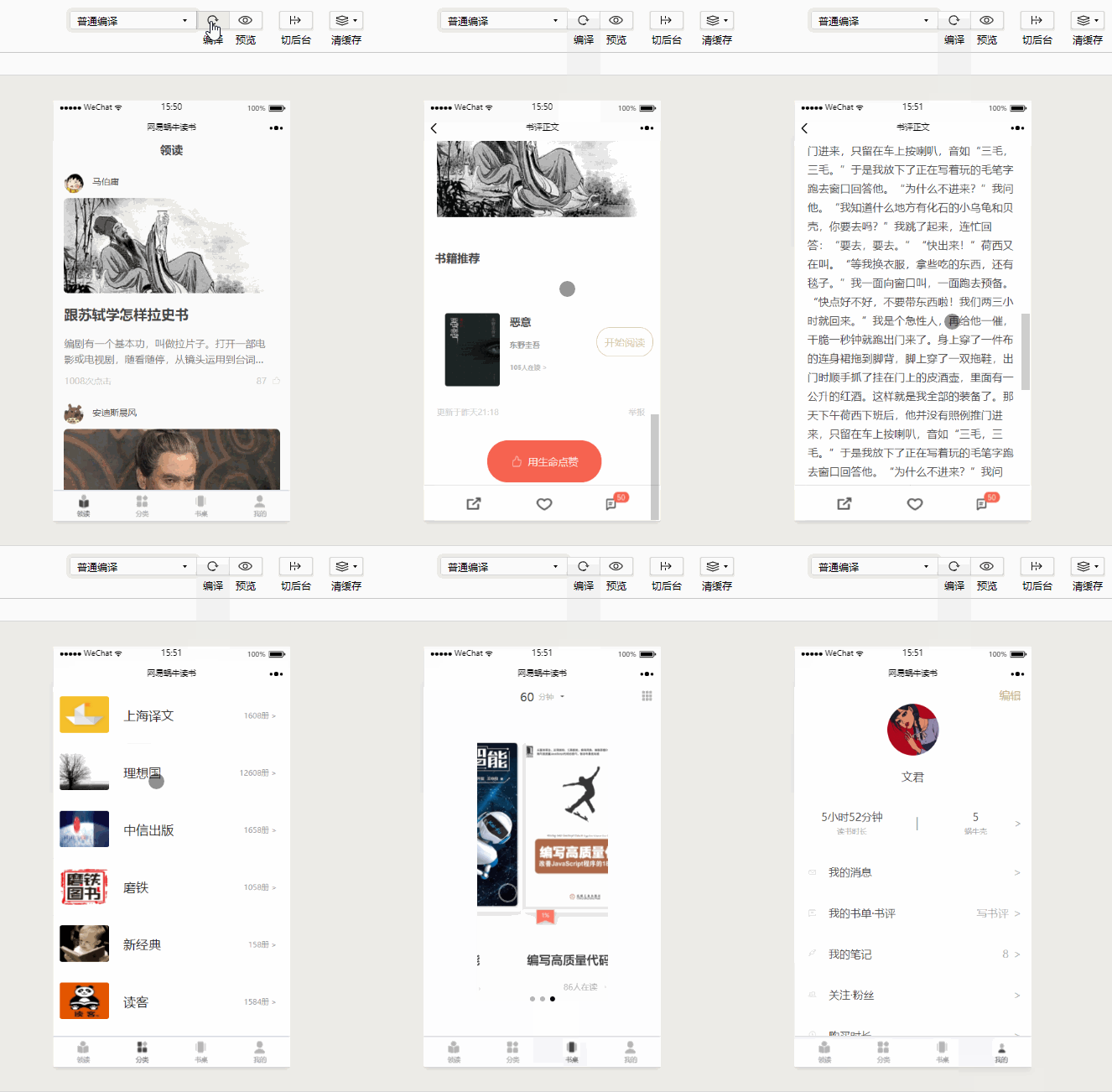
项目准备:
------
大家若是感兴趣,可以跟着我一起来做哟^_^
☟ 蓝体点击就能跳转到相应页面进行下载或者查看教程
1、[微信开发者工具](https://mp.weixin.qq.com/debug/wxadoc/dev/devtools/download.html?t=201715) 他能帮助我们快速的进行小程序的开发。当然,在开发之前我们还需要拥有一个小程序账号([注册教程](https://jingyan.baidu.com/article/d7130635decb6a13fdf475d3.html)),通过账号我们就能够管理自己的小程序了。需要注意的是,只有满了18岁的童鞋们才可以注册。
2、[vs code](https://pan.baidu.com/s/1c1HxXOs) (密码:g2g5) 64位系统的,其他版本就自己去搜一下安装包啦。虽然在微信开发者工具里面就能够直接写,但还是喜欢在vs code里面进行coding。这个按大家喜好自由选择哦。
3、[Iconfont-阿里巴巴矢量图标库](http://www.iconfont.cn/) 一个阿里爸爸做的开源图库,它不仅有几百个公司的开源图标库,还有各式各样的小图标。有了这个图标库真是大大提高了我们的效率,我们能够根据需要进行图标搜索,还能够设置颜色、大小和图片格式。你想要的基本都有哦~
4、[EasyMock 简单高效的伪造数据](https://www.easy-mock.com/) 用于后台的数据模拟,得到JSON数据,方便开发。
5、[微信小程序开发文档](https://www.w3cschool.cn/weixinapp/9wou1q8j.html) W3C的这个文档真是超级详细,我们能够在这里查找到微信小程序的API、组件以及一些框架等。
另外还使用了一款MarkMan进行测量,但若是追求精准还原的话,还是用PS更细腻。
项目开发过程:
------
每一次的开发都是一个成长的过程。在开发过程中,我们会遇到各种问题,这就给了我们一个独立思考的空间,能够锻炼我们解决问题和查询文档的能力。当然,在思考查询之后还可以请教他人、进行探讨,这样往往能够帮助我们快速的找到盲点,甚至能够了解到更多我们忽视的点。和别人的交流也是学习中很重要的一环,所以在此分享了自己小小的一点经验,欢迎一起交流,一起学习。
### 1、开始项目
在项目开始时,我们首先在 app.json 文件中配置主体界面,设置好tabBar 。在这里我们对小程序设置确定了一个整体的基调。
"window":{
"backgroundTextStyle":"light",
"navigationBarBackgroundColor": "#fff",
"navigationBarTitleText": "网易蜗牛读书",
"navigationBarTextStyle":"black"
},
"tabBar":{
"color":"#999999",
"selectedColor":"#444444",
"backgroungColor":"#ffffff",
"borderStyle":"#e0e0e0",
"list": [
{
"pagePath":"pages/leader/leader",
"iconPath": "assets/icons/lingdu.png",
"selectedIconPath": "assets/icons/lingdu_sel.png",
"text":"领读"
},
{
"pagePath":"pages/stack/stack",
"iconPath": "assets/icons/stack.png",
"selectedIconPath": "assets/icons/stack_sel.png",
"text":"分类"
},
{
"pagePath": "pages/bookdesk/bookdesk",
"iconPath": "assets/icons/bookdesk.png",
"selectedIconPath": "assets/icons/bookdesk_sel.png",
"text":"书桌"
},
{
"pagePath":"pages/mine/mine",
"iconPath": "assets/icons/mine.png",
"selectedIconPath": "assets/icons/mine_sel.png",
"text":"我的"
}
]
}
对于 pages 页面,在开发过程中进行过很多次调整。到现在为止觉得还算整洁和便于管理了。在起初,不管是一级页面还是二级页面,我都把它们放在了 pages 目录下。这样一开始还不觉得有什么,可是到后来页面越来越多,要对之前写过的页面进行修改和调整的时候,恍然间发现一堆文件夹,查找起来就觉得眼花缭乱,还要和页面进行配对,非常恼火。于是按照页面不同的级别层次,进行了相应的调整。按照不同的tabBar确定了主体的文件夹,然后各级页面又分别在各自所属层级的目录下。另外对于页面的命名尽量通俗易懂,这样方便自己对各页面进行查看和管理。
"pages":[
"pages/index/index",
"pages/leader/leader", // 领读人
"pages/leader/stories/stories",
"pages/leader/authors/authors",
"pages/stack/stack", // 分类
"pages/stack/booklist/booklist",
"pages/stack/booklist/bookdetail/bookdetail",
"pages/bookdesk/bookdesk", // 书桌
"pages/mine/mine", // 我的
"pages/mine/news/news",
"pages/logs/logs"
],
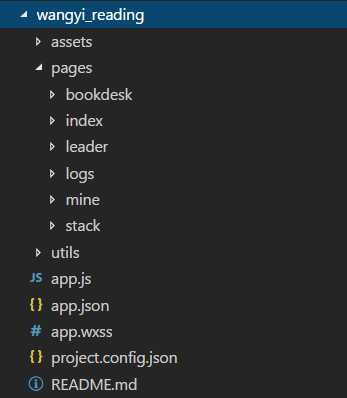
在分类页面下具有多层级的一个页面创建展示:
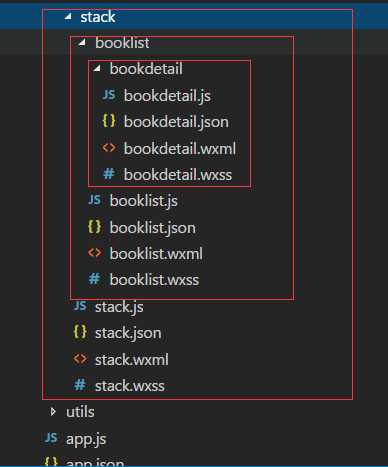
所以在项目开始时首先思考的就是文件的排版问题,一个合理的结构,能够增强项目的可读性,以后操作和维护也更加方便,能够节约一定的时间。
小技巧: 在创建pages页面时,如果我们在微信开发者程序的app.json文件中创建,就会自动的生成相应的文件夹,就不用我们一个一个去创建了。
### 2、页面布局和样式
小程序属于轻量级的应用,所以在忠于原App的基础上,对某些页面进行了一些调整。另外,在这里所有的页面都是我切的,可能会有人说很多页面都可以引用第三方框架,没有必要写原生代码。其实都没有错,要看自己写小程序是为了什么。我做这款小程序是为了学习小程序的开发,另外自己的前端之旅还是刚刚开启,所以为了在 coding 中锻炼自己对各种结构的敏感性,加深自己对样式属性的理解,我选择了自己写原生代码。
其实第三方框架是非常好的轮子,像微信团队开发的 weui 框架就很好用,它提供了很多的组件,能够让你摆脱切页面的繁琐,减少开发时间。对于 weui 的使用我也不是很熟练,所以在后续的学习中,还会继续修改这个小程序,用不同的方法实现页面。
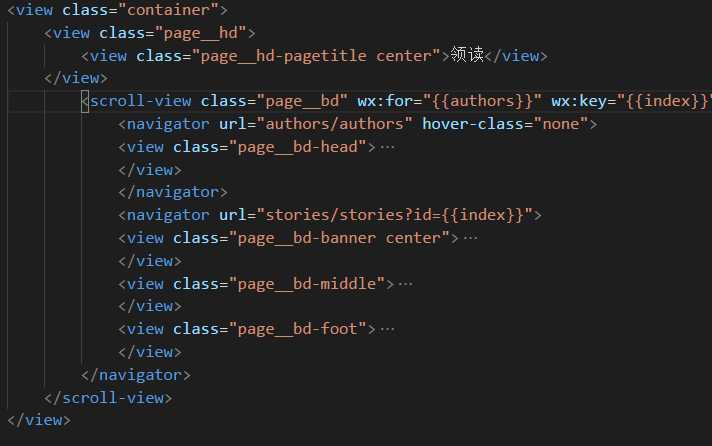
另外,在命名时,我使用了BEM规范,这样便于对页面结构的理解,使代码更易读。BEM命名法则给我们提供了一个很好的模板,在命名中就能体现各个元素之间的关系,CSS的命名更加语义化,元素更易读懂。而且独一无二的命名方式,使得代码能够得到更好的复用。
stack.wxml
### 3、使用 easy-mock 造数据
写完基本样式之后,要思考的就是数据问题。我们开发的页面很少有静态的。我们把数据写在页面中没有任何意义还平白增加了工作量。此时我们就需要模拟后台数据,让这些数据能够通过请求渲染到页面上。easy-mock 就给我们提供了一个很好的平台来造假数据,然后生成URL 通过 wx.request() 方法来获取数据,实现页面加载数据。
另外还可以在本地写假数据。今天在阅读别人文章时有看到用require()方式来请求数据的。对于这个不是很懂,通过查询之后才发现这是CommonJS 中的模块实现。实现一项功能的方法有很多种,我觉得我们不能只满足于一种方法,而应该广泛的涉猎,通过对不同方法的学习,让自己的知识储备更庞大。
项目基本功能:
------
### 1、小程序启动页面的实现
在这里我使用了setInterval()和clearInterval()方法来实现,然后通过switchTab来实现跳转
Page({
data: {
time:3
},
onLoad: function () {
var count = setInterval(()=>{
this.setData({
time : this.data.time -1
});
if(this.data.time == 0) {
wx.switchTab({
url:'../leader/leader',
complete:function(res) {
}
})
clearInterval(count);
}
},1000);
}
})
### 2、跳转页面时获取id, 获取不同数据
一开始自己对数据获取还不是很熟练,只能进行简单的单页面渲染。后来通过查文档和摸索,逐渐的能够进行复杂一些的数据获取。另外,在setData时,如果不清楚结构,可以使用console.log(); 方法及时的查看数据结构,一层层的剥开找到我们需要的数据层。
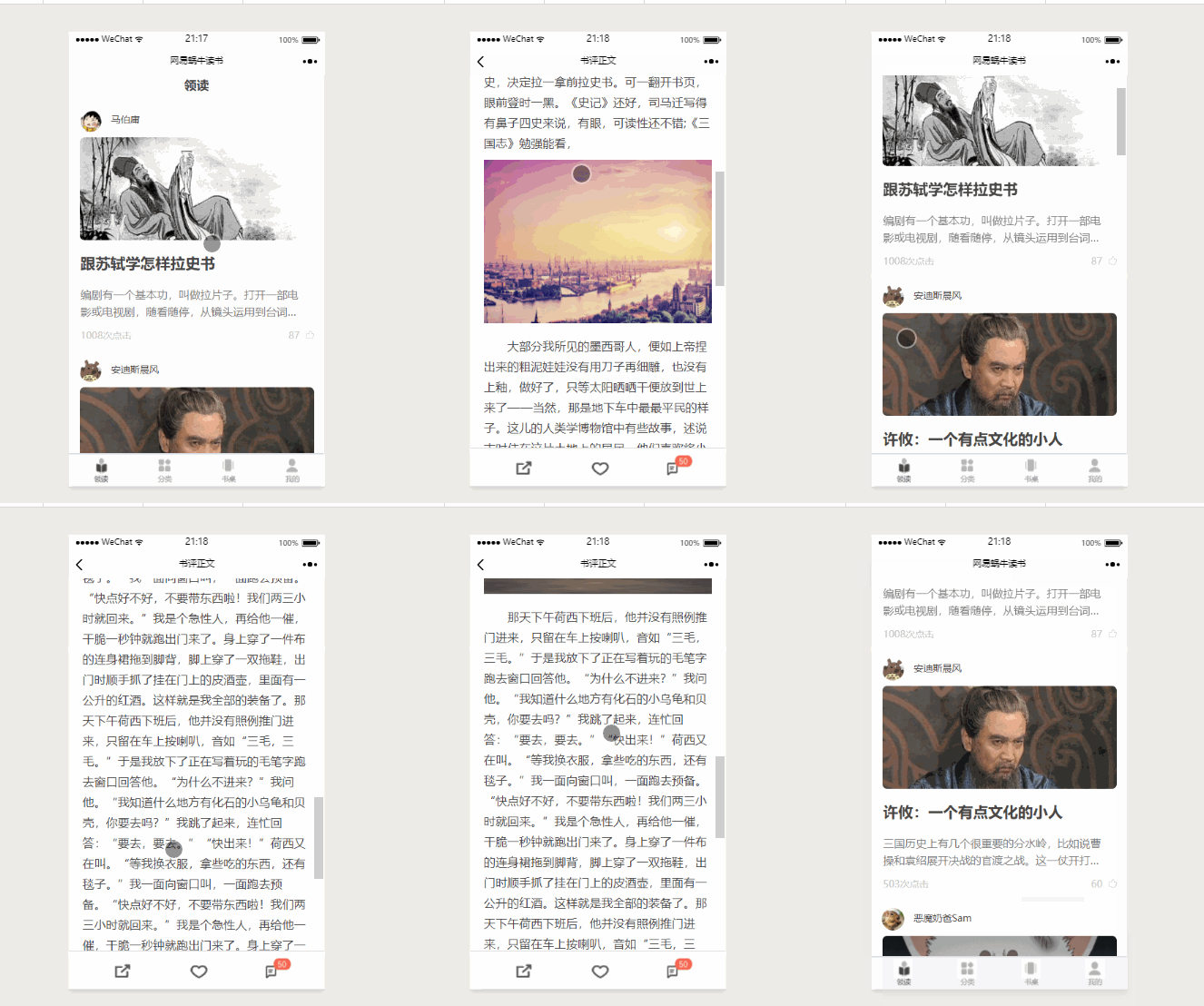
为了更便于理解,附上两张动图展示,可以发现当我点击不同文章之后,跳转的页面获取的数据也不一样。
领读
分类
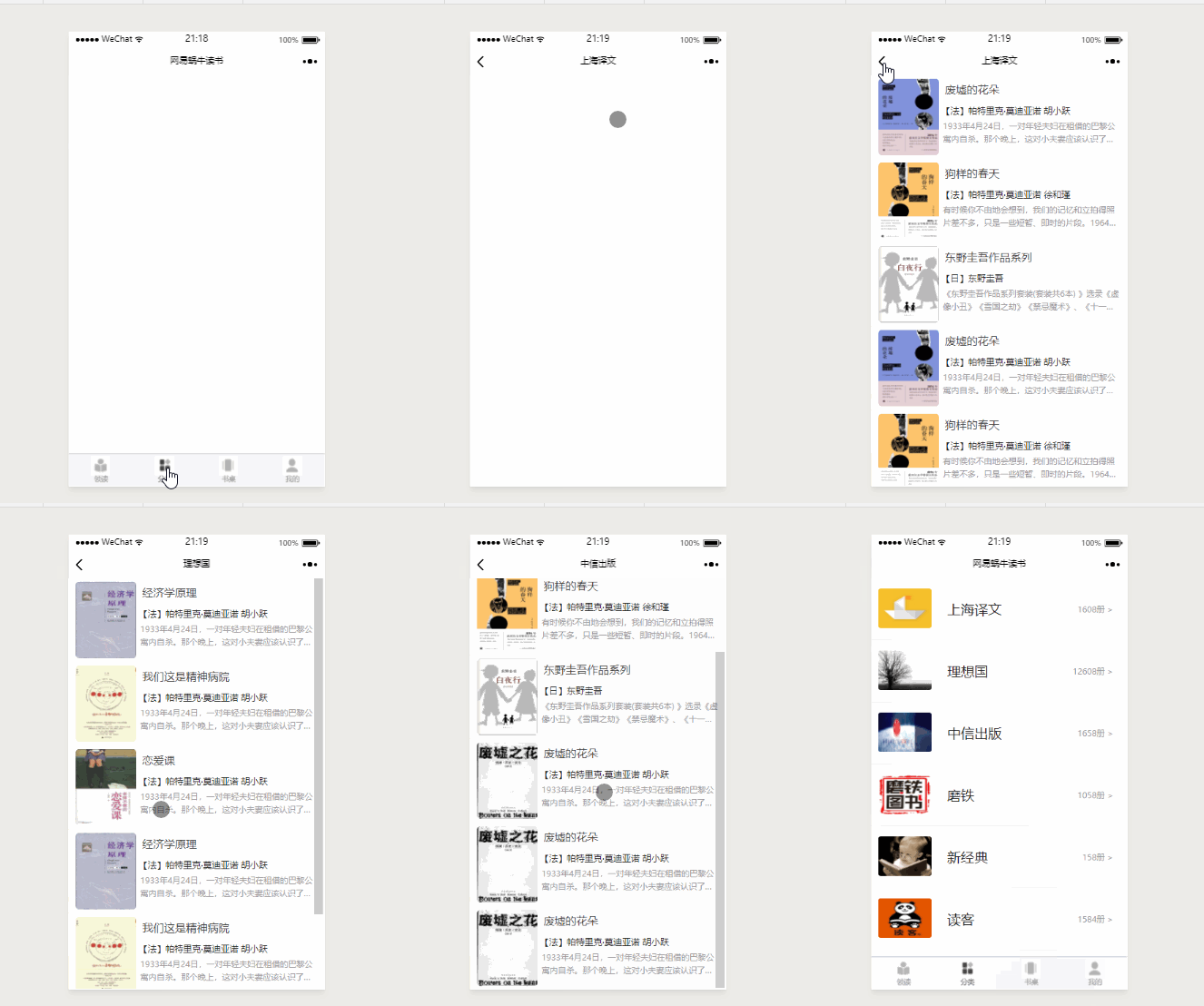
在这里分类页面的数据更整齐一些,就以它为例来说一说我是如何通过id来动态选择数据的。首先要清楚的是stack分类页面和跳转到的booklist详情页。在这里是通过navigator来跳转的,我们在url中设置表达式来动态获取id,url="booklist/booklist?id={{index}}",然后在 booklist.js 中,通过获取到的id,进行数据的选择。
stack:
stack.wxml
``` <view>
<view>
<view class="page-search"></view>
<scroll-view wx:for="{{stack}}" wx:key="{{index}}" scroll-y="true">
<navigator class="stack-view " url="booklist/booklist?id={{index}}">
<image src="{{item.typeCover}}" class="stack-image"></image>
<text class="stack-name">{{item.bookTypes}}</text>
<text class="stack-numb">{{item.bookNumb}} ></text>
</navigator>
<view class="line"></view>
</scroll-view>
</view>
</view>
```
stack.js
Page({
data: {
stack:[],
id: ""
},
onLoad: function () {
var that = this;
wx.request({
url:"https://www.easy-mock.com/mock/5a23a9a2ff38a436c591b6fa/getArticInfo",
success: function(res) {
console.log(res.data.data.stack);
console.log(res.data.data.List);
that.setData({
stack: res.data.data.stack,
id: res.data.data.List
})
}
})
},
})
booklist:
booklist.wxml
<view>
<view>
<view wx:for="{{bookList}}" wx:key="{{index}}">
<view class="book-list-root" bindtap="bindViewTap">
<view class="book-list-child">
<view>
<text class="book-list-name">{{item.bookName}}</text>
</view>
<view>
<text class="book-list-autor">{{item.authorName}}</text>
</view>
<view class="book-list-des">
<text>{{item.bookDes}}</text>
</view>
</view>
</view>
<view class="line"></view>
</view>
</view>
</view>
booklist.js
Page({
data: {
bookList:[],
stack:[]
},
onLoad: function (params) {
var that = this;
wx.request({
url:"https://www.easy-mock.com/mock/5a23a9a2ff38a436c591b6fa/getArticInfo",
success: function(res) {
that.setData({
bookList: res.data.data.stack[params.id].List.bookList,
})
}
})
},
})
### 3、对navigationBarTitleText的动态修改
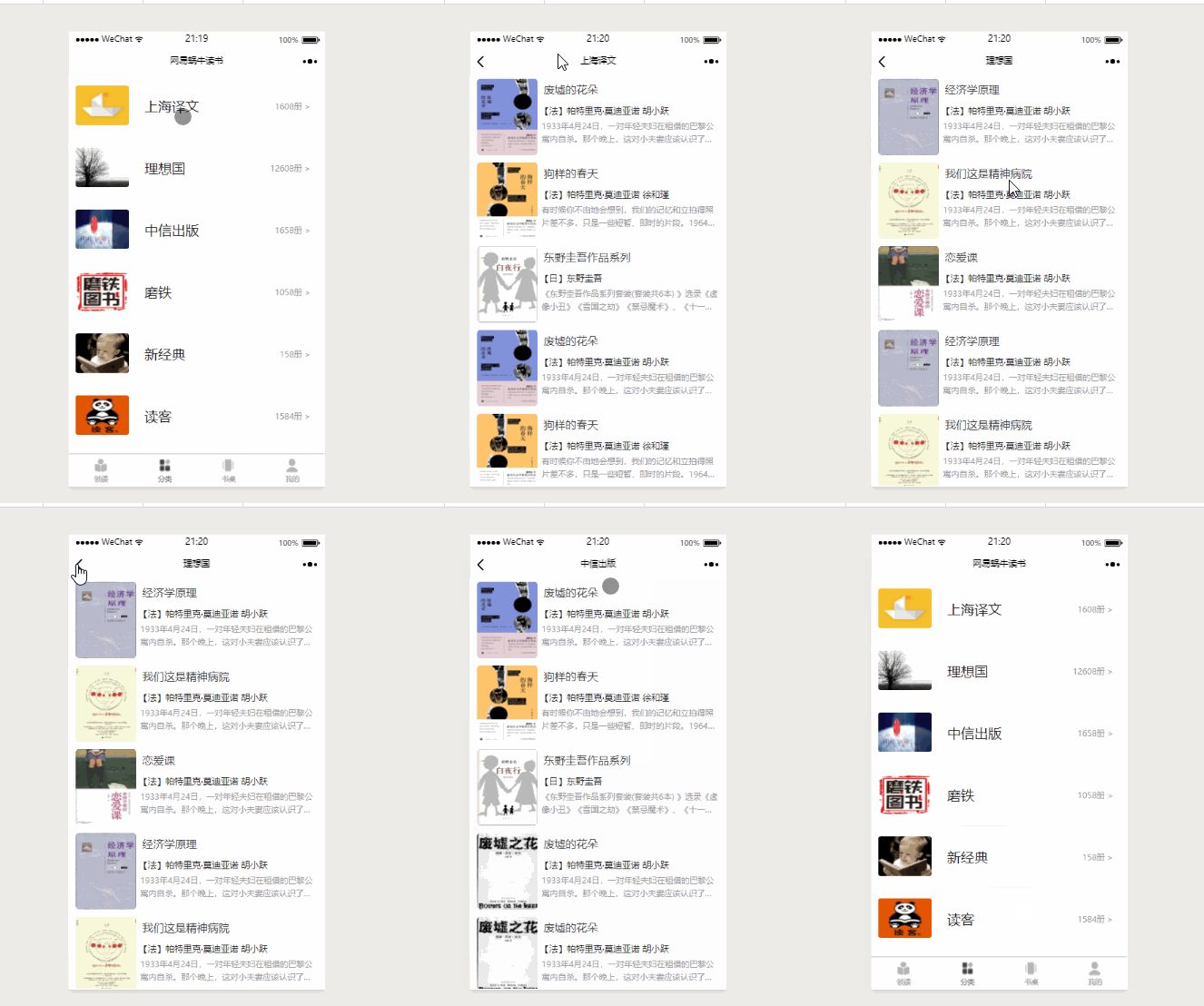
在各个页面的JSON文件中,我们能够设置页面的标题,但是当我们进入不同页面需要获取不同标题时,就需要动态的进行修改。其实实现起来很简单,我们知道通过wx.setNavigationBarTitle() 方法就能够修改页面标题,然后跟第二点所述的方式一样,通过id来达到动态获取的效果。
另外要注意的是,我们要将JSON中的navigationBarTitleText设置为空,这样在跳转的过程中就不会有原始标题和修改标题之间跳转的一个效果,而是直接显示需要的标题。
.json
{
"navigationBarBackgroundColor": "#fff",
"navigationBarTitleText": " ",
"navigationBarTextStyle": "black"
}
.js
onLoad: function (params) {
var that = this;
wx.request({
url:"https://www.easy-mock.com/mock/5a23a9a2ff38a436c591b6fa/getArticInfo",
success: function(res) {
var bTypes = res.data.data.stack[params.id].bookTypes;
wx.setNavigationBarTitle({
title: bTypes,
},1);
}
})
},
### 4、两种页面跳转方式
#### (1)使用 navigator 方式
navigator的跳转能够保留当前页面,可返回
<navigator class="stack-view " url="booklist/booklist?id={{index}}">
// 点击部位,触发即可跳转
</navigator>
<view class="page__bd-items page-flex" bindtap="tomyNews">
<view class="page-items-lt">
<image src="../../assets/images/mines/news.png" />
</view>
<view class="page-items-md">我的消息</view>
<view class="page-items-others"></view>
<view class="page-items-ft">></view>
</view>
tomyNews:function(e) {
wx.navigateTo({
url:'news/news'
})
},
需要注意的是:程序中要求页面的层级最多只能有五层,因为这种方式保留当前页面,也就是说以这种方式跳转页面,最多只能打开5个页面。
#### (2)使用 switchTab 方法
该方法能够跳转到 tabBar 页面,并关闭其他所有非 tabBar 页面。
wx.switchTab({
url:'../leader/leader',
complete:function(res) {
}
})
### 5、swiper实现轮播
通过 swiper 和 swiper-item 实现了书桌页面的轮播效果。
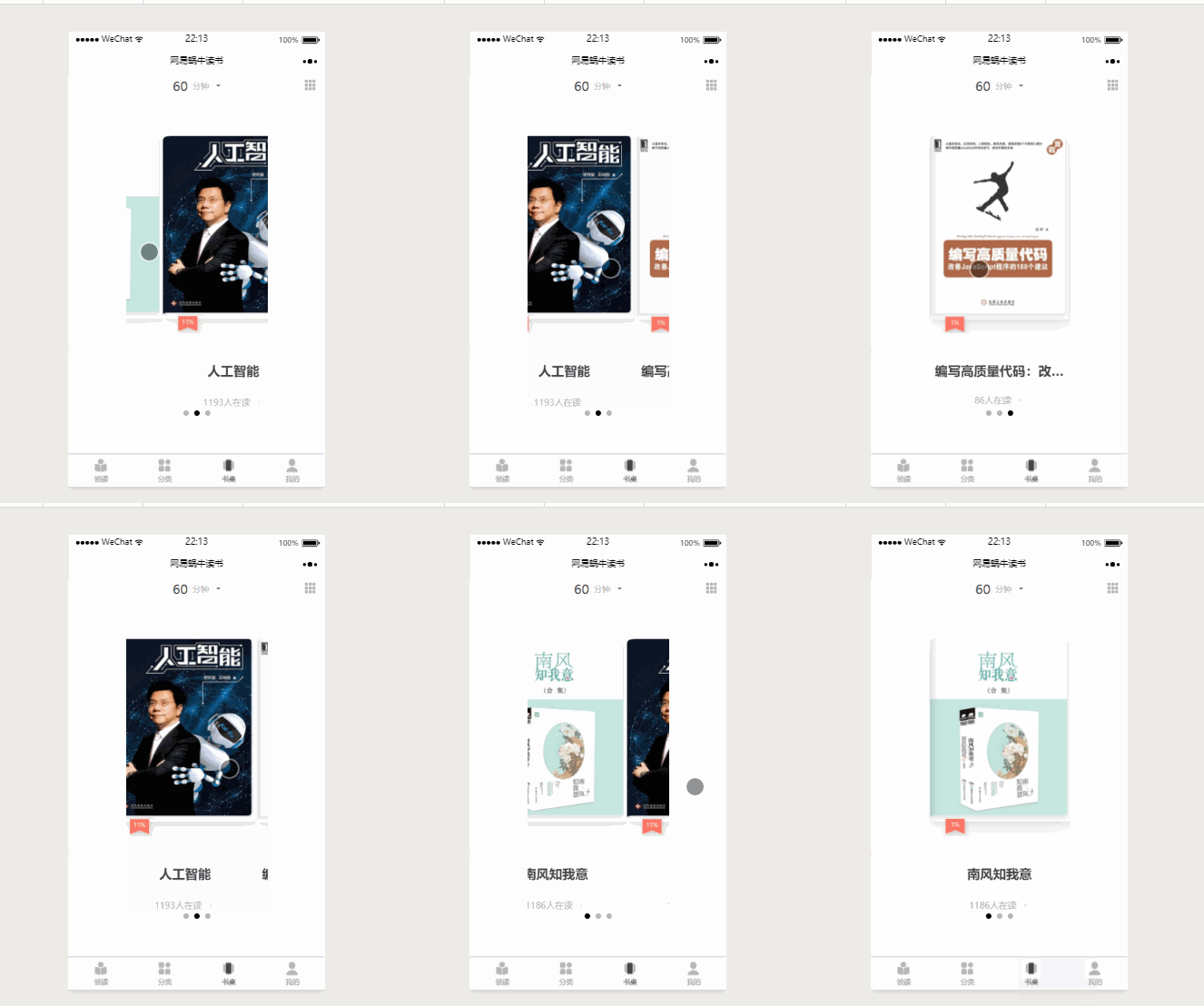
这里的相关属性就直接使用了网上的图片:
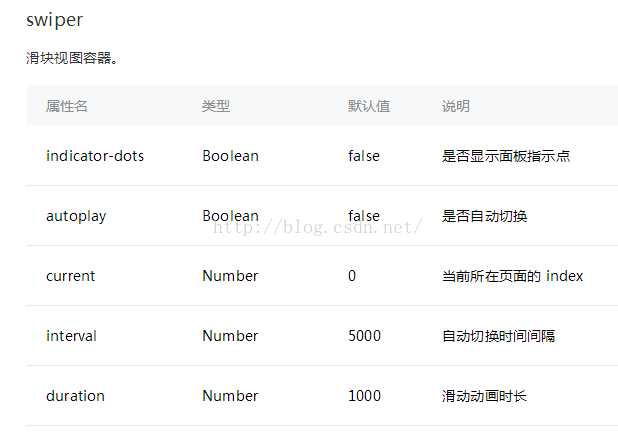
<swiper class="swiper" indicator-dots="true"
interval="5000" duration="1000">
<swiper-item>
<view class="page__bd">
<view class="page__bd-books center">
<image
src="../../assets/images/book1.png" />
</view>
<view class="page__bt">
<view class="page__bt-readings">
南风知我意</view>
<view class="page__bt-items center">
<view>1186人在读</view>
<image
src="../../assets/images/rg.png" />
</view>
</view>
</view>
</swiper-item>
</swiper>
其中,swiper-item 可以通过 wx:for 来循环。
总结:
------
这一次的小程序开发,让我学到了很多东西。我们是为了学习而开发项目。因此在coding的时候要沉住气,不要急躁,遇到问题就及时的去查文档或者请教别人,然后多想一想实现的方法,是不是还能够通过其他办法来实现。这样在不断的思考和解决问题中,在不断的踩坑中才能让自己快速的成长起来。
另外,其实还有很多功能和细节没有处理好,这一次的分享并不代表着结束,通过不断的学习,还将不断的对项目功能进行完善和处理各种细节。
☝想要一个star哦☺
### 欢迎一起交流学习哟 ☞ 782835831@qq.com
================================================
FILE: app.js
================================================
//app.js
App({
onLaunch: function () {
// 展示本地存储能力
var logs = wx.getStorageSync('logs') || []
logs.unshift(Date.now())
wx.setStorageSync('logs', logs)
// 登录
wx.login({
success: res => {
// 发送 res.code 到后台换取 openId, sessionKey, unionId
}
})
// 获取用户信息
wx.getSetting({
success: res => {
if (res.authSetting['scope.userInfo']) {
// 已经授权,可以直接调用 getUserInfo 获取头像昵称,不会弹框
wx.getUserInfo({
success: res => {
// 可以将 res 发送给后台解码出 unionId
this.globalData.userInfo = res.userInfo
// 由于 getUserInfo 是网络请求,可能会在 Page.onLoad 之后才返回
// 所以此处加入 callback 以防止这种情况
if (this.userInfoReadyCallback) {
this.userInfoReadyCallback(res)
}
}
})
}
}
})
},
globalData: {
userInfo: null
}
})
================================================
FILE: app.json
================================================
{
"pages":[
"pages/index/index",
"pages/leader/leader",
"pages/leader/stories/stories",
"pages/leader/authors/authors",
"pages/stack/stack",
"pages/stack/booklist/booklist",
"pages/stack/booklist/bookdetail/bookdetail",
"pages/bookdesk/bookdesk",
"pages/mine/mine",
"pages/mine/news/news",
"pages/logs/logs"
],
"window":{
"backgroundTextStyle":"light",
"navigationBarBackgroundColor": "#fff",
"navigationBarTitleText": "网易蜗牛读书",
"navigationBarTextStyle":"black"
},
"tabBar":{
"color":"#999999",
"selectedColor":"#444444",
"backgroungColor":"#ffffff",
"borderStyle":"#e0e0e0",
"list": [
{
"pagePath":"pages/leader/leader",
"iconPath": "assets/icons/lingdu.png",
"selectedIconPath": "assets/icons/lingdu_sel.png",
"text":"领读"
},
{
"pagePath":"pages/stack/stack",
"iconPath": "assets/icons/stack.png",
"selectedIconPath": "assets/icons/stack_sel.png",
"text":"分类"
},
{
"pagePath": "pages/bookdesk/bookdesk",
"iconPath": "assets/icons/bookdesk.png",
"selectedIconPath": "assets/icons/bookdesk_sel.png",
"text":"书桌"
},
{
"pagePath":"pages/mine/mine",
"iconPath": "assets/icons/mine.png",
"selectedIconPath": "assets/icons/mine_sel.png",
"text":"我的"
}
]
}
}
================================================
FILE: app.wxss
================================================
/**app.wxss**/
@import "./weui.wxss";
.container {
margin: 0;
padding: 0;
font-family: PingFangSC-Regular, sans-serif;
list-style: none;
width: 100%;
box-sizing: border-box;
min-height: 100vh;
}
.center {
display: flex;
justify-content: center;
align-items: center;
}
.page-flex {
display: flex;
flex-direction: row;
align-items: center;
}
.fl {
float: left;
}
.fr {
float: right;
}
================================================
FILE: pages/bookdesk/bookdesk.js
================================================
Page({
data: {
},
onLoad: function() {
},
})
================================================
FILE: pages/bookdesk/bookdesk.json
================================================
{}
================================================
FILE: pages/bookdesk/bookdesk.wxml
================================================
<view class="container">
<!-- 头部 时间显示 -->
<view class="page__hd center">
<view class="page__hd-mm">60</view>
<text class="page__hd-dd">分钟</text>
<view class="page__hd-xiala">
<image class="xiala" src="../../assets/images/xiala.png" />
</view>
<view class="page__hd-desk">
<image class="desk" src="../../assets/images/desk.png" />
</view>
</view>
<!-- 书籍轮播 -->
<swiper class="swiper" indicator-dots="true" interval="5000" duration="1000">
<swiper-item>
<view class="page__bd">
<view class="page__bd-books center">
<image src="../../assets/images/book1.png" />
</view>
<view class="page__bt">
<view class="page__bt-readings">南风知我意</view>
<view class="page__bt-items center">
<view>1186人在读</view>
<image src="../../assets/images/rg.png" />
</view>
</view>
</view>
</swiper-item>
<swiper-item>
<view class="page__bd">
<view class="page__bd-books center">
<image src="../../assets/images/book2.png" />
</view>
<view class="page__bt">
<view class="page__bt-readings">人工智能</view>
<view class="page__bt-items center">
<view>1193人在读</view>
<image src="../../assets/images/rg.png" />
</view>
</view>
</view>
</swiper-item>
<swiper-item>
<view class="page__bd">
<view class="page__bd-books center">
<image src="../../assets/images/book3.png" />
</view>
<view class="page__bt">
<view class="page__bt-readings">编写高质量代码:改善JavaScript程序的</view>
<view class="page__bt-items center">
<view>86人在读</view>
<image src="../../assets/images/rg.png" />
</view>
</view>
</view>
</swiper-item>
</swiper>
</view>
================================================
FILE: pages/bookdesk/bookdesk.wxss
================================================
.page__hd {
position: relative;
}
.page__hd-mm {
font-size: 38rpx;
color: #444;
line-height: 38rpx;
font-family: bold;
}
.page__hd-dd {
font-size: 24rpx;
color:#B3B3B3;
margin-left: 14rpx;
}
.page__hd .page__hd-xiala image{
width: 18rpx;
height: 18rpx;
margin-left: 16rpx;
margin-bottom: 6rpx;
}
.page__hd .page__hd-desk image {
position: absolute;
width: 60rpx;
height: 60rpx;
margin-top: -32rpx;
margin-left: 232rpx;
}
.page__bd {
}
.swiper {
margin-left: 168rpx;
width: 416rpx;
height: 960rpx;
}
.page__bd-books image {
margin-top: 116rpx;
width: 416rpx;
height: 582rpx;
border-radius: 8rpx;
}
.page__bt-readings {
margin-top: 80rpx;
font-size: 38rpx;
color: #444;
font-weight: bold;
text-align: center;
overflow: hidden;
text-overflow:ellipsis;
display:-webkit-box;
-webkit-box-orient:vertical;
-webkit-line-clamp:1;
}
.page__bt-items {
margin-top: 42rpx;
}
.page__bt-items>view {
font-size: 26rpx;
color: #B3B3B3;
}
.page__bt-items image {
width: 24rpx;
height: 24rpx;
margin-left: 16rpx;
}
================================================
FILE: pages/index/index.js
================================================
const app = getApp()
Page({
data: {
time:3
},
onLoad: function () {
var count = setInterval(()=>{
this.setData({
time : this.data.time -1
});
if(this.data.time == 0) {
wx.switchTab({
url:'../leader/leader',
complete:function(res) {
}
})
clearInterval(count);
}
},1000);
}
})
================================================
FILE: pages/index/index.wxml
================================================
<view class="container">
<view class="start"><image src="../../assets/images/start.jpg" /></view>
</view>
================================================
FILE: pages/index/index.wxss
================================================
.start {
width: 100%;
height: 100%;
}
.start image {
width: 750rpx;
height: 1060rpx;
}
================================================
FILE: pages/leader/authors/authors.js
================================================
Page({
})
================================================
FILE: pages/leader/authors/authors.json
================================================
{}
================================================
FILE: pages/leader/authors/authors.wxml
================================================
================================================
FILE: pages/leader/authors/authors.wxss
================================================
/* pages/authors/authors.wxss */
================================================
FILE: pages/leader/leader.js
================================================
//index.js
//获取应用实例
const app = getApp()
Page({
data: {
authors: [],
id: ''
},
onShow: function() {
wx.showToast({
title: '加载中',
icon: 'loading',
duration: 500
})
setTimeout(function () {
wx.hideToast()
}, 500);
},
onLoad: function () {
var that = this;
wx.request({
url: 'https://www.easy-mock.com/mock/5a23a9a2ff38a436c591b6fa/getArticInfo',
success: function (res) {
console.log(res.data.data.index);
console.log(res.data.data.articleInfo);
that.setData({
authors: res.data.data.index,
id: res.data.data.articleInfo
})
}
})
},
/**
* 页面相关事件处理函数--监听用户下拉动作
*/
onPullDownRefresh: function () {
},
/**
* 页面上拉触底事件的处理函数
*/
onReachBottom: function () {
},
})
================================================
FILE: pages/leader/leader.json
================================================
{
"enablePullDownRefresh":true
}
================================================
FILE: pages/leader/leader.wxml
================================================
<view class="container">
<view class="page__hd">
<view class="page__hd-pagetitle center">领读</view>
</view>
<scroll-view class="page__bd" wx:for="{{authors}}" wx:key="{{index}}" scroll-y="true">
<navigator url="authors/authors" hover-class="none">
<view class="page__bd-head">
<view class="head-img">
<image class="pic" src="{{item.headImg}}" mode="aspectFill" />
</view>
<view class="artic-author page-flex">{{item.userName}}</view>
</view>
</navigator>
<navigator url="stories/stories?id={{index}}">
<view class="page__bd-banner center">
<image class="bannerImg" src="{{item.bannerImg}}" alt="" mode="aspectFill" />
</view>
<view class="page__bd-middle">
<view class="artic-title">{{item.articTitle}}</view>
<view class="artic-content">{{item.articContent}}</view>
</view>
<view class="page__bd-foot">
<view class="foot-lt clickTimes fl page-flex">{{item.clickTimes}}次点击</view>
<view class="foot-rt thumbUp">{{item.thumbUp}}
<view class="finger">
<image src="../../assets/images/pointer.png" mode="aspectFill" />
</view>
</view>
</view>
</navigator>
</scroll-view>
</view>
================================================
FILE: pages/leader/leader.wxss
================================================
/**index.wxss**/
.page__hd {
width: 100%;
height: 100rpx;
background: #ffffff;
}
.page__hd:before {
content: "";
position: absolute;
top: 80rpx;
left: 0;
right: 0;
border-top: 1rpx solid #F6F6F6;
}
.page__hd-pagetitle {
font-size: 36rpx;
font-weight: bold;
color: #444;
}
.page__bd {
}
.page__bd-head {
height: 128rpx;
margin-left: 30rpx;
display: flex;
}
.page__bd-head image {
width: 66rpx;
height: 66rpx;
line-height: 66rpx;
border-radius: 50%;
}
.artic-author {
display: inline-block;
margin-top: 8rpx;
/* margin-bottom: 40rpx; */
/* line-height: 28rpx; */
margin-left: 28rpx;
font-size: 28rpx;
color:#444;
}
.page__bd-banner {
}
.page__bd-banner image {
margin-top: -46rpx;
width: 688rpx;
height: 302rpx;
border-radius: 15rpx;
}
.page__bd-middle {
width: 688rpx;
}
.page__bd-middle .artic-title, .page__bd-middle .artic-content {
margin-left: 34rpx;
}
.page__bd-middle .artic-title, .page__bd-middle .artic-content {
overflow: hidden;
text-overflow:ellipsis;
display:-webkit-box;
-webkit-box-orient:vertical;
-webkit-line-clamp:2;
}
.page__bd-middle .artic-title {
margin-top: 32rpx;
margin-bottom: 32rpx;
font-size: 44rpx;
color: #444;
font-weight: bold;
}
.page__bd-middle .artic-content {
font-size: 32rpx;
color: #7F7F7F;
margin-bottom: 28rpx;
}
.page__bd-foot {
height: 92rpx;
}
.page__bd-foot .foot-lt, .page__bd-foot .foot-rt {
color: #C6C6C6;
font-size: 28rpx;
}
.page__bd-foot .foot-lt {
margin-left: 34rpx;
}
.page__bd-foot .foot-rt {
text-align: right;
margin-right: 72rpx;
}
.foot-rt .finger {
}
.finger image {
width: 28rpx;
height: 28rpx;
transform: translate(44rpx, -42rpx);
}
.page__bd-foot:after {
content: "";
position: absolute;
right: 0;
left: 0;
bottom: 18rpx;
border-top: 16rpx solid #F6F6F6;
}
================================================
FILE: pages/leader/stories/stories.js
================================================
// pages/stories/stories.js
Page({
/**
* 页面的初始数据
*/
data: {
authorInfo: [],
article: [],
index: []
},
/**
* 生命周期函数--监听页面加载
*/
onLoad: function (params) {
var that = this;
wx.request({
url: 'https://www.easy-mock.com/mock/5a23a9a2ff38a436c591b6fa/getArticInfo',
success: function (res) {
// console.log(res.data.data.index[params.id]);
that.setData({
authorInfo: res.data.data.index[params.id].articleInfo,
article: res.data.data.index[params.id].articleInfo,
})
}
})
},
/**
* 生命周期函数--监听页面初次渲染完成
*/
onReady: function () {
},
/**
* 生命周期函数--监听页面显示
*/
onShow: function () {
},
/**
* 生命周期函数--监听页面隐藏
*/
onHide: function () {
},
/**
* 生命周期函数--监听页面卸载
*/
onUnload: function () {
},
/**
* 页面相关事件处理函数--监听用户下拉动作
*/
onPullDownRefresh: function () {
},
/**
* 页面上拉触底事件的处理函数
*/
onReachBottom: function () {
},
/**
* 用户点击右上角分享
*/
onShareAppMessage: function () {
}
})
================================================
FILE: pages/leader/stories/stories.json
================================================
{
"navigationBarBackgroundColor": "#fff",
"navigationBarTitleText": "书评正文",
"navigationBarTextStyle": "black"
}
================================================
FILE: pages/leader/stories/stories.wxml
================================================
<!--pages/stories/stories.wxml-->
<view class="container">
<view wx:for="{{authorInfo}}" wx:key="{{index}}">
<view class="page__hd">
<view class="page__hd-title">
{{item.articTitle}}
</view>
<view class="page__hd-wrp">
<view class="author-info page-flex">
<image src="{{item.headImg}}"></image>
<view class="author-name">{{item.userName}}
<view class="author-des">{{item.authorDes}}</view>
</view>
<view class="follow">
关注
</view>
</view>
</view>
</view>
</view>
<view wx:for="{{article}}" wx:key="{{index}}">
<view class="page__bd">
<view class="article-content">
<text>{{item.text1}}
</text>
<image src="{{item.image1}}"></image>
<text>
{{item.text2}}
</text>
<image src="{{item.image2}}" />
</view>
</view>
<view class="tuijian">书籍推荐</view>
<view class="page-items page-flex">
<view class="bookImg">
<image src="{{item.bookCover}}" />
</view>
<view class="info">{{item.bookName}}
<view class="author">{{item.bookAuthor}}
<view class="readers">{{item.readerNum}}人在读 ></view>
</view>
</view>
<view class="readbtn">开始阅读</view>
</view>
<view class="log page-flex">
<view class="updateTime">更新于{{item.updateTime}}</view>
<text>举报</text>
</view>
<view class="btnThumb">
<image src="../../../../assets/images/thumb.png" /> 用生命点赞
</view>
</view>
<!-- <view>10人点赞</view> -->
<view class="page__bt page-flex">
<view class="bottom-items">
<image src="../../../../assets/images/share.png" />
</view>
<view class="bottom-items">
<image src="../../../../assets/images/like.png" />
</view>
<view class="bottom-items">
<image src="../../../../assets/images/news.png" />
</view>
</view>
</view>
================================================
FILE: pages/leader/stories/stories.wxss
================================================
/* pages/stories/stories.wxss */
.page__hd {
width: 750rpx;
border-top: 1rpx solid #F0F0F0;
}
.page__hd-title {
font-size: 44rpx;
color:#444;
margin-left: 36rpx;
margin-top: 46rpx;
margin-bottom: 42rpx;
font-weight: bold;
}
.author-info image {
width: 72rpx;
height: 72rpx;
margin-left: 36rpx;
margin-right: 26rpx;
border-radius: 50%;
}
.author-name {
margin-bottom: 16rpx;
width: 446rpx;
font-size: 28rpx;
color: #575757;
margin-right: 20rpx;
}
.author-des {
font-size: 28rpx;
color: #C8C8C8;
overflow: hidden;
text-overflow:ellipsis;
display:-webkit-box;
-webkit-box-orient:vertical;
-webkit-line-clamp:1;
}
.follow {
font-size: 28rpx;
display: inline-block;
padding: 12rpx 26rpx;
color: #7d7d7d;
border: solid 1rpx #F0F0F0;
/* margin-right: rpx; */
border-radius: 45rpx;
}
.article-content{
padding: 30rpx 40rpx;
background: #ffffff;
}
.article-content text{
font-size: 32rpx;
color: #454545;
line-height: 44rpx;
}
.article-content image{
width: 100%;
margin: 20rpx 0;
}
.page__bt {
position: fixed;
bottom: 0;
height: 70rpx;
border-top: solid 1px #ebebeb;
background: #ffffff;
width: 670rpx;
padding: 20rpx 40rpx;
}
.page-items .bookImg image {
width: 174rpx;
height: 232rpx;
margin: 110rpx 32rpx 24rpx 32rpx;
border-radius: 8rpx;
}
.tuijian {
font-size: 34rpx;
color: #444;
padding-bottom: 12 rpx;
font-weight: bold;
}
.page-items .info {
width: 276rpx;
font-size: 34rpx;
color: #444;
font-weight: bold;
margin-top: 24rpx;
}
.info .author {
font-size: 24rpx;
color: #959595;
margin-top: 28rpx;
/* margin-bottom: 36rpx; */
}
.author .readers {
margin-top: 36rpx;
font-size: 20rpx;
color: #bcbcbc;
}
.readbtn {
/* margin-top: -220rpx; */
font-size: 32rpx;
display: inline-block;
padding: 20rpx 24rpx;
color: #d5caa8;
border: solid 1rpx #d5caa8;
margin-right: -18rpx;
border-radius: 45rpx;
margin-top: 20rpx;
}
.tuijian, .page-items {
width: 680rpx;
margin-left: 35rpx;
margin-top: 36rpx;
border-bottom: 1rpx solid #F0F0F0;
}
.log {
margin-top: 20rpx;
font-size: 26rpx;
color: #ccc;
}
.updateTime {
margin-left: 40rpx;
padding-right: 412rpx;
}
.btnThumb {
/* margin: auto; */
position: relative;
font-size: 32rpx;
display: inline-block;
padding: 40rpx 72rpx 40rpx 128rpx;
color: #fee8e5;
background: #f66350;
border: solid 1rpx #F66350;
margin-left: 200rpx;
margin-right: -18rpx;
border-radius: 80rpx;
margin-top: 70rpx;
margin-bottom: 120rpx;
}
.btnThumb image {
position: absolute;
width: 48rpx;
height: 48rpx;
margin-top: 1rpx;
margin-left: -60rpx;
/* margin-right: 20rpx; */
}
.bottom-items {
}
.bottom-items image {
margin: 28rpx 72rpx 28rpx 72rpx;
width: 86rpx;
height: 86rpx;
display: block;
}
================================================
FILE: pages/logs/logs.js
================================================
//logs.js
const util = require('../../utils/util.js')
Page({
data: {
logs: []
},
onLoad: function () {
this.setData({
logs: (wx.getStorageSync('logs') || []).map(log => {
return util.formatTime(new Date(log))
})
})
}
})
================================================
FILE: pages/logs/logs.json
================================================
{
"navigationBarTitleText": "查看启动日志"
}
================================================
FILE: pages/logs/logs.wxml
================================================
<!--logs.wxml-->
<view class="container log-list">
<block wx:for="{{logs}}" wx:for-item="log" wx:key="{{index}}">
<text class="log-item">{{index + 1}}. {{log}}</text>
</block>
</view>
================================================
FILE: pages/logs/logs.wxss
================================================
.log-list {
display: flex;
flex-direction: column;
padding: 40rpx;
}
.log-item {
margin: 10rpx;
}
================================================
FILE: pages/mine/mine.js
================================================
// pages/mine/mine.js
Page({
data: {
},
/*
* 跳转到我的消息页面
*/
tomyNews:function(e) {
wx.navigateTo({
url:'news/news'
})
},
onLoad: function (options) {
},
})
================================================
FILE: pages/mine/mine.json
================================================
{}
================================================
FILE: pages/mine/mine.wxml
================================================
<!--pages/mine/mine.wxml-->
<view class="container">
<view class="page__hd">
<view class="page__hd-tp">编辑</view>
<view class="page__hd-md center">
<image src="../../assets/images/headImage.jpg" />
</view>
<view class="page-username center">文君</view>
<view class="page__hd-bt page-flex">
<view class="page-bt-lt">
<view class="page-lt-readingtimes">5小时52分钟</view>
<view class="page-lt-readingtime">读书时长</view>
</view>
<view class="cline">|</view>
<view class="page-bt-rt">
<view class="page-rt-lt ">
<view class="page-rt-numbers">5</view>
<view class="page-rt-items">蜗牛壳</view>
</view>
</view>
<view class="page-rg">></view>
</view>
</view>
<view class="page__bd">
<view class="page__bd-items page-flex" bindtap="tomyNews">
<view class="page-items-lt">
<image src="../../assets/images/mines/news.png" />
</view>
<view class="page-items-md">我的消息</view>
<view class="page-items-others"></view>
<view class="page-items-ft">></view>
</view>
<view class="page__bd-items page-flex">
<view class="page-items-lt">
<image src="../../assets/images/mines/booklist.png" />
</view>
<view class="page-items-md">我的书单·书评</view>
<view class="page-items-others">写书评</view>
<view class="page-items-ft">></view>
</view>
<view class="page__bd-items page-flex">
<view class="page-items-lt">
<image src="../../assets/images/mines/note.png" />
</view>
<view class="page-items-md">我的笔记</view>
<view class="page-items-others">8</view>
<view class="page-items-ft">></view>
</view>
<view class="page__bd-items page-flex">
<view class="page-items-lt">
<image src="../../assets/images/mines/fans.png" />
</view>
<view class="page-items-md">关注·粉丝</view>
<view class="page-items-others"></view>
<view class="page-items-ft">></view>
</view>
<view class="page__bd-items page-flex">
<view class="page-items-lt">
<image src="../../assets/images/mines/times.png" />
</view>
<view class="page-items-md">购买时长</view>
<view class="page-items-others"></view>
<view class="page-items-ft">></view>
</view>
<view class="page__bd-items page-flex">
<view class="page-items-lt">
<image src="../../assets/images/mines/update.png" />
</view>
<view class="page-items-md">更新续订</view>
<view class="page-items-others">点我找回阅读时长</view>
<view class="page-items-ft">></view>
</view>
<view class="page__bd-items page-flex">
<view class="page-items-lt">
<image src="../../assets/images/mines/sets.png" />
</view>
<view class="page-items-md">设置</view>
<view class="page-items-others"></view>
<view class="page-items-ft">></view>
</view>
</view>
</view>
================================================
FILE: pages/mine/mine.wxss
================================================
/* pages/mine/mine.wxss */
.page__hd {
height: 516rpx;
}
.page__hd-tp {
text-align: right;
margin-right: 32rpx;
font-size: 34rpx;
color: #C2B282;
}
.page__hd-md image {
width: 164rpx;
height: 164rpx;
margin-bottom: 40rpx;
border-radius: 50%;
}
.page-username {
font-size: 36rpx;
color: #444;
margin-bottom: 72rpx;
}
/* .page-bt-lt:after {
content: "" ;
position: absolute;
top: 0;
bottom: 0;
right: 375rpx;
border-bottom: 38rpx solid #000;
} */
.page-bt-lt,
.page-bt-rt {
width: 375rpx;
}
.cline {
margin-left: 80rpx;
color: #999;
}
.page-lt-readingtimes,
.page-rt-numbers {
font-size: 34rpx;
color: #444;
text-align: center;
margin-left: 60rpx;
}
.page-lt-readingtime,
.page-rt-items {
font-size: 24rpx;
color: #b3b3b3;
text-align: center;
margin-left: 60rpx;
}
.page-rg {
font-size: 34rpx;
color: #b3b3b3;
margin-right: 28rpx;
}
.page__hd:after {
content: "";
position: absolute;
right: 0;
left: 0;
top: 516rpx;
border-top: 18rpx solid #F6F6F6;
}
.page__bd {
margin-top: 40rpx;
}
.page__bd-items {
margin-bottom: 64rpx;
}
.page__bd image {
width: 40rpx;
height: 40rpx;
}
.page-items-lt, .page-items-md {
margin-left: 34rpx;
}
.page-items-lt {
margin-top: 6rpx;
}
.page-items-md {
width: 222rpx;
font-size: 34rpx;
color: #444;
}
.page-items-others {
text-align: right;
width: 351rpx;
font-size: 34rpx;
color: #b3b3b3;
}
.page-items-ft {
width: 41rpx;
text-align: right;
color: #b3b3b3;
font-size: 34rpx;
/* margin-left: 450rpx; */
}
================================================
FILE: pages/mine/news/news.js
================================================
// pages/mine/news/news.js
Page({
data: {
news: []
},
onLoad: function () {
var that = this;
wx.request({
url: 'https://www.easy-mock.com/mock/5a23a9a2ff38a436c591b6fa/getArticInfo',
success: function(res) {
// console.log(res.data.data);
// console.log(res.data.data.mine);
that.setData({
news: res.data.data.news,
})
}
})
},
})
================================================
FILE: pages/mine/news/news.json
================================================
{
"navigationBarBackgroundColor": "#fff",
"navigationBarTitleText": "我的消息",
"navigationBarTextStyle": "black"
}
================================================
FILE: pages/mine/news/news.wxml
================================================
<!--pages/mine/news/news.wxml-->
<view class="container">
<view class="page-line"></view>
<view wx:for="{{news}}" wx:key="{{index}}">
<view class="page-items page-flex">
<view class="page__lt">
<image src="{{item.userImg}}" />
</view>
<view class="page__md">
<view class="page__md-users">{{item.user}}
<view class="page__md-time">{{item.time}}</view>
</view>
<view class="page__md-news">{{item.news}}</view>
</view>
</view>
</view>
</view>
================================================
FILE: pages/mine/news/news.wxss
================================================
/* pages/mine/news/news.wxss */
.page-line {
width: 750rpx;
border-bottom: 1rpx solid #F0F0F0;
}
.page-items {
margin: auto;
width: 750rpx;
height: 154rpx;
border-bottom: 1rpx solid #F0F0F0;
}
.page__lt image {
width: 108rpx;
height: 108rpx;
margin: 44rpx 22rpx;
border-radius: 50%;
}
.page__md-users {
font-size: 32rpx;
color: #444;
font-weight: bold;
}
.page__md-time, .page__md-news {
font-size: 28rpx;
color:#C0C0C0;
}
.page__md-time {
text-align: right;
margin-top: -50rpx;
margin-right: 12rpx;
}
.page__md-news {
margin-top:22rpx;
overflow: hidden;
text-overflow:ellipsis;
display:-webkit-box;
-webkit-box-orient:vertical;
-webkit-line-clamp:1;
}
================================================
FILE: pages/stack/booklist/bookdetail/bookdetail.js
================================================
// pages/stack/booklist/bookdetail/bookdetail.js
Page({
/**
* 页面的初始数据
*/
data: {
},
/**
* 生命周期函数--监听页面加载
*/
onLoad: function (options) {
},
/**
* 生命周期函数--监听页面初次渲染完成
*/
onReady: function () {
},
/**
* 生命周期函数--监听页面显示
*/
onShow: function () {
},
/**
* 生命周期函数--监听页面隐藏
*/
onHide: function () {
},
/**
* 生命周期函数--监听页面卸载
*/
onUnload: function () {
},
/**
* 页面相关事件处理函数--监听用户下拉动作
*/
onPullDownRefresh: function () {
},
/**
* 页面上拉触底事件的处理函数
*/
onReachBottom: function () {
},
/**
* 用户点击右上角分享
*/
onShareAppMessage: function () {
}
})
================================================
FILE: pages/stack/booklist/bookdetail/bookdetail.json
================================================
{}
================================================
FILE: pages/stack/booklist/bookdetail/bookdetail.wxml
================================================
<!--pages/stack/booklist/bookdetail/bookdetail.wxml-->
<text>pages/stack/booklist/bookdetail/bookdetail.wxml</text>
================================================
FILE: pages/stack/booklist/bookdetail/bookdetail.wxss
================================================
/* pages/stack/booklist/bookdetail/bookdetail.wxss */
================================================
FILE: pages/stack/booklist/booklist.js
================================================
// pages/types/types.js
Page({
data: {
bookList:[],
stack:[]
},
bindViewTap: function() {
wx.navigateTo({
url: '../../logs/logs'
})
},
onLoad: function (params) {
var that = this;
// console.log(params.id);
wx.request({
url:'https://www.easy-mock.com/mock/5a23a9a2ff38a436c591b6fa/getArticInfo',
success: function(res) {
var bTypes = res.data.data.stack[params.id].bookTypes;
wx.setNavigationBarTitle({
title: bTypes,
},1);
that.setData({
bookList: res.data.data.stack[params.id].List.bookList,
})
}
})
// console.log(res.data.data.stack[params.id].bookTypes);
},
})
================================================
FILE: pages/stack/booklist/booklist.json
================================================
{
"navigationBarBackgroundColor": "#fff",
"navigationBarTitleText": " ",
"navigationBarTextStyle": "black"
}
================================================
FILE: pages/stack/booklist/booklist.wxml
================================================
<!--booklist.wxml-->
<view>
<view>
<view wx:for="{{bookList}}" wx:key="{{index}}">
<!-- <view class="typeInstruction">{{item.typeInstruction}}</view> -->
<view class="book-list-root" bindtap="bindViewTap">
<image src="{{item.bookCover}}" class="book-list-image"></image>
<view class="book-list-child">
<view>
<text class="book-list-name">{{item.bookName}}</text>
</view>
<view>
<text class="book-list-autor">{{item.authorName}}</text>
</view>
<view class="book-list-des">
<text>{{item.bookDes}}</text>
</view>
</view>
</view>
<view class="line"></view>
</view>
</view>
</view>
================================================
FILE: pages/stack/booklist/booklist.wxss
================================================
/* booklist.wxss */
.book-list-root{
display: flex;
flex-direction: row;
padding: 10rpx 20rpx;
}
.book-list-image{
width: 248rpx;
height: 224rpx;
flex: 1;
border-radius: 5%;
}
.book-list-child{
flex: 3;
}
.book-list-name{
font-size: 32rpx;
color: #444;
margin-left: 18rpx;
}
.book-list-autor{
font-size: 26rpx;
color: #222;
margin-left: 8rpx;
}
.book-list-des{
font-size: 24rpx;
color: #9c9a9c;
margin-left: 12rpx;
overflow: hidden;
text-overflow:ellipsis;
display:-webkit-box;
-webkit-box-orient:vertical;
-webkit-line-clamp:2;
}
.line{
border-bottom: 1rpx solid #F0F0F0;
}
================================================
FILE: pages/stack/stack.js
================================================
Page({
data: {
stack:[],
id: ""
},
onLoad: function () {
var that = this;
wx.request({
url:'https://www.easy-mock.com/mock/5a23a9a2ff38a436c591b6fa/getArticInfo',
success: function(res) {
console.log(res.data.data.stack);
console.log(res.data.data.List);
that.setData({
stack: res.data.data.stack,
id: res.data.data.List
})
}
})
},
})
================================================
FILE: pages/stack/stack.json
================================================
{}
================================================
FILE: pages/stack/stack.wxml
================================================
<view>
<view>
<view class="page-search"></view>
<scroll-view wx:for="{{stack}}" wx:key="{{index}}" scroll-y="true">
<navigator class="stack-view " url="booklist/booklist?id={{index}}">
<image src="{{item.typeCover}}" class="stack-image"></image>
<text class="stack-name">{{item.bookTypes}}</text>
<text class="stack-numb">{{item.bookNumb}} ></text>
</navigator>
<view class="line"></view>
</scroll-view>
</view>
</view>
================================================
FILE: pages/stack/stack.wxss
================================================
.stack-view{
height: 160rpx;
padding: 10rpx 20rpx;
display: block;
}
.stack-image{
width: 156rpx;
height: 116rpx;
position: relative;
float: left;
margin-top: 20rpx;
border-radius: 5%;
}
.stack-name{
color: #222;
font-size: 40rpx;
vertical-align: true;
/* margin-top: -26rpx; */
margin-left: 46rpx;
position: relative;
float: left;
height: 160rpx;
line-height: 160rpx;
}
.stack-numb{
color: #9c9a9c;
font-size: 24rpx;
margin-right: 20rpx;
position: relative;
float: right;
height: 160rpx;
line-height: 160rpx;
}
.line{
border-bottom: 1rpx solid #F0F0F0;
}
================================================
FILE: project.config.json
================================================
{
"description": "项目配置文件。",
"setting": {
"urlCheck": false,
"es6": true,
"postcss": true,
"minified": true,
"newFeature": true
},
"compileType": "miniprogram",
"libVersion": "1.6.6",
"appid": "wx257e74a63d19da0c",
"projectname": "wangyi_reading",
"condition": {
"search": {
"current": -1,
"list": []
},
"conversation": {
"current": -1,
"list": []
},
"miniprogram": {
"current": -1,
"list": []
}
}
}
================================================
FILE: utils/util.js
================================================
const formatTime = date => {
const year = date.getFullYear()
const month = date.getMonth() + 1
const day = date.getDate()
const hour = date.getHours()
const minute = date.getMinutes()
const second = date.getSeconds()
return [year, month, day].map(formatNumber).join('/') + ' ' + [hour, minute, second].map(formatNumber).join(':')
}
const formatNumber = n => {
n = n.toString()
return n[1] ? n : '0' + n
}
module.exports = {
formatTime: formatTime
}
================================================
FILE: weui.wxss
================================================
/*!
* WeUI v1.1.1 (https://github.com/weui/weui-wxss)
* Copyright 2017 Tencent, Inc.
* Licensed under the MIT license
*/
page{line-height:1.6;font-family:-apple-system-font,Helvetica Neue,sans-serif}icon{vertical-align:middle}.weui-cells{position:relative;margin-top:1.17647059em;background-color:#fff;line-height:1.41176471;font-size:17px}.weui-cells:before{top:0;border-top:1rpx solid #d9d9d9}.weui-cells:after,.weui-cells:before{content:" ";position:absolute;left:0;right:0;height:1px;color:#d9d9d9}.weui-cells:after{bottom:0;border-bottom:1rpx solid #d9d9d9}.weui-cells__title{margin-top:.77em;margin-bottom:.3em;padding-left:15px;padding-right:15px;color:#999;font-size:14px}.weui-cells_after-title{margin-top:0}.weui-cells__tips{margin-top:.3em;color:#999;padding-left:15px;padding-right:15px;font-size:14px}.weui-cell{padding:10px 15px;position:relative;display:-webkit-box;display:-webkit-flex;display:flex;-webkit-box-align:center;-webkit-align-items:center;align-items:center}.weui-cell:before{content:" ";position:absolute;left:0;top:0;right:0;height:1px;border-top:1rpx solid #d9d9d9;color:#d9d9d9;left:15px}.weui-cell:first-child:before{display:none}.weui-cell_active{background-color:#ececec}.weui-cell_primary{-webkit-box-align:start;-webkit-align-items:flex-start;align-items:flex-start}.weui-cell__bd{-webkit-box-flex:1;-webkit-flex:1;flex:1}.weui-cell__ft{text-align:right;color:#999}.weui-cell_access{color:inherit}.weui-cell__ft_in-access{padding-right:13px;position:relative}.weui-cell__ft_in-access:after{content:" ";display:inline-block;height:6px;width:6px;border-width:2px 2px 0 0;border-color:#c8c8cd;border-style:solid;-webkit-transform:matrix(.71,.71,-.71,.71,0,0);transform:matrix(.71,.71,-.71,.71,0,0);position:relative;top:-2px;position:absolute;top:50%;margin-top:-4px;right:2px}.weui-cell_link{color:#586c94;font-size:14px}.weui-cell_link:active{background-color:#ececec}.weui-cell_link:first-child:before{display:block}.weui-icon-radio{margin-left:3.2px;margin-right:3.2px}.weui-icon-checkbox_circle,.weui-icon-checkbox_success{margin-left:4.6px;margin-right:4.6px}.weui-check__label:active{background-color:#ececec}.weui-check{position:absolute;left:-9999px}.weui-check__hd_in-checkbox{padding-right:.35em}.weui-cell__ft_in-radio{padding-left:.35em}.weui-cell_input{padding-top:0;padding-bottom:0}.weui-label{width:105px;word-wrap:break-word;word-break:break-all}.weui-input{height:2.58823529em;min-height:2.58823529em;line-height:2.58823529em}.weui-toptips{position:fixed;-webkit-transform:translateZ(0);transform:translateZ(0);top:0;left:0;right:0;padding:5px;font-size:14px;text-align:center;color:#fff;z-index:5000;word-wrap:break-word;word-break:break-all}.weui-toptips_warn{background-color:#e64340}.weui-textarea{display:block;width:100%}.weui-textarea-counter{color:#b2b2b2;text-align:right}.weui-cell_warn,.weui-textarea-counter_warn{color:#e64340}.weui-form-preview{position:relative;background-color:#fff}.weui-form-preview:before{top:0;border-top:1rpx solid #d9d9d9}.weui-form-preview:after,.weui-form-preview:before{content:" ";position:absolute;left:0;right:0;height:1px;color:#d9d9d9}.weui-form-preview:after{bottom:0;border-bottom:1rpx solid #d9d9d9}.weui-form-preview__value{font-size:14px}.weui-form-preview__value_in-hd{font-size:26px}.weui-form-preview__hd{position:relative;padding:10px 15px;text-align:right;line-height:2.5em}.weui-form-preview__hd:after{content:" ";position:absolute;left:0;bottom:0;right:0;height:1px;border-bottom:1rpx solid #d9d9d9;color:#d9d9d9;left:15px}.weui-form-preview__bd{padding:10px 15px;font-size:.9em;text-align:right;color:#999;line-height:2}.weui-form-preview__ft{position:relative;line-height:50px;display:-webkit-box;display:-webkit-flex;display:flex}.weui-form-preview__ft:after{content:" ";position:absolute;left:0;top:0;right:0;height:1px;border-top:1rpx solid #d5d5d6;color:#d5d5d6}.weui-form-preview__item{overflow:hidden}.weui-form-preview__label{float:left;margin-right:1em;min-width:4em;color:#999;text-align:justify;text-align-last:justify}.weui-form-preview__value{display:block;overflow:hidden;word-break:normal;word-wrap:break-word}.weui-form-preview__btn{position:relative;display:block;-webkit-box-flex:1;-webkit-flex:1;flex:1;color:#3cc51f;text-align:center}.weui-form-preview__btn:after{content:" ";position:absolute;left:0;top:0;width:1px;bottom:0;border-left:1rpx solid #d5d5d6;color:#d5d5d6}.weui-form-preview__btn:first-child:after{display:none}.weui-form-preview__btn_active{background-color:#eee}.weui-form-preview__btn_default{color:#999}.weui-form-preview__btn_primary{color:#0bb20c}.weui-cell_select{padding:0}.weui-select{position:relative;padding-left:15px;padding-right:30px;height:2.58823529em;min-height:2.58823529em;line-height:2.58823529em;border-right:1rpx solid #d9d9d9}.weui-select:before{content:" ";display:inline-block;height:6px;width:6px;border-width:2px 2px 0 0;border-color:#c8c8cd;border-style:solid;-webkit-transform:matrix(.71,.71,-.71,.71,0,0);transform:matrix(.71,.71,-.71,.71,0,0);position:relative;top:-2px;position:absolute;top:50%;right:15px;margin-top:-4px}.weui-select_in-select-after{padding-left:0}.weui-cell__bd_in-select-before,.weui-cell__hd_in-select-after{padding-left:15px}.weui-cell_vcode{padding-right:0}.weui-vcode-btn,.weui-vcode-img{margin-left:5px;height:2.58823529em;vertical-align:middle}.weui-vcode-btn{display:inline-block;padding:0 .6em 0 .7em;border-left:1px solid #e5e5e5;line-height:2.58823529em;font-size:17px;color:#3cc51f;white-space:nowrap}.weui-vcode-btn:active{color:#52a341}.weui-cell_switch{padding-top:6px;padding-bottom:6px}.weui-uploader__hd{display:-webkit-box;display:-webkit-flex;display:flex;padding-bottom:10px;-webkit-box-align:center;-webkit-align-items:center;align-items:center}.weui-uploader__title{-webkit-box-flex:1;-webkit-flex:1;flex:1}.weui-uploader__info{color:#b2b2b2}.weui-uploader__bd{margin-bottom:-4px;margin-right:-9px;overflow:hidden}.weui-uploader__file{float:left;margin-right:9px;margin-bottom:9px}.weui-uploader__img{display:block;width:79px;height:79px}.weui-uploader__file_status{position:relative}.weui-uploader__file_status:before{content:" ";position:absolute;top:0;right:0;bottom:0;left:0;background-color:rgba(0,0,0,.5)}.weui-uploader__file-content{position:absolute;top:50%;left:50%;-webkit-transform:translate(-50%,-50%);transform:translate(-50%,-50%);color:#fff}.weui-uploader__input-box{float:left;position:relative;margin-right:9px;margin-bottom:9px;width:77px;height:77px;border:1px solid #d9d9d9}.weui-uploader__input-box:after,.weui-uploader__input-box:before{content:" ";position:absolute;top:50%;left:50%;-webkit-transform:translate(-50%,-50%);transform:translate(-50%,-50%);background-color:#d9d9d9}.weui-uploader__input-box:before{width:2px;height:39.5px}.weui-uploader__input-box:after{width:39.5px;height:2px}.weui-uploader__input-box:active{border-color:#999}.weui-uploader__input-box:active:after,.weui-uploader__input-box:active:before{background-color:#999}.weui-uploader__input{position:absolute;z-index:1;top:0;left:0;width:100%;height:100%;opacity:0}.weui-article{padding:20px 15px;font-size:15px}.weui-article__section{margin-bottom:1.5em}.weui-article__h1{font-size:18px;font-weight:400;margin-bottom:.9em}.weui-article__h2{font-size:16px;font-weight:400;margin-bottom:.34em}.weui-article__h3{font-weight:400;font-size:15px;margin-bottom:.34em}.weui-article__p{margin:0 0 .8em}.weui-msg{padding-top:36px;text-align:center}.weui-msg__link{display:inline;color:#586c94}.weui-msg__icon-area{margin-bottom:30px}.weui-msg__text-area{margin-bottom:25px;padding:0 20px}.weui-msg__title{margin-bottom:5px;font-weight:400;font-size:20px}.weui-msg__desc{font-size:14px;color:#999}.weui-msg__opr-area{margin-bottom:25px}.weui-msg__extra-area{margin-bottom:15px;font-size:14px;color:#999}@media screen and (min-height:438px){.weui-msg__extra-area{position:fixed;left:0;bottom:0;width:100%;text-align:center}}.weui-flex{display:-webkit-box;display:-webkit-flex;display:flex}.weui-flex__item{-webkit-box-flex:1;-webkit-flex:1;flex:1}.weui-btn{margin-top:15px}.weui-btn:first-child{margin-top:0}.weui-btn-area{margin:1.17647059em 15px .3em}.weui-agree{display:block;padding:.5em 15px;font-size:13px}.weui-agree__text{color:#999}.weui-agree__link{display:inline;color:#586c94}.weui-agree__checkbox{position:absolute;left:-9999px}.weui-agree__checkbox-icon{position:relative;top:2px;display:inline-block;border:1px solid #d1d1d1;background-color:#fff;border-radius:3px;width:11px;height:11px}.weui-agree__checkbox-icon-check{position:absolute;top:1px;left:1px}.weui-footer{color:#999;font-size:14px;text-align:center}.weui-footer_fixed-bottom{position:fixed;bottom:.52em;left:0;right:0}.weui-footer__links{font-size:0}.weui-footer__link{display:inline-block;vertical-align:top;margin:0 .62em;position:relative;font-size:14px;color:#586c94}.weui-footer__link:before{content:" ";position:absolute;left:0;top:0;width:1px;bottom:0;border-left:1rpx solid #c7c7c7;color:#c7c7c7;left:-.65em;top:.36em;bottom:.36em}.weui-footer__link:first-child:before{display:none}.weui-footer__text{padding:0 .34em;font-size:12px}.weui-grids{border-top:1rpx solid #d9d9d9;border-left:1rpx solid #d9d9d9;overflow:hidden}.weui-grid{position:relative;float:left;padding:20px 10px;width:33.33333333%;box-sizing:border-box;border-right:1rpx solid #d9d9d9;border-bottom:1rpx solid #d9d9d9}.weui-grid_active{background-color:#ececec}.weui-grid__icon{display:block;width:28px;height:28px;margin:0 auto}.weui-grid__label{margin-top:5px;display:block;text-align:center;color:#000;font-size:14px;white-space:nowrap;text-overflow:ellipsis;overflow:hidden}.weui-loading{margin:0 5px;width:20px;height:20px;display:inline-block;vertical-align:middle;-webkit-animation:a 1s steps(12) infinite;animation:a 1s steps(12) infinite;background:transparent url(data:image/svg+xml;base64,PHN2ZyB4bWxucz0iaHR0cDovL3d3dy53My5vcmcvMjAwMC9zdmciIHdpZHRoPSIxMjAiIGhlaWdodD0iMTIwIiB2aWV3Qm94PSIwIDAgMTAwIDEwMCI+PHBhdGggZmlsbD0ibm9uZSIgZD0iTTAgMGgxMDB2MTAwSDB6Ii8+PHJlY3Qgd2lkdGg9IjciIGhlaWdodD0iMjAiIHg9IjQ2LjUiIHk9IjQwIiBmaWxsPSIjRTlFOUU5IiByeD0iNSIgcnk9IjUiIHRyYW5zZm9ybT0idHJhbnNsYXRlKDAgLTMwKSIvPjxyZWN0IHdpZHRoPSI3IiBoZWlnaHQ9IjIwIiB4PSI0Ni41IiB5PSI0MCIgZmlsbD0iIzk4OTY5NyIgcng9IjUiIHJ5PSI1IiB0cmFuc2Zvcm09InJvdGF0ZSgzMCAxMDUuOTggNjUpIi8+PHJlY3Qgd2lkdGg9IjciIGhlaWdodD0iMjAiIHg9IjQ2LjUiIHk9IjQwIiBmaWxsPSIjOUI5OTlBIiByeD0iNSIgcnk9IjUiIHRyYW5zZm9ybT0icm90YXRlKDYwIDc1Ljk4IDY1KSIvPjxyZWN0IHdpZHRoPSI3IiBoZWlnaHQ9IjIwIiB4PSI0Ni41IiB5PSI0MCIgZmlsbD0iI0EzQTFBMiIgcng9IjUiIHJ5PSI1IiB0cmFuc2Zvcm09InJvdGF0ZSg5MCA2NSA2NSkiLz48cmVjdCB3aWR0aD0iNyIgaGVpZ2h0PSIyMCIgeD0iNDYuNSIgeT0iNDAiIGZpbGw9IiNBQkE5QUEiIHJ4PSI1IiByeT0iNSIgdHJhbnNmb3JtPSJyb3RhdGUoMTIwIDU4LjY2IDY1KSIvPjxyZWN0IHdpZHRoPSI3IiBoZWlnaHQ9IjIwIiB4PSI0Ni41IiB5PSI0MCIgZmlsbD0iI0IyQjJCMiIgcng9IjUiIHJ5PSI1IiB0cmFuc2Zvcm09InJvdGF0ZSgxNTAgNTQuMDIgNjUpIi8+PHJlY3Qgd2lkdGg9IjciIGhlaWdodD0iMjAiIHg9IjQ2LjUiIHk9IjQwIiBmaWxsPSIjQkFCOEI5IiByeD0iNSIgcnk9IjUiIHRyYW5zZm9ybT0icm90YXRlKDE4MCA1MCA2NSkiLz48cmVjdCB3aWR0aD0iNyIgaGVpZ2h0PSIyMCIgeD0iNDYuNSIgeT0iNDAiIGZpbGw9IiNDMkMwQzEiIHJ4PSI1IiByeT0iNSIgdHJhbnNmb3JtPSJyb3RhdGUoLTE1MCA0NS45OCA2NSkiLz48cmVjdCB3aWR0aD0iNyIgaGVpZ2h0PSIyMCIgeD0iNDYuNSIgeT0iNDAiIGZpbGw9IiNDQkNCQ0IiIHJ4PSI1IiByeT0iNSIgdHJhbnNmb3JtPSJyb3RhdGUoLTEyMCA0MS4zNCA2NSkiLz48cmVjdCB3aWR0aD0iNyIgaGVpZ2h0PSIyMCIgeD0iNDYuNSIgeT0iNDAiIGZpbGw9IiNEMkQyRDIiIHJ4PSI1IiByeT0iNSIgdHJhbnNmb3JtPSJyb3RhdGUoLTkwIDM1IDY1KSIvPjxyZWN0IHdpZHRoPSI3IiBoZWlnaHQ9IjIwIiB4PSI0Ni41IiB5PSI0MCIgZmlsbD0iI0RBREFEQSIgcng9IjUiIHJ5PSI1IiB0cmFuc2Zvcm09InJvdGF0ZSgtNjAgMjQuMDIgNjUpIi8+PHJlY3Qgd2lkdGg9IjciIGhlaWdodD0iMjAiIHg9IjQ2LjUiIHk9IjQwIiBmaWxsPSIjRTJFMkUyIiByeD0iNSIgcnk9IjUiIHRyYW5zZm9ybT0icm90YXRlKC0zMCAtNS45OCA2NSkiLz48L3N2Zz4=) no-repeat;background-size:100%}.weui-loading.weui-loading_transparent{background-image:url("data:image/svg+xml;charset=utf-8,%3Csvg xmlns='http://www.w3.org/2000/svg' width='120' height='120' viewBox='0 0 100 100'%3E%3Cpath fill='none' d='M0 0h100v100H0z'/%3E%3Crect xmlns='http://www.w3.org/2000/svg' width='7' height='20' x='46.5' y='40' fill='rgba(255,255,255,.56)' rx='5' ry='5' transform='translate(0 -30)'/%3E%3Crect width='7' height='20' x='46.5' y='40' fill='rgba(255,255,255,.5)' rx='5' ry='5' transform='rotate(30 105.98 65)'/%3E%3Crect width='7' height='20' x='46.5' y='40' fill='rgba(255,255,255,.43)' rx='5' ry='5' transform='rotate(60 75.98 65)'/%3E%3Crect width='7' height='20' x='46.5' y='40' fill='rgba(255,255,255,.38)' rx='5' ry='5' transform='rotate(90 65 65)'/%3E%3Crect width='7' height='20' x='46.5' y='40' fill='rgba(255,255,255,.32)' rx='5' ry='5' transform='rotate(120 58.66 65)'/%3E%3Crect width='7' height='20' x='46.5' y='40' fill='rgba(255,255,255,.28)' rx='5' ry='5' transform='rotate(150 54.02 65)'/%3E%3Crect width='7' height='20' x='46.5' y='40' fill='rgba(255,255,255,.25)' rx='5' ry='5' transform='rotate(180 50 65)'/%3E%3Crect width='7' height='20' x='46.5' y='40' fill='rgba(255,255,255,.2)' rx='5' ry='5' transform='rotate(-150 45.98 65)'/%3E%3Crect width='7' height='20' x='46.5' y='40' fill='rgba(255,255,255,.17)' rx='5' ry='5' transform='rotate(-120 41.34 65)'/%3E%3Crect width='7' height='20' x='46.5' y='40' fill='rgba(255,255,255,.14)' rx='5' ry='5' transform='rotate(-90 35 65)'/%3E%3Crect width='7' height='20' x='46.5' y='40' fill='rgba(255,255,255,.1)' rx='5' ry='5' transform='rotate(-60 24.02 65)'/%3E%3Crect width='7' height='20' x='46.5' y='40' fill='rgba(255,255,255,.03)' rx='5' ry='5' transform='rotate(-30 -5.98 65)'/%3E%3C/svg%3E")}@-webkit-keyframes a{0%{-webkit-transform:rotate(0deg);transform:rotate(0deg)}to{-webkit-transform:rotate(1turn);transform:rotate(1turn)}}@keyframes a{0%{-webkit-transform:rotate(0deg);transform:rotate(0deg)}to{-webkit-transform:rotate(1turn);transform:rotate(1turn)}}.weui-badge{display:inline-block;padding:.15em .4em;min-width:8px;border-radius:18px;background-color:#e64340;color:#fff;line-height:1.2;text-align:center;font-size:12px;vertical-align:middle}.weui-badge_dot{padding:.4em;min-width:0}.weui-loadmore{width:65%;margin:0.5em auto;line-height:1.6em;font-size:14px;text-align:center}.weui-loadmore__tips{display:inline-block;vertical-align:middle}.weui-loadmore_line{border-top:1px solid #e5e5e5;margin-top:2.4em}.weui-loadmore__tips_in-line{position:relative;top:-.9em;padding:0 .55em;background-color:#fff;color:#999}.weui-loadmore__tips_in-dot{position:relative;padding:0 .16em;width:4px;height:1.6em}.weui-loadmore__tips_in-dot:before{content:" ";position:absolute;top:50%;left:50%;margin-top:-1px;margin-left:-2px;width:4px;height:4px;border-radius:50%;background-color:#e5e5e5}.weui-panel{background-color:#fff;margin-top:10px;position:relative;overflow:hidden}.weui-panel:first-child{margin-top:0}.weui-panel:before{top:0;border-top:1rpx solid #e5e5e5}.weui-panel:after,.weui-panel:before{content:" ";position:absolute;left:0;right:0;height:1px;color:#e5e5e5}.weui-panel:after{bottom:0;border-bottom:1rpx solid #e5e5e5}.weui-panel__hd{padding:14px 15px 10px;color:#999;font-size:13px;position:relative}.weui-panel__hd:after{content:" ";position:absolute;left:0;bottom:0;right:0;height:1px;border-bottom:1rpx solid #e5e5e5;color:#e5e5e5;left:15px}.weui-media-box{padding:15px;position:relative}.weui-media-box:before{content:" ";position:absolute;left:0;top:0;right:0;height:1px;border-top:1rpx solid #e5e5e5;color:#e5e5e5;left:15px}.weui-media-box:first-child:before{display:none}.weui-media-box__title{font-weight:400;font-size:17px;width:auto;overflow:hidden;text-overflow:ellipsis;white-space:nowrap;word-wrap:normal;word-wrap:break-word;word-break:break-all}.weui-media-box__desc{color:#999;font-size:13px;line-height:1.2;overflow:hidden;text-overflow:ellipsis;display:-webkit-box;-webkit-box-orient:vertical;-webkit-line-clamp:2}.weui-media-box__info{margin-top:15px;padding-bottom:5px;font-size:13px;color:#cecece;line-height:1em;list-style:none;overflow:hidden}.weui-media-box__info__meta{float:left;padding-right:1em}.weui-media-box__info__meta_extra{padding-left:1em;border-left:1px solid #cecece}.weui-media-box__title_in-text{margin-bottom:8px}.weui-media-box_appmsg{display:-webkit-box;display:-webkit-flex;display:flex;-webkit-box-align:center;-webkit-align-items:center;align-items:center}.weui-media-box__thumb{width:100%;height:100%;vertical-align:top}.weui-media-box__hd_in-appmsg{margin-right:.8em;width:60px;height:60px;line-height:60px;text-align:center}.weui-media-box__bd_in-appmsg{-webkit-box-flex:1;-webkit-flex:1;flex:1;min-width:0}.weui-media-box_small-appmsg{padding:0}.weui-cells_in-small-appmsg{margin-top:0}.weui-cells_in-small-appmsg:before{display:none}.weui-progress{display:-webkit-box;display:-webkit-flex;display:flex;-webkit-box-align:center;-webkit-align-items:center;align-items:center}.weui-progress__bar{-webkit-box-flex:1;-webkit-flex:1;flex:1}.weui-progress__opr{margin-left:15px;font-size:0}.weui-navbar{display:-webkit-box;display:-webkit-flex;display:flex;position:absolute;z-index:500;top:0;width:100%;border-bottom:1rpx solid #ededed}.weui-navbar__item{position:relative;display:block;-webkit-box-flex:1;-webkit-flex:1;flex:1;text-align:center;font-size:0;color:#999999}.weui-navbar__item.weui-bar__item_on{color:#f788ab}.weui-navbar__title{font-size:15px;max-width:8em;width:auto;overflow:hidden;text-overflow:ellipsis;white-space:nowrap;word-wrap:normal}.weui-tab{position:relative;height:100%}.weui-tab__panel{box-sizing:border-box;height:100%;padding-top:44px;overflow:auto;-webkit-overflow-scrolling:touch}.weui-search-bar{position:relative;padding:8px 10px;display:-webkit-box;display:-webkit-flex;display:flex;box-sizing:border-box;background-color:#efeff4;border-top:1rpx solid #d7d6dc;border-bottom:1rpx solid #d7d6dc}.weui-icon-search{margin-right:8px;font-size:inherit}.weui-icon-search_in-box{position:absolute;left:10px;top:7px}.weui-search-bar__text{display:inline-block;font-size:14px;vertical-align:middle}.weui-search-bar__form{position:relative;-webkit-box-flex:1;-webkit-flex:auto;flex:auto;border-radius:5px;background:#fff;border:1rpx solid #e6e6ea}.weui-search-bar__box{position:relative;padding-left:30px;padding-right:30px;width:100%;box-sizing:border-box;z-index:1}.weui-search-bar__input{height:28px;line-height:28px;font-size:14px}.weui-icon-clear{position:absolute;top:0;right:0;padding:7px 8px;font-size:0}.weui-search-bar__label{position:absolute;top:0;right:0;bottom:0;left:0;z-index:2;border-radius:3px;text-align:center;color:#9b9b9b;background:#fff;line-height:28px}.weui-search-bar__cancel-btn{margin-left:10px;line-height:28px;color:#09bb07;white-space:nowrap}
gitextract_pfcvjad2/ ├── README.md ├── app.js ├── app.json ├── app.wxss ├── pages/ │ ├── bookdesk/ │ │ ├── bookdesk.js │ │ ├── bookdesk.json │ │ ├── bookdesk.wxml │ │ └── bookdesk.wxss │ ├── index/ │ │ ├── index.js │ │ ├── index.wxml │ │ └── index.wxss │ ├── leader/ │ │ ├── authors/ │ │ │ ├── authors.js │ │ │ ├── authors.json │ │ │ ├── authors.wxml │ │ │ └── authors.wxss │ │ ├── leader.js │ │ ├── leader.json │ │ ├── leader.wxml │ │ ├── leader.wxss │ │ └── stories/ │ │ ├── stories.js │ │ ├── stories.json │ │ ├── stories.wxml │ │ └── stories.wxss │ ├── logs/ │ │ ├── logs.js │ │ ├── logs.json │ │ ├── logs.wxml │ │ └── logs.wxss │ ├── mine/ │ │ ├── mine.js │ │ ├── mine.json │ │ ├── mine.wxml │ │ ├── mine.wxss │ │ └── news/ │ │ ├── news.js │ │ ├── news.json │ │ ├── news.wxml │ │ └── news.wxss │ └── stack/ │ ├── booklist/ │ │ ├── bookdetail/ │ │ │ ├── bookdetail.js │ │ │ ├── bookdetail.json │ │ │ ├── bookdetail.wxml │ │ │ └── bookdetail.wxss │ │ ├── booklist.js │ │ ├── booklist.json │ │ ├── booklist.wxml │ │ └── booklist.wxss │ ├── stack.js │ ├── stack.json │ ├── stack.wxml │ └── stack.wxss ├── project.config.json ├── utils/ │ └── util.js └── weui.wxss
Condensed preview — 50 files, each showing path, character count, and a content snippet. Download the .json file or copy for the full structured content (73K chars).
[
  {
    "path": "README.md",
    "chars": 10851,
    "preview": "与你一起写小程序\n=====\n\n最近一段时间在学习怎么写小程序,然后自己利用课外时间,也撸了一个。一直都很喜欢网易蜗牛读书这款App,对于喜爱的事物总是情不自禁的,于是就仿照网易蜗牛读书的App简单做了这款小程序。\n\n项目地址:[杳杳飞花/"
  },
  {
    "path": "app.js",
    "chars": 913,
    "preview": "//app.js\nApp({\n  onLaunch: function () {\n    // 展示本地存储能力\n    var logs = wx.getStorageSync('logs') || []\n    logs.unshift"
  },
  {
    "path": "app.json",
    "chars": 1438,
    "preview": "{\n  \"pages\":[\n    \"pages/index/index\", \n    \"pages/leader/leader\",    \n    \"pages/leader/stories/stories\", \n    \"pages/l"
  },
  {
    "path": "app.wxss",
    "chars": 415,
    "preview": "/**app.wxss**/\n@import \"./weui.wxss\";\n.container {\n  margin: 0;\n  padding: 0;\n  font-family: PingFangSC-Regular, sans-se"
  },
  {
    "path": "pages/bookdesk/bookdesk.js",
    "chars": 56,
    "preview": "Page({\n  data: {\n\n  },\n  onLoad: function() {\n\n  },\n  })"
  },
  {
    "path": "pages/bookdesk/bookdesk.json",
    "chars": 2,
    "preview": "{}"
  },
  {
    "path": "pages/bookdesk/bookdesk.wxml",
    "chars": 2437,
    "preview": "<view class=\"container\">\n    <!-- 头部 时间显示 -->\n    <view class=\"page__hd center\">\n        <view class=\"page__hd-mm\">60</v"
  },
  {
    "path": "pages/bookdesk/bookdesk.wxss",
    "chars": 1168,
    "preview": "\n.page__hd {\n    position: relative;\n}\n.page__hd-mm {\n    font-size: 38rpx;\n    color: #444;\n    line-height: 38rpx;\n   "
  },
  {
    "path": "pages/index/index.js",
    "chars": 386,
    "preview": "const app = getApp()\n\nPage({\n  data: {\n    time:3\n  },\n  onLoad: function () {\n    var count = setInterval(()=>{   \n    "
  },
  {
    "path": "pages/index/index.wxml",
    "chars": 110,
    "preview": "<view class=\"container\">\n    <view class=\"start\"><image src=\"../../assets/images/start.jpg\" /></view> \n</view>"
  },
  {
    "path": "pages/index/index.wxss",
    "chars": 95,
    "preview": ".start {\n  width: 100%;\n  height: 100%;\n}\n.start image {\n  width: 750rpx;\n  height: 1060rpx; \n}"
  },
  {
    "path": "pages/leader/authors/authors.js",
    "chars": 12,
    "preview": "Page({\n  \n})"
  },
  {
    "path": "pages/leader/authors/authors.json",
    "chars": 2,
    "preview": "{}"
  },
  {
    "path": "pages/leader/authors/authors.wxml",
    "chars": 0,
    "preview": ""
  },
  {
    "path": "pages/leader/authors/authors.wxss",
    "chars": 32,
    "preview": "/* pages/authors/authors.wxss */"
  },
  {
    "path": "pages/leader/leader.js",
    "chars": 848,
    "preview": "//index.js\n//获取应用实例\nconst app = getApp()\n\nPage({\n  data: {\n    authors: [],\n    id: ''\n  },\n  onShow: function() {\n    w"
  },
  {
    "path": "pages/leader/leader.json",
    "chars": 36,
    "preview": "{\n    \"enablePullDownRefresh\":true\n}"
  },
  {
    "path": "pages/leader/leader.wxml",
    "chars": 1469,
    "preview": "<view class=\"container\">\n    <view class=\"page__hd\">\n        <view class=\"page__hd-pagetitle center\">领读</view>\n    </vie"
  },
  {
    "path": "pages/leader/leader.wxss",
    "chars": 2060,
    "preview": "/**index.wxss**/\n.page__hd {\n    width: 100%;\n    height: 100rpx;\n    background: #ffffff;\n  }\n  .page__hd:before {\n    "
  },
  {
    "path": "pages/leader/stories/stories.js",
    "chars": 1087,
    "preview": "// pages/stories/stories.js\nPage({\n\n  /**\n   * 页面的初始数据\n   */\n  data: {\n    authorInfo: [],\n    article: [],\n    index: ["
  },
  {
    "path": "pages/leader/stories/stories.json",
    "chars": 123,
    "preview": "{\n    \"navigationBarBackgroundColor\": \"#fff\",\n    \"navigationBarTitleText\": \"书评正文\",\n    \"navigationBarTextStyle\": \"black"
  },
  {
    "path": "pages/leader/stories/stories.wxml",
    "chars": 2332,
    "preview": "<!--pages/stories/stories.wxml-->\n<view class=\"container\">\n    <view wx:for=\"{{authorInfo}}\" wx:key=\"{{index}}\">\n       "
  },
  {
    "path": "pages/leader/stories/stories.wxss",
    "chars": 3055,
    "preview": "/* pages/stories/stories.wxss */\n.page__hd {\n    width: 750rpx;\n    border-top: 1rpx solid #F0F0F0;   \n}\n.page__hd-title"
  },
  {
    "path": "pages/logs/logs.js",
    "chars": 261,
    "preview": "//logs.js\nconst util = require('../../utils/util.js')\n\nPage({\n  data: {\n    logs: []\n  },\n  onLoad: function () {\n    th"
  },
  {
    "path": "pages/logs/logs.json",
    "chars": 40,
    "preview": "{\n  \"navigationBarTitleText\": \"查看启动日志\"\n}"
  },
  {
    "path": "pages/logs/logs.wxml",
    "chars": 192,
    "preview": "<!--logs.wxml-->\n<view class=\"container log-list\">\n  <block wx:for=\"{{logs}}\" wx:for-item=\"log\" wx:key=\"{{index}}\">\n    "
  },
  {
    "path": "pages/logs/logs.wxss",
    "chars": 106,
    "preview": ".log-list {\n  display: flex;\n  flex-direction: column;\n  padding: 40rpx;\n}\n.log-item {\n  margin: 10rpx;\n}\n"
  },
  {
    "path": "pages/mine/mine.js",
    "chars": 198,
    "preview": "// pages/mine/mine.js\nPage({\n  data: {\n  \n  },\n  /* \n   *  跳转到我的消息页面\n   */\n  tomyNews:function(e) {\n    wx.navigateTo({\n"
  },
  {
    "path": "pages/mine/mine.json",
    "chars": 2,
    "preview": "{}"
  },
  {
    "path": "pages/mine/mine.wxml",
    "chars": 3386,
    "preview": "<!--pages/mine/mine.wxml-->\n<view class=\"container\">\n    <view class=\"page__hd\">\n        <view class=\"page__hd-tp\">编辑</v"
  },
  {
    "path": "pages/mine/mine.wxss",
    "chars": 1680,
    "preview": "/* pages/mine/mine.wxss */\n\n.page__hd {\n    height: 516rpx;\n}\n\n.page__hd-tp {\n    text-align: right;\n    margin-right: 3"
  },
  {
    "path": "pages/mine/news/news.js",
    "chars": 395,
    "preview": "// pages/mine/news/news.js\nPage({\n  data: {\n    news: []\n  },\n  onLoad: function () {\n   var that = this;\n   wx.request("
  },
  {
    "path": "pages/mine/news/news.json",
    "chars": 123,
    "preview": "{\n    \"navigationBarBackgroundColor\": \"#fff\",\n    \"navigationBarTitleText\": \"我的消息\",\n    \"navigationBarTextStyle\": \"black"
  },
  {
    "path": "pages/mine/news/news.wxml",
    "chars": 599,
    "preview": "<!--pages/mine/news/news.wxml-->\n<view class=\"container\">\n    <view class=\"page-line\"></view>\n    <view wx:for=\"{{news}}"
  },
  {
    "path": "pages/mine/news/news.wxss",
    "chars": 755,
    "preview": "/* pages/mine/news/news.wxss */\n.page-line {\n    width: 750rpx;\n    border-bottom: 1rpx solid #F0F0F0;\n    \n}\n.page-item"
  },
  {
    "path": "pages/stack/booklist/bookdetail/bookdetail.js",
    "chars": 664,
    "preview": "// pages/stack/booklist/bookdetail/bookdetail.js\nPage({\n\n  /**\n   * 页面的初始数据\n   */\n  data: {\n  \n  },\n\n  /**\n   * 生命周期函数--"
  },
  {
    "path": "pages/stack/booklist/bookdetail/bookdetail.json",
    "chars": 2,
    "preview": "{}"
  },
  {
    "path": "pages/stack/booklist/bookdetail/bookdetail.wxml",
    "chars": 116,
    "preview": "<!--pages/stack/booklist/bookdetail/bookdetail.wxml-->\n<text>pages/stack/booklist/bookdetail/bookdetail.wxml</text>\n"
  },
  {
    "path": "pages/stack/booklist/bookdetail/bookdetail.wxss",
    "chars": 53,
    "preview": "/* pages/stack/booklist/bookdetail/bookdetail.wxss */"
  },
  {
    "path": "pages/stack/booklist/booklist.js",
    "chars": 700,
    "preview": "// pages/types/types.js\nPage({\n  data: {\n    bookList:[],\n    stack:[]\n  },\n  bindViewTap: function() {\n    wx.navigateT"
  },
  {
    "path": "pages/stack/booklist/booklist.json",
    "chars": 120,
    "preview": "{\n    \"navigationBarBackgroundColor\": \"#fff\",\n    \"navigationBarTitleText\": \" \",\n    \"navigationBarTextStyle\": \"black\"\n}"
  },
  {
    "path": "pages/stack/booklist/booklist.wxml",
    "chars": 900,
    "preview": "<!--booklist.wxml-->\n<view>\n    <view>\n        <view wx:for=\"{{bookList}}\" wx:key=\"{{index}}\">\n            <!-- <view cl"
  },
  {
    "path": "pages/stack/booklist/booklist.wxss",
    "chars": 623,
    "preview": "/* booklist.wxss */\n\n.book-list-root{\n  display: flex;\n  flex-direction: row;\n  padding: 10rpx 20rpx;\n}\n\n.book-list-imag"
  },
  {
    "path": "pages/stack/stack.js",
    "chars": 540,
    "preview": "\nPage({\n    data: {\n      stack:[],\n      id: \"\"\n    }, \n    onLoad: function () {\n         var that = this;\n          w"
  },
  {
    "path": "pages/stack/stack.json",
    "chars": 2,
    "preview": "{}"
  },
  {
    "path": "pages/stack/stack.wxml",
    "chars": 536,
    "preview": "\n<view>\n    <view>\n        <view class=\"page-search\"></view>\n        <scroll-view wx:for=\"{{stack}}\" wx:key=\"{{index}}\" "
  },
  {
    "path": "pages/stack/stack.wxss",
    "chars": 611,
    "preview": ".stack-view{\n  height: 160rpx;\n  padding: 10rpx 20rpx;\n  display: block;\n}\n\n.stack-image{\n  width: 156rpx;\n  height: 116"
  },
  {
    "path": "project.config.json",
    "chars": 447,
    "preview": "{\n\t\"description\": \"项目配置文件。\",\n\t\"setting\": {\n\t\t\"urlCheck\": false,\n\t\t\"es6\": true,\n\t\t\"postcss\": true,\n\t\t\"minified\": true,\n\t\t"
  },
  {
    "path": "utils/util.js",
    "chars": 472,
    "preview": "const formatTime = date => {\n  const year = date.getFullYear()\n  const month = date.getMonth() + 1\n  const day = date.ge"
  },
  {
    "path": "weui.wxss",
    "chars": 18594,
    "preview": "/*!\n * WeUI v1.1.1 (https://github.com/weui/weui-wxss)\n * Copyright 2017 Tencent, Inc.\n * Licensed under the MIT license"
  }
]
About this extraction
This page contains the full source code of the Hwj1220/wangyi_reading GitHub repository, extracted and formatted as plain text for AI agents and large language models (LLMs). The extraction includes 50 files (59.6 KB), approximately 21.4k tokens. Use this with OpenClaw, Claude, ChatGPT, Cursor, Windsurf, or any other AI tool that accepts text input. You can copy the full output to your clipboard or download it as a .txt file.
Extracted by GitExtract — free GitHub repo to text converter for AI. Built by Nikandr Surkov.