Repository: Lin-jun-xiang/docGPT-langchain
Branch: main
Commit: f369908cfc5c
Files: 21
Total size: 45.5 KB
Directory structure:
gitextract_h4pgy3ua/

├── .github/
│   └── ISSUE_TEMPLATE/
│       └── default_issue.yml
├── .gitignore
├── .streamlit/
│   └── config.toml
├── Dockerfile
├── LICENSE
├── README.md
├── README.zh-TW.md
├── app.py
├── components/
│   ├── __init__.py
│   ├── document_processor.py
│   ├── response_handler.py
│   ├── sidebar.py
│   └── theme.py
├── docGPT/
│   ├── __init__.py
│   ├── agent.py
│   ├── check_api_key.py
│   └── docGPT.py
├── docker-compose.yml
├── model/
│   ├── __init__.py
│   └── data_connection.py
└── requirements.txt
================================================
FILE CONTENTS
================================================
================================================
FILE: .github/ISSUE_TEMPLATE/default_issue.yml
================================================
name: Default Issue
description: Raise an issue that wouldn't be covered by the other templates.
title: "Issue: <Please write a comprehensive title after the 'Issue: ' prefix>"
labels: [Default Issue Template]
body:
- type: textarea
attributes:
label: "Issue you'd like to raise."
description: >
Please describe the issue you'd like to raise as clearly as possible.
Make sure to include any relevant links or references.
- type: textarea
attributes:
label: "Suggestion:"
description: >
Please outline a suggestion to improve the issue here.
================================================
FILE: .gitignore
================================================
.chroma/
data/
External_Data_Pipeline/
PDF/Omren
config.py
main.py
note.md
# Byte-compiled / optimized / DLL files
__pycache__/
*.py[cod]
*$py.class
# C extensions
*.so
# Distribution / packaging
.Python
build/
develop-eggs/
dist/
downloads/
eggs/
.eggs/
lib/
lib64/
parts/
sdist/
var/
wheels/
share/python-wheels/
*.egg-info/
.installed.cfg
*.egg
MANIFEST
# PyInstaller
# Usually these files are written by a python script from a template
# before PyInstaller builds the exe, so as to inject date/other infos into it.
*.manifest
*.spec
# Installer logs
pip-log.txt
pip-delete-this-directory.txt
# Unit test / coverage reports
htmlcov/
.tox/
.nox/
.coverage
.coverage.*
.cache
nosetests.xml
coverage.xml
*.cover
*.py,cover
.hypothesis/
.pytest_cache/
cover/
# Translations
*.mo
*.pot
# Django stuff:
*.log
local_settings.py
db.sqlite3
db.sqlite3-journal
# Flask stuff:
instance/
.webassets-cache
# Scrapy stuff:
.scrapy
# Sphinx documentation
docs/_build/
# PyBuilder
.pybuilder/
target/
# Jupyter Notebook
.ipynb_checkpoints
# IPython
profile_default/
ipython_config.py
# pyenv
# For a library or package, you might want to ignore these files since the code is
# intended to run in multiple environments; otherwise, check them in:
# .python-version
# pipenv
# According to pypa/pipenv#598, it is recommended to include Pipfile.lock in version control.
# However, in case of collaboration, if having platform-specific dependencies or dependencies
# having no cross-platform support, pipenv may install dependencies that don't work, or not
# install all needed dependencies.
Pipfile.lock
Pipfile
# poetry
# Similar to Pipfile.lock, it is generally recommended to include poetry.lock in version control.
# This is especially recommended for binary packages to ensure reproducibility, and is more
# commonly ignored for libraries.
# https://python-poetry.org/docs/basic-usage/#commit-your-poetrylock-file-to-version-control
#poetry.lock
# pdm
# Similar to Pipfile.lock, it is generally recommended to include pdm.lock in version control.
#pdm.lock
# pdm stores project-wide configurations in .pdm.toml, but it is recommended to not include it
# in version control.
# https://pdm.fming.dev/#use-with-ide
.pdm.toml
# PEP 582; used by e.g. github.com/David-OConnor/pyflow and github.com/pdm-project/pdm
__pypackages__/
# Celery stuff
celerybeat-schedule
celerybeat.pid
# SageMath parsed files
*.sage.py
# Environments
.env
.venv
env/
venv/
ENV/
env.bak/
venv.bak/
# Spyder project settings
.spyderproject
.spyproject
# Rope project settings
.ropeproject
# mkdocs documentation
/site
# mypy
.mypy_cache/
.dmypy.json
dmypy.json
# Pyre type checker
.pyre/
# pytype static type analyzer
.pytype/
# Cython debug symbols
cython_debug/
# PyCharm
# JetBrains specific template is maintained in a separate JetBrains.gitignore that can
# be found at https://github.com/github/gitignore/blob/main/Global/JetBrains.gitignore
# and can be added to the global gitignore or merged into this file. For a more nuclear
# option (not recommended) you can uncomment the following to ignore the entire idea folder.
#.idea/
================================================
FILE: .streamlit/config.toml
================================================
[server]
enableStaticServing = true
================================================
FILE: Dockerfile
================================================
FROM python:3.9-slim
# Set the working directory in the container.
WORKDIR /app
# Copy the project's requirements file into the container
COPY requirements.txt ./requirements.txt
# Upgrade pip for the latest features and install the project's Python dependencies.
RUN pip install --upgrade pip && pip install -r requirements.txt
# Copy the entire project into the container.
# This may include all code, assets, and configuration files required to run the application.
COPY . /app
# Expose port 8501
EXPOSE 8501
# Define the default command to run the app using Python's module mode.
CMD ["streamlit", "run", "app.py"]
================================================
FILE: LICENSE
================================================
MIT License
Copyright (c) 2023 JunXiang
Permission is hereby granted, free of charge, to any person obtaining a copy
of this software and associated documentation files (the "Software"), to deal
in the Software without restriction, including without limitation the rights
to use, copy, modify, merge, publish, distribute, sublicense, and/or sell
copies of the Software, and to permit persons to whom the Software is
furnished to do so, subject to the following conditions:
The above copyright notice and this permission notice shall be included in all
copies or substantial portions of the Software.
THE SOFTWARE IS PROVIDED "AS IS", WITHOUT WARRANTY OF ANY KIND, EXPRESS OR
IMPLIED, INCLUDING BUT NOT LIMITED TO THE WARRANTIES OF MERCHANTABILITY,
FITNESS FOR A PARTICULAR PURPOSE AND NONINFRINGEMENT. IN NO EVENT SHALL THE
AUTHORS OR COPYRIGHT HOLDERS BE LIABLE FOR ANY CLAIM, DAMAGES OR OTHER
LIABILITY, WHETHER IN AN ACTION OF CONTRACT, TORT OR OTHERWISE, ARISING FROM,
OUT OF OR IN CONNECTION WITH THE SOFTWARE OR THE USE OR OTHER DEALINGS IN THE
SOFTWARE.
================================================
FILE: README.md
================================================
<p align="center">
<img style="width: 50%; height: auto;" src="./static/img/repos_logo.png" alt="Chatbot Image">
</p>
[English](./README.md) | [中文版](./README.zh-TW.md)
Free `docGPT` allows you to chat with your documents (`.pdf`, `.docx`, `.csv`, `.txt`), without the need for any keys or fees.
Additionally, you can deploy the app anywhere based on the document.
- Table of Contents
- [Introduction](#introduction)
- [Features](#🧨features)
- [What's LangChain?](#whats-langchain)
- [How to Use docGPT?](#how-to-use-docgpt)
- [How to Develop a docGPT with Streamlit?](#how-to-develop-a-docgpt-with-streamlit)
- [Advanced - How to build a better model in langchain](#advanced---how-to-build-a-better-model-in-langchain)
* Main Development Software and Packages:
* `Python 3.10.11`
* `Langchain 0.0.218`
* `Streamlit 1.22.0`
* [more](./requirements.txt)
If you like this project, please give it a ⭐`Star` to support the developers~
### 📚Introduction
* Upload a Document link from your local device (`.pdf`, `.docx`, `.csv`, `.txt`) and query `docGPT` about the content of the Document. For example, you can ask GPT to summarize an article.
* Provide two models:
* `gpt4free`
* **Completely free, allowing users to use the application without the need for API keys or payments.**
* Select the `Provider`. For more details about `gpt4free`, please refer to the [source project](https://github.com/xtekky/gpt4free).
* `openai`
* **Requires an `openai_api_key`, which you can obtain from [this link](https://platform.openai.com/).**
* If you have an `serpapi_key`, AI responses can include Google search results.
<p align="center">
<img src="static/img/2023-09-06-14-56-20.png" width="80%">
</p>
---
### 🧨Features
- **`gpt4free` Integration**: Everyone can use `docGPT` for **free** without needing an OpenAI API key.
- **Support docx, pdf, csv, txt file**: Users can upload PDF, Word, CSV, txt file.
- **Direct Document URL Input**: Users can input Document `URL` links for parsing without uploading document files(see the demo).
- **Langchain Agent**: Enables AI to answer current questions and achieve Google search-like functionality.
- **User-Friendly Environment**: Easy-to-use interface for simple operations.
---
### 🦜️What's LangChain?
* LangChain is a framework for developing applications powered by language models. It supports the following applications:
1. Connecting LLM models with external data sources.
2. Interactive communication with LLM models.
* For more details about LangChain, refer to the [official documentation](https://github.com/hwchase17/langchain).
**For questions that ChatGPT can't answer, turn to LangChain!**
LangChain fills in the gaps left by ChatGPT. Through the following example, you can understand the power of LangChain:
> In cases where ChatGPT can't solve mathematical problems or answer questions about events after 2020 (e.g., "Who is the president in 2023?"):
>
> * For mathematical problems: There's a math-LLM model dedicated to handling math queries.
> * For modern topics: You can use Google search.
>
> To create a comprehensive AI model, we need to combine "ChatGPT," "math-LLM," and "Google search" tools.
>
> In the non-AI era, we used `if...else...` to categorize user queries and had users select the question type through UI.
>
> In the AI era, users should be able to directly ask questions without preselecting the question type. With LangChain's agent:
> * We provide tools to the agent, e.g., `tools = ['chatgpt', 'math-llm', 'google-search']`.
> * Tools can include chains designed using LangChain, such as using a retrievalQA chain to answer questions from documents.
> * **The agent automatically decides which tool to use based on user queries** (fully automated).
Through LangChain, you can create a universal AI model or tailor it for business applications.
---
### 🚩How to Use docGPT?
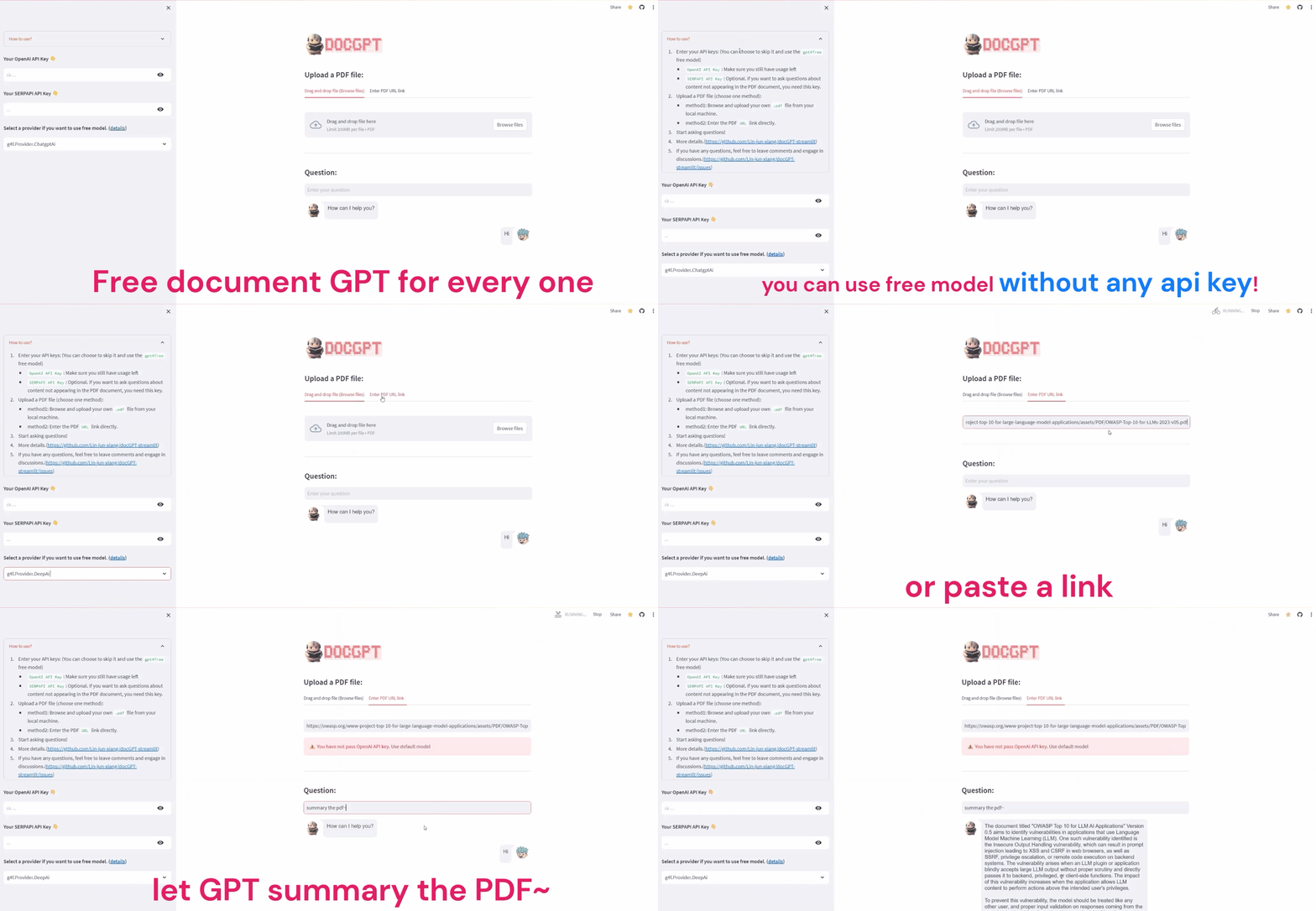
1. 🎬Visit the [application](https://docgpt-app.streamlit.app/).
2. 🔑Enter your `API_KEY` (optional in Version 3, as you can use the `gpt4free` free model):
- `OpenAI API KEY`: Ensure you have available usage.
- `SERPAPI API KEY`: Required if you want to query content not present in the Document.
3. 📁Upload a Document file (choose one method)
* Method 1: Browse and upload your own `.pdf`, `.docx`, `.csv`, `.txt` file from your local machine.
* Method 2: Enter the Document `URL` link directly.
4. 🚀Start asking questions!
> [!WARNING]
> Due to resource limitations in the free version of Streamlit Cloud, the application may experience crashes when used by multiple users simultaneously ([Oh no!](https://github.com/Lin-jun-xiang/docGPT-langchain/issues/2)). If you encounter this problem, feel free to report it in the issue tracker, and the developers will restart the application.
---
### 🧠How to Develop a docGPT with Streamlit?
A step-by-step tutorial to quickly build your own chatGPT!
First, clone the repository using `git clone https://github.com/Lin-jun-xiang/docGPT-streamlit.git`.
There are few methods:
* **Local development without docker**:
* Download the required packages for development.
```
pip install -r requirements.txt
```
* Start the service in the project's root directory.
```
streamlit run ./app.py
```
* Start exploring! You server will now be running at `http://localhost:8501`.
* **Local development with docker**:
* Start the service using Docker Compose
```
docker-compose up
```
You server will now be running at `http://localhost:8501`. You can interact with the `docGPT` or run your tests as you would normally.
* To stop the Docker containers, simply run:
```
docker-compose down
```
* **Streamlit Community Cloud for free** deployment, management, and sharing of applications:
- Place your application in a public GitHub repository (ensure you have `requirements.txt`).
- Log in to [share.streamlit.io](https://share.streamlit.io/).
- Click "Deploy an App," then paste your GitHub URL.
- Complete deployment and share your [application](https://docgpt-app.streamlit.app//).
Due to the limitations of the free version of Streamlit Cloud and its reliance on server resources, `docGPT` may experience some latency. We recommend users to consider deploying it locally for a smoother experience
---
### 💬Advanced - How to build a better model in langchain
To build a powerful docGPT model in LangChain, consider these tips to enhance performance:
1. **Language Model**
Select an appropriate LLM model, such as OpenAI's `gpt-3.5-turbo` or other models. Experiment with different models to find the best fit for your use case.
```python
# ./docGPT/docGPT.py
llm = ChatOpenAI(
temperature=0.2,
max_tokens=2000,
model_name='gpt-3.5-turbo'
)
```
Please note that there is no best or worst model. You need to try multiple models to find the one that suits your use case the best. For more OpenAI models, please refer to the [documentation](https://platform.openai.com/docs/models).
(Some models support up to 16,000 tokens!)
2. **PDF Loader**
Choose a suitable PDF loader. Consider using `PyMuPDF` for fast text extraction and `PDFPlumber` for extracting text from tables.
([official Langchain documentation](https://python.langchain.com/docs/modules/data_connection/document_loaders/how_to/pdf))
* `PyPDF`: Simple and easy to use.
* `PyMuPDF`: Reads the document very **quickly** and provides additional metadata such as page numbers and document dates.
* `PDFPlumber`: Can **extract text within tables**. Similar to PyMuPDF, it provides metadata but takes longer to parse.
If your document contains multiple tables and important information is within those tables, it is recommended to try `PDFPlumber`, which may give you unexpected results!
Please do not overlook this detail, as without correctly parsing the text from the document, even the most powerful LLM model would be useless!
3. **Tracking Token Usage**
Implement token usage tracking with callbacks in LangChain to monitor token and API key usage during the QA chain process.
When using `chain.run`, you can try using the [method](https://python.langchain.com/docs/modules/model_io/models/llms/how_to/token_usage_tracking) provided by Langchain to track token usage here:
```python
from langchain.callbacks import get_openai_callback
with get_openai_callback() as callback:
response = self.qa_chain.run(query)
print(callback)
# Result of print
"""
chain...
...
> Finished chain.
Total Tokens: 1506
Prompt Tokens: 1350
Completion Tokens: 156
Total Cost (USD): $0.03012
```
<a href="#top">Back to top</a>
================================================
FILE: README.zh-TW.md
================================================
<p align="center">
<img style="width: 50%; height: auto;" src="./static/img/repos_logo.png" alt="Chatbot Image">
</p>
[English](./README.md) | [中文版](./README.zh-TW.md)
免費的`docGPT`允許您與您的文件 (`.pdf`, `.docx`, `.csv`, `.txt`) 進行對話,無需任何金鑰或費用。
此外,您也可以根據該文件操作,將程序部屬在任何地方。
- 目錄
- [Introduction](#introduction)
- [Features](#🧨features)
- [What's LangChain?](#whats-langchain)
- [How to Use docGPT?](#how-to-use-docgpt)
- [How to develope a docGPT with streamlit?](#how-to-develope-a-docgpt-with-streamlit)
- [Advanced - How to build a better model in langchain](#advanced---how-to-build-a-better-model-in-langchain)
* 主要開發軟體與套件:
* `Python 3.10.11`
* `Langchain 0.0.218`
* `Streamlit 1.22.0`
* [more](./requirements.txt)
如果您喜歡這個專案,請給予⭐`Star`以支持開發者~
### 📚Introduction
* 上傳來自本地的 Document 連結 (`.pdf`, `.docx`, `.csv`, `.txt`),並且向 `docGPT` 詢問有關 Document 內容。例如: 您可以請 GPT 幫忙總結文章
* 提供兩種模型選擇:
* `gpt4free`
* **完全免費,"允許使用者在無需輸入 API 金鑰或付款的情況下使用該應用程序"**
* 需選擇 `Provider`。有關 `gpt4free` 的更多詳細信息,請參閱[源專案](https://github.com/xtekky/gpt4free)
* `openai`
* **須具備** `openai_api_key`,您可以從此[鏈接](https://platform.openai.com/)獲取金鑰
* 若具備 `serpapi_key`,AI 的回應可以包括 Google 搜索結果
<p align="center">
<img src="static/img/2023-09-06-14-56-20.png" width="80%">
</p>
---
### 🧨Features
- **`gpt4free` 整合**:任何人都可以免費使用 GPT4,無需輸入 OpenAI API 金鑰。
- **支援 docx, pdf, csv, txt 檔案**: 可以上傳 PDF, Word, CSV, txt 檔
- **直接輸入 Document 網址**:使用者可以直接輸入 Document URL 進行解析,無需從本地上傳檔案(如下方demo所示)。
- **Langchain Agent**:AI 能夠回答當前問題,實現類似 Google 搜尋功能。
- **簡易操作環境**:友善的界面,操作簡便
---
### 🦜️What's LangChain?
* LangChain 是一個用於**開發由語言模型支持的應用程序的框架**。它支持以下應用程序
1. 將 LLM 模型與外部數據源進行連接
2. 允許與 LLM 模型進行交互
* 有關 langchain 的介紹,建議查看官方文件、[Github源專案](https://github.com/hwchase17/langchain)
**ChatGPT 無法回答的問題,交給 Langchain 實現!**
LangChain 填補了 ChatGPT 的不足之處。通過以下示例,您可以理解 LangChain 的威力:
> 在 ChatGPT 無法解答數學問題或回答 2020 年以後的問題(例如“2023 年的總統是誰?”)的情況下:
>
> * 數學問題: 有專門處理數學問題的 math-LLM 模型
> * 現今問題: 使用 Google 搜索
>
> 要創建一個全面的 AI 模型,我們需要結合 "ChatGPT"、"math-LLM" 和 "Google 搜索" 工具。
>
> 在非 AI 時代,我們將使用 `if...else...` 將用戶查詢進行分類,讓用戶選擇問題類型(通過 UI)。
>
> 在 AI 時代,用戶應能夠直接提問。通過 LangChain 的 agent:
>
> * 我們向 agent 提供工具,例如 `tools = ['chatgpt', 'math-llm', 'google-search']`
> * 工具可以包括使用 LangChain 設計的 chains,例如使用 `retrievalQA chain` 回答來自文檔的問題。
> * agent 根據用戶查詢自動決定使用哪個工具(完全自動化)。
通過 LangChain,您可以創建通用的 AI 模型,也可以為**商業應用**量身定制。
---
### 🚩How to Use docGPT?
1. 🎬前往[應用程序](https://docgpt-app.streamlit.app/)
2. 🔑輸入您的 `API_KEY` (在版本 3 中為可選,您可以使用 `gpt4free` 免費模型):
* `OpenAI API KEY`: 確保還有可用的使用次數。
* `SERPAPI API KEY`: 如果您要查詢 Document 中不存在的內容,則需要使用此金鑰。
3. 📁上傳來自本地的 Document 檔案 (選擇一個方法)
* 方法一: 從本地機瀏覽並上傳自己的 `.pdf`, `.docx`, `.csv` or `.txt` 檔
* 方法二: 輸入 Document URL 連結
4. 🚀開始提問 !

> [!WARNING]
> 由於免費版 streamlit cloud 資源限制,該程序在多人同時使用時,容易引發崩潰([Oh no!](https://github.com/Lin-jun-xiang/docGPT-langchain/issues/2)),若遇上該問題歡迎到 Issue 提醒開發者,開發者會重啟程序。
---
### 🧠How to develope a docGPT with streamlit?
手把手教學,讓您快速建立一個屬於自己的 chatGPT !
首先請進行 `git clone https://github.com/Lin-jun-xiang/docGPT-streamlit.git`
方法有如下幾種方法:
* 於**本地開發方式(不使用docker)**:
* 下載開發需求套件
```
pip install -r requirements.txt
```
* 於專案根目錄啟動服務
```
streamlit run ./app.py
```
* 開始體驗! 您的服務會運行在 `http://localhost:8501`.
* 於**本地開發方式(使用docker)**:
* 使用 Docker Compose 啟動服務
```
docker-compose up
```
您的服務會運行在 `http://localhost:8501`. 您可以開始使用 `docGPT` 應用程序
* 停止服務運行
```
docker-compose down
```
* 使用 Streamlit Community **Cloud 免費部屬**、管理和共享應用程序
* 將您的應用程序放在公共 GitHub 存儲庫中(確保有 `requirements.txt`!)
* 登錄[share.streamlit.io](https://share.streamlit.io/)
* 單擊“部署應用程序”,然後粘貼您的 GitHub URL
* 完成部屬[應用程序](https://docgpt-app.streamlit.app//)
由於 `docGPT` 是使用 streamlit cloud 免費版部屬,受限於設備關係會有不少延遲,建議使用者可以使用本地部屬方式來體驗。
---
### 💬Advanced - How to build a better model in langchain
要在 LangChain 中構建功能強大的 docGPT 模型,請考慮以下技巧以改進性能
1. **Language Model**
使用適當的 LLM Model,會讓您事半功倍,例如您可以選擇使用 OpenAI 的 `gpt-3.5-turbo` (預設是 `text-davinci-003`):
```python
# ./docGPT/docGPT.py
llm = ChatOpenAI(
temperature=0.2,
max_tokens=2000,
model_name='gpt-3.5-turbo'
)
```
請注意,模型之間並沒有最好與最壞,您需要多試幾個模型,才會發現最適合自己案例的模型,更多 OpenAI model 請[參考](https://platform.openai.com/docs/models)
(部分模型可以使用 16,000 tokens!)
2. **PDF Loader**
在 Python 中有許多解析 PDF 文字的 Loader,每個 Loader 各有優缺點,以下整理三個作者用過的
([Langchain官方介紹](https://python.langchain.com/docs/modules/data_connection/document_loaders/how_to/pdf)):
* `PyPDF`: 簡單易用
* `PyMuPDF`: 讀取文件**速度非常快速**,除了能解析文字,還能取得頁數、文檔日期...等 MetaData。
* `PDFPlumber`: 能夠解析出**表格內部文字**,使用方面與 `PyMuPDF` 相似,皆能取得 MetaData,但是解析時間較長。
如果您的文件具有多個表格,且重要資訊存在表格中,建議您嘗試 `PDFPlumber`,它會給您意想不到的結果!
請不要忽略這個細節,因為沒有正確解析出文件中的文字,即使 LLM 模型再強大也無用!
3. **Tracking Token Usage**
這個並不能讓模型強大,但是能讓您清楚知道 QA Chain 的過程中,您使用的 tokens、openai api key 的使用量。
當您使用 `chain.run` 時,可以嘗試用 langchain 提供的 [方法](https://python.langchain.com/docs/modules/model_io/models/llms/how_to/token_usage_tracking):
```python
from langchain.callbacks import get_openai_callback
with get_openai_callback() as callback:
response = self.qa_chain.run(query)
print(callback)
# Result of print
"""
chain...
...
> Finished chain.
Total Tokens: 1506
Prompt Tokens: 1350
Completion Tokens: 156
Total Cost (USD): $0.03012
"""
```
<a href="#top">Back to top</a>
================================================
FILE: app.py
================================================
import os
os.chdir(os.path.dirname(os.path.abspath(__file__)))
os.environ['SERPAPI_API_KEY'] = ''
import streamlit as st
from streamlit import logger
from streamlit_chat import message
from components import get_response, side_bar, theme, upload_and_process_document
from docGPT import create_doc_gpt
OPENAI_API_KEY = ''
SERPAPI_API_KEY = ''
model = None
st.session_state.openai_api_key = None
st.session_state.serpapi_api_key = None
st.session_state.g4f_provider = None
st.session_state.button_clicked = None
if 'response' not in st.session_state:
st.session_state['response'] = ['How can I help you?']
if 'query' not in st.session_state:
st.session_state['query'] = ['Hi']
app_logger = logger.get_logger(__name__)
def main():
global model
theme()
side_bar()
doc_container = st.container()
with doc_container:
docs = upload_and_process_document()
if docs:
model = create_doc_gpt(
docs,
{k: v for k, v in docs[0].metadata.items() if k not in ['source', 'file_path']},
st.session_state.g4f_provider
)
app_logger.info(f'{__file__}: Created model: {model}')
del docs
st.write('---')
user_container = st.container()
response_container = st.container()
with user_container:
query = st.text_input(
"#### Question:",
placeholder='Enter your question'
)
if model and query and query != '' and not st.session_state.button_clicked:
response = get_response(query, model)
st.session_state.query.append(query)
st.session_state.response.append(response)
with response_container:
if st.session_state['response']:
for i in range(len(st.session_state['response'])-1, -1, -1):
message(
st.session_state["response"][i], key=str(i),
logo=(
'https://github.com/Lin-jun-xiang/docGPT-streamlit/'
'blob/main/static/img/chatbot_v2.png?raw=true'
)
)
message(
st.session_state['query'][i], is_user=True, key=str(i) + '_user',
logo=(
'https://api.dicebear.com/6.x/adventurer/svg?'
'hair=short16&hairColor=85c2c6&'
'eyes=variant12&size=100&'
'mouth=variant26&skinColor=f2d3b1'
)
)
if __name__ == "__main__":
main()
================================================
FILE: components/__init__.py
================================================
from .sidebar import side_bar
from .document_processor import upload_and_process_document
from .response_handler import get_response
from .theme import theme
__all__ = [
'get_response',
'side_bar',
'theme',
'upload_and_process_document'
]
================================================
FILE: components/document_processor.py
================================================
import os
import tempfile
import streamlit as st
from model import DocumentLoader
def upload_and_process_document() -> list:
st.write('#### Upload a Document file')
browse, url_link = st.tabs(
['Drag and drop file (Browse files)', 'Enter document URL link']
)
with browse:
upload_file = st.file_uploader(
'Browse file (.pdf, .docx, .csv, `.txt`)',
type=['pdf', 'docx', 'csv', 'txt'],
label_visibility='hidden'
)
filetype = os.path.splitext(upload_file.name)[1].lower() if upload_file else None
upload_file = upload_file.read() if upload_file else None
with url_link:
doc_url = st.text_input(
"Enter document URL Link (.pdf, .docx, .csv, .txt)",
placeholder='https://www.xxx/uploads/file.pdf',
label_visibility='hidden'
)
if doc_url:
upload_file, filetype = DocumentLoader.crawl_file(doc_url)
if upload_file and filetype:
temp_file = tempfile.NamedTemporaryFile(delete=False)
temp_file.write(upload_file)
temp_file_path = temp_file.name
docs = DocumentLoader.load_documents(temp_file_path, filetype)
docs = DocumentLoader.split_documents(
docs, chunk_size=2000,
chunk_overlap=200
)
temp_file.close()
if temp_file_path:
os.remove(temp_file_path)
return docs
================================================
FILE: components/response_handler.py
================================================
from streamlit import logger
app_logger = logger.get_logger(__name__)
def get_response(query: str, model) -> str:
app_logger.info(f'\033[36mUser Query: {query}\033[0m')
try:
if model is not None and query:
response = model.run(query)
app_logger.info(f'\033[36mLLM Response: {response}\033[0m')
return response
return (
'Your model still not created.\n'
'1. If you are using gpt4free model, '
'try to re-select a provider. '
'(Click the "Show Available Providers" button in sidebar)\n'
'2. If you are using openai model, '
'try to re-pass openai api key.\n'
'3. Or you did not pass the file successfully.\n'
'4. Try to Refresh the page (F5).'
)
except Exception as e:
app_logger.info(f'{__file__}: {e}')
return (
'Something wrong in docGPT...\n'
'1. If you are using gpt4free model, '
'try to select the different provider. '
'(Click the "Show Available Providers" button in sidebar)\n'
'2. If you are using openai model, '
'check your usage for openai api key.\n'
'3. Try to Refresh the page (F5).'
)
================================================
FILE: components/sidebar.py
================================================
import asyncio
import os
import streamlit as st
from docGPT import GPT4Free
def side_bar() -> None:
with st.sidebar:
with st.expander(':orange[How to use?]'):
st.markdown(
"""
1. Enter your API keys: (You can use the `gpt4free` free model **without API keys**)
* `OpenAI API Key`: Make sure you still have usage left
* `SERPAPI API Key`: Optional. If you want to ask questions about content not appearing in the PDF document, you need this key.
2. **Upload a Document** file (choose one method):
* method1: Browse and upload your own document file from your local machine.
* method2: Enter the document URL link directly.
(**support documents**: `.pdf`, `.docx`, `.csv`, `.txt`)
3. Start asking questions!
4. More details.(https://github.com/Lin-jun-xiang/docGPT-streamlit)
5. If you have any questions, feel free to leave comments and engage in discussions.(https://github.com/Lin-jun-xiang/docGPT-streamlit/issues)
"""
)
with st.sidebar:
if st.session_state.openai_api_key:
OPENAI_API_KEY = st.session_state.openai_api_key
st.sidebar.success('API key loaded form previous input')
else:
OPENAI_API_KEY = st.sidebar.text_input(
label='#### Your OpenAI API Key 👇',
placeholder="sk-...",
type="password",
key='OPENAI_API_KEY'
)
st.session_state.openai_api_key = OPENAI_API_KEY
os.environ['OPENAI_API_KEY'] = OPENAI_API_KEY
with st.sidebar:
if st.session_state.serpapi_api_key:
SERPAPI_API_KEY = st.session_state.serpapi_api_key
st.sidebar.success('API key loaded form previous input')
else:
SERPAPI_API_KEY = st.sidebar.text_input(
label='#### Your SERPAPI API Key 👇',
placeholder="...",
type="password",
key='SERPAPI_API_KEY'
)
st.session_state.serpapi_api_key = SERPAPI_API_KEY
os.environ['SERPAPI_API_KEY'] = SERPAPI_API_KEY
with st.sidebar:
gpt4free = GPT4Free()
st.session_state.g4f_provider = st.selectbox(
(
"#### Select a provider if you want to use free model. "
"([details](https://github.com/xtekky/gpt4free#models))"
),
(['BestProvider'] + list(gpt4free.providers_table.keys()))
)
st.session_state.button_clicked = st.button(
'Show Available Providers',
help='Click to test which providers are currently available.',
type='primary'
)
if st.session_state.button_clicked:
available_providers = asyncio.run(gpt4free.show_available_providers())
st.session_state.query.append('What are the available providers right now?')
st.session_state.response.append(
'The current available providers are:\n'
f'{available_providers}'
)
================================================
FILE: components/theme.py
================================================
import streamlit as st
def theme() -> None:
st.set_page_config(page_title="Document GPT")
st.image('./static/img/chatbot_v2.png', width=150)
================================================
FILE: docGPT/__init__.py
================================================
import os
import openai
import streamlit as st
from langchain.chat_models import ChatOpenAI
from streamlit import logger
from .agent import AgentHelper
from .check_api_key import OpenAiAPI, SerpAPI
from .docGPT import DocGPT, GPT4Free
openai.api_key = os.getenv('OPENAI_API_KEY')
os.environ['SERPAPI_API_KEY'] = os.getenv('SERPAPI_API_KEY')
module_logger = logger.get_logger(__name__)
@st.cache_resource(ttl=1200, max_entries=3)
def create_doc_gpt(
_docs: list,
doc_metadata: str,
g4f_provider: str
) -> DocGPT:
docGPT = DocGPT(docs=_docs)
try:
if OpenAiAPI.is_valid():
# Use openai llm model with agent
docGPT_tool, calculate_tool, search_tool, llm_tool = [None] * 4
agent_ = AgentHelper()
llm_model = ChatOpenAI(
temperature=0.2,
max_tokens=6000,
model_name='gpt-3.5-turbo-16k'
)
docGPT.llm = llm_model
agent_.llm = llm_model
docGPT.create_qa_chain(chain_type='refine', verbose=False)
docGPT_tool = agent_.create_doc_chat(docGPT)
calculate_tool = agent_.get_calculate_chain
# llm_tool = agent_.create_llm_chain()
module_logger.info('\033[43mUsing OpenAI model...\033[0m')
if SerpAPI.is_valid():
search_tool = agent_.get_searp_chain
tools = [
docGPT_tool,
search_tool,
# llm_tool, # This will cause agent confuse
calculate_tool
]
agent_.initialize(tools)
return agent_ if agent_ is not None else None
else:
return docGPT
else:
# Use gpt4free llm model without agent
llm_model = GPT4Free(provider=g4f_provider)
docGPT.llm = llm_model
docGPT.create_qa_chain(chain_type='refine', verbose=False)
module_logger.info('\033[43mUsing Gpt4free model...\033[0m')
return docGPT
except Exception as e:
print(e)
module_logger.info(f'{__file__}: {e}')
================================================
FILE: docGPT/agent.py
================================================
import os
from typing import Optional
import openai
from langchain.agents import AgentType, Tool, initialize_agent
from langchain.callbacks import get_openai_callback
from langchain.chains import LLMChain
from langchain.prompts import PromptTemplate
openai.api_key = os.getenv('OPENAI_API_KEY')
os.environ['SERPAPI_API_KEY'] = os.getenv('SERPAPI_API_KEY')
class AgentHelper:
"""Add agent to help docGPT can be perfonm better."""
def __init__(self) -> None:
self._llm = None
self.agent_ = None
self.tools = []
@property
def llm(self):
return self._llm
@llm.setter
def llm(self, llm) -> None:
self._llm = llm
@property
def get_calculate_chain(self) -> Tool:
from langchain import LLMMathChain
llm_math_chain = LLMMathChain.from_llm(llm=self.llm, verbose=True)
tool = Tool(
name='Calculator',
func=llm_math_chain.run,
description='useful for when you need to answer questions about math'
)
return tool
@property
def get_searp_chain(self) -> Tool:
from langchain import SerpAPIWrapper
search = SerpAPIWrapper()
tool = Tool(
name='Search',
func=search.run,
description='useful for when you need to answer questions about current events'
)
return tool
def create_doc_chat(self, docGPT) -> Tool:
"""Add a custom docGPT tool"""
tool = Tool(
name='DocumentGPT',
func=docGPT.run,
description="""
useful for when you need to answer questions from the context of PDF
"""
)
return tool
def create_llm_chain(self) -> Tool:
"""Add a llm tool"""
prompt = PromptTemplate(
input_variables = ['query'],
template = '{query}'
)
llm_chain = LLMChain(llm=self.llm, prompt=prompt)
tool = Tool(
name='LLM',
func=llm_chain.run,
description='useful for general purpose queries and logic.'
)
return tool
def initialize(self, tools):
for tool in tools:
if isinstance(tool, Tool):
self.tools.append(tool)
self.agent_ = initialize_agent(
self.tools,
self.llm,
agent=AgentType.ZERO_SHOT_REACT_DESCRIPTION,
verbose=True
)
def run(self, query: str) -> Optional[str]:
response = None
with get_openai_callback() as callback:
try:
response = self.agent_.run(query)
except ValueError as e:
response = 'Something wrong in agent: ' + str(e)
if not response.startswith("Could not parse LLM output: `"):
raise e
print(callback)
return response
================================================
FILE: docGPT/check_api_key.py
================================================
import os
from abc import ABC, abstractmethod
import openai
import streamlit as st
class ApiKey(ABC):
"""Check the Api key is valid or not"""
query = 'This is a test.'
@classmethod
@abstractmethod
def is_valid(cls):
pass
class OpenAiAPI(ApiKey):
@classmethod
def is_valid(cls) -> str:
if not st.session_state['openai_api_key']:
st.error('⚠️ :red[You have not pass OpenAI API key.] Use default model')
return
openai.api_key = os.getenv('OPENAI_API_KEY')
try:
response = openai.Completion.create(
engine='davinci',
prompt=cls.query,
max_tokens=5
)
return response
except Exception as e:
st.error(
'🚨 :red[Your OpenAI API key has a problem.] '
'[Check your usage](https://platform.openai.com/account/usage)'
)
print(f'Test error\n{e}')
class SerpAPI(ApiKey):
@classmethod
def is_valid(cls) -> str:
if not st.session_state['serpapi_api_key']:
st.warning('⚠️ You have not pass SerpAPI key. (You cannot ask current events.)')
return
from langchain import SerpAPIWrapper
os.environ['SERPAPI_API_KEY'] = os.getenv('SERPAPI_API_KEY')
try:
search = SerpAPIWrapper()
response = search.run(cls.query)
return response
except Exception as e:
st.error(
'🚨 :red[Your SerpAPI key has a problem.] '
'[Check your usage](https://serpapi.com/dashboard)'
)
print(f'Test error\n{e}')
================================================
FILE: docGPT/docGPT.py
================================================
import asyncio
import os
from abc import ABC, abstractmethod
from typing import List, Optional
import g4f
import openai
from langchain.callbacks import get_openai_callback
from langchain.callbacks.manager import CallbackManagerForLLMRun
from langchain.chains import RetrievalQA
from langchain.embeddings import HuggingFaceEmbeddings
from langchain.embeddings.openai import OpenAIEmbeddings
from langchain.llms.base import LLM
from langchain.prompts import PromptTemplate
from langchain.vectorstores import FAISS
from streamlit import logger
openai.api_key = os.getenv('OPENAI_API_KEY')
module_logger = logger.get_logger(__name__)
class BaseQaChain(ABC):
def __init__(
self,
chain_type: str,
retriever,
llm
) -> None:
self.chain_type = chain_type
self.retriever = retriever
self.llm = llm
@abstractmethod
def create_qa_chain(self):
pass
class RChain(BaseQaChain):
def __init__(
self,
chain_type: str,
retriever,
llm,
chain_type_kwargs: dict
) -> None:
super().__init__(chain_type, retriever, llm)
self.chain_type_kwargs = chain_type_kwargs
@property
def create_qa_chain(self) -> RetrievalQA:
qa_chain = RetrievalQA.from_chain_type(
llm=self.llm,
chain_type=self.chain_type,
retriever=self.retriever,
chain_type_kwargs=self.chain_type_kwargs
)
return qa_chain
class CRChain(BaseQaChain):
def __init__(
self,
chain_type: str,
retriever,
llm,
) -> None:
super().__init__(chain_type, retriever, llm)
@property
def create_qa_chain(self):
# TODO: cannot use conversation qa chain
from langchain.chains import ConversationalRetrievalChain
from langchain.memory import ConversationBufferMemory
memory = ConversationBufferMemory(
memory_key='chat_history',
return_messages=True
)
qa_chain = ConversationalRetrievalChain.from_llm(
llm=self.llm,
chain_type=self.chain_type,
retriever=self.retriever,
memory=memory
)
return qa_chain
class DocGPT:
def __init__(self, docs):
self.docs = docs
self.qa_chain = None
self._llm = None
self.prompt_template = (
"Only answer what is asked. Answer step-by-step.\n"
"If the content has sections, please summarize them "
"in order and present them in a bulleted format.\n"
"Utilize line breaks for better readability.\n"
"For example, sequentially summarize the "
"introduction, methods, results, and so on.\n"
"Please use Python's newline symbols appropriately to "
"enhance the readability of the response, "
"but don't use two newline symbols consecutive.\n\n"
"{context}\n\n"
"Question: {question}\n"
)
self.prompt = PromptTemplate(
template=self.prompt_template,
input_variables=['context', 'question']
)
self.refine_prompt_template = (
"The original question is as follows: {question}\n"
"We have provided an existing answer: {existing_answer}\n"
"We have the opportunity to refine the existing answer"
"(only if needed) with some more context below.\n"
"------------\n"
"{context_str}\n"
"------------\n"
"Given the new context, refine the original answer to better "
"answer the question. "
"If the context isn't useful, return the original answer.\n"
"Please use Python's newline symbols "
"appropriately to enhance the readability of the response, "
"but don't use two newline symbols consecutive.\n"
)
self.refine_prompt = PromptTemplate(
template=self.refine_prompt_template,
input_variables=['question', 'existing_answer', 'context_str']
)
@property
def llm(self):
return self._llm
@llm.setter
def llm(self, llm) -> None:
self._llm = llm
def _helper_prompt(self, chain_type: str) -> None:
# TODO: Bug helper
if chain_type == 'refine':
self.prompt_template = self.prompt_template.replace(
'{context}', '{context_str}'
)
self.prompt.template = self.prompt_template
for i in range(len(self.prompt.input_variables)):
if self.prompt.input_variables[i] == 'context':
self.prompt.input_variables[i] = 'context_str'
def _embeddings(self):
try:
# If have openai api
embeddings = OpenAIEmbeddings()
except:
embeddings = HuggingFaceEmbeddings(
model_name=(
'sentence-transformers/'
'multi-qa-MiniLM-L6-cos-v1'
)
)
db = FAISS.from_documents(
documents=self.docs,
embedding=embeddings
)
module_logger.info('embedded...')
return db
def create_qa_chain(
self,
chain_type: str ='stuff',
verbose: bool = True
) -> BaseQaChain:
# TODO: Bug helper
self._helper_prompt(chain_type)
chain_type_kwargs = {
'question_prompt': self.prompt,
'verbose': verbose,
'refine_prompt': self.refine_prompt
}
db = self._embeddings()
retriever = db.as_retriever()
self.qa_chain = RChain(
chain_type=chain_type,
retriever=retriever,
llm=self._llm,
chain_type_kwargs=chain_type_kwargs
).create_qa_chain
def run(self, query: str) -> str:
response = 'Nothing...'
with get_openai_callback() as callback:
if isinstance(self.qa_chain, RetrievalQA):
response = self.qa_chain.run(query)
module_logger.info(callback)
return response
class GPT4Free(LLM):
providers_table = {
f'g4f.Provider.{provider}': getattr(g4f.Provider, provider)
for provider in g4f.Provider.__all__
}
provider: str = 'g4f.Provider.DeepAi'
@property
def _llm_type(self) -> str:
return 'gpt4free model'
def _call(
self,
prompt: str,
stop: Optional[List[str]] = None,
run_manager: Optional[CallbackManagerForLLMRun] = None,
) -> str:
try:
# print(f'\033[36mPromopt: {prompt}\033[0m')
provider = self.providers_table.get(self.provider, None)
module_logger.info(
f'\033[36mProvider: {provider}\033[0m'
)
return g4f.ChatCompletion.create(
model="gpt-3.5-turbo",
messages=[{"role": "user", "content": prompt}],
provider=provider,
ignored=["ChatBase"]
)
except Exception as e:
module_logger.info(f'{__file__}: call gpt4free error - {e}')
async def _test_provider(self, provider: g4f.Provider) -> str:
provider_name = provider.__name__
try:
await g4f.ChatCompletion.create_async(
model="gpt-3.5-turbo",
messages=[{"role": "user", "content": 'Hi, this is test'}],
provider=provider,
ignored=["ChatBase"]
)
return provider_name
except Exception as e:
print(f'{provider_name}: {e}')
async def show_available_providers(self) -> list:
"""Test all the providers then find out which are available"""
tasks = [
self._test_provider(provider)
for provider in self.providers_table.values()
]
available_providers = await asyncio.gather(*tasks)
return [
available_provider for available_provider in available_providers
if available_provider is not None
]
================================================
FILE: docker-compose.yml
================================================
version: '3'
services:
docgpt:
build:
context: .
dockerfile: Dockerfile
ports:
- '8501:8501'
================================================
FILE: model/__init__.py
================================================
from .data_connection import (
DocumentLoader
)
================================================
FILE: model/data_connection.py
================================================
import os
from typing import Iterator, Union
import requests
import streamlit as st
from langchain.document_loaders import (
CSVLoader,
Docx2txtLoader,
PyMuPDFLoader,
TextLoader,
)
from langchain.text_splitter import RecursiveCharacterTextSplitter
class DocumentLoader:
@staticmethod
def get_files(path: str, filetype: str = '.pdf') -> Iterator[str]:
try:
yield from [
file_name for file_name in os.listdir(f'{path}')
if file_name.endswith(filetype)
]
except FileNotFoundError as e:
print(f'\033[31m{e}')
@staticmethod
def load_documents(
file: str,
filetype: str = '.pdf'
) -> Union[CSVLoader, Docx2txtLoader, PyMuPDFLoader, TextLoader]:
"""Loading PDF, Docx, CSV"""
try:
if filetype == '.pdf':
loader = PyMuPDFLoader(file)
elif filetype == '.docx':
loader = Docx2txtLoader(file)
elif filetype == '.csv':
loader = CSVLoader(file, encoding='utf-8')
elif filetype == '.txt':
loader = TextLoader(file, encoding='utf-8')
return loader.load()
except Exception as e:
print(f'\033[31m{e}')
return []
@staticmethod
def split_documents(
document: Union[CSVLoader, Docx2txtLoader, PyMuPDFLoader, TextLoader],
chunk_size: int=2000,
chunk_overlap: int=0
) -> list:
splitter = RecursiveCharacterTextSplitter(
chunk_size=chunk_size,
chunk_overlap=chunk_overlap
)
return splitter.split_documents(document)
@staticmethod
def crawl_file(url: str) -> str:
try:
response = requests.get(url)
filetype = os.path.splitext(url)[1]
if response.status_code == 200 and (
any(ext in filetype for ext in ['.pdf', '.docx', '.csv', '.txt'])
):
return response.content, filetype
else:
st.warning('Url cannot parse correctly.')
except:
st.warning('Url cannot parse correctly.')
================================================
FILE: requirements.txt
================================================
g4f
langchain==0.0.218
openai==0.27.8
streamlit==1.26.0
streamlit_chat==0.1.1
pymupdf==1.22.5
faiss-cpu==1.7.4
tiktoken==0.4.0
tenacity==8.1.0
google-search-results==2.4.2
sentence_transformers
requests
httpx
docx2txt
gitextract_h4pgy3ua/ ├── .github/ │ └── ISSUE_TEMPLATE/ │ └── default_issue.yml ├── .gitignore ├── .streamlit/ │ └── config.toml ├── Dockerfile ├── LICENSE ├── README.md ├── README.zh-TW.md ├── app.py ├── components/ │ ├── __init__.py │ ├── document_processor.py │ ├── response_handler.py │ ├── sidebar.py │ └── theme.py ├── docGPT/ │ ├── __init__.py │ ├── agent.py │ ├── check_api_key.py │ └── docGPT.py ├── docker-compose.yml ├── model/ │ ├── __init__.py │ └── data_connection.py └── requirements.txt
SYMBOL INDEX (49 symbols across 10 files)

FILE: app.py
  function main (line 32) | def main():

FILE: components/document_processor.py
  function upload_and_process_document (line 9) | def upload_and_process_document() -> list:

FILE: components/response_handler.py
  function get_response (line 5) | def get_response(query: str, model) -> str:

FILE: components/sidebar.py
  function side_bar (line 9) | def side_bar() -> None:

FILE: components/theme.py
  function theme (line 4) | def theme() -> None:

FILE: docGPT/__init__.py
  function create_doc_gpt (line 18) | def create_doc_gpt(

FILE: docGPT/agent.py
  class AgentHelper (line 14) | class AgentHelper:
    method __init__ (line 16) | def __init__(self) -> None:
    method llm (line 22) | def llm(self):
    method llm (line 26) | def llm(self, llm) -> None:
    method get_calculate_chain (line 30) | def get_calculate_chain(self) -> Tool:
    method get_searp_chain (line 42) | def get_searp_chain(self) -> Tool:
    method create_doc_chat (line 53) | def create_doc_chat(self, docGPT) -> Tool:
    method create_llm_chain (line 64) | def create_llm_chain(self) -> Tool:
    method initialize (line 79) | def initialize(self, tools):
    method run (line 91) | def run(self, query: str) -> Optional[str]:

FILE: docGPT/check_api_key.py
  class ApiKey (line 8) | class ApiKey(ABC):
    method is_valid (line 14) | def is_valid(cls):
  class OpenAiAPI (line 18) | class OpenAiAPI(ApiKey):
    method is_valid (line 20) | def is_valid(cls) -> str:
  class SerpAPI (line 41) | class SerpAPI(ApiKey):
    method is_valid (line 43) | def is_valid(cls) -> str:

FILE: docGPT/docGPT.py
  class BaseQaChain (line 22) | class BaseQaChain(ABC):
    method __init__ (line 23) | def __init__(
    method create_qa_chain (line 34) | def create_qa_chain(self):
  class RChain (line 38) | class RChain(BaseQaChain):
    method __init__ (line 39) | def __init__(
    method create_qa_chain (line 50) | def create_qa_chain(self) -> RetrievalQA:
  class CRChain (line 60) | class CRChain(BaseQaChain):
    method __init__ (line 61) | def __init__(
    method create_qa_chain (line 70) | def create_qa_chain(self):
  class DocGPT (line 88) | class DocGPT:
    method __init__ (line 89) | def __init__(self, docs):
    method llm (line 133) | def llm(self):
    method llm (line 137) | def llm(self, llm) -> None:
    method _helper_prompt (line 140) | def _helper_prompt(self, chain_type: str) -> None:
    method _embeddings (line 151) | def _embeddings(self):
    method create_qa_chain (line 170) | def create_qa_chain(
    method run (line 193) | def run(self, query: str) -> str:
  class GPT4Free (line 202) | class GPT4Free(LLM):
    method _llm_type (line 210) | def _llm_type(self) -> str:
    method _call (line 213) | def _call(
    method _test_provider (line 234) | async def _test_provider(self, provider: g4f.Provider) -> str:
    method show_available_providers (line 247) | async def show_available_providers(self) -> list:

FILE: model/data_connection.py
  class DocumentLoader (line 15) | class DocumentLoader:
    method get_files (line 17) | def get_files(path: str, filetype: str = '.pdf') -> Iterator[str]:
    method load_documents (line 27) | def load_documents(
    method split_documents (line 49) | def split_documents(
    method crawl_file (line 62) | def crawl_file(url: str) -> str:
Condensed preview — 21 files, each showing path, character count, and a content snippet. Download the .json file or copy for the full structured content (52K chars).
[
  {
    "path": ".github/ISSUE_TEMPLATE/default_issue.yml",
    "chars": 603,
    "preview": "name: Default Issue\ndescription: Raise an issue that wouldn't be covered by the other templates.\ntitle: \"Issue: <Please "
  },
  {
    "path": ".gitignore",
    "chars": 3161,
    "preview": ".chroma/\ndata/\nExternal_Data_Pipeline/\nPDF/Omren\nconfig.py\nmain.py\nnote.md\n\n# Byte-compiled / optimized / DLL files\n__py"
  },
  {
    "path": ".streamlit/config.toml",
    "chars": 35,
    "preview": "[server]\nenableStaticServing = true"
  },
  {
    "path": "Dockerfile",
    "chars": 624,
    "preview": "FROM python:3.9-slim\n\n# Set the working directory in the container.\nWORKDIR /app\n\n# Copy the project's requirements file"
  },
  {
    "path": "LICENSE",
    "chars": 1065,
    "preview": "MIT License\n\nCopyright (c) 2023 JunXiang\n\nPermission is hereby granted, free of charge, to any person obtaining a copy\no"
  },
  {
    "path": "README.md",
    "chars": 8996,
    "preview": "<p align=\"center\">\n    <img style=\"width: 50%; height: auto;\" src=\"./static/img/repos_logo.png\" alt=\"Chatbot Image\">\n</p"
  },
  {
    "path": "README.zh-TW.md",
    "chars": 5644,
    "preview": "<p align=\"center\">\n    <img style=\"width: 50%; height: auto;\" src=\"./static/img/repos_logo.png\" alt=\"Chatbot Image\">\n</p"
  },
  {
    "path": "app.py",
    "chars": 2605,
    "preview": "import os\n\nos.chdir(os.path.dirname(os.path.abspath(__file__)))\nos.environ['SERPAPI_API_KEY'] = ''\n\nimport streamlit as "
  },
  {
    "path": "components/__init__.py",
    "chars": 256,
    "preview": "from .sidebar import side_bar\nfrom .document_processor import upload_and_process_document\nfrom .response_handler import "
  },
  {
    "path": "components/document_processor.py",
    "chars": 1445,
    "preview": "import os\nimport tempfile\n\nimport streamlit as st\n\nfrom model import DocumentLoader\n\n\ndef upload_and_process_document() "
  },
  {
    "path": "components/response_handler.py",
    "chars": 1279,
    "preview": "from streamlit import logger\n\napp_logger = logger.get_logger(__name__)\n\ndef get_response(query: str, model) -> str:\n    "
  },
  {
    "path": "components/sidebar.py",
    "chars": 3249,
    "preview": "import asyncio\nimport os\n\nimport streamlit as st\n\nfrom docGPT import GPT4Free\n\n\ndef side_bar() -> None:\n    with st.side"
  },
  {
    "path": "components/theme.py",
    "chars": 151,
    "preview": "import streamlit as st\n\n\ndef theme() -> None:\n    st.set_page_config(page_title=\"Document GPT\")\n    st.image('./static/i"
  },
  {
    "path": "docGPT/__init__.py",
    "chars": 2171,
    "preview": "import os\n\nimport openai\nimport streamlit as st\nfrom langchain.chat_models import ChatOpenAI\nfrom streamlit import logge"
  },
  {
    "path": "docGPT/agent.py",
    "chars": 2903,
    "preview": "import os\nfrom typing import Optional\n\nimport openai\nfrom langchain.agents import AgentType, Tool, initialize_agent\nfrom"
  },
  {
    "path": "docGPT/check_api_key.py",
    "chars": 1691,
    "preview": "import os\nfrom abc import ABC, abstractmethod\n\nimport openai\nimport streamlit as st\n\n\nclass ApiKey(ABC):\n    \"\"\"Check th"
  },
  {
    "path": "docGPT/docGPT.py",
    "chars": 8180,
    "preview": "import asyncio\nimport os\nfrom abc import ABC, abstractmethod\nfrom typing import List, Optional\n\nimport g4f\nimport openai"
  },
  {
    "path": "docker-compose.yml",
    "chars": 122,
    "preview": "version: '3'\n\nservices:\n  docgpt:\n    build:\n      context: .\n      dockerfile: Dockerfile\n    ports:\n      - '8501:8501"
  },
  {
    "path": "model/__init__.py",
    "chars": 52,
    "preview": "from .data_connection import (\n    DocumentLoader\n)\n"
  },
  {
    "path": "model/data_connection.py",
    "chars": 2192,
    "preview": "import os\nfrom typing import Iterator, Union\n\nimport requests\nimport streamlit as st\nfrom langchain.document_loaders imp"
  },
  {
    "path": "requirements.txt",
    "chars": 218,
    "preview": "g4f\nlangchain==0.0.218\nopenai==0.27.8\nstreamlit==1.26.0\nstreamlit_chat==0.1.1\npymupdf==1.22.5\nfaiss-cpu==1.7.4\ntiktoken="
  }
]
About this extraction
This page contains the full source code of the Lin-jun-xiang/docGPT-langchain GitHub repository, extracted and formatted as plain text for AI agents and large language models (LLMs). The extraction includes 21 files (45.5 KB), approximately 12.5k tokens, and a symbol index with 49 extracted functions, classes, methods, constants, and types. Use this with OpenClaw, Claude, ChatGPT, Cursor, Windsurf, or any other AI tool that accepts text input. You can copy the full output to your clipboard or download it as a .txt file.
Extracted by GitExtract — free GitHub repo to text converter for AI. Built by Nikandr Surkov.