Repository: M-rcus/OnlyFans-Cookie-Helper
Branch: master
Commit: 6b2c941faecf
Files: 10
Total size: 19.7 KB
Directory structure:
gitextract_t56i8rl4/

├── .editorconfig
├── LICENSE.md
├── README.md
├── background/
│   └── background.js
├── content_scripts/
│   └── bcToken.js
├── create_firefox_zip.sh
├── manifest.json
├── manifest_v2.json
└── popup/
    ├── cookies.html
    └── cookies.js
================================================
FILE CONTENTS
================================================
================================================
FILE: .editorconfig
================================================
[*.{js,md}]
end_of_line = lf
indent_style = space
indent_size = 4
charset = utf-8
insert_final_newline = true
[*.js]
trim_trailing_whitespace = true
[*.md]
trim_trailing_whitespace = false
================================================
FILE: LICENSE.md
================================================
# MIT License
Copyright (c) 2020-2024 Marcus <m@rcus.dev>
Permission is hereby granted, free of charge, to any person obtaining a copy
of this software and associated documentation files (the "Software"), to deal
in the Software without restriction, including without limitation the rights
to use, copy, modify, merge, publish, distribute, sublicense, and/or sell
copies of the Software, and to permit persons to whom the Software is
furnished to do so, subject to the following conditions:
The above copyright notice and this permission notice shall be included in all
copies or substantial portions of the Software.
THE SOFTWARE IS PROVIDED "AS IS", WITHOUT WARRANTY OF ANY KIND, EXPRESS OR
IMPLIED, INCLUDING BUT NOT LIMITED TO THE WARRANTIES OF MERCHANTABILITY,
FITNESS FOR A PARTICULAR PURPOSE AND NONINFRINGEMENT. IN NO EVENT SHALL THE
AUTHORS OR COPYRIGHT HOLDERS BE LIABLE FOR ANY CLAIM, DAMAGES OR OTHER
LIABILITY, WHETHER IN AN ACTION OF CONTRACT, TORT OR OTHERWISE, ARISING FROM,
OUT OF OR IN CONNECTION WITH THE SOFTWARE OR THE USE OR OTHER DEALINGS IN THE
SOFTWARE.
================================================
FILE: README.md
================================================
# OnlyFans Cookie Helper
An extension made to make it easier to copy the correct `config.json` values when using [datawhores/OF-Scraper](https://github.com/datawhores/OF-Scraper) or [DIGITALCRIMINALS/OnlyFans](https://github.com/DIGITALCRIMINALS/OnlyFans).
## How to install
Extension is only available on the Firefox addon store, but not on the Chrome web store. For Chromium-based browsers, alternatively installation methods are necessary.
One of these days I might explore putting it on the Chrome web store, but for a few different reasons I bit am hesitant to so (one of them being the paywall Google has to publish extensions).
### Firefox
#### Option 1 (Recommended)
Install it from the [Firefox Addon Store (AMO)](https://addons.mozilla.org/en-US/firefox/addon/onlyfans/)
**NOTE**: Mozilla disabled the addon on February 27th 2024 citing the reason:
> Acceptable Use, specifically Sexual content: This content contains sexual or pornographic content that violates Mozilla’s Acceptable Use Policy.
I have replied to them to appeal, since the addon doesn't contain (or link to) any sexual content, but still awaiting any further reply from Mozilla.
If you need to \[re-\]install the addon, please use option 2 or 3 for the time being.
#### Option 2
Go to [Releases](https://github.com/M-rcus/OnlyFans-Cookie-Helper/releases), download the `.xpi` file and install it by typing `about:addons` into your URL bar, pressing `CTRL+Shift+A` or clicking the "hamburger menu" top-right of the Firefox window and then "Addons".
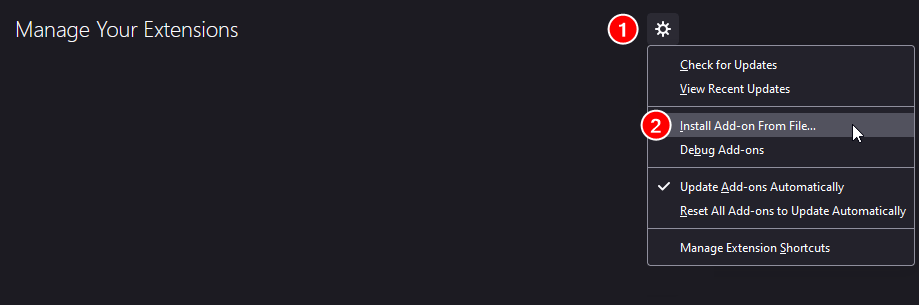
#### Option 3
Follow the [Trying it out](https://developer.mozilla.org/en-US/docs/Mozilla/Add-ons/WebExtensions/Your_first_WebExtension#Trying_it_out) steps on their developer website.
### Chrome / Chromium
These steps MAY work on other Chromium-based browsers, such as: Brave, Microsoft Edge, Vivaldi and Opera (to name a few).
No guarantees though, I only do simple tests on a basic Chromium install, as my primary browser is Firefox.
#### Option 1
This option is only available as of v2.2.0. This is **VERY unofficial way** of installing the extension and you might a few warnings about it being unsafe (which is _generally_ true).
<ins>If you are not comfortable with that, you can either choose to use Firefox instead or try option 2 below.</ins>
1. Go to [Releases](https://github.com/M-rcus/OnlyFans-Cookie-Helper/releases) and click the `.crx` file. Your browser might prompt you to install the extension. You can then just click 'Add extension'.
- From my testing, Google Chrome and Brave give you an error when doing this. It does seem to work on "Ungoogled Chromium". Besides that I am not sure whether it will work or not.
If it _does not_ prompt you to install the extension, you can try the following:
1. Right-click on the `.crx` download link and click "Save link as..."
- As I mentioned, it will likely ask you (sometimes multiple times) if you want to keep the file as it can be malicious. You want to keep the file.
2. In your Chromium-browser, go to your URL bar and hit enter after typing in `chrome://extensions`
3. Find the `.crx` file that you just downloaded.
4. Click and drag the `.crx` file into your Chromium browser window, where `chrome://extensions` is open.
5. It should prompt you to add the extension.
#### Option 2
1. Download the ZIP file of the version - `Source code (.zip)`
2. Extract the ZIP into a folder.
3. In your Chromium-browser, go to your URL bar and hit enter after typing in `chrome://extensions`
4. Click on "Load unpacked". **Select** the extracted folder and click "Open".
## How to use
Make sure you're logged into the OnlyFans website normally.
After installing the extension, click the cookie icon.
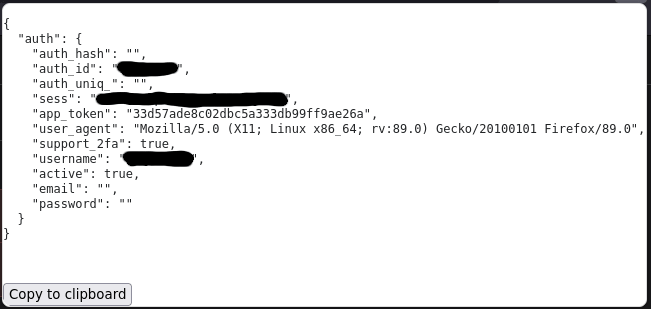
A popup should show up (see [preview](#preview)) with a JSON-formatted text.
There's a a "Copy to clipboard" button at the bottom of the popup that should copy the text to your clipboard.
If it does not work, you can just copy the text manually by selecting it.
Once you've copied the text to clipboard, you can paste it into the `auth.json` file in your profiles folder.
The default `auth.json` file should be located in `<OnlyFans-Software-Folder>/.profiles/OnlyFans/default/auth.json`, but may not show up until you've started up the OnlyFans software at least once.
You can also create a new folder and a separate `auth.json` file, which is useful if you have multiple accounts.
For example:
- `<OnlyFans-Software-Folder>/.profiles/OnlyFans/my-personal-account/auth.json`
- `<OnlyFans-Software-Folder>/.profiles/OnlyFans/my-secret-account/auth.json`
### Preview
Screenshot as of extension version v1.0.3, which means it's slightly outdated.
A few things to note:
- `auth_hash`, `auth_uniq_`, `email` and `password` are _typically empty_. Don't panic if they don't have any values, as it's completely normal.
- The `username` field is by default set to "u" plus the same number as `auth_id`. It _does not_ need to be your actual OnlyFans username.
## Permissions
Overview of permissions and why they're required.
- `cookies`
- Values such as `auth_id` and `sess` are contained within cookies.
- Keep in mind that the `cookies` permission only applies for `onlyfans.com` and no other websites.
- `clipboardWrite`
- To copy the `auth.json` values into your clipboard
- `storage`
- This is specifically just to "synchronize" the `x_bc` value to the popup (so it can be copied).
- `x_bc` isn't available via the regular `cookies` permission, so we need a workaround (which utilizes the `storage` permission).
- `contextualIdentities`
- On Firefox, it's used to support multi-account containers.
- ~~On Chromium-based browsers (Google Chrome, Brave, Microsoft Edge, Vivaldi, Opera etc.) it does nothing. However, it may give a warning. The extension should still work even with this warning.~~ - This should no longer happen as of v2.2.0.
## LICENSE
[MIT License](./LICENSE.md)
## Mirrors
This project is currently mirrored to three different providers:
- [GitHub](https://github.com/M-rcus/OnlyFans-Cookie-Helper)
- [GitLab](https://gitlab.com/Maarcus/OnlyFans-Cookie-Helper)
- [GitGud.io](https://gitgud.io/Maarcus/OnlyFans-Cookie-Helper)
Those are the only 'official' sources for this extension.
Anyone else can of course freely mirror the project as they see fit.
## Sellout (Tips)
If you find the extension useful and would like to send me a tip, then I'll gladly take some crypto <3
- Bitcoin: `bc1qps35rpadgmpf2a7vmuq45xnt7qscymtlnny6mx`
- Dogecoin: `DAjtoHdXFFhRc3qJq8sqCWpQLLDB8t3L6n`
- Litecoin: `LbX5iqVfYoRz7kPAPQoEKdqiN7Y9PRxsAg`
Alternatively, PayPal, though crypto is preferred: https://paypal.me/maaaarcus
================================================
FILE: background/background.js
================================================
const ls = chrome.storage.local;
/**
* Helper for storing the new bcTokens object
*/
function storeBcTokens(bcTokens)
{
ls.set({'bcTokens': bcTokens});
}
/**
* Retrieve the stored bcTokens object
* If none, return a fresh object
*/
async function getStoredBcTokens()
{
return new Promise((resolve, reject) => {
ls.get(['bcTokens'], function(data) {
if (!data.bcTokens) {
storeBcTokens({});
resolve({});
return;
}
resolve(data.bcTokens);
});
});
}
async function handleBcToken(data)
{
const { bcTokenSha, id } = data;
const bcTokens = await getStoredBcTokens();
bcTokens[id] = bcTokenSha;
storeBcTokens(bcTokens);
return true;
}
chrome.runtime.onMessage.addListener(handleBcToken);
================================================
FILE: content_scripts/bcToken.js
================================================
async function getBcToken()
{
const ls = window.localStorage;
if (!ls.bcTokenSha) {
return;
}
const bcToken = ls.bcTokenSha;
/**
* We don't have access to all cookies here, so instead we use a workaround
* with the few cookie values we _do_ have access to.
*/
const match = document.cookie.match(/st=(\w{64})/);
const id = match[1];
try {
const message = await chrome.runtime.sendMessage({
bcTokenSha: bcToken,
id: id,
});
}
catch (err) {
console.error('Error occurred when trying to send bcToken to background script', err);
}
}
// Handle changes/updates to localStorage
window.addEventListener('storage', function() {
const ls = window.localStorage;
if (ls.bcTokenSha) {
getBcToken();
}
});
getBcToken();
================================================
FILE: create_firefox_zip.sh
================================================
#!/bin/bash
version="$(jq -r .version ./manifest_v2.json)";
filename="../OnlyFans-Cookie-Helper_v${version}.zip";
rm "${filename}";
zip -x '*.git*' -x '*.sh' -r "${filename}" *;
zip -d "${filename}" "manifest.json";
printf "@ manifest_v2.json\n@=manifest.json\n" | zipnote -w "${filename}";
================================================
FILE: manifest.json
================================================
{
"manifest_version": 3,
"name": "OnlyFans Cookie Helper",
"version": "2.3.0",
"description": "Helper extension that makes it easier to copy config.json values for the DIGITALCRIMINALS/OnlyFans scraper",
"icons": {
"48": "icons/cookie.png"
},
"background": {
"service_worker": "background/background.js"
},
"permissions": [
"cookies",
"clipboardWrite",
"storage"
],
"host_permissions": [
"*://*.onlyfans.com/"
],
"action": {
"browser_style": true,
"default_icon": {
"48": "icons/cookie.png"
},
"default_title": "OnlyFans Cookie Helper",
"default_popup": "popup/cookies.html"
},
"content_scripts": [
{
"matches": [
"*://*.onlyfans.com/*",
"*://*.onlyfans.com/"
],
"js": [
"content_scripts/bcToken.js"
]
}
]
}
================================================
FILE: manifest_v2.json
================================================
{
"manifest_version": 2,
"name": "OnlyFans Cookie Helper",
"version": "2.3.0",
"description": "Helper extension that makes it easier to copy config.json values for the DIGITALCRIMINALS/OnlyFans scraper",
"icons": {
"48": "icons/cookie.png"
},
"background": {
"scripts": ["background/background.js"]
},
"permissions": [
"*://*.onlyfans.com/",
"cookies",
"clipboardWrite",
"storage",
"contextualIdentities"
],
"browser_action": {
"browser_style": true,
"default_icon": {
"48": "icons/cookie.png"
},
"default_title": "OnlyFans Cookie Helper",
"default_popup": "popup/cookies.html"
},
"content_scripts": [
{
"matches": ["*://*.onlyfans.com/*", "*://*.onlyfans.com/"],
"js": ["content_scripts/bcToken.js"]
}
]
}
================================================
FILE: popup/cookies.html
================================================
<!DOCTYPE html>
<html lang="en">
<head>
<meta charset="UTF-8">
<style type="text/css">
.hidden {
display: none;
}
.red {
color: red;
}
body {
margin: 1em;
}
#container-list {
margin-top: 0.5em;
}
</style>
</head>
<body>
<div>
<code><pre id="json"></pre></code>
<span id="errorMessage" class="hidden red"></span>
<br><br>
<button id="copy-to-clipboard">Copy to clipboard</button>
</div>
<div id="container-list" class="hidden">
Select container tab:
<select>
<option value="">Default (no container)</option>
</select>
</div>
</body>
<script type="text/javascript" src="../lib/browser-polyfill.min.js"></script>
<script type="text/javascript" src="cookies.js"></script>
</html>
================================================
FILE: popup/cookies.js
================================================
/**
* Shamelessly copied from: https://techoverflow.net/2018/03/30/copying-strings-to-the-clipboard-using-pure-javascript/
*
* Only used as a fallback if for some reason the Clipboard API
* does not exist... heh.
*/
async function copyStringToClipboard (str) {
// Create new element
var el = document.createElement('textarea');
// Set value (string to be copied)
el.value = str;
// Set non-editable to avoid focus and move outside of view
el.setAttribute('readonly', '');
el.style = {position: 'absolute', left: '-9999px'};
document.body.appendChild(el);
// Select text inside element
el.select();
// Copy text to clipboard
document.execCommand('copy');
// Remove temporary element
document.body.removeChild(el);
}
const containerNames = {};
const containersEnabled = browser.contextualIdentities !== undefined;
/**
* Get the correct bcToken from storage
*/
async function getBcTokenSha(id)
{
return new Promise((resolve, reject) => {
chrome.storage.local.get(['bcTokens'], function(data) {
const bcTokens = data.bcTokens || {};
if (bcTokens[id]) {
resolve(bcTokens[id]);
return;
}
resolve(null);
});
});
}
async function getContainers()
{
/**
* Prefill popup with "no container" cookies
*/
grabCookies();
/**
* Non-Firefox browser or containers not enabled.
*/
if (!containersEnabled) {
return;
}
/**
* Containers are enabled, but none found.
*/
let containers = await browser.contextualIdentities.query({});
if (containers.length < 1) {
return;
}
// Sort container list by name.
containers.sort(function(a, b) {
const nameA = a.name.toLowerCase();
const nameB = b.name.toLowerCase();
if (nameA < nameB) {
return -1;
}
if (nameA > nameB) {
return 1;
}
return 0;
});
const containerSection = document.querySelector('#container-list');
containerSection.classList.remove('hidden');
const optionList = containerSection.querySelector('select');
for (const container of containers)
{
const storeId = container.cookieStoreId;
const { name } = container;
containerNames[storeId] = name;
const option = document.createElement('option');
option.setAttribute('value', storeId);
option.textContent = name;
optionList.insertAdjacentElement('beforeend', option);
}
optionList.addEventListener('change', function(event) {
const storeId = event.target.value;
if (!storeId || storeId.length < 1) {
grabCookies(null);
return;
}
grabCookies(storeId);
});
}
async function grabCookies(cookieStoreId) {
/**
* Grab the cookies from the browser...
*/
const cookieOpts = {
domain: '.onlyfans.com',
};
/**
* Container tabs
*/
if (cookieStoreId) {
cookieOpts.storeId = cookieStoreId;
}
const cookies = await browser.cookies.getAll(cookieOpts);
/**
* We only care about `name` and `value` in each cookie entry.
*/
const mappedCookies = {};
for (const cookie of cookies)
{
mappedCookies[cookie.name] = cookie.value;
}
/**
* Define and check if `authId` exists
* if not, return and call it a day...
*
* Also define the other elements.
*/
const authId = mappedCookies.auth_id;
const sess = mappedCookies.sess;
const copyBtn = document.querySelector('#copy-to-clipboard');
const jsonElement = document.querySelector('#json');
const errorElement = document.querySelector('#errorMessage');
/**
* If authId isn't specified, user is not logged into
* OnlyFans... or at least we assume so.
*/
if (!authId || !sess) {
let errorMessage = 'Could not find valid cookie values, make sure you are logged into OnlyFans.';
if (containersEnabled) {
const containerName = containerNames[cookieStoreId] || 'Default (no container)';
errorMessage = `Could not find valid cookie values in container: <strong>${containerName}</strong><br>Make sure you are logged into OnlyFans.`;
}
errorElement.innerHTML = errorMessage;
errorElement.classList.remove('hidden');
if (!copyBtn.classList.contains('hidden')) {
copyBtn.classList.add('hidden');
jsonElement.classList.add('hidden');
}
return;
}
// See `background/background.js` as to why we use `st` here
const st = mappedCookies.st;
const bcToken = await getBcTokenSha(st);
if (!bcToken) {
let errorMessage = 'Could not find valid x_bc value. Please open OnlyFans.com once and make sure it fully loads. If you are not logged in, please log in and <i>refresh the page</i>.';
if (containersEnabled) {
const containerName = containerNames[cookieStoreId] || 'Default (no container)';
errorMessage = `Could not find valid x_bc value. Please open OnlyFans.com once in container: <strong>${containerName}</strong><br>Make sure it fully loads. If you are not logged in, please log in and <i>refresh the page</i>.`;
}
errorElement.innerHTML = errorMessage;
errorElement.classList.remove('hidden');
if (!copyBtn.classList.contains('hidden')) {
copyBtn.classList.add('hidden');
jsonElement.classList.add('hidden');
}
return;
}
copyBtn.classList.remove('hidden');
jsonElement.classList.remove('hidden');
errorElement.classList.add('hidden');
/**
* Fill out the object that OnlyFans excepts
*/
const config = {
username: 'u' + authId,
cookie: `auth_id=${authId}; sess=${sess}; auth_hash=; auth_uniq_${authId}=; auth_uid_${authId}=;`,
// TODO: Still need to handle this better...
user_agent: navigator.userAgent,
x_bc: bcToken,
support_2fa: true,
active: true,
email: "",
password: "",
hashed: false,
};
/**
* Then we print it to the popup :)
*
* Third parameter to JSON.stringify() is for spacing the indentation.
*/
const authConfig = {
auth: config,
};
const cookieJson = JSON.stringify(authConfig, null, 2);
jsonElement.textContent = cookieJson;
/**
* Use yee yee ghetto ass method as a fallback
* method for copying to clipboard.
*/
const clipboardWriteText = browser.clipboard.writeText || copyStringToClipboard;
const oldBtnText = copyBtn.innerHTML;
copyBtn.addEventListener('click', async () => {
try {
await clipboardWriteText(cookieJson);
copyBtn.textContent = 'Copied to clipboard!';
copyBtn.setAttribute('disabled', '1');
}
catch (err) {
console.error(err);
}
setTimeout(() => {
copyBtn.textContent = oldBtnText;
copyBtn.removeAttribute('disabled');
}, 2500);
});
}
document.addEventListener('DOMContentLoaded', async () => {
await getContainers();
});
gitextract_t56i8rl4/
├── .editorconfig
├── LICENSE.md
├── README.md
├── background/
│ └── background.js
├── content_scripts/
│ └── bcToken.js
├── create_firefox_zip.sh
├── manifest.json
├── manifest_v2.json
└── popup/
├── cookies.html
└── cookies.js
SYMBOL INDEX (8 symbols across 3 files)

FILE: background/background.js
  function storeBcTokens (line 6) | function storeBcTokens(bcTokens)
  function getStoredBcTokens (line 15) | async function getStoredBcTokens()
  function handleBcToken (line 30) | async function handleBcToken(data)

FILE: content_scripts/bcToken.js
  function getBcToken (line 1) | async function getBcToken()

FILE: popup/cookies.js
  function copyStringToClipboard (line 7) | async function copyStringToClipboard (str) {
  function getBcTokenSha (line 30) | async function getBcTokenSha(id)
  function getContainers (line 46) | async function getContainers()
  function grabCookies (line 115) | async function grabCookies(cookieStoreId) {
Condensed preview — 10 files, each showing path, character count, and a content snippet. Download the .json file or copy for the full structured content (21K chars).
[
  {
    "path": ".editorconfig",
    "chars": 190,
    "preview": "[*.{js,md}]\nend_of_line = lf\nindent_style = space\nindent_size = 4\ncharset = utf-8\ninsert_final_newline = true\n\n[*.js]\ntr"
  },
  {
    "path": "LICENSE.md",
    "chars": 1083,
    "preview": "# MIT License\n\nCopyright (c) 2020-2024 Marcus <m@rcus.dev>\n\nPermission is hereby granted, free of charge, to any person "
  },
  {
    "path": "README.md",
    "chars": 6873,
    "preview": "# OnlyFans Cookie Helper\n\nAn extension made to make it easier to copy the correct `config.json` values when using [dataw"
  },
  {
    "path": "background/background.js",
    "chars": 825,
    "preview": "const ls = chrome.storage.local;\n\n/**\n * Helper for storing the new bcTokens object\n */\nfunction storeBcTokens(bcTokens)"
  },
  {
    "path": "content_scripts/bcToken.js",
    "chars": 848,
    "preview": "async function getBcToken()\n{\n    const ls = window.localStorage;\n    if (!ls.bcTokenSha) {\n        return;\n    }\n\n    c"
  },
  {
    "path": "create_firefox_zip.sh",
    "chars": 290,
    "preview": "#!/bin/bash\nversion=\"$(jq -r .version ./manifest_v2.json)\";\nfilename=\"../OnlyFans-Cookie-Helper_v${version}.zip\";\nrm \"${"
  },
  {
    "path": "manifest.json",
    "chars": 983,
    "preview": "{\n    \"manifest_version\": 3,\n    \"name\": \"OnlyFans Cookie Helper\",\n    \"version\": \"2.3.0\",\n    \"description\": \"Helper ex"
  },
  {
    "path": "manifest_v2.json",
    "chars": 911,
    "preview": "{\n    \"manifest_version\": 2,\n    \"name\": \"OnlyFans Cookie Helper\",\n    \"version\": \"2.3.0\",\n    \"description\": \"Helper ex"
  },
  {
    "path": "popup/cookies.html",
    "chars": 887,
    "preview": "<!DOCTYPE html>\n<html lang=\"en\">\n<head>\n    <meta charset=\"UTF-8\">\n    <style type=\"text/css\">\n        .hidden {\n       "
  },
  {
    "path": "popup/cookies.js",
    "chars": 7316,
    "preview": "/**\n * Shamelessly copied from: https://techoverflow.net/2018/03/30/copying-strings-to-the-clipboard-using-pure-javascri"
  }
]
About this extraction
This page contains the full source code of the M-rcus/OnlyFans-Cookie-Helper GitHub repository, extracted and formatted as plain text for AI agents and large language models (LLMs). The extraction includes 10 files (19.7 KB), approximately 5.1k tokens, and a symbol index with 8 extracted functions, classes, methods, constants, and types. Use this with OpenClaw, Claude, ChatGPT, Cursor, Windsurf, or any other AI tool that accepts text input. You can copy the full output to your clipboard or download it as a .txt file.
Extracted by GitExtract — free GitHub repo to text converter for AI. Built by Nikandr Surkov.