[
  {
    "path": ".dockerignore",
    "content": ".env\n.env*.local"
  },
  {
    "path": ".eslintrc.js",
    "content": "module.exports = {\n  env: {\n    browser: true,\n    es2021: true,\n    node: true,\n  },\n  plugins: ['@typescript-eslint', 'simple-import-sort', 'unused-imports'],\n  extends: [\n    'eslint:recommended',\n    'next',\n    'next/core-web-vitals',\n    'plugin:@typescript-eslint/recommended',\n    'prettier',\n  ],\n  rules: {\n    'no-unused-vars': 'off',\n    'no-console': 'warn',\n    '@typescript-eslint/explicit-module-boundary-types': 'off',\n    'react/no-unescaped-entities': 'off',\n\n    'react/display-name': 'off',\n    'react/jsx-curly-brace-presence': [\n      'warn',\n      { props: 'never', children: 'never' },\n    ],\n\n    //#region  //*=========== Unused Import ===========\n    '@typescript-eslint/no-unused-vars': 'off',\n    'unused-imports/no-unused-imports': 'warn',\n    'unused-imports/no-unused-vars': [\n      'warn',\n      {\n        vars: 'all',\n        varsIgnorePattern: '^_',\n        args: 'after-used',\n        argsIgnorePattern: '^_',\n      },\n    ],\n    //#endregion  //*======== Unused Import ===========\n\n    //#region  //*=========== Import Sort ===========\n    'simple-import-sort/exports': 'warn',\n    'simple-import-sort/imports': [\n      'warn',\n      {\n        groups: [\n          // ext library & side effect imports\n          ['^@?\\\\w', '^\\\\u0000'],\n          // {s}css files\n          ['^.+\\\\.s?css$'],\n          // Lib and hooks\n          ['^@/lib', '^@/hooks'],\n          // static data\n          ['^@/data'],\n          // components\n          ['^@/components', '^@/container'],\n          // zustand store\n          ['^@/store'],\n          // Other imports\n          ['^@/'],\n          // relative paths up until 3 level\n          [\n            '^\\\\./?$',\n            '^\\\\.(?!/?$)',\n            '^\\\\.\\\\./?$',\n            '^\\\\.\\\\.(?!/?$)',\n            '^\\\\.\\\\./\\\\.\\\\./?$',\n            '^\\\\.\\\\./\\\\.\\\\.(?!/?$)',\n            '^\\\\.\\\\./\\\\.\\\\./\\\\.\\\\./?$',\n            '^\\\\.\\\\./\\\\.\\\\./\\\\.\\\\.(?!/?$)',\n          ],\n          ['^@/types'],\n          // other that didnt fit in\n          ['^'],\n        ],\n      },\n    ],\n    //#endregion  //*======== Import Sort ===========\n  },\n  globals: {\n    React: true,\n    JSX: true,\n  },\n};\n"
  },
  {
    "path": ".github/workflows/docker-image.yml",
    "content": "name: Build & Push Docker image\n\non:\n  workflow_dispatch:\n    inputs:\n      tag:\n        description: 'Docker 标签'\n        required: false\n        default: 'latest'\n        type: string\n  push:\n    branches: [ main, master ]\n  pull_request:\n    branches: [ main, master ]\n  release:\n    types: [ published ]\n\nconcurrency:\n  group: ${{ github.workflow }}-${{ github.ref }}\n  cancel-in-progress: true\n\npermissions:\n  contents: write\n  packages: write\n  actions: write\n\njobs:\n  build:\n    strategy:\n      matrix:\n        include:\n          - platform: linux/amd64\n            os: ubuntu-latest\n          - platform: linux/arm64\n            os: ubuntu-24.04-arm\n    runs-on: ${{ matrix.os }}\n\n    steps:\n      - name: Prepare platform name\n        run: |\n          echo \"PLATFORM_NAME=${{ matrix.platform }}\" | sed 's|/|-|g' >> $GITHUB_ENV\n\n      - name: Determine Docker tag\n        id: docker-tag\n        run: |\n          if [ \"${{ github.event_name }}\" = \"release\" ]; then\n            echo \"tag=${{ github.event.release.tag_name }}\" >> \"$GITHUB_OUTPUT\"\n          else\n            echo \"tag=${{ github.event.inputs.tag || 'latest' }}\" >> \"$GITHUB_OUTPUT\"\n          fi\n\n      - name: Checkout source code\n        uses: actions/checkout@v4\n\n      - name: Set up Docker Buildx\n        uses: docker/setup-buildx-action@v3\n\n      - name: Login to GitHub Container Registry\n        uses: docker/login-action@v3\n        with:\n          registry: ghcr.io\n          username: ${{ github.actor }}\n          password: ${{ secrets.GITHUB_TOKEN }}\n\n      - name: Set lowercase repository owner\n        id: lowercase\n        run: echo \"owner=$(echo '${{ github.repository_owner }}' | tr '[:upper:]' '[:lower:]')\" >> \"$GITHUB_OUTPUT\"\n\n      - name: Extract metadata\n        id: meta\n        uses: docker/metadata-action@v5\n\n        with:\n          images: ghcr.io/moontechlab/lunatv\n          tags: |\n            type=raw,value=${{ github.event.inputs.tag || 'latest' }},enable={{is_default_branch}}\n            type=semver,pattern={{version}},enable=${{ github.event_name == 'release' }}\n            type=semver,pattern={{major}}.{{minor}},enable=${{ github.event_name == 'release' }}\n\n      - name: Build and push by digest\n        id: build\n        uses: docker/build-push-action@v5\n        with:\n          context: .\n          file: ./Dockerfile\n          platforms: ${{ matrix.platform }}\n          labels: ${{ steps.meta.outputs.labels }}\n          tags: ghcr.io/moontechlab/lunatv:${{ steps.docker-tag.outputs.tag }}\n          outputs: type=image,name=ghcr.io/moontechlab/lunatv,name-canonical=true,push=true\n\n      - name: Export digest\n        run: |\n          mkdir -p /tmp/digests\n          digest=\"${{ steps.build.outputs.digest }}\"\n          touch \"/tmp/digests/${digest#sha256:}\"\n\n      - name: Upload digest\n        uses: actions/upload-artifact@v4\n        with:\n          name: digests-${{ env.PLATFORM_NAME }}\n          path: /tmp/digests/*\n          if-no-files-found: error\n          retention-days: 1\n\n  merge:\n    runs-on: ubuntu-latest\n    needs:\n      - build\n    steps:\n      - name: Download digests\n        uses: actions/download-artifact@v4\n        with:\n          path: /tmp/digests\n          pattern: digests-*\n          merge-multiple: true\n\n      - name: Set up Docker Buildx\n        uses: docker/setup-buildx-action@v3\n\n      - name: Login to GitHub Container Registry\n        uses: docker/login-action@v3\n        with:\n          registry: ghcr.io\n          username: ${{ github.actor }}\n          password: ${{ secrets.GITHUB_TOKEN }}\n\n      - name: Set lowercase repository owner\n        id: lowercase\n        run: echo \"owner=$(echo '${{ github.repository_owner }}' | tr '[:upper:]' '[:lower:]')\" >> \"$GITHUB_OUTPUT\"\n\n      - name: Determine Docker tag\n        id: docker-tag\n        run: |\n          if [ \"${{ github.event_name }}\" = \"release\" ]; then\n            echo \"tag=${{ github.event.release.tag_name }}\" >> \"$GITHUB_OUTPUT\"\n          else\n            echo \"tag=${{ github.event.inputs.tag || 'latest' }}\" >> \"$GITHUB_OUTPUT\"\n          fi\n\n      - name: Create manifest list and push\n        working-directory: /tmp/digests\n        run: |\n          docker buildx imagetools create -t ghcr.io/moontechlab/lunatv:${{ steps.docker-tag.outputs.tag }} \\\n            $(printf 'ghcr.io/moontechlab/lunatv@sha256:%s ' *)\n\n  cleanup-refresh:\n    runs-on: ubuntu-latest\n    needs:\n      - merge\n    if: always()\n    steps:\n      - name: Delete workflow runs\n        uses: Mattraks/delete-workflow-runs@main\n        with:\n          token: ${{ secrets.GITHUB_TOKEN }}\n          repository: ${{ github.repository }}\n          retain_days: 0\n          keep_minimum_runs: 2\n"
  },
  {
    "path": ".gitignore",
    "content": "# See https://help.github.com/articles/ignoring-files/ for more about ignoring files.\n\n# dependencies\n/node_modules\n/.pnp\n.pnp.js\n\n# testing\n/coverage\n\n# next.js\n/.next/\n/out/\n\n# production\n/build\n\n# misc\n.DS_Store\n*.pem\n\n# debug\nnpm-debug.log*\nyarn-debug.log*\nyarn-error.log*\n.pnpm-debug.log*\n\n# local env files\n.env\n.env*.local\n\n# vercel\n.vercel\n\n# typescript\n*.tsbuildinfo\nnext-env.d.ts\n\n# next-sitemap\nsitemap.xml\nsitemap-*.xml\n\n# generated files\nsrc/lib/runtime.ts\npublic/manifest.json"
  },
  {
    "path": ".husky/commit-msg",
    "content": "#!/bin/sh\n. \"$(dirname \"$0\")/_/husky.sh\"\n\nnpx --no-install commitlint --edit \"$1\"\n"
  },
  {
    "path": ".husky/post-merge",
    "content": "#!/bin/sh\n. \"$(dirname \"$0\")/_/husky.sh\"\n\npnpm install\n"
  },
  {
    "path": ".husky/pre-commit",
    "content": "#!/bin/sh\n. \"$(dirname \"$0\")/_/husky.sh\"\n\nnpx lint-staged"
  },
  {
    "path": ".npmrc",
    "content": ""
  },
  {
    "path": ".nvmrc",
    "content": "v20.10.0\n"
  },
  {
    "path": ".prettierignore",
    "content": "# See https://help.github.com/articles/ignoring-files/ for more about ignoring files.\n\n# dependencies\n/node_modules\n/.pnp\n.pnp.js\n\n# testing\n/coverage\n\n# next.js\n.next\n/.next/\n/out/\n\n# production\n/build\n\n# misc\n.DS_Store\n*.pem\n\n# debug\nnpm-debug.log*\nyarn-debug.log*\nyarn-error.log*\n.pnpm-debug.log*\n\n# local env files\n.env.local\n.env.development.local\n.env.test.local\n.env.production.local\n\n# vercel\n.vercel\n\n# changelog\nCHANGELOG.md\n\npnpm-lock.yaml\n"
  },
  {
    "path": ".prettierrc.js",
    "content": "module.exports = {\n  arrowParens: 'always',\n  singleQuote: true,\n  jsxSingleQuote: true,\n  tabWidth: 2,\n  semi: true,\n};\n"
  },
  {
    "path": ".vscode/css.code-snippets",
    "content": "{\n  \"Region CSS\": {\n    \"prefix\": \"regc\",\n    \"body\": [\n      \"/* #region  /**=========== ${1} =========== */\",\n      \"$0\",\n      \"/* #endregion  /**======== ${1} =========== */\"\n    ]\n  }\n}\n"
  },
  {
    "path": ".vscode/extensions.json",
    "content": "{\n  \"recommendations\": [\n    // Tailwind CSS Intellisense\n    \"bradlc.vscode-tailwindcss\",\n    \"esbenp.prettier-vscode\",\n    \"dbaeumer.vscode-eslint\",\n    \"aaron-bond.better-comments\"\n  ]\n}\n"
  },
  {
    "path": ".vscode/settings.json",
    "content": "{\n  \"css.validate\": false,\n  \"editor.formatOnSave\": true,\n  \"editor.tabSize\": 2,\n  \"editor.codeActionsOnSave\": {\n    \"source.fixAll\": \"explicit\"\n  },\n  \"[css]\": {\n    \"editor.defaultFormatter\": \"esbenp.prettier-vscode\"\n  },\n  // Tailwind CSS Autocomplete, add more if used in projects\n  \"tailwindCSS.classAttributes\": [\n    \"class\",\n    \"className\",\n    \"classNames\",\n    \"containerClassName\"\n  ],\n  \"typescript.preferences.importModuleSpecifier\": \"non-relative\"\n}"
  },
  {
    "path": ".vscode/typescriptreact.code-snippets",
    "content": "{\n  //#region  //*=========== React ===========\n  \"import React\": {\n    \"prefix\": \"ir\",\n    \"body\": [\"import * as React from 'react';\"]\n  },\n  \"React.useState\": {\n    \"prefix\": \"us\",\n    \"body\": [\n      \"const [${1}, set${1/(^[a-zA-Z])(.*)/${1:/upcase}${2}/}] = React.useState<$3>(${2:initial${1/(^[a-zA-Z])(.*)/${1:/upcase}${2}/}})$0\"\n    ]\n  },\n  \"React.useEffect\": {\n    \"prefix\": \"uf\",\n    \"body\": [\"React.useEffect(() => {\", \"  $0\", \"}, []);\"]\n  },\n  \"React.useReducer\": {\n    \"prefix\": \"ur\",\n    \"body\": [\n      \"const [state, dispatch] = React.useReducer(${0:someReducer}, {\",\n      \"  \",\n      \"})\"\n    ]\n  },\n  \"React.useRef\": {\n    \"prefix\": \"urf\",\n    \"body\": [\"const ${1:someRef} = React.useRef($0)\"]\n  },\n  \"React Functional Component\": {\n    \"prefix\": \"rc\",\n    \"body\": [\n      \"import * as React from 'react';\\n\",\n      \"export default function ${1:${TM_FILENAME_BASE}}() {\",\n      \"  return (\",\n      \"    <div>\",\n      \"      $0\",\n      \"    </div>\",\n      \"  )\",\n      \"}\"\n    ]\n  },\n  \"React Functional Component with Props\": {\n    \"prefix\": \"rcp\",\n    \"body\": [\n      \"import * as React from 'react';\\n\",\n      \"import clsxm from '@/lib/clsxm';\\n\",\n      \"type ${1:${TM_FILENAME_BASE}}Props= {\\n\",\n      \"} & React.ComponentPropsWithoutRef<'div'>\\n\",\n      \"export default function ${1:${TM_FILENAME_BASE}}({className, ...rest}: ${1:${TM_FILENAME_BASE}}Props) {\",\n      \"  return (\",\n      \"    <div className={clsxm(['', className])} {...rest}>\",\n      \"      $0\",\n      \"    </div>\",\n      \"  )\",\n      \"}\"\n    ]\n  },\n  //#endregion  //*======== React ===========\n\n  //#region  //*=========== Commons ===========\n  \"Region\": {\n    \"prefix\": \"reg\",\n    \"scope\": \"javascript, typescript, javascriptreact, typescriptreact\",\n    \"body\": [\n      \"//#region  //*=========== ${1} ===========\",\n      \"${TM_SELECTED_TEXT}$0\",\n      \"//#endregion  //*======== ${1} ===========\"\n    ]\n  },\n  \"Region CSS\": {\n    \"prefix\": \"regc\",\n    \"scope\": \"css, scss\",\n    \"body\": [\n      \"/* #region  /**=========== ${1} =========== */\",\n      \"${TM_SELECTED_TEXT}$0\",\n      \"/* #endregion  /**======== ${1} =========== */\"\n    ]\n  },\n  //#endregion  //*======== Commons ===========\n\n  //#region  //*=========== Next.js ===========\n  \"Next Pages\": {\n    \"prefix\": \"np\",\n    \"body\": [\n      \"import * as React from 'react';\\n\",\n      \"import Layout from '@/components/layout/Layout';\",\n      \"import Seo from '@/components/Seo';\\n\",\n      \"export default function ${1:${TM_FILENAME_BASE/(^[a-zA-Z])(.*)/${1:/upcase}${2}/}}Page() {\",\n      \"  return (\",\n      \"    <Layout>\",\n      \"      <Seo templateTitle='${1:${TM_FILENAME_BASE/(^[a-zA-Z])(.*)/${1:/upcase}${2}/}}' />\\n\",\n      \"      <main>\\n\",\n      \"        <section className=''>\",\n      \"          <div className='layout py-20 min-h-screen'>\",\n      \"            $0\",\n      \"          </div>\",\n      \"        </section>\",\n      \"      </main>\",\n      \"    </Layout>\",\n      \"  )\",\n      \"}\"\n    ]\n  },\n  \"Next API\": {\n    \"prefix\": \"napi\",\n    \"body\": [\n      \"import { NextApiRequest, NextApiResponse } from 'next';\\n\",\n      \"export default async function handler(req: NextApiRequest, res: NextApiResponse) {\",\n      \"  if (req.method === 'GET') {\",\n      \"    res.status(200).json({ name: 'Bambang' });\",\n      \"  } else {\",\n      \"    res.status(405).json({ message: 'Method Not Allowed' });\",\n      \"  }\",\n      \"}\"\n    ]\n  },\n  \"Get Static Props\": {\n    \"prefix\": \"gsp\",\n    \"body\": [\n      \"export const getStaticProps = async (context: GetStaticPropsContext) => {\",\n      \"  return {\",\n      \"    props: {}\",\n      \"  };\",\n      \"}\"\n    ]\n  },\n  \"Get Static Paths\": {\n    \"prefix\": \"gspa\",\n    \"body\": [\n      \"export const getStaticPaths: GetStaticPaths = async () => {\",\n      \"  return {\",\n      \"    paths: [\",\n      \"      { params: { $1 }}\",\n      \"    ],\",\n      \"    fallback: \",\n      \"  };\",\n      \"}\"\n    ]\n  },\n  \"Get Server Side Props\": {\n    \"prefix\": \"gssp\",\n    \"body\": [\n      \"export const getServerSideProps = async (context: GetServerSidePropsContext) => {\",\n      \"  return {\",\n      \"    props: {}\",\n      \"  };\",\n      \"}\"\n    ]\n  },\n  \"Infer Get Static Props\": {\n    \"prefix\": \"igsp\",\n    \"body\": \"InferGetStaticPropsType<typeof getStaticProps>\"\n  },\n  \"Infer Get Server Side Props\": {\n    \"prefix\": \"igssp\",\n    \"body\": \"InferGetServerSidePropsType<typeof getServerSideProps>\"\n  },\n  \"Import useRouter\": {\n    \"prefix\": \"imust\",\n    \"body\": [\"import { useRouter } from 'next/router';\"]\n  },\n  \"Import Next Image\": {\n    \"prefix\": \"imimg\",\n    \"body\": [\"import Image from 'next/image';\"]\n  },\n  \"Import Next Link\": {\n    \"prefix\": \"iml\",\n    \"body\": [\"import Link from 'next/link';\"]\n  },\n  //#endregion  //*======== Next.js ===========\n\n  //#region  //*=========== Snippet Wrap ===========\n  \"Wrap with Fragment\": {\n    \"prefix\": \"ff\",\n    \"body\": [\"<>\", \"\\t${TM_SELECTED_TEXT}\", \"</>\"]\n  },\n  \"Wrap with clsx\": {\n    \"prefix\": \"cx\",\n    \"body\": [\"{clsx([${TM_SELECTED_TEXT}$0])}\"]\n  },\n  \"Wrap with clsxm\": {\n    \"prefix\": \"cxm\",\n    \"body\": [\"{clsxm([${TM_SELECTED_TEXT}$0, className])}\"]\n  },\n  //#endregion  //*======== Snippet Wrap ===========\n\n  \"Logger\": {\n    \"prefix\": \"lg\",\n    \"body\": [\n      \"logger({ ${1:${CLIPBOARD}} }, '${TM_FILENAME} line ${TM_LINE_NUMBER}')\"\n    ]\n  }\n}\n"
  },
  {
    "path": "CHANGELOG",
    "content": "## [100.1.2] - 2026-03-15\r\n\r\n### Changed\r\n\r\n- 移除豆瓣图片代理中的「直连」和「豆瓣官方精品 CDN」选项，历史数据自动兼容为服务器代理\r\n\r\n## [100.1.1] - 2026-02-27\r\n\r\n### Changed\r\n\r\n- 搜索页使用虚拟滚动，优化滚动性能\r\n\r\n## [100.1.0] - 2026-02-27\r\n\r\n### Added\r\n\r\n- 管理面板新增开关支持关闭网页直播\r\n\r\n### Changed\r\n\r\n- 优化用户数据存储结构，加速数据获取\r\n- 用户密码加盐存储\r\n- 新增数据自动迁移\r\n\r\n## [100.0.3] - 2025-10-27\r\n\r\n### Fixed\r\n\r\n- 修复 webkit 下播放器控件的展示 bug\r\n\r\n## [100.0.2] - 2025-10-23\r\n\r\n### Fixed\r\n\r\n- 修复 /api/search/resources 接口越权问题\r\n\r\n## [100.0.1] - 2025-09-25\r\n\r\n### Fixed\r\n\r\n- 修复错误的环境变量 ADMIN_USERNAME\r\n- 修复 bangumi 数据中没有图片导致首页崩溃问题\r\n\r\n## [100.0.0] - 2025-08-26\r\n\r\n### Added\r\n\r\n- 新增对 SITE_BASE 环境变量的支持，解决 m3u8 重写时 base url 错误的问题\r\n\r\n### Changed\r\n\r\n- 移除授权相关逻辑\r\n- 移除代码混淆\r\n- 移除 melody-cdn-sharon\r\n\r\n## [4.3.0] - 2025-08-26\r\n\r\n### Added\r\n\r\n- 支持将 IPTV 频道添加到收藏中\r\n\r\n### Changed\r\n\r\n- 禁用 flv 直播，仅支持 m3u8 直播\r\n- 降低代理 ts 分片的内存占用\r\n\r\n## [4.2.1] - 2025-08-26\r\n\r\n### Fixed\r\n\r\n- 修复直播源加载失败或离开页面后依然无限加载的问题\r\n\r\n## [4.2.0] - 2025-08-26\r\n\r\n### Added\r\n\r\n- 支持 flv 直播和直播地址解析到 mp4 的处理\r\n- 增加直播台标的 proxy 以防止 cors\r\n- 支持播放页选集分组的滚动翻页\r\n\r\n### Changed\r\n\r\n- 管理后台页面的按钮增加加载中的 UI\r\n\r\n### Fixed\r\n\r\n- /api/proxy/m3u8 仅对 m3u8 内容反序列化，降低内存和 CPU 消耗\r\n\r\n## [4.1.1] - 2025-08-25\r\n\r\n### Changed\r\n\r\n- 增加对 url-tvg 和多 epg url 的支持\r\n\r\n### Fixed\r\n\r\n- 修复 epg 数据清洗中去重叠逻辑未考虑日期导致的问题\r\n\r\n## [4.1.0] - 2025-08-24\r\n\r\n### Added\r\n\r\n- 解析 m3u 自带的 epg 和自定义 epg，增加今日节目单\r\n\r\n### Changed\r\n\r\n- 直播源数据刷新改为并发刷新\r\n\r\n## [4.0.0] - 2025-08-24\r\n\r\n### Added\r\n\r\n- 增加 iptv 订阅和播放功能\r\n\r\n### Changed\r\n\r\n- 搜索页面视频卡片移动端/右键菜单添加豆瓣链接\r\n- 搜索建议遵循色情过滤\r\n\r\n## [3.2.1] - 2025-08-22\r\n\r\n### Changed\r\n\r\n- 新增色色过滤分类\r\n- 调整搜索建议框层级\r\n\r\n## [3.2.0] - 2025-08-22\r\n\r\n### Added\r\n\r\n- 视频源管理支持批量启用、禁用、删除\r\n- 用户管理支持批量设置用户组\r\n- 视频卡片右键/长按菜单新增新标签页播放\r\n\r\n### Changed\r\n\r\n- 视频卡片移动端 hover 时仅保留播放按钮\r\n- 微调管理页面 UI 和视频卡片右键/长按菜单中的收藏样式\r\n\r\n### Fixed\r\n\r\n- 修复了搜索栏 enter 键自动选中第一个建议项的问题\r\n\r\n## [3.1.2] - 2025-08-22\r\n\r\n### Fixed\r\n\r\n- 修复移动端卡片无法点击的问题\r\n\r\n## [3.1.1] - 2025-08-21\r\n\r\n### Fixed\r\n\r\n- 修复了视频卡片 hover 的非播放按钮点击后进入播放页的问题\r\n\r\n## [3.1.0] - 2025-08-21\r\n\r\n### Added\r\n\r\n- 增加用户组管理和用户组播放源限制\r\n- 增加管理面板视频源有效性检查\r\n- 搜索栏增加一键删除按钮\r\n\r\n### Changed\r\n\r\n- 放宽授权心跳对于网络问题的判断标准\r\n- 统一管理面板弹窗使用 createPortal\r\n- VideoCard 允许移动端响应 hover 事件\r\n- 移动端布局 header 常驻，搜索按钮移动到 header 右侧\r\n- 调大搜索接口超时时间\r\n\r\n### Fixed\r\n\r\n- 修复 bangumi 返回的整数评分无小数导致 UI 不对齐的问题\r\n\r\n## [3.0.2] - 2025-08-20\r\n\r\n### Changed\r\n\r\n- 优化机器码生成逻辑\r\n\r\n### Fixed\r\n\r\n- 修复 redis url 不支持 rediss 协议的问题\r\n\r\n## [3.0.1] - 2025-08-20\r\n\r\n### Fixed\r\n\r\n- 修复授权初始化错误\r\n\r\n## [3.0.0] - 2025-08-20\r\n\r\n### Added\r\n\r\n- 防盗卖加固\r\n- 支持自定义用户可用视频源\r\n\r\n### Changed\r\n\r\n- 右键视频卡片可弹出操作菜单\r\n\r\n### Fixed\r\n\r\n- 过滤掉集数为 0 的搜索结果\r\n\r\n## [2.7.1] - 2025-08-17\r\n\r\n### Fixed\r\n\r\n- 修复 iOS 下版本面板可穿透滚动背景的问题\r\n\r\n## [2.7.0] - 2025-08-17\r\n\r\n### Added\r\n\r\n- 视频卡片新增移动端操作面板，优化触控屏操作体验\r\n\r\n### Changed\r\n\r\n- 优化集数标题的匹配和展示逻辑\r\n\r\n### Fixed\r\n\r\n- 修复设置面板和修改密码面板背景可被拖动的问题\r\n\r\n## [2.6.0] - 2025-08-17\r\n\r\n### Added\r\n\r\n- 新增搜索流式输出接口，并设置流式搜索为默认搜索接口，优化搜索体验\r\n- 新增源站搜索结果内存缓存，粒度为源站+关键词+页数，缓存 10 分钟\r\n- 新增豆瓣 CDN provided by @JohnsonRan\r\n\r\n### Changed\r\n\r\n- 搜索结果默认为无排序状态，不再默认按照年份排序\r\n- 常规搜索接口无结果时，不再设置响应的缓存头\r\n- 移除豆瓣数据源中的 cors-anywhere 方式\r\n\r\n### Fixed\r\n\r\n- 数据导出时导出站长密码，保证迁移到新账户时原站长用户可正常登录\r\n- 聚合卡片优化移动端源信息展示\r\n\r\n## [2.4.1] - 2025-08-15\r\n\r\n### Fixed\r\n\r\n- 对导入和 db 读取的配置文件做自检，防止 USERNAME 修改导致用户状态异常\r\n\r\n## [2.4.0] - 2025-08-15\r\n\r\n### Added\r\n\r\n- 支持 kvrocks 存储（持久化 kv 存储）\r\n\r\n### Fixed\r\n\r\n- 修复搜索结果排序不稳定的问题\r\n- 导入数据时同时更新内存缓存的管理员配置\r\n\r\n## [2.3.0] - 2025-08-15\r\n\r\n### Added\r\n\r\n- 支持站长导入导出整站数据\r\n\r\n### Changed\r\n\r\n- 仅允许站长操作配置文件\r\n- 微调搜索结果过滤面板的移动端样式\r\n\r\n## [2.2.1] - 2025-08-14\r\n\r\n### Fixed\r\n\r\n- 修复了筛选 panel 打开时滚动页面 panel 不跟随的问题\r\n\r\n## [2.2.0] - 2025-08-14\r\n\r\n### Added\r\n\r\n- 搜索结果支持按播放源、标题和年份筛选，支持按年份排序\r\n- 搜索界面视频卡片展示年份信息，聚合卡片展示播放源\r\n\r\n### Fixed\r\n\r\n- 修复 /api/search/resources 返回空的问题\r\n- 修复 upstash 实例无法编辑自定义分类的问题\r\n\r\n## [2.1.0] - 2025-08-13\r\n\r\n### Added\r\n\r\n- 支持通过订阅获取配置文件\r\n\r\n### Changed\r\n\r\n- 微调部分文案和 UI\r\n- 删除部分无用代码\r\n\r\n## [2.0.1] - 2025-08-13\r\n\r\n### Changed\r\n\r\n- 版本检查和变更日志请求 Github\r\n\r\n### Fixed\r\n\r\n- 微调管理面板样式\r\n\r\n## [2.0.0] - 2025-08-13\r\n\r\n### Added\r\n\r\n- 支持配置文件在线配置和编辑\r\n- 搜索页搜索框实时联想\r\n- 去除对 localstorage 模式的支持\r\n\r\n### Changed\r\n\r\n- 播放记录删除按钮改为垃圾桶图标以消除歧义\r\n\r\n### Fixed\r\n\r\n- 限制设置面板的最大长度，防止超出视口\r\n\r\n## [1.1.1] - 2025-08-12\r\n\r\n### Changed\r\n- 修正 zwei 提供的 cors proxy 地址\r\n- 移除废弃代码\r\n\r\n### Fixed\r\n- [运维] docker workflow release 日期使用东八区日期\r\n\r\n## [1.1.0] - 2025-08-12\r\n\r\n### Added\r\n- 每日新番放送功能，展示每日新番放送的番剧\r\n\r\n### Fixed\r\n- 修复远程 CHANGELOG 无法提取变更内容的问题\r\n\r\n## [1.0.5] - 2025-08-12\r\n\r\n### Changed\r\n- 实现基于 Git 标签的自动 Release 工作流\r\n\r\n## [1.0.4] - 2025-08-11\r\n\r\n### Added\r\n- 优化版本管理工作流，实现单点修改\r\n\r\n### Changed\r\n- 版本号现在从 CHANGELOG 自动提取，无需手动维护 VERSION.txt\r\n\r\n## [1.0.3] - 2025-08-11\r\n\r\n### Changed\r\n\r\n- 升级播放器 Artplayer 至版本 5.2.5\r\n\r\n## [1.0.2] - 2025-08-11\r\n\r\n### Changed\r\n\r\n- 版本号比较机制恢复为数字比较，仅当最新版本大于本地版本时才认为有更新\r\n- [运维] 自动替换 version.ts 中的版本号为 VERSION.txt 中的版本号\r\n\r\n## [1.0.1] - 2025-08-11\r\n\r\n### Fixed\r\n\r\n- 修复版本检查功能，只要与最新版本号不一致即认为有更新\r\n\r\n## [1.0.0] - 2025-08-10\r\n\r\n### Added\r\n\r\n- 基于 Semantic Versioning 的版本号机制\r\n- 版本信息面板，展示本地变更日志和远程更新日志"
  },
  {
    "path": "Dockerfile",
    "content": "# ---- 第 1 阶段：安装依赖 ----\nFROM node:20-alpine AS deps\n\n# 启用 corepack 并激活 pnpm（Node20 默认提供 corepack）\nRUN corepack enable && corepack prepare pnpm@latest --activate\n\nWORKDIR /app\n\n# 仅复制依赖清单，提高构建缓存利用率\nCOPY package.json pnpm-lock.yaml ./\n\n# 安装所有依赖（含 devDependencies，后续会裁剪）\nRUN pnpm install --frozen-lockfile\n\n# ---- 第 2 阶段：构建项目 ----\nFROM node:20-alpine AS builder\nRUN corepack enable && corepack prepare pnpm@latest --activate\nWORKDIR /app\n\n# 复制依赖\nCOPY --from=deps /app/node_modules ./node_modules\n# 复制全部源代码\nCOPY . .\n\n# 在构建阶段也显式设置 DOCKER_ENV，\nENV DOCKER_ENV=true\n\n# 生成生产构建\nRUN pnpm run build\n\n# ---- 第 3 阶段：生成运行时镜像 ----\nFROM node:20-alpine AS runner\n\n# 创建非 root 用户\nRUN addgroup -g 1001 -S nodejs && adduser -u 1001 -S nextjs -G nodejs\n\nWORKDIR /app\nENV NODE_ENV=production\nENV HOSTNAME=0.0.0.0\nENV PORT=3000\nENV DOCKER_ENV=true\n\n# 从构建器中复制 standalone 输出\nCOPY --from=builder --chown=nextjs:nodejs /app/.next/standalone ./\n# 从构建器中复制 scripts 目录\nCOPY --from=builder --chown=nextjs:nodejs /app/scripts ./scripts\n# 从构建器中复制 start.js\nCOPY --from=builder --chown=nextjs:nodejs /app/start.js ./start.js\n# 从构建器中复制 public 和 .next/static 目录\nCOPY --from=builder --chown=nextjs:nodejs /app/public ./public\nCOPY --from=builder --chown=nextjs:nodejs /app/.next/static ./.next/static\n\n# 切换到非特权用户\nUSER nextjs\n\nEXPOSE 3000\n\n# 使用自定义启动脚本，先预加载配置再启动服务器\nCMD [\"node\", \"start.js\"] "
  },
  {
    "path": "LICENSE",
    "content": "Attribution-NonCommercial-ShareAlike 4.0 International\n\n=======================================================================\n\nCreative Commons Corporation (\"Creative Commons\") is not a law firm and\ndoes not provide legal services or legal advice. Distribution of\nCreative Commons public licenses does not create a lawyer-client or\nother relationship. Creative Commons makes its licenses and related\ninformation available on an \"as-is\" basis. Creative Commons gives no\nwarranties regarding its licenses, any material licensed under their\nterms and conditions, or any related information. Creative Commons\ndisclaims all liability for damages resulting from their use to the\nfullest extent possible.\n\nUsing Creative Commons Public Licenses\n\nCreative Commons public licenses provide a standard set of terms and\nconditions that creators and other rights holders may use to share\noriginal works of authorship and other material subject to copyright\nand certain other rights specified in the public license below. The\nfollowing considerations are for informational purposes only, are not\nexhaustive, and do not form part of our licenses.\n\n     Considerations for licensors: Our public licenses are\n     intended for use by those authorized to give the public\n     permission to use material in ways otherwise restricted by\n     copyright and certain other rights. Our licenses are\n     irrevocable. Licensors should read and understand the terms\n     and conditions of the license they choose before applying it.\n     Licensors should also secure all rights necessary before\n     applying our licenses so that the public can reuse the\n     material as expected. Licensors should clearly mark any\n     material not subject to the license. This includes other CC-\n     licensed material, or material used under an exception or\n     limitation to copyright. More considerations for licensors:\n    wiki.creativecommons.org/Considerations_for_licensors\n\n     Considerations for the public: By using one of our public\n     licenses, a licensor grants the public permission to use the\n     licensed material under specified terms and conditions. If\n     the licensor's permission is not necessary for any reason--for\n     example, because of any applicable exception or limitation to\n     copyright--then that use is not regulated by the license. Our\n     licenses grant only permissions under copyright and certain\n     other rights that a licensor has authority to grant. Use of\n     the licensed material may still be restricted for other\n     reasons, including because others have copyright or other\n     rights in the material. A licensor may make special requests,\n     such as asking that all changes be marked or described.\n     Although not required by our licenses, you are encouraged to\n     respect those requests where reasonable. More considerations\n     for the public:\n    wiki.creativecommons.org/Considerations_for_licensees\n\n=======================================================================\n\nCreative Commons Attribution-NonCommercial-ShareAlike 4.0 International\nPublic License\n\nBy exercising the Licensed Rights (defined below), You accept and agree\nto be bound by the terms and conditions of this Creative Commons\nAttribution-NonCommercial-ShareAlike 4.0 International Public License\n(\"Public License\"). To the extent this Public License may be\ninterpreted as a contract, You are granted the Licensed Rights in\nconsideration of Your acceptance of these terms and conditions, and the\nLicensor grants You such rights in consideration of benefits the\nLicensor receives from making the Licensed Material available under\nthese terms and conditions.\n\n\nSection 1 -- Definitions.\n\n  a. Adapted Material means material subject to Copyright and Similar\n     Rights that is derived from or based upon the Licensed Material\n     and in which the Licensed Material is translated, altered,\n     arranged, transformed, or otherwise modified in a manner requiring\n     permission under the Copyright and Similar Rights held by the\n     Licensor. For purposes of this Public License, where the Licensed\n     Material is a musical work, performance, or sound recording,\n     Adapted Material is always produced where the Licensed Material is\n     synched in timed relation with a moving image.\n\n  b. Adapter's License means the license You apply to Your Copyright\n     and Similar Rights in Your contributions to Adapted Material in\n     accordance with the terms and conditions of this Public License.\n\n  c. BY-NC-SA Compatible License means a license listed at\n     creativecommons.org/compatiblelicenses, approved by Creative\n     Commons as essentially the equivalent of this Public License.\n\n  d. Copyright and Similar Rights means copyright and/or similar rights\n     closely related to copyright including, without limitation,\n     performance, broadcast, sound recording, and Sui Generis Database\n     Rights, without regard to how the rights are labeled or\n     categorized. For purposes of this Public License, the rights\n     specified in Section 2(b)(1)-(2) are not Copyright and Similar\n     Rights.\n\n  e. Effective Technological Measures means those measures that, in the\n     absence of proper authority, may not be circumvented under laws\n     fulfilling obligations under Article 11 of the WIPO Copyright\n     Treaty adopted on December 20, 1996, and/or similar international\n     agreements.\n\n  f. Exceptions and Limitations means fair use, fair dealing, and/or\n     any other exception or limitation to Copyright and Similar Rights\n     that applies to Your use of the Licensed Material.\n\n  g. License Elements means the license attributes listed in the name\n     of a Creative Commons Public License. The License Elements of this\n     Public License are Attribution, NonCommercial, and ShareAlike.\n\n  h. Licensed Material means the artistic or literary work, database,\n     or other material to which the Licensor applied this Public\n     License.\n\n  i. Licensed Rights means the rights granted to You subject to the\n     terms and conditions of this Public License, which are limited to\n     all Copyright and Similar Rights that apply to Your use of the\n     Licensed Material and that the Licensor has authority to license.\n\n  j. Licensor means the individual(s) or entity(ies) granting rights\n     under this Public License.\n\n  k. NonCommercial means not primarily intended for or directed towards\n     commercial advantage or monetary compensation. For purposes of\n     this Public License, the exchange of the Licensed Material for\n     other material subject to Copyright and Similar Rights by digital\n     file-sharing or similar means is NonCommercial provided there is\n     no payment of monetary compensation in connection with the\n     exchange.\n\n  l. Share means to provide material to the public by any means or\n     process that requires permission under the Licensed Rights, such\n     as reproduction, public display, public performance, distribution,\n     dissemination, communication, or importation, and to make material\n     available to the public including in ways that members of the\n     public may access the material from a place and at a time\n     individually chosen by them.\n\n  m. Sui Generis Database Rights means rights other than copyright\n     resulting from Directive 96/9/EC of the European Parliament and of\n     the Council of 11 March 1996 on the legal protection of databases,\n     as amended and/or succeeded, as well as other essentially\n     equivalent rights anywhere in the world.\n\n  n. You means the individual or entity exercising the Licensed Rights\n     under this Public License. Your has a corresponding meaning.\n\n\nSection 2 -- Scope.\n\n  a. License grant.\n\n       1. Subject to the terms and conditions of this Public License,\n          the Licensor hereby grants You a worldwide, royalty-free,\n          non-sublicensable, non-exclusive, irrevocable license to\n          exercise the Licensed Rights in the Licensed Material to:\n\n            a. reproduce and Share the Licensed Material, in whole or\n               in part, for NonCommercial purposes only; and\n\n            b. produce, reproduce, and Share Adapted Material for\n               NonCommercial purposes only.\n\n       2. Exceptions and Limitations. For the avoidance of doubt, where\n          Exceptions and Limitations apply to Your use, this Public\n          License does not apply, and You do not need to comply with\n          its terms and conditions.\n\n       3. Term. The term of this Public License is specified in Section\n          6(a).\n\n       4. Media and formats; technical modifications allowed. The\n          Licensor authorizes You to exercise the Licensed Rights in\n          all media and formats whether now known or hereafter created,\n          and to make technical modifications necessary to do so. The\n          Licensor waives and/or agrees not to assert any right or\n          authority to forbid You from making technical modifications\n          necessary to exercise the Licensed Rights, including\n          technical modifications necessary to circumvent Effective\n          Technological Measures. For purposes of this Public License,\n          simply making modifications authorized by this Section 2(a)\n          (4) never produces Adapted Material.\n\n       5. Downstream recipients.\n\n            a. Offer from the Licensor -- Licensed Material. Every\n               recipient of the Licensed Material automatically\n               receives an offer from the Licensor to exercise the\n               Licensed Rights under the terms and conditions of this\n               Public License.\n\n            b. Additional offer from the Licensor -- Adapted Material.\n               Every recipient of Adapted Material from You\n               automatically receives an offer from the Licensor to\n               exercise the Licensed Rights in the Adapted Material\n               under the conditions of the Adapter's License You apply.\n\n            c. No downstream restrictions. You may not offer or impose\n               any additional or different terms or conditions on, or\n               apply any Effective Technological Measures to, the\n               Licensed Material if doing so restricts exercise of the\n               Licensed Rights by any recipient of the Licensed\n               Material.\n\n       6. No endorsement. Nothing in this Public License constitutes or\n          may be construed as permission to assert or imply that You\n          are, or that Your use of the Licensed Material is, connected\n          with, or sponsored, endorsed, or granted official status by,\n          the Licensor or others designated to receive attribution as\n          provided in Section 3(a)(1)(A)(i).\n\n  b. Other rights.\n\n       1. Moral rights, such as the right of integrity, are not\n          licensed under this Public License, nor are publicity,\n          privacy, and/or other similar personality rights; however, to\n          the extent possible, the Licensor waives and/or agrees not to\n          assert any such rights held by the Licensor to the limited\n          extent necessary to allow You to exercise the Licensed\n          Rights, but not otherwise.\n\n       2. Patent and trademark rights are not licensed under this\n          Public License.\n\n       3. To the extent possible, the Licensor waives any right to\n          collect royalties from You for the exercise of the Licensed\n          Rights, whether directly or through a collecting society\n          under any voluntary or waivable statutory or compulsory\n          licensing scheme. In all other cases the Licensor expressly\n          reserves any right to collect such royalties, including when\n          the Licensed Material is used other than for NonCommercial\n          purposes.\n\n\nSection 3 -- License Conditions.\n\nYour exercise of the Licensed Rights is expressly made subject to the\nfollowing conditions.\n\n  a. Attribution.\n\n       1. If You Share the Licensed Material (including in modified\n          form), You must:\n\n            a. retain the following if it is supplied by the Licensor\n               with the Licensed Material:\n\n                 i. identification of the creator(s) of the Licensed\n                    Material and any others designated to receive\n                    attribution, in any reasonable manner requested by\n                    the Licensor (including by pseudonym if\n                    designated);\n\n                ii. a copyright notice;\n\n               iii. a notice that refers to this Public License;\n\n                iv. a notice that refers to the disclaimer of\n                    warranties;\n\n                 v. a URI or hyperlink to the Licensed Material to the\n                    extent reasonably practicable;\n\n            b. indicate if You modified the Licensed Material and\n               retain an indication of any previous modifications; and\n\n            c. indicate the Licensed Material is licensed under this\n               Public License, and include the text of, or the URI or\n               hyperlink to, this Public License.\n\n       2. You may satisfy the conditions in Section 3(a)(1) in any\n          reasonable manner based on the medium, means, and context in\n          which You Share the Licensed Material. For example, it may be\n          reasonable to satisfy the conditions by providing a URI or\n          hyperlink to a resource that includes the required\n          information.\n       3. If requested by the Licensor, You must remove any of the\n          information required by Section 3(a)(1)(A) to the extent\n          reasonably practicable.\n\n  b. ShareAlike.\n\n     In addition to the conditions in Section 3(a), if You Share\n     Adapted Material You produce, the following conditions also apply.\n\n       1. The Adapter's License You apply must be a Creative Commons\n          license with the same License Elements, this version or\n          later, or a BY-NC-SA Compatible License.\n\n       2. You must include the text of, or the URI or hyperlink to, the\n          Adapter's License You apply. You may satisfy this condition\n          in any reasonable manner based on the medium, means, and\n          context in which You Share Adapted Material.\n\n       3. You may not offer or impose any additional or different terms\n          or conditions on, or apply any Effective Technological\n          Measures to, Adapted Material that restrict exercise of the\n          rights granted under the Adapter's License You apply.\n\n\nSection 4 -- Sui Generis Database Rights.\n\nWhere the Licensed Rights include Sui Generis Database Rights that\napply to Your use of the Licensed Material:\n\n  a. for the avoidance of doubt, Section 2(a)(1) grants You the right\n     to extract, reuse, reproduce, and Share all or a substantial\n     portion of the contents of the database for NonCommercial purposes\n     only;\n\n  b. if You include all or a substantial portion of the database\n     contents in a database in which You have Sui Generis Database\n     Rights, then the database in which You have Sui Generis Database\n     Rights (but not its individual contents) is Adapted Material,\n     including for purposes of Section 3(b); and\n\n  c. You must comply with the conditions in Section 3(a) if You Share\n     all or a substantial portion of the contents of the database.\n\nFor the avoidance of doubt, this Section 4 supplements and does not\nreplace Your obligations under this Public License where the Licensed\nRights include other Copyright and Similar Rights.\n\n\nSection 5 -- Disclaimer of Warranties and Limitation of Liability.\n\n  a. UNLESS OTHERWISE SEPARATELY UNDERTAKEN BY THE LICENSOR, TO THE\n     EXTENT POSSIBLE, THE LICENSOR OFFERS THE LICENSED MATERIAL AS-IS\n     AND AS-AVAILABLE, AND MAKES NO REPRESENTATIONS OR WARRANTIES OF\n     ANY KIND CONCERNING THE LICENSED MATERIAL, WHETHER EXPRESS,\n     IMPLIED, STATUTORY, OR OTHER. THIS INCLUDES, WITHOUT LIMITATION,\n     WARRANTIES OF TITLE, MERCHANTABILITY, FITNESS FOR A PARTICULAR\n     PURPOSE, NON-INFRINGEMENT, ABSENCE OF LATENT OR OTHER DEFECTS,\n     ACCURACY, OR THE PRESENCE OR ABSENCE OF ERRORS, WHETHER OR NOT\n     KNOWN OR DISCOVERABLE. WHERE DISCLAIMERS OF WARRANTIES ARE NOT\n     ALLOWED IN FULL OR IN PART, THIS DISCLAIMER MAY NOT APPLY TO YOU.\n\n  b. TO THE EXTENT POSSIBLE, IN NO EVENT WILL THE LICENSOR BE LIABLE\n     TO YOU ON ANY LEGAL THEORY (INCLUDING, WITHOUT LIMITATION,\n     NEGLIGENCE) OR OTHERWISE FOR ANY DIRECT, SPECIAL, INDIRECT,\n     INCIDENTAL, CONSEQUENTIAL, PUNITIVE, EXEMPLARY, OR OTHER LOSSES,\n     COSTS, EXPENSES, OR DAMAGES ARISING OUT OF THIS PUBLIC LICENSE OR\n     USE OF THE LICENSED MATERIAL, EVEN IF THE LICENSOR HAS BEEN\n     ADVISED OF THE POSSIBILITY OF SUCH LOSSES, COSTS, EXPENSES, OR\n     DAMAGES. WHERE A LIMITATION OF LIABILITY IS NOT ALLOWED IN FULL OR\n     IN PART, THIS LIMITATION MAY NOT APPLY TO YOU.\n\n  c. The disclaimer of warranties and limitation of liability provided\n     above shall be interpreted in a manner that, to the extent\n     possible, most closely approximates an absolute disclaimer and\n     waiver of all liability.\n\n\nSection 6 -- Term and Termination.\n\n  a. This Public License applies for the term of the Copyright and\n     Similar Rights licensed here. However, if You fail to comply with\n     this Public License, then Your rights under this Public License\n     terminate automatically.\n\n  b. Where Your right to use the Licensed Material has terminated under\n     Section 6(a), it reinstates:\n\n       1. automatically as of the date the violation is cured, provided\n          it is cured within 30 days of Your discovery of the\n          violation; or\n\n       2. upon express reinstatement by the Licensor.\n\n     For the avoidance of doubt, this Section 6(b) does not affect any\n     right the Licensor may have to seek remedies for Your violations\n     of this Public License.\n\n  c. For the avoidance of doubt, the Licensor may also offer the\n     Licensed Material under separate terms or conditions or stop\n     distributing the Licensed Material at any time; however, doing so\n     will not terminate this Public License.\n\n  d. Sections 1, 5, 6, 7, and 8 survive termination of this Public\n     License.\n\n\nSection 7 -- Other Terms and Conditions.\n\n  a. The Licensor shall not be bound by any additional or different\n     terms or conditions communicated by You unless expressly agreed.\n\n  b. Any arrangements, understandings, or agreements regarding the\n     Licensed Material not stated herein are separate from and\n     independent of the terms and conditions of this Public License.\n\n\nSection 8 -- Interpretation.\n\n  a. For the avoidance of doubt, this Public License does not, and\n     shall not be interpreted to, reduce, limit, restrict, or impose\n     conditions on any use of the Licensed Material that could lawfully\n     be made without permission under this Public License.\n\n  b. To the extent possible, if any provision of this Public License is\n     deemed unenforceable, it shall be automatically reformed to the\n     minimum extent necessary to make it enforceable. If the provision\n     cannot be reformed, it shall be severed from this Public License\n     without affecting the enforceability of the remaining terms and\n     conditions.\n\n  c. No term or condition of this Public License will be waived and no\n     failure to comply consented to unless expressly agreed to by the\n     Licensor.\n\n  d. Nothing in this Public License constitutes or may be interpreted\n     as a limitation upon, or waiver of, any privileges and immunities\n     that apply to the Licensor or You, including from the legal\n     processes of any jurisdiction or authority.\n\n=======================================================================\n\nCreative Commons is not a party to its public\nlicenses. Notwithstanding, Creative Commons may elect to apply one of\nits public licenses to material it publishes and in those instances\nwill be considered the “Licensor.” The text of the Creative Commons\npublic licenses is dedicated to the public domain under the CC0 Public\nDomain Dedication. Except for the limited purpose of indicating that\nmaterial is shared under a Creative Commons public license or as\notherwise permitted by the Creative Commons policies published at\ncreativecommons.org/policies, Creative Commons does not authorize the\nuse of the trademark \"Creative Commons\" or any other trademark or logo\nof Creative Commons without its prior written consent including,\nwithout limitation, in connection with any unauthorized modifications\nto any of its public licenses or any other arrangements,\nunderstandings, or agreements concerning use of licensed material. For\nthe avoidance of doubt, this paragraph does not form part of the\npublic licenses.\n\nCreative Commons may be contacted at creativecommons.org."
  },
  {
    "path": "README.md",
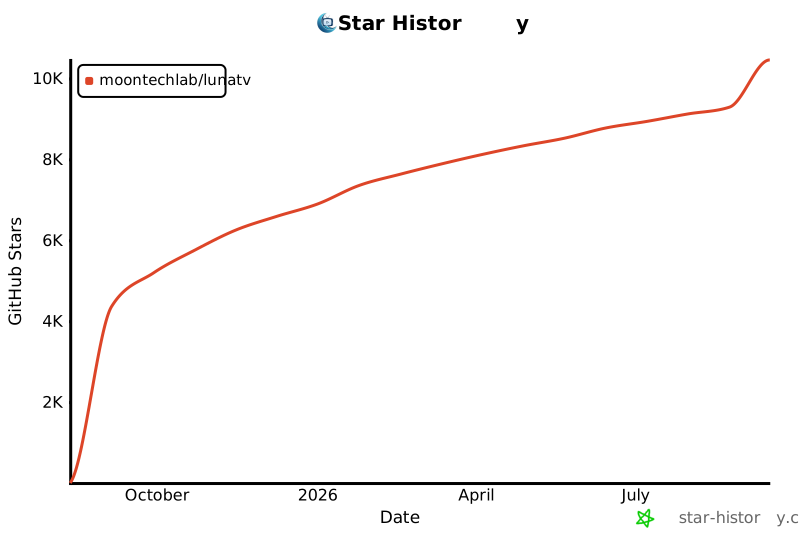
    "content": "# MoonTV\n\n<div align=\"center\">\n  <img src=\"public/logo.png\" alt=\"MoonTV Logo\" width=\"120\">\n</div>\n\n> 🎬 **MoonTV** 是一个开箱即用的、跨平台的影视聚合播放器。它基于 **Next.js 14** + **Tailwind&nbsp;CSS** + **TypeScript** 构建，支持多资源搜索、在线播放、收藏同步、播放记录、云端存储，让你可以随时随地畅享海量免费影视内容。\n\n<div align=\"center\">\n\n![Next.js](https://img.shields.io/badge/Next.js-14-000?logo=nextdotjs)\n![TailwindCSS](https://img.shields.io/badge/TailwindCSS-3-38bdf8?logo=tailwindcss)\n![TypeScript](https://img.shields.io/badge/TypeScript-4.x-3178c6?logo=typescript)\n![License](https://img.shields.io/badge/License-MIT-green)\n![Docker Ready](https://img.shields.io/badge/Docker-ready-blue?logo=docker)\n\n</div>\n\n---\n\n## ✨ 功能特性\n\n- 🔍 **多源聚合搜索**：一次搜索立刻返回全源结果。\n- 📄 **丰富详情页**：支持剧集列表、演员、年份、简介等完整信息展示。\n- ▶️ **流畅在线播放**：集成 HLS.js & ArtPlayer。\n- ❤️ **收藏 + 继续观看**：支持 Kvrocks/Redis/Upstash 存储，多端同步进度。\n- 📱 **PWA**：离线缓存、安装到桌面/主屏，移动端原生体验。\n- 🌗 **响应式布局**：桌面侧边栏 + 移动底部导航，自适应各种屏幕尺寸。\n- 👿 **智能去广告**：自动跳过视频中的切片广告（实验性）。\n\n### 注意：部署后项目为空壳项目，无内置播放源和直播源，需要自行收集\n\n<details>\n  <summary>点击查看项目截图</summary>\n  <img src=\"public/screenshot1.png\" alt=\"项目截图\" style=\"max-width:600px\">\n  <img src=\"public/screenshot2.png\" alt=\"项目截图\" style=\"max-width:600px\">\n  <img src=\"public/screenshot3.png\" alt=\"项目截图\" style=\"max-width:600px\">\n</details>\n\n### 请不要在 B站、小红书、微信公众号、抖音、今日头条或其他中国大陆社交平台发布视频或文章宣传本项目，不授权任何“科技周刊/月刊”类项目或站点收录本项目。\n\n## 🗺 目录\n\n- [技术栈](#技术栈)\n- [部署](#部署)\n  - [一键部署](#zeabur-一键部署)\n  - [Docker 部署](#Kvrocks-存储推荐)\n- [配置文件](#配置文件)\n- [订阅](#订阅)\n- [自动更新](#自动更新)\n- [环境变量](#环境变量)\n- [客户端](#客户端)\n- [AndroidTV 使用](#AndroidTV-使用)\n- [Roadmap](#roadmap)\n- [安全与隐私提醒](#安全与隐私提醒)\n- [License](#license)\n- [致谢](#致谢)\n\n## 技术栈\n\n| 分类      | 主要依赖                                                                                              |\n| --------- | ----------------------------------------------------------------------------------------------------- |\n| 前端框架  | [Next.js 14](https://nextjs.org/) · App Router                                                        |\n| UI & 样式 | [Tailwind&nbsp;CSS 3](https://tailwindcss.com/)                                                       |\n| 语言      | TypeScript 4                                                                                          |\n| 播放器    | [ArtPlayer](https://github.com/zhw2590582/ArtPlayer) · [HLS.js](https://github.com/video-dev/hls.js/) |\n| 代码质量  | ESLint · Prettier · Jest                                                                              |\n| 部署      | Docker                                                                    |\n\n## 部署\n\n本项目**仅支持 Docker 或其他基于 Docker 的平台** 部署。\n\n### zeabur 一键部署\n\n点击下方按钮即可一键部署，自动配置 LunaTV + Kvrocks 数据库：\n\n[![Deploy on Zeabur](https://zeabur.com/button.svg)](https://zeabur.com/templates/8MPTQU/deploy)\n\n**优势**：\n- ✅ 无需配置，一键启动（自动部署完整环境）\n- ✅ 自动 HTTPS 和全球 CDN 加速\n- ✅ 持久化存储，数据永不丢失\n- ✅ 免费额度足够个人使用\n\n**⚠️ 重要提示**：部署完成后，需要在 Zeabur 中为 LunaTV 服务设置访问域名（Domain）才能在浏览器中访问。详见下方 [设置访问域名](#5-设置访问域名必须) 步骤。\n\n### Kvrocks 存储（推荐）\n\n```yml\nservices:\n  moontv-core:\n    image: ghcr.io/moontechlab/lunatv:latest\n    container_name: moontv-core\n    restart: on-failure\n    ports:\n      - '3000:3000'\n    environment:\n      - USERNAME=admin\n      - PASSWORD=admin_password\n      - NEXT_PUBLIC_STORAGE_TYPE=kvrocks\n      - KVROCKS_URL=redis://moontv-kvrocks:6666\n    networks:\n      - moontv-network\n    depends_on:\n      - moontv-kvrocks\n  moontv-kvrocks:\n    image: apache/kvrocks\n    container_name: moontv-kvrocks\n    restart: unless-stopped\n    volumes:\n      - kvrocks-data:/var/lib/kvrocks\n    networks:\n      - moontv-network\nnetworks:\n  moontv-network:\n    driver: bridge\nvolumes:\n  kvrocks-data:\n```\n\n### Redis 存储（有一定的丢数据风险）\n\n```yml\nservices:\n  moontv-core:\n    image: ghcr.io/moontechlab/lunatv:latest\n    container_name: moontv-core\n    restart: on-failure\n    ports:\n      - '3000:3000'\n    environment:\n      - USERNAME=admin\n      - PASSWORD=admin_password\n      - NEXT_PUBLIC_STORAGE_TYPE=redis\n      - REDIS_URL=redis://moontv-redis:6379\n    networks:\n      - moontv-network\n    depends_on:\n      - moontv-redis\n  moontv-redis:\n    image: redis:alpine\n    container_name: moontv-redis\n    restart: unless-stopped\n    networks:\n      - moontv-network\n    # 请开启持久化，否则升级/重启后数据丢失\n    volumes:\n      - ./data:/data\nnetworks:\n  moontv-network:\n    driver: bridge\n```\n\n### Upstash 存储\n\n1. 在 [upstash](https://upstash.com/) 注册账号并新建一个 Redis 实例，名称任意。\n2. 复制新数据库的 **HTTPS ENDPOINT 和 TOKEN**\n3. 使用如下 docker compose\n```yml\nservices:\n  moontv-core:\n    image: ghcr.io/moontechlab/lunatv:latest\n    container_name: moontv-core\n    restart: on-failure\n    ports:\n      - '3000:3000'\n    environment:\n      - USERNAME=admin\n      - PASSWORD=admin_password\n      - NEXT_PUBLIC_STORAGE_TYPE=upstash\n      - UPSTASH_URL=上面 https 开头的 HTTPS ENDPOINT\n      - UPSTASH_TOKEN=上面的 TOKEN\n```\n\n### ☁️ Zeabur 部署（推荐）\n\nThanks to @SzeMeng76\n\nZeabur 是一站式云端部署平台，使用预构建的 Docker 镜像可以快速部署，无需等待构建。\n\n**部署步骤：**\n\n1. **添加 KVRocks 服务**（先添加数据库）\n   - 点击 \"Add Service\" > \"Docker Images\"\n   - 输入镜像名称：`apache/kvrocks`\n   - 配置端口：`6666` (TCP)\n   - **记住服务名称**（通常是 `apachekvrocks`）\n   - **配置持久化卷（重要）**：\n     * 在服务设置中找到 \"Volumes\" 部分\n     * 点击 \"Add Volume\" 添加新卷\n     * Volume ID: `kvrocks-data`（可自定义，仅支持字母、数字、连字符）\n     * Path: `/var/lib/kvrocks/db`\n     * 保存配置\n\n   > 💡 **重要提示**：持久化卷路径必须设置为 `/var/lib/kvrocks/db`（KVRocks 数据目录），这样配置文件保留在容器内，数据库文件持久化，重启后数据不会丢失！\n\n2. **添加 LunaTV 服务**\n   - 点击 \"Add Service\" > \"Docker Images\"\n   - 输入镜像名称：`ghcr.io/moontechlab/lunatv:latest`\n   - 配置端口：`3000` (HTTP)\n\n3. **配置环境变量**\n\n   在 LunaTV 服务的环境变量中添加：\n\n   ```env\n   # 必填：管理员账号\n   USERNAME=admin\n   PASSWORD=your_secure_password\n\n   # 必填：存储配置\n   NEXT_PUBLIC_STORAGE_TYPE=kvrocks\n   KVROCKS_URL=redis://apachekvrocks:6666\n\n   # 可选：站点配置\n   SITE_BASE=https://your-domain.zeabur.app\n   NEXT_PUBLIC_SITE_NAME=LunaTV Enhanced\n   ANNOUNCEMENT=欢迎使用 LunaTV Enhanced Edition\n\n   # 可选：豆瓣代理配置（推荐）\n   NEXT_PUBLIC_DOUBAN_PROXY_TYPE=cmliussss-cdn-tencent\n   NEXT_PUBLIC_DOUBAN_IMAGE_PROXY_TYPE=cmliussss-cdn-tencent\n   ```\n\n   **注意**：\n   - 使用服务名称作为主机名：`redis://apachekvrocks:6666`\n   - 如果服务名称不同，请替换为实际名称\n   - 两个服务必须在同一个 Project 中\n\n4. **部署完成**\n   - Zeabur 会自动拉取镜像并启动服务\n   - 等待服务就绪后，需要手动设置访问域名（见下一步）\n\n#### 5. 设置访问域名（必须）\n\n   - 在 LunaTV 服务页面，点击 \"Networking\" 或 \"网络\" 标签\n   - 点击 \"Generate Domain\" 生成 Zeabur 提供的免费域名（如 `xxx.zeabur.app`）\n   - 或者绑定自定义域名：\n     * 点击 \"Add Domain\" 添加你的域名\n     * 按照提示配置 DNS CNAME 记录指向 Zeabur 提供的目标地址\n   - 设置完域名后即可通过域名访问 LunaTV\n\n6. **绑定自定义域名（可选）**\n   - 在服务设置中点击 \"Domains\"\n   - 添加你的自定义域名\n   - 配置 DNS CNAME 记录指向 Zeabur 提供的域名\n\n#### 🔄 更新 Docker 镜像\n\n当 Docker 镜像有新版本发布时，Zeabur 不会自动更新。需要手动触发更新。\n\n**更新步骤：**\n\n1. **进入服务页面**\n   - 点击需要更新的服务（LunaTV 或 KVRocks）\n\n2. **重启服务**\n   - 点击 **\"服务状态\"** 页面，再点击 **\"重启当前版本\"** 按钮\n   - Zeabur 会自动拉取最新的 `latest` 镜像并重新部署\n\n> 💡 **提示**：\n> - 使用 `latest` 标签时，Restart 会自动拉取最新镜像\n> - 生产环境推荐使用固定版本标签（如 `v5.5.6`）避免意外更新\n\n## 配置文件\n\n完成部署后为空壳应用，无播放源，需要站长在管理后台的配置文件设置中填写配置文件（后续会支持订阅）\n\n配置文件示例如下：\n\n```json\n{\n  \"cache_time\": 7200,\n  \"api_site\": {\n    \"dyttzy\": {\n      \"api\": \"http://xxx.com/api.php/provide/vod\",\n      \"name\": \"示例资源\",\n      \"detail\": \"http://xxx.com\"\n    }\n    // ...更多站点\n  },\n  \"custom_category\": [\n    {\n      \"name\": \"华语\",\n      \"type\": \"movie\",\n      \"query\": \"华语\"\n    }\n  ]\n}\n```\n\n- `cache_time`：接口缓存时间（秒）。\n- `api_site`：你可以增删或替换任何资源站，字段说明：\n  - `key`：唯一标识，保持小写字母/数字。\n  - `api`：资源站提供的 `vod` JSON API 根地址。\n  - `name`：在人机界面中展示的名称。\n  - `detail`：（可选）部分无法通过 API 获取剧集详情的站点，需要提供网页详情根 URL，用于爬取。\n- `custom_category`：自定义分类配置，用于在导航中添加个性化的影视分类。以 type + query 作为唯一标识。支持以下字段：\n  - `name`：分类显示名称（可选，如不提供则使用 query 作为显示名）\n  - `type`：分类类型，支持 `movie`（电影）或 `tv`（电视剧）\n  - `query`：搜索关键词，用于在豆瓣 API 中搜索相关内容\n\ncustom_category 支持的自定义分类已知如下：\n\n- movie：热门、最新、经典、豆瓣高分、冷门佳片、华语、欧美、韩国、日本、动作、喜剧、爱情、科幻、悬疑、恐怖、治愈\n- tv：热门、美剧、英剧、韩剧、日剧、国产剧、港剧、日本动画、综艺、纪录片\n\n也可输入如 \"哈利波特\" 效果等同于豆瓣搜索\n\nMoonTV 支持标准的苹果 CMS V10 API 格式。\n\n## 订阅\n\n将完整的配置文件 base58 编码后提供 http 服务即为订阅链接，可在 MoonTV 后台/Helios 中使用。\n\n## 自动更新\n\n可借助 [watchtower](https://github.com/containrrr/watchtower) 自动更新镜像容器\n\ndockge/komodo 等 docker compose UI 也有自动更新功能\n\n## 环境变量\n\n| 变量                                | 说明                                         | 可选值                           | 默认值                                                                                                                     |\n| ----------------------------------- | -------------------------------------------- | -------------------------------- | -------------------------------------------------------------------------------------------------------------------------- |\n| USERNAME                            | 站长账号           | 任意字符串                       | 无默认，必填字段                                                                                                                     |\n| PASSWORD                            | 站长密码           | 任意字符串                       | 无默认，必填字段                                                                                                                     |\n| SITE_BASE                           | 站点 url              |       形如 https://example.com                  | 空                                                                                                                     |\n| NEXT_PUBLIC_SITE_NAME               | 站点名称                                     | 任意字符串                       | MoonTV                                                                                                                     |\n| ANNOUNCEMENT                        | 站点公告                                     | 任意字符串                       | 本网站仅提供影视信息搜索服务，所有内容均来自第三方网站。本站不存储任何视频资源，不对任何内容的准确性、合法性、完整性负责。 |\n| NEXT_PUBLIC_STORAGE_TYPE            | 播放记录/收藏的存储方式                      | redis、kvrocks、upstash | 无默认，必填字段                                                                                                               |\n| KVROCKS_URL                           | kvrocks 连接 url                               | 连接 url                         | 空                                                                                                                         |\n| REDIS_URL                           | redis 连接 url                               | 连接 url                         | 空                                                                                                                         |\n| UPSTASH_URL                         | upstash redis 连接 url                       | 连接 url                         | 空                                                                                                                         |\n| UPSTASH_TOKEN                       | upstash redis 连接 token                     | 连接 token                       | 空                                                                                                                         |\n| NEXT_PUBLIC_SEARCH_MAX_PAGE         | 搜索接口可拉取的最大页数                     | 1-50                             | 5                                                                                                                          |\n| NEXT_PUBLIC_DOUBAN_PROXY_TYPE       | 豆瓣数据源请求方式                           | 见下方                           | direct                                                                                                                     |\n| NEXT_PUBLIC_DOUBAN_PROXY            | 自定义豆瓣数据代理 URL                       | url prefix                       | (空)                                                                                                                       |\n| NEXT_PUBLIC_DOUBAN_IMAGE_PROXY_TYPE | 豆瓣图片代理类型                             | 见下方                           | direct                                                                                                                     |\n| NEXT_PUBLIC_DOUBAN_IMAGE_PROXY      | 自定义豆瓣图片代理 URL                       | url prefix                       | (空)                                                                                                                       |\n| NEXT_PUBLIC_DISABLE_YELLOW_FILTER   | 关闭色情内容过滤                             | true/false                       | false                                                                                                                      |\n| NEXT_PUBLIC_FLUID_SEARCH | 是否开启搜索接口流式输出 | true/ false | true |\n\nNEXT_PUBLIC_DOUBAN_PROXY_TYPE 选项解释：\n\n- direct: 由服务器直接请求豆瓣源站\n- cors-proxy-zwei: 浏览器向 cors proxy 请求豆瓣数据，该 cors proxy 由 [Zwei](https://github.com/bestzwei) 搭建\n- cmliussss-cdn-tencent: 浏览器向豆瓣 CDN 请求数据，该 CDN 由 [CMLiussss](https://github.com/cmliu) 搭建，并由腾讯云 cdn 提供加速\n- cmliussss-cdn-ali: 浏览器向豆瓣 CDN 请求数据，该 CDN 由 [CMLiussss](https://github.com/cmliu) 搭建，并由阿里云 cdn 提供加速\n- custom: 用户自定义 proxy，由 NEXT_PUBLIC_DOUBAN_PROXY 定义\n\nNEXT_PUBLIC_DOUBAN_IMAGE_PROXY_TYPE 选项解释：\n\n- direct：由浏览器直接请求豆瓣分配的默认图片域名\n- server：由服务器代理请求豆瓣分配的默认图片域名\n- img3：由浏览器请求豆瓣官方的精品 cdn（阿里云）\n- cmliussss-cdn-tencent：由浏览器请求豆瓣 CDN，该 CDN 由 [CMLiussss](https://github.com/cmliu) 搭建，并由腾讯云 cdn 提供加速\n- cmliussss-cdn-ali：由浏览器请求豆瓣 CDN，该 CDN 由 [CMLiussss](https://github.com/cmliu) 搭建，并由阿里云 cdn 提供加速\n- custom: 用户自定义 proxy，由 NEXT_PUBLIC_DOUBAN_IMAGE_PROXY 定义\n\n## 客户端\n\nv100.0.0 以上版本可配合 [Selene](https://github.com/MoonTechLab/Selene) 使用，移动端体验更加友好，数据完全同步\n\n## AndroidTV 使用\n\n目前该项目可以配合 [OrionTV](https://github.com/zimplexing/OrionTV) 在 Android TV 上使用，可以直接作为 OrionTV 后端\n\n已实现播放记录和网页端同步\n\n## 安全与隐私提醒\n\n### 请设置密码保护并关闭公网注册\n\n为了您的安全和避免潜在的法律风险，我们要求在部署时**强烈建议关闭公网注册**：\n\n### 部署要求\n\n1. **设置环境变量 `PASSWORD`**：为您的实例设置一个强密码\n2. **仅供个人使用**：请勿将您的实例链接公开分享或传播\n3. **遵守当地法律**：请确保您的使用行为符合当地法律法规\n\n### 重要声明\n\n- 本项目仅供学习和个人使用\n- 请勿将部署的实例用于商业用途或公开服务\n- 如因公开分享导致的任何法律问题，用户需自行承担责任\n- 项目开发者不对用户的使用行为承担任何法律责任\n- 本项目不在中国大陆地区提供服务。如有该项目在向中国大陆地区提供服务，属个人行为。在该地区使用所产生的法律风险及责任，属于用户个人行为，与本项目无关，须自行承担全部责任。特此声明\n\n## License\n\n[MIT](LICENSE) © 2025 MoonTV & Contributors\n\n## 致谢\n\n- [ts-nextjs-tailwind-starter](https://github.com/theodorusclarence/ts-nextjs-tailwind-starter) — 项目最初基于该脚手架。\n- [LibreTV](https://github.com/LibreSpark/LibreTV) — 由此启发，站在巨人的肩膀上。\n- [ArtPlayer](https://github.com/zhw2590582/ArtPlayer) — 提供强大的网页视频播放器。\n- [HLS.js](https://github.com/video-dev/hls.js) — 实现 HLS 流媒体在浏览器中的播放支持。\n- [Zwei](https://github.com/bestzwei) — 提供获取豆瓣数据的 cors proxy\n- [CMLiussss](https://github.com/cmliu) — 提供豆瓣 CDN 服务\n- 感谢所有提供免费影视接口的站点。\n\n## Star History\n\n[![Star History Chart](https://api.star-history.com/svg?repos=MoonTechLab/LunaTV&type=Date)](https://www.star-history.com/#MoonTechLab/LunaTV&Date)\n"
  },
  {
    "path": "VERSION.txt",
    "content": "100.1.2"
  },
  {
    "path": "commitlint.config.js",
    "content": "module.exports = {\n  extends: ['@commitlint/config-conventional'],\n  rules: {\n    //   TODO Add Scope Enum Here\n    // 'scope-enum': [2, 'always', ['yourscope', 'yourscope']],\n    'type-enum': [\n      2,\n      'always',\n      [\n        'feat',\n        'fix',\n        'docs',\n        'chore',\n        'style',\n        'refactor',\n        'ci',\n        'test',\n        'perf',\n        'revert',\n        'vercel',\n      ],\n    ],\n  },\n};\n"
  },
  {
    "path": "docker-compose.dev.yml",
    "content": "version: '3.8'\n\nservices:\n  redis:\n    image: redis:7-alpine\n    container_name: lunatv-redis\n    volumes:\n      - redis-data:/data\n    command: redis-server --appendonly yes\n    healthcheck:\n      test: ['CMD', 'redis-cli', 'ping']\n      interval: 5s\n      timeout: 3s\n      retries: 5\n\n  app:\n    build:\n      context: .\n      dockerfile: Dockerfile\n    container_name: lunatv-app\n    ports:\n      - '3000:3000'\n    depends_on:\n      redis:\n        condition: service_healthy\n    environment:\n      # 存储类型：使用 redis\n      - NEXT_PUBLIC_STORAGE_TYPE=redis\n      # Redis 连接地址（容器内通过 service name 访问）\n      - REDIS_URL=redis://redis:6379\n      # 站长账号\n      - USERNAME=admin\n      # 站长密码\n      - PASSWORD=admin123\n      # 站点名称（可选）\n      - NEXT_PUBLIC_SITE_NAME=MoonTV\n\nvolumes:\n  redis-data:\n"
  },
  {
    "path": "jest.config.js",
    "content": "// eslint-disable-next-line @typescript-eslint/no-var-requires\nconst nextJest = require('next/jest');\n\nconst createJestConfig = nextJest({\n  // Provide the path to your Next.js app to load next.config.js and .env files in your test environment\n  dir: './',\n});\n\n// Add any custom config to be passed to Jest\nconst customJestConfig = {\n  // Add more setup options before each test is run\n  setupFilesAfterEnv: ['<rootDir>/jest.setup.js'],\n\n  // if using TypeScript with a baseUrl set to the root directory then you need the below for alias' to work\n  moduleDirectories: ['node_modules', '<rootDir>/'],\n\n  testEnvironment: 'jest-environment-jsdom',\n\n  /**\n   * Absolute imports and Module Path Aliases\n   */\n  moduleNameMapper: {\n    '^@/(.*)$': '<rootDir>/src/$1',\n    '^~/(.*)$': '<rootDir>/public/$1',\n    '^.+\\\\.(svg)$': '<rootDir>/src/__mocks__/svg.tsx',\n  },\n};\n\n// createJestConfig is exported this way to ensure that next/jest can load the Next.js config which is async\nmodule.exports = createJestConfig(customJestConfig);\n"
  },
  {
    "path": "jest.setup.js",
    "content": "import '@testing-library/jest-dom/extend-expect';\n\n// Allow router mocks.\n// eslint-disable-next-line no-undef\njest.mock('next/router', () => require('next-router-mock'));\n"
  },
  {
    "path": "next.config.js",
    "content": "/** @type {import('next').NextConfig} */\n/* eslint-disable @typescript-eslint/no-var-requires */\n\nconst nextConfig = {\n  output: 'standalone',\n  eslint: {\n    dirs: ['src'],\n  },\n\n  reactStrictMode: false,\n  swcMinify: false,\n\n  experimental: {\n    instrumentationHook: process.env.NODE_ENV === 'production',\n  },\n\n  // Uncoment to add domain whitelist\n  images: {\n    unoptimized: true,\n    remotePatterns: [\n      {\n        protocol: 'https',\n        hostname: '**',\n      },\n      {\n        protocol: 'http',\n        hostname: '**',\n      },\n    ],\n  },\n\n  webpack(config) {\n    // Grab the existing rule that handles SVG imports\n    const fileLoaderRule = config.module.rules.find((rule) =>\n      rule.test?.test?.('.svg')\n    );\n\n    config.module.rules.push(\n      // Reapply the existing rule, but only for svg imports ending in ?url\n      {\n        ...fileLoaderRule,\n        test: /\\.svg$/i,\n        resourceQuery: /url/, // *.svg?url\n      },\n      // Convert all other *.svg imports to React components\n      {\n        test: /\\.svg$/i,\n        issuer: { not: /\\.(css|scss|sass)$/ },\n        resourceQuery: { not: /url/ }, // exclude if *.svg?url\n        loader: '@svgr/webpack',\n        options: {\n          dimensions: false,\n          titleProp: true,\n        },\n      }\n    );\n\n    // Modify the file loader rule to ignore *.svg, since we have it handled now.\n    fileLoaderRule.exclude = /\\.svg$/i;\n\n    config.resolve.fallback = {\n      ...config.resolve.fallback,\n      net: false,\n      tls: false,\n      crypto: false,\n    };\n\n    return config;\n  },\n};\n\nconst withPWA = require('next-pwa')({\n  dest: 'public',\n  disable: process.env.NODE_ENV === 'development',\n  register: true,\n  skipWaiting: true,\n});\n\nmodule.exports = withPWA(nextConfig);\n"
  },
  {
    "path": "package.json",
    "content": "{\n  \"name\": \"moontv\",\n  \"version\": \"0.1.0\",\n  \"private\": true,\n  \"scripts\": {\n    \"dev\": \"pnpm gen:manifest && next dev -H 0.0.0.0\",\n    \"build\": \"pnpm gen:manifest && next build\",\n    \"start\": \"next start\",\n    \"lint\": \"next lint\",\n    \"lint:fix\": \"eslint src --fix && pnpm format\",\n    \"lint:strict\": \"eslint --max-warnings=0 src\",\n    \"typecheck\": \"tsc --noEmit --incremental false\",\n    \"test:watch\": \"jest --watch\",\n    \"test\": \"jest\",\n    \"format\": \"prettier -w .\",\n    \"format:check\": \"prettier -c .\",\n    \"gen:manifest\": \"node scripts/generate-manifest.js\",\n    \"postbuild\": \"echo 'Build completed - sitemap generation disabled'\",\n    \"prepare\": \"husky install\"\n  },\n  \"dependencies\": {\n    \"@dnd-kit/core\": \"^6.3.1\",\n    \"@dnd-kit/modifiers\": \"^9.0.0\",\n    \"@dnd-kit/sortable\": \"^10.0.0\",\n    \"@dnd-kit/utilities\": \"^3.2.2\",\n    \"@headlessui/react\": \"^2.2.4\",\n    \"@heroicons/react\": \"^2.2.0\",\n    \"@tanstack/react-virtual\": \"^3.13.19\",\n    \"@types/crypto-js\": \"^4.2.2\",\n    \"@upstash/redis\": \"^1.25.0\",\n    \"@vidstack/react\": \"^1.12.13\",\n    \"artplayer\": \"^5.2.5\",\n    \"bs58\": \"^6.0.0\",\n    \"clsx\": \"^2.0.0\",\n    \"crypto-js\": \"^4.2.0\",\n    \"framer-motion\": \"^12.18.1\",\n    \"he\": \"^1.2.0\",\n    \"hls.js\": \"^1.6.10\",\n    \"lucide-react\": \"^0.438.0\",\n    \"media-icons\": \"^1.1.5\",\n    \"next\": \"^14.2.23\",\n    \"next-pwa\": \"^5.6.0\",\n    \"next-themes\": \"^0.4.6\",\n    \"react\": \"^18.2.0\",\n    \"react-dom\": \"^18.2.0\",\n    \"react-icons\": \"^5.4.0\",\n    \"redis\": \"^4.6.7\",\n    \"swiper\": \"^11.2.8\",\n    \"tailwind-merge\": \"^2.6.0\",\n    \"vidstack\": \"^0.6.15\",\n    \"zod\": \"^3.24.1\"\n  },\n  \"devDependencies\": {\n    \"@commitlint/cli\": \"^16.3.0\",\n    \"@commitlint/config-conventional\": \"^16.2.4\",\n    \"@svgr/webpack\": \"^8.1.0\",\n    \"@tailwindcss/forms\": \"^0.5.10\",\n    \"@testing-library/jest-dom\": \"^5.17.0\",\n    \"@testing-library/react\": \"^15.0.7\",\n    \"@types/bs58\": \"^5.0.0\",\n    \"@types/he\": \"^1.2.3\",\n    \"@types/node\": \"24.0.3\",\n    \"@types/react\": \"^18.3.18\",\n    \"@types/react-dom\": \"^19.1.6\",\n    \"@types/testing-library__jest-dom\": \"^5.14.9\",\n    \"@typescript-eslint/eslint-plugin\": \"^5.62.0\",\n    \"@typescript-eslint/parser\": \"^5.62.0\",\n    \"autoprefixer\": \"^10.4.20\",\n    \"eslint\": \"^8.57.1\",\n    \"eslint-config-next\": \"^14.2.23\",\n    \"eslint-config-prettier\": \"^8.10.0\",\n    \"eslint-plugin-simple-import-sort\": \"^7.0.0\",\n    \"eslint-plugin-unused-imports\": \"^2.0.0\",\n    \"husky\": \"^7.0.4\",\n    \"jest\": \"^27.5.1\",\n    \"lint-staged\": \"^12.5.0\",\n    \"next-router-mock\": \"^0.9.0\",\n    \"postcss\": \"^8.5.1\",\n    \"prettier\": \"^2.8.8\",\n    \"prettier-plugin-tailwindcss\": \"^0.5.0\",\n    \"tailwindcss\": \"^3.4.17\",\n    \"typescript\": \"^4.9.5\",\n    \"webpack-obfuscator\": \"^3.5.1\"\n  },\n  \"lint-staged\": {\n    \"**/*.{js,jsx,ts,tsx}\": [\n      \"eslint --max-warnings=0\",\n      \"prettier -w\"\n    ],\n    \"**/*.{json,css,scss,md,webmanifest}\": [\n      \"prettier -w\"\n    ]\n  },\n  \"packageManager\": \"pnpm@10.14.0\"\n}"
  },
  {
    "path": "postcss.config.js",
    "content": "module.exports = {\n  plugins: {\n    tailwindcss: {},\n    autoprefixer: {},\n  },\n};\n"
  },
  {
    "path": "proxy.worker.js",
    "content": "/* eslint-disable */\n\naddEventListener('fetch', (event) => {\n  event.respondWith(handleRequest(event.request));\n});\n\nasync function handleRequest(request) {\n  try {\n    const url = new URL(request.url);\n\n    // 如果访问根目录，返回HTML\n    if (url.pathname === '/') {\n      return new Response(getRootHtml(), {\n        headers: {\n          'Content-Type': 'text/html; charset=utf-8',\n        },\n      });\n    }\n\n    // 从请求路径中提取目标 URL\n    let actualUrlStr = decodeURIComponent(url.pathname.replace('/', ''));\n\n    // 判断用户输入的 URL 是否带有协议\n    actualUrlStr = ensureProtocol(actualUrlStr, url.protocol);\n\n    // 保留查询参数\n    actualUrlStr += url.search;\n\n    // 创建新 Headers 对象，排除以 'cf-' 开头的请求头\n    const newHeaders = filterHeaders(\n      request.headers,\n      (name) => !name.startsWith('cf-')\n    );\n\n    // 创建一个新的请求以访问目标 URL\n    const modifiedRequest = new Request(actualUrlStr, {\n      headers: newHeaders,\n      method: request.method,\n      body: request.body,\n      redirect: 'manual',\n    });\n\n    // 发起对目标 URL 的请求\n    const response = await fetch(modifiedRequest);\n    let body = response.body;\n\n    // 处理重定向\n    if ([301, 302, 303, 307, 308].includes(response.status)) {\n      body = response.body;\n      // 创建新的 Response 对象以修改 Location 头部\n      return handleRedirect(response, body);\n    } else if (response.headers.get('Content-Type')?.includes('text/html')) {\n      body = await handleHtmlContent(\n        response,\n        url.protocol,\n        url.host,\n        actualUrlStr\n      );\n    }\n\n    // 创建修改后的响应对象\n    const modifiedResponse = new Response(body, {\n      status: response.status,\n      statusText: response.statusText,\n      headers: response.headers,\n    });\n\n    // 添加禁用缓存的头部\n    setNoCacheHeaders(modifiedResponse.headers);\n\n    // 添加 CORS 头部，允许跨域访问\n    setCorsHeaders(modifiedResponse.headers);\n\n    return modifiedResponse;\n  } catch (error) {\n    // 如果请求目标地址时出现错误，返回带有错误消息的响应和状态码 500（服务器错误）\n    return jsonResponse(\n      {\n        error: error.message,\n      },\n      500\n    );\n  }\n}\n\n// 确保 URL 带有协议\nfunction ensureProtocol(url, defaultProtocol) {\n  return url.startsWith('http://') || url.startsWith('https://')\n    ? url\n    : defaultProtocol + '//' + url;\n}\n\n// 处理重定向\nfunction handleRedirect(response, body) {\n  const location = new URL(response.headers.get('location'));\n  const modifiedLocation = `/${encodeURIComponent(location.toString())}`;\n  return new Response(body, {\n    status: response.status,\n    statusText: response.statusText,\n    headers: {\n      ...response.headers,\n      Location: modifiedLocation,\n    },\n  });\n}\n\n// 处理 HTML 内容中的相对路径\nasync function handleHtmlContent(response, protocol, host, actualUrlStr) {\n  const originalText = await response.text();\n  const regex = new RegExp('((href|src|action)=[\"\\'])/(?!/)', 'g');\n  let modifiedText = replaceRelativePaths(\n    originalText,\n    protocol,\n    host,\n    new URL(actualUrlStr).origin\n  );\n\n  return modifiedText;\n}\n\n// 替换 HTML 内容中的相对路径\nfunction replaceRelativePaths(text, protocol, host, origin) {\n  const regex = new RegExp('((href|src|action)=[\"\\'])/(?!/)', 'g');\n  return text.replace(regex, `$1${protocol}//${host}/${origin}/`);\n}\n\n// 返回 JSON 格式的响应\nfunction jsonResponse(data, status) {\n  return new Response(JSON.stringify(data), {\n    status: status,\n    headers: {\n      'Content-Type': 'application/json; charset=utf-8',\n    },\n  });\n}\n\n// 过滤请求头\nfunction filterHeaders(headers, filterFunc) {\n  return new Headers([...headers].filter(([name]) => filterFunc(name)));\n}\n\n// 设置禁用缓存的头部\nfunction setNoCacheHeaders(headers) {\n  headers.set('Cache-Control', 'no-store');\n}\n\n// 设置 CORS 头部\nfunction setCorsHeaders(headers) {\n  headers.set('Access-Control-Allow-Origin', '*');\n  headers.set('Access-Control-Allow-Methods', 'GET, POST, PUT, DELETE');\n  headers.set('Access-Control-Allow-Headers', '*');\n}\n\n// 返回根目录的 HTML\nfunction getRootHtml() {\n  return `<!DOCTYPE html>\n<html lang=\"zh-CN\">\n<head>\n  <meta charset=\"UTF-8\">\n  <link href=\"https://cdnjs.cloudflare.com/ajax/libs/materialize/1.0.0/css/materialize.min.css\" rel=\"stylesheet\">\n  <title>Proxy Everything</title>\n  <link rel=\"icon\" type=\"image/png\" href=\"https://img.icons8.com/color/1000/kawaii-bread-1.png\">\n  <meta name=\"Description\" content=\"Proxy Everything with CF Workers.\">\n  <meta property=\"og:description\" content=\"Proxy Everything with CF Workers.\">\n  <meta property=\"og:image\" content=\"https://img.icons8.com/color/1000/kawaii-bread-1.png\">\n  <meta name=\"robots\" content=\"index, follow\">\n  <meta http-equiv=\"Content-Language\" content=\"zh-CN\">\n  <meta name=\"copyright\" content=\"Copyright © ymyuuu\">\n  <meta name=\"author\" content=\"ymyuuu\">\n  <link rel=\"apple-touch-icon-precomposed\" sizes=\"120x120\" href=\"https://img.icons8.com/color/1000/kawaii-bread-1.png\">\n  <meta name=\"apple-mobile-web-app-capable\" content=\"yes\">\n  <meta name=\"apple-mobile-web-app-status-bar-style\" content=\"black-translucent\">\n  <meta name=\"viewport\" content=\"width=device-width, user-scalable=no, initial-scale=1.0, maximum-scale=1.0, minimum-scale=1.0, user-scalable=no\">\n  <style>\n      body, html {\n          height: 100%;\n          margin: 0;\n      }\n      .background {\n          background-image: url('https://imgapi.cn/bing.php');\n          background-size: cover;\n          background-position: center;\n          height: 100%;\n          display: flex;\n          align-items: center;\n          justify-content: center;\n      }\n      .card {\n          background-color: rgba(255, 255, 255, 0.8);\n          transition: background-color 0.3s ease, box-shadow 0.3s ease;\n      }\n      .card:hover {\n          background-color: rgba(255, 255, 255, 1);\n          box-shadow: 0px 8px 16px rgba(0, 0, 0, 0.3);\n      }\n      .input-field input[type=text] {\n          color: #2c3e50;\n      }\n      .input-field input[type=text]:focus+label {\n          color: #2c3e50 !important;\n      }\n      .input-field input[type=text]:focus {\n          border-bottom: 1px solid #2c3e50 !important;\n          box-shadow: 0 1px 0 0 #2c3e50 !important;\n      }\n  </style>\n</head>\n<body>\n  <div class=\"background\">\n      <div class=\"container\">\n          <div class=\"row\">\n              <div class=\"col s12 m8 offset-m2 l6 offset-l3\">\n                  <div class=\"card\">\n                      <div class=\"card-content\">\n                          <span class=\"card-title center-align\"><i class=\"material-icons left\">link</i>Proxy Everything</span>\n                          <form id=\"urlForm\" onsubmit=\"redirectToProxy(event)\">\n                              <div class=\"input-field\">\n                                  <input type=\"text\" id=\"targetUrl\" placeholder=\"在此输入目标地址\" required>\n                                  <label for=\"targetUrl\">目标地址</label>\n                              </div>\n                              <button type=\"submit\" class=\"btn waves-effect waves-light teal darken-2 full-width\">跳转</button>\n                          </form>\n                      </div>\n                  </div>\n              </div>\n          </div>\n      </div>\n  </div>\n  <script src=\"https://cdnjs.cloudflare.com/ajax/libs/materialize/1.0.0/js/materialize.min.js\"></script>\n  <script>\n      function redirectToProxy(event) {\n          event.preventDefault();\n          const targetUrl = document.getElementById('targetUrl').value.trim();\n          const currentOrigin = window.location.origin;\n          window.open(currentOrigin + '/' + encodeURIComponent(targetUrl), '_blank');\n      }\n  </script>\n</body>\n</html>`;\n}\n"
  },
  {
    "path": "public/robots.txt",
    "content": "# 禁止所有搜索引擎爬取\nUser-agent: *\nDisallow: /\n"
  },
  {
    "path": "scripts/convert-changelog.js",
    "content": "#!/usr/bin / env node\n\n/* eslint-disable */\n\nconst fs = require('fs');\nconst path = require('path');\n\nfunction parseChangelog(content) {\n  const lines = content.split('\\n');\n  const versions = [];\n  let currentVersion = null;\n  let currentSection = null;\n  let inVersionContent = false;\n\n  for (const line of lines) {\n    const trimmedLine = line.trim();\n\n    // 匹配版本行: ## [X.Y.Z] - YYYY-MM-DD\n    const versionMatch = trimmedLine.match(\n      /^## \\[([\\d.]+)\\] - (\\d{4}-\\d{2}-\\d{2})$/\n    );\n    if (versionMatch) {\n      if (currentVersion) {\n        versions.push(currentVersion);\n      }\n\n      currentVersion = {\n        version: versionMatch[1],\n        date: versionMatch[2],\n        added: [],\n        changed: [],\n        fixed: [],\n        content: [], // 用于存储原始内容，当没有分类时使用\n      };\n      currentSection = null;\n      inVersionContent = true;\n      continue;\n    }\n\n    // 如果遇到下一个版本或到达文件末尾，停止处理当前版本\n    if (inVersionContent && currentVersion) {\n      // 匹配章节标题\n      if (trimmedLine === '### Added') {\n        currentSection = 'added';\n        continue;\n      } else if (trimmedLine === '### Changed') {\n        currentSection = 'changed';\n        continue;\n      } else if (trimmedLine === '### Fixed') {\n        currentSection = 'fixed';\n        continue;\n      }\n\n      // 匹配条目: - 内容\n      if (trimmedLine.startsWith('- ') && currentSection) {\n        const entry = trimmedLine.substring(2);\n        currentVersion[currentSection].push(entry);\n      } else if (\n        trimmedLine &&\n        !trimmedLine.startsWith('#') &&\n        !trimmedLine.startsWith('###')\n      ) {\n        currentVersion.content.push(trimmedLine);\n      }\n    }\n  }\n\n  // 添加最后一个版本\n  if (currentVersion) {\n    versions.push(currentVersion);\n  }\n\n  // 后处理：如果某个版本没有分类内容，但有 content，则将 content 放到 changed 中\n  versions.forEach((version) => {\n    const hasCategories =\n      version.added.length > 0 ||\n      version.changed.length > 0 ||\n      version.fixed.length > 0;\n    if (!hasCategories && version.content.length > 0) {\n      version.changed = version.content;\n    }\n    // 清理 content 字段\n    delete version.content;\n  });\n\n  return { versions };\n}\n\nfunction generateTypeScript(changelogData) {\n  const entries = changelogData.versions\n    .map((version) => {\n      const addedEntries = version.added\n        .map((entry) => `    \"${entry}\"`)\n        .join(',\\n');\n      const changedEntries = version.changed\n        .map((entry) => `    \"${entry}\"`)\n        .join(',\\n');\n      const fixedEntries = version.fixed\n        .map((entry) => `    \"${entry}\"`)\n        .join(',\\n');\n\n      return `  {\n    version: \"${version.version}\",\n    date: \"${version.date}\",\n    added: [\n${addedEntries || '      // 无新增内容'}\n    ],\n    changed: [\n${changedEntries || '      // 无变更内容'}\n    ],\n    fixed: [\n${fixedEntries || '      // 无修复内容'}\n    ]\n  }`;\n    })\n    .join(',\\n');\n\n  return `// 此文件由 scripts/convert-changelog.js 自动生成\n// 请勿手动编辑\n\nexport interface ChangelogEntry {\n  version: string;\n  date: string;\n  added: string[];\n  changed: string[];\n  fixed: string[];\n}\n\nexport const changelog: ChangelogEntry[] = [\n${entries}\n];\n\nexport default changelog;\n`;\n}\n\nfunction updateVersionFile(version) {\n  const versionTxtPath = path.join(process.cwd(), 'VERSION.txt');\n  try {\n    fs.writeFileSync(versionTxtPath, version, 'utf8');\n    console.log(`✅ 已更新 VERSION.txt: ${version}`);\n  } catch (error) {\n    console.error(`❌ 无法更新 VERSION.txt:`, error.message);\n    process.exit(1);\n  }\n}\n\nfunction updateVersionTs(version) {\n  const versionTsPath = path.join(process.cwd(), 'src/lib/version.ts');\n  try {\n    let content = fs.readFileSync(versionTsPath, 'utf8');\n\n    // 替换 CURRENT_VERSION 常量\n    const updatedContent = content.replace(\n      /const CURRENT_VERSION = ['\"`][^'\"`]+['\"`];/,\n      `const CURRENT_VERSION = '${version}';`\n    );\n\n    fs.writeFileSync(versionTsPath, updatedContent, 'utf8');\n    console.log(`✅ 已更新 version.ts: ${version}`);\n  } catch (error) {\n    console.error(`❌ 无法更新 version.ts:`, error.message);\n    process.exit(1);\n  }\n}\n\nfunction main() {\n  try {\n    const changelogPath = path.join(process.cwd(), 'CHANGELOG');\n    const outputPath = path.join(process.cwd(), 'src/lib/changelog.ts');\n\n    console.log('正在读取 CHANGELOG 文件...');\n    const changelogContent = fs.readFileSync(changelogPath, 'utf-8');\n\n    console.log('正在解析 CHANGELOG 内容...');\n    const changelogData = parseChangelog(changelogContent);\n\n    if (changelogData.versions.length === 0) {\n      console.error('❌ 未在 CHANGELOG 中找到任何版本');\n      process.exit(1);\n    }\n\n    // 获取最新版本号（CHANGELOG中的第一个版本）\n    const latestVersion = changelogData.versions[0].version;\n    console.log(`🔢 最新版本: ${latestVersion}`);\n\n    console.log('正在生成 TypeScript 文件...');\n    const tsContent = generateTypeScript(changelogData);\n\n    // 确保输出目录存在\n    const outputDir = path.dirname(outputPath);\n    if (!fs.existsSync(outputDir)) {\n      fs.mkdirSync(outputDir, { recursive: true });\n    }\n\n    fs.writeFileSync(outputPath, tsContent, 'utf-8');\n\n    // 读取 VERSION.txt 并同步到 version.ts\n    const versionTxtPath = path.join(process.cwd(), 'VERSION.txt');\n    const versionFromFile = fs.readFileSync(versionTxtPath, 'utf8').trim();\n    console.log(`📄 VERSION.txt 版本: ${versionFromFile}`);\n    updateVersionTs(versionFromFile);\n\n    // 检查是否在 GitHub Actions 环境中运行\n    const isGitHubActions = process.env.GITHUB_ACTIONS === 'true';\n\n    if (isGitHubActions) {\n      // 在 GitHub Actions 中，更新 VERSION.txt 为 CHANGELOG 最新版本\n      console.log('正在更新 VERSION.txt...');\n      updateVersionFile(latestVersion);\n      updateVersionTs(latestVersion);\n    }\n\n    console.log(`✅ 成功生成 ${outputPath}`);\n    console.log(`📊 版本统计:`);\n    changelogData.versions.forEach((version) => {\n      console.log(\n        `   ${version.version} (${version.date}): +${version.added.length} ~${version.changed.length} !${version.fixed.length}`\n      );\n    });\n\n    console.log('\\n🎉 转换完成!');\n  } catch (error) {\n    console.error('❌ 转换失败:', error);\n    process.exit(1);\n  }\n}\n\nif (require.main === module) {\n  main();\n}\n"
  },
  {
    "path": "scripts/dev-docker.sh",
    "content": "#!/bin/bash\n# 本地构建并启动 Docker 镜像 + Redis\n# 用法: ./scripts/dev-docker.sh [up|down|rebuild|logs]\n\nset -e\n\nCOMPOSE_FILE=\"docker-compose.dev.yml\"\n\ncase \"${1:-up}\" in\n  up)\n    echo \"🚀 构建并启动服务...\"\n    docker compose -f \"$COMPOSE_FILE\" up -d --build\n    echo \"\"\n    echo \"✅ 服务已启动\"\n    echo \"   应用: http://localhost:3000\"\n    echo \"   Redis: localhost:6379\"\n    echo \"\"\n    echo \"   默认账号: admin / admin123\"\n    echo \"   查看日志: ./scripts/dev-docker.sh logs\"\n    echo \"   停止服务: ./scripts/dev-docker.sh down\"\n    ;;\n  down)\n    echo \"🛑 停止并移除服务...\"\n    docker compose -f \"$COMPOSE_FILE\" down\n    echo \"✅ 已停止\"\n    ;;\n  rebuild)\n    echo \"🔄 重新构建并启动...\"\n    docker compose -f \"$COMPOSE_FILE\" down\n    docker compose -f \"$COMPOSE_FILE\" up -d --build --force-recreate\n    echo \"✅ 已重新构建并启动\"\n    ;;\n  logs)\n    docker compose -f \"$COMPOSE_FILE\" logs -f\n    ;;\n  *)\n    echo \"用法: $0 [up|down|rebuild|logs]\"\n    exit 1\n    ;;\nesac\n"
  },
  {
    "path": "scripts/generate-manifest.js",
    "content": "#!/usr/bin/env node\n/* eslint-disable */\n// 根据 NEXT_PUBLIC_SITE_NAME 动态生成 manifest.json\n\nconst fs = require('fs');\nconst path = require('path');\n\n// 获取项目根目录\nconst projectRoot = path.resolve(__dirname, '..');\nconst publicDir = path.join(projectRoot, 'public');\nconst manifestPath = path.join(publicDir, 'manifest.json');\n\n// 从环境变量获取站点名称\nconst siteName = process.env.NEXT_PUBLIC_SITE_NAME || 'MoonTV';\n\n// manifest.json 模板\nconst manifestTemplate = {\n  name: siteName,\n  short_name: siteName,\n  description: '影视聚合',\n  start_url: '/',\n  scope: '/',\n  display: 'standalone',\n  background_color: '#000000',\n  'apple-mobile-web-app-capable': 'yes',\n  'apple-mobile-web-app-status-bar-style': 'black',\n  icons: [\n    {\n      src: '/icons/icon-192x192.png',\n      sizes: '192x192',\n      type: 'image/png',\n    },\n    {\n      src: '/icons/icon-256x256.png',\n      sizes: '256x256',\n      type: 'image/png',\n    },\n    {\n      src: '/icons/icon-384x384.png',\n      sizes: '384x384',\n      type: 'image/png',\n    },\n    {\n      src: '/icons/icon-512x512.png',\n      sizes: '512x512',\n      type: 'image/png',\n    },\n  ],\n};\n\ntry {\n  // 确保 public 目录存在\n  if (!fs.existsSync(publicDir)) {\n    fs.mkdirSync(publicDir, { recursive: true });\n  }\n\n  // 写入 manifest.json\n  fs.writeFileSync(manifestPath, JSON.stringify(manifestTemplate, null, 2));\n  console.log(`✅ Generated manifest.json with site name: ${siteName}`);\n} catch (error) {\n  console.error('❌ Error generating manifest.json:', error);\n  process.exit(1);\n}\n"
  },
  {
    "path": "src/app/admin/page.tsx",
    "content": "/* eslint-disable @typescript-eslint/no-explicit-any, no-console, @typescript-eslint/no-non-null-assertion,react-hooks/exhaustive-deps,@typescript-eslint/no-empty-function */\n\n'use client';\n\nimport {\n  closestCenter,\n  DndContext,\n  PointerSensor,\n  TouchSensor,\n  useSensor,\n  useSensors,\n} from '@dnd-kit/core';\nimport {\n  restrictToParentElement,\n  restrictToVerticalAxis,\n} from '@dnd-kit/modifiers';\nimport {\n  arrayMove,\n  SortableContext,\n  useSortable,\n  verticalListSortingStrategy,\n} from '@dnd-kit/sortable';\nimport { CSS } from '@dnd-kit/utilities';\nimport {\n  AlertCircle,\n  AlertTriangle,\n  Check,\n  CheckCircle,\n  ChevronDown,\n  ChevronUp,\n  Database,\n  ExternalLink,\n  FileText,\n  FolderOpen,\n  Settings,\n  Tv,\n  Users,\n  Video,\n} from 'lucide-react';\nimport { GripVertical } from 'lucide-react';\nimport { Suspense, useCallback, useEffect, useMemo, useState } from 'react';\nimport { createPortal } from 'react-dom';\n\nimport { AdminConfig, AdminConfigResult } from '@/lib/admin.types';\nimport { getAuthInfoFromBrowserCookie } from '@/lib/auth';\n\nimport DataMigration from '@/components/DataMigration';\nimport PageLayout from '@/components/PageLayout';\n\n// 统一按钮样式系统\nconst buttonStyles = {\n  // 主要操作按钮（蓝色）- 用于配置、设置、确认等\n  primary: 'px-3 py-1.5 text-sm font-medium bg-blue-600 hover:bg-blue-700 dark:bg-blue-600 dark:hover:bg-blue-700 text-white rounded-lg transition-colors',\n  // 成功操作按钮（绿色）- 用于添加、启用、保存等\n  success: 'px-3 py-1.5 text-sm font-medium bg-green-600 hover:bg-green-700 dark:bg-green-600 dark:hover:bg-green-700 text-white rounded-lg transition-colors',\n  // 危险操作按钮（红色）- 用于删除、禁用、重置等\n  danger: 'px-3 py-1.5 text-sm font-medium bg-red-600 hover:bg-red-700 dark:bg-red-600 dark:hover:bg-red-700 text-white rounded-lg transition-colors',\n  // 次要操作按钮（灰色）- 用于取消、关闭等\n  secondary: 'px-3 py-1.5 text-sm font-medium bg-gray-600 hover:bg-gray-700 dark:bg-gray-600 dark:hover:bg-gray-700 text-white rounded-lg transition-colors',\n  // 警告操作按钮（黄色）- 用于批量禁用等\n  warning: 'px-3 py-1.5 text-sm font-medium bg-yellow-600 hover:bg-yellow-700 dark:bg-yellow-600 dark:hover:bg-yellow-700 text-white rounded-lg transition-colors',\n  // 小尺寸主要按钮\n  primarySmall: 'px-2 py-1 text-xs font-medium bg-blue-600 hover:bg-blue-700 dark:bg-blue-600 dark:hover:bg-blue-700 text-white rounded-md transition-colors',\n  // 小尺寸成功按钮\n  successSmall: 'px-2 py-1 text-xs font-medium bg-green-600 hover:bg-green-700 dark:bg-green-600 dark:hover:bg-green-700 text-white rounded-md transition-colors',\n  // 小尺寸危险按钮\n  dangerSmall: 'px-2 py-1 text-xs font-medium bg-red-600 hover:bg-red-700 dark:bg-red-600 dark:hover:bg-red-700 text-white rounded-md transition-colors',\n  // 小尺寸次要按钮\n  secondarySmall: 'px-2 py-1 text-xs font-medium bg-gray-600 hover:bg-gray-700 dark:bg-gray-600 dark:hover:bg-gray-700 text-white rounded-md transition-colors',\n  // 小尺寸警告按钮\n  warningSmall: 'px-2 py-1 text-xs font-medium bg-yellow-600 hover:bg-yellow-700 dark:bg-yellow-600 dark:hover:bg-yellow-700 text-white rounded-md transition-colors',\n  // 圆角小按钮（用于表格操作）\n  roundedPrimary: 'inline-flex items-center px-3 py-1.5 rounded-full text-xs font-medium bg-blue-100 text-blue-800 hover:bg-blue-200 dark:bg-blue-900/40 dark:hover:bg-blue-900/60 dark:text-blue-200 transition-colors',\n  roundedSuccess: 'inline-flex items-center px-3 py-1.5 rounded-full text-xs font-medium bg-green-100 text-green-800 hover:bg-green-200 dark:bg-green-900/40 dark:hover:bg-green-900/60 dark:text-green-200 transition-colors',\n  roundedDanger: 'inline-flex items-center px-3 py-1.5 rounded-full text-xs font-medium bg-red-100 text-red-800 hover:bg-red-200 dark:bg-red-900/40 dark:hover:bg-red-900/60 dark:text-red-200 transition-colors',\n  roundedSecondary: 'inline-flex items-center px-3 py-1.5 rounded-full text-xs font-medium bg-gray-100 text-gray-800 hover:bg-gray-200 dark:bg-gray-700/40 dark:hover:bg-gray-700/60 dark:text-gray-200 transition-colors',\n  roundedWarning: 'inline-flex items-center px-3 py-1.5 rounded-full text-xs font-medium bg-yellow-100 text-yellow-800 hover:bg-yellow-200 dark:bg-yellow-900/40 dark:hover:bg-yellow-900/60 dark:text-yellow-200 transition-colors',\n  roundedPurple: 'inline-flex items-center px-3 py-1.5 rounded-full text-xs font-medium bg-purple-100 text-purple-800 hover:bg-purple-200 dark:bg-purple-900/40 dark:hover:bg-purple-900/60 dark:text-purple-200 transition-colors',\n  // 禁用状态\n  disabled: 'px-3 py-1.5 text-sm font-medium bg-gray-400 dark:bg-gray-600 cursor-not-allowed text-white rounded-lg transition-colors',\n  disabledSmall: 'px-2 py-1 text-xs font-medium bg-gray-400 dark:bg-gray-600 cursor-not-allowed text-white rounded-md transition-colors',\n  // 开关按钮样式\n  toggleOn: 'bg-green-600 dark:bg-green-600',\n  toggleOff: 'bg-gray-200 dark:bg-gray-700',\n  toggleThumb: 'bg-white',\n  toggleThumbOn: 'translate-x-6',\n  toggleThumbOff: 'translate-x-1',\n  // 快速操作按钮样式\n  quickAction: 'px-3 py-1.5 text-xs font-medium text-gray-600 dark:text-gray-400 bg-white dark:bg-gray-800 border border-gray-300 dark:border-gray-600 hover:bg-gray-50 dark:hover:bg-gray-700 rounded-md transition-colors',\n};\n\n// 通用弹窗组件\ninterface AlertModalProps {\n  isOpen: boolean;\n  onClose: () => void;\n  type: 'success' | 'error' | 'warning';\n  title: string;\n  message?: string;\n  timer?: number;\n  showConfirm?: boolean;\n}\n\nconst AlertModal = ({\n  isOpen,\n  onClose,\n  type,\n  title,\n  message,\n  timer,\n  showConfirm = false\n}: AlertModalProps) => {\n  const [isVisible, setIsVisible] = useState(false);\n\n  useEffect(() => {\n    if (isOpen) {\n      setIsVisible(true);\n      if (timer) {\n        setTimeout(() => {\n          onClose();\n        }, timer);\n      }\n    } else {\n      setIsVisible(false);\n    }\n  }, [isOpen, timer, onClose]);\n\n  if (!isOpen) return null;\n\n  const getIcon = () => {\n    switch (type) {\n      case 'success':\n        return <CheckCircle className=\"w-8 h-8 text-green-500\" />;\n      case 'error':\n        return <AlertCircle className=\"w-8 h-8 text-red-500\" />;\n      case 'warning':\n        return <AlertTriangle className=\"w-8 h-8 text-yellow-500\" />;\n      default:\n        return null;\n    }\n  };\n\n  const getBgColor = () => {\n    switch (type) {\n      case 'success':\n        return 'bg-green-50 dark:bg-green-900/20 border-green-200 dark:border-green-800';\n      case 'error':\n        return 'bg-red-50 dark:bg-red-900/20 border-red-200 dark:border-red-800';\n      case 'warning':\n        return 'bg-yellow-50 dark:bg-yellow-900/20 border-yellow-200 dark:border-yellow-800';\n      default:\n        return 'bg-blue-50 dark:bg-blue-900/20 border-blue-200 dark:border-blue-800';\n    }\n  };\n\n  return createPortal(\n    <div className={`fixed inset-0 bg-black bg-opacity-50 z-50 flex items-center justify-center p-4 transition-opacity duration-200 ${isVisible ? 'opacity-100' : 'opacity-0'}`}>\n      <div className={`bg-white dark:bg-gray-800 rounded-lg shadow-xl max-w-sm w-full border ${getBgColor()} transition-all duration-200 ${isVisible ? 'scale-100' : 'scale-95'}`}>\n        <div className=\"p-6 text-center\">\n          <div className=\"flex justify-center mb-4\">\n            {getIcon()}\n          </div>\n\n          <h3 className=\"text-lg font-semibold text-gray-900 dark:text-gray-100 mb-2\">\n            {title}\n          </h3>\n\n          {message && (\n            <p className=\"text-gray-600 dark:text-gray-400 mb-4\">\n              {message}\n            </p>\n          )}\n\n          {showConfirm && (\n            <button\n              onClick={onClose}\n              className={`px-4 py-2 text-sm font-medium ${buttonStyles.primary}`}\n            >\n              确定\n            </button>\n          )}\n        </div>\n      </div>\n    </div>,\n    document.body\n  );\n};\n\n// 弹窗状态管理\nconst useAlertModal = () => {\n  const [alertModal, setAlertModal] = useState<{\n    isOpen: boolean;\n    type: 'success' | 'error' | 'warning';\n    title: string;\n    message?: string;\n    timer?: number;\n    showConfirm?: boolean;\n  }>({\n    isOpen: false,\n    type: 'success',\n    title: '',\n  });\n\n  const showAlert = (config: Omit<typeof alertModal, 'isOpen'>) => {\n    setAlertModal({ ...config, isOpen: true });\n  };\n\n  const hideAlert = () => {\n    setAlertModal(prev => ({ ...prev, isOpen: false }));\n  };\n\n  return { alertModal, showAlert, hideAlert };\n};\n\n// 统一弹窗方法（必须在首次使用前定义）\nconst showError = (message: string, showAlert?: (config: any) => void) => {\n  if (showAlert) {\n    showAlert({ type: 'error', title: '错误', message, showConfirm: true });\n  } else {\n    console.error(message);\n  }\n};\n\nconst showSuccess = (message: string, showAlert?: (config: any) => void) => {\n  if (showAlert) {\n    showAlert({ type: 'success', title: '成功', message, timer: 2000 });\n  } else {\n    console.log(message);\n  }\n};\n\n// 通用加载状态管理系统\ninterface LoadingState {\n  [key: string]: boolean;\n}\n\nconst useLoadingState = () => {\n  const [loadingStates, setLoadingStates] = useState<LoadingState>({});\n\n  const setLoading = (key: string, loading: boolean) => {\n    setLoadingStates(prev => ({ ...prev, [key]: loading }));\n  };\n\n  const isLoading = (key: string) => loadingStates[key] || false;\n\n  const withLoading = async (key: string, operation: () => Promise<any>): Promise<any> => {\n    setLoading(key, true);\n    try {\n      const result = await operation();\n      return result;\n    } finally {\n      setLoading(key, false);\n    }\n  };\n\n  return { loadingStates, setLoading, isLoading, withLoading };\n};\n\n// 新增站点配置类型\ninterface SiteConfig {\n  SiteName: string;\n  Announcement: string;\n  SearchDownstreamMaxPage: number;\n  SiteInterfaceCacheTime: number;\n  DoubanProxyType: string;\n  DoubanProxy: string;\n  DoubanImageProxyType: string;\n  DoubanImageProxy: string;\n  DisableYellowFilter: boolean;\n  FluidSearch: boolean;\n  EnableWebLive: boolean;\n}\n\n// 视频源数据类型\ninterface DataSource {\n  name: string;\n  key: string;\n  api: string;\n  detail?: string;\n  disabled?: boolean;\n  from: 'config' | 'custom';\n}\n\n// 直播源数据类型\ninterface LiveDataSource {\n  name: string;\n  key: string;\n  url: string;\n  ua?: string;\n  epg?: string;\n  channelNumber?: number;\n  disabled?: boolean;\n  from: 'config' | 'custom';\n}\n\n// 自定义分类数据类型\ninterface CustomCategory {\n  name?: string;\n  type: 'movie' | 'tv';\n  query: string;\n  disabled?: boolean;\n  from: 'config' | 'custom';\n}\n\n// 可折叠标签组件\ninterface CollapsibleTabProps {\n  title: string;\n  icon?: React.ReactNode;\n  isExpanded: boolean;\n  onToggle: () => void;\n  children: React.ReactNode;\n}\n\nconst CollapsibleTab = ({\n  title,\n  icon,\n  isExpanded,\n  onToggle,\n  children,\n}: CollapsibleTabProps) => {\n  return (\n    <div className='rounded-xl shadow-sm mb-4 overflow-hidden bg-white/80 backdrop-blur-md dark:bg-gray-800/50 dark:ring-1 dark:ring-gray-700'>\n      <button\n        onClick={onToggle}\n        className='w-full px-6 py-4 flex items-center justify-between bg-gray-50/70 dark:bg-gray-800/60 hover:bg-gray-100/80 dark:hover:bg-gray-700/60 transition-colors'\n      >\n        <div className='flex items-center gap-3'>\n          {icon}\n          <h3 className='text-lg font-medium text-gray-900 dark:text-gray-100'>\n            {title}\n          </h3>\n        </div>\n        <div className='text-gray-500 dark:text-gray-400'>\n          {isExpanded ? <ChevronUp size={20} /> : <ChevronDown size={20} />}\n        </div>\n      </button>\n\n      {isExpanded && <div className='px-6 py-4'>{children}</div>}\n    </div>\n  );\n};\n\n// 用户配置组件\ninterface UserConfigProps {\n  config: AdminConfig | null;\n  role: 'owner' | 'admin' | null;\n  refreshConfig: () => Promise<void>;\n}\n\nconst UserConfig = ({ config, role, refreshConfig }: UserConfigProps) => {\n  const { alertModal, showAlert, hideAlert } = useAlertModal();\n  const { isLoading, withLoading } = useLoadingState();\n  const [showAddUserForm, setShowAddUserForm] = useState(false);\n  const [showChangePasswordForm, setShowChangePasswordForm] = useState(false);\n  const [showAddUserGroupForm, setShowAddUserGroupForm] = useState(false);\n  const [showEditUserGroupForm, setShowEditUserGroupForm] = useState(false);\n  const [newUser, setNewUser] = useState({\n    username: '',\n    password: '',\n    userGroup: '', // 新增用户组字段\n  });\n  const [changePasswordUser, setChangePasswordUser] = useState({\n    username: '',\n    password: '',\n  });\n  const [newUserGroup, setNewUserGroup] = useState({\n    name: '',\n    enabledApis: [] as string[],\n  });\n  const [editingUserGroup, setEditingUserGroup] = useState<{\n    name: string;\n    enabledApis: string[];\n  } | null>(null);\n  const [showConfigureApisModal, setShowConfigureApisModal] = useState(false);\n  const [selectedUser, setSelectedUser] = useState<{\n    username: string;\n    role: 'user' | 'admin' | 'owner';\n    enabledApis?: string[];\n    tags?: string[];\n  } | null>(null);\n  const [selectedApis, setSelectedApis] = useState<string[]>([]);\n  const [showConfigureUserGroupModal, setShowConfigureUserGroupModal] = useState(false);\n  const [selectedUserForGroup, setSelectedUserForGroup] = useState<{\n    username: string;\n    role: 'user' | 'admin' | 'owner';\n    tags?: string[];\n  } | null>(null);\n  const [selectedUserGroups, setSelectedUserGroups] = useState<string[]>([]);\n  const [selectedUsers, setSelectedUsers] = useState<Set<string>>(new Set());\n  const [showBatchUserGroupModal, setShowBatchUserGroupModal] = useState(false);\n  const [selectedUserGroup, setSelectedUserGroup] = useState<string>('');\n  const [showDeleteUserGroupModal, setShowDeleteUserGroupModal] = useState(false);\n  const [deletingUserGroup, setDeletingUserGroup] = useState<{\n    name: string;\n    affectedUsers: Array<{ username: string; role: 'user' | 'admin' | 'owner' }>;\n  } | null>(null);\n  const [showDeleteUserModal, setShowDeleteUserModal] = useState(false);\n  const [deletingUser, setDeletingUser] = useState<string | null>(null);\n\n  // 当前登录用户名\n  const currentUsername = getAuthInfoFromBrowserCookie()?.username || null;\n\n  // 使用 useMemo 计算全选状态，避免每次渲染都重新计算\n  const selectAllUsers = useMemo(() => {\n    const selectableUserCount = config?.UserConfig?.Users?.filter(user =>\n    (role === 'owner' ||\n      (role === 'admin' &&\n        (user.role === 'user' ||\n          user.username === currentUsername)))\n    ).length || 0;\n    return selectedUsers.size === selectableUserCount && selectedUsers.size > 0;\n  }, [selectedUsers.size, config?.UserConfig?.Users, role, currentUsername]);\n\n  // 获取用户组列表\n  const userGroups = config?.UserConfig?.Tags || [];\n\n  // 处理用户组相关操作\n  const handleUserGroupAction = async (\n    action: 'add' | 'edit' | 'delete',\n    groupName: string,\n    enabledApis?: string[]\n  ) => {\n    return withLoading(`userGroup_${action}_${groupName}`, async () => {\n      try {\n        const res = await fetch('/api/admin/user', {\n          method: 'POST',\n          headers: { 'Content-Type': 'application/json' },\n          body: JSON.stringify({\n            action: 'userGroup',\n            groupAction: action,\n            groupName,\n            enabledApis,\n          }),\n        });\n\n        if (!res.ok) {\n          const data = await res.json().catch(() => ({}));\n          throw new Error(data.error || `操作失败: ${res.status}`);\n        }\n\n        await refreshConfig();\n\n        if (action === 'add') {\n          setNewUserGroup({ name: '', enabledApis: [] });\n          setShowAddUserGroupForm(false);\n        } else if (action === 'edit') {\n          setEditingUserGroup(null);\n          setShowEditUserGroupForm(false);\n        }\n\n        showSuccess(action === 'add' ? '用户组添加成功' : action === 'edit' ? '用户组更新成功' : '用户组删除成功', showAlert);\n      } catch (err) {\n        showError(err instanceof Error ? err.message : '操作失败', showAlert);\n        throw err;\n      }\n    });\n  };\n\n  const handleAddUserGroup = () => {\n    if (!newUserGroup.name.trim()) return;\n    handleUserGroupAction('add', newUserGroup.name, newUserGroup.enabledApis);\n  };\n\n  const handleEditUserGroup = () => {\n    if (!editingUserGroup?.name.trim()) return;\n    handleUserGroupAction('edit', editingUserGroup.name, editingUserGroup.enabledApis);\n  };\n\n  const handleDeleteUserGroup = (groupName: string) => {\n    // 计算会受影响的用户数量\n    const affectedUsers = config?.UserConfig?.Users?.filter(user =>\n      user.tags && user.tags.includes(groupName)\n    ) || [];\n\n    setDeletingUserGroup({\n      name: groupName,\n      affectedUsers: affectedUsers.map(u => ({ username: u.username, role: u.role }))\n    });\n    setShowDeleteUserGroupModal(true);\n  };\n\n  const handleConfirmDeleteUserGroup = async () => {\n    if (!deletingUserGroup) return;\n\n    try {\n      await handleUserGroupAction('delete', deletingUserGroup.name);\n      setShowDeleteUserGroupModal(false);\n      setDeletingUserGroup(null);\n    } catch (err) {\n      // 错误处理已在 handleUserGroupAction 中处理\n    }\n  };\n\n  const handleStartEditUserGroup = (group: { name: string; enabledApis: string[] }) => {\n    setEditingUserGroup({ ...group });\n    setShowEditUserGroupForm(true);\n    setShowAddUserGroupForm(false);\n  };\n\n  // 为用户分配用户组\n  const handleAssignUserGroup = async (username: string, userGroups: string[]) => {\n    return withLoading(`assignUserGroup_${username}`, async () => {\n      try {\n        const res = await fetch('/api/admin/user', {\n          method: 'POST',\n          headers: { 'Content-Type': 'application/json' },\n          body: JSON.stringify({\n            targetUsername: username,\n            action: 'updateUserGroups',\n            userGroups,\n          }),\n        });\n\n        if (!res.ok) {\n          const data = await res.json().catch(() => ({}));\n          throw new Error(data.error || `操作失败: ${res.status}`);\n        }\n\n        await refreshConfig();\n        showSuccess('用户组分配成功', showAlert);\n      } catch (err) {\n        showError(err instanceof Error ? err.message : '操作失败', showAlert);\n        throw err;\n      }\n    });\n  };\n\n  const handleBanUser = async (uname: string) => {\n    await withLoading(`banUser_${uname}`, () => handleUserAction('ban', uname));\n  };\n\n  const handleUnbanUser = async (uname: string) => {\n    await withLoading(`unbanUser_${uname}`, () => handleUserAction('unban', uname));\n  };\n\n  const handleSetAdmin = async (uname: string) => {\n    await withLoading(`setAdmin_${uname}`, () => handleUserAction('setAdmin', uname));\n  };\n\n  const handleRemoveAdmin = async (uname: string) => {\n    await withLoading(`removeAdmin_${uname}`, () => handleUserAction('cancelAdmin', uname));\n  };\n\n  const handleAddUser = async () => {\n    if (!newUser.username || !newUser.password) return;\n    await withLoading('addUser', async () => {\n      await handleUserAction('add', newUser.username, newUser.password, newUser.userGroup);\n      setNewUser({ username: '', password: '', userGroup: '' });\n      setShowAddUserForm(false);\n    });\n  };\n\n  const handleChangePassword = async () => {\n    if (!changePasswordUser.username || !changePasswordUser.password) return;\n    await withLoading(`changePassword_${changePasswordUser.username}`, async () => {\n      await handleUserAction(\n        'changePassword',\n        changePasswordUser.username,\n        changePasswordUser.password\n      );\n      setChangePasswordUser({ username: '', password: '' });\n      setShowChangePasswordForm(false);\n    });\n  };\n\n  const handleShowChangePasswordForm = (username: string) => {\n    setChangePasswordUser({ username, password: '' });\n    setShowChangePasswordForm(true);\n    setShowAddUserForm(false); // 关闭添加用户表单\n  };\n\n  const handleDeleteUser = (username: string) => {\n    setDeletingUser(username);\n    setShowDeleteUserModal(true);\n  };\n\n  const handleConfigureUserApis = (user: {\n    username: string;\n    role: 'user' | 'admin' | 'owner';\n    enabledApis?: string[];\n  }) => {\n    setSelectedUser(user);\n    setSelectedApis(user.enabledApis || []);\n    setShowConfigureApisModal(true);\n  };\n\n  const handleConfigureUserGroup = (user: {\n    username: string;\n    role: 'user' | 'admin' | 'owner';\n    tags?: string[];\n  }) => {\n    setSelectedUserForGroup(user);\n    setSelectedUserGroups(user.tags || []);\n    setShowConfigureUserGroupModal(true);\n  };\n\n  const handleSaveUserGroups = async () => {\n    if (!selectedUserForGroup) return;\n\n    await withLoading(`saveUserGroups_${selectedUserForGroup.username}`, async () => {\n      try {\n        await handleAssignUserGroup(selectedUserForGroup.username, selectedUserGroups);\n        setShowConfigureUserGroupModal(false);\n        setSelectedUserForGroup(null);\n        setSelectedUserGroups([]);\n      } catch (err) {\n        // 错误处理已在 handleAssignUserGroup 中处理\n      }\n    });\n  };\n\n  // 处理用户选择\n  const handleSelectUser = useCallback((username: string, checked: boolean) => {\n    setSelectedUsers(prev => {\n      const newSelectedUsers = new Set(prev);\n      if (checked) {\n        newSelectedUsers.add(username);\n      } else {\n        newSelectedUsers.delete(username);\n      }\n      return newSelectedUsers;\n    });\n  }, []);\n\n  const handleSelectAllUsers = useCallback((checked: boolean) => {\n    if (checked) {\n      // 只选择自己有权限操作的用户\n      const selectableUsernames = config?.UserConfig?.Users?.filter(user =>\n      (role === 'owner' ||\n        (role === 'admin' &&\n          (user.role === 'user' ||\n            user.username === currentUsername)))\n      ).map(u => u.username) || [];\n      setSelectedUsers(new Set(selectableUsernames));\n    } else {\n      setSelectedUsers(new Set());\n    }\n  }, [config?.UserConfig?.Users, role, currentUsername]);\n\n  // 批量设置用户组\n  const handleBatchSetUserGroup = async (userGroup: string) => {\n    if (selectedUsers.size === 0) return;\n\n    await withLoading('batchSetUserGroup', async () => {\n      try {\n        const res = await fetch('/api/admin/user', {\n          method: 'POST',\n          headers: { 'Content-Type': 'application/json' },\n          body: JSON.stringify({\n            action: 'batchUpdateUserGroups',\n            usernames: Array.from(selectedUsers),\n            userGroups: userGroup === '' ? [] : [userGroup],\n          }),\n        });\n\n        if (!res.ok) {\n          const data = await res.json().catch(() => ({}));\n          throw new Error(data.error || `操作失败: ${res.status}`);\n        }\n\n        const userCount = selectedUsers.size;\n        setSelectedUsers(new Set());\n        setShowBatchUserGroupModal(false);\n        setSelectedUserGroup('');\n        showSuccess(`已为 ${userCount} 个用户设置用户组: ${userGroup}`, showAlert);\n\n        // 刷新配置\n        await refreshConfig();\n      } catch (err) {\n        showError('批量设置用户组失败', showAlert);\n        throw err;\n      }\n    });\n  };\n\n\n\n  // 提取URL域名的辅助函数\n  const extractDomain = (url: string): string => {\n    try {\n      const urlObj = new URL(url);\n      return urlObj.hostname;\n    } catch {\n      // 如果URL格式不正确，返回原字符串\n      return url;\n    }\n  };\n\n  const handleSaveUserApis = async () => {\n    if (!selectedUser) return;\n\n    await withLoading(`saveUserApis_${selectedUser.username}`, async () => {\n      try {\n        const res = await fetch('/api/admin/user', {\n          method: 'POST',\n          headers: { 'Content-Type': 'application/json' },\n          body: JSON.stringify({\n            targetUsername: selectedUser.username,\n            action: 'updateUserApis',\n            enabledApis: selectedApis,\n          }),\n        });\n\n        if (!res.ok) {\n          const data = await res.json().catch(() => ({}));\n          throw new Error(data.error || `操作失败: ${res.status}`);\n        }\n\n        // 成功后刷新配置\n        await refreshConfig();\n        setShowConfigureApisModal(false);\n        setSelectedUser(null);\n        setSelectedApis([]);\n      } catch (err) {\n        showError(err instanceof Error ? err.message : '操作失败', showAlert);\n        throw err;\n      }\n    });\n  };\n\n  // 通用请求函数\n  const handleUserAction = async (\n    action:\n      | 'add'\n      | 'ban'\n      | 'unban'\n      | 'setAdmin'\n      | 'cancelAdmin'\n      | 'changePassword'\n      | 'deleteUser',\n    targetUsername: string,\n    targetPassword?: string,\n    userGroup?: string\n  ) => {\n    try {\n      const res = await fetch('/api/admin/user', {\n        method: 'POST',\n        headers: { 'Content-Type': 'application/json' },\n        body: JSON.stringify({\n          targetUsername,\n          ...(targetPassword ? { targetPassword } : {}),\n          ...(userGroup ? { userGroup } : {}),\n          action,\n        }),\n      });\n\n      if (!res.ok) {\n        const data = await res.json().catch(() => ({}));\n        throw new Error(data.error || `操作失败: ${res.status}`);\n      }\n\n      // 成功后刷新配置（无需整页刷新）\n      await refreshConfig();\n    } catch (err) {\n      showError(err instanceof Error ? err.message : '操作失败', showAlert);\n    }\n  };\n\n  const handleConfirmDeleteUser = async () => {\n    if (!deletingUser) return;\n\n    await withLoading(`deleteUser_${deletingUser}`, async () => {\n      try {\n        await handleUserAction('deleteUser', deletingUser);\n        setShowDeleteUserModal(false);\n        setDeletingUser(null);\n      } catch (err) {\n        // 错误处理已在 handleUserAction 中处理\n      }\n    });\n  };\n\n  if (!config) {\n    return (\n      <div className='text-center text-gray-500 dark:text-gray-400'>\n        加载中...\n      </div>\n    );\n  }\n\n  return (\n    <div className='space-y-6'>\n      {/* 用户统计 */}\n      <div>\n        <h4 className='text-sm font-medium text-gray-700 dark:text-gray-300 mb-3'>\n          用户统计\n        </h4>\n        <div className='p-4 bg-green-50 dark:bg-green-900/20 rounded-lg border border-green-200 dark:border-green-800'>\n          <div className='text-2xl font-bold text-green-800 dark:text-green-300'>\n            {config.UserConfig.Users.length}\n          </div>\n          <div className='text-sm text-green-600 dark:text-green-400'>\n            总用户数\n          </div>\n        </div>\n      </div>\n\n\n\n      {/* 用户组管理 */}\n      <div>\n        <div className='flex items-center justify-between mb-3'>\n          <h4 className='text-sm font-medium text-gray-700 dark:text-gray-300'>\n            用户组管理\n          </h4>\n          <button\n            onClick={() => {\n              setShowAddUserGroupForm(!showAddUserGroupForm);\n              if (showEditUserGroupForm) {\n                setShowEditUserGroupForm(false);\n                setEditingUserGroup(null);\n              }\n            }}\n            className={showAddUserGroupForm ? buttonStyles.secondary : buttonStyles.primary}\n          >\n            {showAddUserGroupForm ? '取消' : '添加用户组'}\n          </button>\n        </div>\n\n        {/* 用户组列表 */}\n        <div className='border border-gray-200 dark:border-gray-700 rounded-lg max-h-[20rem] overflow-y-auto overflow-x-auto relative'>\n          <table className='min-w-full divide-y divide-gray-200 dark:divide-gray-700'>\n            <thead className='bg-gray-50 dark:bg-gray-900 sticky top-0 z-10'>\n              <tr>\n                <th className='px-6 py-3 text-left text-xs font-medium text-gray-500 dark:text-gray-400 uppercase tracking-wider'>\n                  用户组名称\n                </th>\n                <th className='px-6 py-3 text-left text-xs font-medium text-gray-500 dark:text-gray-400 uppercase tracking-wider'>\n                  可用视频源\n                </th>\n                <th className='px-6 py-3 text-right text-xs font-medium text-gray-500 dark:text-gray-400 uppercase tracking-wider'>\n                  操作\n                </th>\n              </tr>\n            </thead>\n            <tbody className='divide-y divide-gray-200 dark:divide-gray-700'>\n              {userGroups.map((group) => (\n                <tr key={group.name} className='hover:bg-gray-50 dark:hover:bg-gray-800 transition-colors'>\n                  <td className='px-6 py-4 whitespace-nowrap text-sm font-medium text-gray-900 dark:text-gray-100'>\n                    {group.name}\n                  </td>\n                  <td className='px-6 py-4 whitespace-nowrap'>\n                    <div className='flex items-center space-x-2'>\n                      <span className='text-sm text-gray-900 dark:text-gray-100'>\n                        {group.enabledApis && group.enabledApis.length > 0\n                          ? `${group.enabledApis.length} 个源`\n                          : '无限制'}\n                      </span>\n                    </div>\n                  </td>\n                  <td className='px-6 py-4 whitespace-nowrap text-right text-sm font-medium space-x-2'>\n                    <button\n                      onClick={() => handleStartEditUserGroup(group)}\n                      disabled={isLoading(`userGroup_edit_${group.name}`)}\n                      className={`${buttonStyles.roundedPrimary} ${isLoading(`userGroup_edit_${group.name}`) ? 'opacity-50 cursor-not-allowed' : ''}`}\n                    >\n                      编辑\n                    </button>\n                    <button\n                      onClick={() => handleDeleteUserGroup(group.name)}\n                      className={buttonStyles.roundedDanger}\n                    >\n                      删除\n                    </button>\n                  </td>\n                </tr>\n              ))}\n              {userGroups.length === 0 && (\n                <tr>\n                  <td colSpan={3} className='px-6 py-8 text-center text-sm text-gray-500 dark:text-gray-400'>\n                    暂无用户组，请添加用户组来管理用户权限\n                  </td>\n                </tr>\n              )}\n            </tbody>\n          </table>\n        </div>\n      </div>\n\n      {/* 用户列表 */}\n      <div>\n        <div className='flex items-center justify-between mb-3'>\n          <h4 className='text-sm font-medium text-gray-700 dark:text-gray-300'>\n            用户列表\n          </h4>\n          <div className='flex items-center space-x-2'>\n            {/* 批量操作按钮 */}\n            {selectedUsers.size > 0 && (\n              <>\n                <div className='flex items-center space-x-3'>\n                  <span className='text-sm text-gray-600 dark:text-gray-400'>\n                    已选择 {selectedUsers.size} 个用户\n                  </span>\n                  <button\n                    onClick={() => setShowBatchUserGroupModal(true)}\n                    className={buttonStyles.primary}\n                  >\n                    批量设置用户组\n                  </button>\n                </div>\n                <div className='w-px h-6 bg-gray-300 dark:bg-gray-600'></div>\n              </>\n            )}\n            <button\n              onClick={() => {\n                setShowAddUserForm(!showAddUserForm);\n                if (showChangePasswordForm) {\n                  setShowChangePasswordForm(false);\n                  setChangePasswordUser({ username: '', password: '' });\n                }\n              }}\n              className={showAddUserForm ? buttonStyles.secondary : buttonStyles.success}\n            >\n              {showAddUserForm ? '取消' : '添加用户'}\n            </button>\n          </div>\n        </div>\n\n        {/* 添加用户表单 */}\n        {showAddUserForm && (\n          <div className='mb-4 p-4 bg-gray-50 dark:bg-gray-900 rounded-lg border border-gray-200 dark:border-gray-700'>\n            <div className='space-y-4'>\n              <div className='grid grid-cols-1 sm:grid-cols-2 gap-4'>\n                <input\n                  type='text'\n                  placeholder='用户名'\n                  value={newUser.username}\n                  onChange={(e) =>\n                    setNewUser((prev) => ({ ...prev, username: e.target.value }))\n                  }\n                  className='px-3 py-2 border border-gray-300 dark:border-gray-600 rounded-lg bg-white dark:bg-gray-800 text-gray-900 dark:text-gray-100 focus:ring-2 focus:ring-green-500 focus:border-transparent'\n                />\n                <input\n                  type='password'\n                  placeholder='密码'\n                  value={newUser.password}\n                  onChange={(e) =>\n                    setNewUser((prev) => ({ ...prev, password: e.target.value }))\n                  }\n                  className='px-3 py-2 border border-gray-300 dark:border-gray-600 rounded-lg bg-white dark:bg-gray-800 text-gray-900 dark:text-gray-100 focus:ring-2 focus:ring-green-500 focus:border-transparent'\n                />\n              </div>\n              <div>\n                <label className='block text-sm font-medium text-gray-700 dark:text-gray-300 mb-2'>\n                  用户组（可选）\n                </label>\n                <select\n                  value={newUser.userGroup}\n                  onChange={(e) =>\n                    setNewUser((prev) => ({ ...prev, userGroup: e.target.value }))\n                  }\n                  className='w-full px-3 py-2 border border-gray-300 dark:border-gray-600 rounded-lg bg-white dark:bg-gray-800 text-gray-900 dark:text-gray-100 focus:ring-2 focus:ring-green-500 focus:border-transparent'\n                >\n                  <option value=''>无用户组（无限制）</option>\n                  {userGroups.map((group) => (\n                    <option key={group.name} value={group.name}>\n                      {group.name} ({group.enabledApis && group.enabledApis.length > 0 ? `${group.enabledApis.length} 个源` : '无限制'})\n                    </option>\n                  ))}\n                </select>\n              </div>\n              <div className='flex justify-end'>\n                <button\n                  onClick={handleAddUser}\n                  disabled={!newUser.username || !newUser.password || isLoading('addUser')}\n                  className={!newUser.username || !newUser.password || isLoading('addUser') ? buttonStyles.disabled : buttonStyles.success}\n                >\n                  {isLoading('addUser') ? '添加中...' : '添加'}\n                </button>\n              </div>\n            </div>\n          </div>\n        )}\n\n        {/* 修改密码表单 */}\n        {showChangePasswordForm && (\n          <div className='mb-4 p-4 bg-blue-50 dark:bg-blue-900/20 rounded-lg border border-blue-200 dark:border-blue-700'>\n            <h5 className='text-sm font-medium text-blue-800 dark:text-blue-300 mb-3'>\n              修改用户密码\n            </h5>\n            <div className='flex flex-col sm:flex-row gap-4 sm:gap-3'>\n              <input\n                type='text'\n                placeholder='用户名'\n                value={changePasswordUser.username}\n                disabled\n                className='flex-1 px-3 py-2 border border-gray-300 dark:border-gray-600 rounded-lg bg-gray-100 dark:bg-gray-700 text-gray-900 dark:text-gray-100 cursor-not-allowed'\n              />\n              <input\n                type='password'\n                placeholder='新密码'\n                value={changePasswordUser.password}\n                onChange={(e) =>\n                  setChangePasswordUser((prev) => ({\n                    ...prev,\n                    password: e.target.value,\n                  }))\n                }\n                className='flex-1 px-3 py-2 border border-gray-300 dark:border-gray-600 rounded-lg bg-white dark:bg-gray-800 text-gray-900 dark:text-gray-100 focus:ring-2 focus:ring-blue-500 focus:border-transparent'\n              />\n              <button\n                onClick={handleChangePassword}\n                disabled={!changePasswordUser.password || isLoading(`changePassword_${changePasswordUser.username}`)}\n                className={`w-full sm:w-auto ${!changePasswordUser.password || isLoading(`changePassword_${changePasswordUser.username}`) ? buttonStyles.disabled : buttonStyles.primary}`}\n              >\n                {isLoading(`changePassword_${changePasswordUser.username}`) ? '修改中...' : '修改密码'}\n              </button>\n              <button\n                onClick={() => {\n                  setShowChangePasswordForm(false);\n                  setChangePasswordUser({ username: '', password: '' });\n                }}\n                className={`w-full sm:w-auto ${buttonStyles.secondary}`}\n              >\n                取消\n              </button>\n            </div>\n          </div>\n        )}\n\n        {/* 用户列表 */}\n        <div className='border border-gray-200 dark:border-gray-700 rounded-lg max-h-[28rem] overflow-y-auto overflow-x-auto relative' data-table=\"user-list\">\n          <table className='min-w-full divide-y divide-gray-200 dark:divide-gray-700'>\n            <thead className='bg-gray-50 dark:bg-gray-900 sticky top-0 z-10'>\n              <tr>\n                <th className='w-4' />\n                <th className='w-10 px-1 py-3 text-center'>\n                  {(() => {\n                    // 检查是否有权限操作任何用户\n                    const hasAnyPermission = config?.UserConfig?.Users?.some(user =>\n                    (role === 'owner' ||\n                      (role === 'admin' &&\n                        (user.role === 'user' ||\n                          user.username === currentUsername)))\n                    );\n\n                    return hasAnyPermission ? (\n                      <input\n                        type='checkbox'\n                        checked={selectAllUsers}\n                        onChange={(e) => handleSelectAllUsers(e.target.checked)}\n                        className='w-4 h-4 text-blue-600 bg-gray-100 border-gray-300 rounded focus:ring-blue-500 dark:focus:ring-blue-600 dark:ring-offset-gray-800 focus:ring-2 dark:bg-gray-700 dark:border-gray-600'\n                      />\n                    ) : (\n                      <div className='w-4 h-4' />\n                    );\n                  })()}\n                </th>\n                <th\n                  scope='col'\n                  className='px-6 py-3 text-left text-xs font-medium text-gray-500 dark:text-gray-400 uppercase tracking-wider'\n                >\n                  用户名\n                </th>\n                <th\n                  scope='col'\n                  className='px-6 py-3 text-left text-xs font-medium text-gray-500 dark:text-gray-400 uppercase tracking-wider'\n                >\n                  角色\n                </th>\n                <th\n                  scope='col'\n                  className='px-6 py-3 text-left text-xs font-medium text-gray-500 dark:text-gray-400 uppercase tracking-wider'\n                >\n                  状态\n                </th>\n                <th\n                  scope='col'\n                  className='px-6 py-3 text-left text-xs font-medium text-gray-500 dark:text-gray-400 uppercase tracking-wider'\n                >\n                  用户组\n                </th>\n                <th\n                  scope='col'\n                  className='px-6 py-3 text-left text-xs font-medium text-gray-500 dark:text-gray-400 uppercase tracking-wider'\n                >\n                  采集源权限\n                </th>\n                <th\n                  scope='col'\n                  className='px-6 py-3 text-right text-xs font-medium text-gray-500 dark:text-gray-400 uppercase tracking-wider'\n                >\n                  操作\n                </th>\n              </tr>\n            </thead>\n            {/* 按规则排序用户：自己 -> 站长(若非自己) -> 管理员 -> 其他 */}\n            {(() => {\n              const sortedUsers = [...config.UserConfig.Users].sort((a, b) => {\n                type UserInfo = (typeof config.UserConfig.Users)[number];\n                const priority = (u: UserInfo) => {\n                  if (u.username === currentUsername) return 0;\n                  if (u.role === 'owner') return 1;\n                  if (u.role === 'admin') return 2;\n                  return 3;\n                };\n                return priority(a) - priority(b);\n              });\n              return (\n                <tbody className='divide-y divide-gray-200 dark:divide-gray-700'>\n                  {sortedUsers.map((user) => {\n                    // 修改密码权限：站长可修改管理员和普通用户密码，管理员可修改普通用户和自己的密码，但任何人都不能修改站长密码\n                    const canChangePassword =\n                      user.role !== 'owner' && // 不能修改站长密码\n                      (role === 'owner' || // 站长可以修改管理员和普通用户密码\n                        (role === 'admin' &&\n                          (user.role === 'user' ||\n                            user.username === currentUsername))); // 管理员可以修改普通用户和自己的密码\n\n                    // 删除用户权限：站长可删除除自己外的所有用户，管理员仅可删除普通用户\n                    const canDeleteUser =\n                      user.username !== currentUsername &&\n                      (role === 'owner' || // 站长可以删除除自己外的所有用户\n                        (role === 'admin' && user.role === 'user')); // 管理员仅可删除普通用户\n\n                    // 其他操作权限：不能操作自己，站长可操作所有用户，管理员可操作普通用户\n                    const canOperate =\n                      user.username !== currentUsername &&\n                      (role === 'owner' ||\n                        (role === 'admin' && user.role === 'user'));\n                    return (\n                      <tr\n                        key={user.username}\n                        className='hover:bg-gray-50 dark:hover:bg-gray-800 transition-colors'\n                      >\n                        <td className='w-4' />\n                        <td className='w-10 px-1 py-3 text-center'>\n                          {(role === 'owner' ||\n                            (role === 'admin' &&\n                              (user.role === 'user' ||\n                                user.username === currentUsername))) ? (\n                            <input\n                              type='checkbox'\n                              checked={selectedUsers.has(user.username)}\n                              onChange={(e) => handleSelectUser(user.username, e.target.checked)}\n                              className='w-4 h-4 text-blue-600 bg-gray-100 border-gray-300 rounded focus:ring-blue-500 dark:focus:ring-blue-600 dark:ring-offset-gray-800 focus:ring-2 dark:bg-gray-700 dark:border-gray-600'\n                            />\n                          ) : (\n                            <div className='w-4 h-4' />\n                          )}\n                        </td>\n                        <td className='px-6 py-4 whitespace-nowrap text-sm font-medium text-gray-900 dark:text-gray-100'>\n                          {user.username}\n                        </td>\n                        <td className='px-6 py-4 whitespace-nowrap'>\n                          <span\n                            className={`px-2 py-1 text-xs rounded-full ${user.role === 'owner'\n                              ? 'bg-yellow-100 dark:bg-yellow-900/20 text-yellow-800 dark:text-yellow-300'\n                              : user.role === 'admin'\n                                ? 'bg-purple-100 dark:bg-purple-900/20 text-purple-800 dark:text-purple-300'\n                                : 'bg-gray-100 dark:bg-gray-700 text-gray-700 dark:text-gray-300'\n                              }`}\n                          >\n                            {user.role === 'owner'\n                              ? '站长'\n                              : user.role === 'admin'\n                                ? '管理员'\n                                : '普通用户'}\n                          </span>\n                        </td>\n                        <td className='px-6 py-4 whitespace-nowrap'>\n                          <span\n                            className={`px-2 py-1 text-xs rounded-full ${!user.banned\n                              ? 'bg-green-100 dark:bg-green-900/20 text-green-800 dark:text-green-300'\n                              : 'bg-red-100 dark:bg-red-900/20 text-red-800 dark:text-red-300'\n                              }`}\n                          >\n                            {!user.banned ? '正常' : '已封禁'}\n                          </span>\n                        </td>\n                        <td className='px-6 py-4 whitespace-nowrap'>\n                          <div className='flex items-center space-x-2'>\n                            <span className='text-sm text-gray-900 dark:text-gray-100'>\n                              {user.tags && user.tags.length > 0\n                                ? user.tags.join(', ')\n                                : '无用户组'}\n                            </span>\n                            {/* 配置用户组按钮 */}\n                            {(role === 'owner' ||\n                              (role === 'admin' &&\n                                (user.role === 'user' ||\n                                  user.username === currentUsername))) && (\n                                <button\n                                  onClick={() => handleConfigureUserGroup(user)}\n                                  className={buttonStyles.roundedPrimary}\n                                >\n                                  配置\n                                </button>\n                              )}\n                          </div>\n                        </td>\n                        <td className='px-6 py-4 whitespace-nowrap'>\n                          <div className='flex items-center space-x-2'>\n                            <span className='text-sm text-gray-900 dark:text-gray-100'>\n                              {user.enabledApis && user.enabledApis.length > 0\n                                ? `${user.enabledApis.length} 个源`\n                                : '无限制'}\n                            </span>\n                            {/* 配置采集源权限按钮 */}\n                            {(role === 'owner' ||\n                              (role === 'admin' &&\n                                (user.role === 'user' ||\n                                  user.username === currentUsername))) && (\n                                <button\n                                  onClick={() => handleConfigureUserApis(user)}\n                                  className={buttonStyles.roundedPrimary}\n                                >\n                                  配置\n                                </button>\n                              )}\n                          </div>\n                        </td>\n                        <td className='px-6 py-4 whitespace-nowrap text-right text-sm font-medium space-x-2'>\n                          {/* 修改密码按钮 */}\n                          {canChangePassword && (\n                            <button\n                              onClick={() =>\n                                handleShowChangePasswordForm(user.username)\n                              }\n                              className={buttonStyles.roundedPrimary}\n                            >\n                              修改密码\n                            </button>\n                          )}\n                          {canOperate && (\n                            <>\n                              {/* 其他操作按钮 */}\n                              {user.role === 'user' && (\n                                <button\n                                  onClick={() => handleSetAdmin(user.username)}\n                                  disabled={isLoading(`setAdmin_${user.username}`)}\n                                  className={`${buttonStyles.roundedPurple} ${isLoading(`setAdmin_${user.username}`) ? 'opacity-50 cursor-not-allowed' : ''}`}\n                                >\n                                  设为管理\n                                </button>\n                              )}\n                              {user.role === 'admin' && (\n                                <button\n                                  onClick={() =>\n                                    handleRemoveAdmin(user.username)\n                                  }\n                                  disabled={isLoading(`removeAdmin_${user.username}`)}\n                                  className={`${buttonStyles.roundedSecondary} ${isLoading(`removeAdmin_${user.username}`) ? 'opacity-50 cursor-not-allowed' : ''}`}\n                                >\n                                  取消管理\n                                </button>\n                              )}\n                              {user.role !== 'owner' &&\n                                (!user.banned ? (\n                                  <button\n                                    onClick={() => handleBanUser(user.username)}\n                                    disabled={isLoading(`banUser_${user.username}`)}\n                                    className={`${buttonStyles.roundedDanger} ${isLoading(`banUser_${user.username}`) ? 'opacity-50 cursor-not-allowed' : ''}`}\n                                  >\n                                    封禁\n                                  </button>\n                                ) : (\n                                  <button\n                                    onClick={() =>\n                                      handleUnbanUser(user.username)\n                                    }\n                                    disabled={isLoading(`unbanUser_${user.username}`)}\n                                    className={`${buttonStyles.roundedSuccess} ${isLoading(`unbanUser_${user.username}`) ? 'opacity-50 cursor-not-allowed' : ''}`}\n                                  >\n                                    解封\n                                  </button>\n                                ))}\n                            </>\n                          )}\n                          {/* 删除用户按钮 - 放在最后，使用更明显的红色样式 */}\n                          {canDeleteUser && (\n                            <button\n                              onClick={() => handleDeleteUser(user.username)}\n                              className={buttonStyles.roundedDanger}\n                            >\n                              删除用户\n                            </button>\n                          )}\n                        </td>\n                      </tr>\n                    );\n                  })}\n                </tbody>\n              );\n            })()}\n          </table>\n        </div>\n      </div>\n\n      {/* 配置用户采集源权限弹窗 */}\n      {showConfigureApisModal && selectedUser && createPortal(\n        <div className='fixed inset-0 bg-black bg-opacity-50 z-50 flex items-center justify-center p-4' onClick={() => {\n          setShowConfigureApisModal(false);\n          setSelectedUser(null);\n          setSelectedApis([]);\n        }}>\n          <div className='bg-white dark:bg-gray-800 rounded-lg shadow-xl max-w-4xl w-full max-h-[80vh] overflow-y-auto' onClick={(e) => e.stopPropagation()}>\n            <div className='p-6'>\n              <div className='flex items-center justify-between mb-6'>\n                <h3 className='text-xl font-semibold text-gray-900 dark:text-gray-100'>\n                  配置用户采集源权限 - {selectedUser.username}\n                </h3>\n                <button\n                  onClick={() => {\n                    setShowConfigureApisModal(false);\n                    setSelectedUser(null);\n                    setSelectedApis([]);\n                  }}\n                  className='text-gray-400 hover:text-gray-600 dark:hover:text-gray-300 transition-colors'\n                >\n                  <svg className='w-6 h-6' fill='none' stroke='currentColor' viewBox='0 0 24 24'>\n                    <path strokeLinecap='round' strokeLinejoin='round' strokeWidth={2} d='M6 18L18 6M6 6l12 12' />\n                  </svg>\n                </button>\n              </div>\n\n              <div className='mb-6'>\n                <div className='bg-blue-50 dark:bg-blue-900/20 border border-blue-200 dark:border-blue-800 rounded-lg p-4'>\n                  <div className='flex items-center space-x-2 mb-2'>\n                    <svg className='w-5 h-5 text-blue-600 dark:text-blue-400' fill='none' stroke='currentColor' viewBox='0 0 24 24'>\n                      <path strokeLinecap='round' strokeLinejoin='round' strokeWidth={2} d='M13 16h-1v-4h-1m1-4h.01M21 12a9 9 0 11-18 0 9 9 0 0118 0z' />\n                    </svg>\n                    <span className='text-sm font-medium text-blue-800 dark:text-blue-300'>\n                      配置说明\n                    </span>\n                  </div>\n                  <p className='text-sm text-blue-700 dark:text-blue-400 mt-1'>\n                    提示：全不选为无限制，选中的采集源将限制用户只能访问这些源\n                  </p>\n                </div>\n              </div>\n\n              {/* 采集源选择 - 多列布局 */}\n              <div className='mb-6'>\n                <h4 className='text-sm font-medium text-gray-700 dark:text-gray-300 mb-4'>\n                  选择可用的采集源：\n                </h4>\n                <div className='grid grid-cols-1 md:grid-cols-2 lg:grid-cols-3 gap-4'>\n                  {config?.SourceConfig?.map((source) => (\n                    <label key={source.key} className='flex items-center space-x-3 p-3 border border-gray-200 dark:border-gray-700 rounded-lg hover:bg-gray-50 dark:hover:bg-gray-800 cursor-pointer transition-colors'>\n                      <input\n                        type='checkbox'\n                        checked={selectedApis.includes(source.key)}\n                        onChange={(e) => {\n                          if (e.target.checked) {\n                            setSelectedApis([...selectedApis, source.key]);\n                          } else {\n                            setSelectedApis(selectedApis.filter(api => api !== source.key));\n                          }\n                        }}\n                        className='rounded border-gray-300 text-blue-600 focus:ring-blue-500 dark:border-gray-600 dark:bg-gray-700'\n                      />\n                      <div className='flex-1 min-w-0'>\n                        <div className='text-sm font-medium text-gray-900 dark:text-gray-100 truncate'>\n                          {source.name}\n                        </div>\n                        {source.api && (\n                          <div className='text-xs text-gray-500 dark:text-gray-400 truncate'>\n                            {extractDomain(source.api)}\n                          </div>\n                        )}\n                      </div>\n                    </label>\n                  ))}\n                </div>\n              </div>\n\n              {/* 快速操作按钮 */}\n              <div className='flex flex-wrap items-center justify-between mb-6 p-4 bg-gray-50 dark:bg-gray-900 rounded-lg'>\n                <div className='flex space-x-2'>\n                  <button\n                    onClick={() => setSelectedApis([])}\n                    className={buttonStyles.quickAction}\n                  >\n                    全不选（无限制）\n                  </button>\n                  <button\n                    onClick={() => {\n                      const allApis = config?.SourceConfig?.filter(source => !source.disabled).map(s => s.key) || [];\n                      setSelectedApis(allApis);\n                    }}\n                    className={buttonStyles.quickAction}\n                  >\n                    全选\n                  </button>\n                </div>\n                <div className='text-sm text-gray-600 dark:text-gray-400'>\n                  已选择：<span className='font-medium text-blue-600 dark:text-blue-400'>\n                    {selectedApis.length > 0 ? `${selectedApis.length} 个源` : '无限制'}\n                  </span>\n                </div>\n              </div>\n\n              {/* 操作按钮 */}\n              <div className='flex justify-end space-x-3'>\n                <button\n                  onClick={() => {\n                    setShowConfigureApisModal(false);\n                    setSelectedUser(null);\n                    setSelectedApis([]);\n                  }}\n                  className={`px-6 py-2.5 text-sm font-medium ${buttonStyles.secondary}`}\n                >\n                  取消\n                </button>\n                <button\n                  onClick={handleSaveUserApis}\n                  disabled={isLoading(`saveUserApis_${selectedUser?.username}`)}\n                  className={`px-6 py-2.5 text-sm font-medium ${isLoading(`saveUserApis_${selectedUser?.username}`) ? buttonStyles.disabled : buttonStyles.primary}`}\n                >\n                  {isLoading(`saveUserApis_${selectedUser?.username}`) ? '配置中...' : '确认配置'}\n                </button>\n              </div>\n            </div>\n          </div>\n        </div>,\n        document.body\n      )}\n\n      {/* 添加用户组弹窗 */}\n      {showAddUserGroupForm && createPortal(\n        <div className='fixed inset-0 bg-black bg-opacity-50 z-50 flex items-center justify-center p-4' onClick={() => {\n          setShowAddUserGroupForm(false);\n          setNewUserGroup({ name: '', enabledApis: [] });\n        }}>\n          <div className='bg-white dark:bg-gray-800 rounded-lg shadow-xl max-w-4xl w-full max-h-[80vh] overflow-y-auto' onClick={(e) => e.stopPropagation()}>\n            <div className='p-6'>\n              <div className='flex items-center justify-between mb-6'>\n                <h3 className='text-xl font-semibold text-gray-900 dark:text-gray-100'>\n                  添加新用户组\n                </h3>\n                <button\n                  onClick={() => {\n                    setShowAddUserGroupForm(false);\n                    setNewUserGroup({ name: '', enabledApis: [] });\n                  }}\n                  className='text-gray-400 hover:text-gray-600 dark:hover:text-gray-300 transition-colors'\n                >\n                  <svg className='w-6 h-6' fill='none' stroke='currentColor' viewBox='0 0 24 24'>\n                    <path strokeLinecap='round' strokeLinejoin='round' strokeWidth={2} d='M6 18L18 6M6 6l12 12' />\n                  </svg>\n                </button>\n              </div>\n\n              <div className='space-y-6'>\n                {/* 用户组名称 */}\n                <div>\n                  <label className='block text-sm font-medium text-gray-700 dark:text-gray-300 mb-2'>\n                    用户组名称\n                  </label>\n                  <input\n                    type='text'\n                    placeholder='请输入用户组名称'\n                    value={newUserGroup.name}\n                    onChange={(e) =>\n                      setNewUserGroup((prev) => ({ ...prev, name: e.target.value }))\n                    }\n                    className='w-full px-3 py-2 border border-gray-300 dark:border-gray-600 rounded-lg bg-white dark:bg-gray-800 text-gray-900 dark:text-gray-100 focus:ring-2 focus:ring-blue-500 focus:border-transparent'\n                  />\n                </div>\n\n                {/* 可用视频源 */}\n                <div>\n                  <label className='block text-sm font-medium text-gray-700 dark:text-gray-300 mb-4'>\n                    可用视频源\n                  </label>\n                  <div className='grid grid-cols-1 md:grid-cols-2 lg:grid-cols-3 gap-3'>\n                    {config?.SourceConfig?.map((source) => (\n                      <label key={source.key} className='flex items-center space-x-3 p-3 border border-gray-200 dark:border-gray-700 rounded-lg hover:bg-gray-50 dark:hover:bg-gray-800 cursor-pointer transition-colors'>\n                        <input\n                          type='checkbox'\n                          checked={newUserGroup.enabledApis.includes(source.key)}\n                          onChange={(e) => {\n                            if (e.target.checked) {\n                              setNewUserGroup(prev => ({\n                                ...prev,\n                                enabledApis: [...prev.enabledApis, source.key]\n                              }));\n                            } else {\n                              setNewUserGroup(prev => ({\n                                ...prev,\n                                enabledApis: prev.enabledApis.filter(api => api !== source.key)\n                              }));\n                            }\n                          }}\n                          className='rounded border-gray-300 text-blue-600 focus:ring-blue-500 dark:border-gray-600 dark:bg-gray-700'\n                        />\n                        <div className='flex-1 min-w-0'>\n                          <div className='text-sm font-medium text-gray-900 dark:text-gray-100 truncate'>\n                            {source.name}\n                          </div>\n                          {source.api && (\n                            <div className='text-xs text-gray-500 dark:text-gray-400 truncate'>\n                              {extractDomain(source.api)}\n                            </div>\n                          )}\n                        </div>\n                      </label>\n                    ))}\n                  </div>\n\n                  {/* 快速操作按钮 */}\n                  <div className='mt-4 flex space-x-2'>\n                    <button\n                      onClick={() => setNewUserGroup(prev => ({ ...prev, enabledApis: [] }))}\n                      className={buttonStyles.quickAction}\n                    >\n                      全不选（无限制）\n                    </button>\n                    <button\n                      onClick={() => {\n                        const allApis = config?.SourceConfig?.filter(source => !source.disabled).map(s => s.key) || [];\n                        setNewUserGroup(prev => ({ ...prev, enabledApis: allApis }));\n                      }}\n                      className={buttonStyles.quickAction}\n                    >\n                      全选\n                    </button>\n                  </div>\n                </div>\n\n                {/* 操作按钮 */}\n                <div className='flex justify-end space-x-3 pt-4 border-t border-gray-200 dark:border-gray-700'>\n                  <button\n                    onClick={() => {\n                      setShowAddUserGroupForm(false);\n                      setNewUserGroup({ name: '', enabledApis: [] });\n                    }}\n                    className={`px-6 py-2.5 text-sm font-medium ${buttonStyles.secondary}`}\n                  >\n                    取消\n                  </button>\n                  <button\n                    onClick={handleAddUserGroup}\n                    disabled={!newUserGroup.name.trim() || isLoading('userGroup_add_new')}\n                    className={`px-6 py-2.5 text-sm font-medium ${!newUserGroup.name.trim() || isLoading('userGroup_add_new') ? buttonStyles.disabled : buttonStyles.primary}`}\n                  >\n                    {isLoading('userGroup_add_new') ? '添加中...' : '添加用户组'}\n                  </button>\n                </div>\n              </div>\n            </div>\n          </div>\n        </div>,\n        document.body\n      )}\n\n      {/* 编辑用户组弹窗 */}\n      {showEditUserGroupForm && editingUserGroup && createPortal(\n        <div className='fixed inset-0 bg-black bg-opacity-50 z-50 flex items-center justify-center p-4' onClick={() => {\n          setShowEditUserGroupForm(false);\n          setEditingUserGroup(null);\n        }}>\n          <div className='bg-white dark:bg-gray-800 rounded-lg shadow-xl max-w-4xl w-full max-h-[80vh] overflow-y-auto' onClick={(e) => e.stopPropagation()}>\n            <div className='p-6'>\n              <div className='flex items-center justify-between mb-6'>\n                <h3 className='text-xl font-semibold text-gray-900 dark:text-gray-100'>\n                  编辑用户组 - {editingUserGroup.name}\n                </h3>\n                <button\n                  onClick={() => {\n                    setShowEditUserGroupForm(false);\n                    setEditingUserGroup(null);\n                  }}\n                  className='text-gray-400 hover:text-gray-600 dark:hover:text-gray-300 transition-colors'\n                >\n                  <svg className='w-6 h-6' fill='none' stroke='currentColor' viewBox='0 0 24 24'>\n                    <path strokeLinecap='round' strokeLinejoin='round' strokeWidth={2} d='M6 18L18 6M6 6l12 12' />\n                  </svg>\n                </button>\n              </div>\n\n              <div className='space-y-6'>\n                {/* 可用视频源 */}\n                <div>\n                  <label className='block text-sm font-medium text-gray-700 dark:text-gray-300 mb-4'>\n                    可用视频源\n                  </label>\n                  <div className='grid grid-cols-1 md:grid-cols-2 lg:grid-cols-3 gap-3'>\n                    {config?.SourceConfig?.map((source) => (\n                      <label key={source.key} className='flex items-center space-x-3 p-3 border border-gray-200 dark:border-gray-700 rounded-lg hover:bg-gray-50 dark:hover:bg-gray-800 cursor-pointer transition-colors'>\n                        <input\n                          type='checkbox'\n                          checked={editingUserGroup.enabledApis.includes(source.key)}\n                          onChange={(e) => {\n                            if (e.target.checked) {\n                              setEditingUserGroup(prev => prev ? {\n                                ...prev,\n                                enabledApis: [...prev.enabledApis, source.key]\n                              } : null);\n                            } else {\n                              setEditingUserGroup(prev => prev ? {\n                                ...prev,\n                                enabledApis: prev.enabledApis.filter(api => api !== source.key)\n                              } : null);\n                            }\n                          }}\n                          className='rounded border-gray-300 text-purple-600 focus:ring-purple-500 dark:border-gray-600 dark:bg-gray-700'\n                        />\n                        <div className='flex-1 min-w-0'>\n                          <div className='text-sm font-medium text-gray-900 dark:text-gray-100 truncate'>\n                            {source.name}\n                          </div>\n                          {source.api && (\n                            <div className='text-xs text-gray-500 dark:text-gray-400 truncate'>\n                              {extractDomain(source.api)}\n                            </div>\n                          )}\n                        </div>\n                      </label>\n                    ))}\n                  </div>\n\n                  {/* 快速操作按钮 */}\n                  <div className='mt-4 flex space-x-2'>\n                    <button\n                      onClick={() => setEditingUserGroup(prev => prev ? { ...prev, enabledApis: [] } : null)}\n                      className={buttonStyles.quickAction}\n                    >\n                      全不选（无限制）\n                    </button>\n                    <button\n                      onClick={() => {\n                        const allApis = config?.SourceConfig?.filter(source => !source.disabled).map(s => s.key) || [];\n                        setEditingUserGroup(prev => prev ? { ...prev, enabledApis: allApis } : null);\n                      }}\n                      className={buttonStyles.quickAction}\n                    >\n                      全选\n                    </button>\n                  </div>\n                </div>\n\n                {/* 操作按钮 */}\n                <div className='flex justify-end space-x-3 pt-4 border-t border-gray-200 dark:border-gray-700'>\n                  <button\n                    onClick={() => {\n                      setShowEditUserGroupForm(false);\n                      setEditingUserGroup(null);\n                    }}\n                    className={`px-6 py-2.5 text-sm font-medium ${buttonStyles.secondary}`}\n                  >\n                    取消\n                  </button>\n                  <button\n                    onClick={handleEditUserGroup}\n                    disabled={isLoading(`userGroup_edit_${editingUserGroup?.name}`)}\n                    className={`px-6 py-2.5 text-sm font-medium ${isLoading(`userGroup_edit_${editingUserGroup?.name}`) ? buttonStyles.disabled : buttonStyles.primary}`}\n                  >\n                    {isLoading(`userGroup_edit_${editingUserGroup?.name}`) ? '保存中...' : '保存修改'}\n                  </button>\n                </div>\n              </div>\n            </div>\n          </div>\n        </div>,\n        document.body\n      )}\n\n      {/* 配置用户组弹窗 */}\n      {showConfigureUserGroupModal && selectedUserForGroup && createPortal(\n        <div className='fixed inset-0 bg-black bg-opacity-50 z-50 flex items-center justify-center p-4' onClick={() => {\n          setShowConfigureUserGroupModal(false);\n          setSelectedUserForGroup(null);\n          setSelectedUserGroups([]);\n        }}>\n          <div className='bg-white dark:bg-gray-800 rounded-lg shadow-xl max-w-4xl w-full max-h-[80vh] overflow-y-auto' onClick={(e) => e.stopPropagation()}>\n            <div className='p-6'>\n              <div className='flex items-center justify-between mb-6'>\n                <h3 className='text-xl font-semibold text-gray-900 dark:text-gray-100'>\n                  配置用户组 - {selectedUserForGroup.username}\n                </h3>\n                <button\n                  onClick={() => {\n                    setShowConfigureUserGroupModal(false);\n                    setSelectedUserForGroup(null);\n                    setSelectedUserGroups([]);\n                  }}\n                  className='text-gray-400 hover:text-gray-600 dark:hover:text-gray-300 transition-colors'\n                >\n                  <svg className='w-6 h-6' fill='none' stroke='currentColor' viewBox='0 0 24 24'>\n                    <path strokeLinecap='round' strokeLinejoin='round' strokeWidth={2} d='M6 18L18 6M6 6l12 12' />\n                  </svg>\n                </button>\n              </div>\n\n              <div className='mb-6'>\n                <div className='bg-blue-50 dark:bg-blue-900/20 border border-blue-200 dark:border-blue-800 rounded-lg p-4'>\n                  <div className='flex items-center space-x-2 mb-2'>\n                    <svg className='w-5 h-5 text-blue-600 dark:text-blue-400' fill='none' stroke='currentColor' viewBox='0 0 24 24'>\n                      <path strokeLinecap='round' strokeLinejoin='round' strokeWidth={2} d='M13 16h-1v-4h-1m1-4h.01M21 12a9 9 0 11-18 0 9 9 0 0118 0z' />\n                    </svg>\n                    <span className='text-sm font-medium text-blue-800 dark:text-blue-300'>\n                      配置说明\n                    </span>\n                  </div>\n                  <p className='text-sm text-blue-700 dark:text-blue-400 mt-1'>\n                    提示：选择\"无用户组\"为无限制，选择特定用户组将限制用户只能访问该用户组允许的采集源\n                  </p>\n                </div>\n              </div>\n\n              {/* 用户组选择 - 下拉选择器 */}\n              <div className='mb-6'>\n                <label className='block text-sm font-medium text-gray-700 dark:text-gray-300 mb-2'>\n                  选择用户组：\n                </label>\n                <select\n                  value={selectedUserGroups.length > 0 ? selectedUserGroups[0] : ''}\n                  onChange={(e) => {\n                    const value = e.target.value;\n                    setSelectedUserGroups(value ? [value] : []);\n                  }}\n                  className='w-full px-3 py-2 border border-gray-300 dark:border-gray-600 rounded-lg bg-white dark:bg-gray-800 text-gray-900 dark:text-gray-100 focus:ring-2 focus:ring-blue-500 focus:border-transparent transition-colors'\n                >\n                  <option value=''>无用户组（无限制）</option>\n                  {userGroups.map((group) => (\n                    <option key={group.name} value={group.name}>\n                      {group.name} {group.enabledApis && group.enabledApis.length > 0 ? `(${group.enabledApis.length} 个源)` : ''}\n                    </option>\n                  ))}\n                </select>\n                <p className='mt-2 text-xs text-gray-500 dark:text-gray-400'>\n                  选择\"无用户组\"为无限制，选择特定用户组将限制用户只能访问该用户组允许的采集源\n                </p>\n              </div>\n\n\n\n              {/* 操作按钮 */}\n              <div className='flex justify-end space-x-3'>\n                <button\n                  onClick={() => {\n                    setShowConfigureUserGroupModal(false);\n                    setSelectedUserForGroup(null);\n                    setSelectedUserGroups([]);\n                  }}\n                  className={`px-6 py-2.5 text-sm font-medium ${buttonStyles.secondary}`}\n                >\n                  取消\n                </button>\n                <button\n                  onClick={handleSaveUserGroups}\n                  disabled={isLoading(`saveUserGroups_${selectedUserForGroup?.username}`)}\n                  className={`px-6 py-2.5 text-sm font-medium ${isLoading(`saveUserGroups_${selectedUserForGroup?.username}`) ? buttonStyles.disabled : buttonStyles.primary}`}\n                >\n                  {isLoading(`saveUserGroups_${selectedUserForGroup?.username}`) ? '配置中...' : '确认配置'}\n                </button>\n              </div>\n            </div>\n          </div>\n        </div>,\n        document.body\n      )}\n\n      {/* 删除用户组确认弹窗 */}\n      {showDeleteUserGroupModal && deletingUserGroup && createPortal(\n        <div className='fixed inset-0 bg-black bg-opacity-50 z-50 flex items-center justify-center p-4' onClick={() => {\n          setShowDeleteUserGroupModal(false);\n          setDeletingUserGroup(null);\n        }}>\n          <div className='bg-white dark:bg-gray-800 rounded-lg shadow-xl max-w-2xl w-full' onClick={(e) => e.stopPropagation()}>\n            <div className='p-6'>\n              <div className='flex items-center justify-between mb-6'>\n                <h3 className='text-xl font-semibold text-gray-900 dark:text-gray-100'>\n                  确认删除用户组\n                </h3>\n                <button\n                  onClick={() => {\n                    setShowDeleteUserGroupModal(false);\n                    setDeletingUserGroup(null);\n                  }}\n                  className='text-gray-400 hover:text-gray-600 dark:hover:text-gray-300 transition-colors'\n                >\n                  <svg className='w-6 h-6' fill='none' stroke='currentColor' viewBox='0 0 24 24'>\n                    <path strokeLinecap='round' strokeLinejoin='round' strokeWidth={2} d='M6 18L18 6M6 6l12 12' />\n                  </svg>\n                </button>\n              </div>\n\n              <div className='mb-6'>\n                <div className='bg-red-50 dark:bg-red-900/20 border border-red-200 dark:border-red-800 rounded-lg p-4 mb-4'>\n                  <div className='flex items-center space-x-2 mb-2'>\n                    <svg className='w-5 h-5 text-red-600 dark:text-red-400' fill='none' stroke='currentColor' viewBox='0 0 24 24'>\n                      <path strokeLinecap='round' strokeLinejoin='round' strokeWidth={2} d='M12 9v2m0 4h.01m-6.938 4h13.856c1.54 0 2.502-1.667 1.732-2.5L13.732 4c-.77-.833-1.964-.833-2.732 0L3.732 16.5c-.77.833.192 2.5 1.732 2.5z' />\n                    </svg>\n                    <span className='text-sm font-medium text-red-800 dark:text-red-300'>\n                      危险操作警告\n                    </span>\n                  </div>\n                  <p className='text-sm text-red-700 dark:text-red-400'>\n                    删除用户组 <strong>{deletingUserGroup.name}</strong> 将影响所有使用该组的用户，此操作不可恢复！\n                  </p>\n                </div>\n\n                {deletingUserGroup.affectedUsers.length > 0 ? (\n                  <div className='bg-yellow-50 dark:bg-yellow-900/20 border border-yellow-200 dark:border-yellow-800 rounded-lg p-4'>\n                    <div className='flex items-center space-x-2 mb-2'>\n                      <svg className='w-5 h-5 text-yellow-600 dark:text-yellow-400' fill='none' stroke='currentColor' viewBox='0 0 24 24'>\n                        <path strokeLinecap='round' strokeLinejoin='round' strokeWidth={2} d='M12 9v2m0 4h.01M21 12a9 9 0 11-18 0 9 9 0 0118 0z' />\n                      </svg>\n                      <span className='text-sm font-medium text-yellow-800 dark:text-yellow-300'>\n                        ⚠️ 将影响 {deletingUserGroup.affectedUsers.length} 个用户：\n                      </span>\n                    </div>\n                    <div className='space-y-1'>\n                      {deletingUserGroup.affectedUsers.map((user, index) => (\n                        <div key={index} className='text-sm text-yellow-700 dark:text-yellow-300'>\n                          • {user.username} ({user.role})\n                        </div>\n                      ))}\n                    </div>\n                    <p className='text-xs text-yellow-600 dark:text-yellow-400 mt-2'>\n                      这些用户的用户组将被自动移除\n                    </p>\n                  </div>\n                ) : (\n                  <div className='bg-green-50 dark:bg-green-900/20 border border-green-200 dark:border-green-800 rounded-lg p-4'>\n                    <div className='flex items-center space-x-2'>\n                      <svg className='w-5 h-5 text-green-600 dark:text-green-400' fill='none' stroke='currentColor' viewBox='0 0 24 24'>\n                        <path strokeLinecap='round' strokeLinejoin='round' strokeWidth={2} d='M5 13l4 4L19 7' />\n                      </svg>\n                      <span className='text-sm font-medium text-green-800 dark:text-green-300'>\n                        ✅ 当前没有用户使用此用户组\n                      </span>\n                    </div>\n                  </div>\n                )}\n              </div>\n\n              {/* 操作按钮 */}\n              <div className='flex justify-end space-x-3'>\n                <button\n                  onClick={() => {\n                    setShowDeleteUserGroupModal(false);\n                    setDeletingUserGroup(null);\n                  }}\n                  className={`px-6 py-2.5 text-sm font-medium ${buttonStyles.secondary}`}\n                >\n                  取消\n                </button>\n                <button\n                  onClick={handleConfirmDeleteUserGroup}\n                  disabled={isLoading(`userGroup_delete_${deletingUserGroup?.name}`)}\n                  className={`px-6 py-2.5 text-sm font-medium ${isLoading(`userGroup_delete_${deletingUserGroup?.name}`) ? buttonStyles.disabled : buttonStyles.danger}`}\n                >\n                  {isLoading(`userGroup_delete_${deletingUserGroup?.name}`) ? '删除中...' : '确认删除'}\n                </button>\n              </div>\n            </div>\n          </div>\n        </div>,\n        document.body\n      )}\n\n      {/* 删除用户确认弹窗 */}\n      {showDeleteUserModal && deletingUser && createPortal(\n        <div className='fixed inset-0 bg-black bg-opacity-50 z-50 flex items-center justify-center p-4' onClick={() => {\n          setShowDeleteUserModal(false);\n          setDeletingUser(null);\n        }}>\n          <div className='bg-white dark:bg-gray-800 rounded-lg shadow-xl max-w-2xl w-full' onClick={(e) => e.stopPropagation()}>\n            <div className='p-6'>\n              <div className='flex items-center justify-between mb-6'>\n                <h3 className='text-xl font-semibold text-gray-900 dark:text-gray-100'>\n                  确认删除用户\n                </h3>\n                <button\n                  onClick={() => {\n                    setShowDeleteUserModal(false);\n                    setDeletingUser(null);\n                  }}\n                  className='text-gray-400 hover:text-gray-600 dark:hover:text-gray-300 transition-colors'\n                >\n                  <svg className='w-6 h-6' fill='none' stroke='currentColor' viewBox='0 0 24 24'>\n                    <path strokeLinecap='round' strokeLinejoin='round' strokeWidth={2} d='M6 18L18 6M6 6l12 12' />\n                  </svg>\n                </button>\n              </div>\n\n              <div className='mb-6'>\n                <div className='bg-red-50 dark:bg-red-900/20 border border-red-200 dark:border-red-800 rounded-lg p-4 mb-4'>\n                  <div className='flex items-center space-x-2 mb-2'>\n                    <svg className='w-5 h-5 text-red-600 dark:text-red-400' fill='none' stroke='currentColor' viewBox='0 0 24 24'>\n                      <path strokeLinecap='round' strokeLinejoin='round' strokeWidth={2} d='M12 9v2m0 4h.01m-6.938 4h13.856c1.54 0 2.502-1.667 1.732-2.5L13.732 4c-.77-.833-1.964-.833-2.732 0L3.732 16.5c-.77.833.192 2.5 1.732 2.5z' />\n                    </svg>\n                    <span className='text-sm font-medium text-red-800 dark:text-red-300'>\n                      危险操作警告\n                    </span>\n                  </div>\n                  <p className='text-sm text-red-700 dark:text-red-400'>\n                    删除用户 <strong>{deletingUser}</strong> 将同时删除其搜索历史、播放记录和收藏夹，此操作不可恢复！\n                  </p>\n                </div>\n\n                {/* 操作按钮 */}\n                <div className='flex justify-end space-x-3'>\n                  <button\n                    onClick={() => {\n                      setShowDeleteUserModal(false);\n                      setDeletingUser(null);\n                    }}\n                    className={`px-6 py-2.5 text-sm font-medium ${buttonStyles.secondary}`}\n                  >\n                    取消\n                  </button>\n                  <button\n                    onClick={handleConfirmDeleteUser}\n                    className={`px-6 py-2.5 text-sm font-medium ${buttonStyles.danger}`}\n                  >\n                    确认删除\n                  </button>\n                </div>\n              </div>\n            </div>\n          </div>\n        </div>,\n        document.body\n      )}\n\n      {/* 批量设置用户组弹窗 */}\n      {showBatchUserGroupModal && createPortal(\n        <div className='fixed inset-0 bg-black bg-opacity-50 z-50 flex items-center justify-center p-4' onClick={() => {\n          setShowBatchUserGroupModal(false);\n          setSelectedUserGroup('');\n        }}>\n          <div className='bg-white dark:bg-gray-800 rounded-lg shadow-xl max-w-2xl w-full' onClick={(e) => e.stopPropagation()}>\n            <div className='p-6'>\n              <div className='flex items-center justify-between mb-6'>\n                <h3 className='text-xl font-semibold text-gray-900 dark:text-gray-100'>\n                  批量设置用户组\n                </h3>\n                <button\n                  onClick={() => {\n                    setShowBatchUserGroupModal(false);\n                    setSelectedUserGroup('');\n                  }}\n                  className='text-gray-400 hover:text-gray-600 dark:hover:text-gray-300 transition-colors'\n                >\n                  <svg className='w-6 h-6' fill='none' stroke='currentColor' viewBox='0 0 24 24'>\n                    <path strokeLinecap='round' strokeLinejoin='round' strokeWidth={2} d='M6 18L18 6M6 6l12 12' />\n                  </svg>\n                </button>\n              </div>\n\n              <div className='mb-6'>\n                <div className='bg-blue-50 dark:bg-blue-900/20 border border-blue-200 dark:border-blue-800 rounded-lg p-4 mb-4'>\n                  <div className='flex items-center space-x-2 mb-2'>\n                    <svg className='w-5 h-5 text-blue-600 dark:text-blue-400' fill='none' stroke='currentColor' viewBox='0 0 24 24'>\n                      <path strokeLinecap='round' strokeLinejoin='round' strokeWidth={2} d='M13 16h-1v-4h-1m1-4h.01M21 12a9 9 0 11-18 0 9 9 0 0118 0z' />\n                    </svg>\n                    <span className='text-sm font-medium text-blue-800 dark:text-blue-300'>\n                      批量操作说明\n                    </span>\n                  </div>\n                  <p className='text-sm text-blue-700 dark:text-blue-400'>\n                    将为选中的 <strong>{selectedUsers.size} 个用户</strong> 设置用户组，选择\"无用户组\"为无限制\n                  </p>\n                </div>\n\n                <div>\n                  <label className='block text-sm font-medium text-gray-700 dark:text-gray-300 mb-2'>\n                    选择用户组：\n                  </label>\n                  <select\n                    onChange={(e) => setSelectedUserGroup(e.target.value)}\n                    className='w-full px-3 py-2 border border-gray-300 dark:border-gray-600 rounded-lg bg-white dark:bg-gray-800 text-gray-900 dark:text-gray-100 focus:ring-2 focus:ring-blue-500 focus:border-transparent transition-colors'\n                    value={selectedUserGroup}\n                  >\n                    <option value=''>无用户组（无限制）</option>\n                    {userGroups.map((group) => (\n                      <option key={group.name} value={group.name}>\n                        {group.name} {group.enabledApis && group.enabledApis.length > 0 ? `(${group.enabledApis.length} 个源)` : ''}\n                      </option>\n                    ))}\n                  </select>\n                  <p className='mt-2 text-xs text-gray-500 dark:text-gray-400'>\n                    选择\"无用户组\"为无限制，选择特定用户组将限制用户只能访问该用户组允许的采集源\n                  </p>\n                </div>\n              </div>\n\n              {/* 操作按钮 */}\n              <div className='flex justify-end space-x-3'>\n                <button\n                  onClick={() => {\n                    setShowBatchUserGroupModal(false);\n                    setSelectedUserGroup('');\n                  }}\n                  className={`px-6 py-2.5 text-sm font-medium ${buttonStyles.secondary}`}\n                >\n                  取消\n                </button>\n                <button\n                  onClick={() => handleBatchSetUserGroup(selectedUserGroup)}\n                  disabled={isLoading('batchSetUserGroup')}\n                  className={`px-6 py-2.5 text-sm font-medium ${isLoading('batchSetUserGroup') ? buttonStyles.disabled : buttonStyles.primary}`}\n                >\n                  {isLoading('batchSetUserGroup') ? '设置中...' : '确认设置'}\n                </button>\n              </div>\n            </div>\n          </div>\n        </div>,\n        document.body\n      )}\n\n      {/* 通用弹窗组件 */}\n      <AlertModal\n        isOpen={alertModal.isOpen}\n        onClose={hideAlert}\n        type={alertModal.type}\n        title={alertModal.title}\n        message={alertModal.message}\n        timer={alertModal.timer}\n        showConfirm={alertModal.showConfirm}\n      />\n\n\n    </div>\n  );\n}\n\n// 视频源配置组件\nconst VideoSourceConfig = ({\n  config,\n  refreshConfig,\n}: {\n  config: AdminConfig | null;\n  refreshConfig: () => Promise<void>;\n}) => {\n  const { alertModal, showAlert, hideAlert } = useAlertModal();\n  const { isLoading, withLoading } = useLoadingState();\n  const [sources, setSources] = useState<DataSource[]>([]);\n  const [showAddForm, setShowAddForm] = useState(false);\n  const [orderChanged, setOrderChanged] = useState(false);\n  const [newSource, setNewSource] = useState<DataSource>({\n    name: '',\n    key: '',\n    api: '',\n    detail: '',\n    disabled: false,\n    from: 'config',\n  });\n\n  // 批量操作相关状态\n  const [selectedSources, setSelectedSources] = useState<Set<string>>(new Set());\n\n  // 使用 useMemo 计算全选状态，避免每次渲染都重新计算\n  const selectAll = useMemo(() => {\n    return selectedSources.size === sources.length && selectedSources.size > 0;\n  }, [selectedSources.size, sources.length]);\n\n  // 确认弹窗状态\n  const [confirmModal, setConfirmModal] = useState<{\n    isOpen: boolean;\n    title: string;\n    message: string;\n    onConfirm: () => void;\n    onCancel: () => void;\n  }>({\n    isOpen: false,\n    title: '',\n    message: '',\n    onConfirm: () => { },\n    onCancel: () => { }\n  });\n\n  // 有效性检测相关状态\n  const [showValidationModal, setShowValidationModal] = useState(false);\n  const [searchKeyword, setSearchKeyword] = useState('');\n  const [isValidating, setIsValidating] = useState(false);\n  const [validationResults, setValidationResults] = useState<Array<{\n    key: string;\n    name: string;\n    status: 'valid' | 'no_results' | 'invalid' | 'validating';\n    message: string;\n    resultCount: number;\n  }>>([]);\n\n  // dnd-kit 传感器\n  const sensors = useSensors(\n    useSensor(PointerSensor, {\n      activationConstraint: {\n        distance: 5, // 轻微位移即可触发\n      },\n    }),\n    useSensor(TouchSensor, {\n      activationConstraint: {\n        delay: 150, // 长按 150ms 后触发，避免与滚动冲突\n        tolerance: 5,\n      },\n    })\n  );\n\n  // 初始化\n  useEffect(() => {\n    if (config?.SourceConfig) {\n      setSources(config.SourceConfig);\n      // 进入时重置 orderChanged\n      setOrderChanged(false);\n      // 重置选择状态\n      setSelectedSources(new Set());\n    }\n  }, [config]);\n\n  // 通用 API 请求\n  const callSourceApi = async (body: Record<string, any>) => {\n    try {\n      const resp = await fetch('/api/admin/source', {\n        method: 'POST',\n        headers: { 'Content-Type': 'application/json' },\n        body: JSON.stringify({ ...body }),\n      });\n\n      if (!resp.ok) {\n        const data = await resp.json().catch(() => ({}));\n        throw new Error(data.error || `操作失败: ${resp.status}`);\n      }\n\n      // 成功后刷新配置\n      await refreshConfig();\n    } catch (err) {\n      showError(err instanceof Error ? err.message : '操作失败', showAlert);\n      throw err; // 向上抛出方便调用处判断\n    }\n  };\n\n  const handleToggleEnable = (key: string) => {\n    const target = sources.find((s) => s.key === key);\n    if (!target) return;\n    const action = target.disabled ? 'enable' : 'disable';\n    withLoading(`toggleSource_${key}`, () => callSourceApi({ action, key })).catch(() => {\n      console.error('操作失败', action, key);\n    });\n  };\n\n  const handleDelete = (key: string) => {\n    withLoading(`deleteSource_${key}`, () => callSourceApi({ action: 'delete', key })).catch(() => {\n      console.error('操作失败', 'delete', key);\n    });\n  };\n\n  const handleAddSource = () => {\n    if (!newSource.name || !newSource.key || !newSource.api) return;\n    withLoading('addSource', async () => {\n      await callSourceApi({\n        action: 'add',\n        key: newSource.key,\n        name: newSource.name,\n        api: newSource.api,\n        detail: newSource.detail,\n      });\n      setNewSource({\n        name: '',\n        key: '',\n        api: '',\n        detail: '',\n        disabled: false,\n        from: 'custom',\n      });\n      setShowAddForm(false);\n    }).catch(() => {\n      console.error('操作失败', 'add', newSource);\n    });\n  };\n\n  const handleDragEnd = (event: any) => {\n    const { active, over } = event;\n    if (!over || active.id === over.id) return;\n    const oldIndex = sources.findIndex((s) => s.key === active.id);\n    const newIndex = sources.findIndex((s) => s.key === over.id);\n    setSources((prev) => arrayMove(prev, oldIndex, newIndex));\n    setOrderChanged(true);\n  };\n\n  const handleSaveOrder = () => {\n    const order = sources.map((s) => s.key);\n    withLoading('saveSourceOrder', () => callSourceApi({ action: 'sort', order }))\n      .then(() => {\n        setOrderChanged(false);\n      })\n      .catch(() => {\n        console.error('操作失败', 'sort', order);\n      });\n  };\n\n  // 有效性检测函数\n  const handleValidateSources = async () => {\n    if (!searchKeyword.trim()) {\n      showAlert({ type: 'warning', title: '请输入搜索关键词', message: '搜索关键词不能为空' });\n      return;\n    }\n\n    await withLoading('validateSources', async () => {\n      setIsValidating(true);\n      setValidationResults([]); // 清空之前的结果\n      setShowValidationModal(false); // 立即关闭弹窗\n\n      // 初始化所有视频源为检测中状态\n      const initialResults = sources.map(source => ({\n        key: source.key,\n        name: source.name,\n        status: 'validating' as const,\n        message: '检测中...',\n        resultCount: 0\n      }));\n      setValidationResults(initialResults);\n\n      try {\n        // 使用EventSource接收流式数据\n        const eventSource = new EventSource(`/api/admin/source/validate?q=${encodeURIComponent(searchKeyword.trim())}`);\n\n        eventSource.onmessage = (event) => {\n          try {\n            const data = JSON.parse(event.data);\n\n            switch (data.type) {\n              case 'start':\n                console.log(`开始检测 ${data.totalSources} 个视频源`);\n                break;\n\n              case 'source_result':\n              case 'source_error':\n                // 更新验证结果\n                setValidationResults(prev => {\n                  const existing = prev.find(r => r.key === data.source);\n                  if (existing) {\n                    return prev.map(r => r.key === data.source ? {\n                      key: data.source,\n                      name: sources.find(s => s.key === data.source)?.name || data.source,\n                      status: data.status,\n                      message: data.status === 'valid' ? '搜索正常' :\n                        data.status === 'no_results' ? '无法搜索到结果' : '连接失败',\n                      resultCount: data.status === 'valid' ? 1 : 0\n                    } : r);\n                  } else {\n                    return [...prev, {\n                      key: data.source,\n                      name: sources.find(s => s.key === data.source)?.name || data.source,\n                      status: data.status,\n                      message: data.status === 'valid' ? '搜索正常' :\n                        data.status === 'no_results' ? '无法搜索到结果' : '连接失败',\n                      resultCount: data.status === 'valid' ? 1 : 0\n                    }];\n                  }\n                });\n                break;\n\n              case 'complete':\n                console.log(`检测完成，共检测 ${data.completedSources} 个视频源`);\n                eventSource.close();\n                setIsValidating(false);\n                break;\n            }\n          } catch (error) {\n            console.error('解析EventSource数据失败:', error);\n          }\n        };\n\n        eventSource.onerror = (error) => {\n          console.error('EventSource错误:', error);\n          eventSource.close();\n          setIsValidating(false);\n          showAlert({ type: 'error', title: '验证失败', message: '连接错误，请重试' });\n        };\n\n        // 设置超时，防止长时间等待\n        setTimeout(() => {\n          if (eventSource.readyState === EventSource.OPEN) {\n            eventSource.close();\n            setIsValidating(false);\n            showAlert({ type: 'warning', title: '验证超时', message: '检测超时，请重试' });\n          }\n        }, 60000); // 60秒超时\n\n      } catch (error) {\n        setIsValidating(false);\n        showAlert({ type: 'error', title: '验证失败', message: error instanceof Error ? error.message : '未知错误' });\n        throw error;\n      }\n    });\n  };\n\n  // 获取有效性状态显示\n  const getValidationStatus = (sourceKey: string) => {\n    const result = validationResults.find(r => r.key === sourceKey);\n    if (!result) return null;\n\n    switch (result.status) {\n      case 'validating':\n        return {\n          text: '检测中',\n          className: 'bg-blue-100 dark:bg-blue-900/20 text-blue-800 dark:text-blue-300',\n          icon: '⟳',\n          message: result.message\n        };\n      case 'valid':\n        return {\n          text: '有效',\n          className: 'bg-green-100 dark:bg-green-900/20 text-green-800 dark:text-green-300',\n          icon: '✓',\n          message: result.message\n        };\n      case 'no_results':\n        return {\n          text: '无法搜索',\n          className: 'bg-yellow-100 dark:bg-yellow-900/20 text-yellow-800 dark:text-yellow-300',\n          icon: '⚠',\n          message: result.message\n        };\n      case 'invalid':\n        return {\n          text: '无效',\n          className: 'bg-red-100 dark:bg-red-900/20 text-red-800 dark:text-red-300',\n          icon: '✗',\n          message: result.message\n        };\n      default:\n        return null;\n    }\n  };\n\n  // 可拖拽行封装 (dnd-kit)\n  const DraggableRow = ({ source }: { source: DataSource }) => {\n    const { attributes, listeners, setNodeRef, transform, transition } =\n      useSortable({ id: source.key });\n\n    const style = {\n      transform: CSS.Transform.toString(transform),\n      transition,\n    } as React.CSSProperties;\n\n    return (\n      <tr\n        ref={setNodeRef}\n        style={style}\n        className='hover:bg-gray-50 dark:hover:bg-gray-800 transition-colors select-none'\n      >\n        <td\n          className='px-2 py-4 cursor-grab text-gray-400'\n          style={{ touchAction: 'none' }}\n          {...attributes}\n          {...listeners}\n        >\n          <GripVertical size={16} />\n        </td>\n        <td className='px-2 py-4 text-center'>\n          <input\n            type='checkbox'\n            checked={selectedSources.has(source.key)}\n            onChange={(e) => handleSelectSource(source.key, e.target.checked)}\n            className='w-4 h-4 text-blue-600 bg-gray-100 border-gray-300 rounded focus:ring-blue-500 dark:focus:ring-blue-600 dark:ring-offset-gray-800 focus:ring-2 dark:bg-gray-700 dark:border-gray-600'\n          />\n        </td>\n        <td className='px-6 py-4 whitespace-nowrap text-sm text-gray-900 dark:text-gray-100'>\n          {source.name}\n        </td>\n        <td className='px-6 py-4 whitespace-nowrap text-sm text-gray-900 dark:text-gray-100'>\n          {source.key}\n        </td>\n        <td\n          className='px-6 py-4 whitespace-nowrap text-sm text-gray-900 dark:text-gray-100 max-w-[12rem] truncate'\n          title={source.api}\n        >\n          {source.api}\n        </td>\n        <td\n          className='px-6 py-4 whitespace-nowrap text-sm text-gray-900 dark:text-gray-100 max-w-[8rem] truncate'\n          title={source.detail || '-'}\n        >\n          {source.detail || '-'}\n        </td>\n        <td className='px-6 py-4 whitespace-nowrap max-w-[1rem]'>\n          <span\n            className={`px-2 py-1 text-xs rounded-full ${!source.disabled\n              ? 'bg-green-100 dark:bg-green-900/20 text-green-800 dark:text-green-300'\n              : 'bg-red-100 dark:bg-red-900/20 text-red-800 dark:text-red-300'\n              }`}\n          >\n            {!source.disabled ? '启用中' : '已禁用'}\n          </span>\n        </td>\n        <td className='px-6 py-4 whitespace-nowrap max-w-[1rem]'>\n          {(() => {\n            const status = getValidationStatus(source.key);\n            if (!status) {\n              return (\n                <span className='px-2 py-1 text-xs rounded-full bg-gray-100 dark:bg-gray-900/20 text-gray-600 dark:text-gray-400'>\n                  未检测\n                </span>\n              );\n            }\n            return (\n              <span className={`px-2 py-1 text-xs rounded-full ${status.className}`} title={status.message}>\n                {status.icon} {status.text}\n              </span>\n            );\n          })()}\n        </td>\n        <td className='px-6 py-4 whitespace-nowrap text-right text-sm font-medium space-x-2'>\n          <button\n            onClick={() => handleToggleEnable(source.key)}\n            disabled={isLoading(`toggleSource_${source.key}`)}\n            className={`inline-flex items-center px-3 py-1.5 rounded-full text-xs font-medium ${!source.disabled\n              ? buttonStyles.roundedDanger\n              : buttonStyles.roundedSuccess\n              } transition-colors ${isLoading(`toggleSource_${source.key}`) ? 'opacity-50 cursor-not-allowed' : ''}`}\n          >\n            {!source.disabled ? '禁用' : '启用'}\n          </button>\n          {source.from !== 'config' && (\n            <button\n              onClick={() => handleDelete(source.key)}\n              disabled={isLoading(`deleteSource_${source.key}`)}\n              className={`${buttonStyles.roundedSecondary} ${isLoading(`deleteSource_${source.key}`) ? 'opacity-50 cursor-not-allowed' : ''}`}\n            >\n              删除\n            </button>\n          )}\n        </td>\n      </tr>\n    );\n  };\n\n  // 全选/取消全选\n  const handleSelectAll = useCallback((checked: boolean) => {\n    if (checked) {\n      const allKeys = sources.map(s => s.key);\n      setSelectedSources(new Set(allKeys));\n    } else {\n      setSelectedSources(new Set());\n    }\n  }, [sources]);\n\n  // 单个选择\n  const handleSelectSource = useCallback((key: string, checked: boolean) => {\n    setSelectedSources(prev => {\n      const newSelected = new Set(prev);\n      if (checked) {\n        newSelected.add(key);\n      } else {\n        newSelected.delete(key);\n      }\n      return newSelected;\n    });\n  }, []);\n\n  // 批量操作\n  const handleBatchOperation = async (action: 'batch_enable' | 'batch_disable' | 'batch_delete') => {\n    if (selectedSources.size === 0) {\n      showAlert({ type: 'warning', title: '请先选择要操作的视频源', message: '请选择至少一个视频源' });\n      return;\n    }\n\n    const keys = Array.from(selectedSources);\n    let confirmMessage = '';\n    let actionName = '';\n\n    switch (action) {\n      case 'batch_enable':\n        confirmMessage = `确定要启用选中的 ${keys.length} 个视频源吗？`;\n        actionName = '批量启用';\n        break;\n      case 'batch_disable':\n        confirmMessage = `确定要禁用选中的 ${keys.length} 个视频源吗？`;\n        actionName = '批量禁用';\n        break;\n      case 'batch_delete':\n        confirmMessage = `确定要删除选中的 ${keys.length} 个视频源吗？此操作不可恢复！`;\n        actionName = '批量删除';\n        break;\n    }\n\n    // 显示确认弹窗\n    setConfirmModal({\n      isOpen: true,\n      title: '确认操作',\n      message: confirmMessage,\n      onConfirm: async () => {\n        try {\n          await withLoading(`batchSource_${action}`, () => callSourceApi({ action, keys }));\n          showAlert({ type: 'success', title: `${actionName}成功`, message: `${actionName}了 ${keys.length} 个视频源`, timer: 2000 });\n          // 重置选择状态\n          setSelectedSources(new Set());\n        } catch (err) {\n          showAlert({ type: 'error', title: `${actionName}失败`, message: err instanceof Error ? err.message : '操作失败' });\n        }\n        setConfirmModal({ isOpen: false, title: '', message: '', onConfirm: () => { }, onCancel: () => { } });\n      },\n      onCancel: () => {\n        setConfirmModal({ isOpen: false, title: '', message: '', onConfirm: () => { }, onCancel: () => { } });\n      }\n    });\n  };\n\n  if (!config) {\n    return (\n      <div className='text-center text-gray-500 dark:text-gray-400'>\n        加载中...\n      </div>\n    );\n  }\n\n  return (\n    <div className='space-y-6'>\n      {/* 添加视频源表单 */}\n      <div className='flex flex-col sm:flex-row sm:items-center sm:justify-between gap-4'>\n        <h4 className='text-sm font-medium text-gray-700 dark:text-gray-300'>\n          视频源列表\n        </h4>\n        <div className='flex flex-col sm:flex-row sm:items-center gap-3 sm:gap-2'>\n          {/* 批量操作按钮 - 移动端显示在下一行，PC端显示在左侧 */}\n          {selectedSources.size > 0 && (\n            <>\n              <div className='flex flex-wrap items-center gap-3 order-2 sm:order-1'>\n                <span className='text-sm text-gray-600 dark:text-gray-400'>\n                  <span className='sm:hidden'>已选 {selectedSources.size}</span>\n                  <span className='hidden sm:inline'>已选择 {selectedSources.size} 个视频源</span>\n                </span>\n                <button\n                  onClick={() => handleBatchOperation('batch_enable')}\n                  disabled={isLoading('batchSource_batch_enable')}\n                  className={`px-3 py-1 text-sm ${isLoading('batchSource_batch_enable') ? buttonStyles.disabled : buttonStyles.success}`}\n                >\n                  {isLoading('batchSource_batch_enable') ? '启用中...' : '批量启用'}\n                </button>\n                <button\n                  onClick={() => handleBatchOperation('batch_disable')}\n                  disabled={isLoading('batchSource_batch_disable')}\n                  className={`px-3 py-1 text-sm ${isLoading('batchSource_batch_disable') ? buttonStyles.disabled : buttonStyles.warning}`}\n                >\n                  {isLoading('batchSource_batch_disable') ? '禁用中...' : '批量禁用'}\n                </button>\n                <button\n                  onClick={() => handleBatchOperation('batch_delete')}\n                  disabled={isLoading('batchSource_batch_delete')}\n                  className={`px-3 py-1 text-sm ${isLoading('batchSource_batch_delete') ? buttonStyles.disabled : buttonStyles.danger}`}\n                >\n                  {isLoading('batchSource_batch_delete') ? '删除中...' : '批量删除'}\n                </button>\n              </div>\n              <div className='hidden sm:block w-px h-6 bg-gray-300 dark:bg-gray-600 order-2'></div>\n            </>\n          )}\n          <div className='flex items-center gap-2 order-1 sm:order-2'>\n            <button\n              onClick={() => setShowValidationModal(true)}\n              disabled={isValidating}\n              className={`px-3 py-1 text-sm rounded-lg transition-colors flex items-center space-x-1 ${isValidating\n                ? buttonStyles.disabled\n                : buttonStyles.primary\n                }`}\n            >\n              {isValidating ? (\n                <>\n                  <div className='w-3 h-3 border border-white border-t-transparent rounded-full animate-spin'></div>\n                  <span>检测中...</span>\n                </>\n              ) : (\n                '有效性检测'\n              )}\n            </button>\n            <button\n              onClick={() => setShowAddForm(!showAddForm)}\n              className={showAddForm ? buttonStyles.secondary : buttonStyles.success}\n            >\n              {showAddForm ? '取消' : '添加视频源'}\n            </button>\n          </div>\n        </div>\n      </div>\n\n      {showAddForm && (\n        <div className='p-4 bg-gray-50 dark:bg-gray-900 rounded-lg border border-gray-200 dark:border-gray-700 space-y-4'>\n          <div className='grid grid-cols-1 sm:grid-cols-2 gap-4'>\n            <input\n              type='text'\n              placeholder='名称'\n              value={newSource.name}\n              onChange={(e) =>\n                setNewSource((prev) => ({ ...prev, name: e.target.value }))\n              }\n              className='px-3 py-2 border border-gray-300 dark:border-gray-600 rounded-lg bg-white dark:bg-gray-800 text-gray-900 dark:text-gray-100'\n            />\n            <input\n              type='text'\n              placeholder='Key'\n              value={newSource.key}\n              onChange={(e) =>\n                setNewSource((prev) => ({ ...prev, key: e.target.value }))\n              }\n              className='px-3 py-2 border border-gray-300 dark:border-gray-600 rounded-lg bg-white dark:bg-gray-800 text-gray-900 dark:text-gray-100'\n            />\n            <input\n              type='text'\n              placeholder='API 地址'\n              value={newSource.api}\n              onChange={(e) =>\n                setNewSource((prev) => ({ ...prev, api: e.target.value }))\n              }\n              className='px-3 py-2 border border-gray-300 dark:border-gray-600 rounded-lg bg-white dark:bg-gray-800 text-gray-900 dark:text-gray-100'\n            />\n            <input\n              type='text'\n              placeholder='Detail 地址（选填）'\n              value={newSource.detail}\n              onChange={(e) =>\n                setNewSource((prev) => ({ ...prev, detail: e.target.value }))\n              }\n              className='px-3 py-2 border border-gray-300 dark:border-gray-600 rounded-lg bg-white dark:bg-gray-800 text-gray-900 dark:text-gray-100'\n            />\n          </div>\n          <div className='flex justify-end'>\n            <button\n              onClick={handleAddSource}\n              disabled={!newSource.name || !newSource.key || !newSource.api || isLoading('addSource')}\n              className={`w-full sm:w-auto px-4 py-2 ${!newSource.name || !newSource.key || !newSource.api || isLoading('addSource') ? buttonStyles.disabled : buttonStyles.success}`}\n            >\n              {isLoading('addSource') ? '添加中...' : '添加'}\n            </button>\n          </div>\n        </div>\n      )}\n\n\n\n      {/* 视频源表格 */}\n      <div className='border border-gray-200 dark:border-gray-700 rounded-lg max-h-[28rem] overflow-y-auto overflow-x-auto relative' data-table=\"source-list\">\n        <table className='min-w-full divide-y divide-gray-200 dark:divide-gray-700'>\n          <thead className='bg-gray-50 dark:bg-gray-900 sticky top-0 z-10'>\n            <tr>\n              <th className='w-8' />\n              <th className='w-12 px-2 py-3 text-center'>\n                <input\n                  type='checkbox'\n                  checked={selectAll}\n                  onChange={(e) => handleSelectAll(e.target.checked)}\n                  className='w-4 h-4 text-blue-600 bg-gray-100 border-gray-300 rounded focus:ring-blue-500 dark:focus:ring-blue-600 dark:ring-offset-gray-800 focus:ring-2 dark:bg-gray-700 dark:border-gray-600'\n                />\n              </th>\n              <th className='px-6 py-3 text-left text-xs font-medium text-gray-500 dark:text-gray-400 uppercase tracking-wider'>\n                名称\n              </th>\n              <th className='px-6 py-3 text-left text-xs font-medium text-gray-500 dark:text-gray-400 uppercase tracking-wider'>\n                Key\n              </th>\n              <th className='px-6 py-3 text-left text-xs font-medium text-gray-500 dark:text-gray-400 uppercase tracking-wider'>\n                API 地址\n              </th>\n              <th className='px-6 py-3 text-left text-xs font-medium text-gray-500 dark:text-gray-400 uppercase tracking-wider'>\n                Detail 地址\n              </th>\n              <th className='px-6 py-3 text-left text-xs font-medium text-gray-500 dark:text-gray-400 uppercase tracking-wider'>\n                状态\n              </th>\n              <th className='px-6 py-3 text-left text-xs font-medium text-gray-500 dark:text-gray-400 uppercase tracking-wider'>\n                有效性\n              </th>\n              <th className='px-6 py-3 text-right text-xs font-medium text-gray-500 dark:text-gray-400 uppercase tracking-wider'>\n                操作\n              </th>\n            </tr>\n          </thead>\n          <DndContext\n            sensors={sensors}\n            collisionDetection={closestCenter}\n            onDragEnd={handleDragEnd}\n            autoScroll={false}\n            modifiers={[restrictToVerticalAxis, restrictToParentElement]}\n          >\n            <SortableContext\n              items={sources.map((s) => s.key)}\n              strategy={verticalListSortingStrategy}\n            >\n              <tbody className='divide-y divide-gray-200 dark:divide-gray-700'>\n                {sources.map((source) => (\n                  <DraggableRow key={source.key} source={source} />\n                ))}\n              </tbody>\n            </SortableContext>\n          </DndContext>\n        </table>\n      </div>\n\n      {/* 保存排序按钮 */}\n      {orderChanged && (\n        <div className='flex justify-end'>\n          <button\n            onClick={handleSaveOrder}\n            disabled={isLoading('saveSourceOrder')}\n            className={`px-3 py-1.5 text-sm ${isLoading('saveSourceOrder') ? buttonStyles.disabled : buttonStyles.primary}`}\n          >\n            {isLoading('saveSourceOrder') ? '保存中...' : '保存排序'}\n          </button>\n        </div>\n      )}\n\n      {/* 有效性检测弹窗 */}\n      {showValidationModal && createPortal(\n        <div className='fixed inset-0 bg-black bg-opacity-50 flex items-center justify-center z-50' onClick={() => setShowValidationModal(false)}>\n          <div className='bg-white dark:bg-gray-800 rounded-lg p-6 w-full max-w-md mx-4' onClick={(e) => e.stopPropagation()}>\n            <h3 className='text-lg font-medium text-gray-900 dark:text-gray-100 mb-4'>\n              视频源有效性检测\n            </h3>\n            <p className='text-sm text-gray-600 dark:text-gray-400 mb-4'>\n              请输入检测用的搜索关键词\n            </p>\n            <div className='space-y-4'>\n              <input\n                type='text'\n                placeholder='请输入搜索关键词'\n                value={searchKeyword}\n                onChange={(e) => setSearchKeyword(e.target.value)}\n                className='w-full px-3 py-2 border border-gray-300 dark:border-gray-600 rounded-lg bg-white dark:bg-gray-800 text-gray-900 dark:text-gray-100'\n                onKeyPress={(e) => e.key === 'Enter' && handleValidateSources()}\n              />\n              <div className='flex justify-end space-x-3'>\n                <button\n                  onClick={() => setShowValidationModal(false)}\n                  className='px-4 py-2 text-gray-600 dark:text-gray-400 hover:text-gray-800 dark:hover:text-gray-200 transition-colors'\n                >\n                  取消\n                </button>\n                <button\n                  onClick={handleValidateSources}\n                  disabled={!searchKeyword.trim()}\n                  className={`px-4 py-2 ${!searchKeyword.trim() ? buttonStyles.disabled : buttonStyles.primary}`}\n                >\n                  开始检测\n                </button>\n              </div>\n            </div>\n          </div>\n        </div>,\n        document.body\n      )}\n\n      {/* 通用弹窗组件 */}\n      <AlertModal\n        isOpen={alertModal.isOpen}\n        onClose={hideAlert}\n        type={alertModal.type}\n        title={alertModal.title}\n        message={alertModal.message}\n        timer={alertModal.timer}\n        showConfirm={alertModal.showConfirm}\n      />\n\n      {/* 批量操作确认弹窗 */}\n      {confirmModal.isOpen && createPortal(\n        <div className='fixed inset-0 bg-black bg-opacity-50 z-50 flex items-center justify-center p-4' onClick={confirmModal.onCancel}>\n          <div className='bg-white dark:bg-gray-800 rounded-lg shadow-xl max-w-md w-full' onClick={(e) => e.stopPropagation()}>\n            <div className='p-6'>\n              <div className='flex items-center justify-between mb-4'>\n                <h3 className='text-lg font-semibold text-gray-900 dark:text-gray-100'>\n                  {confirmModal.title}\n                </h3>\n                <button\n                  onClick={confirmModal.onCancel}\n                  className='text-gray-400 hover:text-gray-600 dark:hover:text-gray-300 transition-colors'\n                >\n                  <svg className='w-5 h-5' fill='none' stroke='currentColor' viewBox='0 0 24 24'>\n                    <path strokeLinecap='round' strokeLinejoin='round' strokeWidth={2} d='M6 18L18 6M6 6l12 12' />\n                  </svg>\n                </button>\n              </div>\n\n              <div className='mb-6'>\n                <p className='text-sm text-gray-600 dark:text-gray-400'>\n                  {confirmModal.message}\n                </p>\n              </div>\n\n              {/* 操作按钮 */}\n              <div className='flex justify-end space-x-3'>\n                <button\n                  onClick={confirmModal.onCancel}\n                  className={`px-4 py-2 text-sm font-medium ${buttonStyles.secondary}`}\n                >\n                  取消\n                </button>\n                <button\n                  onClick={confirmModal.onConfirm}\n                  disabled={isLoading('batchSource_batch_enable') || isLoading('batchSource_batch_disable') || isLoading('batchSource_batch_delete')}\n                  className={`px-4 py-2 text-sm font-medium ${isLoading('batchSource_batch_enable') || isLoading('batchSource_batch_disable') || isLoading('batchSource_batch_delete') ? buttonStyles.disabled : buttonStyles.primary}`}\n                >\n                  {isLoading('batchSource_batch_enable') || isLoading('batchSource_batch_disable') || isLoading('batchSource_batch_delete') ? '操作中...' : '确认'}\n                </button>\n              </div>\n            </div>\n          </div>\n        </div>,\n        document.body\n      )}\n    </div>\n  );\n};\n\n// 分类配置组件\nconst CategoryConfig = ({\n  config,\n  refreshConfig,\n}: {\n  config: AdminConfig | null;\n  refreshConfig: () => Promise<void>;\n}) => {\n  const { alertModal, showAlert, hideAlert } = useAlertModal();\n  const { isLoading, withLoading } = useLoadingState();\n  const [categories, setCategories] = useState<CustomCategory[]>([]);\n  const [showAddForm, setShowAddForm] = useState(false);\n  const [orderChanged, setOrderChanged] = useState(false);\n  const [newCategory, setNewCategory] = useState<CustomCategory>({\n    name: '',\n    type: 'movie',\n    query: '',\n    disabled: false,\n    from: 'config',\n  });\n\n  // dnd-kit 传感器\n  const sensors = useSensors(\n    useSensor(PointerSensor, {\n      activationConstraint: {\n        distance: 5, // 轻微位移即可触发\n      },\n    }),\n    useSensor(TouchSensor, {\n      activationConstraint: {\n        delay: 150, // 长按 150ms 后触发，避免与滚动冲突\n        tolerance: 5,\n      },\n    })\n  );\n\n  // 初始化\n  useEffect(() => {\n    if (config?.CustomCategories) {\n      setCategories(config.CustomCategories);\n      // 进入时重置 orderChanged\n      setOrderChanged(false);\n    }\n  }, [config]);\n\n  // 通用 API 请求\n  const callCategoryApi = async (body: Record<string, any>) => {\n    try {\n      const resp = await fetch('/api/admin/category', {\n        method: 'POST',\n        headers: { 'Content-Type': 'application/json' },\n        body: JSON.stringify({ ...body }),\n      });\n\n      if (!resp.ok) {\n        const data = await resp.json().catch(() => ({}));\n        throw new Error(data.error || `操作失败: ${resp.status}`);\n      }\n\n      // 成功后刷新配置\n      await refreshConfig();\n    } catch (err) {\n      showError(err instanceof Error ? err.message : '操作失败', showAlert);\n      throw err; // 向上抛出方便调用处判断\n    }\n  };\n\n  const handleToggleEnable = (query: string, type: 'movie' | 'tv') => {\n    const target = categories.find((c) => c.query === query && c.type === type);\n    if (!target) return;\n    const action = target.disabled ? 'enable' : 'disable';\n    withLoading(`toggleCategory_${query}_${type}`, () => callCategoryApi({ action, query, type })).catch(() => {\n      console.error('操作失败', action, query, type);\n    });\n  };\n\n  const handleDelete = (query: string, type: 'movie' | 'tv') => {\n    withLoading(`deleteCategory_${query}_${type}`, () => callCategoryApi({ action: 'delete', query, type })).catch(() => {\n      console.error('操作失败', 'delete', query, type);\n    });\n  };\n\n  const handleAddCategory = () => {\n    if (!newCategory.name || !newCategory.query) return;\n    withLoading('addCategory', async () => {\n      await callCategoryApi({\n        action: 'add',\n        name: newCategory.name,\n        type: newCategory.type,\n        query: newCategory.query,\n      });\n      setNewCategory({\n        name: '',\n        type: 'movie',\n        query: '',\n        disabled: false,\n        from: 'custom',\n      });\n      setShowAddForm(false);\n    }).catch(() => {\n      console.error('操作失败', 'add', newCategory);\n    });\n  };\n\n  const handleDragEnd = (event: any) => {\n    const { active, over } = event;\n    if (!over || active.id === over.id) return;\n    const oldIndex = categories.findIndex(\n      (c) => `${c.query}:${c.type}` === active.id\n    );\n    const newIndex = categories.findIndex(\n      (c) => `${c.query}:${c.type}` === over.id\n    );\n    setCategories((prev) => arrayMove(prev, oldIndex, newIndex));\n    setOrderChanged(true);\n  };\n\n  const handleSaveOrder = () => {\n    const order = categories.map((c) => `${c.query}:${c.type}`);\n    withLoading('saveCategoryOrder', () => callCategoryApi({ action: 'sort', order }))\n      .then(() => {\n        setOrderChanged(false);\n      })\n      .catch(() => {\n        console.error('操作失败', 'sort', order);\n      });\n  };\n\n  // 可拖拽行封装 (dnd-kit)\n  const DraggableRow = ({ category }: { category: CustomCategory }) => {\n    const { attributes, listeners, setNodeRef, transform, transition } =\n      useSortable({ id: `${category.query}:${category.type}` });\n\n    const style = {\n      transform: CSS.Transform.toString(transform),\n      transition,\n    } as React.CSSProperties;\n\n    return (\n      <tr\n        ref={setNodeRef}\n        style={style}\n        className='hover:bg-gray-50 dark:hover:bg-gray-800 transition-colors select-none'\n      >\n        <td\n          className=\"px-2 py-4 cursor-grab text-gray-400\"\n          style={{ touchAction: 'none' }}\n          {...{ ...attributes, ...listeners }}\n        >\n          <GripVertical size={16} />\n        </td>\n        <td className='px-6 py-4 whitespace-nowrap text-sm text-gray-900 dark:text-gray-100'>\n          {category.name || '-'}\n        </td>\n        <td className='px-6 py-4 whitespace-nowrap text-sm text-gray-900 dark:text-gray-100'>\n          <span\n            className={`px-2 py-1 text-xs rounded-full ${category.type === 'movie'\n              ? 'bg-blue-100 dark:bg-blue-900/20 text-blue-800 dark:text-blue-300'\n              : 'bg-purple-100 dark:bg-purple-900/20 text-purple-800 dark:text-purple-300'\n              }`}\n          >\n            {category.type === 'movie' ? '电影' : '电视剧'}\n          </span>\n        </td>\n        <td\n          className='px-6 py-4 whitespace-nowrap text-sm text-gray-900 dark:text-gray-100 max-w-[12rem] truncate'\n          title={category.query}\n        >\n          {category.query}\n        </td>\n        <td className='px-6 py-4 whitespace-nowrap max-w-[1rem]'>\n          <span\n            className={`px-2 py-1 text-xs rounded-full ${!category.disabled\n              ? 'bg-green-100 dark:bg-green-900/20 text-green-800 dark:text-green-300'\n              : 'bg-red-100 dark:bg-red-900/20 text-red-800 dark:text-red-300'\n              }`}\n          >\n            {!category.disabled ? '启用中' : '已禁用'}\n          </span>\n        </td>\n        <td className='px-6 py-4 whitespace-nowrap text-right text-sm font-medium space-x-2'>\n          <button\n            onClick={() =>\n              handleToggleEnable(category.query, category.type)\n            }\n            disabled={isLoading(`toggleCategory_${category.query}_${category.type}`)}\n            className={`inline-flex items-center px-3 py-1.5 rounded-full text-xs font-medium ${!category.disabled\n              ? buttonStyles.roundedDanger\n              : buttonStyles.roundedSuccess\n              } transition-colors ${isLoading(`toggleCategory_${category.query}_${category.type}`) ? 'opacity-50 cursor-not-allowed' : ''}`}\n          >\n            {!category.disabled ? '禁用' : '启用'}\n          </button>\n          {category.from !== 'config' && (\n            <button\n              onClick={() => handleDelete(category.query, category.type)}\n              disabled={isLoading(`deleteCategory_${category.query}_${category.type}`)}\n              className={`${buttonStyles.roundedSecondary} ${isLoading(`deleteCategory_${category.query}_${category.type}`) ? 'opacity-50 cursor-not-allowed' : ''}`}\n            >\n              删除\n            </button>\n          )}\n        </td>\n      </tr>\n    );\n  };\n\n  if (!config) {\n    return (\n      <div className='text-center text-gray-500 dark:text-gray-400'>\n        加载中...\n      </div>\n    );\n  }\n\n  return (\n    <div className='space-y-6'>\n      {/* 添加分类表单 */}\n      <div className='flex items-center justify-between'>\n        <h4 className='text-sm font-medium text-gray-700 dark:text-gray-300'>\n          自定义分类列表\n        </h4>\n        <button\n          onClick={() => setShowAddForm(!showAddForm)}\n          className={`px-3 py-1 text-sm rounded-lg transition-colors ${showAddForm ? buttonStyles.secondary : buttonStyles.success}`}\n        >\n          {showAddForm ? '取消' : '添加分类'}\n        </button>\n      </div>\n\n      {showAddForm && (\n        <div className='p-4 bg-gray-50 dark:bg-gray-900 rounded-lg border border-gray-200 dark:border-gray-700 space-y-4'>\n          <div className='grid grid-cols-1 sm:grid-cols-2 gap-4'>\n            <input\n              type='text'\n              placeholder='分类名称'\n              value={newCategory.name}\n              onChange={(e) =>\n                setNewCategory((prev) => ({ ...prev, name: e.target.value }))\n              }\n              className='px-3 py-2 border border-gray-300 dark:border-gray-600 rounded-lg bg-white dark:bg-gray-800 text-gray-900 dark:text-gray-100'\n            />\n            <select\n              value={newCategory.type}\n              onChange={(e) =>\n                setNewCategory((prev) => ({\n                  ...prev,\n                  type: e.target.value as 'movie' | 'tv',\n                }))\n              }\n              className='px-3 py-2 border border-gray-300 dark:border-gray-600 rounded-lg bg-white dark:bg-gray-800 text-gray-900 dark:text-gray-100'\n            >\n              <option value='movie'>电影</option>\n              <option value='tv'>电视剧</option>\n            </select>\n            <input\n              type='text'\n              placeholder='搜索关键词'\n              value={newCategory.query}\n              onChange={(e) =>\n                setNewCategory((prev) => ({ ...prev, query: e.target.value }))\n              }\n              className='px-3 py-2 border border-gray-300 dark:border-gray-600 rounded-lg bg-white dark:bg-gray-800 text-gray-900 dark:text-gray-100'\n            />\n          </div>\n          <div className='flex justify-end'>\n            <button\n              onClick={handleAddCategory}\n              disabled={!newCategory.name || !newCategory.query || isLoading('addCategory')}\n              className={`w-full sm:w-auto px-4 py-2 ${!newCategory.name || !newCategory.query || isLoading('addCategory') ? buttonStyles.disabled : buttonStyles.success}`}\n            >\n              {isLoading('addCategory') ? '添加中...' : '添加'}\n            </button>\n          </div>\n        </div>\n      )}\n\n      {/* 分类表格 */}\n      <div className='border border-gray-200 dark:border-gray-700 rounded-lg max-h-[28rem] overflow-y-auto overflow-x-auto relative'>\n        <table className='min-w-full divide-y divide-gray-200 dark:divide-gray-700'>\n          <thead className='bg-gray-50 dark:bg-gray-900 sticky top-0 z-10'>\n            <tr>\n              <th className='w-8' />\n              <th className='px-6 py-3 text-left text-xs font-medium text-gray-500 dark:text-gray-400 uppercase tracking-wider'>\n                分类名称\n              </th>\n              <th className='px-6 py-3 text-left text-xs font-medium text-gray-500 dark:text-gray-400 uppercase tracking-wider'>\n                类型\n              </th>\n              <th className='px-6 py-3 text-left text-xs font-medium text-gray-500 dark:text-gray-400 uppercase tracking-wider'>\n                搜索关键词\n              </th>\n              <th className='px-6 py-3 text-left text-xs font-medium text-gray-500 dark:text-gray-400 uppercase tracking-wider'>\n                状态\n              </th>\n              <th className='px-6 py-3 text-right text-xs font-medium text-gray-500 dark:text-gray-400 uppercase tracking-wider'>\n                操作\n              </th>\n            </tr>\n          </thead>\n          <DndContext\n            sensors={sensors}\n            collisionDetection={closestCenter}\n            onDragEnd={handleDragEnd}\n            autoScroll={false}\n            modifiers={[restrictToVerticalAxis, restrictToParentElement]}\n          >\n            <SortableContext\n              items={categories.map((c) => `${c.query}:${c.type}`)}\n              strategy={verticalListSortingStrategy}\n            >\n              <tbody className='divide-y divide-gray-200 dark:divide-gray-700'>\n                {categories.map((category) => (\n                  <DraggableRow\n                    key={`${category.query}:${category.type}`}\n                    category={category}\n                  />\n                ))}\n              </tbody>\n            </SortableContext>\n          </DndContext>\n        </table>\n      </div>\n\n      {/* 保存排序按钮 */}\n      {orderChanged && (\n        <div className='flex justify-end'>\n          <button\n            onClick={handleSaveOrder}\n            disabled={isLoading('saveCategoryOrder')}\n            className={`px-3 py-1.5 text-sm ${isLoading('saveCategoryOrder') ? buttonStyles.disabled : buttonStyles.primary}`}\n          >\n            {isLoading('saveCategoryOrder') ? '保存中...' : '保存排序'}\n          </button>\n        </div>\n      )}\n\n      {/* 通用弹窗组件 */}\n      <AlertModal\n        isOpen={alertModal.isOpen}\n        onClose={hideAlert}\n        type={alertModal.type}\n        title={alertModal.title}\n        message={alertModal.message}\n        timer={alertModal.timer}\n        showConfirm={alertModal.showConfirm}\n      />\n    </div>\n  );\n};\n\n// 新增配置文件组件\nconst ConfigFileComponent = ({ config, refreshConfig }: { config: AdminConfig | null; refreshConfig: () => Promise<void> }) => {\n  const { alertModal, showAlert, hideAlert } = useAlertModal();\n  const { isLoading, withLoading } = useLoadingState();\n  const [configContent, setConfigContent] = useState('');\n  const [subscriptionUrl, setSubscriptionUrl] = useState('');\n  const [autoUpdate, setAutoUpdate] = useState(false);\n  const [lastCheckTime, setLastCheckTime] = useState<string>('');\n\n\n\n  useEffect(() => {\n    if (config?.ConfigFile) {\n      setConfigContent(config.ConfigFile);\n    }\n    if (config?.ConfigSubscribtion) {\n      setSubscriptionUrl(config.ConfigSubscribtion.URL);\n      setAutoUpdate(config.ConfigSubscribtion.AutoUpdate);\n      setLastCheckTime(config.ConfigSubscribtion.LastCheck || '');\n    }\n  }, [config]);\n\n\n\n  // 拉取订阅配置\n  const handleFetchConfig = async () => {\n    if (!subscriptionUrl.trim()) {\n      showError('请输入订阅URL', showAlert);\n      return;\n    }\n\n    await withLoading('fetchConfig', async () => {\n      try {\n        const resp = await fetch('/api/admin/config_subscription/fetch', {\n          method: 'POST',\n          headers: { 'Content-Type': 'application/json' },\n          body: JSON.stringify({ url: subscriptionUrl }),\n        });\n\n        if (!resp.ok) {\n          const data = await resp.json().catch(() => ({}));\n          throw new Error(data.error || `拉取失败: ${resp.status}`);\n        }\n\n        const data = await resp.json();\n        if (data.configContent) {\n          setConfigContent(data.configContent);\n          // 更新本地配置的最后检查时间\n          const currentTime = new Date().toISOString();\n          setLastCheckTime(currentTime);\n          showSuccess('配置拉取成功', showAlert);\n        } else {\n          showError('拉取失败：未获取到配置内容', showAlert);\n        }\n      } catch (err) {\n        showError(err instanceof Error ? err.message : '拉取失败', showAlert);\n        throw err;\n      }\n    });\n  };\n\n  // 保存配置文件\n  const handleSave = async () => {\n    await withLoading('saveConfig', async () => {\n      try {\n        const resp = await fetch('/api/admin/config_file', {\n          method: 'POST',\n          headers: { 'Content-Type': 'application/json' },\n          body: JSON.stringify({\n            configFile: configContent,\n            subscriptionUrl,\n            autoUpdate,\n            lastCheckTime: lastCheckTime || new Date().toISOString()\n          }),\n        });\n\n        if (!resp.ok) {\n          const data = await resp.json().catch(() => ({}));\n          throw new Error(data.error || `保存失败: ${resp.status}`);\n        }\n\n        showSuccess('配置文件保存成功', showAlert);\n        await refreshConfig();\n      } catch (err) {\n        showError(err instanceof Error ? err.message : '保存失败', showAlert);\n        throw err;\n      }\n    });\n  };\n\n\n\n  if (!config) {\n    return (\n      <div className='text-center text-gray-500 dark:text-gray-400'>\n        加载中...\n      </div>\n    );\n  }\n\n  return (\n    <div className='space-y-4'>\n      {/* 配置订阅区域 */}\n      <div className='bg-white dark:bg-gray-800 rounded-lg p-6 border border-gray-200 dark:border-gray-700 shadow-sm'>\n        <div className='flex items-center justify-between mb-6'>\n          <h3 className='text-xl font-semibold text-gray-900 dark:text-gray-100'>\n            配置订阅\n          </h3>\n          <div className='text-sm text-gray-500 dark:text-gray-400 px-3 py-1.5 rounded-full'>\n            最后更新: {lastCheckTime ? new Date(lastCheckTime).toLocaleString('zh-CN') : '从未更新'}\n          </div>\n        </div>\n\n        <div className='space-y-6'>\n          {/* 订阅URL输入 */}\n          <div>\n            <label className='block text-sm font-medium text-gray-700 dark:text-gray-300 mb-3'>\n              订阅URL\n            </label>\n            <input\n              type='url'\n              value={subscriptionUrl}\n              onChange={(e) => setSubscriptionUrl(e.target.value)}\n              placeholder='https://example.com/config.json'\n              disabled={false}\n              className='w-full px-4 py-3 border border-gray-300 dark:border-gray-600 rounded-lg bg-white dark:bg-gray-700 text-gray-900 dark:text-gray-100 focus:ring-2 focus:ring-green-500 focus:border-transparent transition-all duration-200 shadow-sm hover:border-gray-400 dark:hover:border-gray-500'\n            />\n            <p className='mt-2 text-xs text-gray-500 dark:text-gray-400'>\n              输入配置文件的订阅地址，要求 JSON 格式，且使用 Base58 编码\n            </p>\n          </div>\n\n          {/* 拉取配置按钮 */}\n          <div className='pt-2'>\n            <button\n              onClick={handleFetchConfig}\n              disabled={isLoading('fetchConfig') || !subscriptionUrl.trim()}\n              className={`w-full px-6 py-3 rounded-lg font-medium transition-all duration-200 ${isLoading('fetchConfig') || !subscriptionUrl.trim()\n                ? buttonStyles.disabled\n                : buttonStyles.success\n                }`}\n            >\n              {isLoading('fetchConfig') ? (\n                <div className='flex items-center justify-center gap-2'>\n                  <div className='w-4 h-4 border-2 border-white border-t-transparent rounded-full animate-spin'></div>\n                  拉取中…\n                </div>\n              ) : (\n                '拉取配置'\n              )}\n            </button>\n          </div>\n\n          {/* 自动更新开关 */}\n          <div className='flex items-center justify-between'>\n            <div>\n              <label className='text-sm font-medium text-gray-700 dark:text-gray-300'>\n                自动更新\n              </label>\n              <p className='text-xs text-gray-500 dark:text-gray-400 mt-1'>\n                启用后系统将定期自动拉取最新配置\n              </p>\n            </div>\n            <button\n              type='button'\n              onClick={() => setAutoUpdate(!autoUpdate)}\n              disabled={false}\n              className={`relative inline-flex h-6 w-11 items-center rounded-full transition-colors focus:outline-none focus:ring-2 focus:ring-green-500 focus:ring-offset-2 ${autoUpdate\n                ? buttonStyles.toggleOn\n                : buttonStyles.toggleOff\n                }`}\n            >\n              <span\n                className={`inline-block h-4 w-4 transform rounded-full ${buttonStyles.toggleThumb} transition-transform ${autoUpdate\n                  ? buttonStyles.toggleThumbOn\n                  : buttonStyles.toggleThumbOff\n                  }`}\n              />\n            </button>\n          </div>\n        </div>\n      </div>\n\n      {/* 配置文件编辑区域 */}\n      <div className='space-y-4'>\n        <div className='relative'>\n          <textarea\n            value={configContent}\n            onChange={(e) => setConfigContent(e.target.value)}\n            rows={20}\n            placeholder='请输入配置文件内容（JSON 格式）...'\n            disabled={false}\n            className='w-full px-4 py-3 border border-gray-300 dark:border-gray-600 rounded-lg bg-white dark:bg-gray-800 text-gray-900 dark:text-gray-100 font-mono text-sm leading-relaxed resize-none focus:ring-2 focus:ring-blue-500 focus:border-transparent transition-all duration-200 hover:border-gray-400 dark:hover:border-gray-500'\n            style={{\n              fontFamily: 'ui-monospace, SFMono-Regular, \"SF Mono\", Consolas, \"Liberation Mono\", Menlo, monospace'\n            }}\n            spellCheck={false}\n            data-gramm={false}\n          />\n        </div>\n\n        <div className='flex items-center justify-between'>\n          <div className='text-xs text-gray-500 dark:text-gray-400'>\n            支持 JSON 格式，用于配置视频源和自定义分类\n          </div>\n          <button\n            onClick={handleSave}\n            disabled={isLoading('saveConfig')}\n            className={`px-4 py-2 rounded-lg transition-colors ${isLoading('saveConfig')\n              ? buttonStyles.disabled\n              : buttonStyles.success\n              }`}\n          >\n            {isLoading('saveConfig') ? '保存中…' : '保存'}\n          </button>\n        </div>\n      </div>\n\n      {/* 通用弹窗组件 */}\n      <AlertModal\n        isOpen={alertModal.isOpen}\n        onClose={hideAlert}\n        type={alertModal.type}\n        title={alertModal.title}\n        message={alertModal.message}\n        timer={alertModal.timer}\n        showConfirm={alertModal.showConfirm}\n      />\n    </div>\n  );\n};\n\n// 新增站点配置组件\nconst SiteConfigComponent = ({ config, refreshConfig }: { config: AdminConfig | null; refreshConfig: () => Promise<void> }) => {\n  const { alertModal, showAlert, hideAlert } = useAlertModal();\n  const { isLoading, withLoading } = useLoadingState();\n  const [siteSettings, setSiteSettings] = useState<SiteConfig>({\n    SiteName: '',\n    Announcement: '',\n    SearchDownstreamMaxPage: 1,\n    SiteInterfaceCacheTime: 7200,\n    DoubanProxyType: 'cmliussss-cdn-tencent',\n    DoubanProxy: '',\n    DoubanImageProxyType: 'cmliussss-cdn-tencent',\n    DoubanImageProxy: '',\n    DisableYellowFilter: false,\n    FluidSearch: true,\n    EnableWebLive: false,\n  });\n\n  // 豆瓣数据源相关状态\n  const [isDoubanDropdownOpen, setIsDoubanDropdownOpen] = useState(false);\n  const [isDoubanImageProxyDropdownOpen, setIsDoubanImageProxyDropdownOpen] =\n    useState(false);\n\n  // 豆瓣数据源选项\n  const doubanDataSourceOptions = [\n    { value: 'direct', label: '直连（服务器直接请求豆瓣）' },\n    { value: 'cors-proxy-zwei', label: 'Cors Proxy By Zwei' },\n    {\n      value: 'cmliussss-cdn-tencent',\n      label: '豆瓣 CDN By CMLiussss（腾讯云）',\n    },\n    { value: 'cmliussss-cdn-ali', label: '豆瓣 CDN By CMLiussss（阿里云）' },\n    { value: 'custom', label: '自定义代理' },\n  ];\n\n  // 豆瓣图片代理选项\n  const doubanImageProxyTypeOptions = [\n    { value: 'server', label: '服务器代理（由服务器代理请求豆瓣）' },\n    {\n      value: 'cmliussss-cdn-tencent',\n      label: '豆瓣 CDN By CMLiussss（腾讯云）',\n    },\n    { value: 'cmliussss-cdn-ali', label: '豆瓣 CDN By CMLiussss（阿里云）' },\n    { value: 'custom', label: '自定义代理' },\n  ];\n\n  // 获取感谢信息\n  const getThanksInfo = (dataSource: string) => {\n    switch (dataSource) {\n      case 'cors-proxy-zwei':\n        return {\n          text: 'Thanks to @Zwei',\n          url: 'https://github.com/bestzwei',\n        };\n      case 'cmliussss-cdn-tencent':\n      case 'cmliussss-cdn-ali':\n        return {\n          text: 'Thanks to @CMLiussss',\n          url: 'https://github.com/cmliu',\n        };\n      default:\n        return null;\n    }\n  };\n\n  useEffect(() => {\n    if (config?.SiteConfig) {\n      setSiteSettings({\n        ...config.SiteConfig,\n        DoubanProxyType: config.SiteConfig.DoubanProxyType || 'cmliussss-cdn-tencent',\n        DoubanProxy: config.SiteConfig.DoubanProxy || '',\n        DoubanImageProxyType:\n          (config.SiteConfig.DoubanImageProxyType === 'direct' || config.SiteConfig.DoubanImageProxyType === 'img3')\n            ? 'server'\n            : (config.SiteConfig.DoubanImageProxyType || 'cmliussss-cdn-tencent'),\n        DoubanImageProxy: config.SiteConfig.DoubanImageProxy || '',\n        DisableYellowFilter: config.SiteConfig.DisableYellowFilter || false,\n        FluidSearch: config.SiteConfig.FluidSearch || true,\n        EnableWebLive: config.SiteConfig.EnableWebLive ?? false,\n      });\n    }\n  }, [config]);\n\n  // 点击外部区域关闭下拉框\n  useEffect(() => {\n    const handleClickOutside = (event: MouseEvent) => {\n      if (isDoubanDropdownOpen) {\n        const target = event.target as Element;\n        if (!target.closest('[data-dropdown=\"douban-datasource\"]')) {\n          setIsDoubanDropdownOpen(false);\n        }\n      }\n    };\n\n    if (isDoubanDropdownOpen) {\n      document.addEventListener('mousedown', handleClickOutside);\n      return () =>\n        document.removeEventListener('mousedown', handleClickOutside);\n    }\n  }, [isDoubanDropdownOpen]);\n\n  useEffect(() => {\n    const handleClickOutside = (event: MouseEvent) => {\n      if (isDoubanImageProxyDropdownOpen) {\n        const target = event.target as Element;\n        if (!target.closest('[data-dropdown=\"douban-image-proxy\"]')) {\n          setIsDoubanImageProxyDropdownOpen(false);\n        }\n      }\n    };\n\n    if (isDoubanImageProxyDropdownOpen) {\n      document.addEventListener('mousedown', handleClickOutside);\n      return () =>\n        document.removeEventListener('mousedown', handleClickOutside);\n    }\n  }, [isDoubanImageProxyDropdownOpen]);\n\n  // 处理豆瓣数据源变化\n  const handleDoubanDataSourceChange = (value: string) => {\n    setSiteSettings((prev) => ({\n      ...prev,\n      DoubanProxyType: value,\n    }));\n  };\n\n  // 处理豆瓣图片代理变化\n  const handleDoubanImageProxyChange = (value: string) => {\n    setSiteSettings((prev) => ({\n      ...prev,\n      DoubanImageProxyType: value,\n    }));\n  };\n\n  // 保存站点配置\n  const handleSave = async () => {\n    await withLoading('saveSiteConfig', async () => {\n      try {\n        const resp = await fetch('/api/admin/site', {\n          method: 'POST',\n          headers: { 'Content-Type': 'application/json' },\n          body: JSON.stringify({ ...siteSettings }),\n        });\n\n        if (!resp.ok) {\n          const data = await resp.json().catch(() => ({}));\n          throw new Error(data.error || `保存失败: ${resp.status}`);\n        }\n\n        showSuccess('保存成功, 请刷新页面', showAlert);\n        await refreshConfig();\n      } catch (err) {\n        showError(err instanceof Error ? err.message : '保存失败', showAlert);\n        throw err;\n      }\n    });\n  };\n\n  if (!config) {\n    return (\n      <div className='text-center text-gray-500 dark:text-gray-400'>\n        加载中...\n      </div>\n    );\n  }\n\n  return (\n    <div className='space-y-6'>\n      {/* 站点名称 */}\n      <div>\n        <label\n          className=\"block text-sm font-medium text-gray-700 dark:text-gray-300 mb-2\"\n        >\n          站点名称\n        </label>\n        <input\n          type='text'\n          value={siteSettings.SiteName}\n          onChange={(e) =>\n            setSiteSettings((prev) => ({ ...prev, SiteName: e.target.value }))\n          }\n          className=\"w-full px-3 py-2 border border-gray-300 dark:border-gray-600 rounded-lg bg-white dark:bg-gray-800 text-gray-900 dark:text-gray-100 focus:ring-2 focus:ring-green-500 focus:border-transparent\"\n        />\n      </div>\n\n      {/* 站点公告 */}\n      <div>\n        <label\n          className=\"block text-sm font-medium text-gray-700 dark:text-gray-300 mb-2\"\n        >\n          站点公告\n        </label>\n        <textarea\n          value={siteSettings.Announcement}\n          onChange={(e) =>\n            setSiteSettings((prev) => ({\n              ...prev,\n              Announcement: e.target.value,\n            }))\n          }\n          rows={3}\n          className=\"w-full px-3 py-2 border border-gray-300 dark:border-gray-600 rounded-lg bg-white dark:bg-gray-800 text-gray-900 dark:text-gray-100 focus:ring-2 focus:ring-green-500 focus:border-transparent\"\n        />\n      </div>\n\n      {/* 豆瓣数据源设置 */}\n      <div className='space-y-3'>\n        <div>\n          <label\n            className=\"block text-sm font-medium text-gray-700 dark:text-gray-300 mb-2\"\n          >\n            豆瓣数据代理\n          </label>\n          <div className='relative' data-dropdown='douban-datasource'>\n            {/* 自定义下拉选择框 */}\n            <button\n              type='button'\n              onClick={() => setIsDoubanDropdownOpen(!isDoubanDropdownOpen)}\n              className=\"w-full px-3 py-2.5 pr-10 border border-gray-300 dark:border-gray-600 rounded-lg text-sm focus:outline-none focus:ring-2 focus:ring-green-500 focus:border-green-500 transition-all duration-200 bg-white dark:bg-gray-800 text-gray-900 dark:text-gray-100 shadow-sm hover:border-gray-400 dark:hover:border-gray-500 text-left\"\n            >\n              {\n                doubanDataSourceOptions.find(\n                  (option) => option.value === siteSettings.DoubanProxyType\n                )?.label\n              }\n            </button>\n\n            {/* 下拉箭头 */}\n            <div className='absolute inset-y-0 right-0 flex items-center pr-3 pointer-events-none'>\n              <ChevronDown\n                className={`w-4 h-4 text-gray-400 dark:text-gray-500 transition-transform duration-200 ${isDoubanDropdownOpen ? 'rotate-180' : ''\n                  }`}\n              />\n            </div>\n\n            {/* 下拉选项列表 */}\n            {isDoubanDropdownOpen && (\n              <div className='absolute z-50 w-full mt-1 bg-white dark:bg-gray-800 border border-gray-300 dark:border-gray-600 rounded-lg shadow-lg max-h-60 overflow-auto'>\n                {doubanDataSourceOptions.map((option) => (\n                  <button\n                    key={option.value}\n                    type='button'\n                    onClick={() => {\n                      handleDoubanDataSourceChange(option.value);\n                      setIsDoubanDropdownOpen(false);\n                    }}\n                    className={`w-full px-3 py-2.5 text-left text-sm transition-colors duration-150 flex items-center justify-between hover:bg-gray-100 dark:hover:bg-gray-700 ${siteSettings.DoubanProxyType === option.value\n                      ? 'bg-green-50 dark:bg-green-900/20 text-green-600 dark:text-green-400'\n                      : 'text-gray-900 dark:text-gray-100'\n                      }`}\n                  >\n                    <span className='truncate'>{option.label}</span>\n                    {siteSettings.DoubanProxyType === option.value && (\n                      <Check className='w-4 h-4 text-green-600 dark:text-green-400 flex-shrink-0 ml-2' />\n                    )}\n                  </button>\n                ))}\n              </div>\n            )}\n          </div>\n          <p className='mt-1 text-xs text-gray-500 dark:text-gray-400'>\n            选择获取豆瓣数据的方式\n          </p>\n\n          {/* 感谢信息 */}\n          {getThanksInfo(siteSettings.DoubanProxyType) && (\n            <div className='mt-3'>\n              <button\n                type='button'\n                onClick={() =>\n                  window.open(\n                    getThanksInfo(siteSettings.DoubanProxyType)!.url,\n                    '_blank'\n                  )\n                }\n                className='flex items-center justify-center gap-1.5 w-full px-3 text-xs text-gray-500 dark:text-gray-400 cursor-pointer'\n              >\n                <span className='font-medium'>\n                  {getThanksInfo(siteSettings.DoubanProxyType)!.text}\n                </span>\n                <ExternalLink className='w-3.5 opacity-70' />\n              </button>\n            </div>\n          )}\n        </div>\n\n        {/* 豆瓣代理地址设置 - 仅在选择自定义代理时显示 */}\n        {siteSettings.DoubanProxyType === 'custom' && (\n          <div>\n            <label\n              className=\"block text-sm font-medium text-gray-700 dark:text-gray-300 mb-2\"\n            >\n              豆瓣代理地址\n            </label>\n            <input\n              type='text'\n              placeholder='例如: https://proxy.example.com/fetch?url='\n              value={siteSettings.DoubanProxy}\n              onChange={(e) =>\n                setSiteSettings((prev) => ({\n                  ...prev,\n                  DoubanProxy: e.target.value,\n                }))\n              }\n              className=\"w-full px-3 py-2.5 border border-gray-300 dark:border-gray-600 rounded-lg text-sm focus:outline-none focus:ring-2 focus:ring-green-500 focus:border-green-500 transition-all duration-200 bg-white dark:bg-gray-800 text-gray-900 dark:text-gray-100 placeholder-gray-500 dark:placeholder-gray-400 shadow-sm hover:border-gray-400 dark:hover:border-gray-500\"\n            />\n            <p className='mt-1 text-xs text-gray-500 dark:text-gray-400'>\n              自定义代理服务器地址\n            </p>\n          </div>\n        )}\n      </div>\n\n      {/* 豆瓣图片代理设置 */}\n      <div className='space-y-3'>\n        <div>\n          <label\n            className=\"block text-sm font-medium text-gray-700 dark:text-gray-300 mb-2\"\n          >\n            豆瓣图片代理\n          </label>\n          <div className='relative' data-dropdown='douban-image-proxy'>\n            {/* 自定义下拉选择框 */}\n            <button\n              type='button'\n              onClick={() =>\n                setIsDoubanImageProxyDropdownOpen(\n                  !isDoubanImageProxyDropdownOpen\n                )\n              }\n              className=\"w-full px-3 py-2.5 pr-10 border border-gray-300 dark:border-gray-600 rounded-lg text-sm focus:outline-none focus:ring-2 focus:ring-green-500 focus:border-green-500 transition-all duration-200 bg-white dark:bg-gray-800 text-gray-900 dark:text-gray-100 shadow-sm hover:border-gray-400 dark:hover:border-gray-500 text-left\"\n            >\n              {\n                doubanImageProxyTypeOptions.find(\n                  (option) => option.value === siteSettings.DoubanImageProxyType\n                )?.label\n              }\n            </button>\n\n            {/* 下拉箭头 */}\n            <div className='absolute inset-y-0 right-0 flex items-center pr-3 pointer-events-none'>\n              <ChevronDown\n                className={`w-4 h-4 text-gray-400 dark:text-gray-500 transition-transform duration-200 ${isDoubanImageProxyDropdownOpen ? 'rotate-180' : ''\n                  }`}\n              />\n            </div>\n\n            {/* 下拉选项列表 */}\n            {isDoubanImageProxyDropdownOpen && (\n              <div className='absolute z-50 w-full mt-1 bg-white dark:bg-gray-800 border border-gray-300 dark:border-gray-600 rounded-lg shadow-lg max-h-60 overflow-auto'>\n                {doubanImageProxyTypeOptions.map((option) => (\n                  <button\n                    key={option.value}\n                    type='button'\n                    onClick={() => {\n                      handleDoubanImageProxyChange(option.value);\n                      setIsDoubanImageProxyDropdownOpen(false);\n                    }}\n                    className={`w-full px-3 py-2.5 text-left text-sm transition-colors duration-150 flex items-center justify-between hover:bg-gray-100 dark:hover:bg-gray-700 ${siteSettings.DoubanImageProxyType === option.value\n                      ? 'bg-green-50 dark:bg-green-900/20 text-green-600 dark:text-green-400'\n                      : 'text-gray-900 dark:text-gray-100'\n                      }`}\n                  >\n                    <span className='truncate'>{option.label}</span>\n                    {siteSettings.DoubanImageProxyType === option.value && (\n                      <Check className='w-4 h-4 text-green-600 dark:text-green-400 flex-shrink-0 ml-2' />\n                    )}\n                  </button>\n                ))}\n              </div>\n            )}\n          </div>\n          <p className='mt-1 text-xs text-gray-500 dark:text-gray-400'>\n            选择获取豆瓣图片的方式\n          </p>\n\n          {/* 感谢信息 */}\n          {getThanksInfo(siteSettings.DoubanImageProxyType) && (\n            <div className='mt-3'>\n              <button\n                type='button'\n                onClick={() =>\n                  window.open(\n                    getThanksInfo(siteSettings.DoubanImageProxyType)!.url,\n                    '_blank'\n                  )\n                }\n                className='flex items-center justify-center gap-1.5 w-full px-3 text-xs text-gray-500 dark:text-gray-400 cursor-pointer'\n              >\n                <span className='font-medium'>\n                  {getThanksInfo(siteSettings.DoubanImageProxyType)!.text}\n                </span>\n                <ExternalLink className='w-3.5 opacity-70' />\n              </button>\n            </div>\n          )}\n        </div>\n\n        {/* 豆瓣代理地址设置 - 仅在选择自定义代理时显示 */}\n        {siteSettings.DoubanImageProxyType === 'custom' && (\n          <div>\n            <label\n              className=\"block text-sm font-medium text-gray-700 dark:text-gray-300 mb-2\"\n            >\n              豆瓣图片代理地址\n            </label>\n            <input\n              type='text'\n              placeholder='例如: https://proxy.example.com/fetch?url='\n              value={siteSettings.DoubanImageProxy}\n              onChange={(e) =>\n                setSiteSettings((prev) => ({\n                  ...prev,\n                  DoubanImageProxy: e.target.value,\n                }))\n              }\n              className=\"w-full px-3 py-2.5 border border-gray-300 dark:border-gray-600 rounded-lg text-sm focus:outline-none focus:ring-2 focus:ring-green-500 focus:border-green-500 transition-all duration-200 bg-white dark:bg-gray-800 text-gray-900 dark:text-gray-100 placeholder-gray-500 dark:placeholder-gray-400 shadow-sm hover:border-gray-400 dark:hover:border-gray-500\"\n            />\n            <p className='mt-1 text-xs text-gray-500 dark:text-gray-400'>\n              自定义图片代理服务器地址\n            </p>\n          </div>\n        )}\n      </div>\n\n      {/* 搜索接口可拉取最大页数 */}\n      <div>\n        <label className='block text-sm font-medium text-gray-700 dark:text-gray-300 mb-2'>\n          搜索接口可拉取最大页数\n        </label>\n        <input\n          type='number'\n          min={1}\n          value={siteSettings.SearchDownstreamMaxPage}\n          onChange={(e) =>\n            setSiteSettings((prev) => ({\n              ...prev,\n              SearchDownstreamMaxPage: Number(e.target.value),\n            }))\n          }\n          className='w-full px-3 py-2 border border-gray-300 dark:border-gray-600 rounded-lg bg-white dark:bg-gray-800 text-gray-900 dark:text-gray-100 focus:ring-2 focus:ring-green-500 focus:border-transparent'\n        />\n      </div>\n\n      {/* 站点接口缓存时间 */}\n      <div>\n        <label className='block text-sm font-medium text-gray-700 dark:text-gray-300 mb-2'>\n          站点接口缓存时间（秒）\n        </label>\n        <input\n          type='number'\n          min={1}\n          value={siteSettings.SiteInterfaceCacheTime}\n          onChange={(e) =>\n            setSiteSettings((prev) => ({\n              ...prev,\n              SiteInterfaceCacheTime: Number(e.target.value),\n            }))\n          }\n          className='w-full px-3 py-2 border border-gray-300 dark:border-gray-600 rounded-lg bg-white dark:bg-gray-800 text-gray-900 dark:text-gray-100 focus:ring-2 focus:ring-green-500 focus:border-transparent'\n        />\n      </div>\n\n      {/* 禁用黄色过滤器 */}\n      <div>\n        <div className='flex items-center justify-between'>\n          <label\n            className=\"block text-sm font-medium text-gray-700 dark:text-gray-300 mb-2\"\n          >\n            禁用黄色过滤器\n          </label>\n          <button\n            type='button'\n            onClick={() =>\n              setSiteSettings((prev) => ({\n                ...prev,\n                DisableYellowFilter: !prev.DisableYellowFilter,\n              }))\n            }\n            className={`relative inline-flex h-6 w-11 items-center rounded-full transition-colors focus:outline-none focus:ring-2 focus:ring-green-500 focus:ring-offset-2 ${siteSettings.DisableYellowFilter\n              ? buttonStyles.toggleOn\n              : buttonStyles.toggleOff\n              }`}\n          >\n            <span\n              className={`inline-block h-4 w-4 transform rounded-full ${buttonStyles.toggleThumb} transition-transform ${siteSettings.DisableYellowFilter\n                ? buttonStyles.toggleThumbOn\n                : buttonStyles.toggleThumbOff\n                }`}\n            />\n          </button>\n        </div>\n        <p className='mt-1 text-xs text-gray-500 dark:text-gray-400'>\n          禁用黄色内容的过滤功能，允许显示所有内容。\n        </p>\n      </div>\n\n      {/* 流式搜索 */}\n      <div>\n        <div className='flex items-center justify-between'>\n          <label\n            className=\"block text-sm font-medium text-gray-700 dark:text-gray-300 mb-2\"\n          >\n            启用流式搜索\n          </label>\n          <button\n            type='button'\n            onClick={() =>\n              setSiteSettings((prev) => ({\n                ...prev,\n                FluidSearch: !prev.FluidSearch,\n              }))\n            }\n            className={`relative inline-flex h-6 w-11 items-center rounded-full transition-colors focus:outline-none focus:ring-2 focus:ring-green-500 focus:ring-offset-2 ${siteSettings.FluidSearch\n              ? buttonStyles.toggleOn\n              : buttonStyles.toggleOff\n              }`}\n          >\n            <span\n              className={`inline-block h-4 w-4 transform rounded-full ${buttonStyles.toggleThumb} transition-transform ${siteSettings.FluidSearch\n                ? buttonStyles.toggleThumbOn\n                : buttonStyles.toggleThumbOff\n                }`}\n            />\n          </button>\n        </div>\n        <p className='mt-1 text-xs text-gray-500 dark:text-gray-400'>\n          启用后搜索结果将实时流式返回，提升用户体验。\n        </p>\n      </div>\n\n      {/* 启用网页直播 */}\n      <div>\n        <div className='flex items-center justify-between'>\n          <label\n            className=\"block text-sm font-medium text-gray-700 dark:text-gray-300 mb-2\"\n          >\n            启用网页直播\n          </label>\n          <button\n            type='button'\n            onClick={() =>\n              setSiteSettings((prev) => ({\n                ...prev,\n                EnableWebLive: !prev.EnableWebLive,\n              }))\n            }\n            className={`relative inline-flex h-6 w-11 items-center rounded-full transition-colors focus:outline-none focus:ring-2 focus:ring-green-500 focus:ring-offset-2 ${siteSettings.EnableWebLive\n              ? buttonStyles.toggleOn\n              : buttonStyles.toggleOff\n              }`}\n          >\n            <span\n              className={`inline-block h-4 w-4 transform rounded-full ${buttonStyles.toggleThumb} transition-transform ${siteSettings.EnableWebLive\n                ? buttonStyles.toggleThumbOn\n                : buttonStyles.toggleThumbOff\n                }`}\n            />\n          </button>\n        </div>\n        <p className='mt-1 text-xs text-gray-500 dark:text-gray-400'>\n          网页直播性能较差，会导致服务器内存泄露。\n        </p>\n      </div>\n\n\n      {/* 操作按钮 */}\n      <div className='flex justify-end'>\n        <button\n          onClick={handleSave}\n          disabled={isLoading('saveSiteConfig')}\n          className={`px-4 py-2 ${isLoading('saveSiteConfig')\n            ? buttonStyles.disabled\n            : buttonStyles.success\n            } rounded-lg transition-colors`}\n        >\n          {isLoading('saveSiteConfig') ? '保存中…' : '保存'}\n        </button>\n      </div>\n\n      {/* 通用弹窗组件 */}\n      <AlertModal\n        isOpen={alertModal.isOpen}\n        onClose={hideAlert}\n        type={alertModal.type}\n        title={alertModal.title}\n        message={alertModal.message}\n        timer={alertModal.timer}\n        showConfirm={alertModal.showConfirm}\n      />\n    </div>\n  );\n};\n\n// 直播源配置组件\nconst LiveSourceConfig = ({\n  config,\n  refreshConfig,\n}: {\n  config: AdminConfig | null;\n  refreshConfig: () => Promise<void>;\n}) => {\n  const { alertModal, showAlert, hideAlert } = useAlertModal();\n  const { isLoading, withLoading } = useLoadingState();\n  const [liveSources, setLiveSources] = useState<LiveDataSource[]>([]);\n  const [showAddForm, setShowAddForm] = useState(false);\n  const [editingLiveSource, setEditingLiveSource] = useState<LiveDataSource | null>(null);\n  const [orderChanged, setOrderChanged] = useState(false);\n  const [isRefreshing, setIsRefreshing] = useState(false);\n  const [newLiveSource, setNewLiveSource] = useState<LiveDataSource>({\n    name: '',\n    key: '',\n    url: '',\n    ua: '',\n    epg: '',\n    disabled: false,\n    from: 'custom',\n  });\n\n  // dnd-kit 传感器\n  const sensors = useSensors(\n    useSensor(PointerSensor, {\n      activationConstraint: {\n        distance: 5, // 轻微位移即可触发\n      },\n    }),\n    useSensor(TouchSensor, {\n      activationConstraint: {\n        delay: 150, // 长按 150ms 后触发，避免与滚动冲突\n        tolerance: 5,\n      },\n    })\n  );\n\n  // 初始化\n  useEffect(() => {\n    if (config?.LiveConfig) {\n      setLiveSources(config.LiveConfig);\n      // 进入时重置 orderChanged\n      setOrderChanged(false);\n    }\n  }, [config]);\n\n  // 通用 API 请求\n  const callLiveSourceApi = async (body: Record<string, any>) => {\n    try {\n      const resp = await fetch('/api/admin/live', {\n        method: 'POST',\n        headers: { 'Content-Type': 'application/json' },\n        body: JSON.stringify({ ...body }),\n      });\n\n      if (!resp.ok) {\n        const data = await resp.json().catch(() => ({}));\n        throw new Error(data.error || `操作失败: ${resp.status}`);\n      }\n\n      // 成功后刷新配置\n      await refreshConfig();\n    } catch (err) {\n      showError(err instanceof Error ? err.message : '操作失败', showAlert);\n      throw err; // 向上抛出方便调用处判断\n    }\n  };\n\n  const handleToggleEnable = (key: string) => {\n    const target = liveSources.find((s) => s.key === key);\n    if (!target) return;\n    const action = target.disabled ? 'enable' : 'disable';\n    withLoading(`toggleLiveSource_${key}`, () => callLiveSourceApi({ action, key })).catch(() => {\n      console.error('操作失败', action, key);\n    });\n  };\n\n  const handleDelete = (key: string) => {\n    withLoading(`deleteLiveSource_${key}`, () => callLiveSourceApi({ action: 'delete', key })).catch(() => {\n      console.error('操作失败', 'delete', key);\n    });\n  };\n\n  // 刷新直播源\n  const handleRefreshLiveSources = async () => {\n    if (isRefreshing) return;\n\n    await withLoading('refreshLiveSources', async () => {\n      setIsRefreshing(true);\n      try {\n        const response = await fetch('/api/admin/live/refresh', {\n          method: 'POST',\n          headers: { 'Content-Type': 'application/json' },\n        });\n\n        if (!response.ok) {\n          const data = await response.json().catch(() => ({}));\n          throw new Error(data.error || `刷新失败: ${response.status}`);\n        }\n\n        // 刷新成功后重新获取配置\n        await refreshConfig();\n        showAlert({ type: 'success', title: '刷新成功', message: '直播源已刷新', timer: 2000 });\n      } catch (err) {\n        showError(err instanceof Error ? err.message : '刷新失败', showAlert);\n        throw err;\n      } finally {\n        setIsRefreshing(false);\n      }\n    });\n  };\n\n  const handleAddLiveSource = () => {\n    if (!newLiveSource.name || !newLiveSource.key || !newLiveSource.url) return;\n    withLoading('addLiveSource', async () => {\n      await callLiveSourceApi({\n        action: 'add',\n        key: newLiveSource.key,\n        name: newLiveSource.name,\n        url: newLiveSource.url,\n        ua: newLiveSource.ua,\n        epg: newLiveSource.epg,\n      });\n      setNewLiveSource({\n        name: '',\n        key: '',\n        url: '',\n        epg: '',\n        ua: '',\n        disabled: false,\n        from: 'custom',\n      });\n      setShowAddForm(false);\n    }).catch(() => {\n      console.error('操作失败', 'add', newLiveSource);\n    });\n  };\n\n  const handleEditLiveSource = () => {\n    if (!editingLiveSource || !editingLiveSource.name || !editingLiveSource.url) return;\n    withLoading('editLiveSource', async () => {\n      await callLiveSourceApi({\n        action: 'edit',\n        key: editingLiveSource.key,\n        name: editingLiveSource.name,\n        url: editingLiveSource.url,\n        ua: editingLiveSource.ua,\n        epg: editingLiveSource.epg,\n      });\n      setEditingLiveSource(null);\n    }).catch(() => {\n      console.error('操作失败', 'edit', editingLiveSource);\n    });\n  };\n\n  const handleCancelEdit = () => {\n    setEditingLiveSource(null);\n  };\n\n  const handleDragEnd = (event: any) => {\n    const { active, over } = event;\n    if (!over || active.id === over.id) return;\n    const oldIndex = liveSources.findIndex((s) => s.key === active.id);\n    const newIndex = liveSources.findIndex((s) => s.key === over.id);\n    setLiveSources((prev) => arrayMove(prev, oldIndex, newIndex));\n    setOrderChanged(true);\n  };\n\n  const handleSaveOrder = () => {\n    const order = liveSources.map((s) => s.key);\n    withLoading('saveLiveSourceOrder', () => callLiveSourceApi({ action: 'sort', order }))\n      .then(() => {\n        setOrderChanged(false);\n      })\n      .catch(() => {\n        console.error('操作失败', 'sort', order);\n      });\n  };\n\n  // 可拖拽行封装 (dnd-kit)\n  const DraggableRow = ({ liveSource }: { liveSource: LiveDataSource }) => {\n    const { attributes, listeners, setNodeRef, transform, transition } =\n      useSortable({ id: liveSource.key });\n\n    const style = {\n      transform: CSS.Transform.toString(transform),\n      transition,\n    } as React.CSSProperties;\n\n    return (\n      <tr\n        ref={setNodeRef}\n        style={style}\n        className='hover:bg-gray-50 dark:hover:bg-gray-800 transition-colors select-none'\n      >\n        <td\n          className='px-2 py-4 cursor-grab text-gray-400'\n          style={{ touchAction: 'none' }}\n          {...attributes}\n          {...listeners}\n        >\n          <GripVertical size={16} />\n        </td>\n        <td className='px-6 py-4 whitespace-nowrap text-sm text-gray-900 dark:text-gray-100'>\n          {liveSource.name}\n        </td>\n        <td className='px-6 py-4 whitespace-nowrap text-sm text-gray-900 dark:text-gray-100'>\n          {liveSource.key}\n        </td>\n        <td\n          className='px-6 py-4 whitespace-nowrap text-sm text-gray-900 dark:text-gray-100 max-w-[12rem] truncate'\n          title={liveSource.url}\n        >\n          {liveSource.url}\n        </td>\n        <td\n          className='px-6 py-4 whitespace-nowrap text-sm text-gray-900 dark:text-gray-100 max-w-[8rem] truncate'\n          title={liveSource.epg || '-'}\n        >\n          {liveSource.epg || '-'}\n        </td>\n        <td\n          className='px-6 py-4 whitespace-nowrap text-sm text-gray-900 dark:text-gray-100 max-w-[8rem] truncate'\n          title={liveSource.ua || '-'}\n        >\n          {liveSource.ua || '-'}\n        </td>\n        <td className='px-6 py-4 whitespace-nowrap text-sm text-gray-900 dark:text-gray-100 text-center'>\n          {liveSource.channelNumber && liveSource.channelNumber > 0 ? liveSource.channelNumber : '-'}\n        </td>\n        <td className='px-6 py-4 whitespace-nowrap max-w-[1rem]'>\n          <span\n            className={`px-2 py-1 text-xs rounded-full ${!liveSource.disabled\n              ? 'bg-green-100 dark:bg-green-900/20 text-green-800 dark:text-green-300'\n              : 'bg-red-100 dark:bg-red-900/20 text-red-800 dark:text-red-300'\n              }`}\n          >\n            {!liveSource.disabled ? '启用中' : '已禁用'}\n          </span>\n        </td>\n        <td className='px-6 py-4 whitespace-nowrap text-right text-sm font-medium space-x-2'>\n          <button\n            onClick={() => handleToggleEnable(liveSource.key)}\n            disabled={isLoading(`toggleLiveSource_${liveSource.key}`)}\n            className={`inline-flex items-center px-3 py-1.5 rounded-full text-xs font-medium ${!liveSource.disabled\n              ? buttonStyles.roundedDanger\n              : buttonStyles.roundedSuccess\n              } transition-colors ${isLoading(`toggleLiveSource_${liveSource.key}`) ? 'opacity-50 cursor-not-allowed' : ''}`}\n          >\n            {!liveSource.disabled ? '禁用' : '启用'}\n          </button>\n          {liveSource.from !== 'config' && (\n            <>\n              <button\n                onClick={() => setEditingLiveSource(liveSource)}\n                disabled={isLoading(`editLiveSource_${liveSource.key}`)}\n                className={`${buttonStyles.roundedPrimary} ${isLoading(`editLiveSource_${liveSource.key}`) ? 'opacity-50 cursor-not-allowed' : ''}`}\n              >\n                编辑\n              </button>\n              <button\n                onClick={() => handleDelete(liveSource.key)}\n                disabled={isLoading(`deleteLiveSource_${liveSource.key}`)}\n                className={`${buttonStyles.roundedSecondary} ${isLoading(`deleteLiveSource_${liveSource.key}`) ? 'opacity-50 cursor-not-allowed' : ''}`}\n              >\n                删除\n              </button>\n            </>\n          )}\n        </td>\n      </tr>\n    );\n  };\n\n  if (!config) {\n    return (\n      <div className='text-center text-gray-500 dark:text-gray-400'>\n        加载中...\n      </div>\n    );\n  }\n\n  return (\n    <div className='space-y-6'>\n      {/* 添加直播源表单 */}\n      <div className='flex items-center justify-between'>\n        <h4 className='text-sm font-medium text-gray-700 dark:text-gray-300'>\n          直播源列表\n        </h4>\n        <div className='flex items-center space-x-2'>\n          <button\n            onClick={handleRefreshLiveSources}\n            disabled={isRefreshing || isLoading('refreshLiveSources')}\n            className={`px-3 py-1.5 text-sm font-medium flex items-center space-x-2 ${isRefreshing || isLoading('refreshLiveSources')\n              ? 'bg-gray-400 dark:bg-gray-600 cursor-not-allowed text-white rounded-lg'\n              : 'bg-blue-600 hover:bg-blue-700 dark:bg-blue-600 dark:hover:bg-blue-700 text-white rounded-lg transition-colors'\n              }`}\n          >\n            <span>{isRefreshing || isLoading('refreshLiveSources') ? '刷新中...' : '刷新直播源'}</span>\n          </button>\n          <button\n            onClick={() => setShowAddForm(!showAddForm)}\n            className={showAddForm ? buttonStyles.secondary : buttonStyles.success}\n          >\n            {showAddForm ? '取消' : '添加直播源'}\n          </button>\n        </div>\n      </div>\n\n      {showAddForm && (\n        <div className='p-4 bg-gray-50 dark:bg-gray-900 rounded-lg border border-gray-200 dark:border-gray-700 space-y-4'>\n          <div className='grid grid-cols-1 sm:grid-cols-2 gap-4'>\n            <input\n              type='text'\n              placeholder='名称'\n              value={newLiveSource.name}\n              onChange={(e) =>\n                setNewLiveSource((prev) => ({ ...prev, name: e.target.value }))\n              }\n              className='px-3 py-2 border border-gray-300 dark:border-gray-600 rounded-lg bg-white dark:bg-gray-800 text-gray-900 dark:text-gray-100'\n            />\n            <input\n              type='text'\n              placeholder='Key'\n              value={newLiveSource.key}\n              onChange={(e) =>\n                setNewLiveSource((prev) => ({ ...prev, key: e.target.value }))\n              }\n              className='px-3 py-2 border border-gray-300 dark:border-gray-600 rounded-lg bg-white dark:bg-gray-800 text-gray-900 dark:text-gray-100'\n            />\n            <input\n              type='text'\n              placeholder='M3U 地址'\n              value={newLiveSource.url}\n              onChange={(e) =>\n                setNewLiveSource((prev) => ({ ...prev, url: e.target.value }))\n              }\n              className='px-3 py-2 border border-gray-300 dark:border-gray-600 rounded-lg bg-white dark:bg-gray-800 text-gray-900 dark:text-gray-100'\n            />\n            <input\n              type='text'\n              placeholder='节目单地址（选填）'\n              value={newLiveSource.epg}\n              onChange={(e) =>\n                setNewLiveSource((prev) => ({ ...prev, epg: e.target.value }))\n              }\n              className='px-3 py-2 border border-gray-300 dark:border-gray-600 rounded-lg bg-white dark:bg-gray-800 text-gray-900 dark:text-gray-100'\n            />\n            <input\n              type='text'\n              placeholder='自定义 UA（选填）'\n              value={newLiveSource.ua}\n              onChange={(e) =>\n                setNewLiveSource((prev) => ({ ...prev, ua: e.target.value }))\n              }\n              className='px-3 py-2 border border-gray-300 dark:border-gray-600 rounded-lg bg-white dark:bg-gray-800 text-gray-900 dark:text-gray-100'\n            />\n\n          </div>\n          <div className='flex justify-end'>\n            <button\n              onClick={handleAddLiveSource}\n              disabled={!newLiveSource.name || !newLiveSource.key || !newLiveSource.url || isLoading('addLiveSource')}\n              className={`w-full sm:w-auto px-4 py-2 ${!newLiveSource.name || !newLiveSource.key || !newLiveSource.url || isLoading('addLiveSource') ? buttonStyles.disabled : buttonStyles.success}`}\n            >\n              {isLoading('addLiveSource') ? '添加中...' : '添加'}\n            </button>\n          </div>\n        </div>\n      )}\n\n      {/* 编辑直播源表单 */}\n      {editingLiveSource && (\n        <div className='p-4 bg-gray-50 dark:bg-gray-900 rounded-lg border border-gray-200 dark:border-gray-700 space-y-4'>\n          <div className='flex items-center justify-between'>\n            <h5 className='text-sm font-medium text-gray-700 dark:text-gray-300'>\n              编辑直播源: {editingLiveSource.name}\n            </h5>\n            <button\n              onClick={handleCancelEdit}\n              className='text-gray-600 dark:text-gray-400 hover:text-gray-800 dark:hover:text-gray-200'\n            >\n              ✕\n            </button>\n          </div>\n          <div className='grid grid-cols-1 sm:grid-cols-2 gap-4'>\n            <div>\n              <label className='block text-xs font-medium text-gray-700 dark:text-gray-300 mb-1'>\n                名称\n              </label>\n              <input\n                type='text'\n                value={editingLiveSource.name}\n                onChange={(e) =>\n                  setEditingLiveSource((prev) => prev ? ({ ...prev, name: e.target.value }) : null)\n                }\n                className='w-full px-3 py-2 border border-gray-300 dark:border-gray-600 rounded-lg bg-white dark:bg-gray-800 text-gray-900 dark:text-gray-100'\n              />\n            </div>\n            <div>\n              <label className='block text-xs font-medium text-gray-700 dark:text-gray-300 mb-1'>\n                Key (不可编辑)\n              </label>\n              <input\n                type='text'\n                value={editingLiveSource.key}\n                disabled\n                className='w-full px-3 py-2 border border-gray-300 dark:border-gray-600 rounded-lg bg-gray-100 dark:bg-gray-700 text-gray-500 dark:text-gray-400 cursor-not-allowed'\n              />\n            </div>\n            <div>\n              <label className='block text-xs font-medium text-gray-700 dark:text-gray-300 mb-1'>\n                M3U 地址\n              </label>\n              <input\n                type='text'\n                value={editingLiveSource.url}\n                onChange={(e) =>\n                  setEditingLiveSource((prev) => prev ? ({ ...prev, url: e.target.value }) : null)\n                }\n                className='w-full px-3 py-2 border border-gray-300 dark:border-gray-600 rounded-lg bg-white dark:bg-gray-800 text-gray-900 dark:text-gray-100'\n              />\n            </div>\n            <div>\n              <label className='block text-xs font-medium text-gray-700 dark:text-gray-300 mb-1'>\n                节目单地址（选填）\n              </label>\n              <input\n                type='text'\n                value={editingLiveSource.epg}\n                onChange={(e) =>\n                  setEditingLiveSource((prev) => prev ? ({ ...prev, epg: e.target.value }) : null)\n                }\n                className='w-full px-3 py-2 border border-gray-300 dark:border-gray-600 rounded-lg bg-white dark:bg-gray-800 text-gray-900 dark:text-gray-100'\n              />\n            </div>\n            <div>\n              <label className='block text-xs font-medium text-gray-700 dark:text-gray-300 mb-1'>\n                自定义 UA（选填）\n              </label>\n              <input\n                type='text'\n                value={editingLiveSource.ua}\n                onChange={(e) =>\n                  setEditingLiveSource((prev) => prev ? ({ ...prev, ua: e.target.value }) : null)\n                }\n                className='w-full px-3 py-2 border border-gray-300 dark:border-gray-600 rounded-lg bg-white dark:bg-gray-800 text-gray-900 dark:text-gray-100'\n              />\n            </div>\n          </div>\n          <div className='flex justify-end space-x-2'>\n            <button\n              onClick={handleCancelEdit}\n              className={buttonStyles.secondary}\n            >\n              取消\n            </button>\n            <button\n              onClick={handleEditLiveSource}\n              disabled={!editingLiveSource.name || !editingLiveSource.url || isLoading('editLiveSource')}\n              className={`${!editingLiveSource.name || !editingLiveSource.url || isLoading('editLiveSource') ? buttonStyles.disabled : buttonStyles.success}`}\n            >\n              {isLoading('editLiveSource') ? '保存中...' : '保存'}\n            </button>\n          </div>\n        </div>\n      )}\n\n      {/* 直播源表格 */}\n      <div className='border border-gray-200 dark:border-gray-700 rounded-lg max-h-[28rem] overflow-y-auto overflow-x-auto relative' data-table=\"live-source-list\">\n        <table className='min-w-full divide-y divide-gray-200 dark:divide-gray-700'>\n          <thead className='bg-gray-50 dark:bg-gray-900 sticky top-0 z-10'>\n            <tr>\n              <th className='w-8' />\n              <th className='px-6 py-3 text-left text-xs font-medium text-gray-500 dark:text-gray-400 uppercase tracking-wider'>\n                名称\n              </th>\n              <th className='px-6 py-3 text-left text-xs font-medium text-gray-500 dark:text-gray-400 uppercase tracking-wider'>\n                Key\n              </th>\n              <th className='px-6 py-3 text-left text-xs font-medium text-gray-500 dark:text-gray-400 uppercase tracking-wider'>\n                M3U 地址\n              </th>\n              <th className='px-6 py-3 text-left text-xs font-medium text-gray-500 dark:text-gray-400 uppercase tracking-wider'>\n                节目单地址\n              </th>\n              <th className='px-6 py-3 text-left text-xs font-medium text-gray-500 dark:text-gray-400 uppercase tracking-wider'>\n                自定义 UA\n              </th>\n              <th className='px-6 py-3 text-left text-xs font-medium text-gray-500 dark:text-gray-400 uppercase tracking-wider'>\n                频道数\n              </th>\n              <th className='px-6 py-3 text-left text-xs font-medium text-gray-500 dark:text-gray-400 uppercase tracking-wider'>\n                状态\n              </th>\n              <th className='px-6 py-3 text-right text-xs font-medium text-gray-500 dark:text-gray-400 uppercase tracking-wider'>\n                操作\n              </th>\n            </tr>\n          </thead>\n          <DndContext\n            sensors={sensors}\n            collisionDetection={closestCenter}\n            onDragEnd={handleDragEnd}\n            autoScroll={false}\n            modifiers={[restrictToVerticalAxis, restrictToParentElement]}\n          >\n            <SortableContext\n              items={liveSources.map((s) => s.key)}\n              strategy={verticalListSortingStrategy}\n            >\n              <tbody className='divide-y divide-gray-200 dark:divide-gray-700'>\n                {liveSources.map((liveSource) => (\n                  <DraggableRow key={liveSource.key} liveSource={liveSource} />\n                ))}\n              </tbody>\n            </SortableContext>\n          </DndContext>\n        </table>\n      </div>\n\n      {/* 保存排序按钮 */}\n      {orderChanged && (\n        <div className='flex justify-end'>\n          <button\n            onClick={handleSaveOrder}\n            disabled={isLoading('saveLiveSourceOrder')}\n            className={`px-3 py-1.5 text-sm ${isLoading('saveLiveSourceOrder') ? buttonStyles.disabled : buttonStyles.primary}`}\n          >\n            {isLoading('saveLiveSourceOrder') ? '保存中...' : '保存排序'}\n          </button>\n        </div>\n      )}\n\n      {/* 通用弹窗组件 */}\n      <AlertModal\n        isOpen={alertModal.isOpen}\n        onClose={hideAlert}\n        type={alertModal.type}\n        title={alertModal.title}\n        message={alertModal.message}\n        timer={alertModal.timer}\n        showConfirm={alertModal.showConfirm}\n      />\n\n\n    </div>\n  );\n};\n\nfunction AdminPageClient() {\n  const { alertModal, showAlert, hideAlert } = useAlertModal();\n  const { isLoading, withLoading } = useLoadingState();\n  const [config, setConfig] = useState<AdminConfig | null>(null);\n  const [loading, setLoading] = useState(true);\n  const [error, setError] = useState<string | null>(null);\n  const [role, setRole] = useState<'owner' | 'admin' | null>(null);\n  const [showResetConfigModal, setShowResetConfigModal] = useState(false);\n  const [expandedTabs, setExpandedTabs] = useState<{ [key: string]: boolean }>({\n    userConfig: false,\n    videoSource: false,\n    liveSource: false,\n    siteConfig: false,\n    categoryConfig: false,\n    configFile: false,\n    dataMigration: false,\n  });\n\n  // 获取管理员配置\n  // showLoading 用于控制是否在请求期间显示整体加载骨架。\n  const fetchConfig = useCallback(async (showLoading = false) => {\n    try {\n      if (showLoading) {\n        setLoading(true);\n      }\n\n      const response = await fetch(`/api/admin/config`);\n\n      if (!response.ok) {\n        const data = (await response.json()) as any;\n        throw new Error(`获取配置失败: ${data.error}`);\n      }\n\n      const data = (await response.json()) as AdminConfigResult;\n      setConfig(data.Config);\n      setRole(data.Role);\n    } catch (err) {\n      const msg = err instanceof Error ? err.message : '获取配置失败';\n      showError(msg, showAlert);\n      setError(msg);\n    } finally {\n      if (showLoading) {\n        setLoading(false);\n      }\n    }\n  }, []);\n\n  useEffect(() => {\n    // 首次加载时显示骨架\n    fetchConfig(true);\n  }, [fetchConfig]);\n\n  // 切换标签展开状态\n  const toggleTab = (tabKey: string) => {\n    setExpandedTabs((prev) => ({\n      ...prev,\n      [tabKey]: !prev[tabKey],\n    }));\n  };\n\n  // 新增: 重置配置处理函数\n  const handleResetConfig = () => {\n    setShowResetConfigModal(true);\n  };\n\n  const handleConfirmResetConfig = async () => {\n    await withLoading('resetConfig', async () => {\n      try {\n        const response = await fetch(`/api/admin/reset`);\n        if (!response.ok) {\n          throw new Error(`重置失败: ${response.status}`);\n        }\n        showSuccess('重置成功，请刷新页面！', showAlert);\n        await fetchConfig();\n        setShowResetConfigModal(false);\n      } catch (err) {\n        showError(err instanceof Error ? err.message : '重置失败', showAlert);\n        throw err;\n      }\n    });\n  };\n\n  if (loading) {\n    return (\n      <PageLayout activePath='/admin'>\n        <div className='px-2 sm:px-10 py-4 sm:py-8'>\n          <div className='max-w-[95%] mx-auto'>\n            <h1 className='text-2xl font-bold text-gray-900 dark:text-gray-100 mb-8'>\n              管理员设置\n            </h1>\n            <div className='space-y-4'>\n              {Array.from({ length: 3 }).map((_, index) => (\n                <div\n                  key={index}\n                  className='h-20 bg-gray-200 dark:bg-gray-700 rounded-lg animate-pulse'\n                />\n              ))}\n            </div>\n          </div>\n        </div>\n      </PageLayout>\n    );\n  }\n\n  if (error) {\n    // 错误已通过弹窗展示，此处直接返回空\n    return null;\n  }\n\n  return (\n    <PageLayout activePath='/admin'>\n      <div className='px-2 sm:px-10 py-4 sm:py-8'>\n        <div className='max-w-[95%] mx-auto'>\n          {/* 标题 + 重置配置按钮 */}\n          <div className='flex items-center gap-2 mb-8'>\n            <h1 className='text-2xl font-bold text-gray-900 dark:text-gray-100'>\n              管理员设置\n            </h1>\n            {config && role === 'owner' && (\n              <button\n                onClick={handleResetConfig}\n                className={`px-3 py-1 text-xs rounded-md transition-colors ${buttonStyles.dangerSmall}`}\n              >\n                重置配置\n              </button>\n            )}\n          </div>\n\n          {/* 配置文件标签 - 仅站长可见 */}\n          {role === 'owner' && (\n            <CollapsibleTab\n              title='配置文件'\n              icon={\n                <FileText\n                  size={20}\n                  className='text-gray-600 dark:text-gray-400'\n                />\n              }\n              isExpanded={expandedTabs.configFile}\n              onToggle={() => toggleTab('configFile')}\n            >\n              <ConfigFileComponent config={config} refreshConfig={fetchConfig} />\n            </CollapsibleTab>\n          )}\n\n          {/* 站点配置标签 */}\n          <CollapsibleTab\n            title='站点配置'\n            icon={\n              <Settings\n                size={20}\n                className='text-gray-600 dark:text-gray-400'\n              />\n            }\n            isExpanded={expandedTabs.siteConfig}\n            onToggle={() => toggleTab('siteConfig')}\n          >\n            <SiteConfigComponent config={config} refreshConfig={fetchConfig} />\n          </CollapsibleTab>\n\n          <div className='space-y-4'>\n            {/* 用户配置标签 */}\n            <CollapsibleTab\n              title='用户配置'\n              icon={\n                <Users size={20} className='text-gray-600 dark:text-gray-400' />\n              }\n              isExpanded={expandedTabs.userConfig}\n              onToggle={() => toggleTab('userConfig')}\n            >\n              <UserConfig\n                config={config}\n                role={role}\n                refreshConfig={fetchConfig}\n              />\n            </CollapsibleTab>\n\n            {/* 视频源配置标签 */}\n            <CollapsibleTab\n              title='视频源配置'\n              icon={\n                <Video size={20} className='text-gray-600 dark:text-gray-400' />\n              }\n              isExpanded={expandedTabs.videoSource}\n              onToggle={() => toggleTab('videoSource')}\n            >\n              <VideoSourceConfig config={config} refreshConfig={fetchConfig} />\n            </CollapsibleTab>\n\n            {/* 直播源配置标签 */}\n            <CollapsibleTab\n              title='直播源配置'\n              icon={\n                <Tv size={20} className='text-gray-600 dark:text-gray-400' />\n              }\n              isExpanded={expandedTabs.liveSource}\n              onToggle={() => toggleTab('liveSource')}\n            >\n              <LiveSourceConfig config={config} refreshConfig={fetchConfig} />\n            </CollapsibleTab>\n\n            {/* 分类配置标签 */}\n            <CollapsibleTab\n              title='分类配置'\n              icon={\n                <FolderOpen\n                  size={20}\n                  className='text-gray-600 dark:text-gray-400'\n                />\n              }\n              isExpanded={expandedTabs.categoryConfig}\n              onToggle={() => toggleTab('categoryConfig')}\n            >\n              <CategoryConfig config={config} refreshConfig={fetchConfig} />\n            </CollapsibleTab>\n\n            {/* 数据迁移标签 - 仅站长可见 */}\n            {role === 'owner' && (\n              <CollapsibleTab\n                title='数据迁移'\n                icon={\n                  <Database\n                    size={20}\n                    className='text-gray-600 dark:text-gray-400'\n                  />\n                }\n                isExpanded={expandedTabs.dataMigration}\n                onToggle={() => toggleTab('dataMigration')}\n              >\n                <DataMigration onRefreshConfig={fetchConfig} />\n              </CollapsibleTab>\n            )}\n          </div>\n        </div>\n      </div>\n\n      {/* 通用弹窗组件 */}\n      <AlertModal\n        isOpen={alertModal.isOpen}\n        onClose={hideAlert}\n        type={alertModal.type}\n        title={alertModal.title}\n        message={alertModal.message}\n        timer={alertModal.timer}\n        showConfirm={alertModal.showConfirm}\n      />\n\n      {/* 重置配置确认弹窗 */}\n      {showResetConfigModal && createPortal(\n        <div className='fixed inset-0 bg-black bg-opacity-50 z-50 flex items-center justify-center p-4' onClick={() => setShowResetConfigModal(false)}>\n          <div className='bg-white dark:bg-gray-800 rounded-lg shadow-xl max-w-2xl w-full' onClick={(e) => e.stopPropagation()}>\n            <div className='p-6'>\n              <div className='flex items-center justify-between mb-6'>\n                <h3 className='text-xl font-semibold text-gray-900 dark:text-gray-100'>\n                  确认重置配置\n                </h3>\n                <button\n                  onClick={() => setShowResetConfigModal(false)}\n                  className='text-gray-400 hover:text-gray-600 dark:hover:text-gray-300 transition-colors'\n                >\n                  <svg className='w-6 h-6' fill='none' stroke='currentColor' viewBox='0 0 24 24'>\n                    <path strokeLinecap='round' strokeLinejoin='round' strokeWidth={2} d='M6 18L18 6M6 6l12 12' />\n                  </svg>\n                </button>\n              </div>\n\n              <div className='mb-6'>\n                <div className='bg-yellow-50 dark:bg-yellow-900/20 border border-yellow-200 dark:border-yellow-800 rounded-lg p-4 mb-4'>\n                  <div className='flex items-center space-x-2 mb-2'>\n                    <svg className='w-5 h-5 text-yellow-600 dark:text-yellow-400' fill='none' stroke='currentColor' viewBox='0 0 24 24'>\n                      <path strokeLinecap='round' strokeLinejoin='round' strokeWidth={2} d='M12 9v2m0 4h.01M21 12a9 9 0 11-18 0 9 9 0 0118 0z' />\n                    </svg>\n                    <span className='text-sm font-medium text-yellow-800 dark:text-yellow-300'>\n                      ⚠️ 危险操作警告\n                    </span>\n                  </div>\n                  <p className='text-sm text-yellow-700 dark:text-yellow-400'>\n                    此操作将重置用户封禁和管理员设置、自定义视频源，站点配置将重置为默认值，是否继续？\n                  </p>\n                </div>\n              </div>\n\n              {/* 操作按钮 */}\n              <div className='flex justify-end space-x-3'>\n                <button\n                  onClick={() => setShowResetConfigModal(false)}\n                  className={`px-6 py-2.5 text-sm font-medium ${buttonStyles.secondary}`}\n                >\n                  取消\n                </button>\n                <button\n                  onClick={handleConfirmResetConfig}\n                  disabled={isLoading('resetConfig')}\n                  className={`px-6 py-2.5 text-sm font-medium ${isLoading('resetConfig') ? buttonStyles.disabled : buttonStyles.danger}`}\n                >\n                  {isLoading('resetConfig') ? '重置中...' : '确认重置'}\n                </button>\n              </div>\n            </div>\n          </div>\n        </div>,\n        document.body\n      )}\n    </PageLayout>\n  );\n}\n\nexport default function AdminPage() {\n  return (\n    <Suspense>\n      <AdminPageClient />\n    </Suspense>\n  );\n}\n"
  },
  {
    "path": "src/app/api/admin/category/route.ts",
    "content": "/* eslint-disable @typescript-eslint/no-explicit-any,no-console */\n\nimport { NextRequest, NextResponse } from 'next/server';\n\nimport { getAuthInfoFromCookie } from '@/lib/auth';\nimport { getConfig } from '@/lib/config';\nimport { db } from '@/lib/db';\n\nexport const runtime = 'nodejs';\n\n// 支持的操作类型\ntype Action = 'add' | 'disable' | 'enable' | 'delete' | 'sort';\n\ninterface BaseBody {\n  action?: Action;\n}\n\nexport async function POST(request: NextRequest) {\n  const storageType = process.env.NEXT_PUBLIC_STORAGE_TYPE || 'localstorage';\n  if (storageType === 'localstorage') {\n    return NextResponse.json(\n      {\n        error: '不支持本地存储进行管理员配置',\n      },\n      { status: 400 }\n    );\n  }\n\n  try {\n    const body = (await request.json()) as BaseBody & Record<string, any>;\n    const { action } = body;\n\n    const authInfo = getAuthInfoFromCookie(request);\n    if (!authInfo || !authInfo.username) {\n      return NextResponse.json({ error: 'Unauthorized' }, { status: 401 });\n    }\n    const username = authInfo.username;\n\n    // 基础校验\n    const ACTIONS: Action[] = ['add', 'disable', 'enable', 'delete', 'sort'];\n    if (!username || !action || !ACTIONS.includes(action)) {\n      return NextResponse.json({ error: '参数格式错误' }, { status: 400 });\n    }\n\n    // 获取配置与存储\n    const adminConfig = await getConfig();\n\n    // 权限与身份校验\n    if (username !== process.env.USERNAME) {\n      const userEntry = adminConfig.UserConfig.Users.find(\n        (u) => u.username === username\n      );\n      if (!userEntry || userEntry.role !== 'admin' || userEntry.banned) {\n        return NextResponse.json({ error: '权限不足' }, { status: 401 });\n      }\n    }\n\n    switch (action) {\n      case 'add': {\n        const { name, type, query } = body as {\n          name?: string;\n          type?: 'movie' | 'tv';\n          query?: string;\n        };\n        if (!name || !type || !query) {\n          return NextResponse.json({ error: '缺少必要参数' }, { status: 400 });\n        }\n        // 检查是否已存在相同的查询和类型组合\n        if (\n          adminConfig.CustomCategories.some(\n            (c) => c.query === query && c.type === type\n          )\n        ) {\n          return NextResponse.json({ error: '该分类已存在' }, { status: 400 });\n        }\n        adminConfig.CustomCategories.push({\n          name,\n          type,\n          query,\n          from: 'custom',\n          disabled: false,\n        });\n        break;\n      }\n      case 'disable': {\n        const { query, type } = body as {\n          query?: string;\n          type?: 'movie' | 'tv';\n        };\n        if (!query || !type)\n          return NextResponse.json(\n            { error: '缺少 query 或 type 参数' },\n            { status: 400 }\n          );\n        const entry = adminConfig.CustomCategories.find(\n          (c) => c.query === query && c.type === type\n        );\n        if (!entry)\n          return NextResponse.json({ error: '分类不存在' }, { status: 404 });\n        entry.disabled = true;\n        break;\n      }\n      case 'enable': {\n        const { query, type } = body as {\n          query?: string;\n          type?: 'movie' | 'tv';\n        };\n        if (!query || !type)\n          return NextResponse.json(\n            { error: '缺少 query 或 type 参数' },\n            { status: 400 }\n          );\n        const entry = adminConfig.CustomCategories.find(\n          (c) => c.query === query && c.type === type\n        );\n        if (!entry)\n          return NextResponse.json({ error: '分类不存在' }, { status: 404 });\n        entry.disabled = false;\n        break;\n      }\n      case 'delete': {\n        const { query, type } = body as {\n          query?: string;\n          type?: 'movie' | 'tv';\n        };\n        if (!query || !type)\n          return NextResponse.json(\n            { error: '缺少 query 或 type 参数' },\n            { status: 400 }\n          );\n        const idx = adminConfig.CustomCategories.findIndex(\n          (c) => c.query === query && c.type === type\n        );\n        if (idx === -1)\n          return NextResponse.json({ error: '分类不存在' }, { status: 404 });\n        const entry = adminConfig.CustomCategories[idx];\n        if (entry.from === 'config') {\n          return NextResponse.json(\n            { error: '该分类不可删除' },\n            { status: 400 }\n          );\n        }\n        adminConfig.CustomCategories.splice(idx, 1);\n        break;\n      }\n      case 'sort': {\n        const { order } = body as { order?: string[] };\n        if (!Array.isArray(order)) {\n          return NextResponse.json(\n            { error: '排序列表格式错误' },\n            { status: 400 }\n          );\n        }\n        const map = new Map(\n          adminConfig.CustomCategories.map((c) => [`${c.query}:${c.type}`, c])\n        );\n        const newList: typeof adminConfig.CustomCategories = [];\n        order.forEach((key) => {\n          const item = map.get(key);\n          if (item) {\n            newList.push(item);\n            map.delete(key);\n          }\n        });\n        // 未在 order 中的保持原顺序\n        adminConfig.CustomCategories.forEach((item) => {\n          if (map.has(`${item.query}:${item.type}`)) newList.push(item);\n        });\n        adminConfig.CustomCategories = newList;\n        break;\n      }\n      default:\n        return NextResponse.json({ error: '未知操作' }, { status: 400 });\n    }\n\n    // 持久化到存储\n    await db.saveAdminConfig(adminConfig);\n\n    return NextResponse.json(\n      { ok: true },\n      {\n        headers: {\n          'Cache-Control': 'no-store',\n        },\n      }\n    );\n  } catch (error) {\n    console.error('分类管理操作失败:', error);\n    return NextResponse.json(\n      {\n        error: '分类管理操作失败',\n        details: (error as Error).message,\n      },\n      { status: 500 }\n    );\n  }\n}\n"
  },
  {
    "path": "src/app/api/admin/config/route.ts",
    "content": "/* eslint-disable no-console */\n\nimport { NextRequest, NextResponse } from 'next/server';\n\nimport { AdminConfigResult } from '@/lib/admin.types';\nimport { getAuthInfoFromCookie } from '@/lib/auth';\nimport { getConfig } from '@/lib/config';\n\nexport const runtime = 'nodejs';\n\nexport async function GET(request: NextRequest) {\n  const storageType = process.env.NEXT_PUBLIC_STORAGE_TYPE || 'localstorage';\n  if (storageType === 'localstorage') {\n    return NextResponse.json(\n      {\n        error: '不支持本地存储进行管理员配置',\n      },\n      { status: 400 }\n    );\n  }\n\n  const authInfo = getAuthInfoFromCookie(request);\n  if (!authInfo || !authInfo.username) {\n    return NextResponse.json({ error: 'Unauthorized' }, { status: 401 });\n  }\n  const username = authInfo.username;\n\n  try {\n    const config = await getConfig();\n    const result: AdminConfigResult = {\n      Role: 'owner',\n      Config: config,\n    };\n    if (username === process.env.USERNAME) {\n      result.Role = 'owner';\n    } else {\n      const user = config.UserConfig.Users.find((u) => u.username === username);\n      if (user && user.role === 'admin' && !user.banned) {\n        result.Role = 'admin';\n      } else {\n        return NextResponse.json(\n          { error: '你是管理员吗你就访问？' },\n          { status: 401 }\n        );\n      }\n    }\n\n    return NextResponse.json(result, {\n      headers: {\n        'Cache-Control': 'no-store', // 管理员配置不缓存\n      },\n    });\n  } catch (error) {\n    console.error('获取管理员配置失败:', error);\n    return NextResponse.json(\n      {\n        error: '获取管理员配置失败',\n        details: (error as Error).message,\n      },\n      { status: 500 }\n    );\n  }\n}\n"
  },
  {
    "path": "src/app/api/admin/config_file/route.ts",
    "content": "/* eslint-disable no-console,@typescript-eslint/no-explicit-any */\n\nimport { NextRequest, NextResponse } from 'next/server';\n\nimport { getAuthInfoFromCookie } from '@/lib/auth';\nimport { getConfig, refineConfig } from '@/lib/config';\nimport { db } from '@/lib/db';\n\nexport const runtime = 'nodejs';\n\nexport async function POST(request: NextRequest) {\n  const storageType = process.env.NEXT_PUBLIC_STORAGE_TYPE || 'localstorage';\n  if (storageType === 'localstorage') {\n    return NextResponse.json(\n      {\n        error: '不支持本地存储进行管理员配置',\n      },\n      { status: 400 }\n    );\n  }\n\n  const authInfo = getAuthInfoFromCookie(request);\n  if (!authInfo || !authInfo.username) {\n    return NextResponse.json({ error: 'Unauthorized' }, { status: 401 });\n  }\n  const username = authInfo.username;\n\n  try {\n    // 检查用户权限\n    let adminConfig = await getConfig();\n\n    // 仅站长可以修改配置文件\n    if (username !== process.env.USERNAME) {\n      return NextResponse.json(\n        { error: '权限不足，只有站长可以修改配置文件' },\n        { status: 401 }\n      );\n    }\n\n    // 获取请求体\n    const body = await request.json();\n    const { configFile, subscriptionUrl, autoUpdate, lastCheckTime } = body;\n\n    if (!configFile || typeof configFile !== 'string') {\n      return NextResponse.json(\n        { error: '配置文件内容不能为空' },\n        { status: 400 }\n      );\n    }\n\n    // 验证 JSON 格式\n    try {\n      JSON.parse(configFile);\n    } catch (e) {\n      return NextResponse.json(\n        { error: '配置文件格式错误，请检查 JSON 语法' },\n        { status: 400 }\n      );\n    }\n\n    adminConfig.ConfigFile = configFile;\n    if (!adminConfig.ConfigSubscribtion) {\n      adminConfig.ConfigSubscribtion = {\n        URL: '',\n        AutoUpdate: false,\n        LastCheck: '',\n      };\n    }\n\n    // 更新订阅配置\n    if (subscriptionUrl !== undefined) {\n      adminConfig.ConfigSubscribtion.URL = subscriptionUrl;\n    }\n    if (autoUpdate !== undefined) {\n      adminConfig.ConfigSubscribtion.AutoUpdate = autoUpdate;\n    }\n    adminConfig.ConfigSubscribtion.LastCheck = lastCheckTime || '';\n\n    adminConfig = refineConfig(adminConfig);\n    // 更新配置文件\n    await db.saveAdminConfig(adminConfig);\n    return NextResponse.json({\n      success: true,\n      message: '配置文件更新成功',\n    });\n  } catch (error) {\n    console.error('更新配置文件失败:', error);\n    return NextResponse.json(\n      {\n        error: '更新配置文件失败',\n        details: (error as Error).message,\n      },\n      { status: 500 }\n    );\n  }\n}\n"
  },
  {
    "path": "src/app/api/admin/config_subscription/fetch/route.ts",
    "content": "/* eslint-disable no-console */\n\nimport { NextRequest, NextResponse } from 'next/server';\n\nimport { getAuthInfoFromCookie } from '@/lib/auth';\n\nexport const runtime = 'nodejs';\n\nexport async function POST(request: NextRequest) {\n  try {\n    // 权限检查：仅站长可以拉取配置订阅\n    const authInfo = getAuthInfoFromCookie(request);\n    if (!authInfo || !authInfo.username) {\n      return NextResponse.json({ error: 'Unauthorized' }, { status: 401 });\n    }\n\n    if (authInfo.username !== process.env.USERNAME) {\n      return NextResponse.json(\n        { error: '权限不足，只有站长可以拉取配置订阅' },\n        { status: 401 }\n      );\n    }\n\n    const { url } = await request.json();\n\n    if (!url) {\n      return NextResponse.json({ error: '缺少URL参数' }, { status: 400 });\n    }\n\n    // 直接 fetch URL 获取配置内容\n    const response = await fetch(url);\n\n    if (!response.ok) {\n      return NextResponse.json(\n        { error: `请求失败: ${response.status} ${response.statusText}` },\n        { status: response.status }\n      );\n    }\n\n    const configContent = await response.text();\n\n    // 对 configContent 进行 base58 解码\n    let decodedContent;\n    try {\n      const bs58 = (await import('bs58')).default;\n      const decodedBytes = bs58.decode(configContent);\n      decodedContent = new TextDecoder().decode(decodedBytes);\n    } catch (decodeError) {\n      console.warn('Base58 解码失败', decodeError);\n      throw decodeError;\n    }\n\n    return NextResponse.json({\n      success: true,\n      configContent: decodedContent,\n      message: '配置拉取成功'\n    });\n\n  } catch (error) {\n    console.error('拉取配置失败:', error);\n    return NextResponse.json(\n      { error: '拉取配置失败' },\n      { status: 500 }\n    );\n  }\n}\n"
  },
  {
    "path": "src/app/api/admin/data_migration/export/route.ts",
    "content": "/* eslint-disable @typescript-eslint/no-explicit-any,no-console */\n\nimport { NextRequest, NextResponse } from 'next/server';\nimport { promisify } from 'util';\nimport { gzip } from 'zlib';\n\nimport { getAuthInfoFromCookie } from '@/lib/auth';\nimport { SimpleCrypto } from '@/lib/crypto';\nimport { db } from '@/lib/db';\nimport { CURRENT_VERSION } from '@/lib/version';\n\nexport const runtime = 'nodejs';\n\nconst gzipAsync = promisify(gzip);\n\nexport async function POST(req: NextRequest) {\n  try {\n    // 检查存储类型\n    const storageType = process.env.NEXT_PUBLIC_STORAGE_TYPE || 'localstorage';\n    if (storageType === 'localstorage') {\n      return NextResponse.json(\n        { error: '不支持本地存储进行数据迁移' },\n        { status: 400 }\n      );\n    }\n\n    // 验证身份和权限\n    const authInfo = getAuthInfoFromCookie(req);\n    if (!authInfo || !authInfo.username) {\n      return NextResponse.json({ error: '未登录' }, { status: 401 });\n    }\n\n    // 检查用户权限（只有站长可以导出数据）\n    if (authInfo.username !== process.env.USERNAME) {\n      return NextResponse.json({ error: '权限不足，只有站长可以导出数据' }, { status: 401 });\n    }\n\n    const config = await db.getAdminConfig();\n    if (!config) {\n      return NextResponse.json({ error: '无法获取配置' }, { status: 500 });\n    }\n\n    // 解析请求体获取密码\n    const { password } = await req.json();\n    if (!password || typeof password !== 'string') {\n      return NextResponse.json({ error: '请提供加密密码' }, { status: 400 });\n    }\n\n    // 收集所有数据\n    const exportData = {\n      timestamp: new Date().toISOString(),\n      serverVersion: CURRENT_VERSION,\n      data: {\n        // 管理员配置\n        adminConfig: config,\n        // 所有用户数据\n        userData: {} as { [username: string]: any }\n      }\n    };\n\n    // 获取所有用户\n    let allUsers = await db.getAllUsers();\n    // 添加站长用户\n    allUsers.push(process.env.USERNAME);\n    allUsers = Array.from(new Set(allUsers));\n\n    // 为每个用户收集数据\n    for (const username of allUsers) {\n      const userData = {\n        // 播放记录\n        playRecords: await db.getAllPlayRecords(username),\n        // 收藏夹\n        favorites: await db.getAllFavorites(username),\n        // 搜索历史\n        searchHistory: await db.getSearchHistory(username),\n        // 跳过片头片尾配置\n        skipConfigs: await db.getAllSkipConfigs(username),\n        // 用户密码（通过验证空密码来检查用户是否存在，然后获取密码）\n        password: await getUserPassword(username)\n      };\n\n      exportData.data.userData[username] = userData;\n    }\n\n    // 覆盖站长密码\n    exportData.data.userData[process.env.USERNAME].password = process.env.PASSWORD;\n\n    // 将数据转换为JSON字符串\n    const jsonData = JSON.stringify(exportData);\n\n    // 先压缩数据\n    const compressedData = await gzipAsync(jsonData);\n\n    // 使用提供的密码加密压缩后的数据\n    const encryptedData = SimpleCrypto.encrypt(compressedData.toString('base64'), password);\n\n    // 生成文件名\n    const now = new Date();\n    const timestamp = `${now.getFullYear()}${String(now.getMonth() + 1).padStart(2, '0')}${String(now.getDate()).padStart(2, '0')}-${String(now.getHours()).padStart(2, '0')}${String(now.getMinutes()).padStart(2, '0')}${String(now.getSeconds()).padStart(2, '0')}`;\n    const filename = `moontv-backup-${timestamp}.dat`;\n\n    // 返回加密的数据作为文件下载\n    return new NextResponse(encryptedData, {\n      status: 200,\n      headers: {\n        'Content-Type': 'application/octet-stream',\n        'Content-Disposition': `attachment; filename=\"${filename}\"`,\n        'Content-Length': encryptedData.length.toString(),\n      },\n    });\n\n  } catch (error) {\n    console.error('数据导出失败:', error);\n    return NextResponse.json(\n      { error: error instanceof Error ? error.message : '导出失败' },\n      { status: 500 }\n    );\n  }\n}\n\n// 辅助函数：获取用户密码（通过数据库直接访问）\nasync function getUserPassword(username: string): Promise<string | null> {\n  try {\n    // 使用 Redis 存储的直接访问方法\n    const storage = (db as any).storage;\n    if (storage && typeof storage.client?.get === 'function') {\n      const passwordKey = `u:${username}:pwd`;\n      const password = await storage.client.get(passwordKey);\n      return password;\n    }\n    return null;\n  } catch (error) {\n    console.error(`获取用户 ${username} 密码失败:`, error);\n    return null;\n  }\n}\n"
  },
  {
    "path": "src/app/api/admin/data_migration/import/route.ts",
    "content": "/* eslint-disable @typescript-eslint/no-explicit-any,no-console */\n\nimport { NextRequest, NextResponse } from 'next/server';\nimport { promisify } from 'util';\nimport { gunzip } from 'zlib';\n\nimport { getAuthInfoFromCookie } from '@/lib/auth';\nimport { configSelfCheck, setCachedConfig } from '@/lib/config';\nimport { SimpleCrypto } from '@/lib/crypto';\nimport { db } from '@/lib/db';\n\nexport const runtime = 'nodejs';\n\nconst gunzipAsync = promisify(gunzip);\n\nexport async function POST(req: NextRequest) {\n  try {\n    // 检查存储类型\n    const storageType = process.env.NEXT_PUBLIC_STORAGE_TYPE || 'localstorage';\n    if (storageType === 'localstorage') {\n      return NextResponse.json(\n        { error: '不支持本地存储进行数据迁移' },\n        { status: 400 }\n      );\n    }\n\n    // 验证身份和权限\n    const authInfo = getAuthInfoFromCookie(req);\n    if (!authInfo || !authInfo.username) {\n      return NextResponse.json({ error: '未登录' }, { status: 401 });\n    }\n\n    // 检查用户权限（只有站长可以导入数据）\n    if (authInfo.username !== process.env.USERNAME) {\n      return NextResponse.json({ error: '权限不足，只有站长可以导入数据' }, { status: 401 });\n    }\n\n    // 解析表单数据\n    const formData = await req.formData();\n    const file = formData.get('file') as File;\n    const password = formData.get('password') as string;\n\n    if (!file) {\n      return NextResponse.json({ error: '请选择备份文件' }, { status: 400 });\n    }\n\n    if (!password) {\n      return NextResponse.json({ error: '请提供解密密码' }, { status: 400 });\n    }\n\n    // 读取文件内容\n    const encryptedData = await file.text();\n\n    // 解密数据\n    let decryptedData: string;\n    try {\n      decryptedData = SimpleCrypto.decrypt(encryptedData, password);\n    } catch (error) {\n      return NextResponse.json({ error: '解密失败，请检查密码是否正确' }, { status: 400 });\n    }\n\n    // 解压缩数据\n    const compressedBuffer = Buffer.from(decryptedData, 'base64');\n    const decompressedBuffer = await gunzipAsync(compressedBuffer);\n    const decompressedData = decompressedBuffer.toString();\n\n    // 解析JSON数据\n    let importData: any;\n    try {\n      importData = JSON.parse(decompressedData);\n    } catch (error) {\n      return NextResponse.json({ error: '备份文件格式错误' }, { status: 400 });\n    }\n\n    // 验证数据格式\n    if (!importData.data || !importData.data.adminConfig || !importData.data.userData) {\n      return NextResponse.json({ error: '备份文件格式无效' }, { status: 400 });\n    }\n\n    // 开始导入数据 - 先清空现有数据\n    await db.clearAllData();\n\n    // 导入管理员配置\n    importData.data.adminConfig = configSelfCheck(importData.data.adminConfig);\n    await db.saveAdminConfig(importData.data.adminConfig);\n    await setCachedConfig(importData.data.adminConfig);\n\n    // 导入用户数据\n    const userData = importData.data.userData;\n    for (const username in userData) {\n      const user = userData[username];\n\n      // 重新注册用户（包含密码）\n      if (user.password) {\n        await db.registerUser(username, user.password);\n      }\n\n      // 导入播放记录\n      if (user.playRecords) {\n        for (const [key, record] of Object.entries(user.playRecords)) {\n          await (db as any).storage.setPlayRecord(username, key, record);\n        }\n      }\n\n      // 导入收藏夹\n      if (user.favorites) {\n        for (const [key, favorite] of Object.entries(user.favorites)) {\n          await (db as any).storage.setFavorite(username, key, favorite);\n        }\n      }\n\n      // 导入搜索历史\n      if (user.searchHistory && Array.isArray(user.searchHistory)) {\n        for (const keyword of user.searchHistory.reverse()) { // 反转以保持顺序\n          await db.addSearchHistory(username, keyword);\n        }\n      }\n\n      // 导入跳过片头片尾配置\n      if (user.skipConfigs) {\n        for (const [key, skipConfig] of Object.entries(user.skipConfigs)) {\n          const [source, id] = key.split('+');\n          if (source && id) {\n            await db.setSkipConfig(username, source, id, skipConfig as any);\n          }\n        }\n      }\n    }\n\n    return NextResponse.json({\n      message: '数据导入成功',\n      importedUsers: Object.keys(userData).length,\n      timestamp: importData.timestamp,\n      serverVersion: typeof importData.serverVersion === 'string' ? importData.serverVersion : '未知版本'\n    });\n\n  } catch (error) {\n    console.error('数据导入失败:', error);\n    return NextResponse.json(\n      { error: error instanceof Error ? error.message : '导入失败' },\n      { status: 500 }\n    );\n  }\n}\n"
  },
  {
    "path": "src/app/api/admin/live/refresh/route.ts",
    "content": "/* eslint-disable no-console */\n\nimport { NextRequest, NextResponse } from 'next/server';\n\nimport { getAuthInfoFromCookie } from '@/lib/auth';\nimport { getConfig } from '@/lib/config';\nimport { db } from '@/lib/db';\nimport { refreshLiveChannels } from '@/lib/live';\n\nexport const runtime = 'nodejs';\n\nexport async function POST(request: NextRequest) {\n  try {\n    // 权限检查\n    const authInfo = getAuthInfoFromCookie(request);\n    const username = authInfo?.username;\n    const config = await getConfig();\n    if (username !== process.env.USERNAME) {\n      // 管理员\n      const user = config.UserConfig.Users.find(\n        (u) => u.username === username\n      );\n      if (!user || user.role !== 'admin' || user.banned) {\n        return NextResponse.json({ error: '权限不足' }, { status: 401 });\n      }\n    }\n\n    // 并发刷新所有启用的直播源\n    const refreshPromises = (config.LiveConfig || [])\n      .filter(liveInfo => !liveInfo.disabled)\n      .map(async (liveInfo) => {\n        try {\n          const nums = await refreshLiveChannels(liveInfo);\n          liveInfo.channelNumber = nums;\n        } catch (error) {\n          liveInfo.channelNumber = 0;\n        }\n      });\n\n    // 等待所有刷新任务完成\n    await Promise.all(refreshPromises);\n\n    // 保存配置\n    await db.saveAdminConfig(config);\n\n    return NextResponse.json({\n      success: true,\n      message: '直播源刷新成功',\n    });\n  } catch (error) {\n    console.error('直播源刷新失败:', error);\n    return NextResponse.json(\n      { error: error instanceof Error ? error.message : '刷新失败' },\n      { status: 500 }\n    );\n  }\n}\n"
  },
  {
    "path": "src/app/api/admin/live/route.ts",
    "content": "/* eslint-disable no-console,no-case-declarations */\n\nimport { NextRequest, NextResponse } from 'next/server';\n\nimport { getAuthInfoFromCookie } from '@/lib/auth';\nimport { getConfig } from '@/lib/config';\nimport { db } from '@/lib/db';\nimport { deleteCachedLiveChannels, refreshLiveChannels } from '@/lib/live';\n\nexport const runtime = 'nodejs';\n\nexport async function POST(request: NextRequest) {\n  try {\n    // 权限检查\n    const authInfo = getAuthInfoFromCookie(request);\n    const username = authInfo?.username;\n    const config = await getConfig();\n    if (username !== process.env.USERNAME) {\n      // 管理员\n      const user = config.UserConfig.Users.find(\n        (u) => u.username === username\n      );\n      if (!user || user.role !== 'admin' || user.banned) {\n        return NextResponse.json({ error: '权限不足' }, { status: 401 });\n      }\n    }\n\n    const body = await request.json();\n    const { action, key, name, url, ua, epg } = body;\n\n    if (!config) {\n      return NextResponse.json({ error: '配置不存在' }, { status: 404 });\n    }\n\n    // 确保 LiveConfig 存在\n    if (!config.LiveConfig) {\n      config.LiveConfig = [];\n    }\n\n    switch (action) {\n      case 'add':\n        // 检查是否已存在相同的 key\n        if (config.LiveConfig.some((l) => l.key === key)) {\n          return NextResponse.json({ error: '直播源 key 已存在' }, { status: 400 });\n        }\n\n        const liveInfo = {\n          key: key as string,\n          name: name as string,\n          url: url as string,\n          ua: ua || '',\n          epg: epg || '',\n          from: 'custom' as 'custom' | 'config',\n          channelNumber: 0,\n          disabled: false,\n        }\n\n        try {\n          const nums = await refreshLiveChannels(liveInfo);\n          liveInfo.channelNumber = nums;\n        } catch (error) {\n          console.error('刷新直播源失败:', error);\n          liveInfo.channelNumber = 0;\n        }\n\n        // 添加新的直播源\n        config.LiveConfig.push(liveInfo);\n        break;\n\n      case 'delete':\n        // 删除直播源\n        const deleteIndex = config.LiveConfig.findIndex((l) => l.key === key);\n        if (deleteIndex === -1) {\n          return NextResponse.json({ error: '直播源不存在' }, { status: 404 });\n        }\n\n        const liveSource = config.LiveConfig[deleteIndex];\n        if (liveSource.from === 'config') {\n          return NextResponse.json({ error: '不能删除配置文件中的直播源' }, { status: 400 });\n        }\n\n        deleteCachedLiveChannels(key);\n\n        config.LiveConfig.splice(deleteIndex, 1);\n        break;\n\n      case 'enable':\n        // 启用直播源\n        const enableSource = config.LiveConfig.find((l) => l.key === key);\n        if (!enableSource) {\n          return NextResponse.json({ error: '直播源不存在' }, { status: 404 });\n        }\n        enableSource.disabled = false;\n        break;\n\n      case 'disable':\n        // 禁用直播源\n        const disableSource = config.LiveConfig.find((l) => l.key === key);\n        if (!disableSource) {\n          return NextResponse.json({ error: '直播源不存在' }, { status: 404 });\n        }\n        disableSource.disabled = true;\n        break;\n\n      case 'edit':\n        // 编辑直播源\n        const editSource = config.LiveConfig.find((l) => l.key === key);\n        if (!editSource) {\n          return NextResponse.json({ error: '直播源不存在' }, { status: 404 });\n        }\n\n        // 配置文件中的直播源不允许编辑\n        if (editSource.from === 'config') {\n          return NextResponse.json({ error: '不能编辑配置文件中的直播源' }, { status: 400 });\n        }\n\n        // 更新字段（除了 key 和 from）\n        editSource.name = name as string;\n        editSource.url = url as string;\n        editSource.ua = ua || '';\n        editSource.epg = epg || '';\n\n        // 刷新频道数\n        try {\n          const nums = await refreshLiveChannels(editSource);\n          editSource.channelNumber = nums;\n        } catch (error) {\n          console.error('刷新直播源失败:', error);\n          editSource.channelNumber = 0;\n        }\n        break;\n\n      case 'sort':\n        // 排序直播源\n        const { order } = body;\n        if (!Array.isArray(order)) {\n          return NextResponse.json({ error: '排序数据格式错误' }, { status: 400 });\n        }\n\n        // 创建新的排序后的数组\n        const sortedLiveConfig: typeof config.LiveConfig = [];\n        order.forEach((key) => {\n          const source = config.LiveConfig?.find((l) => l.key === key);\n          if (source) {\n            sortedLiveConfig.push(source);\n          }\n        });\n\n        // 添加未在排序列表中的直播源（保持原有顺序）\n        config.LiveConfig.forEach((source) => {\n          if (!order.includes(source.key)) {\n            sortedLiveConfig.push(source);\n          }\n        });\n\n        config.LiveConfig = sortedLiveConfig;\n        break;\n\n      default:\n        return NextResponse.json({ error: '未知操作' }, { status: 400 });\n    }\n\n    // 保存配置\n    await db.saveAdminConfig(config);\n\n    return NextResponse.json({ success: true });\n  } catch (error) {\n    return NextResponse.json(\n      { error: error instanceof Error ? error.message : '操作失败' },\n      { status: 500 }\n    );\n  }\n}\n"
  },
  {
    "path": "src/app/api/admin/reset/route.ts",
    "content": "/* eslint-disable no-console */\n\nimport { NextRequest, NextResponse } from 'next/server';\n\nimport { getAuthInfoFromCookie } from '@/lib/auth';\nimport { resetConfig } from '@/lib/config';\n\nexport const runtime = 'nodejs';\n\nexport async function GET(request: NextRequest) {\n  const storageType = process.env.NEXT_PUBLIC_STORAGE_TYPE || 'localstorage';\n  if (storageType === 'localstorage') {\n    return NextResponse.json(\n      {\n        error: '不支持本地存储进行管理员配置',\n      },\n      { status: 400 }\n    );\n  }\n\n  const authInfo = getAuthInfoFromCookie(request);\n  if (!authInfo || !authInfo.username) {\n    return NextResponse.json({ error: 'Unauthorized' }, { status: 401 });\n  }\n  const username = authInfo.username;\n\n  if (username !== process.env.USERNAME) {\n    return NextResponse.json({ error: '仅支持站长重置配置' }, { status: 401 });\n  }\n\n  try {\n    await resetConfig();\n\n    return NextResponse.json(\n      { ok: true },\n      {\n        headers: {\n          'Cache-Control': 'no-store', // 管理员配置不缓存\n        },\n      }\n    );\n  } catch (error) {\n    return NextResponse.json(\n      {\n        error: '重置管理员配置失败',\n        details: (error as Error).message,\n      },\n      { status: 500 }\n    );\n  }\n}\n"
  },
  {
    "path": "src/app/api/admin/site/route.ts",
    "content": "/* eslint-disable @typescript-eslint/no-explicit-any,no-console */\n\nimport { NextRequest, NextResponse } from 'next/server';\n\nimport { getAuthInfoFromCookie } from '@/lib/auth';\nimport { getConfig } from '@/lib/config';\nimport { db } from '@/lib/db';\n\nexport const runtime = 'nodejs';\n\nexport async function POST(request: NextRequest) {\n  const storageType = process.env.NEXT_PUBLIC_STORAGE_TYPE || 'localstorage';\n  if (storageType === 'localstorage') {\n    return NextResponse.json(\n      {\n        error: '不支持本地存储进行管理员配置',\n      },\n      { status: 400 }\n    );\n  }\n\n  try {\n    const body = await request.json();\n\n    const authInfo = getAuthInfoFromCookie(request);\n    if (!authInfo || !authInfo.username) {\n      return NextResponse.json({ error: 'Unauthorized' }, { status: 401 });\n    }\n    const username = authInfo.username;\n\n    const {\n      SiteName,\n      Announcement,\n      SearchDownstreamMaxPage,\n      SiteInterfaceCacheTime,\n      DoubanProxyType,\n      DoubanProxy,\n      DoubanImageProxyType,\n      DoubanImageProxy,\n      DisableYellowFilter,\n      FluidSearch,\n      EnableWebLive,\n    } = body as {\n      SiteName: string;\n      Announcement: string;\n      SearchDownstreamMaxPage: number;\n      SiteInterfaceCacheTime: number;\n      DoubanProxyType: string;\n      DoubanProxy: string;\n      DoubanImageProxyType: string;\n      DoubanImageProxy: string;\n      DisableYellowFilter: boolean;\n      FluidSearch: boolean;\n      EnableWebLive: boolean;\n    };\n\n    // 参数校验\n    if (\n      typeof SiteName !== 'string' ||\n      typeof Announcement !== 'string' ||\n      typeof SearchDownstreamMaxPage !== 'number' ||\n      typeof SiteInterfaceCacheTime !== 'number' ||\n      typeof DoubanProxyType !== 'string' ||\n      typeof DoubanProxy !== 'string' ||\n      typeof DoubanImageProxyType !== 'string' ||\n      typeof DoubanImageProxy !== 'string' ||\n      typeof DisableYellowFilter !== 'boolean' ||\n      typeof FluidSearch !== 'boolean'\n    ) {\n      return NextResponse.json({ error: '参数格式错误' }, { status: 400 });\n    }\n\n    const adminConfig = await getConfig();\n\n    // 权限校验\n    if (username !== process.env.USERNAME) {\n      // 管理员\n      const user = adminConfig.UserConfig.Users.find(\n        (u) => u.username === username\n      );\n      if (!user || user.role !== 'admin' || user.banned) {\n        return NextResponse.json({ error: '权限不足' }, { status: 401 });\n      }\n    }\n\n    // 更新缓存中的站点设置\n    adminConfig.SiteConfig = {\n      SiteName,\n      Announcement,\n      SearchDownstreamMaxPage,\n      SiteInterfaceCacheTime,\n      DoubanProxyType,\n      DoubanProxy,\n      DoubanImageProxyType,\n      DoubanImageProxy,\n      DisableYellowFilter,\n      FluidSearch,\n      EnableWebLive: EnableWebLive ?? false,\n    };\n\n    // 写入数据库\n    await db.saveAdminConfig(adminConfig);\n\n    return NextResponse.json(\n      { ok: true },\n      {\n        headers: {\n          'Cache-Control': 'no-store', // 不缓存结果\n        },\n      }\n    );\n  } catch (error) {\n    console.error('更新站点配置失败:', error);\n    return NextResponse.json(\n      {\n        error: '更新站点配置失败',\n        details: (error as Error).message,\n      },\n      { status: 500 }\n    );\n  }\n}\n"
  },
  {
    "path": "src/app/api/admin/source/route.ts",
    "content": "/* eslint-disable @typescript-eslint/no-explicit-any,no-console */\n\nimport { NextRequest, NextResponse } from 'next/server';\n\nimport { getAuthInfoFromCookie } from '@/lib/auth';\nimport { getConfig } from '@/lib/config';\nimport { db } from '@/lib/db';\n\nexport const runtime = 'nodejs';\n\n// 支持的操作类型\ntype Action = 'add' | 'disable' | 'enable' | 'delete' | 'sort' | 'batch_disable' | 'batch_enable' | 'batch_delete';\n\ninterface BaseBody {\n  action?: Action;\n}\n\nexport async function POST(request: NextRequest) {\n  const storageType = process.env.NEXT_PUBLIC_STORAGE_TYPE || 'localstorage';\n  if (storageType === 'localstorage') {\n    return NextResponse.json(\n      {\n        error: '不支持本地存储进行管理员配置',\n      },\n      { status: 400 }\n    );\n  }\n\n  try {\n    const body = (await request.json()) as BaseBody & Record<string, any>;\n    const { action } = body;\n\n    const authInfo = getAuthInfoFromCookie(request);\n    if (!authInfo || !authInfo.username) {\n      return NextResponse.json({ error: 'Unauthorized' }, { status: 401 });\n    }\n    const username = authInfo.username;\n\n    // 基础校验\n    const ACTIONS: Action[] = ['add', 'disable', 'enable', 'delete', 'sort', 'batch_disable', 'batch_enable', 'batch_delete'];\n    if (!username || !action || !ACTIONS.includes(action)) {\n      return NextResponse.json({ error: '参数格式错误' }, { status: 400 });\n    }\n\n    // 获取配置与存储\n    const adminConfig = await getConfig();\n\n    // 权限与身份校验\n    if (username !== process.env.USERNAME) {\n      const userEntry = adminConfig.UserConfig.Users.find(\n        (u) => u.username === username\n      );\n      if (!userEntry || userEntry.role !== 'admin' || userEntry.banned) {\n        return NextResponse.json({ error: '权限不足' }, { status: 401 });\n      }\n    }\n\n    switch (action) {\n      case 'add': {\n        const { key, name, api, detail } = body as {\n          key?: string;\n          name?: string;\n          api?: string;\n          detail?: string;\n        };\n        if (!key || !name || !api) {\n          return NextResponse.json({ error: '缺少必要参数' }, { status: 400 });\n        }\n        if (adminConfig.SourceConfig.some((s) => s.key === key)) {\n          return NextResponse.json({ error: '该源已存在' }, { status: 400 });\n        }\n        adminConfig.SourceConfig.push({\n          key,\n          name,\n          api,\n          detail,\n          from: 'custom',\n          disabled: false,\n        });\n        break;\n      }\n      case 'disable': {\n        const { key } = body as { key?: string };\n        if (!key)\n          return NextResponse.json({ error: '缺少 key 参数' }, { status: 400 });\n        const entry = adminConfig.SourceConfig.find((s) => s.key === key);\n        if (!entry)\n          return NextResponse.json({ error: '源不存在' }, { status: 404 });\n        entry.disabled = true;\n        break;\n      }\n      case 'enable': {\n        const { key } = body as { key?: string };\n        if (!key)\n          return NextResponse.json({ error: '缺少 key 参数' }, { status: 400 });\n        const entry = adminConfig.SourceConfig.find((s) => s.key === key);\n        if (!entry)\n          return NextResponse.json({ error: '源不存在' }, { status: 404 });\n        entry.disabled = false;\n        break;\n      }\n      case 'delete': {\n        const { key } = body as { key?: string };\n        if (!key)\n          return NextResponse.json({ error: '缺少 key 参数' }, { status: 400 });\n        const idx = adminConfig.SourceConfig.findIndex((s) => s.key === key);\n        if (idx === -1)\n          return NextResponse.json({ error: '源不存在' }, { status: 404 });\n        const entry = adminConfig.SourceConfig[idx];\n        if (entry.from === 'config') {\n          return NextResponse.json({ error: '该源不可删除' }, { status: 400 });\n        }\n        adminConfig.SourceConfig.splice(idx, 1);\n\n        // 检查并清理用户组和用户的权限数组\n        // 清理用户组权限\n        if (adminConfig.UserConfig.Tags) {\n          adminConfig.UserConfig.Tags.forEach(tag => {\n            if (tag.enabledApis) {\n              tag.enabledApis = tag.enabledApis.filter(api => api !== key);\n            }\n          });\n        }\n\n        // 清理用户权限\n        adminConfig.UserConfig.Users.forEach(user => {\n          if (user.enabledApis) {\n            user.enabledApis = user.enabledApis.filter(api => api !== key);\n          }\n        });\n        break;\n      }\n      case 'batch_disable': {\n        const { keys } = body as { keys?: string[] };\n        if (!Array.isArray(keys) || keys.length === 0) {\n          return NextResponse.json({ error: '缺少 keys 参数或为空' }, { status: 400 });\n        }\n        keys.forEach(key => {\n          const entry = adminConfig.SourceConfig.find((s) => s.key === key);\n          if (entry) {\n            entry.disabled = true;\n          }\n        });\n        break;\n      }\n      case 'batch_enable': {\n        const { keys } = body as { keys?: string[] };\n        if (!Array.isArray(keys) || keys.length === 0) {\n          return NextResponse.json({ error: '缺少 keys 参数或为空' }, { status: 400 });\n        }\n        keys.forEach(key => {\n          const entry = adminConfig.SourceConfig.find((s) => s.key === key);\n          if (entry) {\n            entry.disabled = false;\n          }\n        });\n        break;\n      }\n      case 'batch_delete': {\n        const { keys } = body as { keys?: string[] };\n        if (!Array.isArray(keys) || keys.length === 0) {\n          return NextResponse.json({ error: '缺少 keys 参数或为空' }, { status: 400 });\n        }\n        // 过滤掉 from=config 的源，但不报错\n        const keysToDelete = keys.filter(key => {\n          const entry = adminConfig.SourceConfig.find((s) => s.key === key);\n          return entry && entry.from !== 'config';\n        });\n\n        // 批量删除\n        keysToDelete.forEach(key => {\n          const idx = adminConfig.SourceConfig.findIndex((s) => s.key === key);\n          if (idx !== -1) {\n            adminConfig.SourceConfig.splice(idx, 1);\n          }\n        });\n\n        // 检查并清理用户组和用户的权限数组\n        if (keysToDelete.length > 0) {\n          // 清理用户组权限\n          if (adminConfig.UserConfig.Tags) {\n            adminConfig.UserConfig.Tags.forEach(tag => {\n              if (tag.enabledApis) {\n                tag.enabledApis = tag.enabledApis.filter(api => !keysToDelete.includes(api));\n              }\n            });\n          }\n\n          // 清理用户权限\n          adminConfig.UserConfig.Users.forEach(user => {\n            if (user.enabledApis) {\n              user.enabledApis = user.enabledApis.filter(api => !keysToDelete.includes(api));\n            }\n          });\n        }\n        break;\n      }\n      case 'sort': {\n        const { order } = body as { order?: string[] };\n        if (!Array.isArray(order)) {\n          return NextResponse.json(\n            { error: '排序列表格式错误' },\n            { status: 400 }\n          );\n        }\n        const map = new Map(adminConfig.SourceConfig.map((s) => [s.key, s]));\n        const newList: typeof adminConfig.SourceConfig = [];\n        order.forEach((k) => {\n          const item = map.get(k);\n          if (item) {\n            newList.push(item);\n            map.delete(k);\n          }\n        });\n        // 未在 order 中的保持原顺序\n        adminConfig.SourceConfig.forEach((item) => {\n          if (map.has(item.key)) newList.push(item);\n        });\n        adminConfig.SourceConfig = newList;\n        break;\n      }\n      default:\n        return NextResponse.json({ error: '未知操作' }, { status: 400 });\n    }\n\n    // 持久化到存储\n    await db.saveAdminConfig(adminConfig);\n\n    return NextResponse.json(\n      { ok: true },\n      {\n        headers: {\n          'Cache-Control': 'no-store',\n        },\n      }\n    );\n  } catch (error) {\n    console.error('视频源管理操作失败:', error);\n    return NextResponse.json(\n      {\n        error: '视频源管理操作失败',\n        details: (error as Error).message,\n      },\n      { status: 500 }\n    );\n  }\n}\n"
  },
  {
    "path": "src/app/api/admin/source/validate/route.ts",
    "content": "/* eslint-disable @typescript-eslint/no-explicit-any,no-console */\n\nimport { NextRequest, NextResponse } from 'next/server';\n\nimport { getAuthInfoFromCookie } from '@/lib/auth';\nimport { getConfig } from '@/lib/config';\nimport { API_CONFIG } from '@/lib/config';\n\nexport const runtime = 'nodejs';\n\nexport async function GET(request: NextRequest) {\n  const authInfo = getAuthInfoFromCookie(request);\n  if (!authInfo || !authInfo.username) {\n    return NextResponse.json({ error: 'Unauthorized' }, { status: 401 });\n  }\n\n  const { searchParams } = new URL(request.url);\n  const searchKeyword = searchParams.get('q');\n\n  if (!searchKeyword) {\n    return new Response(\n      JSON.stringify({ error: '搜索关键词不能为空' }),\n      {\n        status: 400,\n        headers: {\n          'Content-Type': 'application/json',\n        },\n      }\n    );\n  }\n\n  const config = await getConfig();\n  const apiSites = config.SourceConfig;\n\n  // 共享状态\n  let streamClosed = false;\n\n  // 创建可读流\n  const stream = new ReadableStream({\n    async start(controller) {\n      const encoder = new TextEncoder();\n\n      // 辅助函数：安全地向控制器写入数据\n      const safeEnqueue = (data: Uint8Array) => {\n        try {\n          if (streamClosed || (!controller.desiredSize && controller.desiredSize !== 0)) {\n            return false;\n          }\n          controller.enqueue(data);\n          return true;\n        } catch (error) {\n          console.warn('Failed to enqueue data:', error);\n          streamClosed = true;\n          return false;\n        }\n      };\n\n      // 发送开始事件\n      const startEvent = `data: ${JSON.stringify({\n        type: 'start',\n        totalSources: apiSites.length\n      })}\\n\\n`;\n\n      if (!safeEnqueue(encoder.encode(startEvent))) {\n        return;\n      }\n\n      // 记录已完成的源数量\n      let completedSources = 0;\n\n      // 为每个源创建验证 Promise\n      const validationPromises = apiSites.map(async (site) => {\n        try {\n          // 构建搜索URL，只获取第一页\n          const searchUrl = `${site.api}?ac=videolist&wd=${encodeURIComponent(searchKeyword)}`;\n\n          // 设置超时控制\n          const controller = new AbortController();\n          const timeoutId = setTimeout(() => controller.abort(), 10000);\n\n          try {\n            const response = await fetch(searchUrl, {\n              headers: API_CONFIG.search.headers,\n              signal: controller.signal,\n            });\n\n            clearTimeout(timeoutId);\n\n            if (!response.ok) {\n              throw new Error(`HTTP ${response.status}`);\n            }\n\n            const data = await response.json() as any;\n\n            // 检查结果是否有效\n            let status: 'valid' | 'no_results' | 'invalid';\n            if (\n              data &&\n              data.list &&\n              Array.isArray(data.list) &&\n              data.list.length > 0\n            ) {\n              // 检查是否有标题包含搜索词的结果\n              const validResults = data.list.filter((item: any) => {\n                const title = item.vod_name || '';\n                return title.toLowerCase().includes(searchKeyword.toLowerCase());\n              });\n\n              if (validResults.length > 0) {\n                status = 'valid';\n              } else {\n                status = 'no_results';\n              }\n            } else {\n              status = 'no_results';\n            }\n\n            // 发送该源的验证结果\n            completedSources++;\n\n            if (!streamClosed) {\n              const sourceEvent = `data: ${JSON.stringify({\n                type: 'source_result',\n                source: site.key,\n                status\n              })}\\n\\n`;\n\n              if (!safeEnqueue(encoder.encode(sourceEvent))) {\n                streamClosed = true;\n                return;\n              }\n            }\n\n          } finally {\n            clearTimeout(timeoutId);\n          }\n\n        } catch (error) {\n          console.warn(`验证失败 ${site.name}:`, error);\n\n          // 发送源错误事件\n          completedSources++;\n\n          if (!streamClosed) {\n            const errorEvent = `data: ${JSON.stringify({\n              type: 'source_error',\n              source: site.key,\n              status: 'invalid'\n            })}\\n\\n`;\n\n            if (!safeEnqueue(encoder.encode(errorEvent))) {\n              streamClosed = true;\n              return;\n            }\n          }\n        }\n\n        // 检查是否所有源都已完成\n        if (completedSources === apiSites.length) {\n          if (!streamClosed) {\n            // 发送最终完成事件\n            const completeEvent = `data: ${JSON.stringify({\n              type: 'complete',\n              completedSources\n            })}\\n\\n`;\n\n            if (safeEnqueue(encoder.encode(completeEvent))) {\n              try {\n                controller.close();\n              } catch (error) {\n                console.warn('Failed to close controller:', error);\n              }\n            }\n          }\n        }\n      });\n\n      // 等待所有验证完成\n      await Promise.allSettled(validationPromises);\n    },\n\n    cancel() {\n      streamClosed = true;\n      console.log('Client disconnected, cancelling validation stream');\n    },\n  });\n\n  // 返回流式响应\n  return new Response(stream, {\n    headers: {\n      'Content-Type': 'text/event-stream',\n      'Cache-Control': 'no-cache',\n      'Connection': 'keep-alive',\n      'Access-Control-Allow-Origin': '*',\n      'Access-Control-Allow-Methods': 'GET',\n      'Access-Control-Allow-Headers': 'Content-Type',\n    },\n  });\n}\n"
  },
  {
    "path": "src/app/api/admin/user/route.ts",
    "content": "/* eslint-disable @typescript-eslint/no-explicit-any,no-console,@typescript-eslint/no-non-null-assertion */\n\nimport { NextRequest, NextResponse } from 'next/server';\n\nimport { getAuthInfoFromCookie } from '@/lib/auth';\nimport { getConfig } from '@/lib/config';\nimport { db } from '@/lib/db';\n\nexport const runtime = 'nodejs';\n\n// 支持的操作类型\nconst ACTIONS = [\n  'add',\n  'ban',\n  'unban',\n  'setAdmin',\n  'cancelAdmin',\n  'changePassword',\n  'deleteUser',\n  'updateUserApis',\n  'userGroup',\n  'updateUserGroups',\n  'batchUpdateUserGroups',\n] as const;\n\nexport async function POST(request: NextRequest) {\n  const storageType = process.env.NEXT_PUBLIC_STORAGE_TYPE || 'localstorage';\n  if (storageType === 'localstorage') {\n    return NextResponse.json(\n      {\n        error: '不支持本地存储进行管理员配置',\n      },\n      { status: 400 }\n    );\n  }\n\n  try {\n    const body = await request.json();\n\n    const authInfo = getAuthInfoFromCookie(request);\n    if (!authInfo || !authInfo.username) {\n      return NextResponse.json({ error: 'Unauthorized' }, { status: 401 });\n    }\n    const username = authInfo.username;\n\n    const {\n      targetUsername, // 目标用户名\n      targetPassword, // 目标用户密码（仅在添加用户时需要）\n      action,\n    } = body as {\n      targetUsername?: string;\n      targetPassword?: string;\n      action?: (typeof ACTIONS)[number];\n    };\n\n    if (!action || !ACTIONS.includes(action)) {\n      return NextResponse.json({ error: '参数格式错误' }, { status: 400 });\n    }\n\n    // 用户组操作和批量操作不需要targetUsername\n    if (!targetUsername && !['userGroup', 'batchUpdateUserGroups'].includes(action)) {\n      return NextResponse.json({ error: '缺少目标用户名' }, { status: 400 });\n    }\n\n    if (\n      action !== 'changePassword' &&\n      action !== 'deleteUser' &&\n      action !== 'updateUserApis' &&\n      action !== 'userGroup' &&\n      action !== 'updateUserGroups' &&\n      action !== 'batchUpdateUserGroups' &&\n      username === targetUsername\n    ) {\n      return NextResponse.json(\n        { error: '无法对自己进行此操作' },\n        { status: 400 }\n      );\n    }\n\n    // 获取配置与存储\n    const adminConfig = await getConfig();\n\n    // 判定操作者角色\n    let operatorRole: 'owner' | 'admin';\n    if (username === process.env.USERNAME) {\n      operatorRole = 'owner';\n    } else {\n      const userEntry = adminConfig.UserConfig.Users.find(\n        (u) => u.username === username\n      );\n      if (!userEntry || userEntry.role !== 'admin' || userEntry.banned) {\n        return NextResponse.json({ error: '权限不足' }, { status: 401 });\n      }\n      operatorRole = 'admin';\n    }\n\n    // 查找目标用户条目（用户组操作和批量操作不需要）\n    let targetEntry: any = null;\n    let isTargetAdmin = false;\n\n    if (!['userGroup', 'batchUpdateUserGroups'].includes(action) && targetUsername) {\n      targetEntry = adminConfig.UserConfig.Users.find(\n        (u) => u.username === targetUsername\n      );\n\n      if (\n        targetEntry &&\n        targetEntry.role === 'owner' &&\n        !['changePassword', 'updateUserApis', 'updateUserGroups'].includes(action)\n      ) {\n        return NextResponse.json({ error: '无法操作站长' }, { status: 400 });\n      }\n\n      // 权限校验逻辑\n      isTargetAdmin = targetEntry?.role === 'admin';\n    }\n\n    switch (action) {\n      case 'add': {\n        if (targetEntry) {\n          return NextResponse.json({ error: '用户已存在' }, { status: 400 });\n        }\n        if (!targetPassword) {\n          return NextResponse.json(\n            { error: '缺少目标用户密码' },\n            { status: 400 }\n          );\n        }\n        await db.registerUser(targetUsername!, targetPassword);\n\n        // 获取用户组信息\n        const { userGroup } = body as { userGroup?: string };\n\n        // 更新配置\n        const newUser: any = {\n          username: targetUsername!,\n          role: 'user',\n        };\n\n        // 如果指定了用户组，添加到tags中\n        if (userGroup && userGroup.trim()) {\n          newUser.tags = [userGroup];\n        }\n\n        adminConfig.UserConfig.Users.push(newUser);\n        targetEntry =\n          adminConfig.UserConfig.Users[\n          adminConfig.UserConfig.Users.length - 1\n          ];\n        break;\n      }\n      case 'ban': {\n        if (!targetEntry) {\n          return NextResponse.json(\n            { error: '目标用户不存在' },\n            { status: 404 }\n          );\n        }\n        if (isTargetAdmin) {\n          // 目标是管理员\n          if (operatorRole !== 'owner') {\n            return NextResponse.json(\n              { error: '仅站长可封禁管理员' },\n              { status: 401 }\n            );\n          }\n        }\n        targetEntry.banned = true;\n        break;\n      }\n      case 'unban': {\n        if (!targetEntry) {\n          return NextResponse.json(\n            { error: '目标用户不存在' },\n            { status: 404 }\n          );\n        }\n        if (isTargetAdmin) {\n          if (operatorRole !== 'owner') {\n            return NextResponse.json(\n              { error: '仅站长可操作管理员' },\n              { status: 401 }\n            );\n          }\n        }\n        targetEntry.banned = false;\n        break;\n      }\n      case 'setAdmin': {\n        if (!targetEntry) {\n          return NextResponse.json(\n            { error: '目标用户不存在' },\n            { status: 404 }\n          );\n        }\n        if (targetEntry.role === 'admin') {\n          return NextResponse.json(\n            { error: '该用户已是管理员' },\n            { status: 400 }\n          );\n        }\n        if (operatorRole !== 'owner') {\n          return NextResponse.json(\n            { error: '仅站长可设置管理员' },\n            { status: 401 }\n          );\n        }\n        targetEntry.role = 'admin';\n        break;\n      }\n      case 'cancelAdmin': {\n        if (!targetEntry) {\n          return NextResponse.json(\n            { error: '目标用户不存在' },\n            { status: 404 }\n          );\n        }\n        if (targetEntry.role !== 'admin') {\n          return NextResponse.json(\n            { error: '目标用户不是管理员' },\n            { status: 400 }\n          );\n        }\n        if (operatorRole !== 'owner') {\n          return NextResponse.json(\n            { error: '仅站长可取消管理员' },\n            { status: 401 }\n          );\n        }\n        targetEntry.role = 'user';\n        break;\n      }\n      case 'changePassword': {\n        if (!targetEntry) {\n          return NextResponse.json(\n            { error: '目标用户不存在' },\n            { status: 404 }\n          );\n        }\n        if (!targetPassword) {\n          return NextResponse.json({ error: '缺少新密码' }, { status: 400 });\n        }\n\n        // 权限检查：不允许修改站长密码\n        if (targetEntry.role === 'owner') {\n          return NextResponse.json(\n            { error: '无法修改站长密码' },\n            { status: 401 }\n          );\n        }\n\n        if (\n          isTargetAdmin &&\n          operatorRole !== 'owner' &&\n          username !== targetUsername\n        ) {\n          return NextResponse.json(\n            { error: '仅站长可修改其他管理员密码' },\n            { status: 401 }\n          );\n        }\n\n        await db.changePassword(targetUsername!, targetPassword);\n        break;\n      }\n      case 'deleteUser': {\n        if (!targetEntry) {\n          return NextResponse.json(\n            { error: '目标用户不存在' },\n            { status: 404 }\n          );\n        }\n\n        // 权限检查：站长可删除所有用户（除了自己），管理员可删除普通用户\n        if (username === targetUsername) {\n          return NextResponse.json(\n            { error: '不能删除自己' },\n            { status: 400 }\n          );\n        }\n\n        if (isTargetAdmin && operatorRole !== 'owner') {\n          return NextResponse.json(\n            { error: '仅站长可删除管理员' },\n            { status: 401 }\n          );\n        }\n\n        await db.deleteUser(targetUsername!);\n\n        // 从配置中移除用户\n        const userIndex = adminConfig.UserConfig.Users.findIndex(\n          (u) => u.username === targetUsername\n        );\n        if (userIndex > -1) {\n          adminConfig.UserConfig.Users.splice(userIndex, 1);\n        }\n\n        break;\n      }\n      case 'updateUserApis': {\n        if (!targetEntry) {\n          return NextResponse.json(\n            { error: '目标用户不存在' },\n            { status: 404 }\n          );\n        }\n\n        const { enabledApis } = body as { enabledApis?: string[] };\n\n        // 权限检查：站长可配置所有人的采集源，管理员可配置普通用户和自己的采集源\n        if (\n          isTargetAdmin &&\n          operatorRole !== 'owner' &&\n          username !== targetUsername\n        ) {\n          return NextResponse.json(\n            { error: '仅站长可配置其他管理员的采集源' },\n            { status: 401 }\n          );\n        }\n\n        // 更新用户的采集源权限\n        if (enabledApis && enabledApis.length > 0) {\n          targetEntry.enabledApis = enabledApis;\n        } else {\n          // 如果为空数组或未提供，则删除该字段，表示无限制\n          delete targetEntry.enabledApis;\n        }\n\n        break;\n      }\n      case 'userGroup': {\n        // 用户组管理操作\n        const { groupAction, groupName, enabledApis } = body as {\n          groupAction: 'add' | 'edit' | 'delete';\n          groupName: string;\n          enabledApis?: string[];\n        };\n\n        if (!adminConfig.UserConfig.Tags) {\n          adminConfig.UserConfig.Tags = [];\n        }\n\n        switch (groupAction) {\n          case 'add': {\n            // 检查用户组是否已存在\n            if (adminConfig.UserConfig.Tags.find(t => t.name === groupName)) {\n              return NextResponse.json({ error: '用户组已存在' }, { status: 400 });\n            }\n            adminConfig.UserConfig.Tags.push({\n              name: groupName,\n              enabledApis: enabledApis || [],\n            });\n            break;\n          }\n          case 'edit': {\n            const groupIndex = adminConfig.UserConfig.Tags.findIndex(t => t.name === groupName);\n            if (groupIndex === -1) {\n              return NextResponse.json({ error: '用户组不存在' }, { status: 404 });\n            }\n            adminConfig.UserConfig.Tags[groupIndex].enabledApis = enabledApis || [];\n            break;\n          }\n          case 'delete': {\n            const groupIndex = adminConfig.UserConfig.Tags.findIndex(t => t.name === groupName);\n            if (groupIndex === -1) {\n              return NextResponse.json({ error: '用户组不存在' }, { status: 404 });\n            }\n\n            // 查找使用该用户组的所有用户\n            const affectedUsers: string[] = [];\n            adminConfig.UserConfig.Users.forEach(user => {\n              if (user.tags && user.tags.includes(groupName)) {\n                affectedUsers.push(user.username);\n                // 从用户的tags中移除该用户组\n                user.tags = user.tags.filter(tag => tag !== groupName);\n                // 如果用户没有其他标签了，删除tags字段\n                if (user.tags.length === 0) {\n                  delete user.tags;\n                }\n              }\n            });\n\n            // 删除用户组\n            adminConfig.UserConfig.Tags.splice(groupIndex, 1);\n\n            // 记录删除操作的影响\n            console.log(`删除用户组 \"${groupName}\"，影响用户: ${affectedUsers.length > 0 ? affectedUsers.join(', ') : '无'}`);\n\n            break;\n          }\n          default:\n            return NextResponse.json({ error: '未知的用户组操作' }, { status: 400 });\n        }\n        break;\n      }\n      case 'updateUserGroups': {\n        if (!targetEntry) {\n          return NextResponse.json({ error: '目标用户不存在' }, { status: 404 });\n        }\n\n        const { userGroups } = body as { userGroups: string[] };\n\n        // 权限检查：站长可配置所有人的用户组，管理员可配置普通用户和自己的用户组\n        if (\n          isTargetAdmin &&\n          operatorRole !== 'owner' &&\n          username !== targetUsername\n        ) {\n          return NextResponse.json({ error: '仅站长可配置其他管理员的用户组' }, { status: 400 });\n        }\n\n        // 更新用户的用户组\n        if (userGroups && userGroups.length > 0) {\n          targetEntry.tags = userGroups;\n        } else {\n          // 如果为空数组或未提供，则删除该字段，表示无用户组\n          delete targetEntry.tags;\n        }\n\n        break;\n      }\n      case 'batchUpdateUserGroups': {\n        const { usernames, userGroups } = body as { usernames: string[]; userGroups: string[] };\n\n        if (!usernames || !Array.isArray(usernames) || usernames.length === 0) {\n          return NextResponse.json({ error: '缺少用户名列表' }, { status: 400 });\n        }\n\n        // 权限检查：站长可批量配置所有人的用户组，管理员只能批量配置普通用户\n        if (operatorRole !== 'owner') {\n          for (const targetUsername of usernames) {\n            const targetUser = adminConfig.UserConfig.Users.find(u => u.username === targetUsername);\n            if (targetUser && targetUser.role === 'admin' && targetUsername !== username) {\n              return NextResponse.json({ error: `管理员无法操作其他管理员 ${targetUsername}` }, { status: 400 });\n            }\n          }\n        }\n\n        // 批量更新用户组\n        for (const targetUsername of usernames) {\n          const targetUser = adminConfig.UserConfig.Users.find(u => u.username === targetUsername);\n          if (targetUser) {\n            if (userGroups && userGroups.length > 0) {\n              targetUser.tags = userGroups;\n            } else {\n              // 如果为空数组或未提供，则删除该字段，表示无用户组\n              delete targetUser.tags;\n            }\n          }\n        }\n\n        break;\n      }\n      default:\n        return NextResponse.json({ error: '未知操作' }, { status: 400 });\n    }\n\n    // 将更新后的配置写入数据库\n    await db.saveAdminConfig(adminConfig);\n\n    return NextResponse.json(\n      { ok: true },\n      {\n        headers: {\n          'Cache-Control': 'no-store', // 管理员配置不缓存\n        },\n      }\n    );\n  } catch (error) {\n    console.error('用户管理操作失败:', error);\n    return NextResponse.json(\n      {\n        error: '用户管理操作失败',\n        details: (error as Error).message,\n      },\n      { status: 500 }\n    );\n  }\n}\n"
  },
  {
    "path": "src/app/api/change-password/route.ts",
    "content": "/* eslint-disable no-console*/\n\nimport { NextRequest, NextResponse } from 'next/server';\n\nimport { getAuthInfoFromCookie } from '@/lib/auth';\nimport { db } from '@/lib/db';\n\nexport const runtime = 'nodejs';\n\nexport async function POST(request: NextRequest) {\n  const storageType = process.env.NEXT_PUBLIC_STORAGE_TYPE || 'localstorage';\n\n  // 不支持 localstorage 模式\n  if (storageType === 'localstorage') {\n    return NextResponse.json(\n      {\n        error: '不支持本地存储模式修改密码',\n      },\n      { status: 400 }\n    );\n  }\n\n  try {\n    const body = await request.json();\n    const { newPassword } = body;\n\n    // 获取认证信息\n    const authInfo = getAuthInfoFromCookie(request);\n    if (!authInfo || !authInfo.username) {\n      return NextResponse.json({ error: 'Unauthorized' }, { status: 401 });\n    }\n\n    // 验证新密码\n    if (!newPassword || typeof newPassword !== 'string') {\n      return NextResponse.json({ error: '新密码不得为空' }, { status: 400 });\n    }\n\n    const username = authInfo.username;\n\n    // 不允许站长修改密码（站长用户名等于 process.env.USERNAME）\n    if (username === process.env.USERNAME) {\n      return NextResponse.json(\n        { error: '站长不能通过此接口修改密码' },\n        { status: 403 }\n      );\n    }\n\n    // 修改密码\n    await db.changePassword(username, newPassword);\n\n    return NextResponse.json({ ok: true });\n  } catch (error) {\n    console.error('修改密码失败:', error);\n    return NextResponse.json(\n      {\n        error: '修改密码失败',\n        details: (error as Error).message,\n      },\n      { status: 500 }\n    );\n  }\n}\n"
  },
  {
    "path": "src/app/api/cron/route.ts",
    "content": "/* eslint-disable no-console,@typescript-eslint/no-explicit-any */\n\nimport { NextRequest, NextResponse } from 'next/server';\n\nimport { getConfig, refineConfig } from '@/lib/config';\nimport { db } from '@/lib/db';\nimport { fetchVideoDetail } from '@/lib/fetchVideoDetail';\nimport { refreshLiveChannels } from '@/lib/live';\nimport { SearchResult } from '@/lib/types';\n\nexport const runtime = 'nodejs';\n\nexport async function GET(request: NextRequest) {\n  console.log(request.url);\n  try {\n    console.log('Cron job triggered:', new Date().toISOString());\n\n    cronJob();\n\n    return NextResponse.json({\n      success: true,\n      message: 'Cron job executed successfully',\n      timestamp: new Date().toISOString(),\n    });\n  } catch (error) {\n    console.error('Cron job failed:', error);\n\n    return NextResponse.json(\n      {\n        success: false,\n        message: 'Cron job failed',\n        error: error instanceof Error ? error.message : 'Unknown error',\n        timestamp: new Date().toISOString(),\n      },\n      { status: 500 }\n    );\n  }\n}\n\nasync function cronJob() {\n  await refreshConfig();\n  await refreshAllLiveChannels();\n  await refreshRecordAndFavorites();\n}\n\nasync function refreshAllLiveChannels() {\n  const config = await getConfig();\n\n  // 并发刷新所有启用的直播源\n  const refreshPromises = (config.LiveConfig || [])\n    .filter(liveInfo => !liveInfo.disabled)\n    .map(async (liveInfo) => {\n      try {\n        const nums = await refreshLiveChannels(liveInfo);\n        liveInfo.channelNumber = nums;\n      } catch (error) {\n        console.error(`刷新直播源失败 [${liveInfo.name || liveInfo.key}]:`, error);\n        liveInfo.channelNumber = 0;\n      }\n    });\n\n  // 等待所有刷新任务完成\n  await Promise.all(refreshPromises);\n\n  // 保存配置\n  await db.saveAdminConfig(config);\n}\n\nasync function refreshConfig() {\n  let config = await getConfig();\n  if (config && config.ConfigSubscribtion && config.ConfigSubscribtion.URL && config.ConfigSubscribtion.AutoUpdate) {\n    try {\n      const response = await fetch(config.ConfigSubscribtion.URL);\n\n      if (!response.ok) {\n        throw new Error(`请求失败: ${response.status} ${response.statusText}`);\n      }\n\n      const configContent = await response.text();\n\n      // 对 configContent 进行 base58 解码\n      let decodedContent;\n      try {\n        const bs58 = (await import('bs58')).default;\n        const decodedBytes = bs58.decode(configContent);\n        decodedContent = new TextDecoder().decode(decodedBytes);\n      } catch (decodeError) {\n        console.warn('Base58 解码失败:', decodeError);\n        throw decodeError;\n      }\n\n      try {\n        JSON.parse(decodedContent);\n      } catch (e) {\n        throw new Error('配置文件格式错误，请检查 JSON 语法');\n      }\n      config.ConfigFile = decodedContent;\n      config.ConfigSubscribtion.LastCheck = new Date().toISOString();\n      config = refineConfig(config);\n      await db.saveAdminConfig(config);\n    } catch (e) {\n      console.error('刷新配置失败:', e);\n    }\n  } else {\n    console.log('跳过刷新：未配置订阅地址或自动更新');\n  }\n}\n\nasync function refreshRecordAndFavorites() {\n  try {\n    const users = await db.getAllUsers();\n    if (process.env.USERNAME && !users.includes(process.env.USERNAME)) {\n      users.push(process.env.USERNAME);\n    }\n    // 函数级缓存：key 为 `${source}+${id}`，值为 Promise<VideoDetail | null>\n    const detailCache = new Map<string, Promise<SearchResult | null>>();\n\n    // 获取详情 Promise（带缓存和错误处理）\n    const getDetail = async (\n      source: string,\n      id: string,\n      fallbackTitle: string\n    ): Promise<SearchResult | null> => {\n      const key = `${source}+${id}`;\n      let promise = detailCache.get(key);\n      if (!promise) {\n        promise = fetchVideoDetail({\n          source,\n          id,\n          fallbackTitle: fallbackTitle.trim(),\n        })\n          .then((detail) => {\n            const successPromise = Promise.resolve(detail);\n            detailCache.set(key, successPromise);\n            return detail;\n          })\n          .catch((err) => {\n            console.error(`获取视频详情失败 (${source}+${id}):`, err);\n            return null;\n          });\n        detailCache.set(key, promise);\n      }\n      return promise;\n    };\n\n    // 并发限制工具\n    const runWithConcurrency = async <T>(\n      tasks: (() => Promise<T>)[],\n      concurrency: number\n    ): Promise<T[]> => {\n      const results: T[] = [];\n      let index = 0;\n      const worker = async () => {\n        while (index < tasks.length) {\n          const i = index++;\n          results[i] = await tasks[i]();\n        }\n      };\n      await Promise.all(Array.from({ length: Math.min(concurrency, tasks.length) }, () => worker()));\n      return results;\n    };\n\n    // 处理单个用户的播放记录和收藏\n    const processUser = async (user: string) => {\n      console.log(`开始处理用户: ${user}`);\n\n      // 播放记录\n      try {\n        const playRecords = await db.getAllPlayRecords(user);\n        const entries = Object.entries(playRecords);\n        const totalRecords = entries.length;\n        let processedRecords = 0;\n\n        const tasks = entries.map(([key, record]) => async () => {\n          try {\n            const [source, id] = key.split('+');\n            if (!source || !id) {\n              console.warn(`跳过无效的播放记录键: ${key}`);\n              return;\n            }\n\n            const detail = await getDetail(source, id, record.title);\n            if (!detail) {\n              console.warn(`跳过无法获取详情的播放记录: ${key}`);\n              return;\n            }\n\n            const episodeCount = detail.episodes?.length || 0;\n            if (episodeCount > 0 && episodeCount !== record.total_episodes) {\n              await db.savePlayRecord(user, source, id, {\n                title: detail.title || record.title,\n                source_name: record.source_name,\n                cover: detail.poster || record.cover,\n                index: record.index,\n                total_episodes: episodeCount,\n                play_time: record.play_time,\n                year: detail.year || record.year,\n                total_time: record.total_time,\n                save_time: record.save_time,\n                search_title: record.search_title,\n              });\n              console.log(\n                `更新播放记录: ${record.title} (${record.total_episodes} -> ${episodeCount})`\n              );\n            }\n\n            processedRecords++;\n          } catch (err) {\n            console.error(`处理播放记录失败 (${key}):`, err);\n          }\n        });\n\n        await runWithConcurrency(tasks, 5);\n        console.log(`播放记录处理完成: ${processedRecords}/${totalRecords}`);\n      } catch (err) {\n        console.error(`获取用户播放记录失败 (${user}):`, err);\n      }\n\n      // 收藏\n      try {\n        let favorites = await db.getAllFavorites(user);\n        favorites = Object.fromEntries(\n          Object.entries(favorites).filter(([_, fav]) => fav.origin !== 'live')\n        );\n        const favEntries = Object.entries(favorites);\n        const totalFavorites = favEntries.length;\n        let processedFavorites = 0;\n\n        const tasks = favEntries.map(([key, fav]) => async () => {\n          try {\n            const [source, id] = key.split('+');\n            if (!source || !id) {\n              console.warn(`跳过无效的收藏键: ${key}`);\n              return;\n            }\n\n            const favDetail = await getDetail(source, id, fav.title);\n            if (!favDetail) {\n              console.warn(`跳过无法获取详情的收藏: ${key}`);\n              return;\n            }\n\n            const favEpisodeCount = favDetail.episodes?.length || 0;\n            if (favEpisodeCount > 0 && favEpisodeCount !== fav.total_episodes) {\n              await db.saveFavorite(user, source, id, {\n                title: favDetail.title || fav.title,\n                source_name: fav.source_name,\n                cover: favDetail.poster || fav.cover,\n                year: favDetail.year || fav.year,\n                total_episodes: favEpisodeCount,\n                save_time: fav.save_time,\n                search_title: fav.search_title,\n              });\n              console.log(\n                `更新收藏: ${fav.title} (${fav.total_episodes} -> ${favEpisodeCount})`\n              );\n            }\n\n            processedFavorites++;\n          } catch (err) {\n            console.error(`处理收藏失败 (${key}):`, err);\n          }\n        });\n\n        await runWithConcurrency(tasks, 5);\n        console.log(`收藏处理完成: ${processedFavorites}/${totalFavorites}`);\n      } catch (err) {\n        console.error(`获取用户收藏失败 (${user}):`, err);\n      }\n    };\n\n    // 用户间并发处理（限制 3 个用户同时处理）\n    const userTasks = users.map((user) => () => processUser(user));\n    await runWithConcurrency(userTasks, 3);\n\n    console.log('刷新播放记录/收藏任务完成');\n  } catch (err) {\n    console.error('刷新播放记录/收藏任务启动失败', err);\n  }\n}\n"
  },
  {
    "path": "src/app/api/detail/route.ts",
    "content": "import { NextRequest, NextResponse } from 'next/server';\n\nimport { getAuthInfoFromCookie } from '@/lib/auth';\nimport { getAvailableApiSites, getCacheTime } from '@/lib/config';\nimport { getDetailFromApi } from '@/lib/downstream';\n\nexport const runtime = 'nodejs';\n\nexport async function GET(request: NextRequest) {\n  const authInfo = getAuthInfoFromCookie(request);\n  if (!authInfo || !authInfo.username) {\n    return NextResponse.json({ error: 'Unauthorized' }, { status: 401 });\n  }\n\n  const { searchParams } = new URL(request.url);\n  const id = searchParams.get('id');\n  const sourceCode = searchParams.get('source');\n\n  if (!id || !sourceCode) {\n    return NextResponse.json({ error: '缺少必要参数' }, { status: 400 });\n  }\n\n  if (!/^[\\w-]+$/.test(id)) {\n    return NextResponse.json({ error: '无效的视频ID格式' }, { status: 400 });\n  }\n\n  try {\n    const apiSites = await getAvailableApiSites(authInfo.username);\n    const apiSite = apiSites.find((site) => site.key === sourceCode);\n\n    if (!apiSite) {\n      return NextResponse.json({ error: '无效的API来源' }, { status: 400 });\n    }\n\n    const result = await getDetailFromApi(apiSite, id);\n    const cacheTime = await getCacheTime();\n\n    return NextResponse.json(result, {\n      headers: {\n        'Cache-Control': `public, max-age=${cacheTime}, s-maxage=${cacheTime}`,\n        'CDN-Cache-Control': `public, s-maxage=${cacheTime}`,\n        'Vercel-CDN-Cache-Control': `public, s-maxage=${cacheTime}`,\n        'Netlify-Vary': 'query',\n      },\n    });\n  } catch (error) {\n    return NextResponse.json(\n      { error: (error as Error).message },\n      { status: 500 }\n    );\n  }\n}\n"
  },
  {
    "path": "src/app/api/douban/categories/route.ts",
    "content": "import { NextResponse } from 'next/server';\n\nimport { getCacheTime } from '@/lib/config';\nimport { fetchDoubanData } from '@/lib/douban';\nimport { DoubanItem, DoubanResult } from '@/lib/types';\n\ninterface DoubanCategoryApiResponse {\n  total: number;\n  items: Array<{\n    id: string;\n    title: string;\n    card_subtitle: string;\n    pic: {\n      large: string;\n      normal: string;\n    };\n    rating: {\n      value: number;\n    };\n  }>;\n}\n\nexport const runtime = 'nodejs';\n\nexport async function GET(request: Request) {\n  const { searchParams } = new URL(request.url);\n\n  // 获取参数\n  const kind = searchParams.get('kind') || 'movie';\n  const category = searchParams.get('category');\n  const type = searchParams.get('type');\n  const pageLimit = parseInt(searchParams.get('limit') || '20');\n  const pageStart = parseInt(searchParams.get('start') || '0');\n\n  // 验证参数\n  if (!kind || !category || !type) {\n    return NextResponse.json(\n      { error: '缺少必要参数: kind 或 category 或 type' },\n      { status: 400 }\n    );\n  }\n\n  if (!['tv', 'movie'].includes(kind)) {\n    return NextResponse.json(\n      { error: 'kind 参数必须是 tv 或 movie' },\n      { status: 400 }\n    );\n  }\n\n  if (pageLimit < 1 || pageLimit > 100) {\n    return NextResponse.json(\n      { error: 'pageSize 必须在 1-100 之间' },\n      { status: 400 }\n    );\n  }\n\n  if (pageStart < 0) {\n    return NextResponse.json(\n      { error: 'pageStart 不能小于 0' },\n      { status: 400 }\n    );\n  }\n\n  const target = `https://m.douban.com/rexxar/api/v2/subject/recent_hot/${kind}?start=${pageStart}&limit=${pageLimit}&category=${category}&type=${type}`;\n\n  try {\n    // 调用豆瓣 API\n    const doubanData = await fetchDoubanData<DoubanCategoryApiResponse>(target);\n\n    // 转换数据格式\n    const list: DoubanItem[] = doubanData.items.map((item) => ({\n      id: item.id,\n      title: item.title,\n      poster: item.pic?.normal || item.pic?.large || '',\n      rate: item.rating?.value ? item.rating.value.toFixed(1) : '',\n      year: item.card_subtitle?.match(/(\\d{4})/)?.[1] || '',\n    }));\n\n    const response: DoubanResult = {\n      code: 200,\n      message: '获取成功',\n      list: list,\n    };\n\n    const cacheTime = await getCacheTime();\n    return NextResponse.json(response, {\n      headers: {\n        'Cache-Control': `public, max-age=${cacheTime}, s-maxage=${cacheTime}`,\n        'CDN-Cache-Control': `public, s-maxage=${cacheTime}`,\n        'Vercel-CDN-Cache-Control': `public, s-maxage=${cacheTime}`,\n        'Netlify-Vary': 'query',\n      },\n    });\n  } catch (error) {\n    return NextResponse.json(\n      { error: '获取豆瓣数据失败', details: (error as Error).message },\n      { status: 500 }\n    );\n  }\n}\n"
  },
  {
    "path": "src/app/api/douban/recommends/route.ts",
    "content": "/* eslint-disable @typescript-eslint/no-explicit-any,no-console */\n\nimport { NextRequest, NextResponse } from 'next/server';\n\nimport { getCacheTime } from '@/lib/config';\nimport { fetchDoubanData } from '@/lib/douban';\nimport { DoubanResult } from '@/lib/types';\n\ninterface DoubanRecommendApiResponse {\n  total: number;\n  items: Array<{\n    id: string;\n    title: string;\n    year: string;\n    type: string;\n    pic: {\n      large: string;\n      normal: string;\n    };\n    rating: {\n      value: number;\n    };\n  }>;\n}\n\nexport const runtime = 'nodejs';\n\nexport async function GET(request: NextRequest) {\n  const { searchParams } = new URL(request.url);\n\n  // 获取参数\n  const kind = searchParams.get('kind');\n  const pageLimit = parseInt(searchParams.get('limit') || '20');\n  const pageStart = parseInt(searchParams.get('start') || '0');\n  const category =\n    searchParams.get('category') === 'all' ? '' : searchParams.get('category');\n  const format =\n    searchParams.get('format') === 'all' ? '' : searchParams.get('format');\n  const region =\n    searchParams.get('region') === 'all' ? '' : searchParams.get('region');\n  const year =\n    searchParams.get('year') === 'all' ? '' : searchParams.get('year');\n  const platform =\n    searchParams.get('platform') === 'all' ? '' : searchParams.get('platform');\n  const sort = searchParams.get('sort') === 'T' ? '' : searchParams.get('sort');\n  const label =\n    searchParams.get('label') === 'all' ? '' : searchParams.get('label');\n\n  if (!kind) {\n    return NextResponse.json({ error: '缺少必要参数: kind' }, { status: 400 });\n  }\n\n  const selectedCategories = { 类型: category } as any;\n  if (format) {\n    selectedCategories['形式'] = format;\n  }\n  if (region) {\n    selectedCategories['地区'] = region;\n  }\n\n  const tags = [] as Array<string>;\n  if (category) {\n    tags.push(category);\n  }\n  if (!category && format) {\n    tags.push(format);\n  }\n  if (label) {\n    tags.push(label);\n  }\n  if (region) {\n    tags.push(region);\n  }\n  if (year) {\n    tags.push(year);\n  }\n  if (platform) {\n    tags.push(platform);\n  }\n\n  const baseUrl = `https://m.douban.com/rexxar/api/v2/${kind}/recommend`;\n  const params = new URLSearchParams();\n  params.append('refresh', '0');\n  params.append('start', pageStart.toString());\n  params.append('count', pageLimit.toString());\n  params.append('selected_categories', JSON.stringify(selectedCategories));\n  params.append('uncollect', 'false');\n  params.append('score_range', '0,10');\n  params.append('tags', tags.join(','));\n  if (sort) {\n    params.append('sort', sort);\n  }\n\n  const target = `${baseUrl}?${params.toString()}`;\n  console.log(target);\n  try {\n    const doubanData = await fetchDoubanData<DoubanRecommendApiResponse>(\n      target\n    );\n    const list = doubanData.items\n      .filter((item) => item.type == 'movie' || item.type == 'tv')\n      .map((item) => ({\n        id: item.id,\n        title: item.title,\n        poster: item.pic?.normal || item.pic?.large || '',\n        rate: item.rating?.value ? item.rating.value.toFixed(1) : '',\n        year: item.year,\n      }));\n    const response: DoubanResult = {\n      code: 200,\n      message: '获取成功',\n      list: list,\n    };\n\n    const cacheTime = await getCacheTime();\n    return NextResponse.json(response, {\n      headers: {\n        'Cache-Control': `public, max-age=${cacheTime}, s-maxage=${cacheTime}`,\n        'CDN-Cache-Control': `public, s-maxage=${cacheTime}`,\n        'Vercel-CDN-Cache-Control': `public, s-maxage=${cacheTime}`,\n        'Netlify-Vary': 'query',\n      },\n    });\n  } catch (error) {\n    return NextResponse.json(\n      { error: '获取豆瓣数据失败', details: (error as Error).message },\n      { status: 500 }\n    );\n  }\n}\n"
  },
  {
    "path": "src/app/api/douban/route.ts",
    "content": "import { NextResponse } from 'next/server';\n\nimport { getCacheTime } from '@/lib/config';\nimport { fetchDoubanData } from '@/lib/douban';\nimport { DoubanItem, DoubanResult } from '@/lib/types';\n\ninterface DoubanApiResponse {\n  subjects: Array<{\n    id: string;\n    title: string;\n    cover: string;\n    rate: string;\n  }>;\n}\n\nexport const runtime = 'nodejs';\n\nexport async function GET(request: Request) {\n  const { searchParams } = new URL(request.url);\n\n  // 获取参数\n  const type = searchParams.get('type');\n  const tag = searchParams.get('tag');\n  const pageSize = parseInt(searchParams.get('pageSize') || '16');\n  const pageStart = parseInt(searchParams.get('pageStart') || '0');\n\n  // 验证参数\n  if (!type || !tag) {\n    return NextResponse.json(\n      { error: '缺少必要参数: type 或 tag' },\n      { status: 400 }\n    );\n  }\n\n  if (!['tv', 'movie'].includes(type)) {\n    return NextResponse.json(\n      { error: 'type 参数必须是 tv 或 movie' },\n      { status: 400 }\n    );\n  }\n\n  if (pageSize < 1 || pageSize > 100) {\n    return NextResponse.json(\n      { error: 'pageSize 必须在 1-100 之间' },\n      { status: 400 }\n    );\n  }\n\n  if (pageStart < 0) {\n    return NextResponse.json(\n      { error: 'pageStart 不能小于 0' },\n      { status: 400 }\n    );\n  }\n\n  if (tag === 'top250') {\n    return handleTop250(pageStart);\n  }\n\n  const target = `https://movie.douban.com/j/search_subjects?type=${type}&tag=${tag}&sort=recommend&page_limit=${pageSize}&page_start=${pageStart}`;\n\n  try {\n    // 调用豆瓣 API\n    const doubanData = await fetchDoubanData<DoubanApiResponse>(target);\n\n    // 转换数据格式\n    const list: DoubanItem[] = doubanData.subjects.map((item) => ({\n      id: item.id,\n      title: item.title,\n      poster: item.cover,\n      rate: item.rate,\n      year: '',\n    }));\n\n    const response: DoubanResult = {\n      code: 200,\n      message: '获取成功',\n      list: list,\n    };\n\n    const cacheTime = await getCacheTime();\n    return NextResponse.json(response, {\n      headers: {\n        'Cache-Control': `public, max-age=${cacheTime}, s-maxage=${cacheTime}`,\n        'CDN-Cache-Control': `public, s-maxage=${cacheTime}`,\n        'Vercel-CDN-Cache-Control': `public, s-maxage=${cacheTime}`,\n        'Netlify-Vary': 'query',\n      },\n    });\n  } catch (error) {\n    return NextResponse.json(\n      { error: '获取豆瓣数据失败', details: (error as Error).message },\n      { status: 500 }\n    );\n  }\n}\n\nfunction handleTop250(pageStart: number) {\n  const target = `https://movie.douban.com/top250?start=${pageStart}&filter=`;\n\n  // 直接使用 fetch 获取 HTML 页面\n  const controller = new AbortController();\n  const timeoutId = setTimeout(() => controller.abort(), 10000);\n\n  const fetchOptions = {\n    signal: controller.signal,\n    headers: {\n      'User-Agent':\n        'Mozilla/5.0 (Windows NT 10.0; Win64; x64) AppleWebKit/537.36 (KHTML, like Gecko) Chrome/121.0.0.0 Safari/537.36',\n      Referer: 'https://movie.douban.com/',\n      Accept:\n        'text/html,application/xhtml+xml,application/xml;q=0.9,image/webp,*/*;q=0.8',\n    },\n  };\n\n  return fetch(target, fetchOptions)\n    .then(async (fetchResponse) => {\n      clearTimeout(timeoutId);\n\n      if (!fetchResponse.ok) {\n        throw new Error(`HTTP error! Status: ${fetchResponse.status}`);\n      }\n\n      // 获取 HTML 内容\n      const html = await fetchResponse.text();\n\n      // 通过正则同时捕获影片 id、标题、封面以及评分\n      const moviePattern =\n        /<div class=\"item\">[\\s\\S]*?<a[^>]+href=\"https?:\\/\\/movie\\.douban\\.com\\/subject\\/(\\d+)\\/\"[\\s\\S]*?<img[^>]+alt=\"([^\"]+)\"[^>]*src=\"([^\"]+)\"[\\s\\S]*?<span class=\"rating_num\"[^>]*>([^<]*)<\\/span>[\\s\\S]*?<\\/div>/g;\n      const movies: DoubanItem[] = [];\n      let match;\n\n      while ((match = moviePattern.exec(html)) !== null) {\n        const id = match[1];\n        const title = match[2];\n        const cover = match[3];\n        const rate = match[4] || '';\n\n        // 处理图片 URL，确保使用 HTTPS\n        const processedCover = cover.replace(/^http:/, 'https:');\n\n        movies.push({\n          id: id,\n          title: title,\n          poster: processedCover,\n          rate: rate,\n          year: '',\n        });\n      }\n\n      const apiResponse: DoubanResult = {\n        code: 200,\n        message: '获取成功',\n        list: movies,\n      };\n\n      const cacheTime = await getCacheTime();\n      return NextResponse.json(apiResponse, {\n        headers: {\n          'Cache-Control': `public, max-age=${cacheTime}, s-maxage=${cacheTime}`,\n          'CDN-Cache-Control': `public, s-maxage=${cacheTime}`,\n          'Vercel-CDN-Cache-Control': `public, s-maxage=${cacheTime}`,\n          'Netlify-Vary': 'query',\n        },\n      });\n    })\n    .catch((error) => {\n      clearTimeout(timeoutId);\n      return NextResponse.json(\n        {\n          error: '获取豆瓣 Top250 数据失败',\n          details: (error as Error).message,\n        },\n        { status: 500 }\n      );\n    });\n}\n"
  },
  {
    "path": "src/app/api/favorites/route.ts",
    "content": "/* eslint-disable no-console */\n\nimport { NextRequest, NextResponse } from 'next/server';\n\nimport { getAuthInfoFromCookie } from '@/lib/auth';\nimport { getConfig } from '@/lib/config';\nimport { db } from '@/lib/db';\nimport { Favorite } from '@/lib/types';\n\nexport const runtime = 'nodejs';\n\n/**\n * GET /api/favorites\n *\n * 支持两种调用方式：\n * 1. 不带 query，返回全部收藏列表（Record<string, Favorite>）。\n * 2. 带 key=source+id，返回单条收藏（Favorite | null）。\n */\nexport async function GET(request: NextRequest) {\n  try {\n    // 从 cookie 获取用户信息\n    const authInfo = getAuthInfoFromCookie(request);\n    if (!authInfo || !authInfo.username) {\n      return NextResponse.json({ error: 'Unauthorized' }, { status: 401 });\n    }\n\n    const config = await getConfig();\n    if (authInfo.username !== process.env.USERNAME) {\n      // 非站长，检查用户存在或被封禁\n      const user = config.UserConfig.Users.find(\n        (u) => u.username === authInfo.username\n      );\n      if (!user) {\n        return NextResponse.json({ error: '用户不存在' }, { status: 401 });\n      }\n      if (user.banned) {\n        return NextResponse.json({ error: '用户已被封禁' }, { status: 401 });\n      }\n    }\n\n    const { searchParams } = new URL(request.url);\n    const key = searchParams.get('key');\n\n    // 查询单条收藏\n    if (key) {\n      const [source, id] = key.split('+');\n      if (!source || !id) {\n        return NextResponse.json(\n          { error: 'Invalid key format' },\n          { status: 400 }\n        );\n      }\n      const fav = await db.getFavorite(authInfo.username, source, id);\n      return NextResponse.json(fav, { status: 200 });\n    }\n\n    // 查询全部收藏\n    const favorites = await db.getAllFavorites(authInfo.username);\n    return NextResponse.json(favorites, { status: 200 });\n  } catch (err) {\n    console.error('获取收藏失败', err);\n    return NextResponse.json(\n      { error: 'Internal Server Error' },\n      { status: 500 }\n    );\n  }\n}\n\n/**\n * POST /api/favorites\n * body: { key: string; favorite: Favorite }\n */\nexport async function POST(request: NextRequest) {\n  try {\n    // 从 cookie 获取用户信息\n    const authInfo = getAuthInfoFromCookie(request);\n    if (!authInfo || !authInfo.username) {\n      return NextResponse.json({ error: 'Unauthorized' }, { status: 401 });\n    }\n\n    const config = await getConfig();\n    if (authInfo.username !== process.env.USERNAME) {\n      // 非站长，检查用户存在或被封禁\n      const user = config.UserConfig.Users.find(\n        (u) => u.username === authInfo.username\n      );\n      if (!user) {\n        return NextResponse.json({ error: '用户不存在' }, { status: 401 });\n      }\n      if (user.banned) {\n        return NextResponse.json({ error: '用户已被封禁' }, { status: 401 });\n      }\n    }\n\n    const body = await request.json();\n    const { key, favorite }: { key: string; favorite: Favorite } = body;\n\n    if (!key || !favorite) {\n      return NextResponse.json(\n        { error: 'Missing key or favorite' },\n        { status: 400 }\n      );\n    }\n\n    // 验证必要字段\n    if (!favorite.title || !favorite.source_name) {\n      return NextResponse.json(\n        { error: 'Invalid favorite data' },\n        { status: 400 }\n      );\n    }\n\n    const [source, id] = key.split('+');\n    if (!source || !id) {\n      return NextResponse.json(\n        { error: 'Invalid key format' },\n        { status: 400 }\n      );\n    }\n\n    const finalFavorite = {\n      ...favorite,\n      save_time: favorite.save_time ?? Date.now(),\n    } as Favorite;\n\n    await db.saveFavorite(authInfo.username, source, id, finalFavorite);\n\n    return NextResponse.json({ success: true }, { status: 200 });\n  } catch (err) {\n    console.error('保存收藏失败', err);\n    return NextResponse.json(\n      { error: 'Internal Server Error' },\n      { status: 500 }\n    );\n  }\n}\n\n/**\n * DELETE /api/favorites\n *\n * 1. 不带 query -> 清空全部收藏\n * 2. 带 key=source+id -> 删除单条收藏\n */\nexport async function DELETE(request: NextRequest) {\n  try {\n    // 从 cookie 获取用户信息\n    const authInfo = getAuthInfoFromCookie(request);\n    if (!authInfo || !authInfo.username) {\n      return NextResponse.json({ error: 'Unauthorized' }, { status: 401 });\n    }\n\n    const config = await getConfig();\n    if (authInfo.username !== process.env.USERNAME) {\n      // 非站长，检查用户存在或被封禁\n      const user = config.UserConfig.Users.find(\n        (u) => u.username === authInfo.username\n      );\n      if (!user) {\n        return NextResponse.json({ error: '用户不存在' }, { status: 401 });\n      }\n      if (user.banned) {\n        return NextResponse.json({ error: '用户已被封禁' }, { status: 401 });\n      }\n    }\n\n    const username = authInfo.username;\n    const { searchParams } = new URL(request.url);\n    const key = searchParams.get('key');\n\n    if (key) {\n      // 删除单条\n      const [source, id] = key.split('+');\n      if (!source || !id) {\n        return NextResponse.json(\n          { error: 'Invalid key format' },\n          { status: 400 }\n        );\n      }\n      await db.deleteFavorite(username, source, id);\n    } else {\n      // 清空全部\n      await db.deleteAllFavorites(username);\n    }\n\n    return NextResponse.json({ success: true }, { status: 200 });\n  } catch (err) {\n    console.error('删除收藏失败', err);\n    return NextResponse.json(\n      { error: 'Internal Server Error' },\n      { status: 500 }\n    );\n  }\n}\n"
  },
  {
    "path": "src/app/api/image-proxy/route.ts",
    "content": "import { NextResponse } from 'next/server';\n\nexport const runtime = 'nodejs';\n\n// OrionTV 兼容接口\nexport async function GET(request: Request) {\n  const { searchParams } = new URL(request.url);\n  const imageUrl = searchParams.get('url');\n\n  if (!imageUrl) {\n    return NextResponse.json({ error: 'Missing image URL' }, { status: 400 });\n  }\n\n  try {\n    const imageResponse = await fetch(imageUrl, {\n      headers: {\n        Referer: 'https://movie.douban.com/',\n        'User-Agent':\n          'Mozilla/5.0 (Windows NT 10.0; Win64; x64) AppleWebKit/537.36 (KHTML, like Gecko) Chrome/121.0.0.0 Safari/537.36',\n      },\n    });\n\n    if (!imageResponse.ok) {\n      return NextResponse.json(\n        { error: imageResponse.statusText },\n        { status: imageResponse.status }\n      );\n    }\n\n    const contentType = imageResponse.headers.get('content-type');\n\n    if (!imageResponse.body) {\n      return NextResponse.json(\n        { error: 'Image response has no body' },\n        { status: 500 }\n      );\n    }\n\n    // 创建响应头\n    const headers = new Headers();\n    if (contentType) {\n      headers.set('Content-Type', contentType);\n    }\n\n    // 设置缓存头（可选）\n    headers.set('Cache-Control', 'public, max-age=15720000, s-maxage=15720000'); // 缓存半年\n    headers.set('CDN-Cache-Control', 'public, s-maxage=15720000');\n    headers.set('Vercel-CDN-Cache-Control', 'public, s-maxage=15720000');\n    headers.set('Netlify-Vary', 'query');\n\n    // 直接返回图片流\n    return new Response(imageResponse.body, {\n      status: 200,\n      headers,\n    });\n  } catch (error) {\n    return NextResponse.json(\n      { error: 'Error fetching image' },\n      { status: 500 }\n    );\n  }\n}\n"
  },
  {
    "path": "src/app/api/live/channels/route.ts",
    "content": "import { NextRequest, NextResponse } from 'next/server';\n\nimport { getCachedLiveChannels } from '@/lib/live';\n\nexport const runtime = 'nodejs';\n\nexport async function GET(request: NextRequest) {\n  try {\n    const { searchParams } = new URL(request.url);\n    const sourceKey = searchParams.get('source');\n\n    if (!sourceKey) {\n      return NextResponse.json({ error: '缺少直播源参数' }, { status: 400 });\n    }\n\n    const channelData = await getCachedLiveChannels(sourceKey);\n\n    if (!channelData) {\n      return NextResponse.json({ error: '频道信息未找到' }, { status: 404 });\n    }\n\n    return NextResponse.json({\n      success: true,\n      data: channelData.channels\n    });\n  } catch (error) {\n    return NextResponse.json(\n      { error: '获取频道信息失败' },\n      { status: 500 }\n    );\n  }\n}\n"
  },
  {
    "path": "src/app/api/live/epg/route.ts",
    "content": "import { NextRequest, NextResponse } from 'next/server';\n\nimport { getCachedLiveChannels } from '@/lib/live';\n\nexport const runtime = 'nodejs';\n\nexport async function GET(request: NextRequest) {\n  try {\n    const { searchParams } = new URL(request.url);\n    const sourceKey = searchParams.get('source');\n    const tvgId = searchParams.get('tvgId');\n\n    if (!sourceKey) {\n      return NextResponse.json({ error: '缺少直播源参数' }, { status: 400 });\n    }\n\n    if (!tvgId) {\n      return NextResponse.json({ error: '缺少频道tvg-id参数' }, { status: 400 });\n    }\n\n    const channelData = await getCachedLiveChannels(sourceKey);\n\n    if (!channelData) {\n      // 频道信息未找到时返回空的节目单数据\n      return NextResponse.json({\n        success: true,\n        data: {\n          tvgId,\n          source: sourceKey,\n          epgUrl: '',\n          programs: []\n        }\n      });\n    }\n\n    // 从epgs字段中获取对应tvgId的节目单信息\n    const epgData = channelData.epgs[tvgId] || [];\n\n    return NextResponse.json({\n      success: true,\n      data: {\n        tvgId,\n        source: sourceKey,\n        epgUrl: channelData.epgUrl,\n        programs: epgData\n      }\n    });\n  } catch (error) {\n    return NextResponse.json(\n      { error: '获取节目单信息失败' },\n      { status: 500 }\n    );\n  }\n}\n"
  },
  {
    "path": "src/app/api/live/precheck/route.ts",
    "content": "/* eslint-disable @typescript-eslint/no-explicit-any */\n\nimport { NextRequest, NextResponse } from 'next/server';\n\nimport { getConfig } from '@/lib/config';\n\nexport const runtime = 'nodejs';\n\nexport async function GET(request: NextRequest) {\n  const { searchParams } = new URL(request.url);\n  const url = searchParams.get('url');\n  const source = searchParams.get('moontv-source');\n\n  if (!url) {\n    return NextResponse.json({ error: 'Missing url' }, { status: 400 });\n  }\n  const config = await getConfig();\n  const liveSource = config.LiveConfig?.find((s: any) => s.key === source);\n  if (!liveSource) {\n    return NextResponse.json({ error: 'Source not found' }, { status: 404 });\n  }\n  const ua = liveSource.ua || 'AptvPlayer/1.4.10';\n\n  try {\n    const decodedUrl = decodeURIComponent(url);\n\n    const response = await fetch(decodedUrl, {\n      cache: 'no-cache',\n      redirect: 'follow',\n      credentials: 'same-origin',\n      headers: {\n        'User-Agent': ua,\n      },\n    });\n\n    if (!response.ok) {\n      return NextResponse.json({ error: 'Failed to fetch', message: response.statusText }, { status: 500 });\n    }\n\n    const contentType = response.headers.get('Content-Type');\n    if (response.body) {\n      response.body.cancel();\n    }\n    if (contentType?.includes('video/mp4')) {\n      return NextResponse.json({ success: true, type: 'mp4' }, { status: 200 });\n    }\n    if (contentType?.includes('video/x-flv')) {\n      return NextResponse.json({ success: true, type: 'flv' }, { status: 200 });\n    }\n    return NextResponse.json({ success: true, type: 'm3u8' }, { status: 200 });\n  } catch (error) {\n    return NextResponse.json({ error: 'Failed to fetch', message: error }, { status: 500 });\n  }\n}"
  },
  {
    "path": "src/app/api/live/sources/route.ts",
    "content": "/* eslint-disable no-console */\n\nimport { NextRequest, NextResponse } from 'next/server';\n\nimport { getConfig } from '@/lib/config';\n\nexport const runtime = 'nodejs';\n\nexport async function GET(request: NextRequest) {\n  console.log(request.url)\n  try {\n    const config = await getConfig();\n\n    if (!config) {\n      return NextResponse.json({ error: '配置未找到' }, { status: 404 });\n    }\n\n    // 过滤出所有非 disabled 的直播源\n    const liveSources = (config.LiveConfig || []).filter(source => !source.disabled);\n\n    return NextResponse.json({\n      success: true,\n      data: liveSources\n    });\n  } catch (error) {\n    console.error('获取直播源失败:', error);\n    return NextResponse.json(\n      { error: '获取直播源失败' },\n      { status: 500 }\n    );\n  }\n}\n"
  },
  {
    "path": "src/app/api/login/route.ts",
    "content": "/* eslint-disable no-console,@typescript-eslint/no-explicit-any */\nimport { NextRequest, NextResponse } from 'next/server';\n\nimport { getConfig } from '@/lib/config';\nimport { db } from '@/lib/db';\n\nexport const runtime = 'nodejs';\n\n// 读取存储类型环境变量，默认 localstorage\nconst STORAGE_TYPE =\n  (process.env.NEXT_PUBLIC_STORAGE_TYPE as\n    | 'localstorage'\n    | 'redis'\n    | 'upstash'\n    | 'kvrocks'\n    | undefined) || 'localstorage';\n\n// 生成签名\nasync function generateSignature(\n  data: string,\n  secret: string\n): Promise<string> {\n  const encoder = new TextEncoder();\n  const keyData = encoder.encode(secret);\n  const messageData = encoder.encode(data);\n\n  // 导入密钥\n  const key = await crypto.subtle.importKey(\n    'raw',\n    keyData,\n    { name: 'HMAC', hash: 'SHA-256' },\n    false,\n    ['sign']\n  );\n\n  // 生成签名\n  const signature = await crypto.subtle.sign('HMAC', key, messageData);\n\n  // 转换为十六进制字符串\n  return Array.from(new Uint8Array(signature))\n    .map((b) => b.toString(16).padStart(2, '0'))\n    .join('');\n}\n\n// 生成认证Cookie（带签名）\nasync function generateAuthCookie(\n  username?: string,\n  password?: string,\n  role?: 'owner' | 'admin' | 'user',\n  includePassword = false\n): Promise<string> {\n  const authData: any = { role: role || 'user' };\n\n  // 只在需要时包含 password\n  if (includePassword && password) {\n    authData.password = password;\n  }\n\n  if (username && process.env.PASSWORD) {\n    authData.username = username;\n    // 使用密码作为密钥对用户名进行签名\n    const signature = await generateSignature(username, process.env.PASSWORD);\n    authData.signature = signature;\n    authData.timestamp = Date.now(); // 添加时间戳防重放攻击\n  }\n\n  return encodeURIComponent(JSON.stringify(authData));\n}\n\nexport async function POST(req: NextRequest) {\n  try {\n    // 本地 / localStorage 模式——仅校验固定密码\n    if (STORAGE_TYPE === 'localstorage') {\n      const envPassword = process.env.PASSWORD;\n\n      // 未配置 PASSWORD 时直接放行\n      if (!envPassword) {\n        const response = NextResponse.json({ ok: true });\n\n        // 清除可能存在的认证cookie\n        response.cookies.set('auth', '', {\n          path: '/',\n          expires: new Date(0),\n          sameSite: 'lax', // 改为 lax 以支持 PWA\n          httpOnly: false, // PWA 需要客户端可访问\n          secure: false, // 根据协议自动设置\n        });\n\n        return response;\n      }\n\n      const { password } = await req.json();\n      if (typeof password !== 'string') {\n        return NextResponse.json({ error: '密码不能为空' }, { status: 400 });\n      }\n\n      if (password !== envPassword) {\n        return NextResponse.json(\n          { ok: false, error: '密码错误' },\n          { status: 401 }\n        );\n      }\n\n      // 验证成功，设置认证cookie\n      const response = NextResponse.json({ ok: true });\n      const cookieValue = await generateAuthCookie(\n        undefined,\n        password,\n        'user',\n        true\n      ); // localstorage 模式包含 password\n      const expires = new Date();\n      expires.setDate(expires.getDate() + 7); // 7天过期\n\n      response.cookies.set('auth', cookieValue, {\n        path: '/',\n        expires,\n        sameSite: 'lax', // 改为 lax 以支持 PWA\n        httpOnly: false, // PWA 需要客户端可访问\n        secure: false, // 根据协议自动设置\n      });\n\n      return response;\n    }\n\n    // 数据库 / redis 模式——校验用户名并尝试连接数据库\n    const { username, password } = await req.json();\n\n    if (!username || typeof username !== 'string') {\n      return NextResponse.json({ error: '用户名不能为空' }, { status: 400 });\n    }\n    if (!password || typeof password !== 'string') {\n      return NextResponse.json({ error: '密码不能为空' }, { status: 400 });\n    }\n\n    // 可能是站长，直接读环境变量\n    if (\n      username === process.env.USERNAME &&\n      password === process.env.PASSWORD\n    ) {\n      // 验证成功，设置认证cookie\n      const response = NextResponse.json({ ok: true });\n      const cookieValue = await generateAuthCookie(\n        username,\n        password,\n        'owner',\n        false\n      ); // 数据库模式不包含 password\n      const expires = new Date();\n      expires.setDate(expires.getDate() + 7); // 7天过期\n\n      response.cookies.set('auth', cookieValue, {\n        path: '/',\n        expires,\n        sameSite: 'lax', // 改为 lax 以支持 PWA\n        httpOnly: false, // PWA 需要客户端可访问\n        secure: false, // 根据协议自动设置\n      });\n\n      return response;\n    } else if (username === process.env.USERNAME) {\n      return NextResponse.json({ error: '用户名或密码错误' }, { status: 401 });\n    }\n\n    const config = await getConfig();\n    const user = config.UserConfig.Users.find((u) => u.username === username);\n    if (user && user.banned) {\n      return NextResponse.json({ error: '用户被封禁' }, { status: 401 });\n    }\n\n    // 校验用户密码\n    try {\n      const pass = await db.verifyUser(username, password);\n      if (!pass) {\n        return NextResponse.json(\n          { error: '用户名或密码错误' },\n          { status: 401 }\n        );\n      }\n\n      // 验证成功，设置认证cookie\n      const response = NextResponse.json({ ok: true });\n      const cookieValue = await generateAuthCookie(\n        username,\n        password,\n        user?.role || 'user',\n        false\n      ); // 数据库模式不包含 password\n      const expires = new Date();\n      expires.setDate(expires.getDate() + 7); // 7天过期\n\n      response.cookies.set('auth', cookieValue, {\n        path: '/',\n        expires,\n        sameSite: 'lax', // 改为 lax 以支持 PWA\n        httpOnly: false, // PWA 需要客户端可访问\n        secure: false, // 根据协议自动设置\n      });\n\n      return response;\n    } catch (err) {\n      console.error('数据库验证失败', err);\n      return NextResponse.json({ error: '数据库错误' }, { status: 500 });\n    }\n  } catch (error) {\n    console.error('登录接口异常', error);\n    return NextResponse.json({ error: '服务器错误' }, { status: 500 });\n  }\n}\n"
  },
  {
    "path": "src/app/api/logout/route.ts",
    "content": "import { NextResponse } from 'next/server';\n\nexport const runtime = 'nodejs';\n\nexport async function POST() {\n  const response = NextResponse.json({ ok: true });\n\n  // 清除认证cookie\n  response.cookies.set('auth', '', {\n    path: '/',\n    expires: new Date(0),\n    sameSite: 'lax', // 改为 lax 以支持 PWA\n    httpOnly: false, // PWA 需要客户端可访问\n    secure: false, // 根据协议自动设置\n  });\n\n  return response;\n}\n"
  },
  {
    "path": "src/app/api/playrecords/route.ts",
    "content": "/* eslint-disable no-console */\n\nimport { NextRequest, NextResponse } from 'next/server';\n\nimport { getAuthInfoFromCookie } from '@/lib/auth';\nimport { getConfig } from '@/lib/config';\nimport { db } from '@/lib/db';\nimport { PlayRecord } from '@/lib/types';\n\nexport const runtime = 'nodejs';\n\nexport async function GET(request: NextRequest) {\n  try {\n    // 从 cookie 获取用户信息\n    const authInfo = getAuthInfoFromCookie(request);\n    if (!authInfo || !authInfo.username) {\n      return NextResponse.json({ error: 'Unauthorized' }, { status: 401 });\n    }\n\n    const config = await getConfig();\n    if (authInfo.username !== process.env.USERNAME) {\n      // 非站长，检查用户存在或被封禁\n      const user = config.UserConfig.Users.find(\n        (u) => u.username === authInfo.username\n      );\n      if (!user) {\n        return NextResponse.json({ error: '用户不存在' }, { status: 401 });\n      }\n      if (user.banned) {\n        return NextResponse.json({ error: '用户已被封禁' }, { status: 401 });\n      }\n    }\n\n    const records = await db.getAllPlayRecords(authInfo.username);\n    return NextResponse.json(records, { status: 200 });\n  } catch (err) {\n    console.error('获取播放记录失败', err);\n    return NextResponse.json(\n      { error: 'Internal Server Error' },\n      { status: 500 }\n    );\n  }\n}\n\nexport async function POST(request: NextRequest) {\n  try {\n    // 从 cookie 获取用户信息\n    const authInfo = getAuthInfoFromCookie(request);\n    if (!authInfo || !authInfo.username) {\n      return NextResponse.json({ error: 'Unauthorized' }, { status: 401 });\n    }\n\n    const config = await getConfig();\n    if (authInfo.username !== process.env.USERNAME) {\n      // 非站长，检查用户存在或被封禁\n      const user = config.UserConfig.Users.find(\n        (u) => u.username === authInfo.username\n      );\n      if (!user) {\n        return NextResponse.json({ error: '用户不存在' }, { status: 401 });\n      }\n      if (user.banned) {\n        return NextResponse.json({ error: '用户已被封禁' }, { status: 401 });\n      }\n    }\n\n    const body = await request.json();\n    const { key, record }: { key: string; record: PlayRecord } = body;\n\n    if (!key || !record) {\n      return NextResponse.json(\n        { error: 'Missing key or record' },\n        { status: 400 }\n      );\n    }\n\n    // 验证播放记录数据\n    if (!record.title || !record.source_name || record.index < 1) {\n      return NextResponse.json(\n        { error: 'Invalid record data' },\n        { status: 400 }\n      );\n    }\n\n    // 从key中解析source和id\n    const [source, id] = key.split('+');\n    if (!source || !id) {\n      return NextResponse.json(\n        { error: 'Invalid key format' },\n        { status: 400 }\n      );\n    }\n\n    const finalRecord = {\n      ...record,\n      save_time: record.save_time ?? Date.now(),\n    } as PlayRecord;\n\n    await db.savePlayRecord(authInfo.username, source, id, finalRecord);\n\n    return NextResponse.json({ success: true }, { status: 200 });\n  } catch (err) {\n    console.error('保存播放记录失败', err);\n    return NextResponse.json(\n      { error: 'Internal Server Error' },\n      { status: 500 }\n    );\n  }\n}\n\nexport async function DELETE(request: NextRequest) {\n  try {\n    // 从 cookie 获取用户信息\n    const authInfo = getAuthInfoFromCookie(request);\n    if (!authInfo || !authInfo.username) {\n      return NextResponse.json({ error: 'Unauthorized' }, { status: 401 });\n    }\n\n    const config = await getConfig();\n    if (authInfo.username !== process.env.USERNAME) {\n      // 非站长，检查用户存在或被封禁\n      const user = config.UserConfig.Users.find(\n        (u) => u.username === authInfo.username\n      );\n      if (!user) {\n        return NextResponse.json({ error: '用户不存在' }, { status: 401 });\n      }\n      if (user.banned) {\n        return NextResponse.json({ error: '用户已被封禁' }, { status: 401 });\n      }\n    }\n\n    const username = authInfo.username;\n    const { searchParams } = new URL(request.url);\n    const key = searchParams.get('key');\n\n    if (key) {\n      // 如果提供了 key，删除单条播放记录\n      const [source, id] = key.split('+');\n      if (!source || !id) {\n        return NextResponse.json(\n          { error: 'Invalid key format' },\n          { status: 400 }\n        );\n      }\n\n      await db.deletePlayRecord(username, source, id);\n    } else {\n      // 未提供 key，则清空全部播放记录\n      await db.deleteAllPlayRecords(username);\n    }\n\n    return NextResponse.json({ success: true }, { status: 200 });\n  } catch (err) {\n    console.error('删除播放记录失败', err);\n    return NextResponse.json(\n      { error: 'Internal Server Error' },\n      { status: 500 }\n    );\n  }\n}\n"
  },
  {
    "path": "src/app/api/proxy/key/route.ts",
    "content": "/* eslint-disable no-console,@typescript-eslint/no-explicit-any */\n\nimport { NextResponse } from \"next/server\";\n\nimport { getConfig } from \"@/lib/config\";\n\nexport const runtime = 'nodejs';\n\nexport async function GET(request: Request) {\n  const { searchParams } = new URL(request.url);\n  const url = searchParams.get('url');\n  const source = searchParams.get('moontv-source');\n  if (!url) {\n    return NextResponse.json({ error: 'Missing url' }, { status: 400 });\n  }\n\n  const config = await getConfig();\n  const liveSource = config.LiveConfig?.find((s: any) => s.key === source);\n  if (!liveSource) {\n    return NextResponse.json({ error: 'Source not found' }, { status: 404 });\n  }\n  const ua = liveSource.ua || 'AptvPlayer/1.4.10';\n\n  try {\n    const decodedUrl = decodeURIComponent(url);\n    console.log(decodedUrl);\n    const response = await fetch(decodedUrl, {\n      headers: {\n        'User-Agent': ua,\n      },\n    });\n    if (!response.ok) {\n      return NextResponse.json({ error: 'Failed to fetch key' }, { status: 500 });\n    }\n    const keyData = await response.arrayBuffer();\n    return new Response(keyData, {\n      headers: {\n        'Content-Type': 'application/octet-stream',\n        'Access-Control-Allow-Origin': '*',\n        'Access-Control-Allow-Methods': 'GET, POST, OPTIONS',\n        'Cache-Control': 'public, max-age=3600'\n      },\n    });\n  } catch (error) {\n    return NextResponse.json({ error: 'Failed to fetch key' }, { status: 500 });\n  }\n}"
  },
  {
    "path": "src/app/api/proxy/logo/route.ts",
    "content": "/* eslint-disable @typescript-eslint/no-explicit-any */\n\nimport { NextResponse } from 'next/server';\n\nimport { getConfig } from '@/lib/config';\n\nexport const runtime = 'nodejs';\n\nexport async function GET(request: Request) {\n  const { searchParams } = new URL(request.url);\n  const imageUrl = searchParams.get('url');\n  const source = searchParams.get('moontv-source');\n\n  if (!imageUrl) {\n    return NextResponse.json({ error: 'Missing image URL' }, { status: 400 });\n  }\n\n  const config = await getConfig();\n  const liveSource = config.LiveConfig?.find((s: any) => s.key === source);\n  const ua = liveSource?.ua || 'AptvPlayer/1.4.10';\n\n  try {\n    const decodedUrl = decodeURIComponent(imageUrl);\n    const imageResponse = await fetch(decodedUrl, {\n      cache: 'no-cache',\n      redirect: 'follow',\n      credentials: 'same-origin',\n      headers: {\n        'User-Agent': ua,\n      },\n    });\n\n    if (!imageResponse.ok) {\n      return NextResponse.json(\n        { error: imageResponse.statusText },\n        { status: imageResponse.status }\n      );\n    }\n\n    const contentType = imageResponse.headers.get('content-type');\n\n    if (!imageResponse.body) {\n      return NextResponse.json(\n        { error: 'Image response has no body' },\n        { status: 500 }\n      );\n    }\n\n    // 创建响应头\n    const headers = new Headers();\n    if (contentType) {\n      headers.set('Content-Type', contentType);\n    }\n\n    // 设置缓存头\n    headers.set('Cache-Control', 'public, max-age=86400, s-maxage=86400'); // 缓存一天\n\n    // 直接返回图片流\n    return new Response(imageResponse.body, {\n      status: 200,\n      headers,\n    });\n  } catch (error) {\n    return NextResponse.json(\n      { error: 'Error fetching image' },\n      { status: 500 }\n    );\n  }\n}\n"
  },
  {
    "path": "src/app/api/proxy/m3u8/route.ts",
    "content": "/* eslint-disable no-console,@typescript-eslint/no-explicit-any */\n\nimport { NextResponse } from \"next/server\";\n\nimport { getConfig } from \"@/lib/config\";\nimport { getBaseUrl, resolveUrl } from \"@/lib/live\";\n\nexport const runtime = 'nodejs';\n\nexport async function GET(request: Request) {\n  const { searchParams } = new URL(request.url);\n  const url = searchParams.get('url');\n  const allowCORS = searchParams.get('allowCORS') === 'true';\n  const source = searchParams.get('moontv-source');\n  if (!url) {\n    return NextResponse.json({ error: 'Missing url' }, { status: 400 });\n  }\n\n  const config = await getConfig();\n  const liveSource = config.LiveConfig?.find((s: any) => s.key === source);\n  if (!liveSource) {\n    return NextResponse.json({ error: 'Source not found' }, { status: 404 });\n  }\n  const ua = liveSource.ua || 'AptvPlayer/1.4.10';\n\n  let response: Response | null = null;\n  let responseUsed = false;\n\n  try {\n    const decodedUrl = decodeURIComponent(url);\n\n    response = await fetch(decodedUrl, {\n      cache: 'no-cache',\n      redirect: 'follow',\n      credentials: 'same-origin',\n      headers: {\n        'User-Agent': ua,\n      },\n    });\n\n    if (!response.ok) {\n      return NextResponse.json({ error: 'Failed to fetch m3u8' }, { status: 500 });\n    }\n\n    const contentType = response.headers.get('Content-Type') || '';\n    // rewrite m3u8\n    if (contentType.toLowerCase().includes('mpegurl') || contentType.toLowerCase().includes('octet-stream')) {\n      // 获取最终的响应URL（处理重定向后的URL）\n      const finalUrl = response.url;\n      const m3u8Content = await response.text();\n      responseUsed = true; // 标记 response 已被使用\n\n      // 使用最终的响应URL作为baseUrl，而不是原始的请求URL\n      const baseUrl = getBaseUrl(finalUrl);\n\n      // 重写 M3U8 内容\n      const modifiedContent = rewriteM3U8Content(m3u8Content, baseUrl, request, allowCORS);\n\n      const headers = new Headers();\n      headers.set('Content-Type', contentType);\n      headers.set('Access-Control-Allow-Origin', '*');\n      headers.set('Access-Control-Allow-Methods', 'GET, POST, OPTIONS');\n      headers.set('Access-Control-Allow-Headers', 'Content-Type, Range, Origin, Accept');\n      headers.set('Cache-Control', 'no-cache');\n      headers.set('Access-Control-Expose-Headers', 'Content-Length, Content-Range');\n      return new Response(modifiedContent, { headers });\n    }\n    // just proxy\n    const headers = new Headers();\n    headers.set('Content-Type', response.headers.get('Content-Type') || 'application/vnd.apple.mpegurl');\n    headers.set('Access-Control-Allow-Origin', '*');\n    headers.set('Access-Control-Allow-Methods', 'GET, POST, OPTIONS');\n    headers.set('Access-Control-Allow-Headers', 'Content-Type, Range, Origin, Accept');\n    headers.set('Cache-Control', 'no-cache');\n    headers.set('Access-Control-Expose-Headers', 'Content-Length, Content-Range');\n\n    // 直接返回视频流\n    return new Response(response.body, {\n      status: 200,\n      headers,\n    });\n  } catch (error) {\n    return NextResponse.json({ error: 'Failed to fetch m3u8' }, { status: 500 });\n  } finally {\n    // 确保 response 被正确关闭以释放资源\n    if (response && !responseUsed) {\n      try {\n        response.body?.cancel();\n      } catch (error) {\n        // 忽略关闭时的错误\n        console.warn('Failed to close response body:', error);\n      }\n    }\n  }\n}\n\nfunction rewriteM3U8Content(content: string, baseUrl: string, req: Request, allowCORS: boolean) {\n  // 从 referer 头提取协议信息\n  const referer = req.headers.get('referer');\n  let protocol = 'http';\n  if (referer) {\n    try {\n      const refererUrl = new URL(referer);\n      protocol = refererUrl.protocol.replace(':', '');\n    } catch (error) {\n      // ignore\n    }\n  }\n\n  const host = req.headers.get('host');\n  const proxyBase = `${protocol}://${host}/api/proxy`;\n\n  const lines = content.split('\\n');\n  const rewrittenLines: string[] = [];\n\n  for (let i = 0; i < lines.length; i++) {\n    let line = lines[i].trim();\n\n    // 处理 TS 片段 URL 和其他媒体文件\n    if (line && !line.startsWith('#')) {\n      const resolvedUrl = resolveUrl(baseUrl, line);\n      const proxyUrl = allowCORS ? resolvedUrl : `${proxyBase}/segment?url=${encodeURIComponent(resolvedUrl)}`;\n      rewrittenLines.push(proxyUrl);\n      continue;\n    }\n\n    // 处理 EXT-X-MAP 标签中的 URI\n    if (line.startsWith('#EXT-X-MAP:')) {\n      line = rewriteMapUri(line, baseUrl, proxyBase);\n    }\n\n    // 处理 EXT-X-KEY 标签中的 URI\n    if (line.startsWith('#EXT-X-KEY:')) {\n      line = rewriteKeyUri(line, baseUrl, proxyBase);\n    }\n\n    // 处理嵌套的 M3U8 文件 (EXT-X-STREAM-INF)\n    if (line.startsWith('#EXT-X-STREAM-INF:')) {\n      rewrittenLines.push(line);\n      // 下一行通常是 M3U8 URL\n      if (i + 1 < lines.length) {\n        i++;\n        const nextLine = lines[i].trim();\n        if (nextLine && !nextLine.startsWith('#')) {\n          const resolvedUrl = resolveUrl(baseUrl, nextLine);\n          const proxyUrl = `${proxyBase}/m3u8?url=${encodeURIComponent(resolvedUrl)}`;\n          rewrittenLines.push(proxyUrl);\n        } else {\n          rewrittenLines.push(nextLine);\n        }\n      }\n      continue;\n    }\n\n    rewrittenLines.push(line);\n  }\n\n  return rewrittenLines.join('\\n');\n}\n\nfunction rewriteMapUri(line: string, baseUrl: string, proxyBase: string) {\n  const uriMatch = line.match(/URI=\"([^\"]+)\"/);\n  if (uriMatch) {\n    const originalUri = uriMatch[1];\n    const resolvedUrl = resolveUrl(baseUrl, originalUri);\n    const proxyUrl = `${proxyBase}/segment?url=${encodeURIComponent(resolvedUrl)}`;\n    return line.replace(uriMatch[0], `URI=\"${proxyUrl}\"`);\n  }\n  return line;\n}\n\nfunction rewriteKeyUri(line: string, baseUrl: string, proxyBase: string) {\n  const uriMatch = line.match(/URI=\"([^\"]+)\"/);\n  if (uriMatch) {\n    const originalUri = uriMatch[1];\n    const resolvedUrl = resolveUrl(baseUrl, originalUri);\n    const proxyUrl = `${proxyBase}/key?url=${encodeURIComponent(resolvedUrl)}`;\n    return line.replace(uriMatch[0], `URI=\"${proxyUrl}\"`);\n  }\n  return line;\n}"
  },
  {
    "path": "src/app/api/proxy/segment/route.ts",
    "content": "/* eslint-disable no-console,@typescript-eslint/no-explicit-any */\n\nimport { NextResponse } from \"next/server\";\n\nimport { getConfig } from \"@/lib/config\";\n\nexport const runtime = 'nodejs';\n\nexport async function GET(request: Request) {\n  const { searchParams } = new URL(request.url);\n  const url = searchParams.get('url');\n  const source = searchParams.get('moontv-source');\n  if (!url) {\n    return NextResponse.json({ error: 'Missing url' }, { status: 400 });\n  }\n\n  const config = await getConfig();\n  const liveSource = config.LiveConfig?.find((s: any) => s.key === source);\n  if (!liveSource) {\n    return NextResponse.json({ error: 'Source not found' }, { status: 404 });\n  }\n  const ua = liveSource.ua || 'AptvPlayer/1.4.10';\n\n  let response: Response | null = null;\n  let reader: ReadableStreamDefaultReader<Uint8Array> | null = null;\n\n  try {\n    const decodedUrl = decodeURIComponent(url);\n    response = await fetch(decodedUrl, {\n      headers: {\n        'User-Agent': ua,\n      },\n    });\n    if (!response.ok) {\n      return NextResponse.json({ error: 'Failed to fetch segment' }, { status: 500 });\n    }\n\n    const headers = new Headers();\n    headers.set('Content-Type', 'video/mp2t');\n    headers.set('Access-Control-Allow-Origin', '*');\n    headers.set('Access-Control-Allow-Methods', 'GET, POST, OPTIONS');\n    headers.set('Access-Control-Allow-Headers', 'Content-Type, Range, Origin, Accept');\n    headers.set('Accept-Ranges', 'bytes');\n    headers.set('Access-Control-Expose-Headers', 'Content-Length, Content-Range');\n    const contentLength = response.headers.get('content-length');\n    if (contentLength) {\n      headers.set('Content-Length', contentLength);\n    }\n\n    // 使用流式传输，避免占用内存\n    const stream = new ReadableStream({\n      start(controller) {\n        if (!response?.body) {\n          controller.close();\n          return;\n        }\n\n        reader = response.body.getReader();\n        const isCancelled = false;\n\n        function pump() {\n          if (isCancelled || !reader) {\n            return;\n          }\n\n          reader.read().then(({ done, value }) => {\n            if (isCancelled) {\n              return;\n            }\n\n            if (done) {\n              controller.close();\n              cleanup();\n              return;\n            }\n\n            controller.enqueue(value);\n            pump();\n          }).catch((error) => {\n            if (!isCancelled) {\n              controller.error(error);\n              cleanup();\n            }\n          });\n        }\n\n        function cleanup() {\n          if (reader) {\n            try {\n              reader.releaseLock();\n            } catch (e) {\n              // reader 可能已经被释放，忽略错误\n            }\n            reader = null;\n          }\n        }\n\n        pump();\n      },\n      cancel() {\n        // 当流被取消时，确保释放所有资源\n        if (reader) {\n          try {\n            reader.releaseLock();\n          } catch (e) {\n            // reader 可能已经被释放，忽略错误\n          }\n          reader = null;\n        }\n\n        if (response?.body) {\n          try {\n            response.body.cancel();\n          } catch (e) {\n            // 忽略取消时的错误\n          }\n        }\n      }\n    });\n\n    return new Response(stream, { headers });\n  } catch (error) {\n    // 确保在错误情况下也释放资源\n    if (reader) {\n      try {\n        (reader as ReadableStreamDefaultReader<Uint8Array>).releaseLock();\n      } catch (e) {\n        // 忽略错误\n      }\n    }\n\n    if (response?.body) {\n      try {\n        response.body.cancel();\n      } catch (e) {\n        // 忽略错误\n      }\n    }\n\n    return NextResponse.json({ error: 'Failed to fetch segment' }, { status: 500 });\n  }\n}"
  },
  {
    "path": "src/app/api/search/one/route.ts",
    "content": "import { NextRequest, NextResponse } from 'next/server';\n\nimport { getAuthInfoFromCookie } from '@/lib/auth';\nimport { getAvailableApiSites, getCacheTime, getConfig } from '@/lib/config';\nimport { searchFromApi } from '@/lib/downstream';\nimport { yellowWords } from '@/lib/yellow';\n\nexport const runtime = 'nodejs';\n\n// OrionTV 兼容接口\nexport async function GET(request: NextRequest) {\n  const authInfo = getAuthInfoFromCookie(request);\n  if (!authInfo || !authInfo.username) {\n    return NextResponse.json({ error: 'Unauthorized' }, { status: 401 });\n  }\n\n  const { searchParams } = new URL(request.url);\n  const query = searchParams.get('q');\n  const resourceId = searchParams.get('resourceId');\n\n  if (!query || !resourceId) {\n    const cacheTime = await getCacheTime();\n    return NextResponse.json(\n      { result: null, error: '缺少必要参数: q 或 resourceId' },\n      {\n        headers: {\n          'Cache-Control': `public, max-age=${cacheTime}, s-maxage=${cacheTime}`,\n          'CDN-Cache-Control': `public, s-maxage=${cacheTime}`,\n          'Vercel-CDN-Cache-Control': `public, s-maxage=${cacheTime}`,\n          'Netlify-Vary': 'query',\n        },\n      }\n    );\n  }\n\n  const config = await getConfig();\n  const apiSites = await getAvailableApiSites(authInfo.username);\n\n  try {\n    // 根据 resourceId 查找对应的 API 站点\n    const targetSite = apiSites.find((site) => site.key === resourceId);\n    if (!targetSite) {\n      return NextResponse.json(\n        {\n          error: `未找到指定的视频源: ${resourceId}`,\n          result: null,\n        },\n        { status: 404 }\n      );\n    }\n\n    const results = await searchFromApi(targetSite, query);\n    let result = results.filter((r) => r.title === query);\n    if (!config.SiteConfig.DisableYellowFilter) {\n      result = result.filter((result) => {\n        const typeName = result.type_name || '';\n        return !yellowWords.some((word: string) => typeName.includes(word));\n      });\n    }\n    const cacheTime = await getCacheTime();\n\n    if (result.length === 0) {\n      return NextResponse.json(\n        {\n          error: '未找到结果',\n          result: null,\n        },\n        { status: 404 }\n      );\n    } else {\n      return NextResponse.json(\n        { results: result },\n        {\n          headers: {\n            'Cache-Control': `public, max-age=${cacheTime}, s-maxage=${cacheTime}`,\n            'CDN-Cache-Control': `public, s-maxage=${cacheTime}`,\n            'Vercel-CDN-Cache-Control': `public, s-maxage=${cacheTime}`,\n            'Netlify-Vary': 'query',\n          },\n        }\n      );\n    }\n  } catch (error) {\n    return NextResponse.json(\n      {\n        error: '搜索失败',\n        result: null,\n      },\n      { status: 500 }\n    );\n  }\n}\n"
  },
  {
    "path": "src/app/api/search/resources/route.ts",
    "content": "/* eslint-disable no-console */\n\nimport { NextRequest, NextResponse } from 'next/server';\n\nimport { getAuthInfoFromCookie } from '@/lib/auth';\nimport { getAvailableApiSites } from '@/lib/config';\n\nexport const runtime = 'nodejs';\n\n// OrionTV 兼容接口\nexport async function GET(request: NextRequest) {\n  const authInfo = getAuthInfoFromCookie(request);\n  if (!authInfo || !authInfo.username) {\n    return NextResponse.json({ error: 'Unauthorized' }, { status: 401 });\n  }\n  try {\n    const apiSites = await getAvailableApiSites(authInfo.username);\n\n    return NextResponse.json(apiSites);\n  } catch (error) {\n    return NextResponse.json({ error: '获取资源失败' }, { status: 500 });\n  }\n}\n"
  },
  {
    "path": "src/app/api/search/route.ts",
    "content": "/* eslint-disable @typescript-eslint/no-explicit-any,no-console */\n\nimport { NextRequest, NextResponse } from 'next/server';\n\nimport { getAuthInfoFromCookie } from '@/lib/auth';\nimport { getAvailableApiSites, getCacheTime, getConfig } from '@/lib/config';\nimport { searchFromApi } from '@/lib/downstream';\nimport { yellowWords } from '@/lib/yellow';\n\nexport const runtime = 'nodejs';\n\nexport async function GET(request: NextRequest) {\n  const authInfo = getAuthInfoFromCookie(request);\n  if (!authInfo || !authInfo.username) {\n    return NextResponse.json({ error: 'Unauthorized' }, { status: 401 });\n  }\n\n  const { searchParams } = new URL(request.url);\n  const query = searchParams.get('q');\n\n  if (!query) {\n    const cacheTime = await getCacheTime();\n    return NextResponse.json(\n      { results: [] },\n      {\n        headers: {\n          'Cache-Control': `public, max-age=${cacheTime}, s-maxage=${cacheTime}`,\n          'CDN-Cache-Control': `public, s-maxage=${cacheTime}`,\n          'Vercel-CDN-Cache-Control': `public, s-maxage=${cacheTime}`,\n          'Netlify-Vary': 'query',\n        },\n      }\n    );\n  }\n\n  const config = await getConfig();\n  const apiSites = await getAvailableApiSites(authInfo.username);\n\n  // 添加超时控制和错误处理，避免慢接口拖累整体响应\n  const searchPromises = apiSites.map((site) =>\n    Promise.race([\n      searchFromApi(site, query),\n      new Promise((_, reject) =>\n        setTimeout(() => reject(new Error(`${site.name} timeout`)), 20000)\n      ),\n    ]).catch((err) => {\n      console.warn(`搜索失败 ${site.name}:`, err.message);\n      return []; // 返回空数组而不是抛出错误\n    })\n  );\n\n  try {\n    const results = await Promise.allSettled(searchPromises);\n    const successResults = results\n      .filter((result) => result.status === 'fulfilled')\n      .map((result) => (result as PromiseFulfilledResult<any>).value);\n    let flattenedResults = successResults.flat();\n    if (!config.SiteConfig.DisableYellowFilter) {\n      flattenedResults = flattenedResults.filter((result) => {\n        const typeName = result.type_name || '';\n        return !yellowWords.some((word: string) => typeName.includes(word));\n      });\n    }\n    const cacheTime = await getCacheTime();\n\n    if (flattenedResults.length === 0) {\n      // no cache if empty\n      return NextResponse.json({ results: [] }, { status: 200 });\n    }\n\n    return NextResponse.json(\n      { results: flattenedResults },\n      {\n        headers: {\n          'Cache-Control': `public, max-age=${cacheTime}, s-maxage=${cacheTime}`,\n          'CDN-Cache-Control': `public, s-maxage=${cacheTime}`,\n          'Vercel-CDN-Cache-Control': `public, s-maxage=${cacheTime}`,\n          'Netlify-Vary': 'query',\n        },\n      }\n    );\n  } catch (error) {\n    return NextResponse.json({ error: '搜索失败' }, { status: 500 });\n  }\n}\n"
  },
  {
    "path": "src/app/api/search/suggestions/route.ts",
    "content": "/* eslint-disable @typescript-eslint/no-explicit-any,no-console */\n\nimport { NextRequest, NextResponse } from 'next/server';\n\nimport { AdminConfig } from '@/lib/admin.types';\nimport { getAuthInfoFromCookie } from '@/lib/auth';\nimport { getAvailableApiSites, getConfig } from '@/lib/config';\nimport { searchFromApi } from '@/lib/downstream';\nimport { yellowWords } from '@/lib/yellow';\n\nexport const runtime = 'nodejs';\n\nexport async function GET(request: NextRequest) {\n  try {\n    // 从 cookie 获取用户信息\n    const authInfo = getAuthInfoFromCookie(request);\n    if (!authInfo || !authInfo.username) {\n      return NextResponse.json({ error: 'Unauthorized' }, { status: 401 });\n    }\n\n    const config = await getConfig();\n    const { searchParams } = new URL(request.url);\n    const query = searchParams.get('q')?.trim();\n\n    if (!query) {\n      return NextResponse.json({ suggestions: [] });\n    }\n\n    // 生成建议\n    const suggestions = await generateSuggestions(config, query, authInfo.username);\n\n    // 从配置中获取缓存时间，如果没有配置则使用默认值300秒（5分钟）\n    const cacheTime = config.SiteConfig.SiteInterfaceCacheTime || 300;\n\n    return NextResponse.json(\n      { suggestions },\n      {\n        headers: {\n          'Cache-Control': `public, max-age=${cacheTime}, s-maxage=${cacheTime}`,\n          'CDN-Cache-Control': `public, s-maxage=${cacheTime}`,\n          'Vercel-CDN-Cache-Control': `public, s-maxage=${cacheTime}`,\n          'Netlify-Vary': 'query',\n        },\n      }\n    );\n  } catch (error) {\n    console.error('获取搜索建议失败', error);\n    return NextResponse.json({ error: '获取搜索建议失败' }, { status: 500 });\n  }\n}\n\nasync function generateSuggestions(config: AdminConfig, query: string, username: string): Promise<\n  Array<{\n    text: string;\n    type: 'exact' | 'related' | 'suggestion';\n    score: number;\n  }>\n> {\n  const queryLower = query.toLowerCase();\n\n  const apiSites = await getAvailableApiSites(username);\n  let realKeywords: string[] = [];\n\n  if (apiSites.length > 0) {\n    // 取第一个可用的数据源进行搜索\n    const firstSite = apiSites[0];\n    const results = await searchFromApi(firstSite, query);\n\n    realKeywords = Array.from(\n      new Set(\n        results\n          .filter((r: any) => config.SiteConfig.DisableYellowFilter || !yellowWords.some((word: string) => (r.type_name || '').includes(word)))\n          .map((r: any) => r.title)\n          .filter(Boolean)\n          .flatMap((title: string) => title.split(/[ -:：·、-]/))\n          .filter(\n            (w: string) => w.length > 1 && w.toLowerCase().includes(queryLower)\n          )\n      )\n    ).slice(0, 8);\n  }\n\n  // 根据关键词与查询的匹配程度计算分数，并动态确定类型\n  const realSuggestions = realKeywords.map((word) => {\n    const wordLower = word.toLowerCase();\n    const queryWords = queryLower.split(/[ -:：·、-]/);\n\n    // 计算匹配分数：完全匹配得分更高\n    let score = 1.0;\n    if (wordLower === queryLower) {\n      score = 2.0; // 完全匹配\n    } else if (\n      wordLower.startsWith(queryLower) ||\n      wordLower.endsWith(queryLower)\n    ) {\n      score = 1.8; // 前缀或后缀匹配\n    } else if (queryWords.some((qw) => wordLower.includes(qw))) {\n      score = 1.5; // 包含查询词\n    }\n\n    // 根据匹配程度确定类型\n    let type: 'exact' | 'related' | 'suggestion' = 'related';\n    if (score >= 2.0) {\n      type = 'exact';\n    } else if (score >= 1.5) {\n      type = 'related';\n    } else {\n      type = 'suggestion';\n    }\n\n    return {\n      text: word,\n      type,\n      score,\n    };\n  });\n\n  // 按分数降序排列，相同分数按类型优先级排列\n  const sortedSuggestions = realSuggestions.sort((a, b) => {\n    if (a.score !== b.score) {\n      return b.score - a.score; // 分数高的在前\n    }\n    // 分数相同时，按类型优先级：exact > related > suggestion\n    const typePriority = { exact: 3, related: 2, suggestion: 1 };\n    return typePriority[b.type] - typePriority[a.type];\n  });\n\n  return sortedSuggestions;\n}\n"
  },
  {
    "path": "src/app/api/search/ws/route.ts",
    "content": "/* eslint-disable @typescript-eslint/no-explicit-any,no-console */\n\nimport { NextRequest, NextResponse } from 'next/server';\n\nimport { getAuthInfoFromCookie } from '@/lib/auth';\nimport { getAvailableApiSites, getConfig } from '@/lib/config';\nimport { searchFromApi } from '@/lib/downstream';\nimport { yellowWords } from '@/lib/yellow';\n\nexport const runtime = 'nodejs';\n\nexport async function GET(request: NextRequest) {\n  const authInfo = getAuthInfoFromCookie(request);\n  if (!authInfo || !authInfo.username) {\n    return NextResponse.json({ error: 'Unauthorized' }, { status: 401 });\n  }\n\n  const { searchParams } = new URL(request.url);\n  const query = searchParams.get('q');\n\n  if (!query) {\n    return new Response(\n      JSON.stringify({ error: '搜索关键词不能为空' }),\n      {\n        status: 400,\n        headers: {\n          'Content-Type': 'application/json',\n        },\n      }\n    );\n  }\n\n  const config = await getConfig();\n  const apiSites = await getAvailableApiSites(authInfo.username);\n\n  // 共享状态\n  let streamClosed = false;\n\n  // 创建可读流\n  const stream = new ReadableStream({\n    async start(controller) {\n      const encoder = new TextEncoder();\n\n      // 辅助函数：安全地向控制器写入数据\n      const safeEnqueue = (data: Uint8Array) => {\n        try {\n          if (streamClosed || (!controller.desiredSize && controller.desiredSize !== 0)) {\n            // 流已标记为关闭或控制器已关闭\n            return false;\n          }\n          controller.enqueue(data);\n          return true;\n        } catch (error) {\n          // 控制器已关闭或出现其他错误\n          console.warn('Failed to enqueue data:', error);\n          streamClosed = true;\n          return false;\n        }\n      };\n\n      // 发送开始事件\n      const startEvent = `data: ${JSON.stringify({\n        type: 'start',\n        query,\n        totalSources: apiSites.length,\n        timestamp: Date.now()\n      })}\\n\\n`;\n\n      if (!safeEnqueue(encoder.encode(startEvent))) {\n        return; // 连接已关闭，提前退出\n      }\n\n      // 记录已完成的源数量\n      let completedSources = 0;\n      const allResults: any[] = [];\n\n      // 为每个源创建搜索 Promise\n      const searchPromises = apiSites.map(async (site) => {\n        try {\n          // 添加超时控制\n          const searchPromise = Promise.race([\n            searchFromApi(site, query),\n            new Promise((_, reject) =>\n              setTimeout(() => reject(new Error(`${site.name} timeout`)), 20000)\n            ),\n          ]);\n\n          const results = await searchPromise as any[];\n\n          // 过滤黄色内容\n          let filteredResults = results;\n          if (!config.SiteConfig.DisableYellowFilter) {\n            filteredResults = results.filter((result) => {\n              const typeName = result.type_name || '';\n              return !yellowWords.some((word: string) => typeName.includes(word));\n            });\n          }\n\n          // 发送该源的搜索结果\n          completedSources++;\n\n          if (!streamClosed) {\n            const sourceEvent = `data: ${JSON.stringify({\n              type: 'source_result',\n              source: site.key,\n              sourceName: site.name,\n              results: filteredResults,\n              timestamp: Date.now()\n            })}\\n\\n`;\n\n            if (!safeEnqueue(encoder.encode(sourceEvent))) {\n              streamClosed = true;\n              return; // 连接已关闭，停止处理\n            }\n          }\n\n          if (filteredResults.length > 0) {\n            allResults.push(...filteredResults);\n          }\n\n        } catch (error) {\n          console.warn(`搜索失败 ${site.name}:`, error);\n\n          // 发送源错误事件\n          completedSources++;\n\n          if (!streamClosed) {\n            const errorEvent = `data: ${JSON.stringify({\n              type: 'source_error',\n              source: site.key,\n              sourceName: site.name,\n              error: error instanceof Error ? error.message : '搜索失败',\n              timestamp: Date.now()\n            })}\\n\\n`;\n\n            if (!safeEnqueue(encoder.encode(errorEvent))) {\n              streamClosed = true;\n              return; // 连接已关闭，停止处理\n            }\n          }\n        }\n\n        // 检查是否所有源都已完成\n        if (completedSources === apiSites.length) {\n          if (!streamClosed) {\n            // 发送最终完成事件\n            const completeEvent = `data: ${JSON.stringify({\n              type: 'complete',\n              totalResults: allResults.length,\n              completedSources,\n              timestamp: Date.now()\n            })}\\n\\n`;\n\n            if (safeEnqueue(encoder.encode(completeEvent))) {\n              // 只有在成功发送完成事件后才关闭流\n              try {\n                controller.close();\n              } catch (error) {\n                console.warn('Failed to close controller:', error);\n              }\n            }\n          }\n        }\n      });\n\n      // 等待所有搜索完成\n      await Promise.allSettled(searchPromises);\n    },\n\n    cancel() {\n      // 客户端断开连接时，标记流已关闭\n      streamClosed = true;\n      console.log('Client disconnected, cancelling search stream');\n    },\n  });\n\n  // 返回流式响应\n  return new Response(stream, {\n    headers: {\n      'Content-Type': 'text/event-stream',\n      'Cache-Control': 'no-cache',\n      'Connection': 'keep-alive',\n      'Access-Control-Allow-Origin': '*',\n      'Access-Control-Allow-Methods': 'GET',\n      'Access-Control-Allow-Headers': 'Content-Type',\n    },\n  });\n}\n"
  },
  {
    "path": "src/app/api/searchhistory/route.ts",
    "content": "/* eslint-disable no-console */\n\nimport { NextRequest, NextResponse } from 'next/server';\n\nimport { getAuthInfoFromCookie } from '@/lib/auth';\nimport { getConfig } from '@/lib/config';\nimport { db } from '@/lib/db';\n\nexport const runtime = 'nodejs';\n\n// 最大保存条数（与客户端保持一致）\nconst HISTORY_LIMIT = 20;\n\n/**\n * GET /api/searchhistory\n * 返回 string[]\n */\nexport async function GET(request: NextRequest) {\n  try {\n    // 从 cookie 获取用户信息\n    const authInfo = getAuthInfoFromCookie(request);\n    if (!authInfo || !authInfo.username) {\n      return NextResponse.json({ error: 'Unauthorized' }, { status: 401 });\n    }\n\n    const config = await getConfig();\n    if (authInfo.username !== process.env.USERNAME) {\n      // 非站长，检查用户存在或被封禁\n      const user = config.UserConfig.Users.find(\n        (u) => u.username === authInfo.username\n      );\n      if (!user) {\n        return NextResponse.json({ error: '用户不存在' }, { status: 401 });\n      }\n      if (user.banned) {\n        return NextResponse.json({ error: '用户已被封禁' }, { status: 401 });\n      }\n    }\n\n    const history = await db.getSearchHistory(authInfo.username);\n    return NextResponse.json(history, { status: 200 });\n  } catch (err) {\n    console.error('获取搜索历史失败', err);\n    return NextResponse.json(\n      { error: 'Internal Server Error' },\n      { status: 500 }\n    );\n  }\n}\n\n/**\n * POST /api/searchhistory\n * body: { keyword: string }\n */\nexport async function POST(request: NextRequest) {\n  try {\n    // 从 cookie 获取用户信息\n    const authInfo = getAuthInfoFromCookie(request);\n    if (!authInfo || !authInfo.username) {\n      return NextResponse.json({ error: 'Unauthorized' }, { status: 401 });\n    }\n\n    const config = await getConfig();\n    if (authInfo.username !== process.env.USERNAME) {\n      // 非站长，检查用户存在或被封禁\n      const user = config.UserConfig.Users.find(\n        (u) => u.username === authInfo.username\n      );\n      if (!user) {\n        return NextResponse.json({ error: '用户不存在' }, { status: 401 });\n      }\n      if (user.banned) {\n        return NextResponse.json({ error: '用户已被封禁' }, { status: 401 });\n      }\n    }\n\n    const body = await request.json();\n    const keyword: string = body.keyword?.trim();\n\n    if (!keyword) {\n      return NextResponse.json(\n        { error: 'Keyword is required' },\n        { status: 400 }\n      );\n    }\n\n    await db.addSearchHistory(authInfo.username, keyword);\n\n    // 再次获取最新列表，确保客户端与服务端同步\n    const history = await db.getSearchHistory(authInfo.username);\n    return NextResponse.json(history.slice(0, HISTORY_LIMIT), { status: 200 });\n  } catch (err) {\n    console.error('添加搜索历史失败', err);\n    return NextResponse.json(\n      { error: 'Internal Server Error' },\n      { status: 500 }\n    );\n  }\n}\n\n/**\n * DELETE /api/searchhistory?keyword=<kw>\n *\n * 1. 不带 keyword -> 清空全部搜索历史\n * 2. 带 keyword=<kw> -> 删除单条关键字\n */\nexport async function DELETE(request: NextRequest) {\n  try {\n    // 从 cookie 获取用户信息\n    const authInfo = getAuthInfoFromCookie(request);\n    if (!authInfo || !authInfo.username) {\n      return NextResponse.json({ error: 'Unauthorized' }, { status: 401 });\n    }\n\n    const config = await getConfig();\n    if (authInfo.username !== process.env.USERNAME) {\n      // 非站长，检查用户存在或被封禁\n      const user = config.UserConfig.Users.find(\n        (u) => u.username === authInfo.username\n      );\n      if (!user) {\n        return NextResponse.json({ error: '用户不存在' }, { status: 401 });\n      }\n      if (user.banned) {\n        return NextResponse.json({ error: '用户已被封禁' }, { status: 401 });\n      }\n    }\n\n    const { searchParams } = new URL(request.url);\n    const kw = searchParams.get('keyword')?.trim();\n\n    await db.deleteSearchHistory(authInfo.username, kw || undefined);\n\n    return NextResponse.json({ success: true }, { status: 200 });\n  } catch (err) {\n    console.error('删除搜索历史失败', err);\n    return NextResponse.json(\n      { error: 'Internal Server Error' },\n      { status: 500 }\n    );\n  }\n}\n"
  },
  {
    "path": "src/app/api/server-config/route.ts",
    "content": "/* eslint-disable no-console */\n\nimport { NextRequest, NextResponse } from 'next/server';\n\nimport { getConfig } from '@/lib/config';\nimport { CURRENT_VERSION } from '@/lib/version'\n\nexport const runtime = 'nodejs';\n\nexport async function GET(request: NextRequest) {\n  console.log('server-config called: ', request.url);\n\n  const config = await getConfig();\n  const result = {\n    SiteName: config.SiteConfig.SiteName,\n    StorageType: process.env.NEXT_PUBLIC_STORAGE_TYPE || 'localstorage',\n    Version: CURRENT_VERSION,\n  };\n  return NextResponse.json(result);\n}\n"
  },
  {
    "path": "src/app/api/skipconfigs/route.ts",
    "content": "/* eslint-disable no-console */\n\nimport { NextRequest, NextResponse } from 'next/server';\n\nimport { getAuthInfoFromCookie } from '@/lib/auth';\nimport { getConfig } from '@/lib/config';\nimport { db } from '@/lib/db';\nimport { SkipConfig } from '@/lib/types';\n\nexport const runtime = 'nodejs';\n\nexport async function GET(request: NextRequest) {\n  try {\n    const authInfo = getAuthInfoFromCookie(request);\n    if (!authInfo || !authInfo.username) {\n      return NextResponse.json({ error: '未登录' }, { status: 401 });\n    }\n\n    const config = await getConfig();\n    if (authInfo.username !== process.env.USERNAME) {\n      // 非站长，检查用户存在或被封禁\n      const user = config.UserConfig.Users.find(\n        (u) => u.username === authInfo.username\n      );\n      if (!user) {\n        return NextResponse.json({ error: '用户不存在' }, { status: 401 });\n      }\n      if (user.banned) {\n        return NextResponse.json({ error: '用户已被封禁' }, { status: 401 });\n      }\n    }\n\n    const { searchParams } = new URL(request.url);\n    const source = searchParams.get('source');\n    const id = searchParams.get('id');\n\n    if (source && id) {\n      // 获取单个配置\n      const config = await db.getSkipConfig(authInfo.username, source, id);\n      return NextResponse.json(config);\n    } else {\n      // 获取所有配置\n      const configs = await db.getAllSkipConfigs(authInfo.username);\n      return NextResponse.json(configs);\n    }\n  } catch (error) {\n    console.error('获取跳过片头片尾配置失败:', error);\n    return NextResponse.json(\n      { error: '获取跳过片头片尾配置失败' },\n      { status: 500 }\n    );\n  }\n}\n\nexport async function POST(request: NextRequest) {\n  try {\n    const authInfo = getAuthInfoFromCookie(request);\n    if (!authInfo || !authInfo.username) {\n      return NextResponse.json({ error: '未登录' }, { status: 401 });\n    }\n\n    const adminConfig = await getConfig();\n    if (authInfo.username !== process.env.USERNAME) {\n      // 非站长，检查用户存在或被封禁\n      const user = adminConfig.UserConfig.Users.find(\n        (u) => u.username === authInfo.username\n      );\n      if (!user) {\n        return NextResponse.json({ error: '用户不存在' }, { status: 401 });\n      }\n      if (user.banned) {\n        return NextResponse.json({ error: '用户已被封禁' }, { status: 401 });\n      }\n    }\n\n    const body = await request.json();\n    const { key, config } = body;\n\n    if (!key || !config) {\n      return NextResponse.json({ error: '缺少必要参数' }, { status: 400 });\n    }\n\n    // 解析key为source和id\n    const [source, id] = key.split('+');\n    if (!source || !id) {\n      return NextResponse.json({ error: '无效的key格式' }, { status: 400 });\n    }\n\n    // 验证配置格式\n    const skipConfig: SkipConfig = {\n      enable: Boolean(config.enable),\n      intro_time: Number(config.intro_time) || 0,\n      outro_time: Number(config.outro_time) || 0,\n    };\n\n    await db.setSkipConfig(authInfo.username, source, id, skipConfig);\n\n    return NextResponse.json({ success: true });\n  } catch (error) {\n    console.error('保存跳过片头片尾配置失败:', error);\n    return NextResponse.json(\n      { error: '保存跳过片头片尾配置失败' },\n      { status: 500 }\n    );\n  }\n}\n\nexport async function DELETE(request: NextRequest) {\n  try {\n    const authInfo = getAuthInfoFromCookie(request);\n    if (!authInfo || !authInfo.username) {\n      return NextResponse.json({ error: '未登录' }, { status: 401 });\n    }\n\n    const adminConfig = await getConfig();\n    if (authInfo.username !== process.env.USERNAME) {\n      // 非站长，检查用户存在或被封禁\n      const user = adminConfig.UserConfig.Users.find(\n        (u) => u.username === authInfo.username\n      );\n      if (!user) {\n        return NextResponse.json({ error: '用户不存在' }, { status: 401 });\n      }\n      if (user.banned) {\n        return NextResponse.json({ error: '用户已被封禁' }, { status: 401 });\n      }\n    }\n\n    const { searchParams } = new URL(request.url);\n    const key = searchParams.get('key');\n\n    if (!key) {\n      return NextResponse.json({ error: '缺少必要参数' }, { status: 400 });\n    }\n\n    // 解析key为source和id\n    const [source, id] = key.split('+');\n    if (!source || !id) {\n      return NextResponse.json({ error: '无效的key格式' }, { status: 400 });\n    }\n\n    await db.deleteSkipConfig(authInfo.username, source, id);\n\n    return NextResponse.json({ success: true });\n  } catch (error) {\n    console.error('删除跳过片头片尾配置失败:', error);\n    return NextResponse.json(\n      { error: '删除跳过片头片尾配置失败' },\n      { status: 500 }\n    );\n  }\n}\n"
  },
  {
    "path": "src/app/douban/page.tsx",
    "content": "/* eslint-disable no-console,react-hooks/exhaustive-deps,@typescript-eslint/no-explicit-any */\n\n'use client';\n\nimport { useSearchParams } from 'next/navigation';\nimport { Suspense } from 'react';\nimport { useCallback, useEffect, useRef, useState } from 'react';\n\nimport { GetBangumiCalendarData } from '@/lib/bangumi.client';\nimport {\n  getDoubanCategories,\n  getDoubanList,\n  getDoubanRecommends,\n} from '@/lib/douban.client';\nimport { DoubanItem, DoubanResult } from '@/lib/types';\n\nimport DoubanCardSkeleton from '@/components/DoubanCardSkeleton';\nimport DoubanCustomSelector from '@/components/DoubanCustomSelector';\nimport DoubanSelector from '@/components/DoubanSelector';\nimport PageLayout from '@/components/PageLayout';\nimport VideoCard from '@/components/VideoCard';\nimport VirtualGrid from '@/components/VirtualGrid';\n\nfunction DoubanPageClient() {\n  const searchParams = useSearchParams();\n  const [doubanData, setDoubanData] = useState<DoubanItem[]>([]);\n  const [loading, setLoading] = useState(false);\n  const [currentPage, setCurrentPage] = useState(0);\n  const [hasMore, setHasMore] = useState(true);\n  const [isLoadingMore, setIsLoadingMore] = useState(false);\n  const [selectorsReady, setSelectorsReady] = useState(false);\n  const observerRef = useRef<IntersectionObserver | null>(null);\n  const loadingRef = useRef<HTMLDivElement>(null);\n  const debounceTimeoutRef = useRef<NodeJS.Timeout | null>(null);\n\n  // 用于存储最新参数值的 refs\n  const currentParamsRef = useRef({\n    type: '',\n    primarySelection: '',\n    secondarySelection: '',\n    multiLevelSelection: {} as Record<string, string>,\n    selectedWeekday: '',\n    currentPage: 0,\n  });\n\n  const type = searchParams.get('type') || 'movie';\n\n  // 获取 runtimeConfig 中的自定义分类数据\n  const [customCategories, setCustomCategories] = useState<\n    Array<{ name: string; type: 'movie' | 'tv'; query: string }>\n  >([]);\n\n  // 选择器状态 - 完全独立，不依赖URL参数\n  const [primarySelection, setPrimarySelection] = useState<string>(() => {\n    if (type === 'movie') return '热门';\n    if (type === 'tv' || type === 'show') return '最近热门';\n    if (type === 'anime') return '每日放送';\n    return '';\n  });\n  const [secondarySelection, setSecondarySelection] = useState<string>(() => {\n    if (type === 'movie') return '全部';\n    if (type === 'tv') return 'tv';\n    if (type === 'show') return 'show';\n    return '全部';\n  });\n\n  // MultiLevelSelector 状态\n  const [multiLevelValues, setMultiLevelValues] = useState<\n    Record<string, string>\n  >({\n    type: 'all',\n    region: 'all',\n    year: 'all',\n    platform: 'all',\n    label: 'all',\n    sort: 'T',\n  });\n\n  // 星期选择器状态\n  const [selectedWeekday, setSelectedWeekday] = useState<string>('');\n\n  // 获取自定义分类数据\n  useEffect(() => {\n    const runtimeConfig = (window as any).RUNTIME_CONFIG;\n    if (runtimeConfig?.CUSTOM_CATEGORIES?.length > 0) {\n      setCustomCategories(runtimeConfig.CUSTOM_CATEGORIES);\n    }\n  }, []);\n\n  // 同步最新参数值到 ref\n  useEffect(() => {\n    currentParamsRef.current = {\n      type,\n      primarySelection,\n      secondarySelection,\n      multiLevelSelection: multiLevelValues,\n      selectedWeekday,\n      currentPage,\n    };\n  }, [\n    type,\n    primarySelection,\n    secondarySelection,\n    multiLevelValues,\n    selectedWeekday,\n    currentPage,\n  ]);\n\n  // 初始化时标记选择器为准备好状态\n  useEffect(() => {\n    // 短暂延迟确保初始状态设置完成\n    const timer = setTimeout(() => {\n      setSelectorsReady(true);\n    }, 50);\n\n    return () => clearTimeout(timer);\n  }, []); // 只在组件挂载时执行一次\n\n  // type变化时立即重置selectorsReady（最高优先级）\n  useEffect(() => {\n    setSelectorsReady(false);\n    setLoading(true); // 立即显示loading状态\n  }, [type]);\n\n  // 当type变化时重置选择器状态\n  useEffect(() => {\n    if (type === 'custom' && customCategories.length > 0) {\n      // 自定义分类模式：优先选择 movie，如果没有 movie 则选择 tv\n      const types = Array.from(\n        new Set(customCategories.map((cat) => cat.type))\n      );\n      if (types.length > 0) {\n        // 优先选择 movie，如果没有 movie 则选择 tv\n        let selectedType = types[0]; // 默认选择第一个\n        if (types.includes('movie')) {\n          selectedType = 'movie';\n        } else {\n          selectedType = 'tv';\n        }\n        setPrimarySelection(selectedType);\n\n        // 设置选中类型的第一个分类的 query 作为二级选择\n        const firstCategory = customCategories.find(\n          (cat) => cat.type === selectedType\n        );\n        if (firstCategory) {\n          setSecondarySelection(firstCategory.query);\n        }\n      }\n    } else {\n      // 原有逻辑\n      if (type === 'movie') {\n        setPrimarySelection('热门');\n        setSecondarySelection('全部');\n      } else if (type === 'tv') {\n        setPrimarySelection('最近热门');\n        setSecondarySelection('tv');\n      } else if (type === 'show') {\n        setPrimarySelection('最近热门');\n        setSecondarySelection('show');\n      } else if (type === 'anime') {\n        setPrimarySelection('每日放送');\n        setSecondarySelection('全部');\n      } else {\n        setPrimarySelection('');\n        setSecondarySelection('全部');\n      }\n    }\n\n    // 清空 MultiLevelSelector 状态\n    setMultiLevelValues({\n      type: 'all',\n      region: 'all',\n      year: 'all',\n      platform: 'all',\n      label: 'all',\n      sort: 'T',\n    });\n\n    // 使用短暂延迟确保状态更新完成后标记选择器准备好\n    const timer = setTimeout(() => {\n      setSelectorsReady(true);\n    }, 50);\n\n    return () => clearTimeout(timer);\n  }, [type, customCategories]);\n\n  // 生成骨架屏数据\n  const skeletonData = Array.from({ length: 25 }, (_, index) => index);\n\n  // 参数快照比较函数\n  const isSnapshotEqual = useCallback(\n    (\n      snapshot1: {\n        type: string;\n        primarySelection: string;\n        secondarySelection: string;\n        multiLevelSelection: Record<string, string>;\n        selectedWeekday: string;\n        currentPage: number;\n      },\n      snapshot2: {\n        type: string;\n        primarySelection: string;\n        secondarySelection: string;\n        multiLevelSelection: Record<string, string>;\n        selectedWeekday: string;\n        currentPage: number;\n      }\n    ) => {\n      return (\n        snapshot1.type === snapshot2.type &&\n        snapshot1.primarySelection === snapshot2.primarySelection &&\n        snapshot1.secondarySelection === snapshot2.secondarySelection &&\n        snapshot1.selectedWeekday === snapshot2.selectedWeekday &&\n        snapshot1.currentPage === snapshot2.currentPage &&\n        JSON.stringify(snapshot1.multiLevelSelection) ===\n        JSON.stringify(snapshot2.multiLevelSelection)\n      );\n    },\n    []\n  );\n\n  // 生成API请求参数的辅助函数\n  const getRequestParams = useCallback(\n    (pageStart: number) => {\n      // 当type为tv或show时，kind统一为'tv'，category使用type本身\n      if (type === 'tv' || type === 'show') {\n        return {\n          kind: 'tv' as const,\n          category: type,\n          type: secondarySelection,\n          pageLimit: 25,\n          pageStart,\n        };\n      }\n\n      // 电影类型保持原逻辑\n      return {\n        kind: type as 'tv' | 'movie',\n        category: primarySelection,\n        type: secondarySelection,\n        pageLimit: 25,\n        pageStart,\n      };\n    },\n    [type, primarySelection, secondarySelection]\n  );\n\n  // 防抖的数据加载函数\n  const loadInitialData = useCallback(async () => {\n    // 创建当前参数的快照\n    const requestSnapshot = {\n      type,\n      primarySelection,\n      secondarySelection,\n      multiLevelSelection: multiLevelValues,\n      selectedWeekday,\n      currentPage: 0,\n    };\n\n    try {\n      setLoading(true);\n      // 确保在加载初始数据时重置页面状态\n      setDoubanData([]);\n      setCurrentPage(0);\n      setHasMore(true);\n      setIsLoadingMore(false);\n\n      let data: DoubanResult;\n\n      if (type === 'custom') {\n        // 自定义分类模式：根据选中的一级和二级选项获取对应的分类\n        const selectedCategory = customCategories.find(\n          (cat) =>\n            cat.type === primarySelection && cat.query === secondarySelection\n        );\n\n        if (selectedCategory) {\n          data = await getDoubanList({\n            tag: selectedCategory.query,\n            type: selectedCategory.type,\n            pageLimit: 25,\n            pageStart: 0,\n          });\n        } else {\n          throw new Error('没有找到对应的分类');\n        }\n      } else if (type === 'anime' && primarySelection === '每日放送') {\n        const calendarData = await GetBangumiCalendarData();\n        const weekdayData = calendarData.find(\n          (item) => item.weekday.en === selectedWeekday\n        );\n        if (weekdayData) {\n          data = {\n            code: 200,\n            message: 'success',\n            list: weekdayData.items.map((item) => ({\n              id: item.id?.toString() || '',\n              title: item.name_cn || item.name,\n              poster:\n                item.images.large ||\n                item.images.common ||\n                item.images.medium ||\n                item.images.small ||\n                item.images.grid,\n              rate: item.rating?.score?.toFixed(1) || '',\n              year: item.air_date?.split('-')?.[0] || '',\n            })),\n          };\n        } else {\n          throw new Error('没有找到对应的日期');\n        }\n      } else if (type === 'anime') {\n        data = await getDoubanRecommends({\n          kind: primarySelection === '番剧' ? 'tv' : 'movie',\n          pageLimit: 25,\n          pageStart: 0,\n          category: '动画',\n          format: primarySelection === '番剧' ? '电视剧' : '',\n          region: multiLevelValues.region\n            ? (multiLevelValues.region as string)\n            : '',\n          year: multiLevelValues.year ? (multiLevelValues.year as string) : '',\n          platform: multiLevelValues.platform\n            ? (multiLevelValues.platform as string)\n            : '',\n          sort: multiLevelValues.sort ? (multiLevelValues.sort as string) : '',\n          label: multiLevelValues.label\n            ? (multiLevelValues.label as string)\n            : '',\n        });\n      } else if (primarySelection === '全部') {\n        data = await getDoubanRecommends({\n          kind: type === 'show' ? 'tv' : (type as 'tv' | 'movie'),\n          pageLimit: 25,\n          pageStart: 0, // 初始数据加载始终从第一页开始\n          category: multiLevelValues.type\n            ? (multiLevelValues.type as string)\n            : '',\n          format: type === 'show' ? '综艺' : type === 'tv' ? '电视剧' : '',\n          region: multiLevelValues.region\n            ? (multiLevelValues.region as string)\n            : '',\n          year: multiLevelValues.year ? (multiLevelValues.year as string) : '',\n          platform: multiLevelValues.platform\n            ? (multiLevelValues.platform as string)\n            : '',\n          sort: multiLevelValues.sort ? (multiLevelValues.sort as string) : '',\n          label: multiLevelValues.label\n            ? (multiLevelValues.label as string)\n            : '',\n        });\n      } else {\n        data = await getDoubanCategories(getRequestParams(0));\n      }\n\n      if (data.code === 200) {\n        // 检查参数是否仍然一致，如果一致才设置数据\n        // 使用 ref 获取最新的当前值\n        const currentSnapshot = { ...currentParamsRef.current };\n\n        if (isSnapshotEqual(requestSnapshot, currentSnapshot)) {\n          setDoubanData(data.list);\n          setHasMore(data.list.length !== 0);\n          setLoading(false);\n        } else {\n          console.log('参数不一致，不执行任何操作，避免设置过期数据');\n        }\n        // 如果参数不一致，不执行任何操作，避免设置过期数据\n      } else {\n        throw new Error(data.message || '获取数据失败');\n      }\n    } catch (err) {\n      console.error(err);\n      setLoading(false); // 发生错误时总是停止loading状态\n    }\n  }, [\n    type,\n    primarySelection,\n    secondarySelection,\n    multiLevelValues,\n    selectedWeekday,\n    getRequestParams,\n    customCategories,\n  ]);\n\n  // 只在选择器准备好后才加载数据\n  useEffect(() => {\n    // 只有在选择器准备好时才开始加载\n    if (!selectorsReady) {\n      return;\n    }\n\n    // 清除之前的防抖定时器\n    if (debounceTimeoutRef.current) {\n      clearTimeout(debounceTimeoutRef.current);\n    }\n\n    // 使用防抖机制加载数据，避免连续状态更新触发多次请求\n    debounceTimeoutRef.current = setTimeout(() => {\n      loadInitialData();\n    }, 100); // 100ms 防抖延迟\n\n    // 清理函数\n    return () => {\n      if (debounceTimeoutRef.current) {\n        clearTimeout(debounceTimeoutRef.current);\n      }\n    };\n  }, [\n    selectorsReady,\n    type,\n    primarySelection,\n    secondarySelection,\n    multiLevelValues,\n    selectedWeekday,\n    loadInitialData,\n  ]);\n\n  // 单独处理 currentPage 变化（加载更多）\n  useEffect(() => {\n    if (currentPage > 0) {\n      const fetchMoreData = async () => {\n        // 创建当前参数的快照\n        const requestSnapshot = {\n          type,\n          primarySelection,\n          secondarySelection,\n          multiLevelSelection: multiLevelValues,\n          selectedWeekday,\n          currentPage,\n        };\n\n        try {\n          setIsLoadingMore(true);\n\n          let data: DoubanResult;\n          if (type === 'custom') {\n            // 自定义分类模式：根据选中的一级和二级选项获取对应的分类\n            const selectedCategory = customCategories.find(\n              (cat) =>\n                cat.type === primarySelection &&\n                cat.query === secondarySelection\n            );\n\n            if (selectedCategory) {\n              data = await getDoubanList({\n                tag: selectedCategory.query,\n                type: selectedCategory.type,\n                pageLimit: 25,\n                pageStart: currentPage * 25,\n              });\n            } else {\n              throw new Error('没有找到对应的分类');\n            }\n          } else if (type === 'anime' && primarySelection === '每日放送') {\n            // 每日放送模式下，不进行数据请求，返回空数据\n            data = {\n              code: 200,\n              message: 'success',\n              list: [],\n            };\n          } else if (type === 'anime') {\n            data = await getDoubanRecommends({\n              kind: primarySelection === '番剧' ? 'tv' : 'movie',\n              pageLimit: 25,\n              pageStart: currentPage * 25,\n              category: '动画',\n              format: primarySelection === '番剧' ? '电视剧' : '',\n              region: multiLevelValues.region\n                ? (multiLevelValues.region as string)\n                : '',\n              year: multiLevelValues.year\n                ? (multiLevelValues.year as string)\n                : '',\n              platform: multiLevelValues.platform\n                ? (multiLevelValues.platform as string)\n                : '',\n              sort: multiLevelValues.sort\n                ? (multiLevelValues.sort as string)\n                : '',\n              label: multiLevelValues.label\n                ? (multiLevelValues.label as string)\n                : '',\n            });\n          } else if (primarySelection === '全部') {\n            data = await getDoubanRecommends({\n              kind: type === 'show' ? 'tv' : (type as 'tv' | 'movie'),\n              pageLimit: 25,\n              pageStart: currentPage * 25,\n              category: multiLevelValues.type\n                ? (multiLevelValues.type as string)\n                : '',\n              format: type === 'show' ? '综艺' : type === 'tv' ? '电视剧' : '',\n              region: multiLevelValues.region\n                ? (multiLevelValues.region as string)\n                : '',\n              year: multiLevelValues.year\n                ? (multiLevelValues.year as string)\n                : '',\n              platform: multiLevelValues.platform\n                ? (multiLevelValues.platform as string)\n                : '',\n              sort: multiLevelValues.sort\n                ? (multiLevelValues.sort as string)\n                : '',\n              label: multiLevelValues.label\n                ? (multiLevelValues.label as string)\n                : '',\n            });\n          } else {\n            data = await getDoubanCategories(\n              getRequestParams(currentPage * 25)\n            );\n          }\n\n          if (data.code === 200) {\n            // 检查参数是否仍然一致，如果一致才设置数据\n            // 使用 ref 获取最新的当前值\n            const currentSnapshot = { ...currentParamsRef.current };\n\n            if (isSnapshotEqual(requestSnapshot, currentSnapshot)) {\n              setDoubanData((prev) => [...prev, ...data.list]);\n              setHasMore(data.list.length !== 0);\n            } else {\n              console.log('参数不一致，不执行任何操作，避免设置过期数据');\n            }\n          } else {\n            throw new Error(data.message || '获取数据失败');\n          }\n        } catch (err) {\n          console.error(err);\n        } finally {\n          setIsLoadingMore(false);\n        }\n      };\n\n      fetchMoreData();\n    }\n  }, [\n    currentPage,\n    type,\n    primarySelection,\n    secondarySelection,\n    customCategories,\n    multiLevelValues,\n    selectedWeekday,\n  ]);\n\n  // 设置滚动监听\n  useEffect(() => {\n    // 如果没有更多数据或正在加载，则不设置监听\n    if (!hasMore || isLoadingMore || loading) {\n      return;\n    }\n\n    // 确保 loadingRef 存在\n    if (!loadingRef.current) {\n      return;\n    }\n\n    const observer = new IntersectionObserver(\n      (entries) => {\n        if (entries[0].isIntersecting && hasMore && !isLoadingMore) {\n          setCurrentPage((prev) => prev + 1);\n        }\n      },\n      { threshold: 0.1 }\n    );\n\n    observer.observe(loadingRef.current);\n    observerRef.current = observer;\n\n    return () => {\n      if (observerRef.current) {\n        observerRef.current.disconnect();\n      }\n    };\n  }, [hasMore, isLoadingMore, loading]);\n\n  // 处理选择器变化\n  const handlePrimaryChange = useCallback(\n    (value: string) => {\n      // 只有当值真正改变时才设置loading状态\n      if (value !== primarySelection) {\n        setLoading(true);\n        // 立即重置页面状态，防止基于旧状态的请求\n        setCurrentPage(0);\n        setDoubanData([]);\n        setHasMore(true);\n        setIsLoadingMore(false);\n\n        // 清空 MultiLevelSelector 状态\n        setMultiLevelValues({\n          type: 'all',\n          region: 'all',\n          year: 'all',\n          platform: 'all',\n          label: 'all',\n          sort: 'T',\n        });\n\n        // 如果是自定义分类模式，同时更新一级和二级选择器\n        if (type === 'custom' && customCategories.length > 0) {\n          const firstCategory = customCategories.find(\n            (cat) => cat.type === value\n          );\n          if (firstCategory) {\n            // 批量更新状态，避免多次触发数据加载\n            setPrimarySelection(value);\n            setSecondarySelection(firstCategory.query);\n          } else {\n            setPrimarySelection(value);\n          }\n        } else {\n          // 电视剧和综艺切换到\"最近热门\"时，重置二级分类为第一个选项\n          if ((type === 'tv' || type === 'show') && value === '最近热门') {\n            setPrimarySelection(value);\n            if (type === 'tv') {\n              setSecondarySelection('tv');\n            } else if (type === 'show') {\n              setSecondarySelection('show');\n            }\n          } else {\n            setPrimarySelection(value);\n          }\n        }\n      }\n    },\n    [primarySelection, type, customCategories]\n  );\n\n  const handleSecondaryChange = useCallback(\n    (value: string) => {\n      // 只有当值真正改变时才设置loading状态\n      if (value !== secondarySelection) {\n        setLoading(true);\n        // 立即重置页面状态，防止基于旧状态的请求\n        setCurrentPage(0);\n        setDoubanData([]);\n        setHasMore(true);\n        setIsLoadingMore(false);\n        setSecondarySelection(value);\n      }\n    },\n    [secondarySelection]\n  );\n\n  const handleMultiLevelChange = useCallback(\n    (values: Record<string, string>) => {\n      // 比较两个对象是否相同，忽略顺序\n      const isEqual = (\n        obj1: Record<string, string>,\n        obj2: Record<string, string>\n      ) => {\n        const keys1 = Object.keys(obj1).sort();\n        const keys2 = Object.keys(obj2).sort();\n\n        if (keys1.length !== keys2.length) return false;\n\n        return keys1.every((key) => obj1[key] === obj2[key]);\n      };\n\n      // 如果相同，则不设置loading状态\n      if (isEqual(values, multiLevelValues)) {\n        return;\n      }\n\n      setLoading(true);\n      // 立即重置页面状态，防止基于旧状态的请求\n      setCurrentPage(0);\n      setDoubanData([]);\n      setHasMore(true);\n      setIsLoadingMore(false);\n      setMultiLevelValues(values);\n    },\n    [multiLevelValues]\n  );\n\n  const handleWeekdayChange = useCallback((weekday: string) => {\n    setSelectedWeekday(weekday);\n  }, []);\n\n  const getPageTitle = () => {\n    // 根据 type 生成标题\n    return type === 'movie'\n      ? '电影'\n      : type === 'tv'\n        ? '电视剧'\n        : type === 'anime'\n          ? '动漫'\n          : type === 'show'\n            ? '综艺'\n            : '自定义';\n  };\n\n  const getPageDescription = () => {\n    if (type === 'anime' && primarySelection === '每日放送') {\n      return '来自 Bangumi 番组计划的精选内容';\n    }\n    return '来自豆瓣的精选内容';\n  };\n\n  const getActivePath = () => {\n    const params = new URLSearchParams();\n    if (type) params.set('type', type);\n\n    const queryString = params.toString();\n    const activePath = `/douban${queryString ? `?${queryString}` : ''}`;\n    return activePath;\n  };\n\n  return (\n    <PageLayout activePath={getActivePath()}>\n      <div className='px-4 sm:px-10 py-4 sm:py-8 overflow-visible'>\n        {/* 页面标题和选择器 */}\n        <div className='mb-6 sm:mb-8 space-y-4 sm:space-y-6'>\n          {/* 页面标题 */}\n          <div>\n            <h1 className='text-2xl sm:text-3xl font-bold text-gray-800 mb-1 sm:mb-2 dark:text-gray-200'>\n              {getPageTitle()}\n            </h1>\n            <p className='text-sm sm:text-base text-gray-600 dark:text-gray-400'>\n              {getPageDescription()}\n            </p>\n          </div>\n\n          {/* 选择器组件 */}\n          {type !== 'custom' ? (\n            <div className='bg-white/60 dark:bg-gray-800/40 rounded-2xl p-4 sm:p-6 border border-gray-200/30 dark:border-gray-700/30 backdrop-blur-sm'>\n              <DoubanSelector\n                type={type as 'movie' | 'tv' | 'show' | 'anime'}\n                primarySelection={primarySelection}\n                secondarySelection={secondarySelection}\n                onPrimaryChange={handlePrimaryChange}\n                onSecondaryChange={handleSecondaryChange}\n                onMultiLevelChange={handleMultiLevelChange}\n                onWeekdayChange={handleWeekdayChange}\n              />\n            </div>\n          ) : (\n            <div className='bg-white/60 dark:bg-gray-800/40 rounded-2xl p-4 sm:p-6 border border-gray-200/30 dark:border-gray-700/30 backdrop-blur-sm'>\n              <DoubanCustomSelector\n                customCategories={customCategories}\n                primarySelection={primarySelection}\n                secondarySelection={secondarySelection}\n                onPrimaryChange={handlePrimaryChange}\n                onSecondaryChange={handleSecondaryChange}\n              />\n            </div>\n          )}\n        </div>\n\n        {/* 内容展示区域 */}\n        <div className='max-w-[95%] mx-auto mt-8 overflow-visible'>\n          {/* 内容网格 */}\n          {loading || !selectorsReady\n            ? // 显示骨架屏\n            <div className='justify-start grid grid-cols-3 gap-x-2 gap-y-12 px-0 sm:px-2 sm:grid-cols-[repeat(auto-fill,minmax(160px,1fr))] sm:gap-x-8 sm:gap-y-20'>\n              {skeletonData.map((index) => <DoubanCardSkeleton key={index} />)}\n            </div>\n            : // 显示实际数据\n            <VirtualGrid\n              items={doubanData}\n              className='grid-cols-3 gap-x-2 px-0 sm:px-2 sm:grid-cols-[repeat(auto-fill,minmax(160px,1fr))] sm:gap-x-8'\n              rowGapClass='pb-12 sm:pb-20'\n              estimateRowHeight={320}\n              renderItem={(item, index) => (\n                <div key={`${item.title}-${index}`} className='w-full'>\n                  <VideoCard\n                    from='douban'\n                    title={item.title}\n                    poster={item.poster}\n                    douban_id={Number(item.id)}\n                    rate={item.rate}\n                    year={item.year}\n                    type={type === 'movie' ? 'movie' : ''} // 电影类型严格控制，tv 不控\n                    isBangumi={\n                      type === 'anime' && primarySelection === '每日放送'\n                    }\n                  />\n                </div>\n              )}\n            />\n          }\n\n          {/* 加载更多指示器 */}\n          {hasMore && !loading && (\n            <div\n              ref={(el) => {\n                if (el && el.offsetParent !== null) {\n                  (\n                    loadingRef as React.MutableRefObject<HTMLDivElement | null>\n                  ).current = el;\n                }\n              }}\n              className='flex justify-center mt-12 py-8'\n            >\n              {isLoadingMore && (\n                <div className='flex items-center gap-2'>\n                  <div className='animate-spin rounded-full h-6 w-6 border-b-2 border-green-500'></div>\n                  <span className='text-gray-600'>加载中...</span>\n                </div>\n              )}\n            </div>\n          )}\n\n          {/* 没有更多数据提示 */}\n          {!hasMore && doubanData.length > 0 && (\n            <div className='text-center text-gray-500 py-8'>已加载全部内容</div>\n          )}\n\n          {/* 空状态 */}\n          {!loading && doubanData.length === 0 && (\n            <div className='text-center text-gray-500 py-8'>暂无相关内容</div>\n          )}\n        </div>\n      </div>\n    </PageLayout>\n  );\n}\n\nexport default function DoubanPage() {\n  return (\n    <Suspense>\n      <DoubanPageClient />\n    </Suspense>\n  );\n}\n"
  },
  {
    "path": "src/app/globals.css",
    "content": "@tailwind base;\n@tailwind components;\n@tailwind utilities;\n\n@layer utilities {\n  .scrollbar-hide {\n    -ms-overflow-style: none; /* IE and Edge */\n    scrollbar-width: none; /* Firefox */\n  }\n\n  .scrollbar-hide::-webkit-scrollbar {\n    display: none; /* Chrome, Safari and Opera */\n  }\n}\n\n:root {\n  --foreground-rgb: 255, 255, 255;\n}\n\nhtml,\nbody {\n  height: 100%;\n  overflow-x: hidden;\n  /* 阻止 iOS Safari 拉动回弹 */\n  overscroll-behavior: none;\n}\n\nbody {\n  color: rgb(var(--foreground-rgb));\n}\n\nhtml:not(.dark) body {\n  background: linear-gradient(\n    180deg,\n    #e6f3fb 0%,\n    #eaf3f7 18%,\n    #f7f7f3 38%,\n    #e9ecef 60%,\n    #dbe3ea 80%,\n    #d3dde6 100%\n  );\n  background-attachment: fixed;\n}\n\n/* 自定义滚动条样式 */\n::-webkit-scrollbar {\n  width: 8px;\n  height: 8px;\n}\n\n::-webkit-scrollbar-track {\n  background: rgba(31, 41, 55, 0.1);\n}\n\n::-webkit-scrollbar-thumb {\n  background: rgba(75, 85, 99, 0.3);\n  border-radius: 4px;\n}\n\n::-webkit-scrollbar-thumb:hover {\n  background: rgba(107, 114, 128, 0.5);\n}\n\n/* 视频卡片悬停效果 */\n.video-card-hover {\n  transition: transform 0.3s ease;\n}\n\n.video-card-hover:hover {\n  transform: scale(1.05);\n}\n\n/* 渐变遮罩 */\n.gradient-overlay {\n  background: linear-gradient(\n    to bottom,\n    rgba(0, 0, 0, 0) 0%,\n    rgba(0, 0, 0, 0.8) 100%\n  );\n}\n\n/* 隐藏移动端（<768px）垂直滚动条 */\n@media (max-width: 767px) {\n  html,\n  body {\n    -ms-overflow-style: none; /* IE & Edge */\n    scrollbar-width: none; /* Firefox */\n  }\n\n  html::-webkit-scrollbar,\n  body::-webkit-scrollbar {\n    display: none; /* Chrome Safari */\n  }\n}\n\n/* 隐藏所有滚动条（兼容 WebKit、Firefox、IE/Edge） */\n* {\n  -ms-overflow-style: none; /* IE & Edge */\n  scrollbar-width: none; /* Firefox */\n}\n\n*::-webkit-scrollbar {\n  display: none; /* Chrome, Safari, Opera */\n}\n\n/* View Transitions API 动画 */\n@keyframes slide-from-top {\n  from {\n    clip-path: polygon(0 0, 100% 0, 100% 0, 0 0);\n  }\n  to {\n    clip-path: polygon(0 0, 100% 0, 100% 100%, 0 100%);\n  }\n}\n\n@keyframes slide-from-bottom {\n  from {\n    clip-path: polygon(0 100%, 100% 100%, 100% 100%, 0 100%);\n  }\n  to {\n    clip-path: polygon(0 0, 100% 0, 100% 100%, 0 100%);\n  }\n}\n\n::view-transition-old(root),\n::view-transition-new(root) {\n  animation-duration: 0.8s;\n  animation-timing-function: cubic-bezier(0.4, 0, 0.2, 1);\n  animation-fill-mode: both;\n}\n\n/*\n  切换时，旧的视图不应该有动画，它应该在下面，等待被新的视图覆盖。\n  这可以防止在动画完成前，页面底部提前变色。\n*/\n::view-transition-old(root) {\n  animation: none;\n}\n\n/* 从浅色到深色：新内容（深色）从顶部滑入 */\nhtml.dark::view-transition-new(root) {\n  animation-name: slide-from-top;\n}\n\n/* 从深色到浅色：新内容（浅色）从底部滑入 */\nhtml:not(.dark)::view-transition-new(root) {\n  animation-name: slide-from-bottom;\n}\n\n/* 强制播放器内部的 video 元素高度为 100%，并保持内容完整显示 */\ndiv[data-media-provider] video {\n  height: 100%;\n  object-fit: contain;\n}\n\n.art-poster {\n  background-size: contain !important; /* 使图片完整展示 */\n  background-position: center center !important; /* 居中显示 */\n  background-repeat: no-repeat !important; /* 防止重复 */\n  background-color: #000 !important; /* 其余区域填充为黑色 */\n}\n\n/* 隐藏移动端竖屏时的 pip 按钮 */\n@media (max-width: 768px) {\n  .art-control-pip {\n    display: none !important;\n  }\n\n  .art-control-fullscreenWeb {\n    display: none !important;\n  }\n\n  .art-control-volume {\n    display: none !important;\n  }\n}\n"
  },
  {
    "path": "src/app/layout.tsx",
    "content": "/* eslint-disable @typescript-eslint/no-explicit-any */\n\nimport type { Metadata, Viewport } from 'next';\nimport { Inter } from 'next/font/google';\n\nimport './globals.css';\n\nimport { getConfig } from '@/lib/config';\n\nimport { GlobalErrorIndicator } from '../components/GlobalErrorIndicator';\nimport { SiteProvider } from '../components/SiteProvider';\nimport { ThemeProvider } from '../components/ThemeProvider';\n\nconst inter = Inter({ subsets: ['latin'] });\nexport const dynamic = 'force-dynamic';\n\n// 动态生成 metadata，支持配置更新后的标题变化\nexport async function generateMetadata(): Promise<Metadata> {\n  const storageType = process.env.NEXT_PUBLIC_STORAGE_TYPE || 'localstorage';\n  const config = await getConfig();\n  let siteName = process.env.NEXT_PUBLIC_SITE_NAME || 'MoonTV';\n  if (storageType !== 'localstorage') {\n    siteName = config.SiteConfig.SiteName;\n  }\n\n  return {\n    title: siteName,\n    description: '影视聚合',\n    manifest: '/manifest.json',\n  };\n}\n\nexport const viewport: Viewport = {\n  viewportFit: 'cover',\n};\n\nexport default async function RootLayout({\n  children,\n}: {\n  children: React.ReactNode;\n}) {\n  const storageType = process.env.NEXT_PUBLIC_STORAGE_TYPE || 'localstorage';\n\n  let siteName = process.env.NEXT_PUBLIC_SITE_NAME || 'MoonTV';\n  let announcement =\n    process.env.ANNOUNCEMENT ||\n    '本网站仅提供影视信息搜索服务，所有内容均来自第三方网站。本站不存储任何视频资源，不对任何内容的准确性、合法性、完整性负责。';\n\n  let doubanProxyType = process.env.NEXT_PUBLIC_DOUBAN_PROXY_TYPE || 'cmliussss-cdn-tencent';\n  let doubanProxy = process.env.NEXT_PUBLIC_DOUBAN_PROXY || '';\n  let doubanImageProxyType =\n    process.env.NEXT_PUBLIC_DOUBAN_IMAGE_PROXY_TYPE || 'cmliussss-cdn-tencent';\n  let doubanImageProxy = process.env.NEXT_PUBLIC_DOUBAN_IMAGE_PROXY || '';\n  let disableYellowFilter =\n    process.env.NEXT_PUBLIC_DISABLE_YELLOW_FILTER === 'true';\n  let fluidSearch = process.env.NEXT_PUBLIC_FLUID_SEARCH !== 'false';\n  let enableWebLive = false;\n  let customCategories = [] as {\n    name: string;\n    type: 'movie' | 'tv';\n    query: string;\n  }[];\n  if (storageType !== 'localstorage') {\n    const config = await getConfig();\n    siteName = config.SiteConfig.SiteName;\n    announcement = config.SiteConfig.Announcement;\n\n    doubanProxyType = config.SiteConfig.DoubanProxyType;\n    doubanProxy = config.SiteConfig.DoubanProxy;\n    doubanImageProxyType = config.SiteConfig.DoubanImageProxyType;\n    doubanImageProxy = config.SiteConfig.DoubanImageProxy;\n    disableYellowFilter = config.SiteConfig.DisableYellowFilter;\n    customCategories = config.CustomCategories.filter(\n      (category) => !category.disabled\n    ).map((category) => ({\n      name: category.name || '',\n      type: category.type,\n      query: category.query,\n    }));\n    fluidSearch = config.SiteConfig.FluidSearch;\n    enableWebLive = config.SiteConfig.EnableWebLive ?? false;\n  }\n\n  // 将运行时配置注入到全局 window 对象，供客户端在运行时读取\n  const runtimeConfig = {\n    STORAGE_TYPE: process.env.NEXT_PUBLIC_STORAGE_TYPE || 'localstorage',\n    DOUBAN_PROXY_TYPE: doubanProxyType,\n    DOUBAN_PROXY: doubanProxy,\n    DOUBAN_IMAGE_PROXY_TYPE: doubanImageProxyType,\n    DOUBAN_IMAGE_PROXY: doubanImageProxy,\n    DISABLE_YELLOW_FILTER: disableYellowFilter,\n    CUSTOM_CATEGORIES: customCategories,\n    FLUID_SEARCH: fluidSearch,\n    ENABLE_WEB_LIVE: enableWebLive,\n  };\n\n  return (\n    <html lang='zh-CN' suppressHydrationWarning>\n      <head>\n        <meta\n          name='viewport'\n          content='width=device-width, initial-scale=1.0, viewport-fit=cover'\n        />\n        <link rel='apple-touch-icon' href='/icons/icon-192x192.png' />\n        {/* 将配置序列化后直接写入脚本，浏览器端可通过 window.RUNTIME_CONFIG 获取 */}\n        {/* eslint-disable-next-line @next/next/no-sync-scripts */}\n        <script\n          dangerouslySetInnerHTML={{\n            __html: `window.RUNTIME_CONFIG = ${JSON.stringify(runtimeConfig)};`,\n          }}\n        />\n      </head>\n      <body\n        className={`${inter.className} min-h-screen bg-white text-gray-900 dark:bg-black dark:text-gray-200`}\n      >\n        <ThemeProvider\n          attribute='class'\n          defaultTheme='system'\n          enableSystem\n          disableTransitionOnChange\n        >\n          <SiteProvider siteName={siteName} announcement={announcement}>\n            {children}\n            <GlobalErrorIndicator />\n          </SiteProvider>\n        </ThemeProvider>\n      </body>\n    </html>\n  );\n}\n"
  },
  {
    "path": "src/app/live/page.tsx",
    "content": "/* eslint-disable @typescript-eslint/ban-ts-comment, @typescript-eslint/no-explicit-any, react-hooks/exhaustive-deps, no-console, @next/next/no-img-element */\n\n'use client';\n\nimport Artplayer from 'artplayer';\nimport Hls from 'hls.js';\nimport { Heart, Radio, Tv } from 'lucide-react';\nimport { useRouter, useSearchParams } from 'next/navigation';\nimport { Suspense, useEffect, useRef, useState } from 'react';\n\nimport {\n  deleteFavorite,\n  generateStorageKey,\n  isFavorited as checkIsFavorited,\n  saveFavorite,\n  subscribeToDataUpdates,\n} from '@/lib/db.client';\nimport { parseCustomTimeFormat } from '@/lib/time';\n\nimport EpgScrollableRow from '@/components/EpgScrollableRow';\nimport PageLayout from '@/components/PageLayout';\n\n// 扩展 HTMLVideoElement 类型以支持 hls 属性\ndeclare global {\n  interface HTMLVideoElement {\n    hls?: any;\n  }\n}\n\n// 直播频道接口\ninterface LiveChannel {\n  id: string;\n  tvgId: string;\n  name: string;\n  logo: string;\n  group: string;\n  url: string;\n}\n\n// 直播源接口\ninterface LiveSource {\n  key: string;\n  name: string;\n  url: string;  // m3u 地址\n  ua?: string;\n  epg?: string; // 节目单\n  from: 'config' | 'custom';\n  channelNumber?: number;\n  disabled?: boolean;\n}\n\nfunction LivePageClient() {\n  // -----------------------------------------------------------------------------\n  // 状态变量（State）\n  // -----------------------------------------------------------------------------\n  const [loading, setLoading] = useState(true);\n  const [loadingStage, setLoadingStage] = useState<\n    'loading' | 'fetching' | 'ready'\n  >('loading');\n  const [loadingMessage, setLoadingMessage] = useState('正在加载直播源...');\n  const [error, setError] = useState<string | null>(null);\n\n  const searchParams = useSearchParams();\n  const router = useRouter();\n\n  // 直播源相关\n  const [liveSources, setLiveSources] = useState<LiveSource[]>([]);\n  const [currentSource, setCurrentSource] = useState<LiveSource | null>(null);\n  const currentSourceRef = useRef<LiveSource | null>(null);\n  useEffect(() => {\n    currentSourceRef.current = currentSource;\n  }, [currentSource]);\n\n  // 频道相关\n  const [currentChannels, setCurrentChannels] = useState<LiveChannel[]>([]);\n  const [currentChannel, setCurrentChannel] = useState<LiveChannel | null>(null);\n  useEffect(() => {\n    currentChannelRef.current = currentChannel;\n  }, [currentChannel]);\n\n  const [needLoadSource] = useState(searchParams.get('source'));\n  const [needLoadChannel] = useState(searchParams.get('id'));\n\n  // 播放器相关\n  const [videoUrl, setVideoUrl] = useState('');\n  const [isVideoLoading, setIsVideoLoading] = useState(false);\n  const [unsupportedType, setUnsupportedType] = useState<string | null>(null);\n\n  // 切换直播源状态\n  const [isSwitchingSource, setIsSwitchingSource] = useState(false);\n\n  // 分组相关\n  const [groupedChannels, setGroupedChannels] = useState<{ [key: string]: LiveChannel[] }>({});\n  const [selectedGroup, setSelectedGroup] = useState<string>('');\n\n  // Tab 切换\n  const [activeTab, setActiveTab] = useState<'channels' | 'sources'>('channels');\n\n  // 频道列表收起状态\n  const [isChannelListCollapsed, setIsChannelListCollapsed] = useState(false);\n\n  // 过滤后的频道列表\n  const [filteredChannels, setFilteredChannels] = useState<LiveChannel[]>([]);\n\n  // 节目单信息\n  const [epgData, setEpgData] = useState<{\n    tvgId: string;\n    source: string;\n    epgUrl: string;\n    programs: Array<{\n      start: string;\n      end: string;\n      title: string;\n    }>;\n  } | null>(null);\n\n  // EPG 数据加载状态\n  const [isEpgLoading, setIsEpgLoading] = useState(false);\n\n  // 收藏状态\n  const [favorited, setFavorited] = useState(false);\n  const favoritedRef = useRef(false);\n  const currentChannelRef = useRef<LiveChannel | null>(null);\n\n  // EPG数据清洗函数 - 去除重叠的节目，保留时间较短的，只显示今日节目\n  const cleanEpgData = (programs: Array<{ start: string; end: string; title: string }>) => {\n    if (!programs || programs.length === 0) return programs;\n\n    // 获取今日日期（只考虑年月日，忽略时间）\n    const today = new Date();\n    const todayStart = new Date(today.getFullYear(), today.getMonth(), today.getDate());\n    const todayEnd = new Date(today.getFullYear(), today.getMonth(), today.getDate() + 1);\n\n    // 首先过滤出今日的节目（包括跨天节目）\n    const todayPrograms = programs.filter(program => {\n      const programStart = parseCustomTimeFormat(program.start);\n      const programEnd = parseCustomTimeFormat(program.end);\n\n      // 获取节目的日期范围\n      const programStartDate = new Date(programStart.getFullYear(), programStart.getMonth(), programStart.getDate());\n      const programEndDate = new Date(programEnd.getFullYear(), programEnd.getMonth(), programEnd.getDate());\n\n      // 如果节目的开始时间或结束时间在今天，或者节目跨越今天，都算作今天的节目\n      return (\n        (programStartDate >= todayStart && programStartDate < todayEnd) || // 开始时间在今天\n        (programEndDate >= todayStart && programEndDate < todayEnd) || // 结束时间在今天\n        (programStartDate < todayStart && programEndDate >= todayEnd) // 节目跨越今天（跨天节目）\n      );\n    });\n\n    // 按开始时间排序\n    const sortedPrograms = [...todayPrograms].sort((a, b) => {\n      const startA = parseCustomTimeFormat(a.start).getTime();\n      const startB = parseCustomTimeFormat(b.start).getTime();\n      return startA - startB;\n    });\n\n    const cleanedPrograms: Array<{ start: string; end: string; title: string }> = [];\n\n    for (let i = 0; i < sortedPrograms.length; i++) {\n      const currentProgram = sortedPrograms[i];\n      const currentStart = parseCustomTimeFormat(currentProgram.start);\n      const currentEnd = parseCustomTimeFormat(currentProgram.end);\n\n      // 检查是否与已添加的节目重叠\n      let hasOverlap = false;\n\n      for (const existingProgram of cleanedPrograms) {\n        const existingStart = parseCustomTimeFormat(existingProgram.start);\n        const existingEnd = parseCustomTimeFormat(existingProgram.end);\n\n        // 检查时间重叠（考虑完整的日期和时间）\n        if (\n          (currentStart >= existingStart && currentStart < existingEnd) || // 当前节目开始时间在已存在节目时间段内\n          (currentEnd > existingStart && currentEnd <= existingEnd) || // 当前节目结束时间在已存在节目时间段内\n          (currentStart <= existingStart && currentEnd >= existingEnd) // 当前节目完全包含已存在节目\n        ) {\n          hasOverlap = true;\n          break;\n        }\n      }\n\n      // 如果没有重叠，则添加该节目\n      if (!hasOverlap) {\n        cleanedPrograms.push(currentProgram);\n      } else {\n        // 如果有重叠，检查是否需要替换已存在的节目\n        for (let j = 0; j < cleanedPrograms.length; j++) {\n          const existingProgram = cleanedPrograms[j];\n          const existingStart = parseCustomTimeFormat(existingProgram.start);\n          const existingEnd = parseCustomTimeFormat(existingProgram.end);\n\n          // 检查是否与当前节目重叠（考虑完整的日期和时间）\n          if (\n            (currentStart >= existingStart && currentStart < existingEnd) ||\n            (currentEnd > existingStart && currentEnd <= existingEnd) ||\n            (currentStart <= existingStart && currentEnd >= existingEnd)\n          ) {\n            // 计算节目时长\n            const currentDuration = currentEnd.getTime() - currentStart.getTime();\n            const existingDuration = existingEnd.getTime() - existingStart.getTime();\n\n            // 如果当前节目时间更短，则替换已存在的节目\n            if (currentDuration < existingDuration) {\n              cleanedPrograms[j] = currentProgram;\n            }\n            break;\n          }\n        }\n      }\n    }\n\n    return cleanedPrograms;\n  };\n\n  // 播放器引用\n  const artPlayerRef = useRef<any>(null);\n  const artRef = useRef<HTMLDivElement | null>(null);\n\n  // 分组标签滚动相关\n  const groupContainerRef = useRef<HTMLDivElement>(null);\n  const groupButtonRefs = useRef<(HTMLButtonElement | null)[]>([]);\n  const channelListRef = useRef<HTMLDivElement>(null);\n\n  // -----------------------------------------------------------------------------\n  // 工具函数（Utils）\n  // -----------------------------------------------------------------------------\n\n  // 获取直播源列表\n  const fetchLiveSources = async () => {\n    try {\n      setLoadingStage('fetching');\n      setLoadingMessage('正在获取直播源...');\n\n      // 获取 AdminConfig 中的直播源信息\n      const response = await fetch('/api/live/sources');\n      if (!response.ok) {\n        throw new Error('获取直播源失败');\n      }\n\n      const result = await response.json();\n      if (!result.success) {\n        throw new Error(result.error || '获取直播源失败');\n      }\n\n      const sources = result.data;\n      setLiveSources(sources);\n\n      if (sources.length > 0) {\n        // 默认选中第一个源\n        const firstSource = sources[0];\n        if (needLoadSource) {\n          const foundSource = sources.find((s: LiveSource) => s.key === needLoadSource);\n          if (foundSource) {\n            setCurrentSource(foundSource);\n            await fetchChannels(foundSource);\n          } else {\n            setCurrentSource(firstSource);\n            await fetchChannels(firstSource);\n          }\n        } else {\n          setCurrentSource(firstSource);\n          await fetchChannels(firstSource);\n        }\n      }\n\n      setLoadingStage('ready');\n      setLoadingMessage('✨ 准备就绪...');\n\n      setTimeout(() => {\n        setLoading(false);\n      }, 1000);\n    } catch (err) {\n      console.error('获取直播源失败:', err);\n      // 不设置错误，而是显示空状态\n      setLiveSources([]);\n      setLoading(false);\n    } finally {\n      // 移除 URL 搜索参数中的 source 和 id\n      const newSearchParams = new URLSearchParams(searchParams.toString());\n      newSearchParams.delete('source');\n      newSearchParams.delete('id');\n\n      const newUrl = newSearchParams.toString()\n        ? `?${newSearchParams.toString()}`\n        : window.location.pathname;\n\n      router.replace(newUrl);\n    }\n  };\n\n  // 获取频道列表\n  const fetchChannels = async (source: LiveSource) => {\n    try {\n      setIsVideoLoading(true);\n\n      // 从 cachedLiveChannels 获取频道信息\n      const response = await fetch(`/api/live/channels?source=${source.key}`);\n      if (!response.ok) {\n        throw new Error('获取频道列表失败');\n      }\n\n      const result = await response.json();\n      if (!result.success) {\n        throw new Error(result.error || '获取频道列表失败');\n      }\n\n      const channelsData = result.data;\n      if (!channelsData || channelsData.length === 0) {\n        // 不抛出错误，而是设置空频道列表\n        setCurrentChannels([]);\n        setGroupedChannels({});\n        setFilteredChannels([]);\n\n        // 更新直播源的频道数为 0\n        setLiveSources(prevSources =>\n          prevSources.map(s =>\n            s.key === source.key ? { ...s, channelNumber: 0 } : s\n          )\n        );\n\n        setIsVideoLoading(false);\n        return;\n      }\n\n      // 转换频道数据格式\n      const channels: LiveChannel[] = channelsData.map((channel: any) => ({\n        id: channel.id,\n        tvgId: channel.tvgId || channel.name,\n        name: channel.name,\n        logo: channel.logo,\n        group: channel.group || '其他',\n        url: channel.url\n      }));\n\n      setCurrentChannels(channels);\n\n      // 更新直播源的频道数\n      setLiveSources(prevSources =>\n        prevSources.map(s =>\n          s.key === source.key ? { ...s, channelNumber: channels.length } : s\n        )\n      );\n\n      // 默认选中第一个频道\n      if (channels.length > 0) {\n        if (needLoadChannel) {\n          const foundChannel = channels.find((c: LiveChannel) => c.id === needLoadChannel);\n          if (foundChannel) {\n            setCurrentChannel(foundChannel);\n            setVideoUrl(foundChannel.url);\n            // 延迟滚动到选中的频道\n            setTimeout(() => {\n              scrollToChannel(foundChannel);\n            }, 200);\n          } else {\n            setCurrentChannel(channels[0]);\n            setVideoUrl(channels[0].url);\n          }\n        } else {\n          setCurrentChannel(channels[0]);\n          setVideoUrl(channels[0].url);\n        }\n      }\n\n      // 按分组组织频道\n      const grouped = channels.reduce((acc, channel) => {\n        const group = channel.group || '其他';\n        if (!acc[group]) {\n          acc[group] = [];\n        }\n        acc[group].push(channel);\n        return acc;\n      }, {} as { [key: string]: LiveChannel[] });\n\n      setGroupedChannels(grouped);\n\n      // 默认选中当前加载的channel所在的分组，如果没有则选中第一个分组\n      let targetGroup = '';\n      if (needLoadChannel) {\n        const foundChannel = channels.find((c: LiveChannel) => c.id === needLoadChannel);\n        if (foundChannel) {\n          targetGroup = foundChannel.group || '其他';\n        }\n      }\n\n      // 如果目标分组不存在，则使用第一个分组\n      if (!targetGroup || !grouped[targetGroup]) {\n        targetGroup = Object.keys(grouped)[0] || '';\n      }\n\n      // 先设置过滤后的频道列表，但不设置选中的分组\n      setFilteredChannels(targetGroup ? grouped[targetGroup] : channels);\n\n      // 触发模拟点击分组，让模拟点击来设置分组状态和触发滚动\n      if (targetGroup) {\n        // 确保切换到频道tab\n        setActiveTab('channels');\n\n        // 使用更长的延迟，确保状态更新和DOM渲染完成\n        setTimeout(() => {\n          simulateGroupClick(targetGroup);\n        }, 500); // 增加延迟时间，确保状态更新和DOM渲染完成\n      }\n\n      setIsVideoLoading(false);\n    } catch (err) {\n      console.error('获取频道列表失败:', err);\n      // 不设置错误，而是设置空频道列表\n      setCurrentChannels([]);\n      setGroupedChannels({});\n      setFilteredChannels([]);\n\n      // 更新直播源的频道数为 0\n      setLiveSources(prevSources =>\n        prevSources.map(s =>\n          s.key === source.key ? { ...s, channelNumber: 0 } : s\n        )\n      );\n\n      setIsVideoLoading(false);\n    }\n  };\n\n  // 切换直播源\n  const handleSourceChange = async (source: LiveSource) => {\n    try {\n      // 设置切换状态，锁住频道切换器\n      setIsSwitchingSource(true);\n\n      // 首先销毁当前播放器\n      cleanupPlayer();\n\n      // 重置不支持的类型状态\n      setUnsupportedType(null);\n\n      // 清空节目单信息\n      setEpgData(null);\n\n      setCurrentSource(source);\n      await fetchChannels(source);\n    } catch (err) {\n      console.error('切换直播源失败:', err);\n      // 不设置错误，保持当前状态\n    } finally {\n      // 切换完成，解锁频道切换器\n      setIsSwitchingSource(false);\n      // 自动切换到频道 tab\n      setActiveTab('channels');\n    }\n  };\n\n  // 切换频道\n  const handleChannelChange = async (channel: LiveChannel) => {\n    // 如果正在切换直播源，则禁用频道切换\n    if (isSwitchingSource) return;\n\n    // 首先销毁当前播放器\n    cleanupPlayer();\n\n    // 重置不支持的类型状态\n    setUnsupportedType(null);\n\n    setCurrentChannel(channel);\n    setVideoUrl(channel.url);\n\n    // 自动滚动到选中的频道位置\n    setTimeout(() => {\n      scrollToChannel(channel);\n    }, 100);\n\n    // 获取节目单信息\n    if (channel.tvgId && currentSource) {\n      try {\n        setIsEpgLoading(true); // 开始加载 EPG 数据\n        const response = await fetch(`/api/live/epg?source=${currentSource.key}&tvgId=${channel.tvgId}`);\n        if (response.ok) {\n          const result = await response.json();\n          if (result.success) {\n            // 清洗EPG数据，去除重叠的节目\n            const cleanedData = {\n              ...result.data,\n              programs: cleanEpgData(result.data.programs)\n            };\n            setEpgData(cleanedData);\n          }\n        }\n      } catch (error) {\n        console.error('获取节目单信息失败:', error);\n      } finally {\n        setIsEpgLoading(false); // 无论成功失败都结束加载状态\n      }\n    } else {\n      // 如果没有 tvgId 或 currentSource，清空 EPG 数据\n      setEpgData(null);\n      setIsEpgLoading(false);\n    }\n  };\n\n  // 滚动到指定频道位置的函数\n  const scrollToChannel = (channel: LiveChannel) => {\n    if (!channelListRef.current) return;\n\n    // 使用 data 属性来查找频道元素\n    const targetElement = channelListRef.current.querySelector(`[data-channel-id=\"${channel.id}\"]`) as HTMLButtonElement;\n\n    if (targetElement) {\n      // 计算滚动位置，使频道居中显示\n      const container = channelListRef.current;\n      const containerRect = container.getBoundingClientRect();\n      const elementRect = targetElement.getBoundingClientRect();\n\n      // 计算目标滚动位置\n      const scrollTop = container.scrollTop + (elementRect.top - containerRect.top) - (containerRect.height / 2) + (elementRect.height / 2);\n\n      // 平滑滚动到目标位置\n      container.scrollTo({\n        top: Math.max(0, scrollTop),\n        behavior: 'smooth'\n      });\n    }\n  };\n\n  // 模拟点击分组的函数\n  const simulateGroupClick = (group: string, retryCount = 0) => {\n    if (!groupContainerRef.current) {\n      if (retryCount < 10) {\n        setTimeout(() => {\n          simulateGroupClick(group, retryCount + 1);\n        }, 200);\n        return;\n      } else {\n        return;\n      }\n    }\n\n    // 直接通过 data-group 属性查找目标按钮\n    const targetButton = groupContainerRef.current.querySelector(`[data-group=\"${group}\"]`) as HTMLButtonElement;\n\n    if (targetButton) {\n      // 手动设置分组状态，确保状态一致性\n      setSelectedGroup(group);\n\n      // 触发点击事件\n      (targetButton as HTMLButtonElement).click();\n    }\n  };\n\n  // 清理播放器资源的统一函数\n  const cleanupPlayer = () => {\n    // 重置不支持的类型状态\n    setUnsupportedType(null);\n\n    if (artPlayerRef.current) {\n      try {\n        // 先暂停播放\n        if (artPlayerRef.current.video) {\n          artPlayerRef.current.video.pause();\n          artPlayerRef.current.video.src = '';\n          artPlayerRef.current.video.load();\n        }\n\n        // 销毁 HLS 实例\n        if (artPlayerRef.current.video && artPlayerRef.current.video.hls) {\n          artPlayerRef.current.video.hls.destroy();\n          artPlayerRef.current.video.hls = null;\n        }\n\n        // 销毁 FLV 实例 - 增强清理逻辑\n        if (artPlayerRef.current.video && artPlayerRef.current.video.flv) {\n          try {\n            // 先停止加载\n            if (artPlayerRef.current.video.flv.unload) {\n              artPlayerRef.current.video.flv.unload();\n            }\n            // 销毁播放器\n            artPlayerRef.current.video.flv.destroy();\n            // 确保引用被清空\n            artPlayerRef.current.video.flv = null;\n          } catch (flvError) {\n            console.warn('FLV实例销毁时出错:', flvError);\n            // 强制清空引用\n            artPlayerRef.current.video.flv = null;\n          }\n        }\n\n        // 移除所有事件监听器\n        artPlayerRef.current.off('ready');\n        artPlayerRef.current.off('loadstart');\n        artPlayerRef.current.off('loadeddata');\n        artPlayerRef.current.off('canplay');\n        artPlayerRef.current.off('waiting');\n        artPlayerRef.current.off('error');\n\n        // 销毁 ArtPlayer 实例\n        artPlayerRef.current.destroy();\n        artPlayerRef.current = null;\n      } catch (err) {\n        console.warn('清理播放器资源时出错:', err);\n        artPlayerRef.current = null;\n      }\n    }\n  };\n\n  // 确保视频源正确设置\n  const ensureVideoSource = (video: HTMLVideoElement | null, url: string) => {\n    if (!video || !url) return;\n    const sources = Array.from(video.getElementsByTagName('source'));\n    const existed = sources.some((s) => s.src === url);\n    if (!existed) {\n      // 移除旧的 source，保持唯一\n      sources.forEach((s) => s.remove());\n      const sourceEl = document.createElement('source');\n      sourceEl.src = url;\n      video.appendChild(sourceEl);\n    }\n\n    // 始终允许远程播放（AirPlay / Cast）\n    video.disableRemotePlayback = false;\n    // 如果曾经有禁用属性，移除之\n    if (video.hasAttribute('disableRemotePlayback')) {\n      video.removeAttribute('disableRemotePlayback');\n    }\n  };\n\n  // 切换分组\n  const handleGroupChange = (group: string) => {\n    // 如果正在切换直播源，则禁用分组切换\n    if (isSwitchingSource) return;\n\n    setSelectedGroup(group);\n    const filtered = currentChannels.filter(channel => channel.group === group);\n    setFilteredChannels(filtered);\n\n    // 如果当前选中的频道在新的分组中，自动滚动到该频道位置\n    if (currentChannel && filtered.some(channel => channel.id === currentChannel.id)) {\n      setTimeout(() => {\n        scrollToChannel(currentChannel);\n      }, 100);\n    } else {\n      // 否则滚动到频道列表顶端\n      if (channelListRef.current) {\n        channelListRef.current.scrollTo({\n          top: 0,\n          behavior: 'smooth'\n        });\n      }\n    }\n  };\n\n  // 切换收藏\n  const handleToggleFavorite = async () => {\n    if (!currentSourceRef.current || !currentChannelRef.current) return;\n\n    try {\n      const currentFavorited = favoritedRef.current;\n      const newFavorited = !currentFavorited;\n\n      // 立即更新状态\n      setFavorited(newFavorited);\n      favoritedRef.current = newFavorited;\n\n      // 异步执行收藏操作\n      try {\n        if (newFavorited) {\n          // 如果未收藏，添加收藏\n          await saveFavorite(`live_${currentSourceRef.current.key}`, `live_${currentChannelRef.current.id}`, {\n            title: currentChannelRef.current.name,\n            source_name: currentSourceRef.current.name,\n            year: '',\n            cover: `/api/proxy/logo?url=${encodeURIComponent(currentChannelRef.current.logo)}&source=${currentSourceRef.current.key}`,\n            total_episodes: 1,\n            save_time: Date.now(),\n            search_title: '',\n            origin: 'live',\n          });\n        } else {\n          // 如果已收藏，删除收藏\n          await deleteFavorite(`live_${currentSourceRef.current.key}`, `live_${currentChannelRef.current.id}`);\n        }\n      } catch (err) {\n        console.error('收藏操作失败:', err);\n        // 如果操作失败，回滚状态\n        setFavorited(currentFavorited);\n        favoritedRef.current = currentFavorited;\n      }\n    } catch (err) {\n      console.error('切换收藏失败:', err);\n    }\n  };\n\n  // 初始化\n  useEffect(() => {\n    fetchLiveSources();\n  }, []);\n\n  // 检查收藏状态\n  useEffect(() => {\n    if (!currentSource || !currentChannel) return;\n    (async () => {\n      try {\n        const fav = await checkIsFavorited(`live_${currentSource.key}`, `live_${currentChannel.id}`);\n        setFavorited(fav);\n        favoritedRef.current = fav;\n      } catch (err) {\n        console.error('检查收藏状态失败:', err);\n      }\n    })();\n  }, [currentSource, currentChannel]);\n\n  // 监听收藏数据更新事件\n  useEffect(() => {\n    if (!currentSource || !currentChannel) return;\n\n    const unsubscribe = subscribeToDataUpdates(\n      'favoritesUpdated',\n      (favorites: Record<string, any>) => {\n        const key = generateStorageKey(`live_${currentSource.key}`, `live_${currentChannel.id}`);\n        const isFav = !!favorites[key];\n        setFavorited(isFav);\n        favoritedRef.current = isFav;\n      }\n    );\n\n    return unsubscribe;\n  }, [currentSource, currentChannel]);\n\n  // 当分组切换时，将激活的分组标签滚动到视口中间\n  useEffect(() => {\n    if (!selectedGroup || !groupContainerRef.current) return;\n\n    const groupKeys = Object.keys(groupedChannels);\n    const groupIndex = groupKeys.indexOf(selectedGroup);\n    if (groupIndex === -1) return;\n\n    const btn = groupButtonRefs.current[groupIndex];\n    const container = groupContainerRef.current;\n    if (btn && container) {\n      // 手动计算滚动位置，只滚动分组标签容器\n      const containerRect = container.getBoundingClientRect();\n      const btnRect = btn.getBoundingClientRect();\n      const scrollLeft = container.scrollLeft;\n\n      // 计算按钮相对于容器的位置\n      const btnLeft = btnRect.left - containerRect.left + scrollLeft;\n      const btnWidth = btnRect.width;\n      const containerWidth = containerRect.width;\n\n      // 计算目标滚动位置，使按钮居中\n      const targetScrollLeft = btnLeft - (containerWidth - btnWidth) / 2;\n\n      // 平滑滚动到目标位置\n      container.scrollTo({\n        left: targetScrollLeft,\n        behavior: 'smooth',\n      });\n    }\n  }, [selectedGroup, groupedChannels]);\n\n  class CustomHlsJsLoader extends Hls.DefaultConfig.loader {\n    constructor(config: any) {\n      super(config);\n      const load = this.load.bind(this);\n      this.load = function (context: any, config: any, callbacks: any) {\n        // 所有的请求都带一个 source 参数\n        try {\n          const url = new URL(context.url);\n          url.searchParams.set('moontv-source', currentSourceRef.current?.key || '');\n          context.url = url.toString();\n        } catch (error) {\n          // ignore\n        }\n        // 拦截manifest和level请求\n        if (\n          (context as any).type === 'manifest' ||\n          (context as any).type === 'level'\n        ) {\n          // 判断是否浏览器直连\n          const isLiveDirectConnectStr = localStorage.getItem('liveDirectConnect');\n          const isLiveDirectConnect = isLiveDirectConnectStr === 'true';\n          if (isLiveDirectConnect) {\n            // 浏览器直连，使用 URL 对象处理参数\n            try {\n              const url = new URL(context.url);\n              url.searchParams.set('allowCORS', 'true');\n              context.url = url.toString();\n            } catch (error) {\n              // 如果 URL 解析失败，回退到字符串拼接\n              context.url = context.url + '&allowCORS=true';\n            }\n          }\n        }\n        // 执行原始load方法\n        load(context, config, callbacks);\n      };\n    }\n  }\n\n  function m3u8Loader(video: HTMLVideoElement, url: string) {\n    if (!Hls) {\n      console.error('HLS.js 未加载');\n      return;\n    }\n\n    // 清理之前的 HLS 实例\n    if (video.hls) {\n      try {\n        video.hls.destroy();\n        video.hls = null;\n      } catch (err) {\n        console.warn('清理 HLS 实例时出错:', err);\n      }\n    }\n\n    const hls = new Hls({\n      debug: false,\n      enableWorker: true,\n      lowLatencyMode: true,\n      maxBufferLength: 30,\n      backBufferLength: 30,\n      maxBufferSize: 60 * 1000 * 1000,\n      loader: CustomHlsJsLoader,\n    });\n\n    hls.loadSource(url);\n    hls.attachMedia(video);\n    video.hls = hls;\n\n    hls.on(Hls.Events.ERROR, function (event: any, data: any) {\n      console.error('HLS Error:', event, data);\n\n      if (data.fatal) {\n        switch (data.type) {\n          case Hls.ErrorTypes.NETWORK_ERROR:\n            hls.startLoad();\n            break;\n          case Hls.ErrorTypes.MEDIA_ERROR:\n            // hls.recoverMediaError();\n            break;\n          default:\n            hls.destroy();\n            break;\n        }\n      }\n    });\n  }\n\n  // 播放器初始化\n  useEffect(() => {\n    const preload = async () => {\n      if (\n        !Artplayer ||\n        !Hls ||\n        !videoUrl ||\n        !artRef.current ||\n        !currentChannel\n      ) {\n        return;\n      }\n\n      console.log('视频URL:', videoUrl);\n\n      // 销毁之前的播放器实例并创建新的\n      if (artPlayerRef.current) {\n        cleanupPlayer();\n      }\n\n      // precheck type\n      let type = 'm3u8';\n      const precheckUrl = `/api/live/precheck?url=${encodeURIComponent(videoUrl)}&moontv-source=${currentSourceRef.current?.key || ''}`;\n      const precheckResponse = await fetch(precheckUrl);\n      if (!precheckResponse.ok) {\n        console.error('预检查失败:', precheckResponse.statusText);\n        return;\n      }\n      const precheckResult = await precheckResponse.json();\n      if (precheckResult.success) {\n        type = precheckResult.type;\n      }\n\n      // 如果不是 m3u8 类型，设置不支持的类型并返回\n      if (type !== 'm3u8') {\n        setUnsupportedType(type);\n        setIsVideoLoading(false);\n        return;\n      }\n\n      // 重置不支持的类型\n      setUnsupportedType(null);\n\n      const customType = { m3u8: m3u8Loader };\n      const targetUrl = `/api/proxy/m3u8?url=${encodeURIComponent(videoUrl)}&moontv-source=${currentSourceRef.current?.key || ''}`;\n      try {\n        // 创建新的播放器实例\n        Artplayer.USE_RAF = false;\n        Artplayer.FULLSCREEN_WEB_IN_BODY = true;\n\n        artPlayerRef.current = new Artplayer({\n          container: artRef.current,\n          url: targetUrl,\n          poster: currentChannel.logo,\n          volume: 0.7,\n          isLive: true, // 设置为直播模式\n          muted: false,\n          autoplay: true,\n          pip: true,\n          autoSize: false,\n          autoMini: false,\n          screenshot: false,\n          setting: false,\n          loop: false,\n          flip: false,\n          playbackRate: false,\n          aspectRatio: false,\n          fullscreen: true,\n          fullscreenWeb: true,\n          subtitleOffset: false,\n          miniProgressBar: false,\n          mutex: true,\n          playsInline: true,\n          autoPlayback: false,\n          airplay: true,\n          theme: '#22c55e',\n          lang: 'zh-cn',\n          hotkey: false,\n          fastForward: false, // 直播不需要快进\n          autoOrientation: true,\n          lock: true,\n          moreVideoAttr: {\n            crossOrigin: 'anonymous',\n            preload: 'metadata',\n          },\n          type: type,\n          customType: customType,\n          icons: {\n            loading:\n              '<img src=\"data:image/svg+xml;base64,PHN2ZyB4bWxucz0iaHR0cDovL3d3dy53My5vcmcvMjAwMC9zdmciIHdpZHRoPSI1MCIgaGVpZ2h0PSI1MCIgdmlld0JveD0iMCAwIDUwIDUwIj48cGF0aCBkPSJNMjUuMjUxIDYuNDYxYy0xMC4zMTggMC0xOC42ODMgOC4zNjUtMTguNjgzIDE4LjY4M2g0LjA2OGMwLTguMDcgNi41NDUtMTQuNjE1IDE0LjYxNS0xNC42MTVWNi40NjF6IiBmaWxsPSIjMDA5Njg4Ij48YW5pbWF0ZVRyYW5zZm9ybSBhdHRyaWJ1dGVOYW1lPSJ0cmFuc2Zvcm0iIGF0dHJpYnV0ZVR5cGU9IlhNTCIgZHVyPSIxcyIgZnJvbT0iMCAyNSAyNSIgcmVwZWF0Q291bnQ9ImluZGVmaW5pdGUiIHRvPSIzNjAgMjUgMjUiIHR5cGU9InJvdGF0ZSIvPjwvcGF0aD48L3N2Zz4=\">',\n          },\n        });\n\n        // 监听播放器事件\n        artPlayerRef.current.on('ready', () => {\n          setError(null);\n          setIsVideoLoading(false);\n\n        });\n\n        artPlayerRef.current.on('loadstart', () => {\n          setIsVideoLoading(true);\n        });\n\n        artPlayerRef.current.on('loadeddata', () => {\n          setIsVideoLoading(false);\n        });\n\n        artPlayerRef.current.on('canplay', () => {\n          setIsVideoLoading(false);\n        });\n\n        artPlayerRef.current.on('waiting', () => {\n          setIsVideoLoading(true);\n        });\n\n        artPlayerRef.current.on('error', (err: any) => {\n          console.error('播放器错误:', err);\n        });\n\n        if (artPlayerRef.current?.video) {\n          ensureVideoSource(\n            artPlayerRef.current.video as HTMLVideoElement,\n            targetUrl\n          );\n        }\n\n      } catch (err) {\n        console.error('创建播放器失败:', err);\n        // 不设置错误，只记录日志\n      }\n    }\n    preload();\n  }, [Artplayer, Hls, videoUrl, currentChannel, loading]);\n\n  // 清理播放器资源\n  useEffect(() => {\n    return () => {\n      cleanupPlayer();\n    };\n  }, []);\n\n  // 页面卸载时的额外清理\n  useEffect(() => {\n    const handleBeforeUnload = () => {\n      cleanupPlayer();\n    };\n\n    window.addEventListener('beforeunload', handleBeforeUnload);\n\n    return () => {\n      window.removeEventListener('beforeunload', handleBeforeUnload);\n      cleanupPlayer();\n    };\n  }, []);\n\n  // 全局快捷键处理\n  useEffect(() => {\n    const handleKeyboardShortcuts = (e: KeyboardEvent) => {\n      // 忽略输入框中的按键事件\n      if (\n        (e.target as HTMLElement).tagName === 'INPUT' ||\n        (e.target as HTMLElement).tagName === 'TEXTAREA'\n      )\n        return;\n\n      // 上箭头 = 音量+\n      if (e.key === 'ArrowUp') {\n        if (artPlayerRef.current && artPlayerRef.current.volume < 1) {\n          artPlayerRef.current.volume =\n            Math.round((artPlayerRef.current.volume + 0.1) * 10) / 10;\n          artPlayerRef.current.notice.show = `音量: ${Math.round(\n            artPlayerRef.current.volume * 100\n          )}`;\n          e.preventDefault();\n        }\n      }\n\n      // 下箭头 = 音量-\n      if (e.key === 'ArrowDown') {\n        if (artPlayerRef.current && artPlayerRef.current.volume > 0) {\n          artPlayerRef.current.volume =\n            Math.round((artPlayerRef.current.volume - 0.1) * 10) / 10;\n          artPlayerRef.current.notice.show = `音量: ${Math.round(\n            artPlayerRef.current.volume * 100\n          )}`;\n          e.preventDefault();\n        }\n      }\n\n      // 空格 = 播放/暂停\n      if (e.key === ' ') {\n        if (artPlayerRef.current) {\n          artPlayerRef.current.toggle();\n          e.preventDefault();\n        }\n      }\n\n      // f 键 = 切换全屏\n      if (e.key === 'f' || e.key === 'F') {\n        if (artPlayerRef.current) {\n          artPlayerRef.current.fullscreen = !artPlayerRef.current.fullscreen;\n          e.preventDefault();\n        }\n      }\n    };\n\n    document.addEventListener('keydown', handleKeyboardShortcuts);\n    return () => {\n      document.removeEventListener('keydown', handleKeyboardShortcuts);\n    };\n  }, []);\n\n  if (loading) {\n    return (\n      <PageLayout activePath='/live'>\n        <div className='flex items-center justify-center min-h-screen bg-transparent'>\n          <div className='text-center max-w-md mx-auto px-6'>\n            {/* 动画直播图标 */}\n            <div className='relative mb-8'>\n              <div className='relative mx-auto w-24 h-24 bg-gradient-to-r from-green-500 to-emerald-600 rounded-2xl shadow-2xl flex items-center justify-center transform hover:scale-105 transition-transform duration-300'>\n                <div className='text-white text-4xl'>📺</div>\n                {/* 旋转光环 */}\n                <div className='absolute -inset-2 bg-gradient-to-r from-green-500 to-emerald-600 rounded-2xl opacity-20 animate-spin'></div>\n              </div>\n\n              {/* 浮动粒子效果 */}\n              <div className='absolute top-0 left-0 w-full h-full pointer-events-none'>\n                <div className='absolute top-2 left-2 w-2 h-2 bg-green-400 rounded-full animate-bounce'></div>\n                <div\n                  className='absolute top-4 right-4 w-1.5 h-1.5 bg-emerald-400 rounded-full animate-bounce'\n                  style={{ animationDelay: '0.5s' }}\n                ></div>\n                <div\n                  className='absolute bottom-3 left-6 w-1 h-1 bg-lime-400 rounded-full animate-bounce'\n                  style={{ animationDelay: '1s' }}\n                ></div>\n              </div>\n            </div>\n\n            {/* 进度指示器 */}\n            <div className='mb-6 w-80 mx-auto'>\n              <div className='flex justify-center space-x-2 mb-4'>\n                <div\n                  className={`w-3 h-3 rounded-full transition-all duration-500 ${loadingStage === 'loading' ? 'bg-green-500 scale-125' : 'bg-green-500'\n                    }`}\n                ></div>\n                <div\n                  className={`w-3 h-3 rounded-full transition-all duration-500 ${loadingStage === 'fetching' ? 'bg-green-500 scale-125' : 'bg-green-500'\n                    }`}\n                ></div>\n                <div\n                  className={`w-3 h-3 rounded-full transition-all duration-500 ${loadingStage === 'ready' ? 'bg-green-500 scale-125' : 'bg-gray-300'\n                    }`}\n                ></div>\n              </div>\n\n              {/* 进度条 */}\n              <div className='w-full bg-gray-200 dark:bg-gray-700 rounded-full h-2 overflow-hidden'>\n                <div\n                  className='h-full bg-gradient-to-r from-green-500 to-emerald-600 rounded-full transition-all duration-1000 ease-out'\n                  style={{\n                    width:\n                      loadingStage === 'loading' ? '33%' : loadingStage === 'fetching' ? '66%' : '100%',\n                  }}\n                ></div>\n              </div>\n            </div>\n\n            {/* 加载消息 */}\n            <div className='space-y-2'>\n              <p className='text-xl font-semibold text-gray-800 dark:text-gray-200 animate-pulse'>\n                {loadingMessage}\n              </p>\n            </div>\n          </div>\n        </div>\n      </PageLayout>\n    );\n  }\n\n  if (error) {\n    return (\n      <PageLayout activePath='/live'>\n        <div className='flex items-center justify-center min-h-screen bg-transparent'>\n          <div className='text-center max-w-md mx-auto px-6'>\n            {/* 错误图标 */}\n            <div className='relative mb-8'>\n              <div className='relative mx-auto w-24 h-24 bg-gradient-to-r from-red-500 to-orange-500 rounded-2xl shadow-2xl flex items-center justify-center transform hover:scale-105 transition-transform duration-300'>\n                <div className='text-white text-4xl'>😵</div>\n                {/* 脉冲效果 */}\n                <div className='absolute -inset-2 bg-gradient-to-r from-red-500 to-orange-500 rounded-2xl opacity-20 animate-pulse'></div>\n              </div>\n            </div>\n\n            {/* 错误信息 */}\n            <div className='space-y-4 mb-8'>\n              <h2 className='text-2xl font-bold text-gray-800 dark:text-gray-200'>\n                哎呀，出现了一些问题\n              </h2>\n              <div className='bg-red-50 dark:bg-red-900/20 border border-red-200 dark:border-red-800 rounded-lg p-4'>\n                <p className='text-red-600 dark:text-red-400 font-medium'>\n                  {error}\n                </p>\n              </div>\n              <p className='text-sm text-gray-500 dark:text-gray-400'>\n                请检查网络连接或尝试刷新页面\n              </p>\n            </div>\n\n            {/* 操作按钮 */}\n            <div className='space-y-3'>\n              <button\n                onClick={() => window.location.reload()}\n                className='w-full px-6 py-3 bg-gradient-to-r from-blue-500 to-cyan-600 text-white rounded-xl font-medium hover:from-blue-600 hover:to-cyan-700 transform hover:scale-105 transition-all duration-200 shadow-lg hover:shadow-xl'\n              >\n                🔄 重新尝试\n              </button>\n            </div>\n          </div>\n        </div>\n      </PageLayout>\n    );\n  }\n\n  return (\n    <PageLayout activePath='/live'>\n      <div className='flex flex-col gap-3 py-4 px-5 lg:px-[3rem] 2xl:px-20'>\n        {/* 第一行：页面标题 */}\n        <div className='py-1'>\n          <h1 className='text-xl font-semibold text-gray-900 dark:text-gray-100 flex items-center gap-2 max-w-[80%]'>\n            <Radio className='w-5 h-5 text-blue-500 flex-shrink-0' />\n            <div className='min-w-0 flex-1'>\n              <div className='truncate'>\n                {currentSource?.name}\n                {currentSource && currentChannel && (\n                  <span className='text-gray-500 dark:text-gray-400'>\n                    {` > ${currentChannel.name}`}\n                  </span>\n                )}\n                {currentSource && !currentChannel && (\n                  <span className='text-gray-500 dark:text-gray-400'>\n                    {` > ${currentSource.name}`}\n                  </span>\n                )}\n              </div>\n            </div>\n          </h1>\n        </div>\n\n        {/* 第二行：播放器和频道列表 */}\n        <div className='space-y-2'>\n          {/* 折叠控制 - 仅在 lg 及以上屏幕显示 */}\n          <div className='hidden lg:flex justify-end'>\n            <button\n              onClick={() =>\n                setIsChannelListCollapsed(!isChannelListCollapsed)\n              }\n              className='group relative flex items-center space-x-1.5 px-3 py-1.5 rounded-full bg-white/80 hover:bg-white dark:bg-gray-800/80 dark:hover:bg-gray-800 backdrop-blur-sm border border-gray-200/50 dark:border-gray-700/50 shadow-sm hover:shadow-md transition-all duration-200'\n              title={\n                isChannelListCollapsed ? '显示频道列表' : '隐藏频道列表'\n              }\n            >\n              <svg\n                className={`w-3.5 h-3.5 text-gray-500 dark:text-gray-400 transition-transform duration-200 ${isChannelListCollapsed ? 'rotate-180' : 'rotate-0'\n                  }`}\n                fill='none'\n                stroke='currentColor'\n                viewBox='0 0 24 24'\n              >\n                <path\n                  strokeLinecap='round'\n                  strokeLinejoin='round'\n                  strokeWidth='2'\n                  d='M9 5l7 7-7 7'\n                />\n              </svg>\n              <span className='text-xs font-medium text-gray-600 dark:text-gray-300'>\n                {isChannelListCollapsed ? '显示' : '隐藏'}\n              </span>\n\n              {/* 精致的状态指示点 */}\n              <div\n                className={`absolute -top-0.5 -right-0.5 w-2 h-2 rounded-full transition-all duration-200 ${isChannelListCollapsed\n                  ? 'bg-orange-400 animate-pulse'\n                  : 'bg-green-400'\n                  }`}\n              ></div>\n            </button>\n          </div>\n\n          <div className={`grid gap-4 lg:h-[500px] xl:h-[650px] 2xl:h-[750px] transition-all duration-300 ease-in-out ${isChannelListCollapsed\n            ? 'grid-cols-1'\n            : 'grid-cols-1 md:grid-cols-4'\n            }`}>\n            {/* 播放器 */}\n            <div className={`h-full transition-all duration-300 ease-in-out ${isChannelListCollapsed ? 'col-span-1' : 'md:col-span-3'}`}>\n              <div className='relative w-full h-[300px] lg:h-full'>\n                <div\n                  ref={artRef}\n                  className='bg-black w-full h-full rounded-xl overflow-hidden shadow-lg border border-white/0 dark:border-white/30'\n                ></div>\n\n                {/* 不支持的直播类型提示 */}\n                {unsupportedType && (\n                  <div className='absolute inset-0 bg-black/90 backdrop-blur-sm rounded-xl overflow-hidden shadow-lg border border-white/0 dark:border-white/30 flex items-center justify-center z-[600] transition-all duration-300'>\n                    <div className='text-center max-w-md mx-auto px-6'>\n                      <div className='relative mb-8'>\n                        <div className='relative mx-auto w-24 h-24 bg-gradient-to-r from-orange-500 to-red-600 rounded-2xl shadow-2xl flex items-center justify-center transform hover:scale-105 transition-transform duration-300'>\n                          <div className='text-white text-4xl'>⚠️</div>\n                          <div className='absolute -inset-2 bg-gradient-to-r from-orange-500 to-red-600 rounded-2xl opacity-20 animate-pulse'></div>\n                        </div>\n                      </div>\n                      <div className='space-y-4'>\n                        <h3 className='text-xl font-semibold text-white'>\n                          暂不支持的直播流类型\n                        </h3>\n                        <div className='bg-orange-500/20 border border-orange-500/30 rounded-lg p-4'>\n                          <p className='text-orange-300 font-medium'>\n                            当前频道直播流类型：<span className='text-white font-bold'>{unsupportedType.toUpperCase()}</span>\n                          </p>\n                          <p className='text-sm text-orange-200 mt-2'>\n                            目前仅支持 M3U8 格式的直播流\n                          </p>\n                        </div>\n                        <p className='text-sm text-gray-300'>\n                          请尝试其他频道\n                        </p>\n                      </div>\n                    </div>\n                  </div>\n                )}\n\n                {/* 视频加载蒙层 */}\n                {isVideoLoading && (\n                  <div className='absolute inset-0 bg-black/85 backdrop-blur-sm rounded-xl overflow-hidden shadow-lg border border-white/0 dark:border-white/30 flex items-center justify-center z-[500] transition-all duration-300'>\n                    <div className='text-center max-w-md mx-auto px-6'>\n                      <div className='relative mb-8'>\n                        <div className='relative mx-auto w-24 h-24 bg-gradient-to-r from-green-500 to-emerald-600 rounded-2xl shadow-2xl flex items-center justify-center transform hover:scale-105 transition-transform duration-300'>\n                          <div className='text-white text-4xl'>📺</div>\n                          <div className='absolute -inset-2 bg-gradient-to-r from-green-500 to-emerald-600 rounded-2xl opacity-20 animate-spin'></div>\n                        </div>\n                      </div>\n                      <div className='space-y-2'>\n                        <p className='text-xl font-semibold text-white animate-pulse'>\n                          🔄 IPTV 加载中...\n                        </p>\n                      </div>\n                    </div>\n                  </div>\n                )}\n              </div>\n            </div>\n\n            {/* 频道列表 */}\n            <div className={`h-[300px] lg:h-full md:overflow-hidden transition-all duration-300 ease-in-out ${isChannelListCollapsed\n              ? 'md:col-span-1 lg:hidden lg:opacity-0 lg:scale-95'\n              : 'md:col-span-1 lg:opacity-100 lg:scale-100'\n              }`}>\n              <div className='md:ml-2 px-4 py-0 h-full rounded-xl bg-black/10 dark:bg-white/5 flex flex-col border border-white/0 dark:border-white/30 overflow-hidden'>\n                {/* 主要的 Tab 切换 */}\n                <div className='flex mb-1 -mx-6 flex-shrink-0'>\n                  <div\n                    onClick={() => setActiveTab('channels')}\n                    className={`flex-1 py-3 px-6 text-center cursor-pointer transition-all duration-200 font-medium\n                      ${activeTab === 'channels'\n                        ? 'text-green-600 dark:text-green-400'\n                        : 'text-gray-700 hover:text-green-600 bg-black/5 dark:bg-white/5 dark:text-gray-300 dark:hover:text-green-400 hover:bg-black/3 dark:hover:bg-white/3'\n                      }\n                    `.trim()}\n                  >\n                    频道\n                  </div>\n                  <div\n                    onClick={() => setActiveTab('sources')}\n                    className={`flex-1 py-3 px-6 text-center cursor-pointer transition-all duration-200 font-medium\n                      ${activeTab === 'sources'\n                        ? 'text-green-600 dark:text-green-400'\n                        : 'text-gray-700 hover:text-green-600 bg-black/5 dark:bg-white/5 dark:text-gray-300 dark:hover:text-green-400 hover:bg-black/3 dark:hover:bg-white/3'\n                      }\n                    `.trim()}\n                  >\n                    直播源\n                  </div>\n                </div>\n\n                {/* 频道 Tab 内容 */}\n                {activeTab === 'channels' && (\n                  <>\n                    {/* 分组标签 */}\n                    <div className='flex items-center gap-4 mb-4 border-b border-gray-300 dark:border-gray-700 -mx-6 px-6 flex-shrink-0'>\n                      {/* 切换状态提示 */}\n                      {isSwitchingSource && (\n                        <div className='flex items-center gap-2 text-sm text-amber-600 dark:text-amber-400'>\n                          <div className='w-2 h-2 bg-amber-500 rounded-full animate-pulse'></div>\n                          切换直播源中...\n                        </div>\n                      )}\n\n                      <div\n                        className='flex-1 overflow-x-auto'\n                        ref={groupContainerRef}\n                        onMouseEnter={() => {\n                          // 鼠标进入分组标签区域时，添加滚轮事件监听\n                          const container = groupContainerRef.current;\n                          if (container) {\n                            const handleWheel = (e: WheelEvent) => {\n                              if (container.scrollWidth > container.clientWidth) {\n                                e.preventDefault();\n                                container.scrollLeft += e.deltaY;\n                              }\n                            };\n                            container.addEventListener('wheel', handleWheel, { passive: false });\n                            // 将事件处理器存储在容器上，以便后续移除\n                            (container as any)._wheelHandler = handleWheel;\n                          }\n                        }}\n                        onMouseLeave={() => {\n                          // 鼠标离开分组标签区域时，移除滚轮事件监听\n                          const container = groupContainerRef.current;\n                          if (container && (container as any)._wheelHandler) {\n                            container.removeEventListener('wheel', (container as any)._wheelHandler);\n                            delete (container as any)._wheelHandler;\n                          }\n                        }}\n                      >\n                        <div className='flex gap-4 min-w-max'>\n                          {Object.keys(groupedChannels).map((group, index) => (\n                            <button\n                              key={group}\n                              data-group={group}\n                              ref={(el) => {\n                                groupButtonRefs.current[index] = el;\n                              }}\n                              onClick={() => handleGroupChange(group)}\n                              disabled={isSwitchingSource}\n                              className={`w-20 relative py-2 text-sm font-medium transition-colors flex-shrink-0 text-center overflow-hidden\n                                 ${isSwitchingSource\n                                  ? 'text-gray-400 dark:text-gray-600 cursor-not-allowed opacity-50'\n                                  : selectedGroup === group\n                                    ? 'text-green-500 dark:text-green-400'\n                                    : 'text-gray-700 hover:text-green-600 dark:text-gray-300 dark:hover:text-green-400'\n                                }\n                               `.trim()}\n                            >\n                              <div className='px-1 overflow-hidden whitespace-nowrap' title={group}>\n                                {group}\n                              </div>\n                              {selectedGroup === group && !isSwitchingSource && (\n                                <div className='absolute bottom-0 left-0 right-0 h-0.5 bg-green-500 dark:bg-green-400' />\n                              )}\n                            </button>\n                          ))}\n                        </div>\n                      </div>\n                    </div>\n\n                    {/* 频道列表 */}\n                    <div ref={channelListRef} className='flex-1 overflow-y-auto space-y-2 pb-4'>\n                      {filteredChannels.length > 0 ? (\n                        filteredChannels.map(channel => {\n                          const isActive = channel.id === currentChannel?.id;\n                          return (\n                            <button\n                              key={channel.id}\n                              data-channel-id={channel.id}\n                              onClick={() => handleChannelChange(channel)}\n                              disabled={isSwitchingSource}\n                              className={`w-full p-3 rounded-lg text-left transition-all duration-200 ${isSwitchingSource\n                                ? 'opacity-50 cursor-not-allowed'\n                                : isActive\n                                  ? 'bg-green-100 dark:bg-green-900/30 border border-green-300 dark:border-green-700'\n                                  : 'hover:bg-gray-100 dark:hover:bg-gray-700'\n                                }`}\n                            >\n                              <div className='flex items-center gap-3'>\n                                <div className='w-10 h-10 bg-gray-300 dark:bg-gray-700 rounded-lg flex items-center justify-center flex-shrink-0 overflow-hidden'>\n                                  {channel.logo ? (\n                                    <img\n                                      src={`/api/proxy/logo?url=${encodeURIComponent(channel.logo)}&source=${currentSource?.key || ''}`}\n                                      alt={channel.name}\n                                      className='w-full h-full rounded object-contain'\n                                      loading=\"lazy\"\n                                    />\n                                  ) : (\n                                    <Tv className='w-5 h-5 text-gray-500' />\n                                  )}\n                                </div>\n                                <div className='flex-1 min-w-0'>\n                                  <div className='text-sm font-medium text-gray-900 dark:text-gray-100 truncate' title={channel.name}>\n                                    {channel.name}\n                                  </div>\n                                  <div className='text-xs text-gray-500 dark:text-gray-400 mt-1' title={channel.group}>\n                                    {channel.group}\n                                  </div>\n                                </div>\n                              </div>\n                            </button>\n                          );\n                        })\n                      ) : (\n                        <div className='flex flex-col items-center justify-center py-12 text-center'>\n                          <div className='w-16 h-16 bg-gray-100 dark:bg-gray-800 rounded-full flex items-center justify-center mb-4'>\n                            <Tv className='w-8 h-8 text-gray-400 dark:text-gray-600' />\n                          </div>\n                          <p className='text-gray-500 dark:text-gray-400 font-medium'>\n                            暂无可用频道\n                          </p>\n                          <p className='text-sm text-gray-400 dark:text-gray-500 mt-1'>\n                            请选择其他直播源或稍后再试\n                          </p>\n                        </div>\n                      )}\n                    </div>\n                  </>\n                )}\n\n                {/* 直播源 Tab 内容 */}\n                {activeTab === 'sources' && (\n                  <div className='flex flex-col h-full mt-4'>\n                    <div className='flex-1 overflow-y-auto space-y-2 pb-20'>\n                      {liveSources.length > 0 ? (\n                        liveSources.map((source) => {\n                          const isCurrentSource = source.key === currentSource?.key;\n                          return (\n                            <div\n                              key={source.key}\n                              onClick={() => !isCurrentSource && handleSourceChange(source)}\n                              className={`flex items-start gap-3 px-2 py-3 rounded-lg transition-all select-none duration-200 relative\n                                ${isCurrentSource\n                                  ? 'bg-green-500/10 dark:bg-green-500/20 border-green-500/30 border'\n                                  : 'hover:bg-gray-200/50 dark:hover:bg-white/10 hover:scale-[1.02] cursor-pointer'\n                                }`.trim()}\n                            >\n                              {/* 图标 */}\n                              <div className='w-12 h-12 bg-gray-200 dark:bg-gray-600 rounded-lg flex items-center justify-center flex-shrink-0'>\n                                <Radio className='w-6 h-6 text-gray-500' />\n                              </div>\n\n                              {/* 信息 */}\n                              <div className='flex-1 min-w-0'>\n                                <div className='text-sm font-medium text-gray-900 dark:text-gray-100 truncate'>\n                                  {source.name}\n                                </div>\n                                <div className='text-xs text-gray-500 dark:text-gray-400 mt-1'>\n                                  {!source.channelNumber || source.channelNumber === 0 ? '-' : `${source.channelNumber} 个频道`}\n                                </div>\n                              </div>\n\n                              {/* 当前标识 */}\n                              {isCurrentSource && (\n                                <div className='absolute top-2 right-2 w-2 h-2 bg-green-500 rounded-full'></div>\n                              )}\n                            </div>\n                          );\n                        })\n                      ) : (\n                        <div className='flex flex-col items-center justify-center py-12 text-center'>\n                          <div className='w-16 h-16 bg-gray-100 dark:bg-gray-800 rounded-full flex items-center justify-center mb-4'>\n                            <Radio className='w-8 h-8 text-gray-400 dark:text-gray-600' />\n                          </div>\n                          <p className='text-gray-500 dark:text-gray-400 font-medium'>\n                            暂无可用直播源\n                          </p>\n                          <p className='text-sm text-gray-400 dark:text-gray-500 mt-1'>\n                            请检查网络连接或联系管理员添加直播源\n                          </p>\n                        </div>\n                      )}\n                    </div>\n                  </div>\n                )}\n              </div>\n            </div>\n          </div>\n        </div>\n\n        {/* 当前频道信息 */}\n        {currentChannel && (\n          <div className='pt-4'>\n            <div className='flex flex-col lg:flex-row gap-4'>\n              {/* 频道图标+名称 - 在小屏幕上占100%，大屏幕占20% */}\n              <div className='w-full flex-shrink-0'>\n                <div className='flex items-center gap-4'>\n                  <div className='w-20 h-20 bg-gray-300 dark:bg-gray-700 rounded-lg flex items-center justify-center flex-shrink-0 overflow-hidden'>\n                    {currentChannel.logo ? (\n                      <img\n                        src={`/api/proxy/logo?url=${encodeURIComponent(currentChannel.logo)}&source=${currentSource?.key || ''}`}\n                        alt={currentChannel.name}\n                        className='w-full h-full rounded object-contain'\n                        loading=\"lazy\"\n                      />\n                    ) : (\n                      <Tv className='w-10 h-10 text-gray-500' />\n                    )}\n                  </div>\n                  <div className='flex-1 min-w-0'>\n                    <div className='flex items-center gap-3'>\n                      <h3 className='text-lg font-semibold text-gray-900 dark:text-gray-100 truncate'>\n                        {currentChannel.name}\n                      </h3>\n                      <button\n                        onClick={(e) => {\n                          e.stopPropagation();\n                          handleToggleFavorite();\n                        }}\n                        className='flex-shrink-0 hover:opacity-80 transition-opacity'\n                        title={favorited ? '取消收藏' : '收藏'}\n                      >\n                        <FavoriteIcon filled={favorited} />\n                      </button>\n                    </div>\n                    <p className='text-sm text-gray-500 dark:text-gray-400 truncate'>\n                      {currentSource?.name} {' > '} {currentChannel.group}\n                    </p>\n                  </div>\n                </div>\n              </div>\n            </div>\n\n            {/* EPG节目单 */}\n            <EpgScrollableRow\n              programs={epgData?.programs || []}\n              currentTime={new Date()}\n              isLoading={isEpgLoading}\n            />\n          </div>\n        )}\n      </div>\n    </PageLayout>\n  );\n}\n\n// FavoriteIcon 组件\nconst FavoriteIcon = ({ filled }: { filled: boolean }) => {\n  if (filled) {\n    return (\n      <svg\n        className='h-6 w-6'\n        viewBox='0 0 24 24'\n        xmlns='http://www.w3.org/2000/svg'\n      >\n        <path\n          d='M12 21.35l-1.45-1.32C5.4 15.36 2 12.28 2 8.5 2 5.42 4.42 3 7.5 3c1.74 0 3.41.81 4.5 2.09C13.09 3.81 14.76 3 16.5 3 19.58 3 22 5.42 22 8.5c0 3.78-3.4 6.86-8.55 11.54L12 21.35z'\n          fill='#ef4444' /* Tailwind red-500 */\n          stroke='#ef4444'\n          strokeWidth='2'\n          strokeLinecap='round'\n          strokeLinejoin='round'\n        />\n      </svg>\n    );\n  }\n  return (\n    <Heart className='h-6 w-6 stroke-[1] text-gray-600 dark:text-gray-300' />\n  );\n};\n\nexport default function LivePage() {\n  return (\n    <Suspense fallback={<div>Loading...</div>}>\n      <LivePageGuard />\n    </Suspense>\n  );\n}\n\nfunction LivePageGuard() {\n  const [enabled, setEnabled] = useState<boolean | null>(null);\n\n  useEffect(() => {\n    const runtimeConfig = (window as any).RUNTIME_CONFIG;\n    setEnabled(!!runtimeConfig?.ENABLE_WEB_LIVE);\n  }, []);\n\n  if (enabled === null) {\n    return <div>Loading...</div>;\n  }\n\n  if (!enabled) {\n    return (\n      <PageLayout activePath='/live'>\n        <div className='flex flex-col items-center justify-center min-h-[60vh] text-center px-4'>\n          <Radio className='h-16 w-16 text-gray-300 dark:text-gray-600 mb-4' />\n          <h2 className='text-xl font-semibold text-gray-700 dark:text-gray-300 mb-2'>\n            网页直播未开启\n          </h2>\n          <p className='text-gray-500 dark:text-gray-400 max-w-md'>\n            当前站点未启用网页直播功能，请联系站点管理员开启。\n          </p>\n        </div>\n      </PageLayout>\n    );\n  }\n\n  return <LivePageClient />;\n}\n"
  },
  {
    "path": "src/app/login/page.tsx",
    "content": "/* eslint-disable @typescript-eslint/no-explicit-any */\n\n'use client';\n\nimport { AlertCircle, CheckCircle } from 'lucide-react';\nimport { useRouter, useSearchParams } from 'next/navigation';\nimport { Suspense, useEffect, useState } from 'react';\n\nimport { CURRENT_VERSION } from '@/lib/version';\nimport { checkForUpdates, UpdateStatus } from '@/lib/version_check';\n\nimport { useSite } from '@/components/SiteProvider';\nimport { ThemeToggle } from '@/components/ThemeToggle';\n\n// 版本显示组件\nfunction VersionDisplay() {\n  const [updateStatus, setUpdateStatus] = useState<UpdateStatus | null>(null);\n  const [isChecking, setIsChecking] = useState(true);\n\n  useEffect(() => {\n    const checkUpdate = async () => {\n      try {\n        const status = await checkForUpdates();\n        setUpdateStatus(status);\n      } catch (_) {\n        // do nothing\n      } finally {\n        setIsChecking(false);\n      }\n    };\n\n    checkUpdate();\n  }, []);\n\n  return (\n    <button\n      onClick={() =>\n        window.open('https://github.com/MoonTechLab/LunaTV', '_blank')\n      }\n      className='absolute bottom-4 left-1/2 transform -translate-x-1/2 flex items-center gap-2 text-xs text-gray-500 dark:text-gray-400 transition-colors cursor-pointer'\n    >\n      <span className='font-mono'>v{CURRENT_VERSION}</span>\n      {!isChecking && updateStatus !== UpdateStatus.FETCH_FAILED && (\n        <div\n          className={`flex items-center gap-1.5 ${updateStatus === UpdateStatus.HAS_UPDATE\n            ? 'text-yellow-600 dark:text-yellow-400'\n            : updateStatus === UpdateStatus.NO_UPDATE\n              ? 'text-green-600 dark:text-green-400'\n              : ''\n            }`}\n        >\n          {updateStatus === UpdateStatus.HAS_UPDATE && (\n            <>\n              <AlertCircle className='w-3.5 h-3.5' />\n              <span className='font-semibold text-xs'>有新版本</span>\n            </>\n          )}\n          {updateStatus === UpdateStatus.NO_UPDATE && (\n            <>\n              <CheckCircle className='w-3.5 h-3.5' />\n              <span className='font-semibold text-xs'>已是最新</span>\n            </>\n          )}\n        </div>\n      )}\n    </button>\n  );\n}\n\nfunction LoginPageClient() {\n  const router = useRouter();\n  const searchParams = useSearchParams();\n  const [password, setPassword] = useState('');\n  const [username, setUsername] = useState('');\n  const [error, setError] = useState<string | null>(null);\n  const [loading, setLoading] = useState(false);\n  const [shouldAskUsername, setShouldAskUsername] = useState(false);\n\n  const { siteName } = useSite();\n\n  // 在客户端挂载后设置配置\n  useEffect(() => {\n    if (typeof window !== 'undefined') {\n      const storageType = (window as any).RUNTIME_CONFIG?.STORAGE_TYPE;\n      setShouldAskUsername(storageType && storageType !== 'localstorage');\n    }\n  }, []);\n\n  const handleSubmit = async (e: React.FormEvent<HTMLFormElement>) => {\n    e.preventDefault();\n    setError(null);\n\n    if (!password || (shouldAskUsername && !username)) return;\n\n    try {\n      setLoading(true);\n      const res = await fetch('/api/login', {\n        method: 'POST',\n        headers: { 'Content-Type': 'application/json' },\n        body: JSON.stringify({\n          password,\n          ...(shouldAskUsername ? { username } : {}),\n        }),\n      });\n\n      if (res.ok) {\n        const redirect = searchParams.get('redirect') || '/';\n        router.replace(redirect);\n      } else if (res.status === 401) {\n        setError('密码错误');\n      } else {\n        const data = await res.json().catch(() => ({}));\n        setError(data.error ?? '服务器错误');\n      }\n    } catch (error) {\n      setError('网络错误，请稍后重试');\n    } finally {\n      setLoading(false);\n    }\n  };\n\n\n\n  return (\n    <div className='relative min-h-screen flex items-center justify-center px-4 overflow-hidden'>\n      <div className='absolute top-4 right-4'>\n        <ThemeToggle />\n      </div>\n      <div className='relative z-10 w-full max-w-md rounded-3xl bg-gradient-to-b from-white/90 via-white/70 to-white/40 dark:from-zinc-900/90 dark:via-zinc-900/70 dark:to-zinc-900/40 backdrop-blur-xl shadow-2xl p-10 dark:border dark:border-zinc-800'>\n        <h1 className='text-green-600 tracking-tight text-center text-3xl font-extrabold mb-8 bg-clip-text drop-shadow-sm'>\n          {siteName}\n        </h1>\n        <form onSubmit={handleSubmit} className='space-y-8'>\n          {shouldAskUsername && (\n            <div>\n              <label htmlFor='username' className='sr-only'>\n                用户名\n              </label>\n              <input\n                id='username'\n                type='text'\n                autoComplete='username'\n                className='block w-full rounded-lg border-0 py-3 px-4 text-gray-900 dark:text-gray-100 shadow-sm ring-1 ring-white/60 dark:ring-white/20 placeholder:text-gray-500 dark:placeholder:text-gray-400 focus:ring-2 focus:ring-green-500 focus:outline-none sm:text-base bg-white/60 dark:bg-zinc-800/60 backdrop-blur'\n                placeholder='输入用户名'\n                value={username}\n                onChange={(e) => setUsername(e.target.value)}\n              />\n            </div>\n          )}\n\n          <div>\n            <label htmlFor='password' className='sr-only'>\n              密码\n            </label>\n            <input\n              id='password'\n              type='password'\n              autoComplete='current-password'\n              className='block w-full rounded-lg border-0 py-3 px-4 text-gray-900 dark:text-gray-100 shadow-sm ring-1 ring-white/60 dark:ring-white/20 placeholder:text-gray-500 dark:placeholder:text-gray-400 focus:ring-2 focus:ring-green-500 focus:outline-none sm:text-base bg-white/60 dark:bg-zinc-800/60 backdrop-blur'\n              placeholder='输入访问密码'\n              value={password}\n              onChange={(e) => setPassword(e.target.value)}\n            />\n          </div>\n\n          {error && (\n            <p className='text-sm text-red-600 dark:text-red-400'>{error}</p>\n          )}\n\n          {/* 登录按钮 */}\n          <button\n            type='submit'\n            disabled={\n              !password || loading || (shouldAskUsername && !username)\n            }\n            className='inline-flex w-full justify-center rounded-lg bg-green-600 py-3 text-base font-semibold text-white shadow-lg transition-all duration-200 hover:from-green-600 hover:to-blue-600 disabled:cursor-not-allowed disabled:opacity-50'\n          >\n            {loading ? '登录中...' : '登录'}\n          </button>\n        </form>\n      </div>\n\n      {/* 版本信息显示 */}\n      <VersionDisplay />\n    </div>\n  );\n}\n\nexport default function LoginPage() {\n  return (\n    <Suspense fallback={<div>Loading...</div>}>\n      <LoginPageClient />\n    </Suspense>\n  );\n}\n"
  },
  {
    "path": "src/app/page.tsx",
    "content": "/* eslint-disable @typescript-eslint/no-explicit-any, react-hooks/exhaustive-deps, no-console */\n\n'use client';\n\nimport { ChevronRight } from 'lucide-react';\nimport Link from 'next/link';\nimport { Suspense, useEffect, useState } from 'react';\n\nimport {\n  BangumiCalendarData,\n  GetBangumiCalendarData,\n} from '@/lib/bangumi.client';\n// 客户端收藏 API\nimport {\n  clearAllFavorites,\n  getAllFavorites,\n  getAllPlayRecords,\n  subscribeToDataUpdates,\n} from '@/lib/db.client';\nimport { getDoubanCategories } from '@/lib/douban.client';\nimport { DoubanItem } from '@/lib/types';\n\nimport CapsuleSwitch from '@/components/CapsuleSwitch';\nimport ContinueWatching from '@/components/ContinueWatching';\nimport PageLayout from '@/components/PageLayout';\nimport ScrollableRow from '@/components/ScrollableRow';\nimport { useSite } from '@/components/SiteProvider';\nimport VideoCard from '@/components/VideoCard';\n\nfunction HomeClient() {\n  const [activeTab, setActiveTab] = useState<'home' | 'favorites'>('home');\n  const [hotMovies, setHotMovies] = useState<DoubanItem[]>([]);\n  const [hotTvShows, setHotTvShows] = useState<DoubanItem[]>([]);\n  const [hotVarietyShows, setHotVarietyShows] = useState<DoubanItem[]>([]);\n  const [bangumiCalendarData, setBangumiCalendarData] = useState<\n    BangumiCalendarData[]\n  >([]);\n  const [loading, setLoading] = useState(true);\n  const { announcement } = useSite();\n\n  const [showAnnouncement, setShowAnnouncement] = useState(false);\n\n  // 检查公告弹窗状态\n  useEffect(() => {\n    if (typeof window !== 'undefined' && announcement) {\n      const hasSeenAnnouncement = localStorage.getItem('hasSeenAnnouncement');\n      if (hasSeenAnnouncement !== announcement) {\n        setShowAnnouncement(true);\n      } else {\n        setShowAnnouncement(Boolean(!hasSeenAnnouncement && announcement));\n      }\n    }\n  }, [announcement]);\n\n  // 收藏夹数据\n  type FavoriteItem = {\n    id: string;\n    source: string;\n    title: string;\n    poster: string;\n    episodes: number;\n    source_name: string;\n    currentEpisode?: number;\n    search_title?: string;\n    origin?: 'vod' | 'live';\n  };\n\n  const [favoriteItems, setFavoriteItems] = useState<FavoriteItem[]>([]);\n\n  useEffect(() => {\n    const fetchRecommendData = async () => {\n      try {\n        setLoading(true);\n\n        // 并行获取热门电影、热门剧集和热门综艺\n        const [moviesData, tvShowsData, varietyShowsData, bangumiCalendarData] =\n          await Promise.all([\n            getDoubanCategories({\n              kind: 'movie',\n              category: '热门',\n              type: '全部',\n            }),\n            getDoubanCategories({ kind: 'tv', category: 'tv', type: 'tv' }),\n            getDoubanCategories({ kind: 'tv', category: 'show', type: 'show' }),\n            GetBangumiCalendarData(),\n          ]);\n\n        if (moviesData.code === 200) {\n          setHotMovies(moviesData.list);\n        }\n\n        if (tvShowsData.code === 200) {\n          setHotTvShows(tvShowsData.list);\n        }\n\n        if (varietyShowsData.code === 200) {\n          setHotVarietyShows(varietyShowsData.list);\n        }\n\n        setBangumiCalendarData(bangumiCalendarData);\n      } catch (error) {\n        console.error('获取推荐数据失败:', error);\n      } finally {\n        setLoading(false);\n      }\n    };\n\n    fetchRecommendData();\n  }, []);\n\n  // 处理收藏数据更新的函数\n  const updateFavoriteItems = async (allFavorites: Record<string, any>) => {\n    const allPlayRecords = await getAllPlayRecords();\n\n    // 根据保存时间排序（从近到远）\n    const sorted = Object.entries(allFavorites)\n      .sort(([, a], [, b]) => b.save_time - a.save_time)\n      .map(([key, fav]) => {\n        const plusIndex = key.indexOf('+');\n        const source = key.slice(0, plusIndex);\n        const id = key.slice(plusIndex + 1);\n\n        // 查找对应的播放记录，获取当前集数\n        const playRecord = allPlayRecords[key];\n        const currentEpisode = playRecord?.index;\n\n        return {\n          id,\n          source,\n          title: fav.title,\n          year: fav.year,\n          poster: fav.cover,\n          episodes: fav.total_episodes,\n          source_name: fav.source_name,\n          currentEpisode,\n          search_title: fav?.search_title,\n          origin: fav?.origin,\n        } as FavoriteItem;\n      });\n    setFavoriteItems(sorted);\n  };\n\n  // 当切换到收藏夹时加载收藏数据\n  useEffect(() => {\n    if (activeTab !== 'favorites') return;\n\n    const loadFavorites = async () => {\n      const allFavorites = await getAllFavorites();\n      await updateFavoriteItems(allFavorites);\n    };\n\n    loadFavorites();\n\n    // 监听收藏更新事件\n    const unsubscribe = subscribeToDataUpdates(\n      'favoritesUpdated',\n      (newFavorites: Record<string, any>) => {\n        updateFavoriteItems(newFavorites);\n      }\n    );\n\n    return unsubscribe;\n  }, [activeTab]);\n\n  const handleCloseAnnouncement = (announcement: string) => {\n    setShowAnnouncement(false);\n    localStorage.setItem('hasSeenAnnouncement', announcement); // 记录已查看弹窗\n  };\n\n  return (\n    <PageLayout>\n      <div className='px-2 sm:px-10 py-4 sm:py-8 overflow-visible'>\n        {/* 顶部 Tab 切换 */}\n        <div className='mb-8 flex justify-center'>\n          <CapsuleSwitch\n            options={[\n              { label: '首页', value: 'home' },\n              { label: '收藏夹', value: 'favorites' },\n            ]}\n            active={activeTab}\n            onChange={(value) => setActiveTab(value as 'home' | 'favorites')}\n          />\n        </div>\n\n        <div className='max-w-[95%] mx-auto'>\n          {activeTab === 'favorites' ? (\n            // 收藏夹视图\n            <section className='mb-8'>\n              <div className='mb-4 flex items-center justify-between'>\n                <h2 className='text-xl font-bold text-gray-800 dark:text-gray-200'>\n                  我的收藏\n                </h2>\n                {favoriteItems.length > 0 && (\n                  <button\n                    className='text-sm text-gray-500 hover:text-gray-700 dark:text-gray-400 dark:hover:text-gray-200'\n                    onClick={async () => {\n                      await clearAllFavorites();\n                      setFavoriteItems([]);\n                    }}\n                  >\n                    清空\n                  </button>\n                )}\n              </div>\n              <div className='justify-start grid grid-cols-3 gap-x-2 gap-y-14 sm:gap-y-20 px-0 sm:px-2 sm:grid-cols-[repeat(auto-fill,_minmax(11rem,_1fr))] sm:gap-x-8'>\n                {favoriteItems.map((item) => (\n                  <div key={item.id + item.source} className='w-full'>\n                    <VideoCard\n                      query={item.search_title}\n                      {...item}\n                      from='favorite'\n                      type={item.episodes > 1 ? 'tv' : ''}\n                    />\n                  </div>\n                ))}\n                {favoriteItems.length === 0 && (\n                  <div className='col-span-full text-center text-gray-500 py-8 dark:text-gray-400'>\n                    暂无收藏内容\n                  </div>\n                )}\n              </div>\n            </section>\n          ) : (\n            // 首页视图\n            <>\n              {/* 继续观看 */}\n              <ContinueWatching />\n\n              {/* 热门电影 */}\n              <section className='mb-8'>\n                <div className='mb-4 flex items-center justify-between'>\n                  <h2 className='text-xl font-bold text-gray-800 dark:text-gray-200'>\n                    热门电影\n                  </h2>\n                  <Link\n                    href='/douban?type=movie'\n                    className='flex items-center text-sm text-gray-500 hover:text-gray-700 dark:text-gray-400 dark:hover:text-gray-200'\n                  >\n                    查看更多\n                    <ChevronRight className='w-4 h-4 ml-1' />\n                  </Link>\n                </div>\n                <ScrollableRow>\n                  {loading\n                    ? // 加载状态显示灰色占位数据\n                    Array.from({ length: 8 }).map((_, index) => (\n                      <div\n                        key={index}\n                        className='min-w-[96px] w-24 sm:min-w-[180px] sm:w-44'\n                      >\n                        <div className='relative aspect-[2/3] w-full overflow-hidden rounded-lg bg-gray-200 animate-pulse dark:bg-gray-800'>\n                          <div className='absolute inset-0 bg-gray-300 dark:bg-gray-700'></div>\n                        </div>\n                        <div className='mt-2 h-4 bg-gray-200 rounded animate-pulse dark:bg-gray-800'></div>\n                      </div>\n                    ))\n                    : // 显示真实数据\n                    hotMovies.map((movie, index) => (\n                      <div\n                        key={index}\n                        className='min-w-[96px] w-24 sm:min-w-[180px] sm:w-44'\n                      >\n                        <VideoCard\n                          from='douban'\n                          title={movie.title}\n                          poster={movie.poster}\n                          douban_id={Number(movie.id)}\n                          rate={movie.rate}\n                          year={movie.year}\n                          type='movie'\n                        />\n                      </div>\n                    ))}\n                </ScrollableRow>\n              </section>\n\n              {/* 热门剧集 */}\n              <section className='mb-8'>\n                <div className='mb-4 flex items-center justify-between'>\n                  <h2 className='text-xl font-bold text-gray-800 dark:text-gray-200'>\n                    热门剧集\n                  </h2>\n                  <Link\n                    href='/douban?type=tv'\n                    className='flex items-center text-sm text-gray-500 hover:text-gray-700 dark:text-gray-400 dark:hover:text-gray-200'\n                  >\n                    查看更多\n                    <ChevronRight className='w-4 h-4 ml-1' />\n                  </Link>\n                </div>\n                <ScrollableRow>\n                  {loading\n                    ? // 加载状态显示灰色占位数据\n                    Array.from({ length: 8 }).map((_, index) => (\n                      <div\n                        key={index}\n                        className='min-w-[96px] w-24 sm:min-w-[180px] sm:w-44'\n                      >\n                        <div className='relative aspect-[2/3] w-full overflow-hidden rounded-lg bg-gray-200 animate-pulse dark:bg-gray-800'>\n                          <div className='absolute inset-0 bg-gray-300 dark:bg-gray-700'></div>\n                        </div>\n                        <div className='mt-2 h-4 bg-gray-200 rounded animate-pulse dark:bg-gray-800'></div>\n                      </div>\n                    ))\n                    : // 显示真实数据\n                    hotTvShows.map((show, index) => (\n                      <div\n                        key={index}\n                        className='min-w-[96px] w-24 sm:min-w-[180px] sm:w-44'\n                      >\n                        <VideoCard\n                          from='douban'\n                          title={show.title}\n                          poster={show.poster}\n                          douban_id={Number(show.id)}\n                          rate={show.rate}\n                          year={show.year}\n                        />\n                      </div>\n                    ))}\n                </ScrollableRow>\n              </section>\n\n              {/* 每日新番放送 */}\n              <section className='mb-8'>\n                <div className='mb-4 flex items-center justify-between'>\n                  <h2 className='text-xl font-bold text-gray-800 dark:text-gray-200'>\n                    新番放送\n                  </h2>\n                  <Link\n                    href='/douban?type=anime'\n                    className='flex items-center text-sm text-gray-500 hover:text-gray-700 dark:text-gray-400 dark:hover:text-gray-200'\n                  >\n                    查看更多\n                    <ChevronRight className='w-4 h-4 ml-1' />\n                  </Link>\n                </div>\n                <ScrollableRow>\n                  {loading\n                    ? // 加载状态显示灰色占位数据\n                    Array.from({ length: 8 }).map((_, index) => (\n                      <div\n                        key={index}\n                        className='min-w-[96px] w-24 sm:min-w-[180px] sm:w-44'\n                      >\n                        <div className='relative aspect-[2/3] w-full overflow-hidden rounded-lg bg-gray-200 animate-pulse dark:bg-gray-800'>\n                          <div className='absolute inset-0 bg-gray-300 dark:bg-gray-700'></div>\n                        </div>\n                        <div className='mt-2 h-4 bg-gray-200 rounded animate-pulse dark:bg-gray-800'></div>\n                      </div>\n                    ))\n                    : // 展示当前日期的番剧\n                    (() => {\n                      // 获取当前日期对应的星期\n                      const today = new Date();\n                      const weekdays = [\n                        'Sun',\n                        'Mon',\n                        'Tue',\n                        'Wed',\n                        'Thu',\n                        'Fri',\n                        'Sat',\n                      ];\n                      const currentWeekday = weekdays[today.getDay()];\n\n                      // 找到当前星期对应的番剧数据\n                      const todayAnimes =\n                        bangumiCalendarData.find(\n                          (item) => item.weekday.en === currentWeekday\n                        )?.items || [];\n\n                      return todayAnimes.map((anime, index) => (\n                        <div\n                          key={`${anime.id}-${index}`}\n                          className='min-w-[96px] w-24 sm:min-w-[180px] sm:w-44'\n                        >\n                          <VideoCard\n                            from='douban'\n                            title={anime.name_cn || anime.name}\n                            poster={\n                              anime.images.large ||\n                              anime.images.common ||\n                              anime.images.medium ||\n                              anime.images.small ||\n                              anime.images.grid\n                            }\n                            douban_id={anime.id}\n                            rate={anime.rating?.score?.toFixed(1) || ''}\n                            year={anime.air_date?.split('-')?.[0] || ''}\n                            isBangumi={true}\n                          />\n                        </div>\n                      ));\n                    })()}\n                </ScrollableRow>\n              </section>\n\n              {/* 热门综艺 */}\n              <section className='mb-8'>\n                <div className='mb-4 flex items-center justify-between'>\n                  <h2 className='text-xl font-bold text-gray-800 dark:text-gray-200'>\n                    热门综艺\n                  </h2>\n                  <Link\n                    href='/douban?type=show'\n                    className='flex items-center text-sm text-gray-500 hover:text-gray-700 dark:text-gray-400 dark:hover:text-gray-200'\n                  >\n                    查看更多\n                    <ChevronRight className='w-4 h-4 ml-1' />\n                  </Link>\n                </div>\n                <ScrollableRow>\n                  {loading\n                    ? // 加载状态显示灰色占位数据\n                    Array.from({ length: 8 }).map((_, index) => (\n                      <div\n                        key={index}\n                        className='min-w-[96px] w-24 sm:min-w-[180px] sm:w-44'\n                      >\n                        <div className='relative aspect-[2/3] w-full overflow-hidden rounded-lg bg-gray-200 animate-pulse dark:bg-gray-800'>\n                          <div className='absolute inset-0 bg-gray-300 dark:bg-gray-700'></div>\n                        </div>\n                        <div className='mt-2 h-4 bg-gray-200 rounded animate-pulse dark:bg-gray-800'></div>\n                      </div>\n                    ))\n                    : // 显示真实数据\n                    hotVarietyShows.map((show, index) => (\n                      <div\n                        key={index}\n                        className='min-w-[96px] w-24 sm:min-w-[180px] sm:w-44'\n                      >\n                        <VideoCard\n                          from='douban'\n                          title={show.title}\n                          poster={show.poster}\n                          douban_id={Number(show.id)}\n                          rate={show.rate}\n                          year={show.year}\n                        />\n                      </div>\n                    ))}\n                </ScrollableRow>\n              </section>\n            </>\n          )}\n        </div>\n      </div>\n      {announcement && showAnnouncement && (\n        <div\n          className={`fixed inset-0 z-50 flex items-center justify-center bg-black/50 backdrop-blur-sm dark:bg-black/70 p-4 transition-opacity duration-300 ${showAnnouncement ? '' : 'opacity-0 pointer-events-none'\n            }`}\n          onTouchStart={(e) => {\n            // 如果点击的是背景区域，阻止触摸事件冒泡，防止背景滚动\n            if (e.target === e.currentTarget) {\n              e.preventDefault();\n            }\n          }}\n          onTouchMove={(e) => {\n            // 如果触摸的是背景区域，阻止触摸移动，防止背景滚动\n            if (e.target === e.currentTarget) {\n              e.preventDefault();\n              e.stopPropagation();\n            }\n          }}\n          onTouchEnd={(e) => {\n            // 如果触摸的是背景区域，阻止触摸结束事件，防止背景滚动\n            if (e.target === e.currentTarget) {\n              e.preventDefault();\n            }\n          }}\n          style={{\n            touchAction: 'none', // 禁用所有触摸操作\n          }}\n        >\n          <div\n            className='w-full max-w-md rounded-xl bg-white p-6 shadow-xl dark:bg-gray-900 transform transition-all duration-300 hover:shadow-2xl'\n            onTouchMove={(e) => {\n              // 允许公告内容区域正常滚动，阻止事件冒泡到外层\n              e.stopPropagation();\n            }}\n            style={{\n              touchAction: 'auto', // 允许内容区域的正常触摸操作\n            }}\n          >\n            <div className='flex justify-between items-start mb-4'>\n              <h3 className='text-2xl font-bold tracking-tight text-gray-800 dark:text-white border-b border-green-500 pb-1'>\n                提示\n              </h3>\n              <button\n                onClick={() => handleCloseAnnouncement(announcement)}\n                className='text-gray-400 hover:text-gray-500 dark:text-gray-500 dark:hover:text-white transition-colors'\n                aria-label='关闭'\n              ></button>\n            </div>\n            <div className='mb-6'>\n              <div className='relative overflow-hidden rounded-lg mb-4 bg-green-50 dark:bg-green-900/20'>\n                <div className='absolute inset-y-0 left-0 w-1.5 bg-green-500 dark:bg-green-400'></div>\n                <p className='ml-4 text-gray-600 dark:text-gray-300 leading-relaxed'>\n                  {announcement}\n                </p>\n              </div>\n            </div>\n            <button\n              onClick={() => handleCloseAnnouncement(announcement)}\n              className='w-full rounded-lg bg-gradient-to-r from-green-600 to-green-700 px-4 py-3 text-white font-medium shadow-md hover:shadow-lg hover:from-green-700 hover:to-green-800 dark:from-green-600 dark:to-green-700 dark:hover:from-green-700 dark:hover:to-green-800 transition-all duration-300 transform hover:-translate-y-0.5'\n            >\n              我知道了\n            </button>\n          </div>\n        </div>\n      )}\n    </PageLayout>\n  );\n}\n\nexport default function Home() {\n  return (\n    <Suspense>\n      <HomeClient />\n    </Suspense>\n  );\n}\n"
  },
  {
    "path": "src/app/play/page.tsx",
    "content": "/* eslint-disable @typescript-eslint/ban-ts-comment, @typescript-eslint/no-explicit-any, react-hooks/exhaustive-deps, no-console, @next/next/no-img-element */\n\n'use client';\n\nimport Artplayer from 'artplayer';\nimport Hls from 'hls.js';\nimport { Heart } from 'lucide-react';\nimport { useRouter, useSearchParams } from 'next/navigation';\nimport { Suspense, useEffect, useRef, useState } from 'react';\n\nimport {\n  deleteFavorite,\n  deletePlayRecord,\n  deleteSkipConfig,\n  generateStorageKey,\n  getAllPlayRecords,\n  getSkipConfig,\n  isFavorited,\n  saveFavorite,\n  savePlayRecord,\n  saveSkipConfig,\n  subscribeToDataUpdates,\n} from '@/lib/db.client';\nimport { SearchResult } from '@/lib/types';\nimport { getVideoResolutionFromM3u8, processImageUrl } from '@/lib/utils';\n\nimport EpisodeSelector from '@/components/EpisodeSelector';\nimport PageLayout from '@/components/PageLayout';\n\n// 扩展 HTMLVideoElement 类型以支持 hls 属性\ndeclare global {\n  interface HTMLVideoElement {\n    hls?: any;\n  }\n}\n\n// Wake Lock API 类型声明\ninterface WakeLockSentinel {\n  released: boolean;\n  release(): Promise<void>;\n  addEventListener(type: 'release', listener: () => void): void;\n  removeEventListener(type: 'release', listener: () => void): void;\n}\n\nfunction PlayPageClient() {\n  const router = useRouter();\n  const searchParams = useSearchParams();\n\n  // -----------------------------------------------------------------------------\n  // 状态变量（State）\n  // -----------------------------------------------------------------------------\n  const [loading, setLoading] = useState(true);\n  const [loadingStage, setLoadingStage] = useState<\n    'searching' | 'preferring' | 'fetching' | 'ready'\n  >('searching');\n  const [loadingMessage, setLoadingMessage] = useState('正在搜索播放源...');\n  const [error, setError] = useState<string | null>(null);\n  const [detail, setDetail] = useState<SearchResult | null>(null);\n\n  // 收藏状态\n  const [favorited, setFavorited] = useState(false);\n\n  // 跳过片头片尾配置\n  const [skipConfig, setSkipConfig] = useState<{\n    enable: boolean;\n    intro_time: number;\n    outro_time: number;\n  }>({\n    enable: false,\n    intro_time: 0,\n    outro_time: 0,\n  });\n  const skipConfigRef = useRef(skipConfig);\n  useEffect(() => {\n    skipConfigRef.current = skipConfig;\n  }, [\n    skipConfig,\n    skipConfig.enable,\n    skipConfig.intro_time,\n    skipConfig.outro_time,\n  ]);\n\n  // 跳过检查的时间间隔控制\n  const lastSkipCheckRef = useRef(0);\n\n  // 去广告开关（从 localStorage 继承，默认 true）\n  const [blockAdEnabled, setBlockAdEnabled] = useState<boolean>(() => {\n    if (typeof window !== 'undefined') {\n      const v = localStorage.getItem('enable_blockad');\n      if (v !== null) return v === 'true';\n    }\n    return true;\n  });\n  const blockAdEnabledRef = useRef(blockAdEnabled);\n  useEffect(() => {\n    blockAdEnabledRef.current = blockAdEnabled;\n  }, [blockAdEnabled]);\n\n  // 视频基本信息\n  const [videoTitle, setVideoTitle] = useState(searchParams.get('title') || '');\n  const [videoYear, setVideoYear] = useState(searchParams.get('year') || '');\n  const [videoCover, setVideoCover] = useState('');\n  const [videoDoubanId, setVideoDoubanId] = useState(0);\n  // 当前源和ID\n  const [currentSource, setCurrentSource] = useState(\n    searchParams.get('source') || ''\n  );\n  const [currentId, setCurrentId] = useState(searchParams.get('id') || '');\n\n  // 搜索所需信息\n  const [searchTitle] = useState(searchParams.get('stitle') || '');\n  const [searchType] = useState(searchParams.get('stype') || '');\n\n  // 是否需要优选\n  const [needPrefer, setNeedPrefer] = useState(\n    searchParams.get('prefer') === 'true'\n  );\n  const needPreferRef = useRef(needPrefer);\n  useEffect(() => {\n    needPreferRef.current = needPrefer;\n  }, [needPrefer]);\n  // 集数相关\n  const [currentEpisodeIndex, setCurrentEpisodeIndex] = useState(0);\n\n  const currentSourceRef = useRef(currentSource);\n  const currentIdRef = useRef(currentId);\n  const videoTitleRef = useRef(videoTitle);\n  const videoYearRef = useRef(videoYear);\n  const detailRef = useRef<SearchResult | null>(detail);\n  const currentEpisodeIndexRef = useRef(currentEpisodeIndex);\n\n  // 同步最新值到 refs\n  useEffect(() => {\n    currentSourceRef.current = currentSource;\n    currentIdRef.current = currentId;\n    detailRef.current = detail;\n    currentEpisodeIndexRef.current = currentEpisodeIndex;\n    videoTitleRef.current = videoTitle;\n    videoYearRef.current = videoYear;\n  }, [\n    currentSource,\n    currentId,\n    detail,\n    currentEpisodeIndex,\n    videoTitle,\n    videoYear,\n  ]);\n\n  // 视频播放地址\n  const [videoUrl, setVideoUrl] = useState('');\n\n  // 总集数\n  const totalEpisodes = detail?.episodes?.length || 0;\n\n  // 用于记录是否需要在播放器 ready 后跳转到指定进度\n  const resumeTimeRef = useRef<number | null>(null);\n  // 上次使用的音量，默认 0.7\n  const lastVolumeRef = useRef<number>(0.7);\n  // 上次使用的播放速率，默认 1.0\n  const lastPlaybackRateRef = useRef<number>(1.0);\n\n  // 换源相关状态\n  const [availableSources, setAvailableSources] = useState<SearchResult[]>([]);\n  const [sourceSearchLoading, setSourceSearchLoading] = useState(false);\n  const [sourceSearchError, setSourceSearchError] = useState<string | null>(\n    null\n  );\n\n  // 优选和测速开关\n  const [optimizationEnabled] = useState<boolean>(() => {\n    if (typeof window !== 'undefined') {\n      const saved = localStorage.getItem('enableOptimization');\n      if (saved !== null) {\n        try {\n          return JSON.parse(saved);\n        } catch {\n          /* ignore */\n        }\n      }\n    }\n    return true;\n  });\n\n  // 保存优选时的测速结果，避免EpisodeSelector重复测速\n  const [precomputedVideoInfo, setPrecomputedVideoInfo] = useState<\n    Map<string, { quality: string; loadSpeed: string; pingTime: number }>\n  >(new Map());\n\n  // 折叠状态（仅在 lg 及以上屏幕有效）\n  const [isEpisodeSelectorCollapsed, setIsEpisodeSelectorCollapsed] =\n    useState(false);\n\n  // 换源加载状态\n  const [isVideoLoading, setIsVideoLoading] = useState(true);\n  const [videoLoadingStage, setVideoLoadingStage] = useState<\n    'initing' | 'sourceChanging'\n  >('initing');\n\n  // 播放进度保存相关\n  const saveIntervalRef = useRef<NodeJS.Timeout | null>(null);\n  const lastSaveTimeRef = useRef<number>(0);\n\n  const artPlayerRef = useRef<any>(null);\n  const artRef = useRef<HTMLDivElement | null>(null);\n\n  // Wake Lock 相关\n  const wakeLockRef = useRef<WakeLockSentinel | null>(null);\n\n  // -----------------------------------------------------------------------------\n  // 工具函数（Utils）\n  // -----------------------------------------------------------------------------\n\n  // 播放源优选函数\n  const preferBestSource = async (\n    sources: SearchResult[]\n  ): Promise<SearchResult> => {\n    if (sources.length === 1) return sources[0];\n\n    // 将播放源均分为两批，并发测速各批，避免一次性过多请求\n    const batchSize = Math.ceil(sources.length / 2);\n    const allResults: Array<{\n      source: SearchResult;\n      testResult: { quality: string; loadSpeed: string; pingTime: number };\n    } | null> = [];\n\n    for (let start = 0; start < sources.length; start += batchSize) {\n      const batchSources = sources.slice(start, start + batchSize);\n      const batchResults = await Promise.all(\n        batchSources.map(async (source) => {\n          try {\n            // 检查是否有第一集的播放地址\n            if (!source.episodes || source.episodes.length === 0) {\n              console.warn(`播放源 ${source.source_name} 没有可用的播放地址`);\n              return null;\n            }\n\n            const episodeUrl =\n              source.episodes.length > 1\n                ? source.episodes[1]\n                : source.episodes[0];\n            const testResult = await getVideoResolutionFromM3u8(episodeUrl);\n\n            return {\n              source,\n              testResult,\n            };\n          } catch (error) {\n            return null;\n          }\n        })\n      );\n      allResults.push(...batchResults);\n    }\n\n    // 等待所有测速完成，包含成功和失败的结果\n    // 保存所有测速结果到 precomputedVideoInfo，供 EpisodeSelector 使用（包含错误结果）\n    const newVideoInfoMap = new Map<\n      string,\n      {\n        quality: string;\n        loadSpeed: string;\n        pingTime: number;\n        hasError?: boolean;\n      }\n    >();\n    allResults.forEach((result, index) => {\n      const source = sources[index];\n      const sourceKey = `${source.source}-${source.id}`;\n\n      if (result) {\n        // 成功的结果\n        newVideoInfoMap.set(sourceKey, result.testResult);\n      }\n    });\n\n    // 过滤出成功的结果用于优选计算\n    const successfulResults = allResults.filter(Boolean) as Array<{\n      source: SearchResult;\n      testResult: { quality: string; loadSpeed: string; pingTime: number };\n    }>;\n\n    setPrecomputedVideoInfo(newVideoInfoMap);\n\n    if (successfulResults.length === 0) {\n      console.warn('所有播放源测速都失败，使用第一个播放源');\n      return sources[0];\n    }\n\n    // 找出所有有效速度的最大值，用于线性映射\n    const validSpeeds = successfulResults\n      .map((result) => {\n        const speedStr = result.testResult.loadSpeed;\n        if (speedStr === '未知' || speedStr === '测量中...') return 0;\n\n        const match = speedStr.match(/^([\\d.]+)\\s*(KB\\/s|MB\\/s)$/);\n        if (!match) return 0;\n\n        const value = parseFloat(match[1]);\n        const unit = match[2];\n        return unit === 'MB/s' ? value * 1024 : value; // 统一转换为 KB/s\n      })\n      .filter((speed) => speed > 0);\n\n    const maxSpeed = validSpeeds.length > 0 ? Math.max(...validSpeeds) : 1024; // 默认1MB/s作为基准\n\n    // 找出所有有效延迟的最小值和最大值，用于线性映射\n    const validPings = successfulResults\n      .map((result) => result.testResult.pingTime)\n      .filter((ping) => ping > 0);\n\n    const minPing = validPings.length > 0 ? Math.min(...validPings) : 50;\n    const maxPing = validPings.length > 0 ? Math.max(...validPings) : 1000;\n\n    // 计算每个结果的评分\n    const resultsWithScore = successfulResults.map((result) => ({\n      ...result,\n      score: calculateSourceScore(\n        result.testResult,\n        maxSpeed,\n        minPing,\n        maxPing\n      ),\n    }));\n\n    // 按综合评分排序，选择最佳播放源\n    resultsWithScore.sort((a, b) => b.score - a.score);\n\n    console.log('播放源评分排序结果:');\n    resultsWithScore.forEach((result, index) => {\n      console.log(\n        `${index + 1}. ${result.source.source_name\n        } - 评分: ${result.score.toFixed(2)} (${result.testResult.quality}, ${result.testResult.loadSpeed\n        }, ${result.testResult.pingTime}ms)`\n      );\n    });\n\n    return resultsWithScore[0].source;\n  };\n\n  // 计算播放源综合评分\n  const calculateSourceScore = (\n    testResult: {\n      quality: string;\n      loadSpeed: string;\n      pingTime: number;\n    },\n    maxSpeed: number,\n    minPing: number,\n    maxPing: number\n  ): number => {\n    let score = 0;\n\n    // 分辨率评分 (40% 权重)\n    const qualityScore = (() => {\n      switch (testResult.quality) {\n        case '4K':\n          return 100;\n        case '2K':\n          return 85;\n        case '1080p':\n          return 75;\n        case '720p':\n          return 60;\n        case '480p':\n          return 40;\n        case 'SD':\n          return 20;\n        default:\n          return 0;\n      }\n    })();\n    score += qualityScore * 0.4;\n\n    // 下载速度评分 (40% 权重) - 基于最大速度线性映射\n    const speedScore = (() => {\n      const speedStr = testResult.loadSpeed;\n      if (speedStr === '未知' || speedStr === '测量中...') return 30;\n\n      // 解析速度值\n      const match = speedStr.match(/^([\\d.]+)\\s*(KB\\/s|MB\\/s)$/);\n      if (!match) return 30;\n\n      const value = parseFloat(match[1]);\n      const unit = match[2];\n      const speedKBps = unit === 'MB/s' ? value * 1024 : value;\n\n      // 基于最大速度线性映射，最高100分\n      const speedRatio = speedKBps / maxSpeed;\n      return Math.min(100, Math.max(0, speedRatio * 100));\n    })();\n    score += speedScore * 0.4;\n\n    // 网络延迟评分 (20% 权重) - 基于延迟范围线性映射\n    const pingScore = (() => {\n      const ping = testResult.pingTime;\n      if (ping <= 0) return 0; // 无效延迟给默认分\n\n      // 如果所有延迟都相同，给满分\n      if (maxPing === minPing) return 100;\n\n      // 线性映射：最低延迟=100分，最高延迟=0分\n      const pingRatio = (maxPing - ping) / (maxPing - minPing);\n      return Math.min(100, Math.max(0, pingRatio * 100));\n    })();\n    score += pingScore * 0.2;\n\n    return Math.round(score * 100) / 100; // 保留两位小数\n  };\n\n  // 更新视频地址\n  const updateVideoUrl = (\n    detailData: SearchResult | null,\n    episodeIndex: number\n  ) => {\n    if (\n      !detailData ||\n      !detailData.episodes ||\n      episodeIndex >= detailData.episodes.length\n    ) {\n      setVideoUrl('');\n      return;\n    }\n    const newUrl = detailData?.episodes[episodeIndex] || '';\n    if (newUrl !== videoUrl) {\n      setVideoUrl(newUrl);\n    }\n  };\n\n  const ensureVideoSource = (video: HTMLVideoElement | null, url: string) => {\n    if (!video || !url) return;\n    const sources = Array.from(video.getElementsByTagName('source'));\n    const existed = sources.some((s) => s.src === url);\n    if (!existed) {\n      // 移除旧的 source，保持唯一\n      sources.forEach((s) => s.remove());\n      const sourceEl = document.createElement('source');\n      sourceEl.src = url;\n      video.appendChild(sourceEl);\n    }\n\n    // 始终允许远程播放（AirPlay / Cast）\n    video.disableRemotePlayback = false;\n    // 如果曾经有禁用属性，移除之\n    if (video.hasAttribute('disableRemotePlayback')) {\n      video.removeAttribute('disableRemotePlayback');\n    }\n  };\n\n  // Wake Lock 相关函数\n  const requestWakeLock = async () => {\n    try {\n      if ('wakeLock' in navigator) {\n        wakeLockRef.current = await (navigator as any).wakeLock.request(\n          'screen'\n        );\n        console.log('Wake Lock 已启用');\n      }\n    } catch (err) {\n      console.warn('Wake Lock 请求失败:', err);\n    }\n  };\n\n  const releaseWakeLock = async () => {\n    try {\n      if (wakeLockRef.current) {\n        await wakeLockRef.current.release();\n        wakeLockRef.current = null;\n        console.log('Wake Lock 已释放');\n      }\n    } catch (err) {\n      console.warn('Wake Lock 释放失败:', err);\n    }\n  };\n\n  // 清理播放器资源的统一函数\n  const cleanupPlayer = () => {\n    if (artPlayerRef.current) {\n      try {\n        // 销毁 HLS 实例\n        if (artPlayerRef.current.video && artPlayerRef.current.video.hls) {\n          artPlayerRef.current.video.hls.destroy();\n        }\n\n        // 销毁 ArtPlayer 实例\n        artPlayerRef.current.destroy();\n        artPlayerRef.current = null;\n\n        console.log('播放器资源已清理');\n      } catch (err) {\n        console.warn('清理播放器资源时出错:', err);\n        artPlayerRef.current = null;\n      }\n    }\n  };\n\n  // 去广告相关函数\n  function filterAdsFromM3U8(m3u8Content: string): string {\n    if (!m3u8Content) return '';\n\n    // 按行分割M3U8内容\n    const lines = m3u8Content.split('\\n');\n    const filteredLines = [];\n\n    for (let i = 0; i < lines.length; i++) {\n      const line = lines[i];\n\n      // 只过滤#EXT-X-DISCONTINUITY标识\n      if (!line.includes('#EXT-X-DISCONTINUITY')) {\n        filteredLines.push(line);\n      }\n    }\n\n    return filteredLines.join('\\n');\n  }\n\n  // 跳过片头片尾配置相关函数\n  const handleSkipConfigChange = async (newConfig: {\n    enable: boolean;\n    intro_time: number;\n    outro_time: number;\n  }) => {\n    if (!currentSourceRef.current || !currentIdRef.current) return;\n\n    try {\n      setSkipConfig(newConfig);\n      if (!newConfig.enable && !newConfig.intro_time && !newConfig.outro_time) {\n        await deleteSkipConfig(currentSourceRef.current, currentIdRef.current);\n        artPlayerRef.current.setting.update({\n          name: '跳过片头片尾',\n          html: '跳过片头片尾',\n          switch: skipConfigRef.current.enable,\n          onSwitch: function (item: any) {\n            const newConfig = {\n              ...skipConfigRef.current,\n              enable: !item.switch,\n            };\n            handleSkipConfigChange(newConfig);\n            return !item.switch;\n          },\n        });\n        artPlayerRef.current.setting.update({\n          name: '设置片头',\n          html: '设置片头',\n          icon: '<svg width=\"24\" height=\"24\" viewBox=\"0 0 24 24\" fill=\"none\" xmlns=\"http://www.w3.org/2000/svg\"><circle cx=\"5\" cy=\"12\" r=\"2\" fill=\"#ffffff\"/><path d=\"M9 12L17 12\" stroke=\"#ffffff\" stroke-width=\"2\"/><path d=\"M17 6L17 18\" stroke=\"#ffffff\" stroke-width=\"2\"/></svg>',\n          tooltip:\n            skipConfigRef.current.intro_time === 0\n              ? '设置片头时间'\n              : `${formatTime(skipConfigRef.current.intro_time)}`,\n          onClick: function () {\n            const currentTime = artPlayerRef.current?.currentTime || 0;\n            if (currentTime > 0) {\n              const newConfig = {\n                ...skipConfigRef.current,\n                intro_time: currentTime,\n              };\n              handleSkipConfigChange(newConfig);\n              return `${formatTime(currentTime)}`;\n            }\n          },\n        });\n        artPlayerRef.current.setting.update({\n          name: '设置片尾',\n          html: '设置片尾',\n          icon: '<svg width=\"24\" height=\"24\" viewBox=\"0 0 24 24\" fill=\"none\" xmlns=\"http://www.w3.org/2000/svg\"><path d=\"M7 6L7 18\" stroke=\"#ffffff\" stroke-width=\"2\"/><path d=\"M7 12L15 12\" stroke=\"#ffffff\" stroke-width=\"2\"/><circle cx=\"19\" cy=\"12\" r=\"2\" fill=\"#ffffff\"/></svg>',\n          tooltip:\n            skipConfigRef.current.outro_time >= 0\n              ? '设置片尾时间'\n              : `-${formatTime(-skipConfigRef.current.outro_time)}`,\n          onClick: function () {\n            const outroTime =\n              -(\n                artPlayerRef.current?.duration -\n                artPlayerRef.current?.currentTime\n              ) || 0;\n            if (outroTime < 0) {\n              const newConfig = {\n                ...skipConfigRef.current,\n                outro_time: outroTime,\n              };\n              handleSkipConfigChange(newConfig);\n              return `-${formatTime(-outroTime)}`;\n            }\n          },\n        });\n      } else {\n        await saveSkipConfig(\n          currentSourceRef.current,\n          currentIdRef.current,\n          newConfig\n        );\n      }\n      console.log('跳过片头片尾配置已保存:', newConfig);\n    } catch (err) {\n      console.error('保存跳过片头片尾配置失败:', err);\n    }\n  };\n\n  const formatTime = (seconds: number): string => {\n    if (seconds === 0) return '00:00';\n\n    const hours = Math.floor(seconds / 3600);\n    const minutes = Math.floor((seconds % 3600) / 60);\n    const remainingSeconds = Math.round(seconds % 60);\n\n    if (hours === 0) {\n      // 不到一小时，格式为 00:00\n      return `${minutes.toString().padStart(2, '0')}:${remainingSeconds\n        .toString()\n        .padStart(2, '0')}`;\n    } else {\n      // 超过一小时，格式为 00:00:00\n      return `${hours.toString().padStart(2, '0')}:${minutes\n        .toString()\n        .padStart(2, '0')}:${remainingSeconds.toString().padStart(2, '0')}`;\n    }\n  };\n\n  class CustomHlsJsLoader extends Hls.DefaultConfig.loader {\n    constructor(config: any) {\n      super(config);\n      const load = this.load.bind(this);\n      this.load = function (context: any, config: any, callbacks: any) {\n        // 拦截manifest和level请求\n        if (\n          (context as any).type === 'manifest' ||\n          (context as any).type === 'level'\n        ) {\n          const onSuccess = callbacks.onSuccess;\n          callbacks.onSuccess = function (\n            response: any,\n            stats: any,\n            context: any\n          ) {\n            // 如果是m3u8文件，处理内容以移除广告分段\n            if (response.data && typeof response.data === 'string') {\n              // 过滤掉广告段 - 实现更精确的广告过滤逻辑\n              response.data = filterAdsFromM3U8(response.data);\n            }\n            return onSuccess(response, stats, context, null);\n          };\n        }\n        // 执行原始load方法\n        load(context, config, callbacks);\n      };\n    }\n  }\n\n  // 当集数索引变化时自动更新视频地址\n  useEffect(() => {\n    updateVideoUrl(detail, currentEpisodeIndex);\n  }, [detail, currentEpisodeIndex]);\n\n  // 进入页面时直接获取全部源信息\n  useEffect(() => {\n    const fetchSourceDetail = async (\n      source: string,\n      id: string\n    ): Promise<SearchResult[]> => {\n      try {\n        const detailResponse = await fetch(\n          `/api/detail?source=${source}&id=${id}`\n        );\n        if (!detailResponse.ok) {\n          throw new Error('获取视频详情失败');\n        }\n        const detailData = (await detailResponse.json()) as SearchResult;\n        setAvailableSources([detailData]);\n        return [detailData];\n      } catch (err) {\n        console.error('获取视频详情失败:', err);\n        return [];\n      } finally {\n        setSourceSearchLoading(false);\n      }\n    };\n    const fetchSourcesData = async (query: string): Promise<SearchResult[]> => {\n      // 根据搜索词获取全部源信息\n      try {\n        const response = await fetch(\n          `/api/search?q=${encodeURIComponent(query.trim())}`\n        );\n        if (!response.ok) {\n          throw new Error('搜索失败');\n        }\n        const data = await response.json();\n\n        // 处理搜索结果，根据规则过滤\n        const results = data.results.filter(\n          (result: SearchResult) =>\n            result.title.replaceAll(' ', '').toLowerCase() ===\n            videoTitleRef.current.replaceAll(' ', '').toLowerCase() &&\n            (videoYearRef.current\n              ? result.year.toLowerCase() === videoYearRef.current.toLowerCase()\n              : true) &&\n            (searchType\n              ? (searchType === 'tv' && result.episodes.length > 1) ||\n              (searchType === 'movie' && result.episodes.length === 1)\n              : true)\n        );\n        setAvailableSources(results);\n        return results;\n      } catch (err) {\n        setSourceSearchError(err instanceof Error ? err.message : '搜索失败');\n        setAvailableSources([]);\n        return [];\n      } finally {\n        setSourceSearchLoading(false);\n      }\n    };\n\n    const initAll = async () => {\n      if (!currentSource && !currentId && !videoTitle && !searchTitle) {\n        setError('缺少必要参数');\n        setLoading(false);\n        return;\n      }\n      setLoading(true);\n      setLoadingStage(currentSource && currentId ? 'fetching' : 'searching');\n      setLoadingMessage(\n        currentSource && currentId\n          ? '🎬 正在获取视频详情...'\n          : '🔍 正在搜索播放源...'\n      );\n\n      let sourcesInfo = await fetchSourcesData(searchTitle || videoTitle);\n      if (\n        currentSource &&\n        currentId &&\n        !sourcesInfo.some(\n          (source) => source.source === currentSource && source.id === currentId\n        )\n      ) {\n        sourcesInfo = await fetchSourceDetail(currentSource, currentId);\n      }\n      if (sourcesInfo.length === 0) {\n        setError('未找到匹配结果');\n        setLoading(false);\n        return;\n      }\n\n      let detailData: SearchResult = sourcesInfo[0];\n      // 指定源和id且无需优选\n      if (currentSource && currentId && !needPreferRef.current) {\n        const target = sourcesInfo.find(\n          (source) => source.source === currentSource && source.id === currentId\n        );\n        if (target) {\n          detailData = target;\n        } else {\n          setError('未找到匹配结果');\n          setLoading(false);\n          return;\n        }\n      }\n\n      // 未指定源和 id 或需要优选，且开启优选开关\n      if (\n        (!currentSource || !currentId || needPreferRef.current) &&\n        optimizationEnabled\n      ) {\n        setLoadingStage('preferring');\n        setLoadingMessage('⚡ 正在优选最佳播放源...');\n\n        detailData = await preferBestSource(sourcesInfo);\n      }\n\n      console.log(detailData.source, detailData.id);\n\n      setNeedPrefer(false);\n      setCurrentSource(detailData.source);\n      setCurrentId(detailData.id);\n      setVideoYear(detailData.year);\n      setVideoTitle(detailData.title || videoTitleRef.current);\n      setVideoCover(detailData.poster);\n      setVideoDoubanId(detailData.douban_id || 0);\n      setDetail(detailData);\n      if (currentEpisodeIndex >= detailData.episodes.length) {\n        setCurrentEpisodeIndex(0);\n      }\n\n      // 规范URL参数\n      const newUrl = new URL(window.location.href);\n      newUrl.searchParams.set('source', detailData.source);\n      newUrl.searchParams.set('id', detailData.id);\n      newUrl.searchParams.set('year', detailData.year);\n      newUrl.searchParams.set('title', detailData.title);\n      newUrl.searchParams.delete('prefer');\n      window.history.replaceState({}, '', newUrl.toString());\n\n      setLoadingStage('ready');\n      setLoadingMessage('✨ 准备就绪，即将开始播放...');\n\n      // 短暂延迟让用户看到完成状态\n      setTimeout(() => {\n        setLoading(false);\n      }, 1000);\n    };\n\n    initAll();\n  }, []);\n\n  // 播放记录处理\n  useEffect(() => {\n    // 仅在初次挂载时检查播放记录\n    const initFromHistory = async () => {\n      if (!currentSource || !currentId) return;\n\n      try {\n        const allRecords = await getAllPlayRecords();\n        const key = generateStorageKey(currentSource, currentId);\n        const record = allRecords[key];\n\n        if (record) {\n          const targetIndex = record.index - 1;\n          const targetTime = record.play_time;\n\n          // 更新当前选集索引\n          if (targetIndex !== currentEpisodeIndex) {\n            setCurrentEpisodeIndex(targetIndex);\n          }\n\n          // 保存待恢复的播放进度，待播放器就绪后跳转\n          resumeTimeRef.current = targetTime;\n        }\n      } catch (err) {\n        console.error('读取播放记录失败:', err);\n      }\n    };\n\n    initFromHistory();\n  }, []);\n\n  // 跳过片头片尾配置处理\n  useEffect(() => {\n    // 仅在初次挂载时检查跳过片头片尾配置\n    const initSkipConfig = async () => {\n      if (!currentSource || !currentId) return;\n\n      try {\n        const config = await getSkipConfig(currentSource, currentId);\n        if (config) {\n          setSkipConfig(config);\n        }\n      } catch (err) {\n        console.error('读取跳过片头片尾配置失败:', err);\n      }\n    };\n\n    initSkipConfig();\n  }, []);\n\n  // 处理换源\n  const handleSourceChange = async (\n    newSource: string,\n    newId: string,\n    newTitle: string\n  ) => {\n    try {\n      // 显示换源加载状态\n      setVideoLoadingStage('sourceChanging');\n      setIsVideoLoading(true);\n\n      // 记录当前播放进度（仅在同一集数切换时恢复）\n      const currentPlayTime = artPlayerRef.current?.currentTime || 0;\n      console.log('换源前当前播放时间:', currentPlayTime);\n\n      // 清除前一个历史记录\n      if (currentSourceRef.current && currentIdRef.current) {\n        try {\n          await deletePlayRecord(\n            currentSourceRef.current,\n            currentIdRef.current\n          );\n          console.log('已清除前一个播放记录');\n        } catch (err) {\n          console.error('清除播放记录失败:', err);\n        }\n      }\n\n      // 清除并设置下一个跳过片头片尾配置\n      if (currentSourceRef.current && currentIdRef.current) {\n        try {\n          await deleteSkipConfig(\n            currentSourceRef.current,\n            currentIdRef.current\n          );\n          await saveSkipConfig(newSource, newId, skipConfigRef.current);\n        } catch (err) {\n          console.error('清除跳过片头片尾配置失败:', err);\n        }\n      }\n\n      const newDetail = availableSources.find(\n        (source) => source.source === newSource && source.id === newId\n      );\n      if (!newDetail) {\n        setError('未找到匹配结果');\n        return;\n      }\n\n      // 尝试跳转到当前正在播放的集数\n      let targetIndex = currentEpisodeIndex;\n\n      // 如果当前集数超出新源的范围，则跳转到第一集\n      if (!newDetail.episodes || targetIndex >= newDetail.episodes.length) {\n        targetIndex = 0;\n      }\n\n      // 如果仍然是同一集数且播放进度有效，则在播放器就绪后恢复到原始进度\n      if (targetIndex !== currentEpisodeIndex) {\n        resumeTimeRef.current = 0;\n      } else if (\n        (!resumeTimeRef.current || resumeTimeRef.current === 0) &&\n        currentPlayTime > 1\n      ) {\n        resumeTimeRef.current = currentPlayTime;\n      }\n\n      // 更新URL参数（不刷新页面）\n      const newUrl = new URL(window.location.href);\n      newUrl.searchParams.set('source', newSource);\n      newUrl.searchParams.set('id', newId);\n      newUrl.searchParams.set('year', newDetail.year);\n      window.history.replaceState({}, '', newUrl.toString());\n\n      setVideoTitle(newDetail.title || newTitle);\n      setVideoYear(newDetail.year);\n      setVideoCover(newDetail.poster);\n      setVideoDoubanId(newDetail.douban_id || 0);\n      setCurrentSource(newSource);\n      setCurrentId(newId);\n      setDetail(newDetail);\n      setCurrentEpisodeIndex(targetIndex);\n    } catch (err) {\n      // 隐藏换源加载状态\n      setIsVideoLoading(false);\n      setError(err instanceof Error ? err.message : '换源失败');\n    }\n  };\n\n  useEffect(() => {\n    document.addEventListener('keydown', handleKeyboardShortcuts);\n    return () => {\n      document.removeEventListener('keydown', handleKeyboardShortcuts);\n    };\n  }, []);\n\n  // ---------------------------------------------------------------------------\n  // 集数切换\n  // ---------------------------------------------------------------------------\n  // 处理集数切换\n  const handleEpisodeChange = (episodeNumber: number) => {\n    if (episodeNumber >= 0 && episodeNumber < totalEpisodes) {\n      // 在更换集数前保存当前播放进度\n      if (artPlayerRef.current && artPlayerRef.current.paused) {\n        saveCurrentPlayProgress();\n      }\n      setCurrentEpisodeIndex(episodeNumber);\n    }\n  };\n\n  const handlePreviousEpisode = () => {\n    const d = detailRef.current;\n    const idx = currentEpisodeIndexRef.current;\n    if (d && d.episodes && idx > 0) {\n      if (artPlayerRef.current && !artPlayerRef.current.paused) {\n        saveCurrentPlayProgress();\n      }\n      setCurrentEpisodeIndex(idx - 1);\n    }\n  };\n\n  const handleNextEpisode = () => {\n    const d = detailRef.current;\n    const idx = currentEpisodeIndexRef.current;\n    if (d && d.episodes && idx < d.episodes.length - 1) {\n      if (artPlayerRef.current && !artPlayerRef.current.paused) {\n        saveCurrentPlayProgress();\n      }\n      setCurrentEpisodeIndex(idx + 1);\n    }\n  };\n\n  // ---------------------------------------------------------------------------\n  // 键盘快捷键\n  // ---------------------------------------------------------------------------\n  // 处理全局快捷键\n  const handleKeyboardShortcuts = (e: KeyboardEvent) => {\n    // 忽略输入框中的按键事件\n    if (\n      (e.target as HTMLElement).tagName === 'INPUT' ||\n      (e.target as HTMLElement).tagName === 'TEXTAREA'\n    )\n      return;\n\n    // Alt + 左箭头 = 上一集\n    if (e.altKey && e.key === 'ArrowLeft') {\n      if (detailRef.current && currentEpisodeIndexRef.current > 0) {\n        handlePreviousEpisode();\n        e.preventDefault();\n      }\n    }\n\n    // Alt + 右箭头 = 下一集\n    if (e.altKey && e.key === 'ArrowRight') {\n      const d = detailRef.current;\n      const idx = currentEpisodeIndexRef.current;\n      if (d && idx < d.episodes.length - 1) {\n        handleNextEpisode();\n        e.preventDefault();\n      }\n    }\n\n    // 左箭头 = 快退\n    if (!e.altKey && e.key === 'ArrowLeft') {\n      if (artPlayerRef.current && artPlayerRef.current.currentTime > 5) {\n        artPlayerRef.current.currentTime -= 10;\n        e.preventDefault();\n      }\n    }\n\n    // 右箭头 = 快进\n    if (!e.altKey && e.key === 'ArrowRight') {\n      if (\n        artPlayerRef.current &&\n        artPlayerRef.current.currentTime < artPlayerRef.current.duration - 5\n      ) {\n        artPlayerRef.current.currentTime += 10;\n        e.preventDefault();\n      }\n    }\n\n    // 上箭头 = 音量+\n    if (e.key === 'ArrowUp') {\n      if (artPlayerRef.current && artPlayerRef.current.volume < 1) {\n        artPlayerRef.current.volume =\n          Math.round((artPlayerRef.current.volume + 0.1) * 10) / 10;\n        artPlayerRef.current.notice.show = `音量: ${Math.round(\n          artPlayerRef.current.volume * 100\n        )}`;\n        e.preventDefault();\n      }\n    }\n\n    // 下箭头 = 音量-\n    if (e.key === 'ArrowDown') {\n      if (artPlayerRef.current && artPlayerRef.current.volume > 0) {\n        artPlayerRef.current.volume =\n          Math.round((artPlayerRef.current.volume - 0.1) * 10) / 10;\n        artPlayerRef.current.notice.show = `音量: ${Math.round(\n          artPlayerRef.current.volume * 100\n        )}`;\n        e.preventDefault();\n      }\n    }\n\n    // 空格 = 播放/暂停\n    if (e.key === ' ') {\n      if (artPlayerRef.current) {\n        artPlayerRef.current.toggle();\n        e.preventDefault();\n      }\n    }\n\n    // f 键 = 切换全屏\n    if (e.key === 'f' || e.key === 'F') {\n      if (artPlayerRef.current) {\n        artPlayerRef.current.fullscreen = !artPlayerRef.current.fullscreen;\n        e.preventDefault();\n      }\n    }\n  };\n\n  // ---------------------------------------------------------------------------\n  // 播放记录相关\n  // ---------------------------------------------------------------------------\n  // 保存播放进度\n  const saveCurrentPlayProgress = async () => {\n    if (\n      !artPlayerRef.current ||\n      !currentSourceRef.current ||\n      !currentIdRef.current ||\n      !videoTitleRef.current ||\n      !detailRef.current?.source_name\n    ) {\n      return;\n    }\n\n    const player = artPlayerRef.current;\n    const currentTime = player.currentTime || 0;\n    const duration = player.duration || 0;\n\n    // 如果播放时间太短（少于5秒）或者视频时长无效，不保存\n    if (currentTime < 1 || !duration) {\n      return;\n    }\n\n    try {\n      await savePlayRecord(currentSourceRef.current, currentIdRef.current, {\n        title: videoTitleRef.current,\n        source_name: detailRef.current?.source_name || '',\n        year: detailRef.current?.year,\n        cover: detailRef.current?.poster || '',\n        index: currentEpisodeIndexRef.current + 1, // 转换为1基索引\n        total_episodes: detailRef.current?.episodes.length || 1,\n        play_time: Math.floor(currentTime),\n        total_time: Math.floor(duration),\n        save_time: Date.now(),\n        search_title: searchTitle,\n      });\n\n      lastSaveTimeRef.current = Date.now();\n      console.log('播放进度已保存:', {\n        title: videoTitleRef.current,\n        episode: currentEpisodeIndexRef.current + 1,\n        year: detailRef.current?.year,\n        progress: `${Math.floor(currentTime)}/${Math.floor(duration)}`,\n      });\n    } catch (err) {\n      console.error('保存播放进度失败:', err);\n    }\n  };\n\n  useEffect(() => {\n    // 页面即将卸载时保存播放进度和清理资源\n    const handleBeforeUnload = () => {\n      saveCurrentPlayProgress();\n      releaseWakeLock();\n      cleanupPlayer();\n    };\n\n    // 页面可见性变化时保存播放进度和释放 Wake Lock\n    const handleVisibilityChange = () => {\n      if (document.visibilityState === 'hidden') {\n        saveCurrentPlayProgress();\n        releaseWakeLock();\n      } else if (document.visibilityState === 'visible') {\n        // 页面重新可见时，如果正在播放则重新请求 Wake Lock\n        if (artPlayerRef.current && !artPlayerRef.current.paused) {\n          requestWakeLock();\n        }\n      }\n    };\n\n    // 添加事件监听器\n    window.addEventListener('beforeunload', handleBeforeUnload);\n    document.addEventListener('visibilitychange', handleVisibilityChange);\n\n    return () => {\n      // 清理事件监听器\n      window.removeEventListener('beforeunload', handleBeforeUnload);\n      document.removeEventListener('visibilitychange', handleVisibilityChange);\n    };\n  }, [currentEpisodeIndex, detail, artPlayerRef.current]);\n\n  // 清理定时器\n  useEffect(() => {\n    return () => {\n      if (saveIntervalRef.current) {\n        clearInterval(saveIntervalRef.current);\n      }\n    };\n  }, []);\n\n  // ---------------------------------------------------------------------------\n  // 收藏相关\n  // ---------------------------------------------------------------------------\n  // 每当 source 或 id 变化时检查收藏状态\n  useEffect(() => {\n    if (!currentSource || !currentId) return;\n    (async () => {\n      try {\n        const fav = await isFavorited(currentSource, currentId);\n        setFavorited(fav);\n      } catch (err) {\n        console.error('检查收藏状态失败:', err);\n      }\n    })();\n  }, [currentSource, currentId]);\n\n  // 监听收藏数据更新事件\n  useEffect(() => {\n    if (!currentSource || !currentId) return;\n\n    const unsubscribe = subscribeToDataUpdates(\n      'favoritesUpdated',\n      (favorites: Record<string, any>) => {\n        const key = generateStorageKey(currentSource, currentId);\n        const isFav = !!favorites[key];\n        setFavorited(isFav);\n      }\n    );\n\n    return unsubscribe;\n  }, [currentSource, currentId]);\n\n  // 切换收藏\n  const handleToggleFavorite = async () => {\n    if (\n      !videoTitleRef.current ||\n      !detailRef.current ||\n      !currentSourceRef.current ||\n      !currentIdRef.current\n    )\n      return;\n\n    try {\n      if (favorited) {\n        // 如果已收藏，删除收藏\n        await deleteFavorite(currentSourceRef.current, currentIdRef.current);\n        setFavorited(false);\n      } else {\n        // 如果未收藏，添加收藏\n        await saveFavorite(currentSourceRef.current, currentIdRef.current, {\n          title: videoTitleRef.current,\n          source_name: detailRef.current?.source_name || '',\n          year: detailRef.current?.year,\n          cover: detailRef.current?.poster || '',\n          total_episodes: detailRef.current?.episodes.length || 1,\n          save_time: Date.now(),\n          search_title: searchTitle,\n        });\n        setFavorited(true);\n      }\n    } catch (err) {\n      console.error('切换收藏失败:', err);\n    }\n  };\n\n  useEffect(() => {\n    if (\n      !Artplayer ||\n      !Hls ||\n      !videoUrl ||\n      loading ||\n      currentEpisodeIndex === null ||\n      !artRef.current\n    ) {\n      return;\n    }\n\n    // 确保选集索引有效\n    if (\n      !detail ||\n      !detail.episodes ||\n      currentEpisodeIndex >= detail.episodes.length ||\n      currentEpisodeIndex < 0\n    ) {\n      setError(`选集索引无效，当前共 ${totalEpisodes} 集`);\n      return;\n    }\n\n    if (!videoUrl) {\n      setError('视频地址无效');\n      return;\n    }\n    console.log(videoUrl);\n\n    // 检测是否为WebKit浏览器\n    const isWebkit =\n      typeof window !== 'undefined' &&\n      typeof (window as any).webkitConvertPointFromNodeToPage === 'function';\n\n    // 非WebKit浏览器且播放器已存在，使用switch方法切换\n    if (!isWebkit && artPlayerRef.current) {\n      artPlayerRef.current.switch = videoUrl;\n      artPlayerRef.current.title = `${videoTitle} - 第${currentEpisodeIndex + 1\n        }集`;\n      artPlayerRef.current.poster = videoCover;\n      if (artPlayerRef.current?.video) {\n        ensureVideoSource(\n          artPlayerRef.current.video as HTMLVideoElement,\n          videoUrl\n        );\n      }\n      return;\n    }\n\n    // WebKit浏览器或首次创建：销毁之前的播放器实例并创建新的\n    if (artPlayerRef.current) {\n      cleanupPlayer();\n    }\n\n    try {\n      // 创建新的播放器实例\n      Artplayer.PLAYBACK_RATE = [0.5, 0.75, 1, 1.25, 1.5, 2, 3];\n      Artplayer.USE_RAF = false;\n      Artplayer.FULLSCREEN_WEB_IN_BODY = true;\n\n      artPlayerRef.current = new Artplayer({\n        container: artRef.current,\n        url: videoUrl,\n        poster: videoCover,\n        volume: 0.7,\n        isLive: false,\n        muted: false,\n        autoplay: true,\n        pip: true,\n        autoSize: false,\n        autoMini: false,\n        screenshot: false,\n        setting: true,\n        loop: false,\n        flip: false,\n        playbackRate: true,\n        aspectRatio: false,\n        fullscreen: true,\n        fullscreenWeb: true,\n        subtitleOffset: false,\n        miniProgressBar: false,\n        mutex: true,\n        playsInline: true,\n        autoPlayback: false,\n        airplay: true,\n        theme: '#22c55e',\n        lang: 'zh-cn',\n        hotkey: false,\n        fastForward: true,\n        autoOrientation: true,\n        lock: true,\n        moreVideoAttr: {\n          crossOrigin: 'anonymous',\n        },\n        // HLS 支持配置\n        customType: {\n          m3u8: function (video: HTMLVideoElement, url: string) {\n            if (!Hls) {\n              console.error('HLS.js 未加载');\n              return;\n            }\n\n            if (video.hls) {\n              video.hls.destroy();\n            }\n            const hls = new Hls({\n              debug: false, // 关闭日志\n              enableWorker: true, // WebWorker 解码，降低主线程压力\n              lowLatencyMode: true, // 开启低延迟 LL-HLS\n\n              /* 缓冲/内存相关 */\n              maxBufferLength: 30, // 前向缓冲最大 30s，过大容易导致高延迟\n              backBufferLength: 30, // 仅保留 30s 已播放内容，避免内存占用\n              maxBufferSize: 60 * 1000 * 1000, // 约 60MB，超出后触发清理\n\n              /* 自定义loader */\n              loader: blockAdEnabledRef.current\n                ? CustomHlsJsLoader\n                : Hls.DefaultConfig.loader,\n            });\n\n            hls.loadSource(url);\n            hls.attachMedia(video);\n            video.hls = hls;\n\n            ensureVideoSource(video, url);\n\n            hls.on(Hls.Events.ERROR, function (event: any, data: any) {\n              console.error('HLS Error:', event, data);\n              if (data.fatal) {\n                switch (data.type) {\n                  case Hls.ErrorTypes.NETWORK_ERROR:\n                    console.log('网络错误，尝试恢复...');\n                    hls.startLoad();\n                    break;\n                  case Hls.ErrorTypes.MEDIA_ERROR:\n                    console.log('媒体错误，尝试恢复...');\n                    hls.recoverMediaError();\n                    break;\n                  default:\n                    console.log('无法恢复的错误');\n                    hls.destroy();\n                    break;\n                }\n              }\n            });\n          },\n        },\n        icons: {\n          loading:\n            '<img src=\"data:image/svg+xml;base64,PHN2ZyB4bWxucz0iaHR0cDovL3d3dy53My5vcmcvMjAwMC9zdmciIHdpZHRoPSI1MCIgaGVpZ2h0PSI1MCIgdmlld0JveD0iMCAwIDUwIDUwIj48cGF0aCBkPSJNMjUuMjUxIDYuNDYxYy0xMC4zMTggMC0xOC42ODMgOC4zNjUtMTguNjgzIDE4LjY4M2g0LjA2OGMwLTguMDcgNi41NDUtMTQuNjE1IDE0LjYxNS0xNC42MTVWNi40NjF6IiBmaWxsPSIjMDA5Njg4Ij48YW5pbWF0ZVRyYW5zZm9ybSBhdHRyaWJ1dGVOYW1lPSJ0cmFuc2Zvcm0iIGF0dHJpYnV0ZVR5cGU9IlhNTCIgZHVyPSIxcyIgZnJvbT0iMCAyNSAyNSIgcmVwZWF0Q291bnQ9ImluZGVmaW5pdGUiIHRvPSIzNjAgMjUgMjUiIHR5cGU9InJvdGF0ZSIvPjwvcGF0aD48L3N2Zz4=\">',\n        },\n        settings: [\n          {\n            html: '去广告',\n            icon: '<text x=\"50%\" y=\"50%\" font-size=\"20\" font-weight=\"bold\" text-anchor=\"middle\" dominant-baseline=\"middle\" fill=\"#ffffff\">AD</text>',\n            tooltip: blockAdEnabled ? '已开启' : '已关闭',\n            onClick() {\n              const newVal = !blockAdEnabled;\n              try {\n                localStorage.setItem('enable_blockad', String(newVal));\n                if (artPlayerRef.current) {\n                  resumeTimeRef.current = artPlayerRef.current.currentTime;\n                  if (\n                    artPlayerRef.current.video &&\n                    artPlayerRef.current.video.hls\n                  ) {\n                    artPlayerRef.current.video.hls.destroy();\n                  }\n                  artPlayerRef.current.destroy();\n                  artPlayerRef.current = null;\n                }\n                setBlockAdEnabled(newVal);\n              } catch (_) {\n                // ignore\n              }\n              return newVal ? '当前开启' : '当前关闭';\n            },\n          },\n          {\n            name: '跳过片头片尾',\n            html: '跳过片头片尾',\n            switch: skipConfigRef.current.enable,\n            onSwitch: function (item) {\n              const newConfig = {\n                ...skipConfigRef.current,\n                enable: !item.switch,\n              };\n              handleSkipConfigChange(newConfig);\n              return !item.switch;\n            },\n          },\n          {\n            html: '删除跳过配置',\n            onClick: function () {\n              handleSkipConfigChange({\n                enable: false,\n                intro_time: 0,\n                outro_time: 0,\n              });\n              return '';\n            },\n          },\n          {\n            name: '设置片头',\n            html: '设置片头',\n            icon: '<svg width=\"24\" height=\"24\" viewBox=\"0 0 24 24\" fill=\"none\" xmlns=\"http://www.w3.org/2000/svg\"><circle cx=\"5\" cy=\"12\" r=\"2\" fill=\"#ffffff\"/><path d=\"M9 12L17 12\" stroke=\"#ffffff\" stroke-width=\"2\"/><path d=\"M17 6L17 18\" stroke=\"#ffffff\" stroke-width=\"2\"/></svg>',\n            tooltip:\n              skipConfigRef.current.intro_time === 0\n                ? '设置片头时间'\n                : `${formatTime(skipConfigRef.current.intro_time)}`,\n            onClick: function () {\n              const currentTime = artPlayerRef.current?.currentTime || 0;\n              if (currentTime > 0) {\n                const newConfig = {\n                  ...skipConfigRef.current,\n                  intro_time: currentTime,\n                };\n                handleSkipConfigChange(newConfig);\n                return `${formatTime(currentTime)}`;\n              }\n            },\n          },\n          {\n            name: '设置片尾',\n            html: '设置片尾',\n            icon: '<svg width=\"24\" height=\"24\" viewBox=\"0 0 24 24\" fill=\"none\" xmlns=\"http://www.w3.org/2000/svg\"><path d=\"M7 6L7 18\" stroke=\"#ffffff\" stroke-width=\"2\"/><path d=\"M7 12L15 12\" stroke=\"#ffffff\" stroke-width=\"2\"/><circle cx=\"19\" cy=\"12\" r=\"2\" fill=\"#ffffff\"/></svg>',\n            tooltip:\n              skipConfigRef.current.outro_time >= 0\n                ? '设置片尾时间'\n                : `-${formatTime(-skipConfigRef.current.outro_time)}`,\n            onClick: function () {\n              const outroTime =\n                -(\n                  artPlayerRef.current?.duration -\n                  artPlayerRef.current?.currentTime\n                ) || 0;\n              if (outroTime < 0) {\n                const newConfig = {\n                  ...skipConfigRef.current,\n                  outro_time: outroTime,\n                };\n                handleSkipConfigChange(newConfig);\n                return `-${formatTime(-outroTime)}`;\n              }\n            },\n          },\n        ],\n        // 控制栏配置\n        controls: [\n          {\n            position: 'left',\n            index: 13,\n            html: '<i class=\"art-icon flex\"><svg width=\"22\" height=\"22\" viewBox=\"0 0 22 22\" fill=\"none\" xmlns=\"http://www.w3.org/2000/svg\"><path d=\"M6 18l8.5-6L6 6v12zM16 6v12h2V6h-2z\" fill=\"currentColor\"/></svg></i>',\n            tooltip: '播放下一集',\n            click: function () {\n              handleNextEpisode();\n            },\n          },\n        ],\n      });\n\n      // 监听播放器事件\n      artPlayerRef.current.on('ready', () => {\n        setError(null);\n\n        // 播放器就绪后，如果正在播放则请求 Wake Lock\n        if (artPlayerRef.current && !artPlayerRef.current.paused) {\n          requestWakeLock();\n        }\n      });\n\n      // 监听播放状态变化，控制 Wake Lock\n      artPlayerRef.current.on('play', () => {\n        requestWakeLock();\n      });\n\n      artPlayerRef.current.on('pause', () => {\n        releaseWakeLock();\n        saveCurrentPlayProgress();\n      });\n\n      artPlayerRef.current.on('video:ended', () => {\n        releaseWakeLock();\n      });\n\n      // 如果播放器初始化时已经在播放状态，则请求 Wake Lock\n      if (artPlayerRef.current && !artPlayerRef.current.paused) {\n        requestWakeLock();\n      }\n\n      artPlayerRef.current.on('video:volumechange', () => {\n        lastVolumeRef.current = artPlayerRef.current.volume;\n      });\n      artPlayerRef.current.on('video:ratechange', () => {\n        lastPlaybackRateRef.current = artPlayerRef.current.playbackRate;\n      });\n\n      // 监听视频可播放事件，这时恢复播放进度更可靠\n      artPlayerRef.current.on('video:canplay', () => {\n        // 若存在需要恢复的播放进度，则跳转\n        if (resumeTimeRef.current && resumeTimeRef.current > 0) {\n          try {\n            const duration = artPlayerRef.current.duration || 0;\n            let target = resumeTimeRef.current;\n            if (duration && target >= duration - 2) {\n              target = Math.max(0, duration - 5);\n            }\n            artPlayerRef.current.currentTime = target;\n            console.log('成功恢复播放进度到:', resumeTimeRef.current);\n          } catch (err) {\n            console.warn('恢复播放进度失败:', err);\n          }\n        }\n        resumeTimeRef.current = null;\n\n        setTimeout(() => {\n          if (\n            Math.abs(artPlayerRef.current.volume - lastVolumeRef.current) > 0.01\n          ) {\n            artPlayerRef.current.volume = lastVolumeRef.current;\n          }\n          if (\n            Math.abs(\n              artPlayerRef.current.playbackRate - lastPlaybackRateRef.current\n            ) > 0.01 &&\n            isWebkit\n          ) {\n            artPlayerRef.current.playbackRate = lastPlaybackRateRef.current;\n          }\n          artPlayerRef.current.notice.show = '';\n        }, 0);\n\n        // 隐藏换源加载状态\n        setIsVideoLoading(false);\n      });\n\n      // 监听视频时间更新事件，实现跳过片头片尾\n      artPlayerRef.current.on('video:timeupdate', () => {\n        if (!skipConfigRef.current.enable) return;\n\n        const currentTime = artPlayerRef.current.currentTime || 0;\n        const duration = artPlayerRef.current.duration || 0;\n        const now = Date.now();\n\n        // 限制跳过检查频率为1.5秒一次\n        if (now - lastSkipCheckRef.current < 1500) return;\n        lastSkipCheckRef.current = now;\n\n        // 跳过片头\n        if (\n          skipConfigRef.current.intro_time > 0 &&\n          currentTime < skipConfigRef.current.intro_time\n        ) {\n          artPlayerRef.current.currentTime = skipConfigRef.current.intro_time;\n          artPlayerRef.current.notice.show = `已跳过片头 (${formatTime(\n            skipConfigRef.current.intro_time\n          )})`;\n        }\n\n        // 跳过片尾\n        if (\n          skipConfigRef.current.outro_time < 0 &&\n          duration > 0 &&\n          currentTime >\n          artPlayerRef.current.duration + skipConfigRef.current.outro_time\n        ) {\n          if (\n            currentEpisodeIndexRef.current <\n            (detailRef.current?.episodes?.length || 1) - 1\n          ) {\n            handleNextEpisode();\n          } else {\n            artPlayerRef.current.pause();\n          }\n          artPlayerRef.current.notice.show = `已跳过片尾 (${formatTime(\n            skipConfigRef.current.outro_time\n          )})`;\n        }\n      });\n\n      artPlayerRef.current.on('error', (err: any) => {\n        console.error('播放器错误:', err);\n        if (artPlayerRef.current.currentTime > 0) {\n          return;\n        }\n      });\n\n      // 监听视频播放结束事件，自动播放下一集\n      artPlayerRef.current.on('video:ended', () => {\n        const d = detailRef.current;\n        const idx = currentEpisodeIndexRef.current;\n        if (d && d.episodes && idx < d.episodes.length - 1) {\n          setTimeout(() => {\n            setCurrentEpisodeIndex(idx + 1);\n          }, 1000);\n        }\n      });\n\n      artPlayerRef.current.on('video:timeupdate', () => {\n        const now = Date.now();\n        let interval = 5000;\n        if (process.env.NEXT_PUBLIC_STORAGE_TYPE === 'upstash') {\n          interval = 20000;\n        }\n        if (now - lastSaveTimeRef.current > interval) {\n          saveCurrentPlayProgress();\n          lastSaveTimeRef.current = now;\n        }\n      });\n\n      artPlayerRef.current.on('pause', () => {\n        saveCurrentPlayProgress();\n      });\n\n      if (artPlayerRef.current?.video) {\n        ensureVideoSource(\n          artPlayerRef.current.video as HTMLVideoElement,\n          videoUrl\n        );\n      }\n    } catch (err) {\n      console.error('创建播放器失败:', err);\n      setError('播放器初始化失败');\n    }\n  }, [Artplayer, Hls, videoUrl, loading, blockAdEnabled]);\n\n  // 当组件卸载时清理定时器、Wake Lock 和播放器资源\n  useEffect(() => {\n    return () => {\n      // 清理定时器\n      if (saveIntervalRef.current) {\n        clearInterval(saveIntervalRef.current);\n      }\n\n      // 释放 Wake Lock\n      releaseWakeLock();\n\n      // 销毁播放器实例\n      cleanupPlayer();\n    };\n  }, []);\n\n  if (loading) {\n    return (\n      <PageLayout activePath='/play'>\n        <div className='flex items-center justify-center min-h-screen bg-transparent'>\n          <div className='text-center max-w-md mx-auto px-6'>\n            {/* 动画影院图标 */}\n            <div className='relative mb-8'>\n              <div className='relative mx-auto w-24 h-24 bg-gradient-to-r from-green-500 to-emerald-600 rounded-2xl shadow-2xl flex items-center justify-center transform hover:scale-105 transition-transform duration-300'>\n                <div className='text-white text-4xl'>\n                  {loadingStage === 'searching' && '🔍'}\n                  {loadingStage === 'preferring' && '⚡'}\n                  {loadingStage === 'fetching' && '🎬'}\n                  {loadingStage === 'ready' && '✨'}\n                </div>\n                {/* 旋转光环 */}\n                <div className='absolute -inset-2 bg-gradient-to-r from-green-500 to-emerald-600 rounded-2xl opacity-20 animate-spin'></div>\n              </div>\n\n              {/* 浮动粒子效果 */}\n              <div className='absolute top-0 left-0 w-full h-full pointer-events-none'>\n                <div className='absolute top-2 left-2 w-2 h-2 bg-green-400 rounded-full animate-bounce'></div>\n                <div\n                  className='absolute top-4 right-4 w-1.5 h-1.5 bg-emerald-400 rounded-full animate-bounce'\n                  style={{ animationDelay: '0.5s' }}\n                ></div>\n                <div\n                  className='absolute bottom-3 left-6 w-1 h-1 bg-lime-400 rounded-full animate-bounce'\n                  style={{ animationDelay: '1s' }}\n                ></div>\n              </div>\n            </div>\n\n            {/* 进度指示器 */}\n            <div className='mb-6 w-80 mx-auto'>\n              <div className='flex justify-center space-x-2 mb-4'>\n                <div\n                  className={`w-3 h-3 rounded-full transition-all duration-500 ${loadingStage === 'searching' || loadingStage === 'fetching'\n                    ? 'bg-green-500 scale-125'\n                    : loadingStage === 'preferring' ||\n                      loadingStage === 'ready'\n                      ? 'bg-green-500'\n                      : 'bg-gray-300'\n                    }`}\n                ></div>\n                <div\n                  className={`w-3 h-3 rounded-full transition-all duration-500 ${loadingStage === 'preferring'\n                    ? 'bg-green-500 scale-125'\n                    : loadingStage === 'ready'\n                      ? 'bg-green-500'\n                      : 'bg-gray-300'\n                    }`}\n                ></div>\n                <div\n                  className={`w-3 h-3 rounded-full transition-all duration-500 ${loadingStage === 'ready'\n                    ? 'bg-green-500 scale-125'\n                    : 'bg-gray-300'\n                    }`}\n                ></div>\n              </div>\n\n              {/* 进度条 */}\n              <div className='w-full bg-gray-200 dark:bg-gray-700 rounded-full h-2 overflow-hidden'>\n                <div\n                  className='h-full bg-gradient-to-r from-green-500 to-emerald-600 rounded-full transition-all duration-1000 ease-out'\n                  style={{\n                    width:\n                      loadingStage === 'searching' ||\n                        loadingStage === 'fetching'\n                        ? '33%'\n                        : loadingStage === 'preferring'\n                          ? '66%'\n                          : '100%',\n                  }}\n                ></div>\n              </div>\n            </div>\n\n            {/* 加载消息 */}\n            <div className='space-y-2'>\n              <p className='text-xl font-semibold text-gray-800 dark:text-gray-200 animate-pulse'>\n                {loadingMessage}\n              </p>\n            </div>\n          </div>\n        </div>\n      </PageLayout>\n    );\n  }\n\n  if (error) {\n    return (\n      <PageLayout activePath='/play'>\n        <div className='flex items-center justify-center min-h-screen bg-transparent'>\n          <div className='text-center max-w-md mx-auto px-6'>\n            {/* 错误图标 */}\n            <div className='relative mb-8'>\n              <div className='relative mx-auto w-24 h-24 bg-gradient-to-r from-red-500 to-orange-500 rounded-2xl shadow-2xl flex items-center justify-center transform hover:scale-105 transition-transform duration-300'>\n                <div className='text-white text-4xl'>😵</div>\n                {/* 脉冲效果 */}\n                <div className='absolute -inset-2 bg-gradient-to-r from-red-500 to-orange-500 rounded-2xl opacity-20 animate-pulse'></div>\n              </div>\n\n              {/* 浮动错误粒子 */}\n              <div className='absolute top-0 left-0 w-full h-full pointer-events-none'>\n                <div className='absolute top-2 left-2 w-2 h-2 bg-red-400 rounded-full animate-bounce'></div>\n                <div\n                  className='absolute top-4 right-4 w-1.5 h-1.5 bg-orange-400 rounded-full animate-bounce'\n                  style={{ animationDelay: '0.5s' }}\n                ></div>\n                <div\n                  className='absolute bottom-3 left-6 w-1 h-1 bg-yellow-400 rounded-full animate-bounce'\n                  style={{ animationDelay: '1s' }}\n                ></div>\n              </div>\n            </div>\n\n            {/* 错误信息 */}\n            <div className='space-y-4 mb-8'>\n              <h2 className='text-2xl font-bold text-gray-800 dark:text-gray-200'>\n                哎呀，出现了一些问题\n              </h2>\n              <div className='bg-red-50 dark:bg-red-900/20 border border-red-200 dark:border-red-800 rounded-lg p-4'>\n                <p className='text-red-600 dark:text-red-400 font-medium'>\n                  {error}\n                </p>\n              </div>\n              <p className='text-sm text-gray-500 dark:text-gray-400'>\n                请检查网络连接或尝试刷新页面\n              </p>\n            </div>\n\n            {/* 操作按钮 */}\n            <div className='space-y-3'>\n              <button\n                onClick={() =>\n                  videoTitle\n                    ? router.push(`/search?q=${encodeURIComponent(videoTitle)}`)\n                    : router.back()\n                }\n                className='w-full px-6 py-3 bg-gradient-to-r from-green-500 to-emerald-600 text-white rounded-xl font-medium hover:from-green-600 hover:to-emerald-700 transform hover:scale-105 transition-all duration-200 shadow-lg hover:shadow-xl'\n              >\n                {videoTitle ? '🔍 返回搜索' : '← 返回上页'}\n              </button>\n\n              <button\n                onClick={() => window.location.reload()}\n                className='w-full px-6 py-3 bg-gray-100 dark:bg-gray-700 text-gray-700 dark:text-gray-300 rounded-xl font-medium hover:bg-gray-200 dark:hover:bg-gray-600 transition-colors duration-200'\n              >\n                🔄 重新尝试\n              </button>\n            </div>\n          </div>\n        </div>\n      </PageLayout>\n    );\n  }\n\n  return (\n    <PageLayout activePath='/play'>\n      <div className='flex flex-col gap-3 py-4 px-5 lg:px-[3rem] 2xl:px-20'>\n        {/* 第一行：影片标题 */}\n        <div className='py-1'>\n          <h1 className='text-xl font-semibold text-gray-900 dark:text-gray-100'>\n            {videoTitle || '影片标题'}\n            {totalEpisodes > 1 && (\n              <span className='text-gray-500 dark:text-gray-400'>\n                {` > ${detail?.episodes_titles?.[currentEpisodeIndex] || `第 ${currentEpisodeIndex + 1} 集`}`}\n              </span>\n            )}\n          </h1>\n        </div>\n        {/* 第二行：播放器和选集 */}\n        <div className='space-y-2'>\n          {/* 折叠控制 - 仅在 lg 及以上屏幕显示 */}\n          <div className='hidden lg:flex justify-end'>\n            <button\n              onClick={() =>\n                setIsEpisodeSelectorCollapsed(!isEpisodeSelectorCollapsed)\n              }\n              className='group relative flex items-center space-x-1.5 px-3 py-1.5 rounded-full bg-white/80 hover:bg-white dark:bg-gray-800/80 dark:hover:bg-gray-800 backdrop-blur-sm border border-gray-200/50 dark:border-gray-700/50 shadow-sm hover:shadow-md transition-all duration-200'\n              title={\n                isEpisodeSelectorCollapsed ? '显示选集面板' : '隐藏选集面板'\n              }\n            >\n              <svg\n                className={`w-3.5 h-3.5 text-gray-500 dark:text-gray-400 transition-transform duration-200 ${isEpisodeSelectorCollapsed ? 'rotate-180' : 'rotate-0'\n                  }`}\n                fill='none'\n                stroke='currentColor'\n                viewBox='0 0 24 24'\n              >\n                <path\n                  strokeLinecap='round'\n                  strokeLinejoin='round'\n                  strokeWidth='2'\n                  d='M9 5l7 7-7 7'\n                />\n              </svg>\n              <span className='text-xs font-medium text-gray-600 dark:text-gray-300'>\n                {isEpisodeSelectorCollapsed ? '显示' : '隐藏'}\n              </span>\n\n              {/* 精致的状态指示点 */}\n              <div\n                className={`absolute -top-0.5 -right-0.5 w-2 h-2 rounded-full transition-all duration-200 ${isEpisodeSelectorCollapsed\n                  ? 'bg-orange-400 animate-pulse'\n                  : 'bg-green-400'\n                  }`}\n              ></div>\n            </button>\n          </div>\n\n          <div\n            className={`grid gap-4 lg:h-[500px] xl:h-[650px] 2xl:h-[750px] transition-all duration-300 ease-in-out ${isEpisodeSelectorCollapsed\n              ? 'grid-cols-1'\n              : 'grid-cols-1 md:grid-cols-4'\n              }`}\n          >\n            {/* 播放器 */}\n            <div\n              className={`h-full transition-all duration-300 ease-in-out rounded-xl border border-white/0 dark:border-white/30 ${isEpisodeSelectorCollapsed ? 'col-span-1' : 'md:col-span-3'\n                }`}\n            >\n              <div className='relative w-full h-[300px] lg:h-full'>\n                <div\n                  ref={artRef}\n                  className='bg-black w-full h-full rounded-xl overflow-hidden shadow-lg'\n                ></div>\n\n                {/* 换源加载蒙层 */}\n                {isVideoLoading && (\n                  <div className='absolute inset-0 bg-black/85 backdrop-blur-sm rounded-xl flex items-center justify-center z-[500] transition-all duration-300'>\n                    <div className='text-center max-w-md mx-auto px-6'>\n                      {/* 动画影院图标 */}\n                      <div className='relative mb-8'>\n                        <div className='relative mx-auto w-24 h-24 bg-gradient-to-r from-green-500 to-emerald-600 rounded-2xl shadow-2xl flex items-center justify-center transform hover:scale-105 transition-transform duration-300'>\n                          <div className='text-white text-4xl'>🎬</div>\n                          {/* 旋转光环 */}\n                          <div className='absolute -inset-2 bg-gradient-to-r from-green-500 to-emerald-600 rounded-2xl opacity-20 animate-spin'></div>\n                        </div>\n\n                        {/* 浮动粒子效果 */}\n                        <div className='absolute top-0 left-0 w-full h-full pointer-events-none'>\n                          <div className='absolute top-2 left-2 w-2 h-2 bg-green-400 rounded-full animate-bounce'></div>\n                          <div\n                            className='absolute top-4 right-4 w-1.5 h-1.5 bg-emerald-400 rounded-full animate-bounce'\n                            style={{ animationDelay: '0.5s' }}\n                          ></div>\n                          <div\n                            className='absolute bottom-3 left-6 w-1 h-1 bg-lime-400 rounded-full animate-bounce'\n                            style={{ animationDelay: '1s' }}\n                          ></div>\n                        </div>\n                      </div>\n\n                      {/* 换源消息 */}\n                      <div className='space-y-2'>\n                        <p className='text-xl font-semibold text-white animate-pulse'>\n                          {videoLoadingStage === 'sourceChanging'\n                            ? '🔄 切换播放源...'\n                            : '🔄 视频加载中...'}\n                        </p>\n                      </div>\n                    </div>\n                  </div>\n                )}\n              </div>\n            </div>\n\n            {/* 选集和换源 - 在移动端始终显示，在 lg 及以上可折叠 */}\n            <div\n              className={`h-[300px] lg:h-full md:overflow-hidden transition-all duration-300 ease-in-out ${isEpisodeSelectorCollapsed\n                ? 'md:col-span-1 lg:hidden lg:opacity-0 lg:scale-95'\n                : 'md:col-span-1 lg:opacity-100 lg:scale-100'\n                }`}\n            >\n              <EpisodeSelector\n                totalEpisodes={totalEpisodes}\n                episodes_titles={detail?.episodes_titles || []}\n                value={currentEpisodeIndex + 1}\n                onChange={handleEpisodeChange}\n                onSourceChange={handleSourceChange}\n                currentSource={currentSource}\n                currentId={currentId}\n                videoTitle={searchTitle || videoTitle}\n                availableSources={availableSources}\n                sourceSearchLoading={sourceSearchLoading}\n                sourceSearchError={sourceSearchError}\n                precomputedVideoInfo={precomputedVideoInfo}\n              />\n            </div>\n          </div>\n        </div>\n\n        {/* 详情展示 */}\n        <div className='grid grid-cols-1 md:grid-cols-4 gap-4'>\n          {/* 文字区 */}\n          <div className='md:col-span-3'>\n            <div className='p-6 flex flex-col min-h-0'>\n              {/* 标题 */}\n              <h1 className='text-3xl font-bold mb-2 tracking-wide flex items-center flex-shrink-0 text-center md:text-left w-full'>\n                {videoTitle || '影片标题'}\n                <button\n                  onClick={(e) => {\n                    e.stopPropagation();\n                    handleToggleFavorite();\n                  }}\n                  className='ml-3 flex-shrink-0 hover:opacity-80 transition-opacity'\n                >\n                  <FavoriteIcon filled={favorited} />\n                </button>\n              </h1>\n\n              {/* 关键信息行 */}\n              <div className='flex flex-wrap items-center gap-3 text-base mb-4 opacity-80 flex-shrink-0'>\n                {detail?.class && (\n                  <span className='text-green-600 font-semibold'>\n                    {detail.class}\n                  </span>\n                )}\n                {(detail?.year || videoYear) && (\n                  <span>{detail?.year || videoYear}</span>\n                )}\n                {detail?.source_name && (\n                  <span className='border border-gray-500/60 px-2 py-[1px] rounded'>\n                    {detail.source_name}\n                  </span>\n                )}\n                {detail?.type_name && <span>{detail.type_name}</span>}\n              </div>\n              {/* 剧情简介 */}\n              {detail?.desc && (\n                <div\n                  className='mt-0 text-base leading-relaxed opacity-90 overflow-y-auto pr-2 flex-1 min-h-0 scrollbar-hide'\n                  style={{ whiteSpace: 'pre-line' }}\n                >\n                  {detail.desc}\n                </div>\n              )}\n            </div>\n          </div>\n\n          {/* 封面展示 */}\n          <div className='hidden md:block md:col-span-1 md:order-first'>\n            <div className='pl-0 py-4 pr-6'>\n              <div className='relative bg-gray-300 dark:bg-gray-700 aspect-[2/3] flex items-center justify-center rounded-xl overflow-hidden'>\n                {videoCover ? (\n                  <>\n                    <img\n                      src={processImageUrl(videoCover)}\n                      alt={videoTitle}\n                      className='w-full h-full object-cover'\n                    />\n\n                    {/* 豆瓣链接按钮 */}\n                    {videoDoubanId !== 0 && (\n                      <a\n                        href={`https://movie.douban.com/subject/${videoDoubanId.toString()}`}\n                        target='_blank'\n                        rel='noopener noreferrer'\n                        className='absolute top-3 left-3'\n                      >\n                        <div className='bg-green-500 text-white text-xs font-bold w-8 h-8 rounded-full flex items-center justify-center shadow-md hover:bg-green-600 hover:scale-[1.1] transition-all duration-300 ease-out'>\n                          <svg\n                            width='16'\n                            height='16'\n                            viewBox='0 0 24 24'\n                            fill='none'\n                            stroke='currentColor'\n                            strokeWidth='2'\n                            strokeLinecap='round'\n                            strokeLinejoin='round'\n                          >\n                            <path d='M10 13a5 5 0 0 0 7.54.54l3-3a5 5 0 0 0-7.07-7.07l-1.72 1.71'></path>\n                            <path d='M14 11a5 5 0 0 0-7.54-.54l-3 3a5 5 0 0 0 7.07 7.07l1.71-1.71'></path>\n                          </svg>\n                        </div>\n                      </a>\n                    )}\n                  </>\n                ) : (\n                  <span className='text-gray-600 dark:text-gray-400'>\n                    封面图片\n                  </span>\n                )}\n              </div>\n            </div>\n          </div>\n        </div>\n      </div>\n    </PageLayout>\n  );\n}\n\n// FavoriteIcon 组件\nconst FavoriteIcon = ({ filled }: { filled: boolean }) => {\n  if (filled) {\n    return (\n      <svg\n        className='h-7 w-7'\n        viewBox='0 0 24 24'\n        xmlns='http://www.w3.org/2000/svg'\n      >\n        <path\n          d='M12 21.35l-1.45-1.32C5.4 15.36 2 12.28 2 8.5 2 5.42 4.42 3 7.5 3c1.74 0 3.41.81 4.5 2.09C13.09 3.81 14.76 3 16.5 3 19.58 3 22 5.42 22 8.5c0 3.78-3.4 6.86-8.55 11.54L12 21.35z'\n          fill='#ef4444' /* Tailwind red-500 */\n          stroke='#ef4444'\n          strokeWidth='2'\n          strokeLinecap='round'\n          strokeLinejoin='round'\n        />\n      </svg>\n    );\n  }\n  return (\n    <Heart className='h-7 w-7 stroke-[1] text-gray-600 dark:text-gray-300' />\n  );\n};\n\nexport default function PlayPage() {\n  return (\n    <Suspense fallback={<div>Loading...</div>}>\n      <PlayPageClient />\n    </Suspense>\n  );\n}\n"
  },
  {
    "path": "src/app/search/page.tsx",
    "content": "/* eslint-disable react-hooks/exhaustive-deps, @typescript-eslint/no-explicit-any,@typescript-eslint/no-non-null-assertion,no-empty */\n'use client';\n\nimport { ChevronUp, Search, X } from 'lucide-react';\nimport { useRouter, useSearchParams } from 'next/navigation';\nimport React, { startTransition, Suspense, useEffect, useMemo, useRef, useState } from 'react';\n\nimport {\n  addSearchHistory,\n  clearSearchHistory,\n  deleteSearchHistory,\n  getSearchHistory,\n  subscribeToDataUpdates,\n} from '@/lib/db.client';\nimport { SearchResult } from '@/lib/types';\n\nimport PageLayout from '@/components/PageLayout';\nimport SearchResultFilter, { SearchFilterCategory } from '@/components/SearchResultFilter';\nimport SearchSuggestions from '@/components/SearchSuggestions';\nimport VideoCard, { VideoCardHandle } from '@/components/VideoCard';\nimport VirtualGrid from '@/components/VirtualGrid';\n\nfunction SearchPageClient() {\n  // 搜索历史\n  const [searchHistory, setSearchHistory] = useState<string[]>([]);\n  // 返回顶部按钮显示状态\n  const [showBackToTop, setShowBackToTop] = useState(false);\n\n  const router = useRouter();\n  const searchParams = useSearchParams();\n  const currentQueryRef = useRef<string>('');\n  const [searchQuery, setSearchQuery] = useState('');\n  const [isLoading, setIsLoading] = useState(false);\n  const [showResults, setShowResults] = useState(false);\n  const [searchResults, setSearchResults] = useState<SearchResult[]>([]);\n  const [showSuggestions, setShowSuggestions] = useState(false);\n  const eventSourceRef = useRef<EventSource | null>(null);\n  const [totalSources, setTotalSources] = useState(0);\n  const [completedSources, setCompletedSources] = useState(0);\n  const pendingResultsRef = useRef<SearchResult[]>([]);\n  const flushTimerRef = useRef<number | null>(null);\n  const [useFluidSearch, setUseFluidSearch] = useState(true);\n  // 聚合卡片 refs 与聚合统计缓存\n  const groupRefs = useRef<Map<string, React.RefObject<VideoCardHandle>>>(new Map());\n  const groupStatsRef = useRef<Map<string, { douban_id?: number; episodes?: number; source_names: string[] }>>(new Map());\n\n  const getGroupRef = (key: string) => {\n    let ref = groupRefs.current.get(key);\n    if (!ref) {\n      ref = React.createRef<VideoCardHandle>();\n      groupRefs.current.set(key, ref);\n    }\n    return ref;\n  };\n\n  const computeGroupStats = (group: SearchResult[]) => {\n    const episodes = (() => {\n      const countMap = new Map<number, number>();\n      group.forEach((g) => {\n        const len = g.episodes?.length || 0;\n        if (len > 0) countMap.set(len, (countMap.get(len) || 0) + 1);\n      });\n      let max = 0;\n      let res = 0;\n      countMap.forEach((v, k) => {\n        if (v > max) { max = v; res = k; }\n      });\n      return res;\n    })();\n    const source_names = Array.from(new Set(group.map((g) => g.source_name).filter(Boolean))) as string[];\n\n    const douban_id = (() => {\n      const countMap = new Map<number, number>();\n      group.forEach((g) => {\n        if (g.douban_id && g.douban_id > 0) {\n          countMap.set(g.douban_id, (countMap.get(g.douban_id) || 0) + 1);\n        }\n      });\n      let max = 0;\n      let res: number | undefined;\n      countMap.forEach((v, k) => {\n        if (v > max) { max = v; res = k; }\n      });\n      return res;\n    })();\n\n    return { episodes, source_names, douban_id };\n  };\n  // 过滤器：非聚合与聚合\n  const [filterAll, setFilterAll] = useState<{ source: string; title: string; year: string; yearOrder: 'none' | 'asc' | 'desc' }>({\n    source: 'all',\n    title: 'all',\n    year: 'all',\n    yearOrder: 'none',\n  });\n  const [filterAgg, setFilterAgg] = useState<{ source: string; title: string; year: string; yearOrder: 'none' | 'asc' | 'desc' }>({\n    source: 'all',\n    title: 'all',\n    year: 'all',\n    yearOrder: 'none',\n  });\n\n  // 获取默认聚合设置：只读取用户本地设置，默认为 true\n  const getDefaultAggregate = () => {\n    if (typeof window !== 'undefined') {\n      const userSetting = localStorage.getItem('defaultAggregateSearch');\n      if (userSetting !== null) {\n        return JSON.parse(userSetting);\n      }\n    }\n    return true; // 默认启用聚合\n  };\n\n  const [viewMode, setViewMode] = useState<'agg' | 'all'>(() => {\n    return getDefaultAggregate() ? 'agg' : 'all';\n  });\n\n  // 在“无排序”场景用于每个源批次的预排序：完全匹配标题优先，其次年份倒序，未知年份最后\n  const sortBatchForNoOrder = (items: SearchResult[]) => {\n    const q = currentQueryRef.current.trim();\n    return items.slice().sort((a, b) => {\n      const aExact = (a.title || '').trim() === q;\n      const bExact = (b.title || '').trim() === q;\n      if (aExact && !bExact) return -1;\n      if (!aExact && bExact) return 1;\n\n      const aNum = Number.parseInt(a.year as any, 10);\n      const bNum = Number.parseInt(b.year as any, 10);\n      const aValid = !Number.isNaN(aNum);\n      const bValid = !Number.isNaN(bNum);\n      if (aValid && !bValid) return -1;\n      if (!aValid && bValid) return 1;\n      if (aValid && bValid) return bNum - aNum; // 年份倒序\n      return 0;\n    });\n  };\n\n  // 简化的年份排序：unknown/空值始终在最后\n  const compareYear = (aYear: string, bYear: string, order: 'none' | 'asc' | 'desc') => {\n    // 如果是无排序状态，返回0（保持原顺序）\n    if (order === 'none') return 0;\n\n    // 处理空值和unknown\n    const aIsEmpty = !aYear || aYear === 'unknown';\n    const bIsEmpty = !bYear || bYear === 'unknown';\n\n    if (aIsEmpty && bIsEmpty) return 0;\n    if (aIsEmpty) return 1; // a 在后\n    if (bIsEmpty) return -1; // b 在后\n\n    // 都是有效年份，按数字比较\n    const aNum = parseInt(aYear, 10);\n    const bNum = parseInt(bYear, 10);\n\n    return order === 'asc' ? aNum - bNum : bNum - aNum;\n  };\n\n  // 聚合后的结果（按标题和年份分组）\n  const aggregatedResults = useMemo(() => {\n    const map = new Map<string, SearchResult[]>();\n    const keyOrder: string[] = []; // 记录键出现的顺序\n\n    searchResults.forEach((item) => {\n      // 使用 title + year + type 作为键，year 必然存在，但依然兜底 'unknown'\n      const key = `${item.title.replaceAll(' ', '')}-${item.year || 'unknown'\n        }-${item.episodes.length === 1 ? 'movie' : 'tv'}`;\n      const arr = map.get(key) || [];\n\n      // 如果是新的键，记录其顺序\n      if (arr.length === 0) {\n        keyOrder.push(key);\n      }\n\n      arr.push(item);\n      map.set(key, arr);\n    });\n\n    // 按出现顺序返回聚合结果\n    return keyOrder.map(key => [key, map.get(key)!] as [string, SearchResult[]]);\n  }, [searchResults]);\n\n  // 当聚合结果变化时，如果某个聚合已存在，则调用其卡片 ref 的 set 方法增量更新\n  useEffect(() => {\n    aggregatedResults.forEach(([mapKey, group]) => {\n      const stats = computeGroupStats(group);\n      const prev = groupStatsRef.current.get(mapKey);\n      if (!prev) {\n        // 第一次出现，记录初始值，不调用 ref（由初始 props 渲染）\n        groupStatsRef.current.set(mapKey, stats);\n        return;\n      }\n      // 对比变化并调用对应的 set 方法\n      const ref = groupRefs.current.get(mapKey);\n      if (ref && ref.current) {\n        if (prev.episodes !== stats.episodes) {\n          ref.current.setEpisodes(stats.episodes);\n        }\n        const prevNames = (prev.source_names || []).join('|');\n        const nextNames = (stats.source_names || []).join('|');\n        if (prevNames !== nextNames) {\n          ref.current.setSourceNames(stats.source_names);\n        }\n        if (prev.douban_id !== stats.douban_id) {\n          ref.current.setDoubanId(stats.douban_id);\n        }\n        groupStatsRef.current.set(mapKey, stats);\n      }\n    });\n  }, [aggregatedResults]);\n\n  // 构建筛选选项\n  const filterOptions = useMemo(() => {\n    const sourcesSet = new Map<string, string>();\n    const titlesSet = new Set<string>();\n    const yearsSet = new Set<string>();\n\n    searchResults.forEach((item) => {\n      if (item.source && item.source_name) {\n        sourcesSet.set(item.source, item.source_name);\n      }\n      if (item.title) titlesSet.add(item.title);\n      if (item.year) yearsSet.add(item.year);\n    });\n\n    const sourceOptions: { label: string; value: string }[] = [\n      { label: '全部来源', value: 'all' },\n      ...Array.from(sourcesSet.entries())\n        .sort((a, b) => a[1].localeCompare(b[1]))\n        .map(([value, label]) => ({ label, value })),\n    ];\n\n    const titleOptions: { label: string; value: string }[] = [\n      { label: '全部标题', value: 'all' },\n      ...Array.from(titlesSet.values())\n        .sort((a, b) => a.localeCompare(b))\n        .map((t) => ({ label: t, value: t })),\n    ];\n\n    // 年份: 将 unknown 放末尾\n    const years = Array.from(yearsSet.values());\n    const knownYears = years.filter((y) => y !== 'unknown').sort((a, b) => parseInt(b) - parseInt(a));\n    const hasUnknown = years.includes('unknown');\n    const yearOptions: { label: string; value: string }[] = [\n      { label: '全部年份', value: 'all' },\n      ...knownYears.map((y) => ({ label: y, value: y })),\n      ...(hasUnknown ? [{ label: '未知', value: 'unknown' }] : []),\n    ];\n\n    const categoriesAll: SearchFilterCategory[] = [\n      { key: 'source', label: '来源', options: sourceOptions },\n      { key: 'title', label: '标题', options: titleOptions },\n      { key: 'year', label: '年份', options: yearOptions },\n    ];\n\n    const categoriesAgg: SearchFilterCategory[] = [\n      { key: 'source', label: '来源', options: sourceOptions },\n      { key: 'title', label: '标题', options: titleOptions },\n      { key: 'year', label: '年份', options: yearOptions },\n    ];\n\n    return { categoriesAll, categoriesAgg };\n  }, [searchResults]);\n\n  // 非聚合：应用筛选与排序\n  const filteredAllResults = useMemo(() => {\n    const { source, title, year, yearOrder } = filterAll;\n    const filtered = searchResults.filter((item) => {\n      if (source !== 'all' && item.source !== source) return false;\n      if (title !== 'all' && item.title !== title) return false;\n      if (year !== 'all' && item.year !== year) return false;\n      return true;\n    });\n\n    // 如果是无排序状态，直接返回过滤后的原始顺序\n    if (yearOrder === 'none') {\n      return filtered;\n    }\n\n    // 简化排序：1. 年份排序，2. 年份相同时精确匹配在前，3. 标题排序\n    return filtered.sort((a, b) => {\n      // 首先按年份排序\n      const yearComp = compareYear(a.year, b.year, yearOrder);\n      if (yearComp !== 0) return yearComp;\n\n      // 年份相同时，精确匹配在前\n      const aExactMatch = a.title === searchQuery.trim();\n      const bExactMatch = b.title === searchQuery.trim();\n      if (aExactMatch && !bExactMatch) return -1;\n      if (!aExactMatch && bExactMatch) return 1;\n\n      // 最后按标题排序，正序时字母序，倒序时反字母序\n      return yearOrder === 'asc' ?\n        a.title.localeCompare(b.title) :\n        b.title.localeCompare(a.title);\n    });\n  }, [searchResults, filterAll, searchQuery]);\n\n  // 聚合：应用筛选与排序\n  const filteredAggResults = useMemo(() => {\n    const { source, title, year, yearOrder } = filterAgg as any;\n    const filtered = aggregatedResults.filter(([_, group]) => {\n      const gTitle = group[0]?.title ?? '';\n      const gYear = group[0]?.year ?? 'unknown';\n      const hasSource = source === 'all' ? true : group.some((item) => item.source === source);\n      if (!hasSource) return false;\n      if (title !== 'all' && gTitle !== title) return false;\n      if (year !== 'all' && gYear !== year) return false;\n      return true;\n    });\n\n    // 如果是无排序状态，保持按关键字+年份+类型出现的原始顺序\n    if (yearOrder === 'none') {\n      return filtered;\n    }\n\n    // 简化排序：1. 年份排序，2. 年份相同时精确匹配在前，3. 标题排序\n    return filtered.sort((a, b) => {\n      // 首先按年份排序\n      const aYear = a[1][0].year;\n      const bYear = b[1][0].year;\n      const yearComp = compareYear(aYear, bYear, yearOrder);\n      if (yearComp !== 0) return yearComp;\n\n      // 年份相同时，精确匹配在前\n      const aExactMatch = a[1][0].title === searchQuery.trim();\n      const bExactMatch = b[1][0].title === searchQuery.trim();\n      if (aExactMatch && !bExactMatch) return -1;\n      if (!aExactMatch && bExactMatch) return 1;\n\n      // 最后按标题排序，正序时字母序，倒序时反字母序\n      const aTitle = a[1][0].title;\n      const bTitle = b[1][0].title;\n      return yearOrder === 'asc' ?\n        aTitle.localeCompare(bTitle) :\n        bTitle.localeCompare(aTitle);\n    });\n  }, [aggregatedResults, filterAgg, searchQuery]);\n\n  useEffect(() => {\n    // 无搜索参数时聚焦搜索框\n    !searchParams.get('q') && document.getElementById('searchInput')?.focus();\n\n    // 初始加载搜索历史\n    getSearchHistory().then(setSearchHistory);\n\n    // 读取流式搜索设置\n    if (typeof window !== 'undefined') {\n      const savedFluidSearch = localStorage.getItem('fluidSearch');\n      const defaultFluidSearch =\n        (window as any).RUNTIME_CONFIG?.FLUID_SEARCH !== false;\n      if (savedFluidSearch !== null) {\n        setUseFluidSearch(JSON.parse(savedFluidSearch));\n      } else if (defaultFluidSearch !== undefined) {\n        setUseFluidSearch(defaultFluidSearch);\n      }\n    }\n\n    // 监听搜索历史更新事件\n    const unsubscribe = subscribeToDataUpdates(\n      'searchHistoryUpdated',\n      (newHistory: string[]) => {\n        setSearchHistory(newHistory);\n      }\n    );\n\n    // 获取滚动位置的函数 - 专门针对 body 滚动\n    const getScrollTop = () => {\n      return document.body.scrollTop || 0;\n    };\n\n    // 使用 requestAnimationFrame 持续检测滚动位置\n    let isRunning = false;\n    const checkScrollPosition = () => {\n      if (!isRunning) return;\n\n      const scrollTop = getScrollTop();\n      const shouldShow = scrollTop > 300;\n      setShowBackToTop(shouldShow);\n\n      requestAnimationFrame(checkScrollPosition);\n    };\n\n    // 启动持续检测\n    isRunning = true;\n    checkScrollPosition();\n\n    // 监听 body 元素的滚动事件\n    const handleScroll = () => {\n      const scrollTop = getScrollTop();\n      setShowBackToTop(scrollTop > 300);\n    };\n\n    document.body.addEventListener('scroll', handleScroll, { passive: true });\n\n    return () => {\n      unsubscribe();\n      isRunning = false; // 停止 requestAnimationFrame 循环\n\n      // 移除 body 滚动事件监听器\n      document.body.removeEventListener('scroll', handleScroll);\n    };\n  }, []);\n\n  useEffect(() => {\n    // 当搜索参数变化时更新搜索状态\n    const query = searchParams.get('q') || '';\n    currentQueryRef.current = query.trim();\n\n    if (query) {\n      setSearchQuery(query);\n      // 新搜索：关闭旧连接并清空结果\n      if (eventSourceRef.current) {\n        try { eventSourceRef.current.close(); } catch { }\n        eventSourceRef.current = null;\n      }\n      setSearchResults([]);\n      setTotalSources(0);\n      setCompletedSources(0);\n      // 清理缓冲\n      pendingResultsRef.current = [];\n      if (flushTimerRef.current) {\n        clearTimeout(flushTimerRef.current);\n        flushTimerRef.current = null;\n      }\n      setIsLoading(true);\n      setShowResults(true);\n\n      const trimmed = query.trim();\n\n      // 每次搜索时重新读取设置，确保使用最新的配置\n      let currentFluidSearch = useFluidSearch;\n      if (typeof window !== 'undefined') {\n        const savedFluidSearch = localStorage.getItem('fluidSearch');\n        if (savedFluidSearch !== null) {\n          currentFluidSearch = JSON.parse(savedFluidSearch);\n        } else {\n          const defaultFluidSearch = (window as any).RUNTIME_CONFIG?.FLUID_SEARCH !== false;\n          currentFluidSearch = defaultFluidSearch;\n        }\n      }\n\n      // 如果读取的配置与当前状态不同，更新状态\n      if (currentFluidSearch !== useFluidSearch) {\n        setUseFluidSearch(currentFluidSearch);\n      }\n\n      if (currentFluidSearch) {\n        // 流式搜索：打开新的流式连接\n        const es = new EventSource(`/api/search/ws?q=${encodeURIComponent(trimmed)}`);\n        eventSourceRef.current = es;\n\n        es.onmessage = (event) => {\n          if (!event.data) return;\n          try {\n            const payload = JSON.parse(event.data);\n            if (currentQueryRef.current !== trimmed) return;\n            switch (payload.type) {\n              case 'start':\n                setTotalSources(payload.totalSources || 0);\n                setCompletedSources(0);\n                break;\n              case 'source_result': {\n                setCompletedSources((prev) => prev + 1);\n                if (Array.isArray(payload.results) && payload.results.length > 0) {\n                  // 缓冲新增结果，节流刷入，避免频繁重渲染导致闪烁\n                  const activeYearOrder = (viewMode === 'agg' ? (filterAgg.yearOrder) : (filterAll.yearOrder));\n                  const incoming: SearchResult[] =\n                    activeYearOrder === 'none'\n                      ? sortBatchForNoOrder(payload.results as SearchResult[])\n                      : (payload.results as SearchResult[]);\n                  pendingResultsRef.current.push(...incoming);\n                  if (!flushTimerRef.current) {\n                    flushTimerRef.current = window.setTimeout(() => {\n                      const toAppend = pendingResultsRef.current;\n                      pendingResultsRef.current = [];\n                      startTransition(() => {\n                        setSearchResults((prev) => prev.concat(toAppend));\n                      });\n                      flushTimerRef.current = null;\n                    }, 80);\n                  }\n                }\n                break;\n              }\n              case 'source_error':\n                setCompletedSources((prev) => prev + 1);\n                break;\n              case 'complete':\n                setCompletedSources(payload.completedSources || totalSources);\n                // 完成前确保将缓冲写入\n                if (pendingResultsRef.current.length > 0) {\n                  const toAppend = pendingResultsRef.current;\n                  pendingResultsRef.current = [];\n                  if (flushTimerRef.current) {\n                    clearTimeout(flushTimerRef.current);\n                    flushTimerRef.current = null;\n                  }\n                  startTransition(() => {\n                    setSearchResults((prev) => prev.concat(toAppend));\n                  });\n                }\n                setIsLoading(false);\n                try { es.close(); } catch { }\n                if (eventSourceRef.current === es) {\n                  eventSourceRef.current = null;\n                }\n                break;\n            }\n          } catch { }\n        };\n\n        es.onerror = () => {\n          setIsLoading(false);\n          // 错误时也清空缓冲\n          if (pendingResultsRef.current.length > 0) {\n            const toAppend = pendingResultsRef.current;\n            pendingResultsRef.current = [];\n            if (flushTimerRef.current) {\n              clearTimeout(flushTimerRef.current);\n              flushTimerRef.current = null;\n            }\n            startTransition(() => {\n              setSearchResults((prev) => prev.concat(toAppend));\n            });\n          }\n          try { es.close(); } catch { }\n          if (eventSourceRef.current === es) {\n            eventSourceRef.current = null;\n          }\n        };\n      } else {\n        // 传统搜索：使用普通接口\n        fetch(`/api/search?q=${encodeURIComponent(trimmed)}`)\n          .then(response => response.json())\n          .then(data => {\n            if (currentQueryRef.current !== trimmed) return;\n\n            if (data.results && Array.isArray(data.results)) {\n              const activeYearOrder = (viewMode === 'agg' ? (filterAgg.yearOrder) : (filterAll.yearOrder));\n              const results: SearchResult[] =\n                activeYearOrder === 'none'\n                  ? sortBatchForNoOrder(data.results as SearchResult[])\n                  : (data.results as SearchResult[]);\n\n              setSearchResults(results);\n              setTotalSources(1);\n              setCompletedSources(1);\n            }\n            setIsLoading(false);\n          })\n          .catch(() => {\n            setIsLoading(false);\n          });\n      }\n      setShowSuggestions(false);\n\n      // 保存到搜索历史 (事件监听会自动更新界面)\n      addSearchHistory(query);\n    } else {\n      setShowResults(false);\n      setShowSuggestions(false);\n    }\n  }, [searchParams]);\n\n  // 组件卸载时，关闭可能存在的连接\n  useEffect(() => {\n    return () => {\n      if (eventSourceRef.current) {\n        try { eventSourceRef.current.close(); } catch { }\n        eventSourceRef.current = null;\n      }\n      if (flushTimerRef.current) {\n        clearTimeout(flushTimerRef.current);\n        flushTimerRef.current = null;\n      }\n      pendingResultsRef.current = [];\n    };\n  }, []);\n\n  // 输入框内容变化时触发，显示搜索建议\n  const handleInputChange = (e: React.ChangeEvent<HTMLInputElement>) => {\n    const value = e.target.value;\n    setSearchQuery(value);\n\n    if (value.trim()) {\n      setShowSuggestions(true);\n    } else {\n      setShowSuggestions(false);\n    }\n  };\n\n  // 搜索框聚焦时触发，显示搜索建议\n  const handleInputFocus = () => {\n    if (searchQuery.trim()) {\n      setShowSuggestions(true);\n    }\n  };\n\n  // 搜索表单提交时触发，处理搜索逻辑\n  const handleSearch = (e: React.FormEvent) => {\n    e.preventDefault();\n    const trimmed = searchQuery.trim().replace(/\\s+/g, ' ');\n    if (!trimmed) return;\n\n    // 回显搜索框\n    setSearchQuery(trimmed);\n    setIsLoading(true);\n    setShowResults(true);\n    setShowSuggestions(false);\n\n    router.push(`/search?q=${encodeURIComponent(trimmed)}`);\n    // 其余由 searchParams 变化的 effect 处理\n  };\n\n  const handleSuggestionSelect = (suggestion: string) => {\n    setSearchQuery(suggestion);\n    setShowSuggestions(false);\n\n    // 自动执行搜索\n    setIsLoading(true);\n    setShowResults(true);\n\n    router.push(`/search?q=${encodeURIComponent(suggestion)}`);\n    // 其余由 searchParams 变化的 effect 处理\n  };\n\n  // 返回顶部功能\n  const scrollToTop = () => {\n    try {\n      // 根据调试结果，真正的滚动容器是 document.body\n      document.body.scrollTo({\n        top: 0,\n        behavior: 'smooth',\n      });\n    } catch (error) {\n      // 如果平滑滚动完全失败，使用立即滚动\n      document.body.scrollTop = 0;\n    }\n  };\n\n  return (\n    <PageLayout activePath='/search'>\n      <div className='px-4 sm:px-10 py-4 sm:py-8 overflow-visible mb-10'>\n        {/* 搜索框 */}\n        <div className='mb-8'>\n          <form onSubmit={handleSearch} className='max-w-2xl mx-auto'>\n            <div className='relative'>\n              <Search className='absolute left-3 top-1/2 h-5 w-5 -translate-y-1/2 text-gray-400 dark:text-gray-500' />\n              <input\n                id='searchInput'\n                type='text'\n                value={searchQuery}\n                onChange={handleInputChange}\n                onFocus={handleInputFocus}\n                placeholder='搜索电影、电视剧...'\n                autoComplete=\"off\"\n                className='w-full h-12 rounded-lg bg-gray-50/80 py-3 pl-10 pr-12 text-sm text-gray-700 placeholder-gray-400 focus:outline-none focus:ring-2 focus:ring-green-400 focus:bg-white border border-gray-200/50 shadow-sm dark:bg-gray-800 dark:text-gray-300 dark:placeholder-gray-500 dark:focus:bg-gray-700 dark:border-gray-700'\n              />\n\n              {/* 清除按钮 */}\n              {searchQuery && (\n                <button\n                  type='button'\n                  onClick={() => {\n                    setSearchQuery('');\n                    setShowSuggestions(false);\n                    document.getElementById('searchInput')?.focus();\n                  }}\n                  className='absolute right-3 top-1/2 h-5 w-5 -translate-y-1/2 text-gray-400 hover:text-gray-600 transition-colors dark:text-gray-500 dark:hover:text-gray-300'\n                  aria-label='清除搜索内容'\n                >\n                  <X className='h-5 w-5' />\n                </button>\n              )}\n\n              {/* 搜索建议 */}\n              <SearchSuggestions\n                query={searchQuery}\n                isVisible={showSuggestions}\n                onSelect={handleSuggestionSelect}\n                onClose={() => setShowSuggestions(false)}\n                onEnterKey={() => {\n                  // 当用户按回车键时，使用搜索框的实际内容进行搜索\n                  const trimmed = searchQuery.trim().replace(/\\s+/g, ' ');\n                  if (!trimmed) return;\n\n                  // 回显搜索框\n                  setSearchQuery(trimmed);\n                  setIsLoading(true);\n                  setShowResults(true);\n                  setShowSuggestions(false);\n\n                  router.push(`/search?q=${encodeURIComponent(trimmed)}`);\n                }}\n              />\n            </div>\n          </form>\n        </div>\n\n        {/* 搜索结果或搜索历史 */}\n        <div className='max-w-[95%] mx-auto mt-12 overflow-visible'>\n          {showResults ? (\n            <section className='mb-12'>\n              {/* 标题 */}\n              <div className='mb-4'>\n                <h2 className='text-xl font-bold text-gray-800 dark:text-gray-200'>\n                  搜索结果\n                  {totalSources > 0 && useFluidSearch && (\n                    <span className='ml-2 text-sm font-normal text-gray-500 dark:text-gray-400'>\n                      {completedSources}/{totalSources}\n                    </span>\n                  )}\n                  {isLoading && useFluidSearch && (\n                    <span className='ml-2 inline-block align-middle'>\n                      <span className='inline-block h-3 w-3 border-2 border-gray-300 border-t-green-500 rounded-full animate-spin'></span>\n                    </span>\n                  )}\n                </h2>\n              </div>\n              {/* 筛选器 + 聚合开关 同行 */}\n              <div className='mb-8 flex items-center justify-between gap-3'>\n                <div className='flex-1 min-w-0'>\n                  {viewMode === 'agg' ? (\n                    <SearchResultFilter\n                      categories={filterOptions.categoriesAgg}\n                      values={filterAgg}\n                      onChange={(v) => setFilterAgg(v as any)}\n                    />\n                  ) : (\n                    <SearchResultFilter\n                      categories={filterOptions.categoriesAll}\n                      values={filterAll}\n                      onChange={(v) => setFilterAll(v as any)}\n                    />\n                  )}\n                </div>\n                {/* 聚合开关 */}\n                <label className='flex items-center gap-2 cursor-pointer select-none shrink-0'>\n                  <span className='text-xs sm:text-sm text-gray-700 dark:text-gray-300'>聚合</span>\n                  <div className='relative'>\n                    <input\n                      type='checkbox'\n                      className='sr-only peer'\n                      checked={viewMode === 'agg'}\n                      onChange={() => setViewMode(viewMode === 'agg' ? 'all' : 'agg')}\n                    />\n                    <div className='w-9 h-5 bg-gray-300 rounded-full peer-checked:bg-green-500 transition-colors dark:bg-gray-600'></div>\n                    <div className='absolute top-0.5 left-0.5 w-4 h-4 bg-white rounded-full transition-transform peer-checked:translate-x-4'></div>\n                  </div>\n                </label>\n              </div>\n              {searchResults.length === 0 ? (\n                isLoading ? (\n                  <div className='flex justify-center items-center h-40'>\n                    <div className='animate-spin rounded-full h-8 w-8 border-b-2 border-green-500'></div>\n                  </div>\n                ) : (\n                  <div className='text-center text-gray-500 py-8 dark:text-gray-400'>\n                    未找到相关结果\n                  </div>\n                )\n              ) : (\n                <div key={`search-results-${viewMode}`}>\n                  {viewMode === 'agg' ? (\n                    <VirtualGrid\n                      items={filteredAggResults}\n                      className='grid-cols-3 gap-x-2 px-0 sm:px-2 sm:grid-cols-[repeat(auto-fill,_minmax(11rem,_1fr))] sm:gap-x-8'\n                      rowGapClass='pb-14 sm:pb-20'\n                      estimateRowHeight={320}\n                      renderItem={([mapKey, group]) => {\n                        const title = group[0]?.title || '';\n                        const poster = group[0]?.poster || '';\n                        const year = group[0]?.year || 'unknown';\n                        const { episodes, source_names, douban_id } = computeGroupStats(group);\n                        const type = episodes === 1 ? 'movie' : 'tv';\n\n                        if (!groupStatsRef.current.has(mapKey)) {\n                          groupStatsRef.current.set(mapKey, { episodes, source_names, douban_id });\n                        }\n\n                        return (\n                          <div key={`agg-${mapKey}`} className='w-full'>\n                            <VideoCard\n                              ref={getGroupRef(mapKey)}\n                              from='search'\n                              isAggregate={true}\n                              title={title}\n                              poster={poster}\n                              year={year}\n                              episodes={episodes}\n                              source_names={source_names}\n                              douban_id={douban_id}\n                              query={\n                                searchQuery.trim() !== title\n                                  ? searchQuery.trim()\n                                  : ''\n                              }\n                              type={type}\n                            />\n                          </div>\n                        );\n                      }}\n                    />\n                  ) : (\n                    <VirtualGrid\n                      items={filteredAllResults}\n                      className='grid-cols-3 gap-x-2 px-0 sm:px-2 sm:grid-cols-[repeat(auto-fill,_minmax(11rem,_1fr))] sm:gap-x-8'\n                      rowGapClass='pb-14 sm:pb-20'\n                      estimateRowHeight={320}\n                      renderItem={(item) => (\n                        <div\n                          key={`all-${item.source}-${item.id}`}\n                          className='w-full'\n                        >\n                          <VideoCard\n                            id={item.id}\n                            title={item.title}\n                            poster={item.poster}\n                            episodes={item.episodes.length}\n                            source={item.source}\n                            source_name={item.source_name}\n                            douban_id={item.douban_id}\n                            query={\n                              searchQuery.trim() !== item.title\n                                ? searchQuery.trim()\n                                : ''\n                            }\n                            year={item.year}\n                            from='search'\n                            type={item.episodes.length > 1 ? 'tv' : 'movie'}\n                          />\n                        </div>\n                      )}\n                    />\n                  )}\n                </div>\n              )}\n            </section>\n          ) : searchHistory.length > 0 ? (\n            // 搜索历史\n            <section className='mb-12'>\n              <h2 className='mb-4 text-xl font-bold text-gray-800 text-left dark:text-gray-200'>\n                搜索历史\n                {searchHistory.length > 0 && (\n                  <button\n                    onClick={() => {\n                      clearSearchHistory(); // 事件监听会自动更新界面\n                    }}\n                    className='ml-3 text-sm text-gray-500 hover:text-red-500 transition-colors dark:text-gray-400 dark:hover:text-red-500'\n                  >\n                    清空\n                  </button>\n                )}\n              </h2>\n              <div className='flex flex-wrap gap-2'>\n                {searchHistory.map((item) => (\n                  <div key={item} className='relative group'>\n                    <button\n                      onClick={() => {\n                        setSearchQuery(item);\n                        router.push(\n                          `/search?q=${encodeURIComponent(item.trim())}`\n                        );\n                      }}\n                      className='px-4 py-2 bg-gray-500/10 hover:bg-gray-300 rounded-full text-sm text-gray-700 transition-colors duration-200 dark:bg-gray-700/50 dark:hover:bg-gray-600 dark:text-gray-300'\n                    >\n                      {item}\n                    </button>\n                    {/* 删除按钮 */}\n                    <button\n                      aria-label='删除搜索历史'\n                      onClick={(e) => {\n                        e.stopPropagation();\n                        e.preventDefault();\n                        deleteSearchHistory(item); // 事件监听会自动更新界面\n                      }}\n                      className='absolute -top-1 -right-1 w-4 h-4 opacity-0 group-hover:opacity-100 bg-gray-400 hover:bg-red-500 text-white rounded-full flex items-center justify-center text-[10px] transition-colors'\n                    >\n                      <X className='w-3 h-3' />\n                    </button>\n                  </div>\n                ))}\n              </div>\n            </section>\n          ) : null}\n        </div>\n      </div>\n\n      {/* 返回顶部悬浮按钮 */}\n      <button\n        onClick={scrollToTop}\n        className={`fixed bottom-20 md:bottom-6 right-6 z-[500] w-12 h-12 bg-green-500/90 hover:bg-green-500 text-white rounded-full shadow-lg backdrop-blur-sm transition-all duration-300 ease-in-out flex items-center justify-center group ${showBackToTop\n          ? 'opacity-100 translate-y-0 pointer-events-auto'\n          : 'opacity-0 translate-y-4 pointer-events-none'\n          }`}\n        aria-label='返回顶部'\n      >\n        <ChevronUp className='w-6 h-6 transition-transform group-hover:scale-110' />\n      </button>\n    </PageLayout>\n  );\n}\n\nexport default function SearchPage() {\n  return (\n    <Suspense>\n      <SearchPageClient />\n    </Suspense>\n  );\n}\n"
  },
  {
    "path": "src/app/warning/page.tsx",
    "content": "import { Metadata } from 'next';\n\nexport const metadata: Metadata = {\n  title: '安全警告 - MoonTV',\n  description: '站点安全配置警告',\n};\n\nexport default function WarningPage() {\n  return (\n    <div className='min-h-screen bg-gradient-to-br from-red-50 to-orange-50 flex items-center justify-center p-4'>\n      <div className='max-w-2xl w-full bg-white rounded-2xl shadow-2xl p-4 sm:p-8 border border-red-200'>\n        {/* 警告图标 */}\n        <div className='flex justify-center mb-4 sm:mb-6'>\n          <div className='w-16 h-16 sm:w-20 sm:h-20 bg-red-100 rounded-full flex items-center justify-center'>\n            <svg\n              className='w-10 h-10 sm:w-12 sm:h-12 text-red-600'\n              fill='none'\n              stroke='currentColor'\n              viewBox='0 0 24 24'\n            >\n              <path\n                strokeLinecap='round'\n                strokeLinejoin='round'\n                strokeWidth={2}\n                d='M12 9v2m0 4h.01m-6.938 4h13.856c1.54 0 2.502-1.667 1.732-2.5L13.732 4c-.77-.833-1.964-.833-2.732 0L3.732 16.5c-.77.833.192 2.5 1.732 2.5z'\n              />\n            </svg>\n          </div>\n        </div>\n\n        {/* 标题 */}\n        <div className='text-center mb-6 sm:mb-8'>\n          <h1 className='text-2xl sm:text-3xl font-bold text-gray-900 mb-2'>\n            安全合规配置警告\n          </h1>\n          <div className='w-12 sm:w-16 h-1 bg-red-500 mx-auto rounded-full'></div>\n        </div>\n\n        {/* 警告内容 */}\n        <div className='space-y-4 sm:space-y-6 text-gray-700'>\n          <div className='bg-red-50 border-l-4 border-red-500 p-3 sm:p-4 rounded-r-lg'>\n            <p className='text-base sm:text-lg font-semibold text-red-800 mb-2'>\n              ⚠️ 安全风险提示\n            </p>\n            <p className='text-sm sm:text-base text-red-700'>\n              检测到您的站点未配置访问控制，存在潜在的安全风险和法律合规问题。\n            </p>\n          </div>\n\n          <div className='space-y-3 sm:space-y-4'>\n            <h2 className='text-lg sm:text-xl font-semibold text-gray-900'>\n              主要风险\n            </h2>\n            <ul className='space-y-2 sm:space-y-3 text-sm sm:text-base text-gray-600'>\n              <li className='flex items-start'>\n                <span className='text-red-500 mr-2 mt-0.5'>•</span>\n                <span>未经授权的访问可能导致内容被恶意传播</span>\n              </li>\n              <li className='flex items-start'>\n                <span className='text-red-500 mr-2 mt-0.5'>•</span>\n                <span>服务器资源可能被滥用，影响正常服务</span>\n              </li>\n              <li className='flex items-start'>\n                <span className='text-red-500 mr-2 mt-0.5'>•</span>\n                <span>可能收到相关权利方的法律通知</span>\n              </li>\n              <li className='flex items-start'>\n                <span className='text-red-500 mr-2 mt-0.5'>•</span>\n                <span>服务提供商可能因合规问题终止服务</span>\n              </li>\n            </ul>\n          </div>\n\n          <div className='bg-yellow-50 border border-yellow-200 rounded-lg p-3 sm:p-4'>\n            <h3 className='text-base sm:text-lg font-semibold text-yellow-800 mb-2'>\n              🔒 安全配置建议\n            </h3>\n            <p className='text-sm sm:text-base text-yellow-700'>\n              请立即配置{' '}\n              <code className='bg-yellow-100 px-1.5 py-0.5 rounded text-xs sm:text-sm font-mono'>\n                PASSWORD\n              </code>{' '}\n              环境变量以启用访问控制。\n            </p>\n          </div>\n        </div>\n\n        {/* 底部装饰 */}\n        <div className='mt-6 sm:mt-8 pt-4 sm:pt-6 border-t border-gray-200'>\n          <div className='text-center text-xs sm:text-sm text-gray-500'>\n            <p>为确保系统安全性和合规性，请及时完成安全配置</p>\n          </div>\n        </div>\n      </div>\n    </div>\n  );\n}\n"
  },
  {
    "path": "src/components/BackButton.tsx",
    "content": "import { ArrowLeft } from 'lucide-react';\n\nexport function BackButton() {\n  return (\n    <button\n      onClick={() => window.history.back()}\n      className='w-10 h-10 p-2 rounded-full flex items-center justify-center text-gray-600 hover:bg-gray-200/50 dark:text-gray-300 dark:hover:bg-gray-700/50 transition-colors'\n      aria-label='Back'\n    >\n      <ArrowLeft className='w-full h-full' />\n    </button>\n  );\n}\n"
  },
  {
    "path": "src/components/CapsuleSwitch.tsx",
    "content": "/* eslint-disable react-hooks/exhaustive-deps */\n\nimport React, { useEffect, useRef, useState } from 'react';\n\ninterface CapsuleSwitchProps {\n  options: { label: string; value: string }[];\n  active: string;\n  onChange: (value: string) => void;\n  className?: string;\n}\n\nconst CapsuleSwitch: React.FC<CapsuleSwitchProps> = ({\n  options,\n  active,\n  onChange,\n  className,\n}) => {\n  const containerRef = useRef<HTMLDivElement>(null);\n  const buttonRefs = useRef<(HTMLButtonElement | null)[]>([]);\n  const [indicatorStyle, setIndicatorStyle] = useState<{\n    left: number;\n    width: number;\n  }>({ left: 0, width: 0 });\n\n  const activeIndex = options.findIndex((opt) => opt.value === active);\n\n  // 更新指示器位置\n  const updateIndicatorPosition = () => {\n    if (\n      activeIndex >= 0 &&\n      buttonRefs.current[activeIndex] &&\n      containerRef.current\n    ) {\n      const button = buttonRefs.current[activeIndex];\n      const container = containerRef.current;\n      if (button && container) {\n        const buttonRect = button.getBoundingClientRect();\n        const containerRect = container.getBoundingClientRect();\n\n        if (buttonRect.width > 0) {\n          setIndicatorStyle({\n            left: buttonRect.left - containerRect.left,\n            width: buttonRect.width,\n          });\n        }\n      }\n    }\n  };\n\n  // 组件挂载时立即计算初始位置\n  useEffect(() => {\n    const timeoutId = setTimeout(updateIndicatorPosition, 0);\n    return () => clearTimeout(timeoutId);\n  }, []);\n\n  // 监听选中项变化\n  useEffect(() => {\n    const timeoutId = setTimeout(updateIndicatorPosition, 0);\n    return () => clearTimeout(timeoutId);\n  }, [activeIndex]);\n\n  return (\n    <div\n      ref={containerRef}\n      className={`relative inline-flex bg-gray-300/80 rounded-full p-1 dark:bg-gray-700 ${\n        className || ''\n      }`}\n    >\n      {/* 滑动的白色背景指示器 */}\n      {indicatorStyle.width > 0 && (\n        <div\n          className='absolute top-1 bottom-1 bg-white dark:bg-gray-500 rounded-full shadow-sm transition-all duration-300 ease-out'\n          style={{\n            left: `${indicatorStyle.left}px`,\n            width: `${indicatorStyle.width}px`,\n          }}\n        />\n      )}\n\n      {options.map((opt, index) => {\n        const isActive = active === opt.value;\n        return (\n          <button\n            key={opt.value}\n            ref={(el) => {\n              buttonRefs.current[index] = el;\n            }}\n            onClick={() => onChange(opt.value)}\n            className={`relative z-10 w-16 px-3 py-1 text-xs sm:w-20 sm:py-2 sm:text-sm rounded-full font-medium transition-all duration-200 cursor-pointer ${\n              isActive\n                ? 'text-gray-900 dark:text-gray-100'\n                : 'text-gray-700 hover:text-gray-900 dark:text-gray-400 dark:hover:text-gray-100'\n            }`}\n          >\n            {opt.label}\n          </button>\n        );\n      })}\n    </div>\n  );\n};\n\nexport default CapsuleSwitch;\n"
  },
  {
    "path": "src/components/ContinueWatching.tsx",
    "content": "/* eslint-disable no-console */\n'use client';\n\nimport { useEffect, useState } from 'react';\n\nimport type { PlayRecord } from '@/lib/db.client';\nimport {\n  clearAllPlayRecords,\n  getAllPlayRecords,\n  subscribeToDataUpdates,\n} from '@/lib/db.client';\n\nimport ScrollableRow from '@/components/ScrollableRow';\nimport VideoCard from '@/components/VideoCard';\n\ninterface ContinueWatchingProps {\n  className?: string;\n}\n\nexport default function ContinueWatching({ className }: ContinueWatchingProps) {\n  const [playRecords, setPlayRecords] = useState<\n    (PlayRecord & { key: string })[]\n  >([]);\n  const [loading, setLoading] = useState(true);\n\n  // 处理播放记录数据更新的函数\n  const updatePlayRecords = (allRecords: Record<string, PlayRecord>) => {\n    // 将记录转换为数组并根据 save_time 由近到远排序\n    const recordsArray = Object.entries(allRecords).map(([key, record]) => ({\n      ...record,\n      key,\n    }));\n\n    // 按 save_time 降序排序（最新的在前面）\n    const sortedRecords = recordsArray.sort(\n      (a, b) => b.save_time - a.save_time\n    );\n\n    setPlayRecords(sortedRecords);\n  };\n\n  useEffect(() => {\n    const fetchPlayRecords = async () => {\n      try {\n        setLoading(true);\n\n        // 从缓存或API获取所有播放记录\n        const allRecords = await getAllPlayRecords();\n        updatePlayRecords(allRecords);\n      } catch (error) {\n        console.error('获取播放记录失败:', error);\n        setPlayRecords([]);\n      } finally {\n        setLoading(false);\n      }\n    };\n\n    fetchPlayRecords();\n\n    // 监听播放记录更新事件\n    const unsubscribe = subscribeToDataUpdates(\n      'playRecordsUpdated',\n      (newRecords: Record<string, PlayRecord>) => {\n        updatePlayRecords(newRecords);\n      }\n    );\n\n    return unsubscribe;\n  }, []);\n\n  // 如果没有播放记录，则不渲染组件\n  if (!loading && playRecords.length === 0) {\n    return null;\n  }\n\n  // 计算播放进度百分比\n  const getProgress = (record: PlayRecord) => {\n    if (record.total_time === 0) return 0;\n    return (record.play_time / record.total_time) * 100;\n  };\n\n  // 从 key 中解析 source 和 id\n  const parseKey = (key: string) => {\n    const [source, id] = key.split('+');\n    return { source, id };\n  };\n\n  return (\n    <section className={`mb-8 ${className || ''}`}>\n      <div className='mb-4 flex items-center justify-between'>\n        <h2 className='text-xl font-bold text-gray-800 dark:text-gray-200'>\n          继续观看\n        </h2>\n        {!loading && playRecords.length > 0 && (\n          <button\n            className='text-sm text-gray-500 hover:text-gray-700 dark:text-gray-400 dark:hover:text-gray-200'\n            onClick={async () => {\n              await clearAllPlayRecords();\n              setPlayRecords([]);\n            }}\n          >\n            清空\n          </button>\n        )}\n      </div>\n      <ScrollableRow>\n        {loading\n          ? // 加载状态显示灰色占位数据\n            Array.from({ length: 6 }).map((_, index) => (\n              <div\n                key={index}\n                className='min-w-[96px] w-24 sm:min-w-[180px] sm:w-44'\n              >\n                <div className='relative aspect-[2/3] w-full overflow-hidden rounded-lg bg-gray-200 animate-pulse dark:bg-gray-800'>\n                  <div className='absolute inset-0 bg-gray-300 dark:bg-gray-700'></div>\n                </div>\n                <div className='mt-2 h-4 bg-gray-200 rounded animate-pulse dark:bg-gray-800'></div>\n                <div className='mt-1 h-3 bg-gray-200 rounded animate-pulse dark:bg-gray-800'></div>\n              </div>\n            ))\n          : // 显示真实数据\n            playRecords.map((record) => {\n              const { source, id } = parseKey(record.key);\n              return (\n                <div\n                  key={record.key}\n                  className='min-w-[96px] w-24 sm:min-w-[180px] sm:w-44'\n                >\n                  <VideoCard\n                    id={id}\n                    title={record.title}\n                    poster={record.cover}\n                    year={record.year}\n                    source={source}\n                    source_name={record.source_name}\n                    progress={getProgress(record)}\n                    episodes={record.total_episodes}\n                    currentEpisode={record.index}\n                    query={record.search_title}\n                    from='playrecord'\n                    onDelete={() =>\n                      setPlayRecords((prev) =>\n                        prev.filter((r) => r.key !== record.key)\n                      )\n                    }\n                    type={record.total_episodes > 1 ? 'tv' : ''}\n                  />\n                </div>\n              );\n            })}\n      </ScrollableRow>\n    </section>\n  );\n}\n"
  },
  {
    "path": "src/components/DataMigration.tsx",
    "content": "/* eslint-disable @typescript-eslint/no-explicit-any */\n'use client';\n\nimport { AlertCircle, AlertTriangle, CheckCircle, Download, FileCheck, Lock, Upload } from 'lucide-react';\nimport { useEffect, useRef, useState } from 'react';\nimport { createPortal } from 'react-dom';\n\ninterface DataMigrationProps {\n  onRefreshConfig?: () => Promise<void>;\n}\n\ninterface AlertModalProps {\n  isOpen: boolean;\n  onClose: () => void;\n  type: 'success' | 'error' | 'warning';\n  title: string;\n  message?: string;\n  html?: string;\n  confirmText?: string;\n  onConfirm?: () => void;\n  showConfirm?: boolean;\n  timer?: number;\n}\n\nconst AlertModal = ({\n  isOpen,\n  onClose,\n  type,\n  title,\n  message,\n  html,\n  confirmText = '确定',\n  onConfirm,\n  showConfirm = false,\n  timer\n}: AlertModalProps) => {\n  const [isVisible, setIsVisible] = useState(false);\n\n  // 控制动画状态\n  useEffect(() => {\n    if (isOpen) {\n      setIsVisible(true);\n      if (timer) {\n        setTimeout(() => {\n          onClose();\n        }, timer);\n      }\n    } else {\n      setIsVisible(false);\n    }\n  }, [isOpen, timer, onClose]);\n\n  if (!isOpen) return null;\n\n  const getIcon = () => {\n    switch (type) {\n      case 'success':\n        return <CheckCircle className=\"w-12 h-12 text-green-500\" />;\n      case 'error':\n        return <AlertCircle className=\"w-12 h-12 text-red-500\" />;\n      case 'warning':\n        return <AlertTriangle className=\"w-12 h-12 text-yellow-500\" />;\n      default:\n        return null;\n    }\n  };\n\n  const getBgColor = () => {\n    switch (type) {\n      case 'success':\n        return 'bg-green-50 dark:bg-green-900/20 border-green-200 dark:border-green-800';\n      case 'error':\n        return 'bg-red-50 dark:bg-red-900/20 border-red-200 dark:border-red-800';\n      case 'warning':\n        return 'bg-yellow-50 dark:bg-yellow-900/20 border-yellow-200 dark:border-yellow-800';\n      default:\n        return 'bg-blue-50 dark:bg-blue-900/20 border-blue-200 dark:border-blue-800';\n    }\n  };\n\n  return createPortal(\n    <div className={`fixed inset-0 bg-black bg-opacity-50 z-50 flex items-center justify-center p-4 transition-opacity duration-200 ${isVisible ? 'opacity-100' : 'opacity-0'}`} onClick={onClose}>\n      <div className={`bg-white dark:bg-gray-800 rounded-lg shadow-xl max-w-md w-full border ${getBgColor()} transition-all duration-200 ${isVisible ? 'scale-100' : 'scale-95'}`} onClick={(e) => e.stopPropagation()}>\n        <div className=\"p-6 text-center\">\n          <div className=\"flex justify-center mb-4\">\n            {getIcon()}\n          </div>\n\n          <h3 className=\"text-lg font-semibold text-gray-900 dark:text-gray-100 mb-2\">\n            {title}\n          </h3>\n\n          {message && (\n            <p className=\"text-gray-600 dark:text-gray-400 mb-4\">\n              {message}\n            </p>\n          )}\n\n          {html && (\n            <div\n              className=\"text-left text-gray-600 dark:text-gray-400 mb-4\"\n              dangerouslySetInnerHTML={{ __html: html }}\n            />\n          )}\n\n          <div className=\"flex justify-center space-x-3\">\n            {showConfirm && onConfirm ? (\n              <>\n                <button\n                  onClick={onClose}\n                  className=\"px-4 py-2 text-sm font-medium text-gray-700 dark:text-gray-300 bg-gray-100 dark:bg-gray-700 hover:bg-gray-200 dark:hover:bg-gray-600 rounded-lg transition-colors\"\n                >\n                  取消\n                </button>\n                <button\n                  onClick={() => {\n                    onConfirm();\n                    onClose();\n                  }}\n                  className=\"px-4 py-2 text-sm font-medium text-white bg-blue-600 hover:bg-blue-700 rounded-lg transition-colors\"\n                >\n                  {confirmText}\n                </button>\n              </>\n            ) : (\n              <button\n                onClick={onClose}\n                className=\"px-4 py-2 text-sm font-medium text-white bg-blue-600 hover:bg-blue-700 rounded-lg transition-colors\"\n              >\n                确定\n              </button>\n            )}\n          </div>\n        </div>\n      </div>\n    </div>,\n    document.body\n  );\n};\n\nconst DataMigration = ({ onRefreshConfig }: DataMigrationProps) => {\n  const [exportPassword, setExportPassword] = useState('');\n  const [importPassword, setImportPassword] = useState('');\n  const [selectedFile, setSelectedFile] = useState<File | null>(null);\n  const [isExporting, setIsExporting] = useState(false);\n  const [isImporting, setIsImporting] = useState(false);\n  const [alertModal, setAlertModal] = useState<{\n    isOpen: boolean;\n    type: 'success' | 'error' | 'warning';\n    title: string;\n    message?: string;\n    html?: string;\n    confirmText?: string;\n    onConfirm?: () => void;\n    showConfirm?: boolean;\n    timer?: number;\n  }>({\n    isOpen: false,\n    type: 'success',\n    title: '',\n  });\n  const fileInputRef = useRef<HTMLInputElement>(null);\n\n  const showAlert = (config: Omit<typeof alertModal, 'isOpen'>) => {\n    setAlertModal({ ...config, isOpen: true });\n  };\n\n  const hideAlert = () => {\n    setAlertModal(prev => ({ ...prev, isOpen: false }));\n  };\n\n  // 导出数据\n  const handleExport = async () => {\n    if (!exportPassword.trim()) {\n      showAlert({\n        type: 'error',\n        title: '错误',\n        message: '请输入加密密码',\n      });\n      return;\n    }\n\n    try {\n      setIsExporting(true);\n\n      const response = await fetch('/api/admin/data_migration/export', {\n        method: 'POST',\n        headers: {\n          'Content-Type': 'application/json',\n        },\n        body: JSON.stringify({\n          password: exportPassword,\n        }),\n      });\n\n      if (!response.ok) {\n        const errorData = await response.json().catch(() => ({}));\n        throw new Error(errorData.error || `导出失败: ${response.status}`);\n      }\n\n      // 获取文件名\n      const contentDisposition = response.headers.get('content-disposition');\n      const filenameMatch = contentDisposition?.match(/filename=\"(.+)\"/);\n      const filename = filenameMatch?.[1] || 'moontv-backup.dat';\n\n      // 下载文件\n      const blob = await response.blob();\n      const url = window.URL.createObjectURL(blob);\n      const a = document.createElement('a');\n      a.href = url;\n      a.download = filename;\n      a.style.display = 'none';\n      a.style.position = 'fixed';\n      a.style.top = '0';\n      a.style.left = '0';\n      document.body.appendChild(a);\n      a.click();\n      window.URL.revokeObjectURL(url);\n      document.body.removeChild(a);\n\n      showAlert({\n        type: 'success',\n        title: '导出成功',\n        message: '数据已成功导出，请妥善保管备份文件和密码',\n        timer: 3000,\n      });\n\n      setExportPassword('');\n    } catch (error) {\n      showAlert({\n        type: 'error',\n        title: '导出失败',\n        message: error instanceof Error ? error.message : '导出过程中发生错误',\n      });\n    } finally {\n      setIsExporting(false);\n    }\n  };\n\n  // 文件选择处理\n  const handleFileSelect = (event: React.ChangeEvent<HTMLInputElement>) => {\n    const file = event.target.files?.[0];\n    if (file) {\n      setSelectedFile(file);\n    }\n  };\n\n  // 导入数据\n  const handleImport = async () => {\n    if (!selectedFile) {\n      showAlert({\n        type: 'error',\n        title: '错误',\n        message: '请选择备份文件',\n      });\n      return;\n    }\n\n    if (!importPassword.trim()) {\n      showAlert({\n        type: 'error',\n        title: '错误',\n        message: '请输入解密密码',\n      });\n      return;\n    }\n\n    try {\n      setIsImporting(true);\n\n      const formData = new FormData();\n      formData.append('file', selectedFile);\n      formData.append('password', importPassword);\n\n      const response = await fetch('/api/admin/data_migration/import', {\n        method: 'POST',\n        body: formData,\n      });\n\n      const result = await response.json();\n\n      if (!response.ok) {\n        throw new Error(result.error || `导入失败: ${response.status}`);\n      }\n\n      showAlert({\n        type: 'success',\n        title: '导入成功',\n        html: `\n          <div class=\"text-left\">\n            <p><strong>导入完成！</strong></p>\n            <p class=\"mt-2\">导入的用户数量: ${result.importedUsers}</p>\n            <p>备份时间: ${new Date(result.timestamp).toLocaleString('zh-CN')}</p>\n            <p>服务器版本: ${result.serverVersion || '未知版本'}</p>\n            <p class=\"mt-3 text-orange-600\">请刷新页面以查看最新数据。</p>\n          </div>\n        `,\n        confirmText: '刷新页面',\n        showConfirm: true,\n        onConfirm: async () => {\n          // 清理状态\n          setSelectedFile(null);\n          setImportPassword('');\n          if (fileInputRef.current) {\n            fileInputRef.current.value = '';\n          }\n\n          // 刷新配置\n          if (onRefreshConfig) {\n            await onRefreshConfig();\n          }\n\n          // 刷新页面\n          window.location.reload();\n        },\n      });\n    } catch (error) {\n      showAlert({\n        type: 'error',\n        title: '导入失败',\n        message: error instanceof Error ? error.message : '导入过程中发生错误',\n      });\n    } finally {\n      setIsImporting(false);\n    }\n  };\n\n  return (\n    <>\n      <div className=\"max-w-6xl mx-auto space-y-6\">\n        {/* 简洁警告提示 */}\n        <div className=\"flex items-center gap-3 p-4 border border-amber-200 dark:border-amber-700 rounded-lg bg-amber-50/30 dark:bg-amber-900/5\">\n          <AlertTriangle className=\"w-5 h-5 text-amber-600 dark:text-amber-400 flex-shrink-0\" />\n          <p className=\"text-sm text-amber-800 dark:text-amber-200\">\n            数据迁移操作请谨慎，确保已备份重要数据\n          </p>\n        </div>\n\n        {/* 主要操作区域 - 响应式布局 */}\n        <div className=\"grid grid-cols-1 lg:grid-cols-2 gap-6\">\n          {/* 数据导出 */}\n          <div className=\"border border-gray-200 dark:border-gray-700 rounded-lg p-6 bg-white dark:bg-gray-800 hover:shadow-sm transition-shadow flex flex-col\">\n            <div className=\"flex items-center gap-3 mb-6\">\n              <div className=\"w-8 h-8 rounded-lg bg-blue-50 dark:bg-blue-900/20 flex items-center justify-center\">\n                <Download className=\"w-4 h-4 text-blue-600 dark:text-blue-400\" />\n              </div>\n              <div>\n                <h3 className=\"font-semibold text-gray-900 dark:text-gray-100\">数据导出</h3>\n                <p className=\"text-sm text-gray-600 dark:text-gray-400\">创建加密备份文件</p>\n              </div>\n            </div>\n\n            <div className=\"flex-1 flex flex-col\">\n              <div className=\"space-y-4\">\n                {/* 密码输入 */}\n                <div>\n                  <label className=\"flex items-center gap-2 text-sm font-medium text-gray-700 dark:text-gray-300 mb-2\">\n                    <Lock className=\"w-4 h-4\" />\n                    加密密码\n                  </label>\n                  <input\n                    type=\"password\"\n                    value={exportPassword}\n                    onChange={(e) => setExportPassword(e.target.value)}\n                    placeholder=\"设置强密码保护备份文件\"\n                    className=\"w-full px-3 py-2.5 border border-gray-300 dark:border-gray-600 rounded-lg bg-white dark:bg-gray-700 text-gray-900 dark:text-gray-100 focus:ring-2 focus:ring-blue-500 focus:border-blue-500 transition-colors\"\n                    disabled={isExporting}\n                  />\n                  <p className=\"text-xs text-gray-500 dark:text-gray-400 mt-1\">\n                    导入时需要使用相同密码\n                  </p>\n                </div>\n\n                {/* 备份内容列表 */}\n                <div className=\"text-xs text-gray-600 dark:text-gray-400 space-y-1\">\n                  <p className=\"font-medium text-gray-700 dark:text-gray-300 mb-2\">备份内容：</p>\n                  <div className=\"grid grid-cols-2 gap-1\">\n                    <div>• 管理配置</div>\n                    <div>• 用户数据</div>\n                    <div>• 播放记录</div>\n                    <div>• 收藏夹</div>\n                  </div>\n                </div>\n              </div>\n\n              {/* 导出按钮 */}\n              <button\n                onClick={handleExport}\n                disabled={isExporting || !exportPassword.trim()}\n                className={`w-full px-4 py-2.5 rounded-lg font-medium transition-colors mt-10 ${isExporting || !exportPassword.trim()\n                  ? 'bg-gray-100 dark:bg-gray-700 cursor-not-allowed text-gray-500 dark:text-gray-400'\n                  : 'bg-blue-600 hover:bg-blue-700 text-white'\n                  }`}\n              >\n                {isExporting ? (\n                  <div className=\"flex items-center justify-center gap-2\">\n                    <div className=\"w-4 h-4 border-2 border-white border-t-transparent rounded-full animate-spin\"></div>\n                    导出中...\n                  </div>\n                ) : (\n                  <div className=\"flex items-center justify-center gap-2\">\n                    <Download className=\"w-4 h-4\" />\n                    导出数据\n                  </div>\n                )}\n              </button>\n            </div>\n          </div>\n\n          {/* 数据导入 */}\n          <div className=\"border border-gray-200 dark:border-gray-700 rounded-lg p-6 bg-white dark:bg-gray-800 hover:shadow-sm transition-shadow flex flex-col\">\n            <div className=\"flex items-center gap-3 mb-6\">\n              <div className=\"w-8 h-8 rounded-lg bg-red-50 dark:bg-red-900/20 flex items-center justify-center\">\n                <Upload className=\"w-4 h-4 text-red-600 dark:text-red-400\" />\n              </div>\n              <div>\n                <h3 className=\"font-semibold text-gray-900 dark:text-gray-100\">数据导入</h3>\n                <p className=\"text-sm text-red-600 dark:text-red-400\">⚠️ 将清空现有数据</p>\n              </div>\n            </div>\n\n            <div className=\"flex-1 flex flex-col\">\n              <div className=\"space-y-4\">\n                {/* 文件选择 */}\n                <div>\n                  <label className=\"flex items-center gap-2 text-sm font-medium text-gray-700 dark:text-gray-300 mb-2\">\n                    <FileCheck className=\"w-4 h-4\" />\n                    备份文件\n                    {selectedFile && (\n                      <span className=\"ml-auto text-xs text-green-600 dark:text-green-400 font-normal\">\n                        {selectedFile.name} ({(selectedFile.size / 1024).toFixed(1)} KB)\n                      </span>\n                    )}\n                  </label>\n                  <input\n                    ref={fileInputRef}\n                    type=\"file\"\n                    accept=\".dat\"\n                    onChange={handleFileSelect}\n                    className=\"w-full px-3 py-2.5 border border-gray-300 dark:border-gray-600 rounded-lg bg-white dark:bg-gray-700 text-gray-900 dark:text-gray-100 focus:ring-2 focus:ring-red-500 focus:border-red-500 file:mr-3 file:py-1.5 file:px-3 file:rounded file:border-0 file:text-sm file:font-medium file:bg-gray-50 dark:file:bg-gray-600 file:text-gray-700 dark:file:text-gray-300 hover:file:bg-gray-100 dark:hover:file:bg-gray-500 transition-colors\"\n                    disabled={isImporting}\n                  />\n                </div>\n\n                {/* 密码输入 */}\n                <div>\n                  <label className=\"flex items-center gap-2 text-sm font-medium text-gray-700 dark:text-gray-300 mb-2\">\n                    <Lock className=\"w-4 h-4\" />\n                    解密密码\n                  </label>\n                  <input\n                    type=\"password\"\n                    value={importPassword}\n                    onChange={(e) => setImportPassword(e.target.value)}\n                    placeholder=\"输入导出时的加密密码\"\n                    className=\"w-full px-3 py-2.5 border border-gray-300 dark:border-gray-600 rounded-lg bg-white dark:bg-gray-700 text-gray-900 dark:text-gray-100 focus:ring-2 focus:ring-red-500 focus:border-red-500 transition-colors\"\n                    disabled={isImporting}\n                  />\n                </div>\n              </div>\n\n              {/* 导入按钮 */}\n              <button\n                onClick={handleImport}\n                disabled={isImporting || !selectedFile || !importPassword.trim()}\n                className={`w-full px-4 py-2.5 rounded-lg font-medium transition-colors mt-10 ${isImporting || !selectedFile || !importPassword.trim()\n                  ? 'bg-gray-100 dark:bg-gray-700 cursor-not-allowed text-gray-500 dark:text-gray-400'\n                  : 'bg-red-600 hover:bg-red-700 text-white'\n                  }`}\n              >\n                {isImporting ? (\n                  <div className=\"flex items-center justify-center gap-2\">\n                    <div className=\"w-4 h-4 border-2 border-white border-t-transparent rounded-full animate-spin\"></div>\n                    导入中...\n                  </div>\n                ) : (\n                  <div className=\"flex items-center justify-center gap-2\">\n                    <Upload className=\"w-4 h-4\" />\n                    导入数据\n                  </div>\n                )}\n              </button>\n            </div>\n          </div>\n        </div>\n      </div>\n\n      {/* 弹窗组件 */}\n      <AlertModal\n        isOpen={alertModal.isOpen}\n        onClose={hideAlert}\n        type={alertModal.type}\n        title={alertModal.title}\n        message={alertModal.message}\n        html={alertModal.html}\n        confirmText={alertModal.confirmText}\n        onConfirm={alertModal.onConfirm}\n        showConfirm={alertModal.showConfirm}\n        timer={alertModal.timer}\n      />\n    </>\n  );\n};\n\nexport default DataMigration;"
  },
  {
    "path": "src/components/DoubanCardSkeleton.tsx",
    "content": "import { ImagePlaceholder } from '@/components/ImagePlaceholder';\n\nconst DoubanCardSkeleton = () => {\n  return (\n    <div className='w-full'>\n      <div className='group relative w-full rounded-lg bg-transparent shadow-none flex flex-col'>\n        {/* 图片占位符 - 骨架屏效果 */}\n        <ImagePlaceholder aspectRatio='aspect-[2/3]' />\n\n        {/* 信息层骨架 */}\n        <div className='absolute top-[calc(100%+0.5rem)] left-0 right-0'>\n          <div className='flex flex-col items-center justify-center'>\n            <div className='h-4 w-24 sm:w-32 bg-gray-200 rounded animate-pulse mb-2'></div>\n          </div>\n        </div>\n      </div>\n    </div>\n  );\n};\n\nexport default DoubanCardSkeleton;\n"
  },
  {
    "path": "src/components/DoubanCustomSelector.tsx",
    "content": "/* eslint-disable react-hooks/exhaustive-deps */\n\n'use client';\n\nimport React, { useEffect, useRef, useState } from 'react';\n\ninterface CustomCategory {\n  name: string;\n  type: 'movie' | 'tv';\n  query: string;\n}\n\ninterface DoubanCustomSelectorProps {\n  customCategories: CustomCategory[];\n  primarySelection?: string;\n  secondarySelection?: string;\n  onPrimaryChange: (value: string) => void;\n  onSecondaryChange: (value: string) => void;\n}\n\nconst DoubanCustomSelector: React.FC<DoubanCustomSelectorProps> = ({\n  customCategories,\n  primarySelection,\n  secondarySelection,\n  onPrimaryChange,\n  onSecondaryChange,\n}) => {\n  // 为不同的选择器创建独立的refs和状态\n  const primaryContainerRef = useRef<HTMLDivElement>(null);\n  const primaryButtonRefs = useRef<(HTMLButtonElement | null)[]>([]);\n  const [primaryIndicatorStyle, setPrimaryIndicatorStyle] = useState<{\n    left: number;\n    width: number;\n  }>({ left: 0, width: 0 });\n\n  const secondaryContainerRef = useRef<HTMLDivElement>(null);\n  const secondaryButtonRefs = useRef<(HTMLButtonElement | null)[]>([]);\n  const [secondaryIndicatorStyle, setSecondaryIndicatorStyle] = useState<{\n    left: number;\n    width: number;\n  }>({ left: 0, width: 0 });\n\n  // 二级选择器滚动容器的ref\n  const secondaryScrollContainerRef = useRef<HTMLDivElement>(null);\n\n  // 根据 customCategories 生成一级选择器选项（按 type 分组，电影优先）\n  const primaryOptions = React.useMemo(() => {\n    const types = Array.from(new Set(customCategories.map((cat) => cat.type)));\n    // 确保电影类型排在前面\n    const sortedTypes = types.sort((a, b) => {\n      if (a === 'movie' && b !== 'movie') return -1;\n      if (a !== 'movie' && b === 'movie') return 1;\n      return 0;\n    });\n    return sortedTypes.map((type) => ({\n      label: type === 'movie' ? '电影' : '剧集',\n      value: type,\n    }));\n  }, [customCategories]);\n\n  // 根据选中的一级选项生成二级选择器选项\n  const secondaryOptions = React.useMemo(() => {\n    if (!primarySelection) return [];\n    return customCategories\n      .filter((cat) => cat.type === primarySelection)\n      .map((cat) => ({\n        label: cat.name || cat.query,\n        value: cat.query,\n      }));\n  }, [customCategories, primarySelection]);\n\n  // 处理二级选择器的鼠标滚轮事件（原生 DOM 事件）\n  const handleSecondaryWheel = React.useCallback((e: WheelEvent) => {\n    e.preventDefault();\n    e.stopPropagation();\n    const container = secondaryScrollContainerRef.current;\n    if (container) {\n      const scrollAmount = e.deltaY * 2;\n      container.scrollLeft += scrollAmount;\n    }\n  }, []);\n\n  // 添加二级选择器的鼠标滚轮事件监听器\n  useEffect(() => {\n    const scrollContainer = secondaryScrollContainerRef.current;\n    const capsuleContainer = secondaryContainerRef.current;\n\n    if (scrollContainer && capsuleContainer) {\n      // 同时监听滚动容器和胶囊容器的滚轮事件\n      scrollContainer.addEventListener('wheel', handleSecondaryWheel, {\n        passive: false,\n      });\n      capsuleContainer.addEventListener('wheel', handleSecondaryWheel, {\n        passive: false,\n      });\n\n      return () => {\n        scrollContainer.removeEventListener('wheel', handleSecondaryWheel);\n        capsuleContainer.removeEventListener('wheel', handleSecondaryWheel);\n      };\n    }\n  }, [handleSecondaryWheel]);\n\n  // 当二级选项变化时重新添加事件监听器\n  useEffect(() => {\n    const scrollContainer = secondaryScrollContainerRef.current;\n    const capsuleContainer = secondaryContainerRef.current;\n\n    if (scrollContainer && capsuleContainer && secondaryOptions.length > 0) {\n      // 重新添加事件监听器\n      scrollContainer.addEventListener('wheel', handleSecondaryWheel, {\n        passive: false,\n      });\n      capsuleContainer.addEventListener('wheel', handleSecondaryWheel, {\n        passive: false,\n      });\n\n      return () => {\n        scrollContainer.removeEventListener('wheel', handleSecondaryWheel);\n        capsuleContainer.removeEventListener('wheel', handleSecondaryWheel);\n      };\n    }\n  }, [handleSecondaryWheel, secondaryOptions]);\n\n  // 更新指示器位置的通用函数\n  const updateIndicatorPosition = (\n    activeIndex: number,\n    containerRef: React.RefObject<HTMLDivElement>,\n    buttonRefs: React.MutableRefObject<(HTMLButtonElement | null)[]>,\n    setIndicatorStyle: React.Dispatch<\n      React.SetStateAction<{ left: number; width: number }>\n    >\n  ) => {\n    if (\n      activeIndex >= 0 &&\n      buttonRefs.current[activeIndex] &&\n      containerRef.current\n    ) {\n      const timeoutId = setTimeout(() => {\n        const button = buttonRefs.current[activeIndex];\n        const container = containerRef.current;\n        if (button && container) {\n          const buttonRect = button.getBoundingClientRect();\n          const containerRect = container.getBoundingClientRect();\n\n          if (buttonRect.width > 0) {\n            setIndicatorStyle({\n              left: buttonRect.left - containerRect.left,\n              width: buttonRect.width,\n            });\n          }\n        }\n      }, 0);\n      return () => clearTimeout(timeoutId);\n    }\n  };\n\n  // 组件挂载时立即计算初始位置\n  useEffect(() => {\n    // 主选择器初始位置\n    if (primaryOptions.length > 0) {\n      const activeIndex = primaryOptions.findIndex(\n        (opt) => opt.value === (primarySelection || primaryOptions[0].value)\n      );\n      updateIndicatorPosition(\n        activeIndex,\n        primaryContainerRef,\n        primaryButtonRefs,\n        setPrimaryIndicatorStyle\n      );\n    }\n\n    // 副选择器初始位置\n    if (secondaryOptions.length > 0) {\n      const activeIndex = secondaryOptions.findIndex(\n        (opt) => opt.value === (secondarySelection || secondaryOptions[0].value)\n      );\n      updateIndicatorPosition(\n        activeIndex,\n        secondaryContainerRef,\n        secondaryButtonRefs,\n        setSecondaryIndicatorStyle\n      );\n    }\n  }, [primaryOptions, secondaryOptions]); // 当选项变化时重新计算\n\n  // 监听主选择器变化\n  useEffect(() => {\n    if (primaryOptions.length > 0) {\n      const activeIndex = primaryOptions.findIndex(\n        (opt) => opt.value === primarySelection\n      );\n      const cleanup = updateIndicatorPosition(\n        activeIndex,\n        primaryContainerRef,\n        primaryButtonRefs,\n        setPrimaryIndicatorStyle\n      );\n      return cleanup;\n    }\n  }, [primarySelection, primaryOptions]);\n\n  // 监听副选择器变化\n  useEffect(() => {\n    if (secondaryOptions.length > 0) {\n      const activeIndex = secondaryOptions.findIndex(\n        (opt) => opt.value === secondarySelection\n      );\n      const cleanup = updateIndicatorPosition(\n        activeIndex,\n        secondaryContainerRef,\n        secondaryButtonRefs,\n        setSecondaryIndicatorStyle\n      );\n      return cleanup;\n    }\n  }, [secondarySelection, secondaryOptions]);\n\n  // 渲染胶囊式选择器\n  const renderCapsuleSelector = (\n    options: { label: string; value: string }[],\n    activeValue: string | undefined,\n    onChange: (value: string) => void,\n    isPrimary = false\n  ) => {\n    const containerRef = isPrimary\n      ? primaryContainerRef\n      : secondaryContainerRef;\n    const buttonRefs = isPrimary ? primaryButtonRefs : secondaryButtonRefs;\n    const indicatorStyle = isPrimary\n      ? primaryIndicatorStyle\n      : secondaryIndicatorStyle;\n\n    return (\n      <div\n        ref={containerRef}\n        className='relative inline-flex bg-gray-200/60 rounded-full p-0.5 sm:p-1 dark:bg-gray-700/60 backdrop-blur-sm'\n      >\n        {/* 滑动的白色背景指示器 */}\n        {indicatorStyle.width > 0 && (\n          <div\n            className='absolute top-0.5 bottom-0.5 sm:top-1 sm:bottom-1 bg-white dark:bg-gray-500 rounded-full shadow-sm transition-all duration-300 ease-out'\n            style={{\n              left: `${indicatorStyle.left}px`,\n              width: `${indicatorStyle.width}px`,\n            }}\n          />\n        )}\n\n        {options.map((option, index) => {\n          const isActive = activeValue === option.value;\n          return (\n            <button\n              key={option.value}\n              ref={(el) => {\n                buttonRefs.current[index] = el;\n              }}\n              onClick={() => onChange(option.value)}\n              className={`relative z-10 px-2 py-1 sm:px-4 sm:py-2 text-xs sm:text-sm font-medium rounded-full transition-all duration-200 whitespace-nowrap ${\n                isActive\n                  ? 'text-gray-900 dark:text-gray-100 cursor-default'\n                  : 'text-gray-700 hover:text-gray-900 dark:text-gray-400 dark:hover:text-gray-100 cursor-pointer'\n              }`}\n            >\n              {option.label}\n            </button>\n          );\n        })}\n      </div>\n    );\n  };\n\n  // 如果没有自定义分类，则不渲染任何内容\n  if (!customCategories || customCategories.length === 0) {\n    return null;\n  }\n\n  return (\n    <div className='space-y-4 sm:space-y-6'>\n      {/* 两级选择器包装 */}\n      <div className='space-y-3 sm:space-y-4'>\n        {/* 一级选择器 */}\n        <div className='flex flex-col sm:flex-row sm:items-center gap-2'>\n          <span className='text-xs sm:text-sm font-medium text-gray-600 dark:text-gray-400 min-w-[48px]'>\n            类型\n          </span>\n          <div className='overflow-x-auto'>\n            {renderCapsuleSelector(\n              primaryOptions,\n              primarySelection || primaryOptions[0]?.value,\n              onPrimaryChange,\n              true\n            )}\n          </div>\n        </div>\n\n        {/* 二级选择器 */}\n        {secondaryOptions.length > 0 && (\n          <div className='flex flex-col sm:flex-row sm:items-center gap-2'>\n            <span className='text-xs sm:text-sm font-medium text-gray-600 dark:text-gray-400 min-w-[48px]'>\n              片单\n            </span>\n            <div ref={secondaryScrollContainerRef} className='overflow-x-auto'>\n              {renderCapsuleSelector(\n                secondaryOptions,\n                secondarySelection || secondaryOptions[0]?.value,\n                onSecondaryChange,\n                false\n              )}\n            </div>\n          </div>\n        )}\n      </div>\n    </div>\n  );\n};\n\nexport default DoubanCustomSelector;\n"
  },
  {
    "path": "src/components/DoubanSelector.tsx",
    "content": "/* eslint-disable react-hooks/exhaustive-deps */\n\n'use client';\n\nimport React, { useEffect, useRef, useState } from 'react';\n\nimport MultiLevelSelector from './MultiLevelSelector';\nimport WeekdaySelector from './WeekdaySelector';\n\ninterface SelectorOption {\n  label: string;\n  value: string;\n}\n\ninterface DoubanSelectorProps {\n  type: 'movie' | 'tv' | 'show' | 'anime';\n  primarySelection?: string;\n  secondarySelection?: string;\n  onPrimaryChange: (value: string) => void;\n  onSecondaryChange: (value: string) => void;\n  onMultiLevelChange?: (values: Record<string, string>) => void;\n  onWeekdayChange: (weekday: string) => void;\n}\n\nconst DoubanSelector: React.FC<DoubanSelectorProps> = ({\n  type,\n  primarySelection,\n  secondarySelection,\n  onPrimaryChange,\n  onSecondaryChange,\n  onMultiLevelChange,\n  onWeekdayChange,\n}) => {\n  // 为不同的选择器创建独立的refs和状态\n  const primaryContainerRef = useRef<HTMLDivElement>(null);\n  const primaryButtonRefs = useRef<(HTMLButtonElement | null)[]>([]);\n  const [primaryIndicatorStyle, setPrimaryIndicatorStyle] = useState<{\n    left: number;\n    width: number;\n  }>({ left: 0, width: 0 });\n\n  const secondaryContainerRef = useRef<HTMLDivElement>(null);\n  const secondaryButtonRefs = useRef<(HTMLButtonElement | null)[]>([]);\n  const [secondaryIndicatorStyle, setSecondaryIndicatorStyle] = useState<{\n    left: number;\n    width: number;\n  }>({ left: 0, width: 0 });\n\n  // 电影的一级选择器选项\n  const moviePrimaryOptions: SelectorOption[] = [\n    { label: '全部', value: '全部' },\n    { label: '热门电影', value: '热门' },\n    { label: '最新电影', value: '最新' },\n    { label: '豆瓣高分', value: '豆瓣高分' },\n    { label: '冷门佳片', value: '冷门佳片' },\n  ];\n\n  // 电影的二级选择器选项\n  const movieSecondaryOptions: SelectorOption[] = [\n    { label: '全部', value: '全部' },\n    { label: '华语', value: '华语' },\n    { label: '欧美', value: '欧美' },\n    { label: '韩国', value: '韩国' },\n    { label: '日本', value: '日本' },\n  ];\n\n  // 电视剧一级选择器选项\n  const tvPrimaryOptions: SelectorOption[] = [\n    { label: '全部', value: '全部' },\n    { label: '最近热门', value: '最近热门' },\n  ];\n\n  // 电视剧二级选择器选项\n  const tvSecondaryOptions: SelectorOption[] = [\n    { label: '全部', value: 'tv' },\n    { label: '国产', value: 'tv_domestic' },\n    { label: '欧美', value: 'tv_american' },\n    { label: '日本', value: 'tv_japanese' },\n    { label: '韩国', value: 'tv_korean' },\n    { label: '动漫', value: 'tv_animation' },\n    { label: '纪录片', value: 'tv_documentary' },\n  ];\n\n  // 综艺一级选择器选项\n  const showPrimaryOptions: SelectorOption[] = [\n    { label: '全部', value: '全部' },\n    { label: '最近热门', value: '最近热门' },\n  ];\n\n  // 综艺二级选择器选项\n  const showSecondaryOptions: SelectorOption[] = [\n    { label: '全部', value: 'show' },\n    { label: '国内', value: 'show_domestic' },\n    { label: '国外', value: 'show_foreign' },\n  ];\n\n  // 动漫一级选择器选项\n  const animePrimaryOptions: SelectorOption[] = [\n    { label: '每日放送', value: '每日放送' },\n    { label: '番剧', value: '番剧' },\n    { label: '剧场版', value: '剧场版' },\n  ];\n\n  // 处理多级选择器变化\n  const handleMultiLevelChange = (values: Record<string, string>) => {\n    onMultiLevelChange?.(values);\n  };\n\n  // 更新指示器位置的通用函数\n  const updateIndicatorPosition = (\n    activeIndex: number,\n    containerRef: React.RefObject<HTMLDivElement>,\n    buttonRefs: React.MutableRefObject<(HTMLButtonElement | null)[]>,\n    setIndicatorStyle: React.Dispatch<\n      React.SetStateAction<{ left: number; width: number }>\n    >\n  ) => {\n    if (\n      activeIndex >= 0 &&\n      buttonRefs.current[activeIndex] &&\n      containerRef.current\n    ) {\n      const timeoutId = setTimeout(() => {\n        const button = buttonRefs.current[activeIndex];\n        const container = containerRef.current;\n        if (button && container) {\n          const buttonRect = button.getBoundingClientRect();\n          const containerRect = container.getBoundingClientRect();\n\n          if (buttonRect.width > 0) {\n            setIndicatorStyle({\n              left: buttonRect.left - containerRect.left,\n              width: buttonRect.width,\n            });\n          }\n        }\n      }, 0);\n      return () => clearTimeout(timeoutId);\n    }\n  };\n\n  // 组件挂载时立即计算初始位置\n  useEffect(() => {\n    // 主选择器初始位置\n    if (type === 'movie') {\n      const activeIndex = moviePrimaryOptions.findIndex(\n        (opt) =>\n          opt.value === (primarySelection || moviePrimaryOptions[0].value)\n      );\n      updateIndicatorPosition(\n        activeIndex,\n        primaryContainerRef,\n        primaryButtonRefs,\n        setPrimaryIndicatorStyle\n      );\n    } else if (type === 'tv') {\n      const activeIndex = tvPrimaryOptions.findIndex(\n        (opt) => opt.value === (primarySelection || tvPrimaryOptions[1].value)\n      );\n      updateIndicatorPosition(\n        activeIndex,\n        primaryContainerRef,\n        primaryButtonRefs,\n        setPrimaryIndicatorStyle\n      );\n    } else if (type === 'anime') {\n      const activeIndex = animePrimaryOptions.findIndex(\n        (opt) =>\n          opt.value === (primarySelection || animePrimaryOptions[0].value)\n      );\n      updateIndicatorPosition(\n        activeIndex,\n        primaryContainerRef,\n        primaryButtonRefs,\n        setPrimaryIndicatorStyle\n      );\n    } else if (type === 'show') {\n      const activeIndex = showPrimaryOptions.findIndex(\n        (opt) => opt.value === (primarySelection || showPrimaryOptions[1].value)\n      );\n      updateIndicatorPosition(\n        activeIndex,\n        primaryContainerRef,\n        primaryButtonRefs,\n        setPrimaryIndicatorStyle\n      );\n    }\n\n    // 副选择器初始位置\n    let secondaryActiveIndex = -1;\n    if (type === 'movie') {\n      secondaryActiveIndex = movieSecondaryOptions.findIndex(\n        (opt) =>\n          opt.value === (secondarySelection || movieSecondaryOptions[0].value)\n      );\n    } else if (type === 'tv') {\n      secondaryActiveIndex = tvSecondaryOptions.findIndex(\n        (opt) =>\n          opt.value === (secondarySelection || tvSecondaryOptions[0].value)\n      );\n    } else if (type === 'show') {\n      secondaryActiveIndex = showSecondaryOptions.findIndex(\n        (opt) =>\n          opt.value === (secondarySelection || showSecondaryOptions[0].value)\n      );\n    }\n\n    if (secondaryActiveIndex >= 0) {\n      updateIndicatorPosition(\n        secondaryActiveIndex,\n        secondaryContainerRef,\n        secondaryButtonRefs,\n        setSecondaryIndicatorStyle\n      );\n    }\n  }, [type]); // 只在type变化时重新计算\n\n  // 监听主选择器变化\n  useEffect(() => {\n    if (type === 'movie') {\n      const activeIndex = moviePrimaryOptions.findIndex(\n        (opt) => opt.value === primarySelection\n      );\n      const cleanup = updateIndicatorPosition(\n        activeIndex,\n        primaryContainerRef,\n        primaryButtonRefs,\n        setPrimaryIndicatorStyle\n      );\n      return cleanup;\n    } else if (type === 'tv') {\n      const activeIndex = tvPrimaryOptions.findIndex(\n        (opt) => opt.value === primarySelection\n      );\n      const cleanup = updateIndicatorPosition(\n        activeIndex,\n        primaryContainerRef,\n        primaryButtonRefs,\n        setPrimaryIndicatorStyle\n      );\n      return cleanup;\n    } else if (type === 'anime') {\n      const activeIndex = animePrimaryOptions.findIndex(\n        (opt) => opt.value === primarySelection\n      );\n      const cleanup = updateIndicatorPosition(\n        activeIndex,\n        primaryContainerRef,\n        primaryButtonRefs,\n        setPrimaryIndicatorStyle\n      );\n      return cleanup;\n    } else if (type === 'show') {\n      const activeIndex = showPrimaryOptions.findIndex(\n        (opt) => opt.value === primarySelection\n      );\n      const cleanup = updateIndicatorPosition(\n        activeIndex,\n        primaryContainerRef,\n        primaryButtonRefs,\n        setPrimaryIndicatorStyle\n      );\n      return cleanup;\n    }\n  }, [primarySelection]);\n\n  // 监听副选择器变化\n  useEffect(() => {\n    let activeIndex = -1;\n    let options: SelectorOption[] = [];\n\n    if (type === 'movie') {\n      activeIndex = movieSecondaryOptions.findIndex(\n        (opt) => opt.value === secondarySelection\n      );\n      options = movieSecondaryOptions;\n    } else if (type === 'tv') {\n      activeIndex = tvSecondaryOptions.findIndex(\n        (opt) => opt.value === secondarySelection\n      );\n      options = tvSecondaryOptions;\n    } else if (type === 'show') {\n      activeIndex = showSecondaryOptions.findIndex(\n        (opt) => opt.value === secondarySelection\n      );\n      options = showSecondaryOptions;\n    }\n\n    if (options.length > 0) {\n      const cleanup = updateIndicatorPosition(\n        activeIndex,\n        secondaryContainerRef,\n        secondaryButtonRefs,\n        setSecondaryIndicatorStyle\n      );\n      return cleanup;\n    }\n  }, [secondarySelection]);\n\n  // 渲染胶囊式选择器\n  const renderCapsuleSelector = (\n    options: SelectorOption[],\n    activeValue: string | undefined,\n    onChange: (value: string) => void,\n    isPrimary = false\n  ) => {\n    const containerRef = isPrimary\n      ? primaryContainerRef\n      : secondaryContainerRef;\n    const buttonRefs = isPrimary ? primaryButtonRefs : secondaryButtonRefs;\n    const indicatorStyle = isPrimary\n      ? primaryIndicatorStyle\n      : secondaryIndicatorStyle;\n\n    return (\n      <div\n        ref={containerRef}\n        className='relative inline-flex bg-gray-200/60 rounded-full p-0.5 sm:p-1 dark:bg-gray-700/60 backdrop-blur-sm'\n      >\n        {/* 滑动的白色背景指示器 */}\n        {indicatorStyle.width > 0 && (\n          <div\n            className='absolute top-0.5 bottom-0.5 sm:top-1 sm:bottom-1 bg-white dark:bg-gray-500 rounded-full shadow-sm transition-all duration-300 ease-out'\n            style={{\n              left: `${indicatorStyle.left}px`,\n              width: `${indicatorStyle.width}px`,\n            }}\n          />\n        )}\n\n        {options.map((option, index) => {\n          const isActive = activeValue === option.value;\n          return (\n            <button\n              key={option.value}\n              ref={(el) => {\n                buttonRefs.current[index] = el;\n              }}\n              onClick={() => onChange(option.value)}\n              className={`relative z-10 px-2 py-1 sm:px-4 sm:py-2 text-xs sm:text-sm font-medium rounded-full transition-all duration-200 whitespace-nowrap ${\n                isActive\n                  ? 'text-gray-900 dark:text-gray-100 cursor-default'\n                  : 'text-gray-700 hover:text-gray-900 dark:text-gray-400 dark:hover:text-gray-100 cursor-pointer'\n              }`}\n            >\n              {option.label}\n            </button>\n          );\n        })}\n      </div>\n    );\n  };\n\n  return (\n    <div className='space-y-4 sm:space-y-6'>\n      {/* 电影类型 - 显示两级选择器 */}\n      {type === 'movie' && (\n        <div className='space-y-3 sm:space-y-4'>\n          {/* 一级选择器 */}\n          <div className='flex flex-col sm:flex-row sm:items-center gap-2'>\n            <span className='text-xs sm:text-sm font-medium text-gray-600 dark:text-gray-400 min-w-[48px]'>\n              分类\n            </span>\n            <div className='overflow-x-auto'>\n              {renderCapsuleSelector(\n                moviePrimaryOptions,\n                primarySelection || moviePrimaryOptions[0].value,\n                onPrimaryChange,\n                true\n              )}\n            </div>\n          </div>\n\n          {/* 二级选择器 - 只在非\"全部\"时显示 */}\n          {primarySelection !== '全部' ? (\n            <div className='flex flex-col sm:flex-row sm:items-center gap-2'>\n              <span className='text-xs sm:text-sm font-medium text-gray-600 dark:text-gray-400 min-w-[48px]'>\n                地区\n              </span>\n              <div className='overflow-x-auto'>\n                {renderCapsuleSelector(\n                  movieSecondaryOptions,\n                  secondarySelection || movieSecondaryOptions[0].value,\n                  onSecondaryChange,\n                  false\n                )}\n              </div>\n            </div>\n          ) : (\n            /* 多级选择器 - 只在选中\"全部\"时显示 */\n            <div className='flex flex-col sm:flex-row sm:items-center gap-2'>\n              <span className='text-xs sm:text-sm font-medium text-gray-600 dark:text-gray-400 min-w-[48px]'>\n                筛选\n              </span>\n              <div className='overflow-x-auto'>\n                <MultiLevelSelector\n                  key={`${type}-${primarySelection}`}\n                  onChange={handleMultiLevelChange}\n                  contentType={type}\n                />\n              </div>\n            </div>\n          )}\n        </div>\n      )}\n\n      {/* 电视剧类型 - 显示两级选择器 */}\n      {type === 'tv' && (\n        <div className='space-y-3 sm:space-y-4'>\n          {/* 一级选择器 */}\n          <div className='flex flex-col sm:flex-row sm:items-center gap-2'>\n            <span className='text-xs sm:text-sm font-medium text-gray-600 dark:text-gray-400 min-w-[48px]'>\n              分类\n            </span>\n            <div className='overflow-x-auto'>\n              {renderCapsuleSelector(\n                tvPrimaryOptions,\n                primarySelection || tvPrimaryOptions[1].value,\n                onPrimaryChange,\n                true\n              )}\n            </div>\n          </div>\n\n          {/* 二级选择器 - 只在选中\"最近热门\"时显示，选中\"全部\"时显示多级选择器 */}\n          {(primarySelection || tvPrimaryOptions[1].value) === '最近热门' ? (\n            <div className='flex flex-col sm:flex-row sm:items-center gap-2'>\n              <span className='text-xs sm:text-sm font-medium text-gray-600 dark:text-gray-400 min-w-[48px]'>\n                类型\n              </span>\n              <div className='overflow-x-auto'>\n                {renderCapsuleSelector(\n                  tvSecondaryOptions,\n                  secondarySelection || tvSecondaryOptions[0].value,\n                  onSecondaryChange,\n                  false\n                )}\n              </div>\n            </div>\n          ) : (primarySelection || tvPrimaryOptions[1].value) === '全部' ? (\n            /* 多级选择器 - 只在选中\"全部\"时显示 */\n            <div className='flex flex-col sm:flex-row sm:items-center gap-2'>\n              <span className='text-xs sm:text-sm font-medium text-gray-600 dark:text-gray-400 min-w-[48px]'>\n                筛选\n              </span>\n              <div className='overflow-x-auto'>\n                <MultiLevelSelector\n                  key={`${type}-${primarySelection}`}\n                  onChange={handleMultiLevelChange}\n                  contentType={type}\n                />\n              </div>\n            </div>\n          ) : null}\n        </div>\n      )}\n\n      {/* 动漫类型 - 显示一级选择器和多级选择器 */}\n      {type === 'anime' && (\n        <div className='space-y-3 sm:space-y-4'>\n          <div className='flex flex-col sm:flex-row sm:items-center gap-2'>\n            <span className='text-xs sm:text-sm font-medium text-gray-600 dark:text-gray-400 min-w-[48px]'>\n              分类\n            </span>\n            <div className='overflow-x-auto'>\n              {renderCapsuleSelector(\n                animePrimaryOptions,\n                primarySelection || animePrimaryOptions[0].value,\n                onPrimaryChange,\n                true\n              )}\n            </div>\n          </div>\n\n          {/* 筛选部分 - 根据一级选择器显示不同内容 */}\n          {(primarySelection || animePrimaryOptions[0].value) === '每日放送' ? (\n            // 每日放送分类下显示星期选择器\n            <div className='flex flex-col sm:flex-row sm:items-center gap-2'>\n              <span className='text-xs sm:text-sm font-medium text-gray-600 dark:text-gray-400 min-w-[48px]'>\n                星期\n              </span>\n              <div className='overflow-x-auto'>\n                <WeekdaySelector onWeekdayChange={onWeekdayChange} />\n              </div>\n            </div>\n          ) : (\n            // 其他分类下显示原有的筛选功能\n            <div className='flex flex-col sm:flex-row sm:items-center gap-2'>\n              <span className='text-xs sm:text-sm font-medium text-gray-600 dark:text-gray-400 min-w-[48px]'>\n                筛选\n              </span>\n              <div className='overflow-x-auto'>\n                {(primarySelection || animePrimaryOptions[0].value) ===\n                '番剧' ? (\n                  <MultiLevelSelector\n                    key={`anime-tv-${primarySelection}`}\n                    onChange={handleMultiLevelChange}\n                    contentType='anime-tv'\n                  />\n                ) : (\n                  <MultiLevelSelector\n                    key={`anime-movie-${primarySelection}`}\n                    onChange={handleMultiLevelChange}\n                    contentType='anime-movie'\n                  />\n                )}\n              </div>\n            </div>\n          )}\n        </div>\n      )}\n\n      {/* 综艺类型 - 显示两级选择器 */}\n      {type === 'show' && (\n        <div className='space-y-3 sm:space-y-4'>\n          {/* 一级选择器 */}\n          <div className='flex flex-col sm:flex-row sm:items-center gap-2'>\n            <span className='text-xs sm:text-sm font-medium text-gray-600 dark:text-gray-400 min-w-[48px]'>\n              分类\n            </span>\n            <div className='overflow-x-auto'>\n              {renderCapsuleSelector(\n                showPrimaryOptions,\n                primarySelection || showPrimaryOptions[1].value,\n                onPrimaryChange,\n                true\n              )}\n            </div>\n          </div>\n\n          {/* 二级选择器 - 只在选中\"最近热门\"时显示，选中\"全部\"时显示多级选择器 */}\n          {(primarySelection || showPrimaryOptions[1].value) === '最近热门' ? (\n            <div className='flex flex-col sm:flex-row sm:items-center gap-2'>\n              <span className='text-xs sm:text-sm font-medium text-gray-600 dark:text-gray-400 min-w-[48px]'>\n                类型\n              </span>\n              <div className='overflow-x-auto'>\n                {renderCapsuleSelector(\n                  showSecondaryOptions,\n                  secondarySelection || showSecondaryOptions[0].value,\n                  onSecondaryChange,\n                  false\n                )}\n              </div>\n            </div>\n          ) : (primarySelection || showPrimaryOptions[1].value) === '全部' ? (\n            /* 多级选择器 - 只在选中\"全部\"时显示 */\n            <div className='flex flex-col sm:flex-row sm:items-center gap-2'>\n              <span className='text-xs sm:text-sm font-medium text-gray-600 dark:text-gray-400 min-w-[48px]'>\n                筛选\n              </span>\n              <div className='overflow-x-auto'>\n                <MultiLevelSelector\n                  key={`${type}-${primarySelection}`}\n                  onChange={handleMultiLevelChange}\n                  contentType={type}\n                />\n              </div>\n            </div>\n          ) : null}\n        </div>\n      )}\n    </div>\n  );\n};\n\nexport default DoubanSelector;\n"
  },
  {
    "path": "src/components/EpgScrollableRow.tsx",
    "content": "/* eslint-disable react-hooks/exhaustive-deps */\n\nimport { Clock, Target, Tv } from 'lucide-react';\nimport { useEffect, useRef, useState } from 'react';\n\nimport { formatTimeToHHMM, parseCustomTimeFormat } from '@/lib/time';\n\ninterface EpgProgram {\n  start: string;\n  end: string;\n  title: string;\n}\n\ninterface EpgScrollableRowProps {\n  programs: EpgProgram[];\n  currentTime?: Date;\n  isLoading?: boolean;\n}\n\nexport default function EpgScrollableRow({\n  programs,\n  currentTime = new Date(),\n  isLoading = false,\n}: EpgScrollableRowProps) {\n  const containerRef = useRef<HTMLDivElement>(null);\n  const [isHovered, setIsHovered] = useState(false);\n  const [currentPlayingIndex, setCurrentPlayingIndex] = useState<number>(-1);\n\n  // 处理滚轮事件，实现横向滚动\n  const handleWheel = (e: WheelEvent) => {\n    if (isHovered && containerRef.current) {\n      e.preventDefault(); // 阻止默认的竖向滚动\n\n      const container = containerRef.current;\n      const scrollAmount = e.deltaY * 4; // 增加滚动速度\n\n      // 根据滚轮方向进行横向滚动\n      container.scrollBy({\n        left: scrollAmount,\n        behavior: 'smooth'\n      });\n    }\n  };\n\n  // 阻止页面竖向滚动\n  const preventPageScroll = (e: WheelEvent) => {\n    if (isHovered) {\n      e.preventDefault();\n    }\n  };\n\n  // 自动滚动到正在播放的节目\n  const scrollToCurrentProgram = () => {\n    if (containerRef.current) {\n      const currentProgramIndex = programs.findIndex(program => isCurrentlyPlaying(program));\n      if (currentProgramIndex !== -1) {\n        const programElement = containerRef.current.children[currentProgramIndex] as HTMLElement;\n        if (programElement) {\n          const container = containerRef.current;\n          const programLeft = programElement.offsetLeft;\n          const containerWidth = container.clientWidth;\n          const programWidth = programElement.offsetWidth;\n\n          // 计算滚动位置，使正在播放的节目居中显示\n          const scrollLeft = programLeft - (containerWidth / 2) + (programWidth / 2);\n\n          container.scrollTo({\n            left: Math.max(0, scrollLeft),\n            behavior: 'smooth'\n          });\n        }\n      }\n    }\n  };\n\n  useEffect(() => {\n    if (isHovered) {\n      // 鼠标悬停时阻止页面滚动\n      document.addEventListener('wheel', preventPageScroll, { passive: false });\n      document.addEventListener('wheel', handleWheel, { passive: false });\n    } else {\n      // 鼠标离开时恢复页面滚动\n      document.removeEventListener('wheel', preventPageScroll);\n      document.removeEventListener('wheel', handleWheel);\n    }\n\n    return () => {\n      document.removeEventListener('wheel', preventPageScroll);\n      document.removeEventListener('wheel', handleWheel);\n    };\n  }, [isHovered]);\n\n  // 组件加载后自动滚动到正在播放的节目\n  useEffect(() => {\n    // 延迟执行，确保DOM完全渲染\n    const timer = setTimeout(() => {\n      // 初始化当前正在播放的节目索引\n      const initialPlayingIndex = programs.findIndex(program => isCurrentlyPlaying(program));\n      setCurrentPlayingIndex(initialPlayingIndex);\n      scrollToCurrentProgram();\n    }, 100);\n\n    return () => clearTimeout(timer);\n  }, [programs, currentTime]);\n\n  // 定时刷新正在播放状态\n  useEffect(() => {\n    // 每分钟刷新一次正在播放状态\n    const interval = setInterval(() => {\n      // 更新当前正在播放的节目索引\n      const newPlayingIndex = programs.findIndex(program => {\n        try {\n          const start = parseCustomTimeFormat(program.start);\n          const end = parseCustomTimeFormat(program.end);\n          return currentTime >= start && currentTime < end;\n        } catch {\n          return false;\n        }\n      });\n\n      if (newPlayingIndex !== currentPlayingIndex) {\n        setCurrentPlayingIndex(newPlayingIndex);\n        // 如果正在播放的节目发生变化，自动滚动到新位置\n        scrollToCurrentProgram();\n      }\n    }, 60000); // 60秒 = 1分钟\n\n    return () => clearInterval(interval);\n  }, [programs, currentTime, currentPlayingIndex]);\n\n  // 格式化时间显示\n  const formatTime = (timeString: string) => {\n    return formatTimeToHHMM(timeString);\n  };\n\n  // 判断节目是否正在播放\n  const isCurrentlyPlaying = (program: EpgProgram) => {\n    try {\n      const start = parseCustomTimeFormat(program.start);\n      const end = parseCustomTimeFormat(program.end);\n      return currentTime >= start && currentTime < end;\n    } catch {\n      return false;\n    }\n  };\n\n  // 加载中状态\n  if (isLoading) {\n    return (\n      <div className=\"pt-4\">\n        <div className=\"mb-3 flex items-center justify-between\">\n          <h4 className=\"text-xs sm:text-sm font-medium text-gray-700 dark:text-gray-300 flex items-center gap-2\">\n            <Clock className=\"w-3 h-3 sm:w-4 sm:h-4\" />\n            今日节目单\n          </h4>\n          <div className=\"w-16 sm:w-20\"></div>\n        </div>\n        <div className=\"min-h-[100px] sm:min-h-[120px] flex items-center justify-center\">\n          <div className=\"flex items-center gap-3 sm:gap-4 text-gray-500 dark:text-gray-400\">\n            <div className=\"w-5 h-5 sm:w-6 sm:h-6 border-2 border-gray-300 border-t-blue-500 rounded-full animate-spin\"></div>\n            <span className=\"text-sm sm:text-base\">加载节目单...</span>\n          </div>\n        </div>\n      </div>\n    );\n  }\n\n  // 无节目单状态\n  if (!programs || programs.length === 0) {\n    return (\n      <div className=\"pt-4\">\n        <div className=\"mb-3 flex items-center justify-between\">\n          <h4 className=\"text-xs sm:text-sm font-medium text-gray-700 dark:text-gray-300 flex items-center gap-2\">\n            <Clock className=\"w-3 h-3 sm:w-4 sm:h-4\" />\n            今日节目单\n          </h4>\n          <div className=\"w-16 sm:w-20\"></div>\n        </div>\n        <div className=\"min-h-[100px] sm:min-h-[120px] flex items-center justify-center\">\n          <div className=\"flex items-center gap-2 sm:gap-3 text-gray-400 dark:text-gray-500\">\n            <Tv className=\"w-4 h-4 sm:w-5 sm:h-5\" />\n            <span className=\"text-sm sm:text-base\">暂无节目单数据</span>\n          </div>\n        </div>\n      </div>\n    );\n  }\n\n  return (\n    <div className=\"pt-4 mt-2\">\n      <div className=\"mb-3 flex items-center justify-between\">\n        <h4 className=\"text-xs sm:text-sm font-medium text-gray-700 dark:text-gray-300 flex items-center gap-2\">\n          <Clock className=\"w-3 h-3 sm:w-4 sm:h-4\" />\n          今日节目单\n        </h4>\n        {currentPlayingIndex !== -1 && (\n          <button\n            onClick={scrollToCurrentProgram}\n            className=\"flex items-center gap-1 sm:gap-1.5 px-2 sm:px-2.5 py-1.5 sm:py-2 text-xs font-medium text-gray-600 dark:text-gray-400 hover:text-green-600 dark:hover:text-green-400 bg-gray-300/50 dark:bg-gray-800 hover:bg-green-50 dark:hover:bg-green-900/20 rounded-lg border border-gray-200 dark:border-gray-700 hover:border-green-300 dark:hover:border-green-700 transition-all duration-200\"\n            title=\"滚动到当前播放位置\"\n          >\n            <Target className=\"w-2.5 h-2.5 sm:w-3 sm:h-3\" />\n            <span className=\"hidden sm:inline\">当前播放</span>\n            <span className=\"sm:hidden\">当前</span>\n          </button>\n        )}\n      </div>\n\n      <div\n        className='relative'\n        onMouseEnter={() => setIsHovered(true)}\n        onMouseLeave={() => setIsHovered(false)}\n      >\n        <div\n          ref={containerRef}\n          className='flex overflow-x-auto scrollbar-hide py-2 pb-4 px-2 sm:px-4 min-h-[100px] sm:min-h-[120px]'\n        >\n          {programs.map((program, index) => {\n            // 使用 currentPlayingIndex 来判断播放状态，确保样式能正确更新\n            const isPlaying = index === currentPlayingIndex;\n            const isFinishedProgram = index < currentPlayingIndex;\n            const isUpcomingProgram = index > currentPlayingIndex;\n\n            return (\n              <div\n                key={index}\n                className={`flex-shrink-0 w-36 sm:w-48 p-2 sm:p-3 rounded-lg border transition-all duration-200 flex flex-col min-h-[100px] sm:min-h-[120px] ${isPlaying\n                  ? 'bg-green-500/10 dark:bg-green-500/20 border-green-500/30'\n                  : isFinishedProgram\n                    ? 'bg-gray-300/50 dark:bg-gray-800 border-gray-300 dark:border-gray-700'\n                    : isUpcomingProgram\n                      ? 'bg-blue-500/10 dark:bg-blue-500/20 border-blue-500/30'\n                      : 'bg-white dark:bg-gray-900 border-gray-200 dark:border-gray-700 hover:border-gray-300 dark:hover:border-gray-600'\n                  }`}\n              >\n                {/* 时间显示在顶部 */}\n                <div className=\"flex items-center justify-between mb-2 sm:mb-3 flex-shrink-0\">\n                  <span className={`text-xs font-medium ${isPlaying\n                    ? 'text-green-600 dark:text-green-400'\n                    : isFinishedProgram\n                      ? 'text-gray-500 dark:text-gray-400'\n                      : isUpcomingProgram\n                        ? 'text-blue-600 dark:text-blue-400'\n                        : 'text-gray-600 dark:text-gray-300'\n                    }`}>\n                    {formatTime(program.start)}\n                  </span>\n                  <span className=\"text-xs text-gray-400 dark:text-gray-500\">\n                    {formatTime(program.end)}\n                  </span>\n                </div>\n\n                {/* 标题在中间，占据剩余空间 */}\n                <div\n                  className={`text-xs sm:text-sm font-medium flex-1 ${isPlaying\n                    ? 'text-green-900 dark:text-green-100'\n                    : isFinishedProgram\n                      ? 'text-gray-600 dark:text-gray-400'\n                      : isUpcomingProgram\n                        ? 'text-blue-900 dark:text-blue-100'\n                        : 'text-gray-900 dark:text-gray-100'\n                    }`}\n                  style={{\n                    display: '-webkit-box',\n                    WebkitLineClamp: 2,\n                    WebkitBoxOrient: 'vertical',\n                    overflow: 'hidden',\n                    textOverflow: 'ellipsis',\n                    lineHeight: '1.4',\n                    maxHeight: '2.8em'\n                  }}\n                  title={program.title}\n                >\n                  {program.title}\n                </div>\n\n                {/* 正在播放状态在底部 */}\n                {isPlaying && (\n                  <div className=\"mt-auto pt-1 sm:pt-2 flex items-center gap-1 sm:gap-1.5 flex-shrink-0\">\n                    <div className=\"w-1.5 h-1.5 sm:w-2 sm:h-2 bg-green-500 rounded-full animate-pulse\"></div>\n                    <span className=\"text-xs text-green-600 dark:text-green-400 font-medium\">\n                      正在播放\n                    </span>\n                  </div>\n                )}\n              </div>\n            );\n          })}\n        </div>\n      </div>\n    </div>\n  );\n}\n"
  },
  {
    "path": "src/components/EpisodeSelector.tsx",
    "content": "/* eslint-disable @next/next/no-img-element */\n\nimport { useRouter } from 'next/navigation';\nimport React, {\n  useCallback,\n  useEffect,\n  useMemo,\n  useRef,\n  useState,\n} from 'react';\n\nimport { SearchResult } from '@/lib/types';\nimport { getVideoResolutionFromM3u8, processImageUrl } from '@/lib/utils';\n\n// 定义视频信息类型\ninterface VideoInfo {\n  quality: string;\n  loadSpeed: string;\n  pingTime: number;\n  hasError?: boolean; // 添加错误状态标识\n}\n\ninterface EpisodeSelectorProps {\n  /** 总集数 */\n  totalEpisodes: number;\n  /** 剧集标题 */\n  episodes_titles: string[];\n  /** 每页显示多少集，默认 50 */\n  episodesPerPage?: number;\n  /** 当前选中的集数（1 开始） */\n  value?: number;\n  /** 用户点击选集后的回调 */\n  onChange?: (episodeNumber: number) => void;\n  /** 换源相关 */\n  onSourceChange?: (source: string, id: string, title: string) => void;\n  currentSource?: string;\n  currentId?: string;\n  videoTitle?: string;\n  videoYear?: string;\n  availableSources?: SearchResult[];\n  sourceSearchLoading?: boolean;\n  sourceSearchError?: string | null;\n  /** 预计算的测速结果，避免重复测速 */\n  precomputedVideoInfo?: Map<string, VideoInfo>;\n}\n\n/**\n * 选集组件，支持分页、自动滚动聚焦当前分页标签，以及换源功能。\n */\nconst EpisodeSelector: React.FC<EpisodeSelectorProps> = ({\n  totalEpisodes,\n  episodes_titles,\n  episodesPerPage = 50,\n  value = 1,\n  onChange,\n  onSourceChange,\n  currentSource,\n  currentId,\n  videoTitle,\n  availableSources = [],\n  sourceSearchLoading = false,\n  sourceSearchError = null,\n  precomputedVideoInfo,\n}) => {\n  const router = useRouter();\n  const pageCount = Math.ceil(totalEpisodes / episodesPerPage);\n\n  // 存储每个源的视频信息\n  const [videoInfoMap, setVideoInfoMap] = useState<Map<string, VideoInfo>>(\n    new Map()\n  );\n  const [attemptedSources, setAttemptedSources] = useState<Set<string>>(\n    new Set()\n  );\n\n  // 使用 ref 来避免闭包问题\n  const attemptedSourcesRef = useRef<Set<string>>(new Set());\n  const videoInfoMapRef = useRef<Map<string, VideoInfo>>(new Map());\n\n  // 同步状态到 ref\n  useEffect(() => {\n    attemptedSourcesRef.current = attemptedSources;\n  }, [attemptedSources]);\n\n  useEffect(() => {\n    videoInfoMapRef.current = videoInfoMap;\n  }, [videoInfoMap]);\n\n  // 主要的 tab 状态：'episodes' 或 'sources'\n  // 当只有一集时默认展示 \"换源\"，并隐藏 \"选集\" 标签\n  const [activeTab, setActiveTab] = useState<'episodes' | 'sources'>(\n    totalEpisodes > 1 ? 'episodes' : 'sources'\n  );\n\n  // 当前分页索引（0 开始）\n  const initialPage = Math.floor((value - 1) / episodesPerPage);\n  const [currentPage, setCurrentPage] = useState<number>(initialPage);\n\n  // 是否倒序显示\n  const [descending, setDescending] = useState<boolean>(false);\n\n  // 根据 descending 状态计算实际显示的分页索引\n  const displayPage = useMemo(() => {\n    if (descending) {\n      return pageCount - 1 - currentPage;\n    }\n    return currentPage;\n  }, [currentPage, descending, pageCount]);\n\n  // 获取视频信息的函数 - 移除 attemptedSources 依赖避免不必要的重新创建\n  const getVideoInfo = useCallback(async (source: SearchResult) => {\n    const sourceKey = `${source.source}-${source.id}`;\n\n    // 使用 ref 获取最新的状态，避免闭包问题\n    if (attemptedSourcesRef.current.has(sourceKey)) {\n      return;\n    }\n\n    // 获取第一集的URL\n    if (!source.episodes || source.episodes.length === 0) {\n      return;\n    }\n    const episodeUrl =\n      source.episodes.length > 1 ? source.episodes[1] : source.episodes[0];\n\n    // 标记为已尝试\n    setAttemptedSources((prev) => new Set(prev).add(sourceKey));\n\n    try {\n      const info = await getVideoResolutionFromM3u8(episodeUrl);\n      setVideoInfoMap((prev) => new Map(prev).set(sourceKey, info));\n    } catch (error) {\n      // 失败时保存错误状态\n      setVideoInfoMap((prev) =>\n        new Map(prev).set(sourceKey, {\n          quality: '错误',\n          loadSpeed: '未知',\n          pingTime: 0,\n          hasError: true,\n        })\n      );\n    }\n  }, []);\n\n  // 当有预计算结果时，先合并到videoInfoMap中\n  useEffect(() => {\n    if (precomputedVideoInfo && precomputedVideoInfo.size > 0) {\n      // 原子性地更新两个状态，避免时序问题\n      setVideoInfoMap((prev) => {\n        const newMap = new Map(prev);\n        precomputedVideoInfo.forEach((value, key) => {\n          newMap.set(key, value);\n        });\n        return newMap;\n      });\n\n      setAttemptedSources((prev) => {\n        const newSet = new Set(prev);\n        precomputedVideoInfo.forEach((info, key) => {\n          if (!info.hasError) {\n            newSet.add(key);\n          }\n        });\n        return newSet;\n      });\n\n      // 同步更新 ref，确保 getVideoInfo 能立即看到更新\n      precomputedVideoInfo.forEach((info, key) => {\n        if (!info.hasError) {\n          attemptedSourcesRef.current.add(key);\n        }\n      });\n    }\n  }, [precomputedVideoInfo]);\n\n  // 读取本地\"优选和测速\"开关，默认开启\n  const [optimizationEnabled] = useState<boolean>(() => {\n    if (typeof window !== 'undefined') {\n      const saved = localStorage.getItem('enableOptimization');\n      if (saved !== null) {\n        try {\n          return JSON.parse(saved);\n        } catch {\n          /* ignore */\n        }\n      }\n    }\n    return true;\n  });\n\n  // 当切换到换源tab并且有源数据时，异步获取视频信息 - 移除 attemptedSources 依赖避免循环触发\n  useEffect(() => {\n    const fetchVideoInfosInBatches = async () => {\n      if (\n        !optimizationEnabled || // 若关闭测速则直接退出\n        activeTab !== 'sources' ||\n        availableSources.length === 0\n      )\n        return;\n\n      // 筛选出尚未测速的播放源\n      const pendingSources = availableSources.filter((source) => {\n        const sourceKey = `${source.source}-${source.id}`;\n        return !attemptedSourcesRef.current.has(sourceKey);\n      });\n\n      if (pendingSources.length === 0) return;\n\n      const batchSize = Math.ceil(pendingSources.length / 2);\n\n      for (let start = 0; start < pendingSources.length; start += batchSize) {\n        const batch = pendingSources.slice(start, start + batchSize);\n        await Promise.all(batch.map(getVideoInfo));\n      }\n    };\n\n    fetchVideoInfosInBatches();\n    // 依赖项保持与之前一致\n  }, [activeTab, availableSources, getVideoInfo, optimizationEnabled]);\n\n  // 升序分页标签\n  const categoriesAsc = useMemo(() => {\n    return Array.from({ length: pageCount }, (_, i) => {\n      const start = i * episodesPerPage + 1;\n      const end = Math.min(start + episodesPerPage - 1, totalEpisodes);\n      return { start, end };\n    });\n  }, [pageCount, episodesPerPage, totalEpisodes]);\n\n  // 根据 descending 状态决定分页标签的排序和内容\n  const categories = useMemo(() => {\n    if (descending) {\n      // 倒序时，label 也倒序显示\n      return [...categoriesAsc]\n        .reverse()\n        .map(({ start, end }) => `${end}-${start}`);\n    }\n    return categoriesAsc.map(({ start, end }) => `${start}-${end}`);\n  }, [categoriesAsc, descending]);\n\n  const categoryContainerRef = useRef<HTMLDivElement>(null);\n  const buttonRefs = useRef<(HTMLButtonElement | null)[]>([]);\n\n  // 添加鼠标悬停状态管理\n  const [isCategoryHovered, setIsCategoryHovered] = useState(false);\n\n  // 阻止页面竖向滚动\n  const preventPageScroll = useCallback((e: WheelEvent) => {\n    if (isCategoryHovered) {\n      e.preventDefault();\n    }\n  }, [isCategoryHovered]);\n\n  // 处理滚轮事件，实现横向滚动\n  const handleWheel = useCallback((e: WheelEvent) => {\n    if (isCategoryHovered && categoryContainerRef.current) {\n      e.preventDefault(); // 阻止默认的竖向滚动\n\n      const container = categoryContainerRef.current;\n      const scrollAmount = e.deltaY * 2; // 调整滚动速度\n\n      // 根据滚轮方向进行横向滚动\n      container.scrollBy({\n        left: scrollAmount,\n        behavior: 'smooth'\n      });\n    }\n  }, [isCategoryHovered]);\n\n  // 添加全局wheel事件监听器\n  useEffect(() => {\n    if (isCategoryHovered) {\n      // 鼠标悬停时阻止页面滚动\n      document.addEventListener('wheel', preventPageScroll, { passive: false });\n      document.addEventListener('wheel', handleWheel, { passive: false });\n    } else {\n      // 鼠标离开时恢复页面滚动\n      document.removeEventListener('wheel', preventPageScroll);\n      document.removeEventListener('wheel', handleWheel);\n    }\n\n    return () => {\n      document.removeEventListener('wheel', preventPageScroll);\n      document.removeEventListener('wheel', handleWheel);\n    };\n  }, [isCategoryHovered, preventPageScroll, handleWheel]);\n\n  // 当分页切换时，将激活的分页标签滚动到视口中间\n  useEffect(() => {\n    const btn = buttonRefs.current[displayPage];\n    const container = categoryContainerRef.current;\n    if (btn && container) {\n      // 手动计算滚动位置，只滚动分页标签容器\n      const containerRect = container.getBoundingClientRect();\n      const btnRect = btn.getBoundingClientRect();\n      const scrollLeft = container.scrollLeft;\n\n      // 计算按钮相对于容器的位置\n      const btnLeft = btnRect.left - containerRect.left + scrollLeft;\n      const btnWidth = btnRect.width;\n      const containerWidth = containerRect.width;\n\n      // 计算目标滚动位置，使按钮居中\n      const targetScrollLeft = btnLeft - (containerWidth - btnWidth) / 2;\n\n      // 平滑滚动到目标位置\n      container.scrollTo({\n        left: targetScrollLeft,\n        behavior: 'smooth',\n      });\n    }\n  }, [displayPage, pageCount]);\n\n  // 处理换源tab点击，只在点击时才搜索\n  const handleSourceTabClick = () => {\n    setActiveTab('sources');\n  };\n\n  const handleCategoryClick = useCallback(\n    (index: number) => {\n      if (descending) {\n        // 在倒序时，需要将显示索引转换为实际索引\n        setCurrentPage(pageCount - 1 - index);\n      } else {\n        setCurrentPage(index);\n      }\n    },\n    [descending, pageCount]\n  );\n\n  const handleEpisodeClick = useCallback(\n    (episodeNumber: number) => {\n      onChange?.(episodeNumber);\n    },\n    [onChange]\n  );\n\n  const handleSourceClick = useCallback(\n    (source: SearchResult) => {\n      onSourceChange?.(source.source, source.id, source.title);\n    },\n    [onSourceChange]\n  );\n\n  const currentStart = currentPage * episodesPerPage + 1;\n  const currentEnd = Math.min(\n    currentStart + episodesPerPage - 1,\n    totalEpisodes\n  );\n\n  return (\n    <div className='md:ml-2 px-4 py-0 h-full rounded-xl bg-black/10 dark:bg-white/5 flex flex-col border border-white/0 dark:border-white/30 overflow-hidden'>\n      {/* 主要的 Tab 切换 - 无缝融入设计 */}\n      <div className='flex mb-1 -mx-6 flex-shrink-0'>\n        {totalEpisodes > 1 && (\n          <div\n            onClick={() => setActiveTab('episodes')}\n            className={`flex-1 py-3 px-6 text-center cursor-pointer transition-all duration-200 font-medium\n              ${activeTab === 'episodes'\n                ? 'text-green-600 dark:text-green-400'\n                : 'text-gray-700 hover:text-green-600 bg-black/5 dark:bg-white/5 dark:text-gray-300 dark:hover:text-green-400 hover:bg-black/3 dark:hover:bg-white/3'\n              }\n            `.trim()}\n          >\n            选集\n          </div>\n        )}\n        <div\n          onClick={handleSourceTabClick}\n          className={`flex-1 py-3 px-6 text-center cursor-pointer transition-all duration-200 font-medium\n            ${activeTab === 'sources'\n              ? 'text-green-600 dark:text-green-400'\n              : 'text-gray-700 hover:text-green-600 bg-black/5 dark:bg-white/5 dark:text-gray-300 dark:hover:text-green-400 hover:bg-black/3 dark:hover:bg-white/3'\n            }\n          `.trim()}\n        >\n          换源\n        </div>\n      </div>\n\n      {/* 选集 Tab 内容 */}\n      {activeTab === 'episodes' && (\n        <>\n          {/* 分类标签 */}\n          <div className='flex items-center gap-4 mb-4 border-b border-gray-300 dark:border-gray-700 -mx-6 px-6 flex-shrink-0'>\n            <div\n              className='flex-1 overflow-x-auto'\n              ref={categoryContainerRef}\n              onMouseEnter={() => setIsCategoryHovered(true)}\n              onMouseLeave={() => setIsCategoryHovered(false)}\n            >\n              <div className='flex gap-2 min-w-max'>\n                {categories.map((label, idx) => {\n                  const isActive = idx === displayPage;\n                  return (\n                    <button\n                      key={label}\n                      ref={(el) => {\n                        buttonRefs.current[idx] = el;\n                      }}\n                      onClick={() => handleCategoryClick(idx)}\n                      className={`w-20 relative py-2 text-sm font-medium transition-colors whitespace-nowrap flex-shrink-0 text-center \n                        ${isActive\n                          ? 'text-green-500 dark:text-green-400'\n                          : 'text-gray-700 hover:text-green-600 dark:text-gray-300 dark:hover:text-green-400'\n                        }\n                      `.trim()}\n                    >\n                      {label}\n                      {isActive && (\n                        <div className='absolute bottom-0 left-0 right-0 h-0.5 bg-green-500 dark:bg-green-400' />\n                      )}\n                    </button>\n                  );\n                })}\n              </div>\n            </div>\n            {/* 向上/向下按钮 */}\n            <button\n              className='flex-shrink-0 w-8 h-8 rounded-md flex items-center justify-center text-gray-700 hover:text-green-600 hover:bg-gray-100 dark:text-gray-300 dark:hover:text-green-400 dark:hover:bg-white/20 transition-colors transform translate-y-[-4px]'\n              onClick={() => {\n                // 切换集数排序（正序/倒序）\n                setDescending((prev) => !prev);\n              }}\n            >\n              <svg\n                className='w-4 h-4'\n                fill='none'\n                stroke='currentColor'\n                viewBox='0 0 24 24'\n              >\n                <path\n                  strokeLinecap='round'\n                  strokeLinejoin='round'\n                  strokeWidth='2'\n                  d='M7 16V4m0 0L3 8m4-4l4 4m6 0v12m0 0l4-4m-4 4l-4-4'\n                />\n              </svg>\n            </button>\n          </div>\n\n          {/* 集数网格 */}\n          <div className='flex flex-wrap gap-3 overflow-y-auto flex-1 content-start pb-4'>\n            {(() => {\n              const len = currentEnd - currentStart + 1;\n              const episodes = Array.from({ length: len }, (_, i) =>\n                descending ? currentEnd - i : currentStart + i\n              );\n              return episodes;\n            })().map((episodeNumber) => {\n              const isActive = episodeNumber === value;\n              return (\n                <button\n                  key={episodeNumber}\n                  onClick={() => handleEpisodeClick(episodeNumber - 1)}\n                  className={`h-10 min-w-10 px-3 py-2 flex items-center justify-center text-sm font-medium rounded-md transition-all duration-200 whitespace-nowrap font-mono\n                    ${isActive\n                      ? 'bg-green-500 text-white shadow-lg shadow-green-500/25 dark:bg-green-600'\n                      : 'bg-gray-200 text-gray-700 hover:bg-gray-300 hover:scale-105 dark:bg-white/10 dark:text-gray-300 dark:hover:bg-white/20'\n                    }`.trim()}\n                >\n                  {(() => {\n                    const title = episodes_titles?.[episodeNumber - 1];\n                    if (!title) {\n                      return episodeNumber;\n                    }\n                    // 如果匹配\"第X集\"、\"第X话\"、\"X集\"、\"X话\"格式，提取中间的数字\n                    const match = title.match(/(?:第)?(\\d+)(?:集|话)/);\n                    if (match) {\n                      return match[1];\n                    }\n                    return title;\n                  })()}\n                </button>\n              );\n            })}\n          </div>\n        </>\n      )}\n\n      {/* 换源 Tab 内容 */}\n      {activeTab === 'sources' && (\n        <div className='flex flex-col h-full mt-4'>\n          {sourceSearchLoading && (\n            <div className='flex items-center justify-center py-8'>\n              <div className='animate-spin rounded-full h-8 w-8 border-b-2 border-green-500'></div>\n              <span className='ml-2 text-sm text-gray-600 dark:text-gray-300'>\n                搜索中...\n              </span>\n            </div>\n          )}\n\n          {sourceSearchError && (\n            <div className='flex items-center justify-center py-8'>\n              <div className='text-center'>\n                <div className='text-red-500 text-2xl mb-2'>⚠️</div>\n                <p className='text-sm text-red-600 dark:text-red-400'>\n                  {sourceSearchError}\n                </p>\n              </div>\n            </div>\n          )}\n\n          {!sourceSearchLoading &&\n            !sourceSearchError &&\n            availableSources.length === 0 && (\n              <div className='flex items-center justify-center py-8'>\n                <div className='text-center'>\n                  <div className='text-gray-400 text-2xl mb-2'>📺</div>\n                  <p className='text-sm text-gray-600 dark:text-gray-300'>\n                    暂无可用的换源\n                  </p>\n                </div>\n              </div>\n            )}\n\n          {!sourceSearchLoading &&\n            !sourceSearchError &&\n            availableSources.length > 0 && (\n              <div className='flex-1 overflow-y-auto space-y-2 pb-20'>\n                {availableSources\n                  .sort((a, b) => {\n                    const aIsCurrent =\n                      a.source?.toString() === currentSource?.toString() &&\n                      a.id?.toString() === currentId?.toString();\n                    const bIsCurrent =\n                      b.source?.toString() === currentSource?.toString() &&\n                      b.id?.toString() === currentId?.toString();\n                    if (aIsCurrent && !bIsCurrent) return -1;\n                    if (!aIsCurrent && bIsCurrent) return 1;\n                    return 0;\n                  })\n                  .map((source, index) => {\n                    const isCurrentSource =\n                      source.source?.toString() === currentSource?.toString() &&\n                      source.id?.toString() === currentId?.toString();\n                    return (\n                      <div\n                        key={`${source.source}-${source.id}`}\n                        onClick={() =>\n                          !isCurrentSource && handleSourceClick(source)\n                        }\n                        className={`flex items-start gap-3 px-2 py-3 rounded-lg transition-all select-none duration-200 relative\n                      ${isCurrentSource\n                            ? 'bg-green-500/10 dark:bg-green-500/20 border-green-500/30 border'\n                            : 'hover:bg-gray-200/50 dark:hover:bg-white/10 hover:scale-[1.02] cursor-pointer'\n                          }`.trim()}\n                      >\n                        {/* 封面 */}\n                        <div className='flex-shrink-0 w-12 h-20 bg-gray-300 dark:bg-gray-600 rounded overflow-hidden'>\n                          {source.episodes && source.episodes.length > 0 && (\n                            <img\n                              src={processImageUrl(source.poster)}\n                              alt={source.title}\n                              className='w-full h-full object-cover'\n                              onError={(e) => {\n                                const target = e.target as HTMLImageElement;\n                                target.style.display = 'none';\n                              }}\n                            />\n                          )}\n                        </div>\n\n                        {/* 信息区域 */}\n                        <div className='flex-1 min-w-0 flex flex-col justify-between h-20'>\n                          {/* 标题和分辨率 - 顶部 */}\n                          <div className='flex items-start justify-between gap-3 h-6'>\n                            <div className='flex-1 min-w-0 relative group/title'>\n                              <h3 className='font-medium text-base truncate text-gray-900 dark:text-gray-100 leading-none'>\n                                {source.title}\n                              </h3>\n                              {/* 标题级别的 tooltip - 第一个元素不显示 */}\n                              {index !== 0 && (\n                                <div className='absolute bottom-full left-1/2 transform -translate-x-1/2 mb-2 px-3 py-1 bg-gray-800 text-white text-xs rounded-md shadow-lg opacity-0 invisible group-hover/title:opacity-100 group-hover/title:visible transition-all duration-200 ease-out delay-100 whitespace-nowrap z-[500] pointer-events-none'>\n                                  {source.title}\n                                  <div className='absolute top-full left-1/2 transform -translate-x-1/2 w-0 h-0 border-l-4 border-r-4 border-t-4 border-transparent border-t-gray-800'></div>\n                                </div>\n                              )}\n                            </div>\n                            {(() => {\n                              const sourceKey = `${source.source}-${source.id}`;\n                              const videoInfo = videoInfoMap.get(sourceKey);\n\n                              if (videoInfo && videoInfo.quality !== '未知') {\n                                if (videoInfo.hasError) {\n                                  return (\n                                    <div className='bg-gray-500/10 dark:bg-gray-400/20 text-red-600 dark:text-red-400 px-1.5 py-0 rounded text-xs flex-shrink-0 min-w-[50px] text-center'>\n                                      检测失败\n                                    </div>\n                                  );\n                                } else {\n                                  // 根据分辨率设置不同颜色：2K、4K为紫色，1080p、720p为绿色，其他为黄色\n                                  const isUltraHigh = ['4K', '2K'].includes(\n                                    videoInfo.quality\n                                  );\n                                  const isHigh = ['1080p', '720p'].includes(\n                                    videoInfo.quality\n                                  );\n                                  const textColorClasses = isUltraHigh\n                                    ? 'text-purple-600 dark:text-purple-400'\n                                    : isHigh\n                                      ? 'text-green-600 dark:text-green-400'\n                                      : 'text-yellow-600 dark:text-yellow-400';\n\n                                  return (\n                                    <div\n                                      className={`bg-gray-500/10 dark:bg-gray-400/20 ${textColorClasses} px-1.5 py-0 rounded text-xs flex-shrink-0 min-w-[50px] text-center`}\n                                    >\n                                      {videoInfo.quality}\n                                    </div>\n                                  );\n                                }\n                              }\n\n                              return null;\n                            })()}\n                          </div>\n\n                          {/* 源名称和集数信息 - 垂直居中 */}\n                          <div className='flex items-center justify-between'>\n                            <span className='text-xs px-2 py-1 border border-gray-500/60 rounded text-gray-700 dark:text-gray-300'>\n                              {source.source_name}\n                            </span>\n                            {source.episodes.length > 1 && (\n                              <span className='text-xs text-gray-500 dark:text-gray-400 font-medium'>\n                                {source.episodes.length} 集\n                              </span>\n                            )}\n                          </div>\n\n                          {/* 网络信息 - 底部 */}\n                          <div className='flex items-end h-6'>\n                            {(() => {\n                              const sourceKey = `${source.source}-${source.id}`;\n                              const videoInfo = videoInfoMap.get(sourceKey);\n                              if (videoInfo) {\n                                if (!videoInfo.hasError) {\n                                  return (\n                                    <div className='flex items-end gap-3 text-xs'>\n                                      <div className='text-green-600 dark:text-green-400 font-medium text-xs'>\n                                        {videoInfo.loadSpeed}\n                                      </div>\n                                      <div className='text-orange-600 dark:text-orange-400 font-medium text-xs'>\n                                        {videoInfo.pingTime}ms\n                                      </div>\n                                    </div>\n                                  );\n                                } else {\n                                  return (\n                                    <div className='text-red-500/90 dark:text-red-400 font-medium text-xs'>\n                                      无测速数据\n                                    </div>\n                                  ); // 占位div\n                                }\n                              }\n                            })()}\n                          </div>\n                        </div>\n                      </div>\n                    );\n                  })}\n                <div className='flex-shrink-0 mt-auto pt-2 border-t border-gray-400 dark:border-gray-700'>\n                  <button\n                    onClick={() => {\n                      if (videoTitle) {\n                        router.push(\n                          `/search?q=${encodeURIComponent(videoTitle)}`\n                        );\n                      }\n                    }}\n                    className='w-full text-center text-xs text-gray-500 dark:text-gray-400 hover:text-green-500 dark:hover:text-green-400 transition-colors py-2'\n                  >\n                    影片匹配有误？点击去搜索\n                  </button>\n                </div>\n              </div>\n            )}\n        </div>\n      )}\n    </div>\n  );\n};\n\nexport default EpisodeSelector;\n"
  },
  {
    "path": "src/components/GlobalErrorIndicator.tsx",
    "content": "'use client';\n\nimport { useEffect, useState } from 'react';\n\ninterface ErrorInfo {\n  id: string;\n  message: string;\n  timestamp: number;\n}\n\nexport function GlobalErrorIndicator() {\n  const [currentError, setCurrentError] = useState<ErrorInfo | null>(null);\n  const [isVisible, setIsVisible] = useState(false);\n  const [isReplacing, setIsReplacing] = useState(false);\n\n  useEffect(() => {\n    // 监听自定义错误事件\n    const handleError = (event: CustomEvent) => {\n      const { message } = event.detail;\n      const newError: ErrorInfo = {\n        id: Date.now().toString(),\n        message,\n        timestamp: Date.now(),\n      };\n\n      // 如果已有错误，开始替换动画\n      if (currentError) {\n        setCurrentError(newError);\n        setIsReplacing(true);\n\n        // 动画完成后恢复正常\n        setTimeout(() => {\n          setIsReplacing(false);\n        }, 200);\n      } else {\n        // 第一次显示错误\n        setCurrentError(newError);\n      }\n\n      setIsVisible(true);\n    };\n\n    // 监听错误事件\n    window.addEventListener('globalError', handleError as EventListener);\n\n    return () => {\n      window.removeEventListener('globalError', handleError as EventListener);\n    };\n  }, [currentError]);\n\n  const handleClose = () => {\n    setIsVisible(false);\n    setCurrentError(null);\n    setIsReplacing(false);\n  };\n\n  if (!isVisible || !currentError) {\n    return null;\n  }\n\n  return (\n    <div className='fixed top-4 right-4 z-[2000]'>\n      {/* 错误卡片 */}\n      <div\n        className={`bg-red-500 text-white px-4 py-3 rounded-lg shadow-lg flex items-center justify-between min-w-[300px] max-w-[400px] transition-all duration-300 ${\n          isReplacing ? 'scale-105 bg-red-400' : 'scale-100 bg-red-500'\n        } animate-fade-in`}\n      >\n        <span className='text-sm font-medium flex-1 mr-3'>\n          {currentError.message}\n        </span>\n        <button\n          onClick={handleClose}\n          className='text-white hover:text-red-100 transition-colors flex-shrink-0'\n          aria-label='关闭错误提示'\n        >\n          <svg\n            className='w-5 h-5'\n            fill='none'\n            stroke='currentColor'\n            viewBox='0 0 24 24'\n          >\n            <path\n              strokeLinecap='round'\n              strokeLinejoin='round'\n              strokeWidth={2}\n              d='M6 18L18 6M6 6l12 12'\n            />\n          </svg>\n        </button>\n      </div>\n    </div>\n  );\n}\n\n// 全局错误触发函数\nexport function triggerGlobalError(message: string) {\n  if (typeof window !== 'undefined') {\n    window.dispatchEvent(\n      new CustomEvent('globalError', {\n        detail: { message },\n      })\n    );\n  }\n}\n"
  },
  {
    "path": "src/components/ImagePlaceholder.tsx",
    "content": "// 图片占位符组件 - 实现骨架屏效果（支持暗色模式）\nconst ImagePlaceholder = ({ aspectRatio }: { aspectRatio: string }) => (\n  <div\n    className={`w-full ${aspectRatio} rounded-lg`}\n    style={{\n      background:\n        'linear-gradient(90deg, var(--skeleton-color) 25%, var(--skeleton-highlight) 50%, var(--skeleton-color) 75%)',\n      backgroundSize: '200% 100%',\n      animation: 'shine 1.5s infinite',\n    }}\n  >\n    <style>{`\n      @keyframes shine {\n        0% { background-position: -200% 0; }\n        100% { background-position: 200% 0; }\n      }\n      \n      /* 亮色模式变量 */\n      :root {\n        --skeleton-color: #f0f0f0;\n        --skeleton-highlight: #e0e0e0;\n      }\n      \n      /* 暗色模式变量 */\n      @media (prefers-color-scheme: dark) {\n        :root {\n          --skeleton-color: #2d2d2d;\n          --skeleton-highlight: #3d3d3d;\n        }\n      }\n      \n      .dark {\n        --skeleton-color: #2d2d2d;\n        --skeleton-highlight: #3d3d3d;\n      }\n    `}</style>\n  </div>\n);\n\nexport { ImagePlaceholder };\n"
  },
  {
    "path": "src/components/MobileActionSheet.tsx",
    "content": "import { Radio, X } from 'lucide-react';\nimport Image from 'next/image';\nimport React, { useEffect, useState } from 'react';\n\ninterface ActionItem {\n  id: string;\n  label: string;\n  icon: React.ReactNode;\n  onClick: (e?: React.MouseEvent) => void | Promise<void>;\n  color?: 'default' | 'danger' | 'primary';\n  disabled?: boolean;\n}\n\ninterface MobileActionSheetProps {\n  isOpen: boolean;\n  onClose: () => void;\n  title: string;\n  actions: ActionItem[];\n  poster?: string;\n  sources?: string[]; // 播放源信息\n  isAggregate?: boolean; // 是否为聚合内容\n  sourceName?: string; // 播放源名称\n  currentEpisode?: number; // 当前集数\n  totalEpisodes?: number; // 总集数\n  origin?: 'vod' | 'live';\n}\n\nconst MobileActionSheet: React.FC<MobileActionSheetProps> = ({\n  isOpen,\n  onClose,\n  title,\n  actions,\n  poster,\n  sources,\n  isAggregate,\n  sourceName,\n  currentEpisode,\n  totalEpisodes,\n  origin = 'vod',\n}) => {\n  const [isVisible, setIsVisible] = useState(false);\n  const [isAnimating, setIsAnimating] = useState(false);\n\n  // 控制动画状态\n  useEffect(() => {\n    let animationId: number;\n    let timer: NodeJS.Timeout;\n\n    if (isOpen) {\n      setIsVisible(true);\n      // 使用双重 requestAnimationFrame 确保DOM完全渲染\n      animationId = requestAnimationFrame(() => {\n        animationId = requestAnimationFrame(() => {\n          setIsAnimating(true);\n        });\n      });\n    } else {\n      setIsAnimating(false);\n      // 等待动画完成后隐藏组件\n      timer = setTimeout(() => {\n        setIsVisible(false);\n      }, 200);\n    }\n\n    return () => {\n      if (animationId) {\n        cancelAnimationFrame(animationId);\n      }\n      if (timer) {\n        clearTimeout(timer);\n      }\n    };\n  }, [isOpen]);\n\n  // 阻止背景滚动\n  useEffect(() => {\n    if (isVisible) {\n      // 保存当前滚动位置\n      const scrollY = window.scrollY;\n      const scrollX = window.scrollX;\n      const body = document.body;\n      const html = document.documentElement;\n\n      // 获取滚动条宽度\n      const scrollBarWidth = window.innerWidth - html.clientWidth;\n\n      // 保存原始样式\n      const originalBodyStyle = {\n        position: body.style.position,\n        top: body.style.top,\n        left: body.style.left,\n        right: body.style.right,\n        width: body.style.width,\n        paddingRight: body.style.paddingRight,\n        overflow: body.style.overflow,\n      };\n\n      // 设置body样式来阻止滚动，但保持原位置\n      body.style.position = 'fixed';\n      body.style.top = `-${scrollY}px`;\n      body.style.left = `-${scrollX}px`;\n      body.style.right = '0';\n      body.style.width = '100%';\n      body.style.overflow = 'hidden';\n      body.style.paddingRight = `${scrollBarWidth}px`;\n\n      return () => {\n        // 恢复所有原始样式\n        body.style.position = originalBodyStyle.position;\n        body.style.top = originalBodyStyle.top;\n        body.style.left = originalBodyStyle.left;\n        body.style.right = originalBodyStyle.right;\n        body.style.width = originalBodyStyle.width;\n        body.style.paddingRight = originalBodyStyle.paddingRight;\n        body.style.overflow = originalBodyStyle.overflow;\n\n        // 使用 requestAnimationFrame 确保样式恢复后再滚动\n        requestAnimationFrame(() => {\n          window.scrollTo(scrollX, scrollY);\n        });\n      };\n    }\n  }, [isVisible]);\n\n  // ESC键关闭\n  useEffect(() => {\n    const handleEsc = (e: KeyboardEvent) => {\n      if (e.key === 'Escape') {\n        onClose();\n      }\n    };\n\n    if (isVisible) {\n      document.addEventListener('keydown', handleEsc);\n      return () => document.removeEventListener('keydown', handleEsc);\n    }\n  }, [isVisible, onClose]);\n\n  if (!isVisible) return null;\n\n  const getActionColor = (color: ActionItem['color']) => {\n    switch (color) {\n      case 'danger':\n        return 'text-red-600 dark:text-red-400';\n      case 'primary':\n        return 'text-green-600 dark:text-green-400';\n      default:\n        return 'text-gray-700 dark:text-gray-300';\n    }\n  };\n\n  const getActionHoverColor = (color: ActionItem['color']) => {\n    switch (color) {\n      case 'danger':\n        return 'hover:bg-red-50/50 dark:hover:bg-red-900/10';\n      case 'primary':\n        return 'hover:bg-green-50/50 dark:hover:bg-green-900/10';\n      default:\n        return 'hover:bg-gray-50/50 dark:hover:bg-gray-800/20';\n    }\n  };\n\n  return (\n    <div\n      className=\"fixed inset-0 z-[9999] flex items-end justify-center\"\n      onTouchMove={(e) => {\n        // 阻止最外层容器的触摸移动，防止背景滚动\n        e.preventDefault();\n        e.stopPropagation();\n      }}\n      style={{\n        touchAction: 'none', // 禁用所有触摸操作\n      }}\n    >\n      {/* 背景遮罩 */}\n      <div\n        className={`absolute inset-0 bg-black/50 transition-opacity duration-200 ease-out ${isAnimating ? 'opacity-100' : 'opacity-0'\n          }`}\n        onClick={onClose}\n        onTouchMove={(e) => {\n          // 只阻止滚动，允许其他触摸事件（包括点击）\n          e.preventDefault();\n        }}\n        onWheel={(e) => {\n          // 阻止滚轮滚动\n          e.preventDefault();\n        }}\n        style={{\n          backdropFilter: 'blur(4px)',\n          willChange: 'opacity',\n          touchAction: 'none', // 禁用所有触摸操作\n        }}\n      />\n\n      {/* 操作表单 */}\n      <div\n        className=\"relative w-full max-w-lg mx-4 mb-4 bg-white dark:bg-gray-900 rounded-2xl shadow-2xl transition-all duration-200 ease-out\"\n        onTouchMove={(e) => {\n          // 允许操作表单内部滚动，阻止事件冒泡到外层\n          e.stopPropagation();\n        }}\n        style={{\n          marginBottom: 'calc(1rem + env(safe-area-inset-bottom))',\n          willChange: 'transform, opacity',\n          backfaceVisibility: 'hidden', // 避免闪烁\n          transform: isAnimating\n            ? 'translateY(0) translateZ(0)'\n            : 'translateY(100%) translateZ(0)', // 组合变换保持滑入效果和硬件加速\n          opacity: isAnimating ? 1 : 0,\n          touchAction: 'auto', // 允许操作表单内的正常触摸操作\n        }}\n      >\n        {/* 头部 */}\n        <div className=\"flex items-center justify-between p-4 border-b border-gray-100 dark:border-gray-800\">\n          <div className=\"flex items-center gap-3 flex-1 min-w-0\">\n            {poster && (\n              <div className=\"relative w-12 h-16 rounded-lg overflow-hidden bg-gray-100 dark:bg-gray-800 flex-shrink-0\">\n                <Image\n                  src={poster}\n                  alt={title}\n                  fill\n                  className={origin === 'live' ? 'object-contain' : 'object-cover'}\n                  loading=\"lazy\"\n                />\n              </div>\n            )}\n            <div className=\"min-w-0 flex-1\">\n              <div className=\"flex items-center gap-2 mb-1\">\n                <h3 className=\"text-lg font-semibold text-gray-900 dark:text-gray-100 truncate\">\n                  {title}\n                </h3>\n                {sourceName && (\n                  <span className=\"flex-shrink-0 text-xs px-2 py-1 border border-gray-300 dark:border-gray-600 rounded text-gray-600 dark:text-gray-400 bg-gray-50 dark:bg-gray-800\">\n                    {origin === 'live' && (\n                      <Radio size={12} className=\"inline-block text-gray-500 dark:text-gray-400 mr-1.5\" />\n                    )}\n                    {sourceName}\n                  </span>\n                )}\n              </div>\n              <p className=\"text-sm text-gray-500 dark:text-gray-400\">\n                选择操作\n              </p>\n            </div>\n          </div>\n\n          <button\n            onClick={onClose}\n            className=\"p-2 rounded-full hover:bg-gray-100 dark:hover:bg-gray-800 transition-colors duration-150\"\n          >\n            <X size={20} className=\"text-gray-500 dark:text-gray-400\" />\n          </button>\n        </div>\n\n        {/* 操作列表 */}\n        <div className=\"px-4 py-2\">\n          {actions.map((action, index) => (\n            <div key={action.id}>\n              <button\n                onClick={() => {\n                  action.onClick();\n                  onClose();\n                }}\n                disabled={action.disabled}\n                className={`\n                  w-full flex items-center gap-4 py-4 px-2 transition-all duration-150 ease-out\n                  ${action.disabled\n                    ? 'opacity-50 cursor-not-allowed'\n                    : `${getActionHoverColor(action.color)} active:scale-[0.98]`\n                  }\n                `}\n                style={{ willChange: 'transform, background-color' }}\n              >\n                {/* 图标 - 使用线条风格 */}\n                <div className=\"w-6 h-6 flex items-center justify-center flex-shrink-0\">\n                  <span className={`transition-colors duration-150 ${action.disabled\n                    ? 'text-gray-400 dark:text-gray-600'\n                    : getActionColor(action.color)\n                    }`}>\n                    {action.icon}\n                  </span>\n                </div>\n\n                {/* 文字 */}\n                <span className={`\n                  text-left font-medium text-base flex-1\n                  ${action.disabled\n                    ? 'text-gray-400 dark:text-gray-600'\n                    : 'text-gray-900 dark:text-gray-100'\n                  }\n                `}>\n                  {action.label}\n                </span>\n\n                {/* 播放进度 - 只在播放按钮且有播放记录时显示 */}\n                {action.id === 'play' && currentEpisode && totalEpisodes && (\n                  <span className=\"text-sm text-gray-500 dark:text-gray-400 font-medium\">\n                    {currentEpisode}/{totalEpisodes}\n                  </span>\n                )}\n\n\n              </button>\n\n              {/* 分割线 - 最后一项不显示 */}\n              {index < actions.length - 1 && (\n                <div className=\"border-b border-gray-100 dark:border-gray-800 ml-10\"></div>\n              )}\n            </div>\n          ))}\n        </div>\n\n        {/* 播放源信息展示区域 */}\n        {isAggregate && sources && sources.length > 0 && (\n          <div className=\"px-4 py-3 border-t border-gray-100 dark:border-gray-800\">\n            {/* 标题区域 */}\n            <div className=\"mb-3\">\n              <h4 className=\"text-sm font-medium text-gray-900 dark:text-gray-100 mb-1\">\n                可用播放源\n              </h4>\n              <p className=\"text-xs text-gray-500 dark:text-gray-400\">\n                共 {sources.length} 个播放源\n              </p>\n            </div>\n\n            {/* 播放源列表 */}\n            <div className=\"max-h-32 overflow-y-auto\">\n              <div className=\"grid grid-cols-2 gap-2\">\n                {sources.map((source, index) => (\n                  <div\n                    key={index}\n                    className=\"flex items-center gap-2 py-2 px-3 rounded-lg border border-gray-200 dark:border-gray-700 bg-gray-50/30 dark:bg-gray-800/30\"\n                  >\n                    <div className=\"w-1 h-1 bg-gray-400 dark:bg-gray-500 rounded-full flex-shrink-0\" />\n                    <span className=\"text-xs text-gray-600 dark:text-gray-400 truncate\">\n                      {source}\n                    </span>\n                  </div>\n                ))}\n              </div>\n            </div>\n          </div>\n        )}\n      </div>\n    </div>\n  );\n};\n\nexport default MobileActionSheet;\n"
  },
  {
    "path": "src/components/MobileBottomNav.tsx",
    "content": "/* eslint-disable @typescript-eslint/no-explicit-any */\n\n'use client';\n\nimport { Cat, Clover, Film, Home, Radio, Star, Tv } from 'lucide-react';\nimport Link from 'next/link';\nimport { usePathname } from 'next/navigation';\nimport { useEffect, useState } from 'react';\n\ninterface MobileBottomNavProps {\n  /**\n   * 主动指定当前激活的路径。当未提供时，自动使用 usePathname() 获取的路径。\n   */\n  activePath?: string;\n}\n\nconst MobileBottomNav = ({ activePath }: MobileBottomNavProps) => {\n  const pathname = usePathname();\n\n  // 当前激活路径：优先使用传入的 activePath，否则回退到浏览器地址\n  const currentActive = activePath ?? pathname;\n\n  const [navItems, setNavItems] = useState([\n    { icon: Home, label: '首页', href: '/' },\n    {\n      icon: Film,\n      label: '电影',\n      href: '/douban?type=movie',\n    },\n    {\n      icon: Tv,\n      label: '剧集',\n      href: '/douban?type=tv',\n    },\n    {\n      icon: Cat,\n      label: '动漫',\n      href: '/douban?type=anime',\n    },\n    {\n      icon: Clover,\n      label: '综艺',\n      href: '/douban?type=show',\n    },\n    {\n      icon: Radio,\n      label: '直播',\n      href: '/live',\n    },\n  ]);\n\n  useEffect(() => {\n    const runtimeConfig = (window as any).RUNTIME_CONFIG;\n    if (runtimeConfig?.CUSTOM_CATEGORIES?.length > 0) {\n      setNavItems((prevItems) => [\n        ...prevItems,\n        {\n          icon: Star,\n          label: '自定义',\n          href: '/douban?type=custom',\n        },\n      ]);\n    }\n  }, []);\n\n  const isActive = (href: string) => {\n    const typeMatch = href.match(/type=([^&]+)/)?.[1];\n\n    // 解码URL以进行正确的比较\n    const decodedActive = decodeURIComponent(currentActive);\n    const decodedItemHref = decodeURIComponent(href);\n\n    return (\n      decodedActive === decodedItemHref ||\n      (decodedActive.startsWith('/douban') &&\n        decodedActive.includes(`type=${typeMatch}`))\n    );\n  };\n\n  return (\n    <nav\n      className='md:hidden fixed left-0 right-0 z-[600] bg-white/90 backdrop-blur-xl border-t border-gray-200/50 overflow-hidden dark:bg-gray-900/80 dark:border-gray-700/50'\n      style={{\n        /* 紧贴视口底部，同时在内部留出安全区高度 */\n        bottom: 0,\n        paddingBottom: 'env(safe-area-inset-bottom)',\n        minHeight: 'calc(3.5rem + env(safe-area-inset-bottom))',\n      }}\n    >\n      <ul className='flex items-center overflow-x-auto scrollbar-hide'>\n        {navItems.map((item) => {\n          const active = isActive(item.href);\n          return (\n            <li\n              key={item.href}\n              className='flex-shrink-0'\n              style={{ width: '20vw', minWidth: '20vw' }}\n            >\n              <Link\n                href={item.href}\n                className='flex flex-col items-center justify-center w-full h-14 gap-1 text-xs'\n              >\n                <item.icon\n                  className={`h-6 w-6 ${active\n                    ? 'text-green-600 dark:text-green-400'\n                    : 'text-gray-500 dark:text-gray-400'\n                    }`}\n                />\n                <span\n                  className={\n                    active\n                      ? 'text-green-600 dark:text-green-400'\n                      : 'text-gray-600 dark:text-gray-300'\n                  }\n                >\n                  {item.label}\n                </span>\n              </Link>\n            </li>\n          );\n        })}\n      </ul>\n    </nav>\n  );\n};\n\nexport default MobileBottomNav;\n"
  },
  {
    "path": "src/components/MobileHeader.tsx",
    "content": "'use client';\n\nimport Link from 'next/link';\n\nimport { BackButton } from './BackButton';\nimport { useSite } from './SiteProvider';\nimport { ThemeToggle } from './ThemeToggle';\nimport { UserMenu } from './UserMenu';\n\ninterface MobileHeaderProps {\n  showBackButton?: boolean;\n}\n\nconst MobileHeader = ({ showBackButton = false }: MobileHeaderProps) => {\n  const { siteName } = useSite();\n  return (\n    <header className='md:hidden fixed top-0 left-0 right-0 z-[999] w-full bg-white/70 backdrop-blur-xl border-b border-gray-200/50 shadow-sm dark:bg-gray-900/70 dark:border-gray-700/50'>\n      <div className='h-12 flex items-center justify-between px-4'>\n        {/* 左侧：搜索按钮、返回按钮和设置按钮 */}\n        <div className='flex items-center gap-2'>\n          <Link\n            href='/search'\n            className='w-10 h-10 p-2 rounded-full flex items-center justify-center text-gray-600 hover:bg-gray-200/50 dark:text-gray-300 dark:hover:bg-gray-700/50 transition-colors'\n          >\n            <svg\n              className='w-full h-full'\n              fill='none'\n              stroke='currentColor'\n              viewBox='0 0 24 24'\n              xmlns='http://www.w3.org/2000/svg'\n            >\n              <path\n                strokeLinecap='round'\n                strokeLinejoin='round'\n                strokeWidth={2}\n                d='M21 21l-6-6m2-5a7 7 0 11-14 0 7 7 0 0114 0z'\n              />\n            </svg>\n          </Link>\n          {showBackButton && <BackButton />}\n        </div>\n\n        {/* 右侧按钮 */}\n        <div className='flex items-center gap-2'>\n          <ThemeToggle />\n          <UserMenu />\n        </div>\n      </div>\n\n      {/* 中间：Logo（绝对居中） */}\n      <div className='absolute top-1/2 left-1/2 -translate-x-1/2 -translate-y-1/2'>\n        <Link\n          href='/'\n          className='text-2xl font-bold text-green-600 tracking-tight hover:opacity-80 transition-opacity'\n        >\n          {siteName}\n        </Link>\n      </div>\n    </header>\n  );\n};\n\nexport default MobileHeader;\n"
  },
  {
    "path": "src/components/MultiLevelSelector.tsx",
    "content": "'use client';\n\nimport React, { useEffect, useRef, useState } from 'react';\nimport { createPortal } from 'react-dom';\n\ninterface MultiLevelOption {\n  label: string;\n  value: string;\n}\n\ninterface MultiLevelCategory {\n  key: string;\n  label: string;\n  options: MultiLevelOption[];\n  multiSelect?: boolean;\n}\n\ninterface MultiLevelSelectorProps {\n  onChange: (values: Record<string, string>) => void;\n  contentType?: 'movie' | 'tv' | 'show' | 'anime-tv' | 'anime-movie';\n}\n\nconst MultiLevelSelector: React.FC<MultiLevelSelectorProps> = ({\n  onChange,\n  contentType = 'movie',\n}) => {\n  const [activeCategory, setActiveCategory] = useState<string | null>(null);\n  const [dropdownPosition, setDropdownPosition] = useState<{\n    x: number;\n    y: number;\n    width: number;\n  }>({ x: 0, y: 0, width: 0 });\n  const [values, setValues] = useState<Record<string, string>>({});\n  const categoryRefs = useRef<Record<string, HTMLDivElement | null>>({});\n  const dropdownRef = useRef<HTMLDivElement>(null);\n\n  // 根据内容类型获取对应的类型选项\n  const getTypeOptions = (\n    contentType: 'movie' | 'tv' | 'show' | 'anime-tv' | 'anime-movie'\n  ) => {\n    const baseOptions = [{ label: '全部', value: 'all' }];\n\n    switch (contentType) {\n      case 'movie':\n        return [\n          ...baseOptions,\n          { label: '喜剧', value: 'comedy' },\n          { label: '爱情', value: 'romance' },\n          { label: '动作', value: 'action' },\n          { label: '科幻', value: 'sci-fi' },\n          { label: '悬疑', value: 'suspense' },\n          { label: '犯罪', value: 'crime' },\n          { label: '惊悚', value: 'thriller' },\n          { label: '冒险', value: 'adventure' },\n          { label: '音乐', value: 'music' },\n          { label: '历史', value: 'history' },\n          { label: '奇幻', value: 'fantasy' },\n          { label: '恐怖', value: 'horror' },\n          { label: '战争', value: 'war' },\n          { label: '传记', value: 'biography' },\n          { label: '歌舞', value: 'musical' },\n          { label: '武侠', value: 'wuxia' },\n          { label: '情色', value: 'erotic' },\n          { label: '灾难', value: 'disaster' },\n          { label: '西部', value: 'western' },\n          { label: '纪录片', value: 'documentary' },\n          { label: '短片', value: 'short' },\n        ];\n      case 'tv':\n        return [\n          ...baseOptions,\n          { label: '喜剧', value: 'comedy' },\n          { label: '爱情', value: 'romance' },\n          { label: '悬疑', value: 'suspense' },\n          { label: '武侠', value: 'wuxia' },\n          { label: '古装', value: 'costume' },\n          { label: '家庭', value: 'family' },\n          { label: '犯罪', value: 'crime' },\n          { label: '科幻', value: 'sci-fi' },\n          { label: '恐怖', value: 'horror' },\n          { label: '历史', value: 'history' },\n          { label: '战争', value: 'war' },\n          { label: '动作', value: 'action' },\n          { label: '冒险', value: 'adventure' },\n          { label: '传记', value: 'biography' },\n          { label: '剧情', value: 'drama' },\n          { label: '奇幻', value: 'fantasy' },\n          { label: '惊悚', value: 'thriller' },\n          { label: '灾难', value: 'disaster' },\n          { label: '歌舞', value: 'musical' },\n          { label: '音乐', value: 'music' },\n        ];\n      case 'show':\n        return [\n          ...baseOptions,\n          { label: '真人秀', value: 'reality' },\n          { label: '脱口秀', value: 'talkshow' },\n          { label: '音乐', value: 'music' },\n          { label: '歌舞', value: 'musical' },\n        ];\n      case 'anime-tv':\n      case 'anime-movie':\n      default:\n        return baseOptions;\n    }\n  };\n\n  // 根据内容类型获取对应的地区选项\n  const getRegionOptions = (\n    contentType: 'movie' | 'tv' | 'show' | 'anime-tv' | 'anime-movie'\n  ) => {\n    const baseOptions = [{ label: '全部', value: 'all' }];\n\n    switch (contentType) {\n      case 'movie':\n      case 'anime-movie':\n        return [\n          ...baseOptions,\n          { label: '华语', value: 'chinese' },\n          { label: '欧美', value: 'western' },\n          { label: '韩国', value: 'korean' },\n          { label: '日本', value: 'japanese' },\n          { label: '中国大陆', value: 'mainland_china' },\n          { label: '美国', value: 'usa' },\n          { label: '中国香港', value: 'hong_kong' },\n          { label: '中国台湾', value: 'taiwan' },\n          { label: '英国', value: 'uk' },\n          { label: '法国', value: 'france' },\n          { label: '德国', value: 'germany' },\n          { label: '意大利', value: 'italy' },\n          { label: '西班牙', value: 'spain' },\n          { label: '印度', value: 'india' },\n          { label: '泰国', value: 'thailand' },\n          { label: '俄罗斯', value: 'russia' },\n          { label: '加拿大', value: 'canada' },\n          { label: '澳大利亚', value: 'australia' },\n          { label: '爱尔兰', value: 'ireland' },\n          { label: '瑞典', value: 'sweden' },\n          { label: '巴西', value: 'brazil' },\n          { label: '丹麦', value: 'denmark' },\n        ];\n      case 'tv':\n      case 'anime-tv':\n      case 'show':\n        return [\n          ...baseOptions,\n          { label: '华语', value: 'chinese' },\n          { label: '欧美', value: 'western' },\n          { label: '国外', value: 'foreign' },\n          { label: '韩国', value: 'korean' },\n          { label: '日本', value: 'japanese' },\n          { label: '中国大陆', value: 'mainland_china' },\n          { label: '中国香港', value: 'hong_kong' },\n          { label: '美国', value: 'usa' },\n          { label: '英国', value: 'uk' },\n          { label: '泰国', value: 'thailand' },\n          { label: '中国台湾', value: 'taiwan' },\n          { label: '意大利', value: 'italy' },\n          { label: '法国', value: 'france' },\n          { label: '德国', value: 'germany' },\n          { label: '西班牙', value: 'spain' },\n          { label: '俄罗斯', value: 'russia' },\n          { label: '瑞典', value: 'sweden' },\n          { label: '巴西', value: 'brazil' },\n          { label: '丹麦', value: 'denmark' },\n          { label: '印度', value: 'india' },\n          { label: '加拿大', value: 'canada' },\n          { label: '爱尔兰', value: 'ireland' },\n          { label: '澳大利亚', value: 'australia' },\n        ];\n      default:\n        return baseOptions;\n    }\n  };\n\n  const getLabelOptions = (\n    contentType: 'movie' | 'tv' | 'show' | 'anime-tv' | 'anime-movie'\n  ) => {\n    const baseOptions = [{ label: '全部', value: 'all' }];\n    switch (contentType) {\n      case 'anime-movie':\n        return [\n          ...baseOptions,\n          { label: '定格动画', value: 'stop_motion' },\n          { label: '传记', value: 'biography' },\n          { label: '美国动画', value: 'us_animation' },\n          { label: '爱情', value: 'romance' },\n          { label: '黑色幽默', value: 'dark_humor' },\n          { label: '歌舞', value: 'musical' },\n          { label: '儿童', value: 'children' },\n          { label: '二次元', value: 'anime' },\n          { label: '动物', value: 'animal' },\n          { label: '青春', value: 'youth' },\n          { label: '历史', value: 'history' },\n          { label: '励志', value: 'inspirational' },\n          { label: '恶搞', value: 'parody' },\n          { label: '治愈', value: 'healing' },\n          { label: '运动', value: 'sports' },\n          { label: '后宫', value: 'harem' },\n          { label: '情色', value: 'erotic' },\n          { label: '人性', value: 'human_nature' },\n          { label: '悬疑', value: 'suspense' },\n          { label: '恋爱', value: 'love' },\n          { label: '魔幻', value: 'fantasy' },\n          { label: '科幻', value: 'sci_fi' },\n        ];\n      case 'anime-tv':\n        return [\n          ...baseOptions,\n          { label: '黑色幽默', value: 'dark_humor' },\n          { label: '历史', value: 'history' },\n          { label: '歌舞', value: 'musical' },\n          { label: '励志', value: 'inspirational' },\n          { label: '恶搞', value: 'parody' },\n          { label: '治愈', value: 'healing' },\n          { label: '运动', value: 'sports' },\n          { label: '后宫', value: 'harem' },\n          { label: '情色', value: 'erotic' },\n          { label: '国漫', value: 'chinese_anime' },\n          { label: '人性', value: 'human_nature' },\n          { label: '悬疑', value: 'suspense' },\n          { label: '恋爱', value: 'love' },\n          { label: '魔幻', value: 'fantasy' },\n          { label: '科幻', value: 'sci_fi' },\n        ];\n      default:\n        return baseOptions;\n    }\n  };\n\n  // 根据内容类型获取对应的平台选项\n  const getPlatformOptions = (\n    contentType: 'movie' | 'tv' | 'show' | 'anime-tv' | 'anime-movie'\n  ) => {\n    const baseOptions = [{ label: '全部', value: 'all' }];\n\n    switch (contentType) {\n      case 'movie':\n        return baseOptions; // 电影不需要平台选项\n      case 'tv':\n      case 'anime-tv':\n      case 'show':\n        return [\n          ...baseOptions,\n          { label: '腾讯视频', value: 'tencent' },\n          { label: '爱奇艺', value: 'iqiyi' },\n          { label: '优酷', value: 'youku' },\n          { label: '湖南卫视', value: 'hunan_tv' },\n          { label: 'Netflix', value: 'netflix' },\n          { label: 'HBO', value: 'hbo' },\n          { label: 'BBC', value: 'bbc' },\n          { label: 'NHK', value: 'nhk' },\n          { label: 'CBS', value: 'cbs' },\n          { label: 'NBC', value: 'nbc' },\n          { label: 'tvN', value: 'tvn' },\n        ];\n      default:\n        return baseOptions;\n    }\n  };\n\n  // 分类配置\n  const categories: MultiLevelCategory[] = [\n    ...(contentType !== 'anime-tv' && contentType !== 'anime-movie'\n      ? [\n        {\n          key: 'type',\n          label: '类型',\n          options: getTypeOptions(contentType),\n        },\n      ]\n      : [\n        {\n          key: 'label',\n          label: '类型',\n          options: getLabelOptions(contentType),\n        },\n      ]),\n    {\n      key: 'region',\n      label: '地区',\n      options: getRegionOptions(contentType),\n    },\n    {\n      key: 'year',\n      label: '年代',\n      options: [\n        { label: '全部', value: 'all' },\n        { label: '2020年代', value: '2020s' },\n        { label: '2025', value: '2025' },\n        { label: '2024', value: '2024' },\n        { label: '2023', value: '2023' },\n        { label: '2022', value: '2022' },\n        { label: '2021', value: '2021' },\n        { label: '2020', value: '2020' },\n        { label: '2019', value: '2019' },\n        { label: '2010年代', value: '2010s' },\n        { label: '2000年代', value: '2000s' },\n        { label: '90年代', value: '1990s' },\n        { label: '80年代', value: '1980s' },\n        { label: '70年代', value: '1970s' },\n        { label: '60年代', value: '1960s' },\n        { label: '更早', value: 'earlier' },\n      ],\n    },\n    // 只在电视剧和综艺时显示平台选项\n    ...(contentType === 'tv' ||\n      contentType === 'show' ||\n      contentType === 'anime-tv'\n      ? [\n        {\n          key: 'platform',\n          label: '平台',\n          options: getPlatformOptions(contentType),\n        },\n      ]\n      : []),\n    {\n      key: 'sort',\n      label: '排序',\n      options: [\n        { label: '综合排序', value: 'T' },\n        { label: '近期热度', value: 'U' },\n        {\n          label:\n            contentType === 'tv' || contentType === 'show'\n              ? '首播时间'\n              : '首映时间',\n          value: 'R',\n        },\n        { label: '高分优先', value: 'S' },\n      ],\n    },\n  ];\n\n  // 计算下拉框位置\n  const calculateDropdownPosition = (categoryKey: string) => {\n    const element = categoryRefs.current[categoryKey];\n    if (element) {\n      const rect = element.getBoundingClientRect();\n      const viewportWidth = window.innerWidth;\n      const isMobile = viewportWidth < 768; // md breakpoint\n\n      let x = rect.left;\n      let dropdownWidth = Math.max(rect.width, 300);\n      let useFixedWidth = false; // 标记是否使用固定宽度\n\n      // 移动端优化：防止下拉框被右侧视口截断\n      if (isMobile) {\n        const padding = 16; // 左右各留16px的边距\n        const maxWidth = viewportWidth - padding * 2;\n        dropdownWidth = Math.min(dropdownWidth, maxWidth);\n        useFixedWidth = true; // 移动端使用固定宽度\n\n        // 如果右侧超出视口，则调整x位置\n        if (x + dropdownWidth > viewportWidth - padding) {\n          x = viewportWidth - dropdownWidth - padding;\n        }\n\n        // 如果左侧超出视口，则贴左边\n        if (x < padding) {\n          x = padding;\n        }\n      }\n\n      setDropdownPosition({\n        x,\n        y: rect.bottom,\n        width: useFixedWidth ? dropdownWidth : rect.width, // PC端保持原有逻辑\n      });\n    }\n  };\n\n  // 处理分类点击\n  const handleCategoryClick = (categoryKey: string) => {\n    if (activeCategory === categoryKey) {\n      setActiveCategory(null);\n    } else {\n      setActiveCategory(categoryKey);\n      calculateDropdownPosition(categoryKey);\n    }\n  };\n\n  // 处理选项选择\n  const handleOptionSelect = (categoryKey: string, optionValue: string) => {\n    // 更新本地状态\n    const newValues = {\n      ...values,\n      [categoryKey]: optionValue,\n    };\n\n    // 更新内部状态\n    setValues(newValues);\n\n    // 构建传递给父组件的值，排序传递 value，其他传递 label\n    const selectionsForParent: Record<string, string> = {\n      type: 'all',\n      region: 'all',\n      year: 'all',\n      platform: 'all',\n      label: 'all',\n      sort: 'T',\n    };\n\n    Object.entries(newValues).forEach(([key, value]) => {\n      if (value && value !== 'all' && (key !== 'sort' || value !== 'T')) {\n        const category = categories.find((cat) => cat.key === key);\n        if (category) {\n          const option = category.options.find((opt) => opt.value === value);\n          if (option) {\n            // 排序传递 value，其他传递 label\n            selectionsForParent[key] =\n              key === 'sort' ? option.value : option.label;\n          }\n        }\n      }\n    });\n\n    // 调用父组件的回调，传递处理后的选择值\n    onChange(selectionsForParent);\n\n    setActiveCategory(null);\n  };\n\n  // 获取显示文本\n  const getDisplayText = (categoryKey: string) => {\n    const category = categories.find((cat) => cat.key === categoryKey);\n    if (!category) return '';\n\n    const value = values[categoryKey];\n\n    if (\n      !value ||\n      value === 'all' ||\n      (categoryKey === 'sort' && value === 'T')\n    ) {\n      return category.label;\n    }\n    const option = category.options.find((opt) => opt.value === value);\n    return option?.label || category.label;\n  };\n\n  // 检查是否为默认值\n  const isDefaultValue = (categoryKey: string) => {\n    const value = values[categoryKey];\n    return (\n      !value || value === 'all' || (categoryKey === 'sort' && value === 'T')\n    );\n  };\n\n  // 检查选项是否被选中\n  const isOptionSelected = (categoryKey: string, optionValue: string) => {\n    let value = values[categoryKey];\n    if (value === undefined) {\n      value = 'all';\n      if (categoryKey === 'sort') {\n        value = 'T';\n      }\n    }\n    return value === optionValue;\n  };\n\n  // 监听滚动和窗口大小变化事件\n  useEffect(() => {\n    const handleScroll = () => {\n      // 滚动时直接关闭面板，而不是重新计算位置\n      if (activeCategory) {\n        setActiveCategory(null);\n      }\n    };\n\n    const handleResize = () => {\n      if (activeCategory) {\n        calculateDropdownPosition(activeCategory);\n      }\n    };\n\n    // 监听 body 滚动事件，因为该项目的滚动容器是 document.body\n    document.body.addEventListener('scroll', handleScroll, { passive: true });\n    window.addEventListener('resize', handleResize);\n    return () => {\n      document.body.removeEventListener('scroll', handleScroll);\n      window.removeEventListener('resize', handleResize);\n    };\n  }, [activeCategory]);\n\n  // 点击外部关闭下拉框\n  useEffect(() => {\n    const handleClickOutside = (event: MouseEvent) => {\n      if (\n        dropdownRef.current &&\n        !dropdownRef.current.contains(event.target as Node) &&\n        !Object.values(categoryRefs.current).some(\n          (ref) => ref && ref.contains(event.target as Node)\n        )\n      ) {\n        setActiveCategory(null);\n      }\n    };\n\n    document.addEventListener('mousedown', handleClickOutside);\n    return () => document.removeEventListener('mousedown', handleClickOutside);\n  }, []);\n\n  return (\n    <>\n      {/* 胶囊样式筛选栏 */}\n      <div className='relative inline-flex rounded-full p-0.5 sm:p-1 bg-transparent gap-1 sm:gap-2'>\n        {categories.map((category) => (\n          <div\n            key={category.key}\n            ref={(el) => {\n              categoryRefs.current[category.key] = el;\n            }}\n            className='relative'\n          >\n            <button\n              onClick={() => handleCategoryClick(category.key)}\n              className={`relative z-10 px-1.5 py-0.5 sm:px-2 sm:py-1 md:px-4 md:py-2 text-xs sm:text-sm font-medium rounded-full transition-all duration-200 whitespace-nowrap ${activeCategory === category.key\n                  ? isDefaultValue(category.key)\n                    ? 'text-gray-900 dark:text-gray-100 cursor-default'\n                    : 'text-green-600 dark:text-green-400 cursor-default'\n                  : isDefaultValue(category.key)\n                    ? 'text-gray-700 hover:text-gray-900 dark:text-gray-400 dark:hover:text-gray-100 cursor-pointer'\n                    : 'text-green-600 hover:text-green-700 dark:text-green-400 dark:hover:text-green-300 cursor-pointer'\n                }`}\n            >\n              <span>{getDisplayText(category.key)}</span>\n              <svg\n                className={`inline-block w-2.5 h-2.5 sm:w-3 sm:h-3 ml-0.5 sm:ml-1 transition-transform duration-200 ${activeCategory === category.key ? 'rotate-180' : ''\n                  }`}\n                fill='none'\n                stroke='currentColor'\n                viewBox='0 0 24 24'\n              >\n                <path\n                  strokeLinecap='round'\n                  strokeLinejoin='round'\n                  strokeWidth={2}\n                  d='M19 9l-7 7-7-7'\n                />\n              </svg>\n            </button>\n          </div>\n        ))}\n      </div>\n\n      {/* 展开的筛选选项 - 悬浮显示 */}\n      {activeCategory &&\n        createPortal(\n          <div\n            ref={dropdownRef}\n            className='fixed z-[9999] bg-white/95 dark:bg-gray-800/95 rounded-xl border border-gray-200/50 dark:border-gray-700/50 backdrop-blur-sm'\n            style={{\n              left: `${dropdownPosition.x}px`,\n              top: `${dropdownPosition.y}px`,\n              ...(window.innerWidth < 768\n                ? { width: `${dropdownPosition.width}px` } // 移动端使用固定宽度\n                : { minWidth: `${Math.max(dropdownPosition.width, 300)}px` }), // PC端使用最小宽度\n              maxWidth: '600px',\n              position: 'fixed',\n            }}\n          >\n            <div className='p-2 sm:p-4'>\n              <div className='grid grid-cols-3 sm:grid-cols-4 md:grid-cols-5 gap-1 sm:gap-2'>\n                {categories\n                  .find((cat) => cat.key === activeCategory)\n                  ?.options.map((option) => (\n                    <button\n                      key={option.value}\n                      onClick={() =>\n                        handleOptionSelect(activeCategory, option.value)\n                      }\n                      className={`px-2 py-1.5 sm:px-3 sm:py-2 text-xs sm:text-sm rounded-lg transition-all duration-200 text-left ${isOptionSelected(activeCategory, option.value)\n                          ? 'bg-green-100 text-green-700 dark:bg-green-900/30 dark:text-green-400 border border-green-200 dark:border-green-700'\n                          : 'text-gray-700 dark:text-gray-300 hover:bg-gray-100/80 dark:hover:bg-gray-700/80'\n                        }`}\n                    >\n                      {option.label}\n                    </button>\n                  ))}\n              </div>\n            </div>\n          </div>,\n          document.body\n        )}\n    </>\n  );\n};\n\nexport default MultiLevelSelector;\n"
  },
  {
    "path": "src/components/PageLayout.tsx",
    "content": "import { BackButton } from './BackButton';\nimport MobileBottomNav from './MobileBottomNav';\nimport MobileHeader from './MobileHeader';\nimport Sidebar from './Sidebar';\nimport { ThemeToggle } from './ThemeToggle';\nimport { UserMenu } from './UserMenu';\n\ninterface PageLayoutProps {\n  children: React.ReactNode;\n  activePath?: string;\n}\n\nconst PageLayout = ({ children, activePath = '/' }: PageLayoutProps) => {\n  return (\n    <div className='w-full min-h-screen'>\n      {/* 移动端头部 */}\n      <MobileHeader showBackButton={['/play', '/live'].includes(activePath)} />\n\n      {/* 主要布局容器 */}\n      <div className='flex md:grid md:grid-cols-[auto_1fr] w-full min-h-screen md:min-h-auto'>\n        {/* 侧边栏 - 桌面端显示，移动端隐藏 */}\n        <div className='hidden md:block'>\n          <Sidebar activePath={activePath} />\n        </div>\n\n        {/* 主内容区域 */}\n        <div className='relative min-w-0 flex-1 transition-all duration-300'>\n          {/* 桌面端左上角返回按钮 */}\n          {['/play', '/live'].includes(activePath) && (\n            <div className='absolute top-3 left-1 z-20 hidden md:flex'>\n              <BackButton />\n            </div>\n          )}\n\n          {/* 桌面端顶部按钮 */}\n          <div className='absolute top-2 right-4 z-20 hidden md:flex items-center gap-2'>\n            <ThemeToggle />\n            <UserMenu />\n          </div>\n\n          {/* 主内容 */}\n          <main\n            className='flex-1 md:min-h-0 mb-14 md:mb-0 md:mt-0 mt-12'\n            style={{\n              paddingBottom: 'calc(3.5rem + env(safe-area-inset-bottom))',\n            }}\n          >\n            {children}\n          </main>\n        </div>\n      </div>\n\n      {/* 移动端底部导航 */}\n      <div className='md:hidden'>\n        <MobileBottomNav activePath={activePath} />\n      </div>\n    </div>\n  );\n};\n\nexport default PageLayout;\n"
  },
  {
    "path": "src/components/ScrollableRow.tsx",
    "content": "import { ChevronLeft, ChevronRight } from 'lucide-react';\nimport { useEffect, useRef, useState } from 'react';\n\ninterface ScrollableRowProps {\n  children: React.ReactNode;\n  scrollDistance?: number;\n}\n\nexport default function ScrollableRow({\n  children,\n  scrollDistance = 1000,\n}: ScrollableRowProps) {\n  const containerRef = useRef<HTMLDivElement>(null);\n  const [showLeftScroll, setShowLeftScroll] = useState(false);\n  const [showRightScroll, setShowRightScroll] = useState(false);\n  const [isHovered, setIsHovered] = useState(false);\n\n  const checkScroll = () => {\n    if (containerRef.current) {\n      const { scrollWidth, clientWidth, scrollLeft } = containerRef.current;\n\n      // 计算是否需要左右滚动按钮\n      const threshold = 1; // 容差值，避免浮点误差\n      const canScrollRight =\n        scrollWidth - (scrollLeft + clientWidth) > threshold;\n      const canScrollLeft = scrollLeft > threshold;\n\n      setShowRightScroll(canScrollRight);\n      setShowLeftScroll(canScrollLeft);\n    }\n  };\n\n  useEffect(() => {\n    // 多次延迟检查，确保内容已完全渲染\n    checkScroll();\n\n    // 监听窗口大小变化\n    window.addEventListener('resize', checkScroll);\n\n    // 创建一个 ResizeObserver 来监听容器大小变化\n    const resizeObserver = new ResizeObserver(() => {\n      // 延迟执行检查\n      checkScroll();\n    });\n\n    if (containerRef.current) {\n      resizeObserver.observe(containerRef.current);\n    }\n\n    return () => {\n      window.removeEventListener('resize', checkScroll);\n      resizeObserver.disconnect();\n    };\n  }, [children]); // 依赖 children，当子组件变化时重新检查\n\n  // 添加一个额外的效果来监听子组件的变化\n  useEffect(() => {\n    if (containerRef.current) {\n      // 监听 DOM 变化\n      const observer = new MutationObserver(() => {\n        setTimeout(checkScroll, 100);\n      });\n\n      observer.observe(containerRef.current, {\n        childList: true,\n        subtree: true,\n        attributes: true,\n        attributeFilter: ['style', 'class'],\n      });\n\n      return () => observer.disconnect();\n    }\n  }, []);\n\n  const handleScrollRightClick = () => {\n    if (containerRef.current) {\n      containerRef.current.scrollBy({\n        left: scrollDistance,\n        behavior: 'smooth',\n      });\n    }\n  };\n\n  const handleScrollLeftClick = () => {\n    if (containerRef.current) {\n      containerRef.current.scrollBy({\n        left: -scrollDistance,\n        behavior: 'smooth',\n      });\n    }\n  };\n\n  return (\n    <div\n      className='relative'\n      onMouseEnter={() => {\n        setIsHovered(true);\n        // 当鼠标进入时重新检查一次\n        checkScroll();\n      }}\n      onMouseLeave={() => setIsHovered(false)}\n    >\n      <div\n        ref={containerRef}\n        className='flex space-x-6 overflow-x-auto scrollbar-hide py-1 sm:py-2 pb-12 sm:pb-14 px-4 sm:px-6'\n        onScroll={checkScroll}\n      >\n        {children}\n      </div>\n      {showLeftScroll && (\n        <div\n          className={`hidden sm:flex absolute left-0 top-0 bottom-0 w-16 items-center justify-center z-[600] transition-opacity duration-200 ${\n            isHovered ? 'opacity-100' : 'opacity-0'\n          }`}\n          style={{\n            background: 'transparent',\n            pointerEvents: 'none', // 允许点击穿透\n          }}\n        >\n          <div\n            className='absolute inset-0 flex items-center justify-center'\n            style={{\n              top: '40%',\n              bottom: '60%',\n              left: '-4.5rem',\n              pointerEvents: 'auto',\n            }}\n          >\n            <button\n              onClick={handleScrollLeftClick}\n              className='w-12 h-12 bg-white/95 rounded-full shadow-lg flex items-center justify-center hover:bg-white border border-gray-200 transition-transform hover:scale-105 dark:bg-gray-800/90 dark:hover:bg-gray-700 dark:border-gray-600'\n            >\n              <ChevronLeft className='w-6 h-6 text-gray-600 dark:text-gray-300' />\n            </button>\n          </div>\n        </div>\n      )}\n\n      {showRightScroll && (\n        <div\n          className={`hidden sm:flex absolute right-0 top-0 bottom-0 w-16 items-center justify-center z-[600] transition-opacity duration-200 ${\n            isHovered ? 'opacity-100' : 'opacity-0'\n          }`}\n          style={{\n            background: 'transparent',\n            pointerEvents: 'none', // 允许点击穿透\n          }}\n        >\n          <div\n            className='absolute inset-0 flex items-center justify-center'\n            style={{\n              top: '40%',\n              bottom: '60%',\n              right: '-4.5rem',\n              pointerEvents: 'auto',\n            }}\n          >\n            <button\n              onClick={handleScrollRightClick}\n              className='w-12 h-12 bg-white/95 rounded-full shadow-lg flex items-center justify-center hover:bg-white border border-gray-200 transition-transform hover:scale-105 dark:bg-gray-800/90 dark:hover:bg-gray-700 dark:border-gray-600'\n            >\n              <ChevronRight className='w-6 h-6 text-gray-600 dark:text-gray-300' />\n            </button>\n          </div>\n        </div>\n      )}\n    </div>\n  );\n}\n"
  },
  {
    "path": "src/components/SearchResultFilter.tsx",
    "content": "'use client';\n\nimport { ArrowDownWideNarrow, ArrowUpDown,ArrowUpNarrowWide } from 'lucide-react';\nimport React, { useEffect, useMemo, useRef, useState } from 'react';\nimport { createPortal } from 'react-dom';\n\nexport type SearchFilterKey = 'source' | 'title' | 'year' | 'yearOrder';\n\nexport interface SearchFilterOption {\n  label: string;\n  value: string;\n}\n\nexport interface SearchFilterCategory {\n  key: SearchFilterKey;\n  label: string;\n  options: SearchFilterOption[];\n}\n\ninterface SearchResultFilterProps {\n  categories: SearchFilterCategory[];\n  values: Partial<Record<SearchFilterKey, string>>;\n  onChange: (values: Record<SearchFilterKey, string>) => void;\n}\n\nconst DEFAULTS: Record<SearchFilterKey, string> = {\n  source: 'all',\n  title: 'all',\n  year: 'all',\n  yearOrder: 'none',\n};\n\nconst SearchResultFilter: React.FC<SearchResultFilterProps> = ({ categories, values, onChange }) => {\n  const [activeCategory, setActiveCategory] = useState<SearchFilterKey | null>(null);\n  const [dropdownPosition, setDropdownPosition] = useState<{ x: number; y: number; width: number }>({ x: 0, y: 0, width: 0 });\n  const categoryRefs = useRef<Record<string, HTMLDivElement | null>>({});\n  const dropdownRef = useRef<HTMLDivElement>(null);\n\n  const mergedValues = useMemo(() => {\n    return {\n      ...DEFAULTS,\n      ...values,\n    } as Record<SearchFilterKey, string>;\n  }, [values]);\n\n  const calculateDropdownPosition = (categoryKey: SearchFilterKey) => {\n    const element = categoryRefs.current[categoryKey];\n    if (element) {\n      const rect = element.getBoundingClientRect();\n      const viewportWidth = window.innerWidth;\n      const isMobile = viewportWidth < 768;\n\n      let x = rect.left;\n      // 为标题筛选设置更大的最小宽度，其他保持原来的最小宽度\n      const minWidth = categoryKey === 'title' ? 400 : 240;\n      let dropdownWidth = Math.max(rect.width, minWidth);\n      let useFixedWidth = false;\n\n      if (isMobile) {\n        const padding = 16;\n        const maxWidth = viewportWidth - padding * 2;\n        dropdownWidth = Math.min(dropdownWidth, maxWidth);\n        useFixedWidth = true;\n\n        if (x + dropdownWidth > viewportWidth - padding) {\n          x = viewportWidth - dropdownWidth - padding;\n        }\n        if (x < padding) {\n          x = padding;\n        }\n      }\n\n      setDropdownPosition({ x, y: rect.bottom, width: useFixedWidth ? dropdownWidth : rect.width });\n    }\n  };\n\n  const handleCategoryClick = (categoryKey: SearchFilterKey) => {\n    if (activeCategory === categoryKey) {\n      setActiveCategory(null);\n    } else {\n      setActiveCategory(categoryKey);\n      calculateDropdownPosition(categoryKey);\n    }\n  };\n\n  const handleOptionSelect = (categoryKey: SearchFilterKey, optionValue: string) => {\n    const newValues = {\n      ...mergedValues,\n      [categoryKey]: optionValue,\n    } as Record<SearchFilterKey, string>;\n    onChange(newValues);\n    setActiveCategory(null);\n  };\n\n  const getDisplayText = (categoryKey: SearchFilterKey) => {\n    const category = categories.find((cat) => cat.key === categoryKey);\n    if (!category) return '';\n    const value = mergedValues[categoryKey];\n    if (!value || value === DEFAULTS[categoryKey]) return category.label;\n    const option = category.options.find((opt) => opt.value === value);\n    return option?.label || category.label;\n  };\n\n  const isDefaultValue = (categoryKey: SearchFilterKey) => {\n    const value = mergedValues[categoryKey];\n    return !value || value === DEFAULTS[categoryKey];\n  };\n\n  const isOptionSelected = (categoryKey: SearchFilterKey, optionValue: string) => {\n    const value = mergedValues[categoryKey] ?? DEFAULTS[categoryKey];\n    return value === optionValue;\n  };\n\n  useEffect(() => {\n    const handleScroll = () => {\n      // 滚动时直接关闭面板，而不是重新计算位置\n      if (activeCategory) {\n        setActiveCategory(null);\n      }\n    };\n    const handleResize = () => {\n      if (activeCategory) calculateDropdownPosition(activeCategory);\n    };\n    // 监听 body 滚动事件，因为该项目的滚动容器是 document.body\n    document.body.addEventListener('scroll', handleScroll, { passive: true });\n    window.addEventListener('resize', handleResize);\n    return () => {\n      document.body.removeEventListener('scroll', handleScroll);\n      window.removeEventListener('resize', handleResize);\n    };\n  }, [activeCategory]);\n\n  useEffect(() => {\n    const handleClickOutside = (event: MouseEvent) => {\n      if (\n        dropdownRef.current &&\n        !dropdownRef.current.contains(event.target as Node) &&\n        !Object.values(categoryRefs.current).some((ref) => ref && ref.contains(event.target as Node))\n      ) {\n        setActiveCategory(null);\n      }\n    };\n    document.addEventListener('mousedown', handleClickOutside);\n    return () => document.removeEventListener('mousedown', handleClickOutside);\n  }, []);\n\n  return (\n    <>\n      <div className='relative inline-flex rounded-full p-0.5 sm:p-1 bg-transparent gap-1 sm:gap-2'>\n        {categories.map((category) => (\n          <div key={category.key} ref={(el) => { categoryRefs.current[category.key] = el; }} className='relative'>\n            <button\n              onClick={() => handleCategoryClick(category.key)}\n              className={`relative z-10 px-1.5 py-0.5 sm:px-2 sm:py-1 md:px-4 md:py-2 text-xs sm:text-sm font-medium rounded-full transition-all duration-200 whitespace-nowrap ${activeCategory === category.key\n                ? isDefaultValue(category.key)\n                  ? 'text-gray-900 dark:text-gray-100 cursor-default'\n                  : 'text-green-600 dark:text-green-400 cursor-default'\n                : isDefaultValue(category.key)\n                  ? 'text-gray-700 hover:text-gray-900 dark:text-gray-400 dark:hover:text-gray-100 cursor-pointer'\n                  : 'text-green-600 hover:text-green-700 dark:text-green-400 dark:hover:text-green-300 cursor-pointer'\n                }`}\n            >\n              <span>{getDisplayText(category.key)}</span>\n              <svg className={`inline-block w-2.5 h-2.5 sm:w-3 sm:h-3 ml-0.5 sm:ml-1 transition-transform duration-200 ${activeCategory === category.key ? 'rotate-180' : ''}`} fill='none' stroke='currentColor' viewBox='0 0 24 24'>\n                <path strokeLinecap='round' strokeLinejoin='round' strokeWidth={2} d='M19 9l-7 7-7-7' />\n              </svg>\n            </button>\n          </div>\n        ))}\n        {/* 通用年份排序切换按钮 */}\n        <div className='relative'>\n          <button\n            onClick={() => {\n              let next;\n              switch (mergedValues.yearOrder) {\n                case 'none':\n                  next = 'desc';\n                  break;\n                case 'desc':\n                  next = 'asc';\n                  break;\n                case 'asc':\n                  next = 'none';\n                  break;\n                default:\n                  next = 'desc';\n              }\n              onChange({ ...mergedValues, yearOrder: next });\n            }}\n            className={`relative z-10 px-1.5 py-0.5 sm:px-2 sm:py-1 md:px-4 md:py-2 text-xs sm:text-sm font-medium rounded-full transition-all duration-200 whitespace-nowrap ${mergedValues.yearOrder === 'none'\n              ? 'text-gray-700 hover:text-gray-900 dark:text-gray-400 dark:hover:text-gray-100 cursor-pointer'\n              : 'text-green-600 hover:text-green-700 dark:text-green-400 dark:hover:text-green-300 cursor-pointer'\n              }`}\n            aria-label={`按年份${mergedValues.yearOrder === 'none' ? '排序' : mergedValues.yearOrder === 'desc' ? '降序' : '升序'}排序`}\n          >\n            <span>年份</span>\n            {mergedValues.yearOrder === 'none' ? (\n              <ArrowUpDown className='inline-block ml-1 w-4 h-4 sm:w-4 sm:h-4' />\n            ) : mergedValues.yearOrder === 'desc' ? (\n              <ArrowDownWideNarrow className='inline-block ml-1 w-4 h-4 sm:w-4 sm:h-4' />\n            ) : (\n              <ArrowUpNarrowWide className='inline-block ml-1 w-4 h-4 sm:w-4 sm:h-4' />\n            )}\n          </button>\n        </div>\n      </div>\n\n      {activeCategory && createPortal(\n        <div\n          ref={dropdownRef}\n          className='fixed z-[9999] bg-white/95 dark:bg-gray-800/95 rounded-xl border border-gray-200/50 dark:border-gray-700/50 backdrop-blur-sm max-h-[50vh] flex flex-col'\n          style={{\n            left: `${dropdownPosition.x}px`,\n            top: `${dropdownPosition.y}px`,\n            ...(typeof window !== 'undefined' && window.innerWidth < 768 ? { width: `${dropdownPosition.width}px` } : { minWidth: `${Math.max(dropdownPosition.width, activeCategory === 'title' ? 400 : 240)}px` }),\n            maxWidth: '600px',\n            position: 'fixed',\n          }}\n        >\n          <div className='p-2 sm:p-4 overflow-y-auto flex-1 min-h-0'>\n            <div className='grid grid-cols-3 sm:grid-cols-4 md:grid-cols-5 gap-1 sm:gap-2'>\n              {categories.find((cat) => cat.key === activeCategory)?.options.map((option) => (\n                <button\n                  key={option.value}\n                  onClick={() => handleOptionSelect(activeCategory, option.value)}\n                  className={`px-2 py-1.5 sm:px-3 sm:py-2 text-xs sm:text-sm rounded-lg transition-all duration-200 text-left ${isOptionSelected(activeCategory, option.value)\n                    ? 'bg-green-100 text-green-700 dark:bg-green-900/30 dark:text-green-400 border border-green-200 dark:border-green-700'\n                    : 'text-gray-700 dark:text-gray-300 hover:bg-gray-100/80 dark:hover:bg-gray-700/80'\n                    }`}\n                >\n                  {option.label}\n                </button>\n              ))}\n            </div>\n          </div>\n        </div>,\n        document.body\n      )}\n    </>\n  );\n};\n\nexport default SearchResultFilter;\n\n\n"
  },
  {
    "path": "src/components/SearchSuggestions.tsx",
    "content": "'use client';\n\nimport { useCallback, useEffect, useRef, useState } from 'react';\n\ninterface SearchSuggestionsProps {\n  query: string;\n  isVisible: boolean;\n  onSelect: (suggestion: string) => void;\n  onClose: () => void;\n  onEnterKey: () => void; // 新增：处理回车键的回调\n}\n\ninterface SuggestionItem {\n  text: string;\n  type: 'related';\n  icon?: React.ReactNode;\n}\n\nexport default function SearchSuggestions({\n  query,\n  isVisible,\n  onSelect,\n  onClose,\n  onEnterKey,\n}: SearchSuggestionsProps) {\n  const [suggestions, setSuggestions] = useState<SuggestionItem[]>([]);\n  const containerRef = useRef<HTMLDivElement>(null);\n\n  // 防抖定时器\n  const debounceTimer = useRef<ReturnType<typeof setTimeout> | null>(null);\n\n  // 用于中止旧请求\n  const abortControllerRef = useRef<AbortController | null>(null);\n\n  const fetchSuggestionsFromAPI = useCallback(async (searchQuery: string) => {\n    // 每次请求前取消上一次的请求\n    if (abortControllerRef.current) {\n      abortControllerRef.current.abort();\n    }\n    const controller = new AbortController();\n    abortControllerRef.current = controller;\n\n    try {\n      const response = await fetch(\n        `/api/search/suggestions?q=${encodeURIComponent(searchQuery)}`,\n        {\n          signal: controller.signal,\n        }\n      );\n      if (response.ok) {\n        const data = await response.json();\n        const apiSuggestions = data.suggestions.map(\n          (item: { text: string }) => ({\n            text: item.text,\n            type: 'related' as const,\n          })\n        );\n        setSuggestions(apiSuggestions);\n      }\n    } catch (err: unknown) {\n      // 类型保护判断 err 是否是 Error 类型\n      if (err instanceof Error) {\n        if (err.name !== 'AbortError') {\n          // 不是取消请求导致的错误才清空\n          setSuggestions([]);\n        }\n      } else {\n        // 如果 err 不是 Error 类型，也清空提示\n        setSuggestions([]);\n      }\n    }\n  }, []);\n\n  // 防抖触发\n  const debouncedFetchSuggestions = useCallback(\n    (searchQuery: string) => {\n      if (debounceTimer.current) {\n        clearTimeout(debounceTimer.current);\n      }\n      debounceTimer.current = setTimeout(() => {\n        if (searchQuery.trim() && isVisible) {\n          fetchSuggestionsFromAPI(searchQuery);\n        } else {\n          setSuggestions([]);\n        }\n      }, 300); //300ms\n    },\n    [isVisible, fetchSuggestionsFromAPI]\n  );\n\n  useEffect(() => {\n    if (!query.trim() || !isVisible) {\n      setSuggestions([]);\n      return;\n    }\n    debouncedFetchSuggestions(query);\n\n    // 清理定时器\n    return () => {\n      if (debounceTimer.current) {\n        clearTimeout(debounceTimer.current);\n      }\n    };\n  }, [query, isVisible, debouncedFetchSuggestions]);\n\n  // 点击外部关闭\n  useEffect(() => {\n    const handleClickOutside = (e: MouseEvent) => {\n      if (\n        containerRef.current &&\n        !containerRef.current.contains(e.target as Node)\n      ) {\n        onClose();\n      }\n    };\n\n    if (isVisible) {\n      document.addEventListener('mousedown', handleClickOutside);\n    }\n\n    return () => document.removeEventListener('mousedown', handleClickOutside);\n  }, [isVisible, onClose]);\n\n  // 处理键盘事件，特别是回车键\n  useEffect(() => {\n    const handleKeyDown = (e: KeyboardEvent) => {\n      if (e.key === 'Enter' && isVisible) {\n        // 阻止默认行为，避免浏览器自动选择建议\n        e.preventDefault();\n        e.stopPropagation();\n        // 关闭搜索建议并触发搜索\n        onClose();\n        onEnterKey();\n      }\n    };\n\n    if (isVisible) {\n      document.addEventListener('keydown', handleKeyDown, true);\n    }\n\n    return () => document.removeEventListener('keydown', handleKeyDown, true);\n  }, [isVisible, onClose, onEnterKey]);\n\n  if (!isVisible || suggestions.length === 0) {\n    return null;\n  }\n\n  return (\n    <div\n      ref={containerRef}\n      className='absolute top-full left-0 right-0 z-[600] mt-1 bg-white dark:bg-gray-800 rounded-lg shadow-lg border border-gray-200 dark:border-gray-700 max-h-80 overflow-y-auto'\n    >\n      {suggestions.map((suggestion) => (\n        <button\n          key={`related-${suggestion.text}`}\n          onClick={() => onSelect(suggestion.text)}\n          className=\"w-full px-4 py-3 text-left hover:bg-gray-50 dark:hover:bg-gray-700 transition-colors duration-150 flex items-center gap-3\"\n        >\n          <span className='flex-1 text-sm text-gray-700 dark:text-gray-300 truncate'>\n            {suggestion.text}\n          </span>\n        </button>\n      ))}\n    </div>\n  );\n}\n"
  },
  {
    "path": "src/components/Sidebar.tsx",
    "content": "/* eslint-disable @typescript-eslint/no-explicit-any */\n\n'use client';\n\nimport { Cat, Clover, Film, Home, Menu, Radio, Search, Star, Tv } from 'lucide-react';\nimport Link from 'next/link';\nimport { usePathname, useRouter, useSearchParams } from 'next/navigation';\nimport {\n  createContext,\n  useCallback,\n  useContext,\n  useEffect,\n  useLayoutEffect,\n  useState,\n} from 'react';\n\nimport { useSite } from './SiteProvider';\n\ninterface SidebarContextType {\n  isCollapsed: boolean;\n}\n\nconst SidebarContext = createContext<SidebarContextType>({\n  isCollapsed: false,\n});\n\nexport const useSidebar = () => useContext(SidebarContext);\n\n// 可替换为你自己的 logo 图片\nconst Logo = () => {\n  const { siteName } = useSite();\n  return (\n    <Link\n      href='/'\n      className='flex items-center justify-center h-16 select-none hover:opacity-80 transition-opacity duration-200'\n    >\n      <span className='text-2xl font-bold text-green-600 tracking-tight'>\n        {siteName}\n      </span>\n    </Link>\n  );\n};\n\ninterface SidebarProps {\n  onToggle?: (collapsed: boolean) => void;\n  activePath?: string;\n}\n\n// 在浏览器环境下通过全局变量缓存折叠状态，避免组件重新挂载时出现初始值闪烁\ndeclare global {\n  interface Window {\n    __sidebarCollapsed?: boolean;\n  }\n}\n\nconst Sidebar = ({ onToggle, activePath = '/' }: SidebarProps) => {\n  const router = useRouter();\n  const pathname = usePathname();\n  const searchParams = useSearchParams();\n  // 若同一次 SPA 会话中已经读取过折叠状态，则直接复用，避免闪烁\n  const [isCollapsed, setIsCollapsed] = useState<boolean>(() => {\n    if (\n      typeof window !== 'undefined' &&\n      typeof window.__sidebarCollapsed === 'boolean'\n    ) {\n      return window.__sidebarCollapsed;\n    }\n    return false; // 默认展开\n  });\n\n  // 首次挂载时读取 localStorage，以便刷新后仍保持上次的折叠状态\n  useLayoutEffect(() => {\n    const saved = localStorage.getItem('sidebarCollapsed');\n    if (saved !== null) {\n      const val = JSON.parse(saved);\n      setIsCollapsed(val);\n      window.__sidebarCollapsed = val;\n    }\n  }, []);\n\n  // 当折叠状态变化时，同步到 <html> data 属性，供首屏 CSS 使用\n  useLayoutEffect(() => {\n    if (typeof document !== 'undefined') {\n      if (isCollapsed) {\n        document.documentElement.dataset.sidebarCollapsed = 'true';\n      } else {\n        delete document.documentElement.dataset.sidebarCollapsed;\n      }\n    }\n  }, [isCollapsed]);\n\n  const [active, setActive] = useState(activePath);\n\n  useEffect(() => {\n    // 优先使用传入的 activePath\n    if (activePath) {\n      setActive(activePath);\n    } else {\n      // 否则使用当前路径\n      const getCurrentFullPath = () => {\n        const queryString = searchParams.toString();\n        return queryString ? `${pathname}?${queryString}` : pathname;\n      };\n      const fullPath = getCurrentFullPath();\n      setActive(fullPath);\n    }\n  }, [activePath, pathname, searchParams]);\n\n  const handleToggle = useCallback(() => {\n    const newState = !isCollapsed;\n    setIsCollapsed(newState);\n    localStorage.setItem('sidebarCollapsed', JSON.stringify(newState));\n    if (typeof window !== 'undefined') {\n      window.__sidebarCollapsed = newState;\n    }\n    onToggle?.(newState);\n  }, [isCollapsed, onToggle]);\n\n  const handleSearchClick = useCallback(() => {\n    router.push('/search');\n  }, [router]);\n\n  const contextValue = {\n    isCollapsed,\n  };\n\n  const [menuItems, setMenuItems] = useState([\n    {\n      icon: Film,\n      label: '电影',\n      href: '/douban?type=movie',\n    },\n    {\n      icon: Tv,\n      label: '剧集',\n      href: '/douban?type=tv',\n    },\n    {\n      icon: Cat,\n      label: '动漫',\n      href: '/douban?type=anime',\n    },\n    {\n      icon: Clover,\n      label: '综艺',\n      href: '/douban?type=show',\n    },\n  ]);\n\n  useEffect(() => {\n    const runtimeConfig = (window as any).RUNTIME_CONFIG;\n    if (runtimeConfig?.ENABLE_WEB_LIVE) {\n      setMenuItems((prevItems) => {\n        if (prevItems.some((item) => item.href === '/live')) return prevItems;\n        return [\n          ...prevItems,\n          {\n            icon: Radio,\n            label: '直播',\n            href: '/live',\n          },\n        ];\n      });\n    }\n    if (runtimeConfig?.CUSTOM_CATEGORIES?.length > 0) {\n      setMenuItems((prevItems) => {\n        if (prevItems.some((item) => item.href === '/douban?type=custom')) return prevItems;\n        return [\n          ...prevItems,\n          {\n            icon: Star,\n            label: '自定义',\n            href: '/douban?type=custom',\n          },\n        ];\n      });\n    }\n  }, []);\n\n  return (\n    <SidebarContext.Provider value={contextValue}>\n      {/* 在移动端隐藏侧边栏 */}\n      <div className='hidden md:flex'>\n        <aside\n          data-sidebar\n          className={`fixed top-0 left-0 h-screen bg-white/40 backdrop-blur-xl transition-all duration-300 border-r border-gray-200/50 z-10 shadow-lg dark:bg-gray-900/70 dark:border-gray-700/50 ${isCollapsed ? 'w-16' : 'w-64'\n            }`}\n          style={{\n            backdropFilter: 'blur(20px)',\n            WebkitBackdropFilter: 'blur(20px)',\n          }}\n        >\n          <div className='flex h-full flex-col'>\n            {/* 顶部 Logo 区域 */}\n            <div className='relative h-16'>\n              <div\n                className={`absolute inset-0 flex items-center justify-center transition-opacity duration-200 ${isCollapsed ? 'opacity-0' : 'opacity-100'\n                  }`}\n              >\n                <div className='w-[calc(100%-4rem)] flex justify-center'>\n                  {!isCollapsed && <Logo />}\n                </div>\n              </div>\n              <button\n                onClick={handleToggle}\n                className={`absolute top-1/2 -translate-y-1/2 flex items-center justify-center w-8 h-8 rounded-lg text-gray-500 hover:text-gray-700 hover:bg-gray-100/50 transition-colors duration-200 z-10 dark:text-gray-400 dark:hover:text-gray-200 dark:hover:bg-gray-700/50 ${isCollapsed ? 'left-1/2 -translate-x-1/2' : 'right-2'\n                  }`}\n              >\n                <Menu className='h-4 w-4' />\n              </button>\n            </div>\n\n            {/* 首页和搜索导航 */}\n            <nav className='px-2 mt-4 space-y-1'>\n              <Link\n                href='/'\n                onClick={() => setActive('/')}\n                data-active={active === '/'}\n                className={`group flex items-center rounded-lg px-2 py-2 pl-4 text-gray-700 hover:bg-gray-100/30 hover:text-green-600 data-[active=true]:bg-green-500/20 data-[active=true]:text-green-700 font-medium transition-colors duration-200 min-h-[40px] dark:text-gray-300 dark:hover:text-green-400 dark:data-[active=true]:bg-green-500/10 dark:data-[active=true]:text-green-400 ${isCollapsed ? 'w-full max-w-none mx-0' : 'mx-0'\n                  } gap-3 justify-start`}\n              >\n                <div className='w-4 h-4 flex items-center justify-center'>\n                  <Home className='h-4 w-4 text-gray-500 group-hover:text-green-600 data-[active=true]:text-green-700 dark:text-gray-400 dark:group-hover:text-green-400 dark:data-[active=true]:text-green-400' />\n                </div>\n                {!isCollapsed && (\n                  <span className='whitespace-nowrap transition-opacity duration-200 opacity-100'>\n                    首页\n                  </span>\n                )}\n              </Link>\n              <Link\n                href='/search'\n                onClick={(e) => {\n                  e.preventDefault();\n                  handleSearchClick();\n                  setActive('/search');\n                }}\n                data-active={active === '/search'}\n                className={`group flex items-center rounded-lg px-2 py-2 pl-4 text-gray-700 hover:bg-gray-100/30 hover:text-green-600 data-[active=true]:bg-green-500/20 data-[active=true]:text-green-700 font-medium transition-colors duration-200 min-h-[40px] dark:text-gray-300 dark:hover:text-green-400 dark:data-[active=true]:bg-green-500/10 dark:data-[active=true]:text-green-400 ${isCollapsed ? 'w-full max-w-none mx-0' : 'mx-0'\n                  } gap-3 justify-start`}\n              >\n                <div className='w-4 h-4 flex items-center justify-center'>\n                  <Search className='h-4 w-4 text-gray-500 group-hover:text-green-600 data-[active=true]:text-green-700 dark:text-gray-400 dark:group-hover:text-green-400 dark:data-[active=true]:text-green-400' />\n                </div>\n                {!isCollapsed && (\n                  <span className='whitespace-nowrap transition-opacity duration-200 opacity-100'>\n                    搜索\n                  </span>\n                )}\n              </Link>\n            </nav>\n\n            {/* 菜单项 */}\n            <div className='flex-1 overflow-y-auto px-2 pt-4'>\n              <div className='space-y-1'>\n                {menuItems.map((item) => {\n                  // 检查当前路径是否匹配这个菜单项\n                  const typeMatch = item.href.match(/type=([^&]+)/)?.[1];\n\n                  // 解码URL以进行正确的比较\n                  const decodedActive = decodeURIComponent(active);\n                  const decodedItemHref = decodeURIComponent(item.href);\n\n                  const isActive =\n                    decodedActive === decodedItemHref ||\n                    (decodedActive.startsWith('/douban') &&\n                      decodedActive.includes(`type=${typeMatch}`));\n                  const Icon = item.icon;\n                  return (\n                    <Link\n                      key={item.label}\n                      href={item.href}\n                      onClick={() => setActive(item.href)}\n                      data-active={isActive}\n                      className={`group flex items-center rounded-lg px-2 py-2 pl-4 text-sm text-gray-700 hover:bg-gray-100/30 hover:text-green-600 data-[active=true]:bg-green-500/20 data-[active=true]:text-green-700 transition-colors duration-200 min-h-[40px] dark:text-gray-300 dark:hover:text-green-400 dark:data-[active=true]:bg-green-500/10 dark:data-[active=true]:text-green-400 ${isCollapsed ? 'w-full max-w-none mx-0' : 'mx-0'\n                        } gap-3 justify-start`}\n                    >\n                      <div className='w-4 h-4 flex items-center justify-center'>\n                        <Icon className='h-4 w-4 text-gray-500 group-hover:text-green-600 data-[active=true]:text-green-700 dark:text-gray-400 dark:group-hover:text-green-400 dark:data-[active=true]:text-green-400' />\n                      </div>\n                      {!isCollapsed && (\n                        <span className='whitespace-nowrap transition-opacity duration-200 opacity-100'>\n                          {item.label}\n                        </span>\n                      )}\n                    </Link>\n                  );\n                })}\n              </div>\n            </div>\n          </div>\n        </aside>\n        <div\n          className={`transition-all duration-300 sidebar-offset ${isCollapsed ? 'w-16' : 'w-64'\n            }`}\n        ></div>\n      </div>\n    </SidebarContext.Provider>\n  );\n};\n\nexport default Sidebar;\n"
  },
  {
    "path": "src/components/SiteProvider.tsx",
    "content": "'use client';\n\nimport { createContext, ReactNode, useContext } from 'react';\n\nconst SiteContext = createContext<{ siteName: string; announcement?: string }>({\n  // 默认值\n  siteName: 'MoonTV',\n  announcement:\n    '本网站仅提供影视信息搜索服务，所有内容均来自第三方网站。本站不存储任何视频资源，不对任何内容的准确性、合法性、完整性负责。',\n});\n\nexport const useSite = () => useContext(SiteContext);\n\nexport function SiteProvider({\n  children,\n  siteName,\n  announcement,\n}: {\n  children: ReactNode;\n  siteName: string;\n  announcement?: string;\n}) {\n  return (\n    <SiteContext.Provider value={{ siteName, announcement }}>\n      {children}\n    </SiteContext.Provider>\n  );\n}\n"
  },
  {
    "path": "src/components/ThemeProvider.tsx",
    "content": "'use client';\n\nimport type { ThemeProviderProps } from 'next-themes';\nimport { ThemeProvider as NextThemesProvider } from 'next-themes';\nimport * as React from 'react';\n\nexport function ThemeProvider({ children, ...props }: ThemeProviderProps) {\n  return (\n    <NextThemesProvider\n      attribute='class'\n      defaultTheme='system'\n      enableSystem\n      {...props}\n    >\n      {children}\n    </NextThemesProvider>\n  );\n}\n"
  },
  {
    "path": "src/components/ThemeToggle.tsx",
    "content": "/* eslint-disable @typescript-eslint/no-explicit-any,react-hooks/exhaustive-deps */\n\n'use client';\n\nimport { Moon, Sun } from 'lucide-react';\nimport { usePathname } from 'next/navigation';\nimport { useTheme } from 'next-themes';\nimport { useEffect, useState } from 'react';\n\nexport function ThemeToggle() {\n  const [mounted, setMounted] = useState(false);\n  const { setTheme, resolvedTheme } = useTheme();\n  const pathname = usePathname();\n\n  const setThemeColor = (theme?: string) => {\n    const meta = document.querySelector('meta[name=\"theme-color\"]');\n    if (!meta) {\n      const meta = document.createElement('meta');\n      meta.name = 'theme-color';\n      meta.content = theme === 'dark' ? '#0c111c' : '#f9fbfe';\n      document.head.appendChild(meta);\n    } else {\n      meta.setAttribute('content', theme === 'dark' ? '#0c111c' : '#f9fbfe');\n    }\n  };\n\n  useEffect(() => {\n    setMounted(true);\n  }, []);\n\n  // 监听主题变化和路由变化，确保主题色始终同步\n  useEffect(() => {\n    if (mounted) {\n      setThemeColor(resolvedTheme);\n    }\n  }, [mounted, resolvedTheme, pathname]);\n\n  if (!mounted) {\n    // 渲染一个占位符以避免布局偏移\n    return <div className='w-10 h-10' />;\n  }\n\n  const toggleTheme = () => {\n    // 检查浏览器是否支持 View Transitions API\n    const targetTheme = resolvedTheme === 'dark' ? 'light' : 'dark';\n    setThemeColor(targetTheme);\n    if (!(document as any).startViewTransition) {\n      setTheme(targetTheme);\n      return;\n    }\n\n    (document as any).startViewTransition(() => {\n      setTheme(targetTheme);\n    });\n  };\n\n  return (\n    <button\n      onClick={toggleTheme}\n      className='w-10 h-10 p-2 rounded-full flex items-center justify-center text-gray-600 hover:bg-gray-200/50 dark:text-gray-300 dark:hover:bg-gray-700/50 transition-colors'\n      aria-label='Toggle theme'\n    >\n      {resolvedTheme === 'dark' ? (\n        <Sun className='w-full h-full' />\n      ) : (\n        <Moon className='w-full h-full' />\n      )}\n    </button>\n  );\n}\n"
  },
  {
    "path": "src/components/UserMenu.tsx",
    "content": "/* eslint-disable no-console,@typescript-eslint/no-explicit-any, @typescript-eslint/no-non-null-assertion */\n\n'use client';\n\nimport {\n  Check,\n  ChevronDown,\n  ExternalLink,\n  KeyRound,\n  LogOut,\n  Settings,\n  Shield,\n  User,\n  X,\n} from 'lucide-react';\nimport { useRouter } from 'next/navigation';\nimport { useEffect, useState } from 'react';\nimport { createPortal } from 'react-dom';\n\nimport { getAuthInfoFromBrowserCookie } from '@/lib/auth';\nimport { CURRENT_VERSION } from '@/lib/version';\nimport { checkForUpdates, UpdateStatus } from '@/lib/version_check';\n\nimport { VersionPanel } from './VersionPanel';\n\ninterface AuthInfo {\n  username?: string;\n  role?: 'owner' | 'admin' | 'user';\n}\n\nexport const UserMenu: React.FC = () => {\n  const router = useRouter();\n  const [isOpen, setIsOpen] = useState(false);\n  const [isSettingsOpen, setIsSettingsOpen] = useState(false);\n  const [isChangePasswordOpen, setIsChangePasswordOpen] = useState(false);\n  const [isVersionPanelOpen, setIsVersionPanelOpen] = useState(false);\n  const [authInfo, setAuthInfo] = useState<AuthInfo | null>(null);\n  const [storageType, setStorageType] = useState<string>('localstorage');\n  const [mounted, setMounted] = useState(false);\n\n  // Body 滚动锁定 - 使用 overflow 方式避免布局问题\n  useEffect(() => {\n    if (isSettingsOpen || isChangePasswordOpen) {\n      const body = document.body;\n      const html = document.documentElement;\n\n      // 保存原始样式\n      const originalBodyOverflow = body.style.overflow;\n      const originalHtmlOverflow = html.style.overflow;\n\n      // 只设置 overflow 来阻止滚动\n      body.style.overflow = 'hidden';\n      html.style.overflow = 'hidden';\n\n      return () => {\n\n        // 恢复所有原始样式\n        body.style.overflow = originalBodyOverflow;\n        html.style.overflow = originalHtmlOverflow;\n      };\n    }\n  }, [isSettingsOpen, isChangePasswordOpen]);\n\n  // 设置相关状态\n  const [defaultAggregateSearch, setDefaultAggregateSearch] = useState(true);\n  const [doubanProxyUrl, setDoubanProxyUrl] = useState('');\n  const [enableOptimization, setEnableOptimization] = useState(true);\n  const [fluidSearch, setFluidSearch] = useState(true);\n  const [liveDirectConnect, setLiveDirectConnect] = useState(false);\n  const [doubanDataSource, setDoubanDataSource] = useState('cmliussss-cdn-tencent');\n  const [doubanImageProxyType, setDoubanImageProxyType] = useState('cmliussss-cdn-tencent');\n  const [doubanImageProxyUrl, setDoubanImageProxyUrl] = useState('');\n  const [isDoubanDropdownOpen, setIsDoubanDropdownOpen] = useState(false);\n  const [isDoubanImageProxyDropdownOpen, setIsDoubanImageProxyDropdownOpen] =\n    useState(false);\n\n  // 豆瓣数据源选项\n  const doubanDataSourceOptions = [\n    { value: 'direct', label: '直连（服务器直接请求豆瓣）' },\n    { value: 'cors-proxy-zwei', label: 'Cors Proxy By Zwei' },\n    {\n      value: 'cmliussss-cdn-tencent',\n      label: '豆瓣 CDN By CMLiussss（腾讯云）',\n    },\n    { value: 'cmliussss-cdn-ali', label: '豆瓣 CDN By CMLiussss（阿里云）' },\n    { value: 'custom', label: '自定义代理' },\n  ];\n\n  // 豆瓣图片代理选项\n  const doubanImageProxyTypeOptions = [\n    { value: 'server', label: '服务器代理（由服务器代理请求豆瓣）' },\n    {\n      value: 'cmliussss-cdn-tencent',\n      label: '豆瓣 CDN By CMLiussss（腾讯云）',\n    },\n    { value: 'cmliussss-cdn-ali', label: '豆瓣 CDN By CMLiussss（阿里云）' },\n    { value: 'custom', label: '自定义代理' },\n  ];\n\n  // 修改密码相关状态\n  const [newPassword, setNewPassword] = useState('');\n  const [confirmPassword, setConfirmPassword] = useState('');\n  const [passwordLoading, setPasswordLoading] = useState(false);\n  const [passwordError, setPasswordError] = useState('');\n\n  // 版本检查相关状态\n  const [updateStatus, setUpdateStatus] = useState<UpdateStatus | null>(null);\n  const [isChecking, setIsChecking] = useState(true);\n\n  // 确保组件已挂载\n  useEffect(() => {\n    setMounted(true);\n  }, []);\n\n  // 获取认证信息和存储类型\n  useEffect(() => {\n    if (typeof window !== 'undefined') {\n      const auth = getAuthInfoFromBrowserCookie();\n      setAuthInfo(auth);\n\n      const type =\n        (window as any).RUNTIME_CONFIG?.STORAGE_TYPE || 'localstorage';\n      setStorageType(type);\n    }\n  }, []);\n\n  // 从 localStorage 读取设置\n  useEffect(() => {\n    if (typeof window !== 'undefined') {\n      const savedAggregateSearch = localStorage.getItem(\n        'defaultAggregateSearch'\n      );\n      if (savedAggregateSearch !== null) {\n        setDefaultAggregateSearch(JSON.parse(savedAggregateSearch));\n      }\n\n      const savedDoubanDataSource = localStorage.getItem('doubanDataSource');\n      const defaultDoubanProxyType =\n        (window as any).RUNTIME_CONFIG?.DOUBAN_PROXY_TYPE || 'cmliussss-cdn-tencent';\n      if (savedDoubanDataSource !== null) {\n        setDoubanDataSource(savedDoubanDataSource);\n      } else if (defaultDoubanProxyType) {\n        setDoubanDataSource(defaultDoubanProxyType);\n      }\n\n      const savedDoubanProxyUrl = localStorage.getItem('doubanProxyUrl');\n      const defaultDoubanProxy =\n        (window as any).RUNTIME_CONFIG?.DOUBAN_PROXY || '';\n      if (savedDoubanProxyUrl !== null) {\n        setDoubanProxyUrl(savedDoubanProxyUrl);\n      } else if (defaultDoubanProxy) {\n        setDoubanProxyUrl(defaultDoubanProxy);\n      }\n\n      const savedDoubanImageProxyType = localStorage.getItem(\n        'doubanImageProxyType'\n      );\n      const defaultDoubanImageProxyType =\n        (window as any).RUNTIME_CONFIG?.DOUBAN_IMAGE_PROXY_TYPE || 'cmliussss-cdn-tencent';\n      // 兼容历史数据：直连和豆瓣官方精品 CDN 统一使用服务器代理\n      const normalizeImageProxyType = (type: string) =>\n        type === 'direct' || type === 'img3' ? 'server' : type;\n      if (savedDoubanImageProxyType !== null) {\n        setDoubanImageProxyType(normalizeImageProxyType(savedDoubanImageProxyType));\n      } else if (defaultDoubanImageProxyType) {\n        setDoubanImageProxyType(normalizeImageProxyType(defaultDoubanImageProxyType));\n      }\n\n      const savedDoubanImageProxyUrl = localStorage.getItem(\n        'doubanImageProxyUrl'\n      );\n      const defaultDoubanImageProxyUrl =\n        (window as any).RUNTIME_CONFIG?.DOUBAN_IMAGE_PROXY || '';\n      if (savedDoubanImageProxyUrl !== null) {\n        setDoubanImageProxyUrl(savedDoubanImageProxyUrl);\n      } else if (defaultDoubanImageProxyUrl) {\n        setDoubanImageProxyUrl(defaultDoubanImageProxyUrl);\n      }\n\n      const savedEnableOptimization =\n        localStorage.getItem('enableOptimization');\n      if (savedEnableOptimization !== null) {\n        setEnableOptimization(JSON.parse(savedEnableOptimization));\n      }\n\n      const savedFluidSearch = localStorage.getItem('fluidSearch');\n      const defaultFluidSearch =\n        (window as any).RUNTIME_CONFIG?.FLUID_SEARCH !== false;\n      if (savedFluidSearch !== null) {\n        setFluidSearch(JSON.parse(savedFluidSearch));\n      } else if (defaultFluidSearch !== undefined) {\n        setFluidSearch(defaultFluidSearch);\n      }\n\n      const savedLiveDirectConnect = localStorage.getItem('liveDirectConnect');\n      if (savedLiveDirectConnect !== null) {\n        setLiveDirectConnect(JSON.parse(savedLiveDirectConnect));\n      }\n    }\n  }, []);\n\n  // 版本检查\n  useEffect(() => {\n    const checkUpdate = async () => {\n      try {\n        const status = await checkForUpdates();\n        setUpdateStatus(status);\n      } catch (error) {\n        console.warn('版本检查失败:', error);\n      } finally {\n        setIsChecking(false);\n      }\n    };\n\n    checkUpdate();\n  }, []);\n\n  // 点击外部区域关闭下拉框\n  useEffect(() => {\n    const handleClickOutside = (event: MouseEvent) => {\n      if (isDoubanDropdownOpen) {\n        const target = event.target as Element;\n        if (!target.closest('[data-dropdown=\"douban-datasource\"]')) {\n          setIsDoubanDropdownOpen(false);\n        }\n      }\n    };\n\n    if (isDoubanDropdownOpen) {\n      document.addEventListener('mousedown', handleClickOutside);\n      return () =>\n        document.removeEventListener('mousedown', handleClickOutside);\n    }\n  }, [isDoubanDropdownOpen]);\n\n  useEffect(() => {\n    const handleClickOutside = (event: MouseEvent) => {\n      if (isDoubanImageProxyDropdownOpen) {\n        const target = event.target as Element;\n        if (!target.closest('[data-dropdown=\"douban-image-proxy\"]')) {\n          setIsDoubanImageProxyDropdownOpen(false);\n        }\n      }\n    };\n\n    if (isDoubanImageProxyDropdownOpen) {\n      document.addEventListener('mousedown', handleClickOutside);\n      return () =>\n        document.removeEventListener('mousedown', handleClickOutside);\n    }\n  }, [isDoubanImageProxyDropdownOpen]);\n\n  const handleMenuClick = () => {\n    setIsOpen(!isOpen);\n  };\n\n  const handleCloseMenu = () => {\n    setIsOpen(false);\n  };\n\n  const handleLogout = async () => {\n    try {\n      await fetch('/api/logout', {\n        method: 'POST',\n        headers: { 'Content-Type': 'application/json' },\n      });\n    } catch (error) {\n      console.error('注销请求失败:', error);\n    }\n    window.location.href = '/';\n  };\n\n  const handleAdminPanel = () => {\n    router.push('/admin');\n  };\n\n  const handleChangePassword = () => {\n    setIsOpen(false);\n    setIsChangePasswordOpen(true);\n    setNewPassword('');\n    setConfirmPassword('');\n    setPasswordError('');\n  };\n\n  const handleCloseChangePassword = () => {\n    setIsChangePasswordOpen(false);\n    setNewPassword('');\n    setConfirmPassword('');\n    setPasswordError('');\n  };\n\n  const handleSubmitChangePassword = async () => {\n    setPasswordError('');\n\n    // 验证密码\n    if (!newPassword) {\n      setPasswordError('新密码不得为空');\n      return;\n    }\n\n    if (newPassword !== confirmPassword) {\n      setPasswordError('两次输入的密码不一致');\n      return;\n    }\n\n    setPasswordLoading(true);\n\n    try {\n      const response = await fetch('/api/change-password', {\n        method: 'POST',\n        headers: {\n          'Content-Type': 'application/json',\n        },\n        body: JSON.stringify({\n          newPassword,\n        }),\n      });\n\n      const data = await response.json();\n\n      if (!response.ok) {\n        setPasswordError(data.error || '修改密码失败');\n        return;\n      }\n\n      // 修改成功，关闭弹窗并登出\n      setIsChangePasswordOpen(false);\n      await handleLogout();\n    } catch (error) {\n      setPasswordError('网络错误，请稍后重试');\n    } finally {\n      setPasswordLoading(false);\n    }\n  };\n\n  const handleSettings = () => {\n    setIsOpen(false);\n    setIsSettingsOpen(true);\n  };\n\n  const handleCloseSettings = () => {\n    setIsSettingsOpen(false);\n  };\n\n  // 设置相关的处理函数\n  const handleAggregateToggle = (value: boolean) => {\n    setDefaultAggregateSearch(value);\n    if (typeof window !== 'undefined') {\n      localStorage.setItem('defaultAggregateSearch', JSON.stringify(value));\n    }\n  };\n\n  const handleDoubanProxyUrlChange = (value: string) => {\n    setDoubanProxyUrl(value);\n    if (typeof window !== 'undefined') {\n      localStorage.setItem('doubanProxyUrl', value);\n    }\n  };\n\n  const handleOptimizationToggle = (value: boolean) => {\n    setEnableOptimization(value);\n    if (typeof window !== 'undefined') {\n      localStorage.setItem('enableOptimization', JSON.stringify(value));\n    }\n  };\n\n  const handleFluidSearchToggle = (value: boolean) => {\n    setFluidSearch(value);\n    if (typeof window !== 'undefined') {\n      localStorage.setItem('fluidSearch', JSON.stringify(value));\n    }\n  };\n\n  const handleLiveDirectConnectToggle = (value: boolean) => {\n    setLiveDirectConnect(value);\n    if (typeof window !== 'undefined') {\n      localStorage.setItem('liveDirectConnect', JSON.stringify(value));\n    }\n  };\n\n  const handleDoubanDataSourceChange = (value: string) => {\n    setDoubanDataSource(value);\n    if (typeof window !== 'undefined') {\n      localStorage.setItem('doubanDataSource', value);\n    }\n  };\n\n  const handleDoubanImageProxyTypeChange = (value: string) => {\n    setDoubanImageProxyType(value);\n    if (typeof window !== 'undefined') {\n      localStorage.setItem('doubanImageProxyType', value);\n    }\n  };\n\n  const handleDoubanImageProxyUrlChange = (value: string) => {\n    setDoubanImageProxyUrl(value);\n    if (typeof window !== 'undefined') {\n      localStorage.setItem('doubanImageProxyUrl', value);\n    }\n  };\n\n  // 获取感谢信息\n  const getThanksInfo = (dataSource: string) => {\n    switch (dataSource) {\n      case 'cors-proxy-zwei':\n        return {\n          text: 'Thanks to @Zwei',\n          url: 'https://github.com/bestzwei',\n        };\n      case 'cmliussss-cdn-tencent':\n      case 'cmliussss-cdn-ali':\n        return {\n          text: 'Thanks to @CMLiussss',\n          url: 'https://github.com/cmliu',\n        };\n      default:\n        return null;\n    }\n  };\n\n  const handleResetSettings = () => {\n    const defaultDoubanProxyType =\n      (window as any).RUNTIME_CONFIG?.DOUBAN_PROXY_TYPE || 'cmliussss-cdn-tencent';\n    const defaultDoubanProxy =\n      (window as any).RUNTIME_CONFIG?.DOUBAN_PROXY || '';\n    let defaultDoubanImageProxyType =\n      (window as any).RUNTIME_CONFIG?.DOUBAN_IMAGE_PROXY_TYPE || 'cmliussss-cdn-tencent';\n    if (defaultDoubanImageProxyType === 'direct' || defaultDoubanImageProxyType === 'img3') {\n      defaultDoubanImageProxyType = 'server';\n    }\n    const defaultDoubanImageProxyUrl =\n      (window as any).RUNTIME_CONFIG?.DOUBAN_IMAGE_PROXY || '';\n    const defaultFluidSearch =\n      (window as any).RUNTIME_CONFIG?.FLUID_SEARCH !== false;\n\n    setDefaultAggregateSearch(true);\n    setEnableOptimization(true);\n    setFluidSearch(defaultFluidSearch);\n    setLiveDirectConnect(false);\n    setDoubanProxyUrl(defaultDoubanProxy);\n    setDoubanDataSource(defaultDoubanProxyType);\n    setDoubanImageProxyType(defaultDoubanImageProxyType);\n    setDoubanImageProxyUrl(defaultDoubanImageProxyUrl);\n\n    if (typeof window !== 'undefined') {\n      localStorage.setItem('defaultAggregateSearch', JSON.stringify(true));\n      localStorage.setItem('enableOptimization', JSON.stringify(true));\n      localStorage.setItem('fluidSearch', JSON.stringify(defaultFluidSearch));\n      localStorage.setItem('liveDirectConnect', JSON.stringify(false));\n      localStorage.setItem('doubanProxyUrl', defaultDoubanProxy);\n      localStorage.setItem('doubanDataSource', defaultDoubanProxyType);\n      localStorage.setItem('doubanImageProxyType', defaultDoubanImageProxyType);\n      localStorage.setItem('doubanImageProxyUrl', defaultDoubanImageProxyUrl);\n    }\n  };\n\n  // 检查是否显示管理面板按钮\n  const showAdminPanel =\n    authInfo?.role === 'owner' || authInfo?.role === 'admin';\n\n  // 检查是否显示修改密码按钮\n  const showChangePassword =\n    authInfo?.role !== 'owner' && storageType !== 'localstorage';\n\n  // 角色中文映射\n  const getRoleText = (role?: string) => {\n    switch (role) {\n      case 'owner':\n        return '站长';\n      case 'admin':\n        return '管理员';\n      case 'user':\n        return '用户';\n      default:\n        return '';\n    }\n  };\n\n  // 菜单面板内容\n  const menuPanel = (\n    <>\n      {/* 背景遮罩 - 普通菜单无需模糊 */}\n      <div\n        className='fixed inset-0 bg-transparent z-[1000]'\n        onClick={handleCloseMenu}\n      />\n\n      {/* 菜单面板 */}\n      <div className='fixed top-14 right-4 w-56 bg-white dark:bg-gray-900 rounded-lg shadow-xl z-[1001] border border-gray-200/50 dark:border-gray-700/50 overflow-hidden select-none'>\n        {/* 用户信息区域 */}\n        <div className='px-3 py-2.5 border-b border-gray-200 dark:border-gray-700 bg-gradient-to-r from-gray-50 to-gray-100/50 dark:from-gray-800 dark:to-gray-800/50'>\n          <div className='space-y-1'>\n            <div className='flex items-center justify-between'>\n              <span className='text-xs font-medium text-gray-500 dark:text-gray-400 uppercase tracking-wider'>\n                当前用户\n              </span>\n              <span\n                className={`inline-flex items-center px-1.5 py-0.5 rounded-full text-xs font-medium ${(authInfo?.role || 'user') === 'owner'\n                  ? 'bg-purple-100 text-purple-800 dark:bg-purple-900/30 dark:text-purple-300'\n                  : (authInfo?.role || 'user') === 'admin'\n                    ? 'bg-blue-100 text-blue-800 dark:bg-blue-900/30 dark:text-blue-300'\n                    : 'bg-green-100 text-green-800 dark:bg-green-900/30 dark:text-green-300'\n                  }`}\n              >\n                {getRoleText(authInfo?.role || 'user')}\n              </span>\n            </div>\n            <div className='flex items-center justify-between'>\n              <div className='font-semibold text-gray-900 dark:text-gray-100 text-sm truncate'>\n                {authInfo?.username || 'default'}\n              </div>\n              <div className='text-[10px] text-gray-400 dark:text-gray-500'>\n                数据存储：\n                {storageType === 'localstorage' ? '本地' : storageType}\n              </div>\n            </div>\n          </div>\n        </div>\n\n        {/* 菜单项 */}\n        <div className='py-1'>\n          {/* 设置按钮 */}\n          <button\n            onClick={handleSettings}\n            className='w-full px-3 py-2 text-left flex items-center gap-2.5 text-gray-700 dark:text-gray-300 hover:bg-gray-100 dark:hover:bg-gray-800 transition-colors text-sm'\n          >\n            <Settings className='w-4 h-4 text-gray-500 dark:text-gray-400' />\n            <span className='font-medium'>设置</span>\n          </button>\n\n          {/* 管理面板按钮 */}\n          {showAdminPanel && (\n            <button\n              onClick={handleAdminPanel}\n              className='w-full px-3 py-2 text-left flex items-center gap-2.5 text-gray-700 dark:text-gray-300 hover:bg-gray-100 dark:hover:bg-gray-800 transition-colors text-sm'\n            >\n              <Shield className='w-4 h-4 text-gray-500 dark:text-gray-400' />\n              <span className='font-medium'>管理面板</span>\n            </button>\n          )}\n\n          {/* 修改密码按钮 */}\n          {showChangePassword && (\n            <button\n              onClick={handleChangePassword}\n              className='w-full px-3 py-2 text-left flex items-center gap-2.5 text-gray-700 dark:text-gray-300 hover:bg-gray-100 dark:hover:bg-gray-800 transition-colors text-sm'\n            >\n              <KeyRound className='w-4 h-4 text-gray-500 dark:text-gray-400' />\n              <span className='font-medium'>修改密码</span>\n            </button>\n          )}\n\n          {/* 分割线 */}\n          <div className='my-1 border-t border-gray-200 dark:border-gray-700'></div>\n\n          {/* 登出按钮 */}\n          <button\n            onClick={handleLogout}\n            className='w-full px-3 py-2 text-left flex items-center gap-2.5 text-red-600 dark:text-red-400 hover:bg-red-50 dark:hover:bg-red-900/20 transition-colors text-sm'\n          >\n            <LogOut className='w-4 h-4' />\n            <span className='font-medium'>登出</span>\n          </button>\n\n          {/* 分割线 */}\n          <div className='my-1 border-t border-gray-200 dark:border-gray-700'></div>\n\n          {/* 版本信息 */}\n          <button\n            onClick={() => {\n              setIsVersionPanelOpen(true);\n              handleCloseMenu();\n            }}\n            className='w-full px-3 py-2 text-center flex items-center justify-center text-gray-500 dark:text-gray-400 hover:bg-gray-50 dark:hover:bg-gray-800/50 transition-colors text-xs'\n          >\n            <div className='flex items-center gap-1'>\n              <span className='font-mono'>v{CURRENT_VERSION}</span>\n              {!isChecking &&\n                updateStatus &&\n                updateStatus !== UpdateStatus.FETCH_FAILED && (\n                  <div\n                    className={`w-2 h-2 rounded-full -translate-y-2 ${updateStatus === UpdateStatus.HAS_UPDATE\n                      ? 'bg-yellow-500'\n                      : updateStatus === UpdateStatus.NO_UPDATE\n                        ? 'bg-green-400'\n                        : ''\n                      }`}\n                  ></div>\n                )}\n            </div>\n          </button>\n        </div>\n      </div>\n    </>\n  );\n\n  // 设置面板内容\n  const settingsPanel = (\n    <>\n      {/* 背景遮罩 */}\n      <div\n        className='fixed inset-0 bg-black/50 backdrop-blur-sm z-[1000]'\n        onClick={handleCloseSettings}\n        onTouchMove={(e) => {\n          // 只阻止滚动，允许其他触摸事件\n          e.preventDefault();\n        }}\n        onWheel={(e) => {\n          // 阻止滚轮滚动\n          e.preventDefault();\n        }}\n        style={{\n          touchAction: 'none',\n        }}\n      />\n\n      {/* 设置面板 */}\n      <div\n        className='fixed top-1/2 left-1/2 -translate-x-1/2 -translate-y-1/2 w-full max-w-xl max-h-[90vh] bg-white dark:bg-gray-900 rounded-xl shadow-xl z-[1001] flex flex-col'\n      >\n        {/* 内容容器 - 独立的滚动区域 */}\n        <div\n          className='flex-1 p-6 overflow-y-auto'\n          data-panel-content\n          style={{\n            touchAction: 'pan-y', // 只允许垂直滚动\n            overscrollBehavior: 'contain', // 防止滚动冒泡\n          }}\n        >\n          {/* 标题栏 */}\n          <div className='flex items-center justify-between mb-6'>\n            <div className='flex items-center gap-3'>\n              <h3 className='text-xl font-bold text-gray-800 dark:text-gray-200'>\n                本地设置\n              </h3>\n              <button\n                onClick={handleResetSettings}\n                className='px-2 py-1 text-xs text-red-500 hover:text-red-700 dark:text-red-400 dark:hover:text-red-300 border border-red-200 hover:border-red-300 dark:border-red-800 dark:hover:border-red-700 hover:bg-red-50 dark:hover:bg-red-900/20 rounded transition-colors'\n                title='重置为默认设置'\n              >\n                恢复默认\n              </button>\n            </div>\n            <button\n              onClick={handleCloseSettings}\n              className='w-8 h-8 p-1 rounded-full flex items-center justify-center text-gray-500 hover:bg-gray-100 dark:hover:bg-gray-800 transition-colors'\n              aria-label='Close'\n            >\n              <X className='w-full h-full' />\n            </button>\n          </div>\n\n          {/* 设置项 */}\n          <div className='space-y-6'>\n            {/* 豆瓣数据源选择 */}\n            <div className='space-y-3'>\n              <div>\n                <h4 className='text-sm font-medium text-gray-700 dark:text-gray-300'>\n                  豆瓣数据代理\n                </h4>\n                <p className='text-xs text-gray-500 dark:text-gray-400 mt-1'>\n                  选择获取豆瓣数据的方式\n                </p>\n              </div>\n              <div className='relative' data-dropdown='douban-datasource'>\n                {/* 自定义下拉选择框 */}\n                <button\n                  type='button'\n                  onClick={() => setIsDoubanDropdownOpen(!isDoubanDropdownOpen)}\n                  className='w-full px-3 py-2.5 pr-10 border border-gray-300 dark:border-gray-600 rounded-lg text-sm focus:outline-none focus:ring-2 focus:ring-green-500 focus:border-green-500 transition-all duration-200 bg-white dark:bg-gray-800 text-gray-900 dark:text-gray-100 shadow-sm hover:border-gray-400 dark:hover:border-gray-500 text-left'\n                >\n                  {\n                    doubanDataSourceOptions.find(\n                      (option) => option.value === doubanDataSource\n                    )?.label\n                  }\n                </button>\n\n                {/* 下拉箭头 */}\n                <div className='absolute inset-y-0 right-0 flex items-center pr-3 pointer-events-none'>\n                  <ChevronDown\n                    className={`w-4 h-4 text-gray-400 dark:text-gray-500 transition-transform duration-200 ${isDoubanDropdownOpen ? 'rotate-180' : ''\n                      }`}\n                  />\n                </div>\n\n                {/* 下拉选项列表 */}\n                {isDoubanDropdownOpen && (\n                  <div className='absolute z-50 w-full mt-1 bg-white dark:bg-gray-800 border border-gray-300 dark:border-gray-600 rounded-lg shadow-lg max-h-60 overflow-auto'>\n                    {doubanDataSourceOptions.map((option) => (\n                      <button\n                        key={option.value}\n                        type='button'\n                        onClick={() => {\n                          handleDoubanDataSourceChange(option.value);\n                          setIsDoubanDropdownOpen(false);\n                        }}\n                        className={`w-full px-3 py-2.5 text-left text-sm transition-colors duration-150 flex items-center justify-between hover:bg-gray-100 dark:hover:bg-gray-700 ${doubanDataSource === option.value\n                          ? 'bg-green-50 dark:bg-green-900/20 text-green-600 dark:text-green-400'\n                          : 'text-gray-900 dark:text-gray-100'\n                          }`}\n                      >\n                        <span className='truncate'>{option.label}</span>\n                        {doubanDataSource === option.value && (\n                          <Check className='w-4 h-4 text-green-600 dark:text-green-400 flex-shrink-0 ml-2' />\n                        )}\n                      </button>\n                    ))}\n                  </div>\n                )}\n              </div>\n\n              {/* 感谢信息 */}\n              {getThanksInfo(doubanDataSource) && (\n                <div className='mt-3'>\n                  <button\n                    type='button'\n                    onClick={() =>\n                      window.open(getThanksInfo(doubanDataSource)!.url, '_blank')\n                    }\n                    className='flex items-center justify-center gap-1.5 w-full px-3 text-xs text-gray-500 dark:text-gray-400 cursor-pointer'\n                  >\n                    <span className='font-medium'>\n                      {getThanksInfo(doubanDataSource)!.text}\n                    </span>\n                    <ExternalLink className='w-3.5 opacity-70' />\n                  </button>\n                </div>\n              )}\n            </div>\n\n            {/* 豆瓣代理地址设置 - 仅在选择自定义代理时显示 */}\n            {doubanDataSource === 'custom' && (\n              <div className='space-y-3'>\n                <div>\n                  <h4 className='text-sm font-medium text-gray-700 dark:text-gray-300'>\n                    豆瓣代理地址\n                  </h4>\n                  <p className='text-xs text-gray-500 dark:text-gray-400 mt-1'>\n                    自定义代理服务器地址\n                  </p>\n                </div>\n                <input\n                  type='text'\n                  className='w-full px-3 py-2.5 border border-gray-300 dark:border-gray-600 rounded-lg text-sm focus:outline-none focus:ring-2 focus:ring-green-500 focus:border-green-500 transition-all duration-200 bg-white dark:bg-gray-800 text-gray-900 dark:text-gray-100 placeholder-gray-500 dark:placeholder-gray-400 shadow-sm hover:border-gray-400 dark:hover:border-gray-500'\n                  placeholder='例如: https://proxy.example.com/fetch?url='\n                  value={doubanProxyUrl}\n                  onChange={(e) => handleDoubanProxyUrlChange(e.target.value)}\n                />\n              </div>\n            )}\n\n            {/* 分割线 */}\n            <div className='border-t border-gray-200 dark:border-gray-700'></div>\n\n            {/* 豆瓣图片代理设置 */}\n            <div className='space-y-3'>\n              <div>\n                <h4 className='text-sm font-medium text-gray-700 dark:text-gray-300'>\n                  豆瓣图片代理\n                </h4>\n                <p className='text-xs text-gray-500 dark:text-gray-400 mt-1'>\n                  选择获取豆瓣图片的方式\n                </p>\n              </div>\n              <div className='relative' data-dropdown='douban-image-proxy'>\n                {/* 自定义下拉选择框 */}\n                <button\n                  type='button'\n                  onClick={() =>\n                    setIsDoubanImageProxyDropdownOpen(\n                      !isDoubanImageProxyDropdownOpen\n                    )\n                  }\n                  className='w-full px-3 py-2.5 pr-10 border border-gray-300 dark:border-gray-600 rounded-lg text-sm focus:outline-none focus:ring-2 focus:ring-green-500 focus:border-green-500 transition-all duration-200 bg-white dark:bg-gray-800 text-gray-900 dark:text-gray-100 shadow-sm hover:border-gray-400 dark:hover:border-gray-500 text-left'\n                >\n                  {\n                    doubanImageProxyTypeOptions.find(\n                      (option) => option.value === doubanImageProxyType\n                    )?.label\n                  }\n                </button>\n\n                {/* 下拉箭头 */}\n                <div className='absolute inset-y-0 right-0 flex items-center pr-3 pointer-events-none'>\n                  <ChevronDown\n                    className={`w-4 h-4 text-gray-400 dark:text-gray-500 transition-transform duration-200 ${isDoubanDropdownOpen ? 'rotate-180' : ''\n                      }`}\n                  />\n                </div>\n\n                {/* 下拉选项列表 */}\n                {isDoubanImageProxyDropdownOpen && (\n                  <div className='absolute z-50 w-full mt-1 bg-white dark:bg-gray-800 border border-gray-300 dark:border-gray-600 rounded-lg shadow-lg max-h-60 overflow-auto'>\n                    {doubanImageProxyTypeOptions.map((option) => (\n                      <button\n                        key={option.value}\n                        type='button'\n                        onClick={() => {\n                          handleDoubanImageProxyTypeChange(option.value);\n                          setIsDoubanImageProxyDropdownOpen(false);\n                        }}\n                        className={`w-full px-3 py-2.5 text-left text-sm transition-colors duration-150 flex items-center justify-between hover:bg-gray-100 dark:hover:bg-gray-700 ${doubanImageProxyType === option.value\n                          ? 'bg-green-50 dark:bg-green-900/20 text-green-600 dark:text-green-400'\n                          : 'text-gray-900 dark:text-gray-100'\n                          }`}\n                      >\n                        <span className='truncate'>{option.label}</span>\n                        {doubanImageProxyType === option.value && (\n                          <Check className='w-4 h-4 text-green-600 dark:text-green-400 flex-shrink-0 ml-2' />\n                        )}\n                      </button>\n                    ))}\n                  </div>\n                )}\n              </div>\n\n              {/* 感谢信息 */}\n              {getThanksInfo(doubanImageProxyType) && (\n                <div className='mt-3'>\n                  <button\n                    type='button'\n                    onClick={() =>\n                      window.open(\n                        getThanksInfo(doubanImageProxyType)!.url,\n                        '_blank'\n                      )\n                    }\n                    className='flex items-center justify-center gap-1.5 w-full px-3 text-xs text-gray-500 dark:text-gray-400 cursor-pointer'\n                  >\n                    <span className='font-medium'>\n                      {getThanksInfo(doubanImageProxyType)!.text}\n                    </span>\n                    <ExternalLink className='w-3.5 opacity-70' />\n                  </button>\n                </div>\n              )}\n            </div>\n\n            {/* 豆瓣图片代理地址设置 - 仅在选择自定义代理时显示 */}\n            {doubanImageProxyType === 'custom' && (\n              <div className='space-y-3'>\n                <div>\n                  <h4 className='text-sm font-medium text-gray-700 dark:text-gray-300'>\n                    豆瓣图片代理地址\n                  </h4>\n                  <p className='text-xs text-gray-500 dark:text-gray-400 mt-1'>\n                    自定义图片代理服务器地址\n                  </p>\n                </div>\n                <input\n                  type='text'\n                  className='w-full px-3 py-2.5 border border-gray-300 dark:border-gray-600 rounded-lg text-sm focus:outline-none focus:ring-2 focus:ring-green-500 focus:border-green-500 transition-all duration-200 bg-white dark:bg-gray-800 text-gray-900 dark:text-gray-100 placeholder-gray-500 dark:placeholder-gray-400 shadow-sm hover:border-gray-400 dark:hover:border-gray-500'\n                  placeholder='例如: https://proxy.example.com/fetch?url='\n                  value={doubanImageProxyUrl}\n                  onChange={(e) =>\n                    handleDoubanImageProxyUrlChange(e.target.value)\n                  }\n                />\n              </div>\n            )}\n\n            {/* 分割线 */}\n            <div className='border-t border-gray-200 dark:border-gray-700'></div>\n\n            {/* 默认聚合搜索结果 */}\n            <div className='flex items-center justify-between'>\n              <div>\n                <h4 className='text-sm font-medium text-gray-700 dark:text-gray-300'>\n                  默认聚合搜索结果\n                </h4>\n                <p className='text-xs text-gray-500 dark:text-gray-400 mt-1'>\n                  搜索时默认按标题和年份聚合显示结果\n                </p>\n              </div>\n              <label className='flex items-center cursor-pointer'>\n                <div className='relative'>\n                  <input\n                    type='checkbox'\n                    className='sr-only peer'\n                    checked={defaultAggregateSearch}\n                    onChange={(e) => handleAggregateToggle(e.target.checked)}\n                  />\n                  <div className='w-11 h-6 bg-gray-300 rounded-full peer-checked:bg-green-500 transition-colors dark:bg-gray-600'></div>\n                  <div className='absolute top-0.5 left-0.5 w-5 h-5 bg-white rounded-full transition-transform peer-checked:translate-x-5'></div>\n                </div>\n              </label>\n            </div>\n\n            {/* 优选和测速 */}\n            <div className='flex items-center justify-between'>\n              <div>\n                <h4 className='text-sm font-medium text-gray-700 dark:text-gray-300'>\n                  优选和测速\n                </h4>\n                <p className='text-xs text-gray-500 dark:text-gray-400 mt-1'>\n                  如出现播放器劫持问题可关闭\n                </p>\n              </div>\n              <label className='flex items-center cursor-pointer'>\n                <div className='relative'>\n                  <input\n                    type='checkbox'\n                    className='sr-only peer'\n                    checked={enableOptimization}\n                    onChange={(e) => handleOptimizationToggle(e.target.checked)}\n                  />\n                  <div className='w-11 h-6 bg-gray-300 rounded-full peer-checked:bg-green-500 transition-colors dark:bg-gray-600'></div>\n                  <div className='absolute top-0.5 left-0.5 w-5 h-5 bg-white rounded-full transition-transform peer-checked:translate-x-5'></div>\n                </div>\n              </label>\n            </div>\n\n            {/* 流式搜索 */}\n            <div className='flex items-center justify-between'>\n              <div>\n                <h4 className='text-sm font-medium text-gray-700 dark:text-gray-300'>\n                  流式搜索输出\n                </h4>\n                <p className='text-xs text-gray-500 dark:text-gray-400 mt-1'>\n                  启用搜索结果实时流式输出，关闭后使用传统一次性搜索\n                </p>\n              </div>\n              <label className='flex items-center cursor-pointer'>\n                <div className='relative'>\n                  <input\n                    type='checkbox'\n                    className='sr-only peer'\n                    checked={fluidSearch}\n                    onChange={(e) => handleFluidSearchToggle(e.target.checked)}\n                  />\n                  <div className='w-11 h-6 bg-gray-300 rounded-full peer-checked:bg-green-500 transition-colors dark:bg-gray-600'></div>\n                  <div className='absolute top-0.5 left-0.5 w-5 h-5 bg-white rounded-full transition-transform peer-checked:translate-x-5'></div>\n                </div>\n              </label>\n            </div>\n\n            {/* 直播视频浏览器直连 */}\n            <div className='flex items-center justify-between'>\n              <div>\n                <h4 className='text-sm font-medium text-gray-700 dark:text-gray-300'>\n                  IPTV 视频浏览器直连\n                </h4>\n                <p className='text-xs text-gray-500 dark:text-gray-400 mt-1'>\n                  开启 IPTV 视频浏览器直连时，需要自备 Allow CORS 插件\n                </p>\n              </div>\n              <label className='flex items-center cursor-pointer'>\n                <div className='relative'>\n                  <input\n                    type='checkbox'\n                    className='sr-only peer'\n                    checked={liveDirectConnect}\n                    onChange={(e) => handleLiveDirectConnectToggle(e.target.checked)}\n                  />\n                  <div className='w-11 h-6 bg-gray-300 rounded-full peer-checked:bg-green-500 transition-colors dark:bg-gray-600'></div>\n                  <div className='absolute top-0.5 left-0.5 w-5 h-5 bg-white rounded-full transition-transform peer-checked:translate-x-5'></div>\n                </div>\n              </label>\n            </div>\n          </div>\n\n          {/* 底部说明 */}\n          <div className='mt-6 pt-4 border-t border-gray-200 dark:border-gray-700'>\n            <p className='text-xs text-gray-500 dark:text-gray-400 text-center'>\n              这些设置保存在本地浏览器中\n            </p>\n          </div>\n        </div>\n      </div>\n    </>\n  );\n\n  // 修改密码面板内容\n  const changePasswordPanel = (\n    <>\n      {/* 背景遮罩 */}\n      <div\n        className='fixed inset-0 bg-black/50 backdrop-blur-sm z-[1000]'\n        onClick={handleCloseChangePassword}\n        onTouchMove={(e) => {\n          // 只阻止滚动，允许其他触摸事件\n          e.preventDefault();\n        }}\n        onWheel={(e) => {\n          // 阻止滚轮滚动\n          e.preventDefault();\n        }}\n        style={{\n          touchAction: 'none',\n        }}\n      />\n\n      {/* 修改密码面板 */}\n      <div\n        className='fixed top-1/2 left-1/2 -translate-x-1/2 -translate-y-1/2 w-full max-w-md bg-white dark:bg-gray-900 rounded-xl shadow-xl z-[1001] overflow-hidden'\n      >\n        {/* 内容容器 - 独立的滚动区域 */}\n        <div\n          className='h-full p-6'\n          data-panel-content\n          onTouchMove={(e) => {\n            // 阻止事件冒泡到遮罩层，但允许内部滚动\n            e.stopPropagation();\n          }}\n          style={{\n            touchAction: 'auto', // 允许所有触摸操作\n          }}\n        >\n          {/* 标题栏 */}\n          <div className='flex items-center justify-between mb-6'>\n            <h3 className='text-xl font-bold text-gray-800 dark:text-gray-200'>\n              修改密码\n            </h3>\n            <button\n              onClick={handleCloseChangePassword}\n              className='w-8 h-8 p-1 rounded-full flex items-center justify-center text-gray-500 hover:bg-gray-100 dark:hover:bg-gray-800 transition-colors'\n              aria-label='Close'\n            >\n              <X className='w-full h-full' />\n            </button>\n          </div>\n\n          {/* 表单 */}\n          <div className='space-y-4'>\n            {/* 新密码输入 */}\n            <div>\n              <label className='block text-sm font-medium text-gray-700 dark:text-gray-300 mb-2'>\n                新密码\n              </label>\n              <input\n                type='password'\n                className='w-full px-3 py-2 border border-gray-300 dark:border-gray-600 rounded-md text-sm focus:outline-none focus:ring-2 focus:ring-green-500 focus:border-transparent transition-colors bg-white dark:bg-gray-800 text-gray-900 dark:text-gray-100 placeholder-gray-500 dark:placeholder-gray-400'\n                placeholder='请输入新密码'\n                value={newPassword}\n                onChange={(e) => setNewPassword(e.target.value)}\n                disabled={passwordLoading}\n              />\n            </div>\n\n            {/* 确认密码输入 */}\n            <div>\n              <label className='block text-sm font-medium text-gray-700 dark:text-gray-300 mb-2'>\n                确认密码\n              </label>\n              <input\n                type='password'\n                className='w-full px-3 py-2 border border-gray-300 dark:border-gray-600 rounded-md text-sm focus:outline-none focus:ring-2 focus:ring-green-500 focus:border-transparent transition-colors bg-white dark:bg-gray-800 text-gray-900 dark:text-gray-100 placeholder-gray-500 dark:placeholder-gray-400'\n                placeholder='请再次输入新密码'\n                value={confirmPassword}\n                onChange={(e) => setConfirmPassword(e.target.value)}\n                disabled={passwordLoading}\n              />\n            </div>\n\n            {/* 错误信息 */}\n            {passwordError && (\n              <div className='text-red-500 text-sm bg-red-50 dark:bg-red-900/20 p-3 rounded-md border border-red-200 dark:border-red-800'>\n                {passwordError}\n              </div>\n            )}\n          </div>\n\n          {/* 操作按钮 */}\n          <div className='flex gap-3 mt-6 pt-4 border-t border-gray-200 dark:border-gray-700'>\n            <button\n              onClick={handleCloseChangePassword}\n              className='flex-1 px-4 py-2 text-sm font-medium text-gray-700 dark:text-gray-300 bg-gray-100 dark:bg-gray-800 hover:bg-gray-200 dark:hover:bg-gray-700 rounded-md transition-colors'\n              disabled={passwordLoading}\n            >\n              取消\n            </button>\n            <button\n              onClick={handleSubmitChangePassword}\n              className='flex-1 px-4 py-2 text-sm font-medium text-white bg-green-600 hover:bg-green-700 dark:bg-green-700 dark:hover:bg-green-600 rounded-md transition-colors disabled:opacity-50 disabled:cursor-not-allowed'\n              disabled={passwordLoading || !newPassword || !confirmPassword}\n            >\n              {passwordLoading ? '修改中...' : '确认修改'}\n            </button>\n          </div>\n\n          {/* 底部说明 */}\n          <div className='mt-4 pt-4 border-t border-gray-200 dark:border-gray-700'>\n            <p className='text-xs text-gray-500 dark:text-gray-400 text-center'>\n              修改密码后需要重新登录\n            </p>\n          </div>\n        </div>\n      </div>\n    </>\n  );\n\n  return (\n    <>\n      <div className='relative'>\n        <button\n          onClick={handleMenuClick}\n          className='w-10 h-10 p-2 rounded-full flex items-center justify-center text-gray-600 hover:bg-gray-200/50 dark:text-gray-300 dark:hover:bg-gray-700/50 transition-colors'\n          aria-label='User Menu'\n        >\n          <User className='w-full h-full' />\n        </button>\n        {updateStatus === UpdateStatus.HAS_UPDATE && (\n          <div className='absolute top-[2px] right-[2px] w-2 h-2 bg-yellow-500 rounded-full'></div>\n        )}\n      </div>\n\n      {/* 使用 Portal 将菜单面板渲染到 document.body */}\n      {isOpen && mounted && createPortal(menuPanel, document.body)}\n\n      {/* 使用 Portal 将设置面板渲染到 document.body */}\n      {isSettingsOpen && mounted && createPortal(settingsPanel, document.body)}\n\n      {/* 使用 Portal 将修改密码面板渲染到 document.body */}\n      {isChangePasswordOpen &&\n        mounted &&\n        createPortal(changePasswordPanel, document.body)}\n\n      {/* 版本面板 */}\n      <VersionPanel\n        isOpen={isVersionPanelOpen}\n        onClose={() => setIsVersionPanelOpen(false)}\n      />\n    </>\n  );\n};\n"
  },
  {
    "path": "src/components/VersionPanel.tsx",
    "content": "/* eslint-disable no-console,react-hooks/exhaustive-deps */\n\n'use client';\n\nimport {\n  Bug,\n  CheckCircle,\n  ChevronDown,\n  ChevronUp,\n  Download,\n  Plus,\n  RefreshCw,\n  X,\n} from 'lucide-react';\nimport { useEffect, useState } from 'react';\nimport { createPortal } from 'react-dom';\n\nimport { changelog, ChangelogEntry } from '@/lib/changelog';\nimport { CURRENT_VERSION } from '@/lib/version';\nimport { compareVersions, UpdateStatus } from '@/lib/version_check';\n\ninterface VersionPanelProps {\n  isOpen: boolean;\n  onClose: () => void;\n}\n\ninterface RemoteChangelogEntry {\n  version: string;\n  date: string;\n  added: string[];\n  changed: string[];\n  fixed: string[];\n}\n\nexport const VersionPanel: React.FC<VersionPanelProps> = ({\n  isOpen,\n  onClose,\n}) => {\n  const [mounted, setMounted] = useState(false);\n  const [remoteChangelog, setRemoteChangelog] = useState<ChangelogEntry[]>([]);\n  const [hasUpdate, setIsHasUpdate] = useState(false);\n  const [latestVersion, setLatestVersion] = useState<string>('');\n  const [showRemoteContent, setShowRemoteContent] = useState(false);\n\n  // 确保组件已挂载\n  useEffect(() => {\n    setMounted(true);\n    return () => setMounted(false);\n  }, []);\n\n  // Body 滚动锁定 - 使用 overflow 方式避免布局问题\n  useEffect(() => {\n    if (isOpen) {\n      const body = document.body;\n      const html = document.documentElement;\n\n      // 保存原始样式\n      const originalBodyOverflow = body.style.overflow;\n      const originalHtmlOverflow = html.style.overflow;\n\n      // 只设置 overflow 来阻止滚动\n      body.style.overflow = 'hidden';\n      html.style.overflow = 'hidden';\n\n      return () => {\n        // 恢复所有原始样式\n        body.style.overflow = originalBodyOverflow;\n        html.style.overflow = originalHtmlOverflow;\n      };\n    }\n  }, [isOpen]);\n\n  // 获取远程变更日志\n  useEffect(() => {\n    if (isOpen) {\n      fetchRemoteChangelog();\n    }\n  }, [isOpen]);\n\n  // 获取远程变更日志\n  const fetchRemoteChangelog = async () => {\n    try {\n      const response = await fetch(\n        'https://raw.githubusercontent.com/MoonTechLab/LunaTV/main/CHANGELOG'\n      );\n      if (response.ok) {\n        const content = await response.text();\n        const parsed = parseChangelog(content);\n        setRemoteChangelog(parsed);\n\n        // 检查是否有更新\n        if (parsed.length > 0) {\n          const latest = parsed[0];\n          setLatestVersion(latest.version);\n          setIsHasUpdate(\n            compareVersions(latest.version) === UpdateStatus.HAS_UPDATE\n          );\n        }\n      } else {\n        console.error(\n          '获取远程变更日志失败:',\n          response.status,\n          response.statusText\n        );\n      }\n    } catch (error) {\n      console.error('获取远程变更日志失败:', error);\n    }\n  };\n\n  // 解析变更日志格式\n  const parseChangelog = (content: string): RemoteChangelogEntry[] => {\n    const lines = content.split('\\n');\n    const versions: RemoteChangelogEntry[] = [];\n    let currentVersion: RemoteChangelogEntry | null = null;\n    let currentSection: string | null = null;\n    let inVersionContent = false;\n\n    for (const line of lines) {\n      const trimmedLine = line.trim();\n\n      // 匹配版本行: ## [X.Y.Z] - YYYY-MM-DD\n      const versionMatch = trimmedLine.match(\n        /^## \\[([\\d.]+)\\] - (\\d{4}-\\d{2}-\\d{2})$/\n      );\n      if (versionMatch) {\n        if (currentVersion) {\n          versions.push(currentVersion);\n        }\n\n        currentVersion = {\n          version: versionMatch[1],\n          date: versionMatch[2],\n          added: [],\n          changed: [],\n          fixed: [],\n        };\n        currentSection = null;\n        inVersionContent = true;\n        continue;\n      }\n\n      // 如果遇到下一个版本或到达文件末尾，停止处理当前版本\n      if (inVersionContent && currentVersion) {\n        // 匹配章节标题\n        if (trimmedLine === '### Added') {\n          currentSection = 'added';\n          continue;\n        } else if (trimmedLine === '### Changed') {\n          currentSection = 'changed';\n          continue;\n        } else if (trimmedLine === '### Fixed') {\n          currentSection = 'fixed';\n          continue;\n        }\n\n        // 匹配条目: - 内容\n        if (trimmedLine.startsWith('- ') && currentSection) {\n          const entry = trimmedLine.substring(2);\n          if (currentSection === 'added') {\n            currentVersion.added.push(entry);\n          } else if (currentSection === 'changed') {\n            currentVersion.changed.push(entry);\n          } else if (currentSection === 'fixed') {\n            currentVersion.fixed.push(entry);\n          }\n        }\n      }\n    }\n\n    // 添加最后一个版本\n    if (currentVersion) {\n      versions.push(currentVersion);\n    }\n\n    return versions;\n  };\n\n  // 渲染变更日志条目\n  const renderChangelogEntry = (\n    entry: ChangelogEntry | RemoteChangelogEntry,\n    isCurrentVersion = false,\n    isRemote = false\n  ) => {\n    const isUpdate = isRemote && hasUpdate && entry.version === latestVersion;\n\n    return (\n      <div\n        key={entry.version}\n        className={`p-4 rounded-lg border ${isCurrentVersion\n          ? 'bg-blue-50 dark:bg-blue-900/20 border-blue-200 dark:border-blue-800'\n          : isUpdate\n            ? 'bg-yellow-50 dark:bg-yellow-900/20 border-yellow-200 dark:border-yellow-800'\n            : 'bg-gray-50 dark:bg-gray-800/60 border-gray-200 dark:border-gray-700'\n          }`}\n      >\n        {/* 版本标题 */}\n        <div className='flex flex-col sm:flex-row sm:items-center justify-between gap-2 mb-3'>\n          <div className='flex flex-wrap items-center gap-2'>\n            <h4 className='text-lg font-semibold text-gray-900 dark:text-gray-100'>\n              v{entry.version}\n            </h4>\n            {isCurrentVersion && (\n              <span className='px-2 py-1 text-xs font-medium bg-blue-100 text-blue-800 dark:bg-blue-900/30 dark:text-blue-300 rounded-full'>\n                当前版本\n              </span>\n            )}\n            {isUpdate && (\n              <span className='px-2 py-1 text-xs font-medium bg-yellow-100 text-yellow-800 dark:bg-yellow-900/30 dark:text-yellow-300 rounded-full flex items-center gap-1'>\n                <Download className='w-3 h-3' />\n                可更新\n              </span>\n            )}\n          </div>\n          <div className='flex items-center gap-2 text-sm text-gray-500 dark:text-gray-400'>\n            {entry.date}\n          </div>\n        </div>\n\n        {/* 变更内容 */}\n        <div className='space-y-3'>\n          {entry.added.length > 0 && (\n            <div>\n              <h5 className='text-sm font-medium text-green-700 dark:text-green-400 mb-2 flex items-center gap-1'>\n                <Plus className='w-4 h-4' />\n                新增功能\n              </h5>\n              <ul className='space-y-1'>\n                {entry.added.map((item, index) => (\n                  <li\n                    key={index}\n                    className='text-sm text-gray-700 dark:text-gray-300 flex items-start gap-2'\n                  >\n                    <span className='w-1.5 h-1.5 bg-green-500 rounded-full mt-2 flex-shrink-0'></span>\n                    {item}\n                  </li>\n                ))}\n              </ul>\n            </div>\n          )}\n\n          {entry.changed.length > 0 && (\n            <div>\n              <h5 className='text-sm font-medium text-blue-700 dark:text-blue-400 mb-2 flex items-center gap-1'>\n                <RefreshCw className='w-4 h-4' />\n                功能改进\n              </h5>\n              <ul className='space-y-1'>\n                {entry.changed.map((item, index) => (\n                  <li\n                    key={index}\n                    className='text-sm text-gray-700 dark:text-gray-300 flex items-start gap-2'\n                  >\n                    <span className='w-1.5 h-1.5 bg-blue-500 rounded-full mt-2 flex-shrink-0'></span>\n                    {item}\n                  </li>\n                ))}\n              </ul>\n            </div>\n          )}\n\n          {entry.fixed.length > 0 && (\n            <div>\n              <h5 className='text-sm font-medium text-purple-700 dark:text-purple-400 mb-2 flex items-center gap-1'>\n                <Bug className='w-4 h-4' />\n                问题修复\n              </h5>\n              <ul className='space-y-1'>\n                {entry.fixed.map((item, index) => (\n                  <li\n                    key={index}\n                    className='text-sm text-gray-700 dark:text-gray-300 flex items-start gap-2'\n                  >\n                    <span className='w-1.5 h-1.5 bg-purple-500 rounded-full mt-2 flex-shrink-0'></span>\n                    {item}\n                  </li>\n                ))}\n              </ul>\n            </div>\n          )}\n        </div>\n      </div>\n    );\n  };\n\n  // 版本面板内容\n  const versionPanelContent = (\n    <>\n      {/* 背景遮罩 */}\n      <div\n        className='fixed inset-0 bg-black/50 backdrop-blur-sm z-[1000]'\n        onClick={onClose}\n        onTouchMove={(e) => {\n          // 只阻止滚动，允许其他触摸事件\n          e.preventDefault();\n        }}\n        onWheel={(e) => {\n          // 阻止滚轮滚动\n          e.preventDefault();\n        }}\n        style={{\n          touchAction: 'none',\n        }}\n      />\n\n      {/* 版本面板 */}\n      <div\n        className='fixed top-1/2 left-1/2 -translate-x-1/2 -translate-y-1/2 w-full max-w-xl max-h-[90vh] bg-white dark:bg-gray-900 rounded-xl shadow-xl z-[1001] overflow-hidden'\n        onTouchMove={(e) => {\n          // 允许版本面板内部滚动，阻止事件冒泡到外层\n          e.stopPropagation();\n        }}\n        style={{\n          touchAction: 'auto', // 允许面板内的正常触摸操作\n        }}\n      >\n        {/* 标题栏 */}\n        <div className='flex items-center justify-between p-3 sm:p-6 border-b border-gray-200 dark:border-gray-700'>\n          <div className='flex items-center gap-2 sm:gap-3'>\n            <h3 className='text-lg sm:text-xl font-bold text-gray-800 dark:text-gray-200'>\n              版本信息\n            </h3>\n            <div className='flex flex-wrap items-center gap-1 sm:gap-2'>\n              <span className='px-2 sm:px-3 py-1 text-xs sm:text-sm font-medium bg-green-100 text-green-800 dark:bg-green-900/30 dark:text-green-300 rounded-full'>\n                v{CURRENT_VERSION}\n              </span>\n              {hasUpdate && (\n                <span className='px-2 sm:px-3 py-1 text-xs sm:text-sm font-medium bg-yellow-100 text-yellow-800 dark:bg-yellow-900/30 dark:text-yellow-300 rounded-full flex items-center gap-1'>\n                  <Download className='w-3 h-3 sm:w-4 sm:h-4' />\n                  <span className='hidden sm:inline'>有新版本可用</span>\n                  <span className='sm:hidden'>可更新</span>\n                </span>\n              )}\n            </div>\n          </div>\n          <button\n            onClick={onClose}\n            className='w-6 h-6 sm:w-8 sm:h-8 p-1 rounded-full flex items-center justify-center text-gray-500 hover:bg-gray-100 dark:hover:bg-gray-800 transition-colors'\n            aria-label='关闭'\n          >\n            <X className='w-full h-full' />\n          </button>\n        </div>\n\n        {/* 内容区域 */}\n        <div className='p-3 sm:p-6 overflow-y-auto max-h-[calc(95vh-140px)] sm:max-h-[calc(90vh-120px)]'>\n          <div className='space-y-3 sm:space-y-6'>\n            {/* 远程更新信息 */}\n            {hasUpdate && (\n              <div className='bg-gradient-to-r from-yellow-50 to-amber-50 dark:from-yellow-900/20 dark:to-amber-900/20 border border-yellow-200 dark:border-yellow-800 rounded-lg p-3 sm:p-4'>\n                <div className='flex flex-col gap-3'>\n                  <div className='flex items-center gap-2 sm:gap-3'>\n                    <div className='w-8 h-8 sm:w-10 sm:h-10 bg-yellow-100 dark:bg-yellow-800/40 rounded-full flex items-center justify-center flex-shrink-0'>\n                      <Download className='w-4 h-4 sm:w-5 sm:h-5 text-yellow-600 dark:text-yellow-400' />\n                    </div>\n                    <div className='min-w-0 flex-1'>\n                      <h4 className='text-sm sm:text-base font-semibold text-yellow-800 dark:text-yellow-200'>\n                        发现新版本\n                      </h4>\n                      <p className='text-xs sm:text-sm text-yellow-700 dark:text-yellow-300 break-all'>\n                        v{CURRENT_VERSION} → v{latestVersion}\n                      </p>\n                    </div>\n                  </div>\n                  <a\n                    href='https://github.com/MoonTechLab/LunaTV'\n                    target='_blank'\n                    rel='noopener noreferrer'\n                    className='inline-flex items-center justify-center gap-2 px-3 py-2 bg-yellow-600 hover:bg-yellow-700 text-white text-xs sm:text-sm rounded-lg transition-colors shadow-sm w-full'\n                  >\n                    <Download className='w-3 h-3 sm:w-4 sm:h-4' />\n                    前往仓库\n                  </a>\n                </div>\n              </div>\n            )}\n\n            {/* 当前为最新版本信息 */}\n            {!hasUpdate && (\n              <div className='bg-gradient-to-r from-green-50 to-emerald-50 dark:from-green-900/20 dark:to-emerald-900/20 border border-green-200 dark:border-green-800 rounded-lg p-3 sm:p-4'>\n                <div className='flex flex-col gap-3'>\n                  <div className='flex items-center gap-2 sm:gap-3'>\n                    <div className='w-8 h-8 sm:w-10 sm:h-10 bg-green-100 dark:bg-green-800/40 rounded-full flex items-center justify-center flex-shrink-0'>\n                      <CheckCircle className='w-4 h-4 sm:w-5 sm:h-5 text-green-600 dark:text-green-400' />\n                    </div>\n                    <div className='min-w-0 flex-1'>\n                      <h4 className='text-sm sm:text-base font-semibold text-green-800 dark:text-green-200'>\n                        当前为最新版本\n                      </h4>\n                      <p className='text-xs sm:text-sm text-green-700 dark:text-green-300 break-all'>\n                        已是最新版本 v{CURRENT_VERSION}\n                      </p>\n                    </div>\n                  </div>\n                  <a\n                    href='https://github.com/MoonTechLab/LunaTV'\n                    target='_blank'\n                    rel='noopener noreferrer'\n                    className='inline-flex items-center justify-center gap-2 px-3 py-2 bg-green-600 hover:bg-green-700 text-white text-xs sm:text-sm rounded-lg transition-colors shadow-sm w-full'\n                  >\n                    <CheckCircle className='w-3 h-3 sm:w-4 sm:h-4' />\n                    前往仓库\n                  </a>\n                </div>\n              </div>\n            )}\n\n            {/* 远程可更新内容 */}\n            {hasUpdate && (\n              <div className='space-y-4'>\n                <div className='flex flex-col sm:flex-row sm:items-center justify-between gap-3'>\n                  <h4 className='text-lg font-semibold text-gray-800 dark:text-gray-200 flex items-center gap-2'>\n                    <Download className='w-5 h-5 text-yellow-500' />\n                    远程更新内容\n                  </h4>\n                  <button\n                    onClick={() => setShowRemoteContent(!showRemoteContent)}\n                    className='inline-flex items-center justify-center gap-2 px-3 py-1.5 bg-yellow-100 hover:bg-yellow-200 text-yellow-800 dark:bg-yellow-800/30 dark:hover:bg-yellow-800/50 dark:text-yellow-200 rounded-lg transition-colors text-sm w-full sm:w-auto'\n                  >\n                    {showRemoteContent ? (\n                      <>\n                        <ChevronUp className='w-4 h-4' />\n                        收起\n                      </>\n                    ) : (\n                      <>\n                        <ChevronDown className='w-4 h-4' />\n                        查看更新内容\n                      </>\n                    )}\n                  </button>\n                </div>\n\n                {showRemoteContent && remoteChangelog.length > 0 && (\n                  <div className='space-y-4'>\n                    {remoteChangelog\n                      .filter((entry) => {\n                        // 找到第一个本地版本，过滤掉本地已有的版本\n                        const localVersions = changelog.map(\n                          (local) => local.version\n                        );\n                        return !localVersions.includes(entry.version);\n                      })\n                      .map((entry, index) => (\n                        <div\n                          key={index}\n                          className={`p-4 rounded-lg border ${entry.version === latestVersion\n                            ? 'bg-yellow-50 dark:bg-yellow-900/20 border-yellow-200 dark:border-yellow-800'\n                            : 'bg-gray-50 dark:bg-gray-800/60 border-gray-200 dark:border-gray-700'\n                            }`}\n                        >\n                          <div className='flex flex-col sm:flex-row sm:items-center justify-between gap-2 mb-3'>\n                            <div className='flex flex-wrap items-center gap-2'>\n                              <h4 className='text-lg font-semibold text-gray-900 dark:text-gray-100'>\n                                v{entry.version}\n                              </h4>\n                              {entry.version === latestVersion && (\n                                <span className='px-2 py-1 text-xs font-medium bg-yellow-100 text-yellow-800 dark:bg-yellow-900/30 dark:text-yellow-300 rounded-full flex items-center gap-1'>\n                                  远程最新\n                                </span>\n                              )}\n                            </div>\n                            <div className='flex items-center gap-2 text-sm text-gray-500 dark:text-gray-400'>\n                              {entry.date}\n                            </div>\n                          </div>\n\n                          {entry.added && entry.added.length > 0 && (\n                            <div className='mb-3'>\n                              <h5 className='text-sm font-medium text-green-600 dark:text-green-400 mb-2 flex items-center gap-1'>\n                                <Plus className='w-4 h-4' />\n                                新增功能\n                              </h5>\n                              <ul className='space-y-1'>\n                                {entry.added.map((item, itemIndex) => (\n                                  <li\n                                    key={itemIndex}\n                                    className='text-sm text-gray-700 dark:text-gray-300 flex items-start gap-2'\n                                  >\n                                    <span className='w-1.5 h-1.5 bg-green-400 rounded-full mt-2 flex-shrink-0'></span>\n                                    {item}\n                                  </li>\n                                ))}\n                              </ul>\n                            </div>\n                          )}\n\n                          {entry.changed && entry.changed.length > 0 && (\n                            <div className='mb-3'>\n                              <h5 className='text-sm font-medium text-blue-600 dark:text-blue-400 mb-2 flex items-center gap-1'>\n                                <RefreshCw className='w-4 h-4' />\n                                功能改进\n                              </h5>\n                              <ul className='space-y-1'>\n                                {entry.changed.map((item, itemIndex) => (\n                                  <li\n                                    key={itemIndex}\n                                    className='text-sm text-gray-700 dark:text-gray-300 flex items-start gap-2'\n                                  >\n                                    <span className='w-1.5 h-1.5 bg-blue-400 rounded-full mt-2 flex-shrink-0'></span>\n                                    {item}\n                                  </li>\n                                ))}\n                              </ul>\n                            </div>\n                          )}\n\n                          {entry.fixed && entry.fixed.length > 0 && (\n                            <div>\n                              <h5 className='text-sm font-medium text-purple-700 dark:text-purple-400 mb-2 flex items-center gap-1'>\n                                <Bug className='w-4 h-4' />\n                                问题修复\n                              </h5>\n                              <ul className='space-y-1'>\n                                {entry.fixed.map((item, itemIndex) => (\n                                  <li\n                                    key={itemIndex}\n                                    className='text-sm text-gray-700 dark:text-gray-300 flex items-start gap-2'\n                                  >\n                                    <span className='w-1.5 h-1.5 bg-purple-500 rounded-full mt-2 flex-shrink-0'></span>\n                                    {item}\n                                  </li>\n                                ))}\n                              </ul>\n                            </div>\n                          )}\n                        </div>\n                      ))}\n                  </div>\n                )}\n              </div>\n            )}\n\n            {/* 变更日志标题 */}\n            <div className='border-b border-gray-200 dark:border-gray-700 pb-4'>\n              <h4 className='text-lg font-semibold text-gray-800 dark:text-gray-200 pb-3 sm:pb-4'>\n                变更日志\n              </h4>\n\n              <div className='space-y-4'>\n                {/* 本地变更日志 */}\n                {changelog.map((entry) =>\n                  renderChangelogEntry(\n                    entry,\n                    entry.version === CURRENT_VERSION,\n                    false\n                  )\n                )}\n              </div>\n            </div>\n          </div>\n        </div>\n      </div>\n    </>\n  );\n\n  // 使用 Portal 渲染到 document.body\n  if (!mounted || !isOpen) return null;\n\n  return createPortal(versionPanelContent, document.body);\n};\n"
  },
  {
    "path": "src/components/VideoCard.tsx",
    "content": "/* eslint-disable @typescript-eslint/no-explicit-any,react-hooks/exhaustive-deps,@typescript-eslint/no-empty-function */\n\nimport { ExternalLink, Heart, Link, PlayCircleIcon, Radio, Trash2 } from 'lucide-react';\nimport Image from 'next/image';\nimport { useRouter } from 'next/navigation';\nimport React, {\n  forwardRef,\n  memo,\n  useCallback,\n  useEffect,\n  useImperativeHandle,\n  useMemo,\n  useState,\n} from 'react';\n\nimport {\n  deleteFavorite,\n  deletePlayRecord,\n  generateStorageKey,\n  isFavorited,\n  saveFavorite,\n  subscribeToDataUpdates,\n} from '@/lib/db.client';\nimport { processImageUrl } from '@/lib/utils';\nimport { useLongPress } from '@/hooks/useLongPress';\n\nimport { ImagePlaceholder } from '@/components/ImagePlaceholder';\nimport MobileActionSheet from '@/components/MobileActionSheet';\n\nexport interface VideoCardProps {\n  id?: string;\n  source?: string;\n  title?: string;\n  query?: string;\n  poster?: string;\n  episodes?: number;\n  source_name?: string;\n  source_names?: string[];\n  progress?: number;\n  year?: string;\n  from: 'playrecord' | 'favorite' | 'search' | 'douban';\n  currentEpisode?: number;\n  douban_id?: number;\n  onDelete?: () => void;\n  rate?: string;\n  type?: string;\n  isBangumi?: boolean;\n  isAggregate?: boolean;\n  origin?: 'vod' | 'live';\n}\n\nexport type VideoCardHandle = {\n  setEpisodes: (episodes?: number) => void;\n  setSourceNames: (names?: string[]) => void;\n  setDoubanId: (id?: number) => void;\n};\n\nconst VideoCard = forwardRef<VideoCardHandle, VideoCardProps>(function VideoCard(\n  {\n    id,\n    title = '',\n    query = '',\n    poster = '',\n    episodes,\n    source,\n    source_name,\n    source_names,\n    progress = 0,\n    year,\n    from,\n    currentEpisode,\n    douban_id,\n    onDelete,\n    rate,\n    type = '',\n    isBangumi = false,\n    isAggregate = false,\n    origin = 'vod',\n  }: VideoCardProps,\n  ref\n) {\n  const router = useRouter();\n  const [favorited, setFavorited] = useState(false);\n  const [isLoading, setIsLoading] = useState(false);\n  const [showMobileActions, setShowMobileActions] = useState(false);\n  const [searchFavorited, setSearchFavorited] = useState<boolean | null>(null); // 搜索结果的收藏状态\n\n  // 可外部修改的可控字段\n  const [dynamicEpisodes, setDynamicEpisodes] = useState<number | undefined>(\n    episodes\n  );\n  const [dynamicSourceNames, setDynamicSourceNames] = useState<string[] | undefined>(\n    source_names\n  );\n  const [dynamicDoubanId, setDynamicDoubanId] = useState<number | undefined>(\n    douban_id\n  );\n\n  useEffect(() => {\n    setDynamicEpisodes(episodes);\n  }, [episodes]);\n\n  useEffect(() => {\n    setDynamicSourceNames(source_names);\n  }, [source_names]);\n\n  useEffect(() => {\n    setDynamicDoubanId(douban_id);\n  }, [douban_id]);\n\n  useImperativeHandle(ref, () => ({\n    setEpisodes: (eps?: number) => setDynamicEpisodes(eps),\n    setSourceNames: (names?: string[]) => setDynamicSourceNames(names),\n    setDoubanId: (id?: number) => setDynamicDoubanId(id),\n  }));\n\n  const actualTitle = title;\n  const actualPoster = poster;\n  const actualSource = source;\n  const actualId = id;\n  const actualDoubanId = dynamicDoubanId;\n  const actualEpisodes = dynamicEpisodes;\n  const actualYear = year;\n  const actualQuery = query || '';\n  const actualSearchType = isAggregate\n    ? (actualEpisodes && actualEpisodes === 1 ? 'movie' : 'tv')\n    : type;\n\n  // 获取收藏状态（搜索结果页面不检查）\n  useEffect(() => {\n    if (from === 'douban' || from === 'search' || !actualSource || !actualId) return;\n\n    const fetchFavoriteStatus = async () => {\n      try {\n        const fav = await isFavorited(actualSource, actualId);\n        setFavorited(fav);\n      } catch (err) {\n        throw new Error('检查收藏状态失败');\n      }\n    };\n\n    fetchFavoriteStatus();\n\n    // 监听收藏状态更新事件\n    const storageKey = generateStorageKey(actualSource, actualId);\n    const unsubscribe = subscribeToDataUpdates(\n      'favoritesUpdated',\n      (newFavorites: Record<string, any>) => {\n        // 检查当前项目是否在新的收藏列表中\n        const isNowFavorited = !!newFavorites[storageKey];\n        setFavorited(isNowFavorited);\n      }\n    );\n\n    return unsubscribe;\n  }, [from, actualSource, actualId]);\n\n  const handleToggleFavorite = useCallback(\n    async (e: React.MouseEvent) => {\n      e.preventDefault();\n      e.stopPropagation();\n      if (from === 'douban' || !actualSource || !actualId) return;\n\n      try {\n        // 确定当前收藏状态\n        const currentFavorited = from === 'search' ? searchFavorited : favorited;\n\n        if (currentFavorited) {\n          // 如果已收藏，删除收藏\n          await deleteFavorite(actualSource, actualId);\n          if (from === 'search') {\n            setSearchFavorited(false);\n          } else {\n            setFavorited(false);\n          }\n        } else {\n          // 如果未收藏，添加收藏\n          await saveFavorite(actualSource, actualId, {\n            title: actualTitle,\n            source_name: source_name || '',\n            year: actualYear || '',\n            cover: actualPoster,\n            total_episodes: actualEpisodes ?? 1,\n            save_time: Date.now(),\n          });\n          if (from === 'search') {\n            setSearchFavorited(true);\n          } else {\n            setFavorited(true);\n          }\n        }\n      } catch (err) {\n        throw new Error('切换收藏状态失败');\n      }\n    },\n    [\n      from,\n      actualSource,\n      actualId,\n      actualTitle,\n      source_name,\n      actualYear,\n      actualPoster,\n      actualEpisodes,\n      favorited,\n      searchFavorited,\n    ]\n  );\n\n  const handleDeleteRecord = useCallback(\n    async (e: React.MouseEvent) => {\n      e.preventDefault();\n      e.stopPropagation();\n      if (from !== 'playrecord' || !actualSource || !actualId) return;\n      try {\n        await deletePlayRecord(actualSource, actualId);\n        onDelete?.();\n      } catch (err) {\n        throw new Error('删除播放记录失败');\n      }\n    },\n    [from, actualSource, actualId, onDelete]\n  );\n\n  const handleClick = useCallback(() => {\n    if (origin === 'live' && actualSource && actualId) {\n      // 直播内容跳转到直播页面\n      const url = `/live?source=${actualSource.replace('live_', '')}&id=${actualId.replace('live_', '')}`;\n      router.push(url);\n    } else if (from === 'douban' || (isAggregate && !actualSource && !actualId)) {\n      const url = `/play?title=${encodeURIComponent(actualTitle.trim())}${actualYear ? `&year=${actualYear}` : ''\n        }${actualSearchType ? `&stype=${actualSearchType}` : ''}${isAggregate ? '&prefer=true' : ''}${actualQuery ? `&stitle=${encodeURIComponent(actualQuery.trim())}` : ''}`;\n      router.push(url);\n    } else if (actualSource && actualId) {\n      const url = `/play?source=${actualSource}&id=${actualId}&title=${encodeURIComponent(\n        actualTitle\n      )}${actualYear ? `&year=${actualYear}` : ''}${isAggregate ? '&prefer=true' : ''\n        }${actualQuery ? `&stitle=${encodeURIComponent(actualQuery.trim())}` : ''\n        }${actualSearchType ? `&stype=${actualSearchType}` : ''}`;\n      router.push(url);\n    }\n  }, [\n    origin,\n    from,\n    actualSource,\n    actualId,\n    router,\n    actualTitle,\n    actualYear,\n    isAggregate,\n    actualQuery,\n    actualSearchType,\n  ]);\n\n  // 新标签页播放处理函数\n  const handlePlayInNewTab = useCallback(() => {\n    if (origin === 'live' && actualSource && actualId) {\n      // 直播内容跳转到直播页面\n      const url = `/live?source=${actualSource.replace('live_', '')}&id=${actualId.replace('live_', '')}`;\n      window.open(url, '_blank');\n    } else if (from === 'douban' || (isAggregate && !actualSource && !actualId)) {\n      const url = `/play?title=${encodeURIComponent(actualTitle.trim())}${actualYear ? `&year=${actualYear}` : ''}${actualSearchType ? `&stype=${actualSearchType}` : ''}${isAggregate ? '&prefer=true' : ''}${actualQuery ? `&stitle=${encodeURIComponent(actualQuery.trim())}` : ''}`;\n      window.open(url, '_blank');\n    } else if (actualSource && actualId) {\n      const url = `/play?source=${actualSource}&id=${actualId}&title=${encodeURIComponent(\n        actualTitle\n      )}${actualYear ? `&year=${actualYear}` : ''}${isAggregate ? '&prefer=true' : ''\n        }${actualQuery ? `&stitle=${encodeURIComponent(actualQuery.trim())}` : ''\n        }${actualSearchType ? `&stype=${actualSearchType}` : ''}`;\n      window.open(url, '_blank');\n    }\n  }, [\n    origin,\n    from,\n    actualSource,\n    actualId,\n    actualTitle,\n    actualYear,\n    isAggregate,\n    actualQuery,\n    actualSearchType,\n  ]);\n\n  // 检查搜索结果的收藏状态\n  const checkSearchFavoriteStatus = useCallback(async () => {\n    if (from === 'search' && !isAggregate && actualSource && actualId && searchFavorited === null) {\n      try {\n        const fav = await isFavorited(actualSource, actualId);\n        setSearchFavorited(fav);\n      } catch (err) {\n        setSearchFavorited(false);\n      }\n    }\n  }, [from, isAggregate, actualSource, actualId, searchFavorited]);\n\n  // 长按操作\n  const handleLongPress = useCallback(() => {\n    if (!showMobileActions) { // 防止重复触发\n      // 立即显示菜单，避免等待数据加载导致动画卡顿\n      setShowMobileActions(true);\n\n      // 异步检查收藏状态，不阻塞菜单显示\n      if (from === 'search' && !isAggregate && actualSource && actualId && searchFavorited === null) {\n        checkSearchFavoriteStatus();\n      }\n    }\n  }, [showMobileActions, from, isAggregate, actualSource, actualId, searchFavorited, checkSearchFavoriteStatus]);\n\n  // 长按手势hook\n  const longPressProps = useLongPress({\n    onLongPress: handleLongPress,\n    onClick: handleClick, // 保持点击播放功能\n    longPressDelay: 500,\n  });\n\n  const config = useMemo(() => {\n    const configs = {\n      playrecord: {\n        showSourceName: true,\n        showProgress: true,\n        showPlayButton: true,\n        showHeart: true,\n        showCheckCircle: true,\n        showDoubanLink: false,\n        showRating: false,\n        showYear: false,\n      },\n      favorite: {\n        showSourceName: true,\n        showProgress: false,\n        showPlayButton: true,\n        showHeart: true,\n        showCheckCircle: false,\n        showDoubanLink: false,\n        showRating: false,\n        showYear: false,\n      },\n      search: {\n        showSourceName: true,\n        showProgress: false,\n        showPlayButton: true,\n        showHeart: true, // 移动端菜单中需要显示收藏选项\n        showCheckCircle: false,\n        showDoubanLink: true, // 移动端菜单中显示豆瓣链接\n        showRating: false,\n        showYear: true,\n      },\n      douban: {\n        showSourceName: false,\n        showProgress: false,\n        showPlayButton: true,\n        showHeart: false,\n        showCheckCircle: false,\n        showDoubanLink: true,\n        showRating: !!rate,\n        showYear: false,\n      },\n    };\n    return configs[from] || configs.search;\n  }, [from, isAggregate, douban_id, rate]);\n\n  // 移动端操作菜单配置\n  const mobileActions = useMemo(() => {\n    const actions = [];\n\n    // 播放操作\n    if (config.showPlayButton) {\n      actions.push({\n        id: 'play',\n        label: origin === 'live' ? '观看直播' : '播放',\n        icon: <PlayCircleIcon size={20} />,\n        onClick: handleClick,\n        color: 'primary' as const,\n      });\n\n      // 新标签页播放\n      actions.push({\n        id: 'play-new-tab',\n        label: origin === 'live' ? '新标签页观看' : '新标签页播放',\n        icon: <ExternalLink size={20} />,\n        onClick: handlePlayInNewTab,\n        color: 'default' as const,\n      });\n    }\n\n    // 聚合源信息 - 直接在菜单中展示，不需要单独的操作项\n\n    // 收藏/取消收藏操作\n    if (config.showHeart && from !== 'douban' && actualSource && actualId) {\n      const currentFavorited = from === 'search' ? searchFavorited : favorited;\n\n      if (from === 'search') {\n        // 搜索结果：根据加载状态显示不同的选项\n        if (searchFavorited !== null) {\n          // 已加载完成，显示实际的收藏状态\n          actions.push({\n            id: 'favorite',\n            label: currentFavorited ? '取消收藏' : '添加收藏',\n            icon: currentFavorited ? (\n              <Heart size={20} className=\"fill-red-600 stroke-red-600\" />\n            ) : (\n              <Heart size={20} className=\"fill-transparent stroke-red-500\" />\n            ),\n            onClick: () => {\n              const mockEvent = {\n                preventDefault: () => { },\n                stopPropagation: () => { },\n              } as React.MouseEvent;\n              handleToggleFavorite(mockEvent);\n            },\n            color: currentFavorited ? ('danger' as const) : ('default' as const),\n          });\n        } else {\n          // 正在加载中，显示占位项\n          actions.push({\n            id: 'favorite-loading',\n            label: '收藏加载中...',\n            icon: <Heart size={20} />,\n            onClick: () => { }, // 加载中时不响应点击\n            disabled: true,\n          });\n        }\n      } else {\n        // 非搜索结果：直接显示收藏选项\n        actions.push({\n          id: 'favorite',\n          label: currentFavorited ? '取消收藏' : '添加收藏',\n          icon: currentFavorited ? (\n            <Heart size={20} className=\"fill-red-600 stroke-red-600\" />\n          ) : (\n            <Heart size={20} className=\"fill-transparent stroke-red-500\" />\n          ),\n          onClick: () => {\n            const mockEvent = {\n              preventDefault: () => { },\n              stopPropagation: () => { },\n            } as React.MouseEvent;\n            handleToggleFavorite(mockEvent);\n          },\n          color: currentFavorited ? ('danger' as const) : ('default' as const),\n        });\n      }\n    }\n\n    // 删除播放记录操作\n    if (config.showCheckCircle && from === 'playrecord' && actualSource && actualId) {\n      actions.push({\n        id: 'delete',\n        label: '删除记录',\n        icon: <Trash2 size={20} />,\n        onClick: () => {\n          const mockEvent = {\n            preventDefault: () => { },\n            stopPropagation: () => { },\n          } as React.MouseEvent;\n          handleDeleteRecord(mockEvent);\n        },\n        color: 'danger' as const,\n      });\n    }\n\n    // 豆瓣链接操作\n    if (config.showDoubanLink && actualDoubanId && actualDoubanId !== 0) {\n      actions.push({\n        id: 'douban',\n        label: isBangumi ? 'Bangumi 详情' : '豆瓣详情',\n        icon: <Link size={20} />,\n        onClick: () => {\n          const url = isBangumi\n            ? `https://bgm.tv/subject/${actualDoubanId.toString()}`\n            : `https://movie.douban.com/subject/${actualDoubanId.toString()}`;\n          window.open(url, '_blank', 'noopener,noreferrer');\n        },\n        color: 'default' as const,\n      });\n    }\n\n    return actions;\n  }, [\n    config,\n    from,\n    actualSource,\n    actualId,\n    favorited,\n    searchFavorited,\n    actualDoubanId,\n    isBangumi,\n    isAggregate,\n    dynamicSourceNames,\n    handleClick,\n    handleToggleFavorite,\n    handleDeleteRecord,\n  ]);\n\n  return (\n    <>\n      <div\n        className='group relative w-full rounded-lg bg-transparent cursor-pointer transition-all duration-300 ease-in-out hover:scale-[1.05] hover:z-[500]'\n        onClick={handleClick}\n        {...longPressProps}\n        style={{\n          // 禁用所有默认的长按和选择效果\n          WebkitUserSelect: 'none',\n          userSelect: 'none',\n          WebkitTouchCallout: 'none',\n          WebkitTapHighlightColor: 'transparent',\n          touchAction: 'manipulation',\n          // 禁用右键菜单和长按菜单\n          pointerEvents: 'auto',\n        } as React.CSSProperties}\n        onContextMenu={(e) => {\n          // 阻止默认右键菜单\n          e.preventDefault();\n          e.stopPropagation();\n\n          // 右键弹出操作菜单\n          setShowMobileActions(true);\n\n          // 异步检查收藏状态，不阻塞菜单显示\n          if (from === 'search' && !isAggregate && actualSource && actualId && searchFavorited === null) {\n            checkSearchFavoriteStatus();\n          }\n\n          return false;\n        }}\n\n        onDragStart={(e) => {\n          // 阻止拖拽\n          e.preventDefault();\n          return false;\n        }}\n      >\n        {/* 海报容器 */}\n        <div\n          className={`relative aspect-[2/3] overflow-hidden rounded-lg ${origin === 'live' ? 'ring-1 ring-gray-300/80 dark:ring-gray-600/80' : ''}`}\n          style={{\n            WebkitUserSelect: 'none',\n            userSelect: 'none',\n            WebkitTouchCallout: 'none',\n          } as React.CSSProperties}\n          onContextMenu={(e) => {\n            e.preventDefault();\n            return false;\n          }}\n        >\n          {/* 骨架屏 */}\n          {!isLoading && <ImagePlaceholder aspectRatio='aspect-[2/3]' />}\n          {/* 图片 */}\n          <Image\n            src={processImageUrl(actualPoster)}\n            alt={actualTitle}\n            fill\n            className={origin === 'live' ? 'object-contain' : 'object-cover'}\n            referrerPolicy='no-referrer'\n            loading='lazy'\n            onLoadingComplete={() => setIsLoading(true)}\n            onError={(e) => {\n              // 图片加载失败时的重试机制\n              const img = e.target as HTMLImageElement;\n              if (!img.dataset.retried) {\n                img.dataset.retried = 'true';\n                setTimeout(() => {\n                  img.src = processImageUrl(actualPoster);\n                }, 2000);\n              }\n            }}\n            style={{\n              // 禁用图片的默认长按效果\n              WebkitUserSelect: 'none',\n              userSelect: 'none',\n              WebkitTouchCallout: 'none',\n              pointerEvents: 'none', // 图片不响应任何指针事件\n            } as React.CSSProperties}\n            onContextMenu={(e) => {\n              e.preventDefault();\n              return false;\n            }}\n            onDragStart={(e) => {\n              e.preventDefault();\n              return false;\n            }}\n          />\n\n          {/* 悬浮遮罩 */}\n          <div\n            className='absolute inset-0 bg-gradient-to-t from-black/80 via-black/20 to-transparent transition-opacity duration-300 ease-in-out opacity-0 group-hover:opacity-100'\n            style={{\n              WebkitUserSelect: 'none',\n              userSelect: 'none',\n              WebkitTouchCallout: 'none',\n            } as React.CSSProperties}\n            onContextMenu={(e) => {\n              e.preventDefault();\n              return false;\n            }}\n          />\n\n          {/* 播放按钮 */}\n          {config.showPlayButton && (\n            <div\n              data-button=\"true\"\n              className='absolute inset-0 flex items-center justify-center opacity-0 transition-all duration-300 ease-in-out delay-75 group-hover:opacity-100 group-hover:scale-100'\n              style={{\n                WebkitUserSelect: 'none',\n                userSelect: 'none',\n                WebkitTouchCallout: 'none',\n              } as React.CSSProperties}\n              onContextMenu={(e) => {\n                e.preventDefault();\n                return false;\n              }}\n            >\n              <PlayCircleIcon\n                size={50}\n                strokeWidth={0.8}\n                className='text-white fill-transparent transition-all duration-300 ease-out hover:fill-green-500 hover:scale-[1.1]'\n                style={{\n                  WebkitUserSelect: 'none',\n                  userSelect: 'none',\n                  WebkitTouchCallout: 'none',\n                } as React.CSSProperties}\n                onContextMenu={(e) => {\n                  e.preventDefault();\n                  return false;\n                }}\n              />\n            </div>\n          )}\n\n          {/* 操作按钮 */}\n          {(config.showHeart || config.showCheckCircle) && (\n            <div\n              data-button=\"true\"\n              className='absolute bottom-3 right-3 flex gap-3 opacity-0 translate-y-2 transition-all duration-300 ease-in-out sm:group-hover:opacity-100 sm:group-hover:translate-y-0'\n              style={{\n                WebkitUserSelect: 'none',\n                userSelect: 'none',\n                WebkitTouchCallout: 'none',\n              } as React.CSSProperties}\n              onContextMenu={(e) => {\n                e.preventDefault();\n                return false;\n              }}\n            >\n              {config.showCheckCircle && (\n                <Trash2\n                  onClick={handleDeleteRecord}\n                  size={20}\n                  className='text-white transition-all duration-300 ease-out hover:stroke-red-500 hover:scale-[1.1]'\n                  style={{\n                    WebkitUserSelect: 'none',\n                    userSelect: 'none',\n                    WebkitTouchCallout: 'none',\n                  } as React.CSSProperties}\n                  onContextMenu={(e) => {\n                    e.preventDefault();\n                    return false;\n                  }}\n                />\n              )}\n              {config.showHeart && from !== 'search' && (\n                <Heart\n                  onClick={handleToggleFavorite}\n                  size={20}\n                  className={`transition-all duration-300 ease-out ${favorited\n                    ? 'fill-red-600 stroke-red-600'\n                    : 'fill-transparent stroke-white hover:stroke-red-400'\n                    } hover:scale-[1.1]`}\n                  style={{\n                    WebkitUserSelect: 'none',\n                    userSelect: 'none',\n                    WebkitTouchCallout: 'none',\n                  } as React.CSSProperties}\n                  onContextMenu={(e) => {\n                    e.preventDefault();\n                    return false;\n                  }}\n                />\n              )}\n            </div>\n          )}\n\n          {/* 年份徽章 */}\n          {config.showYear && actualYear && actualYear !== 'unknown' && actualYear.trim() !== '' && (\n            <div\n              className=\"absolute top-2 bg-black/50 text-white text-xs font-medium px-2 py-1 rounded backdrop-blur-sm shadow-sm transition-all duration-300 ease-out group-hover:opacity-90 left-2\"\n              style={{\n                WebkitUserSelect: 'none',\n                userSelect: 'none',\n                WebkitTouchCallout: 'none',\n              } as React.CSSProperties}\n              onContextMenu={(e) => {\n                e.preventDefault();\n                return false;\n              }}\n            >\n              {actualYear}\n            </div>\n          )}\n\n          {/* 徽章 */}\n          {config.showRating && rate && (\n            <div\n              className='absolute top-2 right-2 bg-pink-500 text-white text-xs font-bold w-7 h-7 rounded-full flex items-center justify-center shadow-md transition-all duration-300 ease-out group-hover:scale-110'\n              style={{\n                WebkitUserSelect: 'none',\n                userSelect: 'none',\n                WebkitTouchCallout: 'none',\n              } as React.CSSProperties}\n              onContextMenu={(e) => {\n                e.preventDefault();\n                return false;\n              }}\n            >\n              {rate}\n            </div>\n          )}\n\n          {actualEpisodes && actualEpisodes > 1 && (\n            <div\n              className='absolute top-2 right-2 bg-green-500 text-white text-xs font-semibold px-2 py-1 rounded-md shadow-md transition-all duration-300 ease-out group-hover:scale-110'\n              style={{\n                WebkitUserSelect: 'none',\n                userSelect: 'none',\n                WebkitTouchCallout: 'none',\n              } as React.CSSProperties}\n              onContextMenu={(e) => {\n                e.preventDefault();\n                return false;\n              }}\n            >\n              {currentEpisode\n                ? `${currentEpisode}/${actualEpisodes}`\n                : actualEpisodes}\n            </div>\n          )}\n\n          {/* 豆瓣链接 */}\n          {config.showDoubanLink && actualDoubanId && actualDoubanId !== 0 && (\n            <a\n              href={\n                isBangumi\n                  ? `https://bgm.tv/subject/${actualDoubanId.toString()}`\n                  : `https://movie.douban.com/subject/${actualDoubanId.toString()}`\n              }\n              target='_blank'\n              rel='noopener noreferrer'\n              onClick={(e) => e.stopPropagation()}\n              className='absolute top-2 left-2 opacity-0 -translate-x-2 transition-all duration-300 ease-in-out delay-100 sm:group-hover:opacity-100 sm:group-hover:translate-x-0'\n              style={{\n                WebkitUserSelect: 'none',\n                userSelect: 'none',\n                WebkitTouchCallout: 'none',\n              } as React.CSSProperties}\n              onContextMenu={(e) => {\n                e.preventDefault();\n                return false;\n              }}\n            >\n              <div\n                className='bg-green-500 text-white text-xs font-bold w-7 h-7 rounded-full flex items-center justify-center shadow-md hover:bg-green-600 hover:scale-[1.1] transition-all duration-300 ease-out'\n                style={{\n                  WebkitUserSelect: 'none',\n                  userSelect: 'none',\n                  WebkitTouchCallout: 'none',\n                } as React.CSSProperties}\n                onContextMenu={(e) => {\n                  e.preventDefault();\n                  return false;\n                }}\n              >\n                <Link\n                  size={16}\n                  style={{\n                    WebkitUserSelect: 'none',\n                    userSelect: 'none',\n                    WebkitTouchCallout: 'none',\n                    pointerEvents: 'none',\n                  } as React.CSSProperties}\n                />\n              </div>\n            </a>\n          )}\n\n          {/* 聚合播放源指示器 */}\n          {isAggregate && dynamicSourceNames && dynamicSourceNames.length > 0 && (() => {\n            const uniqueSources = Array.from(new Set(dynamicSourceNames));\n            const sourceCount = uniqueSources.length;\n\n            return (\n              <div\n                className='absolute bottom-2 right-2 opacity-0 transition-all duration-300 ease-in-out delay-75 sm:group-hover:opacity-100'\n                style={{\n                  WebkitUserSelect: 'none',\n                  userSelect: 'none',\n                  WebkitTouchCallout: 'none',\n                } as React.CSSProperties}\n                onContextMenu={(e) => {\n                  e.preventDefault();\n                  return false;\n                }}\n              >\n                <div\n                  className='relative group/sources'\n                  style={{\n                    WebkitUserSelect: 'none',\n                    userSelect: 'none',\n                    WebkitTouchCallout: 'none',\n                  } as React.CSSProperties}\n                >\n                  <div\n                    className='bg-gray-700 text-white text-xs font-bold w-6 h-6 sm:w-7 sm:h-7 rounded-full flex items-center justify-center shadow-md hover:bg-gray-600 hover:scale-[1.1] transition-all duration-300 ease-out cursor-pointer'\n                    style={{\n                      WebkitUserSelect: 'none',\n                      userSelect: 'none',\n                      WebkitTouchCallout: 'none',\n                    } as React.CSSProperties}\n                    onContextMenu={(e) => {\n                      e.preventDefault();\n                      return false;\n                    }}\n                  >\n                    {sourceCount}\n                  </div>\n\n                  {/* 播放源详情悬浮框 */}\n                  {(() => {\n                    // 优先显示的播放源（常见的主流平台）\n                    const prioritySources = ['爱奇艺', '腾讯视频', '优酷', '芒果TV', '哔哩哔哩', 'Netflix', 'Disney+'];\n\n                    // 按优先级排序播放源\n                    const sortedSources = uniqueSources.sort((a, b) => {\n                      const aIndex = prioritySources.indexOf(a);\n                      const bIndex = prioritySources.indexOf(b);\n                      if (aIndex !== -1 && bIndex !== -1) return aIndex - bIndex;\n                      if (aIndex !== -1) return -1;\n                      if (bIndex !== -1) return 1;\n                      return a.localeCompare(b);\n                    });\n\n                    const maxDisplayCount = 6; // 最多显示6个\n                    const displaySources = sortedSources.slice(0, maxDisplayCount);\n                    const hasMore = sortedSources.length > maxDisplayCount;\n                    const remainingCount = sortedSources.length - maxDisplayCount;\n\n                    return (\n                      <div\n                        className='absolute bottom-full mb-2 opacity-0 invisible group-hover/sources:opacity-100 group-hover/sources:visible transition-all duration-200 ease-out delay-100 pointer-events-none z-50 right-0 sm:right-0 -translate-x-0 sm:translate-x-0'\n                        style={{\n                          WebkitUserSelect: 'none',\n                          userSelect: 'none',\n                          WebkitTouchCallout: 'none',\n                        } as React.CSSProperties}\n                        onContextMenu={(e) => {\n                          e.preventDefault();\n                          return false;\n                        }}\n                      >\n                        <div\n                          className='bg-gray-800/90 backdrop-blur-sm text-white text-xs sm:text-xs rounded-lg shadow-xl border border-white/10 p-1.5 sm:p-2 min-w-[100px] sm:min-w-[120px] max-w-[140px] sm:max-w-[200px] overflow-hidden'\n                          style={{\n                            WebkitUserSelect: 'none',\n                            userSelect: 'none',\n                            WebkitTouchCallout: 'none',\n                          } as React.CSSProperties}\n                          onContextMenu={(e) => {\n                            e.preventDefault();\n                            return false;\n                          }}\n                        >\n                          {/* 单列布局 */}\n                          <div className='space-y-0.5 sm:space-y-1'>\n                            {displaySources.map((sourceName, index) => (\n                              <div key={index} className='flex items-center gap-1 sm:gap-1.5'>\n                                <div className='w-0.5 h-0.5 sm:w-1 sm:h-1 bg-blue-400 rounded-full flex-shrink-0'></div>\n                                <span className='truncate text-[10px] sm:text-xs leading-tight' title={sourceName}>\n                                  {sourceName}\n                                </span>\n                              </div>\n                            ))}\n                          </div>\n\n                          {/* 显示更多提示 */}\n                          {hasMore && (\n                            <div className='mt-1 sm:mt-2 pt-1 sm:pt-1.5 border-t border-gray-700/50'>\n                              <div className='flex items-center justify-center text-gray-400'>\n                                <span className='text-[10px] sm:text-xs font-medium'>+{remainingCount} 播放源</span>\n                              </div>\n                            </div>\n                          )}\n\n                          {/* 小箭头 */}\n                          <div className='absolute top-full right-2 sm:right-3 w-0 h-0 border-l-[4px] border-r-[4px] border-t-[4px] sm:border-l-[6px] sm:border-r-[6px] sm:border-t-[6px] border-transparent border-t-gray-800/90'></div>\n                        </div>\n                      </div>\n                    );\n                  })()}\n                </div>\n              </div>\n            );\n          })()}\n        </div>\n\n        {/* 进度条 */}\n        {config.showProgress && progress !== undefined && (\n          <div\n            className='mt-1 h-1 w-full bg-gray-200 rounded-full overflow-hidden'\n            style={{\n              WebkitUserSelect: 'none',\n              userSelect: 'none',\n              WebkitTouchCallout: 'none',\n            } as React.CSSProperties}\n            onContextMenu={(e) => {\n              e.preventDefault();\n              return false;\n            }}\n          >\n            <div\n              className='h-full bg-green-500 transition-all duration-500 ease-out'\n              style={{\n                width: `${progress}%`,\n                WebkitUserSelect: 'none',\n                userSelect: 'none',\n                WebkitTouchCallout: 'none',\n              } as React.CSSProperties}\n              onContextMenu={(e) => {\n                e.preventDefault();\n                return false;\n              }}\n            />\n          </div>\n        )}\n\n        {/* 标题与来源 */}\n        <div\n          className='mt-2 text-center'\n          style={{\n            WebkitUserSelect: 'none',\n            userSelect: 'none',\n            WebkitTouchCallout: 'none',\n          } as React.CSSProperties}\n          onContextMenu={(e) => {\n            e.preventDefault();\n            return false;\n          }}\n        >\n          <div\n            className='relative'\n            style={{\n              WebkitUserSelect: 'none',\n              userSelect: 'none',\n              WebkitTouchCallout: 'none',\n            } as React.CSSProperties}\n          >\n            <span\n              className='block text-sm font-semibold truncate text-gray-900 dark:text-gray-100 transition-colors duration-300 ease-in-out group-hover:text-green-600 dark:group-hover:text-green-400 peer'\n              style={{\n                WebkitUserSelect: 'none',\n                userSelect: 'none',\n                WebkitTouchCallout: 'none',\n              } as React.CSSProperties}\n              onContextMenu={(e) => {\n                e.preventDefault();\n                return false;\n              }}\n            >\n              {actualTitle}\n            </span>\n            {/* 自定义 tooltip */}\n            <div\n              className='absolute bottom-full left-1/2 transform -translate-x-1/2 mb-2 px-3 py-1 bg-gray-800 text-white text-xs rounded-md shadow-lg opacity-0 invisible peer-hover:opacity-100 peer-hover:visible transition-all duration-200 ease-out delay-100 whitespace-nowrap pointer-events-none'\n              style={{\n                WebkitUserSelect: 'none',\n                userSelect: 'none',\n                WebkitTouchCallout: 'none',\n              } as React.CSSProperties}\n              onContextMenu={(e) => {\n                e.preventDefault();\n                return false;\n              }}\n            >\n              {actualTitle}\n              <div\n                className='absolute top-full left-1/2 transform -translate-x-1/2 w-0 h-0 border-l-4 border-r-4 border-t-4 border-transparent border-t-gray-800'\n                style={{\n                  WebkitUserSelect: 'none',\n                  userSelect: 'none',\n                  WebkitTouchCallout: 'none',\n                } as React.CSSProperties}\n              ></div>\n            </div>\n          </div>\n          {config.showSourceName && source_name && (\n            <span\n              className='block text-xs text-gray-500 dark:text-gray-400 mt-1'\n              style={{\n                WebkitUserSelect: 'none',\n                userSelect: 'none',\n                WebkitTouchCallout: 'none',\n              } as React.CSSProperties}\n              onContextMenu={(e) => {\n                e.preventDefault();\n                return false;\n              }}\n            >\n              <span\n                className='inline-block border rounded px-2 py-0.5 border-gray-500/60 dark:border-gray-400/60 transition-all duration-300 ease-in-out group-hover:border-green-500/60 group-hover:text-green-600 dark:group-hover:text-green-400'\n                style={{\n                  WebkitUserSelect: 'none',\n                  userSelect: 'none',\n                  WebkitTouchCallout: 'none',\n                } as React.CSSProperties}\n                onContextMenu={(e) => {\n                  e.preventDefault();\n                  return false;\n                }}\n              >\n                {origin === 'live' && (\n                  <Radio size={12} className=\"inline-block text-gray-500 dark:text-gray-400 mr-1.5\" />\n                )}\n                {source_name}\n              </span>\n            </span>\n          )}\n        </div>\n      </div>\n\n      {/* 操作菜单 - 支持右键和长按触发 */}\n      <MobileActionSheet\n        isOpen={showMobileActions}\n        onClose={() => setShowMobileActions(false)}\n        title={actualTitle}\n        poster={processImageUrl(actualPoster)}\n        actions={mobileActions}\n        sources={isAggregate && dynamicSourceNames ? Array.from(new Set(dynamicSourceNames)) : undefined}\n        isAggregate={isAggregate}\n        sourceName={source_name}\n        currentEpisode={currentEpisode}\n        totalEpisodes={actualEpisodes}\n        origin={origin}\n      />\n    </>\n  );\n}\n\n);\n\nexport default memo(VideoCard);\n"
  },
  {
    "path": "src/components/VirtualGrid.tsx",
    "content": "'use client';\n\nimport { useVirtualizer } from '@tanstack/react-virtual';\nimport React, { useCallback, useEffect, useRef, useState } from 'react';\n\ninterface VirtualGridProps<T> {\n  items: T[];\n  renderItem: (item: T, index: number) => React.ReactNode;\n  /** Estimated row height in px (including gap). Will be refined by measurement. */\n  estimateRowHeight?: number;\n  /** CSS class for row gap, applied as padding-bottom on each row so measureElement captures it */\n  rowGapClass?: string;\n  /** Overscan rows */\n  overscan?: number;\n  className?: string;\n}\n\n/**\n * A virtualised grid that piggy-backs on CSS grid for column layout\n * and virtualises *rows* via @tanstack/react-virtual.\n *\n * It measures the actual container width + first-row height so it\n * works with responsive `grid-template-columns`.\n */\nexport default function VirtualGrid<T>({\n  items,\n  renderItem,\n  estimateRowHeight = 320,\n  rowGapClass = 'pb-14 sm:pb-20',\n  overscan = 3,\n  className = '',\n}: VirtualGridProps<T>) {\n  const parentRef = useRef<HTMLDivElement>(null);\n  const [columns, setColumns] = useState(3);\n\n  // Detect column count from a hidden probe row\n  const probeRef = useRef<HTMLDivElement>(null);\n\n  const detectColumns = useCallback(() => {\n    if (!probeRef.current) return;\n    const style = window.getComputedStyle(probeRef.current);\n    const cols = style.gridTemplateColumns.split(' ').length;\n    if (cols > 0 && cols !== columns) setColumns(cols);\n  }, [columns]);\n\n  useEffect(() => {\n    detectColumns();\n    const ro = new ResizeObserver(detectColumns);\n    if (probeRef.current) ro.observe(probeRef.current);\n    return () => ro.disconnect();\n  }, [detectColumns]);\n\n  const rowCount = Math.ceil(items.length / columns);\n\n  const virtualizer = useVirtualizer({\n    count: rowCount,\n    getScrollElement: () => document.body,\n    estimateSize: () => estimateRowHeight,\n    overscan,\n  });\n\n  const virtualRows = virtualizer.getVirtualItems();\n\n  return (\n    <>\n      {/* Hidden probe element that shares the same grid CSS to measure column count */}\n      <div\n        ref={probeRef}\n        aria-hidden\n        className={`grid invisible h-0 overflow-hidden ${className}`}\n      >\n        <div />\n      </div>\n\n      <div\n        ref={parentRef}\n        style={{\n          height: virtualizer.getTotalSize(),\n          width: '100%',\n          position: 'relative',\n        }}\n      >\n        {virtualRows.map((virtualRow) => {\n          const startIdx = virtualRow.index * columns;\n          const rowItems = items.slice(startIdx, startIdx + columns);\n\n          return (\n            <div\n              key={virtualRow.key}\n              data-index={virtualRow.index}\n              ref={virtualizer.measureElement}\n              className={`${rowGapClass}`}\n              style={{\n                position: 'absolute',\n                top: 0,\n                left: 0,\n                width: '100%',\n                transform: `translateY(${virtualRow.start}px)`,\n              }}\n            >\n              <div className={`grid ${className}`}>\n                {rowItems.map((item, i) => (\n                  <React.Fragment key={startIdx + i}>\n                    {renderItem(item, startIdx + i)}\n                  </React.Fragment>\n                ))}\n              </div>\n            </div>\n          );\n        })}\n      </div>\n    </>\n  );\n}\n"
  },
  {
    "path": "src/components/WeekdaySelector.tsx",
    "content": "/* eslint-disable react-hooks/exhaustive-deps */\n\n'use client';\n\nimport React, { useEffect, useState } from 'react';\n\ninterface WeekdaySelectorProps {\n  onWeekdayChange: (weekday: string) => void;\n  className?: string;\n}\n\nconst weekdays = [\n  { value: 'Mon', label: '周一', shortLabel: '周一' },\n  { value: 'Tue', label: '周二', shortLabel: '周二' },\n  { value: 'Wed', label: '周三', shortLabel: '周三' },\n  { value: 'Thu', label: '周四', shortLabel: '周四' },\n  { value: 'Fri', label: '周五', shortLabel: '周五' },\n  { value: 'Sat', label: '周六', shortLabel: '周六' },\n  { value: 'Sun', label: '周日', shortLabel: '周日' },\n];\n\nconst WeekdaySelector: React.FC<WeekdaySelectorProps> = ({\n  onWeekdayChange,\n  className = '',\n}) => {\n  // 获取今天的星期数，默认选中今天\n  const getTodayWeekday = (): string => {\n    const today = new Date().getDay();\n    // getDay() 返回 0-6，0 是周日，1-6 是周一到周六\n    const weekdayMap = ['Sun', 'Mon', 'Tue', 'Wed', 'Thu', 'Fri', 'Sat'];\n    return weekdayMap[today];\n  };\n\n  const [selectedWeekday, setSelectedWeekday] = useState<string>(\n    getTodayWeekday()\n  );\n\n  // 组件初始化时通知父组件默认选中的星期\n  useEffect(() => {\n    onWeekdayChange(getTodayWeekday());\n  }, []); // 只在组件挂载时执行一次\n\n  return (\n    <div\n      className={`relative inline-flex rounded-full p-0.5 sm:p-1 ${className}`}\n    >\n      {weekdays.map((weekday) => {\n        const isActive = selectedWeekday === weekday.value;\n        return (\n          <button\n            key={weekday.value}\n            onClick={() => {\n              setSelectedWeekday(weekday.value);\n              onWeekdayChange(weekday.value);\n            }}\n            className={`\n              relative z-10 px-2 py-1 sm:px-4 sm:py-2 text-xs sm:text-sm font-medium rounded-full transition-all duration-200 whitespace-nowrap\n              ${\n                isActive\n                  ? 'text-green-600 dark:text-green-400 font-semibold'\n                  : 'text-gray-600 hover:text-gray-800 dark:text-gray-400 dark:hover:text-gray-200 cursor-pointer'\n              }\n            `}\n            title={weekday.label}\n          >\n            {weekday.shortLabel}\n          </button>\n        );\n      })}\n    </div>\n  );\n};\n\nexport default WeekdaySelector;\n"
  },
  {
    "path": "src/hooks/useLongPress.ts",
    "content": "import { useCallback, useRef } from 'react';\n\ninterface UseLongPressOptions {\n  onLongPress: () => void;\n  onClick?: () => void;\n  longPressDelay?: number;\n  moveThreshold?: number;\n}\n\ninterface TouchPosition {\n  x: number;\n  y: number;\n}\n\nexport const useLongPress = ({\n  onLongPress,\n  onClick,\n  longPressDelay = 500,\n  moveThreshold = 10,\n}: UseLongPressOptions) => {\n  const isLongPress = useRef(false);\n  const pressTimer = useRef<NodeJS.Timeout | null>(null);\n  const startPosition = useRef<TouchPosition | null>(null);\n  const isActive = useRef(false); // 防止重复触发\n  const wasButton = useRef(false); // 记录触摸开始时是否是按钮\n\n  const clearTimer = useCallback(() => {\n    if (pressTimer.current) {\n      clearTimeout(pressTimer.current);\n      pressTimer.current = null;\n    }\n  }, []);\n\n  const handleStart = useCallback(\n    (clientX: number, clientY: number, isButton = false) => {\n      // 如果已经有活跃的手势，忽略新的开始\n      if (isActive.current) {\n        return;\n      }\n\n      isActive.current = true;\n      isLongPress.current = false;\n      startPosition.current = { x: clientX, y: clientY };\n\n      // 记录触摸开始时是否是按钮\n      wasButton.current = isButton;\n\n      pressTimer.current = setTimeout(() => {\n        // 再次检查是否仍然活跃\n        if (!isActive.current) return;\n\n        isLongPress.current = true;\n\n        if (navigator.vibrate) {\n          navigator.vibrate(50);\n        }\n\n        // 触发长按事件\n        onLongPress();\n      }, longPressDelay);\n    },\n    [onLongPress, longPressDelay]\n  );\n\n  const handleMove = useCallback(\n    (clientX: number, clientY: number) => {\n      if (!startPosition.current || !isActive.current) return;\n\n      const distance = Math.sqrt(\n        Math.pow(clientX - startPosition.current.x, 2) +\n        Math.pow(clientY - startPosition.current.y, 2)\n      );\n\n      // 如果移动距离超过阈值，取消长按\n      if (distance > moveThreshold) {\n        clearTimer();\n        isActive.current = false;\n      }\n    },\n    [clearTimer, moveThreshold]\n  );\n\n  const handleEnd = useCallback(() => {\n    clearTimer();\n\n    // 根据情况决定是否触发点击事件：\n    // 1. 如果是长按，不触发点击\n    // 2. 如果不是长按且触摸开始时是按钮，不触发点击\n    // 3. 否则触发点击\n    const shouldClick = !isLongPress.current && !wasButton.current && onClick && isActive.current;\n\n    if (shouldClick) {\n      onClick();\n    }\n\n    // 重置所有状态\n    isLongPress.current = false;\n    startPosition.current = null;\n    isActive.current = false;\n    wasButton.current = false;\n  }, [clearTimer, onClick]);\n\n  // 触摸事件处理器\n  const onTouchStart = useCallback(\n    (e: React.TouchEvent) => {\n      // 检查是否触摸的是按钮或其他交互元素\n      const target = e.target as HTMLElement;\n      const buttonElement = target.closest('[data-button]');\n\n      // 更精确的按钮检测：只有当触摸目标直接是按钮元素或其直接子元素时才认为是按钮\n      const isDirectButton = target.hasAttribute('data-button');\n      const isButton = !!buttonElement && isDirectButton;\n\n      // 阻止默认的长按行为，但不阻止触摸开始事件\n      const touch = e.touches[0];\n      handleStart(touch.clientX, touch.clientY, !!isButton);\n    },\n    [handleStart]\n  );\n\n  const onTouchMove = useCallback(\n    (e: React.TouchEvent) => {\n      const touch = e.touches[0];\n      handleMove(touch.clientX, touch.clientY);\n    },\n    [handleMove]\n  );\n\n  const onTouchEnd = useCallback(\n    (e: React.TouchEvent) => {\n      // 始终阻止默认行为，避免任何系统长按菜单\n      e.preventDefault();\n      e.stopPropagation();\n      handleEnd();\n    },\n    [handleEnd]\n  );\n\n\n\n  return {\n    onTouchStart,\n    onTouchMove,\n    onTouchEnd,\n  };\n};\n"
  },
  {
    "path": "src/lib/admin.types.ts",
    "content": "export interface AdminConfig {\n  ConfigSubscribtion: {\n    URL: string;\n    AutoUpdate: boolean;\n    LastCheck: string;\n  };\n  ConfigFile: string;\n  SiteConfig: {\n    SiteName: string;\n    Announcement: string;\n    SearchDownstreamMaxPage: number;\n    SiteInterfaceCacheTime: number;\n    DoubanProxyType: string;\n    DoubanProxy: string;\n    DoubanImageProxyType: string;\n    DoubanImageProxy: string;\n    DisableYellowFilter: boolean;\n    FluidSearch: boolean;\n    EnableWebLive: boolean;\n  };\n  UserConfig: {\n    Users: {\n      username: string;\n      role: 'user' | 'admin' | 'owner';\n      banned?: boolean;\n      enabledApis?: string[]; // 优先级高于tags限制\n      tags?: string[]; // 多 tags 取并集限制\n    }[];\n    Tags?: {\n      name: string;\n      enabledApis: string[];\n    }[];\n  };\n  SourceConfig: {\n    key: string;\n    name: string;\n    api: string;\n    detail?: string;\n    from: 'config' | 'custom';\n    disabled?: boolean;\n  }[];\n  CustomCategories: {\n    name?: string;\n    type: 'movie' | 'tv';\n    query: string;\n    from: 'config' | 'custom';\n    disabled?: boolean;\n  }[];\n  LiveConfig?: {\n    key: string;\n    name: string;\n    url: string;  // m3u 地址\n    ua?: string;\n    epg?: string; // 节目单\n    from: 'config' | 'custom';\n    channelNumber?: number;\n    disabled?: boolean;\n  }[];\n}\n\nexport interface AdminConfigResult {\n  Role: 'owner' | 'admin';\n  Config: AdminConfig;\n}\n"
  },
  {
    "path": "src/lib/auth.ts",
    "content": "import { NextRequest } from 'next/server';\n\n// 从cookie获取认证信息 (服务端使用)\nexport function getAuthInfoFromCookie(request: NextRequest): {\n  password?: string;\n  username?: string;\n  signature?: string;\n  timestamp?: number;\n} | null {\n  const authCookie = request.cookies.get('auth');\n\n  if (!authCookie) {\n    return null;\n  }\n\n  try {\n    const decoded = decodeURIComponent(authCookie.value);\n    const authData = JSON.parse(decoded);\n    return authData;\n  } catch (error) {\n    return null;\n  }\n}\n\n// 从cookie获取认证信息 (客户端使用)\nexport function getAuthInfoFromBrowserCookie(): {\n  password?: string;\n  username?: string;\n  signature?: string;\n  timestamp?: number;\n  role?: 'owner' | 'admin' | 'user';\n} | null {\n  if (typeof window === 'undefined') {\n    return null;\n  }\n\n  try {\n    // 解析 document.cookie\n    const cookies = document.cookie.split(';').reduce((acc, cookie) => {\n      const trimmed = cookie.trim();\n      const firstEqualIndex = trimmed.indexOf('=');\n\n      if (firstEqualIndex > 0) {\n        const key = trimmed.substring(0, firstEqualIndex);\n        const value = trimmed.substring(firstEqualIndex + 1);\n        if (key && value) {\n          acc[key] = value;\n        }\n      }\n\n      return acc;\n    }, {} as Record<string, string>);\n\n    const authCookie = cookies['auth'];\n    if (!authCookie) {\n      return null;\n    }\n\n    // 处理可能的双重编码\n    let decoded = decodeURIComponent(authCookie);\n\n    // 如果解码后仍然包含 %，说明是双重编码，需要再次解码\n    if (decoded.includes('%')) {\n      decoded = decodeURIComponent(decoded);\n    }\n\n    const authData = JSON.parse(decoded);\n    return authData;\n  } catch (error) {\n    return null;\n  }\n}\n"
  },
  {
    "path": "src/lib/bangumi.client.ts",
    "content": "'use client';\n\nexport interface BangumiCalendarData {\n  weekday: {\n    en: string;\n  };\n  items: {\n    id: number;\n    name: string;\n    name_cn: string;\n    rating: {\n      score: number;\n    };\n    air_date: string;\n    images: {\n      large: string;\n      common: string;\n      medium: string;\n      small: string;\n      grid: string;\n    };\n  }[];\n}\n\nexport async function GetBangumiCalendarData(): Promise<BangumiCalendarData[]> {\n  const response = await fetch('https://api.bgm.tv/calendar');\n  const data = await response.json();\n  const filteredData = data.map((item: BangumiCalendarData) => ({\n    ...item,\n    items: item.items.filter(bangumiItem => bangumiItem.images)\n  }));\n\n  return filteredData;\n}\n"
  },
  {
    "path": "src/lib/changelog.ts",
    "content": "// 此文件由 scripts/convert-changelog.js 自动生成\n// 请勿手动编辑\n\nexport interface ChangelogEntry {\n  version: string;\n  date: string;\n  added: string[];\n  changed: string[];\n  fixed: string[];\n}\n\nexport const changelog: ChangelogEntry[] = [\n  {\n    version: \"100.1.2\",\n    date: \"2026-03-15\",\n    added: [\n      // 无新增内容\n    ],\n    changed: [\n    \"移除豆瓣图片代理中的「直连」和「豆瓣官方精品 CDN」选项，历史数据自动兼容为服务器代理\"\n    ],\n    fixed: [\n      // 无修复内容\n    ]\n  },\n  {\n    version: \"100.1.1\",\n    date: \"2026-02-27\",\n    added: [\n      // 无新增内容\n    ],\n    changed: [\n    \"搜索页使用虚拟滚动，优化滚动性能\"\n    ],\n    fixed: [\n      // 无修复内容\n    ]\n  },\n  {\n    version: \"100.1.0\",\n    date: \"2026-02-27\",\n    added: [\n    \"管理面板新增开关支持关闭网页直播\"\n    ],\n    changed: [\n    \"优化用户数据存储结构，加速数据获取\",\n    \"用户密码加盐存储\",\n    \"新增数据自动迁移\"\n    ],\n    fixed: [\n      // 无修复内容\n    ]\n  },\n  {\n    version: \"100.0.3\",\n    date: \"2025-10-27\",\n    added: [\n      // 无新增内容\n    ],\n    changed: [\n      // 无变更内容\n    ],\n    fixed: [\n    \"修复 webkit 下播放器控件的展示 bug\"\n    ]\n  },\n  {\n    version: \"100.0.2\",\n    date: \"2025-10-23\",\n    added: [\n      // 无新增内容\n    ],\n    changed: [\n      // 无变更内容\n    ],\n    fixed: [\n    \"修复 /api/search/resources 接口越权问题\"\n    ]\n  },\n  {\n    version: \"100.0.1\",\n    date: \"2025-09-25\",\n    added: [\n      // 无新增内容\n    ],\n    changed: [\n      // 无变更内容\n    ],\n    fixed: [\n    \"修复错误的环境变量 ADMIN_USERNAME\",\n    \"修复 bangumi 数据中没有图片导致首页崩溃问题\"\n    ]\n  },\n  {\n    version: \"100.0.0\",\n    date: \"2025-08-26\",\n    added: [\n    \"新增对 SITE_BASE 环境变量的支持，解决 m3u8 重写时 base url 错误的问题\"\n    ],\n    changed: [\n    \"移除授权相关逻辑\",\n    \"移除代码混淆\",\n    \"移除 melody-cdn-sharon\"\n    ],\n    fixed: [\n      // 无修复内容\n    ]\n  },\n  {\n    version: \"4.3.0\",\n    date: \"2025-08-26\",\n    added: [\n    \"支持将 IPTV 频道添加到收藏中\"\n    ],\n    changed: [\n    \"禁用 flv 直播，仅支持 m3u8 直播\",\n    \"降低代理 ts 分片的内存占用\"\n    ],\n    fixed: [\n      // 无修复内容\n    ]\n  },\n  {\n    version: \"4.2.1\",\n    date: \"2025-08-26\",\n    added: [\n      // 无新增内容\n    ],\n    changed: [\n      // 无变更内容\n    ],\n    fixed: [\n    \"修复直播源加载失败或离开页面后依然无限加载的问题\"\n    ]\n  },\n  {\n    version: \"4.2.0\",\n    date: \"2025-08-26\",\n    added: [\n    \"支持 flv 直播和直播地址解析到 mp4 的处理\",\n    \"增加直播台标的 proxy 以防止 cors\",\n    \"支持播放页选集分组的滚动翻页\"\n    ],\n    changed: [\n    \"管理后台页面的按钮增加加载中的 UI\"\n    ],\n    fixed: [\n    \"/api/proxy/m3u8 仅对 m3u8 内容反序列化，降低内存和 CPU 消耗\"\n    ]\n  },\n  {\n    version: \"4.1.1\",\n    date: \"2025-08-25\",\n    added: [\n      // 无新增内容\n    ],\n    changed: [\n    \"增加对 url-tvg 和多 epg url 的支持\"\n    ],\n    fixed: [\n    \"修复 epg 数据清洗中去重叠逻辑未考虑日期导致的问题\"\n    ]\n  },\n  {\n    version: \"4.1.0\",\n    date: \"2025-08-24\",\n    added: [\n    \"解析 m3u 自带的 epg 和自定义 epg，增加今日节目单\"\n    ],\n    changed: [\n    \"直播源数据刷新改为并发刷新\"\n    ],\n    fixed: [\n      // 无修复内容\n    ]\n  },\n  {\n    version: \"4.0.0\",\n    date: \"2025-08-24\",\n    added: [\n    \"增加 iptv 订阅和播放功能\"\n    ],\n    changed: [\n    \"搜索页面视频卡片移动端/右键菜单添加豆瓣链接\",\n    \"搜索建议遵循色情过滤\"\n    ],\n    fixed: [\n      // 无修复内容\n    ]\n  },\n  {\n    version: \"3.2.1\",\n    date: \"2025-08-22\",\n    added: [\n      // 无新增内容\n    ],\n    changed: [\n    \"新增色色过滤分类\",\n    \"调整搜索建议框层级\"\n    ],\n    fixed: [\n      // 无修复内容\n    ]\n  },\n  {\n    version: \"3.2.0\",\n    date: \"2025-08-22\",\n    added: [\n    \"视频源管理支持批量启用、禁用、删除\",\n    \"用户管理支持批量设置用户组\",\n    \"视频卡片右键/长按菜单新增新标签页播放\"\n    ],\n    changed: [\n    \"视频卡片移动端 hover 时仅保留播放按钮\",\n    \"微调管理页面 UI 和视频卡片右键/长按菜单中的收藏样式\"\n    ],\n    fixed: [\n    \"修复了搜索栏 enter 键自动选中第一个建议项的问题\"\n    ]\n  },\n  {\n    version: \"3.1.2\",\n    date: \"2025-08-22\",\n    added: [\n      // 无新增内容\n    ],\n    changed: [\n      // 无变更内容\n    ],\n    fixed: [\n    \"修复移动端卡片无法点击的问题\"\n    ]\n  },\n  {\n    version: \"3.1.1\",\n    date: \"2025-08-21\",\n    added: [\n      // 无新增内容\n    ],\n    changed: [\n      // 无变更内容\n    ],\n    fixed: [\n    \"修复了视频卡片 hover 的非播放按钮点击后进入播放页的问题\"\n    ]\n  },\n  {\n    version: \"3.1.0\",\n    date: \"2025-08-21\",\n    added: [\n    \"增加用户组管理和用户组播放源限制\",\n    \"增加管理面板视频源有效性检查\",\n    \"搜索栏增加一键删除按钮\"\n    ],\n    changed: [\n    \"放宽授权心跳对于网络问题的判断标准\",\n    \"统一管理面板弹窗使用 createPortal\",\n    \"VideoCard 允许移动端响应 hover 事件\",\n    \"移动端布局 header 常驻，搜索按钮移动到 header 右侧\",\n    \"调大搜索接口超时时间\"\n    ],\n    fixed: [\n    \"修复 bangumi 返回的整数评分无小数导致 UI 不对齐的问题\"\n    ]\n  },\n  {\n    version: \"3.0.2\",\n    date: \"2025-08-20\",\n    added: [\n      // 无新增内容\n    ],\n    changed: [\n    \"优化机器码生成逻辑\"\n    ],\n    fixed: [\n    \"修复 redis url 不支持 rediss 协议的问题\"\n    ]\n  },\n  {\n    version: \"3.0.1\",\n    date: \"2025-08-20\",\n    added: [\n      // 无新增内容\n    ],\n    changed: [\n      // 无变更内容\n    ],\n    fixed: [\n    \"修复授权初始化错误\"\n    ]\n  },\n  {\n    version: \"3.0.0\",\n    date: \"2025-08-20\",\n    added: [\n    \"防盗卖加固\",\n    \"支持自定义用户可用视频源\"\n    ],\n    changed: [\n    \"右键视频卡片可弹出操作菜单\"\n    ],\n    fixed: [\n    \"过滤掉集数为 0 的搜索结果\"\n    ]\n  },\n  {\n    version: \"2.7.1\",\n    date: \"2025-08-17\",\n    added: [\n      // 无新增内容\n    ],\n    changed: [\n      // 无变更内容\n    ],\n    fixed: [\n    \"修复 iOS 下版本面板可穿透滚动背景的问题\"\n    ]\n  },\n  {\n    version: \"2.7.0\",\n    date: \"2025-08-17\",\n    added: [\n    \"视频卡片新增移动端操作面板，优化触控屏操作体验\"\n    ],\n    changed: [\n    \"优化集数标题的匹配和展示逻辑\"\n    ],\n    fixed: [\n    \"修复设置面板和修改密码面板背景可被拖动的问题\"\n    ]\n  },\n  {\n    version: \"2.6.0\",\n    date: \"2025-08-17\",\n    added: [\n    \"新增搜索流式输出接口，并设置流式搜索为默认搜索接口，优化搜索体验\",\n    \"新增源站搜索结果内存缓存，粒度为源站+关键词+页数，缓存 10 分钟\",\n    \"新增豆瓣 CDN provided by @JohnsonRan\"\n    ],\n    changed: [\n    \"搜索结果默认为无排序状态，不再默认按照年份排序\",\n    \"常规搜索接口无结果时，不再设置响应的缓存头\",\n    \"移除豆瓣数据源中的 cors-anywhere 方式\"\n    ],\n    fixed: [\n    \"数据导出时导出站长密码，保证迁移到新账户时原站长用户可正常登录\",\n    \"聚合卡片优化移动端源信息展示\"\n    ]\n  },\n  {\n    version: \"2.4.1\",\n    date: \"2025-08-15\",\n    added: [\n      // 无新增内容\n    ],\n    changed: [\n      // 无变更内容\n    ],\n    fixed: [\n    \"对导入和 db 读取的配置文件做自检，防止 USERNAME 修改导致用户状态异常\"\n    ]\n  },\n  {\n    version: \"2.4.0\",\n    date: \"2025-08-15\",\n    added: [\n    \"支持 kvrocks 存储（持久化 kv 存储）\"\n    ],\n    changed: [\n      // 无变更内容\n    ],\n    fixed: [\n    \"修复搜索结果排序不稳定的问题\",\n    \"导入数据时同时更新内存缓存的管理员配置\"\n    ]\n  },\n  {\n    version: \"2.3.0\",\n    date: \"2025-08-15\",\n    added: [\n    \"支持站长导入导出整站数据\"\n    ],\n    changed: [\n    \"仅允许站长操作配置文件\",\n    \"微调搜索结果过滤面板的移动端样式\"\n    ],\n    fixed: [\n      // 无修复内容\n    ]\n  },\n  {\n    version: \"2.2.1\",\n    date: \"2025-08-14\",\n    added: [\n      // 无新增内容\n    ],\n    changed: [\n      // 无变更内容\n    ],\n    fixed: [\n    \"修复了筛选 panel 打开时滚动页面 panel 不跟随的问题\"\n    ]\n  },\n  {\n    version: \"2.2.0\",\n    date: \"2025-08-14\",\n    added: [\n    \"搜索结果支持按播放源、标题和年份筛选，支持按年份排序\",\n    \"搜索界面视频卡片展示年份信息，聚合卡片展示播放源\"\n    ],\n    changed: [\n      // 无变更内容\n    ],\n    fixed: [\n    \"修复 /api/search/resources 返回空的问题\",\n    \"修复 upstash 实例无法编辑自定义分类的问题\"\n    ]\n  },\n  {\n    version: \"2.1.0\",\n    date: \"2025-08-13\",\n    added: [\n    \"支持通过订阅获取配置文件\"\n    ],\n    changed: [\n    \"微调部分文案和 UI\",\n    \"删除部分无用代码\"\n    ],\n    fixed: [\n      // 无修复内容\n    ]\n  },\n  {\n    version: \"2.0.1\",\n    date: \"2025-08-13\",\n    added: [\n      // 无新增内容\n    ],\n    changed: [\n    \"版本检查和变更日志请求 Github\"\n    ],\n    fixed: [\n    \"微调管理面板样式\"\n    ]\n  },\n  {\n    version: \"2.0.0\",\n    date: \"2025-08-13\",\n    added: [\n    \"支持配置文件在线配置和编辑\",\n    \"搜索页搜索框实时联想\",\n    \"去除对 localstorage 模式的支持\"\n    ],\n    changed: [\n    \"播放记录删除按钮改为垃圾桶图标以消除歧义\"\n    ],\n    fixed: [\n    \"限制设置面板的最大长度，防止超出视口\"\n    ]\n  },\n  {\n    version: \"1.1.1\",\n    date: \"2025-08-12\",\n    added: [\n      // 无新增内容\n    ],\n    changed: [\n    \"修正 zwei 提供的 cors proxy 地址\",\n    \"移除废弃代码\"\n    ],\n    fixed: [\n    \"[运维] docker workflow release 日期使用东八区日期\"\n    ]\n  },\n  {\n    version: \"1.1.0\",\n    date: \"2025-08-12\",\n    added: [\n    \"每日新番放送功能，展示每日新番放送的番剧\"\n    ],\n    changed: [\n      // 无变更内容\n    ],\n    fixed: [\n    \"修复远程 CHANGELOG 无法提取变更内容的问题\"\n    ]\n  },\n  {\n    version: \"1.0.5\",\n    date: \"2025-08-12\",\n    added: [\n      // 无新增内容\n    ],\n    changed: [\n    \"实现基于 Git 标签的自动 Release 工作流\"\n    ],\n    fixed: [\n      // 无修复内容\n    ]\n  },\n  {\n    version: \"1.0.4\",\n    date: \"2025-08-11\",\n    added: [\n    \"优化版本管理工作流，实现单点修改\"\n    ],\n    changed: [\n    \"版本号现在从 CHANGELOG 自动提取，无需手动维护 VERSION.txt\"\n    ],\n    fixed: [\n      // 无修复内容\n    ]\n  },\n  {\n    version: \"1.0.3\",\n    date: \"2025-08-11\",\n    added: [\n      // 无新增内容\n    ],\n    changed: [\n    \"升级播放器 Artplayer 至版本 5.2.5\"\n    ],\n    fixed: [\n      // 无修复内容\n    ]\n  },\n  {\n    version: \"1.0.2\",\n    date: \"2025-08-11\",\n    added: [\n      // 无新增内容\n    ],\n    changed: [\n    \"版本号比较机制恢复为数字比较，仅当最新版本大于本地版本时才认为有更新\",\n    \"[运维] 自动替换 version.ts 中的版本号为 VERSION.txt 中的版本号\"\n    ],\n    fixed: [\n      // 无修复内容\n    ]\n  },\n  {\n    version: \"1.0.1\",\n    date: \"2025-08-11\",\n    added: [\n      // 无新增内容\n    ],\n    changed: [\n      // 无变更内容\n    ],\n    fixed: [\n    \"修复版本检查功能，只要与最新版本号不一致即认为有更新\"\n    ]\n  },\n  {\n    version: \"1.0.0\",\n    date: \"2025-08-10\",\n    added: [\n    \"基于 Semantic Versioning 的版本号机制\",\n    \"版本信息面板，展示本地变更日志和远程更新日志\"\n    ],\n    changed: [\n      // 无变更内容\n    ],\n    fixed: [\n      // 无修复内容\n    ]\n  }\n];\n\nexport default changelog;\n"
  },
  {
    "path": "src/lib/config.ts",
    "content": "/* eslint-disable @typescript-eslint/no-explicit-any, no-console, @typescript-eslint/no-non-null-assertion */\n\nimport { db } from '@/lib/db';\n\nimport { AdminConfig } from './admin.types';\n\nexport interface ApiSite {\n  key: string;\n  api: string;\n  name: string;\n  detail?: string;\n}\n\nexport interface LiveCfg {\n  name: string;\n  url: string;\n  ua?: string;\n  epg?: string; // 节目单\n}\n\ninterface ConfigFileStruct {\n  cache_time?: number;\n  api_site?: {\n    [key: string]: ApiSite;\n  };\n  custom_category?: {\n    name?: string;\n    type: 'movie' | 'tv';\n    query: string;\n  }[];\n  lives?: {\n    [key: string]: LiveCfg;\n  }\n}\n\nexport const API_CONFIG = {\n  search: {\n    path: '?ac=videolist&wd=',\n    pagePath: '?ac=videolist&wd={query}&pg={page}',\n    headers: {\n      'User-Agent':\n        'Mozilla/5.0 (Windows NT 10.0; Win64; x64) AppleWebKit/537.36 (KHTML, like Gecko) Chrome/122.0.0.0 Safari/537.36',\n      Accept: 'application/json',\n    },\n  },\n  detail: {\n    path: '?ac=videolist&ids=',\n    headers: {\n      'User-Agent':\n        'Mozilla/5.0 (Windows NT 10.0; Win64; x64) AppleWebKit/537.36 (KHTML, like Gecko) Chrome/122.0.0.0 Safari/537.36',\n      Accept: 'application/json',\n    },\n  },\n};\n\n// 在模块加载时根据环境决定配置来源\nlet cachedConfig: AdminConfig;\n\n\n// 从配置文件补充管理员配置\nexport function refineConfig(adminConfig: AdminConfig): AdminConfig {\n  let fileConfig: ConfigFileStruct;\n  try {\n    fileConfig = JSON.parse(adminConfig.ConfigFile) as ConfigFileStruct;\n  } catch (e) {\n    fileConfig = {} as ConfigFileStruct;\n  }\n\n  // 合并文件中的源信息\n  const apiSitesFromFile = Object.entries(fileConfig.api_site || []);\n  const currentApiSites = new Map(\n    (adminConfig.SourceConfig || []).map((s) => [s.key, s])\n  );\n\n  apiSitesFromFile.forEach(([key, site]) => {\n    const existingSource = currentApiSites.get(key);\n    if (existingSource) {\n      // 如果已存在，只覆盖 name、api、detail 和 from\n      existingSource.name = site.name;\n      existingSource.api = site.api;\n      existingSource.detail = site.detail;\n      existingSource.from = 'config';\n    } else {\n      // 如果不存在，创建新条目\n      currentApiSites.set(key, {\n        key,\n        name: site.name,\n        api: site.api,\n        detail: site.detail,\n        from: 'config',\n        disabled: false,\n      });\n    }\n  });\n\n  // 检查现有源是否在 fileConfig.api_site 中，如果不在则标记为 custom\n  const apiSitesFromFileKey = new Set(apiSitesFromFile.map(([key]) => key));\n  currentApiSites.forEach((source) => {\n    if (!apiSitesFromFileKey.has(source.key)) {\n      source.from = 'custom';\n    }\n  });\n\n  // 将 Map 转换回数组\n  adminConfig.SourceConfig = Array.from(currentApiSites.values());\n\n  // 覆盖 CustomCategories\n  const customCategoriesFromFile = fileConfig.custom_category || [];\n  const currentCustomCategories = new Map(\n    (adminConfig.CustomCategories || []).map((c) => [c.query + c.type, c])\n  );\n\n  customCategoriesFromFile.forEach((category) => {\n    const key = category.query + category.type;\n    const existedCategory = currentCustomCategories.get(key);\n    if (existedCategory) {\n      existedCategory.name = category.name;\n      existedCategory.query = category.query;\n      existedCategory.type = category.type;\n      existedCategory.from = 'config';\n    } else {\n      currentCustomCategories.set(key, {\n        name: category.name,\n        type: category.type,\n        query: category.query,\n        from: 'config',\n        disabled: false,\n      });\n    }\n  });\n\n  // 检查现有 CustomCategories 是否在 fileConfig.custom_category 中，如果不在则标记为 custom\n  const customCategoriesFromFileKeys = new Set(\n    customCategoriesFromFile.map((c) => c.query + c.type)\n  );\n  currentCustomCategories.forEach((category) => {\n    if (!customCategoriesFromFileKeys.has(category.query + category.type)) {\n      category.from = 'custom';\n    }\n  });\n\n  // 将 Map 转换回数组\n  adminConfig.CustomCategories = Array.from(currentCustomCategories.values());\n\n  const livesFromFile = Object.entries(fileConfig.lives || []);\n  const currentLives = new Map(\n    (adminConfig.LiveConfig || []).map((l) => [l.key, l])\n  );\n  livesFromFile.forEach(([key, site]) => {\n    const existingLive = currentLives.get(key);\n    if (existingLive) {\n      existingLive.name = site.name;\n      existingLive.url = site.url;\n      existingLive.ua = site.ua;\n      existingLive.epg = site.epg;\n    } else {\n      // 如果不存在，创建新条目\n      currentLives.set(key, {\n        key,\n        name: site.name,\n        url: site.url,\n        ua: site.ua,\n        epg: site.epg,\n        channelNumber: 0,\n        from: 'config',\n        disabled: false,\n      });\n    }\n  });\n\n  // 检查现有 LiveConfig 是否在 fileConfig.lives 中，如果不在则标记为 custom\n  const livesFromFileKeys = new Set(livesFromFile.map(([key]) => key));\n  currentLives.forEach((live) => {\n    if (!livesFromFileKeys.has(live.key)) {\n      live.from = 'custom';\n    }\n  });\n\n  // 将 Map 转换回数组\n  adminConfig.LiveConfig = Array.from(currentLives.values());\n\n  return adminConfig;\n}\n\nasync function getInitConfig(configFile: string, subConfig: {\n  URL: string;\n  AutoUpdate: boolean;\n  LastCheck: string;\n} = {\n    URL: \"\",\n    AutoUpdate: false,\n    LastCheck: \"\",\n  }): Promise<AdminConfig> {\n  let cfgFile: ConfigFileStruct;\n  try {\n    cfgFile = JSON.parse(configFile) as ConfigFileStruct;\n  } catch (e) {\n    cfgFile = {} as ConfigFileStruct;\n  }\n  const adminConfig: AdminConfig = {\n    ConfigFile: configFile,\n    ConfigSubscribtion: subConfig,\n    SiteConfig: {\n      SiteName: process.env.NEXT_PUBLIC_SITE_NAME || 'MoonTV',\n      Announcement:\n        process.env.ANNOUNCEMENT ||\n        '本网站仅提供影视信息搜索服务，所有内容均来自第三方网站。本站不存储任何视频资源，不对任何内容的准确性、合法性、完整性负责。',\n      SearchDownstreamMaxPage:\n        Number(process.env.NEXT_PUBLIC_SEARCH_MAX_PAGE) || 5,\n      SiteInterfaceCacheTime: cfgFile.cache_time || 7200,\n      DoubanProxyType:\n        process.env.NEXT_PUBLIC_DOUBAN_PROXY_TYPE || 'cmliussss-cdn-tencent',\n      DoubanProxy: process.env.NEXT_PUBLIC_DOUBAN_PROXY || '',\n      DoubanImageProxyType:\n        process.env.NEXT_PUBLIC_DOUBAN_IMAGE_PROXY_TYPE || 'cmliussss-cdn-tencent',\n      DoubanImageProxy: process.env.NEXT_PUBLIC_DOUBAN_IMAGE_PROXY || '',\n      DisableYellowFilter:\n        process.env.NEXT_PUBLIC_DISABLE_YELLOW_FILTER === 'true',\n      FluidSearch:\n        process.env.NEXT_PUBLIC_FLUID_SEARCH !== 'false',\n      EnableWebLive: false,\n    },\n    UserConfig: {\n      Users: [],\n    },\n    SourceConfig: [],\n    CustomCategories: [],\n    LiveConfig: [],\n  };\n\n  // 补充用户信息\n  let userNames: string[] = [];\n  try {\n    userNames = await db.getAllUsers();\n  } catch (e) {\n    console.error('获取用户列表失败:', e);\n  }\n  const allUsers = userNames.filter((u) => u !== process.env.USERNAME).map((u) => ({\n    username: u,\n    role: 'user',\n    banned: false,\n  }));\n  allUsers.unshift({\n    username: process.env.USERNAME!,\n    role: 'owner',\n    banned: false,\n  });\n  adminConfig.UserConfig.Users = allUsers as any;\n\n  // 从配置文件中补充源信息\n  Object.entries(cfgFile.api_site || []).forEach(([key, site]) => {\n    adminConfig.SourceConfig.push({\n      key: key,\n      name: site.name,\n      api: site.api,\n      detail: site.detail,\n      from: 'config',\n      disabled: false,\n    });\n  });\n\n  // 从配置文件中补充自定义分类信息\n  cfgFile.custom_category?.forEach((category) => {\n    adminConfig.CustomCategories.push({\n      name: category.name || category.query,\n      type: category.type,\n      query: category.query,\n      from: 'config',\n      disabled: false,\n    });\n  });\n\n  // 从配置文件中补充直播源信息\n  Object.entries(cfgFile.lives || []).forEach(([key, live]) => {\n    if (!adminConfig.LiveConfig) {\n      adminConfig.LiveConfig = [];\n    }\n    adminConfig.LiveConfig.push({\n      key,\n      name: live.name,\n      url: live.url,\n      ua: live.ua,\n      epg: live.epg,\n      channelNumber: 0,\n      from: 'config',\n      disabled: false,\n    });\n  });\n\n  return adminConfig;\n}\n\nexport async function getConfig(): Promise<AdminConfig> {\n  // 直接使用内存缓存\n  if (cachedConfig) {\n    return cachedConfig;\n  }\n\n  // 读 db\n  let adminConfig: AdminConfig | null = null;\n  try {\n    adminConfig = await db.getAdminConfig();\n  } catch (e) {\n    console.error('获取管理员配置失败:', e);\n  }\n\n  // db 中无配置，执行一次初始化\n  if (!adminConfig) {\n    adminConfig = await getInitConfig(\"\");\n  }\n  adminConfig = configSelfCheck(adminConfig);\n  cachedConfig = adminConfig;\n  db.saveAdminConfig(cachedConfig);\n  return cachedConfig;\n}\n\nexport function configSelfCheck(adminConfig: AdminConfig): AdminConfig {\n  // 确保必要的属性存在和初始化\n  if (!adminConfig.UserConfig) {\n    adminConfig.UserConfig = { Users: [] };\n  }\n  if (!adminConfig.UserConfig.Users || !Array.isArray(adminConfig.UserConfig.Users)) {\n    adminConfig.UserConfig.Users = [];\n  }\n  if (!adminConfig.SourceConfig || !Array.isArray(adminConfig.SourceConfig)) {\n    adminConfig.SourceConfig = [];\n  }\n  if (!adminConfig.CustomCategories || !Array.isArray(adminConfig.CustomCategories)) {\n    adminConfig.CustomCategories = [];\n  }\n  if (!adminConfig.LiveConfig || !Array.isArray(adminConfig.LiveConfig)) {\n    adminConfig.LiveConfig = [];\n  }\n\n  // 站长变更自检\n  const ownerUser = process.env.USERNAME;\n\n  // 去重\n  const seenUsernames = new Set<string>();\n  adminConfig.UserConfig.Users = adminConfig.UserConfig.Users.filter((user) => {\n    if (seenUsernames.has(user.username)) {\n      return false;\n    }\n    seenUsernames.add(user.username);\n    return true;\n  });\n  // 过滤站长\n  const originOwnerCfg = adminConfig.UserConfig.Users.find((u) => u.username === ownerUser);\n  adminConfig.UserConfig.Users = adminConfig.UserConfig.Users.filter((user) => user.username !== ownerUser);\n  // 其他用户不得拥有 owner 权限\n  adminConfig.UserConfig.Users.forEach((user) => {\n    if (user.role === 'owner') {\n      user.role = 'user';\n    }\n  });\n  // 重新添加回站长\n  adminConfig.UserConfig.Users.unshift({\n    username: ownerUser!,\n    role: 'owner',\n    banned: false,\n    enabledApis: originOwnerCfg?.enabledApis || undefined,\n    tags: originOwnerCfg?.tags || undefined,\n  });\n\n  // 采集源去重\n  const seenSourceKeys = new Set<string>();\n  adminConfig.SourceConfig = adminConfig.SourceConfig.filter((source) => {\n    if (seenSourceKeys.has(source.key)) {\n      return false;\n    }\n    seenSourceKeys.add(source.key);\n    return true;\n  });\n\n  // 自定义分类去重\n  const seenCustomCategoryKeys = new Set<string>();\n  adminConfig.CustomCategories = adminConfig.CustomCategories.filter((category) => {\n    if (seenCustomCategoryKeys.has(category.query + category.type)) {\n      return false;\n    }\n    seenCustomCategoryKeys.add(category.query + category.type);\n    return true;\n  });\n\n  // 直播源去重\n  const seenLiveKeys = new Set<string>();\n  adminConfig.LiveConfig = adminConfig.LiveConfig.filter((live) => {\n    if (seenLiveKeys.has(live.key)) {\n      return false;\n    }\n    seenLiveKeys.add(live.key);\n    return true;\n  });\n\n  return adminConfig;\n}\n\nexport async function resetConfig() {\n  let originConfig: AdminConfig | null = null;\n  try {\n    originConfig = await db.getAdminConfig();\n  } catch (e) {\n    console.error('获取管理员配置失败:', e);\n  }\n  if (!originConfig) {\n    originConfig = {} as AdminConfig;\n  }\n  const adminConfig = await getInitConfig(originConfig.ConfigFile, originConfig.ConfigSubscribtion);\n  cachedConfig = adminConfig;\n  await db.saveAdminConfig(adminConfig);\n\n  return;\n}\n\nexport async function getCacheTime(): Promise<number> {\n  const config = await getConfig();\n  return config.SiteConfig.SiteInterfaceCacheTime || 7200;\n}\n\nexport async function getAvailableApiSites(user?: string): Promise<ApiSite[]> {\n  const config = await getConfig();\n  const allApiSites = config.SourceConfig.filter((s) => !s.disabled);\n\n  if (!user) {\n    return allApiSites;\n  }\n\n  const userConfig = config.UserConfig.Users.find((u) => u.username === user);\n  if (!userConfig) {\n    return allApiSites;\n  }\n\n  // 优先根据用户自己的 enabledApis 配置查找\n  if (userConfig.enabledApis && userConfig.enabledApis.length > 0) {\n    const userApiSitesSet = new Set(userConfig.enabledApis);\n    return allApiSites.filter((s) => userApiSitesSet.has(s.key)).map((s) => ({\n      key: s.key,\n      name: s.name,\n      api: s.api,\n      detail: s.detail,\n    }));\n  }\n\n  // 如果没有 enabledApis 配置，则根据 tags 查找\n  if (userConfig.tags && userConfig.tags.length > 0 && config.UserConfig.Tags) {\n    const enabledApisFromTags = new Set<string>();\n\n    // 遍历用户的所有 tags，收集对应的 enabledApis\n    userConfig.tags.forEach(tagName => {\n      const tagConfig = config.UserConfig.Tags?.find(t => t.name === tagName);\n      if (tagConfig && tagConfig.enabledApis) {\n        tagConfig.enabledApis.forEach(apiKey => enabledApisFromTags.add(apiKey));\n      }\n    });\n\n    if (enabledApisFromTags.size > 0) {\n      return allApiSites.filter((s) => enabledApisFromTags.has(s.key)).map((s) => ({\n        key: s.key,\n        name: s.name,\n        api: s.api,\n        detail: s.detail,\n      }));\n    }\n  }\n\n  // 如果都没有配置，返回所有可用的 API 站点\n  return allApiSites;\n}\n\nexport async function setCachedConfig(config: AdminConfig) {\n  cachedConfig = config;\n}"
  },
  {
    "path": "src/lib/crypto.ts",
    "content": "import CryptoJS from 'crypto-js';\n\n/**\n * 简单的对称加密工具\n * 使用 AES 加密算法\n */\nexport class SimpleCrypto {\n  /**\n   * 加密数据\n   * @param data 要加密的数据\n   * @param password 加密密码\n   * @returns 加密后的字符串\n   */\n  static encrypt(data: string, password: string): string {\n    try {\n      const encrypted = CryptoJS.AES.encrypt(data, password).toString();\n      return encrypted;\n    } catch (error) {\n      throw new Error('加密失败');\n    }\n  }\n\n  /**\n   * 解密数据\n   * @param encryptedData 加密的数据\n   * @param password 解密密码\n   * @returns 解密后的字符串\n   */\n  static decrypt(encryptedData: string, password: string): string {\n    try {\n      const bytes = CryptoJS.AES.decrypt(encryptedData, password);\n      const decrypted = bytes.toString(CryptoJS.enc.Utf8);\n\n      if (!decrypted) {\n        throw new Error('解密失败，请检查密码是否正确');\n      }\n\n      return decrypted;\n    } catch (error) {\n      throw new Error('解密失败，请检查密码是否正确');\n    }\n  }\n\n  /**\n   * 验证密码是否能正确解密数据\n   * @param encryptedData 加密的数据\n   * @param password 密码\n   * @returns 是否能正确解密\n   */\n  static canDecrypt(encryptedData: string, password: string): boolean {\n    try {\n      const decrypted = this.decrypt(encryptedData, password);\n      return decrypted.length > 0;\n    } catch {\n      return false;\n    }\n  }\n}\n"
  },
  {
    "path": "src/lib/db.client.ts",
    "content": "/* eslint-disable no-console, @typescript-eslint/no-explicit-any, @typescript-eslint/no-empty-function */\n'use client';\n\n/**\n * 仅在浏览器端使用的数据库工具，目前基于 localStorage 实现。\n * 之所以单独拆分文件，是为了避免在客户端 bundle 中引入 `fs`, `path` 等 Node.js 内置模块，\n * 从而解决诸如 \"Module not found: Can't resolve 'fs'\" 的问题。\n *\n * 功能：\n * 1. 获取全部播放记录（getAllPlayRecords）。\n * 2. 保存播放记录（savePlayRecord）。\n * 3. 数据库存储模式下的混合缓存策略，提升用户体验。\n *\n * 如后续需要在客户端读取收藏等其它数据，可按同样方式在此文件中补充实现。\n */\n\nimport { getAuthInfoFromBrowserCookie } from './auth';\nimport { SkipConfig } from './types';\n\n// 全局错误触发函数\nfunction triggerGlobalError(message: string) {\n  if (typeof window !== 'undefined') {\n    window.dispatchEvent(\n      new CustomEvent('globalError', {\n        detail: { message },\n      })\n    );\n  }\n}\n\n// ---- 类型 ----\nexport interface PlayRecord {\n  title: string;\n  source_name: string;\n  year: string;\n  cover: string;\n  index: number; // 第几集\n  total_episodes: number; // 总集数\n  play_time: number; // 播放进度（秒）\n  total_time: number; // 总进度（秒）\n  save_time: number; // 记录保存时间（时间戳）\n  search_title?: string; // 搜索时使用的标题\n}\n\n// ---- 收藏类型 ----\nexport interface Favorite {\n  title: string;\n  source_name: string;\n  year: string;\n  cover: string;\n  total_episodes: number;\n  save_time: number;\n  search_title?: string;\n  origin?: 'vod' | 'live';\n}\n\n// ---- 缓存数据结构 ----\ninterface CacheData<T> {\n  data: T;\n  timestamp: number;\n  version: string;\n}\n\ninterface UserCacheStore {\n  playRecords?: CacheData<Record<string, PlayRecord>>;\n  favorites?: CacheData<Record<string, Favorite>>;\n  searchHistory?: CacheData<string[]>;\n  skipConfigs?: CacheData<Record<string, SkipConfig>>;\n}\n\n// ---- 常量 ----\nconst PLAY_RECORDS_KEY = 'moontv_play_records';\nconst FAVORITES_KEY = 'moontv_favorites';\nconst SEARCH_HISTORY_KEY = 'moontv_search_history';\n\n// 缓存相关常量\nconst CACHE_PREFIX = 'moontv_cache_';\nconst CACHE_VERSION = '1.0.0';\nconst CACHE_EXPIRE_TIME = 60 * 60 * 1000; // 一小时缓存过期\n\n// ---- 环境变量 ----\nconst STORAGE_TYPE = (() => {\n  const raw =\n    (typeof window !== 'undefined' &&\n      (window as any).RUNTIME_CONFIG?.STORAGE_TYPE) ||\n    (process.env.STORAGE_TYPE as\n      | 'localstorage'\n      | 'redis'\n      | 'upstash'\n      | undefined) ||\n    'localstorage';\n  return raw;\n})();\n\n// ---------------- 搜索历史相关常量 ----------------\n// 搜索历史最大保存条数\nconst SEARCH_HISTORY_LIMIT = 20;\n\n// ---- 缓存管理器 ----\nclass HybridCacheManager {\n  private static instance: HybridCacheManager;\n\n  static getInstance(): HybridCacheManager {\n    if (!HybridCacheManager.instance) {\n      HybridCacheManager.instance = new HybridCacheManager();\n    }\n    return HybridCacheManager.instance;\n  }\n\n  /**\n   * 获取当前用户名\n   */\n  private getCurrentUsername(): string | null {\n    const authInfo = getAuthInfoFromBrowserCookie();\n    return authInfo?.username || null;\n  }\n\n  /**\n   * 生成用户专属的缓存key\n   */\n  private getUserCacheKey(username: string): string {\n    return `${CACHE_PREFIX}${username}`;\n  }\n\n  /**\n   * 获取用户缓存数据\n   */\n  private getUserCache(username: string): UserCacheStore {\n    if (typeof window === 'undefined') return {};\n\n    try {\n      const cacheKey = this.getUserCacheKey(username);\n      const cached = localStorage.getItem(cacheKey);\n      return cached ? JSON.parse(cached) : {};\n    } catch (error) {\n      console.warn('获取用户缓存失败:', error);\n      return {};\n    }\n  }\n\n  /**\n   * 保存用户缓存数据\n   */\n  private saveUserCache(username: string, cache: UserCacheStore): void {\n    if (typeof window === 'undefined') return;\n\n    try {\n      // 检查缓存大小，超过15MB时清理旧数据\n      const cacheSize = JSON.stringify(cache).length;\n      if (cacheSize > 15 * 1024 * 1024) {\n        console.warn('缓存过大，清理旧数据');\n        this.cleanOldCache(cache);\n      }\n\n      const cacheKey = this.getUserCacheKey(username);\n      localStorage.setItem(cacheKey, JSON.stringify(cache));\n    } catch (error) {\n      console.warn('保存用户缓存失败:', error);\n      // 存储空间不足时清理缓存后重试\n      if (\n        error instanceof DOMException &&\n        error.name === 'QuotaExceededError'\n      ) {\n        this.clearAllCache();\n        try {\n          const cacheKey = this.getUserCacheKey(username);\n          localStorage.setItem(cacheKey, JSON.stringify(cache));\n        } catch (retryError) {\n          console.error('重试保存缓存仍然失败:', retryError);\n        }\n      }\n    }\n  }\n\n  /**\n   * 清理过期缓存数据\n   */\n  private cleanOldCache(cache: UserCacheStore): void {\n    const now = Date.now();\n    const maxAge = 60 * 24 * 60 * 60 * 1000; // 两个月\n\n    // 清理过期的播放记录缓存\n    if (cache.playRecords && now - cache.playRecords.timestamp > maxAge) {\n      delete cache.playRecords;\n    }\n\n    // 清理过期的收藏缓存\n    if (cache.favorites && now - cache.favorites.timestamp > maxAge) {\n      delete cache.favorites;\n    }\n  }\n\n  /**\n   * 清理所有缓存\n   */\n  private clearAllCache(): void {\n    const keys = Object.keys(localStorage);\n    keys.forEach((key) => {\n      if (key.startsWith('moontv_cache_')) {\n        localStorage.removeItem(key);\n      }\n    });\n  }\n\n  /**\n   * 检查缓存是否有效\n   */\n  private isCacheValid<T>(cache: CacheData<T>): boolean {\n    const now = Date.now();\n    return (\n      cache.version === CACHE_VERSION &&\n      now - cache.timestamp < CACHE_EXPIRE_TIME\n    );\n  }\n\n  /**\n   * 创建缓存数据\n   */\n  private createCacheData<T>(data: T): CacheData<T> {\n    return {\n      data,\n      timestamp: Date.now(),\n      version: CACHE_VERSION,\n    };\n  }\n\n  /**\n   * 获取缓存的播放记录\n   */\n  getCachedPlayRecords(): Record<string, PlayRecord> | null {\n    const username = this.getCurrentUsername();\n    if (!username) return null;\n\n    const userCache = this.getUserCache(username);\n    const cached = userCache.playRecords;\n\n    if (cached && this.isCacheValid(cached)) {\n      return cached.data;\n    }\n\n    return null;\n  }\n\n  /**\n   * 缓存播放记录\n   */\n  cachePlayRecords(data: Record<string, PlayRecord>): void {\n    const username = this.getCurrentUsername();\n    if (!username) return;\n\n    const userCache = this.getUserCache(username);\n    userCache.playRecords = this.createCacheData(data);\n    this.saveUserCache(username, userCache);\n  }\n\n  /**\n   * 获取缓存的收藏\n   */\n  getCachedFavorites(): Record<string, Favorite> | null {\n    const username = this.getCurrentUsername();\n    if (!username) return null;\n\n    const userCache = this.getUserCache(username);\n    const cached = userCache.favorites;\n\n    if (cached && this.isCacheValid(cached)) {\n      return cached.data;\n    }\n\n    return null;\n  }\n\n  /**\n   * 缓存收藏\n   */\n  cacheFavorites(data: Record<string, Favorite>): void {\n    const username = this.getCurrentUsername();\n    if (!username) return;\n\n    const userCache = this.getUserCache(username);\n    userCache.favorites = this.createCacheData(data);\n    this.saveUserCache(username, userCache);\n  }\n\n  /**\n   * 获取缓存的搜索历史\n   */\n  getCachedSearchHistory(): string[] | null {\n    const username = this.getCurrentUsername();\n    if (!username) return null;\n\n    const userCache = this.getUserCache(username);\n    const cached = userCache.searchHistory;\n\n    if (cached && this.isCacheValid(cached)) {\n      return cached.data;\n    }\n\n    return null;\n  }\n\n  /**\n   * 缓存搜索历史\n   */\n  cacheSearchHistory(data: string[]): void {\n    const username = this.getCurrentUsername();\n    if (!username) return;\n\n    const userCache = this.getUserCache(username);\n    userCache.searchHistory = this.createCacheData(data);\n    this.saveUserCache(username, userCache);\n  }\n\n  /**\n   * 获取缓存的跳过片头片尾配置\n   */\n  getCachedSkipConfigs(): Record<string, SkipConfig> | null {\n    const username = this.getCurrentUsername();\n    if (!username) return null;\n\n    const userCache = this.getUserCache(username);\n    const cached = userCache.skipConfigs;\n\n    if (cached && this.isCacheValid(cached)) {\n      return cached.data;\n    }\n\n    return null;\n  }\n\n  /**\n   * 缓存跳过片头片尾配置\n   */\n  cacheSkipConfigs(data: Record<string, SkipConfig>): void {\n    const username = this.getCurrentUsername();\n    if (!username) return;\n\n    const userCache = this.getUserCache(username);\n    userCache.skipConfigs = this.createCacheData(data);\n    this.saveUserCache(username, userCache);\n  }\n\n  /**\n   * 清除指定用户的所有缓存\n   */\n  clearUserCache(username?: string): void {\n    const targetUsername = username || this.getCurrentUsername();\n    if (!targetUsername) return;\n\n    try {\n      const cacheKey = this.getUserCacheKey(targetUsername);\n      localStorage.removeItem(cacheKey);\n    } catch (error) {\n      console.warn('清除用户缓存失败:', error);\n    }\n  }\n\n  /**\n   * 清除所有过期缓存\n   */\n  clearExpiredCaches(): void {\n    if (typeof window === 'undefined') return;\n\n    try {\n      const keysToRemove: string[] = [];\n\n      for (let i = 0; i < localStorage.length; i++) {\n        const key = localStorage.key(i);\n        if (key?.startsWith(CACHE_PREFIX)) {\n          try {\n            const cache = JSON.parse(localStorage.getItem(key) || '{}');\n            // 检查是否有任何缓存数据过期\n            let hasValidData = false;\n            for (const [, cacheData] of Object.entries(cache)) {\n              if (cacheData && this.isCacheValid(cacheData as CacheData<any>)) {\n                hasValidData = true;\n                break;\n              }\n            }\n            if (!hasValidData) {\n              keysToRemove.push(key);\n            }\n          } catch {\n            // 解析失败的缓存也删除\n            keysToRemove.push(key);\n          }\n        }\n      }\n\n      keysToRemove.forEach((key) => localStorage.removeItem(key));\n    } catch (error) {\n      console.warn('清除过期缓存失败:', error);\n    }\n  }\n}\n\n// 获取缓存管理器实例\nconst cacheManager = HybridCacheManager.getInstance();\n\n// ---- 错误处理辅助函数 ----\n/**\n * 数据库操作失败时的通用错误处理\n * 立即从数据库刷新对应类型的缓存以保持数据一致性\n */\nasync function handleDatabaseOperationFailure(\n  dataType: 'playRecords' | 'favorites' | 'searchHistory',\n  error: any\n): Promise<void> {\n  console.error(`数据库操作失败 (${dataType}):`, error);\n  triggerGlobalError(`数据库操作失败`);\n\n  try {\n    let freshData: any;\n    let eventName: string;\n\n    switch (dataType) {\n      case 'playRecords':\n        freshData = await fetchFromApi<Record<string, PlayRecord>>(\n          `/api/playrecords`\n        );\n        cacheManager.cachePlayRecords(freshData);\n        eventName = 'playRecordsUpdated';\n        break;\n      case 'favorites':\n        freshData = await fetchFromApi<Record<string, Favorite>>(\n          `/api/favorites`\n        );\n        cacheManager.cacheFavorites(freshData);\n        eventName = 'favoritesUpdated';\n        break;\n      case 'searchHistory':\n        freshData = await fetchFromApi<string[]>(`/api/searchhistory`);\n        cacheManager.cacheSearchHistory(freshData);\n        eventName = 'searchHistoryUpdated';\n        break;\n    }\n\n    // 触发更新事件通知组件\n    window.dispatchEvent(\n      new CustomEvent(eventName, {\n        detail: freshData,\n      })\n    );\n  } catch (refreshErr) {\n    console.error(`刷新${dataType}缓存失败:`, refreshErr);\n    triggerGlobalError(`刷新${dataType}缓存失败`);\n  }\n}\n\n// 页面加载时清理过期缓存\nif (typeof window !== 'undefined') {\n  setTimeout(() => cacheManager.clearExpiredCaches(), 1000);\n}\n\n// ---- 工具函数 ----\n/**\n * 通用的 fetch 函数，处理 401 状态码自动跳转登录\n */\nasync function fetchWithAuth(\n  url: string,\n  options?: RequestInit\n): Promise<Response> {\n  const res = await fetch(url, options);\n  if (!res.ok) {\n    // 如果是 401 未授权，跳转到登录页面\n    if (res.status === 401) {\n      // 调用 logout 接口\n      try {\n        await fetch('/api/logout', {\n          method: 'POST',\n          headers: { 'Content-Type': 'application/json' },\n        });\n      } catch (error) {\n        console.error('注销请求失败:', error);\n      }\n      const currentUrl = window.location.pathname + window.location.search;\n      const loginUrl = new URL('/login', window.location.origin);\n      loginUrl.searchParams.set('redirect', currentUrl);\n      window.location.href = loginUrl.toString();\n      throw new Error('用户未授权，已跳转到登录页面');\n    }\n    throw new Error(`请求 ${url} 失败: ${res.status}`);\n  }\n  return res;\n}\n\nasync function fetchFromApi<T>(path: string): Promise<T> {\n  const res = await fetchWithAuth(path);\n  return (await res.json()) as T;\n}\n\n/**\n * 生成存储key\n */\nexport function generateStorageKey(source: string, id: string): string {\n  return `${source}+${id}`;\n}\n\n// ---- API ----\n/**\n * 读取全部播放记录。\n * 非本地存储模式下使用混合缓存策略：优先返回缓存数据，后台异步同步最新数据。\n * 在服务端渲染阶段 (window === undefined) 时返回空对象，避免报错。\n */\nexport async function getAllPlayRecords(): Promise<Record<string, PlayRecord>> {\n  // 服务器端渲染阶段直接返回空，交由客户端 useEffect 再行请求\n  if (typeof window === 'undefined') {\n    return {};\n  }\n\n  // 数据库存储模式：使用混合缓存策略（包括 redis 和 upstash）\n  if (STORAGE_TYPE !== 'localstorage') {\n    // 优先从缓存获取数据\n    const cachedData = cacheManager.getCachedPlayRecords();\n\n    if (cachedData) {\n      // 返回缓存数据，同时后台异步更新\n      fetchFromApi<Record<string, PlayRecord>>(`/api/playrecords`)\n        .then((freshData) => {\n          // 只有数据真正不同时才更新缓存\n          if (JSON.stringify(cachedData) !== JSON.stringify(freshData)) {\n            cacheManager.cachePlayRecords(freshData);\n            // 触发数据更新事件，供组件监听\n            window.dispatchEvent(\n              new CustomEvent('playRecordsUpdated', {\n                detail: freshData,\n              })\n            );\n          }\n        })\n        .catch((err) => {\n          console.warn('后台同步播放记录失败:', err);\n          triggerGlobalError('后台同步播放记录失败');\n        });\n\n      return cachedData;\n    } else {\n      // 缓存为空，直接从 API 获取并缓存\n      try {\n        const freshData = await fetchFromApi<Record<string, PlayRecord>>(\n          `/api/playrecords`\n        );\n        cacheManager.cachePlayRecords(freshData);\n        return freshData;\n      } catch (err) {\n        console.error('获取播放记录失败:', err);\n        triggerGlobalError('获取播放记录失败');\n        return {};\n      }\n    }\n  }\n\n  // localstorage 模式\n  try {\n    const raw = localStorage.getItem(PLAY_RECORDS_KEY);\n    if (!raw) return {};\n    return JSON.parse(raw) as Record<string, PlayRecord>;\n  } catch (err) {\n    console.error('读取播放记录失败:', err);\n    triggerGlobalError('读取播放记录失败');\n    return {};\n  }\n}\n\n/**\n * 保存播放记录。\n * 数据库存储模式下使用乐观更新：先更新缓存（立即生效），再异步同步到数据库。\n */\nexport async function savePlayRecord(\n  source: string,\n  id: string,\n  record: PlayRecord\n): Promise<void> {\n  const key = generateStorageKey(source, id);\n\n  // 数据库存储模式：乐观更新策略（包括 redis 和 upstash）\n  if (STORAGE_TYPE !== 'localstorage') {\n    // 立即更新缓存\n    const cachedRecords = cacheManager.getCachedPlayRecords() || {};\n    cachedRecords[key] = record;\n    cacheManager.cachePlayRecords(cachedRecords);\n\n    // 触发立即更新事件\n    window.dispatchEvent(\n      new CustomEvent('playRecordsUpdated', {\n        detail: cachedRecords,\n      })\n    );\n\n    // 异步同步到数据库\n    try {\n      await fetchWithAuth('/api/playrecords', {\n        method: 'POST',\n        headers: {\n          'Content-Type': 'application/json',\n        },\n        body: JSON.stringify({ key, record }),\n      });\n    } catch (err) {\n      await handleDatabaseOperationFailure('playRecords', err);\n      triggerGlobalError('保存播放记录失败');\n      throw err;\n    }\n    return;\n  }\n\n  // localstorage 模式\n  if (typeof window === 'undefined') {\n    console.warn('无法在服务端保存播放记录到 localStorage');\n    return;\n  }\n\n  try {\n    const allRecords = await getAllPlayRecords();\n    allRecords[key] = record;\n    localStorage.setItem(PLAY_RECORDS_KEY, JSON.stringify(allRecords));\n    window.dispatchEvent(\n      new CustomEvent('playRecordsUpdated', {\n        detail: allRecords,\n      })\n    );\n  } catch (err) {\n    console.error('保存播放记录失败:', err);\n    triggerGlobalError('保存播放记录失败');\n    throw err;\n  }\n}\n\n/**\n * 删除播放记录。\n * 数据库存储模式下使用乐观更新：先更新缓存，再异步同步到数据库。\n */\nexport async function deletePlayRecord(\n  source: string,\n  id: string\n): Promise<void> {\n  const key = generateStorageKey(source, id);\n\n  // 数据库存储模式：乐观更新策略（包括 redis 和 upstash）\n  if (STORAGE_TYPE !== 'localstorage') {\n    // 立即更新缓存\n    const cachedRecords = cacheManager.getCachedPlayRecords() || {};\n    delete cachedRecords[key];\n    cacheManager.cachePlayRecords(cachedRecords);\n\n    // 触发立即更新事件\n    window.dispatchEvent(\n      new CustomEvent('playRecordsUpdated', {\n        detail: cachedRecords,\n      })\n    );\n\n    // 异步同步到数据库\n    try {\n      await fetchWithAuth(`/api/playrecords?key=${encodeURIComponent(key)}`, {\n        method: 'DELETE',\n      });\n    } catch (err) {\n      await handleDatabaseOperationFailure('playRecords', err);\n      triggerGlobalError('删除播放记录失败');\n      throw err;\n    }\n    return;\n  }\n\n  // localstorage 模式\n  if (typeof window === 'undefined') {\n    console.warn('无法在服务端删除播放记录到 localStorage');\n    return;\n  }\n\n  try {\n    const allRecords = await getAllPlayRecords();\n    delete allRecords[key];\n    localStorage.setItem(PLAY_RECORDS_KEY, JSON.stringify(allRecords));\n    window.dispatchEvent(\n      new CustomEvent('playRecordsUpdated', {\n        detail: allRecords,\n      })\n    );\n  } catch (err) {\n    console.error('删除播放记录失败:', err);\n    triggerGlobalError('删除播放记录失败');\n    throw err;\n  }\n}\n\n/* ---------------- 搜索历史相关 API ---------------- */\n\n/**\n * 获取搜索历史。\n * 数据库存储模式下使用混合缓存策略：优先返回缓存数据，后台异步同步最新数据。\n */\nexport async function getSearchHistory(): Promise<string[]> {\n  // 服务器端渲染阶段直接返回空\n  if (typeof window === 'undefined') {\n    return [];\n  }\n\n  // 数据库存储模式：使用混合缓存策略（包括 redis 和 upstash）\n  if (STORAGE_TYPE !== 'localstorage') {\n    // 优先从缓存获取数据\n    const cachedData = cacheManager.getCachedSearchHistory();\n\n    if (cachedData) {\n      // 返回缓存数据，同时后台异步更新\n      fetchFromApi<string[]>(`/api/searchhistory`)\n        .then((freshData) => {\n          // 只有数据真正不同时才更新缓存\n          if (JSON.stringify(cachedData) !== JSON.stringify(freshData)) {\n            cacheManager.cacheSearchHistory(freshData);\n            // 触发数据更新事件\n            window.dispatchEvent(\n              new CustomEvent('searchHistoryUpdated', {\n                detail: freshData,\n              })\n            );\n          }\n        })\n        .catch((err) => {\n          console.warn('后台同步搜索历史失败:', err);\n          triggerGlobalError('后台同步搜索历史失败');\n        });\n\n      return cachedData;\n    } else {\n      // 缓存为空，直接从 API 获取并缓存\n      try {\n        const freshData = await fetchFromApi<string[]>(`/api/searchhistory`);\n        cacheManager.cacheSearchHistory(freshData);\n        return freshData;\n      } catch (err) {\n        console.error('获取搜索历史失败:', err);\n        triggerGlobalError('获取搜索历史失败');\n        return [];\n      }\n    }\n  }\n\n  // localStorage 模式\n  try {\n    const raw = localStorage.getItem(SEARCH_HISTORY_KEY);\n    if (!raw) return [];\n    const arr = JSON.parse(raw) as string[];\n    // 仅返回字符串数组\n    return Array.isArray(arr) ? arr : [];\n  } catch (err) {\n    console.error('读取搜索历史失败:', err);\n    triggerGlobalError('读取搜索历史失败');\n    return [];\n  }\n}\n\n/**\n * 将关键字添加到搜索历史。\n * 数据库存储模式下使用乐观更新：先更新缓存，再异步同步到数据库。\n */\nexport async function addSearchHistory(keyword: string): Promise<void> {\n  const trimmed = keyword.trim();\n  if (!trimmed) return;\n\n  // 数据库存储模式：乐观更新策略（包括 redis 和 upstash）\n  if (STORAGE_TYPE !== 'localstorage') {\n    // 立即更新缓存\n    const cachedHistory = cacheManager.getCachedSearchHistory() || [];\n    const newHistory = [trimmed, ...cachedHistory.filter((k) => k !== trimmed)];\n    // 限制长度\n    if (newHistory.length > SEARCH_HISTORY_LIMIT) {\n      newHistory.length = SEARCH_HISTORY_LIMIT;\n    }\n    cacheManager.cacheSearchHistory(newHistory);\n\n    // 触发立即更新事件\n    window.dispatchEvent(\n      new CustomEvent('searchHistoryUpdated', {\n        detail: newHistory,\n      })\n    );\n\n    // 异步同步到数据库\n    try {\n      await fetchWithAuth('/api/searchhistory', {\n        method: 'POST',\n        headers: {\n          'Content-Type': 'application/json',\n        },\n        body: JSON.stringify({ keyword: trimmed }),\n      });\n    } catch (err) {\n      await handleDatabaseOperationFailure('searchHistory', err);\n    }\n    return;\n  }\n\n  // localStorage 模式\n  if (typeof window === 'undefined') return;\n\n  try {\n    const history = await getSearchHistory();\n    const newHistory = [trimmed, ...history.filter((k) => k !== trimmed)];\n    // 限制长度\n    if (newHistory.length > SEARCH_HISTORY_LIMIT) {\n      newHistory.length = SEARCH_HISTORY_LIMIT;\n    }\n    localStorage.setItem(SEARCH_HISTORY_KEY, JSON.stringify(newHistory));\n    window.dispatchEvent(\n      new CustomEvent('searchHistoryUpdated', {\n        detail: newHistory,\n      })\n    );\n  } catch (err) {\n    console.error('保存搜索历史失败:', err);\n    triggerGlobalError('保存搜索历史失败');\n  }\n}\n\n/**\n * 清空搜索历史。\n * 数据库存储模式下使用乐观更新：先更新缓存，再异步同步到数据库。\n */\nexport async function clearSearchHistory(): Promise<void> {\n  // 数据库存储模式：乐观更新策略（包括 redis 和 upstash）\n  if (STORAGE_TYPE !== 'localstorage') {\n    // 立即更新缓存\n    cacheManager.cacheSearchHistory([]);\n\n    // 触发立即更新事件\n    window.dispatchEvent(\n      new CustomEvent('searchHistoryUpdated', {\n        detail: [],\n      })\n    );\n\n    // 异步同步到数据库\n    try {\n      await fetchWithAuth(`/api/searchhistory`, {\n        method: 'DELETE',\n      });\n    } catch (err) {\n      await handleDatabaseOperationFailure('searchHistory', err);\n    }\n    return;\n  }\n\n  // localStorage 模式\n  if (typeof window === 'undefined') return;\n  localStorage.removeItem(SEARCH_HISTORY_KEY);\n  window.dispatchEvent(\n    new CustomEvent('searchHistoryUpdated', {\n      detail: [],\n    })\n  );\n}\n\n/**\n * 删除单条搜索历史。\n * 数据库存储模式下使用乐观更新：先更新缓存，再异步同步到数据库。\n */\nexport async function deleteSearchHistory(keyword: string): Promise<void> {\n  const trimmed = keyword.trim();\n  if (!trimmed) return;\n\n  // 数据库存储模式：乐观更新策略（包括 redis 和 upstash）\n  if (STORAGE_TYPE !== 'localstorage') {\n    // 立即更新缓存\n    const cachedHistory = cacheManager.getCachedSearchHistory() || [];\n    const newHistory = cachedHistory.filter((k) => k !== trimmed);\n    cacheManager.cacheSearchHistory(newHistory);\n\n    // 触发立即更新事件\n    window.dispatchEvent(\n      new CustomEvent('searchHistoryUpdated', {\n        detail: newHistory,\n      })\n    );\n\n    // 异步同步到数据库\n    try {\n      await fetchWithAuth(\n        `/api/searchhistory?keyword=${encodeURIComponent(trimmed)}`,\n        {\n          method: 'DELETE',\n        }\n      );\n    } catch (err) {\n      await handleDatabaseOperationFailure('searchHistory', err);\n    }\n    return;\n  }\n\n  // localStorage 模式\n  if (typeof window === 'undefined') return;\n\n  try {\n    const history = await getSearchHistory();\n    const newHistory = history.filter((k) => k !== trimmed);\n    localStorage.setItem(SEARCH_HISTORY_KEY, JSON.stringify(newHistory));\n    window.dispatchEvent(\n      new CustomEvent('searchHistoryUpdated', {\n        detail: newHistory,\n      })\n    );\n  } catch (err) {\n    console.error('删除搜索历史失败:', err);\n    triggerGlobalError('删除搜索历史失败');\n  }\n}\n\n// ---------------- 收藏相关 API ----------------\n\n/**\n * 获取全部收藏。\n * 数据库存储模式下使用混合缓存策略：优先返回缓存数据，后台异步同步最新数据。\n */\nexport async function getAllFavorites(): Promise<Record<string, Favorite>> {\n  // 服务器端渲染阶段直接返回空\n  if (typeof window === 'undefined') {\n    return {};\n  }\n\n  // 数据库存储模式：使用混合缓存策略（包括 redis 和 upstash）\n  if (STORAGE_TYPE !== 'localstorage') {\n    // 优先从缓存获取数据\n    const cachedData = cacheManager.getCachedFavorites();\n\n    if (cachedData) {\n      // 返回缓存数据，同时后台异步更新\n      fetchFromApi<Record<string, Favorite>>(`/api/favorites`)\n        .then((freshData) => {\n          // 只有数据真正不同时才更新缓存\n          if (JSON.stringify(cachedData) !== JSON.stringify(freshData)) {\n            cacheManager.cacheFavorites(freshData);\n            // 触发数据更新事件\n            window.dispatchEvent(\n              new CustomEvent('favoritesUpdated', {\n                detail: freshData,\n              })\n            );\n          }\n        })\n        .catch((err) => {\n          console.warn('后台同步收藏失败:', err);\n          triggerGlobalError('后台同步收藏失败');\n        });\n\n      return cachedData;\n    } else {\n      // 缓存为空，直接从 API 获取并缓存\n      try {\n        const freshData = await fetchFromApi<Record<string, Favorite>>(\n          `/api/favorites`\n        );\n        cacheManager.cacheFavorites(freshData);\n        return freshData;\n      } catch (err) {\n        console.error('获取收藏失败:', err);\n        triggerGlobalError('获取收藏失败');\n        return {};\n      }\n    }\n  }\n\n  // localStorage 模式\n  try {\n    const raw = localStorage.getItem(FAVORITES_KEY);\n    if (!raw) return {};\n    return JSON.parse(raw) as Record<string, Favorite>;\n  } catch (err) {\n    console.error('读取收藏失败:', err);\n    triggerGlobalError('读取收藏失败');\n    return {};\n  }\n}\n\n/**\n * 保存收藏。\n * 数据库存储模式下使用乐观更新：先更新缓存，再异步同步到数据库。\n */\nexport async function saveFavorite(\n  source: string,\n  id: string,\n  favorite: Favorite\n): Promise<void> {\n  const key = generateStorageKey(source, id);\n\n  // 数据库存储模式：乐观更新策略（包括 redis 和 upstash）\n  if (STORAGE_TYPE !== 'localstorage') {\n    // 立即更新缓存\n    const cachedFavorites = cacheManager.getCachedFavorites() || {};\n    cachedFavorites[key] = favorite;\n    cacheManager.cacheFavorites(cachedFavorites);\n\n    // 触发立即更新事件\n    window.dispatchEvent(\n      new CustomEvent('favoritesUpdated', {\n        detail: cachedFavorites,\n      })\n    );\n\n    // 异步同步到数据库\n    try {\n      await fetchWithAuth('/api/favorites', {\n        method: 'POST',\n        headers: {\n          'Content-Type': 'application/json',\n        },\n        body: JSON.stringify({ key, favorite }),\n      });\n    } catch (err) {\n      await handleDatabaseOperationFailure('favorites', err);\n      triggerGlobalError('保存收藏失败');\n      throw err;\n    }\n    return;\n  }\n\n  // localStorage 模式\n  if (typeof window === 'undefined') {\n    console.warn('无法在服务端保存收藏到 localStorage');\n    return;\n  }\n\n  try {\n    const allFavorites = await getAllFavorites();\n    allFavorites[key] = favorite;\n    localStorage.setItem(FAVORITES_KEY, JSON.stringify(allFavorites));\n    window.dispatchEvent(\n      new CustomEvent('favoritesUpdated', {\n        detail: allFavorites,\n      })\n    );\n  } catch (err) {\n    console.error('保存收藏失败:', err);\n    triggerGlobalError('保存收藏失败');\n    throw err;\n  }\n}\n\n/**\n * 删除收藏。\n * 数据库存储模式下使用乐观更新：先更新缓存，再异步同步到数据库。\n */\nexport async function deleteFavorite(\n  source: string,\n  id: string\n): Promise<void> {\n  const key = generateStorageKey(source, id);\n\n  // 数据库存储模式：乐观更新策略（包括 redis 和 upstash）\n  if (STORAGE_TYPE !== 'localstorage') {\n    // 立即更新缓存\n    const cachedFavorites = cacheManager.getCachedFavorites() || {};\n    delete cachedFavorites[key];\n    cacheManager.cacheFavorites(cachedFavorites);\n\n    // 触发立即更新事件\n    window.dispatchEvent(\n      new CustomEvent('favoritesUpdated', {\n        detail: cachedFavorites,\n      })\n    );\n\n    // 异步同步到数据库\n    try {\n      await fetchWithAuth(`/api/favorites?key=${encodeURIComponent(key)}`, {\n        method: 'DELETE',\n      });\n    } catch (err) {\n      await handleDatabaseOperationFailure('favorites', err);\n      triggerGlobalError('删除收藏失败');\n      throw err;\n    }\n    return;\n  }\n\n  // localStorage 模式\n  if (typeof window === 'undefined') {\n    console.warn('无法在服务端删除收藏到 localStorage');\n    return;\n  }\n\n  try {\n    const allFavorites = await getAllFavorites();\n    delete allFavorites[key];\n    localStorage.setItem(FAVORITES_KEY, JSON.stringify(allFavorites));\n    window.dispatchEvent(\n      new CustomEvent('favoritesUpdated', {\n        detail: allFavorites,\n      })\n    );\n  } catch (err) {\n    console.error('删除收藏失败:', err);\n    triggerGlobalError('删除收藏失败');\n    throw err;\n  }\n}\n\n/**\n * 判断是否已收藏。\n * 数据库存储模式下使用混合缓存策略：优先返回缓存数据，后台异步同步最新数据。\n */\nexport async function isFavorited(\n  source: string,\n  id: string\n): Promise<boolean> {\n  const key = generateStorageKey(source, id);\n\n  // 数据库存储模式：使用混合缓存策略（包括 redis 和 upstash）\n  if (STORAGE_TYPE !== 'localstorage') {\n    const cachedFavorites = cacheManager.getCachedFavorites();\n\n    if (cachedFavorites) {\n      // 返回缓存数据，同时后台异步更新\n      fetchFromApi<Record<string, Favorite>>(`/api/favorites`)\n        .then((freshData) => {\n          // 只有数据真正不同时才更新缓存\n          if (JSON.stringify(cachedFavorites) !== JSON.stringify(freshData)) {\n            cacheManager.cacheFavorites(freshData);\n            // 触发数据更新事件\n            window.dispatchEvent(\n              new CustomEvent('favoritesUpdated', {\n                detail: freshData,\n              })\n            );\n          }\n        })\n        .catch((err) => {\n          console.warn('后台同步收藏失败:', err);\n          triggerGlobalError('后台同步收藏失败');\n        });\n\n      return !!cachedFavorites[key];\n    } else {\n      // 缓存为空，直接从 API 获取并缓存\n      try {\n        const freshData = await fetchFromApi<Record<string, Favorite>>(\n          `/api/favorites`\n        );\n        cacheManager.cacheFavorites(freshData);\n        return !!freshData[key];\n      } catch (err) {\n        console.error('检查收藏状态失败:', err);\n        triggerGlobalError('检查收藏状态失败');\n        return false;\n      }\n    }\n  }\n\n  // localStorage 模式\n  const allFavorites = await getAllFavorites();\n  return !!allFavorites[key];\n}\n\n/**\n * 清空全部播放记录\n * 数据库存储模式下使用乐观更新：先更新缓存，再异步同步到数据库。\n */\nexport async function clearAllPlayRecords(): Promise<void> {\n  // 数据库存储模式：乐观更新策略（包括 redis 和 upstash）\n  if (STORAGE_TYPE !== 'localstorage') {\n    // 立即更新缓存\n    cacheManager.cachePlayRecords({});\n\n    // 触发立即更新事件\n    window.dispatchEvent(\n      new CustomEvent('playRecordsUpdated', {\n        detail: {},\n      })\n    );\n\n    // 异步同步到数据库\n    try {\n      await fetchWithAuth(`/api/playrecords`, {\n        method: 'DELETE',\n        headers: { 'Content-Type': 'application/json' },\n      });\n    } catch (err) {\n      await handleDatabaseOperationFailure('playRecords', err);\n      triggerGlobalError('清空播放记录失败');\n      throw err;\n    }\n    return;\n  }\n\n  // localStorage 模式\n  if (typeof window === 'undefined') return;\n  localStorage.removeItem(PLAY_RECORDS_KEY);\n  window.dispatchEvent(\n    new CustomEvent('playRecordsUpdated', {\n      detail: {},\n    })\n  );\n}\n\n/**\n * 清空全部收藏\n * 数据库存储模式下使用乐观更新：先更新缓存，再异步同步到数据库。\n */\nexport async function clearAllFavorites(): Promise<void> {\n  // 数据库存储模式：乐观更新策略（包括 redis 和 upstash）\n  if (STORAGE_TYPE !== 'localstorage') {\n    // 立即更新缓存\n    cacheManager.cacheFavorites({});\n\n    // 触发立即更新事件\n    window.dispatchEvent(\n      new CustomEvent('favoritesUpdated', {\n        detail: {},\n      })\n    );\n\n    // 异步同步到数据库\n    try {\n      await fetchWithAuth(`/api/favorites`, {\n        method: 'DELETE',\n        headers: { 'Content-Type': 'application/json' },\n      });\n    } catch (err) {\n      await handleDatabaseOperationFailure('favorites', err);\n      triggerGlobalError('清空收藏失败');\n      throw err;\n    }\n    return;\n  }\n\n  // localStorage 模式\n  if (typeof window === 'undefined') return;\n  localStorage.removeItem(FAVORITES_KEY);\n  window.dispatchEvent(\n    new CustomEvent('favoritesUpdated', {\n      detail: {},\n    })\n  );\n}\n\n// ---------------- 混合缓存辅助函数 ----------------\n\n/**\n * 清除当前用户的所有缓存数据\n * 用于用户登出时清理缓存\n */\nexport function clearUserCache(): void {\n  if (STORAGE_TYPE !== 'localstorage') {\n    cacheManager.clearUserCache();\n  }\n}\n\n/**\n * 手动刷新所有缓存数据\n * 强制从服务器重新获取数据并更新缓存\n */\nexport async function refreshAllCache(): Promise<void> {\n  if (STORAGE_TYPE === 'localstorage') return;\n\n  try {\n    // 并行刷新所有数据\n    const [playRecords, favorites, searchHistory, skipConfigs] =\n      await Promise.allSettled([\n        fetchFromApi<Record<string, PlayRecord>>(`/api/playrecords`),\n        fetchFromApi<Record<string, Favorite>>(`/api/favorites`),\n        fetchFromApi<string[]>(`/api/searchhistory`),\n        fetchFromApi<Record<string, SkipConfig>>(`/api/skipconfigs`),\n      ]);\n\n    if (playRecords.status === 'fulfilled') {\n      cacheManager.cachePlayRecords(playRecords.value);\n      window.dispatchEvent(\n        new CustomEvent('playRecordsUpdated', {\n          detail: playRecords.value,\n        })\n      );\n    }\n\n    if (favorites.status === 'fulfilled') {\n      cacheManager.cacheFavorites(favorites.value);\n      window.dispatchEvent(\n        new CustomEvent('favoritesUpdated', {\n          detail: favorites.value,\n        })\n      );\n    }\n\n    if (searchHistory.status === 'fulfilled') {\n      cacheManager.cacheSearchHistory(searchHistory.value);\n      window.dispatchEvent(\n        new CustomEvent('searchHistoryUpdated', {\n          detail: searchHistory.value,\n        })\n      );\n    }\n\n    if (skipConfigs.status === 'fulfilled') {\n      cacheManager.cacheSkipConfigs(skipConfigs.value);\n      window.dispatchEvent(\n        new CustomEvent('skipConfigsUpdated', {\n          detail: skipConfigs.value,\n        })\n      );\n    }\n  } catch (err) {\n    console.error('刷新缓存失败:', err);\n    triggerGlobalError('刷新缓存失败');\n  }\n}\n\n/**\n * 获取缓存状态信息\n * 用于调试和监控缓存健康状态\n */\nexport function getCacheStatus(): {\n  hasPlayRecords: boolean;\n  hasFavorites: boolean;\n  hasSearchHistory: boolean;\n  hasSkipConfigs: boolean;\n  username: string | null;\n} {\n  if (STORAGE_TYPE === 'localstorage') {\n    return {\n      hasPlayRecords: false,\n      hasFavorites: false,\n      hasSearchHistory: false,\n      hasSkipConfigs: false,\n      username: null,\n    };\n  }\n\n  const authInfo = getAuthInfoFromBrowserCookie();\n  return {\n    hasPlayRecords: !!cacheManager.getCachedPlayRecords(),\n    hasFavorites: !!cacheManager.getCachedFavorites(),\n    hasSearchHistory: !!cacheManager.getCachedSearchHistory(),\n    hasSkipConfigs: !!cacheManager.getCachedSkipConfigs(),\n    username: authInfo?.username || null,\n  };\n}\n\n// ---------------- React Hook 辅助类型 ----------------\n\nexport type CacheUpdateEvent =\n  | 'playRecordsUpdated'\n  | 'favoritesUpdated'\n  | 'searchHistoryUpdated'\n  | 'skipConfigsUpdated';\n\n/**\n * 用于 React 组件监听数据更新的事件监听器\n * 使用方法：\n *\n * useEffect(() => {\n *   const unsubscribe = subscribeToDataUpdates('playRecordsUpdated', (data) => {\n *     setPlayRecords(data);\n *   });\n *   return unsubscribe;\n * }, []);\n */\nexport function subscribeToDataUpdates<T>(\n  eventType: CacheUpdateEvent,\n  callback: (data: T) => void\n): () => void {\n  if (typeof window === 'undefined') {\n    return () => { };\n  }\n\n  const handleUpdate = (event: CustomEvent) => {\n    callback(event.detail);\n  };\n\n  window.addEventListener(eventType, handleUpdate as EventListener);\n\n  return () => {\n    window.removeEventListener(eventType, handleUpdate as EventListener);\n  };\n}\n\n/**\n * 预加载所有用户数据到缓存\n * 适合在应用启动时调用，提升后续访问速度\n */\nexport async function preloadUserData(): Promise<void> {\n  if (STORAGE_TYPE === 'localstorage') return;\n\n  // 检查是否已有有效缓存，避免重复请求\n  const status = getCacheStatus();\n  if (\n    status.hasPlayRecords &&\n    status.hasFavorites &&\n    status.hasSearchHistory &&\n    status.hasSkipConfigs\n  ) {\n    return;\n  }\n\n  // 后台静默预加载，不阻塞界面\n  refreshAllCache().catch((err) => {\n    console.warn('预加载用户数据失败:', err);\n    triggerGlobalError('预加载用户数据失败');\n  });\n}\n\n// ---------------- 跳过片头片尾配置相关 API ----------------\n\n/**\n * 获取跳过片头片尾配置。\n * 数据库存储模式下使用混合缓存策略：优先返回缓存数据，后台异步同步最新数据。\n */\nexport async function getSkipConfig(\n  source: string,\n  id: string\n): Promise<SkipConfig | null> {\n  // 服务器端渲染阶段直接返回空\n  if (typeof window === 'undefined') {\n    return null;\n  }\n\n  const key = generateStorageKey(source, id);\n\n  // 数据库存储模式：使用混合缓存策略（包括 redis 和 upstash）\n  if (STORAGE_TYPE !== 'localstorage') {\n    // 优先从缓存获取数据\n    const cachedData = cacheManager.getCachedSkipConfigs();\n\n    if (cachedData) {\n      // 返回缓存数据，同时后台异步更新\n      fetchFromApi<Record<string, SkipConfig>>(`/api/skipconfigs`)\n        .then((freshData) => {\n          // 只有数据真正不同时才更新缓存\n          if (JSON.stringify(cachedData) !== JSON.stringify(freshData)) {\n            cacheManager.cacheSkipConfigs(freshData);\n            // 触发数据更新事件\n            window.dispatchEvent(\n              new CustomEvent('skipConfigsUpdated', {\n                detail: freshData,\n              })\n            );\n          }\n        })\n        .catch((err) => {\n          console.warn('后台同步跳过片头片尾配置失败:', err);\n        });\n\n      return cachedData[key] || null;\n    } else {\n      // 缓存为空，直接从 API 获取并缓存\n      try {\n        const freshData = await fetchFromApi<Record<string, SkipConfig>>(\n          `/api/skipconfigs`\n        );\n        cacheManager.cacheSkipConfigs(freshData);\n        return freshData[key] || null;\n      } catch (err) {\n        console.error('获取跳过片头片尾配置失败:', err);\n        triggerGlobalError('获取跳过片头片尾配置失败');\n        return null;\n      }\n    }\n  }\n\n  // localStorage 模式\n  try {\n    const raw = localStorage.getItem('moontv_skip_configs');\n    if (!raw) return null;\n    const configs = JSON.parse(raw) as Record<string, SkipConfig>;\n    return configs[key] || null;\n  } catch (err) {\n    console.error('读取跳过片头片尾配置失败:', err);\n    triggerGlobalError('读取跳过片头片尾配置失败');\n    return null;\n  }\n}\n\n/**\n * 保存跳过片头片尾配置。\n * 数据库存储模式下使用乐观更新：先更新缓存，再异步同步到数据库。\n */\nexport async function saveSkipConfig(\n  source: string,\n  id: string,\n  config: SkipConfig\n): Promise<void> {\n  const key = generateStorageKey(source, id);\n\n  // 数据库存储模式：乐观更新策略（包括 redis 和 upstash）\n  if (STORAGE_TYPE !== 'localstorage') {\n    // 立即更新缓存\n    const cachedConfigs = cacheManager.getCachedSkipConfigs() || {};\n    cachedConfigs[key] = config;\n    cacheManager.cacheSkipConfigs(cachedConfigs);\n\n    // 触发立即更新事件\n    window.dispatchEvent(\n      new CustomEvent('skipConfigsUpdated', {\n        detail: cachedConfigs,\n      })\n    );\n\n    // 异步同步到数据库\n    try {\n      await fetchWithAuth('/api/skipconfigs', {\n        method: 'POST',\n        headers: {\n          'Content-Type': 'application/json',\n        },\n        body: JSON.stringify({ key, config }),\n      });\n    } catch (err) {\n      console.error('保存跳过片头片尾配置失败:', err);\n      triggerGlobalError('保存跳过片头片尾配置失败');\n    }\n    return;\n  }\n\n  // localStorage 模式\n  if (typeof window === 'undefined') {\n    console.warn('无法在服务端保存跳过片头片尾配置到 localStorage');\n    return;\n  }\n\n  try {\n    const raw = localStorage.getItem('moontv_skip_configs');\n    const configs = raw ? (JSON.parse(raw) as Record<string, SkipConfig>) : {};\n    configs[key] = config;\n    localStorage.setItem('moontv_skip_configs', JSON.stringify(configs));\n    window.dispatchEvent(\n      new CustomEvent('skipConfigsUpdated', {\n        detail: configs,\n      })\n    );\n  } catch (err) {\n    console.error('保存跳过片头片尾配置失败:', err);\n    triggerGlobalError('保存跳过片头片尾配置失败');\n    throw err;\n  }\n}\n\n/**\n * 获取所有跳过片头片尾配置。\n * 数据库存储模式下使用混合缓存策略：优先返回缓存数据，后台异步同步最新数据。\n */\nexport async function getAllSkipConfigs(): Promise<Record<string, SkipConfig>> {\n  // 服务器端渲染阶段直接返回空\n  if (typeof window === 'undefined') {\n    return {};\n  }\n\n  // 数据库存储模式：使用混合缓存策略（包括 redis 和 upstash）\n  if (STORAGE_TYPE !== 'localstorage') {\n    // 优先从缓存获取数据\n    const cachedData = cacheManager.getCachedSkipConfigs();\n\n    if (cachedData) {\n      // 返回缓存数据，同时后台异步更新\n      fetchFromApi<Record<string, SkipConfig>>(`/api/skipconfigs`)\n        .then((freshData) => {\n          // 只有数据真正不同时才更新缓存\n          if (JSON.stringify(cachedData) !== JSON.stringify(freshData)) {\n            cacheManager.cacheSkipConfigs(freshData);\n            // 触发数据更新事件\n            window.dispatchEvent(\n              new CustomEvent('skipConfigsUpdated', {\n                detail: freshData,\n              })\n            );\n          }\n        })\n        .catch((err) => {\n          console.warn('后台同步跳过片头片尾配置失败:', err);\n          triggerGlobalError('后台同步跳过片头片尾配置失败');\n        });\n\n      return cachedData;\n    } else {\n      // 缓存为空，直接从 API 获取并缓存\n      try {\n        const freshData = await fetchFromApi<Record<string, SkipConfig>>(\n          `/api/skipconfigs`\n        );\n        cacheManager.cacheSkipConfigs(freshData);\n        return freshData;\n      } catch (err) {\n        console.error('获取跳过片头片尾配置失败:', err);\n        triggerGlobalError('获取跳过片头片尾配置失败');\n        return {};\n      }\n    }\n  }\n\n  // localStorage 模式\n  try {\n    const raw = localStorage.getItem('moontv_skip_configs');\n    if (!raw) return {};\n    return JSON.parse(raw) as Record<string, SkipConfig>;\n  } catch (err) {\n    console.error('读取跳过片头片尾配置失败:', err);\n    triggerGlobalError('读取跳过片头片尾配置失败');\n    return {};\n  }\n}\n\n/**\n * 删除跳过片头片尾配置。\n * 数据库存储模式下使用乐观更新：先更新缓存，再异步同步到数据库。\n */\nexport async function deleteSkipConfig(\n  source: string,\n  id: string\n): Promise<void> {\n  const key = generateStorageKey(source, id);\n\n  // 数据库存储模式：乐观更新策略（包括 redis 和 upstash）\n  if (STORAGE_TYPE !== 'localstorage') {\n    // 立即更新缓存\n    const cachedConfigs = cacheManager.getCachedSkipConfigs() || {};\n    delete cachedConfigs[key];\n    cacheManager.cacheSkipConfigs(cachedConfigs);\n\n    // 触发立即更新事件\n    window.dispatchEvent(\n      new CustomEvent('skipConfigsUpdated', {\n        detail: cachedConfigs,\n      })\n    );\n\n    // 异步同步到数据库\n    try {\n      await fetchWithAuth(`/api/skipconfigs?key=${encodeURIComponent(key)}`, {\n        method: 'DELETE',\n      });\n    } catch (err) {\n      console.error('删除跳过片头片尾配置失败:', err);\n      triggerGlobalError('删除跳过片头片尾配置失败');\n    }\n    return;\n  }\n\n  // localStorage 模式\n  if (typeof window === 'undefined') {\n    console.warn('无法在服务端删除跳过片头片尾配置到 localStorage');\n    return;\n  }\n\n  try {\n    const raw = localStorage.getItem('moontv_skip_configs');\n    if (raw) {\n      const configs = JSON.parse(raw) as Record<string, SkipConfig>;\n      delete configs[key];\n      localStorage.setItem('moontv_skip_configs', JSON.stringify(configs));\n      window.dispatchEvent(\n        new CustomEvent('skipConfigsUpdated', {\n          detail: configs,\n        })\n      );\n    }\n  } catch (err) {\n    console.error('删除跳过片头片尾配置失败:', err);\n    triggerGlobalError('删除跳过片头片尾配置失败');\n    throw err;\n  }\n}\n"
  },
  {
    "path": "src/lib/db.ts",
    "content": "/* eslint-disable no-console, @typescript-eslint/no-explicit-any, @typescript-eslint/no-non-null-assertion */\n\nimport { AdminConfig } from './admin.types';\nimport { KvrocksStorage } from './kvrocks.db';\nimport { RedisStorage } from './redis.db';\nimport { Favorite, IStorage, PlayRecord, SkipConfig } from './types';\nimport { UpstashRedisStorage } from './upstash.db';\n\n// storage type 常量: 'localstorage' | 'redis' | 'upstash'，默认 'localstorage'\nconst STORAGE_TYPE =\n  (process.env.NEXT_PUBLIC_STORAGE_TYPE as\n    | 'localstorage'\n    | 'redis'\n    | 'upstash'\n    | 'kvrocks'\n    | undefined) || 'localstorage';\n\n// 创建存储实例\nfunction createStorage(): IStorage {\n  switch (STORAGE_TYPE) {\n    case 'redis':\n      return new RedisStorage();\n    case 'upstash':\n      return new UpstashRedisStorage();\n    case 'kvrocks':\n      return new KvrocksStorage();\n    case 'localstorage':\n    default:\n      return null as unknown as IStorage;\n  }\n}\n\n// 单例存储实例\nlet storageInstance: IStorage | null = null;\n\nfunction getStorage(): IStorage {\n  if (!storageInstance) {\n    storageInstance = createStorage();\n  }\n  return storageInstance;\n}\n\n// 工具函数：生成存储key\nexport function generateStorageKey(source: string, id: string): string {\n  return `${source}+${id}`;\n}\n\n// 导出便捷方法\nexport class DbManager {\n  private storage: IStorage;\n  private migrationPromise: Promise<void> | null = null;\n\n  constructor() {\n    this.storage = getStorage();\n    // 启动时自动触发数据迁移（异步，不阻塞构造）\n    if (this.storage && typeof this.storage.migrateData === 'function') {\n      this.migrationPromise = this.storage.migrateData().then(async () => {\n        // 数据结构迁移完成后，执行密码哈希迁移\n        if (typeof this.storage.migratePasswords === 'function') {\n          await this.storage.migratePasswords();\n        }\n      }).catch((err) => {\n        console.error('数据迁移异常:', err);\n      });\n    }\n  }\n\n  /** 等待迁移完成（内部方法，首次调用后 migrationPromise 会被置空） */\n  private async ensureMigrated(): Promise<void> {\n    if (this.migrationPromise) {\n      await this.migrationPromise;\n      this.migrationPromise = null;\n    }\n  }\n\n  // 播放记录相关方法\n  async getPlayRecord(\n    userName: string,\n    source: string,\n    id: string\n  ): Promise<PlayRecord | null> {\n    const key = generateStorageKey(source, id);\n    return this.storage.getPlayRecord(userName, key);\n  }\n\n  async savePlayRecord(\n    userName: string,\n    source: string,\n    id: string,\n    record: PlayRecord\n  ): Promise<void> {\n    const key = generateStorageKey(source, id);\n    await this.storage.setPlayRecord(userName, key, record);\n  }\n\n  async getAllPlayRecords(userName: string): Promise<{\n    [key: string]: PlayRecord;\n  }> {\n    await this.ensureMigrated();\n    return this.storage.getAllPlayRecords(userName);\n  }\n\n  async deletePlayRecord(\n    userName: string,\n    source: string,\n    id: string\n  ): Promise<void> {\n    const key = generateStorageKey(source, id);\n    await this.storage.deletePlayRecord(userName, key);\n  }\n\n  async deleteAllPlayRecords(userName: string): Promise<void> {\n    await this.storage.deleteAllPlayRecords(userName);\n  }\n\n  // 收藏相关方法\n  async getFavorite(\n    userName: string,\n    source: string,\n    id: string\n  ): Promise<Favorite | null> {\n    const key = generateStorageKey(source, id);\n    return this.storage.getFavorite(userName, key);\n  }\n\n  async saveFavorite(\n    userName: string,\n    source: string,\n    id: string,\n    favorite: Favorite\n  ): Promise<void> {\n    const key = generateStorageKey(source, id);\n    await this.storage.setFavorite(userName, key, favorite);\n  }\n\n  async getAllFavorites(\n    userName: string\n  ): Promise<{ [key: string]: Favorite }> {\n    await this.ensureMigrated();\n    return this.storage.getAllFavorites(userName);\n  }\n\n  async deleteFavorite(\n    userName: string,\n    source: string,\n    id: string\n  ): Promise<void> {\n    const key = generateStorageKey(source, id);\n    await this.storage.deleteFavorite(userName, key);\n  }\n\n  async deleteAllFavorites(userName: string): Promise<void> {\n    await this.storage.deleteAllFavorites(userName);\n  }\n\n  async isFavorited(\n    userName: string,\n    source: string,\n    id: string\n  ): Promise<boolean> {\n    const favorite = await this.getFavorite(userName, source, id);\n    return favorite !== null;\n  }\n\n  // ---------- 用户相关 ----------\n  async registerUser(userName: string, password: string): Promise<void> {\n    await this.storage.registerUser(userName, password);\n  }\n\n  async verifyUser(userName: string, password: string): Promise<boolean> {\n    return this.storage.verifyUser(userName, password);\n  }\n\n  // 检查用户是否已存在\n  async checkUserExist(userName: string): Promise<boolean> {\n    return this.storage.checkUserExist(userName);\n  }\n\n  async changePassword(userName: string, newPassword: string): Promise<void> {\n    await this.storage.changePassword(userName, newPassword);\n  }\n\n  async deleteUser(userName: string): Promise<void> {\n    await this.storage.deleteUser(userName);\n  }\n\n  // ---------- 搜索历史 ----------\n  async getSearchHistory(userName: string): Promise<string[]> {\n    return this.storage.getSearchHistory(userName);\n  }\n\n  async addSearchHistory(userName: string, keyword: string): Promise<void> {\n    await this.storage.addSearchHistory(userName, keyword);\n  }\n\n  async deleteSearchHistory(userName: string, keyword?: string): Promise<void> {\n    await this.storage.deleteSearchHistory(userName, keyword);\n  }\n\n  // 获取全部用户名\n  async getAllUsers(): Promise<string[]> {\n    if (typeof (this.storage as any).getAllUsers === 'function') {\n      return (this.storage as any).getAllUsers();\n    }\n    return [];\n  }\n\n  // ---------- 管理员配置 ----------\n  async getAdminConfig(): Promise<AdminConfig | null> {\n    if (typeof (this.storage as any).getAdminConfig === 'function') {\n      return (this.storage as any).getAdminConfig();\n    }\n    return null;\n  }\n\n  async saveAdminConfig(config: AdminConfig): Promise<void> {\n    if (typeof (this.storage as any).setAdminConfig === 'function') {\n      await (this.storage as any).setAdminConfig(config);\n    }\n  }\n\n  // ---------- 跳过片头片尾配置 ----------\n  async getSkipConfig(\n    userName: string,\n    source: string,\n    id: string\n  ): Promise<SkipConfig | null> {\n    if (typeof (this.storage as any).getSkipConfig === 'function') {\n      return (this.storage as any).getSkipConfig(userName, source, id);\n    }\n    return null;\n  }\n\n  async setSkipConfig(\n    userName: string,\n    source: string,\n    id: string,\n    config: SkipConfig\n  ): Promise<void> {\n    if (typeof (this.storage as any).setSkipConfig === 'function') {\n      await (this.storage as any).setSkipConfig(userName, source, id, config);\n    }\n  }\n\n  async deleteSkipConfig(\n    userName: string,\n    source: string,\n    id: string\n  ): Promise<void> {\n    if (typeof (this.storage as any).deleteSkipConfig === 'function') {\n      await (this.storage as any).deleteSkipConfig(userName, source, id);\n    }\n  }\n\n  async getAllSkipConfigs(\n    userName: string\n  ): Promise<{ [key: string]: SkipConfig }> {\n    if (typeof (this.storage as any).getAllSkipConfigs === 'function') {\n      return (this.storage as any).getAllSkipConfigs(userName);\n    }\n    return {};\n  }\n\n  // ---------- 数据清理 ----------\n  async clearAllData(): Promise<void> {\n    if (typeof (this.storage as any).clearAllData === 'function') {\n      await (this.storage as any).clearAllData();\n    } else {\n      throw new Error('存储类型不支持清空数据操作');\n    }\n  }\n}\n\n// 导出默认实例\nexport const db = new DbManager();\n"
  },
  {
    "path": "src/lib/douban.client.ts",
    "content": "/* eslint-disable @typescript-eslint/no-explicit-any,no-console,no-case-declarations */\n\nimport { DoubanItem, DoubanResult } from './types';\n\ninterface DoubanCategoriesParams {\n  kind: 'tv' | 'movie';\n  category: string;\n  type: string;\n  pageLimit?: number;\n  pageStart?: number;\n}\n\ninterface DoubanCategoryApiResponse {\n  total: number;\n  items: Array<{\n    id: string;\n    title: string;\n    card_subtitle: string;\n    pic: {\n      large: string;\n      normal: string;\n    };\n    rating: {\n      value: number;\n    };\n  }>;\n}\n\ninterface DoubanListApiResponse {\n  total: number;\n  subjects: Array<{\n    id: string;\n    title: string;\n    card_subtitle: string;\n    cover: string;\n    rate: string;\n  }>;\n}\n\ninterface DoubanRecommendApiResponse {\n  total: number;\n  items: Array<{\n    id: string;\n    title: string;\n    year: string;\n    type: string;\n    pic: {\n      large: string;\n      normal: string;\n    };\n    rating: {\n      value: number;\n    };\n  }>;\n}\n\n/**\n * 带超时的 fetch 请求\n */\nasync function fetchWithTimeout(\n  url: string,\n  proxyUrl: string\n): Promise<Response> {\n  const controller = new AbortController();\n  const timeoutId = setTimeout(() => controller.abort(), 10000); // 10秒超时\n\n  // 检查是否使用代理\n  const finalUrl =\n    proxyUrl === 'https://cors-anywhere.com/'\n      ? `${proxyUrl}${url}`\n      : proxyUrl\n        ? `${proxyUrl}${encodeURIComponent(url)}`\n        : url;\n\n  const fetchOptions: RequestInit = {\n    signal: controller.signal,\n    headers: {\n      'User-Agent':\n        'Mozilla/5.0 (Windows NT 10.0; Win64; x64) AppleWebKit/537.36 (KHTML, like Gecko) Chrome/121.0.0.0 Safari/537.36',\n      Referer: 'https://movie.douban.com/',\n      Accept: 'application/json, text/plain, */*',\n    },\n  };\n\n  try {\n    const response = await fetch(finalUrl, fetchOptions);\n    clearTimeout(timeoutId);\n    return response;\n  } catch (error) {\n    clearTimeout(timeoutId);\n    throw error;\n  }\n}\n\nfunction getDoubanProxyConfig(): {\n  proxyType:\n  | 'direct'\n  | 'cors-proxy-zwei'\n  | 'cmliussss-cdn-tencent'\n  | 'cmliussss-cdn-ali'\n  | 'cors-anywhere'\n  | 'custom';\n  proxyUrl: string;\n} {\n  const doubanProxyType =\n    localStorage.getItem('doubanDataSource') ||\n    (window as any).RUNTIME_CONFIG?.DOUBAN_PROXY_TYPE ||\n    'cmliussss-cdn-tencent';\n  const doubanProxy =\n    localStorage.getItem('doubanProxyUrl') ||\n    (window as any).RUNTIME_CONFIG?.DOUBAN_PROXY ||\n    '';\n  return {\n    proxyType: doubanProxyType,\n    proxyUrl: doubanProxy,\n  };\n}\n\n/**\n * 浏览器端豆瓣分类数据获取函数\n */\nexport async function fetchDoubanCategories(\n  params: DoubanCategoriesParams,\n  proxyUrl: string,\n  useTencentCDN = false,\n  useAliCDN = false\n): Promise<DoubanResult> {\n  const { kind, category, type, pageLimit = 20, pageStart = 0 } = params;\n\n  // 验证参数\n  if (!['tv', 'movie'].includes(kind)) {\n    throw new Error('kind 参数必须是 tv 或 movie');\n  }\n\n  if (!category || !type) {\n    throw new Error('category 和 type 参数不能为空');\n  }\n\n  if (pageLimit < 1 || pageLimit > 100) {\n    throw new Error('pageLimit 必须在 1-100 之间');\n  }\n\n  if (pageStart < 0) {\n    throw new Error('pageStart 不能小于 0');\n  }\n\n  const target = useTencentCDN\n    ? `https://m.douban.cmliussss.net/rexxar/api/v2/subject/recent_hot/${kind}?start=${pageStart}&limit=${pageLimit}&category=${category}&type=${type}`\n    : useAliCDN\n      ? `https://m.douban.cmliussss.com/rexxar/api/v2/subject/recent_hot/${kind}?start=${pageStart}&limit=${pageLimit}&category=${category}&type=${type}`\n      : `https://m.douban.com/rexxar/api/v2/subject/recent_hot/${kind}?start=${pageStart}&limit=${pageLimit}&category=${category}&type=${type}`;\n\n  try {\n    const response = await fetchWithTimeout(\n      target,\n      useTencentCDN || useAliCDN ? '' : proxyUrl\n    );\n\n    if (!response.ok) {\n      throw new Error(`HTTP error! Status: ${response.status}`);\n    }\n\n    const doubanData: DoubanCategoryApiResponse = await response.json();\n\n    // 转换数据格式\n    const list: DoubanItem[] = doubanData.items.map((item) => ({\n      id: item.id,\n      title: item.title,\n      poster: item.pic?.normal || item.pic?.large || '',\n      rate: item.rating?.value ? item.rating.value.toFixed(1) : '',\n      year: item.card_subtitle?.match(/(\\d{4})/)?.[1] || '',\n    }));\n\n    return {\n      code: 200,\n      message: '获取成功',\n      list: list,\n    };\n  } catch (error) {\n    // 触发全局错误提示\n    if (typeof window !== 'undefined') {\n      window.dispatchEvent(\n        new CustomEvent('globalError', {\n          detail: { message: '获取豆瓣分类数据失败' },\n        })\n      );\n    }\n    throw new Error(`获取豆瓣分类数据失败: ${(error as Error).message}`);\n  }\n}\n\n/**\n * 统一的豆瓣分类数据获取函数，根据代理设置选择使用服务端 API 或客户端代理获取\n */\nexport async function getDoubanCategories(\n  params: DoubanCategoriesParams\n): Promise<DoubanResult> {\n  const { kind, category, type, pageLimit = 20, pageStart = 0 } = params;\n  const { proxyType, proxyUrl } = getDoubanProxyConfig();\n  switch (proxyType) {\n    case 'cors-proxy-zwei':\n      return fetchDoubanCategories(params, 'https://ciao-cors.is-an.org/');\n    case 'cmliussss-cdn-tencent':\n      return fetchDoubanCategories(params, '', true, false);\n    case 'cmliussss-cdn-ali':\n      return fetchDoubanCategories(params, '', false, true);\n    case 'cors-anywhere':\n      return fetchDoubanCategories(params, 'https://cors-anywhere.com/');\n    case 'custom':\n      return fetchDoubanCategories(params, proxyUrl);\n    case 'direct':\n    default:\n      const response = await fetch(\n        `/api/douban/categories?kind=${kind}&category=${category}&type=${type}&limit=${pageLimit}&start=${pageStart}`\n      );\n\n      return response.json();\n  }\n}\n\ninterface DoubanListParams {\n  tag: string;\n  type: string;\n  pageLimit?: number;\n  pageStart?: number;\n}\n\nexport async function getDoubanList(\n  params: DoubanListParams\n): Promise<DoubanResult> {\n  const { tag, type, pageLimit = 20, pageStart = 0 } = params;\n  const { proxyType, proxyUrl } = getDoubanProxyConfig();\n  switch (proxyType) {\n    case 'cors-proxy-zwei':\n      return fetchDoubanList(params, 'https://ciao-cors.is-an.org/');\n    case 'cmliussss-cdn-tencent':\n      return fetchDoubanList(params, '', true, false);\n    case 'cmliussss-cdn-ali':\n      return fetchDoubanList(params, '', false, true);\n    case 'cors-anywhere':\n      return fetchDoubanList(params, 'https://cors-anywhere.com/');\n    case 'custom':\n      return fetchDoubanList(params, proxyUrl);\n    case 'direct':\n    default:\n      const response = await fetch(\n        `/api/douban?tag=${tag}&type=${type}&pageSize=${pageLimit}&pageStart=${pageStart}`\n      );\n\n      return response.json();\n  }\n}\n\nexport async function fetchDoubanList(\n  params: DoubanListParams,\n  proxyUrl: string,\n  useTencentCDN = false,\n  useAliCDN = false\n): Promise<DoubanResult> {\n  const { tag, type, pageLimit = 20, pageStart = 0 } = params;\n\n  // 验证参数\n  if (!tag || !type) {\n    throw new Error('tag 和 type 参数不能为空');\n  }\n\n  if (!['tv', 'movie'].includes(type)) {\n    throw new Error('type 参数必须是 tv 或 movie');\n  }\n\n  if (pageLimit < 1 || pageLimit > 100) {\n    throw new Error('pageLimit 必须在 1-100 之间');\n  }\n\n  if (pageStart < 0) {\n    throw new Error('pageStart 不能小于 0');\n  }\n\n  const target = useTencentCDN\n    ? `https://movie.douban.cmliussss.net/j/search_subjects?type=${type}&tag=${tag}&sort=recommend&page_limit=${pageLimit}&page_start=${pageStart}`\n    : useAliCDN\n      ? `https://movie.douban.cmliussss.com/j/search_subjects?type=${type}&tag=${tag}&sort=recommend&page_limit=${pageLimit}&page_start=${pageStart}`\n      : `https://movie.douban.com/j/search_subjects?type=${type}&tag=${tag}&sort=recommend&page_limit=${pageLimit}&page_start=${pageStart}`;\n\n  try {\n    const response = await fetchWithTimeout(\n      target,\n      useTencentCDN || useAliCDN ? '' : proxyUrl\n    );\n\n    if (!response.ok) {\n      throw new Error(`HTTP error! Status: ${response.status}`);\n    }\n\n    const doubanData: DoubanListApiResponse = await response.json();\n\n    // 转换数据格式\n    const list: DoubanItem[] = doubanData.subjects.map((item) => ({\n      id: item.id,\n      title: item.title,\n      poster: item.cover,\n      rate: item.rate,\n      year: item.card_subtitle?.match(/(\\d{4})/)?.[1] || '',\n    }));\n\n    return {\n      code: 200,\n      message: '获取成功',\n      list: list,\n    };\n  } catch (error) {\n    // 触发全局错误提示\n    if (typeof window !== 'undefined') {\n      window.dispatchEvent(\n        new CustomEvent('globalError', {\n          detail: { message: '获取豆瓣列表数据失败' },\n        })\n      );\n    }\n    throw new Error(`获取豆瓣分类数据失败: ${(error as Error).message}`);\n  }\n}\n\ninterface DoubanRecommendsParams {\n  kind: 'tv' | 'movie';\n  pageLimit?: number;\n  pageStart?: number;\n  category?: string;\n  format?: string;\n  label?: string;\n  region?: string;\n  year?: string;\n  platform?: string;\n  sort?: string;\n}\n\nexport async function getDoubanRecommends(\n  params: DoubanRecommendsParams\n): Promise<DoubanResult> {\n  const {\n    kind,\n    pageLimit = 20,\n    pageStart = 0,\n    category,\n    format,\n    label,\n    region,\n    year,\n    platform,\n    sort,\n  } = params;\n  const { proxyType, proxyUrl } = getDoubanProxyConfig();\n  switch (proxyType) {\n    case 'cors-proxy-zwei':\n      return fetchDoubanRecommends(params, 'https://ciao-cors.is-an.org/');\n    case 'cmliussss-cdn-tencent':\n      return fetchDoubanRecommends(params, '', true, false);\n    case 'cmliussss-cdn-ali':\n      return fetchDoubanRecommends(params, '', false, true);\n    case 'cors-anywhere':\n      return fetchDoubanRecommends(params, 'https://cors-anywhere.com/');\n    case 'custom':\n      return fetchDoubanRecommends(params, proxyUrl);\n    case 'direct':\n    default:\n      const response = await fetch(\n        `/api/douban/recommends?kind=${kind}&limit=${pageLimit}&start=${pageStart}&category=${category}&format=${format}&region=${region}&year=${year}&platform=${platform}&sort=${sort}&label=${label}`\n      );\n\n      return response.json();\n  }\n}\n\nasync function fetchDoubanRecommends(\n  params: DoubanRecommendsParams,\n  proxyUrl: string,\n  useTencentCDN = false,\n  useAliCDN = false\n): Promise<DoubanResult> {\n  const { kind, pageLimit = 20, pageStart = 0 } = params;\n  let { category, format, region, year, platform, sort, label } = params;\n  if (category === 'all') {\n    category = '';\n  }\n  if (format === 'all') {\n    format = '';\n  }\n  if (label === 'all') {\n    label = '';\n  }\n  if (region === 'all') {\n    region = '';\n  }\n  if (year === 'all') {\n    year = '';\n  }\n  if (platform === 'all') {\n    platform = '';\n  }\n  if (sort === 'T') {\n    sort = '';\n  }\n\n  const selectedCategories = { 类型: category } as any;\n  if (format) {\n    selectedCategories['形式'] = format;\n  }\n  if (region) {\n    selectedCategories['地区'] = region;\n  }\n\n  const tags = [] as Array<string>;\n  if (category) {\n    tags.push(category);\n  }\n  if (!category && format) {\n    tags.push(format);\n  }\n  if (label) {\n    tags.push(label);\n  }\n  if (region) {\n    tags.push(region);\n  }\n  if (year) {\n    tags.push(year);\n  }\n  if (platform) {\n    tags.push(platform);\n  }\n\n  const baseUrl = useTencentCDN\n    ? `https://m.douban.cmliussss.net/rexxar/api/v2/${kind}/recommend`\n    : useAliCDN\n      ? `https://m.douban.cmliussss.com/rexxar/api/v2/${kind}/recommend`\n      : `https://m.douban.com/rexxar/api/v2/${kind}/recommend`;\n  const reqParams = new URLSearchParams();\n  reqParams.append('refresh', '0');\n  reqParams.append('start', pageStart.toString());\n  reqParams.append('count', pageLimit.toString());\n  reqParams.append('selected_categories', JSON.stringify(selectedCategories));\n  reqParams.append('uncollect', 'false');\n  reqParams.append('score_range', '0,10');\n  reqParams.append('tags', tags.join(','));\n  if (sort) {\n    reqParams.append('sort', sort);\n  }\n  const target = `${baseUrl}?${reqParams.toString()}`;\n  console.log(target);\n  try {\n    const response = await fetchWithTimeout(\n      target,\n      useTencentCDN || useAliCDN ? '' : proxyUrl\n    );\n\n    if (!response.ok) {\n      throw new Error(`HTTP error! Status: ${response.status}`);\n    }\n\n    const doubanData: DoubanRecommendApiResponse = await response.json();\n    const list: DoubanItem[] = doubanData.items\n      .filter((item) => item.type == 'movie' || item.type == 'tv')\n      .map((item) => ({\n        id: item.id,\n        title: item.title,\n        poster: item.pic?.normal || item.pic?.large || '',\n        rate: item.rating?.value ? item.rating.value.toFixed(1) : '',\n        year: item.year,\n      }));\n\n    return {\n      code: 200,\n      message: '获取成功',\n      list: list,\n    };\n  } catch (error) {\n    throw new Error(`获取豆瓣推荐数据失败: ${(error as Error).message}`);\n  }\n}\n"
  },
  {
    "path": "src/lib/douban.ts",
    "content": "/**\n * 通用的豆瓣数据获取函数\n * @param url 请求的URL\n * @returns Promise<T> 返回指定类型的数据\n */\nexport async function fetchDoubanData<T>(url: string): Promise<T> {\n  // 添加超时控制\n  const controller = new AbortController();\n  const timeoutId = setTimeout(() => controller.abort(), 10000); // 10秒超时\n\n  // 设置请求选项，包括信号和头部\n  const fetchOptions = {\n    signal: controller.signal,\n    headers: {\n      'User-Agent':\n        'Mozilla/5.0 (Windows NT 10.0; Win64; x64) AppleWebKit/537.36 (KHTML, like Gecko) Chrome/121.0.0.0 Safari/537.36',\n      Referer: 'https://movie.douban.com/',\n      Accept: 'application/json, text/plain, */*',\n      Origin: 'https://movie.douban.com',\n    },\n  };\n\n  try {\n    const response = await fetch(url, fetchOptions);\n    clearTimeout(timeoutId);\n\n    if (!response.ok) {\n      throw new Error(`HTTP error! Status: ${response.status}`);\n    }\n\n    return await response.json();\n  } catch (error) {\n    clearTimeout(timeoutId);\n    throw error;\n  }\n}\n"
  },
  {
    "path": "src/lib/downstream.ts",
    "content": "/* eslint-disable @typescript-eslint/no-explicit-any */\n\nimport { API_CONFIG, ApiSite, getConfig } from '@/lib/config';\nimport { getCachedSearchPage, setCachedSearchPage } from '@/lib/search-cache';\nimport { SearchResult } from '@/lib/types';\nimport { cleanHtmlTags } from '@/lib/utils';\n\ninterface ApiSearchItem {\n  vod_id: string;\n  vod_name: string;\n  vod_pic: string;\n  vod_remarks?: string;\n  vod_play_url?: string;\n  vod_class?: string;\n  vod_year?: string;\n  vod_content?: string;\n  vod_douban_id?: number;\n  type_name?: string;\n}\n\n/**\n * 通用的带缓存搜索函数\n */\nasync function searchWithCache(\n  apiSite: ApiSite,\n  query: string,\n  page: number,\n  url: string,\n  timeoutMs = 8000\n): Promise<{ results: SearchResult[]; pageCount?: number }> {\n  // 先查缓存\n  const cached = getCachedSearchPage(apiSite.key, query, page);\n  if (cached) {\n    if (cached.status === 'ok') {\n      return { results: cached.data, pageCount: cached.pageCount };\n    } else {\n      return { results: [] };\n    }\n  }\n\n  // 缓存未命中，发起网络请求\n  const controller = new AbortController();\n  const timeoutId = setTimeout(() => controller.abort(), timeoutMs);\n\n  try {\n    const response = await fetch(url, {\n      headers: API_CONFIG.search.headers,\n      signal: controller.signal,\n    });\n\n    clearTimeout(timeoutId);\n\n    if (!response.ok) {\n      if (response.status === 403) {\n        setCachedSearchPage(apiSite.key, query, page, 'forbidden', []);\n      }\n      return { results: [] };\n    }\n\n    const data = await response.json();\n    if (\n      !data ||\n      !data.list ||\n      !Array.isArray(data.list) ||\n      data.list.length === 0\n    ) {\n      // 空结果不做负缓存要求，这里不写入缓存\n      return { results: [] };\n    }\n\n    // 处理结果数据\n    const allResults = data.list.map((item: ApiSearchItem) => {\n      let episodes: string[] = [];\n      let titles: string[] = [];\n\n      // 使用正则表达式从 vod_play_url 提取 m3u8 链接\n      if (item.vod_play_url) {\n        // 先用 $$$ 分割\n        const vod_play_url_array = item.vod_play_url.split('$$$');\n        // 分集之间#分割，标题和播放链接 $ 分割\n        vod_play_url_array.forEach((url: string) => {\n          const matchEpisodes: string[] = [];\n          const matchTitles: string[] = [];\n          const title_url_array = url.split('#');\n          title_url_array.forEach((title_url: string) => {\n            const episode_title_url = title_url.split('$');\n            if (\n              episode_title_url.length === 2 &&\n              episode_title_url[1].endsWith('.m3u8')\n            ) {\n              matchTitles.push(episode_title_url[0]);\n              matchEpisodes.push(episode_title_url[1]);\n            }\n          });\n          if (matchEpisodes.length > episodes.length) {\n            episodes = matchEpisodes;\n            titles = matchTitles;\n          }\n        });\n      }\n\n      return {\n        id: item.vod_id.toString(),\n        title: item.vod_name.trim().replace(/\\s+/g, ' '),\n        poster: item.vod_pic,\n        episodes,\n        episodes_titles: titles,\n        source: apiSite.key,\n        source_name: apiSite.name,\n        class: item.vod_class,\n        year: item.vod_year\n          ? item.vod_year.match(/\\d{4}/)?.[0] || ''\n          : 'unknown',\n        desc: cleanHtmlTags(item.vod_content || ''),\n        type_name: item.type_name,\n        douban_id: item.vod_douban_id,\n      };\n    });\n\n    // 过滤掉集数为 0 的结果\n    const results = allResults.filter((result: SearchResult) => result.episodes.length > 0);\n\n    const pageCount = page === 1 ? data.pagecount || 1 : undefined;\n    // 写入缓存（成功）\n    setCachedSearchPage(apiSite.key, query, page, 'ok', results, pageCount);\n    return { results, pageCount };\n  } catch (error: any) {\n    clearTimeout(timeoutId);\n    // 识别被 AbortController 中止（超时）\n    const aborted = error?.name === 'AbortError' || error?.code === 20 || error?.message?.includes('aborted');\n    if (aborted) {\n      setCachedSearchPage(apiSite.key, query, page, 'timeout', []);\n    }\n    return { results: [] };\n  }\n}\n\nexport async function searchFromApi(\n  apiSite: ApiSite,\n  query: string\n): Promise<SearchResult[]> {\n  try {\n    const apiBaseUrl = apiSite.api;\n    const apiUrl =\n      apiBaseUrl + API_CONFIG.search.path + encodeURIComponent(query);\n\n    // 使用新的缓存搜索函数处理第一页\n    const firstPageResult = await searchWithCache(apiSite, query, 1, apiUrl, 8000);\n    const results = firstPageResult.results;\n    const pageCountFromFirst = firstPageResult.pageCount;\n\n    const config = await getConfig();\n    const MAX_SEARCH_PAGES: number = config.SiteConfig.SearchDownstreamMaxPage;\n\n    // 获取总页数\n    const pageCount = pageCountFromFirst || 1;\n    // 确定需要获取的额外页数\n    const pagesToFetch = Math.min(pageCount - 1, MAX_SEARCH_PAGES - 1);\n\n    // 如果有额外页数，获取更多页的结果\n    if (pagesToFetch > 0) {\n      const additionalPagePromises = [];\n\n      for (let page = 2; page <= pagesToFetch + 1; page++) {\n        const pageUrl =\n          apiBaseUrl +\n          API_CONFIG.search.pagePath\n            .replace('{query}', encodeURIComponent(query))\n            .replace('{page}', page.toString());\n\n        const pagePromise = (async () => {\n          // 使用新的缓存搜索函数处理分页\n          const pageResult = await searchWithCache(apiSite, query, page, pageUrl, 8000);\n          return pageResult.results;\n        })();\n\n        additionalPagePromises.push(pagePromise);\n      }\n\n      // 等待所有额外页的结果\n      const additionalResults = await Promise.all(additionalPagePromises);\n\n      // 合并所有页的结果\n      additionalResults.forEach((pageResults) => {\n        if (pageResults.length > 0) {\n          results.push(...pageResults);\n        }\n      });\n    }\n\n    return results;\n  } catch (error) {\n    return [];\n  }\n}\n\n// 匹配 m3u8 链接的正则\nconst M3U8_PATTERN = /(https?:\\/\\/[^\"'\\s]+?\\.m3u8)/g;\n\nexport async function getDetailFromApi(\n  apiSite: ApiSite,\n  id: string\n): Promise<SearchResult> {\n  if (apiSite.detail) {\n    return handleSpecialSourceDetail(id, apiSite);\n  }\n\n  const detailUrl = `${apiSite.api}${API_CONFIG.detail.path}${id}`;\n\n  const controller = new AbortController();\n  const timeoutId = setTimeout(() => controller.abort(), 10000);\n\n  const response = await fetch(detailUrl, {\n    headers: API_CONFIG.detail.headers,\n    signal: controller.signal,\n  });\n\n  clearTimeout(timeoutId);\n\n  if (!response.ok) {\n    throw new Error(`详情请求失败: ${response.status}`);\n  }\n\n  const data = await response.json();\n\n  if (\n    !data ||\n    !data.list ||\n    !Array.isArray(data.list) ||\n    data.list.length === 0\n  ) {\n    throw new Error('获取到的详情内容无效');\n  }\n\n  const videoDetail = data.list[0];\n  let episodes: string[] = [];\n  let titles: string[] = [];\n\n  // 处理播放源拆分\n  if (videoDetail.vod_play_url) {\n    // 先用 $$$ 分割\n    const vod_play_url_array = videoDetail.vod_play_url.split('$$$');\n    // 分集之间#分割，标题和播放链接 $ 分割\n    vod_play_url_array.forEach((url: string) => {\n      const matchEpisodes: string[] = [];\n      const matchTitles: string[] = [];\n      const title_url_array = url.split('#');\n      title_url_array.forEach((title_url: string) => {\n        const episode_title_url = title_url.split('$');\n        if (\n          episode_title_url.length === 2 &&\n          episode_title_url[1].endsWith('.m3u8')\n        ) {\n          matchTitles.push(episode_title_url[0]);\n          matchEpisodes.push(episode_title_url[1]);\n        }\n      });\n      if (matchEpisodes.length > episodes.length) {\n        episodes = matchEpisodes;\n        titles = matchTitles;\n      }\n    });\n  }\n\n  // 如果播放源为空，则尝试从内容中解析 m3u8\n  if (episodes.length === 0 && videoDetail.vod_content) {\n    const matches = videoDetail.vod_content.match(M3U8_PATTERN) || [];\n    episodes = matches.map((link: string) => link.replace(/^\\$/, ''));\n  }\n\n  return {\n    id: id.toString(),\n    title: videoDetail.vod_name,\n    poster: videoDetail.vod_pic,\n    episodes,\n    episodes_titles: titles,\n    source: apiSite.key,\n    source_name: apiSite.name,\n    class: videoDetail.vod_class,\n    year: videoDetail.vod_year\n      ? videoDetail.vod_year.match(/\\d{4}/)?.[0] || ''\n      : 'unknown',\n    desc: cleanHtmlTags(videoDetail.vod_content),\n    type_name: videoDetail.type_name,\n    douban_id: videoDetail.vod_douban_id,\n  };\n}\n\nasync function handleSpecialSourceDetail(\n  id: string,\n  apiSite: ApiSite\n): Promise<SearchResult> {\n  const detailUrl = `${apiSite.detail}/index.php/vod/detail/id/${id}.html`;\n\n  const controller = new AbortController();\n  const timeoutId = setTimeout(() => controller.abort(), 10000);\n\n  const response = await fetch(detailUrl, {\n    headers: API_CONFIG.detail.headers,\n    signal: controller.signal,\n  });\n\n  clearTimeout(timeoutId);\n\n  if (!response.ok) {\n    throw new Error(`详情页请求失败: ${response.status}`);\n  }\n\n  const html = await response.text();\n  let matches: string[] = [];\n\n  if (apiSite.key === 'ffzy') {\n    const ffzyPattern =\n      /\\$(https?:\\/\\/[^\"'\\s]+?\\/\\d{8}\\/\\d+_[a-f0-9]+\\/index\\.m3u8)/g;\n    matches = html.match(ffzyPattern) || [];\n  }\n\n  if (matches.length === 0) {\n    const generalPattern = /\\$(https?:\\/\\/[^\"'\\s]+?\\.m3u8)/g;\n    matches = html.match(generalPattern) || [];\n  }\n\n  // 去重并清理链接前缀\n  matches = Array.from(new Set(matches)).map((link: string) => {\n    link = link.substring(1); // 去掉开头的 $\n    const parenIndex = link.indexOf('(');\n    return parenIndex > 0 ? link.substring(0, parenIndex) : link;\n  });\n\n  // 根据 matches 数量生成剧集标题\n  const episodes_titles = Array.from({ length: matches.length }, (_, i) =>\n    (i + 1).toString()\n  );\n\n  // 提取标题\n  const titleMatch = html.match(/<h1[^>]*>([^<]+)<\\/h1>/);\n  const titleText = titleMatch ? titleMatch[1].trim() : '';\n\n  // 提取描述\n  const descMatch = html.match(\n    /<div[^>]*class=[\"']sketch[\"'][^>]*>([\\s\\S]*?)<\\/div>/\n  );\n  const descText = descMatch ? cleanHtmlTags(descMatch[1]) : '';\n\n  // 提取封面\n  const coverMatch = html.match(/(https?:\\/\\/[^\"'\\s]+?\\.jpg)/g);\n  const coverUrl = coverMatch ? coverMatch[0].trim() : '';\n\n  // 提取年份\n  const yearMatch = html.match(/>(\\d{4})</);\n  const yearText = yearMatch ? yearMatch[1] : 'unknown';\n\n  return {\n    id,\n    title: titleText,\n    poster: coverUrl,\n    episodes: matches,\n    episodes_titles,\n    source: apiSite.key,\n    source_name: apiSite.name,\n    class: '',\n    year: yearText,\n    desc: descText,\n    type_name: '',\n    douban_id: 0,\n  };\n}\n"
  },
  {
    "path": "src/lib/fetchVideoDetail.ts",
    "content": "import { getAvailableApiSites } from '@/lib/config';\nimport { SearchResult } from '@/lib/types';\n\nimport { getDetailFromApi, searchFromApi } from './downstream';\n\ninterface FetchVideoDetailOptions {\n  source: string;\n  id: string;\n  fallbackTitle?: string;\n}\n\n/**\n * 根据 source 与 id 获取视频详情。\n * 1. 若传入 fallbackTitle，则先调用 /api/search 搜索精确匹配。\n * 2. 若搜索未命中或未提供 fallbackTitle，则直接调用 /api/detail。\n */\nexport async function fetchVideoDetail({\n  source,\n  id,\n  fallbackTitle = '',\n}: FetchVideoDetailOptions): Promise<SearchResult> {\n  // 优先通过搜索接口查找精确匹配\n  const apiSites = await getAvailableApiSites();\n  const apiSite = apiSites.find((site) => site.key === source);\n  if (!apiSite) {\n    throw new Error('无效的API来源');\n  }\n  if (fallbackTitle) {\n    try {\n      const searchData = await searchFromApi(apiSite, fallbackTitle.trim());\n      const exactMatch = searchData.find(\n        (item: SearchResult) =>\n          item.source.toString() === source.toString() &&\n          item.id.toString() === id.toString()\n      );\n      if (exactMatch) {\n        return exactMatch;\n      }\n    } catch (error) {\n      // do nothing\n    }\n  }\n\n  // 调用 /api/detail 接口\n  const detail = await getDetailFromApi(apiSite, id);\n  if (!detail) {\n    throw new Error('获取视频详情失败');\n  }\n\n  return detail;\n}\n"
  },
  {
    "path": "src/lib/kvrocks.db.ts",
    "content": "/* eslint-disable no-console, @typescript-eslint/no-explicit-any, @typescript-eslint/no-non-null-assertion */\n\nimport { BaseRedisStorage } from './redis-base.db';\n\nexport class KvrocksStorage extends BaseRedisStorage {\n  constructor() {\n    const config = {\n      url: process.env.KVROCKS_URL!,\n      clientName: 'Kvrocks'\n    };\n    const globalSymbol = Symbol.for('__MOONTV_KVROCKS_CLIENT__');\n    super(config, globalSymbol);\n  }\n}"
  },
  {
    "path": "src/lib/live.ts",
    "content": "/* eslint-disable no-constant-condition */\n\nimport { getConfig } from \"@/lib/config\";\nimport { db } from \"@/lib/db\";\n\nconst defaultUA = 'AptvPlayer/1.4.10'\n\nexport interface LiveChannels {\n  channelNumber: number;\n  channels: {\n    id: string;\n    tvgId: string;\n    name: string;\n    logo: string;\n    group: string;\n    url: string;\n  }[];\n  epgUrl: string;\n  epgs: {\n    [key: string]: {\n      start: string;\n      end: string;\n      title: string;\n    }[];\n  };\n}\n\nconst cachedLiveChannels: { [key: string]: LiveChannels } = {};\n\nexport function deleteCachedLiveChannels(key: string) {\n  delete cachedLiveChannels[key];\n}\n\nexport async function getCachedLiveChannels(key: string): Promise<LiveChannels | null> {\n  if (!cachedLiveChannels[key]) {\n    const config = await getConfig();\n    const liveInfo = config.LiveConfig?.find(live => live.key === key);\n    if (!liveInfo) {\n      return null;\n    }\n    const channelNum = await refreshLiveChannels(liveInfo);\n    if (channelNum === 0) {\n      return null;\n    }\n    liveInfo.channelNumber = channelNum;\n    await db.saveAdminConfig(config);\n  }\n  return cachedLiveChannels[key] || null;\n}\n\nexport async function refreshLiveChannels(liveInfo: {\n  key: string;\n  name: string;\n  url: string;\n  ua?: string;\n  epg?: string;\n  from: 'config' | 'custom';\n  channelNumber?: number;\n  disabled?: boolean;\n}): Promise<number> {\n  if (cachedLiveChannels[liveInfo.key]) {\n    delete cachedLiveChannels[liveInfo.key];\n  }\n  const ua = liveInfo.ua || defaultUA;\n  const response = await fetch(liveInfo.url, {\n    headers: {\n      'User-Agent': ua,\n    },\n  });\n  const data = await response.text();\n  const result = parseM3U(liveInfo.key, data);\n  const epgUrl = liveInfo.epg || result.tvgUrl;\n  const epgs = await parseEpg(epgUrl, liveInfo.ua || defaultUA, result.channels.map(channel => channel.tvgId).filter(tvgId => tvgId));\n  cachedLiveChannels[liveInfo.key] = {\n    channelNumber: result.channels.length,\n    channels: result.channels,\n    epgUrl: epgUrl,\n    epgs: epgs,\n  };\n  return result.channels.length;\n}\n\nasync function parseEpg(epgUrl: string, ua: string, tvgIds: string[]): Promise<{\n  [key: string]: {\n    start: string;\n    end: string;\n    title: string;\n  }[]\n}> {\n  if (!epgUrl) {\n    return {};\n  }\n\n  const tvgs = new Set(tvgIds);\n  const result: { [key: string]: { start: string; end: string; title: string }[] } = {};\n\n  try {\n    const response = await fetch(epgUrl, {\n      headers: {\n        'User-Agent': ua,\n      },\n    });\n    if (!response.ok) {\n      return {};\n    }\n\n    // 使用 ReadableStream 逐行处理，避免将整个文件加载到内存\n    const reader = response.body?.getReader();\n    if (!reader) {\n      return {};\n    }\n\n    const decoder = new TextDecoder();\n    let buffer = '';\n    let currentTvgId = '';\n    let currentProgram: { start: string; end: string; title: string } | null = null;\n    let shouldSkipCurrentProgram = false;\n\n    while (true) {\n      const { done, value } = await reader.read();\n      if (done) break;\n\n      buffer += decoder.decode(value, { stream: true });\n      const lines = buffer.split('\\n');\n\n      // 保留最后一行（可能不完整）\n      buffer = lines.pop() || '';\n\n      // 处理完整的行\n      for (const line of lines) {\n        const trimmedLine = line.trim();\n        if (!trimmedLine) continue;\n\n        // 解析 <programme> 标签\n        if (trimmedLine.startsWith('<programme')) {\n          // 提取 tvg-id\n          const tvgIdMatch = trimmedLine.match(/channel=\"([^\"]*)\"/);\n          currentTvgId = tvgIdMatch ? tvgIdMatch[1] : '';\n\n          // 提取开始时间\n          const startMatch = trimmedLine.match(/start=\"([^\"]*)\"/);\n          const start = startMatch ? startMatch[1] : '';\n\n          // 提取结束时间\n          const endMatch = trimmedLine.match(/stop=\"([^\"]*)\"/);\n          const end = endMatch ? endMatch[1] : '';\n\n          if (currentTvgId && start && end) {\n            currentProgram = { start, end, title: '' };\n            // 优化：如果当前频道不在我们关注的列表中，标记为跳过\n            shouldSkipCurrentProgram = !tvgs.has(currentTvgId);\n          }\n        }\n        // 解析 <title> 标签 - 只有在需要解析当前节目时才处理\n        else if (trimmedLine.startsWith('<title') && currentProgram && !shouldSkipCurrentProgram) {\n          // 处理带有语言属性的title标签，如 <title lang=\"zh\">远方的家2025-60</title>\n          const titleMatch = trimmedLine.match(/<title(?:\\s+[^>]*)?>(.*?)<\\/title>/);\n          if (titleMatch && currentProgram) {\n            currentProgram.title = titleMatch[1];\n\n            // 保存节目信息（这里不需要再检查tvgs.has，因为shouldSkipCurrentProgram已经确保了相关性）\n            if (!result[currentTvgId]) {\n              result[currentTvgId] = [];\n            }\n            result[currentTvgId].push({ ...currentProgram });\n\n            currentProgram = null;\n          }\n        }\n        // 处理 </programme> 标签\n        else if (trimmedLine === '</programme>') {\n          currentProgram = null;\n          currentTvgId = '';\n          shouldSkipCurrentProgram = false; // 重置跳过标志\n        }\n      }\n    }\n  } catch (error) {\n    // ignore\n  }\n\n  return result;\n}\n\n/**\n * 解析M3U文件内容，提取频道信息\n * @param m3uContent M3U文件的内容字符串\n * @returns 频道信息数组\n */\nfunction parseM3U(sourceKey: string, m3uContent: string): {\n  tvgUrl: string;\n  channels: {\n    id: string;\n    tvgId: string;\n    name: string;\n    logo: string;\n    group: string;\n    url: string;\n  }[];\n} {\n  const channels: {\n    id: string;\n    tvgId: string;\n    name: string;\n    logo: string;\n    group: string;\n    url: string;\n  }[] = [];\n\n  const lines = m3uContent.split('\\n').map(line => line.trim()).filter(line => line.length > 0);\n\n  let tvgUrl = '';\n  let channelIndex = 0;\n  for (let i = 0; i < lines.length; i++) {\n    const line = lines[i];\n\n    // 检查是否是 #EXTM3U 行，提取 tvg-url\n    if (line.startsWith('#EXTM3U')) {\n      // 支持两种格式：x-tvg-url 和 url-tvg\n      const tvgUrlMatch = line.match(/(?:x-tvg-url|url-tvg)=\"([^\"]*)\"/);\n      tvgUrl = tvgUrlMatch ? tvgUrlMatch[1].split(',')[0].trim() : '';\n      continue;\n    }\n\n    // 检查是否是 #EXTINF 行\n    if (line.startsWith('#EXTINF:')) {\n      // 提取 tvg-id\n      const tvgIdMatch = line.match(/tvg-id=\"([^\"]*)\"/);\n      const tvgId = tvgIdMatch ? tvgIdMatch[1] : '';\n\n      // 提取 tvg-name\n      const tvgNameMatch = line.match(/tvg-name=\"([^\"]*)\"/);\n      const tvgName = tvgNameMatch ? tvgNameMatch[1] : '';\n\n      // 提取 tvg-logo\n      const tvgLogoMatch = line.match(/tvg-logo=\"([^\"]*)\"/);\n      const logo = tvgLogoMatch ? tvgLogoMatch[1] : '';\n\n      // 提取 group-title\n      const groupTitleMatch = line.match(/group-title=\"([^\"]*)\"/);\n      const group = groupTitleMatch ? groupTitleMatch[1] : '无分组';\n\n      // 提取标题（#EXTINF 行最后的逗号后面的内容）\n      const titleMatch = line.match(/,([^,]*)$/);\n      const title = titleMatch ? titleMatch[1].trim() : '';\n\n      // 优先使用 tvg-name，如果没有则使用标题\n      const name = title || tvgName || '';\n\n      // 检查下一行是否是URL\n      if (i + 1 < lines.length && !lines[i + 1].startsWith('#')) {\n        const url = lines[i + 1];\n\n        // 只有当有名称和URL时才添加到结果中\n        if (name && url) {\n          channels.push({\n            id: `${sourceKey}-${channelIndex}`,\n            tvgId,\n            name,\n            logo,\n            group,\n            url\n          });\n          channelIndex++;\n        }\n\n        // 跳过下一行，因为已经处理了\n        i++;\n      }\n    }\n  }\n\n  return { tvgUrl, channels };\n}\n\n// utils/urlResolver.js\nexport function resolveUrl(baseUrl: string, relativePath: string) {\n  try {\n    // 如果已经是完整的 URL，直接返回\n    if (relativePath.startsWith('http://') || relativePath.startsWith('https://')) {\n      return relativePath;\n    }\n\n    // 如果是协议相对路径 (//example.com/path)\n    if (relativePath.startsWith('//')) {\n      const baseUrlObj = new URL(baseUrl);\n      return `${baseUrlObj.protocol}${relativePath}`;\n    }\n\n    // 使用 URL 构造函数处理相对路径\n    const baseUrlObj = new URL(baseUrl);\n    const resolvedUrl = new URL(relativePath, baseUrlObj);\n    return resolvedUrl.href;\n  } catch (error) {\n    // 降级处理\n    return fallbackUrlResolve(baseUrl, relativePath);\n  }\n}\n\nfunction fallbackUrlResolve(baseUrl: string, relativePath: string) {\n  // 移除 baseUrl 末尾的文件名，保留目录路径\n  let base = baseUrl;\n  if (!base.endsWith('/')) {\n    base = base.substring(0, base.lastIndexOf('/') + 1);\n  }\n\n  // 处理不同类型的相对路径\n  if (relativePath.startsWith('/')) {\n    // 绝对路径 (/path/to/file)\n    const urlObj = new URL(base);\n    return `${urlObj.protocol}//${urlObj.host}${relativePath}`;\n  } else if (relativePath.startsWith('../')) {\n    // 上级目录相对路径 (../path/to/file)\n    const segments = base.split('/').filter(s => s);\n    const relativeSegments = relativePath.split('/').filter(s => s);\n\n    for (const segment of relativeSegments) {\n      if (segment === '..') {\n        segments.pop();\n      } else if (segment !== '.') {\n        segments.push(segment);\n      }\n    }\n\n    const urlObj = new URL(base);\n    return `${urlObj.protocol}//${urlObj.host}/${segments.join('/')}`;\n  } else {\n    // 当前目录相对路径 (file.ts 或 ./file.ts)\n    const cleanRelative = relativePath.startsWith('./') ? relativePath.slice(2) : relativePath;\n    return base + cleanRelative;\n  }\n}\n\n// 获取 M3U8 的基础 URL\nexport function getBaseUrl(m3u8Url: string) {\n  try {\n    const url = new URL(m3u8Url);\n    // 如果 URL 以 .m3u8 结尾，移除文件名\n    if (url.pathname.endsWith('.m3u8')) {\n      url.pathname = url.pathname.substring(0, url.pathname.lastIndexOf('/') + 1);\n    } else if (!url.pathname.endsWith('/')) {\n      url.pathname += '/';\n    }\n    return url.protocol + \"//\" + url.host + url.pathname;\n  } catch (error) {\n    return m3u8Url.endsWith('/') ? m3u8Url : m3u8Url + '/';\n  }\n}"
  },
  {
    "path": "src/lib/password.ts",
    "content": "import { randomBytes, scryptSync, timingSafeEqual } from 'crypto';\n\nconst SALT_LENGTH = 16;\nconst KEY_LENGTH = 64;\nconst SCRYPT_COST = 16384; // N\nconst BLOCK_SIZE = 8; // r\nconst PARALLELIZATION = 1; // p\n\n/**\n * 对密码进行加盐哈希，返回格式: `salt:hash`\n */\nexport function hashPassword(password: string): string {\n  const salt = randomBytes(SALT_LENGTH).toString('hex');\n  const hash = scryptSync(password, salt, KEY_LENGTH, {\n    N: SCRYPT_COST,\n    r: BLOCK_SIZE,\n    p: PARALLELIZATION,\n  }).toString('hex');\n  return `${salt}:${hash}`;\n}\n\n/**\n * 验证密码是否匹配存储的哈希值\n * 支持两种格式:\n * - 加盐哈希: `salt:hash` (新格式)\n * - 明文密码: 不含 `:` 或长度不符合哈希格式 (旧格式，兼容迁移期)\n */\nexport function verifyPassword(\n  password: string,\n  storedValue: string\n): boolean {\n  // 判断是否为加盐哈希格式 (salt:hash, salt 32 hex chars, hash 128 hex chars)\n  const parts = storedValue.split(':');\n  if (\n    parts.length === 2 &&\n    parts[0].length === SALT_LENGTH * 2 &&\n    parts[1].length === KEY_LENGTH * 2\n  ) {\n    const [salt, storedHash] = parts;\n    const hash = scryptSync(password, salt, KEY_LENGTH, {\n      N: SCRYPT_COST,\n      r: BLOCK_SIZE,\n      p: PARALLELIZATION,\n    });\n    const storedHashBuf = Buffer.from(storedHash, 'hex');\n    return timingSafeEqual(hash, storedHashBuf);\n  }\n\n  // 旧格式：明文密码直接比较（兼容未迁移的数据）\n  return storedValue === password;\n}\n\n/**\n * 判断存储的密码值是否已经是加盐哈希格式\n */\nexport function isHashed(storedValue: string): boolean {\n  const parts = storedValue.split(':');\n  return (\n    parts.length === 2 &&\n    parts[0].length === SALT_LENGTH * 2 &&\n    parts[1].length === KEY_LENGTH * 2\n  );\n}\n"
  },
  {
    "path": "src/lib/redis-base.db.ts",
    "content": "/* eslint-disable no-console, @typescript-eslint/no-explicit-any, @typescript-eslint/no-non-null-assertion */\n\nimport { createClient, RedisClientType } from 'redis';\n\nimport { AdminConfig } from './admin.types';\nimport { hashPassword, isHashed, verifyPassword } from './password';\nimport { Favorite, IStorage, PlayRecord, SkipConfig } from './types';\n\n// 搜索历史最大条数\nconst SEARCH_HISTORY_LIMIT = 20;\n\n// 数据类型转换辅助函数\nfunction ensureString(value: any): string {\n  return String(value);\n}\n\nfunction ensureStringArray(value: any[]): string[] {\n  return value.map((item) => String(item));\n}\n\n// 连接配置接口\nexport interface RedisConnectionConfig {\n  url: string;\n  clientName: string; // 用于日志显示，如 \"Redis\" 或 \"Pika\"\n}\n\n// 添加Redis操作重试包装器\nfunction createRetryWrapper(clientName: string, getClient: () => RedisClientType) {\n  return async function withRetry<T>(\n    operation: () => Promise<T>,\n    maxRetries = 3\n  ): Promise<T> {\n    for (let i = 0; i < maxRetries; i++) {\n      try {\n        return await operation();\n      } catch (err: any) {\n        const isLastAttempt = i === maxRetries - 1;\n        const isConnectionError =\n          err.message?.includes('Connection') ||\n          err.message?.includes('ECONNREFUSED') ||\n          err.message?.includes('ENOTFOUND') ||\n          err.code === 'ECONNRESET' ||\n          err.code === 'EPIPE';\n\n        if (isConnectionError && !isLastAttempt) {\n          console.log(\n            `${clientName} operation failed, retrying... (${i + 1}/${maxRetries})`\n          );\n          console.error('Error:', err.message);\n\n          // 等待一段时间后重试\n          await new Promise((resolve) => setTimeout(resolve, 1000 * (i + 1)));\n\n          // 尝试重新连接\n          try {\n            const client = getClient();\n            if (!client.isOpen) {\n              await client.connect();\n            }\n          } catch (reconnectErr) {\n            console.error('Failed to reconnect:', reconnectErr);\n          }\n\n          continue;\n        }\n\n        throw err;\n      }\n    }\n\n    throw new Error('Max retries exceeded');\n  };\n}\n\n// 创建客户端的工厂函数\nexport function createRedisClient(config: RedisConnectionConfig, globalSymbol: symbol): RedisClientType {\n  let client: RedisClientType | undefined = (global as any)[globalSymbol];\n\n  if (!client) {\n    if (!config.url) {\n      throw new Error(`${config.clientName}_URL env variable not set`);\n    }\n\n    // 创建客户端配置\n    const clientConfig: any = {\n      url: config.url,\n      socket: {\n        // 重连策略：指数退避，最大30秒\n        reconnectStrategy: (retries: number) => {\n          console.log(`${config.clientName} reconnection attempt ${retries + 1}`);\n          if (retries > 10) {\n            console.error(`${config.clientName} max reconnection attempts exceeded`);\n            return false; // 停止重连\n          }\n          return Math.min(1000 * Math.pow(2, retries), 30000); // 指数退避，最大30秒\n        },\n        connectTimeout: 10000, // 10秒连接超时\n        // 设置no delay，减少延迟\n        noDelay: true,\n      },\n      // 添加其他配置\n      pingInterval: 30000, // 30秒ping一次，保持连接活跃\n    };\n\n    client = createClient(clientConfig);\n\n    // 添加错误事件监听\n    client.on('error', (err) => {\n      console.error(`${config.clientName} client error:`, err);\n    });\n\n    client.on('connect', () => {\n      console.log(`${config.clientName} connected`);\n    });\n\n    client.on('reconnecting', () => {\n      console.log(`${config.clientName} reconnecting...`);\n    });\n\n    client.on('ready', () => {\n      console.log(`${config.clientName} ready`);\n    });\n\n    // 初始连接，带重试机制\n    const connectWithRetry = async () => {\n      try {\n        await client!.connect();\n        console.log(`${config.clientName} connected successfully`);\n      } catch (err) {\n        console.error(`${config.clientName} initial connection failed:`, err);\n        console.log('Will retry in 5 seconds...');\n        setTimeout(connectWithRetry, 5000);\n      }\n    };\n\n    connectWithRetry();\n\n    (global as any)[globalSymbol] = client;\n  }\n\n  return client;\n}\n\n// 抽象基类，包含所有通用的Redis操作逻辑\nexport abstract class BaseRedisStorage implements IStorage {\n  protected client: RedisClientType;\n  protected withRetry: <T>(operation: () => Promise<T>, maxRetries?: number) => Promise<T>;\n\n  constructor(config: RedisConnectionConfig, globalSymbol: symbol) {\n    this.client = createRedisClient(config, globalSymbol);\n    this.withRetry = createRetryWrapper(config.clientName, () => this.client);\n  }\n\n  // ---------- 播放记录 ----------\n  private prHashKey(user: string) {\n    return `u:${user}:pr`; // 一个用户的所有播放记录存在一个 Hash 中\n  }\n\n  async getPlayRecord(\n    userName: string,\n    key: string\n  ): Promise<PlayRecord | null> {\n    const val = await this.withRetry(() =>\n      this.client.hGet(this.prHashKey(userName), key)\n    );\n    return val ? (JSON.parse(val) as PlayRecord) : null;\n  }\n\n  async setPlayRecord(\n    userName: string,\n    key: string,\n    record: PlayRecord\n  ): Promise<void> {\n    await this.withRetry(() =>\n      this.client.hSet(this.prHashKey(userName), key, JSON.stringify(record))\n    );\n  }\n\n  async getAllPlayRecords(\n    userName: string\n  ): Promise<Record<string, PlayRecord>> {\n    const all = await this.withRetry(() =>\n      this.client.hGetAll(this.prHashKey(userName))\n    );\n    const result: Record<string, PlayRecord> = {};\n    for (const [field, raw] of Object.entries(all)) {\n      if (raw) {\n        result[field] = JSON.parse(raw) as PlayRecord;\n      }\n    }\n    return result;\n  }\n\n  async deletePlayRecord(userName: string, key: string): Promise<void> {\n    await this.withRetry(() =>\n      this.client.hDel(this.prHashKey(userName), key)\n    );\n  }\n\n  async deleteAllPlayRecords(userName: string): Promise<void> {\n    await this.withRetry(() => this.client.del(this.prHashKey(userName)));\n  }\n\n  // ---------- 收藏 ----------\n  private favHashKey(user: string) {\n    return `u:${user}:fav`; // 一个用户的所有收藏存在一个 Hash 中\n  }\n\n  async getFavorite(userName: string, key: string): Promise<Favorite | null> {\n    const val = await this.withRetry(() =>\n      this.client.hGet(this.favHashKey(userName), key)\n    );\n    return val ? (JSON.parse(val) as Favorite) : null;\n  }\n\n  async setFavorite(\n    userName: string,\n    key: string,\n    favorite: Favorite\n  ): Promise<void> {\n    await this.withRetry(() =>\n      this.client.hSet(this.favHashKey(userName), key, JSON.stringify(favorite))\n    );\n  }\n\n  async getAllFavorites(userName: string): Promise<Record<string, Favorite>> {\n    const all = await this.withRetry(() =>\n      this.client.hGetAll(this.favHashKey(userName))\n    );\n    const result: Record<string, Favorite> = {};\n    for (const [field, raw] of Object.entries(all)) {\n      if (raw) {\n        result[field] = JSON.parse(raw) as Favorite;\n      }\n    }\n    return result;\n  }\n\n  async deleteFavorite(userName: string, key: string): Promise<void> {\n    await this.withRetry(() =>\n      this.client.hDel(this.favHashKey(userName), key)\n    );\n  }\n\n  async deleteAllFavorites(userName: string): Promise<void> {\n    await this.withRetry(() => this.client.del(this.favHashKey(userName)));\n  }\n\n  // ---------- 用户注册 / 登录 ----------\n  private userPwdKey(user: string) {\n    return `u:${user}:pwd`;\n  }\n\n  async registerUser(userName: string, password: string): Promise<void> {\n    const hashed = hashPassword(password);\n    await this.withRetry(() => this.client.set(this.userPwdKey(userName), hashed));\n    // 维护用户集合\n    await this.withRetry(() => this.client.sAdd(this.usersSetKey(), userName));\n  }\n\n  async verifyUser(userName: string, password: string): Promise<boolean> {\n    const stored = await this.withRetry(() =>\n      this.client.get(this.userPwdKey(userName))\n    );\n    if (stored === null) return false;\n    const storedStr = ensureString(stored);\n    const ok = verifyPassword(password, storedStr);\n    // 平滑迁移：如果是明文密码且验证通过，自动升级为加盐哈希\n    if (ok && !isHashed(storedStr)) {\n      const hashed = hashPassword(password);\n      await this.withRetry(() => this.client.set(this.userPwdKey(userName), hashed));\n    }\n    return ok;\n  }\n\n  // 检查用户是否存在\n  async checkUserExist(userName: string): Promise<boolean> {\n    // 使用 EXISTS 判断 key 是否存在\n    const exists = await this.withRetry(() =>\n      this.client.exists(this.userPwdKey(userName))\n    );\n    return exists === 1;\n  }\n\n  // 修改用户密码\n  async changePassword(userName: string, newPassword: string): Promise<void> {\n    const hashed = hashPassword(newPassword);\n    await this.withRetry(() =>\n      this.client.set(this.userPwdKey(userName), hashed)\n    );\n  }\n\n  // 删除用户及其所有数据\n  async deleteUser(userName: string): Promise<void> {\n    // 删除用户密码\n    await this.withRetry(() => this.client.del(this.userPwdKey(userName)));\n\n    // 从用户集合中移除\n    await this.withRetry(() => this.client.sRem(this.usersSetKey(), userName));\n\n    // 删除搜索历史\n    await this.withRetry(() => this.client.del(this.shKey(userName)));\n\n    // 删除播放记录（Hash key 直接删除）\n    await this.withRetry(() => this.client.del(this.prHashKey(userName)));\n\n    // 删除收藏夹（Hash key 直接删除）\n    await this.withRetry(() => this.client.del(this.favHashKey(userName)));\n\n    // 删除跳过片头片尾配置（Hash key 直接删除）\n    await this.withRetry(() => this.client.del(this.skipHashKey(userName)));\n  }\n\n  // ---------- 搜索历史 ----------\n  private shKey(user: string) {\n    return `u:${user}:sh`; // u:username:sh\n  }\n\n  async getSearchHistory(userName: string): Promise<string[]> {\n    const result = await this.withRetry(() =>\n      this.client.lRange(this.shKey(userName), 0, -1)\n    );\n    // 确保返回的都是字符串类型\n    return ensureStringArray(result as any[]);\n  }\n\n  async addSearchHistory(userName: string, keyword: string): Promise<void> {\n    const key = this.shKey(userName);\n    // 先去重\n    await this.withRetry(() => this.client.lRem(key, 0, ensureString(keyword)));\n    // 插入到最前\n    await this.withRetry(() => this.client.lPush(key, ensureString(keyword)));\n    // 限制最大长度\n    await this.withRetry(() => this.client.lTrim(key, 0, SEARCH_HISTORY_LIMIT - 1));\n  }\n\n  async deleteSearchHistory(userName: string, keyword?: string): Promise<void> {\n    const key = this.shKey(userName);\n    if (keyword) {\n      await this.withRetry(() => this.client.lRem(key, 0, ensureString(keyword)));\n    } else {\n      await this.withRetry(() => this.client.del(key));\n    }\n  }\n\n  // ---------- 获取全部用户 ----------\n  private usersSetKey() {\n    return 'sys:users';\n  }\n\n  async getAllUsers(): Promise<string[]> {\n    const members = await this.withRetry(() => this.client.sMembers(this.usersSetKey()));\n    return ensureStringArray(members as any[]);\n  }\n\n  // ---------- 管理员配置 ----------\n  private adminConfigKey() {\n    return 'admin:config';\n  }\n\n  async getAdminConfig(): Promise<AdminConfig | null> {\n    const val = await this.withRetry(() => this.client.get(this.adminConfigKey()));\n    return val ? (JSON.parse(val) as AdminConfig) : null;\n  }\n\n  async setAdminConfig(config: AdminConfig): Promise<void> {\n    await this.withRetry(() =>\n      this.client.set(this.adminConfigKey(), JSON.stringify(config))\n    );\n  }\n\n  // ---------- 跳过片头片尾配置 ----------\n  private skipHashKey(user: string) {\n    return `u:${user}:skip`; // 一个用户的所有跳过配置存在一个 Hash 中\n  }\n\n  private skipField(source: string, id: string) {\n    return `${source}+${id}`;\n  }\n\n  async getSkipConfig(\n    userName: string,\n    source: string,\n    id: string\n  ): Promise<SkipConfig | null> {\n    const val = await this.withRetry(() =>\n      this.client.hGet(this.skipHashKey(userName), this.skipField(source, id))\n    );\n    return val ? (JSON.parse(val) as SkipConfig) : null;\n  }\n\n  async setSkipConfig(\n    userName: string,\n    source: string,\n    id: string,\n    config: SkipConfig\n  ): Promise<void> {\n    await this.withRetry(() =>\n      this.client.hSet(\n        this.skipHashKey(userName),\n        this.skipField(source, id),\n        JSON.stringify(config)\n      )\n    );\n  }\n\n  async deleteSkipConfig(\n    userName: string,\n    source: string,\n    id: string\n  ): Promise<void> {\n    await this.withRetry(() =>\n      this.client.hDel(this.skipHashKey(userName), this.skipField(source, id))\n    );\n  }\n\n  async getAllSkipConfigs(\n    userName: string\n  ): Promise<{ [key: string]: SkipConfig }> {\n    const all = await this.withRetry(() =>\n      this.client.hGetAll(this.skipHashKey(userName))\n    );\n    const configs: { [key: string]: SkipConfig } = {};\n    for (const [field, raw] of Object.entries(all)) {\n      if (raw) {\n        configs[field] = JSON.parse(raw) as SkipConfig;\n      }\n    }\n    return configs;\n  }\n\n  // ---------- 数据迁移：旧扁平 key → Hash 结构 ----------\n  private migrationKey() {\n    return 'sys:migration:hash_v2';\n  }\n\n  async migrateData(): Promise<void> {\n    // 检查是否已迁移\n    const migrated = await this.withRetry(() => this.client.get(this.migrationKey()));\n    if (migrated === 'done') return;\n\n    console.log('开始数据迁移：扁平 key → Hash 结构...');\n\n    try {\n      // 迁移播放记录：u:*:pr:* → u:username:pr (Hash)\n      const prKeys = await this.withRetry(() => this.client.keys('u:*:pr:*'));\n      if (prKeys.length > 0) {\n        const oldPrKeys = prKeys.filter((k) => {\n          const parts = k.split(':');\n          return parts.length >= 4 && parts[2] === 'pr' && parts[3] !== '';\n        });\n\n        if (oldPrKeys.length > 0) {\n          const values = await this.withRetry(() => this.client.mGet(oldPrKeys));\n          for (let i = 0; i < oldPrKeys.length; i++) {\n            const raw = values[i];\n            if (!raw) continue;\n            const match = oldPrKeys[i].match(/^u:(.+?):pr:(.+)$/);\n            if (!match) continue;\n            const [, userName, field] = match;\n            await this.withRetry(() =>\n              this.client.hSet(this.prHashKey(userName), field, raw)\n            );\n          }\n          await this.withRetry(() => this.client.del(oldPrKeys));\n          console.log(`迁移了 ${oldPrKeys.length} 条播放记录`);\n        }\n      }\n\n      // 迁移收藏：u:*:fav:* → u:username:fav (Hash)\n      const favKeys = await this.withRetry(() => this.client.keys('u:*:fav:*'));\n      if (favKeys.length > 0) {\n        const oldFavKeys = favKeys.filter((k) => {\n          const parts = k.split(':');\n          return parts.length >= 4 && parts[2] === 'fav' && parts[3] !== '';\n        });\n\n        if (oldFavKeys.length > 0) {\n          const values = await this.withRetry(() => this.client.mGet(oldFavKeys));\n          for (let i = 0; i < oldFavKeys.length; i++) {\n            const raw = values[i];\n            if (!raw) continue;\n            const match = oldFavKeys[i].match(/^u:(.+?):fav:(.+)$/);\n            if (!match) continue;\n            const [, userName, field] = match;\n            await this.withRetry(() =>\n              this.client.hSet(this.favHashKey(userName), field, raw)\n            );\n          }\n          await this.withRetry(() => this.client.del(oldFavKeys));\n          console.log(`迁移了 ${oldFavKeys.length} 条收藏`);\n        }\n      }\n\n      // 迁移 skipConfig：u:*:skip:* → u:username:skip (Hash)\n      const skipKeys = await this.withRetry(() => this.client.keys('u:*:skip:*'));\n      if (skipKeys.length > 0) {\n        const oldSkipKeys = skipKeys.filter((k) => {\n          const parts = k.split(':');\n          return parts.length >= 4 && parts[2] === 'skip' && parts[3] !== '';\n        });\n\n        if (oldSkipKeys.length > 0) {\n          const values = await this.withRetry(() => this.client.mGet(oldSkipKeys));\n          for (let i = 0; i < oldSkipKeys.length; i++) {\n            const raw = values[i];\n            if (!raw) continue;\n            const match = oldSkipKeys[i].match(/^u:(.+?):skip:(.+)$/);\n            if (!match) continue;\n            const [, userName, field] = match;\n            await this.withRetry(() =>\n              this.client.hSet(this.skipHashKey(userName), field, raw)\n            );\n          }\n          await this.withRetry(() => this.client.del(oldSkipKeys));\n          console.log(`迁移了 ${oldSkipKeys.length} 条跳过配置`);\n        }\n      }\n\n      // 迁移用户列表：从 KEYS u:*:pwd 构建 sys:users Set\n      const userSetExists = await this.withRetry(() => this.client.exists(this.usersSetKey()));\n      if (!userSetExists) {\n        const pwdKeys = await this.withRetry(() => this.client.keys('u:*:pwd'));\n        const userNames = pwdKeys\n          .map((k) => {\n            const match = k.match(/^u:(.+?):pwd$/);\n            return match ? match[1] : undefined;\n          })\n          .filter((u): u is string => typeof u === 'string');\n        if (userNames.length > 0) {\n          await this.withRetry(() => this.client.sAdd(this.usersSetKey(), userNames));\n          console.log(`迁移了 ${userNames.length} 个用户到 Set`);\n        }\n      }\n\n      // 标记迁移完成\n      await this.withRetry(() => this.client.set(this.migrationKey(), 'done'));\n      console.log('数据迁移完成');\n    } catch (error) {\n      console.error('数据迁移失败:', error);\n    }\n  }\n\n  // ---------- 密码迁移：明文 → 加盐哈希 ----------\n  private pwdMigrationKey() {\n    return 'sys:migration:pwd_hash_v1';\n  }\n\n  async migratePasswords(): Promise<void> {\n    const migrated = await this.withRetry(() => this.client.get(this.pwdMigrationKey()));\n    if (migrated === 'done') return;\n\n    console.log('开始密码迁移：明文 → 加盐哈希...');\n\n    try {\n      const pwdKeys = await this.withRetry(() => this.client.keys('u:*:pwd'));\n      let count = 0;\n\n      for (const key of pwdKeys) {\n        const stored = await this.withRetry(() => this.client.get(key));\n        if (stored === null) continue;\n        const storedStr = ensureString(stored);\n        // 跳过已经是哈希格式的\n        if (isHashed(storedStr)) continue;\n        // 将明文密码转为加盐哈希\n        const hashed = hashPassword(storedStr);\n        await this.withRetry(() => this.client.set(key, hashed));\n        count++;\n      }\n\n      await this.withRetry(() => this.client.set(this.pwdMigrationKey(), 'done'));\n      console.log(`密码迁移完成，共迁移 ${count} 个用户`);\n    } catch (error) {\n      console.error('密码迁移失败:', error);\n    }\n  }\n\n  // 清空所有数据\n  async clearAllData(): Promise<void> {\n    try {\n      // 获取所有用户\n      const allUsers = await this.getAllUsers();\n\n      // 删除所有用户及其数据\n      for (const username of allUsers) {\n        await this.deleteUser(username);\n      }\n\n      // 删除管理员配置\n      await this.withRetry(() => this.client.del(this.adminConfigKey()));\n\n      console.log('所有数据已清空');\n    } catch (error) {\n      console.error('清空数据失败:', error);\n      throw new Error('清空数据失败');\n    }\n  }\n}\n"
  },
  {
    "path": "src/lib/redis.db.ts",
    "content": "/* eslint-disable no-console, @typescript-eslint/no-explicit-any, @typescript-eslint/no-non-null-assertion */\n\nimport { BaseRedisStorage } from './redis-base.db';\n\nexport class RedisStorage extends BaseRedisStorage {\n  constructor() {\n    const config = {\n      url: process.env.REDIS_URL!,\n      clientName: 'Redis'\n    };\n    const globalSymbol = Symbol.for('__MOONTV_REDIS_CLIENT__');\n    super(config, globalSymbol);\n  }\n}"
  },
  {
    "path": "src/lib/search-cache.ts",
    "content": "import { SearchResult } from '@/lib/types';\n\n// 缓存状态类型\nexport type CachedPageStatus = 'ok' | 'timeout' | 'forbidden';\n\n// 缓存条目接口\nexport interface CachedPageEntry {\n  expiresAt: number;\n  status: CachedPageStatus;\n  data: SearchResult[];\n  pageCount?: number; // 仅第一页可选存储\n}\n\n// 缓存配置\nconst SEARCH_CACHE_TTL_MS = 10 * 60 * 1000; // 10分钟\nconst CACHE_CLEANUP_INTERVAL_MS = 5 * 60 * 1000; // 5分钟清理一次\nconst MAX_CACHE_SIZE = 1000; // 最大缓存条目数量\nconst SEARCH_CACHE: Map<string, CachedPageEntry> = new Map();\n\n// 自动清理定时器\nlet cleanupTimer: NodeJS.Timeout | null = null;\nlet lastCleanupTime = 0;\n\n/**\n * 生成搜索缓存键：source + query + page\n */\nfunction makeSearchCacheKey(sourceKey: string, query: string, page: number): string {\n  return `${sourceKey}::${query.trim()}::${page}`;\n}\n\n/**\n * 获取缓存的搜索页面数据\n */\nexport function getCachedSearchPage(\n  sourceKey: string,\n  query: string,\n  page: number\n): CachedPageEntry | null {\n  const key = makeSearchCacheKey(sourceKey, query, page);\n  const entry = SEARCH_CACHE.get(key);\n  if (!entry) return null;\n\n  // 检查是否过期\n  if (entry.expiresAt <= Date.now()) {\n    SEARCH_CACHE.delete(key);\n    return null;\n  }\n\n  return entry;\n}\n\n/**\n * 设置缓存的搜索页面数据\n */\nexport function setCachedSearchPage(\n  sourceKey: string,\n  query: string,\n  page: number,\n  status: CachedPageStatus,\n  data: SearchResult[],\n  pageCount?: number\n): void {\n  // 惰性启动自动清理\n  ensureAutoCleanupStarted();\n\n  // 惰性清理：每次写入时检查是否需要清理\n  const now = Date.now();\n  if (now - lastCleanupTime > CACHE_CLEANUP_INTERVAL_MS) {\n    performCacheCleanup();\n  }\n\n  const key = makeSearchCacheKey(sourceKey, query, page);\n  SEARCH_CACHE.set(key, {\n    expiresAt: now + SEARCH_CACHE_TTL_MS,\n    status,\n    data,\n    pageCount,\n  });\n}\n\n/**\n * 确保自动清理已启动（惰性初始化）\n */\nfunction ensureAutoCleanupStarted(): void {\n  if (!cleanupTimer) {\n    startAutoCleanup();\n  }\n}\n\n/**\n * 智能清理过期的缓存条目\n */\nfunction performCacheCleanup(): { expired: number; total: number; sizeLimited: number } {\n  const now = Date.now();\n  const keysToDelete: string[] = [];\n  let sizeLimitedDeleted = 0;\n\n  // 1. 清理过期条目\n  SEARCH_CACHE.forEach((entry, key) => {\n    if (entry.expiresAt <= now) {\n      keysToDelete.push(key);\n    }\n  });\n\n  const expiredCount = keysToDelete.length;\n  keysToDelete.forEach(key => SEARCH_CACHE.delete(key));\n\n  // 2. 如果缓存大小超限，清理最老的条目（LRU策略）\n  if (SEARCH_CACHE.size > MAX_CACHE_SIZE) {\n    const entries = Array.from(SEARCH_CACHE.entries());\n    // 按照过期时间排序，最早过期的在前面\n    entries.sort((a, b) => a[1].expiresAt - b[1].expiresAt);\n\n    const toRemove = SEARCH_CACHE.size - MAX_CACHE_SIZE;\n    for (let i = 0; i < toRemove; i++) {\n      SEARCH_CACHE.delete(entries[i][0]);\n      sizeLimitedDeleted++;\n    }\n  }\n\n  lastCleanupTime = now;\n\n  return {\n    expired: expiredCount,\n    total: SEARCH_CACHE.size,\n    sizeLimited: sizeLimitedDeleted\n  };\n}\n\n/**\n * 启动自动清理定时器\n */\nfunction startAutoCleanup(): void {\n  if (cleanupTimer) return; // 避免重复启动\n\n  cleanupTimer = setInterval(() => {\n    performCacheCleanup();\n  }, CACHE_CLEANUP_INTERVAL_MS);\n\n  // 在 Node.js 环境中避免阻止程序退出\n  if (typeof process !== 'undefined' && cleanupTimer.unref) {\n    cleanupTimer.unref();\n  }\n}\n"
  },
  {
    "path": "src/lib/time.ts",
    "content": "/**\n * 时间格式转换函数\n * 处理形如 \"20250824000000 +0800\" 的时间格式\n */\nexport function parseCustomTimeFormat(timeStr: string): Date {\n  // 如果已经是标准格式，直接返回\n  if (timeStr.includes('T') || timeStr.includes('-')) {\n    return new Date(timeStr);\n  }\n\n  // 处理 \"20250824000000 +0800\" 格式\n  // 格式说明：YYYYMMDDHHMMSS +ZZZZ\n  const match = timeStr.match(/^(\\d{4})(\\d{2})(\\d{2})(\\d{2})(\\d{2})(\\d{2})\\s*([+-]\\d{4})$/);\n\n  if (match) {\n    const [, year, month, day, hour, minute, second, timezone] = match;\n\n    // 创建ISO格式的时间字符串\n    const isoString = `${year}-${month}-${day}T${hour}:${minute}:${second}${timezone}`;\n    return new Date(isoString);\n  }\n\n  // 如果格式不匹配，尝试其他常见格式\n  return new Date(timeStr);\n}\n\n/**\n * 格式化时间为 HH:MM 格式\n */\nexport function formatTimeToHHMM(timeString: string): string {\n  try {\n    const date = parseCustomTimeFormat(timeString);\n    if (isNaN(date.getTime())) {\n      return timeString; // 如果解析失败，返回原始字符串\n    }\n    return date.toLocaleTimeString('zh-CN', {\n      hour: '2-digit',\n      minute: '2-digit',\n      hour12: false,\n    });\n  } catch {\n    return timeString;\n  }\n}\n\n/**\n * 判断时间是否有效\n */\nexport function isValidTime(timeString: string): boolean {\n  try {\n    const date = parseCustomTimeFormat(timeString);\n    return !isNaN(date.getTime());\n  } catch {\n    return false;\n  }\n}\n"
  },
  {
    "path": "src/lib/types.ts",
    "content": "import { AdminConfig } from './admin.types';\n\n// 播放记录数据结构\nexport interface PlayRecord {\n  title: string;\n  source_name: string;\n  cover: string;\n  year: string;\n  index: number; // 第几集\n  total_episodes: number; // 总集数\n  play_time: number; // 播放进度（秒）\n  total_time: number; // 总进度（秒）\n  save_time: number; // 记录保存时间（时间戳）\n  search_title: string; // 搜索时使用的标题\n}\n\n// 收藏数据结构\nexport interface Favorite {\n  source_name: string;\n  total_episodes: number; // 总集数\n  title: string;\n  year: string;\n  cover: string;\n  save_time: number; // 记录保存时间（时间戳）\n  search_title: string; // 搜索时使用的标题\n  origin?: 'vod' | 'live';\n}\n\n// 存储接口\nexport interface IStorage {\n  // 播放记录相关\n  getPlayRecord(userName: string, key: string): Promise<PlayRecord | null>;\n  setPlayRecord(\n    userName: string,\n    key: string,\n    record: PlayRecord\n  ): Promise<void>;\n  getAllPlayRecords(userName: string): Promise<{ [key: string]: PlayRecord }>;\n  deletePlayRecord(userName: string, key: string): Promise<void>;\n  deleteAllPlayRecords(userName: string): Promise<void>;\n\n  // 收藏相关\n  getFavorite(userName: string, key: string): Promise<Favorite | null>;\n  setFavorite(userName: string, key: string, favorite: Favorite): Promise<void>;\n  getAllFavorites(userName: string): Promise<{ [key: string]: Favorite }>;\n  deleteFavorite(userName: string, key: string): Promise<void>;\n  deleteAllFavorites(userName: string): Promise<void>;\n\n  // 用户相关\n  registerUser(userName: string, password: string): Promise<void>;\n  verifyUser(userName: string, password: string): Promise<boolean>;\n  // 检查用户是否存在（无需密码）\n  checkUserExist(userName: string): Promise<boolean>;\n  // 修改用户密码\n  changePassword(userName: string, newPassword: string): Promise<void>;\n  // 删除用户（包括密码、搜索历史、播放记录、收藏夹）\n  deleteUser(userName: string): Promise<void>;\n\n  // 搜索历史相关\n  getSearchHistory(userName: string): Promise<string[]>;\n  addSearchHistory(userName: string, keyword: string): Promise<void>;\n  deleteSearchHistory(userName: string, keyword?: string): Promise<void>;\n\n  // 用户列表\n  getAllUsers(): Promise<string[]>;\n\n  // 管理员配置相关\n  getAdminConfig(): Promise<AdminConfig | null>;\n  setAdminConfig(config: AdminConfig): Promise<void>;\n\n  // 跳过片头片尾配置相关\n  getSkipConfig(\n    userName: string,\n    source: string,\n    id: string\n  ): Promise<SkipConfig | null>;\n  setSkipConfig(\n    userName: string,\n    source: string,\n    id: string,\n    config: SkipConfig\n  ): Promise<void>;\n  deleteSkipConfig(userName: string, source: string, id: string): Promise<void>;\n  getAllSkipConfigs(userName: string): Promise<{ [key: string]: SkipConfig }>;\n\n  // 数据迁移（旧扁平 key → Hash 结构）\n  migrateData?(): Promise<void>;\n\n  // 密码迁移（明文 → 加盐哈希）\n  migratePasswords?(): Promise<void>;\n\n  // 数据清理相关\n  clearAllData(): Promise<void>;\n}\n\n// 搜索结果数据结构\nexport interface SearchResult {\n  id: string;\n  title: string;\n  poster: string;\n  episodes: string[];\n  episodes_titles: string[];\n  source: string;\n  source_name: string;\n  class?: string;\n  year: string;\n  desc?: string;\n  type_name?: string;\n  douban_id?: number;\n}\n\n// 豆瓣数据结构\nexport interface DoubanItem {\n  id: string;\n  title: string;\n  poster: string;\n  rate: string;\n  year: string;\n}\n\nexport interface DoubanResult {\n  code: number;\n  message: string;\n  list: DoubanItem[];\n}\n\n// 跳过片头片尾配置数据结构\nexport interface SkipConfig {\n  enable: boolean; // 是否启用跳过片头片尾\n  intro_time: number; // 片头时间（秒）\n  outro_time: number; // 片尾时间（秒）\n}\n"
  },
  {
    "path": "src/lib/upstash.db.ts",
    "content": "/* eslint-disable no-console, @typescript-eslint/no-explicit-any, @typescript-eslint/no-non-null-assertion */\n\nimport { Redis } from '@upstash/redis';\n\nimport { AdminConfig } from './admin.types';\nimport { hashPassword, isHashed, verifyPassword } from './password';\nimport { Favorite, IStorage, PlayRecord, SkipConfig } from './types';\n\n// 搜索历史最大条数\nconst SEARCH_HISTORY_LIMIT = 20;\n\n// 数据类型转换辅助函数\nfunction ensureString(value: any): string {\n  return String(value);\n}\n\nfunction ensureStringArray(value: any[]): string[] {\n  return value.map((item) => String(item));\n}\n\n// 添加Upstash Redis操作重试包装器\nasync function withRetry<T>(\n  operation: () => Promise<T>,\n  maxRetries = 3\n): Promise<T> {\n  for (let i = 0; i < maxRetries; i++) {\n    try {\n      return await operation();\n    } catch (err: any) {\n      const isLastAttempt = i === maxRetries - 1;\n      const isConnectionError =\n        err.message?.includes('Connection') ||\n        err.message?.includes('ECONNREFUSED') ||\n        err.message?.includes('ENOTFOUND') ||\n        err.code === 'ECONNRESET' ||\n        err.code === 'EPIPE' ||\n        err.name === 'UpstashError';\n\n      if (isConnectionError && !isLastAttempt) {\n        console.log(\n          `Upstash Redis operation failed, retrying... (${i + 1}/${maxRetries})`\n        );\n        console.error('Error:', err.message);\n\n        // 等待一段时间后重试\n        await new Promise((resolve) => setTimeout(resolve, 1000 * (i + 1)));\n        continue;\n      }\n\n      throw err;\n    }\n  }\n\n  throw new Error('Max retries exceeded');\n}\n\nexport class UpstashRedisStorage implements IStorage {\n  private client: Redis;\n\n  constructor() {\n    this.client = getUpstashRedisClient();\n  }\n\n  // ---------- 播放记录 ----------\n  private prHashKey(user: string) {\n    return `u:${user}:pr`; // 一个用户的所有播放记录存在一个 Hash 中\n  }\n\n  async getPlayRecord(\n    userName: string,\n    key: string\n  ): Promise<PlayRecord | null> {\n    const val = await withRetry(() =>\n      this.client.hget(this.prHashKey(userName), key)\n    );\n    return val ? (val as PlayRecord) : null;\n  }\n\n  async setPlayRecord(\n    userName: string,\n    key: string,\n    record: PlayRecord\n  ): Promise<void> {\n    await withRetry(() =>\n      this.client.hset(this.prHashKey(userName), { [key]: record })\n    );\n  }\n\n  async getAllPlayRecords(\n    userName: string\n  ): Promise<Record<string, PlayRecord>> {\n    const all = await withRetry(() =>\n      this.client.hgetall(this.prHashKey(userName))\n    );\n    if (!all || Object.keys(all).length === 0) return {};\n    const result: Record<string, PlayRecord> = {};\n    for (const [field, value] of Object.entries(all)) {\n      if (value) {\n        result[field] = value as PlayRecord;\n      }\n    }\n    return result;\n  }\n\n  async deletePlayRecord(userName: string, key: string): Promise<void> {\n    await withRetry(() => this.client.hdel(this.prHashKey(userName), key));\n  }\n\n  async deleteAllPlayRecords(userName: string): Promise<void> {\n    await withRetry(() => this.client.del(this.prHashKey(userName)));\n  }\n\n  // ---------- 收藏 ----------\n  private favHashKey(user: string) {\n    return `u:${user}:fav`; // 一个用户的所有收藏存在一个 Hash 中\n  }\n\n  async getFavorite(userName: string, key: string): Promise<Favorite | null> {\n    const val = await withRetry(() =>\n      this.client.hget(this.favHashKey(userName), key)\n    );\n    return val ? (val as Favorite) : null;\n  }\n\n  async setFavorite(\n    userName: string,\n    key: string,\n    favorite: Favorite\n  ): Promise<void> {\n    await withRetry(() =>\n      this.client.hset(this.favHashKey(userName), { [key]: favorite })\n    );\n  }\n\n  async getAllFavorites(userName: string): Promise<Record<string, Favorite>> {\n    const all = await withRetry(() =>\n      this.client.hgetall(this.favHashKey(userName))\n    );\n    if (!all || Object.keys(all).length === 0) return {};\n    const result: Record<string, Favorite> = {};\n    for (const [field, value] of Object.entries(all)) {\n      if (value) {\n        result[field] = value as Favorite;\n      }\n    }\n    return result;\n  }\n\n  async deleteFavorite(userName: string, key: string): Promise<void> {\n    await withRetry(() => this.client.hdel(this.favHashKey(userName), key));\n  }\n\n  async deleteAllFavorites(userName: string): Promise<void> {\n    await withRetry(() => this.client.del(this.favHashKey(userName)));\n  }\n\n  // ---------- 用户注册 / 登录 ----------\n  private userPwdKey(user: string) {\n    return `u:${user}:pwd`;\n  }\n\n  async registerUser(userName: string, password: string): Promise<void> {\n    const hashed = hashPassword(password);\n    await withRetry(() => this.client.set(this.userPwdKey(userName), hashed));\n    // 维护用户集合\n    await withRetry(() => this.client.sadd(this.usersSetKey(), userName));\n  }\n\n  async verifyUser(userName: string, password: string): Promise<boolean> {\n    const stored = await withRetry(() =>\n      this.client.get(this.userPwdKey(userName))\n    );\n    if (stored === null) return false;\n    const storedStr = ensureString(stored as any);\n    const ok = verifyPassword(password, storedStr);\n    // 平滑迁移：如果是明文密码且验证通过，自动升级为加盐哈希\n    if (ok && !isHashed(storedStr)) {\n      const hashed = hashPassword(password);\n      await withRetry(() => this.client.set(this.userPwdKey(userName), hashed));\n    }\n    return ok;\n  }\n\n  // 检查用户是否存在\n  async checkUserExist(userName: string): Promise<boolean> {\n    // 使用 EXISTS 判断 key 是否存在\n    const exists = await withRetry(() =>\n      this.client.exists(this.userPwdKey(userName))\n    );\n    return exists === 1;\n  }\n\n  // 修改用户密码\n  async changePassword(userName: string, newPassword: string): Promise<void> {\n    const hashed = hashPassword(newPassword);\n    await withRetry(() =>\n      this.client.set(this.userPwdKey(userName), hashed)\n    );\n  }\n\n  // 删除用户及其所有数据\n  async deleteUser(userName: string): Promise<void> {\n    // 删除用户密码\n    await withRetry(() => this.client.del(this.userPwdKey(userName)));\n\n    // 从用户集合中移除\n    await withRetry(() => this.client.srem(this.usersSetKey(), userName));\n\n    // 删除搜索历史\n    await withRetry(() => this.client.del(this.shKey(userName)));\n\n    // 删除播放记录（Hash key 直接删除）\n    await withRetry(() => this.client.del(this.prHashKey(userName)));\n\n    // 删除收藏夹（Hash key 直接删除）\n    await withRetry(() => this.client.del(this.favHashKey(userName)));\n\n    // 删除跳过片头片尾配置（Hash key 直接删除）\n    await withRetry(() => this.client.del(this.skipHashKey(userName)));\n  }\n\n  // ---------- 搜索历史 ----------\n  private shKey(user: string) {\n    return `u:${user}:sh`; // u:username:sh\n  }\n\n  async getSearchHistory(userName: string): Promise<string[]> {\n    const result = await withRetry(() =>\n      this.client.lrange(this.shKey(userName), 0, -1)\n    );\n    // 确保返回的都是字符串类型\n    return ensureStringArray(result as any[]);\n  }\n\n  async addSearchHistory(userName: string, keyword: string): Promise<void> {\n    const key = this.shKey(userName);\n    // 先去重\n    await withRetry(() => this.client.lrem(key, 0, ensureString(keyword)));\n    // 插入到最前\n    await withRetry(() => this.client.lpush(key, ensureString(keyword)));\n    // 限制最大长度\n    await withRetry(() => this.client.ltrim(key, 0, SEARCH_HISTORY_LIMIT - 1));\n  }\n\n  async deleteSearchHistory(userName: string, keyword?: string): Promise<void> {\n    const key = this.shKey(userName);\n    if (keyword) {\n      await withRetry(() => this.client.lrem(key, 0, ensureString(keyword)));\n    } else {\n      await withRetry(() => this.client.del(key));\n    }\n  }\n\n  // ---------- 获取全部用户 ----------\n  private usersSetKey() {\n    return 'sys:users';\n  }\n\n  async getAllUsers(): Promise<string[]> {\n    const members = await withRetry(() => this.client.smembers(this.usersSetKey()));\n    return ensureStringArray(members as any[]);\n  }\n\n  // ---------- 管理员配置 ----------\n  private adminConfigKey() {\n    return 'admin:config';\n  }\n\n  async getAdminConfig(): Promise<AdminConfig | null> {\n    const val = await withRetry(() => this.client.get(this.adminConfigKey()));\n    return val ? (val as AdminConfig) : null;\n  }\n\n  async setAdminConfig(config: AdminConfig): Promise<void> {\n    await withRetry(() => this.client.set(this.adminConfigKey(), config));\n  }\n\n  // ---------- 跳过片头片尾配置 ----------\n  private skipHashKey(user: string) {\n    return `u:${user}:skip`; // 一个用户的所有跳过配置存在一个 Hash 中\n  }\n\n  private skipField(source: string, id: string) {\n    return `${source}+${id}`;\n  }\n\n  async getSkipConfig(\n    userName: string,\n    source: string,\n    id: string\n  ): Promise<SkipConfig | null> {\n    const val = await withRetry(() =>\n      this.client.hget(this.skipHashKey(userName), this.skipField(source, id))\n    );\n    return val ? (val as SkipConfig) : null;\n  }\n\n  async setSkipConfig(\n    userName: string,\n    source: string,\n    id: string,\n    config: SkipConfig\n  ): Promise<void> {\n    await withRetry(() =>\n      this.client.hset(this.skipHashKey(userName), {\n        [this.skipField(source, id)]: config,\n      })\n    );\n  }\n\n  async deleteSkipConfig(\n    userName: string,\n    source: string,\n    id: string\n  ): Promise<void> {\n    await withRetry(() =>\n      this.client.hdel(this.skipHashKey(userName), this.skipField(source, id))\n    );\n  }\n\n  async getAllSkipConfigs(\n    userName: string\n  ): Promise<{ [key: string]: SkipConfig }> {\n    const all = await withRetry(() =>\n      this.client.hgetall(this.skipHashKey(userName))\n    );\n    if (!all || Object.keys(all).length === 0) return {};\n    const configs: { [key: string]: SkipConfig } = {};\n    for (const [field, value] of Object.entries(all)) {\n      if (value) {\n        configs[field] = value as SkipConfig;\n      }\n    }\n    return configs;\n  }\n\n  // ---------- 数据迁移：旧扁平 key → Hash 结构 ----------\n  private migrationKey() {\n    return 'sys:migration:hash_v2';\n  }\n\n  async migrateData(): Promise<void> {\n    // 检查是否已迁移\n    const migrated = await withRetry(() => this.client.get(this.migrationKey()));\n    if (migrated === 'done') return;\n\n    console.log('开始数据迁移：扁平 key → Hash 结构...');\n\n    try {\n      // 迁移播放记录：u:*:pr:* → u:username:pr (Hash)\n      const prKeys: string[] = await withRetry(() => this.client.keys('u:*:pr:*'));\n      if (prKeys.length > 0) {\n        const oldPrKeys = prKeys.filter((k) => {\n          const parts = k.split(':');\n          return parts.length >= 4 && parts[2] === 'pr' && parts[3] !== '';\n        });\n\n        for (const oldKey of oldPrKeys) {\n          const match = oldKey.match(/^u:(.+?):pr:(.+)$/);\n          if (!match) continue;\n          const [, userName, field] = match;\n          const value = await withRetry(() => this.client.get(oldKey));\n          if (value) {\n            await withRetry(() =>\n              this.client.hset(this.prHashKey(userName), { [field]: value })\n            );\n            await withRetry(() => this.client.del(oldKey));\n          }\n        }\n        if (oldPrKeys.length > 0) {\n          console.log(`迁移了 ${oldPrKeys.length} 条播放记录`);\n        }\n      }\n\n      // 迁移收藏：u:*:fav:* → u:username:fav (Hash)\n      const favKeys: string[] = await withRetry(() => this.client.keys('u:*:fav:*'));\n      if (favKeys.length > 0) {\n        const oldFavKeys = favKeys.filter((k) => {\n          const parts = k.split(':');\n          return parts.length >= 4 && parts[2] === 'fav' && parts[3] !== '';\n        });\n\n        for (const oldKey of oldFavKeys) {\n          const match = oldKey.match(/^u:(.+?):fav:(.+)$/);\n          if (!match) continue;\n          const [, userName, field] = match;\n          const value = await withRetry(() => this.client.get(oldKey));\n          if (value) {\n            await withRetry(() =>\n              this.client.hset(this.favHashKey(userName), { [field]: value })\n            );\n            await withRetry(() => this.client.del(oldKey));\n          }\n        }\n        if (oldFavKeys.length > 0) {\n          console.log(`迁移了 ${oldFavKeys.length} 条收藏`);\n        }\n      }\n\n      // 迁移 skipConfig：u:*:skip:* → u:username:skip (Hash)\n      const skipKeys: string[] = await withRetry(() => this.client.keys('u:*:skip:*'));\n      if (skipKeys.length > 0) {\n        const oldSkipKeys = skipKeys.filter((k) => {\n          const parts = k.split(':');\n          return parts.length >= 4 && parts[2] === 'skip' && parts[3] !== '';\n        });\n\n        for (const oldKey of oldSkipKeys) {\n          const match = oldKey.match(/^u:(.+?):skip:(.+)$/);\n          if (!match) continue;\n          const [, userName, field] = match;\n          const value = await withRetry(() => this.client.get(oldKey));\n          if (value) {\n            await withRetry(() =>\n              this.client.hset(this.skipHashKey(userName), { [field]: value })\n            );\n            await withRetry(() => this.client.del(oldKey));\n          }\n        }\n        if (oldSkipKeys.length > 0) {\n          console.log(`迁移了 ${oldSkipKeys.length} 条跳过配置`);\n        }\n      }\n\n      // 迁移用户列表：从 KEYS u:*:pwd 构建 sys:users Set\n      const userSetExists = await withRetry(() => this.client.exists(this.usersSetKey()));\n      if (!userSetExists) {\n        const pwdKeys: string[] = await withRetry(() => this.client.keys('u:*:pwd'));\n        const userNames = pwdKeys\n          .map((k) => {\n            const match = k.match(/^u:(.+?):pwd$/);\n            return match ? match[1] : undefined;\n          })\n          .filter((u): u is string => typeof u === 'string');\n        if (userNames.length > 0) {\n          await withRetry(() => this.client.sadd(this.usersSetKey(), userNames));\n          console.log(`迁移了 ${userNames.length} 个用户到 Set`);\n        }\n      }\n\n      // 标记迁移完成\n      await withRetry(() => this.client.set(this.migrationKey(), 'done'));\n      console.log('数据迁移完成');\n    } catch (error) {\n      console.error('数据迁移失败:', error);\n    }\n  }\n\n  // ---------- 密码迁移：明文 → 加盐哈希 ----------\n  private pwdMigrationKey() {\n    return 'sys:migration:pwd_hash_v1';\n  }\n\n  async migratePasswords(): Promise<void> {\n    const migrated = await withRetry(() => this.client.get(this.pwdMigrationKey()));\n    if (migrated === 'done') return;\n\n    console.log('开始密码迁移：明文 → 加盐哈希...');\n\n    try {\n      const pwdKeys: string[] = await withRetry(() => this.client.keys('u:*:pwd'));\n      let count = 0;\n\n      for (const key of pwdKeys) {\n        const stored = await withRetry(() => this.client.get(key));\n        if (stored === null) continue;\n        const storedStr = ensureString(stored as any);\n        // 跳过已经是哈希格式的\n        if (isHashed(storedStr)) continue;\n        // 将明文密码转为加盐哈希\n        const hashed = hashPassword(storedStr);\n        await withRetry(() => this.client.set(key, hashed));\n        count++;\n      }\n\n      await withRetry(() => this.client.set(this.pwdMigrationKey(), 'done'));\n      console.log(`密码迁移完成，共迁移 ${count} 个用户`);\n    } catch (error) {\n      console.error('密码迁移失败:', error);\n    }\n  }\n\n  // 清空所有数据\n  async clearAllData(): Promise<void> {\n    try {\n      // 获取所有用户\n      const allUsers = await this.getAllUsers();\n\n      // 删除所有用户及其数据\n      for (const username of allUsers) {\n        await this.deleteUser(username);\n      }\n\n      // 删除管理员配置\n      await withRetry(() => this.client.del(this.adminConfigKey()));\n\n      console.log('所有数据已清空');\n    } catch (error) {\n      console.error('清空数据失败:', error);\n      throw new Error('清空数据失败');\n    }\n  }\n}\n\n// 单例 Upstash Redis 客户端\nfunction getUpstashRedisClient(): Redis {\n  const globalKey = Symbol.for('__MOONTV_UPSTASH_REDIS_CLIENT__');\n  let client: Redis | undefined = (global as any)[globalKey];\n\n  if (!client) {\n    const upstashUrl = process.env.UPSTASH_URL;\n    const upstashToken = process.env.UPSTASH_TOKEN;\n\n    if (!upstashUrl || !upstashToken) {\n      throw new Error(\n        'UPSTASH_URL and UPSTASH_TOKEN env variables must be set'\n      );\n    }\n\n    // 创建 Upstash Redis 客户端\n    client = new Redis({\n      url: upstashUrl,\n      token: upstashToken,\n      // 可选配置\n      retry: {\n        retries: 3,\n        backoff: (retryCount: number) =>\n          Math.min(1000 * Math.pow(2, retryCount), 30000),\n      },\n    });\n\n    console.log('Upstash Redis client created successfully');\n\n    (global as any)[globalKey] = client;\n  }\n\n  return client;\n}\n"
  },
  {
    "path": "src/lib/utils.ts",
    "content": "/* eslint-disable @typescript-eslint/no-explicit-any,no-console */\nimport he from 'he';\nimport Hls from 'hls.js';\n\nfunction getDoubanImageProxyConfig(): {\n  proxyType:\n  | 'server'\n  | 'cmliussss-cdn-tencent'\n  | 'cmliussss-cdn-ali'\n  | 'custom';\n  proxyUrl: string;\n} {\n  let doubanImageProxyType =\n    localStorage.getItem('doubanImageProxyType') ||\n    (window as any).RUNTIME_CONFIG?.DOUBAN_IMAGE_PROXY_TYPE ||\n    'cmliussss-cdn-tencent';\n  // 兼容历史数据：直连和豆瓣官方精品 CDN 统一使用服务器代理\n  if (doubanImageProxyType === 'direct' || doubanImageProxyType === 'img3') {\n    doubanImageProxyType = 'server';\n  }\n  const doubanImageProxy =\n    localStorage.getItem('doubanImageProxyUrl') ||\n    (window as any).RUNTIME_CONFIG?.DOUBAN_IMAGE_PROXY ||\n    '';\n  return {\n    proxyType: doubanImageProxyType,\n    proxyUrl: doubanImageProxy,\n  };\n}\n\n/**\n * 处理图片 URL，如果设置了图片代理则使用代理\n */\nexport function processImageUrl(originalUrl: string): string {\n  if (!originalUrl) return originalUrl;\n\n  // 仅处理豆瓣图片代理\n  if (!originalUrl.includes('doubanio.com')) {\n    return originalUrl;\n  }\n\n  const { proxyType, proxyUrl } = getDoubanImageProxyConfig();\n  switch (proxyType) {\n    case 'server':\n      return `/api/image-proxy?url=${encodeURIComponent(originalUrl)}`;\n    case 'cmliussss-cdn-tencent':\n      return originalUrl.replace(\n        /img\\d+\\.doubanio\\.com/g,\n        'img.doubanio.cmliussss.net'\n      );\n    case 'cmliussss-cdn-ali':\n      return originalUrl.replace(\n        /img\\d+\\.doubanio\\.com/g,\n        'img.doubanio.cmliussss.com'\n      );\n    case 'custom':\n      return `${proxyUrl}${encodeURIComponent(originalUrl)}`;\n    default:\n      return `/api/image-proxy?url=${encodeURIComponent(originalUrl)}`;\n  }\n}\n\n/**\n * 从m3u8地址获取视频质量等级和网络信息\n * @param m3u8Url m3u8播放列表的URL\n * @returns Promise<{quality: string, loadSpeed: string, pingTime: number}> 视频质量等级和网络信息\n */\nexport async function getVideoResolutionFromM3u8(m3u8Url: string): Promise<{\n  quality: string; // 如720p、1080p等\n  loadSpeed: string; // 自动转换为KB/s或MB/s\n  pingTime: number; // 网络延迟（毫秒）\n}> {\n  try {\n    // 直接使用m3u8 URL作为视频源，避免CORS问题\n    return new Promise((resolve, reject) => {\n      const video = document.createElement('video');\n      video.muted = true;\n      video.preload = 'metadata';\n\n      // 测量网络延迟（ping时间） - 使用m3u8 URL而不是ts文件\n      const pingStart = performance.now();\n      let pingTime = 0;\n\n      // 测量ping时间（使用m3u8 URL）\n      fetch(m3u8Url, { method: 'HEAD', mode: 'no-cors' })\n        .then(() => {\n          pingTime = performance.now() - pingStart;\n        })\n        .catch(() => {\n          pingTime = performance.now() - pingStart; // 记录到失败为止的时间\n        });\n\n      // 固定使用hls.js加载\n      const hls = new Hls();\n\n      // 设置超时处理\n      const timeout = setTimeout(() => {\n        hls.destroy();\n        video.remove();\n        reject(new Error('Timeout loading video metadata'));\n      }, 4000);\n\n      video.onerror = () => {\n        clearTimeout(timeout);\n        hls.destroy();\n        video.remove();\n        reject(new Error('Failed to load video metadata'));\n      };\n\n      let actualLoadSpeed = '未知';\n      let hasSpeedCalculated = false;\n      let hasMetadataLoaded = false;\n\n      let fragmentStartTime = 0;\n\n      // 检查是否可以返回结果\n      const checkAndResolve = () => {\n        if (\n          hasMetadataLoaded &&\n          (hasSpeedCalculated || actualLoadSpeed !== '未知')\n        ) {\n          clearTimeout(timeout);\n          const width = video.videoWidth;\n          if (width && width > 0) {\n            hls.destroy();\n            video.remove();\n\n            // 根据视频宽度判断视频质量等级，使用经典分辨率的宽度作为分割点\n            const quality =\n              width >= 3840\n                ? '4K' // 4K: 3840x2160\n                : width >= 2560\n                  ? '2K' // 2K: 2560x1440\n                  : width >= 1920\n                    ? '1080p' // 1080p: 1920x1080\n                    : width >= 1280\n                      ? '720p' // 720p: 1280x720\n                      : width >= 854\n                        ? '480p'\n                        : 'SD'; // 480p: 854x480\n\n            resolve({\n              quality,\n              loadSpeed: actualLoadSpeed,\n              pingTime: Math.round(pingTime),\n            });\n          } else {\n            // webkit 无法获取尺寸，直接返回\n            resolve({\n              quality: '未知',\n              loadSpeed: actualLoadSpeed,\n              pingTime: Math.round(pingTime),\n            });\n          }\n        }\n      };\n\n      // 监听片段加载开始\n      hls.on(Hls.Events.FRAG_LOADING, () => {\n        fragmentStartTime = performance.now();\n      });\n\n      // 监听片段加载完成，只需首个分片即可计算速度\n      hls.on(Hls.Events.FRAG_LOADED, (event: any, data: any) => {\n        if (\n          fragmentStartTime > 0 &&\n          data &&\n          data.payload &&\n          !hasSpeedCalculated\n        ) {\n          const loadTime = performance.now() - fragmentStartTime;\n          const size = data.payload.byteLength || 0;\n\n          if (loadTime > 0 && size > 0) {\n            const speedKBps = size / 1024 / (loadTime / 1000);\n\n            // 立即计算速度，无需等待更多分片\n            const avgSpeedKBps = speedKBps;\n\n            if (avgSpeedKBps >= 1024) {\n              actualLoadSpeed = `${(avgSpeedKBps / 1024).toFixed(1)} MB/s`;\n            } else {\n              actualLoadSpeed = `${avgSpeedKBps.toFixed(1)} KB/s`;\n            }\n            hasSpeedCalculated = true;\n            checkAndResolve(); // 尝试返回结果\n          }\n        }\n      });\n\n      hls.loadSource(m3u8Url);\n      hls.attachMedia(video);\n\n      // 监听hls.js错误\n      hls.on(Hls.Events.ERROR, (event: any, data: any) => {\n        console.error('HLS错误:', data);\n        if (data.fatal) {\n          clearTimeout(timeout);\n          hls.destroy();\n          video.remove();\n          reject(new Error(`HLS播放失败: ${data.type}`));\n        }\n      });\n\n      // 监听视频元数据加载完成\n      video.onloadedmetadata = () => {\n        hasMetadataLoaded = true;\n        checkAndResolve(); // 尝试返回结果\n      };\n    });\n  } catch (error) {\n    throw new Error(\n      `Error getting video resolution: ${error instanceof Error ? error.message : String(error)\n      }`\n    );\n  }\n}\n\nexport function cleanHtmlTags(text: string): string {\n  if (!text) return '';\n\n  const cleanedText = text\n    .replace(/<[^>]+>/g, '\\n') // 将 HTML 标签替换为换行\n    .replace(/\\n+/g, '\\n') // 将多个连续换行合并为一个\n    .replace(/[ \\t]+/g, ' ') // 将多个连续空格和制表符合并为一个空格，但保留换行符\n    .replace(/^\\n+|\\n+$/g, '') // 去掉首尾换行\n    .trim(); // 去掉首尾空格\n\n  // 使用 he 库解码 HTML 实体\n  return he.decode(cleanedText);\n}\n"
  },
  {
    "path": "src/lib/version.ts",
    "content": "/* eslint-disable no-console */\n\nconst CURRENT_VERSION = '100.1.2';\n\n// 导出当前版本号供其他地方使用\nexport { CURRENT_VERSION };\n"
  },
  {
    "path": "src/lib/version_check.ts",
    "content": "/* eslint-disable no-console */\n\n'use client';\n\nimport { CURRENT_VERSION } from \"@/lib/version\";\n\n// 版本检查结果枚举\nexport enum UpdateStatus {\n  HAS_UPDATE = 'has_update', // 有新版本\n  NO_UPDATE = 'no_update', // 无新版本\n  FETCH_FAILED = 'fetch_failed', // 获取失败\n}\n\n// 远程版本检查URL配置\nconst VERSION_CHECK_URLS = [\n  'https://raw.githubusercontent.com/MoonTechLab/LunaTV/main/VERSION.txt',\n];\n\n/**\n * 检查是否有新版本可用\n * @returns Promise<UpdateStatus> - 返回版本检查状态\n */\nexport async function checkForUpdates(): Promise<UpdateStatus> {\n  try {\n    // 尝试从主要URL获取版本信息\n    const primaryVersion = await fetchVersionFromUrl(VERSION_CHECK_URLS[0]);\n    if (primaryVersion) {\n      return compareVersions(primaryVersion);\n    }\n\n    // 如果主要URL失败，尝试备用URL\n    const backupVersion = await fetchVersionFromUrl(VERSION_CHECK_URLS[1]);\n    if (backupVersion) {\n      return compareVersions(backupVersion);\n    }\n\n    // 如果两个URL都失败，返回获取失败状态\n    return UpdateStatus.FETCH_FAILED;\n  } catch (error) {\n    console.error('版本检查失败:', error);\n    return UpdateStatus.FETCH_FAILED;\n  }\n}\n\n/**\n * 从指定URL获取版本信息\n * @param url - 版本信息URL\n * @returns Promise<string | null> - 版本字符串或null\n */\nasync function fetchVersionFromUrl(url: string): Promise<string | null> {\n  try {\n    const controller = new AbortController();\n    const timeoutId = setTimeout(() => controller.abort(), 5000); // 5秒超时\n\n    // 添加时间戳参数以避免缓存\n    const timestamp = Date.now();\n    const urlWithTimestamp = url.includes('?')\n      ? `${url}&_t=${timestamp}`\n      : `${url}?_t=${timestamp}`;\n\n    const response = await fetch(urlWithTimestamp, {\n      method: 'GET',\n      signal: controller.signal,\n      headers: {\n        'Content-Type': 'text/plain',\n      },\n    });\n\n    clearTimeout(timeoutId);\n\n    if (!response.ok) {\n      throw new Error(`HTTP error! status: ${response.status}`);\n    }\n\n    const version = await response.text();\n    return version.trim();\n  } catch (error) {\n    console.warn(`从 ${url} 获取版本信息失败:`, error);\n    return null;\n  }\n}\n\n/**\n * 比较版本号\n * @param remoteVersion - 远程版本号\n * @returns UpdateStatus - 返回版本比较结果\n */\nexport function compareVersions(remoteVersion: string): UpdateStatus {\n  // 如果版本号相同，无需更新\n  if (remoteVersion === CURRENT_VERSION) {\n    return UpdateStatus.NO_UPDATE;\n  }\n\n  try {\n    // 解析版本号为数字数组 [X, Y, Z]\n    const currentParts = CURRENT_VERSION.split('.').map((part) => {\n      const num = parseInt(part, 10);\n      if (isNaN(num) || num < 0) {\n        throw new Error(`无效的版本号格式: ${CURRENT_VERSION}`);\n      }\n      return num;\n    });\n\n    const remoteParts = remoteVersion.split('.').map((part) => {\n      const num = parseInt(part, 10);\n      if (isNaN(num) || num < 0) {\n        throw new Error(`无效的版本号格式: ${remoteVersion}`);\n      }\n      return num;\n    });\n\n    // 标准化版本号到3个部分\n    const normalizeVersion = (parts: number[]) => {\n      if (parts.length >= 3) {\n        return parts.slice(0, 3); // 取前三个元素\n      } else {\n        // 不足3个的部分补0\n        const normalized = [...parts];\n        while (normalized.length < 3) {\n          normalized.push(0);\n        }\n        return normalized;\n      }\n    };\n\n    const normalizedCurrent = normalizeVersion(currentParts);\n    const normalizedRemote = normalizeVersion(remoteParts);\n\n    // 逐级比较版本号\n    for (let i = 0; i < 3; i++) {\n      if (normalizedRemote[i] > normalizedCurrent[i]) {\n        return UpdateStatus.HAS_UPDATE;\n      } else if (normalizedRemote[i] < normalizedCurrent[i]) {\n        return UpdateStatus.NO_UPDATE;\n      }\n      // 如果当前级别相等，继续比较下一级\n    }\n\n    // 所有级别都相等，无需更新\n    return UpdateStatus.NO_UPDATE;\n  } catch (error) {\n    console.error('版本号比较失败:', error);\n    // 如果版本号格式无效，回退到字符串比较\n    return remoteVersion !== CURRENT_VERSION\n      ? UpdateStatus.HAS_UPDATE\n      : UpdateStatus.NO_UPDATE;\n  }\n}"
  },
  {
    "path": "src/lib/yellow.ts",
    "content": "export const yellowWords = [\n  '伦理片',\n  '福利',\n  '里番动漫',\n  '门事件',\n  '萝莉少女',\n  '制服诱惑',\n  '国产传媒',\n  'cosplay',\n  '黑丝诱惑',\n  '无码',\n  '日本无码',\n  '有码',\n  '日本有码',\n  'SWAG',\n  '网红主播',\n  '色情片',\n  '同性片',\n  '福利视频',\n  '福利片',\n  '写真热舞',\n  '倫理片',\n  '理论片',\n  '韩国伦理',\n  '港台三级',\n  '电影解说',\n  '伦理',\n  '日本伦理',\n];\n"
  },
  {
    "path": "src/middleware.ts",
    "content": "/* eslint-disable no-console */\n\nimport { NextRequest, NextResponse } from 'next/server';\n\nimport { getAuthInfoFromCookie } from '@/lib/auth';\n\nexport async function middleware(request: NextRequest) {\n  const { pathname } = request.nextUrl;\n\n  // 跳过不需要认证的路径\n  if (shouldSkipAuth(pathname)) {\n    return NextResponse.next();\n  }\n\n  const storageType = process.env.NEXT_PUBLIC_STORAGE_TYPE || 'localstorage';\n\n  if (!process.env.PASSWORD) {\n    // 如果没有设置密码，重定向到警告页面\n    const warningUrl = new URL('/warning', request.url);\n    return NextResponse.redirect(warningUrl);\n  }\n\n  // 从cookie获取认证信息\n  const authInfo = getAuthInfoFromCookie(request);\n\n  if (!authInfo) {\n    return handleAuthFailure(request, pathname);\n  }\n\n  // localstorage模式：在middleware中完成验证\n  if (storageType === 'localstorage') {\n    if (!authInfo.password || authInfo.password !== process.env.PASSWORD) {\n      return handleAuthFailure(request, pathname);\n    }\n    return NextResponse.next();\n  }\n\n  // 其他模式：只验证签名\n  // 检查是否有用户名（非localStorage模式下密码不存储在cookie中）\n  if (!authInfo.username || !authInfo.signature) {\n    return handleAuthFailure(request, pathname);\n  }\n\n  // 验证签名（如果存在）\n  if (authInfo.signature) {\n    const isValidSignature = await verifySignature(\n      authInfo.username,\n      authInfo.signature,\n      process.env.PASSWORD || ''\n    );\n\n    // 签名验证通过即可\n    if (isValidSignature) {\n      return NextResponse.next();\n    }\n  }\n\n  // 签名验证失败或不存在签名\n  return handleAuthFailure(request, pathname);\n}\n\n// 验证签名\nasync function verifySignature(\n  data: string,\n  signature: string,\n  secret: string\n): Promise<boolean> {\n  const encoder = new TextEncoder();\n  const keyData = encoder.encode(secret);\n  const messageData = encoder.encode(data);\n\n  try {\n    // 导入密钥\n    const key = await crypto.subtle.importKey(\n      'raw',\n      keyData,\n      { name: 'HMAC', hash: 'SHA-256' },\n      false,\n      ['verify']\n    );\n\n    // 将十六进制字符串转换为Uint8Array\n    const signatureBuffer = new Uint8Array(\n      signature.match(/.{1,2}/g)?.map((byte) => parseInt(byte, 16)) || []\n    );\n\n    // 验证签名\n    return await crypto.subtle.verify(\n      'HMAC',\n      key,\n      signatureBuffer,\n      messageData\n    );\n  } catch (error) {\n    console.error('签名验证失败:', error);\n    return false;\n  }\n}\n\n// 处理认证失败的情况\nfunction handleAuthFailure(\n  request: NextRequest,\n  pathname: string\n): NextResponse {\n  // 如果是 API 路由，返回 401 状态码\n  if (pathname.startsWith('/api')) {\n    return new NextResponse('Unauthorized', { status: 401 });\n  }\n\n  // 否则重定向到登录页面\n  const loginUrl = new URL('/login', request.url);\n  // 保留完整的URL，包括查询参数\n  const fullUrl = `${pathname}${request.nextUrl.search}`;\n  loginUrl.searchParams.set('redirect', fullUrl);\n  return NextResponse.redirect(loginUrl);\n}\n\n// 判断是否需要跳过认证的路径\nfunction shouldSkipAuth(pathname: string): boolean {\n  const skipPaths = [\n    '/_next',\n    '/favicon.ico',\n    '/robots.txt',\n    '/manifest.json',\n    '/icons/',\n    '/logo.png',\n    '/screenshot.png',\n  ];\n\n  return skipPaths.some((path) => pathname.startsWith(path));\n}\n\n// 配置middleware匹配规则\nexport const config = {\n  matcher: [\n    '/((?!_next/static|_next/image|favicon.ico|login|warning|api/login|api/register|api/logout|api/cron|api/server-config).*)',\n  ],\n};\n"
  },
  {
    "path": "src/styles/colors.css",
    "content": "/* //!STARTERCONF Remove this file after copying your desired color, this is a large file you should remove it. */\n\n.slate {\n  --tw-color-primary-50: 248 250 252;\n  --tw-color-primary-100: 241 245 249;\n  --tw-color-primary-200: 226 232 240;\n  --tw-color-primary-300: 203 213 225;\n  --tw-color-primary-400: 148 163 184;\n  --tw-color-primary-500: 100 116 139;\n  --tw-color-primary-600: 71 85 105;\n  --tw-color-primary-700: 51 65 85;\n  --tw-color-primary-800: 30 41 59;\n  --tw-color-primary-900: 15 23 42;\n  --tw-color-primary-950: 2 6 23;\n  --color-primary-50: rgb(var(--tw-color-primary-50)); /* #f8fafc */\n  --color-primary-100: rgb(var(--tw-color-primary-100)); /* #f1f5f9 */\n  --color-primary-200: rgb(var(--tw-color-primary-200)); /* #e2e8f0 */\n  --color-primary-300: rgb(var(--tw-color-primary-300)); /* #cbd5e1 */\n  --color-primary-400: rgb(var(--tw-color-primary-400)); /* #94a3b8 */\n  --color-primary-500: rgb(var(--tw-color-primary-500)); /* #64748b */\n  --color-primary-600: rgb(var(--tw-color-primary-600)); /* #475569 */\n  --color-primary-700: rgb(var(--tw-color-primary-700)); /* #334155 */\n  --color-primary-800: rgb(var(--tw-color-primary-800)); /* #1e293b */\n  --color-primary-900: rgb(var(--tw-color-primary-900)); /* #0f172a */\n  --color-primary-950: rgb(var(--tw-color-primary-950)); /* #020617 */\n}\n\n.gray {\n  --tw-color-primary-50: 249 250 251;\n  --tw-color-primary-100: 243 244 246;\n  --tw-color-primary-200: 229 231 235;\n  --tw-color-primary-300: 209 213 219;\n  --tw-color-primary-400: 156 163 175;\n  --tw-color-primary-500: 107 114 128;\n  --tw-color-primary-600: 75 85 99;\n  --tw-color-primary-700: 55 65 81;\n  --tw-color-primary-800: 31 41 55;\n  --tw-color-primary-900: 17 24 39;\n  --tw-color-primary-950: 3 7 18;\n  --color-primary-50: rgb(var(--tw-color-primary-50)); /* #f9fafb */\n  --color-primary-100: rgb(var(--tw-color-primary-100)); /* #f3f4f6 */\n  --color-primary-200: rgb(var(--tw-color-primary-200)); /* #e5e7eb */\n  --color-primary-300: rgb(var(--tw-color-primary-300)); /* #d1d5db */\n  --color-primary-400: rgb(var(--tw-color-primary-400)); /* #9ca3af */\n  --color-primary-500: rgb(var(--tw-color-primary-500)); /* #6b7280 */\n  --color-primary-600: rgb(var(--tw-color-primary-600)); /* #4b5563 */\n  --color-primary-700: rgb(var(--tw-color-primary-700)); /* #374151 */\n  --color-primary-800: rgb(var(--tw-color-primary-800)); /* #1f2937 */\n  --color-primary-900: rgb(var(--tw-color-primary-900)); /* #111827 */\n  --color-primary-950: rgb(var(--tw-color-primary-950)); /* #030712 */\n}\n\n.zinc {\n  --tw-color-primary-50: 250 250 250;\n  --tw-color-primary-100: 244 244 245;\n  --tw-color-primary-200: 228 228 231;\n  --tw-color-primary-300: 212 212 216;\n  --tw-color-primary-400: 161 161 170;\n  --tw-color-primary-500: 113 113 122;\n  --tw-color-primary-600: 82 82 91;\n  --tw-color-primary-700: 63 63 70;\n  --tw-color-primary-800: 39 39 42;\n  --tw-color-primary-900: 24 24 27;\n  --tw-color-primary-950: 9 9 11;\n  --color-primary-50: rgb(var(--tw-color-primary-50)); /* #fafafa */\n  --color-primary-100: rgb(var(--tw-color-primary-100)); /* #f4f4f5 */\n  --color-primary-200: rgb(var(--tw-color-primary-200)); /* #e4e4e7 */\n  --color-primary-300: rgb(var(--tw-color-primary-300)); /* #d4d4d8 */\n  --color-primary-400: rgb(var(--tw-color-primary-400)); /* #a1a1aa */\n  --color-primary-500: rgb(var(--tw-color-primary-500)); /* #71717a */\n  --color-primary-600: rgb(var(--tw-color-primary-600)); /* #52525b */\n  --color-primary-700: rgb(var(--tw-color-primary-700)); /* #3f3f46 */\n  --color-primary-800: rgb(var(--tw-color-primary-800)); /* #27272a */\n  --color-primary-900: rgb(var(--tw-color-primary-900)); /* #18181b */\n  --color-primary-950: rgb(var(--tw-color-primary-950)); /* #09090b */\n}\n\n.neutral {\n  --tw-color-primary-50: 250 250 250;\n  --tw-color-primary-100: 245 245 245;\n  --tw-color-primary-200: 229 229 229;\n  --tw-color-primary-300: 212 212 212;\n  --tw-color-primary-400: 163 163 163;\n  --tw-color-primary-500: 115 115 115;\n  --tw-color-primary-600: 82 82 82;\n  --tw-color-primary-700: 64 64 64;\n  --tw-color-primary-800: 38 38 38;\n  --tw-color-primary-900: 23 23 23;\n  --tw-color-primary-950: 10 10 10;\n  --color-primary-50: rgb(var(--tw-color-primary-50)); /* #fafafa */\n  --color-primary-100: rgb(var(--tw-color-primary-100)); /* #f5f5f5 */\n  --color-primary-200: rgb(var(--tw-color-primary-200)); /* #e5e5e5 */\n  --color-primary-300: rgb(var(--tw-color-primary-300)); /* #d4d4d4 */\n  --color-primary-400: rgb(var(--tw-color-primary-400)); /* #a3a3a3 */\n  --color-primary-500: rgb(var(--tw-color-primary-500)); /* #737373 */\n  --color-primary-600: rgb(var(--tw-color-primary-600)); /* #525252 */\n  --color-primary-700: rgb(var(--tw-color-primary-700)); /* #404040 */\n  --color-primary-800: rgb(var(--tw-color-primary-800)); /* #262626 */\n  --color-primary-900: rgb(var(--tw-color-primary-900)); /* #171717 */\n  --color-primary-950: rgb(var(--tw-color-primary-950)); /* #0a0a0a */\n}\n\n.stone {\n  --tw-color-primary-50: 250 250 249;\n  --tw-color-primary-100: 245 245 244;\n  --tw-color-primary-200: 231 229 228;\n  --tw-color-primary-300: 214 211 209;\n  --tw-color-primary-400: 168 162 158;\n  --tw-color-primary-500: 120 113 108;\n  --tw-color-primary-600: 87 83 78;\n  --tw-color-primary-700: 68 64 60;\n  --tw-color-primary-800: 41 37 36;\n  --tw-color-primary-900: 28 25 23;\n  --tw-color-primary-950: 12 10 9;\n  --color-primary-50: rgb(var(--tw-color-primary-50)); /* #fafaf9 */\n  --color-primary-100: rgb(var(--tw-color-primary-100)); /* #f5f5f4 */\n  --color-primary-200: rgb(var(--tw-color-primary-200)); /* #e7e5e4 */\n  --color-primary-300: rgb(var(--tw-color-primary-300)); /* #d6d3d1 */\n  --color-primary-400: rgb(var(--tw-color-primary-400)); /* #a8a29e */\n  --color-primary-500: rgb(var(--tw-color-primary-500)); /* #78716c */\n  --color-primary-600: rgb(var(--tw-color-primary-600)); /* #57534e */\n  --color-primary-700: rgb(var(--tw-color-primary-700)); /* #44403c */\n  --color-primary-800: rgb(var(--tw-color-primary-800)); /* #292524 */\n  --color-primary-900: rgb(var(--tw-color-primary-900)); /* #1c1917 */\n  --color-primary-950: rgb(var(--tw-color-primary-950)); /* #0c0a09 */\n}\n\n.red {\n  --tw-color-primary-50: 254 242 242;\n  --tw-color-primary-100: 254 226 226;\n  --tw-color-primary-200: 254 202 202;\n  --tw-color-primary-300: 252 165 165;\n  --tw-color-primary-400: 248 113 113;\n  --tw-color-primary-500: 239 68 68;\n  --tw-color-primary-600: 220 38 38;\n  --tw-color-primary-700: 185 28 28;\n  --tw-color-primary-800: 153 27 27;\n  --tw-color-primary-900: 127 29 29;\n  --tw-color-primary-950: 69 10 10;\n  --color-primary-50: rgb(var(--tw-color-primary-50)); /* #fef2f2 */\n  --color-primary-100: rgb(var(--tw-color-primary-100)); /* #fee2e2 */\n  --color-primary-200: rgb(var(--tw-color-primary-200)); /* #fecaca */\n  --color-primary-300: rgb(var(--tw-color-primary-300)); /* #fca5a5 */\n  --color-primary-400: rgb(var(--tw-color-primary-400)); /* #f87171 */\n  --color-primary-500: rgb(var(--tw-color-primary-500)); /* #ef4444 */\n  --color-primary-600: rgb(var(--tw-color-primary-600)); /* #dc2626 */\n  --color-primary-700: rgb(var(--tw-color-primary-700)); /* #b91c1c */\n  --color-primary-800: rgb(var(--tw-color-primary-800)); /* #991b1b */\n  --color-primary-900: rgb(var(--tw-color-primary-900)); /* #7f1d1d */\n  --color-primary-950: rgb(var(--tw-color-primary-950)); /* #450a0a */\n}\n\n.orange {\n  --tw-color-primary-50: 255 247 237;\n  --tw-color-primary-100: 255 237 213;\n  --tw-color-primary-200: 254 215 170;\n  --tw-color-primary-300: 253 186 116;\n  --tw-color-primary-400: 251 146 60;\n  --tw-color-primary-500: 249 115 22;\n  --tw-color-primary-600: 234 88 12;\n  --tw-color-primary-700: 194 65 12;\n  --tw-color-primary-800: 154 52 18;\n  --tw-color-primary-900: 124 45 18;\n  --tw-color-primary-950: 67 20 7;\n  --color-primary-50: rgb(var(--tw-color-primary-50)); /* #fff7ed */\n  --color-primary-100: rgb(var(--tw-color-primary-100)); /* #ffedd5 */\n  --color-primary-200: rgb(var(--tw-color-primary-200)); /* #fed7aa */\n  --color-primary-300: rgb(var(--tw-color-primary-300)); /* #fdba74 */\n  --color-primary-400: rgb(var(--tw-color-primary-400)); /* #fb923c */\n  --color-primary-500: rgb(var(--tw-color-primary-500)); /* #f97316 */\n  --color-primary-600: rgb(var(--tw-color-primary-600)); /* #ea580c */\n  --color-primary-700: rgb(var(--tw-color-primary-700)); /* #c2410c */\n  --color-primary-800: rgb(var(--tw-color-primary-800)); /* #9a3412 */\n  --color-primary-900: rgb(var(--tw-color-primary-900)); /* #7c2d12 */\n  --color-primary-950: rgb(var(--tw-color-primary-950)); /* #431407 */\n}\n\n.amber {\n  --tw-color-primary-50: 255 251 235;\n  --tw-color-primary-100: 254 243 199;\n  --tw-color-primary-200: 253 230 138;\n  --tw-color-primary-300: 252 211 77;\n  --tw-color-primary-400: 251 191 36;\n  --tw-color-primary-500: 245 158 11;\n  --tw-color-primary-600: 217 119 6;\n  --tw-color-primary-700: 180 83 9;\n  --tw-color-primary-800: 146 64 14;\n  --tw-color-primary-900: 120 53 15;\n  --tw-color-primary-950: 69 26 3;\n  --color-primary-50: rgb(var(--tw-color-primary-50)); /* #fffbeb */\n  --color-primary-100: rgb(var(--tw-color-primary-100)); /* #fef3c7 */\n  --color-primary-200: rgb(var(--tw-color-primary-200)); /* #fde68a */\n  --color-primary-300: rgb(var(--tw-color-primary-300)); /* #fcd34d */\n  --color-primary-400: rgb(var(--tw-color-primary-400)); /* #fbbf24 */\n  --color-primary-500: rgb(var(--tw-color-primary-500)); /* #f59e0b */\n  --color-primary-600: rgb(var(--tw-color-primary-600)); /* #d97706 */\n  --color-primary-700: rgb(var(--tw-color-primary-700)); /* #b45309 */\n  --color-primary-800: rgb(var(--tw-color-primary-800)); /* #92400e */\n  --color-primary-900: rgb(var(--tw-color-primary-900)); /* #78350f */\n  --color-primary-950: rgb(var(--tw-color-primary-950)); /* #451a03 */\n}\n\n.yellow {\n  --tw-color-primary-50: 254 252 232;\n  --tw-color-primary-100: 254 249 195;\n  --tw-color-primary-200: 254 240 138;\n  --tw-color-primary-300: 253 224 71;\n  --tw-color-primary-400: 250 204 21;\n  --tw-color-primary-500: 234 179 8;\n  --tw-color-primary-600: 202 138 4;\n  --tw-color-primary-700: 161 98 7;\n  --tw-color-primary-800: 133 77 14;\n  --tw-color-primary-900: 113 63 18;\n  --tw-color-primary-950: 66 32 6;\n  --color-primary-50: rgb(var(--tw-color-primary-50)); /* #fefce8 */\n  --color-primary-100: rgb(var(--tw-color-primary-100)); /* #fef9c3 */\n  --color-primary-200: rgb(var(--tw-color-primary-200)); /* #fef08a */\n  --color-primary-300: rgb(var(--tw-color-primary-300)); /* #fde047 */\n  --color-primary-400: rgb(var(--tw-color-primary-400)); /* #facc15 */\n  --color-primary-500: rgb(var(--tw-color-primary-500)); /* #eab308 */\n  --color-primary-600: rgb(var(--tw-color-primary-600)); /* #ca8a04 */\n  --color-primary-700: rgb(var(--tw-color-primary-700)); /* #a16207 */\n  --color-primary-800: rgb(var(--tw-color-primary-800)); /* #854d0e */\n  --color-primary-900: rgb(var(--tw-color-primary-900)); /* #713f12 */\n  --color-primary-950: rgb(var(--tw-color-primary-950)); /* #422006 */\n}\n.lime {\n  --tw-color-primary-50: 247 254 231;\n  --tw-color-primary-100: 236 252 203;\n  --tw-color-primary-200: 217 249 157;\n  --tw-color-primary-300: 190 242 100;\n  --tw-color-primary-400: 163 230 53;\n  --tw-color-primary-500: 132 204 22;\n  --tw-color-primary-600: 101 163 13;\n  --tw-color-primary-700: 77 124 15;\n  --tw-color-primary-800: 63 98 18;\n  --tw-color-primary-900: 54 83 20;\n  --tw-color-primary-950: 26 46 5;\n  --color-primary-50: rgb(var(--tw-color-primary-50)); /* #f7fee7 */\n  --color-primary-100: rgb(var(--tw-color-primary-100)); /* #ecfccb */\n  --color-primary-200: rgb(var(--tw-color-primary-200)); /* #d9f99d */\n  --color-primary-300: rgb(var(--tw-color-primary-300)); /* #bef264 */\n  --color-primary-400: rgb(var(--tw-color-primary-400)); /* #a3e635 */\n  --color-primary-500: rgb(var(--tw-color-primary-500)); /* #84cc16 */\n  --color-primary-600: rgb(var(--tw-color-primary-600)); /* #65a30d */\n  --color-primary-700: rgb(var(--tw-color-primary-700)); /* #4d7c0f */\n  --color-primary-800: rgb(var(--tw-color-primary-800)); /* #3f6212 */\n  --color-primary-900: rgb(var(--tw-color-primary-900)); /* #365314 */\n  --color-primary-950: rgb(var(--tw-color-primary-950)); /* #1a2e05 */\n}\n\n.green {\n  --tw-color-primary-50: 240 253 244;\n  --tw-color-primary-100: 220 252 231;\n  --tw-color-primary-200: 187 247 208;\n  --tw-color-primary-300: 134 239 172;\n  --tw-color-primary-400: 74 222 128;\n  --tw-color-primary-500: 34 197 94;\n  --tw-color-primary-600: 22 163 74;\n  --tw-color-primary-700: 21 128 61;\n  --tw-color-primary-800: 22 101 52;\n  --tw-color-primary-900: 20 83 45;\n  --tw-color-primary-950: 5 46 22;\n  --color-primary-50: rgb(var(--tw-color-primary-50)); /* #f0fdf4 */\n  --color-primary-100: rgb(var(--tw-color-primary-100)); /* #dcfce7 */\n  --color-primary-200: rgb(var(--tw-color-primary-200)); /* #bbf7d0 */\n  --color-primary-300: rgb(var(--tw-color-primary-300)); /* #86efac */\n  --color-primary-400: rgb(var(--tw-color-primary-400)); /* #4ade80 */\n  --color-primary-500: rgb(var(--tw-color-primary-500)); /* #22c55e */\n  --color-primary-600: rgb(var(--tw-color-primary-600)); /* #16a34a */\n  --color-primary-700: rgb(var(--tw-color-primary-700)); /* #15803d */\n  --color-primary-800: rgb(var(--tw-color-primary-800)); /* #166534 */\n  --color-primary-900: rgb(var(--tw-color-primary-900)); /* #14532d */\n  --color-primary-950: rgb(var(--tw-color-primary-950)); /* #052e16 */\n}\n\n.emerald {\n  --tw-color-primary-50: 236 253 245;\n  --tw-color-primary-100: 209 250 229;\n  --tw-color-primary-200: 167 243 208;\n  --tw-color-primary-300: 110 231 183;\n  --tw-color-primary-400: 52 211 153;\n  --tw-color-primary-500: 16 185 129;\n  --tw-color-primary-600: 5 150 105;\n  --tw-color-primary-700: 4 120 87;\n  --tw-color-primary-800: 6 95 70;\n  --tw-color-primary-900: 6 78 59;\n  --tw-color-primary-950: 2 44 34;\n  --color-primary-50: rgb(var(--tw-color-primary-50)); /* #ecfdf5 */\n  --color-primary-100: rgb(var(--tw-color-primary-100)); /* #d1fae5 */\n  --color-primary-200: rgb(var(--tw-color-primary-200)); /* #a7f3d0 */\n  --color-primary-300: rgb(var(--tw-color-primary-300)); /* #6ee7b7 */\n  --color-primary-400: rgb(var(--tw-color-primary-400)); /* #34d399 */\n  --color-primary-500: rgb(var(--tw-color-primary-500)); /* #10b981 */\n  --color-primary-600: rgb(var(--tw-color-primary-600)); /* #059669 */\n  --color-primary-700: rgb(var(--tw-color-primary-700)); /* #047857 */\n  --color-primary-800: rgb(var(--tw-color-primary-800)); /* #065f46 */\n  --color-primary-900: rgb(var(--tw-color-primary-900)); /* #064e3b */\n  --color-primary-950: rgb(var(--tw-color-primary-950)); /* #022c22 */\n}\n\n.teal {\n  --tw-color-primary-50: 240 253 250;\n  --tw-color-primary-100: 204 251 241;\n  --tw-color-primary-200: 153 246 228;\n  --tw-color-primary-300: 94 234 212;\n  --tw-color-primary-400: 45 212 191;\n  --tw-color-primary-500: 20 184 166;\n  --tw-color-primary-600: 13 148 136;\n  --tw-color-primary-700: 15 118 110;\n  --tw-color-primary-800: 17 94 89;\n  --tw-color-primary-900: 19 78 74;\n  --tw-color-primary-950: 4 47 46;\n  --color-primary-50: rgb(var(--tw-color-primary-50)); /* #f0fdfa */\n  --color-primary-100: rgb(var(--tw-color-primary-100)); /* #ccfbf1 */\n  --color-primary-200: rgb(var(--tw-color-primary-200)); /* #99f6e4 */\n  --color-primary-300: rgb(var(--tw-color-primary-300)); /* #5eead4 */\n  --color-primary-400: rgb(var(--tw-color-primary-400)); /* #2dd4bf */\n  --color-primary-500: rgb(var(--tw-color-primary-500)); /* #14b8a6 */\n  --color-primary-600: rgb(var(--tw-color-primary-600)); /* #0d9488 */\n  --color-primary-700: rgb(var(--tw-color-primary-700)); /* #0f766e */\n  --color-primary-800: rgb(var(--tw-color-primary-800)); /* #115e59 */\n  --color-primary-900: rgb(var(--tw-color-primary-900)); /* #134e4a */\n  --color-primary-950: rgb(var(--tw-color-primary-950)); /* #042f2e */\n}\n\n.cyan {\n  --tw-color-primary-50: 236 254 255;\n  --tw-color-primary-100: 207 250 254;\n  --tw-color-primary-200: 165 243 252;\n  --tw-color-primary-300: 103 232 249;\n  --tw-color-primary-400: 34 211 238;\n  --tw-color-primary-500: 6 182 212;\n  --tw-color-primary-600: 8 145 178;\n  --tw-color-primary-700: 14 116 144;\n  --tw-color-primary-800: 21 94 117;\n  --tw-color-primary-900: 22 78 99;\n  --tw-color-primary-950: 8 51 68;\n  --color-primary-50: rgb(var(--tw-color-primary-50)); /* #ecfeff */\n  --color-primary-100: rgb(var(--tw-color-primary-100)); /* #cffafe */\n  --color-primary-200: rgb(var(--tw-color-primary-200)); /* #a5f3fc */\n  --color-primary-300: rgb(var(--tw-color-primary-300)); /* #67e8f9 */\n  --color-primary-400: rgb(var(--tw-color-primary-400)); /* #22d3ee */\n  --color-primary-500: rgb(var(--tw-color-primary-500)); /* #06b6d4 */\n  --color-primary-600: rgb(var(--tw-color-primary-600)); /* #0891b2 */\n  --color-primary-700: rgb(var(--tw-color-primary-700)); /* #0e7490 */\n  --color-primary-800: rgb(var(--tw-color-primary-800)); /* #155e75 */\n  --color-primary-900: rgb(var(--tw-color-primary-900)); /* #164e63 */\n  --color-primary-950: rgb(var(--tw-color-primary-950)); /* #083344 */\n}\n\n.sky {\n  --tw-color-primary-50: 240 249 255;\n  --tw-color-primary-100: 224 242 254;\n  --tw-color-primary-200: 186 230 253;\n  --tw-color-primary-300: 125 211 252;\n  --tw-color-primary-400: 56 189 248;\n  --tw-color-primary-500: 14 165 233;\n  --tw-color-primary-600: 2 132 199;\n  --tw-color-primary-700: 3 105 161;\n  --tw-color-primary-800: 7 89 133;\n  --tw-color-primary-900: 12 74 110;\n  --tw-color-primary-950: 8 47 73;\n  --color-primary-50: rgb(var(--tw-color-primary-50)); /* #f0f9ff */\n  --color-primary-100: rgb(var(--tw-color-primary-100)); /* #e0f2fe */\n  --color-primary-200: rgb(var(--tw-color-primary-200)); /* #bae6fd */\n  --color-primary-300: rgb(var(--tw-color-primary-300)); /* #7dd3fc */\n  --color-primary-400: rgb(var(--tw-color-primary-400)); /* #38bdf8 */\n  --color-primary-500: rgb(var(--tw-color-primary-500)); /* #0ea5e9 */\n  --color-primary-600: rgb(var(--tw-color-primary-600)); /* #0284c7 */\n  --color-primary-700: rgb(var(--tw-color-primary-700)); /* #0369a1 */\n  --color-primary-800: rgb(var(--tw-color-primary-800)); /* #075985 */\n  --color-primary-900: rgb(var(--tw-color-primary-900)); /* #0c4a6e */\n  --color-primary-950: rgb(var(--tw-color-primary-950)); /* #082f49 */\n}\n\n.blue {\n  --tw-color-primary-50: 239 246 255;\n  --tw-color-primary-100: 219 234 254;\n  --tw-color-primary-200: 191 219 254;\n  --tw-color-primary-300: 147 197 253;\n  --tw-color-primary-400: 96 165 250;\n  --tw-color-primary-500: 59 130 246;\n  --tw-color-primary-600: 37 99 235;\n  --tw-color-primary-700: 29 78 216;\n  --tw-color-primary-800: 30 64 175;\n  --tw-color-primary-900: 30 58 138;\n  --tw-color-primary-950: 23 37 84;\n  --color-primary-50: rgb(var(--tw-color-primary-50)); /* #eff6ff */\n  --color-primary-100: rgb(var(--tw-color-primary-100)); /* #dbeafe */\n  --color-primary-200: rgb(var(--tw-color-primary-200)); /* #bfdbfe */\n  --color-primary-300: rgb(var(--tw-color-primary-300)); /* #93c5fd */\n  --color-primary-400: rgb(var(--tw-color-primary-400)); /* #60a5fa */\n  --color-primary-500: rgb(var(--tw-color-primary-500)); /* #3b82f6 */\n  --color-primary-600: rgb(var(--tw-color-primary-600)); /* #2563eb */\n  --color-primary-700: rgb(var(--tw-color-primary-700)); /* #1d4ed8 */\n  --color-primary-800: rgb(var(--tw-color-primary-800)); /* #1e40af */\n  --color-primary-900: rgb(var(--tw-color-primary-900)); /* #1e3a8a */\n  --color-primary-950: rgb(var(--tw-color-primary-950)); /* #172554 */\n}\n\n.indigo {\n  --tw-color-primary-50: 238 242 255;\n  --tw-color-primary-100: 224 231 255;\n  --tw-color-primary-200: 199 210 254;\n  --tw-color-primary-300: 165 180 252;\n  --tw-color-primary-400: 129 140 248;\n  --tw-color-primary-500: 99 102 241;\n  --tw-color-primary-600: 79 70 229;\n  --tw-color-primary-700: 67 56 202;\n  --tw-color-primary-800: 55 48 163;\n  --tw-color-primary-900: 49 46 129;\n  --tw-color-primary-950: 30 27 75;\n  --color-primary-50: rgb(var(--tw-color-primary-50)); /* #eef2ff */\n  --color-primary-100: rgb(var(--tw-color-primary-100)); /* #e0e7ff */\n  --color-primary-200: rgb(var(--tw-color-primary-200)); /* #c7d2fe */\n  --color-primary-300: rgb(var(--tw-color-primary-300)); /* #a5b4fc */\n  --color-primary-400: rgb(var(--tw-color-primary-400)); /* #818cf8 */\n  --color-primary-500: rgb(var(--tw-color-primary-500)); /* #6366f1 */\n  --color-primary-600: rgb(var(--tw-color-primary-600)); /* #4f46e5 */\n  --color-primary-700: rgb(var(--tw-color-primary-700)); /* #4338ca */\n  --color-primary-800: rgb(var(--tw-color-primary-800)); /* #3730a3 */\n  --color-primary-900: rgb(var(--tw-color-primary-900)); /* #312e81 */\n  --color-primary-950: rgb(var(--tw-color-primary-950)); /* #1e1b4b */\n}\n\n.violet {\n  --tw-color-primary-50: 245 243 255;\n  --tw-color-primary-100: 237 233 254;\n  --tw-color-primary-200: 221 214 254;\n  --tw-color-primary-300: 196 181 253;\n  --tw-color-primary-400: 167 139 250;\n  --tw-color-primary-500: 139 92 246;\n  --tw-color-primary-600: 124 58 237;\n  --tw-color-primary-700: 109 40 217;\n  --tw-color-primary-800: 91 33 182;\n  --tw-color-primary-900: 76 29 149;\n  --tw-color-primary-950: 46 16 101;\n  --color-primary-50: rgb(var(--tw-color-primary-50)); /* #f5f3ff */\n  --color-primary-100: rgb(var(--tw-color-primary-100)); /* #ede9fe */\n  --color-primary-200: rgb(var(--tw-color-primary-200)); /* #ddd6fe */\n  --color-primary-300: rgb(var(--tw-color-primary-300)); /* #c4b5fd */\n  --color-primary-400: rgb(var(--tw-color-primary-400)); /* #a78bfa */\n  --color-primary-500: rgb(var(--tw-color-primary-500)); /* #8b5cf6 */\n  --color-primary-600: rgb(var(--tw-color-primary-600)); /* #7c3aed */\n  --color-primary-700: rgb(var(--tw-color-primary-700)); /* #6d28d9 */\n  --color-primary-800: rgb(var(--tw-color-primary-800)); /* #5b21b6 */\n  --color-primary-900: rgb(var(--tw-color-primary-900)); /* #4c1d95 */\n  --color-primary-950: rgb(var(--tw-color-primary-950)); /* #2e1065 */\n}\n\n.purple {\n  --tw-color-primary-50: 250 245 255;\n  --tw-color-primary-100: 243 232 255;\n  --tw-color-primary-200: 233 213 255;\n  --tw-color-primary-300: 216 180 254;\n  --tw-color-primary-400: 192 132 252;\n  --tw-color-primary-500: 168 85 247;\n  --tw-color-primary-600: 147 51 234;\n  --tw-color-primary-700: 126 34 206;\n  --tw-color-primary-800: 107 33 168;\n  --tw-color-primary-900: 88 28 135;\n  --tw-color-primary-950: 59 7 100;\n  --color-primary-50: rgb(var(--tw-color-primary-50)); /* #faf5ff */\n  --color-primary-100: rgb(var(--tw-color-primary-100)); /* #f3e8ff */\n  --color-primary-200: rgb(var(--tw-color-primary-200)); /* #e9d5ff */\n  --color-primary-300: rgb(var(--tw-color-primary-300)); /* #d8b4fe */\n  --color-primary-400: rgb(var(--tw-color-primary-400)); /* #c084fc */\n  --color-primary-500: rgb(var(--tw-color-primary-500)); /* #a855f7 */\n  --color-primary-600: rgb(var(--tw-color-primary-600)); /* #9333ea */\n  --color-primary-700: rgb(var(--tw-color-primary-700)); /* #7e22ce */\n  --color-primary-800: rgb(var(--tw-color-primary-800)); /* #6b21a8 */\n  --color-primary-900: rgb(var(--tw-color-primary-900)); /* #581c87 */\n  --color-primary-950: rgb(var(--tw-color-primary-950)); /* #3b0764 */\n}\n\n.fuchsia {\n  --tw-color-primary-50: 253 244 255;\n  --tw-color-primary-100: 250 232 255;\n  --tw-color-primary-200: 245 208 254;\n  --tw-color-primary-300: 240 171 252;\n  --tw-color-primary-400: 232 121 249;\n  --tw-color-primary-500: 217 70 239;\n  --tw-color-primary-600: 192 38 211;\n  --tw-color-primary-700: 162 28 175;\n  --tw-color-primary-800: 134 25 143;\n  --tw-color-primary-900: 112 26 117;\n  --tw-color-primary-950: 74 4 78;\n  --color-primary-50: rgb(var(--tw-color-primary-50)); /* #fdf4ff */\n  --color-primary-100: rgb(var(--tw-color-primary-100)); /* #fae8ff */\n  --color-primary-200: rgb(var(--tw-color-primary-200)); /* #f5d0fe */\n  --color-primary-300: rgb(var(--tw-color-primary-300)); /* #f0abfc */\n  --color-primary-400: rgb(var(--tw-color-primary-400)); /* #e879f9 */\n  --color-primary-500: rgb(var(--tw-color-primary-500)); /* #d946ef */\n  --color-primary-600: rgb(var(--tw-color-primary-600)); /* #c026d3 */\n  --color-primary-700: rgb(var(--tw-color-primary-700)); /* #a21caf */\n  --color-primary-800: rgb(var(--tw-color-primary-800)); /* #86198f */\n  --color-primary-900: rgb(var(--tw-color-primary-900)); /* #701a75 */\n  --color-primary-950: rgb(var(--tw-color-primary-950)); /* #4a044e */\n}\n\n.pink {\n  --tw-color-primary-50: 253 242 248;\n  --tw-color-primary-100: 252 231 243;\n  --tw-color-primary-200: 251 207 232;\n  --tw-color-primary-300: 249 168 212;\n  --tw-color-primary-400: 244 114 182;\n  --tw-color-primary-500: 236 72 153;\n  --tw-color-primary-600: 219 39 119;\n  --tw-color-primary-700: 190 24 93;\n  --tw-color-primary-800: 157 23 77;\n  --tw-color-primary-900: 131 24 67;\n  --tw-color-primary-950: 80 4 36;\n  --color-primary-50: rgb(var(--tw-color-primary-50)); /* #fdf2f8 */\n  --color-primary-100: rgb(var(--tw-color-primary-100)); /* #fce7f3 */\n  --color-primary-200: rgb(var(--tw-color-primary-200)); /* #fbcfe8 */\n  --color-primary-300: rgb(var(--tw-color-primary-300)); /* #f9a8d4 */\n  --color-primary-400: rgb(var(--tw-color-primary-400)); /* #f472b6 */\n  --color-primary-500: rgb(var(--tw-color-primary-500)); /* #ec4899 */\n  --color-primary-600: rgb(var(--tw-color-primary-600)); /* #db2777 */\n  --color-primary-700: rgb(var(--tw-color-primary-700)); /* #be185d */\n  --color-primary-800: rgb(var(--tw-color-primary-800)); /* #9d174d */\n  --color-primary-900: rgb(var(--tw-color-primary-900)); /* #831843 */\n  --color-primary-950: rgb(var(--tw-color-primary-950)); /* #500724 */\n}\n\n.rose {\n  --tw-color-primary-50: 255 241 242;\n  --tw-color-primary-100: 255 228 230;\n  --tw-color-primary-200: 254 205 211;\n  --tw-color-primary-300: 253 164 175;\n  --tw-color-primary-400: 251 113 133;\n  --tw-color-primary-500: 244 63 94;\n  --tw-color-primary-600: 225 29 72;\n  --tw-color-primary-700: 190 18 60;\n  --tw-color-primary-800: 159 18 57;\n  --tw-color-primary-900: 136 19 55;\n  --tw-color-primary-950: 76 5 25;\n  --color-primary-50: rgb(var(--tw-color-primary-50)); /* #fff1f2 */\n  --color-primary-100: rgb(var(--tw-color-primary-100)); /* #ffe4e6 */\n  --color-primary-200: rgb(var(--tw-color-primary-200)); /* #fecdd3 */\n  --color-primary-300: rgb(var(--tw-color-primary-300)); /* #fda4af */\n  --color-primary-400: rgb(var(--tw-color-primary-400)); /* #fb7185 */\n  --color-primary-500: rgb(var(--tw-color-primary-500)); /* #f43f5e */\n  --color-primary-600: rgb(var(--tw-color-primary-600)); /* #e11d48 */\n  --color-primary-700: rgb(var(--tw-color-primary-700)); /* #be123c */\n  --color-primary-800: rgb(var(--tw-color-primary-800)); /* #9f1239 */\n  --color-primary-900: rgb(var(--tw-color-primary-900)); /* #881337 */\n  --color-primary-950: rgb(var(--tw-color-primary-950)); /* #4c0519 */\n}\n"
  },
  {
    "path": "src/styles/globals.css",
    "content": "@tailwind base;\n@tailwind components;\n@tailwind utilities;\n\n:root {\n  /* #region  /**=========== Primary Color =========== */\n  /* !STARTERCONF Customize these variable, copy and paste from /styles/colors.css for list of colors */\n  --tw-color-primary-50: 240 249 255;\n  --tw-color-primary-100: 224 242 254;\n  --tw-color-primary-200: 186 230 253;\n  --tw-color-primary-300: 125 211 252;\n  --tw-color-primary-400: 56 189 248;\n  --tw-color-primary-500: 14 165 233;\n  --tw-color-primary-600: 2 132 199;\n  --tw-color-primary-700: 3 105 161;\n  --tw-color-primary-800: 7 89 133;\n  --tw-color-primary-900: 12 74 110;\n  --color-primary-50: rgb(var(--tw-color-primary-50)); /* #f0f9ff */\n  --color-primary-100: rgb(var(--tw-color-primary-100)); /* #e0f2fe */\n  --color-primary-200: rgb(var(--tw-color-primary-200)); /* #bae6fd */\n  --color-primary-300: rgb(var(--tw-color-primary-300)); /* #7dd3fc */\n  --color-primary-400: rgb(var(--tw-color-primary-400)); /* #38bdf8 */\n  --color-primary-500: rgb(var(--tw-color-primary-500)); /* #0ea5e9 */\n  --color-primary-600: rgb(var(--tw-color-primary-600)); /* #0284c7 */\n  --color-primary-700: rgb(var(--tw-color-primary-700)); /* #0369a1 */\n  --color-primary-800: rgb(var(--tw-color-primary-800)); /* #075985 */\n  --color-primary-900: rgb(var(--tw-color-primary-900)); /* #0c4a6e */\n  /* #endregion  /**======== Primary Color =========== */\n}\n\n@layer base {\n  /* inter var - latin */\n  @font-face {\n    font-family: 'Inter';\n    font-style: normal;\n    font-weight: 100 900;\n    font-display: block;\n    src: url('/fonts/inter-var-latin.woff2') format('woff2');\n    unicode-range: U+0000-00FF, U+0131, U+0152-0153, U+02BB-02BC, U+02C6, U+02DA,\n      U+02DC, U+2000-206F, U+2074, U+20AC, U+2122, U+2191, U+2193, U+2212,\n      U+2215, U+FEFF, U+FFFD;\n  }\n\n  .cursor-newtab {\n    cursor: url('/images/new-tab.png') 10 10, pointer;\n  }\n\n  /* #region  /**=========== Typography =========== */\n  .h0 {\n    @apply font-primary text-3xl font-bold md:text-5xl;\n  }\n\n  h1,\n  .h1 {\n    @apply font-primary text-2xl font-bold md:text-4xl;\n  }\n\n  h2,\n  .h2 {\n    @apply font-primary text-xl font-bold md:text-3xl;\n  }\n\n  h3,\n  .h3 {\n    @apply font-primary text-lg font-bold md:text-2xl;\n  }\n\n  h4,\n  .h4 {\n    @apply font-primary text-base font-bold md:text-lg;\n  }\n\n  body,\n  .p {\n    @apply font-primary text-sm md:text-base;\n  }\n  /* #endregion  /**======== Typography =========== */\n\n  .layout {\n    /* 1100px */\n    max-width: 68.75rem;\n    @apply mx-auto w-11/12;\n  }\n\n  .bg-dark a.custom-link {\n    @apply border-gray-200 hover:border-gray-200/0;\n  }\n\n  /* Class to adjust with sticky footer */\n  .min-h-main {\n    @apply min-h-[calc(100vh-56px)];\n  }\n}\n\n@layer utilities {\n  .animated-underline {\n    background-image: linear-gradient(#33333300, #33333300),\n      linear-gradient(\n        to right,\n        var(--color-primary-400),\n        var(--color-primary-500)\n      );\n    background-size: 100% 2px, 0 2px;\n    background-position: 100% 100%, 0 100%;\n    background-repeat: no-repeat;\n  }\n  @media (prefers-reduced-motion: no-preference) {\n    .animated-underline {\n      transition: 0.3s ease;\n      transition-property: background-size, color, background-color,\n        border-color;\n    }\n  }\n  .animated-underline:hover,\n  .animated-underline:focus-visible {\n    background-size: 0 2px, 100% 2px;\n  }\n}\n"
  },
  {
    "path": "start.js",
    "content": "#!/usr/bin/env node\n\n/* eslint-disable no-console,@typescript-eslint/no-var-requires */\nconst http = require('http');\nconst path = require('path');\n\n// 调用 generate-manifest.js 生成 manifest.json\nfunction generateManifest() {\n  console.log('Generating manifest.json for Docker deployment...');\n\n  try {\n    const generateManifestScript = path.join(\n      __dirname,\n      'scripts',\n      'generate-manifest.js'\n    );\n    require(generateManifestScript);\n  } catch (error) {\n    console.error('❌ Error calling generate-manifest.js:', error);\n    throw error;\n  }\n}\n\ngenerateManifest();\n\n// 直接在当前进程中启动 standalone Server（`server.js`）\nrequire('./server.js');\n\n// 每 1 秒轮询一次，直到请求成功\nconst TARGET_URL = `http://${process.env.HOSTNAME || 'localhost'}:${process.env.PORT || 3000\n  }/login`;\n\nconst intervalId = setInterval(() => {\n  console.log(`Fetching ${TARGET_URL} ...`);\n\n  const req = http.get(TARGET_URL, (res) => {\n    // 当返回 2xx 状态码时认为成功，然后停止轮询\n    if (res.statusCode && res.statusCode >= 200 && res.statusCode < 300) {\n      console.log('Server is up, stop polling.');\n      clearInterval(intervalId);\n\n      setTimeout(() => {\n        // 服务器启动后，立即执行一次 cron 任务\n        executeCronJob();\n      }, 3000);\n\n      // 然后设置每小时执行一次 cron 任务\n      setInterval(() => {\n        executeCronJob();\n      }, 60 * 60 * 1000); // 每小时执行一次\n    }\n  });\n\n  req.setTimeout(2000, () => {\n    req.destroy();\n  });\n}, 1000);\n\n// 执行 cron 任务的函数\nfunction executeCronJob() {\n  const cronUrl = `http://${process.env.HOSTNAME || 'localhost'}:${process.env.PORT || 3000\n    }/api/cron`;\n\n  console.log(`Executing cron job: ${cronUrl}`);\n\n  const req = http.get(cronUrl, (res) => {\n    let data = '';\n\n    res.on('data', (chunk) => {\n      data += chunk;\n    });\n\n    res.on('end', () => {\n      if (res.statusCode && res.statusCode >= 200 && res.statusCode < 300) {\n        console.log('Cron job executed successfully:', data);\n      } else {\n        console.error('Cron job failed:', res.statusCode, data);\n      }\n    });\n  });\n\n  req.on('error', (err) => {\n    console.error('Error executing cron job:', err);\n  });\n\n  req.setTimeout(30000, () => {\n    console.error('Cron job timeout');\n    req.destroy();\n  });\n}\n"
  },
  {
    "path": "tailwind.config.ts",
    "content": "import type { Config } from 'tailwindcss';\nimport defaultTheme from 'tailwindcss/defaultTheme';\n\nconst config: Config = {\n  darkMode: 'class',\n  content: [\n    './src/pages/**/*.{js,ts,jsx,tsx,mdx}',\n    './src/components/**/*.{js,ts,jsx,tsx,mdx}',\n    './src/app/**/*.{js,ts,jsx,tsx,mdx}',\n  ],\n  theme: {\n    extend: {\n      screens: {\n        'mobile-landscape': {\n          raw: '(orientation: landscape) and (max-height: 700px)',\n        },\n      },\n      fontFamily: {\n        primary: ['Inter', ...defaultTheme.fontFamily.sans],\n      },\n      colors: {\n        primary: {\n          50: '#f0f9ff',\n          100: '#e0f2fe',\n          200: '#bae6fd',\n          300: '#7dd3fc',\n          400: '#38bdf8',\n          500: '#0ea5e9',\n          600: '#0284c7',\n          700: '#0369a1',\n          800: '#075985',\n          900: '#0c4a6e',\n        },\n        dark: '#222222',\n      },\n      keyframes: {\n        flicker: {\n          '0%, 19.999%, 22%, 62.999%, 64%, 64.999%, 70%, 100%': {\n            opacity: '0.99',\n            filter:\n              'drop-shadow(0 0 1px rgba(252, 211, 77)) drop-shadow(0 0 15px rgba(245, 158, 11)) drop-shadow(0 0 1px rgba(252, 211, 77))',\n          },\n          '20%, 21.999%, 63%, 63.999%, 65%, 69.999%': {\n            opacity: '0.4',\n            filter: 'none',\n          },\n        },\n        shimmer: {\n          '0%': {\n            backgroundPosition: '-700px 0',\n          },\n          '100%': {\n            backgroundPosition: '700px 0',\n          },\n        },\n        fadeIn: {\n          '0%': { opacity: '0' },\n          '100%': { opacity: '1' },\n        },\n        slideUp: {\n          '0%': { transform: 'translateY(10px)', opacity: '0' },\n          '100%': { transform: 'translateY(0)', opacity: '1' },\n        },\n        slideDown: {\n          '0%': { transform: 'translateY(-10px)', opacity: '0' },\n          '100%': { transform: 'translateY(0)', opacity: '1' },\n        },\n        slideInFromRight: {\n          '0%': { transform: 'translateX(100%)', opacity: '0' },\n          '100%': { transform: 'translateX(0)', opacity: '1' },\n        },\n      },\n      animation: {\n        flicker: 'flicker 3s linear infinite',\n        shimmer: 'shimmer 1.3s linear infinite',\n        'fade-in': 'fadeIn 0.3s ease-in-out',\n        'slide-up': 'slideUp 0.3s ease-in-out',\n        'slide-down': 'slideDown 0.3s ease-in-out',\n        'slide-in-from-right': 'slideInFromRight 0.3s ease-out',\n      },\n      backgroundImage: {\n        'gradient-radial': 'radial-gradient(var(--tw-gradient-stops))',\n        'gradient-conic':\n          'conic-gradient(from 180deg at 50% 50%, var(--tw-gradient-stops))',\n      },\n    },\n  },\n  plugins: [require('@tailwindcss/forms')],\n} satisfies Config;\n\nexport default config;\n"
  },
  {
    "path": "tsconfig.json",
    "content": "{\n  \"compilerOptions\": {\n    \"target\": \"es5\",\n    \"lib\": [\"dom\", \"dom.iterable\", \"esnext\"],\n    \"allowJs\": true,\n    \"skipLibCheck\": true,\n    \"strict\": true,\n    \"forceConsistentCasingInFileNames\": true,\n    \"noEmit\": true,\n    \"esModuleInterop\": true,\n    \"module\": \"Node16\",\n    \"moduleResolution\": \"node16\",\n    \"resolveJsonModule\": true,\n    \"isolatedModules\": true,\n    \"jsx\": \"preserve\",\n    \"baseUrl\": \".\",\n    \"paths\": {\n      \"@/*\": [\"./src/*\"],\n      \"~/*\": [\"./public/*\"]\n    },\n    \"incremental\": true,\n    \"plugins\": [\n      {\n        \"name\": \"next\"\n      }\n    ]\n  },\n  \"include\": [\"next-env.d.ts\", \"**/*.ts\", \"**/*.tsx\", \".next/types/**/*.ts\"],\n  \"exclude\": [\"node_modules\"],\n  \"moduleResolution\": [\"node_modules\", \".next\", \"node\"]\n}\n"
  },
  {
    "path": "vercel.json",
    "content": "{\n  \"headers\": [\n    {\n      \"source\": \"/fonts/inter-var-latin.woff2\",\n      \"headers\": [\n        {\n          \"key\": \"Cache-Control\",\n          \"value\": \"public, max-age=31536000, immutable\"\n        }\n      ]\n    }\n  ],\n  \"crons\": [\n    {\n      \"path\": \"/api/cron\",\n      \"schedule\": \"0 1 * * *\"\n    }\n  ]\n}\n"
  }
]



