Repository: Morphl-AI/MorphL-Community-Edition Branch: master Commit: 246a9d02ea10 Files: 116 Total size: 307.9 KB Directory structure: gitextract_tdzrs8s1/ ├── .gitignore ├── LICENSE ├── README.md ├── orchestrator/ │ ├── README.md │ ├── bootstrap/ │ │ ├── runasairflow/ │ │ │ ├── airflowbootstrap.sh │ │ │ ├── bash/ │ │ │ │ ├── airflow/ │ │ │ │ │ ├── restart_airflow.sh │ │ │ │ │ ├── start_airflow.sh │ │ │ │ │ └── stop_airflow.sh │ │ │ │ ├── cassandra/ │ │ │ │ │ ├── restart_cassandra.sh │ │ │ │ │ ├── start_cassandra.sh │ │ │ │ │ └── stop_cassandra.sh │ │ │ │ ├── cq │ │ │ │ ├── git_pull.sh │ │ │ │ ├── hdfs/ │ │ │ │ │ ├── restart_hdfs.sh │ │ │ │ │ ├── start_hdfs.sh │ │ │ │ │ ├── stop_hdfs.sh │ │ │ │ │ └── wipe_out_hdfs.sh │ │ │ │ ├── load_ga_chp_bq_historical_data.sh │ │ │ │ ├── load_ga_chp_historical_data.sh │ │ │ │ └── run_pyspark_notebook.sh │ │ │ ├── python/ │ │ │ │ └── set_up_airflow_authentication.py │ │ │ └── templates/ │ │ │ ├── airflow.cfg.template │ │ │ ├── cassandra.yaml.template │ │ │ ├── core-site.xml.template │ │ │ └── hdfs-site.xml.template │ │ └── runasroot/ │ │ ├── rc.local │ │ └── rootbootstrap.sh │ └── dockerbuilddirs/ │ ├── apicontainer/ │ │ ├── Dockerfile │ │ ├── api.conf.template │ │ └── nginx.conf │ ├── letsencryptcontainer/ │ │ ├── Dockerfile │ │ └── default.conf.template │ ├── pysparkcontainer/ │ │ ├── Dockerfile │ │ └── install.sh │ └── pythoncontainer/ │ ├── Dockerfile │ └── install.sh └── pipelines/ ├── README.md ├── api_auth_service/ │ ├── README.md │ ├── api.py │ ├── auth_kubernetes_deployment.yaml │ ├── auth_kubernetes_service.yaml │ └── runapi.sh ├── publishers_churning_users/ │ ├── README.md │ ├── cassandra_schema/ │ │ ├── README.md │ │ └── ga_chp_cassandra_schema.cql │ ├── ingestion/ │ │ ├── connector/ │ │ │ ├── ga_chp_connector.py │ │ │ └── runconnector.sh │ │ ├── pipeline_setup/ │ │ │ ├── ga_chp_ingestion_airflow_dag.py.template │ │ │ ├── ga_chp_load_historical_data.py │ │ │ ├── ga_chp_truncate_tables_before_loading_historical_data.cql │ │ │ └── insert_into_ga_chp_config_parameters.cql.template │ │ └── preflight_check/ │ │ └── ga_chp_preflight_check_before_prediction_pipeline.sh │ ├── pre_processing/ │ │ ├── basic_processing/ │ │ │ ├── ga_chp_basic_preprocessor.py │ │ │ └── runbasicpreprocessor.sh │ │ ├── ga_chp_move_metadata.sh │ │ └── scaling_transformation/ │ │ ├── README.md │ │ ├── ga_chp_advanced_preprocessor.py │ │ ├── runadvancedpreprocessor.sh │ │ └── scaler_transformer.py │ ├── prediction/ │ │ ├── batch_inference/ │ │ │ ├── ga_chp_batch_inference.py │ │ │ └── runbatchinference.sh │ │ ├── model_serving/ │ │ │ ├── ga_chp_kubernetes_deployment.yaml │ │ │ ├── ga_chp_kubernetes_service.yaml │ │ │ ├── model_serving_endpoint.py │ │ │ └── runmodelservingendpoint.sh │ │ └── pipeline_setup/ │ │ ├── ga_chp_generate_id_files_prediction.sh │ │ ├── ga_chp_prediction_airflow_dag.py.template │ │ ├── ga_chp_truncate_tables_before_prediction_pipeline.cql │ │ └── ga_chp_truncate_tables_before_prediction_pipeline.sh │ └── training/ │ ├── model_generator/ │ │ ├── README.md │ │ ├── ga_chp_model_generator.py │ │ ├── model_generator.py │ │ └── runmodelgenerator.sh │ ├── pipeline_setup/ │ │ ├── ga_chp_generate_id_files_training.sh │ │ ├── ga_chp_training_airflow_dag.py.template │ │ ├── ga_chp_truncate_tables_before_training_pipeline.cql │ │ └── ga_chp_truncate_tables_before_training_pipeline.sh │ └── pipeline_wrapup/ │ ├── ga_chp_mark_model_as_valid.sh │ └── insert_into_ga_chp_valid_models.cql.template └── publishers_churning_users_bigquery/ ├── README.md ├── bq_extractor/ │ ├── README.md │ ├── ga_chp_bq_ingest_avro_file.py │ ├── ga_chp_bq_load_historical_data.py │ ├── ga_chp_bq_truncate_tables_before_loading_historical_data.cql │ └── runextractor.sh ├── cassandra_schema/ │ └── ga_chp_bq_cassandra_schema.cql ├── pre_processing/ │ ├── basic_processing/ │ │ ├── ga_chp_bq_basic_preprocessor.py │ │ └── runbasicpreprocessor.sh │ ├── ga_chp_bq_move_metadata.sh │ └── scaling_transformation/ │ ├── README.md │ ├── ga_chp_bq_advanced_preprocessor.py │ ├── runadvancedpreprocessor.sh │ └── scaler_transformer.py ├── prediction/ │ ├── batch_inference/ │ │ ├── ga_chp_bq_batch_inference.py │ │ └── runbatchinference.sh │ ├── model_serving/ │ │ ├── ga_chp_bq_kubernetes_deployment.yaml │ │ ├── ga_chp_bq_kubernetes_service.yaml │ │ ├── model_serving_endpoint.py │ │ └── runmodelservingendpoint.sh │ ├── pipeline_setup/ │ │ ├── ga_chp_bq_generate_id_files_prediction.sh │ │ ├── ga_chp_bq_prediction_airflow_dag.py.template │ │ ├── ga_chp_bq_truncate_tables_before_prediction_pipeline.cql │ │ └── ga_chp_bq_truncate_tables_before_prediction_pipeline.sh │ └── query.sql.template └── training/ ├── model_generator/ │ ├── README.md │ ├── ga_chp_bq_model_generator.py │ ├── model_generator.py │ └── runmodelgenerator.sh ├── pipeline_setup/ │ ├── ga_chp_bq_generate_id_files_training.sh │ ├── ga_chp_bq_training_airflow_dag.py.template │ ├── ga_chp_bq_truncate_tables_before_training_pipeline.cql │ ├── ga_chp_bq_truncate_tables_before_training_pipeline.sh │ └── insert_into_ga_chp_bq_config_parameters.cql.template ├── pipeline_wrapup/ │ ├── ga_chp_bq_mark_model_as_valid.sh │ └── insert_into_ga_chp_bq_valid_models.cql.template └── query.sql.template ================================================ FILE CONTENTS ================================================ ================================================ FILE: .gitignore ================================================ .DS_Store ================================================ FILE: LICENSE ================================================ Apache License Version 2.0, January 2004 http://www.apache.org/licenses/ TERMS AND CONDITIONS FOR USE, REPRODUCTION, AND DISTRIBUTION 1. Definitions. "License" shall mean the terms and conditions for use, reproduction, and distribution as defined by Sections 1 through 9 of this document. "Licensor" shall mean the copyright owner or entity authorized by the copyright owner that is granting the License. "Legal Entity" shall mean the union of the acting entity and all other entities that control, are controlled by, or are under common control with that entity. For the purposes of this definition, "control" means (i) the power, direct or indirect, to cause the direction or management of such entity, whether by contract or otherwise, or (ii) ownership of fifty percent (50%) or more of the outstanding shares, or (iii) beneficial ownership of such entity. "You" (or "Your") shall mean an individual or Legal Entity exercising permissions granted by this License. "Source" form shall mean the preferred form for making modifications, including but not limited to software source code, documentation source, and configuration files. "Object" form shall mean any form resulting from mechanical transformation or translation of a Source form, including but not limited to compiled object code, generated documentation, and conversions to other media types. "Work" shall mean the work of authorship, whether in Source or Object form, made available under the License, as indicated by a copyright notice that is included in or attached to the work (an example is provided in the Appendix below). "Derivative Works" shall mean any work, whether in Source or Object form, that is based on (or derived from) the Work and for which the editorial revisions, annotations, elaborations, or other modifications represent, as a whole, an original work of authorship. For the purposes of this License, Derivative Works shall not include works that remain separable from, or merely link (or bind by name) to the interfaces of, the Work and Derivative Works thereof. "Contribution" shall mean any work of authorship, including the original version of the Work and any modifications or additions to that Work or Derivative Works thereof, that is intentionally submitted to Licensor for inclusion in the Work by the copyright owner or by an individual or Legal Entity authorized to submit on behalf of the copyright owner. For the purposes of this definition, "submitted" means any form of electronic, verbal, or written communication sent to the Licensor or its representatives, including but not limited to communication on electronic mailing lists, source code control systems, and issue tracking systems that are managed by, or on behalf of, the Licensor for the purpose of discussing and improving the Work, but excluding communication that is conspicuously marked or otherwise designated in writing by the copyright owner as "Not a Contribution." "Contributor" shall mean Licensor and any individual or Legal Entity on behalf of whom a Contribution has been received by Licensor and subsequently incorporated within the Work. 2. Grant of Copyright License. Subject to the terms and conditions of this License, each Contributor hereby grants to You a perpetual, worldwide, non-exclusive, no-charge, royalty-free, irrevocable copyright license to reproduce, prepare Derivative Works of, publicly display, publicly perform, sublicense, and distribute the Work and such Derivative Works in Source or Object form. 3. Grant of Patent License. Subject to the terms and conditions of this License, each Contributor hereby grants to You a perpetual, worldwide, non-exclusive, no-charge, royalty-free, irrevocable (except as stated in this section) patent license to make, have made, use, offer to sell, sell, import, and otherwise transfer the Work, where such license applies only to those patent claims licensable by such Contributor that are necessarily infringed by their Contribution(s) alone or by combination of their Contribution(s) with the Work to which such Contribution(s) was submitted. If You institute patent litigation against any entity (including a cross-claim or counterclaim in a lawsuit) alleging that the Work or a Contribution incorporated within the Work constitutes direct or contributory patent infringement, then any patent licenses granted to You under this License for that Work shall terminate as of the date such litigation is filed. 4. Redistribution. You may reproduce and distribute copies of the Work or Derivative Works thereof in any medium, with or without modifications, and in Source or Object form, provided that You meet the following conditions: (a) You must give any other recipients of the Work or Derivative Works a copy of this License; and (b) You must cause any modified files to carry prominent notices stating that You changed the files; and (c) You must retain, in the Source form of any Derivative Works that You distribute, all copyright, patent, trademark, and attribution notices from the Source form of the Work, excluding those notices that do not pertain to any part of the Derivative Works; and (d) If the Work includes a "NOTICE" text file as part of its distribution, then any Derivative Works that You distribute must include a readable copy of the attribution notices contained within such NOTICE file, excluding those notices that do not pertain to any part of the Derivative Works, in at least one of the following places: within a NOTICE text file distributed as part of the Derivative Works; within the Source form or documentation, if provided along with the Derivative Works; or, within a display generated by the Derivative Works, if and wherever such third-party notices normally appear. The contents of the NOTICE file are for informational purposes only and do not modify the License. You may add Your own attribution notices within Derivative Works that You distribute, alongside or as an addendum to the NOTICE text from the Work, provided that such additional attribution notices cannot be construed as modifying the License. You may add Your own copyright statement to Your modifications and may provide additional or different license terms and conditions for use, reproduction, or distribution of Your modifications, or for any such Derivative Works as a whole, provided Your use, reproduction, and distribution of the Work otherwise complies with the conditions stated in this License. 5. Submission of Contributions. Unless You explicitly state otherwise, any Contribution intentionally submitted for inclusion in the Work by You to the Licensor shall be under the terms and conditions of this License, without any additional terms or conditions. Notwithstanding the above, nothing herein shall supersede or modify the terms of any separate license agreement you may have executed with Licensor regarding such Contributions. 6. Trademarks. This License does not grant permission to use the trade names, trademarks, service marks, or product names of the Licensor, except as required for reasonable and customary use in describing the origin of the Work and reproducing the content of the NOTICE file. 7. Disclaimer of Warranty. Unless required by applicable law or agreed to in writing, Licensor provides the Work (and each Contributor provides its Contributions) on an "AS IS" BASIS, WITHOUT WARRANTIES OR CONDITIONS OF ANY KIND, either express or implied, including, without limitation, any warranties or conditions of TITLE, NON-INFRINGEMENT, MERCHANTABILITY, or FITNESS FOR A PARTICULAR PURPOSE. You are solely responsible for determining the appropriateness of using or redistributing the Work and assume any risks associated with Your exercise of permissions under this License. 8. Limitation of Liability. In no event and under no legal theory, whether in tort (including negligence), contract, or otherwise, unless required by applicable law (such as deliberate and grossly negligent acts) or agreed to in writing, shall any Contributor be liable to You for damages, including any direct, indirect, special, incidental, or consequential damages of any character arising as a result of this License or out of the use or inability to use the Work (including but not limited to damages for loss of goodwill, work stoppage, computer failure or malfunction, or any and all other commercial damages or losses), even if such Contributor has been advised of the possibility of such damages. 9. Accepting Warranty or Additional Liability. While redistributing the Work or Derivative Works thereof, You may choose to offer, and charge a fee for, acceptance of support, warranty, indemnity, or other liability obligations and/or rights consistent with this License. However, in accepting such obligations, You may act only on Your own behalf and on Your sole responsibility, not on behalf of any other Contributor, and only if You agree to indemnify, defend, and hold each Contributor harmless for any liability incurred by, or claims asserted against, such Contributor by reason of your accepting any such warranty or additional liability. END OF TERMS AND CONDITIONS APPENDIX: How to apply the Apache License to your work. To apply the Apache License to your work, attach the following boilerplate notice, with the fields enclosed by brackets "[]" replaced with your own identifying information. (Don't include the brackets!) The text should be enclosed in the appropriate comment syntax for the file format. We also recommend that a file or class name and description of purpose be included on the same "printed page" as the copyright notice for easier identification within third-party archives. Copyright [yyyy] [name of copyright owner] Licensed under the Apache License, Version 2.0 (the "License"); you may not use this file except in compliance with the License. You may obtain a copy of the License at http://www.apache.org/licenses/LICENSE-2.0 Unless required by applicable law or agreed to in writing, software distributed under the License is distributed on an "AS IS" BASIS, WITHOUT WARRANTIES OR CONDITIONS OF ANY KIND, either express or implied. See the License for the specific language governing permissions and limitations under the License. ================================================ FILE: README.md ================================================
# MorphL Community Edition MorphL Community Edition uses Big Data & Machine Learning to predict user behaviors in digital products and services with the goal of increasing KPIs (click-through rates, conversion rates, etc.) through personalization. MorphL AI is funded through [Google Digital News Initiative](https://newsinitiative.withgoogle.com/dnifund/) and [European Data Incubator](https://edincubator.eu/). The process of building successful data-driven products undergoes many iterations. Data scientists, product manager, marketing or sales people and software developers need to come together to analyze the data and create a feature list for the next product release. This leads to lots of guess-work, not to mention the huge amount of time and resources required to reach a decent result, whether that’s spent on analyzing the data or developing new or improved product features. MorphL reduces the complexity of implementing a **personalized digital experience** by offering built-in ML models & algorithms that cover a wide range of data sources and use-cases. # How it works
MorphL Platform
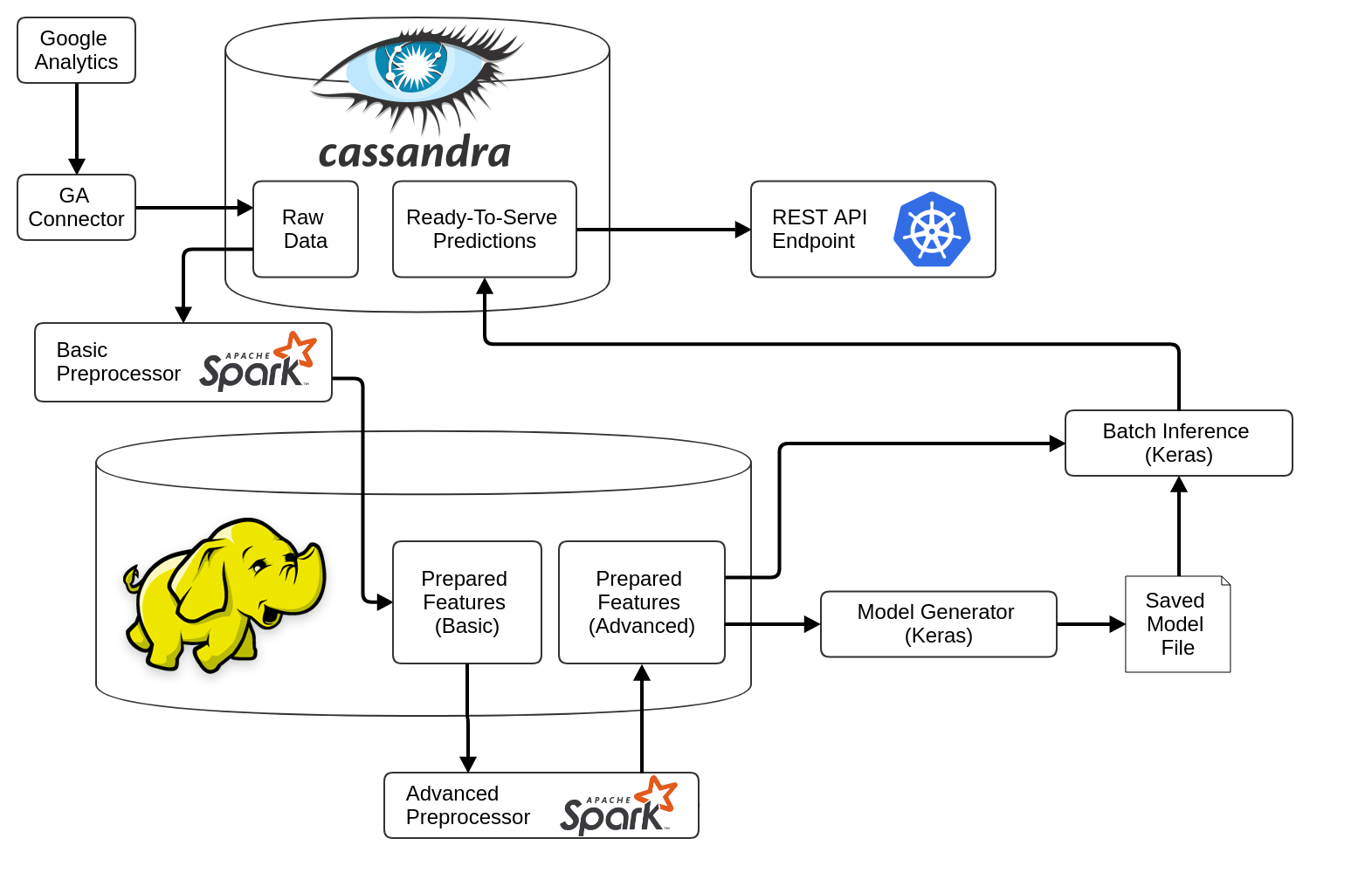
The backbone of the platform is the MorphL Orchestrator, that sets up the Big Data techstack required for running pipelines for data ingestion, models training and generating predictions.
MorphL Integrations
We integrate with various data sources. At the moment, we support Google Analytics, Google Analytics 360, BigQuery, Google Cloud Storage and AWS S3.
MorphL Predictive Models
We're utilizing open-source machine learning algorithms to build predictive models which are then used to develop predictive applications.
MorphL Predictions API
All predictions are available via a REST API, which makes it easier for software developers to incorporate AI capabilities within their digital products or services.
The setup guide is available [here](orchestrator/). # Architecture The MorphL Platform consists of two main components: - **[MorphL Platform Orchestrator](orchestrator/)** - This is the backbone of the platform. It sets up the infrastructure required for running pipelines for each model. - **[MorphL Pipelines](pipelines/)** - Consists of various Python scripts, required for retrieving data from various sources, pre-processing, training a model and generating predictions. --- The code that you'll find in this repository is a mirror that we use for making releases. If you want to contribute to a pipeline or create a new model, please open a pull request in the corresponding repository from the [MorphL-AI organization](https://github.com/Morphl-AI). You can read more about MorphL here: https://morphl.io. Follow us on Twitter: https://twitter.com/morphlio. Join our Slack community and chat with other developers: http://bit.ly/morphl-slack # MorphL Cloud On-premises, Cloud or Hybrid. For companies that want to AI-enhance their digital products & services without the hassle of dealing with a Big Data & Machine Learning infrastructure, we offer several deployment options that best suits your business needs and budget. For enterprise sales or partnerships please contact us [here](https://morphl.io/company/contact.html) or at contact [at] morphl.io. ## License Licensed under the [Apache-2.0 License](https://opensource.org/licenses/Apache2.0). ================================================ FILE: orchestrator/README.md ================================================ # MorphL Platform Orchestrator The MorphL Orchestrator is the backbone of the MorphL platform. It sets up the infrastructure and software that are necessary for running the MorphL platform. It consists of 3 pipelines: - **Ingestion Pipeline** - It runs a series of connectors responsible for gathering data from various APIs (Google Analytics, Mixpanel, Google Cloud Storage, etc.) and save it into Cassandra tables. - **Training Pipeline** - Consists of pre-processors (responsible for cleaning, formatting, deduplicating, normalizing and transforming data) and model training. - **Prediction Pipeline** - It generates predictions based on the model that was trained. It is triggered at the final step of the ingestion pipeline through a preflight check. The pipelines are set up using [Apache Airflow](https://github.com/apache/incubator-airflow). Below you can see a diagram of the platform's architecture:

### Prerequisites #### 1) Virtual Instance The orchestrator can be installed on a virtual instance on a cloud platform of your choice (Google Cloud Platform, Amazon Web Services, etc.). We recommend using a clean Ubuntu 16.04 machine, minimum 2 vCPUs, 16GB of RAM, 50GB storage. #### 2) API subdomain Model predictions will be exposed through a secure API, for easy integration within a web or mobile app. The API needs an associated domain or subdomain name. ##### A record In your DNS zone, add an A record with your subdomain and external IP address of the orchestrator instance: `A api.yourdomain.com ???.???.???.???` where `???.???.???.???` is the IP address of the Ubuntu machine. You should be able to get this IP address from your cloud management interface or by running from your machine: `dig +short myip.opendns.com @resolver1.opendns.com` - **Make sure you're using a static IP address that doesn't change when the instance is rebooted.** - **Also, allow both HTTP and HTTPS traffic to your VM**. ##### Settings file Add your subdomain name in a text file on your machine: ``` cat > /opt/settings/apidomain.txt << EOF api.yourdomain.com EOF ``` SSL certificates for the API subdomain will be automatically generated and renewed using [Let's Encrypt](https://letsencrypt.org/). ## Quick Start Guide ### Step 1) Installing the platform This step is required for setting up the environment and downloading the required software on your instance. Bootstrap the installation by running the following commands as root: ``` WHERE_THE_ORCHESTRATOR_IS='https://github.com/Morphl-AI/MorphL-Orchestrator' WHERE_AUTH_IS='https://github.com/Morphl-AI/MorphL-Auth-API.git' WHERE_GA_CHP_IS='https://github.com/Morphl-AI/MorphL-Model-Publishers-Churning-Users' WHERE_GA_CHP_BQ_IS='https://github.com/Morphl-AI/MorphL-Model-Publishers-Churning-Users-BigQuery' apt update -qq && apt -y install git ca-certificates git clone ${WHERE_THE_ORCHESTRATOR_IS} /opt/orchestrator git clone ${WHERE_AUTH_IS} /opt/auth git clone ${WHERE_GA_CHP_IS} /opt/ga_chp git clone ${WHERE_GA_CHP_BQ_IS} /opt/ga_chp_bq bash /opt/orchestrator/bootstrap/runasroot/rootbootstrap.sh ``` The installation process is fully automated and will take a while to complete (25-35 minutes). The `rootbootstrap.sh` script will install Docker, Docker Registry, Kubernetes, PostgreSQL and various utilities libraries. A second script (`airflowbootstrap.sh`) will be run and will install Anaconda, Airflow, JDK, Cassandra, Spark and Hadoop. Once the installation is done, check the bottom of the output to see the if the status `The installation has completed successfully.` has been reported. At this point a few more setup steps are necessary. ### Step 2) Provide connectors credentials The next step is creating a series of files that store credentials for connecting to various data sources APIs. From the root prompt, log into `airflow`: ``` su - airflow ``` **Add credentials depending on our data source API**: - Churning users based on Google Analytics data (_GA_CHP_ model) - see docs [here](https://github.com/Morphl-AI/MorphL-Model-Publishers-Churning-Users#orchestrator-setup). - Churning users based on Google Analytics 360 with BigQuery integration (_GA_CHP_BQ_ model) - see docs [here](https://github.com/Morphl-AI/MorphL-Model-Publishers-Churning-Users-BigQuery/tree/master/bq_extractor#orchestrator-setup). Log out of `airflow` and back in again, and verify that your key file and view ID have been configured correctly: ``` cat /opt/secrets/keyfile.json env | grep KEY_FILE_LOCATION ``` If the output of `env | grep KEY_FILE_LOCATION` is empty, like this: ``` KEY_FILE_LOCATION= ``` it means you have forgotten to log out of `airflow` and back in again. Unless specified otherwise, all commands referred to below should be run as user `airflow`. ### Step 3) Loading historical data To train the models, you'll need to bring in historical data. If you don't have historical data, you can let the ingestion pipeline gather it. However, in most cases, you'll have data that was already gathered and can be immediately downloaded. Run the command: ``` # Load historical data for churning users with Google Analytics load_ga_chp_historical_data.sh # OR load historical data for churning users with Big Query load_ga_chp_bq_historical_data.sh ``` You will be presented with a prompt that lets you select the time interval for loading the data: ``` How much historical data should be loaded? 1) 2018-08-04 - present time (5 days worth of data) 2) 2018-07-30 - present time (10 days worth of data) 3) 2018-07-10 - present time (30 days worth of data) 4) 2018-06-10 - present time (60 days worth of data) 5) 2018-04-11 - present time (120 days worth of data) 6) 2018-02-10 - present time (180 days worth of data) 7) 2017-11-12 - present time (270 days worth of data) 8) 2017-08-09 - present time (365 days worth of data) Select one of the numerical options 1 thru 8: ``` Once you select an option, you should see an output like this: ``` Emptying the relevant Cassandra tables ... Initiating the data load ... The data load has been initiated. ``` Open [http://???.???.???.???:8181/admin/](http://???.???.???.???:8181/admin/) in a browser. `???.???.???.???` is the Internet-facing IP address of the Ubuntu machine. You should be able to get this IP address from your cloud management interface or by running: ``` dig +short myip.opendns.com @resolver1.opendns.com ``` To visualize the pipelines' status, logs, etc. you can log into Airflow's web UI. Use username `airflow` and the password found with: ``` env | grep AIRFLOW_WEB_UI_PASSWORD ``` Keep refreshing the UI page until all the data for the number of days you specified previously, has been loaded into Cassandra. ### Step 4) Scheduling the remaining parts of the pipeline Once all the raw data has been loaded, there is one more thing to do for the ML pipeline to be fully operational: ``` # Trigger pipeline for churning users with Google Analytics airflow trigger_dag ga_chp_training_pipeline # OR trigger pipeline for churning users with Big Query airflow trigger_dag ga_chp_bq_training_pipeline ``` The command above will trigger the training pipeline, and upon running it you should see output similar to this: ``` [...] {__init__.py:45} INFO - Using executor LocalExecutor [...] {models.py:189} INFO - Filling up the DagBag from /home/airflow/airflow/dags [...] {cli.py:203} INFO - Created ``` Since we have already loaded historical data (step 3), we can start running the pre-processors and train the models. If you do not manually trigger the training pipeline as described above, it will automatically start at its scheduled date (it runs on a weekly basis). The step above only needs to be performed once, immediately following the installation. From this point forward, **the platform is on auto-pilot** and will on a regular basis collect new data and generate fresh ML models fully automatically. ### Using Predictions Once a model has been trained, the prediction pipeline also needs to be triggered. You can wait until it is automatically triggered by the preflight check at the end of the ingestion pipeline (which runs daily) or you can trigger it yourself with the following command: ``` # Trigger pipeline for churning users with Google Analytics airflow trigger_dag ga_chp_prediction_pipeline # OR trigger pipeline for churning users with Big Query airflow trigger_dag ga_chp_bq_prediction_pipeline ``` After the pipeline is triggered, the API can be accessed using the following command: ``` # Authorize API curl -s http://${AUTH_KUBERNETES_CLUSTER_IP_ADDRESS} # Churning users API curl -s http://${GA_CHP_KUBERNETES_CLUSTER_IP_ADDRESS}/churning # Churning users with BigQuery API curl -s http://${GA_CHP_BQ_KUBERNETES_CLUSTER_IP_ADDRESS}/churning-bq ``` See [GA_CHP Wiki](https://github.com/Morphl-AI/MorphL-Model-Publishers-Churning-Users/wiki/Public-API-Endpoints) or [GA_CHP_BQ wiki](https://github.com/Morphl-AI/MorphL-Model-Publishers-Churning-Users-BigQuery/wiki/Public-API-Endpoints) for examples on how to access predictions. ### Troubleshooting Should you need the connection details for Cassandra, the user name is `morphl` and you can find the password with: ``` env | grep MORPHL_CASSANDRA_PASSWORD ``` ### (Optional) PySpark development Since running PySpark on your local machine can be challenging, we recommend using the MorphL Orchestrator. To start developing PySpark applications, you need to run the Jupyter Notebook with a very specific configuration. To do that, you have at your disposal a script that sets up that environment: ``` run_pyspark_notebook.sh ``` Look for these messages in the output: ``` [I 14:01:20.091 NotebookApp] The Jupyter Notebook is running at: [I 14:01:20.091 NotebookApp] http://???.???.???.???:8282/?token=2501b8f79e8f128a01e83a457311514e021f0e33c70690cb ``` It is recommended that every PySpark notebook should have this snippet at the top: ``` from os import getenv MASTER_URL = 'local[*]' APPLICATION_NAME = 'preprocessor' MORPHL_SERVER_IP_ADDRESS = getenv('MORPHL_SERVER_IP_ADDRESS') MORPHL_CASSANDRA_USERNAME = getenv('MORPHL_CASSANDRA_USERNAME') MORPHL_CASSANDRA_PASSWORD = getenv('MORPHL_CASSANDRA_PASSWORD') MORPHL_CASSANDRA_KEYSPACE = getenv('MORPHL_CASSANDRA_KEYSPACE') spark.stop() spark_session = ( SparkSession.builder .appName(APPLICATION_NAME) .master(MASTER_URL) .config('spark.cassandra.connection.host', MORPHL_SERVER_IP_ADDRESS) .config('spark.cassandra.auth.username', MORPHL_CASSANDRA_USERNAME) .config('spark.cassandra.auth.password', MORPHL_CASSANDRA_PASSWORD) .config('spark.sql.shuffle.partitions', 16) .getOrCreate()) log4j = spark_session.sparkContext._jvm.org.apache.log4j log4j.LogManager.getRootLogger().setLevel(log4j.Level.ERROR) ``` ================================================ FILE: orchestrator/bootstrap/runasairflow/airflowbootstrap.sh ================================================ set -e unset SUDO_UID SUDO_GID SUDO_USER ssh-keygen -f ~/.ssh/id_rsa -q -P '' cat ~/.ssh/id_rsa.pub >> ~/.ssh/authorized_keys mkdir /home/airflow/.kube cat /etc/kubernetes/admin.conf > /home/airflow/.kube/config SP_CASS_CONN_VERSION=2.3.1 JSR166E_VERSION=1.1.0 SPARK_AVRO_VERSION=2.4.0 echo 'Setting up Anaconda ...' # ANACONDA_SH_URL=$(lynx -dump https://repo.continuum.io/archive/ | grep -o http.*Anaconda3.*Linux.x86_64.sh$ | head -1) ANACONDA_SH_URL=https://repo.continuum.io/archive/Anaconda3-5.2.0-Linux-x86_64.sh echo "From ${ANACONDA_SH_URL}" wget -qO /opt/dockerbuilddirs/pythoncontainer/Anaconda.sh ${ANACONDA_SH_URL} bash /opt/dockerbuilddirs/pythoncontainer/Anaconda.sh -b -p /opt/anaconda mv /opt/anaconda/bin/sqlite3 /opt/anaconda/bin/sqlite3.orig pip install msgpack pip install --upgrade pip pip install psycopg2-binary Flask-Bcrypt cassandra-driver graphviz pip install apache-airflow==1.9.0 pip install scikit-learn==0.20.2 conda install libhdfs3=2.3=3 hdfs3 fastparquet h5py==2.8.0 -y -c conda-forge conda install python-snappy -y echo 'Setting up the JDK ...' JDK_TGZ_URL=$(lynx -dump https://www.azul.com/downloads/zulu/zulu-linux/ | grep -o http.*jdk8.*x64.*gz$ | head -1) echo "From ${JDK_TGZ_URL}" wget -qO /opt/tmp/zzzjdk.tgz ${JDK_TGZ_URL} tar -xf /opt/tmp/zzzjdk.tgz -C /opt mv /opt/zulu* /opt/jdk rm /opt/tmp/zzzjdk.tgz CLOSER="https://www.apache.org/dyn/closer.cgi?as_json=1" MIRROR=$(curl --stderr /dev/null ${CLOSER} | jq -r '.preferred') echo 'Setting up Cassandra ...' CASSANDRA_DIR_URL=$(lynx -dump ${MIRROR}cassandra/ | grep -o 'http.*/cassandra/[0-9].*$' | sort -V | tail -1) CASSANDRA_TGZ_URL=$(lynx -dump ${CASSANDRA_DIR_URL} | grep -o http.*bin.tar.gz$ | head -1) echo "From ${CASSANDRA_TGZ_URL}" wget -qO /opt/tmp/cassandra.tgz ${CASSANDRA_TGZ_URL} tar -xf /opt/tmp/cassandra.tgz -C /opt mv /opt/apache-cassandra-* /opt/cassandra rm /opt/tmp/cassandra.tgz cp /opt/orchestrator/bootstrap/runasairflow/bash/cassandra/*_cassandra.sh /opt/cassandra/bin/ echo "sed 's/MORPHL_SERVER_IP_ADDRESS/${MORPHL_SERVER_IP_ADDRESS}/g' /opt/orchestrator/bootstrap/runasairflow/templates/cassandra.yaml.template" | bash > /opt/cassandra/conf/cassandra.yaml start_cassandra.sh echo 'Setting up Spark ...' SPARK_DIR_URL=$(lynx -dump ${MIRROR}spark/ | grep -o 'http.*/spark/spark-[0-9].*$' | sort -V | tail -1) SPARK_TGZ_URL=$(lynx -dump ${SPARK_DIR_URL} | grep -o http.*bin-hadoop.*tgz$ | tail -1) echo "From ${SPARK_TGZ_URL}" wget -qO /opt/tmp/zzzspark.tgz ${SPARK_TGZ_URL} tar -xf /opt/tmp/zzzspark.tgz -C /opt mv /opt/spark-* /opt/spark rm /opt/tmp/zzzspark.tgz cd /opt/spark/conf sed 's/INFO/FATAL/;s/WARN/FATAL/;s/ERROR/FATAL/' log4j.properties.template > log4j.properties wget -qO /opt/spark/jars/spark-cassandra-connector.jar https://repo1.maven.org/maven2/com/datastax/spark/spark-cassandra-connector_2.11/${SP_CASS_CONN_VERSION}/spark-cassandra-connector_2.11-${SP_CASS_CONN_VERSION}.jar wget -qO /opt/spark/jars/jsr166e.jar https://repo1.maven.org/maven2/com/twitter/jsr166e/${JSR166E_VERSION}/jsr166e-${JSR166E_VERSION}.jar wget -qO /opt/spark/jars/spark-avro.jar https://repo1.maven.org/maven2/org/apache/spark/spark-avro_2.11/${SPARK_AVRO_VERSION}/spark-avro_2.11-${SPARK_AVRO_VERSION}.jar echo 'Setting up Hadoop ...' HADOOP_TGZ_URL=$(lynx -dump ${MIRROR}hadoop/common/stable/ | grep -o http.*gz$ | grep -v src | grep -v site | head -1) echo "From ${HADOOP_TGZ_URL}" wget -qO /opt/tmp/zzzhadoop.tgz ${HADOOP_TGZ_URL} tar -xf /opt/tmp/zzzhadoop.tgz -C /opt mv /opt/hadoop-* /opt/hadoop rm /opt/hadoop/bin/*.cmd /opt/hadoop/sbin/*.cmd rm /opt/tmp/zzzhadoop.tgz cp /opt/orchestrator/bootstrap/runasairflow/bash/hdfs/*_hdfs.sh /opt/hadoop/bin/ echo "export JAVA_HOME=${JAVA_HOME}" >> /opt/hadoop/etc/hadoop/hadoop-env.sh echo 'export HADOOP_SSH_OPTS="-o StrictHostKeyChecking=no"' >> /opt/hadoop/etc/hadoop/hadoop-env.sh mkdir -p /opt/hadoop/hadoop_store/hdfs/namenode mkdir -p /opt/hadoop/hadoop_store/hdfs/datanode sed "s/MORPHL_SERVER_IP_ADDRESS/${MORPHL_SERVER_IP_ADDRESS}/g" /opt/orchestrator/bootstrap/runasairflow/templates/core-site.xml.template > /opt/hadoop/etc/hadoop/core-site.xml cat /opt/orchestrator/bootstrap/runasairflow/templates/hdfs-site.xml.template > /opt/hadoop/etc/hadoop/hdfs-site.xml echo ${MORPHL_SERVER_FQDN} > /opt/hadoop/etc/hadoop/slaves /opt/hadoop/bin/hdfs namenode -format &>/dev/null start_hdfs.sh cqlsh ${MORPHL_SERVER_IP_ADDRESS} -u cassandra -p cassandra -e "CREATE USER morphl WITH PASSWORD '${MORPHL_CASSANDRA_PASSWORD}' SUPERUSER;" cqlsh ${MORPHL_SERVER_IP_ADDRESS} -u cassandra -p cassandra -e "ALTER USER cassandra WITH PASSWORD '${NONDEFAULT_SUPERUSER_CASSANDRA_PASSWORD}';" cqlsh ${MORPHL_SERVER_IP_ADDRESS} -u morphl -p ${MORPHL_CASSANDRA_PASSWORD} -f /opt/ga_chp/cassandra_schema/ga_chp_cassandra_schema.cql cqlsh ${MORPHL_SERVER_IP_ADDRESS} -u morphl -p ${MORPHL_CASSANDRA_PASSWORD} -f /opt/ga_chp_bq/cassandra_schema/ga_chp_bq_cassandra_schema.cql mkdir -p /home/airflow/airflow/dags cat /opt/orchestrator/bootstrap/runasairflow/templates/airflow.cfg.template > /home/airflow/airflow/airflow.cfg cp /opt/anaconda/bin/airflow /opt/anaconda/bin/airflow_scheduler cp /opt/anaconda/bin/airflow /opt/anaconda/bin/airflow_webserver cp /opt/orchestrator/bootstrap/runasairflow/bash/airflow/*_airflow.sh /opt/anaconda/bin/ airflow version airflow initdb python /opt/orchestrator/bootstrap/runasairflow/python/set_up_airflow_authentication.py start_airflow.sh cd /opt/orchestrator && sudo git pull cp /opt/orchestrator/dockerbuilddirs/pythoncontainer/Dockerfile /opt/dockerbuilddirs/pythoncontainer/Dockerfile cp /opt/orchestrator/dockerbuilddirs/pythoncontainer/install.sh /opt/dockerbuilddirs/pythoncontainer/install.sh cd /opt/dockerbuilddirs/pythoncontainer docker build -t pythoncontainer . cp /opt/orchestrator/dockerbuilddirs/pysparkcontainer/Dockerfile /opt/dockerbuilddirs/pysparkcontainer/Dockerfile cp /opt/orchestrator/dockerbuilddirs/pysparkcontainer/install.sh /opt/dockerbuilddirs/pysparkcontainer/install.sh cd /opt/dockerbuilddirs/pysparkcontainer docker build -t pysparkcontainer . # Spin off temporary container for generating SSL certificates echo "Generate SSL certificates for API..." echo ${API_DOMAIN} cp /opt/orchestrator/dockerbuilddirs/letsencryptcontainer/Dockerfile /opt/dockerbuilddirs/letsencryptcontainer/Dockerfile sed "s/API_DOMAIN/${API_DOMAIN}/g" /opt/orchestrator/dockerbuilddirs/letsencryptcontainer/default.conf.template > /opt/dockerbuilddirs/letsencryptcontainer/default.conf echo "Temporary endpoint for generating API SSL certificates with letsencrypt" > /opt/dockerbuilddirs/letsencryptcontainer/site/index.html cd /opt/dockerbuilddirs/letsencryptcontainer docker build -t letsencryptnginx . # Run temporary endpoint on port 80, so it can be reached by Let's Encrypt docker run -d --name letsencryptcontainer \ -p 80:80 \ -v /opt/dockerbuilddirs/letsencryptcontainer/site:/usr/share/nginx/html \ letsencryptnginx # Generate SSL certificates. # Use --staging flag when testing, as Let's Encrypt has a rate limit. docker run -it --rm \ -v /opt/dockerbuilddirs/letsencryptvolume/etc/letsencrypt:/etc/letsencrypt \ -v /opt/dockerbuilddirs/letsencryptvolume/var/lib/letsencrypt:/var/lib/letsencrypt \ -v /opt/dockerbuilddirs/letsencryptcontainer/site:/data/letsencrypt \ -v '/opt/dockerbuilddirs/letsencryptvolume/var/log/letsencrypt:/var/log/letsencrypt' \ certbot/certbot \ certonly --webroot \ --register-unsafely-without-email --agree-tos \ --webroot-path=/data/letsencrypt \ -d ${API_DOMAIN} # Stop and remove temporary API endpoint docker stop letsencryptcontainer && docker rm $_ env | egrep '^MORPHL_SERVER_IP_ADDRESS|^MORPHL_CASSANDRA_USERNAME|^MORPHL_CASSANDRA_PASSWORD|^MORPHL_CASSANDRA_KEYSPACE|^API_DOMAIN|^MORPHL_API_KEY|^MORPHL_API_SECRET|^MORPHL_API_JWT_SECRET|^MORPHL_DASHBOARD_USERNAME|^MORPHL_DASHBOARD_PASSWORD' > /home/airflow/.env_file.sh kubectl create configmap environment-configmap --from-env-file=/home/airflow/.env_file.sh # Init auth service kubectl apply -f /opt/auth/auth_kubernetes_deployment.yaml kubectl apply -f /opt/auth/auth_kubernetes_service.yaml AUTH_KUBERNETES_CLUSTER_IP_ADDRESS=$(kubectl get service/auth-service -o jsonpath='{.spec.clusterIP}') echo "export AUTH_KUBERNETES_CLUSTER_IP_ADDRESS=${AUTH_KUBERNETES_CLUSTER_IP_ADDRESS}" >> /home/airflow/.morphl_environment.sh # Init GA_CHP service kubectl apply -f /opt/ga_chp/prediction/model_serving/ga_chp_kubernetes_deployment.yaml kubectl apply -f /opt/ga_chp/prediction/model_serving/ga_chp_kubernetes_service.yaml GA_CHP_KUBERNETES_CLUSTER_IP_ADDRESS=$(kubectl get service/ga-chp-service -o jsonpath='{.spec.clusterIP}') echo "export GA_CHP_KUBERNETES_CLUSTER_IP_ADDRESS=${GA_CHP_KUBERNETES_CLUSTER_IP_ADDRESS}" >> /home/airflow/.morphl_environment.sh # Init GA_CHP_BQ service kubectl apply -f /opt/ga_chp_bq/prediction/model_serving/ga_chp_bq_kubernetes_deployment.yaml kubectl apply -f /opt/ga_chp_bq/prediction/model_serving/ga_chp_bq_kubernetes_service.yaml GA_CHP_BQ_KUBERNETES_CLUSTER_IP_ADDRESS=$(kubectl get service/ga-chp-bq-service -o jsonpath='{.spec.clusterIP}') echo "export GA_CHP_BQ_KUBERNETES_CLUSTER_IP_ADDRESS=${GA_CHP_BQ_KUBERNETES_CLUSTER_IP_ADDRESS}" >> /home/airflow/.morphl_environment.sh sleep 30 # Spin off nginx / API container echo 'Setting up public facing API ...' cp /opt/orchestrator/dockerbuilddirs/apicontainer/Dockerfile /opt/dockerbuilddirs/apicontainer/Dockerfile cp /opt/orchestrator/dockerbuilddirs/apicontainer/nginx.conf /opt/dockerbuilddirs/apicontainer/nginx.conf sed "s/API_DOMAIN/${API_DOMAIN}/g" /opt/orchestrator/dockerbuilddirs/apicontainer/api.conf.template > /opt/dockerbuilddirs/apicontainer/api.conf cd /opt/dockerbuilddirs/apicontainer docker build \ --build-arg AUTH_KUBERNETES_CLUSTER_IP_ADDRESS=${AUTH_KUBERNETES_CLUSTER_IP_ADDRESS} \ --build-arg GA_CHP_KUBERNETES_CLUSTER_IP_ADDRESS=${GA_CHP_KUBERNETES_CLUSTER_IP_ADDRESS} \ --build-arg GA_CHP_BQ_KUBERNETES_CLUSTER_IP_ADDRESS=${GA_CHP_BQ_KUBERNETES_CLUSTER_IP_ADDRESS} \ -t apinginx . docker run -d --name apicontainer \ -p 80:80 -p 443:443 \ -v /opt/dockerbuilddirs/letsencryptvolume/etc/letsencrypt:/etc/letsencrypt \ apinginx echo 'Testing Kubernetes prediction endpoints ...' echo 'Testing API ...' curl -s http://${AUTH_KUBERNETES_CLUSTER_IP_ADDRESS} curl -s http://${GA_CHP_KUBERNETES_CLUSTER_IP_ADDRESS}/churning curl -s http://${GA_CHP_BQ_KUBERNETES_CLUSTER_IP_ADDRESS}/churning-bq ================================================ FILE: orchestrator/bootstrap/runasairflow/bash/airflow/restart_airflow.sh ================================================ stop_airflow.sh start_airflow.sh ================================================ FILE: orchestrator/bootstrap/runasairflow/bash/airflow/start_airflow.sh ================================================ airflow_scheduler scheduler &>/dev/null & airflow_webserver webserver -p 8181 &>/dev/null & sleep 1 ================================================ FILE: orchestrator/bootstrap/runasairflow/bash/airflow/stop_airflow.sh ================================================ pkill -f airflow_webserver pkill -f airflow_scheduler sleep 1 ================================================ FILE: orchestrator/bootstrap/runasairflow/bash/cassandra/restart_cassandra.sh ================================================ stop_cassandra.sh start_cassandra.sh ================================================ FILE: orchestrator/bootstrap/runasairflow/bash/cassandra/start_cassandra.sh ================================================ cassandra &>/dev/null while true do sleep 1 netstat -lntp 2>/dev/null | grep 9042.*java > /dev/null && break done sleep 1 ================================================ FILE: orchestrator/bootstrap/runasairflow/bash/cassandra/stop_cassandra.sh ================================================ fuser -k 9042/tcp &>/dev/null sleep 1 ================================================ FILE: orchestrator/bootstrap/runasairflow/bash/cq ================================================ cqlsh ${MORPHL_SERVER_IP_ADDRESS} -u morphl -p ${MORPHL_CASSANDRA_PASSWORD} ================================================ FILE: orchestrator/bootstrap/runasairflow/bash/git_pull.sh ================================================ cd /opt/orchestrator; sudo git pull cd /opt/ga_chp; sudo git pull cd /opt/ga_chp_bq; sudo git pull cd ================================================ FILE: orchestrator/bootstrap/runasairflow/bash/hdfs/restart_hdfs.sh ================================================ stop_hdfs.sh start_hdfs.sh ================================================ FILE: orchestrator/bootstrap/runasairflow/bash/hdfs/start_hdfs.sh ================================================ /opt/hadoop/sbin/hadoop-daemon.sh start namenode &>/dev/null /opt/hadoop/sbin/hadoop-daemon.sh start datanode &>/dev/null sleep 1 ================================================ FILE: orchestrator/bootstrap/runasairflow/bash/hdfs/stop_hdfs.sh ================================================ /opt/hadoop/sbin/hadoop-daemon.sh stop datanode &>/dev/null /opt/hadoop/sbin/hadoop-daemon.sh stop namenode &>/dev/null sleep 1 ================================================ FILE: orchestrator/bootstrap/runasairflow/bash/hdfs/wipe_out_hdfs.sh ================================================ stop_hdfs.sh rm -rf /opt/hadoop/hadoop_store/hdfs/namenode/* rm -rf /opt/hadoop/hadoop_store/hdfs/datanode/* hdfs namenode -format &>/dev/null start_hdfs.sh ================================================ FILE: orchestrator/bootstrap/runasairflow/bash/load_ga_chp_bq_historical_data.sh ================================================ # TEMPFILE_A is the duration of the training interval in days export TEMPFILE_A=$(mktemp) # TEMPFILE_B is the duration of the predictions interval in days export TEMPFILE_B=$(mktemp) # TEMPFILE_C is the Python start date (today) export TEMPFILE_C=$(mktemp) python /opt/ga_chp_bq/bq_extractor/ga_chp_bq_load_historical_data.py ${TEMPFILE_A} ${TEMPFILE_B} ${TEMPFILE_C} rc=$? if [ ${rc} -eq 0 ]; then echo 'Emptying the relevant Cassandra tables ...' echo cqlsh ${MORPHL_SERVER_IP_ADDRESS} -u morphl -p ${MORPHL_CASSANDRA_PASSWORD} -f /opt/ga_chp_bq/bq_extractor/ga_chp_bq_truncate_tables_before_loading_historical_data.cql # Write configuration parameters in corresponding Cassandra table DAYS_TRAINING_INTERVAL=$(<${TEMPFILE_A}) DAYS_PREDICTION_INTERVAL=$(<${TEMPFILE_B}) sed "s/DAYS_TRAINING_INTERVAL/${DAYS_TRAINING_INTERVAL}/g;s/DAYS_PREDICTION_INTERVAL/${DAYS_PREDICTION_INTERVAL}/g" /opt/ga_chp_bq/training/pipeline_setup/insert_into_ga_chp_bq_config_parameters.cql.template > /tmp/insert_into_config_parameters.cql cqlsh ${MORPHL_SERVER_IP_ADDRESS} -u morphl -p ${MORPHL_CASSANDRA_PASSWORD} -f /tmp/insert_into_config_parameters.cql # Reset Airflow and create dags echo 'Initiating the data load ...' echo stop_airflow.sh rm -rf /home/airflow/airflow/dags/* airflow resetdb -y &>/dev/null python /opt/orchestrator/bootstrap/runasairflow/python/set_up_airflow_authentication.py # Create training dag and trigger pipeline START_DATE_AS_PY_CODE=$(<${TEMPFILE_C}) sed "s/START_DATE_AS_PY_CODE/${START_DATE_AS_PY_CODE}/g;s/DAYS_TRAINING_INTERVAL/${DAYS_TRAINING_INTERVAL}/g;s/DAYS_PREDICTION_INTERVAL/${DAYS_PREDICTION_INTERVAL}/g" /opt/ga_chp_bq/training/pipeline_setup/ga_chp_bq_training_airflow_dag.py.template > /home/airflow/airflow/dags/ga_chp_bq_training_pipeline.py airflow trigger_dag ga_chp_bq_training_pipeline # Create prediction dag START_DATE_AS_PY_CODE=$(<${TEMPFILE_C}) sed "s/START_DATE_AS_PY_CODE/${START_DATE_AS_PY_CODE}/g;s/DAYS_PREDICTION_INTERVAL/${DAYS_PREDICTION_INTERVAL}/g" /opt/ga_chp_bq/prediction/pipeline_setup/ga_chp_bq_prediction_airflow_dag.py.template > /home/airflow/airflow/dags/ga_chp_bq_prediction_pipeline.py start_airflow.sh echo 'The data load has been initiated.' echo fi ================================================ FILE: orchestrator/bootstrap/runasairflow/bash/load_ga_chp_historical_data.sh ================================================ export TEMPFILE_A=$(mktemp) export TEMPFILE_B=$(mktemp) export TEMPFILE_C=$(mktemp) python /opt/ga_chp/ingestion/pipeline_setup/ga_chp_load_historical_data.py ${TEMPFILE_A} ${TEMPFILE_B} ${TEMPFILE_C} rc=$? if [ ${rc} -eq 0 ]; then echo 'Emptying the relevant Cassandra tables ...' echo cqlsh ${MORPHL_SERVER_IP_ADDRESS} -u morphl -p ${MORPHL_CASSANDRA_PASSWORD} -f /opt/ga_chp/ingestion/pipeline_setup/ga_chp_truncate_tables_before_loading_historical_data.cql DAYS_WORTH_OF_DATA_TO_LOAD=$(<${TEMPFILE_C}) sed "s/DAYS_WORTH_OF_DATA_TO_LOAD/${DAYS_WORTH_OF_DATA_TO_LOAD}/g" /opt/ga_chp/ingestion/pipeline_setup/insert_into_ga_chp_config_parameters.cql.template > /tmp/insert_into_config_parameters.cql cqlsh ${MORPHL_SERVER_IP_ADDRESS} -u morphl -p ${MORPHL_CASSANDRA_PASSWORD} -f /tmp/insert_into_config_parameters.cql echo 'Initiating the data load ...' echo stop_airflow.sh rm -rf /home/airflow/airflow/dags/* airflow resetdb -y &>/dev/null python /opt/orchestrator/bootstrap/runasairflow/python/set_up_airflow_authentication.py START_DATE_AS_PY_CODE=$(<${TEMPFILE_A}) sed "s/START_DATE_AS_PY_CODE/${START_DATE_AS_PY_CODE}/g" /opt/ga_chp/ingestion/pipeline_setup/ga_chp_ingestion_airflow_dag.py.template > /home/airflow/airflow/dags/ga_chp_ingestion_pipeline.py START_DATE_AS_PY_CODE=$(<${TEMPFILE_B}) sed "s/START_DATE_AS_PY_CODE/${START_DATE_AS_PY_CODE}/g" /opt/ga_chp/training/pipeline_setup/ga_chp_training_airflow_dag.py.template > /home/airflow/airflow/dags/ga_chp_training_pipeline.py sed "s/START_DATE_AS_PY_CODE/${START_DATE_AS_PY_CODE}/g" /opt/ga_chp/prediction/pipeline_setup/ga_chp_prediction_airflow_dag.py.template > /home/airflow/airflow/dags/ga_chp_prediction_pipeline.py start_airflow.sh echo 'The data load has been initiated.' echo fi ================================================ FILE: orchestrator/bootstrap/runasairflow/bash/run_pyspark_notebook.sh ================================================ MORPHL_PUBLIC_IP_ADDRESS=$(dig +short myip.opendns.com @resolver1.opendns.com) cp /opt/anaconda/lib/python3.6/site-packages/notebook/notebookapp.py /opt/anaconda/lib/python3.6/site-packages/notebook/notebookapp.py.orig sed "s/^\(.*socket.gethostname..*\).*$/\1; ip = '${MORPHL_PUBLIC_IP_ADDRESS}'/" /opt/anaconda/lib/python3.6/site-packages/notebook/notebookapp.py.orig > /opt/anaconda/lib/python3.6/site-packages/notebook/notebookapp.py echo $(hostname) > /opt/spark/conf/slaves export PYSPARK_DRIVER_PYTHON=jupyter export PYSPARK_DRIVER_PYTHON_OPTS='notebook --no-browser --ip=0.0.0.0 --port=8282' pyspark --jars /opt/spark/jars/spark-cassandra-connector.jar,/opt/spark/jars/jsr166e.jar,/opt/spark/jars/spark-avro.jar --driver-memory 4g ================================================ FILE: orchestrator/bootstrap/runasairflow/python/set_up_airflow_authentication.py ================================================ from os import getenv from airflow import models, settings from airflow.contrib.auth.backends.password_auth import PasswordUser AIRFLOW_WEB_UI_PASSWORD = getenv('AIRFLOW_WEB_UI_PASSWORD') user = PasswordUser(models.User()) user.username = 'airflow' user._set_password = AIRFLOW_WEB_UI_PASSWORD session = settings.Session() session.add(user) session.commit() session.close() ================================================ FILE: orchestrator/bootstrap/runasairflow/templates/airflow.cfg.template ================================================ [core] # The home folder for airflow, default is ~/airflow airflow_home = /home/airflow/airflow # The folder where your airflow pipelines live, most likely a # subfolder in a code repository # This path must be absolute dags_folder = /home/airflow/airflow/dags # The folder where airflow should store its log files # This path must be absolute base_log_folder = /home/airflow/airflow/logs # Airflow can store logs remotely in AWS S3 or Google Cloud Storage. Users # must supply an Airflow connection id that provides access to the storage # location. remote_log_conn_id = encrypt_s3_logs = False # Logging level logging_level = INFO # Logging class # Specify the class that will specify the logging configuration # This class has to be on the python classpath # logging_config_class = my.path.default_local_settings.LOGGING_CONFIG logging_config_class = # Log format log_format = [%%(asctime)s] {%%(filename)s:%%(lineno)d} %%(levelname)s - %%(message)s simple_log_format = %%(asctime)s %%(levelname)s - %%(message)s # The executor class that airflow should use. Choices include # SequentialExecutor, LocalExecutor, CeleryExecutor, DaskExecutor executor = LocalExecutor # The SqlAlchemy connection string to the metadata database. # SqlAlchemy supports many different database engine, more information # their website sql_alchemy_conn = postgresql+psycopg2://airflow:airflow@localhost:5432/airflow # The SqlAlchemy pool size is the maximum number of database connections # in the pool. sql_alchemy_pool_size = 5 # The SqlAlchemy pool recycle is the number of seconds a connection # can be idle in the pool before it is invalidated. This config does # not apply to sqlite. sql_alchemy_pool_recycle = 3600 # The amount of parallelism as a setting to the executor. This defines # the max number of task instances that should run simultaneously # on this airflow installation parallelism = 1 # The number of task instances allowed to run concurrently by the scheduler dag_concurrency = 1 # Are DAGs paused by default at creation dags_are_paused_at_creation = False # When not using pools, tasks are run in the "default pool", # whose size is guided by this config element non_pooled_task_slot_count = 128 # The maximum number of active DAG runs per DAG max_active_runs_per_dag = 1 # Whether to load the examples that ship with Airflow. It's good to # get started, but you probably want to set this to False in a production # environment load_examples = False # Where your Airflow plugins are stored plugins_folder = /home/airflow/airflow/plugins # Secret key to save connection passwords in the db fernet_key = KyOHi3CpO6xMBxARDHCeEauSM7BYgSaIU-WIqNpwwZ0= # Whether to disable pickling dags donot_pickle = False # How long before timing out a python file import while filling the DagBag dagbag_import_timeout = 30 # The class to use for running task instances in a subprocess task_runner = BashTaskRunner # If set, tasks without a `run_as_user` argument will be run with this user # Can be used to de-elevate a sudo user running Airflow when executing tasks default_impersonation = # What security module to use (for example kerberos): security = # Turn unit test mode on (overwrites many configuration options with test # values at runtime) unit_test_mode = False # Name of handler to read task instance logs. # Default to use file task handler. task_log_reader = file.task # Whether to enable pickling for xcom (note that this is insecure and allows for # RCE exploits). This will be deprecated in Airflow 2.0 (be forced to False). enable_xcom_pickling = True # When a task is killed forcefully, this is the amount of time in seconds that # it has to cleanup after it is sent a SIGTERM, before it is SIGKILLED killed_task_cleanup_time = 60 [cli] # In what way should the cli access the API. The LocalClient will use the # database directly, while the json_client will use the api running on the # webserver api_client = airflow.api.client.local_client endpoint_url = http://localhost:8080 [api] # How to authenticate users of the API auth_backend = airflow.api.auth.backend.default [operators] # The default owner assigned to each new operator, unless # provided explicitly or passed via `default_args` default_owner = airflow default_cpus = 1 default_ram = 512 default_disk = 512 default_gpus = 0 [webserver] # The base url of your website as airflow cannot guess what domain or # cname you are using. This is used in automated emails that # airflow sends to point links to the right web server base_url = http://localhost:8080 # The ip specified when starting the web server web_server_host = 0.0.0.0 # The port on which to run the web server web_server_port = 8181 # Paths to the SSL certificate and key for the web server. When both are # provided SSL will be enabled. This does not change the web server port. web_server_ssl_cert = web_server_ssl_key = # Number of seconds the gunicorn webserver waits before timing out on a worker web_server_worker_timeout = 120 # Number of workers to refresh at a time. When set to 0, worker refresh is # disabled. When nonzero, airflow periodically refreshes webserver workers by # bringing up new ones and killing old ones. worker_refresh_batch_size = 1 # Number of seconds to wait before refreshing a batch of workers. worker_refresh_interval = 30 # Secret key used to run your flask app secret_key = temporary_key # Number of workers to run the Gunicorn web server workers = 1 # The worker class gunicorn should use. Choices include # sync (default), eventlet, gevent worker_class = sync # Log files for the gunicorn webserver. '-' means log to stderr. access_logfile = - error_logfile = - # Expose the configuration file in the web server expose_config = False # Set to true to turn on authentication: # http://pythonhosted.org/airflow/security.html#web-authentication authenticate = True auth_backend = airflow.contrib.auth.backends.password_auth # Filter the list of dags by owner name (requires authentication to be enabled) filter_by_owner = False # Filtering mode. Choices include user (default) and ldapgroup. # Ldap group filtering requires using the ldap backend # # Note that the ldap server needs the "memberOf" overlay to be set up # in order to user the ldapgroup mode. owner_mode = user # Default DAG view. Valid values are: # tree, graph, duration, gantt, landing_times dag_default_view = tree # Default DAG orientation. Valid values are: # LR (Left->Right), TB (Top->Bottom), RL (Right->Left), BT (Bottom->Top) dag_orientation = LR # Puts the webserver in demonstration mode; blurs the names of Operators for # privacy. demo_mode = False # The amount of time (in secs) webserver will wait for initial handshake # while fetching logs from other worker machine log_fetch_timeout_sec = 5 # By default, the webserver shows paused DAGs. Flip this to hide paused # DAGs by default hide_paused_dags_by_default = False # Consistent page size across all listing views in the UI page_size = 100 [email] email_backend = airflow.utils.email.send_email_smtp [smtp] # If you want airflow to send emails on retries, failure, and you want to use # the airflow.utils.email.send_email_smtp function, you have to configure an # smtp server here smtp_host = localhost smtp_starttls = True smtp_ssl = False # Uncomment and set the user/pass settings if you want to use SMTP AUTH # smtp_user = airflow # smtp_password = airflow smtp_port = 25 smtp_mail_from = airflow@example.com [celery] # This section only applies if you are using the CeleryExecutor in # [core] section above # The app name that will be used by celery celery_app_name = airflow.executors.celery_executor # The concurrency that will be used when starting workers with the # "airflow worker" command. This defines the number of task instances that # a worker will take, so size up your workers based on the resources on # your worker box and the nature of your tasks worker_concurrency = 16 # When you start an airflow worker, airflow starts a tiny web server # subprocess to serve the workers local log files to the airflow main # web server, who then builds pages and sends them to users. This defines # the port on which the logs are served. It needs to be unused, and open # visible from the main web server to connect into the workers. worker_log_server_port = 8793 # The Celery broker URL. Celery supports RabbitMQ, Redis and experimentally # a sqlalchemy database. Refer to the Celery documentation for more # information. broker_url = sqla+mysql://airflow:airflow@localhost:3306/airflow # Another key Celery setting celery_result_backend = db+mysql://airflow:airflow@localhost:3306/airflow # Celery Flower is a sweet UI for Celery. Airflow has a shortcut to start # it `airflow flower`. This defines the IP that Celery Flower runs on flower_host = 0.0.0.0 # This defines the port that Celery Flower runs on flower_port = 5555 # Default queue that tasks get assigned to and that worker listen on. default_queue = default # Import path for celery configuration options celery_config_options = airflow.config_templates.default_celery.DEFAULT_CELERY_CONFIG [dask] # This section only applies if you are using the DaskExecutor in # [core] section above # The IP address and port of the Dask cluster's scheduler. cluster_address = 127.0.0.1:8786 [scheduler] # Task instances listen for external kill signal (when you clear tasks # from the CLI or the UI), this defines the frequency at which they should # listen (in seconds). job_heartbeat_sec = 5 # The scheduler constantly tries to trigger new tasks (look at the # scheduler section in the docs for more information). This defines # how often the scheduler should run (in seconds). scheduler_heartbeat_sec = 5 # after how much time should the scheduler terminate in seconds # -1 indicates to run continuously (see also num_runs) run_duration = -1 # after how much time a new DAGs should be picked up from the filesystem min_file_process_interval = 0 dag_dir_list_interval = 300 # How often should stats be printed to the logs print_stats_interval = 30 child_process_log_directory = /home/airflow/airflow/logs/scheduler # Local task jobs periodically heartbeat to the DB. If the job has # not heartbeat in this many seconds, the scheduler will mark the # associated task instance as failed and will re-schedule the task. scheduler_zombie_task_threshold = 300 # Turn off scheduler catchup by setting this to False. # Default behavior is unchanged and # Command Line Backfills still work, but the scheduler # will not do scheduler catchup if this is False, # however it can be set on a per DAG basis in the # DAG definition (catchup) catchup_by_default = True # This changes the batch size of queries in the scheduling main loop. # This depends on query length limits and how long you are willing to hold locks. # 0 for no limit max_tis_per_query = 0 # Statsd (https://github.com/etsy/statsd) integration settings statsd_on = False statsd_host = localhost statsd_port = 8125 statsd_prefix = airflow # The scheduler can run multiple threads in parallel to schedule dags. # This defines how many threads will run. max_threads = 2 authenticate = False [ldap] # set this to ldaps://: uri = user_filter = objectClass=* user_name_attr = uid group_member_attr = memberOf superuser_filter = data_profiler_filter = bind_user = cn=Manager,dc=example,dc=com bind_password = insecure basedn = dc=example,dc=com cacert = /etc/ca/ldap_ca.crt search_scope = LEVEL [mesos] # Mesos master address which MesosExecutor will connect to. master = localhost:5050 # The framework name which Airflow scheduler will register itself as on mesos framework_name = Airflow # Number of cpu cores required for running one task instance using # 'airflow run --local -p ' # command on a mesos slave task_cpu = 1 # Memory in MB required for running one task instance using # 'airflow run --local -p ' # command on a mesos slave task_memory = 256 # Enable framework checkpointing for mesos # See http://mesos.apache.org/documentation/latest/slave-recovery/ checkpoint = False # Failover timeout in milliseconds. # When checkpointing is enabled and this option is set, Mesos waits # until the configured timeout for # the MesosExecutor framework to re-register after a failover. Mesos # shuts down running tasks if the # MesosExecutor framework fails to re-register within this timeframe. # failover_timeout = 604800 # Enable framework authentication for mesos # See http://mesos.apache.org/documentation/latest/configuration/ authenticate = False # Mesos credentials, if authentication is enabled # default_principal = admin # default_secret = admin [kerberos] ccache = /tmp/airflow_krb5_ccache # gets augmented with fqdn principal = airflow reinit_frequency = 3600 kinit_path = kinit keytab = airflow.keytab [github_enterprise] api_rev = v3 [admin] # UI to hide sensitive variable fields when set to True hide_sensitive_variable_fields = True ================================================ FILE: orchestrator/bootstrap/runasairflow/templates/cassandra.yaml.template ================================================ # Cassandra storage config YAML # NOTE: # See http://wiki.apache.org/cassandra/StorageConfiguration for # full explanations of configuration directives # /NOTE # The name of the cluster. This is mainly used to prevent machines in # one logical cluster from joining another. cluster_name: 'MorphLCluster' # This defines the number of tokens randomly assigned to this node on the ring # The more tokens, relative to other nodes, the larger the proportion of data # that this node will store. You probably want all nodes to have the same number # of tokens assuming they have equal hardware capability. # # If you leave this unspecified, Cassandra will use the default of 1 token for legacy compatibility, # and will use the initial_token as described below. # # Specifying initial_token will override this setting on the node's initial start, # on subsequent starts, this setting will apply even if initial token is set. # # If you already have a cluster with 1 token per node, and wish to migrate to # multiple tokens per node, see http://wiki.apache.org/cassandra/Operations num_tokens: 256 # Triggers automatic allocation of num_tokens tokens for this node. The allocation # algorithm attempts to choose tokens in a way that optimizes replicated load over # the nodes in the datacenter for the replication strategy used by the specified # keyspace. # # The load assigned to each node will be close to proportional to its number of # vnodes. # # Only supported with the Murmur3Partitioner. # allocate_tokens_for_keyspace: KEYSPACE # initial_token allows you to specify tokens manually. While you can use it with # vnodes (num_tokens > 1, above) -- in which case you should provide a # comma-separated list -- it's primarily used when adding nodes to legacy clusters # that do not have vnodes enabled. # initial_token: # See http://wiki.apache.org/cassandra/HintedHandoff # May either be "true" or "false" to enable globally hinted_handoff_enabled: true # When hinted_handoff_enabled is true, a black list of data centers that will not # perform hinted handoff # hinted_handoff_disabled_datacenters: # - DC1 # - DC2 # this defines the maximum amount of time a dead host will have hints # generated. After it has been dead this long, new hints for it will not be # created until it has been seen alive and gone down again. max_hint_window_in_ms: 10800000 # 3 hours # Maximum throttle in KBs per second, per delivery thread. This will be # reduced proportionally to the number of nodes in the cluster. (If there # are two nodes in the cluster, each delivery thread will use the maximum # rate; if there are three, each will throttle to half of the maximum, # since we expect two nodes to be delivering hints simultaneously.) hinted_handoff_throttle_in_kb: 1024 # Number of threads with which to deliver hints; # Consider increasing this number when you have multi-dc deployments, since # cross-dc handoff tends to be slower max_hints_delivery_threads: 2 # Directory where Cassandra should store hints. # If not set, the default directory is $CASSANDRA_HOME/data/hints. # hints_directory: /var/lib/cassandra/hints # How often hints should be flushed from the internal buffers to disk. # Will *not* trigger fsync. hints_flush_period_in_ms: 10000 # Maximum size for a single hints file, in megabytes. max_hints_file_size_in_mb: 128 # Compression to apply to the hint files. If omitted, hints files # will be written uncompressed. LZ4, Snappy, and Deflate compressors # are supported. #hints_compression: # - class_name: LZ4Compressor # parameters: # - # Maximum throttle in KBs per second, total. This will be # reduced proportionally to the number of nodes in the cluster. batchlog_replay_throttle_in_kb: 1024 # Authentication backend, implementing IAuthenticator; used to identify users # Out of the box, Cassandra provides org.apache.cassandra.auth.{AllowAllAuthenticator, # PasswordAuthenticator}. # # - AllowAllAuthenticator performs no checks - set it to disable authentication. # - PasswordAuthenticator relies on username/password pairs to authenticate # users. It keeps usernames and hashed passwords in system_auth.roles table. # Please increase system_auth keyspace replication factor if you use this authenticator. # If using PasswordAuthenticator, CassandraRoleManager must also be used (see below) authenticator: PasswordAuthenticator # Authorization backend, implementing IAuthorizer; used to limit access/provide permissions # Out of the box, Cassandra provides org.apache.cassandra.auth.{AllowAllAuthorizer, # CassandraAuthorizer}. # # - AllowAllAuthorizer allows any action to any user - set it to disable authorization. # - CassandraAuthorizer stores permissions in system_auth.role_permissions table. Please # increase system_auth keyspace replication factor if you use this authorizer. authorizer: AllowAllAuthorizer # Part of the Authentication & Authorization backend, implementing IRoleManager; used # to maintain grants and memberships between roles. # Out of the box, Cassandra provides org.apache.cassandra.auth.CassandraRoleManager, # which stores role information in the system_auth keyspace. Most functions of the # IRoleManager require an authenticated login, so unless the configured IAuthenticator # actually implements authentication, most of this functionality will be unavailable. # # - CassandraRoleManager stores role data in the system_auth keyspace. Please # increase system_auth keyspace replication factor if you use this role manager. role_manager: CassandraRoleManager # Validity period for roles cache (fetching granted roles can be an expensive # operation depending on the role manager, CassandraRoleManager is one example) # Granted roles are cached for authenticated sessions in AuthenticatedUser and # after the period specified here, become eligible for (async) reload. # Defaults to 2000, set to 0 to disable caching entirely. # Will be disabled automatically for AllowAllAuthenticator. roles_validity_in_ms: 2000 # Refresh interval for roles cache (if enabled). # After this interval, cache entries become eligible for refresh. Upon next # access, an async reload is scheduled and the old value returned until it # completes. If roles_validity_in_ms is non-zero, then this must be # also. # Defaults to the same value as roles_validity_in_ms. # roles_update_interval_in_ms: 2000 # Validity period for permissions cache (fetching permissions can be an # expensive operation depending on the authorizer, CassandraAuthorizer is # one example). Defaults to 2000, set to 0 to disable. # Will be disabled automatically for AllowAllAuthorizer. permissions_validity_in_ms: 2000 # Refresh interval for permissions cache (if enabled). # After this interval, cache entries become eligible for refresh. Upon next # access, an async reload is scheduled and the old value returned until it # completes. If permissions_validity_in_ms is non-zero, then this must be # also. # Defaults to the same value as permissions_validity_in_ms. # permissions_update_interval_in_ms: 2000 # Validity period for credentials cache. This cache is tightly coupled to # the provided PasswordAuthenticator implementation of IAuthenticator. If # another IAuthenticator implementation is configured, this cache will not # be automatically used and so the following settings will have no effect. # Please note, credentials are cached in their encrypted form, so while # activating this cache may reduce the number of queries made to the # underlying table, it may not bring a significant reduction in the # latency of individual authentication attempts. # Defaults to 2000, set to 0 to disable credentials caching. credentials_validity_in_ms: 2000 # Refresh interval for credentials cache (if enabled). # After this interval, cache entries become eligible for refresh. Upon next # access, an async reload is scheduled and the old value returned until it # completes. If credentials_validity_in_ms is non-zero, then this must be # also. # Defaults to the same value as credentials_validity_in_ms. # credentials_update_interval_in_ms: 2000 # The partitioner is responsible for distributing groups of rows (by # partition key) across nodes in the cluster. You should leave this # alone for new clusters. The partitioner can NOT be changed without # reloading all data, so when upgrading you should set this to the # same partitioner you were already using. # # Besides Murmur3Partitioner, partitioners included for backwards # compatibility include RandomPartitioner, ByteOrderedPartitioner, and # OrderPreservingPartitioner. # partitioner: org.apache.cassandra.dht.Murmur3Partitioner # Directories where Cassandra should store data on disk. Cassandra # will spread data evenly across them, subject to the granularity of # the configured compaction strategy. # If not set, the default directory is $CASSANDRA_HOME/data/data. # data_file_directories: # - /var/lib/cassandra/data # commit log. when running on magnetic HDD, this should be a # separate spindle than the data directories. # If not set, the default directory is $CASSANDRA_HOME/data/commitlog. # commitlog_directory: /var/lib/cassandra/commitlog # Enable / disable CDC functionality on a per-node basis. This modifies the logic used # for write path allocation rejection (standard: never reject. cdc: reject Mutation # containing a CDC-enabled table if at space limit in cdc_raw_directory). cdc_enabled: false # CommitLogSegments are moved to this directory on flush if cdc_enabled: true and the # segment contains mutations for a CDC-enabled table. This should be placed on a # separate spindle than the data directories. If not set, the default directory is # $CASSANDRA_HOME/data/cdc_raw. # cdc_raw_directory: /var/lib/cassandra/cdc_raw # Policy for data disk failures: # # die # shut down gossip and client transports and kill the JVM for any fs errors or # single-sstable errors, so the node can be replaced. # # stop_paranoid # shut down gossip and client transports even for single-sstable errors, # kill the JVM for errors during startup. # # stop # shut down gossip and client transports, leaving the node effectively dead, but # can still be inspected via JMX, kill the JVM for errors during startup. # # best_effort # stop using the failed disk and respond to requests based on # remaining available sstables. This means you WILL see obsolete # data at CL.ONE! # # ignore # ignore fatal errors and let requests fail, as in pre-1.2 Cassandra disk_failure_policy: stop # Policy for commit disk failures: # # die # shut down gossip and Thrift and kill the JVM, so the node can be replaced. # # stop # shut down gossip and Thrift, leaving the node effectively dead, but # can still be inspected via JMX. # # stop_commit # shutdown the commit log, letting writes collect but # continuing to service reads, as in pre-2.0.5 Cassandra # # ignore # ignore fatal errors and let the batches fail commit_failure_policy: stop # Maximum size of the native protocol prepared statement cache # # Valid values are either "auto" (omitting the value) or a value greater 0. # # Note that specifying a too large value will result in long running GCs and possbily # out-of-memory errors. Keep the value at a small fraction of the heap. # # If you constantly see "prepared statements discarded in the last minute because # cache limit reached" messages, the first step is to investigate the root cause # of these messages and check whether prepared statements are used correctly - # i.e. use bind markers for variable parts. # # Do only change the default value, if you really have more prepared statements than # fit in the cache. In most cases it is not neccessary to change this value. # Constantly re-preparing statements is a performance penalty. # # Default value ("auto") is 1/256th of the heap or 10MB, whichever is greater prepared_statements_cache_size_mb: # Maximum size of the Thrift prepared statement cache # # If you do not use Thrift at all, it is safe to leave this value at "auto". # # See description of 'prepared_statements_cache_size_mb' above for more information. # # Default value ("auto") is 1/256th of the heap or 10MB, whichever is greater thrift_prepared_statements_cache_size_mb: # Maximum size of the key cache in memory. # # Each key cache hit saves 1 seek and each row cache hit saves 2 seeks at the # minimum, sometimes more. The key cache is fairly tiny for the amount of # time it saves, so it's worthwhile to use it at large numbers. # The row cache saves even more time, but must contain the entire row, # so it is extremely space-intensive. It's best to only use the # row cache if you have hot rows or static rows. # # NOTE: if you reduce the size, you may not get you hottest keys loaded on startup. # # Default value is empty to make it "auto" (min(5% of Heap (in MB), 100MB)). Set to 0 to disable key cache. key_cache_size_in_mb: # Duration in seconds after which Cassandra should # save the key cache. Caches are saved to saved_caches_directory as # specified in this configuration file. # # Saved caches greatly improve cold-start speeds, and is relatively cheap in # terms of I/O for the key cache. Row cache saving is much more expensive and # has limited use. # # Default is 14400 or 4 hours. key_cache_save_period: 14400 # Number of keys from the key cache to save # Disabled by default, meaning all keys are going to be saved # key_cache_keys_to_save: 100 # Row cache implementation class name. Available implementations: # # org.apache.cassandra.cache.OHCProvider # Fully off-heap row cache implementation (default). # # org.apache.cassandra.cache.SerializingCacheProvider # This is the row cache implementation availabile # in previous releases of Cassandra. # row_cache_class_name: org.apache.cassandra.cache.OHCProvider # Maximum size of the row cache in memory. # Please note that OHC cache implementation requires some additional off-heap memory to manage # the map structures and some in-flight memory during operations before/after cache entries can be # accounted against the cache capacity. This overhead is usually small compared to the whole capacity. # Do not specify more memory that the system can afford in the worst usual situation and leave some # headroom for OS block level cache. Do never allow your system to swap. # # Default value is 0, to disable row caching. row_cache_size_in_mb: 0 # Duration in seconds after which Cassandra should save the row cache. # Caches are saved to saved_caches_directory as specified in this configuration file. # # Saved caches greatly improve cold-start speeds, and is relatively cheap in # terms of I/O for the key cache. Row cache saving is much more expensive and # has limited use. # # Default is 0 to disable saving the row cache. row_cache_save_period: 0 # Number of keys from the row cache to save. # Specify 0 (which is the default), meaning all keys are going to be saved # row_cache_keys_to_save: 100 # Maximum size of the counter cache in memory. # # Counter cache helps to reduce counter locks' contention for hot counter cells. # In case of RF = 1 a counter cache hit will cause Cassandra to skip the read before # write entirely. With RF > 1 a counter cache hit will still help to reduce the duration # of the lock hold, helping with hot counter cell updates, but will not allow skipping # the read entirely. Only the local (clock, count) tuple of a counter cell is kept # in memory, not the whole counter, so it's relatively cheap. # # NOTE: if you reduce the size, you may not get you hottest keys loaded on startup. # # Default value is empty to make it "auto" (min(2.5% of Heap (in MB), 50MB)). Set to 0 to disable counter cache. # NOTE: if you perform counter deletes and rely on low gcgs, you should disable the counter cache. counter_cache_size_in_mb: # Duration in seconds after which Cassandra should # save the counter cache (keys only). Caches are saved to saved_caches_directory as # specified in this configuration file. # # Default is 7200 or 2 hours. counter_cache_save_period: 7200 # Number of keys from the counter cache to save # Disabled by default, meaning all keys are going to be saved # counter_cache_keys_to_save: 100 # saved caches # If not set, the default directory is $CASSANDRA_HOME/data/saved_caches. # saved_caches_directory: /var/lib/cassandra/saved_caches # commitlog_sync may be either "periodic" or "batch." # # When in batch mode, Cassandra won't ack writes until the commit log # has been fsynced to disk. It will wait # commitlog_sync_batch_window_in_ms milliseconds between fsyncs. # This window should be kept short because the writer threads will # be unable to do extra work while waiting. (You may need to increase # concurrent_writes for the same reason.) # # commitlog_sync: batch # commitlog_sync_batch_window_in_ms: 2 # # the other option is "periodic" where writes may be acked immediately # and the CommitLog is simply synced every commitlog_sync_period_in_ms # milliseconds. commitlog_sync: periodic commitlog_sync_period_in_ms: 10000 # The size of the individual commitlog file segments. A commitlog # segment may be archived, deleted, or recycled once all the data # in it (potentially from each columnfamily in the system) has been # flushed to sstables. # # The default size is 32, which is almost always fine, but if you are # archiving commitlog segments (see commitlog_archiving.properties), # then you probably want a finer granularity of archiving; 8 or 16 MB # is reasonable. # Max mutation size is also configurable via max_mutation_size_in_kb setting in # cassandra.yaml. The default is half the size commitlog_segment_size_in_mb * 1024. # This should be positive and less than 2048. # # NOTE: If max_mutation_size_in_kb is set explicitly then commitlog_segment_size_in_mb must # be set to at least twice the size of max_mutation_size_in_kb / 1024 # commitlog_segment_size_in_mb: 32 # Compression to apply to the commit log. If omitted, the commit log # will be written uncompressed. LZ4, Snappy, and Deflate compressors # are supported. # commitlog_compression: # - class_name: LZ4Compressor # parameters: # - # any class that implements the SeedProvider interface and has a # constructor that takes a Map of parameters will do. seed_provider: # Addresses of hosts that are deemed contact points. # Cassandra nodes use this list of hosts to find each other and learn # the topology of the ring. You must change this if you are running # multiple nodes! - class_name: org.apache.cassandra.locator.SimpleSeedProvider parameters: # seeds is actually a comma-delimited list of addresses. # Ex: ",," - seeds: "MORPHL_SERVER_IP_ADDRESS" # For workloads with more data than can fit in memory, Cassandra's # bottleneck will be reads that need to fetch data from # disk. "concurrent_reads" should be set to (16 * number_of_drives) in # order to allow the operations to enqueue low enough in the stack # that the OS and drives can reorder them. Same applies to # "concurrent_counter_writes", since counter writes read the current # values before incrementing and writing them back. # # On the other hand, since writes are almost never IO bound, the ideal # number of "concurrent_writes" is dependent on the number of cores in # your system; (8 * number_of_cores) is a good rule of thumb. concurrent_reads: 32 concurrent_writes: 32 concurrent_counter_writes: 32 # For materialized view writes, as there is a read involved, so this should # be limited by the less of concurrent reads or concurrent writes. concurrent_materialized_view_writes: 32 # Maximum memory to use for sstable chunk cache and buffer pooling. # 32MB of this are reserved for pooling buffers, the rest is used as an # cache that holds uncompressed sstable chunks. # Defaults to the smaller of 1/4 of heap or 512MB. This pool is allocated off-heap, # so is in addition to the memory allocated for heap. The cache also has on-heap # overhead which is roughly 128 bytes per chunk (i.e. 0.2% of the reserved size # if the default 64k chunk size is used). # Memory is only allocated when needed. # file_cache_size_in_mb: 512 # Flag indicating whether to allocate on or off heap when the sstable buffer # pool is exhausted, that is when it has exceeded the maximum memory # file_cache_size_in_mb, beyond which it will not cache buffers but allocate on request. # buffer_pool_use_heap_if_exhausted: true # The strategy for optimizing disk read # Possible values are: # ssd (for solid state disks, the default) # spinning (for spinning disks) # disk_optimization_strategy: ssd # Total permitted memory to use for memtables. Cassandra will stop # accepting writes when the limit is exceeded until a flush completes, # and will trigger a flush based on memtable_cleanup_threshold # If omitted, Cassandra will set both to 1/4 the size of the heap. # memtable_heap_space_in_mb: 2048 # memtable_offheap_space_in_mb: 2048 # memtable_cleanup_threshold is deprecated. The default calculation # is the only reasonable choice. See the comments on memtable_flush_writers # for more information. # # Ratio of occupied non-flushing memtable size to total permitted size # that will trigger a flush of the largest memtable. Larger mct will # mean larger flushes and hence less compaction, but also less concurrent # flush activity which can make it difficult to keep your disks fed # under heavy write load. # # memtable_cleanup_threshold defaults to 1 / (memtable_flush_writers + 1) # memtable_cleanup_threshold: 0.11 # Specify the way Cassandra allocates and manages memtable memory. # Options are: # # heap_buffers # on heap nio buffers # # offheap_buffers # off heap (direct) nio buffers # # offheap_objects # off heap objects memtable_allocation_type: heap_buffers # Total space to use for commit logs on disk. # # If space gets above this value, Cassandra will flush every dirty CF # in the oldest segment and remove it. So a small total commitlog space # will tend to cause more flush activity on less-active columnfamilies. # # The default value is the smaller of 8192, and 1/4 of the total space # of the commitlog volume. # # commitlog_total_space_in_mb: 8192 # This sets the number of memtable flush writer threads per disk # as well as the total number of memtables that can be flushed concurrently. # These are generally a combination of compute and IO bound. # # Memtable flushing is more CPU efficient than memtable ingest and a single thread # can keep up with the ingest rate of a whole server on a single fast disk # until it temporarily becomes IO bound under contention typically with compaction. # At that point you need multiple flush threads. At some point in the future # it may become CPU bound all the time. # # You can tell if flushing is falling behind using the MemtablePool.BlockedOnAllocation # metric which should be 0, but will be non-zero if threads are blocked waiting on flushing # to free memory. # # memtable_flush_writers defaults to two for a single data directory. # This means that two memtables can be flushed concurrently to the single data directory. # If you have multiple data directories the default is one memtable flushing at a time # but the flush will use a thread per data directory so you will get two or more writers. # # Two is generally enough to flush on a fast disk [array] mounted as a single data directory. # Adding more flush writers will result in smaller more frequent flushes that introduce more # compaction overhead. # # There is a direct tradeoff between number of memtables that can be flushed concurrently # and flush size and frequency. More is not better you just need enough flush writers # to never stall waiting for flushing to free memory. # #memtable_flush_writers: 2 # Total space to use for change-data-capture logs on disk. # # If space gets above this value, Cassandra will throw WriteTimeoutException # on Mutations including tables with CDC enabled. A CDCCompactor is responsible # for parsing the raw CDC logs and deleting them when parsing is completed. # # The default value is the min of 4096 mb and 1/8th of the total space # of the drive where cdc_raw_directory resides. # cdc_total_space_in_mb: 4096 # When we hit our cdc_raw limit and the CDCCompactor is either running behind # or experiencing backpressure, we check at the following interval to see if any # new space for cdc-tracked tables has been made available. Default to 250ms # cdc_free_space_check_interval_ms: 250 # A fixed memory pool size in MB for for SSTable index summaries. If left # empty, this will default to 5% of the heap size. If the memory usage of # all index summaries exceeds this limit, SSTables with low read rates will # shrink their index summaries in order to meet this limit. However, this # is a best-effort process. In extreme conditions Cassandra may need to use # more than this amount of memory. index_summary_capacity_in_mb: # How frequently index summaries should be resampled. This is done # periodically to redistribute memory from the fixed-size pool to sstables # proportional their recent read rates. Setting to -1 will disable this # process, leaving existing index summaries at their current sampling level. index_summary_resize_interval_in_minutes: 60 # Whether to, when doing sequential writing, fsync() at intervals in # order to force the operating system to flush the dirty # buffers. Enable this to avoid sudden dirty buffer flushing from # impacting read latencies. Almost always a good idea on SSDs; not # necessarily on platters. trickle_fsync: false trickle_fsync_interval_in_kb: 10240 # TCP port, for commands and data # For security reasons, you should not expose this port to the internet. Firewall it if needed. storage_port: 7000 # SSL port, for encrypted communication. Unused unless enabled in # encryption_options # For security reasons, you should not expose this port to the internet. Firewall it if needed. ssl_storage_port: 7001 # Address or interface to bind to and tell other Cassandra nodes to connect to. # You _must_ change this if you want multiple nodes to be able to communicate! # # Set listen_address OR listen_interface, not both. # # Leaving it blank leaves it up to InetAddress.getLocalHost(). This # will always do the Right Thing _if_ the node is properly configured # (hostname, name resolution, etc), and the Right Thing is to use the # address associated with the hostname (it might not be). # # Setting listen_address to 0.0.0.0 is always wrong. # listen_address: MORPHL_SERVER_IP_ADDRESS # Set listen_address OR listen_interface, not both. Interfaces must correspond # to a single address, IP aliasing is not supported. # listen_interface: eth0 # If you choose to specify the interface by name and the interface has an ipv4 and an ipv6 address # you can specify which should be chosen using listen_interface_prefer_ipv6. If false the first ipv4 # address will be used. If true the first ipv6 address will be used. Defaults to false preferring # ipv4. If there is only one address it will be selected regardless of ipv4/ipv6. # listen_interface_prefer_ipv6: false # Address to broadcast to other Cassandra nodes # Leaving this blank will set it to the same value as listen_address # broadcast_address: 1.2.3.4 # When using multiple physical network interfaces, set this # to true to listen on broadcast_address in addition to # the listen_address, allowing nodes to communicate in both # interfaces. # Ignore this property if the network configuration automatically # routes between the public and private networks such as EC2. # listen_on_broadcast_address: false # Internode authentication backend, implementing IInternodeAuthenticator; # used to allow/disallow connections from peer nodes. # internode_authenticator: org.apache.cassandra.auth.AllowAllInternodeAuthenticator # Whether to start the native transport server. # Please note that the address on which the native transport is bound is the # same as the rpc_address. The port however is different and specified below. start_native_transport: true # port for the CQL native transport to listen for clients on # For security reasons, you should not expose this port to the internet. Firewall it if needed. native_transport_port: 9042 # Enabling native transport encryption in client_encryption_options allows you to either use # encryption for the standard port or to use a dedicated, additional port along with the unencrypted # standard native_transport_port. # Enabling client encryption and keeping native_transport_port_ssl disabled will use encryption # for native_transport_port. Setting native_transport_port_ssl to a different value # from native_transport_port will use encryption for native_transport_port_ssl while # keeping native_transport_port unencrypted. # native_transport_port_ssl: 9142 # The maximum threads for handling requests when the native transport is used. # This is similar to rpc_max_threads though the default differs slightly (and # there is no native_transport_min_threads, idle threads will always be stopped # after 30 seconds). # native_transport_max_threads: 128 # # The maximum size of allowed frame. Frame (requests) larger than this will # be rejected as invalid. The default is 256MB. If you're changing this parameter, # you may want to adjust max_value_size_in_mb accordingly. This should be positive and less than 2048. # native_transport_max_frame_size_in_mb: 256 # The maximum number of concurrent client connections. # The default is -1, which means unlimited. # native_transport_max_concurrent_connections: -1 # The maximum number of concurrent client connections per source ip. # The default is -1, which means unlimited. # native_transport_max_concurrent_connections_per_ip: -1 # Whether to start the thrift rpc server. start_rpc: false # The address or interface to bind the Thrift RPC service and native transport # server to. # # Set rpc_address OR rpc_interface, not both. # # Leaving rpc_address blank has the same effect as on listen_address # (i.e. it will be based on the configured hostname of the node). # # Note that unlike listen_address, you can specify 0.0.0.0, but you must also # set broadcast_rpc_address to a value other than 0.0.0.0. # # For security reasons, you should not expose this port to the internet. Firewall it if needed. rpc_address: 0.0.0.0 # Set rpc_address OR rpc_interface, not both. Interfaces must correspond # to a single address, IP aliasing is not supported. # rpc_interface: eth1 # If you choose to specify the interface by name and the interface has an ipv4 and an ipv6 address # you can specify which should be chosen using rpc_interface_prefer_ipv6. If false the first ipv4 # address will be used. If true the first ipv6 address will be used. Defaults to false preferring # ipv4. If there is only one address it will be selected regardless of ipv4/ipv6. # rpc_interface_prefer_ipv6: false # port for Thrift to listen for clients on rpc_port: 9160 # RPC address to broadcast to drivers and other Cassandra nodes. This cannot # be set to 0.0.0.0. If left blank, this will be set to the value of # rpc_address. If rpc_address is set to 0.0.0.0, broadcast_rpc_address must # be set. broadcast_rpc_address: MORPHL_SERVER_IP_ADDRESS # enable or disable keepalive on rpc/native connections rpc_keepalive: true # Cassandra provides two out-of-the-box options for the RPC Server: # # sync # One thread per thrift connection. For a very large number of clients, memory # will be your limiting factor. On a 64 bit JVM, 180KB is the minimum stack size # per thread, and that will correspond to your use of virtual memory (but physical memory # may be limited depending on use of stack space). # # hsha # Stands for "half synchronous, half asynchronous." All thrift clients are handled # asynchronously using a small number of threads that does not vary with the amount # of thrift clients (and thus scales well to many clients). The rpc requests are still # synchronous (one thread per active request). If hsha is selected then it is essential # that rpc_max_threads is changed from the default value of unlimited. # # The default is sync because on Windows hsha is about 30% slower. On Linux, # sync/hsha performance is about the same, with hsha of course using less memory. # # Alternatively, can provide your own RPC server by providing the fully-qualified class name # of an o.a.c.t.TServerFactory that can create an instance of it. rpc_server_type: sync # Uncomment rpc_min|max_thread to set request pool size limits. # # Regardless of your choice of RPC server (see above), the number of maximum requests in the # RPC thread pool dictates how many concurrent requests are possible (but if you are using the sync # RPC server, it also dictates the number of clients that can be connected at all). # # The default is unlimited and thus provides no protection against clients overwhelming the server. You are # encouraged to set a maximum that makes sense for you in production, but do keep in mind that # rpc_max_threads represents the maximum number of client requests this server may execute concurrently. # # rpc_min_threads: 16 # rpc_max_threads: 2048 # uncomment to set socket buffer sizes on rpc connections # rpc_send_buff_size_in_bytes: # rpc_recv_buff_size_in_bytes: # Uncomment to set socket buffer size for internode communication # Note that when setting this, the buffer size is limited by net.core.wmem_max # and when not setting it it is defined by net.ipv4.tcp_wmem # See also: # /proc/sys/net/core/wmem_max # /proc/sys/net/core/rmem_max # /proc/sys/net/ipv4/tcp_wmem # /proc/sys/net/ipv4/tcp_wmem # and 'man tcp' # internode_send_buff_size_in_bytes: # Uncomment to set socket buffer size for internode communication # Note that when setting this, the buffer size is limited by net.core.wmem_max # and when not setting it it is defined by net.ipv4.tcp_wmem # internode_recv_buff_size_in_bytes: # Frame size for thrift (maximum message length). thrift_framed_transport_size_in_mb: 15 # Set to true to have Cassandra create a hard link to each sstable # flushed or streamed locally in a backups/ subdirectory of the # keyspace data. Removing these links is the operator's # responsibility. incremental_backups: false # Whether or not to take a snapshot before each compaction. Be # careful using this option, since Cassandra won't clean up the # snapshots for you. Mostly useful if you're paranoid when there # is a data format change. snapshot_before_compaction: false # Whether or not a snapshot is taken of the data before keyspace truncation # or dropping of column families. The STRONGLY advised default of true # should be used to provide data safety. If you set this flag to false, you will # lose data on truncation or drop. auto_snapshot: true # Granularity of the collation index of rows within a partition. # Increase if your rows are large, or if you have a very large # number of rows per partition. The competing goals are these: # # - a smaller granularity means more index entries are generated # and looking up rows withing the partition by collation column # is faster # - but, Cassandra will keep the collation index in memory for hot # rows (as part of the key cache), so a larger granularity means # you can cache more hot rows column_index_size_in_kb: 64 # Per sstable indexed key cache entries (the collation index in memory # mentioned above) exceeding this size will not be held on heap. # This means that only partition information is held on heap and the # index entries are read from disk. # # Note that this size refers to the size of the # serialized index information and not the size of the partition. column_index_cache_size_in_kb: 2 # Number of simultaneous compactions to allow, NOT including # validation "compactions" for anti-entropy repair. Simultaneous # compactions can help preserve read performance in a mixed read/write # workload, by mitigating the tendency of small sstables to accumulate # during a single long running compactions. The default is usually # fine and if you experience problems with compaction running too # slowly or too fast, you should look at # compaction_throughput_mb_per_sec first. # # concurrent_compactors defaults to the smaller of (number of disks, # number of cores), with a minimum of 2 and a maximum of 8. # # If your data directories are backed by SSD, you should increase this # to the number of cores. #concurrent_compactors: 1 # Throttles compaction to the given total throughput across the entire # system. The faster you insert data, the faster you need to compact in # order to keep the sstable count down, but in general, setting this to # 16 to 32 times the rate you are inserting data is more than sufficient. # Setting this to 0 disables throttling. Note that this account for all types # of compaction, including validation compaction. compaction_throughput_mb_per_sec: 16 # When compacting, the replacement sstable(s) can be opened before they # are completely written, and used in place of the prior sstables for # any range that has been written. This helps to smoothly transfer reads # between the sstables, reducing page cache churn and keeping hot rows hot sstable_preemptive_open_interval_in_mb: 50 # Throttles all outbound streaming file transfers on this node to the # given total throughput in Mbps. This is necessary because Cassandra does # mostly sequential IO when streaming data during bootstrap or repair, which # can lead to saturating the network connection and degrading rpc performance. # When unset, the default is 200 Mbps or 25 MB/s. # stream_throughput_outbound_megabits_per_sec: 200 # Throttles all streaming file transfer between the datacenters, # this setting allows users to throttle inter dc stream throughput in addition # to throttling all network stream traffic as configured with # stream_throughput_outbound_megabits_per_sec # When unset, the default is 200 Mbps or 25 MB/s # inter_dc_stream_throughput_outbound_megabits_per_sec: 200 # How long the coordinator should wait for read operations to complete read_request_timeout_in_ms: 5000 # How long the coordinator should wait for seq or index scans to complete range_request_timeout_in_ms: 10000 # How long the coordinator should wait for writes to complete write_request_timeout_in_ms: 2000 # How long the coordinator should wait for counter writes to complete counter_write_request_timeout_in_ms: 5000 # How long a coordinator should continue to retry a CAS operation # that contends with other proposals for the same row cas_contention_timeout_in_ms: 1000 # How long the coordinator should wait for truncates to complete # (This can be much longer, because unless auto_snapshot is disabled # we need to flush first so we can snapshot before removing the data.) truncate_request_timeout_in_ms: 60000 # The default timeout for other, miscellaneous operations request_timeout_in_ms: 10000 # How long before a node logs slow queries. Select queries that take longer than # this timeout to execute, will generate an aggregated log message, so that slow queries # can be identified. Set this value to zero to disable slow query logging. slow_query_log_timeout_in_ms: 500 # Enable operation timeout information exchange between nodes to accurately # measure request timeouts. If disabled, replicas will assume that requests # were forwarded to them instantly by the coordinator, which means that # under overload conditions we will waste that much extra time processing # already-timed-out requests. # # Warning: before enabling this property make sure to ntp is installed # and the times are synchronized between the nodes. cross_node_timeout: false # Set keep-alive period for streaming # This node will send a keep-alive message periodically with this period. # If the node does not receive a keep-alive message from the peer for # 2 keep-alive cycles the stream session times out and fail # Default value is 300s (5 minutes), which means stalled stream # times out in 10 minutes by default # streaming_keep_alive_period_in_secs: 300 # phi value that must be reached for a host to be marked down. # most users should never need to adjust this. # phi_convict_threshold: 8 # endpoint_snitch -- Set this to a class that implements # IEndpointSnitch. The snitch has two functions: # # - it teaches Cassandra enough about your network topology to route # requests efficiently # - it allows Cassandra to spread replicas around your cluster to avoid # correlated failures. It does this by grouping machines into # "datacenters" and "racks." Cassandra will do its best not to have # more than one replica on the same "rack" (which may not actually # be a physical location) # # CASSANDRA WILL NOT ALLOW YOU TO SWITCH TO AN INCOMPATIBLE SNITCH # ONCE DATA IS INSERTED INTO THE CLUSTER. This would cause data loss. # This means that if you start with the default SimpleSnitch, which # locates every node on "rack1" in "datacenter1", your only options # if you need to add another datacenter are GossipingPropertyFileSnitch # (and the older PFS). From there, if you want to migrate to an # incompatible snitch like Ec2Snitch you can do it by adding new nodes # under Ec2Snitch (which will locate them in a new "datacenter") and # decommissioning the old ones. # # Out of the box, Cassandra provides: # # SimpleSnitch: # Treats Strategy order as proximity. This can improve cache # locality when disabling read repair. Only appropriate for # single-datacenter deployments. # # GossipingPropertyFileSnitch # This should be your go-to snitch for production use. The rack # and datacenter for the local node are defined in # cassandra-rackdc.properties and propagated to other nodes via # gossip. If cassandra-topology.properties exists, it is used as a # fallback, allowing migration from the PropertyFileSnitch. # # PropertyFileSnitch: # Proximity is determined by rack and data center, which are # explicitly configured in cassandra-topology.properties. # # Ec2Snitch: # Appropriate for EC2 deployments in a single Region. Loads Region # and Availability Zone information from the EC2 API. The Region is # treated as the datacenter, and the Availability Zone as the rack. # Only private IPs are used, so this will not work across multiple # Regions. # # Ec2MultiRegionSnitch: # Uses public IPs as broadcast_address to allow cross-region # connectivity. (Thus, you should set seed addresses to the public # IP as well.) You will need to open the storage_port or # ssl_storage_port on the public IP firewall. (For intra-Region # traffic, Cassandra will switch to the private IP after # establishing a connection.) # # RackInferringSnitch: # Proximity is determined by rack and data center, which are # assumed to correspond to the 3rd and 2nd octet of each node's IP # address, respectively. Unless this happens to match your # deployment conventions, this is best used as an example of # writing a custom Snitch class and is provided in that spirit. # # You can use a custom Snitch by setting this to the full class name # of the snitch, which will be assumed to be on your classpath. endpoint_snitch: SimpleSnitch # controls how often to perform the more expensive part of host score # calculation dynamic_snitch_update_interval_in_ms: 100 # controls how often to reset all host scores, allowing a bad host to # possibly recover dynamic_snitch_reset_interval_in_ms: 600000 # if set greater than zero and read_repair_chance is < 1.0, this will allow # 'pinning' of replicas to hosts in order to increase cache capacity. # The badness threshold will control how much worse the pinned host has to be # before the dynamic snitch will prefer other replicas over it. This is # expressed as a double which represents a percentage. Thus, a value of # 0.2 means Cassandra would continue to prefer the static snitch values # until the pinned host was 20% worse than the fastest. dynamic_snitch_badness_threshold: 0.1 # request_scheduler -- Set this to a class that implements # RequestScheduler, which will schedule incoming client requests # according to the specific policy. This is useful for multi-tenancy # with a single Cassandra cluster. # NOTE: This is specifically for requests from the client and does # not affect inter node communication. # org.apache.cassandra.scheduler.NoScheduler - No scheduling takes place # org.apache.cassandra.scheduler.RoundRobinScheduler - Round robin of # client requests to a node with a separate queue for each # request_scheduler_id. The scheduler is further customized by # request_scheduler_options as described below. request_scheduler: org.apache.cassandra.scheduler.NoScheduler # Scheduler Options vary based on the type of scheduler # # NoScheduler # Has no options # # RoundRobin # throttle_limit # The throttle_limit is the number of in-flight # requests per client. Requests beyond # that limit are queued up until # running requests can complete. # The value of 80 here is twice the number of # concurrent_reads + concurrent_writes. # default_weight # default_weight is optional and allows for # overriding the default which is 1. # weights # Weights are optional and will default to 1 or the # overridden default_weight. The weight translates into how # many requests are handled during each turn of the # RoundRobin, based on the scheduler id. # # request_scheduler_options: # throttle_limit: 80 # default_weight: 5 # weights: # Keyspace1: 1 # Keyspace2: 5 # request_scheduler_id -- An identifier based on which to perform # the request scheduling. Currently the only valid option is keyspace. # request_scheduler_id: keyspace # Enable or disable inter-node encryption # JVM defaults for supported SSL socket protocols and cipher suites can # be replaced using custom encryption options. This is not recommended # unless you have policies in place that dictate certain settings, or # need to disable vulnerable ciphers or protocols in case the JVM cannot # be updated. # FIPS compliant settings can be configured at JVM level and should not # involve changing encryption settings here: # https://docs.oracle.com/javase/8/docs/technotes/guides/security/jsse/FIPS.html # *NOTE* No custom encryption options are enabled at the moment # The available internode options are : all, none, dc, rack # # If set to dc cassandra will encrypt the traffic between the DCs # If set to rack cassandra will encrypt the traffic between the racks # # The passwords used in these options must match the passwords used when generating # the keystore and truststore. For instructions on generating these files, see: # http://download.oracle.com/javase/6/docs/technotes/guides/security/jsse/JSSERefGuide.html#CreateKeystore # server_encryption_options: internode_encryption: none keystore: conf/.keystore keystore_password: cassandra truststore: conf/.truststore truststore_password: cassandra # More advanced defaults below: # protocol: TLS # algorithm: SunX509 # store_type: JKS # cipher_suites: [TLS_RSA_WITH_AES_128_CBC_SHA,TLS_RSA_WITH_AES_256_CBC_SHA,TLS_DHE_RSA_WITH_AES_128_CBC_SHA,TLS_DHE_RSA_WITH_AES_256_CBC_SHA,TLS_ECDHE_RSA_WITH_AES_128_CBC_SHA,TLS_ECDHE_RSA_WITH_AES_256_CBC_SHA] # require_client_auth: false # require_endpoint_verification: false # enable or disable client/server encryption. client_encryption_options: enabled: false # If enabled and optional is set to true encrypted and unencrypted connections are handled. optional: false keystore: conf/.keystore keystore_password: cassandra # require_client_auth: false # Set trustore and truststore_password if require_client_auth is true # truststore: conf/.truststore # truststore_password: cassandra # More advanced defaults below: # protocol: TLS # algorithm: SunX509 # store_type: JKS # cipher_suites: [TLS_RSA_WITH_AES_128_CBC_SHA,TLS_RSA_WITH_AES_256_CBC_SHA,TLS_DHE_RSA_WITH_AES_128_CBC_SHA,TLS_DHE_RSA_WITH_AES_256_CBC_SHA,TLS_ECDHE_RSA_WITH_AES_128_CBC_SHA,TLS_ECDHE_RSA_WITH_AES_256_CBC_SHA] # internode_compression controls whether traffic between nodes is # compressed. # Can be: # # all # all traffic is compressed # # dc # traffic between different datacenters is compressed # # none # nothing is compressed. internode_compression: dc # Enable or disable tcp_nodelay for inter-dc communication. # Disabling it will result in larger (but fewer) network packets being sent, # reducing overhead from the TCP protocol itself, at the cost of increasing # latency if you block for cross-datacenter responses. inter_dc_tcp_nodelay: false # TTL for different trace types used during logging of the repair process. tracetype_query_ttl: 86400 tracetype_repair_ttl: 604800 # By default, Cassandra logs GC Pauses greater than 200 ms at INFO level # This threshold can be adjusted to minimize logging if necessary # gc_log_threshold_in_ms: 200 # If unset, all GC Pauses greater than gc_log_threshold_in_ms will log at # INFO level # UDFs (user defined functions) are disabled by default. # As of Cassandra 3.0 there is a sandbox in place that should prevent execution of evil code. enable_user_defined_functions: false # Enables scripted UDFs (JavaScript UDFs). # Java UDFs are always enabled, if enable_user_defined_functions is true. # Enable this option to be able to use UDFs with "language javascript" or any custom JSR-223 provider. # This option has no effect, if enable_user_defined_functions is false. enable_scripted_user_defined_functions: false # Enables materialized view creation on this node. # Materialized views are considered experimental and are not recommended for production use. enable_materialized_views: true # The default Windows kernel timer and scheduling resolution is 15.6ms for power conservation. # Lowering this value on Windows can provide much tighter latency and better throughput, however # some virtualized environments may see a negative performance impact from changing this setting # below their system default. The sysinternals 'clockres' tool can confirm your system's default # setting. windows_timer_interval: 1 # Enables encrypting data at-rest (on disk). Different key providers can be plugged in, but the default reads from # a JCE-style keystore. A single keystore can hold multiple keys, but the one referenced by # the "key_alias" is the only key that will be used for encrypt opertaions; previously used keys # can still (and should!) be in the keystore and will be used on decrypt operations # (to handle the case of key rotation). # # It is strongly recommended to download and install Java Cryptography Extension (JCE) # Unlimited Strength Jurisdiction Policy Files for your version of the JDK. # (current link: http://www.oracle.com/technetwork/java/javase/downloads/jce8-download-2133166.html) # # Currently, only the following file types are supported for transparent data encryption, although # more are coming in future cassandra releases: commitlog, hints transparent_data_encryption_options: enabled: false chunk_length_kb: 64 cipher: AES/CBC/PKCS5Padding key_alias: testing:1 # CBC IV length for AES needs to be 16 bytes (which is also the default size) # iv_length: 16 key_provider: - class_name: org.apache.cassandra.security.JKSKeyProvider parameters: - keystore: conf/.keystore keystore_password: cassandra store_type: JCEKS key_password: cassandra ##################### # SAFETY THRESHOLDS # ##################### # When executing a scan, within or across a partition, we need to keep the # tombstones seen in memory so we can return them to the coordinator, which # will use them to make sure other replicas also know about the deleted rows. # With workloads that generate a lot of tombstones, this can cause performance # problems and even exaust the server heap. # (http://www.datastax.com/dev/blog/cassandra-anti-patterns-queues-and-queue-like-datasets) # Adjust the thresholds here if you understand the dangers and want to # scan more tombstones anyway. These thresholds may also be adjusted at runtime # using the StorageService mbean. tombstone_warn_threshold: 1000 tombstone_failure_threshold: 100000 # Log WARN on any multiple-partition batch size exceeding this value. 5kb per batch by default. # Caution should be taken on increasing the size of this threshold as it can lead to node instability. batch_size_warn_threshold_in_kb: 5 # Fail any multiple-partition batch exceeding this value. 50kb (10x warn threshold) by default. batch_size_fail_threshold_in_kb: 50 # Log WARN on any batches not of type LOGGED than span across more partitions than this limit unlogged_batch_across_partitions_warn_threshold: 10 # Log a warning when compacting partitions larger than this value compaction_large_partition_warning_threshold_mb: 100 # GC Pauses greater than gc_warn_threshold_in_ms will be logged at WARN level # Adjust the threshold based on your application throughput requirement # By default, Cassandra logs GC Pauses greater than 200 ms at INFO level gc_warn_threshold_in_ms: 1000 # Maximum size of any value in SSTables. Safety measure to detect SSTable corruption # early. Any value size larger than this threshold will result into marking an SSTable # as corrupted. This should be positive and less than 2048. # max_value_size_in_mb: 256 # Back-pressure settings # # If enabled, the coordinator will apply the back-pressure strategy specified below to each mutation # sent to replicas, with the aim of reducing pressure on overloaded replicas. back_pressure_enabled: false # The back-pressure strategy applied. # The default implementation, RateBasedBackPressure, takes three arguments: # high ratio, factor, and flow type, and uses the ratio between incoming mutation responses and outgoing mutation requests. # If below high ratio, outgoing mutations are rate limited according to the incoming rate decreased by the given factor; # if above high ratio, the rate limiting is increased by the given factor; # such factor is usually best configured between 1 and 10, use larger values for a faster recovery # at the expense of potentially more dropped mutations; # the rate limiting is applied according to the flow type: if FAST, it's rate limited at the speed of the fastest replica, # if SLOW at the speed of the slowest one. # New strategies can be added. Implementors need to implement org.apache.cassandra.net.BackpressureStrategy and # provide a public constructor accepting a Map. back_pressure_strategy: - class_name: org.apache.cassandra.net.RateBasedBackPressure parameters: - high_ratio: 0.90 factor: 5 flow: FAST # Coalescing Strategies # # Coalescing multiples messages turns out to significantly boost message processing throughput (think doubling or more). # On bare metal, the floor for packet processing throughput is high enough that many applications won't notice, but in # virtualized environments, the point at which an application can be bound by network packet processing can be # surprisingly low compared to the throughput of task processing that is possible inside a VM. It's not that bare metal # doesn't benefit from coalescing messages, it's that the number of packets a bare metal network interface can process # is sufficient for many applications such that no load starvation is experienced even without coalescing. # There are other benefits to coalescing network messages that are harder to isolate with a simple metric like messages # per second. By coalescing multiple tasks together, a network thread can process multiple messages for the cost of one # trip to read from a socket, and all the task submission work can be done at the same time reducing context switching # and increasing cache friendliness of network message processing. # See CASSANDRA-8692 for details. # Strategy to use for coalescing messages in OutboundTcpConnection. # Can be fixed, movingaverage, timehorizon, disabled (default). # You can also specify a subclass of CoalescingStrategies.CoalescingStrategy by name. # otc_coalescing_strategy: DISABLED # How many microseconds to wait for coalescing. For fixed strategy this is the amount of time after the first # message is received before it will be sent with any accompanying messages. For moving average this is the # maximum amount of time that will be waited as well as the interval at which messages must arrive on average # for coalescing to be enabled. # otc_coalescing_window_us: 200 # Do not try to coalesce messages if we already got that many messages. This should be more than 2 and less than 128. # otc_coalescing_enough_coalesced_messages: 8 # How many milliseconds to wait between two expiration runs on the backlog (queue) of the OutboundTcpConnection. # Expiration is done if messages are piling up in the backlog. Droppable messages are expired to free the memory # taken by expired messages. The interval should be between 0 and 1000, and in most installations the default value # will be appropriate. A smaller value could potentially expire messages slightly sooner at the expense of more CPU # time and queue contention while iterating the backlog of messages. # An interval of 0 disables any wait time, which is the behavior of former Cassandra versions. # # otc_backlog_expiration_interval_ms: 200 ================================================ FILE: orchestrator/bootstrap/runasairflow/templates/core-site.xml.template ================================================ fs.defaultFS hdfs://MORPHL_SERVER_IP_ADDRESS:9000 ================================================ FILE: orchestrator/bootstrap/runasairflow/templates/hdfs-site.xml.template ================================================ dfs.replication 1 dfs.namenode.name.dir file:/opt/hadoop/hadoop_store/hdfs/namenode dfs.datanode.data.dir file:/opt/hadoop/hadoop_store/hdfs/datanode dfs.blocksize 1048576 dfs.client.read.shortcircuit false dfs.permissions.enabled false ================================================ FILE: orchestrator/bootstrap/runasroot/rc.local ================================================ #!/bin/sh -e sudo -Hiu airflow bash -c /opt/cassandra/bin/start_cassandra.sh sudo -Hiu airflow bash -c /opt/hadoop/bin/start_hdfs.sh sudo -Hiu airflow bash -c /opt/anaconda/bin/start_airflow.sh docker start apicontainer exit 0 ================================================ FILE: orchestrator/bootstrap/runasroot/rootbootstrap.sh ================================================ set -e apt -y install docker.io apt-transport-https curl echo 'DOCKER_OPTS="--insecure-registry localhost:5000"' > /etc/default/docker service docker restart docker pull registry:2 docker run -d --name registry --restart=always \ -p 127.0.0.1:5000:5000 \ -v /var/lib/registry:/var/lib/registry \ registry:2 # STABLE_KUBERNETES_VERSION=$(curl -s https://storage.googleapis.com/kubernetes-release/release/stable.txt) STABLE_KUBERNETES_VERSION=v1.13.4 curl -s https://packages.cloud.google.com/apt/doc/apt-key.gpg | apt-key add - echo "deb http://apt.kubernetes.io/ kubernetes-xenial main" > /etc/apt/sources.list.d/kubernetes.list APT_KUBERNETES_VERSION=$(echo ${STABLE_KUBERNETES_VERSION} | sed 's/^v//')-00 apt update -qq && apt -y install kubelet=${APT_KUBERNETES_VERSION} kubeadm=${APT_KUBERNETES_VERSION} kubectl=${APT_KUBERNETES_VERSION} kubeadm config images pull --kubernetes-version=${STABLE_KUBERNETES_VERSION} kubeadm init --kubernetes-version=${STABLE_KUBERNETES_VERSION} --pod-network-cidr=10.244.0.0/16 export KUBECONFIG=/etc/kubernetes/admin.conf echo -e '\nexport KUBECONFIG=/etc/kubernetes/admin.conf' >> /root/.bashrc chmod g+r /etc/kubernetes/admin.conf chgrp sudo /etc/kubernetes/admin.conf kubectl apply -f https://raw.githubusercontent.com/coreos/flannel/master/Documentation/kube-flannel.yml kubectl taint nodes --all node-role.kubernetes.io/master- apt -y install build-essential binutils ntp openssl sudo wget lynx htop nethogs tmux jq graphviz python2.7 apt -y install postgresql postgresql-contrib postgresql-client postgresql-client-common sudo -Hiu postgres psql -c "CREATE USER airflow PASSWORD 'airflow';" sudo -Hiu postgres psql -c "CREATE DATABASE airflow;" sudo -Hiu postgres psql -c "GRANT ALL PRIVILEGES ON ALL TABLES IN SCHEMA public TO airflow;" sudo -Hiu postgres psql -c "CREATE USER morphl PASSWORD 'morphl';" sudo -Hiu postgres psql -c "CREATE DATABASE morphl;" sudo -Hiu postgres psql -c "GRANT ALL PRIVILEGES ON ALL TABLES IN SCHEMA public TO morphl;" cat /opt/orchestrator/bootstrap/runasroot/rc.local > /etc/rc.local # Generate passwords and API credentials new_hex_digest () { openssl rand -hex 64 | cut -c1-$1 } MORPHL_SERVER_IP_ADDRESS=$(ip route get $(ip r | grep ^default | cut -d' ' -f3) | awk '{print $NF; exit}') MORPHL_SERVER_FQDN=$(hostname -f) AIRFLOW_OS_PASSWORD=$(new_hex_digest 20) AIRFLOW_WEB_UI_PASSWORD=$(new_hex_digest 20) MORPHL_CASSANDRA_PASSWORD=$(new_hex_digest 20) NONDEFAULT_SUPERUSER_CASSANDRA_PASSWORD=$(new_hex_digest 20) MORPHL_API_KEY="pk_$(new_hex_digest 20)" MORPHL_API_SECRET="sk_$(new_hex_digest 20)" MORPHL_API_JWT_SECRET=$(new_hex_digest 20) MORPHL_DASHBOARD_USERNAME="morphl_$(new_hex_digest 10)" MORPHL_DASHBOARD_PASSWORD=$(new_hex_digest 20) useradd -m airflow echo "airflow:${AIRFLOW_OS_PASSWORD}" | chpasswd usermod -aG docker,sudo airflow touch /home/airflow/.profile /home/airflow/.morphl_environment.sh /home/airflow/.morphl_secrets.sh chmod 660 /home/airflow/.profile /home/airflow/.morphl_environment.sh /home/airflow/.morphl_secrets.sh chown airflow /home/airflow/.profile /home/airflow/.morphl_environment.sh /home/airflow/.morphl_secrets.sh echo "airflow ALL=(ALL) NOPASSWD: ALL" >> /etc/sudoers echo "morphl ALL=(ALL) NOPASSWD: ALL" >> /etc/sudoers echo "export ENVIRONMENT_TYPE=production" >> /home/airflow/.morphl_environment.sh echo "export MORPHL_SERVER_IP_ADDRESS=${MORPHL_SERVER_IP_ADDRESS}" >> /home/airflow/.morphl_environment.sh echo "export MORPHL_SERVER_FQDN=${MORPHL_SERVER_FQDN}" >> /home/airflow/.morphl_environment.sh echo "export AIRFLOW_HOME=/home/airflow/airflow" >> /home/airflow/.morphl_environment.sh echo "export AIRFLOW_GPL_UNIDECODE=yes" >> /home/airflow/.morphl_environment.sh echo "export JAVA_HOME=/opt/jdk" >> /home/airflow/.morphl_environment.sh echo "export SPARK_HOME=/opt/spark" >> /home/airflow/.morphl_environment.sh echo "export CASSANDRA_HOME=/opt/cassandra" >> /home/airflow/.morphl_environment.sh echo "export MORPHL_CASSANDRA_USERNAME=morphl" >> /home/airflow/.morphl_environment.sh echo "export MORPHL_CASSANDRA_KEYSPACE=morphl" >> /home/airflow/.morphl_environment.sh echo "export LIBHDFS3_CONF=/opt/hadoop/etc/hadoop/hdfs-site.xml" >> /home/airflow/.morphl_environment.sh echo "export LD_LIBRARY_PATH=/opt/hadoop/lib/native:\$LD_LIBRARY_PATH" >> /home/airflow/.morphl_environment.sh echo "export API_DOMAIN=$(> /home/airflow/.morphl_environment.sh echo "export PATH=/opt/orchestrator/bootstrap/runasairflow/bash:/opt/anaconda/bin:/opt/jdk/bin:/opt/spark/bin:/opt/cassandra/bin:/opt/hadoop/bin:\$PATH" >> /home/airflow/.morphl_environment.sh echo "export KEY_FILE_LOCATION=/opt/secrets/keyfile.json" >> /home/airflow/.morphl_secrets.sh echo "export VIEW_ID=\$(> /home/airflow/.morphl_secrets.sh echo "export AIRFLOW_OS_PASSWORD=${AIRFLOW_OS_PASSWORD}" >> /home/airflow/.morphl_secrets.sh echo "export AIRFLOW_WEB_UI_PASSWORD=${AIRFLOW_WEB_UI_PASSWORD}" >> /home/airflow/.morphl_secrets.sh echo "export MORPHL_CASSANDRA_PASSWORD=${MORPHL_CASSANDRA_PASSWORD}" >> /home/airflow/.morphl_secrets.sh echo "export NONDEFAULT_SUPERUSER_CASSANDRA_PASSWORD=${NONDEFAULT_SUPERUSER_CASSANDRA_PASSWORD}" >> /home/airflow/.morphl_secrets.sh echo "export MORPHL_API_KEY=${MORPHL_API_KEY}" >> /home/airflow/.morphl_secrets.sh echo "export MORPHL_API_SECRET=${MORPHL_API_SECRET}" >> /home/airflow/.morphl_secrets.sh echo "export MORPHL_API_JWT_SECRET=${MORPHL_API_JWT_SECRET}" >> /home/airflow/.morphl_secrets.sh echo "export MORPHL_DASHBOARD_USERNAME=${MORPHL_DASHBOARD_USERNAME}" >> /home/airflow/.morphl_secrets.sh echo "export MORPHL_DASHBOARD_PASSWORD=${MORPHL_DASHBOARD_PASSWORD}" >> /home/airflow/.morphl_secrets.sh echo ". /home/airflow/.morphl_environment.sh" >> /home/airflow/.profile echo ". /home/airflow/.morphl_secrets.sh" >> /home/airflow/.profile mkdir -p /opt/dockerbuilddirs/{pythoncontainer,pysparkcontainer,letsencryptcontainer,apicontainer} mkdir -p /opt/dockerbuilddirs/letsencryptcontainer/site mkdir /opt/{models,secrets,landing,tmp} touch /opt/secrets/{keyfile.json,viewid.txt} chmod 775 /opt /opt/{models,secrets,landing,tmp} chmod 660 /opt/secrets/{keyfile.json,viewid.txt} chmod -R 775 /opt/dockerbuilddirs chgrp airflow /opt /opt/{models,secrets,landing,tmp} /opt/secrets/{keyfile.json,viewid.txt} chgrp -R airflow /opt/dockerbuilddirs sudo -Hiu airflow bash -c /opt/orchestrator/bootstrap/runasairflow/airflowbootstrap.sh echo echo 'The installation has completed successfully.' echo ================================================ FILE: orchestrator/dockerbuilddirs/apicontainer/Dockerfile ================================================ FROM nginx:alpine ADD nginx.conf /etc/nginx/ COPY api.conf /etc/nginx/sites-available/ ARG AUTH_KUBERNETES_CLUSTER_IP_ADDRESS ARG GA_CHP_KUBERNETES_CLUSTER_IP_ADDRESS ARG GA_CHP_BQ_KUBERNETES_CLUSTER_IP_ADDRESS RUN apk update \ && apk upgrade \ && apk add --no-cache bash \ && adduser -D -H -u 1000 -s /bin/bash www-data \ && rm /etc/nginx/conf.d/default.conf \ && echo -e "upstream kubernetes-upstream-auth { server ${AUTH_KUBERNETES_CLUSTER_IP_ADDRESS}; } \n" > /etc/nginx/conf.d/upstream.conf \ && echo -e "upstream kubernetes-upstream-ga-chp { server ${GA_CHP_KUBERNETES_CLUSTER_IP_ADDRESS}; } \n" >> /etc/nginx/conf.d/upstream.conf \ && echo -e "upstream kubernetes-upstream-ga-chp-bq { server ${GA_CHP_BQ_KUBERNETES_CLUSTER_IP_ADDRESS}; } \n" >> /etc/nginx/conf.d/upstream.conf CMD ["nginx"] EXPOSE 80 443 ================================================ FILE: orchestrator/dockerbuilddirs/apicontainer/api.conf.template ================================================ server { listen 80; listen [::]:80; server_name API_DOMAIN; location / { rewrite ^ https://$host$request_uri? permanent; } # for certbot challenges (renewal process) location ~ /.well-known/acme-challenge { allow all; root /data/letsencrypt; } } server { listen 443 ssl http2; listen [::]:443 ssl http2; server_name API_DOMAIN; server_tokens off; ssl_certificate /etc/letsencrypt/live/API_DOMAIN/fullchain.pem; ssl_certificate_key /etc/letsencrypt/live/API_DOMAIN/privkey.pem; # Home page location =/ { proxy_pass http://kubernetes-upstream-auth; } # Authorize / Authentication routes location ~ ^/(authorize|dashboard) { proxy_pass http://kubernetes-upstream-auth; } # Churning users with Google Analytics routes location ^~ /churning { proxy_pass http://kubernetes-upstream-ga-chp; } # Churning users with BigQuery routes location ^~ /churning-bq { proxy_pass http://kubernetes-upstream-ga-chp-bq; } } ================================================ FILE: orchestrator/dockerbuilddirs/apicontainer/nginx.conf ================================================ user www-data; worker_processes 4; pid /run/nginx.pid; daemon off; events { worker_connections 2048; multi_accept on; use epoll; } http { ssl_session_cache shared:SSL:10m; ssl_session_timeout 10m; # Forward secrecy settings ssl_protocols TLSv1 TLSv1.1 TLSv1.2; ssl_prefer_server_ciphers on; server_tokens off; sendfile on; tcp_nopush on; tcp_nodelay on; keepalive_timeout 70; types_hash_max_size 2048; client_max_body_size 20M; include /etc/nginx/mime.types; default_type application/octet-stream; access_log off; error_log off; gzip on; gzip_disable "msie6"; include /etc/nginx/conf.d/*.conf; include /etc/nginx/sites-available/*; open_file_cache max=100; # Proxy configuration proxy_http_version 1.1; proxy_set_header Upgrade $http_upgrade; proxy_set_header Connection ""; proxy_set_header Host $host; proxy_set_header X-Real-IP $remote_addr; proxy_set_header X-Forwarded-For $proxy_add_x_forwarded_for; proxy_cache_bypass $http_upgrade; } ================================================ FILE: orchestrator/dockerbuilddirs/letsencryptcontainer/Dockerfile ================================================ FROM nginx:alpine ADD default.conf /etc/nginx/conf.d/default.conf ================================================ FILE: orchestrator/dockerbuilddirs/letsencryptcontainer/default.conf.template ================================================ server { listen 80; listen [::]:80; server_name API_DOMAIN; location ~ /.well-known/acme-challenge { allow all; root /usr/share/nginx/html; } root /usr/share/nginx/html; index index.html; } ================================================ FILE: orchestrator/dockerbuilddirs/pysparkcontainer/Dockerfile ================================================ FROM pythoncontainer COPY install.sh /usr/bin/install.sh ENV JAVA_HOME=/opt/jdk \ SPARK_HOME=/opt/spark \ LD_LIBRARY_PATH=/opt/hadoop/lib/native:$LD_LIBRARY_PATH \ PATH=/opt/jdk/bin:/opt/spark/bin:/opt/hadoop/bin:$PATH RUN chmod +x /usr/bin/install.sh && bash install.sh ================================================ FILE: orchestrator/dockerbuilddirs/pysparkcontainer/install.sh ================================================ export DEBIAN_FRONTEND=noninteractive mkdir /opt/tmp SP_CASS_CONN_VERSION=2.3.1 JSR166E_VERSION=1.1.0 SPARK_AVRO_VERSION=2.4.0 echo 'Setting up the JDK ...' JDK_TGZ_URL=$(lynx -dump https://www.azul.com/downloads/zulu/zulu-linux/ | grep -o http.*jdk8.*x64.*gz$ | head -1) echo "From ${JDK_TGZ_URL}" wget -qO /opt/tmp/zzzjdk.tgz ${JDK_TGZ_URL} tar -xf /opt/tmp/zzzjdk.tgz -C /opt mv /opt/zulu* /opt/jdk rm /opt/tmp/zzzjdk.tgz CLOSER="https://www.apache.org/dyn/closer.cgi?as_json=1" MIRROR=$(curl --stderr /dev/null ${CLOSER} | jq -r '.preferred') echo 'Setting up Spark ...' SPARK_DIR_URL=$(lynx -dump ${MIRROR}spark/ | grep -o 'http.*/spark/spark-[0-9].*$' | sort -V | tail -1) SPARK_TGZ_URL=$(lynx -dump ${SPARK_DIR_URL} | grep -o http.*bin-hadoop.*tgz$ | tail -1) echo "From ${SPARK_TGZ_URL}" wget -qO /opt/tmp/zzzspark.tgz ${SPARK_TGZ_URL} tar -xf /opt/tmp/zzzspark.tgz -C /opt mv /opt/spark-* /opt/spark rm /opt/tmp/zzzspark.tgz cd /opt/spark/conf sed 's/INFO/FATAL/;s/WARN/FATAL/;s/ERROR/FATAL/' log4j.properties.template > log4j.properties wget -qO /opt/spark/jars/spark-cassandra-connector.jar https://repo1.maven.org/maven2/com/datastax/spark/spark-cassandra-connector_2.11/${SP_CASS_CONN_VERSION}/spark-cassandra-connector_2.11-${SP_CASS_CONN_VERSION}.jar wget -qO /opt/spark/jars/jsr166e.jar https://repo1.maven.org/maven2/com/twitter/jsr166e/${JSR166E_VERSION}/jsr166e-${JSR166E_VERSION}.jar wget -qO /opt/spark/jars/spark-avro.jar https://repo1.maven.org/maven2/org/apache/spark/spark-avro_2.11/${SPARK_AVRO_VERSION}/spark-avro_2.11-${SPARK_AVRO_VERSION}.jar echo 'Setting up Hadoop ...' HADOOP_TGZ_URL=$(lynx -dump ${MIRROR}hadoop/common/stable/ | grep -o http.*gz$ | grep -v src | grep -v site | head -1) echo "From ${HADOOP_TGZ_URL}" wget -qO /opt/tmp/zzzhadoop.tgz ${HADOOP_TGZ_URL} tar -xf /opt/tmp/zzzhadoop.tgz -C /opt mv /opt/hadoop-* /opt/hadoop rm /opt/tmp/zzzhadoop.tgz echo 'Building container 2 (out of 2), this may take a while ...' ================================================ FILE: orchestrator/dockerbuilddirs/pythoncontainer/Dockerfile ================================================ FROM ubuntu:16.04 COPY Anaconda.sh /opt/Anaconda.sh COPY install.sh /usr/bin/install.sh ENV PATH=/opt/anaconda/bin:/opt/gcsdk/bin:$PATH \ CLOUDSDK_PYTHON=python2.7 \ LANGUAGE=en_US.UTF-8 \ LANG=en_US.UTF-8 \ LC_ALL=C.UTF-8 \ TERM=linux RUN chmod +x /usr/bin/install.sh && bash install.sh ================================================ FILE: orchestrator/dockerbuilddirs/pythoncontainer/install.sh ================================================ export DEBIAN_FRONTEND=noninteractive apt update -qq &>/dev/null apt -y install locales apt-utils &>/dev/null echo 'en_US.UTF-8 UTF-8' > /etc/locale.gen locale-gen > /dev/null update-locale LANG=en_US.UTF-8 apt -y install wget curl git vim bzip2 jq mc lynx net-tools less tmux sqlite3 sudo ca-certificates build-essential binutils python2.7-minimal &>/dev/null bash /opt/Anaconda.sh -b -p /opt/anaconda rm /opt/Anaconda.sh mv /opt/anaconda/bin/sqlite3 /opt/anaconda/bin/sqlite3.orig pip install msgpack pip install --upgrade pip pip install google-auth google-api-python-client tensorflow keras cassandra-driver PyJWT flask-cors pip install scikit-learn==0.20.2 conda install libhdfs3=2.3=3 hdfs3 fastparquet h5py==2.8.0 -y -c conda-forge conda install python-snappy -y wget -qO /opt/gcsdk.tgz https://dl.google.com/dl/cloudsdk/release/google-cloud-sdk.tar.gz tar -xf /opt/gcsdk.tgz -C /opt mv /opt/google-cloud-sdk /opt/gcsdk /opt/gcsdk/install.sh --quiet --usage-reporting=false &>/dev/null echo 'Building container 1 (out of 2), this may take a while ...' ================================================ FILE: pipelines/README.md ================================================ # MorphL Pipelines / Models At MorphL, we follow a process when adding new models. We start by creating a Proof of Concept (using various Python scripts and Colab / Jupyter), which allows us to iterate quickly and optimize the model. When we are happy with the results, we implement the pipelines for the model and integrate it into the MorphL architecture. ## Creating a Successful Proof of Concept ### Gathering data Depending on the mobile/web application's traffic, you’ll need to wait for the data to collect for a few weeks or 1 to 3 months. If you need to wait more than that to get to a few hundred thousands records, you might not have enough data to begin with, at which point your problem is not ML, you have to look somewhere else. ### Preparing that data Once you have enough data to work with, at least for a PoC, we need to load it into a suitable place and prepare it for use in our machine learning algorithm. In our case, we started by exporting data from Google Analytics. We used various visualization tools (such as Google Data Studio), connected them to the Google Analytics Reporting API v4 and simply exported the dimensions and metrics into CSV files. We then pre-processed the data (deduping, randomization, normalization, error correction and more). ### Choosing a model It's important to setup a baseline to improve from. As an example, for one of our usecases (predicting churning users for publishers), we implemented logistic regression (first with scikit-learn, before switching to Keras / TensorFlow). We got our initial accuracy (0.83) and loss (0.42) and these are the numbers that we have to further optimize by trying out different models, playing with the features or even considering adding more data into the mix. ### Training & Evaluation (& Testing) A good rule of thumb to use for a training-evaluation split somewhere on the order of 80/20, 70/30 or 60/20/20 if we consider testing. ### Parameter tuning On the same training set, Keras gave better results, so we continued the process by trying different optimizers, loss functions and tweaking the hyperparameters. Without going into too much technical details, adjustment or tuning is a heavily experimental process that depends on the specifics of the training set and model. ### Prediction This is the step where we get to answer some questions. In the case of churn prediction, we can finally use our model to ask whether a given user is going to churn or not. ================================================ FILE: pipelines/api_auth_service/README.md ================================================ # MorphL Auth API Small Flask server & Kubernetes service for handling authorization for the MorphL Platform. This repository should be used as part of the [MorphL Orchestrator](https://github.com/Morphl-AI/MorphL-Orchestrator). ================================================ FILE: pipelines/api_auth_service/api.py ================================================ from os import getenv from flask import (Flask, request, jsonify) from flask_cors import CORS from gevent.pywsgi import WSGIServer import jwt from datetime import datetime, timedelta """ Database connector """ """ API class for verifying credentials and handling JWTs. """ class API: def __init__(self): self.API_DOMAIN = getenv('API_DOMAIN') self.MORPHL_DASHBOARD_USERNAME = getenv('MORPHL_DASHBOARD_USERNAME') self.MORPHL_DASHBOARD_PASSWORD = getenv('MORPHL_DASHBOARD_PASSWORD') self.MORPHL_API_KEY = getenv('MORPHL_API_KEY') self.MORPHL_API_SECRET = getenv('MORPHL_API_SECRET') self.MORPHL_API_JWT_SECRET = getenv('MORPHL_API_JWT_SECRET') # Set JWT expiration date at 30 days self.JWT_EXP_DELTA_DAYS = 30 def verify_login_credentials(self, username, password): return username == self.MORPHL_DASHBOARD_USERNAME and password == self.MORPHL_DASHBOARD_PASSWORD def verify_keys(self, api_key, api_secret): return api_key == self.MORPHL_API_KEY and api_secret == self.MORPHL_API_SECRET def generate_jwt(self): payload = { 'iss': self.API_DOMAIN, 'sub': self.MORPHL_API_KEY, 'iat': datetime.utcnow(), 'exp': datetime.utcnow() + timedelta(days=self.JWT_EXP_DELTA_DAYS), } return jwt.encode(payload, self.MORPHL_API_JWT_SECRET, 'HS256').decode('utf-8') def verify_jwt(self, token): try: decoded = jwt.decode(token, self.MORPHL_API_JWT_SECRET) except Exception: return False return (decoded['iss'] == self.API_DOMAIN and decoded['sub'] == self.MORPHL_API_KEY) app = Flask(__name__) CORS(app) @app.route("/") def main(): return "MorphL Predictions API" @app.route('/authorize', methods=['POST']) def authorize(): if request.form.get('api_key') is None or request.form.get('api_secret') is None: return jsonify(error='Missing API key or secret') if app.config['API'].verify_keys( request.form['api_key'], request.form['api_secret']) == False: return jsonify(error='Invalid API key or secret') return jsonify(token=app.config['API'].generate_jwt()) @app.route("/dashboard/login", methods=['POST']) def authorize_login(): if request.form.get('username') is None or request.form.get('password') is None: return jsonify(status=0, error='Missing username or password.') if not app.config['API'].verify_login_credentials(request.form['username'], request.form['password']): return jsonify(status=0, error='Invalid username or password.') return jsonify(status=1, token=app.config['API'].generate_jwt()) @app.route("/dashboard/verify-token", methods=['GET']) def verify_token(): if request.headers.get('Authorization') is None or not app.config['API'].verify_jwt(request.headers['Authorization']): return jsonify(status=0, error="Token invalid.") return jsonify(status=1) if __name__ == '__main__': app.config['API'] = API() if getenv('DEBUG'): app.config['DEBUG'] = True flask_port = 5858 app.run(host='0.0.0.0', port=flask_port) else: app.config['DEBUG'] = False flask_port = 6868 WSGIServer(('', flask_port), app).serve_forever() ================================================ FILE: pipelines/api_auth_service/auth_kubernetes_deployment.yaml ================================================ apiVersion: apps/v1 kind: Deployment metadata: name: auth-deployment labels: run: auth namespace: default spec: replicas: 2 selector: matchLabels: run: auth template: metadata: labels: run: auth spec: containers: - name: auth image: pythoncontainer command: ["bash", "/opt/auth/runapi.sh"] imagePullPolicy: Never ports: - containerPort: 6868 protocol: TCP envFrom: - configMapRef: name: environment-configmap volumeMounts: - name: opt-auth mountPath: /opt/auth volumes: - name: opt-auth hostPath: path: /opt/auth ================================================ FILE: pipelines/api_auth_service/auth_kubernetes_service.yaml ================================================ apiVersion: v1 kind: Service metadata: name: auth-service labels: run: auth namespace: default spec: type: LoadBalancer ports: - port: 80 protocol: TCP targetPort: 6868 selector: run: auth ================================================ FILE: pipelines/api_auth_service/runapi.sh ================================================ cp -r /opt/auth /opt/code cd /opt/code git pull python /opt/code/api.py ================================================ FILE: pipelines/publishers_churning_users/README.md ================================================ # MorphL Model for Predicting Churning Users for Publishers ## Introduction A lot of websites from the publishing industry use Google Analytics to track their users. Google Analytics reports are useful for analyzing trends in the overall traffic and optimizing conversion rates. At the same time, the abundance of aggregated data makes it difficult to identify patterns in user behaviour, even by experienced marketers. By default, Google Analytics includes a series of reports, for example viewing a total of users and sessions from a particular date interval. The free version of the Google Analytics Reporting API v4 doesn't export any client ids from the **User Explorer report**. However, it is possible to make these available by creating a custom dimension with the same value as a Client ID, a process we have [documented on our Github account](https://github.com/Morphl-AI/MorphL-Collectors-Requirements/tree/master/google-analytics). This allows the analytics API to export data at the Client ID, Session or Hit level, instead of returning only aggregated data. We should clarify that the **Client ID refers to a browser**, not to a user account, thus it doesn't contain any personal data. It is possible to associate the Client ID with a user account (across devices), however in this particular use case, all client ids refer to browsers. ## Using Model on the MorphL Orchestrator Connecting to **Google Analytics API v4** requires creating a service account and retrieving a view ID from your Google Analytics dashboard. The orchestrator assumes that your Google Analytics dashboard has already been configured to allow exporting of granular data (at the browser & session level). You can read [here](https://github.com/Morphl-Project/MorphL-Collectors/tree/master/google-analytics) about the required setup and **creating a service account**. Once the [MorphL Orchestrator](https://github.com/Morphl-AI/MorphL-Orchestrator) has been set up, SSH to the VM and from the root prompt, log into `airflow`: ``` su - airflow ``` Paste your key file into `/opt/secrets/keyfile.json` and your view ID into `/opt/secrets/viewid.txt`, possibly using syntax like this: ``` cat > /opt/secrets/keyfile.json << EOF { ...supersecretkeyfilecontents... } EOF cat > /opt/secrets/viewid.txt << EOF 123123456456123123 EOF ``` ## Problem Setting Having access to granular data, **we can predict when a user is going to churn**. We have defined churned users as previously retained users that do not return to the website before a time interval (threshold) has passed. **By retained users**, we mean users that have visited the website at least twice in the past (they have at least 2 sessions). Our training sets are going to aggregate session and hit data at the user level. ## Features and Data Labeling The most relevant data related to a users history we can obtain from the [Google Analytics API v4](https://developers.google.com/analytics/devguides/reporting/core/dimsmets) includes: - Sessions (total sessions for each user, in a time interval); - Session duration (total sessions duration for each user, in a time interval); - Avg. session duration - Entrances - Bounces - Pageviews - Unique pageviews - Screen Views - Page value - Exits - Time on Page - Avg. Time on Page - Page Load Time (ms) - Avg. Page Load Time (sec) - Days since last session; - Count of sessions (total number of sessions for the user, independent of the selected time interval) - Hits (total hits for each user, in a time interval); - Device Category (mobile, desktop or tablet) For predicting churn, we have labeled the users as churned / not churned by: - Calculating the average time between sessions of retained users (`Avg. days between sessions`). - Label the data. If a user has a value of `Days Since Last Session > mean(Avg. days between sessions)`, he is labeled as churned (`Churned` = 0 or 1). - `Days since last session` and `Avg. days between sessions` will not be included as features in the training set, as they are heavily correlated with the label `Churned.` The model can be improved by predicting future churned users (users that are currently not churned, but will churn in the future). ## Pipelines Architecture This repository contains the code for the churned users pipelines, including model training and predictions. The code runs on the [MorphL Platform Orchestrator](https://github.com/Morphl-AI/MorphL-Orchestrator) which creates 3 pipelines: **Ingestion Pipeline**, **Training Pipeline** and **Prediction Pipeline**. ### Ingestion Pipeline #### 1. Google Analytics Connector It is responsible for authenticating to the Google Analytics API v4 using a service account and retrieving data. See the **Features and Data Labeling** section for a complete list of Google Analytics dimensions and metrics. The Google Analytics data is saved in Cassandra tables. The connector runs daily and it can also be used to retrieve historical data (for backfilling). You can read about integrating the MorphL data science project with Cassandra [here](https://github.com/Morphl-AI/MorphL-Community-Edition/wiki/Integrating-the-MorphL-data-science-project-with-Cassandra). ### Training Pipeline All components from this pipeline are run on a weekly basis. #### 1. Pre-processor for formatting data It is implemented using PySpark and it is responsible for processing the data retrieved from the Google Analytics API. It reads the data (in JSON format) and transforms it into SQL-like Cassandra tables. It also labels the data. #### 2. Pre-processor for transforming data Applies data transformations such as power transforms and feature scaling. This pre-processor is also used by the prediction pipeline. It returns a Dask dataframe. #### 3. Model generator Takes a Dask dataframe on initialization. It will train and save the model as a .h5 file, together with a json file which includes the model scores. For training the model we have used Keras / TensorFlow. ### Prediction Pipeline #### 1. Pre-processors for formatting and transforming data Uses the same pre-processors (PySpark and Dask) as the training pipeline, but in "prediction" mode. The same process is applied: formatting the data, followed by power transforms and feature scaling. As a difference, in "prediction" mode, the data is not labeled. #### 2. Batch inference It is used for making predictions and saving them in the Cassandra database. #### 3. Endpoint After the prediction pipeline is triggered, predictions can be accessed at an endpoint. See the MorphL Platform Orchestrator for details. ================================================ FILE: pipelines/publishers_churning_users/cassandra_schema/README.md ================================================ ## Integrating the MorphL data science project with Cassandra Please see [here](https://github.com/Morphl-AI/MorphL-Community-Edition/wiki/Integrating-the-MorphL-data-science-project-with-Cassandra) a full tutorial about working with MorphL and Cassandra. ================================================ FILE: pipelines/publishers_churning_users/cassandra_schema/ga_chp_cassandra_schema.cql ================================================ CREATE KEYSPACE IF NOT EXISTS morphl WITH REPLICATION = {'class': 'SimpleStrategy', 'replication_factor': 1}; CREATE TABLE morphl.ga_chp_users ( client_id text, day_of_data_capture date, json_meta text, json_data text, PRIMARY KEY ((client_id), day_of_data_capture) ) WITH CLUSTERING ORDER BY (day_of_data_capture DESC); CREATE TABLE morphl.ga_chp_sessions ( client_id text, day_of_data_capture date, session_id text, json_meta text, json_data text, PRIMARY KEY ((client_id), day_of_data_capture, session_id) ) WITH CLUSTERING ORDER BY (day_of_data_capture DESC); CREATE TABLE morphl.ga_chp_features_raw_t ( client_id text, day_of_data_capture date, session_id text, session_count double, days_since_last_session double, s_sessions double, pageviews double, unique_pageviews double, screen_views double, hits double, time_on_page double, u_sessions double, session_duration double, entrances double, bounces double, exits double, page_value double, page_load_time double, page_load_sample double, is_desktop double, is_mobile double, is_tablet double, PRIMARY KEY ((client_id), day_of_data_capture, session_id) ) WITH CLUSTERING ORDER BY (day_of_data_capture DESC); CREATE TABLE morphl.ga_chp_features_raw_p ( client_id text, day_of_data_capture date, session_id text, session_count double, days_since_last_session double, s_sessions double, pageviews double, unique_pageviews double, screen_views double, hits double, time_on_page double, u_sessions double, session_duration double, entrances double, bounces double, exits double, page_value double, page_load_time double, page_load_sample double, is_desktop double, is_mobile double, is_tablet double, PRIMARY KEY ((client_id), day_of_data_capture, session_id) ) WITH CLUSTERING ORDER BY (day_of_data_capture DESC); CREATE TABLE morphl.ga_chp_features_training ( client_id text, pageviews double, unique_pageviews double, time_on_page double, u_sessions double, session_duration double, entrances double, bounces double, exits double, session_count double, is_desktop double, is_mobile double, is_tablet double, churned double, PRIMARY KEY ((client_id)) ); CREATE TABLE morphl.ga_chp_features_prediction ( client_id text, pageviews double, unique_pageviews double, time_on_page double, u_sessions double, session_duration double, entrances double, bounces double, exits double, session_count double, is_desktop double, is_mobile double, is_tablet double, PRIMARY KEY ((client_id)) ); CREATE TABLE morphl.ga_chp_predictions ( client_id text, prediction double, PRIMARY KEY ((client_id)) ); CREATE TABLE morphl.ga_chp_predictions_by_prediction_date ( prediction_date date, client_id text, prediction double, PRIMARY KEY ((prediction_date), client_id) ); CREATE TABLE morphl.ga_chp_predictions_statistics ( prediction_date date, loyal counter, neutral counter, churning counter, lost counter, PRIMARY KEY ((prediction_date)) ); CREATE TABLE morphl.ga_chp_predictions_access_logs ( client_id text, tstamp timestamp, prediction double, PRIMARY KEY ((client_id), tstamp) ) WITH CLUSTERING ORDER BY (tstamp DESC); CREATE TABLE morphl.ga_chp_valid_models ( always_zero int, day_as_str text, tstamp timestamp, unique_hash text, threshold double, accuracy double, loss double, is_model_valid boolean, PRIMARY KEY ((always_zero), day_as_str, tstamp, unique_hash) ) WITH CLUSTERING ORDER BY (day_as_str DESC, tstamp DESC); CREATE TABLE morphl.ga_chp_config_parameters ( morphl_component_name text, parameter_name text, parameter_value text, PRIMARY KEY ((morphl_component_name, parameter_name)) ); INSERT INTO morphl.ga_chp_config_parameters (morphl_component_name,parameter_name,parameter_value) VALUES ('ga_chp','days_worth_of_data_to_load','60'); ================================================ FILE: pipelines/publishers_churning_users/ingestion/connector/ga_chp_connector.py ================================================ """Google Analytics Reporting API V4 Connector for the MorphL project""" from time import sleep from json import dumps from os import getenv from sys import exc_info from apiclient.discovery import build from google.oauth2 import service_account from cassandra.cluster import Cluster from cassandra.auth import PlainTextAuthProvider class CassandraPersistence: def __init__(self): self.DAY_OF_DATA_CAPTURE = getenv('DAY_OF_DATA_CAPTURE') self.MORPHL_SERVER_IP_ADDRESS = getenv('MORPHL_SERVER_IP_ADDRESS') self.MORPHL_CASSANDRA_USERNAME = getenv('MORPHL_CASSANDRA_USERNAME') self.MORPHL_CASSANDRA_PASSWORD = getenv('MORPHL_CASSANDRA_PASSWORD') self.MORPHL_CASSANDRA_KEYSPACE = getenv('MORPHL_CASSANDRA_KEYSPACE') self.CASS_REQ_TIMEOUT = 3600.0 self.auth_provider = PlainTextAuthProvider( username=self.MORPHL_CASSANDRA_USERNAME, password=self.MORPHL_CASSANDRA_PASSWORD) self.cluster = Cluster( contact_points=[self.MORPHL_SERVER_IP_ADDRESS], auth_provider=self.auth_provider) self.session = self.cluster.connect(self.MORPHL_CASSANDRA_KEYSPACE) self.prepare_statements() def prepare_statements(self): """ Prepare statements for database insert queries """ self.prep_stmts = {} type_1_list = ['users'] type_2_list = ['sessions'] template_for_type_1 = 'INSERT INTO ga_chp_{} (client_id,day_of_data_capture,json_meta,json_data) VALUES (?,?,?,?)' template_for_type_2 = 'INSERT INTO ga_chp_{} (client_id,day_of_data_capture,session_id,json_meta,json_data) VALUES (?,?,?,?,?)' for report_type in type_1_list: self.prep_stmts[report_type] = self.session.prepare( template_for_type_1.format(report_type)) for report_type in type_2_list: self.prep_stmts[report_type] = self.session.prepare( template_for_type_2.format(report_type)) self.type_1_set = set(type_1_list) self.type_2_set = set(type_2_list) def persist_dict_record(self, report_type, meta_dict, data_dict): raw_cl_id = data_dict['dimensions'][0] client_id = raw_cl_id if raw_cl_id.startswith('GA') else 'UNKNOWN' json_meta = dumps(meta_dict) json_data = dumps(data_dict) if report_type in self.type_1_set: bind_list = [client_id, self.DAY_OF_DATA_CAPTURE, json_meta, json_data] return {'cassandra_future': self.session.execute_async(self.prep_stmts[report_type], bind_list, timeout=self.CASS_REQ_TIMEOUT), 'client_id': client_id} if report_type in self.type_2_set: session_id = data_dict['dimensions'][1] bind_list = [client_id, self.DAY_OF_DATA_CAPTURE, session_id, json_meta, json_data] return {'cassandra_future': self.session.execute_async(self.prep_stmts[report_type], bind_list, timeout=self.CASS_REQ_TIMEOUT), 'client_id': client_id, 'session_id': session_id} class GoogleAnalytics: def __init__(self): self.SCOPES = ['https://www.googleapis.com/auth/analytics.readonly'] self.KEY_FILE_LOCATION = getenv('KEY_FILE_LOCATION') self.VIEW_ID = getenv('VIEW_ID') self.API_PAGE_SIZE = 10000 self.DAY_OF_DATA_CAPTURE = getenv('DAY_OF_DATA_CAPTURE') self.start_date = self.DAY_OF_DATA_CAPTURE self.end_date = self.DAY_OF_DATA_CAPTURE self.analytics = None self.store = CassandraPersistence() # Initializes an Analytics Reporting API V4 service object. def authenticate(self): credentials = service_account.Credentials \ .from_service_account_file(self.KEY_FILE_LOCATION) \ .with_scopes(self.SCOPES) # Build the service object. self.analytics = build('analyticsreporting', 'v4', credentials=credentials) # Transform list of dimensions names into objects with a 'name' property. def format_dimensions(self, dims): return [{'name': 'ga:' + dim} for dim in dims] # Transform list of metrics names into objects with an 'expression' property. def format_metrics(self, metrics): return [{'expression': 'ga:' + metric} for metric in metrics] # Make request to the GA reporting API and return paginated results. def run_report_and_store(self, report_type, dimensions, metrics, dimensions_filters=None, metrics_filters=None): """Queries the Analytics Reporting API V4 and stores the results in a datastore. Args: analytics: An authorized Analytics Reporting API V4 service object report_type: The type of data being requested dimensions: A list with the GA dimensions metrics: A list with the metrics dimensions_filters: A list with the GA dimensions filters metrics_filters: A list with the GA metrics filters """ query_params = { 'viewId': self.VIEW_ID, 'dateRanges': [{'startDate': self.start_date, 'endDate': self.end_date}], 'dimensions': self.format_dimensions(dimensions), 'metrics': self.format_metrics(metrics), 'pageSize': self.API_PAGE_SIZE, } if dimensions_filters is not None: query_params['dimensionFilterClauses'] = dimensions_filters if metrics_filters is not None: query_params['metricFilterClauses'] = metrics_filters complete_responses_list = [] reports_object = self.analytics.reports() page_token = None while True: sleep(0.1) if page_token: query_params['pageToken'] = page_token data_chunk = reports_object.batchGet( body={'reportRequests': [query_params]}).execute() data_rows = [] meta_dict = {} try: data_rows = data_chunk['reports'][0]['data']['rows'] meta = data_chunk['reports'][0]['columnHeader'] d_names_list = meta['dimensions'] m_names_list = [m_meta_dict['name'] for m_meta_dict in meta['metricHeader']['metricHeaderEntries']] meta_dict = {'dimensions': d_names_list, 'metrics': m_names_list} except Exception as ex: print('BEGIN EXCEPTION') print(report_type) print(exc_info()[0]) print(str(ex)) print(dumps(data_chunk['reports'][0])) print('END EXCEPTION') partial_rl = [self.store.persist_dict_record( report_type, meta_dict, data_dict) for data_dict in data_rows] complete_responses_list.extend(partial_rl) page_token = data_chunk['reports'][0].get('nextPageToken') if not page_token: break # Wait for acks from Cassandra [cr['cassandra_future'].result() for cr in complete_responses_list] return complete_responses_list # Get churned users def store_users(self): dimensions = ['dimension1', 'deviceCategory'] metrics = ['sessions', 'sessionDuration', 'entrances', 'bounces', 'exits', 'pageValue', 'pageLoadTime', 'pageLoadSample'] dimensions_filters = [ { 'filters': { 'dimensionName': 'ga:userType', 'operator': 'EXACT', 'expressions': ['Returning Visitor'] }, }, ] return self.run_report_and_store('users', dimensions, metrics, dimensions_filters) # Get churned users with additional session data def store_sessions(self): dimensions = ['dimension1', 'dimension2', 'sessionCount', 'daysSinceLastSession'] metrics = ['sessions', 'pageviews', 'uniquePageviews', 'screenViews', 'hits', 'timeOnPage'] dimensions_filters = [ { 'filters': { 'dimensionName': 'ga:userType', 'operator': 'EXACT', 'expressions': ['Returning Visitor'] }, }, ] return self.run_report_and_store('sessions', dimensions, metrics, dimensions_filters) def run(self): self.authenticate() self.store_users() self.store_sessions() def main(): google_analytics = GoogleAnalytics() google_analytics.run() if __name__ == '__main__': main() ================================================ FILE: pipelines/publishers_churning_users/ingestion/connector/runconnector.sh ================================================ cp -r /opt/ga_chp /opt/code cd /opt/code git pull python /opt/code/ingestion/connector/ga_chp_connector.py ================================================ FILE: pipelines/publishers_churning_users/ingestion/pipeline_setup/ga_chp_ingestion_airflow_dag.py.template ================================================ import datetime from airflow.models import DAG from airflow.operators.bash_operator import BashOperator args = { 'owner': 'airflow', 'start_date': START_DATE_AS_PY_CODE, 'retries': 16, 'retry_delay': datetime.timedelta(minutes=30) } dag = DAG(dag_id='ga_chp_ingestion_pipeline', default_args=args, schedule_interval='0 12 * * *') # Do not remove the extra space at the end (the one after 'runconnector.sh') task_1_run_connector_cmd_parts = [ 'DAY_OF_DATA_CAPTURE={{ ds }}', 'docker run --rm', '-v /opt/secrets:/opt/secrets:ro', '-v /opt/ga_chp:/opt/ga_chp:ro', '-e DAY_OF_DATA_CAPTURE', '-e KEY_FILE_LOCATION', '-e VIEW_ID', '-e ENVIRONMENT_TYPE', '-e MORPHL_SERVER_IP_ADDRESS', '-e MORPHL_CASSANDRA_USERNAME', '-e MORPHL_CASSANDRA_KEYSPACE', '-e MORPHL_CASSANDRA_PASSWORD', 'pythoncontainer', 'bash /opt/ga_chp/ingestion/connector/runconnector.sh '] task_1_run_connector_cmd = ' '.join(task_1_run_connector_cmd_parts) task_1_run_connector = BashOperator( task_id='task_1_run_connector', bash_command=task_1_run_connector_cmd, dag=dag) # Do not remove the extra space at the end (the one after 'ga_chp_preflight_check_before_prediction_pipeline.sh') task_2_preflight_check_before_prediction_pipeline = BashOperator( task_id='task_2_preflight_check_before_prediction_pipeline', bash_command='bash /opt/ga_chp/ingestion/preflight_check/ga_chp_preflight_check_before_prediction_pipeline.sh ', dag=dag) task_2_preflight_check_before_prediction_pipeline.set_upstream(task_1_run_connector) ================================================ FILE: pipelines/publishers_churning_users/ingestion/pipeline_setup/ga_chp_load_historical_data.py ================================================ import datetime from sys import argv, exit def get_record(i, num_days_ago, ref_dt): dt = ref_dt - datetime.timedelta(days=num_days_ago) one_day_prior = ref_dt - datetime.timedelta(days=num_days_ago+1) return (i, {'days_worth_of_data_to_load': str(num_days_ago), 'asYYYY-MM-DD': dt.strftime('%Y-%m-%d'), 'as_py_code': one_day_prior.__repr__()}) OPTIONS = [5, 10, 30, 60, 120, 180, 270, 365] opt_len = len(OPTIONS) valid_inputs = set([str(i+1) for i in range(opt_len)]) n = datetime.datetime.now() tomorrow = n + datetime.timedelta(days=1) lookup_dict = \ dict([get_record(i + 1, num_days_ago, n) for (i, num_days_ago) in enumerate(OPTIONS)]) for _ in range(5): print('') print('How much historical data should be loaded?\n') for (j, num_days_ago) in enumerate(OPTIONS): choice = j + 1 print('{}) {} - present time ({} days worth of data)'.format( choice, lookup_dict[choice]['asYYYY-MM-DD'], num_days_ago)) print('') entered_choice = input('Select one of the numerical options 1 thru {}: '.format(opt_len)) print('') if entered_choice in valid_inputs: choice = int(entered_choice) with open(argv[1], 'w') as fh1: fh1.write(lookup_dict[choice]['as_py_code']) with open(argv[2], 'w') as fh2: fh2.write(tomorrow.__repr__()) with open(argv[3], 'w') as fh3: fh3.write(lookup_dict[choice]['days_worth_of_data_to_load']) else: print('No valid choice was selected, aborting.') print('') exit(1) ================================================ FILE: pipelines/publishers_churning_users/ingestion/pipeline_setup/ga_chp_truncate_tables_before_loading_historical_data.cql ================================================ TRUNCATE TABLE morphl.ga_chp_users; TRUNCATE TABLE morphl.ga_chp_sessions; TRUNCATE TABLE morphl.ga_chp_valid_models; ================================================ FILE: pipelines/publishers_churning_users/ingestion/pipeline_setup/insert_into_ga_chp_config_parameters.cql.template ================================================ INSERT INTO morphl.ga_chp_config_parameters (morphl_component_name,parameter_name,parameter_value) VALUES ('ga_chp','days_worth_of_data_to_load','DAYS_WORTH_OF_DATA_TO_LOAD'); ================================================ FILE: pipelines/publishers_churning_users/ingestion/preflight_check/ga_chp_preflight_check_before_prediction_pipeline.sh ================================================ cql_stmt='SELECT is_model_valid FROM morphl.ga_chp_valid_models WHERE always_zero = 0 AND is_model_valid = True LIMIT 1 ALLOW FILTERING;' cqlsh ${MORPHL_SERVER_IP_ADDRESS} -u morphl -p ${MORPHL_CASSANDRA_PASSWORD} -e "${cql_stmt}" | grep True && \ airflow trigger_dag ga_chp_prediction_pipeline exit 0 ================================================ FILE: pipelines/publishers_churning_users/pre_processing/basic_processing/ga_chp_basic_preprocessor.py ================================================ import datetime from os import getenv from pyspark.sql import functions as f, SparkSession MASTER_URL = 'local[*]' APPLICATION_NAME = 'preprocessor' DAY_AS_STR = getenv('DAY_AS_STR') UNIQUE_HASH = getenv('UNIQUE_HASH') TRAINING_OR_PREDICTION = getenv('TRAINING_OR_PREDICTION') MODELS_DIR = getenv('MODELS_DIR') MORPHL_SERVER_IP_ADDRESS = getenv('MORPHL_SERVER_IP_ADDRESS') MORPHL_CASSANDRA_USERNAME = getenv('MORPHL_CASSANDRA_USERNAME') MORPHL_CASSANDRA_PASSWORD = getenv('MORPHL_CASSANDRA_PASSWORD') MORPHL_CASSANDRA_KEYSPACE = getenv('MORPHL_CASSANDRA_KEYSPACE') HDFS_PORT = 9000 HDFS_DIR_TRAINING = f'hdfs://{MORPHL_SERVER_IP_ADDRESS}:{HDFS_PORT}/{DAY_AS_STR}_{UNIQUE_HASH}_ga_chp_preproc_training' HDFS_DIR_PREDICTION = f'hdfs://{MORPHL_SERVER_IP_ADDRESS}:{HDFS_PORT}/{DAY_AS_STR}_{UNIQUE_HASH}_ga_chp_preproc_prediction' CHURN_THRESHOLD_FILE = f'{MODELS_DIR}/{DAY_AS_STR}_{UNIQUE_HASH}_ga_chp_churn_threshold.txt' primary_key = {} primary_key['ga_cu_df'] = ['client_id','day_of_data_capture'] primary_key['ga_cus_df'] = ['client_id','day_of_data_capture','session_id'] field_baselines = {} field_baselines['ga_cu_df'] = [ {'field_name': 'device_category', 'original_name': 'ga:deviceCategory', 'needs_conversion': False}, {'field_name': 'sessions', 'original_name': 'ga:sessions', 'needs_conversion': True}, {'field_name': 'session_duration', 'original_name': 'ga:sessionDuration', 'needs_conversion': True}, {'field_name': 'entrances', 'original_name': 'ga:entrances', 'needs_conversion': True}, {'field_name': 'bounces', 'original_name': 'ga:bounces', 'needs_conversion': True}, {'field_name': 'exits', 'original_name': 'ga:exits', 'needs_conversion': True}, {'field_name': 'page_value', 'original_name': 'ga:pageValue', 'needs_conversion': True}, {'field_name': 'page_load_time', 'original_name': 'ga:pageLoadTime', 'needs_conversion': True}, {'field_name': 'page_load_sample', 'original_name': 'ga:pageLoadSample', 'needs_conversion': True} ] field_baselines['ga_cus_df'] = [ {'field_name': 'session_count', 'original_name': 'ga:sessionCount', 'needs_conversion': True}, {'field_name': 'days_since_last_session', 'original_name': 'ga:daysSinceLastSession', 'needs_conversion': True}, {'field_name': 'sessions', 'original_name': 'ga:sessions', 'needs_conversion': True}, {'field_name': 'pageviews', 'original_name': 'ga:pageviews', 'needs_conversion': True}, {'field_name': 'unique_pageviews', 'original_name': 'ga:uniquePageviews', 'needs_conversion': True}, {'field_name': 'screen_views', 'original_name': 'ga:screenViews', 'needs_conversion': True}, {'field_name': 'hits', 'original_name': 'ga:hits', 'needs_conversion': True}, {'field_name': 'time_on_page', 'original_name': 'ga:timeOnPage', 'needs_conversion': True} ] def fetch_from_cassandra(c_table_name, spark_session): load_options = { 'keyspace': MORPHL_CASSANDRA_KEYSPACE, 'table': c_table_name, 'spark.cassandra.input.fetch.size_in_rows': '150' } df = (spark_session.read.format('org.apache.spark.sql.cassandra') .options(**load_options) .load()) return df def get_json_schemas(df, spark_session): return { 'json_meta_schema': spark_session.read.json( df.limit(10).rdd.map(lambda row: row.json_meta)).schema, 'json_data_schema': spark_session.read.json( df.limit(10).rdd.map(lambda row: row.json_data)).schema} def zip_lists_full_args(json_meta_dimensions, json_meta_metrics, json_data_dimensions, json_data_metrics, field_attributes, schema_as_list): orig_meta_fields = json_meta_dimensions + json_meta_metrics orig_meta_fields_set = set(orig_meta_fields) for fname in schema_as_list: assert(field_attributes[fname]['original_name'] in orig_meta_fields_set), \ 'The field {} is not part of the input record' data_values = json_data_dimensions + json_data_metrics[0].values zip_list_as_dict = dict(zip(orig_meta_fields,data_values)) values = [ zip_list_as_dict[field_attributes[fname]['original_name']] for fname in schema_as_list] return values def process(df, primary_key, field_baselines): schema_as_list = [ fb['field_name'] for fb in field_baselines] field_attributes = dict([ (fb['field_name'],fb) for fb in field_baselines]) meta_fields = [ 'raw_{}'.format(fname) if field_attributes[fname]['needs_conversion'] else fname for fname in schema_as_list] schema_before_concat = [ '{}: string'.format(mf) for mf in meta_fields] schema = ', '.join(schema_before_concat) def zip_lists(json_meta_dimensions, json_meta_metrics, json_data_dimensions, json_data_metrics): return zip_lists_full_args(json_meta_dimensions, json_meta_metrics, json_data_dimensions, json_data_metrics, field_attributes, schema_as_list) zip_lists_udf = f.udf(zip_lists, schema) after_zip_lists_udf_df = ( df.withColumn('all_values', zip_lists_udf('jmeta_dimensions', 'jmeta_metrics', 'jdata_dimensions', 'jdata_metrics'))) interim_fields_to_select = primary_key + ['all_values.*'] interim_df = after_zip_lists_udf_df.select(*interim_fields_to_select) to_float_udf = f.udf(lambda s: float(s), 'float') for fname in schema_as_list: if field_attributes[fname]['needs_conversion']: fname_raw = 'raw_{}'.format(fname) interim_df = interim_df.withColumn(fname, to_float_udf(fname_raw)) fields_to_select = primary_key + schema_as_list result_df = interim_df.select(*fields_to_select) return {'result_df': result_df, 'schema_as_list': schema_as_list} def prefix_sessions(fname, c): return '{}_sessions'.format(c) if fname == 'sessions' else fname def main(): spark_session = ( SparkSession.builder .appName(APPLICATION_NAME) .master(MASTER_URL) .config('spark.cassandra.connection.host', MORPHL_SERVER_IP_ADDRESS) .config('spark.cassandra.auth.username', MORPHL_CASSANDRA_USERNAME) .config('spark.cassandra.auth.password', MORPHL_CASSANDRA_PASSWORD) .config('spark.sql.shuffle.partitions', 16) .config('parquet.enable.summary-metadata', 'true') .getOrCreate()) log4j = spark_session.sparkContext._jvm.org.apache.log4j log4j.LogManager.getRootLogger().setLevel(log4j.Level.ERROR) ga_config_df = ( fetch_from_cassandra('ga_chp_config_parameters', spark_session) .filter("morphl_component_name = 'ga_chp' AND parameter_name = 'days_worth_of_data_to_load'")) days_worth_of_data_to_load = int(ga_config_df.first().parameter_value) start_date = (( datetime.datetime.now() - datetime.timedelta(days=days_worth_of_data_to_load)) .strftime('%Y-%m-%d')) ga_chp_users_df = fetch_from_cassandra('ga_chp_users', spark_session) ga_chp_sessions_df = fetch_from_cassandra('ga_chp_sessions', spark_session) ga_cu_df = ( ga_chp_users_df .filter("day_of_data_capture >= '{}'".format(start_date))) ga_cus_df = ( ga_chp_sessions_df .filter("day_of_data_capture >= '{}'".format(start_date))) json_schemas = {} json_schemas['ga_cu_df'] = get_json_schemas(ga_cu_df, spark_session) json_schemas['ga_cus_df'] = get_json_schemas(ga_cus_df, spark_session) after_json_parsing_df = {} after_json_parsing_df['ga_cu_df'] = ( ga_cu_df .withColumn('jmeta', f.from_json( f.col('json_meta'), json_schemas['ga_cu_df']['json_meta_schema'])) .withColumn('jdata', f.from_json( f.col('json_data'), json_schemas['ga_cu_df']['json_data_schema'])) .select(f.col('client_id'), f.col('day_of_data_capture'), f.col('jmeta.dimensions').alias('jmeta_dimensions'), f.col('jmeta.metrics').alias('jmeta_metrics'), f.col('jdata.dimensions').alias('jdata_dimensions'), f.col('jdata.metrics').alias('jdata_metrics'))) after_json_parsing_df['ga_cus_df'] = ( ga_cus_df .withColumn('jmeta', f.from_json( f.col('json_meta'), json_schemas['ga_cus_df']['json_meta_schema'])) .withColumn('jdata', f.from_json( f.col('json_data'), json_schemas['ga_cus_df']['json_data_schema'])) .select(f.col('client_id'), f.col('day_of_data_capture'), f.col('session_id'), f.col('jmeta.dimensions').alias('jmeta_dimensions'), f.col('jmeta.metrics').alias('jmeta_metrics'), f.col('jdata.dimensions').alias('jdata_dimensions'), f.col('jdata.metrics').alias('jdata_metrics'))) # An example row taken from the dataframe after_json_parsing_df['ga_cus_df'] would look like this: # jmeta_dimensions: ['ga:dimension1', 'ga:dimension2', 'ga:sessionCount', 'ga:daysSinceLastSession'] # jmeta_metrics: ['ga:sessions', 'ga:pageviews', 'ga:uniquePageviews', 'ga:screenViews', 'ga:hits', 'ga:timeOnPage'] # jdata_dimensions: ['GA201143951.1536231516', '1536231726136.guq9l63l', 1, 0] # jdata_metrics: [([1, 1, 1, 0, 4, 210.0])] processed_users_dict = process(after_json_parsing_df['ga_cu_df'], primary_key['ga_cu_df'], field_baselines['ga_cu_df']) # Renaming columns in the users dataframe to avoid ambiguity users_df = ( processed_users_dict['result_df'] .withColumnRenamed('client_id', 'u_client_id') .withColumnRenamed('day_of_data_capture', 'u_day_of_data_capture') .withColumnRenamed('sessions', 'u_sessions')) processed_sessions_dict = process(after_json_parsing_df['ga_cus_df'], primary_key['ga_cus_df'], field_baselines['ga_cus_df']) # The schema for processed_sessions_dict['result_df'] is: # |-- client_id: string (nullable = true) # |-- day_of_data_capture: date (nullable = true) # |-- session_id: string (nullable = true) # |-- session_count: float (nullable = true) # |-- days_since_last_session: float (nullable = true) # |-- sessions: float (nullable = true) # |-- pageviews: float (nullable = true) # |-- unique_pageviews: float (nullable = true) # |-- screen_views: float (nullable = true) # |-- hits: float (nullable = true) # |-- time_on_page: float (nullable = true) # Renaming columns in the sessions dataframe to avoid ambiguity sessions_df = ( processed_sessions_dict['result_df'] .withColumnRenamed('client_id', 's_client_id') .withColumnRenamed('day_of_data_capture', 's_day_of_data_capture') .withColumnRenamed('sessions', 's_sessions')) # Joining users and sessions joined_df = sessions_df.join( users_df, (sessions_df.s_client_id == users_df.u_client_id) & (sessions_df.s_day_of_data_capture == users_df.u_day_of_data_capture)) # The schema for joined_df is: # |-- s_client_id: string (nullable = true) # |-- s_day_of_data_capture: date (nullable = true) # |-- session_id: string (nullable = true) # |-- session_count: float (nullable = true) # |-- days_since_last_session: float (nullable = true) # |-- s_sessions: float (nullable = true) # |-- pageviews: float (nullable = true) # |-- unique_pageviews: float (nullable = true) # |-- screen_views: float (nullable = true) # |-- hits: float (nullable = true) # |-- time_on_page: float (nullable = true) # |-- u_client_id: string (nullable = true) # |-- u_day_of_data_capture: date (nullable = true) # |-- device_category: string (nullable = true) # |-- u_sessions: float (nullable = true) # |-- session_duration: float (nullable = true) # |-- entrances: float (nullable = true) # |-- bounces: float (nullable = true) # |-- exits: float (nullable = true) # |-- page_value: float (nullable = true) # |-- page_load_time: float (nullable = true) # |-- page_load_sample: float (nullable = true) s_schema_as_list = [ prefix_sessions(fname, 's') for fname in processed_sessions_dict['schema_as_list']] # s_schema_as_list is: # ['session_count', # 'days_since_last_session', # 's_sessions', # 'pageviews', # 'unique_pageviews', # 'screen_views', # 'hits', # 'time_on_page'] u_schema_as_list = [ prefix_sessions(fname, 'u') for fname in processed_users_dict['schema_as_list']] # u_schema_as_list is: # ['device_category', # 'u_sessions', # 'session_duration', # 'entrances', # 'bounces', # 'exits', # 'page_value', # 'page_load_time', # 'page_load_sample'] # List of dataframe fields to keep, configurable dynamically via the field baselines tr_raw_fields_to_select = primary_key['ga_cus_df'] + s_schema_as_list + u_schema_as_list # Encoding the device category features_raw_df = ( joined_df .withColumnRenamed('s_client_id', 'client_id') .withColumnRenamed('s_day_of_data_capture', 'day_of_data_capture') .select(*tr_raw_fields_to_select) .withColumn( 'is_desktop', f.when( f.col('device_category') == 'desktop', 1.0).otherwise(0.0)) .withColumn( 'is_mobile', f.when( f.col('device_category') == 'mobile', 1.0).otherwise(0.0)) .withColumn( 'is_tablet', f.when( f.col('device_category') == 'tablet', 1.0).otherwise(0.0)) .drop('device_category') .repartition(32)) # The schema for features_raw_df is: # |-- client_id: string (nullable = true) # |-- day_of_data_capture: date (nullable = true) # |-- session_id: string (nullable = true) # |-- session_count: float (nullable = true) # |-- days_since_last_session: float (nullable = true) # |-- s_sessions: float (nullable = true) # |-- pageviews: float (nullable = true) # |-- unique_pageviews: float (nullable = true) # |-- screen_views: float (nullable = true) # |-- hits: float (nullable = true) # |-- time_on_page: float (nullable = true) # |-- u_sessions: float (nullable = true) # |-- session_duration: float (nullable = true) # |-- entrances: float (nullable = true) # |-- bounces: float (nullable = true) # |-- exits: float (nullable = true) # |-- page_value: float (nullable = true) # |-- page_load_time: float (nullable = true) # |-- page_load_sample: float (nullable = true) # |-- is_desktop: double (nullable = false) # |-- is_mobile: double (nullable = false) # |-- is_tablet: double (nullable = false) features_raw_df.cache() features_raw_df.createOrReplaceTempView('features_raw') save_options_ga_chp_features_raw = { 'keyspace': MORPHL_CASSANDRA_KEYSPACE, 'table': ('ga_chp_features_raw_t' if TRAINING_OR_PREDICTION == 'training' else 'ga_chp_features_raw_p')} (features_raw_df .write .format('org.apache.spark.sql.cassandra') .mode('append') .options(**save_options_ga_chp_features_raw) .save()) # Using window functions: https://databricks.com/blog/2015/07/15/introducing-window-functions-in-spark-sql.html grouped_by_client_id_before_dedup_sql_parts = [ 'SELECT', 'client_id,', 'SUM(pageviews) OVER (PARTITION BY client_id) AS pageviews,' 'SUM(unique_pageviews) OVER (PARTITION BY client_id) AS unique_pageviews,' 'SUM(time_on_page) OVER (PARTITION BY client_id) AS time_on_page,' 'SUM(u_sessions) OVER (PARTITION BY client_id) AS u_sessions,' 'SUM(session_duration) OVER (PARTITION BY client_id) AS session_duration,' 'SUM(entrances) OVER (PARTITION BY client_id) AS entrances,' 'SUM(bounces) OVER (PARTITION BY client_id) AS bounces,' 'SUM(exits) OVER (PARTITION BY client_id) AS exits,' 'FIRST_VALUE(is_desktop) OVER (PARTITION BY client_id ORDER BY day_of_data_capture DESC) AS is_desktop,' 'FIRST_VALUE(is_mobile) OVER (PARTITION BY client_id ORDER BY day_of_data_capture DESC) AS is_mobile,' 'FIRST_VALUE(is_tablet) OVER (PARTITION BY client_id ORDER BY day_of_data_capture DESC) AS is_tablet,' 'FIRST_VALUE(session_count) OVER (PARTITION BY client_id ORDER BY day_of_data_capture DESC) AS session_count,' 'FIRST_VALUE(days_since_last_session) OVER (PARTITION BY client_id ORDER BY day_of_data_capture DESC) AS days_since_last_session,', 'ROW_NUMBER() OVER (PARTITION BY client_id ORDER BY day_of_data_capture DESC) AS rownum,', 'AVG(days_since_last_session) OVER (PARTITION BY client_id) AS avgdays', 'FROM', 'features_raw' ] grouped_by_client_id_before_dedup_sql = ' '.join(grouped_by_client_id_before_dedup_sql_parts) grouped_by_client_id_before_dedup_df = spark_session.sql(grouped_by_client_id_before_dedup_sql) grouped_by_client_id_before_dedup_df.createOrReplaceTempView('grouped_by_client_id_before_dedup') # Only keeping the most recent record from every client id # rownum = 1 while day_of_data_capture is sorted in descending order grouped_by_client_id_sql = 'SELECT * FROM grouped_by_client_id_before_dedup WHERE rownum = 1' grouped_by_client_id_df = spark_session.sql(grouped_by_client_id_sql) grouped_by_client_id_df.createOrReplaceTempView('grouped_by_client_id') # The schema for grouped_by_client_id_df is: # |-- client_id: string (nullable = true) # |-- pageviews: double (nullable = true) # |-- unique_pageviews: double (nullable = true) # |-- time_on_page: double (nullable = true) # |-- u_sessions: double (nullable = true) # |-- session_duration: double (nullable = true) # |-- entrances: double (nullable = true) # |-- bounces: double (nullable = true) # |-- exits: double (nullable = true) # |-- is_desktop: double (nullable = true) # |-- is_mobile: double (nullable = true) # |-- is_tablet: double (nullable = true) # |-- session_count: float (nullable = true) # |-- days_since_last_session: float (nullable = true) # |-- rownum: integer (nullable = true) # |-- avgdays: double (nullable = true) if TRAINING_OR_PREDICTION == 'training': mean_value_of_avg_days_sql = 'SELECT AVG(avgdays) mean_value_of_avgdays FROM grouped_by_client_id' mean_value_of_avg_days_df = spark_session.sql(mean_value_of_avg_days_sql) churn_threshold = mean_value_of_avg_days_df.first().mean_value_of_avgdays final_df = ( grouped_by_client_id_df .withColumn('churned', f.when( f.col('days_since_last_session') > churn_threshold, 1.0).otherwise(0.0)) .select('client_id', 'pageviews', 'unique_pageviews', 'time_on_page', 'u_sessions', 'session_duration', 'entrances', 'bounces', 'exits', 'session_count', 'is_desktop', 'is_mobile', 'is_tablet', 'churned') .repartition(32)) # The schema for final_df is: # |-- client_id: string (nullable = true) # |-- pageviews: double (nullable = true) # |-- unique_pageviews: double (nullable = true) # |-- time_on_page: double (nullable = true) # |-- u_sessions: double (nullable = true) # |-- session_duration: double (nullable = true) # |-- entrances: double (nullable = true) # |-- bounces: double (nullable = true) # |-- exits: double (nullable = true) # |-- session_count: float (nullable = true) # |-- is_desktop: double (nullable = true) # |-- is_mobile: double (nullable = true) # |-- is_tablet: double (nullable = true) # |-- churned: double (nullable = false) final_df.cache() final_df.write.parquet(HDFS_DIR_TRAINING) save_options_ga_chp_features_training = { 'keyspace': MORPHL_CASSANDRA_KEYSPACE, 'table': 'ga_chp_features_training'} (final_df .write .format('org.apache.spark.sql.cassandra') .mode('append') .options(**save_options_ga_chp_features_training) .save()) with open(CHURN_THRESHOLD_FILE, 'w') as fh: fh.write(str(churn_threshold)) else: with open(CHURN_THRESHOLD_FILE, 'r') as fh: churn_threshold = fh.read().strip() final_df = ( grouped_by_client_id_df .select('client_id', 'pageviews', 'unique_pageviews', 'time_on_page', 'u_sessions', 'session_duration', 'entrances', 'bounces', 'exits', 'session_count', 'is_desktop', 'is_mobile', 'is_tablet') .repartition(32)) # The schema for final_df is: # |-- client_id: string (nullable = true) # |-- pageviews: double (nullable = true) # |-- unique_pageviews: double (nullable = true) # |-- time_on_page: double (nullable = true) # |-- u_sessions: double (nullable = true) # |-- session_duration: double (nullable = true) # |-- entrances: double (nullable = true) # |-- bounces: double (nullable = true) # |-- exits: double (nullable = true) # |-- session_count: float (nullable = true) # |-- is_desktop: double (nullable = true) # |-- is_mobile: double (nullable = true) # |-- is_tablet: double (nullable = true) final_df.cache() final_df.write.parquet(HDFS_DIR_PREDICTION) save_options_ga_chp_features_prediction = { 'keyspace': MORPHL_CASSANDRA_KEYSPACE, 'table': 'ga_chp_features_prediction'} (final_df .write .format('org.apache.spark.sql.cassandra') .mode('append') .options(**save_options_ga_chp_features_prediction) .save()) if __name__ == '__main__': main() ================================================ FILE: pipelines/publishers_churning_users/pre_processing/basic_processing/runbasicpreprocessor.sh ================================================ cp -r /opt/ga_chp /opt/code cd /opt/code git pull spark-submit --jars /opt/spark/jars/spark-cassandra-connector.jar,/opt/spark/jars/jsr166e.jar /opt/code/pre_processing/basic_processing/ga_chp_basic_preprocessor.py ================================================ FILE: pipelines/publishers_churning_users/pre_processing/ga_chp_move_metadata.sh ================================================ HDFS_DIR=/${DAY_AS_STR}_${UNIQUE_HASH}_${1} hdfs dfs -mv ${HDFS_DIR}/_metadata ${HDFS_DIR}/_md hdfs dfs -mkdir ${HDFS_DIR}/_metadata hdfs dfs -mv ${HDFS_DIR}/_md ${HDFS_DIR}/_metadata/_metadata ================================================ FILE: pipelines/publishers_churning_users/pre_processing/scaling_transformation/README.md ================================================ # Scaler and Transformer for Predicting Churning Users for Publishers ## Purpose The purpose of this class is to take a dask dataframe on initialization, scale and transform its values, save the hyperparameters to the disk and return the transformed dask dataframe. ## Usage Make sure the following environment variables are set: - DAY_AS_STR: the current day as a string. - UNIQUE_HASH: a unique hash that will be attributed to the model and scores files. - MODELS_DIR: the models directory. - TRAINING_OR_PREDICTION: holds the string 'training' or 'prediction', used to determine if the data is processed for training or prediction. Initialize a "ScalerTransformer" object with a dask dataframe. If the env variable TRAINING_OR_PREDICTION is set to 'training', binary files containing the fit data will be saved to the disk. If it is set to 'prediction' the 'churned' column will be omitted and the fit values used to transform the data will be read from the disk. The following files get saved to the disk and need to be present if TRAINING_OR_PREDICTION is set to 'prediction': - '{MODELS_DIR}/{DAY_AS_STR}_{UNIQUE_HASH}_ga_chp_box_cox_pageviews.pkl'. - '{MODELS_DIR}/{DAY_AS_STR}_{UNIQUE_HASH}_ga_chp_box_cox_unique_pageviews.pkl'. - '{MODELS_DIR}/{DAY_AS_STR}_{UNIQUE_HASH}_ga_chp_box_cox_u_sessions.pkl'. - '{MODELS_DIR}/{DAY_AS_STR}_{UNIQUE_HASH}_ga_chp_box_cox_entrances.pkl'. - '{MODELS_DIR}/{DAY_AS_STR}_{UNIQUE_HASH}_ga_chp_box_cox_bounces.pkl'. - '{MODELS_DIR}/{DAY_AS_STR}_{UNIQUE_HASH}_ga_chp_box_cox_exits.pkl'. - '{MODELS_DIR}/{DAY_AS_STR}_{UNIQUE_HASH}_ga_chp_box_cox_session_count.pkl'. - '{MODELS_DIR}/{DAY_AS_STR}_{UNIQUE_HASH}_ga_chp_pipeline.pkl'. Call the "ScalerTransfomer" object's "get_transformed_data()" method to get the transformed dataframe. ================================================ FILE: pipelines/publishers_churning_users/pre_processing/scaling_transformation/ga_chp_advanced_preprocessor.py ================================================ from os import getenv from distributed import Client import dask.dataframe as dd from scaler_transformer import ScalerTransformer DAY_AS_STR = getenv('DAY_AS_STR') UNIQUE_HASH = getenv('UNIQUE_HASH') TRAINING_OR_PREDICTION = getenv('TRAINING_OR_PREDICTION') MORPHL_SERVER_IP_ADDRESS = getenv('MORPHL_SERVER_IP_ADDRESS') HDFS_PORT = 9000 HDFS_DIR_INPUT_TRAINING = f'hdfs://{MORPHL_SERVER_IP_ADDRESS}:{HDFS_PORT}/{DAY_AS_STR}_{UNIQUE_HASH}_ga_chp_preproc_training' HDFS_DIR_OUTPUT_TRAINING = f'hdfs://{MORPHL_SERVER_IP_ADDRESS}:{HDFS_PORT}/{DAY_AS_STR}_{UNIQUE_HASH}_ga_chp_scaled_features_training' HDFS_DIR_INPUT_PREDICTION = f'hdfs://{MORPHL_SERVER_IP_ADDRESS}:{HDFS_PORT}/{DAY_AS_STR}_{UNIQUE_HASH}_ga_chp_preproc_prediction' HDFS_DIR_OUTPUT_PREDICTION = f'hdfs://{MORPHL_SERVER_IP_ADDRESS}:{HDFS_PORT}/{DAY_AS_STR}_{UNIQUE_HASH}_ga_chp_scaled_features_prediction' def process_dataframe(client, hdfs_dir_input, hdfs_dir_output): dask_df = client.persist(dd.read_parquet(hdfs_dir_input)) st = ScalerTransformer(dask_df) scaled_features = st.get_transformed_data() scaled_features.repartition(npartitions=32).to_parquet(hdfs_dir_output) def main(): client = Client() if TRAINING_OR_PREDICTION == 'training': process_dataframe(client, HDFS_DIR_INPUT_TRAINING, HDFS_DIR_OUTPUT_TRAINING) else: process_dataframe(client, HDFS_DIR_INPUT_PREDICTION, HDFS_DIR_OUTPUT_PREDICTION) if __name__ == '__main__': main() ================================================ FILE: pipelines/publishers_churning_users/pre_processing/scaling_transformation/runadvancedpreprocessor.sh ================================================ cp -r /opt/ga_chp /opt/code cd /opt/code git pull python /opt/code/pre_processing/scaling_transformation/ga_chp_advanced_preprocessor.py ================================================ FILE: pipelines/publishers_churning_users/pre_processing/scaling_transformation/scaler_transformer.py ================================================ import dask.dataframe as dd import numpy as np from os import getenv from sklearn.externals import joblib from sklearn.preprocessing.data import PowerTransformer from sklearn.pipeline import Pipeline from sklearn.preprocessing import StandardScaler, Normalizer from sklearn.impute import SimpleImputer class ScalerTransformer: """ This class scales and applies multiple transformations to the labeled data from the dask dataframe object it is initialized with and returns a dataframe with the modified data. The passed dataframe should have the labels specified in the __init__ method of the class. Any other labels will be ignored and will not be present in the returned dataframe. Attributes: num_labels: The labels of the numeric columns, used to determine the type of transformation to apply. gauss_labels: The labels of the columns which represent amounts of time, used to determine which columns to logarithmize. cat_labels: The labels for categorical data. dask_df: The dataframe that the class is initialized with. Must be a Dask type dataframe. day_as_str: Environment variable that contains the day of the last training as a string. unique_hash: Environment variable that contains a hash generated when the data is processed for training. This helps us distinguish between transformations that occured on the same day. training_or_prediction: Environment variable that contains the string "training" or the string "prediction" depending on whether the data is being processed for training or inference. models_dir: Environment variable that contains the path to the models directory. """ def __init__(self, dask_df): """Inits ScalerTransformer with the given dask dataframe, labels and environment variables.""" self.num_labels = ['pageviews', 'unique_pageviews', 'u_sessions', 'entrances', 'bounces', 'exits', 'session_count'] self.gauss_labels = ['session_duration', 'time_on_page'] self.cat_labels = ['is_desktop', 'is_mobile', 'is_tablet'] self.dask_df = dask_df self.day_as_str = getenv('DAY_AS_STR') self.unique_hash = getenv('UNIQUE_HASH') self.training_or_prediction = getenv('TRAINING_OR_PREDICTION') self.models_dir = getenv('MODELS_DIR') def get_transformed_numeric_data(self): """Transforms the numeric data from the dask dataframe contained in 'self.dask_dataframe', selected based on the contents of 'self.num_labels'. Returns: A dataframe with the scaled and transformed columns. """ updated_data_bc = {} # Iterate through the numeric labels. for column in self.num_labels: # For each column, add 1 to shift data to right and avoid zeros. # We need to call 'computed()' on the column so that we can retrieve its values and apply 'reshape()'. data_in_column = self.dask_df[column] data = data_in_column.compute().values.reshape(-1, 1) + 1 # For each column, compose the path and name of the file which holds the # 'PowerTransformer' object with the fitted lambdas using the model directory, # the day of the last training (current day if we are preprocessing for training) and a unique hash. pkl_file = f'{self.models_dir}/{self.day_as_str}_{self.unique_hash}_ga_chp_box_cox_{column}.pkl' # If predicting load the specific 'PowerTransformer' object for this column and apply the transformation. if self.training_or_prediction == 'prediction': box_cox = joblib.load(pkl_file) data_bc = box_cox.transform(data) # If training, fit the 'PowerTransformer' and save the object in the specified column's file then apply the transformation. else: # Create a 'PowerTransformer' object using the 'box-cox' method. box_cox = PowerTransformer(method='box-cox') box_cox.fit(data) joblib.dump(box_cox, pkl_file) data_bc = box_cox.transform(data) updated_data_bc[column] = data_bc.T.tolist()[0] # Append all the columns to an array and generate a dask dataframe from it with the data # transformed using Box-Cox. bc_list = [] for column in self.num_labels: bc_list.append(updated_data_bc[column]) bc_array = np.array(bc_list).transpose() transformed_bc_data = dd.from_array( bc_array, chunksize=200000, columns=self.num_labels) # Generate a similar .pkl file name and path for the 'Pipeline' type object with the fitted hyperparameters. pkl_file = f'{self.models_dir}/{self.day_as_str}_{self.unique_hash}_ga_chp_pipeline.pkl' # If predicting, load the pipeline and use it to transform the data. if self.training_or_prediction == 'prediction': pipeline = joblib.load(pkl_file) transformed_numeric = pipeline.transform(transformed_bc_data) else: # If training, generate a 'Pipeline' using a 'SimpleImputer', 'Normalizer' and 'StandardScaler'. pipeline = Pipeline([ # Replace zeros with mean value. ('imputer', SimpleImputer(strategy="mean", missing_values=0)), # Scale in interval (0, 1). ('normalizer', Normalizer()), # Substract mean and divide by variance. ('scaler', StandardScaler()), ]) # Fit the pipeline and save it to the specified file then apply the transformation. pipeline.fit(transformed_bc_data) joblib.dump(pipeline, pkl_file) transformed_numeric = pipeline.transform(transformed_bc_data) return dd.from_array(transformed_numeric, chunksize=200000, columns=self.num_labels) def get_transformed_gauss_data(self): """Applies the natural logarithm of 1 plus the value for the time related columns. Returns: A dataframe with the transformed time data. """ # Get the time columns. logged_data = self.dask_df[self.gauss_labels] # Transform the data for each of the columns. for column in self.gauss_labels: logged_data[column] = np.log1p(self.dask_df[column]) logged_data_array = np.array(logged_data) return dd.from_array(logged_data_array, chunksize=200000, columns=self.gauss_labels) def get_churned_data(self): """Slices the 'churned' column from the dataframe and returns it. Returns: A dask dataframe with the 'churned' column. """ churned_data_array = np.array(self.dask_df['churned']) return dd.from_array(churned_data_array, chunksize=200000, columns=['churned']) def get_cat_data(self): """Slices the categorical columns from the dask dataframe and returns them. Returns: A dask dataframe with the categorical columns. """ cat_data_array = np.array(self.dask_df[self.cat_labels]) return dd.from_array(cat_data_array, chunksize=200000, columns=self.cat_labels) def get_client_id_data(self): """Slices the 'client_id' column from the dask dataframe and returns it. Returns: A dask dataframe with the 'client_id' column. """ client_id_data_array = np.array(self.dask_df['client_id']) return dd.from_array(client_id_data_array, chunksize=200000, columns=['client_id']) def get_transformed_data(self): """Calls all the methods to transform the data then concatenates the dataframes. Returns: A dask dataframe with all the transformed data. """ # The list of dataframes that need to be concatenated. concat_list = [] # Only add the 'client_id' column if we are predicting because we need it for identification. if self.training_or_prediction == 'prediction': concat_list.append(self.get_client_id_data()) concat_list.append(self.get_transformed_numeric_data()) concat_list.append(self.get_transformed_gauss_data()) concat_list.append(self.get_cat_data()) # Only add the 'churned' column if we are training because it is the output column for our model. if self.training_or_prediction == 'training': concat_list.append(self.get_churned_data()) return dd.concat(concat_list, axis=1) ================================================ FILE: pipelines/publishers_churning_users/prediction/batch_inference/ga_chp_batch_inference.py ================================================ from os import getenv from cassandra.cluster import Cluster from cassandra.auth import PlainTextAuthProvider from distributed import Client from keras.models import load_model import dask.dataframe as dd DAY_AS_STR = getenv('DAY_AS_STR') UNIQUE_HASH = getenv('UNIQUE_HASH') MORPHL_SERVER_IP_ADDRESS = getenv('MORPHL_SERVER_IP_ADDRESS') HDFS_PORT = 9000 HDFS_DIR_INPUT = f'hdfs://{MORPHL_SERVER_IP_ADDRESS}:{HDFS_PORT}/{DAY_AS_STR}_{UNIQUE_HASH}_ga_chp_scaled_features_prediction' class Cassandra: def __init__(self): self.MORPHL_SERVER_IP_ADDRESS = getenv('MORPHL_SERVER_IP_ADDRESS') self.MORPHL_CASSANDRA_USERNAME = getenv('MORPHL_CASSANDRA_USERNAME') self.MORPHL_CASSANDRA_PASSWORD = getenv('MORPHL_CASSANDRA_PASSWORD') self.MORPHL_CASSANDRA_KEYSPACE = getenv('MORPHL_CASSANDRA_KEYSPACE') self.prep_stmt = {} template_for_prediction = 'INSERT INTO ga_chp_predictions (client_id,prediction) VALUES (?,?)' template_for_predictions_by_date = 'INSERT INTO ga_chp_predictions_by_prediction_date (prediction_date, client_id, prediction) VALUES (?,?,?)' template_for_predictions_statistics = 'UPDATE ga_chp_predictions_statistics SET loyal=loyal+?, neutral=neutral+?, churning=churning+?, lost=lost+? WHERE prediction_date=?' self.CASS_REQ_TIMEOUT = 3600.0 self.auth_provider = PlainTextAuthProvider( username=self.MORPHL_CASSANDRA_USERNAME, password=self.MORPHL_CASSANDRA_PASSWORD) self.cluster = Cluster( [self.MORPHL_SERVER_IP_ADDRESS], auth_provider=self.auth_provider) self.session = self.cluster.connect(self.MORPHL_CASSANDRA_KEYSPACE) self.prep_stmt['prediction'] = self.session.prepare( template_for_prediction) self.prep_stmt['predictions_by_date'] = self.session.prepare( template_for_predictions_by_date) self.prep_stmt['predictions_statistics'] = self.session.prepare( template_for_predictions_statistics) def update_predictions_statistics(self, series_obj): loyal = series_obj[series_obj <= 0.4].count().compute() neutral = series_obj[(series_obj > 0.4) & (series_obj <= 0.6)].count().compute() churning = series_obj[(series_obj > 0.6) & (series_obj <= 0.9)].count().compute() lost = series_obj[(series_obj > 0.9) & (series_obj <= 1)].count().compute() bind_list = [loyal, neutral, churning, lost, DAY_AS_STR] self.session.execute( self.prep_stmt['predictions_statistics'], bind_list, timeout=self.CASS_REQ_TIMEOUT) def save_prediction_by_date(self, client_id, prediction): bind_list = [DAY_AS_STR, client_id, prediction] self.session.execute( self.prep_stmt['predictions_by_date'], bind_list, timeout=self.CASS_REQ_TIMEOUT) def save_prediction(self, client_id, prediction): bind_list = [client_id, prediction] self.session.execute(self.prep_stmt['prediction'], bind_list, timeout=self.CASS_REQ_TIMEOUT) def batch_inference_on_partition(partition_df): churn_model_file = f'/opt/models/{DAY_AS_STR}_{UNIQUE_HASH}_ga_chp_churn_model.h5' churn_model = load_model(churn_model_file) prediction = churn_model.predict( partition_df.drop(['client_id'], axis=1))[0][0] return prediction def persist_partition(partition_df): def persist_one_prediction(series_obj): cassandra.save_prediction_by_date(series_obj.client_id, series_obj.prediction) cassandra.save_prediction(series_obj.client_id, series_obj.prediction) cassandra = Cassandra() partition_df.apply(persist_one_prediction, axis=1) return 0 if __name__ == '__main__': client = Client() cassandra = Cassandra() dask_df = client.persist(dd.read_parquet(HDFS_DIR_INPUT)) dask_df.client_id.count().compute() dask_df['prediction'] = dask_df.map_partitions( batch_inference_on_partition, meta=('prediction', float)) cassandra.update_predictions_statistics(dask_df['prediction']) dask_df['token'] = dask_df.map_partitions( persist_partition, meta=('token', int)) dask_df.token.compute() ================================================ FILE: pipelines/publishers_churning_users/prediction/batch_inference/runbatchinference.sh ================================================ cp -r /opt/ga_chp /opt/code cd /opt/code git pull python /opt/code/prediction/batch_inference/ga_chp_batch_inference.py ================================================ FILE: pipelines/publishers_churning_users/prediction/model_serving/ga_chp_kubernetes_deployment.yaml ================================================ apiVersion: apps/v1 kind: Deployment metadata: name: ga-chp-deployment labels: run: ga-chp namespace: default spec: replicas: 5 selector: matchLabels: run: ga-chp template: metadata: labels: run: ga-chp spec: containers: - name: ga-chp image: pythoncontainer command: ["bash", "/opt/ga_chp/prediction/model_serving/runmodelservingendpoint.sh"] imagePullPolicy: Never ports: - containerPort: 6868 protocol: TCP envFrom: - configMapRef: name: environment-configmap volumeMounts: - name: opt-ga-chp mountPath: /opt/ga_chp volumes: - name: opt-ga-chp hostPath: path: /opt/ga_chp ================================================ FILE: pipelines/publishers_churning_users/prediction/model_serving/ga_chp_kubernetes_service.yaml ================================================ apiVersion: v1 kind: Service metadata: name: ga-chp-service labels: run: ga-chp namespace: default spec: type: LoadBalancer ports: - port: 80 protocol: TCP targetPort: 6868 selector: run: ga-chp ================================================ FILE: pipelines/publishers_churning_users/prediction/model_serving/model_serving_endpoint.py ================================================ from os import getenv from cassandra.cluster import Cluster from cassandra.auth import PlainTextAuthProvider from cassandra.query import SimpleStatement, dict_factory from cassandra.protocol import ProtocolException from operator import itemgetter from flask import (render_template as rt, Flask, request, redirect, url_for, session, jsonify) from flask_cors import CORS from gevent.pywsgi import WSGIServer import jwt import re from datetime import datetime """ Database connector """ class Cassandra: def __init__(self): self.MORPHL_SERVER_IP_ADDRESS = getenv('MORPHL_SERVER_IP_ADDRESS') self.MORPHL_CASSANDRA_USERNAME = getenv('MORPHL_CASSANDRA_USERNAME') self.MORPHL_CASSANDRA_PASSWORD = getenv('MORPHL_CASSANDRA_PASSWORD') self.MORPHL_CASSANDRA_KEYSPACE = getenv('MORPHL_CASSANDRA_KEYSPACE') self.CASS_REQ_TIMEOUT = 3600.0 self.auth_provider = PlainTextAuthProvider( username=self.MORPHL_CASSANDRA_USERNAME, password=self.MORPHL_CASSANDRA_PASSWORD) self.cluster = Cluster( [self.MORPHL_SERVER_IP_ADDRESS], auth_provider=self.auth_provider) self.session = self.cluster.connect(self.MORPHL_CASSANDRA_KEYSPACE) self.session.row_factory = dict_factory self.session.default_fetch_size = 100 self.prepare_statements() def prepare_statements(self): """ Prepare statements for database select queries """ self.prep_stmts = { 'predictions': {}, 'models': {}, 'access_logs': {} } template_for_single_row = 'SELECT * FROM ga_chp_predictions WHERE client_id = ? LIMIT 1' template_for_multiple_rows = 'SELECT client_id, prediction FROM ga_chp_predictions_by_prediction_date WHERE prediction_date = ?' template_for_predictions_statistics = 'SELECT loyal, neutral, churning, lost FROM ga_chp_predictions_statistics WHERE prediction_date= ? LIMIT 1' template_for_models_rows = 'SELECT accuracy, loss, day_as_str FROM ga_chp_valid_models WHERE is_model_valid = True LIMIT 20 ALLOW FILTERING' template_for_access_log_insert = 'INSERT INTO ga_chp_predictions_access_logs (client_id, tstamp, prediction) VALUES (?,?,?)' self.prep_stmts['predictions']['single'] = self.session.prepare( template_for_single_row) self.prep_stmts['predictions']['multiple'] = self.session.prepare( template_for_multiple_rows) self.prep_stmts['predictions']['statistics'] = self.session.prepare( template_for_predictions_statistics) self.prep_stmts['models']['multiple'] = self.session.prepare( template_for_models_rows) self.prep_stmts['access_logs']['insert'] = self.session.prepare( template_for_access_log_insert) def retrieve_prediction(self, client_id): bind_list = [client_id] return self.session.execute(self.prep_stmts['predictions']['single'], bind_list, timeout=self.CASS_REQ_TIMEOUT)._current_rows def retrieve_predictions(self, paging_state, date): bind_list = [date] # Check if paginated request if paging_state is not None: try: # Convert page from hex format to bytes previous_paging_state = bytes.fromhex(paging_state) results = self.session.execute( self.prep_stmts['predictions']['multiple'], bind_list, paging_state=previous_paging_state, timeout=self.CASS_REQ_TIMEOUT) except (ValueError, ProtocolException): # If paging_state causes an error, return invalid request since the format was probably valid but the actual value was wrong return {'status': 0, 'error': 'Invalid pagination request.'} else: # If no page is set get first page of results results = self.session.execute( self.prep_stmts['predictions']['multiple'], bind_list, timeout=self.CASS_REQ_TIMEOUT) return { 'status': 1, 'predictions': results._current_rows, 'next_paging_state': results.paging_state.hex( ) if results.has_more_pages == True else 0 } def get_statistics(self, date): bind_list = [date] response = self.session.execute( self.prep_stmts['predictions']['statistics'], bind_list, timeout=self.CASS_REQ_TIMEOUT)._current_rows return {} if not response else response[0] def get_model_statistics(self): return self.session.execute(self.prep_stmts['models']['multiple'], timeout=self.CASS_REQ_TIMEOUT)._current_rows def insert_access_log(self, client_id, p): bind_list = [client_id, datetime.now(), -1 if len( p) == 0 else p[0]['prediction']] return self.session.execute(self.prep_stmts['access_logs']['insert'], bind_list, timeout=self.CASS_REQ_TIMEOUT) """ API class for verifying credentials and handling JWTs. """ class API: def __init__(self): self.API_DOMAIN = getenv('API_DOMAIN') self.MORPHL_API_KEY = getenv('MORPHL_API_KEY') self.MORPHL_API_JWT_SECRET = getenv('MORPHL_API_JWT_SECRET') def verify_jwt(self, token): try: decoded = jwt.decode(token, self.MORPHL_API_JWT_SECRET) except Exception: return False return (decoded['iss'] == self.API_DOMAIN and decoded['sub'] == self.MORPHL_API_KEY) app = Flask(__name__) CORS(app) # @todo Check request origin for all API requests @app.route("/churning") def main(): return "MorphL Predictions API - Churning Users" @app.route('/churning/getprediction/') def get_prediction(client_id): # Validate authorization header with JWT if request.headers.get('Authorization') is None or not app.config['API'].verify_jwt(request.headers['Authorization']): return jsonify(status=0, error='Unauthorized request.'), 401 # Validate client id (alphanumeric with dots) if not re.match('^[a-zA-Z0-9.]+$', client_id): return jsonify(status=0, error='Invalid client id.') p = app.config['CASSANDRA'].retrieve_prediction(client_id) # Log prediction request app.config['CASSANDRA'].insert_access_log(client_id, p) if len(p) == 0: return jsonify(status=0, error='No associated predictions found for that ID.') return jsonify(status=1, prediction={'client_id': client_id, 'prediction': p[0]['prediction']}) @app.route('/churning/getpredictions', methods=['GET'], defaults={'client_id': None}) @app.route('/churning/getpredictions/', methods=['GET']) def get_predictions(client_id): # Validate authorization header with JWT if request.headers.get('Authorization') is None or not app.config['API'].verify_jwt(request.headers['Authorization']): return jsonify(status=0, error='Unauthorized request.'), 401 # Check if single prediction request if client_id is not None: # Validate client id if not re.match('^[a-zA-Z0-9.]+$', client_id): return jsonify(status=0, error='Invalid client id.') prediction = app.config['CASSANDRA'].retrieve_prediction(client_id) # Return error if id does not exist in db if len(prediction) == 0: return jsonify(status=0, error='No associated predictions found for that ID.') return jsonify(status=1, predictions=[prediction[0]]) date = request.args.get('date') page = request.args.get('page') # Validate date when dealing with multiple predictions request if date is None or not re.match('^\d{4}\-(0?[1-9]|1[012])\-(0?[1-9]|[12][0-9]|3[01])$', date): return jsonify(status=0, error='Invalid date format.'), 401 if page is not None and not re.match('^[a-zA-Z0-9_]+$', page): return jsonify(status=0, error='Invalid page format.'), 401 return jsonify(app.config['CASSANDRA'].retrieve_predictions(page, date)) @app.route('/churning/getpredictionsstatistics', methods=['GET']) def get_predictions_statistics(): # Validate authorization header with JWT if request.headers.get('Authorization') is None or not app.config['API'].verify_jwt(request.headers['Authorization']): return jsonify(status=0, error='Unauthorized request.'), 401 date = request.args.get('date') # Validate date if date is None: return jsonify(status=0, error='Missing date.') if not re.match('^\d{4}\-(0?[1-9]|1[012])\-(0?[1-9]|[12][0-9]|3[01])$', date): return jsonify(status=0, error='Invalid date format.') predictions_statistics = app.config['CASSANDRA'].get_statistics( date) return jsonify( status=1, predictions_statistics=predictions_statistics, ) @app.route('/churning/getmodelstatistics', methods=['GET']) def get_model_statistics(): # Validate authorization header with JWT if request.headers.get('Authorization') is None or not app.config['API'].verify_jwt(request.headers['Authorization']): return jsonify(status=0, error='Unauthorized request.'), 401 model_statistics = app.config['CASSANDRA'].get_model_statistics() return jsonify( status=1, model_statistics=model_statistics ) if __name__ == '__main__': app.config['CASSANDRA'] = Cassandra() app.config['API'] = API() if getenv('DEBUG'): app.config['DEBUG'] = True flask_port = 5858 app.run(host='0.0.0.0', port=flask_port) else: app.config['DEBUG'] = False flask_port = 6868 WSGIServer(('', flask_port), app).serve_forever() ================================================ FILE: pipelines/publishers_churning_users/prediction/model_serving/runmodelservingendpoint.sh ================================================ cp -r /opt/ga_chp /opt/code cd /opt/code git pull python /opt/code/prediction/model_serving/model_serving_endpoint.py ================================================ FILE: pipelines/publishers_churning_users/prediction/pipeline_setup/ga_chp_generate_id_files_prediction.sh ================================================ cql_stmt='SELECT day_as_str, unique_hash, is_model_valid FROM morphl.ga_chp_valid_models WHERE always_zero = 0 AND is_model_valid = True LIMIT 1 ALLOW FILTERING;' cqlsh_output=$(cqlsh ${MORPHL_SERVER_IP_ADDRESS} -u morphl -p ${MORPHL_CASSANDRA_PASSWORD} -e "${cql_stmt}" | grep True | sed 's/ //g') if [ -n ${cqlsh_output} ]; then echo ${cqlsh_output} | cut -d'|' -f1 > /tmp/ga_chp_prediction_pipeline_day_as_str.txt echo ${cqlsh_output} | cut -d'|' -f2 > /tmp/ga_chp_prediction_pipeline_unique_hash.txt exit 0 else exit 1 fi ================================================ FILE: pipelines/publishers_churning_users/prediction/pipeline_setup/ga_chp_prediction_airflow_dag.py.template ================================================ import datetime from airflow.models import DAG from airflow.operators.bash_operator import BashOperator args = { 'owner': 'airflow', 'start_date': START_DATE_AS_PY_CODE, 'retries': 16, 'retry_delay': datetime.timedelta(minutes=30) } dag = DAG(dag_id='ga_chp_prediction_pipeline', default_args=args) try: with open('/tmp/ga_chp_prediction_pipeline_day_as_str.txt', 'r') as f: day_as_str = f.read().strip() except: day_as_str = '' try: with open('/tmp/ga_chp_prediction_pipeline_unique_hash.txt', 'r') as f: unique_hash = f.read().strip() except: unique_hash = '' # Do not remove the extra space at the end (the one after 'ga_chp_truncate_tables_before_prediction_pipeline.sh') task_2_truncate_tables_cmd_parts = [ f'DAY_AS_STR={day_as_str}', f'UNIQUE_HASH={unique_hash}', 'bash /opt/ga_chp/prediction/pipeline_setup/ga_chp_truncate_tables_before_prediction_pipeline.sh '] task_2_truncate_tables_cmd = ' '.join(task_2_truncate_tables_cmd_parts) # Do not remove the extra space at the end (the one after 'runbasicpreprocessor.sh') task_3_run_basic_preprocessor_cmd_parts = [ f'DAY_AS_STR={day_as_str}', f'UNIQUE_HASH={unique_hash}', 'TRAINING_OR_PREDICTION=prediction', 'MODELS_DIR=/opt/models', 'docker run --rm --net host', '-v /opt/ga_chp:/opt/ga_chp:ro', '-v /opt/models:/opt/models:ro', '-e ENVIRONMENT_TYPE', '-e DAY_AS_STR', '-e UNIQUE_HASH', '-e TRAINING_OR_PREDICTION', '-e MODELS_DIR', '-e MORPHL_SERVER_IP_ADDRESS', '-e MORPHL_CASSANDRA_USERNAME', '-e MORPHL_CASSANDRA_KEYSPACE', '-e MORPHL_CASSANDRA_PASSWORD', 'pysparkcontainer', 'bash /opt/ga_chp/pre_processing/basic_processing/runbasicpreprocessor.sh '] task_3_run_basic_preprocessor_cmd = ' '.join(task_3_run_basic_preprocessor_cmd_parts) # Do not remove the extra space at the end (the one after 'ga_chp_preproc_prediction') task_4_move_preproc_metadata_cmd_parts = [ f'DAY_AS_STR={day_as_str}', f'UNIQUE_HASH={unique_hash}', 'bash /opt/ga_chp/pre_processing/ga_chp_move_metadata.sh ga_chp_preproc_prediction '] task_4_move_preproc_metadata_cmd = ' '.join(task_4_move_preproc_metadata_cmd_parts) # Do not remove the extra space at the end (the one after 'runadvancedpreprocessor.sh') task_5_run_advanced_preprocessor_cmd_parts = [ f'DAY_AS_STR={day_as_str}', f'UNIQUE_HASH={unique_hash}', 'TRAINING_OR_PREDICTION=prediction', 'MODELS_DIR=/opt/models', 'docker run --rm --net host', '-v /opt/ga_chp:/opt/ga_chp:ro', '-v /opt/models:/opt/models:ro', '-v /opt/hadoop/etc/hadoop:/opt/hadoop/etc/hadoop:ro', '-e ENVIRONMENT_TYPE', '-e DAY_AS_STR', '-e UNIQUE_HASH', '-e TRAINING_OR_PREDICTION', '-e MODELS_DIR', '-e MORPHL_SERVER_IP_ADDRESS', '-e LIBHDFS3_CONF', 'pythoncontainer', 'bash /opt/ga_chp/pre_processing/scaling_transformation/runadvancedpreprocessor.sh '] task_5_run_advanced_preprocessor_cmd = ' '.join(task_5_run_advanced_preprocessor_cmd_parts) # Do not remove the extra space at the end (the one after 'ga_chp_scaled_features_prediction') task_6_move_scaled_features_metadata_cmd_parts = [ f'DAY_AS_STR={day_as_str}', f'UNIQUE_HASH={unique_hash}', 'bash /opt/ga_chp/pre_processing/ga_chp_move_metadata.sh ga_chp_scaled_features_prediction '] task_6_move_scaled_features_metadata_cmd = ' '.join(task_6_move_scaled_features_metadata_cmd_parts) # Do not remove the extra space at the end (the one after 'runbatchinference.sh') task_7_run_batch_inference_cmd_parts = [ f'DAY_AS_STR={day_as_str}', f'UNIQUE_HASH={unique_hash}', 'TRAINING_OR_PREDICTION=prediction', 'MODELS_DIR=/opt/models', 'docker run --rm --net host', '-v /opt/ga_chp:/opt/ga_chp:ro', '-v /opt/models:/opt/models:ro', '-v /opt/hadoop/etc/hadoop:/opt/hadoop/etc/hadoop:ro', '-e ENVIRONMENT_TYPE', '-e DAY_AS_STR', '-e UNIQUE_HASH', '-e TRAINING_OR_PREDICTION', '-e MODELS_DIR', '-e MORPHL_SERVER_IP_ADDRESS', '-e MORPHL_CASSANDRA_USERNAME', '-e MORPHL_CASSANDRA_KEYSPACE', '-e MORPHL_CASSANDRA_PASSWORD', '-e LIBHDFS3_CONF', 'pythoncontainer', 'bash /opt/ga_chp/prediction/batch_inference/runbatchinference.sh '] task_7_run_batch_inference_cmd = ' '.join(task_7_run_batch_inference_cmd_parts) # Do not remove the extra space at the end (the one after 'ga_chp_generate_id_files_prediction.sh') task_1_generate_id_files_prediction = BashOperator( task_id='task_1_generate_id_files_prediction', bash_command='bash /opt/ga_chp/prediction/pipeline_setup/ga_chp_generate_id_files_prediction.sh ', dag=dag) task_2_truncate_tables = BashOperator( task_id='task_2_truncate_tables', bash_command=task_2_truncate_tables_cmd, dag=dag) task_3_run_basic_preprocessor = BashOperator( task_id='task_3_run_basic_preprocessor', bash_command=task_3_run_basic_preprocessor_cmd, dag=dag) task_4_move_preproc_metadata = BashOperator( task_id='task_4_move_preproc_metadata', bash_command=task_4_move_preproc_metadata_cmd, dag=dag) task_5_run_advanced_preprocessor = BashOperator( task_id='task_5_run_advanced_preprocessor', bash_command=task_5_run_advanced_preprocessor_cmd, dag=dag) task_6_move_scaled_features_metadata = BashOperator( task_id='task_6_move_scaled_features_metadata', bash_command=task_6_move_scaled_features_metadata_cmd, dag=dag) task_7_run_batch_inference = BashOperator( task_id='task_7_run_batch_inference', bash_command=task_7_run_batch_inference_cmd, dag=dag) task_2_truncate_tables.set_upstream(task_1_generate_id_files_prediction) task_3_run_basic_preprocessor.set_upstream(task_2_truncate_tables) task_4_move_preproc_metadata.set_upstream(task_3_run_basic_preprocessor) task_5_run_advanced_preprocessor.set_upstream(task_4_move_preproc_metadata) task_6_move_scaled_features_metadata.set_upstream(task_5_run_advanced_preprocessor) task_7_run_batch_inference.set_upstream(task_6_move_scaled_features_metadata) ================================================ FILE: pipelines/publishers_churning_users/prediction/pipeline_setup/ga_chp_truncate_tables_before_prediction_pipeline.cql ================================================ TRUNCATE TABLE morphl.ga_chp_features_raw_p; TRUNCATE TABLE morphl.ga_chp_features_prediction; ================================================ FILE: pipelines/publishers_churning_users/prediction/pipeline_setup/ga_chp_truncate_tables_before_prediction_pipeline.sh ================================================ cqlsh ${MORPHL_SERVER_IP_ADDRESS} -u morphl -p ${MORPHL_CASSANDRA_PASSWORD} \ -f /opt/ga_chp/prediction/pipeline_setup/ga_chp_truncate_tables_before_prediction_pipeline.cql HDFS_PORT=9000 HDFS_DIR_PREPROC=hdfs://${MORPHL_SERVER_IP_ADDRESS}:${HDFS_PORT}/${DAY_AS_STR}_${UNIQUE_HASH}_ga_chp_preproc_prediction HDFS_DIR_SC_FEAT=hdfs://${MORPHL_SERVER_IP_ADDRESS}:${HDFS_PORT}/${DAY_AS_STR}_${UNIQUE_HASH}_ga_chp_scaled_features_prediction hdfs dfs -rm ${HDFS_DIR_PREPROC}/_metadata/* hdfs dfs -rmdir ${HDFS_DIR_PREPROC}/_metadata hdfs dfs -rm ${HDFS_DIR_PREPROC}/* hdfs dfs -rmdir ${HDFS_DIR_PREPROC} hdfs dfs -rm ${HDFS_DIR_SC_FEAT}/_metadata/* hdfs dfs -rmdir ${HDFS_DIR_SC_FEAT}/_metadata hdfs dfs -rm ${HDFS_DIR_SC_FEAT}/* hdfs dfs -rmdir ${HDFS_DIR_SC_FEAT} exit 0 ================================================ FILE: pipelines/publishers_churning_users/training/model_generator/README.md ================================================ # Model Generator for Predicting Churning Users for Publishers ## Purpose The purpose of this class is to take a dask dataframe on initialization, train a model and save it to the disk as .h5 file, evaluate the model and save its scores in a .json file. ## Usage Make sure the following environment variables are set: - DAY_AS_STR: the current day as a string. - UNIQUE_HASH: a unique hash that will be attributed to the model and scores files. - MODELS_DIR: the models directory. Initialize a "ModelGenerator" object with a dask dataframe, make sure the labels are correct and the 'churned' column is present. Call the "ModelGenerator" object's "generate_and_save_model()" method. ## Notes If the warning: "FutureWarning: Coversion of the second argument of issubdtype from float to np.floating is deprecated." is encountered, upgrade the "h5.py" package to version number 2.8.0 by running: "conda update h5py". ## Future Plans In future we should find a way to train the model in batches because training requires us to compute the dask dataframe and turn it into a pandas dataframe which is very resource intesive. ================================================ FILE: pipelines/publishers_churning_users/training/model_generator/ga_chp_model_generator.py ================================================ from os import getenv from distributed import Client import dask.dataframe as dd from model_generator import ModelGenerator DAY_AS_STR = getenv('DAY_AS_STR') UNIQUE_HASH = getenv('UNIQUE_HASH') TRAINING_OR_PREDICTION = getenv('TRAINING_OR_PREDICTION') MORPHL_SERVER_IP_ADDRESS = getenv('MORPHL_SERVER_IP_ADDRESS') HDFS_PORT = 9000 HDFS_DIR_INPUT = f'hdfs://{MORPHL_SERVER_IP_ADDRESS}:{HDFS_PORT}/{DAY_AS_STR}_{UNIQUE_HASH}_ga_chp_scaled_features_training' def main(): client = Client() dask_df = client.persist(dd.read_parquet(HDFS_DIR_INPUT)) ModelGenerator(dask_df).generate_and_save_model() if __name__ == '__main__': main() ================================================ FILE: pipelines/publishers_churning_users/training/model_generator/model_generator.py ================================================ from os import getenv from sklearn.model_selection import train_test_split from keras.optimizers import RMSprop from keras.models import Sequential from keras.layers import Dense import json class ModelGenerator: """ This class initializes with a dask dataframe, trains a Binary Classifier model on it and saves it into a .h5 file on the disk along with the evaluation scores which are saved in a .json file. Attributes: day_as_str: Environment variable that contains the current day as a string. unique_hash: Environment variable that contains a hash generated when the data is processed for training. This helps us distinguish between transformations that occured on the same day. models_dir: Environment variable that contains the path to the models directory. train_set: 60% of the randomly split dataframe. Used for training. validation_set: 20% of the randomly split dataframe. Used for validation. test_set: 20% of the randomly split dataframe. Used for testing. """ def __init__(self, dask_df): """Inits ModelGenerator with the given dask dataframe and environment variables, then splits the dataframe into testing, training and validation sets. """ self.day_as_str = getenv('DAY_AS_STR') self.unique_hash = getenv('UNIQUE_HASH') self.models_dir = getenv('MODELS_DIR') train_validation_set, self.test_set = dask_df.random_split( [0.8, 0.2], random_state=42) self.train_set, self.validation_set = train_validation_set.random_split( [0.8, 0.2], random_state=42) def get_XY_train_test_validation_sets(self): """Separates the output column 'churned' from the training, validation and test sets. Returns: A dict with the input sets (X) and output sets (Y). For example: { 'train_X': dask.dataframe, 'train_Y': dask.dataframe, 'validation_X': dask.dataframe, 'validation_Y': dask.dataframe, 'test_X': dask.dataframe, 'test_Y': dask.dataframe } """ sets = {} # All sets are computed so we can operate on them. The output label 'churned # is dropped and placed into a separate set. sets['train_X'] = self.train_set.drop('churned', axis=1).compute() sets['train_Y'] = self.train_set['churned'].copy().compute() sets['validation_X'] = self.validation_set.drop( 'churned', axis=1).compute() sets['validation_Y'] = self.validation_set['churned'].copy().compute() sets['test_X'] = self.test_set.drop('churned', axis=1).compute() sets['test_Y'] = self.test_set['churned'].copy().compute() return sets def generate_and_save_model(self): """Generates, trains and evaluates a Keras Sequential model with one layer and saves it to the disk.""" # Initialize the model and get the training, test and validation sets by calling 'get_XY_train_test_validation_sets()' model = Sequential() sets = self.get_XY_train_test_validation_sets() # Determine the number of input variables. input_dim = len(sets['test_X'].columns) # Add a layer to the model with a sigmoid activation. model.add(Dense(1, input_dim=input_dim, activation='sigmoid')) # Initialize an RMSprop optimizer. rmsprop = RMSprop( lr=0.001, rho=0.9, epsilon=None, decay=0.0) # Configure the model for training, specifing the loss function as binary crossentropy # and the metric as accuracy. model.compile(optimizer=rmsprop, loss='binary_crossentropy', metrics=['accuracy']) # Train the model using the training and validation sets. model.fit(sets['train_X'], sets['train_Y'], epochs=50, verbose=0, validation_data=(sets['validation_X'], sets['validation_Y'])) # Evaluate the model using the test set. score = model.evaluate(sets['test_X'], sets['test_Y'], verbose=0) scores = {'loss': score[0], 'accuracy': score[1]} # Save the evaluation scores to a .json file who's name and path are made up of 'day_as_str', 'unique_hash' and 'model_dir' respectively. churn_scores_json_file = f'{self.models_dir}/{self.day_as_str}_{self.unique_hash}_ga_chp_churn_scores.json' with open(churn_scores_json_file, 'w') as writer: writer.write(json.dumps(scores)) # Save the model in a similar way. churn_model_file = f'{self.models_dir}/{self.day_as_str}_{self.unique_hash}_ga_chp_churn_model.h5' model.save(churn_model_file) ================================================ FILE: pipelines/publishers_churning_users/training/model_generator/runmodelgenerator.sh ================================================ cp -r /opt/ga_chp /opt/code cd /opt/code git pull python /opt/code/training/model_generator/ga_chp_model_generator.py ================================================ FILE: pipelines/publishers_churning_users/training/pipeline_setup/ga_chp_generate_id_files_training.sh ================================================ DAY_AS_STR=$(date +"%Y-%m-%d") UNIQUE_HASH=$(openssl rand -hex 64 | cut -c1-20) IS_MODEL_VALID=False echo ${DAY_AS_STR} > /tmp/ga_chp_training_pipeline_day_as_str.txt echo ${UNIQUE_HASH} > /tmp/ga_chp_training_pipeline_unique_hash.txt sed "s/DAY_AS_STR/${DAY_AS_STR}/;s/UNIQUE_HASH/${UNIQUE_HASH}/;s/ACCURACY/0/;s/LOSS/0/;s/THRESHOLD/0/;s/IS_MODEL_VALID/${IS_MODEL_VALID}/" /opt/ga_chp/training/pipeline_wrapup/insert_into_ga_chp_valid_models.cql.template > /tmp/ga_chp_training_pipeline_insert_into_valid_models.cql cqlsh ${MORPHL_SERVER_IP_ADDRESS} -u morphl -p ${MORPHL_CASSANDRA_PASSWORD} -f /tmp/ga_chp_training_pipeline_insert_into_valid_models.cql ================================================ FILE: pipelines/publishers_churning_users/training/pipeline_setup/ga_chp_training_airflow_dag.py.template ================================================ import datetime from airflow.models import DAG from airflow.operators.bash_operator import BashOperator args = { 'owner': 'airflow', 'start_date': START_DATE_AS_PY_CODE, 'retries': 16, 'retry_delay': datetime.timedelta(minutes=30) } dag = DAG(dag_id='ga_chp_training_pipeline', default_args=args, schedule_interval='@weekly') try: with open('/tmp/ga_chp_training_pipeline_day_as_str.txt', 'r') as f: day_as_str = f.read().strip() except: day_as_str = '' try: with open('/tmp/ga_chp_training_pipeline_unique_hash.txt', 'r') as f: unique_hash = f.read().strip() except: unique_hash = '' # Do not remove the extra space at the end (the one after 'runbasicpreprocessor.sh') task_3_run_basic_preprocessor_cmd_parts = [ f'DAY_AS_STR={day_as_str}', f'UNIQUE_HASH={unique_hash}', 'TRAINING_OR_PREDICTION=training', 'MODELS_DIR=/opt/models', 'docker run --rm --net host', '-v /opt/ga_chp:/opt/ga_chp:ro', '-v /opt/models:/opt/models', '-e ENVIRONMENT_TYPE', '-e DAY_AS_STR', '-e UNIQUE_HASH', '-e TRAINING_OR_PREDICTION', '-e MODELS_DIR', '-e MORPHL_SERVER_IP_ADDRESS', '-e MORPHL_CASSANDRA_USERNAME', '-e MORPHL_CASSANDRA_KEYSPACE', '-e MORPHL_CASSANDRA_PASSWORD', 'pysparkcontainer', 'bash /opt/ga_chp/pre_processing/basic_processing/runbasicpreprocessor.sh '] task_3_run_basic_preprocessor_cmd = ' '.join(task_3_run_basic_preprocessor_cmd_parts) # Do not remove the extra space at the end (the one after 'ga_chp_preproc_training') task_4_move_preproc_metadata_cmd_parts = [ f'DAY_AS_STR={day_as_str}', f'UNIQUE_HASH={unique_hash}', 'bash /opt/ga_chp/pre_processing/ga_chp_move_metadata.sh ga_chp_preproc_training '] task_4_move_preproc_metadata_cmd = ' '.join(task_4_move_preproc_metadata_cmd_parts) # Do not remove the extra space at the end (the one after 'runadvancedpreprocessor.sh') task_5_run_advanced_preprocessor_cmd_parts = [ f'DAY_AS_STR={day_as_str}', f'UNIQUE_HASH={unique_hash}', 'TRAINING_OR_PREDICTION=training', 'MODELS_DIR=/opt/models', 'docker run --rm --net host', '-v /opt/ga_chp:/opt/ga_chp:ro', '-v /opt/models:/opt/models', '-v /opt/hadoop/etc/hadoop:/opt/hadoop/etc/hadoop:ro', '-e ENVIRONMENT_TYPE', '-e DAY_AS_STR', '-e UNIQUE_HASH', '-e TRAINING_OR_PREDICTION', '-e MODELS_DIR', '-e MORPHL_SERVER_IP_ADDRESS', '-e LIBHDFS3_CONF', 'pythoncontainer', 'bash /opt/ga_chp/pre_processing/scaling_transformation/runadvancedpreprocessor.sh '] task_5_run_advanced_preprocessor_cmd = ' '.join(task_5_run_advanced_preprocessor_cmd_parts) # Do not remove the extra space at the end (the one after 'ga_chp_scaled_features_training') task_6_move_scaled_features_metadata_cmd_parts = [ f'DAY_AS_STR={day_as_str}', f'UNIQUE_HASH={unique_hash}', 'bash /opt/ga_chp/pre_processing/ga_chp_move_metadata.sh ga_chp_scaled_features_training '] task_6_move_scaled_features_metadata_cmd = ' '.join(task_6_move_scaled_features_metadata_cmd_parts) # Do not remove the extra space at the end (the one after 'runmodelgenerator.sh') task_7_generate_model_cmd_parts = [ f'DAY_AS_STR={day_as_str}', f'UNIQUE_HASH={unique_hash}', 'MODELS_DIR=/opt/models', 'docker run --rm --net host', '-v /opt/ga_chp:/opt/ga_chp:ro', '-v /opt/models:/opt/models', '-v /opt/hadoop/etc/hadoop:/opt/hadoop/etc/hadoop:ro', '-e ENVIRONMENT_TYPE', '-e DAY_AS_STR', '-e UNIQUE_HASH', '-e MODELS_DIR', '-e MORPHL_SERVER_IP_ADDRESS', '-e LIBHDFS3_CONF', 'pythoncontainer', 'bash /opt/ga_chp/training/model_generator/runmodelgenerator.sh '] task_7_generate_model_cmd = ' '.join(task_7_generate_model_cmd_parts) # Do not remove the extra space at the end (the one after 'ga_chp_mark_model_as_valid.sh') task_8_mark_model_as_valid_cmd_parts = [ f'DAY_AS_STR={day_as_str}', f'UNIQUE_HASH={unique_hash}', f'MODELS_DIR=/opt/models', 'bash /opt/ga_chp/training/pipeline_wrapup/ga_chp_mark_model_as_valid.sh '] task_8_mark_model_as_valid_cmd = ' '.join(task_8_mark_model_as_valid_cmd_parts) # Do not remove the extra space at the end (the one after 'ga_chp_generate_id_files_training.sh') task_1_generate_id_files_training = BashOperator( task_id='task_1_generate_id_files_training', bash_command='bash /opt/ga_chp/training/pipeline_setup/ga_chp_generate_id_files_training.sh ', dag=dag) # Do not remove the extra space at the end (the one after 'ga_chp_truncate_tables_before_training_pipeline.sh') task_2_truncate_tables = BashOperator( task_id='task_2_truncate_tables', bash_command='bash /opt/ga_chp/training/pipeline_setup/ga_chp_truncate_tables_before_training_pipeline.sh ', dag=dag) task_3_run_basic_preprocessor = BashOperator( task_id='task_3_run_basic_preprocessor', bash_command=task_3_run_basic_preprocessor_cmd, dag=dag) task_4_move_preproc_metadata = BashOperator( task_id='task_4_move_preproc_metadata', bash_command=task_4_move_preproc_metadata_cmd, dag=dag) task_5_run_advanced_preprocessor = BashOperator( task_id='task_5_run_advanced_preprocessor', bash_command=task_5_run_advanced_preprocessor_cmd, dag=dag) task_6_move_scaled_features_metadata = BashOperator( task_id='task_6_move_scaled_features_metadata', bash_command=task_6_move_scaled_features_metadata_cmd, dag=dag) task_7_generate_model = BashOperator( task_id='task_7_generate_model', bash_command=task_7_generate_model_cmd, dag=dag) task_8_mark_model_as_valid = BashOperator( task_id='task_8_mark_model_as_valid', bash_command=task_8_mark_model_as_valid_cmd, dag=dag) task_2_truncate_tables.set_upstream(task_1_generate_id_files_training) task_3_run_basic_preprocessor.set_upstream(task_2_truncate_tables) task_4_move_preproc_metadata.set_upstream(task_3_run_basic_preprocessor) task_5_run_advanced_preprocessor.set_upstream(task_4_move_preproc_metadata) task_6_move_scaled_features_metadata.set_upstream(task_5_run_advanced_preprocessor) task_7_generate_model.set_upstream(task_6_move_scaled_features_metadata) task_8_mark_model_as_valid.set_upstream(task_7_generate_model) ================================================ FILE: pipelines/publishers_churning_users/training/pipeline_setup/ga_chp_truncate_tables_before_training_pipeline.cql ================================================ TRUNCATE TABLE morphl.ga_chp_features_raw_t; TRUNCATE TABLE morphl.ga_chp_features_training; ================================================ FILE: pipelines/publishers_churning_users/training/pipeline_setup/ga_chp_truncate_tables_before_training_pipeline.sh ================================================ cqlsh ${MORPHL_SERVER_IP_ADDRESS} -u morphl -p ${MORPHL_CASSANDRA_PASSWORD} \ -f /opt/ga_chp/training/pipeline_setup/ga_chp_truncate_tables_before_training_pipeline.cql ================================================ FILE: pipelines/publishers_churning_users/training/pipeline_wrapup/ga_chp_mark_model_as_valid.sh ================================================ IS_MODEL_VALID=True # Read churn threshold from text file CHURN_THRESHOLD_FILE=${MODELS_DIR}/${DAY_AS_STR}_${UNIQUE_HASH}_ga_chp_churn_threshold.txt THRESHOLD=$(<$CHURN_THRESHOLD_FILE) # Read model accuracy and loss from json file SCORES_FILE=${MODELS_DIR}/${DAY_AS_STR}_${UNIQUE_HASH}_ga_chp_churn_scores.json ACCURACY=$(cat ${SCORES_FILE} | jq '.accuracy') LOSS=$(cat ${SCORES_FILE} | jq '.loss') # Insert model stats into the Cassandra database sed "s/DAY_AS_STR/${DAY_AS_STR}/;s/UNIQUE_HASH/${UNIQUE_HASH}/;s/ACCURACY/${ACCURACY}/;s/LOSS/${LOSS}/;s/THRESHOLD/${THRESHOLD}/;s/IS_MODEL_VALID/${IS_MODEL_VALID}/" /opt/ga_chp/training/pipeline_wrapup/insert_into_ga_chp_valid_models.cql.template > /tmp/ga_chp_training_pipeline_insert_into_valid_models.cql cqlsh ${MORPHL_SERVER_IP_ADDRESS} -u morphl -p ${MORPHL_CASSANDRA_PASSWORD} \ -f /tmp/ga_chp_training_pipeline_insert_into_valid_models.cql ================================================ FILE: pipelines/publishers_churning_users/training/pipeline_wrapup/insert_into_ga_chp_valid_models.cql.template ================================================ INSERT INTO morphl.ga_chp_valid_models (always_zero,day_as_str,tstamp,unique_hash,threshold,accuracy,loss,is_model_valid) VALUES (0,'DAY_AS_STR',toTimestamp(now()),'UNIQUE_HASH',THRESHOLD,ACCURACY,LOSS,IS_MODEL_VALID); ================================================ FILE: pipelines/publishers_churning_users_bigquery/README.md ================================================ # MorphL Model for Predicting Churning Users for Publishers (Google Analytics 360 & BigQuery) ## Introduction Large websites from the publishing industry use [Google Analytics 360](https://marketingplatform.google.com/about/analytics-360/) to track their users. Google Analytics 360 reports are useful for analyzing trends in the overall traffic and optimizing conversion rates. At the same time, the abundance of aggregated data makes it difficult to identify patterns in user behaviour, even by experienced marketers. Using Google Cloud Platform, it is possible to connect [BigQuery](https://cloud.google.com/bigquery/) to Google Analytics 360 and retrieve data into BigQuery tables. Based on this data, we can implement various use cases, such as churning visitors. ## Problem Setting Having access to granular data, **we can predict when a user (client ID) is going to churn**. We have defined churned users as previously retained users that do not return to the website before a time interval (threshold) has passed. **By retained users**, we mean users that have visited the website at least twice in the past (they have at least 2 sessions). We should clarify that the **Client ID refers to a browser**, not to a user account, thus it doesn't contain any personal data. It is possible to associate the Client ID with a user account (across devices), however in this particular use case, all client ids refer to browsers. The data exported from Google Analytics 360 into BigQuery consists of sessions data. ## Prerequisites Please see here a tutorial about [connecting BigQuery to Google Analytics 360](https://support.google.com/analytics/answer/3416092?hl=en). This project assumes that this step has already been implemented and that the data has been imported into a BigQuery dataset. Additional setup steps are also required for providing access to BigQuery & allowing data retrieval. Please see more details [here](bq_extractor). ## Features and Data Labeling The most relevant data related to a users history we can obtain from Google Analytics includes: - Sessions (total sessions for each user, in a time interval); - Bounces - Events - Session duration - Pageviews - Device Category (mobile, desktop or tablet) - Days since last session (used only for training the model) From the Google Analytics data, we can calculate `Days since last session` as the difference between the most recent session date and the end of our training interval. The duration of the training and predictions intervals can differ and the training / prediction windows do not overlap. For predicting churn, we have labeled the users as churned / not churned by: - Calculating the average time between sessions of retained users (`Avg. days between sessions`). - Label the data. If a user has a value of `Days Since Last Session > mean(Avg. days between sessions)`, he is labeled as churned (`Churned` = 0 or 1). - `Days since last session` and `Avg. days between sessions` will not be included as features in the training set, as they are heavily correlated with the label `Churned.` ## Pipelines Architecture This repository contains the code for the churned users pipelines, including model training and predictions. The code runs on the [MorphL Platform Orchestrator](https://github.com/Morphl-AI/MorphL-Orchestrator) which creates 2 pipelines: **Training Pipeline** and **Prediction Pipeline**. Both pipelines require a **BigQuery extractor** to retrieve data from BigQuery, in `.avro` format. For each pipeline, a different query format is used (see `training/query.sql.template` and `prediction/query.sql.template`). ### Training Pipeline All components from this pipeline are run on a weekly basis. #### 1. Pre-processor for formatting data It is implemented using PySpark and it is responsible for processing the data retrieved from Big Query (`.avro` files) and saving it into Cassandra tables. It also labels the data. #### 2. Pre-processor for transforming data Applies data transformations such as power transforms and feature scaling. This pre-processor is also used by the prediction pipeline. It returns a Dask dataframe. #### 3. Model generator Takes a Dask dataframe on initialization. It will train and save the model as a .h5 file, together with a json file which includes the model scores. For training the model we have used Keras / TensorFlow. ### Prediction Pipeline #### 1. Pre-processors for formatting and transforming data Uses the same pre-processors (PySpark and Dask) as the training pipeline, but in "prediction" mode. The same process is applied: formatting the data, followed by power transforms and feature scaling. As a difference, in "prediction" mode, the data is not labeled. #### 2. Batch inference It is used for making predictions and saving them in the Cassandra database. #### 3. Endpoint After the prediction pipeline is triggered, predictions can be accessed at an endpoint. See Wiki for details. ================================================ FILE: pipelines/publishers_churning_users_bigquery/bq_extractor/README.md ================================================ # Connecting MorphL to BigQuery ## Using Model on the MorphL Orchestrator (Prerequisites) The following steps are required for allowing access to BigQuery: #### 1. Service Account A new Google Cloud service account must be created with the following permissions: `BigQuery User` and `Storage Object Creator`. On the MorphL VM, the service account (JSON format) must be copied to `/opt/secrets/keyfile.json`. #### 2. BigQuery Source Dataset The name of the BigQuery dataset that contains the Google Analytics data must exist in `/opt/secrets/src_bq_dataset.txt`. ``` cat > /opt/secrets/src_bq_dataset.txt << EOF 1111111 EOF ``` #### 3. BigQuery Destination Dataset A BigQuery dataset with the name `bq_avro_morphl` must be created. This dataset will be used as a placeholder for running queries and creating temporary tables before the data is exported to the Google Cloud Storage (GCS). #### 4. Google Cloud Storage Bucket A new GCS bucket called `bq_avro_morphl` must be created. This bucket will contain temporary `.avro` files that will be downloaded on the MorphL VM. #### 5. (Optional) Website URL If your Google Analytics 360 account contains data from multiple domain names, the website URL must be configured: ``` cat > /opt/secrets/website_url.txt << EOF www.websitename.com EOF ``` ## Anatomy of the BigQuery extractor The following commands are part of `runextractor.sh` and their purpose is to create the authenticated environment necessary for the CLI utilities `bq` and `gsutil` to run successfully: #### 1. Set Google Cloud project and load service account credentials ``` gcloud config set project ${GCP_PROJECT_ID} gcloud auth activate-service-account --key-file=${KEY_FILE_LOCATION} bq ls &>/dev/null ``` Note: `bq` and `gsutil` are companion utilities to `gcloud`. All three are installed as components of the Google Cloud SDK. #### 2. Run query and save results to a temporary BigQuery table Next, there is a `sed` command that dynamically generates the BQ query to execute by substituting the necessary variables in the template `training/query.sql.template` (for training) or `prediction/query.sql.template` (for predictions). The query generated above is executed by the BigQuery engine, and the results are saved in the table `DEST_TABLE`: ``` bq query --use_legacy_sql=false --destination_table=${DEST_TABLE} < /opt/code/ingestion/bq_extractor/query.sql &>/dev/null ``` #### 3. Export BigQuery table to `.avro` format The results of the query are converted into the Avro format and saved to Google Cloud Storage (S3 equivalent in GCP): ``` bq extract --destination_format=AVRO ${DEST_TABLE} ${DEST_GCS_AVRO_FILE} ``` The BigQuery table `DEST_TABLE` is deleted (following a safeguard conditional): ``` echo ${DEST_TABLE} | grep ^bq_avro_morphl.ga_sessions_ && bq rm -f ${DEST_TABLE} ``` #### 4. Download `.avro` file The resulting Avro file `DEST_GCS_AVRO_FILE` is downloaded from GCS to the local directory `/opt/landing`: ``` gsutil cp ${DEST_GCS_AVRO_FILE} /opt/landing/ ``` The remote Avro file `DEST_GCS_AVRO_FILE` is deleted (following a safeguard conditional): ``` echo ${DEST_GCS_AVRO_FILE} | grep '^gs://bq_avro_morphl/ga_sessions_.*.avro$' && gsutil rm ${DEST_GCS_AVRO_FILE} ``` #### 5. Save data to Cassandra The PySpark script `ga_chp_bq_ingest_avro_file.py` then converts the contents of LOCAL_AVRO_FILE into a DataFrame. Finally, the DataFrame is saved to Cassandra. ================================================ FILE: pipelines/publishers_churning_users_bigquery/bq_extractor/ga_chp_bq_ingest_avro_file.py ================================================ from os import getenv from pyspark.sql import functions as f, SparkSession MASTER_URL = 'local[*]' APPLICATION_NAME = 'ingest_avro' DAY_OF_DATA_CAPTURE = getenv('DAY_OF_DATA_CAPTURE') WEBSITE_URL = getenv('WEBSITE_URL') LOCAL_AVRO_FILE = getenv('LOCAL_AVRO_FILE') TRAINING_OR_PREDICTION = getenv('TRAINING_OR_PREDICTION') MORPHL_SERVER_IP_ADDRESS = getenv('MORPHL_SERVER_IP_ADDRESS') MORPHL_CASSANDRA_USERNAME = getenv('MORPHL_CASSANDRA_USERNAME') MORPHL_CASSANDRA_PASSWORD = getenv('MORPHL_CASSANDRA_PASSWORD') MORPHL_CASSANDRA_KEYSPACE = getenv('MORPHL_CASSANDRA_KEYSPACE') def main(): spark_session = ( SparkSession.builder .appName(APPLICATION_NAME) .master(MASTER_URL) .config('spark.cassandra.connection.host', MORPHL_SERVER_IP_ADDRESS) .config('spark.cassandra.auth.username', MORPHL_CASSANDRA_USERNAME) .config('spark.cassandra.auth.password', MORPHL_CASSANDRA_PASSWORD) .config('spark.sql.shuffle.partitions', 16) .getOrCreate()) log4j = spark_session.sparkContext._jvm.org.apache.log4j log4j.LogManager.getRootLogger().setLevel(log4j.Level.ERROR) avro_df = ( spark_session .read .format('avro') .load(LOCAL_AVRO_FILE)) save_options_ga_chp_bq_features_raw = { 'keyspace': MORPHL_CASSANDRA_KEYSPACE, 'table': 'ga_chp_bq_features_raw_t' if TRAINING_OR_PREDICTION == 'training' else 'ga_chp_bq_features_raw_p' } (avro_df .withColumn('day_of_data_capture', f.lit(DAY_OF_DATA_CAPTURE)) .withColumn('website_url', f.lit(WEBSITE_URL)) .write .format('org.apache.spark.sql.cassandra') .mode('append') .options(**save_options_ga_chp_bq_features_raw) .save()) if __name__ == '__main__': main() ================================================ FILE: pipelines/publishers_churning_users_bigquery/bq_extractor/ga_chp_bq_load_historical_data.py ================================================ import datetime from sys import argv, exit OPTIONS = [5, 10, 30, 60, 90, 120, 180, 270, 365] opt_len = len(OPTIONS) valid_inputs = set([str(i+1) for i in range(opt_len)]) def display_options(interval_type='training'): print('How many days should we use for ' + interval_type.upper() + '? \n') for (j, num_days) in enumerate(OPTIONS): choice = j + 1 print('{}) {} days'.format(choice, num_days)) print('') interval = input( 'Select one of the numerical options 1 thru {}: '.format(opt_len)) print('') if interval not in valid_inputs: print('No valid choice was selected, aborting.') print('') exit(1) return OPTIONS[int(interval) - 1] # Read duration for the training and the predictions intervals training_interval = display_options('training') predictions_interval = display_options('predictions') now = datetime.datetime.now() # Display training & prediction windows dates date_to_p = now - datetime.timedelta(days=1) date_from_p = date_to_p - \ datetime.timedelta(days=predictions_interval-1) date_to_t = now - datetime.timedelta(days=predictions_interval + 1) date_from_t = date_to_t - \ datetime.timedelta(days=training_interval-1) print('Initial training window: {} - {} ({} days)'.format( date_from_t.strftime('%Y-%m-%d'), date_to_t.strftime('%Y-%m-%d'), training_interval)) print('Initial predictions window: {} - {} ({} days)'.format( date_from_p.strftime('%Y-%m-%d'), date_to_p.strftime('%Y-%m-%d'), predictions_interval)) # Set the training interval with open(argv[1], 'w') as fh1: fh1.write(str(training_interval)) # Set the predictions interval with open(argv[2], 'w') as fh2: fh2.write(str(predictions_interval)) # Set the today's date as py code with open(argv[3], 'w') as fh3: now = datetime.datetime.now() fh3.write(now.__repr__()) ================================================ FILE: pipelines/publishers_churning_users_bigquery/bq_extractor/ga_chp_bq_truncate_tables_before_loading_historical_data.cql ================================================ TRUNCATE TABLE morphl.ga_chp_bq_valid_models; ================================================ FILE: pipelines/publishers_churning_users_bigquery/bq_extractor/runextractor.sh ================================================ set -e cp -r /opt/ga_chp_bq /opt/code cd /opt/code git pull # Calculate dates interval depending on the training / prediction setting if [ "${TRAINING_OR_PREDICTION}" = "training" ] then DATE_TO=$(date --date="${DAY_OF_DATA_CAPTURE} -${PREDICTION_INTERVAL} day -1 day" +%Y-%m-%d) DATE_FROM=$(date --date="${DATE_TO} -${TRAINING_INTERVAL} day + 1 day" +%Y-%m-%d) else DATE_TO=$(date --date="${DAY_OF_DATA_CAPTURE} -1 day" +%Y-%m-%d) DATE_FROM=$(date --date="${DATE_TO} -${PREDICTION_INTERVAL} day + 1 day" +%Y-%m-%d) fi # Get project id from the service account file GCP_PROJECT_ID=$(jq -r '.project_id' ${KEY_FILE_LOCATION}) # Compose source BQ table name GA_SESSIONS_DATA_ID=ga_sessions_$(echo ${DATE_FROM} | sed 's/-//g')_$(echo ${DATE_TO} | sed 's/-//g') # Compose destination BQ table name DEST_TABLE=${DEST_BQ_DATASET}.${GA_SESSIONS_DATA_ID} # Compose avro path file for Google Cloud Storage DEST_GCS_AVRO_FILE=gs://${DEST_GCS_BUCKET}/${GA_SESSIONS_DATA_ID}.avro # Compose avro path file for local filesystem WEBSITE_URL=$(/dev/null # Write dynamic variables to the query template file sed "s/GCP_PROJECT_ID/${GCP_PROJECT_ID}/g;s/SRC_BQ_DATASET/${SRC_BQ_DATASET}/g;s/DATE_FROM/${DATE_FROM}/g;s/DATE_TO/${DATE_TO}/g;s/WEBSITE_URL/${WEBSITE_URL}/g" "/opt/code/${TRAINING_OR_PREDICTION}/query.sql.template" > "/opt/code/${TRAINING_OR_PREDICTION}/query.sql" # Run query and save result to a temporary BQ destination table bq query --use_legacy_sql=false --destination_table=${DEST_TABLE} < "/opt/code/${TRAINING_OR_PREDICTION}/query.sql" &>/dev/null # Extract destination table to an Avro file from Google Cloud Storage bq extract --destination_format=AVRO ${DEST_TABLE} ${DEST_GCS_AVRO_FILE} # Remove temporary destination table echo ${DEST_TABLE} | grep ^bq_avro_morphl.ga_sessions_ && bq rm -f ${DEST_TABLE} # Download Avro file from Google Cloud Storage to filesystem gsutil cp ${DEST_GCS_AVRO_FILE} /opt/landing/ # Remove Avro file from Google Cloud Storage echo ${DEST_GCS_AVRO_FILE} | grep '^gs://bq_avro_morphl/ga_sessions_.*.avro$' && gsutil rm ${DEST_GCS_AVRO_FILE} # Copy downloaded Avro file to the landing location mv /opt/landing/${GA_SESSIONS_DATA_ID}.avro ${LOCAL_AVRO_FILE} export LOCAL_AVRO_FILE export WEBSITE_URL spark-submit --jars /opt/spark/jars/spark-cassandra-connector.jar,/opt/spark/jars/jsr166e.jar,/opt/spark/jars/spark-avro.jar /opt/code/bq_extractor/ga_chp_bq_ingest_avro_file.py rm ${LOCAL_AVRO_FILE} ================================================ FILE: pipelines/publishers_churning_users_bigquery/cassandra_schema/ga_chp_bq_cassandra_schema.cql ================================================ CREATE KEYSPACE IF NOT EXISTS morphl WITH REPLICATION = {'class': 'SimpleStrategy', 'replication_factor': 1}; CREATE TABLE morphl.ga_chp_bq_features_raw_t ( client_id text, day_of_data_capture date, website_url text, sessions double, bounces double, events double, session_duration double, page_views double, is_mobile double, is_desktop double, is_tablet double, days_since_last_session double, session_dates list, PRIMARY KEY ((client_id), day_of_data_capture, website_url) ) WITH CLUSTERING ORDER BY (day_of_data_capture DESC); CREATE TABLE morphl.ga_chp_bq_features_raw_p ( client_id text, day_of_data_capture date, website_url text, sessions double, bounces double, events double, session_duration double, page_views double, is_mobile double, is_desktop double, is_tablet double, session_dates list, PRIMARY KEY ((client_id), day_of_data_capture, website_url) ) WITH CLUSTERING ORDER BY (day_of_data_capture DESC); CREATE TABLE morphl.ga_chp_bq_features_training ( client_id text, bounces double, events double, page_views double, session_duration double, sessions double, is_desktop double, is_mobile double, is_tablet double, churned double, PRIMARY KEY ((client_id)) ); CREATE TABLE morphl.ga_chp_bq_features_prediction ( client_id text, bounces double, events double, page_views double, session_duration double, sessions double, is_desktop double, is_mobile double, is_tablet double, PRIMARY KEY ((client_id)) ); CREATE TABLE morphl.ga_chp_bq_predictions ( client_id text, prediction double, PRIMARY KEY ((client_id)) ); CREATE TABLE morphl.ga_chp_bq_predictions_by_prediction_date ( prediction_date date, client_id text, prediction double, PRIMARY KEY ((prediction_date), client_id) ); CREATE TABLE morphl.ga_chp_bq_predictions_statistics ( prediction_date date, loyal counter, neutral counter, churning counter, lost counter, PRIMARY KEY ((prediction_date)) ); CREATE TABLE morphl.ga_chp_bq_predictions_access_logs ( client_id text, tstamp timestamp, prediction double, PRIMARY KEY ((client_id), tstamp) ) WITH CLUSTERING ORDER BY (tstamp DESC); CREATE TABLE morphl.ga_chp_bq_valid_models ( always_zero int, day_as_str text, tstamp timestamp, unique_hash text, threshold double, accuracy double, loss double, is_model_valid boolean, PRIMARY KEY ((always_zero), day_as_str, tstamp, unique_hash) ) WITH CLUSTERING ORDER BY (day_as_str DESC, tstamp DESC); CREATE TABLE morphl.ga_chp_bq_config_parameters ( morphl_component_name text, parameter_name text, parameter_value text, PRIMARY KEY ((morphl_component_name, parameter_name)) ); INSERT INTO morphl.ga_chp_bq_config_parameters (morphl_component_name,parameter_name,parameter_value) VALUES ('ga_chp_bq','days_training_interval','60'); INSERT INTO morphl.ga_chp_bq_config_parameters (morphl_component_name,parameter_name,parameter_value) VALUES ('ga_chp_bq','days_prediction_interval','60'); ================================================ FILE: pipelines/publishers_churning_users_bigquery/pre_processing/basic_processing/ga_chp_bq_basic_preprocessor.py ================================================ import datetime from os import getenv from pyspark.sql import functions as f, SparkSession MASTER_URL = 'local[*]' APPLICATION_NAME = 'preprocessor' DAY_AS_STR = getenv('DAY_AS_STR') UNIQUE_HASH = getenv('UNIQUE_HASH') TRAINING_OR_PREDICTION = getenv('TRAINING_OR_PREDICTION') MODELS_DIR = getenv('MODELS_DIR') MORPHL_SERVER_IP_ADDRESS = getenv('MORPHL_SERVER_IP_ADDRESS') MORPHL_CASSANDRA_USERNAME = getenv('MORPHL_CASSANDRA_USERNAME') MORPHL_CASSANDRA_PASSWORD = getenv('MORPHL_CASSANDRA_PASSWORD') MORPHL_CASSANDRA_KEYSPACE = getenv('MORPHL_CASSANDRA_KEYSPACE') HDFS_PORT = 9000 HDFS_DIR_TRAINING = f'hdfs://{MORPHL_SERVER_IP_ADDRESS}:{HDFS_PORT}/{DAY_AS_STR}_{UNIQUE_HASH}_ga_chp_bq_preproc_training' HDFS_DIR_PREDICTION = f'hdfs://{MORPHL_SERVER_IP_ADDRESS}:{HDFS_PORT}/{DAY_AS_STR}_{UNIQUE_HASH}_ga_chp_bq_preproc_prediction' CHURN_THRESHOLD_FILE = f'{MODELS_DIR}/{DAY_AS_STR}_{UNIQUE_HASH}_ga_chp_bq_churn_threshold.txt' def fetch_from_cassandra(c_table_name, spark_session): load_options = { 'keyspace': MORPHL_CASSANDRA_KEYSPACE, 'table': c_table_name, 'spark.cassandra.input.fetch.size_in_rows': '150'} df = (spark_session.read.format('org.apache.spark.sql.cassandra') .options(**load_options) .load()) return df def main(): spark_session = ( SparkSession.builder .appName(APPLICATION_NAME) .master(MASTER_URL) .config('spark.cassandra.connection.host', MORPHL_SERVER_IP_ADDRESS) .config('spark.cassandra.auth.username', MORPHL_CASSANDRA_USERNAME) .config('spark.cassandra.auth.password', MORPHL_CASSANDRA_PASSWORD) .config('spark.sql.shuffle.partitions', 16) .config('parquet.enable.summary-metadata', 'true') .getOrCreate()) log4j = spark_session.sparkContext._jvm.org.apache.log4j log4j.LogManager.getRootLogger().setLevel(log4j.Level.ERROR) # All users from the database are already retained (they are filtered from the BQ SQL) ga_chp_bq_users = fetch_from_cassandra('ga_chp_bq_features_raw_t' if TRAINING_OR_PREDICTION == 'training' else 'ga_chp_bq_features_raw_p', spark_session) ga_chp_bq_users.createOrReplaceTempView('ga_chp_bq_users') # Using window functions: https://databricks.com/blog/2015/07/15/introducing-window-functions-in-spark-sql.html grouped_by_client_id_before_dedup_sql_parts = [ 'SELECT', 'client_id,', 'SUM(bounces) OVER (PARTITION BY client_id) AS bounces,' 'SUM(events) OVER (PARTITION BY client_id) AS events,' 'SUM(page_views) OVER (PARTITION BY client_id) AS page_views,' 'SUM(session_duration) OVER (PARTITION BY client_id) AS session_duration,' 'SUM(sessions) OVER (PARTITION BY client_id) AS sessions,' 'FIRST_VALUE(is_desktop) OVER (PARTITION BY client_id ORDER BY day_of_data_capture DESC) AS is_desktop,' 'FIRST_VALUE(is_mobile) OVER (PARTITION BY client_id ORDER BY day_of_data_capture DESC) AS is_mobile,' 'FIRST_VALUE(is_tablet) OVER (PARTITION BY client_id ORDER BY day_of_data_capture DESC) AS is_tablet,' 'ROW_NUMBER() OVER (PARTITION BY client_id ORDER BY day_of_data_capture DESC) AS rownum' ] if TRAINING_OR_PREDICTION == 'training': grouped_by_client_id_before_dedup_sql_parts = grouped_by_client_id_before_dedup_sql_parts + [ ', FIRST_VALUE(days_since_last_session) OVER (PARTITION BY client_id ORDER BY day_of_data_capture DESC) AS days_since_last_session,', 'AVG(days_since_last_session) OVER (PARTITION BY client_id) AS avgdays', ] grouped_by_client_id_before_dedup_sql_parts = grouped_by_client_id_before_dedup_sql_parts + [ 'FROM', 'ga_chp_bq_users' ] grouped_by_client_id_before_dedup_sql = ' '.join( grouped_by_client_id_before_dedup_sql_parts) grouped_by_client_id_before_dedup_df = spark_session.sql( grouped_by_client_id_before_dedup_sql) grouped_by_client_id_before_dedup_df.createOrReplaceTempView( 'grouped_by_client_id_before_dedup') # Only keeping the most recent record from every client id # rownum = 1 while day_of_data_capture is sorted in descending order grouped_by_client_id_sql = 'SELECT * FROM grouped_by_client_id_before_dedup WHERE rownum = 1' grouped_by_client_id_df = spark_session.sql(grouped_by_client_id_sql) grouped_by_client_id_df.createOrReplaceTempView('grouped_by_client_id') # The schema for grouped_by_client_id_df is: # |-- client_id: string (nullable = true) # |-- bounces: double (nullable = true) # |-- events: double (nullable = true) # |-- page_views: double (nullable = true) # |-- session_duration: double (nullable = true) # |-- sessions: double (nullable = true) # |-- is_desktop: double (nullable = true) # |-- is_mobile: double (nullable = true) # |-- is_tablet: double (nullable = true) # |-- days_since_last_session: float (nullable = true) # |-- rownum: integer (nullable = true) # |-- avgdays: double (nullable = true) if TRAINING_OR_PREDICTION == 'training': mean_value_of_avg_days_sql = 'SELECT AVG(avgdays) mean_value_of_avgdays FROM grouped_by_client_id' mean_value_of_avg_days_df = spark_session.sql( mean_value_of_avg_days_sql) churn_threshold = mean_value_of_avg_days_df.first().mean_value_of_avgdays final_df = ( grouped_by_client_id_df .withColumn('churned', f.when( f.col('days_since_last_session') > churn_threshold, 1.0).otherwise(0.0)) .select('client_id', 'bounces', 'events', 'page_views', 'session_duration', 'sessions', 'is_desktop', 'is_mobile', 'is_tablet', 'churned') .repartition(32)) # The schema for final_df is: # |-- client_id: string (nullable = true) # |-- bounces: double (nullable = true) # |-- events: double (nullable = true) # |-- page_views: double (nullable = true) # |-- session_duration: double (nullable = true) # |-- sessions: double (nullable = true) # |-- is_desktop: double (nullable = true) # |-- is_mobile: double (nullable = true) # |-- is_tablet: double (nullable = true) # |-- churned: double (nullable = false) final_df.cache() final_df.write.parquet(HDFS_DIR_TRAINING) save_options_ga_chp_bq_features_training = { 'keyspace': MORPHL_CASSANDRA_KEYSPACE, 'table': 'ga_chp_bq_features_training'} (final_df .write .format('org.apache.spark.sql.cassandra') .mode('append') .options(**save_options_ga_chp_bq_features_training) .save()) with open(CHURN_THRESHOLD_FILE, 'w') as fh: fh.write(str(churn_threshold)) else: final_df = ( grouped_by_client_id_df .select('client_id', 'bounces', 'events', 'page_views', 'session_duration', 'sessions', 'is_desktop', 'is_mobile', 'is_tablet') .repartition(32)) # The schema for final_df is: # |-- client_id: string (nullable = true) # |-- bounces: double (nullable = true) # |-- events: double (nullable = true) # |-- page_views: double (nullable = true) # |-- session_duration: double (nullable = true) # |-- sessions: double (nullable = true) # |-- is_desktop: double (nullable = true) # |-- is_mobile: double (nullable = true) # |-- is_tablet: double (nullable = true) final_df.cache() final_df.write.parquet(HDFS_DIR_PREDICTION) save_options_ga_chp_bq_features_prediction = { 'keyspace': MORPHL_CASSANDRA_KEYSPACE, 'table': 'ga_chp_bq_features_prediction'} (final_df .write .format('org.apache.spark.sql.cassandra') .mode('append') .options(**save_options_ga_chp_bq_features_prediction) .save()) if __name__ == '__main__': main() ================================================ FILE: pipelines/publishers_churning_users_bigquery/pre_processing/basic_processing/runbasicpreprocessor.sh ================================================ cp -r /opt/ga_chp_bq /opt/code cd /opt/code git pull spark-submit --jars /opt/spark/jars/spark-cassandra-connector.jar,/opt/spark/jars/jsr166e.jar /opt/code/pre_processing/basic_processing/ga_chp_bq_basic_preprocessor.py ================================================ FILE: pipelines/publishers_churning_users_bigquery/pre_processing/ga_chp_bq_move_metadata.sh ================================================ HDFS_DIR=/${DAY_AS_STR}_${UNIQUE_HASH}_${1} hdfs dfs -mv ${HDFS_DIR}/_metadata ${HDFS_DIR}/_md hdfs dfs -mkdir ${HDFS_DIR}/_metadata hdfs dfs -mv ${HDFS_DIR}/_md ${HDFS_DIR}/_metadata/_metadata ================================================ FILE: pipelines/publishers_churning_users_bigquery/pre_processing/scaling_transformation/README.md ================================================ # Scaler and Transformer for Predicting Churning Users for Publishers ## Purpose The purpose of this class is to take a dask dataframe on initialization, scale and transform its values, save the hyperparameters to the disk and return the transformed dask dataframe. ## Usage Make sure the following environment variables are set: - `DAY_AS_STR`: the current day as a string. - `UNIQUE_HASH`: a unique hash that will be attributed to the model and scores files. - `MODELS_DIR`: the models directory. - `TRAINING_OR_PREDICTION`: holds the string `training` or `prediction`, used to determine if the data is processed for training or prediction. Initialize a "ScalerTransformer" object with a dask dataframe. If the env variable `TRAINING_OR_PREDICTION` is set to `training`, binary files containing the fit data will be saved to the disk. If it is set to `prediction`, the `churned` column will be omitted and the fit values used to transform the data will be read from the disk. The following files get saved to the disk and need to be present if TRAINING_OR_PREDICTION is set to 'prediction': - `{MODELS_DIR}/{DAY_AS_STR}_{UNIQUE_HASH}_ga_chp_bq_box_cox_bounces.pkl`. - `{MODELS_DIR}/{DAY_AS_STR}_{UNIQUE_HASH}_ga_chp_bq_box_cox_events.pkl`. - `{MODELS_DIR}/{DAY_AS_STR}_{UNIQUE_HASH}_ga_chp_bq_box_cox_page_views.pkl`. - `{MODELS_DIR}/{DAY_AS_STR}_{UNIQUE_HASH}_ga_chp_bq_box_cox_sessions.pkl`. - `{MODELS_DIR}/{DAY_AS_STR}_{UNIQUE_HASH}_ga_chp_bq_pipeline.pkl`. Call the "ScalerTransfomer" object's `get_transformed_data()` method to get the transformed dataframe. ================================================ FILE: pipelines/publishers_churning_users_bigquery/pre_processing/scaling_transformation/ga_chp_bq_advanced_preprocessor.py ================================================ from os import getenv from distributed import Client import dask.dataframe as dd from scaler_transformer import ScalerTransformer DAY_AS_STR = getenv('DAY_AS_STR') UNIQUE_HASH = getenv('UNIQUE_HASH') TRAINING_OR_PREDICTION = getenv('TRAINING_OR_PREDICTION') MORPHL_SERVER_IP_ADDRESS = getenv('MORPHL_SERVER_IP_ADDRESS') HDFS_PORT = 9000 HDFS_DIR_INPUT_TRAINING = f'hdfs://{MORPHL_SERVER_IP_ADDRESS}:{HDFS_PORT}/{DAY_AS_STR}_{UNIQUE_HASH}_ga_chp_bq_preproc_training' HDFS_DIR_OUTPUT_TRAINING = f'hdfs://{MORPHL_SERVER_IP_ADDRESS}:{HDFS_PORT}/{DAY_AS_STR}_{UNIQUE_HASH}_ga_chp_bq_scaled_features_training' HDFS_DIR_INPUT_PREDICTION = f'hdfs://{MORPHL_SERVER_IP_ADDRESS}:{HDFS_PORT}/{DAY_AS_STR}_{UNIQUE_HASH}_ga_chp_bq_preproc_prediction' HDFS_DIR_OUTPUT_PREDICTION = f'hdfs://{MORPHL_SERVER_IP_ADDRESS}:{HDFS_PORT}/{DAY_AS_STR}_{UNIQUE_HASH}_ga_chp_bq_scaled_features_prediction' def process_dataframe(client, hdfs_dir_input, hdfs_dir_output): dask_df = client.persist(dd.read_parquet(hdfs_dir_input)) st = ScalerTransformer(dask_df) scaled_features = st.get_transformed_data() scaled_features.repartition(npartitions=32).to_parquet(hdfs_dir_output) def main(): client = Client() if TRAINING_OR_PREDICTION == 'training': process_dataframe(client, HDFS_DIR_INPUT_TRAINING, HDFS_DIR_OUTPUT_TRAINING) else: process_dataframe(client, HDFS_DIR_INPUT_PREDICTION, HDFS_DIR_OUTPUT_PREDICTION) if __name__ == '__main__': main() ================================================ FILE: pipelines/publishers_churning_users_bigquery/pre_processing/scaling_transformation/runadvancedpreprocessor.sh ================================================ cp -r /opt/ga_chp_bq /opt/code cd /opt/code git pull python /opt/code/pre_processing/scaling_transformation/ga_chp_bq_advanced_preprocessor.py ================================================ FILE: pipelines/publishers_churning_users_bigquery/pre_processing/scaling_transformation/scaler_transformer.py ================================================ import dask.dataframe as dd import numpy as np from os import getenv from sklearn.externals import joblib from sklearn.preprocessing import PowerTransformer, StandardScaler, Normalizer from sklearn.pipeline import Pipeline from sklearn.impute import SimpleImputer class ScalerTransformer: """ This class scales and applies multiple transformations to the labeled data from the dask dataframe object it is initialized with and returns a dataframe with the modified data. The passed dataframe should have the labels specified in the __init__ method of the class. Any other labels will be ignored and will not be present in the returned dataframe. Attributes: num_labels: The labels of the numeric columns, used to determine the type of transformation to apply. gauss_labels: The labels of the columns which represent amounts of time, used to determine which columns to logarithmize. cat_labels: The labels for categorical data. dask_df: The dataframe that the class is initialized with. Must be a Dask type dataframe. day_as_str: Environment variable that contains the day of the last training as a string. unique_hash: Environment variable that contains a hash generated when the data is processed for training. This helps us distinguish between transformations that occured on the same day. training_or_prediction: Environment variable that contains the string "training" or the string "prediction" depending on whether the data is being processed for training or inference. models_dir: Environment variable that contains the path to the models directory. """ def __init__(self, dask_df): """Inits ScalerTransformer with the given dask dataframe, labels and environment variables.""" self.num_labels = ['bounces', 'events', 'page_views', 'sessions'] self.gauss_labels = ['session_duration'] self.cat_labels = ['is_desktop', 'is_mobile', 'is_tablet'] self.dask_df = dask_df self.day_as_str = getenv('DAY_AS_STR') self.unique_hash = getenv('UNIQUE_HASH') self.training_or_prediction = getenv('TRAINING_OR_PREDICTION') self.models_dir = getenv('MODELS_DIR') def get_transformed_numeric_data(self): """Transforms the numeric data from the dask dataframe contained in 'self.dask_dataframe', selected based on the contents of 'self.num_labels'. Returns: A dataframe with the scaled and transformed columns. """ updated_data_bc = {} # Iterate through the numeric labels. for column in self.num_labels: # For each column, add 1 to shift data to right and avoid zeros. # We need to call 'computed()' on the column so that we can retrieve its values and apply 'reshape()'. data_in_column = self.dask_df[column] data = data_in_column.compute().values.reshape(-1, 1) + 1 # For each column, compose the path and name of the file which holds the # 'PowerTransformer' object with the fitted lambdas using the model directory, # the day of the last training (current day if we are preprocessing for training) and a unique hash. pkl_file = f'{self.models_dir}/{self.day_as_str}_{self.unique_hash}_ga_chp_bq_box_cox_{column}.pkl' # If predicting load the specific 'PowerTransformer' object for this column and apply the transformation. if self.training_or_prediction == 'prediction': box_cox = joblib.load(pkl_file) data_bc = box_cox.transform(data) # If training, fit the 'PowerTransformer' and save the object in the specified column's file then apply the transformation. else: # Create a 'PowerTransformer' object using the 'box-cox' method. box_cox = PowerTransformer(method='box-cox') box_cox.fit(data) joblib.dump(box_cox, pkl_file) data_bc = box_cox.transform(data) updated_data_bc[column] = data_bc.T.tolist()[0] # Append all the columns to an array and generate a dask dataframe from it with the data # transformed using Box-Cox. bc_list = [] for column in self.num_labels: bc_list.append(updated_data_bc[column]) bc_array = np.array(bc_list).transpose() transformed_bc_data = dd.from_array( bc_array, chunksize=200000, columns=self.num_labels) # Generate a similar .pkl file name and path for the 'Pipeline' type object with the fitted hyperparameters. pkl_file = f'{self.models_dir}/{self.day_as_str}_{self.unique_hash}_ga_chp_bq_pipeline.pkl' # If predicting, load the pipeline and use it to transform the data. if self.training_or_prediction == 'prediction': pipeline = joblib.load(pkl_file) transformed_numeric = pipeline.transform(transformed_bc_data) else: # If training, generate a 'Pipeline' using a 'SimpleImputer', 'Normalizer' and 'StandardScaler'. pipeline = Pipeline([ # Replace zeros with mean value. ('imputer', SimpleImputer(strategy="mean", missing_values=0)), # Scale in interval (0, 1). ('normalizer', Normalizer()), # Substract mean and divide by variance. ('scaler', StandardScaler()), ]) # Fit the pipeline and save it to the specified file then apply the transformation. pipeline.fit(transformed_bc_data) joblib.dump(pipeline, pkl_file) transformed_numeric = pipeline.transform(transformed_bc_data) return dd.from_array(transformed_numeric, chunksize=200000, columns=self.num_labels) def get_transformed_gauss_data(self): """Applies the natural logarithm of 1 plus the value for the time related columns. Returns: A dataframe with the transformed time data. """ # Get the time columns. logged_data = self.dask_df[self.gauss_labels] # Transform the data for each of the columns. for column in self.gauss_labels: logged_data[column] = np.log1p(self.dask_df[column]) logged_data_array = np.array(logged_data) return dd.from_array(logged_data_array, chunksize=200000, columns=self.gauss_labels) def get_churned_data(self): """Slices the 'churned' column from the dataframe and returns it. Returns: A dask dataframe with the 'churned' column. """ churned_data_array = np.array(self.dask_df['churned']) return dd.from_array(churned_data_array, chunksize=200000, columns=['churned']) def get_cat_data(self): """Slices the categorical columns from the dask dataframe and returns them. Returns: A dask dataframe with the categorical columns. """ cat_data_array = np.array(self.dask_df[self.cat_labels]) return dd.from_array(cat_data_array, chunksize=200000, columns=self.cat_labels) def get_client_id_data(self): """Slices the 'client_id' column from the dask dataframe and returns it. Returns: A dask dataframe with the 'client_id' column. """ client_id_data_array = np.array(self.dask_df['client_id']) return dd.from_array(client_id_data_array, chunksize=200000, columns=['client_id']) def get_transformed_data(self): """Calls all the methods to transform the data then concatenates the dataframes. Returns: A dask dataframe with all the transformed data. """ # The list of dataframes that need to be concatenated. concat_list = [] # Only add the 'client_id' column if we are predicting because we need it for identification. if self.training_or_prediction == 'prediction': concat_list.append(self.get_client_id_data()) concat_list.append(self.get_transformed_numeric_data()) concat_list.append(self.get_transformed_gauss_data()) concat_list.append(self.get_cat_data()) # Only add the 'churned' column if we are training because it is the output column for our model. if self.training_or_prediction == 'training': concat_list.append(self.get_churned_data()) return dd.concat(concat_list, axis=1) ================================================ FILE: pipelines/publishers_churning_users_bigquery/prediction/batch_inference/ga_chp_bq_batch_inference.py ================================================ from os import getenv from cassandra.cluster import Cluster from cassandra.auth import PlainTextAuthProvider from distributed import Client from keras.models import load_model import dask.dataframe as dd DAY_AS_STR = getenv('DAY_AS_STR') UNIQUE_HASH = getenv('UNIQUE_HASH') MORPHL_SERVER_IP_ADDRESS = getenv('MORPHL_SERVER_IP_ADDRESS') HDFS_PORT = 9000 HDFS_DIR_INPUT = f'hdfs://{MORPHL_SERVER_IP_ADDRESS}:{HDFS_PORT}/{DAY_AS_STR}_{UNIQUE_HASH}_ga_chp_bq_scaled_features_prediction' class Cassandra: def __init__(self): self.MORPHL_SERVER_IP_ADDRESS = getenv('MORPHL_SERVER_IP_ADDRESS') self.MORPHL_CASSANDRA_USERNAME = getenv('MORPHL_CASSANDRA_USERNAME') self.MORPHL_CASSANDRA_PASSWORD = getenv('MORPHL_CASSANDRA_PASSWORD') self.MORPHL_CASSANDRA_KEYSPACE = getenv('MORPHL_CASSANDRA_KEYSPACE') self.prep_stmt = {} template_for_prediction = 'INSERT INTO ga_chp_bq_predictions (client_id,prediction) VALUES (?,?)' template_for_predictions_by_date = 'INSERT INTO ga_chp_bq_predictions_by_prediction_date (prediction_date, client_id, prediction) VALUES (?,?,?)' template_for_predictions_statistics = 'UPDATE ga_chp_bq_predictions_statistics SET loyal=loyal+?, neutral=neutral+?, churning=churning+?, lost=lost+? WHERE prediction_date=?' self.CASS_REQ_TIMEOUT = 3600.0 self.auth_provider = PlainTextAuthProvider( username=self.MORPHL_CASSANDRA_USERNAME, password=self.MORPHL_CASSANDRA_PASSWORD) self.cluster = Cluster( [self.MORPHL_SERVER_IP_ADDRESS], auth_provider=self.auth_provider) self.session = self.cluster.connect(self.MORPHL_CASSANDRA_KEYSPACE) self.prep_stmt['prediction'] = self.session.prepare(template_for_prediction) self.prep_stmt['predictions_by_date'] = self.session.prepare(template_for_predictions_by_date) self.prep_stmt['predictions_statistics'] = self.session.prepare(template_for_predictions_statistics) def save_prediction(self, client_id, prediction): bind_list = [client_id, prediction] self.session.execute(self.prep_stmt['prediction'], bind_list, timeout=self.CASS_REQ_TIMEOUT) def update_predictions_statistics(self, series_obj): loyal = series_obj[series_obj <= 0.4].count().compute() neutral = series_obj[(series_obj > 0.4) & (series_obj <= 0.6)].count().compute() churning = series_obj[(series_obj > 0.6) & (series_obj <= 0.9)].count().compute() lost = series_obj[(series_obj > 0.9) & (series_obj <= 1)].count().compute() bind_list = [loyal, neutral, churning, lost, DAY_AS_STR] self.session.execute( self.prep_stmt['predictions_statistics'], bind_list, timeout=self.CASS_REQ_TIMEOUT) def save_prediction_by_date(self, client_id, prediction): bind_list = [DAY_AS_STR, client_id, prediction] self.session.execute( self.prep_stmt['predictions_by_date'], bind_list, timeout=self.CASS_REQ_TIMEOUT) def batch_inference_on_partition(partition_df): churn_model_file = f'/opt/models/{DAY_AS_STR}_{UNIQUE_HASH}_ga_chp_bq_churn_model.h5' churn_model = load_model(churn_model_file) prediction = churn_model.predict( partition_df.drop(['client_id'], axis=1))[0][0] return prediction def persist_partition(partition_df): def persist_one_prediction(series_obj): cassandra.save_prediction_by_date(series_obj.client_id, series_obj.prediction) cassandra.save_prediction(series_obj.client_id, series_obj.prediction) cassandra = Cassandra() partition_df.apply(persist_one_prediction, axis=1) return 0 if __name__ == '__main__': client = Client() cassandra = Cassandra() dask_df = client.persist(dd.read_parquet(HDFS_DIR_INPUT)) dask_df.client_id.count().compute() dask_df['prediction'] = dask_df.map_partitions( batch_inference_on_partition, meta=('prediction', float)) cassandra.update_predictions_statistics(dask_df['prediction']) dask_df['token'] = dask_df.map_partitions( persist_partition, meta=('token', int)) dask_df.token.compute() ================================================ FILE: pipelines/publishers_churning_users_bigquery/prediction/batch_inference/runbatchinference.sh ================================================ cp -r /opt/ga_chp_bq /opt/code cd /opt/code git pull python /opt/code/prediction/batch_inference/ga_chp_bq_batch_inference.py ================================================ FILE: pipelines/publishers_churning_users_bigquery/prediction/model_serving/ga_chp_bq_kubernetes_deployment.yaml ================================================ apiVersion: apps/v1 kind: Deployment metadata: name: ga-chp-bq-deployment labels: run: ga-chp-bq namespace: default spec: replicas: 5 selector: matchLabels: run: ga-chp-bq template: metadata: labels: run: ga-chp-bq spec: containers: - name: ga-chp-bq image: pythoncontainer command: [ "bash", "/opt/ga_chp_bq/prediction/model_serving/runmodelservingendpoint.sh", ] imagePullPolicy: Never ports: - containerPort: 6868 protocol: TCP envFrom: - configMapRef: name: environment-configmap volumeMounts: - name: opt-ga-chp-bq mountPath: /opt/ga_chp_bq volumes: - name: opt-ga-chp-bq hostPath: path: /opt/ga_chp_bq ================================================ FILE: pipelines/publishers_churning_users_bigquery/prediction/model_serving/ga_chp_bq_kubernetes_service.yaml ================================================ apiVersion: v1 kind: Service metadata: name: ga-chp-bq-service labels: run: ga-chp-bq namespace: default spec: type: LoadBalancer ports: - port: 80 protocol: TCP targetPort: 6868 selector: run: ga-chp-bq ================================================ FILE: pipelines/publishers_churning_users_bigquery/prediction/model_serving/model_serving_endpoint.py ================================================ from os import getenv from cassandra.cluster import Cluster from cassandra.auth import PlainTextAuthProvider from cassandra.query import SimpleStatement, dict_factory from cassandra.protocol import ProtocolException from operator import itemgetter from flask import (render_template as rt, Flask, request, redirect, url_for, session, jsonify) from flask_cors import CORS from gevent.pywsgi import WSGIServer import jwt import re from datetime import datetime, timedelta """ Database connector """ class Cassandra: def __init__(self): self.MORPHL_SERVER_IP_ADDRESS = getenv('MORPHL_SERVER_IP_ADDRESS') self.MORPHL_CASSANDRA_USERNAME = getenv('MORPHL_CASSANDRA_USERNAME') self.MORPHL_CASSANDRA_PASSWORD = getenv('MORPHL_CASSANDRA_PASSWORD') self.MORPHL_CASSANDRA_KEYSPACE = getenv('MORPHL_CASSANDRA_KEYSPACE') self.QUERY = 'SELECT * FROM ga_chp_bq_predictions WHERE client_id = ? LIMIT 1' self.CASS_REQ_TIMEOUT = 3600.0 self.auth_provider = PlainTextAuthProvider( username=self.MORPHL_CASSANDRA_USERNAME, password=self.MORPHL_CASSANDRA_PASSWORD) self.cluster = Cluster( [self.MORPHL_SERVER_IP_ADDRESS], auth_provider=self.auth_provider) self.session = self.cluster.connect(self.MORPHL_CASSANDRA_KEYSPACE) self.session.row_factory = dict_factory self.session.default_fetch_size = 100 self.prepare_statements() def prepare_statements(self): """ Prepare statements for database select queries """ self.prep_stmts = { 'predictions': {}, 'models': {}, 'access_logs': {} } template_for_single_row = 'SELECT * FROM ga_chp_bq_predictions WHERE client_id = ? LIMIT 1' template_for_multiple_rows = 'SELECT client_id, prediction FROM ga_chp_bq_predictions_by_prediction_date WHERE prediction_date = ?' template_for_predictions_statistics = 'SELECT loyal, neutral, churning, lost FROM ga_chp_bq_predictions_statistics WHERE prediction_date= ? LIMIT 1' template_for_models_rows = 'SELECT accuracy, loss, day_as_str FROM ga_chp_bq_valid_models WHERE is_model_valid = True LIMIT 20 ALLOW FILTERING' template_for_access_log_insert = 'INSERT INTO ga_chp_bq_predictions_access_logs (client_id, tstamp, prediction) VALUES (?,?,?)' self.prep_stmts['predictions']['single'] = self.session.prepare( template_for_single_row) self.prep_stmts['predictions']['multiple'] = self.session.prepare( template_for_multiple_rows) self.prep_stmts['predictions']['statistics'] = self.session.prepare( template_for_predictions_statistics) self.prep_stmts['models']['multiple'] = self.session.prepare( template_for_models_rows) self.prep_stmts['access_logs']['insert'] = self.session.prepare( template_for_access_log_insert) def retrieve_prediction(self, client_id): bind_list = [client_id] return self.session.execute(self.prep_stmts['predictions']['single'], bind_list, timeout=self.CASS_REQ_TIMEOUT)._current_rows def retrieve_predictions(self, paging_state, date): bind_list = [date] # Check if paginated request if paging_state is not None: try: # Convert page from hex format to bytes previous_paging_state = bytes.fromhex(paging_state) results = self.session.execute( self.prep_stmts['predictions']['multiple'], bind_list, paging_state=previous_paging_state, timeout=self.CASS_REQ_TIMEOUT) except (ValueError, ProtocolException): # If paging_state causes an error, return invalid request since the format was probably valid but the actual value was wrong return {'status': 0, 'error': 'Invalid pagination request.'} else: # If no page is set get first page of results results = self.session.execute( self.prep_stmts['predictions']['multiple'], bind_list, timeout=self.CASS_REQ_TIMEOUT) return { 'status': 1, 'predictions': results._current_rows, 'next_paging_state': results.paging_state.hex( ) if results.has_more_pages == True else 0 } def get_statistics(self, date): bind_list = [date] response = self.session.execute( self.prep_stmts['predictions']['statistics'], bind_list, timeout=self.CASS_REQ_TIMEOUT)._current_rows return {} if not response else response[0] def get_model_statistics(self): return self.session.execute(self.prep_stmts['models']['multiple'], timeout=self.CASS_REQ_TIMEOUT)._current_rows def insert_access_log(self, client_id, p): bind_list = [client_id, datetime.now(), -1 if len( p) == 0 else p[0]['prediction']] return self.session.execute(self.prep_stmts['access_logs']['insert'], bind_list, timeout=self.CASS_REQ_TIMEOUT) """ API class for verifying credentials and handling JWTs. """ class API: def __init__(self): self.API_DOMAIN = getenv('API_DOMAIN') self.MORPHL_API_KEY = getenv('MORPHL_API_KEY') self.MORPHL_API_JWT_SECRET = getenv('MORPHL_API_JWT_SECRET') def verify_jwt(self, token): try: decoded = jwt.decode(token, self.MORPHL_API_JWT_SECRET) except Exception: return False return (decoded['iss'] == self.API_DOMAIN and decoded['sub'] == self.MORPHL_API_KEY) app = Flask(__name__) CORS(app) # @todo Check request origin for all API requests @app.route("/churning-bq") def main(): return "MorphL Predictions API - Churning Users with BigQuery" @app.route('/churning-bq/getprediction/') def get_prediction(client_id): # Validate authorization header with JWT if request.headers.get('Authorization') is None or not app.config['API'].verify_jwt(request.headers['Authorization']): return jsonify(status=0, error='Unauthorized request.'), 401 # Validate client id (alphanumeric with dots) if not re.match('^[a-zA-Z0-9.]+$', client_id): return jsonify(status=0, error='Invalid client id.') p = app.config['CASSANDRA'].retrieve_prediction(client_id) # Log prediction request app.config['CASSANDRA'].insert_access_log(client_id, p) if len(p) == 0: return jsonify(status=0, error='No associated predictions found for that ID.') return jsonify(status=1, prediction={'client_id': client_id, 'prediction': p[0]['prediction']}) @app.route('/churning-bq/getpredictions', methods=['GET'], defaults={'client_id': None}) @app.route('/churning-bq/getpredictions/', methods=['GET']) def get_predictions(client_id): # Validate authorization header with JWT if request.headers.get('Authorization') is None or not app.config['API'].verify_jwt(request.headers['Authorization']): return jsonify(status=0, error='Unauthorized request.'), 401 # Check if single prediction request if client_id is not None: # Validate client id if not re.match('^[a-zA-Z0-9.]+$', client_id): return jsonify(status=0, error='Invalid client id.') prediction = app.config['CASSANDRA'].retrieve_prediction(client_id) # Return error if id does not exist in db if len(prediction) == 0: return jsonify(status=0, error='No associated predictions found for that ID.') return jsonify(status=1, predictions=[prediction[0]]) date = request.args.get('date') page = request.args.get('page') # Validate date when dealing with multiple predictions request if date is None or not re.match('^\d{4}\-(0?[1-9]|1[012])\-(0?[1-9]|[12][0-9]|3[01])$', date): return jsonify(status=0, error='Invalid date format.'), 401 if page is not None and not re.match('^[a-zA-Z0-9_]+$', page): return jsonify(status=0, error='Invalid page format.'), 401 return jsonify(app.config['CASSANDRA'].retrieve_predictions(page, date)) @app.route('/churning-bq/getpredictionsstatistics', methods=['GET']) def get_predictions_statistics(): # Validate authorization header with JWT if request.headers.get('Authorization') is None or not app.config['API'].verify_jwt(request.headers['Authorization']): return jsonify(status=0, error='Unauthorized request.'), 401 date = request.args.get('date') # Validate date if date is None: return jsonify(status=0, error='Missing date.') if not re.match('^\d{4}\-(0?[1-9]|1[012])\-(0?[1-9]|[12][0-9]|3[01])$', date): return jsonify(status=0, error='Invalid date format.') predictions_statistics = app.config['CASSANDRA'].get_statistics( date) return jsonify( status=1, predictions_statistics=predictions_statistics, ) @app.route('/churning-bq/getmodelstatistics', methods=['GET']) def get_model_statistics(): # Validate authorization header with JWT if request.headers.get('Authorization') is None or not app.config['API'].verify_jwt(request.headers['Authorization']): return jsonify(status=0, error='Unauthorized request.'), 401 model_statistics = app.config['CASSANDRA'].get_model_statistics() return jsonify( status=1, model_statistics=model_statistics ) if __name__ == '__main__': app.config['CASSANDRA'] = Cassandra() app.config['API'] = API() if getenv('DEBUG'): app.config['DEBUG'] = True flask_port = 5858 app.run(host='0.0.0.0', port=flask_port) else: app.config['DEBUG'] = False flask_port = 6868 WSGIServer(('', flask_port), app).serve_forever() ================================================ FILE: pipelines/publishers_churning_users_bigquery/prediction/model_serving/runmodelservingendpoint.sh ================================================ cp -r /opt/ga_chp_bq /opt/code cd /opt/code git pull python /opt/code/prediction/model_serving/model_serving_endpoint.py ================================================ FILE: pipelines/publishers_churning_users_bigquery/prediction/pipeline_setup/ga_chp_bq_generate_id_files_prediction.sh ================================================ cql_stmt='SELECT day_as_str, unique_hash, is_model_valid FROM morphl.ga_chp_bq_valid_models WHERE always_zero = 0 AND is_model_valid = True LIMIT 1 ALLOW FILTERING;' cqlsh_output=$(cqlsh ${MORPHL_SERVER_IP_ADDRESS} -u morphl -p ${MORPHL_CASSANDRA_PASSWORD} -e "${cql_stmt}" | grep True | sed 's/ //g') if [ -n ${cqlsh_output} ]; then echo ${cqlsh_output} | cut -d'|' -f1 > /tmp/ga_chp_bq_prediction_pipeline_day_as_str.txt echo ${cqlsh_output} | cut -d'|' -f2 > /tmp/ga_chp_bq_prediction_pipeline_unique_hash.txt exit 0 else exit 1 fi ================================================ FILE: pipelines/publishers_churning_users_bigquery/prediction/pipeline_setup/ga_chp_bq_prediction_airflow_dag.py.template ================================================ import datetime from airflow.models import DAG from airflow.operators.bash_operator import BashOperator args = {'owner': 'airflow', 'start_date': START_DATE_AS_PY_CODE, 'retries': 16, 'retry_delay': datetime.timedelta(minutes=30)} dag = DAG(dag_id='ga_chp_bq_prediction_pipeline', default_args=args, schedule_interval='0 12 * * *') try: with open('/tmp/ga_chp_bq_prediction_pipeline_day_as_str.txt', 'r') as f: day_as_str = f.read().strip() except: day_as_str = '' try: with open('/tmp/ga_chp_bq_prediction_pipeline_unique_hash.txt', 'r') as f: unique_hash = f.read().strip() except: unique_hash = '' # Do not remove the extra space at the end (the one after 'ga_chp_truncate_tables_before_prediction_pipeline.sh') task_2_truncate_tables_cmd_parts = [ f'DAY_AS_STR={day_as_str}', f'UNIQUE_HASH={unique_hash}', 'bash /opt/ga_chp_bq/prediction/pipeline_setup/ga_chp_bq_truncate_tables_before_prediction_pipeline.sh '] task_2_truncate_tables_cmd = ' '.join(task_2_truncate_tables_cmd_parts) # Do not remove the extra space at the end (the one after 'runextractor.sh') task_3_run_extractor_cmd_parts = [ 'DAY_OF_DATA_CAPTURE={{ ds }}', 'DEST_BQ_DATASET=bq_avro_morphl', 'DEST_GCS_BUCKET=bq_avro_morphl', 'TRAINING_OR_PREDICTION=prediction', 'PREDICTION_INTERVAL=DAYS_PREDICTION_INTERVAL', 'docker run --rm --net host', '-v /opt/secrets:/opt/secrets:ro', '-v /opt/ga_chp_bq:/opt/ga_chp_bq:ro', '-v /opt/landing:/opt/landing', '-e DAY_OF_DATA_CAPTURE', '-e SRC_BQ_DATASET', '-e DEST_BQ_DATASET', '-e DEST_GCS_BUCKET', '-e TRAINING_OR_PREDICTION', '-e PREDICTION_INTERVAL', '-e KEY_FILE_LOCATION', '-e ENVIRONMENT_TYPE', '-e MORPHL_SERVER_IP_ADDRESS', '-e MORPHL_CASSANDRA_USERNAME', '-e MORPHL_CASSANDRA_KEYSPACE', '-e MORPHL_CASSANDRA_PASSWORD', 'pysparkcontainer', 'bash /opt/ga_chp_bq/bq_extractor/runextractor.sh '] task_3_run_extractor_cmd = ' '.join(task_3_run_extractor_cmd_parts) # Do not remove the extra space at the end (the one after 'runbasicpreprocessor.sh') task_4_run_basic_preprocessor_cmd_parts = [ f'DAY_AS_STR={day_as_str}', f'UNIQUE_HASH={unique_hash}', 'TRAINING_OR_PREDICTION=prediction', 'MODELS_DIR=/opt/models', 'docker run --rm --net host', '-v /opt/ga_chp_bq:/opt/ga_chp_bq:ro', '-v /opt/models:/opt/models:ro', '-e ENVIRONMENT_TYPE', '-e DAY_AS_STR', '-e UNIQUE_HASH', '-e TRAINING_OR_PREDICTION', '-e MODELS_DIR', '-e MORPHL_SERVER_IP_ADDRESS', '-e MORPHL_CASSANDRA_USERNAME', '-e MORPHL_CASSANDRA_KEYSPACE', '-e MORPHL_CASSANDRA_PASSWORD', 'pysparkcontainer', 'bash /opt/ga_chp_bq/pre_processing/basic_processing/runbasicpreprocessor.sh '] task_4_run_basic_preprocessor_cmd = ' '.join( task_4_run_basic_preprocessor_cmd_parts) # Do not remove the extra space at the end (the one after 'ga_chp_bq_preproc_prediction') task_5_move_preproc_metadata_cmd_parts = [ f'DAY_AS_STR={day_as_str}', f'UNIQUE_HASH={unique_hash}', 'bash /opt/ga_chp_bq/pre_processing/ga_chp_bq_move_metadata.sh ga_chp_bq_preproc_prediction '] task_5_move_preproc_metadata_cmd = ' '.join( task_5_move_preproc_metadata_cmd_parts) # Do not remove the extra space at the end (the one after 'runadvancedpreprocessor.sh') task_6_run_advanced_preprocessor_cmd_parts = [ f'DAY_AS_STR={day_as_str}', f'UNIQUE_HASH={unique_hash}', 'TRAINING_OR_PREDICTION=prediction', 'MODELS_DIR=/opt/models', 'docker run --rm --net host', '-v /opt/ga_chp_bq:/opt/ga_chp_bq:ro', '-v /opt/models:/opt/models:ro', '-v /opt/hadoop/etc/hadoop:/opt/hadoop/etc/hadoop:ro', '-e ENVIRONMENT_TYPE', '-e DAY_AS_STR', '-e UNIQUE_HASH', '-e TRAINING_OR_PREDICTION', '-e MODELS_DIR', '-e MORPHL_SERVER_IP_ADDRESS', '-e LIBHDFS3_CONF', 'pythoncontainer', 'bash /opt/ga_chp_bq/pre_processing/scaling_transformation/runadvancedpreprocessor.sh '] task_6_run_advanced_preprocessor_cmd = ' '.join( task_6_run_advanced_preprocessor_cmd_parts) # Do not remove the extra space at the end (the one after 'ga_chp_bq_scaled_features_prediction') task_7_move_scaled_features_metadata_cmd_parts = [ f'DAY_AS_STR={day_as_str}', f'UNIQUE_HASH={unique_hash}', 'bash /opt/ga_chp_bq/pre_processing/ga_chp_bq_move_metadata.sh ga_chp_bq_scaled_features_prediction '] task_7_move_scaled_features_metadata_cmd = ' '.join( task_7_move_scaled_features_metadata_cmd_parts) # Do not remove the extra space at the end (the one after 'runbatchinference.sh') task_8_run_batch_inference_cmd_parts = [ f'DAY_AS_STR={day_as_str}', f'UNIQUE_HASH={unique_hash}', 'TRAINING_OR_PREDICTION=prediction', 'MODELS_DIR=/opt/models', 'docker run --rm --net host', '-v /opt/ga_chp_bq:/opt/ga_chp_bq:ro', '-v /opt/models:/opt/models:ro', '-v /opt/hadoop/etc/hadoop:/opt/hadoop/etc/hadoop:ro', '-e ENVIRONMENT_TYPE', '-e DAY_AS_STR', '-e UNIQUE_HASH', '-e TRAINING_OR_PREDICTION', '-e MODELS_DIR', '-e MORPHL_SERVER_IP_ADDRESS', '-e MORPHL_CASSANDRA_USERNAME', '-e MORPHL_CASSANDRA_KEYSPACE', '-e MORPHL_CASSANDRA_PASSWORD', '-e LIBHDFS3_CONF', 'pythoncontainer', 'bash /opt/ga_chp_bq/prediction/batch_inference/runbatchinference.sh '] task_8_run_batch_inference_cmd = ' '.join(task_8_run_batch_inference_cmd_parts) # Do not remove the extra space at the end (the one after 'ga_chp_bq_generate_id_files_prediction.sh') task_1_generate_id_files_prediction = BashOperator( task_id='task_1_generate_id_files_prediction', bash_command='bash /opt/ga_chp_bq/prediction/pipeline_setup/ga_chp_bq_generate_id_files_prediction.sh ', dag=dag) task_2_truncate_tables = BashOperator( task_id='task_2_truncate_tables', bash_command=task_2_truncate_tables_cmd, dag=dag) task_3_run_extractor = BashOperator( task_id='task_3_run_extractor', bash_command=task_3_run_extractor_cmd, dag=dag) task_4_run_basic_preprocessor = BashOperator( task_id='task_4_run_basic_preprocessor', bash_command=task_4_run_basic_preprocessor_cmd, dag=dag) task_5_move_preproc_metadata = BashOperator( task_id='task_5_move_preproc_metadata', bash_command=task_5_move_preproc_metadata_cmd, dag=dag) task_6_run_advanced_preprocessor = BashOperator( task_id='task_6_run_advanced_preprocessor', bash_command=task_6_run_advanced_preprocessor_cmd, dag=dag) task_7_move_scaled_features_metadata = BashOperator( task_id='task_7_move_scaled_features_metadata', bash_command=task_7_move_scaled_features_metadata_cmd, dag=dag) task_8_run_batch_inference = BashOperator( task_id='task_8_run_batch_inference', bash_command=task_8_run_batch_inference_cmd, dag=dag) task_2_truncate_tables.set_upstream(task_1_generate_id_files_prediction) task_3_run_extractor.set_upstream(task_2_truncate_tables) task_4_run_basic_preprocessor.set_upstream(task_3_run_extractor) task_5_move_preproc_metadata.set_upstream(task_4_run_basic_preprocessor) task_6_run_advanced_preprocessor.set_upstream(task_5_move_preproc_metadata) task_7_move_scaled_features_metadata.set_upstream( task_6_run_advanced_preprocessor) task_8_run_batch_inference.set_upstream( task_7_move_scaled_features_metadata) ================================================ FILE: pipelines/publishers_churning_users_bigquery/prediction/pipeline_setup/ga_chp_bq_truncate_tables_before_prediction_pipeline.cql ================================================ TRUNCATE TABLE morphl.ga_chp_bq_features_raw_p; TRUNCATE TABLE morphl.ga_chp_bq_features_prediction; ================================================ FILE: pipelines/publishers_churning_users_bigquery/prediction/pipeline_setup/ga_chp_bq_truncate_tables_before_prediction_pipeline.sh ================================================ cqlsh ${MORPHL_SERVER_IP_ADDRESS} -u morphl -p ${MORPHL_CASSANDRA_PASSWORD} \ -f /opt/ga_chp_bq/prediction/pipeline_setup/ga_chp_bq_truncate_tables_before_prediction_pipeline.cql HDFS_PORT=9000 HDFS_DIR_PREPROC=hdfs://${MORPHL_SERVER_IP_ADDRESS}:${HDFS_PORT}/${DAY_AS_STR}_${UNIQUE_HASH}_ga_chp_bq_preproc_prediction HDFS_DIR_SC_FEAT=hdfs://${MORPHL_SERVER_IP_ADDRESS}:${HDFS_PORT}/${DAY_AS_STR}_${UNIQUE_HASH}_ga_chp_bq_scaled_features_prediction hdfs dfs -rm ${HDFS_DIR_PREPROC}/_metadata/* hdfs dfs -rmdir ${HDFS_DIR_PREPROC}/_metadata hdfs dfs -rm ${HDFS_DIR_PREPROC}/* hdfs dfs -rmdir ${HDFS_DIR_PREPROC} hdfs dfs -rm ${HDFS_DIR_SC_FEAT}/_metadata/* hdfs dfs -rmdir ${HDFS_DIR_SC_FEAT}/_metadata hdfs dfs -rm ${HDFS_DIR_SC_FEAT}/* hdfs dfs -rmdir ${HDFS_DIR_SC_FEAT} exit 0 ================================================ FILE: pipelines/publishers_churning_users_bigquery/prediction/query.sql.template ================================================ SELECT clientId AS client_id, sessions, bounces, no_hits - page_views AS events, session_duration, page_views, IF(device='mobile', 1, 0) AS is_mobile, IF(device='desktop', 1, 0) AS is_desktop, IF(device='tablet', 1, 0) AS is_tablet, session_dates FROM( SELECT clientId, SUM(totals.visits) AS sessions, SUM(CASE WHEN totals.bounces IS NOT NULL THEN 1 ELSE 0 END) AS bounces, SUM(CASE WHEN totals.hits IS NOT NULL THEN totals.hits ELSE 0 END) AS no_hits, SUM(CASE WHEN totals.timeOnSite IS NOT NULL THEN totals.timeOnSite ELSE 0 END) AS session_duration, SUM(CASE WHEN totals.pageViews IS NOT NULL THEN totals.pageViews ELSE 0 END) AS page_views, ANY_VALUE(device.deviceCategory) AS device, ARRAY_AGG(DISTINCT date ORDER BY date DESC) AS session_dates FROM `GCP_PROJECT_ID.SRC_BQ_DATASET.ga_sessions_*` WHERE _TABLE_SUFFIX BETWEEN FORMAT_DATE('%Y%m%d',DATE('DATE_FROM')) AND FORMAT_DATE('%Y%m%d',DATE('DATE_TO')) AND totals.visits = 1 AND clientId IS NOT NULL AND ARRAY_LENGTH(ARRAY((SELECT DISTINCT page.hostname FROM UNNEST(hits) hits WHERE page.hostname = 'WEBSITE_URL'))) > 0 GROUP BY clientId ORDER BY sessions ASC ) WHERE sessions > 1 ================================================ FILE: pipelines/publishers_churning_users_bigquery/training/model_generator/README.md ================================================ # Model Generator for Predicting Churning Users for Publishers (Google Analytics 360 & BigQuery) ## Purpose The purpose of this class is to take a dask dataframe on initialization, train a model and save it to the disk as .h5 file, evaluate the model and save its scores in a .json file. ## Usage Make sure the following environment variables are set: - `DAY_AS_STR`: the current day as a string. - `UNIQUE_HASH`: a unique hash that will be attributed to the model and scores files. - `MODELS_DIR`: the models directory. Initialize a `ModelGenerator` object with a dask dataframe, make sure the labels are correct and the `churned` column is present. Call the `ModelGenerator` object's `generate_and_save_model()` method. ## Notes If the warning: "FutureWarning: Conversion of the second argument of issubdtype from float to np.floating is deprecated." is encountered, upgrade the "h5.py" package to version number 2.8.0 by running: "conda update h5py". ================================================ FILE: pipelines/publishers_churning_users_bigquery/training/model_generator/ga_chp_bq_model_generator.py ================================================ from os import getenv from distributed import Client import dask.dataframe as dd from model_generator import ModelGenerator DAY_AS_STR = getenv('DAY_AS_STR') UNIQUE_HASH = getenv('UNIQUE_HASH') TRAINING_OR_PREDICTION = getenv('TRAINING_OR_PREDICTION') MORPHL_SERVER_IP_ADDRESS = getenv('MORPHL_SERVER_IP_ADDRESS') HDFS_PORT = 9000 HDFS_DIR_INPUT = f'hdfs://{MORPHL_SERVER_IP_ADDRESS}:{HDFS_PORT}/{DAY_AS_STR}_{UNIQUE_HASH}_ga_chp_bq_scaled_features_training' def main(): client = Client() dask_df = client.persist(dd.read_parquet(HDFS_DIR_INPUT)) ModelGenerator(dask_df).generate_and_save_model() if __name__ == '__main__': main() ================================================ FILE: pipelines/publishers_churning_users_bigquery/training/model_generator/model_generator.py ================================================ from os import getenv from sklearn.model_selection import train_test_split from keras.optimizers import RMSprop from keras.models import Sequential from keras.layers import Dense import json class ModelGenerator: """ This class initializes with a dask dataframe, trains a Binary Classifier model on it and saves it into a .h5 file on the disk along with the evaluation scores which are saved in a .json file. Attributes: day_as_str: Environment variable that contains the current day as a string. unique_hash: Environment variable that contains a hash generated when the data is processed for training. This helps us distinguish between transformations that occured on the same day. models_dir: Environment variable that contains the path to the models directory. train_set: 60% of the randomly split dataframe. Used for training. validation_set: 20% of the randomly split dataframe. Used for validation. test_set: 20% of the randomly split dataframe. Used for testing. """ def __init__(self, dask_df): """Inits ModelGenerator with the given dask dataframe and environment variables, then splits the dataframe into testing, training and validation sets. """ self.day_as_str = getenv('DAY_AS_STR') self.unique_hash = getenv('UNIQUE_HASH') self.models_dir = getenv('MODELS_DIR') train_validation_set, self.test_set = dask_df.random_split( [0.8, 0.2], random_state=42) self.train_set, self.validation_set = train_validation_set.random_split( [0.8, 0.2], random_state=42) def get_XY_train_test_validation_sets(self): """Separates the output column 'churned' from the training, validation and test sets. Returns: A dict with the input sets (X) and output sets (Y). For example: { 'train_X': dask.dataframe, 'train_Y': dask.dataframe, 'validation_X': dask.dataframe, 'validation_Y': dask.dataframe, 'test_X': dask.dataframe, 'test_Y': dask.dataframe } """ sets = {} # All sets are computed so we can operate on them. The output label 'churned # is dropped and placed into a separate set. sets['train_X'] = self.train_set.drop('churned', axis=1).compute() sets['train_Y'] = self.train_set['churned'].copy().compute() sets['validation_X'] = self.validation_set.drop( 'churned', axis=1).compute() sets['validation_Y'] = self.validation_set['churned'].copy().compute() sets['test_X'] = self.test_set.drop('churned', axis=1).compute() sets['test_Y'] = self.test_set['churned'].copy().compute() return sets def generate_and_save_model(self): """Generates, trains and evaluates a Keras Sequential model with one layer and saves it to the disk.""" # Initialize the model and get the training, test and validation sets by calling 'get_XY_train_test_validation_sets()' model = Sequential() sets = self.get_XY_train_test_validation_sets() # Determine the number of input variables. input_dim = len(sets['test_X'].columns) # Add a layer to the model with a sigmoid activation. model.add(Dense(1, input_dim=input_dim, activation='sigmoid')) # Initialize an RMSprop optimizer. rmsprop = RMSprop( lr=0.001, rho=0.9, epsilon=None, decay=0.0) # Configure the model for training, specifing the loss function as binary crossentropy # and the metric as accuracy. model.compile(optimizer=rmsprop, loss='binary_crossentropy', metrics=['accuracy']) # Train the model using the training and validation sets. model.fit(sets['train_X'], sets['train_Y'], epochs=50, verbose=0, validation_data=(sets['validation_X'], sets['validation_Y'])) # Evaluate the model using the test set. score = model.evaluate(sets['test_X'], sets['test_Y'], verbose=0) scores = {'loss': score[0], 'accuracy': score[1]} # Save the evaluation scores to a .json file who's name and path are made up of 'day_as_str', 'unique_hash' and 'model_dir' respectively. churn_scores_json_file = f'{self.models_dir}/{self.day_as_str}_{self.unique_hash}_ga_chp_bq_churn_scores.json' with open(churn_scores_json_file, 'w') as writer: writer.write(json.dumps(scores)) # Save the model in a similar way. churn_model_file = f'{self.models_dir}/{self.day_as_str}_{self.unique_hash}_ga_chp_bq_churn_model.h5' model.save(churn_model_file) ================================================ FILE: pipelines/publishers_churning_users_bigquery/training/model_generator/runmodelgenerator.sh ================================================ cp -r /opt/ga_chp_bq /opt/code cd /opt/code git pull python /opt/code/training/model_generator/ga_chp_bq_model_generator.py ================================================ FILE: pipelines/publishers_churning_users_bigquery/training/pipeline_setup/ga_chp_bq_generate_id_files_training.sh ================================================ DAY_AS_STR=$(date +"%Y-%m-%d") UNIQUE_HASH=$(openssl rand -hex 64 | cut -c1-20) IS_MODEL_VALID=False echo ${DAY_AS_STR} > /tmp/ga_chp_bq_training_pipeline_day_as_str.txt echo ${UNIQUE_HASH} > /tmp/ga_chp_bq_training_pipeline_unique_hash.txt sed "s/DAY_AS_STR/${DAY_AS_STR}/;s/UNIQUE_HASH/${UNIQUE_HASH}/;s/ACCURACY/0/;s/LOSS/0/;s/THRESHOLD/0/;s/IS_MODEL_VALID/${IS_MODEL_VALID}/" /opt/ga_chp_bq/training/pipeline_wrapup/insert_into_ga_chp_bq_valid_models.cql.template > /tmp/ga_chp_bq_training_pipeline_insert_into_valid_models.cql cqlsh ${MORPHL_SERVER_IP_ADDRESS} -u morphl -p ${MORPHL_CASSANDRA_PASSWORD} -f /tmp/ga_chp_bq_training_pipeline_insert_into_valid_models.cql ================================================ FILE: pipelines/publishers_churning_users_bigquery/training/pipeline_setup/ga_chp_bq_training_airflow_dag.py.template ================================================ import datetime from airflow.models import DAG from airflow.operators.bash_operator import BashOperator args = {'owner': 'airflow', 'start_date': START_DATE_AS_PY_CODE, 'retries': 16, 'retry_delay': datetime.timedelta(minutes=30)} dag = DAG(dag_id='ga_chp_bq_training_pipeline', default_args=args, schedule_interval='@weekly') try: with open('/tmp/ga_chp_bq_training_pipeline_day_as_str.txt', 'r') as f: day_as_str = f.read().strip() except: day_as_str = '' try: with open('/tmp/ga_chp_bq_training_pipeline_unique_hash.txt', 'r') as f: unique_hash = f.read().strip() except: unique_hash = '' # Do not remove the extra space at the end (the one after 'runextractor.sh') task_3_run_extractor_cmd_parts = [ 'DAY_OF_DATA_CAPTURE={{ ds }}', 'DEST_BQ_DATASET=bq_avro_morphl', 'DEST_GCS_BUCKET=bq_avro_morphl', 'TRAINING_OR_PREDICTION=training', 'TRAINING_INTERVAL=DAYS_TRAINING_INTERVAL', 'PREDICTION_INTERVAL=DAYS_PREDICTION_INTERVAL', 'docker run --rm --net host', '-v /opt/secrets:/opt/secrets:ro', '-v /opt/ga_chp_bq:/opt/ga_chp_bq:ro', '-v /opt/landing:/opt/landing', '-e DAY_OF_DATA_CAPTURE', '-e SRC_BQ_DATASET', '-e DEST_BQ_DATASET', '-e DEST_GCS_BUCKET', '-e TRAINING_OR_PREDICTION', '-e TRAINING_INTERVAL', '-e PREDICTION_INTERVAL', '-e KEY_FILE_LOCATION', '-e ENVIRONMENT_TYPE', '-e MORPHL_SERVER_IP_ADDRESS', '-e MORPHL_CASSANDRA_USERNAME', '-e MORPHL_CASSANDRA_KEYSPACE', '-e MORPHL_CASSANDRA_PASSWORD', 'pysparkcontainer', 'bash /opt/ga_chp_bq/bq_extractor/runextractor.sh '] task_3_run_extractor_cmd = ' '.join(task_3_run_extractor_cmd_parts) # Do not remove the extra space at the end (the one after 'runbasicpreprocessor.sh') task_4_run_basic_preprocessor_cmd_parts = [ f'DAY_AS_STR={day_as_str}', f'UNIQUE_HASH={unique_hash}', 'TRAINING_OR_PREDICTION=training', 'MODELS_DIR=/opt/models', 'docker run --rm --net host', '-v /opt/ga_chp_bq:/opt/ga_chp_bq:ro', '-v /opt/models:/opt/models', '-e ENVIRONMENT_TYPE', '-e DAY_AS_STR', '-e UNIQUE_HASH', '-e TRAINING_OR_PREDICTION', '-e MODELS_DIR', '-e MORPHL_SERVER_IP_ADDRESS', '-e MORPHL_CASSANDRA_USERNAME', '-e MORPHL_CASSANDRA_KEYSPACE', '-e MORPHL_CASSANDRA_PASSWORD', 'pysparkcontainer', 'bash /opt/ga_chp_bq/pre_processing/basic_processing/runbasicpreprocessor.sh '] task_4_run_basic_preprocessor_cmd = ' '.join( task_4_run_basic_preprocessor_cmd_parts) # Do not remove the extra space at the end (the one after 'ga_chp_bq_preproc_training') task_5_move_preproc_metadata_cmd_parts = [ f'DAY_AS_STR={day_as_str}', f'UNIQUE_HASH={unique_hash}', 'bash /opt/ga_chp_bq/pre_processing/ga_chp_bq_move_metadata.sh ga_chp_bq_preproc_training '] task_5_move_preproc_metadata_cmd = ' '.join( task_5_move_preproc_metadata_cmd_parts) # Do not remove the extra space at the end (the one after 'runadvancedpreprocessor.sh') task_6_run_advanced_preprocessor_cmd_parts = [ f'DAY_AS_STR={day_as_str}', f'UNIQUE_HASH={unique_hash}', 'TRAINING_OR_PREDICTION=training', 'MODELS_DIR=/opt/models', 'docker run --rm --net host', '-v /opt/ga_chp_bq:/opt/ga_chp_bq:ro', '-v /opt/models:/opt/models', '-v /opt/hadoop/etc/hadoop:/opt/hadoop/etc/hadoop:ro', '-e ENVIRONMENT_TYPE', '-e DAY_AS_STR', '-e UNIQUE_HASH', '-e TRAINING_OR_PREDICTION', '-e MODELS_DIR', '-e MORPHL_SERVER_IP_ADDRESS', '-e LIBHDFS3_CONF', 'pythoncontainer', 'bash /opt/ga_chp_bq/pre_processing/scaling_transformation/runadvancedpreprocessor.sh '] task_6_run_advanced_preprocessor_cmd = ' '.join( task_6_run_advanced_preprocessor_cmd_parts) # Do not remove the extra space at the end (the one after 'ga_chp_bq_scaled_features_training') task_7_move_scaled_features_metadata_cmd_parts = [ f'DAY_AS_STR={day_as_str}', f'UNIQUE_HASH={unique_hash}', 'bash /opt/ga_chp_bq/pre_processing/ga_chp_bq_move_metadata.sh ga_chp_bq_scaled_features_training '] task_7_move_scaled_features_metadata_cmd = ' '.join( task_7_move_scaled_features_metadata_cmd_parts) # Do not remove the extra space at the end (the one after 'runmodelgenerator.sh') task_8_generate_model_cmd_parts = [ f'DAY_AS_STR={day_as_str}', f'UNIQUE_HASH={unique_hash}', 'MODELS_DIR=/opt/models', 'docker run --rm --net host', '-v /opt/ga_chp_bq:/opt/ga_chp_bq:ro', '-v /opt/models:/opt/models', '-v /opt/hadoop/etc/hadoop:/opt/hadoop/etc/hadoop:ro', '-e ENVIRONMENT_TYPE', '-e DAY_AS_STR', '-e UNIQUE_HASH', '-e MODELS_DIR', '-e MORPHL_SERVER_IP_ADDRESS', '-e LIBHDFS3_CONF', 'pythoncontainer', 'bash /opt/ga_chp_bq/training/model_generator/runmodelgenerator.sh '] task_8_generate_model_cmd = ' '.join(task_8_generate_model_cmd_parts) # Do not remove the extra space at the end (the one after 'ga_chp_bq_mark_model_as_valid.sh') task_9_mark_model_as_valid_cmd_parts = [ f'DAY_AS_STR={day_as_str}', f'UNIQUE_HASH={unique_hash}', f'MODELS_DIR=/opt/models', 'bash /opt/ga_chp_bq/training/pipeline_wrapup/ga_chp_bq_mark_model_as_valid.sh '] task_9_mark_model_as_valid_cmd = ' '.join(task_9_mark_model_as_valid_cmd_parts) # Do not remove the extra space at the end (the one after 'ga_chp_bq_generate_id_files_training.sh') task_1_generate_id_files_training = BashOperator( task_id='task_1_generate_id_files_training', bash_command='bash /opt/ga_chp_bq/training/pipeline_setup/ga_chp_bq_generate_id_files_training.sh ', dag=dag) # Do not remove the extra space at the end (the one after 'ga_chp_bq_truncate_tables_before_training_pipeline.sh') task_2_truncate_tables = BashOperator( task_id='task_2_truncate_tables', bash_command='bash /opt/ga_chp_bq/training/pipeline_setup/ga_chp_bq_truncate_tables_before_training_pipeline.sh ', dag=dag) task_3_run_extractor = BashOperator( task_id='task_3_run_extractor', bash_command=task_3_run_extractor_cmd, dag=dag) task_4_run_basic_preprocessor = BashOperator( task_id='task_4_run_basic_preprocessor', bash_command=task_4_run_basic_preprocessor_cmd, dag=dag) task_5_move_preproc_metadata = BashOperator( task_id='task_5_move_preproc_metadata', bash_command=task_5_move_preproc_metadata_cmd, dag=dag) task_6_run_advanced_preprocessor = BashOperator( task_id='task_6_run_advanced_preprocessor', bash_command=task_6_run_advanced_preprocessor_cmd, dag=dag) task_7_move_scaled_features_metadata = BashOperator( task_id='task_7_move_scaled_features_metadata', bash_command=task_7_move_scaled_features_metadata_cmd, dag=dag) task_8_generate_model = BashOperator( task_id='task_8_generate_model', bash_command=task_8_generate_model_cmd, dag=dag) task_9_mark_model_as_valid = BashOperator( task_id='task_9_mark_model_as_valid', bash_command=task_9_mark_model_as_valid_cmd, dag=dag) task_2_truncate_tables.set_upstream(task_1_generate_id_files_training) task_3_run_extractor.set_upstream(task_2_truncate_tables) task_4_run_basic_preprocessor.set_upstream(task_3_run_extractor) task_5_move_preproc_metadata.set_upstream(task_4_run_basic_preprocessor) task_6_run_advanced_preprocessor.set_upstream(task_5_move_preproc_metadata) task_7_move_scaled_features_metadata.set_upstream( task_6_run_advanced_preprocessor) task_8_generate_model.set_upstream(task_7_move_scaled_features_metadata) task_9_mark_model_as_valid.set_upstream(task_8_generate_model) ================================================ FILE: pipelines/publishers_churning_users_bigquery/training/pipeline_setup/ga_chp_bq_truncate_tables_before_training_pipeline.cql ================================================ TRUNCATE TABLE morphl.ga_chp_bq_features_raw_t; TRUNCATE TABLE morphl.ga_chp_bq_features_training; ================================================ FILE: pipelines/publishers_churning_users_bigquery/training/pipeline_setup/ga_chp_bq_truncate_tables_before_training_pipeline.sh ================================================ cqlsh ${MORPHL_SERVER_IP_ADDRESS} -u morphl -p ${MORPHL_CASSANDRA_PASSWORD} \ -f /opt/ga_chp_bq/training/pipeline_setup/ga_chp_bq_truncate_tables_before_training_pipeline.cql ================================================ FILE: pipelines/publishers_churning_users_bigquery/training/pipeline_setup/insert_into_ga_chp_bq_config_parameters.cql.template ================================================ INSERT INTO morphl.ga_chp_bq_config_parameters (morphl_component_name,parameter_name,parameter_value) VALUES ('ga_chp_bq','days_training_interval','DAYS_TRAINING_INTERVAL'); INSERT INTO morphl.ga_chp_bq_config_parameters (morphl_component_name,parameter_name,parameter_value) VALUES ('ga_chp_bq','days_prediction_interval','DAYS_PREDICTION_INTERVAL'); ================================================ FILE: pipelines/publishers_churning_users_bigquery/training/pipeline_wrapup/ga_chp_bq_mark_model_as_valid.sh ================================================ IS_MODEL_VALID=True # Read churn threshold from text file CHURN_THRESHOLD_FILE=${MODELS_DIR}/${DAY_AS_STR}_${UNIQUE_HASH}_ga_chp_bq_churn_threshold.txt THRESHOLD=$(<$CHURN_THRESHOLD_FILE) # Read model accuracy and loss from json file SCORES_FILE=${MODELS_DIR}/${DAY_AS_STR}_${UNIQUE_HASH}_ga_chp_bq_churn_scores.json ACCURACY=$(cat ${SCORES_FILE} | jq '.accuracy') LOSS=$(cat ${SCORES_FILE} | jq '.loss') # Insert model stats into the Cassandra database sed "s/DAY_AS_STR/${DAY_AS_STR}/;s/UNIQUE_HASH/${UNIQUE_HASH}/;s/ACCURACY/${ACCURACY}/;s/LOSS/${LOSS}/;s/THRESHOLD/${THRESHOLD}/;s/IS_MODEL_VALID/${IS_MODEL_VALID}/" /opt/ga_chp_bq/training/pipeline_wrapup/insert_into_ga_chp_bq_valid_models.cql.template > /tmp/ga_chp_bq_training_pipeline_insert_into_valid_models.cql cqlsh ${MORPHL_SERVER_IP_ADDRESS} -u morphl -p ${MORPHL_CASSANDRA_PASSWORD} \ -f /tmp/ga_chp_bq_training_pipeline_insert_into_valid_models.cql ================================================ FILE: pipelines/publishers_churning_users_bigquery/training/pipeline_wrapup/insert_into_ga_chp_bq_valid_models.cql.template ================================================ INSERT INTO morphl.ga_chp_bq_valid_models (always_zero,day_as_str,tstamp,unique_hash,threshold,accuracy,loss,is_model_valid) VALUES (0,'DAY_AS_STR',toTimestamp(now()),'UNIQUE_HASH',THRESHOLD,ACCURACY,LOSS,IS_MODEL_VALID); ================================================ FILE: pipelines/publishers_churning_users_bigquery/training/query.sql.template ================================================ SELECT clientId AS client_id, sessions, bounces, no_hits - page_views AS events, session_duration, page_views, IF(device='mobile', 1, 0) AS is_mobile, IF(device='desktop', 1, 0) AS is_desktop, IF(device='tablet', 1, 0) AS is_tablet, IF(session_dates[SAFE_OFFSET(0)] IS NULL, 0, DATE_DIFF(DATE('DATE_TO'), PARSE_DATE("%Y%m%d", session_dates[SAFE_OFFSET(0)]), DAY) ) AS days_since_last_session, session_dates FROM( SELECT clientId, SUM(totals.visits) AS sessions, SUM(CASE WHEN totals.bounces IS NOT NULL THEN 1 ELSE 0 END) AS bounces, SUM(CASE WHEN totals.hits IS NOT NULL THEN totals.hits ELSE 0 END) AS no_hits, SUM(CASE WHEN totals.timeOnSite IS NOT NULL THEN totals.timeOnSite ELSE 0 END) AS session_duration, SUM(CASE WHEN totals.pageViews IS NOT NULL THEN totals.pageViews ELSE 0 END) AS page_views, ANY_VALUE(device.deviceCategory) AS device, ARRAY_AGG(DISTINCT date ORDER BY date DESC) AS session_dates FROM `GCP_PROJECT_ID.SRC_BQ_DATASET.ga_sessions_*` WHERE _TABLE_SUFFIX BETWEEN FORMAT_DATE('%Y%m%d',DATE('DATE_FROM')) AND FORMAT_DATE('%Y%m%d',DATE('DATE_TO')) AND totals.visits = 1 AND clientId IS NOT NULL AND ARRAY_LENGTH(ARRAY((SELECT DISTINCT page.hostname FROM UNNEST(hits) hits WHERE page.hostname = 'WEBSITE_URL'))) > 0 GROUP BY clientId ORDER BY sessions ASC ) WHERE sessions > 1