Repository: Nixola/VRRTest
Branch: master
Commit: 1532c6206ac9
Files: 9
Total size: 25.4 KB
Directory structure:
gitextract_1xd5_yqa/

├── .gitignore
├── LICENSE
├── README.md
├── colorFade.lua
├── conf.lua
├── main.lua
├── run.lua
└── scenes/
    ├── 1.lua
    └── 2.lua
================================================
FILE CONTENTS
================================================
================================================
FILE: .gitignore
================================================
build/
================================================
FILE: LICENSE
================================================
Copyright (C) 2019-2021 Nicola Orlando
This software is provided 'as-is', without any express or implied
warranty. In no event will the authors be held liable for any damages
arising from the use of this software.
Permission is granted to anyone to use this software for any purpose,
including commercial applications, and to alter it and redistribute it
freely, subject to the following restrictions:
1. The origin of this software must not be misrepresented; you must not
claim that you wrote the original software. If you use this software
in a product, an acknowledgment in the product documentation would be
appreciated but is not required.
2. Altered source versions must be plainly marked as such, and must not be
misrepresented as being the original software.
3. This notice may not be removed or altered from any source distribution.
================================================
FILE: README.md
================================================
# VRRTest
A very small utility I wrote to test variable refresh rate on Linux. Should work on all major OSes.
## Usage
Just run the executable. Builds are provided for Windows and Linux (64-bit). You can download the LÖVE [https://love2d.org] runtime to run the .love file on any supported OS on any supported architecture.
Assuming the runtime is installed and in PATH, you can run it with `love <dir>`, where `<dir>` is the directory where this repo is cloned/extracted.
* Up and down arrows will change the target FPS of the tool.
* `Ctrl+f` toggles fullscreen.
* `b` toggles busy waiting. Having it on makes the framerate more precise, at the cost of a ton of battery and CPU utilization. Off by default.
* `s` toggles VSync.
* `f` toggles fluctuating framerate; `Ctrl+↑/↓` changes the maximum framerate, `Ctrl+←/→` changes the fluctuation speed.
* `r` toggles random stutter; `Alt+↑/↓` changes the amount of stuttering. Hold Shift as well to change faster.
* `Alt+←/→` changes the monitor the tool will be displayed on.
* `l` increases the amount of information shown on the screen, from nothing, to GPU-related information, to a list of frametimes. Wraps around.
* Number keys will select a scene to be displayed. Each scene has additional controls, shown on the right.
## Scenes
As of version 2.0.0, VRRTest supports different scenes, of which there are currently two. (A 100% increase over previous versions!)
### Bars
The first and default scene, Bars, is easy on the eyes (I'm not claiming it looks good; you'll see what I mean in the screenshots section) and easily allows the user to detect screen tearing, by displaying vertical bars moving towards the right. The number and speed of said bars are tunable by the user.
Additional controls are as follows:
* Left and right arrows will change the speed of the columns moving across the screen.
* `+` and `-` will change the amount of columns.
### Squares
The second scene, Squares, adopts a higher-contrast color scheme (pure white on pure black) due to one of its functions. It displays a grid of squares, lighting up one (or more; see further) square per frame, each frame switching to the next one. The size of the squares can be changed by the user.
Optionally, a trail can be set to light up more than one square per frame (or to have squares stay lit up for more than one frame; the end result is the same) to achieve two different functions:
* Having no trail and a very high contrast allows the user to easily take a video, to later check frame-by-frame, or a long-exposure picture (assuming your phone or camera can do it) to check for duplicate or dropped frames. The maximum exposure length is the tool's period, which is displayed on the top-right. Examples of long-exposure pictures will be provided in the Screenshots section, even though they aren't screenshots. Guess I might just call it "Screenshots and pictures".
* Having a trail might be useful if you need or want to check the latency difference of two mirrored monitors (or any other way to mirror a monitor, such as [Looking Glass](https://looking-glass.io) if, like me, you're one of those VFIO people), taking a picture of this tool running on the mirrored monitors with a trail makes counting the difference in frames easier, by just counting how many squares ahead (or behind) each output is. Not sure why that is, though; it might just be me.
Additional controls are as follows:
* Left and right arrows will decrease or increase the trail length.
* `+` and `-` will increase or decrease, respectively, the size of the squares.
## Screenshots and pictures
Some of these can't be screenshots. I apologize in advance for the quality of the pictures I took, as I don't own a camera or a tripod, both of which would prove useful in taking long-exposure pictures.
### Scene 1 - Bars
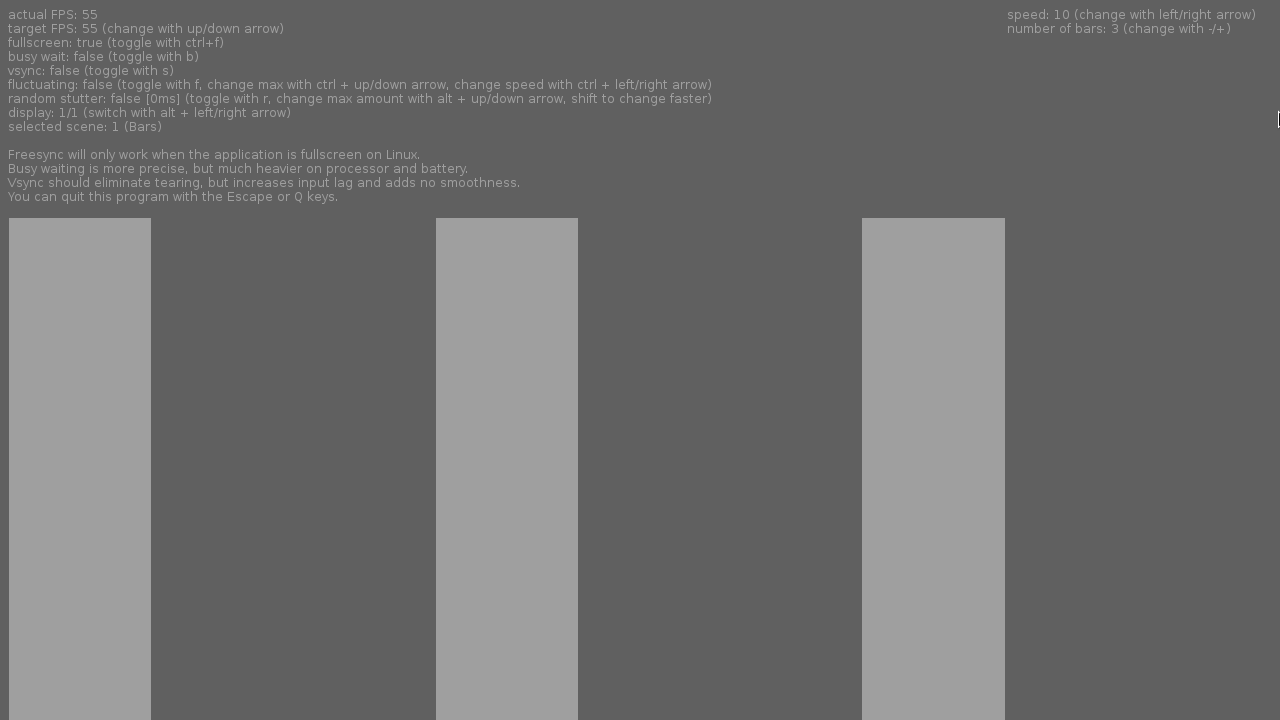
*How the Bars scene is supposed to look like, without any screen tearing. Ignore the visible portion of the cursor, please.*
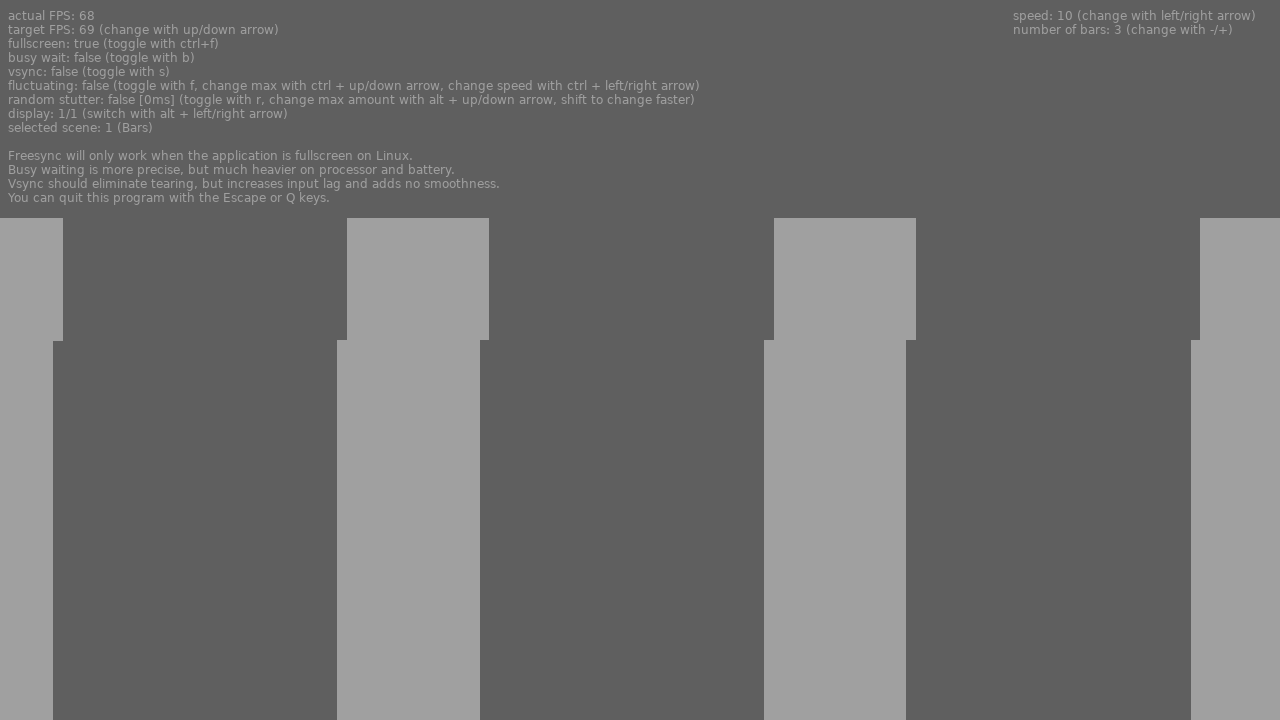
*A screenshot of how the scene looks like with screen tearing.*
### Scene 2 - Squares
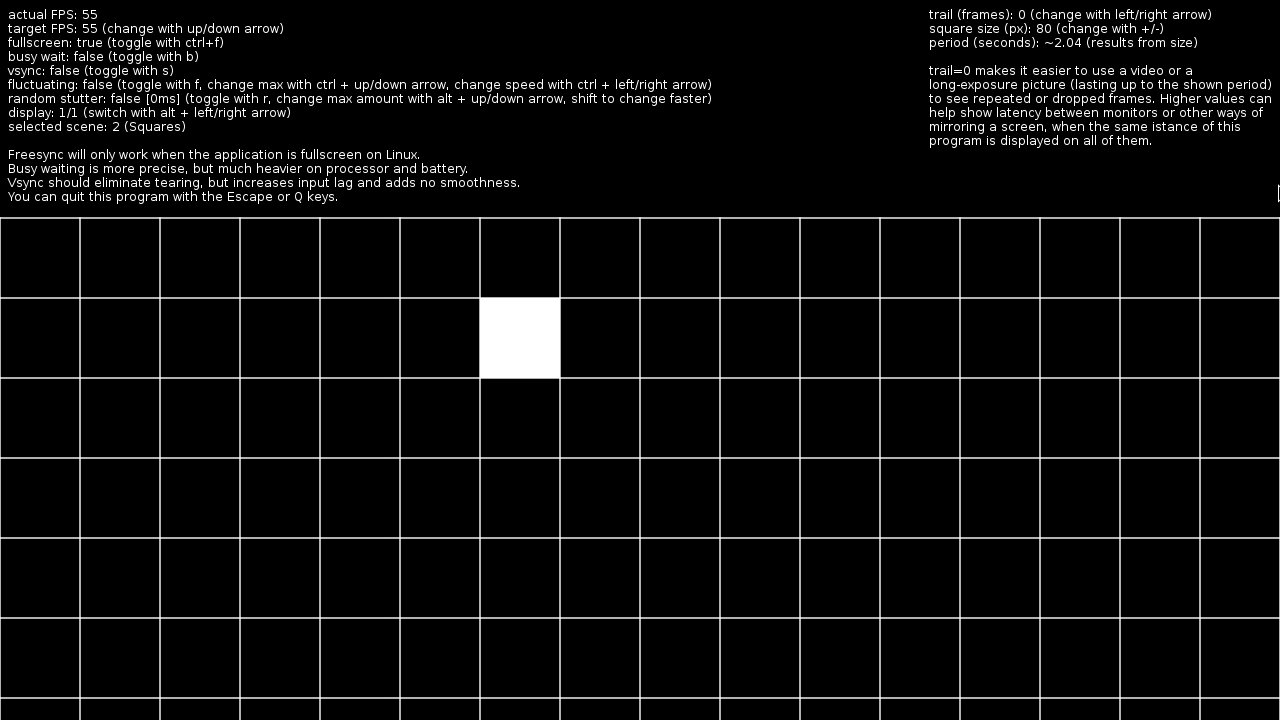
*How a still frame of the Squares scene looks like. Its usefulness can't easily be conveyed by still screenshots.*
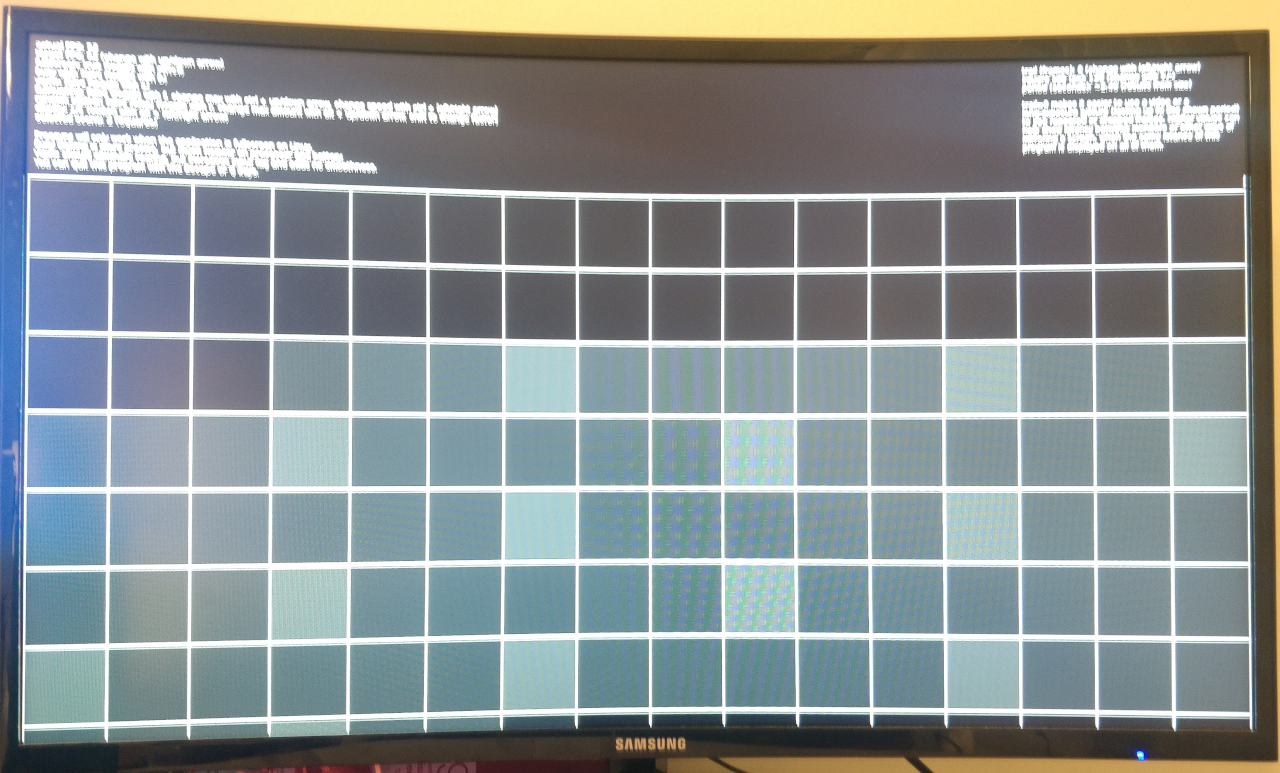
*Long-exposure picture of a monitor with Freesync disabled with lower framerate than its refresh frequency. Notice how some squares are brighter than others, caused by duplicated frames.*
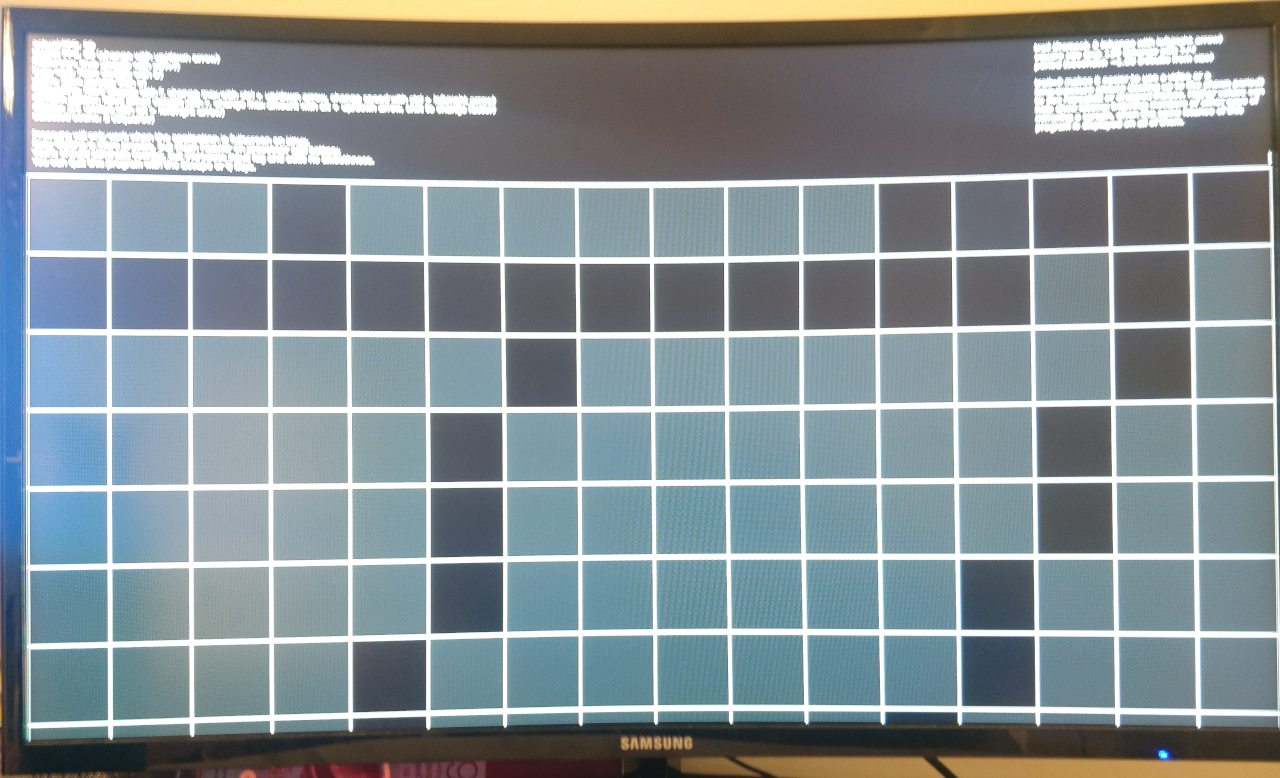
*Long-exposure picture of a monitor with Freesync disabled with higher framerate than its refresh frequency. The empty squared are caused by dropped frames. Note that this might happen on a Freesync monitor too, when above its frequency range.*
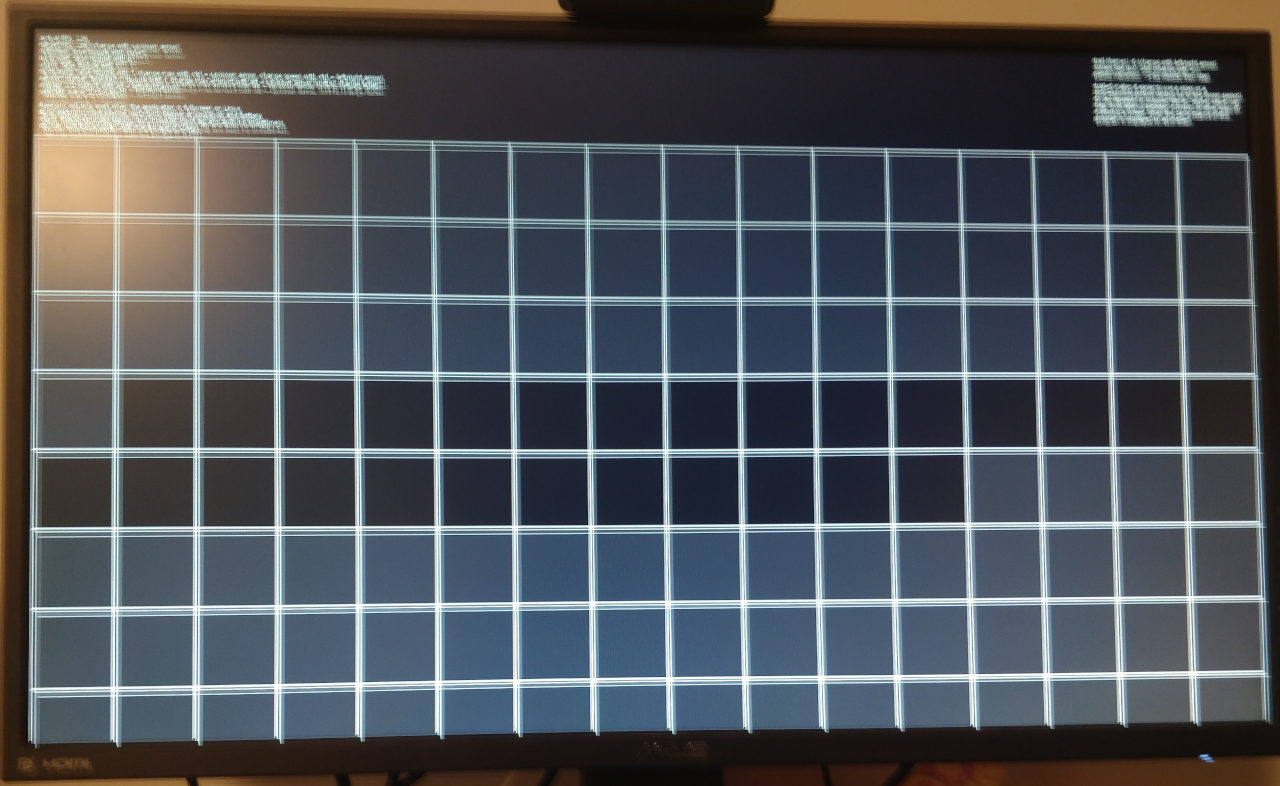
*Finally, a long-exposure picture of a Freesync monitor with refresh rate within its range. Everything looks like it should, with every lit square being approximately the same as the others.*
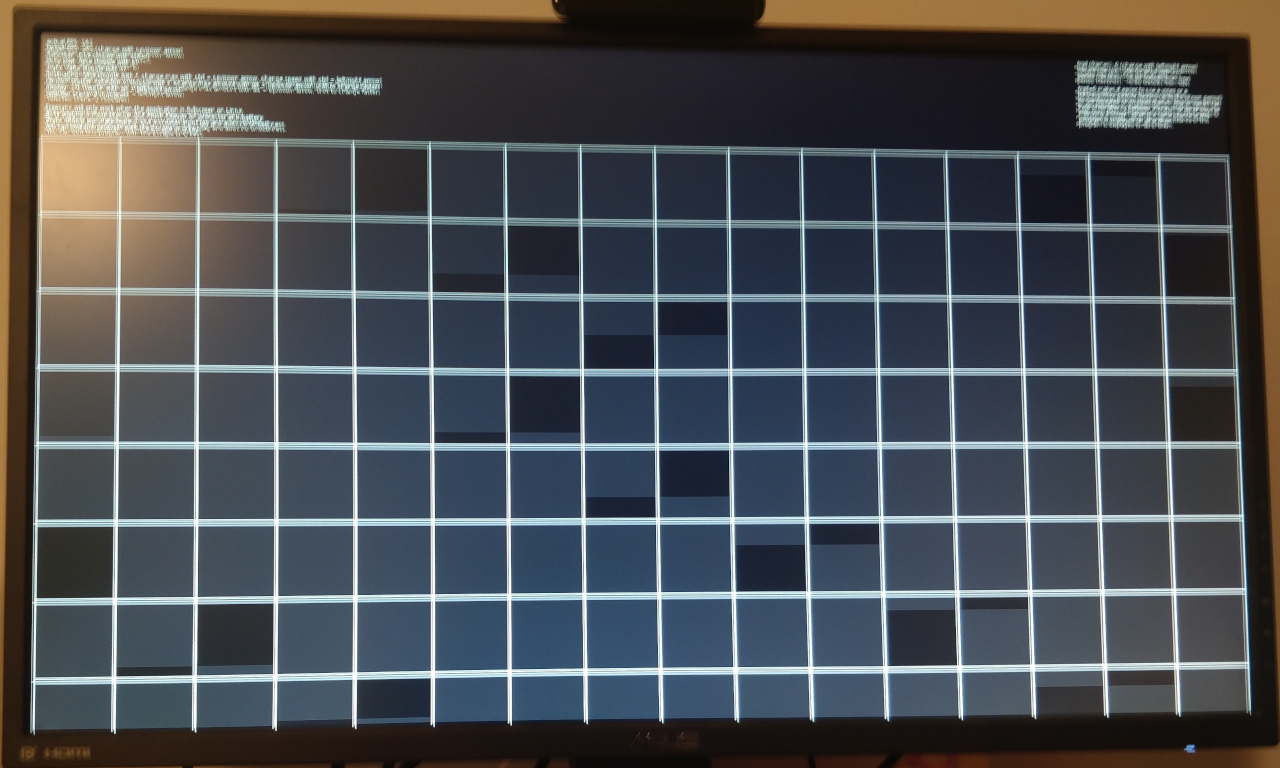
*Long-exposure picture of a Freesync monitor with higher framerate than its maximum refresh frequency. VRR can't do much in this case; either limit your framerate to below your monitor maximum refresh frequency or enable V-Sync in your software and/or driver.*
================================================
FILE: colorFade.lua
================================================
local color = {}
local current = {}
current.fg = {}
current.bg = {}
local target = {}
target.fg = {}
target.bg = {}
local speed = {}
speed.fg = {}
speed.bg = {}
color.setColor = function(fg, bg)
current.fg = {unpack(fg)}
current.bg = {unpack(bg)}
target.fg = {unpack(fg)}
target.bg = {unpack(bg)}
speed.fg = {0, 0, 0}
speed.bg = {0, 0, 0}
end
color.setTarget = function(fg, bg)
target.fg = {unpack(fg)}
target.bg = {unpack(bg)}
speed.fg = {target.fg[1] - current.fg[1], target.fg[2] - current.fg[2], target.fg[3] - current.fg[3]}
speed.bg = {target.bg[1] - current.bg[1], target.bg[2] - current.bg[2], target.bg[3] - current.bg[3]}
end
color.update = function(dt)
for i = 1, 3 do
local new_fg = current.fg[i] + speed.fg[i] * dt
if new_fg <= target.fg[i] and current.fg[i] >= target.fg[i] or
new_fg >= target.fg[i] and current.fg[i] <= target.fg[i] then
new_fg = target.fg[i]
end
current.fg[i] = new_fg
local new_bg = current.bg[i] + speed.bg[i] * dt
if new_bg <= target.bg[i] and current.bg[i] >= target.bg[i] or
new_bg >= target.bg[i] and current.bg[i] <= target.bg[i] then
new_bg = target.bg[i]
end
current.bg[i] = new_bg
end
love.graphics.setColor(current.fg)
love.graphics.setBackgroundColor(current.bg)
end
color.bg = function()
return current.bg
end
color.fg = function()
return current.fg
end
return color
================================================
FILE: conf.lua
================================================
function love.conf(t)
t.identity = "freesynctest" -- The name of the save directory (string)
t.appendidentity = false -- Search files in source directory before save directory (boolean)
t.version = "11.0" -- The LÖVE version this game was made for (string)
t.console = false -- Attach a console (boolean, Windows only)
t.accelerometerjoystick = false -- Enable the accelerometer on iOS and Android by exposing it as a Joystick (boolean)
t.externalstorage = false -- True to save files (and read from the save directory) in external storage on Android (boolean)
t.gammacorrect = false -- Enable gamma-correct rendering, when supported by the system (boolean)
t.audio.mixwithsystem = true -- Keep background music playing when opening LOVE (boolean, iOS and Android only)
t.window.title = "Freesync test" -- The window title (string)
t.window.icon = nil -- Filepath to an image to use as the window's icon (string)
t.window.width = 0 -- The window width (number)
t.window.height = 0 -- The window height (number)
t.window.borderless = true -- Remove all border visuals from the window (boolean)
t.window.resizable = false -- Let the window be user-resizable (boolean)
t.window.minwidth = 1 -- Minimum window width if the window is resizable (number)
t.window.minheight = 1 -- Minimum window height if the window is resizable (number)
t.window.fullscreen = true -- Enable fullscreen (boolean)
t.window.fullscreentype = "desktop" -- Choose between "desktop" fullscreen or "exclusive" fullscreen mode (string)
t.window.vsync = 0 -- Vertical sync mode (number)
t.window.msaa = 0 -- The number of samples to use with multi-sampled antialiasing (number)
t.window.depth = nil -- The number of bits per sample in the depth buffer
t.window.stencil = nil -- The number of bits per sample in the stencil buffer
t.window.display = 1 -- Index of the monitor to show the window in (number)
t.window.highdpi = false -- Enable high-dpi mode for the window on a Retina display (boolean)
t.window.x = nil -- The x-coordinate of the window's position in the specified display (number)
t.window.y = nil -- The y-coordinate of the window's position in the specified display (number)
t.modules.audio = false -- Enable the audio module (boolean)
t.modules.data = false -- Enable the data module (boolean)
t.modules.event = true -- Enable the event module (boolean)
t.modules.font = true -- Enable the font module (boolean)
t.modules.graphics = true -- Enable the graphics module (boolean)
t.modules.image = true -- Enable the image module (boolean)
t.modules.joystick = false -- Enable the joystick module (boolean)
t.modules.keyboard = true -- Enable the keyboard module (boolean)
t.modules.math = true -- Enable the math module (boolean)
t.modules.mouse = true -- Enable the mouse module (boolean)
t.modules.physics = false -- Enable the physics module (boolean)
t.modules.sound = false -- Enable the sound module (boolean)
t.modules.system = false -- Enable the system module (boolean)
t.modules.thread = false -- Enable the thread module (boolean)
t.modules.timer = true -- Enable the timer module (boolean), Disabling it will result 0 delta time in love.update
t.modules.touch = false -- Enable the touch module (boolean)
t.modules.video = false -- Enable the video module (boolean)
t.modules.window = true -- Enable the window module (boolean)
end
================================================
FILE: main.lua
================================================
require "run"
local color = require "colorFade"
local fps, frameTime, lastUpdate
local fpsMax, fpsTimer, fluctuating, fpsSpeed
local random, randomAmount, randomTime
local displays, display
local fullscreen
local vsync
local logLevel, logLevels
local deltaTimes, logLines, logWidth
local WIDTH, HEIGHT
local scenes = {}
scenes.x = 0
scenes.y = 0
local scene = 1
local loadScenes = function(width, height)
for i, file in ipairs(love.filesystem.getDirectoryItems("scenes")) do
local f, err = love.filesystem.load("scenes/" .. file)
if not f then
print("Could not load", file..":", err)
else
f, err = pcall(f)
if not f then
print("Could not run", file..":", err)
else
scenes[i] = err
err.load(width, height)
print(i, err)
end
end
end
end
local setDisplay = function(n)
local new_displays = love.window.getDisplayCount()
n = (n-1) % new_displays + 1
if n == display and new_displays == displays then return end
WIDTH, HEIGHT = love.window.getDesktopDimensions(n)
love.window.setMode(WIDTH, HEIGHT, {display = n, fullscreen = fullscreen, vsync = vsync and 1 or 0})
display = n
displays = new_displays
for i, scene in ipairs(scenes) do
scene.resize(WIDTH - scenes.x, HEIGHT - scenes.y)
end
end
local str = [[
actual FPS: %d
target FPS: %d (change with up/down arrow)
fullscreen: %s (toggle with ctrl+f)
busy wait: %s (toggle with b)
vsync: %s (toggle with s)
fluctuating: %s (toggle with f, change max with ctrl + up/down arrow, change speed with ctrl + left/right arrow)
random stutter: %s [%dms] (toggle with r, change max amount with alt + up/down arrow, shift to change faster)
display: %d/%d (switch with alt + left/right arrow)
log level: %d/%d (increase with l, wraps around)
selected scene: %d (%s)
Freesync will only work when the application is fullscreen on Linux.
Busy waiting is more precise, but much heavier on processor and battery.
Vsync should eliminate tearing, but increases input lag and adds no smoothness.
You can quit this program with the Escape or Q keys.]]
local sceneStr
love.load = function()
love.busy = false
WIDTH, HEIGHT = love.graphics.getDimensions()
local flags = select(3, love.window.getMode())
scenes.y = (#select(2, love.graphics.getFont():getWrap(str, WIDTH)) + 1) * love.graphics.getFont():getHeight() + 8
fps = flags.refreshrate - 5
fps = (fps > 0) and fps or 56
fpsMax = fps
fpsTimer = 0
fluctuating = false
fpsSpeed = 10
random = false
randomTime = 0
randomAmount = 0
displays = love.window.getDisplayCount()
display = 1
frameTime = 1 / fps
lastUpdate = 0
logLevel = 0
logLevels = 3 -- 0-2
deltaTimes = {}
logLines = math.floor((HEIGHT - scenes.y) / love.graphics.getFont():getHeight())
logWidth = love.graphics.getFont():getWidth("00000 µs") + 16
fullscreen = flags.fullscreen
vsync = flags.vsync > 0
love.keyboard.setKeyRepeat(true)
loadScenes(WIDTH - scenes.x, HEIGHT - scenes.y)
color.setColor(scenes[scene].color.fg, scenes[scene].color.bg)
end
love.update = function(dt)
if love.busy then
while lastUpdate + frameTime + randomTime > love.timer.getTime() do end
else
while lastUpdate + frameTime + randomTime > love.timer.getTime() do
love.timer.sleep(0)
end
end
lastUpdate = love.timer.getTime()
fpsTimer = fpsTimer + dt * fpsSpeed / 10
if fluctuating then
fpsCur = fps + (math.sin(fpsTimer)/2 + 0.5) * (fpsMax - fps)
frameTime = 1/fpsCur
end
if random then
randomTime = (love.math.random() - 0.5 ) * randomAmount/1000
end
scenes[scene].update(dt, fps)
color.update(dt)
if logLevel > 1 then
table.insert(deltaTimes, 1, string.format("%d µs", dt * 1000000))
deltaTimes[logLines + 1] = nil
end
end
love.draw = function()
local fstr = fluctuating and ("true [max: %d, speed: %d, current: %d]"):format(fpsMax, fpsSpeed, fpsCur) or "false"
local str = string.format(str,
love.timer.getFPS(),
fps,
tostring(fullscreen),
tostring(love.busy),
tostring(vsync),
fstr,
tostring(random), randomAmount,
display, displays,
logLevel, logLevels - 1,
scene,
scenes[scene].name)
love.graphics.print(str, 8, 8)
love.graphics.print(scenes[scene].str, WIDTH - scenes[scene].strWidth - 8, 8)
if logLevel > 0 then
love.graphics.printf(table.concat({love.graphics.getRendererInfo()}, "\n"), 0, scenes.y - love.graphics.getFont():getHeight() * 5, WIDTH - 8, "right")
end
scenes[scene].draw(scenes.x, scenes.y)
if logLevel > 1 then
--love.graphics.setColor(.75, 0, 0)
love.graphics.setColor(color.bg())
love.graphics.rectangle("fill", WIDTH - logWidth, scenes.y, logWidth + 1, HEIGHT)
love.graphics.setColor(color.fg())
for i, ms in ipairs(deltaTimes) do
love.graphics.printf(ms, 0, scenes.y + (i - 1) * love.graphics.getFont():getHeight(), WIDTH - 8, "right")
end
end
end
sanitize = function()
fps = math.max(1, fps)
frameTime = 1/fps
fpsMax = math.max(fpsMax, fps)
fpsSpeed = math.max(1, fpsSpeed)
randomAmount = math.max(math.min(randomAmount, 1000), 0)
end
love.keypressed = function(key, keycode)
local ctrl = love.keyboard.isDown("lctrl", "rctrl")
local shift = love.keyboard.isDown("lshift", "rshift")
local alt = love.keyboard.isDown("ralt", "lalt")
if ctrl then
if key == "up" then
fpsMax = fpsMax + 1
elseif key == "down" then
fpsMax = fpsMax - 1
elseif key == "left" then
fpsSpeed = fpsSpeed - 1
elseif key == "right" then
fpsSpeed = fpsSpeed + 1
elseif key == "f" then
if fullscreen then
love.window.setFullscreen(false)
love.window.setPosition(1, 1)
else
love.window.setFullscreen(true)
love.window.setPosition(0, 0)
end
fullscreen = not fullscreen
end
elseif alt then
if key == "up" then
randomAmount = randomAmount + (shift and 5 or 1)
elseif key == "down" then
randomAmount = randomAmount - (shift and 5 or 1)
elseif key == "left" then
setDisplay(display - 1)
return
elseif key == "right" then
setDisplay(display + 1)
return
end
else
if key == "up" then
fps = fps + 1
elseif key == "down" then
fps = fps - 1
elseif key == "f" then
fluctuating = not fluctuating
fpsTimer = 0
elseif key == "b" then
love.busy = not love.busy
elseif key == "s" then
local w, h, flags = love.window.getMode()
flags.vsync = (flags.vsync == 0) and 1 or 0
love.window.setMode(w, h, flags)
flags = select(3, love.window.getMode())
vsync = flags.vsync > 0
elseif key == "r" then
random = not random
randomTime = 0
elseif key == "escape" or key == "q" then
love.event.quit()
elseif key == "l" then
logLevel = (logLevel + 1) % logLevels
end
end
if tonumber(key) and scenes[tonumber(key)] then
scene = tonumber(key)
color.setTarget(scenes[scene].color.fg, scenes[scene].color.bg)
return
end
scenes[scene].keypressed(key, keycode)
sanitize()
end
love.textinput = function(str)
scenes[scene].textinput(str)
sanitize()
end
================================================
FILE: run.lua
================================================
function love.run()
if love.load then love.load(love.arg.parseGameArguments(arg), arg) end
-- We don't want the first frame's dt to include time taken by love.load.
if love.timer then love.timer.step() end
local dt = 0
-- Main loop time.
return function()
-- Process events.
if love.event then
love.event.pump()
for name, a,b,c,d,e,f in love.event.poll() do
if name == "quit" then
if not love.quit or not love.quit() then
return a or 0
end
end
love.handlers[name](a,b,c,d,e,f)
end
end
-- Update dt, as we'll be passing it to update
if love.timer then dt = love.timer.step() end
-- Call update and draw
if love.update then love.update(dt) end -- will pass 0 if love.timer is disabled
if love.graphics and love.graphics.isActive() then
love.graphics.origin()
love.graphics.clear(love.graphics.getBackgroundColor())
if love.draw then love.draw() end
love.graphics.present()
end
if not love.busy then
love.timer.sleep(0.001)
end
end
end
================================================
FILE: scenes/1.lua
================================================
local scene = {}
scene.name = "Bars"
scene.color = {}
scene.color.fg = {5/8, 5/8, 5/8}
scene.color.bg = {3/8, 3/8, 3/8}
local speed, num, bars, barWidth
local WIDTH, HEIGHT
local str = [[
speed: %d (change with left/right arrow)
number of bars: %d (change with -/+)]]
newBars = function()
barWidth = WIDTH / (num * 3)
for i = 1, num do
bars[i] = WIDTH / num * (i - 1)
end
end
scene.load = function(w, h)
WIDTH, HEIGHT = w, h
speed = 10
num = 3
bars = {}
newBars()
scene.strWidth = love.graphics.getFont():getWidth(str:format(1000, 1000))
end
scene.resize = function(w, h)
WIDTH, HEIGHT = w, h
end
scene.update = function(dt, fps)
for i = 1, num do
bars[i] = (bars[i] + speed * dt * WIDTH / 20) % (WIDTH)
end
scene.str = str:format(speed, num)
end
scene.draw = function(x, y)
for i = 1, num do
love.graphics.rectangle("fill", bars[i] + x , y, barWidth, HEIGHT)
if bars[i] > WIDTH - barWidth then
love.graphics.rectangle("fill", bars[i] - WIDTH + x, y, barWidth, HEIGHT)
end
end
end
scene.keypressed = function(key, keycode, isRepeat)
local ctrl = love.keyboard.isDown("lctrl", "rctrl")
local shift = love.keyboard.isDown("lshift", "rshift")
local alt = love.keyboard.isDown("ralt", "lalt")
if ctrl or shift or alt then return end
if key == "left" then
speed = speed - 1
elseif key == "right" then
speed = speed + 1
end
speed = math.max(1, speed)
end
scene.textinput = function(str)
local ctrl = love.keyboard.isDown("lctrl", "rctrl")
local shift = love.keyboard.isDown("lshift", "rshift")
local alt = love.keyboard.isDown("ralt", "lalt")
if str == "-" then
num = num - 1
num = math.max(1, num)
newBars()
elseif str == "+" then
num = num + 1
num = math.max(1, num)
newBars()
end
end
return scene
================================================
FILE: scenes/2.lua
================================================
local scene = {}
scene.name = "Squares"
scene.color = {}
scene.color.fg = {1, 1, 1}
scene.color.bg = {0, 0, 0}
local frame, size, width, height, frames, trail, gcd
local WIDTH, HEIGHT
local str = [[
trail (frames): %d (change with left/right arrow)
square size (px): %d (change with +/-)
period (seconds): ~%.2f (results from size)
trail=0 makes it easier to use a video or a
long-exposure picture (lasting up to the shown period)
to see repeated or dropped frames. Higher values can
help show latency between monitors or other ways of
mirroring a screen, when the same istance of this
program is displayed on all of them.]]
gcd = function(n1, n2)
if n1 % n2 == 0 then
return n2
elseif n1 < n2 then
n1, n2 = n2, n1
end
return gcd(n1 % n2, n2)
end
local wrap = function(n, limit)
return n % limit
end
local sanitize = function()
size = math.min(math.max(3, size), WIDTH, HEIGHT)
width = math.ceil(WIDTH / size)
height = math.ceil(HEIGHT / size)
frames = width * height
trail = math.min(math.max(trail, 0), frames - 1)
end
scene.load = function(w, h)
WIDTH, HEIGHT = w, h
frame = 0
size = math.max(math.min(gcd(WIDTH, HEIGHT), WIDTH/4, HEIGHT/3), WIDTH/16, HEIGHT/9)
width = math.ceil(WIDTH / size)
height = math.ceil(HEIGHT / size)
frames = width * height
trail = 0
scene.strWidth = love.graphics.getFont():getWidth(str:format(1000, 1000, 10.99))
end
scene.resize = function(w, h)
WIDTH, HEIGHT = w, h
sanitize()
end
scene.update = function(dt, fps)
frame = wrap(frame + 1, frames)
scene.str = str:format(trail, size, frames / fps)
end
scene.draw = function(x, y)
for lx = 0, width do
love.graphics.line(lx * size + x, y, lx * size + x, HEIGHT + y)
end
for ly = 0, height do
love.graphics.line(x, ly * size + y, WIDTH + x, ly * size + y)
end
for f = frame - trail, frame do
local f = wrap(f, frames)
local rx = f % width
local ry = math.floor(f / width)
love.graphics.rectangle("fill", x + rx * size, y + ry * size, size, size)
end
end
scene.keypressed = function(key, keycode, isRepeat)
local ctrl = love.keyboard.isDown("lctrl", "rctrl")
local shift = love.keyboard.isDown("lshift", "rshift")
local alt = love.keyboard.isDown("ralt", "lalt")
if ctrl or shift or alt then return end
if key == "left" then
trail = trail - 1
elseif key == "right" then
trail = trail + 1
end
sanitize()
end
scene.textinput = function(str)
local ctrl = love.keyboard.isDown("lctrl", "rctrl")
local shift = love.keyboard.isDown("lshift", "rshift")
local alt = love.keyboard.isDown("ralt", "lalt")
if str == "+" then
size = size + 1
elseif str == "-" then
size = size - 1
end
sanitize()
end
return scene
gitextract_1xd5_yqa/
├── .gitignore
├── LICENSE
├── README.md
├── colorFade.lua
├── conf.lua
├── main.lua
├── run.lua
└── scenes/
├── 1.lua
└── 2.lua
Condensed preview — 9 files, each showing path, character count, and a content snippet. Download the .json file or copy for the full structured content (27K chars).
[
  {
    "path": ".gitignore",
    "chars": 8,
    "preview": "build/\n\n"
  },
  {
    "path": "LICENSE",
    "chars": 859,
    "preview": "Copyright (C) 2019-2021 Nicola Orlando\n\nThis software is provided 'as-is', without any express or implied\nwarranty.  In "
  },
  {
    "path": "README.md",
    "chars": 5639,
    "preview": "# VRRTest\nA very small utility I wrote to test variable refresh rate on Linux. Should work on all major OSes.\n\n## Usage\n"
  },
  {
    "path": "colorFade.lua",
    "chars": 1495,
    "preview": "local color = {}\n\nlocal current = {}\ncurrent.fg = {}\ncurrent.bg = {}\n\nlocal target = {}\ntarget.fg = {}\ntarget.bg = {}\n\nl"
  },
  {
    "path": "conf.lua",
    "chars": 4047,
    "preview": "function love.conf(t)\n    t.identity = \"freesynctest\"         -- The name of the save directory (string)\n    t.appendide"
  },
  {
    "path": "main.lua",
    "chars": 7867,
    "preview": "require \"run\"\n\nlocal color = require \"colorFade\"\n\nlocal fps, frameTime, lastUpdate\nlocal fpsMax, fpsTimer, fluctuating, "
  },
  {
    "path": "run.lua",
    "chars": 1273,
    "preview": "function love.run()\n    if love.load then love.load(love.arg.parseGameArguments(arg), arg) end\n \n    -- We don't want th"
  },
  {
    "path": "scenes/1.lua",
    "chars": 1940,
    "preview": "local scene = {}\nscene.name = \"Bars\"\nscene.color = {}\nscene.color.fg = {5/8, 5/8, 5/8}\nscene.color.bg = {3/8, 3/8, 3/8}\n"
  },
  {
    "path": "scenes/2.lua",
    "chars": 2870,
    "preview": "local scene = {}\nscene.name = \"Squares\"\nscene.color = {}\nscene.color.fg = {1, 1, 1}\nscene.color.bg = {0, 0, 0}\n\nlocal fr"
  }
]
About this extraction
This page contains the full source code of the Nixola/VRRTest GitHub repository, extracted and formatted as plain text for AI agents and large language models (LLMs). The extraction includes 9 files (25.4 KB), approximately 6.9k tokens. Use this with OpenClaw, Claude, ChatGPT, Cursor, Windsurf, or any other AI tool that accepts text input. You can copy the full output to your clipboard or download it as a .txt file.
Extracted by GitExtract — free GitHub repo to text converter for AI. Built by Nikandr Surkov.