Repository: PrismarineJS/mineflayer
Branch: master
Commit: 89686596c8de
Files: 239
Total size: 1.2 MB
Directory structure:
gitextract_2smm4x0u/
├── .github/
│ ├── FUNDING.yml
│ ├── ISSUE_TEMPLATE/
│ │ ├── bug_report.md
│ │ ├── config.yml
│ │ └── feature_request.md
│ ├── dependabot.yml
│ ├── helper/
│ │ ├── package.json
│ │ └── updator.js
│ └── workflows/
│ ├── ci.yml
│ ├── commands.yml
│ ├── handle-update.yml
│ └── npm-publish.yml
├── .gitignore
├── .gitpod.yml
├── .npmignore
├── .npmrc
├── LICENSE
├── docs/
│ ├── .nojekyll
│ ├── CONTRIBUTING.md
│ ├── FAQ.md
│ ├── README.md
│ ├── _sidebar.md
│ ├── api.md
│ ├── br/
│ │ ├── CONTRIBUTING_BR.md
│ │ ├── FAQ_BR.md
│ │ ├── README_BR.md
│ │ ├── api_br.md
│ │ └── unstable_api_br.md
│ ├── demos.md
│ ├── es/
│ │ ├── CONTRIBUTING_ES.md
│ │ ├── FAQ_ES.md
│ │ ├── README_ES.md
│ │ ├── api_es.md
│ │ └── unstable_api_es.md
│ ├── fr/
│ │ ├── FAQ_FR.md
│ │ └── README_FR.md
│ ├── history.md
│ ├── index.html
│ ├── llm_contribute.md
│ ├── mineflayer.ipynb
│ ├── ru/
│ │ ├── CONTRIBUTING_RU.md
│ │ ├── FAQ_RU.md
│ │ ├── README_RU.md
│ │ ├── _sidebar.md
│ │ ├── api_ru.md
│ │ ├── demos_ru.md
│ │ ├── index.html
│ │ ├── tutorial_ru.md
│ │ └── unstable_api_ru.md
│ ├── tr/
│ │ └── README_TR.md
│ ├── tutorial.md
│ ├── unstable_api.md
│ ├── update_to_1_21_5.md
│ └── zh/
│ ├── CONTRIBUTING.md
│ ├── FAQ.md
│ ├── README_ZH_CN.md
│ ├── _sidebar.md
│ ├── api.md
│ ├── demos.md
│ ├── history.md
│ ├── index.html
│ └── tutorial.md
├── examples/
│ ├── advanced/
│ │ ├── README.md
│ │ └── chest_confirm.md
│ ├── ansi.js
│ ├── anvil.js
│ ├── anvil_saver/
│ │ ├── .npmrc
│ │ ├── package.json
│ │ └── saver.js
│ ├── armor_stand.js
│ ├── attack.js
│ ├── auto-eat.js
│ ├── auto_totem.js
│ ├── bee.js
│ ├── block_entity.js
│ ├── blockfinder.js
│ ├── book.js
│ ├── bossbar.js
│ ├── chat_parsing.js
│ ├── chatterbox.js
│ ├── chest.js
│ ├── cli/
│ │ └── readline.js
│ ├── collectblock.js
│ ├── command_block.js
│ ├── crossbower.js
│ ├── crystal.js
│ ├── digger.js
│ ├── discord.js
│ ├── echo.js
│ ├── elytra.js
│ ├── farmer.js
│ ├── fisherman.js
│ ├── graffiti.js
│ ├── guard.js
│ ├── inventory.js
│ ├── jumper.js
│ ├── looker.js
│ ├── modular_mineflayer/
│ │ ├── index.js
│ │ └── modules/
│ │ └── hello.js
│ ├── multiple.js
│ ├── multiple_from_file.js
│ ├── pathfinder/
│ │ ├── .npmrc
│ │ ├── gps.js
│ │ └── package.json
│ ├── perfectShotBow.js
│ ├── place_end_crystal/
│ │ ├── .npmrc
│ │ ├── index.js
│ │ └── package.json
│ ├── place_entity.js
│ ├── plugins/
│ │ ├── afk.js
│ │ └── hello_world.js
│ ├── python/
│ │ ├── README.md
│ │ ├── basic.py
│ │ └── chatterbox.py
│ ├── quitter.js
│ ├── raycast.js
│ ├── reconnector.js
│ ├── repl.js
│ ├── resourcepack.js
│ ├── scoreboard.js
│ ├── screenshot-with-node-canvas-webgl/
│ │ ├── .dockerignore
│ │ ├── .npmrc
│ │ ├── Dockerfile
│ │ ├── README.md
│ │ ├── package.json
│ │ └── screenshot.js
│ ├── session.js
│ ├── skin_blinker.js
│ ├── skin_data.js
│ ├── sleeper.js
│ ├── sound.js
│ ├── tab_complete.js
│ ├── telegram.js
│ ├── titles.js
│ ├── trader.js
│ └── viewer/
│ ├── .npmrc
│ ├── README.md
│ ├── package.json
│ └── viewer.js
├── index.d.ts
├── index.js
├── lib/
│ ├── bossbar.js
│ ├── conversions.js
│ ├── loader.js
│ ├── location.js
│ ├── math.js
│ ├── painting.js
│ ├── particle.js
│ ├── plugin_loader.js
│ ├── plugins/
│ │ ├── anvil.js
│ │ ├── bed.js
│ │ ├── block_actions.js
│ │ ├── blocks.js
│ │ ├── book.js
│ │ ├── boss_bar.js
│ │ ├── breath.js
│ │ ├── chat.js
│ │ ├── chest.js
│ │ ├── command_block.js
│ │ ├── craft.js
│ │ ├── creative.js
│ │ ├── digging.js
│ │ ├── enchantment_table.js
│ │ ├── entities.js
│ │ ├── experience.js
│ │ ├── explosion.js
│ │ ├── fishing.js
│ │ ├── furnace.js
│ │ ├── game.js
│ │ ├── generic_place.js
│ │ ├── health.js
│ │ ├── inventory.js
│ │ ├── kick.js
│ │ ├── particle.js
│ │ ├── physics.js
│ │ ├── place_block.js
│ │ ├── place_entity.js
│ │ ├── rain.js
│ │ ├── ray_trace.js
│ │ ├── resource_pack.js
│ │ ├── scoreboard.js
│ │ ├── settings.js
│ │ ├── simple_inventory.js
│ │ ├── sound.js
│ │ ├── spawn_point.js
│ │ ├── tablist.js
│ │ ├── team.js
│ │ ├── time.js
│ │ ├── title.js
│ │ └── villager.js
│ ├── promise_utils.js
│ ├── scoreboard.js
│ ├── team.js
│ └── version.js
├── package.json
├── test/
│ ├── common/
│ │ └── util.js
│ ├── externalTest.js
│ ├── externalTests/
│ │ ├── anvil.js
│ │ ├── bed.js
│ │ ├── book.js
│ │ ├── bossBar.js
│ │ ├── breath.js
│ │ ├── chat.js
│ │ ├── commandBlock.js
│ │ ├── complete.js
│ │ ├── consume.js
│ │ ├── crafting.js
│ │ ├── creative.js
│ │ ├── digAndBuild.js
│ │ ├── digEverything.js
│ │ ├── dimensionName.js
│ │ ├── displayName.js
│ │ ├── elytra.js
│ │ ├── enchanting.js
│ │ ├── exampleBee.js
│ │ ├── exampleBlockFinder.js
│ │ ├── exampleDigger.js
│ │ ├── exampleInventory.js
│ │ ├── experience.js
│ │ ├── fishing.js
│ │ ├── furnace.js
│ │ ├── gamemode.js
│ │ ├── heldItem.js
│ │ ├── nether.js
│ │ ├── particles.js
│ │ ├── placeEntity.js
│ │ ├── plugins/
│ │ │ └── testCommon.js
│ │ ├── rain.js
│ │ ├── rayTrace.js
│ │ ├── scoreboard.js
│ │ ├── sign.js
│ │ ├── sound.js
│ │ ├── spawnEvent.js
│ │ ├── team.js
│ │ ├── time.js
│ │ ├── title.js
│ │ ├── trade.js
│ │ └── useChests.js
│ └── internalTest.js
└── tsconfig.json
================================================
FILE CONTENTS
================================================
================================================
FILE: .github/FUNDING.yml
================================================
# These are supported funding model platforms
open_collective: prismarinejs
custom: https://rysolv.com/repos/detail/74691b23-938d-4b2f-b65a-5c47bf5b3f0f
github: PrismarineJS
================================================
FILE: .github/ISSUE_TEMPLATE/bug_report.md
================================================
---
name: Bug report
about: Create a report to help us improve
title: ''
labels: possible bug,Stage1
assignees: ''
---
- [ ] The [FAQ](https://github.com/PrismarineJS/mineflayer/blob/master/docs/FAQ.md) doesn't contain a resolution to my issue
## Versions
- mineflayer: #.#.#
- server: vanilla/spigot/paper #.#.#
- node: #.#.#
## Detailed description of a problem
A clear and concise description of what the problem is, with as much context as possible.
What are you building? What problem are you trying to solve?
## What did you try yet?
Did you try any method from the API?
Did you try any example? Any error from those?
## Your current code
```js
/*
Some code here, replace this
*/
```
## Expected behavior
A clear and concise description of what you expected to happen.
## Additional context
Add any other context about the problem here.
================================================
FILE: .github/ISSUE_TEMPLATE/config.yml
================================================
blank_issues_enabled: false
contact_links:
- name: Github Discussions
url: https://github.com/PrismarineJS/mineflayer/discussions
about: Please make a post in our Github Discussions for questions and support requests.
================================================
FILE: .github/ISSUE_TEMPLATE/feature_request.md
================================================
---
name: Feature request
about: Suggest an idea for this project
title: ''
labels: new feature,Stage1
assignees: ''
---
## Is your feature request related to a problem? Please describe.
A clear and concise description of what the problem is. Ex. I'm always frustrated when [...]
## Describe the solution you'd like
A clear and concise description of what you want to happen.
## Describe alternatives you've considered
A clear and concise description of any alternative solutions or features you've considered.
## Additional context
Add any other context or screenshots about the feature request here.
================================================
FILE: .github/dependabot.yml
================================================
version: 2
updates:
- package-ecosystem: npm
directory: "/"
schedule:
interval: daily
open-pull-requests-limit: 10
ignore:
- dependency-name: "@types/node"
versions:
- 15.0.0
================================================
FILE: .github/helper/package.json
================================================
{
"dependencies": {
"gh-helpers": "^1.0.0"
}
}
================================================
FILE: .github/helper/updator.js
================================================
#!/usr/bin/env node
/**
* Updator script triggered from minecraft-data repository to auto generate PR
*/
const fs = require('fs')
const cp = require('child_process')
const assert = require('assert')
const github = require('gh-helpers')()
const { join } = require('path')
const exec = (cmd) => github.mock ? console.log('> ', cmd) : (console.log('> ', cmd), cp.execSync(cmd, { stdio: 'inherit' }))
console.log('Starting update process...')
// Sanitize and validate environment variables all non alpha numeric / underscore / dot
const newVersion = process.env.NEW_MC_VERSION?.replace(/[^a-zA-Z0-9_.]/g, '_')
const triggerBranch = process.env.MCDATA_BRANCH?.replace(/[^a-zA-Z0-9_.]/g, '_')
const mcdataPrURL = process.env.MCDATA_PR_URL
console.log({ newVersion, triggerBranch, mcdataPrURL })
assert(newVersion)
assert(triggerBranch)
async function main () {
const currentSupportedPath = require.resolve('../../lib/version.js')
const readmePath = join(__dirname, '../../docs/README.md')
const ciPath = join(__dirname, '../../.github/workflows/ci.yml')
// Update the version.js
const currentSupportedVersion = require('../../lib/version.js')
const currentContents = fs.readFileSync(currentSupportedPath, 'utf8')
console.log('Current supported version:', currentContents)
const latestV = currentSupportedVersion.testedVersions.at(-1)
const newContents = currentContents.includes(newVersion)
? currentContents
: currentContents
.replace(`, '${latestV}'`, `, '${latestV}', '${newVersion}'`)
// Update the README.md
const currentContentsReadme = fs.readFileSync(readmePath, 'utf8')
if (!currentContentsReadme.includes(newVersion)) {
const newReadmeContents = currentContentsReadme
.replace(/Minecraft 1\.8 to [0-9A-Za-z._-]+ \(/, `Minecraft 1.8 to ${newVersion} (`)
.replace(') ', `, ${newVersion}) `)
fs.writeFileSync(readmePath, newReadmeContents)
console.log('Updated README with new version:', newVersion)
}
fs.writeFileSync(currentSupportedPath, newContents)
// Update the CI workflow
const currentContentsCI = fs.readFileSync(ciPath, 'utf8')
if (!currentContentsCI.includes(newVersion)) {
const newCIContents = currentContentsCI.replace(
'run: npm install', `run: npm install
- run: cd node_modules && cd minecraft-data && mv minecraft-data minecraft-data-old && git clone -b ${triggerBranch} https://github.com/PrismarineJS/minecraft-data --depth 1 && node bin/generate_data.js
- run: curl -o node_modules/protodef/src/serializer.js https://raw.githubusercontent.com/extremeheat/node-protodef/refs/heads/dlog/src/serializer.js && curl -o node_modules/protodef/src/compiler.js https://raw.githubusercontent.com/extremeheat/node-protodef/refs/heads/dlog/src/compiler.js
`)
fs.writeFileSync(ciPath, newCIContents)
console.log('Updated CI workflow with new version:', newVersion)
}
const branchName = 'pc' + newVersion.replace(/[^a-zA-Z0-9_]/g, '_')
exec(`git checkout -b ${branchName}`)
exec('git config user.name "github-actions[bot]"')
exec('git config user.email "41898282+github-actions[bot]@users.noreply.github.com"')
exec('git add --all')
exec(`git commit -m "Update to version ${newVersion}"`)
exec(`git push origin ${branchName} --force`)
// createPullRequest(title: string, body: string, fromBranch: string, intoBranch?: string): Promise<{ number: number, url: string }>;
const pr = await github.createPullRequest(
`🎈 ${newVersion}`,
`This automated PR sets up the relevant boilerplate for Minecraft version ${newVersion}.
Ref: ${mcdataPrURL}
* You can help contribute to this PR by opening a PR against this ${branchName} branch instead of master.
`,
branchName,
'master'
)
console.log(`Pull request created`, pr)
}
main().catch(err => {
console.error('Error during update process:', err)
process.exit(1)
})
================================================
FILE: .github/workflows/ci.yml
================================================
name: CI
on:
push:
branches:
- master
pull_request:
jobs:
Lint:
runs-on: ubuntu-latest
steps:
- uses: actions/checkout@v2
- name: Use Node.js 22.x
uses: actions/setup-node@v1.4.4
with:
node-version: 22.x
- run: npm i && npm run lint
PrepareSupportedVersions:
runs-on: ubuntu-latest
outputs:
matrix: ${{ steps.set-matrix.outputs.matrix }}
steps:
- uses: actions/checkout@v2
- name: Use Node.js 22.x
uses: actions/setup-node@v1.4.4
with:
node-version: 22.x
- id: set-matrix
run: |
node -e "
const testedVersions = require('./lib/version').testedVersions;
console.log('matrix='+JSON.stringify({'include': testedVersions.map(mcVersion => ({mcVersion}))}))
" >> $GITHUB_OUTPUT
MinecraftServer:
needs: PrepareSupportedVersions
runs-on: ubuntu-latest
strategy:
matrix: ${{fromJson(needs.PrepareSupportedVersions.outputs.matrix)}}
fail-fast: false
steps:
- uses: actions/checkout@v2
- name: Use Node.js 22.x
uses: actions/setup-node@v1.4.4
with:
node-version: 22.x
- name: Setup Java JDK
uses: actions/setup-java@v1.4.3
with:
java-version: 21
java-package: jre
- name: Install Dependencies
run: npm install
- name: Start Tests
run: npm run mocha_test -- -g ${{ matrix.mcVersion }}v
================================================
FILE: .github/workflows/commands.yml
================================================
name: Repo Commands
on:
issue_comment: # Handle comment commands
types: [created]
pull_request: # Handle renamed PRs
types: [edited]
jobs:
comment-trigger:
runs-on: ubuntu-latest
steps:
- name: Check out repository
uses: actions/checkout@v3
- name: Run command handlers
uses: PrismarineJS/prismarine-repo-actions@master
with:
# NOTE: You must specify a Personal Access Token (PAT) with repo access here. While you can use the default GITHUB_TOKEN, actions taken with it will not trigger other actions, so if you have a CI workflow, commits created by this action will not trigger it.
token: ${{ secrets.PAT_PASSWORD }}
# See `Options` section below for more info on these options
install-command: npm install
/fixlint.fix-command: npm run fix
================================================
FILE: .github/workflows/handle-update.yml
================================================
name: Update from minecraft-data
on:
workflow_dispatch:
inputs:
new_mc_version:
description: New minecraft version number
required: true
type: string
mcdata_branch:
description: minecraft-data branch for this version
required: true
type: string
mcdata_pr_url:
description: minecraft-data PR number to open a PR here against
required: false
default: ''
type: string
nmp_branch:
description: minecraft-protocol branch for this version
required: true
type: string
nmp_pr_url:
description: minecraft-protocol PR number to open a PR here against
required: false
default: ''
type: string
jobs:
update:
runs-on: ubuntu-latest
steps:
- name: Checkout repository
uses: actions/checkout@v4
with:
token: ${{ secrets.PAT_PASSWORD }}
- name: Use Node.js 22.x
uses: actions/setup-node@v1.4.4
with:
node-version: 22.x
- run: npm install PrismarineJS/node-minecraft-protocol#${{ github.event.inputs.nmp_branch }}
- name: Run updator script
run: cd .github/helper && npm install && node updator.js
env:
GITHUB_TOKEN: ${{ secrets.PAT_PASSWORD }}
NEW_MC_VERSION: ${{ github.event.inputs.new_mc_version }}
MCDATA_BRANCH: ${{ github.event.inputs.mcdata_branch }}
MCDATA_PR_URL: ${{ github.event.inputs.mcdata_pr_url }}
NMP_BRANCH: ${{ github.event.inputs.nmp_branch }}
NMP_PR_URL: ${{ github.event.inputs.nmp_pr_url }}
================================================
FILE: .github/workflows/npm-publish.yml
================================================
name: npm-publish
on:
push:
branches:
- master # Change this to your default branch
jobs:
npm-publish:
name: npm-publish
runs-on: ubuntu-latest
steps:
- name: Checkout repository
uses: actions/checkout@master
- name: Set up Node.js
uses: actions/setup-node@master
with:
node-version: 22.0.0
- id: publish
uses: JS-DevTools/npm-publish@v1
with:
token: ${{ secrets.NPM_AUTH_TOKEN }}
- name: Create Release
if: steps.publish.outputs.type != 'none'
id: create_release
uses: actions/create-release@v1
env:
GITHUB_TOKEN: ${{ secrets.GITHUB_TOKEN }}
with:
tag_name: ${{ steps.publish.outputs.version }}
release_name: Release ${{ steps.publish.outputs.version }}
body: ${{ steps.publish.outputs.version }}
draft: false
prerelease: false
================================================
FILE: .gitignore
================================================
# shared with .npmignore
# different than .npmignore
node_modules
package-lock.json
yarn.lock
/README.md
versions/
server_jars/
test/server_*
.vscode
.DS_Store
launcher_accounts.json
data
================================================
FILE: .gitpod.yml
================================================
tasks:
- command: npm install && sdk install java
================================================
FILE: .npmignore
================================================
# shared with .gitignore
# different than .gitignore
test
================================================
FILE: .npmrc
================================================
engine-strict=true
package-lock=false
================================================
FILE: LICENSE
================================================
The MIT License (MIT)
Copyright (c) 2015 Andrew Kelley
Permission is hereby granted, free of charge, to any person obtaining a copy
of this software and associated documentation files (the "Software"), to deal
in the Software without restriction, including without limitation the rights
to use, copy, modify, merge, publish, distribute, sublicense, and/or sell
copies of the Software, and to permit persons to whom the Software is
furnished to do so, subject to the following conditions:
The above copyright notice and this permission notice shall be included in all
copies or substantial portions of the Software.
THE SOFTWARE IS PROVIDED "AS IS", WITHOUT WARRANTY OF ANY KIND, EXPRESS OR
IMPLIED, INCLUDING BUT NOT LIMITED TO THE WARRANTIES OF MERCHANTABILITY,
FITNESS FOR A PARTICULAR PURPOSE AND NONINFRINGEMENT. IN NO EVENT SHALL THE
AUTHORS OR COPYRIGHT HOLDERS BE LIABLE FOR ANY CLAIM, DAMAGES OR OTHER
LIABILITY, WHETHER IN AN ACTION OF CONTRACT, TORT OR OTHERWISE, ARISING FROM,
OUT OF OR IN CONNECTION WITH THE SOFTWARE OR THE USE OR OTHER DEALINGS IN THE
SOFTWARE.
================================================
FILE: docs/.nojekyll
================================================
================================================
FILE: docs/CONTRIBUTING.md
================================================
# Contribute
Mineflayer has originally been made mostly by [andrewrk](http://github.com/andrewrk)
but has since then be improved and fixed by many [contributors](https://github.com/andrewrk/mineflayer/graphs/contributors).
That's why it is important to know the best ways to contribute to mineflayer.
## Issue organization
We have 3 stage labels to try to organize issues:
* Stage 1: just created by someone new to the project, we don't know yet if it deserves an implementation / a fix
* Stage 2: promising idea, but needs more thinking before implementation
* Stage 3: idea is precisely specified, only coding is left to do
Links like https://github.com/PrismarineJS/mineflayer/issues?q=is%3Aopen+is%3Aissue+-label%3AStage1 can be used to filter out stage 1 if you're looking for things that are ready for contribution
## Creating tests
Mineflayer has two kind of tests :
* [internal tests](test/internalTest.js) : tests that are done against a simple server created with node-minecraft-protocol
* [external tests](test/externalTests/) : tests that are done against the vanilla server
The objective of these tests is to know automatically what works and what doesn't in mineflayer, so it's easier to make mineflayer work.
## Running tests
You can run tests for Different Minecraft versions using the `-g` flag with npm run mocha_test. For example:
```bash
# Run all tests in all supported versions
npm run test
# Run a specific test in Minecraft 1.20.4
npm run mocha_test -- -g "mineflayer_external 1.20.4v.*exampleBee"
# Run all tests in just version 1.20.4
npm run mocha_test -- -g "mineflayer_external 1.20.4v"
```
### Creating an external test
In order to add an external test now you only need to create a file in [test/externalTests](test/externalTests)
An example : [test/externalTests/digAndBuild.js](https://github.com/PrismarineJS/mineflayer/blob/master/test/externalTests/digAndBuild.js)
That file needs to export a function returning a function or an array of function taking as parameter the bot object and a done callback,
it should contain asserts to test if the tested functionality failed.
## Creating a third party plugin
Mineflayer is pluggable; anyone can create a plugin that adds an even higher level API on top of Mineflayer.
Several such third party plugins have already been [created](https://github.com/andrewrk/mineflayer#third-party-plugins)
In order to create a new one you need to :
1. create a new repo
2. in your index.js file, exports an init function taking in argument mineflayer ([example](https://github.com/andrewrk/mineflayer-navigate/blob/e24cb6a868ce64ae43bea2d035832c15ed01d301/index.js#L18))
3. that function returns a inject function taking in argument the bot object ([example](https://github.com/andrewrk/mineflayer-navigate/blob/e24cb6a868ce64ae43bea2d035832c15ed01d301/index.js#L23))
4. that inject function add functionalities to the bot object ([example](https://github.com/andrewrk/mineflayer-navigate/blob/e24cb6a868ce64ae43bea2d035832c15ed01d301/index.js#L32))
Since the mineflayer object is passed in parameter, that new package doesn't need to depend on mineflayer (no mineflayer dependency in the package.json)
See a [full example](https://github.com/andrewrk/mineflayer-navigate/tree/e24cb6a868ce64ae43bea2d035832c15ed01d301) here.
## Reporting bugs
Mineflayer works well for most usages, but it sometimes still has bugs.
When finding one it's best to report an issue providing these information :
* what you want to do (the objective in english)
* what you tried (the code)
* what happened
* what you expected to happen
## Mineflayer code
Some things to think about when submitting a Pull Request or making a commit :
### Error handling
In most cases, mineflayer shouldn't crash the bot. Even if something fails, the bot can take an alternative route to get to its objective.
What that means is we shouldn't use `throw(new Error("error"))` but instead use the node.js convention of passing the error in the callback.
For example :
```js
function myfunction (param1, callback) {
// do stuff
let toDo = 1
toDo = 2
if (toDo === 2) { // everything worked
callback()
} else {
callback(new Error('something failed'))
}
}
```
See an other example of that in [mineflayer code](https://github.com/andrewrk/mineflayer/blob/a8736c4ea473cf1a609c5a29046c0cdad006d429/lib/plugins/bed.js#L10)
### Updating the documentation
The table of content of docs/api.md is made with doctoc. After updating that file, you should run doctoc docs/api.md to update the table of content.
================================================
FILE: docs/FAQ.md
================================================
## FAQ
This Frequently Asked Question document is meant to help people for the most common things.
### I get an error (ie. protocol/data) when bot is trying to connect to minecraft server
Make sure the Minecraft server version is supported (cf. root readme), else you should retry using one of the [mineflayer tested versions](../lib/version.js).
### I get an error when trying to login with a microsoft account.
Make sure the email you entered into the username option in createBot can be used to login to `minecraft.net` using the 'Login with Microsoft' button.
Make sure you have the option `auth: 'microsoft'` in your createBot options.
When you get an error that says something about invalid credentials or 'Does this account own Minecraft?' try removing the password field in the `createBot` options and try again.
### How to hide errors ?
Use `hideErrors: true` in createBot options
You may also choose to add these listeners :
```js
client.on('error', () => {})
client.on('end', () => {})
```
### I'm not getting chat event on a custom server, how can I solve it ?
Spigot servers, in particular some plugins, use custom chat formats, you need to parse it with a custom regex / parser.
Read and adapt [chat_parsing.js](https://github.com/PrismarineJS/mineflayer/blob/master/examples/chat_parsing.js) to make it work for your particular
chat plugin. Also read http://prismarinejs.github.io/mineflayer/#/tutorial?id=custom-chat
### How can I collect info from an custom plugin in chat ?
Most custom minecraft servers have plugin support, and a lot of these plugins say something in chat when something happens. If it is just one message, it's best to use the solution discussed in the solution above, but when these messages are split into many small messages, another option is using the `"messagestr"` event as it allows for easily parsing multi-line messages.
**Example:**
chat message in chat looks like:
```
(!) U9G has won the /jackpot and received
$26,418,402,450! They purchased 2,350,000 (76.32%) ticket(s) out of the
3,079,185 ticket(s) sold!
```
```js
const regex = {
first: /\(!\) (.+) has won the \/jackpot and received +/,
second: /\$(.+)! They purchased (.+) \((.+)%\) ticket\(s\) out of the /,
third: /(.+) ticket\(s\) sold!/
}
let jackpot = {}
bot.on('messagestr', msg => {
if (regex.first.test(msg)) {
const username = msg.match(regex.first)[1]
jackpot.username = username
} else if (regex.second.test(msg)) {
const [, moneyWon, boughtTickets, winPercent] = msg.match(regex.second)
jackpot.moneyWon = parseInt(moneyWon.replace(/,/g, ''))
jackpot.boughtTickets = parseInt(boughtTickets.replace(/,/g, ''))
jackpot.winPercent = parseFloat(winPercent)
} else if (regex.third.test(msg)) {
const totalTickets = msg.match(regex.third)[1]
jackpot.totalTickets = parseInt(totalTickets.replace(/,/g, ''))
onDone(jackpot)
jackpot = {}
}
})
```
### How can I send a command ?
By using `bot.chat()`.
**Example:**
```js
bot.chat('/give @p diamond')
```
### Is it possible to login multiple accounts using bot = mineflayer.createbot while controlling them all separately ?
Create different bot instances by calling createBot then do different things for each, see multiple.js
### How would I make the bot drop it's entire inventory?
bot.inventory.items() returns an array of the bot's items. You can use a recursive function to loop through them and drop every item using bot.toss(). Click [here](https://gist.github.com/dada513/3d88f772be4224b40f9e5d1787bd63e9) to see an example
### How do I check packets that are sent/received ?
Enabled debug mode https://github.com/PrismarineJS/mineflayer#debug
### I want to avoid disconnection even in case of server lag, how can I achieve this ?
One way is to increase the [checkTimeoutInterval](https://github.com/PrismarineJS/node-minecraft-protocol/blob/master/docs/API.md#mccreateclientoptions) option (to set in createBot) to an higher value (for example `300*1000` which is 5min instead of the default 30s). If you still get disconnected, you can auto reconnect using something like this example https://github.com/PrismarineJS/mineflayer/blob/master/examples/reconnector.js
### How to get the lore / text of an item ?
You can use the `item.nbt` property. It is also recommended to use the `prismarine-nbt` library. The `nbt.simplify()` method may be useful.
**Example:**
```js
function getLore (item) {
let message = ''
if (item.nbt == null) return message
const nbt = require('prismarine-nbt')
const ChatMessage = require('prismarine-chat')(bot.version)
const data = nbt.simplify(item.nbt)
const display = data.display
if (display == null) return message
const lore = display.Lore
if (lore == null) return message
for (const line of lore) {
message += new ChatMessage(line).toString()
message += '\n'
}
return message
}
```
### How can I send message from the console to the server?
You can use a library like `repl` to read the console input and use `bot.chat()` to send it. You can find an example [here.](https://github.com/PrismarineJS/mineflayer/blob/master/examples/repl.js)
### When creating a plugin, how can I specify another plugin as a dependency?
In the `inject()` function for your plugin, you can safely call `bot.loadPlugin(anotherPlugin)` to make sure that plugin is loaded. If the plugin was already loaded before, nothing happens.
Note that the order in which plugins are loaded is dynamic, so you should never call another plugin in your `inject()` function.
### How can I use a socks5 proxy?
In the options object for `mineflayer.createBot(options)`, remove your `host` option from the options object, have the following variables declared `PROXY_IP, PROXY_PORT, PROXY_USERNAME, PROXY_PASSWORD, MC_SERVER_ADDRESS, MC_SERVER_PORT` and add this to your options object:
```js
connect: (client) => {
socks.createConnection({
proxy: {
host: PROXY_IP,
port: PROXY_PORT,
type: 5,
userId: PROXY_USERNAME,
password: PROXY_PASSWORD
},
command: 'connect',
destination: {
host: MC_SERVER_ADDRESS,
port: MC_SERVER_PORT
}
}, (err, info) => {
if (err) {
console.log(err)
return
}
client.setSocket(info.socket)
client.emit('connect')
})
}
```
`socks` is declared with `const socks = require('socks').SocksClient` and uses [this](https://www.npmjs.com/package/socks) package.
Some servers might reject the connection. If that happens try adding `fakeHost: MC_SERVER_ADDRESS` to your createBot options.
# Common Errors
### `UnhandledPromiseRejectionWarning: Error: Failed to read asymmetric key`
This is what happens when either you gave mineflayer the wrong server version, or mineflayer detects the wrong server version
### `TypeError: Cannot read property '?' of undefined`
You may be trying to use something on the bot object that isn't there yet, try calling the statement after the `spawn` event
### `SyntaxError: Unexpected token '?'`
Update your node version.
### The bot can't break/place blocks or open chests
Check that spawn protection isn't stopping the bot from it's action
================================================
FILE: docs/README.md
================================================
# Mineflayer
[](https://www.npmjs.com/package/mineflayer)
[](https://github.com/PrismarineJS/mineflayer/actions?query=workflow%3A%22CI%22)
[](https://gitpod.io/#https://github.com/PrismarineJS/mineflayer)
[](https://colab.research.google.com/github/PrismarineJS/mineflayer/blob/master/docs/mineflayer.ipynb)
[](https://github.com/sponsors/PrismarineJS)
[](https://discord.gg/GsEFRM8)
| EN [English](README.md) | RU [русский](ru/README_RU.md) | ES [Español](es/README_ES.md) | FR [Français](fr/README_FR.md) | TR [Türkçe](tr/README_TR.md) | ZH [中文](zh/README_ZH_CN.md) | BR [Português](br/README_BR.md) |
|-------------------------|----------------------------|----------------------------|----------------------------|----------------------------|-------------------------|--------------------|
Create Minecraft bots with a powerful, stable, and high level JavaScript [API](api.md), also usable from Python.
First time using Node.js? You may want to start with the [tutorial](tutorial.md). Know Python? Checkout some [Python examples](https://github.com/PrismarineJS/mineflayer/tree/master/examples/python) and try out [Mineflayer on Google Colab](https://colab.research.google.com/github/PrismarineJS/mineflayer/blob/master/docs/mineflayer.ipynb).
## Features
* Supports Minecraft 1.8 to 1.21.11 (1.8, 1.9, 1.10, 1.11, 1.12, 1.13, 1.14, 1.15, 1.16, 1.17, 1.18, 1.19, 1.20, 1.21, 1.21.9, 1.21.11)
* Entity knowledge and tracking.
* Block knowledge. You can query the world around you. Milliseconds to find any block.
* Physics and movement - handle all bounding boxes
* Attacking entities and using vehicles.
* Inventory management.
* Crafting, chests, dispensers, enchantment tables.
* Digging and building.
* Miscellaneous stuff such as knowing your health and whether it is raining.
* Activating blocks and using items.
* Chat.
### Roadmap
Checkout [this page](https://github.com/PrismarineJS/mineflayer/wiki/Big-Prismarine-projects) to see what our current projects are.
## Installation
First install Node.js >= 18 from [nodejs.org](https://nodejs.org/) then:
```bash
npm install mineflayer
```
To update mineflayer (or any Node.js) package and its dependencies, use
```bash
npm update
```
## Documentation
| link | description |
|---|---|
|[tutorial](tutorial.md) | Begin with Node.js and mineflayer |
| [FAQ.md](FAQ.md) | Got a question ? go there first |
| **[api.md](api.md)** [unstable_api.md](unstable_api.md) | The full API reference |
| [history.md](history.md) | The changelog for mineflayer |
| [examples/](https://github.com/PrismarineJS/mineflayer/tree/master/examples) | Checkout all the mineflayer examples |
## Contribute
Please read [CONTRIBUTING.md](CONTRIBUTING.md) and [prismarine-contribute](https://github.com/PrismarineJS/prismarine-contribute)
## Usage
**Videos**
A tutorial video explaining the basic set up process for a bot can be found [here.](https://www.youtube.com/watch?v=ltWosy4Z0Kw)
If you want to learn more, more video tutorials are [there,](https://www.youtube.com/playlist?list=PLh_alXmxHmzGy3FKbo95AkPp5D8849PEV) and the corresponding source codes for those bots is [there.](https://github.com/TheDudeFromCI/Mineflayer-Youtube-Tutorials)
[](https://www.youtube.com/watch?v=ltWosy4Z0Kw)
[](https://www.youtube.com/watch?v=UWGSf08wQSc)
[](https://www.youtube.com/watch?v=ssWE0kXDGJE)
[](https://www.youtube.com/watch?v=walbRk20KYU)
**Getting Started**
Without a version specified, the version of the server will be guessed automatically.
Without auth specified, the mojang auth style will be guessed.
### Echo Example
```js
const mineflayer = require('mineflayer')
const bot = mineflayer.createBot({
host: 'localhost', // minecraft server ip
username: 'Bot', // username to join as if auth is `offline`, else a unique identifier for this account. Switch if you want to change accounts
auth: 'microsoft' // for offline mode servers, you can set this to 'offline'
// port: 25565, // set if you need a port that isn't 25565
// version: false, // only set if you need a specific version or snapshot (ie: "1.8.9" or "1.16.5"), otherwise it's set automatically
// password: '12345678' // set if you want to use password-based auth (may be unreliable). If specified, the `username` must be an email
})
bot.on('chat', (username, message) => {
if (username === bot.username) return
bot.chat(message)
})
// Log errors and kick reasons:
bot.on('kicked', console.log)
bot.on('error', console.log)
```
If `auth` is set to `microsoft`, you will be prompted to login to microsoft.com with a code in your browser. After signing in on your browser,
the bot will automatically obtain and cache authentication tokens (under your specified username) so you don't have to sign-in again.
To switch the account, update the supplied `username`. By default, cached tokens will be stored in your user's .minecraft folder, or if `profilesFolder` is specified, they'll instead be stored there.
For more information on bot options see node-minecraft-protocol's [API doc](https://github.com/PrismarineJS/node-minecraft-protocol/blob/master/docs/API.md#mccreateclientoptions).
#### Connecting to a Realm
To join a Realm that your Minecraft account has been invited to, you can pass a `realms` object with a selector function like below.
```js
const client = mineflayer.createBot({
username: 'email@example.com', // minecraft username
realms: {
// This function is called with an array of Realms the account can join. It should return the one it wants to join.
pickRealm: (realms) => realms[0]
},
auth: 'microsoft'
})
```
### See what your bot is doing
Thanks to the [prismarine-viewer](https://github.com/PrismarineJS/prismarine-viewer) project, it's possible to display in a browser window what your bot is doing.
Just run `npm install prismarine-viewer` and add this to your bot:
```js
const { mineflayer: mineflayerViewer } = require('prismarine-viewer')
bot.once('spawn', () => {
mineflayerViewer(bot, { port: 3007, firstPerson: true }) // port is the minecraft server port, if first person is false, you get a bird's-eye view
})
```
And you'll get a *live* view looking like this:
[](https://prismarinejs.github.io/prismarine-viewer/)
#### More Examples
| example | description |
|---|---|
|[viewer](https://github.com/PrismarineJS/mineflayer/tree/master/examples/viewer) | Display your bot world view in the browser |
|[pathfinder](https://github.com/PrismarineJS/mineflayer/tree/master/examples/pathfinder) | Make your bot go to any location automatically |
|[chest](https://github.com/PrismarineJS/mineflayer/blob/master/examples/chest.js) | Use chests, furnaces, dispensers, enchantment tables |
|[digger](https://github.com/PrismarineJS/mineflayer/blob/master/examples/digger.js) | Learn how to create a simple bot that is capable of digging blocks |
|[discord](https://github.com/PrismarineJS/mineflayer/blob/master/examples/discord.js) | Connect a discord bot with a mineflayer bot |
|[jumper](https://github.com/PrismarineJS/mineflayer/blob/master/examples/jumper.js) | Learn how to move, jump, ride vehicles, attack nearby entities |
|[ansi](https://github.com/PrismarineJS/mineflayer/blob/master/examples/ansi.js) | Display your bot's chat with all of the chat colors shown in your terminal |
|[guard](https://github.com/PrismarineJS/mineflayer/blob/master/examples/guard.js) | Make a bot guard a defined area from nearby mobs |
|[multiple-from-file](https://github.com/PrismarineJS/mineflayer/blob/master/examples/multiple_from_file.js) | Add a text file with accounts and have them all login |
And many more in the [examples](https://github.com/PrismarineJS/mineflayer/tree/master/examples) folder.
### Modules
A lot of the active development is happening inside of small npm packages which are used by mineflayer.
#### The Node Way™
> "When applications are done well, they are just the really application-specific, brackish residue that can't be so easily abstracted away. All the nice, reusable components sublimate away onto github and npm where everybody can collaborate to advance the commons." — substack from ["how I write modules"](https://gist.github.com/substack/5075355)
#### Modules
These are the main modules that make up mineflayer:
| module | description |
|---|---|
| [minecraft-protocol](https://github.com/PrismarineJS/node-minecraft-protocol) | Parse and serialize minecraft packets, plus authentication and encryption.
| [minecraft-data](https://github.com/PrismarineJS/minecraft-data) | Language independent module providing minecraft data for minecraft clients, servers and libraries.
| [prismarine-physics](https://github.com/PrismarineJS/prismarine-physics) | Provide the physics engine for minecraft entities
| [prismarine-chunk](https://github.com/PrismarineJS/prismarine-chunk) | A class to hold chunk data for Minecraft
| [node-vec3](https://github.com/PrismarineJS/node-vec3) | 3d vector math with robust unit tests
| [prismarine-block](https://github.com/PrismarineJS/prismarine-block) | Represent a minecraft block with its associated data
| [prismarine-chat](https://github.com/PrismarineJS/prismarine-chat) | A parser for a minecraft chat message (extracted from mineflayer)
| [node-yggdrasil](https://github.com/PrismarineJS/node-yggdrasil) | Node.js library to interact with Mojang's authentication system, known as Yggdrasil
| [prismarine-world](https://github.com/PrismarineJS/prismarine-world) | The core implementation of worlds for prismarine
| [prismarine-windows](https://github.com/PrismarineJS/prismarine-windows) | Represent minecraft windows
| [prismarine-item](https://github.com/PrismarineJS/prismarine-item) | Represent a minecraft item with its associated data
| [prismarine-nbt](https://github.com/PrismarineJS/prismarine-nbt) | An NBT parser for node-minecraft-protocol
| [prismarine-recipe](https://github.com/PrismarineJS/prismarine-recipe) | Represent minecraft recipes
| [prismarine-biome](https://github.com/PrismarineJS/prismarine-biome) | Represent a minecraft biome with its associated data
| [prismarine-entity](https://github.com/PrismarineJS/prismarine-entity) | Represent a minecraft entity
### Debug
You can enable some protocol debugging output using `DEBUG` environment variable:
```bash
DEBUG="minecraft-protocol" node [...]
```
On windows :
```
set DEBUG=minecraft-protocol
node your_script.js
```
## Third Party Plugins
Mineflayer is pluggable; anyone can create a plugin that adds an even
higher level API on top of Mineflayer.
The most updated and useful are :
* [minecraft-mcp-server](https://github.com/yuniko-software/minecraft-mcp-server) A MCP server for mineflayer, allowing using mineflayer from an LLM
* [pathfinder](https://github.com/Karang/mineflayer-pathfinder) - advanced A* pathfinding with a lot of configurable features
* [prismarine-viewer](https://github.com/PrismarineJS/prismarine-viewer) - simple web chunk viewer
* [web-inventory](https://github.com/ImHarvol/mineflayer-web-inventory) - web based inventory viewer
* [statemachine](https://github.com/PrismarineJS/mineflayer-statemachine) - A state machine API for more complex bot behaviors
* [Armor Manager](https://github.com/G07cha/MineflayerArmorManager) - automatic armor management
* [Dashboard](https://github.com/wvffle/mineflayer-dashboard) - Frontend dashboard for mineflayer bot
* [PVP](https://github.com/PrismarineJS/mineflayer-pvp) - Easy API for basic PVP and PVE.
* [Auto Eat](https://github.com/link-discord/mineflayer-auto-eat) - Automatic eating of food.
* [Auto Crystal](https://github.com/link-discord/mineflayer-autocrystal) - Automatic placing & breaking of end crystals.
* [Tool](https://github.com/TheDudeFromCI/mineflayer-tool) - A utility for automatic tool/weapon selection with a high level API.
* [Hawkeye](https://github.com/sefirosweb/minecraftHawkEye) - A utility for using auto-aim with bows.
* [GUI](https://github.com/firejoust/mineflayer-GUI) - Interact with nested GUI windows using async/await
* [Projectile](https://github.com/firejoust/mineflayer-projectile) - Get the required launch angle for projectiles
* [Movement](https://github.com/firejoust/mineflayer-movement) - Smooth and realistic player movement, best suited for PvP
* [Collect Block](https://github.com/PrismarineJS/mineflayer-collectblock) - Quick and simple block collection API.
But also check out :
* [radar](https://github.com/andrewrk/mineflayer-radar/) - web based radar
interface using canvas and socket.io. [YouTube Demo](https://www.youtube.com/watch?v=FjDmAfcVulQ)
* [auto-auth](https://github.com/G07cha/MineflayerAutoAuth) - chat-based bot authentication
* [Bloodhound](https://github.com/Nixes/mineflayer-bloodhound) - determine who and what is responsible for damage to another entity
* [tps](https://github.com/SiebeDW/mineflayer-tps) - get the current tps (processed tps)
* [panorama](https://github.com/IceTank/mineflayer-panorama) - take Panorama Images of your world
* [player-death-event](https://github.com/tuanzisama/mineflayer-death-event) - emit player death event in Mineflayer.
## Projects Using Mineflayer
* [Voyager](https://github.com/MineDojo/Voyager) An Open-Ended Embodied Agent with Large Language Models
* [mindcraft](https://github.com/kolbytn/mindcraft) Lib for using mineflayer with LLMs
* [rom1504/rbot](https://github.com/rom1504/rbot)
- [YouTube - building a spiral staircase](https://www.youtube.com/watch?v=UM1ZV5200S0)
- [YouTube - replicating a building](https://www.youtube.com/watch?v=0cQxg9uDnzA)
* [Darthfett/Helperbot](https://github.com/Darthfett/Helperbot)
* [vogonistic/voxel](https://github.com/vogonistic/mineflayer-voxel) - visualize what
the bot is up to using voxel.js
* [JonnyD/Skynet](https://github.com/JonnyD/Skynet) - log player activity onto an online API
* [MinecraftChat](https://github.com/rom1504/MinecraftChat) (last open source version, built by AlexKvazos) - Minecraft web based chat client
* [Cheese Bot](https://github.com/Minecheesecraft/Cheese-Bot) - Plugin based bot with a clean GUI. Made with Node-Webkit.
* [Chaoscraft](https://github.com/schematical/chaoscraft) - Minecraft bot using genetic algorithms, see [its youtube videos](https://www.youtube.com/playlist?list=PLLkpLgU9B5xJ7Qy4kOyBJl5J6zsDIMceH)
* [hexatester/minetelegram](https://github.com/hexatester/minetelegram) - Minecraft - Telegram bridge, build on top of mineflayer & telegraf.
* [PrismarineJS/mineflayer-builder](https://github.com/PrismarineJS/mineflayer-builder) - Prints minecraft schematics in survival, keeping orientation
* [SilkePilon/OpenDeliveryBot](https://github.com/SilkePilon/OpenDeliveryBot) - Minecraft bot in python to deliver items from place to place.
* [and hundreds more](https://github.com/PrismarineJS/mineflayer/network/dependents) - All the projects that github detected are using mineflayer
## Testing
### Testing everything
Simply run:
```bash
npm test
```
### Testing specific version
Run
```bash
npm run mocha_test -- -g
```
where `` is a minecraft version like `1.12`, `1.15.2`...
### Testing specific test
Run
```bash
npm run mocha_test -- -g
```
where `` is a name of the test like `bed`, `useChests`, `rayTrace`...
### Example
```bash
npm run mocha_test -- -g "1.18.1.*BlockFinder"
```
to run the block finder test for 1.18.1
## License
[MIT](/LICENSE)
================================================
FILE: docs/_sidebar.md
================================================
- Getting Started
- [Introduction](/)
- [API](api.md)
- [FAQ](FAQ.md)
- [Demos](demos.md)
- [Tutorial](tutorial.md)
- [Unstable API](unstable_api.md)
- [Contribute](CONTRIBUTING.md)
- [History](history.md)
================================================
FILE: docs/api.md
================================================
**Table of Contents** *generated with [DocToc](https://github.com/thlorenz/doctoc)*
- [API](#api)
- [Enums](#enums)
- [minecraft-data](#minecraft-data)
- [mcdata.blocks](#mcdatablocks)
- [mcdata.items](#mcdataitems)
- [mcdata.materials](#mcdatamaterials)
- [mcdata.recipes](#mcdatarecipes)
- [mcdata.instruments](#mcdatainstruments)
- [mcdata.biomes](#mcdatabiomes)
- [mcdata.entities](#mcdataentities)
- [Classes](#classes)
- [vec3](#vec3)
- [mineflayer.Location](#mineflayerlocation)
- [Entity](#entity)
- [Player Skin Data](#player-skin-data)
- [Block](#block)
- [Biome](#biome)
- [Item](#item)
- [windows.Window (base class)](#windowswindow-base-class)
- [window.deposit(itemType, metadata, count, nbt)](#windowdeposititemtype-metadata-count-nbt)
- [window.withdraw(itemType, metadata, count, nbt)](#windowwithdrawitemtype-metadata-count-nbt)
- [window.close()](#windowclose)
- [Recipe](#recipe)
- [mineflayer.Container](#mineflayercontainer)
- [mineflayer.Furnace](#mineflayerfurnace)
- [furnace "update"](#furnace-update)
- [furnace.takeInput()](#furnacetakeinput)
- [furnace.takeFuel()](#furnacetakefuel)
- [furnace.takeOutput()](#furnacetakeoutput)
- [furnace.putInput(itemType, metadata, count)](#furnaceputinputitemtype-metadata-count)
- [furnace.putFuel(itemType, metadata, count)](#furnaceputfuelitemtype-metadata-count)
- [furnace.inputItem()](#furnaceinputitem)
- [furnace.fuelItem()](#furnacefuelitem)
- [furnace.outputItem()](#furnaceoutputitem)
- [furnace.fuel](#furnacefuel)
- [furnace.progress](#furnaceprogress)
- [mineflayer.EnchantmentTable](#mineflayerenchantmenttable)
- [enchantmentTable "ready"](#enchantmenttable-ready)
- [enchantmentTable.targetItem()](#enchantmenttabletargetitem)
- [enchantmentTable.xpseed](#enchantmenttablexpseed)
- [enchantmentTable.enchantments](#enchantmenttableenchantments)
- [enchantmentTable.enchant(choice)](#enchantmenttableenchantchoice)
- [enchantmentTable.takeTargetItem()](#enchantmenttabletaketargetitem)
- [enchantmentTable.putTargetItem(item)](#enchantmenttableputtargetitemitem)
- [enchantmentTable.putLapis(item)](#enchantmenttableputlapisitem)
- [mineflayer.anvil](#mineflayeranvil)
- [anvil.combine(itemOne, itemTwo[, name])](#anvilcombineitemone-itemtwo-name)
- [anvil.combine(item[, name])](#anvilcombineitem-name)
- [villager "ready"](#villager-ready)
- [villager.trades](#villagertrades)
- [villager.trade(tradeIndex, [times])](#villagertradetradeindex-times)
- [mineflayer.ScoreBoard](#mineflayerscoreboard)
- [ScoreBoard.name](#scoreboardname)
- [ScoreBoard.title](#scoreboardtitle)
- [ScoreBoard.itemsMap](#scoreboarditemsmap)
- [ScoreBoard.items](#scoreboarditems)
- [mineflayer.Team](#mineflayerteam)
- [Team.name](#teamname)
- [Team.friendlyFire](#teamfriendlyfire)
- [Team.nameTagVisibility](#teamnametagvisibility)
- [Team.collisionRule](#teamcollisionrule)
- [Team.color](#teamcolor)
- [Team.prefix](#teamprefix)
- [Team.suffix](#teamsuffix)
- [Team.members](#teammembers)
- [mineflayer.BossBar](#mineflayerbossbar)
- [BossBar.title](#bossbartitle)
- [BossBar.health](#bossbarhealth)
- [BossBar.dividers](#bossbardividers)
- [BossBar.entityUUID](#bossbarentityuuid)
- [BossBar.shouldDarkenSky](#bossbarshoulddarkensky)
- [BossBar.isDragonBar](#bossbarisdragonbar)
- [BossBar.createFog](#bossbarcreatefog)
- [BossBar.color](#bossbarcolor)
- [mineflayer.Particle](#mineflayerparticle)
- [Particle.id](#particleid)
- [Particle.name](#particlename)
- [Particle.position](#particleposition)
- [Particle.offset](#particleoffset)
- [Particle.longDistanceRender](#particlelongdistancerender)
- [Particle.count](#particlecount)
- [Particle.movementSpeed](#particlemovementspeed)
- [Bot](#bot)
- [mineflayer.createBot(options)](#mineflayercreatebotoptions)
- [Properties](#properties)
- [bot.registry](#botregistry)
- [bot.world](#botworld)
- [world "blockUpdate" (oldBlock, newBlock)](#world-blockupdate-oldblock-newblock)
- [world "blockUpdate:(x, y, z)" (oldBlock, newBlock)](#world-blockupdatex-y-z-oldblock-newblock)
- [bot.entity](#botentity)
- [bot.entities](#botentities)
- [bot.username](#botusername)
- [bot.spawnPoint](#botspawnpoint)
- [bot.heldItem](#bothelditem)
- [bot.usingHeldItem](#botusinghelditem)
- [bot.game.levelType](#botgameleveltype)
- [bot.game.dimension](#botgamedimension)
- [bot.game.difficulty](#botgamedifficulty)
- [bot.game.gameMode](#botgamegamemode)
- [bot.game.hardcore](#botgamehardcore)
- [bot.game.maxPlayers](#botgamemaxplayers)
- [bot.game.serverBrand](#botgameserverbrand)
- [bot.game.minY](#botgameminy)
- [bot.game.height](#botgameheight)
- [bot.physicsEnabled](#botphysicsenabled)
- [bot.player](#botplayer)
- [bot.players](#botplayers)
- [bot.tablist](#bottablist)
- [bot.isRaining](#botisraining)
- [bot.rainState](#botrainstate)
- [bot.thunderState](#botthunderstate)
- [bot.chatPatterns](#botchatpatterns)
- [bot.settings.chat](#botsettingschat)
- [bot.settings.colorsEnabled](#botsettingscolorsenabled)
- [bot.settings.viewDistance](#botsettingsviewdistance)
- [bot.settings.difficulty](#botsettingsdifficulty)
- [bot.settings.skinParts](#botsettingsskinparts)
- [bot.settings.skinParts.showCape - boolean](#botsettingsskinpartsshowcape---boolean)
- [bot.settings.skinParts.showJacket - boolean](#botsettingsskinpartsshowjacket---boolean)
- [bot.settings.skinParts.showLeftSleeve - boolean](#botsettingsskinpartsshowleftsleeve---boolean)
- [bot.settings.skinParts.showRightSleeve - boolean](#botsettingsskinpartsshowrightsleeve---boolean)
- [bot.settings.skinParts.showLeftPants - boolean](#botsettingsskinpartsshowleftpants---boolean)
- [bot.settings.skinParts.showRightPants - boolean](#botsettingsskinpartsshowrightpants---boolean)
- [bot.settings.skinParts.showHat - boolean](#botsettingsskinpartsshowhat---boolean)
- [bot.settings.enableTextFiltering - boolean](#botsettingsenabletextfiltering---boolean)
- [bot.settings.enableServerListing - boolean](#botsettingsenableserverlisting---boolean)
- [bot.experience.level](#botexperiencelevel)
- [bot.experience.points](#botexperiencepoints)
- [bot.experience.progress](#botexperienceprogress)
- [bot.health](#bothealth)
- [bot.food](#botfood)
- [bot.foodSaturation](#botfoodsaturation)
- [bot.oxygenLevel](#botoxygenlevel)
- [bot.physics](#botphysics)
- [bot.fireworkRocketDuration](#botfireworkrocketduration)
- [bot.simpleClick.leftMouse (slot)](#botsimpleclickleftmouse-slot)
- [bot.simpleClick.rightMouse (slot)](#botsimpleclickrightmouse-slot)
- [bot.time.doDaylightCycle](#bottimedodaylightcycle)
- [bot.time.bigTime](#bottimebigtime)
- [bot.time.time](#bottimetime)
- [bot.time.timeOfDay](#bottimetimeofday)
- [bot.time.day](#bottimeday)
- [bot.time.isDay](#bottimeisday)
- [bot.time.moonPhase](#bottimemoonphase)
- [bot.time.bigAge](#bottimebigage)
- [bot.time.age](#bottimeage)
- [bot.quickBarSlot](#botquickbarslot)
- [bot.inventory](#botinventory)
- [bot.targetDigBlock](#bottargetdigblock)
- [bot.isSleeping](#botissleeping)
- [bot.scoreboards](#botscoreboards)
- [bot.scoreboard](#botscoreboard)
- [bot.teams](#botteams)
- [bot.teamMap](#botteammap)
- [bot.controlState](#botcontrolstate)
- [Events](#events)
- ["chat" (username, message, translate, jsonMsg, matches)](#chat-username-message-translate-jsonmsg-matches)
- ["whisper" (username, message, translate, jsonMsg, matches)](#whisper-username-message-translate-jsonmsg-matches)
- ["actionBar" (jsonMsg, verified)](#actionbar-jsonmsg-verified)
- ["message" (jsonMsg, position, sender, verified)](#message-jsonmsg-position-sender-verified)
- ["messagestr" (message, messagePosition, jsonMsg, sender, verified)](#messagestr-message-messageposition-jsonmsg-sender-verified)
- ["inject_allowed"](#inject_allowed)
- ["login"](#login)
- ["spawn"](#spawn)
- ["respawn"](#respawn)
- ["game"](#game)
- ["resourcePack" (url, hash)](#resourcepack-url-hash)
- ["title" (title, type)](#title-title-type)
- ["title_times" (fadeIn, stay, fadeOut)](#title_times-fadein-stay-fadeout)
- ["title_clear"](#title_clear)
- ["rain"](#rain)
- ["weatherUpdate"](#weatherupdate)
- ["time"](#time)
- ["kicked" (reason, loggedIn)](#kicked-reason-loggedin)
- ["end" (reason)](#end-reason)
- ["error" (err)](#error-err)
- ["spawnReset"](#spawnreset)
- ["death"](#death)
- ["health"](#health)
- ["breath"](#breath)
- ["entityAttributes" (entity)](#entityattributes-entity)
- ["entitySwingArm" (entity)](#entityswingarm-entity)
- ["entityHurt" (entity)](#entityhurt-entity)
- ["entityDead" (entity)](#entitydead-entity)
- ["entityTaming" (entity)](#entitytaming-entity)
- ["entityTamed" (entity)](#entitytamed-entity)
- ["entityShakingOffWater" (entity)](#entityshakingoffwater-entity)
- ["entityEatingGrass" (entity)](#entityeatinggrass-entity)
- ["entityHandSwap" (entity)](#entityhandswap-entity)
- ["entityWake" (entity)](#entitywake-entity)
- ["entityEat" (entity)](#entityeat-entity)
- ["entityCriticalEffect" (entity)](#entitycriticaleffect-entity)
- ["entityMagicCriticalEffect" (entity)](#entitymagiccriticaleffect-entity)
- ["entityCrouch" (entity)](#entitycrouch-entity)
- ["entityUncrouch" (entity)](#entityuncrouch-entity)
- ["entityEquip" (entity)](#entityequip-entity)
- ["entitySleep" (entity)](#entitysleep-entity)
- ["entitySpawn" (entity)](#entityspawn-entity)
- ["entityElytraFlew" (entity)](#entityelytraflew-entity)
- ["itemDrop" (entity)](#itemdrop-entity)
- ["playerCollect" (collector, collected)](#playercollect-collector-collected)
- ["entityGone" (entity)](#entitygone-entity)
- ["entityMoved" (entity)](#entitymoved-entity)
- ["entityDetach" (entity, vehicle)](#entitydetach-entity-vehicle)
- ["entityAttach" (entity, vehicle)](#entityattach-entity-vehicle)
- ["entityUpdate" (entity)](#entityupdate-entity)
- ["entityEffect" (entity, effect)](#entityeffect-entity-effect)
- ["entityEffectEnd" (entity, effect)](#entityeffectend-entity-effect)
- ["playerJoined" (player)](#playerjoined-player)
- ["playerUpdated" (player)](#playerupdated-player)
- ["playerLeft" (player)](#playerleft-player)
- ["blockUpdate" (oldBlock, newBlock)](#blockupdate-oldblock-newblock)
- ["blockUpdate:(x, y, z)" (oldBlock, newBlock)](#blockupdatex-y-z-oldblock-newblock)
- ["blockPlaced" (oldBlock, newBlock)](#blockplaced-oldblock-newblock)
- ["chunkColumnLoad" (point)](#chunkcolumnload-point)
- ["chunkColumnUnload" (point)](#chunkcolumnunload-point)
- ["soundEffectHeard" (soundName, position, volume, pitch)](#soundeffectheard-soundname-position-volume-pitch)
- ["hardcodedSoundEffectHeard" (soundId, soundCategory, position, volume, pitch)](#hardcodedsoundeffectheard-soundid-soundcategory-position-volume-pitch)
- ["noteHeard" (block, instrument, pitch)](#noteheard-block-instrument-pitch)
- ["pistonMove" (block, isPulling, direction)](#pistonmove-block-ispulling-direction)
- ["chestLidMove" (block, isOpen, block2)](#chestlidmove-block-isopen-block2)
- ["blockBreakProgressObserved" (block, destroyStage, entity)](#blockbreakprogressobserved-block-destroystage-entity)
- ["blockBreakProgressEnd" (block, entity)](#blockbreakprogressend-block-entity)
- ["diggingCompleted" (block)](#diggingcompleted-block)
- ["diggingAborted" (block)](#diggingaborted-block)
- ["usedFirework" (fireworkEntityId)](#usedfirework-fireworkentityid)
- ["move"](#move)
- ["forcedMove"](#forcedmove)
- ["mount"](#mount)
- ["dismount" (vehicle)](#dismount-vehicle)
- ["windowOpen" (window)](#windowopen-window)
- ["windowClose" (window)](#windowclose-window)
- ["sleep"](#sleep)
- ["wake"](#wake)
- ["experience"](#experience)
- ["scoreboardCreated" (scoreboard)](#scoreboardcreated-scoreboard)
- ["scoreboardDeleted" (scoreboard)](#scoreboarddeleted-scoreboard)
- ["scoreboardTitleChanged" (scoreboard)](#scoreboardtitlechanged-scoreboard)
- ["scoreUpdated" (scoreboard, item)](#scoreupdated-scoreboard-item)
- ["scoreRemoved" (scoreboard, item)](#scoreremoved-scoreboard-item)
- ["scoreboardPosition" (position, scoreboard)](#scoreboardposition-position-scoreboard)
- ["teamCreated" (team)](#teamcreated-team)
- ["teamRemoved" (team)](#teamremoved-team)
- ["teamUpdated" (team)](#teamupdated-team)
- ["teamMemberAdded" (team)](#teammemberadded-team)
- ["teamMemberRemoved" (team)](#teammemberremoved-team)
- ["bossBarCreated" (bossBar)](#bossbarcreated-bossbar)
- ["bossBarDeleted" (bossBar)](#bossbardeleted-bossbar)
- ["bossBarUpdated" (bossBar)](#bossbarupdated-bossbar)
- ["heldItemChanged" (heldItem)](#helditemchanged-helditem)
- ["physicsTick" ()](#physicstick-)
- ["chat:name" (matches)](#chatname-matches)
- ["particle"](#particle)
- [Functions](#functions)
- [bot.blockAt(point, extraInfos=true)](#botblockatpoint-extrainfostrue)
- [bot.waitForChunksToLoad()](#botwaitforchunkstoload)
- [bot.blockInSight(maxSteps, vectorLength)](#botblockinsightmaxsteps-vectorlength)
- [bot.blockAtCursor(maxDistance=256)](#botblockatcursormaxdistance256)
- [bot.entityAtCursor(maxDistance=3.5)](#botentityatcursormaxdistance35)
- [bot.blockAtEntityCursor(entity=bot.entity, maxDistance=256)](#botblockatentitycursorentitybotentity-maxdistance256)
- [bot.canSeeBlock(block)](#botcanseeblockblock)
- [bot.findBlocks(options)](#botfindblocksoptions)
- [bot.findBlock(options)](#botfindblockoptions)
- [bot.canDigBlock(block)](#botcandigblockblock)
- [bot.recipesFor(itemType, metadata, minResultCount, craftingTable)](#botrecipesforitemtype-metadata-minresultcount-craftingtable)
- [bot.recipesAll(itemType, metadata, craftingTable)](#botrecipesallitemtype-metadata-craftingtable)
- [bot.nearestEntity(match = (entity) => { return true })](#botnearestentitymatch--entity---return-true-)
- [Methods](#methods)
- [bot.end(reason)](#botendreason)
- [bot.quit(reason)](#botquitreason)
- [bot.tabComplete(str, [assumeCommand], [sendBlockInSight], [timeout])](#bottabcompletestr-assumecommand-sendblockinsight-timeout)
- [bot.chat(message)](#botchatmessage)
- [bot.whisper(username, message)](#botwhisperusername-message)
- [bot.chatAddPattern(pattern, chatType, description)](#botchataddpatternpattern-chattype-description)
- [bot.addChatPattern(name, pattern, chatPatternOptions)](#botaddchatpatternname-pattern-chatpatternoptions)
- [bot.addChatPatternSet(name, patterns, chatPatternOptions)](#botaddchatpatternsetname-patterns-chatpatternoptions)
- [bot.removeChatPattern(name)](#botremovechatpatternname)
- [bot.awaitMessage(...args)](#botawaitmessageargs)
- [bot.setSettings(options)](#botsetsettingsoptions)
- [bot.loadPlugin(plugin)](#botloadpluginplugin)
- [bot.loadPlugins(plugins)](#botloadpluginsplugins)
- [bot.hasPlugin(plugin)](#bothaspluginplugin)
- [bot.sleep(bedBlock)](#botsleepbedblock)
- [bot.isABed(bedBlock)](#botisabedbedblock)
- [bot.wake()](#botwake)
- [bot.setControlState(control, state)](#botsetcontrolstatecontrol-state)
- [bot.getControlState(control)](#botgetcontrolstatecontrol)
- [bot.clearControlStates()](#botclearcontrolstates)
- [bot.getExplosionDamages(entity, position, radius, [rawDamages])](#botgetexplosiondamagesentity-position-radius-rawdamages)
- [bot.lookAt(point, [force])](#botlookatpoint-force)
- [bot.look(yaw, pitch, [force])](#botlookyaw-pitch-force)
- [bot.updateSign(block, text, back = false)](#botupdatesignblock-text-back--false)
- [bot.equip(item, destination)](#botequipitem-destination)
- [bot.unequip(destination)](#botunequipdestination)
- [bot.tossStack(item)](#bottossstackitem)
- [bot.toss(itemType, metadata, count)](#bottossitemtype-metadata-count)
- [bot.elytraFly()](#botelytrafly)
- [bot.dig(block, [forceLook = true], [digFace])](#botdigblock-forcelook--true-digface)
- [bot.stopDigging()](#botstopdigging)
- [bot.digTime(block)](#botdigtimeblock)
- [bot.acceptResourcePack()](#botacceptresourcepack)
- [bot.denyResourcePack()](#botdenyresourcepack)
- [bot.placeBlock(referenceBlock, faceVector)](#botplaceblockreferenceblock-facevector)
- [bot.placeEntity(referenceBlock, faceVector)](#botplaceentityreferenceblock-facevector)
- [bot.activateBlock(block, direction?: Vec3, cursorPos?: Vec3)](#botactivateblockblock-direction-vec3-cursorpos-vec3)
- [bot.activateEntity(entity)](#botactivateentityentity)
- [bot.activateEntityAt(entity, position)](#botactivateentityatentity-position)
- [bot.consume()](#botconsume)
- [bot.fish()](#botfish)
- [bot.activateItem(offHand=false)](#botactivateitemoffhandfalse)
- [bot.deactivateItem()](#botdeactivateitem)
- [bot.useOn(targetEntity)](#botuseontargetentity)
- [bot.attack(entity, swing = true)](#botattackentity-swing--true)
- [bot.swingArm([hand], showHand)](#botswingarmhand-showhand)
- [bot.mount(entity)](#botmountentity)
- [bot.dismount()](#botdismount)
- [bot.moveVehicle(left,forward)](#botmovevehicleleftforward)
- [bot.setQuickBarSlot(slot)](#botsetquickbarslotslot)
- [bot.craft(recipe, count, craftingTable)](#botcraftrecipe-count-craftingtable)
- [bot.writeBook(slot, pages)](#botwritebookslot-pages)
- [bot.openContainer(containerBlock or containerEntity, direction?, cursorPos?)](#botopencontainercontainerblock-or-containerentity-direction-cursorpos)
- [bot.openChest(chestBlock or minecartchestEntity, direction?, cursorPos?)](#botopenchestchestblock-or-minecartchestentity-direction-cursorpos)
- [bot.openFurnace(furnaceBlock)](#botopenfurnacefurnaceblock)
- [bot.openDispenser(dispenserBlock)](#botopendispenserdispenserblock)
- [bot.openEnchantmentTable(enchantmentTableBlock)](#botopenenchantmenttableenchantmenttableblock)
- [bot.openAnvil(anvilBlock)](#botopenanvilanvilblock)
- [bot.openVillager(villagerEntity)](#botopenvillagervillagerentity)
- [bot.trade(villagerInstance, tradeIndex, [times])](#bottradevillagerinstance-tradeindex-times)
- [bot.setCommandBlock(pos, command, [options])](#botsetcommandblockpos-command-options)
- [bot.supportFeature(name)](#botsupportfeaturename)
- [bot.waitForTicks(ticks)](#botwaitforticksticks)
- [bot.respawn()](#botrespawn)
- [Lower level inventory methods](#lower-level-inventory-methods)
- [bot.clickWindow(slot, mouseButton, mode)](#botclickwindowslot-mousebutton-mode)
- [bot.putSelectedItemRange(start, end, window, slot)](#botputselecteditemrangestart-end-window-slot)
- [bot.putAway(slot)](#botputawayslot)
- [bot.closeWindow(window)](#botclosewindowwindow)
- [bot.transfer(options)](#bottransferoptions)
- [bot.openBlock(block, direction?: Vec3, cursorPos?: Vec3)](#botopenblockblock-direction-vec3-cursorpos-vec3)
- [bot.openEntity(entity)](#botopenentityentity)
- [bot.moveSlotItem(sourceSlot, destSlot)](#botmoveslotitemsourceslot-destslot)
- [bot.updateHeldItem()](#botupdatehelditem)
- [bot.getEquipmentDestSlot(destination)](#botgetequipmentdestslotdestination)
- [bot.creative](#botcreative)
- [bot.creative.setInventorySlot(slot, item)](#botcreativesetinventoryslotslot-item)
- [bot.creative.clearSlot(slot)](#botcreativeclearslotslot)
- [bot.creative.clearInventory()](#botcreativeclearinventory)
- [bot.creative.flyTo(destination)](#botcreativeflytodestination)
- [bot.creative.startFlying()](#botcreativestartflying)
- [bot.creative.stopFlying()](#botcreativestopflying)
# API
## Enums
These enums are stored in the language independent [minecraft-data](https://github.com/PrismarineJS/minecraft-data) project,
and accessed through [node-minecraft-data](https://github.com/PrismarineJS/node-minecraft-data).
### minecraft-data
The data is available in [node-minecraft-data](https://github.com/PrismarineJS/node-minecraft-data) module
`require('minecraft-data')(bot.version)` gives you access to it.
### mcdata.blocks
blocks indexed by id
### mcdata.items
items indexed by id
### mcdata.materials
The key is the material. The value is an object with the key as the item id
of the tool and the value as the efficiency multiplier.
### mcdata.recipes
recipes indexed by id
### mcdata.instruments
instruments indexed by id
### mcdata.biomes
biomes indexed by id
### mcdata.entities
entities indexed by id
## Classes
### vec3
See [andrewrk/node-vec3](https://github.com/andrewrk/node-vec3)
All points in mineflayer are supplied as instances of this class.
* x - south
* y - up
* z - west
Functions and methods which require a point argument accept `Vec3` instances
as well as an array with 3 values, and an object with `x`, `y`, and `z`
properties.
### mineflayer.Location
### Entity
Entities represent players, mobs, and objects. They are emitted
in many events, and you can access your own entity with `bot.entity`.
See [prismarine-entity](https://github.com/PrismarineJS/prismarine-entity)
#### Player Skin Data
The skin data is stored in the `skinData` property of the player object, if present.
```js
// player.skinData
{
url: 'http://textures.minecraft.net/texture/...',
model: 'slim' // or 'classic'
}
```
### Block
See [prismarine-block](https://github.com/PrismarineJS/prismarine-block)
Also `block.blockEntity` is additional field with block entity data as `Object`. The data in this varies between versions.
```js
// sign.blockEntity example from 1.19
{
GlowingText: 0, // 0 for false, 1 for true
Color: 'black',
Text1: '{"text":"1"}',
Text2: '{"text":"2"}',
Text3: '{"text":"3"}',
Text4: '{"text":"4"}'
}
```
Note if you want to get a sign's plain text, you can use [`block.getSignText()`](https://github.com/PrismarineJS/prismarine-block/blob/master/doc/API.md#sign) instead of unstable blockEntity data.
```java
> block = bot.blockAt(new Vec3(0, 60, 0)) // assuming a sign is here
> block.getSignText()
[ "Front text\nHello world", "Back text\nHello world" ]
```
### Biome
See [prismarine-biome](https://github.com/PrismarineJS/prismarine-biome)
### Item
See [prismarine-item](https://github.com/PrismarineJS/prismarine-item)
### windows.Window (base class)
See [prismarine-windows](https://github.com/PrismarineJS/prismarine-windows)
#### window.deposit(itemType, metadata, count, nbt)
This function returns a `Promise`, with `void` as its argument when done depositing.
* `itemType` - numerical item id
* `metadata` - numerical value. `null` means match anything.
* `count` - how many to deposit. `null` is an alias to 1.
* `nbt` - match nbt data. `null` is do not match nbt.
#### window.withdraw(itemType, metadata, count, nbt)
This function returns a `Promise`, with `void` as its argument when done withdrawing. Throws and error if the bot has no free room in its inventory.
* `itemType` - numerical item id
* `metadata` - numerical value. `null` means match anything.
* `count` - how many to withdraw. `null` is an alias to 1.
* `nbt` - match nbt data. `null` is do not match nbt.
#### window.close()
### Recipe
See [prismarine-recipe](https://github.com/PrismarineJS/prismarine-recipe)
### mineflayer.Container
Extends windows.Window for chests, dispensers, etc...
See `bot.openContainer(chestBlock or minecartchestEntity)`.
### mineflayer.Furnace
Extends windows.Window for furnace, smelter, etc...
See `bot.openFurnace(furnaceBlock)`.
#### furnace "update"
Fires when `furnace.fuel` and/or `furnace.progress` update.
#### furnace.takeInput()
This function returns a `Promise`, with `item` as its argument upon completion.
#### furnace.takeFuel()
This function returns a `Promise`, with `item` as its argument upon completion.
#### furnace.takeOutput()
This function returns a `Promise`, with `item` as its argument upon completion.
#### furnace.putInput(itemType, metadata, count)
This function returns a `Promise`, with `void` as its argument upon completion.
#### furnace.putFuel(itemType, metadata, count)
This function returns a `Promise`, with `void` as its argument upon completion.
#### furnace.inputItem()
Returns `Item` instance which is the input.
#### furnace.fuelItem()
Returns `Item` instance which is the fuel.
#### furnace.outputItem()
Returns `Item` instance which is the output.
#### furnace.fuel
How much fuel is left between 0 and 1.
#### furnace.progress
How much cooked the input is between 0 and 1.
### mineflayer.EnchantmentTable
Extends windows.Window for enchantment tables
See `bot.openEnchantmentTable(enchantmentTableBlock)`.
#### enchantmentTable "ready"
Fires when `enchantmentTable.enchantments` is fully populated and you
may make a selection by calling `enchantmentTable.enchant(choice)`.
#### enchantmentTable.targetItem()
Gets the target item. This is both the input and the output of the
enchantment table.
#### enchantmentTable.xpseed
The 16 bits xpseed sent by the server.
#### enchantmentTable.enchantments
Array of length 3 which are the 3 enchantments to choose from.
`level` can be `-1` if the server has not sent the data yet.
Looks like:
```js
[
{
level: 3
},
{
level: 4
},
{
level: 9
}
]
```
#### enchantmentTable.enchant(choice)
This function returns a `Promise`, with `item` as its argument when the item has been enchanted.
* `choice` - [0-2], the index of the enchantment you want to pick.
#### enchantmentTable.takeTargetItem()
This function returns a `Promise`, with `item` as its argument upon completion.
#### enchantmentTable.putTargetItem(item)
This function returns a `Promise`, with `void` as its argument upon completion.
#### enchantmentTable.putLapis(item)
This function returns a `Promise`, with `void` as its argument upon completion.
### mineflayer.anvil
Extends windows.Window for anvils
See `bot.openAnvil(anvilBlock)`.
#### anvil.combine(itemOne, itemTwo[, name])
This function returns a `Promise`, with `void` as its argument upon completion.
#### anvil.combine(item[, name])
This function returns a `Promise`, with `void` as its argument upon completion.
#### villager "ready"
Fires when `villager.trades` is loaded.
#### villager.trades
Array of trades.
Looks like:
```js
[
{
firstInput: Item,
output: Item,
hasSecondItem: false,
secondaryInput: null,
disabled: false,
tooluses: 0,
maxTradeuses: 7
},
{
firstInput: Item,
output: Item,
hasSecondItem: false,
secondaryInput: null,
disabled: false,
tooluses: 0,
maxTradeuses: 7
},
{
firstInput: Item,
output: Item,
hasSecondItem: true,
secondaryInput: Item,
disabled: false,
tooluses: 0,
maxTradeuses: 7
}
]
```
#### villager.trade(tradeIndex, [times])
Is the same as [bot.trade(villagerInstance, tradeIndex, [times])](#bottradevillagerinstance-tradeindex-times)
### mineflayer.ScoreBoard
#### ScoreBoard.name
Name of the scoreboard.
#### ScoreBoard.title
The title of the scoreboard (does not always equal the name)
#### ScoreBoard.itemsMap
An object with all items in the scoreboard in it
```js
{
wvffle: { name: 'wvffle', value: 3 },
dzikoysk: { name: 'dzikoysk', value: 6 }
}
```
#### ScoreBoard.items
An array with all sorted items in the scoreboard in it
```js
[
{ name: 'dzikoysk', value: 6 },
{ name: 'wvffle', value: 3 }
]
```
### mineflayer.Team
#### Team.name
Name of the team
#### Team.friendlyFire
#### Team.nameTagVisibility
One of `always`, `hideForOtherTeams`, `hideForOwnTeam`
#### Team.collisionRule
One of `always`, `pushOtherTeams`, `pushOwnTeam`
#### Team.color
Color (or formatting) name of team, e.g. `dark_green`, `red`, `underlined`
#### Team.prefix
A chat component containing team prefix
#### Team.suffix
A chat component containing team suffix
#### Team.members
Array of team members. Usernames for players and UUIDs for other entities.
### mineflayer.BossBar
#### BossBar.title
Title of boss bar, instance of ChatMessage
#### BossBar.health
Percent of boss health, from `0` to `1`
#### BossBar.dividers
Number of boss bar dividers, one of `0`, `6`, `10`, `12`, `20`
#### BossBar.entityUUID
Boss bar entity uuid
#### BossBar.shouldDarkenSky
Determines whether or not to darken the sky
#### BossBar.isDragonBar
Determines whether or not boss bar is dragon bar
#### BossBar.createFog
Determines whether or not boss bar creates fog
#### BossBar.color
Determines what color the boss bar color is, one of `pink`, `blue`, `red`, `green`, `yellow`, `purple`, `white`
### mineflayer.Particle
#### Particle.id
Particle ID, as defined in the [protocol](https://minecraft.wiki/w/Protocol#Particle)
#### Particle.name
Particle Name, as defined in the [protocol](https://minecraft.wiki/w/Protocol#Particle)
#### Particle.position
Vec3 instance of where the particle was created
#### Particle.offset
Vec3 instance of the particle's offset
#### Particle.longDistanceRender
Determines whether or not to force the rendering of a particle despite client particle settings and increases maximum view distance from 256 to 65536
#### Particle.count
Amount of particles created
#### Particle.movementSpeed
Particle speed in a random direction
## Bot
### mineflayer.createBot(options)
Create and return an instance of the class bot.
`options` is an object containing the optional properties :
* username : default to 'Player'
* port : default to 25565
* password : can be omitted (if the tokens are also omitted then it tries to connect in offline mode)
* host : default to localhost
* version : default to automatically guessing the version of the server. Example of value : "1.12.2"
* auth : default to 'mojang', can also be 'microsoft'
* clientToken : generated if a password is given
* accessToken : generated if a password is given
* logErrors : true by default, catch errors and log them
* hideErrors : true by default, do not log errors (even if logErrors is true)
* keepAlive : send keep alive packets : default to true
* checkTimeoutInterval : default to `30*1000` (30s), check if keepalive received at that period, disconnect otherwise.
* loadInternalPlugins : defaults to true
* storageBuilder : an optional function, takes as argument version and worldName and return an instance of something with the same API as prismarine-provider-anvil. Will be used to save the world.
* client : an instance of node-minecraft-protocol, if not specified, mineflayer makes its own client. This can be used to enable using mineflayer through a proxy of many clients or a vanilla client and a mineflayer client.
* brand : the brand name for the client to use. Defaults to vanilla. Can be used to simulate custom clients for servers that require it.
* respawn : when set to false disables bot from automatically respawning, defaults to true.
* plugins : object : defaults to {}
- pluginName : false : don't load internal plugin with given name ie. `pluginName`
- pluginName : true : load internal plugin with given name ie. `pluginName` even though loadInternalplugins is set to false
- pluginName : external plugin inject function : loads external plugin, overrides internal plugin with given name ie. `pluginName`
* physicsEnabled : true by default, should the bot be affected by physics? can later be modified via bot.physicsEnabled
* [chat](#bot.settings.chat)
* [colorsEnabled](#bot.settings.colorsEnabled)
* [viewDistance](#bot.settings.viewDistance)
* [difficulty](#bot.settings.difficulty)
* [skinParts](#bot.settings.skinParts)
* [enableTextFiltering](#bot.settings.enableTextFiltering)
* [enableServerListing](#bot.settings.enableServerListing)
* chatLengthLimit : the maximum amount of characters that can be sent in a single message. If this is not set, it will be 100 in < 1.11 and 256 in >= 1.11.
* defaultChatPatterns: defaults to true, set to false to not add the patterns such as chat and whisper
### Properties
#### bot.registry
Instance of minecraft-data used by the bot. Pass this to constructors that expect an instance of minecraft-data, such as prismarine-block.
#### bot.world
A sync representation of the world. Check the doc at http://github.com/PrismarineJS/prismarine-world
##### world "blockUpdate" (oldBlock, newBlock)
Fires when a block updates. Both `oldBlock` and `newBlock` provided for
comparison.
`oldBlock` may be `null` with normal block updates.
##### world "blockUpdate:(x, y, z)" (oldBlock, newBlock)
Fires for a specific point. Both `oldBlock` and `newBlock` provided for
comparison. All listeners receive null for `oldBlock` and `newBlock` and get automatically removed when the world is unloaded.
`oldBlock` may be `null` with normal block updates.
#### bot.entity
Your own entity. See `Entity`.
#### bot.entities
All nearby entities. This object is a map of entityId to entity.
#### bot.username
Use this to find out your own name.
#### bot.spawnPoint
Coordinates to the main spawn point, where all compasses point to.
#### bot.heldItem
The item in the bot's hand, represented as a [prismarine-item](https://github.com/PrismarineJS/prismarine-item) instance specified with arbitrary metadata, nbtdata, etc.
#### bot.usingHeldItem
Whether the bot is using the item that it's holding, for example eating food or using a shield.
#### bot.game.levelType
#### bot.game.dimension
The bot's current dimension, such as `overworld`, `the_end` or `the_nether`.
#### bot.game.difficulty
#### bot.game.gameMode
#### bot.game.hardcore
#### bot.game.maxPlayers
#### bot.game.serverBrand
#### bot.game.minY
minimum y of the world
#### bot.game.height
world height
#### bot.physicsEnabled
Enable physics, default true.
#### bot.player
Bot's player object
```js
{
username: 'player',
displayName: { toString: Function }, // ChatMessage object.
gamemode: 0,
ping: 28,
entity: entity // null if you are too far away
}
```
A player's ping starts at 0, you might have to wait a bit for the server to send their actual ping.
#### bot.players
Map of username to people playing the game.
#### bot.tablist
bot's tablist object has two keys, `header` and `footer`.
```js
{
header: { toString: Function }, // ChatMessage object.
footer: { toString: Function } // ChatMessage object.
}
```
#### bot.isRaining
#### bot.rainState
A number indicating the current rain level. When it isn't raining, this
will be equal to 0. When it starts to rain, this value will increase
gradually up to 1. When it stops raining, this value gradually decreases back to 0.
Each time `bot.rainState` is changed, the "weatherUpdate" event is emitted.
#### bot.thunderState
A number indicating the current thunder level. When there isn't a thunderstorm, this
will be equal to 0. When a thunderstorm starts, this value will increase
gradually up to 1. When the thunderstorm stops, this value gradually decreases back to 0.
Each time `bot.thunderState` is changed, the "weatherUpdate" event is emitted.
This is the same as `bot.rainState`, but for thunderstorms.
For thunderstorms, both `bot.rainState` and `bot.thunderState` will change.
#### bot.chatPatterns
This is an array of pattern objects, of the following format:
{ /regex/, "chattype", "description")
* /regex/ - a regular expression pattern, that should have at least two capture groups
* 'chattype' - the type of chat the pattern matches, ex "chat" or "whisper", but can be anything.
* 'description' - description of what the pattern is for, optional.
#### bot.settings.chat
Choices:
* `enabled` (default)
* `commandsOnly`
* `disabled`
#### bot.settings.colorsEnabled
Default true, whether or not you receive color codes in chats from the server.
#### bot.settings.viewDistance
Can be a string listed below or a positive number.
Choices:
* `far` (default)
* `normal`
* `short`
* `tiny`
#### bot.settings.difficulty
Same as from server.properties.
#### bot.settings.skinParts
These boolean Settings control if extra Skin Details on the own players' skin should be visible
##### bot.settings.skinParts.showCape - boolean
If you have a cape you can turn it off by setting this to false.
##### bot.settings.skinParts.showJacket - boolean
##### bot.settings.skinParts.showLeftSleeve - boolean
##### bot.settings.skinParts.showRightSleeve - boolean
##### bot.settings.skinParts.showLeftPants - boolean
##### bot.settings.skinParts.showRightPants - boolean
##### bot.settings.skinParts.showHat - boolean
#### bot.settings.enableTextFiltering - boolean
Unused, defaults to false in Notchian (Vanilla) client.
#### bot.settings.enableServerListing - boolean
This setting is sent to the server to determine whether the player should show up in server listings
#### bot.experience.level
#### bot.experience.points
Total experience points.
#### bot.experience.progress
Between 0 and 1 - amount to get to the next level.
#### bot.health
Number in the range [0, 20] representing the number of half-hearts.
#### bot.food
Number in the range [0, 20] representing the number of half-turkey-legs.
#### bot.foodSaturation
Food saturation acts as a food "overcharge". Food values will not decrease
while the saturation is over zero. Players logging in automatically get a
saturation of 5.0. Eating food increases the saturation as well as the food bar.
#### bot.oxygenLevel
Number in the range [0, 20] representing the number of water-icons known as oxygen level.
#### bot.physics
Edit these numbers to tweak gravity, jump speed, terminal velocity, etc.
Do this at your own risk.
#### bot.fireworkRocketDuration
How many physics ticks worth of firework rocket boost are left.
#### bot.simpleClick.leftMouse (slot)
abstraction over `bot.clickWindow(slot, 0, 0)`
#### bot.simpleClick.rightMouse (slot)
abstraction over `bot.clickWindow(slot, 1, 0)`
#### bot.time.doDaylightCycle
Whether or not the gamerule doDaylightCycle is true or false.
#### bot.time.bigTime
The total number of ticks since day 0.
This value is of type BigInt and is accurate even at very large values. (more than 2^51 - 1 ticks)
#### bot.time.time
The total numbers of ticks since day 0.
Because the Number limit of Javascript is at 2^51 - 1 bot.time.time becomes inaccurate higher than this limit and the use of bot.time.bigTime is recommended.
Realistically though you'll probably never need to use bot.time.bigTime as it will only reach 2^51 - 1 ticks naturally after ~14280821 real years.
#### bot.time.timeOfDay
Time of the day, in ticks.
Time is based on ticks, where 20 ticks happen every second. There are 24000
ticks in a day, making Minecraft days exactly 20 minutes long.
The time of day is based on the timestamp modulo 24000. 0 is sunrise, 6000
is noon, 12000 is sunset, and 18000 is midnight.
#### bot.time.day
Day of the world.
#### bot.time.isDay
Whether it is day or not.
Based on whether the current time of day is between 0 and 13000 ticks (day + sunset).
#### bot.time.moonPhase
Phase of the moon.
0-7 where 0 is full moon.
#### bot.time.bigAge
Age of the world, in ticks.
This value is of type BigInt and is accurate even at very large values. (more than 2^51 - 1 ticks)
#### bot.time.age
Age of the world, in ticks.
Because the Number limit of Javascript is at 2^51 - 1 bot.time.age becomes inaccurate higher than this limit and the use of bot.time.bigAge is recommended.
Realistically though you'll probably never need to use bot.time.bigAge as it will only reach 2^51 - 1 ticks naturally after ~14280821 real years.
#### bot.quickBarSlot
Which quick bar slot is selected (0 - 8).
#### bot.inventory
A [`Window`](https://github.com/PrismarineJS/prismarine-windows#windowswindow-base-class) instance representing your inventory.
#### bot.targetDigBlock
The `block` that you are currently digging, or `null`.
#### bot.isSleeping
Boolean, whether or not you are in bed.
#### bot.scoreboards
All scoreboards known to the bot in an object scoreboard name -> scoreboard.
#### bot.scoreboard
All scoreboards known to the bot in an object scoreboard displaySlot -> scoreboard.
* `belowName` - scoreboard placed in belowName
* `sidebar` - scoreboard placed in sidebar
* `list` - scoreboard placed in list
* `0-18` - slots defined in [protocol](https://minecraft.wiki/w/Protocol#Display_Scoreboard)
#### bot.teams
All teams known to the bot
#### bot.teamMap
Mapping of member to team. Uses usernames for players and UUIDs for entities.
#### bot.controlState
An object whose keys are the main control states: ['forward', 'back', 'left', 'right', 'jump', 'sprint', 'sneak'].
Setting values for this object internally calls [bot.setControlState](#botsetcontrolstatecontrol-state).
### Events
#### "chat" (username, message, translate, jsonMsg, matches)
Only emitted when a player chats publicly.
* `username` - who said the message (compare with `bot.username` to ignore your own chat)
* `message` - stripped of all color and control characters
* `translate` - chat message type. Null for most bukkit chat messages
* `jsonMsg` - unmodified JSON message from the server
* `matches` - array of returned matches from regular expressions. May be null
#### "whisper" (username, message, translate, jsonMsg, matches)
Only emitted when a player chats to you privately.
* `username` - who said the message
* `message` - stripped of all color and control characters
* `translate` - chat message type. Null for most bukkit chat messages
* `jsonMsg` - unmodified JSON message from the server
* `matches` - array of returned matches from regular expressions. May be null
#### "actionBar" (jsonMsg, verified)
Emitted for every server message which appears on the Action Bar.
* `jsonMsg` - unmodified JSON message from the server
* `verified` -> null if non signed, true if signed and correct, false if signed and incorrect
#### "message" (jsonMsg, position, sender, verified)
Emitted for every server message, including chats.
* `jsonMsg` - [ChatMessage](https://github.com/PrismarineJS/prismarine-chat) object containing the formatted chat message. Might additionally have the following properties:
* unsigned - Unsigned ChatMessage object. Only present in 1.19.2+, and only when the server allows insecure chat and the server modified the chat message without the user's signature
* `position` - (>= 1.8.1): position of Chat message can be
* chat
* system
* game_info
* `sender` - UUID of sender if known (1.16+), else null
* `verified` -> null if non signed, true if signed and correct, false if signed and incorrect
#### "messagestr" (message, messagePosition, jsonMsg, sender, verified)
Alias for the "message" event but it calls .toString() on the prismarine-message object to get a string for the message before emitting.
* `sender` - UUID of sender if known (1.16+), else null
* `verified` -> null if non signed, true if signed and correct, false if signed and incorrect
#### "inject_allowed"
Fires when the index file has been loaded, you can load mcData and plugins here but it's better to wait for "spawn" event.
#### "login"
Fires after you successfully login to the server.
You probably want to wait for the `spawn` event
before doing anything though.
#### "spawn"
Emitted once after you log in and spawn for the first time
and then emitted when you respawn after death.
This is usually the event that you want to listen to
before doing anything on the server.
#### "respawn"
Emitted when you change dimensions and just before you spawn.
Usually you want to ignore this event and wait until the "spawn"
event instead.
#### "game"
Emitted when the server changes any of the game properties.
#### "resourcePack" (url, hash)
Emitted when the server sends a resource pack.
#### "title" (title, type)
Emitted when the server sends a title
* `title` - title's text
* `type` - title's type "subtitle", "title"
#### "title_times" (fadeIn, stay, fadeOut)
Emitted when the server sends a title times packet (i.e., when the fade-in, stay, and fade-out times for titles are set or updated).
* `fadeIn` - fade-in time in ticks (number)
* `stay` - stay time in ticks (number)
* `fadeOut` - fade-out time in ticks (number)
Example:
```js
bot.on('title_times', (fadeIn, stay, fadeOut) => {
console.log(`Title times: fadeIn=${fadeIn}, stay=${stay}, fadeOut=${fadeOut}`)
})
```
#### "title_clear"
Emitted when the server clears all titles.
#### "rain"
Emitted when it starts or stops raining. If you join a
server where it is already raining, this event will fire.
#### "weatherUpdate"
Emitted when either `bot.thunderState` or `bot.rainState` changes.
If you join a server where it is already raining, this event will fire.
#### "time"
Emitted when the server sends a time update. See `bot.time`.
#### "kicked" (reason, loggedIn)
Emitted when the bot is kicked from the server. `reason`
is a chat message explaining why you were kicked. `loggedIn`
is `true` if the client was kicked after successfully logging in,
or `false` if the kick occurred in the login phase.
#### "end" (reason)
Emitted when you are no longer connected to the server.
`reason` is a string explaining why the client was disconnected. (defaults to 'socketClosed')
#### "error" (err)
Emitted when an error occurs.
#### "spawnReset"
Fires when you cannot spawn in your bed and your spawn point gets reset.
#### "death"
Fires when you die.
#### "health"
Fires when your hp or food change.
#### "breath"
Fires when your oxygen level change.
#### "entityAttributes" (entity)
Fires when an attribute of an entity changes.
#### "entitySwingArm" (entity)
#### "entityHurt" (entity)
#### "entityDead" (entity)
#### "entityTaming" (entity)
#### "entityTamed" (entity)
#### "entityShakingOffWater" (entity)
#### "entityEatingGrass" (entity)
#### "entityHandSwap" (entity)
#### "entityWake" (entity)
#### "entityEat" (entity)
#### "entityCriticalEffect" (entity)
#### "entityMagicCriticalEffect" (entity)
#### "entityCrouch" (entity)
#### "entityUncrouch" (entity)
#### "entityEquip" (entity)
#### "entitySleep" (entity)
#### "entitySpawn" (entity)
#### "entityElytraFlew" (entity)
An entity started elytra flying.
#### "itemDrop" (entity)
#### "playerCollect" (collector, collected)
An entity picked up an item.
* `collector` - entity that picked up the item.
* `collected` - the entity that was the item on the ground.
#### "entityGone" (entity)
#### "entityMoved" (entity)
#### "entityDetach" (entity, vehicle)
#### "entityAttach" (entity, vehicle)
An entity is attached to a vehicle, such as a mine cart
or boat.
* `entity` - the entity hitching a ride
* `vehicle` - the entity that is the vehicle
#### "entityUpdate" (entity)
#### "entityEffect" (entity, effect)
#### "entityEffectEnd" (entity, effect)
#### "playerJoined" (player)
#### "playerUpdated" (player)
#### "playerLeft" (player)
#### "blockUpdate" (oldBlock, newBlock)
(It is better to use this event from bot.world instead of bot directly) Fires when a block updates. Both `oldBlock` and `newBlock` provided for
comparison.
Note that `oldBlock` may be `null`.
#### "blockUpdate:(x, y, z)" (oldBlock, newBlock)
(It is better to use this event from bot.world instead of bot directly) Fires for a specific point. Both `oldBlock` and `newBlock` provided for
comparison.
Note that `oldBlock` may be `null`.
#### "blockPlaced" (oldBlock, newBlock)
Fires when bot places block. Both `oldBlock` and `newBlock` provided for
comparison.
Note that `oldBlock` may be `null`.
#### "chunkColumnLoad" (point)
#### "chunkColumnUnload" (point)
Fires when a chunk has updated. `point` is the coordinates to the corner
of the chunk with the smallest x, y, and z values.
#### "soundEffectHeard" (soundName, position, volume, pitch)
Fires when the client hears a named sound effect.
* `soundName`: name of the sound effect
* `position`: a Vec3 instance where the sound originates
* `volume`: floating point volume, 1.0 is 100%
* `pitch`: integer pitch, 63 is 100%
#### "hardcodedSoundEffectHeard" (soundId, soundCategory, position, volume, pitch)
Fires when the client hears a hardcoded sound effect.
* `soundId`: id of the sound effect
* `soundCategory`: category of the sound effect
* `position`: a Vec3 instance where the sound originates
* `volume`: floating point volume, 1.0 is 100%
* `pitch`: integer pitch, 63 is 100%
#### "noteHeard" (block, instrument, pitch)
Fires when a note block goes off somewhere.
* `block`: a Block instance, the block that emitted the noise
* `instrument`:
- `id`: integer id
- `name`: one of [`harp`, `doubleBass`, `snareDrum`, `sticks`, `bassDrum`].
* `pitch`: The pitch of the note (between 0-24 inclusive where 0 is the
lowest and 24 is the highest). More information about how the pitch values
correspond to notes in real life are available on the
[official Minecraft wiki](http://minecraft.wiki/w/Note_Block).
#### "pistonMove" (block, isPulling, direction)
#### "chestLidMove" (block, isOpen, block2)
* `block`: a Block instance, the block whose lid opened. The right block if it's a double chest
* `isOpen`: number of players that have the chest open. 0 if it's closed
* `block2`: a Block instance, the other half of the block whose lid opened. null if it's not a double chest
#### "blockBreakProgressObserved" (block, destroyStage, entity)
Fires when the client observes a block in the process of being broken.
* `block`: a Block instance, the block being broken
* `destroyStage`: integer corresponding to the destroy progress (0-9)
* `entity`: the entity which is breaking the block.
#### "blockBreakProgressEnd" (block, entity)
Fires when the client observes a block stops being broken.
This occurs whether the process was completed or aborted.
* `block`: a Block instance, the block no longer being broken
* `entity`: the entity which has stopped breaking the block
#### "diggingCompleted" (block)
* `block` - the block that no longer exists
#### "diggingAborted" (block)
* `block` - the block that still exists
#### "usedFirework" (fireworkEntityId)
Fires when the bot uses a firework while elytra flying.
* `fireworkEntityId` - the entity id of the firework.
#### "move"
Fires when the bot moves. If you want the current position, use
`bot.entity.position` and for normal moves if you want the previous position, use
`bot.entity.position.minus(bot.entity.velocity)`.
#### "forcedMove"
Fires when the bot is force moved by the server (teleport, spawning, ...). If you want the current position, use
`bot.entity.position`.
#### "mount"
Fires when you mount an entity such as a minecart. To get access
to the entity, use `bot.vehicle`.
To mount an entity, use `mount`.
#### "dismount" (vehicle)
Fires when you dismount from an entity.
#### "windowOpen" (window)
Fires when you begin using a workbench, chest, brewing stand, etc.
#### "windowClose" (window)
Fires when you may no longer work with a workbench, chest, etc.
#### "sleep"
Fires when you sleep.
#### "wake"
Fires when you wake up.
#### "experience"
Fires when `bot.experience.*` has updated.
#### "scoreboardCreated" (scoreboard)
Fires when a scoreboard is added.
#### "scoreboardDeleted" (scoreboard)
Fires when a scoreboard is deleted.
#### "scoreboardTitleChanged" (scoreboard)
Fires when a scoreboard's title is updated.
#### "scoreUpdated" (scoreboard, item)
Fires when the score of a item in a scoreboard is updated.
#### "scoreRemoved" (scoreboard, item)
Fires when the score of a item in a scoreboard is removed.
#### "scoreboardPosition" (position, scoreboard)
Fires when the position of a scoreboard is updated.
#### "teamCreated" (team)
Fires when a team is added.
#### "teamRemoved" (team)
Fires when a team is removed.
#### "teamUpdated" (team)
Fires when a team is updated.
#### "teamMemberAdded" (team)
Fires when a team member or multiple members are added to a team.
#### "teamMemberRemoved" (team)
Fires when a team member or multiple members are removed from a team.
#### "bossBarCreated" (bossBar)
Fires when new boss bar is created.
#### "bossBarDeleted" (bossBar)
Fires when new boss bar is deleted.
#### "bossBarUpdated" (bossBar)
Fires when new boss bar is updated.
#### "heldItemChanged" (heldItem)
Fires when the held item is changed.
#### "physicsTick" ()
Fires every tick if bot.physicsEnabled is set to true.
#### "chat:name" (matches)
Fires when the all of a chat pattern's regexs have matches
#### "particle"
Fires when a particle is created
### Functions
#### bot.blockAt(point, extraInfos=true)
Returns the block at `point` or `null` if that point is not loaded. If `extraInfos` set to true, also returns information about signs, paintings and block entities (slower).
See `Block`.
#### bot.waitForChunksToLoad()
This function returns a `Promise`, with `void` as its argument when many chunks have loaded.
#### bot.blockInSight(maxSteps, vectorLength)
Deprecated, use `blockAtCursor` instead.
Returns the block at which bot is looking at or `null`
* `maxSteps` - Number of steps to raytrace, defaults to 256.
* `vectorLength` - Length of raytracing vector, defaults to `5/16`.
#### bot.blockAtCursor(maxDistance=256)
Returns the block at which bot is looking at or `null`
* `maxDistance` - The maximum distance the block can be from the eye, defaults to 256.
#### bot.entityAtCursor(maxDistance=3.5)
Returns the entity at which bot is looking at or `null`
* `maxDistance` - The maximum distance the entity can be from the eye, defaults to 3.5.
#### bot.blockAtEntityCursor(entity=bot.entity, maxDistance=256)
Returns the block at which specific entity is looking at or `null`
* `entity` - Entity data as `Object`
* `maxDistance` - The maximum distance the block can be from the eye, defaults to 256.
#### bot.canSeeBlock(block)
Returns true or false depending on whether the bot can see the specified `block`.
#### bot.findBlocks(options)
Finds the closest blocks from the given point.
* `options` - Options for the search:
- `point` - The start position of the search (center). Default is the bot position.
- `matching` - A function that returns true if the given block is a match. Also supports this value being a block id or array of block ids.
- `useExtraInfo` - To preserve backward compatibility can result in two behavior depending on the type
- **boolean** - Provide your `matching` function more data - noticeably slower approach
- **function** - Creates two stage matching, if block passes `matching` function it is passed further to `useExtraInfo` with additional info
- `maxDistance` - The furthest distance for the search, defaults to 16.
- `count` - Number of blocks to find before returning the search. Default to 1. Can return less if not enough blocks are found exploring the whole area.
Returns an array (possibly empty) with the found block coordinates (not the blocks). The array is sorted (closest first)
#### bot.findBlock(options)
Alias for `bot.blockAt(bot.findBlocks(options)[0])`. Return a single block or `null`.
#### bot.canDigBlock(block)
Returns whether `block` is diggable and within range.
#### bot.recipesFor(itemType, metadata, minResultCount, craftingTable)
Returns a list of `Recipe` instances that you could use to craft `itemType`
with `metadata`.
* `itemType` - numerical item id of the thing you want to craft
* `metadata` - the numerical metadata value of the item you want to craft
`null` matches any metadata.
* `minResultCount` - based on your current inventory, any recipe from the
returned list will be able to produce this many items. `null` is an
alias for `1`.
* `craftingTable` - a `Block` instance. If `null`, only recipes that can
be performed in your inventory window will be included in the list.
#### bot.recipesAll(itemType, metadata, craftingTable)
The same as bot.recipesFor except that it does not check whether the bot has enough materials for the recipe.
#### bot.nearestEntity(match = (entity) => { return true })
Return the nearest entity to the bot, matching the function (default to all entities). Return null if no entity is found.
Example:
```js
const cow = bot.nearestEntity(entity => entity.name.toLowerCase() === 'cow') // we use .toLowercase() because in 1.8 cow was capitalized, for newer versions that can be omitted
```
### Methods
#### bot.end(reason)
End the connection with the server.
* `reason` - Optional string that states the reason of the end.
#### bot.quit(reason)
Gracefully disconnect from the server with the given reason (defaults to 'disconnect.quitting').
#### bot.tabComplete(str, [assumeCommand], [sendBlockInSight], [timeout])
This function returns a `Promise`, with `matches` as its argument upon completion.
Requests chat completion from the server.
* `str` - String to complete.
* `assumeCommand` - Field sent to server, defaults to false.
* `sendBlockInSight` - Field sent to server, defaults to true. Set this option to false if you want more performance.
* `timeout` - Timeout in milliseconds, after which the function will return an empty array, defaults to 5000.
#### bot.chat(message)
Sends a publicly broadcast chat message. Breaks up big messages into multiple chat messages as necessary.
#### bot.whisper(username, message)
Shortcut for "/tell ". All split messages will be whispered to username.
#### bot.chatAddPattern(pattern, chatType, description)
Deprecated, use `addChatPattern` instead.
Adds a regex pattern to the bot's chat matching. Useful for bukkit servers where the chat format changes a lot.
* `pattern` - regular expression to match chat
* `chatType` - the event the bot emits when the pattern matches. Eg: "chat" or "whisper"
* 'description ' - Optional, describes what the pattern is for
#### bot.addChatPattern(name, pattern, chatPatternOptions)
** this is an alias of `bot.addChatPatternSet(name, [pattern], chatPatternOptions)`
make an event that is called every time the pattern is matched to a message,
the event will be called `"chat:name"`, with name being the name passed
* `name` - the name used to listen for the event
* `pattern` - regular expression to match to messages received
* `chatPatternOptions` - object
* `repeat` - defaults to true, whether to listen for this event after the first match
* `parse` - instead of returning the actual message that was matched, return the capture groups from the regex
* `deprecated` - (**unstable**) used by bot.chatAddPattern to keep compatibility, likely to be removed
returns a number which can be used with bot.removeChatPattern() to only delete this pattern
- :eyes: cf. [examples/chat_parsing](https://github.com/PrismarineJS/mineflayer/blob/master/examples/chat_parsing.js#L17-L36)
#### bot.addChatPatternSet(name, patterns, chatPatternOptions)
make an event that is called every time all patterns have been matched to messages,
the event will be called `"chat:name"`, with name being the name passed
* `name` - the name used to listen for the event
* `patterns` - array of regular expression to match to messages received
* `chatPatternOptions` - object
* `repeat` - defaults to true, whether to listen for this event after the first match
* `parse` - instead of returning the actual message that was matched, return the capture groups from the regex
returns a number which can be used with bot.removeChatPattern() to only delete this patternset
- :eyes: cf. [examples/chat_parsing](https://github.com/PrismarineJS/mineflayer/blob/master/examples/chat_parsing.js#L17-L36)
#### bot.removeChatPattern(name)
removes a chat pattern(s)
* `name` : string or number
if name is a string, all patterns that have that name will be removed
else if name is a number, only that exact pattern will be removed
#### bot.awaitMessage(...args)
promise that is resolved when one of the messages passed as an arg is resolved
Example:
```js
async function wait () {
await bot.awaitMessage(' hello world') // resolves on "hello world" in chat by flatbot
await bot.awaitMessage([' hello', ' world']) // resolves on "hello" or "world" in chat by flatbot
await bot.awaitMessage([' hello', ' world'], [' im', ' batman']) // resolves on "hello" or "world" or "im" or "batman" in chat by flatbot
await bot.awaitMessage(' hello', ' world') // resolves on "hello" or "world" in chat by flatbot
await bot.awaitMessage(/ (.+)/) // resolves on first message matching the regex
}
```
#### bot.setSettings(options)
See the `bot.settings` property.
#### bot.loadPlugin(plugin)
Injects a Plugin. Does nothing if the plugin is already loaded.
* `plugin` - function
```js
function somePlugin (bot, options) {
function someFunction () {
bot.chat('Yay!')
}
bot.myPlugin = {} // Good practice to namespace plugin API
bot.myPlugin.someFunction = someFunction
}
const bot = mineflayer.createBot({})
bot.loadPlugin(somePlugin)
bot.once('login', function () {
bot.myPlugin.someFunction() // Yay!
})
```
#### bot.loadPlugins(plugins)
Injects plugins see `bot.loadPlugin`.
* `plugins` - array of functions
#### bot.hasPlugin(plugin)
Checks if the given plugin is loaded (or scheduled to be loaded) on this bot.
#### bot.sleep(bedBlock)
This function returns a `Promise`, with `void` as its argument upon completion.
Sleep in a bed. `bedBlock` should be a `Block` instance which is a bed.
#### bot.isABed(bedBlock)
Return true if `bedBlock` is a bed
#### bot.wake()
This function returns a `Promise`, with `void` as its argument upon completion.
Get out of bed.
#### bot.setControlState(control, state)
This is the main method controlling the bot movements. It works similarly to pressing keys in minecraft.
For example forward with state true will make the bot move forward. Forward with state false will make the bot stop moving forward.
You may use bot.lookAt in conjunction with this to control movement. The jumper.js example shows how to use this.
* `control` - one of ['forward', 'back', 'left', 'right', 'jump', 'sprint', 'sneak']
* `state` - `true` or `false`
#### bot.getControlState(control)
Returns true if a control state is toggled.
* `control` - one of ['forward', 'back', 'left', 'right', 'jump', 'sprint', 'sneak']
#### bot.clearControlStates()
Sets all controls to off.
#### bot.getExplosionDamages(entity, position, radius, [rawDamages])
Returns how much damage will be done to the entity in a radius around the position of the explosion.
It will return `null` if the entity has no armor and rawDamages is not set to true, since the function can't calculate the damage with armor if there is no armor.
* `entity` - Entity instance
* `position` - [Vec3](https://github.com/andrewrk/node-vec3) instance
* `radius` - the explosion radius as a number
* `rawDamages` - optional, if true it ignores armor in the calculation
#### bot.lookAt(point, [force])
This function returns a `Promise`, with `void` as its argument when you are looking at `point`.
* `point` [Vec3](https://github.com/andrewrk/node-vec3) instance - tilts your head so that it is directly facing this point.
* `force` - See `force` in `bot.look`
#### bot.look(yaw, pitch, [force])
This function returns a `Promise`, with `void` as its argument called when you are looking at `yaw` and `pitch`.
Set the direction your head is facing.
* `yaw` - The number of radians to rotate around the vertical axis, starting
from due east. Counter clockwise.
* `pitch` - Number of radians to point up or down. 0 means straight forward.
pi / 2 means straight up. -pi / 2 means straight down.
* `force` - If present and true, skips the smooth server-side transition.
Specify this to true if you need the server to know exactly where you
are looking, such as for dropping items or shooting arrows. This is not
needed for client-side calculation such as walking direction.
#### bot.updateSign(block, text, back = false)
Changes the text on the sign. On Minecraft 1.20 and newer, a truthy `back` will try setting the text on the back of a sign (only visible if not attached to a wall).
#### bot.equip(item, destination)
This function returns a `Promise`, with `void` as its argument when you have successfully equipped the item or when you learn that you have failed to equip the item.
Equips an item from your inventory. If the argument `item` is of Instance `Item` equip will equip this specific item from its window slot. If the argument `item` is of type `number` equip will equip the first item found with that id searched by rising slot id (Hotbar is searched last. Armor, crafting, crafting result and off-hand slots are excluded).
* `item` - `Item` instance or `number` for item id. See `window.items()`.
* `destination`
- `"hand"` - `null` aliases to this
- `"head"`
- `"torso"`
- `"legs"`
- `"feet"`
- `"off-hand"` - when available
#### bot.unequip(destination)
This function returns a `Promise`, with `void` as its argument upon completion.
Remove an article of equipment.
#### bot.tossStack(item)
This function returns a `Promise`, with `void` as its argument when tossing is done.
* `item` - the stack of items you wish to toss
truthy, you were not able to complete the toss.
#### bot.toss(itemType, metadata, count)
This function returns a `Promise`, with `void` as its argument once tossing is complete.
* `itemType` - numerical id of the item you wish to toss
* `metadata` - metadata of the item you wish to toss. Use `null`
to match any metadata
* `count` - how many you want to toss. `null` is an alias for `1`.
#### bot.elytraFly()
This function returns a `Promise`, with `void` as its argument once activating
elytra flight is complete. It will throw an Error if it fails.
#### bot.dig(block, [forceLook = true], [digFace])
This function returns a `Promise`, with `void` as its argument when the block is broken or you are interrupted.
Begin digging into `block` with the currently equipped item.
See also "diggingCompleted" and "diggingAborted" events.
Note that once you begin digging into a block, you may not
dig any other blocks until the block has been broken, or you call
`bot.stopDigging()`.
* `block` - the block to start digging into
* `forceLook` - (optional) if true, look at the block and start mining instantly. If false, the bot will slowly turn to the block to mine. Additionally, this can be assigned to 'ignore' to prevent the bot from moving its head at all. Also, this can be assigned to 'raycast' to raycast from the bots head to place where the bot is looking.
* `digFace` - (optional) Default is 'auto' looks at the center of the block and mines the top face. Can also be a vec3 vector
of the face the bot should be looking at when digging the block. For example: ```vec3(0, 1, 0)``` when mining the top. Can also be 'raycast' raycast checks if there is a face visible by the bot and mines that face. Useful for servers with anti cheat.
If you call bot.dig twice before the first dig is finished, you will get a fatal 'diggingAborted' error.
#### bot.stopDigging()
#### bot.digTime(block)
Tells you how long it will take to dig the block, in milliseconds.
#### bot.acceptResourcePack()
Accepts resource pack.
#### bot.denyResourcePack()
Denies resource pack.
#### bot.placeBlock(referenceBlock, faceVector)
This function returns a `Promise`, with `void` as its argument when the server confirms that the block has indeed been placed.
* `referenceBlock` - the block you want to place a new block next to
* `faceVector` - one of the six cardinal directions, such as `new Vec3(0, 1, 0)` for the top face,
indicating which face of the `referenceBlock` to place the block against.
The new block will be placed at `referenceBlock.position.plus(faceVector)`.
#### bot.placeEntity(referenceBlock, faceVector)
This function returns a `Promise`, with `Entity` as its argument upon completion.
* `referenceBlock` - the block you want to place the entity next to
* `faceVector` - one of the six cardinal directions, such as `new Vec3(0, 1, 0)` for the top face,
indicating which face of the `referenceBlock` to place the block against.
The new block will be placed at `referenceBlock.position.plus(faceVector)`.
#### bot.activateBlock(block, direction?: Vec3, cursorPos?: Vec3)
This function returns a `Promise`, with `void` as its argument upon completion.
Punch a note block, open a door, etc.
* `block` - the block to activate
* `direction` Optional defaults to `new Vec3(0, 1, 0)` (up). A vector off the direction the container block should be interacted with. Does nothing when a container entity is targeted.
* `cursorPos` Optional defaults to `new Vec3(0.5, 0.5, 0.5)` (block center). The curos position when opening the block instance. This is send with the activate block packet. Does nothing when a container entity is targeted.
#### bot.activateEntity(entity)
This function returns a `Promise`, with `void` as its argument upon completion.
Activate an entity, useful for villager for example.
* `entity` - the entity to activate
#### bot.activateEntityAt(entity, position)
This function returns a `Promise`, with `void` as its argument upon completion.
Activate an entity at the given position, useful for armor stands.
* `entity` - the entity to activate
* `position` - the world position to click at
#### bot.consume()
This function returns a `Promise`, with `void` as its argument when consume ends.
Eat / drink currently held item
#### bot.fish()
This function returns a `Promise`, with `void` as its argument when fishing ends.
Use fishing rod
#### bot.activateItem(offHand=false)
Activates the currently held item. This is how you eat, shoot bows, throw an
egg, activate firework rockets, etc.
Optional parameter is `false` for main hand and `true` for off hand.
#### bot.deactivateItem()
Deactivates the currently held item. This is how you release an arrow, stop eating, etc.
#### bot.useOn(targetEntity)
Use the currently held item on an `Entity` instance. This is how you apply a saddle and
use shears.
#### bot.attack(entity, swing = true)
Attack a player or a mob.
* `entity` is a type of entity. To get a specific entity use [bot.nearestEntity()](#botnearestentitymatch--entity---return-true-) or [bot.entities](#botentities).
* `swing` Default to `true`. If false the bot does not swing its arm when attacking.
#### bot.swingArm([hand], showHand)
Play an arm swing animation.
* `hand` can take `left` or `right` which is the arm that is animated. Default: `right`
* `showHand` is a boolean whether to add the hand to the packet, Default: `true`
#### bot.mount(entity)
Mount a vehicle. To get back out, use `bot.dismount`.
#### bot.dismount()
Dismounts from the vehicle you are in.
#### bot.moveVehicle(left,forward)
Moves the vehicle :
* left can take -1 or 1 : -1 means right, 1 means left
* forward can take -1 or 1 : -1 means backward, 1 means forward
All the direction are relative to where the bot is looking at
#### bot.setQuickBarSlot(slot)
* `slot` - 0-8 the quick bar slot to select.
#### bot.craft(recipe, count, craftingTable)
This function returns a `Promise`, with `void` as its argument when the crafting is complete and your inventory is updated.
* `recipe` - A `Recipe` instance. See `bot.recipesFor`.
* `count` - How many times you wish to perform the operation.
If you want to craft planks into `8` sticks, you would set
`count` to `2`. `null` is an alias for `1`.
* `craftingTable` - A `Block` instance, the crafting table you wish to
use. If the recipe does not require a crafting table, you may use
`null` for this argument.
#### bot.writeBook(slot, pages)
This function returns a `Promise`, with `void` as its argument when the writing was successfully or an error occurred.
* `slot` is in inventory window coordinates (where 36 is the first quickbar slot, etc.).
* `pages` is an array of strings represents the pages.
#### bot.openContainer(containerBlock or containerEntity, direction?, cursorPos?)
Opens a block container or entity.
* `containerBlock` or `containerEntity` The block instance to open or the entity to open.
* `direction` Optional defaults to `new Vec3(0, 1, 0)` (up). A vector off the direction the container block should be interacted with. Does nothing when a container entity is targeted.
* `cursorPos` Optional defaults to `new Vec3(0.5, 0.5, 0.5)` (block center). The curos position when opening the block instance. This is send with the activate block packet. Does nothing when a container entity is targeted.
Returns a promise on a `Container` instance which represents the container you are opening.
#### bot.openChest(chestBlock or minecartchestEntity, direction?, cursorPos?)
Deprecated. Same as `openContainer`
#### bot.openFurnace(furnaceBlock)
Returns a promise on a `Furnace` instance which represents the furnace you are opening.
#### bot.openDispenser(dispenserBlock)
Deprecated. Same as `openContainer`
#### bot.openEnchantmentTable(enchantmentTableBlock)
Returns a promise on an `EnchantmentTable` instance which represents the enchantment table
you are opening.
#### bot.openAnvil(anvilBlock)
Returns a promise on an `anvil` instance which represents the anvil you are opening.
#### bot.openVillager(villagerEntity)
Returns a promise on a `Villager` instance which represents the trading window you are opening.
You can listen to the `ready` event on this `Villager` to know when it's ready
#### bot.trade(villagerInstance, tradeIndex, [times])
This function returns a `Promise`, with `void` as its argument upon completion.
Uses the open `villagerInstance` to trade.
#### bot.setCommandBlock(pos, command, [options])
Set a command block's properties at `pos`.
Example `options` argument:
```js
{
mode: 2,
trackOutput: true,
conditional: false,
alwaysActive: true
}
```
options.mode can have 3 values: 0 (SEQUENCE), 1 (AUTO), 2 (REDSTONE)
All options attributes are false by default, except mode which is 2 (as to replicate the default command block in Minecraft).
#### bot.supportFeature(name)
This can be used to check is a specific feature is available in the current Minecraft version. This is usually only required for handling version-specific functionality.
The list of available features can be found inside the [./lib/features.json](https://github.com/PrismarineJS/mineflayer/blob/master/lib/features.json) file.
#### bot.waitForTicks(ticks)
This is a promise-based function that waits for a given number of in-game ticks to pass before continuing. This is useful for quick timers that need to function with specific timing, regardless of the given physics tick speed of the bot. This is similar to the standard Javascript setTimeout function, but runs on the physics timer of the bot specifically.
#### bot.respawn()
When `respawn` option is disabled, you can call this method manually to respawn.
### Lower level inventory methods
These are lower level methods for the inventory, they can be useful sometimes but prefer the inventory methods presented above if you can.
#### bot.clickWindow(slot, mouseButton, mode)
This function returns a `Promise`, with `void` as its argument upon completion.
mode support:
- stable:
- mouse clicks (0)
- experimental:
- shift clicks (1)
- number clicks (2)
- middle clicks (3)
- drop clicks (4)
- unimplemented:
- drag clicks (5)
- double clicks (6)
Click on the current window. See details at https://minecraft.wiki/w/Protocol#Click_Container
Prefer using bot.simpleClick.*
#### bot.putSelectedItemRange(start, end, window, slot)
This function returns a `Promise`, with `void` as its argument upon completion.
Put the item at `slot` in the specified range.
#### bot.putAway(slot)
This function returns a `Promise`, with `void` as its argument upon completion.
Put the item at `slot` in the inventory.
#### bot.closeWindow(window)
Close the `window`.
#### bot.transfer(options)
This function returns a `Promise`, with `void` as its argument upon completion.
Transfer some kind of item from one range to an other. `options` is an object containing :
* `window` : Optional. the window where the item will be moved
* `itemType` : the type of the moved items
* `metadata` : Optional. the metadata of the moved items
* `sourceStart` and `sourceEnd` : the source range. `sourceEnd` is optional and will default to `sourceStart` + 1
* `destStart` and `destEnd` : the dest Range. `destEnd` is optional and will default to `destStart` + 1
* `count` : the amount of items to transfer. Default: `1`
* `nbt` : nbt data of the item to transfer. Default: `nullish` (ignores nbt)
#### bot.openBlock(block, direction?: Vec3, cursorPos?: Vec3)
Open a block, for example a chest, returns a promise on the opening `Window`.
* `block` is the block the bot will open.
* `direction` Optional defaults to `new Vec3(0, 1, 0)` (up). A vector off the direction the container block should be interacted with. Does nothing when a container entity is targeted.
* `cursorPos` Optional defaults to `new Vec3(0.5, 0.5, 0.5)` (block center). The curos position when opening the block instance. This is send with the activate block packet. Does nothing when a container entity is targeted.
#### bot.openEntity(entity)
Open an entity with an inventory, for example a villager, returns a promise on the opening `Window`.
* `entity` is the entity the bot will open
#### bot.moveSlotItem(sourceSlot, destSlot)
This function returns a `Promise`, with `void` as its argument upon completion.
Move an item from `sourceSlot` to `destSlot` in the current window.
#### bot.updateHeldItem()
Update `bot.heldItem`.
#### bot.getEquipmentDestSlot(destination)
Gets the inventory equipment slot id for the given equipment destination name.
Available destinations are:
* head
* torso
* legs
* feet
* hand
* off-hand
### bot.creative
This collection of apis is useful in creative mode.
Detecting and changing gamemodes is not implemented here,
but it is assumed and often required that the bot be in creative mode for these features to work.
#### bot.creative.setInventorySlot(slot, item)
This function returns a `Promise`, with `void` as its argument when gets fired when the server sets the slot.
Gives the bot the specified item in the specified inventory slot.
* `slot` is in inventory window coordinates (where 36 is the first quickbar slot, etc.).
* `item` is a [prismarine-item](https://github.com/PrismarineJS/prismarine-item) instance specified with arbitrary metadata, nbtdata, etc.
If `item` is `null`, the item at the specified slot is deleted.
If this method changes anything, you can be notified via `bot.inventory.on("updateSlot")`.
#### bot.creative.clearSlot(slot)
This function returns a `Promise`, with `void` as its argument when gets fired when the server clears the slot.
Makes the sets the item in the slot given to null.
* `slot` is in inventory window coordinates (where 36 is the first quickbar slot, etc.).
#### bot.creative.clearInventory()
This function returns a `Promise`, with `void` as its argument when gets fired when the server clears the slot.
#### bot.creative.flyTo(destination)
This function returns a `Promise`, with `void` as its argument when the bot arrives at the destination.
Calls `startFlying()` and moves at a constant speed through 3d space in a straight line to the destination.
`destination` is a `Vec3`, and often the `x` and `z` coordinates will end with `.5`.
This operation will not work if there is an obstacle in the way,
so it is advised to fly very short distances at a time.
This method does not attempt any path finding.
It is expected that a path finding implementation will use this method to move < 2 blocks at a time.
To resume normal physics, call `stopFlying()`.
#### bot.creative.startFlying()
Sets `bot.physics.gravity` to `0`.
To resume normal physics, call `stopFlying()`.
This method is useful if you want to hover while digging the ground below you.
It is not necessary to call this function before calling `flyTo()`.
Note that while flying, `bot.entity.velocity` will not be accurate.
#### bot.creative.stopFlying()
Restores `bot.physics.gravity` to its original value.
================================================
FILE: docs/br/CONTRIBUTING_BR.md
================================================
# Contribuir
O Mineflayer foi originalmente criado principalmente por [andrewrk](http://github.com/andrewrk), mas tem sido muito aprimorado e corrigido por muitos [contribuidores](https://github.com/andrewrk/mineflayer/graphs/contributors). Portanto, é importante saber a melhor maneira de contribuir para o Mineflayer.
## Organização de Problemas
Temos 3 etiquetas para 3 fases de organização de problemas:
* Estágio 1: (Fase 1) criado por alguém novo no projeto, não sabemos se merece uma implementação / solução
* Estágio 2: (Fase 2) ideia promissora, mas é necessário pensar mais sobre o assunto antes de implementá-lo
* Estágio 3: (Fase 3) a ideia é muito precisa, só precisa ser programada
Links como https://github.com/PrismarineJS/mineflayer/issues?q=is%3Aopen+is%3Aissue+-label%3AStage1 podem ser usados como filtro para a fase 1 se você estiver procurando coisas prontas para serem contribuídas.
## Criando Testes
O Mineflayer possui dois tipos de testes:
* [Testes internos](test/internalTest.js): testes feitos com um servidor simples criado com o node-minecraft-protocol
* [Testes externos](test/externalTests/): testes feitos com um servidor Vanilla
O objetivo desses testes é determinar automaticamente o que funciona e o que não funciona no Mineflayer, tornando mais fácil a correção de problemas.
### Criando um Teste Externo
Para criar um teste externo, basta criar um arquivo em [test/externalTests](test/externalTests).
Um exemplo: [test/externalTests/digAndBuild.js](https://github.com/PrismarineJS/mineflayer/blob/master/test/externalTests/digAndBuild.js)
Esse arquivo deve exportar uma função que retorna uma função ou um array de funções que recebem o objeto bot e um callback como parâmetros, e deve conter verificações para determinar se a função testada falhou.
## Criando um Plugin de Terceiros
O Mineflayer suporta plugins; qualquer pessoa pode criar um plugin que adiciona uma API de nível mais alto acima do Mineflayer.
Vários plugins de terceiros foram [criados](https://github.com/andrewrk/mineflayer#third-party-plugins).
Para criar um novo plugin, você deve:
1. Criar um novo repositório.
2. No seu arquivo index.js, exportar uma função para inicializar o plugin com o argumento Mineflayer ([exemplo](https://github.com/andrewrk/mineflayer-navigate/blob/e24cb6a868ce64ae43bea2d035832c15ed01d301/index.js#L18)).
3. Essa função deve retornar uma função para introduzir o plugin com o objeto bot ([exemplo](https://github.com/andrewrk/mineflayer-navigate/blob/e24cb6a868ce64ae43bea2d035832c15ed01d301/index.js#L23)).
4. A partir dessa função, você pode adicionar mais funcionalidades ao bot ([exemplo](https://github.com/andrewrk/mineflayer-navigate/blob/e24cb6a868ce64ae43bea2d035832c15ed01d301/index.js#L32)).
Como o objeto Mineflayer é passado como argumento, esse plugin de terceiros não deve depender do Mineflayer (não deve haver referência ao Mineflayer no package.json).
Veja um [exemplo completo](https://github.com/andrewrk/mineflayer-navigate/tree/e24cb6a868ce64ae43bea2d035832c15ed01d301) aqui.
## Relatando Bugs
O Mineflayer funciona bem na maioria das situações, mas às vezes ainda pode ter bugs.
Ao encontrar um bug, é melhor relatar o erro fornecendo as seguintes informações:
* O que você está tentando fazer (o objetivo em inglês).
* O que você tentou (o código).
* O que aconteceu.
* O que você esperava que acontecesse.
## Código do Mineflayer
Aqui estão algumas coisas a se considerar ao criar uma solicitação de pull (pull request) ou fazer um commit:
### Tratamento de Erros
Na maioria dos casos, o Mineflayer não deve quebrar ou travar o bot. Mesmo se algo der errado, o bot pode seguir uma rota alternativa para alcançar o objetivo.
Isso significa que não devemos usar `throw new Error("erro")`, mas sim passar o erro junto com o callback.
Por exemplo:
```js
function myfunction (param1, callback) {
let toDo = 1
toDo = 2
if (toDo === 2) { // everything worked (todo está funcionado)
callback()
} else {
callback(new Error('something failed')) // (algo falhou)
}
}
```
Veja outro exemplo no [código do Mineflayer](https://github.com/andrewrk/mineflayer/blob/a8736c4ea473cf1a609c5a29046c0cdad006d429/lib/plugins/bed.js#L10).
### Atualizando a Documentação
A tabela de conteúdo no arquivo docs/api.md é gerada com o Doctoc. Após atualizar o arquivo, você deve executar doctoc docs/api.md para atualizar a tabela de conteúdo.
Esta documentação não é oficialmente mantida; para ver as informações mais recentes, consulte a documentação original: [unstable_api](../CONTRIBUTING.md).
================================================
FILE: docs/br/FAQ_BR.md
================================================
## Perguntas Frequentes
Este documento de perguntas frequentes tem o objetivo de ajudar as pessoas com informações básicas.
## Como ocultar erros?
Para ocultar erros, você pode adicionar a opção `hideErrors: true` nas configurações ao criar o bot. Também é possível usar os seguintes eventos:
```js
client.on('error', () => {})
client.on('end', () => {})
```
## Meu evento de chat não está sendo emitido em um servidor personalizado. Como posso resolver isso?
Alguns servidores Spigot, em particular certos plugins, utilizam formatos personalizados de chat. Nesse caso, é necessário analisar esses formatos com expressões regulares personalizadas. Recomenda-se ler e modificar o arquivo [chat_parsing.js](https://github.com/PrismarineJS/mineflayer/blob/master/examples/chat_parsing.js) para que funcione com o plugin de chat específico do seu servidor. Você também pode consultar http://prismarinejs.github.io/mineflayer/#/tutorial?id=custom-chat para obter mais informações.
## Como posso coletar informações de um plugin de chat personalizado?
A maioria dos servidores de Minecraft possui plugins que enviam mensagens ao chat quando ocorrem eventos. Se a informação enviada for simples, você pode utilizar a solução mencionada anteriormente. No entanto, se as mensagens contêm muita informação em um único bloco de texto, outra opção é utilizar o evento `"messagestr"`, que permite analisar as mensagens de forma mais fácil.
**Exemplo:**
Suponha que a mensagem seja semelhante a esta:
```
(!) U9G ganhou o /jackpot e recebeu
$26,418,402,450! Eles compraram 2,350,000 (76.32%) bilhetes
de um total de 3,079,185 bilhetes vendidos!
```
```js
const regex = {
first: /\(!\) (.+) ganhou o \/jackpot e recebeu +/,
second: /\$(.+)! Eles compraram (.+) \((.+)%\) bilhetes do total de /,
third: /(.+) bilhetes vendidos!/
}
let jackpot = {}
bot.on('messagestr', msg => {
if (regex.first.test(msg)) {
const username = msg.match(regex.first)[1]
jackpot.username = username
} else if (regex.second.test(msg)) {
const [, moneyWon, boughtTickets, winPercent] = msg.match(regex.second)
jackpot.moneyWon = parseInt(moneyWon.replace(/,/g, ''))
jackpot.boughtTickets = parseInt(boughtTickets.replace(/,/g, ''))
jackpot.winPercent = parseFloat(winPercent)
} else if (regex.third.test(msg)) {
const totalTickets = msg.match(regex.third)[1]
jackpot.totalTickets = parseInt(totalTickets.replace(/,/g, ''))
onDone(jackpot)
jackpot = {}
}
})
```
## Como posso enviar um comando?
Usando `bot.chat()`.
**Exmemplo:**
```js
bot.chat('/give @p diamond')
```
### É possível criar vários bots e controlá-los separadamente?
Você pode criar bots diferentes com a função `createBot` e executar ações diferentes para cada um deles. Dê uma olhada no arquivo `multiple.js` para mais informações.
### Como faço para o bot largar todo o seu inventário?
Você pode usar a função `bot.inventory.items()` para obter uma matriz dos itens no inventário do bot. Você pode criar uma função recursiva para largar cada item usando `bot.toss()`. Veja um exemplo [aqui](https://gist.github.com/dada513/3d88f772be4224b40f9e5d1787bd63e9).
### Como vejo os pacotes que foram enviados/recebidos?
Você pode ativar o modo de depuração. Para obter mais informações, consulte [este link](https://github.com/PrismarineJS/mineflayer/blob/master/docs/br/README_BR.md#depuraci%C3%B3n).
### Quero evitar desconexões devido a lag no servidor, como posso fazer isso?
Uma maneira de evitar desconexões devido à latência no servidor é aumentar o valor na opção `checkTimeoutInterval` (por exemplo, `300*1000`, que representa 5 minutos, em vez do valor padrão, que é 30 segundos). Se mesmo assim você continuar sendo desconectado do servidor, você pode se reconectar automaticamente usando este exemplo [aqui](https://github.com/PrismarineJS/mineflayer/blob/master/examples/reconnector.js).
### Como posso obter a descrição/texto de um item?
Você pode usar a propriedade `item.nbt`. É recomendável utilizar a biblioteca `prismarine-nbt`. O método `nbt.simplify()` pode ser útil para simplificar a obtenção da descrição de um item.
**Exemplo:**
```js
function getLore (item) {
let message = ''
if (item.nbt == null) return message
const nbt = require('prismarine-nbt')
const ChatMessage = require('prismarine-chat')(bot.version)
const data = nbt.simplify(item.nbt)
const display = data.display
if (display == null) return message
const lore = display.Lore
if (lore == null) return message
for (const line of lore) {
message += new ChatMessage(line).toString()
message += '\n'
}
return message
}
```
### Como posso enviar uma mensagem do console para o servidor?
Você pode usar uma biblioteca como `repl` para ler o que você escreve no console e usar `bot.chat()` para enviá-lo para o servidor. Você pode encontrar um exemplo [aqui](https://github.com/PrismarineJS/mineflayer/blob/master/examples/repl.js).
### Ao criar um plugin, como posso especificar outro plugin como dependência?
Na função `inject()` do seu plugin, você pode executar a função `bot.loadPlugin()` para carregar esse plugin. Se o plugin já estiver carregado anteriormente, nada acontecerá.
Nota: a ordem em que os plugins são carregados é dinâmica; você nunca deve chamar outro plugin em sua função `inject()`.
### Como posso usar um proxy SOCKS5?
Nas opções de `mineflayer.createBot(opções)`, remova o seu `host` das opções e coloque as informações necessárias nas variáveis `PROXY_IP`, `PROXY_PORT`, `PROXY_USERNAME`, `PROXY_PASSWORD`, `MC_SERVER_IP` e `MC_SERVER_PORT`. Em seguida, adicione o seguinte ao seu objeto de opções:
```js
connect: (client) => {
socks.createConnection({
proxy: {
host: PROXY_IP,
port: PROXY_PORT,
type: 5,
userId: PROXY_USERNAME,
password: PROXY_PASSWORD
},
command: 'connect',
destination: {
host: MC_SERVER_IP,
port: MC_SERVER_PORT
}
}, (err, info) => {
if (err) {
console.log(err)
return
}
client.setSocket(info.socket)
client.emit('connect')
})
}
```
# Erros Comuns
### `UnhandledPromiseRejectionWarning: Error: Failed to read asymmetric key`
Isso ocorre quando você fornece uma versão incorreta ao mineflayer, ou o mineflayer detecta a versão errada.
### `TypeError: Cannot read property '?' of undefined`
Você pode estar tentando acessar uma propriedade do bot que ainda não existe; tente acessar a propriedade após o evento `spawn`.
### `SyntaxError: Unexpected token '?'`
Atualize a versão do seu Node.js.
### O bot não consegue quebrar/colocar blocos ou abrir baús
Verifique se a proteção do spawn não está impedindo o bot de realizar a ação.
Esta documentação não é oficial. Para as informações mais atualizadas, consulte a documentação original: [FAQ](../FAQ.md).
================================================
FILE: docs/br/README_BR.md
================================================
# Mineflayer
[](http://badge.fury.io/js/mineflayer)
[](https://github.com/PrismarineJS/mineflayer/actions?query=workflow%3A%22CI%22)
[](https://discord.gg/GsEFRM8)
[](https://gitter.im/PrismarineJS/general)
[](https://irc.gitter.im/)
[](https://gitpod.io/#https://github.com/PrismarineJS/mineflayer)
| EN [English](../README.md) | RU [русский](../ru/README_RU.md) | ES [Español](../es/README_ES.md) | FR [Français](../fr/README_FR.md) | TR [Türkçe](../tr/README_TR.md) | ZH [中文](../zh/README_ZH_CN.md) | BR [Português](../br/README_BR.md) |
|-------------------------|----------------------------|----------------------------|----------------------------|----------------------------|-----------------|-----------------|
Crie bots para o Minecraft com uma API JavaScript poderosa, estável e de alto nível.
Primeira vez usando o Node.js? Você pode querer começar com o tutorial [tutorial](../tutorial.md)
## Recursos
* Suporta Minecraft 1.8, 1.9, 1.10, 1.11, 1.12, 1.13, 1.14, 1.15, 1.16, 1.17, 1.18, 1.19 e 1.20.
* Conhecimento e rastreamento de entidades.
* Conhecimento de blocos. Você pode consultar o mundo ao seu redor em milissegundos para encontrar qualquer bloco.
* Física e movimento - lida com todas as caixas delimitadoras.
* Ataque a entidades e uso de veículos.
* Gerenciamento de inventário.
* Criação, baús, dispensadores, mesas de encantamento.
* Escavação e construção.
* Diversas funcionalidades, como saber sua saúde e se está chovendo.
* Ativação de blocos e uso de itens.
* Chat.
### Planos para o Futuro
- Dê uma olhada em nossos [projetos atuais](https://github.com/PrismarineJS/mineflayer/wiki/Big-Prismarine-projects)
## Instalação
- Primeiro, instale o Node.js >= 18 a partir do [nodejs.org](https://nodejs.org/)
`npm install mineflayer`
## Documentação
| Link | Descrição |
|---|---|
| [tutorial](../tutorial.md) | Comece com o Node.js e o Mineflayer |
| [FAQ_BR.md](FAQ_BR.md) | Alguma dúvida? Confira isso |
| [api_br.md](api_br.md) [unstable_api_br.md](unstable_api_br.md) | Toda a documentação da API |
| [history.md](../history.md) | Histórico de mudanças do Mineflayer |
| [examples/](https://github.com/PrismarineJS/mineflayer/tree/master/examples) | Todos os exemplos do Mineflayer |
## Contribuições
Por favor, leia [CONTRIBUTING_BR.md](CONTRIBUTING_BR.md) e [prismarine-contribute](https://github.com/PrismarineJS/prismarine-contribute)
## Uso
**Vídeos**
Você pode encontrar um tutorial que explica o processo de começar um bot [aqui](https://www.youtube.com/watch?v=ltWosy4Z0Kw) (em inglês).
Se você quiser aprender mais, pode verificar [aqui,](https://www.youtube.com/playlist?list=PLh_alXmxHmzGy3FKbo95AkPp5D8849PEV) os códigos usados nos vídeos [aqui](https://github.com/TheDudeFromCI/Mineflayer-Youtube-Tutorials)
[](https://www.youtube.com/watch?v=ltWosy4Z0Kw)
[](https://www.youtube.com/watch?v=UWGSf08wQSc)
[](https://www.youtube.com/watch?v=ssWE0kXDGJE)
[](https://www.youtube.com/watch?v=walbRk20KYU)
**Começando**
Se não for especificada uma versão, a versão do servidor será detectada automaticamente. Se nenhuma forma de autenticação for especificada, o login da Mojang será usado automaticamente.
### Exemplo: echo
```js
const mineflayer = require('mineflayer')
const bot = mineflayer.createBot({
host: 'localhost', // IP do servidor de Minecraft
username: 'email@example.com', // Nome de usuário da conta, e-mail se for premium
password: '12345678' // Senha para servidores premium
// port: 25565, // Altere apenas se for um servidor que não usa a porta padrão (25565)
// version: false, // Altere apenas se for necessário uma versão específica
// auth: 'mojang', // Altere apenas se você tiver uma conta Microsoft (nesse caso, seria auth: 'microsoft')
})
bot.on('chat', (username, message) => {
if (username === bot.username) return
bot.chat(message)
})
// Imprimir erros e o motivo do kick se você for expulso:
bot.on('kicked', (reason, loggedIn) => console.log(reason, loggedIn))
bot.on('error', err => console.log(err))
```
### Veja o que o seu bot faz
Graças ao projeto [prismarine-viewer](https://github.com/PrismarineJS/prismarine-viewer), você pode visualizar em uma guia do seu navegador o que o seu bot está fazendo.
Tudo o que você precisa fazer é executar `npm install prismarine-viewer` e adicionar o seguinte ao seu bot:
```js
const { mineflayer: mineflayerViewer } = require('prismarine-viewer')
bot.once('spawn', () => {
mineflayerViewer(bot, { port: 3007, firstPerson: true }) // a porta é onde o plug-in será hospedado no navegador, e firstPerson é para escolher se você deseja a visualização em primeira pessoa ou não
})
```
E você poderá ver uma representação *ao vivo* como esta:
[](https://prismarinejs.github.io/prismarine-viewer/)
#### Exemplos Ruins
| Exemplo | Descrição |
|---|---|
| [viewer](https://github.com/PrismarineJS/mineflayer/tree/master/examples/viewer) | Visualize o que seu bot vê no jogo |
| [pathfinder](https://github.com/Karang/mineflayer-pathfinder/blob/master/examples/test.js) | Faça seu bot se locomover automaticamente para qualquer localização |
| [chest](https://github.com/PrismarineJS/mineflayer/blob/master/examples/chest.js) | Aprenda a usar baús, fornos, dispensadores e mesas de encantamento |
| [digger](https://github.com/PrismarineJS/mineflayer/blob/master/examples/digger.js) | Aprenda como criar um bot que pode quebrar blocos |
| [discord](https://github.com/PrismarineJS/mineflayer/blob/master/examples/discord.js) | Conecte um bot Discord com um bot Mineflayer |
| [jumper](https://github.com/PrismarineJS/mineflayer/blob/master/examples/jumper.js) | Aprenda a se mover, pular, usar veículos e atacar entidades próximas |
| [ansi](https://github.com/PrismarineJS/mineflayer/blob/master/examples/ansi.js) | Exibe todas as mensagens do chat no console com suas cores correspondentes |
| [guard](https://github.com/PrismarineJS/mineflayer/blob/master/examples/guard.js) | Crie um bot que defenda uma área predefinida de mobs |
| [multiple-from-file](https://github.com/PrismarineJS/mineflayer/blob/master/examples/multiple_from_file.js) | Use um arquivo de texto com contas para criar bots |
Mais exemplos na pasta de [exemplos](https://github.com/PrismarineJS/mineflayer/tree/master/examples)
### Módulos
A maioria do desenvolvimento está ocorrendo em pequenos módulos npm que são usados pelo Mineflayer.
#### O Caminho do Node™
> "Quando os aplicativos são bem feitos, eles são apenas o resíduo realmente específico da aplicação que não pode ser tão facilmente abstraído. Todos os componentes legais e reutilizáveis sublimam no GitHub e no npm, onde todos podem colaborar para avançar a comunidade." — substack de ["como eu escrevo módulos"](https://gist.github.com/substack/5075355)
#### Módulos
Estes são os principais módulos que compõem o Mineflayer:
| Módulo | Descrição |
|---|---|
| [minecraft-protocol](https://github.com/PrismarineJS/node-minecraft-protocol) | Analisa e cria pacotes do Minecraft, autenticação e criptografia.
| [minecraft-data](https://github.com/PrismarineJS/minecraft-data) | Módulo independente de linguagem que fornece dados do Minecraft para clientes, servidores e bibliotecas.
| [prismarine-physics](https://github.com/PrismarineJS/prismarine-physics) | Motor de física para entidades do Minecraft
| [prismarine-chunk](https://github.com/PrismarineJS/prismarine-chunk) | Representa um pedaço do Minecraft
| [node-vec3](https://github.com/PrismarineJS/node-vec3) | Usa vetores 3D com testes sólidos
| [prismarine-block](https://github.com/PrismarineJS/prismarine-block) | Representa um bloco e suas informações associadas no Minecraft
| [prismarine-chat](https://github.com/PrismarineJS/prismarine-chat) | Analisador de mensagens de chat do Minecraft (retirado do Mineflayer)
| [node-yggdrasil](https://github.com/PrismarineJS/node-yggdrasil) | Biblioteca Node.js para interagir com o sistema de autenticação da Mojang conhecido como Yggdrasil.
| [prismarine-world](https://github.com/PrismarineJS/prismarine-world) | Implementação principal dos mundos do Minecraft para o Prismarine
| [prismarine-windows](https://github.com/PrismarineJS/prismarine-windows) | Representa as interfaces do Minecraft
| [prismarine-item](https://github.com/PrismarineJS/prismarine-item) | Representa um item e suas informações associadas no Minecraft
| [prismarine-nbt](https://github.com/PrismarineJS/prismarine-nbt) | Analisador de NBT para node-minecraft-protocol
| [prismarine-recipe](https://github.com/PrismarineJS/prismarine-recipe) | Representa receitas de crafting do Minecraft
| [prismarine-biome](https://github.com/PrismarineJS/prismarine-biome) | Representa um bioma e suas informações associadas no Minecraft
| [prismarine-entity](https://github.com/PrismarineJS/prismarine-entity) | Representa uma entidade e suas informações associadas no Minecraft
### Depuração
Você pode habilitar a depuração do protocolo usando a variável de ambiente `DEBUG`:
```bash
DEBUG="minecraft-protocol" node [...]
```
No Windows:
```
set DEBUG=minecraft-protocol
node seu_arquivo.js
```
## Plugins de Terceiros
Mineflayer tem a capacidade de instalar plugins; qualquer pessoa pode criar um plugin que adiciona uma API de alto nível ao Mineflayer.
Os mais atualizados e úteis são:
* [pathfinder](https://github.com/Karang/mineflayer-pathfinder) - algoritmo de busca A* avançado com muitos recursos configuráveis
* [prismarine-viewer](https://github.com/PrismarineJS/prismarine-viewer) - visualizador de chunks na web
* [web-inventory](https://github.com/ImHarvol/mineflayer-web-inventory) - visualizador de inventário na web
* [statemachine](https://github.com/TheDudeFromCI/mineflayer-statemachine) - API para comportamentos mais complexos
* [Armor Manager](https://github.com/G07cha/MineflayerArmorManager) - gerenciamento automático de armaduras
* [Collect Block](https://github.com/TheDudeFromCI/mineflayer-collectblock) - API rápida e simples para coletar blocos.
* [Dashboard](https://github.com/wvffle/mineflayer-dashboard) - Painel de controle para um bot do Mineflayer
* [PVP](https://github.com/TheDudeFromCI/mineflayer-pvp) - API simples para PVP e PVE.
* [auto-eat](https://github.com/LINKdiscordd/mineflayer-auto-eat) - Plugin para comer automaticamente.
* [Tool](https://github.com/TheDudeFromCI/mineflayer-tool) - Plugin com uma API de alto nível para selecionar automaticamente a melhor arma/ferramenta.
* [Hawkeye](https://github.com/sefirosweb/minecraftHawkEye) - Plugin para mirar automaticamente com arcos.
Mas também dê uma olhada em:
* [radar](https://github.com/andrewrk/mineflayer-radar/) - interface de radar na web usando canvas e socket.io [Demo no Youtube](https://www.youtube.com/watch?v=FjDmAfcVulQ)
* [blockfinder](https://github.com/Darthfett/mineflayer-blockFinder) - encontra blocos no mundo tridimensional
* [scaffold](https://github.com/andrewrk/mineflayer-scaffold) - ir para um destino específico mesmo que seja necessário construir ou quebrar blocos para alcançá-lo [Demo no Youtube](http://youtu.be/jkg6psMUSE0)
* [auto-auth](https://github.com/G07cha/MineflayerAutoAuth) - autenticação automática por chat
* [Bloodhound](https://github.com/Nixes/mineflayer-bloodhound) - determina quem e/ou o que é responsável por causar dano a outra entidade
* [tps](https://github.com/SiebeDW/mineflayer-tps) - obter o tps atual (tps processado)
* [panorama](https://github.com/IceTank/mineflayer-panorama) - tirar imagens panorâmicas do seu mundo
## Projetos que Usam o Mineflayer
* [rom1504/rbot](https://github.com/rom1504/rbot)
- [YouTube - construindo uma escada espiral](https://www.youtube.com/watch?v=UM1ZV5200S0)
- [YouTube - replicando uma estrutura](https://www.youtube.com/watch?v=0cQxg9uDnzA)
* [Darthfett/Helperbot](https://github.com/Darthfett/Helperbot)
* [vogonistic/voxel](https://github.com/vogonistic/mineflayer-voxel) - visualiza o que o bot está fazendo usando voxel.js
* [JonnyD/Skynet](https://github.com/JonnyD/Skynet) - registra a atividade de um jogador em uma API online
* [MinecraftChat](https://github.com/rom1504/MinecraftChat) (última versão de código aberto, criada por AlexKvazos) - Interface de chat na web para o Minecraft
* [Cheese Bot](https://github.com/Minecheesecraft/Cheese-Bot) - bot com uma interface limpa. Feito com Node-Webkit. http://bot.ezcha.net/
* [Chaoscraft](https://github.com/schematical/chaoscraft) - bot de Minecraft que usa algoritmos genéticos, veja [seus vídeos no YouTube](https://www.youtube.com/playlist?list=PLLkpLgU9B5xJ7Qy4kOyBJl5J6zsDIMceH)
* [hexatester/minetelegram](https://github.com/hexatester/minetelegram) - ponte para o Telegram, feita com Mineflayer e Telegraf.
* [e centenas mais](https://github.com/PrismarineJS/mineflayer/network/dependents) - todos os projetos que usam o Mineflayer e foram detectados pelo GitHub.
## Testes
### Executar Todos os Testes
Basta executar:
```bash
npm test
```
### Executar Testes para uma Versão Específica do Minecraft
Execute
```bash
npm test -- -g
```
onde `` é uma versão do Minecraft, como `1.12`, `1.15.2`...
### Executar um Teste Específico
Execute
```bash
npm test -- -g
```
onde `` é o nome do teste que você deseja executar, como `bed`, `useChests`, `rayTrace`...
## Licença
[MIT](../../LICENSE)
Esta documentação não é oficialmente mantida. Para ver as últimas atualizações, consulte a documentação original: [unstable_api](../README.md)
================================================
FILE: docs/br/api_br.md
================================================
**Tabela de conteúdos** *gerada com [DocToc](https://github.com/thlorenz/doctoc)*
- [API](#api)
- [Enums](#enums)
- [minecraft-data](#minecraft-data)
- [mcdata.blocks](#mcdatablocks)
- [mcdata.items](#mcdataitems)
- [mcdata.materials](#mcdatamaterials)
- [mcdata.recipes](#mcdatarecipes)
- [mcdata.instruments](#mcdatainstruments)
- [mcdata.biomes](#mcdatabiomes)
- [mcdata.entities](#mcdataentities)
- [Clases](#clases)
- [vec3](#vec3)
- [mineflayer.Location](#mineflayerlocation)
- [Entity](#entity)
- [Block](#block)
- [Biome](#biome)
- [Item](#item)
- [windows.Window (base class)](#windowswindow-base-class)
- [window.deposit(itemType, metadata, count, [callback])](#windowdeposititemtype-metadata-count-callback)
- [window.withdraw(itemType, metadata, count, [callback])](#windowwithdrawitemtype-metadata-count-callback)
- [window.close()](#windowclose)
- [Recipe](#recipe)
- [mineflayer.Container](#mineflayercontainer)
- [mineflayer.Furnace](#mineflayerfurnace)
- [furnace "update"](#furnace-update)
- [furnace.takeInput([callback])](#furnacetakeinputcallback)
- [furnace.takeFuel([callback])](#furnacetakefuelcallback)
- [furnace.takeOutput([callback])](#furnacetakeoutputcallback)
- [furnace.putInput(itemType, metadata, count, [cb])](#furnaceputinputitemtype-metadata-count-cb)
- [furnace.putFuel(itemType, metadata, count, [cb])](#furnaceputfuelitemtype-metadata-count-cb)
- [furnace.inputItem()](#furnaceinputitem)
- [furnace.fuelItem()](#furnacefuelitem)
- [furnace.outputItem()](#furnaceoutputitem)
- [furnace.fuel](#furnacefuel)
- [furnace.progress](#furnaceprogress)
- [mineflayer.EnchantmentTable](#mineflayerenchantmenttable)
- [enchantmentTable "ready"](#enchantmenttable-ready)
- [enchantmentTable.targetItem()](#enchantmenttabletargetitem)
- [enchantmentTable.xpseed](#enchantmenttablexpseed)
- [enchantmentTable.enchantments](#enchantmenttableenchantments)
- [enchantmentTable.enchant(choice, [callback])](#enchantmenttableenchantchoice-callback)
- [enchantmentTable.takeTargetItem([callback])](#enchantmenttabletaketargetitemcallback)
- [enchantmentTable.putTargetItem(item, [callback])](#enchantmenttableputtargetitemitem-callback)
- [enchantmentTable.putLapis(item, [callback])](#enchantmenttableputlapisitem-callback)
- [mineflayer.anvil](#mineflayeranvil)
- [anvil.combine(itemOne, itemTwo[, name, callback])](#anvilcombineitemone-itemtwo-name-callback)
- [anvil.combine(item[, name, callback])](#anvilcombineitem-name-callback)
- [villager "ready"](#villager-ready)
- [villager.trades](#villagertrades)
- [villager.trade(tradeIndex, [times], [cb])](#villagertradetradeindex-times-cb)
- [mineflayer.ScoreBoard](#mineflayerscoreboard)
- [ScoreBoard.name](#scoreboardname)
- [ScoreBoard.title](#scoreboardtitle)
- [ScoreBoard.itemsMap](#scoreboarditemsmap)
- [ScoreBoard.items](#scoreboarditems)
- [mineflayer.BossBar](#mineflayerbossbar)
- [BossBar.title](#bossbartitle)
- [BossBar.health](#bossbarhealth)
- [BossBar.dividers](#bossbardividers)
- [BossBar.entityUUID](#bossbarentityuuid)
- [BossBar.shouldDarkenSky](#bossbarshoulddarkensky)
- [BossBar.isDragonBar](#bossbarisdragonbar)
- [BossBar.createFog](#bossbarcreatefog)
- [BossBar.color](#bossbarcolor)
- [Bot](#bot)
- [mineflayer.createBot(options)](#mineflayercreatebotoptions)
- [Properties](#properties)
- [bot.world](#botworld)
- [world "blockUpdate" (oldBlock, newBlock)](#world-blockupdate-oldblock-newblock)
- [world "blockUpdate:(x, y, z)" (oldBlock, newBlock)](#world-blockupdatex-y-z-oldblock-newblock)
- [bot.entity](#botentity)
- [bot.entities](#botentities)
- [bot.username](#botusername)
- [bot.spawnPoint](#botspawnpoint)
- [bot.heldItem](#bothelditem)
- [bot.game.levelType](#botgameleveltype)
- [bot.game.dimension](#botgamedimension)
- [bot.game.difficulty](#botgamedifficulty)
- [bot.game.gameMode](#botgamegamemode)
- [bot.game.hardcore](#botgamehardcore)
- [bot.game.maxPlayers](#botgamemaxplayers)
- [bot.game.serverBrand](#botgameserverbrand)
- [bot.physicsEnabled](#botphysicsenabled)
- [bot.player](#botplayer)
- [bot.players](#botplayers)
- [bot.isRaining](#botisraining)
- [bot.rainState](#botrainstate)
- [bot.thunderState](#botthunderstate)
- [bot.chatPatterns](#botchatpatterns)
- [bot.settings.chat](#botsettingschat)
- [bot.settings.colorsEnabled](#botsettingscolorsenabled)
- [bot.settings.viewDistance](#botsettingsviewdistance)
- [bot.settings.difficulty](#botsettingsdifficulty)
- [bot.settings.skinParts](#botsettingsskinparts)
- [bot.settings.skinParts.showCape](#botsettingsskinpartsshowcape)
- [bot.settings.skinParts.showJacket](#botsettingsskinpartsshowjacket)
- [bot.settings.skinParts.showLeftSleeve](#botsettingsskinpartsshowleftsleeve)
- [bot.settings.skinParts.showRightSleeve](#botsettingsskinpartsshowrightsleeve)
- [bot.settings.skinParts.showLeftPants](#botsettingsskinpartsshowleftpants)
- [bot.settings.skinParts.showRightPants](#botsettingsskinpartsshowrightpants)
- [bot.settings.skinParts.showHat](#botsettingsskinpartsshowhat)
- [bot.experience.level](#botexperiencelevel)
- [bot.experience.points](#botexperiencepoints)
- [bot.experience.progress](#botexperienceprogress)
- [bot.health](#bothealth)
- [bot.food](#botfood)
- [bot.foodSaturation](#botfoodsaturation)
- [bot.oxygenLevel](#botoxygenlevel)
- [bot.physics](#botphysics)
- [bot.simpleClick.leftMouse (slot)](#botsimpleclickleftmouse-slot)
- [bot.simpleClick.rightMouse (slot)](#botsimpleclickrightmouse-slot)
- [bot.time.doDaylightCycle](#bottimedodaylightcycle)
- [bot.time.bigTime](#bottimebigtime)
- [bot.time.time](#bottimetime)
- [bot.time.timeOfDay](#bottimetimeofday)
- [bot.time.day](#bottimeday)
- [bot.time.isDay](#bottimeisday)
- [bot.time.moonPhase](#bottimemoonphase)
- [bot.time.bigAge](#bottimebigage)
- [bot.time.age](#bottimeage)
- [bot.quickBarSlot](#botquickbarslot)
- [bot.inventory](#botinventory)
- [bot.targetDigBlock](#bottargetdigblock)
- [bot.isSleeping](#botissleeping)
- [bot.scoreboards](#botscoreboards)
- [bot.scoreboard](#botscoreboard)
- [bot.controlState](#botcontrolstate)
- [Events](#events)
- ["chat" (username, message, translate, jsonMsg, matches)](#chat-username-message-translate-jsonmsg-matches)
- ["whisper" (username, message, translate, jsonMsg, matches)](#whisper-username-message-translate-jsonmsg-matches)
- ["actionBar" (jsonMsg)](#actionbar-jsonmsg)
- ["message" (jsonMsg, position)](#message-jsonmsg-position)
- ["messagestr" (message, messagePosition, jsonMsg)](#messagestr-message-messageposition-jsonmsg)
- ["inject_allowed"](#inject_allowed)
- ["login"](#login)
- ["spawn"](#spawn)
- ["respawn"](#respawn)
- ["game"](#game)
- ["resourcePack" (url, hash)](#resourcepack-url-hash)
- ["title" (title, type)](#title-title-type)
- ["rain"](#rain)
- ["weatherUpdate"](#weatherupdate)
- ["time"](#time)
- ["kicked" (reason, loggedIn)](#kicked-reason-loggedin)
- ["end"](#end)
- ["error" (err)](#error-err)
- ["spawnReset"](#spawnreset)
- ["death"](#death)
- ["health"](#health)
- ["breath"](#breath)
- ["entitySwingArm" (entity)](#entityswingarm-entity)
- ["entityHurt" (entity)](#entityhurt-entity)
- ["entityDead" (entity)](#entitydead-entity)
- ["entityTaming" (entity)](#entitytaming-entity)
- ["entityTamed" (entity)](#entitytamed-entity)
- ["entityShakingOffWater" (entity)](#entityshakingoffwater-entity)
- ["entityEatingGrass" (entity)](#entityeatinggrass-entity)
- ["entityWake" (entity)](#entitywake-entity)
- ["entityEat" (entity)](#entityeat-entity)
- ["entityCriticalEffect" (entity)](#entitycriticaleffect-entity)
- ["entityMagicCriticalEffect" (entity)](#entitymagiccriticaleffect-entity)
- ["entityCrouch" (entity)](#entitycrouch-entity)
- ["entityUncrouch" (entity)](#entityuncrouch-entity)
- ["entityEquip" (entity)](#entityequip-entity)
- ["entitySleep" (entity)](#entitysleep-entity)
- ["entitySpawn" (entity)](#entityspawn-entity)
- ["itemDrop" (entity)](#itemdrop-entity)
- ["playerCollect" (collector, collected)](#playercollect-collector-collected)
- ["entityGone" (entity)](#entitygone-entity)
- ["entityMoved" (entity)](#entitymoved-entity)
- ["entityDetach" (entity, vehicle)](#entitydetach-entity-vehicle)
- ["entityAttach" (entity, vehicle)](#entityattach-entity-vehicle)
- ["entityUpdate" (entity)](#entityupdate-entity)
- ["entityEffect" (entity, effect)](#entityeffect-entity-effect)
- ["entityEffectEnd" (entity, effect)](#entityeffectend-entity-effect)
- ["playerJoined" (player)](#playerjoined-player)
- ["playerUpdated" (player)](#playerupdated-player)
- ["playerLeft" (player)](#playerleft-player)
- ["blockUpdate" (oldBlock, newBlock)](#blockupdate-oldblock-newblock)
- ["blockUpdate:(x, y, z)" (oldBlock, newBlock)](#blockupdatex-y-z-oldblock-newblock)
- ["blockPlaced" (oldBlock, newBlock)](#blockplaced-oldblock-newblock)
- ["chunkColumnLoad" (point)](#chunkcolumnload-point)
- ["chunkColumnUnload" (point)](#chunkcolumnunload-point)
- ["soundEffectHeard" (soundName, position, volume, pitch)](#soundeffectheard-soundname-position-volume-pitch)
- ["hardcodedSoundEffectHeard" (soundId, soundCategory, position, volume, pitch)](#hardcodedsoundeffectheard-soundid-soundcategory-position-volume-pitch)
- ["noteHeard" (block, instrument, pitch)](#noteheard-block-instrument-pitch)
- ["pistonMove" (block, isPulling, direction)](#pistonmove-block-ispulling-direction)
- ["chestLidMove" (block, isOpen, block2)](#chestlidmove-block-isopen-block2)
- ["blockBreakProgressObserved" (block, destroyStage)](#blockbreakprogressobserved-block-destroystage)
- ["blockBreakProgressEnd" (block)](#blockbreakprogressend-block)
- ["diggingCompleted" (block)](#diggingcompleted-block)
- ["diggingAborted" (block)](#diggingaborted-block)
- ["move"](#move)
- ["forcedMove"](#forcedmove)
- ["mount"](#mount)
- ["dismount" (vehicle)](#dismount-vehicle)
- ["windowOpen" (window)](#windowopen-window)
- ["windowClose" (window)](#windowclose-window)
- ["sleep"](#sleep)
- ["wake"](#wake)
- ["experience"](#experience)
- ["scoreboardCreated" (scoreboard)](#scoreboardcreated-scoreboard)
- ["scoreboardDeleted" (scoreboard)](#scoreboarddeleted-scoreboard)
- ["scoreboardTitleChanged" (scoreboard)](#scoreboardtitlechanged-scoreboard)
- ["scoreUpdated" (scoreboard, item)](#scoreupdated-scoreboard-item)
- ["scoreRemoved" (scoreboard, item)](#scoreremoved-scoreboard-item)
- ["scoreboardPosition" (position, scoreboard)](#scoreboardposition-position-scoreboard)
- ["bossBarCreated" (bossBar)](#bossbarcreated-bossbar)
- ["bossBarDeleted" (bossBar)](#bossbardeleted-bossbar)
- ["bossBarUpdated" (bossBar)](#bossbarupdated-bossbar)
- ["heldItemChanged" (heldItem)](#helditemchanged-helditem)
- ["physicsTick" ()](#physicstick-)
- ["chat:name" (matches)](#chatname-matches)
- [Functions](#functions)
- [bot.blockAt(point, extraInfos=true)](#botblockatpoint-extrainfostrue)
- [bot.waitForChunksToLoad(cb)](#botwaitforchunkstoloadcb)
- [bot.blockInSight(maxSteps, vectorLength)](#botblockinsightmaxsteps-vectorlength)
- [bot.blockAtCursor(maxDistance=256)](#botblockatcursormaxdistance256)
- [bot.canSeeBlock(block)](#botcanseeblockblock)
- [bot.findBlocks(options)](#botfindblocksoptions)
- [bot.findBlock(options)](#botfindblockoptions)
- [bot.canDigBlock(block)](#botcandigblockblock)
- [bot.recipesFor(itemType, metadata, minResultCount, craftingTable)](#botrecipesforitemtype-metadata-minresultcount-craftingtable)
- [bot.recipesAll(itemType, metadata, craftingTable)](#botrecipesallitemtype-metadata-craftingtable)
- [bot.nearestEntity(match = (entity) => { return true })](#botnearestentitymatch--entity---return-true-)
- [Methods](#methods)
- [bot.end()](#botend)
- [bot.quit(reason)](#botquitreason)
- [bot.tabComplete(str, cb, [assumeCommand], [sendBlockInSight])](#bottabcompletestr-cb-assumecommand-sendblockinsight)
- [bot.chat(message)](#botchatmessage)
- [bot.whisper(username, message)](#botwhisperusername-message)
- [bot.chatAddPattern(pattern, chatType, description)](#botchataddpatternpattern-chattype-description)
- [bot.addChatPattern(name, pattern, chatPatternOptions)](#botaddchatpatternname-pattern-chatpatternoptions)
- [bot.addChatPatternSet(name, patterns, chatPatternOptions)](#botaddchatpatternsetname-patterns-chatpatternoptions)
- [bot.removeChatPattern(name)](#botremovechatpatternname)
- [bot.awaitMessage(...args)](#botawaitmessageargs)
- [bot.setSettings(options)](#botsetsettingsoptions)
- [bot.loadPlugin(plugin)](#botloadpluginplugin)
- [bot.loadPlugins(plugins)](#botloadpluginsplugins)
- [bot.hasPlugin(plugin)](#bothaspluginplugin)
- [bot.sleep(bedBlock, [cb])](#botsleepbedblock-cb)
- [bot.isABed(bedBlock)](#botisabedbedblock)
- [bot.wake([cb])](#botwakecb)
- [bot.setControlState(control, state)](#botsetcontrolstatecontrol-state)
- [bot.getControlState(control)](#botgetcontrolstatecontrol)
- [bot.clearControlStates()](#botclearcontrolstates)
- [bot.lookAt(point, [force], [callback])](#botlookatpoint-force-callback)
- [bot.look(yaw, pitch, [force], [callback])](#botlookyaw-pitch-force-callback)
- [bot.updateSign(block, text)](#botupdatesignblock-text)
- [bot.equip(item, destination, [callback])](#botequipitem-destination-callback)
- [bot.unequip(destination, [callback])](#botunequipdestination-callback)
- [bot.tossStack(item, [callback])](#bottossstackitem-callback)
- [bot.toss(itemType, metadata, count, [callback])](#bottossitemtype-metadata-count-callback)
- [bot.dig(block, [forceLook = true], [digFace], [callback])](#botdigblock-forcelook--true-digface-callback)
- [bot.stopDigging()](#botstopdigging)
- [bot.digTime(block)](#botdigtimeblock)
- [bot.acceptResourcePack()](#botacceptresourcepack)
- [bot.denyResourcePack()](#botdenyresourcepack)
- [bot.placeBlock(referenceBlock, faceVector, cb)](#botplaceblockreferenceblock-facevector-cb)
- [bot.placeEntity(referenceBlock, faceVector)](#botplaceentityreferenceblock-facevector)
- [bot.activateBlock(block, [callback])](#botactivateblockblock-callback)
- [bot.activateEntity(entity, [callback])](#botactivateentityentity-callback)
- [bot.activateEntityAt(entity, position, [callback])](#botactivateentityatentity-position-callback)
- [bot.consume(callback)](#botconsumecallback)
- [bot.fish(callback)](#botfishcallback)
- [bot.activateItem(offHand=false)](#botactivateitemoffhandfalse)
- [bot.deactivateItem()](#botdeactivateitem)
- [bot.useOn(targetEntity)](#botuseontargetentity)
- [bot.attack(entity)](#botattackentity)
- [bot.swingArm([hand], showHand)](#botswingarmhand-showhand)
- [bot.mount(entity)](#botmountentity)
- [bot.dismount()](#botdismount)
- [bot.moveVehicle(left,forward)](#botmovevehicleleftforward)
- [bot.setQuickBarSlot(slot)](#botsetquickbarslotslot)
- [bot.craft(recipe, count, craftingTable, [callback])](#botcraftrecipe-count-craftingtable-callback)
- [bot.writeBook(slot, pages, [callback])](#botwritebookslot-pages-callback)
- [bot.openContainer(containerBlock or containerEntity)](#botopencontainercontainerblock-or-containerentity)
- [bot.openChest(chestBlock or minecartchestEntity)](#botopenchestchestblock-or-minecartchestentity)
- [bot.openFurnace(furnaceBlock)](#botopenfurnacefurnaceblock)
- [bot.openDispenser(dispenserBlock)](#botopendispenserdispenserblock)
- [bot.openEnchantmentTable(enchantmentTableBlock)](#botopenenchantmenttableenchantmenttableblock)
- [bot.openAnvil(anvilBlock)](#botopenanvilanvilblock)
- [bot.openVillager(villagerEntity)](#botopenvillagervillagerentity)
- [bot.trade(villagerInstance, tradeIndex, [times], [cb])](#bottradevillagerinstance-tradeindex-times-cb)
- [bot.setCommandBlock(pos, command, [options])](#botsetcommandblockpos-command-options)
- [bot.supportFeature(name)](#botsupportfeaturename)
- [bot.waitForTicks(ticks)](#botwaitforticksticks)
- [Lower level inventory methods](#lower-level-inventory-methods)
- [bot.clickWindow(slot, mouseButton, mode, cb)](#botclickwindowslot-mousebutton-mode-cb)
- [bot.putSelectedItemRange(start, end, window, slot)](#botputselecteditemrangestart-end-window-slot)
- [bot.putAway(slot)](#botputawayslot)
- [bot.closeWindow(window)](#botclosewindowwindow)
- [bot.transfer(options, cb)](#bottransferoptions-cb)
- [bot.openBlock(block)](#botopenblockblock)
- [bot.openEntity(entity)](#botopenentityentity)
- [bot.moveSlotItem(sourceSlot, destSlot, cb)](#botmoveslotitemsourceslot-destslot-cb)
- [bot.updateHeldItem()](#botupdatehelditem)
- [bot.getEquipmentDestSlot(destination)](#botgetequipmentdestslotdestination)
- [bot.creative](#botcreative)
- [bot.creative.setInventorySlot(slot, item, [callback])](#botcreativesetinventoryslotslot-item-callback)
- [bot.creative.flyTo(destination, [cb])](#botcreativeflytodestination-cb)
- [bot.creative.startFlying()](#botcreativestartflying)
- [bot.creative.stopFlying()](#botcreativestopflying)
# API
## Enums
Esses enums estão armazenados em um projeto independente da linguagem [minecraft-data](https://github.com/PrismarineJS/minecraft-data) e acessados pelo [node-minecraft-data](https://github.com/PrismarineJS/node-minecraft-data).
### minecraft-data
Os dados estão disponíveis no módulo [node-minecraft-data](https://github.com/PrismarineJS/node-minecraft-data)
`require('minecraft-data')(bot.version)` te dá acesso a eles.
### mcdata.blocks
Blocos ordenados por ID.
### mcdata.items
Itens ordenados por ID.
### mcdata.materials
A chave é o material. O valor é um objeto com a chave sendo o ID da ferramenta e o valor é o multiplicador de eficiência.
### mcdata.recipes
Receitas ordenadas por ID.
### mcdata.instruments
Ferramentas ordenadas por ID.
### mcdata.biomes
Biomas ordenados por ID.
### mcdata.entities
Entidades ordenadas por ID.
## Clases
### vec3
Veja [andrewrk/node-vec3](https://github.com/andrewrk/node-vec3)
Todos os pontos no mineflayer são instâncias dessa classe.
- x - sul
- y - para cima
- z - oeste
Funções e métodos que requerem um ponto aceitam instâncias `Vec3`, uma matriz com 3 valores e um objeto com as propriedades `x`, `y` e `z`.
### mineflayer.Location
### Entity
Entidades representam jogadores, mobs e objetos. Elas são emitidas em muitos eventos, mas você pode acessar sua própria entidade com `bot.entity`.
Veja [prismarine-entity](https://github.com/PrismarineJS/prismarine-entity)
### Block
Veja [prismarine-block](https://github.com/PrismarineJS/prismarine-block)
Além disso, `block.blockEntity` é um campo adicional com os dados da entidade do bloco em formato de `Object`.
```js
// sign.blockEntity
{
x: -53,
y: 88,
z: 66,
id: 'minecraft:sign', // 'Sign' in 1.10
Text1: { toString: Function }, // ChatMessage object
Text2: { toString: Function }, // ChatMessage object
Text3: { toString: Function }, // ChatMessage object
Text4: { toString: Function } // ChatMessage object
}
```
### Biome
Veja [prismarine-biome](https://github.com/PrismarineJS/prismarine-biome)
### Item
Veja [prismarine-item](https://github.com/PrismarineJS/prismarine-item)
### windows.Window (base class)
Veja [prismarine-windows](https://github.com/PrismarineJS/prismarine-windows)
#### window.deposit(itemType, metadata, count, [callback])
Esta função também retorna uma `Promise`, com `void` como argumento ao ser concluída.
- `itemType` - ID numérico do item.
- `metadata` - valor numérico. `null` significa que qualquer valor coincide.
- `count` - quantos itens devem ser depositados. `null` é um alias para 1.
- `callback(err)` - (opcional) - executado ao ser concluída.
#### window.withdraw(itemType, metadata, count, [callback])
Esta função também retorna uma `Promise`, com `void` como argumento ao ser concluída.
* `itemType` - ID numérico do item
* `metadata` - valor numérico. `null` significa que qualquer valor é correspondente.
* `count` - quantos itens devem ser retirados. `null` é um alias para 1.
* `callback(err)` - (opcional) - executado ao finalizar
#### window.close()
Fecha a interface/janela.
### Recipe
Veja [prismarine-recipe](https://github.com/PrismarineJS/prismarine-recipe).
### mineflayer.Container
Estende windows.Window para baús, dispensadores, etc...
Veja `bot.openContainer(blocoDoBaú ou entidadeDeCarrinhoDeMinério)`.
### mineflayer.Furnace
Estende windows.Window para fornalhas, fundidores, etc...
Veja `bot.openFurnace(blocoDaFornalha)`.
#### Furnace "update"
É emitido quando `fornalha.combustível` e/ou `fornalha.progresso` são atualizados.
#### furnace.takeInput([callback])
Esta função também retorna uma `Promise`, com `void` como argumento quando concluída.
* `callback(err, item)`
#### furnace.takeFuel([callback])
Esta função também retorna uma `Promise`, com `void` como argumento quando concluída.
* `callback(err, item)`
#### furnace.takeOutput([callback])
Esta função também retorna uma `Promise`, com `void` como argumento quando concluída.
* `callback(err, item)`
#### furnace.putInput(itemType, metadata, count, [cb])
Esta função também retorna uma `Promise`, com `void` como argumento quando concluída.
#### furnace.putFuel(itemType, metadata, count, [cb])
Esta função também retorna uma `Promise`, com `void` como argumento quando concluída.
#### furnace.inputItem()
Retorna uma instância `Item` que é o item de entrada.
#### furnace.fuelItem()
Retorna uma instância `Item` que é o combustível.
#### furnace.outputItem()
Retorna uma instância `Item` que é o item de saída.
#### furnace.fuel
Quanto combustível resta, variando de 0 a 1.
#### furnace.progress
Quanto o item está avançado no processo, variando de 0 a 1.
### mineflayer.EnchantmentTable
Estende windows.Window para mesas de encantamento.
Veja `bot.openEnchantmentTable(blocoDaMesaDeEncantamento)`.
#### enchantmentTable "ready"
É emitido quando `mesaDeEncantamento.encantamentos` está completo e você pode escolher um encantamento executando `mesaDeEncantamento.encantar(escolha)`.
#### enchantmentTable.targetItem()
Retorna os itens de entrada e saída.
#### enchantmentTable.xpseed
A semente de XP de 16 bits enviada pelo servidor.
#### enchantmentTable.enchantments
Array de comprimento 3 com três encantamentos que você pode escolher.
`level` pode ser -1 se o servidor ainda não enviou os dados.
Parece com:
```js
[
{
level: 3
},
{
level: 4
},
{
level: 9
}
]
```
#### enchantmentTable.enchant(choice, [callback])
Esta função também retorna uma `Promise`, com o `item` como argumento quando concluída.
* `escolha` - [0-2], o índice do encantamento que você deseja escolher.
* `callback(err, item)` - (opcional) executado ao finalizar.
#### enchantmentTable.takeTargetItem([callback])
Esta função também retorna uma `Promise`, com o `item` como argumento quando concluída.
* `callback(err, item)`
#### enchantmentTable.putTargetItem(item, [callback])
Esta função também retorna uma `Promise`, com `void` como argumento quando concluída.
* `callback(err)`
#### enchantmentTable.putLapis(item, [callback])
Esta função também retorna uma `Promise`, com `void` como argumento quando concluída.
* `callback(err)`
### mineflayer.anvil
Estende a janela de janelas para bigornas.
Veja `bot.openAnvil(anvilBlock)`.
#### anvil.combine(itemUm, itemDois[, nome, callback])
Esta função também retorna uma `Promise`, com `void` como argumento quando concluída.
* `callback(err)` - para usar o retorno de chamada, o nome deve estar vazio ('').
#### anvil.combine(item[, nome, callback])
Esta função também retorna uma `Promise`, com `void` como argumento quando concluída.
* `callback(err)`
#### villager "ready"
É emitido quando `vilarejo.trocas` foram carregadas.
#### villager.trades
Array de negociações
Semelhante a:
```js
[
{
firstInput: Item,
output: Item,
hasSecondItem: false,
secondaryInput: null,
disabled: false,
tooluses: 0,
maxTradeuses: 7
},
{
firstInput: Item,
output: Item,
hasSecondItem: false,
secondaryInput: null,
disabled: false,
tooluses: 0,
maxTradeuses: 7
},
{
firstInput: Item,
output: Item,
hasSecondItem: true,
secondaryInput: Item,
disabled: false,
tooluses: 0,
maxTradeuses: 7
}
]
```
#### villager.trade(tradeIndex, [times], [cb])
É o mesmo que [bot.trade(villagerInstance, tradeIndex, [times], [cb])](#bottradevillagerinstance-tradeindex-times-cb)
### mineflayer.ScoreBoard
#### ScoreBoard.name
Nome do placar.
#### ScoreBoard.title
O título do placar (nem sempre é o mesmo que o nome).
#### ScoreBoard.itemsMap
Um objeto com todos os itens do placar nele.
```js
{
wvffle: { name: 'wvffle', value: 3 },
dzikoysk: { name: 'dzikoysk', value: 6 }
}
```
#### ScoreBoard.items
Uma matriz com todos os itens no placar.
```js
[
{ name: 'dzikoysk', value: 6 },
{ name: 'wvffle', value: 3 }
]
```
### mineflayer.BossBar
#### BossBar.title
Título da barra de vida do chefe, instância de ChatMessage
#### BossBar.health
Porcentagem da vida do chefe, de `0` a `1`
#### BossBar.dividers
Número de divisores na barra, pode ser `0`, `6`, `10`, `12` ou `20`
#### BossBar.entityUUID
UUID da entidade do chefe
#### BossBar.shouldDarkenSky
Determina se o céu deve escurecer ou não
#### BossBar.isDragonBar
Determina se a barra é a barra de vida do dragão
#### BossBar.createFog
Determina se a barra cria neblina ou não
#### BossBar.color
Determina el color de la barra entre `pink`, `blue`, `red`, `green`, `yellow`, `purple` y `white` (`rosa`, `azul`, `rojo`, `verde`, `amarillo`, `morado` y `blanco`)
## Bot
### mineflayer.createBot(options)
Crie e retorne uma instância da classe Bot.
`options` é um objeto que contém propriedades opcionais:
* username : (usuário) o valor padrão é 'Player'
* port : (porta) o valor padrão é 25565
* password : (senha) pode ser omitida (se os tokens também forem omitidos, tentará conectar no modo offline)
* host : (ip) o valor padrão é localhost
* version : se omitido, tentará determinar automaticamente a versão. Por exemplo: "1.12.2"
* auth : (autenticação) o valor padrão é 'mojang', também pode ser 'microsoft'
* clientToken : gerado se uma senha for fornecida
* accessToken : gerado se uma senha for fornecida
* logErrors : o valor padrão é true, retém erros e os imprime
* hideErrors : o valor padrão é true, para ocultar erros (mesmo se logErrors for true)
* keepAlive : envia pacotes keepAlive: o valor padrão é true
* checkTimeoutInterval : o valor padrão é `30*1000` (30s), verifica se o pacote keepAlive foi recebido neste período, desconecta o bot se não for recebido.
* loadInternalPlugins : o valor padrão é true
* storageBuilder : uma função opcional, que recebe a versão e o nome do mundo (worldName) como argumentos e retorna uma instância de algo com a mesma API que prismarine-provider-anvil. Será usado para salvar o mundo.
* client : uma instância de node-minecraft-protocol, se não for especificado, o mineflayer criará seu próprio cliente. Isso é útil para usar o mineflayer por meio de um proxy de vários clientes ou para um cliente vanilla e um cliente mineflayer.
* plugins : objeto: o valor padrão é {}
- pluginName : false : não carrega o plugin interno com esse nome, por exemplo, `pluginName`
- pluginName : true : carrega o plugin interno com esse nome, por exemplo, `pluginName`, mesmo se loadInternalPlugins estiver definido como false
- pluginName : função para introduzir : carrega um plugin de terceiros (externo), anulando o plugin interno com o mesmo nome, por exemplo, `pluginName`
* physicsEnabled : o valor padrão é true, se o bot deve ser afetado pela física, pode ser modificado através de bot.physicsEnabled
* [chat](#bot.settings.chat)
* [colorsEnabled](#bot.settings.colorsEnabled)
* [viewDistance](#bot.settings.viewDistance)
* [difficulty](#bot.settings.difficulty)
* [skinParts](#bot.settings.skinParts)
* chatLengthLimit : o valor máximo de caracteres que podem ser enviados com uma única mensagem. Se não for especificado, será 100 em versões anteriores à 1.11 e 256 na 1.11 e posteriores.
### Properties
#### bot.world
Uma representação sincronizada do mundo. Confira a documentação em http://github.com/PrismarineJS/prismarine-world
#### world "blockUpdate" (oldBlock, newBlock)
É emitido quando um bloco é atualizado. Retorna o bloco antigo `oldBlock` e o novo bloco `newBlock`.
Observação: `oldBlock` pode ser `null`.
#### world "blockUpdate:(x, y, z)" (oldBlock, newBlock)
É emitido quando um bloco em uma coordenada é atualizado. Retorna o bloco antigo `oldBlock` e o novo bloco `newBlock`.
Observação: `oldBlock` pode ser `null`.
#### bot.entity
Sua própria entidade. Consulte `Entity`.
#### bot.entities
Todas as entidades próximas. Este objeto é um mapa de entityId (id da entidade) para entity (entidade).
#### bot.username
Use isso para descobrir seu próprio nome.
#### bot.spawnPoint
Coordenadas do ponto de spawn, para onde todas as bússolas apontam.
#### bot.heldItem
O item na mão do bot, apresentado como uma instância [prismarine-item](https://github.com/PrismarineJS/prismarine-item) especificado com seus metadados, dados NBT, etc.
#### bot.game.levelType
Tipo do nível do jogo.
#### bot.game.dimension
Tipo da dimensão.
#### bot.game.difficulty
Tipo de dificuldade do jogo.
#### bot.game.gameMode
Modo de jogo do bot.
#### bot.game.hardcore
Se o jogo está no modo hardcore ou não.
#### bot.game.maxPlayers
O número máximo de jogadores no jogo.
#### bot.game.serverBrand
A marca do servidor.
#### bot.physicsEnabled
Se a física deve ser habilitada, o valor padrão é true.
#### bot.player
Objeto do jogador do bot
```js
{
username: 'player',
displayName: { toString: Function }, // Objeto ChatMessage.
gamemode: 0,
ping: 28,
entity: entity // nulo se você estiver muito longe (fora da zona renderizada)
}
```
#### bot.players
Mapa dos nomes dos jogadores no jogo.
#### bot.isRaining
Determina se está chovendo.
#### bot.rainState
Um número indicando o nível de chuva atual. Se não estiver chovendo, este valor será 0. Quando começa a chover, o valor aumenta gradualmente para 1. E quando para de chover, diminui gradualmente para 0.
Cada vez que `bot.rainState` muda, o evento "weatherUpdate" é emitido.
#### bot.thunderState
Um número indicando o nível de tempestade de raios atual. Se não houver tempestade, este valor será 0. Quando começa uma tempestade, o valor aumenta gradualmente para 1. E quando a tempestade para, diminui gradualmente para 0.
Cada vez que `bot.thunderState` muda, o evento "weatherUpdate" é emitido.
Isso é semelhante ao `bot.rainState`, mas para tempestades de raios. Para tempestades de raios, `bot.rainState` e `bot.thunderState` mudarão.
#### bot.chatPatterns
Isso é uma matriz de objetos de padrões, no seguinte formato:
{ /regex/, "chattype", "descrição")
* /regex/ - um padrão regex, deve ter pelo menos dois grupos de captura.
* 'chattype' - o tipo de chat que deve corresponder, pode ser "chat" (conversa) ou "whisper" (sussurro), ou qualquer outro.
* 'descrição' - descrição do padrão, opcional.
#### bot.settings.chat
Opções:
* `enabled` (ativado) (padrão)
* `commandsOnly` (apenasComandos)
* `disabled` (desativado)
#### bot.settings.colorsEnabled
Seu valor padrão é verdadeiro, se deve receber códigos de cor do servidor.
#### bot.settings.viewDistance
Opções:
* `far` (distante) (padrão)
* `normal`
* `short` (curto)
* `tiny` (minúsculo)
#### bot.settings.difficulty
O mesmo que em server.properties.
#### bot.settings.skinParts
Esses booleanos controlam se as partes externas da skin do jogador devem ser visíveis.
##### bot.settings.skinParts.showCape
Se você tem uma capa, pode desativá-la alterando isso para falso.
##### bot.settings.skinParts.showJacket
Se a parte externa do peito deve ser mostrada.
##### bot.settings.skinParts.showLeftSleeve
Se a parte externa do braço esquerdo deve ser mostrada.
##### bot.settings.skinParts.showRightSleeve
Se a parte externa do braço direito deve ser mostrada.
##### bot.settings.skinParts.showLeftPants
Se a parte externa da perna esquerda deve ser mostrada.
##### bot.settings.skinParts.showRightPants
Se a parte externa da perna direita deve ser mostrada.
##### bot.settings.skinParts.showHat
Se a parte externa da cabeça deve ser mostrada.
#### bot.experience.level
O nível de experiência do bot.
#### bot.experience.points
Total de pontos de experiência do bot.
#### bot.experience.progress
Entre 0 e 1 - a quantidade que falta para atingir o próximo nível.
#### bot.health
Números entre 0 e 20 representando o número de metades de coração.
#### bot.food
Números de 0 a 20 representando o número de metades de coxas de frango.
#### bot.foodSaturation
A saturação atua como um "suprimento" de comida. Se a saturação for maior que 0, o nível de comida não diminuirá. Os jogadores que entram no jogo têm automaticamente uma saturação de 5,0. Comer aumenta a saturação e o nível de comida.
#### bot.oxygenLevel
Número de 0 a 20 representando o número de metades de bolhas do nível de oxigênio.
#### bot.physics
Modifique esses números para alterar a gravidade, velocidade de salto, velocidade terminal, etc. Faça isso por sua própria conta e risco.
#### bot.simpleClick.leftMouse (slot)
Abstração de `bot.clickWindow(slot, 0, 0)`
#### bot.simpleClick.rightMouse (slot)
Abstração de `bot.clickWindow(slot, 1, 0)`
#### bot.time.doDaylightCycle
Se o gamerule doDaylightCycle está ativado ou desativado.
#### bot.time.bigTime
O número total de ticks desde o dia 0.
Este valor é do tipo BigInt e é muito preciso, mesmo com valores muito grandes (mais de 2^51 - 1 ticks).
#### bot.time.time
O número total de ticks desde o dia 0.
Como o limite de números em JavaScript é 2^51 - 1, bot.time.time é menos preciso em valores mais altos que esse limite. Portanto, é recomendado o uso de bot.time.bigTime. Sendo realista, provavelmente você nunca terá que usar bot.time.bigTime, já que ele naturalmente alcançará 2^51 - 1 ticks após cerca de 14.280.821 anos reais.
#### bot.time.timeOfDay
Hora do dia, em ticks.
A hora é baseada em ticks, onde 20 ticks ocorrem a cada segundo. Há 24.000 ticks em um dia, o que torna os dias em Minecraft exatamente 20 minutos. A hora do dia é baseada no módulo 24.000 do timestamp. 0 é o amanhecer, 6.000 é o meio-dia, 12.000 é o anoitecer e 18.000 é a meia-noite.
#### bot.time.day
Dia do mundo.
#### bot.time.isDay
Se é dia ou não.
Baseado no horário atual estar entre 0 e 13000 ticks (dia + pôr do sol).
#### bot.time.moonPhase
Fase da lua.
De 0 a 7, onde 0 é lua cheia.
#### bot.time.bigAge
Idade do mundo, em ticks.
Este valor é do tipo BigInt e é preciso mesmo em valores muito altos (mais de 2^51 - 1 ticks).
#### bot.time.age
Idade do mundo, em ticks.
Como o limite de números em JavaScript é 2^51 - 1, bot.time.age é menos preciso em valores mais altos que esse limite. Portanto, é recomendado o uso de bot.time.bigAge. Sendo realista, provavelmente você nunca terá que usar bot.time.bigAge, já que ele naturalmente alcançará 2^51 - 1 ticks após cerca de 14.280.821 anos reais.
#### bot.quickBarSlot
Qual slot está selecionado na barra de acesso rápido (0 - 8).
#### bot.inventory
Uma instância de janela (interface) representando seu inventário.
#### bot.targetDigBlock
O bloco que você está quebrando no momento, ou `null`.
#### bot.isSleeping
Booleano representando se você está dormindo ou não.
#### bot.scoreboards
Todos os placares que o bot conhece em um objeto com o formato nome do placar -> placar.
#### bot.scoreboard
Todos os placares que o bot conhece em um objeto com o formato exibição de placar -> placar.
- `belowName` - placar exibido abaixo do nome
- `sidebar` - placar exibido na barra lateral
- `list` - placar exibido na lista
- `0-18` - entradas definidas no protocolo
#### bot.controlState
Um objeto que contém os estados de controle principais: ['frente', 'trás', 'esquerda', 'direita', 'pular', 'correr', 'agachar'].
Esses valores podem ser usados em bot.setControlState.
### Events
#### "chat" (username, message, translate, jsonMsg, matches)
Somente é emitido quando um jogador conversa publicamente.
- `username` - o jogador que enviou a mensagem (compare com `bot.username` para ignorar suas próprias mensagens).
- `message` - mensagem sem códigos de cores.
- `translate` - tipo de mensagem no chat. Nulo para a maioria das mensagens do Bukkit.
- `jsonMsg` - mensagem JSON não modificada do servidor.
- `matches` - matriz de correspondências retornadas pelas expressões regulares. Pode ser nulo.
#### "whisper" (username, message, translate, jsonMsg, matches)
Somente é emitido quando um jogador conversa com você em particular (sussurro).
- `username` - o jogador que enviou a mensagem.
- `message` - mensagem sem códigos de cores.
- `translate` - tipo de mensagem no chat. Nulo para a maioria das mensagens do Bukkit.
- `jsonMsg` - mensagem JSON não modificada do servidor.
- `matches` - matriz de correspondências retornadas pelas expressões regulares. Pode ser nulo.
#### "actionBar" (jsonMsg)
Este evento é emitido para cada mensagem do servidor que aparece na barra de ação.
* `jsonMsg` - mensagem JSON não modificada do servidor
#### "message" (jsonMsg, position)
Este evento é emitido para cada mensagem do servidor, incluindo chats.
* `jsonMsg` - mensagem JSON não modificada do servidor
* `position` - (>= 1.8.1): a posição da mensagem de chat pode ser
* chat
* sistema
* informações_do_jogo
#### "messagestr" (message, messagePosition, jsonMsg)
Similar a "message", mas converte a mensagem JSON em uma string antes de ser emitida.
#### "inject_allowed"
Este evento é emitido quando o arquivo index é carregado. Você pode carregar mcData ou os plugins aqui, mas é melhor esperar pelo evento "spawn".
#### "login"
É emitido após se registrar no servidor. No entanto, provavelmente você desejará aguardar o evento "spawn" antes de fazer qualquer coisa.
#### "spawn"
É emitido quando você se registra e aparece no mundo ou quando ressurge após a morte. Normalmente, este é o evento que você deseja receber antes de fazer qualquer coisa no servidor.
#### "respawn"
É emitido ao mudar de dimensões ou imediatamente antes de aparecer. Normalmente, você vai querer ignorar esse evento e esperar até que o evento "spawn" seja emitido.
#### "game"
É emitido quando o servidor altera algumas de suas propriedades.
#### "resourcePack" (url, hash)
É emitido quando o servidor envia um pacote de recursos.
#### "title" (title, type)
É emitido quando o servidor exibe um título.
* `title` - texto do título
* `type` - tipo do título "subtitle" ou "title"
#### "rain"
É emitido quando começa a chover ou quando para de chover. Se estiver chovendo quando você entrar no servidor, este evento será emitido.
#### "weatherUpdate"
É emitido quando o estado de chuva (`bot.thunderState` ou `bot.rainState`) muda. Se estiver chovendo quando você entrar no servidor, este evento será emitido.
#### "time"
É emitido quando o servidor altera ou atualiza a hora. Veja `bot.time`.
#### "kicked" (reason, loggedIn)
É emitido quando o bot é expulso do servidor. `motivo` é uma mensagem de chat com o motivo da expulsão. `loggedIn` será `true` se o cliente já estava conectado quando foi expulso e `false` se o cliente foi expulso durante o processo de registro.
#### "end"
É emitido quando você não está mais conectado ao servidor.
#### "error" (err)
É emitido quando ocorre um erro.
#### "spawnReset"
É emitido quando você não pode mais ressurgir em sua cama e seu ponto de ressurgimento é redefinido.
#### "death"
É emitido ao morrer.
#### "health"
É emitido quando sua vida ou nível de comida mudam.
#### "breath"
É emitido quando seu nível de oxigênio muda.
#### "entitySwingArm" (entity)
É emitido quando uma entidade move o braço.
#### "entityHurt" (entity)
É emitido quando uma entidade se machuca.
#### "entityDead" (entity)
É emitido quando uma entidade morre.
#### "entityTaming" (entity)
É emitido quando uma entidade está sendo domesticada.
#### "entityTamed" (entity)
É emitido quando uma entidade é domesticada.
#### "entityShakingOffWater" (entity)
É emitido quando uma entidade se sacode para se secar (por exemplo, lobos).
#### "entityEatingGrass" (entity)
É emitido quando uma entidade come grama.
#### "entityWake" (entity)
É emitido quando uma entidade acorda.
#### "entityEat" (entity)
É emitido quando uma entidade come.
#### "entityCriticalEffect" (entity)
É emitido quando uma entidade recebe um ataque crítico.
#### "entityMagicCriticalEffect" (entity)
É emitido quando uma entidade recebe um ataque crítico com poções.
#### "entityCrouch" (entity)
É emitido quando uma entidade se agacha.
#### "entityUncrouch" (entity)
É emitido quando uma entidade para de se agachar.
#### "entityEquip" (entity)
É emitido quando uma entidade equipa algo.
#### "entitySleep" (entity)
É emitido quando uma entidade dorme.
#### "entitySpawn" (entity)
É emitido quando uma entidade aparece.
#### "itemDrop" (entity)
É emitido quando uma entidade solta itens (os itens também são entidades).
#### "playerCollect" (collector, collected)
É emitido quando uma entidade coleta um item.
* `coletor` - a entidade que coletou o item.
* `coletado` - a entidade que foi coletada (o item).
#### "entityGone" (entity)
É emitido quando uma entidade desaparece (morre, despawna).
#### "entityMoved" (entity)
É emitido quando uma entidade se move.
#### "entityDetach" (entity, vehicle)
É emitido quando uma entidade sai de um veículo.
#### "entityAttach" (entity, vehicle)
É emitido quando uma entidade entra em um veículo.
* `entidade` - a entidade que entrou
* `veículo` - a entidade do veículo (carrinho, cavalo)
#### "entityUpdate" (entity)
É emitido quando uma entidade atualiza uma de suas propriedades.
#### "entityEffect" (entity, effect)
É emitido quando uma entidade recebe um efeito.
#### "entityEffectEnd" (entity, effect)
É emitido quando um efeito em uma entidade termina.
#### "playerJoined" (player)
É emitido quando um jogador entra no servidor.
#### "playerUpdated" (player)
É emitido quando um jogador atualiza uma de suas propriedades.
#### "playerLeft" (player)
É emitido quando um jogador se desconecta do servidor.
#### "blockUpdate" (oldBlock, newBlock)
(É melhor usar este evento a partir de bot.world em vez de bot diretamente) É emitido quando um bloco é atualizado. Retorna `blocoAntigo` e `blocoNovo`.
Observação: `blocoAntigo` pode ser `null`.
#### "blockUpdate:(x, y, z)" (oldBlock, newBlock)
(É melhor usar este evento a partir de bot.world em vez de bot diretamente) É emitido quando um bloco em uma coordenada específica é atualizado. Retorna `blocoAntigo` e `blocoNovo`.
Observação: `blocoAntigo` pode ser `null`.
#### "blockPlaced" (oldBlock, newBlock)
É emitido quando o bot coloca um bloco. Retorna `blocoAntigo` e `blocoNovo`.
Observação: `blocoAntigo` pode ser `null`.
#### "chunkColumnLoad" (point)
É emitido quando um chunk é carregado.
#### "chunkColumnUnload" (point)
É emitido quando um chunk é descarregado. `ponto` é a coordenada do canto do chunk com os valores x, y e z mais baixos.
#### "soundEffectHeard" (soundName, position, volume, pitch)
Isso ocorre quando o cliente ouve um efeito sonoro com um nome específico.
* `nomeSom`: nome do efeito sonoro
* `posição`: uma instância Vec3 indicando o ponto de onde o som originou
* `volume`: volume em ponto flutuante, 1.0 é 100%
* `altura`: pitch em números inteiros, 63 é 100%
#### "hardcodedSoundEffectHeard" (soundId, soundCategory, position, volume, pitch)
Isso ocorre quando o cliente ouve um efeito sonoro codificado.
* `idSom`: ID do efeito sonoro
* `categoriaSom`: categoria do efeito sonoro
* `posição`: uma instância Vec3 indicando o ponto de onde o som originou
* `volume`: volume em ponto flutuante, 1.0 é 100%
* `altura`: pitch em números inteiros, 63 é 100%
#### "noteHeard" (block, instrument, pitch)
Isso ocorre quando um bloco de notas é disparado em algum lugar.
* `bloco`: uma instância de Bloco, o bloco que emitiu o som
* `instrumento`:
- `id`: identificação numérica
- `nome`: um dos seguintes [`harpa`, `contrabaixo`, `caixa de bateria`, `baquetas`, `bateria grave`]
* `tom`: O tom da nota (entre 0 e 24, inclusivos, onde 0 é o mais baixo e 24 é o mais alto). Você pode ler mais (sobre como os valores de tom correspondem às notas na vida real) aqui: [Página oficial da Minecraft Wiki](http://minecraft.wiki/w/Note_Block).
#### "pistonMove" (block, isPulling, direction)
Isso ocorre quando um pistão se move.
#### "chestLidMove" (block, isOpen, block2)
Isso ocorre quando a tampa de um baú se move.
* `bloco`: uma instância de Bloco, o bloco da tampa que se moveu. O bloco à direita se for um baú duplo.
* `estáAberto`: número de jogadores que têm o baú aberto.
* `bloco2`: uma instância de Bloco, a outra metade do bloco onde a tampa se moveu. Nulo se não for um baú duplo.
#### "blockBreakProgressObserved" (block, destroyStage)
Isso ocorre quando o cliente observa um bloco enquanto ele está sendo quebrado.
* `bloco`: uma instância de Bloco, o que está sendo quebrado.
* `estágioDestruicao`: número inteiro correspondente ao progresso (0-9).
#### "blockBreakProgressEnd" (block)
Isso ocorre quando o cliente observa um bloco que termina de ser quebrado.
Isso ocorre quando o processo foi concluído ou cancelado.
* `bloco`: uma instância de Bloco, o bloco que não está mais sendo quebrado.
#### "diggingCompleted" (block)
Isso ocorre quando a quebra de um bloco foi concluída.
* `bloco` - o bloco que já não existe.
#### "diggingAborted" (block)
Isso ocorre quando o processo de quebra de um bloco foi abortado.
* `bloco` - o bloco que ainda existe.
#### "move"
Se emite cuando o bot se move. Se deseja a posição atual, você pode usar `bot.entity.position` e se quiser descobrir a posição anterior, use `bot.entity.positon.minus(bot.entity.velocity)`.
#### "forcedMove"
Se emite quando o bot é movido forçadamente pelo servidor (teletransporte, spawn, ...). Se deseja a posição atual, use `bot.entity.position`.
#### "mount"
Se emite quando o bot sobe em uma entidade, como um minecart. Para acessar a entidade, use `bot.vehicle`.
Para subir em uma entidade, use `mount`.
#### "dismount" (vehicle)
Se emite quando você desce de uma entidade.
#### "windowOpen" (window)
Se emite quando você começa a usar uma mesa de criação, baú, mesa de poções, etc.
#### "windowClose" (window)
Se emite quando você não está mais usando uma mesa de criação, baú, etc.
#### "sleep"
Se emite quando você dorme.
#### "wake"
Se emite quando você acorda.
#### "experience"
Se emite quando `bot.experience.*` muda.
#### "scoreboardCreated" (scoreboard)
Se emite quando um placar é criado.
#### "scoreboardDeleted" (scoreboard)
Se emite quando um placar é excluído.
#### "scoreboardTitleChanged" (scoreboard)
Se emite quando o título de um placar é atualizado.
#### "scoreUpdated" (scoreboard, item)
Se emite quando a pontuação de um item no placar é atualizada.
#### "scoreRemoved" (scoreboard, item)
Se emite quando a pontuação de um item no placar é removida.
#### "scoreboardPosition" (position, scoreboard)
Se emite quando a posição de um placar é atualizada.
#### "bossBarCreated" (bossBar)
Se emite quando uma barra de vida de chefe é criada.
#### "bossBarDeleted" (bossBar)
Se emite quando uma barra é excluída.
#### "bossBarUpdated" (bossBar)
Se emite quando uma barra é atualizada.
#### "heldItemChanged" (heldItem)
Se emite quando o item que você está segurando muda.
#### "physicsTick" ()
Se emite a cada tick se bot.physicsEnabled estiver em true.
#### "chat:name" (matches)
Se emite quando todos os padrões de chat têm correspondências.
### Functions
#### bot.blockAt(point, extraInfos=true)
Retorna o bloco no `point` (um Vec3) ou `null` se esse ponto não estiver carregado. Se `extraInfos` estiver definido como true, também retorna informações sobre placas, quadros e entidades de blocos (mais lento). Veja `Block`.
#### bot.waitForChunksToLoad(cb)
Essa função também retorna uma `Promise`, com `void` como argumento quando a carga dos chunks estiver completa.
O `cb` é executado quando bastantes chunks são carregados.
#### bot.blockInSight(maxSteps, vectorLength)
Obsoleto, usar `blockAtCursor` no lugar.
Retorna o bloco que está no cursor do bot ou `null`.
* `maxSteps` - Número de passos do traçado de raios, o valor padrão é 256.
* `vectorLength` - Comprimento do vetor do traçado de raios, o valor padrão é `5/16`.
#### bot.blockAtCursor(maxDistance=256)
Retorna o bloco que está no cursor do bot ou `null`.
* `maxDistance` - Distância máxima à qual o bloco pode estar do olho, o valor padrão é 256.
#### bot.canSeeBlock(block)
Retorna verdadeiro ou falso dependendo se o bot pode ver o `block` (bloco).
#### bot.findBlocks(options)
Encontra os blocos mais próximos do ponto especificado.
* `options` - Opções de pesquisa:
- `point` - A posição a partir da qual começar a pesquisa (centro). Padrão: a posição do bot.
- `matching` - Uma função que retorna verdadeiro se o bloco atender às condições. Também pode ser um ID de bloco ou uma matriz de IDs.
- `useExtraInfo` - Pode ser de dois tipos para manter a compatibilidade inversa.
- **boolean** - Você fornece sua função `matching` com mais informações - mais lento.
- **function** - É feito em duas etapas, se o bloco atender às condições da função `matching`, ele passa para `useExtraInfo` com informações adicionais.
- `maxDistance` - A distância máxima de pesquisa, padrão: 16.
- `count` - Número de blocos a serem encontrados antes de retornar os resultados. Padrão: 1. Pode retornar menos se não houver blocos suficientes.
Retorna um array (pode estar vazio) com as coordenadas dos blocos encontrados (não retorna instâncias de blocos). O array é ordenado (os mais próximos primeiro).
#### bot.findBlock(options)
Semelhante a `bot.blockAt(bot.findBlocks(options)[0])`. Retorna um único bloco ou `null`.
#### bot.canDigBlock(block)
Retorna se o `block` está dentro do alcance e se pode ser escavado.
#### bot.recipesFor(itemType, metadata, minResultCount, craftingTable)
Retorna uma lista de instâncias `Recipe` (receita) que você pode usar para criar `itemType` com `metadata`.
* `itemType` - ID numérico do item que deseja criar.
* `metadata` - o valor numérico da metadados do item que deseja criar, `null` significa "com qualquer valor de metadados".
* `minResultCount` - baseia-se no seu inventário atual, qualquer receita da lista retornada poderá produzir esse número de itens. `null` significa `1`.
* `craftingTable` - uma instância `Block` (mesa de criação). Se for `null`, apenas receitas que podem ser feitas no inventário serão incluídas na lista.
#### bot.recipesAll(itemType, metadata, craftingTable)
Semelhante a bot.recipesFor, mas não verifica se o bot tem materiais suficientes para a receita.
#### bot.nearestEntity(match = (entity) => { return true })
Retorna a entidade mais próxima do bot, correspondendo à função (padrão: todas as entidades).
Retorna null se nenhuma entidade for encontrada.
### Methods
#### bot.end()
Encerra a conexão com o servidor.
#### bot.quit(reason)
Para se desconectar do servidor de forma elegante com um motivo (padrão: 'disconnect.quitting').
#### bot.tabComplete(str, cb, [assumeCommand], [sendBlockInSight])
Essa função também retorna uma `Promise`, com `matches` como argumento quando a conclusão é feita.
Solicita a conclusão da mensagem de chat (para comandos).
* `str` - String para completar.
* `callback(matches)`
- `matches` - Array de strings correspondentes.
* `assumeCommand` - Campo enviado ao servidor, padrão: false.
* `sendBlockInSight` - Campo enviado ao servidor, padrão: true. Mude para false se desejar maior eficiência.
#### bot.chat(message)
Envia uma mensagem pública no chat. Divide mensagens grandes em pedaços e as envia como várias mensagens, se necessário.
#### bot.whisper(username, message)
Atalho para "/tell " (usuário). Todas as partes serão sussurradas ao usuário.
#### bot.chatAddPattern(pattern, chatType, description)
#### bot.addChatPattern(name, pattern, chatPatternOptions)
Adicione um padrão regex à lista de padrões do bot. Útil para servidores Bukkit onde o formato do chat muda com frequência.
* `pattern` - padrão regex para corresponder
* `chatType` - o evento que o bot emite quando o padrão corresponde, por exemplo, "chat" ou "whisper"
* 'description' - Opcional, descrição do padrão
#### bot.addChatPattern(name, pattern, chatPatternOptions)
** isso é semelhante a `bot.addChatPatternSet(name, [pattern], chatPatternOptions)`
Cria um evento que é emitido sempre que um padrão corresponde, o evento será chamado "chat:name", sendo "name" o nome fornecido.
* `name` - o nome usado para o evento
* `pattern` - expressão regular a ser testada nas mensagens
* `chatPatternOptions` - objeto
* `repeat` - padrão: true, se continuar testando após corresponder uma vez
* `parse` - em vez de retornar a mensagem, retorne os grupos capturados pela regex
* `deprecated` - (**unstable**) usado por bot.chatAddPattern para manter a compatibilidade, provavelmente será removido
Retorna um número que pode ser usado em bot.removeChatPattern() para remover esse padrão.
#### bot.addChatPatternSet(name, patterns, chatPatternOptions)
Cria um evento que é emitido sempre que todos os padrões correspondem, o evento será chamado "chat:name", sendo "name" o nome fornecido.
* `name` - o nome usado para o evento
* `patterns` - expressões regulares a serem testadas nas mensagens
* `chatPatternOptions` - objeto
* `repeat` - padrão: true, se continuar testando após corresponder uma vez
* `parse` - em vez de retornar a mensagem, retorne os grupos capturados pela regex
Retorna um número que pode ser usado em bot.removeChatPattern() para remover esse conjunto de padrões.
#### bot.removeChatPattern(name)
Remove um padrão / conjuntos de padrões
* `name`: string ou número
Se o nome for uma string, todos os padrões com esse nome serão removidos; caso contrário, se for um número, apenas o padrão exato será removido.
#### bot.awaitMessage(...args)
Promessa que é resolvida quando uma das mensagens fornecidas é cumprida.
Exemplo:
```js
async function wait () {
await bot.awaitMessage(' hello world') // resolve "hello world" no chat por flatbot (se resolve quando um usuário chamado flatbot escreve "hello world" no chat)
await bot.awaitMessage([' hello', ' world']) // resolve "hello" ou "world" no chat por flatbot (se resolve quando um usuário chamado flatbot escreve "hello" ou "world" no chat)
await bot.awaitMessage([' hello', ' world'], [' im', ' batman']) // resolve "hello" ou "world" ou "im" ou "batman" no chat por flatbot (se resolve quando um usuário chamado flatbot escreve "hello world", "world", "im" ou "batman" no bater papo)
await bot.awaitMessage(' hello', ' world') // resolve "hello" ou "world" no chat do flatbot
await bot.awaitMessage(/ (.+)/) // resolve na primeira mensagem correspondente ao regex (se resolve quando um usuário chamado flatbot escreve algo que coincide com o padrão)
}
```
#### bot.setSettings(options)
Veja a propriedade `bot.settings`.
#### bot.loadPlugin(plugin)
Introduz um Plugin. Não faz nada se o plugin já estiver carregado/introduzido.
* `plugin` - função
```js
function somePlugin (bot, options) {
function someFunction () {
bot.chat('Yay!')
}
bot.myPlugin = {} // Boas práticas para API de plugin de namespace (faça isso para evitar erros como myPlugin não está definido)
bot.myPlugin.someFunction = someFunction
}
const bot = mineflayer.createBot({})
bot.loadPlugin(somePlugin)
bot.once('login', function () {
bot.myPlugin.someFunction() // Yay!
})
```
#### bot.loadPlugins(plugins)
Introduz plugins, veja `bot.loadPlugin`.
* `plugins` - array de funções
#### bot.hasPlugin(plugin)
Verifica se o plugin já está carregado (ou previsto para carregar) no bot.
#### bot.sleep(bedBlock, [cb])
Esta função também retorna uma `Promise`, com `void` como argumento quando concluída.
Dormir em uma cama. `bedBlock` deve ser uma instância `Block` que é uma cama. `cb` é uma função que pode ter um parâmetro de erro se o bot não conseguir dormir.
#### bot.isABed(bedBlock)
Retorna verdadeiro se `bedBlock` for uma cama.
#### bot.wake([cb])
Esta função também retorna uma `Promise`, com `void` como argumento quando concluída.
Acordar de uma cama. `cb` é uma função que pode ter um parâmetro de erro se o bot não conseguir acordar.
#### bot.setControlState(control, state)
Este é o método principal para controlar os movimentos do bot. É semelhante a pressionar teclas no Minecraft.
Por exemplo, forward como true fará o bot se mover para a frente. Forward como false fará o bot parar de se mover para a frente.
Você pode usar bot.lookAt com isso para controlar o movimento. O exemplo jumper.js mostra como fazer isso.
* `control` - Um dos seguintes: ['forward', 'back', 'left', 'right', 'jump', 'sprint', 'sneak']
* `state` - `true` ou `false`
#### bot.getControlState(control)
#### bot.getControlState(control)
Retorna verdadeiro se o controle estiver ativado.
* `control` - um dos seguintes ['forward', 'back', 'left', 'right', 'jump', 'sprint', 'sneak']
#### bot.clearControlStates()
Desativa todos os controles.
#### bot.lookAt(point, [force], [callback])
Esta função também retorna uma `Promise`, com `void` como argumento quando concluída.
Move a cabeça.
* `point` - uma instância [Vec3](https://github.com/andrewrk/node-vec3) - move a cabeça para olhar para este ponto.
* `force` - Veja `force` em `bot.look`.
* `callback()` - opcional, executado quando você está olhando para o `point`.
#### bot.look(yaw, pitch, [force], [callback])
Esta função também retorna uma `Promise`, com `void` como argumento quando concluída.
Move a cabeça.
* `yaw` - O número de radianos para girar em torno do eixo vertical, começando pelo leste, no sentido anti-horário.
* `pitch` - O número de radianos para olhar para cima ou para baixo. 0 significa olhar em frente. PI / 2 significa para cima. -PI / 2 significa para baixo.
* `force` - Se presente e verdadeiro, pula a transição suave. Especifique como verdadeiro se você quiser valores precisos para soltar itens ou atirar flechas. Isso não é necessário para cálculos do lado do cliente, como mover-se.
* `callback()` - opcional, executado quando você está olhando para `yaw` e `pitch`.
#### bot.updateSign(block, text)
Altera o texto em um sinal.
#### bot.equip(item, destination, [callback])
Esta função também retorna uma `Promise`, com `void` como argumento quando concluída.
Equipar um item do inventário.
* `item` - instância `Item`. Veja `window.items()`.
* `destination` - `"hand"` (mão), `null` é um alias para isso.
- `"head"` (cabeça)
- `"torso"` (peito)
- `"legs"` (pernas)
- `"feet"` (pés)
- `"off-hand"` (mão esquerda), quando disponível.
* `callback(error)` - opcional, executado quando o bot equipou o item ou quando falhou em fazê-lo.
#### bot.unequip(destination, [callback])
Esta função também retorna uma `Promise`, com `void` como argumento quando concluída.
Remove um item do destino.
#### bot.tossStack(item, [callback])
Esta função também retorna uma `Promise`, com `void` como argumento quando concluída.
Descarta a pilha de itens especificada.
* `item` - a pilha de itens que você deseja descartar.
* `callback(error)` - opcional, executado quando o bot terminou de descartar ou quando falhou em fazê-lo.
#### bot.toss(itemType, metadata, count, [callback])
Esta função também retorna uma `Promise`, com `void` como argumento quando concluída.
* `itemType` - ID numérico do item que você deseja descartar.
* `metadata` - metadados do item que você deseja descartar. `null` para qualquer metadados.
* `count` - quantos itens você deseja descartar. `null` significa `1`.
* `callback(err)` - (opcional) executado quando o bot terminou de descartar ou quando falhou em fazê-lo.
#### bot.dig(block, [forceLook = true], [digFace], [callback])
Esta função também retorna uma `Promise`, com `void` como argumento quando concluída.
Começa a quebrar o `block` (bloco) com o item na mão.
Observe os eventos "diggingCompleted" e "diggingAborted".
Nota: ao começar a quebrar um bloco, você não poderá quebrar outro bloco até terminar de quebrar aquele bloco ou executar `bot.stopDigging()`.
* `block` - o bloco que você deseja quebrar.
* `forceLook` - (opcional) se for verdadeiro, olha rapidamente para o bloco e começa a quebrá-lo. Se for falso, olha lentamente para o bloco antes de começar a quebrá-lo. Além disso, pode ser 'ignore', para que o bot não olhe para o bloco ao quebrá-lo.
* `digFace` - (opcional) Padrão: 'auto', olha para o centro do bloco e quebra-o a partir do topo. Também pode ser um vetor Vec3 da face do bloco para onde o bot deve olhar. Por exemplo: ```vec3(0, 1, 0)``` para quebrar a face de cima. Também pode ser 'raycast', isso verifica se alguma face é visível para começar a quebrar por essa face, o que é útil em servidores com um anti-cheat.
* `callback(err)` - (opcional) executado quando o bot quebrou o bloco ou quando falhou em fazê-lo.
#### bot.stopDigging()
Parar de quebrar o escavar o bloco.
#### bot.digTime(block)
Retorna quanto tempo levará para quebrar o bloco, em milissegundos.
#### bot.acceptResourcePack()
Aceitar o pacote de recursos.
#### bot.denyResourcePack()
Negar o pacote de recursos.
#### bot.placeBlock(referenceBlock, faceVector, cb)
Esta função também retorna uma `Promise`, com `void` como argumento quando concluída.
* `referenceBlock` - o bloco ao lado do bloco que deseja colocar
* `faceVector` - uma das seis direções cardeais, por exemplo, `new Vec3(0, 1, 0)` para o lado de cima, indicando a face do bloco de referência.
* `cb` será executado quando o servidor confirmar que o bloco foi colocado.
O bloco será colocado em `referenceBlock.position.plus(faceVector)` (posição do bloco de referência mais o vetor de face).
#### bot.placeEntity(referenceBlock, faceVector)
Esta função também retorna uma `Promise`, com `void` como argumento quando concluída.
* `referenceBlock` - o bloco ao lado de onde deseja colocar a entidade.
* `faceVector` - uma das seis direções cardeais, por exemplo, `new Vec3(0, 1, 0)` para a face de cima, indicando a face do bloco de referência.
A entidade será colocada em `referenceBlock.position.plus(faceVector)` (posição do bloco de referência mais o vetor de face).
#### bot.activateBlock(block, [callback])
Esta função também retorna uma `Promise`, com `void` como argumento quando concluída.
Ativar um bloco, como bater em um bloco de nota ou abrir uma porta.
* `block` - o bloco a ser ativado.
* `callback(err)` - (opcional) executado quando o bot ativa o bloco ou falha ao fazê-lo.
#### bot.activateEntity(entity, [callback])
Esta função também retorna uma `Promise`, com `void` como argumento quando concluída.
Ativar uma entidade, por exemplo, com aldeões.
* `entity` - a entidade a ser ativada.
* `callback(err)` - (opcional) executado quando o bot ativa a entidade ou falha ao fazê-lo.
#### bot.activateEntityAt(entity, position, [callback])
Esta função também retorna uma `Promise`, com `void` como argumento quando concluída.
Ativar uma entidade na posição especificada, útil para suportes de armadura.
* `entity` - a entidade a ser ativada.
* `position` - a posição onde você deve clicar.
* `callback(err)` - (opcional) executado quando o bot ativa a entidade ou falha ao fazê-lo.
#### bot.consume(callback)
Esta função também retorna uma `Promise`, com `void` como argumento quando concluída.
Consumir ou beber o item na mão.
* `callback(error)` - executado quando o bot consome o item ou falha ao fazê-lo.
#### bot.fish(callback)
Esta função também retorna uma `Promise`, com `void` como argumento quando concluída.
Pescar com a vara de pescar na mão.
* `callback(error)` - (opcional) executado quando o bot pescou algo ou falhou ao fazê-lo.
#### bot.activateItem(offHand=false)
Ativar o item na mão. Isso é usado para comer, atirar flechas, jogar ovos, etc.
O parâmetro opcional pode ser `false` para a mão esquerda.
#### bot.deactivateItem()
Desativar o item na mão. Isso é como atirar uma flecha, parar de comer, etc.
#### bot.useOn(targetEntity)
Usar o item na mão na instância de `Entity` (entidade). Isso é usado para colocar uma sela em um cavalo, ou usar tesouras em uma ovelha, por exemplo.
#### bot.attack(entity)
Atacar a entidade ou criatura.
#### bot.swingArm([hand], showHand)
Reproduz a animação de mover o braço.
* `mão` - a mão que será animada, pode ser `esquerda` ou `direita`. Padrão: `direita`
* `mostrarMão` - um booleano que indica se adicionar a mão ao pacote para mostrar a animação. Padrão: `verdadeiro`
#### bot.mount(entity)
Subir em uma entidade. Para descer, use `bot.dismount`.
#### bot.dismount()
Desce da entidade em que você está montado.
#### bot.moveVehicle(left,forward)
Mover o veículo:
* esquerda pode ser -1 ou 1: -1 significa direita, 1 significa esquerda
* frente pode ser -1 ou 1: -1 significa para trás, 1 significa para a frente
Todas as direções são relativas à direção em que o bot está olhando.
#### bot.setQuickBarSlot(slot)
* `slot` - pode ser de 0 a 8, a posição da barra de acesso rápido
#### bot.craft(recipe, count, craftingTable, [callback])
Esta função também retorna uma `Promise`, com `void` como argumento quando concluída.
* `receita` - Uma instância de `Receita`. Veja `bot.receitasPara`.
* `quantidade` - Quantas vezes você deseja repetir a ação.
Se você deseja criar `8` varas com tábuas de madeira, você colocaria
`quantidade` como `2`. `null` significa `1`.
* `mesaDeCriação` - Uma instância de `Bloco`, a mesa de criação que você deseja usar. Se a criação não exigir uma mesa, este argumento pode ser deixado como `null`.
* `retorno` - (opcional) Executado quando o bot terminou a criação e o inventário foi atualizado.
#### bot.writeBook(slot, pages, [callback])
Esta função também retorna uma `Promise`, com `void` como argumento quando concluída.
* `slot` é um número de posição no inventário (36 é o primeiro slot, etc.).
* `páginas` é um array de strings representando as páginas.
* `retorno(erro)` - opcional. Executado quando o bot terminou de escrever ou ocorreu um erro.
#### bot.openContainer(containerBlock or containerEntity)
Abre um recipiente.
Retorna uma promise com uma instância de `Container` que representa o recipiente que você está abrindo.
#### bot.openChest(chestBlock or minecartchestEntity)
Obsoleto. O mesmo que `openContainer`
#### bot.openFurnace(furnaceBlock)
Abre um forno.
Retorna uma promise com uma instância de `Forno` que representa o forno que você está abrindo.
#### bot.openDispenser(dispenserBlock)
Obsoleto. O mesmo que `openContainer`
#### bot.openEnchantmentTable(enchantmentTableBlock)
Retorna uma promise com uma instância de `MesaDeEncantamento` que representa a mesa de encantamento que você está abrindo.
#### bot.openAnvil(anvilBlock)
Retorna uma promise com uma instância de `bigorna` que representa a bigorna que você está abrindo.
#### bot.openVillager(villagerEntity)
Retorna uma promise com uma instância de `Aldeão` que representa a janela de negociação que você está abrindo
O evento `pronto` na instância de `Aldeão` pode ser usado para saber quando as negociações estão prontas
#### bot.trade(villagerInstance, tradeIndex, [times], [cb])
Esta função também retorna uma `Promise`, com `void` como argumento quando concluída.
Use a instância de `Aldeão` para fazer negociações.
#### bot.setCommandBlock(pos, command, [options])
Altera as propriedades de um bloco de comandos na posição `posição`.
Exemplo de `opções`:
```js
{
modo: 2,
rastrearSaída: verdadeiro,
condicional: falso,
sempreAtivo: verdadeiro
}
```
opções.modo pode ter 3 valores: 0 (SEQUÊNCIA), 1 (AUTO), 2 (REDSTONE)
Todas as opções têm padrão como falso, exceto modo que é 2 (para se assemelhar ao bloco de comandos do Minecraft).
#### bot.supportFeature(name)
Isso pode ser usado para verificar se uma característica está disponível na versão do bot do Minecraft. Normalmente, isso é usado para lidar com funções específicas de uma versão.
Você pode encontrar a lista de características em [./lib/features.json](https://github.com/PrismarineJS/mineflayer/blob/master/lib/features.json) arquivo.
#### bot.waitForTicks(ticks)
Esta função retorna uma promessa e espera que o número de ticks especificado passe no jogo; esta função é semelhante à função setTimeout do JavaScript, mas funciona com o relógio físico do jogo.
### Lower level inventory methods
Esses são métodos de nível mais baixo para o inventário e podem ser úteis em algumas situações, mas é melhor usar os métodos apresentados acima sempre que possível.
#### bot.clickWindow(slot, mouseButton, mode, cb)
Esta função também retorna uma `Promise`, com `void` como argumento quando concluída.
Clique na janela/interface atual; os detalhes estão em https://minecraft.wiki/w/Protocol#Click_Window
* slot - número que representa a posição na janela
* mouseButton - 0 para clique esquerdo e 1 para clique direito
* mode - mineflayer só tem o modo 0 disponível
#### bot.putSelectedItemRange(start, end, window, slot)
Esta função também retorna uma `Promise`, com `void` como argumento quando concluída.
Mova o item na posição `slot` em um intervalo especificado.
#### bot.putAway(slot)
Esta função também retorna uma `Promise`, com `void` como argumento quando concluída.
Mova o item para a posição `slot` no inventário.
#### bot.closeWindow(window)
Feche a janela/interface.
* janela - a janela a ser fechada
#### bot.transfer(options, cb)
Esta função também retorna uma `Promise`, com `void` como argumento quando concluída.
Transfira um item de um intervalo para outro. `opções` é um objeto com:
* `janela`: a janela para onde o item será movido
* `tipoItem`: o tipo de item a ser movido (ID numérico)
* `metadata`: a metadados do item a ser movido
* `inícioOrigem` e `fimOrigem`: o intervalo de origem
* `inícioDestino` e `fimDestino`: o intervalo de destino
#### bot.openBlock(block)
Abra um bloco, como um baú; retorna uma promessa com `Janela` sendo a janela aberta.
* `bloco` é o bloco a ser aberto
#### bot.openEntity(entity)
Abra uma entidade com um inventário, como um aldeão; retorna uma promessa com `Janela` sendo a janela aberta.
* `entidade` é a entidade a ser aberta
#### bot.moveSlotItem(sourceSlot, destSlot, cb)
Esta função também retorna uma `Promise`, com `void` como argumento quando concluída.
Mova um item de uma posição `origemSlot` para outra `destinoSlot` em uma janela.
#### bot.updateHeldItem()
Atualize `bot.heldItem`.
#### bot.getEquipmentDestSlot(destination)
Retorna o ID da posição de equipamento pelo nome do destino.
O destino pode ser:
* cabeça - (cabeça)
* peito - (peito)
* pernas - (pernas)
* pés - (pés)
* mão - (mão)
* mão secundária - (mão esquerda)
### bot.creative
Esta coleção de APIs é útil no modo criativo.
A detecção e a troca de modo não estão implementadas,
mas é assumido e muitas vezes é necessário que o bot esteja no modo criativo para que essas funcionalidades funcionem.
#### bot.creative.setInventorySlot(slot, item, [callback])
Esta função também retorna uma `Promise`, com `void` como argumento quando concluída.
Fornece ao bot o item especificado na posição especificada.
Se for executado duas vezes antes que a primeira execução seja concluída, a primeira execução conterá um erro.
* `slot` é um número de posição no inventário (onde 36 é a primeira posição, etc.).
* `item` é uma instância de [prismarine-item](https://github.com/PrismarineJS/prismarine-item) com seus metadados, dados nbt, etc.
Se `item` for `null`, o item nessa posição será removido
* `retorno(erro)` (opcional) é uma função de retorno que é executada quando o servidor aceita a transação ou quando a transação falha.
Se este método alterar algo, será emitido `bot.inventory.on("updateSlot")`.
#### bot.creative.flyTo(destination, [cb])
Esta função também retorna uma `Promise`, com `void` como argumento quando concluída.
Execute `startFlying()` e mova-se a uma velocidade constante em um espaço tridimensional em linha reta até o destino.
`destino` é um `Vec3`, e as coordenadas `x` e `z` às vezes terminarão em `.5`.
Essa operação não funcionará se houver algum obstáculo no caminho,
portanto, é recomendável voar distâncias curtas.
Quando o bot chegar ao destino, `cb` será executado.
Este método não procurará automaticamente o caminho.
Espera-se que uma implementação de busca de caminho use este método para se mover < 2 blocos de cada vez.
Para parar de voar (voltar à física normal), você pode executar `stopFlying()`.
#### bot.creative.startFlying()
Altera `bot.physics.gravity` para `0`.
Para voltar à física normal, você pode executar `stopFlying()`.
Este método é útil se você quiser flutuar enquanto quebra o bloco abaixo de você.
Não é necessário executar esta função antes de executar `flyTo()`.
Observação: enquanto você voa, `bot.entity.velocity` não é preciso.
#### bot.creative.stopFlying()
Restaura `bot.physics.gravity` ao seu valor original.
================================================
FILE: docs/br/unstable_api_br.md
================================================
**Tabla de contenidos** *generado con [DocToc](https://github.com/thlorenz/doctoc)*
- [API inestable : bot._](#api-instable--bot_)
- [bot._client](#bot_client)
# API instável: bot._
Esses métodos e classes são úteis em alguns casos especiais, mas não são estáveis e podem mudar a qualquer momento.
## bot._client
`bot._client` é criado usando [node-minecraft-protocol](https://github.com/PrismarineJS/node-minecraft-protocol).
Lida com a escrita e recepção de pacotes.
O comportamento pode mudar (por exemplo, em cada nova versão do Minecraft), portanto, é melhor usar os métodos do mineflayer, se possível.
Esta documentação não é oficialmente mantida. Se você deseja ver as últimas novidades, por favor, consulte a documentação original: [unstable_api](../unstable_api.md)
================================================
FILE: docs/demos.md
================================================
## mineflayer-navigate
[navigate](https://github.com/andrewrk/mineflayer-navigate/) - get around
easily using A* pathfinding
## rbot
[rom1504/rbot](https://github.com/rom1504/rbot) smart bot based on mineflayer
## chaoscraft
[Chaoscraft](https://github.com/schematical/chaoscraft) Minecraft bot using genetic algorithms
================================================
FILE: docs/es/CONTRIBUTING_ES.md
================================================
# Contribuir
Mineflayer originalmente fue hecho mayormemente por [andrewrk](http://github.com/andrewrk)
pero ha sido arreglado y mejorado mucho por muchos [contribuyentes](https://github.com/andrewrk/mineflayer/graphs/contributors).
Por eso es importante saber cual es la mejor manera de contribuir a mineflayer.
## Organización de problemas
Tenemos 3 etiquetas para 3 fases de organizar los problemas:
* Stage 1: (Fase 1) creado por alguien nuevo al proyecto, no sabemos si merece una implementación / solución
* Stage 2: (Fase 2) idea prometedora, pero se necesita pensar más sobre el tema antes de implementarlo
* Stage 3: (Fase 3) la idea es muy precisa, solo hace falta programarlo
Los links como https://github.com/PrismarineJS/mineflayer/issues?q=is%3Aopen+is%3Aissue+-label%3AStage1 se pueden usar como filtro para la fase 1 si estás buscando cosas que están listas para que sean contribuidas
## Creando tests
Mineflayer tiene dos tipos de tests :
* [tests internos](test/internalTest.js) : tests que se hacen con un servidor simple creado con node-minecraft-protocol
* [tests externos](test/externalTests/) : tests que se hacen con un servidor vanilla
El objectivo de estos tests es saber automáticamente qué funciona y qué no funciona en mineflayer, así es más fácil hacer funcionar mineflayer.
### Creando un text externo
Para crear un test externo solo tienes que crear un archivo en [test/externalTests](test/externalTests)
Un ejemplo : [test/externalTests/digAndBuild.js](https://github.com/PrismarineJS/mineflayer/blob/master/test/externalTests/digAndBuild.js)
Ese archivo tiene que exportar una función que devuelve una función o un array de funciones que necesitan como parámetros el object de bot y un callback para cuando haya finalizado, debería contener asserts para saber si la función testeada ha fallado.
## Creando un plugin de terceros
Mineflayer admite plugins; cualquiera puede crear un plugin que añade una API con un nivel más alto encima de Mineflayer.
Bastantes plugins de terceros han sido [creados](https://github.com/andrewrk/mineflayer#third-party-plugins)
Para crear un plugin nuevo tienes que :
1. crear un repositorio nuevo
2. en tu archivo index.js, exportar una función para inicializar el plugin con argumento mineflayer ([ejemplo](https://github.com/andrewrk/mineflayer-navigate/blob/e24cb6a868ce64ae43bea2d035832c15ed01d301/index.js#L18))
3. esa función devuelve una función para introducir el plugin con argumento el object del bot ([ejemplo](https://github.com/andrewrk/mineflayer-navigate/blob/e24cb6a868ce64ae43bea2d035832c15ed01d301/index.js#L23))
4. a partir de esa función se pueden añadir más funcionalidades al bot ([ejemplo](https://github.com/andrewrk/mineflayer-navigate/blob/e24cb6a868ce64ae43bea2d035832c15ed01d301/index.js#L32))
Como el object de mineflayer fue pasado como argumento, ese plugin de terceros no tiene que depender en mineflayer (no hay mineflayer en el package.json)
Mira un [ejemplo completo](https://github.com/andrewrk/mineflayer-navigate/tree/e24cb6a868ce64ae43bea2d035832c15ed01d301) here.
## Reportando bugs
Mineflayer funciona bien para la mayoría de cosas, pero a veces sigue teniendo bugs.
Cuando encuentras uno es mejor que informes sobre el error proporcionando esta información :
* que quieres hacer (el objetivo en english)
* que es lo que has intentado (el código)
* que ha pasado
* que esperabas que pasara
## Código de Mineflayer
Algunas cosas para pensar al crear un Pull Request (solicitud de pull) o hacer un commit :
### Gestión de errores
En la mayoría de casos, mineflayer no debería romper/crashear el bot. Incluso si algo falla, el bot puede coger una ruta alternativa para coseguir el objetivo.
Con esto se refiere a que no deberíamos usar el `throw new Error("error")` sino pasar el error junto al callback.
Por ejemplo :
```js
function myfunction (param1, callback) {
// do stuff
let toDo = 1
toDo = 2
if (toDo === 2) { // everything worked (todo ha funcionado)
callback()
} else {
callback(new Error('something failed')) // (algo ha fallado)
}
}
```
Mira otro ejemplo en el [código de mineflayer](https://github.com/andrewrk/mineflayer/blob/a8736c4ea473cf1a609c5a29046c0cdad006d429/lib/plugins/bed.js#L10)
### Actualizando la documentación
La tabla de contenidos del docs/api.md está hecho con doctoc. Tras actualizar el archivo, deberías ejecutar doctoc docs/api.md para actualizar la tabla de contenidos.
Esta documentación no está mantenida oficialmente, si quiere ver las últimas novedades, por favor dirijase a la documentación original: [unstable_api](../CONTRIBUTING.md)
================================================
FILE: docs/es/FAQ_ES.md
================================================
## FAQ
Este documento sobre preguntas frecuentes es para ayudar la gente en cosas básicas
## Como ocultar errores?
Escribe `hideErrors: true` en las opciones de createBot
También puedes usar estos eventos:
```js
client.on('error', () => {})
client.on('end', () => {})
```
## Mi evento de chat no se emite en un servidor personalizado, cómo lo resuelvo?
Los servidores spigot, en particular algunos plugins, usan formatos personalizados de chat, tienes que analizarlos con un regex personalizado.
Lee y modifica [chat_parsing.js](https://github.com/PrismarineJS/mineflayer/blob/master/examples/chat_parsing.js) para que funcione con tu plugin de chat particular. Lee también http://prismarinejs.github.io/mineflayer/#/tutorial?id=custom-chat
### Como puedo recolectar información de un plugin de chat personalizado?
La mayoría de servidores de minecraft tienen plugins, que mandan mensajes al chat cuando ocurre algo. Si es algo sencillo, se puede utilizar la solución anterior, pero si tiene mucha información en un solo mensaje, la otra opción sería usar el evento `"messagestr"` que te permite analizar los mensajes fácilmente.
**Ejemplo:**
El mensaje podría ser así:
```
(!) U9G has won the /jackpot and received
$26,418,402,450! They purchased 2,350,000 (76.32%) ticket(s) out of the
3,079,185 ticket(s) sold!
```
```js
const regex = {
first: /\(!\) (.+) has won the \/jackpot and received +/,
second: /\$(.+)! They purchased (.+) \((.+)%\) ticket\(s\) out of the /,
third: /(.+) ticket\(s\) sold!/
}
let jackpot = {}
bot.on('messagestr', msg => {
if (regex.first.test(msg)) {
const username = msg.match(regex.first)[1]
jackpot.username = username
} else if (regex.second.test(msg)) {
const [, moneyWon, boughtTickets, winPercent] = msg.match(regex.second)
jackpot.moneyWon = parseInt(moneyWon.replace(/,/g, ''))
jackpot.boughtTickets = parseInt(boughtTickets.replace(/,/g, ''))
jackpot.winPercent = parseFloat(winPercent)
} else if (regex.third.test(msg)) {
const totalTickets = msg.match(regex.third)[1]
jackpot.totalTickets = parseInt(totalTickets.replace(/,/g, ''))
onDone(jackpot)
jackpot = {}
}
})
```
### Como puedo mandar un comando?
Usando `bot.chat()`.
**Ejemplo:**
```js
bot.chat('/give @p diamond')
```
### Es posible crear multiples bots y controlarlos separadamente?
Crea diferentes bots con createBot y haz diferentes cosas para cada uno, echa un vistazo a multiple.js
### Como hago para que el bot dropee/tire todo su inventario?
bot.inventory.items() te proporciona un array de los ítems del bot. Puedes usar una función recursiva para tirar cada ítem usando bot.toss(). Haz click [aquí](https://gist.github.com/dada513/3d88f772be4224b40f9e5d1787bd63e9) para ver un ejemplo
### Como veo los paquetes que con mandados/recibidos?
Activa el modo de depuración https://github.com/PrismarineJS/mineflayer/blob/master/docs/es/README_ES.md#depuraci%C3%B3n
### Quiero prevenir una desconexión en caso de lag en el servidor, como puedo hacerlo?
Una forma de hacerlo es aumentar el valor en la opción [checkTimeoutInterval](https://github.com/PrismarineJS/node-minecraft-protocol/blob/master/docs/API.md#mccreateclientoptions) (por ejemplo `300*1000` que es 5 minutos en vez del valor predeterminado, que es 30 segundos). Si con eso todavía te desconecta del servidor, puedes reconectarte automáticamente con este ejemplo https://github.com/PrismarineJS/mineflayer/blob/master/examples/reconnector.js
### Como puedo obtener el lore / texto de un ítem?
Puedes usar la propiedad `item.nbt`. Está recomendado usar la librería `prismarine-nbt`. El método nbt.simplify() podría ser útil.
**Ejemplo:**
```js
function getLore (item) {
let message = ''
if (item.nbt == null) return message
const nbt = require('prismarine-nbt')
const ChatMessage = require('prismarine-chat')(bot.version)
const data = nbt.simplify(item.nbt)
const display = data.display
if (display == null) return message
const lore = display.Lore
if (lore == null) return message
for (const line of lore) {
message += new ChatMessage(line).toString()
message += '\n'
}
return message
}
```
### Como puedo mandar un mensaje de la consola al servidor?
Puedes usar una librería como `repl` para leer lo que escribes en la consola y usar `bot.chat()` para mandarlo al servidor. Puedes encontrar un ejemplo [aquí](https://github.com/PrismarineJS/mineflayer/blob/master/examples/repl.js)
### Cuando creo un plugin, como puedo especificar otro plugin como dependencia?
En la función `inject()` the tu plugin, puedes ejecutar la función `bot.loadPlugin()` para cargar ese plugin. Si el plugin ya estaba cargado de antes, no pasará nada.
Nota: el orden en el cual los plugins son cargados es dinámico, nunca deberías llamar otro plugin en tu función `inject()`.
### Como puedo usar un proxy socks5?
En las opciones de `mineflayer.createBot(opciones)`, quita tu `host` de las opciones y pon las cosas que se necesite en estas variables `PROXY_IP`, `PROXY_PORT`, `PROXY_USERNAME`, `PROXY_PASSWORD`, `MC_SERVER_IP`, `MC_SERVER_PORT`, y añade esto a tus opciones:
```js
connect: (client) => {
socks.createConnection({
proxy: {
host: PROXY_IP,
port: PROXY_PORT,
type: 5,
userId: PROXY_USERNAME,
password: PROXY_PASSWORD
},
command: 'connect',
destination: {
host: MC_SERVER_IP,
port: MC_SERVER_PORT
}
}, (err, info) => {
if (err) {
console.log(err)
return
}
client.setSocket(info.socket)
client.emit('connect')
})
}
```
# Errores frecuentes
### `UnhandledPromiseRejectionWarning: Error: Failed to read asymmetric key`
Esto pasa cuando proporcionas una versión equivocada a mineflayer o mineflayer detecta la versión equivocada
### `TypeError: Cannot read property '?' of undefined`
Podrías estar intentando usar una propiedad del bot que todavía no existe, intenta usar la propiedad despues del evento `spawn`
### `SyntaxError: Unexpected token '?'`
Actualiza la versión de tu node
### The bot can't break/place blocks or open chests
Comprueba que la protección de spawn no está impidiendo el bot de realizar la acción
Esta documentación no está mantenida oficialmente, si quiere ver las últimas novedades, por favor dirijase a la documentación original: [FAQ](../FAQ.md)
================================================
FILE: docs/es/README_ES.md
================================================
# Mineflayer
[](http://badge.fury.io/js/mineflayer)
[](https://github.com/PrismarineJS/mineflayer/actions?query=workflow%3A%22CI%22)
[](https://discord.gg/GsEFRM8)
[](https://gitter.im/PrismarineJS/general)
[](https://irc.gitter.im/)
[](https://gitpod.io/#https://github.com/PrismarineJS/mineflayer)
| EN [English](../README.md) | RU [русский](../ru/README_RU.md) | ES [Español](../es/README_ES.md) | FR [Français](../fr/README_FR.md) | TR [Türkçe](../tr/README_TR.md) | ZH [中文](../zh/README_ZH_CN.md) | BR [Português](../br/README_BR.md) |
|-------------------------|----------------------------|----------------------------|----------------------------|----------------------------|----------------------------|----------------------------|
Crea bots para Minecraft con una API de JavaScript potente, estable y de alto nivel.
¿Primera vez usando node.js? Puede que quieras empezar con el tutorial [tutorial](../tutorial.md)
## Características
* Soporta Minecraft 1.8, 1.9, 1.10, 1.11, 1.12, 1.13, 1.14, 1.15, 1.16, 1.17, 1.18, 1.19 y 1.20.
* Rastreo e información de entidades.
* Información sobre bloques. Puedes solicitar información de todo lo que te rodea. Encuentra bloques en milisegundos
* Físicas y movimientos básicos - maneja todos los cuadros de colisión
* Atacar entidades y usar vehículos.
* Gestión del inventario.
* Crafteo, cofres, dispensadores, mesas de encantamiento.
* Cavar y contruir.
* Diversas cosas como saber tu salud y si está lloviendo.
* Activar bloques y usar ítems.
* Chatear/Hablar.
### Planes para el futuro
Echa un vistazo a nuestros [proyectos actuales](https://github.com/PrismarineJS/mineflayer/wiki/Big-Prismarine-projects)
## Instalación
Primero instala Node.js >= 18 desde [nodejs.org](https://nodejs.org/)
`npm install mineflayer`
## Documentación
| link | descripción |
|---|---|
|[tutorial](../tutorial.md) | Empieza con node.js y mineflayer |
| [FAQ.md](FAQ_ES.md) | Alguna duda? Echa un vistazo a esto |
| [api.md](api_es.md) [unstable_api.md](unstable_api_es.md) | Toda la documentación de la API |
| [history.md](../history.md) | Historial de cambios de Mineflayer |
| [examples/](https://github.com/PrismarineJS/mineflayer/tree/master/examples) | Todos los ejemplos de mineflayer |
## Contribuir
Por favor, lee [CONTRIBUTING.md](CONTRIBUTING_ES.md) y [prismarine-contribute](https://github.com/PrismarineJS/prismarine-contribute)
## Uso
**Vídeos**
Puedes encontrar un tutorial que explica el proceso de como empezar un bot [aquí](https://www.youtube.com/watch?v=ltWosy4Z0Kw) (en inglés).
Si quieres aprender más, puedes mirar [aquí, ](https://www.youtube.com/playlist?list=PLh_alXmxHmzGy3FKbo95AkPp5D8849PEV) los códigos usados en los vídeos [aquí](https://github.com/TheDudeFromCI/Mineflayer-Youtube-Tutorials)
[](https://www.youtube.com/watch?v=ltWosy4Z0Kw)
[](https://www.youtube.com/watch?v=UWGSf08wQSc)
[](https://www.youtube.com/watch?v=ssWE0kXDGJE)
[](https://www.youtube.com/watch?v=walbRk20KYU)
**Empezando**
Si no se especifica una versión, la versión del servidor se detectará automáticamente. Si no se especifica ningún tipo de autenticación, se utilizará el login de Mojang automáticamente.
### Ejemplo: echo
```js
const mineflayer = require('mineflayer')
const bot = mineflayer.createBot({
host: 'localhost', // ip del servidor de minecraft
username: 'email@example.com', // usuario de la cuenta, e-mail si es premium
password: '12345678' // para servidores premium
// port: 25565, // modificar solo si es un servidor que no utiliza el puerto predeterminado (25565)
// version: false, // modificar solo si se necesita una version específica
// auth: 'mojang', // solo modificar si tienes una cuenta microsoft (en ese caso sería auth: 'microsoft')
})
bot.on('chat', (username, message) => {
if (username === bot.username) return
bot.chat(message)
})
// Imprimir errores y la razón del kickeo si te kickean:
bot.on('kicked', (reason, loggedIn) => console.log(reason, loggedIn))
bot.on('error', err => console.log(err))
```
### Mira lo que hace tu bot
Gracias al proyecto [prismarine-viewer](https://github.com/PrismarineJS/prismarine-viewer), puedes ver en una pestaña del navegador qué está haciendo tu bot.
Solo tienes que ejecutar `npm install prismarine-viewer` y añadir lo siguiente a tu bot:
```js
const { mineflayer: mineflayerViewer } = require('prismarine-viewer')
bot.once('spawn', () => {
mineflayerViewer(bot, { port: 3007, firstPerson: true }) // el puerto es en que puerto del buscador hostear el plugin, y firstPerson es por si quieres la vista en primera persona o no
})
```
Y podrás ver una representación *en vivo* como esta:
[](https://prismarinejs.github.io/prismarine-viewer/)
#### Más ejemplos
| ejemplo | descripción |
|---|---|
|[viewer](https://github.com/PrismarineJS/mineflayer/tree/master/examples/viewer) | Visualiza lo que ve tu bot en el buscador |
|[pathfinder](https://github.com/Karang/mineflayer-pathfinder/blob/master/examples/test.js) | Haz que tu bot vaya a cualquier ubicación automáticamente |
|[chest](https://github.com/PrismarineJS/mineflayer/blob/master/examples/chest.js) | Aprende a usar cofres, hornos, dispensadores y mesas de encantamiento |
|[digger](https://github.com/PrismarineJS/mineflayer/blob/master/examples/digger.js) | Aprende como crear un bot que pueda romper un bloque |
|[discord](https://github.com/PrismarineJS/mineflayer/blob/master/examples/discord.js) | Conecta un bot de discord con un bot de mineflayer |
|[jumper](https://github.com/PrismarineJS/mineflayer/blob/master/examples/jumper.js) | Aprende a moverte, saltar, ir en vehiculos y atacar entidades cercanas |
|[ansi](https://github.com/PrismarineJS/mineflayer/blob/master/examples/ansi.js) | Muestra todos los mensajes que mandan al chat en tu consola con sus colores correspondientes |
|[guard](https://github.com/PrismarineJS/mineflayer/blob/master/examples/guard.js) | Haz un bot que defienda un área predefinida de mobs |
|[multiple-from-file](https://github.com/PrismarineJS/mineflayer/blob/master/examples/multiple_from_file.js) | Usa un archivo de texto con cuentas para crear bots |
Más ejemplos en la carpeta de [ejemplos](https://github.com/PrismarineJS/mineflayer/tree/master/examples)
### Módulos
La mayoría del desarrollo se está produciendo dentro de pequeños módulos npm que son usados por mineflayer
#### The Node Way™
> "When applications are done well, they are just the really application-specific, brackish residue that can't be so easily abstracted away. All the nice, reusable components sublimate away onto github and npm where everybody can collaborate to advance the commons." — substack from ["how I write modules"](https://gist.github.com/substack/5075355)
#### Módulos
Estos son los módulos principales que forman mineflayer:
| módulo | descripción |
|---|---|
| [minecraft-protocol](https://github.com/PrismarineJS/node-minecraft-protocol) | Analiza y crea paquetes de minecraft, autentificación and encriptación.
| [minecraft-data](https://github.com/PrismarineJS/minecraft-data) | Módulo independiente del lenguaje que provee datos de minecraft para clientes, servidores y librerías.
| [prismarine-physics](https://github.com/PrismarineJS/prismarine-physics) | Motor de físicas para las entidades de minecraft
| [prismarine-chunk](https://github.com/PrismarineJS/prismarine-chunk) | Representa un chunk de minecraft
| [node-vec3](https://github.com/PrismarineJS/node-vec3) | Usa vectores 3d con pruebas sólidas
| [prismarine-block](https://github.com/PrismarineJS/prismarine-block) | Representa un bloque y su información asociada de Minecraft
| [prismarine-chat](https://github.com/PrismarineJS/prismarine-chat) | Analizador para los mensajes de chat de minecraft (extraído de mineflayer)
| [node-yggdrasil](https://github.com/PrismarineJS/node-yggdrasil) | Librería Node.js para interactuar con el sistema de autentificación de Mojang conocido como Yggdrasil.
| [prismarine-world](https://github.com/PrismarineJS/prismarine-world) | Implementación principal de los mundos de Minecraft para Prismarine
| [prismarine-windows](https://github.com/PrismarineJS/prismarine-windows) | Representa las interfaces de minecraft
| [prismarine-item](https://github.com/PrismarineJS/prismarine-item) | Representa un item y su información asociada de Minecraft
| [prismarine-nbt](https://github.com/PrismarineJS/prismarine-nbt) | Analizador de NBT para node-minecraft-protocol
| [prismarine-recipe](https://github.com/PrismarineJS/prismarine-recipe) | Representa recetas/crafteos de Minecraft
| [prismarine-biome](https://github.com/PrismarineJS/prismarine-biome) | Representa un bioma y su información asociada de Minecraft
| [prismarine-entity](https://github.com/PrismarineJS/prismarine-entity) | Representa una entidad y su información asociada de Minecraft
### Depuración
Puedes habilitar la depuración del protocolo utilizando la variable de entorno `DEBUG`:
```bash
DEBUG="minecraft-protocol" node [...]
```
En windows :
```
set DEBUG=minecraft-protocol
node tu_archivo.js
```
## Plugins de terceros
Mineflayer tiene la capacidad de instalar plugins; cualquiera puede crear un plugin que agregue
un API de nivel superior a Mineflayer.
Los más actualizados y útiles son:
* [pathfinder](https://github.com/Karang/mineflayer-pathfinder) - algoritmo de busqueda A* avanzado con muchas características configurables
* [prismarine-viewer](https://github.com/PrismarineJS/prismarine-viewer) - visualizador de chunks en la web
* [web-inventory](https://github.com/ImHarvol/mineflayer-web-inventory) - visualizador de inventario en la web
* [statemachine](https://github.com/TheDudeFromCI/mineflayer-statemachine) - API para comportamientos más complejos
* [Armor Manager](https://github.com/G07cha/MineflayerArmorManager) - gestión automática de armaduras
* [Collect Block](https://github.com/TheDudeFromCI/mineflayer-collectblock) - API rápida y simple para recolectar bloques.
* [Dashboard](https://github.com/wvffle/mineflayer-dashboard) - Panel de instrumentos para un bot de Mineflayer
* [PVP](https://github.com/TheDudeFromCI/mineflayer-pvp) - API sencilla para PVP y PVE.
* [auto-eat](https://github.com/LINKdiscordd/mineflayer-auto-eat) - Plugin para comer automáticamente.
* [Tool](https://github.com/TheDudeFromCI/mineflayer-tool) - Plugin con un API de alto nivel para seleccionar automáticamente la mejor arma/herramienta.
* [Hawkeye](https://github.com/sefirosweb/minecraftHawkEye) - Plugin para apuntar automáticamente con arcos.
Pero también echa un vistazo a:
* [radar](https://github.com/andrewrk/mineflayer-radar/) - interfaz de radar en la web utilizando canvas y socket.io [Demo en Youtube](https://www.youtube.com/watch?v=FjDmAfcVulQ)
* [blockfinder](https://github.com/Darthfett/mineflayer-blockFinder) - encuentra bloques en el mundo tridimensional
* [scaffold](https://github.com/andrewrk/mineflayer-scaffold) - ir a un destino específico incluso si es necesario construir o rompler bloques para lograrlo [Demo en Youtube](http://youtu.be/jkg6psMUSE0)
* [auto-auth](https://github.com/G07cha/MineflayerAutoAuth) - autentificación automática por chat
* [Bloodhound](https://github.com/Nixes/mineflayer-bloodhound) - determina quién y/o qué es responsable de dañar a otra entidad
* [tps](https://github.com/SiebeDW/mineflayer-tps) - obtener el tps actual (tps procesado)
* [panorama](https://github.com/IceTank/mineflayer-panorama) - toma imágenes panorámicas de tu mundo
## Proyectos que utilizan Mineflayer
* [rom1504/rbot](https://github.com/rom1504/rbot)
- [YouTube - construyendo una escalera en espiral](https://www.youtube.com/watch?v=UM1ZV5200S0)
- [YouTube - replicando una estructura](https://www.youtube.com/watch?v=0cQxg9uDnzA)
* [Darthfett/Helperbot](https://github.com/Darthfett/Helperbot)
* [vogonistic/voxel](https://github.com/vogonistic/mineflayer-voxel) - visualiza que está
haciendo el bot, utilizando voxel.js
* [JonnyD/Skynet](https://github.com/JonnyD/Skynet) - registra la actividad de un jugador en una API en línea
* [MinecraftChat](https://github.com/rom1504/MinecraftChat) (última versión de código libre, creada por AlexKvazos) - Interfaz de chat en la web para Minecraft
* [Cheese Bot](https://github.com/Minecheesecraft/Cheese-Bot) - bot con una interfaz limpia. Hecho con Node-Webkit. http://bot.ezcha.net/
* [Chaoscraft](https://github.com/schematical/chaoscraft) - bot de Minecraft que utiliza algoritmos genéticos, ver [sus videos de youtube](https://www.youtube.com/playlist?list=PLLkpLgU9B5xJ7Qy4kOyBJl5J6zsDIMceH)
* [hexatester/minetelegram](https://github.com/hexatester/minetelegram) - puente para Telegram, hecho con Mineflayer y Telegraf.
* [and hundreds more](https://github.com/PrismarineJS/mineflayer/network/dependents) - todos los proyectos que usan mineflayer y que han sido detectados por github
## Pruebas
### Ejecuta todas las pruebas
Simplemente ejecuta:
```bash
npm test
```
### Ejecuta pruebas para una versión específica de Minecraft
Ejecuta
```bash
npm test -- -g
```
donde `` es una versión de minecraft como `1.12`, `1.15.2`...
### Ejecuta una prueba específica
Ejecuta
```bash
npm test -- -g
```
donde `` es el nombre de la prueba que quieres ejecutar como `bed`, `useChests`, `rayTrace`...
## Licencia
[MIT](../../LICENSE)
Esta documentación no está mantenida oficialmente, si quiere ver las últimas novedades, por favor dirijase a la documentación original: [unstable_api](../README.md)
================================================
FILE: docs/es/api_es.md
================================================
**Tabla de contenidos** *generado con [DocToc](https://github.com/thlorenz/doctoc)*
- [API](#api)
- [Enums](#enums)
- [minecraft-data](#minecraft-data)
- [mcdata.blocks](#mcdatablocks)
- [mcdata.items](#mcdataitems)
- [mcdata.materials](#mcdatamaterials)
- [mcdata.recipes](#mcdatarecipes)
- [mcdata.instruments](#mcdatainstruments)
- [mcdata.biomes](#mcdatabiomes)
- [mcdata.entities](#mcdataentities)
- [Clases](#clases)
- [vec3](#vec3)
- [mineflayer.Location](#mineflayerlocation)
- [Entity](#entity)
- [Block](#block)
- [Biome](#biome)
- [Item](#item)
- [windows.Window (base class)](#windowswindow-base-class)
- [window.deposit(itemType, metadata, count, [callback])](#windowdeposititemtype-metadata-count-callback)
- [window.withdraw(itemType, metadata, count, [callback])](#windowwithdrawitemtype-metadata-count-callback)
- [window.close()](#windowclose)
- [Recipe](#recipe)
- [mineflayer.Container](#mineflayercontainer)
- [mineflayer.Furnace](#mineflayerfurnace)
- [furnace "update"](#furnace-update)
- [furnace.takeInput([callback])](#furnacetakeinputcallback)
- [furnace.takeFuel([callback])](#furnacetakefuelcallback)
- [furnace.takeOutput([callback])](#furnacetakeoutputcallback)
- [furnace.putInput(itemType, metadata, count, [cb])](#furnaceputinputitemtype-metadata-count-cb)
- [furnace.putFuel(itemType, metadata, count, [cb])](#furnaceputfuelitemtype-metadata-count-cb)
- [furnace.inputItem()](#furnaceinputitem)
- [furnace.fuelItem()](#furnacefuelitem)
- [furnace.outputItem()](#furnaceoutputitem)
- [furnace.fuel](#furnacefuel)
- [furnace.progress](#furnaceprogress)
- [mineflayer.EnchantmentTable](#mineflayerenchantmenttable)
- [enchantmentTable "ready"](#enchantmenttable-ready)
- [enchantmentTable.targetItem()](#enchantmenttabletargetitem)
- [enchantmentTable.xpseed](#enchantmenttablexpseed)
- [enchantmentTable.enchantments](#enchantmenttableenchantments)
- [enchantmentTable.enchant(choice, [callback])](#enchantmenttableenchantchoice-callback)
- [enchantmentTable.takeTargetItem([callback])](#enchantmenttabletaketargetitemcallback)
- [enchantmentTable.putTargetItem(item, [callback])](#enchantmenttableputtargetitemitem-callback)
- [enchantmentTable.putLapis(item, [callback])](#enchantmenttableputlapisitem-callback)
- [mineflayer.anvil](#mineflayeranvil)
- [anvil.combine(itemOne, itemTwo[, name, callback])](#anvilcombineitemone-itemtwo-name-callback)
- [anvil.combine(item[, name, callback])](#anvilcombineitem-name-callback)
- [villager "ready"](#villager-ready)
- [villager.trades](#villagertrades)
- [villager.trade(tradeIndex, [times], [cb])](#villagertradetradeindex-times-cb)
- [mineflayer.ScoreBoard](#mineflayerscoreboard)
- [ScoreBoard.name](#scoreboardname)
- [ScoreBoard.title](#scoreboardtitle)
- [ScoreBoard.itemsMap](#scoreboarditemsmap)
- [ScoreBoard.items](#scoreboarditems)
- [mineflayer.BossBar](#mineflayerbossbar)
- [BossBar.title](#bossbartitle)
- [BossBar.health](#bossbarhealth)
- [BossBar.dividers](#bossbardividers)
- [BossBar.entityUUID](#bossbarentityuuid)
- [BossBar.shouldDarkenSky](#bossbarshoulddarkensky)
- [BossBar.isDragonBar](#bossbarisdragonbar)
- [BossBar.createFog](#bossbarcreatefog)
- [BossBar.color](#bossbarcolor)
- [Bot](#bot)
- [mineflayer.createBot(options)](#mineflayercreatebotoptions)
- [Properties](#properties)
- [bot.world](#botworld)
- [world "blockUpdate" (oldBlock, newBlock)](#world-blockupdate-oldblock-newblock)
- [world "blockUpdate:(x, y, z)" (oldBlock, newBlock)](#world-blockupdatex-y-z-oldblock-newblock)
- [bot.entity](#botentity)
- [bot.entities](#botentities)
- [bot.username](#botusername)
- [bot.spawnPoint](#botspawnpoint)
- [bot.heldItem](#bothelditem)
- [bot.game.levelType](#botgameleveltype)
- [bot.game.dimension](#botgamedimension)
- [bot.game.difficulty](#botgamedifficulty)
- [bot.game.gameMode](#botgamegamemode)
- [bot.game.hardcore](#botgamehardcore)
- [bot.game.maxPlayers](#botgamemaxplayers)
- [bot.game.serverBrand](#botgameserverbrand)
- [bot.physicsEnabled](#botphysicsenabled)
- [bot.player](#botplayer)
- [bot.players](#botplayers)
- [bot.isRaining](#botisraining)
- [bot.rainState](#botrainstate)
- [bot.thunderState](#botthunderstate)
- [bot.chatPatterns](#botchatpatterns)
- [bot.settings.chat](#botsettingschat)
- [bot.settings.colorsEnabled](#botsettingscolorsenabled)
- [bot.settings.viewDistance](#botsettingsviewdistance)
- [bot.settings.difficulty](#botsettingsdifficulty)
- [bot.settings.skinParts](#botsettingsskinparts)
- [bot.settings.skinParts.showCape](#botsettingsskinpartsshowcape)
- [bot.settings.skinParts.showJacket](#botsettingsskinpartsshowjacket)
- [bot.settings.skinParts.showLeftSleeve](#botsettingsskinpartsshowleftsleeve)
- [bot.settings.skinParts.showRightSleeve](#botsettingsskinpartsshowrightsleeve)
- [bot.settings.skinParts.showLeftPants](#botsettingsskinpartsshowleftpants)
- [bot.settings.skinParts.showRightPants](#botsettingsskinpartsshowrightpants)
- [bot.settings.skinParts.showHat](#botsettingsskinpartsshowhat)
- [bot.experience.level](#botexperiencelevel)
- [bot.experience.points](#botexperiencepoints)
- [bot.experience.progress](#botexperienceprogress)
- [bot.health](#bothealth)
- [bot.food](#botfood)
- [bot.foodSaturation](#botfoodsaturation)
- [bot.oxygenLevel](#botoxygenlevel)
- [bot.physics](#botphysics)
- [bot.simpleClick.leftMouse (slot)](#botsimpleclickleftmouse-slot)
- [bot.simpleClick.rightMouse (slot)](#botsimpleclickrightmouse-slot)
- [bot.time.doDaylightCycle](#bottimedodaylightcycle)
- [bot.time.bigTime](#bottimebigtime)
- [bot.time.time](#bottimetime)
- [bot.time.timeOfDay](#bottimetimeofday)
- [bot.time.day](#bottimeday)
- [bot.time.isDay](#bottimeisday)
- [bot.time.moonPhase](#bottimemoonphase)
- [bot.time.bigAge](#bottimebigage)
- [bot.time.age](#bottimeage)
- [bot.quickBarSlot](#botquickbarslot)
- [bot.inventory](#botinventory)
- [bot.targetDigBlock](#bottargetdigblock)
- [bot.isSleeping](#botissleeping)
- [bot.scoreboards](#botscoreboards)
- [bot.scoreboard](#botscoreboard)
- [bot.controlState](#botcontrolstate)
- [Events](#events)
- ["chat" (username, message, translate, jsonMsg, matches)](#chat-username-message-translate-jsonmsg-matches)
- ["whisper" (username, message, translate, jsonMsg, matches)](#whisper-username-message-translate-jsonmsg-matches)
- ["actionBar" (jsonMsg)](#actionbar-jsonmsg)
- ["message" (jsonMsg, position)](#message-jsonmsg-position)
- ["messagestr" (message, messagePosition, jsonMsg)](#messagestr-message-messageposition-jsonmsg)
- ["inject_allowed"](#inject_allowed)
- ["login"](#login)
- ["spawn"](#spawn)
- ["respawn"](#respawn)
- ["game"](#game)
- ["resourcePack" (url, hash)](#resourcepack-url-hash)
- ["title" (title, type)](#title-title-type)
- ["rain"](#rain)
- ["weatherUpdate"](#weatherupdate)
- ["time"](#time)
- ["kicked" (reason, loggedIn)](#kicked-reason-loggedin)
- ["end"](#end)
- ["error" (err)](#error-err)
- ["spawnReset"](#spawnreset)
- ["death"](#death)
- ["health"](#health)
- ["breath"](#breath)
- ["entitySwingArm" (entity)](#entityswingarm-entity)
- ["entityHurt" (entity)](#entityhurt-entity)
- ["entityDead" (entity)](#entitydead-entity)
- ["entityTaming" (entity)](#entitytaming-entity)
- ["entityTamed" (entity)](#entitytamed-entity)
- ["entityShakingOffWater" (entity)](#entityshakingoffwater-entity)
- ["entityEatingGrass" (entity)](#entityeatinggrass-entity)
- ["entityWake" (entity)](#entitywake-entity)
- ["entityEat" (entity)](#entityeat-entity)
- ["entityCriticalEffect" (entity)](#entitycriticaleffect-entity)
- ["entityMagicCriticalEffect" (entity)](#entitymagiccriticaleffect-entity)
- ["entityCrouch" (entity)](#entitycrouch-entity)
- ["entityUncrouch" (entity)](#entityuncrouch-entity)
- ["entityEquip" (entity)](#entityequip-entity)
- ["entitySleep" (entity)](#entitysleep-entity)
- ["entitySpawn" (entity)](#entityspawn-entity)
- ["itemDrop" (entity)](#itemdrop-entity)
- ["playerCollect" (collector, collected)](#playercollect-collector-collected)
- ["entityGone" (entity)](#entitygone-entity)
- ["entityMoved" (entity)](#entitymoved-entity)
- ["entityDetach" (entity, vehicle)](#entitydetach-entity-vehicle)
- ["entityAttach" (entity, vehicle)](#entityattach-entity-vehicle)
- ["entityUpdate" (entity)](#entityupdate-entity)
- ["entityEffect" (entity, effect)](#entityeffect-entity-effect)
- ["entityEffectEnd" (entity, effect)](#entityeffectend-entity-effect)
- ["playerJoined" (player)](#playerjoined-player)
- ["playerUpdated" (player)](#playerupdated-player)
- ["playerLeft" (player)](#playerleft-player)
- ["blockUpdate" (oldBlock, newBlock)](#blockupdate-oldblock-newblock)
- ["blockUpdate:(x, y, z)" (oldBlock, newBlock)](#blockupdatex-y-z-oldblock-newblock)
- ["blockPlaced" (oldBlock, newBlock)](#blockplaced-oldblock-newblock)
- ["chunkColumnLoad" (point)](#chunkcolumnload-point)
- ["chunkColumnUnload" (point)](#chunkcolumnunload-point)
- ["soundEffectHeard" (soundName, position, volume, pitch)](#soundeffectheard-soundname-position-volume-pitch)
- ["hardcodedSoundEffectHeard" (soundId, soundCategory, position, volume, pitch)](#hardcodedsoundeffectheard-soundid-soundcategory-position-volume-pitch)
- ["noteHeard" (block, instrument, pitch)](#noteheard-block-instrument-pitch)
- ["pistonMove" (block, isPulling, direction)](#pistonmove-block-ispulling-direction)
- ["chestLidMove" (block, isOpen, block2)](#chestlidmove-block-isopen-block2)
- ["blockBreakProgressObserved" (block, destroyStage)](#blockbreakprogressobserved-block-destroystage)
- ["blockBreakProgressEnd" (block)](#blockbreakprogressend-block)
- ["diggingCompleted" (block)](#diggingcompleted-block)
- ["diggingAborted" (block)](#diggingaborted-block)
- ["move"](#move)
- ["forcedMove"](#forcedmove)
- ["mount"](#mount)
- ["dismount" (vehicle)](#dismount-vehicle)
- ["windowOpen" (window)](#windowopen-window)
- ["windowClose" (window)](#windowclose-window)
- ["sleep"](#sleep)
- ["wake"](#wake)
- ["experience"](#experience)
- ["scoreboardCreated" (scoreboard)](#scoreboardcreated-scoreboard)
- ["scoreboardDeleted" (scoreboard)](#scoreboarddeleted-scoreboard)
- ["scoreboardTitleChanged" (scoreboard)](#scoreboardtitlechanged-scoreboard)
- ["scoreUpdated" (scoreboard, item)](#scoreupdated-scoreboard-item)
- ["scoreRemoved" (scoreboard, item)](#scoreremoved-scoreboard-item)
- ["scoreboardPosition" (position, scoreboard)](#scoreboardposition-position-scoreboard)
- ["bossBarCreated" (bossBar)](#bossbarcreated-bossbar)
- ["bossBarDeleted" (bossBar)](#bossbardeleted-bossbar)
- ["bossBarUpdated" (bossBar)](#bossbarupdated-bossbar)
- ["heldItemChanged" (heldItem)](#helditemchanged-helditem)
- ["physicsTick" ()](#physicstick-)
- ["chat:name" (matches)](#chatname-matches)
- [Functions](#functions)
- [bot.blockAt(point, extraInfos=true)](#botblockatpoint-extrainfostrue)
- [bot.waitForChunksToLoad(cb)](#botwaitforchunkstoloadcb)
- [bot.blockInSight(maxSteps, vectorLength)](#botblockinsightmaxsteps-vectorlength)
- [bot.blockAtCursor(maxDistance=256)](#botblockatcursormaxdistance256)
- [bot.canSeeBlock(block)](#botcanseeblockblock)
- [bot.findBlocks(options)](#botfindblocksoptions)
- [bot.findBlock(options)](#botfindblockoptions)
- [bot.canDigBlock(block)](#botcandigblockblock)
- [bot.recipesFor(itemType, metadata, minResultCount, craftingTable)](#botrecipesforitemtype-metadata-minresultcount-craftingtable)
- [bot.recipesAll(itemType, metadata, craftingTable)](#botrecipesallitemtype-metadata-craftingtable)
- [bot.nearestEntity(match = (entity) => { return true })](#botnearestentitymatch--entity---return-true-)
- [Methods](#methods)
- [bot.end()](#botend)
- [bot.quit(reason)](#botquitreason)
- [bot.tabComplete(str, cb, [assumeCommand], [sendBlockInSight])](#bottabcompletestr-cb-assumecommand-sendblockinsight)
- [bot.chat(message)](#botchatmessage)
- [bot.whisper(username, message)](#botwhisperusername-message)
- [bot.chatAddPattern(pattern, chatType, description)](#botchataddpatternpattern-chattype-description)
- [bot.addChatPattern(name, pattern, chatPatternOptions)](#botaddchatpatternname-pattern-chatpatternoptions)
- [bot.addChatPatternSet(name, patterns, chatPatternOptions)](#botaddchatpatternsetname-patterns-chatpatternoptions)
- [bot.removeChatPattern(name)](#botremovechatpatternname)
- [bot.awaitMessage(...args)](#botawaitmessageargs)
- [bot.setSettings(options)](#botsetsettingsoptions)
- [bot.loadPlugin(plugin)](#botloadpluginplugin)
- [bot.loadPlugins(plugins)](#botloadpluginsplugins)
- [bot.hasPlugin(plugin)](#bothaspluginplugin)
- [bot.sleep(bedBlock, [cb])](#botsleepbedblock-cb)
- [bot.isABed(bedBlock)](#botisabedbedblock)
- [bot.wake([cb])](#botwakecb)
- [bot.setControlState(control, state)](#botsetcontrolstatecontrol-state)
- [bot.getControlState(control)](#botgetcontrolstatecontrol)
- [bot.clearControlStates()](#botclearcontrolstates)
- [bot.lookAt(point, [force], [callback])](#botlookatpoint-force-callback)
- [bot.look(yaw, pitch, [force], [callback])](#botlookyaw-pitch-force-callback)
- [bot.updateSign(block, text)](#botupdatesignblock-text)
- [bot.equip(item, destination, [callback])](#botequipitem-destination-callback)
- [bot.unequip(destination, [callback])](#botunequipdestination-callback)
- [bot.tossStack(item, [callback])](#bottossstackitem-callback)
- [bot.toss(itemType, metadata, count, [callback])](#bottossitemtype-metadata-count-callback)
- [bot.dig(block, [forceLook = true], [digFace], [callback])](#botdigblock-forcelook--true-digface-callback)
- [bot.stopDigging()](#botstopdigging)
- [bot.digTime(block)](#botdigtimeblock)
- [bot.acceptResourcePack()](#botacceptresourcepack)
- [bot.denyResourcePack()](#botdenyresourcepack)
- [bot.placeBlock(referenceBlock, faceVector, cb)](#botplaceblockreferenceblock-facevector-cb)
- [bot.placeEntity(referenceBlock, faceVector)](#botplaceentityreferenceblock-facevector)
- [bot.activateBlock(block, [callback])](#botactivateblockblock-callback)
- [bot.activateEntity(entity, [callback])](#botactivateentityentity-callback)
- [bot.activateEntityAt(entity, position, [callback])](#botactivateentityatentity-position-callback)
- [bot.consume(callback)](#botconsumecallback)
- [bot.fish(callback)](#botfishcallback)
- [bot.activateItem(offHand=false)](#botactivateitemoffhandfalse)
- [bot.deactivateItem()](#botdeactivateitem)
- [bot.useOn(targetEntity)](#botuseontargetentity)
- [bot.attack(entity)](#botattackentity)
- [bot.swingArm([hand], showHand)](#botswingarmhand-showhand)
- [bot.mount(entity)](#botmountentity)
- [bot.dismount()](#botdismount)
- [bot.moveVehicle(left,forward)](#botmovevehicleleftforward)
- [bot.setQuickBarSlot(slot)](#botsetquickbarslotslot)
- [bot.craft(recipe, count, craftingTable, [callback])](#botcraftrecipe-count-craftingtable-callback)
- [bot.writeBook(slot, pages, [callback])](#botwritebookslot-pages-callback)
- [bot.openContainer(containerBlock or containerEntity)](#botopencontainercontainerblock-or-containerentity)
- [bot.openChest(chestBlock or minecartchestEntity)](#botopenchestchestblock-or-minecartchestentity)
- [bot.openFurnace(furnaceBlock)](#botopenfurnacefurnaceblock)
- [bot.openDispenser(dispenserBlock)](#botopendispenserdispenserblock)
- [bot.openEnchantmentTable(enchantmentTableBlock)](#botopenenchantmenttableenchantmenttableblock)
- [bot.openAnvil(anvilBlock)](#botopenanvilanvilblock)
- [bot.openVillager(villagerEntity)](#botopenvillagervillagerentity)
- [bot.trade(villagerInstance, tradeIndex, [times], [cb])](#bottradevillagerinstance-tradeindex-times-cb)
- [bot.setCommandBlock(pos, command, [options])](#botsetcommandblockpos-command-options)
- [bot.supportFeature(name)](#botsupportfeaturename)
- [bot.waitForTicks(ticks)](#botwaitforticksticks)
- [Lower level inventory methods](#lower-level-inventory-methods)
- [bot.clickWindow(slot, mouseButton, mode, cb)](#botclickwindowslot-mousebutton-mode-cb)
- [bot.putSelectedItemRange(start, end, window, slot)](#botputselecteditemrangestart-end-window-slot)
- [bot.putAway(slot)](#botputawayslot)
- [bot.closeWindow(window)](#botclosewindowwindow)
- [bot.transfer(options, cb)](#bottransferoptions-cb)
- [bot.openBlock(block)](#botopenblockblock)
- [bot.openEntity(entity)](#botopenentityentity)
- [bot.moveSlotItem(sourceSlot, destSlot, cb)](#botmoveslotitemsourceslot-destslot-cb)
- [bot.updateHeldItem()](#botupdatehelditem)
- [bot.getEquipmentDestSlot(destination)](#botgetequipmentdestslotdestination)
- [bot.creative](#botcreative)
- [bot.creative.setInventorySlot(slot, item, [callback])](#botcreativesetinventoryslotslot-item-callback)
- [bot.creative.flyTo(destination, [cb])](#botcreativeflytodestination-cb)
- [bot.creative.startFlying()](#botcreativestartflying)
- [bot.creative.stopFlying()](#botcreativestopflying)
# API
## Enums
Estos enums están guardados en un proyecto independiente del lenguaje [minecraft-data](https://github.com/PrismarineJS/minecraft-data),
y accedidos por [node-minecraft-data](https://github.com/PrismarineJS/node-minecraft-data).
### minecraft-data
Los datos están disponibles en el módulo [node-minecraft-data](https://github.com/PrismarineJS/node-minecraft-data)
`require('minecraft-data')(bot.version)` te da acceso a él.
### mcdata.blocks
bloques ordenados por id
### mcdata.items
items ordenados por id
### mcdata.materials
El key es el material. El valor es un objeto con key como el id de la herramienta y el valor es el multiplicador de eficiencia.
### mcdata.recipes
recetas ordenadas por id
### mcdata.instruments
herramientas ordenadas por id
### mcdata.biomes
biomas ordenados por id
### mcdata.entities
entidades ordenadas por id
## Clases
### vec3
Mira [andrewrk/node-vec3](https://github.com/andrewrk/node-vec3)
Todos los puntos en mineflayer son instancias de esta clase.
* x - south
* y - up
* z - west
Las funciones y los métodos que necesitan un punto aceptan instancias `Vec3`, un array con 3 valores, y un objeto con las propiedades `x`, `y`, y `z`.
### mineflayer.Location
### Entity
Las entidades representan jugadores, mobs, y objetos. Se emiten en muchos eventos, pero puedes acceder a tu propia entidad con `bot.entity`.
Mira [prismarine-entity](https://github.com/PrismarineJS/prismarine-entity)
### Block
Mira [prismarine-block](https://github.com/PrismarineJS/prismarine-block)
También, `block.blockEntity` es un campo adicional con los datos de la entidad del bloque como `Object`
```js
// sign.blockEntity
{
x: -53,
y: 88,
z: 66,
id: 'minecraft:sign', // 'Sign' in 1.10
Text1: { toString: Function }, // ChatMessage object
Text2: { toString: Function }, // ChatMessage object
Text3: { toString: Function }, // ChatMessage object
Text4: { toString: Function } // ChatMessage object
}
```
### Biome
Mira [prismarine-biome](https://github.com/PrismarineJS/prismarine-biome)
### Item
Mira [prismarine-item](https://github.com/PrismarineJS/prismarine-item)
### windows.Window (base class)
Mira [prismarine-windows](https://github.com/PrismarineJS/prismarine-windows)
#### window.deposit(itemType, metadata, count, [callback])
Esta función también devueve un `Promise`, con `void` como argumento al finalizar.
* `itemType` - id numérico del item
* `metadata` - valor numérico. `null` significa que conicide cualquiera.
* `count` - cuantos items hay que depositar. `null` es un alias de 1.
* `callback(err)` - (opcional) - ejecutado al finalizar
#### window.withdraw(itemType, metadata, count, [callback])
Esta función también devueve un `Promise`, con `void` como argumento al finalizar.
* `itemType` - id numérico del item
* `metadata` - valor numérico. `null` significa que coincide cualquiera.
* `count` - cuantos items hay que retirar. `null` es un alias de 1.
* `callback(err)` - (opcional) - ejecutado al finalizar
#### window.close()
Cierra la interfaz/ventana
### Recipe
Mira [prismarine-recipe](https://github.com/PrismarineJS/prismarine-recipe)
### mineflayer.Container
Extiende windows.Window para cofres, dispensadores, etc...
Mira `bot.openContainer(chestBlock o minecartchestEntity)`.
### mineflayer.Furnace
Extiende windows.Window para hornos, fundidores, etc...
Mira `bot.openFurnace(funaceBlock)`.
#### furnace "update"
Se emite cuando `furnace.fuel` y/o `furnace.progress` se actualizan.
#### furnace.takeInput([callback])
Esta función también devueve un `Promise`, con `void` como argumento al finalizar.
* `callback(err, item)`
#### furnace.takeFuel([callback])
Esta función también devueve un `Promise`, con `void` como argumento al finalizar.
* `callback(err, item)`
#### furnace.takeOutput([callback])
Esta función también devueve un `Promise`, con `void` como argumento al finalizar.
* `callback(err, item)`
#### furnace.putInput(itemType, metadata, count, [cb])
Esta función también devueve un `Promise`, con `void` como argumento al finalizar.
#### furnace.putFuel(itemType, metadata, count, [cb])
Esta función también devueve un `Promise`, con `void` como argumento al finalizar.
#### furnace.inputItem()
Devuelve una instancia `Item` que es el item de entrada.
#### furnace.fuelItem()
Devuelve una instancia `Item` que es el combustible
#### furnace.outputItem()
Devuelve una instancia `Item` que es el item de salida.
#### furnace.fuel
Cuanto combustible queda del 0 al 1
#### furnace.progress
Cuanto esta hecho el item del 0 al 1
### mineflayer.EnchantmentTable
Extiende windows.Window para mesas de encantamiento
Mira `bot.openEnchantmentTable(enchantmentTableBlock)`.
#### enchantmentTable "ready"
Se emite cuando `enchantmentTable.enchantments` está completo y puedes elegir un encantamiento ejecutando `enchantmentTable.enchant(choice)`.
#### enchantmentTable.targetItem()
Devuelve los items de entrada y de salida
#### enchantmentTable.xpseed
La semilla de XP de 16 bits mandada por el servidor
#### enchantmentTable.enchantments
Array de longitud 3 donde están 3 encantamientos que puedes elegir.
`level` puede ser `-1` si el servidor no ha mandado los datos todavía
Se parece a:
```js
[
{
level: 3
},
{
level: 4
},
{
level: 9
}
]
```
#### enchantmentTable.enchant(choice, [callback])
Esta función también devueve un `Promise`, con `item` como argumento al finalizar.
* `choice` - [0-2], el índice del encantamiento que quieres escoger.
* `callback(err, item)` - (opcional) ejecutado al finalizar
#### enchantmentTable.takeTargetItem([callback])
Esta función también devueve un `Promise`, con `item` como argumento al finalizar.
* `callback(err, item)`
#### enchantmentTable.putTargetItem(item, [callback])
Esta función también devueve un `Promise`, con `void` como argumento al finalizar.
* `callback(err)`
#### enchantmentTable.putLapis(item, [callback])
Esta función también devueve un `Promise`, con `void` como argumento al finalizar.
* `callback(err)`
### mineflayer.anvil
Extiende windows.Window para yunques
Mira `bot.openAnvil(anvilBlock)`.
#### anvil.combine(itemOne, itemTwo[, name, callback])
Esta función también devueve un `Promise`, con `void` como argumento al finalizar.
* `callback(err)` - para poder usar el callback, el nombre tiene que estar vacío ('')
#### anvil.combine(item[, name, callback])
Esta función también devueve un `Promise`, con `void` como argumento al finalizar.
* `callback(err)`
#### villager "ready"
Se emite cuando `villager.trades` se ha cargado.
#### villager.trades
Array de tradeos
Se parece a:
```js
[
{
firstInput: Item,
output: Item,
hasSecondItem: false,
secondaryInput: null,
disabled: false,
tooluses: 0,
maxTradeuses: 7
},
{
firstInput: Item,
output: Item,
hasSecondItem: false,
secondaryInput: null,
disabled: false,
tooluses: 0,
maxTradeuses: 7
},
{
firstInput: Item,
output: Item,
hasSecondItem: true,
secondaryInput: Item,
disabled: false,
tooluses: 0,
maxTradeuses: 7
}
]
```
#### villager.trade(tradeIndex, [times], [cb])
Es el mismo que [bot.trade(villagerInstance, tradeIndex, [times], [cb])](#bottradevillagerinstance-tradeindex-times-cb)
### mineflayer.ScoreBoard
#### ScoreBoard.name
Nombre del scoreboard.
#### ScoreBoard.title
El título del scoreboard (no es siempre igual al nombre)
#### ScoreBoard.itemsMap
Un object con todos los items del scoreboard en él
```js
{
wvffle: { name: 'wvffle', value: 3 },
dzikoysk: { name: 'dzikoysk', value: 6 }
}
```
#### ScoreBoard.items
Un array con todos los items en el scoreboard en él
```js
[
{ name: 'dzikoysk', value: 6 },
{ name: 'wvffle', value: 3 }
]
```
### mineflayer.BossBar
#### BossBar.title
Título de la barra de vida del jefe, instancia de ChatMessage
#### BossBar.health
Porcentaje de la vida del jefe, del `0` al `1`
#### BossBar.dividers
Número de separadores en la barra, puede ser `0`, `6`, `10`, `12` o `20`
#### BossBar.entityUUID
UUID de la entidad del jefe
#### BossBar.shouldDarkenSky
Determina si el cielo debería oscurecerse o no
#### BossBar.isDragonBar
Determina si la barra es la barra de vida del dragón
#### BossBar.createFog
Determina si la barra crea niebla o no
#### BossBar.color
Determina el color de la barra entre `pink`, `blue`, `red`, `green`, `yellow`, `purple` y `white` (`rosa`, `azul`, `rojo`, `verde`, `amarillo`, `morado` y `blanco`)
## Bot
### mineflayer.createBot(options)
Crea y devuelve una instancia de la clase Bot.
`options` es un object que contiene las propiedades opcionales :
* username : (usuario) el valor predeterminado es 'Player'
* port : (puerto) el valor predeterminado es 25565
* password : (contraseña) se puede omitir (si los tokens también son omitidos intentará conectarse en modo offline)
* host : (ip) el valor predeterminado es localhost
* version : si se omite intentará averiguar automáticamente la versión. Por ejemplo : "1.12.2"
* auth : (autentificación) el valor predeterminado es 'mojang', también puede ser 'microsoft'
* clientToken : generado si se proporciona una contraseña
* accessToken : generado si se proporciona una contraseña
* logErrors : el valor predeterminado es true, retiene errores y los imprime
* hideErrors : el valor predeterminado es true, para ocultar errores (incluso si logErrors es true)
* keepAlive : manda paquetes keepAlive : el valor predeterminado es true
* checkTimeoutInterval : el valor predeterminado es `30*1000` (30s), comprueba si el paquete keepAlive ha sido recibido en ese periodo, desconectar el bot si no ha sido recibido.
* loadInternalPlugins : (cargarPluginsInternos) el valor predeterminado es true
* storageBuilder : una función opcional, toma como argumentos la versión y el nombre del mundo (worldName) y devuelve una instancia de algo con la misma API que prismarine-provider-anvil. Se usará para guardar el mundo.
* client : una instancia de node-minecraft-protocol, si no se especifíca, mineflayer creará su propio cliente. Esto sirve para usar mineflayer a través de un proxy de muchos clientes o para un cliente vanilla y un cliente mineflayer.
* plugins : object : el valor predeterminado es {}
- pluginName : false : no cargar el plugin interno con ese nombre ej. `pluginName`
- pluginName : true : carga el plugin interno con ese nombre ej. `pluginName` incluso si loadInternalPlugins está en false
- pluginName : función para introducir : carga un plugin de terceros (externo), anula el plugin interno con el mismo nombre ej. `pluginName`
* physicsEnabled : el valor predeterminado es true, si el bot debería ser afectado por las físicas, puede modificarse mediante bot.physicsEnabled
* [chat](#bot.settings.chat)
* [colorsEnabled](#bot.settings.colorsEnabled)
* [viewDistance](#bot.settings.viewDistance)
* [difficulty](#bot.settings.difficulty)
* [skinParts](#bot.settings.skinParts)
* chatLengthLimit : el valor máximo de carácteres que se pueden mandar con un solo mensaje. Si no se especifíca, será 100 en versiones anteriores a la 1.11 y 256 en la 1.11 a las posteriores de la 1.11
### Properties
#### bot.world
Una representación sincronizada del mundo. Mira su documentación en http://github.com/PrismarineJS/prismarine-world
##### world "blockUpdate" (oldBlock, newBlock)
Se emite cuando un bloque se actualiza. Devuelve el bloque antiguo `oldBlock` y el bloque nuevo `newBlock`.
Nota: `oldBlock` podría ser `null`.
##### world "blockUpdate:(x, y, z)" (oldBlock, newBlock)
Se emite cuando un bloque en una coordenada se actualiza. Devuelve el bloque antiguo `oldBlock` y el bloque nuevo `newBlock`.
Nota: `oldBlock` podría ser `null`.
#### bot.entity
Tu propia entidad. Mira `Entity`.
#### bot.entities
Todas las entidades cercanas. Este object es un map de entityId (id de la entidad) a entity (entidad)
#### bot.username
Usa esto para averiguar tu propio nombre.
#### bot.spawnPoint
Coordenadas del punto de spawn, donde todas las brújulas apuntan.
#### bot.heldItem
El item en la mano del bot, presentado como una instancia [prismarine-item](https://github.com/PrismarineJS/prismarine-item) especificado con su metadata, nbtdata, etc.
#### bot.game.levelType
Tipo del nivel de juego
#### bot.game.dimension
Tipo de dimension
#### bot.game.difficulty
Tipo de dificultad de juego
#### bot.game.gameMode
Gamemode del bot
#### bot.game.hardcore
Si el juego está en hardcore o no
#### bot.game.maxPlayers
El número máximo de jugadores del juego
#### bot.game.serverBrand
La marca del servidor
### bot.physicsEnabled
Si las físicas deberían habilitarse, el valor predeterminado es true.
### bot.player
Object del jugador del bot
```js
{
username: 'player',
displayName: { toString: Function }, // ChatMessage object.
gamemode: 0,
ping: 28,
entity: entity // null si estás demasiado lejos (fuera de la zona renderizada)
}
```
#### bot.players
Map de los nombres de los jugadores del juego
#### bot.isRaining
#### bot.rainState
Un número indicano el nivel de lluvia actual. Si no está lloviendo, este valdrá 0. Cuando empiece a llover, el valor aumentará gradualmente a 1. Y cuando pare de llover, disminuirá gradualmente a 0.
Cada vez que `bot.rainState` cambia, se emitirá el evento "weatherUpdate"
#### bot.thunderState
Un número indicando el nivel de tormenta de rayos actual. Si no hay tormenta, este valdrá 0. Cuando empiece una tormenta, el valor aumentará gradualmente a 1. Y cuando pare la tormenta, disminuirá gradualmente a 0.
Cada vez que `bot.thunderState` cambia, se emitirá el evento "weatherUpdate".
Esto es lo mismo que `bot.rainState`, pero para tormentas de rayos.
Para tormentas de rayos, `bot.rainState` y `bot.thunderState` cambiarán.
#### bot.chatPatterns
Esto es un array de objects de patrones, del siguiente formato:
{ /regex/, "chattype", "description")
* /regex/ - un patrón regex, debería tener al menos dos grupos de captura
* 'chattype' - el tipo de chat que debería coincidir, puede ser "chat" o "whisper" (susurro), o también puede ser cualquiera.
* 'description' - descripción del patrón, opcional.
#### bot.settings.chat
Opciones:
* `enabled` (habilitado) (predeterminado)
* `commandsOnly` (soloComandos)
* `disabled` (deshabilitado)
#### bot.settings.colorsEnabled
Su valor predeterminado es true, si debería recibir códigos de color del servidor
#### bot.settings.viewDistance
Opciones:
* `far` (lejano) (predeterminado)
* `normal`
* `short` (cercano)
* `tiny` (diminuto)
#### bot.settings.difficulty
Lo mismo que server.properties.
#### bot.settings.skinParts
Estos booleans controlan si las partes externas de la skin del jugadordebería ser visible
##### bot.settings.skinParts.showCape
Si tienes una capa puedes desactivarla cambiando esto a false
##### bot.settings.skinParts.showJacket
Si debería mostrarse la skin externa del pecho
##### bot.settings.skinParts.showLeftSleeve
Si debería mostrarse la skin externa del brazo izquierdo
##### bot.settings.skinParts.showRightSleeve
Si debería mostrarse la skin externa del brazo derecho
##### bot.settings.skinParts.showLeftPants
Si debería mostrarse la skin externa de la pierna izquierda
##### bot.settings.skinParts.showRightPants
Si debería mostrarse la skin externa de la pierna derecha
##### bot.settings.skinParts.showHat
Si debería mostrarse la skin externa de la cabeza
#### bot.experience.level
El nivel de experiencia del bot
#### bot.experience.points
Total de los puntos de experiencia del bot
#### bot.experience.progress
Entre 0 y 1 - cantidad que falta para llegar al siguiente nivel.
#### bot.health
Números entre el 0 y el 20 representando el número de mitades de corazón.
#### bot.food
Números entre el 0 y el 20 representando el número de mitades de muslos de pollo.
#### bot.foodSaturation
La saturación actúa como una "sobrecarga" de la comida. Si la saturación es mayor que 0, el nivel de la comida no disminuirá. Los jugadores que entran al juego automáticamente tienen una saturación de 5.0. Comer aumenta la saturación y el nivel de la comida.
#### bot.oxygenLevel
Número entre el 0 y el 20 representando el número de mitades de burbujas del nivel de oxígeno.
#### bot.physics
Modifica estos números para cambiar la gravedad, velocidad del salto, velocidad terminal, etc. Hazlo bajo tu propio riesgo
#### bot.simpleClick.leftMouse (slot)
abstracción de `bot.clickWindow(slot, 0, 0)`
#### bot.simpleClick.rightMouse (slot)
abstracción de `bot.clickWindow(slot, 1, 0)`
#### bot.time.doDaylightCycle
Si el gamerule doDaylightCycle es true o false.
#### bot.time.bigTime
El número total de ticks desde el día 0.
Este valor es de tipo BigInt y es muy preciso incluso con valores muy grandes. (más de 2^51 - 1 tick)
#### bot.time.time
El número total de ticks desde el día 0.
Ya que el límite de números en Javascript es de 2^51 - 1 bot.time.time es menos preciso en valores más altos que este límite, por eso es recomendado el uso de bot.time.bigTime.
Siendo realistas, probablemente nunca tendrás que usar bot.time.bigTime ya que alcanzará naturalmente 2^51 - 1 tick tras ~14280821 años reales.
#### bot.time.timeOfDay
Hora del día, en ticks.
La hora está basada en ticks, donde 20 ticks ocurren cada segundo. Hay 24000 ticks al día, haciendo que los días en Minecraft sean exactamente 20 minutos.
La hora del día está basada en el módulo timestamp 24000. 0 es el amanecer, 6000 es el mediodía, 12000 es el anochecer, y 18000 es medianoche.
#### bot.time.day
Día del mundo
#### bot.time.isDay
Si es de día o no.
Basado en si la hora actual está entre 0 y 13000 ticks (día + atardecer).
#### bot.time.moonPhase
Fase de la luna.
Entre 0 y 7 donde 0 es luna llena.
#### bot.time.bigAge
Edad del mundo, en ticks
Este valor es de tipo BigInt y es preciso incluso en valores muy altos. (más de 2^51 - 1 tick)
#### bot.time.age
Age of the world, in ticks.
Ya que el límite de números en Javascript es de 2^51 - 1 bot.time.age es menos preciso en valores más altos que este límite, por eso es recomendado el uso de bot.time.bigAge.
Siendo realistas, probablemente nunca tendrás que usar bot.time.bigAge ya que alcanzará naturalmente 2^51 - 1 tick tras ~14280821 años reales.
#### bot.quickBarSlot
Que casilla está seleccionada en la barra de acceso rápido (0 - 8).
#### bot.inventory
Una instancia [`Window`](https://github.com/PrismarineJS/prismarine-windows#windowswindow-base-class) (ventana/interfaz) representando tu inventario.
#### bot.targetDigBlock
El `block` (bloque) que estás picando/rompiendo en ese momento, o `null`.
#### bot.isSleeping
Boolean representando si estás durmiendo o no.
#### bot.scoreboards
Todos los scoreboards que el bot conoce en un object de forma nombre scoreboard -> scoreboard
#### bot.scoreboard
Todos los scoreboards que el bot conoce en un object de forma casilla de visualización -> scoreboard.
* `belowName` - scoreboard que está debajo del nombre
* `sidebar` - scoreboard que está en la barra del lado
* `list` - scoreboard que está en la lista
* `0-18` - casillas definidas en el [protocol](https://minecraft.wiki/w/Protocol#Display_Scoreboard)
#### bot.controlState
Un object que contiene los estados de control principales: ['forward', 'back', 'left', 'right', 'jump', 'sprint', 'sneak']. ('adelante', 'atrás', 'izquierda', 'derecha', 'salto', 'sprint/correr', 'agachado')
Estos valores se pueden usar en [bot.setControlState](#botsetcontrolstatecontrol-state).
### Events
#### "chat" (username, message, translate, jsonMsg, matches)
Solo se emite cuando un jugador chatea públicamente.
* `username` - el jugador que ha mandado el mensaje (compáralo con `bot.username` para ignorar tus propios mensajes)
* `message` - mensaje sin códigos de color
* `translate` - tipo de mensaje de chat. Null para la mayoría de mensajes de bukkit
* `jsonMsg` - mensaje JSON sin modificar del servidor
* `matches` - array de las coincidencias devueltas de las expresiones regulares. Puede ser Null
#### "whisper" (username, message, translate, jsonMsg, matches)
Solos se emite cuando un jugador chatea contigo en privado (susurro).
* `username` - el jugador que ha mandado el mensaje
* `message` - mensaje sin códigos de color
* `translate` - tipo de mensaje de chat. Null para la mayoría de mensajes de bukkit
* `jsonMsg` - mensaje JSON sin modificar del servidor
* `matches` - array de las coincidencias devueltas de las expresiones regulares. Puede ser Null
#### "actionBar" (jsonMsg)
Se emite por cada mensaje del servidor que aparece en la barra de acción.
* `jsonMsg` - mensaje JSON sin modificar del servidor
#### "message" (jsonMsg, position)
Se emite por cada mensaje del servidor, incluye chats.
* `jsonMsg` - mensaje JSON sin modificar del servidor
* `position` - (>= 1.8.1): la posición del mensaje de chat puede ser
* chat
* system
* game_info
#### "messagestr" (message, messagePosition, jsonMsg)
Parecido a "message" pero ejecuta .toString() en el mensaje JSON para obtener un string del mensaje antes de que se emita.
#### "inject_allowed"
Se enute cuando el archivo index se ha cargado, puedes cargar mcData o los plugins aquí, pero es mejor esperar al evento "spawn".
#### "login"
Se emite tras registrarse en el servidor.
Aunque probablemente quieras esperar al evento "spawn" antes de hacer algo.
#### "spawn"
Se emite cuando te registras y spawneas y cuando respawneas al morir.
Normalmente este es el evento que quieres recibir antes de hacer algo en el servidor.
#### "respawn"
Se emite al cambiar dimensiones o justo antes de spawnear.
Normalmente querrás ignorar este evento y esperar hasta que el evento "spawn" se emita.
#### "game"
Se emite cuando el servidor cambia cualquiera de sus propiedades
#### "resourcePack" (url, hash)
Se emite cuando el servidor manda un paquete de recursos
#### "title" (title, type)
Se emite cuando el servidor manda/muestra un título
* `title` - texto del título
* `type` - tipo del título "subtitle" o "title"
#### "rain"
Se emite cuando empieza a llover o cuando para. Si cuando entras a un servidor ya está lloviendo, este evento se emitirá.
#### "weatherUpdate"
Se emite cuando `bot.thunderState` o `bot.rainState` cambia.
Si cuando entras a un servidor y está lloviendo, este evento se emitirá.
#### "time"
Se emite cuando el servidor cambia/actualiza su hora. Mira `bot.time`.
#### "kicked" (reason, loggedIn)
Se emite cuando el bot es echado del servidor. `reason` es un mensaje de chat con la razón del kickeo. `loggedIn` será `true` si el cliente ya estaba conectado cuando se le echó, y `false` si el cliente fue echado durante el proceso de registración.
#### "end"
Se emite cuando ya no estás conectado en el servidor.
#### "error" (err)
Se emite cuando ocurre un error.
#### "spawnReset"
Se emite cuando no puedes spawnear en tu cama, y se resetea tu spawn.
#### "death"
Se emite al morir
#### "health"
Se emite cuando tu vida o el nivel de comida cambia.
#### "breath"
Se emite cuando tu nivel de oxígeno cambia.
#### "entitySwingArm" (entity)
Se emite cuando una entidad mueve su brazo.
#### "entityHurt" (entity)
Se emite cuando una entidad se hace daño.
#### "entityDead" (entity)
Se emite cuando una entidad muere.
#### "entityTaming" (entity)
Se emite cuando una entidad está siendo domesticada.
#### "entityTamed" (entity)
Se emite cuando una entidad es domesticada.
#### "entityShakingOffWater" (entity)
Se emite cuando una entidad se seca (lobos por ejemplo).
#### "entityEatingGrass" (entity)
Se emite cuando una entidad come hierba.
#### "entityWake" (entity)
Se emite cuando una entidad se despierta.
#### "entityEat" (entity)
Se emite cuando una entidad come.
#### "entityCriticalEffect" (entity)
Se emite cuando una entidad recibe un ataque crítico.
#### "entityMagicCriticalEffect" (entity)
Se emite cuando una entidad recibe un ataque crítico con pociones.
#### "entityCrouch" (entity)
Se emite cuando una entidad se agacha.
#### "entityUncrouch" (entity)
Se emite cuando una entidad deja de agacharse.
#### "entityEquip" (entity)
Se emite cuando una entidad equipa algo.
#### "entitySleep" (entity)
Se emite cuando una entidad se duerme.
#### "entitySpawn" (entity)
Se emite cuando una entidad aparece.
#### "itemDrop" (entity)
Se emite cuando una entidad se dropea (los items también son entidades).
#### "playerCollect" (collector, collected)
Se emite cuando una entidad recoge un item.
* `collector` - la entidad que ha recogido el item.
* `collected` - la entidad que fue recogida (el item).
#### "entityGone" (entity)
Se emite cuando una entidad desaparece (muere, despawnea).
#### "entityMoved" (entity)
Se emite cuando una entidad se mueve.
#### "entityDetach" (entity, vehicle)
Se emite cuando una entidad se baja en un vehículo.
#### "entityAttach" (entity, vehicle)
Se emite cuando una entidad se sube en un vehículo.
* `entity` - la entidad que se ha subido
* `vehicle` - la entidad del vehículo (minecart, caballo)
#### "entityUpdate" (entity)
Se emite cuando una entidad actualiza una de sus propiedades.
#### "entityEffect" (entity, effect)
Se emite cuando una entidad obtiene un efecto.
#### "entityEffectEnd" (entity, effect)
Se emite cuando una entidad finaliza un efecto.
#### "playerJoined" (player)
Se emite cuando un jugador se une al servidor.
#### "playerUpdated" (player)
Se emite cuando un jugador actualiza una de sus propiedades.
#### "playerLeft" (player)
Se emite cuando un jugador se desconecta del servidor.
#### "blockUpdate" (oldBlock, newBlock)
(Es mejor usar este evento desde bot.world en vez que desde bot directamente) Se emite cuando un bloque se actualiza. Devuelve `oldBlock` y `newBlock`.
Nota: `oldBlock` puede ser `null`.
#### "blockUpdate:(x, y, z)" (oldBlock, newBlock)
(Es mejor usar este evento desde bot.world en vez que desde bot directamente) Se emite cuando un bloque en una coordenada específica se actualiza. Devuelve `oldBlock` y `newBlock`.
Nota: `oldBlock` puede ser `null`.
#### "blockPlaced" (oldBlock, newBlock)
Se emite cuando el bot coloca un bloque. Devuelve `oldBlock` y `newBlock`.
Nota: `oldBlock` puede ser `null`.
#### "chunkColumnLoad" (point)
Se emite cuando un chunk se carga
#### "chunkColumnUnload" (point)
Se emite cuando un chunk se actualiza. `point` es la coordenada de la esquina del chunk con los valores x, y, y z más pequeños.
#### "soundEffectHeard" (soundName, position, volume, pitch)
Se emite cuando el cliente oye un efecto de sonido con nombre.
* `soundName`: nombre del efecto de sonido
* `position`: una instancia Vec3 indicando el punto de donde el sonido ha originado
* `volume`: volumen con punto flotante, 1.0 es 100%
* `pitch`: tono con números enteros, 63 es 100%
#### "hardcodedSoundEffectHeard" (soundId, soundCategory, position, volume, pitch)
Se emite cuando el cliente oye un efecto de sonido codificado.
* `soundId`: id del efecto de sonido
* `soundCategory`: categoría del efecto de sonido
* `position`: una instancia Vec3 indicando el punto de donde el sonido ha originado
* `volume`: volumen con punto flotante, 1.0 es 100%
* `pitch`: tono con números enteros, 63 es 100%
#### "noteHeard" (block, instrument, pitch)
Se emite cuando un bloque de notas se dispara en algún sitio
* `block`: una instancia Block, el bloque que ha emitido el sonido
* `instrument`:
- `id`: id con números enteros
- `name`: uno de estos [`harp`, `doubleBass`, `snareDrum`, `sticks`, `bassDrum`]. (`harpa`, `dobleBajo`, `tambor`, `palos`, `tamborBajo`)
* `pitch`: El tono de la nota (entre 0 y 24 ambos incluídos donde 0 es el más bajo y 24 es el más alto). Se puede leer más (sobre como los valores de los tonos corresponden a las notas en la vida real) aquí: [official Minecraft wiki](http://minecraft.wiki/w/Note_Block).
#### "pistonMove" (block, isPulling, direction)
Se emite cuando un pistón se mueve.
#### "chestLidMove" (block, isOpen, block2)
Se emite cuando la tapa de un cofre se mueve
* `block`: una instancia de Block, el bloque de la tapadera que se ha movido. El bloque derecho si es un cofre doble
* `isOpen`: número de jugadores que tienen el cofre abierto
* `block2`: una instancia de Block, la otra mitad del bloque donde la tapadera se movió. null si no es un cofre doble
#### "blockBreakProgressObserved" (block, destroyStage)
Se emite cuando el cliente observa un bloque mientras este se está rompiendo
* `block`: una instancia de Block, el que se está rompiendo
* `destroyStage`: número entero correspondiente al progreso (0-9)
#### "blockBreakProgressEnd" (block)
Se emite cuando el cliente observa un bloque que termina de romperse
Esto ocurre cuando el proceso fue completado o abortado.
* `block`: una instancia de Block, el bloque que ya no está siendo roto
#### "diggingCompleted" (block)
Se emite cuando se ha terminado de romper un bloque.
* `block` - el bloque que ya no existe
#### "diggingAborted" (block)
Se emite cuando se ha abortado el proceso de rotura de un bloque.
* `block` - el bloque que todavía existe
#### "move"
Se emite cuando el bot se mueve. Si quieres la posición actual, puedes usar `bot.entity.position` y si quieres averiguar la posición anterior, usa `bot.entity.positon.minus(bot.entity.velocity)`
#### "forcedMove"
Se emite cuando el bot es movido forzadamente por el servidor (teletransporte, spawnear, ...). Si quieres la posición actual, usa `bot.entity.position`.
#### "mount"
Se emite cuando el bot se sube a una entidad como un minecart. Para tener acceso a la entidad, usa `bot.vehicle`.
Para subirte a una entidad, usa `mount`.
#### "dismount" (vehicle)
Se emite cuando te bajas de una entidad.
#### "windowOpen" (window)
Se emite cuando empiezas a usar una mesa de crafteo, cofre, mesa de pociones, etc.
#### "windowClose" (window)
Se emite cuando ya no estás usando una mesa de crafteo, cofre, etc.
#### "sleep"
Se emite cuando duermes.
#### "wake"
Se emite cuando te despiertas.
#### "experience"
Se emite cuando `bot.experience.*` cambia.
#### "scoreboardCreated" (scoreboard)
Se emite cuando se crea un scoreboard.
#### "scoreboardDeleted" (scoreboard)
Se emite cuando se elimina un scoreboard.
#### "scoreboardTitleChanged" (scoreboard)
Se emite cuando el título de un scoreboard se actualiza.
#### "scoreUpdated" (scoreboard, item)
Se emite cuando la puntuación de un item en el scoreboard se actualiza.
#### "scoreRemoved" (scoreboard, item)
Se emite cuando la puntuación de un item en el scoreboard se elimina.
#### "scoreboardPosition" (position, scoreboard)
Se emite cuando la posición de un scoreboard se actualiza.
#### "bossBarCreated" (bossBar)
Se emite cuando se crea una barra de vida de jefe.
#### "bossBarDeleted" (bossBar)
Se emite cuando se elimina una barra.
#### "bossBarUpdated" (bossBar)
Se emite cuando se actualiza una barra.
#### "heldItemChanged" (heldItem)
Se emite cuando el item que sostienes cambia.
#### "physicsTick" ()
Se emite por cada tick si bot.physicsEnabled está en true.
#### "chat:name" (matches)
Se emite cuando todos patrones de chat tienen coincidencias.
### Functions
#### bot.blockAt(point, extraInfos=true)
Devuelve el bloque en el `point` (punto: un Vec3) o `null` si ese punto no está cargado. Si `extraInfos` está en true, también devuelve informaciones sobre carteles, cuadros y entidades de bloques (más lento). Mira `Block`.
#### bot.waitForChunksToLoad(cb)
Esta función también devueve un `Promise`, con `void` como argumento al finalizar.
El cb se ejecuta cuando se han cargado bastantes chunks.
#### bot.blockInSight(maxSteps, vectorLength)
Obsoleto, usar `blockAtCursor` en su lugar.
Devuelve el bloque que se encuentra en el cursor del bot o `null`
* `maxSteps` - Número de pasos del trazado de rayos, el valor predeterminado es 256.
* `vectorLength` - Longitud del vector del trazado de rayos, el valor predeterminado es `5/16`.
#### bot.blockAtCursor(maxDistance=256)
Devuelve el bloque que se encuentra en el cursor del bot o `null`
* `maxDistance` - Distancia máxima a la que el bloque puede estar del ojo, el valor predeterminado es 256.
#### bot.canSeeBlock(block)
Devuelve true o false dependiendo de si el bot puede ver el `block` (bloque).
#### bot.findBlocks(options)
Encuentra los bloques más cercanos al punto establecido.
* `options` - Opciones de búsqueda:
- `point` - La posición por donde empezar la búsqueda (centro). Predeterminado: la posición del bot.
- `matching` - Una función que devuelve true si el bloque cumple las condiciones. También puede ser un ID de un bloque o un array de IDs.
- `useExtraInfo` - Puede ser de dos tipos para preservar una compatibilidad a la inversa.
- **boolean** - Proporcionas tu función `matching` más datos - más lento
- **function** - Se hace mediante dos pasos, si el bloque pasa las condiciones de la función `matching` se pasa a `useExtraInfo` con información adicional
- `maxDistance` - La distancia máxima de búsqueda, predeterminado: 16.
- `count` - Número de bloques que hay que encontrar antes de devolver los resultados. Predeterminado: 1. Puede devolver menos si no hay suficientes bloques.
Devuelve un array (puede estar vació) con las coordenadas de los bloques encontrados (no devuelve instancias de bloques). El array es ordenado (los más cercanos primero)
#### bot.findBlock(options)
Parecido a `bot.blockAt(bot.findBlocks(options)[0])`. Devuelve un único bloque o `null`.
#### bot.canDigBlock(block)
Devuelve si `block` está dentro del rango y si es posible picarlo.
#### bot.recipesFor(itemType, metadata, minResultCount, craftingTable)
Devuelve una lista de instancias `Recipe` (receta) que puedes usar para craftear `itemType` con `metadata`.
* `itemType` - ID numérico de la cosa que quieres craftear
* `metadata` - el valor numérico de metada del item que quieres craftear, `null` significa "con cualquier valor de metadata".
* `minResultCount` - se basa en tu inventario actual, cualquier receta de la lista devuelta podrá producir este número de items. `null` significa `1`.
* `craftingTable` - (mesa de crafteo) una instancia `Block`. Si es `null`, solo recetas que se pueden hacer en el inventario estarán incluidas en la lista.
#### bot.recipesAll(itemType, metadata, craftingTable)
Parecido a bot.recipesFor pero este no comprueba si el bot tiene suicientes materiales para la receta.
#### bot.nearestEntity(match = (entity) => { return true })
Devuelve la entidad más cercana al bot, correspondiendo a la función (predeterminado: todas las entidades).
Devuelve null si no se encuentra una entidad.
### Methods
#### bot.end()
Termina la conexión con el servidor.
#### bot.quit(reason)
Para desconectarse con elegancia del servidor con una razón (predeterminado: 'disconnect.quitting')
#### bot.tabComplete(str, cb, [assumeCommand], [sendBlockInSight])
Esta función también devueve un `Promise`, con `matches` como argumento al finalizar.
Solicita completar el mensaje de chat (para comandos).
* `str` - String para completar.
* `callback(matches)`
- `matches` - Array de strings que coinciden.
* `assumeCommand` - Campo mandado al servidor, predeterminado: false.
* `sendBlockInSight` - Campo mandado al servidor, predeterminado: true. Cambiarlo a false si quiere más eficacia.
#### bot.chat(message)
Manda un mensaje público al chat. Rompe grandes mensajes en trozos y los manda como múltiples mensajes si es necesario.
#### bot.whisper(username, message)
Atajo de "/tell " (usuario). Todos los trozos serán susurrados al usuario.
#### bot.chatAddPattern(pattern, chatType, description)
Obsoleto, usar `addChatPattern` en su lugar.
Añade un patrón regex a la lista de patrones del bot. Útil para servidores bukkit donde el formato de chat cambia mucho.
* `pattern` - patrón regex para concidir
* `chatType` - el evento que el bot emite cuando el patrón coincide: Ej. "chat" or "whisper"
* 'description ' - Opcional, descripción del patrón
#### bot.addChatPattern(name, pattern, chatPatternOptions)
** esto es parecido a `bot.addChatPatternSet(name, [pattern], chatPatternOptions)`
crea un evento que se emite cada vez que coincide un patrón, el evento se llamará `"chat:nombre"`, siendo nombre el nombre que se ha proporcionado
* `name` - el nombre usado para el evento
* `pattern` - expresión regular para probar en los mensajes
* `chatPatternOptions` - object
* `repeat` - predeterminado: true, si seguir probando despues de coincidir una vez
* `parse` - en vez de devolver el mensaje, devolver los grupos de captura del regex
* `deprecated` - (**unstable**) (inestable) usado por bot.chatAddPattern para mantener compatibilidad, seguramente sea quitado
devuelve un número que puede usarse en bot.removeChatPattern() para eliminar ese patrón
#### bot.addChatPatternSet(name, patterns, chatPatternOptions)
crea un evento que se emite cada vez que coinciden todos los patrones, el evento se llamará `"chat:nombre"`, siendo nombre el nombre que se ha proporcionado
* `name` - el nombre usado para el evento
* `patterns` - expresión regular para probar en los mensajes
* `chatPatternOptions` - object
* `repeat` - predeterminado: true, si seguir probando despues de coincidir una vez
* `parse` - en vez de devolver el mensaje, devolver los grupos de captura del regex
devuelve un número que puede usarse en bot.removeChatPattern() para eliminar ese set de patrones
#### bot.removeChatPattern(name)
Elimina un patrón / unos patrones
* `name` : string o número
si name es un string, todos los patrones con ese nombre serán eliminados, al contrario, si es un número, solo se eliminará ese patrón exacto
#### bot.awaitMessage(...args)
promise (promesa) que se resuelve cuando uno de los mensajes proporcionados se resuelve
Ejemplo:
```js
async function wait () {
await bot.awaitMessage(' hello world') // resolves on "hello world" in chat by flatbot (se resuelve cuando un usuario llamado flatbot escribe "hello world" en el chat)
await bot.awaitMessage([' hello', ' world']) // resolves on "hello" or "world" in chat by flatbot (se resuelve cuando un usuario llamado flatbot escribe "hello" o "world" en el chat)
await bot.awaitMessage([' hello', ' world'], [' im', ' batman']) // resolves on "hello" or "world" or "im" or "batman" in chat by flatbot (se resuelve cuando un usuario llamado flatbot escribe "hello world", "world", "im" o "batman" en el chat)
await bot.awaitMessage(' hello', ' world') // resolves on "hello" or "world" in chat by flatbot
await bot.awaitMessage(/ (.+)/) // resolves on first message matching the regex (se resuelve cuando un usuario llamado flatbot escribe algo que coincide con el patrón)
}
```
#### bot.setSettings(options)
Mira la propiedad `bot.settings`.
#### bot.loadPlugin(plugin)
Introduce un Plugin. No have nada si el plugin ya está cargado/introducido.
* `plugin` - función
```js
function somePlugin (bot, options) {
function someFunction () {
bot.chat('Yay!')
}
bot.myPlugin = {} // Good practice to namespace plugin API (hacer esto para evitar errores como que myPlugin no está definido)
bot.myPlugin.someFunction = someFunction
}
const bot = mineflayer.createBot({})
bot.loadPlugin(somePlugin)
bot.once('login', function () {
bot.myPlugin.someFunction() // Yay!
})
```
#### bot.loadPlugins(plugins)
Introduce plugins, mira `bot.loadPlugin`.
* `plugins` - array (lista) de funciones
#### bot.hasPlugin(plugin)
Comprueba si el plugin ya está cargado (o previsto para cargar) en el bot.
#### bot.sleep(bedBlock, [cb])
Esta función también devueve un `Promise`, con `void` como argumento al finalizar.
Dormir en una cama. `bedBlock` tiene que ser una instancia `Block` que es una cama. `cb` es una función que puede tener un parámetro de error por si el bot no puede dormir.
#### bot.isABed(bedBlock)
Devuelve true si `bedBlock` es una cama
#### bot.wake([cb])
Esta función también devueve un `Promise`, con `void` como argumento al finalizar.
Levantarse de una cama. `cb` es una función que puede tener un parámetro de error por si el bot no puede levantarse.
#### bot.setControlState(control, state)
Este es el método principal para controlar los movimientos del bot. Es parecido a presionar teclas en minecraft.
Por ejemplo, forward con true hará que el bot se mueva hacia adelante. Forward con false hará que el bot deje de moverse hacia adelante.
Puedes usar bot.lookAt con esto para controlar el movimiento. El ejemplo jumper.js te enseña como hacerlo
* `control` - Uno de estos: ['forward', 'back', 'left', 'right', 'jump', 'sprint', 'sneak'] ('adelante', 'atrás', 'izquierda', 'derecha', 'salto', 'sprint/correr', 'agachado')
* `state` - `true` o `false`
#### bot.getControlState(control)
Devuelve true si el control está activado.
* `control` - uno de estos ['forward', 'back', 'left', 'right', 'jump', 'sprint', 'sneak'] ('adelante', 'atrás', 'izquierda', 'derecha', 'salto', 'sprint/correr', 'agachado')
#### bot.clearControlStates()
Deshabilita todos los controles.
#### bot.lookAt(point, [force], [callback])
Esta función también devueve un `Promise`, con `void` como argumento al finalizar.
Mueve la cabeza.
* `point` una instancia [Vec3](https://github.com/andrewrk/node-vec3) - mueve la cabeza para que este mirando este punto
* `force` - Mira `force` en `bot.look`
* `callback()` opcional, ejecutado cuando esás mirando al `point`
#### bot.look(yaw, pitch, [force], [callback])
Esta función también devueve un `Promise`, con `void` como argumento al finalizar.
Mueve la cabeza.
* `yaw` - El número de radianes para rotar alrededor del eje vertical, empezando por el este. Sentido anti-horario.
* `pitch` - Número de radianes para mirar arriba o abajo. 0 significa recto hacia adelante. PI / 2 significa arriba. -PI / 2 significa abajo.
* `force` - Si está presente y es true, salta la suave transición. Especifícalo como true si quieres valores precisos para soltar items o disparar flechas. Esto no es necesario para cálculos por parte del cliente como para moverse.
* `callback()` opcional, ejecutado cuando estás mirando al `yaw` y `pitch`
#### bot.updateSign(block, text)
Cambia el texto en un cartel.
#### bot.equip(item, destination, [callback])
Esta función también devueve un `Promise`, con `void` como argumento al finalizar.
Equipar un item del inventario.
* `item` - instancia `Item`. Mira `window.items()`.
* `destination` (destino)
- `"hand"` - (mano) `null` es un alias de esto
- `"head"` - cabeza
- `"torso"` - pecho
- `"legs"` - piernas
- `"feet"` - pies
- `"off-hand"` - (mano izquierda) when available
* `callback(error)` - opcional. ejecutado cuando el bot ha equipado el item o cuando ha fallado al hacerlo.
#### bot.unequip(destination, [callback])
Esta función también devueve un `Promise`, con `void` como argumento al finalizar.
Quita un item del destino.
#### bot.tossStack(item, [callback])
Esta función también devueve un `Promise`, con `void` como argumento al finalizar.
Suelta el stack de items especificado.
* `item` - el stack de items que quieres soltar
* `callback(error)` - opcional, ejecutado cuando el bot ha terminado de soltar o cuando ha fallado al hacerlo.
#### bot.toss(itemType, metadata, count, [callback])
Esta función también devueve un `Promise`, con `void` como argumento al finalizar.
* `itemType` - ID numérico del item que quieres soltar
* `metadata` - metadata del item que quieres soltar. `null` para cualquier metadata
* `count` - cuantos items quieres soltar. `null` significa `1`.
* `callback(err)` - (opcional) ejecutado cuando el bot ha terminado de soltar o cuando ha fallado al hacerlo
#### bot.dig(block, [forceLook = true], [digFace], [callback])
Esta función también devueve un `Promise`, con `void` como argumento al finalizar.
Empezar a picar el `block` (bloque) con el item de la mano.
Mira los eventos "diggingCompleted" y "diggingAborted".
Nota: al empezar a romper un bloque, no podrás romper otro bloque hasta que terminas de romper ese bloque o ejecutas `bot.stopDigging()`.
* `block` - el bloque que quieres picar
* `forceLook` - (opcional) si es true, mirar al bloque rápidamente y empezar a picarlo. Si es false, mirar al bloque lentamente antes de picarlo. Adicionalemente, se puede poner 'ignore', para que el bot no mire el bloque al picarlo.
* `digFace` - (opcional) Predeterminado: 'auto', mira al centro del bloque y lo rompe desde la cara de arriba, también puede ser un vector Vec3 de la cara del bloque donde el bot debería estar mirando. Por ejemplo: ```vec3(0, 1, 0)``` para picar la cara de arriba. También puede ser 'raycast', esto comprueba si alguna cara es visible para empezar a picar por esa cara, esto es útil en servidores con un anti cheat.
* `callback(err)` - (opcional) ejecutado cuando el bot ha roto el bloque o cuando ha fallado al hacerlo
#### bot.stopDigging()
Parar de romper el bloque.
#### bot.digTime(block)
Devuelve cuanto va a tardar en romper el bloque, en milisegundos.
#### bot.acceptResourcePack()
Acepta el paquete de recursos
#### bot.denyResourcePack()
Deniega el paquete de recursos
#### bot.placeBlock(referenceBlock, faceVector, cb)
Esta función también devueve un `Promise`, con `void` como argumento al finalizar.
* `referenceBlock` - (bloque de referencia) el bloque al lado del bloque que quieres colocar
* `faceVector` - una de las seis direcciones cardinales, por ejemplo, `new Vec3(0, 1, 0)` para la cara de arriba, indicando la cara del bloque de referencia.
* `cb` será ejecutado cuando el servidor confirma que el bloque ha sido roto
El bloque será colocado en `referenceBlock.position.plus(faceVector)` (posición del bloque de referencia más el vector de cara).
#### bot.placeEntity(referenceBlock, faceVector)
Esta función también devueve un `Promise`, con `void` como argumento al finalizar.
* `referenceBlock` - (bloque de referencia) el bloque al lado de donde quieres colocar la entidad
* `faceVector` - una de las seis direcciones cardinales, por ejemplo, `new Vec3(0, 1, 0)` para la cara de arriba, indicando la cara del bloque de referencia.
La entidad será colocada en `referenceBlock.position.plus(faceVector)` (posición del bloque de referencia más el vector de cara).
#### bot.activateBlock(block, [callback])
Esta función también devueve un `Promise`, con `void` como argumento al finalizar.
Golpea un bloque de notas, abre una puerta, etc.
* `block` - el bloque que hay que activar
* `callback(err)` - (opcional) ejecutado cuando el bot ha activado el bloque o ha fallado al hacerlo
#### bot.activateEntity(entity, [callback])
Esta función también devueve un `Promise`, con `void` como argumento al finalizar.
Activa una entidad, por ejemplo con aldeanos.
* `entity` - la entidad que hay que activar
* `callback(err)` - (opcional) ejecutado cuano el bot ha activado la entidad o ha fallado al hacerlo
#### bot.activateEntityAt(entity, position, [callback])
Esta función también devueve un `Promise`, con `void` como argumento al finalizar.
Activa una entitdad en la posición especificada, útil para los soportes de armadura.
* `entity` - la entidad que hay que activar
* `position` - la posición donde hay que hacer click
* `callback(err)` - (opcional) ejecutado cuano el bot ha activado la entidad o ha fallado al hacerlo
#### bot.consume(callback)
Esta función también devueve un `Promise`, con `void` como argumento al finalizar.
Consumir / beber el item en la mano
* `callback(error)` - ejecutado cuano el bot ha consuimdo el item o ha fallado al hacerlo
#### bot.fish(callback)
Esta función también devueve un `Promise`, con `void` como argumento al finalizar.
Pescar con la caña en la mano
* `callback(error)` - (opcional) ejecutado cuano el bot ha pescado algo o ha fallado al hacerlo
#### bot.activateItem(offHand=false)
Activa el item en la mano. Esto es para comer, disparar flechas, tirar huevos, etc.
El parámetro opcional puede ser `false` para la mano izquierda.
#### bot.deactivateItem()
Desactiva el item en la mano. Esto es como disparas la flecha, dejas de comer, etc.
#### bot.useOn(targetEntity)
Usar el item en la mano en la instancia de `Entity` (entidad). Esto es como colocas un sillín en un caballo o usas las tijeras en una oveja.
#### bot.attack(entity)
Ataca la entidad o el mob.
#### bot.swingArm([hand], showHand)
Reproduce la animación de mover el brazo.
* `hand` la mano qe se va a animar, puede ser `left` (izquierda) o `right` (derecha). Predeterminado: `right`
* `showHand` es un boolean que indica si añadir la mano al paquete para mostrar la animación. Predeterminado: `true`
#### bot.mount(entity)
Subirse a una entidad. Para bajarse, usar `bot.dismount`.
#### bot.dismount()
Baja de la entidad en la que estás montado.
#### bot.moveVehicle(left,forward)
Mover el vehículo :
* left puede ser -1 o 1 : -1 significa derecha, 1 significa izquierda
* forward puede ser -1 o 1 : -1 significa hacia atrás, 1 significa hacia adelante
Todas las direcciones son relativas a donde está mirando el bot
#### bot.setQuickBarSlot(slot)
* `slot` - puede ser de 0 a 8, la casilla de la barra de acceso rápido
#### bot.craft(recipe, count, craftingTable, [callback])
Esta función también devueve un `Promise`, con `void` como argumento al finalizar.
* `recipe` - Una instancia `Recipe`. Mira `bot.recipesFor`.
* `count` - Cuantas veces quieres repetir la acción.
Si quieres craftear `8` palos con tablas de madera, pondrías
`count` a `2`. `null` significa `1`.
* `craftingTable` - Una instancia de `Block`, la mesa de crafteo que quieres usar. Si el crafteo no necesita una mesa, este argumento se puede dejar como `null`.
* `callback` - (opcional) Ejecutado cuando el bot ha terminado de craftear y el inventario ha sido actualizado.
#### bot.writeBook(slot, pages, [callback])
Esta función también devueve un `Promise`, con `void` como argumento al finalizar.
* `slot` es un número de casilla del inventario (36 es la primera casilla, etc.).
* `pages` es un array de strings representando las páginas.
* `callback(error)` - opcional. Ejecutado cuando el bot ha terminado de escribir o ha ocurrido un error.
#### bot.openContainer(containerBlock or containerEntity)
Abre un contenedor.
Devuelve un promise con una instancia `Container` que representa el contenedor que estás abriendo.
#### bot.openChest(chestBlock or minecartchestEntity)
Obsoleto. Lo mismo que `openContainer`
#### bot.openFurnace(furnaceBlock)
Abre un horno.
Devuelve un promise con una instancia `Furnace` que representa el horno que estás abriendo.
#### bot.openDispenser(dispenserBlock)
Obsoleto. Lo mismo que `openContainer`
#### bot.openEnchantmentTable(enchantmentTableBlock)
Devuelve un promise con una instancia `EnchantmentTable` que representa la mesa de encantamiento que estás abriendo.
#### bot.openAnvil(anvilBlock)
Devuelve un promise con una instancia `anvil` que representa el yunque que estás abriendo.
#### bot.openVillager(villagerEntity)
Devuelve un promise con una instancia `Villager` que representa la ventana de tradeo que estás abriendo
El evento `ready` en la instancia `Villager` se puede usar para saber cuando están listos los tradeos
#### bot.trade(villagerInstance, tradeIndex, [times], [cb])
Esta función también devueve un `Promise`, con `void` como argumento al finalizar.
Usa la instancia `Villager` para comerciar.
#### bot.setCommandBlock(pos, command, [options])
Cambia las propiedadezs de un bloque de comandos en la posición `pos`.
Ejemplo de `options`:
```js
{
mode: 2,
trackOutput: true,
conditional: false,
alwaysActive: true
}
```
options.mode puede tener 3 valores: 0 (SEQUENCE) (secuencia), 1 (AUTO), 2 (REDSTONE)
Todas las opciones tienen como predeterminado false, excepto modo que es 2 (para parecerse al bloque de comandos de Minecraft).
#### bot.supportFeature(name)
Esto puede usarse para ver si una característica está disponible en la versión del bot de Minecraft. Normalmente esto es solo para manejar funciones que son específicas de una versión.
Puedes encontrar la lista de características en [./lib/features.json](https://github.com/PrismarineJS/mineflayer/blob/master/lib/features.json) file.
#### bot.waitForTicks(ticks)
Esta función devuelve un promise y espera a que el número de ticks especificado pase dentro del juego, esta función es similar a la función setTimeout de Javascript pero esta funciona con el reloj físico del juego.
### Lower level inventory methods
Estos son métodos de un nivel más bajo para el inventario, pueden ser útils algunas veces pero es mejor usar los métodos presentados arriba si es posible.
#### bot.clickWindow(slot, mouseButton, mode, cb)
Esta función también devueve un `Promise`, con `void` como argumento al finalizar.
Hacer click en la ventana/interfaz actual, los detalles están en https://minecraft.wiki/w/Protocol#Click_Window
* slot - número que representa la casilla de la ventan
* mouseButton - 0 para click izquierdo, y 1 para click derecho
* mode - mineflayer solo tiene disponible el modo 0
#### bot.putSelectedItemRange(start, end, window, slot)
Esta función también devueve un `Promise`, con `void` como argumento al finalizar.
Mover el item en la casilla `slot` en un rango especificado
#### bot.putAway(slot)
Esta función también devueve un `Promise`, con `void` como argumento al finalizar.
Mover el item a la casilla `slot` en el inventario.
#### bot.closeWindow(window)
Cerrar la ventana/interfaz.
* window - la ventana a cerrar
#### bot.transfer(options, cb)
Esta función también devueve un `Promise`, con `void` como argumento al finalizar.
Transferir un item de un rango a otro. `options` es un object con :
* `window` : la ventana donde el item será movido
* `itemType` : el tipo de item a mover (id numérico)
* `metadata` : la metadata del item a mover
* `sourceStart` and `sourceEnd` : el rango
* `destStart` and `destEnd` : el rango de destino
#### bot.openBlock(block)
Abre un bloque, por ejemplo un cofre, devuelve un promise con `Window` siendo la ventana abierta.
* `block` es el bloque a abrir
#### bot.openEntity(entity)
Abre una entidad con un inventario, por ejemplo un aldeano, devuelve un promise con `Window` siendo la ventana abierta.
* `entity` es la entidad a abrir
#### bot.moveSlotItem(sourceSlot, destSlot, cb)
Esta función también devueve un `Promise`, con `void` como argumento al finalizar.
Mover un item de una casilla `sourceSlot` a otra `destSlot` en una ventana.
#### bot.updateHeldItem()
Actualiza `bot.heldItem`.
#### bot.getEquipmentDestSlot(destination)
Devuelve el id de la casilla de equipamiento por nombre del destino.
El destino puede ser:
* head - (cabeza)
* torso - (pecho)
* legs - (piernas)
* feet - (pies)
* hand - (mano)
* off-hand - (mano izquierda)
### bot.creative
Esta colección de apis es útil en modo creativo.
Detectar y cambiar de modo no está implementado,
pero se asume y muchas veces se necesita que el bot esté en modo creativo para que estas características funcionen.
#### bot.creative.setInventorySlot(slot, item, [callback])
Esta función también devueve un `Promise`, con `void` como argumento al finalizar.
Proporciona al bot el item especificado en la casilla especificada.
Si se ejecuta dos veces antes de que la primera ejecución no haya terminado, la primera ejecución contendrá un error.
* `slot` es un número de casilla del inventario (donde 36 es la primera casilla, etc.).
* `item` es una instancia [prismarine-item](https://github.com/PrismarineJS/prismarine-item) con su metadata, nbtdata, etc.
Si `item` es `null`, el item en esa casilla será eliminado
* `callback(err)` (opcional) es un callback que es ejecutado cuando el servidor acepta la transacción o cuando falla al hacerlo.
Si este método cambia algo, se emitirá `bot.inventory.on("updateSlot")`
#### bot.creative.flyTo(destination, [cb])
Esta función también devueve un `Promise`, con `void` como argumento al finalizar.
Ejecuta `startFlying()` y se mueve a una velocidad constante en un espacio tridimensional en línea recta hasta el destino.
`destination` es un `Vec3`, y las coordenadas `x` y `z` a veces terminarán en `.5`.
Está operación no funcionará si hay algún obstáculo en el camino,
por eso es recomendable volar distancias cortas.
Cuando el bot llega al destino, `cb` es ejecutado.
Este método no va a buscar el camino automáticamente.
Se espera que una implementación de path finding usará este método para moverse < 2 bloques a la vez.
Para dejar de volar (volver a las físicas normales), se puede ejecutar `stopFlying()`.
#### bot.creative.startFlying()
Cambia `bot.physics.gravity` a `0`.
Para volver a las físicas normales, se puede ejecutar `stopFlying()`.
Este método es útil si quieres levitar mientras rompes el bloque debajo de tí.
No es necesario ejecutar esta función antes de ejecutar `flyTo()`.
Nota: mientras vuelas, `bot.entity.velocity` no es preciso.
#### bot.creative.stopFlying()
Restablece `bot.physics.gravity` a su valor original.
================================================
FILE: docs/es/unstable_api_es.md
================================================
**Tabla de contenidos** *generado con [DocToc](https://github.com/thlorenz/doctoc)*
- [API inestable : bot._](#api-instable--bot_)
- [bot._client](#bot_client)
# API inestable : bot._
Estos métodos y clases son útiles en algunos casos especiales pero no son estables y pueden cambiar en cualquier momento
## bot._client
`bot._client` es creado usando [node-minecraft-protocol](https://github.com/PrismarineJS/node-minecraft-protocol).
Maneja escribir y recibir paquetes.
El comportamiento puede cambiar (por ejemplo en cada versión nueva de minecraft), por eso es mejor usar los métodos de mineflayer si es posible.
Esta documentación no está mantenida oficialmente, si quiere ver las últimas novedades, por favor dirijase a la documentación original: [unstable_api](../unstable_api.md)
================================================
FILE: docs/fr/FAQ_FR.md
================================================
## FAQ
Ce document de foire aux questions a pour but d'aider les gens pour les choses les plus courantes.
### Je reçois une erreur lorsque j'essaie de me connecter avec un compte Microsoft.
Assurez-vous que l'email que vous avez entré dans l'option username de createBot peut être utilisé pour vous connecter à `minecraft.net` en utilisant le bouton 'Login with Microsoft'.
Assurez-vous que vous avez l'option `auth : 'microsoft'` dans vos options createBot.
Lorsque vous obtenez une erreur qui dit quelque chose au sujet des informations d'identification invalides ou "Ce compte possède Minecraft ?", essayez de supprimer le champ du mot de passe dans les options `createBot` et réessayez.
### Comment masquer les erreurs ?
Utiliser `hideErrors : true` dans les options de createBot
Vous pouvez également choisir d'ajouter ces listeners :
```js
client.on('error', () => {})
client.on('end', () => {})
```
### Je ne reçois pas d'événement de chat sur un serveur personnalisé, comment puis-je résoudre ce problème ?
Les serveurs Spigot, en particulier certains plugins, utilisent des formats de chat personnalisés, vous devez les analyser avec une expression rationnelle / un analyseur syntaxique personnalisé.
Lisez et adaptez [chat_parsing.js](https://github.com/PrismarineJS/mineflayer/blob/master/examples/chat_parsing.js) pour qu'il fonctionne pour vos besoins particuliers.
plugin de chat. A lire également
### Comment puis-je collecter les informations d'un plugin personnalisé dans le chat ?
La plupart des serveurs Minecraft personnalisés ont le support des plugins, et beaucoup de ces plugins disent quelque chose dans le chat quand quelque chose se passe. Si c'est juste un message, il est préférable d'utiliser la solution discutée dans la solution ci-dessus, mais quand ces messages sont divisés en plusieurs petits messages, une autre option est d'utiliser l'événement `"messagestr"` car il permet d'analyser facilement les messages de plusieurs lignes.
**Exemple:**
Le message du chat dans le chat ressemble à ceci :
```
(!) U9G has won the /jackpot and received
$26,418,402,450! They purchased 2,350,000 (76.32%) ticket(s) out of the
3,079,185 ticket(s) sold!
```
```js
const regex = {
first: /\(!\) (.+) has won the \/jackpot and received +/,
second: /\$(.+)! They purchased (.+) \((.+)%\) ticket\(s\) out of the /,
third: /(.+) ticket\(s\) sold!/
}
let jackpot = {}
bot.on('messagestr', msg => {
if (regex.first.test(msg)) {
const username = msg.match(regex.first)[1]
jackpot.username = username
} else if (regex.second.test(msg)) {
const [, moneyWon, boughtTickets, winPercent] = msg.match(regex.second)
jackpot.moneyWon = parseInt(moneyWon.replace(/,/g, ''))
jackpot.boughtTickets = parseInt(boughtTickets.replace(/,/g, ''))
jackpot.winPercent = parseFloat(winPercent)
} else if (regex.third.test(msg)) {
const totalTickets = msg.match(regex.third)[1]
jackpot.totalTickets = parseInt(totalTickets.replace(/,/g, ''))
onDone(jackpot)
jackpot = {}
}
})
```
### Comment puis-je envoyer une commande ?
En utilisant `bot.chat()`.
**Example:**
```js
bot.chat('/give @p diamond')
```
### Est-il possible de se connecter à plusieurs comptes en utilisant bot = mineflayer.createbot tout en les contrôlant tous séparément ?
Créer différentes instances de bot en appelant createBot puis faire différentes choses pour chacune, voir multiple.js
### Comment faire pour que le robot lâche tout son inventaire ?
bot.inventory.items() renvoie un tableau des objets du bot. Vous pouvez utiliser une fonction récursive pour les parcourir en boucle et déposer chaque objet en utilisant bot.toss(). Cliquez [ici](https://gist.github.com/dada513/3d88f772be4224b40f9e5d1787bd63e9) pour voir un exemple.
### Comment vérifier les paquets qui sont envoyés/reçus ?
Activation du mode de débogage
### Je veux éviter la déconnexion même en cas de lag du serveur, comment puis-je y parvenir ?
Un moyen est d'augmenter l'option [checkTimeoutInterval](https://github.com/PrismarineJS/node-minecraft-protocol/blob/master/docs/API.md#mccreateclientoptions) (à définir dans createBot) à une valeur plus élevée (par exemple `300*1000` qui est 5min au lieu des 30s par défaut). Si vous êtes toujours déconnecté, vous pouvez vous reconnecter automatiquement en utilisant quelque chose comme cet exemple
### Comment obtenir l'histoire / le texte d'un objet ?
Vous pouvez utiliser la propriété `item.nbt`. Il est également recommandé d'utiliser la bibliothèque `prismarine-nbt`. La méthode `nbt.simplify()` peut être utile.
**Exemple:**
```js
function getLore (item) {
let message = ''
if (item.nbt == null) return message
const nbt = require('prismarine-nbt')
const ChatMessage = require('prismarine-chat')(bot.version)
const data = nbt.simplify(item.nbt)
const display = data.display
if (display == null) return message
const lore = display.Lore
if (lore == null) return message
for (const line of lore) {
message += new ChatMessage(line).toString()
message += '\n'
}
return message
}
```
### Comment puis-je envoyer un message de la console au serveur ?
You can use a library like `repl` to read the console input and use `bot.chat()` to send it. You can find an example [here.](https://github.com/PrismarineJS/mineflayer/blob/master/examples/repl.js)
### Lors de la création d'un plugin, comment puis-je spécifier un autre plugin comme dépendance ?
Dans la fonction `inject()` de votre plugin, vous pouvez appeler sans risque `bot.loadPlugin(anotherPlugin)` pour vous assurer que ce plugin est chargé. Si le plugin a déjà été chargé auparavant, rien ne se passe.
Notez que l'ordre dans lequel les plugins sont chargés est dynamique, donc vous ne devriez jamais appeler un autre plugin dans votre fonction `inject()`.
### Comment puis-je utiliser un proxy socks5 ?
In the options object for `mineflayer.createBot(options)`, remove your `host` option from the options object, have the following variables declared `PROXY_IP, PROXY_PORT, PROXY_USERNAME, PROXY_PASSWORD, MC_SERVER_ADDRESS, MC_SERVER_PORT` and add this to your options object:
```js
connect: (client) => {
socks.createConnection({
proxy: {
host: PROXY_IP,
port: PROXY_PORT,
type: 5,
userId: PROXY_USERNAME,
password: PROXY_PASSWORD
},
command: 'connect',
destination: {
host: MC_SERVER_ADDRESS,
port: MC_SERVER_PORT
}
}, (err, info) => {
if (err) {
console.log(err)
return
}
client.setSocket(info.socket)
client.emit('connect')
})
}
```
`socks` est déclaré avec `const socks = require('socks').SocksClient` et utilise le paquet [this](https://www.npmjs.com/package/socks).
Certains serveurs peuvent rejeter la connexion. Si cela se produit, essayez d'ajouter `fakeHost : MC_SERVER_ADDRESS` aux options de votre createBot.
# Erreurs courantes
### `UnhandledPromiseRejectionWarning: Error: Failed to read asymmetric key`
Voici ce qui se passe lorsque vous avez donné à Mineflayer la mauvaise version du serveur, ou que Mineflayer détecte la mauvaise version du serveur.
### `TypeError: Cannot read property '?' of undefined`
Vous essayez peut-être d'utiliser quelque chose sur l'objet bot qui n'existe pas encore, essayez d'appeler l'instruction après l'événement `spawn`.
### `SyntaxError: Unexpected token '?'`
Mettez à jour la version de votre node.
### The bot can't break/place blocks or open chests
Vérifiez que la protection contre le spawn n'empêche pas le bot d'agir.
================================================
FILE: docs/fr/README_FR.md
================================================
# Mineflayer
[](http://badge.fury.io/js/mineflayer)
[](https://github.com/PrismarineJS/mineflayer/actions?query=workflow%3A%22CI%22)
[](https://discord.gg/GsEFRM8)
[](https://gitter.im/PrismarineJS/general)
[](https://irc.gitter.im/)
[](https://issuehunt.io/r/PrismarineJS/mineflayer)
[](https://gitpod.io/#https://github.com/PrismarineJS/mineflayer)
| EN [Anglais](../README.md) | RU [Russe](../ru/README_RU.md) | ES [Espagnol](../es/README_ES.md) | FR [Français](README_FR.md) | TR [Türkçe](../tr/README_TR.md) | ZH [Chinois](../zh/README_ZH_CN.md) | BR [Portuguese](../br/README_BR.md) |
|-------------------------|----------------------------|----------------------------|----------------------------|----------------------------|----------------------------|----------------------------|
Créé des robots Minecraft avec API stable, puissante et facilement maniable, [API](api.md).
Si c'est la première fois que vous utilisez Node.js, il vaut mieux commencer avec le [tutoriel](tutorial.md)
## Caractéristiques:
* Compatible avec Minecraft 1.8, 1.9, 1.10, 1.11, 1.12, 1.13, 1.14, 1.15, 1.16, 1.17, 1.18, 1.19 et 1.20.
* Reconnaissante et pistage des entités.
* Identification des blocs. Vous pouvez passer en revue le monde autour de vous. Quelques millisecondes suffisent pour trouver n'importe quel bloc.
* Information sur la physique et mouvements, données sur la taille des blocs...
* Peut attaquer des entitées et utiliser des véhicules.
* Gestion d'inventaire.
* Gestion de l'établi, coffre, distributeur, table d'enchantement.
* creuser et construire.
* Autres actions diverses, telle que connaitre tes points de vie ou si il pleut.
* Utiliser les blocs et items.
* Discuter avec le chat.
### Projets à venir:
Visite cette page pour voir nos projets [projets](https://github.com/PrismarineJS/mineflayer/wiki/Big-Prismarine-projects).
## Installation
En premier installer Node.js (version minimale requise: 14) sur [nodejs.org](https://nodejs.org/) puis taper dans la console:
`npm install mineflayer`
## Documentation
| lien | description |
|---|---|
| [tutoriel](tutorial.md) | Démarre par un tutoriel node js et mineflayer |
| [FAQ](FAQ.md) | Une question? Regardez d'abord ici ! |
| [API](api.md) [unstable_api.md](unstable_api.md) | L'API intégrale |
| [changement](history.md) | Les derniers changements dans mineflayer |
| [exemples](https://github.com/PrismarineJS/mineflayer/tree/master/examples) | quelques exemples réalisables avec mineflayer |
## Pour Aider
Allez lire [CONTRIBUTING.md](CONTRIBUTING.md) et [prismarine-contribute](https://github.com/PrismarineJS/prismarine-contribute).
## Utilisation
**Vidéos**
Un tutoriel vidéo qui explique comment mettre en place un robot mineflayer est disponible [ici.](https://www.youtube.com/watch?v=ltWosy4Z0Kw)
Si vous voulez en apprendre plus, des video peuvent être trouvées [ici,](https://www.youtube.com/playlist?list=PLh_alXmxHmzGy3FKbo95AkPp5D8849PEV) et le code source correspondant peut être trouvé [ici.](https://github.com/TheDudeFromCI/Mineflayer-Youtube-Tutorials)
[](https://www.youtube.com/watch?v=ltWosy4Z0Kw)
[](https://www.youtube.com/watch?v=UWGSf08wQSc)
[](https://www.youtube.com/watch?v=ssWE0kXDGJE)
[](https://www.youtube.com/watch?v=walbRk20KYU)
**Introduction à mineflayer**
Si aucune version n'est specifiée, la version du serveur est automatiquement détectée.
Vous pouvez toujours en specifier une manuellement dans les options:
Par exemple `version:"1.16.5"`.
### Echo Example
```js
const mineflayer = require('mineflayer')
const bot = mineflayer.createBot({
host: 'localhost', // optionel
port: 25565, // optionel
username: 'email@example.com', // l'email et le mot de passe sont requis seulement pour les serveurs
password: '12345678', // online-mode=true
version: false, // faux, corresponds pour la detection automatique(par défaut), met "1.8.8" par exemple si tu a besoin d'une version specifique
auth: 'mojang' // optionel; par defaut utilise mojang, si vous utilisez un compte microsoft, preciser 'microsoft'
})
bot.on('chat', function (username, message) {
if (username === bot.username) return
bot.chat(message)
})
// erreur de code, ou raison de kick:
bot.on('kicked', (reason, loggedIn) => console.log(reason, loggedIn))
bot.on('error', err => console.log(err))
```
### Observer ce que fait votre robot en temp réel
Grace au projet [prismarine-viewer](https://github.com/PrismarineJS/prismarine-viewer), il est maintenant possible de voir ce que votre robot fait.
Il suffit de lancer `npm install prismarine-viewer` dans votre console et d'ajouter ceci à votre code:
```js
const mineflayerViewer = require('prismarine-viewer').mineflayer
bot.once('spawn', () => {
mineflayerViewer(bot, { port: 3007, firstPerson: true })
})
```
et vous obtiendrez un affichage en *direct* qui ressemble à ceci:
[](https://prismarinejs.github.io/prismarine-viewer/)
#### Exemples:
| exemple | description |
|---|---|
|[maps](https://github.com/PrismarineJS/mineflayer/tree/master/examples/viewer) | afficher ce que votre robot fait en direct |
|[pathfinder](https://github.com/Karang/mineflayer-pathfinder/blob/master/examples/test.js) | Faire votre robot se déplacer la oû vous voulez |
|[coffre](https://github.com/PrismarineJS/mineflayer/blob/master/examples/chest.js) | Utiliser les coffres, fours, distrubuteurs, tables d'enchantements |
|[pelteuse](https://github.com/PrismarineJS/mineflayer/blob/master/examples/digger.js) | Aprener comment créer un robot simple capable de creuser |
|[discord](https://github.com/PrismarineJS/mineflayer/blob/master/examples/discord.js) | connectez un bot discord avec un robot mineflayer |
|[jumper](https://github.com/PrismarineJS/mineflayer/blob/master/examples/jumper.js) | Un robot simple qui peut bouger, sauter, conduire des véhicules, attaquer des créatures proches |
|[ansi](https://github.com/PrismarineJS/mineflayer/blob/master/examples/ansi.js) | Afficher le chat du robot avec les couleurs du chat dans votre terminal |
|[guard](https://github.com/PrismarineJS/mineflayer/blob/master/examples/guard.js) | Faire un robot qui garde une zone definie |
|[multiple-from-file](https://github.com/PrismarineJS/mineflayer/blob/master/examples/multiple_from_file.js) | fichier texte avec tous vos comptes minecraft |
Et de nombreux exemples dans le dossier [exemples](https://github.com/PrismarineJS/mineflayer/tree/master/examples)
### Modules
Beaucoup de development arrive à l'interieur de petit package npm, qui sont utilisé par mineflayer
#### The Node Way™
> "When applications are done well, they are just the really application-specific, brackish residue that can't be so easily abstracted away. All the nice, reusable components sublimate away onto github and npm where everybody can collaborate to advance the commons." — substack from ["how I write modules"](https://gist.github.com/substack/5075355)
#### Modules
Voici les modules principales qui contruisent mineflayer:
| module | description |
|---|---|
| [minecraft-protocol](https://github.com/PrismarineJS/node-minecraft-protocol) | Traduis et serialise les packets minecraft, plus l'authentication et l'encryption.
| [minecraft-data](https://github.com/PrismarineJS/minecraft-data) | Module qui provide des données minecraft pour les clients minecraft, les serveurs et les librairies.
| [prismarine-physics](https://github.com/PrismarineJS/prismarine-physics) | provide les moteurs de physique pour les entitées minecraft.
| [prismarine-chunk](https://github.com/PrismarineJS/prismarine-chunk) | Une class pour contenir les chunks minecraft
| [node-vec3](https://github.com/PrismarineJS/node-vec3) | Mathematique de vecteur 3D
| [prismarine-block](https://github.com/PrismarineJS/prismarine-block) | Represente un block minecraft avec les données associés.
| [prismarine-chat](https://github.com/PrismarineJS/prismarine-chat) | Une traducteur pour les messages de chat minecraft (extracté depuis mineflayer)
| [node-yggdrasil](https://github.com/PrismarineJS/node-yggdrasil) | Une librairies Node.js pour intéragir avecles systeme d'authenfication de mojang, connue sous le nom de Yggdrasil
| [prismarine-world](https://github.com/PrismarineJS/prismarine-world) | l'implementation des mondes pour prismarine
| [prismarine-windows](https://github.com/PrismarineJS/prismarine-windows) | Represente une fenetre minecraft
| [prismarine-item](https://github.com/PrismarineJS/prismarine-item) | Contient les items minecraft et les donnnées qui y sont associé
| [prismarine-nbt](https://github.com/PrismarineJS/prismarine-nbt) | Un traducteur NBT pour node-minecraft-protocol
| [prismarine-recipe](https://github.com/PrismarineJS/prismarine-recipe) | Contient les récettes minecraft
| [prismarine-biome](https://github.com/PrismarineJS/prismarine-biome) | Contient les biome et leur données
| [prismarine-entity](https://github.com/PrismarineJS/prismarine-entity) | Represente une entitées minecraft
### Debug
Vous pouvez activer le debug du protocole en utilisant `DEBUG` comme variable d'environnement:
```bash
DEBUG="minecraft-protocol" node [...]
```
Sur windows :
```
set DEBUG=minecraft-protocol
node your_script.js
```
## Third Party Plugins
Mineflayer peut être amélioré avec plusieurs plugins; tout le monde peut créer un plugin qui ajoute une API de plus haut niveaux au-dessus de Mineflayer.
Les plugins les plus récents et les plus utiles sont :
* [pathfinder](https://github.com/PrismarineJS/mineflayer-pathfinder) - advanced A* pathfinding avec de nombres paramètres configurables
* [prismarine-viewer](https://github.com/PrismarineJS/prismarine-viewer) - Un simple inspecteur web de chunk
* [web-inventory](https://github.com/ImHarvol/mineflayer-web-inventory) - un inspecteur d'inventaire en ligne
* [statemachine](https://github.com/PrismarineJS/mineflayer-statemachine) - Une API pour state machine pour robots aux comportements complexes
* [Armor Manager](https://github.com/PrismarineJS/MineflayerArmorManager) - gestion d'armure automatique
* [Collect Block](https://github.com/PrismarineJS/mineflayer-collectblock) - Une API rapide et flexible pour colleter des blocs.
* [Dashboard](https://github.com/wvffle/mineflayer-dashboard) - intertace en ligne pour robots mineflayer
* [PVP](https://github.com/PrismarineJS/mineflayer-pvp) - Une API facile pour les combats contre les entités et les joueurs.
* [auto-eat](https://github.com/LINKdiscordd/mineflayer-auto-eat) - pour manger automatiquement de la nouriture.
* [Tool](https://github.com/PrismarineJS/mineflayer-tool) - Un plugin pour choisir automatiquement le meilleur outil pour une tâche donnée
* [Hawkeye](https://github.com/sefirosweb/minecraftHawkEye) - Un plugin pour viser à la perfection avec des arcs.
Laissez un coup d'oeil à ses projets :
* [radar](https://github.com/andrewrk/mineflayer-radar/) - interface web utilisant un canvas et une communication socket.io. [YouTube Demo](https://www.youtube.com/watch?v=FjDmAfcVulQ)
* [blockfinder](https://github.com/Darthfett/mineflayer-blockFinder) - trouver des blocs dans un monde 3D
* [scaffold](https://github.com/PrismarineJS/mineflayer-scaffold) - trouver le meilleur chemin vers une destination précise en cassant et dispoant des blocs
[YouTube Demo](http://youtu.be/jkg6psMUSE0)
* [auto-auth](https://github.com/G07cha/MineflayerAutoAuth) - remplissage de compte de capchat pour serveur hors-ligne
* [Bloodhound](https://github.com/Nixes/mineflayer-bloodhound) - determiner ce qui a attaqué une autre entité.
* [tps](https://github.com/SiebeDW/mineflayer-tps) - trouver le tps du serveur
* [panorama](https://github.com/IceTank/mineflayer-panorama) - prendre des photos panoramiques de vos mondes.
## Projets utilisant Mineflayer
* [rom1504/rbot](https://github.com/rom1504/rbot)
- [YouTube - créé un escalier en collimasson](https://www.youtube.com/watch?v=UM1ZV5200S0)
- [YouTube - réplicé une contruction](https://www.youtube.com/watch?v=0cQxg9uDnzA)
* [Darthfett/Helperbot](https://github.com/Darthfett/Helperbot)
* [vogonistic/voxel](https://github.com/vogonistic/mineflayer-voxel) - visualiser se qui se passe avec son robot grâce à [voxel.js](https://www.voxeljs.com/)
* [JonnyD/Skynet](https://github.com/JonnyD/Skynet) - Afficher les info des joueurs sur une API en ligne
* [MinecraftChat](https://github.com/rom1504/MinecraftChat) (derniere version open source, par AlexKvazos) - Un client minecraft basé seulement sur le chat
* [Cheese Bot](https://github.com/Minecheesecraft/Cheese-Bot) - Un robot basé sur les plugins, qui a une jolie interface. Réalisée avec Node-Webkit. http://bot.ezcha.net/
* [Chaoscraft](https://github.com/schematical/chaoscraft) - Des robots minecraft qui utilisent des algorithmes génétiques, regarder [ces videos youtube](https://www.youtube.com/playlist?list=PLLkpLgU9B5xJ7Qy4kOyBJl5J6zsDIMceH)
* [hexatester/minetelegram](https://github.com/hexatester/minetelegram) - Minecraft - une API telgram, construite sur Mineflayer et Telegraf.
* [ProZedd/mineflayer-builder](https://github.com/PrismarineJS/mineflayer-builder) - "Imprimme" un .schematic dans Minecraft
* [et beaucoup plus](https://github.com/PrismarineJS/mineflayer/network/dependents) - Tous les les projets utilisant Mineflayer
## Test
### Tout tester
Exécuter seulement :
```bash
npm test
```
### Tester une version spécifique
Exécutez
```bash
npm test -g
```
où `` est une version de Minecraft comme `1.12`, `1.15.2`...
### Tester un test spécifique
Executer
```bash
npm test -g
```
où `` est le nom d'un teste comme `lit`, `utiliseCoffre`, `rayTrace`...
## Licence
[MIT](../../LICENSE)
================================================
FILE: docs/history.md
================================================
## 4.35.0
* [🎈 1.21.11 (#3781)](https://github.com/PrismarineJS/mineflayer/commit/597745c7c061943620fcacba7254bccee05b7a3e) (thanks @rom1504bot)
* [Fix chat pattern and event listener in tutorial (#3783)](https://github.com/PrismarineJS/mineflayer/commit/48586138f560991de60bea639c71fa82954cf50f) (thanks @brentspine)
* [Update history.md](https://github.com/PrismarineJS/mineflayer/commit/c9f766513d5bb5a93c5b86c07827128716c0afdb) (thanks @extremeheat)
## 4.34.0
* [🎈 1.21.9/1.21.10 support (#3754)](https://github.com/PrismarineJS/mineflayer/commit/f0afaf73061c15b67e5d3457b60ed543e711acb6) (thanks @rom1504bot)
* [Update russian docs (#3762)](https://github.com/PrismarineJS/mineflayer/commit/887b52b933d943c8d605d7835d6d55d198208fee) (thanks @fungoza)
* [Swap out deprecated bot.chatAddPattern() in tutorial.md (#3709)](https://github.com/PrismarineJS/mineflayer/commit/e5fcf1f022656c7432ef11b4e458ca9b2e08c1ee) (thanks @TheSharkyOfficial)
* [Add missing uuid-1345 dep](https://github.com/PrismarineJS/mineflayer/commit/464000aa05fc44cc6da236fc370bce6911648a75) (thanks @extremeheat)
* [Update README.md](https://github.com/PrismarineJS/mineflayer/commit/9d7ea28c3321170f9958f54dfe24cedf48f1113f) (thanks @extremeheat)
* [Resolved type mismatch (#3748)](https://github.com/PrismarineJS/mineflayer/commit/266af6786edc78d17e7afad77a3e89fc7649e0e0) (thanks @BF5258)
## 4.33.0
* [Add update workflow (#3727)](https://github.com/PrismarineJS/mineflayer/commit/9c335366d435b58cfe45bbfbbc534b99ee669dc2) (thanks @extremeheat)
* [Add support for Minecraft 1.21.8 (#3732)](https://github.com/PrismarineJS/mineflayer/commit/ec8220d7c63b72acb4bf16f30cdf4ba346b83f98) (thanks @rom1504)
## 4.32.0
* [1.21.6 (#3713)](https://github.com/PrismarineJS/mineflayer/commit/01f537c394fc78bf2e765b28a8b24a30c1d1fd2e) (thanks @extremeheat)
* [Fix knockback physics crash (#3715)](https://github.com/PrismarineJS/mineflayer/commit/e3f89d17418ece9e9fac4b111d8243dfe1a5d376) (thanks @Omena0)
## 4.31.0
* [Cursor 1 21 5 (#3701)](https://github.com/PrismarineJS/mineflayer/commit/8770129d26a85f9b077d2a8969d45436fa09c3f3) (thanks @rom1504)
## 4.30.0
* [Update player_info handling (#3689)](https://github.com/PrismarineJS/mineflayer/commit/3f2fd6d393bc39167410df5a292759c93c9b249f) (thanks @extremeheat)
* [Bump @types/node from 22.15.33 to 24.0.6 (#3686)](https://github.com/PrismarineJS/mineflayer/commit/12e50a2e2d0a921d075ebae8aa835437672a2b29) (thanks @dependabot[bot])
* [Replace wiki.vg by minecraft.wiki. Close #3596](https://github.com/PrismarineJS/mineflayer/commit/c2794e43da71b346278818ff68acb690ec66a4fb) (thanks @rom1504)
## 4.29.0
* [Sound test (#3657)](https://github.com/PrismarineJS/mineflayer/commit/51495665bbc3789ddc4284403c1ef288fea18ddc) (thanks @rom1504)
* [Add boss bar test (#3655)](https://github.com/PrismarineJS/mineflayer/commit/b6950e9c42324c0f6fba6f2f802d0c87973a8c92) (thanks @rom1504)
## 4.28.0
* [Add a test for title and improve the title functionality in mineflayer (#3653)](https://github.com/PrismarineJS/mineflayer/commit/4593da148afd84d9a298074123c5e022f1f8d3e4) (thanks @rom1504)
* [Add experience test (#3652)](https://github.com/PrismarineJS/mineflayer/commit/32d9d8434465bcea6705d5d6b073a8497adb7c34) (thanks @rom1504)
* [Add new external test for time. (#3650)](https://github.com/PrismarineJS/mineflayer/commit/52938fe604096887872a831a7ed0c8feca7ee272) (thanks @rom1504)
* [Add minecraft-mcp-server: mineflayer mcp server to readme](https://github.com/PrismarineJS/mineflayer/commit/cab65b115f0f8737b6756e811995ea095e776858) (thanks @rom1504)
* [Add Entity Attacker Detection into EntityHurt emitter (#3631)](https://github.com/PrismarineJS/mineflayer/commit/5688f18df4a7a5e47e6a3435902be1c7226e0b0a) (thanks @1tsMeMario)
* [Added if(vehicle) check (#3619)](https://github.com/PrismarineJS/mineflayer/commit/52c622a4f006e3631f20e6cded236e4424c38d36) (thanks @SinanAkkoyun)
## 4.27.0
* [Entity Passengers get pushed wrongly (#3601)](https://github.com/PrismarineJS/mineflayer/commit/deb03b52d1e015ece9df1f14536f168f64895c81) (thanks @SinanAkkoyun)
* [Update bot.clickWindow documentation (#3574)](https://github.com/PrismarineJS/mineflayer/commit/188db17bbb95461743aec2823695c360685559b0) (thanks @kaduvert)
* [Saving uuid for non-players too (#3603)](https://github.com/PrismarineJS/mineflayer/commit/9937be9b49bb3dd7cd5502c0424809fa66eb60b3) (thanks @SinanAkkoyun)
## 4.26.0
* [Use node 22 (#3570)](https://github.com/PrismarineJS/mineflayer/commit/dbff9314418d30df203c32fe83f2a1b56653d0a6) (thanks @rom1504)
* [Fix infinity setTimeout by throwing error (#3561)](https://github.com/PrismarineJS/mineflayer/commit/69539494c88c2ca718330142839a35414ecd3bda) (thanks @BBpezsgo)
* [Prevent TypeError when removing event lPrevent TypeError when removing event listeners in switchWorld (BunJS issue maybe)isteners in switchWorld (#3544)](https://github.com/PrismarineJS/mineflayer/commit/e974e703a875d16f5e36d35574bf334a20c76b1b) (thanks @0x15d3v2)
* [Mounting for other entities and fix bot not dismounting when the vehicle is gone (#3384)](https://github.com/PrismarineJS/mineflayer/commit/08b7317b57ca5c2f1a6ddd116bd0c74c2e10c20c) (thanks @qwqtoday)
## 4.25.0
* [1.21.4 (#3546)](https://github.com/PrismarineJS/mineflayer/commit/8bbf5669f5ff3ea8a708633e51b47c312dc7a26b) (thanks @extremeheat)
## 4.24.0
* [Support 1.21.3. (#3489)](https://github.com/PrismarineJS/mineflayer/commit/58ae9e5b5abf75139f4ba93fe4f34ef7ed3936e8) (thanks @rom1504)
* [Fix out of bounds access leading to crash at spawn (#3535)](https://github.com/PrismarineJS/mineflayer/commit/3187368397e880ba8b32bb03affa18203cbcbb42) (thanks @wAIfu-DEV)
* [fix: use dimension data on 1.16.2 (#3397)](https://github.com/PrismarineJS/mineflayer/commit/f6187f66c16dd122165287be7864c78b2fe7c32c) (thanks @zardoy)
* [update contribution docs to show test running commands (#3511)](https://github.com/PrismarineJS/mineflayer/commit/71a3a262681a173db86b8911aec82402a6993d21) (thanks @Madlykeanu)
* [Update inventory.js (#3507)](https://github.com/PrismarineJS/mineflayer/commit/a0e92cad5887181bf7e235f69378c8ede14a350c) (thanks @Pix3lPirat3)
* [Update FAQ.md - add mineflayer tested versions : lib/version.js (#3517)](https://github.com/PrismarineJS/mineflayer/commit/f2dd3a37505b374bf63119633659e35ec2ce3542) (thanks @boly38)
* [Bump protodef from 1.17.0 to 1.18.0 (#3523)](https://github.com/PrismarineJS/mineflayer/commit/06faa36c2da3da399bd5370869700aea6c65c9b0) (thanks @dependabot[bot])
* [Bump mocha from 10.8.2 to 11.0.1 (#3516)](https://github.com/PrismarineJS/mineflayer/commit/166971d317db3ec68cf3eebeda37f509152628fd) (thanks @dependabot[bot])
* [Fix chatterbox example (#3506)](https://github.com/PrismarineJS/mineflayer/commit/386200759556aa261fa212f26c43992a66cfa8ac) (thanks @ShiftSad)
* [Proper title event (#3498)](https://github.com/PrismarineJS/mineflayer/commit/3829a25150eec782bc045a222476865af7b0ac72) (thanks @SMEDjs)
* [Set `sequence` field correctly in activateItem (#3445)](https://github.com/PrismarineJS/mineflayer/commit/fdba03737ecdeaaf419e3175b9be33291db4e085) (thanks @GenerelSchwerz)
* [increase timeout in external test common](https://github.com/PrismarineJS/mineflayer/commit/3d6e2344751c38428701dc52e9f29dda73f7f782) (thanks @rom1504)
## 4.23.0
* [1.21 (#3480)](https://github.com/PrismarineJS/mineflayer/commit/4aa10fb45431940504c7809f078f1f410e7fa7a3) (thanks @Madlykeanu)
* [Adding mindcraft to mineflayer readme](https://github.com/PrismarineJS/mineflayer/commit/dd00db42ba20682418d8fbd5629e1033dfb0ff20) (thanks @rom1504)
## 4.22.0
* [Remove debug logging (#3478)](https://github.com/PrismarineJS/mineflayer/commit/eb29d350ede0590fce17e04bf21071807a87e3a1) (thanks @extremeheat)
## 4.21.0
* [1.20.6 (#3412)](https://github.com/PrismarineJS/mineflayer/commit/44fad41c18be5024564e24e1cdee624d35d4d387) (thanks @extremeheat)
* [Update README.md (#3420)](https://github.com/PrismarineJS/mineflayer/commit/1c2a5c0fa78f74a63fabd7edde85c4a74db32dee) (thanks @SilkePilon)
* [types: add pitchSpeed as an option in typings (#3446)](https://github.com/PrismarineJS/mineflayer/commit/05b48ad0dad4cf64a1c11660bac256d7b4015841) (thanks @GenerelSchwerz)
* [Fixed a bug with not closing the window when changing the subserver (#3424)](https://github.com/PrismarineJS/mineflayer/commit/d00c386cfe51cefc361c0ff4d30b100aee9f114a) (thanks @DenisKvak1)
* [Bump @types/node from 20.14.14 to 22.1.0 (#3431)](https://github.com/PrismarineJS/mineflayer/commit/1d461616b514969fdece38e49bfbec747ab8d76a) (thanks @dependabot[bot])
* [Fix updateSlot event type (#3425)](https://github.com/PrismarineJS/mineflayer/commit/5d39db26a6ab17baac38b68af8ccd3eeb4af3def) (thanks @DenisKvak1)
* [Player hitbox fixes (#3382)](https://github.com/PrismarineJS/mineflayer/commit/78b4eccb4572a821b11c3124b7a593f3b91f1180) (thanks @AreaDenial)
* [Typo fixes (#3418)](https://github.com/PrismarineJS/mineflayer/commit/ef042a242ca9f5fc5820fe4dc2e1d997ef1db202) (thanks @kgurchiek)
* [Added support for 1.18+ edit book packet #3204 (#3373)](https://github.com/PrismarineJS/mineflayer/commit/eb9982aa04973b0086aac68a2847005d77f01a3d) (thanks @unlimitedcoder2)
* [Fix typos (#3381)](https://github.com/PrismarineJS/mineflayer/commit/d581ea7cee4d5b7df9606f671656bb0be0fdbf91) (thanks @data-miner00)
* [Fix typescript types syntax for setCommandBlock (#3366)](https://github.com/PrismarineJS/mineflayer/commit/315cdfc4b1fc2760e4a8a36feb718626a66d5056) (thanks @undefined)
* [Remove invalid sign check (#3328)](https://github.com/PrismarineJS/mineflayer/commit/ec76468c8ac4c6232bad3c2b66d4160f95f58396) (thanks @zardoy)
* [refactor: simplifying the code of blockAtCursor (#3337)](https://github.com/PrismarineJS/mineflayer/commit/dc70f932ac9aaab6e6cdb15057b409b15c3232dd) (thanks @SnowRunescape)
* [Updated setCommandBlock's 3rd argument (#3356)](https://github.com/PrismarineJS/mineflayer/commit/04ad6db404f0da779004b3ddd0e049bf2c6be0a3) (thanks @FlooferLand)
* [Added the serverBrand property to index.d.ts (#3355)](https://github.com/PrismarineJS/mineflayer/commit/0bb2707d2f6d0d64a467d4e0d6ddc52adf526127) (thanks @Khaogamermain01)
## 4.20.1
* [Add bossBarCreated event in index.d.ts (#3340)](https://github.com/PrismarineJS/mineflayer/commit/8299288526cd7ff24bcd87511814221f8ad62507) (thanks @gguio)
* [Update scoreboard.js (#3318)](https://github.com/PrismarineJS/mineflayer/commit/195b3cbd70a110080af9b77a4659991c5d9e484a) (thanks @vicdum)
* [Fix hardcoded diggingface for cancel digging (#3322)](https://github.com/PrismarineJS/mineflayer/commit/ab78bf855929a476386b5eb6efcf3b271d02455e) (thanks @Vinciepincie)
* [Fix 1.20.4 server resource pack error (#3320)](https://github.com/PrismarineJS/mineflayer/commit/7c01eeb970647ed2933c10cb2b94fd7b44c777f5) (thanks @TerminalCalamitas)
* [Fix scoreboard delete handler not first checking if scoreboard exists (#3324)](https://github.com/PrismarineJS/mineflayer/commit/d9e9e15aeb646d81da2a3e2987566de47e3bae04) (thanks @Ynfuien)
## 4.20.0
* [Update api.md - addChatPattern[Set] link to example of usage (#3304)](https://github.com/PrismarineJS/mineflayer/commit/bb3e5877b7b3b8ab063b39a5b47d103b819da1c2) (thanks @boly38)
* [Fixed deleted scoreboards not being removed from ScoreBoard.positions (#3306)](https://github.com/PrismarineJS/mineflayer/commit/643023df91bf428d3e7d30e8f2eab97e3238b0b2) (thanks @Ynfuien)
* [Support 1.20.4 (#3310)](https://github.com/PrismarineJS/mineflayer/commit/aa99daa7d63ee9549f2dda5a79c140e30e19a89b) (thanks @rom1504)
## 4.19.0
* [Clarify readme createBot username handling (#3300)](https://github.com/PrismarineJS/mineflayer/commit/7a2680bc07f53d16626679537ea1f07aae180549) (thanks @extremeheat)
* [fix world typing (#3302)](https://github.com/PrismarineJS/mineflayer/commit/5dc36d6cdeaf4be72ea023827d45b9d78e575f66) (thanks @GenerelSchwerz)
* [modified the README.md files for other languages and fixed a linking issue at those files. (#3297)](https://github.com/PrismarineJS/mineflayer/commit/cc98f1307e3ab48477d2a9ff29da4447f42b30bc) (thanks @Axwaizee)
* [formatted docs/README.md for easy copy (#3295)](https://github.com/PrismarineJS/mineflayer/commit/468c8aa9d382a7872ec991c3b834b98cbe495e8d) (thanks @Axwaizee)
* [Added missing bot.teams definition (#3294)](https://github.com/PrismarineJS/mineflayer/commit/fb8ee7aa619bd38cc97d5dbd870bb11455d51d39) (thanks @Ynfuien)
* [Timeout for bot.tabComplete() (#3293)](https://github.com/PrismarineJS/mineflayer/commit/4231a169d579d08ac7b9ec0694e18b1f6ac837ea) (thanks @Ynfuien)
* [:label: Update types to be updated with what's in JavaScript (#3287)](https://github.com/PrismarineJS/mineflayer/commit/210785e86c031f7e3323d7d2ffe5152d2d4a5eb6) (thanks @fantomitechno)
* [Fixed some typo (#3290)](https://github.com/PrismarineJS/mineflayer/commit/ba53a953d03a6edb34aa5bf38bccde58e65d816d) (thanks @SilianZ)
* [Updated digging code to account for raycasted tall grass checks (#3285)](https://github.com/PrismarineJS/mineflayer/commit/bd0fb5c4d3b665f264009f62f9288828f3018cea) (thanks @GenerelSchwerz)
## 4.18.0
* [Minecraft 1.20.2 support (#3262)](https://github.com/PrismarineJS/mineflayer/commit/2ff9919760d714be57dcb678f8ab5ecff69f5fee) (thanks @rom1504)
* [Update recommended Node.js version (#3279)](https://github.com/PrismarineJS/mineflayer/commit/5c71edf48bb2f2dfa16cddb9af5baa0c4d55cf0d) (thanks @Nyaasu66)
* [feat: bot.respawn, fix respawn with flying squid (#3206)](https://github.com/PrismarineJS/mineflayer/commit/3a6ce543b4ba8a3d0f55777670d142968af14571) (thanks @zardoy)
* [Add `maxCatchupTicks`, improve `supportFeature` typing (#3277)](https://github.com/PrismarineJS/mineflayer/commit/91108d392c4c5800204dd4674ce9247495ac98e0) (thanks @zardoy)
* [Fixed typo of "fromt" to "from" (#3273)](https://github.com/PrismarineJS/mineflayer/commit/216cab742db1cd053d9fa23bd7293b770239085b) (thanks @BorretSquared)
## 4.17.0
* [Exclude browser from node version check (#3268)](https://github.com/PrismarineJS/mineflayer/commit/c466d327227796865c53bfd24e66668911be4af5) (thanks @rom1504)
* [Fix for a possible error in lib/plugins/entities.js file (#3254)](https://github.com/PrismarineJS/mineflayer/commit/15cfeb4fa59edfcddf7a0b70a966294b24d798ed) (thanks @Mykola1453)
* [Make explicit supported versions in readme (#3264)](https://github.com/PrismarineJS/mineflayer/commit/931a4187965aef686c6188b944de84455c65b827) (thanks @rom1504)
## 4.16.0
* [Fix version check (#3259)](https://github.com/PrismarineJS/mineflayer/commit/88d361f9209cdc2bc4620b32118fb2245f6dcdf9) (thanks @extremeheat)
## 4.15.0
* [Fix several bugs in villager trading (#3230)](https://github.com/PrismarineJS/mineflayer/commit/1caa2c216b3a10a2bccd7b78a22f3809cb359fe3) (thanks @evan-goode)
* [Fix `bot.heldItem` and `bot.entity.equipment` (#3225)](https://github.com/PrismarineJS/mineflayer/commit/9865ab72f7438fff9d74f2fe19a138da870c41aa) (thanks @szdytom)
* [Improve CI per version setup (#3256)](https://github.com/PrismarineJS/mineflayer/commit/48c3ca71ea5822c4304ec74951970dbefd5026eb) (thanks @rom1504)
* [added Readme Português-BR (#3219)](https://github.com/PrismarineJS/mineflayer/commit/70a652ee5b6c0151826e17b38efd458357fc93ac) (thanks @LukeTheNeko)
* [Fixes `fireworkRocketDuration` calculation (#3222)](https://github.com/PrismarineJS/mineflayer/commit/3d8a1aaed036c2df74c2e607245cefab12409761) (thanks @szdytom)
* [Update Minecraft Wiki links to new domain after fork (#3203)](https://github.com/PrismarineJS/mineflayer/commit/08208e2f110af2c6de41fac9a389597aac916412) (thanks @misode)
* [typings: add entityAtCursor to bot (#3200)](https://github.com/PrismarineJS/mineflayer/commit/7016c19f9c736671d8af1401ac25d5175401891f) (thanks @SnowRunescape)
* [Handle unknown scoreboard objectives (#3191)](https://github.com/PrismarineJS/mineflayer/commit/2e02cee82d6d154b3b7bfb30d213479e7c4fbc59) (thanks @frej4189)
* [Sidebar fixes (#3188)](https://github.com/PrismarineJS/mineflayer/commit/e571e54edf46ac6da000e1c84f36bec3b75ccf24) (thanks @FurnyGo)
* [Fix ci : fix lint in MD (#3192)](https://github.com/PrismarineJS/mineflayer/commit/7987e3c546038de0eaa6d573596f51d3edc383bb) (thanks @frej4189)
* [Updating RU docs (#3178)](https://github.com/PrismarineJS/mineflayer/commit/7474564da5432295c682e8a4f827f58e3c3f3be8) (thanks @FurnyGo)
## 4.14.0
* [Update Jupyter notebook to install node 18, update the server in example (#3176)](https://github.com/PrismarineJS/mineflayer/commit/e8a967d4e832f72d665781492c037d26169ae5a0) (thanks @extremeheat)
* [Update index.d.ts (#3175)](https://github.com/PrismarineJS/mineflayer/commit/d4db3991c135344180937b69621c0ee31daa39f0) (thanks @StayWithMeSenpai)
* [Add elytra flying support and rocket support (#3163)](https://github.com/PrismarineJS/mineflayer/commit/010460e9dd752a56195d8a48f35a62e704dcf99f) (thanks @lkwilson)
## 4.13.0
* [Switch to entity.displayName (#3168)](https://github.com/PrismarineJS/mineflayer/commit/2409ad458b952173de669a7d9cfaeb770effe3ae) (thanks @lkwilson)
* [Update readme auth doc (#3169)](https://github.com/PrismarineJS/mineflayer/commit/f5d4a288a768ca6717fa4d22c72fb0267428c684) (thanks @extremeheat)
* [Add OpenDeliveryBot to "Projects Using Mineflayer" (#3162)](https://github.com/PrismarineJS/mineflayer/commit/ab3c0cf25d0cc28ccba89640b2ceff6ab6b4dace) (thanks @SilkePilon)
* [Use node 18 on CI (#3157)](https://github.com/PrismarineJS/mineflayer/commit/d3df34dcaa804a71bf0d8cc50a419990d4a2dce3) (thanks @extremeheat)
* [Fix ambigious function naming (#3161)](https://github.com/PrismarineJS/mineflayer/commit/9ecdf201794bfa350486839a01e318dfd94b3bfb) (thanks @frej4189)
## 4.12.0
* [Mineflayer physics refactor (#2492)](https://github.com/PrismarineJS/mineflayer/commit/d0eb3a1afe6cda7b04ae2f88052cd868ba0c0c4f) (thanks @U5B)
## 4.11.0
* [Import changedSlots computation from prismarine-windows (#3134)](https://github.com/PrismarineJS/mineflayer/commit/e5b5eeecf1133c1c80c0ef48d6e72fed77d84834) (thanks @kaduvert)
* [Make the place block success check ignore block updates received with no block type changes (#3090)](https://github.com/PrismarineJS/mineflayer/commit/bbdd93afe2e31d1f1e899176e7edf8e73af5d5d3) (thanks @PondWader)
* [Use node-minecraft-protocol for chat (#3110)](https://github.com/PrismarineJS/mineflayer/commit/385fba65ed6ebe632c870c7cf234666cacf5a766) (thanks @lkwilson)
* [Extended useChests.js tests (#3132)](https://github.com/PrismarineJS/mineflayer/commit/131a7ea63c9c6b2cce41ebb29a26c898f859471d) (thanks @kaduvert)
* [Allow more click modes (#3133)](https://github.com/PrismarineJS/mineflayer/commit/a315653bb94274113c9d6078d4c2ab840af0f62a) (thanks @kaduvert)
* [Add nether test (#2932)](https://github.com/PrismarineJS/mineflayer/commit/6b1d6ea15c72edc5b761b78765a53d2ab7d0d274) (thanks @frej4189)
* [Explicitly depend on pitem 1.14.0 with fix](https://github.com/PrismarineJS/mineflayer/commit/acc6ec9b5e61d566facb76e9c3ff512cc9a5137f) (thanks @rom1504)
* [Make sure we pass a string to a storagebuilder (#2645)](https://github.com/PrismarineJS/mineflayer/commit/fc95843dac69bc1101dd5ec898a2aaf4dcfbf520) (thanks @u9g)
* [extra types for enchantments (#3123)](https://github.com/PrismarineJS/mineflayer/commit/b336d2259d1ce0935bf8e10a4edb3c0a9030fb10) (thanks @zisis912)
* [Add 1.20 to supported versions in readme (#3111)](https://github.com/PrismarineJS/mineflayer/commit/d764706f53dbe7ba16cf49645d66d192a309cc5c) (thanks @litfa)
* [Handle hand swap entity status (#3097)](https://github.com/PrismarineJS/mineflayer/commit/a80d69a8f1a637ab1a0720ec776fc4f05c38afed) (thanks @PondWader)
* [Add command gh workflow allowing to use release command in comments (#3116)](https://github.com/PrismarineJS/mineflayer/commit/5a55744ee0dc670f984229ec2629239bdc3e5705) (thanks @rom1504)
## 4.10.1
* Fix attempting to access unloaded chunks (@frej4189)
## 4.10.0
* Fix handling for entities with unknown metadata (@extremeheat)
* support 1.20 (@PondWader)
## 4.9.0
* Fix bot not updating world height on respawn packet (@frej4189)
* Persist properties received in player_info packet (@Paulomart)
* Fix reference error with block updates (@IceTank)
* Add spectator to gameModes array (@williamd5)
* Standardize dimensions for all versions (@sefirosweb)
* Emit inject_allowed after a timeout of 0 (@IceTank)
* Add window transaction timeout (@firejoust)
* Made bot auto respawning togglable (@Averagess)
* support 1.19.4 (@extremeheat)
## 4.8.1
* Fix client crashing when player_remove contains unknown player (@frej4189)
* Improve look and fix bug slow craft (@sefirosweb)
* Fix player entity being unset when player is updated (@frej4189)
* Fix type (@sefirosweb)
* Improve crafting stacks (@sefirosweb)
* add example for using the node:readline module (@Jovan-04)
## 4.8.0
* Update chat parsing (@frej4189)
* Fix message event not including chat position (@frej4189)
* 1.19.3 (@frej4189)
## 4.7.0
* 1.19.2 support (@frej4189)
## 4.6.0
* Fix unhandled promise rejection in onceWithCleanup (@IceTank) [#2833](https://github.com/PrismarineJS/mineflayer/pull/2833)
* Extend every window that is opened with mineflayer specific window functions (@IceTank) [#2768][https://github.com/PrismarineJS/mineflayer/pull/2768]
* Fix example command line usage messages (@maximmasiutin) [#2853](https://github.com/PrismarineJS/mineflayer/pull/2853)
* Update README_ES.md (@PanIntegralus) [#2803](https://github.com/PrismarineJS/mineflayer/pull/2803)
* Fix block face position target when digging (@WhoTho) [#2801](https://github.com/PrismarineJS/mineflayer/pull/2801)
* Add a native mineflayer event for particles (@NyxaYu) [#2813](https://github.com/PrismarineJS/mineflayer/pull/2813)
* Fix viewDistance type (@Nciklol) [#2824](Fix viewDistance type (#2824) )
* Add French FAQ (@AugustinMauroy) [#2817](https://github.com/PrismarineJS/mineflayer/pull/2817)
## 4.5.1
* Fixed syntax error in TypeScript definitions (@JungleDome) [commit](https://github.com/PrismarineJS/mineflayer/commit/2c6a4036d84bedb5f349ea5a82d743e344c34224)
## 4.5.0
* 1.19 support (@extremeheat @rom1504 @FCKJohni @Shorent)
* refactoring examples to use bot.registry (@Epirito)
* Added barrel and coloured shulker boxes to openable windows (@lazydancer)
* types: Fix return type for openBlock and openEntity (@sefirosweb)
* Update activateEntity and activateEntityAt types (@amoraschi)
## 4.4.0
* Fix chatterbox example not getting dropped item (@u9g) [commit](https://github.com/PrismarineJS/mineflayer/commit/f860eac01a0418f4a3de749482d8cab681acc48a)
* Fix 404d link to license (@BalaM314) [#2601](https://github.com/PrismarineJS/mineflayer/pull/2601)
* Add bot.clickWindow mode disclaimer (@IceTank) [#2595](https://github.com/PrismarineJS/mineflayer/pull/2595)
* Add spectator to GameMode types (@IceTank) [#2627](https://github.com/PrismarineJS/mineflayer/pull/2627)
* Update types for isABed (@amoraschi) [#2628](https://github.com/PrismarineJS/mineflayer/pull/2628)
* Replace openChest with openContainer in docs and examples (@slightly-imperfect) [#2656](https://github.com/PrismarineJS/mineflayer/pull/2656)
* Add ender chests as a chest type (@RoseChilds) [#2642](https://github.com/PrismarineJS/mineflayer/pull/2642)
* Added method to wait until sleep function is in reality sleeping (@sefirosweb) [#2617](https://github.com/PrismarineJS/mineflayer/pull/2617)
* Added type on move event (@sefirosweb) [#2712](https://github.com/PrismarineJS/mineflayer/pull/2712)
* Added thunderState type (@sefirosweb) [#2711](https://github.com/PrismarineJS/mineflayer/pull/2711)
* Fix type error on chest open (@IceTank) [#2684](https://github.com/PrismarineJS/mineflayer/pull/2684)
* Add support for repeating and chain command blocks. (@mirkokral) [#2669](https://github.com/PrismarineJS/mineflayer/pull/2669)
* Add player object to blockBreakProgressEnd & observed. (@JackCrispy) [#2647](https://github.com/PrismarineJS/mineflayer/pull/2647)
* Add entity to blockBreakProgress (@JackCrispy ) [#2648](https://github.com/PrismarineJS/mineflayer/pull/2648)
* Add direction support to activateBlock, openBlock (@IceTank) [#2039](https://github.com/PrismarineJS/mineflayer/pull/2039)
* Add entityAtCursor function (@O-of) [#2077](https://github.com/PrismarineJS/mineflayer/pull/2077)
* Fix regex dos (@IceTank) [#2350](https://github.com/PrismarineJS/mineflayer/pull/2350)
## 4.3.0
* Cache 'positionUpdateSentEveryTick' feature lookup (@IceTank)
* Remove old teams from bot.teamMap (@U9G)
* mcdata 3.0.0
## 4.2.0
* add missing extraInfos argument to Bot.blockAt function (@dumbasPL)
* Emit window close event AFTER updating the inventory (@imharvol)
* Move supportFeature to mcdata (@U9G)
* Update lib/ and test/ to use prismarine-registry (@extremeheat)
* only open chests with openContainer (@U9G)
* Add bot.creative.clearSlot and bot.creative.clearInventory (@U9G)
* remove transaction warning
## 4.1.0
* 1.18.2 support
* Add nbt option to withdraw and deposit
## 4.0.0
* useEntity maintains sneak state
* BREAKING: remove all callbacks in favor of promises
## 3.18.0
* remove callbacks from types and docs
## 3.17.0
* callback are now depreciated with mineflayer. Any use of them will print a warning
## 3.16.0
* Use prismarine-chunk for block entities
## 3.15.0
* Supports 1.18
## 3.14.1
* Fix arm_animation and use_entity (@amorashi)
## 3.14.0
* Make prismarine-entity versioned (@u9g)
* fix(typings): Added OpenContainer (@SaubereSache)
## 3.13.1
* Fix bug with force lastSentPitch in bot.look (@KadaverBrutalo10)
* Fix typo harming type safety (@Eagle-Anne)
## 3.13.0
* compute scoreboard displayName dynamically (@U9G)
* SkinsRestorer fix (@U5B)
* Fix bot not swinging arm on block place (@IceTank)
## 3.12.0
* Bypass anticheats that detect sensitivity (@mat-1)
* Fix removing many players at once from tab list (@mat-1)
* Added blockAtEntityCursor function (@DatArnoGuy)
* add option to disable default chat patterns (@U5B)
* Fixed wrong arm swinging (@IceTank)
* Add pitch speed to look (@IceTank)
* Console spam fix (@IceTank)
* Update openVillager function to return a promise (@amoraschi)
* Send arm_animation before use_entity (@aesthetic0001)
* Add reason for the end of a mineflayer bot (@U5B)
* added rejection of invalid transaction packets (anticheat fix) (@U5B)
## 3.11.2
* Remove unnecessary and buggy inventory check in place block (@Karang)
* Make all events allow async cb typings (@u9g)
## 3.11.1
* Get rid of nowaiting (@nickelpro)
* update readme (@inthmafr)
* Fix Typings (@link-discord, @IceTank, @u9g)
## 3.11.0
* better chat, equipping and consuming errors (@u9g)
* add bot.usingHeldItem (@mat1)
* 1.17.1 support (mainly work from @nickelpro and @u9g, but also @Archengius @extremeheat @imharvol @willocn and @rom1504)
## 3.10.0
* Add Chinese translations (@Nyaasu66)
* Fix bot.equip failing with off-hand (@IceTank)
* window.withdraw no longer will drop items if it takes too many items (@Zn10plays)
* No longer have to await ready for enchanting (@u9g)
* Remove polling, recursive calling, rechecks for bot.waitForChunksToLoad (@u9g)
* Add crystal placing example (@u9g)
* Fixes physicsEnabled check for knockback (@u9g)
* Default swingArm to left hand (@u9g)
* Add support for teams (@builder-247)
* Add missing bot.transfer documentation (@IceTank)
## 3.9.0
* Fix crash on blocks without registered blockId (@Furry)
* Move when hit by an explsion (@u9g)
* Add getExplosionDamages() function (@Karang)
* doc of get explosion (@link-discord)
## 3.8.0
* Improved index.d.ts (@DrMoraschi)
* Added resource pack support (@kaffinpx)
* Fixed bot.dig error (@MoneyMakingTornado)
* Added timeout to #consume (@SeanmcCord)
* Added example for resource pack (@u9g)
* Improved workflow (@u9g)
* Linted JS in md files (@u9g)
* Added bot oxygen Level management (@kaffinpx)
* Improved links (@satyamedh)
* Improved links (@AwesomestCode)
* Improved typing (@u9g)
* Refactored chat.js (@u9g)
* Expanded placeBlockWith Options to offhand (@aestetic)
* Added anvil test (@u9g)
* Added placeEntity() (@u9g)
* Improved oxygen typings (@DrMoraschi)
* Improved socket snippet (@iceTank)
* Improved placeEntity (@u9g)
* Renamed bot.quit to end (@u9g)
* Updated Spanish readme (@DrMoraschi)
* Added French Translations (@creeper09)
* Corrected java version in gitpod (@rom)
* Improved readme lint (@rom)
* Added container and dropper to allowWindowTypes (@IceTank)
## 3.7.0
* Add bot.removeChatPattern() (@BlueBurgersTDD)
* Add events to typings (@DrMoraschi)
* Add TR translation (@KaffinPX)
* Create plugin example (@Zn10plays)
* Revise readme (@IceTank)
* Revise chat_parsing example comments (@U5B)
* Revise raycast example (@IceTank)
* allow passing nmpclient as an option in createbot (@u9g)
* Add bot.awaitMessage() (@u9g)
* Add modular example (@u9g)
* Fix bug with chat patterns (@u9g)
* Fix bug with game event (@u9g)
## 3.6.0
* add bot.addChatPattern() & bot.addChatPatternSet() & deprecate bot.chatAddPattern() (@U9G)
## 3.5.0
* Add common errors to FAQ (@U9G)
* Move mosts of index.js to lib/loader.js (@U9G)
* Improve packet_info handling (@Karang)
* Add getControlState function (@Camezza)
## 3.4.0
* fix once leak in placeBlock (@Karang)
* allow sleeping during rain/thunderstorms (@qrvd)
* Change transaction apology packet to match vanilla client (@FeldrinH)
## 3.3.3
* fix world switch leak
## 3.3.2
* fix entity names
## 3.3.1
* fix stop digging (@Karang)
## 3.3.0
* trading fix (@validgem)
* fix enchantments (@goncharovchik)
* fix newListener and removeListener stacking on world change (@U5B)
* add a 'messagestr' event (@U9G)
* Add an option forceLook for place block similar to the digging one (@CyberPatrick)
* Can see block add intersect match (@sefirosweb)
* Add ability to use an anvil fully (@U9G)
## 3.2.0
* Fix position in getBlock()
## 3.1.0
* Fix typings of findBlock and findBlocks (@csorfab)
* place block improvements (@Karang)
* add face option to dig (@IceTank)
* trading fixes (@validgem)
* world events exposed by pworld (@u9g)
* fix wait for ticks and expose physicsEnabled (@Karang)
## 3.0.0
* added null or undefined check in inventory (@u9g)
* Removed broken use of "this" in physics.js (@TheDudeFromCI)
* Promisify testCommon (@ArcticZeroo)
* Fixed Bot not skipping end credits (@IceTank)
* BREAKING: Simplify windows API and promisify tests (@Karang) : several methods and events from window API were changed:
* Removed Chest, EnchantmentTable, Furnace, Dispenser and Villager classes (they all are Windows now)
* Dispensers are now handled by the same code as other containers, hopper too (they were missing)
* There is now only 2 events signaling a slot update ("updateSlot" and "updateSlot:slotId" of the Window class) (before there was: "setSlot", "setSlot:windowId", "windowUpdate", "updateSlot", on 3 different eventEmitter (and not all of them were working properly))
* All windows (present and future) now have a withdraw and deposit function
## 2.41.0
* Fix Time type definition (@hivivo)
* Add face for block in sight result (@Karang)
* Fix skin restorer bug (@TheDudeFromCI)
* Improve enchantment table info (@Karang)
* 1.16.5 support (@rom1504)
## 2.40.1
* Fix for not handling negative numbers in time plugin (@Naomi)
* Fix typescript Bot definition (@rom1504)
## 2.40.0
* fix for dig ignore (@TheDudeFromCI)
* better calculation of digging range (@goncharovchik)
* emit death once (@extremeheat)
* add waitForTicks function (@TheDudeFromCI)
* add null check for sign text (@u9g)
## 2.39.2
* explicit node 14 support
## 2.39.1
* add null check in bot.dig (@rom1504)
* Fix deprecation warning for block in sight (@Karang)
## 2.39.0
* Add number support to bot.chat (@BlueBurgersTDD)
* Fixed && Improved blockFind function with useExtraInfo = true (@magicaltoast)
* Added option to allow the bot to keep it's head in place when mining. (@TheDudeFromCI)
## 2.38.0
* Add bot.game.serverBrand property (@Karang)
* set extraInfos to false in blockIsNotEmpty (@mat-1)
* make the ChatMessage.toAnsi:lang argument optional (@Antonio32A)
* Fixed message types (@TheDudeFromCI)
* by default hideErrors is now true (@rom1504)
## 2.37.1
* Optimize lookAt promise behavior (@ph0t0shop)
## 2.37.0
* Promisify villager & Trader (thanks @ph0t0shop)
* protect against action id going over 32767 (@rom1504)
* fix incorrect handling of username definition (@rom1504)
## 2.36.0
* all async method now both return promises and take a callback (thanks @ph0t0shop for this great improvement)
## 2.35.0
* Extra position packet after TP
* Add blockAtCursor
* Deprecate blockInSight
* TS typing fixes
## 2.34.0
* 1.16.4 support
## 2.33.0
* block_actions fix (thanks @SpikeThatMike)
* typescript fixes (thanks @TheDudeFromCI and @NotSugden)
* add uuid by objectUUID handling (thanks @Rob9315)
* fix bed packet (thanks @imharvol)
* better plugin handling (thanks @TheDudeFromCI)
## 2.32.0
* 1.16.3 support (thanks @GroobleDierne and @TheDudeFromCI)
* fix bug with entity width (thanks @TheDudeFromCI)
* Add ability to call openChest on shulker boxes (thanks @efunneko)
## 2.31.0
* Fix furnace and add tests (thanks @ImHarvol)
* Add offhand param to d.ts (thanks @TheDudeFromCI)
* Add hasAttackCooldown feature (thanks @TheDudeFromCI)
* Add type validation for bot.chat (thanks @BlueBurgersTDD)
* Add chat position to message event (thanks @larspapen)
## 2.30.0
* Add support for Barrel (#1344) (thanks @ImHarvol)
* Fix attack cooldown bug (thanks @TheDudeFromCI)
* Exposed getDestSlot (thanks @TheDudeFromCI)
* Simplify setCommandBlock arguments (thanks @ImHarvol)
* hide unknown transaction warning if hideErrors option is enabled
## 2.29.1
* fix findblock typescript def (thanks @TheDudeFromCI)
* fix setCommandBlock for recent versions (thanks @ImHarvol)
## 2.29.0
* Add hand parameter to activateItem (thanks @Karang)
* remove _chunkColumn from the api (bot.world should now be used)
* Handle MC|AdvCmd misspelling (thanks @ImHarvol)
## 2.28.1
* fix findBlocks (thanks @Karang)
## 2.28.0
* add nearestEntity function (thanks @Karang)
## 2.27.0
* add heldItemChanged
## 2.26.0
* use and expose prismarine-world as bot.world
* add itemDrop event (thanks @ImHarvol)
* fix bot.fish callback (thanks @GroobleDierne)
* parse entity metadata for crouching (thanks @IdanHo)
* fix bot.time.day (thanks @Naomi-alt)
* improve find blocks options (thanks @Karang)
## 2.25.0
* emit chestLidMove (thanks @imharvol)
* add options for main hand selection (thanks @Colten-Covington)
* fix respawning columns issues (thanks @Karang)
## 2.24.0
* Fix getBlockAt when outside bounds
* Improve documentation and examples
* Add ability to change the skin parts of a bot (thanks @Naomi-alt)
## 2.23.0
* 1.16 support
* fix noteheard (thanks @Naomi-alt)
## 2.22.1
* better typedef (thanks @Konstantin)
* fix off by 1 error in findBlocks (thanks @Karang)
* physics.js look fix (thanks @thesourceoferror)
* fix chat message bracketing (thanks @Nurutomo)
* use prismarine-physics
## 2.22.0
* Improve digTime computation (thanks @Karang)
* expose blockEntity.raw (thanks @SiebeDW)
* improve typedef for find block options (thanks @TheDudeFromCI)
## 2.21.0
* don't log errors if hideErrors is true
## 2.20.0
* add extra infos option in find block
## 2.19.2
* fix ground up for 1.13->1.15
## 2.19.1
* fix find block (thanks @Karang)
* improve sign parsing (thanks @cookiedragon234)
## 2.19.0
* much faster findBlock (thanks @Karang)
## 2.18.0
* fix bugs in lookAt and setQuickBarSlot
* add auto_totem example (thanks @AlexProgrammerDE)
* improve blockAt speed
## 2.17.0
* physics engine refactor (thanks @Karang)
* mcdata update for better 1.14 and 1.15 support
## 2.16.0
* use protodef compiler (thanks @Karang)
* off-hand support (thanks @Karang)
* fix type definitions (thanks @dada513)
## 2.15.0
* fix transfer bugs (thanks @Karang)
* add typescript definitions (thanks @IdanHo)
## 2.14.1
* fix openVillager
## 2.14.0
* 1.15 support
* russian translation (thanks @shketov)
## 2.13.0
* 1.14 support : more tests, refactored pwindows, feature flags (thanks @Karang)
* Look at the center of the face when placing block
* improve bot.sleep : don't sleep if mob are present (thanks @ImHarvol)
## 2.12.0
* 1.13 support (thanks @Karang, @hornta, @SiebeDW)
* better fishing support (thanks @hutu13879513663)
## 2.11.0
* Expose columns & blockEntities (thanks @SiebeDW)
* Create discord.js (thanks @SiebeDW)
* change amount of slots based on version (thanks @IdanHo)
* Fix 'respawn' event (thanks @ImHarvol)
* Add callback to creative set block (thanks @wvffle)
## 2.10.0
Lot of fixes from @wvffle in this release :
* more checks when digging
* expose a bot.swingArgm() function
* better toString to chat message
* fix handling of empty signs
* correct handling of entity metadata change
And some others :
* new tps plugin by @SiebeDW
* correct handling of chunk unloading by @IdanHo
## 2.9.6
* fix logErrors option
## 2.9.5
* fix logErrors
## 2.9.4
* enable catching and logging of errors by default
## 2.9.3
* fix typo in variable name actionId
## 2.9.2
* improve pushback (thanks @Vap0r1ze)
* more robust handling of tablist (thanks @wvffle)
* ignore (with a warning) transaction without previous click
## 2.9.1
* improve boss bar
* add checks in scoreboard implementation
## 2.9.0
* add universal chat patterns to support more chat plugins
## 2.8.1
* fix error on scoreboard removal
## 2.8.0
lot of new features from @wvffle :
* support for block entities
* improved block bars support
* add block in sight
* fix scoreboard support
* add eating support
* add tab complete support
* add fishing support
* better sign text support
* repl example
## 2.7.5
* improve basic find block a bit
## 2.7.4
* start the bot alive in all cases
* correct run speed and use it to limit the speed properly (thanks @CheezBarger)
* emit error instead of throwing when loading a chunk (thanks @ArcticZeroo)
## 2.7.3
* use docsify for docs
## 2.7.2
* don't do anything if transaction.action < 0 (fix for some non-vanilla plugins)
## 2.7.1
* include fixes from pchunk, protodef and mcdata
## 2.7.0
* fix cannot jump repeatedly
* fix spaces in chatmessage (thanks @Gjum)
* add bot.getControlStates (thanks @ArcticZeroo)
* Support end dimension (thanks @iRath96)
* Added sneaking option to controll states (thanks @Meldiron)
* add title event (thanks @yario-o)
* Update sound.js to include hardcoded sound effects (thanks @jeresuikkila)
* Support for the new launcher_profiles.json format (thanks @Amezylst)
* update api about checkTimeoutInterval
## 2.6.1
* fix chatmessage
* add plugins to bot options to be able to disable an internal plugin
## 2.6.0
* improve ChatMessage translation functionality (thanks @plexigras)
* added eslint
* es6
* fix autoversion in online mode
## 2.5.0
* don't swing arm when activating an entity
* new plugin loading api
## 2.4.1
* better 1.12 support
## 2.4.0
* auto version detection (thanks @plexigras)
## 2.3.0
* support version 1.12 (thanks @jonathanperret)
* add example to use minecraft session file for auth (thanks @plexigras)
## 2.2.0
* added book writing plugin (thanks @plexigras)
* Make sure bot.time.day is between 0 and 24000 (thanks @roblabla)
* Pass skyLightSent to Chunk.load (thanks @iRath96)
## 2.1.1
* use protodef aliases to properly define channels
## 2.1.0
* add bot.canSeeBlock (thanks @Nixes)
* handle unknown entities and entities sent with their internal id
* add bloodhound to plugin list
* fix chat hoverEvent for 1.9
## 2.0.0
* added support for minecraft chests (thanks @plexigras)
* cross version support : 1.8, 1.9, 1.10 and 1.11 now supported
* [BREAKING] prismarine classes (Block, Entity, Recipe, ...) are now available only by requiring them, not in mineflayer.X. It was required to make cross version possible. minecraft-data is also to be required directly and not available as mineflayer.blocks. The code depending on this should be updated, hence the major version.
## 1.8.0
* add actionBar event (thanks @ArcticZeroo)
* added support for villager trading (thanks @plexigras)
## 1.7.5
* bump dependencies
## 1.7.4
* update minecraft-data
## 1.7.3
* add callback to activateBlock
## 1.7.2
* update dependencies
## 1.7.1
* update minecraft-protocol, minecraft-data and protodef
## 1.7.0
* listen for disconnect in login phase (thanks @deathcap)
* fix multi_block_change (thanks @Corgano)
* remove chat filter : fix utf8 in chat
* add extra tolerance for malformed sign packets (thanks @G07cha)
* adapt to new minecraft data entities format
* update minecraft-protocol to 0.17.2
## 1.6.0
* add functionalities to use scoreboard (thanks @jakibaki)
* update to minecraft-data 0.16.3
* 50 -> 20 tps for physics
* Remove requireindex, for browserify support
* add bot.setCommandBlock
## 1.5.3
* fix entity_status
## 1.5.2
* use prismarine-recipe and prismarine-windows
* use require-self to be able to do require('mineflayer') in the examples
* fix viewDistance sending
## 1.5.1
* add checkTimeoutInterval to createBot
## 1.5.0
* fix achievements parsing in toString()
* update to nmp 0.16
* use prismarine-item
* add example to run multiple bots
* uuid is now a dashed string
* remove digging interruption : this doesn't happen in 1.8 servers (and caused problem in some spigot servers)
## 1.4.0
* improve placeBlock : now use lookAt before placing and has a callback
* fix soulsand speed
* use new multi-version version of (node-)minecraft-data
## 1.3.0
* swing arm on placing a block, look at center of block when activating a block (thanks gipsy-king)
* refactor examples (thanks Pietro210)
* add clickWindow support to ContainerWindow (thanks Gnomesley)
* fix skylight in the nether
* update node-mojangson to display unparsed text in case of error
## 1.2.1
* Prevent crash when an unknown entity is spawned
* add createBot to api.md
## 1.2.0
* update minecraft-protocol to 0.14.0 : several fixes (error are now catchable, packets are in-order, packets fixes, etc.)
* add ContainerWindow to support non-Vanilla plugins and add /invsee example (thanks Pietro210)
* add a callback to bot.look and bot.lookAt
* when receiving a remove effect packet : if the corresponding effect doesn't exist yet, emit an event with just the id of the effect (thanks Pietro210)
* swing arm immediately when digging (thanks gipsy-king)
* now updates bot.entity.heldItem when bot.heldItem is updated
* fix cli args in examples
* add forcedMove event
* fix equipment api
* new minecraft data version : better metadata handling
## 1.1.2
* a small fix in chat.js
* add a licence file
## 1.1.1
* bot.transfer is faster
* fix arm_animation
* using mojangson parser for chat hoverevent
* add chat patterns for unidentified chat messages
* fix player leaving
## 1.1.0
Lot of fixes and improvements in this version in order to support mineflayer 1.8.3, including :
* minecraft 1.8.3 support
* update minecraft protocol to 0.13.4
* move enums data to minecraft-data
* add automatic testing with a vanilla minecraft server on circle ci
* add argv arguments to examples
* refactor inventory.js
* use new recipe format handling metadata better
* fix lot of things to support 1.8.3 including :
* block format change
* position change : y is now always at the feet of the bot
## 1.0.0
* updated minecraft protocol to 0.11 (Minecraft 1.6.2 support).
* small changes in the arguments of some events: `chat`, `whisper` and `message`. See [doc/api.md](https://github.com/andrewrk/mineflayer/blob/master/doc/api.md).
## 0.1.1
* updated minecraft protocol to 0.10 (Minecraft 1.5.2 support).
## 0.1.0
Huge thanks to [zuazo](https://github.com/zuazo) for debugging and
eliminating the problems with 1.5.1 protocol update and node 0.10 update!
* update minecraft-protocol to 0.9.0 - includes many fixes
* blocks: fix buffer length assertion error (thanks zuazo)
* physics: fix assertion error (thanks zuazo)
## 0.0.35
* inventory: window clicking waits a bit if you have just dug
fixes a rejected transaction race condition.
## 0.0.34
* inventory: equipping makes the quick bar a basic LRU cache.
This can alleviate some race conditions when trying to equip a
different tool immediately after digging.
## 0.0.33
* crafting: fix shapeless recipe support
* inventory: fix several instances which could cause transaction rejected
* add missing recipes (thanks rom1504)
* `recipe.delta` data structure changed.
## 0.0.32
* digging: fix crash when not holding a tool
## 0.0.31
* only stationary water has a negative effect on digging
* digging: if you dig while already digging, instead of crashing,
mineflayer will cancel the in progress dig and start the new one.
* digging: in creative mode dig time is 0
* digging interruption error has a code so you can check for it
## 0.0.30
* expose the materials enum as `mineflayer.materials`
## 0.0.29
* digging is faster and has less bugs
* you can stop digging with `bot.stopDigging()`.
* `bot.dig(block, [timeout], [callback])` changed to `bot.dig(block, [callback])`.
* add `bot.digTime(block)`
* add `block.material`
* add `block.harvestTools`
* add `window.emptySlotCount()`
* block and item enums are cleaned up. Every block and item has an
unambiguous `name` and `displayName`.
## 0.0.28
* add missing recipe for wooden planks
* fix various crafting and inventory bugs
* unequip works with hand as a destination
## 0.0.27
* add `mineflayer.Location` which can help you locate chunk boundaries
* `entity.metadata` is formatted as an object instead of an array for
easier access
* `canDigBlock` returns `false` if `block` is `null` instead of crashing.
## 0.0.26
* fix `bot.heldItem` being wrong sometimes
* water and lava are not solid
## 0.0.25
* `bot.equip` - wait at least a tick before calling callback
## 0.0.24
* fix digging leaves not calling callback.
## 0.0.23
* add enchantment table support. See `examples/chest.js` for an example.
* rename `bot.tell` to `bot.whisper` to be consistent with 'whisper' event.
(thanks Darthfett)
## 0.0.22
* update vec3 to 0.1.3
* add "whisper" chat event
## 0.0.21
This release is feature-complete with the old
[C++/Qt based version of mineflayer](https://github.com/andrewrk/mineflayer/blob/cpp-qt-end).
* add `bot.activateItem()`
* add `bot.deactivateItem()`
* add `bot.useOn(targetEntity)`
## 0.0.20
* add dispenser support
- add `mineflayer.Dispenser`
- add `bot.openDispenser(dispenserBlock)`
## 0.0.19
* add furnace support
- add `mineflayer.Furnace`
- add `bot.openFurnace(furnaceBlock)`
* `mineflayer.Chest`: "update" event renamed to "updateSlot"
* `bot.equip(itemType, destination, [callback])` changed to
`bot.equip(item, destination, [callback])`. Use `bot.inventory.items()`
to get a list of what items you can choose from to equip.
* fix `bot.openChest` not working for ender chests
* fix incorrectly scaled fuel percentage
* upgrade to minecraft-protocol 0.7.0
- `mineflayer.createBot` no longer takes a `email` argument.
- The `username` and `password` arguments are used to authenticate with the
official minecraft servers and determine the case-correct username. If
you have migrated your user account to a mojang login, `username` looks
like an email address.
- If you leave out the `password` argument, `username` is used to connect
directly to the server. In this case you will get kicked if the server is
in online mode.
## 0.0.18
* fix crash for some block updates
## 0.0.17
recalled
## 0.0.16
* add chest support
- add `mineflayer.Chest`
- add `bot.openChest(chestBlock)`
* `block.meta` renamed to `block.metadata`
* `item.meta` renamed to `item.metadata`
* fix crash when player causes entityGone message
* update to minecraft-protocol 0.6.6
## 0.0.15
* fix `bot.sleep` not working at all
* add `bot.isSleeping`
* add "sleep" event
* add "wake" event
* `bot.sleep(bedPoint)` changed to `bot.sleep(bedBlock)`
* fix `mineflayer.Recipe` not exposed
## 0.0.14
* add crafting support
- add `mineflayer.windows`
- add `mineflayer.Recipe`
- `bot.inventory` is now an instance of `InventoryWindow`
- `bot.inventory.count` is no longer a map of id to count.
`Window` instances have a `count(itemType, [metadata])` method.
- `bot.inventory.quickBarSlot` moved to `bot.quickBarSlot`.
- add `'windowOpen' (window)` event
- add `'windowClose' (window)` event
- add `bot.craft(recipe, count, craftingTable, [callback])`
- add `bot.recipesFor(itemType, metadata, minResultCount, craftingTable)`
* `block.pos` renamed to `block.position`.
* `'blockUpdate' (point)` event signature changed to
`'blockUpdate' (oldBlock, newBlock)`
* `'blockUpdate:(x, y, z)'` event signature changed to
`'blockUpdate:(x, y, z)' (oldBlock, newBlock)`
* add `'diggingAborted' (block)` event
* add `bot.unequip(destination, [callback])`
* add `bot.toss(itemType, metadata, count, [callback])`
* `bot.startDigging(block)` changed to `bot.dig(block, [timeout], [callback])`.
* add `bot.activateBlock(block)`
## 0.0.13
* fix `bot.equip` when already equipping the item
* fix some incorrect block physics
* add `mineflayer.recipes` enum
* fix crash when digging at a high elevation
## 0.0.12
* add inventory support
- add `Item` class which is exposed on `mineflayer`
- add `bot.inventory` (see docs for more details)
- add `bot.equip(itemType, destination, [callback])`
- add `bot.tossStack(item, [callback])`
* add digging support
- add `bot.startDigging(block)`
- add `bot.canDigBlock(block)`
* blocks: add `blockUpdate:(x, y, z)` event.
* add building support
- add `bot.placeBlock(referenceBlock, faceVector)`
* add `block.painting`
* add `Painting` class which is exposed on `mineflayer`
* add experience orb support
- `entity.type` can be `orb` now
- `entity.count` is how much experience you get for collecting it
## 0.0.11
* physics: skip frames instead of glitching out
* default bot name to Player - `createBot` can take no arguments now.
## 0.0.10
* physics: fix bug: walking too slowly on Z axis
## 0.0.9
* ability to sprint (thanks ruan942)
* fix color code stripping (thanks rom1504)
* event "onNonSpokenChat" deleted
* new event "message" which fires for all messages
* `bot.chat` no longer checks for "/tell" at the beginning
* add `bot.tell(username, message)` method
* fix crash when an entity effect occurs
## 0.0.8
* chat: no longer suppress "chat" events for your own chat (thanks Darthfett).
* ability to mount / dismount vehicles and attack
* physics: fix tall grass and dead bushes treated as solid
* fix "respawn" event firing twice sometimes
* remove `bot.spawn()` and `autoSpawn` option. auto spawn is now mandatory.
* fix sending spawn packet twice on init
* fix bots spawning with their heads on backwards
* fix bots jumping when they get hit
* update player heights when they crouch
* add support for signs: `block.signText` and `bot.updateSign(block, text)`
## 0.0.7
* add `bot.time.day` and `bot.time.age` and "time" event
* add `bot.entities` which is a map of the entities around you
* add `bot.look(yaw, pitch, force)` and `bot.lookAt(point, force)`
## 0.0.6
* add a physics engine which understands gravity
* add jumper example, jumps whenever you chat
* add `respawn` event which fires when you die or change dimensions
* Block instances have a `boundingBox` property, which is currently either
`solid` or `empty`.
* fix `game` event to fire correctly
* `bot.game.spawnPoint` moved to `bot.spawnPoint`.
* `bot.game.players` moved to `bot.players`.
* `bot.quit` has a default reason of "disconnect.quitting" (thanks Darthfett)
## 0.0.5
* unload chunks when changing dimensions
* blocks: handle all forms of block changing so that `blockAt` is always
accurate.
## 0.0.4
* expose Block, Biome, and Entity
## 0.0.3
* add `bot.blockAt(point)` which returns a `Block`
* add `mineflayer.blocks`, `mineflayer.biomes`, and `mineflayer.items`
* add bot `chunk` event
* fix `spawn` event and `settings.showCape`
* added chatterbox example
* changed `entityDetach` event to have a vehicle argument
* changed `entityEffectEnd` event to have an effect argument
instead of `effectId`
* fix prefixes in pseudos in chat. (thanks rom1504)
* update vec3 to 0.1.0 which uses euclidean modulus
## 0.0.2
* add bot.game.spawnPoint
* add spawn support
* add rain support
* add support for getting kicked
* add settings support
* add experience support
* add bed support
* health status knowledge
* add entity tracking API
================================================
FILE: docs/index.html
================================================
mineflayer - create minecraft bots with a stable, high level API
================================================
FILE: docs/llm_contribute.md
================================================
# Contributing to Mineflayer Tests as an LLM
This guide explains how to add and modify tests in Mineflayer, based on the experience of working with the time-related functionality. It provides a structured approach for LLMs to help with test development and debugging.
## Test Structure
### Location
- Tests are located in `test/externalTests/`
- Each test file corresponds to a specific functionality
- Test files follow the naming convention of the feature they test (e.g., `time.js` for time-related tests)
### Basic Test Template
```javascript
const assert = require('assert')
const { once } = require('../../lib/promise_utils')
module.exports = () => async (bot) => {
// Test implementation
}
```
## Writing Tests
### 1. Property Testing
- Define expected properties and their types
- Use `assert.strictEqual` for type checking
- Verify value ranges where applicable
Example:
```javascript
const timeProps = {
doDaylightCycle: 'boolean',
bigTime: 'bigint',
time: 'number'
}
Object.entries(timeProps).forEach(([prop, type]) => {
assert.strictEqual(typeof bot.time[prop], type)
})
```
### 2. Helper Functions
- Create reusable helper functions for common operations
- Include functions for waiting and state verification
- Use descriptive names that explain their purpose
Example:
```javascript
const waitForTime = async () => {
await once(bot, 'time')
await bot.test.wait(200)
}
```
### 3. Test Cases
- Organize test cases in arrays for better maintainability
- Include descriptive names and expected outcomes
- Group related tests together
Example:
```javascript
const timeTests = [
{ time: 18000, name: 'midnight', isDay: false },
{ time: 6000, name: 'noon', isDay: true }
]
```
## Running Tests
### Basic Test Execution
```bash
npm run mocha_test -- -g "mineflayer_external 1.20.4v.*time"
```
### Version-Specific Testing
- Test against multiple Minecraft versions
- Common versions to test: 1.14.4, 1.20.4, 1.21.3
- Example:
```bash
# Test for 1.14.4
npm run mocha_test -- -g "mineflayer_external 1.14.4v.*time"
# Test for 1.21.3
npm run mocha_test -- -g "mineflayer_external 1.21.3v.*time"
```
## Debugging Tests
### 1. Adding Debug Logs
- Use `console.log` for debugging (remove before final commit)
- Log important state changes and values
- Example:
```javascript
console.log('Time properties:', bot.time)
```
### 2. Common Issues
- Timing issues: Adjust wait times if needed (default 200ms)
- Version compatibility: Check packet formats across versions
- State synchronization: Ensure proper event handling
### 3. Test Output
- Watch for server startup messages
- Monitor bot commands and responses
- Check for any error messages or warnings
## Best Practices
1. **Test Organization**
- Group related tests together
- Use descriptive test names
- Keep tests focused and atomic
2. **Error Handling**
- Include clear error messages
- Test edge cases
- Verify state after each operation
3. **Performance**
- Minimize wait times
- Clean up resources
- Avoid redundant tests
4. **Documentation**
- Comment complex logic
- Explain test purposes
- Document version-specific behavior
## Common Commands
### Server Commands
```javascript
bot.test.sayEverywhere('/time set 0') // Set time
bot.test.sayEverywhere('/gamerule doDaylightCycle false') // Toggle game rules
```
### Bot Operations
```javascript
async function f () {
await bot.test.wait(200) // Wait for specified milliseconds
await once(bot, 'time') // Wait for specific event
}
```
## Version Compatibility
- Test against multiple Minecraft versions
- Handle version-specific packet formats
- Consider backward compatibility
- Document version-specific behavior
## Adding a New Test
When adding a new test, follow these steps:
1. **Create a new test file** in the `test/externalTests` directory. For example, `experience.js`.
2. **Write the test logic** using async/await. Avoid using the `done` callback if possible.
3. **Handle version differences** if necessary. For example, the experience command syntax differs between Minecraft versions:
- For versions older than 1.13, use `/xp [player]`.
- For versions 1.13 and newer, use `/xp add points` or `/xp add levels`.
4. **Add event listeners** for debugging if needed, and ensure they are removed at the end of the test to prevent memory leaks.
5. **Use `bot.chat`** to issue commands directly instead of `bot.test.runCommand`.
6. **Run the test** for different Minecraft versions to ensure compatibility.
Example test structure:
```javascript
const assert = require('assert')
const { once } = require('../../lib/promise_utils')
module.exports = () => async (bot) => {
// Test logic here
// Example: Check bot's experience state
console.log('[experience test] Bot username:', bot.username)
await bot.test.becomeSurvival()
// ... more test logic ...
// Remove event listeners at the end
bot.removeListener('experience', expListener)
console.log('[experience test] All checks passed!')
}
```
## Specific Details from Recent Experience
- **Version-Specific Command Syntax**: Always check the Minecraft Wiki or existing tests for the correct command syntax for each version. For example, the experience command syntax changed in 1.13.
- **Event Listener Cleanup**: Always remove event listeners at the end of the test to prevent memory leaks. Use `bot.removeListener('eventName', listenerFunction)`.
- **Use `bot.chat`**: For issuing commands, use `bot.chat` directly instead of `bot.test.runCommand` to ensure commands are sent correctly.
- **Debugging**: Use `console.log` for debugging, but remove these statements before finalizing the test.
## Title Plugin Implementation Details
### Version-Specific Title Handling
- Title packets changed significantly between versions:
- 1.8.8 uses a single `title` packet with an action field
- 1.14.4+ uses separate packets for different title operations
- Use `bot.supportFeature('titleUsesLegacyPackets')` to detect version
- Handle both JSON and plain text title formats
### Title Testing Strategy
```javascript
async function f () {
// Example of testing title functionality
const titleTests = [
{ type: 'title', text: 'Main Title' },
{ type: 'subtitle', text: 'Subtitle Text' },
{ type: 'clear' }
]
for (const test of titleTests) {
if (test.type === 'clear') {
bot.test.sayEverywhere('/title @a clear')
} else {
bot.test.sayEverywhere(`/title @a ${test.type} {"text":"${test.text}"}`)
}
await once(bot, 'title')
// Verify title state
}
}
```
### Title-Specific Best Practices
1. **Event Handling**
- Listen for both legacy and modern title events
- Handle title clear events separately
- Parse JSON title text properly
2. **Version Compatibility**
- Test title display, subtitle, and clear operations
- Verify title timing settings work
- Check title text parsing across versions
3. **Error Prevention**
- Handle malformed JSON in title text
- Provide fallbacks for unsupported operations
- Log title-related errors for debugging
## Conclusion
When adding or modifying tests:
1. Understand the feature being tested
2. Write clear, focused tests
3. Test across multiple versions
4. Include proper error handling
5. Clean up debug code before committing
6. Document any version-specific behavior
Remember to remove any debugging `console.log` statements before finalizing the changes.
================================================
FILE: docs/mineflayer.ipynb
================================================
{
"nbformat": 4,
"nbformat_minor": 0,
"metadata": {
"colab": {
"name": "mineflayer.ipynb",
"provenance": [],
"collapsed_sections": [],
"authorship_tag": "ABX9TyO3/6T3HTMoRxL7FoQ4bWrl",
"include_colab_link": true
},
"kernelspec": {
"name": "python3",
"display_name": "Python 3"
},
"language_info": {
"name": "python"
}
},
"cells": [
{
"cell_type": "markdown",
"metadata": {
"id": "view-in-github",
"colab_type": "text"
},
"source": [
""
]
},
{
"cell_type": "markdown",
"metadata": {
"id": "2BAYqsdOgKNJ"
},
"source": [
"# Using mineflayer in Python\n",
"\n",
"This is a tutorial on how to use mineflayer in Python. This example will connect you to the PrismarineJS test server. You can join it with prismarine-viewer or your Minecraft client at server IP **pjs.deptofcraft.com:25565**.\n",
"\n",
"If you're new to Jupyter Notebooks, you can press the \"Play\" button at the left of each code block to run it. Make sure that you run the blocks in a correct order."
]
},
{
"cell_type": "markdown",
"metadata": {
"id": "qM2rVyxGf2Yv"
},
"source": [
"## Setup"
]
},
{
"cell_type": "markdown",
"metadata": {
"id": "K2ol06QOhL6s"
},
"source": [
"First, make sure you have Python version 3.10 and Node.js version 18 or newer installed. You can get Node.js 18 it from https://nodejs.org/en/download or use [Node.js version managers](https://docs.npmjs.com/downloading-and-installing-node-js-and-npm#using-a-node-version-manager-to-install-nodejs-and-npm) like [`nvm`](https://github.com/creationix/nvm) or [`n`](https://github.com/tj/n) to install via the command line. Here we'll use `n` to install Node.js v18, then check our Node and Python versions:"
]
},
{
"cell_type": "code",
"execution_count": 1,
"metadata": {
"colab": {
"base_uri": "https://localhost:8080/"
},
"id": "8zCSpx8Bif5m",
"outputId": "90ebac14-fc75-4136-f81d-34c5b2033da0"
},
"outputs": [
{
"name": "stdout",
"output_type": "stream",
"text": [
"v18.17.1\n",
"Python 3.10.12\n"
]
}
],
"source": [
"# Use `n` to install nodejs 18, if it's not already installed:\n",
"!curl -fsSL https://raw.githubusercontent.com/tj/n/master/bin/n | bash -s lts > /dev/null\n",
"# Now write the Node.js and Python version to the console\n",
"!node --version\n",
"!python --version"
]
},
{
"cell_type": "markdown",
"metadata": {
"id": "C7omnDs3lNaV"
},
"source": [
"Now, we can use pip to install the `javascript` Python package to access Node.js libraries from Python."
]
},
{
"cell_type": "code",
"metadata": {
"id": "DKnwzSZQ8Taf"
},
"source": [
" !pip install javascript"
],
"execution_count": null,
"outputs": []
},
{
"cell_type": "markdown",
"metadata": {
"id": "_RAKlcScgKtV"
},
"source": [
"## Usage"
]
},
{
"cell_type": "markdown",
"metadata": {
"id": "bxAdFbBfmdCd"
},
"source": [
"If all is well, we can import the `javascript` library. We can then import the `require` function which works similarly to the `require` function in Node.js, but does the dependency management for us.\n",
"\n",
"You may notice the extra imports : On, Once, off and AsyncTask. These will be discussed later on.\n",
"\n",
"\n"
]
},
{
"cell_type": "code",
"metadata": {
"id": "54Lnq3aH4Tee"
},
"source": [
"from javascript import require, On, Once, AsyncTask, once, off"
],
"execution_count": null,
"outputs": []
},
{
"cell_type": "markdown",
"metadata": {
"id": "cy7-0cWxdhU8"
},
"source": [
"We can now import Mineflayer"
]
},
{
"cell_type": "code",
"metadata": {
"id": "8jgkTVniDPUZ"
},
"source": [
"mineflayer = require('mineflayer')"
],
"execution_count": null,
"outputs": []
},
{
"cell_type": "markdown",
"metadata": {
"id": "WBAj5rSkgjKX"
},
"source": [
"Once we've done that, we can create a new `bot` instance, through the `createBot` function. You can see the docs for this function [here](https://github.com/PrismarineJS/mineflayer/blob/master/docs/api.md#bot). In the line below we specify a hostname and a port for the server, but do not pass any `auth` or `password` options, so it will connect to the server in offline mode.\n",
"\n",
"Below that, we also a call to the `once` function, which pauses the thread until an event has been triggered, then returns the output. Here, we print out \"I spawned\" after the `login` event has been triggered on `bot`."
]
},
{
"cell_type": "code",
"execution_count": null,
"metadata": {
"id": "1gfZSAUCDVMg"
},
"outputs": [],
"source": [
"random_number = id([]) % 1000 # Give us a random number upto 1000\n",
"BOT_USERNAME = f'colab_{random_number}'\n",
"\n",
"bot = mineflayer.createBot({ 'host': 'pjs.deptofcraft.com', 'port': 25565, 'username': BOT_USERNAME, 'hideErrors': False })\n",
"\n",
"# The spawn event\n",
"once(bot, 'login')\n",
"bot.chat('I spawned')"
]
},
{
"cell_type": "markdown",
"metadata": {
"id": "yvYZYbi0k8Za"
},
"source": [
"If your bot spawned, we can now take a look at the bot's position"
]
},
{
"cell_type": "code",
"metadata": {
"id": "swMd1VvXYuKn"
},
"source": [
"bot.entity.position"
],
"execution_count": null,
"outputs": []
},
{
"cell_type": "markdown",
"metadata": {
"id": "EdSjlgmilZ3O"
},
"source": [
"### Listening to events"
]
},
{
"cell_type": "markdown",
"metadata": {
"id": "23FTp0XrioMg"
},
"source": [
"You can register an event handler with the `@On` or `@Once` decorator. This decorator takes two arguments, first it's the **Event Emitter** (the object that is sending events) and the second is the **event name**, what event you want to listen to. *Do not use the .on or .once methods on bot, use the decorators instead.*\n",
"\n",
"A decorator always has a function under it which is being decorated, which can have any name. The first parameter to any event emitter callback is the `this` argument. \n",
"\n",
"In the code below, we create an event emitter on `bot` that listens to `playerJoin` events, then print that out."
]
},
{
"cell_type": "code",
"metadata": {
"id": "s8QGmC4nHjnH"
},
"source": [
"@On(bot, 'playerJoin')\n",
"def end(this, player):\n",
" bot.chat('Someone joined!')"
],
"execution_count": null,
"outputs": []
},
{
"cell_type": "markdown",
"metadata": {
"id": "Onkn-TDsne9P"
},
"source": [
"In Python, you cannot leave any arguments for an event handler callback blank like in JavaScript. Instead, you can use the asterisk (`*`) operator in Python to capture all remaining arguments to the right, much like the `...` rest/spread operator in JavaScript. The parameter with the asterisk will be a tuple containing the captured arguments.\n",
"\n",
"You can stop listening for events through an event handler by using the imported `off` function. It takes three parameters: the emitter, event name, and a reference to the Python function.\n"
]
},
{
"cell_type": "code",
"metadata": {
"id": "S4y9qAe6oh8H"
},
"source": [
"@On(bot, 'chat')\n",
"def onChat(this, user, message, *rest):\n",
" print(f'{user} said \"{message}\"')\n",
"\n",
" # If the message contains stop, remove the event listener and stop logging.\n",
" if 'stop' in message:\n",
" off(bot, 'chat', onChat)"
],
"execution_count": null,
"outputs": []
},
{
"cell_type": "markdown",
"metadata": {
"id": "OybQNxGAq4P2"
},
"source": [
"You need to `off` all the event listeners you listen to with `@On`, else the Python process won't exit until all of the active event emitters have been off'ed. If you only need to listen once, you can use the `@Once` decroator like in the example above."
]
},
{
"cell_type": "markdown",
"metadata": {
"id": "iOzZeWfHozeX"
},
"source": [
"## Asynchronous tasks\n",
"\n",
"By default, all the operations you do run on the main thread. This means you can only do one thing at a time. To multitask, you can use the `@AsyncTask` decroator to run a function in a new thread, while not obstructing the main thread."
]
},
{
"cell_type": "markdown",
"metadata": {
"id": "xJUk8b21pOzg"
},
"source": [
"### Block breaking\n",
"\n",
"Take a look at the example below. Here we listen for a \"break\" trigger in a chat message, then we start digging the block underneath, while simultaneously sending a message that the bot has \"started digging\"."
]
},
{
"cell_type": "code",
"metadata": {
"id": "yhoAlhAhpSTL"
},
"source": [
"@On(bot, 'chat')\n",
"def breakListener(this, sender, message, *args):\n",
" if sender and (sender != BOT_USERNAME):\n",
" if 'break' in message:\n",
" pos = bot.entity.position.offset(0, -1, 0)\n",
" blockUnder = bot.blockAt(pos)\n",
" if bot.canDigBlock(blockUnder):\n",
" bot.chat(f\"I'm breaking the '{blockUnder.name}' block underneath\")\n",
" # The start=True parameter means to immediately invoke the function underneath\n",
" # If left blank, you can start it with the `start()` function later on.\n",
" try:\n",
" @AsyncTask(start=True)\n",
" def break_block(task):\n",
" bot.dig(blockUnder)\n",
" bot.chat('I started digging!')\n",
" except Exception as e:\n",
" bot.chat(f\"I had an error {e}\")\n",
" else:\n",
" bot.chat(f\"I can't break the '{blockUnder.name}' block underneath\")\n",
" if 'stop' in message:\n",
" off(bot, 'chat', breakListener)"
],
"execution_count": null,
"outputs": []
},
{
"cell_type": "markdown",
"metadata": {
"id": "JMgoMA-MriAt"
},
"source": [
"## Using mineflayer plugins\n",
"\n",
"Pick the plugin you want from the list [here](https://github.com/PrismarineJS/mineflayer#third-party-plugins), then `require()` it and register it to the bot. Some plugins have different ways to register to the bot, look at the plugin's README for usage steps."
]
},
{
"cell_type": "markdown",
"metadata": {
"id": "OVAJCyxcsfig"
},
"source": [
"### mineflayer-pathfinder\n",
"\n",
"`mineflayer-pathfinder` is a essential plugin that helps your bot move between places through A* pathfinding. Let's import it:"
]
},
{
"cell_type": "code",
"metadata": {
"id": "mH6eXm8TtTKh"
},
"source": [
"pathfinder = require('mineflayer-pathfinder')\n",
"bot.loadPlugin(pathfinder.pathfinder)\n",
"# Create a new minecraft-data instance with the bot's version\n",
"mcData = require('minecraft-data')(bot.version)\n",
"# Create a new movements class\n",
"movements = pathfinder.Movements(bot, mcData)\n",
"# How far to be from the goal\n",
"RANGE_GOAL = 1"
],
"execution_count": null,
"outputs": []
},
{
"cell_type": "markdown",
"metadata": {
"id": "Ju8MPkSauTBb"
},
"source": [
"Now let's have create a goal for the bot to move to where another player wants, based on a chat message."
]
},
{
"cell_type": "code",
"metadata": {
"id": "8jIp8bxnudDK"
},
"source": [
"bot.removeAllListeners('chat')\n",
"@On(bot, 'chat')\n",
"def handleMsg(this, sender, message, *args):\n",
" if sender and (sender != BOT_USERNAME):\n",
" bot.chat('Hi, you said ' + message)\n",
" if 'come' in message:\n",
" player = bot.players[sender]\n",
" target = player.entity\n",
" if not target:\n",
" bot.chat(\"I don't see you !\")\n",
" return\n",
" pos = target.position\n",
" bot.pathfinder.setMovements(movements)\n",
" bot.pathfinder.setGoal(pathfinder.goals.GoalNear(pos.x, pos.y, pos.z, RANGE_GOAL))\n",
" if 'stop' in message:\n",
" off(bot, 'chat', handleMsg)"
],
"execution_count": null,
"outputs": []
},
{
"cell_type": "markdown",
"metadata": {
"id": "K36XDP09k1aH"
},
"source": [
"## Analyzing the world"
]
},
{
"cell_type": "markdown",
"metadata": {
"id": "xK1Ww1ACmLZl"
},
"source": [
"You can also interact with mineflayer through any other Python package."
]
},
{
"cell_type": "markdown",
"metadata": {
"id": "5QatUqxeW6b_"
},
"source": [
"Let's analyze some block frequencies..."
]
},
{
"cell_type": "code",
"metadata": {
"colab": {
"base_uri": "https://localhost:8080/",
"height": 417
},
"id": "k2XyRgzi8otw",
"outputId": "a4de38b7-ec53-4e38-df0c-8b7f1067965e"
},
"source": [
"import matplotlib.pyplot as plt\n",
"figure = plt.figure()\n",
"axes = figure.add_axes([0,0,1,1])\n",
"Vec3 = require('vec3').Vec3\n",
"\n",
"columns = bot.world.getColumns()\n",
"block_freqs = {}\n",
"for c in range(0, 3): # iterate through some of the loaded chunk columns\n",
" cc = columns[c].column\n",
" for y in range(1, 40):\n",
" for x in range(1, 16):\n",
" for z in range(1, 16):\n",
" block = cc.getBlock(Vec3(x, y, z))\n",
" if block.name in block_freqs:\n",
" block_freqs[block.name] += 1\n",
" else:\n",
" block_freqs[block.name] = 1\n",
"\n",
"print(block_freqs)\n",
"axes.bar(block_freqs.keys(), block_freqs.values())\n",
"plt.xticks(rotation=45)\n",
"plt.show()"
],
"execution_count": null,
"outputs": [
{
"output_type": "stream",
"text": [
"{'bedrock': 1321, 'stone': 19258, 'diorite': 1123, 'lava': 64, 'granite': 1704, 'andesite': 1459, 'redstone_ore': 68, 'iron_ore': 156, 'coal_ore': 282, 'gold_ore': 26, 'lapis_ore': 5, 'dirt': 570, 'emerald_ore': 3, 'diamond_ore': 9, 'gravel': 66, 'air': 211}\n"
],
"name": "stdout"
},
{
"output_type": "display_data",
"data": {
"image/png": "iVBORw0KGgoAAAANSUhEUgAAAeUAAAFrCAYAAADvipHKAAAABHNCSVQICAgIfAhkiAAAAAlwSFlzAAALEgAACxIB0t1+/AAAADh0RVh0U29mdHdhcmUAbWF0cGxvdGxpYiB2ZXJzaW9uMy4yLjIsIGh0dHA6Ly9tYXRwbG90bGliLm9yZy+WH4yJAAAgAElEQVR4nO3deZwcZbX/8c8hYSchAUIMSdgDCogBIvuOhLAGENkhAhJAULmigiiLCAgKqAjiDRoNXnYREiUIARFUQEgAWUQkLF6SGyAIij9U1vP745xiKsNMpqe7Z6Ym832/Xv2a7qerq57qrqnzbPWUuTsiIiLS8xbr6QyIiIhIUFAWERGpCAVlERGRilBQFhERqQgFZRERkYpQUBYREamI/h0tYGYjgSuAoYADk9z9u2a2AnAtsDrwHLC/u79qZgZ8F9gN+BfwSXd/MNc1Afhqrvpsd5+S6ZsAPwGWBqYDn/MOrtVaaaWVfPXVV+/MvoqIiPS4WbNmvezuQ9p6zzq6TtnMhgHD3P1BMxsAzAL2Bj4JvOLu55nZKcBgdz/ZzHYDPkME5c2A77r7ZhnEZwJjiOA+C9gkA/n9wGeBPxBB+WJ3v2Vh+RozZozPnDmzxq9ARESkGsxslruPaeu9Dpuv3X1eUdN1938CTwDDgfHAlFxsChGoyfQrPNwHDMrAvgsww91fcfdXgRnAuHxvoLvfl7XjK0rrEhER6TM61adsZqsDGxE12qHuPi/feoFo3oYI2M+XPjYn0xaWPqeN9La2P9HMZprZzPnz53cm6yIiIpVXc1A2s+WAG4AT3f218ntZw+3y+TrdfZK7j3H3MUOGtNkcLyIi0mvVFJTNbHEiIF/p7j/P5Bez6bnod34p0+cCI0sfH5FpC0sf0Ua6iIhIn9JhUM7R1D8CnnD3i0pvTQMm5PMJwNRS+uEWNgf+kc3ctwJjzWywmQ0GxgK35nuvmdnmua3DS+sSERHpMzq8JArYCjgMeNTMHs60U4HzgOvM7Cjgr8D++d50YuT1bOKSqCMA3P0VM/s68EAud5a7v5LPP03LJVG35ENERKRP6fCSqKrSJVEiItIbNXRJlIiIiHQPBWUREZGKUFAWERGpCAVlERGRilBQFhERqYhaLomSJlj9lJubur7nztu9qesTEZGep5qyiIhIRSgoi4iIVISCsoiISEUoKIuIiFSEgrKIiEhFKCiLiIhUhIKyiIhIRSgoi4iIVISCsoiISEUoKIuIiFSEgrKIiEhFKCiLiIhUhIKyiIhIRSgoi4iIVISCsoiISEUoKIuIiFSEgrKIiEhFKCiLiIhUhIKyiIhIRSgoi4iIVISCsoiISEV0GJTNbLKZvWRmj5XSrjWzh/PxnJk9nOmrm9m/S+/9oPSZTczsUTObbWYXm5ll+gpmNsPMnsq/g7tiR0VERKqulpryT4Bx5QR3P8DdR7v7aOAG4Oelt58u3nP3Y0vplwFHA6PyUazzFOAOdx8F3JGvRURE+pwOg7K73w280tZ7WdvdH7h6Yesws2HAQHe/z90duALYO98eD0zJ51NK6SIiIn1Ko33K2wAvuvtTpbQ1zOwhM7vLzLbJtOHAnNIyczINYKi7z8vnLwBD29uYmU00s5lmNnP+/PkNZl1ERKRaGg3KB7FgLXkesKq7bwR8HrjKzAbWurKsRftC3p/k7mPcfcyQIUPqzbOIiEgl9a/3g2bWH9gX2KRIc/c3gDfy+SwzexpYB5gLjCh9fESmAbxoZsPcfV42c79Ub55ERER6s0Zqyh8D/uzu7zVLm9kQM+uXz9ckBnQ9k83Tr5nZ5tkPfTgwNT82DZiQzyeU0kVERPqUWi6Juhq4F1jXzOaY2VH51oG8f4DXtsAjeYnUz4Bj3b0YJPZp4IfAbOBp4JZMPw/Y2cyeIgL9eQ3sj4iISK/VYfO1ux/UTvon20i7gbhEqq3lZwIbtJH+N2CnjvIhIiKyqNOMXiIiIhWhoCwiIlIRCsoiIiIVoaAsIiJSEQrKIiIiFaGgLCIiUhEKyiIiIhWhoCwiIlIRCsoiIiIVoaAsIiJSEQrKIiIiFaGgLCIiUhEKyiIiIhWhoCwiIlIRCsoiIiIVoaAsIiJSEQrKIiIiFaGgLCIiUhEKyiIiIhWhoCwiIlIRCsoiIiIVoaAsIiJSEQrKIiIiFaGgLCIiUhEKyiIiIhWhoCwiIlIRHQZlM5tsZi+Z2WOltDPNbK6ZPZyP3UrvfdnMZpvZk2a2Syl9XKbNNrNTSulrmNkfMv1aM1uimTsoIiLSW9RSU/4JMK6N9G+7++h8TAcws/WAA4H18zPfN7N+ZtYPuBTYFVgPOCiXBTg/17U28CpwVCM7JCIi0lt1GJTd/W7glRrXNx64xt3fcPdngdnApvmY7e7PuPubwDXAeDMzYEfgZ/n5KcDendwHERGRRUIjfconmNkj2bw9ONOGA8+XlpmTae2lrwj83d3fbpXeJjObaGYzzWzm/PnzG8i6iIhI9dQblC8D1gJGA/OAC5uWo4Vw90nuPsbdxwwZMqQ7NikiItJt+tfzIXd/sXhuZpcDv8yXc4GRpUVHZBrtpP8NGGRm/bO2XF5eRESkT6mrpmxmw0ov9wGKkdnTgAPNbEkzWwMYBdwPPACMypHWSxCDwaa5uwN3Avvl5ycAU+vJk4iISG/XYU3ZzK4GtgdWMrM5wBnA9mY2GnDgOeAYAHd/3MyuA/4EvA0c7+7v5HpOAG4F+gGT3f3x3MTJwDVmdjbwEPCjpu2diIhIL9JhUHb3g9pIbjdwuvs5wDltpE8HpreR/gwxOltERKRP04xeIiIiFaGgLCIiUhEKyiIiIhWhoCwiIlIRCsoiIiIVoaAsIiJSEQrKIiIiFaGgLCIiUhEKyiIiIhWhoCwiIlIRCsoiIiIVoaAsIiJSEQrKIiIiFaGgLCIiUhEKyiIiIhWhoCwiIlIRCsoiIiIVoaAsIiJSEQrKIiIiFaGgLCIiUhEKyiIiIhWhoCwiIlIRCsoiIiIVoaAsIiJSEQrKIiIiFaGgLCIiUhEKyiIiIhXRYVA2s8lm9pKZPVZK+5aZ/dnMHjGzG81sUKavbmb/NrOH8/GD0mc2MbNHzWy2mV1sZpbpK5jZDDN7Kv8O7oodFRERqbpaaso/Aca1SpsBbODuGwJ/Ab5ceu9pdx+dj2NL6ZcBRwOj8lGs8xTgDncfBdyRr0VERPqcDoOyu98NvNIq7TZ3fztf3geMWNg6zGwYMNDd73N3B64A9s63xwNT8vmUUrqIiEif0ow+5SOBW0qv1zCzh8zsLjPbJtOGA3NKy8zJNICh7j4vn78ADG1vQ2Y20cxmmtnM+fPnNyHrIiIi1dFQUDazrwBvA1dm0jxgVXffCPg8cJWZDax1fVmL9oW8P8ndx7j7mCFDhjSQcxERkerpX+8HzeyTwB7AThlMcfc3gDfy+SwzexpYB5jLgk3cIzIN4EUzG+bu87KZ+6V68yQiItKb1VVTNrNxwJeAvdz9X6X0IWbWL5+vSQzoeiabp18zs81z1PXhwNT82DRgQj6fUEoXERHpUzqsKZvZ1cD2wEpmNgc4gxhtvSQwI69sui9HWm8LnGVmbwHvAse6ezFI7NPESO6liT7ooh/6POA6MzsK+Cuwf1P2TEREpJfpMCi7+0FtJP+onWVvAG5o572ZwAZtpP8N2KmjfIiIiCzqNKOXiIhIRSgoi4iIVISCsoiISEUoKIuIiFSEgrKIiEhFKCiLiIhUhIKyiIhIRSgoi4iIVISCsoiISEUoKIuIiFSEgrKIiEhFKCiLiIhUhIKyiIhIRSgoi4iIVISCsoiISEUoKIuIiFSEgrKIiEhFKCiLiIhUhIKyiIhIRSgoi4iIVISCsoiISEUoKIuIiFSEgrKIiEhFKCiLiIhUhIKyiIhIRSgoi4iIVISCsoiISEXUFJTNbLKZvWRmj5XSVjCzGWb2VP4dnOlmZheb2Wwze8TMNi59ZkIu/5SZTSilb2Jmj+ZnLjYza+ZOioiI9Aa11pR/AoxrlXYKcIe7jwLuyNcAuwKj8jERuAwiiANnAJsBmwJnFIE8lzm69LnW2xIREVnk1RSU3f1u4JVWyeOBKfl8CrB3Kf0KD/cBg8xsGLALMMPdX3H3V4EZwLh8b6C73+fuDlxRWpeIiEif0Uif8lB3n5fPXwCG5vPhwPOl5eZk2sLS57SR/j5mNtHMZprZzPnz5zeQdRERkeppykCvrOF6M9bVwXYmufsYdx8zZMiQrt6ciIhIt2okKL+YTc/k35cyfS4wsrTciExbWPqINtJFRET6lEaC8jSgGEE9AZhaSj88R2FvDvwjm7lvBcaa2eAc4DUWuDXfe83MNs9R14eX1iUiItJn9K9lITO7GtgeWMnM5hCjqM8DrjOzo4C/Avvn4tOB3YDZwL+AIwDc/RUz+zrwQC53lrsXg8c+TYzwXhq4JR8iIiJ9Sk1B2d0PauetndpY1oHj21nPZGByG+kzgQ1qyYuIiMiiSjN6iYiIVISCsoiISEUoKIuIiFSEgrKIiEhFKCiLiIhUhIKyiIhIRSgoi4iIVISCsoiISEUoKIuIiFSEgrKIiEhFKCiLiIhUhIKyiIhIRSgoi4iIVISCsoiISEUoKIuIiFSEgrKIiEhFKCiLiIhUhIKyiIhIRSgoi4iIVISCsoiISEUoKIuIiFSEgrKIiEhFKCiLiIhUhIKyiIhIRSgoi4iIVISCsoiISEXUHZTNbF0ze7j0eM3MTjSzM81sbil9t9Jnvmxms83sSTPbpZQ+LtNmm9kpje6UiIhIb9S/3g+6+5PAaAAz6wfMBW4EjgC+7e4XlJc3s/WAA4H1gVWA281snXz7UmBnYA7wgJlNc/c/1Zs3ERGR3qjuoNzKTsDT7v5XM2tvmfHANe7+BvCsmc0GNs33Zrv7MwBmdk0uq6AsIiJ9SrP6lA8Eri69PsHMHjGzyWY2ONOGA8+XlpmTae2lv4+ZTTSzmWY2c/78+U3KuoiISDU0HJTNbAlgL+D6TLoMWIto2p4HXNjoNgruPsndx7j7mCFDhjRrtSIiIpXQjObrXYEH3f1FgOIvgJldDvwyX84FRpY+NyLTWEi6iIhIn9GM5uuDKDVdm9mw0nv7AI/l82nAgWa2pJmtAYwC7gceAEaZ2RpZ6z4wlxUREelTGqopm9myxKjpY0rJ3zSz0YADzxXvufvjZnYdMYDrbeB4d38n13MCcCvQD5js7o83ki8REZHeqKGg7O6vAyu2SjtsIcufA5zTRvp0YHojeREREentNKOXiIhIRSgoi4iIVISCsoiISEUoKIuIiFSEgrKIiEhFKCiLiIhUhIKyiIhIRSgoi4iIVISCsoiISEUoKIuIiFSEgrKIiEhFKCiLiIhUhIKyiIhIRSgoi4iIVISCsoiISEUoKIuIiFSEgrKIiEhFKCiLiIhUhIKyiIhIRSgoi4iIVISCsoiISEUoKIuIiFSEgrKIiEhFKCiLiIhUhIKyiIhIRSgoi4iIVISCsoiISEU0HJTN7Dkze9TMHjazmZm2gpnNMLOn8u/gTDczu9jMZpvZI2a2cWk9E3L5p8xsQqP5EhER6W2aVVPewd1Hu/uYfH0KcIe7jwLuyNcAuwKj8jERuAwiiANnAJsBmwJnFIFcRESkr+iq5uvxwJR8PgXYu5R+hYf7gEFmNgzYBZjh7q+4+6vADGBcF+VNRESkkpoRlB24zcxmmdnETBvq7vPy+QvA0Hw+HHi+9Nk5mdZe+gLMbKKZzTSzmfPnz29C1kVERKqjfxPWsbW7zzWzlYEZZvbn8pvu7mbmTdgO7j4JmAQwZsyYpqxTRESkKhquKbv73Pz7EnAj0Sf8YjZLk39fysXnAiNLHx+Rae2li4iI9BkNBWUzW9bMBhTPgbHAY8A0oBhBPQGYms+nAYfnKOzNgX9kM/etwFgzG5wDvMZmmoiISJ/RaPP1UOBGMyvWdZW7/8rMHgCuM7OjgL8C++fy04HdgNnAv4AjANz9FTP7OvBALneWu7/SYN5ERER6lYaCsrs/A3ykjfS/ATu1ke7A8e2sazIwuZH8iIiI9Gaa0UtERKQiFJRFREQqQkFZRESkIhSURUREKkJBWUREpCIUlEVERCpCQVlERKQiFJRFREQqQkFZRESkIhSURUREKkJBWUREpCIUlEVERCpCQVlERKQiFJRFREQqQkFZRESkIhSURUREKkJBWUREpCIUlEVERCpCQVlERKQiFJRFREQqQkFZRESkIhSURUREKkJBWUREpCIUlEVERCpCQVlERKQiFJRFREQqou6gbGYjzexOM/uTmT1uZp/L9DPNbK6ZPZyP3Uqf+bKZzTazJ81sl1L6uEybbWanNLZLIiIivVP/Bj77NnCSuz9oZgOAWWY2I9/7trtfUF7YzNYDDgTWB1YBbjezdfLtS4GdgTnAA2Y2zd3/1EDeREREep26g7K7zwPm5fN/mtkTwPCFfGQ8cI27vwE8a2azgU3zvdnu/gyAmV2Tyyooi4hIn9KUPmUzWx3YCPhDJp1gZo+Y2WQzG5xpw4HnSx+bk2ntpYuIiPQpDQdlM1sOuAE40d1fAy4D1gJGEzXpCxvdRmlbE81sppnNnD9/frNWKyIiUgkNBWUzW5wIyFe6+88B3P1Fd3/H3d8FLqeliXouMLL08RGZ1l76+7j7JHcf4+5jhgwZ0kjWRUREKqeR0dcG/Ah4wt0vKqUPKy22D/BYPp8GHGhmS5rZGsAo4H7gAWCUma1hZksQg8Gm1ZsvERGR3qqR0ddbAYcBj5rZw5l2KnCQmY0GHHgOOAbA3R83s+uIAVxvA8e7+zsAZnYCcCvQD5js7o83kC8REZFeqZHR178DrI23pi/kM+cA57SRPn1hnxMREekLNKOXiIhIRSgoi4iIVISCsoiISEUoKIuIiFSEgrKIiEhFKCiLiIhURCPXKYt0idVPubmp63vuvN2buj4Rka6imrKIiEhFKCiLiIhUhJqvpU9SE7mIVJFqyiIiIhWhmjKqNYmISDWopiwiIlIRCsoiIiIVoebrRYia4UVEejfVlEVERCpCQVlERKQiFJRFREQqQkFZRESkIhSURUREKkJBWUREpCIUlEVERCpC1ymLiDSB5gmQZlBNWUREpCIUlEVERCpCQVlERKQi1KcsIu1SP6lI96pMUDazccB3gX7AD939vB7OkoiI9EK9uTBZiaBsZv2AS4GdgTnAA2Y2zd3/1LM5E6mu3nziEZG2VSIoA5sCs939GQAzuwYYDygoV4wCQe2a+V0tyt+T9C06hyycuXtP5wEz2w8Y5+6fyteHAZu5+wmtlpsITMyX6wJPdmtGYSXgZW1D2+hl21gU9kHb6HvbWBT2oT2rufuQtt6oSk25Ju4+CZjUU9s3s5nuPkbb0DZ60zYWhX3QNvreNhaFfahHVS6JmguMLL0ekWkiIiJ9RlWC8gPAKDNbw8yWAA4EpvVwnkRERLpVJZqv3f1tMzsBuJW4JGqyuz/ew9lqS3c0nWsb2kZvW7+2oW30xvV31zY6pRIDvURERKQ6zdciIiJ9noKyiIhIRSgoi4hIr2Nm1tN56AoKyiIi3agIJotqUOlKZjbEzE4ys2Xc3Rv5Dqv6/SsoN4ml0uuBPZmfRlT1YK1V6aS3eHdta1GxqO1P1ZjZAKA4Llfuybz0UhsAHwJONLOl6w3MZmaeo5zNbPvuOFfUSqOvm8TMlnL3/+TzQ4HV3f3sJq1733z6D3e/oxnrbLX+9w7Q3rDeGre9K7A98E/gauBZd3+3ydso/2PvSRRy5wEPuvvbzdxWVyv2xcwWd/e3unIbrdIWa+bv0s42mn4c1rNOM+sPHAK8Q0yWtDOwC/B2T/2ftKc7fqt65M2LdgT2BF4CLnT3f9f7G5vZXsCZwI7u/vemZrZOlbhOuTfLUtqawD1mtkXeVGNxckYyM+vn7u80sP7jgMOAi4EZZraNu/++CVl/TymwHAV8BPgrcK+731PvOlsFrE8Cg4D57n5l4znucNvbA98iToA3EvPbfhFo6gmltH9fAHYHfgtsA5wP/KqZ21qYUkDdkNjXJ4CXaw2upc/vDOxvZg8Az7n7bV2Qx92IwtJixC1a/9wF29iBqIUu7u7/01UB2cx2AfYFngfuX9j3lQHtbTO7G7gNWAbYtasKQI0o7d92ZG3e3a/vqkKtmQ0nfqvnOlrW3d8xs9uB/xCTTH3BzC6oNTCb2druPjuf7wx8G5jg7n83syXc/c2m7WCd1HzdoDxQngYmA3eb2QiiJLxMvl9XQM7W8FWBscCuwPLAr4H7zKzpv5uZHU8EsZuAfXK7dSsFrM8QNxF5BPiJmX2xwazWYhvgC8Rv8DJRmn4rZ4trilIT+UhgU3ffAXgDeB24zcyWbta2OpIntvHAFCJIXAHs0MnP70jcz/w64GBgr2Z+X7mNcUSt5OfAhsC5zTyWS9u4mGghmWJmxzRr/a22swtwLvF9fRg4OmvC79Oqhjkc+A7wNLClma3Uatke7z7I/dsTuBBYDjjFzP6rC7dzE/BNM5tqZu9r0i8Xgszsc8BJ7v5b4HqiEPpfRVN2e9vK8+nSwHlmNiiTnwTeAj6f+XmzK86tndXjGejN8oc2AHf/MvB94PfA5sDKZjbBzPYwswPMrFOTnucB9ipx+8rTieaaPTPIH29m6zZzX4BhuY1RRGA528yWMLMV611hFlB2B/YA1gPuBY40s3ObkN9iG8uY2Wb5fD0zG0X8s32aCDKfcPfnLboUjm/C9laA904oqxFNaG+Z2Y+BLYB98wS8ewbsLmdmw4AjgW2BO4kT1ayOTvClgsXSwPq5jr8DA4Dz8iQ1tIlZXQf4JDCUKDCd6O7vmtlyzVh5Nm0eARxAFJAeBH7ZjHW32s4SRHA9hJiBcHXg81kTfl9QKQKymW0FnOvulxLf9cczv5jZ/ma2YRWasXP/PkH8775OfJfXNDtgmdn6wJeISscvgbVzW8X7xbnVzWwscB7wB+BUMzsT+F1+bnXgSx3kz9z930TtehMzO9/d/xf4GDDYzL6X23q3xwOzu+tRx4Psj8/nhwC75/MvEM2kNwP/Bfw38DNgZCfWvRrRnAPwQ+DV0nsHAPd3Zn1trH8osEo+350onF1IFAB+UVpuIvHPaXVsY4vczkCi3+zuTN82v5+JTfodPgCcA1xL/MOOIGrKvyWa/ZcCRhM19V0b/c2JYH8+cChRUh8AnEXM3/6hXO7I3N6wbjgO1yMKVBcAZwP3AGvmezsAK3bw+V2IQPkp4FFgFvCBfG9P4Bigf4N5HAucnHn8FXA7sEa+txdwYhO2sRPRLP4VojZ+N7Buvnco0WfYjO97bP6Pnws8nNsZlu+NAz4LLJGvRwHrlz73LBG8i3WtTzRlX04U7j7Y1cdLDfu3VR4TPwa+AfwGGJXv7QFs3eD6i3FMI4AVgGPzPHNf6ZjYqrT8Yvn4AdG1NpYo3K9WWmbH4nte2DaL58CqwJ+Br5TyMh34SU9//+6uoNzwFxgH1aPFgZtpJwL/CyxfHFgdrKN80HyWqOn9N/DJTJtB9I3+mAjIH24gvwZsBNxF9LvOJJrGN8gT5hdyuQlEkF6njm2snHndLF/vAVyZz/fO99Zs8HsfRQZ2ogb8L2LO9OL9o4gCza+IAD2+9Xfdye2tXfyOwAtEK8ay+Xo7omBwD/A94PGFnSSaeOyNIfqPP0IE5D8Cm5fy9ASwwUI+vwkRELYiCjfXA6fle5vmfoxrMI/rEt0uw4EhxHiFr+d72+ax3lDAzP24F/gg8GWitrV6vrcRUUDasgnf9zrEjXLWIgLFr4FL873tc192ztdrAF8DliwdJ9cRQW7x0jpH5GdX7erjpYb9W584v6xAFNL+Xvw2wNZEIBvThO3smMfqHsAduc2iYLM9cU4qfr+i8vD1/N/6NS2FrcOA/TrYVvncegIR3D9T+t85Nd9bjehW+UCP/w49nYHe+iCC2weIkm5xkCxRev984C/AEkC/Gte5E9HftCGwX54wj8n3tiZKsKs3kOcNgR3y+SXAm8Be+XoQUdK/k2gSup8GAgvR5H5XnpQ+RATIqfmPvVYTvv8PEDXiAcCyRCHiJ8BZpWVGETX1kcVvVufvvAxwKS3NrucCjwGXl5YbCGxJlOTr/o06ka8NMg/75+ud83j5CVFAeALYo53P9iP6CucDv8u0/sD+eVz8gWga3KvBPK5KtBLdRksBdaPM2xVE68LuDW5jrdzn8m9xBVGD/QFR8x/f4DYWA1YhAv/NwMqZ/mEiSPwiv7OitWxEHiOfJlqMvk3WgvN/4HoabBnoguNpNFHgOD9fL0u0bvwl9+XR9o6nTm5n3Twets3Xx+a5ZgIRLB8jgvViwGBgNrAZcW76D7Bdfm4TotC4fY3b/TRxPhoB/I04P+9JFA7OLv4Hevp3cFdQ7uwBZa1eLw78Tx4gi5XSN8i/C206LC3fjwgg7wLfy7TliRP8JLL20oT8fzxPLsOA8USN/k8s2FzUn2jyHVzH+sdQqlkRJ/j98vl6ROBYuwn70a/0/b9MBuI8AV5L1JZGEy0ByzTjN8/vZUvgVFq6Fv5ISwvAHmTLQDcdi0OJPtPflNI2JJqDjyZrhrRqumu1jo8QtaETS2mL5Ylr5bY+U+v3VXp9CNFa8XFaAvMKRGvKak34HtbI3/kO4GOl9LF5PGxcz360sy97Ea0he1MqaOe+fKD8OaJL4FwisP2Y6OIomoFvIO+I113HSw37uiJRgLqZrJ1m+s5EhWBMvd9jaV39iUGEfyYGXxbph+X/7EVExcRK/3cTgUvy+ReAh/L7fIAaC41EgfmHxHnvs/ndX5Xr2YcoFNR0ru6W36KnM9BbHq1ObqsCw/P5JUR/7NL5+gCiGWRgHds4hCgNFifUZYiT/beBlRrIe7nA8GFilG4RLI8mSsMb5PML6vxOBuVJ6Cai5jKS6N/7alf8DrQ0Ja9FdBWcnq/H5EnvWWC3Jv7mS+a2fg2ckWmLE7W+24hS+6hGtlfjfq9GSz/l0Py+p3Ti81sDZ+SJcEWiSfZl4IQm5nEHYkTrsUQB7+PAT4mgNqhJ2xiT+7Ix0Rp1FjEQaLsmf9/bEc3QE/Ok/jGiCXr34n++nc8dSRRGbs3v4kdEF0MRmK8ERkfPzXsAAB2/SURBVHTV8dKJ/duY6EZYJ4/nK4ng2JRm3NJ2lgeWyucfJyobx7TzmWJsxmLEIK6raGne3piowHyovP4a8rEkUQi9s/gc8A+i62u5nvod2sxrT2egtz2IJpb780Q8mSj1/5xokrqS6A/ZsBPr24cIXnsQJcl9gNeAbfL9Zcg+qTrzWw7IRxGjD08kAvM+mX400W99D/CRGtdbDlir0VILWpIIyucSzeDv0oRmr1bb3pYo8e5Y2v48SgUAGmwib7V/x9HS1z4qT7Zfy9f98iSzWjcce3sTNYR7iJL/vkRf7bXA1TV8fmfgGaK2f0WuYzTRpPgW8Jkm5HFnogXhlDzGHs1jeD+iT3VvOhhjUcM2xhIFyW8S8wEcQYw4P4MYcb9tk77vXYj+6K/kth4kCma7EM3V7XUPHELU6EYT/aBfI0YZX0Z0TzXcfdOk/dudlprnr4Cv5jnop0Rlo1mBeS+iO+H3ZMEEOCi/j+NLy/XLx73EufXzeT45B/hZE/Ixihhf8mHifHttd/zfdjqfPZ2Bqj9anZy3yoN4GFGqnJYnNiNK7rt05kcmAstDxCCGKcTgrsF5AnsX2KKJ+7EdMbPVwHx9TP7z7Z2vh1BDkzWlpqV8fRIxmvZeFgyK6+TJ8o/kqMom7ce2RD/TecArxIX/EDXz18g+sSZu7xiiELZaKW040Tf4LbL03w3H4VCiv/+DeeI8Jre/PtG/fgsLGQCYv9tpxCVixfd1JNmMCHwUGNuEfF4EfKrV61vy+WfoRIG1nX0YQNQ+i/7b9fN4OJgoIJ9NjvFowr6cARxSen0UMDWfH0E73RVErf2L+XwJohB8ExHcLwaGdMcx08G+LcOCfbvDiIL5kURz7zSaMBqc6LZ6gBhLsCrRinV6bv9Q4vw5IpddIf/2JwZ8fZcogB6U69i4wbwsSXQnzCBattbr6d+hzXz2dAaq/GDB4LMxUUqexIK1z3uAg+tZNxGIi8tX1iVqMJ/P14c14+RClDzXIppqrmPBkZ9HE6O6a67JUhoMkSepu/L5pcQ1jd9otXzdtfw2tr0OUcMrTshjiZrMhHy9KrBTk7a1WJ6cphPNsYOIJszLiBrGcKIPru5uhU7m5wNE7axouh5AtMwUo6WXqGEdZxODkoo+8fWI5vhyH2LdfYb5+XOBU0qvl8nfbPFG1ttqGxeTfY/5emfgpi443r4DTCq9XoUoyC60a4poDbiJ0kDJDCqnUpG+S6Jb4ReUWsaIcSYX5fOm/F5ErfRGWpquVyTGsRxEDCYrmqV3JQZinc2CtecjiQL4GzRn5PfiRIF0eE//Bu09NHlIG0qTLhSTKxxOTAyyOlFT2bi0+K+JUcwdrXMJMxuSz3fJ5EFEYMTdnyT6J7fKGWx+mmmN5B93f8djxrEDiAFpO5feu5yo8T1Y43pXAmYXE2gAzwGHmdlniZL2xsCnzOyi0mxQ/6pnH1pttzhOtyWmNN3JzJbzmNbw88CZZnaUu/+vu99R76xIrb63d939NeLEdRHRJL8O0Wy6h7vPBQ5y95fr3rFOcPcXiNrwHma2hrv/k/jtlsuZpGqZrvEyYiapk/P1W0St5L2ZqDzPXA2YSkx9uH++3oiozQ5t4mxVrxP/NwPy9dvw3qQXDR9vJecAHzWzs/L1SOL/f6X2PwJEn/PjwMFmtpOZ7UG04kxx9781MX9185infxYxy96QTO4HrGVmy9C8KWn/Q/wmo81s2dz/7xNB/3V3n2cxnecFxLwOA4DjzOzCzOdkooVnpLvPbDQz7v6Wuz+f/7/V1NOlgio+KPX5EJfd3ENLDeV4otR7EtEM8yg1XMtLjAS9g7ggfxZx8G1KHKDH5TL7Es07dQ88YMHa/cHEwX4sETR3IAZA1X3tKXEZwZO0NDUNyjx/NF9/n2ju7fTo7fb2pdhWPv84USufQI6sJroNtmnGtvL5QUStZmciqGxG1ojzO50BLE2Dtco68rhDHj+35PH3HJ1ocqalWfBK4pKnh4CP15GPNpvsaRl8tz0RlCYRl7jUfdkTC45yLv9G/0OM5bgk96Ohy7fa2y5REP9jbu9xamxVImrVJxCF9ttooNm+wf2w8t82np9LNP+fSoyKbuTc0OZocqI//WqiAH1obq+4NHME0V33QaLl64H8+2va6Irq7v+5HvnNejoDVXsQ12/eA3wzX+9LNJF+r7TM+PyHu5AO+l1a/QN8n6hVj8vXQ4gg93tiUNRjzfrnJa7Lm0n0W3+TaIZdOw/4v9NAMy/R1PQ0LYH5QuK6v5Pp5OxlNW7rLqLfvSi8HEw0YU6kdMlTPf+wpZNWEVA+TQSsw4hBUYeXli1mvWp3Qo5uOD5XJ1o9vkgHI40X9n0Qtf5OX79NjHm4sL1tl77HkXnCXbeObXyAHEhXXmc+LwfpsURXwhb1/v41HhtL5f6s0dntEE20PTK6l7hU65NkAbm9fOc5bnfqnK0rf+eigNxeIepgok99ClmQzN/vkjyml8tzx6b53pX5f9/js5x1++/W0xmo0qN0QlmTCMyfy9fjiFL/iQ2s+zhi+r/ziCA/pvTeUpSuDa1z/e9N6Zevvw1slM8HE819F+fr/WjwemFaAvMAYpTpmUSzXdMCFjE47XGiWfy7RF9UMep5AjE5REN9Q5QGexCDqX5Ay2QkM4gmPcuT8jH00OCQhQUCWtWGWMi12Y0GLuK64NOI1oqtat0GtU+gY8T11tcR828X6Yu19byRfSt9XxvR/qCt922rve1X7UG0Kk0mCq/F1RHtXrdez/7l73U+UcMtZi7r1966WHA8w4/IggAxfmMqca7dkqhEdNklhlV+9HgGqvggLku6jLj+9aRM24Oo6Z5Sx/qOIQbpFNc2f4Xox101/2G+3mB+iyn9lqKl9vpTSnO5EqNrf0YTRwsDuxE1x0H5+n3XbdaxzvLcuG01a/2GlsFNqzSyHaI59yngp6X0c3Ibt5bSjiNG13fZZA+l/d6cGNyyEaVm+1bLtjvzEFFYuo4Ymd3mIDRammb717NPRIvLF4irBdoLzMU2lmjv5N/BNoqbFJxZSmt9gu/XVnont7MX0Ty9Zav099XOc18amoymux9ES9kkYlDmcuVjrcnf4+XEiO331Zjb2M6atFyxUR6wN5G4NGsmeZVAX3xooFcrOajrfKKZ5XRgXzM72d1/SfQJDzWzwZ1Y39LECeZ04m5CxxAnwxWIJtgjiWBZb35HELXgF4kT+almth5xnejipTsyrUqURpt2S0F3n07Umu7MwVhvdPCRWtZZ3BHmFOKfcw7xz3q8x8CuucBYMxvl7v/XwKYWc/e33X0UsIWZXZTpjxMjry8AMLODiK6KV72B+2J3JPd7d6L2sBIxYnl868FRFvfnftvMBpvZAa3e25S41vQqYnDV6XnnLGv1+XfyGP4Z0YrSoVaD4GYTzYtPA4fn3Y9a5/GdvEXeD4jxDDWzuPH8F4lulh3M7ILc7nt38CltY3nitn813WnKzAYWgxDNbG3i+B3v7veY2ZoWt37EW+7sVN6Xy4lJMHqF3JdPEP/7E4BDzGz5PNaKQazl7/Gkztyxq7SOnYjfam3g2hzQ9U7etatYttjOlkQF4tfEpDWb03LP5klEn/Mu7n59EwcG9i49XSqo2oMYFHVUPu9H1DD/RMt1h53uHyKCykNESfKbuY2ziH69NmtDnVh3W1P6nU4c7B8man1TiTva1H0jiw7y0LQ+M7q5WSvX+x3g37TM+/sVYhDRdGJQXpf3IRMD5n5MDBDaJn+vofle0eRX1DSWJyZB2KH0+dWIAXfFlKPLEAHxYiJAGy3dM4OIwUc71Ji3oiYzlhhoVsxuNZgYxPN9Wq53LefxTmqYYYvoAin6PZfLzxV9i5vm91LuY+5f2o/fUGNfKNEtMan0va6cx9aZuV/TiBasL7axL3dQ4zzLPfWgdDkYUbC7s/ifz3PEpcT11UWNufgelyfGUXS6T5nouvo/YnDfDkQL422Uasyl7/FAIng/Rgz8Oo0IzifTQKvXovbo8Qz06M633fd1OBGEi9uvFVPP3UudAZRoVv4oLU3Lh+Q/TEPNvaWTZesp/YrLCNbL91ekCaOhu+H36NZmLaIW8TRRONqeaMouAvMgoi+77n7+OvJzFlFDvo+crIToNtmg9F0Myu9o61afXYeWyRaKO0Utleu7rHQiHpwnzU6NVs98zCIGmU0lrj1dkyg0nUZMAlEekX9XLSd5IiB/P4/hFfL/7V6yWZwoXHyWuFzw/NLniu+hs/sxOPN9RG579/y/2S3f25MMyrn88kTgb2h0fzccO8sSBYriBiUDiILbnqVlvkl0Nx1Hy/ltEBEY6x3ktTHw/XzeP4+H2/I7LQ/CHEUE5EPy9QlEYeiUPGZPo4Zr7fvCo8czUIUH0fz7NeKygEFE8/W9RHPMEUSpruFZeIhm0aNo4gheFj6l30XA6J7+fjvIfxFsPkLUVk4lrg3+ClmjyfdXIideoI4+yna2/XFKN/sgBnq9VJxkumm/h9AygcKniMC3W77ejLj8rDwX+kNETbr4/AbE9efFrRFPJmpExSVqS9FSW7I8lmuqIZfyugIxSnZNog/2fmLA4i/JKVZpmQRncaLloeYgRtTiflw6YReFsOLGLuPy2C4GLi5JTJG4fWe/73y+W37Ph7RaZltK990manmX0uA9hLvrQRQy/wLsm6+PI65aKG4msR1RoCpGxC9NTHJS87SkpeOu+DuKqCnvXlrmdGJazWK7yxEF6kdpKWwtThTkfkbMeNZtN3Op+qPHM9DTD6IUfnv+Qz5Iy42vLwSuIUr8Nc0HXcO2liGC/IeamP+OpvTrlhmnGtyHPfN7/gNd1KxF260ixUC18i03v0NcCjW0rc80eb/3Ipqp7yYmTjBi1Py1RL/w4yxY01maBUfYjyNq+j/MPO9KFM5OoXQ/61bbrGmgX6sgthhxmdIHiQF3axEB+lHymu1Wn6317mjlwVQH5z4fmus+nrgO+wxiXMFOpWUH04nL7koBZE1aavMfzWNuAlGoGEXUiPdq9dmGbqDRHQ8WvKvSPuTNWIhLjb6Wv9F3iIA9tvS5paljHm5iXoCf5m81iLhJx7NEa8euxCWeHyrlbXNivMtJ+b+9QWk9txBdCk2b8a23P3o8A92+wy39asVB/C2i1HYS0Ye4BAtOJdnUuY2bfaKnF0zp10H+hxL9WcX9ZpverNUqwBxHBL5D84TxDaJpdDuiQHMV3TA3cQaBqRkcPkjU0I/P99YjmlU3LPLP+0ceL0cUXIq+3P2IZsPN8zv9Kq1aY2o99kr/G1sQBabinturkSPV871Ly9vozLFd2sZIWvocxxJdRQdnwNgh92vberbRaju7EN1SxXz162eguJ0oKC9PS1/z+77vqj5K+zeQlibpvYlC2s5Eq8LWxPX3W5c+V9eVBPmd/Sb/R39ItJisndu4nihQ7tvqM8U5dwRRc7+FuMrhSWLMwDSaVPFZFB49noEe2/G4jGgZom9sev4tBtQcS5Q4Kz97DFFSPScfOxF9f3dQ4bldW+V/MBF8u7xZi+g3vocI+JcSrSGLEbWy7xL3ku3ymZeI0bDXE0G5uLZzFDGy/MwaPr8T0VR9GVEjKoLa54Cb83lDg++IWvijRD/kb4FrMv23xOxWL9Dg3b9yG/cS/d5XEQOvdiRqYUcAA5r0fW+R69yIKABNIJreVyFqeb+lFw40oiUgjyda9a6nZYDcHkTNuJljMD5EDNIq7i73USI4n09L98UClZ421jEwf/eTiYGomxFdBkOblc/e/ujxDHTbjsbI3QPz+WeIvrlv54n4BXK6QaJ/6wkqcnu1GvetElP6NZD/Lm/WImboepAskRPXHX+TuPSpGPnbZQNNWp+kiJr6dKJWU2x/XeBvRM2jdc24GCm7aZ4YtyNqHWfQMjPXlkSzdaO3RlyMVjWeDJ6nETWvLUvfY10FV6Ip+S9E//g6xDiI3xM11v2IIN1woMz83gT8byltJWK8xeH5utsG83XBcTWO6K9dhShoPEJc4kUeW88TXQ8NVzCIsQW/A+4ppW1E1JYvyN+uM60lOxCDGlVLLj2KktYiL68BvYQo5a9FnGDWIpqx9iJK0LcQpbcJ7v6nHspq3cxsWeKf4v/1dF46I6+1PoYIlA8SJ+XDiCbY09z9j3Ws07x0cJvZSOKE9VN3/2ymbUIUwv4DfBl4x7vgH6LIi5ntQJzE/kXc4GIPopZzPfBbd3/VzJZx93+VPrs28KK7/zP34VrgNnc/08xWJQoWrxM3l9gCOMPdb2ogj9sTtfBtiVr3r/L9DwEnu/sn6/sWFtjWMCIwHufunzazxTyuQb4EuNfdrzSz4V7nTQPa+O1XJQLWfe4+MdO+RrQmnFRcQ9vofnWX8v6Z2USiRaMY5DeduILkNHe/zsyGuPv8RrZjZmsQAfcRomXuYqKwfEAutwnwmrs/1cn1DyMKwn+tJ3+Lqv4dL7JocPebzexNonb8R3d/2szmECXJYURT5j1EU2BdB3FPc/fXezoP9XD3OWb2LbIGRgTlZYiBKi90dn2tTlonECOUHyUGoUw3s7nufr67zzKzd4C57v52c/bm/fLEtjNRm7ia2MfjiaY7iFpzPzP7BVFAKBsKrGxm9xLN2zOJO3Pd5O4P5/6NJmpKU9z93tZBqRN53JMYOHgscXOCH5jZVhkchwOrmdlA4J+dXX/pBL8h0b/5DDE5ygPu/uNc7JXcD4gRvZ1W2s6ORBfV/3P3a81sN+AqM7uNKJzvRowSpjcGZDMbD+zn7odZ3OXpq8Ro8udyMo/DzezORs5luZ29ie/pdWIw183ExC7nm9lUdx/v7rPqXP+8evO2SOvpqnp3P4iayavAAaW0qcQB3uP506N5zVrEyf8uYoDJK8QEK/sQwe2sLt6H1s3VFwBHl15fBNySzz/DQrociGtOn6Glmfs0okm2ad0UxMCxGylNN0k0jT9GFFifoIG7PeX6ilH29xF9vN8hCsWnEjdFeJgGJuigpYl/N2JQ13iiVeLUTB9BtMQ8QssgunanLK3qg7gEbiotE+wsRvQpf56WgVObN2E7Q4iBcMVI6qPyOB5NNGXfSMUvueyNjz43zaa7TyWaRr9hZmdmSXBNoo9ZquHPRKGp083WhazRbUzMIrQvMSJ9daLJ+ERiysEVu2IqPzNbiugWwczWMbPVieblFUuLfRWYb2aLu/v33P2R9tbnce/k/wLuyekQzyYC2wVm9uEmZduJk/BymW9z968RVyf8GDjUo7Wp3ntVDyWaV49x982J/L9GTGdbXGt9mrv/po51r5HTR75tZsOJmtx+xCxtTxEtCxe4+xwiUM8mWirwLmwh6Qp5bI0nCq5FTbM/0QIzhijsXO7u9zVjc8TxUEy9eRVxDO/v7q8Qg8gebsJ2pKynSwU99SAGQbxDlDjX7On86NElv/GSRFPxnfnagH8Ql0U1ZWRvO9v9EHH9+yXEYKZBxEjVl2mZcWkrYgKLEdR+qdJuRJBZPvflNGCTJub7M8Ro2qJmtAUxzqLhkbG0P8r+RkqtVLV+F63W/TGi9atoSRiRv/vMfL0+8C7wpXy9GjEl6Qd6+hitcf/eu4Vk/l2ZGHl/Ay0TzyxFTHbS6dtLtrGdocDAfP5loiWjmHBkb6KVR9cVd9Gjz9WUCx6DYXYkbs/4TE/nR5rP3d8gmi/7Z41yd2KmqOketc+u2u4TROA8FrjJ3f/u7g8QU1SeYWb/TYwsP93d53ie7WpY73QicP6ZOGl+3evsz2vHz4mm0Elm9g1iUOQl7v5ioyt291eJILKjmW3g7m8RA9yWAPa0uHELtX4XrdZ9O3AQMMvMBnvUiAcSfaAQhbPriRHkeAwsOsDdOz1eoSe4v9fff0kOhluTaPp/AviWmY1w9/+4+zvu/mzxmTq3sxdxHNxhZtsQE/osDVxsZl8hxuTclr+fdIE+M/pa+iYzW5Jorv4YMYjoE95FI+tLg3BWy6T9iBri88AN7v6ymX2QGDSzjLs/Wc+grLyS4HWvo6m3hnUvS9TqhwLPufsfmrjupo+yb7X+XYnrzzchmuO/QzTtbgkc4e531fN99zSLu3BdQjRbX0e0vhxNXOr0GaLmf4i7v1nn+ovjdimiifp04hg4kBhP8DTR+rM2MMvdf9vYHsnCKCjLIs/MFidOYO96nZfZ1LCN4rKe3Ykgc6S7P2FmhxGzbP2BaGLdBDjP3VuPsq5nm70xwAykZZT9dGKU/eXAzs2okWdg/i5x6dlyRDfB39z9rkbX3VPM7Hii6+MlYga6Az1GWQ8g9nGguz/Z4DZ2IS4R3crdD8m0w4m59S9397pvLyudo6As0oDydcV5vebVRG38j9kk+x/iOvjtiZHfn/MYbNjnWVy3/Q1i8FdDteRW692VuP3nBh4DknqVNq6z3pMYmLYCcWz91cwOJgoep3idl3SVasgbEzXkaUSX3u/c/cRc5kjiWv5PNKPQJB1TUBapk5mtQDSNz3L3qXkt7MeJ0dH7E0H4XWIO4jeJgUXP98YablfoyskjssXiX+5+Z7PX3R2yP3c4cVOOR4n++NuJgXErEIWOU939lw1uZ1Ni7MOv3f1/zGw00ST+qrt/IZdZxd3rum5cOq/PDvQSaYLFiRH8W2St73biZhI/Ipqq9wT+l2iafcvdn4f6BuEsitx9XlcE5Fz3ze5+Z1dc8tbVzOyjxGCrDYkgvBMROFcjmua/DnzV3X/ZhP0r7hu+kZktQVzDfTEwwswuzmV6xYC4RYVqyiJ1sJyaMZsWDyVG+H6VuN3i4u7+ppmtRwzMOczddR28tKvUlLwKcT39AHe/1cy2Je4vPsHdb8oukQHu/lKdgwSL7awKvOTu/zGzzYmbSvwIuMrjeu+NiGln271+XrqGasoidciAPJaYjP9O4rKRicT9at/MaR5/QTQxKiBLu0qBclfiWLoY2M/MVnL3u4kJb35uZhPd/d/u/hJ0vsUlByMWlz1dCXzPzD5HzKT2ZeLuWUeYWX93f0gBuWcoKIt0koX+RF/xd9z9B8QUhC8Ts0dtQ0yUcYC7T+uNTajSfTJQbkZctvcpoon6dWBfM1shL0Hajuhf7rS81Im8OmBLYvrUTxDjHI4gLoH6IzHv+QTicjjpIWq+FqmTmX2WOFke6+7zs0nwduL2maflhBkiC5WFtueA591960w7jOjrfRa40t3/VizbmRpyDqbbHfiZu/89a8lzicB7FtFs/SliQpozANz9703aNamDasoiNShqu2b2UTM7xOJWhjOJWZUOzOtv+wF/BX6ggCwLUzqeNiPuFnYysLGZfR7A3X9K3AxkHWDZ4nOdDMgrEvO+Pwi4mX3E3afl6/HEhCrXE5PbDCLuK62A3MNUUxapUQ7q+gbwM6L2cSFxo4ltiEkqlqDO+xlL32Nx+8XTgRnE7WOfJ2Y8u8jdv5HL1HVf6Qz6hwJbA/fn35eBazxuWXoNcbx+E/gecW/rmY3vlTRKQVmkBlkzPp5o8tuA6Pfb2t3/YTGV5xrAm+7+jK5Dlo6Y2SDiphLHEGMTTnf3j1hMw/oI8DV3P6cJ2zmJuPvXS0St+0Vigps5xA1BBhMtOzc2ui1pDgVlkXaURsVuCfw3cDdxN571gINyqsPdgL+4++yezKv0LhZzjF9E3F5yDHHJ09Nmti4RPP/tcaONRraxC3GHp8WA+cRUr+sQAfkGd3/E4paX/1BBsjrUpyzSjtKo2K8DXyIuVynu+/ucmW1B3DVnxYWsRuR93P11YqausUSt+Gkz246YD/wpd7+9kVH7ZrYycWvP49x9G+AOYABRC18TOMDMBrj7PzI/CsgV0b+nMyBSccsT81bfCEwm5gb+VM49vDlwkjfxTkrSp1xP3CjlS1mr3QP4rLv/GRoOlG8R5/eV8vUk4k5TmxMB+mbvwtuXSv3UfC3SATPbmxgQcwIxKGcMMBJ41t0fUtOf1CubsccQfbtz3f2BZh1POZJ7OeDn7v5YBv7jgRNd95CvLAVlkRqY2R7EIK8L3P2qns6PSEcs7l99LLAp8ABx/+rjG+2rlq6loCxSo7yE5RvEzEsvuPu7PZwlkYWyuOfyFsQVA7O8F99Xuq9QUBbpBDMb4u7zezofIrJoUlAWERGpCF0SJSIiUhEKyiIiIhWhoCwiIlIRCsoiIiIVoaAsIiJSEQrKIiIiFfH/AR5+AjVd2oEcAAAAAElFTkSuQmCC\n",
"text/plain": [
""
]
},
"metadata": {
"tags": [],
"needs_background": "light"
}
}
]
},
{
"cell_type": "markdown",
"metadata": {
"id": "q2IkKpXZzRiP"
},
"source": [
"## Exiting the bot\n",
"\n",
"Once you're done, you can call `bot.quit()` or `bot.end()` to disconnect and stop the bot."
]
},
{
"cell_type": "code",
"metadata": {
"id": "1-NxvPk1YuGw"
},
"source": [
"bot.quit()"
],
"execution_count": null,
"outputs": []
},
{
"cell_type": "markdown",
"metadata": {
"id": "SpwlmlCBc90Q"
},
"source": [
"## Read more\n",
"\n",
"* **API** - https://github.com/PrismarineJS/mineflayer/blob/master/docs/api.md\n",
"* **Type Definitions** - https://github.com/PrismarineJS/mineflayer/blob/master/index.d.ts\n",
"* FAQ - https://github.com/PrismarineJS/mineflayer/blob/master/docs/FAQ.md\n",
"* JS tutorial - https://github.com/PrismarineJS/mineflayer/blob/master/docs/tutorial.md\n"
]
}
]
}
================================================
FILE: docs/ru/CONTRIBUTING_RU.md
================================================
# Вклад в проект
Изначально Mineflayer создал [andrewrk](http://github.com/andrewrk), но с тех пор проект был улучшен и исправлен многими [помощниками](https://github.com/andrewrk/mineflayer/graphs/contributors).
Это то, почему важно знать, как внести свой вклад в mineflayer.
## Организация проблем
У нас есть метки трёх стадий для организаций проблем:
* Стадия 1: созданы каким-либо новичком, мы не знаем, нуждается ли это в реализации или исправлении
* Стадия 2: многообещающая идея, но требует дополнительного обдумывания перед реализацией
* Стадия 3: идея точно задана, осталось только сделать код
Ссылки по типу https://github.com/PrismarineJS/mineflayer/issues?q=is%3Aopen+is%3Aissue+-label%3AStage1 могут использоваться для показа только с меток первой стадии, если вы хотите развить какую-либо тему.
## Создание тестов
Mineflayer имеет 2 вида тестов :
* [Внутренние тесты](../../test/internalTest.js) : Тесты, которые выполняются на простом сервере, созданном с помощью node-minecraft-protocol.
* [Внешние тесты](../../test/externalTests/) : Тесты, который выполняются на ванильном сервере.
Цель этих тестов - автоматически определить, что работает, а что нет в mineflayer, чтобы было проще заставить mineflayer работать.
## Запуск тестов
Вы можете запустить тесты для разных версий Minecraft, используя флаг `-g` в npm run mocha_test. Например:
```bash
# Запуск всех тестов для всех поддерживаемых версий
npm run test
# Запуск определённого теста для Minecraft 1.20.4
npm run mocha_test -- -g "mineflayer_external 1.20.4v.*exampleBee"
# Запуск всех тестов только для версии 1.20.4
npm run mocha_test -- -g "mineflayer_external 1.20.4v"
```
### Создание внешних тестов
Для внешних тестов вам просто нужно создать файл в [test/externalTests](../../test/externalTests)
Например : [test/externalTests/digAndBuild.js](https://github.com/PrismarineJS/mineflayer/blob/master/test/externalTests/digAndBuild.js)
Этот файл должен экспортировать функцию, возвращающую функцию или массив функций, принимающих в качестве параметра объект бота и выполненный обратный вызов,
он должен содержать утверждения для проверки, если тестируемая функциональность не сработала.
## Создание стороннего плагина
Mineflayer поддерживает плагины; любой желающий может создать плагин, который добавляет API еще более высокого уровня поверх Mineflayer.
Несколько сторонних плагинов, которые уже были сделаны вы можете найти [здесь](https://github.com/andrewrk/mineflayer#third-party-plugins).
Для того чтобы создать новый плагин, вам необходимо :
1. Создать новый репозиторий
2. В вашем файле index.js, экспортировать функцию init, которая будет принимать mineflayer в качестве аргумента. ([Пример](https://github.com/andrewrk/mineflayer-navigate/blob/e24cb6a868ce64ae43bea2d035832c15ed01d301/index.js#L18))
3. Эта функция возвращает функцию inject, которая принимает объект бота. ([Пример](https://github.com/andrewrk/mineflayer-navigate/blob/e24cb6a868ce64ae43bea2d035832c15ed01d301/index.js#L23))
4. С помощью этой inject функции можно добавить функционал объекту бота. ([Пример](https://github.com/andrewrk/mineflayer-navigate/blob/e24cb6a868ce64ae43bea2d035832c15ed01d301/index.js#L32))
Поскольку объект mineflayer передается в параметре, этот новый пакет не должен зависеть от mineflayer (в package.json не должно быть зависимости mineflayer)
Смотрите [полный пример здесь](https://github.com/andrewrk/mineflayer-navigate/tree/e24cb6a868ce64ae43bea2d035832c15ed01d301).
## Сообщения об ошибках
Mineflayer хорошо работает в большинстве случаев, но иногда в нем все еще есть ошибки.
При обнаружении ошибки лучше всего сообщить о проблеме, предоставив следующую информацию :
* что вы хотите сделать (цель на английском языке)
* что вы делаете (ваш код)
* что происходит
* что вы ожидали увидеть
## Код Mineflayer
Некоторые вещи, о которых следует подумать при отправке Pull Request или commit :
### Обработка ошибок
В большинстве случаев mineflayer не должен выводить бота из строя. Даже если что-то не сработает, бот может воспользоваться альтернативным маршрутом, чтобы добраться до своей цели.
Это означает, что мы не должны использовать `throw(new Error("error"))`, а вместо этого использовать соглашение node.js о передаче ошибки в обратном вызове.
+
Пример :
```js
function myfunction (param1, callback) {
// что-то делаем
let toDo = 1
toDo = 2
if (toDo === 2) { // всё работает
callback()
} else {
callback(new Error('что-то не так'))
}
}
```
Вы можете посмотреть другие примеры в [коде mineflayer](https://github.com/andrewrk/mineflayer/blob/a8736c4ea473cf1a609c5a29046c0cdad006d429/lib/plugins/bed.js#L10)
### Обновление документации
Список содержимого документации docs/api.md is made with doctoc. After updating that file, you should run doctoc docs/api.md to update the table of content.
================================================
FILE: docs/ru/FAQ_RU.md
================================================
## FAQ
Это документ с часто задаваемыми вопросами, предназначен для помощи людям в самых распространенных вещах.
### Выдаёт ошибку (например, protocol/data) когда бот пытается подключиться к серверу Minecraft.
Убедитесь, что версия сервера Minecraft поддерживается (см. README), иначе попробуйте ещё раз, используя [тестовые версии mineflayer](../../lib/version.js).
### Выдаёт ошибку при попытке войти в систему через аккаунт Microsoft.
Убедитесь, что адрес электронной почты, который вы ввели в поле username в createBot, можно использовать для входа на `minecraft.net` используя кнопку «Войти с помощью Microsoft».
Убедитесь, что у вас прописана опция `auth: 'microsoft'` в настройках вашего createBot.
Когда вы получите сообщение об ошибке, в котором говорится что-то о недопустимых учетных данных или «Владеет ли эта учетная запись Minecraft?», попробуйте удалить поле пароля в параметрах `createBot` и повторите попытку.
### Как скрыть ошибки?
Используйте `hideErrors: true` в параметрах createBot.
Вы также можете добавить эти слушатели:
```js
client.on('error', () => {})
client.on('end', () => {})
```
### Я не получаю событие чата на сервере, как я могу это решить?
Сервера Spigot, в частности некоторые плагины, используют разные форматы чата, вам необходимо проанализировать его с помощью регулярного выражения/парсера.
Посмотрите и измените скрипт [chat_parsing.js](https://github.com/PrismarineJS/mineflayer/blob/master/examples/chat_parsing.js), чтобы он работал для вашего плагина на чат, также прочтите http://prismarinejs.github.io/mineflayer/#/tutorial?id=custom-chat
### Как я могу собрать информацию из плагина в чате?
Большинство майнкрафт серверов поддерживают плагины, и многие из этих плагинов выводят что-то в чат, когда что-то происходит. Если это всего лишь одно сообщение, лучше использовать решение, описанное выше, но когда эти сообщения разбиты на множество небольших сообщений, другим вариантом является использование события `"messagestr"`, поскольку оно позволяет легко анализировать многострочные сообщения.
**Пример:**
Сообщение в чате выглядит следующим образом:
```
(!) U9G выйграл в /jackpot и получил
$26,418,402,450! Он купил 2,350,000 (76.32%) билета(ов) из
3,079,185 проданных билета(ов)!
```
```js
const regex = {
first: /\(!\) (.+) выйграл в \/jackpot и получил +/,
second: /\$(.+)! Он купил (.+) \((.+)%\) билета\(ов\) из /,
third: /(.+) проданных билета\(ов\)!/
}
let jackpot = {}
bot.on('messagestr', msg => {
if (regex.first.test(msg)) {
const username = msg.match(regex.first)[1]
jackpot.username = username
} else if (regex.second.test(msg)) {
const [, moneyWon, boughtTickets, winPercent] = msg.match(regex.second)
jackpot.moneyWon = parseInt(moneyWon.replace(/,/g, ''))
jackpot.boughtTickets = parseInt(boughtTickets.replace(/,/g, ''))
jackpot.winPercent = parseFloat(winPercent)
} else if (regex.third.test(msg)) {
const totalTickets = msg.match(regex.third)[1]
jackpot.totalTickets = parseInt(totalTickets.replace(/,/g, ''))
onDone(jackpot)
jackpot = {}
}
})
```
### Как я могу отправлять команды?
Используйте `bot.chat()`.
Пример:
```js
bot.chat('/give @p diamond')
```
### Можно ли войти в несколько учетных записей с помощью bot = mineflayer.createbot, контролируя их все по отдельности?
Создавайте разные экземпляры ботов, вызывая createBot, затем выполняйте разные действия для каждого. [Пример](https://github.com/PrismarineJS/mineflayer/blob/master/examples/multiple.js).
### Как заставить бота выбросить все вещи их инвентаря?
`bot.inventory.items()` возвращает массив предметов в инвентаре бота. Вы можете использовать рекурсивную функцию, чтобы перебрать их и выбросить каждый элемент используя `bot.toss()`. Нажмите [здесь](https://gist.github.com/dada513/3d88f772be4224b40f9e5d1787bd63e9), чтобы посмотреть пример
### Как проверить отправленные/полученные пакеты?
Включите отладку https://github.com/PrismarineJS/mineflayer#debug
### Я хочу избежать отключения бота от сервера даже в случае задержки сервера, как мне этого добиться?
Один из способов - увеличить параметр [checkTimeoutInterval](https://github.com/PrismarineJS/node-minecraft-protocol/blob/master/docs/API.md#mccreateclientoptions) (передаваемый в createBot) к более высокому значению (Например `300*1000`, что составляет 5 минут вместо обычных 30 сек.). Если вы всё ещё сталкиваетесь с данной проблемой, вы можете автоматически переподключиться, используя что-то вроде этого примера https://github.com/PrismarineJS/mineflayer/blob/master/examples/reconnector.js
### Как получить описание/текст предмета?
Вы можете использовать свойство `item.nbt`. Также рекомендуем использовать библиотеку `prismarine-nbt`. Метод `nbt.simplify()` может быть полезен.
**Пример:**
```js
function getLore (item) {
let message = ''
if (item.nbt == null) return message
const nbt = require('prismarine-nbt')
const ChatMessage = require('prismarine-chat')(bot.version)
const data = nbt.simplify(item.nbt)
const display = data.display
if (display == null) return message
const lore = display.Lore
if (lore == null) return message
for (const line of lore) {
message += new ChatMessage(line).toString()
message += '\n'
}
return message
}
```
### Как я могу отправить сообщение из консоли на сервер?
Вы можете использовать библиотеку, такую как `repl`, чтобы прочитать ввод консоли и использовать `bot.chat()` для его отправки. Вы можете найти пример [здесь](https://github.com/PrismarineJS/mineflayer/blob/master/examples/repl.js).
### Как я могу использовать другой плагин в качестве зависимости при создании своего плагина?
В функции `inject()` вашего плагина вы можете безопасно вызвать `bot.loadPlugin(anotherPlugin)`, чтобы убедиться, что плагин загружен. Если плагин уже был загружен ранее, ничего не произойдет.
Обратите внимание, что порядок в котором загружаются плагины является динамическим, поэтому вы никогда не должны вызывать другой плагин в своей функции `inject()`.
### Как я могу использовать прокси socks5?
В объекте с настройками для `mineflayer.createBot(options)` удалите опцию `host`, объявите переменные `PROXY_IP, PROXY_PORT, PROXY_USERNAME, PROXY_PASSWORD, MC_SERVER_ADDRESS, MC_SERVER_PORT`, затем добавьте это в свой объект с настройками:
```js
connect: (client) => {
socks.createConnection({
proxy: {
host: PROXY_IP,
port: PROXY_PORT,
type: 5,
userId: PROXY_USERNAME,
password: PROXY_PASSWORD
},
command: 'connect',
destination: {
host: MC_SERVER_ADDRESS,
port: MC_SERVER_PORT
}
}, (err, info) => {
if (err) {
console.log(err)
return
}
client.setSocket(info.socket)
client.emit('connect')
})
}
```
`socks` объявляется с помощью `const socks = require('socks').SocksClient` и использует [эту](https://www.npmjs.com/package/socks) библиотеку.
Некоторые серверы могут отклонить соединение. Если это произойдет, попробуйте добавить `fakeHost: MC_SERVER_ADDRESS` в настройки.
# Частые ошибки
### `UnhandledPromiseRejectionWarning: Error: Failed to read asymmetric key`
Эта ошибка означает, что вы ввели неправильную версию сервера, либо mineflayer обнаруживает её неправильно.
### `TypeError: Cannot read property '?' of undefined`
Возможно, вы пытаетесь использовать что-то в объекте бота, чего еще нет, попробуйте вызвать инструкцию после события `spawn`
### `SyntaxError: Unexpected token '?'`
Обновите node.js
### Бот не может ломать/ставить блоки или открывать сундуки
Убедитесь, что защита спавна не мешает боту
================================================
FILE: docs/ru/README_RU.md
================================================
# Mineflayer
[](https://www.npmjs.com/package/mineflayer)
[](https://github.com/PrismarineJS/mineflayer/actions?query=workflow%3A%22CI%22)
[](https://gitpod.io/#https://github.com/PrismarineJS/mineflayer)
[](https://colab.research.google.com/github/PrismarineJS/mineflayer/blob/master/docs/mineflayer.ipynb)
[](https://github.com/sponsors/PrismarineJS)
[](https://discord.gg/GsEFRM8)
| EN [English](../README.md) | RU [русский](../ru/README_RU.md) | ES [Español](../es/README_ES.md) | FR [Français](../fr/README_FR.md) | TR [Türkçe](../tr/README_TR.md) | ZH [中文](../zh/README_ZH_CN.md) | BR [Portuguese](../br/README_BR.md) |
|-------------------------|----------------------------|----------------------------|----------------------------|----------------------------|----------------------------|----------------------------|
Создавайте ботов Minecraft с помощью мощного, стабильного и высокоуровневого JavaScript [API](api_ru.md), также можете использовать Python.
Первый раз используете Node.js? Начните с [этого](tutorial_ru.md). Знаете Python? Посмотрите [примеры на Python](https://github.com/PrismarineJS/mineflayer/tree/master/examples/python) и попробуйте [Mineflayer в Google Colab](https://colab.research.google.com/github/PrismarineJS/mineflayer/blob/master/docs/mineflayer.ipynb).
## Возможности
* Поддержка с Minecraft 1.8 до 1.21.8 (1.8, 1.9, 1.10, 1.11, 1.12, 1.13, 1.14, 1.15, 1.16, 1.17, 1.18, 1.19, 1.20, 1.21.8)
* Поддержка энтити и их отслеживание.
* Вы можете полностью взаимодействовать с миром. Миллисекунды на поиск любого блока.
* Физика и управление.
* Атака энтити и использование транспортных средств.
* Взаимодействие с инвентарем.
* Взаимодействие с крафтом, сундуками, раздатчиками и чаровальными столами.
* Вы можете копать и строить.
* Мелкие функции, такие как отслеживание здоровья и погоды.
* Активация блоков и использование предметов.
* Взаимодействие с чатом.
### Наши цели
Узнайте про наши текущие [задачи](https://github.com/PrismarineJS/mineflayer/wiki/Big-Prismarine-projects).
## Установка
Сначала установите Node.js >= 18 из [nodejs.org](https://nodejs.org/), затем выполните:
`npm install mineflayer`
Чтобы обновить пакет mineflayer (или любой Node.js) и его зависимости, используйте
```bash
npm update
```
## Документация
| Ссылка | Описание |
| -------------------------------------------------------------------------- | ------------------------------------- |
| [Обучение](tutorial_ru.md) | Знакомство с Node.js и Mineflayer |
| [ЧАВО](FAQ_RU.md) | Появился вопрос? Найдите ответ здесь. |
| **[api_ru.md](api_ru.md)** [unstable_api.md](unstable_api_ru.md) | Полное описание API |
| [Обновления](../history.md) | Список изменений в обновлениях |
| [Примеры](https://github.com/PrismarineJS/mineflayer/tree/master/examples) | Примеры использования Mineflayer |
## Сделать вклад в развитие Mineflayer
Прочитайте [CONTRIBUTING_RU.md](CONTRIBUTING_RU.md) и [prismarine-contribute](https://github.com/PrismarineJS/prismarine-contribute)
## Использование
**Видео**
Обучающее видео, объясняющее базовый процесс настройки бота, можно найти [здесь](https://www.youtube.com/watch?v=ltWosy4Z0Kw)
Если Вы хотите узнать больше, посмотрите другие видео [здесь](https://www.youtube.com/playlist?list=PLh_alXmxHmzGy3FKbo95AkPp5D8849PEV), а также посмотреть [исходный код ботов](https://github.com/TheDudeFromCI/Mineflayer-Youtube-Tutorials)
[](https://www.youtube.com/watch?v=ltWosy4Z0Kw)
[](https://www.youtube.com/watch?v=UWGSf08wQSc)
[](https://www.youtube.com/watch?v=ssWE0kXDGJE)
[](https://www.youtube.com/watch?v=walbRk20KYU)
**Перед запуском**
Если версия не указана, она будет выбрана автоматически, исходя из поддерживаемых сервером версии.
Без указания `auth` будет выбран вход через mojang.
### Простой пример
```js
const mineflayer = require('mineflayer')
const bot = mineflayer.createBot({
host: 'localhost', // айпи майнкрафт сервера
username: 'email@example.com', // ник бота
auth: 'microsoft' // для пираток нужно заменить на 'offline'
// port: 25565, // прописывайте, если порт не 25565
// version: false, // прописывайте, если нужна конкретная версия или снапшот (например: "1.8.9" или "1.16.5"), иначе версия будет выбрана автоматически
// password: '12345678' // прописывайте, если хотите использовать аутентификацию через пароль (может быть ненадёжно)
})
bot.on('chat', (username, message) => {
if (username === bot.username) return
bot.chat(message)
})
// Логирование ошибок и причин отключения от сервера:
bot.on('kicked', console.log)
bot.on('error', console.log)
```
Если в `auth` установлен `microsoft`, вам предложит войти в microsoft.com с кодом в вашем браузере. После входа через браузер
бот автоматически получит и сохранит в кэш токен аутентификации (для вашего ника), чтобы потом вам опять не пришлось входить.
Чтобы сменить аккаунт, обновите `username`. По умолчанию кэшированые токены храняться в вашей папке .minecraft или в `profilesFolder`, если это указано.
Для большей информации о настройках бота смотрите [API документацию](https://github.com/PrismarineJS/node-minecraft-protocol/blob/master/docs/API.md#mccreateclientoptions) по node-minecraft-protocol.
#### Подключение к Realm
Чтобы зайти в Realm, куда ваш аккаунт был приглашён, вы можете вписать объект `realms` с функцией, как показано ниже.
```js
const client = mineflayer.createBot({
username: 'email@example.com', // майнкрафт ник
realms: {
// Эта функция вызывается с массивом доступных для аккаунта Realm'ов. Оно должно возвращать то, куда оно хочет зайти.
pickRealm: (realms) => realms[0]
},
auth: 'microsoft'
})
```
### Смотрите, что делает бот
Спасибо репозиторию [prismarine-viewer](https://github.com/PrismarineJS/prismarine-viewer), с помощью которого можно через браузер увидеть, что делает бот.
Установите его через `npm install prismarine-viewer` и добавьте это в код:
```js
const { mineflayer: mineflayerViewer } = require('prismarine-viewer')
bot.once('spawn', () => {
mineflayerViewer(bot, { port: 3007, firstPerson: true }) // port - это порт сервера майнкрафт, если значение firstPerson: false, вы получите вид с высоты птичьего полета
})
```
После запуска, вы в прямом эфире сможете наблюдать за происходящим:
[](https://prismarinejs.github.io/prismarine-viewer/)
#### Больше примеров
| Пример | Описание |
| ----------------------------------------------------------------------------------------------------------- | ----------------------------------------------------------------------------------------- |
| [viewer](https://github.com/PrismarineJS/mineflayer/tree/master/examples/viewer) | Отобразить через браузер вид от лица бота |
| [pathfinder](https://github.com/PrismarineJS/mineflayer/tree/master/examples/pathfinder) | Передвижение бота по координатам и не только |
| [chest](https://github.com/PrismarineJS/mineflayer/blob/master/examples/chest.js) | Использование сундуков, печек, раздатчиков и чаровальных столов |
| [digger](https://github.com/PrismarineJS/mineflayer/blob/master/examples/digger.js) | Пример для создания бота-шахтёра |
| [discord](https://github.com/PrismarineJS/mineflayer/blob/master/examples/discord.js) | Создайте Discord бота |
| [jumper](https://github.com/PrismarineJS/mineflayer/blob/master/examples/jumper.js) | Научите бота передвигатся, прыгать, использовать средства пережвижения, а также атаковать |
| [ansi](https://github.com/PrismarineJS/mineflayer/blob/master/examples/ansi.js) | Отобразите чат вашего бота со всеми цветами, отображаемыми в вашем терминале |
| [guard](https://github.com/PrismarineJS/mineflayer/blob/master/examples/guard.js) | Заставьте бота охранять определенную область от мобов |
| [multiple-from-file](https://github.com/PrismarineJS/mineflayer/blob/master/examples/multiple_from_file.js) | Добавьте текстовый файл с аккаунтами для запуска нескольких ботов |
Множество других примеров в [данной папке](https://github.com/PrismarineJS/mineflayer/tree/master/examples)
### Модули
Большая часть разработки происходит внутри небольших пакетов npm, которые используются mineflayer.
#### The Node Way™
> "Когда приложения сделаны правильно, они представляют собой лишь ту самую специфичную, "солоноватую" прослойку логики, которую нельзя так просто абстрагировать. Все изящные, переиспользуемые компоненты возносятся на github и npm, где все могут совместно работать на общее благо." — substack из ["как я пишу модули"](https://gist.github.com/substack/5075355)
#### Модули
Здесь основная часть пакетов, которые используются в mineflayer:
| Модуль | Описание |
| ----------------------------------------------------------------------------- |---------------------------------------------------------------------------------------- |
| [minecraft-protocol](https://github.com/PrismarineJS/node-minecraft-protocol) | Парсинг пакетов Minecraft, аутентификация и шифрование |
| [minecraft-data](https://github.com/PrismarineJS/minecraft-data) | Независимый от языка модуль, предоставляющий данные Minecraft для клиента и сервера |
| [prismarine-physics](https://github.com/PrismarineJS/prismarine-physics) | Взаимодействие с физикой |
| [prismarine-chunk](https://github.com/PrismarineJS/prismarine-chunk) | Хранение чанков Minecraft |
| [node-vec3](https://github.com/PrismarineJS/node-vec3) | Векторная обработка координат |
| [prismarine-block](https://github.com/PrismarineJS/prismarine-block) | Взаимодействие с блоками и их данными |
| [prismarine-chat](https://github.com/PrismarineJS/prismarine-chat) | Парсер чата Minecraft (вырезано из Mineflayer) |
| [node-yggdrasil](https://github.com/PrismarineJS/node-yggdrasil) | Библиотека для взаимодействия с системой аутентификации Mojang, известная как Yggdrasil |
| [prismarine-world](https://github.com/PrismarineJS/prismarine-world) | Реализация миров для prismarine |
| [prismarine-windows](https://github.com/PrismarineJS/prismarine-windows) | Взаимодействие с GUI |
| [prismarine-item](https://github.com/PrismarineJS/prismarine-item) | Взаимодействие с предметами и их данными |
| [prismarine-nbt](https://github.com/PrismarineJS/prismarine-nbt) | Парсер NBT для node-minecraft-protocol |
| [prismarine-recipe](https://github.com/PrismarineJS/prismarine-recipe) | Взаимодействие с рецептами крафта |
| [prismarine-biome](https://github.com/PrismarineJS/prismarine-biome) | Взаимодействие с биомами |
| [prismarine-entity](https://github.com/PrismarineJS/prismarine-entity) | Взаимодействие с сущностями |
### Дебаг
Вы можете отлавливать ошибки с помощью переменной окружения `DEBUG`:
```bash
DEBUG="minecraft-protocol" node [...]
```
В Windows:
```
set DEBUG=minecraft-protocol
node your_script.js
```
## Cторонние плагины:
Mineflayer поддерживает сторонние плагины. Любой желающий может создать плагин, который добавляет API ещё более высокого уровня поверх Mineflayer.
Наиболее обновлённые и полезные:
* [minecraft-mcp-server](https://github.com/yuniko-software/minecraft-mcp-server) Сервер MCP для mineflayer, позволяющий использовать mineflayer из LLM
* [pathfinder](https://github.com/Karang/mineflayer-pathfinder) - Продвинутый A* поиск пути с множеством настраиваемых функций
* [prismarine-viewer](https://github.com/PrismarineJS/prismarine-viewer) - Простой web клиент для просмотра чанков
* [web-inventory](https://github.com/ImHarvol/mineflayer-web-inventory) - Веб клиент для взаимодействия с инвентарём
* [statemachine](https://github.com/PrismarineJS/mineflayer-statemachine) - API для более сложного поведения бота
* [Armor Manager](https://github.com/G07cha/MineflayerArmorManager) - Автоматическое взаимодействие с бронёй
* [Dashboard](https://github.com/wvffle/mineflayer-dashboard) - Панель управления для бота
* [PVP](https://github.com/PrismarineJS/mineflayer-pvp) - Простой API для базовых PVP и PVE сражений
* [Auto Eat](https://github.com/link-discord/mineflayer-auto-eat) - Автоматическое поедание пищи
* [Auto Crystal](https://github.com/link-discord/mineflayer-autocrystal) - Автоматическое размещение и взрыв кристалов края
* [Tool](https://github.com/TheDudeFromCI/mineflayer-tool) - Утилита для автоматического выбора инструмента/оружия с высокоуровневым API
* [Hawkeye](https://github.com/sefirosweb/minecraftHawkEye) - Утилита для использования автоматического прицеливания из луков
* [GUI](https://github.com/firejoust/mineflayer-GUI) - Взаимодействие с окнами по типу инвентаря, используя async/await
* [Projectile](https://github.com/firejoust/mineflayer-projectile) - Получение необходимого угола запуска снарядов
* [Movement](https://github.com/firejoust/mineflayer-movement) - Плавные и реалистичные движения игрока, лучше всего подходящие для PvP
* [Collect Block](https://github.com/PrismarineJS/mineflayer-collectblock) - API для простого способа для подбора блоков
Вы также можете изучить:
* [radar](https://github.com/andrewrk/mineflayer-radar/) - Веб радар, созданный с помощью
* [auto-auth](https://github.com/G07cha/MineflayerAutoAuth) - Аутентификация на пиратских серверах
* [Bloodhound](https://github.com/Nixes/mineflayer-bloodhound) - Отслеживание получаемого урона в пределах видимости
* [tps](https://github.com/SiebeDW/mineflayer-tps) - Получение TPS сервера
* [panorama](https://github.com/IceTank/mineflayer-panorama) - Создание панорамных снимков вашего мира
* [player-death-event](https://github.com/tuanzisama/mineflayer-death-event) - Создание события смерти игрока в Mineflayer.
## Проекты, созданные с помощью Mineflayer
* [Voyager](https://github.com/MineDojo/Voyager) - Открытый агент с большими языковыми моделями
* [mindcraft](https://github.com/kolbytn/mindcraft) - Библиотека для использования mineflayer с LLM
* [rom1504/rbot](https://github.com/rom1504/rbot)
- [YouTube - постройка спиральной лестницы](https://www.youtube.com/watch?v=UM1ZV5200S0)
- [YouTube - дублирование постройки](https://www.youtube.com/watch?v=0cQxg9uDnzA)
* [Darthfett/Helperbot](https://github.com/Darthfett/Helperbot)
* [vogonistic/voxel](https://github.com/vogonistic/mineflayer-voxel) - Визуализация от первого лица бота, созданная с помощью voxel.js
* [JonnyD/Skynet](https://github.com/JonnyD/Skynet) - Логирование активности игрока в онлайн-API
* [MinecraftChat](https://github.com/rom1504/MinecraftChat) (последняя версия с открытым исходным кодом, созданная AlexKvazos) - Веб чат майнкрафт сервера
* [Cheese Bot](https://github.com/Minecheesecraft/Cheese-Bot) - Плагин с чистым GUI. Создан с помощью Node-Webkit. http://bot.ezcha.net/
* [Chaoscraft](https://github.com/schematical/chaoscraft) - Бот Minecraft, использующий генетические алгоритмы, посмотрите [эти видео](https://www.youtube.com/playlist?list=PLLkpLgU9B5xJ7Qy4kOyBJl5J6zsDIMceH)
* [hexatester/minetelegram](https://github.com/hexatester/minetelegram) - Мост между Minecraft и Telegram, созданный при помощи Mineflayer & Telegraf
* [PrismarineJS/mineflayer-builder](https://github.com/PrismarineJS/mineflayer-builder) - Строит схемы в режиме выживания, сохраняя направление
* [SilkePilon/OpenDeliveryBot](https://github.com/SilkePilon/OpenDeliveryBot) - Minecraft бот на Python для переноса вещей с места на место.
* [и многие другие](https://github.com/PrismarineJS/mineflayer/network/dependents) - Все проекты, обнаруженные GitHub, в которых используется Mineflayer
## Тестирование
### Тестирование всего
Просто запустите:
```bash
npm test
```
### Тестирование определённой версии
Запустите
```bash
npm run mocha_test -- -g
```
где `` означает версию, таких как `1.12`, `1.15.2`...
### Тестирование определённой функции
Запустите
```bash
npm run mocha_test -- -g
```
где `` означает название проверки, таких как `bed`, `useChests`, `rayTrace`...
### Пример
```bash
npm run mocha_test -- -g "1.18.1.*BlockFinder"
```
запустит тест BlockFinder на версии 1.18.1
## Лицензия
[MIT](../../LICENSE)
================================================
FILE: docs/ru/_sidebar.md
================================================
- Первые шаги
- [Вступление](ru/README_RU.md)
- [API](ru/api_ru.md)
- [ЧаВо](ru/FAQ_RU.md)
- [Примеры](ru/demos_ru.md)
- [Туториал](ru/tutorial_ru.md)
- [Нестабильное API](ru/unstable_api_ru.md)
- [Помочь](ru/CONTRIBUTING_RU.md)
- [История](history.md)
================================================
FILE: docs/ru/api_ru.md
================================================
**Содержание** *сгенерировано с помощью [DocToc](https://github.com/thlorenz/doctoc)*
- [API](#api)
- [Enums](#enums)
- [minecraft-data](#minecraft-data)
- [mcdata.blocks](#mcdatablocks)
- [mcdata.items](#mcdataitems)
- [mcdata.materials](#mcdatamaterials)
- [mcdata.recipes](#mcdatarecipes)
- [mcdata.instruments](#mcdatainstruments)
- [mcdata.biomes](#mcdatabiomes)
- [mcdata.entities](#mcdataentities)
- [Classes](#classes)
- [vec3](#vec3)
- [mineflayer.Location](#mineflayerlocation)
- [Entity](#entity)
- [Player Skin Data](#player-skin-data)
- [Block](#block)
- [Biome](#biome)
- [Item](#item)
- [windows.Window (base class)](#windowswindow-base-class)
- [window.deposit(itemType, metadata, count, nbt)](#windowdeposititemtype-metadata-count-nbt)
- [window.withdraw(itemType, metadata, count, nbt)](#windowwithdrawitemtype-metadata-count-nbt)
- [window.close()](#windowclose)
- [Recipe](#recipe)
- [mineflayer.Container](#mineflayercontainer)
- [mineflayer.Furnace](#mineflayerfurnace)
- [furnace "update"](#furnace-update)
- [furnace.takeInput()](#furnacetakeinput)
- [furnace.takeFuel()](#furnacetakefuel)
- [furnace.takeOutput()](#furnacetakeoutput)
- [furnace.putInput(itemType, metadata, count)](#furnaceputinputitemtype-metadata-count)
- [furnace.putFuel(itemType, metadata, count)](#furnaceputfuelitemtype-metadata-count)
- [furnace.inputItem()](#furnaceinputitem)
- [furnace.fuelItem()](#furnacefuelitem)
- [furnace.outputItem()](#furnaceoutputitem)
- [furnace.fuel](#furnacefuel)
- [furnace.progress](#furnaceprogress)
- [mineflayer.EnchantmentTable](#mineflayerenchantmenttable)
- [enchantmentTable "ready"](#enchantmenttable-ready)
- [enchantmentTable.targetItem()](#enchantmenttabletargetitem)
- [enchantmentTable.xpseed](#enchantmenttablexpseed)
- [enchantmentTable.enchantments](#enchantmenttableenchantments)
- [enchantmentTable.enchant(choice)](#enchantmenttableenchantchoice)
- [enchantmentTable.takeTargetItem()](#enchantmenttabletaketargetitem)
- [enchantmentTable.putTargetItem(item)](#enchantmenttableputtargetitemitem)
- [enchantmentTable.putLapis(item)](#enchantmenttableputlapisitem)
- [mineflayer.anvil](#mineflayeranvil)
- [anvil.combine(itemOne, itemTwo[, name])](#anvilcombineitemone-itemtwo-name)
- [anvil.combine(item[, name])](#anvilcombineitem-name)
- [villager "ready"](#villager-ready)
- [villager.trades](#villagertrades)
- [villager.trade(tradeIndex, [times])](#villagertradetradeindex-times)
- [mineflayer.ScoreBoard](#mineflayerscoreboard)
- [ScoreBoard.name](#scoreboardname)
- [ScoreBoard.title](#scoreboardtitle)
- [ScoreBoard.itemsMap](#scoreboarditemsmap)
- [ScoreBoard.items](#scoreboarditems)
- [mineflayer.Team](#mineflayerteam)
- [Team.name](#teamname)
- [Team.friendlyFire](#teamfriendlyfire)
- [Team.nameTagVisibility](#teamnametagvisibility)
- [Team.collisionRule](#teamcollisionrule)
- [Team.color](#teamcolor)
- [Team.prefix](#teamprefix)
- [Team.suffix](#teamsuffix)
- [Team.members](#teammembers)
- [mineflayer.BossBar](#mineflayerbossbar)
- [BossBar.title](#bossbartitle)
- [BossBar.health](#bossbarhealth)
- [BossBar.dividers](#bossbardividers)
- [BossBar.entityUUID](#bossbarentityuuid)
- [BossBar.shouldDarkenSky](#bossbarshoulddarkensky)
- [BossBar.isDragonBar](#bossbarisdragonbar)
- [BossBar.createFog](#bossbarcreatefog)
- [BossBar.color](#bossbarcolor)
- [mineflayer.Particle](#mineflayerparticle)
- [Particle.id](#particleid)
- [Particle.name](#particlename)
- [Particle.position](#particleposition)
- [Particle.offset](#particleoffset)
- [Particle.longDistanceRender](#particlelongdistancerender)
- [Particle.count](#particlecount)
- [Particle.movementSpeed](#particlemovementspeed)
- [Bot](#bot)
- [mineflayer.createBot(options)](#mineflayercreatebotoptions)
- [Properties](#properties)
- [bot.registry](#botregistry)
- [bot.world](#botworld)
- [world "blockUpdate" (oldBlock, newBlock)](#world-blockupdate-oldblock-newblock)
- [world "blockUpdate:(x, y, z)" (oldBlock, newBlock)](#world-blockupdatex-y-z-oldblock-newblock)
- [bot.entity](#botentity)
- [bot.entities](#botentities)
- [bot.username](#botusername)
- [bot.spawnPoint](#botspawnpoint)
- [bot.heldItem](#bothelditem)
- [bot.usingHeldItem](#botusinghelditem)
- [bot.game.levelType](#botgameleveltype)
- [bot.game.dimension](#botgamedimension)
- [bot.game.difficulty](#botgamedifficulty)
- [bot.game.gameMode](#botgamegamemode)
- [bot.game.hardcore](#botgamehardcore)
- [bot.game.maxPlayers](#botgamemaxplayers)
- [bot.game.serverBrand](#botgameserverbrand)
- [bot.game.minY](#botgameminy)
- [bot.game.height](#botgameheight)
- [bot.physicsEnabled](#botphysicsenabled)
- [bot.player](#botplayer)
- [bot.players](#botplayers)
- [bot.tablist](#bottablist)
- [bot.isRaining](#botisraining)
- [bot.rainState](#botrainstate)
- [bot.thunderState](#botthunderstate)
- [bot.chatPatterns](#botchatpatterns)
- [bot.settings.chat](#botsettingschat)
- [bot.settings.colorsEnabled](#botsettingscolorsenabled)
- [bot.settings.viewDistance](#botsettingsviewdistance)
- [bot.settings.difficulty](#botsettingsdifficulty)
- [bot.settings.skinParts](#botsettingsskinparts)
- [bot.settings.skinParts.showCape - boolean](#botsettingsskinpartsshowcape---boolean)
- [bot.settings.skinParts.showJacket - boolean](#botsettingsskinpartsshowjacket---boolean)
- [bot.settings.skinParts.showLeftSleeve - boolean](#botsettingsskinpartsshowleftsleeve---boolean)
- [bot.settings.skinParts.showRightSleeve - boolean](#botsettingsskinpartsshowrightsleeve---boolean)
- [bot.settings.skinParts.showLeftPants - boolean](#botsettingsskinpartsshowleftpants---boolean)
- [bot.settings.skinParts.showRightPants - boolean](#botsettingsskinpartsshowrightpants---boolean)
- [bot.settings.skinParts.showHat - boolean](#botsettingsskinpartsshowhat---boolean)
- [bot.settings.enableTextFiltering - boolean](#botsettingsenabletextfiltering---boolean)
- [bot.settings.enableServerListing - boolean](#botsettingsenableserverlisting---boolean)
- [bot.experience.level](#botexperiencelevel)
- [bot.experience.points](#botexperiencepoints)
- [bot.experience.progress](#botexperienceprogress)
- [bot.health](#bothealth)
- [bot.food](#botfood)
- [bot.foodSaturation](#botfoodsaturation)
- [bot.oxygenLevel](#botoxygenlevel)
- [bot.physics](#botphysics)
- [bot.fireworkRocketDuration](#botfireworkrocketduration)
- [bot.simpleClick.leftMouse (slot)](#botsimpleclickleftmouse-slot)
- [bot.simpleClick.rightMouse (slot)](#botsimpleclickrightmouse-slot)
- [bot.time.doDaylightCycle](#bottimedodaylightcycle)
- [bot.time.bigTime](#bottimebigtime)
- [bot.time.time](#bottimetime)
- [bot.time.timeOfDay](#bottimetimeofday)
- [bot.time.day](#bottimeday)
- [bot.time.isDay](#bottimeisday)
- [bot.time.moonPhase](#bottimemoonphase)
- [bot.time.bigAge](#bottimebigage)
- [bot.time.age](#bottimeage)
- [bot.quickBarSlot](#botquickbarslot)
- [bot.inventory](#botinventory)
- [bot.targetDigBlock](#bottargetdigblock)
- [bot.isSleeping](#botissleeping)
- [bot.scoreboards](#botscoreboards)
- [bot.scoreboard](#botscoreboard)
- [bot.teams](#botteams)
- [bot.teamMap](#botteammap)
- [bot.controlState](#botcontrolstate)
- [Events](#events)
- ["chat" (username, message, translate, jsonMsg, matches)](#chat-username-message-translate-jsonmsg-matches)
- ["whisper" (username, message, translate, jsonMsg, matches)](#whisper-username-message-translate-jsonmsg-matches)
- ["actionBar" (jsonMsg, verified)](#actionbar-jsonmsg-verified)
- ["message" (jsonMsg, position, sender, verified)](#message-jsonmsg-position-sender-verified)
- ["messagestr" (message, messagePosition, jsonMsg, sender, verified)](#messagestr-message-messageposition-jsonmsg-sender-verified)
- ["inject_allowed"](#inject_allowed)
- ["login"](#login)
- ["spawn"](#spawn)
- ["respawn"](#respawn)
- ["game"](#game)
- ["resourcePack" (url, hash)](#resourcepack-url-hash)
- ["title" (title, type)](#title-title-type)
- ["title_times" (fadeIn, stay, fadeOut)](#title_times-fadein-stay-fadeout)
- ["title_clear"](#title_clear)
- ["rain"](#rain)
- ["weatherUpdate"](#weatherupdate)
- ["time"](#time)
- ["kicked" (reason, loggedIn)](#kicked-reason-loggedin)
- ["end" (reason)](#end-reason)
- ["error" (err)](#error-err)
- ["spawnReset"](#spawnreset)
- ["death"](#death)
- ["health"](#health)
- ["breath"](#breath)
- ["entityAttributes" (entity)](#entityattributes-entity)
- ["entitySwingArm" (entity)](#entityswingarm-entity)
- ["entityHurt" (entity)](#entityhurt-entity)
- ["entityDead" (entity)](#entitydead-entity)
- ["entityTaming" (entity)](#entitytaming-entity)
- ["entityTamed" (entity)](#entitytamed-entity)
- ["entityShakingOffWater" (entity)](#entityshakingoffwater-entity)
- ["entityEatingGrass" (entity)](#entityeatinggrass-entity)
- ["entityHandSwap" (entity)](#entityhandswap-entity)
- ["entityWake" (entity)](#entitywake-entity)
- ["entityEat" (entity)](#entityeat-entity)
- ["entityCriticalEffect" (entity)](#entitycriticaleffect-entity)
- ["entityMagicCriticalEffect" (entity)](#entitymagiccriticaleffect-entity)
- ["entityCrouch" (entity)](#entitycrouch-entity)
- ["entityUncrouch" (entity)](#entityuncrouch-entity)
- ["entityEquip" (entity)](#entityequip-entity)
- ["entitySleep" (entity)](#entitysleep-entity)
- ["entitySpawn" (entity)](#entityspawn-entity)
- ["entityElytraFlew" (entity)](#entityelytraflew-entity)
- ["itemDrop" (entity)](#itemdrop-entity)
- ["playerCollect" (collector, collected)](#playercollect-collector-collected)
- ["entityGone" (entity)](#entitygone-entity)
- ["entityMoved" (entity)](#entitymoved-entity)
- ["entityDetach" (entity, vehicle)](#entitydetach-entity-vehicle)
- ["entityAttach" (entity, vehicle)](#entityattach-entity-vehicle)
- ["entityUpdate" (entity)](#entityupdate-entity)
- ["entityEffect" (entity, effect)](#entityeffect-entity-effect)
- ["entityEffectEnd" (entity, effect)](#entityeffectend-entity-effect)
- ["playerJoined" (player)](#playerjoined-player)
- ["playerUpdated" (player)](#playerupdated-player)
- ["playerLeft" (player)](#playerleft-player)
- ["blockUpdate" (oldBlock, newBlock)](#blockupdate-oldblock-newblock)
- ["blockUpdate:(x, y, z)" (oldBlock, newBlock)](#blockupdatex-y-z-oldblock-newblock)
- ["blockPlaced" (oldBlock, newBlock)](#blockplaced-oldblock-newblock)
- ["chunkColumnLoad" (point)](#chunkcolumnload-point)
- ["chunkColumnUnload" (point)](#chunkcolumnunload-point)
- ["soundEffectHeard" (soundName, position, volume, pitch)](#soundeffectheard-soundname-position-volume-pitch)
- ["hardcodedSoundEffectHeard" (soundId, soundCategory, position, volume, pitch)](#hardcodedsoundeffectheard-soundid-soundcategory-position-volume-pitch)
- ["noteHeard" (block, instrument, pitch)](#noteheard-block-instrument-pitch)
- ["pistonMove" (block, isPulling, direction)](#pistonmove-block-ispulling-direction)
- ["chestLidMove" (block, isOpen, block2)](#chestlidmove-block-isopen-block2)
- ["blockBreakProgressObserved" (block, destroyStage, entity)](#blockbreakprogressobserved-block-destroystage-entity)
- ["blockBreakProgressEnd" (block, entity)](#blockbreakprogressend-block-entity)
- ["diggingCompleted" (block)](#diggingcompleted-block)
- ["diggingAborted" (block)](#diggingaborted-block)
- ["usedFirework" (fireworkEntityId)](#usedfirework-fireworkentityid)
- ["move"](#move)
- ["forcedMove"](#forcedmove)
- ["mount"](#mount)
- ["dismount" (vehicle)](#dismount-vehicle)
- ["windowOpen" (window)](#windowopen-window)
- ["windowClose" (window)](#windowclose-window)
- ["sleep"](#sleep)
- ["wake"](#wake)
- ["experience"](#experience)
- ["scoreboardCreated" (scoreboard)](#scoreboardcreated-scoreboard)
- ["scoreboardDeleted" (scoreboard)](#scoreboarddeleted-scoreboard)
- ["scoreboardTitleChanged" (scoreboard)](#scoreboardtitlechanged-scoreboard)
- ["scoreUpdated" (scoreboard, item)](#scoreupdated-scoreboard-item)
- ["scoreRemoved" (scoreboard, item)](#scoreremoved-scoreboard-item)
- ["scoreboardPosition" (position, scoreboard)](#scoreboardposition-position-scoreboard)
- ["teamCreated" (team)](#teamcreated-team)
- ["teamRemoved" (team)](#teamremoved-team)
- ["teamUpdated" (team)](#teamupdated-team)
- ["teamMemberAdded" (team)](#teammemberadded-team)
- ["teamMemberRemoved" (team)](#teammemberremoved-team)
- ["bossBarCreated" (bossBar)](#bossbarcreated-bossbar)
- ["bossBarDeleted" (bossBar)](#bossbardeleted-bossbar)
- ["bossBarUpdated" (bossBar)](#bossbarupdated-bossbar)
- ["heldItemChanged" (heldItem)](#helditemchanged-helditem)
- ["physicsTick" ()](#physicstick-)
- ["chat:name" (matches)](#chatname-matches)
- ["particle"](#particle)
- [Functions](#functions)
- [bot.blockAt(point, extraInfos=true)](#botblockatpoint-extrainfostrue)
- [bot.waitForChunksToLoad()](#botwaitforchunkstoload)
- [bot.blockInSight(maxSteps, vectorLength)](#botblockinsightmaxsteps-vectorlength)
- [bot.blockAtCursor(maxDistance=256)](#botblockatcursormaxdistance256)
- [bot.entityAtCursor(maxDistance=3.5)](#botentityatcursormaxdistance35)
- [bot.blockAtEntityCursor(entity=bot.entity, maxDistance=256)](#botblockatentitycursorentitybotentity-maxdistance256)
- [bot.canSeeBlock(block)](#botcanseeblockblock)
- [bot.findBlocks(options)](#botfindblocksoptions)
- [bot.findBlock(options)](#botfindblockoptions)
- [bot.canDigBlock(block)](#botcandigblockblock)
- [bot.recipesFor(itemType, metadata, minResultCount, craftingTable)](#botrecipesforitemtype-metadata-minresultcount-craftingtable)
- [bot.recipesAll(itemType, metadata, craftingTable)](#botrecipesallitemtype-metadata-craftingtable)
- [bot.nearestEntity(match = (entity) => { return true })](#botnearestentitymatch--entity---return-true-)
- [Methods](#methods)
- [bot.end(reason)](#botendreason)
- [bot.quit(reason)](#botquitreason)
- [bot.tabComplete(str, [assumeCommand], [sendBlockInSight], [timeout])](#bottabcompletestr-assumecommand-sendblockinsight-timeout)
- [bot.chat(message)](#botchatmessage)
- [bot.whisper(username, message)](#botwhisperusername-message)
- [bot.chatAddPattern(pattern, chatType, description)](#botchataddpatternpattern-chattype-description)
- [bot.addChatPattern(name, pattern, chatPatternOptions)](#botaddchatpatternname-pattern-chatpatternoptions)
- [bot.addChatPatternSet(name, patterns, chatPatternOptions)](#botaddchatpatternsetname-patterns-chatpatternoptions)
- [bot.removeChatPattern(name)](#botremovechatpatternname)
- [bot.awaitMessage(...args)](#botawaitmessageargs)
- [bot.setSettings(options)](#botsetsettingsoptions)
- [bot.loadPlugin(plugin)](#botloadpluginplugin)
- [bot.loadPlugins(plugins)](#botloadpluginsplugins)
- [bot.hasPlugin(plugin)](#bothaspluginplugin)
- [bot.sleep(bedBlock)](#botsleepbedblock)
- [bot.isABed(bedBlock)](#botisabedbedblock)
- [bot.wake()](#botwake)
- [bot.setControlState(control, state)](#botsetcontrolstatecontrol-state)
- [bot.getControlState(control)](#botgetcontrolstatecontrol)
- [bot.clearControlStates()](#botclearcontrolstates)
- [bot.getExplosionDamages(entity, position, radius, [rawDamages])](#botgetexplosiondamagesentity-position-radius-rawdamages)
- [bot.lookAt(point, [force])](#botlookatpoint-force)
- [bot.look(yaw, pitch, [force])](#botlookyaw-pitch-force)
- [bot.updateSign(block, text, back = false)](#botupdatesignblock-text-back--false)
- [bot.equip(item, destination)](#botequipitem-destination)
- [bot.unequip(destination)](#botunequipdestination)
- [bot.tossStack(item)](#bottossstackitem)
- [bot.toss(itemType, metadata, count)](#bottossitemtype-metadata-count)
- [bot.elytraFly()](#botelytrafly)
- [bot.dig(block, [forceLook = true], [digFace])](#botdigblock-forcelook--true-digface)
- [bot.stopDigging()](#botstopdigging)
- [bot.digTime(block)](#botdigtimeblock)
- [bot.acceptResourcePack()](#botacceptresourcepack)
- [bot.denyResourcePack()](#botdenyresourcepack)
- [bot.placeBlock(referenceBlock, faceVector)](#botplaceblockreferenceblock-facevector)
- [bot.placeEntity(referenceBlock, faceVector)](#botplaceentityreferenceblock-facevector)
- [bot.activateBlock(block, direction?: Vec3, cursorPos?: Vec3)](#botactivateblockblock-direction-vec3-cursorpos-vec3)
- [bot.activateEntity(entity)](#botactivateentityentity)
- [bot.activateEntityAt(entity, position)](#botactivateentityatentity-position)
- [bot.consume()](#botconsume)
- [bot.fish()](#botfish)
- [bot.activateItem(offHand=false)](#botactivateitemoffhandfalse)
- [bot.deactivateItem()](#botdeactivateitem)
- [bot.useOn(targetEntity)](#botuseontargetentity)
- [bot.attack(entity, swing = true)](#botattackentity-swing--true)
- [bot.swingArm([hand], showHand)](#botswingarmhand-showhand)
- [bot.mount(entity)](#botmountentity)
- [bot.dismount()](#botdismount)
- [bot.moveVehicle(left,forward)](#botmovevehicleleftforward)
- [bot.setQuickBarSlot(slot)](#botsetquickbarslotslot)
- [bot.craft(recipe, count, craftingTable)](#botcraftrecipe-count-craftingtable)
- [bot.writeBook(slot, pages)](#botwritebookslot-pages)
- [bot.openContainer(containerBlock or containerEntity, direction?, cursorPos?)](#botopencontainercontainerblock-or-containerentity-direction-cursorpos)
- [bot.openChest(chestBlock or minecartchestEntity, direction?, cursorPos?)](#botopenchestchestblock-or-minecartchestentity-direction-cursorpos)
- [bot.openFurnace(furnaceBlock)](#botopenfurnacefurnaceblock)
- [bot.openDispenser(dispenserBlock)](#botopendispenserdispenserblock)
- [bot.openEnchantmentTable(enchantmentTableBlock)](#botopenenchantmenttableenchantmenttableblock)
- [bot.openAnvil(anvilBlock)](#botopenanvilanvilblock)
- [bot.openVillager(villagerEntity)](#botopenvillagervillagerentity)
- [bot.trade(villagerInstance, tradeIndex, [times])](#bottradevillagerinstance-tradeindex-times)
- [bot.setCommandBlock(pos, command, [options])](#botsetcommandblockpos-command-options)
- [bot.supportFeature(name)](#botsupportfeaturename)
- [bot.waitForTicks(ticks)](#botwaitforticksticks)
- [bot.respawn()](#botrespawn)
- [Lower level inventory methods](#lower-level-inventory-methods)
- [bot.clickWindow(slot, mouseButton, mode)](#botclickwindowslot-mousebutton-mode)
- [bot.putSelectedItemRange(start, end, window, slot)](#botputselecteditemrangestart-end-window-slot)
- [bot.putAway(slot)](#botputawayslot)
- [bot.closeWindow(window)](#botclosewindowwindow)
- [bot.transfer(options)](#bottransferoptions)
- [bot.openBlock(block, direction?: Vec3, cursorPos?: Vec3)](#botopenblockblock-direction-vec3-cursorpos-vec3)
- [bot.openEntity(entity)](#botopenentityentity)
- [bot.moveSlotItem(sourceSlot, destSlot)](#botmoveslotitemsourceslot-destslot)
- [bot.updateHeldItem()](#botupdatehelditem)
- [bot.getEquipmentDestSlot(destination)](#botgetequipmentdestslotdestination)
- [bot.creative](#botcreative)
- [bot.creative.setInventorySlot(slot, item)](#botcreativesetinventoryslotslot-item)
- [bot.creative.clearSlot(slot)](#botcreativeclearslotslot)
- [bot.creative.clearInventory()](#botcreativeclearinventory)
- [bot.creative.flyTo(destination)](#botcreativeflytodestination)
- [bot.creative.startFlying()](#botcreativestartflying)
- [bot.creative.stopFlying()](#botcreativestopflying)
# API
## Enums
Эти данные хранятся независимо от проекта [minecraft-data](https://github.com/PrismarineJS/minecraft-data),
и доступны через [node-minecraft-data](https://github.com/PrismarineJS/node-minecraft-data).
### minecraft-data
Данные доступны в модуле [node-minecraft-data](https://github.com/PrismarineJS/node-minecraft-data).
Используйте `require('minecraft-data')(bot.version)`.
### mcdata.blocks
Идентификация блоков по ID.
### mcdata.items
Идентификация предметов по ID.
### mcdata.materials
Название материала и объект, который содержит информацию об инструментах и их эффективности разрушения..
### mcdata.recipes
Идентификация крафтов по ID.
### mcdata.instruments
Идентификация инструментов по ID.
### mcdata.biomes
Идентификация биомов по ID.
### mcdata.entities
Идентификация существ по ID.
## Classes
### vec3
Смотрите [andrewrk/node-vec3](https://github.com/andrewrk/node-vec3).
Все координаты библиотеки Mineflayer используют данный класс.
* `x` - Юг.
* `y` - Вверх.
* `z` - Запад.
Функции и методы, требующие точного аргумента позиции, как правило, используют `Vec3`,
а также массив с тремя значениями и объект с `x`, `y`, `z`.
### mineflayer.Location
### Entity
Энтити (существо) - это игроки, мобы и объекты. Вы также можете получить доступ
к своему существу, используя `bot.entity`.
Смотрите [prismarine-entity](https://github.com/PrismarineJS/prismarine-entity).
#### Player Skin Data
Данные скина хранятся в свойстве `skinData` объекта игрока, если имеются.
```js
// player.skinData
{
url: 'http://textures.minecraft.net/texture/...',
model: 'slim' // или 'classic'
}
```
### Block
Смотрите [prismarine-block](https://github.com/PrismarineJS/prismarine-block).
`block.blockEntity` является дополнительным полем с данными блок-существ в виде `Object`.
```js
// sign.blockEntity
{
x: -53,
y: 88,
z: 66,
id: 'minecraft:sign', // 'Sign' в 1.10
Text1: { toString: Function }, // ChatMessage object
Text2: { toString: Function }, // ChatMessage object
Text3: { toString: Function }, // ChatMessage object
Text4: { toString: Function } // ChatMessage object
}
```
### Biome
Смотрите [prismarine-biome](https://github.com/PrismarineJS/prismarine-biome).
### Item
Смотрите [prismarine-item](https://github.com/PrismarineJS/prismarine-item).
### windows.Window (base class)
Смотрите [prismarine-windows](https://github.com/PrismarineJS/prismarine-windows).
#### window.deposit(itemType, metadata, count, nbt)
Эта функция возвращает `Promise` с `void` в качестве аргумента при завершении.
* `itemType` - Числовой ID предмета.
* `metadata` - Числовое значение мета-данных. `null` означает любой вид.
* `count` - Сколько предметов класть. `null` будет равно `1`.
* `nbt` - Совпадение по нбт. `null` отключает это.
#### window.withdraw(itemType, metadata, count, nbt)
Эта функция возвращает `Promise` с `void` в качестве аргумента при завершении. Выдаёт ошибку, если нет места в инвентаре.
* `itemType` - Числовой ID предмета.
* `metadata` - Числовое значение мета-данных. `null` означает любой вид.
* `count` - Сколько предметов брать. `null` будет равно `1`.
* `nbt` - Совпадение по нбт. `null` отключает это.
#### window.close()
Закрывает окно.
### Recipe
Смотрите [prismarine-recipe](https://github.com/PrismarineJS/prismarine-recipe).
### mineflayer.Container
Дополнение к `windows.Window` для сундуков, раздатчиков и прочих.
Смотрите `bot.openContainer(chestBlock или minecartchestEntity)`.
### mineflayer.Furnace
Дополнение к `windows.Window` для печки, плавильни и прочих.
Смотрите `bot.openFurnace(furnaceBlock)`.
#### furnace "update"
Срабатывает при обновлении `furnace.fuel` и/или `furnace.progress`.
#### furnace "updateSlot" (oldItem, newItem)
Срабатывает, когда в печи обновляется слот для плавки.
#### furnace.takeInput()
Эта функция возвращает `Promise` с `item` в качестве аргумента при завершении.
#### furnace.takeFuel()
Эта функция возвращает `Promise` с `item` в качестве аргумента при завершении.
#### furnace.takeOutput()
Эта функция возвращает `Promise` с `item` в качестве аргумента при завершении.
#### furnace.putInput(itemType, metadata, count)
Эта функция возвращает `Promise` с `void` в качестве аргумента при завершении.
#### furnace.putFuel(itemType, metadata, count)
Эта функция возвращает `Promise` с `void` в качестве аргумента при завершении.
#### furnace.inputItem()
Возвращает предмет, который плавится, в виде `Item`.
#### furnace.fuelItem()
Возвращает топливо в виде `Item`.
#### furnace.outputItem()
Возвращает результат плавки в виде `Item`.
#### furnace.fuel
Возвращает количество оставшегося топлива от `0` до `1`.
#### furnace.progress
Возвращает прогресс плавки предмета от `0` до `1`.
### mineflayer.EnchantmentTable
Дополнение к `windows.Window` для стола зачарований.
Смотрите `bot.openEnchantmentTable(enchantmentTableBlock)`.
#### enchantmentTable "ready"
Срабатывает, когда `enchantmentTable.enchantments` полностью заполнен, и вы
можете сделать выбор, вызвав `enchantmentTable.enchant(choice)`.
#### enchantmentTable.targetItem()
Возвращает текущий предмет в столе зачарования. Этот метод может использоваться, чтобы положить или забрать предмет.
#### enchantmentTable.xpseed
16-битный xpseed, отправленный сервером.
#### enchantmentTable.enchantments
Возвращает массив из трёх зачарований, доступных для выбора.
`level` может быть `-1`, если сервер ещё не отправил данные.
Пример:
```js
[
{
level: 3
},
{
level: 4
},
{
level: 9
}
]
```
#### enchantmentTable.enchant(choice)
Возращает `Promise` с `item` в качестве аргумента после зачарования.
* `choice` - [0-2], индекс зачарования, которое вы выбираете.
#### enchantmentTable.takeTargetItem()
Возращает `Promise` с `item` в качестве аргумента при завершении.
#### enchantmentTable.putTargetItem(item)
Возращает `Promise` с `void` в качестве аргумента при завершении.
#### enchantmentTable.putLapis(item)
Возращает `Promise` с `void` в качестве аргумента при завершении.
### mineflayer.anvil
Дополнение к `windows.Window` для наковальни.
Смотрите `bot.openAnvil(anvilBlock)`.
#### anvil.combine(itemOne, itemTwo[, name])
Возращает `Promise` с `void` в качестве аргумента при завершении.
#### anvil.combine(item[, name])
Возращает `Promise` с `void` в качестве аргумента при завершении.
#### villager "ready"
Срабатывает, когда `villager.trades` был загружен.
#### villager.trades
Массив с вариантами торговли.
Пример:
```js
[
{
firstInput: Item,
output: Item,
hasSecondItem: false,
secondaryInput: null,
disabled: false,
tooluses: 0,
maxTradeuses: 7
},
{
firstInput: Item,
output: Item,
hasSecondItem: false,
secondaryInput: null,
disabled: false,
tooluses: 0,
maxTradeuses: 7
},
{
firstInput: Item,
output: Item,
hasSecondItem: true,
secondaryInput: Item,
disabled: false,
tooluses: 0,
maxTradeuses: 7
}
]
```
#### villager.trade(tradeIndex, [times])
Подобно [bot.trade(villagerInstance, tradeIndex, [times])](#bottradevillagerinstance-tradeindex-times)
### mineflayer.ScoreBoard
#### ScoreBoard.name
Имя скорборда.
#### ScoreBoard.title
Заголовок скорборда (может не совпадать с именем).
#### ScoreBoard.itemsMap
Объект со всеми элементами скорборда.
Пример:
```js
{
wvffle: { name: 'wvffle', value: 3 },
dzikoysk: { name: 'dzikoysk', value: 6 }
}
```
#### ScoreBoard.items
Массив со всеми отсортированными элементами скорборда.
Пример:
```js
[
{ name: 'dzikoysk', value: 6 },
{ name: 'wvffle', value: 3 }
]
```
### mineflayer.Team
#### Team.name
Название команды.
#### Team.friendlyFire
Определяет, включен ли огонь по своим.
#### Team.nameTagVisibility
Может быть `always`, `hideForOtherTeams`, `hideForOwnTeam`.
#### Team.collisionRule
Может быть `always`, `pushOtherTeams`, `pushOwnTeam`.
#### Team.color
Цвет (или форматирование) названия команды, например `dark_green`, `red`, `underlined`.
#### Team.prefix
Компонент чата, содержащий префикс команды.
#### Team.suffix
Компонент чата, содержащий суффикс команды.
#### Team.members
Массив с участниками команды. Ники игроков и UUID существ.
### mineflayer.BossBar
#### BossBar.title
Название боссбара, передается в `ChatMessage`.
#### BossBar.health
Количество здоровья от `0` до `1`.
#### BossBar.dividers
Количество ячеек, может быть `0`, `6`, `10`, `12`, `20`.
#### BossBar.entityUUID
UUID существа, который определяется боссом.
#### BossBar.shouldDarkenSky
Определяет, стоит ли затемнять небо.
#### BossBar.isDragonBar
Определяет, является ли боссбар - боссбаром Дракона Края.
#### BossBar.createFog
Определяет, стоит ли создават туман.
#### BossBar.color
Определяет цвет боссбара. Может быть `pink`, `blue`, `red`, `green`, `yellow`, `purple`, `white`.
### mineflayer.Particle
#### Particle.id
Идентификатор частицы, который прописан в [протоколе](https://minecraft.wiki/w/Protocol#Particle).
#### Particle.name
Название частицы, которое прописано в [протоколе](https://minecraft.wiki/w/Protocol#Particle).
#### Particle.position
Расположение частицы в Vec3.
#### Particle.offset
Смещение частицы в Vec3.
#### Particle.longDistanceRender
Определяет, следует ли принудительно отображать частицу, несмотря на настройки частиц клиента, и увеличивает максимальную дальность прорисовки с 256 до 65536.
#### Particle.count
Количество созданных частиц.
#### Particle.movementSpeed
Скорость частиц в случайном направлении.
## Bot
### mineflayer.createBot(options)
Создаёт и возвращает экземпляр класса бота.
`options` - это объект, который содержит в себе :
* `username` : Ник игрока, по умолчанию `"Player"`.
* `port` : Порт сервера, по умолчанию `25565`.
* `password` : Пароль может быть пропущен, если подключение осуществляется к пиратскому серверу.
* `host` : Айпи сервера, по умолчанию `"localhost"`.
* `version` : По умолчанию версия сервера определяется автоматически. Пример использования : `"1.12.2"`.
* `auth` : Вид аутентификации, по умолчанию `"mojang"`, может быть `"microsoft"`.
* `clientToken` : Генерируется, если задан пароль.
* `accessToken` : Генерируется, если задан пароль.
* `logErrors` : По умолчанию включено, используется для отлова и логирования ошибок.
* `hideErrors` : По умолчанию включено, не логирует ошибки (даже если включен `logErrors`).
* `keepAlive` : Отправка пакета активности, по умолчанию включено.
* `checkTimeoutInterval` : По умолчанию `30*1000` (30 сек.), проверяет, получен ли пакет активности, иначе отключается.
* `loadInternalPlugins` : Загрузка плагинов, по умолчанию включено.
* `storageBuilder` : Необязательная функция, принимающая в качестве аргумента версию и название мира (`worldName`) и возвращающая экземпляр чего-либо с тем же API, что и `prismarine-provider-anvil`. Будет использовано для сохранения мира.
* `client` : Экземпляр `node-minecraft-protocol`, если не указан, mineflayer создает свой собственный клиент. Это может быть нужно для использования mineflayer через прокси многих клиентов или ванильного клиента и mineflayer клиента.
* `brand` : Название версии, которое будет использовать клиент. По умолчанию `vanilla`. Может использоваться для имитации пользовательских клиентов для серверов, которым это требуется.
* `respawn` : Отвечает за автоматическое возрождение бота, по умолчанию включено.
* `plugins` : Объект : По умолчанию `{}`
- `pluginName` : `false` : Не загружать плагин с заданным именем `pluginName`.
- `pluginName` : `true` : Загрузить плагин с заданным именем `pluginName`, даже если `loadInternalplugins` отключен.
- `pluginName` : Функция ввода внешнего плагина : загружает сторонний плагин, переопределяет внутренний плагин с заданным именем `pluginName`.
* `physicsEnabled` : По умолчанию включено. Должна ли физика влиять на бота? Можно изменить с помощью `bot.physicsEnabled`.
* [chat](#bot.settings.chat)
* [colorsEnabled](#bot.settings.colorsEnabled)
* [viewDistance](#bot.settings.viewDistance)
* [difficulty](#bot.settings.difficulty)
* [skinParts](#bot.settings.skinParts)
* [enableTextFiltering](#bot.settings.enableTextFiltering)
* [enableServerListing](#bot.settings.enableServerListing)
* `chatLengthLimit` : Максимальное количество символов, отправляемое в чат. Если не установлено, будет установлено следующее: 100 в < 1.11 и 256 в >= 1.11.
* `defaultChatPatterns`: По умолчанию включено, добавляет шаблоны, такие как общий чат и личные сообщения.
### Properties
#### bot.registry
Экземпляр `minecraft-data` используемый ботом. Передайте это конструкторам, которые ожидают `minecraft-data`, таким как `prismarine-block`.
#### bot.world
Синхронное представление мира. Смотрите [prismarine-world](http://github.com/PrismarineJS/prismarine-world).
##### world "blockUpdate" (oldBlock, newBlock)
Срабатывает при обновлении блока. `oldBlock` и `newBlock` предоставляются для сравнения.
`oldBlock` может быть `null` при обычном обновлении блока.
##### world "blockUpdate:(x, y, z)" (oldBlock, newBlock)
Срабатывает в определенной точке. `oldBlock` и `newBlock` предоставляются для сравнения. Все слушатели получают `null` для `oldBlock` и `newBlock` и автоматически удаляются при выгрузке мира.
`oldBlock` может быть `null` при обычном обновлении блока.
#### bot.entity
Ваше собственное существо. Смотрите `Entity`.
#### bot.entities
Все близлежащие существа. Этот объект представляет собой сопоставление `entityId` с `entity`.
#### bot.username
Используйте это, чтобы узнать имя бота.
#### bot.spawnPoint
Показывает координаты спавна бота, на которые указывает компас.
#### bot.heldItem
Предмет, который держит бот. Представляет экземпляр [prismarine-item](https://github.com/PrismarineJS/prismarine-item), основанный на мета-данных, нбт-данных и т.д.
#### bot.usingHeldItem
Использует ли бот предмет, который он держит в руках, например, ест пищу или использует щит.
#### bot.game.levelType
Тип генерации.
#### bot.game.dimension
Текущее измерение бота, может быть `overworld`, `the_end` или `the_nether`.
#### bot.game.difficulty
Сложность на сервере.
#### bot.game.gameMode
Игровой режим.
#### bot.game.hardcore
Включен ли режим хардкода.
#### bot.game.maxPlayers
#### bot.game.serverBrand
Ядро сервера.
#### bot.game.minY
Минимальная высота Y в мире.
#### bot.game.height
Максимальная высота мира.
#### bot.physicsEnabled
Включает физику бота, по умолчанию `true`.
### bot.player
Объект игрока.
Пример:
```js
{
username: 'player',
displayName: { toString: Function }, // Объект ChatMessage.
gamemode: 0,
ping: 28,
entity: entity // null, если Вы находитесь слишком далеко
}
```
Пинг игрока изначально равен `0`, нужно подождать, пока сервер отправит его пинг.
#### bot.players
Показывает всех игроков, которые находятся на сервере.
#### bot.tablist
Объект таблиста бота, содержит `header` и `footer`.
Пример:
```js
{
header: { toString: Function }, // Объект ChatMessage.
footer: { toString: Function } // Объект ChatMessage.
}
```
#### bot.isRaining
Определяет, идёт ли дождь.
#### bot.rainState
Число, указывающее текущий уровень дождя. Когда дождя нет, значение будет равно 0. Когда начнется дождь, значение будет постепенно увеличиваться до 1. Когда дождь прекращается, значение постепенно возвращается к 0.
Каждый раз, когда изменяется `bot.rainState`, срабатывает событие `"weatherUpdate"`.
#### bot.thunderState
Число, указывающее текущий уровень грозы. Когда грозы нет, значение будет равно 0. Когда начнется гроза, значение будет постепенно увеличиваться до 1. Когда гроза прекращается, значение постепенно возвращается к 0.
Каждый раз, когда изменяется `bot.thunderState`, срабатывает событие `"weatherUpdate"`.
Это то же самое, что и `bot.rainState`, но для грозы.
Во время грозы изменяются значения `bot.rainState` и `bot.thunderState`.
#### bot.chatPatterns
Массив шаблонов следующего формата: [/regex/, "chattype", "description"]
* `/regex/` - Шаблон регулярного выражения, который должен иметь как минимум две группы.
* `'chattype'` - Тип чата, который может является "chat" или "whisper".
* `'description'` - Описание шаблона, необязательно.
#### bot.settings.chat
Выбор:
* `enabled` - Включен (по умолчанию).
* `commandsOnly` - Только команды.
* `disabled` - Выключен.
#### bot.settings.colorsEnabled
По умолчанию активно, используется для отображения цветов в чате.
#### bot.settings.viewDistance
Выбор прорисовки:
* `far` - Дальняя (по умолчанию).
* `normal` - Нормальная.
* `short` - Малая.
* `tiny` - Минимальная.
#### bot.settings.difficulty
Сложность. Вернет то же, что и в `server.properties`.
#### bot.settings.skinParts
Должны ли отображаться дополнительные детали скинов игроков.
#### bot.settings.skinParts.showCape - boolean
Отображение плаща.
##### bot.settings.skinParts.showJacket - boolean
Отображение куртки.
##### bot.settings.skinParts.showLeftSleeve - boolean
Отображение левого рукава.
##### bot.settings.skinParts.showRightSleeve - boolean
Отображение правого рукава.
##### bot.settings.skinParts.showLeftPants - boolean
Отображение левой штанины.
##### bot.settings.skinParts.showRightPants - boolean
Отображение правой штанины.
##### bot.settings.skinParts.showHat - boolean
Отображение головного убора.
#### bot.settings.enableTextFiltering - boolean
Не используется. По умолчанию выключен в ванильном клиенте.
#### bot.settings.enableServerListing - boolean
Этот параметр отправляется на сервер, чтобы определить, должен ли игрок отображаться в списке серверов.
#### bot.experience.level
Уровень опыта.
#### bot.experience.points
Общее количество очков опыта.
#### bot.experience.progress
Значение от `0` до `1` - число для перехода на следующий уровень.
#### bot.health
Число от `0` до `20`. Каждое число является половиной ячейки здоровья в игре.
#### bot.food
Число от `0` до `20`. Каждое число является половиной ячейки голода в игре.
#### bot.foodSaturation
Показывает насыщенность. Голод не уменьшается, если насыщенность больше нуля. Игроки, зашедшие на сервер, автоматически получают насыщенность `5,0`. Еда увеличивает как насыщенность, так и голод.
#### bot.oxygenLevel
Число от `0` до `20`. Каждое число отображает количество значков воды, известных как уровень кислорода.
#### bot.physics
Изменение значений скорости, отдачи, скорости прыжка и т.д.
Изменяйте на свой страх и риск!
#### bot.fireworkRocketDuration
Сколько физических тиков осталось до окончания ускорения от фейерверка.
#### bot.simpleClick.leftMouse (slot)
То же, что и `bot.clickWindow(slot, 0, 0)`.
#### bot.simpleClick.rightMouse (slot)
То же, что и `bot.clickWindow(slot, 1, 0)`.
#### bot.time.doDaylightCycle
Отображает включено ли игровое правило `doDaylightCycle`.
#### bot.time.bigTime
Количество тиков с нулевого дня в мире.
Это значение имеет тип `BigInt` и является точным даже при очень больших значениях (более 2^51 - 1 тиков).
#### bot.time.time
Количество тиков с нулевого дня в мире.
Поскольку ограничение `Number` в Javascript составляет 2^51 - 1, значение `bot.time.time` становится неточным при превышении этого ограничения, рекомендуется использовать `bot.time.bigTime`.
Вероятно вам никогда не понадобится `bot.time.bigTime`, так как 2^51 - 1 тиков это примерно 14280821 настоящих лет.
#### bot.time.timeOfDay
Время суток в тиках.
Время основано на тиках, где каждую секунду происходит 20 тиков. 24000 тиков - 1 игровой день, или же 20 реальных минут.
Время суток основано на тиках. `0` - восход, `6000` - полдень, `12000` - закат, а `18000` - полночь.
#### bot.time.day
Отображает, какой день в мире.
#### bot.time.isDay
Определяет, сейчас день (`true`) или ночь (`false`).
Основано на времени между `0` и `13000` тиками (день + закат).
#### bot.time.moonPhase
Фаза луны.
Значение от `0` до `7`, где `0` - полнолуние.
#### bot.time.bigAge
Возраст мира в тиках.
Это значение имеет тип `BigInt` и является точным даже при очень больших значениях. (более 2^51 - 1 тиков)
#### bot.time.age
Возраст мира в тиках.
Поскольку ограничение `Number` в Javascript составляет 2^51 - 1, значение `bot.time.age` становится неточным при превышении этого ограничения, рекомендуется использовать `bot.time.bigAge`.
Вероятно вам никогда не понадобится `bot.time.bigAge`, так как 2^51 - 1 тиков это примерно 14280821 настоящих лет.
#### bot.quickBarSlot
Показывает, какой слот сейчас выбран (0-8).
#### bot.inventory
Экземпляр [`Window`](https://github.com/PrismarineJS/prismarine-windows#windowswindow-base-class), который представляет ваш инвентарь.
#### bot.targetDigBlock
Показывает блок, который вы сейчас копаете, или же `null`.
#### bot.isSleeping
Возвращает `true` или `false`, в зависимости от того,
лежите вы в кровати или нет.
#### bot.scoreboards
Показывает все скорборды в виде объекта: `name -> scoreboard`.
#### bot.scoreboard
Показывает все скорборды в виде объекта: `scoreboard displaySlot -> scoreboard`.
* `belowName` - Cкорборд размещен снизу никнейма.
* `sidebar` - Cкорборд размещен на боковой панели.
* `list` - Cкорборд помещен в список игроков.
* `0-18` - Cлоты, определённые в [протоколе](https://minecraft.wiki/w/Protocol#Display_Scoreboard).
#### bot.teams
Все команды (Подобно `/team list`).
#### bot.teamMap
Список участников команды. Использует никнеймы для игроков и UUID для существ.
#### bot.controlState
Объект, состоящий из основных элементов управления: ['forward', 'back', 'left', 'right', 'jump', 'sprint', 'sneak'].
Установка значения для этого объекта вызовет [bot.setControlState](#botsetcontrolstatecontrol-state).
### Events
#### "chat" (username, message, translate, jsonMsg, matches)
При получении сообщения в чате от игрока.
* `username` - Имя отправителя (сравните с `bot.username`, если вы не хотите видеть собственные сообщения).
* `message` - Сообщение, очищенное от всех цветовых кодов.
* `translate` - Тип сообщения. В большинстве случаев является `null`.
* `jsonMsg` - Сообщение в формате JSON.
* `matches` - Массив совпадений в регулярных выражениях. Может являться `null`.
#### "whisper" (username, message, translate, jsonMsg, matches)
При получении сообщения в личных сообщениях от игрока.
* `username` - И отправителя.
* `message` - Сообщение, очищенное от всех цветовых кодов.
* `translate` - Тип сообщения. В большинстве является `null`.
* `jsonMsg` - Сообщение в формате JSON.
* `matches` - Массив совпадений в регулярных выражениях. Может являться `null`.
#### "actionBar" (jsonMsg, verified)
При появлении сообщения от сервера над хотбаром.
* `jsonMsg` - Сообщение в формате JSON.
* `verified` - Если не подтверждено - `null`, если подтверждено и правильно - `true`, если подтверждено, но не правильно - `false`.
#### "message" (jsonMsg, position, sender, verified)
При появлении любого серверного сообщения, включая чаты.
* `jsonMsg` - Объект [ChatMessage](https://github.com/PrismarineJS/prismarine-chat) содержащий форматированное сообщение. Дополнительно может обладать следующими свойствами:
* unsigned - Неподтверждённый объект `ChatMessage`. Только для версий 1.19.2+, когда сервер разрешает "небезопасный" чат или сервер изменяет сообщения без подписи игрока.
* `position` - (> = 1.8.1): Положение сообщения в чате может быть
* `chat`
* `system`
* `game_info`
* `sender` - UUID отправителя, если известно (1.16+), иначе `null`.
* `verified` - Если не подтверждено - `null`, если подтверждено и правильно - `true`, если подтверждено, но не правильно - `false`.
#### "messagestr" (message, messagePosition, jsonMsg, sender, verified)
То же самое, что и `"message"`, но вызывает `.toString()` в объекте `prismarine-message`, чтобы сразу получить сообщение.
* `sender` - UUID отправителя, если известно (1.16+), иначе `null`.
* `verified` - Если не подтверждено - `null`, если подтверждено и правильно - `true`, если подтверждено, но не правильно - `false`.
#### "inject_allowed"
Срабатывает, когда главный файл загружен, здесь вы можете загрузить `mcData` и плагины, но лучше подождать событие `"spawn"`.
#### "login"
Срабатывает при успешном подключении к серверу.
Возможно, вам потребуется дождаться события `"spawn"`, прежде чем что-либо делать на сервере.
#### "spawn"
Срабатывает один раз после того, как вы вошли на сервер и появились в мире, а также срабатывает при респавне после смерти.
В большинстве случаев это событие, которое вы хотите прослушать, прежде чем что-либо делать на сервере.
#### "respawn"
Срабатывает при смене миров и после появления в мире.
В большинстве случаев вам нужно сначала дождаться события `"spawn"` вместо этого.
#### "game"
Срабатывает, если сервер меняет свойства в `server.properties`.
#### "resourcePack" (url, hash)
Срабатывает, когда сервер отправляет ресурспак.
#### "title" (title, type)
Срабатывает, когда сервер отправляет текст по центру экрана.
* `title` - Текст на экране.
* `type` - Тип текста "subtitle" или "title"
#### "title_times" (fadeIn, stay, fadeOut)
Срабатывает, когда сервер отправляет пакет с временем для текста по центру экрана (например, когда устанавливается или обновляется время для появления, отображения и исчезновения надписи).
* `fadeIn` - время появления в тиках (число)
* `stay` - время отображения в тиках (число)
* `fadeOut` - время исчезновения в тиках (число)
Пример:
```js
bot.on('title_times', (fadeIn, stay, fadeOut) => {
console.log(`Время для надписей: fadeIn=${fadeIn}, stay=${stay}, fadeOut=${fadeOut}`)
})
```
#### "title_clear"
Срабатывает, когда сервер очищает все надписи по центру экрана.
#### "rain"
Срабатывает, когда начинается или прекращается дождь. Если вы присоединитесь к
серверу, на котором уже идет дождь, это событие также сработает.
#### "weatherUpdate"
Срабатывает, когда `bot.thunderState` или `bot.rainState` изменяются.
Если вы присоединитесь к серверу, на котором уже идет дождь, это событие также сработает.
#### "time"
Срабатывает, когда сервер отправляет время. Смотрите `bot.time`.
#### "kicked" (reason, loggedIn)
Срабатывает при кике с сервера.
* `reason` - Причина отключения.
* `loggedIn` - `true`, если вы были кикнуты после успешного входа на сервер, или `false`, если отключение произошло во время подключения.
#### "end" (reason)
Срабатывает, когда вы отключены от сервера.
* `reason` - причина отключения. (обычно `'socketClosed'`)
#### "error" (err)
Срабатывает, когда происходит какая-либо ошибка.
#### "spawnReset"
Срабатывает, когда вы не можете заспавниться у своей кровати, и ваша точка появления сбрасывается.
#### "death"
Срабатывает, когда вы умираете.
#### "health"
Срабатывает, когда значения здоровья или голода изменяются.
#### "breath"
Срабатывает, когда значение запаса воздуха изменяется.
#### "entityAttributes" (entity)
Срабатывает при изменении атрибутов (свойств) существа.
#### "entitySwingArm" (entity)
#### "entityHurt" (entity)
#### "entityDead" (entity)
#### "entityTaming" (entity)
#### "entityTamed" (entity)
#### "entityShakingOffWater" (entity)
#### "entityEatingGrass" (entity)
#### "entityHandSwap" (entity)
#### "entityWake" (entity)
#### "entityEat" (entity)
#### "entityCriticalEffect" (entity)
#### "entityMagicCriticalEffect" (entity)
#### "entityCrouch" (entity)
#### "entityUncrouch" (entity)
#### "entityEquip" (entity)
#### "entitySleep" (entity)
#### "entitySpawn" (entity)
#### "entityElytraFlew" (entity)
Если существо начало летать на элитрах.
#### "itemDrop" (entity)
#### "playerCollect" (collector, collected)
Если существо подняло предмет.
* `collector` - Существо, поднявшее предмет.
* `collected` - Существо, которое являлось поднятым предметом.
#### "entityGone" (entity)
#### "entityMoved" (entity)
#### "entityDetach" (entity, vehicle)
#### "entityAttach" (entity, vehicle)
Если существо сидит в транспортном средстве, таком как лодка или вагонетка.
* `entity` - Существо, которое сидит в транспортном средстве.
* `vehicle` - Существо, которое является транспортным средством.
#### "entityUpdate" (entity)
#### "entityEffect" (entity, effect)
#### "entityEffectEnd" (entity, effect)
#### "playerJoined" (player)
#### "playerUpdated" (player)
#### "playerLeft" (player)
#### "blockUpdate" (oldBlock, newBlock)
(Лучше использовать это событие от `bot.world`, чем напрямую от бота)
Срабатывает при обновлении блока. `oldBlock` и `newBlock` можно сравнить.
Стоит заметить, что `oldBlock` может быть `null`.
#### "blockUpdate:(x, y, z)" (oldBlock, newBlock)
(Лучше использовать это событие от `bot.world`, чем напрямую от бота)
Срабатывает при обновлении блока в определенном месте. `oldBlock` и `newBlock` можно сравнить.
Стоит заметить, что `oldBlock` может быть `null`.
#### "blockPlaced" (oldBlock, newBlock)
Срабатывает при установке блока. `oldBlock` и `newBlock` можно сравнить.
Стоит заметить, что `oldBlock` может быть `null`.
#### "chunkColumnLoad" (point)
#### "chunkColumnUnload" (point)
Срабатывает при обновлении чанка. `point` является координатами угла чанка с наименьшими значениями `x`, `y`, и `z`.
#### "soundEffectHeard" (soundName, position, volume, pitch)
Срабатывает, когда вы слышите звуковой эффект.
* `soundName` - Имя звукового эффекта.
* `position` - Координаты в виде `Vec3`, где был проигран звук.
* `volume` - Уровень звука в виде `float`, `1.0` является 100%.
* `pitch` - Искажение звука в виде `integer`, `63` является 100%.
#### "hardcodedSoundEffectHeard" (soundId, soundCategory, position, volume, pitch)
Срабатывает, когда вы слышите нестандартный звуковой эффект.
* `soundId` - ID звукового эффекта.
* `soundCategory` - Категория звукового эффекта.
* `position` - Координаты в виде `Vec3`, где был проигран звук.
* `volume` - Уровень звука в виде `float`, `1.0` является 100%.
* `pitch` - Искажение звука в виде `integer`, `63` является 100%.
#### "noteHeard" (block, instrument, pitch)
Срабатывает, когда был проигран звук нотного блока.
* `block` - Блок, который проиграл звук.
* `instrument`: Объект
- `id` : ID в виде `integer`.
- `name` : Один из видов звука.
* `pitch` - Высота ноты (от 0 до 24 включительно, где 0 - это самая низкая, а 24 - самая высокая). Больше информации об этом можно найти на [оффициальной Minecraft википедии](http://minecraft.wiki/w/Note_Block).
#### "pistonMove" (block, isPulling, direction)
#### "chestLidMove" (block, isOpen, block2)
* `block` - Блок, который был открыт. Если это двойной сундук - то отмечается правый блок.
* `isOpen` - Число игроков, открывших сундук. 0, если он закрыт.
* `block2`: Второй блок, который является частью двойного сундук. `null`, если это не двойной сундук.
#### "blockBreakProgressObserved" (block, destroyStage, entity)
Срабатывает, когда вы наблюдаете процесс разрушения блока
* `block` - Блок, который ломают.
* `destroyStage` - Уровень прогресса (0-9).
* `entity` - Существо, которое ломает блок.
#### "blockBreakProgressEnd" (block, entity)
Срабатывает, когда процесс разрушения блока прекращен.
Происходит при прекращении разрушения блока или после его полного разрушения.
* `block` - Блок, который перестали ломать.
* `entity` - Существо, которое перестало ломать блок.
#### "diggingCompleted" (block)
* `block` - Блок, который был разрушен.
#### "diggingAborted" (block)
* `block` - Блок, который не был разрушен.
#### "usedFirework" (fireworkEntityId)
Срабатывает при использовании фейерверка во время полёта на элитрах.
* `fireworkEntityId` - айди существа фейерверка.
#### "move"
Срабатывает при движении бота. Если вы хотите узнать текущее положение, используйте `bot.entity.position`, если вы хотите узнать предыдущее положение, используйте `bot.entity.position.minus(bot.entity.velocity)`.
#### "forcedMove"
Срабатывает при принудительном перемещении бота сервером (телепорт, спавн и т.д.). Если вы хотите узнать текущее положение, используйте `bot.entity.position`.
#### "mount"
Срабатывает, если вы поставили существо, например вагонетку. Чтобы получить доступ к ней,
используйте `bot.vehicle`.
Чтобы сесть в неё, используйте `mount`.
#### "dismount" (vehicle)
Срабатывает, если вы слезли с существа.
#### "windowOpen" (window)
Срабатывает, если вы открываете верстак, сундук и т.д.
#### "windowClose" (window)
Срабатывает, если вы закрыли верстак, сундук и т.д.
#### "sleep"
Срабатывает, если вы легли спать.
#### "wake"
Срабатывает, если вы проснулись.
#### "experience"
Срабатывает, если значение `bot.experience.*` было обновлено.
#### "scoreboardCreated" (scoreboard)
Срабатывает, если скорборд был создан.
#### "scoreboardDeleted" (scoreboard)
Срабатывает, если скорборд был удален.
#### "scoreboardTitleChanged" (scoreboard)
Срабатывает, если название скорборда было обновлено.
#### "scoreUpdated" (scoreboard, item)
Срабатывает, если значение в скорборде было обновлено.
#### "scoreRemoved" (scoreboard, item)
Срабатывает, если значение в скорборде было удалено.
#### "scoreboardPosition" (position, scoreboard)
Срабатывает, если позиция скорборда была обновлена.
#### "teamCreated" (team)
Срабатывает, если команда была создана.
#### "teamRemoved" (team)
Срабатывает, если команда была удалена.
#### "teamUpdated" (team)
Срабатывает, если команда была обновлена.
#### "teamMemberAdded" (team)
Срабатывает, если участник(и) были добавлены в команду.
#### "teamMemberRemoved" (team)
Срабатывает, если участник(и) были удалены из команды.
#### "bossBarCreated" (bossBar)
Срабатывает, если боссбар был создан.
#### "bossBarDeleted" (bossBar)
Срабатывает, если боссбар был удален.
#### "bossBarUpdated" (bossBar)
Срабатывает, если боссбар был обновлен.
#### "heldItemChanged" (heldItem)
Срабатывает, если предмет в руке был изменён.
#### "physicsTick" ()
Срабатывает каждый тик, если `bot.physicsEnabled` включен.
#### "chat:name" (matches)
Срабатывает, если все регулярные выражения шаблона чата совпадают.
#### "particle"
Срабатывает, если появилась частица.
### Functions
#### bot.blockAt(point, extraInfos=true)
Возвращает блок в `point` или `null`, если эта точка не загружена. Если значение `extraInfos` равно `true`, возращает информацию о табличках, картинах, сундуках, шалкерах и т.д. (медленнее).
Смотрите `Block`.
#### bot.waitForChunksToLoad()
Эта функция возвращает `Promise` с `void` в качестве аргумента, когда все чанки были загружены.
#### bot.blockInSight(maxSteps, vectorLength)
Неподдерживается, используйте `blockAtCursor`.
Возвращает блок, на который смотрит бот, либо `null`.
* `maxSteps` - Количество блоков, по умолчанию 256.
* `vectorLength` - Длина вектора, по умолчанию `5/16`.
#### bot.blockAtCursor(maxDistance=256)
Возвращает блок, на который смотрит бот, либо `null`.
* `maxDistance` - Максимальное расстояние от глаз до блока, по умолчанию 256.
#### bot.entityAtCursor(maxDistance=3.5)
Возвращает существо, на которое смотрит бот, либо `null`.
* `maxDistance` - Максимальное расстояние от глаз до существа, по умолчанию 3,5.
#### bot.blockAtEntityCursor(entity=bot.entity, maxDistance=256)
Возвращает блок, на который смотрит существо, либо `null`.
* `entity` - Существо в виде `Object`.
* `maxDistance` - Максимальное расстояние от глаз до блока, по умолчанию 256.
#### bot.canSeeBlock(block)
Возвращает `true` или `false`, в зависимости от того,
видит ли бот указанный блок, или нет.
#### bot.findBlocks(options)
Находит ближайшие блоки от заданной точки.
* `options` - Параметры для поиска:
- `point` - Начальная позиция поиска (центр). По умолчанию позиция бота.
- `matching` - Функция, которая возращает `true`, если данный блок совпадает. Также поддерживает значение в виде ID блока или массива с ID нескольких блоков.
- `useExtraInfo` - Для сохранения обратной совместимости может привести к двум вариантам поведения в зависимости от типа
- **boolean** - Предсталяет функции `matching` больше информации - медленнее.
- **function** - Создаёт двойную функцию проверки, если блок проходит через функцию `matching`, то далее проходит через `useExtraInfo` с дополнительной информацией.
- `maxDistance` - Самое дальнее расстояние для поиска, по умолчанию 16.
- `count` - Количество блоков, которые нужно найти. По умолчанию 1. Может вернуть меньше, если будет найдено недостаточно блоков.
Возвращает массив (может быть пустым) с координатами найденных блоков (не сами блоки). Массив отсортирован (от ближайших до дальних блоков).
#### bot.findBlock(options)
То же самое, что и `bot.blockAt(bot.findBlocks(options)[0])`. Возращает один блок, либо `null`.
#### bot.canDigBlock(block)
Возвращает, можно ли сломать блок и находится ли в пределах диапозона бота.
#### bot.recipesFor(itemType, metadata, minResultCount, craftingTable)
Возвращает список рецептов(`Recipe`), которые вы можете использовать для крафта
предмета(`itemType`) с мета-данными(`metadata`).
* `itemType` - Числовой ID предмета, который вы хотите создать.
* `metadata` - Числовое значение мета-данных создаваемого предмета, `null` соответствует любым мета-данным
* `minResultCount` - Количество создаваемых предметов, на основе ресурсов из вашего инвентаря, `null` эквивалентно 1 предмету.
* `craftingTable` - Верстак (или подобный блок) в виде экземпляра `Block`. Если `null`, то будут работать только те рецепты, которые можно выполнить в окне инвентаря.
#### bot.recipesAll(itemType, metadata, craftingTable)
То же, что и `bot.recipesFor`, но без проверки количества материала, требуемого для изготовления предмета.
#### bot.nearestEntity(match = (entity) => { return true })
Возвращает ближайшее к боту существо, подходящий по функции (по умолчанию находит любое существо). Возвращает `null`, если существо не найдено.
Пример:
```js
const cow = bot.nearestEntity(entity => entity.name.toLowerCase() === 'cow') // используем .toLowercase(), потому что в 1.8 "cow" пишется с большой буквы, что может вызвать несовместимость с новыми версиями
```
### Methods
#### bot.end(reason)
Закрывает соединение с сервером.
* `reason` - Необязательная строка, в которой указывается причина отключения.
#### bot.quit(reason)
Принудительно завершает соединение по собственной причине (по умолчанию `'disconnect.quitting'`).
#### bot.tabComplete(str, [assumeCommand], [sendBlockInSight], [timeout])
Эта функция возвращает `Promise` с `matches` в качестве аргумента при завершении.
Запрашивает подсказки к командам/аргументам в чате от сервера.
* `str` - Строка для завершения через подсказки.
* `assumeCommand` - Поле отправляемое серверу, по умолчанию `false`.
* `sendBlockInSight` - Поле отправляемое серверу, по умолчанию `true`. Установите для этого параметра значение `false`, если вы хотите повысить производительность.
* `timeout` - Время в миллисекундах, после которого функция вернёт пустой массив, по умолчанию 5000.
#### bot.chat(message)
Отправляет сообщение в чат. При необходимости разбивает большое сообщение на несколько маленьких.
#### bot.whisper(username, message)
Аналог "/tell <никнейм>". Все разделенные сообщения будут отправлятся пользователю.
#### bot.chatAddPattern(pattern, chatType, description)
Неподдерживается, используйте `addChatPattern`.
Добавляет шаблон чата с помощью регулярных выражений. Полезно, если формат чата сильно меняется за счёт плагинов.
* `pattern` - Регулярное выражение для совпадения с сообщением.
* `chatType` - Вид сообщения. Является названием события, который будет срабатывать при совпадении с шаблоном. Например: "chat" или "whisper".
* `description` - Необязательно, описание шаблона.
#### bot.addChatPattern(name, pattern, chatPatternOptions)
** то же самое, что и `bot.addChatPatternSet(name, [pattern], chatPatternOptions)`
Создаёт событие, который вызывается каждый раз, когда сообщение совпадает с шаблоном.
Событие будет называться `"chat:name"`, где название - это значение `name`
* `name` - Название, используемое для прослушивания события.
* `pattern` - Регулярное выражение для совпадения с сообщением.
* `chatPatternOptions` - Объект:
* `repeat` - По умолчанию `true`. Нужно ли прослушивать событие после первого совпадения.
* `parse` - Вместо самого сообщения, которое совпало с шаблоном, возвращает группы из регулярного выражения.
* `deprecated` - (**нестабильно**) используется методом `bot.chatAddPattern` для сохранения совместимости, вероятно, будет удален.
Возвращает число, которое используется методом `bot.removeChatPattern()` лишь для того, чтобы можно было удалить этот шаблон.
- :eyes: см. [examples/chat_parsing](https://github.com/PrismarineJS/mineflayer/blob/master/examples/chat_parsing.js#L17-L36)
#### bot.addChatPatternSet(name, patterns, chatPatternOptions)
Создаёт событие, который вызывается каждый раз, когда сообщения совпадают с шаблонами.
Событие будет называться `"chat:name"`, где название - это значение `name`.
* `name` - Название, используемое для прослушивания события.
* `patterns` - Массив с регулярными выражениями для совпадения с сообщениями.
* `chatPatternOptions` - Объект:
* `repeat` - По умолчанию `true`. Нужно ли прослушивать событие после первого совпадения.
* `parse` - Вместо самого сообщения, которое совпало с шаблоном, возвращает группы из регулярного выражения.
Возвращает число, которое используется методом `bot.removeChatPattern()` лишь для того, чтобы можно было удалить этот шаблон.
- :eyes: см. [examples/chat_parsing](https://github.com/PrismarineJS/mineflayer/blob/master/examples/chat_parsing.js#L17-L36)
#### bot.removeChatPattern(name)
Удаляет шаблон(ы) чата.
* `name` - Строка или число.
Если `name` - строка, все шаблоны с этим названием будут удалены.
Если `name` - число, удаляет только определённый шаблон.
#### bot.awaitMessage(...args)
Промис, который срабатывает, когда сообщение совпадает с переданными аргументами.
Пример:
```js
async function wait () {
await bot.awaitMessage(' hello world') // срабатывает на "hello world" в чате от flatbot
await bot.awaitMessage([' hello', ' world']) // срабатывает на "hello" или "world" в чате от flatbot
await bot.awaitMessage([' hello', ' world'], [' im', ' batman']) // срабатывает на "hello" или "world" или "im" или "batman" в чате от flatbot
await bot.awaitMessage(' hello', ' world') // срабатывает на "hello" или "world" в чате от flatbot
await bot.awaitMessage(/ (.+)/) // срабатывает на первое сообщение подходящее по шаблону
}
```
#### bot.setSettings(options)
Устанавливает значения для `bot.settings`.
#### bot.loadPlugin(plugin)
Загружает плагин. Ничего не делает, если плагин уже был загружен.
* `plugin` - Функция.
```js
function somePlugin (bot, options) {
function someFunction () {
bot.chat('Yay!')
}
bot.someFunction = someFunction
}
const bot = mineflayer.createBot({})
bot.loadPlugin(somePlugin)
bot.once('login', () => {
bot.someFunction() // Yay!
})
```
#### bot.loadPlugins(plugins)
О загрузке плагинов смотрите в `bot.loadPlugin`.
* `plugins` - Массив функций.
#### bot.hasPlugin(plugin)
Проверяет, загружен ли плагин (или планирует загружаться) для данного бота.
#### bot.sleep(bedBlock)
Эта функция возвращает `Promise` с `void` в качестве аргумента при завершении.
Отправляет бота спать. `bedBlock` должен быть экземпляром `Block`, который является кроватью.
#### bot.isABed(bedBlock)
Возвращает `true`, если `bedBlock` является кроватью.
#### bot.wake()
Эта функция возвращает `Promise` с `void` в качестве аргумента при завершении.
Поднимает бота с кровати.
#### bot.setControlState(control, state)
Это основной способ управлять ботом. Работает как нажатия кнопок в майнкрафте.
Например, `forward` со значением `true` будет перемещать бота вперёд. `forward` со значением `false` остановит бота от движения вперёд.
Вы можете использовать `bot.lookAt` вместе с этой функцией. jumper.js показывает на примере, как это можно использовать.
* `control` - Одно из ['forward', 'back', 'left', 'right', 'jump', 'sprint', 'sneak'].
* `state` - `true` или `false`.
#### bot.getControlState(control)
Возращает `true`, если определённый элемент управления включен.
* `control` - Одно из ['forward', 'back', 'left', 'right', 'jump', 'sprint', 'sneak'].
#### bot.clearControlStates()
Отключает элементы управления.
#### bot.getExplosionDamages(entity, position, radius, [rawDamages])
Возвращает, какой урон будет нанесен существу в радиусе вокруг места взрыва.
Будет возвращать `null`, если у существа нет брони и `rawDamages` является `true`, потому что функция не может рассчитать урон с броней без самой брони.
* `entity` - Экземпляр существа.
* `position` - Экземпляр [Vec3](https://github.com/andrewrk/node-vec3).
* `radius` - Радиус взрыва в виде числа.
* `rawDamages` - Необязательно, если `true`, то при рассчётах не считает броню.
#### bot.lookAt(point, [force])
Эта функция возвращает `Promise` с `void` в качестве аргумента, когда вы смотрите в указанную точку.
* `point` - Экземпляр [Vec3](https://github.com/andrewrk/node-vec3). Поворачивает голову к указанной точке.
* `force` - Смотрите `force` в `bot.look`.
#### bot.look(yaw, pitch, [force])
Эта функция возвращает `Promise` с `void` в качестве аргумента, когда вы смотрите с указанным `yaw` и `pitch`.
Устанавливает направление головы.
* `yaw` - Количество радианов по горизонтальной оси, начиная с востока по часовой стрелке.
* `pitch` - Количество радианов для поворота вверх или вниз. `0` - строго вперед. `pi / 2` - смотреть вверх. `-pi / 2` - смотреть вниз.
* `force` - Если установлен `true`, плавного поворота не будет. Укажите значение `true`,
если хотите передать серверу куда вы целитесь, например при бросании предметов или выстреле с лука. Это не требуется для вычислений на стороне клиента, таких как направление ходьбы.
#### bot.updateSign(block, text, back = false)
Изменяет текст на табличке. В Майнкрафте 1.20 и выше будет пытаться изменить текст с обратной стороны, если табличка не прикреплена к стене (Значение `back`).
#### bot.equip(item, destination)
Эта функция возвращает `Promise` с `void` в качестве аргумента, когда вы надели предмет или когда узнаёте, что вам не удалось надеть предмет.
Надевает предмет из вашего инвентаря. Если аргумент `item` является экземпляром `Item`, то функция будет пытаться надеть указанный предмет из слота окна. Если аргумент `item` является числом, то функция будет пытаться надеть первый попавшийся предмет в инвентаре с этим ID. (Проверка хотбара идёт последней. Слоты брони, крафта, результата крафта и второй руки не проверяются).
* `item` - Экземпляр `Item` или число с ID предмета. Смотрите `window.items()`.
* `destination`
- `"hand"` - (ведущая рука) `null` альтернатива к этому.
- `"head"` - (шлем)
- `"torso"` - (нагрудник)
- `"legs"` - (поножи)
- `"feet"` - (ботинки)
- `"off-hand"` - (вторая рука) Если доступно.
#### bot.unequip(destination)
Эта функция возвращает `Promise` с `void` в качестве аргумента при завершении.
Снимает предмет.
#### bot.tossStack(item)
Эта функция возвращает `Promise` с `void` в качестве аргумента при выбрасывании.
* `item` - Cтак предметов, которые вы хотите выбросить.
#### bot.toss(itemType, metadata, count)
Эта функция возвращает `Promise` с `void` в качестве аргумента при одном выбрасывании.
* `itemType` - Числовой ID предмета, который вы хотите выбросить.
* `metadata` - Мета-данные предмета. Используйте `null`, чтобы выбрать любые мета-данные.
* `count` - Количество предметов, которые вы хотите выбросить. `null` равно `1`.
#### bot.elytraFly()
Эта функция возвращает `Promise` с `void` в качестве аргумента при завершении полёта на элитрах.
В случае сбоя выдаёт сообщение об ошибке.
#### bot.dig(block, [forceLook = true], [digFace])
Эта функция возвращает `Promise` с `void` в качестве аргумента, когда блок был сломан или разрушение было прервано.
Начинает ломать блок предметом, который находится в руке.
Смотрите также события `"diggingCompleted"` и `"diggingAborted"`.
Обратите внимание, что вы не сможете ломать другие блоки, пока выбранный блок не будет сломан, либо не будет вызвана функция `bot.stopDigging()`.
* `block` - Блок, который нужно сломать.
* `forceLook` - (необязательно) если `true`, сразу смотрит на блок и начинает ломать. Если `true`, бот плавно поворачивается к блоку, который нужно сломать. Кроме того, можно присвоить значение `'ignore'`, чтобы бот вообще не двигал головой. Также можно присвоить значение `'raycast'` для поворота головы бота до места, куда бот смотрит.
* `digFace` - (необязательно) По умолчанию `'auto'`, смотрит на центр блока и ломает верхнюю грань. Также может быть вектором vec3 для направления бота при разрушении блока. Например: ```vec3(0, 1, 0)```, когда копаешь сверху. Кроме того, может быть `'raycast'`, оно проверяет, видна ли сторона для бота и копает с этим направлением. Полезно для серверов с анти-читом.
#### bot.stopDigging()
Останавливает разрушение блока.
#### bot.digTime(block)
Покажет время, которое нужно потратить, чтобы сломать блок в миллисекундах.
#### bot.acceptResourcePack()
Подтверждает загрузку ресурс-пака.
#### bot.denyResourcePack()
Отклоняет загрузку ресурс-пака.
#### bot.placeBlock(referenceBlock, faceVector)
Эта функция возвращает `Promise` с `void` в качестве аргумента, когда сервер подтверждает, что блок поставлен.
* `referenceBlock` - Блок, на котором вы хотите разместить свой блок.
* `faceVector` - Одно из шести направлений (Например: `new Vec3(0, 1, 0)` для верхней грани), указывающее, на какую грань `referenceBlock` будет установлен новый блок.
Новый блок будет размещен на `referenceBlock.position.plus(faceVector)`.
#### bot.placeEntity(referenceBlock, faceVector)
Эта функция возвращает `Promise` с `Entity` в качестве аргумента при завершении.
* `referenceBlock` - Блок, на котором вы хотите разместить существо.
* `faceVector` - Одно из шести направлений (Например: `new Vec3(0, 1, 0)` для верхней грани), указывающее, на какую грань `referenceBlock` будет установлено существо.
Новое существо будет размещено на `referenceBlock.position.plus(faceVector)`.
#### bot.activateBlock(block, direction?: Vec3, cursorPos?: Vec3)
Эта функция возвращает `Promise` с `void` в качестве аргумента при завершении.
Ударяет нотный блок, открывает дверь и т.д.
* `block` - Блок для активации.
* `direction` - (необязательно) По умолчанию `new Vec3(0, 1, 0)` (сверху). Вектор, отвечающий с какой стороны будет активироваться блок. Ничего не делает, когда целью является существо-хранилище.
* `cursorPos` - (необязательно) По умолчанию `new Vec3(0.5, 0.5, 0.5)` (центр блока). Является точкой, куда будет смотреть бот при активации блока. Отправляется с пакетом активации блока. Ничего не делает, когда целью является существо-хранилище.
#### bot.activateEntity(entity)
Эта функция возвращает `Promise` с `void` в качестве аргумента при завершении.
Нажимает на существо, например житель, или NPC.
* `entity` - Существо для активации.
#### bot.activateEntityAt(entity, position)
Эта функция возвращает `Promise` с `void` в качестве аргумента при завершении.
Нажимает на существо с указанной позицией, полезно при взаимодействии с стойками для брони.
* `entity` - Существо для активации.
* `position` - Позиция для клика.
#### bot.consume()
Эта функция возвращает `Promise` с `void` в качестве аргумента при завершении употребления.
Съедает/выпивает предмет, который находится в руке.
#### bot.fish()
Эта функция возвращает `Promise` с `void` в качестве аргумента при завершении рыбалки.
Использует удочку.
#### bot.activateItem(offHand=false)
Активирует предмет, который находится в руке. Используется для выстрела из лука, бросания яиц, использования фейерверков и т.д.
* `offHand` - Во второй ли руке находится предмет для активации.
#### bot.deactivateItem()
Деактивирует предмет, который находится в руке. Например для прекращения натягивания тетевы лука и т.д.
#### bot.useOn(targetEntity)
Использует предмет, который находится в руке, на существе. Например, одеть седло или использовать ножницы.
#### bot.attack(entity, swing = true)
Атакует игрока или моба.
* `entity` - Тип существа. Чтобы получить конкретное существо, используйте [bot.nearestEntity()](#botnearestentitymatch--entity---return-true-) или [bot.entities](#botentities).
* `swing` - По умолчанию `true`. Если `false` анимация руки при ударе не будет отображаться.
#### bot.swingArm([hand], showHand)
Проигрывает анимацию руки при ударе.
* `hand` - Может быть `left` или `right`, в зависимости от того, какую руку нужно анимировать. По умолчанию: `right`.
* `showHand` - Нужно ли добавлять руку в пакет. По умолчанию: `true`.
#### bot.mount(entity)
Сесть в транспортное средство. Чтобы слезть, используйте `bot.dismount`.
#### bot.dismount()
Вылезти из транспортного средства.
#### bot.moveVehicle(left,forward)
Двигаться в транспортном средстве:
* `left` - Может быть -1 или 1 : -1 означает вправо, 1 означает влево.
* `forward` - Может быть -1 или 1 : -1 означает назад, 1 означает вперед.
Направление относительно того, куда смотрит бот.
#### bot.setQuickBarSlot(slot)
Выбирает слот в хотбаре.
* `slot` - Слот в хотбаре (0-8).
#### bot.craft(recipe, count, craftingTable)
Эта функция возвращает `Promise` с `void` в качестве аргумента при завершении крафта и обновлении инвентаря.
* `recipe` - Рецепт крафта (экземпляр `Recipe`). Смотрите `bot.recipesFor`.
* `count` - Количество операций для крафта. Например: Если вы хотите скрафтить 8 палок из досок, вы должны установить `count` на `2`. `null` является `1`.
* `craftingTable` - Блок верстака (экземпляр `Block`), Вы можете использовать `null`, если рецепт можно использовать в инвентаре.
#### bot.writeBook(slot, pages)
Эта функция возвращает `Promise` с `void` в качестве аргумента, когда написание было выполнено успешно или произошла ошибка.
* `slot` - Слот в инвентаре (например, 36 - первый слот в хотбаре).
* `pages` - Массив со страницами.
#### bot.openContainer(containerBlock or containerEntity, direction?, cursorPos?)
Открывает хранилище блока или существа.
* `containerBlock` или `containerEntity` - Экземпляр блока или существа для открытия.
* `direction` - (необязательно) По умолчанию `new Vec3(0, 1, 0)` (сверху). Вектор, отвечающий с какой стороны будет активироваться блок. Ничего не делает, когда целью является существо-хранилище.
* `cursorPos` - (необязательно) По умолчанию `new Vec3(0.5, 0.5, 0.5)` (центр блока). Является точкой, куда будет смотреть бот при активации блока. Отправляется с пакетом активации блока. Ничего не делает, когда целью является существо-хранилище.
Вовзращает `Promise` с экземпляром `Container`, которое представляет хранилище, которое вы открываете.
#### bot.openChest(chestBlock or minecartchestEntity, direction?, cursorPos?)
Устарело. То же самое, что `openContainer`.
#### bot.openFurnace(furnaceBlock)
Возвращает `Promise` с экземпляром `Furnace`, представляющий печь, которую вы открываете.
#### bot.openDispenser(dispenserBlock)
Устарело. То же самое, что `openContainer`.
#### bot.openEnchantmentTable(enchantmentTableBlock)
Возвращает `Promise` с экземпляром `EnchantmentTable`, представляющий стол зачарований, который вы открываете.
#### bot.openAnvil(anvilBlock)
Возвращает `Promise` с экземпляром `anvil`, представляющий наковальню, которую вы открываете.
#### bot.openVillager(villagerEntity)
Возвращает `Promise` с экземпляром `Villager`, представляющий жителя, с которым вы торгуете.
Вы можете прослушивать события `ready` для этого `Villager`, чтобы знать, когда он готов торговаться.
#### bot.trade(villagerInstance, tradeIndex, [times])
Эта функция возвращает `Promise` с `void` в качестве аргумента при завершении.
* `villagerInstance` - Житель, с которым вы торгуете.
* `tradeIndex` - Номер предложения.
* `times` - Сколько раз произвести торговлю.
#### bot.setCommandBlock(pos, command, [options])
Устанавливает настройки командного блока в позиции `pos`.
Пример аргумента `options`:
```js
{
mode: 2,
trackOutput: true,
conditional: false,
alwaysActive: true
}
```
`options.mode` может иметь 3 значения: 0 (Цепной), 1 (Цикличный), 2 (Импульсный)
Все дополнительные настройки по умолчанию `false`, кроме `mode`, который равен 2 (для повторения командного блока по умолчанию в Майнкрафте).
#### bot.supportFeature(name)
Может использоваться для проверки особой для текущей версии Майнкрафт возможности. Обычно это требуется только для обработки функций, зависящих от версии.
Список возможностей можно найти в файле [./lib/features.json](https://github.com/PrismarineJS/mineflayer/blob/master/lib/features.json).
#### bot.waitForTicks(ticks)
Это функция основана на промисе. Она ожидает определённое количество игровых тиков перед продолжением. Может быть полезно для быстрых таймеров, который требуют особых задержек, независимо от заданной физической скорости тиканья бота. Это похоже на стандартную функцию Javascript `setTimeout`, но выполняется специально по физическому таймеру бота.
#### bot.respawn()
Когда выключена настройка `respawn`, вы можете вызвать этот метод для ручного возрождения.
### Методы инвентаря низкого уровня
Эти методы могут быть иногда полезны, но мы рекомендуем использовать методы, описанные выше.
#### bot.clickWindow(slot, mouseButton, mode)
Эта функция возвращает `Promise` с `void` в качестве аргумента при завершении.
Поддержка mode:
- стабильно:
- клик мышью (0)
- экспериментально:
- клик с шифтом (1)
- клик цифрой (2)
- клик колёсиком (3)
- выкидывающий клик (4)
- не реализовано:
- драг клик (5)
- двойной клик (6)
Нажимает на текущее окно. Подробнее - https://minecraft.wiki/w/Protocol#Click_Container
Рекомендуется использовать `bot.simpleClick.*`
#### bot.putSelectedItemRange(start, end, window, slot)
Эта функция возвращает `Promise` с `void` в качестве аргумента при завершении.
Помещает предмет в слот в указаном диапазоне.
#### bot.putAway(slot)
Эта функция возвращает `Promise` с `void` в качестве аргумента при завершении.
Помещает предмет в слот инвентаря.
#### bot.closeWindow(window)
Закрывает окно.
#### bot.transfer(options)
Эта функция возвращает `Promise` с `void` в качестве аргумента при завершении.
Перемещает предмет с одного диапазона в другой. `options` это объект, содержащий :
* `window` : (необязательно) Окно, куда требуется положить предмет.
* `itemType` : Тип предмета.
* `metadata` : (необязательно) Мета-данные предмета.
* `sourceStart` и `sourceEnd` : Старый диапозон. `sourceEnd` необязателен и будет по умолчанию равен `sourceStart` + 1.
* `destStart` и `destEnd` : Новый диапозон. `destEnd` необязателен и будет по умолчанию равен `destStart` + 1.
* `count` : Количество предметов. По умолчанию: `1`.
* `nbt` : Нбт-данные предмета. По умолчанию: `nullish` (игнорирует нбт).
#### bot.openBlock(block, direction?: Vec3, cursorPos?: Vec3)
Открывает блок, например сундук. Возвращает `Promise` с открытым окном (`Window`).
* `block` - Блок, который нужно открыть боту.
* `direction` - (необязательно) По умолчанию `new Vec3(0, 1, 0)` (сверху). Вектор, отвечающий с какой стороны будет активироваться блок. Ничего не делает, когда целью является существо-хранилище.
* `cursorPos` - (необязательно) По умолчанию `new Vec3(0.5, 0.5, 0.5)` (центр блока). Является точкой, куда будет смотреть бот при активации блока. Отправляется с пакетом активации блока. Ничего не делает, когда целью является существо-хранилище.
#### bot.openEntity(entity)
Открывает GUI существа, например жителя. Возвращает `Promise` с открытым окном (`Window`).
* `entity` - Существо, GUI которого нужно открыть.
#### bot.moveSlotItem(sourceSlot, destSlot)
Эта функция возвращает `Promise` с `void` в качестве аргумента при завершении.
Помещает предмет со слота `sourceSlot` в слот `destSlot` в открытом окне.
#### bot.updateHeldItem()
Обновляет `bot.heldItem`.
#### bot.getEquipmentDestSlot(destination)
Получает ID слота экипировки по названию.
Доступны:
* head (шлем)
* torso (нагрудник)
* legs (поножи)
* feet (ботинки)
* hand (главная рука)
* off-hand (вторая рука)
### bot.creative
Эта коллекция API полезна в творческом режиме.
Обнаружение и изменение игровых режимов здесь не реализовано, но предполагается и часто требуется, чтобы бот находился в творческом режиме для работы этих функций.
#### bot.creative.setInventorySlot(slot, item)
Эта функция возвращает `Promise` с `void` в качестве аргумента, когда сервер выдаёт предмет в слот.
Выдёт боту указанный предмет в слоте инвентаря.
* `slot` - Номер слота (например: 36 - первый слот в хотбаре).
* `item` - Экземпляр [prismarine-item](https://github.com/PrismarineJS/prismarine-item), содержащий мета-данные, нбт-данные и т.д.
Если `item` равен `null`, предмет в указанном слоте удаляется.
Если этот метод что-либо изменит, вы можете узнать об этом через `bot.inventory.on("updateSlot")`.
#### bot.creative.clearSlot(slot)
Эта функция возвращает `Promise` с `void` в качестве аргумента, когда сервер очищает слот.
Устанавливает значение `null` для предмета в заданном слоте.
* `slot` - Номер слота (например: 36 - первый слот в хотбаре).
#### bot.creative.clearInventory()
Эта функция возвращает `Promise` с `void` в качестве аргумента, когда сервер очищает слоты.
#### bot.creative.flyTo(destination)
Эта функция возвращает `Promise` с `void` в качестве аргумента, когда бот достигает точки назначения.
Вызывает `startFlying()` и движется к месту назначения по прямой.
`destination` - это `Vec3`. Координаты `x` и `z` обычно заканчиваются на `.5`.
Функция не будет работать, если на пути присутствуют препятствия.
Рекомендуется отправлять на небольшие расстояния.
Этот метод не пытается найти путь до точки.
Ожидается, что реализация поиска пути будет использовать этот метод для перемещения на <2 блоков одновременно.
Чтобы остановить полет, используйте `stopFlying()`.
#### bot.creative.startFlying()
Устанавливает `bot.physics.gravity` на `0`.
Чтобы остановить полет, используйте `stopFlying()`.
Этот метод полезен, если вы хотите летать, копая землю под собой.
Нет необходимости вызывать эту функцию перед вызовом `flyTo()`.
Обратите внимание, что во время полета `bot.entity.velocity` не будет точным.
#### bot.creative.stopFlying()
Восстанавливает `bot.physics.gravity` к исходному значению.
================================================
FILE: docs/ru/demos_ru.md
================================================
## mineflayer-navigate
[navigate](https://github.com/andrewrk/mineflayer-navigate/) - Лёгкое передвижение с помощью поиска путей уровня A*.
## rbot
[rom1504/rbot](https://github.com/rom1504/rbot) - Умный бот, созданный на основе mineflayer.
## chaoscraft
[Chaoscraft](https://github.com/schematical/chaoscraft) - Майнкрафт бот, использующий генетические алгоритмы.
================================================
FILE: docs/ru/index.html
================================================
Mineflayer - создавайте Майнкрафт ботов с помощью стабильного и высокоуровневого API
================================================
FILE: docs/ru/tutorial_ru.md
================================================
# Туториал
**Содержание**
- [Вступление](#вступление)
- [Основы](#основы)
- [Основы Javascript](#основы-javascript)
- [Установка Node](#установка-node)
- [Переменные в Javascript](#переменные-в-javascript)
- [Получение ответа](#получение-ответа)
- [Функции в Javascript](#функции-javascript)
- [Типы данных в Javascript](#типы-данных-в-javascript)
- [Условные конструкции](#условные-конструкции)
- [Циклы](#циклы)
- [Node Package Manager](#node-package-manager)
- [Создание бота](#создание-бота)
- [Объекты в Javascript](#объекты-в-javascript)
- [Присоединение](#присоединение)
- [Аргументы командной строки](#аргументы-командной-строки)
- [Передача функций](#передача-функций)
- [Прослушивание событий](#прослушивание-событий)
- [Промисы](#промисы)
- [Правильный и неправильный подход](#правильный-и-неправильный-подход)
- [Продвинутым](#продвинутым)
- [Цикл для объекта](#цикл-для-объекта)
- [Создание события для чата](#создание-события-для-чата)
- [Приветствующий бот](#приветствующий-бот)
- [Нестандартный формат чата](#нестандартный-формат-чата)
- [ЧаВо](#чаво)
- [Как запустить бота на Android](#как-запустить-бота-на-android)
- [Установка Termux](#установка-termux)
- [Настройка](#настройка)
- [Запуск вашего бота](#запуск-вашего-бота)
## Вступление
Этот туториал поможет вам начать работать с Mineflayer, даже если вы ничего не знаете о программировании.
Если вы уже знаете что-то о Node и NPM, вы можете сразу переходить к разделу [Создание бота](#создание-бота).
## Основы
Следующие разделы посвящены основным понятиям, которые вам необходимо знать, чтобы начать использовать Mineflayer.
### Основы Javascript
#### Установка Node
В этом разделе вы научитесь основам Javascript, Node и NPM.
Javascript (сокращённо JS) - это язык программирования, созданный для Интернета. Это то, что делает возможным максимальный уровень взаимодействия в Интернете.
Node.js, часто просто Node, позволяет использовать Javascript вне веб-браузеров.
Для начала, вам нужно установить Node. Вы можете это сделать [здесь](https://nodejs.org/ru/download/).
После установки откройте командную строку (также известную как терминал) и затем введите `node -v`
Если вы всё сделали правильно, то вам напишет версию Node. Если вам написало о том, что команда не найдена, попробуйте установить ещё раз.
Теперь у вас есть Node, вы можете начать писать код, но вам нужно кое-что ещё.
Javascript был написан в примитивном текстовом редакторе, но легче использовать [Интегрированную среду разработки](https://ru.wikipedia.org/wiki/Интегрированная_среда_разработки)(IDE)
IDE поможет вам в написании кода, потому что будет давать вам подсказки или указывать на ошибки в коде. Примером хорошей IDE является [Visual Studio Code](https://code.visualstudio.com/)(VSCode)
После того как вы установили VSCode, создайте новый текстовый файл и сохраните его где-нибудь, а затем переименуйте его так, чтобы в конце была приписка `.js`. Например: `bot.js`
Это сообщит VSCode о том, что вы работаете с Javascript, чтобы программа выдавала правильные подсказки.
#### Переменные в Javascript
Начните с этого:
```js
const test = 5
```
Это создаст переменную с названием `test` и выдаст ей значение `5`
Переменные используются для хранения данных и использования их в коде.
Сохраните файл, теперь вы можете запустить этот код. Откройте терминал (или новый терминал в VSCode), затем выберите папку с вашим файлом. Для этого можно использовать команду `cd`. Например: `cd Documents\javascript`
Теперь ваш терминал находится в той же папке, где и ваш файл, вы можете запустить его с помощью `node filename.js`
Если вы всё сделали правильно, то вы ничего не будете видеть.
В следующей главе мы покажем вам, как вы можете выводить данные в терминале.
В общем, использование `const` вместо `let` является нормальным при определении переменной. Переменная, определённая с помощью `const` не может быть изменена, так как является константой.
Javascript сможет заставить ваш код работать более эффективно, потому что он знает, что ему не нужно учитывать изменения значения этой переменной.
Если вы хотите изменяемую переменную, вы можете использовать `let`.
```js
const test = 5
// eslint-disable-next-line
test = 10 // Эта строчка неправильная
```
Вторая строчка неправильная, так как вы не можете перезаписать переменную `test`.
Если вы хотите помочь себе и другим людям в понимании вашего кода, то вы можете использовать комментарии.
Чтобы написать комментарий вам нужно использовать `//`, всё после этого будет игнорироваться Javascript'ом.
#### Получение ответа
Довольно часто для того чтобы убедиться, что ваша программа работает правильно, вам нужно выводить значения переменных.
Вы можете сделать это отображая переменные в терминале.
В Javascript вы можете это сделать с помощью функции `console.log()`.
```js
const test = 5
console.log(test)
```
Теперь когда вы сохраните и запустите этот код, то наконец увидите:
```txt
5
```
#### Функции в Javascript
Далее вы узнаете о функциях. Функции - это часть кода, которая может быть использована несколько раз в вашем коде.
Это может быть полезно, потому что вам не нужно будет писать что-либо много раз.
```js
const addition = (a, b) => {
return a + b
}
const test1 = addition(5, 10)
const test2 = addition(1, 0)
console.log(test1)
console.log(test2)
```
`=>` используется для определения функции, и называется стрелочным оператором.
Перед стрелочным оператором находится список параметров, всё, что находится в круглых скобках `()` - это параметры, разделённые запятыми.
Параметры - это переменные, которые вы можете передать вашей функции, чтобы функция могла с ними работать.
Затем после оператора идёт тело функции, это всё, что находится в фигурных скобках `{}`
Это то место, где вы можете поместить свой код функции.
Теперь, когда функция готова, вы присваиваем её к переменной, чтобы дать имя. В нашем случае - `addition`
Как вы можете видеть, код берёт в качестве параметров переменные `a` и `b`, а затем складывает их.
Затем функция возвращает результат.
Когда функция определена, код в теле функции не выполняется. Чтобы запустить функцию вам нужно вызвать её.
Вы можете вызвать функцию, используя её имя, за которыми идут круглые скобки. В нашем случае - `addition()`
Однако для функции `addition` требуется 2 параметра. Их можно передать, добавив их в круглые скобки через запятую. В нашем случае - `addition(1, 2)`
Когда функция готова, вы можете Wпредставить, что вызов функции заменяется тем, что функция вернула. Таким образом, в этом случае `let test1 = addition(5, 10)` станет `let test1 = result` (На самом вы этого не увидите, но это может помочь вам понять концепцию).
Иногда вы столкнётесь со следующим: `function addition() {}` Это означает то же самое, но предпочтительнее использовать `() => {}`. (Если вы действительно хотите знать почему, загуглите 'javascript function vs arrow function')
Приведённый код выше должен вывести следующее:
```txt
15
1
```
#### Типы данных в Javascript
До этого мы работали только с числами, но Javascript имеет множество других типов данных:
- Строка - это текст, который содержит множество символов. Строки объявляются с помощью `''`
```js
const string = 'This is a string' // string type
```
- Массив - это тип, который может хранить несколько других переменных. Массивы объявляются с помощью `[]`
```js
const array = [1, 2, 3] // array type
```
- Объекты - это обычно продвинутые массивы, позже вы узнаете больше об этом типе в туториале. Они объявляются с помощью `{}`
```js
const object = {} // object type
```
- У функций есть свой собственный тип
```js
const adder = (a, b) => { return a + b } // function type
```
- Логический тип может быть `true` или `false`
```js
const boolean = true // boolean type
```
- Когда что-либо ещё не объявлено, оно имеет тип `undefined`
```js
let nothing // undefined type
const notDefined = undefined // undefined type
```
#### Условные конструкции
Иногда вам придётся делать разные вещи, основываясь на определенном условии.
Это можно реализовать с помощью условных конструкций.
```js
const name = 'Боб'
if (name === 'Боб') {
console.log('Меня зовут Боб')
} else if (name === 'Алиса') {
console.log('Меня зовут Алиса')
} else {
console.log('Меня не зовут Боб или Алиса')
}
```
Условные конструкции создаются с помощью `if`. После этого идёт условие с круглых скобках `()`, код находится в фигурных скобках `{}`
В условии должно быть что-то, что возвращает логический тип данных.
В нашем случае используется `===`, которое возвращает `true`, если значение значение слева равняется значению справа. Иначе будет `false`
Если значение равно `true`, то код, соответствующий этому условию будет выполнен.
Вы можете продолжать цепочку условных конструкций используя `else if` и `else`.
Вы можете иметь столько условных конструкций с `else if`, сколько вы захотите, но можно использовать только только 1 `if` и `else`.
Если у вас присутствует `else`, то он будет вызываться только тогда, когда все остальные условия вернули `false`
#### Циклы
Циклы используются для повторения определенного кода до тех пор, пока не будет выполнено определенное условие.
```js
let countDown = 5
while (countDown > 0) {
console.log(countDown)
countDown = countDown - 1 // Понижаем значение countDown на 1
}
console.log('Конец!')
```
Код выше будет выводить следующее:
```txt
5
4
3
2
1
Конец!
```
Цикл `while` имеет условие `()` и тело `{}`
Когда код доходит до цикла, он проверяет условие. Если условие равно `true`, то код в теле циклы будет выполнен.
Когда код в теле выполнен, условие проверяется ещё раз, и если оно равно `true`, код выполняется заново.
Это будет происходить до тех пор, пока условие равно `true`
Каждый цикл код выводит число `countDown`, а затем отнимает от него 1.
После 5 срабатывания, когда условие равно `0 > 0`, будет `false`, и тогда код будет продолжаться дальше.
Цикл `for` также часто используется и немного отличается от `while`.
```js
for (let countDown = 5; countDown > 0; countDown = countDown - 1) {
console.log(countDown)
}
```
Вместо одного условия, цикл содержит 3 разных части.
Эти части разделены точкой с запятой.
Первая часть - `let countDown = 5`, срабатывает только 1 раз, при запуске цикла.
Вторая часть - `countDown > 0`, условие, которое одинаково при каждом срабатывании цикла.
Третья часть - `countDown = countDown - 1`, срабатывает при каждом срабатывании цикла.
Если вы хотите что-то сделать с каждым элементом массива, вы можете использовать цикл `for of`.
```js
const array = [1, 2, 3]
for (const item of array) {
console.log(item)
}
```
Цикл `for of` требует переменную перед `of`, это требуется для доступа к каждому элементу этой переменной.
Переменная после `of` нужна, чтобы хранить переменную. В основном это массивы, но также могут быть объектами.
Цикл будет выполняться для каждого элемента в `array`, и каждый раз переменная `item` будет являться элементом `array`.
#### Node Package Manager
Теперь вы узнаете как пользоваться [Node Package Manager](https://www.npmjs.com/)(NPM).
NPM автоматически устанавливается, когда вы устанавливаете Node.
NPM используется для получения библиотек, которые другие люди создали для удобства.
Вы можете посмотреть библиотеки на [сайте](https://www.npmjs.com/) и затем установить их, используя команду `npm install` в вашем терминале.
Например, чтобы скачать библиотеку Mineflayer, вам нужно прописать `npm install mineflayer`
Теперь Node может получить доступ к установленной библиотеке с помощью функции `require()`.
```js
const mineflayer = require('mineflayer')
```
После этого будет доступна переменная `mineflayer`, представляющая все функции Mineflayer.
### Создание бота
Теперь, когда вы знаете основы Javascript, Node и NPM, вы готовы к созданию вашего первого бота!
Если вы не знаете слов выше, то вернитесь к [предыдущему](#основы-javascript)
Снизу представлены начальные действия для создания бота.
```js
const mineflayer = require('mineflayer')
const bot = mineflayer.createBot()
```
Если вы запустите этот код, вы заметите, что программа не останавливатся. Если вы хотите остановить работающую программу, нажмите `Ctrl` + `c`
Однако этот бот не совсем полезен, так как по умолчанию он подключается к серверу Minecraft, работающему на вашем компьютере, с портом 25565.
Если вы хотите выбрать сервер, на который будет заходить бот, вам нужно прописать некоторые настройки.
```js
const mineflayer = require('mineflayer')
const options = {
host: 'localhost', // Измените это на айпи сервера, который вам нужен.
port: 25565 // Измените это на порт сервера, который вам нужен.
}
const bot = mineflayer.createBot(options)
```
#### Объекты в Javascript
Фигурные скобки `{}` используются для созданий объектов.
Объекты содержат значения в виде пар `ключ-значение`
Эти пары разделены с помощью `:`, где ключ перед двоеточием, а значение после двоеточия.
Ключи можно использовать для получения их значения.
Вы можете иметь несколько таких пар, разделённых запятыми.
```js
const object = {
number: 10,
another: 5
}
console.log(object.number) // Выведет число 10
```
Эта концепция часто используется для создания так называемых 'именованных параметров'
Преимущество этого заключается в том, что вам не нужно использовать все доступные опции, и их расположение не имеет значения.
Значением может быть что угодно, даже другой объект. Если значение является функцией, то эта функция часто вызывается методом для этого объекта.
Вы также можете создать объект одной строкой.
```js
const bot = mineflayer.createBot({ host: 'localhost', port: 25565 })
```
#### Присоединение
Без каких либо параметров у бота будет ник `Player` и он сможет подключаться только к пиратским серверам(или LAN-сервера).
Если вы дополните `createBot` опцией `username`, то бот будет использовать указанный вами ник. (Всё ещё для пиратских серверов)
Чтобы зайти на конкретный лицензионный аккаунт, вы должны использовать `username` вместе с `password`
```js
const bot = mineflayer.createBot({
host: 'localhost',
port: 25565,
username: 'Player',
password: 'password'
})
```
#### Аргументы командной строки
Что если кому-то понравится ваш бот и он захочет использовать его на другом сервере или с другим аккаунтом?
Это означает, что все смогут изменить айпи сервера и настройки входа как они захотят. (А также плохая идея передавать свой пароль)
Поэтому многие используют аргументы командной строки.
```js
const bot = mineflayer.createBot({
host: process.argv[2],
port: parseInt(process.argv[3]),
username: process.argv[4],
password: process.argv[5]
})
```
Как вы видите, теперь ваши данные не используются в коде! Но как его запустить?
Теперь вместо того, чтобы запускать код через `node filename.js`, вы должны запускать его с помощью `node filename.js host port username password`
Node автоматически разделит агрументы через пробел в массив.
Этот массив - `process.argv`
Данные можно получить с помощью индексов. Индексы всегда начинаются с 0, поэтому первый аргумент с номером `[0]` будет со значением `node` и т.д.
| | Первый аргумент | Второй аргумент | Третий аргумент | Четвёртый аргумент | Пятый аргумент | Шестой аргумент |
| --- | :---: | :---: | :---: | :---: | :---: | :---: |
| Значение | `node` | `filename.js` | `host` | `port` | `username` | `password` |
| Индекс | `[0]` | `[1]` | `[2]` | `[3]` | `[4]` | `[5]`
### Передача функций
Передаваться в качестве аргумента могут не только основные переменные, но и функции.
Функции передаются точно так же.
```js
const welcome = () => {
bot.chat('Привет!')
}
bot.once('spawn', welcome)
```
Как вы можете видеть, метод `bot.once()` имеет 2 параметра.
Первый параметр - название события, второй - функция, которая вызывается, когда срабатывает событие.
Запомните, когда передаёте функцию в качестве аргумента, используйте только имя функции, без `()`
`bot.chat()` - это метод отправки сообщений в чат.
Вы можете упростить код, используя анонимные функции.
У анонимных функций нет названий, они создаются на месте имени функции.
Они так же могут иметь параметры в `()` и тело функции в `{}`, даже если они не используются.
```js
bot.once('spawn', () => {
bot.chat('Привет!')
})
```
### Прослушивание событий
Объект бота имеет множество полезных [событий](http://prismarinejs.github.io/mineflayer/#/api_ru?id=events).
Вы можете прослушивать события используя методы `bot.on()` или `bot.once()` для объекта бота, они принимают имя события и функцию.
Чтобы удалить какой-либо прослушиватель событий, используйте метод `bot.removeListener()`.
- `bot.on(eventName, listener)`
Вызывает функцию `listener` каждый раз, когда срабатывает событие `eventName`.
- `bot.once(eventName, listener)`
Вызывает функцию `listener` только один раз, когда впервые срабатывает событие `eventName`.
- `bot.removeListener(eventName, listener)`
Удаляет `listener` для события `eventName`. Чтобы это использовать, вам нужно либо определить вашу функцию с помощью `function myNamedFunc() {}`, либо поместить вашу функцию в переменную с помощью `const myNamedFunc = () => {}`. Затем вы можете использовать `myNamedFunc` в аргументе слушателя.
События имеет не только объект бота, например у [`Сундуков`](http://prismarinejs.github.io/mineflayer/#/api_ru?id=mineflayerchest), [`Печек`](http://prismarinejs.github.io/mineflayer/#/api_ru?id=mineflayerfurnace), [`Раздатчиков`](http://prismarinejs.github.io/mineflayer/#/api_ru?id=mineflayerdispenser), [`Столов зачарования`](http://prismarinejs.github.io/mineflayer/#/api_ru?id=mineflayerenchantmenttable), [`Жителей`](http://prismarinejs.github.io/mineflayer/#/api_ru?id=mineflayervillager) также есть свои события.
### Промисы
[Промисы](https://nodejs.dev/learn/understanding-javascript-promises) - это функции, которые вы можете использовать с помощью переменной `await` для ожидания, пока какая-либо функция не завершится (вы также можете прервать await, чтобы не ожидать результата).
```js
async function consume (bot) {
try {
await bot.consume()
console.log('Съел')
} catch (err) {
console.log(error)
}
}
```
Код выше попытается употребить то, что сейчас бот держит в руке.
Когда употребление заканчивается, вызывается переданная функция.
После этого вы сможете делать любые другие вещи.
Функция также может быть вызвана при возникновении ошибки.
#### Правильный и неправильный подход
Снизу пример бота, который создаёт дубовые доски, а затем палки.
Неправильно ❌:
```js
function craft (bot) {
const mcData = require('minecraft-data')(bot.version)
const plankRecipe = bot.recipesFor(mcData.itemsByName.oak_planks.id ?? mcData.itemsByName.planks.id)[0] // Получение рецепта для дубовых досок
bot.craft(plankRecipe, 1) // ❌ Начинает создавать дубовые доски
const stickRecipe = bot.recipesFor(mcData.itemsByName.sticks.id)[0] // Получение рецепта для палок
bot.craft(stickRecipe, 1) // ❌ Начинает создавать палки
}
```
Правильно с промисами ✔️:
```js
async function craft (bot) {
const mcData = require('minecraft-data')(bot.version)
const plankRecipe = bot.recipesFor(mcData.itemsByName.oak_planks.id ?? mcData.itemsByName.planks.id)[0]
await bot.craft(plankRecipe, 1, null)
const stickRecipe = bot.recipesFor(mcData.itemsByName.sticks.id)[0]
await bot.craft(stickRecipe, 1, null)
bot.chat('Скрафтил палки')
}
```
Причина почему первый код неправильный в том, что когда вызывается `bot.craft()`, код продолжает что-то делать, пока бот крафтит.
К тому времени как код уже выполняет второй `bot.craft()`, первый ещё возможно даже не закончился, а значит ресурсов для палок ещё нет.
Использование промисов может исправить это, потому что будет известно, когда закончится выполнение `bot.craft()`.
Больше о методе `bot.craft()` [здесь](https://github.com/PrismarineJS/mineflayer/blob/master/docs/api_ru.md#botcraftrecipe-count-craftingtable).
## Продвинутым
Следующие концепции необязательны для создания бота на Mineflayer, но могут быть полезны для понимая и создания усовершенствованных ботов.
Мы предполагаем, что вы поняли [Основы](#основы).
### Цикл для объекта
Цикл `for of` описанный в [разделе о циклах](#циклы) также может использоваться и для объектов.
Если у нас есть следующий объект:
```js
const obj = {
a: 1,
b: 2,
c: 3
}
```
Мы можем создать цикл, перебирающий все значения объекта.
```js
for (const value of Object.values(obj)) {
console.log(value)
}
```
```txt
1
2
3
```
Это цикл, перебирающий все ключи объекта.
```js
for (const key of Object.keys(obj)) {
console.log(key)
}
```
```txt
a
b
c
```
Вы также можете одновременно использовать ключи и значения одновременно. Сначала вам придется деструктурировать переменные, объяснение вы можете найти [здесь.](https://developer.mozilla.org/ru/docs/Web/JavaScript/Reference/Operators/Destructuring_assignment)
```js
for (const [key, value] of Object.entries(obj)) {
console.log(key + ', ' + value)
}
```
```txt
a, 1
b, 2
c, 3
```
Эти циклы возможны благодаря `Object.values(obj)` и `Object.keys(obj)`, который возвращают массивы с значениями и ключами объектов соотвественно.
`Object.entries(obj)` возвращает массив, состоящий из двух элементов: ключа и его значения.
Важно знать, что в отличии от функций `Object.values()` и `Object.keys()`, функция `Object.entries()` порядок элементов останется таким же, каким он был в объекте.
Также существует цикл `for in`. Однако, вам чаще придётся использовать `for of` вместо `for in`, потому что есть различия в ключах.
Цикл `for in` работает на основе ключей вместо значений. (Индекс в этом случае, если это массив)
Однако он зацикливается не только на своих собственных ключах, но и на ключах из другого объекта, от которого он "наследуется", что нежелательно и может сбивать с толку. Подробнее об этом [здесь.](https://developer.mozilla.org/ru/docs/Web/JavaScript/Reference/Statements/for...in)
В общем, вам понадобится `for of` вместо `for in`, поэтому убедитесь, что вы не путаете эти два понятия.
### Создание события для чата
Вы можете создать свои собственные события для чата, используя метод [`bot.chatAddPattern()`](http://prismarinejs.github.io/mineflayer/#/api_ru?id=#botchataddpatternpattern-chattype-description). Полезно для серверов с плагинами, который меняют формат чата на сервере.
Метод [`bot.chatAddPattern()`](http://prismarinejs.github.io/mineflayer/#/api_ru?id=botchataddpatternpattern-chattype-description) принимает три аргумента :
- `pattern` - Регулярное выражение для совпадения с сообщением.
- `chatType` - Вид сообщения. Является названием события, который будет срабатывать при совпадении с шаблоном. Например: "chat" или "whisper".
- `description` - Необязательно, описание шаблона.
Вы можете добавить [группы](https://developer.mozilla.org/en-US/docs/Web/JavaScript/Guide/Regular_Expressions/Groups_and_Ranges) в `pattern`, чтобы затем слушатель последовательно распределил группы по аргументам вашего обратного вызова.
Ознакомиться с регулярными выражениями вы можете [здесь](https://ru.wikipedia.org/wiki/Регулярные_выражения).
Примеры :
#### Приветствующий бот
Здесь мы создаём бота, который отвечает на 'привет' другого игрока.
```js
bot.chatAddPattern(
/(прив|привет|Привет)/,
'hello',
'Кто-то приветствуется'
)
const hi = () => {
bot.chat('Здарова!')
}
bot.on('hello', hi)
```
#### Нестандартный формат чата
Создание события основанного на изменённом формате сообщений.
Пример:
```txt
[Игрок] Player1 > Привет
[Админ] Alex > прив
[Игрок] Player2 > Помогите, я застрял
[Модератор] Jim > Сейчас
```
```js
bot.chatAddPattern(
/^\[(.+)\] (\S+) > (.+)$/,
'my_chat_event',
'Собственное событие чата'
)
const logger = (rank, username, message) => {
console.log(`${username} сказал ${message}`)
}
bot.on('my_chat_event', logger)
```
Объяснение этого `^\[(.+)\] (\S+) > (.+)$` вы можете найти [здесь](https://regex101.com/r/VDUrDC/2).
## ЧаВо
### Как запустить бота на Android
Вы можете запускать ботов на Android при помощи [Termux](https://termux.com/).
#### Установка Termux
Установите [Termux](https://termux.com/) и запустите его.
#### Настройка
Установите `Node.js`:
```bash
pkg update -y
pkg install nodejs -y
```
❗️ Выдайте Termux права на доступ к файлам в настройках приложения.
Создайте папку во внутреннем хранилище :
```bash
cd /sdcard
mkdir my_scripts
cd my_scripts
```
Установите `mineflayer`:
```bash
npm install mineflayer
```
Теперь вы можете скопировать и хранить все свои скрипты в папке `my_scripts` во внутреннем хранилище.
#### Запуск вашего бота
Чтобы запустить бота, запустите Node с именем вашего скрипта.
```bash
node script_name.js
```
❗️ Каждый раз, когда вы открываете Termux, вы должны изменять директорию на `/sdcard/my_scripts`, перед тем как запускать бота:
```bash
cd /sdcard/my_scripts
```
================================================
FILE: docs/ru/unstable_api_ru.md
================================================
**Содержание** *сгенерировано с помощью [DocToc](https://github.com/thlorenz/doctoc)*
- [unstable API : bot._](#unstable-api--bot_)
- [bot._client](#bot_client)
# unstable API : bot._
Эти методы и классы могут быть полезны в особых случаях, но являются нестабильными и могут изменятся в любой момент.
## bot._client
`bot._client` создан при помощи [node-minecraft-protocol](https://github.com/PrismarineJS/node-minecraft-protocol).
Он обрабатывает запись и чтение пакетов.
Работа данного метода постоянно меняется, так как версии Minecraft постоянно обновляются.
Рекомендуем использовать стандартные методы Mineflayer, если это возможно
================================================
FILE: docs/tr/README_TR.md
================================================
# Mineflayer
[](http://badge.fury.io/js/mineflayer)
[](https://github.com/PrismarineJS/mineflayer/actions?query=workflow%3A%22CI%22)
[](https://discord.gg/GsEFRM8)
[](https://gitter.im/PrismarineJS/general)
[](https://irc.gitter.im/)
[](https://issuehunt.io/r/PrismarineJS/mineflayer)
[](https://gitpod.io/#https://github.com/PrismarineJS/mineflayer)
| EN [English](../README.md) | RU [русский](../ru/README_RU.md) | ES [Español](../es/README_ES.md) | FR [Français](../fr/README_FR.md) | TR [Türkçe](../tr/README_TR.md) | ZH [中文](../zh/README_ZH_CN.md) | BR [Portuguese](../br/README_BR.md) |
|-------------------------|----------------------------|----------------------------|----------------------------|----------------------------|----------------------------|----------------------------|
JavaScript ile güçlü, stabil ve üst seviye Minecraft botları oluşturabileceğiniz bir [API](api.md).
İlk defa mı Node.js kullanıyorsun? [Öğretici](tutorial.md) ile başlayabilirsin.
## Özellikler
* Minecraft 1.8, 1.9, 1.10, 1.11, 1.12, 1.13, 1.14, 1.15, 1.16, 1.17, 1.18, 1.19 ve 1.20 sürümlerini destekler.
* Varlık bilgisi ve takibi.
* Blok bilgisi. Etrafını inceleyebilirsin. Bir bloğu bulmak milisaniyeler sürer.
* Fizik ve hareket - bütün hayali kutucukları ele alabilirsin
* Canlılara saldırma ve taşıtları kullanma.
* Envanter düzenleme.
* Çalışma masaları, sandıklar, fırlatıcılar, büyü masaları.
* Blok kazma ve koyma.
* Can sayını ve yağmur yağıp yapmadığını öğrenmek gibi ekstra özellikler.
* Eşyaları kullanma ve blokları aktifleştirme.
* Sohbet.
### Yol Haritası
Bu sayfayı ziyaret ederek [projelerin](https://github.com/PrismarineJS/mineflayer/wiki/Big-Prismarine-projects) durumlarını öğrenebilirsin.
## Kurulum
Node.js 14 veya üstü bir sürümü [nodejs.org](https://nodejs.org/) adresinden indirip kurduktan sonra mineflayer'ı `npm install mineflayer` ile kurabilirsin.
## Belgeler / Wiki
| link | açıklama |
|---|---|
| [Öğretici](tutorial.md) | Node.js ve mineflayer öğren |
| [FAQ.md](FAQ.md) | Aklına bir şey mi takıldı? Buraya bak. |
| [api.md](api.md) [unstable_api.md](unstable_api.md) | API hakkında her şey |
| [history.md](history.md) | Değişikliklerin listesi |
| [examples/](https://github.com/PrismarineJS/mineflayer/tree/master/examples) | Tüm mineflayer örnekleri |
## Katkıda bulun
Katkıda bulunmadan önce lütfen [CONTRIBUTING.md](CONTRIBUTING.md) ve [prismarine-contribute](https://github.com/PrismarineJS/prismarine-contribute) dosyalarını oku.
## Kullanım
**Videolar**
Bir botun temel kurulum sürecini açıklayan bir öğretici videoyu [burada](https://www.youtube.com/watch?v=ltWosy4Z0Kw) bulabilirsin.
Daha fazlasını öğrenmek istersen [burada](https://www.youtube.com/playlist?list=PLh_alXmxHmzGy3FKbo95AkPp5D8849PEV) öğretici videolar bulabilirsin. Videolarda kullanılan botların kaynak kodlarını da [şurada](https://github.com/TheDudeFromCI/Mineflayer-Youtube-Tutorials) bulabilirsin.
[](https://www.youtube.com/watch?v=ltWosy4Z0Kw)
[](https://www.youtube.com/watch?v=UWGSf08wQSc)
[](https://www.youtube.com/watch?v=ssWE0kXDGJE)
[](https://www.youtube.com/watch?v=walbRk20KYU)
**Başlangıç**
Eğer sürüm belirtilmezse otomatik olarak ayarlanacaktır. Kimlik doğrulama türü belirtilmez ise de Mojang'ınki kullanılacaktır.
### Papağan Örneği (bot dediklerinizi taklit eder)
```js
const mineflayer = require('mineflayer')
const bot = mineflayer.createBot({
host: 'localhost', // sunucu IP adresi
username: 'email@example.com', // Minecraft kullanıcı adı / e-posta adresi
password: '12345678' // Minecraft şifresi, korsan sunucular için boş bırakabilirsin
// port: 25565, // sadece port 25565 olmadığında kullan
// version: false, // özellikle bir sürüm belirteceğin zaman burayı değiştirebilirsin
// auth: 'mojang' // Microsoft kullanıyorsan 'microsoft' olarak değiştirebilirsin
})
bot.on('chat', (username, message) => {
if (username === bot.username) return
bot.chat(message)
})
// Hataları ve sunucudan atılma sebeplerini konsola yansıt:
bot.on('kicked', console.log)
bot.on('error', console.log)
```
### Botunun ne yaptığını gör
[prismarine-viewer](https://github.com/PrismarineJS/prismarine-viewer) projesi sayesinde tarayıcı sekmende botunun ne yaptığını izleyebilirsin. Sadece `npm install prismarine-viewer` komutunu çalıştır ve şu kodu botuna ekle:
```js
const { mineflayer: mineflayerViewer } = require('prismarine-viewer')
bot.once('spawn', () => {
mineflayerViewer(bot, { port: 3007, firstPerson: true }) // port: yayın yapılacak port, firstPerson: true yaparsan botun gözünden, false yaparsan kuş bakışı görüntü elde edersin.
})
```
ve şuna benzeyen *canlı* bir görüntü elde edeceksin:
[](https://prismarinejs.github.io/prismarine-viewer/)
#### Daha fazla örnek
| Örnek | Açıklama |
|---|---|
|[viewer](https://github.com/PrismarineJS/mineflayer/tree/master/examples/viewer) | Botunu tarayıcında izle |
|[pathfinder](https://github.com/PrismarineJS/mineflayer/tree/master/examples/pathfinder) | Botunun belirli bir yere gitmesini sağla |
|[chest](https://github.com/PrismarineJS/mineflayer/blob/master/examples/chest.js) | Sandıkları, fırınları, fırlatıcıları ve büyü masalarını kullan |
|[digger](https://github.com/PrismarineJS/mineflayer/blob/master/examples/digger.js) | Blok kazabilen bir botun nasıl yapılacağını öğren |
|[discord](https://github.com/PrismarineJS/mineflayer/blob/master/examples/discord.js) | Discord ile bir mineflayer botunu bağla |
|[jumper](https://github.com/PrismarineJS/mineflayer/blob/master/examples/jumper.js) | Nasıl hareket edebileceğini, zıplayabileceğini, taşıt kullanabileceğini, yakındaki canlılara saldırabileceğini öğren |
|[ansi](https://github.com/PrismarineJS/mineflayer/blob/master/examples/ansi.js) | Sohbet mesajlarını bütün renkleri görecek şekilde konsoldan izle |
|[guard](https://github.com/PrismarineJS/mineflayer/blob/master/examples/guard.js) | Çevreyi etraftaki yaratıklardan koruyan bir bot yap |
|[multiple-from-file](https://github.com/PrismarineJS/mineflayer/blob/master/examples/multiple_from_file.js) | Birçok hesabın bulunduğu bir dosya kullanarak o hesaplarla botlar yap |
daha da fazlası [burada](https://github.com/PrismarineJS/mineflayer/tree/master/examples)
### Modüller
Aktif geliştirmenin bir çoğu mineflayer tarafından kullanılan küçük npm paketlerinin içinde gerçekleşiyor.
#### The Node Way™
> "When applications are done well, they are just the really application-specific, brackish residue that can't be so easily abstracted away. All the nice, reusable components sublimate away onto github and npm where everybody can collaborate to advance the commons." — substack from ["how I write modules"](https://gist.github.com/substack/5075355)
#### Modüller
mineflayer'ın yapı taşları olarak kullanılan bazı modüller:
| Modül | Açıklama |
|---|---|
| [minecraft-protocol](https://github.com/PrismarineJS/node-minecraft-protocol) | Minecraft packetlerini incelemeyi sağlayan bir modül
| [minecraft-data](https://github.com/PrismarineJS/minecraft-data) | Minecraft hakkında bir veritabanı
| [prismarine-physics](https://github.com/PrismarineJS/prismarine-physics) | Minecraft canlılarının fizik motoru
| [prismarine-chunk](https://github.com/PrismarineJS/prismarine-chunk) | Chunk bilgisini tutan bir modül
| [node-vec3](https://github.com/PrismarineJS/node-vec3) | Güçlü birim testleri ile 3D vektör matematiği
| [prismarine-block](https://github.com/PrismarineJS/prismarine-block) | Minecraft bloğunu verisi ile tanımlamaya yarayan modül
| [prismarine-chat](https://github.com/PrismarineJS/prismarine-chat) | Minecraft sohbet ayrıştırıcı (mineflayer'dan alındı)
| [node-yggdrasil](https://github.com/PrismarineJS/node-yggdrasil) | Mojang'ın üyelik sistemiyle etkileşime geçebilmek için bir Node.js kütüphanesi
| [prismarine-world](https://github.com/PrismarineJS/prismarine-world) | Prismarine dünyaların ana kütüphanesi
| [prismarine-windows](https://github.com/PrismarineJS/prismarine-windows) | Minecraft pencereleri için bir yönetim kütüphanesi
| [prismarine-item](https://github.com/PrismarineJS/prismarine-item) | Bir Minecraft eşyasını verileri ile tanımlamaya yarayan modül
| [prismarine-nbt](https://github.com/PrismarineJS/prismarine-nbt) | node-minecraft-protocol için bir NBT ayrıştırıcı
| [prismarine-recipe](https://github.com/PrismarineJS/prismarine-recipe) | Minecraft tarif kütüphanesi
| [prismarine-biome](https://github.com/PrismarineJS/prismarine-biome) | Bir Minecraft biyomunu verileri ile tanımlamaya yarayan modül
| [prismarine-entity](https://github.com/PrismarineJS/prismarine-entity) | Bir Minecraft canlısını tanımlamaya yarayan modül
### Hata ayıklama
Hata ayıklama çıktısı almak için `DEBUG` değişkenini kullanabilirsin:
```bash
DEBUG="minecraft-protocol" node [...]
```
Windows:
```
set DEBUG=minecraft-protocol
node your_script.js
```
## 3. Parti Eklentiler
mineflayer eklenti desteği sağlar; isteyen herkes mineflayer'ın üstüne daha da üst seviye bir API ekleyen bir eklenti yazabilir.
En çok güncellenen ve en kullanışlı olan bazıları:
* [pathfinder](https://github.com/Karang/mineflayer-pathfinder) - konfigüre edilebilen tonlarca özellik ile gelişmiş A* yön bulma
* [prismarine-viewer](https://github.com/PrismarineJS/prismarine-viewer) - basit tarayıcı chunk gösterici
* [web-inventory](https://github.com/ImHarvol/mineflayer-web-inventory) - web bazlı envanter gösterici
* [statemachine](https://github.com/TheDudeFromCI/mineflayer-statemachine) - daha kompleks bot eventleri için bir API
* [Armor Manager](https://github.com/G07cha/MineflayerArmorManager) - otomatik zırh düzenleyici
* [Collect Block](https://github.com/TheDudeFromCI/mineflayer-collectblock) - basit ve hızlı bir blok toplama API'ı
* [Dashboard](https://github.com/wvffle/mineflayer-dashboard) - mineflayer botları için kontrol paneli
* [PVP](https://github.com/TheDudeFromCI/mineflayer-pvp) - PVP ve PVE için basit bir API
* [auto-eat](https://github.com/LINKdiscordd/mineflayer-auto-eat) - otomatik yemek yeme
* [Tool](https://github.com/TheDudeFromCI/mineflayer-tool) - otomatik eşya seçimi için üst seviye bir API
* [Hawkeye](https://github.com/sefirosweb/minecraftHawkEye) - yaylarla otomatik eğim için bir API
Şunlara da göz at:
* [radar](https://github.com/andrewrk/mineflayer-radar/) - canvas ve socket.io kullanan tarayıcı bazlı bir radar arayüzü. [YouTube Demo](https://www.youtube.com/watch?v=FjDmAfcVulQ)
* [blockfinder](https://github.com/Darthfett/mineflayer-blockFinder) - 3 boyutlu dünyada blok bulun
* [scaffold](https://github.com/andrewrk/mineflayer-scaffold) - bir hedefe blok koyarak
veya kırarak ulaşın [YouTube Demo](http://youtu.be/jkg6psMUSE0)
* [auto-auth](https://github.com/G07cha/MineflayerAutoAuth) - sohbet-bazlı bot giriş sistemi
* [Bloodhound](https://github.com/Nixes/mineflayer-bloodhound) - başka bir varlığa gelen hasardan kimin ve neyin sorumlu olduğu hakkında bilgi alın
* [tps](https://github.com/SiebeDW/mineflayer-tps) - tps değerini elde edin
+ [panorama](https://github.com/IceTank/mineflayer-panorama) - dünyanın panorama fotoğraflarını çekin
## Mineflayer Kullanan Projeler
* [rom1504/rbot](https://github.com/rom1504/rbot)
- [YouTube - spiral bir merdiven inşa etme](https://www.youtube.com/watch?v=UM1ZV5200S0)
- [YouTube - bir yapıyı taklit etme](https://www.youtube.com/watch?v=0cQxg9uDnzA)
* [Darthfett/Helperbot](https://github.com/Darthfett/Helperbot)
* [vogonistic/voxel](https://github.com/vogonistic/mineflayer-voxel) - voxel.js ile
botun ne yaptığını gör
* [JonnyD/Skynet](https://github.com/JonnyD/Skynet) - bot aktivitesini online bir API'a gönder
* [MinecraftChat](https://github.com/rom1504/MinecraftChat) (son açık kaynak sürümü, AlexKvazos tarafından yapıldı) - Minecraft internet tabanlı sohbet
* [Cheese Bot](https://github.com/Minecheesecraft/Cheese-Bot) - node-webkit ile yapılan eklenti bazlı, temiz bir arayüze sahip bir bot
* [Chaoscraft](https://github.com/schematical/chaoscraft) - genetik algoritmalar kullanan bir Minecraft botu, [videoları burada](https://www.youtube.com/playlist?list=PLLkpLgU9B5xJ7Qy4kOyBJl5J6zsDIMceH)
* [hexatester/minetelegram](https://github.com/hexatester/minetelegram) - mineflayer & telegraf üstüne kurulu Minecraft - Telegram köprüsü
* [PrismarineJS/mineflayer-builder](https://github.com/PrismarineJS/mineflayer-builder) - Minecraft şemalarını hayatta kalma modunda inşa eden bir proje
* [ve daha niceleri](https://github.com/PrismarineJS/mineflayer/network/dependents) - mineflayer kullanıyor olup GitHub tarafından tespit edilen tüm projeler.
## Test etme
### Her şeyi test etme
Basitçe
```bash
npm test
```
komutunu çalıştırın
### Özel bir sürümü test etme
```bash
npm test -- -g
```
komutunu çalıştırın, `` bir Minecraft sürümü olmalı (`1.12`, `1.15.2` gibi).
### Özel bir şeyi test etme
```bash
npm test -- -g
```
komutunu çalıştırın, `` kısmının olduğu bölüm bir test adı olmalı (`bed`, `useChests`, `rayTrace` gibi).
## Lisans
[MIT](../../LICENSE)
================================================
FILE: docs/tutorial.md
================================================
# Tutorial
**Table of Contents**
- [Basics](#basics)
- [Javascript basics](#javascript-basics)
- [Installing Node](#installing-node)
- [Javascript variables](#javascript-variables)
- [Show output](#show-output)
- [Javascript functions](#javascript-functions)
- [Javascript types](#javascript-types)
- [If-statements](#if-statements)
- [Loops](#loops)
- [Node Package manager](#node-package-manager)
- [Creating a bot](#creating-a-bot)
- [Javascript objects](#javascript-objects)
- [Logging in](#logging-in)
- [Passing along functions](#passing-along-functions)
- [Listening for an event](#listening-for-an-event)
- [Promises](#promises)
- [Correct and incorrect approach](#correct-and-incorrect-approach)
- [Advanced](#advanced)
- [Asynchronousy](#asynchronousy)
- [Loop over an object](#loop-over-an-object)
- [Creating an event from chat](#creating-an-event-from-chat)
- [Answer Hello Bot](#answer-hello-bot)
- [Custom Chat](#custom-chat)
- [FAQ](#faq)
- [How to run a bot on android](#how-to-run-a-bot-on-android)
- [Install Termux](#install-termux)
- [Setup](#setup)
- [Start your bot](#start-your-bot)
## Introduction
This tutorial will help you get started with Mineflayer, even if you know nothing about coding.
If you already know some things about Node and NPM, you can go to the [Create a bot](#creating-a-bot) section, otherwise start here.
## Basics
The following sections are about basics concepts you need to know to get started using Mineflayer.
### Javascript basics
#### Installing Node
In this section you will learn the basics about Javascript, Node and NPM.
Javascript, often abbreviated to JS, is a programming language designed for the web. It is what makes most interactivity on the web possible.
Node.js, often just Node, makes it possible to use Javascript outside of web browsers.
So the first thing you have to do to get started is to install Node. You can get it [here](https://nodejs.org/en/download/).
After it is installed, open a command prompt (also known as a terminal) and then type `node -v`
If you have installed Node correctly, it should return a version number. If it says it can't find the command, try installing it again.
Now you have Node, you could start writing code, but we need to do 1 more thing.
Javascript can be written in any basic text editor, but it is much easier if you use what is called an [Integrated development environment](https://en.wikipedia.org/wiki/Integrated_development_environment)(IDE)
An IDE will help you write code because it can give you suggestions, or tell you if your code has potential problems. A good IDE to start with is [Visual Studio Code](https://code.visualstudio.com/)(VSCode)
Once you have installed and set-up VSCode, create a new file and then save it somewhere with a name ending with `.js`, e.g. `bot.js`
This will let VSCode know we are working with Javascript, and give you the correct suggestions.
#### Javascript variables
Start by typing the following:
```js
const test = 5
```
This will create a new variable named `test` and assign it the value `5`
Variable are used to save data and use it later in the code.
Now save the file so we can run the code. Open a terminal again (or a new terminal in VSCode) and navigate to the same folder the file is saved in. This can be done using the `cd` command, for example: `cd Documents\javascript`
Once your terminal is in the same folder as your Javascript file, you can run `node filename.js`
If you have done everything correctly, you should see nothing.
In the next chapter we will show you how you can 'print' things to the terminal.
In general, it is good practice to use the `const` keyword instead of the `let` keyword when defining a variable. A variable defined with `const` can't be modified later and thus is a constant.
Javascript is then able to make your code run more efficiently because it knows it doesn't have to account for value changes for that variable.
If you want a modifiable variable, you will still have to use `let` of course.
```js
const test = 5
// eslint-disable-next-line
test = 10 // This line is invalid.
```
The second line is invallid because you can't reassign the `test` variable.
If you want to help yourself and other people understand your code better, you can use comments.
Comments can be created using `//` and everything after that is completely ignored by Javascript.
#### Show output
A lot of times you want to see the current value of a variable, to make sure your program is running correctly.
You do this by printing the variables to the terminal.
In Javascript, we can do this using the `console.log()` function.
```js
const test = 5
console.log(test)
```
Now when you save and run this code, you should finally see something:
```txt
5
```
#### Javascript functions
Next you will learn about functions. Functions are a piece of code that can be used multiple times throughout your code.
These can be useful because you don't have to type something multiple times.
```js
const addition = (a, b) => {
return a + b
}
const test1 = addition(5, 10)
const test2 = addition(1, 0)
console.log(test1)
console.log(test2)
```
The `=>` is used to define a function, called the arrow operator.
Before the arrow operator is the parameter list, everything between the round brackets `()` are parameters, separated by a comma.
Parameters are variables you can give to your function so that your function can work with them.
Then after the arrow operator comes the function body, this is everything between the curly brackets `{}`
This is where you put the code of the function.
Now that the function is complete, we assign it to a variable to give it a name, in this case `addition`
As you can see, this code takes the parameters `a` and `b` and adds them together.
Then the function will return the result.
When a function is defined, the code in the function body is not yet executed. To run a function you have to call it.
You can call a function by using the name of a function followed by round brackets. In this case `addition()`
However, the `addition` function requires 2 parameters. These can be passed along by putting them inside the round brackets, comma separated: `addition(1, 2)`
When the function is done, you can imagine that the function call is replaced by whatever the function has returned. So in this case `let test1 = addition(5, 10)` will become `let test1 = result` (You will not actually see this, but this can help you understand the concept)
Sometimes you will come across the following: `function addition() {}` This means the same thing, although `() => {}` is preferred. (If you really want to know why, look up 'javascript function vs arrow function')
The above should output the following:
```txt
15
1
```
#### Javascript types
So far we have only worked with numbers, but Javascript can work with more variable types:
- A string is a piece of text that can contain multiple characters. Strings are defined by using the quotes `''`
```js
const string = 'This is a string' // string type
```
- An array is a type that can hold multiple variables inside itself. Arrays are defined by using the square brackets `[]`
```js
const array = [1, 2, 3] // array type
```
- Object are basically advanced arrays, you will learn more about it later in this tutorial. Their defined by curly brackets `{}`
```js
const object = {} // object type
```
- Functions are also their own type.
```js
const adder = (a, b) => { return a + b } // function type
```
- A boolean is a type that can only be `true` or `false`
```js
const boolean = true // boolean type
```
- When something is not (yet) defined, its type is `undefined`
```js
let nothing // undefined type
const notDefined = undefined // undefined type
```
#### If-statements
Sometimes you want to do different things based on a certain condition.
This can be achieved using if-statements.
```js
const name = 'Bob'
if (name === 'Bob') {
console.log('Your name is Bob')
} else if (name === 'Alice') {
console.log('Your name is Alice')
} else {
console.log('Your name is not Bob or Alice')
}
```
An if-statement is created using the `if` keyword. After that you have a condition between the round brackets `()` followed by the body between the curly brackets `{}`
A condition has to be something that computes to a boolean.
In this case it uses an equal operator `===` which will be `true` if the value in front is the same as the value after. Otherwise it will be `false`
If the condition is `true` the code in the body will be executed.
You can chain an if-statement with an else-if-statement or an else-statement.
You can have as many else-if-statements as you want, but only 1 if and else statement.
If you have an else-statement, it will be called only if all the chained statements before it are `false`
#### Loops
Loops are used to repeat certain code until a certain conditional is met.
```js
let countDown = 5
while (countDown > 0) {
console.log(countDown)
countDown = countDown - 1 // Decrement countDown by 1
}
console.log('Finished!')
```
The above code will print the following
```txt
5
4
3
2
1
Finished!
```
The `while` loop has a condition `()` and a body `{}`
When the code reaches the loop, it will check the condition. If the condition is `true`, the code in the body will be executed.
After the end of the body is reached, the condition is checked again, and if `true`, the body executed again.
This will happen for as long as the condition check is still `true`
Each loop, this code prints the current `countDown` number, and then decrements it by 1.
After the 5th loop, the condition `0 > 0` will be `false`, and thus the code will move on.
A `for` loop is also often used, and differs slightly from a `while` loop.
```js
for (let countDown = 5; countDown > 0; countDown = countDown - 1) {
console.log(countDown)
}
```
Instead of only a condition, the for loops has 3 different parts
These parts are separated by a semi-column.
The first parts `let countDown = 5` is only executed once, at the start of the loop.
The second part `countDown > 0` is the condition, this is the same as the while loop.
The third part `countDown = countDown - 1` is executed after each loop.:
If you want to do something for every item in an array, a `for of` loop can be useful.
```js
const array = [1, 2, 3]
for (const item of array) {
console.log(item)
}
```
A `for of` loop needs to have a variable before the `of`, this is the variable that can be used to access the current item.
The variable after the `of` needs to be something that contains other variable. These are mostly arrays, but also some objects.
The loop will execute the body for each item in the `array` and each loop the `item` variable will be the current item of the `array`
#### Node Package manager
The last thing you need to know is how to use the [Node Package Manager](https://www.npmjs.com/).
NPM is automatically installed when you install Node.
NPM is used to get useful packages that other people created that can do useful things for you.
You can search for packages on [their website](https://www.npmjs.com/), and then install them using the `npm install` command in your terminal.
To install Mineflayer for example, run `npm install mineflayer`
Then, Node can access installed modules by using the `require()` function.
```js
const mineflayer = require('mineflayer')
```
After this, the `mineflayer` variable can be used to access all the features of Mineflayer.
### Creating a bot
Now that you know the basics of Javascript, Node and NPM, you're ready to start creating your first bot!
If you don't know any of the terms above, you should go back to the [previous section](#javascript-basics)
Below is the absolute minimum necessary to create a Mineflayer bot.
```js
const mineflayer = require('mineflayer')
const bot = mineflayer.createBot()
```
If you run this example, you'll notice that your program will not stop. If you want to stop your currently running program, press `Ctrl` + `c`
However, this bot isn't quite useful, as by default this will connect to a Minecraft server running on your machine with the port 25565.
If you want to choose which server you want your bot to connect to, you have to pass along a few options.
```js
const mineflayer = require('mineflayer')
const options = {
host: 'localhost', // Change this to the ip you want.
port: 25565 // Change this to the port you want.
}
const bot = mineflayer.createBot(options)
```
#### Javascript objects
The curly brackets `{}` are used to create an object.
Objects contain what is called a key-value pair.
A key-value pair consist of a colon `:` and a key before the colon, and the value of that key after the colon.
The keys can then be used to retrieve their value.
You can have multiple key-value pairs by separating them by commas.
```js
const object = {
number: 10,
another: 5
}
console.log(object.number) // This will print the value 10
```
This concept is often used to create what is named 'named parameters'
The advantage of this is that you don't have to use all the options available, and their position does not matter.
The value can be anything, even other object. If the value is a function, that function is often called a method for that object.
You can also create the object in-line.
```js
const bot = mineflayer.createBot({ host: 'localhost', port: 25565 })
```
#### Logging in
Without any parameters, the bot will have the name `Player` and can only log into offline servers. (Cracked & open-to-lan)
If you supply the `createBot` with an `username` option, it will log in with that username. (Still only in offline server)
To log into a specific account, you have to supply both the `username` and the `password`
```js
const bot = mineflayer.createBot({
host: 'localhost',
port: 25565,
username: 'Player',
password: 'password'
})
```
#### Command line arguments
What if somebody else likes your bot and wants to use it, but uses it on a different server and with a different account?
This means that everyone has to change the server address and login settings to their preference. (And it's of course also a bad idea to share your password)
To counter this, a lot of people use command line arguments.
```js
const bot = mineflayer.createBot({
host: process.argv[2],
port: parseInt(process.argv[3]),
username: process.argv[4],
password: process.argv[5]
})
```
As you can see, no more sensitive data in your code! But now, how do you run it?
Now, instead of starting your program with just `node filename.js` you start it with `node filename.js host port username password`
Node will automatically split the whole command line into an array, separated by spaces.
This array is `process.argv`
The data in an array can be accessed using the index of each item. The index always start at 0, so the first item can be accessed with `[0]` and in this case will be `node` etc.
| | First item | Second item | Third Item | Fourth item | Fifth item | Sixth item |
| --- | :---: | :---: | :---: | :---: | :---: | :---: |
| Value | `node` | `filename.js` | `host` | `port` | `username` | `password` |
| Index | `[0]` | `[1]` | `[2]` | `[3]` | `[4]` | `[5]`
### Passing along functions
Not only basics variables like numbers and strings can be given as an argument.
Functions can also be passed as a variable.
```js
const welcome = () => {
bot.chat('hi!')
}
bot.once('spawn', welcome)
```
As you can see, the `bot.once()` method takes 2 parameters.
The first parameter is an event name, the second parameter is the function to call when that event happens.
Remember, when passing along a function, only use the name and not the round brackets `()`
`bot.chat()` is the method for sending message to the chat.
You can also simplify this code by using a anonymous function.
An anonymous function doesn't have a name, and is created at the position where the function name used to go.
They still have to have a parameter list `()` and a function body `{}`, even if it isn't used.
```js
bot.once('spawn', () => {
bot.chat('hi!')
})
```
### Listening for an event
The bot object has many useful [events](http://prismarinejs.github.io/mineflayer/#/api?id=events).
You can listen for an event by using either `bot.on()` method or `bot.once()` method of the bot object, which takes the name of an event and a function.
To remove specific listener you can use `bot.removeListener()` method.
- `bot.on(eventName, listener)`
Execute the `listener` function for each time the event named `eventName` triggered.
- `bot.once(eventName, listener)`
Execute the `listener` function, only once, the first time the event named `eventName` triggered.
- `bot.removeListener(eventName, listener)`
Removes the specified `listener` for the event named `eventName`. In order to use this you either need to define your function with `function myNamedFunc() {}` or put your function in a variable with `const myNamedFunc = () => {}`. You can then use `myNamedFunc` in the listener argument.
Not only bot object, [`Chest`](http://prismarinejs.github.io/mineflayer/#/api?id=mineflayerchest), [`Furnace`](http://prismarinejs.github.io/mineflayer/#/api?id=mineflayerfurnace), [`Dispenser`](http://prismarinejs.github.io/mineflayer/#/api?id=mineflayerdispenser), [`EnchantmentTable`](http://prismarinejs.github.io/mineflayer/#/api?id=mineflayerenchantmenttable), [`Villager`](http://prismarinejs.github.io/mineflayer/#/api?id=mineflayervillager) object also have their own events!
### Promises
A [promise](https://nodejs.dev/learn/understanding-javascript-promises) is a function that you can use the `await` variable to wait on until it's job is complete. (you can omit the await to not wait for results)
```js
async function consume (bot) {
try {
await bot.consume()
console.log('Finished consuming')
} catch (err) {
console.log(error)
}
}
```
The above code will try to consume what the bot is currently holding.
When the consuming ends, the function that is passed along is called.
We can then do other things that we want to do after.
The function could also be called when an error occurs.
#### Correct and incorrect approach
Below is an example of a bot that will craft oak logs into oak planks and then into sticks.
Incorrect approach ❌:
```js
function craft (bot) {
const mcData = require('minecraft-data')(bot.version)
const plankRecipe = bot.recipesFor(mcData.itemsByName.oak_planks.id ?? mcData.itemsByName.planks.id)[0] // Get the first recipe for oak planks
bot.craft(plankRecipe, 1) // ❌ start crafting oak planks.
const stickRecipe = bot.recipesFor(mcData.itemsByName.sticks.id)[0] // Get the first recipe for sticks
bot.craft(stickRecipe, 1) // ❌ start crafting sticks.
}
```
Correct approach with promises ✔️:
```js
async function craft (bot) {
const mcData = require('minecraft-data')(bot.version)
const plankRecipe = bot.recipesFor(mcData.itemsByName.oak_planks.id ?? mcData.itemsByName.planks.id)[0]
await bot.craft(plankRecipe, 1, null)
const stickRecipe = bot.recipesFor(mcData.itemsByName.sticks.id)[0]
await bot.craft(stickRecipe, 1, null)
bot.chat('Crafting Sticks finished')
}
```
The reason the incorrect approach is wrong is because when `bot.craft()` is called, the code will continue below while the bot is crafting.
By the time the code reaches the second `bot.craft()`, the first probably hasn't finished yet, which means the wanted resource is not available yet.
Using promises can fix this because they will only be called after the `bot.craft()` is finished.
More on the [bot.craft()](https://github.com/PrismarineJS/mineflayer/blob/master/docs/api.md#botcraftrecipe-count-craftingtable) method.
## Advanced
The following concepts aren't necessary to create a Mineflayer bot, but they can be useful to understand and create more advanced bots.
We assume you have understood the [Basics](#basics) tutorial.
### Loop over an object
The `for of` loop described in the [loops](#loops) chapter can also be used to loop over an object.
If we have the following object:
```js
const obj = {
a: 1,
b: 2,
c: 3
}
```
The following will loop over all the values of the object.
```js
for (const value of Object.values(obj)) {
console.log(value)
}
```
```txt
1
2
3
```
This will loop over all the keys of the object.
```js
for (const key of Object.keys(obj)) {
console.log(key)
}
```
```txt
a
b
c
```
You can also loop over the keys and values at the same time. You will have to destructure the variables first, explained [here.](https://developer.mozilla.org/en-US/docs/Web/JavaScript/Reference/Operators/Destructuring_assignment)
```js
for (const [key, value] of Object.entries(obj)) {
console.log(key + ', ' + value)
}
```
```txt
a, 1
b, 2
c, 3
```
These loops are possible because `Object.values(obj)` and `Object.keys(obj)` both return an array of the objects values and keys respectively.
`Object.entries(obj)` returns an array where each item is an array with 2 items: a key and its corresponding value.
It's important to know that, unlike the `Object.values()` and `Object.keys()` functions, the `Object.entries()` function does not guarantee that the order is the same as the order when the object was defined.
There is also a `for in` loop. However, you will most often want to use `for of` instead of `for in` because there are key differences.
The `for in` loop loops over the keys of an object instead of the values. (The index in case it is an array)
However, it doesn't loop only over its own keys, but also keys from other object it 'inherits' from, which can be confusing or unwanted. More on this [here.](https://developer.mozilla.org/en-US/docs/Web/JavaScript/Reference/Statements/for...in)
In general, you'll want to use `for of` instead of `for in` so make sure you don't confuse the two.
### Creating an event from chat
You can create your own event from chat using [`bot.addChatPattern()`](http://prismarinejs.github.io/mineflayer/#/api?id=botaddchatpatternname-pattern-chatpatternoptions) method. Useful for Bukkit servers where the chat format changes a lot.
[`bot.addChatPattern()`](http://prismarinejs.github.io/mineflayer/#/api?id=botaddchatpatternname-pattern-chatpatternoptions) method takes three arguments :
- `pattern` - regular expression (regex) to match chat
- `chatType` - the event the bot emits when the pattern matches. e.g. "chat" or "whisper"
- `description` - Optional, describes what the pattern is for
You can add [Groups and Range](https://developer.mozilla.org/en-US/docs/Web/JavaScript/Guide/Regular_Expressions/Groups_and_Ranges) into the `pattern`, then the listener will spread the captured groups into arguments of your callback sequentially.
Read more about [regular expression](https://en.wikipedia.org/wiki/Regular_expression).
Examples :
#### Answer Hello Bot
Here we're creating a bot that answer 'hello' from the other player.
```js
bot.addChatPattern(
'hello',
/(helo|hello|Hello)/,
'Someone says hello'
)
const hi = () => {
bot.chat('Hi!')
}
bot.on('chat:hello', hi)
```
#### Custom chat
Creating an event based on custom chat format.
Custom chat example:
```txt
[Player] Player1 > Hello
[Admin] Alex > Hi
[Player] Player2 > Help me, im stuck
[Mod] Jim > On my way
```
```js
bot.addChatPattern(
/^\[(.+)\] (\S+) > (.+)$/,
'my_chat_event',
'Custom chat event'
)
const logger = (rank, username, message) => {
console.log(`${username} said ${message}`)
}
bot.on('my_chat_event', logger)
```
Explanation on the regex `^\[(.+)\] (\S+) > (.+)$` can be found [here](https://regex101.com/r/VDUrDC/2).
## FAQ
### How to run a bot on android
Here is a quick setup for running a bot on an android device using [Termux](https://termux.com/).
#### Install Termux
Install [Termux](https://termux.com/) and start it.
#### Setup
Install `Node.js`:
```bash
pkg update -y
pkg install nodejs -y
```
❗️ Allow Storage permission for Termux on app settings.
Create new folder on internal storage :
```bash
cd /sdcard
mkdir my_scripts
cd my_scripts
```
Install `mineflayer`:
```bash
npm install mineflayer
```
Now you can copy / store all of your scripts into `my_scripts` folder inside Internal Storage.
#### Start your bot
To start the bot, run Node with the name of your script.
```bash
node script_name.js
```
❗️ For each time opening Termux you must change the cwd into `/sdcard/my_scripts`, before starting the bot:
```bash
cd /sdcard/my_scripts
```
================================================
FILE: docs/unstable_api.md
================================================
**Table of Contents** *generated with [DocToc](https://github.com/thlorenz/doctoc)*
- [unstable API : bot._](#unstable-api--bot_)
- [bot._client](#bot_client)
# unstable API : bot._
These methods and classes are useful in some special cases but are not stable and can change at any moment.
## bot._client
`bot._client` is created using [node-minecraft-protocol](https://github.com/PrismarineJS/node-minecraft-protocol).
It handles writing and reading packet.
Its behaviour can change (for example at each new minecraft version) so it's better to use mineflayer methods if possible.
================================================
FILE: docs/update_to_1_21_5.md
================================================
# Mineflayer 1.21.5 Support Plan
## 🚩 Latest Progress (July 2025)
- ✅ **Chunk loading/parsing is now fixed** in both `node_modules` and the local `prismarine-chunk` repo. The fix was applied to `PaletteChunkSection.js` and `BitArrayNoSpan.js`.
- 🔗 **Local development uses `npm link` to the local prismarine-chunk repo** for immediate testing of fixes.
- 🛠️ **BitArrayNoSpan.js** now validates the buffer size and logs a warning if it is invalid (e.g., Infinity), preventing crashes.
- 🤖 **The bot can now spawn and interact with the world** in 1.21.5. Chunk parsing errors are resolved.
- ✅ **12 tests pass** for 1.21.5, confirming core protocol and chunk logic is working.
- ❌ **4 tests fail**, but these are due to higher-level Mineflayer/game logic (timeouts, creative set slot, etc.), not chunk/protocol errors.
- 🚧 **Current blockers:**
- Creative set slot protocol changes (UntrustedSlot)
- declare_commands packet parsing (PartialReadError)
---
## Current Status
As of July 2025, Mineflayer has partial 1.21.5 support with several critical issues remaining. The version is already listed in `testedVersions` but tests are failing due to protocol changes in 1.21.5.
## Key Issues Identified
Based on the analysis of pull requests and issues, the main problems for 1.21.5 support are:
### 1. Chunk Protocol Changes (✅ FIXED)
- **Issue**: Network has small changes to chunk format where size is now auto-computed to save a byte
- **Status**: **RESOLVED** - Fixed size computation formula in prismarine-chunk
- **Fix Applied**: Changed from `Math.ceil(constants.BLOCK_SECTION_VOLUME * bitsPerValue / 64)` to `Math.ceil(constants.BLOCK_SECTION_VOLUME / Math.floor(64 / bitsPerValue))`
- **Impact**: Chunk loading now works correctly for 1.21.5
- **Files Modified**:
- `prismarine-chunk/src/pc/common/PaletteContainer.js` (both DirectPaletteContainer and IndirectPaletteContainer)
- **Dependencies**: Updated package.json to point to fixed prismarine-chunk branch
### 2. Creative Set Slot Packet Behavior
- **Issue**: Creative set slot packet behavior is the main breaking change (not working right now)
- **Status**: Critical issue affecting creative mode functionality
- **Impact**: `bot.creative.setInventorySlot()` fails
- **Location**: `lib/plugins/creative.js`
### 3. Item Format Changes
- **Issue**: New concepts of hashed items and unsecure items (related to components)
- **Status**: Protocol changes need investigation
- **Impact**: Item handling and inventory management
- **Dependencies**: minecraft-data and minecraft-protocol updates needed
### 4. Entity Metadata Changes
- **Issue**: Entity metadata may have changed
- **Status**: Could cause issues with various listeners in mineflayer
- **Impact**: Entity tracking and interaction
- **Location**: `lib/plugins/entities.js`
## Detailed Action Plan
### Phase 1: Dependency Updates and Investigation
#### 1.1 Investigate Chunk Protocol Issues
- **Task**: Manually dump and decode chunk packets to understand the new format
- **Tools**: Use packet analyzers or debug tools
- **Expected Outcome**: Identify exact changes in chunk size computation
- **Files to Modify**: `lib/plugins/blocks.js` (chunk handling)
#### 1.2 Analyze Creative Set Slot Issues
- **Task**: Debug creative set slot packet failures
- **Method**: Compare packet structure between 1.21.4 and 1.21.5
- **Files to Modify**: `lib/plugins/creative.js`
- **Test**: `test/externalTests/creative.js`
### Phase 2: Protocol Implementation
#### 2.1 Fix Chunk Loading
```javascript
// In lib/plugins/blocks.js
// Update chunk loading logic to handle auto-computed size
bot._client.on('map_chunk', (packet) => {
// Handle new chunk format with auto-computed size
// May need to adjust data parsing based on new format
})
```
#### 2.2 Fix Creative Set Slot
```javascript
// In lib/plugins/creative.js
// Update setInventorySlot to handle new packet format
async function setInventorySlot (slot, item, waitTimeout = 400) {
// Investigate and fix packet structure changes
// May need new packet format or different handling
}
```
#### 2.3 Update Item Handling
```javascript
// In lib/plugins/inventory.js
// Handle new hashed items and unsecure items concepts
// Update Item.fromNotch and Item.toNotch methods
```
#### 2.4 Fix Entity Metadata
```javascript
// In lib/plugins/entities.js
// Update entity metadata parsing for 1.21.5 changes
bot._client.on('entity_metadata', (packet) => {
// Handle new metadata format
})
```
### Phase 3: Testing and Validation
#### 3.1 Create 1.21.5 Specific Tests
```javascript
// Add to test/externalTests/
// Create tests that specifically validate 1.21.5 functionality
```
#### 3.2 Update Existing Tests
- **Task**: Fix failing tests for 1.21.5
- **Focus**: Creative mode, chunk loading, entity handling
- **Method**: Run `npm run mocha_test -- -g "mineflayer_external 1.21.5v"`
#### 3.3 Manual Testing
- **Task**: Test core functionality manually
- **Areas**: World loading, inventory management, entity interaction
- **Tools**: Use examples in `examples/` directory
### Phase 4: Documentation and Cleanup
#### 4.1 Update Documentation
- **Task**: Update README and API docs for 1.21.5
- **Files**: `docs/README.md`, `docs/api.md`
- **Content**: Document any new features or breaking changes
#### 4.2 Update Version Support
- **Task**: Ensure 1.21.5 is properly listed as supported
- **Files**: `lib/version.js`, `package.json`
## Analysis of Current Fix Status
### ✅ **Good News: Fix Already Implemented**
The [prismarine-chunk PR #289](https://github.com/PrismarineJS/prismarine-chunk/pull/289/files) has already implemented the 1.21.5 chunk protocol fix:
**Key Changes in PR #289:**
1. **Added `noSizePrefix` detection**: Uses `mcData.version['>=']('1.21.5')` to detect 1.21.5+
2. **Modified chunk reading**: All palette containers now handle the `noSizePrefix` option
3. **Dynamic size computation**: When `noSizePrefix` is true, size is computed as `Math.ceil(constants.BLOCK_SECTION_VOLUME * bitsPerValue / 64)`
### 🔍 **Current Status Check**
Mineflayer is already using the experimental branches:
- `prismarine-chunk`: `extremeheat/prismarine-chunk#pc1.21.5` ✅
- `minecraft-protocol`: `extremeheat/node-minecraft-protocol#pcp1.21.5` ✅
### ✅ **Chunk Loading Issue RESOLVED**
**FIXED**: The chunk loading issue has been resolved by correcting the size computation formula.
**Root Cause Analysis:**
1. ✅ **Fix is implemented**: `noSizePrefix` detection and logic is present in the code
2. ✅ **Version detection works**: `mcData.version['>=']('1.21.5')` returns `true` correctly
3. ✅ **Size computation fixed**: Changed from `Math.ceil(constants.BLOCK_SECTION_VOLUME * bitsPerValue / 64)` to `Math.ceil(constants.BLOCK_SECTION_VOLUME / Math.floor(64 / bitsPerValue))`
4. ✅ **Buffer reading works**: No more "Target offset is beyond the bounds of the internal SmartBuffer data" errors
**The Solution:**
The issue was in the `readBuffer` method in `PaletteContainer.js`. The formula needed to calculate the number of longs based on the actual BitArray logic used in the constructor.
## Current Test Status
### ✅ **Chunk Loading Fixed**
- **Status**: Chunk loading now works correctly for 1.21.5
- **Evidence**: No more "Target offset is beyond the bounds of the internal SmartBuffer data" errors
- **Next**: Focus on remaining test failures
### 🚨 **New Test Failures Identified**
After fixing chunk loading, new issues emerged:
1. **Test Setup Timeout**: "Event message did not fire within timeout of 5000ms" in "before each" hook for "bed"
2. **Server Shutdown Issues**: "Server shutdown took too long. Killing process."
3. **Potential Protocol Changes**: Other 1.21.5 protocol changes may be affecting test functionality
## Next Priority Issues
### 1. **Investigate Test Setup Failures** (High Priority)
- **Issue**: Tests are timing out during setup phase
- **Location**: `test/externalTests/plugins/testCommon.js:127:21` - `clearInventory` function
- **Possible Causes**:
- Creative set slot packet changes
- Inventory protocol changes
- Entity metadata changes
### 2. **Debug Creative Set Slot** (High Priority - PROTOCOL CHANGE IDENTIFIED)
- **Issue**: Creative mode functionality broken due to protocol change
- **Location**: `lib/plugins/creative.js`
- **Test**: `test/externalTests/creative.js`
- **Root Cause**: `set_creative_slot` packet changed from `Slot` to `UntrustedSlot` type
- **Key Changes**:
- **1.21.4**: `packet_set_creative_slot.item` type: `Slot`
- **1.21.5**: `packet_set_creative_slot.item` type: `UntrustedSlot`
- `UntrustedSlot` has `present` boolean field first
- Uses `UntrustedSlotComponent` instead of `SlotComponent`
- New component system with `addedComponentCount` and `removedComponentCount`
- **Files to Modify**: `lib/plugins/creative.js` (creative set slot handling)
### 3. **Check Item Format Changes** (Medium Priority - PROTOCOL CHANGES IDENTIFIED)
- **Issue**: New hashed items and unsecure items concepts
- **Location**: `lib/plugins/inventory.js`
- **Impact**: Item handling and inventory management
- **Protocol Changes Found**:
- **New `vec3i` type**: Added for 3D integer vectors
- **Item component system**: New component-based item system
- **Component reordering**: Item component IDs have been reordered (e.g., `hide_additional_tooltip` → `tooltip_display`)
- **New components**: Added `blocks_attacks`, `weapon` components
- **Entity metadata**: `item_stack` type still uses `Slot` but may have component changes
### 4. **Entity Metadata Changes** (Medium Priority - MINIMAL CHANGES)
- **Issue**: Entity metadata format changes
- **Location**: `lib/plugins/entities.js`
- **Impact**: Entity tracking and interaction
- **Protocol Analysis**:
- **Good news**: `entity_metadata` packet structure unchanged
- **Good news**: `item_stack` type in metadata still uses `Slot` (not `UntrustedSlot`)
- **Minimal impact**: Entity metadata changes appear to be minimal for 1.21.5
## Protocol Analysis Summary
Based on the [minecraft-data PR #1029](https://github.com/PrismarineJS/minecraft-data/pull/1029/files) analysis, here are the key protocol changes for 1.21.5:
### 🔥 **Critical Changes (Blocking Issues)**
1. **Creative Set Slot Packet**:
- **Change**: `packet_set_creative_slot.item` type changed from `Slot` to `UntrustedSlot`
- **Impact**: Creative mode inventory management completely broken
- **Fix Required**: Update `lib/plugins/creative.js` to handle `UntrustedSlot` format
2. **New Packet Types**:
- **Added**: `set_test_block` (0x39) and `test_instance_block_action` (0x3c)
- **Impact**: May affect block interaction tests
### 📦 **Item System Changes**
1. **Component System**:
- **New**: `UntrustedSlot` with component-based system
- **Components**: `addedComponentCount`, `removedComponentCount`, `UntrustedSlotComponent`
- **Impact**: Item serialization/deserialization needs updates
2. **Component Reordering**:
- **Changed**: Component IDs reordered (e.g., `hide_additional_tooltip` → `tooltip_display`)
- **Added**: New components like `blocks_attacks`, `weapon`
### 🎯 **Minimal Impact Changes**
1. **Entity Metadata**:
- **Status**: Unchanged - still uses `Slot` for `item_stack`
- **Impact**: Minimal - no changes needed
2. **New Types**:
- **Added**: `vec3i` type for 3D integer vectors
- **Impact**: May be used in new packets but not critical
## Implementation Steps
```bash
cd /media/documents/Documents/programmation/interlangage/minecraft/mineflayer
npm install
```
### Step 2: Run Current Tests
```bash
# Test current 1.21.5 status
npm run mocha_test -- -g "mineflayer_external 1.21.5v"
```
### Step 3: Investigate Specific Issues
```bash
# Debug chunk loading
DEBUG="minecraft-protocol" npm run mocha_test -- -g "mineflayer_external 1.21.5v.*blocks"
# Debug creative mode
npm run mocha_test -- -g "mineflayer_external 1.21.5v.*creative"
```
### Step 4: Implement Fixes
1. Start with chunk protocol fixes
2. Fix creative set slot issues
3. Update item handling
4. Fix entity metadata
### Step 5: Validate Fixes
```bash
# Run all 1.21.5 tests
npm run mocha_test -- -g "mineflayer_external 1.21.5v"
# Run specific functionality tests
npm run mocha_test -- -g "mineflayer_external 1.21.5v.*inventory"
npm run mocha_test -- -g "mineflayer_external 1.21.5v.*entities"
```
## Success Criteria
1. All 1.21.5 tests pass
2. Core functionality works (world loading, inventory, entities)
3. Creative mode functions properly
4. No regressions in other versions
5. Documentation is updated
## Risk Mitigation
1. **Backward Compatibility**: Ensure fixes don't break older versions
2. **Incremental Testing**: Test each fix individually
3. **Fallback Mechanisms**: Implement fallbacks for protocol changes
4. **Version Detection**: Use `bot.supportFeature()` for version-specific code
## Resources Needed
1. **Minecraft 1.21.5 Server**: For testing
2. **Packet Analyzer**: For debugging protocol changes
3. **Documentation**: Minecraft 1.21.5 protocol changes
4. **Time**: 1-2 weeks of focused development
## Contributing Guidelines
For anyone wanting to contribute to 1.21.5 support:
1. **Read the Documentation**: `docs/llm_contribute.md` and `docs/README.md`
2. **Understand the Test System**: `test/externalTests/`
3. **Focus on One Issue**: Pick one specific problem to solve
4. **Test Thoroughly**: Run tests for multiple versions
5. **Document Changes**: Update relevant documentation
## Updated Timeline
- **Phase 1**: ✅ COMPLETED (chunk protocol fix)
- **Phase 2**: 2-3 days (investigate and fix test setup failures)
- **Phase 3**: 2-3 days (fix creative set slot and other protocol issues)
- **Phase 4**: 1-2 days (testing and validation)
- **Phase 5**: 1 day (documentation and cleanup)
**Total Estimated Time**: 6-9 days remaining
**Note**: Chunk loading is now fixed! Focus is on remaining protocol changes and test failures.
## References
- [PrismarineJS/prismarine-chunk#289](https://github.com/PrismarineJS/prismarine-chunk/pull/289)
- [PrismarineJS/mineflayer#3691](https://github.com/PrismarineJS/mineflayer/pull/3691)
- [PrismarineJS/mineflayer#3641](https://github.com/PrismarineJS/mineflayer/issues/3641)
- [PrismarineJS/minecraft-data#1029](https://github.com/PrismarineJS/minecraft-data/pull/1029)
- [PrismarineJS/node-minecraft-protocol#1408](https://github.com/PrismarineJS/node-minecraft-protocol/pull/1408)
================================================
FILE: docs/zh/CONTRIBUTING.md
================================================
# 贡献
Mineflayer 最初主要是由 [andrewrk](http://github.com/andrewrk) 制作的
但自那以后,许多[贡献者](https://github.com/andrewrk/mineflayer/graphs/contributors)对其进行了改进和修复
所以知道如何为mineflayer做出贡献的最佳方式很重要
## Issue organization
我们有3个阶段标签来尝试组织Issue:
* Stage 1: 只是由项目新手创建的,我们还不知道它是否值得实现/修复
* Stage 2: 有希望的想法,但在实施前需要更多思考
* Stage 3: 想法被精确地指定了,就剩写代码了
链接如 https://github.com/PrismarineJS/mineflayer/issues?q=is%3Aopen+is%3Aissue+-label%3AStage1 can be used to filter out stage 1 if you're looking for things that are ready for contribution
## 创建测试
Mineflayer 有两种测试 :
* [internal tests](test/internalTest.js) : 针对使用node-minecraft-protocol创建的简单服务器进行的测试
* [external tests](test/externalTests/) : 针对原版服务器进行的测试
The objective of these tests is to know automatically what works and what doesn't in mineflayer, so it's easier to make mineflayer work.
### 创建外部测试
In order to add an external test now you only need to create a file in [test/externalTests](test/externalTests)
一个例子 : [test/externalTests/digAndBuild.js](https://github.com/PrismarineJS/mineflayer/blob/master/test/externalTests/digAndBuild.js)
That file needs to export a function returning a function or an array of function taking as parameter the bot object and a done callback,
it should contain asserts to test if the tested functionality failed.
## 创建第三方插件
Mineflayer 是可扩展的插件化的; 任何人都可以创建一个插件,在 Mineflayer 之上添加更高级别的 API。
已经开发了几个这样的第三方插件 [查看](https://github.com/andrewrk/mineflayer#third-party-plugins)
为了创建一个新的,您需要 :
1. 创建一个新的 repo
2. 在你的 index.js 文件中, 导出一个接受参数 mineflayer 的 init 函数 ([查看例子](https://github.com/andrewrk/mineflayer-navigate/blob/e24cb6a868ce64ae43bea2d035832c15ed01d301/index.js#L18))
3. that function returns a inject function taking in argument the bot object ([example](https://github.com/andrewrk/mineflayer-navigate/blob/e24cb6a868ce64ae43bea2d035832c15ed01d301/index.js#L23))
4. that inject function add functionalities to the bot object ([example](https://github.com/andrewrk/mineflayer-navigate/blob/e24cb6a868ce64ae43bea2d035832c15ed01d301/index.js#L32))
Since the mineflayer object is passed in parameter, that new package doesn't need to depend on mineflayer (no mineflayer dependency in the package.json)
参考 [全部示例](https://github.com/andrewrk/mineflayer-navigate/tree/e24cb6a868ce64ae43bea2d035832c15ed01d301)
## 反馈Bug
Mineflayer 在大多数情况下都能很好地工作,但有时仍然存在bug.
找到一个问题时,最好报告一个提供这些信息的问题 :
* 你想做什么 (英语目标)
* 你尝试过什么 (代码)
* 发生了什么事
* 你期望会发生什么
## Mineflayer 代码
提交请求或提交提交时需要考虑的一些事情 :
### 错误处理
在大多数情况下,mineflayer不会让机器人崩溃。即使有些东西失败了,机器人也可以选择另一条路线来达到它的目标。
这意味着我们不应该使用 `throw(new Error("error"))` 而是使用node.js约定在回调中传递错误。
例如 :
```js
function myfunction (param1, callback) {
// do stuff
let toDo = 1
toDo = 2
if (toDo === 2) { // 一切正常
callback()
} else {
callback(new Error('什么东西出错了'))
}
}
```
请参考另一个例子 [mineflayer code](https://github.com/andrewrk/mineflayer/blob/a8736c4ea473cf1a609c5a29046c0cdad006d429/lib/plugins/bed.js#L10)
### 更新文档
docs/api.md 的内容是用doctoc制作的。更新该文件后,应运行 `doctoc docs/api.md` 以更新目录。
没有doctoc命令使用下面的命令安装
```bash
npm install -g doctoc
```
================================================
FILE: docs/zh/FAQ.md
================================================
## FAQ
本文档旨在帮助人们解决常见问题
### 如何隐藏报错 ?
在createBot选项中使用`hideErrors:true`
您也可以选择添加这些监听事件:
```js
client.on('error', () => {})
client.on('end', () => {})
```
### 我无法在自定义服务器上获取聊天事件,如何解决?
Spigot 服务器, 特别是一些插件, 使用的是自定义聊天格式,您需要使用自定义正则表达式/解析器对其进行解析。
阅读并改编[chat_parsing.js](https://github.com/PrismarineJS/mineflayer/blob/master/examples/chat_parsing.js)使其适用于您的特定聊天插件. 或者阅读 http://prismarinejs.github.io/mineflayer/#/tutorial?id=custom-chat
### 如何用自定义插件在聊天中收集信息 ?
大多数定制的Minecraft服务器都有插件支持,很多插件会在聊天中说一些事情. 如果只是一条信息, 最好使用上述解决方案中讨论的解决方案, 但是当这些消息被分成许多小消息时, 另一个选择是使用 `"messagestr"` 事件 因为它允许轻松解析多行消息.
**例子:**
聊天栏中的信息看起来像:
```
(!) U9G has won the /jackpot and received
$26,418,402,450! They purchased 2,350,000 (76.32%) ticket(s) out of the
3,079,185 ticket(s) sold!
```
```js
const regex = {
first: /\(!\) (.+) has won the \/jackpot and received +/,
second: /\$(.+)! They purchased (.+) \((.+)%\) ticket\(s\) out of the /,
third: /(.+) ticket\(s\) sold!/
}
let jackpot = {}
bot.on('messagestr', msg => {
if (regex.first.test(msg)) {
const username = msg.match(regex.first)[1]
jackpot.username = username
} else if (regex.second.test(msg)) {
const [, moneyWon, boughtTickets, winPercent] = msg.match(regex.second)
jackpot.moneyWon = parseInt(moneyWon.replace(/,/g, ''))
jackpot.boughtTickets = parseInt(boughtTickets.replace(/,/g, ''))
jackpot.winPercent = parseFloat(winPercent)
} else if (regex.third.test(msg)) {
const totalTickets = msg.match(regex.third)[1]
jackpot.totalTickets = parseInt(totalTickets.replace(/,/g, ''))
onDone(jackpot)
jackpot = {}
}
})
```
### 如何发送命令 ?
使用 `bot.chat()`.
**例子:**
```js
bot.chat('/give @p minecraft:diamond_sword')
```
### 是否可以使用bot = mineflayer.createbot登录多个帐户 同时分别控制它们 ?
通过调用createBot创建不同的bot实例,然后为每个实例执行不同的操作,请参考 multiple.js
### 如何让机器人丢出它的全部背包物品?
bot.inventory.items() 返回机器人的物品数组. 您可以使用递归函数循环遍历它们,并使用 `bot.toss()`. [点这里](https://gist.github.com/dada513/3d88f772be4224b40f9e5d1787bd63e9) 查看例子
### 如何检查发送/接收的数据包 ?
启用调试模式 https://github.com/PrismarineJS/mineflayer#debug
### 我希望即使在服务器有延迟的情况下也能避免断开连接,如何实现这一点 ?
一种方法是增加 [checkTimeoutInterval](https://github.com/PrismarineJS/node-minecraft-protocol/blob/master/docs/API.md#mccreateclientoptions) 选项的值(在createBot中设置) (例如 `300*1000` 这是5分钟,而不是默认的30秒). 如果仍然断开连接,可以使用类似于此示例的方法自动重新连接 https://github.com/PrismarineJS/mineflayer/blob/master/examples/reconnector.js
### 如何获取物品的 lore / text?
你可以使用 `item.nbt` 属性. 此外建议使用 `prismarine-nbt` 库. `nbt.simplify()` 方法可能有用
**例子:**
```js
function getLore (item) {
let message = ''
if (item.nbt == null) return message
const nbt = require('prismarine-nbt')
const ChatMessage = require('prismarine-chat')(bot.version)
const data = nbt.simplify(item.nbt)
const display = data.display
if (display == null) return message
const lore = display.Lore
if (lore == null) return message
for (const line of lore) {
message += new ChatMessage(line).toString()
message += '\n'
}
return message
}
```
### 如何从控制台发送消息到服务器?
您可以使用类似`repl`的库来读取控制台输入的内容并用`bot.chat()`发送它。 你可以在这查看例子 [点这里](https://github.com/PrismarineJS/mineflayer/blob/master/examples/repl.js)
### 创建插件时,如何将另一个插件指定为依赖项?
在插件的`inject()`函数中,您可以安全地调用`bot.loadPlugin(anotherPlugin)`确保已加载该插件。如果插件之前已经加载,则不会发生任何事情。
请注意,加载插件的顺序是动态的, 因此,永远不要在`inject()`函数中调用其他插件.
### 如何使用socks5代理?
在对象的选项中 `mineflayer.createBot(options)`,从选项对象中删除你的 `host` 选项,声明以下变量 `PROXY_IP, PROXY_PORT, PROXY_USERNAME, PROXY_PASSWORD, MC_SERVER_IP, MC_SERVER_PORT` 并将其添加到选项对象中:
```js
connect: (client) => {
socks.createConnection({
proxy: {
host: PROXY_IP,
port: PROXY_PORT,
type: 5,
userId: PROXY_USERNAME,
password: PROXY_PASSWORD
},
command: 'connect',
destination: {
host: MC_SERVER_IP,
port: MC_SERVER_PORT
}
}, (err, info) => {
if (err) {
console.log(err)
return
}
client.setSocket(info.socket)
client.emit('connect')
})
}
```
`socks` 用 `const socks = require('socks').SocksClient` 声明 使用的是[这个](https://www.npmjs.com/package/socks) 包.
# 常见错误
### `UnhandledPromiseRejectionWarning: Error: Failed to read asymmetric key`
当你给 mineflayer 设定了错误的服务器版本,或者 mineflayer 检测到错误的服务器版本时会发生这种情况
### `TypeError: Cannot read property '?' of undefined`
您可能正在尝试在 bot 对象上使用尚不存在的内容,请尝试在 `spawn` 事件之后调用该语句
### `SyntaxError: Unexpected token '?'`
更新node版本
### The bot can't break/place blocks or open chests
检查出生点保护是否阻止了机器人的操作
================================================
FILE: docs/zh/README_ZH_CN.md
================================================
# Mineflayer
[](http://badge.fury.io/js/mineflayer)
[](https://github.com/PrismarineJS/mineflayer/actions?query=workflow%3A%22CI%22)
[](https://discord.gg/GsEFRM8)
[](https://gitter.im/PrismarineJS/general)
[](https://irc.gitter.im/)
[](https://issuehunt.io/r/PrismarineJS/mineflayer)
[](https://gitpod.io/#https://github.com/PrismarineJS/mineflayer)
[](https://colab.research.google.com/github/PrismarineJS/mineflayer/blob/master/docs/mineflayer.ipynb)
| EN [English](../README.md) | RU [русский](../ru/README_RU.md) | ES [Español](../es/README_ES.md) | FR [Français](../fr/README_FR.md) | TR [Türkçe](../tr/README_TR.md) | ZH [中文](../zh/README_ZH_CN.md) | BR [Portuguese](../br/README_BR.md) |
|-------------------------|----------------------------|----------------------------|----------------------------|----------------------------|----------------------------|----------------------------|
使用强大、稳定、高级的 JavaScript [API](../api.md) 来开发 Minecraft 机器人,同时支持 Python。
第一次使用 node.js ?你可以先看看 [使用教程](../tutorial.md) 。了解过 Python?这里有一些 [Python 实例](https://github.com/PrismarineJS/mineflayer/tree/master/examples/python),同时你也可以[在谷歌 Colab 中运行 Mineflayer](https://colab.research.google.com/github/PrismarineJS/mineflayer/blob/master/docs/mineflayer.ipynb) 来体验一下。
## 特点
* 支持版本:Minecraft 1.8, 1.9, 1.10, 1.11, 1.12, 1.13, 1.14, 1.15, 1.16, 1.17, 1.18, 1.19 和 1.20
* 实体感知与追踪
* 方块感知,你可以在几毫秒内查找到bot周围的任何方块
* 物理和运动引擎 - 支持所有的碰撞箱
* 攻击实体,使用交通工具
* 背包管理
* 使用工作台、箱子、酿造台、附魔台
* 挖掘和建造
* 各种各样的的信息接口,比如查看你的血量或是否下雨
* 激活方块和使用物品
* 进行聊天
### 路线图
[点这里](https://github.com/PrismarineJS/mineflayer/wiki/Big-Prismarine-projects) 看看目前我们有哪些实用的项目
## 安装
首先,从 [nodejs.org](https://nodejs.org/) 安装 nodejs(版本要求 >= 18),
然后在你创建的bot项目目录中,使用命令行运行:
`npm install mineflayer`
## 文档
| 链接 | 描述 |
|---|---|
| [使用教程](../tutorial.md) | node.js 和 mineflayer 入门 |
| [FAQ](../FAQ.md) | 使用中出现问题?先看看这个文档吧 |
| [api](../api.md)、[不稳定的api](../unstable_api.md) | 完整的接口参考文档 |
| [更新日志](../history.md) | mineflayer 的更新日志 |
| [示例/](https://github.com/PrismarineJS/mineflayer/tree/master/examples) | 我们为你准备的 mineflayer 使用实例 |
## 参与贡献
请参阅 [为本项目贡献](../CONTRIBUTING.md),以及[为 Prismarine 贡献](https://github.com/PrismarineJS/prismarine-contribute)
## 如何使用
**视频**(Youtube)
[这里](https://www.youtube.com/watch?v=ltWosy4Z0Kw) 是一个解释bot基本设置过程的教程视频。
如果你想了解更多,更多的视频教程可以在 [这里](https://www.youtube.com/playlist?list=PLh_alXmxHmzGy3FKbo95AkPp5D8849PEV) 找到,视频的相应的源码在 [这里](https://github.com/TheDudeFromCI/Mineflayer-Youtube-Tutorials) 。
[](https://www.youtube.com/watch?v=ltWosy4Z0Kw)
[](https://www.youtube.com/watch?v=UWGSf08wQSc)
[](https://www.youtube.com/watch?v=ssWE0kXDGJE)
[](https://www.youtube.com/watch?v=walbRk20KYU)
**开始使用**
如果没有指定特定版本,使用的服务器版本将自动判断并使用。
如果没有指定登录类型,默认使用 mojang 账户认证登录。
### 例子:复读机
```js
const mineflayer = require('mineflayer')
const bot = mineflayer.createBot({
host: 'localhost', // minecraft 服务器的 IP 地址
username: 'email@example.com', // minecraft 用户名
password: '12345678' // minecraft 密码, 如果你玩的是不需要正版验证的服务器,请注释掉。
// port: 25565, // 默认使用 25565,如果你的服务器端口不是这个请取消注释并填写。
// version: false, // 如果需要指定使用一个版本或快照时,请取消注释并手动填写(如:"1.8.9" 或 "1.16.5"),否则会自动设置。
// auth: 'mojang' // 如果需要使用微软账号登录时,请取消注释,然后将值设置为 'microsoft',否则会自动设置为 'mojang'。
})
bot.on('chat', (username, message) => {
if (username === bot.username) return
bot.chat(message)
})
// 记录错误和被踢出服务器的原因:
bot.on('kicked', console.log)
bot.on('error', console.log)
```
### 看看你的 bot 在做什么
感谢 [prismarine-viewer](https://github.com/PrismarineJS/prismarine-viewer)项目,它可以在浏览器窗口显示你的机器人正在做什么。
只需要运行 `npm install prismarine-viewer` 并将其添加到你的 bot 代码中。
```js
const { mineflayer: mineflayerViewer } = require('prismarine-viewer')
bot.once('spawn', () => {
mineflayerViewer(bot, { port: 3007, firstPerson: true }) // port 是本地网页运行的端口 ,如果 firstPerson: false,那么将会显示鸟瞰图。
})
```
然后你会得到一个看起来像这样的*实时视图*:
[](https://prismarinejs.github.io/prismarine-viewer/)
#### 更多示例
| 例子 | 描述 |
|---|---|
|[viewer](https://github.com/PrismarineJS/mineflayer/tree/master/examples/viewer) | 在浏览器中显示 bot 的视角 |
|[pathfinder](https://github.com/PrismarineJS/mineflayer/tree/master/examples/pathfinder) | 让你的 bot 自动前往任何地点 |
|[chest](https://github.com/PrismarineJS/mineflayer/blob/master/examples/chest.js) | 使用箱子、熔炉、酿造台、附魔台 |
|[digger](https://github.com/PrismarineJS/mineflayer/blob/master/examples/digger.js) | 学习如何创建一个能够挖掘方块的简单bot |
|[discord](https://github.com/PrismarineJS/mineflayer/blob/master/examples/discord.js) | 将 discord bot 与 mineflayer bot 进行消息互通 |
|[jumper](https://github.com/PrismarineJS/mineflayer/blob/master/examples/jumper.js) | 学习如何移动、跳跃、骑乘载具、攻击附近的实体 |
|[ansi](https://github.com/PrismarineJS/mineflayer/blob/master/examples/ansi.js) | 使用全彩色在命令行中显示 bot 的聊天记录 |
|[guard](https://github.com/PrismarineJS/mineflayer/blob/master/examples/guard.js) | 让bot守卫一个指定的区域,不让附近的生物进入。 |
|[multiple-from-file](https://github.com/PrismarineJS/mineflayer/blob/master/examples/multiple_from_file.js) | 创建一个包含账户信息的文本文件,让它们全部同时登录 |
还有更多的例子在 [examples](https://github.com/PrismarineJS/mineflayer/tree/master/examples) 文件夹中
### 模块
很多活跃的开发都发生在 mineflayer 所使用的小型 npm 包内
#### The Node Way & trade;
> "当你很好的编写了一个应用程序,此时它的价值仅限于这些特定的需求。你要知道,真正好的、可重复使用的优秀组件都会升华到github和npm上,在那里,每个人都可以合作来推进公共事业。" — [《 how I write modules 》 - substack](https://gist.github.com/substack/5075355)
#### 子模块
这些是 构成 mineflayer 的主要模块:
| 模块 | 描述 |
|---|---|
| [minecraft-protocol](https://github.com/PrismarineJS/node-minecraft-protocol) | 解析和序列化 minecraft 数据包,以及身份验证和加密。
| [minecraft-data](https://github.com/PrismarineJS/minecraft-data) | 为 minecraft 客户端、服务器和库提供 minecraft 数据的语言独立模块。
| [prismarine-physics](https://github.com/PrismarineJS/prismarine-physics) | 为 minecraft 实体提供物理引擎
| [prismarine-chunk](https://github.com/PrismarineJS/prismarine-chunk) | 一个为 Minecraft 保存区块数据的类
| [node-vec3](https://github.com/PrismarineJS/node-vec3) | 具有强大单元测试的 3d 矢量数学
| [prismarine-block](https://github.com/PrismarineJS/prismarine-block) | 用相关数据表示一个 minecraft 方块
| [prismarine-chat](https://github.com/PrismarineJS/prismarine-chat) | minecraft 聊天消息解析器(从 mineflayer 中提取)
| [node-yggdrasil](https://github.com/PrismarineJS/node-yggdrasil) | Node.js 库与 Mojang 的身份验证系统交互
| [prismarine-world](https://github.com/PrismarineJS/prismarine-world) | prismarine 世界的核心实现
| [prismarine-windows](https://github.com/PrismarineJS/prismarine-windows) | 表示 minecraft 窗口
| [prismarine-item](https://github.com/PrismarineJS/prismarine-item) | 用相关数据表示一个 minecraft 物品
| [prismarine-nbt](https://github.com/PrismarineJS/prismarine-nbt) | node-minecraft-protocol 的 NBT 解析器
| [prismarine-recipe](https://github.com/PrismarineJS/prismarine-recipe) | 展示我的世界合成表
| [prismarine-biome](https://github.com/PrismarineJS/prismarine-biome) | 用相关数据表示 minecraft 生物群落
| [prismarine-entity](https://github.com/PrismarineJS/prismarine-entity) | 表示一个 minecraft 实体
### 调试
您可以使用 `DEBUG` 环境变量启用某些协议调试输出:
```bash
DEBUG="minecraft-protocol" node [...]
```
在 windows 上:
```powershell
set DEBUG=minecraft-protocol
node your_script.js
```
## 第三方插件
mineflayer 支持插件;任何人都可以创建一个插件,在 mineflayer 之上添加更高级别的 API。
最新和最有用的有:
* [pathfinder](https://github.com/Karang/mineflayer-pathfinder) - 具有许多可配置功能的高级 A* 寻路
* [prismarine-viewer](https://github.com/PrismarineJS/prismarine-viewer) - 简单的在线区块查看器
* [web-inventory](https://github.com/ImHarvol/mineflayer-web-inventory) - 在线背包查看器
* [statemachine](https://github.com/TheDudeFromCI/mineflayer-statemachine) - 用于更复杂机器人行为的状态机 API
* [Armor Manager](https://github.com/G07cha/MineflayerArmorManager) - 自动护甲管理
* [Collect Block](https://github.com/TheDudeFromCI/mineflayer-collectblock) - 快速简单的块收集 API
* [Dashboard](https://github.com/wvffle/mineflayer-dashboard) - mineflayer bot 的前端仪表板
* [PVP](https://github.com/TheDudeFromCI/mineflayer-pvp) - 用于基本 PVP 和 PVE 的简单 API
* [auto-eat](https://github.com/LINKdiscordd/mineflayer-auto-eat) - 自动进食
* [Auto Crystal](https://github.com/link-discord/mineflayer-autocrystal) - 自动放置和破碎结
* [Tool](https://github.com/TheDudeFromCI/mineflayer-tool) - 一个具有高级API的工具/武器自动选择工具的工具
* [Hawkeye](https://github.com/sefirosweb/minecraftHawkEye) - 一个使用自动瞄准弓的工具
* [GUI](https://github.com/firejoust/mineflayer-GUI) - 简化了嵌套箱子GUI窗口的导航和管理
* [Projectile](https://github.com/firejoust/mineflayer-projectile) - 以投射物为基础的战斗的可配置插件
也可以看看这些 :
* [radar](https://github.com/andrewrk/mineflayer-radar/) - 使用 canvas 和 socket.io 的基于 Web 的雷达界面 [YouTube 演示](https://www.youtube.com/watch?v=FjDmAfcVulQ)
* [blockfinder](https://github.com/Darthfett/mineflayer-blockFinder) - 在 3D 世界中寻找方块
* [scaffold](https://github.com/andrewrk/mineflayer-scaffold) - 到达目标目的地,即使您必须建造或破坏块才能这样做 [YouTube 演示](http://youtu.be/jkg6psMUSE0)
* [auto-auth](https://github.com/G07cha/MineflayerAutoAuth) - 基于聊天的bot身份验证
* [Bloodhound](https://github.com/Nixes/mineflayer-bloodhound) - 确定谁和什么对另一个实体的损害负责
* [tps](https://github.com/SiebeDW/mineflayer-tps) - 获取当前的 tps(已处理的 tps)
* [panorama](https://github.com/IceTank/mineflayer-panorama) - 拍摄您的世界的全景图像
* [player-death-event](https://github.com/tuanzisama/mineflayer-death-event) - 在 Mineflayer 里监听玩家死亡事件
## 正在使用 mineflayer 的项目
* [rom1504/rbot](https://github.com/rom1504/rbot)
* [YouTube - 建造旋转楼梯](https://www.youtube.com/watch?v=UM1ZV5200S0)
* [YouTube - 复制一个建筑](https://www.youtube.com/watch?v=0cQxg9uDnzA)
* [Darthfett/Helperbot](https://github.com/Darthfett/Helperbot) - 完成一些简单指令
* [vogonistic/voxel](https://github.com/vogonistic/mineflayer-voxel) - 使用 voxel.js 可视化机器人正在做什么
* [JonnyD/Skynet](https://github.com/JonnyD/Skynet) - 将玩家活动记录到在线 API 上
* [MinecraftChat](https://github.com/rom1504/MinecraftChat) (最后一个开源版本,由 AlexKvazos 构建)——基于 Minecraft 网络的聊天客户端
* [Cheese Bot](https://github.com/Minecheesecraft/Cheese-Bot) - 基于插件的机器人,具有干净的 GUI。使用 Node-Webkit 制作。
* [Chaoscraft](https://github.com/schematical/chaoscraft) - 使用遗传算法的 Minecraft 机器人,请参阅 [Youtube](https://www.youtube.com/playlist?list=PLLkpLgU9B5xJ7Qy4kOyBJl5J6zsDIMceH)
* [hexatester/minetelegram](https://github.com/hexatester/minetelegram) - Minecraft - Telegram 消息互通,基于 mineflayer & telegraf.
* [PrismarineJS/mineflayer-builder](https://github.com/PrismarineJS/mineflayer-builder) - 在生存中打印我的世界示意图,保持方向
* [以及数千个](https://github.com/PrismarineJS/mineflayer/network/dependents) - github 检测到的在使用 mineflayer 的项目
## 测试
### 完整测试
运行
```bash
npm test
````
### 测试指定版本
运行
```bash
npm mocha_test -- -g
```
其中 `` 表示 minecraft 版本号 如 `1.12`, `1.15.2`...
### 测试指定测试脚本
运行
```bash
npm mocha_test -- -g
```
其中 `` 是测试名称,例如 `bed`, `useChests`, `rayTrace`...
### 示例
```bash
npm run mocha_test -- -g "1.18.1.*BlockFinder"
```
进行 1.18.1 寻路测试
## 许可证
[MIT](../../LICENSE)
================================================
FILE: docs/zh/_sidebar.md
================================================
- 入门手册
- [介绍](zh/README_ZH_CN.md)
- [API](zh/api.md)
- [FAQ](zh/FAQ.md)
- [演示](zh/demos.md)
- [教程](zh/tutorial.md)
- [不稳定的API](unstable_api.md)
- [贡献](zh/CONTRIBUTING.md)
- [更新历史](history.md)
================================================
FILE: docs/zh/api.md
================================================
**Table of Contents** *generated with [DocToc](https://github.com/thlorenz/doctoc)*
- [API](#api)
- [Enums](#enums)
- [minecraft-data](#minecraft-data)
- [mcdata.blocks](#mcdatablocks)
- [mcdata.items](#mcdataitems)
- [mcdata.materials](#mcdatamaterials)
- [mcdata.recipes](#mcdatarecipes)
- [mcdata.instruments](#mcdatainstruments)
- [mcdata.biomes](#mcdatabiomes)
- [mcdata.entities](#mcdataentities)
- [Classes](#classes)
- [vec3](#vec3)
- [mineflayer.Location](#mineflayerlocation)
- [Entity](#entity)
- [Block](#block)
- [Biome](#biome)
- [Item](#item)
- [windows.Window (base class)](#windowswindow-base-class)
- [window.deposit(itemType, metadata, count, [callback])](#windowdeposititemtype-metadata-count-callback)
- [window.withdraw(itemType, metadata, count, [callback])](#windowwithdrawitemtype-metadata-count-callback)
- [window.close()](#windowclose)
- [Recipe](#recipe)
- [mineflayer.Container](#mineflayercontainer)
- [mineflayer.Furnace](#mineflayerfurnace)
- [furnace "update"](#furnace-update)
- [furnace.takeInput([callback])](#furnacetakeinputcallback)
- [furnace.takeFuel([callback])](#furnacetakefuelcallback)
- [furnace.takeOutput([callback])](#furnacetakeoutputcallback)
- [furnace.putInput(itemType, metadata, count, [cb])](#furnaceputinputitemtype-metadata-count-cb)
- [furnace.putFuel(itemType, metadata, count, [cb])](#furnaceputfuelitemtype-metadata-count-cb)
- [furnace.inputItem()](#furnaceinputitem)
- [furnace.fuelItem()](#furnacefuelitem)
- [furnace.outputItem()](#furnaceoutputitem)
- [furnace.fuel](#furnacefuel)
- [furnace.progress](#furnaceprogress)
- [mineflayer.EnchantmentTable](#mineflayerenchantmenttable)
- [enchantmentTable "ready"](#enchantmenttable-ready)
- [enchantmentTable.targetItem()](#enchantmenttabletargetitem)
- [enchantmentTable.xpseed](#enchantmenttablexpseed)
- [enchantmentTable.enchantments](#enchantmenttableenchantments)
- [enchantmentTable.enchant(choice, [callback])](#enchantmenttableenchantchoice-callback)
- [enchantmentTable.takeTargetItem([callback])](#enchantmenttabletaketargetitemcallback)
- [enchantmentTable.putTargetItem(item, [callback])](#enchantmenttableputtargetitemitem-callback)
- [enchantmentTable.putLapis(item, [callback])](#enchantmenttableputlapisitem-callback)
- [mineflayer.anvil](#mineflayeranvil)
- [anvil.combine(itemOne, itemTwo[, name, callback])](#anvilcombineitemone-itemtwo-name-callback)
- [anvil.combine(item[, name, callback])](#anvilcombineitem-name-callback)
- [villager "ready"](#villager-ready)
- [villager.trades](#villagertrades)
- [villager.trade(tradeIndex, [times], [cb])](#villagertradetradeindex-times-cb)
- [mineflayer.ScoreBoard](#mineflayerscoreboard)
- [ScoreBoard.name](#scoreboardname)
- [ScoreBoard.title](#scoreboardtitle)
- [ScoreBoard.itemsMap](#scoreboarditemsmap)
- [ScoreBoard.items](#scoreboarditems)
- [mineflayer.Team](#mineflayerteam)
- [Team.name](#teamname)
- [Team.friendlyFire](#teamfriendlyfire)
- [Team.nameTagVisibility](#teamnametagvisibility)
- [Team.collisionRule](#teamcollisionrule)
- [Team.color](#teamcolor)
- [Team.prefix](#teamprefix)
- [Team.suffix](#teamsuffix)
- [Team.members](#teammembers)
- [mineflayer.BossBar](#mineflayerbossbar)
- [BossBar.title](#bossbartitle)
- [BossBar.health](#bossbarhealth)
- [BossBar.dividers](#bossbardividers)
- [BossBar.entityUUID](#bossbarentityuuid)
- [BossBar.shouldDarkenSky](#bossbarshoulddarkensky)
- [BossBar.isDragonBar](#bossbarisdragonbar)
- [BossBar.createFog](#bossbarcreatefog)
- [BossBar.color](#bossbarcolor)
- [Bot](#bot)
- [mineflayer.createBot(options)](#mineflayercreatebotoptions)
- [Properties](#properties)
- [bot.world](#botworld)
- [world "blockUpdate" (oldBlock, newBlock)](#world-blockupdate-oldblock-newblock)
- [world "blockUpdate:(x, y, z)" (oldBlock, newBlock)](#world-blockupdatex-y-z-oldblock-newblock)
- [bot.entity](#botentity)
- [bot.entities](#botentities)
- [bot.username](#botusername)
- [bot.spawnPoint](#botspawnpoint)
- [bot.heldItem](#bothelditem)
- [bot.usingHeldItem](#botusinghelditem)
- [bot.game.levelType](#botgameleveltype)
- [bot.game.dimension](#botgamedimension)
- [bot.game.difficulty](#botgamedifficulty)
- [bot.game.gameMode](#botgamegamemode)
- [bot.game.hardcore](#botgamehardcore)
- [bot.game.maxPlayers](#botgamemaxplayers)
- [bot.game.serverBrand](#botgameserverbrand)
- [bot.physicsEnabled](#botphysicsenabled)
- [bot.player](#botplayer)
- [bot.players](#botplayers)
- [bot.isRaining](#botisraining)
- [bot.rainState](#botrainstate)
- [bot.thunderState](#botthunderstate)
- [bot.chatPatterns](#botchatpatterns)
- [bot.settings.chat](#botsettingschat)
- [bot.settings.colorsEnabled](#botsettingscolorsenabled)
- [bot.settings.viewDistance](#botsettingsviewdistance)
- [bot.settings.difficulty](#botsettingsdifficulty)
- [bot.settings.skinParts](#botsettingsskinparts)
- [bot.settings.skinParts.showCape - boolean](#botsettingsskinpartsshowcape---boolean)
- [bot.settings.skinParts.showJacket - boolean](#botsettingsskinpartsshowjacket---boolean)
- [bot.settings.skinParts.showLeftSleeve - boolean](#botsettingsskinpartsshowleftsleeve---boolean)
- [bot.settings.skinParts.showRightSleeve - boolean](#botsettingsskinpartsshowrightsleeve---boolean)
- [bot.settings.skinParts.showLeftPants - boolean](#botsettingsskinpartsshowleftpants---boolean)
- [bot.settings.skinParts.showRightPants - boolean](#botsettingsskinpartsshowrightpants---boolean)
- [bot.settings.skinParts.showHat - boolean](#botsettingsskinpartsshowhat---boolean)
- [bot.experience.level](#botexperiencelevel)
- [bot.experience.points](#botexperiencepoints)
- [bot.experience.progress](#botexperienceprogress)
- [bot.health](#bothealth)
- [bot.food](#botfood)
- [bot.foodSaturation](#botfoodsaturation)
- [bot.oxygenLevel](#botoxygenlevel)
- [bot.physics](#botphysics)
- [bot.simpleClick.leftMouse (slot)](#botsimpleclickleftmouse-slot)
- [bot.simpleClick.rightMouse (slot)](#botsimpleclickrightmouse-slot)
- [bot.time.doDaylightCycle](#bottimedodaylightcycle)
- [bot.time.bigTime](#bottimebigtime)
- [bot.time.time](#bottimetime)
- [bot.time.timeOfDay](#bottimetimeofday)
- [bot.time.day](#bottimeday)
- [bot.time.isDay](#bottimeisday)
- [bot.time.moonPhase](#bottimemoonphase)
- [bot.time.bigAge](#bottimebigage)
- [bot.time.age](#bottimeage)
- [bot.quickBarSlot](#botquickbarslot)
- [bot.inventory](#botinventory)
- [bot.targetDigBlock](#bottargetdigblock)
- [bot.isSleeping](#botissleeping)
- [bot.scoreboards](#botscoreboards)
- [bot.scoreboard](#botscoreboard)
- [bot.teams](#botteams)
- [bot.teamMap](#botteammap)
- [bot.controlState](#botcontrolstate)
- [Events](#events)
- ["chat" (username, message, translate, jsonMsg, matches)](#chat-username-message-translate-jsonmsg-matches)
- ["whisper" (username, message, translate, jsonMsg, matches)](#whisper-username-message-translate-jsonmsg-matches)
- ["actionBar" (jsonMsg)](#actionbar-jsonmsg)
- ["message" (jsonMsg, position)](#message-jsonmsg-position)
- ["messagestr" (message, messagePosition, jsonMsg)](#messagestr-message-messageposition-jsonmsg)
- ["inject_allowed"](#inject_allowed)
- ["login"](#login)
- ["spawn"](#spawn)
- ["respawn"](#respawn)
- ["game"](#game)
- ["resourcePack" (url, hash)](#resourcepack-url-hash)
- ["title" (title, type)](#title-title-type)
- ["rain"](#rain)
- ["weatherUpdate"](#weatherupdate)
- ["time"](#time)
- ["kicked" (reason, loggedIn)](#kicked-reason-loggedin)
- ["end" (reason)](#end-reason)
- ["error" (err)](#error-err)
- ["spawnReset"](#spawnreset)
- ["death"](#death)
- ["health"](#health)
- ["breath"](#breath)
- ["entityAttributes" (entity)](#entityattributes-entity)
- ["entitySwingArm" (entity)](#entityswingarm-entity)
- ["entityHurt" (entity)](#entityhurt-entity)
- ["entityDead" (entity)](#entitydead-entity)
- ["entityTaming" (entity)](#entitytaming-entity)
- ["entityTamed" (entity)](#entitytamed-entity)
- ["entityShakingOffWater" (entity)](#entityshakingoffwater-entity)
- ["entityEatingGrass" (entity)](#entityeatinggrass-entity)
- ["entityWake" (entity)](#entitywake-entity)
- ["entityEat" (entity)](#entityeat-entity)
- ["entityCriticalEffect" (entity)](#entitycriticaleffect-entity)
- ["entityMagicCriticalEffect" (entity)](#entitymagiccriticaleffect-entity)
- ["entityCrouch" (entity)](#entitycrouch-entity)
- ["entityUncrouch" (entity)](#entityuncrouch-entity)
- ["entityEquip" (entity)](#entityequip-entity)
- ["entitySleep" (entity)](#entitysleep-entity)
- ["entitySpawn" (entity)](#entityspawn-entity)
- ["itemDrop" (entity)](#itemdrop-entity)
- ["playerCollect" (collector, collected)](#playercollect-collector-collected)
- ["entityGone" (entity)](#entitygone-entity)
- ["entityMoved" (entity)](#entitymoved-entity)
- ["entityDetach" (entity, vehicle)](#entitydetach-entity-vehicle)
- ["entityAttach" (entity, vehicle)](#entityattach-entity-vehicle)
- ["entityUpdate" (entity)](#entityupdate-entity)
- ["entityEffect" (entity, effect)](#entityeffect-entity-effect)
- ["entityEffectEnd" (entity, effect)](#entityeffectend-entity-effect)
- ["playerJoined" (player)](#playerjoined-player)
- ["playerUpdated" (player)](#playerupdated-player)
- ["playerLeft" (player)](#playerleft-player)
- ["blockUpdate" (oldBlock, newBlock)](#blockupdate-oldblock-newblock)
- ["blockUpdate:(x, y, z)" (oldBlock, newBlock)](#blockupdatex-y-z-oldblock-newblock)
- ["blockPlaced" (oldBlock, newBlock)](#blockplaced-oldblock-newblock)
- ["chunkColumnLoad" (point)](#chunkcolumnload-point)
- ["chunkColumnUnload" (point)](#chunkcolumnunload-point)
- ["soundEffectHeard" (soundName, position, volume, pitch)](#soundeffectheard-soundname-position-volume-pitch)
- ["hardcodedSoundEffectHeard" (soundId, soundCategory, position, volume, pitch)](#hardcodedsoundeffectheard-soundid-soundcategory-position-volume-pitch)
- ["noteHeard" (block, instrument, pitch)](#noteheard-block-instrument-pitch)
- ["pistonMove" (block, isPulling, direction)](#pistonmove-block-ispulling-direction)
- ["chestLidMove" (block, isOpen, block2)](#chestlidmove-block-isopen-block2)
- ["blockBreakProgressObserved" (block, destroyStage)](#blockbreakprogressobserved-block-destroystage)
- ["blockBreakProgressEnd" (block)](#blockbreakprogressend-block)
- ["diggingCompleted" (block)](#diggingcompleted-block)
- ["diggingAborted" (block)](#diggingaborted-block)
- ["move"](#move)
- ["forcedMove"](#forcedmove)
- ["mount"](#mount)
- ["dismount" (vehicle)](#dismount-vehicle)
- ["windowOpen" (window)](#windowopen-window)
- ["windowClose" (window)](#windowclose-window)
- ["sleep"](#sleep)
- ["wake"](#wake)
- ["experience"](#experience)
- ["scoreboardCreated" (scoreboard)](#scoreboardcreated-scoreboard)
- ["scoreboardDeleted" (scoreboard)](#scoreboarddeleted-scoreboard)
- ["scoreboardTitleChanged" (scoreboard)](#scoreboardtitlechanged-scoreboard)
- ["scoreUpdated" (scoreboard, item)](#scoreupdated-scoreboard-item)
- ["scoreRemoved" (scoreboard, item)](#scoreremoved-scoreboard-item)
- ["scoreboardPosition" (position, scoreboard)](#scoreboardposition-position-scoreboard)
- ["teamCreated" (team)](#teamcreated-team)
- ["teamRemoved" (team)](#teamremoved-team)
- ["teamUpdated" (team)](#teamupdated-team)
- ["teamMemberAdded" (team)](#teammemberadded-team)
- ["teamMemberRemoved" (team)](#teammemberremoved-team)
- ["bossBarCreated" (bossBar)](#bossbarcreated-bossbar)
- ["bossBarDeleted" (bossBar)](#bossbardeleted-bossbar)
- ["bossBarUpdated" (bossBar)](#bossbarupdated-bossbar)
- ["heldItemChanged" (heldItem)](#helditemchanged-helditem)
- ["physicsTick" ()](#physicstick-)
- ["chat:name" (matches)](#chatname-matches)
- [Functions](#functions)
- [bot.blockAt(point, extraInfos=true)](#botblockatpoint-extrainfostrue)
- [bot.waitForChunksToLoad(cb)](#botwaitforchunkstoloadcb)
- [bot.blockInSight(maxSteps, vectorLength)](#botblockinsightmaxsteps-vectorlength)
- [bot.blockAtCursor(maxDistance=256)](#botblockatcursormaxdistance256)
- [bot.blockAtEntityCursor(entity=bot.entity, maxDistance=256)](#botblockatentitycursorentitybotentity-maxdistance256)
- [bot.canSeeBlock(block)](#botcanseeblockblock)
- [bot.findBlocks(options)](#botfindblocksoptions)
- [bot.findBlock(options)](#botfindblockoptions)
- [bot.canDigBlock(block)](#botcandigblockblock)
- [bot.recipesFor(itemType, metadata, minResultCount, craftingTable)](#botrecipesforitemtype-metadata-minresultcount-craftingtable)
- [bot.recipesAll(itemType, metadata, craftingTable)](#botrecipesallitemtype-metadata-craftingtable)
- [bot.nearestEntity(match = (entity) => { return true })](#botnearestentitymatch--entity---return-true-)
- [Methods](#methods)
- [bot.end(reason)](#botendreason)
- [bot.quit(reason)](#botquitreason)
- [bot.tabComplete(str, cb, [assumeCommand], [sendBlockInSight])](#bottabcompletestr-cb-assumecommand-sendblockinsight)
- [bot.chat(message)](#botchatmessage)
- [bot.whisper(username, message)](#botwhisperusername-message)
- [bot.chatAddPattern(pattern, chatType, description)](#botchataddpatternpattern-chattype-description)
- [bot.addChatPattern(name, pattern, chatPatternOptions)](#botaddchatpatternname-pattern-chatpatternoptions)
- [bot.addChatPatternSet(name, patterns, chatPatternOptions)](#botaddchatpatternsetname-patterns-chatpatternoptions)
- [bot.removeChatPattern(name)](#botremovechatpatternname)
- [bot.awaitMessage(...args)](#botawaitmessageargs)
- [bot.setSettings(options)](#botsetsettingsoptions)
- [bot.loadPlugin(plugin)](#botloadpluginplugin)
- [bot.loadPlugins(plugins)](#botloadpluginsplugins)
- [bot.hasPlugin(plugin)](#bothaspluginplugin)
- [bot.sleep(bedBlock, [cb])](#botsleepbedblock-cb)
- [bot.isABed(bedBlock)](#botisabedbedblock)
- [bot.wake([cb])](#botwakecb)
- [bot.setControlState(control, state)](#botsetcontrolstatecontrol-state)
- [bot.getControlState(control)](#botgetcontrolstatecontrol)
- [bot.clearControlStates()](#botclearcontrolstates)
- [bot.getExplosionDamages(entity, position, radius, [rawDamages])](#botgetexplosiondamagesentity-position-radius-rawdamages)
- [bot.lookAt(point, [force], [callback])](#botlookatpoint-force-callback)
- [bot.look(yaw, pitch, [force], [callback])](#botlookyaw-pitch-force-callback)
- [bot.updateSign(block, text)](#botupdatesignblock-text)
- [bot.equip(item, destination, [callback])](#botequipitem-destination-callback)
- [bot.unequip(destination, [callback])](#botunequipdestination-callback)
- [bot.tossStack(item, [callback])](#bottossstackitem-callback)
- [bot.toss(itemType, metadata, count, [callback])](#bottossitemtype-metadata-count-callback)
- [bot.dig(block, [forceLook = true], [digFace], [callback])](#botdigblock-forcelook--true-digface-callback)
- [bot.stopDigging()](#botstopdigging)
- [bot.digTime(block)](#botdigtimeblock)
- [bot.acceptResourcePack()](#botacceptresourcepack)
- [bot.denyResourcePack()](#botdenyresourcepack)
- [bot.placeBlock(referenceBlock, faceVector, cb)](#botplaceblockreferenceblock-facevector-cb)
- [bot.placeEntity(referenceBlock, faceVector)](#botplaceentityreferenceblock-facevector)
- [bot.activateBlock(block, [callback])](#botactivateblockblock-callback)
- [bot.activateEntity(entity, [callback])](#botactivateentityentity-callback)
- [bot.activateEntityAt(entity, position, [callback])](#botactivateentityatentity-position-callback)
- [bot.consume(callback)](#botconsumecallback)
- [bot.fish(callback)](#botfishcallback)
- [bot.activateItem(offHand=false)](#botactivateitemoffhandfalse)
- [bot.deactivateItem()](#botdeactivateitem)
- [bot.useOn(targetEntity)](#botuseontargetentity)
- [bot.attack(entity, swing = true)](#botattackentity-swing--true)
- [bot.swingArm([hand], showHand)](#botswingarmhand-showhand)
- [bot.mount(entity)](#botmountentity)
- [bot.dismount()](#botdismount)
- [bot.moveVehicle(left,forward)](#botmovevehicleleftforward)
- [bot.setQuickBarSlot(slot)](#botsetquickbarslotslot)
- [bot.craft(recipe, count, craftingTable, [callback])](#botcraftrecipe-count-craftingtable-callback)
- [bot.writeBook(slot, pages, [callback])](#botwritebookslot-pages-callback)
- [bot.openContainer(containerBlock or containerEntity)](#botopencontainercontainerblock-or-containerentity)
- [bot.openChest(chestBlock or minecartchestEntity)](#botopenchestchestblock-or-minecartchestentity)
- [bot.openFurnace(furnaceBlock)](#botopenfurnacefurnaceblock)
- [bot.openDispenser(dispenserBlock)](#botopendispenserdispenserblock)
- [bot.openEnchantmentTable(enchantmentTableBlock)](#botopenenchantmenttableenchantmenttableblock)
- [bot.openAnvil(anvilBlock)](#botopenanvilanvilblock)
- [bot.openVillager(villagerEntity)](#botopenvillagervillagerentity)
- [bot.trade(villagerInstance, tradeIndex, [times], [cb])](#bottradevillagerinstance-tradeindex-times-cb)
- [bot.setCommandBlock(pos, command, [options])](#botsetcommandblockpos-command-options)
- [bot.supportFeature(name)](#botsupportfeaturename)
- [bot.waitForTicks(ticks)](#botwaitforticksticks)
- [Lower level inventory methods](#lower-level-inventory-methods)
- [bot.clickWindow(slot, mouseButton, mode, cb)](#botclickwindowslot-mousebutton-mode-cb)
- [bot.putSelectedItemRange(start, end, window, slot)](#botputselecteditemrangestart-end-window-slot)
- [bot.putAway(slot)](#botputawayslot)
- [bot.closeWindow(window)](#botclosewindowwindow)
- [bot.transfer(options, cb)](#bottransferoptions-cb)
- [bot.openBlock(block)](#botopenblockblock)
- [bot.openEntity(entity)](#botopenentityentity)
- [bot.moveSlotItem(sourceSlot, destSlot, cb)](#botmoveslotitemsourceslot-destslot-cb)
- [bot.updateHeldItem()](#botupdatehelditem)
- [bot.getEquipmentDestSlot(destination)](#botgetequipmentdestslotdestination)
- [bot.creative](#botcreative)
- [bot.creative.setInventorySlot(slot, item, [callback])](#botcreativesetinventoryslotslot-item-callback)
- [bot.creative.flyTo(destination, [cb])](#botcreativeflytodestination-cb)
- [bot.creative.startFlying()](#botcreativestartflying)
- [bot.creative.stopFlying()](#botcreativestopflying)
# API
## Enums
These enums are stored in the language independent [minecraft-data](https://github.com/PrismarineJS/minecraft-data) project,
and accessed through [node-minecraft-data](https://github.com/PrismarineJS/node-minecraft-data).
### minecraft-data
The data is available in [node-minecraft-data](https://github.com/PrismarineJS/node-minecraft-data) module
`require('minecraft-data')(bot.version)` gives you access to it.
### mcdata.blocks
blocks indexed by id
### mcdata.items
items indexed by id
### mcdata.materials
The key is the material. The value is an object with the key as the item id
of the tool and the value as the efficiency multiplier.
### mcdata.recipes
recipes indexed by id
### mcdata.instruments
instruments indexed by id
### mcdata.biomes
biomes indexed by id
### mcdata.entities
entities indexed by id
## Classes
### vec3
See [andrewrk/node-vec3](https://github.com/andrewrk/node-vec3)
All points in mineflayer are supplied as instances of this class.
* x - south
* y - up
* z - west
Functions and methods which require a point argument accept `Vec3` instances
as well as an array with 3 values, and an object with `x`, `y`, and `z`
properties.
### mineflayer.Location
### Entity
实体表示玩家、怪物和对象.
它们在许多事件中被触发, 您可以使用 `bot.entity`.访问自己的实体
见 [prismarine-entity](https://github.com/PrismarineJS/prismarine-entity)
### Block
See [prismarine-block](https://github.com/PrismarineJS/prismarine-block)
Also `block.blockEntity` is additional field with block entity data as `Object`
```js
// sign.blockEntity
{
x: -53,
y: 88,
z: 66,
id: 'minecraft:sign', // 'Sign' in 1.10
Text1: { toString: Function }, // ChatMessage object
Text2: { toString: Function }, // ChatMessage object
Text3: { toString: Function }, // ChatMessage object
Text4: { toString: Function } // ChatMessage object
}
```
### Biome
See [prismarine-biome](https://github.com/PrismarineJS/prismarine-biome)
### Item
See [prismarine-item](https://github.com/PrismarineJS/prismarine-item)
### windows.Window (base class)
See [prismarine-windows](https://github.com/PrismarineJS/prismarine-windows)
#### window.deposit(itemType, metadata, count, [callback])
This function also returns a `Promise`, with `void` as its argument upon completion.
* `itemType` - numerical item id
* `metadata` - numerical value. `null` means match anything.
* `count` - how many to deposit. `null` is an alias to 1.
* `callback(err)` - (optional) - called when done depositing
#### window.withdraw(itemType, metadata, count, [callback])
This function also returns a `Promise`, with `void` as its argument upon completion.
* `itemType` - numerical item id
* `metadata` - numerical value. `null` means match anything.
* `count` - how many to withdraw. `null` is an alias to 1.
* `callback(err)` - (optional) - called when done withdrawing
#### window.close()
### Recipe
See [prismarine-recipe](https://github.com/PrismarineJS/prismarine-recipe)
### mineflayer.Container
Extends windows.Window for chests, dispensers, etc...
See `bot.openContainer(chestBlock or minecartchestEntity)`.
### mineflayer.Furnace
Extends windows.Window for furnace, smelter, etc...
See `bot.openFurnace(furnaceBlock)`.
#### furnace "update"
Fires when `furnace.fuel` and/or `furnace.progress` update.
#### furnace.takeInput([callback])
This function also returns a `Promise`, with `item` as its argument upon completion.
* `callback(err, item)`
#### furnace.takeFuel([callback])
This function also returns a `Promise`, with `item` as its argument upon completion.
* `callback(err, item)`
#### furnace.takeOutput([callback])
This function also returns a `Promise`, with `item` as its argument upon completion.
* `callback(err, item)`
#### furnace.putInput(itemType, metadata, count, [cb])
This function also returns a `Promise`, with `void` as its argument upon completion.
#### furnace.putFuel(itemType, metadata, count, [cb])
This function also returns a `Promise`, with `void` as its argument upon completion.
#### furnace.inputItem()
Returns `Item` instance which is the input.
#### furnace.fuelItem()
Returns `Item` instance which is the fuel.
#### furnace.outputItem()
Returns `Item` instance which is the output.
#### furnace.fuel
How much fuel is left between 0 and 1.
#### furnace.progress
How much cooked the input is between 0 and 1.
### mineflayer.EnchantmentTable
Extends windows.Window for enchantment tables
See `bot.openEnchantmentTable(enchantmentTableBlock)`.
#### enchantmentTable "ready"
Fires when `enchantmentTable.enchantments` is fully populated and you
may make a selection by calling `enchantmentTable.enchant(choice)`.
#### enchantmentTable.targetItem()
Gets the target item. This is both the input and the output of the
enchantment table.
#### enchantmentTable.xpseed
The 16 bits xpseed sent by the server.
#### enchantmentTable.enchantments
Array of length 3 which are the 3 enchantments to choose from.
`level` can be `-1` if the server has not sent the data yet.
Looks like:
```js
[
{
level: 3
},
{
level: 4
},
{
level: 9
}
]
```
#### enchantmentTable.enchant(choice, [callback])
This function also returns a `Promise`, with `item` as its argument upon completion.
* `choice` - [0-2], the index of the enchantment you want to pick.
* `callback(err, item)` - (optional) called when the item has been enchanted
#### enchantmentTable.takeTargetItem([callback])
This function also returns a `Promise`, with `item` as its argument upon completion.
* `callback(err, item)`
#### enchantmentTable.putTargetItem(item, [callback])
This function also returns a `Promise`, with `void` as its argument upon completion.
* `callback(err)`
#### enchantmentTable.putLapis(item, [callback])
This function also returns a `Promise`, with `void` as its argument upon completion.
* `callback(err)`
### mineflayer.anvil
Extends windows.Window for anvils
See `bot.openAnvil(anvilBlock)`.
#### anvil.combine(itemOne, itemTwo[, name, callback])
This function also returns a `Promise`, with `void` as its argument upon completion.
* `callback(err)` - in order to use callback, pass an empty string ('') for name
#### anvil.combine(item[, name, callback])
This function also returns a `Promise`, with `void` as its argument upon completion.
* `callback(err)`
#### villager "ready"
Fires when `villager.trades` is loaded.
#### villager.trades
Array of trades.
Looks like:
```js
[
{
firstInput: Item,
output: Item,
hasSecondItem: false,
secondaryInput: null,
disabled: false,
tooluses: 0,
maxTradeuses: 7
},
{
firstInput: Item,
output: Item,
hasSecondItem: false,
secondaryInput: null,
disabled: false,
tooluses: 0,
maxTradeuses: 7
},
{
firstInput: Item,
output: Item,
hasSecondItem: true,
secondaryInput: Item,
disabled: false,
tooluses: 0,
maxTradeuses: 7
}
]
```
#### villager.trade(tradeIndex, [times], [cb])
Is the same as [bot.trade(villagerInstance, tradeIndex, [times], [cb])](#bottradevillagerinstance-tradeindex-times-cb)
### mineflayer.ScoreBoard
#### ScoreBoard.name
记分牌的名称
#### ScoreBoard.title
记分牌的标题 (does not always equal the name)
#### ScoreBoard.itemsMap
记分板中包含所有项目的对象
```js
{
wvffle: { name: 'wvffle', value: 3 },
dzikoysk: { name: 'dzikoysk', value: 6 }
}
```
#### ScoreBoard.items
记分板中包含所有已排序项的数组
```js
[
{ name: 'dzikoysk', value: 6 },
{ name: 'wvffle', value: 3 }
]
```
### mineflayer.Team
#### Team.name
队伍名称
#### Team.friendlyFire
#### Team.nameTagVisibility
`always`, `hideForOtherTeams`, `hideForOwnTeam` 其中一个
#### Team.collisionRule
`always`, `pushOtherTeams`, `pushOwnTeam ` 其中一个
#### Team.color
Color (or formatting) name of team, 如 `dark_green`, `red`, `underlined`
#### Team.prefix
一个聊天组件,包含队伍前缀
#### Team.suffix
一个聊天组件,包含队伍后缀
#### Team.members
Array of team members. Usernames for players and UUIDs for other entities.
### mineflayer.BossBar
#### BossBar.title
boss 栏标题, ChatMessage 有例子
#### BossBar.health
boss 生命百分比, 从`0` 到`1`
#### BossBar.dividers
Number of boss bar dividers, one of `0`, `6`, `10`, `12`, `20`
#### BossBar.entityUUID
Boss 栏实体 uuid
#### BossBar.shouldDarkenSky
Determines whether or not to darken the sky
#### BossBar.isDragonBar
Determines whether or not boss bar is dragon bar
#### BossBar.createFog
Determines whether or not boss bar creates fog
#### BossBar.color
Determines what color the boss bar color is, `pink`, `blue`, `red`, `green`, `yellow`, `purple`, `white `之中的一个
## Bot
### mineflayer.createBot(options)
创建并返回bot类的实例。
`options` 是包含可选属性的对象 :
* username : 用户名,默认为 'Player'
* port : 端口,默认为 25565
* password : 可以省略 (如果token也被省略,那么它将尝试以离线模式连接)
* host : 默认为 localhost
* version : 默认为自动猜测服务器的版本。值示例:"1.12.2"
* auth : 默认为"mojang",也可以是"microsoft"
* clientToken : 如果给定密码,则生成
* accessToken : 如果给定密码,则生成
* logErrors : 默认情况下为true,捕获错误并记录它们
* hideErrors : 默认情况下为true,不记录错误(即使logErrors为true)
* keepAlive : 发送保持活动的数据包:默认为true
* checkTimeoutInterval : 默认 `30*1000` (30s), 检查是否在此期间收到keepalive,否则断开连接。
* loadInternalPlugins : 默认为true
* storageBuilder : 可选功能,将version和worldName作为参数,并返回与prismarine-provider-anvil具有相同API的某个对象的实例 ,将被用来保存世界
* client : node-minecraft-protocol 实例, 如果未指定,mineflayer将创建自己的客户端.这可用于通过许多客户端的代理或普通客户端和mineflayer客户端来启用mineflayer
* plugins : object : 默认为{}
- pluginName : false : don't load internal plugin with given name ie. `pluginName`
- pluginName : true : load internal plugin with given name ie. `pluginName` 即使loadInternalplugins设置为false
- pluginName : 外部插件注入函数: 加载外部插件, overrides internal plugin with given name ie. `pluginName`
* physicsEnabled : 默认为true, 机器人应该受到物理的影响吗? 以后可以通过 bot.physicsEnabled 修改
* [chat](#bot.settings.chat)
* [colorsEnabled](#bot.settings.colorsEnabled)
* [viewDistance](#bot.settings.viewDistance)
* [difficulty](#bot.settings.difficulty)
* [skinParts](#bot.settings.skinParts)
* chatLengthLimit : 单个消息中可以发送的最大字符数. 如果没有设置, 那么游戏版本在 < 1.11 为100 在 >= 1.11 为256
* defaultChatPatterns: 默认为true, 设置为false不添加聊天和私信等模式
### Properties
#### bot.world
A sync representation of the world. 查看以下位置的文档: http://github.com/PrismarineJS/prismarine-world
##### world "blockUpdate" (oldBlock, newBlock)
当方块更新时触发. Both `oldBlock` and `newBlock` provided for
comparison.
注意 `oldBlock` 可能是 `null`.
##### world "blockUpdate:(x, y, z)" (oldBlock, newBlock)
Fires for a specific point. Both `oldBlock` and `newBlock` provided for
comparison.
注意: `oldBlock` 可能为 `null`
#### bot.entity
Bot自己的实体. 见 `Entity`.
#### bot.entities
所有附近的实体。 This object is a map of entityId to entity.
#### bot.username
机器人自己的名字
#### bot.spawnPoint
到主出生点的坐标, 所有指南针指向的地方。
#### bot.heldItem
机器人手中的物品, represented as a [prismarine-item](https://github.com/PrismarineJS/prismarine-item) instance specified with arbitrary metadata, nbtdata, etc.
#### bot.usingHeldItem
机器人是否正在使用其持有的物品,例如吃食物或使用盾牌。
#### bot.game.levelType
#### bot.game.dimension
#### bot.game.difficulty
#### bot.game.gameMode
#### bot.game.hardcore
#### bot.game.maxPlayers
#### bot.game.serverBrand
### bot.physicsEnabled
启用物理,默认为true。
### bot.player
机器人的玩家对象
```js
{
username: 'player',
displayName: { toString: Function }, // ChatMessage object.
gamemode: 0,
ping: 28,
entity: entity // 如果距离太远,则为空
}
```
一个玩家的ping值从0开始,您可能需要等待服务器发送实际的ping
#### bot.players
Map of username to people playing the game.
#### bot.isRaining
#### bot.rainState
指示当前降雨量的数字。不下雨的时候,这个
将等于0。 当开始下雨时,该值将增加
逐渐上升到1。当雨停时,该值逐渐减小回0。
Each time `bot.rainState` is changed, the "weatherUpdate" event is emitted.
#### bot.thunderState
A number indicating the current thunder level. When there isn't a thunderstorm, this
will be equal to 0. When a thunderstorm starts, this value will increase
gradually up to 1. When the thunderstorm stops, this value gradually decreases back to 0.
Each time `bot.thunderState` is changed, the "weatherUpdate" event is emitted.
This is the same as `bot.rainState`, but for thunderstorms.
For thunderstorms, both `bot.rainState` and `bot.thunderState` will change.
#### bot.chatPatterns
This is an array of pattern objects, of the following format:
{ /regex/, "chattype", "description")
* /regex/ - a regular expression pattern, that should have at least two capture groups
* 'chattype' - the type of chat the pattern matches, ex "chat" or "whisper", but can be anything.
* 'description' - description of what the pattern is for, optional.
#### bot.settings.chat
选项:
* `enabled` (默认)
* `commandsOnly`
* `disabled`
#### bot.settings.colorsEnabled
默认为true,无论您是否从服务器接收聊天中的颜色代码。
#### bot.settings.viewDistance
选项:
* `far` (默认)
* `normal`
* `short`
* `tiny`
#### bot.settings.difficulty
Same as from server.properties.
#### bot.settings.skinParts
这些boolean设置控制玩家皮肤上的额外皮肤细节是否可见
##### bot.settings.skinParts.showCape - boolean
如果您有披风,可以将其设置为false来关闭它
##### bot.settings.skinParts.showJacket - boolean
##### bot.settings.skinParts.showLeftSleeve - boolean
##### bot.settings.skinParts.showRightSleeve - boolean
##### bot.settings.skinParts.showLeftPants - boolean
##### bot.settings.skinParts.showRightPants - boolean
##### bot.settings.skinParts.showHat - boolean
#### bot.experience.level
#### bot.experience.points
总经验点数
#### bot.experience.progress
Between 0 and 1 - amount to get to the next level.
#### bot.health
[0,20]范围内的数字,表示半颗心的数量。
#### bot.food
[0, 20] 范围内的数字,表示半个鸡腿的数量。
#### bot.foodSaturation
Food saturation acts as a food "overcharge". Food values will not decrease
while the saturation is over zero. Players logging in automatically get a
saturation of 5.0. Eating food increases the saturation as well as the food bar.
#### bot.oxygenLevel
Number in the range [0, 20] respresenting the number of water-icons known as oxygen level.
#### bot.physics
编辑这些数字以调整重力、跳跃速度、终点速度等。
这样做的风险由你自己承担。
#### bot.simpleClick.leftMouse (slot)
abstraction over `bot.clickWindow(slot, 0, 0)`
#### bot.simpleClick.rightMouse (slot)
abstraction over `bot.clickWindow(slot, 1, 0)`
#### bot.time.doDaylightCycle
Whether or not the gamerule doDaylightCycle is true or false.
#### bot.time.bigTime
The total number of ticks since day 0.
This value is of type BigInt and is accurate even at very large values. (more than 2^51 - 1 ticks)
#### bot.time.time
The total numbers of ticks since day 0.
Because the Number limit of Javascript is at 2^51 - 1 bot.time.time becomes inaccurate higher than this limit and the use of bot.time.bigTime is recommended.
Realistically though you'll probably never need to use bot.time.bigTime as it will only reach 2^51 - 1 ticks naturally after ~14280821 real years.
#### bot.time.timeOfDay
一天中的时间,单位为Tick
Time is based on ticks, where 20 ticks happen every second. There are 24000
ticks in a day, making Minecraft days exactly 20 minutes long.
The time of day is based on the timestamp modulo 24000. 0 is sunrise, 6000
is noon, 12000 is sunset, and 18000 is midnight.
#### bot.time.day
世界中的一天
#### bot.time.isDay
Whether it is day or not.
Based on whether the current time of day is between 13000 and 23000 ticks.
#### bot.time.moonPhase
月相
0-7,其中0表示满月
#### bot.time.bigAge
世界的年龄以tick为单位
此值为BigInt类型,即使在非常大的值下也准确。 (more than 2^51 - 1 ticks)
#### bot.time.age
Age of the world, in ticks.
Because the Number limit of Javascript is at 2^51 - 1 bot.time.age becomes inaccurate higher than this limit and the use of bot.time.bigAge is recommended.
Realistically though you'll probably never need to use bot.time.bigAge as it will only reach 2^51 - 1 ticks naturally after ~14280821 real years.
#### bot.quickBarSlot
选择了哪个物品栏位 (0 - 8)
#### bot.inventory
A [`Window`](https://github.com/PrismarineJS/prismarine-windows#windowswindow-base-class) instance representing your inventory.
#### bot.targetDigBlock
The `block` that you are currently digging, or `null`.
#### bot.isSleeping
Boolean, whether or not you are in bed.
#### bot.scoreboards
All scoreboards known to the bot in an object scoreboard name -> scoreboard.
#### bot.scoreboard
All scoreboards known to the bot in an object scoreboard displaySlot -> scoreboard.
* `belowName` - scoreboard placed in belowName
* `sidebar` - scoreboard placed in sidebar
* `list` - scoreboard placed in list
* `0-18` - slots defined in [protocol](https://minecraft.wiki/w/Protocol#Display_Scoreboard)
#### bot.teams
机器人已知的所有队伍
#### bot.teamMap
Mapping of member to team. Uses usernames for players and UUIDs for entities.
#### bot.controlState
An object whose keys are the main control states: ['forward', 'back', 'left', 'right', 'jump', 'sprint', 'sneak'].
Setting values for this object internally calls [bot.setControlState](#botsetcontrolstatecontrol-state).
### Events
#### "chat" (username, message, translate, jsonMsg, matches)
仅在玩家公开聊天时触发
* `username` - who said the message (compare with `bot.username` to ignore your own chat)
* `message` - stripped of all color and control characters
* `translate` - chat message type. Null for most bukkit chat messages
* `jsonMsg` - unmodified JSON message from the server
* `matches` - array of returned matches from regular expressions. May be null
#### "whisper" (username, message, translate, jsonMsg, matches)
仅当玩家私下与您聊天时触发
* `username` - 谁发的消息
* `message` - 去除所有颜色和控制字符
* `translate` - 聊天信息类型. 大多数bukkit聊天信息为空
* `jsonMsg` - 来自服务器的未修改的JSON消息
* `matches` - 返回从正则表达式的匹配项数组。可能为空
#### "actionBar" (jsonMsg)
Emitted for every server message which appears on the Action Bar.
* `jsonMsg` - 来自服务器的未修改的JSON消息
#### "message" (jsonMsg, position)
Emitted for every server message, including chats.
* `jsonMsg` - unmodified JSON message from the server
* `position` - (>= 1.8.1): 聊天信息的position可以是
* chat
* system
* game_info
#### "messagestr" (message, messagePosition, jsonMsg)
`message`事件的别名,但它调用消息对象上的toString(),以在发出前获取消息的字符串。
#### "inject_allowed"
加载索引文件后触发,您可以在此处加载mcData和插件,但最好等待`spawn`事件。
#### "login"
成功登录到服务器后触发。
在做任何事情之前 您可能要等待"spawn"事件。
#### "spawn"
在您首次登录和出生后触发一次然后在你死后重生时触发。
这通常是您想要监听的事件在服务器上执行任何操作之前.
#### "respawn"
在改变维度时和出生之前触发。
一般忽略此事件并等待"spawn"事件。
#### "game"
服务器更改任何游戏属性时触发。
#### "resourcePack" (url, hash)
当服务器发送资源包时触发
#### "title" (title, type)
当服务器发送标题时触发
* `title` - 标题文本
* `type` - 标题类型 "subtitle" 或 "title"
#### "rain"
开始或停止下雨时触发. 如果你加入已在下雨的服务器上,将触发此事件。
#### "weatherUpdate"
Emitted when either `bot.thunderState` or `bot.rainState` changes.
If you join a server where it is already raining, this event will fire.
#### "time"
当服务器发送时间更新时触发. 见 `bot.time`
#### "kicked" (reason, loggedIn)
当bot从服务器被踢出时触发
`reason`是一条解释你被踢的原因的聊天信息.
`loggedIn`
如果客户端在成功登录后被踢出则为`true`
如果kick发生在登录阶段则为 `false`
#### "end" (reason)
当您不再连接到服务器时触发
`reason` 是一个字符串,用于解释客户端断开连接的原因。 (默认为 'socketClosed')
#### "error" (err)
发生错误时触发
#### "spawnReset"
当你不能在床上出生并且出生点重置时触发
#### "death"
当你死亡时触发
#### "health"
当你的血量或饥饿发生变化时触发
#### "breath"
当你的氧气水平改变时触发
#### "entityAttributes" (entity)
当实体的属性更改时触发
#### "entitySwingArm" (entity)
#### "entityHurt" (entity)
实体被攻击(指被攻击不是受到伤害
#### "entityDead" (entity)
#### "entityTaming" (entity)
#### "entityTamed" (entity)
#### "entityShakingOffWater" (entity)
#### "entityEatingGrass" (entity)
实体吃草
#### "entityWake" (entity)
实体睡醒
#### "entityEat" (entity)
实体进食
#### "entityCriticalEffect" (entity)
实体暴击效果
#### "entityMagicCriticalEffect" (entity)
#### "entityCrouch" (entity)
#### "entityUncrouch" (entity)
#### "entityEquip" (entity)
#### "entitySleep" (entity)
#### "entitySpawn" (entity)
#### "itemDrop" (entity)
#### "playerCollect" (collector, collected)
某实体拾取一个物品
* `collector` - 拾取物品的实体
* `collected` - 地面上的物品所在的实体
#### "entityGone" (entity)
#### "entityMoved" (entity)
已移动的实体
#### "entityDetach" (entity, vehicle)
#### "entityAttach" (entity, vehicle)
实体乘骑在交通工具上, 例如矿车和船
* `entity` - 搭便车的实体
* `vehicle` - 作为车辆的实体
#### "entityUpdate" (entity)
#### "entityEffect" (entity, effect)
实体获得buff效果
#### "entityEffectEnd" (entity, effect)
#### "playerJoined" (player)
玩家加入游戏后触发
#### "playerUpdated" (player)
#### "playerLeft" (player)
玩家离开游戏触发
#### "blockUpdate" (oldBlock, newBlock)
(It is better to use this event from bot.world instead of bot directly) Fires when a block updates. Both `oldBlock` and `newBlock` provided for
comparison.
注意: `oldBlock` 可能为 `null`
#### "blockUpdate:(x, y, z)" (oldBlock, newBlock)
(It is better to use this event from bot.world instead of bot directly) Fires for a specific point. Both `oldBlock` and `newBlock` provided for
comparison.
注意: `oldBlock` 可能为 `null`
#### "blockPlaced" (oldBlock, newBlock)
当机器人放置方块时触发. Both `oldBlock` and `newBlock` provided for
comparison.
注意: `oldBlock` 可能为 `null`
#### "chunkColumnLoad" (point)
#### "chunkColumnUnload" (point)
当区块已更新时触发. `point` is the coordinates to the corner of the chunk with the smallest x, y, and z values.
#### "soundEffectHeard" (soundName, position, volume, pitch)
当客户端听到指定的音效时触发
* `soundName`: 音效名称
* `position`: Vec3 实例,声音从哪里发出(译者注:vec3即 x,y,z坐标
* `volume`: 浮点数音量, 1.0 为100%
* `pitch`: 整数音高,63为100%
#### "hardcodedSoundEffectHeard" (soundId, soundCategory, position, volume, pitch)
Fires when the client hears a hardcoded sound effect.
* `soundId`: id of the sound effect
* `soundCategory`: category of the sound effect
* `position`: a Vec3 instance where the sound originates
* `volume`: floating point volume, 1.0 is 100%
* `pitch`: integer pitch, 63 is 100%
#### "noteHeard" (block, instrument, pitch)
当一个音符块在某处响起时触发
* `block`: a Block instance, the block that emitted the noise
* `instrument`:
- `id`: integer id
- `name`: one of [`harp`, `doubleBass`, `snareDrum`, `sticks`, `bassDrum`].
* `pitch`: The pitch of the note (between 0-24 inclusive where 0 is the
lowest and 24 is the highest). More information about how the pitch values
correspond to notes in real life are available on the
[official Minecraft wiki](http://minecraft.wiki/w/Note_Block).
#### "pistonMove" (block, isPulling, direction)
#### "chestLidMove" (block, isOpen, block2)
* `block`: a Block instance, the block whose lid opened. The right block if it's a double chest
* `isOpen`: number of players that have the chest open. 0 if it's closed
* `block2`: a Block instance, the other half of the block whose lid opened. null if it's not a double chest
#### "blockBreakProgressObserved" (block, destroyStage)
Fires when the client observes a block in the process of being broken.
* `block`: a Block instance, the block being broken
* `destroyStage`: integer corresponding to the destroy progress (0-9)
#### "blockBreakProgressEnd" (block)
Fires when the client observes a block stops being broken.
This occurs whether the process was completed or aborted.
* `block`: a Block instance, the block no longer being broken
#### "diggingCompleted" (block)
* `block` - 方块不再存在
#### "diggingAborted" (block)
* `block` - 方块仍然存在
#### "usedFirework" (fireworkEntityId)
在机器人在鞘翅飞行时使用烟花火箭时触发
* `fireworkEntityId` - 烟花火箭的实体编号
#### "move"
当机器人移动时触发. 如果需要当前位置,请使用
`bot.entity.position` 对于正常移动,如果您想要上一个位置,请使用
`bot.entity.position.minus(bot.entity.velocity)`.
#### "forcedMove"
Fires when the bot is force moved by the server (teleport, spawning, ...). If you want the current position, use
`bot.entity.position`.
#### "mount"
乘骑实体(如矿车)时触发
要访问实体,请使用 `bot.vehicle`.
要乘骑实体, 请使用 `mount`.
#### "dismount" (vehicle)
实体从坐骑上下马时触发
#### "windowOpen" (window)
Fires when you begin using a workbench, chest, brewing stand, etc.
#### "windowClose" (window)
Fires when you may no longer work with a workbench, chest, etc.
#### "sleep"
睡觉时触发
#### "wake"
当你醒来的时候触发
#### "experience"
当 `bot.experience.*` 经验点数变化时触发
#### "scoreboardCreated" (scoreboard)
记分牌被添加时触发
#### "scoreboardDeleted" (scoreboard)
记分板被删除时触发
#### "scoreboardTitleChanged" (scoreboard)
当记分牌标题更新时触发
#### "scoreUpdated" (scoreboard, item)
Fires when the score of a item in a scoreboard is updated.
#### "scoreRemoved" (scoreboard, item)
Fires when the score of a item in a scoreboard is removed.
#### "scoreboardPosition" (position, scoreboard)
Fires when the position of a scoreboard is updated.
#### "teamCreated" (team)
添加队伍时触发
#### "teamRemoved" (team)
队伍被移除触发
#### "teamUpdated" (team)
更新队伍触发
#### "teamMemberAdded" (team)
Fires when a team member or multiple members are added to a team.
#### "teamMemberRemoved" (team)
Fires when a team member or multiple members are removed from a team.
#### "bossBarCreated" (bossBar)
新boss栏创建时触发
#### "bossBarDeleted" (bossBar)
新boss栏删除时激发。
#### "bossBarUpdated" (bossBar)
更新新boss栏时触发
#### "heldItemChanged" (heldItem)
手持物品变动时触发
#### "physicsTick" ()
如果 bot.physicsEnabled 设为true则每tick触发一次
#### "chat:name" (matches)
Fires when the all of a chat pattern's regexs have matches
### Functions
#### bot.blockAt(point, extraInfos=true)
Returns the block at `point` or `null` if that point is not loaded. If `extraInfos` set to true, also returns informations about signs, paintings and block entities (slower).
See `Block`.
#### bot.waitForChunksToLoad(cb)
This function also returns a `Promise`, with `void` as its argument upon completion.
The cb gets called when many chunks have loaded.
#### bot.blockInSight(maxSteps, vectorLength)
Deprecated, use `blockAtCursor` instead.
Returns the block at which bot is looking at or `null`
* `maxSteps` - Number of steps to raytrace, defaults to 256.
* `vectorLength` - Length of raytracing vector, defaults to `5/16`.
#### bot.blockAtCursor(maxDistance=256)
Returns the block at which bot is looking at or `null`
* `maxDistance` - The maximum distance the block can be from the eye, defaults to 256.
#### bot.blockAtEntityCursor(entity=bot.entity, maxDistance=256)
Returns the block at which specific entity is looking at or `null`
* `entity` - Entity data as `Object`
* `maxDistance` - The maximum distance the block can be from the eye, defaults to 256.
#### bot.canSeeBlock(block)
Returns true or false depending on whether the bot can see the specified `block`.
#### bot.findBlocks(options)
Finds the closest blocks from the given point.
* `options` - Options for the search:
- `point` - The start position of the search (center). Default is the bot position.
- `matching` - A function that returns true if the given block is a match. Also supports this value being a block id or array of block ids.
- `useExtraInfo` - To preserve backward compatibility can result in two behavior depending on the type
- **boolean** - Provide your `matching` function more data - noticeably slower aproach
- **function** - Creates two stage maching, if block passes `matching` function it is passed further to `useExtraInfo` with additional info
- `maxDistance` - The furthest distance for the search, defaults to 16.
- `count` - Number of blocks to find before returning the search. Default to 1. Can return less if not enough blocks are found exploring the whole area.
Returns an array (possibly empty) with the found block coordinates (not the blocks). The array is sorted (closest first)
#### bot.findBlock(options)
Alias for `bot.blockAt(bot.findBlocks(options)[0])`. Return a single block or `null`.
#### bot.canDigBlock(block)
Returns whether `block` is diggable and within range.
#### bot.recipesFor(itemType, metadata, minResultCount, craftingTable)
Returns a list of `Recipe` instances that you could use to craft `itemType`
with `metadata`.
* `itemType` - numerical item id of the thing you want to craft
* `metadata` - the numerical metadata value of the item you want to craft
`null` matches any metadata.
* `minResultCount` - based on your current inventory, any recipe from the
returned list will be able to produce this many items. `null` is an
alias for `1`.
* `craftingTable` - a `Block` instance. If `null`, only recipes that can
be performed in your inventory window will be included in the list.
#### bot.recipesAll(itemType, metadata, craftingTable)
The same as bot.recipesFor except that it does not check wether the bot has enough materials for the recipe.
#### bot.nearestEntity(match = (entity) => { return true })
Return the nearest entity to the bot, matching the function (default to all entities). Return null if no entity is found.
示例:
```js
const cow = bot.nearestEntity(entity => entity.name.toLowerCase() === 'cow') // 我们使用 .toLowercase() 因为在1.8版本中,cow是大写的,这样可以适用于新版本
```
### Methods
#### bot.end(reason)
End the connection with the server.
* `reason` - Optional string that states the reason of the end.
#### bot.quit(reason)
Gracefully disconnect from the server with the given reason (defaults to 'disconnect.quitting').
#### bot.tabComplete(str, cb, [assumeCommand], [sendBlockInSight])
This function also returns a `Promise`, with `matches` as its argument upon completion.
Requests chat completion from the server.
* `str` - String to complete.
* `callback(matches)`
- `matches` - Array of matching strings.
* `assumeCommand` - Field sent to server, defaults to false.
* `sendBlockInSight` - Field sent to server, defaults to true. Set this option to false if you want more performance.
#### bot.chat(message)
Sends a publicly broadcast chat message. Breaks up big messages into multiple chat messages as necessary.
#### bot.whisper(username, message)
Shortcut for "/tell ". All split messages will be whispered to username.
#### bot.chatAddPattern(pattern, chatType, description)
Deprecated, use `addChatPattern` instead.
Adds a regex pattern to the bot's chat matching. Useful for bukkit servers where the chat format changes a lot.
* `pattern` - regular expression to match chat
* `chatType` - the event the bot emits when the pattern matches. Eg: "chat" or "whisper"
* 'description ' - Optional, describes what the pattern is for
#### bot.addChatPattern(name, pattern, chatPatternOptions)
** this is an alias of `bot.addChatPatternSet(name, [pattern], chatPatternOptions)`
make an event that is called every time the pattern is matched to a message,
the event will be called `"chat:name"`, with name being the name passed
* `name` - the name used to listen for the event
* `pattern` - regular expression to match to messages recieved
* `chatPatternOptions` - object
* `repeat` - defaults to true, whether to listen for this event after the first match
* `parse` - instead of returning the actual message that was matched, return the capture groups from the regex
* `deprecated` - (**unstable**) used by bot.chatAddPattern to keep compatability, likely to be removed
returns a number which can be used with bot.removeChatPattern() to only delete this pattern
#### bot.addChatPatternSet(name, patterns, chatPatternOptions)
make an event that is called every time all patterns havee been matched to messages,
the event will be called `"chat:name"`, with name being the name passed
* `name` - the name used to listen for the event
* `patterns` - array of regular expression to match to messages recieved
* `chatPatternOptions` - object
* `repeat` - defaults to true, whether to listen for this event after the first match
* `parse` - instead of returning the actual message that was matched, return the capture groups from the regex
returns a number which can be used with bot.removeChatPattern() to only delete this patternset
#### bot.removeChatPattern(name)
removes a chat pattern(s)
* `name` : string or number
if name is a string, all patterns that have that name will be removed
else if name is a number, only that exact pattern will be removed
#### bot.awaitMessage(...args)
promise that is resolved when one of the messages passed as an arg is resolved
Example:
```js
async function wait () {
await bot.awaitMessage(' hello world') // resolves on "hello world" in chat by flatbot
await bot.awaitMessage([' hello', ' world']) // resolves on "hello" or "world" in chat by flatbot
await bot.awaitMessage([' hello', ' world'], [' im', ' batman']) // resolves on "hello" or "world" or "im" or "batman" in chat by flatbot
await bot.awaitMessage(' hello', ' world') // resolves on "hello" or "world" in chat by flatbot
await bot.awaitMessage(/ (.+)/) // resolves on first message matching the regex
}
```
#### bot.setSettings(options)
See the `bot.settings` property.
#### bot.loadPlugin(plugin)
Injects a Plugin. Does nothing if the plugin is already loaded.
* `plugin` - function
```js
function somePlugin (bot, options) {
function someFunction () {
bot.chat('Yay!')
}
bot.myPlugin = {} // Good practice to namespace plugin API
bot.myPlugin.someFunction = someFunction
}
const bot = mineflayer.createBot({})
bot.loadPlugin(somePlugin)
bot.once('login', function () {
bot.myPlugin.someFunction() // Yay!
})
```
#### bot.loadPlugins(plugins)
Injects plugins see `bot.loadPlugin`.
* `plugins` - array of functions
#### bot.hasPlugin(plugin)
Checks if the given plugin is loaded (or scheduled to be loaded) on this bot.
#### bot.sleep(bedBlock, [cb])
This function also returns a `Promise`, with `void` as its argument upon completion.
Sleep in a bed. `bedBlock` should be a `Block` instance which is a bed. `cb` can have an err parameter if the bot cannot sleep.
#### bot.isABed(bedBlock)
Return true if `bedBlock` is a bed
#### bot.wake([cb])
This function also returns a `Promise`, with `void` as its argument upon completion.
Get out of bed. `cb` can have an err parameter if the bot cannot wake up.
#### bot.setControlState(control, state)
This is the main method controlling the bot movements. It works similarly to pressing keys in minecraft.
For example forward with state true will make the bot move forward. Forward with state false will make the bot stop moving forward.
You may use bot.lookAt in conjunction with this to control movement. The jumper.js example shows how to use this.
* `control` - one of ['forward', 'back', 'left', 'right', 'jump', 'sprint', 'sneak']
* `state` - `true` or `false`
#### bot.getControlState(control)
Returns true if a control state is toggled.
* `control` - one of ['forward', 'back', 'left', 'right', 'jump', 'sprint', 'sneak']
#### bot.clearControlStates()
Sets all controls to off.
#### bot.getExplosionDamages(entity, position, radius, [rawDamages])
Returns how much damage will be done to the entity in a radius around the position of the explosion.
It will return `null` if the entity has no armor and rawDamages is not set to true, since the function can't calculate the damage with armor if there is no armor.
* `entity` - Entity instance
* `position` - [Vec3](https://github.com/andrewrk/node-vec3) instance
* `radius` - the explosion radius as a number
* `rawDamages` - optional, if true it ignores armor in the calculation
#### bot.lookAt(point, [force], [callback])
This function also returns a `Promise`, with `void` as its argument upon completion.
* `point` [Vec3](https://github.com/andrewrk/node-vec3) instance - tilts your head so that it is directly facing this point.
* `force` - See `force` in `bot.look`
* `callback()` optional, called when you are looking at `point`
#### bot.look(yaw, pitch, [force], [callback])
This function also returns a `Promise`, with `void` as its argument upon completion.
Set the direction your head is facing.
* `yaw` - The number of radians to rotate around the vertical axis, starting
from due east. Counter clockwise.
* `pitch` - Number of radians to point up or down. 0 means straight forward.
pi / 2 means straight up. -pi / 2 means straight down.
* `force` - If present and true, skips the smooth server-side transition.
Specify this to true if you need the server to know exactly where you
are looking, such as for dropping items or shooting arrows. This is not
needed for client-side calculation such as walking direction.
* `callback()` optional, called when you are looking at `yaw` and `pitch`
#### bot.updateSign(block, text)
Changes the text on the sign.
#### bot.equip(item, destination, [callback])
This function also returns a `Promise`, with `void` as its argument upon completion.
Equips an item from your inventory. If the argument `item` is of Instance `Item` equip will equip this specific item from its window slot. If the argument `item` is of type `number` equip will equip the first item found with that id searched by rising slot id (Hotbar is searched last. Armor, crafting, crafting result and off-hand slots are excluded).
* `item` - `Item` instance or `number` for item id. See `window.items()`.
* `destination`
- `"hand"` - `null` aliases to this
- `"head"`
- `"torso"`
- `"legs"`
- `"feet"`
- `"off-hand"` - when available
* `callback(error)` - optional. called when you have successfully equipped
the item or when you learn that you have failed to equip the item.
#### bot.unequip(destination, [callback])
This function also returns a `Promise`, with `void` as its argument upon completion.
Remove an article of equipment.
#### bot.tossStack(item, [callback])
This function also returns a `Promise`, with `void` as its argument upon completion.
* `item` - the stack of items you wish to toss
* `callback(error)` - optional, called when tossing is done. if error is
truthy, you were not able to complete the toss.
#### bot.toss(itemType, metadata, count, [callback])
This function also returns a `Promise`, with `void` as its argument upon completion.
* `itemType` - numerical id of the item you wish to toss
* `metadata` - metadata of the item you wish to toss. Use `null`
to match any metadata
* `count` - how many you want to toss. `null` is an alias for `1`.
* `callback(err)` - (optional) called once tossing is complete
#### bot.dig(block, [forceLook = true], [digFace], [callback])
This function also returns a `Promise`, with `void` as its argument upon completion.
Begin digging into `block` with the currently equipped item.
See also "diggingCompleted" and "diggingAborted" events.
Note that once you begin digging into a block, you may not
dig any other blocks until the block has been broken, or you call
`bot.stopDigging()`.
* `block` - the block to start digging into
* `forceLook` - (optional) if true, look at the block and start mining instantly. If false, the bot will slowly turn to the block to mine. Additionally, this can be assigned to 'ignore' to prevent the bot from moving it's head at all. Also, this can be assigned to 'raycast' to raycast from the bots head to place where the bot is looking.
* `digFace` - (optional) Default is 'auto' looks at the center of the block and mines the top face. Can also be a vec3 vector
of the face the bot should be looking at when digging the block. For example: ```vec3(0, 1, 0)``` when mining the top. Can also be 'raycast' raycast checks if there is a face visible by the bot and mines that face. Useful for servers with anti cheat.
* `callback(err)` - (optional) called when the block is broken or you
are interrupted.
If you call bot.dig twice before the first dig is finished, you will get a fatal 'diggingAborted' error.
#### bot.stopDigging()
#### bot.digTime(block)
Tells you how long it will take to dig the block, in milliseconds.
#### bot.acceptResourcePack()
Accepts resource pack.
#### bot.denyResourcePack()
Denies resource pack.
#### bot.placeBlock(referenceBlock, faceVector, cb)
This function also returns a `Promise`, with `void` as its argument upon completion.
* `referenceBlock` - the block you want to place a new block next to
* `faceVector` - one of the six cardinal directions, such as `new Vec3(0, 1, 0)` for the top face,
indicating which face of the `referenceBlock` to place the block against.
* `cb` will be called when the server confirms that the block has indeed been placed
The new block will be placed at `referenceBlock.position.plus(faceVector)`.
#### bot.placeEntity(referenceBlock, faceVector)
This function also returns a `Promise`, with `Entity` as its argument upon completion.
* `referenceBlock` - the block you want to place the entity next to
* `faceVector` - one of the six cardinal directions, such as `new Vec3(0, 1, 0)` for the top face,
indicating which face of the `referenceBlock` to place the block against.
The new block will be placed at `referenceBlock.position.plus(faceVector)`.
#### bot.activateBlock(block, [callback])
This function also returns a `Promise`, with `void` as its argument upon completion.
Punch a note block, open a door, etc.
* `block` - the block to activate
* `callback(err)` - (optional) called when the block has been activated
#### bot.activateEntity(entity, [callback])
This function also returns a `Promise`, with `void` as its argument upon completion.
Activate an entity, useful for villager for example.
* `entity` - the entity to activate
* `callback(err)` - (optional) called when the entity has been activated
#### bot.activateEntityAt(entity, position, [callback])
This function also returns a `Promise`, with `void` as its argument upon completion.
Activate an entity at the given position, useful for armor stands.
* `entity` - the entity to activate
* `position` - the world position to click at
* `callback(err)` - (optional) called when the entity has been activated
#### bot.consume(callback)
This function also returns a `Promise`, with `void` as its argument upon completion.
Eat / drink currently held item
* `callback(error)` - called when consume ends
#### bot.fish(callback)
This function also returns a `Promise`, with `void` as its argument upon completion.
Use fishing rod
* `callback(error)` - called when fishing ends
#### bot.activateItem(offHand=false)
Activates the currently held item. This is how you eat, shoot bows, throw an egg, etc.
Optional parameter is `false` for main hand and `true` for off hand.
#### bot.deactivateItem()
Deactivates the currently held item. This is how you release an arrow, stop eating, etc.
#### bot.useOn(targetEntity)
Use the currently held item on an `Entity` instance. This is how you apply a saddle and
use shears.
#### bot.attack(entity, swing = true)
Attack a player or a mob.
* `entity` is a type of entity. To get a specific entity use [bot.nearestEntity()](#botnearestentitymatch--entity---return-true-) or [bot.entities](#botentities).
* `swing` Default `true`. If false the bot does not swing is arm when attacking.
#### bot.swingArm([hand], showHand)
Play an arm swing animation.
* `hand` can take `left` or `right` which is arm that is animated. Default: `right`
* `showHand` is a boolean whether to add the hand to the packet, Default: `true`
#### bot.mount(entity)
Mount a vehicle. To get back out, use `bot.dismount`.
#### bot.dismount()
Dismounts from the vehicle you are in.
#### bot.moveVehicle(left,forward)
Moves the vehicle :
* left can take -1 or 1 : -1 means right, 1 means left
* forward can take -1 or 1 : -1 means backward, 1 means forward
All the direction are relative to where the bot is looking at
#### bot.setQuickBarSlot(slot)
* `slot` - 0-8 the quick bar slot to select.
#### bot.craft(recipe, count, craftingTable, [callback])
This function also returns a `Promise`, with `void` as its argument upon completion.
* `recipe` - A `Recipe` instance. See `bot.recipesFor`.
* `count` - How many times you wish to perform the operation.
If you want to craft planks into `8` sticks, you would set
`count` to `2`. `null` is an alias for `1`.
* `craftingTable` - A `Block` instance, the crafting table you wish to
use. If the recipe does not require a crafting table, you may use
`null` for this argument.
* `callback` - (optional) Called when the crafting is complete and your
inventory is updated.
#### bot.writeBook(slot, pages, [callback])
This function also returns a `Promise`, with `void` as its argument upon completion.
* `slot` is in inventory window coordinates (where 36 is the first quickbar slot, etc.).
* `pages` is an array of strings represents the pages.
* `callback(error)` - optional. called when the writing was successfully or an error occurred.
#### bot.openContainer(containerBlock or containerEntity)
Returns a promise on a `Container` instance which represents the container you are opening.
#### bot.openChest(chestBlock or minecartchestEntity)
Deprecated. Same as `openContainer`
#### bot.openFurnace(furnaceBlock)
Returns a promise on a `Furnace` instance which represents the furnace you are opening.
#### bot.openDispenser(dispenserBlock)
Deprecated. Same as `openContainer`
#### bot.openEnchantmentTable(enchantmentTableBlock)
Returns a promise on an `EnchantmentTable` instance which represents the enchantment table
you are opening.
#### bot.openAnvil(anvilBlock)
Returns a promise on an `anvil` instance which represents the anvil you are opening.
#### bot.openVillager(villagerEntity)
Returns a promise on a `Villager` instance which represents the trading window you are opening.
You can listen to the `ready` event on this `Villager` to know when it's ready
#### bot.trade(villagerInstance, tradeIndex, [times], [cb])
This function also returns a `Promise`, with `void` as its argument upon completion.
Uses the open `villagerInstance` to trade.
#### bot.setCommandBlock(pos, command, [options])
Set a command block's properties at `pos`.
Example `options` argument:
```js
{
mode: 2,
trackOutput: true,
conditional: false,
alwaysActive: true
}
```
options.mode can have 3 values: 0 (SEQUENCE), 1 (AUTO), 2 (REDSTONE)
All options attributes are false by default, except mode which is 2 (as to replicate the default command block in Minecraft).
#### bot.supportFeature(name)
This can be used to check is a specific feature is available in the current Minecraft version. This is usually only required for handling version-specific functionality.
The list of available features can be found inside the [./lib/features.json](https://github.com/PrismarineJS/mineflayer/blob/master/lib/features.json) file.
#### bot.waitForTicks(ticks)
This is a promise-based function that waits for a given number of in-game ticks to pass before continuing. This is useful for quick timers that need to function with specific timing, regardless of the given physics tick speed of the bot. This is similar to the standard Javascript setTimeout function, but runs on the physics timer of the bot specifically.
### Lower level inventory methods
These are lower level methods for the inventory, they can be useful sometimes but prefer the inventory methods presented above if you can.
#### bot.clickWindow(slot, mouseButton, mode, cb)
This function also returns a `Promise`, with `void` as its argument upon completion.
Click on the current window. See details at https://minecraft.wiki/w/Protocol#Click_Window
#### bot.putSelectedItemRange(start, end, window, slot)
This function also returns a `Promise`, with `void` as its argument upon completion.
Put the item at `slot` in the specified range.
#### bot.putAway(slot)
This function also returns a `Promise`, with `void` as its argument upon completion.
Put the item at `slot` in the inventory.
#### bot.closeWindow(window)
Close the `window`.
#### bot.transfer(options, cb)
This function also returns a `Promise`, with `void` as its argument upon completion.
Transfer some kind of item from one range to an other. `options` is an object containing :
* `window` : the window where the item will be moved
* `itemType` : the type of the moved items
* `metadata` : the metadata of the moved items
* `sourceStart` and `sourceEnd` : the source range
* `destStart` and `destEnd` : the dest Range
* `count` : the amount of items to transfer. Default: `1`
* `nbt` : nbt data of the item to transfer. Default: `nullish` (ignores nbt)
#### bot.openBlock(block)
Open a block, for example a chest, returns a promise on the opening `Window`.
* `block` is the block the bot will open
#### bot.openEntity(entity)
Open an entity with an inventory, for example a villager, returns a promise on the opening `Window`.
* `entity` is the entity the bot will open
#### bot.moveSlotItem(sourceSlot, destSlot, cb)
This function also returns a `Promise`, with `void` as its argument upon completion.
Move an item from `sourceSlot` to `destSlot` in the current window.
#### bot.updateHeldItem()
Update `bot.heldItem`.
#### bot.getEquipmentDestSlot(destination)
Gets the inventory equipment slot id for the given equipment destination name.
Available destinations are:
* head
* torso
* legs
* feet
* hand
* off-hand
### bot.creative
This collection of apis is useful in creative mode.
Detecting and changing gamemodes is not implemented here,
but it is assumed and often required that the bot be in creative mode for these features to work.
#### bot.creative.setInventorySlot(slot, item, [callback])
This function also returns a `Promise`, with `void` as its argument upon completion.
Gives the bot the specified item in the specified inventory slot.
If called twice on the same slot before first callback exceeds, first callback will have an error parameter
* `slot` is in inventory window coordinates (where 36 is the first quickbar slot, etc.).
* `item` is a [prismarine-item](https://github.com/PrismarineJS/prismarine-item) instance specified with arbitrary metadata, nbtdata, etc.
If `item` is `null`, the item at the specified slot is deleted.
* `callback(err)` (optional) is a callback which gets fired when the servers sets the slot
If this method changes anything, you can be notified via `bot.inventory.on("updateSlot")`.
#### bot.creative.flyTo(destination, [cb])
This function also returns a `Promise`, with `void` as its argument upon completion.
Calls `startFlying()` and moves at a constant speed through 3d space in a straight line to the destination.
`destination` is a `Vec3`, and often the `x` and `z` coordinates will end with `.5`.
This operation will not work if there is an obstacle in the way,
so it is advised to fly very short distances at a time.
When the bot arrives at the destination, `cb` is called.
This method does not attempt any path finding.
It is expected that a path finding implementation will use this method to move < 2 blocks at a time.
To resume normal physics, call `stopFlying()`.
#### bot.creative.startFlying()
Sets `bot.physics.gravity` to `0`.
To resume normal physics, call `stopFlying()`.
This method is useful if you want to hover while digging the ground below you.
It is not necessary to call this function before calling `flyTo()`.
Note that while flying, `bot.entity.velocity` will not be accurate.
#### bot.creative.stopFlying()
Restores `bot.physics.gravity` to it's original value.
================================================
FILE: docs/zh/demos.md
================================================
## mineflayer-navigate
[navigate](https://github.com/andrewrk/mineflayer-navigate/) - 轻松使用A*寻路
## rbot
[rom1504/rbot](https://github.com/rom1504/rbot) 基于mineflayer的智能机器人
## chaoscraft
[Chaoscraft](https://github.com/schematical/chaoscraft) 基于genetic算法的Minecraft机器人
================================================
FILE: docs/zh/history.md
================================================
## 3.14.0
* Make prismarine-entity versioned (@u9g)
* fix(typings): Added OpenContainer (@SaubereSache)
## 3.13.1
* Fix bug with force lastSentPitch in bot.look (@KadaverBrutalo10)
* Fix typo harming type safety (@Eagle-Anne)
## 3.13.0
* 动态计算记分板显示名称displayName (@U9G)
* 修复 SkinsRestorer(@U5B)
* 修复机器人放置方块时不摆臂 (@IceTank)
## 3.12.0
* Bypass anticheats that detect sensitivity (@mat-1)
* 修复了一次从tab列表中删除多个玩家的问题 (@mat-1)
* Added blockAtEntityCursor function (@DatArnoGuy)
* add option to disable default chat patterns (@U5B)
* Fixed wrong arm swinging (@IceTank)
* Add pitch speed to look (@IceTank)
* 修复控制台垃圾信息 (@IceTank)
* Update openVillager function to return a promise (@amoraschi)
* Send arm_animation before use_entity (@aesthetic0001)
* Add reason for the end of a mineflayer bot (@U5B)
* added rejection of invalid transaction packets (anticheat fix) (@U5B)
## 3.11.2
* Remove unnecessary and buggy inventory check in place block (@Karang)
* Make all events allow async cb typings (@u9g)
## 3.11.1
* Get rid of nowaiting (@nickelpro)
* 更新readme文件 (@inthmafr)
* 修复打字相关(@link-discord, @IceTank, @u9g)
## 3.11.0
* 优化聊天, 装备和消耗错误 (@u9g)
* 增加 bot.usingHeldItem (@mat1)
* 支持 1.17.1 (主要工作是 @nickelpro 和 @u9g 完成的, 还有 @Archengius @extremeheat @imharvol @willocn @rom1504)
## 3.10.0
* 添加中文翻译 (@Nyaasu66)
* Fix bot.equip failing with off-hand (@IceTank)
* window.withdraw no longer will drop items if it takes too many items (@Zn10plays)
* No longer have to await ready for enchanting (@u9g)
* Remove polling, recursive calling, rechecks for bot.waitForChunksToLoad (@u9g)
* Add crystal placing example (@u9g)
* Fixes physicsEnabled check for knockback (@u9g)
* Default swingArm to left hand (@u9g)
* Add support for teams (@builder-247)
* Add missing bot.transfer documentation (@IceTank)
## 3.9.0
* Fix crash on blocks without registered blockId (@Furry)
* Move when hit by an explsion (@u9g)
* Add getExplosionDamages() function (@Karang)
* doc of get explosion (@link-discord)
## 3.8.0
* 改进 index.d.ts (@DrMoraschi)
* 增加资源包支持 (@kaffinpx)
* 修复 bot.dig 错误(@MoneyMakingTornado)
* Added timeout to #consume (@SeanmcCord)
* 增加资源包示例 (@u9g)
* 改进工作流程 (@u9g)
* Linted JS in md files (@u9g)
* Added bot oxygen Level management (@kaffinpx)
* Improved links (@satyamedh)
* Improved links (@AwesomestCode)
* Improved typing (@u9g)
* Refactored chat.js (@u9g)
* Expanded placeBlockWith Options to offhand (@aestetic)
* Added anvil test (@u9g)
* Added placeEntity() (@u9g)
* Improved oxygen typings (@DrMoraschi)
* Improved socket snippet (@iceTank)
* Improved placeEntity (@u9g)
* Renamed bot.quit to end (@u9g)
* Updated Spanish readme (@DrMoraschi)
* Added French Translations (@creeper09)
* Corrected java version in gitpod (@rom)
* Improved readme lint (@rom)
* Added container and dropper to allowWindowTypes (@IceTank)
## 3.7.0
* Add bot.removeChatPattern() (@BlueBurgersTDD)
* Add events to typings (@DrMoraschi)
* Add TR translation (@KaffinPX)
* Create plugin example (@Zn10plays)
* Revise readme (@IceTank)
* Revise chat_parsing example comments (@U5B)
* Revise raycast example (@IceTank)
* allow passing nmpclient as an option in createbot (@u9g)
* Add bot.awaitMessage() (@u9g)
* Add modular example (@u9g)
* Fix bug with chat patterns (@u9g)
* Fix bug with game event (@u9g)
## 3.6.0
* add bot.addChatPattern() & bot.addChatPatternSet() & deprecate bot.chatAddPattern() (@U9G)
## 3.5.0
* Add common errors to FAQ (@U9G)
* Move mosts of index.js to lib/loader.js (@U9G)
* Improve packet_info handling (@Karang)
* Add getControlState function (@Camezza)
## 3.4.0
* fix once leak in placeBlock (@Karang)
* allow sleeping during rain/thunderstorms (@qrvd)
* Change transaction apology packet to match vanilla client (@FeldrinH)
## 3.3.3
* fix world switch leak
## 3.3.2
* 修复实体名称
## 3.3.1
* 修复停止挖掘 (@Karang)
## 3.3.0
* 修复交易相关 (@validgem)
* 修复附魔相关 (@goncharovchik)
* fix newListener and removeListener stacking on world change (@U5B)
* 增加 'messagestr' 事件(@U9G)
* Add an option forceLook for place block similar to the digging one (@CyberPatrick)
* Can see block add intersect match (@sefirosweb)
* Add ability to use an anvil fully (@U9G)
## 3.2.0
* Fix position in getBlock()
## 3.1.0
* Fix typings of findBlock and findBlocks (@csorfab)
* place block improvements (@Karang)
* add face option to dig (@IceTank)
* trading fixes (@validgem)
* world events exposed by pworld (@u9g)
* fix wait for ticks and expose physicsEnabled (@Karang)
## 3.0.0
* added null or undefined check in inventory (@u9g)
* Removed broken use of "this" in physics.js (@TheDudeFromCI)
* Promisify testCommon (@ArcticZeroo)
* Fixed Bot not skipping end credits (@IceTank)
* BREAKING: Simplify windows API and promisify tests (@Karang) : several methods and events from window API were changed:
* Removed Chest, EnchantmentTable, Furnace, Dispenser and Villager classes (they all are Windows now)
* Dispensers are now handled by the same code as other containers, hopper too (they were missing)
* There is now only 2 events signaling a slot update ("updateSlot" and "updateSlot:slotId" of the Window class) (before there was: "setSlot", "setSlot:windowId", "windowUpdate", "updateSlot", on 3 different eventEmitter (and not all of them were working properly))
* All windows (present and future) now have a withdraw and deposit function
## 2.41.0
* Fix Time type definition (@hivivo)
* Add face for block in sight result (@Karang)
* Fix skin restorer bug (@TheDudeFromCI)
* Improve enchantment table info (@Karang)
* 支持 1.16.5 (@rom1504)
## 2.40.1
* Fix for not handling negative numbers in time plugin (@Naomi)
* Fix typescript Bot definition (@rom1504)
## 2.40.0
* fix for dig ignore (@TheDudeFromCI)
* better calculation of digging range (@goncharovchik)
* emit death once (@extremeheat)
* add waitForTicks function (@TheDudeFromCI)
* add null check for sign text (@u9g)
## 2.39.2
* explicit node 14 support
## 2.39.1
* add null check in bot.dig (@rom1504)
* Fix deprecation warning for block in sight (@Karang)
## 2.39.0
* Add number support to bot.chat (@BlueBurgersTDD)
* Fixed && Improved blockFind function with useExtraInfo = true (@magicaltoast)
* Added option to allow the bot to keep it's head in place when mining. (@TheDudeFromCI)
## 2.38.0
* Add bot.game.serverBrand property (@Karang)
* set extraInfos to false in blockIsNotEmpty (@mat-1)
* make the ChatMessage.toAnsi:lang argument optional (@Antonio32A)
* Fixed message types (@TheDudeFromCI)
* by default hideErrors is now true (@rom1504)
## 2.37.1
* Optimize lookAt promise behavior (@ph0t0shop)
## 2.37.0
* Promisify villager & Trader (thanks @ph0t0shop)
* protect against action id going over 32767 (@rom1504)
* fix incorrect handling of username definition (@rom1504)
## 2.36.0
* all async method now both return promises and take a callback (thanks @ph0t0shop for this great improvement)
## 2.35.0
* Extra position packet after TP
* Add blockAtCursor
* Deprecate blockInSight
* TS typing fixes
## 2.34.0
* 支持 1.16.4
## 2.33.0
* block_actions fix (thanks @SpikeThatMike)
* typescript fixes (thanks @TheDudeFromCI and @NotSugden)
* add uuid by objectUUID handling (thanks @Rob9315)
* fix bed packet (thanks @imharvol)
* better plugin handling (thanks @TheDudeFromCI)
## 2.32.0
* 支持 1.16.3 (感谢@GroobleDierne 和 @TheDudeFromCI)
* fix bug with entity width (thanks @TheDudeFromCI)
* Add ability to call openChest on shulker boxes (thanks @efunneko)
## 2.31.0
* Fix furnace and add tests (thanks @ImHarvol)
* Add offhand param to d.ts (thanks @TheDudeFromCI)
* Add hasAttackCooldown feature (thanks @TheDudeFromCI)
* Add type validation for bot.chat (thanks @BlueBurgersTDD)
* Add chat position to message event (thanks @larspapen)
## 2.30.0
* Add support for Barrel (#1344) (thanks @ImHarvol)
* Fix attack cooldown bug (thanks @TheDudeFromCI)
* Exposed getDestSlot (thanks @TheDudeFromCI)
* Simplify setCommandBlock arguments (thanks @ImHarvol)
* hide unknown transaction warning if hideErrors option is enabled
## 2.29.1
* fix findblock typescript def (thanks @TheDudeFromCI)
* fix setCommandBlock for recent versions (thanks @ImHarvol)
## 2.29.0
* Add hand parameter to activateItem (thanks @Karang)
* remove _chunkColumn from the api (bot.world should now be used)
* Handle MC|AdvCmd misspelling (thanks @ImHarvol)
## 2.28.1
* 修复 findBlocks (感谢 @Karang)
## 2.28.0
* 增加 nearestEntity function (感谢 @Karang)
## 2.27.0
* add heldItemChanged
## 2.26.0
* use and expose prismarine-world as bot.world
* add itemDrop event (thanks @ImHarvol)
* fix bot.fish callback (thanks @GroobleDierne)
* parse entity metadata for crouching (thanks @IdanHo)
* fix bot.time.day (thanks @Naomi-alt)
* improve find blocks options (thanks @Karang)
## 2.25.0
* emit chestLidMove (thanks @imharvol)
* add options for main hand selection (thanks @Colten-Covington)
* fix respawning columns issues (thanks @Karang)
## 2.24.0
* Fix getBlockAt when outside bounds
* Improve documentation and examples
* Add ability to change the skin parts of a bot (thanks @Naomi-alt)
## 2.23.0
* 1.16 support
* fix noteheard (thanks @Naomi-alt)
## 2.22.1
* better typedef (thanks @Konstantin)
* fix off by 1 error in findBlocks (thanks @Karang)
* physics.js look fix (thanks @thesourceoferror)
* fix chat message bracketing (thanks @Nurutomo)
* use prismarine-physics
## 2.22.0
* Improve digTime computation (thanks @Karang)
* expose blockEntity.raw (thanks @SiebeDW)
* improve typedef for find block options (thanks @TheDudeFromCI)
## 2.21.0
* don't log errors if hideErrors is true
## 2.20.0
* add extra infos option in find block
## 2.19.2
* fix ground up for 1.13->1.15
## 2.19.1
* 修复 find block (感谢 @Karang)
* improve sign parsing (thanks @cookiedragon234)
## 2.19.0
* much faster findBlock (thanks @Karang)
## 2.18.0
* fix bugs in lookAt and setQuickBarSlot
* add auto_totem example (thanks @AlexProgrammerDE)
* improve blockAt speed
## 2.17.0
* physics engine refactor (thanks @Karang)
* mcdata update for better 1.14 and 1.15 support
## 2.16.0
* use protodef compiler (thanks @Karang)
* off-hand support (thanks @Karang)
* fix type definitions (thanks @dada513)
## 2.15.0
* fix transfer bugs (thanks @Karang)
* add typescript definitions (thanks @IdanHo)
## 2.14.1
* fix openVillager
## 2.14.0
* 1.15 support
* russian translation (thanks @shketov)
## 2.13.0
* 1.14 support : more tests, refactored pwindows, feature flags (thanks @Karang)
* Look at the center of the face when placing block
* improve bot.sleep : don't sleep if mob are present (thanks @ImHarvol)
## 2.12.0
* 1.13 support (thanks @Karang, @hornta, @SiebeDW)
* better fishing support (thanks @hutu13879513663)
## 2.11.0
* Expose columns & blockEntities (thanks @SiebeDW)
* Create discord.js (thanks @SiebeDW)
* change amount of slots based on version (thanks @IdanHo)
* Fix 'respawn' event (thanks @ImHarvol)
* Add callback to creative set block (thanks @wvffle)
## 2.10.0
Lot of fixes from @wvffle in this release :
* more checks when digging
* expose a bot.swingArgm() function
* better toString to chat message
* fix handling of empty signs
* correct handling of entity metadata change
And some others :
* new tps plugin by @SiebeDW
* correct handling of chunk unloading by @IdanHo
## 2.9.6
* fix logErrors option
## 2.9.5
* fix logErrors
## 2.9.4
* enable catching and logging of errors by default
## 2.9.3
* fix typo in variable name actionId
## 2.9.2
* improve pushback (thanks @Vap0r1ze)
* more robust handling of tablist (thanks @wvffle)
* ignore (with a warning) transaction without previous click
## 2.9.1
* improve boss bar
* add checks in scoreboard implementation
## 2.9.0
* add universal chat patterns to support more chat plugins
## 2.8.1
* fix error on scoreboard removal
## 2.8.0
lot of new features from @wvffle :
* support for block entities
* improved block bars support
* add block in sight
* fix scoreboard support
* add eating support
* add tab complete support
* add fishing support
* better sign text support
* repl example
## 2.7.5
* improve basic find block a bit
## 2.7.4
* start the bot alive in all cases
* correct run speed and use it to limit the speed properly (thanks @CheezBarger)
* emit error instead of throwing when loading a chunk (thanks @ArcticZeroo)
## 2.7.3
* use docsify for docs
## 2.7.2
* don't do anything if transaction.action < 0 (fix for some non-vanilla plugins)
## 2.7.1
* include fixes from pchunk, protodef and mcdata
## 2.7.0
* fix cannot jump repeatedly
* fix spaces in chatmessage (thanks @Gjum)
* add bot.getControlStates (thanks @ArcticZeroo)
* Support end dimension (thanks @iRath96)
* Added sneaking option to controll states (thanks @Meldiron)
* add title event (thanks @yario-o)
* Update sound.js to include hardcoded sound effects (thanks @jeresuikkila)
* Support for the new launcher_profiles.json format (thanks @Amezylst)
* update api about checkTimeoutInterval
## 2.6.1
* fix chatmessage
* add plugins to bot options to be able to disable an internal plugin
## 2.6.0
* improve ChatMessage translation functionality (thanks @plexigras)
* added eslint
* es6
* fix autoversion in online mode
## 2.5.0
* don't swing arm when activating an entity
* new plugin loading api
## 2.4.1
* better 1.12 support
## 2.4.0
* auto version detection (thanks @plexigras)
## 2.3.0
* support version 1.12 (thanks @jonathanperret)
* add example to use minecraft session file for auth (thanks @plexigras)
## 2.2.0
* added book writing plugin (thanks @plexigras)
* Make sure bot.time.day is between 0 and 24000 (thanks @roblabla)
* Pass skyLightSent to Chunk.load (thanks @iRath96)
## 2.1.1
* use protodef aliases to properly define channels
## 2.1.0
* add bot.canSeeBlock (thanks @Nixes)
* handle unknown entities and entities sent with their internal id
* add bloodhound to plugin list
* fix chat hoverEvent for 1.9
## 2.0.0
* added support for minecraft chests (thanks @plexigras)
* cross version support : 1.8, 1.9, 1.10 and 1.11 now supported
* [BREAKING] prismarine classes (Block, Entity, Recipe, ...) are now available only by requiring them, not in mineflayer.X. It was required to make cross version possible. minecraft-data is also to be required directly and not available as mineflayer.blocks. The code depending on this should be updated, hence the major version.
## 1.8.0
* add actionBar event (thanks @ArcticZeroo)
* added support for villager trading (thanks @plexigras)
## 1.7.5
* bump dependencies
## 1.7.4
* update minecraft-data
## 1.7.3
* add callback to activateBlock
## 1.7.2
* update dependencies
## 1.7.1
* update minecraft-protocol, minecraft-data and protodef
## 1.7.0
* listen for disconnect in login phase (thanks @deathcap)
* fix multi_block_change (thanks @Corgano)
* remove chat filter : fix utf8 in chat
* add extra tolerance for malformed sign packets (thanks @G07cha)
* adapt to new minecraft data entities format
* update minecraft-protocol to 0.17.2
## 1.6.0
* add functionalities to use scoreboard (thanks @jakibaki)
* update to minecraft-data 0.16.3
* 50 -> 20 tps for physics
* Remove requireindex, for browserify support
* add bot.setCommandBlock
## 1.5.3
* fix entity_status
## 1.5.2
* use prismarine-recipe and prismarine-windows
* use require-self to be able to do require('mineflayer') in the examples
* fix viewDistance sending
## 1.5.1
* add checkTimeoutInterval to createBot
## 1.5.0
* fix achievements parsing in toString()
* update to nmp 0.16
* use prismarine-item
* add example to run multiple bots
* uuid is now a dashed string
* remove digging interruption : this doesn't happen in 1.8 servers (and caused problem in some spigot servers)
## 1.4.0
* improve placeBlock : now use lookAt before placing and has a callback
* fix soulsand speed
* use new multi-version version of (node-)minecraft-data
## 1.3.0
* swing arm on placing a block, look at center of block when activating a block (thanks gipsy-king)
* refactor examples (thanks Pietro210)
* add clickWindow support to ContainerWindow (thanks Gnomesley)
* fix skylight in the nether
* update node-mojangson to display unparsed text in case of error
## 1.2.1
* Prevent crash when an unknown entity is spawned
* add createBot to api.md
## 1.2.0
* update minecraft-protocol to 0.14.0 : several fixes (error are now catchable, packets are in-order, packets fixes, etc.)
* add ContainerWindow to support non-Vanilla plugins and add /invsee example (thanks Pietro210)
* add a callback to bot.look and bot.lookAt
* when receiving a remove effect packet : if the corresponding effect doesn't exist yet, emit an event with just the id of the effect (thanks Pietro210)
* swing arm immediately when digging (thanks gipsy-king)
* now updates bot.entity.heldItem when bot.heldItem is updated
* fix cli args in examples
* add forcedMove event
* fix equipment api
* new minecraft data version : better metadata handling
## 1.1.2
* a small fix in chat.js
* add a licence file
## 1.1.1
* bot.transfer is faster
* fix arm_animation
* using mojangson parser for chat hoverevent
* add chat patterns for unidentified chat messages
* fix player leaving
## 1.1.0
Lot of fixes and improvements in this version in order to support mineflayer 1.8.3, including :
* minecraft 1.8.3 support
* update minecraft protocol to 0.13.4
* move enums data to minecraft-data
* add automatic testing with a vanilla minecraft server on circle ci
* add argv arguments to examples
* refactor inventory.js
* use new recipe format handling metadata better
* fix lot of things to support 1.8.3 including :
* block format change
* position change : y is now always at the feet of the bot
## 1.0.0
* updated minecraft protocol to 0.11 (Minecraft 1.6.2 support).
* small changes in the arguments of some events: `chat`, `whisper` and `message`. See [doc/api.md](https://github.com/andrewrk/mineflayer/blob/master/doc/api.md).
## 0.1.1
* updated minecraft protocol to 0.10 (Minecraft 1.5.2 support).
## 0.1.0
Huge thanks to [zuazo](https://github.com/zuazo) for debugging and
eliminating the problems with 1.5.1 protocol update and node 0.10 update!
* update minecraft-protocol to 0.9.0 - includes many fixes
* blocks: fix buffer length assertion error (thanks zuazo)
* physics: fix assertion error (thanks zuazo)
## 0.0.35
* inventory: window clicking waits a bit if you have just dug
fixes a rejected transaction race condition.
## 0.0.34
* inventory: equipping makes the quick bar a basic LRU cache.
This can alleviate some race conditions when trying to equip a
different tool immediately after digging.
## 0.0.33
* crafting: fix shapeless recipe support
* inventory: fix several instances which could cause transaction rejected
* add missing recipes (thanks rom1504)
* `recipe.delta` data structure changed.
## 0.0.32
* digging: fix crash when not holding a tool
## 0.0.31
* only stationary water has a negative effect on digging
* digging: if you dig while already digging, instead of crashing,
mineflayer will cancel the in progress dig and start the new one.
* digging: in creative mode dig time is 0
* digging interruption error has a code so you can check for it
## 0.0.30
* expose the materials enum as `mineflayer.materials`
## 0.0.29
* digging is faster and has less bugs
* you can stop digging with `bot.stopDigging()`.
* `bot.dig(block, [timeout], [callback])` changed to `bot.dig(block, [callback])`.
* add `bot.digTime(block)`
* add `block.material`
* add `block.harvestTools`
* add `window.emptySlotCount()`
* block and item enums are cleaned up. Every block and item has an
unambiguous `name` and `displayName`.
## 0.0.28
* add missing recipe for wooden planks
* fix various crafting and inventory bugs
* unequip works with hand as a destination
## 0.0.27
* add `mineflayer.Location` which can help you locate chunk boundaries
* `entity.metadata` is formatted as an object instead of an array for
easier access
* `canDigBlock` returns `false` if `block` is `null` instead of crashing.
## 0.0.26
* fix `bot.heldItem` being wrong sometimes
* water and lava are not solid
## 0.0.25
* `bot.equip` - wait at least a tick before calling callback
## 0.0.24
* fix digging leaves not calling callback.
## 0.0.23
* add enchantment table support. See `examples/chest.js` for an example.
* rename `bot.tell` to `bot.whisper` to be consistent with 'whisper' event.
(thanks Darthfett)
## 0.0.22
* update vec3 to 0.1.3
* add "whisper" chat event
## 0.0.21
This release is feature-complete with the old
[C++/Qt based version of mineflayer](https://github.com/andrewrk/mineflayer/blob/cpp-qt-end).
* add `bot.activateItem()`
* add `bot.deactivateItem()`
* add `bot.useOn(targetEntity)`
## 0.0.20
* add dispenser support
- add `mineflayer.Dispenser`
- add `bot.openDispenser(dispenserBlock)`
## 0.0.19
* add furnace support
- add `mineflayer.Furnace`
- add `bot.openFurnace(furnaceBlock)`
* `mineflayer.Chest`: "update" event renamed to "updateSlot"
* `bot.equip(itemType, destination, [callback])` changed to
`bot.equip(item, destination, [callback])`. Use `bot.inventory.items()`
to get a list of what items you can choose from to equip.
* fix `bot.openChest` not working for ender chests
* fix incorrectly scaled fuel percentage
* upgrade to minecraft-protocol 0.7.0
- `mineflayer.createBot` no longer takes a `email` argument.
- The `username` and `password` arguments are used to authenticate with the
official minecraft servers and determine the case-correct username. If
you have migrated your user account to a mojang login, `username` looks
like an email address.
- If you leave out the `password` argument, `username` is used to connect
directly to the server. In this case you will get kicked if the server is
in online mode.
## 0.0.18
* fix crash for some block updates
## 0.0.17
recalled
## 0.0.16
* add chest support
- add `mineflayer.Chest`
- add `bot.openChest(chestBlock)`
* `block.meta` renamed to `block.metadata`
* `item.meta` renamed to `item.metadata`
* fix crash when player causes entityGone message
* update to minecraft-protocol 0.6.6
## 0.0.15
* fix `bot.sleep` not working at all
* add `bot.isSleeping`
* add "sleep" event
* add "wake" event
* `bot.sleep(bedPoint)` changed to `bot.sleep(bedBlock)`
* fix `mineflayer.Recipe` not exposed
## 0.0.14
* add crafting support
- add `mineflayer.windows`
- add `mineflayer.Recipe`
- `bot.inventory` is now an instance of `InventoryWindow`
- `bot.inventory.count` is no longer a map of id to count.
`Window` instances have a `count(itemType, [metadata])` method.
- `bot.inventory.quickBarSlot` moved to `bot.quickBarSlot`.
- add `'windowOpen' (window)` event
- add `'windowClose' (window)` event
- add `bot.craft(recipe, count, craftingTable, [callback])`
- add `bot.recipesFor(itemType, metadata, minResultCount, craftingTable)`
* `block.pos` renamed to `block.position`.
* `'blockUpdate' (point)` event signature changed to
`'blockUpdate' (oldBlock, newBlock)`
* `'blockUpdate:(x, y, z)'` event signature changed to
`'blockUpdate:(x, y, z)' (oldBlock, newBlock)`
* add `'diggingAborted' (block)` event
* add `bot.unequip(destination, [callback])`
* add `bot.toss(itemType, metadata, count, [callback])`
* `bot.startDigging(block)` changed to `bot.dig(block, [timeout], [callback])`.
* add `bot.activateBlock(block)`
## 0.0.13
* fix `bot.equip` when already equipping the item
* fix some incorrect block physics
* add `mineflayer.recipes` enum
* fix crash when digging at a high elevation
## 0.0.12
* add inventory support
- add `Item` class which is exposed on `mineflayer`
- add `bot.inventory` (see docs for more details)
- add `bot.equip(itemType, destination, [callback])`
- add `bot.tossStack(item, [callback])`
* add digging support
- add `bot.startDigging(block)`
- add `bot.canDigBlock(block)`
* blocks: add `blockUpdate:(x, y, z)` event.
* add building support
- add `bot.placeBlock(referenceBlock, faceVector)`
* add `block.painting`
* add `Painting` class which is exposed on `mineflayer`
* add experience orb support
- `entity.type` can be `orb` now
- `entity.count` is how much experience you get for collecting it
## 0.0.11
* physics: skip frames instead of glitching out
* default bot name to Player - `createBot` can take no arguments now.
## 0.0.10
* physics: fix bug: walking too slowly on Z axis
## 0.0.9
* ability to sprint (thanks ruan942)
* fix color code stripping (thanks rom1504)
* event "onNonSpokenChat" deleted
* new event "message" which fires for all messages
* `bot.chat` no longer checks for "/tell" at the beginning
* add `bot.tell(username, message)` method
* fix crash when an entity effect occurs
## 0.0.8
* chat: no longer suppress "chat" events for your own chat (thanks Darthfett).
* ability to mount / dismount vehicles and attack
* physics: fix tall grass and dead bushes treated as solid
* fix "respawn" event firing twice sometimes
* remove `bot.spawn()` and `autoSpawn` option. auto spawn is now mandatory.
* fix sending spawn packet twice on init
* fix bots spawning with their heads on backwards
* fix bots jumping when they get hit
* update player heights when they crouch
* add support for signs: `block.signText` and `bot.updateSign(block, text)`
## 0.0.7
* add `bot.time.day` and `bot.time.age` and "time" event
* add `bot.entities` which is a map of the entities around you
* add `bot.look(yaw, pitch, force)` and `bot.lookAt(point, force)`
## 0.0.6
* add a physics engine which understands gravity
* add jumper example, jumps whenever you chat
* add `respawn` event which fires when you die or change dimensions
* Block instances have a `boundingBox` property, which is currently either
`solid` or `empty`.
* fix `game` event to fire correctly
* `bot.game.spawnPoint` moved to `bot.spawnPoint`.
* `bot.game.players` moved to `bot.players`.
* `bot.quit` has a default reason of "disconnect.quitting" (thanks Darthfett)
## 0.0.5
* unload chunks when changing dimensions
* blocks: handle all forms of block changing so that `blockAt` is always
accurate.
## 0.0.4
* expose Block, Biome, and Entity
## 0.0.3
* add `bot.blockAt(point)` which returns a `Block`
* add `mineflayer.blocks`, `mineflayer.biomes`, and `mineflayer.items`
* 添加机器人 `chunk` 事件
* 修复`spawn` 事件和 `settings.showCape`
* added chatterbox example
* changed `entityDetach` event to have a vehicle argument
* changed `entityEffectEnd` event to have an effect argument
instead of `effectId`
* fix prefixes in pseudos in chat. (thanks rom1504)
* update vec3 to 0.1.0 which uses euclidean modulus
## 0.0.2
* 增加 bot.game.spawnPoint
* 增加 spawn 支持
* 增加 rain 支持
* 增加 support for getting kicked
* 增加 settings 支持
* 增加experience support
* 增加 bed 支持
* health status knowledge
* 增加实体跟踪API
================================================
FILE: docs/zh/index.html
================================================
Mineflayer - 使用稳定的高级API创建Minecraft机器人
================================================
FILE: docs/zh/tutorial.md
================================================
# 使用教程
**目录**
- [基础](#基础)
- [Javascript 基础](#Javascript 基础知识)
- [Installing Node](#installing-node)
- [Javascript variables](#javascript-variables)
- [Show output](#show-output)
- [Javascript functions](#javascript-functions)
- [Javascript 数据类型](#Javascript 数据类型)
- [If-statements](#if-statements)
- [Loops](#loops)
- [Node 包管理器](#Node 包管理器)
- [Creating a bot](#creating-a-bot)
- [Javascript objects](#javascript-objects)
- [Logging in](#logging-in)
- [Passing along functions](#passing-along-functions)
- [Listening for an event](#listening-for-an-event)
- [Callbacks](#callbacks)
- [Correct and incorrect approach](#correct-and-incorrect-approach)
- [高级](#高级)
- [Asynchronousy](#asynchronousy)
- [Loop over an object](#loop-over-an-object)
- [Creating an event from chat](#creating-an-event-from-chat)
- [Answer Hello Bot](#answer-hello-bot)
- [Custom Chat](#custom-chat)
- [FAQ](#faq)
- [How to run a bot on android](#how-to-run-a-bot-on-android)
- [Install Termux](#install-termux)
- [Setup](#setup)
- [Start your bot](#start-your-bot)
## 介绍
This tutorial will help you get started with Mineflayer, even if you know nothing about coding.
If you already know some things about Node and NPM, you can go to the [Create a bot](#creating-a-bot) section, otherwise start here.
## 基础
以下几节是关于开始使用Mineflayer需要知道的基本概念。
### Javascript 基础知识
#### Installing Node
In this section you will learn the basics about Javascript, Node and NPM.
Javascript, often abbreviated to JS, is a programming language designed for the web. It is what makes most interactivity on the web possible.
Node.js, often just Node, makes it possible to use Javascript outside of web browsers.
So the first thing you have to do to get started is to install Node. You can get it [here](https://nodejs.org/en/download/).
After it is installed, open a command prompt (also known as a terminal) and then type `node -v`
If you have installed Node correctly, it should return a version number. If it says it can't find the command, try installing it again.
Now you have Node, you could start writing code, but we need to do 1 more thing.
Javascript can be written in any basic text editor, but it is much easier if you use what is called an [Integrated development environment](https://en.wikipedia.org/wiki/Integrated_development_environment)(IDE)
An IDE will help you write code because it can give you suggestions, or tell you if your code has potential problems. A good IDE to start with is [Visual Studio Code](https://code.visualstudio.com/)(VSCode)
Once you have installed and set-up VSCode, create a new file and then save it somewhere with a name ending with `.js`, e.g. `bot.js`
This will let VSCode know we are working with Javascript, and give you the correct suggestions.
#### Javascript variables
首先输入以下内容:
```js
const test = 5
```
This will create a new variable named `test` and assign it the value `5`
Variable are used to save data and use it later in the code.
Now save the file so we can run the code. Open a terminal again (or a new terminal in VSCode) and navigate to the same folder the file is saved in. This can be done using the `cd` command, for example: `cd Documents\javascript`
Once your terminal is in the same folder as your Javascript file, you can run `node filename.js`
If you have done everything correctly, you should see nothing.
In the next chapter we will show you how you can 'print' things to the terminal.
In general, it is good practice to use the `const` keyword instead of the `let` keyword when defining a variable. A variable defined with `const` can't be modified later and thus is a constant.
Javascript is then able to make your code run more efficiently because it knows it doesn't have to account for value changes for that variable.
If you want a modifiable variable, you will still have to use `let` of course.
```js
const test = 5
// eslint-disable-next-line
test = 10 // This line is invalid.
```
The second line is invallid because you can't reassign the `test` variable.
If you want to help yourself and other people understand your code better, you can use comments.
Comments can be created using `//` and everything after that is completely ignored by Javascript.
#### 显示输出
A lot of times you want to see the current value of a variable, to make sure your program is running correctly.
您可以通过将变量打印到终端来实现这一点.
在Javascript中,我们可以使用 `console.log()` 函数
```js
const test = 5
console.log(test)
```
现在,当您保存并运行此代码时,您最终应该会看到:
```txt
5
```
#### Javascript functions
Next you will learn about functions. Functions are a piece of code that can be used multiple times throughout your code.
These can be useful because you don't have to type something multiple times.
```js
const addition = (a, b) => {
return a + b
}
const test1 = addition(5, 10)
const test2 = addition(1, 0)
console.log(test1)
console.log(test2)
```
The `=>` is used to define a function, called the arrow operator.
Before the arrow operator is the parameter list, everything between the round brackets `()` are parameters, separated by a comma.
Parameters are variables you can give to your function so that your function can work with them.
Then after the arrow operator comes the function body, this is everything between the curly brackets `{}`
This is where you put the code of the function.
Now that the function is complete, we assign it to a variable to give it a name, in this case `addition`
As you can see, this code takes the parameters `a` and `b` and adds them together.
Then the function will return the result.
When a function is defined, the code in the function body is not yet executed. To run a function you have to call it.
You can call a function by using the name of a function followed by round brackets. In this case `addition()`
However, the `addition` function requires 2 parameters. These can be passed along by putting them inside the round brackets, comma separated: `addition(1, 2)`
When the function is done, you can imagine that the function call is replaced by whatever the function has returned. So in this case `let test1 = addition(5, 10)` will become `let test1 = result` (You will not actually see this, but this can help you understand the concept)
Sometimes you will come across the following: `function addition() {}` This means the same thing, although `() => {}` is preferred. (If you really want to know why, look up 'javascript function vs arrow function')
The above should output the following:
```txt
15
1
```
#### Javascript 数据类型
So far we have only worked with numbers, but Javascript can work with more variable types:
- A string is a piece of text that can contain multiple characters. Strings are defined by using the quotes `''`
```js
const string = 'This is a string' // string type
```
- An array is a type that can hold multiple variables inside itself. Arrays are defined by using the square brackets `[]`
```js
const array = [1, 2, 3] // array type
```
- Object are basically advanced arrays, you will learn more about it later in this tutorial. Their defined by curly brackets `{}`
```js
const object = {} // object type
```
- Functions are also their own type.
```js
const adder = (a, b) => { return a + b } // function type
```
- A boolean is a type that can only be `true` or `false`
```js
const boolean = true // boolean type
```
- When something is not (yet) defined, its type is `undefined`
```js
let nothing // undefined type
const notDefined = undefined // undefined type
```
#### If-statements
Sometimes you want to do different things based on a certain condition.
This can be achieved using if-statements.
```js
const name = 'Bob'
if (name === 'Bob') {
console.log('你的名字是 Bob')
} else if (name === 'Alice') {
console.log('你的名字是 Alice')
} else {
console.log('你的名字不是Bob或Alice')
}
```
An if-statement is created using the `if` keyword. After that you have a condition between the round brackets `()` followed by the body between the curly brackets `{}`
A condition has to be something that computes to a boolean.
In this case it uses an equal operator `===` which will be `true` if the value in front is the same as the value after. Otherwise it will be `false`
If the condition is `true` the code in the body will be executed.
You can chain an if-statement with an else-if-statement or an else-statement.
You can have as many else-if-statements as you want, but only 1 if and else statement.
If you have an else-statement, it will be called only if all the chained statements before it are `false`
#### Loops
Loops are used to repeat certain code until a certain conditional is met.
```js
let countDown = 5
while (countDown > 0) {
console.log(countDown)
countDown = countDown - 1 // 从1递减
}
console.log('已完成!')
```
上述代码将打印以下内容
```txt
5
4
3
2
1
已完成!
```
The `while` loop has a condition `()` and a body `{}`
When the code reaches the loop, it will check the condition. If the condition is `true`, the code in the body will be executed.
After the end of the body is reached, the condition is checked again, and if `true`, the body executed again.
This will happen for as long as the condition check is still `true`
Each loop, this code prints the current `countDown` number, and then decrements it by 1.
After the 5th loop, the condition `0 > 0` will be `false`, and thus the code will move on.
A `for` loop is also often used, and differs slightly from a `while` loop.
```js
for (let countDown = 5; countDown > 0; countDown = countDown - 1) {
console.log(countDown)
}
```
Instead of only a condition, the for loops has 3 different parts
These parts are separated by a semi-column.
The first parts `let countDown = 5` is only executed once, at the start of the loop.
The second part `countDown > 0` is the condition, this is the same as the while loop.
The third part `countDown = countDown - 1` is executed after each loop.:
If you want to do something for every item in an array, a `for of` loop can be useful.
```js
const array = [1, 2, 3]
for (const item of array) {
console.log(item)
}
```
A `for of` loop needs to have a variable before the `of`, this is the variable that can be used to access the current item.
The variable after the `of` needs to be something that contains other variable. These are mostly arrays, but also some objects.
The loop will execute the body for each item in the `array` and each loop the `item` variable will be the current item of the `array`
#### Node 包管理器
The last thing you need to know is how to use the [Node Package Manager](https://www.npmjs.com/).
NPM is automatically installed when you install Node.
NPM is used to get useful packages that other people created that can do useful things for you.
You can search for packages on [their website](https://www.npmjs.com/), and then install them using the `npm install` command in your terminal.
To install Mineflayer for example, run `npm install mineflayer`
Then, Node can access installed modules by using the `require()` function.
```js
const mineflayer = require('mineflayer')
```
After this, the `mineflayer` variable can be used to access all the features of Mineflayer.
### 创建机器人
Now that you know the basics of Javascript, Node and NPM, you're ready to start creating your first bot!
If you don't know any of the terms above, you should go back to the [previous section](#javascript-basics)
下面是创建Mineflayer机器人所需的绝对最少代码
```js
const mineflayer = require('mineflayer')
const bot = mineflayer.createBot()
```
If you run this example, you'll notice that your program will not stop. If you want to stop your currently running program, press `Ctrl` + `c`
However, this bot isn't quite useful, as by default this will connect to a Minecraft server running on your machine with the port 25565.
If you want to choose which server you want your bot to connect to, you have to pass along a few options.
```js
const mineflayer = require('mineflayer')
const options = {
host: 'localhost', // 将此项更改为所需的ip
port: 25565 // 将此项更改为所需的端口
}
const bot = mineflayer.createBot(options)
```
#### Javascript objects
The curly brackets `{}` are used to create an object.
Objects contain what is called a key-value pair.
A key-value pair consist of a colon `:` and a key before the colon, and the value of that key after the colon.
The keys can then be used to retrieve their value.
You can have multiple key-value pairs by separating them by commas.
```js
const object = {
number: 10,
another: 5
}
console.log(object.number) // 这将打印值10
```
This concept is often used to create what is named 'named parameters'
The advantage of this is that you don't have to use all the options available, and their position does not matter.
The value can be anything, even other object. If the value is a function, that function is often called a method for that object.
You can also create the object in-line.
```js
const bot = mineflayer.createBot({ host: 'localhost', port: 25565 })
```
#### 登录
Without any parameters, the bot will have the name `Player` and can only log into offline servers. (Cracked & open-to-lan)
If you supply the `createBot` with an `username` option, it will log in with that username. (Still only in offline server)
To log into a specific account, you have to supply both the `username` and the `password`
```js
const bot = mineflayer.createBot({
host: 'localhost',
port: 25565,
username: 'Player',
password: 'password'
})
```
#### Command line arguments
What if somebody else likes your bot and wants to use it, but uses it on a different server and with a different account?
This means that everyone has to change the server address and login settings to their preference. (And it's of course also a bad idea to share your password)
To counter this, a lot of people use command line arguments.
```js
const bot = mineflayer.createBot({
host: process.argv[2],
port: parseInt(process.argv[3]),
username: process.argv[4],
password: process.argv[5]
})
```
As you can see, no more sensitive data in your code! But now, how do you run it?
Now, instead of starting your program with just `node filename.js` you start it with `node filename.js host port username password`
Node will automatically split the whole command line into an array, separated by spaces.
This array is `process.argv`
The data in an array can be accessed using the index of each item. The index always start at 0, so the first item can be accessed with `[0]` and in this case will be `node` etc.
| | First item | Second item | Third Item | Fourth item | Fifth item | Sixth item |
| --- | :---: | :---: | :---: | :---: | :---: | :---: |
| Value | `node` | `filename.js` | `host` | `port` | `username` | `password` |
| Index | `[0]` | `[1]` | `[2]` | `[3]` | `[4]` | `[5]`
### Passing along functions
Not only basics variables like numbers and strings can be given as an argument.
Functions can also be passed as a variable.
```js
const welcome = () => {
bot.chat('你好!')
}
bot.once('spawn', welcome)
```
As you can see, the `bot.once()` method takes 2 parameters.
The first parameter is an event name, the second parameter is the function to call when that event happens.
Remember, when passing along a function, only use the name and not the round brackets `()`
`bot.chat()` is the method for sending message to the chat.
You can also simplify this code by using a anonymous function.
An anonymous function doesn't have a name, and is created at the position where the function name used to go.
They still have to have a parameter list `()` and a function body `{}`, even if it isn't used.
```js
bot.once('spawn', () => {
bot.chat('你好!')
})
```
### Listening for an event
The bot object has many useful [events](http://prismarinejs.github.io/mineflayer/#/api?id=events).
You can listen for an event by using either `bot.on()` method or `bot.once()` method of the bot object, which takes the name of an event and a function.
To remove specific listener you can use `bot.removeListener()` method.
- `bot.on(eventName, listener)`
Execute the `listener` function for each time the event named `eventName` triggered.
- `bot.once(eventName, listener)`
Execute the `listener` function, only once, the first time the event named `eventName` triggered.
- `bot.removeListener(eventName, listener)`
Removes the specified `listener` for the event named `eventName`. In order to use this you either need to define your function with `function myNamedFunc() {}` or put your function in a variable with `const myNamedFunc = () => {}`. You can then use `myNamedFunc` in the listener argument.
Not only bot object, [`Chest`](http://prismarinejs.github.io/mineflayer/#/api?id=mineflayerchest), [`Furnace`](http://prismarinejs.github.io/mineflayer/#/api?id=mineflayerfurnace), [`Dispenser`](http://prismarinejs.github.io/mineflayer/#/api?id=mineflayerdispenser), [`EnchantmentTable`](http://prismarinejs.github.io/mineflayer/#/api?id=mineflayerenchantmenttable), [`Villager`](http://prismarinejs.github.io/mineflayer/#/api?id=mineflayervillager) object also have their own events!
### Callbacks
A [callback](https://en.wikipedia.org/wiki/Callback_(computer_programming)) is a function that you can give to another function, that is expected to be *called back*, generally when that function ends.
In Mineflayer, callbacks are often used to handle errors.
```js
bot.consume((error) => {
if (error) { // 这将检查是否发生错误
console.log(error)
} else {
console.log('Finished consuming')
}
})
```
The above code will try to consume what the bot is currently holding.
When the consuming ends, the function that is passed along is called.
We can then do other things that we want to do after.
The function could also be called when an error occurs.
#### Correct and incorrect approach
Below is an example of a bot that will craft oak logs into oak planks and then into sticks.
Incorect approach ❌:
```js
const plankRecipe = bot.recipesFor(5)[0] // Get the first recipe for item id 5, which is oak planks.
bot.craft(plankRecipe, 1) // ❌ start crafting oak planks.
const stickRecipe = bot.recipesFor(280)[0] // Get the first recipe for item id 5, which is sticks.
bot.craft(stickRecipe, 1) // ❌ start crafting sticks.
```
回调的正确方法 ✔️:
```js
const plankRecipe = bot.recipesFor(5)[0]
bot.craft(plankRecipe, 1, null, (error) => {
// After bot.craft(plankRecipe, ...) is finished, this callback is called and we continue. ✔️
if (error) { // 检查是否发生了错误
console.log(error)
} else {
const stickRecipe = bot.recipesFor(280)[0]
bot.craft(stickRecipe, 1, null, (error) => {
// After bot.craft(stickRecipe, ...) is finished, this callback is called and we continue. ✔️
if (error) { // Check if an error happened.
console.log(error)
} else {
bot.chat('Crafting Sticks finished')
}
})
}
})
```
The reason the incorrect approach is wrong is because when `bot.craft()` is called, the code will continue below while the bot is crafting.
By the time the code reaches the second `bot.craft()`, the first probably hasn't finished yet, which means the wanted resource is not available yet.
Using callbacks can fix this because they will only be called after the `bot.craft()` is finished.
More on the [bot.craft()](https://prismarinejs.github.io/mineflayer/#/api?id=botcraftrecipe-count-craftingtable-callback) method.
## 高级
The following concepts aren't necessary to create a Mineflayer bot, but they can be useful to understand and create more advanced bots.
We assume you have understood the [Basics](#basics) tutorial.
### Asynchronousy
In Javascript, asynchronousy is an important concept.
By default, Javascript will run everything line by line, and only go to the next line if the current line is done. This is called blocking.
However, sometimes you have to do something that takes a relatively long time, and you don't want your whole program to block and wait for it to finish.
Interacting with the filesystem is often done using asynchronousy, because reading and writing large files can take a long time.
```js
const myPromise = new Promise((resolve, reject) => {
setTimeout(() => {
resolve('Success!') // 耶!一切都很顺利!
}, 1000)
})
myPromise.then((successMessage) => {
console.log(successMessage)
})
myPromise.catch((error) => {
console.log(error)
})
```
The above codes uses what is called a Promise. A promise promises it will eventually complete.
The function given you a promise always has 2 parameters, a `resolve` function and a `reject` function.
If the promise is successful, it will call the `resolve` function, otherwise it will call the `reject` function.
The above code uses a `setTimeout`, which calls the given function after the set amount of milliseconds, 1000 in this case.
You can then tell the promise what it should do when it succeeds with `.then(function)` or when it fails with `.catch(function)`
The `.then` and `.catch` function can also be chained together with the promise to simplify the code.
```js
const myPromise = new Promise((resolve, reject) => {
setTimeout(() => {
resolve('Success!') // Yay! Everything went well!
}, 1000)
}).then((successMessage) => {
console.log(successMessage)
}).catch((error) => {
console.log(error)
})
```
### Loop over an object
The `for of` loop described in the [loops](#loops) chapter can also be used to loop over an object.
If we have the following object:
```js
const obj = {
a: 1,
b: 2,
c: 3
}
```
The following will loop over all the values of the object.
```js
for (const value of Object.values(obj)) {
console.log(value)
}
```
```txt
1
2
3
```
This will loop over all the keys of the object.
```js
for (const key of Object.keys(obj)) {
console.log(key)
}
```
```txt
a
b
c
```
You can also loop over the keys and values at the same time. You will have to destructure the variables first, explained [here.](https://developer.mozilla.org/en-US/docs/Web/JavaScript/Reference/Operators/Destructuring_assignment)
```js
for (const [key, value] of Object.entries(obj)) {
console.log(key + ', ' + value)
}
```
```txt
a, 1
b, 2
c, 3
```
These loops are possible because `Object.values(obj)` and `Object.keys(obj)` both return an array of the objects values and keys respectively.
`Object.entries(obj)` returns an array where each item is an array with 2 items: a key and its corresponding value.
It's important to know that, unlike the `Object.values()` and `Object.keys()` functions, the `Object.entries()` function does not guarantee that the order is the same as the order when the object was defined.
There is also a `for in` loop. However, you will most often want to use `for of` instead of `for in` because there are key differences.
The `for in` loop loops over the keys of an object instead of the values. (The index in case it is an array)
However, it doesn't loop only over its own keys, but also keys from other object it 'inherits' from, which can be confusing or unwanted. More on this [here.](https://developer.mozilla.org/en-US/docs/Web/JavaScript/Reference/Statements/for...in)
In general, you'll want to use `for of` instead of `for in` so make sure you don't confuse the two.
### 从聊天中创建事件
You can create your own event from chat using [`bot.chatAddPattern()`](http://prismarinejs.github.io/mineflayer/#/api?id=botchataddpatternpattern-chattype-description) method. Useful for Bukkit servers where the chat format changes a lot.
[`bot.chatAddPattern()`](http://prismarinejs.github.io/mineflayer/#/api?id=botchataddpatternpattern-chattype-description) method takes three arguments :
- `pattern` - regular expression (regex) to match chat
- `chatType` - the event the bot emits when the pattern matches. e.g. "chat" or "whisper"
- `description` - Optional, describes what the pattern is for
You can add [Groups and Range](https://developer.mozilla.org/en-US/docs/Web/JavaScript/Guide/Regular_Expressions/Groups_and_Ranges) into the `pattern`, then the listener will spread the captured groups into arguments of your callback sequentially.
阅读有关[正则表达式](https://en.wikipedia.org/wiki/Regular_expression)的更多信息
例子 :
#### 回答你好 机器人
在这里,我们创建一个机器人,从另一个玩家那里回答“你好”。
```js
bot.chatAddPattern(
/(helo|hello|Hello)/,
'hello',
'Someone says hello'
)
const hi = () => {
bot.chat('Hi!')
}
bot.on('hello', hi)
```
#### 自定义聊天
基于自定义聊天格式创建事件
自定义聊天示例:
```txt
[Player] 路人甲 > 你好
[Admin] 李四 > Hi
[Player] 法外狂徒张三 > 焯!我卡住了
[Mod] Jim > 我马上到
```
```js
bot.chatAddPattern(
/^\[(.+)\] (\S+) > (.+)$/,
'my_chat_event',
'Custom chat event'
)
const logger = (rank, username, message) => {
console.log(`${username} 说 ${message}`)
}
bot.on('my_chat_event', logger)
```
关于 `^\[(.+)\] (\S+) > (.+)$` 正则表达式的解释可在[此处](https://regex101.com/r/VDUrDC/2)找到
## FAQ
### 如何在Android上运行机器人
下面是在Android设备上用 [Termux](https://termux.com/)运行bot的快速设置教程
#### 安装Termux
安装[Termux](https://termux.com/) 并启动
#### Setup
安装 `Node.js`:
```bash
pkg update -y
pkg install nodejs -y
```
❗️ 允许应用程序设置上Termux的存储权限.
在内部存储上创建新文件夹:
```bash
cd /sdcard
mkdir my_scripts
cd my_scripts
```
安装 `mineflayer`:
```bash
npm install mineflayer
```
现在,您可以将所有脚本复制/存储到内部存储器中的`my_scripts`文件夹中。
#### 启动你的机器人
要启动机器人,请使用Node运行脚本名称
```bash
node script_name.js
```
❗️ 每次打开 Termux 时,您都必须在启动机器人之前将 cwd 更改为 `/sdcard/my_scripts`:
```bash
cd /sdcard/my_scripts
```
================================================
FILE: examples/advanced/README.md
================================================
# Advanced examples
These are examples that have a very specific use-case, and most people won't need.
================================================
FILE: examples/advanced/chest_confirm.md
================================================
# Manual Chest Confirm
This code snippet will tell the bot not to wait for chest confirmations that some spigot plugins will not send
```js
bot.on('windowOpen', async (window) => {
window.requiresConfirmation = false // fix
await bot.clickWindow(13, 0, 0)
console.log(bot._events) // without the fix this code is unreachable, the promise never resolve
})
bot.on('windowClose', () => {
console.log(bot._events) // without the fix there is a confirmTransaction1 listener that is never removed
})
```
================================================
FILE: examples/ansi.js
================================================
/*
*
* A simple bot that logs everything that is said to the console.
*
*/
const mineflayer = require('mineflayer')
if (process.argv.length < 4 || process.argv.length > 6) {
console.log('Usage : node ansi.js [] []')
process.exit(1)
}
const bot = mineflayer.createBot({
host: process.argv[2],
port: parseInt(process.argv[3]),
username: process.argv[4] ? process.argv[4] : 'ansi',
password: process.argv[5]
})
bot.on('message', (message) => {
console.log(message.toAnsi())
})
================================================
FILE: examples/anvil.js
================================================
/**
* This example demonstrates how to use anvils w/ mineflayer
* the options are: (
 ](https://www.youtube.com/watch?v=ltWosy4Z0Kw)
[
](https://www.youtube.com/watch?v=ltWosy4Z0Kw)
[ ](https://www.youtube.com/watch?v=UWGSf08wQSc)
[
](https://www.youtube.com/watch?v=UWGSf08wQSc)
[ ](https://www.youtube.com/watch?v=ssWE0kXDGJE)
[
](https://www.youtube.com/watch?v=ssWE0kXDGJE)
[ ](https://www.youtube.com/watch?v=walbRk20KYU)
**Começando**
Se não for especificada uma versão, a versão do servidor será detectada automaticamente. Se nenhuma forma de autenticação for especificada, o login da Mojang será usado automaticamente.
### Exemplo: echo
```js
const mineflayer = require('mineflayer')
const bot = mineflayer.createBot({
host: 'localhost', // IP do servidor de Minecraft
username: 'email@example.com', // Nome de usuário da conta, e-mail se for premium
password: '12345678' // Senha para servidores premium
// port: 25565, // Altere apenas se for um servidor que não usa a porta padrão (25565)
// version: false, // Altere apenas se for necessário uma versão específica
// auth: 'mojang', // Altere apenas se você tiver uma conta Microsoft (nesse caso, seria auth: 'microsoft')
})
bot.on('chat', (username, message) => {
if (username === bot.username) return
bot.chat(message)
})
// Imprimir erros e o motivo do kick se você for expulso:
bot.on('kicked', (reason, loggedIn) => console.log(reason, loggedIn))
bot.on('error', err => console.log(err))
```
### Veja o que o seu bot faz
Graças ao projeto [prismarine-viewer](https://github.com/PrismarineJS/prismarine-viewer), você pode visualizar em uma guia do seu navegador o que o seu bot está fazendo.
Tudo o que você precisa fazer é executar `npm install prismarine-viewer` e adicionar o seguinte ao seu bot:
```js
const { mineflayer: mineflayerViewer } = require('prismarine-viewer')
bot.once('spawn', () => {
mineflayerViewer(bot, { port: 3007, firstPerson: true }) // a porta é onde o plug-in será hospedado no navegador, e firstPerson é para escolher se você deseja a visualização em primeira pessoa ou não
})
```
E você poderá ver uma representação *ao vivo* como esta:
[
](https://www.youtube.com/watch?v=walbRk20KYU)
**Começando**
Se não for especificada uma versão, a versão do servidor será detectada automaticamente. Se nenhuma forma de autenticação for especificada, o login da Mojang será usado automaticamente.
### Exemplo: echo
```js
const mineflayer = require('mineflayer')
const bot = mineflayer.createBot({
host: 'localhost', // IP do servidor de Minecraft
username: 'email@example.com', // Nome de usuário da conta, e-mail se for premium
password: '12345678' // Senha para servidores premium
// port: 25565, // Altere apenas se for um servidor que não usa a porta padrão (25565)
// version: false, // Altere apenas se for necessário uma versão específica
// auth: 'mojang', // Altere apenas se você tiver uma conta Microsoft (nesse caso, seria auth: 'microsoft')
})
bot.on('chat', (username, message) => {
if (username === bot.username) return
bot.chat(message)
})
// Imprimir erros e o motivo do kick se você for expulso:
bot.on('kicked', (reason, loggedIn) => console.log(reason, loggedIn))
bot.on('error', err => console.log(err))
```
### Veja o que o seu bot faz
Graças ao projeto [prismarine-viewer](https://github.com/PrismarineJS/prismarine-viewer), você pode visualizar em uma guia do seu navegador o que o seu bot está fazendo.
Tudo o que você precisa fazer é executar `npm install prismarine-viewer` e adicionar o seguinte ao seu bot:
```js
const { mineflayer: mineflayerViewer } = require('prismarine-viewer')
bot.once('spawn', () => {
mineflayerViewer(bot, { port: 3007, firstPerson: true }) // a porta é onde o plug-in será hospedado no navegador, e firstPerson é para escolher se você deseja a visualização em primeira pessoa ou não
})
```
E você poderá ver uma representação *ao vivo* como esta:
[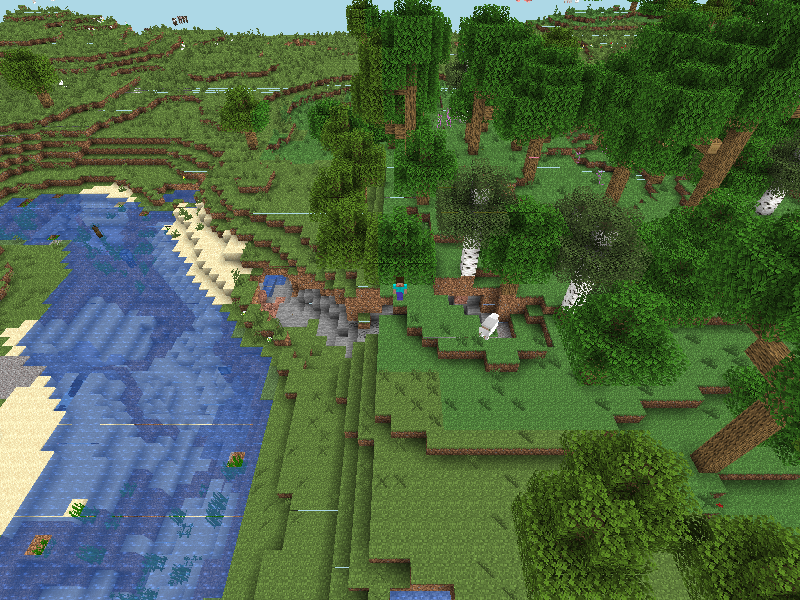 ](https://prismarinejs.github.io/prismarine-viewer/)
#### Exemplos Ruins
| Exemplo | Descrição |
|---|---|
| [viewer](https://github.com/PrismarineJS/mineflayer/tree/master/examples/viewer) | Visualize o que seu bot vê no jogo |
| [pathfinder](https://github.com/Karang/mineflayer-pathfinder/blob/master/examples/test.js) | Faça seu bot se locomover automaticamente para qualquer localização |
| [chest](https://github.com/PrismarineJS/mineflayer/blob/master/examples/chest.js) | Aprenda a usar baús, fornos, dispensadores e mesas de encantamento |
| [digger](https://github.com/PrismarineJS/mineflayer/blob/master/examples/digger.js) | Aprenda como criar um bot que pode quebrar blocos |
| [discord](https://github.com/PrismarineJS/mineflayer/blob/master/examples/discord.js) | Conecte um bot Discord com um bot Mineflayer |
| [jumper](https://github.com/PrismarineJS/mineflayer/blob/master/examples/jumper.js) | Aprenda a se mover, pular, usar veículos e atacar entidades próximas |
| [ansi](https://github.com/PrismarineJS/mineflayer/blob/master/examples/ansi.js) | Exibe todas as mensagens do chat no console com suas cores correspondentes |
| [guard](https://github.com/PrismarineJS/mineflayer/blob/master/examples/guard.js) | Crie um bot que defenda uma área predefinida de mobs |
| [multiple-from-file](https://github.com/PrismarineJS/mineflayer/blob/master/examples/multiple_from_file.js) | Use um arquivo de texto com contas para criar bots |
Mais exemplos na pasta de [exemplos](https://github.com/PrismarineJS/mineflayer/tree/master/examples)
### Módulos
A maioria do desenvolvimento está ocorrendo em pequenos módulos npm que são usados pelo Mineflayer.
#### O Caminho do Node™
> "Quando os aplicativos são bem feitos, eles são apenas o resíduo realmente específico da aplicação que não pode ser tão facilmente abstraído. Todos os componentes legais e reutilizáveis sublimam no GitHub e no npm, onde todos podem colaborar para avançar a comunidade." — substack de ["como eu escrevo módulos"](https://gist.github.com/substack/5075355)
#### Módulos
Estes são os principais módulos que compõem o Mineflayer:
| Módulo | Descrição |
|---|---|
| [minecraft-protocol](https://github.com/PrismarineJS/node-minecraft-protocol) | Analisa e cria pacotes do Minecraft, autenticação e criptografia.
| [minecraft-data](https://github.com/PrismarineJS/minecraft-data) | Módulo independente de linguagem que fornece dados do Minecraft para clientes, servidores e bibliotecas.
| [prismarine-physics](https://github.com/PrismarineJS/prismarine-physics) | Motor de física para entidades do Minecraft
| [prismarine-chunk](https://github.com/PrismarineJS/prismarine-chunk) | Representa um pedaço do Minecraft
| [node-vec3](https://github.com/PrismarineJS/node-vec3) | Usa vetores 3D com testes sólidos
| [prismarine-block](https://github.com/PrismarineJS/prismarine-block) | Representa um bloco e suas informações associadas no Minecraft
| [prismarine-chat](https://github.com/PrismarineJS/prismarine-chat) | Analisador de mensagens de chat do Minecraft (retirado do Mineflayer)
| [node-yggdrasil](https://github.com/PrismarineJS/node-yggdrasil) | Biblioteca Node.js para interagir com o sistema de autenticação da Mojang conhecido como Yggdrasil.
| [prismarine-world](https://github.com/PrismarineJS/prismarine-world) | Implementação principal dos mundos do Minecraft para o Prismarine
| [prismarine-windows](https://github.com/PrismarineJS/prismarine-windows) | Representa as interfaces do Minecraft
| [prismarine-item](https://github.com/PrismarineJS/prismarine-item) | Representa um item e suas informações associadas no Minecraft
| [prismarine-nbt](https://github.com/PrismarineJS/prismarine-nbt) | Analisador de NBT para node-minecraft-protocol
| [prismarine-recipe](https://github.com/PrismarineJS/prismarine-recipe) | Representa receitas de crafting do Minecraft
| [prismarine-biome](https://github.com/PrismarineJS/prismarine-biome) | Representa um bioma e suas informações associadas no Minecraft
| [prismarine-entity](https://github.com/PrismarineJS/prismarine-entity) | Representa uma entidade e suas informações associadas no Minecraft
### Depuração
Você pode habilitar a depuração do protocolo usando a variável de ambiente `DEBUG`:
```bash
DEBUG="minecraft-protocol" node [...]
```
No Windows:
```
set DEBUG=minecraft-protocol
node seu_arquivo.js
```
## Plugins de Terceiros
Mineflayer tem a capacidade de instalar plugins; qualquer pessoa pode criar um plugin que adiciona uma API de alto nível ao Mineflayer.
Os mais atualizados e úteis são:
* [pathfinder](https://github.com/Karang/mineflayer-pathfinder) - algoritmo de busca A* avançado com muitos recursos configuráveis
* [prismarine-viewer](https://github.com/PrismarineJS/prismarine-viewer) - visualizador de chunks na web
* [web-inventory](https://github.com/ImHarvol/mineflayer-web-inventory) - visualizador de inventário na web
* [statemachine](https://github.com/TheDudeFromCI/mineflayer-statemachine) - API para comportamentos mais complexos
* [Armor Manager](https://github.com/G07cha/MineflayerArmorManager) - gerenciamento automático de armaduras
* [Collect Block](https://github.com/TheDudeFromCI/mineflayer-collectblock) - API rápida e simples para coletar blocos.
* [Dashboard](https://github.com/wvffle/mineflayer-dashboard) - Painel de controle para um bot do Mineflayer
* [PVP](https://github.com/TheDudeFromCI/mineflayer-pvp) - API simples para PVP e PVE.
* [auto-eat](https://github.com/LINKdiscordd/mineflayer-auto-eat) - Plugin para comer automaticamente.
* [Tool](https://github.com/TheDudeFromCI/mineflayer-tool) - Plugin com uma API de alto nível para selecionar automaticamente a melhor arma/ferramenta.
* [Hawkeye](https://github.com/sefirosweb/minecraftHawkEye) - Plugin para mirar automaticamente com arcos.
Mas também dê uma olhada em:
* [radar](https://github.com/andrewrk/mineflayer-radar/) - interface de radar na web usando canvas e socket.io [Demo no Youtube](https://www.youtube.com/watch?v=FjDmAfcVulQ)
* [blockfinder](https://github.com/Darthfett/mineflayer-blockFinder) - encontra blocos no mundo tridimensional
* [scaffold](https://github.com/andrewrk/mineflayer-scaffold) - ir para um destino específico mesmo que seja necessário construir ou quebrar blocos para alcançá-lo [Demo no Youtube](http://youtu.be/jkg6psMUSE0)
* [auto-auth](https://github.com/G07cha/MineflayerAutoAuth) - autenticação automática por chat
* [Bloodhound](https://github.com/Nixes/mineflayer-bloodhound) - determina quem e/ou o que é responsável por causar dano a outra entidade
* [tps](https://github.com/SiebeDW/mineflayer-tps) - obter o tps atual (tps processado)
* [panorama](https://github.com/IceTank/mineflayer-panorama) - tirar imagens panorâmicas do seu mundo
## Projetos que Usam o Mineflayer
* [rom1504/rbot](https://github.com/rom1504/rbot)
- [YouTube - construindo uma escada espiral](https://www.youtube.com/watch?v=UM1ZV5200S0)
- [YouTube - replicando uma estrutura](https://www.youtube.com/watch?v=0cQxg9uDnzA)
* [Darthfett/Helperbot](https://github.com/Darthfett/Helperbot)
* [vogonistic/voxel](https://github.com/vogonistic/mineflayer-voxel) - visualiza o que o bot está fazendo usando voxel.js
* [JonnyD/Skynet](https://github.com/JonnyD/Skynet) - registra a atividade de um jogador em uma API online
* [MinecraftChat](https://github.com/rom1504/MinecraftChat) (última versão de código aberto, criada por AlexKvazos) - Interface de chat na web para o Minecraft
](https://prismarinejs.github.io/prismarine-viewer/)
#### Exemplos Ruins
| Exemplo | Descrição |
|---|---|
| [viewer](https://github.com/PrismarineJS/mineflayer/tree/master/examples/viewer) | Visualize o que seu bot vê no jogo |
| [pathfinder](https://github.com/Karang/mineflayer-pathfinder/blob/master/examples/test.js) | Faça seu bot se locomover automaticamente para qualquer localização |
| [chest](https://github.com/PrismarineJS/mineflayer/blob/master/examples/chest.js) | Aprenda a usar baús, fornos, dispensadores e mesas de encantamento |
| [digger](https://github.com/PrismarineJS/mineflayer/blob/master/examples/digger.js) | Aprenda como criar um bot que pode quebrar blocos |
| [discord](https://github.com/PrismarineJS/mineflayer/blob/master/examples/discord.js) | Conecte um bot Discord com um bot Mineflayer |
| [jumper](https://github.com/PrismarineJS/mineflayer/blob/master/examples/jumper.js) | Aprenda a se mover, pular, usar veículos e atacar entidades próximas |
| [ansi](https://github.com/PrismarineJS/mineflayer/blob/master/examples/ansi.js) | Exibe todas as mensagens do chat no console com suas cores correspondentes |
| [guard](https://github.com/PrismarineJS/mineflayer/blob/master/examples/guard.js) | Crie um bot que defenda uma área predefinida de mobs |
| [multiple-from-file](https://github.com/PrismarineJS/mineflayer/blob/master/examples/multiple_from_file.js) | Use um arquivo de texto com contas para criar bots |
Mais exemplos na pasta de [exemplos](https://github.com/PrismarineJS/mineflayer/tree/master/examples)
### Módulos
A maioria do desenvolvimento está ocorrendo em pequenos módulos npm que são usados pelo Mineflayer.
#### O Caminho do Node™
> "Quando os aplicativos são bem feitos, eles são apenas o resíduo realmente específico da aplicação que não pode ser tão facilmente abstraído. Todos os componentes legais e reutilizáveis sublimam no GitHub e no npm, onde todos podem colaborar para avançar a comunidade." — substack de ["como eu escrevo módulos"](https://gist.github.com/substack/5075355)
#### Módulos
Estes são os principais módulos que compõem o Mineflayer:
| Módulo | Descrição |
|---|---|
| [minecraft-protocol](https://github.com/PrismarineJS/node-minecraft-protocol) | Analisa e cria pacotes do Minecraft, autenticação e criptografia.
| [minecraft-data](https://github.com/PrismarineJS/minecraft-data) | Módulo independente de linguagem que fornece dados do Minecraft para clientes, servidores e bibliotecas.
| [prismarine-physics](https://github.com/PrismarineJS/prismarine-physics) | Motor de física para entidades do Minecraft
| [prismarine-chunk](https://github.com/PrismarineJS/prismarine-chunk) | Representa um pedaço do Minecraft
| [node-vec3](https://github.com/PrismarineJS/node-vec3) | Usa vetores 3D com testes sólidos
| [prismarine-block](https://github.com/PrismarineJS/prismarine-block) | Representa um bloco e suas informações associadas no Minecraft
| [prismarine-chat](https://github.com/PrismarineJS/prismarine-chat) | Analisador de mensagens de chat do Minecraft (retirado do Mineflayer)
| [node-yggdrasil](https://github.com/PrismarineJS/node-yggdrasil) | Biblioteca Node.js para interagir com o sistema de autenticação da Mojang conhecido como Yggdrasil.
| [prismarine-world](https://github.com/PrismarineJS/prismarine-world) | Implementação principal dos mundos do Minecraft para o Prismarine
| [prismarine-windows](https://github.com/PrismarineJS/prismarine-windows) | Representa as interfaces do Minecraft
| [prismarine-item](https://github.com/PrismarineJS/prismarine-item) | Representa um item e suas informações associadas no Minecraft
| [prismarine-nbt](https://github.com/PrismarineJS/prismarine-nbt) | Analisador de NBT para node-minecraft-protocol
| [prismarine-recipe](https://github.com/PrismarineJS/prismarine-recipe) | Representa receitas de crafting do Minecraft
| [prismarine-biome](https://github.com/PrismarineJS/prismarine-biome) | Representa um bioma e suas informações associadas no Minecraft
| [prismarine-entity](https://github.com/PrismarineJS/prismarine-entity) | Representa uma entidade e suas informações associadas no Minecraft
### Depuração
Você pode habilitar a depuração do protocolo usando a variável de ambiente `DEBUG`:
```bash
DEBUG="minecraft-protocol" node [...]
```
No Windows:
```
set DEBUG=minecraft-protocol
node seu_arquivo.js
```
## Plugins de Terceiros
Mineflayer tem a capacidade de instalar plugins; qualquer pessoa pode criar um plugin que adiciona uma API de alto nível ao Mineflayer.
Os mais atualizados e úteis são:
* [pathfinder](https://github.com/Karang/mineflayer-pathfinder) - algoritmo de busca A* avançado com muitos recursos configuráveis
* [prismarine-viewer](https://github.com/PrismarineJS/prismarine-viewer) - visualizador de chunks na web
* [web-inventory](https://github.com/ImHarvol/mineflayer-web-inventory) - visualizador de inventário na web
* [statemachine](https://github.com/TheDudeFromCI/mineflayer-statemachine) - API para comportamentos mais complexos
* [Armor Manager](https://github.com/G07cha/MineflayerArmorManager) - gerenciamento automático de armaduras
* [Collect Block](https://github.com/TheDudeFromCI/mineflayer-collectblock) - API rápida e simples para coletar blocos.
* [Dashboard](https://github.com/wvffle/mineflayer-dashboard) - Painel de controle para um bot do Mineflayer
* [PVP](https://github.com/TheDudeFromCI/mineflayer-pvp) - API simples para PVP e PVE.
* [auto-eat](https://github.com/LINKdiscordd/mineflayer-auto-eat) - Plugin para comer automaticamente.
* [Tool](https://github.com/TheDudeFromCI/mineflayer-tool) - Plugin com uma API de alto nível para selecionar automaticamente a melhor arma/ferramenta.
* [Hawkeye](https://github.com/sefirosweb/minecraftHawkEye) - Plugin para mirar automaticamente com arcos.
Mas também dê uma olhada em:
* [radar](https://github.com/andrewrk/mineflayer-radar/) - interface de radar na web usando canvas e socket.io [Demo no Youtube](https://www.youtube.com/watch?v=FjDmAfcVulQ)
* [blockfinder](https://github.com/Darthfett/mineflayer-blockFinder) - encontra blocos no mundo tridimensional
* [scaffold](https://github.com/andrewrk/mineflayer-scaffold) - ir para um destino específico mesmo que seja necessário construir ou quebrar blocos para alcançá-lo [Demo no Youtube](http://youtu.be/jkg6psMUSE0)
* [auto-auth](https://github.com/G07cha/MineflayerAutoAuth) - autenticação automática por chat
* [Bloodhound](https://github.com/Nixes/mineflayer-bloodhound) - determina quem e/ou o que é responsável por causar dano a outra entidade
* [tps](https://github.com/SiebeDW/mineflayer-tps) - obter o tps atual (tps processado)
* [panorama](https://github.com/IceTank/mineflayer-panorama) - tirar imagens panorâmicas do seu mundo
## Projetos que Usam o Mineflayer
* [rom1504/rbot](https://github.com/rom1504/rbot)
- [YouTube - construindo uma escada espiral](https://www.youtube.com/watch?v=UM1ZV5200S0)
- [YouTube - replicando uma estrutura](https://www.youtube.com/watch?v=0cQxg9uDnzA)
* [Darthfett/Helperbot](https://github.com/Darthfett/Helperbot)
* [vogonistic/voxel](https://github.com/vogonistic/mineflayer-voxel) - visualiza o que o bot está fazendo usando voxel.js
* [JonnyD/Skynet](https://github.com/JonnyD/Skynet) - registra a atividade de um jogador em uma API online
* [MinecraftChat](https://github.com/rom1504/MinecraftChat) (última versão de código aberto, criada por AlexKvazos) - Interface de chat na web para o Minecraft  "
]
},
{
"cell_type": "markdown",
"metadata": {
"id": "2BAYqsdOgKNJ"
},
"source": [
"# Using mineflayer in Python\n",
"\n",
"This is a tutorial on how to use mineflayer in Python. This example will connect you to the PrismarineJS test server. You can join it with prismarine-viewer or your Minecraft client at server IP **pjs.deptofcraft.com:25565**.\n",
"\n",
"If you're new to Jupyter Notebooks, you can press the \"Play\" button at the left of each code block to run it. Make sure that you run the blocks in a correct order."
]
},
{
"cell_type": "markdown",
"metadata": {
"id": "qM2rVyxGf2Yv"
},
"source": [
"## Setup"
]
},
{
"cell_type": "markdown",
"metadata": {
"id": "K2ol06QOhL6s"
},
"source": [
"First, make sure you have Python version 3.10 and Node.js version 18 or newer installed. You can get Node.js 18 it from https://nodejs.org/en/download or use [Node.js version managers](https://docs.npmjs.com/downloading-and-installing-node-js-and-npm#using-a-node-version-manager-to-install-nodejs-and-npm) like [`nvm`](https://github.com/creationix/nvm) or [`n`](https://github.com/tj/n) to install via the command line. Here we'll use `n` to install Node.js v18, then check our Node and Python versions:"
]
},
{
"cell_type": "code",
"execution_count": 1,
"metadata": {
"colab": {
"base_uri": "https://localhost:8080/"
},
"id": "8zCSpx8Bif5m",
"outputId": "90ebac14-fc75-4136-f81d-34c5b2033da0"
},
"outputs": [
{
"name": "stdout",
"output_type": "stream",
"text": [
"v18.17.1\n",
"Python 3.10.12\n"
]
}
],
"source": [
"# Use `n` to install nodejs 18, if it's not already installed:\n",
"!curl -fsSL https://raw.githubusercontent.com/tj/n/master/bin/n | bash -s lts > /dev/null\n",
"# Now write the Node.js and Python version to the console\n",
"!node --version\n",
"!python --version"
]
},
{
"cell_type": "markdown",
"metadata": {
"id": "C7omnDs3lNaV"
},
"source": [
"Now, we can use pip to install the `javascript` Python package to access Node.js libraries from Python."
]
},
{
"cell_type": "code",
"metadata": {
"id": "DKnwzSZQ8Taf"
},
"source": [
" !pip install javascript"
],
"execution_count": null,
"outputs": []
},
{
"cell_type": "markdown",
"metadata": {
"id": "_RAKlcScgKtV"
},
"source": [
"## Usage"
]
},
{
"cell_type": "markdown",
"metadata": {
"id": "bxAdFbBfmdCd"
},
"source": [
"If all is well, we can import the `javascript` library. We can then import the `require` function which works similarly to the `require` function in Node.js, but does the dependency management for us.\n",
"\n",
"You may notice the extra imports : On, Once, off and AsyncTask. These will be discussed later on.\n",
"\n",
"\n"
]
},
{
"cell_type": "code",
"metadata": {
"id": "54Lnq3aH4Tee"
},
"source": [
"from javascript import require, On, Once, AsyncTask, once, off"
],
"execution_count": null,
"outputs": []
},
{
"cell_type": "markdown",
"metadata": {
"id": "cy7-0cWxdhU8"
},
"source": [
"We can now import Mineflayer"
]
},
{
"cell_type": "code",
"metadata": {
"id": "8jgkTVniDPUZ"
},
"source": [
"mineflayer = require('mineflayer')"
],
"execution_count": null,
"outputs": []
},
{
"cell_type": "markdown",
"metadata": {
"id": "WBAj5rSkgjKX"
},
"source": [
"Once we've done that, we can create a new `bot` instance, through the `createBot` function. You can see the docs for this function [here](https://github.com/PrismarineJS/mineflayer/blob/master/docs/api.md#bot). In the line below we specify a hostname and a port for the server, but do not pass any `auth` or `password` options, so it will connect to the server in offline mode.\n",
"\n",
"Below that, we also a call to the `once` function, which pauses the thread until an event has been triggered, then returns the output. Here, we print out \"I spawned\" after the `login` event has been triggered on `bot`."
]
},
{
"cell_type": "code",
"execution_count": null,
"metadata": {
"id": "1gfZSAUCDVMg"
},
"outputs": [],
"source": [
"random_number = id([]) % 1000 # Give us a random number upto 1000\n",
"BOT_USERNAME = f'colab_{random_number}'\n",
"\n",
"bot = mineflayer.createBot({ 'host': 'pjs.deptofcraft.com', 'port': 25565, 'username': BOT_USERNAME, 'hideErrors': False })\n",
"\n",
"# The spawn event\n",
"once(bot, 'login')\n",
"bot.chat('I spawned')"
]
},
{
"cell_type": "markdown",
"metadata": {
"id": "yvYZYbi0k8Za"
},
"source": [
"If your bot spawned, we can now take a look at the bot's position"
]
},
{
"cell_type": "code",
"metadata": {
"id": "swMd1VvXYuKn"
},
"source": [
"bot.entity.position"
],
"execution_count": null,
"outputs": []
},
{
"cell_type": "markdown",
"metadata": {
"id": "EdSjlgmilZ3O"
},
"source": [
"### Listening to events"
]
},
{
"cell_type": "markdown",
"metadata": {
"id": "23FTp0XrioMg"
},
"source": [
"You can register an event handler with the `@On` or `@Once` decorator. This decorator takes two arguments, first it's the **Event Emitter** (the object that is sending events) and the second is the **event name**, what event you want to listen to. *Do not use the .on or .once methods on bot, use the decorators instead.*\n",
"\n",
"A decorator always has a function under it which is being decorated, which can have any name. The first parameter to any event emitter callback is the `this` argument. \n",
"\n",
"In the code below, we create an event emitter on `bot` that listens to `playerJoin` events, then print that out."
]
},
{
"cell_type": "code",
"metadata": {
"id": "s8QGmC4nHjnH"
},
"source": [
"@On(bot, 'playerJoin')\n",
"def end(this, player):\n",
" bot.chat('Someone joined!')"
],
"execution_count": null,
"outputs": []
},
{
"cell_type": "markdown",
"metadata": {
"id": "Onkn-TDsne9P"
},
"source": [
"In Python, you cannot leave any arguments for an event handler callback blank like in JavaScript. Instead, you can use the asterisk (`*`) operator in Python to capture all remaining arguments to the right, much like the `...` rest/spread operator in JavaScript. The parameter with the asterisk will be a tuple containing the captured arguments.\n",
"\n",
"You can stop listening for events through an event handler by using the imported `off` function. It takes three parameters: the emitter, event name, and a reference to the Python function.\n"
]
},
{
"cell_type": "code",
"metadata": {
"id": "S4y9qAe6oh8H"
},
"source": [
"@On(bot, 'chat')\n",
"def onChat(this, user, message, *rest):\n",
" print(f'{user} said \"{message}\"')\n",
"\n",
" # If the message contains stop, remove the event listener and stop logging.\n",
" if 'stop' in message:\n",
" off(bot, 'chat', onChat)"
],
"execution_count": null,
"outputs": []
},
{
"cell_type": "markdown",
"metadata": {
"id": "OybQNxGAq4P2"
},
"source": [
"You need to `off` all the event listeners you listen to with `@On`, else the Python process won't exit until all of the active event emitters have been off'ed. If you only need to listen once, you can use the `@Once` decroator like in the example above."
]
},
{
"cell_type": "markdown",
"metadata": {
"id": "iOzZeWfHozeX"
},
"source": [
"## Asynchronous tasks\n",
"\n",
"By default, all the operations you do run on the main thread. This means you can only do one thing at a time. To multitask, you can use the `@AsyncTask` decroator to run a function in a new thread, while not obstructing the main thread."
]
},
{
"cell_type": "markdown",
"metadata": {
"id": "xJUk8b21pOzg"
},
"source": [
"### Block breaking\n",
"\n",
"Take a look at the example below. Here we listen for a \"break\" trigger in a chat message, then we start digging the block underneath, while simultaneously sending a message that the bot has \"started digging\"."
]
},
{
"cell_type": "code",
"metadata": {
"id": "yhoAlhAhpSTL"
},
"source": [
"@On(bot, 'chat')\n",
"def breakListener(this, sender, message, *args):\n",
" if sender and (sender != BOT_USERNAME):\n",
" if 'break' in message:\n",
" pos = bot.entity.position.offset(0, -1, 0)\n",
" blockUnder = bot.blockAt(pos)\n",
" if bot.canDigBlock(blockUnder):\n",
" bot.chat(f\"I'm breaking the '{blockUnder.name}' block underneath\")\n",
" # The start=True parameter means to immediately invoke the function underneath\n",
" # If left blank, you can start it with the `start()` function later on.\n",
" try:\n",
" @AsyncTask(start=True)\n",
" def break_block(task):\n",
" bot.dig(blockUnder)\n",
" bot.chat('I started digging!')\n",
" except Exception as e:\n",
" bot.chat(f\"I had an error {e}\")\n",
" else:\n",
" bot.chat(f\"I can't break the '{blockUnder.name}' block underneath\")\n",
" if 'stop' in message:\n",
" off(bot, 'chat', breakListener)"
],
"execution_count": null,
"outputs": []
},
{
"cell_type": "markdown",
"metadata": {
"id": "JMgoMA-MriAt"
},
"source": [
"## Using mineflayer plugins\n",
"\n",
"Pick the plugin you want from the list [here](https://github.com/PrismarineJS/mineflayer#third-party-plugins), then `require()` it and register it to the bot. Some plugins have different ways to register to the bot, look at the plugin's README for usage steps."
]
},
{
"cell_type": "markdown",
"metadata": {
"id": "OVAJCyxcsfig"
},
"source": [
"### mineflayer-pathfinder\n",
"\n",
"`mineflayer-pathfinder` is a essential plugin that helps your bot move between places through A* pathfinding. Let's import it:"
]
},
{
"cell_type": "code",
"metadata": {
"id": "mH6eXm8TtTKh"
},
"source": [
"pathfinder = require('mineflayer-pathfinder')\n",
"bot.loadPlugin(pathfinder.pathfinder)\n",
"# Create a new minecraft-data instance with the bot's version\n",
"mcData = require('minecraft-data')(bot.version)\n",
"# Create a new movements class\n",
"movements = pathfinder.Movements(bot, mcData)\n",
"# How far to be from the goal\n",
"RANGE_GOAL = 1"
],
"execution_count": null,
"outputs": []
},
{
"cell_type": "markdown",
"metadata": {
"id": "Ju8MPkSauTBb"
},
"source": [
"Now let's have create a goal for the bot to move to where another player wants, based on a chat message."
]
},
{
"cell_type": "code",
"metadata": {
"id": "8jIp8bxnudDK"
},
"source": [
"bot.removeAllListeners('chat')\n",
"@On(bot, 'chat')\n",
"def handleMsg(this, sender, message, *args):\n",
" if sender and (sender != BOT_USERNAME):\n",
" bot.chat('Hi, you said ' + message)\n",
" if 'come' in message:\n",
" player = bot.players[sender]\n",
" target = player.entity\n",
" if not target:\n",
" bot.chat(\"I don't see you !\")\n",
" return\n",
" pos = target.position\n",
" bot.pathfinder.setMovements(movements)\n",
" bot.pathfinder.setGoal(pathfinder.goals.GoalNear(pos.x, pos.y, pos.z, RANGE_GOAL))\n",
" if 'stop' in message:\n",
" off(bot, 'chat', handleMsg)"
],
"execution_count": null,
"outputs": []
},
{
"cell_type": "markdown",
"metadata": {
"id": "K36XDP09k1aH"
},
"source": [
"## Analyzing the world"
]
},
{
"cell_type": "markdown",
"metadata": {
"id": "xK1Ww1ACmLZl"
},
"source": [
"You can also interact with mineflayer through any other Python package."
]
},
{
"cell_type": "markdown",
"metadata": {
"id": "5QatUqxeW6b_"
},
"source": [
"Let's analyze some block frequencies..."
]
},
{
"cell_type": "code",
"metadata": {
"colab": {
"base_uri": "https://localhost:8080/",
"height": 417
},
"id": "k2XyRgzi8otw",
"outputId": "a4de38b7-ec53-4e38-df0c-8b7f1067965e"
},
"source": [
"import matplotlib.pyplot as plt\n",
"figure = plt.figure()\n",
"axes = figure.add_axes([0,0,1,1])\n",
"Vec3 = require('vec3').Vec3\n",
"\n",
"columns = bot.world.getColumns()\n",
"block_freqs = {}\n",
"for c in range(0, 3): # iterate through some of the loaded chunk columns\n",
" cc = columns[c].column\n",
" for y in range(1, 40):\n",
" for x in range(1, 16):\n",
" for z in range(1, 16):\n",
" block = cc.getBlock(Vec3(x, y, z))\n",
" if block.name in block_freqs:\n",
" block_freqs[block.name] += 1\n",
" else:\n",
" block_freqs[block.name] = 1\n",
"\n",
"print(block_freqs)\n",
"axes.bar(block_freqs.keys(), block_freqs.values())\n",
"plt.xticks(rotation=45)\n",
"plt.show()"
],
"execution_count": null,
"outputs": [
{
"output_type": "stream",
"text": [
"{'bedrock': 1321, 'stone': 19258, 'diorite': 1123, 'lava': 64, 'granite': 1704, 'andesite': 1459, 'redstone_ore': 68, 'iron_ore': 156, 'coal_ore': 282, 'gold_ore': 26, 'lapis_ore': 5, 'dirt': 570, 'emerald_ore': 3, 'diamond_ore': 9, 'gravel': 66, 'air': 211}\n"
],
"name": "stdout"
},
{
"output_type": "display_data",
"data": {
"image/png": "iVBORw0KGgoAAAANSUhEUgAAAeUAAAFrCAYAAADvipHKAAAABHNCSVQICAgIfAhkiAAAAAlwSFlzAAALEgAACxIB0t1+/AAAADh0RVh0U29mdHdhcmUAbWF0cGxvdGxpYiB2ZXJzaW9uMy4yLjIsIGh0dHA6Ly9tYXRwbG90bGliLm9yZy+WH4yJAAAgAElEQVR4nO3deZwcZbX/8c8hYSchAUIMSdgDCogBIvuOhLAGENkhAhJAULmigiiLCAgKqAjiDRoNXnYREiUIARFUQEgAWUQkLF6SGyAIij9U1vP745xiKsNMpqe7Z6Ym832/Xv2a7qerq57qrqnzbPWUuTsiIiLS8xbr6QyIiIhIUFAWERGpCAVlERGRilBQFhERqQgFZRERkYpQUBYREamI/h0tYGYjgSuAoYADk9z9u2a2AnAtsDrwHLC/u79qZgZ8F9gN+BfwSXd/MNc1Afhqrvpsd5+S6ZsAPwGWBqYDn/MOrtVaaaWVfPXVV+/MvoqIiPS4WbNmvezuQ9p6zzq6TtnMhgHD3P1BMxsAzAL2Bj4JvOLu55nZKcBgdz/ZzHYDPkME5c2A77r7ZhnEZwJjiOA+C9gkA/n9wGeBPxBB+WJ3v2Vh+RozZozPnDmzxq9ARESkGsxslruPaeu9Dpuv3X1eUdN1938CTwDDgfHAlFxsChGoyfQrPNwHDMrAvgsww91fcfdXgRnAuHxvoLvfl7XjK0rrEhER6TM61adsZqsDGxE12qHuPi/feoFo3oYI2M+XPjYn0xaWPqeN9La2P9HMZprZzPnz53cm6yIiIpVXc1A2s+WAG4AT3f218ntZw+3y+TrdfZK7j3H3MUOGtNkcLyIi0mvVFJTNbHEiIF/p7j/P5Bez6bnod34p0+cCI0sfH5FpC0sf0Ua6iIhIn9JhUM7R1D8CnnD3i0pvTQMm5PMJwNRS+uEWNgf+kc3ctwJjzWywmQ0GxgK35nuvmdnmua3DS+sSERHpMzq8JArYCjgMeNTMHs60U4HzgOvM7Cjgr8D++d50YuT1bOKSqCMA3P0VM/s68EAud5a7v5LPP03LJVG35ENERKRP6fCSqKrSJVEiItIbNXRJlIiIiHQPBWUREZGKUFAWERGpCAVlERGRilBQFhERqYhaLomSJlj9lJubur7nztu9qesTEZGep5qyiIhIRSgoi4iIVISCsoiISEUoKIuIiFSEgrKIiEhFKCiLiIhUhIKyiIhIRSgoi4iIVISCsoiISEUoKIuIiFSEgrKIiEhFKCiLiIhUhIKyiIhIRSgoi4iIVISCsoiISEUoKIuIiFSEgrKIiEhFKCiLiIhUhIKyiIhIRSgoi4iIVISCsoiISEV0GJTNbLKZvWRmj5XSrjWzh/PxnJk9nOmrm9m/S+/9oPSZTczsUTObbWYXm5ll+gpmNsPMnsq/g7tiR0VERKqulpryT4Bx5QR3P8DdR7v7aOAG4Oelt58u3nP3Y0vplwFHA6PyUazzFOAOdx8F3JGvRURE+pwOg7K73w280tZ7WdvdH7h6Yesws2HAQHe/z90duALYO98eD0zJ51NK6SIiIn1Ko33K2wAvuvtTpbQ1zOwhM7vLzLbJtOHAnNIyczINYKi7z8vnLwBD29uYmU00s5lmNnP+/PkNZl1ERKRaGg3KB7FgLXkesKq7bwR8HrjKzAbWurKsRftC3p/k7mPcfcyQIUPqzbOIiEgl9a/3g2bWH9gX2KRIc/c3gDfy+SwzexpYB5gLjCh9fESmAbxoZsPcfV42c79Ub55ERER6s0Zqyh8D/uzu7zVLm9kQM+uXz9ckBnQ9k83Tr5nZ5tkPfTgwNT82DZiQzyeU0kVERPqUWi6Juhq4F1jXzOaY2VH51oG8f4DXtsAjeYnUz4Bj3b0YJPZp4IfAbOBp4JZMPw/Y2cyeIgL9eQ3sj4iISK/VYfO1ux/UTvon20i7gbhEqq3lZwIbtJH+N2CnjvIhIiKyqNOMXiIiIhWhoCwiIlIRCsoiIiIVoaAsIiJSEQrKIiIiFaGgLCIiUhEKyiIiIhWhoCwiIlIRCsoiIiIVoaAsIiJSEQrKIiIiFaGgLCIiUhEKyiIiIhWhoCwiIlIRCsoiIiIVoaAsIiJSEQrKIiIiFaGgLCIiUhEKyiIiIhWhoCwiIlIRCsoiIiIVoaAsIiJSEQrKIiIiFaGgLCIiUhEKyiIiIhWhoCwiIlIRHQZlM5tsZi+Z2WOltDPNbK6ZPZyP3UrvfdnMZpvZk2a2Syl9XKbNNrNTSulrmNkfMv1aM1uimTsoIiLSW9RSU/4JMK6N9G+7++h8TAcws/WAA4H18zPfN7N+ZtYPuBTYFVgPOCiXBTg/17U28CpwVCM7JCIi0lt1GJTd/W7glRrXNx64xt3fcPdngdnApvmY7e7PuPubwDXAeDMzYEfgZ/n5KcDendwHERGRRUIjfconmNkj2bw9ONOGA8+XlpmTae2lrwj83d3fbpXeJjObaGYzzWzm/PnzG8i6iIhI9dQblC8D1gJGA/OAC5uWo4Vw90nuPsbdxwwZMqQ7NikiItJt+tfzIXd/sXhuZpcDv8yXc4GRpUVHZBrtpP8NGGRm/bO2XF5eRESkT6mrpmxmw0ov9wGKkdnTgAPNbEkzWwMYBdwPPACMypHWSxCDwaa5uwN3Avvl5ycAU+vJk4iISG/XYU3ZzK4GtgdWMrM5wBnA9mY2GnDgOeAYAHd/3MyuA/4EvA0c7+7v5HpOAG4F+gGT3f3x3MTJwDVmdjbwEPCjpu2diIhIL9JhUHb3g9pIbjdwuvs5wDltpE8HpreR/gwxOltERKRP04xeIiIiFaGgLCIiUhEKyiIiIhWhoCwiIlIRCsoiIiIVoaAsIiJSEQrKIiIiFaGgLCIiUhEKyiIiIhWhoCwiIlIRCsoiIiIVoaAsIiJSEQrKIiIiFaGgLCIiUhEKyiIiIhWhoCwiIlIRCsoiIiIVoaAsIiJSEQrKIiIiFaGgLCIiUhEKyiIiIhWhoCwiIlIRCsoiIiIVoaAsIiJSEQrKIiIiFaGgLCIiUhEKyiIiIhXRYVA2s8lm9pKZPVZK+5aZ/dnMHjGzG81sUKavbmb/NrOH8/GD0mc2MbNHzWy2mV1sZpbpK5jZDDN7Kv8O7oodFRERqbpaaso/Aca1SpsBbODuGwJ/Ab5ceu9pdx+dj2NL6ZcBRwOj8lGs8xTgDncfBdyRr0VERPqcDoOyu98NvNIq7TZ3fztf3geMWNg6zGwYMNDd73N3B64A9s63xwNT8vmUUrqIiEif0ow+5SOBW0qv1zCzh8zsLjPbJtOGA3NKy8zJNICh7j4vn78ADG1vQ2Y20cxmmtnM+fPnNyHrIiIi1dFQUDazrwBvA1dm0jxgVXffCPg8cJWZDax1fVmL9oW8P8ndx7j7mCFDhjSQcxERkerpX+8HzeyTwB7AThlMcfc3gDfy+SwzexpYB5jLgk3cIzIN4EUzG+bu87KZ+6V68yQiItKb1VVTNrNxwJeAvdz9X6X0IWbWL5+vSQzoeiabp18zs81z1PXhwNT82DRgQj6fUEoXERHpUzqsKZvZ1cD2wEpmNgc4gxhtvSQwI69sui9HWm8LnGVmbwHvAse6ezFI7NPESO6liT7ooh/6POA6MzsK+Cuwf1P2TEREpJfpMCi7+0FtJP+onWVvAG5o572ZwAZtpP8N2KmjfIiIiCzqNKOXiIhIRSgoi4iIVISCsoiISEUoKIuIiFSEgrKIiEhFKCiLiIhUhIKyiIhIRSgoi4iIVISCsoiISEUoKIuIiFSEgrKIiEhFKCiLiIhUhIKyiIhIRSgoi4iIVISCsoiISEUoKIuIiFSEgrKIiEhFKCiLiIhUhIKyiIhIRSgoi4iIVISCsoiISEUoKIuIiFSEgrKIiEhFKCiLiIhUhIKyiIhIRSgoi4iIVISCsoiISEXUFJTNbLKZvWRmj5XSVjCzGWb2VP4dnOlmZheb2Wwze8TMNi59ZkIu/5SZTSilb2Jmj+ZnLjYza+ZOioiI9Aa11pR/AoxrlXYKcIe7jwLuyNcAuwKj8jERuAwiiANnAJsBmwJnFIE8lzm69LnW2xIREVnk1RSU3f1u4JVWyeOBKfl8CrB3Kf0KD/cBg8xsGLALMMPdX3H3V4EZwLh8b6C73+fuDlxRWpeIiEif0Uif8lB3n5fPXwCG5vPhwPOl5eZk2sLS57SR/j5mNtHMZprZzPnz5zeQdRERkeppykCvrOF6M9bVwXYmufsYdx8zZMiQrt6ciIhIt2okKL+YTc/k35cyfS4wsrTciExbWPqINtJFRET6lEaC8jSgGEE9AZhaSj88R2FvDvwjm7lvBcaa2eAc4DUWuDXfe83MNs9R14eX1iUiItJn9K9lITO7GtgeWMnM5hCjqM8DrjOzo4C/Avvn4tOB3YDZwL+AIwDc/RUz+zrwQC53lrsXg8c+TYzwXhq4JR8iIiJ9Sk1B2d0PauetndpY1oHj21nPZGByG+kzgQ1qyYuIiMiiSjN6iYiIVISCsoiISEUoKIuIiFSEgrKIiEhFKCiLiIhUhIKyiIhIRSgoi4iIVISCsoiISEUoKIuIiFSEgrKIiEhFKCiLiIhUhIKyiIhIRSgoi4iIVISCsoiISEUoKIuIiFSEgrKIiEhFKCiLiIhUhIKyiIhIRSgoi4iIVISCsoiISEUoKIuIiFSEgrKIiEhFKCiLiIhUhIKyiIhIRSgoi4iIVISCsoiISEXUHZTNbF0ze7j0eM3MTjSzM81sbil9t9Jnvmxms83sSTPbpZQ+LtNmm9kpje6UiIhIb9S/3g+6+5PAaAAz6wfMBW4EjgC+7e4XlJc3s/WAA4H1gVWA281snXz7UmBnYA7wgJlNc/c/1Zs3ERGR3qjuoNzKTsDT7v5XM2tvmfHANe7+BvCsmc0GNs33Zrv7MwBmdk0uq6AsIiJ9SrP6lA8Eri69PsHMHjGzyWY2ONOGA8+XlpmTae2lv4+ZTTSzmWY2c/78+U3KuoiISDU0HJTNbAlgL+D6TLoMWIto2p4HXNjoNgruPsndx7j7mCFDhjRrtSIiIpXQjObrXYEH3f1FgOIvgJldDvwyX84FRpY+NyLTWEi6iIhIn9GM5uuDKDVdm9mw0nv7AI/l82nAgWa2pJmtAYwC7gceAEaZ2RpZ6z4wlxUREelTGqopm9myxKjpY0rJ3zSz0YADzxXvufvjZnYdMYDrbeB4d38n13MCcCvQD5js7o83ki8REZHeqKGg7O6vAyu2SjtsIcufA5zTRvp0YHojeREREentNKOXiIhIRSgoi4iIVISCsoiISEUoKIuIiFSEgrKIiEhFKCiLiIhUhIKyiIhIRSgoi4iIVISCsoiISEUoKIuIiFSEgrKIiEhFKCiLiIhUhIKyiIhIRSgoi4iIVISCsoiISEUoKIuIiFSEgrKIiEhFKCiLiIhUhIKyiIhIRSgoi4iIVISCsoiISEUoKIuIiFSEgrKIiEhFKCiLiIhUhIKyiIhIRSgoi4iIVISCsoiISEU0HJTN7Dkze9TMHjazmZm2gpnNMLOn8u/gTDczu9jMZpvZI2a2cWk9E3L5p8xsQqP5EhER6W2aVVPewd1Hu/uYfH0KcIe7jwLuyNcAuwKj8jERuAwiiANnAJsBmwJnFIFcRESkr+iq5uvxwJR8PgXYu5R+hYf7gEFmNgzYBZjh7q+4+6vADGBcF+VNRESkkpoRlB24zcxmmdnETBvq7vPy+QvA0Hw+HHi+9Nk5mdZe+gLMbKKZzTSzmfPnz29C1kVERKqjfxPWsbW7zzWzlYEZZvbn8pvu7mbmTdgO7j4JmAQwZsyYpqxTRESkKhquKbv73Pz7EnAj0Sf8YjZLk39fysXnAiNLHx+Rae2li4iI9BkNBWUzW9bMBhTPgbHAY8A0oBhBPQGYms+nAYfnKOzNgX9kM/etwFgzG5wDvMZmmoiISJ/RaPP1UOBGMyvWdZW7/8rMHgCuM7OjgL8C++fy04HdgNnAv4AjANz9FTP7OvBALneWu7/SYN5ERER6lYaCsrs/A3ykjfS/ATu1ke7A8e2sazIwuZH8iIiI9Gaa0UtERKQiFJRFREQqQkFZRESkIhSURUREKkJBWUREpCIUlEVERCpCQVlERKQiFJRFREQqQkFZRESkIhSURUREKkJBWUREpCIUlEVERCpCQVlERKQiFJRFREQqQkFZRESkIhSURUREKkJBWUREpCIUlEVERCpCQVlERKQiFJRFREQqQkFZRESkIhSURUREKkJBWUREpCIUlEVERCpCQVlERKQiFJRFREQqou6gbGYjzexOM/uTmT1uZp/L9DPNbK6ZPZyP3Uqf+bKZzTazJ81sl1L6uEybbWanNLZLIiIivVP/Bj77NnCSuz9oZgOAWWY2I9/7trtfUF7YzNYDDgTWB1YBbjezdfLtS4GdgTnAA2Y2zd3/1EDeREREep26g7K7zwPm5fN/mtkTwPCFfGQ8cI27vwE8a2azgU3zvdnu/gyAmV2Tyyooi4hIn9KUPmUzWx3YCPhDJp1gZo+Y2WQzG5xpw4HnSx+bk2ntpYuIiPQpDQdlM1sOuAE40d1fAy4D1gJGEzXpCxvdRmlbE81sppnNnD9/frNWKyIiUgkNBWUzW5wIyFe6+88B3P1Fd3/H3d8FLqeliXouMLL08RGZ1l76+7j7JHcf4+5jhgwZ0kjWRUREKqeR0dcG/Ah4wt0vKqUPKy22D/BYPp8GHGhmS5rZGsAo4H7gAWCUma1hZksQg8Gm1ZsvERGR3qqR0ddbAYcBj5rZw5l2KnCQmY0GHHgOOAbA3R83s+uIAVxvA8e7+zsAZnYCcCvQD5js7o83kC8REZFeqZHR178DrI23pi/kM+cA57SRPn1hnxMREekLNKOXiIhIRSgoi4iIVISCsoiISEUoKIuIiFSEgrKIiEhFKCiLiIhURCPXKYt0idVPubmp63vuvN2buj4Rka6imrKIiEhFKCiLiIhUhJqvpU9SE7mIVJFqyiIiIhWhmjKqNYmISDWopiwiIlIRCsoiIiIVoebrRYia4UVEejfVlEVERCpCQVlERKQiFJRFREQqQkFZRESkIhSURUREKkJBWUREpCIUlEVERCpC1ymLiDSB5gmQZlBNWUREpCIUlEVERCpCQVlERKQi1KcsIu1SP6lI96pMUDazccB3gX7AD939vB7OkoiI9EK9uTBZiaBsZv2AS4GdgTnAA2Y2zd3/1LM5E6mu3nziEZG2VSIoA5sCs939GQAzuwYYDygoV4wCQe2a+V0tyt+T9C06hyycuXtP5wEz2w8Y5+6fyteHAZu5+wmtlpsITMyX6wJPdmtGYSXgZW1D2+hl21gU9kHb6HvbWBT2oT2rufuQtt6oSk25Ju4+CZjUU9s3s5nuPkbb0DZ60zYWhX3QNvreNhaFfahHVS6JmguMLL0ekWkiIiJ9RlWC8gPAKDNbw8yWAA4EpvVwnkRERLpVJZqv3f1tMzsBuJW4JGqyuz/ew9lqS3c0nWsb2kZvW7+2oW30xvV31zY6pRIDvURERKQ6zdciIiJ9noKyiIhIRSgoi4hIr2Nm1tN56AoKyiIi3agIJotqUOlKZjbEzE4ys2Xc3Rv5Dqv6/SsoN4ml0uuBPZmfRlT1YK1V6aS3eHdta1GxqO1P1ZjZAKA4Llfuybz0UhsAHwJONLOl6w3MZmaeo5zNbPvuOFfUSqOvm8TMlnL3/+TzQ4HV3f3sJq1733z6D3e/oxnrbLX+9w7Q3rDeGre9K7A98E/gauBZd3+3ydso/2PvSRRy5wEPuvvbzdxWVyv2xcwWd/e3unIbrdIWa+bv0s42mn4c1rNOM+sPHAK8Q0yWtDOwC/B2T/2ftKc7fqt65M2LdgT2BF4CLnT3f9f7G5vZXsCZwI7u/vemZrZOlbhOuTfLUtqawD1mtkXeVGNxckYyM+vn7u80sP7jgMOAi4EZZraNu/++CVl/TymwHAV8BPgrcK+731PvOlsFrE8Cg4D57n5l4znucNvbA98iToA3EvPbfhFo6gmltH9fAHYHfgtsA5wP/KqZ21qYUkDdkNjXJ4CXaw2upc/vDOxvZg8Az7n7bV2Qx92IwtJixC1a/9wF29iBqIUu7u7/01UB2cx2AfYFngfuX9j3lQHtbTO7G7gNWAbYtasKQI0o7d92ZG3e3a/vqkKtmQ0nfqvnOlrW3d8xs9uB/xCTTH3BzC6oNTCb2druPjuf7wx8G5jg7n83syXc/c2m7WCd1HzdoDxQngYmA3eb2QiiJLxMvl9XQM7W8FWBscCuwPLAr4H7zKzpv5uZHU8EsZuAfXK7dSsFrM8QNxF5BPiJmX2xwazWYhvgC8Rv8DJRmn4rZ4trilIT+UhgU3ffAXgDeB24zcyWbta2OpIntvHAFCJIXAHs0MnP70jcz/w64GBgr2Z+X7mNcUSt5OfAhsC5zTyWS9u4mGghmWJmxzRr/a22swtwLvF9fRg4OmvC79Oqhjkc+A7wNLClma3Uatke7z7I/dsTuBBYDjjFzP6rC7dzE/BNM5tqZu9r0i8Xgszsc8BJ7v5b4HqiEPpfRVN2e9vK8+nSwHlmNiiTnwTeAj6f+XmzK86tndXjGejN8oc2AHf/MvB94PfA5sDKZjbBzPYwswPMrFOTnucB9ipx+8rTieaaPTPIH29m6zZzX4BhuY1RRGA528yWMLMV611hFlB2B/YA1gPuBY40s3ObkN9iG8uY2Wb5fD0zG0X8s32aCDKfcPfnLboUjm/C9laA904oqxFNaG+Z2Y+BLYB98wS8ewbsLmdmw4AjgW2BO4kT1ayOTvClgsXSwPq5jr8DA4Dz8iQ1tIlZXQf4JDCUKDCd6O7vmtlyzVh5Nm0eARxAFJAeBH7ZjHW32s4SRHA9hJiBcHXg81kTfl9QKQKymW0FnOvulxLf9cczv5jZ/ma2YRWasXP/PkH8775OfJfXNDtgmdn6wJeISscvgbVzW8X7xbnVzWwscB7wB+BUMzsT+F1+bnXgSx3kz9z930TtehMzO9/d/xf4GDDYzL6X23q3xwOzu+tRx4Psj8/nhwC75/MvEM2kNwP/Bfw38DNgZCfWvRrRnAPwQ+DV0nsHAPd3Zn1trH8osEo+350onF1IFAB+UVpuIvHPaXVsY4vczkCi3+zuTN82v5+JTfodPgCcA1xL/MOOIGrKvyWa/ZcCRhM19V0b/c2JYH8+cChRUh8AnEXM3/6hXO7I3N6wbjgO1yMKVBcAZwP3AGvmezsAK3bw+V2IQPkp4FFgFvCBfG9P4Bigf4N5HAucnHn8FXA7sEa+txdwYhO2sRPRLP4VojZ+N7Buvnco0WfYjO97bP6Pnws8nNsZlu+NAz4LLJGvRwHrlz73LBG8i3WtTzRlX04U7j7Y1cdLDfu3VR4TPwa+AfwGGJXv7QFs3eD6i3FMI4AVgGPzPHNf6ZjYqrT8Yvn4AdG1NpYo3K9WWmbH4nte2DaL58CqwJ+Br5TyMh34SU9//+6uoNzwFxgH1aPFgZtpJwL/CyxfHFgdrKN80HyWqOn9N/DJTJtB9I3+mAjIH24gvwZsBNxF9LvOJJrGN8gT5hdyuQlEkF6njm2snHndLF/vAVyZz/fO99Zs8HsfRQZ2ogb8L2LO9OL9o4gCza+IAD2+9Xfdye2tXfyOwAtEK8ay+Xo7omBwD/A94PGFnSSaeOyNIfqPP0IE5D8Cm5fy9ASwwUI+vwkRELYiCjfXA6fle5vmfoxrMI/rEt0uw4EhxHiFr+d72+ax3lDAzP24F/gg8GWitrV6vrcRUUDasgnf9zrEjXLWIgLFr4FL873tc192ztdrAF8DliwdJ9cRQW7x0jpH5GdX7erjpYb9W584v6xAFNL+Xvw2wNZEIBvThO3smMfqHsAduc2iYLM9cU4qfr+i8vD1/N/6NS2FrcOA/TrYVvncegIR3D9T+t85Nd9bjehW+UCP/w49nYHe+iCC2weIkm5xkCxRev984C/AEkC/Gte5E9HftCGwX54wj8n3tiZKsKs3kOcNgR3y+SXAm8Be+XoQUdK/k2gSup8GAgvR5H5XnpQ+RATIqfmPvVYTvv8PEDXiAcCyRCHiJ8BZpWVGETX1kcVvVufvvAxwKS3NrucCjwGXl5YbCGxJlOTr/o06ka8NMg/75+ud83j5CVFAeALYo53P9iP6CucDv8u0/sD+eVz8gWga3KvBPK5KtBLdRksBdaPM2xVE68LuDW5jrdzn8m9xBVGD/QFR8x/f4DYWA1YhAv/NwMqZ/mEiSPwiv7OitWxEHiOfJlqMvk3WgvN/4HoabBnoguNpNFHgOD9fL0u0bvwl9+XR9o6nTm5n3Twets3Xx+a5ZgIRLB8jgvViwGBgNrAZcW76D7Bdfm4TotC4fY3b/TRxPhoB/I04P+9JFA7OLv4Hevp3cFdQ7uwBZa1eLw78Tx4gi5XSN8i/C206LC3fjwgg7wLfy7TliRP8JLL20oT8fzxPLsOA8USN/k8s2FzUn2jyHVzH+sdQqlkRJ/j98vl6ROBYuwn70a/0/b9MBuI8AV5L1JZGEy0ByzTjN8/vZUvgVFq6Fv5ISwvAHmTLQDcdi0OJPtPflNI2JJqDjyZrhrRqumu1jo8QtaETS2mL5Ylr5bY+U+v3VXp9CNFa8XFaAvMKRGvKak34HtbI3/kO4GOl9LF5PGxcz360sy97Ea0he1MqaOe+fKD8OaJL4FwisP2Y6OIomoFvIO+I113HSw37uiJRgLqZrJ1m+s5EhWBMvd9jaV39iUGEfyYGXxbph+X/7EVExcRK/3cTgUvy+ReAh/L7fIAaC41EgfmHxHnvs/ndX5Xr2YcoFNR0ru6W36KnM9BbHq1ObqsCw/P5JUR/7NL5+gCiGWRgHds4hCgNFifUZYiT/beBlRrIe7nA8GFilG4RLI8mSsMb5PML6vxOBuVJ6Cai5jKS6N/7alf8DrQ0Ja9FdBWcnq/H5EnvWWC3Jv7mS+a2fg2ckWmLE7W+24hS+6hGtlfjfq9GSz/l0Py+p3Ti81sDZ+SJcEWiSfZl4IQm5nEHYkTrsUQB7+PAT4mgNqhJ2xiT+7Ix0Rp1FjEQaLsmf9/bEc3QE/Ok/jGiCXr34n++nc8dSRRGbs3v4kdEF0MRmK8ERkfPzXsAAB2/SURBVHTV8dKJ/duY6EZYJ4/nK4ng2JRm3NJ2lgeWyucfJyobx7TzmWJsxmLEIK6raGne3piowHyovP4a8rEkUQi9s/gc8A+i62u5nvod2sxrT2egtz2IJpb780Q8mSj1/5xokrqS6A/ZsBPr24cIXnsQJcl9gNeAbfL9Zcg+qTrzWw7IRxGjD08kAvM+mX400W99D/CRGtdbDlir0VILWpIIyucSzeDv0oRmr1bb3pYo8e5Y2v48SgUAGmwib7V/x9HS1z4qT7Zfy9f98iSzWjcce3sTNYR7iJL/vkRf7bXA1TV8fmfgGaK2f0WuYzTRpPgW8Jkm5HFnogXhlDzGHs1jeD+iT3VvOhhjUcM2xhIFyW8S8wEcQYw4P4MYcb9tk77vXYj+6K/kth4kCma7EM3V7XUPHELU6EYT/aBfI0YZX0Z0TzXcfdOk/dudlprnr4Cv5jnop0Rlo1mBeS+iO+H3ZMEEOCi/j+NLy/XLx73EufXzeT45B/hZE/Ixihhf8mHifHttd/zfdjqfPZ2Bqj9anZy3yoN4GFGqnJYnNiNK7rt05kcmAstDxCCGKcTgrsF5AnsX2KKJ+7EdMbPVwHx9TP7z7Z2vh1BDkzWlpqV8fRIxmvZeFgyK6+TJ8o/kqMom7ce2RD/TecArxIX/EDXz18g+sSZu7xiiELZaKW040Tf4LbL03w3H4VCiv/+DeeI8Jre/PtG/fgsLGQCYv9tpxCVixfd1JNmMCHwUGNuEfF4EfKrV61vy+WfoRIG1nX0YQNQ+i/7b9fN4OJgoIJ9NjvFowr6cARxSen0UMDWfH0E73RVErf2L+XwJohB8ExHcLwaGdMcx08G+LcOCfbvDiIL5kURz7zSaMBqc6LZ6gBhLsCrRinV6bv9Q4vw5IpddIf/2JwZ8fZcogB6U69i4wbwsSXQnzCBattbr6d+hzXz2dAaq/GDB4LMxUUqexIK1z3uAg+tZNxGIi8tX1iVqMJ/P14c14+RClDzXIppqrmPBkZ9HE6O6a67JUhoMkSepu/L5pcQ1jd9otXzdtfw2tr0OUcMrTshjiZrMhHy9KrBTk7a1WJ6cphPNsYOIJszLiBrGcKIPru5uhU7m5wNE7axouh5AtMwUo6WXqGEdZxODkoo+8fWI5vhyH2LdfYb5+XOBU0qvl8nfbPFG1ttqGxeTfY/5emfgpi443r4DTCq9XoUoyC60a4poDbiJ0kDJDCqnUpG+S6Jb4ReUWsaIcSYX5fOm/F5ErfRGWpquVyTGsRxEDCYrmqV3JQZinc2CtecjiQL4GzRn5PfiRIF0eE//Bu09NHlIG0qTLhSTKxxOTAyyOlFT2bi0+K+JUcwdrXMJMxuSz3fJ5EFEYMTdnyT6J7fKGWx+mmmN5B93f8djxrEDiAFpO5feu5yo8T1Y43pXAmYXE2gAzwGHmdlniZL2xsCnzOyi0mxQ/6pnH1pttzhOtyWmNN3JzJbzmNbw88CZZnaUu/+vu99R76xIrb63d939NeLEdRHRJL8O0Wy6h7vPBQ5y95fr3rFOcPcXiNrwHma2hrv/k/jtlsuZpGqZrvEyYiapk/P1W0St5L2ZqDzPXA2YSkx9uH++3oiozQ5t4mxVrxP/NwPy9dvw3qQXDR9vJecAHzWzs/L1SOL/f6X2PwJEn/PjwMFmtpOZ7UG04kxx9781MX9185infxYxy96QTO4HrGVmy9C8KWn/Q/wmo81s2dz/7xNB/3V3n2cxnecFxLwOA4DjzOzCzOdkooVnpLvPbDQz7v6Wuz+f/7/V1NOlgio+KPX5EJfd3ENLDeV4otR7EtEM8yg1XMtLjAS9g7ggfxZx8G1KHKDH5TL7Es07dQ88YMHa/cHEwX4sETR3IAZA1X3tKXEZwZO0NDUNyjx/NF9/n2ju7fTo7fb2pdhWPv84USufQI6sJroNtmnGtvL5QUStZmciqGxG1ojzO50BLE2Dtco68rhDHj+35PH3HJ1ocqalWfBK4pKnh4CP15GPNpvsaRl8tz0RlCYRl7jUfdkTC45yLv9G/0OM5bgk96Ohy7fa2y5REP9jbu9xamxVImrVJxCF9ttooNm+wf2w8t82np9LNP+fSoyKbuTc0OZocqI//WqiAH1obq+4NHME0V33QaLl64H8+2va6Irq7v+5HvnNejoDVXsQ12/eA3wzX+9LNJF+r7TM+PyHu5AO+l1a/QN8n6hVj8vXQ4gg93tiUNRjzfrnJa7Lm0n0W3+TaIZdOw/4v9NAMy/R1PQ0LYH5QuK6v5Pp5OxlNW7rLqLfvSi8HEw0YU6kdMlTPf+wpZNWEVA+TQSsw4hBUYeXli1mvWp3Qo5uOD5XJ1o9vkgHI40X9n0Qtf5OX79NjHm4sL1tl77HkXnCXbeObXyAHEhXXmc+LwfpsURXwhb1/v41HhtL5f6s0dntEE20PTK6l7hU65NkAbm9fOc5bnfqnK0rf+eigNxeIepgok99ClmQzN/vkjyml8tzx6b53pX5f9/js5x1++/W0xmo0qN0QlmTCMyfy9fjiFL/iQ2s+zhi+r/ziCA/pvTeUpSuDa1z/e9N6Zevvw1slM8HE819F+fr/WjwemFaAvMAYpTpmUSzXdMCFjE47XGiWfy7RF9UMep5AjE5REN9Q5QGexCDqX5Ay2QkM4gmPcuT8jH00OCQhQUCWtWGWMi12Y0GLuK64NOI1oqtat0GtU+gY8T11tcR828X6Yu19byRfSt9XxvR/qCt922rve1X7UG0Kk0mCq/F1RHtXrdez/7l73U+UcMtZi7r1966WHA8w4/IggAxfmMqca7dkqhEdNklhlV+9HgGqvggLku6jLj+9aRM24Oo6Z5Sx/qOIQbpFNc2f4Xox101/2G+3mB+iyn9lqKl9vpTSnO5EqNrf0YTRwsDuxE1x0H5+n3XbdaxzvLcuG01a/2GlsFNqzSyHaI59yngp6X0c3Ibt5bSjiNG13fZZA+l/d6cGNyyEaVm+1bLtjvzEFFYuo4Ymd3mIDRammb717NPRIvLF4irBdoLzMU2lmjv5N/BNoqbFJxZSmt9gu/XVnont7MX0Ty9Zav099XOc18amoymux9ES9kkYlDmcuVjrcnf4+XEiO331Zjb2M6atFyxUR6wN5G4NGsmeZVAX3xooFcrOajrfKKZ5XRgXzM72d1/SfQJDzWzwZ1Y39LECeZ04m5CxxAnwxWIJtgjiWBZb35HELXgF4kT+almth5xnejipTsyrUqURpt2S0F3n07Umu7MwVhvdPCRWtZZ3BHmFOKfcw7xz3q8x8CuucBYMxvl7v/XwKYWc/e33X0UsIWZXZTpjxMjry8AMLODiK6KV72B+2J3JPd7d6L2sBIxYnl868FRFvfnftvMBpvZAa3e25S41vQqYnDV6XnnLGv1+XfyGP4Z0YrSoVaD4GYTzYtPA4fn3Y9a5/GdvEXeD4jxDDWzuPH8F4lulh3M7ILc7nt38CltY3nitn813WnKzAYWgxDNbG3i+B3v7veY2ZoWt37EW+7sVN6Xy4lJMHqF3JdPEP/7E4BDzGz5PNaKQazl7/Gkztyxq7SOnYjfam3g2hzQ9U7etatYttjOlkQF4tfEpDWb03LP5klEn/Mu7n59EwcG9i49XSqo2oMYFHVUPu9H1DD/RMt1h53uHyKCykNESfKbuY2ziH69NmtDnVh3W1P6nU4c7B8man1TiTva1H0jiw7y0LQ+M7q5WSvX+x3g37TM+/sVYhDRdGJQXpf3IRMD5n5MDBDaJn+vofle0eRX1DSWJyZB2KH0+dWIAXfFlKPLEAHxYiJAGy3dM4OIwUc71Ji3oiYzlhhoVsxuNZgYxPN9Wq53LefxTmqYYYvoAin6PZfLzxV9i5vm91LuY+5f2o/fUGNfKNEtMan0va6cx9aZuV/TiBasL7axL3dQ4zzLPfWgdDkYUbC7s/ifz3PEpcT11UWNufgelyfGUXS6T5nouvo/YnDfDkQL422Uasyl7/FAIng/Rgz8Oo0IzifTQKvXovbo8Qz06M633fd1OBGEi9uvFVPP3UudAZRoVv4oLU3Lh+Q/TEPNvaWTZesp/YrLCNbL91ekCaOhu+H36NZmLaIW8TRRONqeaMouAvMgoi+77n7+OvJzFlFDvo+crIToNtmg9F0Myu9o61afXYeWyRaKO0Utleu7rHQiHpwnzU6NVs98zCIGmU0lrj1dkyg0nUZMAlEekX9XLSd5IiB/P4/hFfL/7V6yWZwoXHyWuFzw/NLniu+hs/sxOPN9RG579/y/2S3f25MMyrn88kTgb2h0fzccO8sSBYriBiUDiILbnqVlvkl0Nx1Hy/ltEBEY6x3ktTHw/XzeP4+H2/I7LQ/CHEUE5EPy9QlEYeiUPGZPo4Zr7fvCo8czUIUH0fz7NeKygEFE8/W9RHPMEUSpruFZeIhm0aNo4gheFj6l30XA6J7+fjvIfxFsPkLUVk4lrg3+ClmjyfdXIideoI4+yna2/XFKN/sgBnq9VJxkumm/h9AygcKniMC3W77ejLj8rDwX+kNETbr4/AbE9efFrRFPJmpExSVqS9FSW7I8lmuqIZfyugIxSnZNog/2fmLA4i/JKVZpmQRncaLloeYgRtTiflw6YReFsOLGLuPy2C4GLi5JTJG4fWe/73y+W37Ph7RaZltK990manmX0uA9hLvrQRQy/wLsm6+PI65aKG4msR1RoCpGxC9NTHJS87SkpeOu+DuKqCnvXlrmdGJazWK7yxEF6kdpKWwtThTkfkbMeNZtN3Op+qPHM9DTD6IUfnv+Qz5Iy42vLwSuIUr8Nc0HXcO2liGC/IeamP+OpvTrlhmnGtyHPfN7/gNd1KxF260ixUC18i03v0NcCjW0rc80eb/3Ipqp7yYmTjBi1Py1RL/w4yxY01maBUfYjyNq+j/MPO9KFM5OoXQ/61bbrGmgX6sgthhxmdIHiQF3axEB+lHymu1Wn6317mjlwVQH5z4fmus+nrgO+wxiXMFOpWUH04nL7koBZE1aavMfzWNuAlGoGEXUiPdq9dmGbqDRHQ8WvKvSPuTNWIhLjb6Wv9F3iIA9tvS5paljHm5iXoCf5m81iLhJx7NEa8euxCWeHyrlbXNivMtJ+b+9QWk9txBdCk2b8a23P3o8A92+wy39asVB/C2i1HYS0Ye4BAtOJdnUuY2bfaKnF0zp10H+hxL9WcX9ZpverNUqwBxHBL5D84TxDaJpdDuiQHMV3TA3cQaBqRkcPkjU0I/P99YjmlU3LPLP+0ceL0cUXIq+3P2IZsPN8zv9Kq1aY2o99kr/G1sQBabinturkSPV871Ly9vozLFd2sZIWvocxxJdRQdnwNgh92vberbRaju7EN1SxXz162eguJ0oKC9PS1/z+77vqj5K+zeQlibpvYlC2s5Eq8LWxPX3W5c+V9eVBPmd/Sb/R39ItJisndu4nihQ7tvqM8U5dwRRc7+FuMrhSWLMwDSaVPFZFB49noEe2/G4jGgZom9sev4tBtQcS5Q4Kz97DFFSPScfOxF9f3dQ4bldW+V/MBF8u7xZi+g3vocI+JcSrSGLEbWy7xL3ku3ymZeI0bDXE0G5uLZzFDGy/MwaPr8T0VR9GVEjKoLa54Cb83lDg++IWvijRD/kb4FrMv23xOxWL9Dg3b9yG/cS/d5XEQOvdiRqYUcAA5r0fW+R69yIKABNIJreVyFqeb+lFw40oiUgjyda9a6nZYDcHkTNuJljMD5EDNIq7i73USI4n09L98UClZ421jEwf/eTiYGomxFdBkOblc/e/ujxDHTbjsbI3QPz+WeIvrlv54n4BXK6QaJ/6wkqcnu1GvetElP6NZD/Lm/WImboepAskRPXHX+TuPSpGPnbZQNNWp+kiJr6dKJWU2x/XeBvRM2jdc24GCm7aZ4YtyNqHWfQMjPXlkSzdaO3RlyMVjWeDJ6nETWvLUvfY10FV6Ip+S9E//g6xDiI3xM11v2IIN1woMz83gT8byltJWK8xeH5utsG83XBcTWO6K9dhShoPEJc4kUeW88TXQ8NVzCIsQW/A+4ppW1E1JYvyN+uM60lOxCDGlVLLj2KktYiL68BvYQo5a9FnGDWIpqx9iJK0LcQpbcJ7v6nHspq3cxsWeKf4v/1dF46I6+1PoYIlA8SJ+XDiCbY09z9j3Ws07x0cJvZSOKE9VN3/2ymbUIUwv4DfBl4x7vgH6LIi5ntQJzE/kXc4GIPopZzPfBbd3/VzJZx93+VPrs28KK7/zP34VrgNnc/08xWJQoWrxM3l9gCOMPdb2ogj9sTtfBtiVr3r/L9DwEnu/sn6/sWFtjWMCIwHufunzazxTyuQb4EuNfdrzSz4V7nTQPa+O1XJQLWfe4+MdO+RrQmnFRcQ9vofnWX8v6Z2USiRaMY5DeduILkNHe/zsyGuPv8RrZjZmsQAfcRomXuYqKwfEAutwnwmrs/1cn1DyMKwn+tJ3+Lqv4dL7JocPebzexNonb8R3d/2szmECXJYURT5j1EU2BdB3FPc/fXezoP9XD3OWb2LbIGRgTlZYiBKi90dn2tTlonECOUHyUGoUw3s7nufr67zzKzd4C57v52c/bm/fLEtjNRm7ia2MfjiaY7iFpzPzP7BVFAKBsKrGxm9xLN2zOJO3Pd5O4P5/6NJmpKU9z93tZBqRN53JMYOHgscXOCH5jZVhkchwOrmdlA4J+dXX/pBL8h0b/5DDE5ygPu/uNc7JXcD4gRvZ1W2s6ORBfV/3P3a81sN+AqM7uNKJzvRowSpjcGZDMbD+zn7odZ3OXpq8Ro8udyMo/DzezORs5luZ29ie/pdWIw183ExC7nm9lUdx/v7rPqXP+8evO2SOvpqnp3P4iayavAAaW0qcQB3uP506N5zVrEyf8uYoDJK8QEK/sQwe2sLt6H1s3VFwBHl15fBNySzz/DQrociGtOn6Glmfs0okm2ad0UxMCxGylNN0k0jT9GFFifoIG7PeX6ilH29xF9vN8hCsWnEjdFeJgGJuigpYl/N2JQ13iiVeLUTB9BtMQ8QssgunanLK3qg7gEbiotE+wsRvQpf56WgVObN2E7Q4iBcMVI6qPyOB5NNGXfSMUvueyNjz43zaa7TyWaRr9hZmdmSXBNoo9ZquHPRKGp083WhazRbUzMIrQvMSJ9daLJ+ERiysEVu2IqPzNbiugWwczWMbPVieblFUuLfRWYb2aLu/v33P2R9tbnce/k/wLuyekQzyYC2wVm9uEmZduJk/BymW9z968RVyf8GDjUo7Wp3ntVDyWaV49x982J/L9GTGdbXGt9mrv/po51r5HTR75tZsOJmtx+xCxtTxEtCxe4+xwiUM8mWirwLmwh6Qp5bI0nCq5FTbM/0QIzhijsXO7u9zVjc8TxUEy9eRVxDO/v7q8Qg8gebsJ2pKynSwU99SAGQbxDlDjX7On86NElv/GSRFPxnfnagH8Ql0U1ZWRvO9v9EHH9+yXEYKZBxEjVl2mZcWkrYgKLEdR+qdJuRJBZPvflNGCTJub7M8Ro2qJmtAUxzqLhkbG0P8r+RkqtVLV+F63W/TGi9atoSRiRv/vMfL0+8C7wpXy9GjEl6Qd6+hitcf/eu4Vk/l2ZGHl/Ay0TzyxFTHbS6dtLtrGdocDAfP5loiWjmHBkb6KVR9cVd9Gjz9WUCx6DYXYkbs/4TE/nR5rP3d8gmi/7Z41yd2KmqOketc+u2u4TROA8FrjJ3f/u7g8QU1SeYWb/TYwsP93d53ie7WpY73QicP6ZOGl+3evsz2vHz4mm0Elm9g1iUOQl7v5ioyt291eJILKjmW3g7m8RA9yWAPa0uHELtX4XrdZ9O3AQMMvMBnvUiAcSfaAQhbPriRHkeAwsOsDdOz1eoSe4v9fff0kOhluTaPp/AviWmY1w9/+4+zvu/mzxmTq3sxdxHNxhZtsQE/osDVxsZl8hxuTclr+fdIE+M/pa+iYzW5Jorv4YMYjoE95FI+tLg3BWy6T9iBri88AN7v6ymX2QGDSzjLs/Wc+grLyS4HWvo6m3hnUvS9TqhwLPufsfmrjupo+yb7X+XYnrzzchmuO/QzTtbgkc4e531fN99zSLu3BdQjRbX0e0vhxNXOr0GaLmf4i7v1nn+ovjdimiifp04hg4kBhP8DTR+rM2MMvdf9vYHsnCKCjLIs/MFidOYO96nZfZ1LCN4rKe3Ykgc6S7P2FmhxGzbP2BaGLdBDjP3VuPsq5nm70xwAykZZT9dGKU/eXAzs2okWdg/i5x6dlyRDfB39z9rkbX3VPM7Hii6+MlYga6Az1GWQ8g9nGguz/Z4DZ2IS4R3crdD8m0w4m59S9397pvLyudo6As0oDydcV5vebVRG38j9kk+x/iOvjtiZHfn/MYbNjnWVy3/Q1i8FdDteRW692VuP3nBh4DknqVNq6z3pMYmLYCcWz91cwOJgoep3idl3SVasgbEzXkaUSX3u/c/cRc5kjiWv5PNKPQJB1TUBapk5mtQDSNz3L3qXkt7MeJ0dH7E0H4XWIO4jeJgUXP98YablfoyskjssXiX+5+Z7PX3R2yP3c4cVOOR4n++NuJgXErEIWOU939lw1uZ1Ni7MOv3f1/zGw00ST+qrt/IZdZxd3rum5cOq/PDvQSaYLFiRH8W2St73biZhI/Ipqq9wT+l2iafcvdn4f6BuEsitx9XlcE5Fz3ze5+Z1dc8tbVzOyjxGCrDYkgvBMROFcjmua/DnzV3X/ZhP0r7hu+kZktQVzDfTEwwswuzmV6xYC4RYVqyiJ1sJyaMZsWDyVG+H6VuN3i4u7+ppmtRwzMOczddR28tKvUlLwKcT39AHe/1cy2Je4vPsHdb8oukQHu/lKdgwSL7awKvOTu/zGzzYmbSvwIuMrjeu+NiGln271+XrqGasoidciAPJaYjP9O4rKRicT9at/MaR5/QTQxKiBLu0qBclfiWLoY2M/MVnL3u4kJb35uZhPd/d/u/hJ0vsUlByMWlz1dCXzPzD5HzKT2ZeLuWUeYWX93f0gBuWcoKIt0koX+RF/xd9z9B8QUhC8Ts0dtQ0yUcYC7T+uNTajSfTJQbkZctvcpoon6dWBfM1shL0Hajuhf7rS81Im8OmBLYvrUTxDjHI4gLoH6IzHv+QTicjjpIWq+FqmTmX2WOFke6+7zs0nwduL2maflhBkiC5WFtueA591960w7jOjrfRa40t3/VizbmRpyDqbbHfiZu/89a8lzicB7FtFs/SliQpozANz9703aNamDasoiNShqu2b2UTM7xOJWhjOJWZUOzOtv+wF/BX6ggCwLUzqeNiPuFnYysLGZfR7A3X9K3AxkHWDZ4nOdDMgrEvO+Pwi4mX3E3afl6/HEhCrXE5PbDCLuK62A3MNUUxapUQ7q+gbwM6L2cSFxo4ltiEkqlqDO+xlL32Nx+8XTgRnE7WOfJ2Y8u8jdv5HL1HVf6Qz6hwJbA/fn35eBazxuWXoNcbx+E/gecW/rmY3vlTRKQVmkBlkzPp5o8tuA6Pfb2t3/YTGV5xrAm+7+jK5Dlo6Y2SDiphLHEGMTTnf3j1hMw/oI8DV3P6cJ2zmJuPvXS0St+0Vigps5xA1BBhMtOzc2ui1pDgVlkXaURsVuCfw3cDdxN571gINyqsPdgL+4++yezKv0LhZzjF9E3F5yDHHJ09Nmti4RPP/tcaONRraxC3GHp8WA+cRUr+sQAfkGd3/E4paX/1BBsjrUpyzSjtKo2K8DXyIuVynu+/ucmW1B3DVnxYWsRuR93P11YqausUSt+Gkz246YD/wpd7+9kVH7ZrYycWvP49x9G+AOYABRC18TOMDMBrj7PzI/CsgV0b+nMyBSccsT81bfCEwm5gb+VM49vDlwkjfxTkrSp1xP3CjlS1mr3QP4rLv/GRoOlG8R5/eV8vUk4k5TmxMB+mbvwtuXSv3UfC3SATPbmxgQcwIxKGcMMBJ41t0fUtOf1CubsccQfbtz3f2BZh1POZJ7OeDn7v5YBv7jgRNd95CvLAVlkRqY2R7EIK8L3P2qns6PSEcs7l99LLAp8ABx/+rjG+2rlq6loCxSo7yE5RvEzEsvuPu7PZwlkYWyuOfyFsQVA7O8F99Xuq9QUBbpBDMb4u7zezofIrJoUlAWERGpCF0SJSIiUhEKyiIiIhWhoCwiIlIRCsoiIiIVoaAsIiJSEQrKIiIiFfH/AR5+AjVd2oEcAAAAAElFTkSuQmCC\n",
"text/plain": [
"
"
]
},
{
"cell_type": "markdown",
"metadata": {
"id": "2BAYqsdOgKNJ"
},
"source": [
"# Using mineflayer in Python\n",
"\n",
"This is a tutorial on how to use mineflayer in Python. This example will connect you to the PrismarineJS test server. You can join it with prismarine-viewer or your Minecraft client at server IP **pjs.deptofcraft.com:25565**.\n",
"\n",
"If you're new to Jupyter Notebooks, you can press the \"Play\" button at the left of each code block to run it. Make sure that you run the blocks in a correct order."
]
},
{
"cell_type": "markdown",
"metadata": {
"id": "qM2rVyxGf2Yv"
},
"source": [
"## Setup"
]
},
{
"cell_type": "markdown",
"metadata": {
"id": "K2ol06QOhL6s"
},
"source": [
"First, make sure you have Python version 3.10 and Node.js version 18 or newer installed. You can get Node.js 18 it from https://nodejs.org/en/download or use [Node.js version managers](https://docs.npmjs.com/downloading-and-installing-node-js-and-npm#using-a-node-version-manager-to-install-nodejs-and-npm) like [`nvm`](https://github.com/creationix/nvm) or [`n`](https://github.com/tj/n) to install via the command line. Here we'll use `n` to install Node.js v18, then check our Node and Python versions:"
]
},
{
"cell_type": "code",
"execution_count": 1,
"metadata": {
"colab": {
"base_uri": "https://localhost:8080/"
},
"id": "8zCSpx8Bif5m",
"outputId": "90ebac14-fc75-4136-f81d-34c5b2033da0"
},
"outputs": [
{
"name": "stdout",
"output_type": "stream",
"text": [
"v18.17.1\n",
"Python 3.10.12\n"
]
}
],
"source": [
"# Use `n` to install nodejs 18, if it's not already installed:\n",
"!curl -fsSL https://raw.githubusercontent.com/tj/n/master/bin/n | bash -s lts > /dev/null\n",
"# Now write the Node.js and Python version to the console\n",
"!node --version\n",
"!python --version"
]
},
{
"cell_type": "markdown",
"metadata": {
"id": "C7omnDs3lNaV"
},
"source": [
"Now, we can use pip to install the `javascript` Python package to access Node.js libraries from Python."
]
},
{
"cell_type": "code",
"metadata": {
"id": "DKnwzSZQ8Taf"
},
"source": [
" !pip install javascript"
],
"execution_count": null,
"outputs": []
},
{
"cell_type": "markdown",
"metadata": {
"id": "_RAKlcScgKtV"
},
"source": [
"## Usage"
]
},
{
"cell_type": "markdown",
"metadata": {
"id": "bxAdFbBfmdCd"
},
"source": [
"If all is well, we can import the `javascript` library. We can then import the `require` function which works similarly to the `require` function in Node.js, but does the dependency management for us.\n",
"\n",
"You may notice the extra imports : On, Once, off and AsyncTask. These will be discussed later on.\n",
"\n",
"\n"
]
},
{
"cell_type": "code",
"metadata": {
"id": "54Lnq3aH4Tee"
},
"source": [
"from javascript import require, On, Once, AsyncTask, once, off"
],
"execution_count": null,
"outputs": []
},
{
"cell_type": "markdown",
"metadata": {
"id": "cy7-0cWxdhU8"
},
"source": [
"We can now import Mineflayer"
]
},
{
"cell_type": "code",
"metadata": {
"id": "8jgkTVniDPUZ"
},
"source": [
"mineflayer = require('mineflayer')"
],
"execution_count": null,
"outputs": []
},
{
"cell_type": "markdown",
"metadata": {
"id": "WBAj5rSkgjKX"
},
"source": [
"Once we've done that, we can create a new `bot` instance, through the `createBot` function. You can see the docs for this function [here](https://github.com/PrismarineJS/mineflayer/blob/master/docs/api.md#bot). In the line below we specify a hostname and a port for the server, but do not pass any `auth` or `password` options, so it will connect to the server in offline mode.\n",
"\n",
"Below that, we also a call to the `once` function, which pauses the thread until an event has been triggered, then returns the output. Here, we print out \"I spawned\" after the `login` event has been triggered on `bot`."
]
},
{
"cell_type": "code",
"execution_count": null,
"metadata": {
"id": "1gfZSAUCDVMg"
},
"outputs": [],
"source": [
"random_number = id([]) % 1000 # Give us a random number upto 1000\n",
"BOT_USERNAME = f'colab_{random_number}'\n",
"\n",
"bot = mineflayer.createBot({ 'host': 'pjs.deptofcraft.com', 'port': 25565, 'username': BOT_USERNAME, 'hideErrors': False })\n",
"\n",
"# The spawn event\n",
"once(bot, 'login')\n",
"bot.chat('I spawned')"
]
},
{
"cell_type": "markdown",
"metadata": {
"id": "yvYZYbi0k8Za"
},
"source": [
"If your bot spawned, we can now take a look at the bot's position"
]
},
{
"cell_type": "code",
"metadata": {
"id": "swMd1VvXYuKn"
},
"source": [
"bot.entity.position"
],
"execution_count": null,
"outputs": []
},
{
"cell_type": "markdown",
"metadata": {
"id": "EdSjlgmilZ3O"
},
"source": [
"### Listening to events"
]
},
{
"cell_type": "markdown",
"metadata": {
"id": "23FTp0XrioMg"
},
"source": [
"You can register an event handler with the `@On` or `@Once` decorator. This decorator takes two arguments, first it's the **Event Emitter** (the object that is sending events) and the second is the **event name**, what event you want to listen to. *Do not use the .on or .once methods on bot, use the decorators instead.*\n",
"\n",
"A decorator always has a function under it which is being decorated, which can have any name. The first parameter to any event emitter callback is the `this` argument. \n",
"\n",
"In the code below, we create an event emitter on `bot` that listens to `playerJoin` events, then print that out."
]
},
{
"cell_type": "code",
"metadata": {
"id": "s8QGmC4nHjnH"
},
"source": [
"@On(bot, 'playerJoin')\n",
"def end(this, player):\n",
" bot.chat('Someone joined!')"
],
"execution_count": null,
"outputs": []
},
{
"cell_type": "markdown",
"metadata": {
"id": "Onkn-TDsne9P"
},
"source": [
"In Python, you cannot leave any arguments for an event handler callback blank like in JavaScript. Instead, you can use the asterisk (`*`) operator in Python to capture all remaining arguments to the right, much like the `...` rest/spread operator in JavaScript. The parameter with the asterisk will be a tuple containing the captured arguments.\n",
"\n",
"You can stop listening for events through an event handler by using the imported `off` function. It takes three parameters: the emitter, event name, and a reference to the Python function.\n"
]
},
{
"cell_type": "code",
"metadata": {
"id": "S4y9qAe6oh8H"
},
"source": [
"@On(bot, 'chat')\n",
"def onChat(this, user, message, *rest):\n",
" print(f'{user} said \"{message}\"')\n",
"\n",
" # If the message contains stop, remove the event listener and stop logging.\n",
" if 'stop' in message:\n",
" off(bot, 'chat', onChat)"
],
"execution_count": null,
"outputs": []
},
{
"cell_type": "markdown",
"metadata": {
"id": "OybQNxGAq4P2"
},
"source": [
"You need to `off` all the event listeners you listen to with `@On`, else the Python process won't exit until all of the active event emitters have been off'ed. If you only need to listen once, you can use the `@Once` decroator like in the example above."
]
},
{
"cell_type": "markdown",
"metadata": {
"id": "iOzZeWfHozeX"
},
"source": [
"## Asynchronous tasks\n",
"\n",
"By default, all the operations you do run on the main thread. This means you can only do one thing at a time. To multitask, you can use the `@AsyncTask` decroator to run a function in a new thread, while not obstructing the main thread."
]
},
{
"cell_type": "markdown",
"metadata": {
"id": "xJUk8b21pOzg"
},
"source": [
"### Block breaking\n",
"\n",
"Take a look at the example below. Here we listen for a \"break\" trigger in a chat message, then we start digging the block underneath, while simultaneously sending a message that the bot has \"started digging\"."
]
},
{
"cell_type": "code",
"metadata": {
"id": "yhoAlhAhpSTL"
},
"source": [
"@On(bot, 'chat')\n",
"def breakListener(this, sender, message, *args):\n",
" if sender and (sender != BOT_USERNAME):\n",
" if 'break' in message:\n",
" pos = bot.entity.position.offset(0, -1, 0)\n",
" blockUnder = bot.blockAt(pos)\n",
" if bot.canDigBlock(blockUnder):\n",
" bot.chat(f\"I'm breaking the '{blockUnder.name}' block underneath\")\n",
" # The start=True parameter means to immediately invoke the function underneath\n",
" # If left blank, you can start it with the `start()` function later on.\n",
" try:\n",
" @AsyncTask(start=True)\n",
" def break_block(task):\n",
" bot.dig(blockUnder)\n",
" bot.chat('I started digging!')\n",
" except Exception as e:\n",
" bot.chat(f\"I had an error {e}\")\n",
" else:\n",
" bot.chat(f\"I can't break the '{blockUnder.name}' block underneath\")\n",
" if 'stop' in message:\n",
" off(bot, 'chat', breakListener)"
],
"execution_count": null,
"outputs": []
},
{
"cell_type": "markdown",
"metadata": {
"id": "JMgoMA-MriAt"
},
"source": [
"## Using mineflayer plugins\n",
"\n",
"Pick the plugin you want from the list [here](https://github.com/PrismarineJS/mineflayer#third-party-plugins), then `require()` it and register it to the bot. Some plugins have different ways to register to the bot, look at the plugin's README for usage steps."
]
},
{
"cell_type": "markdown",
"metadata": {
"id": "OVAJCyxcsfig"
},
"source": [
"### mineflayer-pathfinder\n",
"\n",
"`mineflayer-pathfinder` is a essential plugin that helps your bot move between places through A* pathfinding. Let's import it:"
]
},
{
"cell_type": "code",
"metadata": {
"id": "mH6eXm8TtTKh"
},
"source": [
"pathfinder = require('mineflayer-pathfinder')\n",
"bot.loadPlugin(pathfinder.pathfinder)\n",
"# Create a new minecraft-data instance with the bot's version\n",
"mcData = require('minecraft-data')(bot.version)\n",
"# Create a new movements class\n",
"movements = pathfinder.Movements(bot, mcData)\n",
"# How far to be from the goal\n",
"RANGE_GOAL = 1"
],
"execution_count": null,
"outputs": []
},
{
"cell_type": "markdown",
"metadata": {
"id": "Ju8MPkSauTBb"
},
"source": [
"Now let's have create a goal for the bot to move to where another player wants, based on a chat message."
]
},
{
"cell_type": "code",
"metadata": {
"id": "8jIp8bxnudDK"
},
"source": [
"bot.removeAllListeners('chat')\n",
"@On(bot, 'chat')\n",
"def handleMsg(this, sender, message, *args):\n",
" if sender and (sender != BOT_USERNAME):\n",
" bot.chat('Hi, you said ' + message)\n",
" if 'come' in message:\n",
" player = bot.players[sender]\n",
" target = player.entity\n",
" if not target:\n",
" bot.chat(\"I don't see you !\")\n",
" return\n",
" pos = target.position\n",
" bot.pathfinder.setMovements(movements)\n",
" bot.pathfinder.setGoal(pathfinder.goals.GoalNear(pos.x, pos.y, pos.z, RANGE_GOAL))\n",
" if 'stop' in message:\n",
" off(bot, 'chat', handleMsg)"
],
"execution_count": null,
"outputs": []
},
{
"cell_type": "markdown",
"metadata": {
"id": "K36XDP09k1aH"
},
"source": [
"## Analyzing the world"
]
},
{
"cell_type": "markdown",
"metadata": {
"id": "xK1Ww1ACmLZl"
},
"source": [
"You can also interact with mineflayer through any other Python package."
]
},
{
"cell_type": "markdown",
"metadata": {
"id": "5QatUqxeW6b_"
},
"source": [
"Let's analyze some block frequencies..."
]
},
{
"cell_type": "code",
"metadata": {
"colab": {
"base_uri": "https://localhost:8080/",
"height": 417
},
"id": "k2XyRgzi8otw",
"outputId": "a4de38b7-ec53-4e38-df0c-8b7f1067965e"
},
"source": [
"import matplotlib.pyplot as plt\n",
"figure = plt.figure()\n",
"axes = figure.add_axes([0,0,1,1])\n",
"Vec3 = require('vec3').Vec3\n",
"\n",
"columns = bot.world.getColumns()\n",
"block_freqs = {}\n",
"for c in range(0, 3): # iterate through some of the loaded chunk columns\n",
" cc = columns[c].column\n",
" for y in range(1, 40):\n",
" for x in range(1, 16):\n",
" for z in range(1, 16):\n",
" block = cc.getBlock(Vec3(x, y, z))\n",
" if block.name in block_freqs:\n",
" block_freqs[block.name] += 1\n",
" else:\n",
" block_freqs[block.name] = 1\n",
"\n",
"print(block_freqs)\n",
"axes.bar(block_freqs.keys(), block_freqs.values())\n",
"plt.xticks(rotation=45)\n",
"plt.show()"
],
"execution_count": null,
"outputs": [
{
"output_type": "stream",
"text": [
"{'bedrock': 1321, 'stone': 19258, 'diorite': 1123, 'lava': 64, 'granite': 1704, 'andesite': 1459, 'redstone_ore': 68, 'iron_ore': 156, 'coal_ore': 282, 'gold_ore': 26, 'lapis_ore': 5, 'dirt': 570, 'emerald_ore': 3, 'diamond_ore': 9, 'gravel': 66, 'air': 211}\n"
],
"name": "stdout"
},
{
"output_type": "display_data",
"data": {
"image/png": "iVBORw0KGgoAAAANSUhEUgAAAeUAAAFrCAYAAADvipHKAAAABHNCSVQICAgIfAhkiAAAAAlwSFlzAAALEgAACxIB0t1+/AAAADh0RVh0U29mdHdhcmUAbWF0cGxvdGxpYiB2ZXJzaW9uMy4yLjIsIGh0dHA6Ly9tYXRwbG90bGliLm9yZy+WH4yJAAAgAElEQVR4nO3deZwcZbX/8c8hYSchAUIMSdgDCogBIvuOhLAGENkhAhJAULmigiiLCAgKqAjiDRoNXnYREiUIARFUQEgAWUQkLF6SGyAIij9U1vP745xiKsNMpqe7Z6Ym832/Xv2a7qerq57qrqnzbPWUuTsiIiLS8xbr6QyIiIhIUFAWERGpCAVlERGRilBQFhERqQgFZRERkYpQUBYREamI/h0tYGYjgSuAoYADk9z9u2a2AnAtsDrwHLC/u79qZgZ8F9gN+BfwSXd/MNc1Afhqrvpsd5+S6ZsAPwGWBqYDn/MOrtVaaaWVfPXVV+/MvoqIiPS4WbNmvezuQ9p6zzq6TtnMhgHD3P1BMxsAzAL2Bj4JvOLu55nZKcBgdz/ZzHYDPkME5c2A77r7ZhnEZwJjiOA+C9gkA/n9wGeBPxBB+WJ3v2Vh+RozZozPnDmzxq9ARESkGsxslruPaeu9Dpuv3X1eUdN1938CTwDDgfHAlFxsChGoyfQrPNwHDMrAvgsww91fcfdXgRnAuHxvoLvfl7XjK0rrEhER6TM61adsZqsDGxE12qHuPi/feoFo3oYI2M+XPjYn0xaWPqeN9La2P9HMZprZzPnz53cm6yIiIpVXc1A2s+WAG4AT3f218ntZw+3y+TrdfZK7j3H3MUOGtNkcLyIi0mvVFJTNbHEiIF/p7j/P5Bez6bnod34p0+cCI0sfH5FpC0sf0Ua6iIhIn9JhUM7R1D8CnnD3i0pvTQMm5PMJwNRS+uEWNgf+kc3ctwJjzWywmQ0GxgK35nuvmdnmua3DS+sSERHpMzq8JArYCjgMeNTMHs60U4HzgOvM7Cjgr8D++d50YuT1bOKSqCMA3P0VM/s68EAud5a7v5LPP03LJVG35ENERKRP6fCSqKrSJVEiItIbNXRJlIiIiHQPBWUREZGKUFAWERGpCAVlERGRilBQFhERqYhaLomSJlj9lJubur7nztu9qesTEZGep5qyiIhIRSgoi4iIVISCsoiISEUoKIuIiFSEgrKIiEhFKCiLiIhUhIKyiIhIRSgoi4iIVISCsoiISEUoKIuIiFSEgrKIiEhFKCiLiIhUhIKyiIhIRSgoi4iIVISCsoiISEUoKIuIiFSEgrKIiEhFKCiLiIhUhIKyiIhIRSgoi4iIVISCsoiISEV0GJTNbLKZvWRmj5XSrjWzh/PxnJk9nOmrm9m/S+/9oPSZTczsUTObbWYXm5ll+gpmNsPMnsq/g7tiR0VERKqulpryT4Bx5QR3P8DdR7v7aOAG4Oelt58u3nP3Y0vplwFHA6PyUazzFOAOdx8F3JGvRURE+pwOg7K73w280tZ7WdvdH7h6Yesws2HAQHe/z90duALYO98eD0zJ51NK6SIiIn1Ko33K2wAvuvtTpbQ1zOwhM7vLzLbJtOHAnNIyczINYKi7z8vnLwBD29uYmU00s5lmNnP+/PkNZl1ERKRaGg3KB7FgLXkesKq7bwR8HrjKzAbWurKsRftC3p/k7mPcfcyQIUPqzbOIiEgl9a/3g2bWH9gX2KRIc/c3gDfy+SwzexpYB5gLjCh9fESmAbxoZsPcfV42c79Ub55ERER6s0Zqyh8D/uzu7zVLm9kQM+uXz9ckBnQ9k83Tr5nZ5tkPfTgwNT82DZiQzyeU0kVERPqUWi6Juhq4F1jXzOaY2VH51oG8f4DXtsAjeYnUz4Bj3b0YJPZp4IfAbOBp4JZMPw/Y2cyeIgL9eQ3sj4iISK/VYfO1ux/UTvon20i7gbhEqq3lZwIbtJH+N2CnjvIhIiKyqNOMXiIiIhWhoCwiIlIRCsoiIiIVoaAsIiJSEQrKIiIiFaGgLCIiUhEKyiIiIhWhoCwiIlIRCsoiIiIVoaAsIiJSEQrKIiIiFaGgLCIiUhEKyiIiIhWhoCwiIlIRCsoiIiIVoaAsIiJSEQrKIiIiFaGgLCIiUhEKyiIiIhWhoCwiIlIRCsoiIiIVoaAsIiJSEQrKIiIiFaGgLCIiUhEKyiIiIhWhoCwiIlIRHQZlM5tsZi+Z2WOltDPNbK6ZPZyP3UrvfdnMZpvZk2a2Syl9XKbNNrNTSulrmNkfMv1aM1uimTsoIiLSW9RSU/4JMK6N9G+7++h8TAcws/WAA4H18zPfN7N+ZtYPuBTYFVgPOCiXBTg/17U28CpwVCM7JCIi0lt1GJTd/W7glRrXNx64xt3fcPdngdnApvmY7e7PuPubwDXAeDMzYEfgZ/n5KcDendwHERGRRUIjfconmNkj2bw9ONOGA8+XlpmTae2lrwj83d3fbpXeJjObaGYzzWzm/PnzG8i6iIhI9dQblC8D1gJGA/OAC5uWo4Vw90nuPsbdxwwZMqQ7NikiItJt+tfzIXd/sXhuZpcDv8yXc4GRpUVHZBrtpP8NGGRm/bO2XF5eRESkT6mrpmxmw0ov9wGKkdnTgAPNbEkzWwMYBdwPPACMypHWSxCDwaa5uwN3Avvl5ycAU+vJk4iISG/XYU3ZzK4GtgdWMrM5wBnA9mY2GnDgOeAYAHd/3MyuA/4EvA0c7+7v5HpOAG4F+gGT3f3x3MTJwDVmdjbwEPCjpu2diIhIL9JhUHb3g9pIbjdwuvs5wDltpE8HpreR/gwxOltERKRP04xeIiIiFaGgLCIiUhEKyiIiIhWhoCwiIlIRCsoiIiIVoaAsIiJSEQrKIiIiFaGgLCIiUhEKyiIiIhWhoCwiIlIRCsoiIiIVoaAsIiJSEQrKIiIiFaGgLCIiUhEKyiIiIhWhoCwiIlIRCsoiIiIVoaAsIiJSEQrKIiIiFaGgLCIiUhEKyiIiIhWhoCwiIlIRCsoiIiIVoaAsIiJSEQrKIiIiFaGgLCIiUhEKyiIiIhXRYVA2s8lm9pKZPVZK+5aZ/dnMHjGzG81sUKavbmb/NrOH8/GD0mc2MbNHzWy2mV1sZpbpK5jZDDN7Kv8O7oodFRERqbpaaso/Aca1SpsBbODuGwJ/Ab5ceu9pdx+dj2NL6ZcBRwOj8lGs8xTgDncfBdyRr0VERPqcDoOyu98NvNIq7TZ3fztf3geMWNg6zGwYMNDd73N3B64A9s63xwNT8vmUUrqIiEif0ow+5SOBW0qv1zCzh8zsLjPbJtOGA3NKy8zJNICh7j4vn78ADG1vQ2Y20cxmmtnM+fPnNyHrIiIi1dFQUDazrwBvA1dm0jxgVXffCPg8cJWZDax1fVmL9oW8P8ndx7j7mCFDhjSQcxERkerpX+8HzeyTwB7AThlMcfc3gDfy+SwzexpYB5jLgk3cIzIN4EUzG+bu87KZ+6V68yQiItKb1VVTNrNxwJeAvdz9X6X0IWbWL5+vSQzoeiabp18zs81z1PXhwNT82DRgQj6fUEoXERHpUzqsKZvZ1cD2wEpmNgc4gxhtvSQwI69sui9HWm8LnGVmbwHvAse6ezFI7NPESO6liT7ooh/6POA6MzsK+Cuwf1P2TEREpJfpMCi7+0FtJP+onWVvAG5o572ZwAZtpP8N2KmjfIiIiCzqNKOXiIhIRSgoi4iIVISCsoiISEUoKIuIiFSEgrKIiEhFKCiLiIhUhIKyiIhIRSgoi4iIVISCsoiISEUoKIuIiFSEgrKIiEhFKCiLiIhUhIKyiIhIRSgoi4iIVISCsoiISEUoKIuIiFSEgrKIiEhFKCiLiIhUhIKyiIhIRSgoi4iIVISCsoiISEUoKIuIiFSEgrKIiEhFKCiLiIhUhIKyiIhIRSgoi4iIVISCsoiISEXUFJTNbLKZvWRmj5XSVjCzGWb2VP4dnOlmZheb2Wwze8TMNi59ZkIu/5SZTSilb2Jmj+ZnLjYza+ZOioiI9Aa11pR/AoxrlXYKcIe7jwLuyNcAuwKj8jERuAwiiANnAJsBmwJnFIE8lzm69LnW2xIREVnk1RSU3f1u4JVWyeOBKfl8CrB3Kf0KD/cBg8xsGLALMMPdX3H3V4EZwLh8b6C73+fuDlxRWpeIiEif0Uif8lB3n5fPXwCG5vPhwPOl5eZk2sLS57SR/j5mNtHMZprZzPnz5zeQdRERkeppykCvrOF6M9bVwXYmufsYdx8zZMiQrt6ciIhIt2okKL+YTc/k35cyfS4wsrTciExbWPqINtJFRET6lEaC8jSgGEE9AZhaSj88R2FvDvwjm7lvBcaa2eAc4DUWuDXfe83MNs9R14eX1iUiItJn9K9lITO7GtgeWMnM5hCjqM8DrjOzo4C/Avvn4tOB3YDZwL+AIwDc/RUz+zrwQC53lrsXg8c+TYzwXhq4JR8iIiJ9Sk1B2d0PauetndpY1oHj21nPZGByG+kzgQ1qyYuIiMiiSjN6iYiIVISCsoiISEUoKIuIiFSEgrKIiEhFKCiLiIhUhIKyiIhIRSgoi4iIVISCsoiISEUoKIuIiFSEgrKIiEhFKCiLiIhUhIKyiIhIRSgoi4iIVISCsoiISEUoKIuIiFSEgrKIiEhFKCiLiIhUhIKyiIhIRSgoi4iIVISCsoiISEUoKIuIiFSEgrKIiEhFKCiLiIhUhIKyiIhIRSgoi4iIVISCsoiISEXUHZTNbF0ze7j0eM3MTjSzM81sbil9t9Jnvmxms83sSTPbpZQ+LtNmm9kpje6UiIhIb9S/3g+6+5PAaAAz6wfMBW4EjgC+7e4XlJc3s/WAA4H1gVWA281snXz7UmBnYA7wgJlNc/c/1Zs3ERGR3qjuoNzKTsDT7v5XM2tvmfHANe7+BvCsmc0GNs33Zrv7MwBmdk0uq6AsIiJ9SrP6lA8Eri69PsHMHjGzyWY2ONOGA8+XlpmTae2lv4+ZTTSzmWY2c/78+U3KuoiISDU0HJTNbAlgL+D6TLoMWIto2p4HXNjoNgruPsndx7j7mCFDhjRrtSIiIpXQjObrXYEH3f1FgOIvgJldDvwyX84FRpY+NyLTWEi6iIhIn9GM5uuDKDVdm9mw0nv7AI/l82nAgWa2pJmtAYwC7gceAEaZ2RpZ6z4wlxUREelTGqopm9myxKjpY0rJ3zSz0YADzxXvufvjZnYdMYDrbeB4d38n13MCcCvQD5js7o83ki8REZHeqKGg7O6vAyu2SjtsIcufA5zTRvp0YHojeREREentNKOXiIhIRSgoi4iIVISCsoiISEUoKIuIiFSEgrKIiEhFKCiLiIhUhIKyiIhIRSgoi4iIVISCsoiISEUoKIuIiFSEgrKIiEhFKCiLiIhUhIKyiIhIRSgoi4iIVISCsoiISEUoKIuIiFSEgrKIiEhFKCiLiIhUhIKyiIhIRSgoi4iIVISCsoiISEUoKIuIiFSEgrKIiEhFKCiLiIhUhIKyiIhIRSgoi4iIVISCsoiISEU0HJTN7Dkze9TMHjazmZm2gpnNMLOn8u/gTDczu9jMZpvZI2a2cWk9E3L5p8xsQqP5EhER6W2aVVPewd1Hu/uYfH0KcIe7jwLuyNcAuwKj8jERuAwiiANnAJsBmwJnFIFcRESkr+iq5uvxwJR8PgXYu5R+hYf7gEFmNgzYBZjh7q+4+6vADGBcF+VNRESkkpoRlB24zcxmmdnETBvq7vPy+QvA0Hw+HHi+9Nk5mdZe+gLMbKKZzTSzmfPnz29C1kVERKqjfxPWsbW7zzWzlYEZZvbn8pvu7mbmTdgO7j4JmAQwZsyYpqxTRESkKhquKbv73Pz7EnAj0Sf8YjZLk39fysXnAiNLHx+Rae2li4iI9BkNBWUzW9bMBhTPgbHAY8A0oBhBPQGYms+nAYfnKOzNgX9kM/etwFgzG5wDvMZmmoiISJ/RaPP1UOBGMyvWdZW7/8rMHgCuM7OjgL8C++fy04HdgNnAv4AjANz9FTP7OvBALneWu7/SYN5ERER6lYaCsrs/A3ykjfS/ATu1ke7A8e2sazIwuZH8iIiI9Gaa0UtERKQiFJRFREQqQkFZRESkIhSURUREKkJBWUREpCIUlEVERCpCQVlERKQiFJRFREQqQkFZRESkIhSURUREKkJBWUREpCIUlEVERCpCQVlERKQiFJRFREQqQkFZRESkIhSURUREKkJBWUREpCIUlEVERCpCQVlERKQiFJRFREQqQkFZRESkIhSURUREKkJBWUREpCIUlEVERCpCQVlERKQiFJRFREQqou6gbGYjzexOM/uTmT1uZp/L9DPNbK6ZPZyP3Uqf+bKZzTazJ81sl1L6uEybbWanNLZLIiIivVP/Bj77NnCSuz9oZgOAWWY2I9/7trtfUF7YzNYDDgTWB1YBbjezdfLtS4GdgTnAA2Y2zd3/1EDeREREep26g7K7zwPm5fN/mtkTwPCFfGQ8cI27vwE8a2azgU3zvdnu/gyAmV2Tyyooi4hIn9KUPmUzWx3YCPhDJp1gZo+Y2WQzG5xpw4HnSx+bk2ntpYuIiPQpDQdlM1sOuAE40d1fAy4D1gJGEzXpCxvdRmlbE81sppnNnD9/frNWKyIiUgkNBWUzW5wIyFe6+88B3P1Fd3/H3d8FLqeliXouMLL08RGZ1l76+7j7JHcf4+5jhgwZ0kjWRUREKqeR0dcG/Ah4wt0vKqUPKy22D/BYPp8GHGhmS5rZGsAo4H7gAWCUma1hZksQg8Gm1ZsvERGR3qqR0ddbAYcBj5rZw5l2KnCQmY0GHHgOOAbA3R83s+uIAVxvA8e7+zsAZnYCcCvQD5js7o83kC8REZFeqZHR178DrI23pi/kM+cA57SRPn1hnxMREekLNKOXiIhIRSgoi4iIVISCsoiISEUoKIuIiFSEgrKIiEhFKCiLiIhURCPXKYt0idVPubmp63vuvN2buj4Rka6imrKIiEhFKCiLiIhUhJqvpU9SE7mIVJFqyiIiIhWhmjKqNYmISDWopiwiIlIRCsoiIiIVoebrRYia4UVEejfVlEVERCpCQVlERKQiFJRFREQqQkFZRESkIhSURUREKkJBWUREpCIUlEVERCpC1ymLiDSB5gmQZlBNWUREpCIUlEVERCpCQVlERKQi1KcsIu1SP6lI96pMUDazccB3gX7AD939vB7OkoiI9EK9uTBZiaBsZv2AS4GdgTnAA2Y2zd3/1LM5E6mu3nziEZG2VSIoA5sCs939GQAzuwYYDygoV4wCQe2a+V0tyt+T9C06hyycuXtP5wEz2w8Y5+6fyteHAZu5+wmtlpsITMyX6wJPdmtGYSXgZW1D2+hl21gU9kHb6HvbWBT2oT2rufuQtt6oSk25Ju4+CZjUU9s3s5nuPkbb0DZ60zYWhX3QNvreNhaFfahHVS6JmguMLL0ekWkiIiJ9RlWC8gPAKDNbw8yWAA4EpvVwnkRERLpVJZqv3f1tMzsBuJW4JGqyuz/ew9lqS3c0nWsb2kZvW7+2oW30xvV31zY6pRIDvURERKQ6zdciIiJ9noKyiIhIRSgoi4hIr2Nm1tN56AoKyiIi3agIJotqUOlKZjbEzE4ys2Xc3Rv5Dqv6/SsoN4ml0uuBPZmfRlT1YK1V6aS3eHdta1GxqO1P1ZjZAKA4Llfuybz0UhsAHwJONLOl6w3MZmaeo5zNbPvuOFfUSqOvm8TMlnL3/+TzQ4HV3f3sJq1733z6D3e/oxnrbLX+9w7Q3rDeGre9K7A98E/gauBZd3+3ydso/2PvSRRy5wEPuvvbzdxWVyv2xcwWd/e3unIbrdIWa+bv0s42mn4c1rNOM+sPHAK8Q0yWtDOwC/B2T/2ftKc7fqt65M2LdgT2BF4CLnT3f9f7G5vZXsCZwI7u/vemZrZOlbhOuTfLUtqawD1mtkXeVGNxckYyM+vn7u80sP7jgMOAi4EZZraNu/++CVl/TymwHAV8BPgrcK+731PvOlsFrE8Cg4D57n5l4znucNvbA98iToA3EvPbfhFo6gmltH9fAHYHfgtsA5wP/KqZ21qYUkDdkNjXJ4CXaw2upc/vDOxvZg8Az7n7bV2Qx92IwtJixC1a/9wF29iBqIUu7u7/01UB2cx2AfYFngfuX9j3lQHtbTO7G7gNWAbYtasKQI0o7d92ZG3e3a/vqkKtmQ0nfqvnOlrW3d8xs9uB/xCTTH3BzC6oNTCb2druPjuf7wx8G5jg7n83syXc/c2m7WCd1HzdoDxQngYmA3eb2QiiJLxMvl9XQM7W8FWBscCuwPLAr4H7zKzpv5uZHU8EsZuAfXK7dSsFrM8QNxF5BPiJmX2xwazWYhvgC8Rv8DJRmn4rZ4trilIT+UhgU3ffAXgDeB24zcyWbta2OpIntvHAFCJIXAHs0MnP70jcz/w64GBgr2Z+X7mNcUSt5OfAhsC5zTyWS9u4mGghmWJmxzRr/a22swtwLvF9fRg4OmvC79Oqhjkc+A7wNLClma3Uatke7z7I/dsTuBBYDjjFzP6rC7dzE/BNM5tqZu9r0i8Xgszsc8BJ7v5b4HqiEPpfRVN2e9vK8+nSwHlmNiiTnwTeAj6f+XmzK86tndXjGejN8oc2AHf/MvB94PfA5sDKZjbBzPYwswPMrFOTnucB9ipx+8rTieaaPTPIH29m6zZzX4BhuY1RRGA528yWMLMV611hFlB2B/YA1gPuBY40s3ObkN9iG8uY2Wb5fD0zG0X8s32aCDKfcPfnLboUjm/C9laA904oqxFNaG+Z2Y+BLYB98wS8ewbsLmdmw4AjgW2BO4kT1ayOTvClgsXSwPq5jr8DA4Dz8iQ1tIlZXQf4JDCUKDCd6O7vmtlyzVh5Nm0eARxAFJAeBH7ZjHW32s4SRHA9hJiBcHXg81kTfl9QKQKymW0FnOvulxLf9cczv5jZ/ma2YRWasXP/PkH8775OfJfXNDtgmdn6wJeISscvgbVzW8X7xbnVzWwscB7wB+BUMzsT+F1+bnXgSx3kz9z930TtehMzO9/d/xf4GDDYzL6X23q3xwOzu+tRx4Psj8/nhwC75/MvEM2kNwP/Bfw38DNgZCfWvRrRnAPwQ+DV0nsHAPd3Zn1trH8osEo+350onF1IFAB+UVpuIvHPaXVsY4vczkCi3+zuTN82v5+JTfodPgCcA1xL/MOOIGrKvyWa/ZcCRhM19V0b/c2JYH8+cChRUh8AnEXM3/6hXO7I3N6wbjgO1yMKVBcAZwP3AGvmezsAK3bw+V2IQPkp4FFgFvCBfG9P4Bigf4N5HAucnHn8FXA7sEa+txdwYhO2sRPRLP4VojZ+N7Buvnco0WfYjO97bP6Pnws8nNsZlu+NAz4LLJGvRwHrlz73LBG8i3WtTzRlX04U7j7Y1cdLDfu3VR4TPwa+AfwGGJXv7QFs3eD6i3FMI4AVgGPzPHNf6ZjYqrT8Yvn4AdG1NpYo3K9WWmbH4nte2DaL58CqwJ+Br5TyMh34SU9//+6uoNzwFxgH1aPFgZtpJwL/CyxfHFgdrKN80HyWqOn9N/DJTJtB9I3+mAjIH24gvwZsBNxF9LvOJJrGN8gT5hdyuQlEkF6njm2snHndLF/vAVyZz/fO99Zs8HsfRQZ2ogb8L2LO9OL9o4gCza+IAD2+9Xfdye2tXfyOwAtEK8ay+Xo7omBwD/A94PGFnSSaeOyNIfqPP0IE5D8Cm5fy9ASwwUI+vwkRELYiCjfXA6fle5vmfoxrMI/rEt0uw4EhxHiFr+d72+ax3lDAzP24F/gg8GWitrV6vrcRUUDasgnf9zrEjXLWIgLFr4FL873tc192ztdrAF8DliwdJ9cRQW7x0jpH5GdX7erjpYb9W584v6xAFNL+Xvw2wNZEIBvThO3smMfqHsAduc2iYLM9cU4qfr+i8vD1/N/6NS2FrcOA/TrYVvncegIR3D9T+t85Nd9bjehW+UCP/w49nYHe+iCC2weIkm5xkCxRev984C/AEkC/Gte5E9HftCGwX54wj8n3tiZKsKs3kOcNgR3y+SXAm8Be+XoQUdK/k2gSup8GAgvR5H5XnpQ+RATIqfmPvVYTvv8PEDXiAcCyRCHiJ8BZpWVGETX1kcVvVufvvAxwKS3NrucCjwGXl5YbCGxJlOTr/o06ka8NMg/75+ud83j5CVFAeALYo53P9iP6CucDv8u0/sD+eVz8gWga3KvBPK5KtBLdRksBdaPM2xVE68LuDW5jrdzn8m9xBVGD/QFR8x/f4DYWA1YhAv/NwMqZ/mEiSPwiv7OitWxEHiOfJlqMvk3WgvN/4HoabBnoguNpNFHgOD9fL0u0bvwl9+XR9o6nTm5n3Twets3Xx+a5ZgIRLB8jgvViwGBgNrAZcW76D7Bdfm4TotC4fY3b/TRxPhoB/I04P+9JFA7OLv4Hevp3cFdQ7uwBZa1eLw78Tx4gi5XSN8i/C206LC3fjwgg7wLfy7TliRP8JLL20oT8fzxPLsOA8USN/k8s2FzUn2jyHVzH+sdQqlkRJ/j98vl6ROBYuwn70a/0/b9MBuI8AV5L1JZGEy0ByzTjN8/vZUvgVFq6Fv5ISwvAHmTLQDcdi0OJPtPflNI2JJqDjyZrhrRqumu1jo8QtaETS2mL5Ylr5bY+U+v3VXp9CNFa8XFaAvMKRGvKak34HtbI3/kO4GOl9LF5PGxcz360sy97Ea0he1MqaOe+fKD8OaJL4FwisP2Y6OIomoFvIO+I113HSw37uiJRgLqZrJ1m+s5EhWBMvd9jaV39iUGEfyYGXxbph+X/7EVExcRK/3cTgUvy+ReAh/L7fIAaC41EgfmHxHnvs/ndX5Xr2YcoFNR0ru6W36KnM9BbHq1ObqsCw/P5JUR/7NL5+gCiGWRgHds4hCgNFifUZYiT/beBlRrIe7nA8GFilG4RLI8mSsMb5PML6vxOBuVJ6Cai5jKS6N/7alf8DrQ0Ja9FdBWcnq/H5EnvWWC3Jv7mS+a2fg2ckWmLE7W+24hS+6hGtlfjfq9GSz/l0Py+p3Ti81sDZ+SJcEWiSfZl4IQm5nEHYkTrsUQB7+PAT4mgNqhJ2xiT+7Ix0Rp1FjEQaLsmf9/bEc3QE/Ok/jGiCXr34n++nc8dSRRGbs3v4kdEF0MRmK8ERkfPzXsAAB2/SURBVHTV8dKJ/duY6EZYJ4/nK4ng2JRm3NJ2lgeWyucfJyobx7TzmWJsxmLEIK6raGne3piowHyovP4a8rEkUQi9s/gc8A+i62u5nvod2sxrT2egtz2IJpb780Q8mSj1/5xokrqS6A/ZsBPr24cIXnsQJcl9gNeAbfL9Zcg+qTrzWw7IRxGjD08kAvM+mX400W99D/CRGtdbDlir0VILWpIIyucSzeDv0oRmr1bb3pYo8e5Y2v48SgUAGmwib7V/x9HS1z4qT7Zfy9f98iSzWjcce3sTNYR7iJL/vkRf7bXA1TV8fmfgGaK2f0WuYzTRpPgW8Jkm5HFnogXhlDzGHs1jeD+iT3VvOhhjUcM2xhIFyW8S8wEcQYw4P4MYcb9tk77vXYj+6K/kth4kCma7EM3V7XUPHELU6EYT/aBfI0YZX0Z0TzXcfdOk/dudlprnr4Cv5jnop0Rlo1mBeS+iO+H3ZMEEOCi/j+NLy/XLx73EufXzeT45B/hZE/Ixihhf8mHifHttd/zfdjqfPZ2Bqj9anZy3yoN4GFGqnJYnNiNK7rt05kcmAstDxCCGKcTgrsF5AnsX2KKJ+7EdMbPVwHx9TP7z7Z2vh1BDkzWlpqV8fRIxmvZeFgyK6+TJ8o/kqMom7ce2RD/TecArxIX/EDXz18g+sSZu7xiiELZaKW040Tf4LbL03w3H4VCiv/+DeeI8Jre/PtG/fgsLGQCYv9tpxCVixfd1JNmMCHwUGNuEfF4EfKrV61vy+WfoRIG1nX0YQNQ+i/7b9fN4OJgoIJ9NjvFowr6cARxSen0UMDWfH0E73RVErf2L+XwJohB8ExHcLwaGdMcx08G+LcOCfbvDiIL5kURz7zSaMBqc6LZ6gBhLsCrRinV6bv9Q4vw5IpddIf/2JwZ8fZcogB6U69i4wbwsSXQnzCBattbr6d+hzXz2dAaq/GDB4LMxUUqexIK1z3uAg+tZNxGIi8tX1iVqMJ/P14c14+RClDzXIppqrmPBkZ9HE6O6a67JUhoMkSepu/L5pcQ1jd9otXzdtfw2tr0OUcMrTshjiZrMhHy9KrBTk7a1WJ6cphPNsYOIJszLiBrGcKIPru5uhU7m5wNE7axouh5AtMwUo6WXqGEdZxODkoo+8fWI5vhyH2LdfYb5+XOBU0qvl8nfbPFG1ttqGxeTfY/5emfgpi443r4DTCq9XoUoyC60a4poDbiJ0kDJDCqnUpG+S6Jb4ReUWsaIcSYX5fOm/F5ErfRGWpquVyTGsRxEDCYrmqV3JQZinc2CtecjiQL4GzRn5PfiRIF0eE//Bu09NHlIG0qTLhSTKxxOTAyyOlFT2bi0+K+JUcwdrXMJMxuSz3fJ5EFEYMTdnyT6J7fKGWx+mmmN5B93f8djxrEDiAFpO5feu5yo8T1Y43pXAmYXE2gAzwGHmdlniZL2xsCnzOyi0mxQ/6pnH1pttzhOtyWmNN3JzJbzmNbw88CZZnaUu/+vu99R76xIrb63d939NeLEdRHRJL8O0Wy6h7vPBQ5y95fr3rFOcPcXiNrwHma2hrv/k/jtlsuZpGqZrvEyYiapk/P1W0St5L2ZqDzPXA2YSkx9uH++3oiozQ5t4mxVrxP/NwPy9dvw3qQXDR9vJecAHzWzs/L1SOL/f6X2PwJEn/PjwMFmtpOZ7UG04kxx9781MX9185infxYxy96QTO4HrGVmy9C8KWn/Q/wmo81s2dz/7xNB/3V3n2cxnecFxLwOA4DjzOzCzOdkooVnpLvPbDQz7v6Wuz+f/7/V1NOlgio+KPX5EJfd3ENLDeV4otR7EtEM8yg1XMtLjAS9g7ggfxZx8G1KHKDH5TL7Es07dQ88YMHa/cHEwX4sETR3IAZA1X3tKXEZwZO0NDUNyjx/NF9/n2ju7fTo7fb2pdhWPv84USufQI6sJroNtmnGtvL5QUStZmciqGxG1ojzO50BLE2Dtco68rhDHj+35PH3HJ1ocqalWfBK4pKnh4CP15GPNpvsaRl8tz0RlCYRl7jUfdkTC45yLv9G/0OM5bgk96Ohy7fa2y5REP9jbu9xamxVImrVJxCF9ttooNm+wf2w8t82np9LNP+fSoyKbuTc0OZocqI//WqiAH1obq+4NHME0V33QaLl64H8+2va6Irq7v+5HvnNejoDVXsQ12/eA3wzX+9LNJF+r7TM+PyHu5AO+l1a/QN8n6hVj8vXQ4gg93tiUNRjzfrnJa7Lm0n0W3+TaIZdOw/4v9NAMy/R1PQ0LYH5QuK6v5Pp5OxlNW7rLqLfvSi8HEw0YU6kdMlTPf+wpZNWEVA+TQSsw4hBUYeXli1mvWp3Qo5uOD5XJ1o9vkgHI40X9n0Qtf5OX79NjHm4sL1tl77HkXnCXbeObXyAHEhXXmc+LwfpsURXwhb1/v41HhtL5f6s0dntEE20PTK6l7hU65NkAbm9fOc5bnfqnK0rf+eigNxeIepgok99ClmQzN/vkjyml8tzx6b53pX5f9/js5x1++/W0xmo0qN0QlmTCMyfy9fjiFL/iQ2s+zhi+r/ziCA/pvTeUpSuDa1z/e9N6Zevvw1slM8HE819F+fr/WjwemFaAvMAYpTpmUSzXdMCFjE47XGiWfy7RF9UMep5AjE5REN9Q5QGexCDqX5Ay2QkM4gmPcuT8jH00OCQhQUCWtWGWMi12Y0GLuK64NOI1oqtat0GtU+gY8T11tcR828X6Yu19byRfSt9XxvR/qCt922rve1X7UG0Kk0mCq/F1RHtXrdez/7l73U+UcMtZi7r1966WHA8w4/IggAxfmMqca7dkqhEdNklhlV+9HgGqvggLku6jLj+9aRM24Oo6Z5Sx/qOIQbpFNc2f4Xox101/2G+3mB+iyn9lqKl9vpTSnO5EqNrf0YTRwsDuxE1x0H5+n3XbdaxzvLcuG01a/2GlsFNqzSyHaI59yngp6X0c3Ibt5bSjiNG13fZZA+l/d6cGNyyEaVm+1bLtjvzEFFYuo4Ymd3mIDRammb717NPRIvLF4irBdoLzMU2lmjv5N/BNoqbFJxZSmt9gu/XVnont7MX0Ty9Zav099XOc18amoymux9ES9kkYlDmcuVjrcnf4+XEiO331Zjb2M6atFyxUR6wN5G4NGsmeZVAX3xooFcrOajrfKKZ5XRgXzM72d1/SfQJDzWzwZ1Y39LECeZ04m5CxxAnwxWIJtgjiWBZb35HELXgF4kT+almth5xnejipTsyrUqURpt2S0F3n07Umu7MwVhvdPCRWtZZ3BHmFOKfcw7xz3q8x8CuucBYMxvl7v/XwKYWc/e33X0UsIWZXZTpjxMjry8AMLODiK6KV72B+2J3JPd7d6L2sBIxYnl868FRFvfnftvMBpvZAa3e25S41vQqYnDV6XnnLGv1+XfyGP4Z0YrSoVaD4GYTzYtPA4fn3Y9a5/GdvEXeD4jxDDWzuPH8F4lulh3M7ILc7nt38CltY3nitn813WnKzAYWgxDNbG3i+B3v7veY2ZoWt37EW+7sVN6Xy4lJMHqF3JdPEP/7E4BDzGz5PNaKQazl7/Gkztyxq7SOnYjfam3g2hzQ9U7etatYttjOlkQF4tfEpDWb03LP5klEn/Mu7n59EwcG9i49XSqo2oMYFHVUPu9H1DD/RMt1h53uHyKCykNESfKbuY2ziH69NmtDnVh3W1P6nU4c7B8man1TiTva1H0jiw7y0LQ+M7q5WSvX+x3g37TM+/sVYhDRdGJQXpf3IRMD5n5MDBDaJn+vofle0eRX1DSWJyZB2KH0+dWIAXfFlKPLEAHxYiJAGy3dM4OIwUc71Ji3oiYzlhhoVsxuNZgYxPN9Wq53LefxTmqYYYvoAin6PZfLzxV9i5vm91LuY+5f2o/fUGNfKNEtMan0va6cx9aZuV/TiBasL7axL3dQ4zzLPfWgdDkYUbC7s/ifz3PEpcT11UWNufgelyfGUXS6T5nouvo/YnDfDkQL422Uasyl7/FAIng/Rgz8Oo0IzifTQKvXovbo8Qz06M633fd1OBGEi9uvFVPP3UudAZRoVv4oLU3Lh+Q/TEPNvaWTZesp/YrLCNbL91ekCaOhu+H36NZmLaIW8TRRONqeaMouAvMgoi+77n7+OvJzFlFDvo+crIToNtmg9F0Myu9o61afXYeWyRaKO0Utleu7rHQiHpwnzU6NVs98zCIGmU0lrj1dkyg0nUZMAlEekX9XLSd5IiB/P4/hFfL/7V6yWZwoXHyWuFzw/NLniu+hs/sxOPN9RG579/y/2S3f25MMyrn88kTgb2h0fzccO8sSBYriBiUDiILbnqVlvkl0Nx1Hy/ltEBEY6x3ktTHw/XzeP4+H2/I7LQ/CHEUE5EPy9QlEYeiUPGZPo4Zr7fvCo8czUIUH0fz7NeKygEFE8/W9RHPMEUSpruFZeIhm0aNo4gheFj6l30XA6J7+fjvIfxFsPkLUVk4lrg3+ClmjyfdXIideoI4+yna2/XFKN/sgBnq9VJxkumm/h9AygcKniMC3W77ejLj8rDwX+kNETbr4/AbE9efFrRFPJmpExSVqS9FSW7I8lmuqIZfyugIxSnZNog/2fmLA4i/JKVZpmQRncaLloeYgRtTiflw6YReFsOLGLuPy2C4GLi5JTJG4fWe/73y+W37Ph7RaZltK990manmX0uA9hLvrQRQy/wLsm6+PI65aKG4msR1RoCpGxC9NTHJS87SkpeOu+DuKqCnvXlrmdGJazWK7yxEF6kdpKWwtThTkfkbMeNZtN3Op+qPHM9DTD6IUfnv+Qz5Iy42vLwSuIUr8Nc0HXcO2liGC/IeamP+OpvTrlhmnGtyHPfN7/gNd1KxF260ixUC18i03v0NcCjW0rc80eb/3Ipqp7yYmTjBi1Py1RL/w4yxY01maBUfYjyNq+j/MPO9KFM5OoXQ/61bbrGmgX6sgthhxmdIHiQF3axEB+lHymu1Wn6317mjlwVQH5z4fmus+nrgO+wxiXMFOpWUH04nL7koBZE1aavMfzWNuAlGoGEXUiPdq9dmGbqDRHQ8WvKvSPuTNWIhLjb6Wv9F3iIA9tvS5paljHm5iXoCf5m81iLhJx7NEa8euxCWeHyrlbXNivMtJ+b+9QWk9txBdCk2b8a23P3o8A92+wy39asVB/C2i1HYS0Ye4BAtOJdnUuY2bfaKnF0zp10H+hxL9WcX9ZpverNUqwBxHBL5D84TxDaJpdDuiQHMV3TA3cQaBqRkcPkjU0I/P99YjmlU3LPLP+0ceL0cUXIq+3P2IZsPN8zv9Kq1aY2o99kr/G1sQBabinturkSPV871Ly9vozLFd2sZIWvocxxJdRQdnwNgh92vberbRaju7EN1SxXz162eguJ0oKC9PS1/z+77vqj5K+zeQlibpvYlC2s5Eq8LWxPX3W5c+V9eVBPmd/Sb/R39ItJisndu4nihQ7tvqM8U5dwRRc7+FuMrhSWLMwDSaVPFZFB49noEe2/G4jGgZom9sev4tBtQcS5Q4Kz97DFFSPScfOxF9f3dQ4bldW+V/MBF8u7xZi+g3vocI+JcSrSGLEbWy7xL3ku3ymZeI0bDXE0G5uLZzFDGy/MwaPr8T0VR9GVEjKoLa54Cb83lDg++IWvijRD/kb4FrMv23xOxWL9Dg3b9yG/cS/d5XEQOvdiRqYUcAA5r0fW+R69yIKABNIJreVyFqeb+lFw40oiUgjyda9a6nZYDcHkTNuJljMD5EDNIq7i73USI4n09L98UClZ421jEwf/eTiYGomxFdBkOblc/e/ujxDHTbjsbI3QPz+WeIvrlv54n4BXK6QaJ/6wkqcnu1GvetElP6NZD/Lm/WImboepAskRPXHX+TuPSpGPnbZQNNWp+kiJr6dKJWU2x/XeBvRM2jdc24GCm7aZ4YtyNqHWfQMjPXlkSzdaO3RlyMVjWeDJ6nETWvLUvfY10FV6Ip+S9E//g6xDiI3xM11v2IIN1woMz83gT8byltJWK8xeH5utsG83XBcTWO6K9dhShoPEJc4kUeW88TXQ8NVzCIsQW/A+4ppW1E1JYvyN+uM60lOxCDGlVLLj2KktYiL68BvYQo5a9FnGDWIpqx9iJK0LcQpbcJ7v6nHspq3cxsWeKf4v/1dF46I6+1PoYIlA8SJ+XDiCbY09z9j3Ws07x0cJvZSOKE9VN3/2ymbUIUwv4DfBl4x7vgH6LIi5ntQJzE/kXc4GIPopZzPfBbd3/VzJZx93+VPrs28KK7/zP34VrgNnc/08xWJQoWrxM3l9gCOMPdb2ogj9sTtfBtiVr3r/L9DwEnu/sn6/sWFtjWMCIwHufunzazxTyuQb4EuNfdrzSz4V7nTQPa+O1XJQLWfe4+MdO+RrQmnFRcQ9vofnWX8v6Z2USiRaMY5DeduILkNHe/zsyGuPv8RrZjZmsQAfcRomXuYqKwfEAutwnwmrs/1cn1DyMKwn+tJ3+Lqv4dL7JocPebzexNonb8R3d/2szmECXJYURT5j1EU2BdB3FPc/fXezoP9XD3OWb2LbIGRgTlZYiBKi90dn2tTlonECOUHyUGoUw3s7nufr67zzKzd4C57v52c/bm/fLEtjNRm7ia2MfjiaY7iFpzPzP7BVFAKBsKrGxm9xLN2zOJO3Pd5O4P5/6NJmpKU9z93tZBqRN53JMYOHgscXOCH5jZVhkchwOrmdlA4J+dXX/pBL8h0b/5DDE5ygPu/uNc7JXcD4gRvZ1W2s6ORBfV/3P3a81sN+AqM7uNKJzvRowSpjcGZDMbD+zn7odZ3OXpq8Ro8udyMo/DzezORs5luZ29ie/pdWIw183ExC7nm9lUdx/v7rPqXP+8evO2SOvpqnp3P4iayavAAaW0qcQB3uP506N5zVrEyf8uYoDJK8QEK/sQwe2sLt6H1s3VFwBHl15fBNySzz/DQrociGtOn6Glmfs0okm2ad0UxMCxGylNN0k0jT9GFFifoIG7PeX6ilH29xF9vN8hCsWnEjdFeJgGJuigpYl/N2JQ13iiVeLUTB9BtMQ8QssgunanLK3qg7gEbiotE+wsRvQpf56WgVObN2E7Q4iBcMVI6qPyOB5NNGXfSMUvueyNjz43zaa7TyWaRr9hZmdmSXBNoo9ZquHPRKGp083WhazRbUzMIrQvMSJ9daLJ+ERiysEVu2IqPzNbiugWwczWMbPVieblFUuLfRWYb2aLu/v33P2R9tbnce/k/wLuyekQzyYC2wVm9uEmZduJk/BymW9z968RVyf8GDjUo7Wp3ntVDyWaV49x982J/L9GTGdbXGt9mrv/po51r5HTR75tZsOJmtx+xCxtTxEtCxe4+xwiUM8mWirwLmwh6Qp5bI0nCq5FTbM/0QIzhijsXO7u9zVjc8TxUEy9eRVxDO/v7q8Qg8gebsJ2pKynSwU99SAGQbxDlDjX7On86NElv/GSRFPxnfnagH8Ql0U1ZWRvO9v9EHH9+yXEYKZBxEjVl2mZcWkrYgKLEdR+qdJuRJBZPvflNGCTJub7M8Ro2qJmtAUxzqLhkbG0P8r+RkqtVLV+F63W/TGi9atoSRiRv/vMfL0+8C7wpXy9GjEl6Qd6+hitcf/eu4Vk/l2ZGHl/Ay0TzyxFTHbS6dtLtrGdocDAfP5loiWjmHBkb6KVR9cVd9Gjz9WUCx6DYXYkbs/4TE/nR5rP3d8gmi/7Z41yd2KmqOketc+u2u4TROA8FrjJ3f/u7g8QU1SeYWb/TYwsP93d53ie7WpY73QicP6ZOGl+3evsz2vHz4mm0Elm9g1iUOQl7v5ioyt291eJILKjmW3g7m8RA9yWAPa0uHELtX4XrdZ9O3AQMMvMBnvUiAcSfaAQhbPriRHkeAwsOsDdOz1eoSe4v9fff0kOhluTaPp/AviWmY1w9/+4+zvu/mzxmTq3sxdxHNxhZtsQE/osDVxsZl8hxuTclr+fdIE+M/pa+iYzW5Jorv4YMYjoE95FI+tLg3BWy6T9iBri88AN7v6ymX2QGDSzjLs/Wc+grLyS4HWvo6m3hnUvS9TqhwLPufsfmrjupo+yb7X+XYnrzzchmuO/QzTtbgkc4e531fN99zSLu3BdQjRbX0e0vhxNXOr0GaLmf4i7v1nn+ovjdimiifp04hg4kBhP8DTR+rM2MMvdf9vYHsnCKCjLIs/MFidOYO96nZfZ1LCN4rKe3Ykgc6S7P2FmhxGzbP2BaGLdBDjP3VuPsq5nm70xwAykZZT9dGKU/eXAzs2okWdg/i5x6dlyRDfB39z9rkbX3VPM7Hii6+MlYga6Az1GWQ8g9nGguz/Z4DZ2IS4R3crdD8m0w4m59S9397pvLyudo6As0oDydcV5vebVRG38j9kk+x/iOvjtiZHfn/MYbNjnWVy3/Q1i8FdDteRW692VuP3nBh4DknqVNq6z3pMYmLYCcWz91cwOJgoep3idl3SVasgbEzXkaUSX3u/c/cRc5kjiWv5PNKPQJB1TUBapk5mtQDSNz3L3qXkt7MeJ0dH7E0H4XWIO4jeJgUXP98YablfoyskjssXiX+5+Z7PX3R2yP3c4cVOOR4n++NuJgXErEIWOU939lw1uZ1Ni7MOv3f1/zGw00ST+qrt/IZdZxd3rum5cOq/PDvQSaYLFiRH8W2St73biZhI/Ipqq9wT+l2iafcvdn4f6BuEsitx9XlcE5Fz3ze5+Z1dc8tbVzOyjxGCrDYkgvBMROFcjmua/DnzV3X/ZhP0r7hu+kZktQVzDfTEwwswuzmV6xYC4RYVqyiJ1sJyaMZsWDyVG+H6VuN3i4u7+ppmtRwzMOczddR28tKvUlLwKcT39AHe/1cy2Je4vPsHdb8oukQHu/lKdgwSL7awKvOTu/zGzzYmbSvwIuMrjeu+NiGln271+XrqGasoidciAPJaYjP9O4rKRicT9at/MaR5/QTQxKiBLu0qBclfiWLoY2M/MVnL3u4kJb35uZhPd/d/u/hJ0vsUlByMWlz1dCXzPzD5HzKT2ZeLuWUeYWX93f0gBuWcoKIt0koX+RF/xd9z9B8QUhC8Ts0dtQ0yUcYC7T+uNTajSfTJQbkZctvcpoon6dWBfM1shL0Hajuhf7rS81Im8OmBLYvrUTxDjHI4gLoH6IzHv+QTicjjpIWq+FqmTmX2WOFke6+7zs0nwduL2maflhBkiC5WFtueA591960w7jOjrfRa40t3/VizbmRpyDqbbHfiZu/89a8lzicB7FtFs/SliQpozANz9703aNamDasoiNShqu2b2UTM7xOJWhjOJWZUOzOtv+wF/BX6ggCwLUzqeNiPuFnYysLGZfR7A3X9K3AxkHWDZ4nOdDMgrEvO+Pwi4mX3E3afl6/HEhCrXE5PbDCLuK62A3MNUUxapUQ7q+gbwM6L2cSFxo4ltiEkqlqDO+xlL32Nx+8XTgRnE7WOfJ2Y8u8jdv5HL1HVf6Qz6hwJbA/fn35eBazxuWXoNcbx+E/gecW/rmY3vlTRKQVmkBlkzPp5o8tuA6Pfb2t3/YTGV5xrAm+7+jK5Dlo6Y2SDiphLHEGMTTnf3j1hMw/oI8DV3P6cJ2zmJuPvXS0St+0Vigps5xA1BBhMtOzc2ui1pDgVlkXaURsVuCfw3cDdxN571gINyqsPdgL+4++yezKv0LhZzjF9E3F5yDHHJ09Nmti4RPP/tcaONRraxC3GHp8WA+cRUr+sQAfkGd3/E4paX/1BBsjrUpyzSjtKo2K8DXyIuVynu+/ucmW1B3DVnxYWsRuR93P11YqausUSt+Gkz246YD/wpd7+9kVH7ZrYycWvP49x9G+AOYABRC18TOMDMBrj7PzI/CsgV0b+nMyBSccsT81bfCEwm5gb+VM49vDlwkjfxTkrSp1xP3CjlS1mr3QP4rLv/GRoOlG8R5/eV8vUk4k5TmxMB+mbvwtuXSv3UfC3SATPbmxgQcwIxKGcMMBJ41t0fUtOf1CubsccQfbtz3f2BZh1POZJ7OeDn7v5YBv7jgRNd95CvLAVlkRqY2R7EIK8L3P2qns6PSEcs7l99LLAp8ABx/+rjG+2rlq6loCxSo7yE5RvEzEsvuPu7PZwlkYWyuOfyFsQVA7O8F99Xuq9QUBbpBDMb4u7zezofIrJoUlAWERGpCF0SJSIiUhEKyiIiIhWhoCwiIlIRCsoiIiIVoaAsIiJSEQrKIiIiFfH/AR5+AjVd2oEcAAAAAElFTkSuQmCC\n",
"text/plain": [
"